[
  {
    "path": ".github/workflows/on-payload-release.yml",
    "content": "name: on-payload-release\n\non:\n  workflow_dispatch:\n  repository_dispatch:\n    types: [payload-release-event]\n\njobs:\n  receive-repository-dispatch:\n    runs-on: ubuntu-latest\n\n    # Just log that we received the event\n    steps:\n      - name: Log the event payload\n        if: ${{ github.event_name != 'workflow_dispatch' }}\n        run: 'echo \"Event received: ${{ toJson(github.event.client_payload) }}\"'\n\n      - name: Slack notification to sync docs\n        uses: slackapi/slack-github-action@v2.1.1\n        with:\n          webhook: ${{ secrets.SLACK_WEBHOOK_WEBSITE_CHANNEL }}\n          webhook-type: incoming-webhook\n          payload: |\n            {\n              \"text\": \"👀 New version of Payload released. Please sync the docs in the Payload CMS Admin.\"\n            }\n"
  },
  {
    "path": ".gitignore",
    "content": "# See https://help.github.com/articles/ignoring-files/ for more about ignoring files.\n\n/src/docs\n\n# dependencies\n/node_modules\n/.pnp\n.pnp.js\n\n# testing\n/coverage\n\n# next.js\n/.next/\n/out/\n\n# production\n/build\n\n# misc\n.DS_Store\n*.pem\n\n# debug\nnpm-debug.log*\nyarn-debug.log*\nyarn-error.log*\n.pnpm-debug.log*\n\n# local env files\n.env*.local\n\n# vercel\n.vercel\n\n# typescript\n*.tsbuildinfo\nnext-env.d.ts\n\n.env\n# Sentry Config File\n.sentryclirc\n\n\n/.idea/*\n!/.idea/runConfigurations\n!/.idea/payload.iml\n\n/db/*\n"
  },
  {
    "path": ".prettierignore",
    "content": ".tmp\n**/.git\n**/.hg\n**/.pnp.*\n**/.svn\n**/.yarn/**\n**/build\n**/dist/**\n**/node_modules\n**/temp\ntsconfig.json\npayload-types.ts\ntsconfig.tsbuildinfo\n"
  },
  {
    "path": ".prettierrc.json",
    "content": "{\n  \"singleQuote\": true,\n  \"trailingComma\": \"all\",\n  \"printWidth\": 100,\n  \"semi\": false\n}\n"
  },
  {
    "path": ".vscode/extensions.json",
    "content": "{\n  \"recommendations\": [\"esbenp.prettier-vscode\", \"dbaeumer.vscode-eslint\"]\n}\n"
  },
  {
    "path": ".vscode/settings.json",
    "content": "{\n  \"npm.packageManager\": \"pnpm\",\n  \"editor.defaultFormatter\": \"esbenp.prettier-vscode\",\n  \"[typescript]\": {\n    \"editor.defaultFormatter\": \"esbenp.prettier-vscode\",\n    \"editor.formatOnSave\": true,\n    \"editor.codeActionsOnSave\": {\n      \"source.fixAll.eslint\": \"explicit\"\n    }\n  },\n  \"[typescriptreact]\": {\n    \"editor.defaultFormatter\": \"esbenp.prettier-vscode\",\n    \"editor.formatOnSave\": true,\n    \"editor.codeActionsOnSave\": {\n      \"source.fixAll.eslint\": \"explicit\"\n    }\n  },\n  \"[javascript]\": {\n    \"editor.defaultFormatter\": \"esbenp.prettier-vscode\",\n    \"editor.formatOnSave\": true,\n    \"editor.codeActionsOnSave\": {\n      \"source.fixAll.eslint\": \"explicit\"\n    }\n  },\n  \"[json]\": {\n    \"editor.defaultFormatter\": \"esbenp.prettier-vscode\",\n    \"editor.formatOnSave\": true\n  },\n  \"[jsonc]\": {\n    \"editor.defaultFormatter\": \"esbenp.prettier-vscode\",\n    \"editor.formatOnSave\": true\n  },\n  \"editor.formatOnSaveMode\": \"file\",\n  \"typescript.tsdk\": \"node_modules/typescript/lib\",\n  \"[javascript][typescript][typescriptreact]\": {\n    \"editor.codeActionsOnSave\": {\n      \"source.fixAll.eslint\": \"explicit\"\n    }\n  }\n}\n"
  },
  {
    "path": "Caddyfile",
    "content": "# Spin up the caddy server with `caddy run` or `yarn caddy`\n# this is useful to test the github oauth flow locally\n\npayloadcms.localhost {\n  reverse_proxy :3000\n}\n\ncms.payloadcms.localhost {\n  reverse_proxy :8001\n}"
  },
  {
    "path": "LICENSE",
    "content": "MIT License\n\nCopyright (c) 2023 Payload\n\nPermission is hereby granted, free of charge, to any person obtaining a copy\nof this software and associated documentation files (the \"Software\"), to deal\nin the Software without restriction, including without limitation the rights\nto use, copy, modify, merge, publish, distribute, sublicense, and/or sell\ncopies of the Software, and to permit persons to whom the Software is\nfurnished to do so, subject to the following conditions:\n\nThe above copyright notice and this permission notice shall be included in all\ncopies or substantial portions of the Software.\n\nTHE SOFTWARE IS PROVIDED \"AS IS\", WITHOUT WARRANTY OF ANY KIND, EXPRESS OR\nIMPLIED, INCLUDING BUT NOT LIMITED TO THE WARRANTIES OF MERCHANTABILITY,\nFITNESS FOR A PARTICULAR PURPOSE AND NONINFRINGEMENT. IN NO EVENT SHALL THE\nAUTHORS OR COPYRIGHT HOLDERS BE LIABLE FOR ANY CLAIM, DAMAGES OR OTHER\nLIABILITY, WHETHER IN AN ACTION OF CONTRACT, TORT OR OTHERWISE, ARISING FROM,\nOUT OF OR IN CONNECTION WITH THE SOFTWARE OR THE USE OR OTHER DEALINGS IN THE\nSOFTWARE.\n"
  },
  {
    "path": "README.md",
    "content": "# Payload Website\n\nThis is the repository for [Payload's official website](https://payloadcms.com/). It was built completely in public using Payload itself, [more on that here](#⭐-the-cms).\n\n<img src=\"https://payloadcms.com/images/og-image.jpg\" alt=\"Payload headless CMS website\" />\n\nThis site showcases lots of cool stuff like how to use Next.js 15 + Payload's local API to its fullest extent, how to build a super dynamic light / dark mode into a Next site without any first-load flickering, how to render remotely stored docs from MDX to Next.js pages using just Payload (no external libraries), how to use Stripe to build a custom SaaS integration, and much more.\n\n## ✨ Tech stack\n\n- [Payload](https://github.com/payloadcms/payload) (obviously)\n- TypeScript\n- Next.js 15 and its new App Router\n- SCSS Modules\n- MDX for docs, using the [Lexical MDX Converter](https://payloadcms.com/docs/rich-text/converting-markdown#converting-mdx)\n- GraphQL for Payload Cloud\n- Stripe for Payload Cloud\n\n## ⭐ The CMS\n\n[Payload](https://github.com/payloadcms/payload) is leveraged for everything that this site does, outside of its documentation which is all stored as Markdown in the Payload repo on GitHub. Both the CMS and the website frontend are found within the same app folder.\n\n## ☁️ Payload Cloud\n\nThis repo contains the source code for [Payload Cloud](https://payloadcms.com/cloud-pricing). This is a one-click integration to deploy production-ready instances of your Payload apps directly from your GitHub repo, [read the blog post](https://payloadcms.com/blog/launch-week-day-1-payload-cloud-is-here) to get all the details. The entire frontend of Payload Cloud has been built in public and is included within this repo 😱.\n\n## 🚀 Running the project locally\n\nTo get started with this repo locally, follow the steps below:\n\n- Clone the repo\n- `pnpm i`\n- Run `cp .env.example .env` to create an `.env` file\n- Fill out the values within your new `.env`, corresponding to your own environment\n- Run `pnpm dev`\n- Bam\n\n### Hosts file\n\nThe locally running app must run on `local.payloadcms.com:3000` because of http-only cookie policies and how the GitHub App redirects the user back to the site after authenticating. To do this, you'll need to add the following to your hosts file:\n\n```env\n127.0.0.1 local.payloadcms.com\n```\n\n> On Mac you can find the hosts file at `/etc/hosts`. On Windows, it's at `C:\\Windows\\System32\\drivers\\etc\\hosts`:\n\n### Documentation\n\nThe documentation for this site is stored in the [Payload repo](https://github.com/payloadcms/payload) as Markdown files. These are fetched when you press the \"Sync Docs\" button in the CMS. Pressing that button does the following:\n\n1. Docs are pulled from the Payload repo on GitHub.\n2. The docs are converted from MDX to Lexical and stored in the CMS.\n3. The frontend docs pages are revalidated.\n4. Visiting the docs pages will pull the latest docs from the CMS, and render those lexical nodes to JSX.\n\n#### Working on the docs locally - GitHub\n\nBy default, the docs are pulled from the `main` branch of the Payload repo on GitHub. You can **load the docs** for a different branch by opening the /docs/dynamic/ route on the website. This will dynamically load them every time you visit the page, without needing to sync them in the CMS.\n\nExample:\n\n- This pulls from the main branch: https://payloadcms.com/docs/getting-started/concepts\n- This pulls from the feat/myfeature branch: https://payloadcms.com/docs/dynamic/getting-started/concepts?branch=feat/myfeature\n\nIn order to edit docs for that branch without touching markdown files, you can use the branch selector in the CMS to select the branch you want to work on. After making changes and saving the document, the lexical docs will be converted to MDX and pushed to the selected branch on GitHub.\n\nYou will need to set the following environment variables to work with the GitHub sync:\n\n```env\n// .env\n# For reading from GitHub\nGITHUB_ACCESS_TOKEN=ghp_\nGITHUB_CLIENT_SECRET=\n# For writing to GitHub - you can run the https://github.com/payloadcms/gh-commit repo locally\nCOMMIT_DOCS_API_URL=\nCOMMIT_DOCS_API_KEY=\n```\n\n#### Working on docs locally - local markdown files\n\nIf you have the docs stored locally as markdown files and would like to preview them in the website, you can use the /docs/local/ route in the website. First, you need to set the `DOCS_DIR_V3` environment variable to point to your local `docs` directory.\n\n```env\n// .env\nDOCS_DIR_V3=/documents/github/payload/docs\n```\n\nThen, just open the `/docs/local/` route: http://localhost:3000/docs/local/getting-started/concepts.\n\nEvery time you make a change to the markdown files, just reload the page to see the changes reflected. The local MDX files are read, automatically converted to lexical on-the-fly, and rendered in the website. This process will not make any changes to the database.\n\n#### Beta and Legacy environment flags\n\nYou can also specify a `beta` version and `legacy` version to render different versions of the docs:\n\n- Set the environment variable `NEXT_PUBLIC_ENABLE_BETA_DOCS` to `true` to enable the beta docs.\n- Specify a branch, commit, or tag with `NEXT_PUBLIC_BETA_DOCS_REF`. The default for the beta docs is `beta`.\n- Set the environment variable `NEXT_PUBLIC_ENABLE_LEGACY_DOCS` to `true` to enable the legacy docs.\n- Specify a branch, commit, or tag with `NEXT_PUBLIC_LEGACY_DOCS_REF`. The default for the legacy docs is `null`, and will fallback to the `main` branch.\n\n### License\n\nThe Payload website is available as open source under the terms of the [MIT license](https://github.com/payloadcms/website/blob/main/LICENSE).\n"
  },
  {
    "path": "algolia.d.ts",
    "content": "// See https://github.com/epicweb-dev/epic-stack/discussions/247\n\ndeclare module 'react-instantsearch' {\n  export { usePagination } from './node_modules/react-instantsearch/dist/es/index.js'\n  export { useSearchBox } from './node_modules/react-instantsearch/dist/es/index.js'\n  export { useInstantSearch } from './node_modules/react-instantsearch/dist/es/index.js'\n  export { Configure } from './node_modules/react-instantsearch/dist/es/index.js'\n  export { InstantSearch } from './node_modules/react-instantsearch/dist/es/index.js'\n}\n"
  },
  {
    "path": "cssVariables.cjs",
    "content": "module.exports = {\n  breakpoints: {\n    s: 768,\n    m: 1024,\n    l: 1440,\n  },\n}\n"
  },
  {
    "path": "eslint.config.js",
    "content": "import payloadEsLintConfig from '@payloadcms/eslint-config'\nimport payloadPlugin from '@payloadcms/eslint-plugin'\n\nexport const defaultESLintIgnores = [\n  '**/.temp',\n  '**/.*', // ignore all dotfiles\n  '**/.git',\n  '**/.hg',\n  '**/.pnp.*',\n  '**/.svn',\n  '**/playwright.config.ts',\n  '**/jest.config.js',\n  '**/tsconfig.tsbuildinfo',\n  '**/README.md',\n  '**/eslint.config.js',\n  '**/payload-types.ts',\n  '**/dist/',\n  '**/.yarn/',\n  '**/build/',\n  '**/node_modules/',\n  '**/temp/',\n]\n\n/** @typedef {import('eslint').Linter.Config} Config */\n\nexport const rootParserOptions = {\n  sourceType: 'module',\n  ecmaVersion: 'latest',\n  projectService: {\n    maximumDefaultProjectFileMatchCount_THIS_WILL_SLOW_DOWN_LINTING: 40,\n    allowDefaultProject: ['scripts/*.ts', 'scripts/*.js', '*.js', '*.mjs', '*.spec.ts', '*.d.ts'],\n  },\n}\n\n/** @type {Config[]} */\nexport const rootEslintConfig = [\n  ...payloadEsLintConfig,\n  {\n    ignores: [...defaultESLintIgnores, 'packages/**/*.spec.ts'],\n  },\n  {\n    plugins: {\n      payload: payloadPlugin,\n    },\n    rules: {\n      'payload/no-jsx-import-statements': 'warn',\n      restrictDefaultExports: 'off',\n    },\n  },\n]\n\nconst config = [\n  ...rootEslintConfig,\n  {\n    languageOptions: {\n      parserOptions: {\n        ...rootParserOptions,\n        projectService: true,\n        tsconfigRootDir: import.meta.dirname,\n      },\n    },\n  },\n  {\n    name: 'Next.js pages',\n    rules: {\n      'no-restricted-exports': 'off',\n    },\n    files: [\n      'src/app/**/page.tsx',\n      'src/app/**/layout.tsx',\n      'src/app/**/page.client.tsx',\n      'src/app/**/not-found.tsx',\n      'src/payload.config.ts',\n    ],\n  },\n]\n\nexport default config\n"
  },
  {
    "path": "next-sitemap.config.cjs",
    "content": "module.exports = {\n  siteUrl: process.env.SITEMAP_URL || 'https://payloadcms.com',\n  generateRobotsTxt: true, // (optional)\n  // ...other options\n}\n"
  },
  {
    "path": "next.config.js",
    "content": "import { withPayload } from '@payloadcms/next/withPayload'\nimport path from 'path'\nimport { fileURLToPath } from 'node:url'\nconst filename = fileURLToPath(import.meta.url)\nconst dirname = path.dirname(filename)\n\nimport { redirects } from './redirects.js'\n\nimport bundleAnalyzer from '@next/bundle-analyzer'\n\nconst withBundleAnalyzer = bundleAnalyzer({\n  enabled: process.env.ANALYZE === 'true',\n})\n\nconst localhost = process.env.NEXT_PUBLIC_IS_LIVE\n  ? []\n  : [\n      {\n        protocol: 'http',\n        hostname: 'localhost',\n        port: '3000',\n      },\n      {\n        protocol: 'http',\n        hostname: 'local.payloadcms.com',\n        port: '3000',\n      },\n      {\n        protocol: 'http',\n        hostname: 'cms.local.payloadcms.com',\n        port: '8000',\n      },\n      {\n        protocol: 'http',\n        hostname: 'cms.local.payloadcms.com',\n        port: '8001',\n      },\n    ]\n\nconst nextConfig = withBundleAnalyzer({\n  eslint: {\n    ignoreDuringBuilds: true,\n  },\n  reactStrictMode: true,\n  images: {\n    minimumCacheTTL: 60 * 60 * 24 * 365, // 1 year,\n    remotePatterns: [\n      ...localhost,\n      {\n        protocol: 'https',\n        hostname: 'cms.payloadcms.com',\n        port: '',\n      },\n      {\n        protocol: 'https',\n        hostname: 'cloud-api.payloadcms.com',\n        port: '',\n      },\n      {\n        protocol: 'https',\n        hostname: 'cms.local.payloadcms.com',\n        port: '',\n      },\n      {\n        protocol: 'https',\n        hostname: 'stage.cms.payloadcms.com',\n        port: '',\n      },\n      {\n        protocol: 'https',\n        hostname: 'cdn.discordapp.com',\n        port: '',\n      },\n      {\n        protocol: 'https',\n        hostname: 'avatars.githubusercontent.com',\n        port: '',\n      },\n      {\n        protocol: 'https',\n        hostname: 'img.youtube.com',\n        port: '',\n      },\n      {\n        protocol: 'https',\n        hostname: process.env.BLOB_STORE_ID,\n      },\n    ].filter(Boolean),\n  },\n  sassOptions: {\n    silenceDeprecations: ['legacy-js-api', 'import'], // https://github.com/vercel/next.js/issues/71638\n  },\n  turbopack: {\n    resolveAlias: {\n      '@scss': path.resolve(dirname, './src/css/'),\n      '@components': path.resolve(dirname, './src/components.js'),\n      '@cloud': path.resolve(dirname, './src/app/cloud'),\n      '@forms': path.resolve(dirname, './src/forms'),\n      '@blocks': path.resolve(dirname, './src/blocks'),\n      '@providers': path.resolve(dirname, './src/providers'),\n      '@icons': path.resolve(dirname, './src/icons'),\n      '@utilities': path.resolve(dirname, './src/utilities'),\n      '@types': path.resolve(dirname, './payload-types.ts'),\n      '@graphics': path.resolve(dirname, './src/graphics'),\n      '@graphql': path.resolve(dirname, './src/graphql'),\n    },\n  },\n  webpack: (config) => {\n    const configCopy = { ...config }\n    configCopy.resolve = {\n      ...config.resolve,\n      extensions: ['.ts', '.tsx', '.js', '.jsx'],\n      extensionAlias: {\n        '.js': ['.ts', '.js', '.tsx', '.jsx'],\n        '.mjs': ['.mts', '.mjs'],\n      },\n      alias: {\n        ...config.resolve.alias,\n        '@scss': path.resolve(dirname, './src/css/'),\n        '@components': path.resolve(dirname, './src/components.js'),\n        '@cloud': path.resolve(dirname, './src/app/cloud'),\n        '@forms': path.resolve(dirname, './src/forms'),\n        '@blocks': path.resolve(dirname, './src/blocks'),\n        '@providers': path.resolve(dirname, './src/providers'),\n        '@icons': path.resolve(dirname, './src/icons'),\n        '@utilities': path.resolve(dirname, './src/utilities'),\n        '@types': path.resolve(dirname, './payload-types.ts'),\n        '@graphics': path.resolve(dirname, './src/graphics'),\n        '@graphql': path.resolve(dirname, './src/graphql'),\n      },\n    }\n    return configCopy\n  },\n  redirects,\n  async headers() {\n    const headers = [\n      {\n        source: '/(.*)',\n        headers: [\n          {\n            key: 'X-Frame-Options',\n            value: 'SAMEORIGIN',\n          },\n          {\n            key: 'Content-Security-Policy',\n            value: \"object-src 'none';base-uri 'self';form-action 'self';\",\n          },\n        ],\n      },\n    ]\n\n    if (!process.env.NEXT_PUBLIC_IS_LIVE) {\n      headers.push({\n        source: '/(.*)',\n        headers: [\n          {\n            key: 'X-Robots-Tag',\n            value: 'noindex',\n          },\n        ],\n      })\n    }\n    return headers\n  },\n})\n\nexport default withPayload(nextConfig, { devBundleServerPackages: false })\n"
  },
  {
    "path": "package.json",
    "content": "{\n  \"name\": \"payload-website\",\n  \"version\": \"1.0.4\",\n  \"private\": true,\n  \"type\": \"module\",\n  \"scripts\": {\n    \"dev\": \"cross-env NODE_OPTIONS=--no-deprecation next dev\",\n    \"generate:importmap\": \"cross-env NODE_OPTIONS=--no-deprecation payload generate:importmap\",\n    \"generate:types\": \"cross-env NODE_OPTIONS=--no-deprecation payload generate:types\",\n    \"generate:llms\": \"payload run src/scripts/generateLLMs.ts\",\n    \"build\": \"pnpm generate:llms && pnpm payload migrate && cross-env NODE_OPTIONS=--no-deprecation next build\",\n    \"build:skipDocs\": \"cross-env NODE_OPTIONS=--no-deprecation next build\",\n    \"postbuild\": \"next-sitemap --config ./next-sitemap.config.cjs\",\n    \"analyze\": \"ANALYZE=true next build\",\n    \"caddy\": \"caddy run --config Caddyfile\",\n    \"start\": \"next start\",\n    \"lint\": \"next lint\",\n    \"prettier:fix\": \"prettier --write .\",\n    \"migrate-lexical-script\": \"payload run ./src/migrate.ts\"\n  },\n  \"dependencies\": {\n    \"@docsearch/react\": \"^3.9.0\",\n    \"@faceless-ui/collapsibles\": \"^2.0.0-beta.0\",\n    \"@faceless-ui/css-grid\": \"1.3.0-rc.0\",\n    \"@faceless-ui/modal\": \"3.0.0-beta.2\",\n    \"@faceless-ui/mouse-info\": \"2.0.0-beta.0\",\n    \"@faceless-ui/scroll-info\": \"2.0.0\",\n    \"@faceless-ui/slider\": \"2.0.0-beta.0\",\n    \"@faceless-ui/window-info\": \"3.0.1\",\n    \"@payloadcms/db-mongodb\": \"3.72.0\",\n    \"@payloadcms/email-nodemailer\": \"3.72.0\",\n    \"@payloadcms/live-preview-react\": \"3.72.0\",\n    \"@payloadcms/next\": \"3.72.0\",\n    \"@payloadcms/plugin-form-builder\": \"3.72.0\",\n    \"@payloadcms/plugin-nested-docs\": \"3.72.0\",\n    \"@payloadcms/plugin-redirects\": \"3.72.0\",\n    \"@payloadcms/plugin-seo\": \"3.72.0\",\n    \"@payloadcms/richtext-lexical\": \"3.72.0\",\n    \"@payloadcms/storage-vercel-blob\": \"3.72.0\",\n    \"@payloadcms/ui\": \"3.72.0\",\n    \"@radix-ui/react-accordion\": \"^1.2.1\",\n    \"@radix-ui/react-portal\": \"^1.1.2\",\n    \"@radix-ui/react-tabs\": \"^1.1.1\",\n    \"@stripe/react-stripe-js\": \"^3.1.1\",\n    \"@stripe/stripe-js\": \"^1.47.0\",\n    \"@zubricks/plugin-google-analytics\": \"^1.0.2\",\n    \"algoliasearch\": \"^4.23.3\",\n    \"cheerio\": \"^1.0.0-rc.12\",\n    \"cross-env\": \"7.0.3\",\n    \"discord-markdown\": \"^2.5.1\",\n    \"flatley\": \"^5.2.0\",\n    \"framer-motion\": \"12.0.0-alpha.2\",\n    \"geist\": \"^1.3.1\",\n    \"graphql\": \"16.8.1\",\n    \"gray-matter\": \"^4.0.3\",\n    \"instantsearch.js\": \"^4.72.2\",\n    \"next\": \"15.4.10\",\n    \"next-sitemap\": \"^4.0.6\",\n    \"node-cron\": \"^3.0.3\",\n    \"nodemailer-sendgrid\": \"^1.0.3\",\n    \"payload\": \"3.72.0\",\n    \"prism-react-renderer\": \"^2.3.1\",\n    \"qs-esm\": \"7.0.2\",\n    \"react\": \"19.2.3\",\n    \"react-cookie\": \"^4.1.1\",\n    \"react-dom\": \"19.2.3\",\n    \"react-facebook-pixel\": \"^1.0.4\",\n    \"react-google-recaptcha\": \"^3.1.0\",\n    \"react-instantsearch\": \"^7.15.3\",\n    \"react-markdown\": \"^9.0.1\",\n    \"react-select\": \"5.9.0\",\n    \"react-transition-group\": \"^4.4.5\",\n    \"remark-gfm\": \"^4.0.0\",\n    \"sass\": \"^1.55.0\",\n    \"sharp\": \"0.32.6\",\n    \"sonner\": \"1.7.0\",\n    \"stripe\": \"^11.11.0\",\n    \"uuid\": \"10.0.0\"\n  },\n  \"devDependencies\": {\n    \"@next/bundle-analyzer\": \"15.3.4\",\n    \"@octokit/types\": \"^9.0.0\",\n    \"@payloadcms/eslint-config\": \"3.28.0\",\n    \"@payloadcms/eslint-plugin\": \"3.28.0\",\n    \"@types/cli-progress\": \"^3.11.0\",\n    \"@types/node\": \"22.10.2\",\n    \"@types/react\": \"19.1.8\",\n    \"@types/react-dom\": \"19.1.6\",\n    \"@types/react-google-recaptcha\": \"^2.1.9\",\n    \"cli-progress\": \"^3.11.2\",\n    \"discord.js\": \"^14.7.1\",\n    \"dotenv\": \"^16.4.7\",\n    \"eslint\": \"9.22.0\",\n    \"prettier\": \"3.4.2\",\n    \"typescript\": \"5.7.3\"\n  },\n  \"pnpm\": {\n    \"onlyBuiltDependencies\": [\n      \"sharp\",\n      \"@parcel/watcher\",\n      \"esbuild\"\n    ]\n  },\n  \"packageManager\": \"pnpm@9.15.4+sha512.b2dc20e2fc72b3e18848459b37359a32064663e5627a51e4c74b2c29dd8e8e0491483c3abb40789cfd578bf362fb6ba8261b05f0387d76792ed6e23ea3b1b6a0\"\n}\n"
  },
  {
    "path": "public/js/theme.js",
    "content": "console.log('script')\n"
  },
  {
    "path": "public/llms-full.txt",
    "content": "# Payload Documentation\n\n# What is Payload?\n\nSource: https://payloadcms.com/docs/getting-started/what-is-payload\n\n\n<YouTube\n  id=\"ftohATkHBi0\"\n  title=\"Introduction to Payload — The open-source Next.js backend\"\n/>\n\n**Payload is the Next.js fullstack framework.** Write a Payload Config and instantly get:\n\n- A full Admin Panel using React server / client components, matching the shape of your data and completely extensible with your own React components\n- Automatic database schema, including direct DB access and ownership, with migrations, transactions, proper indexing, and more\n- Instant REST, GraphQL, and straight-to-DB Node.js APIs\n- Authentication which can be used in your own apps\n- A deeply customizable access control pattern\n- File storage and image management tools like cropping / focal point selection\n- Live preview - see your frontend render content changes in realtime as you update\n- Lots more\n\n### Instant backend superpowers\n\nNo matter what you're building, Payload will give you backend superpowers. Your entire Payload config can be installed in one line into any existing Next.js app, and is designed to catapult your development process. Payload takes the most complex and time-consuming parts of any modern web app and makes them simple.\n\n### Open source - deploy anywhere, including Vercel\n\nIt's fully open source with an MIT license and you can self-host anywhere that you can run a Node.js app. You can also deploy serverless to hosts like Vercel, right inside your existing Next.js application.\n\n### Code-first and version controlled\n\nIn Payload, there are no \"click ops\" - as in clicking around in an Admin Panel to define your schema. In Payload, everything is done the right way—code-first and version controlled like a proper backend. But once developers define how Payload should work, non-technical users can independently make use of its Admin Panel to manage whatever they need to without having to know code whatsoever.\n\n### Fully extensible\n\nEven in spite of how much you get out of the box, you still have full control over every aspect of your app - be it database, admin UI, or anything else. Every part of Payload has been designed to be extensible and customizable with modern TypeScript / React. And you'll fully understand the code that you write.\n\n## Use Cases\n\nPayload started as a headless Content Management System (CMS), but since, we've seen our community leverage Payload in ways far outside of simply managing pages and blog posts. It's grown into a full-stack TypeScript app framework.\n\nLarge enterprises use Payload to power significant internal tools, retailers power their entire storefronts without the need for headless Shopify, and massive amounts of digital assets are stored + managed within Payload. Of course, websites large and small still use Payload for content management as well.\n\n### Headless CMS\n\nThe biggest barrier in large web projects cited by marketers is engineering. On the flip side, engineers say the opposite. This is a big problem that has yet to be solved even though we have countless CMS options.\n\nPayload has restored a little love back into the dev / marketer equation with features like Live Preview, redirects, form builders, visual editing, static A/B testing, and more. But even with all this focus on marketing efficiency, we aren't compromising on the developer experience. That way engineers and marketers alike can be proud of the products they build.\n\nIf you're building a website and your frontend is on Next.js, then Payload is a no-brainer.\n\n<Banner type=\"success\">\n  Instead of going out and signing up for a SaaS vendor that makes it so you\n  have to manage two completely separate concerns, with little to no native\n  connection back and forth, just install Payload in your existing Next.js repo\n  and instantly get a full CMS.\n</Banner>\n\nGet started with Payload as a CMS using our official Website template:\n\n```\nnpx create-payload-app@latest -t website\n```\n\n### Enterprise Tool\n\nWhen a large organization starts up a new software initiative, there's a lot of plumbing to take care of.\n\n- Scaffold the data layer with an ORM or an app framework like Ruby on Rails or Laravel\n- Implement their SSO provider for authentication\n- Design an access control pattern for authorization\n- Open up any REST endpoints required or implement GraphQL queries / mutations\n- Implement a migrations workflow for the database as it changes over time\n- Integrate with other third party solutions by crafting a system of webhooks or similar\n\nAnd then there's the [Admin Panel](../admin/overview). Most enterprise tools require an admin UI, and building one from scratch can be the most time-consuming aspect of any new enterprise tool. There are off-the-shelf packages for app frameworks like Rails, but often the customization is so involved that using Material UI or similar from scratch might be better.\n\nThen there are no-code admin builders that could be used. However, wiring up access control and the connection to the data layer, with proper version control, makes this a challenging task as well.\n\nThat's where Payload comes in. Payload instantly provides all of this out of the box, making complex internal tools extremely simple to both spin up and maintain over time. The only custom code that will need to be written is any custom business logic. That means Payload can expedite timelines, keep budgets low, and allow engineers to focus on their specific requirements rather than complex backend / admin UI plumbing.\n\nGenerally, the best place to start for a new enterprise tool is with a blank canvas, where you can define your own functionality:\n\n```\nnpx create-payload-app@latest -t blank\n```\n\n### Headless Commerce\n\nCompanies who prioritize UX generally run into frontend constraints with traditional commerce vendors. These companies will then opt for frontend frameworks like Next.js which allow them to fine-tune their user experience as much as possible—promoting conversions, personalizing experiences, and optimizing for SEO.\n\nBut the challenge with using something like Next.js for headless commerce is that in order for non-technical users to manage the storefront, you instantly need to pair a headless commerce product with a headless CMS. Then, your editors need to bounce back and forth between different admin UIs for different functionality. The code required to seamlessly glue them together on the frontend becomes overly complex.\n\nPayload can integrate with any payment processor like Stripe and its content authoring capabilities allow it to manage every aspect of a storefront—all in one place.\n\nIf you can build your storefront with a single backend, and only offload things like payment processing, the code will be simpler and the editing experience will be significantly streamlined. Manage products, catalogs, page content, media, and more—all in one spot.\n\n### Digital Asset Management\n\nPayload's API-first tagging, sorting, and querying engine lends itself perfectly to all types of content that a CMS might ordinarily store, but these strong fundamentals also make it a formidable Digital Asset Management (DAM) tool as well.\n\nSimilarly to the Ecommerce use case above, if an organization uses a CMS for its content but a separate DAM for its digital assets, administrators of both tools will need to juggle completely different services for tasks that are closely related. Two subscriptions will need to be managed, two sets of infrastructure will need to be provisioned, and two admin UIs need to be used / learned.\n\nPayload flattens CMS and DAM into a single tool that makes no compromises on either side. Powerful features like folder-based organization, file versioning, bulk upload, and media access control allow Payload to simultaneously function as a full Digital Asset Management platform as well as a Content Management System at the same time.\n\n[Click here](https://payloadcms.com/use-cases/digital-asset-management) for more information on how to get started with Payload as a DAM.\n\n## Choosing a Framework\n\nPayload is a great choice for applications of all sizes and types, but it might not be the right choice for every project. Here are some guidelines to help you decide if Payload is the right choice for your project.\n\n### When Payload might be for you\n\n- If data ownership and privacy are important to you, and you don't want to allow another proprietary SaaS vendor to host and own your data\n- If you're building a Next.js site that needs a CMS\n- If you need to re-use your data outside of a SaaS API\n- If what you're building has custom business logic requirements outside of a typical headless CMS\n- You want to deploy serverless on platforms like Vercel\n\n### When Payload might not be for you\n\n- If you can manage your project fully with code, and don't need an admin UI\n- If you are building a website that fits within the limits of a tool like Webflow or Framer\n- If you already have a full database and just need to visualize the data somehow\n- If you are confident that you won't need code / data ownership at any point in the future\n\nReady to get started? First, let's review some high-level concepts that are used in Payload.\n\n\n# Payload Concepts\n\nSource: https://payloadcms.com/docs/getting-started/concepts\n\n\nPayload is based around a small and intuitive set of high-level concepts. Before starting to work with Payload, it's a good idea to familiarize yourself with these concepts in order to establish a common language and understanding when discussing Payload.\n\n## Config\n\nThe Payload Config is central to everything that Payload does. It allows for the deep configuration of your application through a simple and intuitive API. The Payload Config is a fully-typed JavaScript object that can be infinitely extended upon. [More details](../configuration/overview).\n\n## Database\n\nPayload is database agnostic, meaning you can use any type of database behind Payload's familiar APIs through what is known as a Database Adapter. [More details](../database/overview).\n\n## Collections\n\nA Collection is a group of records, called Documents, that all share a common schema. Each Collection is stored in the [Database](../database/overview) based on the [Fields](../fields/overview) that you define. [More details](../configuration/collections).\n\n## Globals\n\nGlobals are in many ways similar to [Collections](../configuration/collections), except they correspond to only a single Document. Each Global is stored in the [Database](../database/overview) based on the [Fields](../fields/overview) that you define. [More details](../configuration/globals).\n\n## Fields\n\nFields are the building blocks of Payload. They define the schema of the Documents that will be stored in the [Database](../database/overview), as well as automatically generate the corresponding UI within the Admin Panel. [More details](../fields/overview).\n\n## Hooks\n\nHooks allow you to execute your own side effects during specific events of the Document lifecycle, such as before read, after create, etc. [More details](../hooks/overview).\n\n## Authentication\n\nPayload provides a secure, portable way to manage user accounts out of the box. Payload Authentication is designed to be used in both the Admin Panel, as well as your own external applications. [More details](../authentication/overview).\n\n## Access Control\n\nAccess Control determines what a user can and cannot do with any given Document, such as read, update, etc., as well as what they can and cannot see within the Admin Panel. [More details](../access-control/overview).\n\n## Admin Panel\n\nPayload dynamically generates a beautiful, fully type-safe interface to manage your users and data. The Admin Panel is a React application built using the Next.js App Router. [More details](../admin/overview).\n\n## Retrieving Data\n\nEverything Payload does (create, read, update, delete, login, logout, etc.) is exposed to you via three APIs:\n\n- [Local API](#local-api) - Extremely fast, direct-to-database access\n- [REST API](#rest-api) - Standard HTTP endpoints for querying and mutating data\n- [GraphQL](#graphql-api) - A full GraphQL API with a GraphQL Playground\n\n<Banner type=\"success\">\n  **Note:** All of these APIs share the exact same query language. [More\n  details](../queries/overview).\n</Banner>\n\n### Local API\n\nBy far one of the most powerful aspects of Payload is the fact that it gives you direct-to-database access to your data through the [Local API](../local-api/overview). It's _extremely_ fast and does not incur any typical HTTP overhead—you query your database directly in Node.js.\n\nThe Local API is written in TypeScript, and so it is strongly typed and extremely nice to use. It works anywhere on the server, including custom Next.js Routes, Payload Hooks, Payload Access Control, and React Server Components.\n\nHere's a quick example of a React Server Component fetching data using the Local API:\n\n```tsx\nimport React from 'react'\nimport config from '@payload-config'\nimport { getPayload } from 'payload'\n\nconst MyServerComponent: React.FC = () => {\n  const payload = await getPayload({ config })\n\n  // The `findResult` here will be fully typed as `PaginatedDocs<Page>`,\n  // where you will have the `docs` that are returned as well as\n  // information about how many items are returned / are available in total / etc\n  const findResult = await payload.find({ collection: 'pages' })\n\n  return (\n    <ul>\n      {findResult.docs.map((page) => {\n        // Render whatever here!\n        // The `page` is fully typed as your Pages collection!\n      })}\n    </ul>\n  )\n}\n```\n\n<Banner type=\"info\">\n  For more information about the Local API, [click here](../local-api/overview).\n</Banner>\n\n### REST API\n\nBy default, the Payload [REST API](../rest-api/overview) is mounted automatically for you at the `/api` path of your app.\n\nFor example, if you have a Collection called `pages`:\n\n```ts\nfetch('https://localhost:3000/api/pages') // highlight-line\n  .then((res) => res.json())\n  .then((data) => console.log(data))\n```\n\n<Banner type=\"info\">\n  For more information about the REST API, [click here](../rest-api/overview).\n</Banner>\n\n### GraphQL API\n\nPayload automatically exposes GraphQL queries and mutations through a dedicated [GraphQL API](../graphql/overview). By default, the GraphQL route handler is mounted at the `/api/graphql` path of your app. You'll also find a full GraphQL Playground which can be accessible at the `/api/graphql-playground` path of your app.\n\nYou can use any GraphQL client with Payload's GraphQL endpoint. Here are a few packages:\n\n- [`graphql-request`](https://www.npmjs.com/package/graphql-request) - a very lightweight GraphQL client\n- [`@apollo/client`](https://www.apollographql.com/docs/react/api/core/ApolloClient/) - an industry-standard GraphQL client with lots of nice features\n\n<Banner type=\"info\">\n  For more information about the GraphQL API, [click here](../graphql/overview).\n</Banner>\n\n## Package Structure\n\nPayload is abstracted into a set of dedicated packages to keep the core `payload` package as lightweight as possible. This allows you to only install the parts of Payload based on your unique project requirements.\n\n<Banner type=\"warning\">\n  **Important:** Version numbers of all official Payload packages are always\n  published in sync. You should make sure that you always use matching versions\n  for all official Payload packages.\n</Banner>\n\n`payload`\n\nThe `payload` package is where core business logic for Payload lives. You can think of Payload as an ORM with superpowers—it contains the logic for all Payload \"operations\" like `find`, `create`, `update`, and `delete` and exposes a [Local API](../local-api/overview). It executes [Access Control](../access-control/overview), [Hooks](../hooks/overview), [Validation](../fields/overview#validation), and more.\n\nPayload itself is extremely compact, and can be used in any Node environment. As long as you have `payload` installed and you have access to your Payload Config, you can query and mutate your database directly without going through an unnecessary HTTP layer.\n\nPayload also contains all TypeScript definitions, which can be imported from `payload` directly.\n\nHere's how to import some common Payload types:\n\n```ts\nimport { Config, CollectionConfig, GlobalConfig, Field } from 'payload'\n```\n\n`@payloadcms/next`\n\nWhereas Payload itself is responsible for direct database access, and control over Payload business logic, the `@payloadcms/next` package is responsible for the Admin Panel and the entire HTTP layer that Payload exposes, including the [REST API](../rest-api/overview) and [GraphQL API](../graphql/overview).\n\n`@payloadcms/graphql`\n\nAll of Payload's GraphQL functionality is abstracted into a separate package. Payload, its Admin UI, and REST API have absolutely no overlap with GraphQL, and you will incur no performance overhead from GraphQL if you are not using it. However, it's installed within the `@payloadcms/next` package so you don't have to install it manually. You do, however, need to have GraphQL installed separately in your `package.json` if you are using GraphQL.\n\n`@payloadcms/ui`\n\nThis is the UI library that Payload's Admin Panel uses. All components are exported from this package and can be re-used as you build extensions to the Payload admin UI, or want to use Payload components in your own React apps. Some exports are server components and some are client components.\n\n`@payloadcms/db-postgres`, `@payloadcms/db-vercel-postgres`, `@payloadcms/db-mongodb`, `@payloadcms/db-sqlite`\n\nYou can choose which Database Adapter you'd like to use for your project, and no matter which you choose, the entire data layer for Payload is contained within these packages. You can only use one at a time for any given project.\n\n`@payloadcms/richtext-lexical`, `@payloadcms/richtext-slate`\n\nPayload's Rich Text functionality is abstracted into separate packages and if you want to enable Rich Text in your project, you'll need to install one of these packages. We recommend Lexical for all new projects, and this is where Payload will focus its efforts on from this point, but Slate is still supported if you have already built with it.\n\n<Banner type=\"info\">\n  **Note:** Rich Text is entirely optional and you may not need it for your\n  project.\n</Banner>\n\n\n# Installation\n\nSource: https://payloadcms.com/docs/getting-started/installation\n\n\n## Software Requirements\n\nPayload requires the following software:\n\n- Any JavaScript package manager (pnpm, npm, or yarn - pnpm is preferred)\n- Node.js version 20.9.0+\n- Any [compatible database](../database/overview) (MongoDB, Postgres or SQLite)\n\n<Banner type=\"warning\">\n  **Important:** Before proceeding any further, please ensure that you have the\n  above requirements met.\n</Banner>\n\n## Quickstart with create-payload-app\n\nTo quickly scaffold a new Payload app in the fastest way possible, you can use [create-payload-app](https://npmjs.com/package/create-payload-app). To do so, run the following command:\n\n```\nnpx create-payload-app\n```\n\nThen just follow the prompts! You'll get set up with a new folder and a functioning Payload app inside. You can then start [configuring your application](../configuration/overview).\n\n## Adding to an existing app\n\nAdding Payload to an existing Next.js app is super straightforward. You can either run the `npx create-payload-app` command inside your Next.js project's folder, or manually install Payload by following the steps below.\n\nIf you don't have a Next.js app already, but you still want to start a project from a blank Next.js app, you can create a new Next.js app using `npx create-next-app` - and then just follow the steps below to install Payload.\n\n<Banner type=\"info\">\n  **Note:** Next.js version 15 or higher is required for Payload.\n</Banner>\n\n#### 1. Install the relevant packages\n\nFirst, you'll want to add the required Payload packages to your project and can do so by running the command below:\n\n```bash\npnpm i payload @payloadcms/next @payloadcms/richtext-lexical sharp graphql\n```\n\n<Banner type=\"warning\">\n  **Note:** Swap out `pnpm` for your package manager. If you are using npm, you\n  might need to install using legacy peer deps: `npm i --legacy-peer-deps`.\n</Banner>\n\nNext, install a [Database Adapter](../database/overview). Payload requires a Database Adapter to establish a database connection. Payload works with all types of databases, but the most common are MongoDB and Postgres.\n\nTo install a Database Adapter, you can run **one** of the following commands:\n\n- To install the [MongoDB Adapter](../database/mongodb), run:\n\n  ```bash\n  pnpm i @payloadcms/db-mongodb\n  ```\n\n- To install the [Postgres Adapter](../database/postgres), run:\n\n  ```bash\n  pnpm i @payloadcms/db-postgres\n  ```\n\n- To install the [SQLite Adapter](../database/sqlite), run:\n  ```bash\n  pnpm i @payloadcms/db-sqlite\n  ```\n\n<Banner type=\"success\">\n  **Note:** New [Database Adapters](../database/overview) are becoming\n  available every day. Check the docs for the most up-to-date list of what's\n  available.\n</Banner>\n\n#### 2. Copy Payload files into your Next.js app folder\n\nPayload installs directly in your Next.js `/app` folder, and you'll need to place some files into that folder for Payload to run. You can copy these files from the [Blank Template](https://github.com/payloadcms/payload/tree/main/templates/blank/src/app/%28payload%29) on GitHub. Once you have the required Payload files in place in your `/app` folder, you should have something like this:\n\n```plaintext\napp/\n├─ (payload)/\n├── // Payload files\n├─ (my-app)/\n├── // Your app files\n```\n\n_For an exact reference of the `(payload)` directory, see [Project Structure](../admin/overview#project-structure)._\n\n<Banner type=\"warning\">\n  You may need to copy all of your existing frontend files, including your\n  existing root layout, into its own newly created [Route\n  Group](https://nextjs.org/docs/app/building-your-application/routing/route-groups),\n  i.e. `(my-app)`.\n</Banner>\n\nThe files that Payload needs to have in your `/app` folder do not regenerate, and will never change. Once you slot them in, you never have to revisit them. They are not meant to be edited and simply import Payload dependencies from `@payloadcms/next` for the REST / GraphQL API and Admin Panel.\n\nYou can name the `(my-app)` folder anything you want. The name does not matter and will just be used to clarify your directory structure for yourself. Common names might be `(frontend)`, `(app)`, or similar. [More details](../admin/overview).\n\n#### 3. Add the Payload Plugin to your Next.js config\n\nPayload has a Next.js plugin that it uses to ensure compatibility with some of the packages Payload relies on, like `mongodb` or `drizzle-kit`.\n\nTo add the Payload Plugin, use `withPayload` in your `next.config.js`:\n\n```js\nimport { withPayload } from '@payloadcms/next/withPayload'\n\n/** @type {import('next').NextConfig} */\nconst nextConfig = {\n  // Your Next.js config here\n  experimental: {\n    reactCompiler: false,\n  },\n}\n\n// Make sure you wrap your `nextConfig`\n// with the `withPayload` plugin\nexport default withPayload(nextConfig) // highlight-line\n```\n\n<Banner type=\"warning\">\n  **Important:** Payload is a fully ESM project, and that means the\n  `withPayload` function is an ECMAScript module.\n</Banner>\n\nTo import the Payload Plugin, you need to make sure your `next.config` file is set up to use ESM.\n\nYou can do this in one of two ways:\n\n1. Set your own project to use ESM, by adding `\"type\": \"module\"` to your `package.json` file\n2. Give your Next.js config the `.mjs` file extension\n\nIn either case, all `require`s and `export`s in your `next.config` file will need to be converted to `import` / `export` if they are not set up that way already.\n\n#### 4. Create a Payload Config and add it to your TypeScript config\n\nFinally, you need to create a [Payload Config](../configuration/overview). Generally the Payload Config is located at the root of your repository, or next to your `/app` folder, and is named `payload.config.ts`.\n\nHere's what Payload needs at a bare minimum:\n\n```ts\nimport sharp from 'sharp'\nimport { lexicalEditor } from '@payloadcms/richtext-lexical'\nimport { mongooseAdapter } from '@payloadcms/db-mongodb'\nimport { buildConfig } from 'payload'\n\nexport default buildConfig({\n  // If you'd like to use Rich Text, pass your editor here\n  editor: lexicalEditor(),\n\n  // Define and configure your collections in this array\n  collections: [],\n\n  // Your Payload secret - should be a complex and secure string, unguessable\n  secret: process.env.PAYLOAD_SECRET || '',\n  // Whichever Database Adapter you're using should go here\n  // Mongoose is shown as an example, but you can also use Postgres\n  db: mongooseAdapter({\n    url: process.env.DATABASE_URL || '',\n  }),\n  // If you want to resize images, crop, set focal point, etc.\n  // make sure to install it and pass it to the config.\n  // This is optional - if you don't need to do these things,\n  // you don't need it!\n  sharp,\n})\n```\n\nAlthough this is just the bare minimum config, there are _many_ more options that you can control here. To reference the full config and all of its options, [click here](../configuration/overview).\n\nOnce you have a Payload Config, update your `tsconfig` to include a `path` that points to it:\n\n```json\n{\n  \"compilerOptions\": {\n    \"paths\": {\n      \"@payload-config\": [\"./payload.config.ts\"]\n    }\n  }\n}\n```\n\n#### 5. Fire it up!\n\nAfter you've reached this point, it's time to boot up Payload. Start your project in your application's folder to get going. By default, the Next.js dev script is `pnpm dev` (or `npm run dev` if using npm).\n\nAfter it starts, you can go to `http://localhost:3000/admin` to create your first Payload user!\n\n\n# The Payload Config\n\nSource: https://payloadcms.com/docs/configuration/overview\n\n\nPayload is a _config-based_, code-first CMS and application framework. The Payload Config is central to everything that Payload does, allowing for deep configuration of your application through a simple and intuitive API. The Payload Config is a fully-typed JavaScript object that can be infinitely extended upon.\n\nEverything from your [Database](../database/overview) choice to the appearance of the [Admin Panel](../admin/overview) is fully controlled through the Payload Config. From here you can define [Fields](../fields/overview), add [Localization](./localization), enable [Authentication](../authentication/overview), configure [Access Control](../access-control/overview), and so much more.\n\nThe Payload Config is a `payload.config.ts` file typically located in the root of your project:\n\n```ts\nimport { buildConfig } from 'payload'\n\nexport default buildConfig({\n  // Your config goes here\n})\n```\n\nThe Payload Config is strongly typed and ties directly into Payload's TypeScript codebase. This means your IDE (such as VSCode) will provide helpful information like type-ahead suggestions while you write your config.\n\n<Banner type=\"success\">\n  **Tip:** The location of your Payload Config can be customized. [More\n  details](#customizing-the-config-location).\n</Banner>\n\n## Config Options\n\nTo author your Payload Config, first determine which [Database](../database/overview) you'd like to use, then use [Collections](./collections) or [Globals](./globals) to define the schema of your data through [Fields](../fields/overview).\n\nHere is one of the simplest possible Payload configs:\n\n```ts\nimport { buildConfig } from 'payload'\nimport { mongooseAdapter } from '@payloadcms/db-mongodb'\n\nexport default buildConfig({\n  secret: process.env.PAYLOAD_SECRET,\n  db: mongooseAdapter({\n    url: process.env.DATABASE_URL,\n  }),\n  collections: [\n    {\n      slug: 'pages',\n      fields: [\n        {\n          name: 'title',\n          type: 'text',\n        },\n      ],\n    },\n  ],\n})\n```\n\n<Banner type=\"success\">\n  **Note:** For more complex examples, see the\n  [Templates](https://github.com/payloadcms/payload/tree/main/templates) and\n  [Examples](https://github.com/payloadcms/payload/tree/main/examples)\n  directories in the Payload repository.\n</Banner>\n\nThe following options are available:\n\n| Option                     | Description                                                                                                                                                                                    |\n| -------------------------- | ---------------------------------------------------------------------------------------------------------------------------------------------------------------------------------------------- |\n| **`admin`**                | The configuration options for the Admin Panel, including Custom Components, Live Preview, etc. [More details](../admin/overview#admin-options).                                                |\n| **`bin`**                  | Register custom bin scripts for Payload to execute. [More Details](#custom-bin-scripts).                                                                                                       |\n| **`editor`**               | The Rich Text Editor which will be used by `richText` fields. [More details](../rich-text/overview).                                                                                           |\n| **`db`** \\*                | The Database Adapter which will be used by Payload. [More details](../database/overview).                                                                                                      |\n| **`serverURL`**            | A string used to define the absolute URL of your app. This includes the protocol, for example `https://example.com`. No paths allowed, only protocol, domain and (optionally) port.            |\n| **`collections`**          | An array of Collections for Payload to manage. [More details](./collections).                                                                                                                  |\n| **`compatibility`**        | Compatibility flags for earlier versions of Payload. [More details](#compatibility-flags).                                                                                                     |\n| **`globals`**              | An array of Globals for Payload to manage. [More details](./globals).                                                                                                                          |\n| **`cors`**                 | Cross-origin resource sharing (CORS) is a mechanism that accept incoming requests from given domains. You can also customize the `Access-Control-Allow-Headers` header. [More details](#cors). |\n| **`localization`**         | Opt-in to translate your content into multiple locales. [More details](./localization).                                                                                                        |\n| **`logger`**               | Logger options, logger options with a destination stream, or an instantiated logger instance. [More details](https://getpino.io/#/docs/api?id=options).                                        |\n| **`loggingLevels`**        | An object to override the level to use in the logger for Payload's errors.                                                                                                                     |\n| **`graphQL`**              | Manage GraphQL-specific functionality, including custom queries and mutations, query complexity limits, etc. [More details](../graphql/overview#graphql-options).                              |\n| **`cookiePrefix`**         | A string that will be prefixed to all cookies that Payload sets.                                                                                                                               |\n| **`csrf`**                 | A whitelist array of URLs to allow Payload to accept cookies from. [More details](../authentication/cookies#csrf-attacks).                                                                     |\n| **`defaultDepth`**         | If a user does not specify `depth` while requesting a resource, this depth will be used. [More details](../queries/depth).                                                                     |\n| **`defaultMaxTextLength`** | The maximum allowed string length to be permitted application-wide. Helps to prevent malicious public document creation.                                                                       |\n| `folders`                  | An optional object to configure global folder settings. [More details](../folders/overview).                                                                                                   |\n| `queryPresets`             | An object that to configure Collection Query Presets. [More details](../query-presets/overview).                                                                                               |\n| **`maxDepth`**             | The maximum allowed depth to be permitted application-wide. This setting helps prevent against malicious queries. Defaults to `10`. [More details](../queries/depth).                          |\n| **`indexSortableFields`**  | Automatically index all sortable top-level fields in the database to improve sort performance and add database compatibility for Azure Cosmos and similar.                                     |\n| **`upload`**               | Base Payload upload configuration. [More details](../upload/overview#payload-wide-upload-options).                                                                                             |\n| **`routes`**               | Control the routing structure that Payload binds itself to. [More details](../admin/overview#root-level-routes).                                                                               |\n| **`email`**                | Configure the Email Adapter for Payload to use. [More details](../email/overview).                                                                                                             |\n| **`onInit`**               | A function that is called immediately following startup that receives the Payload instance as its only argument.                                                                               |\n| **`debug`**                | Enable to expose more detailed error information.                                                                                                                                              |\n| **`telemetry`**            | Disable Payload telemetry by passing `false`. [More details](#telemetry).                                                                                                                      |\n| **`hooks`**                | An array of Root Hooks. [More details](../hooks/overview).                                                                                                                                     |\n| **`plugins`**              | An array of Plugins. [More details](../plugins/overview).                                                                                                                                      |\n| **`endpoints`**            | An array of Custom Endpoints added to the Payload router. [More details](../rest-api/overview#custom-endpoints).                                                                               |\n| **`custom`**               | Extension point for adding custom data (e.g. for plugins).                                                                                                                                     |\n| **`i18n`**                 | Internationalization configuration. Pass all i18n languages you'd like the admin UI to support. Defaults to English-only. [More details](./i18n).                                              |\n| **`secret`** \\*            | A secure, unguessable string that Payload will use for any encryption workflows - for example, password salt / hashing.                                                                        |\n| **`sharp`**                | If you would like Payload to offer cropping, focal point selection, and automatic media resizing, install and pass the Sharp module to the config here.                                        |\n| **`typescript`**           | Configure TypeScript settings here. [More details](#typescript).                                                                                                                               |\n\n_\\* An asterisk denotes that a property is required._\n\n<Banner type=\"warning\">\n  **Note:** Some properties are removed from the client-side bundle. [More\n  details](../custom-components/overview#accessing-the-payload-config).\n</Banner>\n\n### TypeScript Config\n\nPayload exposes a variety of TypeScript settings that you can leverage. These settings are used to auto-generate TypeScript interfaces for your [Collections](./collections) and [Globals](./globals), and to ensure that Payload uses your [Generated Types](../typescript/overview) for all [Local API](../local-api/overview) methods.\n\nTo customize the TypeScript settings, use the `typescript` property in your Payload Config:\n\n```ts\nimport { buildConfig } from 'payload'\n\nexport default buildConfig({\n  // ...\n  // highlight-start\n  typescript: {\n    // ...\n  },\n  // highlight-end\n})\n```\n\nThe following options are available:\n\n| Option                 | Description                                                                                                                                                                                                                                                 |\n| ---------------------- | ----------------------------------------------------------------------------------------------------------------------------------------------------------------------------------------------------------------------------------------------------------- |\n| **`autoGenerate`**     | By default, Payload will auto-generate TypeScript interfaces for all collections and globals that your config defines. Opt out by setting `typescript.autoGenerate: false`. [More details](../typescript/overview).                                         |\n| **`declare`**          | By default, Payload adds a `declare` block to your generated types, which makes sure that Payload uses your generated types for all Local API methods. Opt out by setting `typescript.declare: false`.                                                      |\n| **`outputFile`**       | Control the output path and filename of Payload's auto-generated types by defining the `typescript.outputFile` property to a full, absolute path.                                                                                                           |\n| **`strictDraftTypes`** | Enable strict type safety for draft mode queries. When enabled, `find` operations with `draft: true` will type required fields as optional, since validation is skipped for drafts. Defaults to `false`. **This will become the default behavior in v4.0.** |\n\n## Config Location\n\nFor Payload command-line scripts, we need to be able to locate your Payload Config. We'll check a variety of locations for the presence of `payload.config.ts` by default, including:\n\n1. The root current working directory\n1. The `compilerOptions` in your `tsconfig`\\*\n1. The `dist` directory\\*\n\n_\\* Config location detection is different between development and production environments. See below for more details._\n\n<Banner type=\"warning\">\n  **Important:** Ensure your `tsconfig.json` is properly configured for Payload\n  to auto-detect your config location. If it does not exist, or does not specify\n  the proper `compilerOptions`, Payload will default to the current working\n  directory.\n</Banner>\n\n**Development Mode**\n\nIn development mode, if the configuration file is not found at the root, Payload will attempt to read your `tsconfig.json`, and attempt to find the config file specified in the `rootDir`:\n\n```json\n{\n  // ...\n  // highlight-start\n  \"compilerOptions\": {\n    \"rootDir\": \"src\"\n  }\n  // highlight-end\n}\n```\n\n**Production Mode**\n\nIn production mode, Payload will first attempt to find the config file in the `outDir` of your `tsconfig.json`, and if not found, will fallback to the `rootDir` directory:\n\n```json\n{\n  // ...\n  // highlight-start\n  \"compilerOptions\": {\n    \"outDir\": \"dist\",\n    \"rootDir\": \"src\"\n  }\n  // highlight-end\n}\n```\n\nIf none was in either location, Payload will finally check the `dist` directory.\n\n### Customizing the Config Location\n\nIn addition to the above automated detection, you can specify your own location for the Payload Config. This can be useful in situations where your config is not in a standard location, or you wish to switch between multiple configurations. To do this, Payload exposes an [Environment Variable](../configuration/environment-vars) to bypass all automatic config detection.\n\nTo use a custom config location, set the `PAYLOAD_CONFIG_PATH` environment variable:\n\n```json\n{\n  \"scripts\": {\n    \"payload\": \"PAYLOAD_CONFIG_PATH=/path/to/custom-config.ts payload\"\n  }\n}\n```\n\n<Banner type=\"info\">\n  **Tip:** `PAYLOAD_CONFIG_PATH` can be either an absolute path, or path\n  relative to your current working directory.\n</Banner>\n\n## Telemetry\n\nPayload collects **completely anonymous** telemetry data about general usage. This data is super important to us and helps us accurately understand how we're growing and what we can do to build the software into everything that it can possibly be. The telemetry that we collect also help us demonstrate our growth in an accurate manner, which helps us as we seek investment to build and scale our team. If we can accurately demonstrate our growth, we can more effectively continue to support Payload as free and open-source software. To opt out of telemetry, you can pass `telemetry: false` within your Payload Config.\n\nFor more information about what we track, take a look at our [privacy policy](/privacy).\n\n## Cross-origin resource sharing (CORS)#cors\n\nCross-origin resource sharing (CORS) can be configured with either a whitelist array of URLS to allow CORS requests from, a wildcard string (`*`) to accept incoming requests from any domain, or an object with the following properties:\n\n| Option        | Description                                                                                                                             |\n| ------------- | --------------------------------------------------------------------------------------------------------------------------------------- |\n| **`origins`** | Either a whitelist array of URLS to allow CORS requests from, or a wildcard string (`'*'`) to accept incoming requests from any domain. |\n| **`headers`** | A list of allowed headers that will be appended in `Access-Control-Allow-Headers`.                                                      |\n\nHere's an example showing how to allow incoming requests from any domain:\n\n```ts\nimport { buildConfig } from 'payload'\n\nexport default buildConfig({\n  // ...\n  // highlight-start\n  cors: '*',\n  // highlight-end\n})\n```\n\nHere's an example showing how to append a new header (`x-custom-header`) in `Access-Control-Allow-Headers`:\n\n```ts\nimport { buildConfig } from 'payload'\n\nexport default buildConfig({\n  // ...\n  // highlight-start\n  cors: {\n    origins: ['http://localhost:3000'],\n    headers: ['x-custom-header'],\n  },\n  // highlight-end\n})\n```\n\n## TypeScript\n\nYou can import types from Payload to help make writing your config easier and type-safe. There are two main types that represent the Payload Config, `Config` and `SanitizedConfig`.\n\nThe `Config` type represents a raw Payload Config in its full form. Only the bare minimum properties are marked as required. The `SanitizedConfig` type represents a Payload Config after it has been fully sanitized. Generally, this is only used internally by Payload.\n\n```ts\nimport type { Config, SanitizedConfig } from 'payload'\n```\n\n## Server vs. Client\n\nThe Payload Config only lives on the server and is not allowed to contain any client-side code. That way, you can load up the Payload Config in any server environment or standalone script, without having to use Bundlers or Node.js loaders to handle importing client-only modules (e.g. scss files or React Components) without any errors.\n\nBehind the curtains, the Next.js-based Admin Panel generates a ClientConfig, which strips away any server-only code and enriches the config with React Components.\n\n## Compatibility flags\n\nThe Payload Config can accept compatibility flags for running the newest versions but with older databases. You should only use these flags if you need to, and should confirm that you need to prior to enabling these flags.\n\n`allowLocalizedWithinLocalized`\n\nPayload localization works on a field-by-field basis. As you can nest fields within other fields, you could potentially nest a localized field within a localized field—but this would be redundant and unnecessary. There would be no reason to define a localized field within a localized parent field, given that the entire data structure from the parent field onward would be localized.\n\nBy default, Payload will remove the `localized: true` property from sub-fields if a parent field is localized. Set this compatibility flag to `true` only if you have an existing Payload MongoDB database from pre-3.0, and you have nested localized fields that you would like to maintain without migrating.\n\n## Custom bin scripts\n\nUsing the `bin` configuration property, you can inject your own scripts to `npx payload`.\nExample for `pnpm payload seed`:\n\nStep 1: create `seed.ts` file in the same folder with `payload.config.ts` with:\n\n```ts\nimport type { SanitizedConfig } from 'payload'\n\nimport payload from 'payload'\n\n// Script must define a \"script\" function export that accepts the sanitized config\nexport const script = async (config: SanitizedConfig) => {\n  await payload.init({ config })\n  await payload.create({\n    collection: 'pages',\n    data: { title: 'my title' },\n  })\n  payload.logger.info('Successfully seeded!')\n  process.exit(0)\n}\n```\n\nStep 2: add the `seed` script to `bin`:\n\n```ts\nexport default buildConfig({\n  bin: [\n    {\n      scriptPath: path.resolve(dirname, 'seed.ts'),\n      key: 'seed',\n    },\n  ],\n})\n```\n\nNow you can run the command using:\n\n```sh\npnpm payload seed\n```\n\n## Running bin scripts on a schedule\n\nEvery bin script supports being run on a schedule using cron syntax. Simply pass the `--cron` flag followed by the cron expression when running the script. Example:\n\n```sh\npnpm payload run ./myScript.ts --cron \"0 * * * *\"\n```\n\nThis will use the `run` bin script to execute the specified script on the defined schedule.\n\n\n# Collection Configs\n\nSource: https://payloadcms.com/docs/configuration/collections\n\n\nA Collection is a group of records, called Documents, that all share a common schema. You can define as many Collections as your application needs. Each Document in a Collection is stored in the [Database](../database/overview) based on the [Fields](../fields/overview) that you define, and automatically generates a [Local API](../local-api/overview), [REST API](../rest-api/overview), and [GraphQL API](../graphql/overview) used to manage your Documents.\n\nCollections are also used to achieve [Authentication](../authentication/overview) in Payload. By defining a Collection with `auth` options, that Collection receives additional operations to support user authentication.\n\nCollections are the primary way to structure recurring data in your application, such as users, products, pages, posts, and other types of content that you might want to manage. Each Collection can have its own unique [Access Control](../access-control/overview), [Hooks](../hooks/overview), [Admin Options](#admin-options), and more.\n\nTo define a Collection Config, use the `collection` property in your [Payload Config](./overview):\n\n```ts\nimport { buildConfig } from 'payload'\n\nexport default buildConfig({\n  // ...\n  collections: [\n    // highlight-line\n    // Your Collections go here\n  ],\n})\n```\n\n<Banner type=\"success\">\n  **Tip:** If your Collection is only ever meant to contain a single Document,\n  consider using a [Global](./globals) instead.\n</Banner>\n\n## Config Options\n\nIt's often best practice to write your Collections in separate files and then import them into the main [Payload Config](./overview).\n\nHere is what a simple Collection Config might look like:\n\n```ts\nimport type { CollectionConfig } from 'payload'\n\nexport const Posts: CollectionConfig = {\n  slug: 'posts',\n  fields: [\n    {\n      name: 'title',\n      type: 'text',\n    },\n  ],\n}\n```\n\n<Banner type=\"success\">\n  **Reminder:** For more complex examples, see the\n  [Templates](https://github.com/payloadcms/payload/tree/main/templates) and\n  [Examples](https://github.com/payloadcms/payload/tree/main/examples)\n  directories in the Payload repository.\n</Banner>\n\nThe following options are available:\n\n| Option               | Description                                                                                                                                                                                                          |\n| -------------------- | -------------------------------------------------------------------------------------------------------------------------------------------------------------------------------------------------------------------- |\n| `admin`              | The configuration options for the Admin Panel. [More details](#admin-options).                                                                                                                                       |\n| `access`             | Provide Access Control functions to define exactly who should be able to do what with Documents in this Collection. [More details](../access-control/collections).                                                   |\n| `auth`               | Specify options if you would like this Collection to feature authentication. [More details](../authentication/overview).                                                                                             |\n| `custom`             | Extension point for adding custom data (e.g. for plugins)                                                                                                                                                            |\n| `disableDuplicate`   | When true, do not show the \"Duplicate\" button while editing documents within this Collection and prevent `duplicate` from all APIs.                                                                                  |\n| `defaultSort`        | Pass a top-level field to sort by default in the Collection List View. Prefix the name of the field with a minus symbol (\"-\") to sort in descending order. Multiple fields can be specified by using a string array. |\n| `dbName`             | Custom table or Collection name depending on the Database Adapter. Auto-generated from slug if not defined.                                                                                                          |\n| `endpoints`          | Add custom routes to the REST API. Set to `false` to disable routes. [More details](../rest-api/overview#custom-endpoints).                                                                                          |\n| `fields` \\*          | Array of field types that will determine the structure and functionality of the data stored within this Collection. [More details](../fields/overview).                                                              |\n| `graphQL`            | Manage GraphQL-related properties for this collection. [More](#graphql)                                                                                                                                              |\n| `hooks`              | Entry point for Hooks. [More details](../hooks/overview#collection-hooks).                                                                                                                                           |\n| `orderable`          | If true, enables custom ordering for the collection, and documents can be reordered via drag and drop. Uses [orderable](#orderable) for efficient reordering.                                                        |\n| `labels`             | Singular and plural labels for use in identifying this Collection throughout Payload. Auto-generated from slug if not defined.                                                                                       |\n| `enableQueryPresets` | Enable query presets for this Collection. [More details](../query-presets/overview).                                                                                                                                 |\n| `lockDocuments`      | Enables or disables document locking. By default, document locking is enabled. Set to an object to configure, or set to `false` to disable locking. [More details](../admin/locked-documents).                       |\n| `slug` \\*            | Unique, URL-friendly string that will act as an identifier for this Collection.                                                                                                                                      |\n| `timestamps`         | Set to false to disable documents' automatically generated `createdAt` and `updatedAt` timestamps.                                                                                                                   |\n| `trash`              | A boolean to enable soft deletes for this collection. Defaults to `false`. [More details](../trash/overview).                                                                                                        |\n| `typescript`         | An object with property `interface` as the text used in schema generation. Auto-generated from slug if not defined.                                                                                                  |\n| `upload`             | Specify options if you would like this Collection to support file uploads. For more, consult the [Uploads](../upload/overview) documentation.                                                                        |\n| `versions`           | Set to true to enable default options, or configure with object properties. [More details](../versions/overview#collection-config).                                                                                  |\n| `defaultPopulate`    | Specify which fields to select when this Collection is populated from another document. [More Details](../queries/select#defaultpopulate-collection-config-property).                                                |\n| `indexes`            | Define compound indexes for this collection. This can be used to either speed up querying/sorting by 2 or more fields at the same time or to ensure uniqueness between several fields.                               |\n| `forceSelect`        | Specify which fields should be selected always, regardless of the `select` query which can be useful that the field exists for access control / hooks. [More details](../queries/select).                            |\n| `disableBulkEdit`    | Disable the bulk edit operation for the collection in the admin panel and the REST API                                                                                                                               |\n\n_\\* An asterisk denotes that a property is required._\n\n### Fields\n\nFields define the schema of the Documents within a Collection. To learn more, go to the [Fields](../fields/overview) documentation.\n\n### Access Control\n\n[Collection Access Control](../access-control/collections) determines what a user can and cannot do with any given Document within a Collection. To learn more, go to the [Access Control](../access-control/overview) documentation.\n\n### Hooks\n\n[Collection Hooks](../hooks/collections) allow you to tie into the lifecycle of your Documents so you can execute your own logic during specific events. To learn more, go to the [Hooks](../hooks/overview) documentation.\n\n### Orderable\n\nWhen `orderable` is enabled, Payload uses [fractional indexing](https://observablehq.com/@dgreensp/implementing-fractional-indexing) to efficiently manage document order. When enabled on collections, this allows you to manually drag and drop documents in the Admin Panel to reorder them, as well as programmatically set the order of documents via the Local API, REST API, or GraphQL API.\n\nOrderable can also be added to [joins fields](../fields/join).\n\n#### Fractional indexing\n\nIf you need to generate order keys programmatically (e.g., when creating documents via the Local API with a specific order), you can import the utilities directly:\n\n```ts\nimport { generateKeyBetween, generateNKeysBetween } from 'payload/shared'\n\n// Generate a key between two existing keys (or null for start/end)\nconst newKey = generateKeyBetween('a0', 'a1')\n\n// Generate a key at the start (before 'a0')\nconst startKey = generateKeyBetween(null, 'a0')\n\n// Generate a key at the end (after 'a1')\nconst endKey = generateKeyBetween('a1', null)\n\n// Generate multiple keys between two existing keys\nconst keys = generateNKeysBetween('a0', 'a1', 5)\n```\n\nThese utilities are useful when you need fine-grained control over document ordering, such as inserting documents at specific positions or batch-creating documents with predetermined order.\n\n## Admin Options\n\nThe behavior of Collections within the [Admin Panel](../admin/overview) can be fully customized to fit the needs of your application. This includes grouping or hiding their navigation links, adding [Custom Components](../custom-components/overview), selecting which fields to display in the List View, and more.\n\nTo configure Admin Options for Collections, use the `admin` property in your Collection Config:\n\n```ts\nimport type { CollectionConfig } from 'payload'\n\nexport const MyCollection: CollectionConfig = {\n  // ...\n  admin: {\n    // highlight-line\n    // ...\n  },\n}\n```\n\nThe following options are available:\n\n| Option                       | Description                                                                                                                                                                                                                  |\n| ---------------------------- | ---------------------------------------------------------------------------------------------------------------------------------------------------------------------------------------------------------------------------- |\n| `group`                      | Text or localization object used to group Collection and Global links in the admin navigation. Set to `false` to hide the link from the navigation while keeping its routes accessible.                                      |\n| `hidden`                     | Set to true or a function, called with the current user, returning true to exclude this Collection from navigation and admin routing.                                                                                        |\n| `hooks`                      | Admin-specific hooks for this Collection. [More details](../hooks/collections).                                                                                                                                              |\n| `useAsTitle`                 | Specify a top-level field to use for a document title throughout the Admin Panel. If no field is defined, the ID of the document is used as the title.                                                                       |\n| `description`                | Text to display below the Collection label in the List View to give editors more information. Alternatively, you can use the `admin.components.Description` to render a React component. [More details](#custom-components). |\n| `defaultColumns`             | Array of field names that correspond to which columns to show by default in this Collection's List View.                                                                                                                     |\n| `disableCopyToLocale`        | Disables the \"Copy to Locale\" button while editing documents within this Collection. Only applicable when localization is enabled.                                                                                           |\n| `groupBy`                    | Beta. Enable grouping by a field in the list view.                                                                                                                                                                           |\n| `hideAPIURL`                 | Hides the \"API URL\" meta field while editing documents within this Collection.                                                                                                                                               |\n| `enableRichTextLink`         | The [Rich Text](../fields/rich-text) field features a `Link` element which allows for users to automatically reference related documents within their rich text. Set to `true` by default.                                   |\n| `enableRichTextRelationship` | The [Rich Text](../fields/rich-text) field features a `Relationship` element which allows for users to automatically reference related documents within their rich text. Set to `true` by default.                           |\n| `folders`                    | A boolean to enable folders for a given collection. Defaults to `false`. [More details](../folders/overview).                                                                                                                |\n| `formatDocURL`               | Function to customize document links in the List View. Return `null` to disable linking, or a string for custom URLs. [More details](#format-document-urls).                                                                 |\n| `meta`                       | Page metadata overrides to apply to this Collection within the Admin Panel. [More details](../admin/metadata).                                                                                                               |\n| `preview`                    | Function to generate preview URLs within the Admin Panel that can point to your app. [More details](../admin/preview).                                                                                                       |\n| `livePreview`                | Enable real-time editing for instant visual feedback of your front-end application. [More details](../live-preview/overview).                                                                                                |\n| `components`                 | Swap in your own React components to be used within this Collection. [More details](#custom-components).                                                                                                                     |\n| `listSearchableFields`       | Specify which fields should be searched in the List search view. [More details](#list-searchable-fields).                                                                                                                    |\n| `enableListViewSelectAPI`    | Performance opt-in. When `true`, uses the Select API in the List View to query only the active columns as opposed to entire documents. [More details](#enable-list-view-select-api).                                         |\n| `pagination`                 | Set pagination-specific options for this Collection in the List View. [More details](#pagination).                                                                                                                           |\n| `baseFilter`                 | Defines a default base filter which will be applied to the List View (along with any other filters applied by the user) and internal links in Lexical Editor,                                                                |\n\n<Banner type=\"warning\">\n  **Note:** If you set `useAsTitle` to a relationship or join field, it will use\n  only the ID of the related document(s) as the title. To display a specific\n  field (i.e. title) from the related document instead, create a virtual field\n  that extracts the desired data, and set `useAsTitle` to that virtual field.\n</Banner>\n\n### Custom Components\n\nCollections can set their own [Custom Components](../custom-components/overview) which only apply to Collection-specific UI within the [Admin Panel](../admin/overview). This includes elements such as the Save Button, or entire layouts such as the Edit View.\n\nTo override Collection Components, use the `admin.components` property in your Collection Config:\n\n```ts\nimport type { CollectionConfig } from 'payload'\n\nexport const MyCollection: CollectionConfig = {\n  // ...\n  admin: {\n    components: {\n      // highlight-line\n      // ...\n    },\n  },\n}\n```\n\nThe following options are available:\n\n| Option            | Description                                                                                                                                                                        |\n| ----------------- | ---------------------------------------------------------------------------------------------------------------------------------------------------------------------------------- |\n| `afterList`       | An array of components to inject _after_ the built-in List View. [More details](../custom-components/list-view#afterlist).                                                         |\n| `afterListTable`  | An array of components to inject _after_ the built-in List View's table. [More details](../custom-components/list-view#afterlisttable).                                            |\n| `beforeList`      | An array of components to inject _before_ the built-in List View. [More details](../custom-components/list-view#beforelist).                                                       |\n| `beforeListTable` | An array of components to inject _before_ the built-in List View's table. [More details](../custom-components/list-view#beforelisttable).                                          |\n| `listMenuItems`   | An array of components to render within a menu next to the List Controls (after the Columns and Filters options)                                                                   |\n| `Description`     | A component to render below the Collection label in the List View. An alternative to the `admin.description` property. [More details](../custom-components/list-view#description). |\n| `edit`            | Override specific components within the Edit View. [More details](#edit-view-options).                                                                                             |\n| `views`           | Override or create new views within the Admin Panel. [More details](../custom-components/custom-views).                                                                            |\n\n#### Edit View Options\n\n```ts\nimport type { CollectionConfig } from 'payload'\n\nexport const MyCollection: CollectionConfig = {\n  // ...\n  admin: {\n    components: {\n      edit: {\n        // highlight-line\n        // ...\n      },\n    },\n  },\n}\n```\n\nThe following options are available:\n\n| Option                   | Description                                                                                                                                                                                             |\n| ------------------------ | ------------------------------------------------------------------------------------------------------------------------------------------------------------------------------------------------------- |\n| `beforeDocumentControls` | Inject custom components before the Save / Publish buttons. [More details](../custom-components/edit-view#beforedocumentcontrols).                                                                      |\n| `editMenuItems`          | Inject custom components within the 3-dot menu dropdown located in the document controls bar. [More details](../custom-components/edit-view#editmenuitems).                                             |\n| `SaveButton`             | Replace the default Save Button within the Edit View. [Drafts](../versions/drafts) must be disabled. [More details](../custom-components/edit-view#savebutton).                                         |\n| `SaveDraftButton`        | Replace the default Save Draft Button within the Edit View. [Drafts](../versions/drafts) must be enabled and autosave must be disabled. [More details](../custom-components/edit-view#savedraftbutton). |\n| `Status`                 | Replace the default Status component within the Edit View. [Drafts](../versions/drafts) must be enabled. [More details](../custom-components/edit-view#status).                                         |\n| `PublishButton`          | Replace the default Publish Button within the Edit View. [Drafts](../versions/drafts) must be enabled. [More details](../custom-components/edit-view#publishbutton).                                    |\n| `UnpublishButton`        | Replace the default Unpublish Button within the Edit View. [Drafts](../versions/drafts) must be enabled. [More details](../custom-components/edit-view#unpublishbutton).                                |\n| `PreviewButton`          | Replace the default Preview Button within the Edit View. [Preview](../admin/preview) must be enabled. [More details](../custom-components/edit-view#previewbutton).                                     |\n| `Upload`                 | Replace the default Upload component within the Edit View. [Upload](../upload/overview) must be enabled. [More details](../custom-components/edit-view#upload).                                         |\n\n<Banner type=\"success\">\n  **Note:** For details on how to build Custom Components, see [Building Custom\n  Components](../custom-components/overview#building-custom-components).\n</Banner>\n\n### Pagination\n\nAll Collections receive their own List View which displays a paginated list of documents that can be sorted and filtered. The pagination behavior of the List View can be customized on a per-Collection basis, and uses the same [Pagination](../queries/pagination) API that Payload provides.\n\nTo configure pagination options, use the `admin.pagination` property in your Collection Config:\n\n```ts\nimport type { CollectionConfig } from 'payload'\n\nexport const Posts: CollectionConfig = {\n  // ...\n  admin: {\n    // highlight-start\n    pagination: {\n      defaultLimit: 10,\n      limits: [10, 20, 50],\n    },\n    // highlight-end\n  },\n}\n```\n\nThe following options are available:\n\n| Option         | Description                                                                                         |\n| -------------- | --------------------------------------------------------------------------------------------------- |\n| `defaultLimit` | Integer that specifies the default per-page limit that should be used. Defaults to 10.              |\n| `limits`       | Provide an array of integers to use as per-page options for admins to choose from in the List View. |\n\n### List Searchable Fields\n\nIn the List View, there is a \"search\" box that allows you to quickly find a document through a simple text search. By default, it searches on the ID field. If defined, the `admin.useAsTitle` field is used. Or, you can explicitly define which fields to search based on the needs of your application.\n\nTo define which fields should be searched, use the `admin.listSearchableFields` property in your Collection Config:\n\n```ts\nimport type { CollectionConfig } from 'payload'\n\nexport const Posts: CollectionConfig = {\n  // ...\n  admin: {\n    // highlight-start\n    listSearchableFields: ['title', 'slug'],\n    // highlight-end\n  },\n}\n```\n\n<Banner type=\"warning\">\n  **Tip:** If you are adding `listSearchableFields`, make sure you index each of\n  these fields so your admin queries can remain performant.\n</Banner>\n\n## Enable List View Select API\n\nWhen `true`, the List View will use the [Select API](../queries/select) to query only the _active_ columns as opposed to entire documents. This can greatly improve performance, especially for collections with large documents or many fields.\n\nTo enable this, set `enableListViewSelectAPI: true` in your Collection Config:\n\n```ts\nimport type { CollectionConfig } from 'payload'\n\nexport const Posts: CollectionConfig = {\n  // ...\n  admin: {\n    // ...\n    // highlight-start\n    enableListViewSelectAPI: true,\n    // highlight-end\n  },\n}\n```\n\n<Banner type=\"info\">\n  **Note:** The `enableListViewSelectAPI` property is labeled as experimental,\n  as it will likely become the default behavior in v4 and be deprecated.\n</Banner>\n\nEnabling this feature may cause unexpected behavior in some cases, however, such as when using hooks that rely on the full document data.\n\nFor example, if your component relies on a \"title\" field, this field will no longer be populated if the column is inactive:\n\n```ts\nimport type { CollectionConfig } from 'payload'\n\nexport const Posts: CollectionConfig = {\n  // ...\n  fields: [\n    // ...\n    {\n      name: 'myField',\n      type: 'text',\n      hooks: {\n        afterRead: [\n          ({ doc }) => doc.title, // The `title` field will no longer be populated by default, unless the column is active\n        ],\n      },\n    },\n  ],\n}\n```\n\nTo ensure title is always present, you will need to add that field to the [`forceSelect`](../queries/select) property in your Collection Config:\n\n```ts\nexport const Posts: CollectionConfig = {\n  // ...\n  forceSelect: {\n    title: true,\n  },\n}\n```\n\n### Format Document URLs\n\nThe `formatDocURL` function allows you to customize how document links are generated in the List View. This is useful for disabling links for certain documents, redirecting to custom destinations, or modifying URLs based on user context or document state.\n\nTo define a custom document URL formatter, use the `admin.formatDocURL` property in your Collection Config:\n\n```ts\nimport type { CollectionConfig } from 'payload'\n\nexport const Posts: CollectionConfig = {\n  // ...\n  admin: {\n    formatDocURL: ({ doc, defaultURL, req, collectionSlug, viewType }) => {\n      // Disable linking for documents with specific status\n      if (doc.status === 'private') {\n        return null\n      }\n\n      // Custom destination for featured posts\n      if (doc.featured) {\n        return '/admin/featured-posts'\n      }\n\n      // Add query parameters based on user role\n      if (req.user?.role === 'admin') {\n        return defaultURL + '?admin=true'\n      }\n\n      // Use default URL for all other cases\n      return defaultURL\n    },\n  },\n}\n```\n\nThe `formatDocURL` function receives the following arguments:\n\n| Argument         | Description                                                                                                                            |\n| ---------------- | -------------------------------------------------------------------------------------------------------------------------------------- |\n| `doc`            | The document data for the current row                                                                                                  |\n| `defaultURL`     | The default URL that Payload would normally generate for this document. You can return this as-is, modify it, or replace it entirely.  |\n| `req`            | The full [PayloadRequest](../types/payload-request) object, providing access to user context, payload instance, and other request data |\n| `collectionSlug` | The slug of the current collection                                                                                                     |\n| `viewType`       | The current view context (`'list'`, `'trash'`, etc.) where the link is being generated                                                 |\n\nThe function should return:\n\n- `null` to disable the link entirely (no link will be rendered)\n- A `string` containing the custom URL to use for the link\n- The `defaultURL` parameter to use Payload's default linking behavior\n\n<Banner type=\"success\">\n  **Tip:** The `defaultURL` parameter saves you from having to reconstruct URLs\n  manually. You can modify it by appending query parameters or use it as a\n  fallback for your custom logic.\n</Banner>\n\n#### Examples\n\n**Disable linking for certain users:**\n\n```ts\nformatDocURL: ({ defaultURL, req }) => {\n  if (req.user?.role === 'editor') {\n    return null // No link rendered\n  }\n  return defaultURL\n}\n```\n\n## GraphQL\n\nYou can completely disable GraphQL for this collection by passing `graphQL: false` to your collection config. This will completely disable all queries, mutations, and types from appearing in your GraphQL schema.\n\nYou can also pass an object to the collection's `graphQL` property, which allows you to define the following properties:\n\n| Option             | Description                                                                         |\n| ------------------ | ----------------------------------------------------------------------------------- |\n| `singularName`     | Override the \"singular\" name that will be used in GraphQL schema generation.        |\n| `pluralName`       | Override the \"plural\" name that will be used in GraphQL schema generation.          |\n| `disableQueries`   | Disable all GraphQL queries that correspond to this collection by passing `true`.   |\n| `disableMutations` | Disable all GraphQL mutations that correspond to this collection by passing `true`. |\n\n## TypeScript\n\nYou can import types from Payload to help make writing your Collection configs easier and type-safe. There are two main types that represent the Collection Config, `CollectionConfig` and `SanitizedCollectionConfig`.\n\nThe `CollectionConfig` type represents a raw Collection Config in its full form, where only the bare minimum properties are marked as required. The `SanitizedCollectionConfig` type represents a Collection Config after it has been fully sanitized. Generally, this is only used internally by Payload.\n\n```ts\nimport type { CollectionConfig, SanitizedCollectionConfig } from 'payload'\n```\n\n\n# Global Configs\n\nSource: https://payloadcms.com/docs/configuration/globals\n\n\nGlobals are in many ways similar to [Collections](./collections), except that they correspond to only a single Document. You can define as many Globals as your application needs. Each Global Document is stored in the [Database](../database/overview) based on the [Fields](../fields/overview) that you define, and automatically generates a [Local API](../local-api/overview), [REST API](../rest-api/overview), and [GraphQL API](../graphql/overview) used to manage your Documents.\n\nGlobals are the primary way to structure singletons in Payload, such as a header navigation, site-wide banner alerts, or app-wide localized strings. Each Global can have its own unique [Access Control](../access-control/overview), [Hooks](../hooks/overview), [Admin Options](#admin-options), and more.\n\nTo define a Global Config, use the `globals` property in your [Payload Config](./overview):\n\n```ts\nimport { buildConfig } from 'payload'\n\nexport default buildConfig({\n  // ...\n  globals: [\n    // highlight-line\n    // Your Globals go here\n  ],\n})\n```\n\n<Banner type=\"success\">\n  **Tip:** If you have more than one Global that share the same structure,\n  consider using a [Collection](./collections) instead.\n</Banner>\n\n## Config Options\n\nIt's often best practice to write your Globals in separate files and then import them into the main [Payload Config](./overview).\n\nHere is what a simple Global Config might look like:\n\n```ts\nimport { GlobalConfig } from 'payload'\n\nexport const Nav: GlobalConfig = {\n  slug: 'nav',\n  fields: [\n    {\n      name: 'items',\n      type: 'array',\n      required: true,\n      maxRows: 8,\n      fields: [\n        {\n          name: 'page',\n          type: 'relationship',\n          relationTo: 'pages', // \"pages\" is the slug of an existing collection\n          required: true,\n        },\n      ],\n    },\n  ],\n}\n```\n\n<Banner type=\"success\">\n  **Reminder:** For more complex examples, see the\n  [Templates](https://github.com/payloadcms/payload/tree/main/templates) and\n  [Examples](https://github.com/payloadcms/payload/tree/main/examples)\n  directories in the Payload repository.\n</Banner>\n\nThe following options are available:\n\n| Option          | Description                                                                                                                                                                                    |\n| --------------- | ---------------------------------------------------------------------------------------------------------------------------------------------------------------------------------------------- |\n| `access`        | Provide Access Control functions to define exactly who should be able to do what with this Global. [More details](../access-control/globals).                                                  |\n| `admin`         | The configuration options for the Admin Panel. [More details](#admin-options).                                                                                                                 |\n| `custom`        | Extension point for adding custom data (e.g. for plugins)                                                                                                                                      |\n| `dbName`        | Custom table or collection name for this Global depending on the Database Adapter. Auto-generated from slug if not defined.                                                                    |\n| `description`   | Text or React component to display below the Global header to give editors more information.                                                                                                   |\n| `endpoints`     | Add custom routes to the REST API. [More details](../rest-api/overview#custom-endpoints).                                                                                                      |\n| `fields` \\*     | Array of field types that will determine the structure and functionality of the data stored within this Global. [More details](../fields/overview).                                            |\n| `graphQL`       | Manage GraphQL-related properties related to this global. [More details](#graphql)                                                                                                             |\n| `hooks`         | Entry point for Hooks. [More details](../hooks/overview#global-hooks).                                                                                                                         |\n| `label`         | Text for the name in the Admin Panel or an object with keys for each language. Auto-generated from slug if not defined.                                                                        |\n| `lockDocuments` | Enables or disables document locking. By default, document locking is enabled. Set to an object to configure, or set to `false` to disable locking. [More details](../admin/locked-documents). |\n| `slug` \\*       | Unique, URL-friendly string that will act as an identifier for this Global.                                                                                                                    |\n| `typescript`    | An object with property `interface` as the text used in schema generation. Auto-generated from slug if not defined.                                                                            |\n| `versions`      | Set to true to enable default options, or configure with object properties. [More details](../versions/overview#global-config).                                                                |\n| `forceSelect`   | Specify which fields should be selected always, regardless of the `select` query which can be useful that the field exists for access control / hooks. [More details](../queries/select).      |\n\n_\\* An asterisk denotes that a property is required._\n\n### Fields\n\nFields define the schema of the Global. To learn more, go to the [Fields](../fields/overview) documentation.\n\n### Access Control\n\n[Global Access Control](../access-control/globals) determines what a user can and cannot do with any given Global Document. To learn more, go to the [Access Control](../access-control/overview) documentation.\n\n### Hooks\n\n[Global Hooks](../hooks/globals) allow you to tie into the lifecycle of your Documents so you can execute your own logic during specific events. To learn more, go to the [Hooks](../hooks/overview) documentation.\n\n## Admin Options\n\nThe behavior of Globals within the [Admin Panel](../admin/overview) can be fully customized to fit the needs of your application. This includes grouping or hiding their navigation links, adding [Custom Components](../custom-components/overview), setting page metadata, and more.\n\nTo configure Admin Options for Globals, use the `admin` property in your Global Config:\n\n```ts\nimport { GlobalConfig } from 'payload'\n\nexport const MyGlobal: GlobalConfig = {\n  // ...\n  admin: {\n    // highlight-line\n    // ...\n  },\n}\n```\n\nThe following options are available:\n\n| Option        | Description                                                                                                                                                                             |\n| ------------- | --------------------------------------------------------------------------------------------------------------------------------------------------------------------------------------- |\n| `group`       | Text or localization object used to group Collection and Global links in the admin navigation. Set to `false` to hide the link from the navigation while keeping its routes accessible. |\n| `hidden`      | Set to true or a function, called with the current user, returning true to exclude this Global from navigation and admin routing.                                                       |\n| `components`  | Swap in your own React components to be used within this Global. [More details](#custom-components).                                                                                    |\n| `preview`     | Function to generate a preview URL within the Admin Panel for this Global that can point to your app. [More details](../admin/preview).                                                 |\n| `livePreview` | Enable real-time editing for instant visual feedback of your front-end application. [More details](../live-preview/overview).                                                           |\n| `hideAPIURL`  | Hides the \"API URL\" meta field while editing documents within this collection.                                                                                                          |\n| `meta`        | Page metadata overrides to apply to this Global within the Admin Panel. [More details](../admin/metadata).                                                                              |\n\n### Custom Components\n\nGlobals can set their own [Custom Components](../custom-components/overview) which only apply to Global-specific UI within the [Admin Panel](../admin/overview). This includes elements such as the Save Button, or entire layouts such as the Edit View.\n\nTo override Global Components, use the `admin.components` property in your Global Config:\n\n```ts\nimport type { SanitizedGlobalConfig } from 'payload'\n\nexport const MyGlobal: SanitizedGlobalConfig = {\n  // ...\n  admin: {\n    components: {\n      // highlight-line\n      // ...\n    },\n  },\n}\n```\n\nThe following options are available:\n\n#### General\n\n| Option     | Description                                                                                             |\n| ---------- | ------------------------------------------------------------------------------------------------------- |\n| `elements` | Override or create new elements within the Edit View. [More details](#edit-view-options).               |\n| `views`    | Override or create new views within the Admin Panel. [More details](../custom-components/custom-views). |\n\n#### Edit View Options\n\n```ts\nimport type { SanitizedGlobalConfig } from 'payload'\n\nexport const MyGlobal: SanitizedGlobalConfig = {\n  // ...\n  admin: {\n    components: {\n      elements: {\n        // highlight-line\n        // ...\n      },\n    },\n  },\n}\n```\n\nThe following options are available:\n\n| Option                   | Description                                                                                                                                                                                                |\n| ------------------------ | ---------------------------------------------------------------------------------------------------------------------------------------------------------------------------------------------------------- |\n| `beforeDocumentControls` | Inject custom components before the Save button. [More details](../custom-components/edit-view#beforedocumentcontrols).                                                                                    |\n| `Description`            | A component to render below the Global label in the Edit View. [More details](../custom-components/edit-view#description).                                                                                 |\n| `SaveButton`             | Replace the default Save Button with a Custom Component. [Drafts](../versions/drafts) must be disabled. [More details](../custom-components/edit-view#savebutton).                                         |\n| `SaveDraftButton`        | Replace the default Save Draft Button with a Custom Component. [Drafts](../versions/drafts) must be enabled and autosave must be disabled. [More details](../custom-components/edit-view#savedraftbutton). |\n| `PublishButton`          | Replace the default Publish Button with a Custom Component. [Drafts](../versions/drafts) must be enabled. [More details](../custom-components/edit-view#publishbutton).                                    |\n| `UnpublishButton`        | Replace the default Unpublish Button with a Custom Component. [Drafts](../versions/drafts) must be enabled. [More details](../custom-components/edit-view#unpublishbutton).                                |\n| `PreviewButton`          | Replace the default Preview Button with a Custom Component. [Preview](../admin/preview) must be enabled. [More details](../custom-components/edit-view#previewbutton).                                     |\n| `Status`                 | Replace the default Status component with a Custom Component. [Drafts](../versions/drafts) must be enabled. [More details](../custom-components/edit-view#status).                                         |\n\n<Banner type=\"success\">\n  **Note:** For details on how to build Custom Components, see [Building Custom\n  Components](../custom-components/overview#building-custom-components).\n</Banner>\n\n## GraphQL\n\nYou can completely disable GraphQL for this global by passing `graphQL: false` to your global config. This will completely disable all queries, mutations, and types from appearing in your GraphQL schema.\n\nYou can also pass an object to the global's `graphQL` property, which allows you to define the following properties:\n\n| Option             | Description                                                                     |\n| ------------------ | ------------------------------------------------------------------------------- |\n| `name`             | Override the name that will be used in GraphQL schema generation.               |\n| `disableQueries`   | Disable all GraphQL queries that correspond to this global by passing `true`.   |\n| `disableMutations` | Disable all GraphQL mutations that correspond to this global by passing `true`. |\n\n## TypeScript\n\nYou can import types from Payload to help make writing your Global configs easier and type-safe. There are two main types that represent the Global Config, `GlobalConfig` and `SanitizedGlobalConfig`.\n\nThe `GlobalConfig` type represents a raw Global Config in its full form, where only the bare minimum properties are marked as required. The `SanitizedGlobalConfig` type represents a Global Config after it has been fully sanitized. Generally, this is only used internally by Payload.\n\n```ts\nimport type { GlobalConfig, SanitizedGlobalConfig } from 'payload'\n```\n\n\n# I18n\n\nSource: https://payloadcms.com/docs/configuration/i18n\n\n\nThe [Admin Panel](../admin/overview) is translated in over [30 languages and counting](https://github.com/payloadcms/payload/tree/main/packages/translations). With I18n, editors can navigate the interface and read API error messages in their preferred language. This is similar to [Localization](./localization), but instead of managing translations for the data itself, you are managing translations for your application's interface.\n\nBy default, Payload comes preinstalled with English, but you can easily load other languages into your own application. Languages are automatically detected based on the request. If no language is detected, or if the user's language is not yet supported by your application, English will be chosen.\n\nTo add I18n to your project, you first need to install the `@payloadcms/translations` package:\n\n```bash\npnpm install @payloadcms/translations\n```\n\nOnce installed, it can be configured using the `i18n` key in your [Payload Config](./overview):\n\n```ts\nimport { buildConfig } from 'payload'\n\nexport default buildConfig({\n  // ...\n  i18n: {\n    // highlight-line\n    // ...\n  },\n})\n```\n\n<Banner type=\"success\">\n  **Note:** If there is a language that Payload does not yet support, we accept\n  [code\n  contributions](https://github.com/payloadcms/payload/blob/main/CONTRIBUTING.md).\n</Banner>\n\n## Config Options\n\nYou can easily customize and override any of the i18n settings that Payload provides by default. Payload will use your custom options and merge them in with its own.\n\n```ts\nimport { buildConfig } from 'payload'\n\nexport default buildConfig({\n  // ...\n  // highlight-start\n  i18n: {\n    fallbackLanguage: 'en', // default\n  },\n  // highlight-end\n})\n```\n\nThe following options are available:\n\n| Option               | Description                                                                                                        |\n| -------------------- | ------------------------------------------------------------------------------------------------------------------ |\n| `fallbackLanguage`   | The language to fall back to if the user's preferred language is not supported. Default is `'en'`.                 |\n| `translations`       | An object containing the translations. The keys are the language codes and the values are the translations.        |\n| `supportedLanguages` | An object containing the supported languages. The keys are the language codes and the values are the translations. |\n\n## Adding Languages\n\nYou can easily add new languages to your Payload app by providing the translations for the new language. Payload maintains a number of built-in translations that can be imported from `@payloadcms/translations`, but you can also provide your own [Custom Translations](#custom-translations) to support any language.\n\nTo add a new language, use the `i18n.supportedLanguages` key in your [Payload Config](./overview):\n\n```ts\nimport { buildConfig } from 'payload'\nimport { en } from '@payloadcms/translations/languages/en'\nimport { de } from '@payloadcms/translations/languages/de'\n\nexport default buildConfig({\n  // ...\n  // highlight-start\n  i18n: {\n    supportedLanguages: { en, de },\n  },\n  // highlight-end\n})\n```\n\n<Banner type=\"warning\">\n  **Tip:** It's best to only support the languages that you need so that the\n  bundled JavaScript is kept to a minimum for your project.\n</Banner>\n\n### Custom Translations\n\nYou can customize Payload's built-in translations either by extending existing languages or by adding new languages entirely. This can be done by injecting new translation strings into existing languages, or by providing an entirely new language keys altogether.\n\nTo add Custom Translations, use the `i18n.translations` key in your [Payload Config](./overview):\n\n```ts\nimport { buildConfig } from 'payload'\n\nexport default buildConfig({\n  //...\n  i18n: {\n    // highlight-start\n    translations: {\n      en: {\n        custom: {\n          // namespace can be anything you want\n          key1: 'Translation with {{variable}}', // translation\n        },\n        // override existing translation keys\n        general: {\n          dashboard: 'Home',\n        },\n      },\n    },\n    // highlight-end\n  },\n  //...\n})\n```\n\n### Project Translations\n\nWhile Payload's built-in features come fully translated, you may also want to translate parts of your own project. This is possible in places like [Collections](./collections) and [Globals](./globals), such as on their labels and groups, field labels, descriptions or input placeholder text.\n\nTo do this, provide the translations wherever applicable, keyed to the language code:\n\n```ts\nimport type { CollectionConfig } from 'payload'\n\nexport const Articles: CollectionConfig = {\n  slug: 'articles',\n  labels: {\n    singular: {\n      // highlight-start\n      en: 'Article',\n      es: 'Artículo',\n      // highlight-end\n    },\n    plural: {\n      // highlight-start\n      en: 'Articles',\n      es: 'Artículos',\n      // highlight-end\n    },\n  },\n  admin: {\n    group: {\n      // highlight-start\n      en: 'Content',\n      es: 'Contenido',\n      // highlight-end\n    },\n  },\n  fields: [\n    {\n      name: 'title',\n      type: 'text',\n      label: {\n        // highlight-start\n        en: 'Title',\n        es: 'Título',\n        // highlight-end\n      },\n      admin: {\n        placeholder: {\n          // highlight-start\n          en: 'Enter title',\n          es: 'Introduce el título',\n          // highlight-end\n        },\n      },\n    },\n  ],\n}\n```\n\n## Changing Languages\n\nUsers can change their preferred language in their account settings or by otherwise manipulating their [User Preferences](../admin/preferences).\n\n## Node.js#node\n\nPayload's backend sets the language on incoming requests before they are handled. This allows backend validation to return error messages in the user's own language or system generated emails to be sent using the correct translation. You can make HTTP requests with the `accept-language` header and Payload will use that language.\n\nAnywhere in your Payload app that you have access to the `req` object, you can access Payload's extensive internationalization features assigned to `req.i18n`. To access text translations you can use `req.t('namespace:key')`.\n\n## TypeScript\n\nIn order to use [Custom Translations](#custom-translations) in your project, you need to provide the types for the translations.\n\nHere we create a shareable translations object. We will import this in both our custom components and in our Payload config.\n\nIn this example we show how to extend English, but you can do the same for any language you want.\n\n```ts\n// <rootDir>/custom-translations.ts\n\nimport { enTranslations } from '@payloadcms/translations/languages/en'\nimport type { NestedKeysStripped } from '@payloadcms/translations'\n\nexport const customTranslations = {\n  en: {\n    general: {\n      myCustomKey: 'My custom english translation',\n    },\n    fields: {\n      addLabel: 'Add!',\n    },\n  },\n}\n\nexport type CustomTranslationsObject = typeof customTranslations.en &\n  typeof enTranslations\nexport type CustomTranslationsKeys =\n  NestedKeysStripped<CustomTranslationsObject>\n```\n\nImport the shared translations object into our Payload config so they are available for use:\n\n```ts\n// <rootDir>/payload.config.ts\n\nimport { buildConfig } from 'payload'\n\nimport { customTranslations } from './custom-translations'\n\nexport default buildConfig({\n  //...\n  i18n: {\n    translations: customTranslations,\n  },\n  //...\n})\n```\n\nImport the shared translation types to use in your [Custom Component](../custom-components/overview):\n\n```ts\n// <rootDir>/components/MyComponent.tsx\n\n'use client'\nimport type React from 'react'\nimport { useTranslation } from '@payloadcms/ui'\n\nimport type {\n  CustomTranslationsObject,\n  CustomTranslationsKeys,\n} from '../custom-translations'\n\nexport const MyComponent: React.FC = () => {\n  const { i18n, t } = useTranslation<\n    CustomTranslationsObject,\n    CustomTranslationsKeys\n  >() // These generics merge your custom translations with the default client translations\n\n  return t('general:myCustomKey')\n}\n```\n\nAdditionally, Payload exposes the `t` function in various places, for example in labels. Here is how you would type those:\n\n```ts\n// <rootDir>/fields/myField.ts\n\nimport type { TFunction } from '@payloadcms/translations'\nimport type { Field } from 'payload'\n\nimport { CustomTranslationsKeys } from '../custom-translations'\n\nconst field: Field = {\n  name: 'myField',\n  type: 'text',\n  label: ({ t: defaultT }) => {\n    const t = defaultT as TFunction<CustomTranslationsKeys>\n    return t('fields:addLabel')\n  },\n}\n```\n\n\n# Localization\n\nSource: https://payloadcms.com/docs/configuration/localization\n\n\nLocalization is one of the most important features of a modern CMS. It allows you to manage content in multiple languages, then serve it to your users based on their requested language. This is similar to [I18n](./i18n), but instead of managing translations for your application's interface, you are managing translations for the data itself.\n\nWith Localization, you can begin to serve personalized content to your users based on their specific language preferences, such as a multilingual website or multi-site application. There are no limits to the number of locales you can add to your Payload project.\n\nTo configure Localization, use the `localization` key in your [Payload Config](./overview):\n\n```ts\nimport { buildConfig } from 'payload'\n\nexport default buildConfig({\n  // ...\n  localization: {\n    // highlight-line\n    // ...\n  },\n})\n```\n\n## Config Options\n\nAdd the `localization` property to your Payload Config to enable Localization project-wide. You'll need to provide a list of all locales that you'd like to support as well as set a few other options.\n\nTo configure locales, use the `localization.locales` property in your [Payload Config](./overview):\n\n```ts\nimport { buildConfig } from 'payload'\n\nexport default buildConfig({\n  // ...\n  localization: {\n    locales: ['en', 'es', 'de'], // required\n    defaultLocale: 'en', // required\n  },\n})\n```\n\nYou can also define locales using [full configuration objects](#locale-object):\n\n```ts\nimport { buildConfig } from 'payload'\n\nexport default buildConfig({\n  collections: [\n    // collections go here\n  ],\n  localization: {\n    locales: [\n      {\n        label: 'English',\n        code: 'en',\n      },\n      {\n        label: 'Arabic',\n        code: 'ar',\n        // opt-in to setting default text-alignment on Input fields to rtl (right-to-left)\n        // when current locale is rtl\n        rtl: true,\n      },\n    ],\n    defaultLocale: 'en', // required\n    fallback: true, // defaults to true\n  },\n})\n```\n\n<Banner type=\"success\">\n  **Tip:** Localization works very well alongside\n  [I18n](../configuration/i18n).\n</Banner>\n\nThe following options are available:\n\n| Option                       | Description                                                                                                                                                                                                                                                                                                                                                                                                                       |\n| ---------------------------- | --------------------------------------------------------------------------------------------------------------------------------------------------------------------------------------------------------------------------------------------------------------------------------------------------------------------------------------------------------------------------------------------------------------------------------- |\n| **`locales`**                | Array of all the languages that you would like to support. [More details](#locales)                                                                                                                                                                                                                                                                                                                                               |\n| **`defaultLocale`**          | Required string that matches one of the locale codes from the array provided. By default, if no locale is specified, documents will be returned in this locale.                                                                                                                                                                                                                                                                   |\n| **`fallback`**               | Boolean enabling \"fallback\" locale functionality. If a document is requested in a locale, but a field does not have a localized value corresponding to the requested locale, then if this property is enabled, the document will automatically fall back to the fallback locale value. If this property is not enabled, the value will not be populated unless a fallback is explicitly provided in the request. True by default. |\n| **`filterAvailableLocales`** | A function that is called with the array of `locales` and the `req`, it should return locales to show in admin UI selector. [See more](#filter-available-options).                                                                                                                                                                                                                                                                |\n\n### Locales\n\nThe locales array is a list of all the languages that you would like to support. This can be strings for each language code, or [full configuration objects](#locale-object) for more advanced options.\n\nThe locale codes do not need to be in any specific format. It's up to you to define how to represent your locales. Common patterns are to use two-letter ISO 639 language codes or four-letter language and country codes (ISO 3166‑1) such as `en-US`, `en-UK`, `es-MX`, etc.\n\n#### Locale Object\n\n| Option               | Description                                                                                                                               |\n| -------------------- | ----------------------------------------------------------------------------------------------------------------------------------------- |\n| **`code`** \\*        | Unique code to identify the language throughout the APIs for `locale` and `fallbackLocale`                                                |\n| **`label`**          | A string to use for the selector when choosing a language, or an object keyed on the i18n keys for different languages in use.            |\n| **`rtl`**            | A boolean that when true will make the admin UI display in Right-To-Left.                                                                 |\n| **`fallbackLocale`** | The code for this language to fallback to when properties of a document are not present. This can be a single locale or array of locales. |\n\n_\\* An asterisk denotes that a property is required._\n\n#### Filter Available Options\n\nIn some projects you may want to filter the available locales shown in the admin UI selector. You can do this by providing a `filterAvailableLocales` function in your Payload Config. This is called on the server side and is passed the array of locales. This means that you can determine what locales are visible in the localizer selection menu at the top of the admin panel. You could do this per user, or implement a function that scopes these to tenants and more. Here is an example using request headers in a multi-tenant application:\n\n```ts\n// ... rest of Payload config\nlocalization: {\n  defaultLocale: 'en',\n  locales: ['en', 'es'],\n  filterAvailableLocales: async ({ req, locales }) => {\n    if (getTenantFromCookie(req.headers, 'text')) {\n      const fullTenant = await req.payload.findByID({\n        id: getTenantFromCookie(req.headers, 'text') as string,\n        collection: 'tenants',\n        req,\n      })\n      if (fullTenant && fullTenant.supportedLocales?.length) {\n        return locales.filter((locale) => {\n          return fullTenant.supportedLocales?.includes(locale.code as 'en' | 'es')\n        })\n      }\n    }\n    return locales\n  },\n}\n```\n\nSince the filtering happens at the root level of the application and its result is not calculated every time you navigate to a new page, you may want to call `router.refresh` in a custom component that watches when values that affect the result change. In the example above, you would want to do this when `supportedLocales` changes on the tenant document.\n\n## Field Localization\n\nPayload Localization works on a **field** level—not a document level. In addition to configuring the base Payload Config to support Localization, you need to specify each field that you would like to localize.\n\n**Here is an example of how to enable Localization for a field:**\n\n```js\n{\n  name: 'title',\n  type: 'text',\n  // highlight-start\n  localized: true,\n  // highlight-end\n}\n```\n\nWith the above configuration, the `title` field will now be saved in the database as an object of all locales instead of a single string.\n\nAll field types with a `name` property support the `localized` property—even the more complex field types like `array`s and `block`s.\n\n<Banner type=\"info\">\n  **Note:** Enabling Localization for field types that support nested fields\n  will automatically create localized \"sets\" of all fields contained within the\n  field. For example, if you have a page layout using a blocks field type, you\n  have the choice of either localizing the full layout, by enabling Localization\n  on the top-level blocks field, or only certain fields within the layout.\n</Banner>\n\n<Banner type=\"warning\">\n  **Important:** When converting an existing field to or from `localized: true`\n  the data structure in the document will change for this field and so existing\n  data for this field will be lost. Before changing the Localization setting on\n  fields with existing data, you may need to consider a field migration\n  strategy.\n</Banner>\n\n## Status Localization\n\nPayload allows you to localize the `status` field for **draft enabled** collections and globals. This lets you manage publication status independently for each locale, ensures the admin UI always shows the status for the selected locale, and unpublish content in a single locale.\n\n<Banner type=\"warning\">\n  **Important:** This feature is **experimental** and currently in beta, you may\n  encounter some limitations or bugs. Please test thoroughly before using in\n  production.\n</Banner>\n\n**Two-Step Setup Required:** To enable localized status, you need to set **two** configuration options:\n\n1. Enable the experimental flag in your main config\n2. Enable it for specific collections or globals\n\n### Step 1: Enable Experimental Flag\n\nFirst, enable the experimental flag in your main Payload config:\n\n```ts\nimport { buildConfig } from 'payload'\n\nexport default buildConfig({\n  // highlight-start\n  experimental: {\n    localizeStatus: true, // Required to enable the feature globally\n  },\n  // highlight-end\n  // ... rest of your config\n})\n```\n\n### Step 2: Enable for Collections/Globals\n\nThen, enable it for specific collections or globals:\n\n```ts\nimport type { CollectionConfig } from 'payload'\n\nexport const Posts: CollectionConfig = {\n  // ...\n  versions: {\n    drafts: {\n      // highlight-start\n      localizeStatus: true, // Enable for this specific collection\n      // highlight-end\n    },\n  },\n}\n```\n\nWhen enabled, the `status` field will be stored as an object keyed by locales:\n\n```ts\nstatus: {\n  en: 'published',\n  es: 'draft',\n  de: 'published',\n}\n```\n\n`localizeStatus` is disabled by default, in which case the `status` field returns a single string (`'draft'` or `'published'`) representing the latest document status across all locales.\n\n## Retrieving Localized Docs\n\nWhen retrieving documents, you can specify which locale you'd like to receive as well as which fallback locale should be\nused.\n\n#### REST API\n\nREST API locale functionality relies on URL query parameters.\n\n**`?locale=`**\n\nSpecify your desired locale by providing the `locale` query parameter directly in the endpoint URL.\n\n**`?fallback-locale=`**\n\nSpecify fallback locale to be used by providing the `fallback-locale` query parameter. This can be provided as either a\nvalid locale as provided to your base Payload Config, or `'null'`, `'false'`, or `'none'` to disable falling back.\n\n**Example:**\n\n```\nfetch('https://localhost:3000/api/pages?locale=es&fallback-locale=none');\n```\n\n#### GraphQL API\n\nIn the GraphQL API, you can specify `locale` and `fallbackLocale` args to all relevant queries and mutations.\n\nThe `locale` arg will only accept valid locales, but locales will be formatted automatically as valid GraphQL enum\nvalues (dashes or special characters will be converted to underscores, spaces will be removed, etc.). If you are curious\nto see how locales are auto-formatted, you can use the [GraphQL playground](../graphql/overview#graphql-playground).\n\nThe `fallbackLocale` arg will accept valid locales, an array of locales, as well as `none` to disable falling back.\n\n**Example:**\n\n```graphql\nquery {\n  Posts(locale: de, fallbackLocale: none) {\n    docs {\n      title\n    }\n  }\n}\n```\n\n<Banner>\n  In GraphQL, specifying the locale at the top level of a query will\n  automatically apply it throughout all nested relationship fields. You can\n  override this behavior by re-specifying locale arguments in nested related\n  document queries.\n</Banner>\n\n#### Local API\n\nYou can specify `locale` as well as `fallbackLocale` within the Local API as well as properties on the `options`\nargument. The `locale` property will accept any valid locale, and the `fallbackLocale` property will accept any valid\nlocale, array of locales, as well as `'null'`, `'false'`, `false`, and `'none'`.\n\n**Example:**\n\n```js\nconst posts = await payload.find({\n  collection: 'posts',\n  locale: 'es',\n  fallbackLocale: false,\n})\n```\n\n<Banner type=\"success\">\n  **Tip:** The REST and Local APIs can return all Localization data in one\n  request by passing 'all' or '*' as the **locale** parameter. The response will\n  be structured so that field values come back as the full objects keyed for\n  each locale instead of the single, translated value.\n</Banner>\n\n\n# Environment Variables\n\nSource: https://payloadcms.com/docs/configuration/environment-vars\n\n\nEnvironment Variables are a way to store sensitive information that your application needs to function. This could be anything from API keys to [Database](../database/overview) credentials. Payload allows you to easily use Environment Variables within your config and throughout your application.\n\n## Next.js Applications\n\nIf you are using Next.js, no additional setup is required other than creating your `.env` file.\n\nTo use Environment Variables, add a `.env` file to the root of your project:\n\n```plaintext\nproject-name/\n├─ .env\n├─ package.json\n├─ payload.config.ts\n```\n\nHere is an example of what an `.env` file might look like:\n\n```plaintext\nSERVER_URL=localhost:3000\nDATABASE_URL=mongodb://localhost:27017/my-database\n```\n\nTo use Environment Variables in your Payload Config, you can access them directly from `process.env`:\n\n```ts\nimport { buildConfig } from 'payload'\n\nexport default buildConfig({\n  serverURL: process.env.SERVER_URL, // highlight-line\n  // ...\n})\n```\n\n## Client-side Environments\n\nFor security and safety reasons, the [Admin Panel](../admin/overview) does **not** include Environment Variables in its _client-side_ bundle by default. But, Next.js provides a mechanism to expose Environment Variables to the client-side bundle when needed.\n\nIf you are building a [Custom Component](../custom-components/overview) and need to access Environment Variables from the client-side, you can do so by prefixing them with `NEXT_PUBLIC_`.\n\n<Banner type=\"warning\">\n  **Important:** Be careful about what variables you provide to your client-side\n  code. Analyze every single one to make sure that you're not accidentally\n  leaking sensitive information. Only ever include keys that are safe for the\n  public to read in plain text.\n</Banner>\n\nFor example, if you've got the following Environment Variable:\n\n```bash\nNEXT_PUBLIC_STRIPE_PUBLISHABLE_KEY=pk_test_XXXXXXXXXXXXXXXXXX\n```\n\nThis key will automatically be made available to the client-side Payload bundle and can be referenced in your Custom Component as follows:\n\n```tsx\n'use client'\nimport React from 'react'\n\nconst stripeKey = process.env.NEXT_PUBLIC_STRIPE_PUBLISHABLE_KEY // highlight-line\n\nconst MyClientComponent = () => {\n  // do something with the key\n\n  return <div>My Client Component</div>\n}\n```\n\nFor more information, check out the [Next.js documentation](https://nextjs.org/docs/app/building-your-application/configuring/environment-variables).\n\n## Outside of Next.js\n\nIf you are using Payload outside of Next.js, we suggest using the [`dotenv`](https://www.npmjs.com/package/dotenv) package to handle Environment Variables from `.env` files. This will automatically load your Environment Variables into `process.env`.\n\nTo do this, import the package as high up in your application as possible:\n\n```ts\nimport dotenv from 'dotenv'\ndotenv.config() // highlight-line\n\nimport { buildConfig } from 'payload'\n\nexport default buildConfig({\n  serverURL: process.env.SERVER_URL,\n  // ...\n})\n```\n\n<Banner type=\"warning\">\n  **Tip:** Be sure that `dotenv` can find your `.env` file. By default, it will\n  look for a file named `.env` in the root of your project. If you need to\n  specify a different file, pass the path into the config options.\n</Banner>\n\n\n# Database\n\nSource: https://payloadcms.com/docs/database/overview\n\n\nPayload is database agnostic, meaning you can use any type of database behind Payload's familiar APIs. Payload is designed to interact with your database through a Database Adapter, which is a thin layer that translates Payload's internal data structures into your database's native data structures.\n\nCurrently, Payload officially supports the following Database Adapters:\n\n- [MongoDB](../database/mongodb) with [Mongoose](https://mongoosejs.com/)\n- [Postgres](../database/postgres) with [Drizzle](https://drizzle.team/)\n- [SQLite](../database/sqlite) with [Drizzle](https://drizzle.team/)\n\nTo configure a Database Adapter, use the `db` property in your [Payload Config](../configuration/overview):\n\n```ts\nimport { buildConfig } from 'payload'\nimport { mongooseAdapter } from '@payloadcms/db-mongodb'\n\nexport default buildConfig({\n  // ...\n  // highlight-start\n  db: mongooseAdapter({\n    url: process.env.DATABASE_URL,\n  }),\n  // highlight-end\n})\n```\n\n<Banner type=\"warning\">\n  **Reminder:** The Database Adapter is an external dependency and must be\n  installed in your project separately from Payload. You can find the\n  installation instructions for each Database Adapter in their respective\n  documentation.\n</Banner>\n\n## Selecting a Database\n\nThere are several factors to consider when choosing which database technology and hosting option is right for your project and workload. Payload can theoretically support any database, but it's up to you to decide which database to use.\n\nThere are two main categories of databases to choose from:\n\n- [Non-Relational Databases](#non-relational-databases)\n- [Relational Databases](#relational-databases)\n\n### Non-Relational Databases\n\nIf your project has a lot of dynamic fields, and you are comfortable with allowing Payload to enforce data integrity across your documents, MongoDB is a great choice. With it, your Payload documents are stored as _one_ document in your database—no matter if you have localization enabled, how many block or array fields you have, etc. This means that the shape of your data in your database will very closely reflect your field schema, and there is minimal complexity involved in storing or retrieving your data.\n\nYou should prefer MongoDB if:\n\n- You prefer simplicity within your database\n- You don't want to deal with keeping production / staging databases in sync via [DDL changes](https://en.wikipedia.org/wiki/Data_definition_language)\n- Most (or everything) in your project is [Localized](../configuration/localization)\n- You leverage a lot of [Arrays](../fields/array), [Blocks](../fields/blocks), or `hasMany` [Select](../fields/select) fields\n\n### Relational Databases\n\nMany projects might call for more rigid database architecture where the shape of your data is strongly enforced at the database level. For example, if you know the shape of your data and it's relatively \"flat\", and you don't anticipate it to change often, your workload might suit relational databases like Postgres very well.\n\nYou should prefer a relational DB like Postgres or SQLite if:\n\n- You are comfortable with [Migrations](./migrations)\n- You require enforced data consistency at the database level\n- You have a lot of relationships between collections and require relationships to be enforced\n\n## Payload Differences\n\nIt's important to note that nearly every Payload feature is available in all of our officially supported Database Adapters, including [Localization](../configuration/localization), [Arrays](../fields/array), [Blocks](../fields/blocks), etc. The only thing that is not supported in SQLite yet is the [Point Field](../fields/point), but that should be added soon.\n\nIt's up to you to choose which database you would like to use based on the requirements of your project. Payload has no opinion on which database you should ultimately choose.\n\n\n# Migrations\n\nSource: https://payloadcms.com/docs/database/migrations\n\n\nPayload exposes a full suite of migration controls available for your use. Migration commands are accessible via\nthe `npm run payload` command in your project directory.\n\nEnsure you have an npm script called \"payload\" in your `package.json` file.\n\n```json\n{\n  \"scripts\": {\n    \"payload\": \"cross-env PAYLOAD_CONFIG_PATH=src/payload.config.ts payload\"\n  }\n}\n```\n\n<Banner>\n  Note that you need to run Payload migrations through the package manager that\n  you are using, because Payload should not be globally installed on your\n  system.\n</Banner>\n\n## Migration file contents\n\nPayload stores all created migrations in a folder that you can specify. By default, migrations are stored\nin `./src/migrations`.\n\nA migration file has two exports - an `up` function, which is called when a migration is executed, and a `down` function\nthat will be called if for some reason the migration fails to complete successfully. The `up` function should contain\nall changes that you attempt to make within the migration, and the `down` should ideally revert any changes you make.\n\nHere is an example migration file:\n\n```ts\nimport { MigrateUpArgs, MigrateDownArgs } from '@payloadcms/your-db-adapter'\n\nexport async function up({ payload, req }: MigrateUpArgs): Promise<void> {\n  // Perform changes to your database here.\n  // You have access to `payload` as an argument, and\n  // everything is done in TypeScript.\n}\n\nexport async function down({ payload, req }: MigrateDownArgs): Promise<void> {\n  // Do whatever you need to revert changes if the `up` function fails\n}\n```\n\n## Using Transactions\n\nWhen migrations are run, each migration is performed in a new [transaction](../database/transactions) for you. All\nyou need to do is pass the `req` object to any [Local API](../local-api/overview) or direct database calls, such as\n`payload.db.updateMany()`, to make database changes inside the transaction. Assuming no errors were thrown, the transaction is committed\nafter your `up` or `down` function runs. If the migration errors at any point or fails to commit, it is caught and the\ntransaction gets aborted. This way no change is made to the database if the migration fails.\n\n### Using database directly with the transaction\n\nAdditionally, you can bypass Payload's layer entirely and perform operations directly on your underlying database within the active transaction:\n\n### MongoDB:\n\n```ts\nimport { type MigrateUpArgs } from '@payloadcms/db-mongodb'\n\nexport async function up({\n  session,\n  payload,\n  req,\n}: MigrateUpArgs): Promise<void> {\n  const posts = await payload.db.collections.posts.collection\n    .find({ session })\n    .toArray()\n}\n```\n\n### Postgres:\n\n```ts\nimport { type MigrateUpArgs, sql } from '@payloadcms/db-postgres'\n\nexport async function up({ db, payload, req }: MigrateUpArgs): Promise<void> {\n  const { rows: posts } = await db.execute(sql`SELECT * from posts`)\n}\n```\n\n### SQLite:\n\nIn SQLite, transactions are disabled by default. [More](./transactions).\n\n```ts\nimport { type MigrateUpArgs, sql } from '@payloadcms/db-sqlite'\n\nexport async function up({ db, payload, req }: MigrateUpArgs): Promise<void> {\n  const { rows: posts } = await db.run(sql`SELECT * from posts`)\n}\n```\n\n## Migrations Directory\n\nEach DB adapter has an optional property `migrationDir` where you can override where you want your migrations to be\nstored/read. If this is not specified, Payload will check the default and possibly make a best effort to find your\nmigrations directory by searching in common locations ie. `./src/migrations`, `./dist/migrations`, `./migrations`, etc.\n\nAll database adapters should implement similar migration patterns, but there will be small differences based on the\nadapter and its specific needs. Below is a list of all migration commands that should be supported by your database\nadapter.\n\n## Commands\n\n### Migrate\n\nThe `migrate` command will run any migrations that have not yet been run.\n\n```text\nnpm run payload migrate\n```\n\n### Create\n\nCreate a new migration file in the migrations directory. You can optionally name the migration that will be created. By\ndefault, migrations will be named using a timestamp.\n\n```text\nnpm run payload migrate:create optional-name-here\n```\n\nFlags:\n\n- `--skip-empty`: with Postgres, it skips the \"no schema changes detected. Would you like to create a blank migration file?\" prompt which can be useful for generating migration in CI.\n- `--force-accept-warning`: accepts any command prompts, creates a blank migration even if there weren't any changes to the schema.\n\n### Status\n\nThe `migrate:status` command will check the status of migrations and output a table of which migrations have been run,\nand which migrations have not yet run.\n\n`payload migrate:status`\n\n```text\nnpm run payload migrate:status\n```\n\n### Down\n\nRoll back the last batch of migrations.\n\n```text\nnpm run payload migrate:down\n```\n\n### Refresh\n\nRoll back all migrations that have been run, and run them again.\n\n```text\nnpm run payload migrate:refresh\n```\n\n### Reset\n\nRoll back all migrations.\n\n```text\nnpm run payload migrate:reset\n```\n\n### Fresh\n\nDrops all entities from the database and re-runs all migrations from scratch.\n\n```text\nnpm run payload migrate:fresh\n```\n\n## When to run migrations\n\nDepending on which Database Adapter you use, your migration workflow might differ subtly.\n\nIn relational databases, migrations will be **required** for non-development database environments. But with MongoDB, you might only need to run migrations once in a while (or never even need them).\n\n#### MongoDB#mongodb-migrations\n\nIn MongoDB, you'll only ever really need to run migrations for times where you change your database shape, and you have lots of existing data that you'd like to transform from Shape A to Shape B.\n\nIn this case, you can create a migration by running `pnpm payload migrate:create`, and then write the logic that you need to perform to migrate your documents to their new shape. You can then either run your migrations in CI before you build / deploy, or you can run them locally, against your production database, by using your production database connection string on your local computer and running the `pnpm payload migrate` command.\n\n#### Postgres#postgres-migrations\n\nIn relational databases like Postgres, migrations are a bit more important, because each time you add a new field or a new collection, you'll need to update the shape of your database to match your Payload Config (otherwise you'll see errors upon trying to read / write your data).\n\nThat means that Postgres users of Payload should become familiar with the entire migration workflow from top to bottom.\n\nHere is an overview of a common workflow for working locally against a development database, creating migrations, and then running migrations against your production database before deploying.\n\n**1 - work locally using push mode**\n\nPayload uses Drizzle ORM's powerful `push` mode to automatically sync data changes to your database for you while in development mode. By default, this is enabled and is the suggested workflow to using Postgres and Payload while doing local development.\n\nYou can disable this setting and solely use migrations to manage your local development database (pass `push: false` to your Postgres adapter), but if you do disable it, you may see frequent errors while running development mode. This is because Payload will have updated to your new data shape, but your local database will not have updated.\n\nFor this reason, we suggest that you leave `push` as its default setting and treat your local dev database as a sandbox.\n\nFor more information about push mode and prototyping in development, [click here](./postgres#prototyping-in-development-mode).\n\nThe typical workflow in Payload is to build out your Payload configs, install plugins, and make progress in development mode - allowing Drizzle to push your changes to your local database for you. Once you're finished, you can create a migration.\n\nBut importantly, you do not need to run migrations against your development database, because Drizzle will have already pushed your changes to your database for you.\n\n<Banner type=\"warning\">\n  Warning: do not mix \"push\" and migrations with your local development\n  database. If you use \"push\" locally, and then try to migrate, Payload will\n  throw a warning, telling you that these two methods are not meant to be used\n  interchangeably.\n</Banner>\n\n**2 - create a migration**\n\nOnce you're done with working in your Payload Config, you can create a migration. It's best practice to try and complete a specific task or fully build out a feature before you create a migration.\n\nBut once you're ready, you can run `pnpm payload migrate:create`, which will perform the following steps for you:\n\n- We will look for any existing migrations, and automatically generate SQL changes necessary to convert your schema from its prior state to the new state of your Payload Config\n- We will then create a new migration file in your `/migrations` folder that contains all the SQL necessary to be run\n\nWe won't immediately run this migration for you, however.\n\n<Banner type=\"success\">\n  Tip: migrations created by Payload are relatively programmatic in nature, so\n  there should not be any surprises, but before you check in the created\n  migration it's a good idea to always double-check the contents of the\n  migration files.\n</Banner>\n\n**3 - set up your build process to run migrations**\n\nGenerally, you want to run migrations before you build Payload for production. This typically happens in your CI pipeline and can usually be configured on platforms like Payload Cloud, Vercel, or Netlify by specifying your build script.\n\nA common set of scripts in a `package.json`, set up to run migrations in CI, might look like this:\n\n```js\n  \"scripts\": {\n    // For running in dev mode\n    \"dev\": \"next dev --turbo\",\n\n    // To build your Next + Payload app for production\n    \"build\": \"next build\",\n\n    // A \"tie-in\" to Payload's CLI for convenience\n    // this helps you run `pnpm payload migrate:create` and similar\n    \"payload\": \"cross-env NODE_OPTIONS=--no-deprecation payload\",\n\n    // This command is what you'd set your `build script` to.\n    // Notice how it runs `payload migrate` and then `pnpm build`?\n    // This will run all migrations for you before building, in your CI,\n    // against your production database\n    \"ci\": \"payload migrate && pnpm build\",\n  },\n```\n\nIn the example above, we've specified a `ci` script which we can use as our \"build script\" in the platform that we are deploying to production with.\n\nThis will require that your build pipeline can connect to your database, and it will simply run the `payload migrate` command prior to starting the build process. By calling `payload migrate`, Payload will automatically execute any migrations in your `/migrations` folder that have not yet been executed against your production database, in the order that they were created.\n\nIf it fails, the deployment will be rejected. But now, with your build script set up to run your migrations, you will be all set! Next time you deploy, your CI will execute the required migrations for you, and your database will be caught up with the shape that your Payload Config requires.\n\n## Running migrations in production\n\nIn certain cases, you might want to run migrations at runtime when the server starts. Running them during build time may be impossible due to not having access to your database connection while building or similar reasoning.\n\nIf you're using a long-running server or container where your Node server starts up one time and then stays initialized, you might prefer to run migrations on server startup instead of within your CI.\n\nIn order to run migrations at runtime, on initialization, you can pass your migrations to your database adapter under the `prodMigrations` key as follows:\n\n```ts\n// Import your migrations from the `index.ts` file\n// that Payload generates for you\nimport { migrations } from './migrations'\nimport { buildConfig } from 'payload'\n\nexport default buildConfig({\n  // your config here\n  db: postgresAdapter({\n    //  your adapter config here\n    prodMigrations: migrations,\n  }),\n})\n```\n\nPassing your migrations as shown above will tell Payload, in production only, to execute any migrations that need to be run prior to completing the initialization of Payload. This is ideal for long-running services where Payload will only be initialized at startup.\n\n<Banner type=\"warning\">\n  **Warning:** if Payload is instructed to run migrations in production, this\n  may slow down serverless cold starts on platforms such as Vercel. Generally,\n  this option should only be used for long-running servers / containers.\n</Banner>\n\n## Environment-Specific Configurations and Migrations\n\nYour configuration may include environment-specific settings (e.g., enabling a plugin only in production). If you generate migrations without considering the environment, it can lead to discrepancies and issues. When running migrations locally, Payload uses the development environment, which might miss production-specific configurations. Similarly, running migrations in production could miss development-specific entities.\n\nThis is an easy oversight, so be mindful of any environment-specific logic in your config when handling migrations.\n\n**Ways to address this:**\n\n- Manually update your migration file after it is generated to include any environment-specific configurations.\n- Temporarily enable any required production environment variables in your local setup when generating the migration to capture the necessary updates.\n- Use separate migration files for each environment to ensure the correct migration is executed in the corresponding environment.\n\n\n# Transactions\n\nSource: https://payloadcms.com/docs/database/transactions\n\n\nDatabase transactions allow your application to make a series of database changes in an all-or-nothing commit. Consider an HTTP request that creates a new **Order** and has an `afterChange` hook to update the stock count of related **Items**. If an error occurs when updating an **Item** and an HTTP error is returned to the user, you would not want the new **Order** to be persisted or any other items to be changed either. This kind of interaction with the database is handled seamlessly with transactions.\n\nBy default, Payload will use transactions for all data changing operations, as long as it is supported by the configured database. Database changes are contained within all Payload operations and any errors thrown will result in all changes being rolled back without being committed. When transactions are not supported by the database, Payload will continue to operate as expected without them.\n\n<Banner type=\"info\">\n  **Note:**\n\nMongoDB requires a connection to a replicaset in order to make use of transactions.\n\n</Banner>\n\n<Banner type=\"info\">\n  **Note:**\n\nTransactions in SQLite are disabled by default. You need to pass `transactionOptions: {}` to enable them.\n\n</Banner>\n\nThe initial request made to Payload will begin a new transaction and attach it to the `req.transactionID`. If you have a `hook` that interacts with the database, you can opt in to using the same transaction by passing the `req` in the arguments. For example:\n\n```ts\nconst afterChange: CollectionAfterChangeHook = async ({ req }) => {\n  // because req.transactionID is assigned from Payload and passed through,\n  // my-slug will only persist if the entire request is successful\n  await req.payload.create({\n    req,\n    collection: 'my-slug',\n    data: {\n      some: 'data',\n    },\n  })\n}\n```\n\n## Async Hooks with Transactions\n\nSince Payload hooks can be async and be written to not await the result, it is possible to have an incorrect success response returned on a request that is rolled back. If you have a hook where you do not `await` the result, then you should **not** pass the `req.transactionID`.\n\n```ts\nconst afterChange: CollectionAfterChangeHook = async ({ req }) => {\n  // WARNING: an async call made with the same req, but NOT awaited,\n  // may fail resulting in an OK response being returned with response data that is not committed\n  const dangerouslyIgnoreAsync = req.payload.create({\n    req,\n    collection: 'my-slug',\n    data: {\n      some: 'other data',\n    },\n  })\n\n  // Should this call fail, it will not rollback other changes\n  // because the req (and its transactionID) is not passed through\n  const safelyIgnoredAsync = req.payload.create({\n    collection: 'my-slug',\n    data: {\n      some: 'other data',\n    },\n  })\n}\n```\n\n## Direct Transaction Access\n\nWhen writing your own scripts or custom endpoints, you may wish to have direct control over transactions. This is useful for interacting with your database outside of Payload's Local API.\n\nThe following functions can be used for managing transactions:\n\n- `payload.db.beginTransaction` - Starts a new session and returns a transaction ID for use in other Payload Local API calls.\n- `payload.db.commitTransaction` - Takes the identifier for the transaction, finalizes any changes.\n- `payload.db.rollbackTransaction` - Takes the identifier for the transaction, discards any changes.\n\nPayload uses the `req` object to pass the transaction ID through to the database adapter. If you are not using the `req` object, you can make a new object to pass the transaction ID directly to database adapter methods and Local API calls.\nExample:\n\n```ts\nimport payload from 'payload'\nimport config from './payload.config'\n\nconst standalonePayloadScript = async () => {\n  // initialize Payload\n  await payload.init({ config })\n\n  const transactionID = await payload.db.beginTransaction()\n\n  try {\n    // Make an update using the Local API\n    await payload.update({\n      collection: 'posts',\n      data: {\n        some: 'data',\n      },\n      where: {\n        slug: { equals: 'my-slug' },\n      },\n      req: { transactionID },\n    })\n\n    /*\n      You can make additional db changes or run other functions\n      that need to be committed on an all or nothing basis\n     */\n\n    // Commit the transaction\n    await payload.db.commitTransaction(transactionID)\n  } catch (error) {\n    // Rollback the transaction\n    await payload.db.rollbackTransaction(transactionID)\n  }\n}\n\nstandalonePayloadScript()\n```\n\n## Disabling Transactions\n\nIf you wish to disable transactions entirely, you can do so by passing `false` as the `transactionOptions` in your database adapter configuration. All the official Payload database adapters support this option.\n\nIn addition to allowing database transactions to be disabled at the adapter level. You can prevent Payload from using a transaction in direct calls to the Local API by adding `disableTransaction: true` to the args. For example:\n\n```ts\nawait payload.update({\n  collection: 'posts',\n  data: {\n    some: 'data',\n  },\n  where: {\n    slug: { equals: 'my-slug' },\n  },\n  disableTransaction: true,\n})\n```\n\n\n# Indexes\n\nSource: https://payloadcms.com/docs/database/indexes\n\n\nDatabase indexes are a way to optimize the performance of your database by allowing it to quickly locate and retrieve data. If you have a field that you frequently query or sort by, adding an index to that field can significantly improve the speed of those operations.\n\nWhen your query runs, the database will not scan the entire document to find that one field, but will instead use the index to quickly locate the data.\n\nTo index a field, set the `index` option to `true` in your field's config:\n\n```ts\nimport type { CollectionConfig } from 'payload'\n\nexport const MyCollection: CollectionConfig = {\n  // ...\n  fields: [\n    // ...\n    {\n      name: 'title',\n      type: 'text',\n      // highlight-start\n      index: true,\n      // highlight-end\n    },\n  ],\n}\n```\n\n<Banner type=\"info\">\n  **Note:** The `id`, `createdAt`, and `updatedAt` fields are indexed by\n  default.\n</Banner>\n\n<Banner type=\"success\">\n  **Tip:** If you're using MongoDB, you can use [MongoDB\n  Compass](https://www.mongodb.com/products/compass) to visualize and manage\n  your indexes.\n</Banner>\n\n## Compound Indexes\n\nIn addition to indexing single fields, you can also create compound indexes that index multiple fields together. This can be useful for optimizing queries that filter or sort by multiple fields.\n\nTo create a compound index, use the `indexes` option in your [Collection Config](../configuration/collections):\n\n```ts\nimport type { CollectionConfig } from 'payload'\n\nexport const MyCollection: CollectionConfig = {\n  // ...\n  fields: [\n    // ...\n  ],\n  indexes: [\n    {\n      fields: ['title', 'createdAt'],\n      unique: true, // Optional, if you want the combination of fields to be unique\n    },\n  ],\n}\n```\n\n## Localized fields and MongoDB indexes\n\nWhen you set `index: true` or `unique: true` on a localized field, MongoDB creates one index **per locale path** (e.g., `slug.en`, `slug.da-dk`, etc.). With many locales and indexed fields, this can quickly approach MongoDB's per-collection index limit.\n\nIf you know you'll query specifically by a locale, you can insert a custom MongoDB index for the locale path manually or with a migration script.\n\n\n# MongoDB\n\nSource: https://payloadcms.com/docs/database/mongodb\n\n\nTo use Payload with MongoDB, install the package `@payloadcms/db-mongodb`. It will come with everything you need to\nstore your Payload data in MongoDB.\n\nThen from there, pass it to your Payload Config as follows:\n\n```ts\nimport { mongooseAdapter } from '@payloadcms/db-mongodb'\n\nexport default buildConfig({\n  // Your config goes here\n  collections: [\n    // Collections go here\n  ],\n  // Configure the Mongoose adapter here\n  db: mongooseAdapter({\n    // Mongoose-specific arguments go here.\n    // URL is required.\n    url: process.env.DATABASE_URL,\n  }),\n})\n```\n\n## Options\n\n| Option                            | Description                                                                                                                                                                                                                                                                                                  |\n| --------------------------------- | ------------------------------------------------------------------------------------------------------------------------------------------------------------------------------------------------------------------------------------------------------------------------------------------------------------ |\n| `autoPluralization`               | Tell Mongoose to auto-pluralize any collection names if it encounters any singular words used as collection `slug`s.                                                                                                                                                                                         |\n| `bulkOperationsSingleTransaction` | When `true`, bulk update and delete operations will process documents one at a time in separate transactions instead of all at once in a single transaction. Useful for avoiding transaction limitations with large datasets in DocumentDB and Cosmos DB. Defaults to `false`.                               |\n| `connectOptions`                  | Customize MongoDB connection options. Payload will connect to your MongoDB database using default options which you can override and extend to include all the [options](https://mongoosejs.com/docs/connections.html#options) available to mongoose.                                                        |\n| `collectionsSchemaOptions`        | Customize Mongoose schema options for collections.                                                                                                                                                                                                                                                           |\n| `disableIndexHints`               | Set to true to disable hinting to MongoDB to use 'id' as index. This is currently done when counting documents for pagination, as it increases the speed of the count function used in that query. Disabling this optimization might fix some problems with AWS DocumentDB. Defaults to false                |\n| `migrationDir`                    | Customize the directory that migrations are stored.                                                                                                                                                                                                                                                          |\n| `transactionOptions`              | An object with configuration properties used in [transactions](https://www.mongodb.com/docs/manual/core/transactions/) or `false` which will disable the use of transactions.                                                                                                                                |\n| `collation`                       | Enable language-specific string comparison with customizable options. Available on MongoDB 3.4+. Defaults locale to \"en\". Example: `{ strength: 3 }`. For a full list of collation options and their definitions, see the [MongoDB documentation](https://www.mongodb.com/docs/manual/reference/collation/). |\n| `allowAdditionalKeys`             | By default, Payload strips all additional keys from MongoDB data that don't exist in the Payload schema. If you have some data that you want to include to the result but it doesn't exist in Payload, you can set this to `true`. Be careful as Payload access control _won't_ work for this data.          |\n| `allowIDOnCreate`                 | Set to `true` to use the `id` passed in data on the create API operations without using a custom ID field.                                                                                                                                                                                                   |\n| `disableFallbackSort`             | Set to `true` to disable the adapter adding a fallback sort when sorting by non-unique fields, this can affect performance in some cases but it ensures a consistent order of results.                                                                                                                       |\n| `useAlternativeDropDatabase`      | Set to `true` to use an alternative `dropDatabase` implementation that calls `collection.deleteMany({})` on every collection instead of sending a raw `dropDatabase` command. Payload only uses `dropDatabase` for testing purposes. Defaults to `false`.                                                    |\n| `useBigIntForNumberIDs`           | Set to `true` to use `BigInt` for custom ID fields of type `'number'`. Useful for databases that don't support `double` or `int32` IDs. Defaults to `false`.                                                                                                                                                 |\n| `useJoinAggregations`             | Set to `false` to disable join aggregations (which use correlated subqueries) and instead populate join fields via multiple `find` queries. Defaults to `true`.                                                                                                                                              |\n| `usePipelineInSortLookup`         | Set to `false` to disable the use of `pipeline` in the `$lookup` aggregation in sorting. Defaults to `true`.                                                                                                                                                                                                 |\n\n## Access to Mongoose models\n\nAfter Payload is initialized, this adapter exposes all of your Mongoose models and they are available for you to work\nwith directly.\n\nYou can access Mongoose models as follows:\n\n- Collection models - `payload.db.collections[myCollectionSlug]`\n- Globals model - `payload.db.globals`\n- Versions model (both collections and globals) - `payload.db.versions[myEntitySlug]`\n\n## Using other MongoDB implementations\n\nYou can import the `compatibilityOptions` object to get the recommended settings for other MongoDB implementations. Since these databases aren't officially supported by payload, you may still encounter issues even with these settings (please create an issue or PR if you believe these options should be updated):\n\n```ts\nimport { mongooseAdapter, compatibilityOptions } from '@payloadcms/db-mongodb'\n\nexport default buildConfig({\n  db: mongooseAdapter({\n    url: process.env.DATABASE_URL,\n    // For example, if you're using firestore:\n    ...compatibilityOptions.firestore,\n  }),\n})\n```\n\nWe export compatibility options for [DocumentDB](https://aws.amazon.com/documentdb/), [Azure Cosmos DB](https://azure.microsoft.com/en-us/products/cosmos-db) and [Firestore](https://cloud.google.com/firestore/mongodb-compatibility/docs/overview). Known limitations:\n\n- Azure Cosmos DB does not support transactions that update two or more documents in different collections, which is a common case when using Payload (via hooks).\n- Azure Cosmos DB requires the root config property `indexSortableFields` to be set to `true`.\n\n## Using collation\n\nThere are situations where you may want to use language-specific string comparison, for example when sorting strings with accents or in different languages. MongoDB supports this via [collation](https://www.mongodb.com/docs/manual/reference/collation/).\n\nWe thread your locale automatically through to the MongoDB queries when collation is enabled in the adapter, so that when you sort by a field, it uses the correct language rules for that locale.\n\nTo enable collation, set the `collation` option in the adapter configuration:\n\n```ts\nimport { mongooseAdapter } from '@payloadcms/db-mongodb'\n\nexport default buildConfig({\n  // Your config goes here\n  collections: [\n    // Collections go here\n  ],\n  // Configure the Mongoose adapter here\n  db: mongooseAdapter({\n    // Mongoose-specific arguments go here.\n    // URL is required.\n    url: process.env.DATABASE_URL,\n    collation: {\n      // Set any MongoDB collation options here.\n      // The locale will be set automatically based on the request locale.\n      strength: 1, // Example option\n    },\n  }),\n})\n```\n\n<Banner type=\"warning\">\n  Collation will affect things like sort based on the locale being used. Please\n  test thoroughly before using in production as it can affect your queries.\n</Banner>\n\n\n# Postgres\n\nSource: https://payloadcms.com/docs/database/postgres\n\n\nTo use Payload with Postgres, install the package `@payloadcms/db-postgres`. It leverages Drizzle ORM and `node-postgres` to interact with a Postgres database that you provide.\n\nAlternatively, the `@payloadcms/db-vercel-postgres` package is also available and is optimized for use with Vercel.\n\nIt automatically manages changes to your database for you in development mode, and exposes a full suite of migration controls for you to leverage in order to keep other database environments in sync with your schema. DDL transformations are automatically generated.\n\nTo configure Payload to use Postgres, pass the `postgresAdapter` to your Payload Config as follows:\n\n### Usage\n\n`@payloadcms/db-postgres`:\n\n```ts\nimport { postgresAdapter } from '@payloadcms/db-postgres'\n\nexport default buildConfig({\n  // Configure the Postgres adapter here\n  db: postgresAdapter({\n    // Postgres-specific arguments go here.\n    // `pool` is required.\n    pool: {\n      connectionString: process.env.DATABASE_URL,\n    },\n  }),\n})\n```\n\n`@payloadcms/db-vercel-postgres`:\n\n```ts\nimport { vercelPostgresAdapter } from '@payloadcms/db-vercel-postgres'\n\nexport default buildConfig({\n  // Automatically uses process.env.POSTGRES_URL if no options are provided.\n  db: vercelPostgresAdapter(),\n  // Optionally, can accept the same options as the @vercel/postgres package.\n  db: vercelPostgresAdapter({\n    pool: {\n      connectionString: process.env.DATABASE_URL,\n    },\n  }),\n})\n```\n\n<Banner type=\"info\">\n  **Note:** If you're using `vercelPostgresAdapter` and your\n  `process.env.POSTGRES_URL` or `pool.connectionString` points to a local\n  database (e.g hostname has `localhost` or `127.0.0.1`) we use the `pg` module\n  for pooling instead of `@vercel/postgres`. This is because `@vercel/postgres`\n  doesn't work with local databases, if you want to disable that behavior, you\n  can pass `forceUseVercelPostgres: true` to the adapter's args and follow\n  [Vercel\n  guide](https://vercel.com/docs/storage/vercel-postgres/local-development#option-2:-local-postgres-instance-with-docker)\n  for a Docker Neon DB setup.\n</Banner>\n\n## Options\n\n| Option                      | Description                                                                                                                                                                      |\n| --------------------------- | -------------------------------------------------------------------------------------------------------------------------------------------------------------------------------- |\n| `pool` \\*                   | [Pool connection options](https://orm.drizzle.team/docs/quick-postgresql/node-postgres) that will be passed to Drizzle and `node-postgres` or to `@vercel/postgres`              |\n| `push`                      | Disable Drizzle's [`db push`](https://orm.drizzle.team/kit-docs/overview#prototyping-with-db-push) in development mode. By default, `push` is enabled for development mode only. |\n| `migrationDir`              | Customize the directory that migrations are stored.                                                                                                                              |\n| `schemaName` (experimental) | A string for the postgres schema to use, defaults to 'public'.                                                                                                                   |\n| `idType`                    | A string of 'serial', or 'uuid' that is used for the data type given to id columns.                                                                                              |\n| `transactionOptions`        | A PgTransactionConfig object for transactions, or set to `false` to disable using transactions. [More details](https://orm.drizzle.team/docs/transactions)                       |\n| `disableCreateDatabase`     | Pass `true` to disable auto database creation if it doesn't exist. Defaults to `false`.                                                                                          |\n| `localesSuffix`             | A string appended to the end of table names for storing localized fields. Default is '\\_locales'.                                                                                |\n| `relationshipsSuffix`       | A string appended to the end of table names for storing relationships. Default is '\\_rels'.                                                                                      |\n| `versionsSuffix`            | A string appended to the end of table names for storing versions. Defaults to '\\_v'.                                                                                             |\n| `beforeSchemaInit`          | Drizzle schema hook. Runs before the schema is built. [More Details](#beforeschemainit)                                                                                          |\n| `afterSchemaInit`           | Drizzle schema hook. Runs after the schema is built. [More Details](#afterschemainit)                                                                                            |\n| `generateSchemaOutputFile`  | Override generated schema from `payload generate:db-schema` file path. Defaults to `{CWD}/src/payload-generated.schema.ts`                                                       |\n| `allowIDOnCreate`           | Set to `true` to use the `id` passed in data on the create API operations without using a custom ID field.                                                                       |\n| `readReplicas`              | An array of DB read replicas connection strings, can be used to offload read-heavy traffic.                                                                                      |\n| `blocksAsJSON`              | Store blocks as a JSON column instead of using the relational structure which can improve performance with a large amount of blocks                                              |\n\n## Access to Drizzle\n\nAfter Payload is initialized, this adapter will expose the full power of Drizzle to you for use if you need it.\n\nTo ensure type-safety, you need to generate Drizzle schema first with:\n\n```sh\nnpx payload generate:db-schema\n```\n\nThen, you can access Drizzle as follows:\n\n```ts\nimport { posts } from './payload-generated-schema'\n// To avoid installing Drizzle, you can import everything that drizzle has from our re-export path.\nimport { eq, sql, and } from '@payloadcms/db-postgres/drizzle'\n\n// Drizzle's Querying API: https://orm.drizzle.team/docs/rqb\nconst posts = await payload.db.drizzle.query.posts.findMany()\n// Drizzle's Select API https://orm.drizzle.team/docs/select\nconst result = await payload.db.drizzle\n  .select()\n  .from(posts)\n  .where(\n    and(eq(posts.id, 50), sql`lower(${posts.title}) = 'example post title'`),\n  )\n```\n\n## Tables, relations, and enums\n\nIn addition to exposing Drizzle directly, all of the tables, Drizzle relations, and enum configs are exposed for you via the `payload.db` property as well.\n\n- Tables - `payload.db.tables`\n- Enums - `payload.db.enums`\n- Relations - `payload.db.relations`\n\n## Prototyping in development mode\n\nDrizzle exposes two ways to work locally in development mode.\n\nThe first is [`db push`](https://orm.drizzle.team/kit-docs/overview#prototyping-with-db-push), which automatically pushes changes you make to your Payload Config (and therefore, Drizzle schema) to your database so you don't have to manually migrate every time you change your Payload Config. This only works in development mode, and should not be mixed with manually running [`migrate`](../database/migrations) commands.\n\nYou will be warned if any changes that you make will entail data loss while in development mode. Push is enabled by default, but you can opt out if you'd like.\n\nAlternatively, you can disable `push` and rely solely on migrations to keep your local database in sync with your Payload Config.\n\n## Migration workflows\n\nIn Postgres, migrations are a fundamental aspect of working with Payload and you should become familiar with how they work.\n\nFor more information about migrations, [click here](./migrations#when-to-run-migrations).\n\n## Drizzle schema hooks\n\n### beforeSchemaInit\n\nRuns before the schema is built. You can use this hook to extend your database structure with tables that won't be managed by Payload.\n\n```ts\nimport { postgresAdapter } from '@payloadcms/db-postgres'\nimport {\n  integer,\n  pgTable,\n  serial,\n} from '@payloadcms/db-postgres/drizzle/pg-core'\n\npostgresAdapter({\n  beforeSchemaInit: [\n    ({ schema, adapter }) => {\n      return {\n        ...schema,\n        tables: {\n          ...schema.tables,\n          addedTable: pgTable('added_table', {\n            id: serial('id').notNull(),\n          }),\n        },\n      }\n    },\n  ],\n})\n```\n\nOne use case is preserving your existing database structure when migrating to Payload. By default, Payload drops the current database schema, which may not be desirable in this scenario.\nTo quickly generate the Drizzle schema from your database you can use [Drizzle Introspection](https://orm.drizzle.team/kit-docs/commands#introspect--pull)\nYou should get the `schema.ts` file which may look like this:\n\n```ts\nimport {\n  pgTable,\n  uniqueIndex,\n  serial,\n  varchar,\n  text,\n} from 'drizzle-orm/pg-core'\n\nexport const users = pgTable('users', {\n  id: serial('id').primaryKey(),\n  fullName: text('full_name'),\n  phone: varchar('phone', { length: 256 }),\n})\n\nexport const countries = pgTable(\n  'countries',\n  {\n    id: serial('id').primaryKey(),\n    name: varchar('name', { length: 256 }),\n  },\n  (countries) => {\n    return {\n      nameIndex: uniqueIndex('name_idx').on(countries.name),\n    }\n  },\n)\n```\n\nYou can import them into your config and append to the schema with the `beforeSchemaInit` hook like this:\n\n```ts\nimport { postgresAdapter } from '@payloadcms/db-postgres'\nimport { users, countries } from '../drizzle/schema'\n\npostgresAdapter({\n  beforeSchemaInit: [\n    ({ schema, adapter }) => {\n      return {\n        ...schema,\n        tables: {\n          ...schema.tables,\n          users,\n          countries,\n        },\n      }\n    },\n  ],\n})\n```\n\nMake sure Payload doesn't overlap table names with its collections. For example, if you already have a collection with slug \"users\", you should either change the slug or `dbName` to change the table name for this collection.\n\n### afterSchemaInit\n\nRuns after the Drizzle schema is built. You can use this hook to modify the schema with features that aren't supported by Payload, or if you want to add a column that you don't want to be in the Payload config.\nTo extend a table, Payload exposes `extendTable` utility to the args. You can refer to the [Drizzle documentation](https://orm.drizzle.team/docs/sql-schema-declaration).\nThe following example adds the `extra_integer_column` column and a composite index on `country` and `city` columns.\n\n```ts\nimport { postgresAdapter } from '@payloadcms/db-postgres'\nimport { index, integer } from '@payloadcms/db-postgres/drizzle/pg-core'\nimport { buildConfig } from 'payload'\n\nexport default buildConfig({\n  collections: [\n    {\n      slug: 'places',\n      fields: [\n        {\n          name: 'country',\n          type: 'text',\n        },\n        {\n          name: 'city',\n          type: 'text',\n        },\n      ],\n    },\n  ],\n  db: postgresAdapter({\n    afterSchemaInit: [\n      ({ schema, extendTable, adapter }) => {\n        extendTable({\n          table: schema.tables.places,\n          columns: {\n            extraIntegerColumn: integer('extra_integer_column'),\n          },\n          extraConfig: (table) => ({\n            country_city_composite_index: index(\n              'country_city_composite_index',\n            ).on(table.country, table.city),\n          }),\n        })\n\n        return schema\n      },\n    ],\n  }),\n})\n```\n\n### Note for generated schema:\n\nColumns and tables, added in schema hooks won't be added to the generated via `payload generate:db-schema` Drizzle schema.\nIf you want them to be there, you either have to edit this file manually or mutate the internal Payload \"raw\" SQL schema in the `beforeSchemaInit`:\n\n```ts\nimport { postgresAdapter } from '@payloadcms/db-postgres'\n\npostgresAdapter({\n  beforeSchemaInit: [\n    ({ schema, adapter }) => {\n      // Add a new table\n      adapter.rawTables.myTable = {\n        name: 'my_table',\n        columns: {\n          my_id: {\n            name: 'my_id',\n            type: 'serial',\n            primaryKey: true,\n          },\n        },\n      }\n\n      // Add a new column to generated by Payload table:\n      adapter.rawTables.posts.columns.customColumn = {\n        name: 'custom_column',\n        // Note that Payload SQL doesn't support everything that Drizzle does.\n        type: 'integer',\n        notNull: true,\n      }\n      // Add a new index to generated by Payload table:\n      adapter.rawTables.posts.indexes.customColumnIdx = {\n        name: 'custom_column_idx',\n        unique: true,\n        on: ['custom_column'],\n      }\n\n      return schema\n    },\n  ],\n})\n```\n\n\n# SQLite\n\nSource: https://payloadcms.com/docs/database/sqlite\n\n\nTo use Payload with SQLite, install the package `@payloadcms/db-sqlite`. It leverages Drizzle ORM and `libSQL` to interact with a SQLite database that you provide.\n\nIt automatically manages changes to your database for you in development mode, and exposes a full suite of migration controls for you to leverage in order to keep other database environments in sync with your schema. DDL transformations are automatically generated.\n\nTo configure Payload to use SQLite, pass the `sqliteAdapter` to your Payload Config as follows:\n\n```ts\nimport { sqliteAdapter } from '@payloadcms/db-sqlite'\n\nexport default buildConfig({\n  // Your config goes here\n  collections: [\n    // Collections go here\n  ],\n  // Configure the SQLite adapter here\n  db: sqliteAdapter({\n    // SQLite-specific arguments go here.\n    // `client.url` is required.\n    client: {\n      url: process.env.DATABASE_URL,\n      authToken: process.env.DATABASE_AUTH_TOKEN,\n    },\n  }),\n})\n```\n\n## Options\n\n| Option                     | Description                                                                                                                                                                      |\n| -------------------------- | -------------------------------------------------------------------------------------------------------------------------------------------------------------------------------- |\n| `client` \\*                | [Client connection options](https://orm.drizzle.team/docs/get-started-sqlite#turso) that will be passed to `createClient` from `@libsql/client`.                                 |\n| `push`                     | Disable Drizzle's [`db push`](https://orm.drizzle.team/kit-docs/overview#prototyping-with-db-push) in development mode. By default, `push` is enabled for development mode only. |\n| `migrationDir`             | Customize the directory that migrations are stored.                                                                                                                              |\n| `logger`                   | The instance of the logger to be passed to drizzle. By default Payload's will be used.                                                                                           |\n| `idType`                   | A string of 'number', or 'uuid' that is used for the data type given to id columns.                                                                                              |\n| `transactionOptions`       | A SQLiteTransactionConfig object for transactions, or set to `false` to disable using transactions. [More details](https://orm.drizzle.team/docs/transactions)                   |\n| `localesSuffix`            | A string appended to the end of table names for storing localized fields. Default is '\\_locales'.                                                                                |\n| `relationshipsSuffix`      | A string appended to the end of table names for storing relationships. Default is '\\_rels'.                                                                                      |\n| `versionsSuffix`           | A string appended to the end of table names for storing versions. Defaults to '\\_v'.                                                                                             |\n| `beforeSchemaInit`         | Drizzle schema hook. Runs before the schema is built. [More Details](#beforeschemainit)                                                                                          |\n| `afterSchemaInit`          | Drizzle schema hook. Runs after the schema is built. [More Details](#afterschemainit)                                                                                            |\n| `generateSchemaOutputFile` | Override generated schema from `payload generate:db-schema` file path. Defaults to `{CWD}/src/payload-generated.schema.ts`                                                       |\n| `autoIncrement`            | Pass `true` to enable SQLite [AUTOINCREMENT](https://www.sqlite.org/autoinc.html) for primary keys to ensure the same ID cannot be reused from deleted rows                      |\n| `allowIDOnCreate`          | Set to `true` to use the `id` passed in data on the create API operations without using a custom ID field.                                                                       |\n| `blocksAsJSON`             | Store blocks as a JSON column instead of using the relational structure which can improve performance with a large amount of blocks                                              |\n| `busyTimeout`              | Maximum time in milliseconds to wait when the database is locked. Default is `0`.                                                                                                |\n| `wal`                      | Enable Write-Ahead Logging (WAL) mode for improved performance and concurrency. [More Details](#wal-mode)                                                                        |\n\n## Access to Drizzle\n\nAfter Payload is initialized, this adapter will expose the full power of Drizzle to you for use if you need it.\n\nTo ensure type-safety, you need to generate Drizzle schema first with:\n\n```sh\nnpx payload generate:db-schema\n```\n\nThen, you can access Drizzle as follows:\n\n```ts\n// Import table from the generated file\nimport { posts } from './payload-generated-schema'\n// To avoid installing Drizzle, you can import everything that drizzle has from our re-export path.\nimport { eq, sql, and } from '@payloadcms/db-sqlite/drizzle'\n\n// Drizzle's Querying API: https://orm.drizzle.team/docs/rqb\nconst posts = await payload.db.drizzle.query.posts.findMany()\n// Drizzle's Select API https://orm.drizzle.team/docs/select\nconst result = await payload.db.drizzle\n  .select()\n  .from(posts)\n  .where(\n    and(eq(posts.id, 50), sql`lower(${posts.title}) = 'example post title'`),\n  )\n```\n\n## Tables and relations\n\nIn addition to exposing Drizzle directly, all of the tables and Drizzle relations are exposed for you via the `payload.db` property as well.\n\n- Tables - `payload.db.tables`\n- Relations - `payload.db.relations`\n\n## Prototyping in development mode\n\nDrizzle exposes two ways to work locally in development mode.\n\nThe first is [`db push`](https://orm.drizzle.team/kit-docs/overview#prototyping-with-db-push), which automatically pushes changes you make to your Payload Config (and therefore, Drizzle schema) to your database so you don't have to manually migrate every time you change your Payload Config. This only works in development mode, and should not be mixed with manually running [`migrate`](../database/migrations) commands.\n\nYou will be warned if any changes that you make will entail data loss while in development mode. Push is enabled by default, but you can opt out if you'd like.\n\nAlternatively, you can disable `push` and rely solely on migrations to keep your local database in sync with your Payload Config.\n\n## Migration workflows\n\nIn SQLite, migrations are a fundamental aspect of working with Payload and you should become familiar with how they work.\n\nFor more information about migrations, [click here](./migrations#when-to-run-migrations).\n\n## Drizzle schema hooks\n\n### beforeSchemaInit\n\nRuns before the schema is built. You can use this hook to extend your database structure with tables that won't be managed by Payload.\n\n```ts\nimport { sqliteAdapter } from '@payloadcms/db-sqlite'\nimport { integer, sqliteTable } from '@payloadcms/db-sqlite/drizzle/sqlite-core'\n\nsqliteAdapter({\n  beforeSchemaInit: [\n    ({ schema, adapter }) => {\n      return {\n        ...schema,\n        tables: {\n          ...schema.tables,\n          addedTable: sqliteTable('added_table', {\n            id: integer('id').primaryKey({ autoIncrement: true }),\n          }),\n        },\n      }\n    },\n  ],\n})\n```\n\nOne use case is preserving your existing database structure when migrating to Payload. By default, Payload drops the current database schema, which may not be desirable in this scenario.\nTo quickly generate the Drizzle schema from your database you can use [Drizzle Introspection](https://orm.drizzle.team/kit-docs/commands#introspect--pull)\nYou should get the `schema.ts` file which may look like this:\n\n```ts\nimport {\n  sqliteTable,\n  text,\n  uniqueIndex,\n  integer,\n} from 'drizzle-orm/sqlite-core'\n\nexport const users = sqliteTable('users', {\n  id: integer('id').primaryKey({ autoIncrement: true }),\n  fullName: text('full_name'),\n  phone: text('phone', { length: 256 }),\n})\n\nexport const countries = sqliteTable(\n  'countries',\n  {\n    id: integer('id').primaryKey({ autoIncrement: true }),\n    name: text('name', { length: 256 }),\n  },\n  (countries) => {\n    return {\n      nameIndex: uniqueIndex('name_idx').on(countries.name),\n    }\n  },\n)\n```\n\nYou can import them into your config and append to the schema with the `beforeSchemaInit` hook like this:\n\n```ts\nimport { sqliteAdapter } from '@payloadcms/db-sqlite'\nimport { users, countries } from '../drizzle/schema'\n\nsqliteAdapter({\n  beforeSchemaInit: [\n    ({ schema, adapter }) => {\n      return {\n        ...schema,\n        tables: {\n          ...schema.tables,\n          users,\n          countries,\n        },\n      }\n    },\n  ],\n})\n```\n\nMake sure Payload doesn't overlap table names with its collections. For example, if you already have a collection with slug \"users\", you should either change the slug or `dbName` to change the table name for this collection.\n\n### afterSchemaInit\n\nRuns after the Drizzle schema is built. You can use this hook to modify the schema with features that aren't supported by Payload, or if you want to add a column that you don't want to be in the Payload config.\nTo extend a table, Payload exposes `extendTable` utility to the args. You can refer to the [Drizzle documentation](https://orm.drizzle.team/docs/sql-schema-declaration).\nThe following example adds the `extra_integer_column` column and a composite index on `country` and `city` columns.\n\n```ts\nimport { sqliteAdapter } from '@payloadcms/db-sqlite'\nimport { index, integer } from '@payloadcms/db-sqlite/drizzle/sqlite-core'\nimport { buildConfig } from 'payload'\n\nexport default buildConfig({\n  collections: [\n    {\n      slug: 'places',\n      fields: [\n        {\n          name: 'country',\n          type: 'text',\n        },\n        {\n          name: 'city',\n          type: 'text',\n        },\n      ],\n    },\n  ],\n  db: sqliteAdapter({\n    afterSchemaInit: [\n      ({ schema, extendTable, adapter }) => {\n        extendTable({\n          table: schema.tables.places,\n          columns: {\n            extraIntegerColumn: integer('extra_integer_column'),\n          },\n          extraConfig: (table) => ({\n            country_city_composite_index: index(\n              'country_city_composite_index',\n            ).on(table.country, table.city),\n          }),\n        })\n\n        return schema\n      },\n    ],\n  }),\n})\n```\n\n### Note for generated schema:\n\nColumns and tables, added in schema hooks won't be added to the generated via `payload generate:db-schema` Drizzle schema.\nIf you want them to be there, you either have to edit this file manually or mutate the internal Payload \"raw\" SQL schema in the `beforeSchemaInit`:\n\n```ts\nimport { sqliteAdapter } from '@payloadcms/db-sqlite'\n\nsqliteAdapter({\n  beforeSchemaInit: [\n    ({ schema, adapter }) => {\n      // Add a new table\n      adapter.rawTables.myTable = {\n        name: 'my_table',\n        columns: {\n          my_id: {\n            name: 'my_id',\n            type: 'integer',\n            primaryKey: true,\n          },\n        },\n      }\n\n      // Add a new column to generated by Payload table:\n      adapter.rawTables.posts.columns.customColumn = {\n        name: 'custom_column',\n        // Note that Payload SQL doesn't support everything that Drizzle does.\n        type: 'integer',\n        notNull: true,\n      }\n      // Add a new index to generated by Payload table:\n      adapter.rawTables.posts.indexes.customColumnIdx = {\n        name: 'custom_column_idx',\n        unique: true,\n        on: ['custom_column'],\n      }\n\n      return schema\n    },\n  ],\n})\n```\n\n## D1 Database\n\n<Banner type=\"warning\">\n  This adapter is currently in beta as it is new and could be subject to changes\n  which may be considered breaking\n</Banner>\n\nWe also provide a separate adapter to connect to [Cloudflare D1](https://developers.cloudflare.com/d1/), which is a serverless SQLite database.\n\nTo use it, install the package `@payloadcms/db-d1-sqlite` and configure it as follows:\n\n```ts\nimport { sqliteD1Adapter } from '@payloadcms/db-d1-sqlite'\n\nexport default buildConfig({\n  // Your config goes here\n  collections: [\n    // Collections go here\n  ],\n  // Configure the D1 adapter here\n  db: sqliteD1Adapter({\n    // D1-specific arguments go here.\n    // `binding` is required and should match the D1 database binding name in your Cloudflare Worker environment.\n    binding: cloudflare.env.D1,\n  }),\n})\n```\n\nIt inherits the options from the SQLite adapter above with the exception of the connection options in favour of the `binding`.\n\nYou can see our [Cloudflare D1 template](https://github.com/payloadcms/payload/tree/main/templates/with-cloudflare-d1) for a full example of how to set this up.\n\n### D1 Read Replicas\n\nYou can enable read replicas support with the `first-primary` strategy. This is experimental.\n\nYou must also enable it on your D1 database in the Cloudflare dashboard. Read more about it in the [Cloudflare documentation](https://developers.cloudflare.com/d1/best-practices/read-replication/).\n\n<Banner type=\"info\">\n  All write queries are still forwarded to the primary database instance. Read\n  replication only improves the response time for read query requests.\n</Banner>\n\n```ts\nimport { sqliteD1Adapter } from '@payloadcms/db-d1-sqlite'\n\nexport default buildConfig({\n  collections: [],\n  db: sqliteD1Adapter({\n    binding: cloudflare.env.D1,\n    // You can also enable read replicas support with the `first-primary` strategy.\n    readReplicas: 'first-primary',\n  }),\n})\n```\n\nYou can then verify that they're being used by checking the logs in your Cloudflare dashboard. You should see logs indicating whether a read or write operation was performed, and on which database instance.\n\n### WAL Mode\n\nYou can enable Write-Ahead Logging (WAL) mode for improved performance and concurrency by passing the `wal` option to the SQLite adapter.\n\n```ts title=\"Example SQLite Adapter with WAL\"\nimport { sqliteAdapter } from '@payloadcms/db-sqlite'\nexport default buildConfig({\n  // Your config goes here\n  collections: [\n    // Collections go here\n  ],\n  // Configure the SQLite adapter here\n  db: sqliteAdapter({\n    wal: true, // Enable WAL mode with default settings\n    client: {\n      url: process.env.DATABASE_URL,\n    },\n  }),\n})\n```\n\nSettings for the `wal` option:\n| Setting | Description | Default |\n| ------------------ | ------------------------------------------------------------------------------------------------- | ----------------- |\n| `journalSizeLimit` | Max size of the WAL file before checkpointing to the main DB. | `67108864` (64MB) |\n| `synchronous` | WAL sync mode: `EXTRA`, `FULL`, `NORMAL`, `OFF`. Controls balance of performance vs. data safety. | `'FULL'` |\n\n\n# Fields Overview\n\nSource: https://payloadcms.com/docs/fields/overview\n\n\nFields are the building blocks of Payload. They define the schema of the Documents that will be stored in the [Database](../database/overview), as well as automatically generate the corresponding UI within the [Admin Panel](../admin/overview).\n\nThere are many [Field Types](#field-types) to choose from, ranging anywhere from simple text strings to nested arrays and blocks. Most fields save data to the database, while others are strictly presentational. Fields can have [Custom Validations](#validation), [Conditional Logic](./overview#conditional-logic), [Access Control](#field-level-access-control), [Hooks](#field-level-hooks), and so much more.\n\nFields can be endlessly customized in their appearance and behavior without affecting their underlying data structure. Fields are designed to withstand heavy modification or even complete replacement through the use of [Custom Field Components](#custom-components).\n\nTo configure fields, use the `fields` property in your [Collection](../configuration/collections) or [Global](../configuration/globals) config:\n\n```ts\nimport type { CollectionConfig } from 'payload'\n\nexport const Page: CollectionConfig = {\n  // ...\n  fields: [\n    // highlight-line\n    // ...\n  ],\n}\n```\n\n## Field Types\n\nPayload provides a wide variety of built-in Field Types, each with its own unique properties and behaviors that determine which values it can accept, how it is presented in the API, and how it will be rendered in the [Admin Panel](../admin/overview).\n\nTo configure fields, use the `fields` property in your [Collection](../configuration/collections) or [Global](../configuration/globals) config:\n\n```ts\nimport type { CollectionConfig } from 'payload'\n\nexport const Page: CollectionConfig = {\n  slug: 'pages',\n  // highlight-start\n  fields: [\n    {\n      name: 'field',\n      type: 'text',\n    },\n  ],\n  // highlight-end\n}\n```\n\n<Banner type=\"warning\">\n  **Reminder:** Each field is an object with at least the `type` property. This\n  matches the field to its corresponding Field Type. [More\n  details](#field-options).\n</Banner>\n\nThere are three main categories of fields in Payload:\n\n- [Data Fields](#data-fields)\n- [Presentational Fields](#presentational-fields)\n- [Virtual Fields](#virtual-fields)\n\nTo begin writing fields, first determine which [Field Type](#field-types) best supports your application. Then author your field accordingly using the [Field Options](#field-options) for your chosen field type.\n\n### Data Fields\n\nData Fields are used to store data in the [Database](../database/overview). All Data Fields have a `name` property. This is the key that will be used to store the field's value.\n\nHere are the available Data Fields:\n\n- [Array](./array) - for repeating content, supports nested fields\n- [Blocks](./blocks) - for block-based content, supports nested fields\n- [Checkbox](./checkbox) - saves boolean true / false values\n- [Code](./code) - renders a code editor interface that saves a string\n- [Date](./date) - renders a date picker and saves a timestamp\n- [Email](./email) - ensures the value is a properly formatted email address\n- [Group](./group) - nests fields within a keyed object\n- [JSON](./json) - renders a JSON editor interface that saves a JSON object\n- [Number](./number) - saves numeric values\n- [Point](./point) - for location data, saves geometric coordinates\n- [Radio](./radio) - renders a radio button group that allows only one value to be selected\n- [Relationship](./relationship) - assign relationships to other collections\n- [Rich Text](./rich-text) - renders a fully extensible rich text editor\n- [Select](./select) - renders a dropdown / picklist style value selector\n- [Tabs (Named)](./tabs) - similar to group, but renders nested fields within a tabbed layout\n- [Text](./text) - simple text input that saves a string\n- [Textarea](./textarea) - similar to text, but allows for multi-line input\n- [Upload](./upload) - allows local file and image upload\n\n### Presentational Fields\n\nPresentational Fields do not store data in the database. Instead, they are used to organize and present other fields in the [Admin Panel](../admin/overview), or to add custom UI components.\n\nHere are the available Presentational Fields:\n\n- [Collapsible](../fields/collapsible) - nests fields within a collapsible component\n- [Row](../fields/row) - aligns fields horizontally\n- [Tabs (Unnamed)](../fields/tabs) - nests fields within a tabbed layout. It is not presentational if the tab has a name.\n- [Group (Unnamed)](../fields/group) - nests fields within a keyed object. It is not presentational if the group has a name.\n- [UI](../fields/ui) - blank field for custom UI components\n\n### Virtual Fields\n\nVirtual fields display data that is not stored in the database, but is computed or derived from other fields.\n\nHere are the available Virtual Fields:\n\n- [Join](../fields/join) - achieves two-way data binding between fields\n\n<Banner type=\"success\">\n  **Tip:** Don't see a built-in field type that you need? Build it! Using a\n  combination of [Field Validations](#validation) and [Custom\n  Components](../custom-components/overview), you can override the entirety of\n  how a component functions within the [Admin Panel](../admin/overview) to\n  effectively create your own field type.\n</Banner>\n\n## Virtual Field Configuration\n\nWhile [Join fields](#virtual-fields) are purpose-built virtual field types, **any field type can be made virtual** by adding the `virtual` property to its configuration. This allows you to create computed or relationship-derived fields that appear in API responses without being stored in the database.\n\nVirtual fields are populated during API responses and can be used in the Admin Panel, but their values are not persisted to the database. This makes them ideal for displaying read-only computed data, relationship summaries, or formatted versions of existing field data.\n\n### Configuring Virtual Fields\n\nAny field type can be made virtual by adding the `virtual` property to the field configuration. The `virtual` property can be configured in two ways:\n\n#### Boolean Virtual Fields\n\nWhen `virtual` is set to `true`, the field becomes virtual but doesn't automatically populate any data. You'll typically use [Field-level Hooks](#field-level-hooks) to compute and populate the field's value:\n\n```ts\n{\n  name: 'fullName',\n  type: 'text',\n  virtual: true,\n  hooks: {\n    afterRead: [\n      ({ siblingData }) => {\n        return `${siblingData.firstName} ${siblingData.lastName}`\n      }\n    ]\n  }\n}\n```\n\n#### String Path Virtual Fields\n\nWhen `virtual` is set to a string path, it creates a \"virtual relationship field\" that automatically resolves to data from another field in the document. This is particularly useful for displaying relationship data:\n\n```ts\n{\n  name: 'authorName',\n  type: 'text',\n  virtual: 'author.name' // Resolves to the 'name' field of the 'author' relationship\n}\n```\n\n### Virtual Path Syntax\n\nVirtual paths use dot notation to traverse relationships and nested data:\n\n- `author.name` - Gets the `name` field from the `author` relationship\n- `author.profile.bio` - Gets the `bio` field from a nested `profile` object within the `author` relationship\n- `categories.title` - For hasMany relationships, returns an array of `title` values\n- `request.additionalStakeholders.email` - Traverses multiple relationship levels\n\n**Important Requirements for Virtual Path Fields:**\n\n1. **Source Relationship Required**: The document must have a relationship field that corresponds to the first part of the virtual path. For example, if using `virtual: 'author.name'`, there must be an `author` relationship field defined in the same collection.\n\n2. **Path Resolution**: Virtual paths resolve at query time by following the relationships and extracting the specified field values.\n\n3. **Array Handling**: When the virtual path traverses a `hasMany` relationship, the result will be an array of values.\n\n### Common Use Cases\n\n#### Displaying Relationship Names\n\nInstead of just showing relationship IDs, display the actual names or titles:\n\n```ts\n// Original relationship field\n{\n  name: 'author',\n  type: 'relationship',\n  relationTo: 'users'\n},\n// Virtual field to display author's name\n{\n  name: 'authorName',\n  type: 'text',\n  virtual: 'author.name'\n}\n```\n\n#### Multiple Relationship Values\n\nFor `hasMany` relationships, virtual fields return arrays:\n\n```ts\n// Original relationship field\n{\n  name: 'categories',\n  type: 'relationship',\n  relationTo: 'categories',\n  hasMany: true\n},\n// Virtual field to display category titles\n{\n  name: 'categoryTitles',\n  type: 'text',\n  virtual: 'categories.title' // Returns ['Tech', 'News', 'Updates']\n}\n```\n\n#### Computed Values\n\nUse hooks to create computed virtual fields:\n\n```ts\n{\n  name: 'wordCount',\n  type: 'number',\n  virtual: true,\n  hooks: {\n    afterRead: [\n      ({ siblingData }) => {\n        const content = siblingData.content || ''\n        return content.split(/\\s+/).length\n      }\n    ]\n  }\n}\n```\n\n### Virtual Fields in API Responses\n\nVirtual fields appear in API responses alongside regular fields:\n\n```json\n{\n  \"id\": \"123\",\n  \"title\": \"My Post\",\n  \"author\": \"64f1234567890abcdef12345\",\n  \"authorName\": \"John Doe\", // Virtual field\n  \"categories\": [\"64f9876543210fedcba67890\", \"64f5432109876543210abcdef\"],\n  \"categoryTitles\": [\"Tech\", \"News\"], // Virtual field\n  \"wordCount\": 450 // Virtual field\n}\n```\n\n<Banner type=\"warning\">\n  **Important:** When using virtual path fields, ensure that the referenced\n  relationship field exists in your schema. Virtual paths like `author.name`\n  require an `author` relationship field to be defined, otherwise the virtual\n  field will not resolve properly.\n</Banner>\n\n## Field Options\n\nAll fields require at least the `type` property. This matches the field to its corresponding [Field Type](#field-types) to determine its appearance and behavior within the [Admin Panel](../admin/overview). Each Field Type has its own unique set of options based on its own type.\n\nTo set a field's type, use the `type` property in your Field Config:\n\n```ts\nimport type { Field } from 'payload'\n\nexport const MyField: Field = {\n  type: 'text', // highlight-line\n  name: 'myField',\n}\n```\n\n<Banner type=\"warning\">\n  For a full list of configuration options, see the documentation for each\n  [Field Type](#field-types).\n</Banner>\n\n### Field Names\n\nAll [Data Fields](#data-fields) require a `name` property. This is the key that will be used to store and retrieve the field's value in the database. This property must be unique amongst this field's siblings.\n\nTo set a field's name, use the `name` property in your Field Config:\n\n```ts\nimport type { Field } from 'payload'\n\nexport const MyField: Field = {\n  type: 'text',\n  name: 'myField', // highlight-line\n}\n```\n\nPayload reserves various field names for internal use. Using reserved field names will result in your field being sanitized from the config.\n\nThe following field names are forbidden and cannot be used:\n\n- `__v`\n- `salt`\n- `hash`\n- `file`\n- `status` - with Postgres Adapter and when drafts are enabled\n\n### Field-level Hooks\n\nIn addition to being able to define [Hooks](../hooks/overview) on a document-level, you can define extremely granular logic field-by-field.\n\nTo define Field-level Hooks, use the `hooks` property in your Field Config:\n\n```ts\nimport type { Field } from 'payload'\n\nexport const MyField: Field = {\n  type: 'text',\n  name: 'myField',\n  // highlight-start\n  hooks: {\n    // ...\n  },\n  // highlight-end\n}\n```\n\nFor full details on Field-level Hooks, see the [Field Hooks](../hooks/fields) documentation.\n\n### Field-level Access Control\n\nIn addition to being able to define [Access Control](../access-control/overview) on a document-level, you can define extremely granular permissions field-by-field.\n\nTo define Field-level Access Control, use the `access` property in your Field Config:\n\n```ts\nimport type { Field } from 'payload'\n\nexport const MyField: Field = {\n  type: 'text',\n  name: 'myField',\n  // highlight-start\n  access: {\n    // ...\n  },\n  // highlight-end\n}\n```\n\nFor full details on Field-level Access Control, see the [Field Access Control](../access-control/fields) documentation.\n\n### Default Values\n\nFields can be optionally prefilled with initial values. This is used in both the [Admin Panel](../admin/overview) as well as API requests to populate missing or undefined field values during the `create` or `update` operations.\n\nTo set a field's default value, use the `defaultValue` property in your Field Config:\n\n```ts\nimport type { Field } from 'payload'\n\nexport const MyField: Field = {\n  type: 'text',\n  name: 'myField',\n  defaultValue: 'Hello, World!', // highlight-line\n}\n```\n\nDefault values can be defined as a static value or a function that returns a value. When a `defaultValue` is defined statically, Payload's [Database Adapters](../database/overview) will apply it to the database schema or models.\n\nFunctions can be written to make use of the following argument properties:\n\n- `user` - the authenticated user object\n- `locale` - the currently selected locale string\n- `req` - the `PayloadRequest` object\n\nHere is an example of a `defaultValue` function:\n\n```ts\nimport type { Field } from 'payload'\n\nconst translation: {\n  en: 'Written by'\n  es: 'Escrito por'\n}\n\nexport const myField: Field = {\n  name: 'attribution',\n  type: 'text',\n  // highlight-start\n  defaultValue: ({ user, locale, req }) =>\n    `${translation[locale]} ${user.name}`,\n  // highlight-end\n}\n```\n\n<Banner type=\"success\">\n  **Tip:** You can use async `defaultValue` functions to fill fields with data\n  from API requests or Local API using `req.payload`.\n</Banner>\n\n### Validation\n\nFields are automatically validated based on their [Field Type](#field-types) and other [Field Options](#field-options) such as `required` or `min` and `max` value constraints. If needed, however, field validations can be customized or entirely replaced by providing your own custom validation functions.\n\nTo set a custom field validation function, use the `validate` property in your Field Config:\n\n```ts\nimport type { Field } from 'payload'\n\nexport const MyField: Field = {\n  type: 'text',\n  name: 'myField',\n  validate: (value) => Boolean(value) || 'This field is required', // highlight-line\n}\n```\n\nCustom validation functions should return either `true` or a `string` representing the error message to display in API responses.\n\nThe following arguments are provided to the `validate` function:\n\n| Argument | Description                                                                     |\n| -------- | ------------------------------------------------------------------------------- |\n| `value`  | The value of the field being validated.                                         |\n| `ctx`    | An object with additional data and context. [More details](#validation-context) |\n\n#### Validation Context\n\nThe `ctx` argument contains full document data, sibling field data, the current operation, and other useful information such as currently authenticated user:\n\n```ts\nimport type { Field } from 'payload'\n\nexport const MyField: Field = {\n  type: 'text',\n  name: 'myField',\n  // highlight-start\n  validate: (val, { user }) =>\n    Boolean(user) || 'You must be logged in to save this field',\n  // highlight-end\n}\n```\n\nThe following additional properties are provided in the `ctx` object:\n\n| Property      | Description                                                                                                                                                  |\n| ------------- | ------------------------------------------------------------------------------------------------------------------------------------------------------------ |\n| `data`        | An object containing the full collection or global document currently being edited.                                                                          |\n| `siblingData` | An object containing document data that is scoped to only fields within the same parent of this field.                                                       |\n| `operation`   | Will be `create` or `update` depending on the UI action or API call.                                                                                         |\n| `path`        | The full path to the field in the schema, represented as an array of string segments, including array indexes. I.e `['group', 'myArray', '1', 'textField']`. |\n| `id`          | The `id` of the current document being edited. `id` is `undefined` during the `create` operation.                                                            |\n| `req`         | The current HTTP request object. Contains `payload`, `user`, etc.                                                                                            |\n| `event`       | Either `onChange` or `submit` depending on the current action. Used as a performance opt-in. [More details](#validation-performance).                        |\n\n#### Localized and Built-in Error Messages\n\nYou can return localized error messages by utilizing the translation function provided in the `req` object:\n\n```ts\nimport type { Field } from 'payload'\n\nexport const MyField: Field = {\n  type: 'text',\n  name: 'myField',\n  validate: (value, { req: { t } }) =>\n    Boolean(value) || t('validation:required'), // highlight-line\n}\n```\n\nThis way you can use [Custom Translations](../configuration/i18n#custom-translations) as well as Payload's built in error messages (like `validation:required` used in the example above). For a full list of available translation strings, see the [english translation file](https://github.com/payloadcms/payload/blob/main/packages/translations/src/languages/en.ts) of Payload.\n\n#### Reusing Default Field Validations\n\nWhen using custom validation functions, Payload will use yours in place of the default. However, you might want to simply augment the default validation with your own custom logic.\n\nTo reuse default field validations, call them from within your custom validation function:\n\n```ts\nimport { text } from 'payload/shared'\n\nconst field: Field = {\n  name: 'notBad',\n  type: 'text',\n  validate: (val, args) => {\n    if (val === 'bad') return 'This cannot be \"bad\"'\n    return text(val, args) // highlight-line\n  },\n}\n```\n\nHere is a list of all default field validation functions:\n\n```ts\nimport {\n  array,\n  blocks,\n  checkbox,\n  code,\n  date,\n  email,\n  json,\n  number,\n  point,\n  radio,\n  relationship,\n  richText,\n  select,\n  tabs,\n  text,\n  textarea,\n  upload,\n} from 'payload/shared'\n```\n\n#### Validation Performance\n\nWhen writing async or computationally heavy validation functions, it is important to consider the performance implications. Within the Admin Panel, validations are executed on every change to the field, so they should be as lightweight as possible and only run when necessary.\n\nIf you need to perform expensive validations, such as querying the database, consider using the `event` property in the `ctx` object to only run that particular validation on form submission.\n\nTo write asynchronous validation functions, use the `async` keyword to define your function:\n\n```ts\nimport type { CollectionConfig } from 'payload'\n\nexport const Orders: CollectionConfig = {\n  slug: 'orders',\n  fields: [\n    {\n      name: 'customerNumber',\n      type: 'text',\n      // highlight-start\n      validate: async (val, { event }) => {\n        if (event === 'onChange') {\n          return true\n        }\n\n        // only perform expensive validation when the form is submitted\n        const response = await fetch(`https://your-api.com/customers/${val}`)\n\n        if (response.ok) {\n          return true\n        }\n\n        return 'The customer number provided does not match any customers within our records.'\n      },\n      // highlight-end\n    },\n  ],\n}\n```\n\n<Banner type=\"success\">\n  For more performance tips, see the [Performance\n  documentation](../performance/overview).\n</Banner>\n\n## Custom ID Fields\n\nAll [Collections](../configuration/collections) automatically generate their own ID field. If needed, you can override this behavior by providing an explicit ID field to your config. This field should either be required or have a hook to generate the ID dynamically.\n\nTo define a custom ID field, add a top-level field with the `name` property set to `id`:\n\n```ts\nimport type { CollectionConfig } from 'payload'\n\nexport const MyCollection: CollectionConfig = {\n  // ...\n  fields: [\n    {\n      name: 'id', // highlight-line\n      required: true,\n      type: 'number',\n    },\n  ],\n}\n```\n\n<Banner type=\"warning\">\n  **Reminder:** The Custom ID Fields can only be of type [`Number`](./number) or\n  [`Text`](./text). Custom ID fields with type `text` must not contain `/` or\n  `.` characters.\n</Banner>\n\n## Admin Options\n\nYou can customize the appearance and behavior of fields within the [Admin Panel](../admin/overview) through the `admin` property of any Field Config:\n\n```ts\nimport type { CollectionConfig } from 'payload'\n\nexport const CollectionConfig: CollectionConfig = {\n  // ...\n  fields: [\n    // ...\n    {\n      name: 'myField',\n      type: 'text',\n      admin: {\n        // highlight-line\n        // ...\n      },\n    },\n  ],\n}\n```\n\nThe following options are available:\n\n| Option                  | Description                                                                                                                                                                                                                      |\n| ----------------------- | -------------------------------------------------------------------------------------------------------------------------------------------------------------------------------------------------------------------------------- |\n| **`condition`**         | Programmatically show / hide fields based on other fields. [More details](#conditional-logic).                                                                                                                                   |\n| **`components`**        | All Field Components can be swapped out for [Custom Components](../custom-components/overview) that you define.                                                                                                                  |\n| **`description`**       | Helper text to display alongside the field to provide more information for the editor. [More details](#description).                                                                                                             |\n| **`position`**          | Specify if the field should be rendered in the sidebar by defining `position: 'sidebar'`.                                                                                                                                        |\n| **`width`**             | Restrict the width of a field. You can pass any string-based value here, be it pixels, percentages, etc. This property is especially useful when fields are nested within a `Row` type where they can be organized horizontally. |\n| **`style`**             | [CSS Properties](https://developer.mozilla.org/en-US/docs/Web/CSS) to inject into the root element of the field.                                                                                                                 |\n| **`className`**         | Attach a [CSS class attribute](https://developer.mozilla.org/en-US/docs/Web/CSS/Class_selectors) to the root DOM element of a field.                                                                                             |\n| **`readOnly`**          | Setting a field to `readOnly` has no effect on the API whatsoever but disables the admin component's editability to prevent editors from modifying the field's value.                                                            |\n| **`disabled`**          | If a field is `disabled`, it is completely omitted from the [Admin Panel](../admin/overview) entirely.                                                                                                                           |\n| **`disableBulkEdit`**   | Set `disableBulkEdit` to `true` to prevent fields from appearing in the select options when making edits for multiple documents. Defaults to `true` for UI fields.                                                               |\n| **`disableGroupBy`**    | Set `disableGroupBy` to `true` to prevent fields from appearing in the list view groupBy options. Defaults to `false`.                                                                                                           |\n| **`disableListColumn`** | Set `disableListColumn` to `true` to prevent fields from appearing in the list view column selector. Defaults to `false`.                                                                                                        |\n| **`disableListFilter`** | Set `disableListFilter` to `true` to prevent fields from appearing in the list view filter options. Defaults to `false`.                                                                                                         |\n| **`hidden`**            | Will transform the field into a `hidden` input type. Its value will still submit with requests in the Admin Panel, but the field itself will not be visible to editors.                                                          |\n\n### Field Descriptions\n\nField Descriptions are used to provide additional information to the editor about a field, such as special instructions. Their placement varies from field to field, but typically are displayed with subtle style differences beneath the field inputs.\n\nA description can be configured in three ways:\n\n- As a string.\n- As a function which returns a string. [More details](#description-functions).\n- As a React component. [More details](#description).\n\nTo add a Custom Description to a field, use the `admin.description` property in your Field Config:\n\n```ts\nimport type { CollectionConfig } from 'payload'\n\nexport const MyCollectionConfig: CollectionConfig = {\n  // ...\n  fields: [\n    // ...\n    {\n      name: 'myField',\n      type: 'text',\n      admin: {\n        description: 'Hello, world!', // highlight-line\n      },\n    },\n  ],\n}\n```\n\n<Banner type=\"warning\">\n  **Reminder:** To replace the Field Description with a [Custom\n  Component](../custom-components/overview), use the\n  `admin.components.Description` property. [More details](#description).\n</Banner>\n\n#### Description Functions\n\nCustom Descriptions can also be defined as a function. Description Functions are executed on the server and can be used to format simple descriptions based on the user's current [Locale](../configuration/localization).\n\nTo add a Description Function to a field, set the `admin.description` property to a _function_ in your Field Config:\n\n```ts\nimport type { CollectionConfig } from 'payload'\n\nexport const MyCollectionConfig: CollectionConfig = {\n  // ...\n  fields: [\n    // ...\n    {\n      name: 'myField',\n      type: 'text',\n      admin: {\n        description: ({ t }) => `${t('Hello, world!')}`, // highlight-line\n      },\n    },\n  ],\n}\n```\n\nAll Description Functions receive the following arguments:\n\n| Argument | Description                                                                                      |\n| -------- | ------------------------------------------------------------------------------------------------ |\n| **`t`**  | The `t` function used to internationalize the Admin Panel. [More details](../configuration/i18n) |\n\n<Banner type=\"info\">\n  **Note:** If you need to subscribe to live updates within your form, use a\n  Description Component instead. [More details](#description).\n</Banner>\n\n### Conditional Logic\n\nYou can show and hide fields based on what other fields are doing by utilizing conditional logic on a field by field basis. The `condition` property on a field's admin config accepts a function which takes the following arguments:\n\n| Argument          | Description                                                                      |\n| ----------------- | -------------------------------------------------------------------------------- |\n| **`data`**        | The entire document's data that is currently being edited.                       |\n| **`siblingData`** | Only the fields that are direct siblings to the field with the condition.        |\n| **`ctx`**         | An object containing additional information about the field’s location and user. |\n\nThe `ctx` object:\n\n| Property        | Description                                                                                                                                                  |\n| --------------- | ------------------------------------------------------------------------------------------------------------------------------------------------------------ |\n| **`blockData`** | The nearest parent block's data. If the field is not inside a block, this will be `undefined`.                                                               |\n| **`operation`** | A string relating to which operation the field type is currently executing within.                                                                           |\n| **`path`**      | The full path to the field in the schema, represented as an array of string segments, including array indexes. I.e `['group', 'myArray', '1', 'textField']`. |\n| **`user`**      | The currently authenticated user object.                                                                                                                     |\n\nThe `condition` function should return a boolean that will control if the field should be displayed or not.\n\n**Example:**\n\n```ts\n{\n  fields: [\n    {\n      name: 'enableGreeting',\n      type: 'checkbox',\n      defaultValue: false,\n    },\n    {\n      name: 'greeting',\n      type: 'text',\n      admin: {\n        // highlight-start\n        condition: (data, siblingData, { blockData, path, user }) => {\n          if (data.enableGreeting) {\n            return true\n          } else {\n            return false\n          }\n        },\n        // highlight-end\n      },\n    },\n  ]\n}\n```\n\n### Custom Components\n\nWithin the [Admin Panel](../admin/overview), fields are represented in three distinct places:\n\n- [Field](#field) - The actual form field rendered in the Edit View.\n- [Cell](#cell) - The table cell component rendered in the List View.\n- [Filter](#filter) - The filter component rendered in the List View.\n- [Diff](#diff) - The Diff component rendered in the Version Diff View\n\nTo swap in Field Components with your own, use the `admin.components` property in your Field Config:\n\n```ts\nimport type { CollectionConfig } from 'payload'\n\nexport const CollectionConfig: CollectionConfig = {\n  // ...\n  fields: [\n    // ...\n    {\n      // ...\n      admin: {\n        components: {\n          // highlight-line\n          // ...\n        },\n      },\n    },\n  ],\n}\n```\n\nThe following options are available:\n\n| Component         | Description                                                                                                                   |\n| ----------------- | ----------------------------------------------------------------------------------------------------------------------------- |\n| **`Field`**       | The form field rendered of the Edit View. [More details](#field).                                                             |\n| **`Cell`**        | The table cell rendered of the List View. [More details](#cell).                                                              |\n| **`Filter`**      | The filter component rendered in the List View. [More details](#filter).                                                      |\n| **`Label`**       | Override the default Label of the Field Component. [More details](#label).                                                    |\n| **`Error`**       | Override the default Error of the Field Component. [More details](#error).                                                    |\n| **`Diff`**        | Override the default Diff component rendered in the Version Diff View. [More details](#diff).                                 |\n| **`Description`** | Override the default Description of the Field Component. [More details](#description).                                        |\n| **`beforeInput`** | An array of elements that will be added before the input of the Field Component. [More details](#afterinput-and-beforeinput). |\n| **`afterInput`**  | An array of elements that will be added after the input of the Field Component. [More details](#afterinput-and-beforeinput).  |\n\n#### Field\n\nThe Field Component is the actual form field rendered in the Edit View. This is the input that user's will interact with when editing a document.\n\nTo swap in your own Field Component, use the `admin.components.Field` property in your Field Config:\n\n```ts\nimport type { CollectionConfig } from 'payload'\n\nexport const CollectionConfig: CollectionConfig = {\n  // ...\n  fields: [\n    // ...\n    {\n      // ...\n      admin: {\n        components: {\n          Field: '/path/to/MyFieldComponent', // highlight-line\n        },\n      },\n    },\n  ],\n}\n```\n\n_For details on how to build Custom Components, see [Building Custom Components](../custom-components/overview#building-custom-components)._\n\n<Banner type=\"warning\">\n  Instead of replacing the entire Field Component, you can alternately replace\n  or slot-in only specific parts by using the [`Label`](#label),\n  [`Error`](#error), [`beforeInput`](#afterinput-and-beforinput), and\n  [`afterInput`](#afterinput-and-beforinput) properties.\n</Banner>\n\n##### Default Props\n\nAll Field Components receive the following props by default:\n\n| Property             | Description                                                                                                                                                                                                                         |\n| -------------------- | ----------------------------------------------------------------------------------------------------------------------------------------------------------------------------------------------------------------------------------- |\n| **`docPreferences`** | An object that contains the [Preferences](../admin/preferences) for the document.                                                                                                                                                   |\n| **`field`**          | In Client Components, this is the sanitized Client Field Config. In Server Components, this is the original Field Config. Server Components will also receive the sanitized field config through the`clientField` prop (see below). |\n| **`locale`**         | The locale of the field. [More details](../configuration/localization).                                                                                                                                                             |\n| **`readOnly`**       | A boolean value that represents if the field is read-only or not.                                                                                                                                                                   |\n| **`user`**           | The currently authenticated user. [More details](../authentication/overview).                                                                                                                                                       |\n| **`validate`**       | A function that can be used to validate the field.                                                                                                                                                                                  |\n| **`path`**           | A string representing the direct, dynamic path to the field at runtime, i.e. `myGroup.myArray.0.myField`.                                                                                                                           |\n| **`schemaPath`**     | A string representing the direct, static path to the Field Config, i.e. `posts.myGroup.myArray.myField`.                                                                                                                            |\n| **`indexPath`**      | A hyphen-notated string representing the path to the field _within the nearest named ancestor field_, i.e. `0-0`                                                                                                                    |\n\nIn addition to the above props, all Server Components will also receive the following props:\n\n| Property          | Description                                                                   |\n| ----------------- | ----------------------------------------------------------------------------- |\n| **`clientField`** | The serializable Client Field Config.                                         |\n| **`field`**       | The Field Config.                                                             |\n| **`data`**        | The current document being edited.                                            |\n| **`i18n`**        | The [i18n](../configuration/i18n) object.                                     |\n| **`payload`**     | The [Payload](../local-api/overview) class.                                   |\n| **`permissions`** | The field permissions based on the currently authenticated user.              |\n| **`siblingData`** | The data of the field's siblings.                                             |\n| **`user`**        | The currently authenticated user. [More details](../authentication/overview). |\n| **`value`**       | The value of the field at render-time.                                        |\n\n##### Sending and receiving values from the form\n\nWhen swapping out the `Field` component, you are responsible for sending and receiving the field's `value` from the form itself.\n\nTo do so, import the [`useField`](../admin/react-hooks#usefield) hook from `@payloadcms/ui` and use it to manage the field's value:\n\n```tsx\n'use client'\nimport { useField } from '@payloadcms/ui'\n\nexport const CustomTextField: React.FC = () => {\n  const { value, setValue } = useField() // highlight-line\n\n  return <input onChange={(e) => setValue(e.target.value)} value={value} />\n}\n```\n\n<Banner type=\"success\">\n  For a complete list of all available React hooks, see the [Payload React\n  Hooks](../admin/react-hooks) documentation. For additional help, see [Building\n  Custom Components](../custom-components/overview#building-custom-components).\n</Banner>\n\n##### TypeScript#field-component-types\n\nWhen building Custom Field Components, you can import the client field props to ensure type safety in your component. There is an explicit type for the Field Component, one for every Field Type and server/client environment. The convention is to prepend the field type onto the target type, i.e. `TextFieldClientComponent`:\n\n```tsx\nimport type {\n  TextFieldClientComponent,\n  TextFieldServerComponent,\n  TextFieldClientProps,\n  TextFieldServerProps,\n  // ...and so on for each Field Type\n} from 'payload'\n```\n\nSee each individual Field Type for exact type imports.\n\n#### Cell\n\nThe Cell Component is rendered in the table of the List View. It represents the value of the field when displayed in a table cell.\n\nTo swap in your own Cell Component, use the `admin.components.Cell` property in your Field Config:\n\n```ts\nimport type { Field } from 'payload'\n\nexport const myField: Field = {\n  name: 'myField',\n  type: 'text',\n  admin: {\n    components: {\n      Cell: '/path/to/MyCustomCellComponent', // highlight-line\n    },\n  },\n}\n```\n\nAll Cell Components receive the same [Default Field Component Props](#field), plus the following:\n\n| Property      | Description                                                           |\n| ------------- | --------------------------------------------------------------------- |\n| **`link`**    | A boolean representing whether this cell should be wrapped in a link. |\n| **`onClick`** | A function that is called when the cell is clicked.                   |\n\nFor details on how to build Custom Components themselves, see [Building Custom Components](../custom-components/overview#building-custom-components).\n\n#### Filter\n\nThe Filter Component is the actual input element rendered within the \"Filter By\" dropdown of the List View used to represent this field when building filters.\n\nTo swap in your own Filter Component, use the `admin.components.Filter` property in your Field Config:\n\n```ts\nimport type { Field } from 'payload'\n\nexport const myField: Field = {\n  name: 'myField',\n  type: 'text',\n  admin: {\n    components: {\n      Filter: '/path/to/MyCustomFilterComponent', // highlight-line\n    },\n  },\n}\n```\n\nAll Custom Filter Components receive the same [Default Field Component Props](#field).\n\nFor details on how to build Custom Components themselves, see [Building Custom Components](../custom-components/overview#building-custom-components).\n\n#### Label\n\nThe Label Component is rendered anywhere a field needs to be represented by a label. This is typically used in the Edit View, but can also be used in the List View and elsewhere.\n\nTo swap in your own Label Component, use the `admin.components.Label` property in your Field Config:\n\n```ts\nimport type { Field } from 'payload'\n\nexport const myField: Field = {\n  name: 'myField',\n  type: 'text',\n  admin: {\n    components: {\n      Label: '/path/to/MyCustomLabelComponent', // highlight-line\n    },\n  },\n}\n```\n\nAll Custom Label Components receive the same [Default Field Component Props](#field).\n\nFor details on how to build Custom Components themselves, see [Building Custom Components](../custom-components/overview#building-custom-components).\n\n##### TypeScript#label-component-types\n\nWhen building Custom Label Components, you can import the component types to ensure type safety in your component. There is an explicit type for the Label Component, one for every Field Type and server/client environment. The convention is to append `LabelServerComponent` or `LabelClientComponent` to the type of field, i.e. `TextFieldLabelClientComponent`.\n\n```tsx\nimport type {\n  TextFieldLabelServerComponent,\n  TextFieldLabelClientComponent,\n  // ...and so on for each Field Type\n} from 'payload'\n```\n\n#### Description\n\nAlternatively to the [Description Property](#field-descriptions), you can also use a [Custom Component](../custom-components/overview) as the Field Description. This can be useful when you need to provide more complex feedback to the user, such as rendering dynamic field values or other interactive elements.\n\nTo add a Description Component to a field, use the `admin.components.Description` property in your Field Config:\n\n```ts\nimport type { CollectionConfig } from 'payload'\n\nexport const MyCollectionConfig: CollectionConfig = {\n  // ...\n  fields: [\n    // ...\n    {\n      name: 'myField',\n      type: 'text',\n      admin: {\n        components: {\n          Description: '/path/to/MyCustomDescriptionComponent', // highlight-line\n        },\n      },\n    },\n  ],\n}\n```\n\nAll Custom Description Components receive the same [Default Field Component Props](#field).\n\nFor details on how to build a Custom Components themselves, see [Building Custom Components](../custom-components/overview#building-custom-components).\n\n##### TypeScript#description-component-types\n\nWhen building Custom Description Components, you can import the component props to ensure type safety in your component. There is an explicit type for the Description Component, one for every Field Type and server/client environment. The convention is to append `DescriptionServerComponent` or `DescriptionClientComponent` to the type of field, i.e. `TextFieldDescriptionClientComponent`.\n\n```tsx\nimport type {\n  TextFieldDescriptionServerComponent,\n  TextFieldDescriptionClientComponent,\n  // And so on for each Field Type\n} from 'payload'\n```\n\n#### Error\n\nThe Error Component is rendered when a field fails validation. It is typically displayed beneath the field input in a visually-compelling style.\n\nTo swap in your own Error Component, use the `admin.components.Error` property in your Field Config:\n\n```ts\nimport type { Field } from 'payload'\n\nexport const myField: Field = {\n  name: 'myField',\n  type: 'text',\n  admin: {\n    components: {\n      Error: '/path/to/MyCustomErrorComponent', // highlight-line\n    },\n  },\n}\n```\n\nAll Error Components receive the [Default Field Component Props](#field).\n\nFor details on how to build Custom Components themselves, see [Building Custom Components](../custom-components/overview#building-custom-components).\n\n##### TypeScript#error-component-types\n\nWhen building Custom Error Components, you can import the component types to ensure type safety in your component. There is an explicit type for the Error Component, one for every Field Type and server/client environment. The convention is to append `ErrorServerComponent` or `ErrorClientComponent` to the type of field, i.e. `TextFieldErrorClientComponent`.\n\n```tsx\nimport type {\n  TextFieldErrorServerComponent,\n  TextFieldErrorClientComponent,\n  // And so on for each Field Type\n} from 'payload'\n```\n\n#### Diff\n\nThe Diff Component is rendered in the Version Diff view. It will only be visible in entities with versioning enabled,\n\nTo swap in your own Diff Component, use the `admin.components.Diff` property in your Field Config:\n\n```ts\nimport type { Field } from 'payload'\n\nexport const myField: Field = {\n  name: 'myField',\n  type: 'text',\n  admin: {\n    components: {\n      Diff: '/path/to/MyCustomDiffComponent', // highlight-line\n    },\n  },\n}\n```\n\nAll Error Components receive the [Default Field Component Props](#field).\n\nFor details on how to build Custom Components themselves, see [Building Custom Components](../custom-components/overview#building-custom-components).\n\n##### TypeScript#diff-component-types\n\nWhen building Custom Diff Components, you can import the component types to ensure type safety in your component. There is an explicit type for the Diff Component, one for every Field Type and server/client environment. The convention is to append `DiffServerComponent` or `DiffClientComponent` to the type of field, i.e. `TextFieldDiffClientComponent`.\n\n```tsx\nimport type {\n  TextFieldDiffServerComponent,\n  TextFieldDiffClientComponent,\n  // And so on for each Field Type\n} from 'payload'\n```\n\n#### afterInput and beforeInput\n\nWith these properties you can add multiple components _before_ and _after_ the input element, as their name suggests. This is useful when you need to render additional elements alongside the field without replacing the entire field component.\n\nTo add components before and after the input element, use the `admin.components.beforeInput` and `admin.components.afterInput` properties in your Field Config:\n\n```ts\nimport type { CollectionConfig } from 'payload'\n\nexport const MyCollectionConfig: CollectionConfig = {\n  // ...\n  fields: [\n    // ...\n    {\n      name: 'myField',\n      type: 'text',\n      admin: {\n        components: {\n          // highlight-start\n          beforeInput: ['/path/to/MyCustomComponent'],\n          afterInput: ['/path/to/MyOtherCustomComponent'],\n          // highlight-end\n        },\n      },\n    },\n  ],\n}\n```\n\nAll `afterInput` and `beforeInput` Components receive the same [Default Field Component Props](#field).\n\nFor details on how to build Custom Components, see [Building Custom Components](../custom-components/overview#building-custom-components).\n\n## TypeScript\n\nYou can import the Payload `Field` type as well as other common types from the `payload` package. [More details](../typescript/overview).\n\n```ts\nimport type { Field } from 'payload'\n```\n\n\n# Array Field\n\nSource: https://payloadcms.com/docs/fields/array\n\n\nThe Array Field is used when you need to have a set of \"repeating\" [Fields](./overview). It stores an array of objects containing fields that you define. These fields can be of any type, including other arrays, to achieve infinitely nested data structures.\n\nArrays are useful for many different types of content from simple to complex, such as:\n\n- A \"slider\" with an image ([upload field](../fields/upload)) and a caption ([text field](../fields/text))\n- Navigational structures where editors can specify nav items containing pages ([relationship field](../fields/relationship)), an \"open in new tab\" [checkbox field](../fields/checkbox)\n- Event agenda \"timeslots\" where you need to specify start & end time ([date field](../fields/date)), label ([text field](../fields/text)), and Learn More page [relationship](../fields/relationship)\n\n<LightDarkImage\n  srcLight=\"https://payloadcms.com/images/docs/fields/array.png\"\n  srcDark=\"https://payloadcms.com/images/docs/fields/array-dark.png\"\n  alt=\"Array field with two Rows in Payload Admin Panel\"\n  caption=\"Admin Panel screenshot of an Array field with two Rows\"\n/>\n\nTo create an Array Field, set the `type` to `array` in your [Field Config](./overview):\n\n```ts\nimport type { Field } from 'payload'\n\nexport const MyArrayField: Field = {\n  // ...\n  // highlight-start\n  type: 'array',\n  fields: [\n    // ...\n  ],\n  // highlight-end\n}\n```\n\n## Config Options\n\n| Option                 | Description                                                                                                                                                                                                                                                                                             |\n| ---------------------- | ------------------------------------------------------------------------------------------------------------------------------------------------------------------------------------------------------------------------------------------------------------------------------------------------------- |\n| **`name`** \\*          | To be used as the property name when stored and retrieved from the database. [More details](../fields/overview#field-names).                                                                                                                                                                         |\n| **`label`**            | Text used as the heading in the [Admin Panel](../admin/overview) or an object with keys for each language. Auto-generated from name if not defined.                                                                                                                                                     |\n| **`fields`** \\*        | Array of field types to correspond to each row of the Array.                                                                                                                                                                                                                                            |\n| **`validate`**         | Provide a custom validation function that will be executed on both the [Admin Panel](../admin/overview) and the backend. [More details](../fields/overview#validation).                                                                                                                              |\n| **`minRows`**          | A number for the fewest allowed items during validation when a value is present.                                                                                                                                                                                                                        |\n| **`maxRows`**          | A number for the most allowed items during validation when a value is present.                                                                                                                                                                                                                          |\n| **`saveToJWT`**        | If this field is top-level and nested in a config supporting [Authentication](../authentication/overview), include its data in the user JWT.                                                                                                                                                         |\n| **`hooks`**            | Provide Field Hooks to control logic for this field. [More details](../hooks/fields).                                                                                                                                                                                                                   |\n| **`access`**           | Provide Field Access Control to denote what users can see and do with this field's data. [More details](../access-control/fields).                                                                                                                                                                      |\n| **`hidden`**           | Restrict this field's visibility from all APIs entirely. Will still be saved to the database, but will not appear in any API or the Admin Panel.                                                                                                                                                        |\n| **`defaultValue`**     | Provide an array of row data to be used for this field's default value. [More details](../fields/overview#default-values).                                                                                                                                                                           |\n| **`localized`**        | Enable localization for this field. Requires [localization to be enabled](../configuration/localization) in the Base config. If enabled, a separate, localized set of all data within this Array will be kept, so there is no need to specify each nested field as `localized`.                      |\n| **`required`**         | Require this field to have a value.                                                                                                                                                                                                                                                                     |\n| **`labels`**           | Customize the row labels appearing in the Admin dashboard.                                                                                                                                                                                                                                              |\n| **`admin`**            | Admin-specific configuration. [More details](#admin-options).                                                                                                                                                                                                                                           |\n| **`custom`**           | Extension point for adding custom data (e.g. for plugins)                                                                                                                                                                                                                                               |\n| **`interfaceName`**    | Create a top level, reusable [Typescript interface](../typescript/generating-types#custom-field-interfaces) & [GraphQL type](../graphql/graphql-schema#custom-field-schemas).                                                                                                                     |\n| **`dbName`**           | Custom table name for the field when using SQL Database Adapter ([Postgres](../database/postgres)). Auto-generated from name if not defined.                                                                                                                                                         |\n| **`typescriptSchema`** | Override field type generation with providing a JSON schema                                                                                                                                                                                                                                             |\n| **`virtual`**          | Provide `true` to disable field in the database, or provide a string path to [link the field with a relationship](../fields/relationship#linking-virtual-fields-with-relationships). See [Virtual Fields](https://payloadcms.com/blog/learn-how-virtual-fields-can-help-solve-common-cms-challenges) |\n\n_\\* An asterisk denotes that a property is required._\n\n## Admin Options\n\nTo customize the appearance and behavior of the Array Field in the [Admin Panel](../admin/overview), you can use the `admin` option:\n\n```ts\nimport type { Field } from 'payload'\n\nexport const MyArrayField: Field = {\n  // ...\n  admin: {\n    // highlight-line\n    // ...\n  },\n}\n```\n\nThe Array Field inherits all of the default admin options from the base [Field Admin Config](./overview#admin-options), plus the following additional options:\n\n| Option                    | Description                                                                         |\n| ------------------------- | ----------------------------------------------------------------------------------- |\n| **`initCollapsed`**       | Set the initial collapsed state                                                     |\n| **`components.RowLabel`** | React component to be rendered as the label on the array row. [Example](#row-label) |\n| **`isSortable`**          | Disable order sorting by setting this value to `false`                              |\n\n## Example\n\nIn this example, we have an Array Field called `slider` that contains a set of fields for a simple image slider. Each row in the array has a `title`, `image`, and `caption`. We also customize the row label to display the title if it exists, or a default label if it doesn't.\n\n```ts\nimport type { CollectionConfig } from 'payload'\n\nexport const ExampleCollection: CollectionConfig = {\n  slug: 'example-collection',\n  fields: [\n    {\n      name: 'slider', // required\n      type: 'array', // required\n      label: 'Image Slider',\n      minRows: 2,\n      maxRows: 10,\n      interfaceName: 'CardSlider', // optional\n      labels: {\n        singular: 'Slide',\n        plural: 'Slides',\n      },\n      fields: [\n        // required\n        {\n          name: 'title',\n          type: 'text',\n        },\n        {\n          name: 'image',\n          type: 'upload',\n          relationTo: 'media',\n          required: true,\n        },\n        {\n          name: 'caption',\n          type: 'text',\n        },\n      ],\n    },\n  ],\n}\n```\n\n## Custom Components\n\n### Field\n\n#### Server Component\n\n```tsx\nimport type React from 'react'\nimport { ArrayField } from '@payloadcms/ui'\nimport type { ArrayFieldServerComponent } from 'payload'\n\nexport const CustomArrayFieldServer: ArrayFieldServerComponent = ({\n  clientField,\n  path,\n  schemaPath,\n  permissions,\n}) => {\n  return (\n    <ArrayField\n      field={clientField}\n      path={path}\n      schemaPath={schemaPath}\n      permissions={permissions}\n    />\n  )\n}\n```\n\n#### Client Component\n\n```tsx\n'use client'\nimport React from 'react'\nimport { ArrayField } from '@payloadcms/ui'\nimport type { ArrayFieldClientComponent } from 'payload'\n\nexport const CustomArrayFieldClient: ArrayFieldClientComponent = (props) => {\n  return <ArrayField {...props} />\n}\n```\n\n### Label\n\n#### Server Component\n\n```tsx\nimport React from 'react'\nimport { FieldLabel } from '@payloadcms/ui'\nimport type { ArrayFieldLabelServerComponent } from 'payload'\n\nexport const CustomArrayFieldLabelServer: ArrayFieldLabelServerComponent = ({\n  clientField,\n  path,\n}) => {\n  return (\n    <FieldLabel\n      label={clientField?.label || clientField?.name}\n      path={path}\n      required={clientField?.required}\n    />\n  )\n}\n```\n\n#### Client Component\n\n```tsx\n'use client'\nimport type { ArrayFieldLabelClientComponent } from 'payload'\n\nimport { FieldLabel } from '@payloadcms/ui'\nimport React from 'react'\n\nexport const CustomArrayFieldLabelClient: ArrayFieldLabelClientComponent = ({\n  field,\n  path,\n}) => {\n  return (\n    <FieldLabel\n      label={field?.label || field?.name}\n      path={path}\n      required={field?.required}\n    />\n  )\n}\n```\n\n### Row Label\n\n```tsx\n'use client'\n\nimport { useRowLabel } from '@payloadcms/ui'\n\nexport const ArrayRowLabel = () => {\n  const { data, rowNumber } = useRowLabel<{ title?: string }>()\n\n  const customLabel = `${data.title || 'Slide'} ${String(rowNumber).padStart(2, '0')} `\n\n  return <div>Custom Label: {customLabel}</div>\n}\n```\n\n\n# Blocks Field\n\nSource: https://payloadcms.com/docs/fields/blocks\n\n\nThe Blocks Field is one of the most flexible tools in Payload. It stores an array of objects, where each object is a “block” with its own schema. Unlike a simple array (where every item looks the same), blocks let you mix and match different content types in any order.\n\nThis makes Blocks perfect for building dynamic, editor-friendly experiences, such as:\n\n- A page builder with blocks like `Quote`, `CallToAction`, `Slider`, or `Gallery`.\n- A form builder with block types like `Text`, `Select`, or `Checkbox`.\n- An event agenda where each timeslot could be a `Break`, `Presentation`, or `BreakoutSession`.\n  <LightDarkImage\n    srcLight=\"https://payloadcms.com/images/docs/fields/blocks.png\"\n    srcDark=\"https://payloadcms.com/images/docs/fields/blocks-dark.png\"\n    alt=\"Admin Panel screenshot of add Blocks drawer view\"\n    caption=\"Admin Panel screenshot of add Blocks drawer view\"\n  />\n\nTo add a Blocks Field, set the `type` to `blocks` in your [Field Config](./overview):\n\n```ts\nimport type { Field } from 'payload'\n\nexport const MyBlocksField: Field = {\n  // ...\n  // highlight-start\n  type: 'blocks',\n  blocks: [\n    // ...\n  ],\n  // highlight-end\n}\n```\n\nThis page is divided into two parts: first, the settings of the Blocks Field, and then the settings of the blocks inside it.\n\n## Block Field\n\n### Block Config Options\n\n| Option                 | Description                                                                                                                                                                                                                                                                                             |\n| ---------------------- | ------------------------------------------------------------------------------------------------------------------------------------------------------------------------------------------------------------------------------------------------------------------------------------------------------- |\n| **`name`** \\*          | To be used as the property name when stored and retrieved from the database. [More details](../fields/overview#field-names).                                                                                                                                                                         |\n| **`label`**            | Text used as the heading in the Admin Panel or an object with keys for each language. Auto-generated from name if not defined.                                                                                                                                                                          |\n| **`blocks`** \\*        | Array of [block configs](../fields/blocks#block-configs) to be made available to this field.                                                                                                                                                                                                         |\n| **`validate`**         | Provide a custom validation function that will be executed on both the Admin Panel and the backend. [More details](../fields/overview#validation).                                                                                                                                                   |\n| **`minRows`**          | A number for the fewest allowed items during validation when a value is present.                                                                                                                                                                                                                        |\n| **`maxRows`**          | A number for the most allowed items during validation when a value is present.                                                                                                                                                                                                                          |\n| **`saveToJWT`**        | If this field is top-level and nested in a config supporting [Authentication](../authentication/overview), include its data in the user JWT.                                                                                                                                                         |\n| **`hooks`**            | Provide Field Hooks to control logic for this field. [More details](../hooks/fields).                                                                                                                                                                                                                   |\n| **`access`**           | Provide Field Access Control to denote what users can see and do with this field's data. [More details](../access-control/fields).                                                                                                                                                                      |\n| **`hidden`**           | Restrict this field's visibility from all APIs entirely. Will still be saved to the database, but will not appear in any API response or the Admin Panel.                                                                                                                                               |\n| **`defaultValue`**     | Provide an array of block data to be used for this field's default value. [More details](../fields/overview#default-values).                                                                                                                                                                         |\n| **`localized`**        | Enable localization for this field. Requires [localization to be enabled](../configuration/localization) in the Base config. If enabled, a separate, localized set of all data within this field will be kept, so there is no need to specify each nested field as `localized`.                      |\n| **`unique`**           | Enforce that each entry in the Collection has a unique value for this field.                                                                                                                                                                                                                            |\n| **`labels`**           | Customize the block row labels appearing in the Admin dashboard.                                                                                                                                                                                                                                        |\n| **`admin`**            | Admin-specific configuration. [More details](#admin-options).                                                                                                                                                                                                                                           |\n| **`custom`**           | Extension point for adding custom data (e.g. for plugins)                                                                                                                                                                                                                                               |\n| **`typescriptSchema`** | Override field type generation with providing a JSON schema                                                                                                                                                                                                                                             |\n| **`virtual`**          | Provide `true` to disable field in the database, or provide a string path to [link the field with a relationship](../fields/relationship#linking-virtual-fields-with-relationships). See [Virtual Fields](https://payloadcms.com/blog/learn-how-virtual-fields-can-help-solve-common-cms-challenges) |\n\n_\\* An asterisk denotes that a property is required._\n\n### Block Admin Options\n\nTo customize the appearance and behavior of the Blocks Field in the [Admin Panel](../admin/overview), you can use the `admin` option:\n\n```ts\nimport type { Field } from 'payload'\n\nexport const MyBlocksField: Field = {\n  // ...\n  admin: {\n    // highlight-line\n    // ...\n  },\n}\n```\n\nThe Blocks Field inherits all of the default admin options from the base [Field Admin Config](./overview#admin-options), plus the following additional options:\n\n| Option              | Description                                            |\n| ------------------- | ------------------------------------------------------ |\n| **`initCollapsed`** | Set the initial collapsed state                        |\n| **`isSortable`**    | Disable order sorting by setting this value to `false` |\n\n#### Customizing the way your block is rendered in Lexical\n\nIf you're using this block within the [Lexical editor](../rich-text/overview), you can also customize how the block is rendered in the Lexical editor itself by specifying custom components.\n\n- `admin.components.Label` - pass a custom React component here to customize the way that the label is rendered for this block\n- `admin.components.Block` - pass a component here to completely override the way the block is rendered in Lexical with your own component\n\nThis is super handy if you'd like to present your editors with a very deliberate and nicely designed block \"preview\" right in your rich text.\n\nFor example, if you have a `gallery` block, you might want to actually render the gallery of images directly in your Lexical block. With the `admin.components.Block` property, you can do exactly that!\n\n<Banner type=\"success\">\n  **Tip:** If you customize the way your block is rendered in Lexical, you can\n  import utility components to easily edit / remove your block - so that you\n  don't have to build all of this yourself.\n</Banner>\n\nTo import these utility components for one of your custom blocks, you can import the following:\n\n```ts\nimport {\n  // Edit block buttons (choose the one that corresponds to your usage)\n  // When clicked, this will open a drawer with your block's fields\n  // so your editors can edit them\n  InlineBlockEditButton,\n  BlockEditButton,\n\n  // Buttons that will remove this block from Lexical\n  // (choose the one that corresponds to your usage)\n  InlineBlockRemoveButton,\n  BlockRemoveButton,\n\n  // The label that should be rendered for an inline block\n  InlineBlockLabel,\n\n  // The default \"container\" that is rendered for an inline block\n  // if you want to re-use it\n  InlineBlockContainer,\n\n  // The default \"collapsible\" UI that is rendered for a regular block\n  // if you want to re-use it\n  BlockCollapsible,\n} from '@payloadcms/richtext-lexical/client'\n```\n\n## Blocks Items\n\n### Config Options\n\nBlocks are defined as separate configs of their own.\n\n<Banner type=\"success\">\n  **Tip:** Best practice is to define each block config in its own file, and\n  then import them into your Blocks field as necessary. This way each block\n  config can be easily shared between fields. For instance, using the \"layout\n  builder\" example, you might want to feature a few of the same blocks in a Post\n  collection as well as a Page collection. Abstracting into their own files\n  trivializes their reusability.\n</Banner>\n\n| Option                     | Description                                                                                                                                                                                                                                     |\n| -------------------------- | ----------------------------------------------------------------------------------------------------------------------------------------------------------------------------------------------------------------------------------------------- |\n| **`slug`** \\*              | Identifier for this block type. Will be saved on each block as the `blockType` property.                                                                                                                                                        |\n| **`fields`** \\*            | Array of fields to be stored in this block.                                                                                                                                                                                                     |\n| **`labels`**               | Customize the block labels that appear in the Admin dashboard. Auto-generated from slug if not defined. Alternatively you can use `admin.components.Label` for greater control.                                                                 |\n| **`imageURL`**             | Provide a custom image thumbnail URL to help editors identify this block in the Admin UI. The image will be displayed in a 3:2 aspect ratio container and cropped using `object-fit: cover` if needed. [More details](#block-image-guidelines). |\n| **`imageAltText`**         | Customize this block's image thumbnail alt text.                                                                                                                                                                                                |\n| **`interfaceName`**        | Create a top level, reusable [Typescript interface](../typescript/generating-types#custom-field-interfaces) & [GraphQL type](../graphql/graphql-schema#custom-field-schemas).                                                             |\n| **`graphQL.singularName`** | Text to use for the GraphQL schema name. Auto-generated from slug if not defined. NOTE: this is set for deprecation, prefer `interfaceName`.                                                                                                    |\n| **`dbName`**               | Custom table name for this block type when using SQL Database Adapter ([Postgres](../database/postgres)). Auto-generated from slug if not defined.                                                                                           |\n| **`custom`**               | Extension point for adding custom data (e.g. for plugins)                                                                                                                                                                                       |\n\n_\\* An asterisk denotes that a property is required._\n\n### Block Image Guidelines\n\nWhen providing a custom thumbnail via `imageURL`, it's important to understand how images are displayed in the Admin UI to ensure they look correct.\n\n**Aspect Ratio and Cropping**:\n\n- The image container uses a **3:2 aspect ratio** (e.g., 480x320 pixels)\n- Images are scaled using `object-fit: cover`, which means:\n  - Images that don't match 3:2 will be **cropped** to fill the container\n  - The image maintains its aspect ratio while being scaled\n  - Cropping is centered, removing edges as needed\n\n**Display Contexts**:\n\n1. **Block Selection Drawer**: Images appear as thumbnails in a responsive grid when editors add blocks\n2. **Lexical Editor**: Images are scaled down to 20x20px icons in menus and toolbars\n\n**Recommendations**:\n\n- Use images with a **3:2 aspect ratio** to avoid unwanted cropping (e.g., 480x320, 600x400, 900x600)\n- Keep important visual content **centered** in your image, as edges may be cropped\n- Provide web-optimized images (JPEG, PNG, WebP) for faster loading\n- Always include `imageAltText` for accessibility\n\n**Example**:\n\n```ts\nconst QuoteBlock: Block = {\n  slug: 'quote',\n  imageURL: 'https://example.com/thumbnails/quote-block-480x320.jpg',\n  imageAltText: 'Quote block with text and attribution',\n  fields: [\n    {\n      name: 'quoteText',\n      type: 'text',\n      required: true,\n    },\n  ],\n}\n```\n\nIf no `imageURL` is provided, a default placeholder graphic is displayed automatically.\n\n### Admin Options\n\nBlocks are not fields, so they don’t inherit the base properties shared by all fields (not to be confused with the Blocks Field, documented above, which does). Here are their available admin options:\n\n| Option                 | Description                                                                |\n| ---------------------- | -------------------------------------------------------------------------- |\n| **`components.Block`** | Custom component for replacing the Block, including the header.            |\n| **`components.Label`** | Custom component for replacing the Block Label.                            |\n| **`disableBlockName`** | Hide the blockName field by setting this value to `true`.                  |\n| **`group`**            | Text or localization object used to group this Block in the Blocks Drawer. |\n| **`custom`**           | Extension point for adding custom data (e.g. for plugins)                  |\n\n### blockType, blockName, and block.label\n\nEach block stores two pieces of data alongside your fields. The `blockType` identifies which schema to use and it is exactly the block’s `slug`. The `blockName` is an optional label you can give to a block to make editing and scanning easier.\n\nThe **label** is shared by all blocks of the same type and is defined in the block config via `label` with a fallback to `slug`. On the other hand, the **blockName** is specific to each block individually. You can hide the editable name with `admin.disableBlockName`.\n\nIf you provide `admin.components.Label`, that component replaces both the name and the label in the Admin UI.\n\n| Property      | Scope      | Source                                     | Visible in UI | Notes                                                                                              |\n| ------------- | ---------- | ------------------------------------------ | ------------- | -------------------------------------------------------------------------------------------------- |\n| `blockType`   | Each block | The block’s `slug`                         | Not a header  | Used to resolve which block schema to render                                                       |\n| `blockName`   | Each block | Editor input in the Admin                  | Yes           | Optional label; hide with `admin.disableBlockName` or replace with custom `admin.components.Label` |\n| `block.label` | Block type | `label` in block config or `slug` fallback | Yes           | Shared by all blocks of that type. Can be replaced with custom `admin.components.Label`            |\n\n### Custom Components\n\n#### Field\n\n##### Server Component\n\n```tsx\nimport type React from 'react'\nimport { BlocksField } from '@payloadcms/ui'\nimport type { BlocksFieldServerComponent } from 'payload'\n\nexport const CustomBlocksFieldServer: BlocksFieldServerComponent = ({\n  clientField,\n  path,\n  schemaPath,\n  permissions,\n}) => {\n  return (\n    <BlocksField\n      field={clientField}\n      path={path}\n      schemaPath={schemaPath}\n      permissions={permissions}\n    />\n  )\n}\n```\n\n##### Client Component\n\n```tsx\n'use client'\nimport React from 'react'\nimport { BlocksField } from '@payloadcms/ui'\nimport type { BlocksFieldClientComponent } from 'payload'\n\nexport const CustomBlocksFieldClient: BlocksFieldClientComponent = (props) => {\n  return <BlocksField {...props} />\n}\n```\n\n#### Label\n\n##### Server Component\n\n```tsx\nimport React from 'react'\nimport { FieldLabel } from '@payloadcms/ui'\nimport type { BlocksFieldLabelServerComponent } from 'payload'\n\nexport const CustomBlocksFieldLabelServer: BlocksFieldLabelServerComponent = ({\n  clientField,\n  path,\n}) => {\n  return (\n    <FieldLabel\n      label={clientField?.label || clientField?.name}\n      path={path}\n      required={clientField?.required}\n    />\n  )\n}\n```\n\n##### Client Component\n\n```tsx\n'use client'\nimport React from 'react'\nimport { FieldLabel } from '@payloadcms/ui'\nimport type { BlocksFieldLabelClientComponent } from 'payload'\n\nexport const CustomBlocksFieldLabelClient: BlocksFieldLabelClientComponent = ({\n  label,\n  path,\n  required,\n}) => {\n  return (\n    <FieldLabel\n      label={field?.label || field?.name}\n      path={path}\n      required={field?.required}\n    />\n  )\n}\n```\n\n## Example\n\n`collections/ExampleCollection.js`\n\n```ts\nimport { Block, CollectionConfig } from 'payload'\n\nconst QuoteBlock: Block = {\n  slug: 'Quote', // required\n  imageURL: 'https://google.com/path/to/image.jpg',\n  imageAltText: 'A nice thumbnail image to show what this block looks like',\n  interfaceName: 'QuoteBlock', // optional\n  fields: [\n    // required\n    {\n      name: 'quoteHeader',\n      type: 'text',\n      required: true,\n    },\n    {\n      name: 'quoteText',\n      type: 'text',\n    },\n  ],\n}\n\nexport const ExampleCollection: CollectionConfig = {\n  slug: 'example-collection',\n  fields: [\n    {\n      name: 'layout', // required\n      type: 'blocks', // required\n      minRows: 1,\n      maxRows: 20,\n      blocks: [\n        // required\n        QuoteBlock,\n      ],\n    },\n  ],\n}\n```\n\n## Block References\n\nIf you have multiple blocks used in multiple places, your Payload Config can grow in size, potentially sending more data to the client and requiring more processing on the server. However, you can optimize performance by defining each block **once** in your Payload Config and then referencing its slug wherever it's used instead of passing the entire block config.\n\nTo do this, define the block in the `blocks` array of the Payload Config. Then, in the Blocks Field, pass the block slug to the `blockReferences` array - leaving the `blocks` array empty for compatibility reasons.\n\n```ts\nimport { buildConfig } from 'payload'\nimport { lexicalEditor, BlocksFeature } from '@payloadcms/richtext-lexical'\n\n// Payload Config\nconst config = buildConfig({\n  // Define the block once\n  blocks: [\n    {\n      slug: 'TextBlock',\n      fields: [\n        {\n          name: 'text',\n          type: 'text',\n        },\n      ],\n    },\n  ],\n  collections: [\n    {\n      slug: 'collection1',\n      fields: [\n        {\n          name: 'content',\n          type: 'blocks',\n          // Reference the block by slug\n          blockReferences: ['TextBlock'],\n          blocks: [], // Required to be empty, for compatibility reasons\n        },\n      ],\n    },\n    {\n      slug: 'collection2',\n      fields: [\n        {\n          name: 'editor',\n          type: 'richText',\n          editor: lexicalEditor({\n            features: [\n              BlocksFeature({\n                // Same reference can be reused anywhere, even in the lexical editor, without incurred performance hit\n                blocks: ['TextBlock'],\n              }),\n            ],\n          }),\n        },\n      ],\n    },\n  ],\n})\n```\n\n<Banner type=\"warning\">\n  **Reminder:**\n  Blocks referenced in the `blockReferences` array are treated as isolated from the collection / global config. This has the following implications:\n\n1. The block config cannot be modified or extended in the collection config. It will be identical everywhere it's referenced.\n2. Access control for blocks referenced in the `blockReferences` are run only once - data from the collection will not be available in the block's access control.\n   </Banner>\n\n## TypeScript\n\nAs you build your own Block configs, you might want to store them in separate files but retain typing accordingly. To do so, you can import and use Payload's `Block` type:\n\n```ts\nimport type { Block } from 'payload'\n```\n\n## Conditional Blocks\n\nBlocks can be conditionally enabled using the `filterOptions` property on the blocks field. It allows you to provide a function that returns which block slugs should be available based on the given context.\n\n### Behavior\n\n- `filterOptions` is re-evaluated as part of the form state request, whenever the document data changes.\n- If a block is present in the field but no longer allowed by `filterOptions`, a validation error will occur when saving.\n\n### Example\n\n```ts\n{\n  name: 'blocksWithDynamicFilterOptions',\n  type: 'blocks',\n  filterOptions: ({ siblingData }) => {\n    return siblingData?.enabledBlocks?.length\n      ? [siblingData.enabledBlocks] // allow only the matching block\n      : true // allow all blocks if no value is set\n  },\n  blocks: [\n    { slug: 'block1', fields: [{ type: 'text', name: 'block1Text' }] },\n    { slug: 'block2', fields: [{ type: 'text', name: 'block2Text' }] },\n    { slug: 'block3', fields: [{ type: 'text', name: 'block3Text' }] },\n    // ...\n  ],\n}\n```\n\nIn this example, the list of available blocks is determined by the enabledBlocks sibling field. If no value is set, all blocks remain available.\n\n\n# Checkbox Field\n\nSource: https://payloadcms.com/docs/fields/checkbox\n\n\nThe Checkbox Field saves a boolean in the database.\n\n<LightDarkImage\n  srcLight=\"https://payloadcms.com/images/docs/fields/checkbox.png\"\n  srcDark=\"https://payloadcms.com/images/docs/fields/checkbox-dark.png\"\n  alt=\"Checkbox field with text field in Payload Admin Panel\"\n  caption=\"Admin Panel screenshot of Checkbox field with Text field below\"\n/>\n\nTo add a Checkbox Field, set the `type` to `checkbox` in your [Field Config](./overview):\n\n```ts\nimport type { Field } from 'payload'\n\nexport const MyCheckboxField: Field = {\n  // ...\n  type: 'checkbox', // highlight-line\n}\n```\n\n## Config Options\n\n| Option                 | Description                                                                                                                                                                                                                                                                                             |\n| ---------------------- | ------------------------------------------------------------------------------------------------------------------------------------------------------------------------------------------------------------------------------------------------------------------------------------------------------- |\n| **`name`** \\*          | To be used as the property name when stored and retrieved from the database. [More details](../fields/overview#field-names).                                                                                                                                                                         |\n| **`label`**            | Text used as a field label in the Admin Panel or an object with keys for each language.                                                                                                                                                                                                                 |\n| **`validate`**         | Provide a custom validation function that will be executed on both the Admin Panel and the backend. [More details](../fields/overview#validation).                                                                                                                                                   |\n| **`index`**            | Build an [index](../database/indexes) for this field to produce faster queries. Set this field to `true` if your users will perform queries on this field's data often.                                                                                                                                 |\n| **`saveToJWT`**        | If this field is top-level and nested in a config supporting [Authentication](../authentication/overview), include its data in the user JWT.                                                                                                                                                         |\n| **`hooks`**            | Provide Field Hooks to control logic for this field. [More details](../hooks/fields).                                                                                                                                                                                                                   |\n| **`access`**           | Provide Field Access Control to denote what users can see and do with this field's data. [More details](../access-control/fields).                                                                                                                                                                      |\n| **`hidden`**           | Restrict this field's visibility from all APIs entirely. Will still be saved to the database, but will not appear in any API or the Admin Panel.                                                                                                                                                        |\n| **`defaultValue`**     | Provide data to be used for this field's default value, will default to false if field is also `required`. [More details](../fields/overview#default-values).                                                                                                                                        |\n| **`localized`**        | Enable localization for this field. Requires [localization to be enabled](../configuration/localization) in the Base config.                                                                                                                                                                         |\n| **`required`**         | Require this field to have a value.                                                                                                                                                                                                                                                                     |\n| **`admin`**            | Admin-specific configuration. [More details](./overview#admin-options).                                                                                                                                                                                                                                 |\n| **`custom`**           | Extension point for adding custom data (e.g. for plugins)                                                                                                                                                                                                                                               |\n| **`typescriptSchema`** | Override field type generation with providing a JSON schema                                                                                                                                                                                                                                             |\n| **`virtual`**          | Provide `true` to disable field in the database, or provide a string path to [link the field with a relationship](../fields/relationship#linking-virtual-fields-with-relationships). See [Virtual Fields](https://payloadcms.com/blog/learn-how-virtual-fields-can-help-solve-common-cms-challenges) |\n\n_\\* An asterisk denotes that a property is required._\n\n## Example\n\nHere is an example of a Checkbox Field in a Collection:\n\n```ts\nimport type { CollectionConfig } from 'payload'\n\nexport const ExampleCollection: CollectionConfig = {\n  slug: 'example-collection',\n  fields: [\n    {\n      name: 'enableCoolStuff', // required\n      type: 'checkbox', // required\n      label: 'Click me to see fanciness',\n      defaultValue: false,\n    },\n  ],\n}\n```\n\n## Custom Components\n\n### Field\n\n#### Server Component\n\n```tsx\nimport type React from 'react'\nimport { CheckboxField } from '@payloadcms/ui'\nimport type { CheckboxFieldServerComponent } from 'payload'\n\nexport const CustomCheckboxFieldServer: CheckboxFieldServerComponent = ({\n  clientField,\n  path,\n  schemaPath,\n  permissions,\n}) => {\n  return (\n    <CheckboxField\n      field={clientField}\n      path={path}\n      schemaPath={schemaPath}\n      permissions={permissions}\n    />\n  )\n}\n```\n\n#### Client Component\n\n```tsx\n'use client'\nimport React from 'react'\nimport { CheckboxField } from '@payloadcms/ui'\nimport type { CheckboxFieldClientComponent } from 'payload'\n\nexport const CustomCheckboxFieldClient: CheckboxFieldClientComponent = (\n  props,\n) => {\n  return <CheckboxField {...props} />\n}\n```\n\n### Label\n\n#### Server Component\n\n```tsx\nimport React from 'react'\nimport { FieldLabel } from '@payloadcms/ui'\nimport type { CheckboxFieldLabelServerComponent } from 'payload'\n\nexport const CustomCheckboxFieldLabelServer: CheckboxFieldLabelServerComponent =\n  ({ clientField, path }) => {\n    return (\n      <FieldLabel\n        label={clientField?.label || clientField?.name}\n        path={path}\n        required={clientField?.required}\n      />\n    )\n  }\n```\n\n#### Client Component\n\n```tsx\n'use client'\nimport React from 'react'\nimport { FieldLabel } from '@payloadcms/ui'\nimport type { CheckboxFieldLabelClientComponent } from 'payload'\n\nexport const CustomCheckboxFieldLabelClient: CheckboxFieldLabelClientComponent =\n  ({ label, path, required }) => {\n    return (\n      <FieldLabel\n        label={field?.label || field?.name}\n        path={path}\n        required={field?.required}\n      />\n    )\n  }\n```\n\n\n# Code Field\n\nSource: https://payloadcms.com/docs/fields/code\n\n\nThe Code Field saves a string in the database, but provides the [Admin Panel](../admin/overview) with a code editor styled interface.\n\n<LightDarkImage\n  srcLight=\"https://payloadcms.com/images/docs/fields/code.png\"\n  srcDark=\"https://payloadcms.com/images/docs/fields/code-dark.png\"\n  alt=\"Shows a Code field in the Payload Admin Panel\"\n  caption=\"This field is using the `monaco-react` editor syntax highlighting.\"\n/>\n\nTo add a Code Field, set the `type` to `code` in your [Field Config](./overview):\n\n```ts\nimport type { Field } from 'payload'\n\nexport const MyBlocksField: Field = {\n  // ...\n  type: 'code', // highlight-line\n}\n```\n\n## Config Options\n\n| Option                 | Description                                                                                                                                                                                                                                                                                             |\n| ---------------------- | ------------------------------------------------------------------------------------------------------------------------------------------------------------------------------------------------------------------------------------------------------------------------------------------------------- |\n| **`name`** \\*          | To be used as the property name when stored and retrieved from the database. [More details](../fields/overview#field-names).                                                                                                                                                                         |\n| **`label`**            | Text used as a field label in the Admin Panel or an object with keys for each language.                                                                                                                                                                                                                 |\n| **`unique`**           | Enforce that each entry in the Collection has a unique value for this field.                                                                                                                                                                                                                            |\n| **`index`**            | Build an [index](../database/indexes) for this field to produce faster queries. Set this field to `true` if your users will perform queries on this field's data often.                                                                                                                                 |\n| **`minLength`**        | Used by the default validation function to ensure values are of a minimum character length.                                                                                                                                                                                                             |\n| **`maxLength`**        | Used by the default validation function to ensure values are of a maximum character length.                                                                                                                                                                                                             |\n| **`validate`**         | Provide a custom validation function that will be executed on both the Admin Panel and the backend. [More details](../fields/overview#validation).                                                                                                                                                   |\n| **`saveToJWT`**        | If this field is top-level and nested in a config supporting [Authentication](../authentication/overview), include its data in the user JWT.                                                                                                                                                         |\n| **`hooks`**            | Provide Field Hooks to control logic for this field. [More details](../hooks/fields).                                                                                                                                                                                                                   |\n| **`access`**           | Provide Field Access Control to denote what users can see and do with this field's data. [More details](../access-control/fields).                                                                                                                                                                      |\n| **`hidden`**           | Restrict this field's visibility from all APIs entirely. Will still be saved to the database, but will not appear in any API or the Admin Panel.                                                                                                                                                        |\n| **`defaultValue`**     | Provide data to be used for this field's default value. [More details](../fields/overview#default-values).                                                                                                                                                                                           |\n| **`localized`**        | Enable localization for this field. Requires [localization to be enabled](../configuration/localization) in the Base config.                                                                                                                                                                         |\n| **`required`**         | Require this field to have a value.                                                                                                                                                                                                                                                                     |\n| **`admin`**            | Admin-specific configuration. See below for [more detail](#admin-options).                                                                                                                                                                                                                              |\n| **`custom`**           | Extension point for adding custom data (e.g. for plugins)                                                                                                                                                                                                                                               |\n| **`typescriptSchema`** | Override field type generation with providing a JSON schema                                                                                                                                                                                                                                             |\n| **`virtual`**          | Provide `true` to disable field in the database, or provide a string path to [link the field with a relationship](../fields/relationship#linking-virtual-fields-with-relationships). See [Virtual Fields](https://payloadcms.com/blog/learn-how-virtual-fields-can-help-solve-common-cms-challenges) |\n\n_\\* An asterisk denotes that a property is required._\n\n## Admin Options\n\nTo customize the appearance and behavior of the Code Field in the [Admin Panel](../admin/overview), you can use the `admin` option:\n\n```ts\nimport type { Field } from 'payload'\n\nexport const MyCodeField: Field = {\n  // ...\n  admin: {\n    // highlight-line\n    // ...\n  },\n}\n```\n\nThe Code Field inherits all of the default admin options from the base [Field Admin Config](./overview#admin-options), plus the following additional options:\n\n| Option              | Description                                                                                                                                                                     |\n| ------------------- | ------------------------------------------------------------------------------------------------------------------------------------------------------------------------------- |\n| **`language`**      | This property can be set to any language listed [here](https://github.com/microsoft/monaco-editor/tree/main/src/basic-languages).                                               |\n| **`editorOptions`** | Options that can be passed to the monaco editor, [view the full list](https://microsoft.github.io/monaco-editor/typedoc/interfaces/editor.IDiffEditorConstructionOptions.html). |\n\n## Example\n\n`collections/ExampleCollection.ts\n\n```ts\nimport type { CollectionConfig } from 'payload'\n\nexport const ExampleCollection: CollectionConfig = {\n  slug: 'example-collection',\n  fields: [\n    {\n      name: 'trackingCode', // required\n      type: 'code', // required\n      required: true,\n      admin: {\n        language: 'javascript',\n      },\n    },\n  ],\n}\n```\n\n## Custom Components\n\n### Field\n\n#### Server Component\n\n```tsx\nimport type React from 'react'\nimport { CodeField } from '@payloadcms/ui'\nimport type { CodeFieldServerComponent } from 'payload'\n\nexport const CustomCodeFieldServer: CodeFieldServerComponent = ({\n  clientField,\n  path,\n  schemaPath,\n  permissions,\n}) => {\n  return (\n    <CodeField\n      field={clientField}\n      path={path}\n      schemaPath={schemaPath}\n      permissions={permissions}\n    />\n  )\n}\n```\n\n#### Client Component\n\n```tsx\n'use client'\nimport React from 'react'\nimport { CodeField } from '@payloadcms/ui'\nimport type { CodeFieldClientComponent } from 'payload'\n\nexport const CustomCodeFieldClient: CodeFieldClientComponent = (props) => {\n  return <CodeField {...props} />\n}\n```\n\n### Label\n\n#### Server Component\n\n```tsx\nimport React from 'react'\nimport { FieldLabel } from '@payloadcms/ui'\nimport type { CodeFieldLabelServerComponent } from 'payload'\n\nexport const CustomCodeFieldLabelServer: CodeFieldLabelServerComponent = ({\n  clientField,\n  path,\n}) => {\n  return (\n    <FieldLabel\n      label={clientField?.label || clientField?.name}\n      path={path}\n      required={clientField?.required}\n    />\n  )\n}\n```\n\n#### Client Component\n\n```tsx\n'use client'\nimport React from 'react'\nimport { FieldLabel } from '@payloadcms/ui'\nimport type { CodeFieldLabelClientComponent } from 'payload'\n\nexport const CustomCodeFieldLabelClient: CodeFieldLabelClientComponent = ({\n  field,\n  path,\n}) => {\n  return (\n    <FieldLabel\n      label={field?.label || field?.name}\n      path={path}\n      required={field?.required}\n    />\n  )\n}\n```\n\n\n# JSON Field\n\nSource: https://payloadcms.com/docs/fields/json\n\n\nThe JSON Field saves raw JSON to the database and provides the [Admin Panel](../admin/overview) with a code editor styled interface. This is different from the [Code Field](./code) which saves the value as a string in the database.\n\n<LightDarkImage\n  srcLight=\"https://payloadcms.com/images/docs/fields/json.png\"\n  srcDark=\"https://payloadcms.com/images/docs/fields/json-dark.png\"\n  alt=\"Shows a JSON field in the Payload Admin Panel\"\n  caption=\"This field is using the `monaco-react` editor syntax highlighting.\"\n/>\n\nTo add a JSON Field, set the `type` to `json` in your [Field Config](./overview):\n\n```ts\nimport type { Field } from 'payload'\n\nexport const MyJSONField: Field = {\n  // ...\n  type: 'json', // highlight-line\n}\n```\n\n## Config Options\n\n| Option                 | Description                                                                                                                                                                                                                                                                                             |\n| ---------------------- | ------------------------------------------------------------------------------------------------------------------------------------------------------------------------------------------------------------------------------------------------------------------------------------------------------- |\n| **`name`** \\*          | To be used as the property name when stored and retrieved from the database. [More details](../fields/overview#field-names).                                                                                                                                                                         |\n| **`label`**            | Text used as a field label in the Admin Panel or an object with keys for each language.                                                                                                                                                                                                                 |\n| **`unique`**           | Enforce that each entry in the Collection has a unique value for this field.                                                                                                                                                                                                                            |\n| **`index`**            | Build an [index](../database/indexes) for this field to produce faster queries. Set this field to `true` if your users will perform queries on this field's data often.                                                                                                                                 |\n| **`validate`**         | Provide a custom validation function that will be executed on both the Admin Panel and the backend. [More details](../fields/overview#validation).                                                                                                                                                   |\n| **`jsonSchema`**       | Provide a JSON schema that will be used for validation. [JSON schemas](https://json-schema.org/learn/getting-started-step-by-step)                                                                                                                                                                      |\n| **`saveToJWT`**        | If this field is top-level and nested in a config supporting [Authentication](../authentication/overview), include its data in the user JWT.                                                                                                                                                         |\n| **`hooks`**            | Provide Field Hooks to control logic for this field. [More details](../hooks/fields).                                                                                                                                                                                                                   |\n| **`access`**           | Provide Field Access Control to denote what users can see and do with this field's data. [More details](../access-control/fields).                                                                                                                                                                      |\n| **`hidden`**           | Restrict this field's visibility from all APIs entirely. Will still be saved to the database, but will not appear in any API or the Admin Panel.                                                                                                                                                        |\n| **`defaultValue`**     | Provide data to be used for this field's default value. [More details](../fields/overview#default-values).                                                                                                                                                                                           |\n| **`localized`**        | Enable localization for this field. Requires [localization to be enabled](../configuration/localization) in the Base config.                                                                                                                                                                         |\n| **`required`**         | Require this field to have a value.                                                                                                                                                                                                                                                                     |\n| **`admin`**            | Admin-specific configuration. [More details](#admin-options).                                                                                                                                                                                                                                           |\n| **`custom`**           | Extension point for adding custom data (e.g. for plugins)                                                                                                                                                                                                                                               |\n| **`typescriptSchema`** | Override field type generation with providing a JSON schema                                                                                                                                                                                                                                             |\n| **`virtual`**          | Provide `true` to disable field in the database, or provide a string path to [link the field with a relationship](../fields/relationship#linking-virtual-fields-with-relationships). See [Virtual Fields](https://payloadcms.com/blog/learn-how-virtual-fields-can-help-solve-common-cms-challenges) |\n\n_\\* An asterisk denotes that a property is required._\n\n## Admin Options\n\nTo customize the appearance and behavior of the JSON Field in the [Admin Panel](../admin/overview), you can use the `admin` option:\n\n```ts\nimport type { Field } from 'payload'\n\nexport const MyJSONField: Field = {\n  // ...\n  admin: {\n    // highlight-line\n    // ...\n  },\n}\n```\n\nThe JSON Field inherits all of the default admin options from the base [Field Admin Config](./overview#admin-options), plus the following additional options:\n\n| Option              | Description                                                                                                                                                   |\n| ------------------- | ------------------------------------------------------------------------------------------------------------------------------------------------------------- |\n| **`editorOptions`** | Options that can be passed to the monaco editor, [view the full list](https://microsoft.github.io/monaco-editor/typedoc/variables/editor.EditorOptions.html). |\n\n## Example\n\n```ts\nimport type { CollectionConfig } from 'payload'\n\nexport const ExampleCollection: CollectionConfig = {\n  slug: 'example-collection',\n  fields: [\n    {\n      name: 'customerJSON', // required\n      type: 'json', // required\n      required: true,\n    },\n  ],\n}\n```\n\n## JSON Schema Validation\n\nPayload JSON fields fully support the [JSON schema](https://json-schema.org/) standard. By providing a schema in your field config, the editor will be guided in the admin UI, getting typeahead for properties and their formats automatically. When the document is saved, the default validation will prevent saving any invalid data in the field according to the schema in your config.\n\nIf you only provide a URL to a schema, Payload will fetch the desired schema if it is publicly available. If not, it is recommended to add the schema directly to your config or import it from another file so that it can be implemented consistently in your project.\n\n### Local JSON Schema\n\n`collections/ExampleCollection.ts`\n\n```ts\nimport type { CollectionConfig } from 'payload'\n\nexport const ExampleCollection: CollectionConfig = {\n  slug: 'example-collection',\n  fields: [\n    {\n      name: 'customerJSON', // required\n      type: 'json', // required\n      jsonSchema: {\n        uri: 'a://b/foo.json', // required\n        fileMatch: ['a://b/foo.json'], // required\n        schema: {\n          type: 'object',\n          properties: {\n            foo: {\n              enum: ['bar', 'foobar'],\n            },\n          },\n        },\n      },\n    },\n  ],\n}\n// {\"foo\": \"bar\"} or {\"foo\": \"foobar\"} - ok\n// Attempting to create {\"foo\": \"not-bar\"} will throw an error\n```\n\n### Remote JSON Schema\n\n`collections/ExampleCollection.ts`\n\n```ts\nimport type { CollectionConfig } from 'payload'\n\nexport const ExampleCollection: CollectionConfig = {\n  slug: 'example-collection',\n  fields: [\n    {\n      name: 'customerJSON', // required\n      type: 'json', // required\n      jsonSchema: {\n        uri: 'https://example.com/customer.schema.json', // required\n        fileMatch: ['https://example.com/customer.schema.json'], // required\n      },\n    },\n  ],\n}\n// If 'https://example.com/customer.schema.json' has a JSON schema\n// {\"foo\": \"bar\"} or {\"foo\": \"foobar\"} - ok\n// Attempting to create {\"foo\": \"not-bar\"} will throw an error\n```\n\n## Custom Components\n\n### Field\n\n#### Server Component\n\n```tsx\nimport type React from 'react'\nimport { JSONField } from '@payloadcms/ui'\nimport type { JSONFieldServerComponent } from 'payload'\n\nexport const CustomJSONFieldServer: JSONFieldServerComponent = ({\n  clientField,\n  path,\n  schemaPath,\n  permissions,\n}) => {\n  return (\n    <JSONField\n      field={clientField}\n      path={path}\n      schemaPath={schemaPath}\n      permissions={permissions}\n    />\n  )\n}\n```\n\n#### Client Component\n\n```tsx\n'use client'\nimport React from 'react'\nimport { JSONField } from '@payloadcms/ui'\nimport type { JSONFieldClientComponent } from 'payload'\n\nexport const CustomJSONFieldClient: JSONFieldClientComponent = (props) => {\n  return <JSONField {...props} />\n}\n```\n\n### Label\n\n#### Server Component\n\n```tsx\nimport React from 'react'\nimport { FieldLabel } from '@payloadcms/ui'\nimport type { JSONFieldLabelServerComponent } from 'payload'\n\nexport const CustomJSONFieldLabelServer: JSONFieldLabelServerComponent = ({\n  clientField,\n  path,\n}) => {\n  return (\n    <FieldLabel\n      label={clientField?.label || clientField?.name}\n      path={path}\n      required={clientField?.required}\n    />\n  )\n}\n```\n\n#### Client Component\n\n```tsx\n'use client'\nimport React from 'react'\nimport { FieldLabel } from '@payloadcms/ui'\nimport type { JSONFieldLabelClientComponent } from 'payload'\n\nexport const CustomJSONFieldLabelClient: JSONFieldLabelClientComponent = ({\n  field,\n  path,\n}) => {\n  return (\n    <FieldLabel\n      label={field?.label || field?.name}\n      path={path}\n      required={field?.required}\n    />\n  )\n}\n```\n\n\n# Collapsible Field\n\nSource: https://payloadcms.com/docs/fields/collapsible\n\n\nThe Collapsible Field is presentational-only and only affects the Admin Panel. By using it, you can place fields within a nice layout component that can be collapsed / expanded.\n\n<LightDarkImage\n  srcLight=\"https://payloadcms.com/images/docs/fields/collapsible.png\"\n  srcDark=\"https://payloadcms.com/images/docs/fields/collapsible-dark.png\"\n  alt=\"Shows a Collapsible field in the Payload Admin Panel\"\n  caption=\"Admin Panel screenshot of a Collapsible field\"\n/>\n\nTo add a Collapsible Field, set the `type` to `collapsible` in your [Field Config](./overview):\n\n```ts\nimport type { Field } from 'payload'\n\nexport const MyCollapsibleField: Field = {\n  // ...\n  // highlight-start\n  type: 'collapsible',\n  fields: [\n    // ...\n  ],\n  // highlight-end\n}\n```\n\n## Config Options\n\n| Option          | Description                                                                                                                                                                  |\n| --------------- | ---------------------------------------------------------------------------------------------------------------------------------------------------------------------------- |\n| **`label`** \\*  | A label to render within the header of the collapsible component. This can be a string, function or react component. Function/components receive `({ data, path })` as args. |\n| **`fields`** \\* | Array of field types to nest within this Collapsible.                                                                                                                        |\n| **`admin`**     | Admin-specific configuration. [More details](#admin-options).                                                                                                                |\n| **`custom`**    | Extension point for adding custom data (e.g. for plugins)                                                                                                                    |\n\n_\\* An asterisk denotes that a property is required._\n\n## Admin Options\n\nTo customize the appearance and behavior of the Collapsible Field in the [Admin Panel](../admin/overview), you can use the `admin` option:\n\n```ts\nimport type { Field } from 'payload'\n\nexport const MyCollapsibleField: Field = {\n  // ...\n  admin: {\n    // highlight-line\n    // ...\n  },\n}\n```\n\nThe Collapsible Field inherits all of the default admin options from the base [Field Admin Config](./overview#admin-options), plus the following additional options:\n\n| Option              | Description                     |\n| ------------------- | ------------------------------- |\n| **`initCollapsed`** | Set the initial collapsed state |\n\n## Example\n\n```ts\nimport type { CollectionConfig } from 'payload'\n\nexport const ExampleCollection: CollectionConfig = {\n  slug: 'example-collection',\n  fields: [\n    {\n      label: ({ data }) => data?.title || 'Untitled',\n      type: 'collapsible', // required\n      fields: [\n        // required\n        {\n          name: 'title',\n          type: 'text',\n          required: true,\n        },\n        {\n          name: 'someTextField',\n          type: 'text',\n          required: true,\n        },\n      ],\n    },\n  ],\n}\n```\n\n\n# Date Field\n\nSource: https://payloadcms.com/docs/fields/date\n\n\nThe Date Field saves a Date in the database and provides the [Admin Panel](../admin/overview) with a customizable time picker interface.\n\n<LightDarkImage\n  srcLight=\"https://payloadcms.com/images/docs/fields/date.png\"\n  srcDark=\"https://payloadcms.com/images/docs/fields/date-dark.png\"\n  alt=\"Shows a Date field in the Payload Admin Panel\"\n  caption=\"This field is using the `react-datepicker` component for UI.\"\n/>\n\nTo add a Date Field, set the `type` to `date` in your [Field Config](./overview):\n\n```ts\nimport type { Field } from 'payload'\n\nexport const MyDateField: Field = {\n  // ...\n  type: 'date', // highlight-line\n}\n```\n\n## Config Options\n\n| Option                 | Description                                                                                                                                                                                                                                                                                             |\n| ---------------------- | ------------------------------------------------------------------------------------------------------------------------------------------------------------------------------------------------------------------------------------------------------------------------------------------------------- |\n| **`name`** \\*          | To be used as the property name when stored and retrieved from the database. [More details](../fields/overview#field-names).                                                                                                                                                                         |\n| **`label`**            | Text used as a field label in the Admin Panel or an object with keys for each language.                                                                                                                                                                                                                 |\n| **`index`**            | Build an [index](../database/indexes) for this field to produce faster queries. Set this field to `true` if your users will perform queries on this field's data often.                                                                                                                                 |\n| **`validate`**         | Provide a custom validation function that will be executed on both the Admin Panel and the backend. [More details](../fields/overview#validation).                                                                                                                                                   |\n| **`saveToJWT`**        | If this field is top-level and nested in a config supporting [Authentication](../authentication/overview), include its data in the user JWT.                                                                                                                                                         |\n| **`hooks`**            | Provide Field Hooks to control logic for this field. [More details](../hooks/fields).                                                                                                                                                                                                                   |\n| **`access`**           | Provide Field Access Control to denote what users can see and do with this field's data. [More details](../access-control/fields).                                                                                                                                                                      |\n| **`hidden`**           | Restrict this field's visibility from all APIs entirely. Will still be saved to the database, but will not appear in any API or the Admin Panel.                                                                                                                                                        |\n| **`defaultValue`**     | Provide data to be used for this field's default value. [More details](../fields/overview#default-values).                                                                                                                                                                                           |\n| **`localized`**        | Enable localization for this field. Requires [localization to be enabled](../configuration/localization) in the Base config.                                                                                                                                                                         |\n| **`required`**         | Require this field to have a value.                                                                                                                                                                                                                                                                     |\n| **`admin`**            | Admin-specific configuration. [More details](#admin-options).                                                                                                                                                                                                                                           |\n| **`custom`**           | Extension point for adding custom data (e.g. for plugins)                                                                                                                                                                                                                                               |\n| **`timezone`** \\*      | Set to `true` to enable timezone selection on this field. [More details](#timezones).                                                                                                                                                                                                                   |\n| **`typescriptSchema`** | Override field type generation with providing a JSON schema                                                                                                                                                                                                                                             |\n| **`virtual`**          | Provide `true` to disable field in the database, or provide a string path to [link the field with a relationship](../fields/relationship#linking-virtual-fields-with-relationships). See [Virtual Fields](https://payloadcms.com/blog/learn-how-virtual-fields-can-help-solve-common-cms-challenges) |\n\n_\\* An asterisk denotes that a property is required._\n\n## Admin Options\n\nTo customize the appearance and behavior of the Date Field in the [Admin Panel](../admin/overview), you can use the `admin` option:\n\n```ts\nimport type { Field } from 'payload'\n\nexport const MyDateField: Field = {\n  // ...\n  admin: {\n    // highlight-line\n    // ...\n  },\n}\n```\n\nThe Date Field inherits all of the default admin options from the base [Field Admin Config](./overview#admin-options), plus the following additional options:\n\n| Property                       | Description                                                                                                                            |\n| ------------------------------ | -------------------------------------------------------------------------------------------------------------------------------------- |\n| **`placeholder`**              | Placeholder text for the field.                                                                                                        |\n| **`date`**                     | Pass options to customize date field appearance.                                                                                       |\n| **`date.displayFormat`**       | Format date to be shown in field **cell**.                                                                                             |\n| **`date.pickerAppearance`** \\* | Determines the appearance of the datepicker: `dayAndTime` `timeOnly` `dayOnly` `monthOnly`.                                            |\n| **`date.monthsToShow`** \\*     | Number of months to display max is 2. Defaults to 1.                                                                                   |\n| **`date.minDate`** \\*          | Min date value to allow.                                                                                                               |\n| **`date.maxDate`** \\*          | Max date value to allow.                                                                                                               |\n| **`date.minTime`** \\*          | Min time value to allow.                                                                                                               |\n| **`date.maxTime`** \\*          | Max date value to allow.                                                                                                               |\n| **`date.overrides`** \\*        | Pass any valid props directly to the [react-datepicker](https://github.com/Hacker0x01/react-datepicker/blob/master/docs/datepicker.md) |\n| **`date.timeIntervals`** \\*    | Time intervals to display. Defaults to 30 minutes.                                                                                     |\n| **`date.timeFormat`** \\*       | Determines time format. Defaults to `'h:mm aa'`.                                                                                       |\n\n_\\* This property is passed directly to [react-datepicker](https://github.com/Hacker0x01/react-datepicker/blob/master/docs/datepicker.md)._\n\n### Display Format and Picker Appearance\n\nThese properties only affect how the date is displayed in the UI. The full date is always stored in the format `YYYY-MM-DDTHH:mm:ss.SSSZ` (e.g. `1999-01-01T8:00:00.000+05:00`).\n\n`displayFormat` determines how the date is presented in the field **cell**, you can pass any valid [unicode date format](https://date-fns.org/v4.1.0/docs/format).\n\n`pickerAppearance` sets the appearance of the **react datepicker**, the options available are `dayAndTime`, `dayOnly`, `timeOnly`, and `monthOnly`. By default, the datepicker will display `dayOnly`.\n\nWhen only `pickerAppearance` is set, an equivalent format will be rendered in the date field cell. To overwrite this format, set `displayFormat`.\n\n## Example\n\n```ts\nimport type { CollectionConfig } from 'payload'\n\nexport const ExampleCollection: CollectionConfig = {\n  slug: 'example-collection',\n  fields: [\n    {\n      name: 'dateOnly',\n      type: 'date',\n      admin: {\n        date: {\n          pickerAppearance: 'dayOnly',\n          displayFormat: 'd MMM yyy',\n        },\n      },\n    },\n    {\n      name: 'timeOnly',\n      type: 'date',\n      admin: {\n        date: {\n          pickerAppearance: 'timeOnly',\n          displayFormat: 'h:mm:ss a',\n        },\n      },\n    },\n    {\n      name: 'monthOnly',\n      type: 'date',\n      admin: {\n        date: {\n          pickerAppearance: 'monthOnly',\n          displayFormat: 'MMMM yyyy',\n        },\n      },\n    },\n  ],\n}\n```\n\n## Custom Components\n\n### Field\n\n#### Server Component\n\n```tsx\nimport type React from 'react'\nimport { DateTimeField } from '@payloadcms/ui'\nimport type { DateFieldServerComponent } from 'payload'\n\nexport const CustomDateFieldServer: DateFieldServerComponent = ({\n  clientField,\n  path,\n  schemaPath,\n  permissions,\n}) => {\n  return (\n    <DateTimeField\n      field={clientField}\n      path={path}\n      schemaPath={schemaPath}\n      permissions={permissions}\n    />\n  )\n}\n```\n\n#### Client Component\n\n```tsx\n'use client'\nimport React from 'react'\nimport { DateTimeField } from '@payloadcms/ui'\nimport type { DateFieldClientComponent } from 'payload'\n\nexport const CustomDateFieldClient: DateFieldClientComponent = (props) => {\n  return <DateTimeField {...props} />\n}\n```\n\n### Label\n\n#### Server Component\n\n```tsx\nimport React from 'react'\nimport { FieldLabel } from '@payloadcms/ui'\nimport type { DateFieldLabelServerComponent } from 'payload'\n\nexport const CustomDateFieldLabelServer: DateFieldLabelServerComponent = ({\n  clientField,\n  path,\n}) => {\n  return (\n    <FieldLabel\n      label={clientField?.label || clientField?.name}\n      path={path}\n      required={clientField?.required}\n    />\n  )\n}\n```\n\n#### Client Component\n\n```tsx\n'use client'\nimport React from 'react'\nimport { FieldLabel } from '@payloadcms/ui'\nimport type { DateFieldLabelClientComponent } from 'payload'\n\nexport const CustomDateFieldLabelClient: DateFieldLabelClientComponent = ({\n  field,\n  path,\n}) => {\n  return (\n    <FieldLabel\n      label={field?.label || field?.name}\n      path={path}\n      required={field?.required}\n    />\n  )\n}\n```\n\n## Timezones\n\nTo enable timezone selection on a Date field, set the `timezone` property to `true`:\n\n```ts\n{\n  name: 'date',\n  type: 'date',\n  timezone: true,\n}\n```\n\nThis will add a dropdown to the date picker that allows users to select a timezone. The selected timezone will be saved in the database along with the date in a new column named `date_tz`.\n\nYou can customise the available list of timezones in the [global admin config](../admin/overview#timezones) or on the field config itself which accepts the following config as well:\n\n| Property             | Description                                                                              |\n| -------------------- | ---------------------------------------------------------------------------------------- |\n| `defaultTimezone`    | A value for the default timezone to be set.                                              |\n| `supportedTimezones` | An array of supported timezones with label and value object.                             |\n| `required`           | If true, the timezone selection will be required even if the date is not.                |\n| `override`           | A function to customize the generated timezone field. [More details](#timezone-override) |\n\n```ts\n{\n  name: 'date',\n  type: 'date',\n  timezone: {\n    defaultTimezone: 'America/New_York',\n    supportedTimezones: [\n      { label: 'New York', value: 'America/New_York' },\n      { label: 'Los Angeles', value: 'America/Los_Angeles' },\n      { label: 'London', value: 'Europe/London' },\n    ],\n  },\n}\n```\n\n<Banner type=\"info\">\n  **Good to know:**\n  The date itself will be stored in UTC so it's up to you to handle the conversion to the user's timezone when displaying the date in your frontend.\n\nDates without a specific time are normalised to 12:00 in the selected timezone.\n\n</Banner>\n\n### Timezone Override\n\nThe `override` function allows you to customize the auto-generated timezone select field at a granular level. This is useful when you need to modify admin options like visibility, descriptions, or other field properties.\n\n```ts\n{\n  name: 'publishedAt',\n  type: 'date',\n  label: 'Published At',\n  timezone: {\n    override: ({ baseField }) => ({\n      ...baseField,\n      admin: {\n        ...baseField.admin,\n        disableListColumn: true, // Hide from list view columns\n      },\n    }),\n  },\n}\n```\n\nThe `override` function receives an object with `baseField` (the default timezone select field) and must return a valid field configuration. The base field includes:\n\n- `name`: The timezone field name (e.g., `publishedAt_tz`)\n- `type`: Always `'select'`\n- `options`: The available timezone options\n- `defaultValue`: The default timezone value\n- `required`: Whether the timezone is required\n- `label`: Auto-generated from the parent field's label (e.g., \"Published At Tz\")\n- `admin.hidden`: `true` by default\n\n<Banner type=\"info\">\n  We recommend changing the available options only via the supportedTimezones\n  config so that the right validations are run against your timezones.\n</Banner>\n\n### Custom UTC Offsets\n\nIn addition to IANA timezone names (like `America/New_York`), you can also use fixed UTC offsets in the `±HH:mm` format:\n\n```ts\n{\n  name: 'eventTime',\n  type: 'date',\n  timezone: {\n    supportedTimezones: [\n      { label: 'UTC+5:30 (India)', value: '+05:30' },\n      { label: 'UTC-8 (Pacific)', value: '-08:00' },\n      { label: 'UTC+0', value: '+00:00' },\n    ],\n  },\n}\n```\n\nYou can also mix IANA timezones with custom UTC offsets:\n\n```ts\n{\n  name: 'scheduledAt',\n  type: 'date',\n  timezone: {\n    supportedTimezones: [\n      { label: 'New York', value: 'America/New_York' },\n      { label: 'UTC+5:30', value: '+05:30' },\n      { label: 'UTC', value: 'UTC' },\n    ],\n  },\n}\n```\n\n<Banner type=\"info\">\n  Custom UTC offsets are fixed and do not account for daylight saving time (DST)\n  adjustments. If you need automatic DST handling, use IANA timezone names\n  instead (e.g., `America/New_York` rather than `-05:00`).\n</Banner>\n\n#### GraphQL Enum Names\n\nWhen using offset timezones with GraphQL, the offset values are transformed to valid GraphQL enum names using the `_TZOFFSET_` prefix:\n\n| Offset Value | GraphQL Enum Name       |\n| ------------ | ----------------------- |\n| `+05:30`     | `_TZOFFSET_PLUS_05_30`  |\n| `-08:00`     | `_TZOFFSET_MINUS_08_00` |\n| `+00:00`     | `_TZOFFSET_PLUS_00_00`  |\n\nSimilarly, IANA timezone names are also transformed (e.g., `America/New_York` becomes `America_New_York`).\n\n```graphql\n# Query returns the enum name\nquery {\n  Event {\n    scheduledAt_tz # Returns \"_TZOFFSET_PLUS_05_30\"\n  }\n}\n\n# Mutations use the enum name\nmutation {\n  createEvent(data: { scheduledAt_tz: _TZOFFSET_PLUS_05_30 }) {\n    scheduledAt_tz\n  }\n}\n```\n\nThe actual value (`+05:30`) is stored in the database and returned by the REST API.\n\n\n# Email Field\n\nSource: https://payloadcms.com/docs/fields/email\n\n\nThe Email Field enforces that the value provided is a valid email address.\n\n<LightDarkImage\n  srcLight=\"https://payloadcms.com/images/docs/fields/email.png\"\n  srcDark=\"https://payloadcms.com/images/docs/fields/email-dark.png\"\n  alt=\"Shows an Email field in the Payload Admin Panel\"\n  caption=\"Admin Panel screenshot of an Email field\"\n/>\n\nTo create an Email Field, set the `type` to `email` in your [Field Config](./overview):\n\n```ts\nimport type { Field } from 'payload'\n\nexport const MyEmailField: Field = {\n  // ...\n  type: 'email', // highlight-line\n}\n```\n\n## Config Options\n\n| Option                 | Description                                                                                                                                                                                                                                                                                             |\n| ---------------------- | ------------------------------------------------------------------------------------------------------------------------------------------------------------------------------------------------------------------------------------------------------------------------------------------------------- |\n| **`name`** \\*          | To be used as the property name when stored and retrieved from the database. [More details](../fields/overview#field-names).                                                                                                                                                                         |\n| **`label`**            | Text used as a field label in the Admin Panel or an object with keys for each language.                                                                                                                                                                                                                 |\n| **`unique`**           | Enforce that each entry in the Collection has a unique value for this field.                                                                                                                                                                                                                            |\n| **`index`**            | Build an [index](../database/indexes) for this field to produce faster queries. Set this field to `true` if your users will perform queries on this field's data often.                                                                                                                                 |\n| **`validate`**         | Provide a custom validation function that will be executed on both the Admin Panel and the backend. [More details](../fields/overview#validation).                                                                                                                                                   |\n| **`saveToJWT`**        | If this field is top-level and nested in a config supporting [Authentication](../authentication/overview), include its data in the user JWT.                                                                                                                                                         |\n| **`hooks`**            | Provide Field Hooks to control logic for this field. [More details](../hooks/fields).                                                                                                                                                                                                                   |\n| **`access`**           | Provide Field Access Control to denote what users can see and do with this field's data. [More details](../access-control/fields).                                                                                                                                                                      |\n| **`hidden`**           | Restrict this field's visibility from all APIs entirely. Will still be saved to the database, but will not appear in any API or the Admin Panel.                                                                                                                                                        |\n| **`defaultValue`**     | Provide data to be used for this field's default value. [More details](../fields/overview#default-values).                                                                                                                                                                                           |\n| **`localized`**        | Enable localization for this field. Requires [localization to be enabled](../configuration/localization) in the Base config.                                                                                                                                                                         |\n| **`required`**         | Require this field to have a value.                                                                                                                                                                                                                                                                     |\n| **`admin`**            | Admin-specific configuration. [More details](#admin-options).                                                                                                                                                                                                                                           |\n| **`custom`**           | Extension point for adding custom data (e.g. for plugins)                                                                                                                                                                                                                                               |\n| **`typescriptSchema`** | Override field type generation with providing a JSON schema                                                                                                                                                                                                                                             |\n| **`virtual`**          | Provide `true` to disable field in the database, or provide a string path to [link the field with a relationship](../fields/relationship#linking-virtual-fields-with-relationships). See [Virtual Fields](https://payloadcms.com/blog/learn-how-virtual-fields-can-help-solve-common-cms-challenges) |\n\n_\\* An asterisk denotes that a property is required._\n\n## Admin Options\n\nTo customize the appearance and behavior of the Email Field in the [Admin Panel](../admin/overview), you can use the `admin` option:\n\n```ts\nimport type { Field } from 'payload'\n\nexport const MyEmailField: Field = {\n  // ...\n  admin: {\n    // highlight-line\n    // ...\n  },\n}\n```\n\nThe Email Field inherits all of the default admin options from the base [Field Admin Config](./overview#admin-options), plus the following additional options:\n\n| Property           | Description                                                               |\n| ------------------ | ------------------------------------------------------------------------- |\n| **`placeholder`**  | Set this property to define a placeholder string for the field.           |\n| **`autoComplete`** | Set this property to a string that will be used for browser autocomplete. |\n\n## Example\n\n```ts\nimport type { CollectionConfig } from 'payload'\n\nexport const ExampleCollection: CollectionConfig = {\n  slug: 'example-collection',\n  fields: [\n    {\n      name: 'contact', // required\n      type: 'email', // required\n      label: 'Contact Email Address',\n      required: true,\n    },\n  ],\n}\n```\n\n## Custom Components\n\n### Field\n\n#### Server Component\n\n```tsx\nimport type React from 'react'\nimport { EmailField } from '@payloadcms/ui'\nimport type { EmailFieldServerComponent } from 'payload'\n\nexport const CustomEmailFieldServer: EmailFieldServerComponent = ({\n  clientField,\n  path,\n  schemaPath,\n  permissions,\n}) => {\n  return (\n    <EmailField\n      field={clientField}\n      path={path}\n      schemaPath={schemaPath}\n      permissions={permissions}\n    />\n  )\n}\n```\n\n#### Client Component\n\n```tsx\n'use client'\nimport React from 'react'\nimport { EmailField } from '@payloadcms/ui'\nimport type { EmailFieldClientComponent } from 'payload'\n\nexport const CustomEmailFieldClient: EmailFieldClientComponent = (props) => {\n  return <EmailField {...props} />\n}\n```\n\n### Label\n\n#### Server Component\n\n```tsx\nimport React from 'react'\nimport { FieldLabel } from '@payloadcms/ui'\nimport type { EmailFieldLabelServerComponent } from 'payload'\n\nexport const CustomEmailFieldLabelServer: EmailFieldLabelServerComponent = ({\n  clientField,\n  path,\n}) => {\n  return (\n    <FieldLabel\n      label={clientField?.label || clientField?.name}\n      path={path}\n      required={clientField?.required}\n    />\n  )\n}\n```\n\n#### Client Component\n\n```tsx\n'use client'\nimport React from 'react'\nimport { FieldLabel } from '@payloadcms/ui'\nimport type { EmailFieldLabelClientComponent } from 'payload'\n\nexport const CustomEmailFieldLabelClient: EmailFieldLabelClientComponent = ({\n  field,\n  path,\n}) => {\n  return (\n    <FieldLabel\n      label={field?.label || field?.name}\n      path={path}\n      required={field?.required}\n    />\n  )\n}\n```\n\n\n# Group Field\n\nSource: https://payloadcms.com/docs/fields/group\n\n\nThe Group Field allows [Fields](./overview) to be nested under a common property name. It also groups fields together visually in the [Admin Panel](../admin/overview).\n\n<LightDarkImage\n  srcLight=\"https://payloadcms.com/images/docs/fields/group.png\"\n  srcDark=\"https://payloadcms.com/images/docs/fields/group-dark.png\"\n  alt=\"Shows a Group field in the Payload Admin Panel\"\n  caption=\"Admin Panel screenshot of a Group field\"\n/>\n\nTo add a Group Field, set the `type` to `group` in your [Field Config](./overview):\n\n```ts\nimport type { Field } from 'payload'\n\nexport const MyGroupField: Field = {\n  // ...\n  // highlight-start\n  type: 'group',\n  fields: [\n    // ...\n  ],\n  // highlight-end\n}\n```\n\n## Config Options\n\n| Option                 | Description                                                                                                                                                                                                                                                                        |\n| ---------------------- | ---------------------------------------------------------------------------------------------------------------------------------------------------------------------------------------------------------------------------------------------------------------------------------- |\n| **`name`**             | To be used as the property name when stored and retrieved from the database. [More details](../fields/overview#field-names).                                                                                                                                                    |\n| **`fields`** \\*        | Array of field types to nest within this Group.                                                                                                                                                                                                                                    |\n| **`label`**            | Used as a heading in the Admin Panel and to name the generated GraphQL type. Defaults to the field name, if defined.                                                                                                                                                               |\n| **`validate`**         | Provide a custom validation function that will be executed on both the Admin Panel and the backend. [More details](../fields/overview#validation).                                                                                                                              |\n| **`saveToJWT`**        | If this field is top-level and nested in a config supporting [Authentication](../authentication/overview), include its data in the user JWT.                                                                                                                                    |\n| **`hooks`**            | Provide Field Hooks to control logic for this field. [More details](../hooks/fields).                                                                                                                                                                                              |\n| **`access`**           | Provide Field Access Control to denote what users can see and do with this field's data. [More details](../access-control/fields).                                                                                                                                                 |\n| **`hidden`**           | Restrict this field's visibility from all APIs entirely. Will still be saved to the database, but will not appear in any API or the Admin Panel.                                                                                                                                   |\n| **`defaultValue`**     | Provide an object of data to be used for this field's default value. [More details](../fields/overview#default-values).                                                                                                                                                         |\n| **`localized`**        | Enable localization for this field. Requires [localization to be enabled](../configuration/localization) in the Base config. If enabled, a separate, localized set of all data within this Group will be kept, so there is no need to specify each nested field as `localized`. |\n| **`admin`**            | Admin-specific configuration. [More details](#admin-options).                                                                                                                                                                                                                      |\n| **`custom`**           | Extension point for adding custom data (e.g. for plugins)                                                                                                                                                                                                                          |\n| **`interfaceName`**    | Create a top level, reusable [Typescript interface](../typescript/generating-types#custom-field-interfaces) & [GraphQL type](../graphql/graphql-schema#custom-field-schemas).                                                                                                |\n| **`typescriptSchema`** | Override field type generation with providing a JSON schema                                                                                                                                                                                                                        |\n| **`virtual`**          | Provide `true` to disable field in the database. See [Virtual Fields](https://payloadcms.com/blog/learn-how-virtual-fields-can-help-solve-common-cms-challenges)                                                                                                                   |\n\n_\\* An asterisk denotes that a property is required._\n\n## Admin Options\n\nTo customize the appearance and behavior of the Group Field in the [Admin Panel](../admin/overview), you can use the `admin` option:\n\n```ts\nimport type { Field } from 'payload'\n\nexport const MyGroupField: Field = {\n  // ...\n  admin: {\n    // highlight-line\n    // ...\n  },\n}\n```\n\nThe Group Field inherits all of the default admin options from the base [Field Admin Config](./overview#admin-options), plus the following additional options:\n\n| Option           | Description                                                                                                                                                                                                                                      |\n| ---------------- | ------------------------------------------------------------------------------------------------------------------------------------------------------------------------------------------------------------------------------------------------ |\n| **`hideGutter`** | Set this property to `true` to hide this field's gutter within the Admin Panel. The field gutter is rendered as a vertical line and padding, but often if this field is nested within a Group, Block, or Array, you may want to hide the gutter. |\n\n## Example\n\n```ts\nimport type { CollectionConfig } from 'payload'\n\nexport const ExampleCollection: CollectionConfig = {\n  slug: 'example-collection',\n  fields: [\n    {\n      name: 'pageMeta',\n      type: 'group', // required\n      interfaceName: 'Meta', // optional\n      fields: [\n        // required\n        {\n          name: 'title',\n          type: 'text',\n          required: true,\n          minLength: 20,\n          maxLength: 100,\n        },\n        {\n          name: 'description',\n          type: 'textarea',\n          required: true,\n          minLength: 40,\n          maxLength: 160,\n        },\n      ],\n    },\n  ],\n}\n```\n\n## Presentational group fields\n\nYou can also use the Group field to only visually group fields without affecting the data structure. Not defining a `name` will render just the grouped fields (no nested object is created). If you want the group to appear as a titled section in the Admin UI, set a `label`.\n\n```ts\nimport type { CollectionConfig } from 'payload'\n\nexport const ExampleCollection: CollectionConfig = {\n  slug: 'example-collection',\n  fields: [\n    {\n      label: 'Page meta', // label only → presentational\n      type: 'group', // required\n      fields: [\n        {\n          name: 'title',\n          type: 'text',\n          required: true,\n          minLength: 20,\n          maxLength: 100,\n        },\n        {\n          name: 'description',\n          type: 'textarea',\n          required: true,\n          minLength: 40,\n          maxLength: 160,\n        },\n      ],\n    },\n  ],\n}\n```\n\n## Named group\n\n```ts\nimport type { CollectionConfig } from 'payload'\n\nexport const ExampleCollection: CollectionConfig = {\n  slug: 'example-collection',\n  fields: [\n    {\n      name: 'pageMeta', // name → nested object in data\n      label: 'Page meta',\n      type: 'group', // required\n      fields: [\n        {\n          name: 'title',\n          type: 'text',\n          required: true,\n          minLength: 20,\n          maxLength: 100,\n        },\n        {\n          name: 'description',\n          type: 'textarea',\n          required: true,\n          minLength: 40,\n          maxLength: 160,\n        },\n      ],\n    },\n  ],\n}\n```\n\n\n# Number Field\n\nSource: https://payloadcms.com/docs/fields/number\n\n\nThe Number Field stores and validates numeric entry and supports additional numerical validation and formatting features.\n\n<LightDarkImage\n  srcLight=\"https://payloadcms.com/images/docs/fields/number.png\"\n  srcDark=\"https://payloadcms.com/images/docs/fields/number-dark.png\"\n  alt=\"Shows a Number field in the Payload Admin Panel\"\n  caption=\"Admin Panel screenshot of a Number field\"\n/>\n\nTo add a Number Field, set the `type` to `number` in your [Field Config](./overview):\n\n```ts\nimport type { Field } from 'payload'\n\nexport const MyNumberField: Field = {\n  // ...\n  type: 'number', // highlight-line\n}\n```\n\n## Config Options\n\n| Option                 | Description                                                                                                                                                                                                                                                                                             |\n| ---------------------- | ------------------------------------------------------------------------------------------------------------------------------------------------------------------------------------------------------------------------------------------------------------------------------------------------------- |\n| **`name`** \\*          | To be used as the property name when stored and retrieved from the database. [More details](../fields/overview#field-names).                                                                                                                                                                         |\n| **`label`**            | Text used as a field label in the Admin Panel or an object with keys for each language.                                                                                                                                                                                                                 |\n| **`min`**              | Minimum value accepted. Used in the default `validation` function.                                                                                                                                                                                                                                      |\n| **`max`**              | Maximum value accepted. Used in the default `validation` function.                                                                                                                                                                                                                                      |\n| **`hasMany`**          | Makes this field an ordered array of numbers instead of just a single number.                                                                                                                                                                                                                           |\n| **`minRows`**          | Minimum number of numbers in the numbers array, if `hasMany` is set to true.                                                                                                                                                                                                                            |\n| **`maxRows`**          | Maximum number of numbers in the numbers array, if `hasMany` is set to true.                                                                                                                                                                                                                            |\n| **`unique`**           | Enforce that each entry in the Collection has a unique value for this field.                                                                                                                                                                                                                            |\n| **`index`**            | Build an [index](../database/indexes) for this field to produce faster queries. Set this field to `true` if your users will perform queries on this field's data often.                                                                                                                                 |\n| **`validate`**         | Provide a custom validation function that will be executed on both the Admin Panel and the backend. [More details](../fields/overview#validation).                                                                                                                                                   |\n| **`saveToJWT`**        | If this field is top-level and nested in a config supporting [Authentication](../authentication/overview), include its data in the user JWT.                                                                                                                                                         |\n| **`hooks`**            | Provide Field Hooks to control logic for this field. [More details](../hooks/fields).                                                                                                                                                                                                                   |\n| **`access`**           | Provide Field Access Control to denote what users can see and do with this field's data. [More details](../access-control/fields).                                                                                                                                                                      |\n| **`hidden`**           | Restrict this field's visibility from all APIs entirely. Will still be saved to the database, but will not appear in any API or the Admin Panel.                                                                                                                                                        |\n| **`defaultValue`**     | Provide data to be used for this field's default value. [More details](../fields/overview#default-values).                                                                                                                                                                                           |\n| **`localized`**        | Enable localization for this field. Requires [localization to be enabled](../configuration/localization) in the Base config.                                                                                                                                                                         |\n| **`required`**         | Require this field to have a value.                                                                                                                                                                                                                                                                     |\n| **`admin`**            | Admin-specific configuration. [More details](#admin-options).                                                                                                                                                                                                                                           |\n| **`custom`**           | Extension point for adding custom data (e.g. for plugins)                                                                                                                                                                                                                                               |\n| **`typescriptSchema`** | Override field type generation with providing a JSON schema                                                                                                                                                                                                                                             |\n| **`virtual`**          | Provide `true` to disable field in the database, or provide a string path to [link the field with a relationship](../fields/relationship#linking-virtual-fields-with-relationships). See [Virtual Fields](https://payloadcms.com/blog/learn-how-virtual-fields-can-help-solve-common-cms-challenges) |\n\n_\\* An asterisk denotes that a property is required._\n\n## Admin Options\n\nTo customize the appearance and behavior of the Number Field in the [Admin Panel](../admin/overview), you can use the `admin` option:\n\n```ts\nimport type { Field } from 'payload'\n\nexport const MyNumberField: Field = {\n  // ...\n  admin: {\n    // highlight-line\n    // ...\n  },\n}\n```\n\nThe Number Field inherits all of the default admin options from the base [Field Admin Config](./overview#admin-options), plus the following additional options:\n\n| Property           | Description                                                                       |\n| ------------------ | --------------------------------------------------------------------------------- |\n| **`step`**         | Set a value for the number field to increment / decrement using browser controls. |\n| **`placeholder`**  | Set this property to define a placeholder string for the field.                   |\n| **`autoComplete`** | Set this property to a string that will be used for browser autocomplete.         |\n\n## Example\n\n```ts\nimport type { CollectionConfig } from 'payload'\n\nexport const ExampleCollection: CollectionConfig = {\n  slug: 'example-collection',\n  fields: [\n    {\n      name: 'age', // required\n      type: 'number', // required\n      required: true,\n      admin: {\n        step: 1,\n      },\n    },\n  ],\n}\n```\n\n## Custom Components\n\n### Field\n\n#### Server Component\n\n```tsx\nimport type React from 'react'\nimport { NumberField } from '@payloadcms/ui'\nimport type { NumberFieldServerComponent } from 'payload'\n\nexport const CustomNumberFieldServer: NumberFieldServerComponent = ({\n  clientField,\n  path,\n  schemaPath,\n  permissions,\n}) => {\n  return (\n    <NumberField\n      field={clientField}\n      path={path}\n      schemaPath={schemaPath}\n      permissions={permissions}\n    />\n  )\n}\n```\n\n#### Client Component\n\n```tsx\n'use client'\nimport React from 'react'\nimport { NumberField } from '@payloadcms/ui'\nimport type { NumberFieldClientComponent } from 'payload'\n\nexport const CustomNumberFieldClient: NumberFieldClientComponent = (props) => {\n  return <NumberField {...props} />\n}\n```\n\n### Label\n\n#### Server Component\n\n```tsx\nimport React from 'react'\nimport { FieldLabel } from '@payloadcms/ui'\nimport type { NumberFieldLabelServerComponent } from 'payload'\n\nexport const CustomNumberFieldLabelServer: NumberFieldLabelServerComponent = ({\n  clientField,\n  path,\n}) => {\n  return (\n    <FieldLabel\n      label={clientField?.label || clientField?.name}\n      path={path}\n      required={clientField?.required}\n    />\n  )\n}\n```\n\n#### Client Component\n\n```tsx\n'use client'\nimport React from 'react'\nimport { FieldLabel } from '@payloadcms/ui'\nimport type { NumberFieldLabelClientComponent } from 'payload'\n\nexport const CustomNumberFieldLabelClient: NumberFieldLabelClientComponent = ({\n  field,\n  path,\n}) => {\n  return (\n    <FieldLabel\n      label={field?.label || field?.name}\n      path={path}\n      required={field?.required}\n    />\n  )\n}\n```\n\n\n# Point Field\n\nSource: https://payloadcms.com/docs/fields/point\n\n\nThe Point Field saves a pair of coordinates in the database and assigns an index for location related queries. The data structure in the database matches the GeoJSON structure to represent point. The Payload API simplifies the object data to only the [longitude, latitude] location.\n\n<LightDarkImage\n  srcLight=\"https://payloadcms.com/images/docs/fields/point.png\"\n  srcDark=\"https://payloadcms.com/images/docs/fields/point-dark.png\"\n  alt=\"Shows a Point field in the Payload Admin Panel\"\n  caption=\"Admin Panel screenshot of a Point field\"\n/>\n\nTo add a Point Field, set the `type` to `point` in your [Field Config](./overview):\n\n```ts\nimport type { Field } from 'payload'\n\nexport const MyPointField: Field = {\n  // ...\n  type: 'point', // highlight-line\n}\n```\n\n<Banner type=\"warning\">\n  **Important:** The Point Field currently is not supported in SQLite.\n</Banner>\n\n## Config\n\n| Option                 | Description                                                                                                                                                                                                                                                                                             |\n| ---------------------- | ------------------------------------------------------------------------------------------------------------------------------------------------------------------------------------------------------------------------------------------------------------------------------------------------------- |\n| **`name`** \\*          | To be used as the property name when stored and retrieved from the database. [More details](../fields/overview#field-names).                                                                                                                                                                         |\n| **`label`**            | Used as a field label in the Admin Panel and to name the generated GraphQL type.                                                                                                                                                                                                                        |\n| **`unique`**           | Enforce that each entry in the Collection has a unique value for this field.                                                                                                                                                                                                                            |\n| **`index`**            | Build an [index](../database/indexes) for this field to produce faster queries. To support location queries, point index defaults to `2dsphere`, to disable the index set to `false`.                                                                                                                   |\n| **`validate`**         | Provide a custom validation function that will be executed on both the Admin Panel and the backend. [More details](../fields/overview#validation).                                                                                                                                                   |\n| **`saveToJWT`**        | If this field is top-level and nested in a config supporting [Authentication](../authentication/overview), include its data in the user JWT.                                                                                                                                                         |\n| **`hooks`**            | Provide Field Hooks to control logic for this field. [More details](../hooks/fields).                                                                                                                                                                                                                   |\n| **`access`**           | Provide Field Access Control to denote what users can see and do with this field's data. [More details](../access-control/fields).                                                                                                                                                                      |\n| **`hidden`**           | Restrict this field's visibility from all APIs entirely. Will still be saved to the database, but will not appear in any API or the Admin Panel.                                                                                                                                                        |\n| **`defaultValue`**     | Provide data to be used for this field's default value. [More details](../fields/overview#default-values).                                                                                                                                                                                           |\n| **`localized`**        | Enable localization for this field. Requires [localization to be enabled](../configuration/localization) in the Base config.                                                                                                                                                                         |\n| **`required`**         | Require this field to have a value.                                                                                                                                                                                                                                                                     |\n| **`admin`**            | Admin-specific configuration. [More details](./overview#admin-options).                                                                                                                                                                                                                                 |\n| **`custom`**           | Extension point for adding custom data (e.g. for plugins)                                                                                                                                                                                                                                               |\n| **`typescriptSchema`** | Override field type generation with providing a JSON schema                                                                                                                                                                                                                                             |\n| **`virtual`**          | Provide `true` to disable field in the database, or provide a string path to [link the field with a relationship](../fields/relationship#linking-virtual-fields-with-relationships). See [Virtual Fields](https://payloadcms.com/blog/learn-how-virtual-fields-can-help-solve-common-cms-challenges) |\n\n_\\* An asterisk denotes that a property is required._\n\n## Example\n\n```ts\nimport type { CollectionConfig } from 'payload'\n\nexport const ExampleCollection: CollectionConfig = {\n  slug: 'example-collection',\n  fields: [\n    {\n      name: 'location',\n      type: 'point',\n      label: 'Location',\n    },\n  ],\n}\n```\n\n## Querying - near\n\nIn order to do query based on the distance to another point, you can use the `near` operator. When querying using the near operator, the returned documents will be sorted by nearest first.\n\n## Querying - within\n\nIn order to do query based on whether points are within a specific area defined in GeoJSON, you can use the `within` operator.\nExample:\n\n```ts\nconst polygon: Point[] = [\n  [9.0, 19.0], // bottom-left\n  [9.0, 21.0], // top-left\n  [11.0, 21.0], // top-right\n  [11.0, 19.0], // bottom-right\n  [9.0, 19.0], // back to starting point to close the polygon\n]\n\npayload.find({\n  collection: 'points',\n  where: {\n    point: {\n      within: {\n        type: 'Polygon',\n        coordinates: [polygon],\n      },\n    },\n  },\n})\n```\n\n## Querying - intersects\n\nIn order to do query based on whether points intersect a specific area defined in GeoJSON, you can use the `intersects` operator.\nExample:\n\n```ts\nconst polygon: Point[] = [\n  [9.0, 19.0], // bottom-left\n  [9.0, 21.0], // top-left\n  [11.0, 21.0], // top-right\n  [11.0, 19.0], // bottom-right\n  [9.0, 19.0], // back to starting point to close the polygon\n]\n\npayload.find({\n  collection: 'points',\n  where: {\n    point: {\n      intersects: {\n        type: 'Polygon',\n        coordinates: [polygon],\n      },\n    },\n  },\n})\n```\n\n## Custom Components\n\n### Field\n\n#### Server Component\n\n```tsx\nimport type React from 'react'\nimport { PointField } from '@payloadcms/ui'\nimport type { PointFieldServerComponent } from 'payload'\n\nexport const CustomPointFieldServer: PointFieldServerComponent = ({\n  clientField,\n  path,\n  schemaPath,\n  permissions,\n}) => {\n  return (\n    <PointField\n      field={clientField}\n      path={path}\n      schemaPath={schemaPath}\n      permissions={permissions}\n    />\n  )\n}\n```\n\n#### Client Component\n\n```tsx\n'use client'\nimport React from 'react'\nimport { PointField } from '@payloadcms/ui'\nimport type { PointFieldClientComponent } from 'payload'\n\nexport const CustomPointFieldClient: PointFieldClientComponent = (props) => {\n  return <PointField {...props} />\n}\n```\n\n### Label\n\n#### Server Component\n\n```tsx\nimport React from 'react'\nimport { FieldLabel } from '@payloadcms/ui'\nimport type { PointFieldLabelServerComponent } from 'payload'\n\nexport const CustomPointFieldLabelServer: PointFieldLabelServerComponent = ({\n  clientField,\n  path,\n}) => {\n  return (\n    <FieldLabel\n      label={clientField?.label || clientField?.name}\n      path={path}\n      required={clientField?.required}\n    />\n  )\n}\n```\n\n#### Client Component\n\n```tsx\n'use client'\nimport React from 'react'\nimport { FieldLabel } from '@payloadcms/ui'\nimport type { PointFieldLabelClientComponent } from 'payload'\n\nexport const CustomPointFieldLabelClient: PointFieldLabelClientComponent = ({\n  field,\n  path,\n}) => {\n  return (\n    <FieldLabel\n      label={field?.label || field?.name}\n      path={path}\n      required={field?.required}\n    />\n  )\n}\n```\n\n\n# Radio Group Field\n\nSource: https://payloadcms.com/docs/fields/radio\n\n\nThe Radio Field allows for the selection of one value from a predefined set of possible values and presents a radio group-style set of inputs to the [Admin Panel](../admin/overview).\n\n<LightDarkImage\n  srcLight=\"https://payloadcms.com/images/docs/fields/radio.png\"\n  srcDark=\"https://payloadcms.com/images/docs/fields/radio-dark.png\"\n  alt=\"Shows a Radio field in the Payload Admin Panel\"\n  caption=\"Admin Panel screenshot of a Radio field\"\n/>\n\nTo add a Radio Field, set the `type` to `radio` in your [Field Config](./overview):\n\n```ts\nimport type { Field } from 'payload'\n\nexport const MyRadioField: Field = {\n  // ...\n  // highlight-start\n  type: 'radio',\n  options: [\n    // ...\n  ],\n  // highlight-end\n}\n```\n\n## Config Options\n\n| Option                 | Description                                                                                                                                                                                                                                                                                             |\n| ---------------------- | ------------------------------------------------------------------------------------------------------------------------------------------------------------------------------------------------------------------------------------------------------------------------------------------------------- |\n| **`name`** \\*          | To be used as the property name when stored and retrieved from the database. [More details](../fields/overview#field-names).                                                                                                                                                                         |\n| **`options`** \\*       | Array of options to allow the field to store. Can either be an array of strings, or an array of objects containing a `label` string and a `value` string.                                                                                                                                               |\n| **`label`**            | Text used as a field label in the Admin Panel or an object with keys for each language.                                                                                                                                                                                                                 |\n| **`validate`**         | Provide a custom validation function that will be executed on both the Admin Panel and the backend. [More details](../fields/overview#validation).                                                                                                                                                   |\n| **`index`**            | Build an [index](../database/indexes) for this field to produce faster queries. Set this field to `true` if your users will perform queries on this field's data often.                                                                                                                                 |\n| **`saveToJWT`**        | If this field is top-level and nested in a config supporting [Authentication](../authentication/overview), include its data in the user JWT.                                                                                                                                                         |\n| **`hooks`**            | Provide Field Hooks to control logic for this field. [More details](../hooks/fields).                                                                                                                                                                                                                   |\n| **`access`**           | Provide Field Access Control to denote what users can see and do with this field's data. [More details](../access-control/fields).                                                                                                                                                                      |\n| **`hidden`**           | Restrict this field's visibility from all APIs entirely. Will still be saved to the database, but will not appear in any API or the Admin Panel.                                                                                                                                                        |\n| **`defaultValue`**     | Provide data to be used for this field's default value. The default value must exist within provided values in `options`. [More details](../fields/overview#default-values).                                                                                                                         |\n| **`localized`**        | Enable localization for this field. Requires [localization to be enabled](../configuration/localization) in the Base config.                                                                                                                                                                         |\n| **`required`**         | Require this field to have a value.                                                                                                                                                                                                                                                                     |\n| **`admin`**            | Admin-specific configuration. [More details](#admin-options).                                                                                                                                                                                                                                           |\n| **`custom`**           | Extension point for adding custom data (e.g. for plugins)                                                                                                                                                                                                                                               |\n| **`enumName`**         | Custom enum name for this field when using SQL Database Adapter ([Postgres](../database/postgres)). Auto-generated from name if not defined.                                                                                                                                                         |\n| **`interfaceName`**    | Create a top level, reusable [Typescript interface](../typescript/generating-types#custom-field-interfaces) & [GraphQL type](../graphql/graphql-schema#custom-field-schemas).                                                                                                                     |\n| **`typescriptSchema`** | Override field type generation with providing a JSON schema                                                                                                                                                                                                                                             |\n| **`virtual`**          | Provide `true` to disable field in the database, or provide a string path to [link the field with a relationship](../fields/relationship#linking-virtual-fields-with-relationships). See [Virtual Fields](https://payloadcms.com/blog/learn-how-virtual-fields-can-help-solve-common-cms-challenges) |\n\n_\\* An asterisk denotes that a property is required._\n\n<Banner type=\"warning\">\n  **Important:**\n\nOption values should be strings that do not contain hyphens or special characters due to GraphQL\nenumeration naming constraints. Underscores are allowed. If you determine you need your option\nvalues to be non-strings or contain special characters, they will be formatted accordingly before\nbeing used as a GraphQL enum.\n\n</Banner>\n\n## Admin Options\n\nTo customize the appearance and behavior of the Radio Field in the [Admin Panel](../admin/overview), you can use the `admin` option:\n\n```ts\nimport type { Field } from 'payload'\n\nexport const MyRadioField: Field = {\n  // ...\n  admin: {\n    // highlight-line\n    // ...\n  },\n}\n```\n\nThe Radio Field inherits all of the default admin options from the base [Field Admin Config](./overview#admin-options), plus the following additional options:\n\n| Property     | Description                                                                                                                  |\n| ------------ | ---------------------------------------------------------------------------------------------------------------------------- |\n| **`layout`** | Allows for the radio group to be styled as a horizontally or vertically distributed list. The default value is `horizontal`. |\n\n## Example\n\n```ts\nimport type { CollectionConfig } from 'payload'\n\nexport const ExampleCollection: CollectionConfig = {\n  slug: 'example-collection',\n  fields: [\n    {\n      name: 'color', // required\n      type: 'radio', // required\n      options: [\n        // required\n        {\n          label: 'Mint',\n          value: 'mint',\n        },\n        {\n          label: 'Dark Gray',\n          value: 'dark_gray',\n        },\n      ],\n      defaultValue: 'mint', // The first value in options.\n      admin: {\n        layout: 'horizontal',\n      },\n    },\n  ],\n}\n```\n\n## Custom Components\n\n### Field\n\n#### Server Component\n\n```tsx\nimport type React from 'react'\nimport { RadioGroupField } from '@payloadcms/ui'\nimport type { RadioFieldServerComponent } from 'payload'\n\nexport const CustomRadioFieldServer: RadioFieldServerComponent = ({\n  clientField,\n  path,\n  schemaPath,\n  permissions,\n}) => {\n  return (\n    <RadioGroupField\n      field={clientField}\n      path={path}\n      schemaPath={schemaPath}\n      permissions={permissions}\n    />\n  )\n}\n```\n\n#### Client Component\n\n```tsx\n'use client'\nimport React from 'react'\nimport { RadioGroupField } from '@payloadcms/ui'\nimport type { RadioFieldClientComponent } from 'payload'\n\nexport const CustomRadioFieldClient: RadioFieldClientComponent = (props) => {\n  return <RadioGroupField {...props} />\n}\n```\n\n### Label\n\n#### Server Component\n\n```tsx\nimport React from 'react'\nimport { FieldLabel } from '@payloadcms/ui'\nimport type { RadioFieldLabelServerComponent } from 'payload'\n\nexport const CustomRadioFieldLabelServer: RadioFieldLabelServerComponent = ({\n  clientField,\n  path,\n  required,\n}) => {\n  return (\n    <FieldLabel\n      label={clientField?.label || clientField?.name}\n      path={path}\n      required={clientField?.required}\n    />\n  )\n}\n```\n\n#### Client Component\n\n```tsx\n'use client'\nimport React from 'react'\nimport { FieldLabel } from '@payloadcms/ui'\nimport type { RadioFieldLabelClientComponent } from 'payload'\n\nexport const CustomRadioFieldLabelClient: RadioFieldLabelClientComponent = ({\n  field,\n  path,\n}) => {\n  return (\n    <FieldLabel\n      label={field?.label || field?.name}\n      path={path}\n      required={field?.required}\n    />\n  )\n}\n```\n\n\n# Relationship Field\n\nSource: https://payloadcms.com/docs/fields/relationship\n\n\nThe Relationship Field is one of the most powerful fields Payload features. It provides the ability to easily relate documents together.\n\n<LightDarkImage\n  srcLight=\"https://payloadcms.com/images/docs/fields/relationship.png\"\n  srcDark=\"https://payloadcms.com/images/docs/fields/relationship-dark.png\"\n  alt=\"Shows a relationship field in the Payload Admin Panel\"\n  caption=\"Admin Panel screenshot of a Relationship field\"\n/>\n\nThe Relationship field is used in a variety of ways, including:\n\n- To add `Product` documents to an `Order` document\n- To allow for an `Order` to feature a `placedBy` relationship to either an `Organization` or `User` collection\n- To assign `Category` documents to `Post` documents\n\nTo add a Relationship Field, set the `type` to `relationship` in your [Field Config](./overview):\n\n```ts\nimport type { Field } from 'payload'\n\nexport const MyRelationshipField: Field = {\n  // ...\n  // highlight-start\n  type: 'relationship',\n  relationTo: 'products',\n  // highlight-end\n}\n```\n\n## Config Options\n\n| Option                 | Description                                                                                                                                                                                           |\n| ---------------------- | ----------------------------------------------------------------------------------------------------------------------------------------------------------------------------------------------------- |\n| **`name`** \\*          | To be used as the property name when stored and retrieved from the database. [More details](../fields/overview#field-names).                                                                       |\n| **`relationTo`** \\*    | Provide one or many collection `slug`s to be able to assign relationships to.                                                                                                                         |\n| **`filterOptions`**    | A query to filter which options appear in the UI and validate against. [More details](#filtering-relationship-options).                                                                               |\n| **`hasMany`**          | Boolean when, if set to `true`, allows this field to have many relations instead of only one.                                                                                                         |\n| **`minRows`**          | A number for the fewest allowed items during validation when a value is present. Used with `hasMany`.                                                                                                 |\n| **`maxRows`**          | A number for the most allowed items during validation when a value is present. Used with `hasMany`.                                                                                                   |\n| **`maxDepth`**         | Sets a maximum population depth for this field, regardless of the remaining depth when this field is reached. [Max Depth](../queries/depth#max-depth)                                              |\n| **`label`**            | Text used as a field label in the Admin Panel or an object with keys for each language.                                                                                                               |\n| **`unique`**           | Enforce that each entry in the Collection has a unique value for this field.                                                                                                                          |\n| **`validate`**         | Provide a custom validation function that will be executed on both the Admin Panel and the backend. [More details](../fields/overview#validation).                                                 |\n| **`index`**            | Build an [index](../database/indexes) for this field to produce faster queries. Set this field to `true` if your users will perform queries on this field's data often.                               |\n| **`saveToJWT`**        | If this field is top-level and nested in a config supporting [Authentication](../authentication/overview), include its data in the user JWT.                                                       |\n| **`hooks`**            | Provide Field Hooks to control logic for this field. [More details](../hooks/fields).                                                                                                                 |\n| **`access`**           | Provide Field Access Control to denote what users can see and do with this field's data. [More details](../access-control/fields).                                                                    |\n| **`hidden`**           | Restrict this field's visibility from all APIs entirely. Will still be saved to the database, but will not appear in any API or the Admin Panel.                                                      |\n| **`defaultValue`**     | Provide data to be used for this field's default value. [More details](../fields/overview#default-values).                                                                                         |\n| **`localized`**        | Enable localization for this field. Requires [localization to be enabled](../configuration/localization) in the Base config.                                                                       |\n| **`required`**         | Require this field to have a value.                                                                                                                                                                   |\n| **`admin`**            | Admin-specific configuration. [More details](#admin-options).                                                                                                                                         |\n| **`custom`**           | Extension point for adding custom data (e.g. for plugins)                                                                                                                                             |\n| **`typescriptSchema`** | Override field type generation with providing a JSON schema                                                                                                                                           |\n| **`virtual`**          | Provide `true` to disable field in the database, or provide a string path to link the field with a relationship. See [Virtual Field Configuration](../fields/overview#virtual-field-configuration) |\n| **`graphQL`**          | Custom graphQL configuration for the field. [More details](../graphql/overview#field-complexity)                                                                                                   |\n\n_\\* An asterisk denotes that a property is required._\n\n<Banner type=\"success\">\n  **Tip:** The [Depth](../queries/depth) parameter can be used to automatically\n  populate related documents that are returned by the API.\n</Banner>\n\n## Admin Options\n\nTo the appearance and behavior of the Relationship Field in the [Admin Panel](../admin/overview), you can use the `admin` option:\n\n```ts\nimport type { Field } from 'payload'\n\nexport const MyRelationshipField: Field = {\n  // ...\n  admin: {\n    // highlight-line\n    // ...\n  },\n}\n```\n\nThe Relationship Field inherits all of the default admin options from the base [Field Admin Config](./overview#admin-options), plus the following additional options:\n\n| Property          | Description                                                                                                                                 |\n| ----------------- | ------------------------------------------------------------------------------------------------------------------------------------------- |\n| **`isSortable`**  | Set to `true` if you'd like this field to be sortable within the Admin UI using drag and drop (only works when `hasMany` is set to `true`). |\n| **`allowCreate`** | Set to `false` if you'd like to disable the ability to create new documents from within the relationship field.                             |\n| **`allowEdit`**   | Set to `false` if you'd like to disable the ability to edit documents from within the relationship field.                                   |\n| **`sortOptions`** | Define a default sorting order for the options within a Relationship field's dropdown. [More details](#sort-options)                        |\n| **`placeholder`** | Define a custom text or function to replace the generic default placeholder                                                                 |\n| **`appearance`**  | Set to `drawer` or `select` to change the behavior of the field. Defaults to `select`.                                                      |\n\n### Sort Options\n\nYou can specify `sortOptions` in two ways:\n\n**As a string:**\n\nProvide a string to define a global default sort field for all relationship field dropdowns across different\ncollections. You can prefix the field name with a minus symbol (\"-\") to sort in descending order.\n\nExample:\n\n```ts\nsortOptions: 'fieldName',\n```\n\nThis configuration will sort all relationship field dropdowns by `\"fieldName\"` in ascending order.\n\n**As an object :**\n\nSpecify an object where keys are collection slugs and values are strings representing the field names to sort by. This\nallows for different sorting fields for each collection's relationship dropdown.\n\nExample:\n\n```ts\nsortOptions: {\n  \"pages\": \"fieldName1\",\n  \"posts\": \"-fieldName2\",\n  \"categories\": \"fieldName3\"\n}\n```\n\nIn this configuration:\n\n- Dropdowns related to `pages` will be sorted by `\"fieldName1\"` in ascending order.\n- Dropdowns for `posts` will use `\"fieldName2\"` for sorting in descending order (noted by the \"-\" prefix).\n- Dropdowns associated with `categories` will sort based on `\"fieldName3\"` in ascending order.\n\nNote: If `sortOptions` is not defined, the default sorting behavior of the Relationship field dropdown will be used.\n\n## Filtering relationship options\n\nOptions can be dynamically limited by supplying a [query constraint](../queries/overview), which will be used both for validating input and filtering available relationships in the UI.\n\nThe `filterOptions` property can either be a `Where` query, or a function returning `true` to not filter, `false` to prevent all, or a `Where` query. When using a function, it will be called with an argument object with the following properties:\n\n| Property      | Description                                                                                                                                                                              |\n| ------------- | ---------------------------------------------------------------------------------------------------------------------------------------------------------------------------------------- |\n| `blockData`   | The data of the nearest parent block. Will be `undefined` if the field is not within a block or when called on a `Filter` component within the list view.                                |\n| `data`        | An object containing the full collection or global document currently being edited. Will be an empty object when called on a `Filter` component within the list view.                    |\n| `id`          | The `id` of the current document being edited. Will be `undefined` during the `create` operation or when called on a `Filter` component within the list view.                            |\n| `relationTo`  | The collection `slug` to filter against, limited to this field's `relationTo` property.                                                                                                  |\n| `req`         | The Payload Request, which contains references to `payload`, `user`, `locale`, and more.                                                                                                 |\n| `siblingData` | An object containing document data that is scoped to only fields within the same parent of this field. Will be an empty object when called on a `Filter` component within the list view. |\n| `user`        | An object containing the currently authenticated user.                                                                                                                                   |\n\n## Example\n\n```ts\nimport type { CollectionConfig } from 'payload'\n\nexport const ExampleCollection: CollectionConfig = {\n  slug: 'example-collection',\n  fields: [\n    {\n      name: 'purchase',\n      type: 'relationship',\n      relationTo: ['products', 'services'],\n      filterOptions: ({ relationTo, siblingData }) => {\n        // returns a Where query dynamically by the type of relationship\n        if (relationTo === 'products') {\n          return {\n            stock: { greater_than: siblingData.quantity },\n          }\n        }\n\n        if (relationTo === 'services') {\n          return {\n            isAvailable: { equals: true },\n          }\n        }\n      },\n    },\n  ],\n}\n```\n\nYou can learn more about writing queries [here](../queries/overview).\n\n<Banner type=\"warning\">\n  **Note:**\n\nWhen a relationship field has both **filterOptions** and a custom\n**validate** function, the api will not validate **filterOptions**\nunless you call the default relationship field validation function imported from\n**payload/shared** in your validate function.\n\n</Banner>\n\n## Bi-directional relationships\n\nThe `relationship` field on its own is used to define relationships for the document that contains the relationship field, and this can be considered as a \"one-way\" relationship. For example, if you have a Post that has a `category` relationship field on it, the related `category` itself will not surface any information about the posts that have the category set.\n\nHowever, the `relationship` field can be used in conjunction with the `Join` field to produce powerful bi-directional relationship authoring capabilities. If you're interested in bi-directional relationships, check out the [documentation for the Join field](./join).\n\n## How the data is saved\n\nGiven the variety of options possible within the `relationship` field type, the shape of the data needed for creating\nand updating these fields can vary. The following sections will describe the variety of data shapes that can arise from\nthis field.\n\n### Has One\n\nThe most simple pattern of a relationship is to use `hasMany: false` with a `relationTo` that allows for only one type\nof collection.\n\n```ts\n{\n  slug: 'example-collection',\n  fields: [\n    {\n      name: 'owner', // required\n      type: 'relationship', // required\n      relationTo: 'users', // required\n      hasMany: false,\n    }\n  ]\n}\n```\n\nThe shape of the data to save for a document with the field configured this way would be:\n\n```json\n{\n  // ObjectID of the related user\n  \"owner\": \"6031ac9e1289176380734024\"\n}\n```\n\nWhen querying documents in this collection via REST API, you could query as follows:\n\n`?where[owner][equals]=6031ac9e1289176380734024`.\n\n### Has One - Polymorphic\n\nAlso known as **dynamic references**, in this configuration, the `relationTo` field is an array of Collection slugs that\ntells Payload which Collections are valid to reference.\n\n```ts\n{\n  slug: 'example-collection',\n  fields: [\n    {\n      name: 'owner', // required\n      type: 'relationship', // required\n      relationTo: ['users', 'organizations'], // required\n      hasMany: false,\n    }\n  ]\n}\n```\n\nThe shape of the data to save for a document with more than one relationship type would be:\n\n```json\n{\n  \"owner\": {\n    \"relationTo\": \"organizations\",\n    \"value\": \"6031ac9e1289176380734024\"\n  }\n}\n```\n\nHere is an example for how to query documents by this data (note the difference in referencing the `owner.value`):\n\n`?where[owner.value][equals]=6031ac9e1289176380734024`.\n\nYou can also query for documents where a field has a relationship to a specific Collection:\n\n`?where[owners.relationTo][equals]=organizations`.\n\nThis query would return only documents that have an owner relationship to organizations.\n\n### Has Many\n\nThe `hasMany` tells Payload that there may be more than one collection saved to the field.\n\n```ts\n{\n  slug: 'example-collection',\n  fields: [\n    {\n      name: 'owners', // required\n      type: 'relationship', // required\n      relationTo: 'users', // required\n      hasMany: true,\n    }\n  ]\n}\n```\n\nTo save to the `hasMany` relationship field we need to send an array of IDs:\n\n```json\n{\n  \"owners\": [\"6031ac9e1289176380734024\", \"602c3c327b811235943ee12b\"]\n}\n```\n\nWhen querying documents, the format does not change for arrays:\n\n`?where[owners][equals]=6031ac9e1289176380734024`.\n\n### Has Many - Polymorphic\n\n```ts\n{\n  slug: 'example-collection',\n  fields: [\n    {\n      name: 'owners', // required\n      type: 'relationship', // required\n      relationTo: ['users', 'organizations'], // required\n      hasMany: true,\n      required: true,\n    }\n  ]\n}\n```\n\nRelationship fields with `hasMany` set to more than one kind of collections save their data as an array of objects—each\ncontaining the Collection `slug` as the `relationTo` value, and the related document `id` for the `value`:\n\n```json\n{\n  \"owners\": [\n    {\n      \"relationTo\": \"users\",\n      \"value\": \"6031ac9e1289176380734024\"\n    },\n    {\n      \"relationTo\": \"organizations\",\n      \"value\": \"602c3c327b811235943ee12b\"\n    }\n  ]\n}\n```\n\nQuerying is done in the same way as the earlier Polymorphic example:\n\n`?where[owners.value][equals]=6031ac9e1289176380734024`.\n\n### Querying and Filtering Polymorphic Relationships\n\nPolymorphic and non-polymorphic relationships must be queried differently because of how the related data is stored and\nmay be inconsistent across different collections. Because of this, filtering polymorphic relationship fields from the\nCollection List admin UI is limited to the `id` value.\n\nFor a polymorphic relationship, the response will always be an array of objects. Each object will contain\nthe `relationTo` and `value` properties.\n\nThe data can be queried by the related document ID:\n\n`?where[field.value][equals]=6031ac9e1289176380734024`.\n\nOr by the related document Collection slug:\n\n`?where[field.relationTo][equals]=your-collection-slug`.\n\nHowever, you **cannot** query on any field values within the related document.\nSince we are referencing multiple collections, the field you are querying on may not exist and break the query.\n\n<Banner type=\"warning\">\n  **Note:**\n\nYou **cannot** query on a field within a polymorphic relationship as you would with a\nnon-polymorphic relationship.\n\n</Banner>\n\n## Custom Components\n\n### Field\n\n#### Server Component\n\n```tsx\nimport type React from 'react'\nimport { RelationshipField } from '@payloadcms/ui'\nimport type { RelationshipFieldServerComponent } from 'payload'\n\nexport const CustomRelationshipFieldServer: RelationshipFieldServerComponent =\n  ({ clientField, path, schemaPath, permissions }) => {\n    return (\n      <RelationshipField\n        field={clientField}\n        path={path}\n        schemaPath={schemaPath}\n        permissions={permissions}\n      />\n    )\n  }\n```\n\n#### Client Component\n\n```tsx\n'use client'\nimport React from 'react'\nimport { RelationshipField } from '@payloadcms/ui'\nimport type { RelationshipFieldClientComponent } from 'payload'\n\nexport const CustomRelationshipFieldClient: RelationshipFieldClientComponent = (\n  props,\n) => {\n  return <RelationshipField {...props} />\n}\n```\n\n### Label\n\n#### Server Component\n\n```tsx\nimport React from 'react'\nimport { FieldLabel } from '@payloadcms/ui'\nimport type { RelationshipFieldLabelServerComponent } from 'payload'\n\nexport const CustomRelationshipFieldLabelServer: RelationshipFieldLabelServerComponent =\n  (clientField, path) => {\n    return (\n      <FieldLabel\n        label={clientField?.label || clientField?.name}\n        path={path}\n        required={clientField?.required}\n      />\n    )\n  }\n```\n\n#### Client Component\n\n```tsx\n'use client'\nimport React from 'react'\nimport { FieldLabel } from '@payloadcms/ui'\nimport type { RelationshipFieldLabelClientComponent } from 'payload'\n\nexport const CustomRelationshipFieldLabelClient: RelationshipFieldLabelClientComponent =\n  ({ field, path }) => {\n    return (\n      <FieldLabel\n        label={field?.label || field?.name}\n        path={path}\n        required={field?.required}\n      />\n    )\n  }\n```\n\n\n# Join Field\n\nSource: https://payloadcms.com/docs/fields/join\n\n\nThe Join Field is used to make Relationship and Upload fields available in the opposite direction. With a Join you can\nedit and view collections\nhaving reference to a specific collection document. The field itself acts as a virtual field, in that no new data is\nstored on the collection with a Join\nfield. Instead, the Admin UI surfaces the related documents for a better editing experience and is surfaced by Payload's\nAPIs.\n\nThe Join field is useful in scenarios including:\n\n- To surface `Orders` for a given `Product`\n- To view and edit `Posts` belonging to a `Category`\n- To work with any bi-directional relationship data\n- Displaying where a document or upload is used in other documents\n\n<LightDarkImage\n  srcLight=\"https://payloadcms.com/images/docs/fields/join.png\"\n  srcDark=\"https://payloadcms.com/images/docs/fields/join-dark.png\"\n  alt=\"Shows Join field in the Payload Admin Panel\"\n  caption=\"Admin Panel screenshot of Join field\"\n/>\n\nFor the Join field to work, you must have an existing [relationship](./relationship) or [upload](./upload) field in the\ncollection you are joining. This will reference the collection and path of the field of the related documents.\nTo add a Relationship Field, set the `type` to `join` in your [Field Config](./overview):\n\n```ts\nimport type { Field } from 'payload'\n\nexport const MyJoinField: Field = {\n  // highlight-start\n  name: 'relatedPosts',\n  type: 'join',\n  collection: 'posts',\n  on: 'category',\n  // highlight-end\n}\n\n// relationship field in another collection:\nexport const MyRelationshipField: Field = {\n  name: 'category',\n  type: 'relationship',\n  relationTo: 'categories',\n}\n```\n\nIn this example, the field is defined to show the related `posts` when added to a `category` collection. The `on`\nproperty is used to specify the relationship field name of the field that relates to the collection document.\n\nWith this example, if you navigate to a Category in the Admin UI or an API response, you'll now see that the Posts which\nare related to the Category are populated for you. This is extremely powerful and can be used to define a wide variety\nof relationship types in an easy manner.\n\n<Banner type=\"success\">\n  The Join field is extremely performant and does not add additional query\n  overhead to your API responses until you add depth of 1 or above. It works in\n  all database adapters. In MongoDB, we use **aggregations** to automatically\n  join in related documents, and in relational databases, we use joins.\n</Banner>\n\n<Banner type=\"warning\">\n  The Join Field is not supported in\n  [DocumentDB](https://aws.amazon.com/documentdb/) and [Azure Cosmos\n  DB](https://azure.microsoft.com/en-us/products/cosmos-db), as we internally\n  use MongoDB aggregations to query data for that field, which are limited\n  there. This can be changed in the future.\n</Banner>\n\n### Schema advice\n\nWhen modeling your database, you might come across many places where you'd like to feature bi-directional relationships.\nBut here's an important consideration—you generally only want to store information about a given relationship in _one_\nplace.\n\nLet's take the Posts and Categories example. It makes sense to define which category a post belongs to while editing the\npost.\n\nIt would generally not be necessary to have a list of post IDs stored directly on the category as well, for a few\nreasons:\n\n- You want to have a \"single source of truth\" for relationships, and not worry about keeping two sources in sync with\n  one another\n- If you have hundreds, thousands, or even millions of posts, you would not want to store all of those post IDs on a\n  given category\n- Etc.\n\nThis is where the `join` field is especially powerful. With it, you only need to store the `category_id` on the `post`,\nand Payload will automatically join in related posts for you when you query for categories. The related category is only\nstored on the post itself - and is not duplicated on both sides. However, the `join` field is what enables\nbi-directional APIs and UI for you.\n\n### Using the Join field to have full control of your database schema\n\nFor typical polymorphic / many relationships, if you're using Postgres or SQLite, Payload will automatically create\na `posts_rels` table, which acts as a junction table to store all of a given document's relationships.\n\nHowever, this might not be appropriate for your use case if you'd like to have more control over your database\narchitecture. You might not want to have that `_rels` table, and would prefer to maintain / control your own junction\ntable design.\n\n<Banner type=\"success\">\n  With the Join field, you can control your own junction table design, and avoid\n  Payload's automatic _rels table creation.\n</Banner>\n\nThe `join` field can be used in conjunction with _any_ collection - and if you wanted to define your own \"junction\"\ncollection, which, say, is called `categories_posts` and has a `post_id` and a `category_id` column, you can achieve\ncomplete control over the shape of that junction table.\n\nYou could go a step further and leverage the `admin.hidden` property of the `categories_posts` collection to hide the\ncollection from appearing in the Admin UI navigation.\n\n#### Specifying additional fields on relationships\n\nAnother very powerful use case of the `join` field is to be able to define \"context\" fields on your relationships. Let's\nsay that you have Posts and Categories, and use join fields on both your Posts and Categories collection to join in\nrelated docs from a new pseudo-junction collection called `categories_posts`. Now, the relations are stored in this\nthird junction collection, and can be surfaced on both Posts and Categories. But, importantly, you could add\nadditional \"context\" fields to this shared junction collection.\n\nFor example, on this `categories_posts` collection, in addition to having the `category` and `post` fields, we could add\ncustom \"context\" fields like `featured` or `spotlight`,\nwhich would allow you to store additional information directly on relationships.\nThe `join` field gives you complete control over any type of relational architecture in Payload, all wrapped up in a\npowerful Admin UI.\n\n## Config Options\n\n| Option                 | Description                                                                                                                                                                                                                            |\n| ---------------------- | -------------------------------------------------------------------------------------------------------------------------------------------------------------------------------------------------------------------------------------- |\n| **`name`** \\*          | To be used as the property name when retrieved from the database. [More details](./overview#field-names).                                                                                                                              |\n| **`collection`** \\*    | The `slug`s having the relationship field or an array of collection slugs.                                                                                                                                                             |\n| **`on`** \\*            | The name of the relationship or upload field that relates to the collection document. Use dot notation for nested paths, like 'myGroup.relationName'. If `collection` is an array, this field must exist for all specified collections |\n| **`orderable`**        | If true, enables custom ordering and joined documents can be reordered via drag and drop. Uses [fractional indexing](../configuration/collections#fractional-indexing) for efficient reordering.                                       |\n| **`where`**            | A `Where` query to hide related documents from appearing. Will be merged with any `where` specified in the request.                                                                                                                    |\n| **`maxDepth`**         | Default is 1, Sets a maximum population depth for this field, regardless of the remaining depth when this field is reached. [Max Depth](../queries/depth#max-depth).                                                                   |\n| **`label`**            | Text used as a field label in the Admin Panel or an object with keys for each language.                                                                                                                                                |\n| **`hooks`**            | Provide Field Hooks to control logic for this field. [More details](../hooks/fields).                                                                                                                                                  |\n| **`access`**           | Provide Field Access Control to denote what users can see and do with this field's data. [More details](../access-control/fields).                                                                                                     |\n| **`defaultLimit`**     | The number of documents to return. Set to 0 to return all related documents.                                                                                                                                                           |\n| **`defaultSort`**      | The field name used to specify the order the joined documents are returned.                                                                                                                                                            |\n| **`admin`**            | Admin-specific configuration. [More details](#admin-config-options).                                                                                                                                                                   |\n| **`custom`**           | Extension point for adding custom data (e.g. for plugins).                                                                                                                                                                             |\n| **`typescriptSchema`** | Override field type generation with providing a JSON schema.                                                                                                                                                                           |\n| **`graphQL`**          | Custom graphQL configuration for the field. [More details](../graphql/overview#field-complexity)                                                                                                                                    |\n\n_\\* An asterisk denotes that a property is required._\n\n## Admin Config Options\n\nYou can control the user experience of the join field using the `admin` config properties. The following options are supported:\n\n| Option                 | Description                                                                                                                                                                               |\n| ---------------------- | ----------------------------------------------------------------------------------------------------------------------------------------------------------------------------------------- |\n| **`defaultColumns`**   | Array of field names that correspond to which columns to show in the relationship table. Default is the collection config.                                                                |\n| **`allowCreate`**      | Set to `false` to remove the controls for making new related documents from this field.                                                                                                   |\n| **`components.Label`** | Override the default Label of the Field Component. [More details](./overview#label)                                                                                                       |\n| **`disableRowTypes`**  | Set to `false` to render row types, and `true` to hide them. Defaults to `false` for join fields with a singular `relationTo`, and `true` for join fields where `relationTo` is an array. |\n\n## Join Field Data\n\nWhen a document is returned that for a Join field is populated with related documents. The structure returned is an\nobject with:\n\n- `docs` an array of related documents or only IDs if the depth is reached\n- `hasNextPage` a boolean indicating if there are additional documents\n- `totalDocs` a total number of documents, exists only if `count: true` is passed to the join query\n\n```json\n{\n  \"id\": \"66e3431a3f23e684075aae9c\",\n  \"relatedPosts\": {\n    \"docs\": [\n      {\n        \"id\": \"66e3431a3f23e684075aaeb9\",\n        // other fields...\n        \"category\": \"66e3431a3f23e684075aae9c\"\n      }\n      // { ... }\n    ],\n    \"hasNextPage\": false,\n    \"totalDocs\": 10 // if count: true is passed\n  }\n  // other fields...\n}\n```\n\n## Join Field Data (polymorphic)\n\nWhen a document is returned that for a polymorphic Join field (with `collection` as an array) is populated with related documents. The structure returned is an\nobject with:\n\n- `docs` an array of `relationTo` - the collection slug of the document and `value` - the document itself or the ID if the depth is reached\n- `hasNextPage` a boolean indicating if there are additional documents\n- `totalDocs` a total number of documents, exists only if `count: true` is passed to the join query\n\n```json\n{\n  \"id\": \"66e3431a3f23e684075aae9c\",\n  \"relatedPosts\": {\n    \"docs\": [\n      {\n        \"relationTo\": \"posts\",\n        \"value\": {\n          \"id\": \"66e3431a3f23e684075aaeb9\",\n          // other fields...\n          \"category\": \"66e3431a3f23e684075aae9c\"\n        }\n      }\n      // { ... }\n    ],\n    \"hasNextPage\": false,\n    \"totalDocs\": 10 // if count: true is passed\n  }\n  // other fields...\n}\n```\n\n## Query Options\n\nThe Join Field supports custom queries to filter, sort, and limit the related documents that will be returned. In\naddition to the specific query options for each Join Field, you can pass `joins: false` to disable all Join Field from\nreturning. This is useful for performance reasons when you don't need the related documents.\n\nThe following query options are supported:\n\n| Property    | Description                                                                                         |\n| ----------- | --------------------------------------------------------------------------------------------------- |\n| **`limit`** | The maximum related documents to be returned, default is 10.                                        |\n| **`where`** | An optional `Where` query to filter joined documents. Will be merged with the field `where` object. |\n| **`sort`**  | A string used to order related results                                                              |\n| **`count`** | Whether include the count of related documents or not. Not included by default                      |\n\nThese can be applied to the Local API, GraphQL, and REST API.\n\n### Local API\n\nBy adding `joins` to the Local API you can customize the request for each join field by the `name` of the field.\n\n```js\nconst result = await payload.find({\n  collection: 'categories',\n  where: {\n    title: {\n      equals: 'My Category',\n    },\n  },\n  joins: {\n    relatedPosts: {\n      limit: 5,\n      where: {\n        title: {\n          equals: 'My Post',\n        },\n      },\n      sort: 'title',\n    },\n  },\n})\n```\n\n<Banner type=\"warning\">\n  Currently, `Where` query support on joined documents for join fields with an\n  array of `collection` is limited and not supported for fields inside arrays\n  and blocks.\n</Banner>\n\n### Rest API\n\nThe REST API supports the same query options as the Local API. You can use the `joins` query parameter to customize the\nrequest for each join field by the `name` of the field. For example, an API call to get a document with the related\nposts limited to 5 and sorted by title:\n\n`/api/categories/${id}?joins[relatedPosts][limit]=5&joins[relatedPosts][sort]=title`\n\nYou can specify as many `joins` parameters as needed for the same or different join fields for a single request.\n\n### GraphQL\n\nThe GraphQL API supports the same query options as the local and REST APIs. You can specify the query options for each\njoin field in your query.\n\nExample:\n\n```graphql\nquery {\n  Categories {\n    docs {\n      relatedPosts(\n        sort: \"createdAt\"\n        limit: 5\n        where: { author: { equals: \"66e3431a3f23e684075aaeb9\" } }\n        \"\"\"\n        Optionally pass count: true if you want to retrieve totalDocs\n        \"\"\"\n        count: true -- s\n      ) {\n        docs {\n          title\n        }\n        hasNextPage\n        totalDocs\n      }\n    }\n  }\n}\n```\n\n\n# Rich Text Field\n\nSource: https://payloadcms.com/docs/fields/rich-text\n\n\nThe Rich Text Field lets editors write and format dynamic content in a familiar interface. The content is saved as JSON in the database and can be converted to HTML or any other format needed.\n\nConsistent with Payload's goal of making you learn as little of Payload as possible, customizing and using the Rich Text Editor does not involve learning how to develop for a Payload rich text editor.\n\nInstead, you can invest your time and effort into learning the underlying open-source tools that will allow you to apply your learnings elsewhere as well.\n\n<PayloadMedia\n  mediaID=\"69444ac1cca4069327f4fad2\"\n  caption=\"Admin Panel screenshot of a Rich Text field\"\n/>\n\n## Config Options\n\n| Option                 | Description                                                                                                                                                                                                                                                                                             |\n| ---------------------- | ------------------------------------------------------------------------------------------------------------------------------------------------------------------------------------------------------------------------------------------------------------------------------------------------------- |\n| **`name`** \\*          | To be used as the property name when stored and retrieved from the database. [More details](./overview#field-names).                                                                                                                                                                                    |\n| **`label`**            | Text used as a field label in the Admin Panel or an object with keys for each language.                                                                                                                                                                                                                 |\n| **`validate`**         | Provide a custom validation function that will be executed on both the Admin Panel and the backend. [More details](./overview#validation).                                                                                                                                                              |\n| **`saveToJWT`**        | If this field is top-level and nested in a config supporting [Authentication](../authentication/overview), include its data in the user JWT.                                                                                                                                                            |\n| **`hooks`**            | Provide Field Hooks to control logic for this field. [More details](../hooks/fields).                                                                                                                                                                                                                   |\n| **`access`**           | Provide Field Access Control to denote what users can see and do with this field's data. [More details](../access-control/fields).                                                                                                                                                                      |\n| **`hidden`**           | Restrict this field's visibility from all APIs entirely. Will still be saved to the database, but will not appear in any API or the Admin Panel.                                                                                                                                                        |\n| **`defaultValue`**     | Provide data to be used for this field's default value. [More details](./overview#default-values).                                                                                                                                                                                                      |\n| **`localized`**        | Enable localization for this field. Requires [localization to be enabled](../configuration/localization) in the Base config.                                                                                                                                                                            |\n| **`required`**         | Require this field to have a value.                                                                                                                                                                                                                                                                     |\n| **`admin`**            | Admin-specific configuration. [More details](#admin-options).                                                                                                                                                                                                                                           |\n| **`editor`**           | Customize or override the rich text editor. [More details](../rich-text/overview).                                                                                                                                                                                                                      |\n| **`custom`**           | Extension point for adding custom data (e.g. for plugins)                                                                                                                                                                                                                                               |\n| **`typescriptSchema`** | Override field type generation with providing a JSON schema                                                                                                                                                                                                                                             |\n| **`virtual`**          | Provide `true` to disable field in the database, or provide a string path to [link the field with a relationship](../fields/relationship#linking-virtual-fields-with-relationships). See [Virtual Fields](https://payloadcms.com/blog/learn-how-virtual-fields-can-help-solve-common-cms-challenges) |\n\n\\*_ An asterisk denotes that a property is required._\n\n## Admin Options\n\nTo customize the appearance and behavior of the Rich Text Field in the [Admin Panel](../admin/overview), you can use the `admin` option. The Rich Text Field inherits all the default options from the base [Field Admin Config](./overview#admin-options).\n\n```ts\nimport type { Field } from 'payload'\n\nexport const MyRichTextField: Field = {\n  // ...\n  admin: {\n    // highlight-line\n    // ...\n  },\n}\n```\n\nFurther customization can be done with editor-specific options.\n\n## Editor-specific Options\n\nFor a ton more editor-specific options, including how to build custom rich text elements directly into your editor,\ntake a look at the [rich text editor documentation](../rich-text/overview).\n\n\n# Row Field\n\nSource: https://payloadcms.com/docs/fields/row\n\n\nThe Row Field is presentational-only and only affects the [Admin Panel](../admin/overview). By using it, you can arrange [Fields](./overview) next to each other horizontally.\n\n<LightDarkImage\n  srcLight=\"https://payloadcms.com/images/docs/fields/row.png\"\n  srcDark=\"https://payloadcms.com/images/docs/fields/row-dark.png\"\n  alt=\"Shows a row field in the Payload Admin Panel\"\n  caption=\"Admin Panel screenshot of a Row field\"\n/>\n\nTo add a Row Field, set the `type` to `row` in your [Field Config](./overview):\n\n```ts\nimport type { Field } from 'payload'\n\nexport const MyRowField: Field = {\n  // ...\n  // highlight-start\n  type: 'row',\n  fields: [\n    // ...\n  ],\n  // highlight-end\n}\n```\n\n## Config Options\n\n| Option          | Description                                                                                                               |\n| --------------- | ------------------------------------------------------------------------------------------------------------------------- |\n| **`fields`** \\* | Array of field types to nest within this Row.                                                                             |\n| **`admin`**     | Admin-specific configuration excluding `description`, `readOnly`, and `hidden`. [More details](./overview#admin-options). |\n| **`custom`**    | Extension point for adding custom data (e.g. for plugins)                                                                 |\n\n_\\* An asterisk denotes that a property is required._\n\n## Example\n\n```ts\nimport type { CollectionConfig } from 'payload'\n\nexport const ExampleCollection: CollectionConfig = {\n  slug: 'example-collection',\n  fields: [\n    {\n      type: 'row', // required\n      fields: [\n        // required\n        {\n          name: 'label',\n          type: 'text',\n          required: true,\n          admin: {\n            width: '50%',\n          },\n        },\n        {\n          name: 'value',\n          type: 'text',\n          required: true,\n          admin: {\n            width: '50%',\n          },\n        },\n      ],\n    },\n  ],\n}\n```\n\n\n# Select Field\n\nSource: https://payloadcms.com/docs/fields/select\n\n\nThe Select Field provides a dropdown-style interface for choosing options from a predefined list as an enumeration.\n\n<LightDarkImage\n  srcLight=\"https://payloadcms.com/images/docs/fields/select.png\"\n  srcDark=\"https://payloadcms.com/images/docs/fields/select-dark.png\"\n  alt=\"Shows a Select field in the Payload Admin Panel\"\n  caption=\"Admin Panel screenshot of a Select field\"\n/>\n\nTo add a Select Field, set the `type` to `select` in your [Field Config](./overview):\n\n```ts\nimport type { Field } from 'payload'\n\nexport const MySelectField: Field = {\n  // ...\n  // highlight-start\n  type: 'select',\n  options: [\n    // ...\n  ],\n  // highlight-end\n}\n```\n\n## Config Options\n\n| Option                 | Description                                                                                                                                                                                                                                                                                             |\n| ---------------------- | ------------------------------------------------------------------------------------------------------------------------------------------------------------------------------------------------------------------------------------------------------------------------------------------------------- |\n| **`name`** \\*          | To be used as the property name when stored and retrieved from the database. [More details](../fields/overview#field-names).                                                                                                                                                                         |\n| **`options`** \\*       | Array of options to allow the field to store. Can either be an array of strings, or an array of objects containing a `label` string and a `value` string.                                                                                                                                               |\n| **`hasMany`**          | Boolean when, if set to `true`, allows this field to have many selections instead of only one.                                                                                                                                                                                                          |\n| **`label`**            | Text used as a field label in the Admin Panel or an object with keys for each language.                                                                                                                                                                                                                 |\n| **`unique`**           | Enforce that each entry in the Collection has a unique value for this field.                                                                                                                                                                                                                            |\n| **`validate`**         | Provide a custom validation function that will be executed on both the Admin Panel and the backend. [More details](../fields/overview#validation).                                                                                                                                                   |\n| **`index`**            | Build an [index](../database/indexes) for this field to produce faster queries. Set this field to `true` if your users will perform queries on this field's data often.                                                                                                                                 |\n| **`saveToJWT`**        | If this field is top-level and nested in a config supporting [Authentication](../authentication/overview), include its data in the user JWT.                                                                                                                                                         |\n| **`hooks`**            | Provide Field Hooks to control logic for this field. [More details](../hooks/fields).                                                                                                                                                                                                                   |\n| **`access`**           | Provide Field Access Control to denote what users can see and do with this field's data. [More details](../access-control/fields).                                                                                                                                                                      |\n| **`hidden`**           | Restrict this field's visibility from all APIs entirely. Will still be saved to the database, but will not appear in any API or the Admin Panel.                                                                                                                                                        |\n| **`defaultValue`**     | Provide data to be used for this field's default value. [More details](../fields/overview#default-values).                                                                                                                                                                                           |\n| **`localized`**        | Enable localization for this field. Requires [localization to be enabled](../configuration/localization) in the Base config.                                                                                                                                                                         |\n| **`required`**         | Require this field to have a value.                                                                                                                                                                                                                                                                     |\n| **`admin`**            | Admin-specific configuration. See the [default field admin config](../fields/overview#admin-options) for more details.                                                                                                                                                                               |\n| **`custom`**           | Extension point for adding custom data (e.g. for plugins)                                                                                                                                                                                                                                               |\n| **`enumName`**         | Custom enum name for this field when using SQL Database Adapter ([Postgres](../database/postgres)). Auto-generated from name if not defined.                                                                                                                                                         |\n| **`dbName`**           | Custom table name (if `hasMany` set to `true`) for this field when using SQL Database Adapter ([Postgres](../database/postgres)). Auto-generated from name if not defined.                                                                                                                           |\n| **`interfaceName`**    | Create a top level, reusable [Typescript interface](../typescript/generating-types#custom-field-interfaces) & [GraphQL type](../graphql/graphql-schema#custom-field-schemas).                                                                                                                     |\n| **`filterOptions`**    | Dynamically filter which options are available based on the user, data, etc. [More details](#filteroptions)                                                                                                                                                                                             |\n| **`typescriptSchema`** | Override field type generation with providing a JSON schema                                                                                                                                                                                                                                             |\n| **`virtual`**          | Provide `true` to disable field in the database, or provide a string path to [link the field with a relationship](../fields/relationship#linking-virtual-fields-with-relationships). See [Virtual Fields](https://payloadcms.com/blog/learn-how-virtual-fields-can-help-solve-common-cms-challenges) |\n\n_\\* An asterisk denotes that a property is required._\n\n<Banner type=\"warning\">\n  **Important:** Option values should be strings that do not contain hyphens or\n  special characters due to GraphQL enumeration naming constraints. Underscores\n  are allowed. If you determine you need your option values to be non-strings or\n  contain special characters, they will be formatted accordingly before being\n  used as a GraphQL enum.\n</Banner>\n\n### filterOptions\n\nUsed to dynamically filter which options are available based on the current user, document data, or other criteria.\n\nSome examples of this might include:\n\n- Restricting options based on a user's role, e.g. admin-only options\n- Displaying different options based on the value of another field, e.g. a city/state selector\n\nThe result of `filterOptions` will determine:\n\n- Which options are displayed in the Admin Panel\n- Which options can be saved to the database\n\nTo do this, use the `filterOptions` property in your [Field Config](./overview):\n\n```ts\nimport type { Field } from 'payload'\n\nexport const MySelectField: Field = {\n  // ...\n  // highlight-start\n  type: 'select',\n  options: [\n    {\n      label: 'One',\n      value: 'one',\n    },\n    {\n      label: 'Two',\n      value: 'two',\n    },\n    {\n      label: 'Three',\n      value: 'three',\n    },\n  ],\n  filterOptions: ({ options, data }) =>\n    data.disallowOption1\n      ? options.filter(\n          (option) =>\n            (typeof option === 'string' ? options : option.value) !== 'one',\n        )\n      : options,\n  // highlight-end\n}\n```\n\n<Banner type=\"warning\">\n  **Note:** This property is similar to `filterOptions` in\n  [Relationship](./relationship) or [Upload](./upload) fields, except that the\n  return value of this function is simply an array of options, not a query\n  constraint.\n</Banner>\n\n## Admin Options\n\nTo customize the appearance and behavior of the Select Field in the [Admin Panel](../admin/overview), you can use the `admin` option:\n\n```ts\nimport type { Field } from 'payload'\n\nexport const MySelectField: Field = {\n  // ...\n  admin: {\n    // highlight-line\n    // ...\n  },\n}\n```\n\nThe Select Field inherits all of the default admin options from the base [Field Admin Config](./overview#admin-options), plus the following additional options:\n\n| Property          | Description                                                                                                                                 |\n| ----------------- | ------------------------------------------------------------------------------------------------------------------------------------------- |\n| **`isClearable`** | Set to `true` if you'd like this field to be clearable within the Admin UI.                                                                 |\n| **`isSortable`**  | Set to `true` if you'd like this field to be sortable within the Admin UI using drag and drop. (Only works when `hasMany` is set to `true`) |\n| **`placeholder`** | Define a custom text or function to replace the generic default placeholder                                                                 |\n\n## Example\n\n```ts\nimport type { CollectionConfig } from 'payload'\n\nexport const ExampleCollection: CollectionConfig = {\n  slug: 'example-collection',\n  fields: [\n    {\n      name: 'selectedFeatures', // required\n      type: 'select', // required\n      hasMany: true,\n      admin: {\n        isClearable: true,\n        isSortable: true, // use mouse to drag and drop different values, and sort them according to your choice\n      },\n      options: [\n        {\n          label: 'Metallic Paint',\n          value: 'metallic_paint',\n        },\n        {\n          label: 'Alloy Wheels',\n          value: 'alloy_wheels',\n        },\n        {\n          label: 'Carbon Fiber Dashboard',\n          value: 'carbon_fiber_dashboard',\n        },\n      ],\n    },\n  ],\n}\n```\n\n## Custom Components\n\n### Field\n\n#### Server Component\n\n```tsx\nimport type { SelectFieldServerComponent } from 'payload'\nimport type React from 'react'\n\nimport { SelectField } from '@payloadcms/ui'\n\nexport const CustomSelectFieldServer: SelectFieldServerComponent = ({\n  clientField,\n  path,\n  schemaPath,\n  permissions,\n}) => {\n  return (\n    <SelectField\n      field={clientField}\n      path={path}\n      schemaPath={schemaPath}\n      permissions={permissions}\n    />\n  )\n}\n```\n\n#### Client Component\n\n```tsx\n'use client'\nimport type { SelectFieldClientComponent } from 'payload'\n\nimport { SelectField } from '@payloadcms/ui'\nimport React from 'react'\n\nexport const CustomSelectFieldClient: SelectFieldClientComponent = (props) => {\n  return <SelectField {...props} />\n}\n```\n\n### Label\n\n#### Server Component\n\n```tsx\nimport React from 'react'\nimport { FieldLabel } from '@payloadcms/ui'\nimport type { SelectFieldLabelServerComponent } from 'payload'\n\nexport const CustomSelectFieldLabelServer: SelectFieldLabelServerComponent = ({\n  clientField,\n  path,\n}) => {\n  return (\n    <FieldLabel\n      label={clientField?.label || clientField?.name}\n      path={path}\n      required={clientField?.required}\n    />\n  )\n}\n```\n\n#### Client Component\n\n```tsx\n'use client'\nimport React from 'react'\nimport { FieldLabel } from '@payloadcms/ui'\nimport type { SelectFieldLabelClientComponent } from 'payload'\n\nexport const CustomSelectFieldLabelClient: SelectFieldLabelClientComponent = ({\n  field,\n  path,\n}) => {\n  return (\n    <FieldLabel\n      label={field?.label || field?.name}\n      path={path}\n      required={field?.required}\n    />\n  )\n}\n```\n\n\n# Tabs Field\n\nSource: https://payloadcms.com/docs/fields/tabs\n\n\nThe Tabs Field is presentational-only and only affects the [Admin Panel](../admin/overview) (unless a tab is named). By using it, you can place fields within a nice layout component that separates certain sub-fields by a tabbed interface.\n\n<LightDarkImage\n  srcLight=\"https://payloadcms.com/images/docs/fields/tabs.png\"\n  srcDark=\"https://payloadcms.com/images/docs/fields/tabs-dark.png\"\n  alt=\"Shows a tabs field used to separate Hero and Page layout in the Payload Admin Panel\"\n  caption=\"Tabs field type used to separate Hero fields from Page Layout\"\n/>\n\nTo add a Tabs Field, set the `type` to `tabs` in your [Field Config](./overview):\n\n```ts\nimport type { Field } from 'payload'\n\nexport const MyTabsField: Field = {\n  // ...\n  // highlight-start\n  type: 'tabs',\n  tabs: [\n    // ...\n  ],\n  // highlight-end\n}\n```\n\n## Config Options\n\n| Option        | Description                                                             |\n| ------------- | ----------------------------------------------------------------------- |\n| **`tabs`** \\* | Array of tabs to render within this Tabs field.                         |\n| **`admin`**   | Admin-specific configuration. [More details](./overview#admin-options). |\n| **`custom`**  | Extension point for adding custom data (e.g. for plugins)               |\n\n### Tab-specific Config\n\nEach tab must have either a `name` or `label` and the required `fields` array. You can also optionally pass a `description` to render within each individual tab.\n\n| Option              | Description                                                                                                                                                                                                                                                                                             |\n| ------------------- | ------------------------------------------------------------------------------------------------------------------------------------------------------------------------------------------------------------------------------------------------------------------------------------------------------- |\n| **`name`**          | Groups field data into an object when stored and retrieved from the database. [More details](../fields/overview#field-names).                                                                                                                                                                        |\n| **`label`**         | The label to render on the tab itself. Required when name is undefined, defaults to name converted to words.                                                                                                                                                                                            |\n| **`fields`** \\*     | The fields to render within this tab.                                                                                                                                                                                                                                                                   |\n| **`description`**   | Optionally render a description within this tab to describe the contents of the tab itself.                                                                                                                                                                                                             |\n| **`interfaceName`** | Create a top level, reusable [Typescript interface](../typescript/generating-types#custom-field-interfaces) & [GraphQL type](../graphql/graphql-schema#custom-field-schemas). (`name` must be present)                                                                                            |\n| **`virtual`**       | Provide `true` to disable field in the database, or provide a string path to [link the field with a relationship](../fields/relationship#linking-virtual-fields-with-relationships). See [Virtual Fields](https://payloadcms.com/blog/learn-how-virtual-fields-can-help-solve-common-cms-challenges) |\n\n_\\* An asterisk denotes that a property is required._\n\n## Example\n\n```ts\nimport type { CollectionConfig } from 'payload'\n\nexport const ExampleCollection: CollectionConfig = {\n  slug: 'example-collection',\n  fields: [\n    {\n      type: 'tabs', // required\n      tabs: [\n        // required\n        {\n          label: 'Tab One Label', // required\n          description: 'This will appear within the tab above the fields.',\n          fields: [\n            // required\n            {\n              name: 'someTextField',\n              type: 'text',\n              required: true,\n            },\n          ],\n        },\n        {\n          name: 'tabTwo',\n          label: 'Tab Two Label', // required\n          interfaceName: 'TabTwo', // optional (`name` must be present)\n          fields: [\n            // required\n            {\n              name: 'numberField', // accessible via tabTwo.numberField\n              type: 'number',\n              required: true,\n            },\n          ],\n        },\n      ],\n    },\n  ],\n}\n```\n\n\n# Text Field\n\nSource: https://payloadcms.com/docs/fields/text\n\n\nThe Text Field is one of the most commonly used fields. It saves a string to the database and provides the [Admin Panel](../admin/overview) with a simple text input.\n\n<LightDarkImage\n  srcLight=\"https://payloadcms.com/images/docs/fields/text.png\"\n  srcDark=\"https://payloadcms.com/images/docs/fields/text-dark.png\"\n  alt=\"Shows a text field and read-only text field in the Payload Admin Panel\"\n  caption=\"Admin Panel screenshot of a Text field and read-only Text field\"\n/>\n\nTo add a Text Field, set the `type` to `text` in your [Field Config](./overview):\n\n```ts\nimport type { Field } from 'payload'\n\nexport const MyTextField: Field = {\n  // ...\n  type: 'text', // highlight-line\n}\n```\n\n## Config Options\n\n| Option                 | Description                                                                                                                                                                                                                                                                                             |\n| ---------------------- | ------------------------------------------------------------------------------------------------------------------------------------------------------------------------------------------------------------------------------------------------------------------------------------------------------- |\n| **`name`** \\*          | To be used as the property name when stored and retrieved from the database. [More details](../fields/overview#field-names).                                                                                                                                                                         |\n| **`label`**            | Text used as a field label in the Admin Panel or an object with keys for each language.                                                                                                                                                                                                                 |\n| **`unique`**           | Enforce that each entry in the Collection has a unique value for this field.                                                                                                                                                                                                                            |\n| **`minLength`**        | Used by the default validation function to ensure values are of a minimum character length.                                                                                                                                                                                                             |\n| **`maxLength`**        | Used by the default validation function to ensure values are of a maximum character length.                                                                                                                                                                                                             |\n| **`validate`**         | Provide a custom validation function that will be executed on both the Admin Panel and the backend. [More details](../fields/overview#validation).                                                                                                                                                   |\n| **`index`**            | Build an [index](../database/indexes) for this field to produce faster queries. Set this field to `true` if your users will perform queries on this field's data often.                                                                                                                                 |\n| **`saveToJWT`**        | If this field is top-level and nested in a config supporting [Authentication](../authentication/overview), include its data in the user JWT.                                                                                                                                                         |\n| **`hooks`**            | Provide Field Hooks to control logic for this field. [More details](../hooks/fields).                                                                                                                                                                                                                   |\n| **`access`**           | Provide Field Access Control to denote what users can see and do with this field's data. [More details](../access-control/fields).                                                                                                                                                                      |\n| **`hidden`**           | Restrict this field's visibility from all APIs entirely. Will still be saved to the database, but will not appear in any API or the Admin Panel.                                                                                                                                                        |\n| **`defaultValue`**     | Provide data to be used for this field's default value. [More details](../fields/overview#default-values).                                                                                                                                                                                           |\n| **`localized`**        | Enable localization for this field. Requires [localization to be enabled](../configuration/localization) in the Base config.                                                                                                                                                                         |\n| **`required`**         | Require this field to have a value.                                                                                                                                                                                                                                                                     |\n| **`admin`**            | Admin-specific configuration. [More details](#admin-options).                                                                                                                                                                                                                                           |\n| **`custom`**           | Extension point for adding custom data (e.g. for plugins)                                                                                                                                                                                                                                               |\n| **`hasMany`**          | Makes this field an ordered array of text instead of just a single text.                                                                                                                                                                                                                                |\n| **`minRows`**          | Minimum number of texts in the array, if `hasMany` is set to true.                                                                                                                                                                                                                                      |\n| **`maxRows`**          | Maximum number of texts in the array, if `hasMany` is set to true.                                                                                                                                                                                                                                      |\n| **`typescriptSchema`** | Override field type generation with providing a JSON schema                                                                                                                                                                                                                                             |\n| **`virtual`**          | Provide `true` to disable field in the database, or provide a string path to [link the field with a relationship](../fields/relationship#linking-virtual-fields-with-relationships). See [Virtual Fields](https://payloadcms.com/blog/learn-how-virtual-fields-can-help-solve-common-cms-challenges) |\n\n_\\* An asterisk denotes that a property is required._\n\n## Admin Options\n\nTo customize the appearance and behavior of the Text Field in the [Admin Panel](../admin/overview), you can use the `admin` option:\n\n```ts\nimport type { Field } from 'payload'\n\nexport const MyTextField: Field = {\n  // ...\n  admin: {\n    // highlight-line\n    // ...\n  },\n}\n```\n\nThe Text Field inherits all of the default admin options from the base [Field Admin Config](./overview#admin-options), plus the following additional options:\n\n| Option             | Description                                                                                                                 |\n| ------------------ | --------------------------------------------------------------------------------------------------------------------------- |\n| **`placeholder`**  | Set this property to define a placeholder string in the text input.                                                         |\n| **`autoComplete`** | Set this property to a string that will be used for browser autocomplete.                                                   |\n| **`rtl`**          | Override the default text direction of the Admin Panel for this field. Set to `true` to force right-to-left text direction. |\n\n## Example\n\n```ts\nimport type { CollectionConfig } from 'payload'\n\nexport const ExampleCollection: CollectionConfig = {\n  slug: 'example-collection',\n  fields: [\n    {\n      name: 'pageTitle', // required\n      type: 'text', // required\n      required: true,\n    },\n  ],\n}\n```\n\n## Custom Components\n\n### Field\n\n#### Server Component\n\n```tsx\nimport type React from 'react'\nimport { TextField } from '@payloadcms/ui'\nimport type { TextFieldServerComponent } from 'payload'\n\nexport const CustomTextFieldServer: TextFieldServerComponent = ({\n  clientField,\n  path,\n  schemaPath,\n  permissions,\n}) => {\n  return (\n    <TextField\n      field={clientField}\n      path={path}\n      schemaPath={schemaPath}\n      permissions={permissions}\n    />\n  )\n}\n```\n\n#### Client Component\n\n```tsx\n'use client'\nimport React from 'react'\nimport { TextField } from '@payloadcms/ui'\nimport type { TextFieldClientComponent } from 'payload'\n\nexport const CustomTextFieldClient: TextFieldClientComponent = (props) => {\n  return <TextField {...props} />\n}\n```\n\n### Label\n\n#### Server Component\n\n```tsx\nimport React from 'react'\nimport { FieldLabel } from '@payloadcms/ui'\nimport type { TextFieldLabelServerComponent } from 'payload'\n\nexport const CustomTextFieldLabelServer: TextFieldLabelServerComponent = ({\n  clientField,\n  path,\n  required,\n}) => {\n  return (\n    <FieldLabel\n      label={clientField?.label || clientField?.name}\n      path={path}\n      required={clientField?.required}\n    />\n  )\n}\n```\n\n#### Client Component\n\n```tsx\n'use client'\nimport React from 'react'\nimport { FieldLabel } from '@payloadcms/ui'\nimport type { TextFieldLabelClientComponent } from 'payload'\n\nexport const CustomTextFieldLabelClient: TextFieldLabelClientComponent = ({\n  field,\n  path,\n}) => {\n  return (\n    <FieldLabel\n      label={field?.label || field?.name}\n      path={path}\n      required={field?.required}\n    />\n  )\n}\n```\n\n## Slug Field\n\n<Banner type=\"warning\">\n  The slug field is experimental and may change, or even be removed, in future\n  releases. Use at your own risk.\n</Banner>\n\nOne common use case for the Text Field is to create a \"slug\" for a document. A slug is a unique, indexed, URL-friendly string that identifies a particular document, often used to construct the URL of a webpage.\n\nPayload provides a built-in Slug Field so you don't have to built one from scratch. This field automatically generates a slug based on the value of another field, such as a title or name field. It provides UI to lock and unlock the field to protect its value, as well as to re-generate the slug on-demand.\n\nTo add a Slug Field, import the `slugField` into your field schema:\n\n```ts\nimport { slugField } from 'payload'\nimport type { CollectionConfig } from 'payload'\n\nexport const ExampleCollection: CollectionConfig = {\n  // ...\n  fields: [\n    // ...\n    // highlight-line\n    slugField(),\n    // highlight-line\n  ],\n}\n```\n\nThe slug field exposes a few top-level config options for easy customization:\n\n| Option         | Description                                                                                                                              |\n| -------------- | ---------------------------------------------------------------------------------------------------------------------------------------- |\n| `name`         | To be used as the slug field's name. Defaults to `slug`.                                                                                 |\n| `overrides`    | A function that receives the default fields so you can override on a granular level. See example below. [More details](#slug-overrides). |\n| `checkboxName` | To be used as the name for the `generateSlug` checkbox field. Defaults to `generateSlug`.                                                |\n| `useAsSlug`    | The name of the top-level field to use when generating the slug. This field must exist in the same collection. Defaults to `title`.      |\n| `localized`    | Enable localization on the `slug` and `generateSlug` fields. Defaults to `false`.                                                        |\n| `position`     | The position of the slug field. [More details](./overview#admin-options).                                                                |\n| `required`     | Require the slug field. Defaults to `true`.                                                                                              |\n| `slugify`      | Override the default slugify function. [More details](#custom-slugify-function).                                                         |\n\n### Slug Overrides\n\nIf the above options aren't sufficient for your use case, you can use the `overrides` function to customize the slug field at a granular level. The `overrides` function receives the default fields that make up the slug field, and you can modify them to any extent you need.\n\n```ts\nimport { slugField } from 'payload'\nimport type { CollectionConfig } from 'payload'\n\nexport const ExampleCollection: CollectionConfig = {\n  // ...\n  fields: [\n    // ...\n    // highlight-line\n    slugField({\n      overrides: (defaultField) => {\n        defaultField.fields[1].label = 'Custom Slug Label'\n        return defaultField\n      },\n    }),\n    // highlight-line\n  ],\n}\n```\n\n### Custom Slugify Function\n\nYou can also override the default slugify function of the slug field. This is necessary if the slug requires special treatment, such as character encoding, additional language support, etc.\n\nThis functions receives the value of the `useAsSlug` field as `valueToSlugify` and must return a string.\n\nFor example, if you wanted to use the [`slugify`](https://www.npmjs.com/package/slugify) package, you could do something like this:\n\n```ts\nimport type { CollectionConfig } from 'payload'\nimport { slugField } from 'payload'\nimport slugify from 'slugify'\n\nexport const MyCollection: CollectionConfig = {\n  // ...\n  fields: [\n    // ...\n    slugField({\n      slugify: ({ valueToSlugify }) =>\n        slugify(valueToSlugify, {\n          // ...additional `slugify` options here\n        }),\n    }),\n  ],\n}\n```\n\nThe following args are provided to the custom `slugify` function:\n\n| Argument         | Type             | Description                                      |\n| ---------------- | ---------------- | ------------------------------------------------ |\n| `valueToSlugify` | `string`         | The value of the field specified in `useAsSlug`. |\n| `data`           | `object`         | The full document data being saved.              |\n| `req`            | `PayloadRequest` | The Payload request object.                      |\n\n\n# Textarea Field\n\nSource: https://payloadcms.com/docs/fields/textarea\n\n\nThe Textarea Field is nearly identical to the [Text Field](./text) but it features a slightly larger input that is better suited to edit longer text.\n\n<LightDarkImage\n  srcLight=\"https://payloadcms.com/images/docs/fields/textarea.png\"\n  srcDark=\"https://payloadcms.com/images/docs/fields/textarea-dark.png\"\n  alt=\"Shows a textarea field and read-only textarea field in the Payload Admin Panel\"\n  caption=\"Admin Panel screenshot of a Textarea field and read-only Textarea field\"\n/>\n\nTo add a Textarea Field, set the `type` to `textarea` in your [Field Config](./overview):\n\n```ts\nimport type { Field } from 'payload'\n\nexport const MyTextareaField: Field = {\n  // ...\n  type: 'textarea', // highlight-line\n}\n```\n\n## Config Options\n\n| Option                 | Description                                                                                                                                                                                                                                                                                             |\n| ---------------------- | ------------------------------------------------------------------------------------------------------------------------------------------------------------------------------------------------------------------------------------------------------------------------------------------------------- |\n| **`name`** \\*          | To be used as the property name when stored and retrieved from the database. [More details](../fields/overview#field-names).                                                                                                                                                                         |\n| **`label`**            | Text used as a field label in the Admin Panel or an object with keys for each language.                                                                                                                                                                                                                 |\n| **`unique`**           | Enforce that each entry in the Collection has a unique value for this field.                                                                                                                                                                                                                            |\n| **`minLength`**        | Used by the default validation function to ensure values are of a minimum character length.                                                                                                                                                                                                             |\n| **`maxLength`**        | Used by the default validation function to ensure values are of a maximum character length.                                                                                                                                                                                                             |\n| **`validate`**         | Provide a custom validation function that will be executed on both the Admin Panel and the backend. [More details](../fields/overview#validation).                                                                                                                                                   |\n| **`index`**            | Build an [index](../database/indexes) for this field to produce faster queries. Set this field to `true` if your users will perform queries on this field's data often.                                                                                                                                 |\n| **`saveToJWT`**        | If this field is top-level and nested in a config supporting [Authentication](../authentication/overview), include its data in the user JWT.                                                                                                                                                         |\n| **`hooks`**            | Provide Field Hooks to control logic for this field. [More details](../hooks/fields).                                                                                                                                                                                                                   |\n| **`access`**           | Provide Field Access Control to denote what users can see and do with this field's data. [More details](../access-control/fields).                                                                                                                                                                      |\n| **`hidden`**           | Restrict this field's visibility from all APIs entirely. Will still be saved to the database, but will not appear in any API or the Admin Panel.                                                                                                                                                        |\n| **`defaultValue`**     | Provide data to be used for this field's default value. [More details](../fields/overview#default-values).                                                                                                                                                                                           |\n| **`localized`**        | Enable localization for this field. Requires [localization to be enabled](../configuration/localization) in the Base config.                                                                                                                                                                         |\n| **`required`**         | Require this field to have a value.                                                                                                                                                                                                                                                                     |\n| **`admin`**            | Admin-specific configuration. [More details](#admin-options).                                                                                                                                                                                                                                           |\n| **`custom`**           | Extension point for adding custom data (e.g. for plugins)                                                                                                                                                                                                                                               |\n| **`typescriptSchema`** | Override field type generation with providing a JSON schema                                                                                                                                                                                                                                             |\n| **`virtual`**          | Provide `true` to disable field in the database, or provide a string path to [link the field with a relationship](../fields/relationship#linking-virtual-fields-with-relationships). See [Virtual Fields](https://payloadcms.com/blog/learn-how-virtual-fields-can-help-solve-common-cms-challenges) |\n\n_\\* An asterisk denotes that a property is required._\n\n## Admin Options\n\nTo customize the appearance and behavior of the Textarea Field in the [Admin Panel](../admin/overview), you can use the `admin` option:\n\n```ts\nimport type { Field } from 'payload'\n\nexport const MyTextareaField: Field = {\n  // ...\n  admin: {\n    // highlight-line\n    // ...\n  },\n}\n```\n\nThe Textarea Field inherits all of the default admin options from the base [Field Admin Config](./overview#admin-options), plus the following additional options:\n\n| Option             | Description                                                                                                                 |\n| ------------------ | --------------------------------------------------------------------------------------------------------------------------- |\n| **`placeholder`**  | Set this property to define a placeholder string in the textarea.                                                           |\n| **`autoComplete`** | Set this property to a string that will be used for browser autocomplete.                                                   |\n| **`rows`**         | Set the number of visible text rows in the textarea. Defaults to `2` if not specified.                                      |\n| **`rtl`**          | Override the default text direction of the Admin Panel for this field. Set to `true` to force right-to-left text direction. |\n\n## Example\n\n```ts\nimport type { CollectionConfig } from 'payload'\n\nexport const ExampleCollection: CollectionConfig = {\n  slug: 'example-collection',\n  fields: [\n    {\n      name: 'metaDescription', // required\n      type: 'textarea', // required\n      required: true,\n    },\n  ],\n}\n```\n\n## Custom Components\n\n### Field\n\n#### Server Component\n\n```tsx\nimport type React from 'react'\nimport { TextareaField } from '@payloadcms/ui'\nimport type { TextareaFieldServerComponent } from 'payload'\n\nexport const CustomTextareaFieldServer: TextareaFieldServerComponent = ({\n  clientField,\n  path,\n  schemaPath,\n  permissions,\n}) => {\n  return (\n    <TextareaField\n      field={clientField}\n      path={path}\n      schemaPath={schemaPath}\n      permissions={permissions}\n    />\n  )\n}\n```\n\n#### Client Component\n\n```tsx\n'use client'\nimport React from 'react'\nimport { TextareaField } from '@payloadcms/ui'\nimport type { TextareaFieldClientComponent } from 'payload'\n\nexport const CustomTextareaFieldClient: TextareaFieldClientComponent = (\n  props,\n) => {\n  return <TextareaField {...props} />\n}\n```\n\n### Label\n\n#### Server Component\n\n```tsx\nimport React from 'react'\nimport { FieldLabel } from '@payloadcms/ui'\nimport type { TextareaFieldLabelServerComponent } from 'payload'\n\nexport const CustomTextareaFieldLabelServer: TextareaFieldLabelServerComponent =\n  ({ clientField, path }) => {\n    return (\n      <FieldLabel\n        label={clientField?.label || clientField?.name}\n        path={path}\n        required={clientField?.required}\n      />\n    )\n  }\n```\n\n#### Client Component\n\n```tsx\n'use client'\nimport React from 'react'\nimport { FieldLabel } from '@payloadcms/ui'\nimport type { TextareaFieldLabelClientComponent } from 'payload'\n\nexport const CustomTextareaFieldLabelClient: TextareaFieldLabelClientComponent =\n  ({ field, path }) => {\n    return (\n      <FieldLabel\n        label={field?.label || field?.name}\n        path={path}\n        required={field?.required}\n      />\n    )\n  }\n```\n\n\n# UI Field\n\nSource: https://payloadcms.com/docs/fields/ui\n\n\nThe UI (user interface) Field gives you a ton of power to add your own React components directly into the [Admin Panel](../admin/overview), nested directly within your other fields. It has absolutely no effect on the data of your documents. It is presentational-only. Think of it as a way for you to \"plug in\" your own React components directly within your other fields, so you can provide your editors with new controls exactly where you want them to go.\n\nWith the UI Field, you can:\n\n- Add a custom message or block of text within the body of an Edit View to describe the purpose of surrounding fields\n- Add a \"Refund\" button to an Order's Edit View sidebar, which might make a fetch call to a custom `refund` endpoint\n- Add a \"view page\" button into a Pages List View to give editors a shortcut to view a page on the frontend of the site\n- Build a \"clear cache\" button or similar mechanism to manually clear caches of specific documents\n\nTo add a UI Field, set the `type` to `ui` in your [Field Config](./overview):\n\n```ts\nimport type { Field } from 'payload'\n\nexport const MyUIField: Field = {\n  // ...\n  type: 'ui', // highlight-line\n}\n```\n\n## Config Options\n\n| Option                          | Description                                                                                                |\n| ------------------------------- | ---------------------------------------------------------------------------------------------------------- |\n| **`name`** \\*                   | A unique identifier for this field.                                                                        |\n| **`label`**                     | Human-readable label for this UI field.                                                                    |\n| **`admin.components.Field`** \\* | React component to be rendered for this field within the Edit View. [More details](./overview#field).      |\n| **`admin.components.Cell`**     | React component to be rendered as a Cell within collection List views. [More details](./overview#cell).    |\n| **`admin.disableListColumn`**   | Set `disableListColumn` to `true` to prevent the UI field from appearing in the list view column selector. |\n| **`custom`**                    | Extension point for adding custom data (e.g. for plugins)                                                  |\n\n_\\* An asterisk denotes that a property is required._\n\n## Example\n\n```ts\nimport type { CollectionConfig } from 'payload'\n\nexport const ExampleCollection: CollectionConfig = {\n  slug: 'example-collection',\n  fields: [\n    {\n      name: 'myCustomUIField', // required\n      type: 'ui', // required\n      admin: {\n        components: {\n          Field: '/path/to/MyCustomUIField',\n          Cell: '/path/to/MyCustomUICell',\n        },\n      },\n    },\n  ],\n}\n```\n\n\n# Upload Field\n\nSource: https://payloadcms.com/docs/fields/upload\n\n\nThe Upload Field allows for the selection of a Document from a Collection supporting [Uploads](../upload/overview), and\nformats the selection as a thumbnail in the Admin Panel.\n\nUpload fields are useful for a variety of use cases, such as:\n\n- To provide a `Page` with a featured image\n- To allow for a `Product` to deliver a downloadable asset like PDF or MP3\n- To give a layout building block the ability to feature a background image\n\n<LightDarkImage\n  srcLight=\"https://payloadcms.com/images/docs/fields/upload.png\"\n  srcDark=\"https://payloadcms.com/images/docs/fields/upload-dark.png\"\n  alt=\"Shows an upload field in the Payload Admin Panel\"\n  caption=\"Admin Panel screenshot of an Upload field\"\n/>\n\nTo create an Upload Field, set the `type` to `upload` in your [Field Config](./overview):\n\n```ts\nimport type { Field } from 'payload'\n\nexport const MyUploadField: Field = {\n  // ...\n  // highlight-start\n  type: 'upload',\n  relationTo: 'media',\n  // highlight-end\n}\n```\n\n<Banner type=\"warning\">\n  **Important:** To use the Upload Field, you must have a\n  [Collection](../configuration/collections) configured to allow\n  [Uploads](../upload/overview).\n</Banner>\n\n## Config Options\n\n| Option                 | Description                                                                                                                                                                                                                                                                                             |\n| ---------------------- | ------------------------------------------------------------------------------------------------------------------------------------------------------------------------------------------------------------------------------------------------------------------------------------------------------- |\n| **`name`** \\*          | To be used as the property name when stored and retrieved from the database. [More details](../fields/overview#field-names).                                                                                                                                                                         |\n| **`relationTo`** \\*    | Provide a single collection `slug` or an array of slugs to allow this field to accept a relation to. **Note: the related collections must be configured to support Uploads.**                                                                                                                           |\n| **`filterOptions`**    | A query to filter which options appear in the UI and validate against. [More details](#filtering-upload-options).                                                                                                                                                                                       |\n| **`hasMany`**          | Boolean which, if set to true, allows this field to have many relations instead of only one.                                                                                                                                                                                                            |\n| **`minRows`**          | A number for the fewest allowed items during validation when a value is present. Used with hasMany.                                                                                                                                                                                                     |\n| **`maxRows`**          | A number for the most allowed items during validation when a value is present. Used with hasMany.                                                                                                                                                                                                       |\n| **`maxDepth`**         | Sets a number limit on iterations of related documents to populate when queried. [Depth](../queries/depth)                                                                                                                                                                                              |\n| **`label`**            | Text used as a field label in the Admin Panel or an object with keys for each language.                                                                                                                                                                                                                 |\n| **`unique`**           | Enforce that each entry in the Collection has a unique value for this field.                                                                                                                                                                                                                            |\n| **`validate`**         | Provide a custom validation function that will be executed on both the Admin Panel and the backend. [More details](../fields/overview#validation).                                                                                                                                                   |\n| **`index`**            | Build an [index](../database/indexes) for this field to produce faster queries. Set this field to `true` if your users will perform queries on this field's data often.                                                                                                                                 |\n| **`saveToJWT`**        | If this field is top-level and nested in a config supporting [Authentication](../authentication/overview), include its data in the user JWT.                                                                                                                                                         |\n| **`hooks`**            | Provide Field Hooks to control logic for this field. [More details](../hooks/fields).                                                                                                                                                                                                                   |\n| **`access`**           | Provide Field Access Control to denote what users can see and do with this field's data. [More details](../access-control/fields).                                                                                                                                                                      |\n| **`hidden`**           | Restrict this field's visibility from all APIs entirely. Will still be saved to the database, but will not appear in any API or the Admin Panel.                                                                                                                                                        |\n| **`defaultValue`**     | Provide data to be used for this field's default value. [More details](../fields/overview#default-values).                                                                                                                                                                                           |\n| **`displayPreview`**   | Enable displaying preview of the uploaded file. Overrides related Collection's `displayPreview` option. [More details](../upload/overview#collection-upload-options).                                                                                                                                |\n| **`localized`**        | Enable localization for this field. Requires [localization to be enabled](../configuration/localization) in the Base config.                                                                                                                                                                         |\n| **`required`**         | Require this field to have a value.                                                                                                                                                                                                                                                                     |\n| **`admin`**            | Admin-specific configuration. [Admin Options](./overview#admin-options).                                                                                                                                                                                                                                |\n| **`custom`**           | Extension point for adding custom data (e.g. for plugins)                                                                                                                                                                                                                                               |\n| **`typescriptSchema`** | Override field type generation with providing a JSON schema                                                                                                                                                                                                                                             |\n| **`virtual`**          | Provide `true` to disable field in the database, or provide a string path to [link the field with a relationship](../fields/relationship#linking-virtual-fields-with-relationships). See [Virtual Fields](https://payloadcms.com/blog/learn-how-virtual-fields-can-help-solve-common-cms-challenges) |\n| **`graphQL`**          | Custom graphQL configuration for the field. [More details](../graphql/overview#field-complexity)                                                                                                                                                                                                     |\n\n_\\* An asterisk denotes that a property is required._\n\n## Example\n\n```ts\nimport type { CollectionConfig } from 'payload'\n\nexport const ExampleCollection: CollectionConfig = {\n  slug: 'example-collection',\n  fields: [\n    {\n      name: 'backgroundImage', // required\n      type: 'upload', // required\n      relationTo: 'media', // required\n      required: true,\n    },\n  ],\n}\n```\n\n## Filtering upload options\n\nOptions can be dynamically limited by supplying a [query constraint](../queries/overview), which will be used both\nfor validating input and filtering available uploads in the UI.\n\nThe `filterOptions` property can either be a `Where` query, or a function returning `true` to not filter, `false` to\nprevent all, or a `Where` query. When using a function, it will be\ncalled with an argument object with the following properties:\n\n| Property      | Description                                                                                           |\n| ------------- | ----------------------------------------------------------------------------------------------------- |\n| `relationTo`  | The collection `slug` to filter against, limited to this field's `relationTo` property                |\n| `data`        | An object containing the full collection or global document currently being edited                    |\n| `siblingData` | An object containing document data that is scoped to only fields within the same parent of this field |\n| `id`          | The `id` of the current document being edited. `id` is `undefined` during the `create` operation      |\n| `user`        | An object containing the currently authenticated user                                                 |\n| `req`         | The Payload Request, which contains references to `payload`, `user`, `locale`, and more.              |\n\n### Example#filter-options-example\n\n```ts\nconst uploadField = {\n  name: 'image',\n  type: 'upload',\n  relationTo: 'media',\n  filterOptions: {\n    mimeType: { contains: 'image' },\n  },\n}\n```\n\nYou can learn more about writing queries [here](../queries/overview).\n\n<Banner type=\"warning\">\n  **Note:**\n\nWhen an upload field has both **filterOptions** and a custom\n**validate** function, the api will not validate **filterOptions**\nunless you call the default upload field validation function imported from\n**payload/shared** in your validate function.\n\n</Banner>\n\n## Bi-directional relationships\n\nThe `upload` field on its own is used to reference documents in an upload collection. This can be considered a \"one-way\"\nrelationship. If you wish to allow an editor to visit the upload document and see where it is being used, you may use\nthe `join` field in the upload enabled collection. Read more about bi-directional relationships using\nthe [Join field](./join)\n\n## Polymorphic Uploads\n\nUpload fields can reference multiple upload collections by providing an array of collection slugs to the `relationTo` property.\n\n```ts\nimport type { CollectionConfig } from 'payload'\n\nexport const ExampleCollection: CollectionConfig = {\n  slug: 'example-collection',\n  fields: [\n    {\n      name: 'media',\n      type: 'upload',\n      relationTo: ['images', 'documents', 'videos'], // references multiple upload collections\n    },\n  ],\n}\n```\n\nThis can be combined with the `hasMany` property to allow multiple uploads from multiple collections.\n\n```ts\nimport type { CollectionConfig } from 'payload'\n\nexport const ExampleCollection: CollectionConfig = {\n  slug: 'example-collection',\n  fields: [\n    {\n      name: 'media',\n      type: 'upload',\n      relationTo: ['images', 'documents', 'videos'], // references multiple upload collections\n      hasMany: true, // allows multiple uploads\n    },\n  ],\n}\n```\n\n\n# Access Control\n\nSource: https://payloadcms.com/docs/access-control/overview\n\n\n<YouTube id=\"DoPLyXG26Dg\" title=\"Overview of Payload Access Control\" />\n\nAccess Control determines what a user can and cannot do with any given Document, as well as what they can and cannot see within the [Admin Panel](../admin/overview). By implementing Access Control, you can define granular restrictions based on the user, their roles (RBAC), Document data, or any other criteria your application requires.\n\nAccess Control functions are scoped to the _operation_, meaning you can have different rules for `create`, `read`, `update`, `delete`, etc. Access Control functions are executed _before_ any changes are made and _before_ any operations are completed. This allows you to determine if the user has the necessary permissions before fulfilling the request.\n\nThere are many use cases for Access Control, including:\n\n- Allowing anyone `read` access to all posts\n- Only allowing public access to posts where a `status` field is equal to `published`\n- Giving only users with a `role` field equal to `admin` the ability to delete posts\n- Allowing anyone to submit contact forms, but only logged in users to `read`, `update` or `delete` them\n- Restricting a user to only be able to see their own orders, but no-one else's\n- Allowing users that belong to a certain organization to access only that organization's resources\n\nThere are three main types of Access Control in Payload:\n\n- [Collection Access Control](./collections)\n- [Global Access Control](./globals)\n- [Field Access Control](./fields)\n\n## Default Access Control\n\nPayload provides default Access Control so that your data is secured behind [Authentication](../authentication/overview) without additional configuration. To do this, Payload sets a default function that simply checks if a user is present on the request. You can override this default behavior by defining your own Access Control functions as needed.\n\nHere is the default Access Control that Payload provides:\n\n```ts\nconst defaultPayloadAccess = ({ req: { user } }) => {\n  // Return `true` if a user is found\n  // and `false` if it is undefined or null\n  return Boolean(user) // highlight-line\n}\n```\n\n<Banner type=\"warning\">\n  **Important:** In the [Local API](../local-api/overview), all Access Control\n  is _skipped_ by default. This allows your server to have full control over\n  your application. To opt back in, you can set the `overrideAccess` option to\n  `false` in your requests.\n</Banner>\n\n## The Access Operation\n\nThe Admin Panel responds dynamically to your changes to Access Control. For example, if you restrict editing `ExampleCollection` to only users that feature an \"admin\" role, Payload will **hide** that Collection from the Admin Panel entirely. This is super powerful and allows you to control who can do what within your Admin Panel using the same functions that secure your APIs.\n\nTo accomplish this, Payload exposes the [Access Operation](../authentication/operations#access). Upon login, Payload executes each Access Control function at the top level, across all Collections, Globals, and Fields, and returns a response that contains a reflection of what the currently authenticated user can do within your application.\n\n<Banner type=\"warning\">\n  **Important:** When your access control functions are executed via the [Access\n  Operation](../authentication/operations#access), the `id`, `data`, `siblingData`, `blockData` and `doc` arguments\n  will be `undefined`. Additionally, `Where` queries returned from access control functions will not be run - we'll assume the user does not have access instead.\n\nThis is because Payload is executing your functions without referencing a specific Document.\n\n</Banner>\n\nIf you use `id`, `data`, `siblingData`, `blockData` and `doc` within your access control functions, make sure to check that they are defined first. If they are not, then you can assume that your Access Control is being executed via the Access Operation to determine solely what the user can do within the Admin Panel.\n\n## Locale Specific Access Control\n\nTo implement locale-specific access control, you can use the `req.locale` argument in your access control functions. This argument allows you to evaluate the current locale of the request and determine access permissions accordingly.\n\nHere is an example:\n\n```ts\nconst access = ({ req }) => {\n  // Grant access if the locale is 'en'\n  if (req.locale === 'en') {\n    return true\n  }\n\n  // Deny access for all other locales\n  return false\n}\n```\n\n\n# Collection Access Control\n\nSource: https://payloadcms.com/docs/access-control/collections\n\n\nCollection Access Control is [Access Control](../access-control/overview) used to restrict access to Documents within a [Collection](../getting-started/concepts#collections), as well as what they can and cannot see within the [Admin Panel](../admin/overview) as it relates to that Collection.\n\nTo add Access Control to a Collection, use the `access` property in your [Collection Config](../configuration/collections):\n\n```ts\nimport type { CollectionConfig } from 'payload'\n\nexport const CollectionWithAccessControl: CollectionConfig = {\n  // ...\n  access: {\n    // highlight-line\n    // ...\n  },\n}\n```\n\n## Config Options\n\nAccess Control is specific to the operation of the request.\n\nTo add Access Control to a Collection, use the `access` property in your [Collection Config](../configuration/collections):\n\n```ts\nimport type { CollectionConfig } from 'payload';\n\nexport const CollectionWithAccessControl: CollectionConfig = {\n  // ...\n  // highlight-start\n  access: {\n    create: () => {...},\n    read: () => {...},\n    update: () => {...},\n    delete: () => {...},\n\n    // Auth-enabled Collections only\n    admin: () => {...},\n    unlock: () => {...},\n\n    // Version-enabled Collections only\n    readVersions: () => {...},\n  },\n  // highlight-end\n}\n```\n\nThe following options are available:\n\n| Function     | Allows/Denies Access                                                 |\n| ------------ | -------------------------------------------------------------------- |\n| **`create`** | Used in the `create` operation. [More details](#create).             |\n| **`read`**   | Used in the `find` and `findByID` operations. [More details](#read). |\n| **`update`** | Used in the `update` operation. [More details](#update).             |\n| **`delete`** | Used in the `delete` operation. [More details](#delete).             |\n\nIf a Collection supports [`Authentication`](../authentication/overview), the following additional options are available:\n\n| Function     | Allows/Denies Access                                                                     |\n| ------------ | ---------------------------------------------------------------------------------------- |\n| **`admin`**  | Used to restrict access to the [Admin Panel](../admin/overview). [More details](#admin). |\n| **`unlock`** | Used to restrict which users can access the `unlock` operation. [More details](#unlock). |\n\nIf a Collection supports [Versions](../versions/overview), the following additional options are available:\n\n| Function           | Allows/Denies Access                                                                                                                                   |\n| ------------------ | ------------------------------------------------------------------------------------------------------------------------------------------------------ |\n| **`readVersions`** | Used to control who can read versions, and who can't. Will automatically restrict the Admin UI version viewing access. [More details](#read-versions). |\n\n### Create\n\nReturns a boolean which allows/denies access to the `create` request.\n\nTo add create Access Control to a Collection, use the `create` property in the [Collection Config](../configuration/collections):\n\n```ts\nimport type { CollectionConfig } from 'payload'\n\nexport const CollectionWithCreateAccess: CollectionConfig = {\n  // ...\n  access: {\n    // highlight-start\n    create: ({ req: { user }, data }) => {\n      return Boolean(user)\n    },\n    // highlight-end\n  },\n}\n```\n\nThe following arguments are provided to the `create` function:\n\n| Option     | Description                                                                                                                   |\n| ---------- | ----------------------------------------------------------------------------------------------------------------------------- |\n| **`req`**  | The [Request](https://developer.mozilla.org/en-US/docs/Web/API/Request) object containing the currently authenticated `user`. |\n| **`data`** | The data passed to create the document with.                                                                                  |\n\n### Read\n\nReturns a boolean which allows/denies access to the `read` request.\n\nTo add read Access Control to a Collection, use the `read` property in the [Collection Config](../configuration/collections):\n\n```ts\nimport type { CollectionConfig } from 'payload'\n\nexport const CollectionWithReadAccess: CollectionConfig = {\n  // ...\n  access: {\n    // highlight-start\n    read: ({ req: { user } }) => {\n      return Boolean(user)\n    },\n    // highlight-end\n  },\n}\n```\n\n<Banner type=\"success\">\n  **Tip:** Return a [Query](../queries/overview) to limit the Documents to only\n  those that match the constraint. This can be helpful to restrict users' access\n  to specific Documents. [More details](../queries/overview).\n</Banner>\n\nAs your application becomes more complex, you may want to define your function in a separate file and import them into your Collection Config:\n\n```ts\nimport type { Access } from 'payload'\nimport type { Page } from '@/payload-types'\n\nexport const canReadPage: Access<Page> = ({ req: { user } }) => {\n  // Allow authenticated users\n  if (user) {\n    return true\n  }\n\n  // By returning a Query, guest users can read public Documents\n  // Note: this assumes you have a `isPublic` checkbox field on your Collection\n  return {\n    isPublic: {\n      equals: true,\n    },\n  }\n}\n```\n\nThe following arguments are provided to the `read` function:\n\n| Option    | Description                                                                                                                   |\n| --------- | ----------------------------------------------------------------------------------------------------------------------------- |\n| **`req`** | The [Request](https://developer.mozilla.org/en-US/docs/Web/API/Request) object containing the currently authenticated `user`. |\n| **`id`**  | `id` of document requested, if within `findByID`.                                                                             |\n\n### Update\n\nReturns a boolean which allows/denies access to the `update` request.\n\nTo add update Access Control to a Collection, use the `update` property in the [Collection Config](../configuration/collections):\n\n```ts\nimport type { CollectionConfig } from 'payload'\n\nexport const CollectionWithUpdateAccess: CollectionConfig = {\n  // ...\n  access: {\n    // highlight-start\n    update: ({ req: { user } }) => {\n      return Boolean(user)\n    },\n    // highlight-end\n  },\n}\n```\n\n<Banner type=\"success\">\n  **Tip:** Return a [Query](../queries/overview) to limit the Documents to only\n  those that match the constraint. This can be helpful to restrict users' access\n  to specific Documents. [More details](../queries/overview).\n</Banner>\n\nAs your application becomes more complex, you may want to define your function in a separate file and import them into your Collection Config:\n\n```ts\nimport type { Access } from 'payload'\nimport type { User } from '@/payload-types'\n\nexport const canUpdateUser: Access<User> = ({ req: { user }, id }) => {\n  // Allow users with a role of 'admin'\n  if (user.roles && user.roles.some((role) => role === 'admin')) {\n    return true\n  }\n\n  // allow any other users to update only oneself\n  return user.id === id\n}\n```\n\nThe following arguments are provided to the `update` function:\n\n| Option     | Description                                                                                                                   |\n| ---------- | ----------------------------------------------------------------------------------------------------------------------------- |\n| **`req`**  | The [Request](https://developer.mozilla.org/en-US/docs/Web/API/Request) object containing the currently authenticated `user`. |\n| **`id`**   | `id` of document requested to update.                                                                                         |\n| **`data`** | The data passed to update the document with.                                                                                  |\n\n### Delete\n\nSimilarly to the Update function, returns a boolean or a [query constraint](../queries/overview) to limit which documents can be deleted by which users.\n\nTo add delete Access Control to a Collection, use the `delete` property in the [Collection Config](../configuration/collections):\n\n```ts\nimport type { CollectionConfig } from 'payload'\n\nexport const CollectionWithDeleteAccess: CollectionConfig = {\n  // ...\n  access: {\n    // highlight-start\n    delete: ({ req: { user } }) => {\n      return Boolean(user)\n    },\n    // highlight-end\n  },\n}\n```\n\nAs your application becomes more complex, you may want to define your function in a separate file and import them into your Collection Config:\n\n```ts\nimport type { Access } from 'payload'\nimport type { Customer } from '@/payload-types'\n\nexport const canDeleteCustomer: Access<Customer> = async ({ req, id }) => {\n  if (!id) {\n    // allow the admin UI to show controls to delete since it is indeterminate without the `id`\n    return true\n  }\n\n  // Query another Collection using the `id`\n  const result = await req.payload.find({\n    collection: 'contracts',\n    limit: 0,\n    depth: 0,\n    where: {\n      customer: { equals: id },\n    },\n  })\n\n  return result.totalDocs === 0\n}\n```\n\nThe following arguments are provided to the `delete` function:\n\n| Option    | Description                                                                                                                                            |\n| --------- | ------------------------------------------------------------------------------------------------------------------------------------------------------ |\n| **`req`** | The [Request](https://developer.mozilla.org/en-US/docs/Web/API/Request) object with additional `user` property, which is the currently logged in user. |\n| **`id`**  | `id` of document requested to delete.                                                                                                                  |\n\n### Admin\n\nIf the Collection is used to access the [Admin Panel](../admin/overview#the-admin-user-collection), the `Admin` Access Control function determines whether or not the currently logged in user can access the admin UI.\n\nTo add Admin Access Control to a Collection, use the `admin` property in the [Collection Config](../configuration/collections):\n\n```ts\nimport type { CollectionConfig } from 'payload'\n\nexport const CollectionWithAdminAccess: CollectionConfig = {\n  // ...\n  access: {\n    // highlight-start\n    admin: ({ req: { user } }) => {\n      return Boolean(user)\n    },\n    // highlight-end\n  },\n}\n```\n\nThe following arguments are provided to the `admin` function:\n\n| Option    | Description                                                                                                                   |\n| --------- | ----------------------------------------------------------------------------------------------------------------------------- |\n| **`req`** | The [Request](https://developer.mozilla.org/en-US/docs/Web/API/Request) object containing the currently authenticated `user`. |\n\n### Unlock\n\nDetermines which users can [unlock](../authentication/operations#unlock) other users who may be blocked from authenticating successfully due to [failing too many login attempts](../authentication/overview#config-options).\n\nTo add Unlock Access Control to a Collection, use the `unlock` property in the [Collection Config](../configuration/collections):\n\n```ts\nimport type { CollectionConfig } from 'payload'\n\nexport const CollectionWithUnlockAccess: CollectionConfig = {\n  // ...\n  access: {\n    // highlight-start\n    unlock: ({ req: { user } }) => {\n      return Boolean(user)\n    },\n    // highlight-end\n  },\n}\n```\n\nThe following arguments are provided to the `unlock` function:\n\n| Option    | Description                                                                                                                   |\n| --------- | ----------------------------------------------------------------------------------------------------------------------------- |\n| **`req`** | The [Request](https://developer.mozilla.org/en-US/docs/Web/API/Request) object containing the currently authenticated `user`. |\n\n### Read Versions\n\nIf the Collection has [Versions](../versions/overview) enabled, the `readVersions` Access Control function determines whether or not the currently logged in user can access the version history of a Document.\n\nTo add Read Versions Access Control to a Collection, use the `readVersions` property in the [Collection Config](../configuration/collections):\n\n```ts\nimport type { CollectionConfig } from 'payload'\n\nexport const CollectionWithVersionsAccess: CollectionConfig = {\n  // ...\n  access: {\n    // highlight-start\n    readVersions: ({ req: { user } }) => {\n      return Boolean(user)\n    },\n    // highlight-end\n  },\n}\n```\n\n<Banner type=\"warning\">\n  **Note:** Returning a [Query](../queries/overview) will apply the constraint\n  to the [`versions` collection](../versions/overview#database-impact), not the\n  original Collection.\n</Banner>\n\nThe following arguments are provided to the `readVersions` function:\n\n| Option    | Description                                                                                                                   |\n| --------- | ----------------------------------------------------------------------------------------------------------------------------- |\n| **`req`** | The [Request](https://developer.mozilla.org/en-US/docs/Web/API/Request) object containing the currently authenticated `user`. |\n\n\n# Globals Access Control\n\nSource: https://payloadcms.com/docs/access-control/globals\n\n\nGlobal Access Control is [Access Control](../access-control/overview) used to restrict access to [Global](../configuration/globals) Documents, as well as what they can and cannot see within the [Admin Panel](../admin/overview) as it relates to that Global.\n\nTo add Access Control to a Global, use the `access` property in your [Global Config](../configuration/globals):\n\n```ts\nimport type { GlobalConfig } from 'payload'\n\nexport const GlobalWithAccessControl: GlobalConfig = {\n  // ...\n  access: {\n    // highlight-line\n    // ...\n  },\n}\n```\n\n## Config Options\n\nAccess Control is specific to the operation of the request.\n\nTo add Access Control to a [Global](../configuration/globals), use the `access` property in the [Global Config](../configuration/globals):\n\n```ts\nimport { GlobalConfig } from 'payload'\n\nconst GlobalWithAccessControl: GlobalConfig = {\n  // ...\n  // highlight-start\n  access: {\n    read: ({ req: { user } }) => {...},\n    update: ({ req: { user } }) => {...},\n\n    // Version-enabled Globals only\n    readVersions: () => {...},\n  },\n  // highlight-end\n}\n\nexport default Header\n```\n\nThe following options are available:\n\n| Function     | Allows/Denies Access                                            |\n| ------------ | --------------------------------------------------------------- |\n| **`read`**   | Used in the `findOne` Global operation. [More details](#read).  |\n| **`update`** | Used in the `update` Global operation. [More details](#update). |\n\nIf a Global supports [Versions](../versions/overview), the following additional options are available:\n\n| Function           | Allows/Denies Access                                                                                                                                   |\n| ------------------ | ------------------------------------------------------------------------------------------------------------------------------------------------------ |\n| **`readVersions`** | Used to control who can read versions, and who can't. Will automatically restrict the Admin UI version viewing access. [More details](#read-versions). |\n\n### Read\n\nReturns a boolean result or optionally a [query constraint](../queries/overview) which limits who can read this global based on its current properties.\n\nTo add read Access Control to a [Global](../configuration/globals), use the `access` property in the [Global Config](../configuration/globals):\n\n```ts\nimport { GlobalConfig } from 'payload'\n\nconst Header: GlobalConfig = {\n  // ...\n  // highlight-start\n  access: {\n    read: ({ req: { user } }) => {\n      return Boolean(user)\n    },\n  },\n  // highlight-end\n}\n```\n\nThe following arguments are provided to the `read` function:\n\n| Option    | Description                                                                                                                   |\n| --------- | ----------------------------------------------------------------------------------------------------------------------------- |\n| **`req`** | The [Request](https://developer.mozilla.org/en-US/docs/Web/API/Request) object containing the currently authenticated `user`. |\n\n### Update\n\nReturns a boolean result or optionally a [query constraint](../queries/overview) which limits who can update this global based on its current properties.\n\nTo add update Access Control to a [Global](../configuration/globals), use the `access` property in the [Global Config](../configuration/globals):\n\n```ts\nimport { GlobalConfig } from 'payload'\n\nconst Header: GlobalConfig = {\n  // ...\n  // highlight-start\n  access: {\n    update: ({ req: { user }, data }) => {\n      return Boolean(user)\n    },\n  },\n  // highlight-end\n}\n```\n\nThe following arguments are provided to the `update` function:\n\n| Option     | Description                                                                                                                   |\n| ---------- | ----------------------------------------------------------------------------------------------------------------------------- |\n| **`req`**  | The [Request](https://developer.mozilla.org/en-US/docs/Web/API/Request) object containing the currently authenticated `user`. |\n| **`data`** | The data passed to update the global with.                                                                                    |\n\n### Read Versions\n\nIf the Global has [Versions](../versions/overview) enabled, the `readVersions` Access Control function determines whether or not the currently logged in user can access the version history of a Document.\n\nTo add Read Versions Access Control to a Global, use the `readVersions` property in the [Global Config](../configuration/globals):\n\n```ts\nimport type { GlobalConfig } from 'payload'\n\nexport const GlobalWithVersionsAccess: GlobalConfig = {\n  // ...\n  access: {\n    // highlight-start\n    readVersions: ({ req: { user } }) => {\n      return Boolean(user)\n    },\n    // highlight-end\n  },\n}\n```\n\n<Banner type=\"warning\">\n  **Note:** Returning a [Query](../queries/overview) will apply the constraint\n  to the [`versions` collection](../versions/overview#database-impact), not the\n  original Global.\n</Banner>\n\nThe following arguments are provided to the `readVersions` function:\n\n| Option    | Description                                                                                                                   |\n| --------- | ----------------------------------------------------------------------------------------------------------------------------- |\n| **`req`** | The [Request](https://developer.mozilla.org/en-US/docs/Web/API/Request) object containing the currently authenticated `user`. |\n\n\n# Field-level Access Control\n\nSource: https://payloadcms.com/docs/access-control/fields\n\n\nField Access Control is [Access Control](../access-control/overview) used to restrict access to specific [Fields](../fields/overview) within a Document.\n\nTo add Access Control to a Field, use the `access` property in your [Field Config](../fields/overview):\n\n```ts\nimport type { Field } from 'payload'\n\nexport const FieldWithAccessControl: Field = {\n  // ...\n  access: {\n    // highlight-line\n    // ...\n  },\n}\n```\n\n<Banner type=\"warning\">\n  **Note:** Field Access Control does not support returning\n  [Query](../queries/overview) constraints like [Collection Access\n  Control](./collections) does.\n</Banner>\n\n## Config Options\n\nAccess Control is specific to the operation of the request.\n\nTo add Access Control to a Field, use the `access` property in the [Field Config](../fields/overview):\n\n```ts\nimport type { CollectionConfig } from 'payload';\n\nexport const Posts: CollectionConfig = {\n  slug: 'posts',\n  fields: [\n    {\n      name: 'title',\n      type: 'text',\n      // highlight-start\n      access: {\n        create: ({ req: { user } }) => { ... },\n        read: ({ req: { user } }) => { ... },\n        update: ({ req: { user } }) => { ... },\n      },\n      // highlight-end\n    };\n  ],\n};\n```\n\nThe following options are available:\n\n| Function     | Purpose                                                                                                    |\n| ------------ | ---------------------------------------------------------------------------------------------------------- |\n| **`create`** | Allows or denies the ability to set a field's value when creating a new document. [More details](#create). |\n| **`read`**   | Allows or denies the ability to read a field's value. [More details](#read).                               |\n| **`update`** | Allows or denies the ability to update a field's value [More details](#update).                            |\n\n### Create\n\nReturns a boolean which allows or denies the ability to set a field's value when creating a new document. If `false` is returned, any passed values will be discarded.\n\n**Available argument properties:**\n\n| Option            | Description                                                                                                                  |\n| ----------------- | ---------------------------------------------------------------------------------------------------------------------------- |\n| **`req`**         | The [Request](https://developer.mozilla.org/en-US/docs/Web/API/Request) object containing the currently authenticated `user` |\n| **`data`**        | The full data passed to create the document.                                                                                 |\n| **`siblingData`** | Immediately adjacent field data passed to create the document.                                                               |\n\n### Read\n\nReturns a boolean which allows or denies the ability to read a field's value. If `false`, the entire property is omitted from the resulting document.\n\n**Available argument properties:**\n\n| Option            | Description                                                                                                                  |\n| ----------------- | ---------------------------------------------------------------------------------------------------------------------------- |\n| **`req`**         | The [Request](https://developer.mozilla.org/en-US/docs/Web/API/Request) object containing the currently authenticated `user` |\n| **`id`**          | `id` of the document being read                                                                                              |\n| **`doc`**         | The full document data.                                                                                                      |\n| **`siblingData`** | Immediately adjacent field data of the document being read.                                                                  |\n\n### Update\n\nReturns a boolean which allows or denies the ability to update a field's value. If `false` is returned, any passed values will be discarded.\n\nIf `false` is returned and you attempt to update the field's value, the operation will **not** throw an error however the field will be omitted from the update operation and the value will remain unchanged.\n\n**Available argument properties:**\n\n| Option            | Description                                                                                                                  |\n| ----------------- | ---------------------------------------------------------------------------------------------------------------------------- |\n| **`req`**         | The [Request](https://developer.mozilla.org/en-US/docs/Web/API/Request) object containing the currently authenticated `user` |\n| **`id`**          | `id` of the document being updated                                                                                           |\n| **`data`**        | The full data passed to update the document.                                                                                 |\n| **`siblingData`** | Immediately adjacent field data passed to update the document with.                                                          |\n| **`doc`**         | The full document data, before the update is applied.                                                                        |\n\n\n# Hooks Overview\n\nSource: https://payloadcms.com/docs/hooks/overview\n\n\nHooks allow you to execute your own side effects during specific events of the Document lifecycle. They allow you to do things like mutate data, perform business logic, integrate with third-parties, or anything else, all during precise moments within your application.\n\nWith Hooks, you can transform Payload from a traditional CMS into a fully-fledged application framework. There are many use cases for Hooks, including:\n\n- Modify data before it is read or updated\n- Encrypt and decrypt sensitive data\n- Integrate with a third-party CRM like HubSpot or Salesforce\n- Send a copy of uploaded files to Amazon S3 or similar\n- Process orders through a payment provider like Stripe\n- Send emails when contact forms are submitted\n- Track data ownership or changes over time\n\nThere are four main types of Hooks in Payload:\n\n- [Root Hooks](#root-hooks)\n- [Collection Hooks](../hooks/collections)\n- [Global Hooks](../hooks/globals)\n- [Field Hooks](../hooks/fields)\n\n<Banner type=\"warning\">\n  **Reminder:** Payload also ships a set of _React_ hooks that you can use in\n  your frontend application. Although they share a common name, these are very\n  different things and should not be confused. [More\n  details](../admin/react-hooks).\n</Banner>\n\n## Root Hooks\n\nRoot Hooks are not associated with any specific Collection, Global, or Field. They are useful for globally-oriented side effects, such as when an error occurs at the application level.\n\nTo add Root Hooks, use the `hooks` property in your [Payload Config](../configuration/overview):\n\n```ts\nimport { buildConfig } from 'payload'\n\nexport default buildConfig({\n  // ...\n  // highlight-start\n  hooks: {\n    afterError:[() => {...}]\n  },\n  // highlight-end\n})\n```\n\nThe following options are available:\n\n| Option           | Description                                            |\n| ---------------- | ------------------------------------------------------ |\n| **`afterError`** | Runs after an error occurs in the Payload application. |\n\n### afterError\n\nThe `afterError` Hook is triggered when an error occurs in the Payload application. This can be useful for logging errors to a third-party service, sending an email to the development team, logging the error to Sentry or DataDog, etc. The output can be used to transform the result object / status code.\n\n```ts\nimport { buildConfig } from 'payload'\n\nexport default buildConfig({\n  // ...\n  hooks: {\n    afterError: [\n      async ({ error }) => {\n        // Do something\n      },\n    ],\n  },\n})\n```\n\nThe following arguments are provided to the `afterError` Hook:\n\n| Argument            | Description                                                                                                                                                                                     |\n| ------------------- | ----------------------------------------------------------------------------------------------------------------------------------------------------------------------------------------------- |\n| **`error`**         | The error that occurred.                                                                                                                                                                        |\n| **`context`**       | Custom context passed between Hooks. [More details](./context).                                                                                                                                 |\n| **`graphqlResult`** | The GraphQL result object, available if the hook is executed within a GraphQL context.                                                                                                          |\n| **`req`**           | The `PayloadRequest` object that extends [Web Request](https://developer.mozilla.org/en-US/docs/Web/API/Request). Contains currently authenticated `user` and the Local API instance `payload`. |\n| **`collection`**    | The [Collection](../configuration/collections) in which this Hook is running against. This will be `undefined` if the hook is executed from a non-collection endpoint or GraphQL.               |\n| **`result`**        | The formatted error result object, available if the hook is executed from a REST context.                                                                                                       |\n\n## Awaited vs. non-blocking hooks\n\nHooks can either block the request until they finish or run without blocking it. What matters is whether your hook returns a Promise.\n\nAwaited (blocking): If your hook returns a Promise (for example, if it’s declared async), Payload will wait for it to resolve before continuing that lifecycle step. Use this when your hook needs to modify data or influence the response. Hooks that return Promises run in series at the same lifecycle stage.\n\nNon-blocking (sometimes called “fire-and-forget”): If your hook does not return a Promise (returns nothing), Payload will not wait for it to finish. This can be useful for side-effects that don’t affect the outcome of the operation, but keep in mind that any work started this way might continue after the request has already completed.\n\n**Declaring a function with async does not make it “synchronous.” The async keyword simply makes the function return a Promise automatically — which is why Payload then awaits it.**\n\n<Banner type=\"success\">\n  **Tip:** If your hook executes a long-running task that doesn't affect the\n  response in any way, consider [offloading it to the job\n  queue](#offloading-long-running-tasks). That will free up the request to\n  continue processing without waiting for the task to complete.\n</Banner>\n\n**Awaited**\n\n```ts\nconst beforeChange = async ({ data }) => {\n  const enriched = await fetchProfile(data.userId) // Payload waits here\n  return { ...data, profile: enriched }\n}\n```\n\n**Non-blocking**\n\n```ts\nconst afterChange = ({ doc }) => {\n  // Trigger side-effect without blocking\n  void pingAnalyticsService(doc.id)\n  // No return → Payload does not wait\n}\n```\n\n## Server-only Execution\n\nHooks are only triggered on the server and are automatically excluded from the client-side bundle. This means that you can safely use sensitive business logic in your Hooks without worrying about exposing it to the client.\n\n## Performance\n\nHooks are a powerful way to customize the behavior of your APIs, but some hooks are run very often and can add significant overhead to your requests if not optimized.\n\nWhen building hooks, combine together as many of these strategies as possible to ensure your hooks are as performant as they can be.\n\n<Banner type=\"success\">\n  For more performance tips, see the [Performance\n  documentation](../performance/overview).\n</Banner>\n\n### Writing efficient hooks\n\nConsider when hooks are run. One common pitfall is putting expensive logic in hooks that run very often.\n\nFor example, the `read` operation runs on every read request, so avoid putting expensive logic in a `beforeRead` or `afterRead` hook.\n\n```ts\n{\n  hooks: {\n    beforeRead: [\n      async () => {\n        // This runs on every read request - avoid expensive logic here\n        await doSomethingExpensive()\n        return data\n      },\n    ],\n  },\n}\n```\n\nInstead, you might want to use a `beforeChange` or `afterChange` hook, which only runs when a document is created or updated.\n\n```ts\n{\n  hooks: {\n    beforeChange: [\n      async ({ context }) => {\n        // This is more acceptable here, although still should be mindful of performance\n        await doSomethingExpensive()\n        // ...\n      },\n    ]\n  },\n}\n```\n\n### Using Hook Context\n\nUse [Hook Context](./context) to avoid infinite loops or to prevent repeating expensive operations across multiple hooks in the same request.\n\n```ts\n{\n  hooks: {\n    beforeChange: [\n      async ({ context }) => {\n        const somethingExpensive = await doSomethingExpensive()\n        context.somethingExpensive = somethingExpensive\n        // ...\n      },\n    ],\n  },\n}\n```\n\nTo learn more, see the [Hook Context documentation](./context).\n\n### Offloading to the jobs queue\n\nIf your hooks perform any long-running tasks that don't directly affect the request lifecycle, consider offloading them to the [jobs queue](../jobs-queue/overview). This will free up the request to continue processing without waiting for the task to complete.\n\n```ts\n{\n  hooks: {\n    afterChange: [\n      async ({ doc, req }) => {\n        // Offload to job queue\n        await req.payload.jobs.queue(...)\n        // ...\n      },\n    ],\n  },\n}\n```\n\nTo learn more, see the [Job Queue documentation](../jobs-queue/overview).\n\n\n# Collection Hooks\n\nSource: https://payloadcms.com/docs/hooks/collections\n\n\nCollection Hooks are [Hooks](./overview) that run on Documents within a specific [Collection](../configuration/collections). They allow you to execute your own logic during specific events of the Document lifecycle.\n\nTo add Hooks to a Collection, use the `hooks` property in your [Collection Config](../configuration/collections):\n\n```ts\nimport type { CollectionConfig } from 'payload'\n\nexport const CollectionWithHooks: CollectionConfig = {\n  // ...\n  hooks: {\n    // highlight-line\n    // ...\n  },\n}\n```\n\n<Banner type=\"info\">\n  **Tip:** You can also set hooks on the field-level to isolate hook logic to\n  specific fields. [More details](./fields).\n</Banner>\n\n## Config Options\n\nAll Collection Hooks accept an array of [synchronous or asynchronous functions](./overview#async-vs-synchronous). Each Collection Hook receives specific arguments based on its own type, and has the ability to modify specific outputs.\n\n```ts\nimport type { CollectionConfig } from 'payload';\n\nexport const CollectionWithHooks: CollectionConfig = {\n  // ...\n  // highlight-start\n  hooks: {\n    beforeOperation: [(args) => {...}],\n    beforeValidate: [(args) => {...}],\n    beforeDelete: [(args) => {...}],\n    beforeChange: [(args) => {...}],\n    beforeRead: [(args) => {...}],\n    afterChange: [(args) => {...}],\n    afterRead: [(args) => {...}],\n    afterDelete: [(args) => {...}],\n    afterOperation: [(args) => {...}],\n    afterError: [(args) => {....}],\n\n    // Auth-enabled Hooks\n    beforeLogin: [(args) => {...}],\n    afterLogin: [(args) => {...}],\n    afterLogout: [(args) => {...}],\n    afterRefresh: [(args) => {...}],\n    afterMe: [(args) => {...}],\n    afterForgotPassword: [(args) => {...}],\n    refresh: [(args) => {...}],\n    me: [(args) => {...}],\n  },\n  // highlight-end\n}\n```\n\n### beforeOperation\n\nThe `beforeOperation` hook can be used to modify the arguments that operations accept or execute side-effects that run before an operation begins.\n\n```ts\nimport type { CollectionBeforeOperationHook } from 'payload'\n\nconst beforeOperationHook: CollectionBeforeOperationHook = async ({\n  args,\n  operation,\n  req,\n}) => {\n  return args // return modified operation arguments as necessary\n}\n```\n\nThe following arguments are provided to the `beforeOperation` hook:\n\n| Option           | Description                                                                                                                                           |\n| ---------------- | ----------------------------------------------------------------------------------------------------------------------------------------------------- |\n| **`collection`** | The [Collection](../configuration/collections) in which this Hook is running against.                                                                 |\n| **`context`**    | Custom context passed between Hooks. [More details](./context).                                                                                       |\n| **`operation`**  | The name of the operation that this hook is running within.                                                                                           |\n| **`req`**        | The [Web Request](https://developer.mozilla.org/en-US/docs/Web/API/Request) object. This is mocked for [Local API](../local-api/overview) operations. |\n\n### beforeValidate\n\nRuns during the `create` and `update` operations. This hook allows you to add or format data before the incoming data is validated server-side.\n\nPlease do note that this does not run before client-side validation. If you render a custom field component in your front-end and provide it with a `validate` function, the order that validations will run in is:\n\n1. `validate` runs on the client\n2. if successful, `beforeValidate` runs on the server\n3. `validate` runs on the server\n\n```ts\nimport type { CollectionBeforeValidateHook } from 'payload'\nimport type { Post } from '@/payload-types'\n\nconst beforeValidateHook: CollectionBeforeValidateHook<Post> = async ({\n  data, // Typed as Partial<Post>\n}) => {\n  return data\n}\n```\n\nThe following arguments are provided to the `beforeValidate` hook:\n\n| Option            | Description                                                                                                                                           |\n| ----------------- | ----------------------------------------------------------------------------------------------------------------------------------------------------- |\n| **`collection`**  | The [Collection](../configuration/collections) in which this Hook is running against.                                                                 |\n| **`context`**     | Custom context passed between Hooks. [More details](./context).                                                                                       |\n| **`data`**        | The incoming data passed through the operation.                                                                                                       |\n| **`operation`**   | The name of the operation that this hook is running within.                                                                                           |\n| **`originalDoc`** | The full document before changes are applied. Present on updates; undefined on creates. Use this to read the document id and any unchanged fields.    |\n| **`req`**         | The [Web Request](https://developer.mozilla.org/en-US/docs/Web/API/Request) object. This is mocked for [Local API](../local-api/overview) operations. |\n\n**Why isn’t id in data?**\n\n`data` only represents the delta you’re saving. Read `originalDoc.id` during updates, and prefer `afterChange` if you need the `id` during creates\n\n<Banner type=\"warning\">\n  On update operations, data contains only the fields being changed. It may omit\n  id and any unchanged fields. Use originalDoc to read existing values. On\n  create, data is the new submission and the document id is not yet available at\n  this stage.\n</Banner>\n\n### beforeChange\n\nImmediately before validation, beforeChange hooks will run during create and update operations. At this stage, the data should be treated as unvalidated user input. There is no guarantee that required fields exist or that fields are in the correct format. As such, using this data for side effects requires manual validation. You can optionally modify the shape of the data to be saved.\n\n```ts\nimport type { CollectionBeforeChangeHook } from 'payload'\n\nexport const requireTitleOnUpdate: CollectionBeforeChangeHook = async ({\n  data, // Partial<T> — changed fields only\n  originalDoc, // Full doc before changes (defined on update)\n  operation, // 'create' | 'update'\n}) => {\n  // Need the id? Don't expect it in `data`.\n  const id = operation === 'update' ? originalDoc.id : undefined\n\n  // Example: enforce that title cannot be cleared on update\n  if (operation === 'update' && 'title' in (data ?? {}) && !data.title) {\n    throw new Error(`Document ${id} must have a title`)\n  }\n\n  return data\n}\n```\n\nThe following arguments are provided to the `beforeChange` hook:\n\n| Option            | Description                                                                                                                                           |\n| ----------------- | ----------------------------------------------------------------------------------------------------------------------------------------------------- |\n| **`collection`**  | The [Collection](../configuration/collections) in which this Hook is running against.                                                                 |\n| **`context`**     | Custom context passed between hooks. [More details](./context).                                                                                       |\n| **`data`**        | The incoming data passed through the operation.                                                                                                       |\n| **`operation`**   | The name of the operation that this hook is running within.                                                                                           |\n| **`originalDoc`** | The full document before changes are applied. Present on updates; undefined on creates. Use this to read the document id and any unchanged fields.    |\n| **`req`**         | The [Web Request](https://developer.mozilla.org/en-US/docs/Web/API/Request) object. This is mocked for [Local API](../local-api/overview) operations. |\n\n**Why isn’t id in data?**\n\n`data` only represents the delta you’re saving. Read `originalDoc.id` during updates, and prefer `afterChange` if you need the `id` during creates\n\n<Banner type=\"warning\">\n  On update operations, data contains only the fields being changed. It may omit\n  id and any unchanged fields. Use originalDoc to read existing values. On\n  create, data is the new submission and the document id is not yet available at\n  this stage.\n</Banner>\n\n### afterChange\n\nAfter a document is created or updated, the `afterChange` hook runs. This hook is helpful to recalculate statistics such as total sales within a global, syncing user profile changes to a CRM, and more.\n\n```ts\nimport type { CollectionAfterChangeHook } from 'payload'\nimport type { Post } from '@/payload-types'\n\nconst afterChangeHook: CollectionAfterChangeHook<Post> = async ({\n  doc, // Typed as Post\n  previousDoc, // Typed as Post\n}) => {\n  return doc\n}\n```\n\nThe following arguments are provided to the `afterChange` hook:\n\n| Option            | Description                                                                                                                                           |\n| ----------------- | ----------------------------------------------------------------------------------------------------------------------------------------------------- |\n| **`collection`**  | The [Collection](../configuration/collections) in which this Hook is running against.                                                                 |\n| **`context`**     | Custom context passed between hooks. [More details](./context).                                                                                       |\n| **`data`**        | The incoming data passed through the operation.                                                                                                       |\n| **`doc`**         | The resulting Document after changes are applied.                                                                                                     |\n| **`operation`**   | The name of the operation that this hook is running within.                                                                                           |\n| **`previousDoc`** | The Document before changes were applied.                                                                                                             |\n| **`req`**         | The [Web Request](https://developer.mozilla.org/en-US/docs/Web/API/Request) object. This is mocked for [Local API](../local-api/overview) operations. |\n\n### beforeRead\n\nRuns before `find` and `findByID` operations are transformed for output by `afterRead`. This hook fires before hidden fields are removed and before localized fields are flattened into the requested locale. Using this Hook will provide you with all locales and all hidden fields via the `doc` argument.\n\n```ts\nimport type { CollectionBeforeReadHook } from 'payload'\nimport type { Post } from '@/payload-types'\n\nconst beforeReadHook: CollectionBeforeReadHook<Post> = async ({\n  doc, // Typed as Post\n}) => {\n  return doc\n}\n```\n\nThe following arguments are provided to the `beforeRead` hook:\n\n| Option           | Description                                                                                                                                           |\n| ---------------- | ----------------------------------------------------------------------------------------------------------------------------------------------------- |\n| **`collection`** | The [Collection](../configuration/collections) in which this Hook is running against.                                                                 |\n| **`context`**    | Custom context passed between hooks. [More details](./context).                                                                                       |\n| **`doc`**        | The resulting Document after changes are applied.                                                                                                     |\n| **`query`**      | The [Query](../queries/overview) of the request.                                                                                                      |\n| **`req`**        | The [Web Request](https://developer.mozilla.org/en-US/docs/Web/API/Request) object. This is mocked for [Local API](../local-api/overview) operations. |\n\n### afterRead\n\nRuns as the last step before documents are returned. Flattens locales, hides protected fields, and removes fields that users do not have access to.\n\n```ts\nimport type { CollectionAfterReadHook } from 'payload'\nimport type { Post } from '@/payload-types'\n\nconst afterReadHook: CollectionAfterReadHook<Post> = async ({\n  doc, // Typed as Post\n}) => {\n  return doc\n}\n```\n\nThe following arguments are provided to the `afterRead` hook:\n\n| Option           | Description                                                                                                                                           |\n| ---------------- | ----------------------------------------------------------------------------------------------------------------------------------------------------- |\n| **`collection`** | The [Collection](../configuration/collections) in which this Hook is running against.                                                                 |\n| **`context`**    | Custom context passed between hooks. [More details](./context).                                                                                       |\n| **`doc`**        | The resulting Document after changes are applied.                                                                                                     |\n| **`query`**      | The [Query](../queries/overview) of the request.                                                                                                      |\n| **`req`**        | The [Web Request](https://developer.mozilla.org/en-US/docs/Web/API/Request) object. This is mocked for [Local API](../local-api/overview) operations. |\n\n### beforeDelete\n\nRuns before the `delete` operation. Returned values are discarded.\n\n```ts\nimport type { CollectionBeforeDeleteHook } from 'payload';\n\nconst beforeDeleteHook: CollectionBeforeDeleteHook = async ({\n  req,\n  id,\n}) => {...}\n```\n\nThe following arguments are provided to the `beforeDelete` hook:\n\n| Option           | Description                                                                                                                                           |\n| ---------------- | ----------------------------------------------------------------------------------------------------------------------------------------------------- |\n| **`collection`** | The [Collection](../configuration/collections) in which this Hook is running against.                                                                 |\n| **`context`**    | Custom context passed between hooks. [More details](./context).                                                                                       |\n| **`id`**         | The ID of the Document being deleted.                                                                                                                 |\n| **`req`**        | The [Web Request](https://developer.mozilla.org/en-US/docs/Web/API/Request) object. This is mocked for [Local API](../local-api/overview) operations. |\n\n### afterDelete\n\nRuns immediately after the `delete` operation removes records from the database. Returned values are discarded.\n\n```ts\nimport type { CollectionAfterDeleteHook } from 'payload';\n\nconst afterDeleteHook: CollectionAfterDeleteHook = async ({\n  req,\n  id,\n  doc,\n}) => {...}\n```\n\nThe following arguments are provided to the `afterDelete` hook:\n\n| Option           | Description                                                                                                                                           |\n| ---------------- | ----------------------------------------------------------------------------------------------------------------------------------------------------- |\n| **`collection`** | The [Collection](../configuration/collections) in which this Hook is running against.                                                                 |\n| **`context`**    | Custom context passed between hooks. [More details](./context).                                                                                       |\n| **`doc`**        | The resulting Document after changes are applied.                                                                                                     |\n| **`id`**         | The ID of the Document that was deleted.                                                                                                              |\n| **`req`**        | The [Web Request](https://developer.mozilla.org/en-US/docs/Web/API/Request) object. This is mocked for [Local API](../local-api/overview) operations. |\n\n### afterOperation\n\nThe `afterOperation` hook can be used to modify the result of operations or execute side-effects that run after an operation has completed.\n\n```ts\nimport type { CollectionAfterOperationHook } from 'payload'\n\nconst afterOperationHook: CollectionAfterOperationHook = async ({ result }) => {\n  return result\n}\n```\n\nThe following arguments are provided to the `afterOperation` hook:\n\n| Option           | Description                                                                                                                                           |\n| ---------------- | ----------------------------------------------------------------------------------------------------------------------------------------------------- |\n| **`args`**       | The arguments passed into the operation.                                                                                                              |\n| **`collection`** | The [Collection](../configuration/collections) in which this Hook is running against.                                                                 |\n| **`req`**        | The [Web Request](https://developer.mozilla.org/en-US/docs/Web/API/Request) object. This is mocked for [Local API](../local-api/overview) operations. |\n| **`operation`**  | The name of the operation that this hook is running within.                                                                                           |\n| **`result`**     | The result of the operation, before modifications.                                                                                                    |\n\n### afterError\n\nThe `afterError` Hook is triggered when an error occurs in the Payload application. This can be useful for logging errors to a third-party service, sending an email to the development team, logging the error to Sentry or DataDog, etc. The output can be used to transform the result object / status code.\n\n```ts\nimport type { CollectionAfterErrorHook } from 'payload';\n\nconst afterErrorHook: CollectionAfterErrorHook = async ({\n  req,\n  id,\n  doc,\n}) => {...}\n```\n\nThe following arguments are provided to the `afterError` Hook:\n\n| Argument            | Description                                                                                                                                                                                     |\n| ------------------- | ----------------------------------------------------------------------------------------------------------------------------------------------------------------------------------------------- |\n| **`error`**         | The error that occurred.                                                                                                                                                                        |\n| **`context`**       | Custom context passed between Hooks. [More details](./context).                                                                                                                                 |\n| **`graphqlResult`** | The GraphQL result object, available if the hook is executed within a GraphQL context.                                                                                                          |\n| **`req`**           | The `PayloadRequest` object that extends [Web Request](https://developer.mozilla.org/en-US/docs/Web/API/Request). Contains currently authenticated `user` and the Local API instance `payload`. |\n| **`collection`**    | The [Collection](../configuration/collections) in which this Hook is running against.                                                                                                           |\n| **`result`**        | The formatted error result object, available if the hook is executed from a REST context.                                                                                                       |\n\n### beforeLogin\n\nFor [Auth-enabled Collections](../authentication/overview), this hook runs during `login` operations where a user with the provided credentials exist, but before a token is generated and added to the response. You can optionally modify the user that is returned, or throw an error in order to deny the login operation.\n\n```ts\nimport type { CollectionBeforeLoginHook } from 'payload'\n\nconst beforeLoginHook: CollectionBeforeLoginHook = async ({ user }) => {\n  return user\n}\n```\n\nThe following arguments are provided to the `beforeLogin` hook:\n\n| Option           | Description                                                                                                                                           |\n| ---------------- | ----------------------------------------------------------------------------------------------------------------------------------------------------- |\n| **`collection`** | The [Collection](../configuration/collections) in which this Hook is running against.                                                                 |\n| **`context`**    | Custom context passed between hooks. [More details](./context).                                                                                       |\n| **`req`**        | The [Web Request](https://developer.mozilla.org/en-US/docs/Web/API/Request) object. This is mocked for [Local API](../local-api/overview) operations. |\n| **`user`**       | The user being logged in.                                                                                                                             |\n\n### afterLogin\n\nFor [Auth-enabled Collections](../authentication/overview), this hook runs after successful `login` operations. You can optionally modify the user that is returned.\n\n```ts\nimport type { CollectionAfterLoginHook } from 'payload';\n\nconst afterLoginHook: CollectionAfterLoginHook = async ({\n  user,\n  token,\n}) => {...}\n```\n\nThe following arguments are provided to the `afterLogin` hook:\n\n| Option           | Description                                                                                                                                           |\n| ---------------- | ----------------------------------------------------------------------------------------------------------------------------------------------------- |\n| **`collection`** | The [Collection](../configuration/collections) in which this Hook is running against.                                                                 |\n| **`context`**    | Custom context passed between hooks. [More details](./context).                                                                                       |\n| **`req`**        | The [Web Request](https://developer.mozilla.org/en-US/docs/Web/API/Request) object. This is mocked for [Local API](../local-api/overview) operations. |\n| **`token`**      | The token generated for the user.                                                                                                                     |\n| **`user`**       | The user being logged in.                                                                                                                             |\n\n### afterLogout\n\nFor [Auth-enabled Collections](../authentication/overview), this hook runs after `logout` operations.\n\n```ts\nimport type { CollectionAfterLogoutHook } from 'payload';\n\nconst afterLogoutHook: CollectionAfterLogoutHook = async ({\n  req,\n}) => {...}\n```\n\nThe following arguments are provided to the `afterLogout` hook:\n\n| Option           | Description                                                                                                                                           |\n| ---------------- | ----------------------------------------------------------------------------------------------------------------------------------------------------- |\n| **`collection`** | The [Collection](../configuration/collections) in which this Hook is running against.                                                                 |\n| **`context`**    | Custom context passed between hooks. [More details](./context).                                                                                       |\n| **`req`**        | The [Web Request](https://developer.mozilla.org/en-US/docs/Web/API/Request) object. This is mocked for [Local API](../local-api/overview) operations. |\n\n### afterMe\n\nFor [Auth-enabled Collections](../authentication/overview), this hook runs after `me` operations.\n\n```ts\nimport type { CollectionAfterMeHook } from 'payload';\n\nconst afterMeHook: CollectionAfterMeHook = async ({\n  req,\n  response,\n}) => {...}\n```\n\nThe following arguments are provided to the `afterMe` hook:\n\n| Option           | Description                                                                                                                                           |\n| ---------------- | ----------------------------------------------------------------------------------------------------------------------------------------------------- |\n| **`collection`** | The [Collection](../configuration/collections) in which this Hook is running against.                                                                 |\n| **`context`**    | Custom context passed between hooks. [More details](./context).                                                                                       |\n| **`req`**        | The [Web Request](https://developer.mozilla.org/en-US/docs/Web/API/Request) object. This is mocked for [Local API](../local-api/overview) operations. |\n| **`response`**   | The response to return.                                                                                                                               |\n\n### afterRefresh\n\nFor [Auth-enabled Collections](../authentication/overview), this hook runs after `refresh` operations.\n\n```ts\nimport type { CollectionAfterRefreshHook } from 'payload';\n\nconst afterRefreshHook: CollectionAfterRefreshHook = async ({\n  token,\n}) => {...}\n```\n\nThe following arguments are provided to the `afterRefresh` hook:\n\n| Option           | Description                                                                                                                                           |\n| ---------------- | ----------------------------------------------------------------------------------------------------------------------------------------------------- |\n| **`collection`** | The [Collection](../configuration/collections) in which this Hook is running against.                                                                 |\n| **`context`**    | Custom context passed between hooks. [More details](./context).                                                                                       |\n| **`exp`**        | The expiration time of the token.                                                                                                                     |\n| **`req`**        | The [Web Request](https://developer.mozilla.org/en-US/docs/Web/API/Request) object. This is mocked for [Local API](../local-api/overview) operations. |\n| **`token`**      | The newly refreshed user token.                                                                                                                       |\n\n### afterForgotPassword\n\nFor [Auth-enabled Collections](../authentication/overview), this hook runs after successful `forgotPassword` operations. Returned values are discarded.\n\n```ts\nimport type { CollectionAfterForgotPasswordHook } from 'payload'\n\nconst afterForgotPasswordHook: CollectionAfterForgotPasswordHook = async ({\n  args,\n  context,\n  collection,\n}) => {...}\n```\n\nThe following arguments are provided to the `afterForgotPassword` hook:\n\n| Option           | Description                                                                           |\n| ---------------- | ------------------------------------------------------------------------------------- |\n| **`args`**       | The arguments passed into the operation.                                              |\n| **`collection`** | The [Collection](../configuration/collections) in which this Hook is running against. |\n| **`context`**    | Custom context passed between hooks. [More details](./context).                       |\n\n### refresh\n\nFor [Auth-enabled Collections](../authentication/overview), this hook allows you to optionally replace the default behavior of the `refresh` operation with your own. If you optionally return a value from your hook, the operation will not perform its own logic and continue.\n\n```ts\nimport type { CollectionRefreshHook } from 'payload'\n\nconst myRefreshHook: CollectionRefreshHook = async ({\n  args,\n  user,\n}) => {...}\n```\n\nThe following arguments are provided to the `afterRefresh` hook:\n\n| Option     | Description                              |\n| ---------- | ---------------------------------------- |\n| **`args`** | The arguments passed into the operation. |\n| **`user`** | The user being logged in.                |\n\n### me\n\nFor [Auth-enabled Collections](../authentication/overview), this hook allows you to optionally replace the default behavior of the `me` operation with your own. If you optionally return a value from your hook, the operation will not perform its own logic and continue.\n\n```ts\nimport type { CollectionMeHook } from 'payload'\n\nconst meHook: CollectionMeHook = async ({\n  args,\n  user,\n}) => {...}\n```\n\nThe following arguments are provided to the `me` hook:\n\n| Option     | Description                              |\n| ---------- | ---------------------------------------- |\n| **`args`** | The arguments passed into the operation. |\n| **`user`** | The user being logged in.                |\n\n## TypeScript\n\nPayload exports a type for each Collection hook which can be accessed as follows:\n\n```ts\nimport type {\n  CollectionBeforeOperationHook,\n  CollectionBeforeValidateHook,\n  CollectionBeforeChangeHook,\n  CollectionAfterChangeHook,\n  CollectionAfterReadHook,\n  CollectionBeforeReadHook,\n  CollectionBeforeDeleteHook,\n  CollectionAfterDeleteHook,\n  CollectionBeforeLoginHook,\n  CollectionAfterLoginHook,\n  CollectionAfterLogoutHook,\n  CollectionAfterRefreshHook,\n  CollectionAfterMeHook,\n  CollectionAfterForgotPasswordHook,\n  CollectionRefreshHook,\n  CollectionMeHook,\n} from 'payload'\n```\n\nYou can also pass a generic type to each hook for strongly-typed `doc`, `previousDoc`, and `data` properties:\n\n```ts\nimport type { CollectionAfterChangeHook } from 'payload'\nimport type { Post } from '@/payload-types'\n\nconst afterChangeHook: CollectionAfterChangeHook<Post> = async ({\n  doc, // Typed as Post\n  previousDoc, // Typed as Post\n}) => {\n  return doc\n}\n```\n\n\n# Global Hooks\n\nSource: https://payloadcms.com/docs/hooks/globals\n\n\nGlobal Hooks are [Hooks](./overview) that run on [Global](../configuration/globals) Documents. They allow you to execute your own logic during specific events of the Document lifecycle.\n\nTo add Hooks to a Global, use the `hooks` property in your [Global Config](../configuration/globals):\n\n```ts\nimport type { GlobalConfig } from 'payload'\n\nexport const GlobalWithHooks: GlobalConfig = {\n  // ...\n  hooks: {\n    // highlight-line\n    // ...\n  },\n}\n```\n\n<Banner type=\"info\">\n  **Tip:** You can also set hooks on the field-level to isolate hook logic to\n  specific fields. [More details](./fields).\n</Banner>\n\n## Config Options\n\nAll Global Hooks accept an array of [synchronous or asynchronous functions](./overview#async-vs-synchronous). Each Global Hook receives specific arguments based on its own type, and has the ability to modify specific outputs.\n\n```ts\nimport type { GlobalConfig } from 'payload';\n\nconst GlobalWithHooks: GlobalConfig = {\n  // ...\n  // highlight-start\n  hooks: {\n    beforeOperation: [(args) => {...}],\n    beforeValidate: [(args) => {...}],\n    beforeChange: [(args) => {...}],\n    beforeRead: [(args) => {...}],\n    afterChange: [(args) => {...}],\n    afterRead: [(args) => {...}],\n  }\n  // highlight-end\n}\n```\n\n### beforeOperation\n\nThe `beforeOperation` hook can be used to modify the arguments that operations accept or execute side-effects that run before an operation begins.\n\n```ts\nimport type { GlobalBeforeOperationHook } from 'payload'\n\nconst beforeOperationHook: GlobalBeforeOperationHook = async ({\n  args,\n  operation,\n  req,\n}) => {\n  return args // return modified operation arguments as necessary\n}\n```\n\nThe following arguments are provided to the `beforeOperation` hook:\n\n| Option          | Description                                                                                                                                                         |\n| --------------- | ------------------------------------------------------------------------------------------------------------------------------------------------------------------- |\n| **`global`**    | The [Global](../configuration/globals) in which this Hook is running against. Available operation include: `countVersions`, `read`, `restoreVersion`, and `update`. |\n| **`context`**   | Custom context passed between Hooks. [More details](./context).                                                                                                     |\n| **`operation`** | The name of the operation that this hook is running within.                                                                                                         |\n| **`req`**       | The [Web Request](https://developer.mozilla.org/en-US/docs/Web/API/Request) object. This is mocked for [Local API](../local-api/overview) operations.               |\n\n### beforeValidate\n\nRuns during the `update` operation. This hook allows you to add or format data before the incoming data is validated server-side.\n\nPlease do note that this does not run before client-side validation. If you render a custom field component in your front-end and provide it with a `validate` function, the order that validations will run in is:\n\n1. `validate` runs on the client\n2. if successful, `beforeValidate` runs on the server\n3. `validate` runs on the server\n\n```ts\nimport type { GlobalBeforeValidateHook } from 'payload'\nimport type { SiteSettings } from '@/payload-types'\n\nconst beforeValidateHook: GlobalBeforeValidateHook<SiteSettings> = async ({\n  data, // Typed as Partial<SiteSettings>\n  req,\n  originalDoc, // Typed as SiteSettings\n}) => {\n  return data\n}\n```\n\nThe following arguments are provided to the `beforeValidate` hook:\n\n| Option            | Description                                                                                                                                           |\n| ----------------- | ----------------------------------------------------------------------------------------------------------------------------------------------------- |\n| **`global`**      | The [Global](../configuration/globals) in which this Hook is running against.                                                                         |\n| **`context`**     | Custom context passed between Hooks. [More details](./context).                                                                                       |\n| **`data`**        | The incoming data passed through the operation.                                                                                                       |\n| **`originalDoc`** | The full document before changes are applied. Present on updates; undefined on creates. Use this to read the document id and any unchanged fields.    |\n| **`req`**         | The [Web Request](https://developer.mozilla.org/en-US/docs/Web/API/Request) object. This is mocked for [Local API](../local-api/overview) operations. |\n\n<Banner type=\"warning\">\n  On update operations, data contains only the fields being changed. It may omit\n  id and any unchanged fields. Use originalDoc to read existing values. On\n  create, data is the new submission and the document id is not yet available at\n  this stage.\n</Banner>\n\n### beforeChange\n\nImmediately following validation, `beforeChange` hooks will run within the `update` operation. At this stage, you can be confident that the data that will be saved to the document is valid in accordance to your field validations. You can optionally modify the shape of data to be saved.\n\n```ts\nimport type { GlobalBeforeChangeHook } from 'payload'\nimport type { SiteSettings } from '@/payload-types'\n\nconst beforeChangeHook: GlobalBeforeChangeHook<SiteSettings> = async ({\n  data, // Typed as Partial<SiteSettings>\n  req,\n  originalDoc, // Typed as SiteSettings\n}) => {\n  return data\n}\n```\n\nThe following arguments are provided to the `beforeChange` hook:\n\n| Option            | Description                                                                                                                                           |\n| ----------------- | ----------------------------------------------------------------------------------------------------------------------------------------------------- |\n| **`global`**      | The [Global](../configuration/globals) in which this Hook is running against.                                                                         |\n| **`context`**     | Custom context passed between hooks. [More details](./context).                                                                                       |\n| **`data`**        | The incoming data passed through the operation.                                                                                                       |\n| **`originalDoc`** | The full document before changes are applied. Present on updates; undefined on creates. Use this to read the document id and any unchanged fields.    |\n| **`req`**         | The [Web Request](https://developer.mozilla.org/en-US/docs/Web/API/Request) object. This is mocked for [Local API](../local-api/overview) operations. |\n\n<Banner type=\"warning\">\n  On update operations, data contains only the fields being changed. It may omit\n  id and any unchanged fields. Use originalDoc to read existing values. On\n  create, data is the new submission and the document id is not yet available at\n  this stage.\n</Banner>\n\n### afterChange\n\nAfter a global is updated, the `afterChange` hook runs. Use this hook to purge caches of your applications, sync site data to CRMs, and more.\n\n```ts\nimport type { GlobalAfterChangeHook } from 'payload'\nimport type { SiteSettings } from '@/payload-types'\n\nconst afterChangeHook: GlobalAfterChangeHook<SiteSettings> = async ({\n  doc, // Typed as SiteSettings\n  previousDoc, // Typed as SiteSettings\n  req,\n}) => {\n  return doc\n}\n```\n\nThe following arguments are provided to the `afterChange` hook:\n\n| Option            | Description                                                                                                                                           |\n| ----------------- | ----------------------------------------------------------------------------------------------------------------------------------------------------- |\n| **`global`**      | The [Global](../configuration/globals) in which this Hook is running against.                                                                         |\n| **`context`**     | Custom context passed between hooks. [More details](./context).                                                                                       |\n| **`data`**        | The incoming data passed through the operation.                                                                                                       |\n| **`doc`**         | The resulting Document after changes are applied.                                                                                                     |\n| **`previousDoc`** | The Document before changes were applied.                                                                                                             |\n| **`req`**         | The [Web Request](https://developer.mozilla.org/en-US/docs/Web/API/Request) object. This is mocked for [Local API](../local-api/overview) operations. |\n\n### beforeRead\n\nRuns before `findOne` global operation is transformed for output by `afterRead`. This hook fires before hidden fields are removed and before localized fields are flattened into the requested locale. Using this Hook will provide you with all locales and all hidden fields via the `doc` argument.\n\n```ts\nimport type { GlobalBeforeReadHook } from 'payload'\n\nconst beforeReadHook: GlobalBeforeReadHook = async ({\n  doc,\n  req,\n}) => {...}\n```\n\nThe following arguments are provided to the `beforeRead` hook:\n\n| Option        | Description                                                                                                                                           |\n| ------------- | ----------------------------------------------------------------------------------------------------------------------------------------------------- |\n| **`global`**  | The [Global](../configuration/globals) in which this Hook is running against.                                                                         |\n| **`context`** | Custom context passed between hooks. [More details](./context).                                                                                       |\n| **`doc`**     | The resulting Document after changes are applied.                                                                                                     |\n| **`req`**     | The [Web Request](https://developer.mozilla.org/en-US/docs/Web/API/Request) object. This is mocked for [Local API](../local-api/overview) operations. |\n\n### afterRead\n\nRuns as the last step before a global is returned. Flattens locales, hides protected fields, and removes fields that users do not have access to.\n\n```ts\nimport type { GlobalAfterReadHook } from 'payload'\nimport type { SiteSettings } from '@/payload-types'\n\nconst afterReadHook: GlobalAfterReadHook<SiteSettings> = async ({\n  doc, // Typed as SiteSettings\n  req,\n  findMany,\n}) => {\n  return doc\n}\n```\n\nThe following arguments are provided to the `afterRead` hook:\n\n| Option         | Description                                                                                                                                           |\n| -------------- | ----------------------------------------------------------------------------------------------------------------------------------------------------- |\n| **`global`**   | The [Global](../configuration/globals) in which this Hook is running against.                                                                         |\n| **`context`**  | Custom context passed between hooks. [More details](./context).                                                                                       |\n| **`findMany`** | Boolean to denote if this hook is running against finding one, or finding many (useful in versions).                                                  |\n| **`doc`**      | The resulting Document after changes are applied.                                                                                                     |\n| **`query`**    | The [Query](../queries/overview) of the request.                                                                                                      |\n| **`req`**      | The [Web Request](https://developer.mozilla.org/en-US/docs/Web/API/Request) object. This is mocked for [Local API](../local-api/overview) operations. |\n\n## TypeScript\n\nPayload exports a type for each Global hook which can be accessed as follows:\n\n```ts\nimport type {\n  GlobalBeforeValidateHook,\n  GlobalBeforeChangeHook,\n  GlobalAfterChangeHook,\n  GlobalBeforeReadHook,\n  GlobalAfterReadHook,\n} from 'payload'\n```\n\nYou can also pass a generic type to each hook for strongly-typed `doc`, `previousDoc`, and `data` properties:\n\n```ts\nimport type { GlobalAfterChangeHook } from 'payload'\nimport type { SiteSettings } from '@/payload-types'\n\nconst afterChangeHook: GlobalAfterChangeHook<SiteSettings> = async ({\n  doc, // Typed as SiteSettings\n  previousDoc, // Typed as SiteSettings\n}) => {\n  return doc\n}\n```\n\n\n# Field Hooks\n\nSource: https://payloadcms.com/docs/hooks/fields\n\n\nField Hooks are [Hooks](./overview) that run on Documents on a per-field basis. They allow you to execute your own logic during specific events of the Document lifecycle. Field Hooks offer incredible potential for isolating your logic from the rest of your [Collection Hooks](./collections) and [Global Hooks](./globals).\n\nTo add Hooks to a Field, use the `hooks` property in your [Field Config](../fields/overview):\n\n```ts\nimport type { Field } from 'payload'\n\nexport const FieldWithHooks: Field = {\n  // ...\n  hooks: {\n    // highlight-line\n    // ...\n  },\n}\n```\n\n## Config Options\n\nAll Field Hooks accept an array of synchronous or asynchronous functions. These functions can optionally modify the return value of the field before the operation continues. All Field Hooks are formatted to accept the same arguments, although some arguments may be `undefined` based on the specific hook type.\n\n<Banner type=\"warning\">\n  **Important:** Due to GraphQL's typed nature, changing the type of data that\n  you return from a field will produce errors in the [GraphQL\n  API](../graphql/overview). If you need to change the shape or type of data,\n  consider [Collection Hooks](./collections) or [Global Hooks](./globals)\n  instead.\n</Banner>\n\nTo add hooks to a Field, use the `hooks` property in your [Field Config](../fields/overview):\n\n```ts\nimport type { Field } from 'payload';\n\nconst FieldWithHooks: Field = {\n  name: 'name',\n  type: 'text',\n  // highlight-start\n  hooks: {\n    beforeValidate: [(args) => {...}],\n    beforeChange: [(args) => {...}],\n    beforeDuplicate: [(args) => {...}],\n    afterChange: [(args) => {...}],\n    afterRead: [(args) => {...}],\n  }\n  // highlight-end\n}\n```\n\nThe following arguments are provided to all Field Hooks:\n\n| Option                      | Description                                                                                                                                                                                    |\n| --------------------------- | ---------------------------------------------------------------------------------------------------------------------------------------------------------------------------------------------- |\n| **`collection`**            | The [Collection](../configuration/collections) in which this Hook is running against. If the field belongs to a Global, this will be `null`.                                                   |\n| **`context`**               | Custom context passed between Hooks. [More details](./context).                                                                                                                                |\n| **`data`**                  | In the `afterRead` hook this is the full Document. In the `create` and `update` operations, this is the incoming data passed through the operation.                                            |\n| **`field`**                 | The [Field](../fields/overview) which the Hook is running against.                                                                                                                             |\n| **`findMany`**              | Boolean to denote if this hook is running against finding one, or finding many within the `afterRead` hook.                                                                                    |\n| **`global`**                | The [Global](../configuration/globals) in which this Hook is running against. If the field belongs to a Collection, this will be `null`.                                                       |\n| **`operation`**             | The name of the operation that this hook is running within. Useful within `beforeValidate`, `beforeChange`, and `afterChange` hooks to differentiate between `create` and `update` operations. |\n| **`originalDoc`**           | In the `update` operation, this is the Document before changes were applied. In the `afterChange` hook, this is the resulting Document.                                                        |\n| **`overrideAccess`**        | A boolean to denote if the current operation is overriding [Access Control](../access-control/overview).                                                                                       |\n| **`path`**                  | The path to the [Field](../fields/overview) in the schema.                                                                                                                                     |\n| **`previousDoc`**           | In the `afterChange` Hook, this is the Document before changes were applied.                                                                                                                   |\n| **`previousSiblingDoc`**    | The sibling data of the Document before changes being applied, only in `beforeChange` and `afterChange` hook.                                                                                  |\n| **`previousValue`**         | The previous value of the field, before changes, only in `beforeChange` and `afterChange` hooks.                                                                                               |\n| **`req`**                   | The [Web Request](https://developer.mozilla.org/en-US/docs/Web/API/Request) object. This is mocked for [Local API](../local-api/overview) operations.                                          |\n| **`schemaPath`**            | The path of the [Field](../fields/overview) in the schema.                                                                                                                                     |\n| **`siblingData`**           | The data of sibling fields adjacent to the field that the Hook is running against.                                                                                                             |\n| **`siblingDocWithLocales`** | The sibling data of the Document with all [Locales](../configuration/localization).                                                                                                            |\n| **`siblingFields`**         | The sibling fields of the field which the hook is running against.                                                                                                                             |\n| **`value`**                 | The value of the [Field](../fields/overview).                                                                                                                                                  |\n\n<Banner type=\"success\">\n  **Tip:** It's a good idea to conditionally scope your logic based on which\n  operation is executing. For example, if you are writing a `beforeChange` hook,\n  you may want to perform different logic based on if the current `operation` is\n  `create` or `update`.\n</Banner>\n\n### beforeValidate\n\nRuns during the `create` and `update` operations. This hook allows you to add or format data before the incoming data is validated server-side.\n\nPlease do note that this does not run before client-side validation. If you render a custom field component in your front-end and provide it with a `validate` function, the order that validations will run in is:\n\n1. `validate` runs on the client\n2. if successful, `beforeValidate` runs on the server\n3. `validate` runs on the server\n\n```ts\nimport type { Field } from 'payload'\n\nconst usernameField: Field = {\n  name: 'username',\n  type: 'text',\n  hooks: {\n    beforeValidate: [\n      ({ value }) => {\n        // Trim whitespace and convert to lowercase\n        return value.trim().toLowerCase()\n      },\n    ],\n  },\n}\n```\n\nIn this example, the `beforeValidate` hook is used to process the `username` field. The hook takes the incoming value of\nthe field and transforms it by trimming whitespace and converting it to lowercase. This ensures that the username is\nstored in a consistent format in the database.\n\n### beforeChange\n\nImmediately before validation, beforeChange hooks will run during create and update operations. At this stage, the data should be treated as unvalidated user input. There is no guarantee that required fields exist or that fields are in the correct format. As such, using this data for side effects requires manual validation. You can optionally modify the shape of the data to be saved.\n\n```ts\nimport type { Field } from 'payload'\n\nconst emailField: Field = {\n  name: 'email',\n  type: 'email',\n  hooks: {\n    beforeChange: [\n      ({ value, operation }) => {\n        if (operation === 'create') {\n          // Perform additional validation or transformation for 'create' operation\n        }\n        return value\n      },\n    ],\n  },\n}\n```\n\nIn the `emailField`, the `beforeChange` hook checks the `operation` type. If the operation is `create`, it performs\nadditional validation or transformation on the email field value. This allows for operation-specific logic to be applied\nto the field.\n\n### afterChange\n\nThe `afterChange` hook is executed after a field's value has been changed and saved in the database. This hook is useful\nfor post-processing or triggering side effects based on the new value of the field.\n\n```ts\nimport type { Field } from 'payload'\n\nconst membershipStatusField: Field = {\n  name: 'membershipStatus',\n  type: 'select',\n  options: [\n    { label: 'Standard', value: 'standard' },\n    { label: 'Premium', value: 'premium' },\n    { label: 'VIP', value: 'vip' },\n  ],\n  hooks: {\n    afterChange: [\n      ({ value, previousValue, req }) => {\n        if (value !== previousValue) {\n          // Log or perform an action when the membership status changes\n          console.log(\n            `User ID ${req.user.id} changed their membership status from ${previousValue} to ${value}.`,\n          )\n          // Here, you can implement actions that could track conversions from one tier to another\n        }\n      },\n    ],\n  },\n}\n```\n\nIn this example, the `afterChange` hook is used with a `membershipStatusField`, which allows users to select their\nmembership level (Standard, Premium, VIP). The hook monitors changes in the membership status. When a change occurs, it\nlogs the update and can be used to trigger further actions, such as tracking conversion from one tier to another or\nnotifying them about changes in their membership benefits.\n\n### afterRead\n\nThe `afterRead` hook is invoked after a field value is read from the database. This is ideal for formatting or\ntransforming the field data for output.\n\n```ts\nimport type { Field } from 'payload'\n\nconst dateField: Field = {\n  name: 'createdAt',\n  type: 'date',\n  hooks: {\n    afterRead: [\n      ({ value }) => {\n        // Format date for display\n        return new Date(value).toLocaleDateString()\n      },\n    ],\n  },\n}\n```\n\nHere, the `afterRead` hook for the `dateField` is used to format the date into a more readable format\nusing `toLocaleDateString()`. This hook modifies the way the date is presented to the user, making it more\nuser-friendly.\n\n### beforeDuplicate\n\nThe `beforeDuplicate` field hook is called on each locale (when using localization), when duplicating a document. It may be used when documents having the\nexact same properties may cause issue. This gives you a way to avoid duplicate names on `unique`, `required` fields or when external systems expect non-repeating values on documents.\n\nThis hook gets called before the `beforeValidate` and `beforeChange` hooks are called.\n\nBy Default, unique and required text fields Payload will append \"- Copy\" to the original document value. The default is not added if your field has its own, you must return non-unique values from your beforeDuplicate hook to avoid errors or enable the `disableDuplicate` option on the collection.\nHere is an example of a number field with a hook that increments the number to avoid unique constraint errors when duplicating a document:\n\n```ts\nimport type { Field } from 'payload'\n\nconst numberField: Field = {\n  name: 'number',\n  type: 'number',\n  hooks: {\n    // increment existing value by 1\n    beforeDuplicate: [\n      ({ value }) => {\n        return (value ?? 0) + 1\n      },\n    ],\n  },\n}\n```\n\n## TypeScript\n\nPayload exports a type for field hooks which can be accessed and used as follows:\n\n```ts\nimport type { FieldHook } from 'payload'\n\n// Field hook type is a generic that takes three arguments:\n// 1: The document type\n// 2: The value type\n// 3: The sibling data type\n\ntype ExampleFieldHook = FieldHook<ExampleDocumentType, string, SiblingDataType>\n\nconst exampleFieldHook: ExampleFieldHook = (args) => {\n  const {\n    value, // Typed as `string` as shown above\n    data, // Typed as a Partial of your ExampleDocumentType\n    siblingData, // Typed as a Partial of SiblingDataType\n    originalDoc, // Typed as ExampleDocumentType\n    operation,\n    req,\n  } = args\n\n  // Do something here...\n\n  return value // should return a string as typed above, undefined, or null\n}\n```\n\n### Practical Example with Generated Types\n\nHere's a real-world example using generated Payload types:\n\n```ts\nimport type { FieldHook } from 'payload'\nimport type { Post } from '@/payload-types'\n\n// Hook for a text field in a Post collection\ntype PostTitleHook = FieldHook<Post, string, Post>\n\nconst slugifyTitle: PostTitleHook = ({\n  value,\n  data,\n  siblingData,\n  originalDoc,\n}) => {\n  // value is typed as string | undefined\n  // data is typed as Partial<Post>\n  // siblingData is typed as Partial<Post>\n  // originalDoc is typed as Post | undefined\n\n  // Generate slug from title if not provided\n  if (!siblingData.slug && value) {\n    const slug = value\n      .toLowerCase()\n      .replace(/[^\\w\\s-]/g, '')\n      .replace(/\\s+/g, '-')\n\n    return value\n  }\n\n  return value\n}\n\n// Hook for a relationship field\ntype PostAuthorHook = FieldHook<Post, string | number, Post>\n\nconst setDefaultAuthor: PostAuthorHook = ({ value, req }) => {\n  // value is typed as string | number | undefined\n  // Set current user as author if not provided\n  if (!value && req.user) {\n    return req.user.id\n  }\n\n  return value\n}\n```\n\n<Banner type=\"success\">\n  **Tip:** When defining field hooks, use the three generic parameters for full\n  type safety: document type, field value type, and sibling data type. This\n  provides autocomplete and type checking for all hook arguments.\n</Banner>\n\n\n# Context\n\nSource: https://payloadcms.com/docs/hooks/context\n\n\nThe `context` object is used to share data across different Hooks. This persists throughout the entire lifecycle of a request and is available within every Hook. By setting properties to `req.context`, you can effectively share logic across multiple Hooks.\n\n## When To Use Context\n\nContext gives you a way forward on otherwise difficult problems such as:\n\n1. **Passing data between Hooks**: Needing data in multiple Hooks from a 3rd party API, it could be retrieved and used in `beforeChange` and later used again in an `afterChange` hook without having to fetch it twice.\n2. **Preventing infinite loops**: Calling `payload.update()` on the same document that triggered an `afterChange` hook will create an infinite loop, control the flow by assigning a no-op condition to context\n3. **Passing data to Local API**: Setting values on the `req.context` and pass it to `payload.create()` you can provide additional data to hooks without adding extraneous fields.\n4. **Passing data between hooks and middleware or custom endpoints**: Hooks could set context across multiple collections and then be used in a final `postMiddleware`.\n\n## How To Use Context\n\nLet's see examples on how context can be used in the first two scenarios mentioned above:\n\n### Passing Data Between Hooks\n\nTo pass data between hooks, you can assign values to context in an earlier hook in the lifecycle of a request and expect it in the context of a later hook.\n\nFor example:\n\n```ts\nimport type { CollectionConfig } from 'payload'\n\nconst Customer: CollectionConfig = {\n  slug: 'customers',\n  hooks: {\n    beforeChange: [\n      async ({ context, data }) => {\n        // assign the customerData to context for use later\n        context.customerData = await fetchCustomerData(data.customerID)\n        return {\n          ...data,\n          // some data we use here\n          name: context.customerData.name,\n        }\n      },\n    ],\n    afterChange: [\n      async ({ context, doc, req }) => {\n        // use context.customerData without needing to fetch it again\n        if (context.customerData.contacted === false) {\n          createTodo('Call Customer', context.customerData)\n        }\n      },\n    ],\n  },\n  fields: [\n    /* ... */\n  ],\n}\n```\n\n### Preventing Infinite Loops\n\nLet's say you have an `afterChange` hook, and you want to do a calculation inside the hook (as the document ID needed for the calculation is available in the `afterChange` hook, but not in the `beforeChange` hook). Once that's done, you want to update the document with the result of the calculation.\n\nBad example:\n\n```ts\nimport type { CollectionConfig } from 'payload'\n\nconst Customer: CollectionConfig = {\n  slug: 'customers',\n  hooks: {\n    afterChange: [\n      async ({ doc, req }) => {\n        await req.payload.update({\n          // DANGER: updating the same slug as the collection in an afterChange will create an infinite loop!\n          collection: 'customers',\n          id: doc.id,\n          data: {\n            ...(await fetchCustomerData(data.customerID)),\n          },\n        })\n      },\n    ],\n  },\n  fields: [\n    /* ... */\n  ],\n}\n```\n\nInstead of the above, we need to tell the `afterChange` hook to not run again if it performs the update (and thus not update itself again). We can solve that with context.\n\nFixed example:\n\n```ts\nimport type { CollectionConfig } from 'payload'\n\nconst MyCollection: CollectionConfig = {\n  slug: 'slug',\n  hooks: {\n    afterChange: [\n      async ({ context, doc, req }) => {\n        // return if flag was previously set\n        if (context.triggerAfterChange === false) {\n          return\n        }\n        await req.payload.update({\n          collection: contextHooksSlug,\n          id: doc.id,\n          data: {\n            ...(await fetchCustomerData(data.customerID)),\n          },\n          context: {\n            // set a flag to prevent from running again\n            triggerAfterChange: false,\n          },\n        })\n      },\n    ],\n  },\n  fields: [\n    /* ... */\n  ],\n}\n```\n\n## TypeScript\n\nThe default TypeScript interface for `context` is `{ [key: string]: unknown }`. If you prefer a more strict typing in your project or when authoring plugins for others, you can override this using the `declare module` syntax.\n\nThis is known as [module augmentation / declaration merging](https://www.typescriptlang.org/docs/handbook/declaration-merging.html#module-augmentation), a TypeScript feature which allows us to add properties to existing types. Simply put this in any `.ts` or `.d.ts` file:\n\n```ts\ndeclare module 'payload' {\n  // Augment the RequestContext interface to include your custom properties\n  export interface RequestContext {\n    myObject?: string\n    // ...\n  }\n}\n```\n\nThis will add the property `myObject` with a type of string to every context object. Make sure to follow this example correctly, as module augmentation can mess up your types if you do it wrong.\n\n\n# Local API\n\nSource: https://payloadcms.com/docs/local-api/overview\n\n\nThe Payload Local API gives you the ability to execute the same operations that are available through REST and GraphQL within Node, directly on your server. Here, you don't need to deal with server latency or network speed whatsoever and can interact directly with your database.\n\n<Banner type=\"success\">\n  **Tip:**\n\nThe Local API is incredibly powerful when used in React Server Components and other similar server-side contexts. With other headless CMS, you need to request your data from third-party servers via an HTTP layer, which can add significant loading time to your server-rendered pages. With Payload, you don't have to leave your server to gather the data you need. It can be incredibly fast and is definitely a game changer.\n\n</Banner>\n\nHere are some common examples of how you can use the Local API:\n\n- Fetching Payload data within React Server Components\n- Seeding data via Node seed scripts that you write and maintain\n- Opening custom Next.js route handlers which feature additional functionality but still rely on Payload\n- Within [Access Control](../access-control/overview) and [Hooks](../hooks/overview)\n\n## Accessing Payload\n\nYou can gain access to the currently running `payload` object via two ways:\n\n#### Accessing from args or `req`\n\nIn most places within Payload itself, you can access `payload` directly from the arguments of [Hooks](../hooks/overview), [Access Control](../access-control/overview), [Validation](../fields/overview#validation) functions, and similar. This is the simplest way to access Payload in most cases. Most config functions take the `req` (Request) object, which has Payload bound to it (`req.payload`).\n\nExample:\n\n```ts\nconst afterChangeHook: CollectionAfterChangeHook = async ({\n  req: { payload },\n}) => {\n  const posts = await payload.find({\n    collection: 'posts',\n  })\n}\n```\n\n#### Importing it\n\nIf you want to import Payload in places where you don't have the option to access it from function arguments or `req`, you can import it and initialize it.\n\n```ts\nimport { getPayload } from 'payload'\nimport config from '@payload-config'\n\nconst payload = await getPayload({ config })\n```\n\nIf you're working in Next.js' development mode, Payload will work with Hot Module Replacement (HMR), and as you make changes to your Payload Config, your usage of Payload will always be in sync with your changes. In production, `getPayload` simply disables all HMR functionality so you don't need to write your code any differently. We handle optimization for you in production mode.\n\nIf you are accessing Payload via function arguments or `req.payload`, HMR is automatically supported if you are using it within Next.js.\n\nFor more information about using Payload outside of Next.js, [click here](./outside-nextjs).\n\n## Local options available\n\nYou can specify more options within the Local API vs. REST or GraphQL due to the server-only context that they are executed in.\n\n| Local Option         | Description                                                                                                                                                                                                                                                                                                                                                           |\n| -------------------- | --------------------------------------------------------------------------------------------------------------------------------------------------------------------------------------------------------------------------------------------------------------------------------------------------------------------------------------------------------------------- |\n| `collection`         | Required for Collection operations. Specifies the Collection slug to operate against.                                                                                                                                                                                                                                                                                 |\n| `data`               | The data to use within the operation. Required for `create`, `update`.                                                                                                                                                                                                                                                                                                |\n| `depth`              | [Control auto-population](../queries/depth) of nested relationship and upload fields.                                                                                                                                                                                                                                                                                 |\n| `locale`             | Specify [locale](../configuration/localization) for any returned documents.                                                                                                                                                                                                                                                                                        |\n| `select`             | Specify [select](../queries/select) to control which fields to include to the result.                                                                                                                                                                                                                                                                                 |\n| `populate`           | Specify [populate](../queries/select#populate) to control which fields to include to the result from populated documents.                                                                                                                                                                                                                                             |\n| `fallbackLocale`     | Specify a [fallback locale](../configuration/localization) to use for any returned documents. This can be a single locale or array of locales.                                                                                                                                                                                                                     |\n| `overrideAccess`     | Skip access control. By default, this property is set to true within all Local API operations.                                                                                                                                                                                                                                                                        |\n| `overrideLock`       | By default, document locks are ignored (`true`). Set to `false` to enforce locks and prevent operations when a document is locked by another user. [More details](../admin/locked-documents).                                                                                                                                                                         |\n| `user`               | If you set `overrideAccess` to `false`, you can pass a user to use against the access control checks.                                                                                                                                                                                                                                                                 |\n| `showHiddenFields`   | Opt-in to receiving hidden fields. By default, they are hidden from returned documents in accordance to your config.                                                                                                                                                                                                                                                  |\n| `pagination`         | Set to false to return all documents and avoid querying for document counts.                                                                                                                                                                                                                                                                                          |\n| `context`            | [Context](../hooks/context), which will then be passed to `context` and `req.context`, which can be read by hooks. Useful if you want to pass additional information to the hooks which shouldn't be necessarily part of the document, for example a `triggerBeforeChange` option which can be read by the BeforeChange hook to determine if it should run or not. |\n| `disableErrors`      | When set to `true`, errors will not be thrown. Instead, the `findByID` operation will return `null`, and the `find` operation will return an empty documents array.                                                                                                                                                                                                   |\n| `disableTransaction` | When set to `true`, a [database transactions](../database/transactions) will not be initialized.                                                                                                                                                                                                                                                                      |\n\n_There are more options available on an operation by operation basis outlined below._\n\n## Transactions\n\nWhen your database uses transactions you need to thread req through to all local operations. Postgres uses transactions and MongoDB uses transactions when you are using replica sets. Passing req without transactions is still recommended.\n\n```js\nconst post = await payload.find({\n  collection: 'posts',\n  req, // passing req is recommended\n})\n```\n\n<Banner type=\"warning\">\n  **Note:**\n\nBy default, all access control checks are disabled in the Local API, but you can re-enable them if\nyou'd like, as well as pass a specific user to run the operation with.\n\n</Banner>\n\n## Collections\n\nThe following Collection operations are available through the Local API:\n\n### Create#collection-create\n\n```js\n// The created Post document is returned\nconst post = await payload.create({\n  collection: 'posts', // required\n  data: {\n    // required\n    title: 'sure',\n    description: 'maybe',\n  },\n  locale: 'en',\n  fallbackLocale: false,\n  user: dummyUserDoc,\n  overrideAccess: true,\n  showHiddenFields: false,\n\n  // If creating verification-enabled auth doc,\n  // you can optionally disable the email that is auto-sent\n  disableVerificationEmail: true,\n\n  // If your collection supports uploads, you can upload\n  // a file directly through the Local API by providing\n  // its full, absolute file path.\n  filePath: path.resolve(__dirname, './path-to-image.jpg'),\n\n  // Alternatively, you can directly pass a File,\n  // if file is provided, filePath will be omitted\n  file: uploadedFile,\n\n  // If you want to create a document that is a duplicate of another document\n  duplicateFromID: 'document-id-to-duplicate',\n})\n```\n\n### Find#collection-find\n\n```js\n// Result will be a paginated set of Posts.\n// See /docs/queries/pagination for more.\nconst result = await payload.find({\n  collection: 'posts', // required\n  depth: 2,\n  page: 1,\n  limit: 10,\n  pagination: false, // If you want to disable pagination count, etc.\n  where: {}, // pass a `where` query here\n  sort: '-title',\n  locale: 'en',\n  fallbackLocale: false,\n  user: dummyUser,\n  overrideAccess: false,\n  showHiddenFields: true,\n})\n```\n\n<Banner type=\"info\">\n  `pagination`, `page`, and `limit` are three related properties [documented\n  here](../queries/pagination).\n</Banner>\n\n### Find by ID#collection-find-by-id\n\n```js\n// Result will be a Post document.\nconst result = await payload.findByID({\n  collection: 'posts', // required\n  id: '507f1f77bcf86cd799439011', // required\n  depth: 2,\n  locale: 'en',\n  fallbackLocale: false,\n  user: dummyUser,\n  overrideAccess: false,\n  showHiddenFields: true,\n})\n```\n\n### Count#collection-count\n\n```js\n// Result will be an object with:\n// {\n//   totalDocs: 10, // count of the documents satisfies query\n// }\nconst result = await payload.count({\n  collection: 'posts', // required\n  locale: 'en',\n  where: {}, // pass a `where` query here\n  user: dummyUser,\n  overrideAccess: false,\n})\n```\n\n### FindDistinct#collection-find-distinct\n\n```js\n// Result will be an object with:\n// {\n//   values: ['value-1', 'value-2'], // array of distinct values,\n//   field: 'title', // the field\n//   totalDocs: 10, // count of the distinct values satisfies query,\n//   perPage: 10, // count of distinct values per page (based on provided limit)\n// }\nconst result = await payload.findDistinct({\n  collection: 'posts', // required\n  locale: 'en',\n  where: {}, // pass a `where` query here\n  user: dummyUser,\n  overrideAccess: false,\n  field: 'title',\n  sort: 'title',\n})\n```\n\n### Update by ID#collection-update-by-id\n\n```js\n// Result will be the updated Post document.\nconst result = await payload.update({\n  collection: 'posts', // required\n  id: '507f1f77bcf86cd799439011', // required\n  data: {\n    // required\n    title: 'sure',\n    description: 'maybe',\n  },\n  depth: 2,\n  locale: 'en',\n  fallbackLocale: false,\n  user: dummyUser,\n  overrideAccess: false,\n  overrideLock: false, // By default, document locks are ignored. Set to false to enforce locks.\n  showHiddenFields: true,\n\n  // If your collection supports uploads, you can upload\n  // a file directly through the Local API by providing\n  // its full, absolute file path.\n  filePath: path.resolve(__dirname, './path-to-image.jpg'),\n\n  // If you are uploading a file and would like to replace\n  // the existing file instead of generating a new filename,\n  // you can set the following property to `true`\n  overwriteExistingFiles: true,\n})\n```\n\n### Update Many#collection-update-many\n\n```js\n// Result will be an object with:\n// {\n//   docs: [], // each document that was updated\n//   errors: [], // each error also includes the id of the document\n// }\nconst result = await payload.update({\n  collection: 'posts', // required\n  where: {\n    // required\n    fieldName: { equals: 'value' },\n  },\n  data: {\n    // required\n    title: 'sure',\n    description: 'maybe',\n  },\n  depth: 0,\n  locale: 'en',\n  fallbackLocale: false,\n  user: dummyUser,\n  overrideAccess: false,\n  overrideLock: false, // By default, document locks are ignored. Set to false to enforce locks.\n  showHiddenFields: true,\n\n  // If your collection supports uploads, you can upload\n  // a file directly through the Local API by providing\n  // its full, absolute file path.\n  filePath: path.resolve(__dirname, './path-to-image.jpg'),\n\n  // If you are uploading a file and would like to replace\n  // the existing file instead of generating a new filename,\n  // you can set the following property to `true`\n  overwriteExistingFiles: true,\n})\n```\n\n### Delete#collection-delete\n\n```js\n// Result will be the now-deleted Post document.\nconst result = await payload.delete({\n  collection: 'posts', // required\n  id: '507f1f77bcf86cd799439011', // required\n  depth: 2,\n  locale: 'en',\n  fallbackLocale: false,\n  user: dummyUser,\n  overrideAccess: false,\n  overrideLock: false, // By default, document locks are ignored. Set to false to enforce locks.\n  showHiddenFields: true,\n})\n```\n\n### Delete Many#collection-delete-many\n\n```js\n// Result will be an object with:\n// {\n//   docs: [], // each document that is now deleted\n//   errors: [], // any errors that occurred, including the id of the errored on document\n// }\nconst result = await payload.delete({\n  collection: 'posts', // required\n  where: {\n    // required\n    fieldName: { equals: 'value' },\n  },\n  depth: 0,\n  locale: 'en',\n  fallbackLocale: false,\n  user: dummyUser,\n  overrideAccess: false,\n  overrideLock: false, // By default, document locks are ignored. Set to false to enforce locks.\n  showHiddenFields: true,\n})\n```\n\n## Auth Operations\n\nIf a collection has [`Authentication`](../authentication/overview) enabled, additional Local API operations will be\navailable:\n\n### Auth\n\n```js\n// If you're using Next.js, you'll have to import headers from next/headers, like so:\n// import { headers as nextHeaders } from 'next/headers'\n\n// you'll also have to await headers inside your function, or component, like so:\n// const headers = await nextHeaders()\n\n// If you're using Payload outside of Next.js, you'll have to provide headers accordingly.\n\n// result will be formatted as follows:\n// {\n//    permissions: { ... }, // object containing current user's permissions\n//    user: { ... }, // currently logged in user's document\n//    responseHeaders: { ... } // returned headers from the response\n// }\n\nconst result = await payload.auth({ headers, canSetHeaders: false })\n```\n\n### Login\n\n```js\n// result will be formatted as follows:\n// {\n//   token: 'o38jf0q34jfij43f3f...', // JWT used for auth\n//   user: { ... } // the user document that just logged in\n//   exp: 1609619861 // the UNIX timestamp when the JWT will expire\n// }\n\nconst result = await payload.login({\n  collection: 'users', // required\n  data: {\n    // required\n    email: 'dev@payloadcms.com',\n    password: 'rip',\n  },\n  req: req, // optional, pass a Request object to be provided to all hooks\n  depth: 2,\n  locale: 'en',\n  fallbackLocale: false,\n  overrideAccess: false,\n  showHiddenFields: true,\n})\n```\n\n### Forgot Password\n\n```js\n// Returned token will allow for a password reset\nconst token = await payload.forgotPassword({\n  collection: 'users', // required\n  data: {\n    // required\n    email: 'dev@payloadcms.com',\n  },\n  req: req, // pass a Request object to be provided to all hooks\n})\n```\n\n### Reset Password\n\n```js\n// Result will be formatted as follows:\n// {\n//   token: 'o38jf0q34jfij43f3f...', // JWT used for auth\n//   user: { ... } // the user document that just logged in\n// }\nconst result = await payload.resetPassword({\n  collection: 'users', // required\n  data: {\n    // required\n    password: req.body.password, // the new password to set\n    token: 'afh3o2jf2p3f...', // the token generated from the forgotPassword operation\n  },\n  req: req, // optional, pass a Request object to be provided to all hooks\n})\n```\n\n### Unlock\n\n```js\n// Returned result will be a boolean representing success or failure\nconst result = await payload.unlock({\n  collection: 'users', // required\n  data: {\n    // required\n    email: 'dev@payloadcms.com',\n  },\n  req: req, // optional, pass a Request object to be provided to all hooks\n  overrideAccess: true,\n})\n```\n\n### Verify\n\n```js\n// Returned result will be a boolean representing success or failure\nconst result = await payload.verifyEmail({\n  collection: 'users', // required\n  token: 'afh3o2jf2p3f...', // the token saved on the user as `_verificationToken`\n})\n```\n\n## Globals\n\nThe following Global operations are available through the Local API:\n\n### Find#global-find\n\n```js\n// Result will be the Header Global.\nconst result = await payload.findGlobal({\n  slug: 'header', // required\n  depth: 2,\n  locale: 'en',\n  fallbackLocale: false,\n  user: dummyUser,\n  overrideAccess: false,\n  showHiddenFields: true,\n})\n```\n\n### Update#global-update\n\n```js\n// Result will be the updated Header Global.\nconst result = await payload.updateGlobal({\n  slug: 'header', // required\n  data: {\n    // required\n    nav: [\n      {\n        url: 'https://google.com',\n      },\n      {\n        url: 'https://payloadcms.com',\n      },\n    ],\n  },\n  depth: 2,\n  locale: 'en',\n  fallbackLocale: false,\n  user: dummyUser,\n  overrideAccess: false,\n  overrideLock: false, // By default, document locks are ignored. Set to false to enforce locks.\n  showHiddenFields: true,\n})\n```\n\n## TypeScript\n\nLocal API calls will automatically infer your [generated types](../typescript/generating-types).\n\nHere is an example of usage:\n\n```ts\n// Properly inferred as `Post` type\nconst post = await payload.create({\n  collection: 'posts',\n\n  // Data will now be typed as Post and give you type hints\n  data: {\n    title: 'my title',\n    description: 'my description',\n  },\n})\n```\n\n\n# Using Payload outside Next.js\n\nSource: https://payloadcms.com/docs/local-api/outside-nextjs\n\n\nPayload can be used completely outside of Next.js which is helpful in cases like running scripts, using Payload in a separate backend service, or using Payload's Local API to fetch your data directly from your database in other frontend frameworks like SvelteKit, Remix, Nuxt, and similar.\n\n<Banner>\n  **Note:** Payload and all of its official packages are fully ESM. If you want\n  to use Payload within your own projects, make sure you are writing your\n  scripts in ESM format or dynamically importing the Payload Config.\n</Banner>\n\n## Importing the Payload Config outside of Next.js\n\nPayload provides a convenient way to run standalone scripts, which can be useful for tasks like seeding your database or performing one-off operations.\n\nIn standalone scripts, you can simply import the Payload Config and use it right away. If you need an initialized copy of Payload, you can then use the `getPayload` function. This can be useful for tasks like seeding your database or performing other one-off operations.\n\n```ts\nimport { getPayload } from 'payload'\nimport config from '@payload-config'\n\nconst seed = async () => {\n  // Get a local copy of Payload by passing your config\n  const payload = await getPayload({ config })\n\n  const user = await payload.create({\n    collection: 'users',\n    data: {\n      email: 'dev@payloadcms.com',\n      password: 'some-password',\n    },\n  })\n\n  const page = await payload.create({\n    collection: 'pages',\n    data: {\n      title: 'My Homepage',\n      // other data to seed here\n    },\n  })\n}\n\n// Call the function here to run your seed script\nawait seed()\n```\n\nYou can then execute the script using `payload run`. Example: if you placed this standalone script in `src/seed.ts`, you would execute it like this:\n\n```sh\npayload run src/seed.ts\n```\n\nThe `payload run` command does two things for you:\n\n1. It loads the environment variables the same way Next.js loads them, eliminating the need for additional dependencies like `dotenv`. The usage of `dotenv` is not recommended, as Next.js loads environment variables differently. By using `payload run`, you ensure consistent environment variable handling across your Payload and Next.js setup.\n2. It initializes tsx, allowing direct execution of TypeScript files manually installing tools like tsx or ts-node.\n\n### Troubleshooting\n\nIf you encounter import-related errors, you have 2 options:\n\n#### Option 1: enable swc mode by appending `--use-swc` to the `payload` command:\n\nExample:\n\n```sh\npayload run src/seed.ts --use-swc\n```\n\nNote: Install @swc-node/register in your project first. While swc mode is faster than the default tsx mode, it might break for some imports.\n\n#### Option 2: use an alternative runtime like bun\n\nWhile we do not guarantee support for alternative runtimes, you are free to use them and disable Payload's own transpilation by appending the `--disable-transpile` flag to the `payload` command:\n\n```sh\nbunx --bun payload run src/seed.ts --disable-transpile\n```\n\nYou will need to have bun installed on your system for this to work.\n\n\n# Using Local API Operations with Server Functions\n\nSource: https://payloadcms.com/docs/local-api/server-functions\n\n\nIn Next.js, **server functions** (previously called **server actions**) are special functions that run exclusively on the server, enabling secure backend logic execution while being callable from the frontend. These functions bridge the gap between client and server, allowing frontend components to perform backend operations without exposing sensitive logic.\n\n### Why Use Server Functions?\n\n- **Executing Backend Logic from the Frontend**: The Local API is designed for server environments and cannot be directly accessed from client-side code. Server functions enable frontend components to trigger backend operations securely.\n- **Security Benefits**: Instead of exposing a full REST or GraphQL API, server functions restrict access to only the necessary operations, reducing potential security risks.\n- **Performance Optimizations**: Next.js handles server functions efficiently, offering benefits like caching, optimized database queries, and reduced network overhead compared to traditional API calls.\n- **Simplified Development Workflow**: Rather than setting up full API routes with authentication and authorization checks, server functions allow for lightweight, direct execution of necessary operations.\n\n### When to Use Server Functions\n\nUse server functions whenever you need to call Local API operations from the frontend. Since the Local API is only accessible from the backend, server functions act as a secure bridge, eliminating the need to expose additional API endpoints.\n\n## Examples\n\nAll Local API operations can be used within server functions, allowing you to interact with Payload's backend securely.\n\nFor a full list of available operations, see the [Local API](../local-api/overview) overview.\n\nIn the following examples, we'll cover some common use cases, including:\n\n- Creating a document\n- Updating a document\n- Handling file uploads when creating or updating a document\n- Authenticating a user\n\n### Creating a Document\n\nFirst, let's create our server function. Here are some key points for this process:\n\n- Begin by adding `'use server'` at the top of the file.\n- You can still use utilities such as `getPayload()`.\n- Once the function structure is in place, call the Local API operation `payload.create()` and pass in the relevant data.\n- It's good practice to wrap this in a `try...catch` block for error handling.\n- Finally, make sure to return the created document (don't just run the operation).\n\n```ts\n'use server'\n\nimport { getPayload } from 'payload'\nimport config from '@payload-config'\n\nexport async function createPost(data) {\n  const payload = await getPayload({ config })\n\n  try {\n    const post = await payload.create({\n      collection: 'posts',\n      data,\n    })\n    return post\n  } catch (error) {\n    throw new Error(`Error creating post: ${error.message}`)\n  }\n}\n```\n\nNow, let's look at how to call the `createPost` function we just created from the frontend in a React component when a user clicks a button:\n\n```ts\n'use client';\n\nimport React, { useState } from 'react';\nimport { createPost } from '../server/actions'; // import the server function\n\nexport const PostForm: React.FC = () => {\n  const [result, setResult] = useState<string>('');\n\n  return (\n    <>\n      <p>{result}</p>\n\n      <button\n        type=\"button\"\n        onClick={async () => {\n          // Call the server function\n          const newPost = await createPost({ title: 'Sample Post' });\n          setResult('Post created: ' + newPost.title);\n        }}\n      >\n        Create Post\n      </button>\n    </>\n  );\n};\n```\n\n### Updating a Document\n\nThe key points from the previous example also apply here.\n\nTo update a document instead of creating one, you would use `payload.update()` with the relevant data and **passing the document ID.**\n\nHere's how the server function would look:\n\n```ts\n'use server'\n\nimport { getPayload } from 'payload'\nimport config from '@payload-config'\n\nexport async function updatePost(id, data) {\n  const payload = await getPayload({ config })\n\n  try {\n    const post = await payload.update({\n      collection: 'posts',\n      id, // the document id is required\n      data,\n    })\n    return post\n  } catch (error) {\n    throw new Error(`Error updating post: ${error.message}`)\n  }\n}\n```\n\nHere is how you would call the `updatePost` function from a frontend React component:\n\n```ts\n'use client';\n\nimport React, { useState } from 'react';\nimport { updatePost } from '../server/actions'; // import the server function\n\nexport const UpdatePostForm: React.FC = () => {\n  const [result, setResult] = useState<string>('');\n\n  return (\n    <>\n      <p>{result}</p>\n\n      <button\n        type=\"button\"\n        onClick={async () => {\n          // Call the server function to update the post\n          const updatedPost = await updatePost('your-post-id-123', { title: 'Updated Post' });\n          setResult('Post updated: ' + updatedPost.title);\n        }}\n      >\n        Update Post\n      </button>\n    </>\n  );\n};\n\n```\n\n### Authenticating a User\n\nIn this example, we will check if a user is authenticated using Payload's authentication system. Here's how it works:\n\n- First, we use the headers function from `next/headers` to retrieve the request headers.\n- Next, we pass these headers to `payload.auth()` to fetch the user's authentication details.\n- If the user is authenticated, their information is returned. If not, handle the unauthenticated case accordingly.\n\nHere's the server function to authenticate a user:\n\n```ts\n'use server'\n\nimport { headers as getHeaders } from 'next/headers'\nimport config from '@payload-config'\nimport { getPayload } from 'payload'\n\nexport const authenticateUser = async () => {\n  const payload = await getPayload({ config })\n  const headers = await getHeaders()\n  const { user } = await payload.auth({ headers })\n\n  if (user) {\n    return { hello: user.email }\n  }\n\n  return { hello: 'Not authenticated' }\n}\n```\n\nHere's a basic example of how to call the authentication server function from the frontend to test it:\n\n```ts\n'use client';\n\nimport React, { useState } from 'react';\n\nimport { authenticateUser } from '../server/actions'; // Import the server function\n\nexport const AuthComponent: React.FC = () => {\n  const [userInfo, setUserInfo] = useState<string>('');\n\n\n  return (\n    <React.Fragment>\n      <p>{userInfo}</p>\n\n      <button\n        onClick={async () => {\n          // Call the server function to authenticate the user\n          const result = await authenticateUser();\n          setUserInfo(result.hello);\n        }}\n        type=\"button\"\n      >\n        Check Authentication\n      </button>\n    </React.Fragment>\n  );\n};\n```\n\n### Creating a Document with File Upload\n\nThis example demonstrates how to write a server function that creates a document with a file upload. Here are the key steps:\n\n- Pass two arguments: **data** for the document content and **upload** for the file\n- Merge the upload file into the document data as the media field\n- Use `payload.create()` to create a new post document with both the document data and file\n\n```ts\n'use server'\n\nimport { getPayload } from 'payload'\nimport config from '@payload-config'\n\nexport async function createPostWithUpload(data, upload) {\n  const payload = await getPayload({ config })\n\n  try {\n    // Prepare the data with the file\n    const postData = {\n      ...data,\n      media: upload,\n    }\n\n    const post = await payload.create({\n      collection: 'posts',\n      data: postData,\n    })\n\n    return post\n  } catch (error) {\n    throw new Error(`Error creating post: ${error.message}`)\n  }\n}\n```\n\nHere is how you would use the server function we just created in a frontend component to allow users to submit a post along with a file upload:\n\n- The user enters the post title and selects a file to upload.\n- When the form is submitted, the `handleSubmit` function checks if a file has been chosen.\n- If a file is selected, it passes both the title and the file to the `createPostWithFile` server function.\n- And you are done!\n\n```ts\n'use client';\n\nimport React, { useState } from 'react';\nimport { createPostWithUpload } from '../server/actions';\n\nexport const PostForm: React.FC = () => {\n  const [title, setTitle] = useState<string>('');\n  const [file, setFile] = useState<File | null>(null);\n  const [result, setResult] = useState<string>('');\n\n  const handleFileChange = (e: React.ChangeEvent<HTMLInputElement>) => {\n    if (e.target.files) {\n      setFile(e.target.files[0]);\n    }\n  };\n\n  const handleSubmit = async (e: React.FormEvent) => {\n    e.preventDefault();\n    if (!file) {\n      setResult('Please upload a file.');\n      return;\n    }\n\n    try {\n      // Call the server function to create the post with the file\n      const newPost = await createPostWithUpload({ title }, file);\n      setResult('Post created with file: ' + newPost.title);\n    } catch (error) {\n      setResult('Error: ' + error.message);\n    }\n  };\n\n  return (\n    <form onSubmit={handleSubmit}>\n      <input\n        type=\"text\"\n        value={title}\n        onChange={(e) => setTitle(e.target.value)}\n        placeholder=\"Post Title\"\n      />\n      <input type=\"file\" onChange={handleFileChange} />\n      <button type=\"submit\">Create Post</button>\n      <p>{result}</p>\n    </form>\n  );\n};\n```\n\n## Reusable Payload Server Functions\n\nManaging authentication with the Local API can be tricky as you have to handle cookies and tokens yourself, and there aren't built-in logout or refresh functions since these only modify cookies. To make this easier, we provide `login`, `logout`, and `refresh` as ready-to-use server functions. They take care of the underlying complexity so you don't have to.\n\n### Login\n\nLogs in a user by verifying credentials and setting the authentication cookie. This function allows login via username or email, depending on the collection auth configuration.\n\n#### Importing the `login` function\n\n```ts\nimport { login } from '@payloadcms/next/auth'\n```\n\nThe login function needs your Payload config, which cannot be imported in a client component. To work around this, create a simple server function like the one below, and call it from your client.\n\n```ts\n'use server'\n\nimport { login } from '@payloadcms/next/auth'\nimport config from '@payload-config'\n\nexport async function loginAction({\n  email,\n  password,\n}: {\n  email: string\n  password: string\n}) {\n  try {\n    const result = await login({\n      collection: 'users',\n      config,\n      email,\n      password,\n    })\n    return result\n  } catch (error) {\n    throw new Error(\n      `Login failed: ${error instanceof Error ? error.message : 'Unknown error'}`,\n    )\n  }\n}\n```\n\n#### Login from the React Client Component\n\n```tsx\n'use client'\n\nimport { useState } from 'react'\nimport { loginAction } from '../loginAction'\n\nexport default function LoginForm() {\n  const [email, setEmail] = useState<string>('')\n  const [password, setPassword] = useState<string>('')\n\n  return (\n    <form onSubmit={() => loginAction({ email, password })}>\n      <label htmlFor=\"email\">Email</label>\n      <input\n        id=\"email\"\n        onChange={(e: ChangeEvent<HTMLInputElement>) =>\n          setEmail(e.target.value)\n        }\n        type=\"email\"\n        value={email}\n      />\n      <label htmlFor=\"password\">Password</label>\n      <input\n        id=\"password\"\n        onChange={(e: ChangeEvent<HTMLInputElement>) =>\n          setPassword(e.target.value)\n        }\n        type=\"password\"\n        value={password}\n      />\n      <button type=\"submit\">Login</button>\n    </form>\n  )\n}\n```\n\n### Logout\n\nLogs out the current user by clearing the authentication cookie and current sessions.\n\n#### Importing the `logout` function\n\n```ts\nimport { logout } from '@payloadcms/next/auth'\n```\n\nSimilar to the login function, you now need to pass your Payload config to this function and this cannot be done in a client component. Use a helper server function as shown below. To ensure all sessions are cleared, set `allSessions: true` in the options, if you wish to logout but keep current sessions active, you can set this to `false` or leave it `undefined`.\n\n```ts\n'use server'\n\nimport { logout } from '@payloadcms/next/auth'\nimport config from '@payload-config'\n\nexport async function logoutAction() {\n  try {\n    return await logout({ allSessions: true, config })\n  } catch (error) {\n    throw new Error(\n      `Logout failed: ${error instanceof Error ? error.message : 'Unknown error'}`,\n    )\n  }\n}\n```\n\n#### Logout from the React Client Component\n\n```tsx\n'use client'\n\nimport { logoutAction } from '../logoutAction'\n\nexport default function LogoutButton() {\n  return <button onClick={() => logoutFunction()}>Logout</button>\n}\n```\n\n### Refresh\n\nRefreshes the authentication token and current session for the logged-in user.\n\n#### Importing the `refresh` function\n\n```ts\nimport { refresh } from '@payloadcms/next/auth'\n```\n\nAs with login and logout, you need to pass your Payload config to this function. Create a helper server function like the one below. Passing the config directly to the client is not possible and will throw errors.\n\n```ts\n'use server'\n\nimport { refresh } from '@payloadcms/next/auth'\nimport config from '@payload-config'\n\nexport async function refreshAction() {\n  try {\n    return await refresh({\n      config,\n    })\n  } catch (error) {\n    throw new Error(\n      `Refresh failed: ${error instanceof Error ? error.message : 'Unknown error'}`,\n    )\n  }\n}\n```\n\n#### Using Refresh from the React Client Component\n\n```tsx\n'use client'\n\nimport { refreshAction } from '../actions/refreshAction'\n\nexport default function RefreshTokenButton() {\n  return <button onClick={() => refreshFunction()}>Refresh</button>\n}\n```\n\n## Error Handling in Server Functions\n\nWhen using server functions, proper error handling is essential to prevent unhandled exceptions and provide meaningful feedback to the frontend.\n\n### Best Practices#error-handling-best-practices\n\n- Wrap Local API calls in **try/catch blocks** to catch potential errors.\n- **Log errors** on the server for debugging purposes.\n- Return structured **error responses** instead of exposing raw errors to the frontend.\n\nExample of good error handling:\n\n```ts\nexport async function createPost(data) {\n  try {\n    const payload = await getPayload({ config })\n    return await payload.create({ collection: 'posts', data })\n  } catch (error) {\n    console.error('Error creating post:', error)\n    return { error: 'Failed to create post' }\n  }\n}\n```\n\n## Security Considerations\n\nUsing server functions helps prevent direct exposure of Local API operations to the frontend, but additional security best practices should be followed:\n\n### Best Practices#security-best-practices\n\n- **Restrict access**: Ensure that sensitive actions (like user management) are only callable by authorized users.\n- **Avoid passing sensitive data**: Do not return sensitive information such as user data, passwords, etc.\n- **Use authentication & authorization**: Check user roles before performing actions.\n\nExample of restricting access based on user role:\n\n```ts\nimport { UnauthorizedError } from 'payload'\n\nexport async function deletePost(postId, user) {\n  if (!user || user.role !== 'admin') {\n    throw new UnauthorizedError()\n  }\n\n  const payload = await getPayload({ config })\n  return await payload.delete({ collection: 'posts', id: postId })\n}\n```\n\n\n# Respecting Access Control with Local API Operations\n\nSource: https://payloadcms.com/docs/local-api/access-control\n\n\nIn Payload, local API operations **override access control by default**. This means that operations will run without checking if the current user has permission to perform the action. This is useful in certain scenarios where access control is not necessary, but it is important to be aware of when to enforce it for security reasons.\n\n### Default Behavior: Access Control Skipped\n\nBy default, **local API operations skip access control**. This allows operations to execute without the system checking if the current user has appropriate permissions. This might be helpful in admin or server-side scripts where the user context is not required to perform the operation.\n\n#### For example:\n\n```ts\n// Access control is this operation would be skipped by default\nconst test = await payload.create({\n  collection: 'users',\n  data: {\n    email: 'test@test.com',\n    password: 'test',\n  },\n})\n```\n\n### Respecting Access Control\n\nIf you want to respect access control and ensure that the operation is performed only if the user has appropriate permissions, you need to explicitly pass the `user` object and set the `overrideAccess` option to `false`.\n\n- `overrideAccess: false`: This ensures that access control is **not skipped** and the operation respects the current user's permissions.\n- `user`: Pass the authenticated user context to the operation. This ensures the system checks whether the user has the right permissions to perform the action.\n\n```ts\nconst authedCreate = await payload.create({\n  collection: 'users',\n  overrideAccess: false, // This ensures access control will be applied\n  user, // Pass the authenticated user to check permissions\n  data: {\n    email: 'test@test.com',\n    password: 'test',\n  },\n})\n```\n\nThis example will only allow the document to be created if the `user` we passed has the appropriate access control permissions.\n\n\n# REST API\n\nSource: https://payloadcms.com/docs/rest-api/overview\n\n\n<Banner>\n  A fully functional REST API is automatically generated from your Collection\n  and Global configs.\n</Banner>\n\nThe REST API is a fully functional HTTP client that allows you to interact with your Documents in a RESTful manner. It supports all CRUD operations and is equipped with automatic pagination, depth, and sorting.\nAll Payload API routes are mounted and prefixed to your config's `routes.api` URL segment (default: `/api`).\n\nTo enhance DX, you can use [Payload SDK](#payload-rest-api-sdk) to query your REST API.\n\n**REST query parameters:**\n\n- [depth](../queries/depth) - automatically populates relationships and uploads\n- [locale](../configuration/localization#retrieving-localized-docs) - retrieves document(s) in a specific locale\n- [fallback-locale](../configuration/localization#retrieving-localized-docs) - specifies a fallback locale if no locale value exists\n- [select](../queries/select) - specifies which fields to include in the result\n- [populate](../queries/select#populate) - specifies which fields to include in the result from populated documents\n- [limit](../queries/pagination#pagination-controls) - limits the number of documents returned\n- [page](../queries/pagination#pagination-controls) - specifies which page to get documents from when used with a limit\n- [sort](../queries/sort#rest-api) - specifies the field(s) to use to sort the returned documents by\n- [where](../queries/overview) - specifies advanced filters to use to query documents\n- [joins](../fields/join#rest-api) - specifies the custom request for each join field by name of the field\n\n## Collections\n\nEach collection is mounted using its `slug` value. For example, if a collection's slug is `users`, all corresponding routes will be mounted on `/api/users`.\n\nNote: Collection slugs must be formatted in kebab-case\n\n**All CRUD operations are exposed as follows:**\n\n<RestExamples\n  data={[\n    {\n      operation: \"Find\",\n      method: \"GET\",\n      path: \"/api/{collection-slug}\",\n      description: \"Find paginated documents\",\n      example: {\n        slug: \"getCollection\",\n        req: true,\n        res: {\n          paginated: true,\n          data: {\n            id: \"644a5c24cc1383022535fc7c\",\n            title: \"Home\",\n            content: \"REST API examples\",\n            slug: \"home\",\n            createdAt: \"2023-04-27T11:27:32.419Z\",\n            updatedAt: \"2023-04-27T11:27:32.419Z\",\n          },\n        },\n        drawerContent: `\n#### Additional \\`find\\` query parameters\n\nThe \\`find\\` endpoint supports the following additional query parameters:\n\n- [sort](../queries/overview#sort) - sort by field\n- [where](../queries/overview) - pass a where query to constrain returned documents\n- [limit](../queries/pagination#pagination-controls) - limit the returned documents to a certain number\n- [page](../queries/pagination#pagination-controls) - get a specific page of documents\n  `\n  },\n  },\n  {\n  operation: \"Find By ID\",\n  method: \"GET\",\n  path: \"/api/{collection-slug}/{id}\",\n  description: \"Find a specific document by ID\",\n  example: {\n  slug: \"findByID\",\n  req: true,\n  res: {\n  id: \"644a5c24cc1383022535fc7c\",\n  title: \"Home\",\n  content: \"REST API examples\",\n  slug: \"home\",\n  createdAt: \"2023-04-27T11:27:32.419Z\",\n  updatedAt: \"2023-04-27T11:27:32.419Z\",\n  },\n  },\n  },\n  {\n  operation: \"Count\",\n  method: \"GET\",\n  path: \"/api/{collection-slug}/count\",\n  description: \"Count the documents\",\n  example: {\n  slug: \"count\",\n  req: true,\n  res: {\n  totalDocs: 10\n  },\n  },\n  },\n  {\n  operation: \"Create\",\n  method: \"POST\",\n  path: \"/api/{collection-slug}\",\n  description: \"Create a new document\",\n  example: {\n  slug: \"createDocument\",\n  req: {\n  credentials: true,\n  headers: true,\n  body: {\n  title: \"New page\",\n  content: \"Here is some content\",\n  },\n  },\n  res: {\n  message: \"Page successfully created.\",\n  doc: {\n  id: \"644ba34c86359864f9535932\",\n  title: \"New page\",\n  content: \"Here is some content\",\n  slug: \"new-page\",\n  createdAt: \"2023-04-28T10:43:24.466Z\",\n  updatedAt: \"2023-04-28T10:43:24.466Z\",\n  },\n  },\n  },\n  },\n  {\n  operation: \"Update\",\n  method: \"PATCH\",\n  path: \"/api/{collection-slug}\",\n  description: \"Update all documents matching the where query\",\n  example: {\n  slug: \"updateDocument\",\n  req: {\n  credentials: true,\n  query: true,\n  headers: true,\n  body: {\n  title: \"I have been updated!\",\n  },\n  },\n  res: {\n  docs: [\n  {\n  id: \"644ba34c86359864f9535932\",\n  title: \"I have been updated!\",\n  content: \"Here is some content\",\n  slug: \"new-page\",\n  createdAt: \"2023-04-28T10:43:24.466Z\",\n  updatedAt: \"2023-04-28T10:45:23.724Z\",\n  },\n  ],\n  errors: [],\n  },\n  },\n  },\n  {\n  operation: \"Update By ID\",\n  method: \"PATCH\",\n  path: \"/api/{collection-slug}/{id}\",\n  description: \"Update a document by ID\",\n  example: {\n  slug: \"updateDocumentByID\",\n  req: {\n  credentials: true,\n  headers: true,\n  body: {\n  title: \"I have been updated by ID!\",\n  categories: \"example-uuid\",\n  tags: {\n  relationTo: \"location\",\n  value: \"another-example-uuid\",\n  },\n  },\n  },\n  res: {\n  message: \"Updated successfully.\",\n  doc: {\n  id: \"644a5c24cc1383022535fc7c\",\n  title: \"I have been updated by ID!\",\n  content: \"REST API examples\",\n  categories: {\n  id: \"example-uuid\",\n  name: \"Test Category\",\n  },\n  tags: [\n  {\n  relationTo: \"location\",\n  value: {\n  id: \"another-example-uuid\",\n  name: \"Test Location\",\n  },\n  },\n  ],\n  slug: \"home\",\n  createdAt: \"2023-04-27T11:27:32.419Z\",\n  updatedAt: \"2023-04-28T10:47:59.259Z\",\n  },\n  },\n  },\n  },\n  {\n  operation: \"Delete\",\n  method: \"DELETE\",\n  path: \"/api/{collection-slug}\",\n  description: \"Delete all documents matching the where query\",\n  example: {\n  slug: \"deleteDocuments\",\n  req: {\n  credentials: true,\n  query: true,\n  headers: true,\n  },\n  res: {\n  docs: [\n  {\n  id: \"644ba4cf86359864f953594b\",\n  title: \"New page\",\n  content: \"Here is some content\",\n  slug: \"new-page\",\n  createdAt: \"2023-04-28T10:49:51.359Z\",\n  updatedAt: \"2023-04-28T10:49:51.359Z\",\n  },\n  ],\n  errors: [],\n  },\n  },\n  },\n  {\n  operation: \"Delete by ID\",\n  method: \"DELETE\",\n  path: \"/api/{collection-slug}/{id}\",\n  description: \"Delete an existing document by ID\",\n  example: {\n  slug: \"deleteByID\",\n  req: {\n  credentials: true,\n  headers: true,\n  },\n  res: {\n  id: \"644ba51786359864f9535954\",\n  title: \"New page\",\n  content: \"Here is some content\",\n  slug: \"new-page\",\n  createdAt: \"2023-04-28T10:51:03.028Z\",\n  updatedAt: \"2023-04-28T10:51:03.028Z\",\n  },\n  },\n  },\n\n]}\n/>\n\n## Auth Operations\n\nAuth enabled collections are also given the following endpoints:\n\n<RestExamples\n  data={[\n    {\n      operation: \"Login\",\n      method: \"POST\",\n      path: \"/api/{user-collection}/login\",\n      description: \"Logs in a user with email / password\",\n      example: {\n        slug: \"login\",\n        req: {\n          credentials: true,\n          headers: true,\n          body: {\n            email: \"dev@payloadcms.com\",\n            password: \"password\",\n          },\n        },\n        res: {\n          message: \"Auth Passed\",\n          user: {\n            id: \"644b8453cd20c7857da5a9b0\",\n            email: \"dev@payloadcms.com\",\n            _verified: true,\n            createdAt: \"2023-04-28T08:31:15.788Z\",\n            updatedAt: \"2023-04-28T11:11:03.716Z\",\n          },\n          token: \"eyJhbGciOiJIUzI1NiIsInR5cCI6IkpXVCJ9\",\n          exp: 1682689147,\n        },\n      },\n    },\n    {\n      operation: \"Logout\",\n      method: \"POST\",\n      path: \"/api/{user-collection}/logout\",\n      description: \"Logs out a user\",\n      example: {\n        slug: \"logout\",\n        req: {\n          headers: true,\n          credentials: true,\n        },\n        res: {\n          message: \"You have been logged out successfully.\",\n        },\n      },\n    },\n    {\n      operation: \"Unlock\",\n      method: \"POST\",\n      path: \"/api/{user-collection}/unlock\",\n      description: \"Unlock a user account\",\n      example: {\n        slug: \"unlockCollection\",\n        req: {\n          credentials: true,\n          headers: true,\n          body: {\n            email: \"dev@payloadcms.com\",\n          },\n        },\n        res: {\n          message: \"Success\",\n        },\n      },\n    },\n    {\n      operation: \"Refresh\",\n      method: \"POST\",\n      path: \"/api/{user-collection}/refresh-token\",\n      description: \"Refreshes a token that has not yet expired\",\n      example: {\n        slug: \"refreshToken\",\n        req: {\n          credentials: true,\n          headers: true,\n        },\n        res: {\n          message: \"Token refresh successful\",\n          refreshedToken: \"eyJhbGciOiJIUzI1NiIsInR5cCI6IkpXVCJ9\",\n          exp: 1682689362,\n          user: {\n            email: \"dev@payloadcms.com\",\n            id: \"644b8453cd20c7857da5a9b0\",\n            collection: \"users\",\n          },\n        },\n      },\n    },\n    {\n      operation: \"Verify User\",\n      method: \"POST\",\n      path: \"/api/{user-collection}/verify/{token}\",\n      description: \"User verification\",\n      example: {\n        slug: \"verifyUser\",\n        req: {\n          credentials: true,\n          headers: true,\n        },\n        res: {\n          message: \"Email verified successfully.\",\n        },\n      },\n    },\n    {\n      operation: \"Current User\",\n      method: \"GET\",\n      path: \"/api/{user-collection}/me\",\n      description: \"Returns the currently logged in user with token\",\n      example: {\n        slug: \"currentUser\",\n        req: {\n          credentials: true,\n          headers: true,\n        },\n        res: {\n          user: {\n            id: \"644b8453cd20c7857da5a9b0\",\n            email: \"dev@payloadcms.com\",\n            _verified: true,\n            createdAt: \"2023-04-28T08:31:15.788Z\",\n            updatedAt: \"2023-04-28T11:45:23.926Z\",\n            _strategy: \"local-jwt\",\n          },\n          collection: \"users\",\n          token: \"eyJhbGciOiJIUzI1NiIsInR5cCI6IkpXVCJ9\",\n          exp: 1682689523,\n        },\n      },\n    },\n    {\n      operation: \"Forgot Password\",\n      method: \"POST\",\n      path: \"/api/{user-collection}/forgot-password\",\n      description: \"Password reset workflow entry point\",\n      example: {\n        slug: \"forgotPassword\",\n        req: {\n          headers: true,\n          credentials: true,\n          body: {\n            email: \"dev@payloadcms.com\",\n          },\n        },\n        res: {\n          message: \"Success\",\n        },\n      },\n    },\n    {\n      operation: \"Reset Password\",\n      method: \"POST\",\n      path: \"/api/{user-collection}/reset-password\",\n      description: \"Reset user password\",\n      example: {\n        slug: \"resetPassword\",\n        req: {\n          credentials: true,\n          headers: true,\n          body: {\n            token: \"7eac3830ffcfc7f9f66c00315dabeb11575dba91\",\n            password: \"newPassword\",\n          },\n        },\n        res: {\n          message: \"Password reset successfully.\",\n          token: \"eyJhbGciOiJIUzI1NiIsInR5cCI6IkpXVCJ9\",\n          user: {\n            id: \"644baa473ea9538765cc30fc\",\n            email: \"dev@payloadcms.com\",\n            _verified: true,\n            createdAt: \"2023-04-28T11:13:11.569Z\",\n            updatedAt: \"2023-04-28T11:49:23.860Z\",\n          },\n        },\n      },\n    },\n\n]}\n/>\n\n## Globals\n\nGlobals cannot be created or deleted, so there are only two REST endpoints opened:\n\n<RestExamples\n  data={[\n    {\n      operation: 'Get Global',\n      method: 'GET',\n      path: '/api/globals/{global-slug}',\n      description: 'Get a global by slug',\n      example: {\n        slug: 'getGlobal',\n        req: {\n          credentials: true,\n          headers: true,\n        },\n        res: {\n          announcement: 'Here is an announcement!',\n          globalType: 'announcement',\n          createdAt: '2023-04-28T08:53:56.066Z',\n          updatedAt: '2023-04-28T08:53:56.066Z',\n          id: '644b89a496c64a833fe579c9',\n        },\n      },\n    },\n    {\n      operation: 'Update Global',\n      method: 'POST',\n      path: '/api/globals/{global-slug}',\n      description: 'Update a global by slug',\n      example: {\n        slug: 'updateGlobal',\n        req: {\n          headers: true,\n          credentials: true,\n          body: {\n            announcement: 'Paging Doctor Scrunt',\n          },\n        },\n        res: {\n          announcement: 'Paging Doctor Scrunt',\n          globalType: 'announcement',\n          createdAt: '2023-04-28T08:53:56.066Z',\n          updatedAt: '2023-04-28T08:53:56.066Z',\n          id: '644b89a496c64a833fe579c9',\n        },\n      },\n    },\n  ]}\n/>\n\n## Preferences\n\nIn addition to the dynamically generated endpoints above Payload also has REST endpoints to manage the admin user [preferences](../admin/preferences) for data specific to the authenticated user.\n\n<RestExamples\n  data={[\n    {\n      operation: 'Get Preference',\n      method: 'GET',\n      path: '/api/payload-preferences/{key}',\n      description: 'Get a preference by key',\n      example: {\n        slug: 'getPreference',\n        req: {\n          headers: true,\n          credentials: true,\n        },\n        res: {\n          _id: '644bb7a8307b3d363c6edf2c',\n          key: 'region',\n          user: '644b8453cd20c7857da5a9b0',\n          userCollection: 'users',\n          __v: 0,\n          createdAt: '2023-04-28T12:10:16.689Z',\n          updatedAt: '2023-04-28T12:10:16.689Z',\n          value: 'Europe/London',\n        },\n      },\n    },\n    {\n      operation: 'Create Preference',\n      method: 'POST',\n      path: '/api/payload-preferences/{key}',\n      description: 'Create or update a preference by key',\n      example: {\n        slug: 'createPreference',\n        req: {\n          headers: true,\n          credentials: true,\n          body: {\n            value: 'Europe/London',\n          },\n        },\n        res: {\n          message: 'Updated successfully.',\n          doc: {\n            user: '644b8453cd20c7857da5a9b0',\n            key: 'region',\n            userCollection: 'users',\n            value: 'Europe/London',\n          },\n        },\n      },\n    },\n    {\n      operation: 'Delete Preference',\n      method: 'DELETE',\n      path: '/api/payload-preferences/{key}',\n      description: 'Delete a preference by key',\n      example: {\n        slug: 'deletePreference',\n        req: {\n          headers: true,\n        },\n        res: {\n          message: 'deletedSuccessfully',\n        },\n      },\n    },\n  ]}\n/>\n\n## Custom Endpoints\n\nAdditional REST API endpoints can be added to your application by providing an array of `endpoints` in various places within a Payload Config. Custom endpoints are useful for adding additional middleware on existing routes or for building custom functionality into Payload apps and plugins. Endpoints can be added at the top of the Payload Config, `collections`, and `globals` and accessed respective of the api and slugs you have configured.\n\n<Banner type=\"warning\">\n  Custom endpoints are not authenticated by default. You are responsible for\n  securing your own endpoints.\n</Banner>\n\nEach endpoint object needs to have:\n\n| Property      | Description                                                                                                                                                                                                                                                |\n| ------------- | ---------------------------------------------------------------------------------------------------------------------------------------------------------------------------------------------------------------------------------------------------------- |\n| **`path`**    | A string for the endpoint route after the collection or globals slug                                                                                                                                                                                       |\n| **`method`**  | The lowercase HTTP verb to use: 'get', 'head', 'post', 'put', 'delete', 'connect' or 'options'                                                                                                                                                             |\n| **`handler`** | A function that accepts **req** - `PayloadRequest` object which contains [Web Request](https://developer.mozilla.org/en-US/docs/Web/API/Request) properties, currently authenticated `user` and the Local API instance `payload`.                          |\n| **`root`**    | When `true`, defines the endpoint on the root Next.js app, bypassing Payload handlers and the `routes.api` subpath. Note: this only applies to top-level endpoints of your Payload Config, endpoints defined on `collections` or `globals` cannot be root. |\n| **`custom`**  | Extension point for adding custom data (e.g. for plugins)                                                                                                                                                                                                  |\n\nExample:\n\n```ts\nimport type { CollectionConfig } from 'payload'\n\n// a collection of 'orders' with an additional route for tracking details, reachable at /api/orders/:id/tracking\nexport const Orders: CollectionConfig = {\n  slug: 'orders',\n  fields: [\n    /* ... */\n  ],\n  // highlight-start\n  endpoints: [\n    {\n      path: '/:id/tracking',\n      method: 'get',\n      handler: async (req) => {\n        const tracking = await getTrackingInfo(req.routeParams.id)\n\n        if (!tracking) {\n          return Response.json({ error: 'not found' }, { status: 404 })\n        }\n\n        return Response.json({\n          message: `Hello ${req.routeParams.name as string} @ ${req.routeParams.group as string}`,\n        })\n      },\n    },\n    {\n      path: '/:id/tracking',\n      method: 'post',\n      handler: async (req) => {\n        // `data` is not automatically appended to the request\n        // if you would like to read the body of the request\n        // you can use `data = await req.json()`\n        const data = await req.json()\n        await req.payload.update({\n          collection: 'tracking',\n          data: {\n            // data to update the document with\n          },\n        })\n        return Response.json({\n          message: 'successfully updated tracking info',\n        })\n      },\n    },\n    {\n      path: '/:id/forbidden',\n      method: 'post',\n      handler: async (req) => {\n        // this is an example of an authenticated endpoint\n        if (!req.user) {\n          return Response.json({ error: 'forbidden' }, { status: 403 })\n        }\n\n        // do something\n\n        return Response.json({\n          message: 'successfully updated tracking info',\n        })\n      },\n    },\n  ],\n  // highlight-end\n}\n```\n\n<Banner>\n  **Note:** **req** will have the **payload** object and can be used inside your\n  endpoint handlers for making calls like req.payload.find() that will make use\n  of [Access Control](../access-control/overview) and\n  [Hooks](../hooks/overview).\n</Banner>\n\n#### Helpful tips\n\n`req.data`\n\nData is not automatically appended to the request. You can read the body data by calling `await req.json()`.\n\nOr you could use our helper function that mutates the request and appends data and file if found.\n\n```ts\nimport { addDataAndFileToRequest } from 'payload'\n\n// custom endpoint example\n{\n  path: '/:id/tracking',\n  method: 'post',\n  handler: async (req) => {\n    await addDataAndFileToRequest(req)\n    await req.payload.update({\n      collection: 'tracking',\n      data: {\n        // data to update the document with\n      }\n    })\n    return Response.json({\n      message: 'successfully updated tracking info'\n    })\n  }\n}\n```\n\n`req.locale` & `req.fallbackLocale`\n\nThe locale and the fallback locale are not automatically appended to custom endpoint requests. If you would like to add them you can use this helper function.\n\n```ts\nimport { addLocalesToRequestFromData } from 'payload'\n\n// custom endpoint example\n{\n  path: '/:id/tracking',\n  method: 'post',\n  handler: async (req) => {\n    await addLocalesToRequestFromData(req)\n    // you now can access req.locale & req.fallbackLocale\n    return Response.json({ message: 'success' })\n  }\n}\n```\n\n`headersWithCors`\n\nBy default, custom endpoints don't handle CORS headers in responses. The `headersWithCors` function checks the Payload config and sets the appropriate CORS headers in the response accordingly.\n\n```ts\nimport { headersWithCors } from 'payload'\n\n// custom endpoint example\n{\n  path: '/:id/tracking',\n  method: 'post',\n  handler: async (req) => {\n    return Response.json(\n      { message: 'success' },\n      {\n        headers: headersWithCors({\n          headers: new Headers(),\n          req,\n        })\n      },\n    )\n  }\n}\n```\n\n## Method Override for GET Requests\n\nPayload supports a method override feature that allows you to send GET requests using the HTTP POST method. This can be particularly useful in scenarios when the query string in a regular GET request is too long.\n\n### How to Use\n\nTo use this feature, include the `X-Payload-HTTP-Method-Override` header set to `GET` in your POST request. The parameters should be sent in the body of the request with the `Content-Type` set to `application/x-www-form-urlencoded`.\n\n### Example\n\nHere is an example of how to use the method override to perform a GET request:\n\n#### Using Method Override (POST)\n\n```ts\nconst res = await fetch(`${api}/${collectionSlug}`, {\n  method: 'POST',\n  credentials: 'include',\n  headers: {\n    'Accept-Language': i18n.language,\n    'Content-Type': 'application/x-www-form-urlencoded',\n    'X-Payload-HTTP-Method-Override': 'GET',\n  },\n  body: qs.stringify({\n    depth: 1,\n    locale: 'en',\n  }),\n})\n```\n\n#### Equivalent Regular GET Request\n\n```ts\nconst res = await fetch(`${api}/${collectionSlug}?depth=1&locale=en`, {\n  method: 'GET',\n  credentials: 'include',\n  headers: {\n    'Accept-Language': i18n.language,\n  },\n})\n```\n\n### Passing as JSON\n\nWhen using `X-Payload-HTTP-Method-Override`, it expects the body to be a query string. If you want to pass JSON instead, you can set the `Content-Type` to `application/json` and include the JSON body in the request.\n\n#### Example\n\n```ts\nconst res = await fetch(`${api}/${collectionSlug}/${id}`, {\n  // Only the findByID endpoint supports HTTP method overrides with JSON data\n  method: 'POST',\n  credentials: 'include',\n  headers: {\n    'Accept-Language': i18n.language,\n    'Content-Type': 'application/json',\n    'X-Payload-HTTP-Method-Override': 'GET',\n  },\n  body: JSON.stringify({\n    depth: 1,\n    locale: 'en',\n  }),\n})\n```\n\nThis can be more efficient for large JSON payloads, as you avoid converting data to and from query strings. However, only certain endpoints support this. Supported endpoints will read the parsed body under a `data` property, instead of reading from query parameters as with standard GET requests.\n\n## Payload REST API SDK\n\nThe best, fully type-safe way to query Payload REST API is to use the SDK package, which can be installed with:\n\n```bash\npnpm add @payloadcms/sdk\n```\n\nIts usage is very similar to [the Local API](../local-api/overview).\n\n<Banner type=\"warning\">\n  **Note:** The SDK package is currently in beta and may be subject to change in\n  minor versions updates prior to being stable.\n</Banner>\n\nExample:\n\n```ts\nimport { PayloadSDK } from '@payloadcms/sdk'\n\nconst sdk = new PayloadSDK({\n  baseURL: 'https://example.com/api',\n})\n```\n\nFor projects without a `payload-types.ts` file, or when working with multiple Payload configs, you can manually pass the types as a generic:\n\n```ts\nimport { PayloadSDK } from '@payloadcms/sdk'\nimport type { Config } from './payload-types'\n\nconst sdk = new PayloadSDK<Config>({\n  baseURL: 'https://example.com/api',\n})\n```\n\n### Operations\n\n```ts\n// Find operation\nconst posts = await sdk.find({\n  collection: 'posts',\n  draft: true,\n  limit: 10,\n  locale: 'en',\n  page: 1,\n  where: { _status: { equals: 'published' } },\n})\n\n// Find by ID operation\nconst posts = await sdk.findByID({\n  id,\n  collection: 'posts',\n  draft: true,\n  locale: 'en',\n})\n\n// Auth login operation\nconst result = await sdk.login({\n  collection: 'users',\n  data: {\n    email: 'dev@payloadcms.com',\n    password: '12345',\n  },\n})\n\n// Create operation\nconst result = await sdk.create({\n  collection: 'posts',\n  data: { text: 'text' },\n})\n\n// Create operation with a file\n// `file` can be either a Blob | File object or a string URL\nconst result = await sdk.create({ collection: 'media', file, data: {} })\n\n// Count operation\nconst result = await sdk.count({\n  collection: 'posts',\n  where: { id: { equals: post.id } },\n})\n\n// Update (by ID) operation\nconst result = await sdk.update({\n  collection: 'posts',\n  id: post.id,\n  data: {\n    text: 'updated-text',\n  },\n})\n\n// Update (bulk) operation\nconst result = await sdk.update({\n  collection: 'posts',\n  where: {\n    id: {\n      equals: post.id,\n    },\n  },\n  data: { text: 'updated-text-bulk' },\n})\n\n// Delete (by ID) operation\nconst result = await sdk.delete({ id: post.id, collection: 'posts' })\n\n// Delete (bulk) operation\nconst result = await sdk.delete({\n  where: { id: { equals: post.id } },\n  collection: 'posts',\n})\n\n// Find Global operation\nconst result = await sdk.findGlobal({ slug: 'global' })\n\n// Update Global operation\nconst result = await sdk.updateGlobal({\n  slug: 'global',\n  data: { text: 'some-updated-global' },\n})\n\n// Auth Login operation\nconst result = await sdk.login({\n  collection: 'users',\n  data: { email: 'dev@payloadcms.com', password: '123456' },\n})\n\n// Auth Me operation\nconst result = await sdk.me(\n  { collection: 'users' },\n  {\n    headers: {\n      Authorization: `JWT  ${user.token}`,\n    },\n  },\n)\n\n// Auth Refresh Token operation\nconst result = await sdk.refreshToken(\n  { collection: 'users' },\n  { headers: { Authorization: `JWT ${user.token}` } },\n)\n\n// Auth Forgot Password operation\nconst result = await sdk.forgotPassword({\n  collection: 'users',\n  data: { email: user.email },\n})\n\n// Auth Reset Password operation\nconst result = await sdk.resetPassword({\n  collection: 'users',\n  data: { password: '1234567', token: resetPasswordToken },\n})\n\n// Find Versions operation\nconst result = await sdk.findVersions({\n  collection: 'posts',\n  where: { parent: { equals: post.id } },\n})\n\n// Find Version by ID operation\nconst result = await sdk.findVersionByID({\n  collection: 'posts',\n  id: version.id,\n})\n\n// Restore Version operation\nconst result = await sdk.restoreVersion({\n  collection: 'posts',\n  id,\n})\n\n// Find Global Versions operation\nconst result = await sdk.findGlobalVersions({\n  slug: 'global',\n})\n\n// Find Global Version by ID operation\nconst result = await sdk.findGlobalVersionByID({\n  id: version.id,\n  slug: 'global',\n})\n\n// Restore Global Version operation\nconst result = await sdk.restoreGlobalVersion({\n  slug: 'global',\n  id,\n})\n```\n\nEvery operation has optional 3rd parameter which is used to add additional data to the RequestInit object (like headers):\n\n```ts\nawait sdk.me(\n  {\n    collection: 'users',\n  },\n  {\n    // RequestInit object\n    headers: {\n      Authorization: `JWT ${token}`,\n    },\n  },\n)\n```\n\nTo query custom endpoints, you can use the `request` method, which is used internally for all other methods:\n\n```ts\nawait sdk.request({\n  method: 'POST',\n  path: '/send-data',\n  json: {\n    id: 1,\n  },\n})\n```\n\nCustom `fetch` implementation and `baseInit` for shared `RequestInit` properties:\n\n```ts\nconst sdk = new PayloadSDK<Config>({\n  baseInit: { credentials: 'include' },\n  baseURL: 'https://example.com/api',\n  fetch: async (url, init) => {\n    console.log('before req')\n    const response = await fetch(url, init)\n    console.log('after req')\n    return response\n  },\n})\n```\n\nExample of a custom `fetch` implementation for testing the REST API without needing to spin up a next development server:\n\n```ts\nimport config from '@payload-config'\nimport {\n  REST_DELETE,\n  REST_GET,\n  REST_PATCH,\n  REST_POST,\n  REST_PUT,\n} from '@payloadcms/next/routes'\nimport { PayloadSDK } from '@payloadcms/sdk'\n\nconst api = {\n  GET: REST_GET(config),\n  POST: REST_POST(config),\n  PATCH: REST_PATCH(config),\n  DELETE: REST_DELETE(config),\n  PUT: REST_PUT(config),\n}\n\nconst awaitedConfig = await config\n\nexport const sdk = new PayloadSDK({\n  baseURL: ``,\n  fetch: (path: string, init: RequestInit) => {\n    const [slugs, search] = path.slice(1).split('?')\n    const url = `${awaitedConfig.serverURL || 'http://localhost:3000'}${awaitedConfig.routes.api}/${slugs}${search ? `?${search}` : ''}`\n\n    if (init.body instanceof FormData) {\n      const file = init.body.get('file') as Blob\n      if (file && init.headers instanceof Headers) {\n        init.headers.set('Content-Length', file.size.toString())\n      }\n    }\n    const request = new Request(url, init)\n\n    const params = {\n      params: Promise.resolve({\n        slug: slugs.split('/'),\n      }),\n    }\n\n    return api[init.method.toUpperCase()](request, params)\n  },\n})\n```\n\n\n# GraphQL Overview\n\nSource: https://payloadcms.com/docs/graphql/overview\n\n\nIn addition to its REST and Local APIs, Payload ships with a fully featured and extensible GraphQL API.\n\nBy default, the GraphQL API is exposed via `/api/graphql`, but you can customize this URL via specifying your `routes` within the main Payload Config.\n\nThe labels you provide for your Collections and Globals are used to name the GraphQL types that are created to correspond to your config. Special characters and spaces are removed.\n\n## GraphQL Options\n\nAt the top of your Payload Config you can define all the options to manage GraphQL.\n\n| Option                             | Description                                                                                                                                                |\n| ---------------------------------- | ---------------------------------------------------------------------------------------------------------------------------------------------------------- |\n| `mutations`                        | Any custom Mutations to be added in addition to what Payload provides. [More](../graphql/extending)                                                     |\n| `queries`                          | Any custom Queries to be added in addition to what Payload provides. [More](../graphql/extending)                                                       |\n| `maxComplexity`                    | A number used to set the maximum allowed complexity allowed by requests [More](../graphql/overview#query-complexity-limits)                             |\n| `disablePlaygroundInProduction`    | A boolean that if false will enable the GraphQL playground in production environments, defaults to true. [More](../graphql/overview#graphql-playground) |\n| `disableIntrospectionInProduction` | A boolean that if false will enable the GraphQL introspection in production environments, defaults to true.                                                |\n| `disable`                          | A boolean that if true will disable the GraphQL entirely, defaults to false.                                                                               |\n| `validationRules`                  | A function that takes the ExecutionArgs and returns an array of ValidationRules.                                                                           |\n\n## Collections\n\nEverything that can be done to a Collection via the REST or Local API can be done with GraphQL (outside of uploading files, which is REST-only). If you have a collection as follows:\n\n```ts\nimport type { CollectionConfig } from 'payload'\n\nexport const PublicUser: CollectionConfig = {\n  slug: 'public-users',\n  auth: true, // Auth is enabled\n  fields: [\n    ...\n  ],\n}\n```\n\n**Payload will automatically open up the following queries:**\n\n| Query Name         | Operation           |\n| ------------------ | ------------------- |\n| `PublicUser`       | `findByID`          |\n| `PublicUsers`      | `find`              |\n| `countPublicUsers` | `count`             |\n| `mePublicUser`     | `me` auth operation |\n\n**And the following mutations:**\n\n| Query Name                 | Operation                       |\n| -------------------------- | ------------------------------- |\n| `createPublicUser`         | `create`                        |\n| `updatePublicUser`         | `update`                        |\n| `deletePublicUser`         | `delete`                        |\n| `forgotPasswordPublicUser` | `forgotPassword` auth operation |\n| `resetPasswordPublicUser`  | `resetPassword` auth operation  |\n| `unlockPublicUser`         | `unlock` auth operation         |\n| `verifyPublicUser`         | `verify` auth operation         |\n| `loginPublicUser`          | `login` auth operation          |\n| `logoutPublicUser`         | `logout` auth operation         |\n| `refreshTokenPublicUser`   | `refresh` auth operation        |\n\n## Globals\n\nGlobals are also fully supported. For example:\n\n```ts\nimport type { GlobalConfig } from 'payload';\n\nconst Header: GlobalConfig = {\n  slug: 'header',\n  fields: [\n    ...\n  ],\n}\n```\n\n**Payload will open the following query:**\n\n| Query Name | Operation |\n| ---------- | --------- |\n| `Header`   | `findOne` |\n\n**And the following mutation:**\n\n| Query Name     | Operation |\n| -------------- | --------- |\n| `updateHeader` | `update`  |\n\n## Preferences\n\nUser [preferences](../admin/preferences) for the [Admin Panel](../admin/overview) are also available to GraphQL the same way as other collection schemas are generated. To query preferences you must supply an authorization token in the header and only the preferences of that user will be accessible.\n\n**Payload will open the following query:**\n\n| Query Name   | Operation |\n| ------------ | --------- |\n| `Preference` | `findOne` |\n\n**And the following mutations:**\n\n| Query Name         | Operation |\n| ------------------ | --------- |\n| `updatePreference` | `update`  |\n| `deletePreference` | `delete`  |\n\n## GraphQL Playground\n\nGraphQL Playground is enabled by default for development purposes, but disabled in production. You can enable it in production by passing `graphQL.disablePlaygroundInProduction` a `false` setting in the main Payload Config.\n\nYou can even log in using the `login[collection-singular-label-here]` mutation to use the Playground as an authenticated user.\n\n<Banner type=\"success\">\n  **Tip:**\n\nTo see more regarding how the above queries and mutations are used, visit your GraphQL playground\n(by default at\n[`${SERVER_URL}/api/graphql-playground`](http://localhost:3000/api/graphql-playground))\nwhile your server is running. There, you can use the \"Schema\" and \"Docs\" buttons on the right to\nsee a ton of detail about how GraphQL operates within Payload.\n\n</Banner>\n\n## Custom Validation Rules\n\nYou can add custom validation rules to your GraphQL API by defining a `validationRules` function in your Payload Config. This function should return an array of [Validation Rules](https://graphql.org/graphql-js/validation/#validation-rules) that will be applied to all incoming queries and mutations.\n\n```ts\nimport { GraphQL } from '@payloadcms/graphql/types'\nimport { buildConfig } from 'payload'\n\nexport default buildConfig({\n  // ...\n  graphQL: {\n    validationRules: (args) => [NoProductionIntrospection],\n  },\n  // ...\n})\n\nconst NoProductionIntrospection: GraphQL.ValidationRule = (context) => ({\n  Field(node) {\n    if (process.env.NODE_ENV === 'production') {\n      if (node.name.value === '__schema' || node.name.value === '__type') {\n        context.reportError(\n          new GraphQL.GraphQLError(\n            'GraphQL introspection is not allowed, but the query contained __schema or __type',\n            { nodes: [node] },\n          ),\n        )\n      }\n    }\n  },\n})\n```\n\n## Query complexity limits\n\nPayload comes with a built-in query complexity limiter to prevent bad people from trying to slow down your server by running massive queries. To learn more, [click here](../production/preventing-abuse#limiting-graphql-complexity).\n\n## Field complexity\n\nYou can define custom complexity for `relationship`, `upload` and `join` type fields. This is useful if you want to assign a higher complexity to a field that is more expensive to resolve. This can help prevent users from running queries that are too complex.\n\n```ts\nconst fieldWithComplexity = {\n  name: 'authors',\n  type: 'relationship',\n  relationship: 'authors',\n  graphQL: {\n    complexity: 100, // highlight-line\n  },\n}\n```\n\n\n# Adding your own Queries and Mutations\n\nSource: https://payloadcms.com/docs/graphql/extending\n\n\nYou can add your own GraphQL queries and mutations to Payload, making use of all the types that Payload has defined for you.\n\nTo do so, add your queries and mutations to the main Payload Config as follows:\n\n| Config Path         | Description                                                                 |\n| ------------------- | --------------------------------------------------------------------------- |\n| `graphQL.queries`   | Function that returns an object containing keys to custom GraphQL queries   |\n| `graphQL.mutations` | Function that returns an object containing keys to custom GraphQL mutations |\n\nThe above properties each receive a function that is defined with the following arguments:\n\n**`GraphQL`**\n\nThis is Payload's GraphQL dependency. You should not install your own copy of GraphQL as a dependency due to underlying restrictions based on how GraphQL works. Instead, you can use the Payload-provided copy via this argument.\n\n**`payload`**\n\nThis is a copy of the currently running Payload instance, which provides you with existing GraphQL types for all of your Collections and Globals - among other things.\n\n## Return value\n\nBoth `graphQL.queries` and `graphQL.mutations` functions should return an object with properties equal to your newly written GraphQL queries and mutations.\n\n## Example\n\n`payload.config.js`:\n\n```ts\nimport { buildConfig } from 'payload'\nimport myCustomQueryResolver from './graphQL/resolvers/myCustomQueryResolver'\n\nexport default buildConfig({\n  graphQL: {\n    // highlight-start\n    queries: (GraphQL, payload) => {\n      return {\n        MyCustomQuery: {\n          type: new GraphQL.GraphQLObjectType({\n            name: 'MyCustomQuery',\n            fields: {\n              text: {\n                type: GraphQL.GraphQLString,\n              },\n              someNumberField: {\n                type: GraphQL.GraphQLFloat,\n              },\n            },\n          }),\n          args: {\n            argNameHere: {\n              type: new GraphQL.GraphQLNonNull(GraphQLString),\n            },\n          },\n          resolve: myCustomQueryResolver,\n        },\n      }\n    },\n    // highlight-end\n  },\n})\n```\n\n## Resolver function\n\nIn your resolver, make sure you set `depth: 0` if you're returning data directly from the Local API so that GraphQL can correctly resolve queries to nested values such as relationship data.\n\nYour function will receive four arguments you can make use of:\n\nExample\n\n```ts\n;async (obj, args, context, info) => {}\n```\n\n**`obj`**\n\nThe previous object. Not very often used and usually discarded.\n\n**`args`**\n\nThe available arguments from your query or mutation will be available to you here, these must be configured via the custom operation first.\n\n**`context`**\n\nAn object containing the `req` and `res` objects that will provide you with the `payload`, `user` instances and more, like any other Payload API handler.\n\n**`info`**\n\nContextual information about the currently running GraphQL operation. You can get schema information from this as well as contextual information about where this resolver function is being run.\n\n## Types\n\nWe've exposed a few types and utilities to help you extend the API further. Payload uses the GraphQL.js package for which you can view the full list of available types in the [official documentation](https://graphql.org/graphql-js/type/).\n\n**`GraphQLJSON`** & **`GraphQLJSONObject`**\n\n```ts\nimport { GraphQLJSON, GraphQLJSONObject } from '@payloadcms/graphql/types'\n```\n\n**`GraphQL`**\n\nYou can directly import the GraphQL package used by Payload, most useful for typing.\n\n```ts\nimport { GraphQL } from '@payloadcms/graphql/types'\n```\n\n<Banner type=\"warning\">\n  For queries, mutations and handlers make sure you use the `GraphQL` and\n  `payload` instances provided via arguments.\n</Banner>\n\n**`buildPaginatedListType`**\n\nThis is a utility function that allows you to build a new GraphQL type for a paginated result similar to the Payload's generated schema.\nIt takes in two arguments, the first for the name of this new schema type and the second for the GraphQL type to be used in the docs parameter.\n\nExample\n\n```ts\nimport { buildPaginatedListType } from '@payloadcms/graphql/types'\n\nexport const getMyPosts = (GraphQL, payload) => {\n  return {\n    args: {},\n    resolve: Resolver,\n    // The name of your new type has to be unique\n    type: buildPaginatedListType(\n      'AuthorPosts',\n      payload.collections['posts'].graphQL?.type,\n    ),\n  }\n}\n```\n\n**`payload.collections.slug.graphQL`**\n\nIf you want to extend more of the provided API then the `graphQL` object on your collection slug will contain additional types to help you re-use code for types, mutations and queries.\n\n```ts\ngraphQL?: {\n  type: GraphQLObjectType\n  paginatedType: GraphQLObjectType\n  JWT: GraphQLObjectType\n  versionType: GraphQLObjectType\n  whereInputType: GraphQLInputObjectType\n  mutationInputType: GraphQLNonNull<any>\n  updateMutationInputType: GraphQLNonNull<any>\n}\n```\n\n## Best practices\n\nThere are a few ways to structure your code, we recommend using a dedicated `graphql` directory so you can keep all of your logic in one place. You have total freedom of how you want to structure this but a common pattern is to group functions by type and with their resolver.\n\nExample\n\n```\nsrc/graphql\n---- queries/\n     index.ts\n    -- myCustomQuery/\n       index.ts\n       resolver.ts\n\n---- mutations/\n```\n\n\n# GraphQL Schema\n\nSource: https://payloadcms.com/docs/graphql/graphql-schema\n\n\nIn Payload the schema is controlled by your collections and globals. All you need to do is run the generate command and the entire schema will be created for you.\n\n## Schema generation script\n\nInstall `@payloadcms/graphql` as a dev dependency:\n\n```bash\npnpm add @payloadcms/graphql -D\n```\n\nRun the following command to generate the schema:\n\n```bash\npnpm payload-graphql generate:schema\n```\n\n## Custom Field Schemas\n\nFor `array`, `block`, `group` and named `tab` fields, you can generate top level reusable interfaces. The following group field config:\n\n```ts\n{\n  type: 'group',\n  name: 'meta',\n  interfaceName: 'SharedMeta', // highlight-line\n  fields: [\n    {\n      name: 'title',\n      type: 'text',\n    },\n    {\n      name: 'description',\n      type: 'text',\n    },\n  ],\n}\n```\n\nwill generate:\n\n```ts\n// A top level reusable type will be generated\ntype SharedMeta {\n  title: String\n  description: String\n}\n\n// And will be referenced inside the generated schema\ntype Collection1 {\n  // ...other fields\n  meta: SharedMeta\n}\n```\n\nThe above example outputs all your definitions to a file relative from your Payload config as `./graphql/schema.graphql`. By default, the file will be output to your current working directory as `schema.graphql`.\n\n### Adding an npm script\n\n<Banner type=\"warning\">\n  **Important**\n\nPayload needs to be able to find your config to generate your GraphQL schema.\n\n</Banner>\n\nPayload will automatically try and locate your config, but might not always be able to find it. For example, if you are working in a `/src` directory or similar, you need to tell Payload where to find your config manually by using an environment variable.\n\nIf this applies to you, create an npm script to make generating types easier:\n\n```json\n// package.json\n\n{\n  \"scripts\": {\n    \"generate:graphQLSchema\": \"cross-env PAYLOAD_CONFIG_PATH=src/payload.config.ts payload-graphql generate:schema\"\n  }\n}\n```\n\nNow you can run `pnpm generate:graphQLSchema` to easily generate your schema.\n\n\n# Querying your Documents\n\nSource: https://payloadcms.com/docs/queries/overview\n\n\nIn Payload, \"querying\" means filtering or searching through Documents within a [Collection](../configuration/collections). The querying language in Payload is designed to be simple and powerful, allowing you to filter Documents with extreme precision through an intuitive and standardized structure.\n\nPayload provides three common APIs for querying your data:\n\n- [Local API](../local-api/overview) - Extremely fast, direct-to-database access\n- [REST API](../rest-api/overview) - Standard HTTP endpoints for querying and mutating data\n- [GraphQL](../graphql/overview) - A full GraphQL API with a GraphQL Playground\n\nEach of these APIs share the same underlying querying language, and fully support all of the same features. This means that you can learn Payload's querying language once, and use it across any of the APIs that you might use.\n\nTo query your Documents, you can send any number of [Operators](#operators) through your request:\n\n```ts\nimport type { Where } from 'payload'\n\nconst query: Where = {\n  color: {\n    equals: 'blue',\n  },\n}\n```\n\n_The exact query syntax will depend on the API you are using, but the concepts are the same across all APIs. [More details](#writing-queries)._\n\n<Banner>\n  **Tip:** You can also use queries within [Access\n  Control](../access-control/overview) functions.\n</Banner>\n\n## Operators\n\nThe following operators are available for use in queries:\n\n| Operator             | Description                                                                                                                                                                      |\n| -------------------- | -------------------------------------------------------------------------------------------------------------------------------------------------------------------------------- |\n| `equals`             | The value must be exactly equal.                                                                                                                                                 |\n| `not_equals`         | The query will return all documents where the value is not equal.                                                                                                                |\n| `greater_than`       | For numeric or date-based fields.                                                                                                                                                |\n| `greater_than_equal` | For numeric or date-based fields.                                                                                                                                                |\n| `less_than`          | For numeric or date-based fields.                                                                                                                                                |\n| `less_than_equal`    | For numeric or date-based fields.                                                                                                                                                |\n| `like`               | Case-insensitive string must be present. If string of words, all words must be present, in any order.                                                                            |\n| `contains`           | Must contain the value entered, case-insensitive.                                                                                                                                |\n| `in`                 | The value must be found within the provided comma-delimited list of values.                                                                                                      |\n| `not_in`             | The value must NOT be within the provided comma-delimited list of values.                                                                                                        |\n| `all`                | The value must contain all values provided in the comma-delimited list. Note: currently this operator is supported only with the MongoDB adapter.                                |\n| `exists`             | Only return documents where the value either exists (`true`) or does not exist (`false`).                                                                                        |\n| `near`               | For distance related to a [Point Field](../fields/point) comma separated as `<longitude>, <latitude>, <maxDistance in meters (nullable)>, <minDistance in meters (nullable)>`.   |\n| `within`             | For [Point Fields](../fields/point) to filter documents based on whether points are inside of the given area defined in GeoJSON. [Example](../fields/point#querying-within)      |\n| `intersects`         | For [Point Fields](../fields/point) to filter documents based on whether points intersect with the given area defined in GeoJSON. [Example](../fields/point#querying-intersects) |\n\n<Banner type=\"success\">\n  **Tip:** If you know your users will be querying on certain fields a lot, add\n  `index: true` to the Field Config. This will speed up searches using that\n  field immensely. [More details](../database/indexes).\n</Banner>\n\n### And / Or Logic\n\nIn addition to defining simple queries, you can join multiple queries together using AND / OR logic. These can be nested as deeply as you need to create complex queries.\n\nTo join queries, use the `and` or `or` keys in your query object:\n\n```ts\nimport type { Where } from 'payload'\n\nconst query: Where = {\n  or: [\n    // highlight-line\n    {\n      color: {\n        equals: 'mint',\n      },\n    },\n    {\n      and: [\n        // highlight-line\n        {\n          color: {\n            equals: 'white',\n          },\n        },\n        {\n          featured: {\n            equals: false,\n          },\n        },\n      ],\n    },\n  ],\n}\n```\n\nWritten in plain English, if the above query were passed to a `find` operation, it would translate to finding posts where either the `color` is `mint` OR the `color` is `white` AND `featured` is set to false.\n\n### Nested properties\n\nWhen working with nested properties, which can happen when using relational fields, it is possible to use the dot notation to access the nested property. For example, when working with a `Song` collection that has an `artists` field which is related to an `Artists` collection using the `name: 'artists'`. You can access a property within the collection `Artists` like so:\n\n```js\nimport type { Where } from 'payload'\n\nconst query: Where = {\n  'artists.featured': {\n    // nested property name to filter on\n    exists: true, // operator to use and boolean value that needs to be true\n  },\n}\n```\n\n## Writing Queries\n\nWriting queries in Payload is simple and consistent across all APIs, with only minor differences in syntax between them.\n\n### Local API\n\nThe [Local API](../local-api/overview) supports the `find` operation that accepts a raw query object:\n\n```ts\nimport type { Payload } from 'payload'\n\nconst getPosts = async (payload: Payload) => {\n  const posts = await payload.find({\n    collection: 'posts',\n    where: {\n      color: {\n        equals: 'mint',\n      },\n    },\n  })\n\n  return posts\n}\n```\n\n### GraphQL API\n\nAll `find` queries in the [GraphQL API](../graphql/overview) support the `where` argument that accepts a raw query object:\n\n```ts\nquery {\n  Posts(where: { color: { equals: mint } }) {\n    docs {\n      color\n    }\n    totalDocs\n  }\n}\n```\n\n### REST API\n\nWith the [REST API](../rest-api/overview), you can use the full power of Payload queries, but they are written as query strings instead:\n\n**`https://localhost:3000/api/posts?where[color][equals]=mint`**\n\nTo understand the syntax, you need to understand that complex URL search strings are parsed into a JSON object. This one isn't too bad, but more complex queries get unavoidably more difficult to write.\n\nFor this reason, we recommend to use the extremely helpful and ubiquitous [`qs-esm`](https://www.npmjs.com/package/qs-esm) package to parse your JSON / object-formatted queries into query strings:\n\n```ts\nimport { stringify } from 'qs-esm'\nimport type { Where } from 'payload'\n\nconst query: Where = {\n  color: {\n    equals: 'mint',\n  },\n  // This query could be much more complex\n  // and qs-esm would handle it beautifully\n}\n\nconst getPosts = async () => {\n  const stringifiedQuery = stringify(\n    {\n      where: query, // ensure that `qs-esm` adds the `where` property, too!\n    },\n    { addQueryPrefix: true },\n  )\n\n  const response = await fetch(\n    `http://localhost:3000/api/posts${stringifiedQuery}`,\n  )\n  // Continue to handle the response below...\n}\n```\n\n## Performance\n\nThere are several ways to optimize your queries. Many of these options directly impact overall database overhead, response sizes, and/or computational load and can significantly improve performance.\n\nWhen building queries, combine as many of these strategies together as possible to ensure your queries are as performant as they can be.\n\n<Banner type=\"success\">\n  For more performance tips, see the [Performance\n  documentation](../performance/overview).\n</Banner>\n\n### Indexes\n\nBuild [Indexes](../database/indexes) for fields that are often queried or sorted by.\n\nWhen your query runs, the database will not search the entire document to find that one field, but will instead use the index to quickly locate the data.\n\nThis is done by adding `index: true` to the Field Config for that field:\n\n```ts\n// In your collection configuration\n{\n  name: 'posts',\n  fields: [\n    {\n      name: 'title',\n      type: 'text',\n      // highlight-start\n      index: true, // Add an index to the title field\n      // highlight-end\n    },\n    // Other fields...\n  ],\n}\n```\n\nTo learn more, see the [Indexes documentation](../database/indexes).\n\n### Depth\n\nSet the [Depth](./depth) to only the level that you need to avoid populating unnecessary related documents.\n\nRelationships will only populate down to the specified depth, and any relationships beyond that depth will only return the ID of the related document.\n\n```ts\nconst posts = await payload.find({\n  collection: 'posts',\n  where: { ... },\n  // highlight-start\n  depth: 0, // Only return the IDs of related documents\n  // highlight-end\n})\n```\n\nTo learn more, see the [Depth documentation](./depth).\n\n### Limit\n\nSet the [Limit](./pagination#limit) if you can reliably predict the number of matched documents, such as when querying on a unique field.\n\n```ts\nconst posts = await payload.find({\n  collection: 'posts',\n  where: {\n    slug: {\n      equals: 'unique-post-slug',\n    },\n  },\n  // highlight-start\n  limit: 1, // Only expect one document to be returned\n  // highlight-end\n})\n```\n\n<Banner type=\"success\">\n  **Tip:** Use in combination with `pagination: false` for best performance when\n  querying by unique fields.\n</Banner>\n\nTo learn more, see the [Limit documentation](./pagination#limit).\n\n### Select\n\nUse the [Select API](./select) to only process and return the fields you need.\n\nThis will reduce the amount of data returned from the request, and also skip processing of any fields that are not selected, such as running their field hooks.\n\n```ts\nconst posts = await payload.find({\n  collection: 'posts',\n  where: { ... },\n  // highlight-start\n  select: [{\n    title: true,\n  }],\n  // highlight-end\n```\n\nThis is a basic example, but there are many ways to use the Select API, including selecting specific fields, excluding fields, etc.\n\nTo learn more, see the [Select documentation](./select).\n\n### Pagination\n\n[Disable Pagination](./pagination#disabling-pagination) if you can reliably predict the number of matched documents, such as when querying on a unique field.\n\n```ts\nconst posts = await payload.find({\n  collection: 'posts',\n  where: {\n    slug: {\n      equals: 'unique-post-slug',\n    },\n  },\n  // highlight-start\n  pagination: false, // Return all matched documents without pagination\n  // highlight-end\n})\n```\n\n<Banner type=\"success\">\n  **Tip:** Use in combination with `limit: 1` for best performance when querying\n  by unique fields.\n</Banner>\n\nTo learn more, see the [Pagination documentation](./pagination).\n\n\n# Sort\n\nSource: https://payloadcms.com/docs/queries/sort\n\n\nDocuments in Payload can be easily sorted by a specific [Field](../fields/overview). When querying Documents, you can pass the name of any top-level field, and the response will sort the Documents by that field in _ascending_ order.\n\nIf prefixed with a minus symbol (\"-\"), they will be sorted in _descending_ order. In Local API multiple fields can be specified by using an array of strings. In REST API multiple fields can be specified by separating fields with comma. The minus symbol can be in front of individual fields.\n\nBecause sorting is handled by the database, the field cannot be a [Virtual Field](https://payloadcms.com/blog/learn-how-virtual-fields-can-help-solve-common-cms-challenges) unless it's [linked with a relationship field](../fields/relationship#linking-virtual-fields-with-relationships). It must be stored in the database to be searchable.\n\n<Banner type=\"success\">\n  **Tip:** For performance reasons, it is recommended to enable `index: true`\n  for the fields that will be sorted upon. [More details](../database/indexes).\n</Banner>\n\n## Local API\n\nTo sort Documents in the [Local API](../local-api/overview), you can use the `sort` option in your query:\n\n```ts\nimport type { Payload } from 'payload'\n\nconst getPosts = async (payload: Payload) => {\n  const posts = await payload.find({\n    collection: 'posts',\n    sort: '-createdAt', // highlight-line\n  })\n\n  return posts\n}\n```\n\nTo sort by multiple fields, you can use the `sort` option with fields in an array:\n\n```ts\nimport type { Payload } from 'payload'\n\nconst getPosts = async (payload: Payload) => {\n  const posts = await payload.find({\n    collection: 'posts',\n    sort: ['priority', '-createdAt'], // highlight-line\n  })\n\n  return posts\n}\n```\n\n## REST API\n\nTo sort in the [REST API](../rest-api/overview), you can use the `sort` parameter in your query:\n\n```ts\nfetch('https://localhost:3000/api/posts?sort=-createdAt') // highlight-line\n  .then((response) => response.json())\n  .then((data) => console.log(data))\n```\n\nTo sort by multiple fields, you can use the `sort` parameter with fields separated by comma:\n\n```ts\nfetch('https://localhost:3000/api/posts?sort=priority,-createdAt') // highlight-line\n  .then((response) => response.json())\n  .then((data) => console.log(data))\n```\n\nYou can also pass `sort` as an array so each item is a single field when using query string builder:\n\n```ts\nimport { stringify } from 'qs-esm'\n\nconst getPosts = async () => {\n  const stringifiedQuery = stringify(\n    {\n      sort: ['priority', '-createdAt'],\n    },\n    { addQueryPrefix: true },\n  )\n\n  const response = await fetch(\n    `https://localhost:3000/api/posts${stringifiedQuery}`, // highlight-line\n  )\n  const data = await response.json()\n  return data\n}\n```\n\n## GraphQL API\n\nTo sort in the [GraphQL API](../graphql/overview), you can use the `sort` parameter in your query:\n\n```ts\nquery {\n  Posts(sort: \"-createdAt\") {\n    docs {\n      color\n    }\n  }\n}\n```\n\nTo sort by multiple fields in GraphQL, pass a comma-separated list:\n\n```ts\nquery {\n  Posts(sort: \"priority,-createdAt\") {\n    docs {\n      color\n    }\n  }\n}\n```\n\n\n# Depth\n\nSource: https://payloadcms.com/docs/queries/depth\n\n\nDocuments in Payload can have relationships to other Documents. This is true for both [Collections](../configuration/collections) as well as [Globals](../configuration/globals). When you query a Document, you can specify the depth at which to populate any of its related Documents either as full objects, or only their IDs.\n\nSince Documents can be infinitely nested or recursively related, it's important to be able to control how deep your API populates. Depth can impact the performance of your queries by affecting the load on the database and the size of the response.\n\nFor example, when you specify a `depth` of `0`, the API response might look like this:\n\n```json\n{\n  \"id\": \"5ae8f9bde69e394e717c8832\",\n  \"title\": \"This is a great post\",\n  \"author\": \"5f7dd05cd50d4005f8bcab17\"\n}\n```\n\nBut with a `depth` of `1`, the response might look like this:\n\n```json\n{\n  \"id\": \"5ae8f9bde69e394e717c8832\",\n  \"title\": \"This is a great post\",\n  \"author\": {\n    \"id\": \"5f7dd05cd50d4005f8bcab17\",\n    \"name\": \"John Doe\"\n  }\n}\n```\n\n<Banner type=\"warning\">\n  **Important:** Depth has no effect in the [GraphQL API](../graphql/overview),\n  because there, depth is based on the shape of your queries.\n</Banner>\n\n## Local API\n\nTo specify depth in the [Local API](../local-api/overview), you can use the `depth` option in your query:\n\n```ts\nimport type { Payload } from 'payload'\n\nconst getPosts = async (payload: Payload) => {\n  const posts = await payload.find({\n    collection: 'posts',\n    // highlight-start\n    depth: 2,\n    // highlight-end\n  })\n\n  return posts\n}\n```\n\n<Banner type=\"info\">\n  **Reminder:** This is the same for [Globals](../configuration/globals) using\n  the `findGlobal` operation.\n</Banner>\n\n## REST API\n\nTo specify depth in the [REST API](../rest-api/overview), you can use the `depth` parameter in your query:\n\n```ts\n// highlight-start\nfetch('https://localhost:3000/api/posts?depth=2')\n  // highlight-end\n  .then((res) => res.json())\n  .then((data) => console.log(data))\n```\n\n<Banner type=\"info\">\n  **Reminder:** This is the same for [Globals](../configuration/globals) using\n  the `/api/globals` endpoint.\n</Banner>\n\n## Default Depth\n\nIf no depth is specified in the request, Payload will use its default depth for all requests. By default, this is set to `2`.\n\nTo change the default depth on the application level, you can use the `defaultDepth` option in your root Payload config:\n\n```ts\nimport { buildConfig } from 'payload/config'\n\nexport default buildConfig({\n  // ...\n  // highlight-start\n  defaultDepth: 1,\n  // highlight-end\n  // ...\n})\n```\n\n## Max Depth\n\nFields like the [Relationship Field](../fields/relationship) or the [Upload Field](../fields/upload) can also set a maximum depth. If exceeded, this will limit the population depth regardless of what the depth might be on the request.\n\nTo set a max depth for a field, use the `maxDepth` property in your field configuration:\n\n```js\n{\n  slug: 'posts',\n  fields: [\n    {\n      name: 'author',\n      type: 'relationship',\n      relationTo: 'users',\n      // highlight-start\n      maxDepth: 2,\n      // highlight-end\n    }\n  ]\n}\n```\n\n\n# Select\n\nSource: https://payloadcms.com/docs/queries/select\n\n\nBy default, Payload's APIs will return _all fields_ for a given collection or global. But, you may not need all of that data for all of your queries. Sometimes, you might want just a few fields from the response.\n\nWith the Select API, you can define exactly which fields you'd like to retrieve. This can impact the performance of your queries by affecting the load on the database and the size of the response.\n\n## Local API\n\nTo specify `select` in the [Local API](../local-api/overview), you can use the `select` option in your query:\n\n```ts\nimport type { Payload } from 'payload'\n\n// Include mode - result type will only contain: id, text, group.number, and array\nconst getPosts = async (payload: Payload) => {\n  const posts = await payload.find({\n    collection: 'posts',\n    // highlight-start\n    select: {\n      text: true,\n      // select a specific field from group\n      group: {\n        number: true,\n      },\n      // select all fields from array\n      array: true,\n    },\n    // highlight-end\n  })\n\n  return posts\n}\n\n// Exclude mode - result type will contain all fields except: array and group.number\nconst getPosts = async (payload: Payload) => {\n  const posts = await payload.find({\n    collection: 'posts',\n    // Select everything except for array and group.number\n    // highlight-start\n    select: {\n      array: false,\n      group: {\n        number: false,\n      },\n    },\n    // highlight-end\n  })\n\n  return posts\n}\n```\n\n### Empty select\n\nThe `id` field is always included in the result, regardless of your `select` query. If you pass an empty `select` object, only the `id` will be returned:\n\n```ts\nconst post = await payload.findByID({\n  collection: 'posts',\n  id: '1',\n  select: {},\n})\n\nconsole.log(post) // { id: '1' }\n```\n\n<Banner type=\"warning\">\n  **Important:** To perform querying with `select` efficiently, Payload\n  implements your `select` query on the database level. Because of that, your\n  `beforeRead` and `afterRead` hooks may not receive the full `doc`. To ensure\n  that some fields are always selected for your hooks / access control,\n  regardless of the `select` query you can use `forceSelect` collection config\n  property.\n</Banner>\n\n## REST API\n\nTo specify select in the [REST API](../rest-api/overview), you can use the `select` parameter in your query:\n\n```ts\nfetch(\n  // highlight-start\n  'https://localhost:3000/api/posts?select[color]=true&select[group][number]=true',\n  // highlight-end\n)\n  .then((res) => res.json())\n  .then((data) => console.log(data))\n```\n\nTo understand the syntax, you need to understand that complex URL search strings are parsed into a JSON object. This one isn't too bad, but more complex queries get unavoidably more difficult to write.\n\nFor this reason, we recommend to use the extremely helpful and ubiquitous [`qs-esm`](https://www.npmjs.com/package/qs-esm) package to parse your JSON / object-formatted queries into query strings:\n\n```ts\nimport { stringify } from 'qs-esm'\nimport type { Where } from 'payload'\n\nconst select: Where = {\n  text: true,\n  group: {\n    number: true,\n  },\n  // This query could be much more complex\n  // and QS would handle it beautifully\n}\n\nconst getPosts = async () => {\n  const stringifiedQuery = stringify(\n    {\n      select, // ensure that `qs` adds the `select` property, too!\n    },\n    { addQueryPrefix: true },\n  )\n\n  const response = await fetch(\n    `http://localhost:3000/api/posts${stringifiedQuery}`,\n  )\n  // Continue to handle the response below...\n}\n```\n\n<Banner type=\"info\">\n  **Reminder:** This is the same for [Globals](../configuration/globals) using\n  the `/api/globals` endpoint.\n</Banner>\n\n## defaultPopulate collection config property\n\nThe `defaultPopulate` property allows you specify which fields to select when populating the collection from another document.\nThis is especially useful for links where only the `slug` is needed instead of the entire document.\n\nWith this feature, you can dramatically reduce the amount of JSON that is populated from [Relationship](../fields/relationship) or [Upload](../fields/upload) fields.\n\nFor example, in your content model, you might have a `Link` field which links out to a different page. When you go to retrieve these links, you really only need the `slug` of the page.\n\nLoading all of the page content, its related links, and everything else is going to be overkill and will bog down your Payload APIs. Instead, you can define the `defaultPopulate` property on your `Pages` collection, so that when Payload \"populates\" a related Page, it only selects the `slug` field and therefore returns significantly less JSON:\n\n```ts\nimport type { CollectionConfig } from 'payload'\n\n// The TSlug generic can be passed to have type safety for `defaultPopulate`.\n// If avoided, the `defaultPopulate` type resolves to `SelectType`.\nexport const Pages: CollectionConfig<'pages'> = {\n  slug: 'pages',\n  // Specify `select`.\n  defaultPopulate: {\n    slug: true,\n  },\n  fields: [\n    {\n      name: 'slug',\n      type: 'text',\n      required: true,\n    },\n  ],\n}\n```\n\n<VideoDrawer\n  id=\"Snqjng_w-QU\"\n  label=\"Watch default populate in action\"\n  drawerTitle=\"How to easily optimize Payload CMS requests with defaultPopulate\"\n/>\n\n<Banner type=\"warning\">\n  **Important:** When using `defaultPopulate` on a collection with\n  [Uploads](../fields/upload) enabled and you want to select the `url` field,\n  it is important to specify `filename: true` as well, otherwise Payload will\n  not be able to construct the correct file URL, instead returning `url: null`.\n</Banner>\n\n## Populate\n\nSetting `defaultPopulate` will enforce that each time Payload performs a \"population\" of a related document, only the fields specified will be queried and returned. However, you can override `defaultPopulate` with the `populate` property in the Local and REST API:\n\n**Local API:**\n\n```ts\nimport type { Payload } from 'payload'\n\nconst getPosts = async (payload: Payload) => {\n  const posts = await payload.find({\n    collection: 'posts',\n    populate: {\n      // Select only `text` from populated docs in the \"pages\" collection\n      // Now, no matter what the `defaultPopulate` is set to on the \"pages\" collection,\n      // it will be overridden, and the `text` field will be returned instead.\n      pages: {\n        text: true,\n      }, // highlight-line\n    },\n  })\n\n  return posts\n}\n```\n\n**REST API:**\n\n```ts\nfetch('https://localhost:3000/api/posts?populate[pages][text]=true') // highlight-line\n  .then((res) => res.json())\n  .then((data) => console.log(data))\n```\n\n\n# Pagination\n\nSource: https://payloadcms.com/docs/queries/pagination\n\n\nWith Pagination you can limit the number of documents returned per page, and get a specific page of results. This is useful for creating paginated lists of documents within your application.\n\nAll paginated responses include documents nested within a `docs` array, and return top-level meta data related to pagination such as `totalDocs`, `limit`, `totalPages`, `page`, and more.\n\n<Banner type=\"success\">\n  **Note:** Collection `find` queries are paginated automatically.\n</Banner>\n\n## Options\n\nAll Payload APIs support the pagination controls below. With them, you can create paginated lists of documents within your application:\n\n| Control      | Default | Description                                                               |\n| ------------ | ------- | ------------------------------------------------------------------------- |\n| `limit`      | `10`    | Limits the number of documents returned per page. [More details](#limit). |\n| `pagination` | `true`  | Set to `false` to disable pagination and return all documents.            |\n| `page`       | `1`     | Get a specific page number.                                               |\n\n## Local API\n\nTo specify pagination controls in the [Local API](../local-api/overview), you can use the `limit`, `page`, and `pagination` options in your query:\n\n```ts\nimport type { Payload } from 'payload'\n\nconst getPosts = async (payload: Payload) => {\n  const posts = await payload.find({\n    collection: 'posts',\n    // highlight-start\n    limit: 10,\n    page: 2,\n    // highlight-end\n  })\n\n  return posts\n}\n```\n\n## REST API\n\nWith the [REST API](../rest-api/overview), you can use the pagination controls below as query strings:\n\n```ts\n// highlight-start\nfetch('https://localhost:3000/api/posts?limit=10&page=2')\n  // highlight-end\n  .then((res) => res.json())\n  .then((data) => console.log(data))\n```\n\n## Response\n\nAll paginated responses include documents nested within a `docs` array, and return top-level meta data related to pagination.\n\nThe `find` operation includes the following properties in its response:\n\n| Property        | Description                                               |\n| --------------- | --------------------------------------------------------- |\n| `docs`          | Array of documents in the collection                      |\n| `totalDocs`     | Total available documents within the collection           |\n| `limit`         | Limit query parameter - defaults to `10`                  |\n| `totalPages`    | Total pages available, based upon the `limit` queried for |\n| `page`          | Current page number                                       |\n| `pagingCounter` | `number` of the first doc on the current page             |\n| `hasPrevPage`   | `true/false` if previous page exists                      |\n| `hasNextPage`   | `true/false` if next page exists                          |\n| `prevPage`      | `number` of previous page, `null` if it doesn't exist     |\n| `nextPage`      | `number` of next page, `null` if it doesn't exist         |\n\n**Example response:**\n\n```json\n{\n  // Document Array // highlight-line\n  \"docs\": [\n    {\n      \"title\": \"Page Title\",\n      \"description\": \"Some description text\",\n      \"priority\": 1,\n      \"createdAt\": \"2020-10-17T01:19:29.858Z\",\n      \"updatedAt\": \"2020-10-17T01:19:29.858Z\",\n      \"id\": \"5f8a46a1dd05db75c3c64760\"\n    }\n  ],\n  // Metadata // highlight-line\n  \"totalDocs\": 6,\n  \"limit\": 1,\n  \"totalPages\": 6,\n  \"page\": 1,\n  \"pagingCounter\": 1,\n  \"hasPrevPage\": false,\n  \"hasNextPage\": true,\n  \"prevPage\": null,\n  \"nextPage\": 2\n}\n```\n\n## Limit\n\nYou can specify a `limit` to restrict the number of documents returned per page.\n\n<Banner type=\"warning\">\n  **Reminder:** By default, any query with `limit: 0` will automatically\n  [disable pagination](#disabling-pagination).\n</Banner>\n\n#### Performance benefits\n\nIf you are querying for a specific document and can reliably expect only one document to match, you can set a limit of `1` (or another low number) to reduce the number of database lookups and improve performance.\n\nFor example, when querying a document by a unique field such as `slug`, you can set the limit to `1` since you know there will only be one document with that slug.\n\nTo do this, set the `limit` option in your query:\n\n```ts\nawait payload.find({\n  collection: 'posts',\n  where: {\n    slug: {\n      equals: 'post-1',\n    },\n  },\n  // highlight-start\n  limit: 1,\n  // highlight-end\n})\n```\n\n## Disabling pagination\n\nDisabling pagination can improve performance by reducing the overhead of pagination calculations and improve query speed.\n\nFor `find` operations within the Local API, you can disable pagination to retrieve all documents from a collection by passing `pagination: false` to the `find` local operation.\n\nTo do this, set `pagination: false` in your query:\n\n```ts\nimport type { Payload } from 'payload'\n\nconst getPost = async (payload: Payload) => {\n  const posts = await payload.find({\n    collection: 'posts',\n    where: {\n      title: { equals: 'My Post' },\n    },\n    // highlight-start\n    pagination: false,\n    // highlight-end\n  })\n\n  return posts\n}\n```\n\n\n# The Admin Panel\n\nSource: https://payloadcms.com/docs/admin/overview\n\n\nPayload dynamically generates a beautiful, [fully type-safe](../typescript/overview) Admin Panel to manage your users and data. It is highly performant, even with 100+ fields, and is translated in over 30 languages. Within the Admin Panel you can manage content, [render your site](../live-preview/overview), [preview drafts](./preview), [diff versions](../versions/overview), and so much more.\n\nThe Admin Panel is designed to [white-label your brand](https://payloadcms.com/blog/white-label-admin-ui). You can endlessly customize and extend the Admin UI by swapping in your own [Custom Components](../custom-components/overview)—everything from simple field labels to entire views can be modified or replaced to perfectly tailor the interface for your editors.\n\nThe Admin Panel is written in [TypeScript](https://www.typescriptlang.org) and built with [React](https://react.dev) using the [Next.js App Router](https://nextjs.org/docs/app). It supports [React Server Components](https://react.dev/reference/rsc/server-components), enabling the use of the [Local API](../local-api/overview) on the front-end. You can install Payload into any [existing Next.js app in just one line](../getting-started/installation) and [deploy it anywhere](../production/deployment).\n\n<Banner type=\"success\">\n  The Payload Admin Panel is designed to be as minimal and straightforward as\n  possible to allow easy customization and control. [Learn\n  more](../custom-components/overview).\n</Banner>\n\n<LightDarkImage\n  srcLight=\"https://payloadcms.com/images/docs/admin.jpg\"\n  srcDark=\"https://payloadcms.com/images/docs/admin-dark.jpg\"\n  alt=\"Admin Panel with collapsible sidebar\"\n  caption=\"Redesigned Admin Panel with a collapsible sidebar that's open by default, providing greater extensibility and enhanced horizontal real estate.\"\n/>\n\n## Project Structure\n\nThe Admin Panel serves as the entire HTTP layer for Payload, providing a full CRUD interface for your app. This means that both the [REST](../rest-api/overview) and [GraphQL](../graphql/overview) APIs are simply [Next.js Routes](https://nextjs.org/docs/app/building-your-application/routing) that exist directly alongside your front-end application.\n\nOnce you [install Payload](../getting-started/installation), the following files and directories will be created in your app:\n\n```plaintext\napp\n├─ (payload)\n├── admin\n├─── [[...segments]]\n├──── page.tsx\n├──── not-found.tsx\n├── api\n├─── [...slug]\n├──── route.ts\n├── graphql\n├──── route.ts\n├── graphql-playground\n├──── route.ts\n├── custom.scss\n├── layout.tsx\n```\n\n<Banner type=\"info\">\n  If you are not familiar with Next.js project structure, you can [learn more\n  about it here](https://nextjs.org/docs/getting-started/project-structure).\n</Banner>\n\nAs shown above, all Payload routes are nested within the `(payload)` route group. This creates a boundary between the Admin Panel and the rest of your application by scoping all layouts and styles. The `layout.tsx` file within this directory, for example, is where Payload manages the `html` tag of the document to set proper [`lang`](https://developer.mozilla.org/en-US/docs/Web/HTML/Global_attributes/lang) and [`dir`](https://developer.mozilla.org/en-US/docs/Web/HTML/Global_attributes/dir) attributes, etc.\n\nThe `admin` directory contains all the _pages_ related to the interface itself, whereas the `api` and `graphql` directories contain all the _routes_ related to the [REST API](../rest-api/overview) and [GraphQL API](../graphql/overview). All admin routes are [easily configurable](#customizing-routes) to meet your application's exact requirements.\n\n<Banner type=\"warning\">\n  **Note:** If you don't intend to use the Admin Panel, [REST\n  API](../rest-api/overview), or [GraphQL API](../graphql/overview), you can\n  opt-out by simply deleting their corresponding directories within your Next.js\n  app. The overhead, however, is completely constrained to these routes, and\n  will not slow down or affect Payload outside when not in use.\n</Banner>\n\nFinally, the `custom.scss` file is where you can add or override globally-oriented styles in the Admin Panel, such as modify the color palette. Customizing the look and feel through CSS alone is a powerful feature of the Admin Panel, [more on that here](./customizing-css).\n\nAll auto-generated files will contain the following comments at the top of each file:\n\n```tsx\n/* THIS FILE WAS GENERATED AUTOMATICALLY BY PAYLOAD. */,\n/* DO NOT MODIFY IT BECAUSE IT COULD BE REWRITTEN AT ANY TIME. */\n```\n\n## Admin Options\n\nAll root-level options for the Admin Panel are defined in your [Payload Config](../configuration/overview) under the `admin` property:\n\n```ts\nimport { buildConfig } from 'payload'\n\nconst config = buildConfig({\n  // ...\n  // highlight-start\n  admin: {\n    // ...\n  },\n  // highlight-end\n})\n```\n\nThe following options are available:\n\n| Option                     | Description                                                                                                                                     |\n| -------------------------- | ----------------------------------------------------------------------------------------------------------------------------------------------- |\n| `avatar`                   | Set account profile picture. Options: `gravatar`, `default` or a custom React component.                                                        |\n| `autoLogin`                | Used to automate log-in for dev and demonstration convenience. [More details](../authentication/overview).                                      |\n| `autoRefresh`              | Used to automatically refresh user tokens for users logged into the dashboard. [More details](../authentication/overview).                      |\n| `components`               | Component overrides that affect the entirety of the Admin Panel. [More details](../custom-components/overview).                                 |\n| `custom`                   | Any custom properties you wish to pass to the Admin Panel.                                                                                      |\n| `dateFormat`               | The date format that will be used for all dates within the Admin Panel. Any valid [date-fns](https://date-fns.org/) format pattern can be used. |\n| `livePreview`              | Enable real-time editing for instant visual feedback of your front-end application. [More details](../live-preview/overview).                   |\n| `meta`                     | Base metadata to use for the Admin Panel. [More details](./metadata).                                                                           |\n| `routes`                   | Replace built-in Admin Panel routes with your own custom routes. [More details](#customizing-routes).                                           |\n| `suppressHydrationWarning` | If set to `true`, suppresses React hydration mismatch warnings during the hydration of the root `<html>` tag. Defaults to `false`.              |\n| `theme`                    | Restrict the Admin Panel theme to use only one of your choice. Default is `all`.                                                                |\n| `timezones`                | Configure the timezone settings for the admin panel. [More details](#timezones)                                                                 |\n| `toast`                    | Customize the handling of toast messages within the Admin Panel. [More details](#toasts)                                                        |\n| `user`                     | The `slug` of the Collection that you want to allow to login to the Admin Panel. [More details](#the-admin-user-collection).                    |\n\n<Banner type=\"success\">\n  **Reminder:** These are the _root-level_ options for the Admin Panel. You can\n  also customize [Collection Admin\n  Options](../configuration/collections#admin-options) and [Global Admin\n  Options](../configuration/globals#admin-options) through their respective\n  `admin` keys.\n</Banner>\n\n### The Admin User Collection\n\nTo specify which Collection to allow to login to the Admin Panel, pass the `admin.user` key equal to the slug of any auth-enabled Collection:\n\n```ts\nimport { buildConfig } from 'payload'\n\nconst config = buildConfig({\n  // ...\n  admin: {\n    user: 'admins', // highlight-line\n  },\n})\n```\n\n<Banner type=\"warning\">\n  **Important:**\n\nThe Admin Panel can only be used by a single auth-enabled Collection. To enable authentication for a Collection, simply set `auth: true` in the Collection's configuration. See [Authentication](../authentication/overview) for more information.\n\n</Banner>\n\nBy default, if you have not specified a Collection, Payload will automatically provide a `User` Collection with access to the Admin Panel. You can customize or override the fields and settings of the default `User` Collection by adding your own Collection with `slug: 'users'`. Doing this will force Payload to use your provided `User` Collection instead of its default version.\n\nYou can use whatever Collection you'd like to access the Admin Panel as long as the Collection supports [Authentication](../authentication/overview). It doesn't need to be called `users`. For example, you may wish to have two Collections that both support authentication:\n\n- `admins` - meant to have a higher level of permissions to manage your data and access the Admin Panel\n- `customers` - meant for end users of your app that should not be allowed to log into the Admin Panel\n\nTo do this, specify `admin: { user: 'admins' }` in your config. This will provide access to the Admin Panel to only `admins`. Any users authenticated as `customers` will be prevented from accessing the Admin Panel. See [Access Control](../access-control/overview) for full details.\n\n### Role-based Access Control\n\nIt is also possible to allow multiple user types into the Admin Panel with limited permissions, known as role-based access control (RBAC). For example, you may wish to have two roles within the `admins` Collection:\n\n- `super-admin` - full access to the Admin Panel to perform any action\n- `editor` - limited access to the Admin Panel to only manage content\n\nTo do this, add a `roles` or similar field to your auth-enabled Collection, then use the `access.admin` property to grant or deny access based on the value of that field. See [Access Control](../access-control/overview) for full details. For a complete, working example of role-based access control, check out the official [Auth Example](https://github.com/payloadcms/payload/tree/main/examples/auth).\n\n## Customizing Routes\n\nYou have full control over the routes that Payload binds itself to. This includes both [Root-level Routes](#root-level-routes) such as the [REST API](../rest-api/overview), and [Admin-level Routes](#admin-level-routes) such as the user's account page. You can customize these routes to meet the needs of your application simply by specifying the desired paths in your config.\n\n### Root-level Routes\n\nRoot-level routes are those that are not behind the `/admin` path, such as the [REST API](../rest-api/overview) and [GraphQL API](../graphql/overview), or the root path of the Admin Panel itself.\n\nTo customize root-level routes, use the `routes` property in your [Payload Config](../configuration/overview):\n\n```ts\nimport { buildConfig } from 'payload'\n\nconst config = buildConfig({\n  // ...\n  routes: {\n    admin: '/custom-admin-route', // highlight-line\n  },\n})\n```\n\nThe following options are available:\n\n| Option              | Default route         | Description                                       |\n| ------------------- | --------------------- | ------------------------------------------------- |\n| `admin`             | `/admin`              | The Admin Panel itself.                           |\n| `api`               | `/api`                | The [REST API](../rest-api/overview) base path.   |\n| `graphQL`           | `/graphql`            | The [GraphQL API](../graphql/overview) base path. |\n| `graphQLPlayground` | `/graphql-playground` | The GraphQL Playground.                           |\n\n<Banner type=\"warning\">\n  **Important:** Changing Root-level Routes also requires a change to [Project\n  Structure](#project-structure) to match the new route. [More\n  details](#customizing-root-level-routes).\n</Banner>\n\n<Banner type=\"success\">\n  **Tip:** You can easily add _new_ routes to the Admin Panel through [Custom\n  Endpoints](../rest-api/overview#custom-endpoints) and [Custom\n  Views](../custom-components/custom-views).\n</Banner>\n\n#### Customizing Root-level Routes\n\nYou can change the Root-level Routes as needed, such as to mount the Admin Panel at the root of your application.\n\nThis change, however, also requires a change to your [Project Structure](#project-structure) to match the new route.\n\nFor example, if you set `routes.admin` to `/`:\n\n```ts\nimport { buildConfig } from 'payload'\n\nconst config = buildConfig({\n  // ...\n  routes: {\n    admin: '/', // highlight-line\n  },\n})\n```\n\nThen you would need to completely remove the `admin` directory from the project structure:\n\n```plaintext\napp\n├─ (payload)\n├── [[...segments]]\n├──── ...\n├── layout.tsx\n```\n\n<Banner type=\"warning\">\n  **Note:** If you set Root-level Routes _before_ auto-generating the Admin\n  Panel via `create-payload-app`, your [Project Structure](#project-structure)\n  will already be set up correctly.\n</Banner>\n\n### Admin-level Routes\n\nAdmin-level routes are those behind the `/admin` path. These are the routes that are part of the Admin Panel itself, such as the user's account page, the login page, etc.\n\nTo customize admin-level routes, use the `admin.routes` property in your [Payload Config](../configuration/overview):\n\n```ts\nimport { buildConfig } from 'payload'\n\nconst config = buildConfig({\n  // ...\n  admin: {\n    routes: {\n      account: '/my-account', // highlight-line\n    },\n  },\n})\n```\n\nThe following options are available:\n\n| Option            | Default route        | Description                               |\n| ----------------- | -------------------- | ----------------------------------------- |\n| `account`         | `/account`           | The user's account page.                  |\n| `createFirstUser` | `/create-first-user` | The page to create the first user.        |\n| `forgot`          | `/forgot`            | The password reset page.                  |\n| `inactivity`      | `/logout-inactivity` | The page to redirect to after inactivity. |\n| `login`           | `/login`             | The login page.                           |\n| `logout`          | `/logout`            | The logout page.                          |\n| `reset`           | `/reset`             | The password reset page.                  |\n| `unauthorized`    | `/unauthorized`      | The unauthorized page.                    |\n\n<Banner type=\"success\">\n  **Note:** You can also swap out entire _views_ out for your own, using the\n  `admin.views` property of the Payload Config. See [Custom\n  Views](../custom-components/custom-views) for more information.\n</Banner>\n\n## I18n\n\nThe Payload Admin Panel is translated in over [30 languages and counting](https://github.com/payloadcms/payload/tree/main/packages/translations). Languages are automatically detected based on the user's browser and used by the Admin Panel to display all text in that language. If no language was detected, or if the user's language is not yet supported, English will be chosen. Users can easily specify their language by selecting one from their account page. See [I18n](../configuration/i18n) for more information.\n\n## Light and Dark Modes\n\nUsers in the Admin Panel have the ability to choose between light mode and dark mode for their editing experience. Users can select their preferred theme from their account page. Once selected, it is saved to their user's preferences and persisted across sessions and devices. If no theme was selected, the Admin Panel will automatically detect the operation system's theme and use that as the default.\n\n## Timezones\n\nThe `admin.timezones` configuration allows you to configure timezone settings for the Admin Panel. You can customise the available list of timezones and in the future configure the default timezone for the Admin Panel and for all users.\n\nDates in Payload are always stored in UTC in the database. The timezone settings in the Admin Panel affect only how dates are displayed to editors to help ensure consistency for multi-region editorial teams.\n\nThe following options are available:\n\n| Option               | Description                                                                                                                                                                        |\n| -------------------- | ---------------------------------------------------------------------------------------------------------------------------------------------------------------------------------- |\n| `supportedTimezones` | An array of label/value options for selectable timezones where the value is the IANA name eg. `America/Detroit`. Also supports a function that is given the defaultTimezones list. |\n| `defaultTimezone`    | The `value` of the default selected timezone. eg. `America/Los_Angeles`                                                                                                            |\n\nWe validate the supported timezones array by checking the value against the list of IANA timezones supported via the Intl API, specifically `Intl.supportedValuesOf('timeZone')`.\n\n<Banner type=\"info\">\n  **Important** You must enable timezones on each individual date field via\n  `timezone: true`. See [Date Fields](../fields/overview#date) for more\n  information.\n</Banner>\n\nFor example:\n\n```ts\nimport { buildConfig } from 'payload'\n\nconst config = buildConfig({\n  // ...\n  admin: {\n    timezones: {\n      supportedTimezones: [\n        {\n          label: 'Europe/Dublin',\n          value: 'Europe/Dublin',\n        },\n        {\n          label: 'Europe/Amsterdam',\n          value: 'Europe/Amsterdam',\n        },\n        {\n          label: 'Europe/Bucharest',\n          value: 'Europe/Bucharest',\n        },\n      ],\n      defaultTimezone: 'Europe/Amsterdam',\n    },\n  },\n})\n```\n\n### Extending supported timezones\n\nFor `supportedTimezones` we also support using a function that is given the defaultTimezones list. This allows you to easily extend the default list of timezones rather than replacing it completely.\n\n```ts\nimport { buildConfig } from 'payload'\n\nconst config = buildConfig({\n  // ...\n  admin: {\n    timezones: {\n      supportedTimezones: ({ defaultTimezones }) => [\n        ...defaultTimezones, // list provided by Payload\n        {\n          label: 'Europe/Dublin',\n          value: 'Europe/Dublin',\n        },\n        {\n          label: 'Europe/Amsterdam',\n          value: 'Europe/Amsterdam',\n        },\n        {\n          label: 'Europe/Bucharest',\n          value: 'Europe/Bucharest',\n        },\n      ],\n      defaultTimezone: 'Europe/Amsterdam',\n    },\n  },\n})\n```\n\n### Using a UTC timezone\n\nIn some situations you may want the displayed date and time to match exactly what's being stored in the database where we always store values in UTC. You can do this by adding UTC as a valid timezone option.\nUsing a UTC timezone means that an editor inputing for example '1pm' will always see '1pm' and the stored value will be '13:00:00Z'.\n\n```ts\nimport { buildConfig } from 'payload'\n\nconst config = buildConfig({\n  // ...\n  admin: {\n    timezones: {\n      supportedTimezones: [\n        {\n          label: 'UTC',\n          value: 'UTC',\n        },\n        // ...other timezones\n      ],\n      defaultTimezone: 'UTC',\n    },\n  },\n})\n```\n\n## Toast\n\nThe `admin.toast` configuration allows you to customize the handling of toast messages within the Admin Panel, such as increasing the duration they are displayed and limiting the number of visible toasts at once.\n\n<Banner type=\"info\">\n  **Note:** The Admin Panel currently uses the\n  [Sonner](https://sonner.emilkowal.ski) library for toast notifications.\n</Banner>\n\nThe following options are available for the `admin.toast` configuration:\n\n| Option     | Description                                                                                                      | Default        |\n| ---------- | ---------------------------------------------------------------------------------------------------------------- | -------------- |\n| `duration` | The length of time (in milliseconds) that a toast message is displayed.                                          | `4000`         |\n| `expand`   | If `true`, will expand the message stack so that all messages are shown simultaneously without user interaction. | `false`        |\n| `limit`    | The maximum number of toasts that can be visible on the screen at once.                                          | `5`            |\n| `position` | The position of the toast on the screen.                                                                         | `bottom-right` |\n\n\n# Preview\n\nSource: https://payloadcms.com/docs/admin/preview\n\n\nPreview is a feature that allows you to generate a direct link to your front-end application. When enabled, a \"preview\" button will appear on the Edit View within the [Admin Panel](./overview) with an href pointing to the URL you provide. This will provide your editors with a quick way of navigating to the front-end application where that Document's data is represented. Otherwise, they'd have to determine that URL themselves which is not always straightforward especially in complex apps.\n\nThe Preview feature can also be used to achieve something known as \"Draft Preview\". With Draft Preview, you can navigate to your front-end application and enter \"draft mode\", where your queries are modified to fetch draft content instead of published content. This is useful for seeing how your content will look before being published. [More details](#draft-preview).\n\n<Banner type=\"warning\">\n  **Note:** Preview is different than [Live Preview](../live-preview/overview).\n  Live Preview loads your app within an iframe and renders it in the Admin Panel\n  allowing you to see changes in real-time. Preview, on the other hand, allows\n  you to generate a direct link to your front-end application.\n</Banner>\n\nTo add Preview, pass a function to the `admin.preview` property in any [Collection Config](../configuration/collections#admin-options) or [Global Config](../configuration/globals#admin-options):\n\n```ts\nimport type { CollectionConfig } from 'payload'\n\nexport const Pages: CollectionConfig = {\n  slug: 'pages',\n  admin: {\n    preview: ({ slug }) => `http://localhost:3000/${slug}`,\n  },\n  fields: [\n    {\n      name: 'slug',\n      type: 'text',\n    },\n  ],\n}\n```\n\n## Options\n\nThe `preview` function resolves to a string that points to your front-end application with additional URL parameters. This can be an absolute URL or a relative path, and can run async if needed.\n\nThe following arguments are provided to the `preview` function:\n\n| Path          | Description                                                                                |\n| ------------- | ------------------------------------------------------------------------------------------ |\n| **`doc`**     | The data of the Document being edited. This includes changes that have not yet been saved. |\n| **`options`** | An object with additional properties.                                                      |\n\nThe `options` object contains the following properties:\n\n| Path         | Description                                           |\n| ------------ | ----------------------------------------------------- |\n| **`locale`** | The current locale of the Document being edited.      |\n| **`req`**    | The Payload Request object.                           |\n| **`token`**  | The JWT token of the currently authenticated user.    |\n\nIf your application requires a fully qualified URL, such as within deploying to Vercel Preview Deployments, you can use the `req` property to build this URL:\n\n```ts\npreview: (doc, { req }) => `${req.protocol}//${req.host}/${doc.slug}` // highlight-line\n```\n\n## Draft Preview\n\nThe Preview feature can be used to achieve \"Draft Preview\". After clicking the preview button from the Admin Panel, you can enter into \"draft mode\" within your front-end application. This will allow you to adjust your page queries to include the `draft: true` param. When this param is present on the request, Payload will send back a draft document as opposed to a published one based on the document's `_status` field.\n\nTo enter draft mode, the URL provided to the `preview` function can point to a custom endpoint in your front-end application that sets a cookie or session variable to indicate that draft mode is enabled. This is framework specific, so the mechanisms here vary from framework to framework although the underlying concept is the same.\n\n### Next.js\n\nIf you're using Next.js, you can do the following code to enter [Draft Mode](https://nextjs.org/docs/app/building-your-application/configuring/draft-mode).\n\n#### Step 1: Format the Preview URL\n\nFirst, format your `admin.preview` function to point to a custom endpoint that you'll open on your front-end. This URL should include a few key query search params:\n\n```ts\nimport type { CollectionConfig } from 'payload'\n\nexport const Pages: CollectionConfig = {\n  slug: 'pages',\n  admin: {\n    preview: ({ slug }) => {\n      const encodedParams = new URLSearchParams({\n        slug,\n        collection: 'pages',\n        path: `/${slug}`,\n        previewSecret: process.env.PREVIEW_SECRET || '',\n      })\n\n      return `/preview?${encodedParams.toString()}` // highlight-line\n    },\n  },\n  fields: [\n    {\n      name: 'slug',\n      type: 'text',\n    },\n  ],\n}\n```\n\n#### Step 2: Create the Preview Route\n\nThen, create an API route that verifies the preview secret, authenticates the user, and enters draft mode:\n\n`/app/preview/route.ts`\n\n```ts\nimport type { CollectionSlug, PayloadRequest } from 'payload'\nimport { getPayload } from 'payload'\n\nimport { draftMode } from 'next/headers'\nimport { redirect } from 'next/navigation'\n\nimport configPromise from '@payload-config'\n\nexport async function GET(\n  req: {\n    cookies: {\n      get: (name: string) => {\n        value: string\n      }\n    }\n  } & Request,\n): Promise<Response> {\n  const payload = await getPayload({ config: configPromise })\n\n  const { searchParams } = new URL(req.url)\n\n  const path = searchParams.get('path')\n  const collection = searchParams.get('collection') as CollectionSlug\n  const slug = searchParams.get('slug')\n  const previewSecret = searchParams.get('previewSecret')\n\n  if (previewSecret !== process.env.PREVIEW_SECRET) {\n    return new Response('You are not allowed to preview this page', {\n      status: 403,\n    })\n  }\n\n  if (!path || !collection || !slug) {\n    return new Response('Insufficient search params', { status: 404 })\n  }\n\n  if (!path.startsWith('/')) {\n    return new Response(\n      'This endpoint can only be used for relative previews',\n      { status: 500 },\n    )\n  }\n\n  let user\n\n  try {\n    user = await payload.auth({\n      req: req as unknown as PayloadRequest,\n      headers: req.headers,\n    })\n  } catch (error) {\n    payload.logger.error(\n      { err: error },\n      'Error verifying token for live preview',\n    )\n    return new Response('You are not allowed to preview this page', {\n      status: 403,\n    })\n  }\n\n  const draft = await draftMode()\n\n  if (!user) {\n    draft.disable()\n    return new Response('You are not allowed to preview this page', {\n      status: 403,\n    })\n  }\n\n  // You can add additional checks here to see if the user is allowed to preview this page\n\n  draft.enable()\n\n  redirect(path)\n}\n```\n\n#### Step 3: Query Draft Content\n\nFinally, in your front-end application, you can detect draft mode and adjust your queries to include drafts:\n\n`/app/[slug]/page.tsx`\n\n```ts\nexport default async function Page({ params: paramsPromise }) {\n  const { slug = 'home' } = await paramsPromise\n\n  const { isEnabled: isDraftMode } = await draftMode()\n\n  const payload = await getPayload({ config })\n\n  const page = await payload.find({\n    collection: 'pages',\n    depth: 0,\n    draft: isDraftMode, // highlight-line\n    limit: 1,\n    overrideAccess: isDraftMode,\n    where: {\n      slug: {\n        equals: slug,\n      },\n    },\n  })?.then(({ docs }) => docs?.[0])\n\n  if (page === null) {\n    return notFound()\n  }\n\n  return (\n    <main>\n      <h1>{page?.title}</h1>\n    </main>\n  )\n}\n```\n\n<Banner type=\"success\">\n  **Note:** For fully working example of this, check out the official [Draft\n  Preview\n  Example](https://github.com/payloadcms/payload/tree/main/examples/draft-preview)\n  in the [Examples\n  Directory](https://github.com/payloadcms/payload/tree/main/examples).\n</Banner>\n\n### Conditional Preview URLs\n\nYou can also conditionally enable or disable the preview button based on the document's data. This is useful for scenarios where you only want to show the preview button when certain criteria are met.\n\nTo do this, simply return `null` from the `preview` function when you want to hide the preview button:\n\n```ts\nimport type { CollectionConfig } from 'payload'\n\nexport const Pages: CollectionConfig = {\n  slug: 'pages',\n  admin: {\n    preview: (doc) => {\n      return doc?.enabled ? `http://localhost:3000/${doc.slug}` : null\n    },\n  },\n  fields: [\n    {\n      name: 'slug',\n      type: 'text',\n    },\n    {\n      name: 'enabled',\n      type: 'checkbox',\n    },\n  ],\n}\n```\n\n\n# Document Locking\n\nSource: https://payloadcms.com/docs/admin/locked-documents\n\n\nDocument locking in Payload ensures that only one user at a time can edit a document, preventing data conflicts and accidental overwrites. When a document is locked, other users are prevented from making changes until the lock is released, ensuring data integrity in collaborative environments.\n\nThe lock is automatically triggered when a user begins editing a document within the Admin Panel and remains in place until the user exits the editing view or the lock expires due to inactivity.\n\n## How it works\n\nWhen a user starts editing a document, Payload locks it for that user. If another user attempts to access the same document, they will be notified that it is currently being edited. They can then choose one of the following options:\n\n- View in Read-Only: View the document without the ability to make any changes.\n- Take Over: Take over editing from the current user, which locks the document for the new editor and notifies the original user.\n- Return to Dashboard: Navigate away from the locked document and continue with other tasks.\n\nThe lock will automatically expire after a set period of inactivity, configurable using the `duration` property in the `lockDocuments` configuration, after which others can resume editing.\n\n<Banner type=\"info\">\n  **Note:** If your application does not require document locking, you can\n  disable this feature for any collection or global by setting the\n  `lockDocuments` property to `false`.\n</Banner>\n\n### Config Options\n\nThe `lockDocuments` property exists on both the Collection Config and the Global Config. Document locking is enabled by default, but you can customize the lock duration or turn off the feature for any collection or global.\n\nHere's an example configuration for document locking:\n\n```ts\nimport type { CollectionConfig } from 'payload'\n\nexport const Posts: CollectionConfig = {\n  slug: 'posts',\n  fields: [\n    {\n      name: 'title',\n      type: 'text',\n    },\n    // other fields...\n  ],\n  lockDocuments: {\n    duration: 600, // Duration in seconds\n  },\n}\n```\n\n#### Locking Options\n\n| Option              | Description                                                                                                                                                                    |\n| ------------------- | ------------------------------------------------------------------------------------------------------------------------------------------------------------------------------ |\n| **`lockDocuments`** | Enables or disables document locking for the collection or global. By default, document locking is enabled. Set to an object to configure, or set to false to disable locking. |\n| **`duration`**      | Specifies the duration (in seconds) for how long a document remains locked without user interaction. The default is 300 seconds (5 minutes).                                   |\n\n### Impact on APIs\n\nDocument locking affects both the Local and REST APIs, ensuring that if a document is locked, concurrent users will not be able to perform updates or deletes on that document (including globals). If a user attempts to update or delete a locked document, they will receive an error.\n\nOnce the document is unlocked or the lock duration has expired, other users can proceed with updates or deletes as normal.\n\n#### Overriding Locks\n\nFor operations like `update` and `delete`, Payload includes an `overrideLock` option. This boolean flag, when set to `false`, enforces document locks, ensuring that the operation will not proceed if another user currently holds the lock.\n\nBy default, `overrideLock` is set to `true`, which means that document locks are ignored, and the operation will proceed even if the document is locked. To enforce locks and prevent updates or deletes on locked documents, set `overrideLock: false`.\n\n```ts\nconst result = await payload.update({\n  collection: 'posts',\n  id: '123',\n  data: {\n    title: 'New title',\n  },\n  overrideLock: false, // Enforces the document lock, preventing updates if the document is locked\n})\n```\n\nThis option is particularly useful in scenarios where administrative privileges or specific workflows require you to override the lock and ensure the operation is completed.\n\n\n# Accessibility\n\nSource: https://payloadcms.com/docs/admin/accessibility\n\n\nPayload is committed to ensuring that our admin panel is accessible to all users, including those with disabilities. We follow best practices and guidelines to create an inclusive experience.\n\n<Banner type=\"info\">\n  <p>\n    We are actively working towards full compliance with WCAG 2.2 AA standards.\n    If you encounter any accessibility issues, please report them in our{' '}\n    <a\n      href=\"https://github.com/payloadcms/payload/discussions/14489\"\n      target=\"_blank\"\n      rel=\"noopener noreferrer\"\n    >\n      GitHub Discussion\n    </a>{' '}\n    page.\n  </p>\n</Banner>\n\n## Compliance standards\n\n| Standard                                     | Status      | Description                                                                                               |\n| -------------------------------------------- | ----------- | --------------------------------------------------------------------------------------------------------- |\n| [WCAG 2.2 AA](https://www.w3.org/TR/WCAG22/) | In Progress | Web Content Accessibility Guidelines (WCAG) 2.2 AA is a widely recognized standard for web accessibility. |\n\nYou can view our [report](https://github.com/payloadcms/payload/discussions/14489) on the current state of the admin panel's accessibility compliance.\n\n## Our approach\n\n- Integrated Axe within our e2e test suites to ensure long term compliance.\n- Custom utilities to test keyboard navigation, window overflow and focus indicators across our components.\n- Manual testing with screen readers and other assistive technologies.\n\n\n# Customizing CSS & SCSS\n\nSource: https://payloadcms.com/docs/admin/customizing-css\n\n\nCustomizing the Payload [Admin Panel](./overview) through CSS alone is one of the easiest and most powerful ways to customize the look and feel of the dashboard. To allow for this level of customization, Payload:\n\n1. Exposes a [root-level stylesheet](#global-css) for you to inject custom selectors\n1. Provides a [CSS library](#css-library) that can be easily overridden or extended\n1. Uses [BEM naming conventions](http://getbem.com) so that class names are globally accessible\n\nTo customize the CSS within the Admin UI, determine scope and change you'd like to make, and then add your own CSS or SCSS to the configuration as needed.\n\n## Global CSS\n\nGlobal CSS refers to the CSS that is applied to the entire [Admin Panel](./overview). This is where you can have a significant impact to the look and feel of the Admin UI through just a few lines of code.\n\nYou can add your own global CSS through the root `custom.scss` file of your app. This file is loaded into the root of the Admin Panel and can be used to inject custom selectors or styles however needed.\n\nHere is an example of how you might target the Dashboard View and change the background color:\n\n```scss\n.dashboard {\n  background-color: red; // highlight-line\n}\n```\n\n<Banner type=\"warning\">\n  **Note:** If you are building [Custom\n  Components](../custom-components/overview), it is best to import your own\n  stylesheets directly into your components, rather than using the global\n  stylesheet. You can continue to use the [CSS library](#css-library) as needed.\n</Banner>\n\n### Specificity rules\n\nAll Payload CSS is encapsulated inside CSS layers under `@layer payload-default`. Any custom css will now have the highest possible specificity.\n\nWe have also provided a layer `@layer payload` if you want to use layers and ensure that your styles are applied after payload.\n\nTo override existing styles in a way that the previous rules of specificity would be respected you can use the default layer like so\n\n```css\n@layer payload-default {\n  // my styles within the Payload specificity\n}\n```\n\n## Re-using Payload SCSS variables and utilities\n\nYou can re-use Payload's SCSS variables and utilities in your own stylesheets by importing it from the UI package.\n\n```scss\n@import '~@payloadcms/ui/scss';\n```\n\n## CSS Library\n\nTo make it as easy as possible for you to override default styles, Payload uses [BEM naming conventions](http://getbem.com/) for all CSS within the Admin UI. If you provide your own CSS, you can override any built-in styles easily, including targeting nested components and their various component states.\n\nYou can also override Payload's built-in [CSS Variables](https://developer.mozilla.org/en-US/docs/Web/CSS/Using_CSS_custom_properties). These variables are widely consumed by the Admin Panel, so modifying them has a significant impact on the look and feel of the Admin UI.\n\nThe following variables are defined and can be overridden:\n\n- [Breakpoints](https://github.com/payloadcms/payload/blob/main/packages/ui/src/scss/queries.scss)\n- [Colors](https://github.com/payloadcms/payload/blob/main/packages/ui/src/scss/colors.scss)\n  - Base color shades (white to black by default)\n  - Success / warning / error color shades\n  - Theme-specific colors (background, input background, text color, etc.)\n  - Elevation colors (used to determine how \"bright\" something should be when compared to the background)\n- [Sizing](https://github.com/payloadcms/payload/blob/main/packages/ui/src/scss/app.scss)\n  - Horizontal gutter\n  - Transition speeds\n  - Font sizes\n  - Etc.\n\nFor an up-to-date, comprehensive list of all available variables, please refer to the [Source Code](https://github.com/payloadcms/payload/blob/main/packages/ui/src/scss).\n\n<Banner type=\"warning\">\n  **Warning:** If you're overriding colors or theme elevations, make sure to\n  consider how [your changes will affect dark mode](#dark-mode).\n</Banner>\n\n#### Dark Mode\n\nColors are designed to automatically adapt to theme of the [Admin Panel](./overview). By default, Payload automatically overrides all `--theme-elevation` colors and inverts all success / warning / error shades to suit dark mode. We also update some base theme variables like `--theme-bg`, `--theme-text`, etc.\n\n\n# React Hooks\n\nSource: https://payloadcms.com/docs/admin/react-hooks\n\n\nPayload provides a variety of powerful [React Hooks](https://react.dev/reference/react-dom/hooks) that can be used within your own [Custom Components](../custom-components/overview), such as [Custom Fields](../fields/overview#custom-components). With them, you can interface with Payload itself to build just about any type of complex customization you can think of.\n\n<Banner type=\"warning\">\n  **Reminder:** All Custom Components are [React Server\n  Components](https://react.dev/reference/rsc/server-components) by default.\n  Hooks, on the other hand, are only available in client-side environments. To\n  use hooks, [ensure your component is a client\n  component](../custom-components/overview#client-components).\n</Banner>\n\n## useField\n\nThe `useField` hook is used internally within all field components. It manages sending and receiving a field's state from its parent form. When you build a [Custom Field Component](../fields/overview#custom-components), you will be responsible for sending and receiving the field's `value` to and from the form yourself.\n\nTo do so, import the `useField` hook as follows:\n\n```tsx\n'use client'\nimport type { TextFieldClientComponent } from 'payload'\nimport { useField } from '@payloadcms/ui'\n\nexport const CustomTextField: TextFieldClientComponent = ({ path }) => {\n  const { value, setValue } = useField({ path }) // highlight-line\n\n  return (\n    <div>\n      <p>{path}</p>\n      <input\n        onChange={(e) => {\n          setValue(e.target.value)\n        }}\n        value={value}\n      />\n    </div>\n  )\n}\n```\n\nThe `useField` hook accepts the following arguments:\n\n| Property          | Description                                                                                                                                                                                      |\n| ----------------- | ------------------------------------------------------------------------------------------------------------------------------------------------------------------------------------------------ |\n| `path`            | If you do not provide a `path`, `name` will be used instead. This is the path to the field in the form data.                                                                                     |\n| `validate`        | A validation function executed client-side _before_ submitting the form to the server. Different than [Field-level Validation](../fields/overview#validation) which runs strictly on the server. |\n| `disableFormData` | If `true`, the field will not be included in the form data when the form is submitted.                                                                                                           |\n| `hasRows`         | If `true`, the field will be treated as a field with rows. This is useful for fields like `array` and `blocks`.                                                                                  |\n\nThe `useField` hook returns the following object:\n\n```ts\ntype FieldType<T> = {\n  errorMessage?: string\n  errorPaths?: string[]\n  filterOptions?: FilterOptionsResult\n  formInitializing: boolean\n  formProcessing: boolean\n  formSubmitted: boolean\n  initialValue?: T\n  path: string\n  permissions: FieldPermissions\n  readOnly?: boolean\n  rows?: Row[]\n  schemaPath: string\n  setValue: (val: unknown, disableModifyingForm?: boolean) => void\n  showError: boolean\n  valid?: boolean\n  value: T\n}\n```\n\n## useFormFields\n\nThere are times when a custom field component needs to have access to data from other fields, and you have a few options to do so. The `useFormFields` hook is a powerful and highly performant way to retrieve a form's field state, as well as to retrieve the `dispatchFields` method, which can be helpful for setting other fields form states.\n\n<Banner type=\"success\">\n  **This hook is great for retrieving only certain fields from form state**\n  because it ensures that it will only cause a rerender when the items that you\n  ask for change.\n</Banner>\n\nThanks to the awesome package [`use-context-selector`](https://github.com/dai-shi/use-context-selector), you can retrieve a specific field's state easily. This is ideal because you can ensure you have an up-to-date field state, and your component will only re-render when _that field's state_ changes.\n\nYou can pass a Redux-like selector into the hook, which will ensure that you retrieve only the field that you want. The selector takes an argument with type of `[fields: Fields, dispatch: React.Dispatch<Action>]]`.\n\n```tsx\n'use client'\nimport { useFormFields } from '@payloadcms/ui'\n\nconst MyComponent: React.FC = () => {\n  // Get only the `amount` field state, and only cause a rerender when that field changes\n  const amount = useFormFields(([fields, dispatch]) => fields.amount)\n\n  // Do the same thing as above, but to the `feePercentage` field\n  const feePercentage = useFormFields(\n    ([fields, dispatch]) => fields.feePercentage,\n  )\n\n  if (\n    typeof amount?.value !== 'undefined' &&\n    typeof feePercentage?.value !== 'undefined'\n  ) {\n    return <span>The fee is ${(amount.value * feePercentage.value) / 100}</span>\n  }\n}\n```\n\n<Banner type=\"warning\">\n  Be aware: in the example above, `MyComponent` may re-render if an ancestor\n  component re-renders or if any of its props change (standard React behavior),\n  but not because any fields other than `amount` or `feePercentage` changed.\n</Banner>\n\n## useAllFormFields\n\n**To retrieve more than one field**, you can use the `useAllFormFields` hook. Unlike the `useFormFields` hook, this hook does not accept a \"selector\", and it always returns an array with type of `[fields: Fields, dispatch: React.Dispatch<Action>]]`.\n\n<Banner type=\"warning\">\n  **Warning:** Your component will re-render when _any_ field changes, so use\n  this hook only if you absolutely need to.\n</Banner>\n\nYou can do lots of powerful stuff by retrieving the full form state, like using built-in helper functions to reduce field state to values only, or to retrieve sibling data by path.\n\n```tsx\n'use client'\nimport { useAllFormFields } from '@payloadcms/ui'\nimport { reduceFieldsToValues, getSiblingData } from 'payload/shared'\n\nconst ExampleComponent: React.FC = () => {\n  // the `fields` const will be equal to all fields' state,\n  // and the `dispatchFields` method is usable to send field state up to the form\n  const [fields, dispatchFields] = useAllFormFields();\n\n  // Pass in fields, and indicate if you'd like to \"unflatten\" field data.\n  // The result below will reflect the data stored in the form at the given time\n  const formData = reduceFieldsToValues(fields, true);\n\n  // Pass in field state and a path,\n  // and you will be sent all sibling data of the path that you've specified\n  const siblingData = getSiblingData(fields, 'someFieldName');\n\n  return (\n    // return some JSX here if necessary\n  )\n};\n```\n\n#### Updating other fields' values\n\nIf you are building a Custom Component, then you should use `setValue` which is returned from the `useField` hook to programmatically set your field's value. But if you're looking to update _another_ field's value, you can use `dispatchFields` returned from `useAllFormFields`.\n\nYou can send the following actions to the `dispatchFields` function.\n\n| Action                 | Description                                                                |\n| ---------------------- | -------------------------------------------------------------------------- |\n| **`ADD_ROW`**          | Adds a row of data (useful in array / block field data)                    |\n| **`DUPLICATE_ROW`**    | Duplicates a row of data (useful in array / block field data)              |\n| **`MODIFY_CONDITION`** | Updates a field's conditional logic result (true / false)                  |\n| **`MOVE_ROW`**         | Moves a row of data (useful in array / block field data)                   |\n| **`REMOVE`**           | Removes a field from form state                                            |\n| **`REMOVE_ROW`**       | Removes a row of data from form state (useful in array / block field data) |\n| **`REPLACE_STATE`**    | Completely replaces form state                                             |\n| **`UPDATE`**           | Update any property of a specific field's state                            |\n\nTo see types for each action supported within the `dispatchFields` hook, check out the Form types [here](https://github.com/payloadcms/payload/blob/main/packages/ui/src/forms/Form/types.ts).\n\n## useForm\n\nThe `useForm` hook can be used to interact with the form itself, and sends back many methods that can be used to reactively fetch form state without causing rerenders within your components each time a field is changed. This is useful if you have action-based callbacks that your components fire, and need to interact with form state _based on a user action_.\n\n<Banner type=\"warning\">\n  **Warning:**\n\nThis hook is optimized to avoid causing rerenders when fields change, and as such, its `fields`\nproperty will be out of date. You should only leverage this hook if you need to perform actions\nagainst the form in response to your users' actions. Do not rely on its returned \"fields\" as being\nup-to-date. They will be removed from this hook's response in an upcoming version.\n\n</Banner>\n\nThe `useForm` hook returns an object with the following properties:\n\n<TableWithDrawers\n  columns={[\n    'Action',\n    'Description',\n    'Example',\n  ]}\n  rows={[\n    [\n      {\n        value: \"**`fields`**\",\n      },\n      {\n        value: \"Deprecated. This property cannot be relied on as up-to-date.\",\n      },\n      {\n        value: ''\n      }\n    ],\n    [\n      {\n        value: \"**`submit`**\",\n      },\n      {\n        value: \"Method to trigger the form to submit\",\n      },\n      {\n        value: ''\n      }\n    ],\n    [\n      {\n        value: \"**`dispatchFields`**\",\n      },\n      {\n        value: \"Dispatch actions to the form field state\",\n      },\n      {\n        value: ''\n      }\n    ],\n    [\n      {\n        value: \"**`validateForm`**\",\n      },\n      {\n        value: \"Trigger a validation of the form state\",\n      },\n      {\n        value: ''\n      }\n    ],\n    [\n      {\n        value: \"**`createFormData`**\",\n      },\n      {\n        value: \"Create a `multipart/form-data` object from the current form's state\",\n      },\n      {\n        value: ''\n      }\n    ],\n    [\n      {\n        value: \"**`disabled`**\",\n      },\n      {\n        value: \"Boolean denoting whether or not the form is disabled\",\n      },\n      {\n        value: ''\n      }\n    ],\n    [\n      {\n        value: \"**`getFields`**\",\n      },\n      {\n        value: 'Gets all fields from state',\n      },\n      {\n        value: '',\n      }\n    ],\n    [\n      {\n        value: \"**`getField`**\",\n      },\n      {\n        value: 'Gets a single field from state by path',\n      },\n      {\n        value: '',\n      },\n    ],\n    [\n      {\n        value: \"**`getData`**\",\n      },\n      {\n        value: 'Returns the data stored in the form',\n      },\n      {\n        value: '',\n      },\n    ],\n    [\n      {\n        value: \"**`getSiblingData`**\",\n      },\n      {\n        value: 'Returns form sibling data for the given field path',\n      },\n      {\n        value: '',\n      },\n    ],\n    [\n      {\n        value: \"**`setModified`**\",\n      },\n      {\n        value: \"Set the form\\'s `modified` state\",\n      },\n      {\n        value: '',\n      },\n    ],\n    [\n      {\n        value: \"**`setProcessing`**\",\n      },\n      {\n        value: \"Set the form\\'s `processing` state\",\n      },\n      {\n        value: '',\n      },\n    ],\n    [\n      {\n        value: \"**`setSubmitted`**\",\n      },\n      {\n        value: \"Set the form\\'s `submitted` state\",\n      },\n      {\n        value: '',\n      },\n    ],\n    [\n      {\n        value: \"**`formRef`**\",\n      },\n      {\n        value: 'The ref from the form HTML element',\n      },\n      {\n        value: '',\n      },\n    ],\n    [\n      {\n        value: \"**`reset`**\",\n      },\n      {\n        value: 'Method to reset the form to its initial state',\n      },\n      {\n        value: '',\n      },\n    ],\n    [\n      {\n        value: \"**`addFieldRow`**\",\n      },\n      {\n        value: \"Method to add a row on an array or block field\",\n      },\n      {\n        drawerTitle: 'addFieldRow',\n        drawerDescription: 'A useful method to programmatically add a row to an array or block field.',\n        drawerSlug: 'addFieldRow',\n        drawerContent: `\n  <TableWithDrawers\n    columns={[\n      'Prop',\n      'Description',\n    ]}\n    rows={[\n      [\n        {\n          value: \"**\\\\\\`path\\\\\\`**\",\n        },\n        {\n          value: \"The path to the array or block field\",\n        },\n      ],\n      [\n        {\n          value: \"**\\\\\\`rowIndex\\\\\\`**\",\n        },\n        {\n          value: \"The index of the row to add. If omitted, the row will be added to the end of the array.\",\n        },\n      ],\n      [\n        {\n          value: \"**\\\\\\`data\\\\\\`**\",\n        },\n        {\n          value: \"The data to add to the row\",\n        },\n      ],\n    ]}\n  />\n\n\\`\\`\\`tsx\nimport { useForm } from \"@payloadcms/ui\"\n\nexport const CustomArrayManager = () => {\n  const { addFieldRow } = useForm()\n\nreturn (\n\n<button\n  type=\"button\"\n  onClick={() => {\n    addFieldRow({\n      path: 'arrayField',\n      schemaPath: 'arrayField',\n      rowIndex: 0, // optionally specify the index to add the row at\n      subFieldState: {\n        textField: {\n          initialValue: 'New row text',\n          valid: true,\n          value: 'New row text',\n        },\n      },\n      // blockType: \"yourBlockSlug\",\n      // ^ if managing a block array, you need to specify the block type\n    })\n  }}\n>\n  Add Row\n</button>\n) } \\`\\`\\`\n\nAn example config to go along with the Custom Component\n\n\\`\\`\\`tsx\nconst ExampleCollection = {\nslug: \"example-collection\",\nfields: [\n{\nname: \"arrayField\",\ntype: \"array\",\nfields: [\n{\nname: \"textField\",\ntype: \"text\",\n},\n],\n},\n{\ntype: \"ui\",\nname: \"customArrayManager\",\nadmin: {\ncomponents: {\nField: '/path/to/CustomArrayManagerField',\n},\n},\n},\n],\n}\n\\`\\`\\`\n`\n      }\n    ],\n    [\n      {\n        value: \"**`removeFieldRow`**\",\n      },\n      {\n        value: \"Method to remove a row from an array or block field\",\n      },\n      {\n        drawerTitle: 'removeFieldRow',\n        drawerDescription: 'A useful method to programmatically remove a row from an array or block field.',\n        drawerSlug: 'removeFieldRow',\n        drawerContent:  `\n\n<TableWithDrawers\n  columns={['Prop', 'Description']}\n  rows={[\n    [\n      {\n        value: '**\\\\\\`path\\\\\\`**',\n      },\n      {\n        value: 'The path to the array or block field',\n      },\n    ],\n    [\n      {\n        value: '**\\\\\\`rowIndex\\\\\\`**',\n      },\n      {\n        value: 'The index of the row to remove',\n      },\n    ],\n  ]}\n/>\n\n\\`\\`\\`tsx\nimport { useForm } from \"@payloadcms/ui\"\n\nexport const CustomArrayManager = () => {\n  const { removeFieldRow } = useForm()\n\nreturn (\n\n<button\n  type=\"button\"\n  onClick={() => {\n    removeFieldRow({\n      path: 'arrayField',\n      rowIndex: 0,\n    })\n  }}\n>\n  Remove Row\n</button>\n) } \\`\\`\\`\n\nAn example config to go along with the Custom Component\n\n\\`\\`\\`tsx\nconst ExampleCollection = {\nslug: \"example-collection\",\nfields: [\n{\nname: \"arrayField\",\ntype: \"array\",\nfields: [\n{\nname: \"textField\",\ntype: \"text\",\n},\n],\n},\n{\ntype: \"ui\",\nname: \"customArrayManager\",\nadmin: {\ncomponents: {\nField: '/path/to/CustomArrayManagerField',\n},\n},\n},\n],\n}\n\\`\\`\\`\n`\n      }\n    ],\n    [\n      {\n        value: \"**`replaceFieldRow`**\",\n      },\n      {\n        value: \"Method to replace a row from an array or block field\",\n      },\n      {\n        drawerTitle: 'replaceFieldRow',\n        drawerDescription: 'A useful method to programmatically replace a row from an array or block field.',\n        drawerSlug: 'replaceFieldRow',\n        drawerContent:  `\n\n<TableWithDrawers\n  columns={['Prop', 'Description']}\n  rows={[\n    [\n      {\n        value: '**\\\\\\`path\\\\\\`**',\n      },\n      {\n        value: 'The path to the array or block field',\n      },\n    ],\n    [\n      {\n        value: '**\\\\\\`rowIndex\\\\\\`**',\n      },\n      {\n        value: 'The index of the row to replace',\n      },\n    ],\n    [\n      {\n        value: '**\\\\\\`data\\\\\\`**',\n      },\n      {\n        value: 'The data to replace within the row',\n      },\n    ],\n  ]}\n/>\n\n\\`\\`\\`tsx\nimport { useForm } from \"@payloadcms/ui\"\n\nexport const CustomArrayManager = () => {\n  const { replaceFieldRow } = useForm()\n\nreturn (\n\n<button\n  type=\"button\"\n  onClick={() => {\n    replaceFieldRow({\n      path: 'arrayField',\n      schemaPath: 'arrayField',\n      rowIndex: 0, // optionally specify the index to add the row at\n      subFieldState: {\n        textField: {\n          initialValue: 'Updated text',\n          valid: true,\n          value: 'Updated text',\n        },\n      },\n      // blockType: \"yourBlockSlug\",\n      // ^ if managing a block array, you need to specify the block type\n    })\n  }}\n>\n  Replace Row\n</button>\n) } \\`\\`\\`\n\nAn example config to go along with the Custom Component\n\n\\`\\`\\`tsx\nconst ExampleCollection = {\nslug: \"example-collection\",\nfields: [\n{\nname: \"arrayField\",\ntype: \"array\",\nfields: [\n{\nname: \"textField\",\ntype: \"text\",\n},\n],\n},\n{\ntype: \"ui\",\nname: \"customArrayManager\",\nadmin: {\ncomponents: {\nField: '/path/to/CustomArrayManagerField',\n},\n},\n},\n],\n}\n\\`\\`\\`\n`\n}\n],\n]}\n/>\n\n## useDocumentForm\n\nThe `useDocumentForm` hook works the same way as the [useForm](#useform) hook, but it always gives you access to the top-level `Form` of a document. This is useful if you need to access the document's `Form` context from within a child `Form`.\n\nAn example where this could happen would be custom components within lexical blocks, as lexical blocks initialize their own child `Form`.\n\n```tsx\n'use client'\n\nimport { useDocumentForm } from '@payloadcms/ui'\n\nconst MyComponent: React.FC = () => {\n  const { fields: parentDocumentFields } = useDocumentForm()\n\n  return (\n    <p>\n      The document's Form has ${Object.keys(parentDocumentFields).length} fields\n    </p>\n  )\n}\n```\n\n## useCollapsible\n\nThe `useCollapsible` hook allows you to control parent collapsibles:\n\n| Property                  | Description                                                                                                   |\n| ------------------------- | ------------------------------------------------------------------------------------------------------------- |\n| **`isCollapsed`**         | State of the collapsible. `true` if open, `false` if collapsed.                                               |\n| **`isVisible`**           | If nested, determine if the nearest collapsible is visible. `true` if no parent is closed, `false` otherwise. |\n| **`toggle`**              | Toggles the state of the nearest collapsible.                                                                 |\n| **`isWithinCollapsible`** | Determine when you are within another collapsible.                                                            |\n\n**Example:**\n\n```tsx\n'use client'\nimport React from 'react'\n\nimport { useCollapsible } from '@payloadcms/ui'\n\nconst CustomComponent: React.FC = () => {\n  const { isCollapsed, toggle } = useCollapsible()\n\n  return (\n    <div>\n      <p className=\"field-type\">I am {isCollapsed ? 'closed' : 'open'}</p>\n      <button onClick={toggle} type=\"button\">\n        Toggle\n      </button>\n    </div>\n  )\n}\n```\n\n## useDocumentInfo\n\nThe `useDocumentInfo` hook provides information about the current document being edited, including the following:\n\n| Property                           | Description                                                                                                                                      |\n| ---------------------------------- | ------------------------------------------------------------------------------------------------------------------------------------------------ |\n| **`action`**                       | The URL attached to the action attribute on the underlying form element, which specifies where to send the form data when the form is submitted. |\n| **`apiURL`**                       | The API URL for the current document.                                                                                                            |\n| **`collectionSlug`**               | The slug of the collection if editing a collection document.                                                                                     |\n| **`currentEditor`**                | The user currently editing the document.                                                                                                         |\n| **`docConfig`**                    | Either the Collection or Global config of the document, depending on what is being edited.                                                       |\n| **`docPermissions`**               | The current document's permissions. Fallback to collection permissions when no id is present.                                                    |\n| **`documentIsLocked`**             | Whether the document is currently locked by another user. [More details](./locked-documents).                                                    |\n| **`getDocPermissions`**            | Method to retrieve document-level permissions.                                                                                                   |\n| **`getDocPreferences`**            | Method to retrieve document-level user preferences. [More details](./preferences).                                                               |\n| **`globalSlug`**                   | The slug of the global if editing a global document.                                                                                             |\n| **`hasPublishedDoc`**              | Whether the document has a published version.                                                                                                    |\n| **`hasPublishPermission`**         | Whether the current user has permission to publish the document.                                                                                 |\n| **`hasSavePermission`**            | Whether the current user has permission to save the document.                                                                                    |\n| **`id`**                           | If the doc is a collection, its ID will be returned.                                                                                             |\n| **`incrementVersionCount`**        | Method to increment the version count of the document.                                                                                           |\n| **`initialData`**                  | The initial data of the document.                                                                                                                |\n| **`isEditing`**                    | Whether the document is being edited (as opposed to created).                                                                                    |\n| **`isInitializing`**               | Whether the document info is still initializing.                                                                                                 |\n| **`isLocked`**                     | Whether the document is locked. [More details](./locked-documents).                                                                              |\n| **`lastUpdateTime`**               | Timestamp of the last update to the document.                                                                                                    |\n| **`mostRecentVersionIsAutosaved`** | Whether the most recent version is an autosaved version.                                                                                         |\n| **`preferencesKey`**               | The `preferences` key to use when interacting with document-level user preferences. [More details](./preferences).                               |\n| **`data`**                         | The saved data of the document.                                                                                                                  |\n| **`setDocFieldPreferences`**       | Method to set preferences for a specific field. [More details](./preferences).                                                                   |\n| **`setDocumentTitle`**             | Method to set the document title.                                                                                                                |\n| **`setHasPublishedDoc`**           | Method to update whether the document has been published.                                                                                        |\n| **`title`**                        | The title of the document.                                                                                                                       |\n| **`unlockDocument`**               | Method to unlock a document. [More details](./locked-documents).                                                                                 |\n| **`unpublishedVersionCount`**      | The number of unpublished versions of the document.                                                                                              |\n| **`updateDocumentEditor`**         | Method to update who is currently editing the document. [More details](./locked-documents).                                                      |\n| **`updateSavedDocumentData`**      | Method to update the saved document data.                                                                                                        |\n| **`uploadStatus`**                 | Status of any uploads in progress ('idle', 'uploading', or 'failed').                                                                            |\n| **`versionCount`**                 | The current version count of the document.                                                                                                       |\n\n**Example:**\n\n```tsx\n'use client'\nimport { useDocumentInfo } from '@payloadcms/ui'\n\nconst LinkFromCategoryToPosts: React.FC = () => {\n  // highlight-start\n  const { id } = useDocumentInfo()\n  // highlight-end\n\n  // id will be undefined on the create form\n  if (!id) {\n    return null\n  }\n\n  return (\n    <a\n      href={`/admin/collections/posts?where[or][0][and][0][category][in][0]=[${id}]`}\n    >\n      View posts\n    </a>\n  )\n}\n```\n\n## useListQuery\n\nThe `useListQuery` hook is used to subscribe to the data, current query, and other properties used within the List View. You can use this hook within any Custom Component rendered within the List View.\n\n```tsx\n'use client'\nimport { useListQuery } from '@payloadcms/ui'\n\nconst MyComponent: React.FC = () => {\n  // highlight-start\n  const { data, query } = useListQuery()\n  // highlight-end\n\n  // ...\n}\n```\n\nThe `useListQuery` hook returns an object with the following properties:\n\n| Property                  | Description                                                                            |\n| ------------------------- | -------------------------------------------------------------------------------------- |\n| **`data`**                | The data that is being displayed in the List View.                                     |\n| **`defaultLimit`**        | The default limit of items to display in the List View.                                |\n| **`defaultSort`**         | The default sort order of items in the List View.                                      |\n| **`handlePageChange`**    | A method to handle page changes in the List View.                                      |\n| **`handlePerPageChange`** | A method to handle per page changes in the List View.                                  |\n| **`handleSearchChange`**  | A method to handle search changes in the List View.                                    |\n| **`handleSortChange`**    | A method to handle sort changes in the List View.                                      |\n| **`handleWhereChange`**   | A method to handle where changes in the List View.                                     |\n| **`modified`**            | Whether the query has been changed from its [Query Preset](../query-presets/overview). |\n| **`query`**               | The current query that is being used to fetch the data in the List View.               |\n\n## useSelection\n\nThe `useSelection` hook provides information on the selected rows in the List view as well as helper methods to simplify selection. The `useSelection` hook returns an object with the following properties:\n\n| Property             | Description                                                                                                                                                               |\n| -------------------- | ------------------------------------------------------------------------------------------------------------------------------------------------------------------------- |\n| **`count`**          | The number of currently selected rows.                                                                                                                                    |\n| **`getQueryParams`** | A function that generates a query string based on the current selection state and optional additional filtering parameters.                                               |\n| **`selectAll`**      | An enum value representing the selection range: `'allAvailable'`, `'allInPage'`, `'none'`, and `'some'`. The enum, `SelectAllStatus`, is exported for easier comparisons. |\n| **`selected`**       | A map of document id keys and boolean values representing their selection status.                                                                                         |\n| **`setSelection`**   | A function that toggles the selection status of a document row.                                                                                                           |\n| **`toggleAll`**      | A function that toggles selection for all documents on the current page or selects all available documents when passed `true`.                                            |\n| **`totalDocs`**      | The number of total documents in the collection.                                                                                                                          |\n\n**Example:**\n\n```tsx\n'use client'\nimport { useSelection } from '@payloadcms/ui'\n\nconst MyComponent: React.FC = () => {\n  // highlight-start\n  const { count, toggleAll, totalDocs } = useSelection()\n  // highlight-end\n\n  return (\n    <>\n      <span>\n        Selected {count} out of {totalDocs} docs!\n      </span>\n      <button type=\"button\" onClick={() => toggleAll(true)}>\n        Toggle All Selections\n      </button>\n    </>\n  )\n}\n```\n\n## useLocale\n\nIn any Custom Component you can get the selected locale object with the `useLocale` hook. `useLocale` gives you the full locale object, consisting of a `label`, `rtl`(right-to-left) property, and then `code`. Here is a simple example:\n\n```tsx\n'use client'\nimport { useLocale } from '@payloadcms/ui'\n\nconst Greeting: React.FC = () => {\n  // highlight-start\n  const locale = useLocale()\n  // highlight-end\n\n  const trans = {\n    en: 'Hello',\n    es: 'Hola',\n  }\n\n  return <span> {trans[locale.code]} </span>\n}\n```\n\n## useAuth\n\nUseful to retrieve info about the currently logged in user as well as methods for interacting with it. It sends back an object with the following properties:\n\n| Property                 | Description                                                                             |\n| ------------------------ | --------------------------------------------------------------------------------------- |\n| **`user`**               | The currently logged in user                                                            |\n| **`logOut`**             | A method to log out the currently logged in user                                        |\n| **`refreshCookie`**      | A method to trigger the silent refreshing of a user's auth token                        |\n| **`setToken`**           | Set the token of the user, to be decoded and used to reset the user and token in memory |\n| **`token`**              | The logged in user's token (useful for creating preview links, etc.)                    |\n| **`refreshPermissions`** | Load new permissions (useful when content that affects permissions has been changed)    |\n| **`permissions`**        | The permissions of the current user                                                     |\n\n```tsx\n'use client'\nimport { useAuth } from '@payloadcms/ui'\nimport type { User } from '../payload-types.ts'\n\nconst Greeting: React.FC = () => {\n  // highlight-start\n  const { user } = useAuth<User>()\n  // highlight-end\n\n  return <span>Hi, {user.email}!</span>\n}\n```\n\n## useConfig\n\nUsed to retrieve the Payload [Client Config](../custom-components/overview#accessing-the-payload-config).\n\n```tsx\n'use client'\nimport { useConfig } from '@payloadcms/ui'\n\nconst MyComponent: React.FC = () => {\n  // highlight-start\n  const { config } = useConfig()\n  // highlight-end\n\n  return <span>{config.serverURL}</span>\n}\n```\n\nIf you need to retrieve a specific collection or global config by its slug, `getEntityConfig` is the most efficient way to do so:\n\n```tsx\n'use client'\nimport { useConfig } from '@payloadcms/ui'\n\nconst MyComponent: React.FC = () => {\n  // highlight-start\n  const { getEntityConfig } = useConfig()\n  const mediaConfig = getEntityConfig({ collectionSlug: 'media' })\n  // highlight-end\n\n  return (\n    <span>The media collection has {mediaConfig.fields.length} fields.</span>\n  )\n}\n```\n\n## useEditDepth\n\nSends back how many editing levels \"deep\" the current component is. Edit depth is relevant while adding new documents / editing documents in modal windows and other cases.\n\n```tsx\n'use client'\nimport { useEditDepth } from '@payloadcms/ui'\n\nconst MyComponent: React.FC = () => {\n  // highlight-start\n  const editDepth = useEditDepth()\n  // highlight-end\n\n  return <span>My component is {editDepth} levels deep</span>\n}\n```\n\n## usePreferences\n\nReturns methods to set and get user preferences. More info can be found [here](../admin/preferences).\n\n## useTheme\n\nReturns the currently selected theme (`light`, `dark` or `auto`), a set function to update it and a boolean `autoMode`, used to determine if the theme value should be set automatically based on the user's device preferences.\n\n```tsx\n'use client'\nimport { useTheme } from '@payloadcms/ui'\n\nconst MyComponent: React.FC = () => {\n  // highlight-start\n  const { autoMode, setTheme, theme } = useTheme()\n  // highlight-end\n\n  return (\n    <>\n      <span>\n        The current theme is {theme} and autoMode is {autoMode}\n      </span>\n      <button\n        type=\"button\"\n        onClick={() =>\n          setTheme((prev) => (prev === 'light' ? 'dark' : 'light'))\n        }\n      >\n        Toggle theme\n      </button>\n    </>\n  )\n}\n```\n\n## useTableColumns\n\nReturns properties and methods to manipulate table columns:\n| Property | Description |\n| ------------------------ | ------------------------------------------------------------------------------------------ |\n| **`columns`** | The current state of columns including their active status and configuration |\n| **`LinkedCellOverride`** | A component override for linked cells in the table |\n| **`moveColumn`** | A method to reorder columns. Accepts `{ fromIndex: number, toIndex: number }` as arguments |\n| **`resetColumnsState`** | A method to reset columns back to their default configuration as defined in the collection config |\n| **`setActiveColumns`** | A method to set specific columns to active state while preserving the existing column order. Accepts an array of column names to activate |\n| **`toggleColumn`** | A method to toggle a single column's visibility. Accepts a column name as string |\n\n```tsx\n'use client'\nimport { useTableColumns } from '@payloadcms/ui'\n\nconst MyComponent: React.FC = () => {\n  // highlight-start\n  const { setActiveColumns, resetColumnsState } = useTableColumns()\n\n  const activateSpecificColumns = () => {\n    // Only activates the id and createdAt columns\n    // Other columns retain their current active/inactive state\n    // The original column order is preserved\n    setActiveColumns(['id', 'createdAt'])\n  }\n\n  const resetToDefaults = () => {\n    // Resets to the default columns defined in the collection config\n    resetColumnsState()\n  }\n  // highlight-end\n\n  return (\n    <div>\n      <button type=\"button\" onClick={activateSpecificColumns}>\n        Activate Specific Columns\n      </button>\n      <button type=\"button\" onClick={resetToDefaults}>\n        Reset To Defaults\n      </button>\n    </div>\n  )\n}\n```\n\n## useDocumentEvents\n\nThe `useDocumentEvents` hook provides a way of subscribing to cross-document events, such as updates made to nested documents within a drawer. This hook will report document events that are outside the scope of the document currently being edited. This hook provides the following:\n\n| Property               | Description                                                                                                                             |\n| ---------------------- | --------------------------------------------------------------------------------------------------------------------------------------- |\n| **`mostRecentUpdate`** | An object containing the most recently updated document. It contains the `entitySlug`, `id` (if collection), and `updatedAt` properties |\n| **`reportUpdate`**     | A method used to report updates to documents. It accepts the same arguments as the `mostRecentUpdate` property.                         |\n\n**Example:**\n\n```tsx\n'use client'\nimport { useDocumentEvents } from '@payloadcms/ui'\n\nconst ListenForUpdates: React.FC = () => {\n  const { mostRecentUpdate } = useDocumentEvents()\n\n  return <span>{JSON.stringify(mostRecentUpdate)}</span>\n}\n```\n\n<Banner type=\"info\">\n  Right now the `useDocumentEvents` hook only tracks recently updated documents,\n  but in the future it will track more document-related events as needed, such\n  as document creation, deletion, etc.\n</Banner>\n\n## useStepNav\n\nThe `useStepNav` hook provides a way to change the step-nav breadcrumb links in the app header.\n\n| Property         | Description                                                                      |\n| ---------------- | -------------------------------------------------------------------------------- |\n| **`setStepNav`** | A state setter function which sets the `stepNav` array.                          |\n| **`stepNav`**    | A `StepNavItem` array where each `StepNavItem` has a label and optionally a url. |\n\n**Example:**\n\n```tsx\n'use client'\nimport { type StepNavItem, useStepNav } from '@payloadcms/ui'\nimport { useEffect } from 'react'\n\nexport const MySetStepNavComponent: React.FC<{\n  nav: StepNavItem[]\n}> = ({ nav }) => {\n  const { setStepNav } = useStepNav()\n\n  useEffect(() => {\n    setStepNav(nav)\n  }, [setStepNav, nav])\n\n  return null\n}\n```\n\n## usePayloadAPI\n\nThe `usePayloadAPI` hook is a useful tool for making REST API requests to your Payload instance and handling responses reactively. It allows you to fetch and interact with data while automatically updating when parameters change.\n\nThis hook returns an array with two elements:\n\n1. An object containing the API response.\n2. A set of methods to modify request parameters.\n\n**Example:**\n\n```tsx\n'use client'\nimport { usePayloadAPI } from '@payloadcms/ui'\n\nconst MyComponent: React.FC = () => {\n  // Fetch data from a collection item using its ID\n  const [{ data, isError, isLoading }, { setParams }] = usePayloadAPI(\n    '/api/posts/123',\n    {\n      initialParams: { depth: 1 },\n    },\n  )\n\n  if (isLoading) return <p>Loading...</p>\n  if (isError) return <p>Error occurred while fetching data.</p>\n\n  return (\n    <div>\n      <h1>{data?.title}</h1>\n      <button onClick={() => setParams({ cacheBust: Date.now() })}>\n        Refresh Data\n      </button>\n    </div>\n  )\n}\n```\n\n**Arguments:**\n\n| Property      | Description                                                                                     |\n| ------------- | ----------------------------------------------------------------------------------------------- |\n| **`url`**     | The API endpoint to fetch data from. Relative URLs will be prefixed with the Payload API route. |\n| **`options`** | An object containing initial request parameters and initial state configuration.                |\n\nThe `options` argument accepts the following properties:\n\n| Property            | Description                                                                                         |\n| ------------------- | --------------------------------------------------------------------------------------------------- |\n| **`initialData`**   | Uses this data instead of making an initial request. If not provided, the request runs immediately. |\n| **`initialParams`** | Defines the initial parameters to use in the request. Defaults to an empty object `{}`.             |\n\n**Returned Value:**\n\nThe first item in the returned array is an object containing the following properties:\n\n| Property        | Description                                              |\n| --------------- | -------------------------------------------------------- |\n| **`data`**      | The API response data.                                   |\n| **`isError`**   | A boolean indicating whether the request failed.         |\n| **`isLoading`** | A boolean indicating whether the request is in progress. |\n\nThe second item is an object with the following methods:\n\n| Property        | Description                                                 |\n| --------------- | ----------------------------------------------------------- |\n| **`setParams`** | Updates request parameters, triggering a refetch if needed. |\n\n#### Updating Data\n\nThe `setParams` function can be used to update the request and trigger a refetch:\n\n```tsx\nsetParams({ depth: 2 })\n```\n\nThis is useful for scenarios where you need to trigger another fetch regardless of the `url` argument changing.\n\n## useRouteTransition\n\nRoute transitions are useful in showing immediate visual feedback to the user when navigating between pages. This is especially useful on slow networks when navigating to data heavy or process intensive pages.\n\nBy default, any instances of `Link` from `@payloadcms/ui` will trigger route transitions by default.\n\n```tsx\nimport { Link } from '@payloadcms/ui'\n\nconst MyComponent = () => {\n  return <Link href=\"/somewhere\">Go Somewhere</Link>\n}\n```\n\nYou can also trigger route transitions programmatically, such as when using `router.push` from `next/router`. To do this, wrap your function calls with the `startRouteTransition` method provided by the `useRouteTransition` hook.\n\n```ts\n'use client'\nimport React, { useCallback } from 'react'\nimport { useTransition } from '@payloadcms/ui'\nimport { useRouter } from 'next/navigation'\n\nconst MyComponent: React.FC = () => {\n  const router = useRouter()\n  const { startRouteTransition } = useRouteTransition()\n\n  const redirectSomewhere = useCallback(() => {\n    startRouteTransition(() => router.push('/somewhere'))\n  }, [startRouteTransition, router])\n\n  // ...\n}\n```\n\n\n# Managing User Preferences\n\nSource: https://payloadcms.com/docs/admin/preferences\n\n\nAs your users interact with the [Admin Panel](./overview), you might want to store their preferences in a persistent manner, so that when they revisit the Admin Panel in a different session or from a different device, they can pick right back up where they left off.\n\nOut of the box, Payload handles the persistence of your users' preferences in a handful of ways, including:\n\n1. Columns in the Collection List View: their active state and order\n1. The user's last active [Locale](../configuration/localization)\n1. The \"collapsed\" state of `blocks`, `array`, and `collapsible` fields\n1. The last-known state of the `Nav` component, etc.\n\n<Banner type=\"warning\">\n  **Important:**\n\nAll preferences are stored on an individual user basis. Payload automatically recognizes the user\nthat is reading or setting a preference via all provided authentication methods.\n\n</Banner>\n\n## Use Cases\n\nThis API is used significantly for internal operations of the Admin Panel, as mentioned above. But, if you're building your own React components for use in the Admin Panel, you can allow users to set their own preferences in correspondence to their usage of your components. For example:\n\n- If you have built a \"color picker\", you could \"remember\" the last used colors that the user has set for easy access next time\n- If you've built a custom `Nav` component, and you've built in an \"accordion-style\" UI, you might want to store the `collapsed` state of each Nav collapsible item. This way, if an editor returns to the panel, their `Nav` state is persisted automatically\n- You might want to store `recentlyAccessed` documents to give admin editors an easy shortcut back to their recently accessed documents on the `Dashboard` or similar\n- Many other use cases exist. Invent your own! Give your editors an intelligent and persistent editing experience.\n\n## Database\n\nPayload automatically creates an internally used `payload-preferences` Collection that stores user preferences. Each document in the `payload-preferences` Collection contains the following shape:\n\n| Key               | Value                                                             |\n| ----------------- | ----------------------------------------------------------------- |\n| `id`              | A unique ID for each preference stored.                           |\n| `key`             | A unique `key` that corresponds to the preference.                |\n| `user.value`      | The ID of the `user` that is storing its preference.              |\n| `user.relationTo` | The `slug` of the Collection that the `user` is logged in as.     |\n| `value`           | The value of the preference. Can be any data shape that you need. |\n| `createdAt`       | A timestamp of when the preference was created.                   |\n| `updatedAt`       | A timestamp set to the last time the preference was updated.      |\n\n## APIs\n\nPreferences are available to both [GraphQL](../graphql/overview#preferences) and [REST](../rest-api/overview#preferences) APIs.\n\n## Adding or reading Preferences in your own components\n\nThe Payload Admin Panel offers a `usePreferences` hook. The hook is only meant for use within the Admin Panel itself. It provides you with two methods:\n\n#### `getPreference`\n\nThis async method provides an easy way to retrieve a user's preferences by `key`. It will return a promise containing the resulting preference value.\n\n**Arguments**\n\n- `key`: the `key` of your preference to retrieve.\n\n#### `setPreference`\n\nAlso async, this method provides you with an easy way to set a user preference. It returns `void`.\n\n**Arguments:**\n\n- `key`: the `key` of your preference to set.\n- `value`: the `value` of your preference that you're looking to set.\n\n## Example\n\nHere is an example for how you can utilize `usePreferences` within your custom Admin Panel components. Note - this example is not fully useful and is more just a reference for how to utilize the Preferences API. In this case, we are demonstrating how to set and retrieve a user's last used colors history within a `ColorPicker` or similar type component.\n\n```tsx\n'use client'\nimport React, { Fragment, useState, useEffect, useCallback } from 'react'\nimport { usePreferences } from '@payloadcms/ui'\n\nconst lastUsedColorsPreferenceKey = 'last-used-colors'\n\nexport function CustomComponent() {\n  const { getPreference, setPreference } = usePreferences()\n\n  // Store the last used colors in local state\n  const [lastUsedColors, setLastUsedColors] = useState([])\n\n  // Callback to add a color to the last used colors\n  const updateLastUsedColors = useCallback(\n    (color) => {\n      // First, check if color already exists in last used colors.\n      // If it already exists, there is no need to update preferences\n      const colorAlreadyExists = lastUsedColors.indexOf(color) > -1\n\n      if (!colorAlreadyExists) {\n        const newLastUsedColors = [...lastUsedColors, color]\n\n        setLastUsedColors(newLastUsedColors)\n        setPreference(lastUsedColorsPreferenceKey, newLastUsedColors)\n      }\n    },\n    [lastUsedColors, setPreference],\n  )\n\n  // Retrieve preferences on component mount\n  // This will only be run one time, because the `getPreference` method never changes\n  useEffect(() => {\n    const asyncGetPreference = async () => {\n      const lastUsedColorsFromPreferences = await getPreference(\n        lastUsedColorsPreferenceKey,\n      )\n      setLastUsedColors(lastUsedColorsFromPreferences)\n    }\n\n    asyncGetPreference()\n  }, [getPreference])\n\n  return (\n    <div>\n      <button type=\"button\" onClick={() => updateLastUsedColors('red')}>\n        Use red\n      </button>\n      <button type=\"button\" onClick={() => updateLastUsedColors('blue')}>\n        Use blue\n      </button>\n      <button type=\"button\" onClick={() => updateLastUsedColors('purple')}>\n        Use purple\n      </button>\n      <button type=\"button\" onClick={() => updateLastUsedColors('yellow')}>\n        Use yellow\n      </button>\n      {lastUsedColors && (\n        <Fragment>\n          <h5>Last used colors:</h5>\n          <ul>\n            {lastUsedColors?.map((color) => <li key={color}>{color}</li>)}\n          </ul>\n        </Fragment>\n      )}\n    </div>\n  )\n}\n```\n\n\n# Page Metadata\n\nSource: https://payloadcms.com/docs/admin/metadata\n\n\nEvery page within the Admin Panel automatically receives dynamic, auto-generated metadata derived from live document data, the user's current locale, and more. This includes the page title, description, og:image, etc. and requires no additional configuration.\n\nMetadata is fully configurable at the root level and cascades down to individual collections, documents, and custom views. This allows for the ability to control metadata on any page with high precision, while also providing sensible defaults.\n\nAll metadata is injected into Next.js' [`generateMetadata`](https://nextjs.org/docs/app/api-reference/functions/generate-metadata) function. This is used to generate the `<head>` of pages within the Admin Panel. All metadata options that are available in Next.js are exposed by Payload.\n\nWithin the Admin Panel, metadata can be customized at the following levels:\n\n- [Root Metadata](#root-metadata)\n- [Collection Metadata](#collection-metadata)\n- [Global Metadata](#global-metadata)\n- [View Metadata](#view-metadata)\n\nAll of these types of metadata share a similar structure, with a few key differences on the Root level. To customize metadata, consult the list of available scopes. Determine the scope that corresponds to what you are trying to accomplish, then author your metadata within the Payload Config accordingly.\n\n## Root Metadata\n\nRoot Metadata is the metadata that is applied to all pages within the Admin Panel. This is where you can control things like the suffix appended onto each page's title, the favicon displayed in the browser's tab, and the Open Graph data that is used when sharing the Admin Panel on social media.\n\nTo customize Root Metadata, use the `admin.meta` key in your Payload Config:\n\n```ts\n{\n  // ...\n  admin: {\n    // highlight-start\n    meta: {\n    // highlight-end\n      title: 'My Admin Panel',\n      description: 'The best admin panel in the world',\n      icons: [\n        {\n          rel: 'icon',\n          type: 'image/png',\n          url: '/favicon.png',\n        },\n      ],\n    },\n  },\n}\n```\n\nThe following options are available for Root Metadata:\n\n| Key                  | Type                                    | Description                                                                                                                                                                                                                                                               |\n| -------------------- | --------------------------------------- | ------------------------------------------------------------------------------------------------------------------------------------------------------------------------------------------------------------------------------------------------------------------------- |\n| `defaultOGImageType` | `dynamic` (default), `static`, or `off` | The type of default OG image to use. If set to `dynamic`, Payload will use Next.js image generation to create an image with the title of the page. If set to `static`, Payload will use the `defaultOGImage` URL. If set to `off`, Payload will not generate an OG image. |\n| `titleSuffix`        | `string`                                | A suffix to append to the end of the title of every page. Defaults to \"- Payload\".                                                                                                                                                                                        |\n| `[keyof Metadata]`   | `unknown`                               | Any other properties that Next.js supports within the `generateMetadata` function. [More details](https://nextjs.org/docs/app/api-reference/functions/generate-metadata).                                                                                                 |\n\n<Banner type=\"success\">\n  **Reminder:** These are the _root-level_ options for the Admin Panel. You can\n  also customize metadata on the [Collection](../configuration/collections),\n  [Global](../configuration/globals), and Document levels through their\n  respective configs.\n</Banner>\n\n### Icons\n\nThe Icons Config corresponds to the `<link>` tags that are used to specify icons for the Admin Panel. The `icons` key is an array of objects, each of which represents an individual icon. Icons are differentiated from one another by their `rel` attribute, which specifies the relationship between the document and the icon.\n\nThe most common icon type is the favicon, which is displayed in the browser tab. This is specified by the `rel` attribute `icon`. Other common icon types include `apple-touch-icon`, which is used by Apple devices when the Admin Panel is saved to the home screen, and `mask-icon`, which is used by Safari to mask the Admin Panel icon.\n\nTo customize icons, use the `admin.meta.icons` property in your Payload Config:\n\n```ts\n{\n  // ...\n  admin: {\n    meta: {\n      // highlight-start\n      icons: [\n      // highlight-end\n        {\n          rel: 'icon',\n          type: 'image/png',\n          url: '/favicon.png',\n        },\n        {\n          rel: 'apple-touch-icon',\n          type: 'image/png',\n          url: '/apple-touch-icon.png',\n        },\n      ],\n    },\n  },\n}\n```\n\nFor a full list of all available Icon options, see the [Next.js documentation](https://nextjs.org/docs/app/api-reference/functions/generate-metadata#icons).\n\n### Open Graph\n\nOpen Graph metadata is a set of tags that are used to control how URLs are displayed when shared on social media platforms. Open Graph metadata is automatically generated by Payload, but can be customized at the Root level.\n\nTo customize Open Graph metadata, use the `admin.meta.openGraph` property in your Payload Config:\n\n```ts\n{\n  // ...\n  admin: {\n    meta: {\n      // highlight-start\n      openGraph: {\n      // highlight-end\n        description: 'The best admin panel in the world',\n        images: [\n          {\n            url: 'https://example.com/image.jpg',\n            width: 800,\n            height: 600,\n          },\n        ],\n        siteName: 'Payload',\n        title: 'My Admin Panel',\n      },\n    },\n  },\n}\n```\n\nFor a full list of all available Open Graph options, see the [Next.js documentation](https://nextjs.org/docs/app/api-reference/functions/generate-metadata#opengraph).\n\n### Robots\n\nSetting the `robots` property will allow you to control the `robots` meta tag that is rendered within the `<head>` of the Admin Panel. This can be used to control how search engines index pages and displays them in search results.\n\nBy default, the Admin Panel is set to prevent search engines from indexing pages within the Admin Panel.\n\nTo customize the Robots Config, use the `admin.meta.robots` property in your Payload Config:\n\n```ts\n{\n  // ...\n  admin: {\n    meta: {\n      // highlight-start\n      robots: 'noindex, nofollow',\n      // highlight-end\n    },\n  },\n}\n```\n\nFor a full list of all available Robots options, see the [Next.js documentation](https://nextjs.org/docs/app/api-reference/functions/generate-metadata#robots).\n\n##### Prevent Crawling\n\nWhile setting meta tags via `admin.meta.robots` can prevent search engines from _indexing_ web pages, it does not prevent them from being _crawled_.\n\nTo prevent your pages from being crawled altogether, add a `robots.txt` file to your root directory.\n\n```text\nUser-agent: *\nDisallow: /admin/\n```\n\n<Banner type=\"info\">\n  **Note:** If you've customized the path to your Admin Panel via\n  `config.routes`, be sure to update the `Disallow` directive to match your\n  custom path.\n</Banner>\n\n## Collection Metadata\n\nCollection Metadata is the metadata that is applied to all pages within any given Collection within the Admin Panel. This metadata is used to customize the title and description of all views within any given Collection, unless overridden by the view itself.\n\nTo customize Collection Metadata, use the `admin.meta` key within your Collection Config:\n\n```ts\nimport type { CollectionConfig } from 'payload'\n\nexport const MyCollection: CollectionConfig = {\n  // ...\n  admin: {\n    // highlight-start\n    meta: {\n      // highlight-end\n      title: 'My Collection',\n      description: 'The best collection in the world',\n    },\n  },\n}\n```\n\nThe Collection Meta config has the same options as the [Root Metadata](#root-metadata) config.\n\n## Global Metadata\n\nGlobal Metadata is the metadata that is applied to all pages within any given Global within the Admin Panel. This metadata is used to customize the title and description of all views within any given Global, unless overridden by the view itself.\n\nTo customize Global Metadata, use the `admin.meta` key within your Global Config:\n\n```ts\nimport { GlobalConfig } from 'payload'\n\nexport const MyGlobal: GlobalConfig = {\n  // ...\n  admin: {\n    // highlight-start\n    meta: {\n      // highlight-end\n      title: 'My Global',\n      description: 'The best admin panel in the world',\n    },\n  },\n}\n```\n\nThe Global Meta config has the same options as the [Root Metadata](#root-metadata) config.\n\n## View Metadata\n\nView Metadata is the metadata that is applied to specific [Views](../custom-components/custom-views) within the Admin Panel. This metadata is used to customize the title and description of a specific view, overriding any metadata set at the [Root](#root-metadata), [Collection](#collection-metadata), or [Global](#global-metadata) level.\n\nTo customize View Metadata, use the `meta` key within your View Config:\n\n```ts\n{\n  // ...\n  admin: {\n    views: {\n      dashboard: {\n        // highlight-start\n        meta: {\n        // highlight-end\n          title: 'My Dashboard',\n          description: 'The best dashboard in the world',\n        }\n      },\n    },\n  },\n}\n```\n\n\n# Swap in your own React components\n\nSource: https://payloadcms.com/docs/custom-components/overview\n\n\nThe Payload [Admin Panel](../admin/overview) is designed to be as minimal and straightforward as possible to allow for easy customization and full control over the UI. In order for Payload to support this level of customization, Payload provides a pattern for you to supply your own React components through your [Payload Config](../configuration/overview).\n\nAll Custom Components in Payload are [React Server Components](https://react.dev/reference/rsc/server-components) by default. This enables the use of the [Local API](../local-api/overview) directly on the front-end. Custom Components are available for nearly every part of the Admin Panel for extreme granularity and control.\n\n<Banner type=\"success\">\n  **Note:** Client Components continue to be fully supported. To use Client\n  Components in your app, simply include the `'use client'` directive. Payload\n  will automatically detect and remove all\n  [non-serializable](https://react.dev/reference/rsc/use-client#serializable-types)\n  default props before rendering your component. [More\n  details](#client-components).\n</Banner>\n\nThere are four main types of Custom Components in Payload:\n\n- [Root Components](./root-components)\n- [Collection Components](../configuration/collections#custom-components)\n- [Global Components](../configuration/globals#custom-components)\n- [Field Components](../fields/overview#custom-components)\n\nTo swap in your own Custom Component, first determine the scope that corresponds to what you are trying to accomplish, consult the list of available components, then [author your React component(s)](#building-custom-components) accordingly.\n\n## Defining Custom Components\n\nAs Payload compiles the Admin Panel, it checks your config for Custom Components. When detected, Payload either replaces its own default component with yours, or if none exists by default, renders yours outright. While there are many places where Custom Components are supported in Payload, each is defined in the same way using [Component Paths](#component-paths).\n\nTo add a Custom Component, point to its file path in your Payload Config:\n\n```ts\nimport { buildConfig } from 'payload'\n\nconst config = buildConfig({\n  // ...\n  admin: {\n    components: {\n      logout: {\n        Button: '/src/components/Logout#MyComponent', // highlight-line\n      },\n    },\n  },\n})\n```\n\n<Banner type=\"success\">\n  **Note:** All Custom Components can be either Server Components or Client\n  Components, depending on the presence of the `'use client'` directive at the\n  top of the file.\n</Banner>\n\n### Component Paths\n\nIn order to ensure the Payload Config is fully Node.js compatible and as lightweight as possible, components are not directly imported into your config. Instead, they are identified by their file path for the Admin Panel to resolve on its own.\n\nComponent Paths, by default, are relative to your project's base directory. This is either your current working directory, or the directory specified in `config.admin.importMap.baseDir`.\n\nComponents using named exports are identified either by appending `#` followed by the export name, or using the `exportName` property. If the component is the default export, the `#` and export name can be omitted.\n\n**Both default exports and named exports are fully supported.** Choose the pattern that works best for your codebase.\n\n```ts\nimport { buildConfig } from 'payload'\nimport { fileURLToPath } from 'node:url'\nimport path from 'path'\nconst filename = fileURLToPath(import.meta.url)\nconst dirname = path.dirname(filename)\n\nconst config = buildConfig({\n  // ...\n  admin: {\n    importMap: {\n      baseDir: path.resolve(dirname, 'src'), // highlight-line\n    },\n    components: {\n      logout: {\n        Button: '/components/Logout#MyComponent', // highlight-line\n      },\n    },\n  },\n})\n```\n\nIn this example, we set the base directory to the `src` directory, and omit the `/src/` part of our component path string.\n\n**Examples of component path syntax:**\n\n```ts\n// Named export using hash syntax\nButton: '/components/Logout#MyComponent'\n\n// Default export (no hash needed)\nButton: '/components/Logout'\n\n// Named export using exportName property\nButton: {\n  path: '/components/Logout',\n  exportName: 'MyComponent',\n}\n```\n\n### Component Config\n\nWhile Custom Components are usually defined as a string, you can also pass in an object with additional options:\n\n```ts\nimport { buildConfig } from 'payload'\n\nconst config = buildConfig({\n  // ...\n  admin: {\n    components: {\n      logout: {\n        // highlight-start\n        Button: {\n          path: '/src/components/Logout',\n          exportName: 'MyComponent',\n        },\n        // highlight-end\n      },\n    },\n  },\n})\n```\n\nThe following options are available:\n\n| Property      | Description                                                                                                                   |\n| ------------- | ----------------------------------------------------------------------------------------------------------------------------- |\n| `clientProps` | Props to be passed to the Custom Components if it's a Client Component. [More details](#custom-props).                        |\n| `exportName`  | Instead of declaring named exports using `#` in the component path, you can also omit them from `path` and pass them in here. |\n| `path`        | File path to the Custom Component. Named exports can be appended to the end of the path, separated by a `#`.                  |\n| `serverProps` | Props to be passed to the Custom Component if it's a Server Component. [More details](#custom-props).                         |\n\nFor details on how to build Custom Components, see [Building Custom Components](#building-custom-components).\n\n### Import Map\n\nIn order for Payload to make use of [Component Paths](#component-paths), an \"Import Map\" is automatically generated at either `src/app/(payload)/admin/importMap.js` or `app/(payload)/admin/importMap.js`. This file contains every Custom Component in your config, keyed to their respective paths. When Payload needs to lookup a component, it uses this file to find the correct import.\n\nThe Import Map is automatically regenerated at startup and whenever Hot Module Replacement (HMR) runs, or you can run `payload generate:importmap` to manually regenerate it.\n\n#### Overriding Import Map Location\n\nUsing the `config.admin.importMap.importMapFile` property, you can override the location of the import map. This is useful if you want to place the import map in a different location, or if you want to use a custom file name.\n\n```ts\nimport { buildConfig } from 'payload'\nimport { fileURLToPath } from 'node:url'\nimport path from 'path'\nconst filename = fileURLToPath(import.meta.url)\nconst dirname = path.dirname(filename)\n\nconst config = buildConfig({\n  // ...\n  admin: {\n    importMap: {\n      baseDir: path.resolve(dirname, 'src'),\n      importMapFile: path.resolve(\n        dirname,\n        'app',\n        '(payload)',\n        'custom-import-map.js',\n      ), // highlight-line\n    },\n  },\n})\n```\n\n#### Custom Imports\n\nIf needed, custom items can be appended onto the Import Map. This is mostly only relevant for plugin authors who need to add a custom import that is not referenced in a known location.\n\nTo add a custom import to the Import Map, use the `admin.dependencies` property in your [Payload Config](../configuration/overview):\n\n```ts\nimport { buildConfig } from 'payload'\n\nexport default buildConfig({\n  // ...\n  admin: {\n    // ...\n    dependencies: {\n      myTestComponent: {\n        // myTestComponent is the key - can be anything\n        path: '/components/TestComponent.js#TestComponent',\n        type: 'component',\n        clientProps: {\n          test: 'hello',\n        },\n      },\n    },\n  },\n})\n```\n\n## Building Custom Components\n\nAll Custom Components in Payload are [React Server Components](https://react.dev/reference/rsc/server-components) by default. This enables the use of the [Local API](../local-api/overview) directly on the front-end, among other things.\n\n### Default Props\n\nTo make building Custom Components as easy as possible, Payload automatically provides common props, such as the [`payload`](../local-api/overview) class and the [`i18n`](../configuration/i18n) object. This means that when building Custom Components within the Admin Panel, you do not have to get these yourself.\n\nHere is an example:\n\n```tsx\nimport React from 'react'\nimport type { Payload } from 'payload'\n\nasync function MyServerComponent({\n  payload, // highlight-line\n}: {\n  payload: Payload\n}) {\n  const page = await payload.findByID({\n    collection: 'pages',\n    id: '123',\n  })\n\n  return <p>{page.title}</p>\n}\n```\n\nEach Custom Component receives the following props by default:\n\n| Prop      | Description                                 |\n| --------- | ------------------------------------------- |\n| `payload` | The [Payload](../local-api/overview) class. |\n| `i18n`    | The [i18n](../configuration/i18n) object.   |\n\n<Banner type=\"warning\">\n  **Reminder:** All Custom Components also receive various other props that are\n  specific to the component being rendered. See [Root\n  Components](#root-components), [Collection\n  Components](../configuration/collections#custom-components), [Global\n  Components](../configuration/globals#custom-components), or [Field\n  Components](../fields/overview#custom-components) for a complete list of all\n  default props per component.\n</Banner>\n\n### Custom Props\n\nIt is also possible to pass custom props to your Custom Components. To do this, you can use either the `clientProps` or `serverProps` properties depending on whether your prop is [serializable](https://react.dev/reference/rsc/use-client#serializable-types), and whether your component is a Server or Client Component.\n\n```ts\nimport { buildConfig } from 'payload'\n\nconst config = buildConfig({\n  // ...\n  admin: {\n    // highlight-line\n    components: {\n      logout: {\n        Button: {\n          path: '/src/components/Logout#MyComponent',\n          clientProps: {\n            myCustomProp: 'Hello, World!', // highlight-line\n          },\n        },\n      },\n    },\n  },\n})\n```\n\nHere is how your component might receive this prop:\n\n```tsx\nimport React from 'react'\nimport { Link } from '@payloadcms/ui'\n\nexport function MyComponent({ myCustomProp }: { myCustomProp: string }) {\n  return <Link href=\"/admin/logout\">{myCustomProp}</Link>\n}\n```\n\n### Client Components\n\nAll Custom Components in Payload are [React Server Components](https://react.dev/reference/rsc/server-components) by default, however, it is possible to use [Client Components](https://react.dev/reference/rsc/use-client) by simply adding the `'use client'` directive at the top of your file. Payload will automatically detect and remove all [non-serializable](https://react.dev/reference/rsc/use-client#serializable-types) default props before rendering your component.\n\n```tsx\n// highlight-start\n'use client'\n// highlight-end\nimport React, { useState } from 'react'\n\nexport function MyClientComponent() {\n  const [count, setCount] = useState(0)\n\n  return (\n    <button onClick={() => setCount(count + 1)}>Clicked {count} times</button>\n  )\n}\n```\n\n<Banner type=\"warning\">\n  **Reminder:** Client Components cannot be passed [non-serializable\n  props](https://react.dev/reference/rsc/use-client#serializable-types). If you\n  are rendering your Client Component _from within_ a Server Component, ensure\n  that its props are serializable.\n</Banner>\n\n### Accessing the Payload Config\n\nFrom any Server Component, the [Payload Config](../configuration/overview) can be accessed directly from the `payload` prop:\n\n```tsx\nimport React from 'react'\n\nexport default async function MyServerComponent({\n  payload: {\n    config, // highlight-line\n  },\n}) {\n  return <Link href={config.serverURL}>Go Home</Link>\n}\n```\n\nBut, the Payload Config is [non-serializable](https://react.dev/reference/rsc/use-client#serializable-types) by design. It is full of custom validation functions and more. This means that the Payload Config, in its entirety, cannot be passed directly to Client Components.\n\nFor this reason, Payload creates a Client Config and passes it into the Config Provider. This is a serializable version of the Payload Config that can be accessed from any Client Component via the [`useConfig`](../admin/react-hooks#useconfig) hook:\n\n```tsx\n'use client'\nimport React from 'react'\nimport { useConfig } from '@payloadcms/ui'\n\nexport function MyClientComponent() {\n  // highlight-start\n  const {\n    config: { serverURL },\n  } = useConfig()\n  // highlight-end\n\n  return <Link href={serverURL}>Go Home</Link>\n}\n```\n\n<Banner type=\"success\">\n  See [Using Hooks](#using-hooks) for more details.\n</Banner>\n\nSimilarly, all [Field Components](../fields/overview#custom-components) automatically receive their respective Field Config through props.\n\nWithin Server Components, this prop is named `field`:\n\n```tsx\nimport React from 'react'\nimport type { TextFieldServerComponent } from 'payload'\n\nexport const MyClientFieldComponent: TextFieldServerComponent = ({\n  field: { name },\n}) => {\n  return <p>{`This field's name is ${name}`}</p>\n}\n```\n\nWithin Client Components, this prop is named `clientField` because its non-serializable props have been removed:\n\n```tsx\n'use client'\nimport React from 'react'\nimport type { TextFieldClientComponent } from 'payload'\n\nexport const MyClientFieldComponent: TextFieldClientComponent = ({\n  clientField: { name },\n}) => {\n  return <p>{`This field's name is ${name}`}</p>\n}\n```\n\n### Getting the Current Language\n\nAll Custom Components can support language translations to be consistent with Payload's [I18n](../configuration/i18n). This will allow your Custom Components to display the correct language based on the user's preferences.\n\nTo do this, first add your translation resources to the [I18n Config](../configuration/i18n). Then from any Server Component, you can translate resources using the `getTranslation` function from `@payloadcms/translations`.\n\nAll Server Components automatically receive the `i18n` object as a prop by default:\n\n```tsx\nimport React from 'react'\nimport { getTranslation } from '@payloadcms/translations'\n\nexport default async function MyServerComponent({ i18n }) {\n  const translatedTitle = getTranslation(myTranslation, i18n) // highlight-line\n\n  return <p>{translatedTitle}</p>\n}\n```\n\nThe best way to do this within a Client Component is to import the `useTranslation` hook from `@payloadcms/ui`:\n\n```tsx\n'use client'\nimport React from 'react'\nimport { useTranslation } from '@payloadcms/ui'\n\nexport function MyClientComponent() {\n  const { t, i18n } = useTranslation() // highlight-line\n\n  return (\n    <ul>\n      <li>{t('namespace1:key', { variable: 'value' })}</li>\n      <li>{t('namespace2:key', { variable: 'value' })}</li>\n      <li>{i18n.language}</li>\n    </ul>\n  )\n}\n```\n\n<Banner type=\"success\">\n  See the [Hooks](../admin/react-hooks) documentation for a full list of\n  available hooks.\n</Banner>\n\n### Getting the Current Locale\n\nAll [Custom Views](./custom-views) can support multiple locales to be consistent with Payload's [Localization](../configuration/localization) feature. This can be used to scope API requests, etc.\n\nAll Server Components automatically receive the `locale` object as a prop by default:\n\n```tsx\nimport React from 'react'\n\nexport default async function MyServerComponent({ payload, locale }) {\n  const localizedPage = await payload.findByID({\n    collection: 'pages',\n    id: '123',\n    locale,\n  })\n\n  return <p>{localizedPage.title}</p>\n}\n```\n\nThe best way to do this within a Client Component is to import the `useLocale` hook from `@payloadcms/ui`:\n\n```tsx\n'use client'\nimport React from 'react'\nimport { useLocale } from '@payloadcms/ui'\n\nfunction Greeting() {\n  const locale = useLocale() // highlight-line\n\n  const trans = {\n    en: 'Hello',\n    es: 'Hola',\n  }\n\n  return <span>{trans[locale.code]}</span>\n}\n```\n\n<Banner type=\"success\">\n  See the [Hooks](../admin/react-hooks) documentation for a full list of\n  available hooks.\n</Banner>\n\n### Using Hooks\n\nTo make it easier to [build your Custom Components](#building-custom-components), you can use [Payload's built-in React Hooks](../admin/react-hooks) in any Client Component. For example, you might want to interact with one of Payload's many React Contexts. To do this, you can use one of the many hooks available depending on your needs.\n\n```tsx\n'use client'\nimport React from 'react'\nimport { useDocumentInfo } from '@payloadcms/ui'\n\nexport function MyClientComponent() {\n  const { slug } = useDocumentInfo() // highlight-line\n\n  return <p>{`Entity slug: ${slug}`}</p>\n}\n```\n\n<Banner type=\"success\">\n  See the [Hooks](../admin/react-hooks) documentation for a full list of\n  available hooks.\n</Banner>\n\n### Adding Styles\n\nPayload has a robust [CSS Library](../admin/customizing-css) that you can use to style your Custom Components to match to Payload's built-in styling. This will ensure that your Custom Components integrate well into the existing design system. This will make it so they automatically adapt to any theme changes that might occur.\n\nTo apply custom styles, simply import your own `.css` or `.scss` file into your Custom Component:\n\n```tsx\nimport './index.scss'\n\nexport function MyComponent() {\n  return <div className=\"my-component\">My Custom Component</div>\n}\n```\n\nThen to colorize your Custom Component's background, for example, you can use the following CSS:\n\n```scss\n.my-component {\n  background-color: var(--theme-elevation-500);\n}\n```\n\nPayload also exports its [SCSS](https://sass-lang.com) library for reuse which includes mixins, etc. To use this, simply import it as follows into your `.scss` file:\n\n```scss\n@import '~@payloadcms/ui/scss';\n\n.my-component {\n  @include mid-break {\n    background-color: var(--theme-elevation-900);\n  }\n}\n```\n\n<Banner type=\"success\">\n  **Note:** You can also drill into Payload's own component styles, or easily\n  apply global, app-wide CSS. More on that [here](../admin/customizing-css).\n</Banner>\n\n## Performance\n\nAn often overlooked aspect of Custom Components is performance. If unchecked, Custom Components can lead to slow load times of the Admin Panel and ultimately a poor user experience.\n\nThis is different from front-end performance of your public-facing site.\n\n<Banner type=\"success\">\n  For more performance tips, see the [Performance\n  documentation](../performance/overview).\n</Banner>\n\n### Follow React and Next.js best practices\n\nAll Custom Components are built using [React](https://react.dev). For this reason, it is important to follow React best practices. This includes using memoization, streaming, caching, optimizing renders, using hooks appropriately, and more.\n\nTo learn more, see the [React documentation](https://react.dev/learn).\n\nThe Admin Panel itself is a [Next.js](https://nextjs.org) application. For this reason, it is _also_ important to follow Next.js best practices. This includes bundling, when to use layouts vs pages, where to place the server/client boundary, and more.\n\nTo learn more, see the [Next.js documentation](https://nextjs.org/docs).\n\n### Reducing initial HTML size\n\nWith Server Components, be aware of what is being sent to through the server/client boundary. All props are serialized and sent through the network. This can lead to large HTML sizes and slow initial load times if too much data is being sent to the client.\n\nTo minimize this, you must be explicit about what props are sent to the client. Prefer server components and only send the necessary props to the client. This will also offset some of the JS execution to the server.\n\n<Banner type=\"success\">\n  **Tip:** Use [React Suspense](https://react.dev/reference/react/Suspense) to\n  progressively load components and improve perceived performance.\n</Banner>\n\n### Prevent unnecessary re-renders\n\nIf subscribing your component to form state, it may be re-rendering more often than necessary.\n\nTo do this, use the [`useFormFields`](../admin/react-hooks) hook instead of `useFields` when you only need to access specific fields.\n\n```ts\n'use client'\nimport { useFormFields } from '@payloadcms/ui'\n\nconst MyComponent: TextFieldClientComponent = ({ path }) => {\n  const value = useFormFields(([fields, dispatch]) => fields[path])\n  // ...\n}\n```\n\n### Imports best practices\n\nWhen building Custom Components it's important to be mindful of your bundle sizes sent to the client which are primarily affected by your imports. Generally speaking you can import third party packages as needed though it's best to avoid large packages that bloat your bundle size.\n\nThe most common issue is importing from our `@payloadcms/ui` package in the wrong context. So here are the simple rules to follow:\n\n- In the **admin panel UI** you always want to import everything from `@payloadcms/ui` to ensure there's no package mismatch issues.\n- In the **frontend application** you must always import components and utilities from `@payloadcms/ui/path/to` for example `import { Button } from '@payloadcms/ui/elements/Button'` to ensure tree shaking is effective and your bundle sizes are minimized otherwise it will include the entire library with your frontend code and greatly bloat your bundle size.\n\n<Banner type=\"success\">\n  See the [Performance](../performance/overview) documentation for more tips and\n  best practices.\n</Banner>\n\n### Troubleshooting\n\n#### 'Assignment cannot be destructured' or 'value ... of useConfig is undefined'\n\nThere's a few variations of this error that hint at the same problem, sometimes it will error on `useConfig` hook or any other Payload UI hook like `useAuth`, `useLocale` with the error message that the value being destructured is `undefined`.\n\nSee [Troubleshooting Common Issues in Payload](../troubleshooting/troubleshooting#dependency-mismatches) for more details on resolving dependency mismatches.\n\n<Banner type=\"info\">\n  Generally we recommend pinning Payload packages to the exact same version in\n  order to ensure that your package manager installs the same versions across\n  all Payload packages.\n</Banner>\n\n\n# Root Components\n\nSource: https://payloadcms.com/docs/custom-components/root-components\n\n\nRoot Components are those that affect the [Admin Panel](../admin/overview) at a high-level, such as the logo or the main nav. You can swap out these components with your own [Custom Components](./overview) to create a completely custom look and feel.\n\nWhen combined with [Custom CSS](../admin/customizing-css), you can create a truly unique experience for your users, such as white-labeling the Admin Panel to match your brand.\n\nTo override Root Components, use the `admin.components` property at the root of your [Payload Config](../configuration/overview):\n\n```ts\nimport { buildConfig } from 'payload'\n\nexport default buildConfig({\n  // ...\n  admin: {\n    // highlight-start\n    components: {\n      // ...\n    },\n    // highlight-end\n  },\n})\n```\n\n## Config Options\n\nThe following options are available:\n\n| Path              | Description                                                                                                                                                              |\n| ----------------- | ------------------------------------------------------------------------------------------------------------------------------------------------------------------------ |\n| `actions`         | An array of Custom Components to be rendered _within_ the header of the Admin Panel, providing additional interactivity and functionality. [More details](#actions).     |\n| `afterDashboard`  | An array of Custom Components to inject into the built-in Dashboard, _after_ the default dashboard contents. [More details](#afterdashboard).                            |\n| `afterLogin`      | An array of Custom Components to inject into the built-in Login, _after_ the default login form. [More details](#afterlogin).                                            |\n| `afterNavLinks`   | An array of Custom Components to inject into the built-in Nav, _after_ the links. [More details](#afternavlinks).                                                        |\n| `beforeDashboard` | An array of Custom Components to inject into the built-in Dashboard, _before_ the default dashboard contents. [More details](#beforedashboard).                          |\n| `beforeLogin`     | An array of Custom Components to inject into the built-in Login, _before_ the default login form. [More details](#beforelogin).                                          |\n| `beforeNavLinks`  | An array of Custom Components to inject into the built-in Nav, _before_ the links themselves. [More details](#beforenavlinks).                                           |\n| `graphics.Icon`   | The simplified logo used in contexts like the `Nav` component. [More details](#graphicsicon).                                                                            |\n| `graphics.Logo`   | The full logo used in contexts like the `Login` view. [More details](#graphicslogo).                                                                                     |\n| `header`          | An array of Custom Components to be injected above the Payload header. [More details](#header).                                                                          |\n| `logout.Button`   | The button displayed in the sidebar that logs the user out. [More details](#logoutbutton).                                                                               |\n| `Nav`             | Contains the sidebar / mobile menu in its entirety. [More details](#nav).                                                                                                |\n| `settingsMenu`    | An array of Custom Components to inject into a popup menu accessible via a gear icon above the logout button. [More details](#settingsMenu).                             |\n| `providers`       | Custom [React Context](https://react.dev/learn/scaling-up-with-reducer-and-context) providers that will wrap the entire Admin Panel. [More details](./custom-providers). |\n| `views`           | Override or create new views within the Admin Panel. [More details](./custom-views).                                                                                     |\n\n_For details on how to build Custom Components, see [Building Custom Components](./overview#building-custom-components)._\n\n<Banner type=\"success\">\n  **Note:** You can also set [Collection\n  Components](../configuration/collections#custom-components) and [Global\n  Components](../configuration/globals#custom-components) in their respective\n  configs.\n</Banner>\n\n## Components\n\n### actions\n\nActions are rendered within the header of the Admin Panel. Actions are typically used to display buttons that add additional interactivity and functionality, although they can be anything you'd like.\n\nTo add an action, use the `actions` property in your `admin.components` config:\n\n```ts\nimport { buildConfig } from 'payload'\n\nexport default buildConfig({\n  // ...\n  admin: {\n    // highlight-start\n    components: {\n      actions: ['/path/to/your/component'],\n    },\n    // highlight-end\n  },\n})\n```\n\nHere is an example of a simple Action component:\n\n```tsx\nexport default function MyCustomAction() {\n  return (\n    <button onClick={() => alert('Hello, world!')}>\n      This is a custom action component\n    </button>\n  )\n}\n```\n\n<Banner type=\"success\">\n  **Note:** You can also use add Actions to the [Edit View](./edit-view) and\n  [List View](./list-view) in their respective configs.\n</Banner>\n\n### beforeDashboard\n\nThe `beforeDashboard` property allows you to inject Custom Components into the built-in Dashboard, before the default dashboard contents.\n\nTo add `beforeDashboard` components, use the `admin.components.beforeDashboard` property in your Payload Config:\n\n```ts\nimport { buildConfig } from 'payload'\n\nexport default buildConfig({\n  // ...\n  admin: {\n    // highlight-start\n    components: {\n      beforeDashboard: ['/path/to/your/component'],\n    },\n    // highlight-end\n  },\n})\n```\n\nHere is an example of a simple `beforeDashboard` component:\n\n```tsx\nexport default function MyBeforeDashboardComponent() {\n  return <div>This is a custom component injected before the Dashboard.</div>\n}\n```\n\n<Banner type=\"success\">\n  **Note:** You can also set [Dashboard Widgets](../custom-components/dashboard)\n  in the `admin.dashboard` property, or replace the entire [Dashboard\n  View](../custom-components/dashboard) with your own.\n</Banner>\n\n### afterDashboard\n\nSimilar to `beforeDashboard`, the `afterDashboard` property allows you to inject Custom Components into the built-in Dashboard, _after_ the default dashboard contents.\n\nTo add `afterDashboard` components, use the `admin.components.afterDashboard` property in your Payload Config:\n\n```ts\nimport { buildConfig } from 'payload'\n\nexport default buildConfig({\n  // ...\n  admin: {\n    // highlight-start\n    components: {\n      afterDashboard: ['/path/to/your/component'],\n    },\n    // highlight-end\n  },\n})\n```\n\nHere is an example of a simple `afterDashboard` component:\n\n```tsx\nexport default function MyAfterDashboardComponent() {\n  return <div>This is a custom component injected after the Dashboard.</div>\n}\n```\n\n<Banner type=\"success\">\n  **Note:** You can also set [Dashboard Widgets](../custom-components/dashboard)\n  in the `admin.dashboard` property, or replace the entire [Dashboard\n  View](../custom-components/dashboard) with your own.\n</Banner>\n\n### beforeLogin\n\nThe `beforeLogin` property allows you to inject Custom Components into the built-in Login view, _before_ the default login form.\n\nTo add `beforeLogin` components, use the `admin.components.beforeLogin` property in your Payload Config:\n\n```ts\nimport { buildConfig } from 'payload'\n\nexport default buildConfig({\n  // ...\n  admin: {\n    // highlight-start\n    components: {\n      beforeLogin: ['/path/to/your/component'],\n    },\n    // highlight-end\n  },\n})\n```\n\nHere is an example of a simple `beforeLogin` component:\n\n```tsx\nexport default function MyBeforeLoginComponent() {\n  return <div>This is a custom component injected before the Login form.</div>\n}\n```\n\n### afterLogin\n\nSimilar to `beforeLogin`, the `afterLogin` property allows you to inject Custom Components into the built-in Login view, _after_ the default login form.\n\nTo add `afterLogin` components, use the `admin.components.afterLogin` property in your Payload Config:\n\n```ts\nimport { buildConfig } from 'payload'\n\nexport default buildConfig({\n  // ...\n  admin: {\n    // highlight-start\n    components: {\n      afterLogin: ['/path/to/your/component'],\n    },\n    // highlight-end\n  },\n})\n```\n\nHere is an example of a simple `afterLogin` component:\n\n```tsx\nexport default function MyAfterLoginComponent() {\n  return <div>This is a custom component injected after the Login form.</div>\n}\n```\n\n### beforeNavLinks\n\nThe `beforeNavLinks` property allows you to inject Custom Components into the built-in [Nav Component](#nav), _before_ the nav links themselves.\n\nTo add `beforeNavLinks` components, use the `admin.components.beforeNavLinks` property in your Payload Config:\n\n```ts\nimport { buildConfig } from 'payload'\n\nexport default buildConfig({\n  // ...\n  admin: {\n    // highlight-start\n    components: {\n      beforeNavLinks: ['/path/to/your/component'],\n    },\n    // highlight-end\n  },\n})\n```\n\nHere is an example of a simple `beforeNavLinks` component:\n\n```tsx\nexport default function MyBeforeNavLinksComponent() {\n  return <div>This is a custom component injected before the Nav links.</div>\n}\n```\n\n### afterNavLinks\n\nSimilar to `beforeNavLinks`, the `afterNavLinks` property allows you to inject Custom Components into the built-in Nav, _after_ the nav links.\n\nTo add `afterNavLinks` components, use the `admin.components.afterNavLinks` property in your Payload Config:\n\n```ts\nimport { buildConfig } from 'payload'\n\nexport default buildConfig({\n  // ...\n  admin: {\n    // highlight-start\n    components: {\n      afterNavLinks: ['/path/to/your/component'],\n    },\n    // highlight-end\n  },\n})\n```\n\nHere is an example of a simple `afterNavLinks` component:\n\n```tsx\nexport default function MyAfterNavLinksComponent() {\n  return <p>This is a custom component injected after the Nav links.</p>\n}\n```\n\n### settingsMenu\n\nThe `settingsMenu` property allows you to inject Custom Components into a popup menu accessible via a gear icon in the navigation controls, positioned above the logout button. This is ideal for adding custom actions, utilities, or settings that are relevant at the admin level.\n\nTo add `settingsMenu` components, use the `admin.components.settingsMenu` property in your Payload Config:\n\n```ts\nimport { buildConfig } from 'payload'\n\nexport default buildConfig({\n  // ...\n  admin: {\n    // highlight-start\n    components: {\n      settingsMenu: ['/path/to/your/component#ComponentName'],\n    },\n    // highlight-end\n  },\n})\n```\n\nHere is an example of a simple `settingsMenu` component:\n\n```tsx\n'use client'\nimport { PopupList } from '@payloadcms/ui'\n\nexport function MySettingsMenu() {\n  return (\n    <PopupList.ButtonGroup>\n      <PopupList.Button onClick={() => console.log('Action triggered')}>\n        Custom Action\n      </PopupList.Button>\n      <PopupList.Button onClick={() => window.open('/admin/custom-page')}>\n        Custom Page\n      </PopupList.Button>\n    </PopupList.ButtonGroup>\n  )\n}\n```\n\nYou can pass multiple components to create organized groups of menu items:\n\n```ts\nimport { buildConfig } from 'payload'\n\nexport default buildConfig({\n  // ...\n  admin: {\n    components: {\n      settingsMenu: [\n        '/components/SystemActions#SystemActions',\n        '/components/DataManagement#DataManagement',\n      ],\n    },\n  },\n})\n```\n\n### Nav\n\nThe `Nav` property contains the sidebar / mobile menu in its entirety. Use this property to completely replace the built-in Nav with your own custom navigation.\n\nTo add a custom nav, use the `admin.components.Nav` property in your Payload Config:\n\n```ts\nimport { buildConfig } from 'payload'\n\nexport default buildConfig({\n  // ...\n  admin: {\n    // highlight-start\n    components: {\n      Nav: '/path/to/your/component',\n    },\n    // highlight-end\n  },\n})\n```\n\nHere is an example of a simple `Nav` component:\n\n```tsx\nimport { Link } from '@payloadcms/ui'\n\nexport default function MyCustomNav() {\n  return (\n    <nav>\n      <ul>\n        <li>\n          <Link href=\"/dashboard\">Dashboard</Link>\n        </li>\n      </ul>\n    </nav>\n  )\n}\n```\n\n### graphics.Icon\n\nThe `Icon` property is the simplified logo used in contexts like the `Nav` component. This is typically a small, square icon that represents your brand.\n\nTo add a custom icon, use the `admin.components.graphics.Icon` property in your Payload Config:\n\n```ts\nimport { buildConfig } from 'payload'\n\nexport default buildConfig({\n  // ...\n  admin: {\n    // highlight-start\n    components: {\n      graphics: {\n        Icon: '/path/to/your/component',\n      },\n    },\n    // highlight-end\n  },\n})\n```\n\nHere is an example of a simple `Icon` component:\n\n```tsx\nexport default function MyCustomIcon() {\n  return <img src=\"/path/to/your/icon.png\" alt=\"My Custom Icon\" />\n}\n```\n\n### graphics.Logo\n\nThe `Logo` property is the full logo used in contexts like the `Login` view. This is typically a larger, more detailed representation of your brand.\n\nTo add a custom logo, use the `admin.components.graphics.Logo` property in your Payload Config:\n\n```ts\nimport { buildConfig } from 'payload'\n\nexport default buildConfig({\n  // ...\n  admin: {\n    // highlight-start\n    components: {\n      graphics: {\n        Logo: '/path/to/your/component',\n      },\n    },\n    // highlight-end\n  },\n})\n```\n\nHere is an example of a simple `Logo` component:\n\n```tsx\nexport default function MyCustomLogo() {\n  return <img src=\"/path/to/your/logo.png\" alt=\"My Custom Logo\" />\n}\n```\n\n### header\n\nThe `header` property allows you to inject Custom Components above the Payload header.\n\nExamples of a custom header components might include an announcements banner, a notifications bar, or anything else you'd like to display at the top of the Admin Panel in a prominent location.\n\nTo add `header` components, use the `admin.components.header` property in your Payload Config:\n\n```ts\nimport { buildConfig } from 'payload'\n\nexport default buildConfig({\n  // ...\n  admin: {\n    // highlight-start\n    components: {\n      header: ['/path/to/your/component'],\n    },\n    // highlight-end\n  },\n})\n```\n\nHere is an example of a simple `header` component:\n\n```tsx\nexport default function MyCustomHeader() {\n  return (\n    <header>\n      <h1>My Custom Header</h1>\n    </header>\n  )\n}\n```\n\n### logout.Button\n\nThe `logout.Button` property is the button displayed in the sidebar that should log the user out when clicked.\n\nTo add a custom logout button, use the `admin.components.logout.Button` property in your Payload Config:\n\n```ts\nimport { buildConfig } from 'payload'\n\nexport default buildConfig({\n  // ...\n  admin: {\n    // highlight-start\n    components: {\n      logout: {\n        Button: '/path/to/your/component',\n      },\n    },\n    // highlight-end\n  },\n})\n```\n\nHere is an example of a simple `logout.Button` component:\n\n```tsx\nexport default function MyCustomLogoutButton() {\n  return <button onClick={() => alert('Logging out!')}>Log Out</button>\n}\n```\n\n\n# Swap in your own React Context providers\n\nSource: https://payloadcms.com/docs/custom-components/custom-providers\n\n\nAs you add more and more [Custom Components](./overview) to your [Admin Panel](../admin/overview), you may find it helpful to add additional [React Context](https://react.dev/learn/scaling-up-with-reducer-and-context)(s) to your app. Payload allows you to inject your own context providers where you can export your own custom hooks, etc.\n\nTo add a Custom Provider, use the `admin.components.providers` property in your [Payload Config](../configuration/overview):\n\n```ts\nimport { buildConfig } from 'payload'\n\nexport default buildConfig({\n  // ...\n  admin: {\n    components: {\n      providers: ['/path/to/MyProvider'], // highlight-line\n    },\n  },\n})\n```\n\nThen build your Custom Provider as follows:\n\n```tsx\n'use client'\nimport React, { createContext, use } from 'react'\n\nconst MyCustomContext = React.createContext(myCustomValue)\n\nexport function MyProvider({ children }: { children: React.ReactNode }) {\n  return <MyCustomContext value={myCustomValue}>{children}</MyCustomContext>\n}\n\nexport const useMyCustomContext = () => use(MyCustomContext)\n```\n\n_For details on how to build Custom Components, see [Building Custom Components](./overview#building-custom-components)._\n\n<Banner type=\"warning\">\n  **Reminder:** React Context exists only within Client Components. This means\n  they must include the `use client` directive at the top of their files and\n  cannot contain server-only code. To use a Server Component here, simply _wrap_\n  your Client Component with it.\n</Banner>\n\n\n# Customizing Views\n\nSource: https://payloadcms.com/docs/custom-components/custom-views\n\n\nViews are the individual pages that make up the [Admin Panel](../admin/overview), such as the Dashboard, [List View](./list-view), and [Edit View](./edit-view). One of the most powerful ways to customize the Admin Panel is to create Custom Views. These are [Custom Components](./overview) that can either replace built-in views or be entirely new.\n\nThere are four types of views within the Admin Panel:\n\n- [Root Views](#root-views)\n- [Collection Views](#collection-views)\n- [Global Views](#global-views)\n- [Document Views](./document-views)\n\nTo swap in your own Custom View, first determine the scope that corresponds to what you are trying to accomplish, consult the list of available components, then [author your React component(s)](#building-custom-views) accordingly.\n\n## Configuration\n\n### Replacing Views\n\nTo customize views, use the `admin.components.views` property in your [Payload Config](../configuration/overview). This is an object with keys for each view you want to customize. Each key corresponds to the view you want to customize.\n\nThe exact list of available keys depends on the scope of the view you are customizing, depending on whether it's a [Root View](#root-views), [Collection View](#collection-views), or [Global View](#global-views). Regardless of the scope, the principles are the same.\n\nHere is an example of how to swap out a built-in view:\n\n```ts\nimport { buildConfig } from 'payload'\n\nconst config = buildConfig({\n  // ...\n  admin: {\n    components: {\n      views: {\n        // highlight-start\n        dashboard: {\n          Component: '/path/to/MyCustomDashboard',\n        },\n        // highlight-end\n      },\n    },\n  },\n})\n```\n\n<Banner type=\"success\">\n  **Note:** The dashboard is a special case, where in addition to replacing the\n  default view, [you can add widgets modularly](../custom-components/dashboard).\n</Banner>\n\nFor more granular control, pass a configuration object instead. Payload exposes the following properties for each view:\n\n| Property       | Description                                                                                                                                                                         |\n| -------------- | ----------------------------------------------------------------------------------------------------------------------------------------------------------------------------------- |\n| `Component` \\* | Pass in the component path that should be rendered when a user navigates to this route.                                                                                             |\n| `path` \\*      | Any valid URL path or array of paths that [`path-to-regexp`](https://www.npmjs.com/package/path-to-regex) understands. Must begin with a forward slash (`/`).                       |\n| `exact`        | Boolean. When true, will only match if the path matches the `usePathname()` exactly.                                                                                                |\n| `strict`       | When true, a path that has a trailing slash will only match a `location.pathname` with a trailing slash. This has no effect when there are additional URL segments in the pathname. |\n| `sensitive`    | When true, will match if the path is case sensitive.                                                                                                                                |\n| `meta`         | Page metadata overrides to apply to this view within the Admin Panel. [More details](../admin/metadata).                                                                            |\n\n_\\* An asterisk denotes that a property is required._\n\n### Adding New Views\n\nTo add a _new_ view to the [Admin Panel](../admin/overview), simply add your own key to the `views` object. This is true for all view scopes.\n\nNew views require at least the `Component` and `path` properties:\n\n```ts\nimport { buildConfig } from 'payload'\n\nconst config = buildConfig({\n  // ...\n  admin: {\n    components: {\n      views: {\n        // highlight-start\n        myCustomView: {\n          Component: '/path/to/MyCustomView#MyCustomViewComponent',\n          path: '/my-custom-view',\n        },\n        // highlight-end\n      },\n    },\n  },\n})\n```\n\n<Banner type=\"warning\">\n  **Note:** Routes are cascading, so unless explicitly given the `exact`\n  property, they will match on URLs that simply _start_ with the route's path.\n  This is helpful when creating catch-all routes in your application.\n  Alternatively, define your nested route _before_ your parent route.\n</Banner>\n\n## Building Custom Views\n\nCustom Views are simply [Custom Components](./overview) rendered at the page-level. Custom Views can either [replace existing views](#replacing-views) or [add entirely new ones](#adding-new-views). The process is generally the same regardless of the type of view you are customizing.\n\nTo understand how to build Custom Views, first review the [Building Custom Components](./overview#building-custom-components) guide. Once you have a Custom Component ready, you can use it as a Custom View.\n\n```ts\nimport type { CollectionConfig } from 'payload'\n\nexport const MyCollectionConfig: CollectionConfig = {\n  // ...\n  admin: {\n    components: {\n      views: {\n        // highlight-start\n        edit: {\n          Component: '/path/to/MyCustomView', // highlight-line\n        },\n        // highlight-end\n      },\n    },\n  },\n}\n```\n\n### Default Props\n\nYour Custom Views will be provided with the following props:\n\n| Prop             | Description                                                                                                                        |\n| ---------------- | ---------------------------------------------------------------------------------------------------------------------------------- |\n| `initPageResult` | An object containing `req`, `payload`, `permissions`, etc.                                                                         |\n| `clientConfig`   | The Client Config object. [More details](./overview#accessing-the-payload-config).                                                 |\n| `importMap`      | The import map object.                                                                                                             |\n| `params`         | An object containing the [Dynamic Route Parameters](https://nextjs.org/docs/app/building-your-application/routing/dynamic-routes). |\n| `searchParams`   | An object containing the [Search Parameters](https://developer.mozilla.org/docs/Learn/Common_questions/What_is_a_URL#parameters).  |\n| `doc`            | The document being edited. Only available in Document Views. [More details](./document-views).                                     |\n| `i18n`           | The [i18n](../configuration/i18n) object.                                                                                          |\n| `payload`        | The [Payload](../local-api/overview) class.                                                                                        |\n\n<Banner type=\"warning\">\n  **Note:** Some views may receive additional props, such as [Collection\n  Views](#collection-views) and [Global Views](#global-views). See the relevant\n  section for more details.\n</Banner>\n\nHere is an example of a Custom View component:\n\n```tsx\nimport type { AdminViewServerProps } from 'payload'\n\nimport { Gutter } from '@payloadcms/ui'\nimport React from 'react'\n\nexport function MyCustomView(props: AdminViewServerProps) {\n  return (\n    <Gutter>\n      <h1>Custom Default Root View</h1>\n      <p>This view uses the Default Template.</p>\n    </Gutter>\n  )\n}\n```\n\n<Banner type=\"success\">\n  **Tip:** For consistent layout and navigation, you may want to wrap your\n  Custom View with one of the built-in [Templates](./overview#templates).\n</Banner>\n\n### View Templates\n\nYour Custom Root Views can optionally use one of the templates that Payload provides. The most common of these is the Default Template which provides the basic layout and navigation.\n\nHere is an example of how to use the Default Template in your Custom View:\n\n```tsx\nimport type { AdminViewServerProps } from 'payload'\n\nimport { DefaultTemplate } from '@payloadcms/next/templates'\nimport { Gutter } from '@payloadcms/ui'\nimport React from 'react'\n\nexport function MyCustomView({\n  initPageResult,\n  params,\n  searchParams,\n}: AdminViewServerProps) {\n  return (\n    <DefaultTemplate\n      i18n={initPageResult.req.i18n}\n      locale={initPageResult.locale}\n      params={params}\n      payload={initPageResult.req.payload}\n      permissions={initPageResult.permissions}\n      searchParams={searchParams}\n      user={initPageResult.req.user || undefined}\n      visibleEntities={initPageResult.visibleEntities}\n    >\n      <Gutter>\n        <h1>Custom Default Root View</h1>\n        <p>This view uses the Default Template.</p>\n      </Gutter>\n    </DefaultTemplate>\n  )\n}\n```\n\n### Securing Custom Views\n\nAll Custom Views are public by default. It's up to you to secure your custom views. If your view requires a user to be logged in or to have certain access rights, you should handle that within your view component yourself.\n\nHere is how you might secure a Custom View:\n\n```tsx\nimport type { AdminViewServerProps } from 'payload'\n\nimport { Gutter } from '@payloadcms/ui'\nimport React from 'react'\n\nexport function MyCustomView({ initPageResult }: AdminViewServerProps) {\n  const {\n    req: { user },\n  } = initPageResult\n\n  if (!user) {\n    return <p>You must be logged in to view this page.</p>\n  }\n\n  return (\n    <Gutter>\n      <h1>Custom Default Root View</h1>\n      <p>This view uses the Default Template.</p>\n    </Gutter>\n  )\n}\n```\n\n## Root Views\n\nRoot Views are the main views of the [Admin Panel](../admin/overview). These are views that are scoped directly under the `/admin` route, such as the Dashboard or Account views.\n\nTo [swap out](#replacing-views) Root Views with your own, or to [create entirely new ones](#adding-new-views), use the `admin.components.views` property at the root of your [Payload Config](../configuration/overview):\n\n```ts\nimport { buildConfig } from 'payload'\n\nconst config = buildConfig({\n  // ...\n  admin: {\n    components: {\n      views: {\n        // highlight-start\n        dashboard: {\n          Component: '/path/to/Dashboard',\n        },\n        // highlight-end\n        // Other options include:\n        // - account\n        // - [key: string]\n        // See below for more details\n      },\n    },\n  },\n})\n```\n\n_For details on how to build Custom Views, including all available props, see [Building Custom Views](#building-custom-views)._\n\nThe following options are available:\n\n| Property    | Description                                                                                     |\n| ----------- | ----------------------------------------------------------------------------------------------- |\n| `account`   | The Account view is used to show the currently logged in user's Account page.                   |\n| `dashboard` | The main landing page of the Admin Panel.                                                       |\n| `[key]`     | Any other key can be used to add a completely new Root View. [More details](#adding-new-views). |\n\n## Collection Views\n\nCollection Views are views that are scoped under the `/collections` route, such as the Collection List and Document Edit views.\n\nTo [swap out](#replacing-views) Collection Views with your own, or to [create entirely new ones](#adding-new-views), use the `admin.components.views` property of your [Collection Config](../configuration/collections):\n\n```ts\nimport type { CollectionConfig } from 'payload'\n\nexport const MyCollectionConfig: CollectionConfig = {\n  // ...\n  admin: {\n    components: {\n      views: {\n        // highlight-start\n        edit: {\n          default: {\n            Component: '/path/to/MyCustomCollectionView',\n          },\n        },\n        // highlight-end\n        // Other options include:\n        // - list\n        // - [key: string]\n        // See below for more details\n      },\n    },\n  },\n}\n```\n\n<Banner type=\"success\">\n  **Reminder:** The `edit` key is comprised of various nested views, known as\n  Document Views, that relate to the same Collection Document. [More\n  details](./document-views).\n</Banner>\n\nThe following options are available:\n\n| Property | Description                                                                                                                                     |\n| -------- | ----------------------------------------------------------------------------------------------------------------------------------------------- |\n| `edit`   | The Edit View corresponds to a single Document for any given Collection and consists of various nested views. [More details](./document-views). |\n| `list`   | The List View is used to show a list of Documents for any given Collection. [More details](#list-view).                                         |\n| `[key]`  | Any other key can be used to add a completely new Collection View. [More details](#adding-new-views).                                           |\n\n_For details on how to build Custom Views, including all available props, see [Building Custom Views](#building-custom-views)._\n\n## Global Views\n\nGlobal Views are views that are scoped under the `/globals` route, such as the Edit View.\n\nTo [swap out](#replacing-views) Global Views with your own or [create entirely new ones](#adding-new-views), use the `admin.components.views` property in your [Global Config](../configuration/globals):\n\n```ts\nimport type { SanitizedGlobalConfig } from 'payload'\n\nexport const MyGlobalConfig: SanitizedGlobalConfig = {\n  // ...\n  admin: {\n    components: {\n      views: {\n        // highlight-start\n        edit: {\n          default: {\n            Component: '/path/to/MyCustomGlobalView',\n          },\n        },\n        // highlight-end\n        // Other options include:\n        // - [key: string]\n        // See below for more details\n      },\n    },\n  },\n}\n```\n\n<Banner type=\"success\">\n  **Reminder:** The `edit` key is comprised of various nested views, known as\n  Document Views, that relate to the same Global Document. [More\n  details](./document-views).\n</Banner>\n\nThe following options are available:\n\n| Property | Description                                                                                                                             |\n| -------- | --------------------------------------------------------------------------------------------------------------------------------------- |\n| `edit`   | The Edit View represents a single Document for any given Global and consists of various nested views. [More details](./document-views). |\n| `[key]`  | Any other key can be used to add a completely new Global View. [More details](#adding-new-views).                                       |\n\n_For details on how to build Custom Views, including all available props, see [Building Custom Views](#building-custom-views)._\n\n\n# Dashboard Widgets\n\nSource: https://payloadcms.com/docs/custom-components/dashboard\n\n\n<Banner type=\"warning\">\n  This new Modular Dashboard is an experimental feature and may change in future\n  releases. Use at your own risk.\n</Banner>\n\nThe Dashboard is the first page users see when they log into the Payload Admin Panel. By default, it displays cards with the collections and globals. You can customize the dashboard by adding **widgets** - modular components that can display data, analytics, or any other content.\n\nOne of the coolest things about widgets is that each plugin can define its own. Some examples:\n\n- Analytics\n- Error Reporting\n- Number of documents that meet a certain filter\n- Jobs recently executed\n\n### Defining Widgets\n\nDefine widgets in your Payload config using the `admin.dashboard.widgets` property:\n\n```ts\nimport { buildConfig } from 'payload'\n\nexport default buildConfig({\n  // ...\n  admin: {\n    dashboard: {\n      widgets: [\n        {\n          slug: 'user-stats',\n          ComponentPath: './components/UserStats.tsx#default',\n          minWidth: 'medium',\n          maxWidth: 'full',\n        },\n        {\n          slug: 'revenue-chart',\n          ComponentPath: './components/RevenueChart.tsx#default',\n          minWidth: 'small',\n        },\n      ],\n    },\n  },\n})\n```\n\n### Widget Configuration\n\n| Property           | Type          | Description                                                          |\n| ------------------ | ------------- | -------------------------------------------------------------------- |\n| `slug` \\*          | `string`      | Unique identifier for the widget                                     |\n| `ComponentPath` \\* | `string`      | Path to the widget component (supports `#` syntax for named exports) |\n| `minWidth`         | `WidgetWidth` | Minimum width the widget can be resized to (default: `'x-small'`)    |\n| `maxWidth`         | `WidgetWidth` | Maximum width the widget can be resized to (default: `'full'`)       |\n\n**WidgetWidth Values:** `'x-small' | 'small' | 'medium' | 'large' | 'x-large' | 'full'`.\n\n### Creating a Widget Component\n\nWidgets are React Server Components that receive `WidgetServerProps`:\n\n```tsx\nimport type { WidgetServerProps } from 'payload'\n\nexport default async function UserStatsWidget({ req }: WidgetServerProps) {\n  const { payload } = req\n\n  // Fetch data server-side\n  const userCount = await payload.count({ collection: 'users' })\n\n  return (\n    <div className=\"card\">\n      <h3>Total Users</h3>\n      <p style={{ fontSize: '32px', fontWeight: 'bold' }}>\n        {userCount.totalDocs}\n      </p>\n    </div>\n  )\n}\n```\n\nFor visual consistency with the Payload UI, we recommend:\n\n1. Using the `card` class for your root element, unless you don't want it to have a background color.\n2. Using our theme variables for backgrounds and text colors. For example, use `var(--theme-elevation-0)` for backgrounds and `var(--theme-text)` for text colors.\n\n### Default Layout\n\nControl the initial dashboard layout with the `defaultLayout` property:\n\n```ts\nexport default buildConfig({\n  admin: {\n    dashboard: {\n      defaultLayout: ({ req }) => {\n        // Customize layout based on user role or other factors\n        const isAdmin = req.user?.roles?.includes('admin')\n\n        return [\n          { widgetSlug: 'collections', width: 'full' },\n          { widgetSlug: 'user-stats', width: isAdmin ? 'medium' : 'full' },\n          { widgetSlug: 'revenue-chart', width: 'full' },\n        ]\n      },\n      widgets: [\n        // ... widget definitions\n      ],\n    },\n  },\n})\n```\n\nThe `defaultLayout` function receives the request object and should return an array of `WidgetInstance` objects.\n\n#### WidgetInstance Type\n\n| Property        | Type          | Description                                     |\n| --------------- | ------------- | ----------------------------------------------- |\n| `widgetSlug` \\* | `string`      | Slug of the widget to display                   |\n| `width`         | `WidgetWidth` | Initial width of the widget (default: minWidth) |\n\n<Banner type=\"success\">\n  **Tip:** Users can customize their dashboard layout, which is saved to their\n  preferences. The `defaultLayout` is only used for first-time visitors or after\n  a layout reset.\n</Banner>\n\n### Built-in Widgets\n\nPayload includes a built-in `collections` widget that displays collection and global cards.\n\nIf you don't define a `defaultLayout`, the collections widget will be automatically included in your dashboard.\n\n### User Customization\n\n{/* TODO: maybe a good GIF here? */}\n\nUsers can customize their dashboard by:\n\n1. Clicking the dashboard dropdown in the breadcrumb\n2. Selecting \"Edit Dashboard\"\n3. Adding widgets via the \"Add +\" button\n4. Resizing widgets using the width dropdown on each widget\n5. Reordering widgets via drag-and-drop\n6. Deleting widgets using the delete button\n7. Saving changes or canceling to revert\n\nUsers can also reset their dashboard to the default layout using the \"Reset Layout\" option.\n\n\n# Document Views\n\nSource: https://payloadcms.com/docs/custom-components/document-views\n\n\nDocument Views consist of multiple, individual views that together represent any single [Collection](../configuration/collections) or [Global](../configuration/globals) Document. All Document Views are scoped under the `/collections/:collectionSlug/:id` or the `/globals/:globalSlug` route, respectively.\n\nThere are a number of default Document Views, such as the [Edit View](./edit-view) and API View, but you can also create [entirely new views](./custom-views#adding-new-views) as needed. All Document Views share a layout and can be given their own tab-based navigation, if desired.\n\nTo customize Document Views, use the `admin.components.views.edit[key]` property in your [Collection Config](../configuration/collections) or [Global Config](../configuration/globals):\n\n```ts\nimport type { CollectionConfig } from 'payload'\n\nexport const MyCollectionOrGlobalConfig: CollectionConfig = {\n  // ...\n  admin: {\n    components: {\n      views: {\n        // highlight-start\n        edit: {\n          default: {\n            Component: '/path/to/MyCustomEditView',\n          },\n          // Other options include:\n          // - root\n          // - api\n          // - versions\n          // - version\n          // - [key: string]\n          // See below for more details\n        },\n        // highlight-end\n      },\n    },\n  },\n}\n```\n\n## Config Options\n\nThe following options are available:\n\n| Property      | Description                                                                                                                                                     |\n| ------------- | --------------------------------------------------------------------------------------------------------------------------------------------------------------- |\n| `root`        | The Root View overrides all other nested views and routes. No document controls or tabs are rendered when this key is set. [More details](#document-root).      |\n| `default`     | The Default View is the primary view in which your document is edited. It is rendered within the \"Edit\" tab. [More details](./edit-view).                       |\n| `versions`    | The Versions View is used to navigate the version history of a single document. It is rendered within the \"Versions\" tab. [More details](../versions/overview). |\n| `version`     | The Version View is used to edit a single version of a document. It is rendered within the \"Version\" tab. [More details](../versions/overview).                 |\n| `api`         | The API View is used to display the REST API JSON response for a given document. It is rendered within the \"API\" tab.                                           |\n| `livePreview` | The LivePreview view is used to display the Live Preview interface. It is rendered within the \"Live Preview\" tab. [More details](../live-preview/overview).     |\n| `[key]`       | Any other key can be used to add a completely new Document View.                                                                                                |\n\n_For details on how to build Custom Views, including all available props, see [Building Custom Views](./custom-views#building-custom-views)._\n\n### Document Root\n\nThe Document Root is mounted on the top-level route for a Document. Setting this property will completely take over the entire Document View layout, including the title, [Document Tabs](#document-tabs), _and all other nested Document Views_ including the [Edit View](./edit-view), API View, etc.\n\nWhen setting a Document Root, you are responsible for rendering all necessary components and controls, as no document controls or tabs would be rendered. To replace only the Edit View precisely, use the `edit.default` key instead.\n\nTo override the Document Root, use the `views.edit.root` property in your [Collection Config](../configuration/collections) or [Global Config](../configuration/globals):\n\n```ts\nimport type { CollectionConfig } from 'payload'\n\nexport const MyCollection: CollectionConfig = {\n  slug: 'my-collection',\n  admin: {\n    components: {\n      views: {\n        edit: {\n          // highlight-start\n          root: {\n            Component: '/path/to/MyCustomRootComponent', // highlight-line\n          },\n          // highlight-end\n        },\n      },\n    },\n  },\n}\n```\n\n### Edit View\n\nThe Edit View is where users interact with individual Collection and Global Documents. This is where they can view, edit, and save their content. The Edit View is keyed under the `default` property in the `views.edit` object.\n\nFor more information on customizing the Edit View, see the [Edit View](./edit-view) documentation.\n\n## Document Tabs\n\nEach Document View can be given a tab for navigation, if desired. Tabs are highly configurable, from as simple as changing the label to swapping out the entire component, they can be modified in any way.\n\nTo add or customize tabs in the Document View, use the `views.edit.[key].tab` property in your [Collection Config](../configuration/collections) or [Global Config](../configuration/globals):\n\n```ts\nimport type { CollectionConfig } from 'payload'\n\nexport const MyCollection: CollectionConfig = {\n  slug: 'my-collection',\n  admin: {\n    components: {\n      views: {\n        edit: {\n          myCustomView: {\n            Component: '/path/to/MyCustomView',\n            path: '/my-custom-tab',\n            // highlight-start\n            tab: {\n              Component: '/path/to/MyCustomTabComponent',\n            },\n            // highlight-end\n          },\n          anotherCustomView: {\n            Component: '/path/to/AnotherCustomView',\n            path: '/another-custom-view',\n            // highlight-start\n            tab: {\n              label: 'Another Custom View',\n              href: '/another-custom-view',\n              order: '100',\n            },\n            // highlight-end\n          },\n        },\n      },\n    },\n  },\n}\n```\n\n<Banner type=\"warning\">\n  **Note:** This applies to _both_ Collections _and_ Globals.\n</Banner>\n\nThe following options are available for tabs:\n\n| Property    | Description                                                                                                   |\n| ----------- | ------------------------------------------------------------------------------------------------------------- |\n| `label`     | The label to display in the tab.                                                                              |\n| `href`      | The URL to navigate to when the tab is clicked. This is optional and defaults to the tab's `path`.            |\n| `order`     | The order in which the tab appears in the navigation. Can be set on default and custom tabs.                  |\n| `Component` | The component to render in the tab. This can be a Server or Client component. [More details](#tab-components) |\n\n### Tab Components\n\nIf changing the label or href is not enough, you can also replace the entire tab component with your own custom component. This can be done by setting the `tab.Component` property to the path of your custom component.\n\nHere is an example of how to scaffold a custom Document Tab:\n\n#### Server Component\n\n```tsx\nimport React from 'react'\nimport type { DocumentTabServerProps } from 'payload'\nimport { Link } from '@payloadcms/ui'\n\nexport function MyCustomTabComponent(props: DocumentTabServerProps) {\n  return (\n    <Link href=\"/my-custom-tab\">This is a custom Document Tab (Server)</Link>\n  )\n}\n```\n\n#### Client Component\n\n```tsx\n'use client'\nimport React from 'react'\nimport type { DocumentTabClientProps } from 'payload'\nimport { Link } from '@payloadcms/ui'\n\nexport function MyCustomTabComponent(props: DocumentTabClientProps) {\n  return (\n    <Link href=\"/my-custom-tab\">This is a custom Document Tab (Client)</Link>\n  )\n}\n```\n\n\n# Edit View\n\nSource: https://payloadcms.com/docs/custom-components/edit-view\n\n\nThe Edit View is where users interact with individual [Collection](../configuration/collections) and [Global](../configuration/globals) Documents within the [Admin Panel](../admin/overview). The Edit View contains the actual form that submits the data to the server. This is where they can view, edit, and save their content. It contains controls for saving, publishing, and previewing the document, all of which can be customized to a high degree.\n\nThe Edit View can be swapped out in its entirety for a Custom View, or it can be injected with a number of Custom Components to add additional functionality or presentational elements without replacing the entire view.\n\n<Banner type=\"warning\">\n  **Note:** The Edit View is one of many [Document Views](./document-views) in\n  the Payload Admin Panel. Each Document View is responsible for a different\n  aspect of interacting with a single Document.\n</Banner>\n\n## Custom Edit View\n\nTo swap out the entire Edit View with a [Custom View](./custom-views), use the `views.edit.default` property in your [Collection Config](../configuration/collections) or [Global Config](../configuration/globals):\n\n```tsx\nimport { buildConfig } from 'payload'\n\nconst config = buildConfig({\n  // ...\n  admin: {\n    components: {\n      views: {\n        edit: {\n          // highlight-start\n          default: {\n            Component: '/path/to/MyCustomEditViewComponent',\n          },\n          // highlight-end\n        },\n      },\n    },\n  },\n})\n```\n\nHere is an example of a custom Edit View:\n\n#### Server Component\n\n```tsx\nimport React from 'react'\nimport type { DocumentViewServerProps } from 'payload'\n\nexport function MyCustomServerEditView(props: DocumentViewServerProps) {\n  return <div>This is a custom Edit View (Server)</div>\n}\n```\n\n#### Client Component\n\n```tsx\n'use client'\nimport React from 'react'\nimport type { DocumentViewClientProps } from 'payload'\n\nexport function MyCustomClientEditView(props: DocumentViewClientProps) {\n  return <div>This is a custom Edit View (Client)</div>\n}\n```\n\n_For details on how to build Custom Views, including all available props, see [Building Custom Views](./custom-views#building-custom-views)._\n\n## Custom Components\n\nIn addition to swapping out the entire Edit View with a [Custom View](./custom-views), you can also override individual components. This allows you to customize specific parts of the Edit View without swapping out the entire view.\n\n<Banner type=\"warning\">\n  **Important:** Collection and Globals are keyed to a different property in the\n  `admin.components` object and have slightly different options. Be sure to use\n  the correct key for the entity you are working with.\n</Banner>\n\n#### Collections\n\nTo override Edit View components for a Collection, use the `admin.components.edit` property in your [Collection Config](../configuration/collections):\n\n```ts\nimport type { CollectionConfig } from 'payload'\n\nexport const MyCollection: CollectionConfig = {\n  // ...\n  admin: {\n    components: {\n      // highlight-start\n      edit: {\n        // ...\n      },\n      // highlight-end\n    },\n  },\n}\n```\n\nThe following options are available:\n\n| Path                     | Description                                                                                                                  |\n| ------------------------ | ---------------------------------------------------------------------------------------------------------------------------- |\n| `beforeDocumentControls` | Inject custom components before the Save / Publish buttons. [More details](#beforedocumentcontrols).                         |\n| `editMenuItems`          | Inject custom components within the 3-dot menu dropdown located in the document control bar. [More details](#editmenuitems). |\n| `SaveButton`             | A button that saves the current document. [More details](#savebutton).                                                       |\n| `SaveDraftButton`        | A button that saves the current document as a draft. [More details](#savedraftbutton).                                       |\n| `PublishButton`          | A button that publishes the current document. [More details](#publishbutton).                                                |\n| `UnpublishButton`        | A button that unpublishes the current document. [More details](#unpublishbutton).                                            |\n| `PreviewButton`          | A button that previews the current document. [More details](#previewbutton).                                                 |\n| `Description`            | A description of the Collection. [More details](#description).                                                               |\n| `Status`                 | A component that represents the status of the current document. [More details](#status).                                     |\n| `Upload`                 | A file upload component. [More details](#upload).                                                                            |\n\n#### Globals\n\nTo override Edit View components for Globals, use the `admin.components.elements` property in your [Global Config](../configuration/globals):\n\n```ts\nimport type { GlobalConfig } from 'payload'\n\nexport const MyGlobal: GlobalConfig = {\n  // ...\n  admin: {\n    components: {\n      // highlight-start\n      elements: {\n        // ...\n      },\n      // highlight-end\n    },\n  },\n}\n```\n\nThe following options are available:\n\n| Path                     | Description                                                                                                                  |\n| ------------------------ | ---------------------------------------------------------------------------------------------------------------------------- |\n| `beforeDocumentControls` | Inject custom components before the Save / Publish buttons. [More details](#beforedocumentcontrols).                         |\n| `editMenuItems`          | Inject custom components within the 3-dot menu dropdown located in the document control bar. [More details](#editmenuitems). |\n| `SaveButton`             | A button that saves the current document. [More details](#savebutton).                                                       |\n| `SaveDraftButton`        | A button that saves the current document as a draft. [More details](#savedraftbutton).                                       |\n| `PublishButton`          | A button that publishes the current document. [More details](#publishbutton).                                                |\n| `UnpublishButton`        | A button that unpublishes the current document. [More details](#unpublishbutton).                                            |\n| `PreviewButton`          | A button that previews the current document. [More details](#previewbutton).                                                 |\n| `Description`            | A description of the Global. [More details](#description).                                                                   |\n| `Status`                 | A component that represents the status of the global. [More details](#status).                                               |\n\n### SaveButton\n\nThe `SaveButton` property allows you to render a custom Save Button in the Edit View.\n\nTo add a `SaveButton` component, use the `components.edit.SaveButton` property in your [Collection Config](../configuration/collections) or `components.elements.SaveButton` in your [Global Config](../configuration/globals):\n\n```ts\nimport type { CollectionConfig } from 'payload'\n\nexport const MyCollection: CollectionConfig = {\n  // ...\n  admin: {\n    components: {\n      edit: {\n        // highlight-start\n        SaveButton: '/path/to/MySaveButton',\n        // highlight-end\n      },\n    },\n  },\n}\n```\n\nHere's an example of a custom `SaveButton` component:\n\n#### Server Component\n\n```tsx\nimport React from 'react'\nimport { SaveButton } from '@payloadcms/ui'\nimport type { SaveButtonServerProps } from 'payload'\n\nexport function MySaveButton(props: SaveButtonServerProps) {\n  return <SaveButton label=\"Save\" />\n}\n```\n\n#### Client Component\n\n```tsx\n'use client'\nimport React from 'react'\nimport { SaveButton } from '@payloadcms/ui'\nimport type { SaveButtonClientProps } from 'payload'\n\nexport function MySaveButton(props: SaveButtonClientProps) {\n  return <SaveButton label=\"Save\" />\n}\n```\n\n### beforeDocumentControls\n\nThe `beforeDocumentControls` property allows you to render custom components just before the default document action buttons (like Save, Publish, or Preview). This is useful for injecting custom buttons, status indicators, or any other UI elements before the built-in controls.\n\nTo add `beforeDocumentControls` components, use the `components.edit.beforeDocumentControls` property in your [Collection Config](../configuration/collections) or `components.elements.beforeDocumentControls` in your [Global Config](../configuration/globals):\n\n#### Collections\n\n```\nexport const MyCollection: CollectionConfig = {\n  admin: {\n    components: {\n      edit: {\n        // highlight-start\n        beforeDocumentControls: ['/path/to/CustomComponent'],\n        // highlight-end\n      },\n    },\n  },\n}\n```\n\n#### Globals\n\n```\nexport const MyGlobal: GlobalConfig = {\n  admin: {\n    components: {\n      elements: {\n        // highlight-start\n        beforeDocumentControls: ['/path/to/CustomComponent'],\n        // highlight-end\n      },\n    },\n  },\n}\n```\n\nHere's an example of a custom `beforeDocumentControls` component:\n\n#### Server Component\n\n```tsx\nimport React from 'react'\nimport type { BeforeDocumentControlsServerProps } from 'payload'\n\nexport function MyCustomDocumentControlButton(\n  props: BeforeDocumentControlsServerProps,\n) {\n  return <div>This is a custom beforeDocumentControl button (Server)</div>\n}\n```\n\n#### Client Component\n\n```tsx\n'use client'\nimport React from 'react'\nimport type { BeforeDocumentControlsClientProps } from 'payload'\n\nexport function MyCustomDocumentControlButton(\n  props: BeforeDocumentControlsClientProps,\n) {\n  return <div>This is a custom beforeDocumentControl button (Client)</div>\n}\n```\n\n### editMenuItems\n\nThe `editMenuItems` property allows you to inject custom components into the 3-dot menu dropdown located in the document controls bar. This dropdown contains default options including `Create New`, `Duplicate`, `Delete`, and other options when additional features are enabled. Any custom components you add will appear below these default items.\n\nTo add `editMenuItems`, use the `components.edit.editMenuItems` property in your [Collection Config](../configuration/collections):\n\n#### Config Example\n\n```ts\nimport type { CollectionConfig } from 'payload'\n\nexport const Pages: CollectionConfig = {\n  slug: 'pages',\n  admin: {\n    components: {\n      edit: {\n        // highlight-start\n        editMenuItems: ['/path/to/CustomEditMenuItem'],\n        // highlight-end\n      },\n    },\n  },\n}\n```\n\nHere's an example of a custom `editMenuItems` component:\n\n#### Server Component\n\n```tsx\nimport React from 'react'\n\nimport type { EditMenuItemsServerProps } from 'payload'\n\nexport const EditMenuItems = async (props: EditMenuItemsServerProps) => {\n  const href = `/custom-action?id=${props.id}`\n\n  return (\n    <>\n      <a href={href}>Custom Edit Menu Item</a>\n      <a href={href}>\n        Another Custom Edit Menu Item - add as many as you need!\n      </a>\n    </>\n  )\n}\n```\n\n#### Client Component\n\n```tsx\n'use client'\n\nimport React from 'react'\nimport { PopupList } from '@payloadcms/ui'\n\nimport type { EditViewMenuItemClientProps } from 'payload'\n\nexport const EditMenuItems = (props: EditViewMenuItemClientProps) => {\n  const handleClick = () => {\n    console.log('Custom button clicked!')\n  }\n\n  return (\n    <PopupList.ButtonGroup>\n      <PopupList.Button onClick={handleClick}>\n        Custom Edit Menu Item\n      </PopupList.Button>\n      <PopupList.Button onClick={handleClick}>\n        Another Custom Edit Menu Item - add as many as you need!\n      </PopupList.Button>\n    </PopupList.ButtonGroup>\n  )\n}\n```\n\n<Banner type=\"info\">\n  **Styling:** Use Payload's built-in `PopupList.Button` to ensure your menu\n  items automatically match the default dropdown styles. If you want a different\n  look, you can customize the appearance by passing your own `className` to\n  `PopupList.Button`, or use a completely custom button built with a standard\n  HTML `button` element or any other component that fits your design\n  preferences.\n</Banner>\n\n### SaveDraftButton\n\nThe `SaveDraftButton` property allows you to render a custom Save Draft Button in the Edit View.\n\nTo add a `SaveDraftButton` component, use the `components.edit.SaveDraftButton` property in your [Collection Config](../configuration/collections) or `components.elements.SaveDraftButton` in your [Global Config](../configuration/globals):\n\n```ts\nimport type { CollectionConfig } from 'payload'\n\nexport const MyCollection: CollectionConfig = {\n  // ...\n  admin: {\n    components: {\n      edit: {\n        // highlight-start\n        SaveDraftButton: '/path/to/MySaveDraftButton',\n        // highlight-end\n      },\n    },\n  },\n}\n```\n\nHere's an example of a custom `SaveDraftButton` component:\n\n#### Server Component\n\n```tsx\nimport React from 'react'\nimport { SaveDraftButton } from '@payloadcms/ui'\nimport type { SaveDraftButtonServerProps } from 'payload'\n\nexport function MySaveDraftButton(props: SaveDraftButtonServerProps) {\n  return <SaveDraftButton />\n}\n```\n\n#### Client Component\n\n```tsx\n'use client'\nimport React from 'react'\nimport { SaveDraftButton } from '@payloadcms/ui'\nimport type { SaveDraftButtonClientProps } from 'payload'\n\nexport function MySaveDraftButton(props: SaveDraftButtonClientProps) {\n  return <SaveDraftButton />\n}\n```\n\n### PublishButton\n\nThe `PublishButton` property allows you to render a custom Publish Button in the Edit View.\n\nTo add a `PublishButton` component, use the `components.edit.PublishButton` property in your [Collection Config](../configuration/collections) or `components.elements.PublishButton` in your [Global Config](../configuration/globals):\n\n```ts\nimport type { CollectionConfig } from 'payload'\n\nexport const MyCollection: CollectionConfig = {\n  // ...\n  admin: {\n    components: {\n      edit: {\n        // highlight-start\n        PublishButton: '/path/to/MyPublishButton',\n        // highlight-end\n      },\n    },\n  },\n}\n```\n\nHere's an example of a custom `PublishButton` component:\n\n#### Server Component\n\n```tsx\nimport React from 'react'\nimport { PublishButton } from '@payloadcms/ui'\nimport type { PublishButtonServerProps } from 'payload'\n\nexport function MyPublishButton(props: PublishButtonServerProps) {\n  return <PublishButton label=\"Publish\" />\n}\n```\n\n#### Client Component\n\n```tsx\n'use client'\nimport React from 'react'\nimport { PublishButton } from '@payloadcms/ui'\n\nexport function MyPublishButton() {\n  return <PublishButton label=\"Publish\" />\n}\n```\n\n### UnpublishButton\n\nThe `UnpublishButton` property allows you to render a custom Unpublish Button in the Edit View.\n\nTo add an `UnpublishButton` component, use the `components.edit.UnpublishButton` property in your [Collection Config](../configuration/collections) or `components.elements.UnpublishButton` in your [Global Config](../configuration/globals):\n\n```ts\nimport type { CollectionConfig } from 'payload'\n\nexport const MyCollection: CollectionConfig = {\n  // ...\n  admin: {\n    components: {\n      edit: {\n        // highlight-start\n        UnpublishButton: '/path/to/MyUnpublishButton',\n        // highlight-end\n      },\n    },\n  },\n}\n```\n\nHere's an example of a custom `UnpublishButton` component:\n\n#### Server Component\n\n```tsx\nimport React from 'react'\nimport { UnpublishButton } from '@payloadcms/ui'\nimport type { UnpublishButtonServerProps } from 'payload'\n\nexport function MyUnpublishButton(props: UnpublishButtonServerProps) {\n  return <UnpublishButton label=\"Unpublish\" />\n}\n```\n\n#### Client Component\n\n```tsx\n'use client'\nimport React from 'react'\nimport { UnpublishButton } from '@payloadcms/ui'\n\nexport function MyUnpublishButton() {\n  return <UnpublishButton label=\"Unpublish\" />\n}\n```\n\n### PreviewButton\n\nThe `PreviewButton` property allows you to render a custom Preview Button in the Edit View.\n\nTo add a `PreviewButton` component, use the `components.edit.PreviewButton` property in your [Collection Config](../configuration/collections) or `components.elements.PreviewButton` in your [Global Config](../configuration/globals):\n\n```ts\nimport type { CollectionConfig } from 'payload'\n\nexport const MyCollection: CollectionConfig = {\n  // ...\n  admin: {\n    components: {\n      edit: {\n        // highlight-start\n        PreviewButton: '/path/to/MyPreviewButton',\n        // highlight-end\n      },\n    },\n  },\n}\n```\n\nHere's an example of a custom `PreviewButton` component:\n\n#### Server Component\n\n```tsx\nimport React from 'react'\nimport { PreviewButton } from '@payloadcms/ui'\nimport type { PreviewButtonServerProps } from 'payload'\n\nexport function MyPreviewButton(props: PreviewButtonServerProps) {\n  return <PreviewButton />\n}\n```\n\n#### Client Component\n\n```tsx\n'use client'\nimport React from 'react'\nimport { PreviewButton } from '@payloadcms/ui'\nimport type { PreviewButtonClientProps } from 'payload'\n\nexport function MyPreviewButton(props: PreviewButtonClientProps) {\n  return <PreviewButton />\n}\n```\n\n### Description\n\nThe `Description` property allows you to render a custom description of the Collection or Global in the Edit View.\n\nTo add a `Description` component, use the `components.edit.Description` property in your [Collection Config](../configuration/collections) or `components.elements.Description` in your [Global Config](../configuration/globals):\n\n```ts\nimport type { CollectionConfig } from 'payload'\n\nexport const MyCollection: CollectionConfig = {\n  // ...\n  admin: {\n    components: {\n      // highlight-start\n      Description: '/path/to/MyDescriptionComponent',\n      // highlight-end\n    },\n  },\n}\n```\n\n<Banner type=\"warning\">\n  **Note:** The `Description` component is shared between the Edit View and the\n  [List View](./list-view).\n</Banner>\n\nHere's an example of a custom `Description` component:\n\n#### Server Component\n\n```tsx\nimport React from 'react'\nimport type { ViewDescriptionServerProps } from 'payload'\n\nexport function MyDescriptionComponent(props: ViewDescriptionServerProps) {\n  return <div>This is a custom description component (Server)</div>\n}\n```\n\n#### Client Component\n\n```tsx\n'use client'\nimport React from 'react'\nimport type { ViewDescriptionClientProps } from 'payload'\n\nexport function MyDescriptionComponent(props: ViewDescriptionClientProps) {\n  return <div>This is a custom description component (Client)</div>\n}\n```\n\n### Status\n\nThe `Status` property allows you to render a component that represents the collection or global status in the Edit View.\n\nTo add an `Status` component, use the `components.edit.Status` property in your [Collection Config](../configuration/collections):\n\n```ts\nimport type { CollectionConfig } from 'payload'\n\nexport const MyCollection: CollectionConfig = {\n  // ...\n  admin: {\n    components: {\n      edit: {\n        // highlight-start\n        Status: '/path/to/MyStatusComponent',\n        // highlight-end\n      },\n    },\n  },\n}\n```\n\n### Upload\n\nThe `Upload` property allows you to render a custom file upload component in the Edit View. This is only available for upload-enabled Collections.\n\nTo add an `Upload` component, use the `components.edit.Upload` property in your [Collection Config](../configuration/collections):\n\n```ts\nimport type { CollectionConfig } from 'payload'\n\nexport const Media: CollectionConfig = {\n  slug: 'media',\n  upload: true,\n  admin: {\n    components: {\n      edit: {\n        // highlight-start\n        Upload: '/path/to/MyUploadComponent#MyUploadServer',\n        // highlight-end\n      },\n    },\n  },\n}\n```\n\n<Banner type=\"warning\">\n  **Important:** Custom upload components must integrate with Payload's form\n  system to work correctly. You cannot use a simple `<input type=\"file\" />` as\n  it won't connect to Payload's upload API. Instead, use Payload's built-in\n  `<Upload>` component from `@payloadcms/ui` or properly integrate with form\n  hooks like `useDocumentInfo()`.\n</Banner>\n\nHere's an example of a custom `Upload` component:\n\n#### Server Component\n\n```tsx\nimport React from 'react'\nimport type {\n  PayloadServerReactComponent,\n  SanitizedCollectionConfig,\n} from 'payload'\nimport { CustomUploadClient } from './MyUploadComponent.client'\n\nexport const MyUploadServer: PayloadServerReactComponent<\n  SanitizedCollectionConfig['admin']['components']['edit']['Upload']\n> = (props) => {\n  return (\n    <div>\n      <h2>Custom Upload Interface</h2>\n      <CustomUploadClient {...props} />\n    </div>\n  )\n}\n```\n\n#### Client Component\n\n```tsx\n'use client'\nimport React from 'react'\nimport { Upload, useDocumentInfo } from '@payloadcms/ui'\n\nexport const CustomUploadClient = () => {\n  const { collectionSlug, docConfig, initialState } = useDocumentInfo()\n\n  return (\n    <Upload\n      collectionSlug={collectionSlug}\n      initialState={initialState}\n      uploadConfig={'upload' in docConfig ? docConfig.upload : undefined}\n    />\n  )\n}\n```\n\nFor more details on customizing upload components, including examples with custom actions and drawers, see the [Upload documentation](../upload/overview#customizing-the-upload-ui).\n\n\n# List View\n\nSource: https://payloadcms.com/docs/custom-components/list-view\n\n\nThe List View is where users interact with a list of [Collection](../configuration/collections) Documents within the [Admin Panel](../admin/overview). This is where they can view, sort, filter, and paginate their documents to find exactly what they're looking for. This is also where users can perform bulk operations on multiple documents at once, such as deleting, editing, or publishing many.\n\nThe List View can be swapped out in its entirety for a Custom View, or it can be injected with a number of Custom Components to add additional functionality or presentational elements without replacing the entire view.\n\n<Banner type=\"info\">\n  **Note:** Only [Collections](../configuration/collections) have a List View.\n  [Globals](../configuration/globals) do not have a List View as they are single\n  documents.\n</Banner>\n\n## Custom List View\n\nTo swap out the entire List View with a [Custom View](./custom-views), use the `admin.components.views.list` property in your [Payload Config](../configuration/overview):\n\n```tsx\nimport { buildConfig } from 'payload'\n\nconst config = buildConfig({\n  // ...\n  admin: {\n    components: {\n      views: {\n        // highlight-start\n        list: '/path/to/MyCustomListView',\n        // highlight-end\n      },\n    },\n  },\n})\n```\n\nHere is an example of a custom List View:\n\n#### Server Component\n\n```tsx\nimport React from 'react'\nimport type { ListViewServerProps } from 'payload'\nimport { DefaultListView } from '@payloadcms/ui'\n\nexport function MyCustomServerListView(props: ListViewServerProps) {\n  return <div>This is a custom List View (Server)</div>\n}\n```\n\n#### Client Component\n\n```tsx\n'use client'\nimport React from 'react'\nimport type { ListViewClientProps } from 'payload'\n\nexport function MyCustomClientListView(props: ListViewClientProps) {\n  return <div>This is a custom List View (Client)</div>\n}\n```\n\n_For details on how to build Custom Views, including all available props, see [Building Custom Views](./custom-views#building-custom-views)._\n\n## Custom Components\n\nIn addition to swapping out the entire List View with a [Custom View](./custom-views), you can also override individual components. This allows you to customize specific parts of the List View without swapping out the entire view for your own.\n\nTo override List View components for a Collection, use the `admin.components` property in your [Collection Config](../configuration/collections):\n\n```ts\nimport type { CollectionConfig } from 'payload'\n\nexport const MyCollection: CollectionConfig = {\n  // ...\n  admin: {\n    // highlight-start\n    components: {\n      // ...\n    },\n    // highlight-end\n  },\n}\n```\n\nThe following options are available:\n\n| Path              | Description                                                                                                               |\n| ----------------- | ------------------------------------------------------------------------------------------------------------------------- |\n| `beforeList`      | An array of custom components to inject before the list of documents in the List View. [More details](#beforelist).       |\n| `beforeListTable` | An array of custom components to inject before the table of documents in the List View. [More details](#beforelisttable). |\n| `afterList`       | An array of custom components to inject after the list of documents in the List View. [More details](#afterlist).         |\n| `afterListTable`  | An array of custom components to inject after the table of documents in the List View. [More details](#afterlisttable).   |\n| `listMenuItems`   | An array of components to render within a menu next to the List Controls (after the Columns and Filters options)          |\n| `Description`     | A component to render a description of the Collection. [More details](#description).                                      |\n\n### beforeList\n\nThe `beforeList` property allows you to inject custom components before the list of documents in the List View.\n\nTo add `beforeList` components, use the `components.beforeList` property in your [Collection Config](../configuration/collections):\n\n```ts\nimport type { CollectionConfig } from 'payload'\n\nexport const MyCollection: CollectionConfig = {\n  // ...\n  admin: {\n    components: {\n      // highlight-start\n      beforeList: ['/path/to/MyBeforeListComponent'],\n      // highlight-end\n    },\n  },\n}\n```\n\nHere's an example of a custom `beforeList` component:\n\n#### Server Component\n\n```tsx\nimport React from 'react'\nimport type { BeforeListServerProps } from 'payload'\n\nexport function MyBeforeListComponent(props: BeforeListServerProps) {\n  return <div>This is a custom beforeList component (Server)</div>\n}\n```\n\n#### Client Component\n\n```tsx\n'use client'\nimport React from 'react'\nimport type { BeforeListClientProps } from 'payload'\n\nexport function MyBeforeListComponent(props: BeforeListClientProps) {\n  return <div>This is a custom beforeList component (Client)</div>\n}\n```\n\n### beforeListTable\n\nThe `beforeListTable` property allows you to inject custom components before the table of documents in the List View.\n\nTo add `beforeListTable` components, use the `components.beforeListTable` property in your [Collection Config](../configuration/collections):\n\n```ts\nimport type { CollectionConfig } from 'payload'\n\nexport const MyCollection: CollectionConfig = {\n  // ...\n  admin: {\n    components: {\n      // highlight-start\n      beforeListTable: ['/path/to/MyBeforeListTableComponent'],\n      // highlight-end\n    },\n  },\n}\n```\n\nHere's an example of a custom `beforeListTable` component:\n\n#### Server Component\n\n```tsx\nimport React from 'react'\nimport type { BeforeListTableServerProps } from 'payload'\n\nexport function MyBeforeListTableComponent(props: BeforeListTableServerProps) {\n  return <div>This is a custom beforeListTable component (Server)</div>\n}\n```\n\n#### Client Component\n\n```tsx\n'use client'\nimport React from 'react'\nimport type { BeforeListTableClientProps } from 'payload'\n\nexport function MyBeforeListTableComponent(props: BeforeListTableClientProps) {\n  return <div>This is a custom beforeListTable component (Client)</div>\n}\n```\n\n### afterList\n\nThe `afterList` property allows you to inject custom components after the list of documents in the List View.\n\nTo add `afterList` components, use the `components.afterList` property in your [Collection Config](../configuration/collections):\n\n```ts\nimport type { CollectionConfig } from 'payload'\n\nexport const MyCollection: CollectionConfig = {\n  // ...\n  admin: {\n    components: {\n      // highlight-start\n      afterList: ['/path/to/MyAfterListComponent'],\n      // highlight-end\n    },\n  },\n}\n```\n\nHere's an example of a custom `afterList` component:\n\n#### Server Component\n\n```tsx\nimport React from 'react'\nimport type { AfterListServerProps } from 'payload'\n\nexport function MyAfterListComponent(props: AfterListServerProps) {\n  return <div>This is a custom afterList component (Server)</div>\n}\n```\n\n#### Client Component\n\n```tsx\n'use client'\nimport React from 'react'\nimport type { AfterListClientProps } from 'payload'\n\nexport function MyAfterListComponent(props: AfterListClientProps) {\n  return <div>This is a custom afterList component (Client)</div>\n}\n```\n\n### afterListTable\n\nThe `afterListTable` property allows you to inject custom components after the table of documents in the List View.\n\nTo add `afterListTable` components, use the `components.afterListTable` property in your [Collection Config](../configuration/collections):\n\n```ts\nimport type { CollectionConfig } from 'payload'\n\nexport const MyCollection: CollectionConfig = {\n  // ...\n  admin: {\n    components: {\n      // highlight-start\n      afterListTable: ['/path/to/MyAfterListTableComponent'],\n      // highlight-end\n    },\n  },\n}\n```\n\nHere's an example of a custom `afterListTable` component:\n\n#### Server Component\n\n```tsx\nimport React from 'react'\nimport type { AfterListTableServerProps } from 'payload'\n\nexport function MyAfterListTableComponent(props: AfterListTableServerProps) {\n  return <div>This is a custom afterListTable component (Server)</div>\n}\n```\n\n#### Client Component\n\n```tsx\n'use client'\nimport React from 'react'\nimport type { AfterListTableClientProps } from 'payload'\n\nexport function MyAfterListTableComponent(props: AfterListTableClientProps) {\n  return <div>This is a custom afterListTable component (Client)</div>\n}\n```\n\n### Description\n\nThe `Description` property allows you to render a custom description of the Collection in the List View.\n\nTo add a `Description` component, use the `components.Description` property in your [Collection Config](../configuration/collections):\n\n```ts\nimport type { CollectionConfig } from 'payload'\n\nexport const MyCollection: CollectionConfig = {\n  // ...\n  admin: {\n    components: {\n      // highlight-start\n      Description: '/path/to/MyDescriptionComponent',\n      // highlight-end\n    },\n  },\n}\n```\n\n<Banner type=\"warning\">\n  **Note:** The `Description` component is shared between the List View and the\n  [Edit View](./edit-view).\n</Banner>\n\nHere's an example of a custom `Description` component:\n\n#### Server Component\n\n```tsx\nimport React from 'react'\nimport type { ViewDescriptionServerProps } from 'payload'\n\nexport function MyDescriptionComponent(props: ViewDescriptionServerProps) {\n  return <div>This is a custom Collection description component (Server)</div>\n}\n```\n\n#### Client Component\n\n```tsx\n'use client'\nimport React from 'react'\nimport type { ViewDescriptionClientProps } from 'payload'\n\nexport function MyDescriptionComponent(props: ViewDescriptionClientProps) {\n  return <div>This is a custom Collection description component (Client)</div>\n}\n```\n\n\n# Authentication Overview\n\nSource: https://payloadcms.com/docs/authentication/overview\n\n\n<YouTube\n  id=\"CT4KafeJjTI\"\n  title=\"Simplified Authentication for Headless CMS: Unlocking Reusability in One Line\"\n/>\n\nAuthentication is a critical part of any application. Payload provides a secure, portable way to manage user accounts out of the box. Payload Authentication is designed to be used in both the [Admin Panel](../admin/overview), as well as your own external applications, completely eliminating the need for paid, third-party platforms and services.\n\nHere are some common use cases of Authentication in your own applications:\n\n- Customer accounts for an e-commerce app\n- User accounts for a SaaS product\n- P2P apps or social sites where users need to log in and manage their profiles\n- Online games where players need to track their progress over time\n\nWhen Authentication is enabled on a [Collection](../configuration/collections), Payload injects all necessary functionality to support the entire user flow. This includes all [auth-related operations](./operations) like account creation, logging in and out, and resetting passwords, all [auth-related emails](./email) like email verification and password reset, as well as any necessary UI to manage users from the Admin Panel.\n\nTo enable Authentication on a Collection, use the `auth` property in the [Collection Config](../configuration/collections#config-options):\n\n```ts\nimport type { CollectionConfig } from 'payload'\n\nexport const Users: CollectionConfig = {\n  // ...\n  auth: true, // highlight-line\n}\n```\n\n![Authentication Admin Panel functionality](https://payloadcms.com/images/docs/auth-overview.jpg)\n_Admin Panel screenshot depicting an Admins Collection with Auth enabled_\n\n## Config Options\n\nAny [Collection](../configuration/collections) can opt-in to supporting Authentication. Once enabled, each Document that is created within the Collection can be thought of as a \"user\". This enables a complete authentication workflow on your Collection, such as logging in and out, resetting their password, and more.\n\n<Banner type=\"warning\">\n  **Note:** By default, Payload provides an auth-enabled `User` Collection which\n  is used to access the Admin Panel. [More\n  details](../admin/overview#the-admin-user-collection).\n</Banner>\n\nTo enable Authentication on a Collection, use the `auth` property in the [Collection Config](../configuration/collections):\n\n```ts\nimport type { CollectionConfig } from 'payload'\n\nexport const Admins: CollectionConfig = {\n  // ...\n  // highlight-start\n  auth: {\n    tokenExpiration: 7200, // How many seconds to keep the user logged in\n    verify: true, // Require email verification before being allowed to authenticate\n    maxLoginAttempts: 5, // Automatically lock a user out after X amount of failed logins\n    lockTime: 600 * 1000, // Time period to allow the max login attempts\n    // More options are available\n  },\n  // highlight-end\n}\n```\n\n<Banner type=\"info\">\n  **Tip:** For default auth behavior, set `auth: true`. This is a good starting\n  point for most applications.\n</Banner>\n\n<Banner type=\"warning\">\n  **Note:** Auth-enabled Collections will be automatically injected with the\n  `hash`, `salt`, and `email` fields. [More\n  details](../fields/overview#field-names).\n</Banner>\n\nThe following options are available:\n\n| Option                         | Description                                                                                                                                                                                                                 |\n| ------------------------------ | --------------------------------------------------------------------------------------------------------------------------------------------------------------------------------------------------------------------------- |\n| **`cookies`**                  | Set cookie options, including `secure`, `sameSite`, and `domain`. For advanced users.                                                                                                                                       |\n| **`depth`**                    | How many levels deep a `user` document should be populated when creating the JWT and binding the `user` to the `req`. Defaults to `0` and should only be modified if absolutely necessary, as this will affect performance. |\n| **`disableLocalStrategy`**     | Advanced - disable Payload's built-in local auth strategy. Only use this property if you have replaced Payload's auth mechanisms with your own.                                                                             |\n| **`forgotPassword`**           | Customize the way that the `forgotPassword` operation functions. [More details](./email#forgot-password).                                                                                                                   |\n| **`lockTime`**                 | Set the time (in milliseconds) that a user should be locked out if they fail authentication more times than `maxLoginAttempts` allows for.                                                                                  |\n| **`loginWithUsername`**        | Ability to allow users to login with username/password. [More](../authentication/overview#login-with-username)                                                                                                           |\n| **`maxLoginAttempts`**         | Only allow a user to attempt logging in X amount of times. Automatically locks out a user from authenticating if this limit is passed. Set to `0` to disable.                                                               |\n| **`removeTokenFromResponses`** | Set to true if you want to remove the token from the returned authentication API responses such as login or refresh.                                                                                                        |\n| **`strategies`**               | Advanced - an array of custom authentication strategies to extend this collection's authentication with. [More details](./custom-strategies).                                                                               |\n| **`tokenExpiration`**          | How long (in seconds) to keep the user logged in. JWTs and HTTP-only cookies will both expire at the same time.                                                                                                             |\n| **`useAPIKey`**                | Payload Authentication provides for API keys to be set on each user within an Authentication-enabled Collection. [More details](./api-keys).                                                                                |\n| **`useSessions`**              | True by default. Set to `false` to use stateless JWTs for authentication instead of sessions.                                                                                                                               |\n| **`verify`**                   | Set to `true` or pass an object with verification options to require users to verify by email before they are allowed to log into your app. [More details](./email#email-verification).                                     |\n\n### Login With Username\n\nYou can allow users to login with their username instead of their email address by setting the `loginWithUsername` property to `true`.\n\nExample:\n\n```ts\n{\n  slug: 'customers',\n  auth: {\n    loginWithUsername: true,\n  },\n}\n```\n\nOr, you can pass an object with additional options:\n\n```ts\n{\n  slug: 'customers',\n  auth: {\n    loginWithUsername: {\n      allowEmailLogin: true, // default: false\n      requireEmail: false, // default: false\n    },\n  },\n}\n```\n\n**`allowEmailLogin`**\n\nIf set to `true`, users can log in with either their username or email address. If set to `false`, users can only log in with their username.\n\n**`requireEmail`**\n\nIf set to `true`, an email address is required when creating a new user. If set to `false`, email is not required upon creation.\n\n## Auto-Login\n\nFor testing and demo purposes you may want to skip forcing the user to login in order to access your application. Typically, all users should be required to login, however, you can speed up local development time by enabling auto-login.\n\nTo enable auto-login, set the `autoLogin` property in the [Payload Config](../admin/overview#admin-options):\n\n```ts\nimport { buildConfig } from 'payload'\n\nexport default buildConfig({\n  // ...\n  // highlight-start\n  admin: {\n    autoLogin:\n      process.env.NODE_ENV === 'development'\n        ? {\n            email: 'test@example.com',\n            password: 'test',\n            prefillOnly: true,\n          }\n        : false,\n  },\n\n  // highlight-end\n})\n```\n\n<Banner type=\"warning\">\n  **Warning:** The recommended way to use this feature is behind an [Environment\n  Variable](../configuration/environment-vars). This will ensure it is\n  _disabled_ in production.\n</Banner>\n\nThe following options are available:\n\n| Option            | Description                                                                                                     |\n| ----------------- | --------------------------------------------------------------------------------------------------------------- |\n| **`username`**    | The username of the user to login as                                                                            |\n| **`email`**       | The email address of the user to login as                                                                       |\n| **`password`**    | The password of the user to login as. This is only needed if `prefillOnly` is set to true                       |\n| **`prefillOnly`** | If set to true, the login credentials will be prefilled but the user will still need to click the login button. |\n\n## Auto-Refresh\n\nTurning this property on will allow users to stay logged in indefinitely while their browser is open and on the admin panel, by automatically refreshing their authentication token before it expires.\n\nTo enable auto-refresh for user tokens, set `autoRefresh: true` in the [Payload Config](../admin/overview#admin-options) to:\n\n```ts\nimport { buildConfig } from 'payload'\n\nexport default buildConfig({\n  // ...\n  // highlight-start\n  admin: {\n    autoRefresh: true,\n  },\n  // highlight-end\n})\n```\n\n## Operations\n\nAll auth-related operations are available via Payload's REST, Local, and GraphQL APIs. These operations are automatically added to your Collection when you enable Authentication. [More details](./operations).\n\n## Strategies\n\nOut of the box Payload ships with three powerful Authentication strategies:\n\n- [HTTP-Only Cookies](./cookies)\n- [JSON Web Tokens (JWT)](./jwt)\n- [API-Keys](./api-keys)\n\nEach of these strategies can work together or independently. You can also create your own custom strategies to fit your specific needs. [More details](./custom-strategies).\n\n### HTTP-Only Cookies\n\n[HTTP-only cookies](https://developer.mozilla.org/en-US/docs/Web/HTTP/Cookies) are a highly secure method of storing identifiable data on a user's device so that Payload can automatically recognize a returning user until their cookie expires. They are totally protected from common XSS attacks and **cannot be read by JavaScript in the browser**, unlike JWT's. [More details](./cookies).\n\n### JSON Web Tokens\n\nJWT (JSON Web Tokens) can also be utilized to perform authentication. Tokens are generated on `login`, `refresh` and `me` operations and can be attached to future requests to authenticate users. [More details](./jwt).\n\n### API Keys\n\nAPI Keys can be enabled on auth collections. These are particularly useful when you want to authenticate against Payload from a third party service. [More details](./api-keys).\n\n### Custom Strategies\n\nThere are cases where these may not be enough for your application. Payload is extendable by design so you can wire up your own strategy when you need to. [More details](./custom-strategies).\n\n### Access Control\n\nDefault auth fields including `email`, `username`, and `password` can be overridden by defining a custom field with the same name in your collection config. This allows you to customize the field — including access control — while preserving the underlying auth functionality. For example, you might want to restrict the `email` field from being updated once it is created, or only allow it to be read by certain user roles. You can achieve this by redefining the field and setting access rules accordingly.\n\nHere's an example of how to restrict access to default auth fields:\n\n```ts\nimport type { CollectionConfig } from 'payload'\n\nexport const Auth: CollectionConfig = {\n  slug: 'users',\n  auth: true,\n  fields: [\n    {\n      name: 'email', // or 'username'\n      type: 'text',\n      access: {\n        create: () => true,\n        read: () => false,\n        update: () => false,\n      },\n    },\n    {\n      name: 'password', // this will be applied to all password-related fields including new password, confirm password.\n      type: 'text',\n      hidden: true, // needed only for the password field to prevent duplication in the Admin panel\n      access: {\n        update: () => false,\n      },\n    },\n  ],\n}\n```\n\n**Note:**\n\n- Access functions will apply across the application — I.e. if `read` access is disabled on `email`, it will not appear in the Admin panel UI or API.\n- Restricting `read` on the `email` or `username` disables the **Unlock** action in the Admin panel as this function requires access to a user-identifying field.\n- When overriding the `password` field, you may need to include `hidden: true` to prevent duplicate fields being displayed in the Admin panel.\n\n\n# Authentication Operations\n\nSource: https://payloadcms.com/docs/authentication/operations\n\n\nEnabling [Authentication](./overview) on a [Collection](../configuration/collections) automatically exposes additional auth-based operations in the [Local API](../local-api/overview), [REST API](../rest-api/overview), and [GraphQL API](../graphql/overview).\n\n## Access\n\nThe Access operation returns what a logged in user can and can't do with the collections and globals that are registered via your config. This data can be immensely helpful if your app needs to show and hide certain features based on [Access Control](../access-control/overview), just as the [Admin Panel](../admin/overview) does.\n\n**REST API endpoint**:\n\n`GET http://localhost:3000/api/access`\n\nExample response:\n\n```ts\n{\n  canAccessAdmin: true,\n  collections: {\n    pages: {\n      create: {\n        permission: true,\n      },\n      read: {\n        permission: true,\n      },\n      update: {\n        permission: true,\n      },\n      delete: {\n        permission: true,\n      },\n      fields: {\n        title: {\n          create: {\n            permission: true,\n          },\n          read: {\n            permission: true,\n          },\n          update: {\n            permission: true,\n          },\n        }\n      }\n    }\n  }\n}\n```\n\n**Example GraphQL Query**:\n\n```graphql\nquery {\n  Access {\n    pages {\n      read {\n        permission\n      }\n    }\n  }\n}\n```\n\nDocument access can also be queried on a collection/global basis. Access on a global can be queried like `http://localhost:3000/api/global-slug/access`, Collection document access can be queried like `http://localhost:3000/api/collection-slug/access/:id`.\n\n## Me\n\nReturns either a logged in user with token or null when there is no logged in user.\n\n**REST API endpoint**:\n\n`GET http://localhost:3000/api/[collection-slug]/me`\n\nExample response:\n\n```ts\n{\n  user: { // The JWT \"payload\" ;) from the logged in user\n    email: 'dev@payloadcms.com',\n    createdAt: \"2020-12-27T21:16:45.645Z\",\n    updatedAt: \"2021-01-02T18:37:41.588Z\",\n    id: \"5ae8f9bde69e394e717c8832\"\n  },\n  token: '34o4345324...', // The token that can be used to authenticate the user\n  exp: 1609619861, // Unix timestamp representing when the user's token will expire\n}\n```\n\n**Example GraphQL Query**:\n\n```graphql\nquery {\n  me[collection-singular-label] {\n    user {\n      email\n    }\n    exp\n  }\n}\n```\n\n## Login\n\nAccepts an `email` and `password`. On success, it will return the logged in user as well as a token that can be used to authenticate. In the GraphQL and REST APIs, this operation also automatically sets an HTTP-only cookie including the user's token. If you pass a `res` to the Local API operation, Payload will set a cookie there as well.\n\n**Example REST API login**:\n\n```ts\nconst res = await fetch('http://localhost:3000/api/[collection-slug]/login', {\n  method: 'POST',\n  headers: {\n    'Content-Type': 'application/json',\n  },\n  body: JSON.stringify({\n    email: 'dev@payloadcms.com',\n    password: 'this-is-not-our-password...or-is-it?',\n  }),\n})\n\nconst json = await res.json()\n\n// JSON will be equal to the following:\n/*\n{\n  user: {\n    email: 'dev@payloadcms.com',\n    createdAt: \"2020-12-27T21:16:45.645Z\",\n    updatedAt: \"2021-01-02T18:37:41.588Z\",\n    id: \"5ae8f9bde69e394e717c8832\"\n  },\n  token: '34o4345324...',\n  exp: 1609619861\n}\n*/\n```\n\n**Example GraphQL Mutation**:\n\n```graphql\nmutation {\n  login[collection-singular-label](email: \"dev@payloadcms.com\", password: \"yikes\") {\n    user {\n      email\n    }\n    exp\n    token\n  }\n}\n```\n\n**Example Local API login**:\n\n```ts\nconst result = await payload.login({\n  collection: 'collection-slug',\n  data: {\n    email: 'dev@payloadcms.com',\n    password: 'get-out',\n  },\n})\n```\n\n<Banner type=\"success\">\n  **Server Functions:** Payload offers a ready-to-use `login` server function\n  that utilizes the Local API. For integration details and examples, check out\n  the [Server Function\n  docs](../local-api/server-functions#reusable-payload-server-functions).\n</Banner>\n\n## Logout\n\nAs Payload sets HTTP-only cookies, logging out cannot be done by just removing a cookie in JavaScript, as HTTP-only cookies are inaccessible by JS within the browser. So, Payload exposes a `logout` operation to delete the token in a safe way.\n\n**Example REST API logout**:\n\n```ts\nconst res = await fetch(\n  'http://localhost:3000/api/[collection-slug]/logout?allSessions=false',\n  {\n    method: 'POST',\n    headers: {\n      'Content-Type': 'application/json',\n    },\n  },\n)\n```\n\n**Example GraphQL Mutation**:\n\n```\nmutation {\n  logoutUser(allSessions: false)\n}\n```\n\n<Banner type=\"success\">\n  **Server Functions:** Payload provides a ready-to-use `logout` server function\n  that manages the user's cookie for a seamless logout. For integration details\n  and examples, check out the [Server Function\n  docs](../local-api/server-functions#reusable-payload-server-functions).\n</Banner>\n\n#### Logging out with sessions enabled\n\nBy default, logging out will only end the session pertaining to the JWT that was used to log out with. However, you can pass `allSessions: true` to the logout operation in order to end all sessions for the user logging out.\n\n## Refresh\n\nAllows for \"refreshing\" JWTs. If your user has a token that is about to expire, but the user is still active and using the app, you might want to use the `refresh` operation to receive a new token by executing this operation via the authenticated user.\n\nThis operation requires a non-expired token to send back a new one. If the user's token has already expired, you will need to allow them to log in again to retrieve a new token.\n\nIf successful, this operation will automatically renew the user's HTTP-only cookie and will send back the updated token in JSON.\n\n**Example REST API token refresh**:\n\n```ts\nconst res = await fetch(\n  'http://localhost:3000/api/[collection-slug]/refresh-token',\n  {\n    method: 'POST',\n    headers: {\n      'Content-Type': 'application/json',\n    },\n  },\n)\n\nconst json = await res.json()\n\n// JSON will be equal to the following:\n/*\n{\n  user: {\n    email: 'dev@payloadcms.com',\n    createdAt: \"2020-12-27T21:16:45.645Z\",\n    updatedAt: \"2021-01-02T18:37:41.588Z\",\n    id: \"5ae8f9bde69e394e717c8832\"\n  },\n  refreshedToken: '34o4345324...',\n  exp: 1609619861\n}\n*/\n```\n\n**Example GraphQL Mutation**:\n\n```\nmutation {\n  refreshToken[collection-singular-label] {\n    user {\n      email\n    }\n    refreshedToken\n  }\n}\n```\n\n<Banner type=\"success\">\n  **Server Functions:** Payload exports a ready-to-use `refresh` server function\n  that automatically renews the user's token and updates the associated cookie.\n  For integration details and examples, check out the [Server Function\n  docs](../local-api/server-functions#reusable-payload-server-functions).\n</Banner>\n\n## Verify by Email\n\nIf your collection supports email verification, the Verify operation will be exposed which accepts a verification token and sets the user's `_verified` property to `true`, thereby allowing the user to authenticate with the Payload API.\n\n**Example REST API user verification**:\n\n```ts\nconst res = await fetch(\n  `http://localhost:3000/api/[collection-slug]/verify/${TOKEN_HERE}`,\n  {\n    method: 'POST',\n    headers: {\n      'Content-Type': 'application/json',\n    },\n  },\n)\n```\n\n**Example GraphQL Mutation**:\n\n```graphql\nmutation {\n  verifyEmail[collection-singular-label](token: \"TOKEN_HERE\")\n}\n```\n\n**Example Local API verification**:\n\n```ts\nconst result = await payload.verifyEmail({\n  collection: 'collection-slug',\n  token: 'TOKEN_HERE',\n})\n```\n\n**Note:** the token you need to pass to the `verifyEmail` function is unique to verification and is not the same as the token that you can retrieve from the `forgotPassword` operation. It can be found on the user document, as a hidden `_verificationToken` field. If you'd like to retrieve this token, you can use the Local API's `find` or `findByID` methods, setting `showHiddenFields: true`.\n\n**Note:** if you do not have a `config.serverURL` set, Payload will attempt to create one for you if the user was created via REST or GraphQL by looking at the incoming `req`. But this is not supported if you are creating the user via the Local API's `payload.create()` method. If this applies to you, and you do not have a `serverURL` set, you may want to override your `verify.generateEmailHTML` function to provide a full URL to link the user to a proper verification page.\n\n## Unlock\n\nIf a user locks themselves out and you wish to deliberately unlock them, you can utilize the Unlock operation. The [Admin Panel](../admin/overview) features an Unlock control automatically for all collections that feature max login attempts, but you can programmatically unlock users as well by using the Unlock operation.\n\nTo restrict who is allowed to unlock users, you can utilize the [`unlock`](../access-control/collections#unlock) access control function.\n\n**Example REST API unlock**:\n\n```ts\nconst res = await fetch(`http://localhost:3000/api/[collection-slug]/unlock`, {\n  method: 'POST',\n  headers: {\n    'Content-Type': 'application/json',\n  },\n})\n```\n\n**Example GraphQL Mutation**:\n\n```\nmutation {\n  unlock[collection-singular-label]\n}\n```\n\n**Example Local API unlock**:\n\n```ts\nconst result = await payload.unlock({\n  collection: 'collection-slug',\n})\n```\n\n## Forgot Password\n\nPayload comes with built-in forgot password functionality. Submitting an email address to the Forgot Password operation will generate an email and send it to the respective email address with a link to reset their password.\n\nThe link to reset the user's password contains a token which is what allows the user to securely reset their password.\n\nBy default, the Forgot Password operations send users to the [Admin Panel](../admin/overview) to reset their password, but you can customize the generated email to send users to the frontend of your app instead by [overriding the email HTML](../authentication/email#forgot-password).\n\n**Example REST API Forgot Password**:\n\n```ts\nconst res = await fetch(\n  `http://localhost:3000/api/[collection-slug]/forgot-password`,\n  {\n    method: 'POST',\n    headers: {\n      'Content-Type': 'application/json',\n    },\n    body: JSON.stringify({\n      email: 'dev@payloadcms.com',\n    }),\n  },\n)\n```\n\n**Example GraphQL Mutation**:\n\n```\nmutation {\n  forgotPassword[collection-singular-label](email: \"dev@payloadcms.com\")\n}\n```\n\n**Example Local API forgot password**:\n\n```ts\nconst token = await payload.forgotPassword({\n  collection: 'collection-slug',\n  data: {\n    email: 'dev@payloadcms.com',\n  },\n  disableEmail: false, // you can disable the auto-generation of email via Local API\n})\n```\n\n<Banner type=\"info\">\n  **Note:** if you do not have a `config.serverURL` set, Payload will attempt to\n  create one for you if the `forgot-password` operation was triggered via REST\n  or GraphQL by looking at the incoming `req`. But this is not supported if you\n  are calling `payload.forgotPassword()` via the Local API. If you do not have a\n  `serverURL` set, you may want to override your\n  `auth.forgotPassword.generateEmailHTML` function to provide a full URL to link\n  the user to a proper reset-password page.\n</Banner>\n\n<Banner type=\"success\">\n  **Tip:**\n\nYou can stop the reset-password email from being sent via using the Local API. This is helpful if\nyou need to create user accounts programmatically, but not set their password for them. This\neffectively generates a reset password token which you can then use to send to a page you create,\nallowing a user to \"complete\" their account by setting their password. In the background, you'd\nuse the token to \"reset\" their password.\n\n</Banner>\n\n## Reset Password\n\nAfter a user has \"forgotten\" their password and a token is generated, that token can be used to send to the reset password operation along with a new password which will allow the user to reset their password securely.\n\n**Example REST API Reset Password**:\n\n```ts\nconst res = await fetch(`http://localhost:3000/api/[collection-slug]/reset-password`, {\n  method: 'POST',\n  headers: {\n    'Content-Type': 'application/json',\n  },\n  body: JSON.stringify({\n    token: 'TOKEN_GOES_HERE'\n    password: 'not-today',\n  }),\n});\n\nconst json = await res.json();\n\n// JSON will be equal to the following:\n/*\n{\n  user: {\n    email: 'dev@payloadcms.com',\n    createdAt: \"2020-12-27T21:16:45.645Z\",\n    updatedAt: \"2021-01-02T18:37:41.588Z\",\n    id: \"5ae8f9bde69e394e717c8832\"\n  },\n  token: '34o4345324...',\n  exp: 1609619861\n}\n*/\n```\n\n**Example GraphQL Mutation**:\n\n```graphql\nmutation {\n  resetPassword[collection-singular-label](token: \"TOKEN_GOES_HERE\", password: \"not-today\")\n}\n```\n\n\n# Authentication Emails\n\nSource: https://payloadcms.com/docs/authentication/email\n\n\n[Authentication](./overview) ties directly into the [Email](../email/overview) functionality that Payload provides. This allows you to send emails to users for verification, password resets, and more. While Payload provides default email templates for these actions, you can customize them to fit your brand.\n\n## Email Verification\n\nEmail Verification forces users to prove they have access to the email address they can authenticate. This will help to reduce spam accounts and ensure that users are who they say they are.\n\nTo enable Email Verification, use the `auth.verify` property on your [Collection Config](../configuration/collections):\n\n```ts\nimport type { CollectionConfig } from 'payload'\n\nexport const Customers: CollectionConfig = {\n  // ...\n  auth: {\n    verify: true, // highlight-line\n  },\n}\n```\n\n<Banner type=\"info\">\n  **Tip:** Verification emails are fully customizable. [More\n  details](#generateemailhtml).\n</Banner>\n\nThe following options are available:\n\n| Option                     | Description                                                                                                                                           |\n| -------------------------- | ----------------------------------------------------------------------------------------------------------------------------------------------------- |\n| **`generateEmailHTML`**    | Allows for overriding the HTML within emails that are sent to users indicating how to validate their account. [More details](#generateemailhtml).     |\n| **`generateEmailSubject`** | Allows for overriding the subject of the email that is sent to users indicating how to validate their account. [More details](#generateemailsubject). |\n\n#### generateEmailHTML\n\nFunction that accepts one argument, containing `{ req, token, user }`, that allows for overriding the HTML within emails that are sent to users indicating how to validate their account. The function should return a string that supports HTML, which can optionally be a full HTML email.\n\n```ts\nimport type { CollectionConfig } from 'payload'\n\nexport const Customers: CollectionConfig = {\n  // ...\n  auth: {\n    verify: {\n      // highlight-start\n      generateEmailHTML: ({ req, token, user }) => {\n        // Use the token provided to allow your user to verify their account\n        const url = `https://yourfrontend.com/verify?token=${token}`\n\n        return `Hey ${user.email}, verify your email by clicking here: ${url}`\n      },\n      // highlight-end\n    },\n  },\n}\n```\n\n<Banner type=\"warning\">\n  **Important:** If you specify a different URL to send your users to for email\n  verification, such as a page on the frontend of your app or similar, you need\n  to handle making the call to the Payload REST or GraphQL verification\n  operation yourself on your frontend, using the token that was provided for\n  you. Above, it was passed via query parameter.\n</Banner>\n\n#### generateEmailSubject\n\nSimilarly to the above `generateEmailHTML`, you can also customize the subject of the email. The function arguments are the same but you can only return a string - not HTML.\n\n```ts\nimport type { CollectionConfig } from 'payload'\n\nexport const Customers: CollectionConfig = {\n  // ...\n  auth: {\n    verify: {\n      // highlight-start\n      generateEmailSubject: ({ req, user }) => {\n        return `Hey ${user.email}, reset your password!`\n      },\n      // highlight-end\n    },\n  },\n}\n```\n\n## Forgot Password\n\nYou can customize how the Forgot Password workflow operates with the following options on the `auth.forgotPassword` property:\n\n```ts\nimport type { CollectionConfig } from 'payload'\n\nexport const Customers: CollectionConfig = {\n  // ...\n  auth: {\n    forgotPassword: {\n      // highlight-line\n      // ...\n    },\n  },\n}\n```\n\nThe following options are available:\n\n| Option                     | Description                                                                                                                                     |\n| -------------------------- | ----------------------------------------------------------------------------------------------------------------------------------------------- |\n| **`expiration`**           | Configure how long password reset tokens remain valid, specified in milliseconds.                                                               |\n| **`generateEmailHTML`**    | Allows for overriding the HTML within emails that are sent to users attempting to reset their password. [More details](#generateEmailHTML).     |\n| **`generateEmailSubject`** | Allows for overriding the subject of the email that is sent to users attempting to reset their password. [More details](#generateEmailSubject). |\n\n<Banner type=\"success\">\n  **Tip:** Payload provides a built-in password reset page. If you don't need a\n  custom frontend, you can link directly to `${serverURL}/admin/reset/${token}`.\n  The admin and reset routes are configurable via `config.routes.admin` and\n  `config.admin.routes.reset` respectively.\n</Banner>\n\n#### generateEmailHTML\n\nThis function allows for overriding the HTML within emails that are sent to users attempting to reset their password. The function should return a string that supports HTML, which can be a full HTML email.\n\n```ts\nimport type { CollectionConfig } from 'payload'\n\nexport const Customers: CollectionConfig = {\n  // ...\n  auth: {\n    forgotPassword: {\n      // highlight-start\n      generateEmailHTML: ({ req, token, user }) => {\n        // Use the token provided to allow your user to reset their password\n        const resetPasswordURL = `https://yourfrontend.com/reset-password?token=${token}`\n\n        return `\n          <!doctype html>\n          <html>\n            <body>\n              <h1>Here is my custom email template!</h1>\n              <p>Hello, ${user.email}!</p>\n              <p>Click below to reset your password.</p>\n              <p>\n                <a href=\"${resetPasswordURL}\">${resetPasswordURL}</a>\n              </p>\n            </body>\n          </html>\n        `\n      },\n      // highlight-end\n    },\n  },\n}\n```\n\n<Banner type=\"warning\">\n  **Important:** If you specify a different URL to send your users to for\n  resetting their password, such as a page on the frontend of your app or\n  similar, you need to handle making the call to the Payload REST or GraphQL\n  reset-password operation yourself on your frontend, using the token that was\n  provided for you. Above, it was passed via query parameter.\n</Banner>\n\n<Banner type=\"success\">\n  **Tip:** HTML templating can be used to create custom email templates, inline\n  CSS automatically, and more. You can make a reusable function that\n  standardizes all email sent from Payload, which makes sending custom emails\n  more DRY. Payload doesn't ship with an HTML templating engine, so you are free\n  to choose your own.\n</Banner>\n\nThe following arguments are passed to the `generateEmailHTML` function:\n\n| Argument | Description                                                       |\n| -------- | ----------------------------------------------------------------- |\n| `req`    | The request object.                                               |\n| `token`  | The token that is generated for the user to reset their password. |\n| `user`   | The user document that is attempting to reset their password.     |\n\n#### generateEmailSubject\n\nSimilarly to the above `generateEmailHTML`, you can also customize the subject of the email. The function arguments are the same but you can only return a string - not HTML.\n\n```ts\nimport type { CollectionConfig } from 'payload'\n\nexport const Customers: CollectionConfig = {\n  // ...\n  auth: {\n    forgotPassword: {\n      // highlight-start\n      generateEmailSubject: ({ req, user }) => {\n        return `Hey ${user.email}, reset your password!`\n      },\n      // highlight-end\n    },\n  },\n}\n```\n\nThe following arguments are passed to the `generateEmailSubject` function:\n\n| Argument | Description                                                   |\n| -------- | ------------------------------------------------------------- |\n| `req`    | The request object.                                           |\n| `user`   | The user document that is attempting to reset their password. |\n\n\n# Cookie Strategy\n\nSource: https://payloadcms.com/docs/authentication/cookies\n\n\nPayload offers the ability to [Authenticate](./overview) via HTTP-only cookies. These can be read from the responses of `login`, `logout`, `refresh`, and `me` auth operations.\n\n<Banner type=\"success\">\n  **Tip:** You can access the logged-in user from within [Access\n  Control](../access-control/overview) and [Hooks](../hooks/overview) through\n  the `req.user` argument. [More details](./token-data).\n</Banner>\n\n### Automatic browser inclusion\n\nModern browsers automatically include `http-only` cookies when making requests directly to URLs—meaning that if you are running your API on `https://example.com`, and you have logged in and visit `https://example.com/test-page`, your browser will automatically include the Payload authentication cookie for you.\n\n### HTTP Authentication\n\nHowever, if you use `fetch` or similar APIs to retrieve Payload resources from its REST or GraphQL API, you must specify to include credentials (cookies).\n\nFetch example, including credentials:\n\n```ts\nconst response = await fetch('http://localhost:3000/api/pages', {\n  credentials: 'include',\n})\n\nconst pages = await response.json()\n```\n\nFor more about including cookies in requests from your app to your Payload API, [read the MDN docs](https://developer.mozilla.org/en-US/docs/Web/API/Fetch_API/Using_Fetch#including_credentials).\n\n<Banner type=\"success\">\n  **Tip:** To make sure you have a Payload cookie set properly in your browser\n  after logging in, you can use the browsers Developer Tools > Application >\n  Cookies > [your-domain-here]. The Developer tools will still show HTTP-only\n  cookies.\n</Banner>\n\n### CSRF Attacks\n\nCSRF (cross-site request forgery) attacks are common and dangerous. By using an HTTP-only cookie, Payload removes many XSS vulnerabilities, however, CSRF attacks can still be possible.\n\nFor example, let's say you have a popular app `https://payload-finances.com` that allows users to manage finances, send and receive money. As Payload is using HTTP-only cookies, that means that browsers automatically will include cookies when sending requests to your domain - **no matter what page created the request**.\n\nSo, if a user of `https://payload-finances.com` is logged in and is browsing around on the internet, they might stumble onto a page with malicious intent. Let's look at an example:\n\n```ts\n// malicious-intent.com\n// makes an authenticated request as on your behalf\n\nconst maliciousRequest = await fetch(`https://payload-finances.com/api/me`, {\n  credentials: 'include',\n}).then((res) => await res.json())\n```\n\nIn this scenario, if your cookie was still valid, malicious-intent.com would be able to make requests like the one above on your behalf. This is a CSRF attack.\n\n### CSRF Prevention\n\nDefine domains that you trust and are willing to accept Payload HTTP-only cookie based requests from. Use the `csrf` option on the base Payload Config to do this:\n\n```ts\n// payload.config.ts\n\nimport { buildConfig } from 'payload'\n\nconst config = buildConfig({\n  serverURL: 'https://my-payload-instance.com',\n  // highlight-start\n  csrf: [\n    // whitelist of domains to allow cookie auth from\n    'https://your-frontend-app.com',\n    'https://your-other-frontend-app.com',\n    // `config.serverURL` is added by default if defined\n  ],\n  // highlight-end\n  collections: [\n    // collections here\n  ],\n})\n\nexport default config\n```\n\n#### Cross domain authentication\n\nIf your frontend is on a different domain than your Payload API then you will not be able to use HTTP-only cookies for authentication by default as they will be considered third-party cookies by the browser.\nThere are a few strategies to get around this:\n\n##### 1. Use subdomains\n\nCookies can cross subdomains without being considered third party cookies, for example if your API is at api.example.com then you can authenticate from example.com.\n\n##### 2. Configure cookies\n\nIf option 1 isn't possible, then you can get around this limitation by [configuring your cookies](./overview#config-options) on your authentication collection to achieve the following setup:\n\n```\nSameSite: None // allows the cookie to cross domains\nSecure: true // ensures it's sent over HTTPS only\nHttpOnly: true // ensures it's not accessible via client side JavaScript\n```\n\nConfiguration example:\n\n```ts\n{\n  slug: 'users',\n  auth: {\n    cookies: {\n      sameSite: 'None',\n      secure: true,\n    }\n  },\n  fields: [\n    // your auth fields here\n  ]\n},\n```\n\nIf you're configuring [cors](../production/preventing-abuse#cross-origin-resource-sharing-cors) in your Payload config, you won't be able to use a wildcard anymore, you'll need to specify the list of allowed domains.\n\n<Banner type=\"success\">\n  **Good to know:** Setting up `secure: true` will not work if you're developing\n  on `http://localhost` or any non-https domain. For local development you\n  should conditionally set this to `false` based on the environment.\n</Banner>\n\n\n# JWT Strategy\n\nSource: https://payloadcms.com/docs/authentication/jwt\n\n\nPayload offers the ability to [Authenticate](./overview) via JSON Web Tokens (JWT). These can be read from the responses of `login`, `logout`, `refresh`, and `me` auth operations.\n\n<Banner type=\"success\">\n  **Tip:** You can access the logged-in user from within [Access\n  Control](../access-control/overview) and [Hooks](../hooks/overview) through\n  the `req.user` argument. [More details](./token-data).\n</Banner>\n\n### Identifying Users Via The Authorization Header\n\nIn addition to authenticating via an HTTP-only cookie, you can also identify users via the `Authorization` header on an HTTP request.\n\nExample:\n\n```ts\nconst user = await fetch('http://localhost:3000/api/users/login', {\n  method: 'POST',\n  headers: {\n    'Content-Type': 'application/json',\n  },\n  body: JSON.stringify({\n    email: 'dev@payloadcms.com',\n    password: 'password',\n  }),\n}).then((req) => await req.json())\n\nconst request = await fetch('http://localhost:3000', {\n  headers: {\n    Authorization: `JWT ${user.token}`,\n  },\n})\n```\n\n### Omitting The Token\n\nIn some cases you may want to prevent the token from being returned from the auth operations. You can do that by setting `removeTokenFromResponses` to `true` like so:\n\n```ts\nimport type { CollectionConfig } from 'payload'\n\nexport const UsersWithoutJWTs: CollectionConfig = {\n  slug: 'users-without-jwts',\n  auth: {\n    removeTokenFromResponses: true, // highlight-line\n  },\n}\n```\n\n## External JWT Validation\n\nWhen validating Payload-generated JWT tokens in external services, use the processed secret rather than your original secret key:\n\n```ts\nimport crypto from 'node:crypto'\n\nconst secret = crypto\n  .createHash('sha256')\n  .update(process.env.PAYLOAD_SECRET)\n  .digest('hex')\n  .slice(0, 32)\n```\n\n<Banner type=\"info\">\n  **Note:** Payload processes your secret using SHA-256 hash and takes the first\n  32 characters. This processed value is what's used for JWT operations, not\n  your original secret.\n</Banner>\n\n\n# API Key Strategy\n\nSource: https://payloadcms.com/docs/authentication/api-keys\n\n\nTo integrate with third-party APIs or services, you might need the ability to generate API keys that can be used to identify as a certain user within Payload. API keys are generated on a user-by-user basis, similar to email and passwords, and are meant to represent a single user.\n\nFor example, if you have a third-party service or external app that needs to be able to perform protected actions against Payload, first you need to create a user within Payload, i.e. `dev@thirdparty.com`. From your external application you will need to authenticate with that user, you have two options:\n\n1. Log in each time with that user and receive an expiring token to request with.\n1. Generate a non-expiring API key for that user to request with.\n\n<Banner type=\"success\">\n  **Tip:**\n\nThis is particularly useful as you can create a \"user\" that reflects an integration with a specific external service and assign a \"role\" or specific access only needed by that service/integration.\n\n</Banner>\n\nTechnically, both of these options will work for third-party integrations but the second option with API key is simpler, because it reduces the amount of work that your integrations need to do to be authenticated properly.\n\nTo enable API keys on a collection, set the `useAPIKey` auth option to `true`. From there, a new interface will appear in the [Admin Panel](../admin/overview) for each document within the collection that allows you to generate an API key for each user in the Collection.\n\n```ts\nimport type { CollectionConfig } from 'payload'\n\nexport const ThirdPartyAccess: CollectionConfig = {\n  slug: 'third-party-access',\n  auth: {\n    useAPIKey: true, // highlight-line\n  },\n  fields: [],\n}\n```\n\nUser API keys are encrypted within the database, meaning that if your database is compromised,\nyour API keys will not be.\n\n<Banner type=\"warning\">\n  **Important:**\n  If you change your `PAYLOAD_SECRET`, you will need to regenerate your API keys.\n\nThe secret key is used to encrypt the API keys, so if you change the secret, existing API keys will\nno longer be valid.\n\n</Banner>\n\n### HTTP Authentication\n\nTo authenticate REST or GraphQL API requests using an API key, set the `Authorization` header. The header is case-sensitive and needs the slug of the `auth.useAPIKey` enabled collection, then \" API-Key \", followed by the `apiKey` that has been assigned. Payload's built-in middleware will then assign the user document to `req.user` and handle requests with the proper [Access Control](../access-control/overview). By doing this, Payload recognizes the request being made as a request by the user associated with that API key.\n\n**For example, using Fetch:**\n\n```ts\nimport Users from '../collections/Users'\n\nconst response = await fetch('http://localhost:3000/api/pages', {\n  headers: {\n    Authorization: `${Users.slug} API-Key ${YOUR_API_KEY}`,\n  },\n})\n```\n\nPayload ensures that the same, uniform [Access Control](../access-control/overview) is used across all authentication strategies. This enables you to utilize your existing Access Control configurations with both API keys and the standard email/password authentication. This consistency can aid in maintaining granular control over your API keys.\n\n### API Key Only Auth\n\nIf you want to use API keys as the only authentication method for a collection, you can disable the default local strategy by setting `disableLocalStrategy` to `true` on the collection's `auth` property. This will disable the ability to authenticate with email and password, and will only allow for authentication via API key.\n\n```ts\nimport type { CollectionConfig } from 'payload'\n\nexport const ThirdPartyAccess: CollectionConfig = {\n  slug: 'third-party-access',\n  auth: {\n    useAPIKey: true,\n    disableLocalStrategy: true, // highlight-line\n  },\n}\n```\n\n\n# Custom Strategies\n\nSource: https://payloadcms.com/docs/authentication/custom-strategies\n\n\n<Banner type=\"warning\">\n  This is an advanced feature, so only attempt this if you are an experienced\n  developer. Otherwise, just let Payload's built-in authentication handle user\n  auth for you.\n</Banner>\n\n### Creating a strategy\n\nAt the core, a strategy is a way to authenticate a user making a request. As of `3.0` we moved away from [Passport](https://www.passportjs.org) in favor of pulling back the curtain and putting you in full control.\n\nA strategy is made up of the following:\n\n| Parameter             | Description                                                               |\n| --------------------- | ------------------------------------------------------------------------- |\n| **`name`** \\*         | The name of your strategy                                                 |\n| **`authenticate`** \\* | A function that takes in the parameters below and returns a user or null. |\n\nThe `authenticate` function is passed the following arguments:\n\n| Argument               | Description                                                                                                         |\n| ---------------------- | ------------------------------------------------------------------------------------------------------------------- |\n| **`canSetHeaders`** \\* | Whether or not the strategy is being executed from a context where response headers can be set. Default is `false`. |\n| **`headers`** \\*       | The headers on the incoming request. Useful for retrieving identifiable information on a request.                   |\n| **`payload`** \\*       | The Payload class. Useful for authenticating the identifiable information against Payload.                          |\n| **`isGraphQL`**        | Whether or not the strategy is being executed within the GraphQL endpoint. Default is `false`.                      |\n\n### Example Strategy\n\nAt its core a strategy simply takes information from the incoming request and returns a user. This is exactly how Payload's built-in strategies function.\n\nYour `authenticate` method should return an object containing a Payload user document and any optional headers that you'd like Payload to set for you when we return a response.\n\n```ts\nimport type { CollectionConfig } from 'payload'\n\nexport const Users: CollectionConfig = {\n  slug: 'users',\n  auth: {\n    disableLocalStrategy: true,\n    // highlight-start\n    strategies: [\n      {\n        name: 'custom-strategy',\n        authenticate: async ({ payload, headers }) => {\n          const usersQuery = await payload.find({\n            collection: 'users',\n            where: {\n              code: {\n                equals: headers.get('code'),\n              },\n              secret: {\n                equals: headers.get('secret'),\n              },\n            },\n          })\n\n          return {\n            // Send the user with the collection slug back to authenticate,\n            // or send null if no user should be authenticated\n            user: usersQuery.docs[0] ? {\n              collection: 'users',\n              ...usersQuery.docs[0],\n            } : null,\n\n            // Optionally, you can return headers\n            // that you'd like Payload to set here when\n            // it returns the response\n            responseHeaders: new Headers({\n              'some-header': 'my header value'\n            })\n          }\n        }\n      }\n    ]\n    // highlight-end\n  },\n  fields: [\n    {\n      name: 'code',\n      type: 'text',\n      index: true,\n      unique: true,\n    },\n    {\n      name: 'secret',\n      type: 'text',\n    },\n  ]\n}\n```\n\n\n# Token Data\n\nSource: https://payloadcms.com/docs/authentication/token-data\n\n\nDuring the lifecycle of a request you will be able to access the data you have configured to be stored in the JWT by accessing `req.user`. The user object is automatically appended to the request for you.\n\n### Defining Token Data\n\nYou can specify what data gets encoded to the Cookie/JWT-Token by setting `saveToJWT` property on fields within your auth collection.\n\n```ts\nimport type { CollectionConfig } from 'payload'\n\nexport const Users: CollectionConfig = {\n  slug: 'users',\n  auth: true,\n  fields: [\n    {\n      // will be stored in the JWT\n      saveToJWT: true,\n      type: 'select',\n      name: 'role',\n      options: ['super-admin', 'user'],\n    },\n    {\n      // the entire object will be stored in the JWT\n      // tab fields can do the same thing!\n      saveToJWT: true,\n      type: 'group',\n      name: 'group1',\n      fields: [\n        {\n          type: 'text',\n          name: 'includeField',\n        },\n        {\n          // will be omitted from the JWT\n          saveToJWT: false,\n          type: 'text',\n          name: 'omitField',\n        },\n      ],\n    },\n    {\n      type: 'group',\n      name: 'group2',\n      fields: [\n        {\n          // will be stored in the JWT\n          // but stored at the top level\n          saveToJWT: true,\n          type: 'text',\n          name: 'includeField',\n        },\n        {\n          type: 'text',\n          name: 'omitField',\n        },\n      ],\n    },\n  ],\n}\n```\n\n<Banner type=\"success\">\n  **Tip:**\n\nIf you wish to use a different key other than the field `name`, you can define `saveToJWT` as a string.\n\n</Banner>\n\n### Using Token Data\n\nThis is especially helpful when writing [Hooks](../hooks/overview) and [Access Control](../access-control/overview) that depend on user defined fields.\n\n```ts\nimport type { CollectionConfig } from 'payload'\n\nexport const Invoices: CollectionConfig = {\n  slug: 'invoices',\n  access: {\n    read: ({ req, data }) => {\n      if (!req?.user) return false\n      // highlight-start\n      if ({ req.user?.role === 'super-admin'}) {\n        return true\n      }\n      // highlight-end\n      return data.owner === req.user.id\n    }\n  }\n  fields: [\n    {\n      name: 'owner',\n      relationTo: 'users'\n    },\n    // ... other fields\n  ],\n}\n```\n\n\n# Rich Text Editor\n\nSource: https://payloadcms.com/docs/rich-text/overview\n\n\n<Banner type=\"success\">\n\nThis documentation is about our new editor, based on Lexical (Meta's rich text editor). The previous default\neditor, based on Slate, has been deprecated and will be removed in 4.0. You can read [its documentation](../rich-text/slate),\nor the [migration guide](../rich-text/migration) to migrate from Slate to Lexical (recommended).\n\n</Banner>\n\nThe editor is the most important property of the [rich text field](../fields/rich-text).\n\nAs a key part of Payload, we are proud to offer you the best editing experience you can imagine. With healthy\ndefaults out of the box, but also with the flexibility to customize every detail: from the “/” menu\nand toolbars (whether inline or fixed) to inserting any component or subfield you can imagine.\n\nTo use the rich text editor, first you need to install it:\n\n```bash\npnpm install @payloadcms/richtext-lexical\n```\n\nOnce you have it installed, you can pass it to your top-level Payload Config as follows:\n\n```ts\nimport { buildConfig } from 'payload'\nimport { lexicalEditor } from '@payloadcms/richtext-lexical'\n\nexport default buildConfig({\n  collections: [\n    // your collections here\n  ],\n  // Pass the Lexical editor to the root config\n  editor: lexicalEditor({}),\n})\n```\n\nYou can also override Lexical settings on a field-by-field basis as follows:\n\n```ts\nimport type { CollectionConfig } from 'payload'\nimport { lexicalEditor } from '@payloadcms/richtext-lexical'\n\nexport const Pages: CollectionConfig = {\n  slug: 'pages',\n  fields: [\n    {\n      name: 'content',\n      type: 'richText',\n      // Pass the Lexical editor here and override base settings as necessary\n      editor: lexicalEditor({}),\n    },\n  ],\n}\n```\n\n## Extending the lexical editor with Features\n\nLexical has been designed with extensibility in mind. Whether you're aiming to introduce new functionalities or tweak the existing ones, Lexical makes it seamless for you to bring those changes to life.\n\n### Features: The Building Blocks\n\nAt the heart of Lexical's customization potential are \"features\". While Lexical ships with a set of default features we believe are essential for most use cases, the true power lies in your ability to redefine, expand, or prune these as needed.\n\nIf you remove all the default features, you're left with a blank editor. You can then add in only the features you need, or you can build your own custom features from scratch.\n\n### Integrating New Features\n\nTo weave in your custom features, utilize the `features` prop when initializing the Lexical Editor. Here's a basic example of how this is done:\n\n```ts\nimport {\n  BlocksFeature,\n  LinkFeature,\n  UploadFeature,\n  lexicalEditor,\n} from '@payloadcms/richtext-lexical'\nimport { Banner } from '../blocks/Banner'\nimport { CallToAction } from '../blocks/CallToAction'\n\n{\n  editor: lexicalEditor({\n    features: ({ defaultFeatures, rootFeatures }) => [\n      ...defaultFeatures,\n      LinkFeature({\n        // Example showing how to customize the built-in fields\n        // of the Link feature\n        fields: ({ defaultFields }) => [\n          ...defaultFields,\n          {\n            name: 'rel',\n            label: 'Rel Attribute',\n            type: 'select',\n            hasMany: true,\n            options: ['noopener', 'noreferrer', 'nofollow'],\n            admin: {\n              description:\n                'The rel attribute defines the relationship between a linked resource and the current document. This is a custom link field.',\n            },\n          },\n        ],\n      }),\n      UploadFeature({\n        collections: {\n          uploads: {\n            // Example showing how to customize the built-in fields\n            // of the Upload feature\n            fields: [\n              {\n                name: 'caption',\n                type: 'richText',\n                editor: lexicalEditor(),\n              },\n            ],\n          },\n        },\n      }),\n      // This is incredibly powerful. You can reuse your Payload blocks\n      // directly in the Lexical editor as follows:\n      BlocksFeature({\n        blocks: [Banner, CallToAction],\n      }),\n    ],\n  })\n}\n```\n\n`features` can be both an array of features, or a function returning an array of features. The function provides the following props:\n\n| Prop                  | Description                                                                                                                                                                                                                                            |\n| --------------------- | ------------------------------------------------------------------------------------------------------------------------------------------------------------------------------------------------------------------------------------------------------ |\n| **`defaultFeatures`** | This opinionated array contains all \"recommended\" default features. You can see which features are included in the default features in the table below.                                                                                                |\n| **`rootFeatures`**    | This array contains all features that are enabled in the root richText editor (the one defined in the payload.config.ts). If this field is the root richText editor, or if the root richText editor is not a lexical editor, this array will be empty. |\n\n## Official Features\n\nYou can find more information about the official features in our [official features docs](../rich-text/official-features).\n\n## Creating your own, custom Feature\n\nYou can find more information about creating your own feature in our [building custom feature docs](../rich-text/custom-features).\n\n## TypeScript\n\nEvery single piece of saved data is 100% fully typed within lexical. It provides a type for every single node, which can be imported from `@payloadcms/richtext-lexical` - each type is prefixed with `Serialized`, e.g., `SerializedUploadNode`.\n\nTo fully type the entire editor JSON, you can use our `TypedEditorState` helper type, which accepts a union of all possible node types as a generic. We don't provide a type that already contains all possible node types because they depend on which features you have enabled in your editor. Here is an example:\n\n```ts\nimport type {\n  SerializedAutoLinkNode,\n  SerializedBlockNode,\n  SerializedHorizontalRuleNode,\n  SerializedLinkNode,\n  SerializedListItemNode,\n  SerializedListNode,\n  SerializedParagraphNode,\n  SerializedQuoteNode,\n  SerializedRelationshipNode,\n  SerializedTextNode,\n  SerializedUploadNode,\n  TypedEditorState,\n  SerializedHeadingNode,\n} from '@payloadcms/richtext-lexical'\n\nconst editorState: TypedEditorState<\n  | SerializedAutoLinkNode\n  | SerializedBlockNode\n  | SerializedHorizontalRuleNode\n  | SerializedLinkNode\n  | SerializedListItemNode\n  | SerializedListNode\n  | SerializedParagraphNode\n  | SerializedQuoteNode\n  | SerializedRelationshipNode\n  | SerializedTextNode\n  | SerializedUploadNode\n  | SerializedHeadingNode\n> = {\n  root: {\n    type: 'root',\n    direction: 'ltr',\n    format: '',\n    indent: 0,\n    version: 1,\n    children: [\n      {\n        children: [\n          {\n            detail: 0,\n            format: 0,\n            mode: 'normal',\n            style: '',\n            text: 'Some text. Every property here is fully-typed',\n            type: 'text',\n            version: 1,\n          },\n        ],\n        direction: 'ltr',\n        format: '',\n        indent: 0,\n        type: 'paragraph',\n        textFormat: 0,\n        version: 1,\n      },\n    ],\n  },\n}\n```\n\nAlternatively, you can use the `DefaultTypedEditorState` type, which includes all types for all nodes included in the `defaultFeatures`:\n\n```ts\nimport type { DefaultTypedEditorState } from '@payloadcms/richtext-lexical'\n\nconst editorState: DefaultTypedEditorState = {\n  root: {\n    type: 'root',\n    direction: 'ltr',\n    format: '',\n    indent: 0,\n    version: 1,\n    children: [\n      {\n        children: [\n          {\n            detail: 0,\n            format: 0,\n            mode: 'normal',\n            style: '',\n            text: 'Some text. Every property here is fully-typed',\n            type: 'text',\n            version: 1,\n          },\n        ],\n        direction: 'ltr',\n        format: '',\n        indent: 0,\n        type: 'paragraph',\n        textFormat: 0,\n        version: 1,\n      },\n    ],\n  },\n}\n```\n\nJust like `TypedEditorState`, the `DefaultTypedEditorState` also accepts an optional node type union as a generic. Here, this would **add** the specified node types to the default ones. Example:\n\n```ts\nDefaultTypedEditorState<SerializedBlockNode | YourCustomSerializedNode>\n```\n\nThis is a type-safe representation of the editor state. If you look at the auto suggestions of a node's `type` property, you will see all the possible node types you can use.\n\nMake sure to only use types exported from `@payloadcms/richtext-lexical`, not from the lexical core packages. We only have control over the types we export and can make sure they're correct, even though the lexical core may export types with identical names.\n\n### Automatic type generation\n\nLexical does not generate accurate type definitions for your richText fields for you yet - this will be improved in the future. Currently, it only outputs the rough shape of the editor JSON, which you can enhance using type assertions.\n\n## Admin customization\n\nThe Rich Text Field editor configuration has an `admin` property with the following options:\n\n| Property                        | Description                                                                                                 |\n| ------------------------------- | ----------------------------------------------------------------------------------------------------------- |\n| **`placeholder`**               | Set this property to define a placeholder string for the field.                                             |\n| **`hideGutter`**                | Set this property to `true` to hide this field's gutter within the Admin Panel.                             |\n| **`hideInsertParagraphAtEnd`**  | Set this property to `true` to hide the \"+\" button that appears at the end of the editor.                   |\n| **`hideDraggableBlockElement`** | Set this property to `true` to hide the draggable element that appears when you hover a node in the editor. |\n| **`hideAddBlockButton`**        | Set this property to `true` to hide the \"+\" button that appears when you hover a node in the editor.        |\n\n### Disable the gutter\n\nYou can disable the gutter (the vertical line padding between the editor and the left edge of the screen) by setting the `hideGutter` prop to `true`:\n\n```ts\n{\n  name: 'richText',\n  type: 'richText',\n  editor: lexicalEditor({\n    admin: {\n      hideGutter: true\n    },\n  }),\n}\n```\n\n### Customize the placeholder\n\nYou can customize the placeholder (the text that appears in the editor when it's empty) by setting the `placeholder` prop:\n\n```ts\n{\n  name: 'richText',\n  type: 'richText',\n  editor: lexicalEditor({\n    admin: {\n      placeholder: 'Type your content here...'\n    },\n  }),\n}\n```\n\n## Detecting empty editor state\n\nWhen you first type into a rich text field and subsequently delete everything through the admin panel, its value changes from `null` to a JSON object containing an empty paragraph.\n\nIf needed, you can reset the field value to `null` programmatically - for example, by using a custom hook to detect when the editor is empty.\n\nThis also applies to fields like `text` and `textArea`, which could be stored as either `null` or an empty value in the database. Since the empty value for richText is a JSON object, checking for emptiness is a bit more involved - so Payload provides a utility for it:\n\n```ts\nimport { hasText } from '@payloadcms/richtext-lexical/shared'\n\nhasText(richtextData)\n```\n\n\n# Lexical Converters\n\nSource: https://payloadcms.com/docs/rich-text/converters\n\n\nRichtext fields save data in JSON - this is great for storage and flexibility and allows you to easily to convert it to other formats:\n\n- [Converting JSX](../rich-text/converting-jsx)\n- [Converting HTML](../rich-text/converting-html)\n- [Converting Plaintext](../rich-text/converting-plaintext)\n- [Converting Markdown and MDX](../rich-text/converting-markdown)\n\n## Retrieving the Editor Config\n\nSome converters require access to the Lexical editor config, which defines available features and behaviors. Payload provides multiple ways to obtain the editor config through the `editorConfigFactory` from `@payloadcms/richtext-lexical`.\n\n### Importing the Factory\n\nFirst, import the necessary utilities:\n\n```ts\nimport type { SanitizedConfig } from 'payload'\nimport { editorConfigFactory } from '@payloadcms/richtext-lexical'\n\n// Your Payload Config needs to be available in order to retrieve the default editor config\nconst config: SanitizedConfig = {} as SanitizedConfig\n```\n\n### Option 1: Default Editor Config\n\nIf you require the default editor config:\n\n```ts\nconst defaultEditorConfig = await editorConfigFactory.default({ config })\n```\n\n### Option 2: Extract from a Lexical Field\n\nWhen a lexical field config is available, you can extract the editor config directly:\n\n```ts\nconst fieldEditorConfig = editorConfigFactory.fromField({\n  field: config.collections[0].fields[1],\n})\n```\n\n### Option 3: Create a Custom Editor Config\n\nYou can create a custom editor configuration by specifying additional features:\n\n```ts\nimport { FixedToolbarFeature } from '@payloadcms/richtext-lexical'\n\nconst customEditorConfig = await editorConfigFactory.fromFeatures({\n  config,\n  features: ({ defaultFeatures }) => [\n    ...defaultFeatures,\n    FixedToolbarFeature(),\n  ],\n})\n```\n\n### Option 4: Extract from an Instantiated Editor\n\nIf you've created a global or reusable Lexical editor instance, you can access its configuration. This method is typically less efficient and not recommended:\n\n```ts\nconst editor = lexicalEditor({\n  features: ({ defaultFeatures }) => [\n    ...defaultFeatures,\n    FixedToolbarFeature(),\n  ],\n})\n\nconst instantiatedEditorConfig = await editorConfigFactory.fromEditor({\n  config,\n  editor,\n})\n```\n\nFor better efficiency, consider extracting the `features` into a separate variable and using `fromFeatures` instead of this method.\n\n### Example - Retrieving the editor config from an existing field\n\nIf you have access to the sanitized collection config, you can access the lexical sanitized editor config, as every lexical richText field returns it. Here is an example how you can retrieve it from another field's afterRead hook:\n\n```ts\nimport type { CollectionConfig, RichTextField } from 'payload'\n\nimport {\n  editorConfigFactory,\n  getEnabledNodes,\n  lexicalEditor,\n} from '@payloadcms/richtext-lexical'\n\nexport const MyCollection: CollectionConfig = {\n  slug: 'slug',\n  fields: [\n    {\n      name: 'text',\n      type: 'text',\n      hooks: {\n        afterRead: [\n          ({ siblingFields, value }) => {\n            const field: RichTextField = siblingFields.find(\n              (field) => 'name' in field && field.name === 'richText',\n            ) as RichTextField\n\n            const editorConfig = editorConfigFactory.fromField({\n              field,\n            })\n\n            // Now you can use the editor config\n\n            return value\n          },\n        ],\n      },\n    },\n    {\n      name: 'richText',\n      type: 'richText',\n      editor: lexicalEditor(),\n    },\n  ],\n}\n```\n\n\n# Converting JSX\n\nSource: https://payloadcms.com/docs/rich-text/converting-jsx\n\n\n## Richtext to JSX\n\nTo convert richtext to JSX, import the `RichText` component from `@payloadcms/richtext-lexical/react` and pass the richtext content to it:\n\n```tsx\nimport React from 'react'\nimport { RichText } from '@payloadcms/richtext-lexical/react'\nimport type { SerializedEditorState } from '@payloadcms/richtext-lexical/lexical'\n\nexport const MyComponent = ({ data }: { data: SerializedEditorState }) => {\n  return <RichText data={data} />\n}\n```\n\nThe `RichText` component includes built-in converters for common Lexical nodes. You can add or override converters via the `converters` prop for custom blocks, custom nodes, or any modifications you need. See the [website template](https://github.com/payloadcms/payload/blob/main/templates/website/src/components/RichText/index.tsx) for a working example.\n\n<Banner type=\"default\">\n  When fetching data, ensure your `depth` setting is high enough to fully\n  populate Lexical nodes such as uploads. The JSX converter requires fully\n  populated data to work correctly.\n</Banner>\n\n### Internal Links\n\nBy default, Payload doesn't know how to convert **internal** links to JSX, as it doesn't know what the corresponding URL of the internal link is. You'll notice that you get a \"found internal link, but internalDocToHref is not provided\" error in the console when you try to render content with internal links.\n\nTo fix this, you need to pass the `internalDocToHref` prop to `LinkJSXConverter`. This prop is a function that receives the link node and returns the URL of the document.\n\n```tsx\nimport type {\n  DefaultNodeTypes,\n  SerializedLinkNode,\n} from '@payloadcms/richtext-lexical'\nimport type { SerializedEditorState } from '@payloadcms/richtext-lexical/lexical'\n\nimport {\n  type JSXConvertersFunction,\n  LinkJSXConverter,\n  RichText,\n} from '@payloadcms/richtext-lexical/react'\nimport React from 'react'\n\nconst internalDocToHref = ({ linkNode }: { linkNode: SerializedLinkNode }) => {\n  const { relationTo, value } = linkNode.fields.doc!\n  if (typeof value !== 'object') {\n    throw new Error('Expected value to be an object')\n  }\n  const slug = value.slug\n\n  switch (relationTo) {\n    case 'posts':\n      return `/posts/${slug}`\n    case 'categories':\n      return `/category/${slug}`\n    case 'pages':\n      return `/${slug}`\n    default:\n      return `/${relationTo}/${slug}`\n  }\n}\n\nconst jsxConverters: JSXConvertersFunction<DefaultNodeTypes> = ({\n  defaultConverters,\n}) => ({\n  ...defaultConverters,\n  ...LinkJSXConverter({ internalDocToHref }),\n})\n\nexport const MyComponent: React.FC<{\n  lexicalData: SerializedEditorState\n}> = ({ lexicalData }) => {\n  return <RichText converters={jsxConverters} data={lexicalData} />\n}\n```\n\n### Lexical Blocks\n\nIf your rich text includes custom Blocks or Inline Blocks, you must supply custom converters that match each block's slug. This converter is not included by default, as Payload doesn't know how to render your custom blocks.\n\nFor example:\n\n```tsx\n'use client'\nimport type { MyInlineBlock, MyNumberBlock, MyTextBlock } from '@/payload-types'\nimport type {\n  DefaultNodeTypes,\n  SerializedBlockNode,\n  SerializedInlineBlockNode,\n} from '@payloadcms/richtext-lexical'\nimport type { SerializedEditorState } from '@payloadcms/richtext-lexical/lexical'\n\nimport {\n  type JSXConvertersFunction,\n  RichText,\n} from '@payloadcms/richtext-lexical/react'\nimport React from 'react'\n\n// Extend the default node types with your custom blocks for full type safety\ntype NodeTypes =\n  | DefaultNodeTypes\n  | SerializedBlockNode<MyNumberBlock | MyTextBlock>\n  | SerializedInlineBlockNode<MyInlineBlock>\n\nconst jsxConverters: JSXConvertersFunction<NodeTypes> = ({\n  defaultConverters,\n}) => ({\n  ...defaultConverters,\n  blocks: {\n    // Each key should match your block's slug\n    myNumberBlock: ({ node }) => <div>{node.fields.number}</div>,\n    myTextBlock: ({ node }) => (\n      <div style={{ backgroundColor: 'red' }}>{node.fields.text}</div>\n    ),\n  },\n  inlineBlocks: {\n    // Each key should match your inline block's slug\n    myInlineBlock: ({ node }) => <span>{node.fields.text}</span>,\n  },\n})\n\nexport const MyComponent: React.FC<{\n  lexicalData: SerializedEditorState\n}> = ({ lexicalData }) => {\n  return <RichText converters={jsxConverters} data={lexicalData} />\n}\n```\n\n### Overriding Converters\n\nYou can override any of the default JSX converters by passing your custom converter, keyed to the node type, to the `converters` prop / the converters function.\n\nExample - overriding the upload node converter to use next/image:\n\n```tsx\n'use client'\nimport type {\n  DefaultNodeTypes,\n  SerializedUploadNode,\n} from '@payloadcms/richtext-lexical'\nimport type { SerializedEditorState } from '@payloadcms/richtext-lexical/lexical'\n\nimport {\n  type JSXConvertersFunction,\n  RichText,\n} from '@payloadcms/richtext-lexical/react'\nimport Image from 'next/image'\nimport React from 'react'\n\ntype NodeTypes = DefaultNodeTypes\n\n// Custom upload converter component that uses next/image\nconst CustomUploadComponent: React.FC<{\n  node: SerializedUploadNode\n}> = ({ node }) => {\n  if (node.relationTo === 'uploads') {\n    const uploadDoc = node.value\n    if (typeof uploadDoc !== 'object') {\n      return null\n    }\n    const { alt, height, url, width } = uploadDoc\n    return <Image alt={alt} height={height} src={url} width={width} />\n  }\n\n  return null\n}\n\nconst jsxConverters: JSXConvertersFunction<NodeTypes> = ({\n  defaultConverters,\n}) => ({\n  ...defaultConverters,\n  // Override the default upload converter\n  upload: ({ node }) => {\n    return <CustomUploadComponent node={node} />\n  },\n})\n\nexport const MyComponent: React.FC<{\n  lexicalData: SerializedEditorState\n}> = ({ lexicalData }) => {\n  return <RichText converters={jsxConverters} data={lexicalData} />\n}\n```\n\n\n# Converting HTML\n\nSource: https://payloadcms.com/docs/rich-text/converting-html\n\n\n## Rich Text to HTML\n\nThere are two main approaches to convert your Lexical-based rich text to HTML:\n\n1. **Generate HTML on-demand (Recommended)**: Convert JSON to HTML wherever you need it, on-demand.\n2. **Generate HTML within your Collection**: Create a new field that automatically converts your saved JSON content to HTML. This is not recommended because it adds overhead to the Payload API.\n\n### On-demand\n\nTo convert JSON to HTML on-demand, use the `convertLexicalToHTML` function from `@payloadcms/richtext-lexical/html`. Here's an example of how to use it in a React component in your frontend:\n\n```tsx\n'use client'\n\nimport type { SerializedEditorState } from '@payloadcms/richtext-lexical/lexical'\nimport { convertLexicalToHTML } from '@payloadcms/richtext-lexical/html'\n\nimport React from 'react'\n\nexport const MyComponent = ({ data }: { data: SerializedEditorState }) => {\n  const html = convertLexicalToHTML({ data })\n\n  return <div dangerouslySetInnerHTML={{ __html: html }} />\n}\n```\n\n#### Dynamic Population (Advanced)\n\nBy default, `convertLexicalToHTML` expects fully populated data (e.g. uploads, links, etc.). If you need to dynamically fetch and populate those nodes, use the async variant, `convertLexicalToHTMLAsync`, from `@payloadcms/richtext-lexical/html-async`. You must provide a `populate` function:\n\n```tsx\n'use client'\n\nimport type { SerializedEditorState } from '@payloadcms/richtext-lexical/lexical'\n\nimport { getRestPopulateFn } from '@payloadcms/richtext-lexical/client'\nimport { convertLexicalToHTMLAsync } from '@payloadcms/richtext-lexical/html-async'\nimport React, { useEffect, useState } from 'react'\n\nexport const MyComponent = ({ data }: { data: SerializedEditorState }) => {\n  const [html, setHTML] = useState<null | string>(null)\n  useEffect(() => {\n    async function convert() {\n      const html = await convertLexicalToHTMLAsync({\n        data,\n        populate: getRestPopulateFn({\n          apiURL: `http://localhost:3000/api`,\n        }),\n      })\n      setHTML(html)\n    }\n\n    void convert()\n  }, [data])\n\n  return html && <div dangerouslySetInnerHTML={{ __html: html }} />\n}\n```\n\nUsing the REST populate function will send a separate request for each node. If you need to populate a large number of nodes, this may be slow. For improved performance on the server, you can use the `getPayloadPopulateFn` function:\n\n```tsx\nimport type { SerializedEditorState } from '@payloadcms/richtext-lexical/lexical'\n\nimport { getPayloadPopulateFn } from '@payloadcms/richtext-lexical'\nimport { convertLexicalToHTMLAsync } from '@payloadcms/richtext-lexical/html-async'\nimport { getPayload } from 'payload'\nimport React from 'react'\n\nimport config from '../../config.js'\n\nexport const MyRSCComponent = async ({\n  data,\n}: {\n  data: SerializedEditorState\n}) => {\n  const payload = await getPayload({\n    config,\n  })\n\n  const html = await convertLexicalToHTMLAsync({\n    data,\n    populate: await getPayloadPopulateFn({\n      currentDepth: 0,\n      depth: 1,\n      payload,\n    }),\n  })\n\n  return html && <div dangerouslySetInnerHTML={{ __html: html }} />\n}\n```\n\n### HTML field\n\nThe `lexicalHTMLField()` helper converts JSON to HTML and saves it in a field that is updated every time you read it via an `afterRead` hook. It's generally not recommended, as it creates a column with duplicate content in another format.\n\nConsider using the [on-demand HTML converter above](../rich-text/converting-html#on-demand-recommended) or the [JSX converter](../rich-text/converting-jsx) unless you have a good reason.\n\n```ts\nimport type { HTMLConvertersFunction } from '@payloadcms/richtext-lexical/html'\nimport type { MyTextBlock } from '@/payload-types.js'\nimport type { CollectionConfig } from 'payload'\n\nimport {\n  BlocksFeature,\n  type DefaultNodeTypes,\n  lexicalEditor,\n  lexicalHTMLField,\n  type SerializedBlockNode,\n} from '@payloadcms/richtext-lexical'\n\nconst Pages: CollectionConfig = {\n  slug: 'pages',\n  fields: [\n    {\n      name: 'nameOfYourRichTextField',\n      type: 'richText',\n      editor: lexicalEditor(),\n    },\n    lexicalHTMLField({\n      htmlFieldName: 'nameOfYourRichTextField_html',\n      lexicalFieldName: 'nameOfYourRichTextField',\n    }),\n    {\n      name: 'customRichText',\n      type: 'richText',\n      editor: lexicalEditor({\n        features: ({ defaultFeatures }) => [\n          ...defaultFeatures,\n          BlocksFeature({\n            blocks: [\n              {\n                interfaceName: 'MyTextBlock',\n                slug: 'myTextBlock',\n                fields: [\n                  {\n                    name: 'text',\n                    type: 'text',\n                  },\n                ],\n              },\n            ],\n          }),\n        ],\n      }),\n    },\n    lexicalHTMLField({\n      htmlFieldName: 'customRichText_html',\n      lexicalFieldName: 'customRichText',\n      // can pass in additional converters or override default ones\n      converters: (({ defaultConverters }) => ({\n        ...defaultConverters,\n        blocks: {\n          myTextBlock: ({ node, providedCSSString }) =>\n            `<div style=\"background-color: red;${providedCSSString}\">${node.fields.text}</div>`,\n        },\n      })) as HTMLConvertersFunction<\n        DefaultNodeTypes | SerializedBlockNode<MyTextBlock>\n      >,\n    }),\n  ],\n}\n```\n\n## Blocks to HTML\n\nIf your rich text includes Lexical blocks, you need to provide a way to convert them to HTML. For example:\n\n```tsx\n'use client'\n\nimport type { MyInlineBlock, MyTextBlock } from '@/payload-types'\nimport type {\n  DefaultNodeTypes,\n  SerializedBlockNode,\n  SerializedInlineBlockNode,\n} from '@payloadcms/richtext-lexical'\nimport type { SerializedEditorState } from '@payloadcms/richtext-lexical/lexical'\n\nimport {\n  convertLexicalToHTML,\n  type HTMLConvertersFunction,\n} from '@payloadcms/richtext-lexical/html'\nimport React from 'react'\n\ntype NodeTypes =\n  | DefaultNodeTypes\n  | SerializedBlockNode<MyTextBlock>\n  | SerializedInlineBlockNode<MyInlineBlock>\n\nconst htmlConverters: HTMLConvertersFunction<NodeTypes> = ({\n  defaultConverters,\n}) => ({\n  ...defaultConverters,\n  blocks: {\n    // Each key should match your block's slug\n    myTextBlock: ({ node, providedCSSString }) =>\n      `<div style=\"background-color: red;${providedCSSString}\">${node.fields.text}</div>`,\n  },\n  inlineBlocks: {\n    // Each key should match your inline block's slug\n    myInlineBlock: ({ node, providedStyleTag }) =>\n      `<span${providedStyleTag}>${node.fields.text}</span$>`,\n  },\n})\n\nexport const MyComponent = ({ data }: { data: SerializedEditorState }) => {\n  const html = convertLexicalToHTML({\n    converters: htmlConverters,\n    data,\n  })\n\n  return <div dangerouslySetInnerHTML={{ __html: html }} />\n}\n```\n\n## HTML to Richtext\n\nIf you need to convert raw HTML into a Lexical editor state, use `convertHTMLToLexical` from `@payloadcms/richtext-lexical`, along with the [editorConfigFactory to retrieve the editor config](../rich-text/converters#retrieving-the-editor-config):\n\n```ts\nimport {\n  convertHTMLToLexical,\n  editorConfigFactory,\n} from '@payloadcms/richtext-lexical'\n// Make sure you have jsdom and @types/jsdom installed\nimport { JSDOM } from 'jsdom'\n\nconst html = convertHTMLToLexical({\n  editorConfig: await editorConfigFactory.default({\n    config, // Your Payload Config\n  }),\n  html: '<p>text</p>',\n  JSDOM, // Pass in the JSDOM import; it's not bundled to keep package size small\n})\n```\n\n\n# Converting Markdown\n\nSource: https://payloadcms.com/docs/rich-text/converting-markdown\n\n\n## Richtext to Markdown\n\nIf you have access to the Payload Config and the [lexical editor config](../rich-text/converters#retrieving-the-editor-config), you can convert the lexical editor state to Markdown with the following:\n\n```ts\nimport type { SerializedEditorState } from '@payloadcms/richtext-lexical/lexical'\n\nimport {\n  convertLexicalToMarkdown,\n  editorConfigFactory,\n} from '@payloadcms/richtext-lexical'\n\n// Your richtext data here\nconst data: SerializedEditorState = {}\n\nconst markdown = convertLexicalToMarkdown({\n  data,\n  editorConfig: await editorConfigFactory.default({\n    config, // <= make sure you have access to your Payload Config\n  }),\n})\n```\n\n### Example - outputting Markdown from the Collection\n\n```ts\nimport type { SerializedEditorState } from '@payloadcms/richtext-lexical/lexical'\nimport type { CollectionConfig, RichTextField } from 'payload'\n\nimport {\n  convertLexicalToMarkdown,\n  editorConfigFactory,\n  lexicalEditor,\n} from '@payloadcms/richtext-lexical'\n\nconst Pages: CollectionConfig = {\n  slug: 'pages',\n  fields: [\n    {\n      name: 'nameOfYourRichTextField',\n      type: 'richText',\n      editor: lexicalEditor(),\n    },\n    {\n      name: 'markdown',\n      type: 'textarea',\n      admin: {\n        hidden: true,\n      },\n      hooks: {\n        afterRead: [\n          ({ siblingData, siblingFields }) => {\n            const data: SerializedEditorState =\n              siblingData['nameOfYourRichTextField']\n\n            if (!data) {\n              return ''\n            }\n\n            const markdown = convertLexicalToMarkdown({\n              data,\n              editorConfig: editorConfigFactory.fromField({\n                field: siblingFields.find(\n                  (field) =>\n                    'name' in field && field.name === 'nameOfYourRichTextField',\n                ) as RichTextField,\n              }),\n            })\n\n            return markdown\n          },\n        ],\n        beforeChange: [\n          ({ siblingData }) => {\n            // Ensure that the markdown field is not saved in the database\n            delete siblingData['markdown']\n            return null\n          },\n        ],\n      },\n    },\n  ],\n}\n```\n\n## Markdown to Richtext\n\nIf you have access to the Payload Config and the [lexical editor config](../rich-text/converters#retrieving-the-editor-config), you can convert Markdown to the lexical editor state with the following:\n\n```ts\nimport {\n  convertMarkdownToLexical,\n  editorConfigFactory,\n} from '@payloadcms/richtext-lexical'\n\nconst lexicalJSON = convertMarkdownToLexical({\n  editorConfig: await editorConfigFactory.default({\n    config, // <= make sure you have access to your Payload Config\n  }),\n  markdown: '# Hello world\\n\\nThis is a **test**.',\n})\n```\n\n## Converting MDX\n\nPayload supports serializing and deserializing MDX content. While Markdown converters are stored on the features, MDX converters are stored on the blocks that you pass to the `BlocksFeature`.\n\n### Defining a Custom Block\n\nHere is an example of a `Banner` block.\n\nThis block:\n\n- Renders in the admin UI as a normal Lexical block with specific fields (e.g. type, content).\n- Converts to an MDX `Banner` component.\n- Can parse that MDX `Banner` back into a Lexical state.\n\n<LightDarkImage\n  srcLight=\"https://payloadcms.com/images/docs/mdx-example-light.png\"\n  srcDark=\"https://payloadcms.com/images/docs/mdx-example-dark.png\"\n  alt=\"Shows the Banner field in a lexical editor and the MDX output\"\n  caption=\"Banner field in a lexical editor and the MDX output\"\n/>\n\n```ts\nimport type { SerializedEditorState } from '@payloadcms/richtext-lexical/lexical'\nimport type { Block, CollectionConfig, RichTextField } from 'payload'\n\nimport {\n  BlocksFeature,\n  convertLexicalToMarkdown,\n  editorConfigFactory,\n  lexicalEditor,\n} from '@payloadcms/richtext-lexical'\n\nconst BannerBlock: Block = {\n  slug: 'Banner',\n  fields: [\n    {\n      name: 'type',\n      type: 'select',\n      defaultValue: 'info',\n      options: [\n        { label: 'Info', value: 'info' },\n        { label: 'Warning', value: 'warning' },\n        { label: 'Error', value: 'error' },\n      ],\n    },\n    {\n      name: 'content',\n      type: 'richText',\n      editor: lexicalEditor(),\n    },\n  ],\n  jsx: {\n    /**\n     * Convert from Lexical -> MDX:\n     * <Banner type=\"...\" >child content</Banner>\n     */\n    export: ({ fields, lexicalToMarkdown }) => {\n      const props: any = {}\n      if (fields.type) {\n        props.type = fields.type\n      }\n\n      return {\n        children: lexicalToMarkdown({ editorState: fields.content }),\n        props,\n      }\n    },\n    /**\n     * Convert from MDX -> Lexical:\n     */\n    import: ({ children, markdownToLexical, props }) => {\n      return {\n        type: props?.type,\n        content: markdownToLexical({ markdown: children }),\n      }\n    },\n  },\n}\n\nconst Pages: CollectionConfig = {\n  slug: 'pages',\n  fields: [\n    {\n      name: 'nameOfYourRichTextField',\n      type: 'richText',\n      editor: lexicalEditor({\n        features: ({ defaultFeatures }) => [\n          ...defaultFeatures,\n          BlocksFeature({\n            blocks: [BannerBlock],\n          }),\n        ],\n      }),\n    },\n    {\n      name: 'markdown',\n      type: 'textarea',\n      hooks: {\n        afterRead: [\n          ({ siblingData, siblingFields }) => {\n            const data: SerializedEditorState =\n              siblingData['nameOfYourRichTextField']\n\n            if (!data) {\n              return ''\n            }\n\n            const markdown = convertLexicalToMarkdown({\n              data,\n              editorConfig: editorConfigFactory.fromField({\n                field: siblingFields.find(\n                  (field) =>\n                    'name' in field && field.name === 'nameOfYourRichTextField',\n                ) as RichTextField,\n              }),\n            })\n\n            return markdown\n          },\n        ],\n        beforeChange: [\n          ({ siblingData }) => {\n            // Ensure that the markdown field is not saved in the database\n            delete siblingData['markdown']\n            return null\n          },\n        ],\n      },\n    },\n  ],\n}\n```\n\nThe conversion is done using the `jsx` property of the block. The `export` function is called when converting from lexical to MDX, and the `import` function is called when converting from MDX to lexical.\n\n### Export\n\nThe `export` function takes the block field data and the `lexicalToMarkdown` function as arguments. It returns the following object:\n\n| Property   | Type   | Description                                                        |\n| ---------- | ------ | ------------------------------------------------------------------ |\n| `children` | string | This will be in between the opening and closing tags of the block. |\n| `props`    | object | This will be in the opening tag of the block.                      |\n\n### Import\n\nThe `import` function provides data extracted from the MDX. It takes the following arguments:\n\n| Argument   | Type   | Description                                                                          |\n| ---------- | ------ | ------------------------------------------------------------------------------------ |\n| `children` | string | This will be the text between the opening and closing tags of the block.             |\n| `props`    | object | These are the props passed to the block, parsed from the opening tag into an object. |\n\nThe returning object is equal to the block field data.\n\n\n# Converting Plaintext\n\nSource: https://payloadcms.com/docs/rich-text/converting-plaintext\n\n\n## Richtext to Plaintext\n\nHere's how you can convert richtext data to plaintext using `@payloadcms/richtext-lexical/plaintext`.\n\n```ts\nimport type { SerializedEditorState } from '@payloadcms/richtext-lexical/lexical'\n\nimport { convertLexicalToPlaintext } from '@payloadcms/richtext-lexical/plaintext'\n\n// Your richtext data here\nconst data: SerializedEditorState = {}\n\nconst plaintext = convertLexicalToPlaintext({ data })\n```\n\n### Custom Converters\n\nThe `convertLexicalToPlaintext` functions accepts a `converters` object that allows you to customize how specific nodes are converted to plaintext.\n\n```ts\nimport type {\n  DefaultNodeTypes,\n  SerializedBlockNode,\n} from '@payloadcms/richtext-lexical'\nimport type { SerializedEditorState } from '@payloadcms/richtext-lexical/lexical'\nimport type { MyTextBlock } from '@/payload-types'\n\nimport {\n  convertLexicalToPlaintext,\n  type PlaintextConverters,\n} from '@payloadcms/richtext-lexical/plaintext'\n\n// Your richtext data here\nconst data: SerializedEditorState = {}\n\nconst converters: PlaintextConverters<\n  DefaultNodeTypes | SerializedBlockNode<MyTextBlock>\n> = {\n  blocks: {\n    textBlock: ({ node }) => {\n      return node.fields.text ?? ''\n    },\n  },\n  link: ({ node }) => {\n    return node.fields.url ?? ''\n  },\n}\n\nconst plaintext = convertLexicalToPlaintext({\n  converters,\n  data,\n})\n```\n\nUnlike other converters, there are no default converters for plaintext.\n\nIf a node does not have a converter defined, the following heuristics are used to convert it to plaintext:\n\n- If the node has a `text` field, it will be used as the plaintext.\n- If the node has a `children` field, the children will be recursively converted to plaintext.\n- If the node has neither, it will be ignored.\n- Paragraph, text and tab nodes insert newline / tab characters.\n\n\n# Official Features\n\nSource: https://payloadcms.com/docs/rich-text/official-features\n\n\nBelow are all the Rich Text Features Payload offers. Everything is customizable; you can [create your own features](../rich-text/custom-features), modify ours and share them with the community.\n\n## Features Overview\n\n| Feature Name                    | Included by default | Description                                                                                                                                                                         |\n| ------------------------------- | ------------------- | ----------------------------------------------------------------------------------------------------------------------------------------------------------------------------------- |\n| **`BoldFeature`**               | Yes                 | Adds support for bold text formatting.                                                                                                                                              |\n| **`ItalicFeature`**             | Yes                 | Adds support for italic text formatting.                                                                                                                                            |\n| **`UnderlineFeature`**          | Yes                 | Adds support for underlined text formatting.                                                                                                                                        |\n| **`StrikethroughFeature`**      | Yes                 | Adds support for strikethrough text formatting.                                                                                                                                     |\n| **`SubscriptFeature`**          | Yes                 | Adds support for subscript text formatting.                                                                                                                                         |\n| **`SuperscriptFeature`**        | Yes                 | Adds support for superscript text formatting.                                                                                                                                       |\n| **`InlineCodeFeature`**         | Yes                 | Adds support for inline code formatting.                                                                                                                                            |\n| **`ParagraphFeature`**          | Yes                 | Provides entries in both the slash menu and toolbar dropdown for explicit paragraph creation or conversion.                                                                         |\n| **`HeadingFeature`**            | Yes                 | Adds Heading Nodes (by default, H1 - H6, but that can be customized)                                                                                                                |\n| **`AlignFeature`**              | Yes                 | Adds support for text alignment (left, center, right, justify)                                                                                                                      |\n| **`IndentFeature`**             | Yes                 | Adds support for text indentation with toolbar buttons                                                                                                                              |\n| **`UnorderedListFeature`**      | Yes                 | Adds support for unordered lists (ul)                                                                                                                                               |\n| **`OrderedListFeature`**        | Yes                 | Adds support for ordered lists (ol)                                                                                                                                                 |\n| **`ChecklistFeature`**          | Yes                 | Adds support for interactive checklists                                                                                                                                             |\n| **`LinkFeature`**               | Yes                 | Allows you to create internal and external links                                                                                                                                    |\n| **`RelationshipFeature`**       | Yes                 | Allows you to create block-level (not inline) relationships to other documents                                                                                                      |\n| **`BlockquoteFeature`**         | Yes                 | Allows you to create block-level quotes                                                                                                                                             |\n| **`UploadFeature`**             | Yes                 | Allows you to create block-level upload nodes - this supports all kinds of uploads, not just images                                                                                 |\n| **`HorizontalRuleFeature`**     | Yes                 | Adds support for horizontal rules / separators. Basically displays an `<hr>` element                                                                                                |\n| **`InlineToolbarFeature`**      | Yes                 | Provides a floating toolbar which appears when you select text. This toolbar only contains actions relevant for selected text                                                       |\n| **`FixedToolbarFeature`**       | No                  | Provides a persistent toolbar pinned to the top and always visible. Both inline and fixed toolbars can be enabled at the same time.                                                 |\n| **`BlocksFeature`**             | No                  | Allows you to use Payload's [Blocks Field](../fields/blocks) directly inside your editor. In the feature props, you can specify the allowed blocks - just like in the Blocks field. |\n| **`TreeViewFeature`**           | No                  | Provides a debug box under the editor, which allows you to see the current editor state live, the dom, as well as time travel. Very useful for debugging                            |\n| **`EXPERIMENTAL_TableFeature`** | No                  | Adds support for tables. This feature may be removed or receive breaking changes in the future - even within a stable lexical release, without needing a major release.             |\n| **`TextStateFeature`**          | No                  | Allows you to store key-value attributes within TextNodes and assign them inline styles.                                                                                            |\n\n## In depth\n\n### BoldFeature\n\n- Description: Adds support for bold text formatting, along with buttons to apply it in both fixed and inline toolbars.\n- Included by default: Yes\n- Markdown Support: `**bold**` or `__bold__`\n- Keyboard Shortcut: Ctrl/Cmd + B\n\n### ItalicFeature\n\n- Description: Adds support for italic text formatting, along with buttons to apply it in both fixed and inline toolbars.\n- Included by default: Yes\n- Markdown Support: `*italic*` or `_italic_`\n- Keyboard Shortcut: Ctrl/Cmd + I\n\n### UnderlineFeature\n\n- Description: Adds support for underlined text formatting, along with buttons to apply it in both fixed and inline toolbars.\n- Included by default: Yes\n- Keyboard Shortcut: Ctrl/Cmd + U\n\n### StrikethroughFeature\n\n- Description: Adds support for strikethrough text formatting, along with buttons to apply it in both fixed and inline toolbars.\n- Included by default: Yes\n- Markdown Support: `~~strikethrough~~`\n\n### SubscriptFeature\n\n- Description: Adds support for subscript text formatting, along with buttons to apply it in both fixed and inline toolbars.\n- Included by default: Yes\n\n### SuperscriptFeature\n\n- Description: Adds support for superscript text formatting, along with buttons to apply it in both fixed and inline toolbars.\n- Included by default: Yes\n\n### InlineCodeFeature\n\n- Description: Adds support for inline code formatting with distinct styling, along with buttons to apply it in both fixed and inline toolbars.\n- Included by default: Yes\n- Markdown Support: \\`code\\`\n\n### ParagraphFeature\n\n- Description: Provides entries in both the slash menu and toolbar dropdown for explicit paragraph creation or conversion.\n- Included by default: Yes\n\n### HeadingFeature\n\n- Description: Adds support for heading nodes (H1-H6) with toolbar dropdown and slash menu entries for each enabled heading size.\n- Included by default: Yes\n- Markdown Support: `#`, `##`, `###`, ..., at start of line.\n- Types:\n\n```ts\ntype HeadingFeatureProps = {\n  enabledHeadingSizes?: HeadingTagType[] // ['h1', 'h2', 'h3', 'h4', 'h5', 'h6']\n}\n```\n\n- Usage example:\n\n```ts\nHeadingFeature({\n  enabledHeadingSizes: ['h1', 'h2', 'h3'], // Default: ['h1', 'h2', 'h3', 'h4', 'h5', 'h6']\n})\n```\n\n### AlignFeature\n\n- Description: Allows text alignment (left, center, right, justify), along with buttons to apply it in both fixed and inline toolbars.\n- Included by default: Yes\n- Keyboard Shortcut: Ctrl/Cmd + Shift + L/E/R/J (left/center/right/justify)\n\n### IndentFeature\n\n- Description: Adds support for text indentation, along with buttons to apply it in both fixed and inline toolbars.\n- Included by default: Yes\n- Keyboard Shortcut: Tab (increase), Shift + Tab (decrease)\n- Types:\n\n```ts\ntype IndentFeatureProps = {\n  /**\n   * The nodes that should not be indented. \"type\"\n   * property of the nodes you don't want to be indented.\n   * These can be: \"paragraph\", \"heading\", \"listitem\",\n   * \"quote\" or other indentable nodes if they exist.\n   */\n  disabledNodes?: string[]\n  /**\n   * If true, pressing Tab in the middle of a block such\n   * as a paragraph or heading will not insert a tabNode.\n   * Instead, Tab will only be used for block-level indentation.\n   * @default false\n   */\n  disableTabNode?: boolean\n}\n```\n\n- Usage example:\n\n```ts\n// Allow block-level indentation only\nIndentFeature({\n  disableTabNode: true,\n})\n```\n\n### UnorderedListFeature\n\n- Description: Adds support for unordered lists (bullet points) with toolbar dropdown and slash menu entries.\n- Included by default: Yes\n- Markdown Support: `-`, `*`, or `+` at start of line\n\n### OrderedListFeature\n\n- Description: Adds support for ordered lists (numbered lists) with toolbar dropdown and slash menu entries.\n- Included by default: Yes\n- Markdown Support: `1.` at start of line\n\n### ChecklistFeature\n\n- Description: Adds support for interactive checklists with toolbar dropdown and slash menu entries.\n- Included by default: Yes\n- Markdown Support: `- [ ]` (unchecked) or `- [x]` (checked)\n\n### LinkFeature\n\n- Description: Allows creation of internal and external links with toolbar buttons and automatic URL conversion.\n- Included by default: Yes\n- Markdown Support: `[anchor](url)`\n- Types:\n\n```ts\ntype LinkFeatureServerProps = {\n  /**\n   * Disables the automatic creation of links\n   * from URLs typed or pasted into the editor,\n   * @default false\n   */\n  disableAutoLinks?: 'creationOnly' | true\n  /**\n   * A function or array defining additional\n   * fields for the link feature.\n   * These will be displayed in the link editor drawer.\n   */\n  fields?:\n    | ((args: {\n        config: SanitizedConfig\n        defaultFields: FieldAffectingData[]\n      }) => (Field | FieldAffectingData)[])\n    | Field[]\n  /**\n   * Sets a maximum population depth for the internal\n   * doc default field of link, regardless of the\n   * remaining depth when the field is reached.\n   */\n  maxDepth?: number\n} & ExclusiveLinkCollectionsProps\n\ntype ExclusiveLinkCollectionsProps =\n  | {\n      disabledCollections?: CollectionSlug[]\n      enabledCollections?: never\n    }\n  | {\n      disabledCollections?: never\n      enabledCollections?: CollectionSlug[]\n    }\n```\n\n- Usage example:\n\n```ts\nLinkFeature({\n  fields: ({ defaultFields }) => [\n    ...defaultFields,\n    {\n      name: 'rel',\n      type: 'select',\n      options: ['noopener', 'noreferrer', 'nofollow'],\n    },\n  ],\n  enabledCollections: ['pages', 'posts'], // Collections for internal links\n  maxDepth: 2, // Population depth for internal links\n  disableAutoLinks: false, // Allow auto-conversion of URLs\n})\n```\n\n### RelationshipFeature\n\n- Description: Allows creation of block-level relationships to other documents with toolbar button and slash menu entry.\n- Included by default: Yes\n- Types:\n\n```ts\ntype RelationshipFeatureProps = {\n  /**\n   * Sets a maximum population depth for this relationship,\n   * regardless of the remaining depth when the respective\n   * field is reached.\n   */\n  maxDepth?: number\n} & ExclusiveRelationshipFeatureProps\n\ntype ExclusiveRelationshipFeatureProps =\n  | {\n      disabledCollections?: CollectionSlug[]\n      enabledCollections?: never\n    }\n  | {\n      disabledCollections?: never\n      enabledCollections?: CollectionSlug[]\n    }\n```\n\n- Usage example:\n\n```ts\nRelationshipFeature({\n  disabledCollections: ['users'], // Collections to exclude\n  maxDepth: 2, // Population depth for relationships\n})\n```\n\n### UploadFeature\n\n- Description: Allows creation of upload/media nodes with toolbar button and slash menu entry, supports all file types.\n- Included by default: Yes\n- Types:\n\n```ts\ntype UploadFeatureProps = {\n  collections?: {\n    [collection: UploadCollectionSlug]: {\n      fields: Field[]\n    }\n  }\n  /**\n   * Sets a maximum population depth for this upload (not the fields for this upload), regardless of the remaining depth when the respective field is reached.\n   * This behaves exactly like the maxDepth properties of relationship and upload fields.\n   *\n   * {@link ../getting-started/concepts#field-level-max-depth}\n   */\n  maxDepth?: number\n} & ExclusiveUploadFeatureProps\n\ntype ExclusiveUploadFeatureProps =\n  | {\n      /**\n       * The collections that should be disabled. Overrides the `enableRichTextRelationship` property in the collection config.\n       * When this property is set, `enabledCollections` will not be available.\n       **/\n      disabledCollections?: UploadCollectionSlug[]\n\n      // Ensures that enabledCollections is not available when disabledCollections is set\n      enabledCollections?: never\n    }\n  | {\n      // Ensures that disabledCollections is not available when enabledCollections is set\n      disabledCollections?: never\n\n      /**\n       * The collections that should be enabled. Overrides the `enableRichTextRelationship` property in the collection config\n       * When this property is set, `disabledCollections` will not be available.\n       **/\n      enabledCollections?: UploadCollectionSlug[]\n    }\n```\n\n- Usage example:\n\n```ts\nUploadFeature({\n  collections: {\n    uploads: {\n      fields: [\n        {\n          name: 'caption',\n          type: 'text',\n          label: 'Caption',\n        },\n        {\n          name: 'alt',\n          type: 'text',\n          label: 'Alt Text',\n        },\n      ],\n    },\n  },\n  maxDepth: 1, // Population depth for uploads\n  disabledCollections: ['specialUploads'], // Collections to exclude\n})\n```\n\n### BlockquoteFeature\n\n- Description: Allows creation of blockquotes with toolbar button and slash menu entry.\n- Included by default: Yes\n- Markdown Support: `> quote text`\n\n### HorizontalRuleFeature\n\n- Description: Adds support for horizontal rules/separators with toolbar button and slash menu entry.\n- Included by default: Yes\n- Markdown Support: `---`\n\n### InlineToolbarFeature\n\n- Description: Provides a floating toolbar that appears when text is selected, containing formatting options relevant to selected text.\n- Included by default: Yes\n\n### FixedToolbarFeature\n\n- Description: Provides a persistent toolbar pinned to the top of the editor that's always visible.\n- Included by default: No\n- Types:\n\n```ts\ntype FixedToolbarFeatureProps = {\n  /**\n   * @default false\n   * If this is enabled, the toolbar will apply\n   * to the focused editor, not the editor with\n   * the FixedToolbarFeature.\n   */\n  applyToFocusedEditor?: boolean\n  /**\n   * Custom configurations for toolbar groups\n   * Key is the group key (e.g. 'format', 'indent', 'align')\n   * Value is a partial ToolbarGroup object that will\n   * be merged with the default configuration\n   */\n  customGroups?: CustomGroups\n  /**\n   * @default false\n   * If there is a parent editor with a fixed toolbar,\n   * this will disable the toolbar for this editor.\n   */\n  disableIfParentHasFixedToolbar?: boolean\n}\n```\n\n- Usage example:\n\n```ts\nFixedToolbarFeature({\n  applyToFocusedEditor: false, // Apply to focused editor\n  customGroups: {\n    format: {\n      // Custom configuration for format group\n    },\n  },\n})\n```\n\n### BlocksFeature\n\n- Description: Allows use of Payload's [Blocks Field](../fields/blocks) directly in the editor with toolbar buttons and slash menu entries for each block type. Supports both block-level and inline blocks.\n- Included by default: No\n\nFor complete documentation including custom block components, the pre-built CodeBlock, and rendering blocks on the frontend, see the dedicated [Blocks documentation](../rich-text/blocks).\n\n### TreeViewFeature\n\n- Description: Provides a debug panel below the editor showing the editor's internal state, DOM tree, and time travel debugging.\n- Included by default: No\n\n### EXPERIMENTAL_TableFeature\n\n- Description: Adds support for tables with toolbar button and slash menu entry for creation and editing.\n- Included by default: No\n\n### TextStateFeature\n\n- Description: Allows storing key-value attributes in text nodes with inline styles and toolbar dropdown for style selection.\n- Included by default: No\n- Types:\n\n```ts\ntype TextStateFeatureProps = {\n  /**\n   * The keys of the top-level object (stateKeys) represent the attributes that the textNode can have (e.g., color).\n   * The values of the top-level object (stateValues) represent the values that the attribute can have (e.g., red, blue, etc.).\n   * Within the stateValue, you can define inline styles and labels.\n   */\n  state: { [stateKey: string]: StateValues }\n}\n\ntype StateValues = {\n  [stateValue: string]: {\n    css: StyleObject\n    label: string\n  }\n}\n\ntype StyleObject = {\n  [K in keyof PropertiesHyphenFallback]?:\n    | Extract<PropertiesHyphenFallback[K], string>\n    | undefined\n}\n```\n\n- Usage example:\n\n```ts\n// We offer default colors that have good contrast and look good in dark and light mode.\nimport { defaultColors, TextStateFeature } from '@payloadcms/richtext-lexical'\n\nTextStateFeature({\n  // prettier-ignore\n  state: {\n    color: {\n      ...defaultColors,\n      // fancy gradients!\n      galaxy: { label: 'Galaxy', css: { background: 'linear-gradient(to right, #0000ff, #ff0000)', color: 'white' } },\n      sunset: { label: 'Sunset', css: { background: 'linear-gradient(to top, #ff5f6d, #6a3093)' } },\n    },\n    // You can have both colored and underlined text at the same time.\n    // If you don't want that, you should group them within the same key.\n    // (just like I did with defaultColors and my fancy gradients)\n    underline: {\n      'solid': { label: 'Solid', css: { 'text-decoration': 'underline', 'text-underline-offset': '4px' } },\n       // You'll probably want to use the CSS light-dark() utility.\n      'yellow-dashed': { label: 'Yellow Dashed', css: { 'text-decoration': 'underline dashed', 'text-decoration-color': 'light-dark(#EAB308,yellow)', 'text-underline-offset': '4px' } },\n    },\n  },\n}),\n```\n\nThis is what the example above will look like:\n\n<LightDarkImage\n  srcDark=\"https://payloadcms.com/images/docs/text-state-feature.png\"\n  srcLight=\"https://payloadcms.com/images/docs/text-state-feature.png\"\n  alt=\"Example usage in light and dark mode for TextStateFeature with defaultColors and some custom styles\"\n/>\n\n\n# Blocks\n\nSource: https://payloadcms.com/docs/rich-text/blocks\n\n\nThe `BlocksFeature` allows you to embed Payload's [Blocks Field](../fields/blocks) directly inside your Lexical rich text editor. This provides a powerful way to create structured, reusable content components within your rich text content.\n\n<Banner type=\"success\">\n  Blocks within Lexical support the same features as standard Payload\n  blocks—including all field types, hooks, validation, access control, and\n  conditional logic. The only difference is that the data is stored within the\n  rich text JSON structure rather than as separate fields.\n</Banner>\n\n## Basic Setup\n\n<PayloadMedia mediaID=\"694343f20b5443302f1ac8ea\" />\n\nTo add blocks to your Lexical editor, include the `BlocksFeature` in your editor configuration:\n\n```ts\nimport { lexicalEditor, BlocksFeature } from '@payloadcms/richtext-lexical'\n\n{\n  name: 'content',\n  type: 'richText',\n  editor: lexicalEditor({\n    features: ({ defaultFeatures }) => [\n      ...defaultFeatures,\n      BlocksFeature({\n        blocks: [\n          {\n            slug: 'banner',\n            fields: [\n              {\n                name: 'style',\n                type: 'select',\n                options: ['info', 'warning', 'error', 'success'],\n                defaultValue: 'info',\n              },\n              {\n                name: 'content',\n                type: 'textarea',\n                required: true,\n              },\n            ],\n          },\n          {\n            slug: 'cta',\n            fields: [\n              {\n                name: 'heading',\n                type: 'text',\n                required: true,\n              },\n              {\n                name: 'link',\n                type: 'text',\n              },\n            ],\n          },\n        ],\n      }),\n    ],\n  }),\n}\n```\n\nBlocks use the same configuration schema as Blocks within Payload's [Blocks Field](../fields/blocks).\n\n## Blocks vs Inline Blocks\n\n<PayloadMedia mediaID=\"694363f344068e126d9341cb\" />\n\nThe `BlocksFeature` supports two types of blocks:\n\n### Blocks\n\nRegular blocks are **block-level elements** that take up an entire line, similar to paragraphs or headings. They cannot be placed inline with text.\n\nUse blocks for:\n\n- Call-to-action sections\n- Image galleries\n- Code snippets\n- Embedded content (videos, maps)\n- Any component that should stand alone\n\n### Inline Blocks\n\nInline blocks can be **inserted within text**, appearing alongside other content in the same paragraph. They're useful for elements that need to flow with text.\n\nUse inline blocks for:\n\n- Mentions (@user)\n- Custom badges or tags\n- Inline icons or emojis\n- Variable placeholders\n- Footnote references\n\n```ts\nBlocksFeature({\n  // Block-level blocks\n  blocks: [\n    {\n      slug: 'callout',\n      fields: [{ name: 'content', type: 'textarea' }],\n    },\n  ],\n  // Inline blocks (appear within text)\n  inlineBlocks: [\n    {\n      slug: 'mention',\n      fields: [\n        {\n          name: 'user',\n          type: 'relationship',\n          relationTo: 'users',\n          required: true,\n        },\n      ],\n    },\n  ],\n})\n```\n\n## Data Structure\n\nBlock data is stored within the Lexical JSON structure. Each block node contains a `fields` object with all the block's field values:\n\n```json\n{\n  \"type\": \"block\",\n  \"version\": 2,\n  \"fields\": {\n    \"id\": \"65298b13db4ef8c744a7faaa\", // default field (required, auto-generated)\n    \"blockType\": \"banner\", // default field (required, identifies the block)\n    \"blockName\": \"Important Notice\", // default field (optional, custom label for the block instance)\n    \"style\": \"warning\", // custom field\n    \"content\": \"This is the block content...\" // custom field\n  }\n}\n```\n\nInline blocks follow a similar structure with `type: \"inlineBlock\"`.\n\n## Custom Block Components\n\nYou can customize how blocks appear in the editor by providing custom React components. This is useful when you want a more visual representation of your block content.\n\n### Block Components\n\n<PayloadMedia mediaID=\"69448a6ecaf2c46e92a857c2\" />\n\nFor regular blocks, use the `admin.components.Block` property to provide a custom component:\n\n```ts\n{\n  slug: 'myCustomBlock',\n  admin: {\n    components: {\n      Block: '/path/to/MyBlockComponent#MyBlockComponent',\n    },\n  },\n  fields: [\n    {\n      name: 'style',\n      type: 'select',\n      options: ['primary', 'secondary'],\n    },\n  ],\n}\n```\n\nYour custom component can use composable primitives from `@payloadcms/richtext-lexical/client`. These components automatically receive block data from context, so you can use them to recreate the default block UI or arrange them in custom layouts:\n\n```tsx\n'use client'\nimport type { LexicalBlockClientProps } from '@payloadcms/richtext-lexical'\n\nimport {\n  BlockCollapsible,\n  BlockEditButton,\n  BlockRemoveButton,\n} from '@payloadcms/richtext-lexical/client'\nimport { useFormFields } from '@payloadcms/ui'\n\nexport const MyBlockComponent: React.FC<LexicalBlockClientProps> = () => {\n  const style = useFormFields(([fields]) => fields.style)\n\n  return (\n    <BlockCollapsible removeButton={false}>\n      <div>Style: {(style?.value as string) ?? 'none'}</div>\n      <div>\n        You can manually render the remove and edit buttons if you want to:\n      </div>\n      <div style={{ display: 'flex' }}>\n        <BlockEditButton />\n        <BlockRemoveButton />\n      </div>\n    </BlockCollapsible>\n  )\n}\n```\n\nThe `BlockCollapsible` component automatically renders an edit button that opens a drawer with the block's fields. You can customize this behavior by passing props like `removeButton={false}` to hide the default remove button and render it yourself.\n\nYou can also choose to render something completely different in your custom block component:\n\n<PayloadMedia mediaID=\"69448bc4caf2c46e92a857db\" />\n\n```tsx\n'use client'\nimport type { LexicalBlockClientProps } from '@payloadcms/richtext-lexical'\n\nimport {\n  BlockEditButton,\n  BlockRemoveButton,\n} from '@payloadcms/richtext-lexical/client'\nimport { useFormFields } from '@payloadcms/ui'\n\nexport const BlockComponent: React.FC<LexicalBlockClientProps> = () => {\n  const content = useFormFields(([fields]) => fields.content)\n\n  return (\n    <div\n      style={{\n        background: '#6198FF',\n        borderRadius: 8,\n        color: 'black',\n        padding: 16,\n      }}\n    >\n      <div\n        style={{\n          display: 'flex',\n          justifyContent: 'space-between',\n          marginBottom: 8,\n        }}\n      >\n        <strong>⚠️ Banner</strong>\n        <div style={{ display: 'flex' }}>\n          <BlockEditButton />\n          <BlockRemoveButton />\n        </div>\n      </div>\n      <p style={{ margin: 0 }}>{(content?.value as string) || 'No content'}</p>\n    </div>\n  )\n}\n```\n\n### Inline Block Components\n\nFor inline blocks, similar composable primitives are available:\n\n<PayloadMedia mediaID=\"69448c6c4c5a3ac5b9be6bd1\" />\n\n```tsx\n'use client'\nimport type { LexicalInlineBlockClientProps } from '@payloadcms/richtext-lexical'\n\nimport {\n  InlineBlockContainer,\n  InlineBlockEditButton,\n  InlineBlockLabel,\n  InlineBlockRemoveButton,\n} from '@payloadcms/richtext-lexical/client'\n\nexport const MyInlineBlockComponent: React.FC<\n  LexicalInlineBlockClientProps\n> = () => {\n  return (\n    <InlineBlockContainer>\n      <span style={{ backgroundColor: 'lightgreen', color: 'black' }}>1</span>\n      <InlineBlockLabel />\n      <span style={{ backgroundColor: 'lightgreen', color: 'black' }}>2</span>\n      <InlineBlockEditButton />\n      <span style={{ backgroundColor: 'lightgreen', color: 'black' }}>3</span>\n      <InlineBlockRemoveButton />\n    </InlineBlockContainer>\n  )\n}\n```\n\nOr, you can choose to render something completely different in your custom inline block component, for example a badge with a username:\n\n<PayloadMedia mediaID=\"69448fb34c5a3ac5b9be6bf3\" />\n\n```tsx\n'use client'\nimport type { LexicalInlineBlockClientProps } from '@payloadcms/richtext-lexical'\n\nimport {\n  InlineBlockEditButton,\n  InlineBlockRemoveButton,\n} from '@payloadcms/richtext-lexical/client'\nimport { useFormFields } from '@payloadcms/ui'\n\nexport const MyInlineBlockComponent: React.FC<\n  LexicalInlineBlockClientProps\n> = () => {\n  const username = useFormFields(([fields]) => fields.username)\n\n  return (\n    <div\n      style={{\n        background: 'linear-gradient(135deg, #667eea 0%, #764ba2 100%)',\n        borderRadius: 12,\n        color: 'white',\n        display: 'flex',\n        fontFamily: 'var(--font-body)',\n        fontSize: 13,\n        padding: '2px 8px',\n      }}\n    >\n      @{(username?.value as string) || 'username'}\n      <div style={{ color: 'white', fill: 'inline-flex' }}>\n        <InlineBlockEditButton />\n        <InlineBlockRemoveButton />\n      </div>\n    </div>\n  )\n}\n```\n\n### Label Components\n\nYou can also customize the label shown in the block header using `admin.components.Label`. This is useful for displaying dynamic information based on the block's field values.\n\n**Block Label:**\n\n<PayloadMedia mediaID=\"6944875ba6d8eab67a52bddb\" />\n\n```tsx\n'use client'\nimport type { LexicalBlockLabelClientProps } from '@payloadcms/richtext-lexical'\n\nimport { useFormFields } from '@payloadcms/ui'\n\nexport const MyBlockLabel: React.FC<LexicalBlockLabelClientProps> = () => {\n  const title = useFormFields(([fields]) => fields.title)\n\n  return (\n    <div style={{ backgroundColor: 'lightgreen', color: 'black' }}>\n      Custom Label. Value of title field: {title?.value as string}\n    </div>\n  )\n}\n```\n\n**Inline Block Label:**\n\n<PayloadMedia mediaID=\"69448867caf2c46e92a85788\" />\n\n```tsx\n'use client'\nimport type { LexicalInlineBlockLabelClientProps } from '@payloadcms/richtext-lexical'\n\nimport { useFormFields } from '@payloadcms/ui'\n\nexport const MyInlineBlockLabel: React.FC<\n  LexicalInlineBlockLabelClientProps\n> = () => {\n  const name = useFormFields(([fields]) => fields.name)\n\n  return (\n    <span style={{ backgroundColor: 'lightgreen', color: 'black' }}>\n      Custom Label. Name field: {name?.value as string}\n    </span>\n  )\n}\n```\n\n### Example: Pre-made CodeBlock\n\nFor a real-world example of a custom block component, see the [source code for Payload's pre-made CodeBlock](https://github.com/payloadcms/payload/blob/main/packages/richtext-lexical/src/features/blocks/premade/CodeBlock/index.ts). It's a standard block with a custom `admin.components.Block` component that uses the same APIs documented above—including `useFormFields`, `BlockCollapsible`, and the helper buttons.\n\n### TypeScript\n\nWhen building custom block components, you can import the following types for proper typing:\n\n```ts\nimport type {\n  // Block component types\n  LexicalBlockClientProps,\n  LexicalBlockServerProps,\n\n  // Block label component types\n  LexicalBlockLabelClientProps,\n  LexicalBlockLabelServerProps,\n\n  // Inline block component types\n  LexicalInlineBlockClientProps,\n  LexicalInlineBlockServerProps,\n\n  // Inline block label component types\n  LexicalInlineBlockLabelClientProps,\n  LexicalInlineBlockLabelServerProps,\n} from '@payloadcms/richtext-lexical'\n```\n\n| Type                                     | Use Case                                             |\n| ---------------------------------------- | ---------------------------------------------------- |\n| **`LexicalBlockClientProps`**            | Client component for `admin.components.Block`        |\n| **`LexicalBlockServerProps`**            | Server component for `admin.components.Block`        |\n| **`LexicalBlockLabelClientProps`**       | Client component for `admin.components.Label`        |\n| **`LexicalBlockLabelServerProps`**       | Server component for `admin.components.Label`        |\n| **`LexicalInlineBlockClientProps`**      | Client component for inline `admin.components.Block` |\n| **`LexicalInlineBlockServerProps`**      | Server component for inline `admin.components.Block` |\n| **`LexicalInlineBlockLabelClientProps`** | Client component for inline `admin.components.Label` |\n| **`LexicalInlineBlockLabelServerProps`** | Server component for inline `admin.components.Label` |\n\n## Rendering Blocks\n\nWhen rendering rich text content on the frontend, blocks need to be handled by your converter configuration. See the following guides for details:\n\n- [JSX Converters](../rich-text/converting-jsx#lexical-blocks) - For React/Next.js applications\n- [HTML Converters](../rich-text/converting-html#blocks-to-html) - For static HTML output\n- [Markdown Converters](../rich-text/converting-markdown#defining-a-custom-block) - For markdown output\n\nEach converter allows you to define custom renderers for your block types, giving you full control over how block content appears on your frontend.\n\n## Code Block\n\n<PayloadMedia mediaID=\"69448939caf2c46e92a857a9\" />\n\nPayload provides a pre-built `CodeBlock` that you can use directly in your projects. It includes syntax highlighting, language selection, and optional TypeScript type definitions support:\n\n```ts\nimport { BlocksFeature, CodeBlock } from '@payloadcms/richtext-lexical'\n\nBlocksFeature({\n  blocks: [\n    CodeBlock({\n      defaultLanguage: 'ts',\n      languages: {\n        plaintext: 'Plain Text',\n        js: 'JavaScript',\n        ts: 'TypeScript',\n        tsx: 'TSX',\n        jsx: 'JSX',\n      },\n    }),\n  ],\n})\n```\n\n### CodeBlock Options\n\n| Option                | Description                                                       |\n| --------------------- | ----------------------------------------------------------------- |\n| **`slug`**            | Override the block slug. Default: `'Code'`                        |\n| **`defaultLanguage`** | The default language selection. Default: first key in `languages` |\n| **`languages`**       | Object mapping language keys to display labels                    |\n| **`typescript`**      | TypeScript-specific configuration (see below)                     |\n| **`fieldOverrides`**  | Partial block config to override or extend the default CodeBlock  |\n\n### TypeScript Support\n\nWhen using TypeScript as a language option, you can load external type definitions to provide IntelliSense in the editor:\n\n```ts\nCodeBlock({\n  slug: 'PayloadCode',\n  languages: {\n    ts: 'TypeScript',\n  },\n  typescript: {\n    fetchTypes: [\n      {\n        // In the url you can use @latest or a specific version (e.g. @3.68.5)\n        url: 'https://unpkg.com/payload@latest/dist/index.bundled.d.ts',\n        filePath: 'file:///node_modules/payload/index.d.ts',\n      },\n      {\n        url: 'https://unpkg.com/@types/react@latest/index.d.ts',\n        filePath: 'file:///node_modules/@types/react/index.d.ts',\n      },\n    ],\n    paths: {\n      payload: ['file:///node_modules/payload/index.d.ts'],\n      react: ['file:///node_modules/@types/react/index.d.ts'],\n    },\n    typeRoots: ['node_modules/@types', 'node_modules/payload'],\n    enableSemanticValidation: true,\n  },\n})\n```\n\n| TypeScript Option              | Description                                                                    |\n| ------------------------------ | ------------------------------------------------------------------------------ |\n| **`fetchTypes`**               | Array of `{ url, filePath }` objects to fetch external type definitions        |\n| **`paths`**                    | Module path mappings for import resolution                                     |\n| **`typeRoots`**                | Directories to search for type definitions. Default: `['node_modules/@types']` |\n| **`target`**                   | TypeScript compilation target. Default: `'ESNext'`                             |\n| **`enableSemanticValidation`** | Enable full type checking (not just syntax). Default: `false`                  |\n\n\n# Custom Features\n\nSource: https://payloadcms.com/docs/rich-text/custom-features\n\n\nBefore you begin building custom features for Lexical, it is crucial to familiarize yourself with the [Lexical docs](https://lexical.dev/docs/intro), particularly the \"Concepts\" section. This foundation is necessary for understanding Lexical's core principles, such as nodes, editor state, and commands.\n\nLexical features are designed to be modular, meaning each piece of functionality is encapsulated within just two specific interfaces: one for server-side code and one for client-side code.\n\nBy convention, these are named `feature.server.ts` for server-side functionality and `feature.client.ts` for client-side functionality. The primary functionality is housed within `feature.server.ts`, which users will import into their projects. The client-side feature, although defined separately, is integrated and rendered server-side through the server feature.\n\nThat way, we still maintain a clear boundary between server and client code, while also centralizing the code needed for a feature in basically one place. This approach is beneficial for managing all the bits and pieces which make up your feature as a whole, such as toolbar entries, buttons, or new nodes, allowing each feature to be neatly contained and managed independently.\n\n<Banner type=\"warning\">\n  **Important:**\n  Do not import directly from core lexical packages - this may break in minor Payload version bumps.\n\nInstead, import the re-exported versions from `@payloadcms/richtext-lexical`. For example, change `import { $insertNodeToNearestRoot } from '@lexical/utils'` to `import { $insertNodeToNearestRoot } from '@payloadcms/richtext-lexical/lexical/utils'`\n\n</Banner>\n\n## Do I need a custom feature?\n\nBefore you start building a custom feature, consider whether you can achieve your desired functionality using the existing `BlocksFeature`. The `BlocksFeature` is a powerful feature that allows you to create custom blocks with a variety of options, including custom React components, markdown converters, and more. If you can achieve your desired functionality using the `BlocksFeature`, it is recommended to use it instead of building a custom feature.\n\nUsing the BlocksFeature, you can add both inline blocks (= can be inserted into a paragraph, in between text) and block blocks (= take up the whole line) to the editor. If you simply want to bring custom react components into the editor, this is the way to go.\n\nFor detailed documentation on the BlocksFeature, including custom block components and examples, see the [Blocks documentation](../rich-text/blocks).\n\n## Server Feature\n\nCustom Blocks are not enough? To start building a custom feature, you should start with the server feature, which is the entry-point.\n\n**Example myFeature/feature.server.ts:**\n\n```ts\nimport { createServerFeature } from '@payloadcms/richtext-lexical'\n\nexport const MyFeature = createServerFeature({\n  feature: {},\n  key: 'myFeature',\n})\n```\n\n`createServerFeature` is a helper function which lets you create new features without boilerplate code.\n\nNow, the feature is ready to be used in the editor:\n\n```ts\nimport { MyFeature } from './myFeature/feature.server';\nimport { lexicalEditor } from '@payloadcms/richtext-lexical';\n\n//...\n {\n    name: 'richText',\n    type: 'richText',\n    editor: lexicalEditor({\n      features: [\n        MyFeature(),\n      ],\n    }),\n },\n```\n\nBy default, this server feature does nothing - you haven't added any functionality yet. Depending on what you want your feature to do, the ServerFeature type exposes various properties you can set to inject custom functionality into the lexical editor.\n\n### i18n\n\nEach feature can register their own translations, which are automatically scoped to the feature key:\n\n```ts\nimport { createServerFeature } from '@payloadcms/richtext-lexical'\n\nexport const MyFeature = createServerFeature({\n  feature: {\n    i18n: {\n      en: {\n        label: 'My Feature',\n      },\n      de: {\n        label: 'Mein Feature',\n      },\n    },\n  },\n  key: 'myFeature',\n})\n```\n\nThis allows you to add i18n translations scoped to your feature. This specific example translation will be available under `lexical:myFeature:label` - `myFeature` being your feature key.\n\n### Markdown Transformers#server-feature-markdown-transformers\n\nThe Server Feature, just like the Client Feature, allows you to add markdown transformers. Markdown transformers on the server are used when [converting the editor from or to markdown](../rich-text/converting-markdown).\n\n```ts\nimport { createServerFeature } from '@payloadcms/richtext-lexical'\nimport type { ElementTransformer } from '@payloadcms/richtext-lexical/lexical/markdown'\nimport { $createMyNode, $isMyNode, MyNode } from './nodes/MyNode'\n\nconst MyMarkdownTransformer: ElementTransformer = {\n  type: 'element',\n  dependencies: [MyNode],\n  export: (node, exportChildren) => {\n    if (!$isMyNode(node)) {\n      return null\n    }\n    return '+++'\n  },\n  // match ---\n  regExp: /^+++\\s*$/,\n  replace: (parentNode) => {\n    const node = $createMyNode()\n    if (node) {\n      parentNode.replace(node)\n    }\n  },\n}\n\nexport const MyFeature = createServerFeature({\n  feature: {\n    markdownTransformers: [MyMarkdownTransformer],\n  },\n  key: 'myFeature',\n})\n```\n\nIn this example, the node will be outputted as `+++` in Markdown, and the markdown `+++` will be converted to a `MyNode` node in the editor.\n\n### Nodes#server-feature-nodes\n\nWhile nodes added to the server feature do not control how the node is rendered in the editor, they control other aspects of the node:\n\n- HTML conversion\n- Node Hooks\n- Sub fields\n- Behavior in a headless editor\n\nThe `createNode` helper function is used to create nodes with proper typing. It is recommended to use this function to create nodes.\n\n```ts\nimport { createServerFeature, createNode } from '@payloadcms/richtext-lexical'\nimport { MyNode } from './nodes/MyNode'\n\nexport const MyFeature = createServerFeature({\n  feature: {\n    nodes: [\n      // Use the createNode helper function to more easily create nodes with proper typing\n      createNode({\n        converters: {\n          html: {\n            converter: () => {\n              return `<hr/>`\n            },\n            nodeTypes: [MyNode.getType()],\n          },\n        },\n        // Here you can add your actual node. On the server, they will be\n        // used to initialize a headless editor which can be used to perform\n        // operations on the editor, like markdown / html conversion.\n        node: MyNode,\n      }),\n    ],\n  },\n  key: 'myFeature',\n})\n```\n\nWhile nodes in the client feature are added by themselves to the nodes array, nodes in the server feature can be added together with the following sibling options:\n\n| Option                          | Description                                                                                                                                                                                                                                                                                                                                                                                                                                                   |\n| ------------------------------- | ------------------------------------------------------------------------------------------------------------------------------------------------------------------------------------------------------------------------------------------------------------------------------------------------------------------------------------------------------------------------------------------------------------------------------------------------------------- |\n| **`getSubFields`**              | If a node includes sub-fields (e.g. block and link nodes), passing the subFields schema here will make Payload automatically populate & run hooks for them.                                                                                                                                                                                                                                                                                                   |\n| **`getSubFieldsData`**          | If a node includes sub-fields, the sub-fields data needs to be returned here, alongside `getSubFields` which returns their schema.                                                                                                                                                                                                                                                                                                                            |\n| **`graphQLPopulationPromises`** | Allows you to run population logic when a node's data was requested from GraphQL. While `getSubFields` and `getSubFieldsData` automatically handle populating sub-fields (since they run hooks on them), those are only populated in the Rest API. This is because the Rest API hooks do not have access to the 'depth' property provided by GraphQL. In order for them to be populated correctly in GraphQL, the population logic needs to be provided here. |\n| **`node`**                      | The actual lexical node needs to be provided here. This also supports [lexical node replacements](https://lexical.dev/docs/concepts/node-replacement).                                                                                                                                                                                                                                                                                                        |\n| **`validations`**               | This allows you to provide node validations, which are run when your document is being validated, alongside other Payload fields. You can use it to throw a validation error for a specific node in case its data is incorrect.                                                                                                                                                                                                                               |\n| **`converters`**                | Allows you to define how a node can be serialized into different formats. Currently, only supports HTML. Markdown converters are defined in `markdownTransformers` and not here.                                                                                                                                                                                                                                                                              |\n| **`hooks`**                     | Just like Payload fields, you can provide hooks which are run for this specific node. These are called Node Hooks.                                                                                                                                                                                                                                                                                                                                            |\n\n### Feature load order\n\nServer features can also accept a function as the `feature` property (useful for sanitizing props, as mentioned below). This function will be called when the feature is loaded during the Payload sanitization process:\n\n```ts\nimport { createServerFeature } from '@payloadcms/richtext-lexical'\n\ncreateServerFeature({\n  //...\n  feature: async ({\n    config,\n    isRoot,\n    props,\n    resolvedFeatures,\n    unSanitizedEditorConfig,\n    featureProviderMap,\n  }) => {\n    return {\n      //Actual server feature here...\n    }\n  },\n})\n```\n\n\"Loading\" here means the process of calling this `feature` function. By default, features are called in the order in which they are added to the editor.\nHowever, sometimes you might want to load a feature after another feature has been loaded, or require a different feature to be loaded, throwing an error if this is not the case.\n\nWithin lexical, one example where this is done are our list features. Both `UnorderedListFeature` and `OrderedListFeature` register the same `ListItem` node. Within `UnorderedListFeature` we register it normally, but within `OrderedListFeature` we want to only register the `ListItem` node if the `UnorderedListFeature` is not present - otherwise, we would have two features registering the same node.\n\nHere is how we do it:\n\n```ts\nimport { createServerFeature, createNode } from '@payloadcms/richtext-lexical'\n\nexport const OrderedListFeature = createServerFeature({\n  feature: ({ featureProviderMap }) => {\n    return {\n      // ...\n      nodes: featureProviderMap.has('unorderedList')\n        ? []\n        : [\n            createNode({\n              // ...\n            }),\n          ],\n    }\n  },\n  key: 'orderedList',\n})\n```\n\n`featureProviderMap` will always be available and contain all the features, even yet-to-be-loaded ones, so we can check if a feature is loaded by checking if its `key` present in the map.\n\nIf you wanted to make sure a feature is loaded before another feature, you can use the `dependenciesPriority` property:\n\n```ts\nimport { createServerFeature } from '@payloadcms/richtext-lexical'\n\nexport const MyFeature = createServerFeature({\n  feature: ({ featureProviderMap }) => {\n    return {\n      // ...\n    }\n  },\n  key: 'myFeature',\n  dependenciesPriority: ['otherFeature'],\n})\n```\n\n| Option                     | Description                                                                                                                                                                                               |\n| -------------------------- | --------------------------------------------------------------------------------------------------------------------------------------------------------------------------------------------------------- |\n| **`dependenciesSoft`**     | Keys of soft-dependencies needed for this feature. These are optional. Payload will attempt to load them before this feature, but doesn't throw an error if that's not possible.                          |\n| **`dependencies`**         | Keys of dependencies needed for this feature. These dependencies do not have to be loaded first, but they have to exist, otherwise an error will be thrown.                                               |\n| **`dependenciesPriority`** | Keys of priority dependencies needed for this feature. These dependencies have to be loaded first AND have to exist, otherwise an error will be thrown. They will be available in the `feature` property. |\n\n## Client Feature\n\nMost of the functionality which the user actually sees and interacts with, like toolbar items and React components for nodes, resides on the client-side.\n\nTo set up your client-side feature, follow these three steps:\n\n1. **Create a Separate File**: Start by creating a new file specifically for your client feature, such as `myFeature/feature.client.ts`. It's important to keep client and server features in separate files to maintain a clean boundary between server and client code.\n2. **'use client'**: Mark that file with a 'use client' directive at the top of the file\n3. **Register the Client Feature**: Register the client feature within your server feature, by passing it to the `ClientFeature` prop. This is needed because the server feature is the sole entry-point of your feature. This also means you are not able to create a client feature without a server feature, as you will not be able to register it otherwise.\n\n**Example myFeature/feature.client.ts:**\n\n```ts\n'use client'\n\nimport { createClientFeature } from '@payloadcms/richtext-lexical/client'\n\nexport const MyClientFeature = createClientFeature({})\n```\n\nExplore the APIs available through ClientFeature to add the specific functionality you need. Remember, do not import directly from `'@payloadcms/richtext-lexical'` when working on the client-side, as it will cause errors with webpack or turbopack. Instead, use `'@payloadcms/richtext-lexical/client'` for all client-side imports. Type-imports are excluded from this rule and can always be imported.\n\n### Adding a client feature to the server feature\n\nInside of your server feature, you can provide an [import path](../custom-components/overview#component-paths) to the client feature like this:\n\n```ts\nimport { createServerFeature } from '@payloadcms/richtext-lexical'\n\nexport const MyFeature = createServerFeature({\n  feature: {\n    ClientFeature: './path/to/feature.client#MyClientFeature',\n  },\n  key: 'myFeature',\n  dependenciesPriority: ['otherFeature'],\n})\n```\n\n### Nodes#client-feature-nodes\n\nAdd nodes to the `nodes` array in **both** your client & server feature. On the server side, nodes are utilized for backend operations like HTML conversion in a headless editor. On the client side, these nodes are integral to how content is displayed and managed in the editor, influencing how they are rendered, behave, and saved in the database.\n\nExample:\n\n**myFeature/feature.client.ts:**\n\n```ts\n'use client'\n\nimport { createClientFeature } from '@payloadcms/richtext-lexical/client'\nimport { MyNode } from './nodes/MyNode'\n\nexport const MyClientFeature = createClientFeature({\n  nodes: [MyNode],\n})\n```\n\nThis also supports [lexical node replacements](https://lexical.dev/docs/concepts/node-replacement).\n\n**myFeature/nodes/MyNode.tsx:**\n\nHere is a basic DecoratorNode example:\n\n```ts\nimport type {\n  DOMConversionMap,\n  DOMConversionOutput,\n  DOMExportOutput,\n  EditorConfig,\n  LexicalNode,\n  SerializedLexicalNode,\n} from '@payloadcms/richtext-lexical/lexical'\n\nimport { $applyNodeReplacement, DecoratorNode } from '@payloadcms/richtext-lexical/lexical'\n\n// SerializedLexicalNode is the default lexical node.\n// By setting your SerializedMyNode type to SerializedLexicalNode,\n// you are basically saying that this node does not save any additional data.\n// If you want your node to save data, feel free to extend it\nexport type SerializedMyNode = SerializedLexicalNode\n\n// Lazy-import the React component to your node here\nconst MyNodeComponent = React.lazy(() =>\n  import('../component/index.js').then((module) => ({\n    default: module.MyNodeComponent,\n  })),\n)\n\n/**\n * This node is a DecoratorNode. DecoratorNodes allow\n * you to render React components in the editor.\n *\n * They need both createDom and decorate functions.\n * createDom => outside of the html.\n * decorate => React Component inside of the html.\n *\n * If we used DecoratorBlockNode instead,\n * we would only need a decorate method\n */\nexport class MyNode extends DecoratorNode<React.ReactElement> {\n  static clone(node: MyNode): MyNode {\n    return new MyNode(node.__key)\n  }\n\n  static getType(): string {\n    return 'myNode'\n  }\n\n  /**\n   * Defines what happens if you copy a div element\n   * from another page and paste it into the lexical editor\n   *\n   * This also determines the behavior of lexical's\n   * internal HTML -> Lexical converter\n   */\n  static importDOM(): DOMConversionMap | null {\n    return {\n      div: () => ({\n        conversion: $yourConversionMethod,\n        priority: 0,\n      }),\n    }\n  }\n\n  /**\n   * The data for this node is stored serialized as JSON.\n   * This is the \"load function\" of that node: it takes\n   * the saved data and converts it into a node.\n   */\n  static importJSON(serializedNode: SerializedMyNode): MyNode {\n    return $createMyNode()\n  }\n\n  /**\n   * Determines how the hr element is rendered in the\n   * lexical editor. This is only the \"initial\" / \"outer\"\n   * HTML element.\n   */\n  createDOM(config: EditorConfig): HTMLElement {\n    const element = document.createElement('div')\n    return element\n  }\n\n  /**\n   * Allows you to render a React component within\n   * whatever createDOM returns.\n   */\n  decorate(): React.ReactElement {\n    return <MyNodeComponent nodeKey={this.__key} />\n  }\n\n  /**\n   * Opposite of importDOM, this function defines what\n   * happens when you copy a div element from the lexical\n   * editor and paste it into another page.\n   *\n   * This also determines the behavior of lexical's\n   * internal Lexical -> HTML converter\n   */\n  exportDOM(): DOMExportOutput {\n    return { element: document.createElement('div') }\n  }\n  /**\n   * Opposite of importJSON. This determines what\n   * data is saved in the database / in the lexical\n   * editor state.\n   */\n  exportJSON(): SerializedLexicalNode {\n    return {\n      type: 'myNode',\n      version: 1,\n    }\n  }\n\n  getTextContent(): string {\n    return '\\n'\n  }\n\n  isInline(): false {\n    return false\n  }\n\n  updateDOM(): boolean {\n    return false\n  }\n}\n\n// This is used in the importDOM method. Totally optional\n// if you do not want your node to be created automatically\n// when copy & pasting certain dom elements into your editor.\nfunction $yourConversionMethod(): DOMConversionOutput {\n  return { node: $createMyNode() }\n}\n\n// This is a utility method to create a new MyNode.\n// Utility methods prefixed with $ make it explicit\n// that this should only be used within lexical\nexport function $createMyNode(): MyNode {\n  return $applyNodeReplacement(new MyNode())\n}\n\n// This is just a utility method you can use\n// to check if a node is a MyNode. This also\n// ensures correct typing.\nexport function $isMyNode(\n  node: LexicalNode | null | undefined,\n): node is MyNode {\n  return node instanceof MyNode\n}\n```\n\nPlease do not add any 'use client' directives to your nodes, as the node class can be used on the server.\n\n### Plugins\n\nOne small part of a feature are plugins. The name stems from the lexical playground plugins and is just a small part of a lexical feature.\nPlugins are simply React components which are added to the editor, within all the lexical context providers. They can be used to add any functionality\nto the editor, by utilizing the lexical API.\n\nMost commonly, they are used to register [lexical listeners](https://lexical.dev/docs/concepts/listeners), [node transforms](https://lexical.dev/docs/concepts/transforms) or [commands](https://lexical.dev/docs/concepts/commands).\nFor example, you could add a drawer to your plugin and register a command which opens it. That command can then be called from anywhere within lexical, e.g. from within your custom lexical node.\n\nTo add a plugin, simply add it to the `plugins` array in your client feature:\n\n```ts\n'use client'\n\nimport { createClientFeature } from '@payloadcms/richtext-lexical/client'\nimport { MyPlugin } from './plugin'\n\nexport const MyClientFeature = createClientFeature({\n  plugins: [MyPlugin],\n})\n```\n\nExample plugin.tsx:\n\n```ts\n'use client'\nimport type { LexicalCommand } from '@payloadcms/richtext-lexical/lexical'\n\nimport {\n  createCommand,\n  $getSelection,\n  $isRangeSelection,\n  COMMAND_PRIORITY_EDITOR,\n} from '@payloadcms/richtext-lexical/lexical'\n\nimport { useLexicalComposerContext } from '@payloadcms/richtext-lexical/lexical/react/LexicalComposerContext'\nimport { $insertNodeToNearestRoot } from '@payloadcms/richtext-lexical/lexical/utils'\nimport { useEffect } from 'react'\n\nimport type { PluginComponent } from '@payloadcms/richtext-lexical' // type imports can be imported from @payloadcms/richtext-lexical - even on the client\n\nimport { $createMyNode } from '../nodes/MyNode'\nimport './index.scss'\n\nexport const INSERT_MYNODE_COMMAND: LexicalCommand<void> = createCommand(\n  'INSERT_MYNODE_COMMAND',\n)\n\n/**\n * Plugin which registers a lexical command to\n * insert a new MyNode into the editor\n */\nexport const MyNodePlugin: PluginComponent = () => {\n  // The useLexicalComposerContext hook can be used\n  // to access the lexical editor instance\n  const [editor] = useLexicalComposerContext()\n\n  useEffect(() => {\n    return editor.registerCommand(\n      INSERT_MYNODE_COMMAND,\n      (type) => {\n        const selection = $getSelection()\n\n        if (!$isRangeSelection(selection)) {\n          return false\n        }\n\n        const focusNode = selection.focus.getNode()\n\n        if (focusNode !== null) {\n          const newMyNode = $createMyNode()\n          $insertNodeToNearestRoot(newMyNode)\n        }\n\n        return true\n      },\n      COMMAND_PRIORITY_EDITOR,\n    )\n  }, [editor])\n\n  return null\n}\n```\n\nIn this example, we register a lexical command, which simply inserts a new MyNode into the editor. This command can be called from anywhere within lexical, e.g. from within a custom node.\n\n### Toolbar groups\n\nToolbar groups are visual containers which hold toolbar items. There are different toolbar group types which determine _how_ a toolbar item is displayed: `dropdown` and `buttons`.\n\nAll the default toolbar groups are exported from `@payloadcms/richtext-lexical/client`. You can use them to add your own toolbar items to the editor:\n\n- Dropdown: `toolbarAddDropdownGroupWithItems`\n- Dropdown: `toolbarTextDropdownGroupWithItems`\n- Buttons: `toolbarFormatGroupWithItems`\n- Buttons: `toolbarFeatureButtonsGroupWithItems`\n\nWithin dropdown groups, items are positioned vertically when the dropdown is opened and include the icon & label. Within button groups, items are positioned horizontally and only include the icon. If a toolbar group with the same key is declared twice, all its items will be merged into one group.\n\n#### Custom buttons toolbar group\n\n| Option      | Description                                                                                                                                            |\n| ----------- | ------------------------------------------------------------------------------------------------------------------------------------------------------ |\n| **`items`** | All toolbar items part of this toolbar group need to be added here.                                                                                    |\n| **`key`**   | Each toolbar group needs to have a unique key. Groups with the same keys will have their items merged together.                                        |\n| **`order`** | Determines where the toolbar group will be.                                                                                                            |\n| **`type`**  | Controls the toolbar group type. Set to `buttons` to create a buttons toolbar group, which displays toolbar items horizontally using only their icons. |\n\nExample:\n\n```ts\nimport type {\n  ToolbarGroup,\n  ToolbarGroupItem,\n} from '@payloadcms/richtext-lexical'\n\nexport const toolbarFormatGroupWithItems = (\n  items: ToolbarGroupItem[],\n): ToolbarGroup => {\n  return {\n    type: 'buttons',\n    items,\n    key: 'myButtonsToolbar',\n    order: 10,\n  }\n}\n```\n\n#### Custom dropdown toolbar group\n\n| Option               | Description                                                                                                                                                                          |\n| -------------------- | ------------------------------------------------------------------------------------------------------------------------------------------------------------------------------------ |\n| **`items`**          | All toolbar items part of this toolbar group need to be added here.                                                                                                                  |\n| **`key`**            | Each toolbar group needs to have a unique key. Groups with the same keys will have their items merged together.                                                                      |\n| **`order`**          | Determines where the toolbar group will be.                                                                                                                                          |\n| **`type`**           | Controls the toolbar group type. Set to `dropdown` to create a buttons toolbar group, which displays toolbar items vertically using their icons and labels, if the dropdown is open. |\n| **`ChildComponent`** | The dropdown toolbar ChildComponent allows you to pass in a React Component which will be displayed within the dropdown button.                                                      |\n\nExample:\n\n```ts\nimport type {\n  ToolbarGroup,\n  ToolbarGroupItem,\n} from '@payloadcms/richtext-lexical'\n\nimport { MyIcon } from './icons/MyIcon'\n\nexport const toolbarAddDropdownGroupWithItems = (\n  items: ToolbarGroupItem[],\n): ToolbarGroup => {\n  return {\n    type: 'dropdown',\n    ChildComponent: MyIcon,\n    items,\n    key: 'myDropdownToolbar',\n    order: 10,\n  }\n}\n```\n\n### Toolbar items\n\nCustom nodes and features on its own are pointless, if they can't be added to the editor. You will need to hook in one of our interfaces which allow the user to interact with the editor:\n\n- Fixed toolbar which stays fixed at the top of the editor\n- Inline, floating toolbar which appears when selecting text\n- Slash menu which appears when typing `/` in the editor\n- Markdown transformers, which are triggered when a certain text pattern is typed in the editor\n- Or any other interfaces which can be added via your own plugins. Our toolbars are a prime example of this - they are just plugins.\n\nTo add a toolbar item to either the floating or the inline toolbar, you can add a ToolbarGroup with a ToolbarItem to the `toolbarFixed` or `toolbarInline` props of your client feature:\n\n```ts\n'use client'\n\nimport {\n  createClientFeature,\n  toolbarAddDropdownGroupWithItems,\n} from '@payloadcms/richtext-lexical/client'\nimport { IconComponent } from './icon'\nimport { $isHorizontalRuleNode } from './nodes/MyNode'\nimport { INSERT_MYNODE_COMMAND } from './plugin'\nimport { $isNodeSelection } from '@payloadcms/richtext-lexical/lexical'\n\nexport const MyClientFeature = createClientFeature({\n  toolbarFixed: {\n    groups: [\n      toolbarAddDropdownGroupWithItems([\n        {\n          ChildComponent: IconComponent,\n          isActive: ({ selection }) => {\n            if (!$isNodeSelection(selection) || !selection.getNodes().length) {\n              return false\n            }\n\n            const firstNode = selection.getNodes()[0]\n            return $isHorizontalRuleNode(firstNode)\n          },\n          key: 'myNode',\n          label: ({ i18n }) => {\n            return i18n.t('lexical:myFeature:label')\n          },\n          onSelect: ({ editor }) => {\n            editor.dispatchCommand(INSERT_MYNODE_COMMAND, undefined)\n          },\n        },\n      ]),\n    ],\n  },\n})\n```\n\nYou will have to provide a toolbar group first, and then the items for that toolbar group (more on that above).\n\nA `ToolbarItem` various props you can use to customize its behavior:\n\n| Option               | Description                                                                                                                                                                                |\n| -------------------- | ------------------------------------------------------------------------------------------------------------------------------------------------------------------------------------------ |\n| **`ChildComponent`** | A React component which is rendered within your toolbar item's default button component. Usually, you want this to be an icon.                                                             |\n| **`Component`**      | A React component which is rendered in place of the toolbar item's default button component, thus completely replacing it. The `ChildComponent` and `onSelect` properties will be ignored. |\n| **`label`**          | The label will be displayed in your toolbar item, if it's within a dropdown group. To make use of i18n, this can be a function.                                                            |\n| **`key`**            | Each toolbar item needs to have a unique key.                                                                                                                                              |\n| **`onSelect`**       | A function which is called when the toolbar item is clicked.                                                                                                                               |\n| **`isEnabled`**      | This is optional and controls if the toolbar item is clickable or not. If `false` is returned here, it will be grayed out and unclickable.                                                 |\n| **`isActive`**       | This is optional and controls if the toolbar item is highlighted or not                                                                                                                    |\n\nThe API for adding an item to the floating inline toolbar (`toolbarInline`) is identical. If you wanted to add an item to both the fixed and inline toolbar, you can extract it into its own variable\n(typed as `ToolbarGroup[]`) and add it to both the `toolbarFixed` and `toolbarInline` props.\n\n### Slash Menu groups\n\nWe're exporting `slashMenuBasicGroupWithItems` from `@payloadcms/richtext-lexical/client` which you can use to add items to the slash menu labelled \"Basic\". If you want to create your own slash menu group, here is an example:\n\n```ts\nimport type {\n  SlashMenuGroup,\n  SlashMenuItem,\n} from '@payloadcms/richtext-lexical'\n\nexport function mwnSlashMenuGroupWithItems(\n  items: SlashMenuItem[],\n): SlashMenuGroup {\n  return {\n    items,\n    key: 'myGroup',\n    label: 'My Group', // <= This can be a function to make use of i18n\n  }\n}\n```\n\nBy creating a helper function like this, you can easily reuse it and add items to it. All Slash Menu groups with the same keys will have their items merged together.\n\n| Option      | Description                                                                                                                           |\n| ----------- | ------------------------------------------------------------------------------------------------------------------------------------- |\n| **`items`** | An array of `SlashMenuItem`'s which will be displayed in the slash menu.                                                              |\n| **`label`** | The label will be displayed before your Slash Menu group. In order to make use of i18n, this can be a function.                       |\n| **`key`**   | Used for class names and, if label is not provided, for display. Slash menus with the same key will have their items merged together. |\n\n### Slash Menu items\n\nThe API for adding items to the slash menu is similar. There are slash menu groups, and each slash menu groups has items. Here is an example:\n\n```ts\n'use client'\n\nimport {\n  createClientFeature,\n  slashMenuBasicGroupWithItems,\n} from '@payloadcms/richtext-lexical/client'\nimport { INSERT_MYNODE_COMMAND } from './plugin'\nimport { IconComponent } from './icon'\n\nexport const MyClientFeature = createClientFeature({\n  slashMenu: {\n    groups: [\n      slashMenuBasicGroupWithItems([\n        {\n          Icon: IconComponent,\n          key: 'myNode',\n          keywords: ['myNode', 'myFeature', 'someOtherKeyword'],\n          label: ({ i18n }) => {\n            return i18n.t('lexical:myFeature:label')\n          },\n          onSelect: ({ editor }) => {\n            editor.dispatchCommand(INSERT_MYNODE_COMMAND, undefined)\n          },\n        },\n      ]),\n    ],\n  },\n})\n```\n\n| Option         | Description                                                                                                                                                                                                                                                                       |\n| -------------- | --------------------------------------------------------------------------------------------------------------------------------------------------------------------------------------------------------------------------------------------------------------------------------- |\n| **`Icon`**     | The icon which is rendered in your slash menu item.                                                                                                                                                                                                                               |\n| **`label`**    | The label will be displayed in your slash menu item. In order to make use of i18n, this can be a function.                                                                                                                                                                        |\n| **`key`**      | Each slash menu item needs to have a unique key. The key will be matched when typing, displayed if no `label` property is set, and used for classNames.                                                                                                                           |\n| **`onSelect`** | A function which is called when the slash menu item is selected.                                                                                                                                                                                                                  |\n| **`keywords`** | Keywords are used to match the item for different texts typed after the '/'. E.g. you might want to show a horizontal rule item if you type both /hr, /separator, /horizontal etc. In addition to the keywords, the label and key will be used to find the right slash menu item. |\n\n### Markdown Transformers#client-feature-markdown-transformers\n\nThe Client Feature, just like the Server Feature, allows you to add markdown transformers. Markdown transformers on the client are used to create new nodes when a certain markdown pattern is typed in the editor.\n\n```ts\nimport { createClientFeature } from '@payloadcms/richtext-lexical/client'\nimport type { ElementTransformer } from '@payloadcms/richtext-lexical/lexical/markdown'\nimport { $createMyNode, $isMyNode, MyNode } from './nodes/MyNode'\n\nconst MyMarkdownTransformer: ElementTransformer = {\n  type: 'element',\n  dependencies: [MyNode],\n  export: (node, exportChildren) => {\n    if (!$isMyNode(node)) {\n      return null\n    }\n    return '+++'\n  },\n  // match ---\n  regExp: /^+++\\s*$/,\n  replace: (parentNode) => {\n    const node = $createMyNode()\n    if (node) {\n      parentNode.replace(node)\n    }\n  },\n}\n\nexport const MyFeature = createClientFeature({\n  markdownTransformers: [MyMarkdownTransformer],\n})\n```\n\nIn this example, a new `MyNode` will be inserted into the editor when `+++ ` is typed.\n\n### Providers\n\nYou can add providers to your client feature, which will be nested below the `EditorConfigProvider`. This can be useful if you want to provide some context to your nodes or other parts of your feature.\n\n```ts\n'use client'\n\nimport { createClientFeature } from '@payloadcms/richtext-lexical/client'\nimport { TableContext } from './context'\n\nexport const MyClientFeature = createClientFeature({\n  providers: [TableContext],\n})\n```\n\n## Props\n\nTo accept props in your feature, type them as a generic.\n\nServer Feature:\n\n```ts\ncreateServerFeature<UnSanitizedProps, SanitizedProps, UnSanitizedClientProps>({\n  //...\n})\n```\n\nClient Feature:\n\n```ts\ncreateClientFeature<UnSanitizedClientProps, SanitizedClientProps>({\n  //...\n})\n```\n\nThe unSanitized props are what the user will pass to the feature when they call its provider function and add it to their editor config. You then have an option to sanitize those props.\nTo sanitize those in the server feature, you can pass a function to `feature` instead of an object:\n\n```ts\ncreateServerFeature<UnSanitizedProps, SanitizedProps, UnSanitizedClientProps>({\n  //...\n  feature: async ({\n    config,\n    isRoot,\n    props,\n    resolvedFeatures,\n    unSanitizedEditorConfig,\n    featureProviderMap,\n  }) => {\n    const sanitizedProps = doSomethingWithProps(props)\n\n    return {\n      sanitizedServerFeatureProps: sanitizedProps,\n      //Actual server feature here...\n    }\n  },\n})\n```\n\nKeep in mind that any sanitized props then have to be returned in the `sanitizedServerFeatureProps` property.\n\nIn the client feature, it works similarly:\n\n```ts\ncreateClientFeature<UnSanitizedClientProps, SanitizedClientProps>(\n  ({\n    clientFunctions,\n    featureProviderMap,\n    props,\n    resolvedFeatures,\n    unSanitizedEditorConfig,\n  }) => {\n    const sanitizedProps = doSomethingWithProps(props)\n    return {\n      sanitizedClientFeatureProps: sanitizedProps,\n      //Actual client feature here...\n    }\n  },\n)\n```\n\n### Bringing props from the server to the client\n\nBy default, the client feature will never receive any props from the server feature. In order to pass props from the server to the client, you can need to return those props in the server feature:\n\n```ts\ntype UnSanitizedClientProps = {\n  test: string\n}\n\ncreateServerFeature<UnSanitizedProps, SanitizedProps, UnSanitizedClientProps>({\n  //...\n  feature: {\n    clientFeatureProps: {\n      test: 'myValue',\n    },\n  },\n})\n```\n\nThe reason the client feature does not have the same props available as the server by default is because all client props need to be serializable. You can totally accept things like functions or Maps as props in your server feature, but you will not be able to send those to the client. In the end, those props are sent from the server to the client over the network, so they need to be serializable.\n\n## More information\n\nHave a look at the [features we've already built](https://github.com/payloadcms/payload/tree/main/packages/richtext-lexical/src/features) - understanding how they work will help you understand how to create your own. There is no difference between the features included by default and the ones you create yourself - since those features are all isolated from the \"core\", you have access to the same APIs, whether the feature is part of Payload or not!\n\n\n# Rendering On Demand\n\nSource: https://payloadcms.com/docs/rich-text/rendering-on-demand\n\n\nLexical in Payload is a **React Server Component (RSC)**. Historically that created three headaches: 1. You couldn't render the editor directly from the client. 2. Features like blocks, tables and link drawers require the server to know the shape of nested sub-fields at render time. If you tried to render on demand, the server didn't know those schemas. 3. The rich text field is designed to live inside a `Form`. For simple use cases, setting up a full form just to manage editor state was cumbersome.\n\nTo simplify rendering richtext on demand, <RenderLexical />, that renders a Lexical editor while still covering the full feature set. On mount, it calls a server action to render the editor on the server using the new `render-field` server function. That server render gives Lexical everything it needs (including nested field schemas) and returns a ready-to-hydrate editor.\n\n<Banner type=\"warning\">\n  `RenderLexical` and the underlying `render-field` server function are\n  experimental and may change in minor releases.\n</Banner>\n\n## Inside an existing Form\n\nIf you have an existing Form and want to render a richtext field within it, you can use the `RenderLexical` component like this:\n\n```tsx\n'use client'\n\nimport type { JSONFieldClientComponent } from 'payload'\n\nimport {\n  buildEditorState,\n  RenderLexical,\n} from '@payloadcms/richtext-lexical/client'\n\nimport { lexicalFullyFeaturedSlug } from '../../slugs.js'\n\nexport const Component: JSONFieldClientComponent = (args) => {\n  return (\n    <RenderLexical\n      field={{\n        name: 'myFieldName' /* Make sure this matches the field name present in your form */,\n      }}\n      initialValue={buildEditorState<DefaultNodeTypes>({\n        text: 'default value',\n      })}\n      schemaPath={`collection.${lexicalFullyFeaturedSlug}.richText`}\n    />\n  )\n}\n```\n\n## Outside of a Form (you control state)\n\n```tsx\n'use client'\n\nimport type { DefaultTypedEditorState } from '@payloadcms/richtext-lexical'\nimport type { JSONFieldClientComponent } from 'payload'\n\nimport {\n  buildEditorState,\n  RenderLexical,\n} from '@payloadcms/richtext-lexical/client'\nimport React, { useState } from 'react'\n\nimport { lexicalFullyFeaturedSlug } from '../../slugs.js'\n\nexport const Component: JSONFieldClientComponent = (args) => {\n  // Manually manage the editor state\n  const [value, setValue] = useState<DefaultTypedEditorState | undefined>(() =>\n    buildEditorState<DefaultNodeTypes>({ text: 'state default' }),\n  )\n\n  const handleReset = React.useCallback(() => {\n    setValue(buildEditorState<DefaultNodeTypes>({ text: 'state default' }))\n  }, [])\n\n  return (\n    <div>\n      <RenderLexical\n        field={{ name: 'myField' }}\n        initialValue={buildEditorState<DefaultNodeTypes>({\n          text: 'default value',\n        })}\n        schemaPath={`collection.${lexicalFullyFeaturedSlug}.richText`}\n        setValue={setValue as any}\n        value={value}\n      />\n      <button onClick={handleReset} style={{ marginTop: 8 }} type=\"button\">\n        Reset Editor State\n      </button>\n    </div>\n  )\n}\n```\n\n## Choosing the schemaPath\n\n`schemaPath` tells the server which richText field to render. This gives the server the exact nested field schemas (blocks, relationship drawers, upload fields, tables, etc.).\n\nFormat:\n\n- `collection.<collectionSlug>.<fieldPath>`\n- `global.<globalSlug>.<fieldPath>`\n\nExample (top level): `collection.posts.richText`\n\nExample (nested in a group/tab): `collection.posts.content.richText`\n\n<Banner type=\"info\">\n  **Tip:** If your target editor lives deep in arrays/blocks and you're unsure of the exact path, you can define a **hidden top-level richText** purely as a \"render anchor\":\n\n```ts\n{\n  name: 'onDemandAnchor',\n  type: 'richText',\n  admin: { hidden: true }\n}\n```\n\nThen use `schemaPath=\"collection.posts.onDemandAnchor\"`\n\n</Banner>\n\n\n# Lexical Migration\n\nSource: https://payloadcms.com/docs/rich-text/migration\n\n\n## Migrating from Slate\n\nWhile both Slate and Lexical save the editor state in JSON, the structure of the JSON is different. Payload provides a two-phase migration approach that allows you to safely migrate from Slate to Lexical:\n\n1. **Preview Phase**: Test the migration with an `afterRead` hook that converts data on-the-fly\n2. **Migration Phase**: Run a script to permanently migrate all data in the database\n\n### Phase 1: Preview & Test\n\nFirst, add the `SlateToLexicalFeature` to every richText field you want to migrate. By default, this feature converts your data from Slate to Lexical format on-the-fly through an `afterRead` hook. If the data is already in Lexical format, it passes through unchanged.\n\nThis allows you to test the migration without modifying your database. The on-the-fly conversion happens server-side through the `afterRead` hook, which means:\n\n- **In the Admin Panel**: Preview how your content will look in the Lexical editor\n- **In your API**: All read operations (REST, GraphQL, Local API) return converted Lexical data instead of Slate data\n- **In your application**: Your frontend receives Lexical data, allowing you to test if your app correctly handles the new format\n\nYou can verify that:\n\n- All content converts correctly\n- Custom nodes are handled properly\n- Formatting is preserved\n- Your application displays the Lexical data as expected\n- Any custom converters work as expected\n\n**Example:**\n\n```ts\nimport type { CollectionConfig } from 'payload'\n\nimport { SlateToLexicalFeature } from '@payloadcms/richtext-lexical/migrate'\nimport { lexicalEditor } from '@payloadcms/richtext-lexical'\n\nconst Pages: CollectionConfig = {\n  slug: 'pages',\n  fields: [\n    {\n      name: 'content',\n      type: 'richText',\n      editor: lexicalEditor({\n        features: ({ defaultFeatures }) => [\n          ...defaultFeatures,\n          SlateToLexicalFeature({}),\n        ],\n      }),\n    },\n  ],\n}\n```\n\n**Important**: In preview mode, if you save a document in the Admin Panel, it will overwrite the Slate data with the converted Lexical data in the database. Only save if you've verified the conversion is correct.\n\nEach richText field has its own `SlateToLexicalFeature` instance because each field may require different converters. For example, one field might contain custom Slate nodes that need custom converters.\n\n### Phase 2: Running the Migration Script\n\nOnce you've tested the migration in preview mode and verified the results, you can permanently migrate all data in your database.\n\n#### Why Run the Migration Script?\n\nWhile the `SlateToLexicalFeature` works well for testing, running the migration script has important benefits:\n\n- **Performance**: The `afterRead` hook converts data on-the-fly, adding overhead to every read operation\n- **Database Consistency**: Direct database operations (e.g., `payload.db.find` instead of `payload.find`) bypass hooks and return unconverted Slate data\n- **Production Ready**: After migration, your data is fully converted and you can remove the migration feature\n\n#### Migration Prerequisites\n\n**CRITICAL: This will permanently overwrite all Slate data. Follow these steps carefully:**\n\n1. **Backup Your Database**: Create a complete backup of your database before proceeding. If anything goes wrong without a backup, data recovery may not be possible.\n\n2. **Convert All richText Fields**: Update your config to use `lexicalEditor()` for all richText fields. The script only converts fields that:\n\n   - Use the Lexical editor\n   - Have `SlateToLexicalFeature` added\n   - Contain Slate data in the database\n\n3. **Test the Preview**: Add `SlateToLexicalFeature` to every richText field (as shown in Phase 1) and thoroughly test in the Admin Panel. Build custom converters for any custom Slate nodes before proceeding.\n\n4. **Disable Hooks**: Once testing is complete, add `disableHooks: true` to all `SlateToLexicalFeature` instances:\n\n```ts\nSlateToLexicalFeature({ disableHooks: true })\n```\n\nThis prevents the `afterRead` hook from running during migration, improving performance and ensuring clean data writes.\n\n#### Running the Migration\n\nCreate a migration script and run it:\n\n```ts\nimport { getPayload } from 'payload'\nimport config from '@payload-config'\nimport { migrateSlateToLexical } from '@payloadcms/richtext-lexical/migrate'\n\nconst payload = await getPayload({ config })\n\nawait migrateSlateToLexical({ payload })\n```\n\nThe migration will:\n\n- Process all collections and globals\n- Handle all locales (if localization is enabled)\n- Migrate both published and draft documents\n- Recursively process nested fields (arrays, blocks, tabs, groups)\n- Log progress for each collection and document\n- Collect and report any errors at the end\n\nDepending on your database size, this may take considerable time. The script provides detailed progress updates as it runs.\n\n### Converting Custom Slate Nodes\n\nIf your Slate editor includes custom nodes, you'll need to create custom converters for them. A converter transforms a Slate node structure into its Lexical equivalent.\n\n#### How Converters Work\n\nEach converter receives the Slate node and returns the corresponding Lexical node. The converter also specifies which Slate node types it handles via the `nodeTypes` array.\n\n#### Example: Simple Node Converter\n\nHere's the built-in Upload converter as an example:\n\n```ts\nimport type { SerializedUploadNode } from '@payloadcms/richtext-lexical'\nimport type { SlateNodeConverter } from '@payloadcms/richtext-lexical'\n\nexport const SlateUploadConverter: SlateNodeConverter = {\n  converter({ slateNode }) {\n    return {\n      type: 'upload',\n      fields: {\n        ...slateNode.fields,\n      },\n      format: '',\n      relationTo: slateNode.relationTo,\n      type: 'upload',\n      value: {\n        id: slateNode.value?.id || '',\n      },\n      version: 1,\n    } as const as SerializedUploadNode\n  },\n  nodeTypes: ['upload'],\n}\n```\n\n#### Example: Node with Children\n\nFor nodes that contain child nodes (like links), recursively convert the children:\n\n```ts\nimport type { SerializedLinkNode } from '@payloadcms/richtext-lexical'\nimport type { SlateNodeConverter } from '@payloadcms/richtext-lexical'\nimport { convertSlateNodesToLexical } from '@payloadcms/richtext-lexical/migrate'\n\nexport const SlateLinkConverter: SlateNodeConverter = {\n  converter({ converters, slateNode }) {\n    return {\n      type: 'link',\n      children: convertSlateNodesToLexical({\n        canContainParagraphs: false,\n        converters,\n        parentNodeType: 'link',\n        slateNodes: slateNode.children || [],\n      }),\n      direction: 'ltr',\n      fields: {\n        doc: slateNode.doc || null,\n        linkType: slateNode.linkType || 'custom',\n        newTab: slateNode.newTab || false,\n        url: slateNode.url || '',\n      },\n      format: '',\n      indent: 0,\n      version: 2,\n    } as const as SerializedLinkNode\n  },\n  nodeTypes: ['link'],\n}\n```\n\n#### Converter API\n\nYour converter function receives these parameters:\n\n```ts\n{\n  slateNode: SlateNode,         // The Slate node to convert\n  converters: SlateNodeConverter[], // All available converters (for recursive conversion)\n  parentNodeType: string,        // The Lexical node type of the parent\n  childIndex: number,            // Index of this node in parent's children array\n}\n```\n\n#### Adding Custom Converters\n\nYou can add custom converters by passing an array of converters to the `converters` property of the `SlateToLexicalFeature` props:\n\n```ts\nimport type { CollectionConfig } from 'payload'\nimport { lexicalEditor } from '@payloadcms/richtext-lexical'\nimport {\n  SlateToLexicalFeature,\n  defaultSlateConverters,\n} from '@payloadcms/richtext-lexical/migrate'\nimport { MyCustomConverter } from './converters/MyCustomConverter'\n\nconst Pages: CollectionConfig = {\n  slug: 'pages',\n  fields: [\n    {\n      name: 'content',\n      type: 'richText',\n      editor: lexicalEditor({\n        features: ({ defaultFeatures }) => [\n          ...defaultFeatures,\n          SlateToLexicalFeature({\n            converters: [...defaultSlateConverters, MyCustomConverter],\n          }),\n        ],\n      }),\n    },\n  ],\n}\n```\n\n#### Unknown Node Handling\n\nIf the migration encounters a Slate node without a converter, it:\n\n1. Logs a warning to the console\n2. Wraps it in an `unknownConverted` node that preserves the original data\n3. Continues migration without failing\n\nThis ensures your migration completes even if some converters are missing, allowing you to handle edge cases later.\n\n<Banner type=\"info\">\n  The migration script automatically traverses all collections and fields, retrieves converters from the `SlateToLexicalFeature` on each field, and converts the data using those converters.\n\nIf you're manually calling `convertSlateToLexical`, you can pass converters directly:\n\n```ts\nimport { convertSlateToLexical } from '@payloadcms/richtext-lexical/migrate'\n\nconst lexicalData = convertSlateToLexical({\n  slateData: mySlateData,\n  converters: [...defaultSlateConverters, MyCustomConverter],\n})\n```\n\n</Banner>\n## Migrating lexical data from old version to new version\n\nEach lexical node has a `version` property which is saved in the database. Every time we make a breaking change to the node's data, we increment the version. This way, we can detect an old version and automatically convert old data to the new format once you open up the editor.\n\nThe problem is, this migration only happens when you open the editor, modify the richText field (so that the field's `setValue` function is called) and save the document. Until you do that for all documents, some documents will still have the old data.\n\nTo solve this, we export an `upgradeLexicalData` function which goes through every single document in your Payload app and re-saves it, if it has a lexical editor. This way, the data is automatically converted to the new format, and that automatic conversion gets applied to every single document in your app.\n\nIMPORTANT: Take a backup of your entire database. If anything goes wrong and you do not have a backup, you are on your own and will not receive any support.\n\n```ts\nimport { upgradeLexicalData } from '@payloadcms/richtext-lexical'\n\nawait upgradeLexicalData({ payload })\n```\n\n## Migrating from payload-plugin-lexical\n\nMigrating from [payload-plugin-lexical](https://github.com/AlessioGr/payload-plugin-lexical) works similar to migrating from Slate.\n\nInstead of a `SlateToLexicalFeature` there is a `LexicalPluginToLexicalFeature` you can use. And instead of `convertSlateToLexical` you can use `convertLexicalPluginToLexical`.\n\n\n# Slate Editor\n\nSource: https://payloadcms.com/docs/rich-text/slate\n\n\n<Banner type=\"warning\">\n\nThe [default Payload editor](../rich-text/overview) is currently based on Lexical. This documentation is about our old Slate-based editor which has been deprecated and will be removed in 4.0. We recommend [migrating to Lexical](../rich-text/migration) instead.\n\n</Banner>\n\nTo use the Slate editor, first you need to install it:\n\n```\nnpm install --save @payloadcms/richtext-slate\n```\n\nAfter installation, you can pass it to your top-level Payload Config:\n\n```ts\nimport { buildConfig } from 'payload'\nimport { slateEditor } from '@payloadcms/richtext-slate'\n\nexport default buildConfig({\n  collections: [\n    // your collections here\n  ],\n  // Pass the Slate editor to the root config\n  editor: slateEditor({}),\n})\n```\n\nAnd here's an example for how to install the Slate editor on a field-by-field basis, while customizing its options:\n\n```ts\nimport type { CollectionConfig } from 'payload'\nimport { slateEditor } from '@payloadcms/richtext-slate'\n\nexport const Pages: CollectionConfig = {\n  slug: 'pages',\n  fields: [\n    {\n      name: 'content',\n      type: 'richText',\n      // Pass the Slate editor here and configure it accordingly\n      editor: slateEditor({\n        admin: {\n          elements: [\n            // customize elements allowed in Slate editor here\n          ],\n          leaves: [\n            // customize leaves allowed in Slate editor here\n          ],\n        },\n      }),\n    },\n  ],\n}\n```\n\n## Admin Options\n\n**`elements`**\n\nThe `elements` property is used to specify which built-in or custom [SlateJS elements](https://docs.slatejs.org/concepts/02-nodes#element) should be made available to the field within the Admin Panel.\n\nThe default `elements` available in Payload are:\n\n- `h1`\n- `h2`\n- `h3`\n- `h4`\n- `h5`\n- `h6`\n- `blockquote`\n- `link`\n- `ol`\n- `ul`\n- `li`\n- `textAlign`\n- `indent`\n- [`relationship`](#relationship-element)\n- [`upload`](#upload-element)\n- [`textAlign`](#text-align)\n\n**`leaves`**\n\nThe `leaves` property specifies built-in or custom [SlateJS leaves](https://docs.slatejs.org/concepts/08-rendering#leaves) to be enabled within the Admin Panel.\n\nThe default `leaves` available in Payload are:\n\n- `bold`\n- `code`\n- `italic`\n- `strikethrough`\n- `underline`\n\n**`link.fields`**\n\nThis allows [fields](../fields/overview) to be saved as extra fields on a link inside the Rich Text Editor. When this is present, the fields will render inside a modal that can be opened by clicking the \"edit\" button on the link element.\n\n`link.fields` may either be an array of fields (in which case all fields defined in it will be appended below the default fields) or a function that accepts the default fields as only argument and returns an array defining the entirety of fields to be used (thus providing a mechanism of overriding the default fields).\n\n![RichText link fields](https://payloadcms.com/images/docs/fields/richText/rte-link-fields-modal.jpg)\n_RichText link with custom fields_\n\n**`upload.collections[collection-name].fields`**\n\nThis allows [fields](../fields/overview) to be saved as meta data on an upload field inside the Rich Text Editor. When this is present, the fields will render inside a modal that can be opened by clicking the \"edit\" button on the upload element.\n\n![RichText upload element](https://payloadcms.com/images/docs/fields/richText/rte-upload-element.jpg)\n_RichText field using the upload element_\n\n![RichText upload element modal](https://payloadcms.com/images/docs/fields/richText/rte-upload-fields-modal.jpg)\n_RichText upload element modal displaying fields from the config_\n\n### Relationship element\n\nThe built-in `relationship` element is a powerful way to reference other Documents directly within your Rich Text editor.\n\n### Upload element\n\nSimilar to the `relationship` element, the `upload` element is a user-friendly way to reference [Upload-enabled collections](../upload/overview) with a UI specifically designed for media / image-based uploads.\n\n<Banner type=\"success\">\n  **Tip:**\n\nCollections are automatically allowed to be selected within the Rich Text relationship and upload\nelements by default. If you want to disable a collection from being able to be referenced in Rich\nText fields, set the collection admin options of **enableRichTextLink** and\n**enableRichTextRelationship** to false.\n\n</Banner>\n\nRelationship and Upload elements are populated dynamically into your Rich Text field' content. Within the REST and Local APIs, any present RichText `relationship` or `upload` elements will respect the `depth` option that you pass, and will be populated accordingly. In GraphQL, each `richText` field accepts an argument of `depth` for you to utilize.\n\n### TextAlign element\n\nText Alignment is not included by default and can be added to a Rich Text Editor by adding `textAlign` to the list of elements. TextAlign will alter the existing element to include a new `textAlign` field in the resulting JSON. This field can be used in combination with other elements and leaves to position content to the left, center or right.\n\n### Specifying which elements and leaves to allow\n\nTo specify which default elements or leaves should be allowed to be used for this field, define arrays that contain string names for each element or leaf you wish to enable. To specify a custom element or leaf, pass an object with all corresponding properties as outlined below. View the [example](#example) to reference how this all works.\n\n### Building custom elements and leaves\n\nYou can design and build your own Slate elements and leaves to extend the editor with your own functionality. To do so, first start by reading the [SlateJS documentation](https://docs.slatejs.org/) and looking at the [Slate examples](https://www.slatejs.org/examples/richtext) to familiarize yourself with the SlateJS editor as a whole.\n\nOnce you're up to speed with the general concepts involved, you can pass in your own elements and leaves to your field's admin config.\n\n**Both custom elements and leaves are defined via the following config:**\n\n| Property        | Description                                                |\n| --------------- | ---------------------------------------------------------- |\n| **`name`** \\*   | The default name to be used as a `type` for this element.  |\n| **`Button`** \\* | A React component to be rendered in the Rich Text toolbar. |\n| **`plugins`**   | An array of plugins to provide to the Rich Text editor.    |\n| **`type`**      | A type that overrides the default type used by `name`      |\n\nCustom `Element`s also require the `Element` property set to a React component to be rendered as the `Element` within the rich text editor itself.\n\nCustom `Leaf` objects follow a similar pattern but require you to define the `Leaf` property instead.\n\nSpecifying custom `Type`s let you extend your custom elements by adding additional fields to your JSON object.\n\n### Example\n\n```ts\nimport type { CollectionConfig } from 'payload'\n\nimport { slateEditor } from '@payloadcms/richtext-slate'\n\nexport const ExampleCollection: CollectionConfig = {\n  slug: 'example-collection',\n  fields: [\n    {\n      name: 'content', // required\n      type: 'richText', // required\n      defaultValue: [\n        {\n          children: [{ text: 'Here is some default content for this field' }],\n        },\n      ],\n      required: true,\n      editor: slateEditor({\n        admin: {\n          elements: [\n            'h2',\n            'h3',\n            'h4',\n            'link',\n            'blockquote',\n            {\n              name: 'cta',\n              Button: CustomCallToActionButton,\n              Element: CustomCallToActionElement,\n              plugins: [\n                // any plugins that are required by this element go here\n              ],\n            },\n          ],\n          leaves: [\n            'bold',\n            'italic',\n            {\n              name: 'highlight',\n              Button: CustomHighlightButton,\n              Leaf: CustomHighlightLeaf,\n              plugins: [\n                // any plugins that are required by this leaf go here\n              ],\n            },\n          ],\n          link: {\n            // Inject your own fields into the Link element\n            fields: [\n              {\n                name: 'rel',\n                label: 'Rel Attribute',\n                type: 'select',\n                hasMany: true,\n                options: ['noopener', 'noreferrer', 'nofollow'],\n              },\n            ],\n          },\n          upload: {\n            collections: {\n              media: {\n                fields: [\n                  // any fields that you would like to save\n                  // on an upload element in the `media` collection\n                ],\n              },\n            },\n          },\n        },\n      }),\n    },\n  ],\n}\n```\n\n### Generating HTML\n\nAs the Rich Text field saves its content in a JSON format, you'll need to render it as HTML yourself. Here is an example for how to generate JSX / HTML from Rich Text content:\n\n```ts\nimport React, { Fragment } from \"react\";\nimport escapeHTML from \"escape-html\";\nimport { Text } from \"slate\";\n\nconst serialize = (children) =>\n  children.map((node, i) => {\n    if (Text.isText(node)) {\n      let text = (\n        <span dangerouslySetInnerHTML={{ __html: escapeHTML(node.text) }} />\n      );\n\n      if (node.bold) {\n        text = <strong key={i}>{text}</strong>;\n      }\n\n      if (node.code) {\n        text = <code key={i}>{text}</code>;\n      }\n\n      if (node.italic) {\n        text = <em key={i}>{text}</em>;\n      }\n\n      // Handle other leaf types here...\n\n      return <Fragment key={i}>{text}</Fragment>;\n    }\n\n    if (!node) {\n      return null;\n    }\n\n    switch (node.type) {\n      case \"h1\":\n        return <h1 key={i}>{serialize(node.children)}</h1>;\n      // Iterate through all headings here...\n      case \"h6\":\n        return <h6 key={i}>{serialize(node.children)}</h6>;\n      case \"blockquote\":\n        return <blockquote key={i}>{serialize(node.children)}</blockquote>;\n      case \"ul\":\n        return <ul key={i}>{serialize(node.children)}</ul>;\n      case \"ol\":\n        return <ol key={i}>{serialize(node.children)}</ol>;\n      case \"li\":\n        return <li key={i}>{serialize(node.children)}</li>;\n      case \"link\":\n        return (\n          <a href={escapeHTML(node.url)} key={i}>\n            {serialize(node.children)}\n          </a>\n        );\n\n      default:\n        return <p key={i}>{serialize(node.children)}</p>;\n    }\n  });\n```\n\n<Banner>\n  **Note:**\n\nThe above example is for how to render to JSX, although for plain HTML the pattern is similar.\nJust remove the JSX and return HTML strings instead!\n\n</Banner>\n\n### Built-in SlateJS Plugins\n\nPayload comes with a few built-in SlateJS plugins which can be extended to make developing your own elements and leaves a bit easier.\n\n#### `shouldBreakOutOnEnter`\n\nPayload's built-in heading elements all allow a \"hard return\" to \"break out\" of the currently active element. For example, if you hit `enter` while typing an `h1`, the `h1` will be \"broken out of\" and you'll be able to continue writing as the default paragraph element.\n\nIf you want to utilize this functionality within your own custom elements, you can do so by adding a custom plugin to your `element` like the following \"large body\" element example:\n\n`customLargeBodyElement.js`:\n\n```ts\nimport Button from './Button'\nimport Element from './Element'\nimport withLargeBody from './plugin'\n\nexport default {\n  name: 'large-body',\n  Button,\n  Element,\n  plugins: [\n    (incomingEditor) => {\n      const editor = incomingEditor\n      const { shouldBreakOutOnEnter } = editor\n\n      editor.shouldBreakOutOnEnter = (element) =>\n        element.type === 'large-body' ? true : shouldBreakOutOnEnter(element)\n\n      return editor\n    },\n  ],\n}\n```\n\nAbove, you can see that we are creating a custom SlateJS element with a name of `large-body`. This might render a slightly larger body copy on the frontend of your app(s). We pass it a name, button, and element&mdash;but additionally, we pass it a `plugins` array containing a single SlateJS plugin.\n\nThe plugin itself extends Payload's built-in `shouldBreakOutOnEnter` Slate function to add its own element name to the list of elements that should \"break out\" when the `enter` key is pressed.\n\n### TypeScript\n\nIf you are building your own custom Rich Text elements or leaves, you may benefit from importing the following types:\n\n```ts\nimport type {\n  RichTextCustomElement,\n  RichTextCustomLeaf,\n} from '@payloadcms/richtext-slate'\n```\n\n\n# Live Preview\n\nSource: https://payloadcms.com/docs/live-preview/overview\n\n\nWith Live Preview you can render your front-end application directly within the [Admin Panel](../admin/overview). As you type, your changes take effect in real-time. No need to save a draft or publish your changes. This works in both [Server-side](./server) as well as [Client-side](./client) environments.\n\nLive Preview works by rendering an iframe on the page that loads your front-end application. The Admin Panel communicates with your app through [`window.postMessage`](https://developer.mozilla.org/en-US/docs/Web/API/Window/postMessage) events. These events are emitted every time a change is made to the Document. Your app then listens for these events and re-renders itself with the data it receives.\n\nTo add Live Preview, use the `admin.livePreview` property in your [Payload Config](../configuration/overview):\n\n```ts\nimport { buildConfig } from 'payload'\n\nconst config = buildConfig({\n  // ...\n  admin: {\n    // ...\n    // highlight-start\n    livePreview: {\n      url: 'http://localhost:3000',\n      collections: ['pages'],\n    },\n    // highlight-end\n  },\n})\n```\n\n<Banner type=\"warning\">\n  **Reminder:** Alternatively, you can define the `admin.livePreview` property\n  on individual [Collection Admin\n  Configs](../configuration/collections#admin-options) and [Global Admin\n  Configs](../configuration/globals#admin-options). Settings defined here will\n  be merged into the top-level as overrides.\n</Banner>\n\n## Options\n\nSetting up Live Preview is easy. This can be done either globally through the [Root Admin Config](../admin/overview), or on individual [Collection Admin Configs](../configuration/collections#admin-options) and [Global Admin Configs](../configuration/globals#admin-options). Once configured, a new \"Live Preview\" button will appear at the top of enabled Documents. Toggling this button opens the preview window and loads your front-end application.\n\nThe following options are available:\n\n| Path              | Description                                                                                                                                           |\n| ----------------- | ----------------------------------------------------------------------------------------------------------------------------------------------------- |\n| **`url`**         | String, or function that returns a string, pointing to your front-end application. This value is used as the iframe `src`. [More details](#url).      |\n| **`breakpoints`** | Array of breakpoints to be used as “device sizes” in the preview window. Each item appears as an option in the toolbar. [More details](#breakpoints). |\n| **`collections`** | Array of collection slugs to enable Live Preview on.                                                                                                  |\n| **`globals`**     | Array of global slugs to enable Live Preview on.                                                                                                      |\n\n### URL\n\nThe `url` property resolves to a string that points to your front-end application. This value is used as the `src` attribute of the iframe rendering your front-end. Once loaded, the Admin Panel will communicate directly with your app through `window.postMessage` events.\n\nTo set the URL, use the `admin.livePreview.url` property in your [Payload Config](../configuration/overview):\n\n```ts\nimport { buildConfig } from 'payload'\n\nconst config = buildConfig({\n  // ...\n  admin: {\n    // ...\n    livePreview: {\n      url: 'http://localhost:3000', // highlight-line\n      collections: ['pages'],\n    },\n  },\n})\n```\n\n#### Dynamic URLs\n\nYou can also pass a function in order to dynamically format URLs. This is useful for multi-tenant applications, localization, or any other scenario where the URL needs to be generated based on the Document being edited.\n\nThis is also useful for conditionally rendering Live Preview, similar to access control. See [Conditional Rendering](./conditional-rendering) for more details.\n\nTo set dynamic URLs, set the `admin.livePreview.url` property in your [Payload Config](../configuration/overview) to a function:\n\n```ts\nimport { buildConfig } from 'payload'\n\nconst config = buildConfig({\n  // ...\n  admin: {\n    // ...\n    livePreview: {\n      // highlight-start\n      url: ({ data, collectionConfig, locale }) =>\n        `${data.tenant.url}${\n          collectionConfig.slug === 'posts'\n            ? `/posts/${data.slug}`\n            : `${data.slug !== 'home' ? `/${data.slug}` : ''}`\n        }${locale ? `?locale=${locale?.code}` : ''}`, // Localization query param\n      collections: ['pages'],\n    },\n    // highlight-end\n  },\n})\n```\n\nThe following arguments are provided to the `url` function:\n\n| Path                   | Description                                                                                                           |\n| ---------------------- | --------------------------------------------------------------------------------------------------------------------- |\n| **`data`**             | The data of the Document being edited. This includes changes that have not yet been saved.                            |\n| **`locale`**           | The locale currently being edited (if applicable). [More details](../configuration/localization).                     |\n| **`collectionConfig`** | The Collection Admin Config of the Document being edited. [More details](../configuration/collections#admin-options). |\n| **`globalConfig`**     | The Global Admin Config of the Document being edited. [More details](../configuration/globals#admin-options).         |\n| **`req`**              | The Payload Request object.                                                                                           |\n\nYou can return either an absolute URL or relative URL from this function. If you don't know the URL of your frontend at build-time, you can return a relative URL, and in that case, Payload will automatically construct an absolute URL by injecting the protocol, domain, and port from your browser window. Returning a relative URL is helpful for platforms like Vercel where you may have preview deployment URLs that are unknown at build time.\n\nIf your application requires a fully qualified URL, or you are attempting to preview with a frontend on a different domain, you can use the `req` property to build this URL:\n\n```ts\nurl: ({ data, req }) => `${req.protocol}//${req.host}/${data.slug}`\n```\n\n#### Conditional Rendering\n\nYou can conditionally render Live Preview by returning `undefined` or `null` from the `url` function. This is similar to access control, where you may want to restrict who can use Live Preview based on certain criteria, such as the current user or document data.\n\nFor example, you could check the user's role and only enable Live Preview if they have the appropriate permissions:\n\n```ts\nurl: ({ req }) => (req.user?.role === 'admin' ? '/hello-world' : null)\n```\n\n### Breakpoints\n\nThe breakpoints property is an array of objects which are used as “device sizes” in the preview window. Each item will render as an option in the toolbar. When selected, the preview window will resize to the exact dimensions specified in that breakpoint.\n\nTo set breakpoints, use the `admin.livePreview.breakpoints` property in your [Payload Config](../configuration/overview):\n\n```ts\nimport { buildConfig } from 'payload'\n\nconst config = buildConfig({\n  // ...\n  admin: {\n    // ...\n    livePreview: {\n      url: 'http://localhost:3000',\n      // highlight-start\n      breakpoints: [\n        {\n          label: 'Mobile',\n          name: 'mobile',\n          width: 375,\n          height: 667,\n        },\n      ],\n      // highlight-end\n    },\n  },\n})\n```\n\nThe following options are available for each breakpoint:\n\n| Path            | Description                                                                 |\n| --------------- | --------------------------------------------------------------------------- |\n| **`label`** \\*  | The label to display in the drop-down. This is what the user will see.      |\n| **`name`** \\*   | The name of the breakpoint.                                                 |\n| **`width`** \\*  | The width of the breakpoint. This is used to set the width of the iframe.   |\n| **`height`** \\* | The height of the breakpoint. This is used to set the height of the iframe. |\n\n_\\* An asterisk denotes that a property is required._\n\nThe \"Responsive\" option is always available in the drop-down and requires no additional configuration. This is the default breakpoint that will be used on initial load. This option styles the iframe with a width and height of `100%` so that it fills the screen at its maximum size and automatically resizes as the window changes size.\n\nYou may also explicitly resize the Live Preview by using the corresponding inputs in the toolbar. This will temporarily override the breakpoint selection to \"Custom\" until a predefined breakpoint is selected once again.\n\nIf you prefer to freely resize the Live Preview without the use of breakpoints, you can open it in a new window by clicking the button in the toolbar. This will close the iframe and open a new window which can be resized as you wish. Closing it will automatically re-open the iframe.\n\n## Example\n\nFor a working demonstration of this, check out the official [Live Preview Example](https://github.com/payloadcms/payload/tree/main/examples/live-preview).\n\n\n# Implementing Live Preview in your frontend\n\nSource: https://payloadcms.com/docs/live-preview/frontend\n\n\nThere are two ways to use Live Preview in your own application depending on whether your front-end framework supports Server Components:\n\n- [Server-side Live Preview (suggested)](./server)\n- [Client-side Live Preview](./client)\n\n<Banner type=\"info\">\n  We suggest using server-side Live Preview if your framework supports Server\n  Components, it is both simpler to setup and more performant to run than the\n  client-side alternative.\n</Banner>\n\n\n# Server-side Live Preview\n\nSource: https://payloadcms.com/docs/live-preview/server\n\n\n<Banner type=\"info\">\n  Server-side Live Preview is only for front-end frameworks that support the\n  concept of Server Components, i.e. [React Server\n  Components](https://react.dev/reference/rsc/server-components). If your\n  front-end application is built with a client-side framework like the [Next.js\n  Pages Router](https://nextjs.org/docs/pages), [React\n  Router](https://reactrouter.com), [Vue 3](https://vuejs.org), etc., see\n  [client-side Live Preview](./client).\n</Banner>\n\nServer-side Live Preview works by making a roundtrip to the server every time your document is saved, i.e. draft save, autosave, or publish. While using Live Preview, the Admin Panel emits a new `window.postMessage` event which your front-end application can use to invoke this process. In Next.js, this means simply calling `router.refresh()` which will hydrate the HTML using new data straight from the [Local API](../local-api/overview).\n\n<Banner type=\"warning\">\n  It is recommended that you enable [Autosave](../versions/autosave) alongside\n  Live Preview to make the experience feel more responsive.\n</Banner>\n\nIf your front-end application is built with [React](#react), you can use the `RefreshRouteOnChange` function that Payload provides. In the future, all other major frameworks like Vue and Svelte will be officially supported. If you are using any of these frameworks today, you can still integrate with Live Preview yourself using the underlying tooling that Payload provides. See [building your own router refresh component](#building-your-own-router-refresh-component) for more information.\n\n## React\n\nIf your front-end application is built with server-side [React](https://react.dev) like [Next.js App Router](https://nextjs.org/docs/app), you can use the `RefreshRouteOnSave` component that Payload provides.\n\nFirst, install the `@payloadcms/live-preview-react` package:\n\n```bash\nnpm install @payloadcms/live-preview-react\n```\n\nThen, render the `RefreshRouteOnSave` component anywhere in your `page.tsx`. Here's an example:\n\n`page.tsx`:\n\n```tsx\nimport { RefreshRouteOnSave } from './RefreshRouteOnSave.tsx'\nimport { getPayload } from 'payload'\nimport config from '../payload.config'\n\nexport default async function Page() {\n  const payload = await getPayload({ config })\n\n  const page = await payload.findByID({\n    collection: 'pages',\n    id: '123',\n    draft: true,\n    trash: true, // add this if trash is enabled in your collection and want to preview trashed documents\n  })\n\n  return (\n    <Fragment>\n      <RefreshRouteOnSave />\n      <h1>{page.title}</h1>\n    </Fragment>\n  )\n}\n```\n\n`RefreshRouteOnSave.tsx`:\n\n```tsx\n'use client'\nimport { RefreshRouteOnSave as PayloadLivePreview } from '@payloadcms/live-preview-react'\nimport { useRouter } from 'next/navigation.js'\nimport React from 'react'\n\nexport const RefreshRouteOnSave: React.FC = () => {\n  const router = useRouter()\n\n  return (\n    <PayloadLivePreview\n      refresh={() => router.refresh()}\n      serverURL={process.env.NEXT_PUBLIC_PAYLOAD_URL}\n    />\n  )\n}\n```\n\n## Building your own router refresh component\n\nNo matter what front-end framework you are using, you can build your own component using the same underlying tooling that Payload provides.\n\nFirst, install the base `@payloadcms/live-preview` package:\n\n```bash\nnpm install @payloadcms/live-preview\n```\n\nThis package provides the following functions:\n\n| Path                  | Description                                                                                                                        |\n| --------------------- | ---------------------------------------------------------------------------------------------------------------------------------- |\n| **`ready`**           | Sends a `window.postMessage` event to the Admin Panel to indicate that the front-end is ready to receive messages.                 |\n| **`isDocumentEvent`** | Checks if a `MessageEvent` originates from the Admin Panel and is a document-level event, i.e. draft save, autosave, publish, etc. |\n\nWith these functions, you can build your own hook using your front-end framework of choice:\n\n```tsx\nimport { ready, isDocumentEvent } from '@payloadcms/live-preview'\n\n// To build your own component:\n// 1. Listen for document-level `window.postMessage` events sent from the Admin Panel\n// 2. Tell the Admin Panel when it is ready to receive messages\n// 3. Refresh the route every time a new document-level event is received\n// 4. Unsubscribe from the `window.postMessage` events when it unmounts\n```\n\nHere is an example of what the same `RefreshRouteOnSave` React component from above looks like under the hood:\n\n```tsx\n'use client'\n\nimport type React from 'react'\n\nimport { isDocumentEvent, ready } from '@payloadcms/live-preview'\nimport { useCallback, useEffect, useRef } from 'react'\n\nexport const RefreshRouteOnSave: React.FC<{\n  apiRoute?: string\n  depth?: number\n  refresh: () => void\n  serverURL: string\n}> = (props) => {\n  const { apiRoute, depth, refresh, serverURL } = props\n  const hasSentReadyMessage = useRef<boolean>(false)\n\n  const onMessage = useCallback(\n    (event: MessageEvent) => {\n      if (isDocumentEvent(event, serverURL)) {\n        if (typeof refresh === 'function') {\n          refresh()\n        }\n      }\n    },\n    [refresh, serverURL],\n  )\n\n  useEffect(() => {\n    if (typeof window !== 'undefined') {\n      window.addEventListener('message', onMessage)\n    }\n\n    if (!hasSentReadyMessage.current) {\n      hasSentReadyMessage.current = true\n\n      ready({\n        serverURL,\n      })\n    }\n\n    return () => {\n      if (typeof window !== 'undefined') {\n        window.removeEventListener('message', onMessage)\n      }\n    }\n  }, [serverURL, onMessage, depth, apiRoute])\n\n  return null\n}\n```\n\n## Example\n\nFor a working demonstration of this, check out the official [Live Preview Example](https://github.com/payloadcms/payload/tree/main/examples/live-preview). There you will find a fully working example of how to implement Live Preview in your Next.js App Router application.\n\n## Troubleshooting\n\n#### Updates do not appear as fast as client-side Live Preview\n\nIf you are noticing that updates feel less snappy than client-side Live Preview (i.e. the `useLivePreview` hook), this is because of how the two differ in how they work—instead of emitting events against _form state_, server-side Live Preview refreshes the route after a new document is _saved_.\n\nUse [Autosave](../versions/autosave) to mimic this effect server-side. Try decreasing the value of `versions.autoSave.interval` to make the experience feel more responsive:\n\n```ts\n// collection.ts\n{\n   versions: {\n    drafts: {\n      autosave: {\n        interval: 375,\n      },\n    },\n  },\n}\n```\n\n#### Iframe refuses to connect\n\nIf your front-end application has set a [Content Security Policy](https://developer.mozilla.org/en-US/docs/Web/HTTP/CSP) (CSP) that blocks the Admin Panel from loading your front-end application, the iframe will not be able to load your site. To resolve this, you can whitelist the Admin Panel's domain in your CSP by setting the `frame-ancestors` directive:\n\n```plaintext\nframe-ancestors: \"self\" localhost:* https://your-site.com;\n```\n\n\n# Client-side Live Preview\n\nSource: https://payloadcms.com/docs/live-preview/client\n\n\n<Banner type=\"info\">\n  If your front-end application supports Server Components like the [Next.js App\n  Router](https://nextjs.org/docs/app), etc., we suggest setting up [server-side\n  Live Preview](./server) instead.\n</Banner>\n\nWhile using Live Preview, the [Admin Panel](../admin/overview) emits a new `window.postMessage` event every time your document has changed. Your front-end application can listen for these events and re-render accordingly.\n\nIf your front-end application is built with [React](#react) or [Vue](#vue), use the `useLivePreview` hooks that Payload provides. In the future, all other major frameworks like Svelte will be officially supported. If you are using any of these frameworks today, you can still integrate with Live Preview yourself using the underlying tooling that Payload provides. See [building your own hook](#building-your-own-hook) for more information.\n\nBy default, all hooks accept the following args:\n\n| Path               | Description                                                                            |\n| ------------------ | -------------------------------------------------------------------------------------- |\n| **`serverURL`** \\* | The URL of your Payload server.                                                        |\n| **`initialData`**  | The initial data of the document. The live data will be merged in as changes are made. |\n| **`depth`**        | The depth of the relationships to fetch. Defaults to `0`.                              |\n| **`apiRoute`**     | The path of your API route as defined in `routes.api`. Defaults to `/api`.             |\n\n_\\* An asterisk denotes that a property is required._\n\nAnd return the following values:\n\n| Path            | Description                                                      |\n| --------------- | ---------------------------------------------------------------- |\n| **`data`**      | The live data of the document, merged with the initial data.     |\n| **`isLoading`** | A boolean that indicates whether or not the document is loading. |\n\n<Banner type=\"info\">\n  If your front-end is tightly coupled to required fields, you should ensure\n  that your UI does not break when these fields are removed. For example, if you\n  are rendering something like `data.relatedPosts[0].title`, your page will\n  break once you remove the first related post. To get around this, use\n  conditional logic, optional chaining, or default values in your UI where\n  needed. For example, `data?.relatedPosts?.[0]?.title`.\n</Banner>\n\n<Banner type=\"info\">\n  It is important that the `depth` argument matches exactly with the depth of\n  your initial page request. The depth property is used to populated\n  relationships and uploads beyond their IDs. See [Depth](../queries/depth) for\n  more information.\n</Banner>\n\n## Frameworks\n\nLive Preview will work with any front-end framework that supports the native [`window.postMessage`](https://developer.mozilla.org/en-US/docs/Web/API/Window/postMessage) API. By default, Payload officially supports the most popular frameworks, including:\n\n- [React](#react)\n- [Vue](#vue)\n\nIf your framework is not listed, you can still integrate with Live Preview using the underlying tooling that Payload provides. [More details](#building-your-own-hook).\n\n### React\n\nIf your front-end application is built with client-side [React](https://react.dev) like [Next.js Pages Router](https://nextjs.org/docs/pages), you can use the `useLivePreview` hook that Payload provides.\n\nFirst, install the `@payloadcms/live-preview-react` package:\n\n```bash\nnpm install @payloadcms/live-preview-react\n```\n\nThen, use the `useLivePreview` hook in your React component:\n\n```tsx\n'use client'\nimport { useLivePreview } from '@payloadcms/live-preview-react'\nimport { Page as PageType } from '@/payload-types'\n\n// Fetch the page in a server component, pass it to the client component, then thread it through the hook\n// The hook will take over from there and keep the preview in sync with the changes you make\n// The `data` property will contain the live data of the document\nexport const PageClient: React.FC<{\n  page: {\n    title: string\n  }\n}> = ({ page: initialPage }) => {\n  const { data } = useLivePreview<PageType>({\n    initialData: initialPage,\n    serverURL: PAYLOAD_SERVER_URL,\n    depth: 2,\n  })\n\n  return <h1>{data.title}</h1>\n}\n```\n\n<Banner type=\"warning\">\n  **Reminder:** If you are using [React Server\n  Components](https://react.dev/reference/rsc/server-components), we strongly\n  suggest setting up [server-side Live Preview](./server) instead.\n</Banner>\n\n### Vue\n\nIf your front-end application is built with [Vue 3](https://vuejs.org) or [Nuxt 3](https://nuxt.js), you can use the `useLivePreview` composable that Payload provides.\n\nFirst, install the `@payloadcms/live-preview-vue` package:\n\n```bash\nnpm install @payloadcms/live-preview-vue\n```\n\nThen, use the `useLivePreview` hook in your Vue component:\n\n```ts\n<script setup lang=\"ts\">\nimport type { PageData } from '~/types';\nimport { defineProps } from 'vue';\nimport { useLivePreview } from '@payloadcms/live-preview-vue';\n\n// Fetch the initial data on the parent component or using async state\nconst props = defineProps<{ initialData: PageData }>();\n\n// The hook will take over from here and keep the preview in sync with the changes you make.\n// The `data` property will contain the live data of the document only when viewed from the Preview view of the Admin UI.\nconst { data } = useLivePreview<PageData>({\n  initialData: props.initialData,\n  serverURL: \"<PAYLOAD_SERVER_URL>\",\n  depth: 2,\n});\n</script>\n\n<template>\n  <h1>{{ data.title }}</h1>\n</template>\n```\n\n## Building your own hook\n\nNo matter what front-end framework you are using, you can build your own hook using the same underlying tooling that Payload provides.\n\nFirst, install the base `@payloadcms/live-preview` package:\n\n```bash\nnpm install @payloadcms/live-preview\n```\n\nThis package provides the following functions:\n\n| Path                     | Description                                                                                                        |\n| ------------------------ | ------------------------------------------------------------------------------------------------------------------ |\n| **`subscribe`**          | Subscribes to the Admin Panel's `window.postMessage` events and calls the provided callback function.              |\n| **`unsubscribe`**        | Unsubscribes from the Admin Panel's `window.postMessage` events.                                                   |\n| **`ready`**              | Sends a `window.postMessage` event to the Admin Panel to indicate that the front-end is ready to receive messages. |\n| **`isLivePreviewEvent`** | Checks if a `MessageEvent` originates from the Admin Panel and is a Live Preview event, i.e. debounced form state. |\n\nThe `subscribe` function takes the following args:\n\n| Path               | Description                                                                                 |\n| ------------------ | ------------------------------------------------------------------------------------------- |\n| **`callback`** \\*  | A callback function that is called with `data` every time a change is made to the document. |\n| **`serverURL`** \\* | The URL of your Payload server.                                                             |\n| **`initialData`**  | The initial data of the document. The live data will be merged in as changes are made.      |\n| **`depth`**        | The depth of the relationships to fetch. Defaults to `0`.                                   |\n\nWith these functions, you can build your own hook using your front-end framework of choice:\n\n```tsx\nimport { subscribe, unsubscribe } from '@payloadcms/live-preview'\n\n// To build your own hook, subscribe to Live Preview events using the `subscribe` function\n// It handles everything from:\n// 1. Listening to `window.postMessage` events\n// 2. Merging initial data with active form state\n// 3. Populating relationships and uploads\n// 4. Calling the `onChange` callback with the result\n// Your hook should also:\n// 1. Tell the Admin Panel when it is ready to receive messages\n// 2. Handle the results of the `onChange` callback to update the UI\n// 3. Unsubscribe from the `window.postMessage` events when it unmounts\n```\n\nHere is an example of what the same `useLivePreview` React hook from above looks like under the hood:\n\n```tsx\nimport { subscribe, unsubscribe, ready } from '@payloadcms/live-preview'\nimport { useCallback, useEffect, useState, useRef } from 'react'\n\nexport const useLivePreview = <T extends any>(props: {\n  depth?: number\n  initialData: T\n  serverURL: string\n}): {\n  data: T\n  isLoading: boolean\n} => {\n  const { depth = 0, initialData, serverURL } = props\n  const [data, setData] = useState<T>(initialData)\n  const [isLoading, setIsLoading] = useState<boolean>(true)\n  const hasSentReadyMessage = useRef<boolean>(false)\n\n  const onChange = useCallback((mergedData) => {\n    // When a change is made, the `onChange` callback will be called with the merged data\n    // Set this merged data into state so that React will re-render the UI\n    setData(mergedData)\n    setIsLoading(false)\n  }, [])\n\n  useEffect(() => {\n    // Listen for `window.postMessage` events from the Admin Panel\n    // When a change is made, the `onChange` callback will be called with the merged data\n    const subscription = subscribe({\n      callback: onChange,\n      depth,\n      initialData,\n      serverURL,\n    })\n\n    // Once subscribed, send a `ready` message back up to the Admin Panel\n    // This will indicate that the front-end is ready to receive messages\n    if (!hasSentReadyMessage.current) {\n      hasSentReadyMessage.current = true\n\n      ready({\n        serverURL,\n      })\n    }\n\n    // When the component unmounts, unsubscribe from the `window.postMessage` events\n    return () => {\n      unsubscribe(subscription)\n    }\n  }, [serverURL, onChange, depth, initialData])\n\n  return {\n    data,\n    isLoading,\n  }\n}\n```\n\n<Banner type=\"info\">\n  When building your own hook, ensure that the args and return values are\n  consistent with the ones listed at the top of this document. This will ensure\n  that all hooks follow the same API.\n</Banner>\n\n## Example\n\nFor a working demonstration of this, check out the official [Live Preview Example](https://github.com/payloadcms/payload/tree/main/examples/live-preview). There you will find an example of a fully integrated Next.js App Router front-end that runs on the same server as Payload.\n\n## Troubleshooting\n\n#### Relationships and/or uploads are not populating\n\nIf you are using relationships or uploads in your front-end application, and your front-end application runs on a different domain than your Payload server, you may need to configure [CORS](../configuration/overview#cors) to allow requests to be made between the two domains. This includes sites that are running on a different port or subdomain. Similarly, if you are protecting resources behind user authentication, you may also need to configure [CSRF](../authentication/cookies#csrf-prevention) to allow cookies to be sent between the two domains. For example:\n\n```ts\n// payload.config.ts\n{\n  // ...\n  // If your site is running on a different domain than your Payload server,\n  // This will allow requests to be made between the two domains\n  cors: [\n    'http://localhost:3001' // Your front-end application\n  ],\n  // If you are protecting resources behind user authentication,\n  // This will allow cookies to be sent between the two domains\n  csrf: [\n    'http://localhost:3001' // Your front-end application\n  ],\n}\n```\n\n#### Relationships and/or uploads disappear after editing a document\n\nIt is possible that either you are setting an improper [`depth`](../queries/depth) in your initial request and/or your `useLivePreview` hook, or they're mismatched. Ensure that the `depth` parameter is set to the correct value, and that it matches exactly in both places. For example:\n\n```tsx\n// Your initial request\nconst { docs } = await payload.find({\n  collection: 'pages',\n  depth: 1, // Ensure this is set to the proper depth for your application\n  where: {\n    slug: {\n      equals: 'home',\n    },\n  },\n})\n```\n\n```tsx\n// Your hook\nconst { data } = useLivePreview<PageType>({\n  initialData: initialPage,\n  serverURL: PAYLOAD_SERVER_URL,\n  depth: 1, // Ensure this matches the depth of your initial request\n})\n```\n\n#### Iframe refuses to connect\n\nIf your front-end application has set a [Content Security Policy](https://developer.mozilla.org/en-US/docs/Web/HTTP/CSP) (CSP) that blocks the Admin Panel from loading your front-end application, the iframe will not be able to load your site. To resolve this, you can whitelist the Admin Panel's domain in your CSP by setting the `frame-ancestors` directive:\n\n```plaintext\nframe-ancestors: \"self\" localhost:* https://your-site.com;\n```\n\n\n# Versions\n\nSource: https://payloadcms.com/docs/versions/overview\n\n\n<Banner>\n  Payload's powerful Versions functionality allows you to keep a running history\n  of changes over time and extensible to fit any content publishing workflow.\n</Banner>\n\nWhen enabled, Payload will automatically scaffold a new Collection in your database to store versions of your document(s) over time, and the Admin UI will be extended with additional views that allow you to browse document versions, view diffs in order to see exactly what has changed in your documents (and when they changed), and restore documents back to prior versions easily.\n\n![Versions](/images/docs/versions-v3.jpg)\n_Comparing an old version to a newer version of a document_\n\n**With Versions, you can:**\n\n- Maintain an audit log / history of every change ever made to a document, including monitoring for what user made which change\n- Restore documents and globals to prior states in case you need to roll back changes\n- Build a true [Draft Preview](../versions/drafts) mode for your data\n- Manage who can see Drafts, and who can only see Published documents via [Access Control](../access-control/overview)\n- Enable [Autosave](../versions/autosave) on collections and globals to never lose your work again\n- Build a powerful publishing schedule mechanism to create documents and have them become publicly readable automatically at a future date\n\n<Banner type=\"success\">\n  Versions are extremely performant and totally opt-in. They don't change the\n  shape of your data at all. All versions are stored in a separate Collection\n  and can be turned on and off easily at your risk.\n</Banner>\n\n## Options\n\nVersions support a few different levels of functionality that each come with their own impacts to document workflow.\n\n### Versions enabled, drafts disabled\n\nIf you enable versions but keep draft mode disabled, Payload will simply create a new version of a document each time you update a document. This is great for use cases where you need to retain a history of all document updates over time, but always want to treat the newest document version as the version that is \"published\".\n\nFor example, a use case for \"versions enabled, drafts disabled\" could be on a collection of users, where you might want to keep a version history (or audit log) of all changes ever made to users - but any changes to users should _always_ be treated as \"published\" and you have no need to maintain a \"draft\" version of a user.\n\n### Versions and drafts enabled\n\nIf you have versions _and_ drafts enabled, you are able to control which documents are published, and which are considered draft. That lets you write [Access Control](../access-control/overview) to control who can see published documents, and who can see draft documents. It also lets you save versions (drafts) that are _newer_ than your most recently published document, which is helpful if you want to draft changes and maybe even preview them before you publish the changes. Read more about Drafts [here](../versions/drafts).\n\n### Versions, drafts, and autosave enabled\n\nWhen you have versions, drafts, _and_ `autosave` enabled, the Admin UI will automatically save changes that you make to a new `draft` version as you edit a document, which makes sure that you never lose your changes ever again. Autosave will not affect your published post at all—instead, it'll just save your changes and let you publish them whenever you or your editors are ready to do so. Read more about Autosave [here](../versions/autosave).\n\n## Collection config\n\nConfiguring Versions is done by adding the `versions` key to your Collection configs. Set it to `true` to enable default Versions settings, or customize versions options by setting the property equal to an object containing the following available options:\n\n| Option      | Description                                                                                                                                                        |\n| ----------- | ------------------------------------------------------------------------------------------------------------------------------------------------------------------ |\n| `maxPerDoc` | Use this setting to control how many versions to keep on a document by document basis. Must be an integer. Defaults to 100, use 0 to save all versions.            |\n| `drafts`    | Enable [Drafts](../versions/drafts) mode for this collection. To enable, set to `true` or pass an object with `draft` [options](../versions/drafts#options). |\n\n## Global config\n\nGlobal versions work similarly to Collection versions but have a slightly different set of config properties supported.\n\n| Option   | Description                                                                                                                                                   |\n| -------- | ------------------------------------------------------------------------------------------------------------------------------------------------------------- |\n| `max`    | Use this setting to control how many versions to keep on a global by global basis. Must be an integer.                                                        |\n| `drafts` | Enable [Drafts](../versions/drafts) mode for this global. To enable, set to `true` or pass an object with `draft` [options](../versions/drafts#options) |\n\n### Database impact\n\nBy enabling `versions`, a new database collection will be made to store versions for your collection or global. The collection will be named based off the `slug` of the collection or global and will follow this pattern (where `slug` is replaced with the `slug` of your collection or global):\n\n```\n_slug_versions\n```\n\nEach document in this new `versions` collection will store a set of meta properties about the version as well as a _full_ copy of the document. For example, a version's data might look like this for a Collection document:\n\n```json\n{\n  \"_id\": \"61cf752c19cdf1b1af7b61f1\", // a unique ID of this version\n  \"parent\": \"61ce1354091d5b3ffc20ea6e\", // the ID of the parent document\n  \"autosave\": false, // used to denote if this version was created via autosave\n  \"version\": {\n    // your document's data goes here\n    // all fields are set to not required and this property can be partially complete\n  },\n  \"createdAt\": \"2021-12-31T21:25:00.992+00:00\",\n  \"updatedAt\": \"2021-12-31T21:25:00.992+00:00\"\n}\n```\n\nGlobal versions are stored the same as the collection version shown above, except they do not feature the `parent` property, as each Global receives its own `versions` collection. That means we know that all versions in that collection correspond to that specific global.\n\n## Version operations\n\nVersions expose new operations for both collections and globals. They allow you to find and query versions, find a single version by ID, and publish (or restore) a version by ID. Both Collections and Globals support the same new operations. They are used primarily by the admin UI, but if you are writing custom logic in your app and would like to utilize them, they're available for you to use as well via REST, GraphQL, and Local APIs.\n\n**Collection REST endpoints:**\n\n| Method | Path                                 | Description                       |\n| ------ | ------------------------------------ | --------------------------------- |\n| `GET`  | `/api/{collectionSlug}/versions`     | Find and query paginated versions |\n| `GET`  | `/api/{collectionSlug}/versions/:id` | Find a specific version by ID     |\n| `POST` | `/api/{collectionSlug}/versions/:id` | Restore a version by ID           |\n\n**Collection GraphQL queries:**\n\n| Query Name                               | Operation         |\n| ---------------------------------------- | ----------------- |\n| **`version{collection.label.singular}`** | `findVersionByID` |\n| **`versions{collection.label.plural}`**  | `findVersions`    |\n\n**And mutation:**\n\n| Query Name                                      | Operation        |\n| ----------------------------------------------- | ---------------- |\n| **`restoreVersion{collection.label.singular}`** | `restoreVersion` |\n\n**Collection Local API methods:**\n\n### Find\n\n```js\n// Result will be a paginated set of Versions.\n// See /docs/queries/pagination for more.\nconst result = await payload.findVersions({\n  collection: 'posts', // required\n  depth: 2,\n  page: 1,\n  limit: 10,\n  where: {}, // pass a `where` query here\n  sort: '-createdAt',\n  locale: 'en',\n  fallbackLocale: false,\n  user: dummyUser,\n  overrideAccess: false,\n  showHiddenFields: true,\n})\n```\n\n### Find by ID\n\n```js\n// Result will be a Post document.\nconst result = await payload.findVersionByID({\n  collection: 'posts', // required\n  id: '507f1f77bcf86cd799439013', // required\n  depth: 2,\n  locale: 'en',\n  fallbackLocale: false,\n  user: dummyUser,\n  overrideAccess: false,\n  showHiddenFields: true,\n})\n```\n\n### Restore\n\n```js\n// Result will be the restored global document.\nconst result = await payload.restoreVersion({\n  collection: 'posts', // required\n  id: '507f1f77bcf86cd799439013', // required\n  depth: 2,\n  user: dummyUser,\n  overrideAccess: false,\n  showHiddenFields: true,\n})\n```\n\n**Global REST endpoints:**\n\n| Method | Path                                     | Description                       |\n| ------ | ---------------------------------------- | --------------------------------- |\n| `GET`  | `/api/globals/{globalSlug}/versions`     | Find and query paginated versions |\n| `GET`  | `/api/globals/{globalSlug}/versions/:id` | Find a specific version by ID     |\n| `POST` | `/api/globals/{globalSlug}/versions/:id` | Restore a version by ID           |\n\n**Global GraphQL queries:**\n\n| Query Name                   | Operation         |\n| ---------------------------- | ----------------- |\n| **`version{global.label}`**  | `findVersionByID` |\n| **`versions{global.label}`** | `findVersions`    |\n\n**Global GraphQL mutation:**\n\n| Query Name                         | Operation        |\n| ---------------------------------- | ---------------- |\n| **`restoreVersion{global.label}`** | `restoreVersion` |\n\n**Global Local API methods:**\n\n### Find\n\n```js\n// Result will be a paginated set of Versions.\n// See /docs/queries/pagination for more.\nconst result = await payload.findGlobalVersions({\n  slug: 'header', // required\n  depth: 2,\n  page: 1,\n  limit: 10,\n  where: {}, // pass a `where` query here\n  sort: '-createdAt',\n  locale: 'en',\n  fallbackLocale: false,\n  user: dummyUser,\n  overrideAccess: false,\n  showHiddenFields: true,\n})\n```\n\n### Find by ID\n\n```js\n// Result will be a Post document.\nconst result = await payload.findGlobalVersionByID({\n  slug: 'header', // required\n  id: '507f1f77bcf86cd799439013', // required\n  depth: 2,\n  locale: 'en',\n  fallbackLocale: false,\n  user: dummyUser,\n  overrideAccess: false,\n  showHiddenFields: true,\n})\n```\n\n### Restore\n\n```js\n// Result will be the restored global document.\nconst result = await payload.restoreGlobalVersion({\n  slug: 'header', // required\n  id: '507f1f77bcf86cd799439013', // required\n  depth: 2,\n  user: dummyUser,\n  overrideAccess: false,\n  showHiddenFields: true,\n})\n```\n\n## Access Control\n\nVersions expose a new [Access Control](../access-control/overview) function on both [Collections](../configuration/collections) and [Globals](../configuration/globals) that allow for you to control who can see versions of documents, and who can't.\n\n| Function           | Allows/Denies Access                                                                                                   |\n| ------------------ | ---------------------------------------------------------------------------------------------------------------------- |\n| **`readVersions`** | Used to control who can read versions, and who can't. Will automatically restrict the Admin UI version viewing access. |\n\nFor full details on how to use Access Control with Versions, see the [Access Control](../access-control/overview) documentation.\n\n\n# Drafts\n\nSource: https://payloadcms.com/docs/versions/drafts\n\n\nPayload's Draft functionality builds on top of the Versions functionality to allow you to make changes to your collection documents and globals, but publish only when you're ready. This functionality allows you to build powerful Preview environments for your data, where you can make sure your changes look good before publishing documents.\n\n<Banner type=\"warning\">\n  Drafts rely on Versions being enabled in order to function.\n</Banner>\n\nBy enabling Versions with Drafts, your collections and globals can maintain _newer_, and _unpublished_ versions of your documents. It's perfect for cases where you might want to work on a document, update it and save your progress, but not necessarily make it publicly published right away. Drafts are extremely helpful when building preview implementations.\n\n![Drafts Enabled](/images/docs/autosave-drafts.jpg)\n_If Drafts are enabled, the typical Save button is replaced with new actions which allow you to either save a draft, or publish your changes._\n\n## Options\n\nCollections and Globals both support the same options for configuring drafts. You can either set `versions.drafts` to `true`, or pass an object to configure draft properties.\n\n| Draft Option      | Description                                                                                                                                                      |\n| ----------------- | ---------------------------------------------------------------------------------------------------------------------------------------------------------------- |\n| `autosave`        | Enable `autosave` to automatically save progress while documents are edited. To enable, set to `true` or pass an object with [options](../versions/autosave). |\n| `localizeStatus`  | **Beta**. Localizes the `_status` field when using [Localization](../configuration/localization). Default is `false`.                                         |\n| `schedulePublish` | Allow for editors to schedule publish / unpublish events in the future. [More](#scheduled-publish)                                                               |\n| `validate`        | Set `validate` to `true` to validate draft documents when saved. Default is `false`.                                                                             |\n\n## Database changes\n\nBy enabling drafts on a collection or a global, Payload will **automatically inject a new field into your schema** called `_status`. The `_status` field is used internally by Payload to store if a document is set to `draft` or `published`.\n\n**Admin UI status indication**\n\nWithin the Admin UI, if drafts are enabled, a document can be shown with one of three \"statuses\":\n\n1. **Draft** - if a document has never been published, and only draft versions of the document\n   are present\n1. **Published** - if a document is published and there are no newer drafts available\n1. **Changed** - if a document has been published, but there are newer drafts available\n   and not yet published\n\n## Draft API\n\n<Banner type=\"success\">\n  If drafts are enabled on your collection or global, important and powerful\n  changes are made to your REST, GraphQL, and Local APIs that allow you to\n  specify if you are interacting with drafts or with live documents.\n</Banner>\n\n#### Using the `draft` parameter\n\nWhen drafts are enabled, the `create`, `update`, `find`, and `findByID` operations for REST, GraphQL, and Local APIs expose a `draft` parameter. For write operations, it controls validation and where data is written. For read operations, it determines whether to return draft versions.\n\n```ts\n// REST API\nPOST /api/your-collection?draft=true\n\n// Local API\nawait payload.create({\n  collection: 'your-collection',\n  data: {\n    // your data here\n  },\n  draft: true,\n})\n\n// GraphQL\nmutation {\n  createYourCollection(data: { ... }, draft: true) {\n    // ...\n  }\n}\n```\n\n**Understanding `draft` parameter and `_status` field**\n\nThe `draft` parameter and `_status` field work together but serve different purposes:\n\n**`draft` parameter** - Controls two things:\n\n1. **Validation**: When `draft: true`, required fields are not enforced, allowing you to save incomplete documents\n2. **Write location**: Determines whether the main collection document is updated\n   - `draft: true` - Saves ONLY to versions table (main collection unchanged)\n   - `draft: false` or omitted - Saves to BOTH main collection AND versions table\n\n**`_status` field** - Indicates whether a document is published or in draft state\n\n- Defaults to `'draft'` when not explicitly provided\n- Can be explicitly set in your data to `'published'` or `'draft'`\n\n**First document creation**\n\nWhen you first create a document, it's always written to the main collection (since no document exists yet):\n\n- If you don't specify `_status`, it defaults to `_status: 'draft'`\n- A version is also created in the versions table\n- The `draft` parameter controls validation but doesn't change where the initial document is written\n\n**Subsequent updates**\n\nAfter initial creation, the `draft` parameter controls where your updates are written:\n\n- **`draft: true`** - Only the versions table is updated; the main collection document remains unchanged\n- **`draft: false` or omitted** - Both the main collection and versions table are updated\n\n**Important:** The `draft` parameter does NOT control whether a document is published or not. A document remains with `_status: 'draft'` by default unless you explicitly set `_status: 'published'` in your data.\n\n**Publishing a document**\n\nTo publish a document, you must explicitly set `_status: 'published'` in your data. When you do this:\n\n- If you use `draft: false` or omit it, the main collection will be updated with the published status\n- If you use `draft: true`, the `_status: 'published'` takes precedence and will still update the main collection as published (overriding the `draft: true` behavior)\n\n**Quick reference**\n\n| Operation | `draft` param      | `_status` in data    | Result                                                         |\n| --------- | ------------------ | -------------------- | -------------------------------------------------------------- |\n| Create    | `true` or `false`  | omitted              | Main collection updated with `_status: 'draft'`                |\n| Create    | `true` or `false`  | `'published'`        | Main collection updated with `_status: 'published'`            |\n| Update    | `true`             | omitted or `'draft'` | Only versions table updated, main collection unchanged         |\n| Update    | `true`             | `'published'`        | Main collection updated with `_status: 'published'` (override) |\n| Update    | `false` or omitted | omitted              | Main collection updated with `_status: 'draft'`                |\n| Update    | `false` or omitted | `'published'`        | Main collection updated with `_status: 'published'`            |\n\n**Required fields**\n\nSetting `_status: \"draft\"` will not bypass required field validation. You need to set `draft: true` to save incomplete documents as shown in the previous examples.\n\n#### Reading drafts vs. published documents\n\nIn addition to the `draft` argument within `create` and `update` operations, a `draft` argument is also exposed for `find` and `findByID` operations.\n\nWhen `draft` is set to `true` while reading a document, **Payload will return the most recent version from the versions table**, regardless of whether it's a draft or published document.\n\n**Example scenario:**\n\n1. You create a document with `_status: 'published'` (published in main collection)\n1. You update with `draft: true` to make changes without affecting the published version\n1. You update again with `draft: true` to make more draft changes\n\nAt this point, your published document remains unchanged in the main collection, and you have two newer draft versions in the `_[collectionSlug]_versions` table.\n\nWhen you fetch the document with a standard `find` or `findByID` operation, the published document from the main collection is returned and draft versions are ignored.\n\nHowever, if you pass `draft: true` to the read operation, Payload will return the most recent version from the versions table. In the scenario above with two draft versions, you'll get the latest (second) draft.\n\n**Note:** If there are no newer drafts (e.g., you published a document and haven't made draft changes since), querying with `draft: true` will still return the latest version from the versions table, which would be the same published content as in the main collection.\n\n<Banner type=\"error\">\n  **Important:** the `draft` argument on its own will not restrict documents\n  with `_status: 'draft'` from being returned from the API. You need to use\n  Access Control to prevent documents with `_status: 'draft'` from being\n  returned to unauthenticated users. Read below for more information on how this\n  works.\n</Banner>\n\n## Controlling who can see Collection drafts\n\n<Banner type=\"warning\">\n  If you're using the **drafts** feature, it's important for you to consider who\n  can view your drafts, and who can view only published documents. Luckily,\n  Payload makes this extremely simple and puts the power completely in your\n  hands.\n</Banner>\n\n#### Restricting draft access\n\nYou can use the `read` [Access Control](../access-control/collections#read) method to restrict who is able to view drafts of your documents by simply returning a [query constraint](../queries/overview) which restricts the documents that any given user is able to retrieve.\n\nHere is an example that utilizes the `_status` field to require a user to be logged in to retrieve drafts:\n\n```ts\nimport type { CollectionConfig } from 'payload'\n\nexport const Pages: CollectionConfig = {\n  slug: 'pages',\n  access: {\n    read: ({ req }) => {\n      // If there is a user logged in,\n      // let them retrieve all documents\n      if (req.user) return true\n\n      // If there is no user,\n      // restrict the documents that are returned\n      // to only those where `_status` is equal to `published`\n      return {\n        _status: {\n          equals: 'published',\n        },\n      }\n    },\n  },\n  versions: {\n    drafts: true,\n  },\n  //.. the rest of the Pages config here\n}\n```\n\n<Banner type=\"warning\">\n  **Note regarding adding versions to an existing collection**\n\nIf you already have a collection with documents, and you _opt in_ to draft functionality\nafter you have already created existing documents, all of your old documents\n_will not have a `_status` field_ until you resave them. For this reason, if you are\n_adding_ versions into an existing collection, you might want to write your Access Control\nfunction to allow for users to read both documents where\n**`_status` is equal to `\"published\"`** as well as where\n**`_status` does not exist**.\n\n</Banner>\n\nHere is an example for how to write an [Access Control](../access-control/overview) function that grants access to both documents where `_status` is equal to \"published\" and where `_status` does not exist:\n\n```ts\nimport type { CollectionConfig } from 'payload'\n\nexport const Pages: CollectionConfig = {\n  slug: 'pages',\n  access: {\n    read: ({ req }) => {\n      // If there is a user logged in,\n      // let them retrieve all documents\n      if (req.user) return true\n\n      // If there is no user,\n      // restrict the documents that are returned\n      // to only those where `_status` is equal to `published`\n      // or where `_status` does not exist\n      return {\n        or: [\n          {\n            _status: {\n              equals: 'published',\n            },\n          },\n          {\n            _status: {\n              exists: false,\n            },\n          },\n        ],\n      }\n    },\n  },\n  versions: {\n    drafts: true,\n  },\n  //.. the rest of the Pages config here\n}\n```\n\n## Scheduled publish\n\nPayload provides for an ability to schedule publishing / unpublishing events in the future, which can be helpful if you need to set certain documents to \"go live\" at a given date in the future, or, vice versa, revert to a draft state after a certain time has passed.\n\nYou can enable this functionality on both collections and globals via the `versions.drafts.schedulePublish: true` property.\n\n<Banner type=\"warning\">\n  **Important:** if you are going to enable scheduled publish / unpublish, you\n  need to make sure your Payload app is set up to process\n  [Jobs](../jobs-queue/overview). This feature works by creating a Job in the\n  background, which will be picked up after the job becomes available. If you do\n  not have any mechanism in place to run jobs, your scheduled publish /\n  unpublish jobs will never be executed.\n</Banner>\n\n## Unpublishing drafts\n\nIf a document is published, the Payload Admin UI will be updated to show an \"unpublish\" button at the top of the sidebar, which will \"unpublish\" the currently published document. Consider this as a way to \"revert\" a document back to a draft state. On the API side, this is done by simply setting `_status: 'draft'` on any document.\n\n## Reverting to published\n\nIf a document is published, and you have made further changes which are saved as a draft, Payload will show a \"revert to published\" button at the top of the sidebar which will allow you to reject your draft changes and \"revert\" back to the published state of the document. Your drafts will still be saved, but a new version will be created that will reflect the last published state of the document.\n\n\n# Autosave\n\nSource: https://payloadcms.com/docs/versions/autosave\n\n\nExtending on Payload's [Draft](../versions/drafts) functionality, you can configure your collections and globals to autosave changes as drafts, and publish only you're ready. The Admin UI will automatically adapt to autosaving progress at an interval that you define, and will store all autosaved changes as a new Draft version. Never lose your work - and publish changes to the live document only when you're ready.\n\n<Banner type=\"warning\">\n  Autosave relies on Versions and Drafts being enabled in order to function.\n</Banner>\n\n![Autosave Enabled](/images/docs/autosave-v3.jpg)\n_If Autosave is enabled, drafts will be created automatically as the document is modified and the Admin UI adds an indicator describing when the document was last saved to the top right of the sidebar._\n\n## Options\n\nCollections and Globals both support the same options for configuring autosave. You can either set `versions.drafts.autosave` to `true`, or pass an object to configure autosave properties.\n\n| Drafts Autosave Options | Description                                                                                                                                                           |\n| ----------------------- | --------------------------------------------------------------------------------------------------------------------------------------------------------------------- |\n| `interval`              | Define an `interval` in milliseconds to automatically save progress while documents are edited. Document updates are \"debounced\" at this interval. Defaults to `800`. |\n| `showSaveDraftButton`   | Set this to `true` to show the \"Save as draft\" button even while autosave is enabled. Defaults to `false`.                                                            |\n\n**Example config with versions, drafts, and autosave enabled:**\n\n```ts\nimport type { CollectionConfig } from 'payload'\n\nexport const Pages: CollectionConfig = {\n  slug: 'pages',\n  access: {\n    read: ({ req }) => {\n      // If there is a user logged in,\n      // let them retrieve all documents\n      if (req.user) return true\n\n      // If there is no user,\n      // restrict the documents that are returned\n      // to only those where `_status` is equal to `published`\n      return {\n        _status: {\n          equals: 'published',\n        },\n      }\n    },\n  },\n  versions: {\n    drafts: {\n      autosave: true,\n\n      // Alternatively, you can specify an object to customize autosave:\n      // autosave: {\n      // Define how often the document should be autosaved (in milliseconds)\n      //   interval: 1500,\n      //\n      // Show the \"Save as draft\" button even while autosave is enabled\n      //   showSaveDraftButton: true,\n      // },\n    },\n  },\n  //.. the rest of the Pages config here\n}\n```\n\n## Autosave API\n\nWhen `autosave` is enabled, all `update` operations within Payload expose a new argument called `autosave`. When set to `true`, Payload will treat the incoming draft update as an `autosave`. This is primarily used by the Admin UI, but there may be some cases where you are building an app for your users and wish to implement `autosave` in your own app. To do so, use the `autosave` argument in your `update` operations.\n\n### How autosaves are stored\n\nIf we created a new version for each autosave, you'd quickly find a ton of autosaves that clutter up your `_versions` collection within the database. That would be messy quick because `autosave` is typically set to save a document at ~800ms intervals.\n\n<Banner type=\"success\">\n  Instead of creating a new version each time a document is autosaved, Payload\n  smartly only creates **one** autosave version, and then updates that specific\n  version with each autosave performed. This makes sure that your versions\n  remain nice and tidy.\n</Banner>\n\n\n# Uploads\n\nSource: https://payloadcms.com/docs/upload/overview\n\n\n<Banner>\n  Payload provides everything you need to enable file upload, storage, and\n  management directly on your server—including extremely powerful file [access\n  control](#access-control).\n</Banner>\n\n<LightDarkImage\n  srcLight=\"https://payloadcms.com/images/docs/uploads-overview.jpg\"\n  srcDark=\"https://payloadcms.com/images/docs/uploads-overview.jpg\"\n  alt=\"Shows an Upload enabled collection in the Payload Admin Panel\"\n  caption=\"Admin Panel screenshot depicting a Media Collection with Upload enabled\"\n/>\n\n**Here are some common use cases of Uploads:**\n\n- Creating a \"Media Library\" that contains images for use throughout your site or app\n- Building a Gated Content library where users need to sign up to gain access to downloadable assets like ebook PDFs, whitepapers, etc.\n- Storing publicly available, downloadable assets like software, ZIP files, MP4s, etc.\n\n**By simply enabling Upload functionality on a Collection, Payload will automatically transform your Collection into a robust file management / storage solution. The following modifications will be made:**\n\n1. `filename`, `mimeType`, and `filesize` fields will be automatically added to your Collection. Optionally, if you pass `imageSizes` to your Collection's Upload config, a [`sizes`](#image-sizes) array will also be added containing auto-resized image sizes and filenames.\n1. The Admin Panel will modify its built-in `List` component to show a thumbnail for each upload within the List View\n1. The Admin Panel will modify its `Edit` view(s) to add a new set of corresponding Upload UI which will allow for file upload\n1. The `create`, `update`, and `delete` Collection operations will be modified to support file upload, re-upload, and deletion\n\n## Enabling Uploads\n\nEvery Payload Collection can opt-in to supporting Uploads by specifying the `upload` property on the Collection's config to either `true` or to an object containing `upload` options.\n\n<Banner type=\"success\">\n  **Tip:**\n\nA common pattern is to create a **\"media\"** collection and enable **upload** on that collection.\n\n</Banner>\n\n```ts\nimport type { CollectionConfig } from 'payload'\n\nexport const Media: CollectionConfig = {\n  slug: 'media',\n  upload: {\n    staticDir: 'media',\n    imageSizes: [\n      {\n        name: 'thumbnail',\n        width: 400,\n        height: 300,\n        position: 'centre',\n      },\n      {\n        name: 'card',\n        width: 768,\n        height: 1024,\n        position: 'centre',\n      },\n      {\n        name: 'tablet',\n        width: 1024,\n        // By specifying `undefined` or leaving a height undefined,\n        // the image will be sized to a certain width,\n        // but it will retain its original aspect ratio\n        // and calculate a height automatically.\n        height: undefined,\n        position: 'centre',\n      },\n    ],\n    adminThumbnail: 'thumbnail',\n    mimeTypes: ['image/*'],\n  },\n  fields: [\n    {\n      name: 'alt',\n      type: 'text',\n    },\n  ],\n}\n```\n\n### Collection Upload Options\n\n_An asterisk denotes that an option is required._\n\n| Option                         | Description                                                                                                                                                                                                                                                                                                                                                      |\n| ------------------------------ | ---------------------------------------------------------------------------------------------------------------------------------------------------------------------------------------------------------------------------------------------------------------------------------------------------------------------------------------------------------------- |\n| **`adminThumbnail`**           | Set the way that the [Admin Panel](../admin/overview) will display thumbnails for this Collection. [More](#admin-thumbnails)                                                                                                                                                                                                                                     |\n| **`bulkUpload`**               | Allow users to upload in bulk from the list view, default is true                                                                                                                                                                                                                                                                                                |\n| **`cacheTags`**                | Set to `false` to disable the cache tag set in the UI for the admin thumbnail component. Useful for when CDNs don't allow certain cache queries.                                                                                                                                                                                                                 |\n| **`constructorOptions`**       | An object passed to the Sharp image library that accepts any Constructor options and applies them to the upload file. [More](https://sharp.pixelplumbing.com/api-constructor/)                                                                                                                                                                                   |\n| **`crop`**                     | Set to `false` to disable the cropping tool in the [Admin Panel](../admin/overview). Crop is enabled by default. [More](#crop-and-focal-point-selector)                                                                                                                                                                                                          |\n| **`disableLocalStorage`**      | Completely disable uploading files to disk locally. [More](#disabling-local-upload-storage)                                                                                                                                                                                                                                                                      |\n| **`displayPreview`**           | Enable displaying preview of the uploaded file in Upload fields related to this Collection. Can be locally overridden by `displayPreview` option in Upload field. [More](../fields/upload#config-options).                                                                                                                                                    |\n| **`externalFileHeaderFilter`** | Accepts existing headers and returns the headers after filtering or modifying. If using this option, you should handle the removal of any sensitive cookies (like payload-prefixed cookies) to prevent leaking session information to external services. By default, Payload automatically filters out payload-prefixed cookies when this option is not defined. |\n| **`filesRequiredOnCreate`**    | Mandate file data on creation, default is true.                                                                                                                                                                                                                                                                                                                  |\n| **`filenameCompoundIndex`**    | Field slugs to use for a compound index instead of the default filename index.                                                                                                                                                                                                                                                                                   |\n| **`focalPoint`**               | Set to `false` to disable the focal point selection tool in the [Admin Panel](../admin/overview). The focal point selector is only available when `imageSizes` or `resizeOptions` are defined. [More](#crop-and-focal-point-selector)                                                                                                                            |\n| **`formatOptions`**            | An object with `format` and `options` that are used with the Sharp image library to format the upload file. [More](https://sharp.pixelplumbing.com/api-output#toformat)                                                                                                                                                                                          |\n| **`handlers`**                 | Array of Request handlers to execute when fetching a file, if a handler returns a Response it will be sent to the client. Otherwise Payload will retrieve and send back the file.                                                                                                                                                                                |\n| **`imageSizes`**               | If specified, image uploads will be automatically resized in accordance to these image sizes. [More](#image-sizes)                                                                                                                                                                                                                                               |\n| **`mimeTypes`**                | Restrict mimeTypes in the file picker. Array of valid mimetypes or mimetype wildcards [More](#mimetypes)                                                                                                                                                                                                                                                         |\n| **`pasteURL`**                 | Controls whether files can be uploaded from remote URLs by pasting them into the Upload field. **Enabled by default.** Accepts `false` to disable or an object with an `allowList` of valid remote URLs. [More](#uploading-files-from-remote-urls)                                                                                                               |\n| **`resizeOptions`**            | An object passed to the Sharp image library to resize the uploaded file. [More](https://sharp.pixelplumbing.com/api-resize)                                                                                                                                                                                                                                      |\n| **`skipSafeFetch`**            | Set to an `allowList` to skip the safe fetch check when fetching external files. Set to `true` to skip the safe fetch for all documents in this collection. Defaults to `false`.                                                                                                                                                                                 |\n| **`allowRestrictedFileTypes`** | Set to `true` to allow restricted file types. If your Collection has defined [mimeTypes](#mimetypes), restricted file verification will be skipped. Defaults to `false`. [More](#restricted-file-types)                                                                                                                                                          |\n| **`staticDir`**                | The folder directory to use to store media in. Can be either an absolute path or relative to the directory that contains your config. Defaults to your collection slug                                                                                                                                                                                           |\n| **`trimOptions`**              | An object passed to the Sharp image library to trim the uploaded file. [More](https://sharp.pixelplumbing.com/api-resize#trim)                                                                                                                                                                                                                                   |\n| **`withMetadata`**             | If specified, appends metadata to the output image file. Accepts a boolean or a function that receives `metadata` and `req`, returning a boolean.                                                                                                                                                                                                                |\n| **`hideFileInputOnCreate`**    | Set to `true` to prevent the admin UI from showing file inputs during document creation, useful for programmatic file generation.                                                                                                                                                                                                                                |\n| **`hideRemoveFile`**           | Set to `true` to prevent the admin UI having a way to remove an existing file while editing.                                                                                                                                                                                                                                                                     |\n| **`modifyResponseHeaders`**    | Accepts an object with existing `headers` and allows you to manipulate the response headers for media files. [More](#modifying-response-headers)                                                                                                                                                                                                                 |\n\n### Payload-wide Upload Options\n\nUpload options are specifiable on a Collection by Collection basis, you can also control app wide options by passing your base Payload Config an `upload` property containing an object supportive of all `Busboy` configuration options.\n\n| Option                   | Description                                                                                                                                                                        |\n| ------------------------ | ---------------------------------------------------------------------------------------------------------------------------------------------------------------------------------- |\n| **`abortOnLimit`**       | A boolean that, if `true`, returns HTTP 413 if a file exceeds the file size limit. If `false`, the file is truncated. Defaults to `false`.                                         |\n| **`createParentPath`**   | Set to `true` to automatically create a directory path when moving files from a temporary directory or buffer. Defaults to `false`.                                                |\n| **`debug`**              | A boolean that turns upload process logging on if `true`, or off if `false`. Useful for troubleshooting. Defaults to `false`.                                                      |\n| **`limitHandler`**       | A function which is invoked if the file is greater than configured limits.                                                                                                         |\n| **`parseNested`**        | Set to `true` to turn `req.body` and `req.files` into nested structures. By default `req.body` and `req.files` are flat objects. Defaults to `false`.                              |\n| **`preserveExtension`**  | Preserves file extensions with the `safeFileNames` option. Limits file names to 3 characters if `true` or a custom length if a `number`, trimming from the start of the extension. |\n| **`responseOnLimit`**    | A `string` that is sent in the Response to a client if the file size limit is exceeded when used with `abortOnLimit`.                                                              |\n| **`safeFileNames`**      | Set to `true` to strip non-alphanumeric characters except dashes and underscores. Can also be set to a regex to determine what to strip. Defaults to `false`.                      |\n| **`tempFileDir`**        | A `string` path to store temporary files used when the `useTempFiles` option is set to `true`. Defaults to `'./tmp'`.                                                              |\n| **`uploadTimeout`**      | A `number` that defines how long to wait for data before aborting, specified in milliseconds. Set to `0` to disable timeout checks. Defaults to `60000`.                           |\n| **`uriDecodeFileNames`** | Set to `true` to apply uri decoding to file names. Defaults to `false`.                                                                                                            |\n| **`useTempFiles`**       | Set to `true` to store files to a temporary directory instead of in RAM, reducing memory usage for large files or many files.                                                      |\n\n[Click here](https://github.com/mscdex/busboy#api) for more documentation about what you can control with `Busboy`.\n\nA common example of what you might want to customize within Payload-wide Upload options would be to increase the allowed `fileSize` of uploads sent to Payload:\n\n```ts\nimport { buildConfig } from 'payload'\n\nexport default buildConfig({\n  collections: [\n    {\n      slug: 'media',\n      fields: [\n        {\n          name: 'alt',\n          type: 'text',\n        },\n      ],\n      upload: true,\n    },\n  ],\n  upload: {\n    limits: {\n      fileSize: 5000000, // 5MB, written in bytes\n    },\n  },\n})\n```\n\n### Custom filename via hooks\n\nYou can customize the filename before it's uploaded to the server by using a `beforeOperation` hook.\n\n```ts\nbeforeOperation: [\n  ({ req, operation }) => {\n    if ((operation === 'create' || operation === 'update') && req.file) {\n      req.file.name = 'test.jpg'\n    }\n  },\n],\n```\n\nThe `req.file` object will have additional information about the file, such as mimeType and extension, and you also have full access to the file data itself.\nThe filename from here will also be threaded to image sizes if they're enabled.\n\n## Image Sizes\n\nIf you specify an array of `imageSizes` to your `upload` config, Payload will automatically crop and resize your uploads to fit each of the sizes specified by your config.\n\nThe [Admin Panel](../admin/overview) will also automatically display all available files, including width, height, and file size, for each of your uploaded files.\n\nBehind the scenes, Payload relies on [`sharp`](https://sharp.pixelplumbing.com/api-resize#resize) to perform its image resizing. You can specify additional options for `sharp` to use while resizing your images.\n\nNote that for image resizing to work, `sharp` must be specified in your [Payload Config](../configuration/overview). This is configured by default if you created your Payload project with `create-payload-app`. See `sharp` in [Config Options](../configuration/overview#config-options).\n\n#### Admin List View Options\n\nEach image size also supports `admin` options to control whether it appears in the [Admin Panel](../admin/overview) list view.\n\n```ts\n{\n  name: 'thumbnail',\n  width: 400,\n  height: 300,\n  admin: {\n    disableGroupBy: true, // hide from list view groupBy options\n    disableListColumn: true, // hide from list view columns\n    disableListFilter: true, // hide from list view filters\n  },\n}\n```\n\n| Option                  | Description                                                                                                                              |\n| ----------------------- | ---------------------------------------------------------------------------------------------------------------------------------------- |\n| **`disableGroupBy`**    | If set to `true`, this image size will not be available as a selectable groupBy option in the collection list view. Defaults to `false`. |\n| **`disableListColumn`** | If set to `true`, this image size will not be available as a selectable column in the collection list view. Defaults to `false`.         |\n| **`disableListFilter`** | If set to `true`, this image size will not be available as a filter option in the collection list view. Defaults to `false`.             |\n\nThis is useful for hiding large or rarely used image sizes from the list view UI while still keeping them available in the API.\n\n#### Accessing the resized images in hooks\n\nAll auto-resized images are exposed to be reused in hooks and similar via an object that is bound to `req.payloadUploadSizes`.\n\nThe object will have keys for each size generated, and each key will be set equal to a buffer containing the file data.\n\n#### Handling Image Enlargement\n\nWhen an uploaded image is smaller than the defined image size, we have 3 options:\n\n`withoutEnlargement: undefined | false | true`\n\n1. `undefined` [default]: uploading images with smaller width AND height than the image size will return null\n2. `false`: always enlarge images to the image size\n3. `true`: if the image is smaller than the image size, return the original image\n\n<Banner type=\"error\">\n  **Note:**\n\nBy default, the image size will return NULL when the uploaded image is smaller than the defined\nimage size. Use the `withoutEnlargement` prop to change this.\n\n</Banner>\n\n#### Custom file name per size\n\nEach image size supports a `generateImageName` function that can be used to generate a custom file name for the resized image.\nThis function receives the original file name, the resize name, the extension, height and width as arguments.\n\n```ts\n{\n  name: 'thumbnail',\n  width: 400,\n  height: 300,\n  generateImageName: ({ height, sizeName, extension, width }) => {\n    return `custom-${sizeName}-${height}-${width}.${extension}`\n  },\n}\n```\n\n## Crop and Focal Point Selector\n\nThis feature is only available for image file types.\n\nSetting `crop: false` and `focalPoint: false` in your Upload config will be disable the respective selector in the [Admin Panel](../admin/overview).\n\nImage cropping occurs before any resizing, the resized images will therefore be generated from the cropped image (**not** the original image).\n\nIf no resizing options are specified (`imageSizes` or `resizeOptions`), the focal point selector will not be displayed.\n\n## Disabling Local Upload Storage\n\nIf you are using a plugin to send your files off to a third-party file storage host or CDN, like Amazon S3 or similar, you may not want to store your files locally at all. You can prevent Payload from writing files to disk by specifying `disableLocalStorage: true` on your collection's upload config.\n\n<Banner type=\"warning\">\n  **Note:**\n\nThis is a fairly advanced feature. If you do disable local file storage, by default, your admin\npanel's thumbnails will be broken as you will not have stored a file. It will be totally up to you\nto use either a plugin or your own hooks to store your files in a permanent manner, as well as\nprovide your own admin thumbnail using **upload.adminThumbnail**.\n\n</Banner>\n\n## Admin Thumbnails\n\nYou can specify how Payload retrieves admin thumbnails for your upload-enabled Collections with one of the following:\n\n1. `adminThumbnail` as a **string**, equal to one of your provided image size names.\n\n```ts\nimport type { CollectionConfig } from 'payload'\n\nexport const Media: CollectionConfig = {\n  slug: 'media',\n  upload: {\n    // highlight-start\n    adminThumbnail: 'small',\n    // highlight-end\n    imageSizes: [\n      {\n        name: 'small',\n        fit: 'cover',\n        height: 300,\n        width: 900,\n      },\n      {\n        name: 'large',\n        fit: 'cover',\n        height: 600,\n        width: 1800,\n      },\n    ],\n  },\n}\n```\n\n2. `adminThumbnail` as a **function** that takes the document's data and sends back a full URL to load the thumbnail.\n\n```ts\nimport type { CollectionConfig } from 'payload'\n\nexport const Media: CollectionConfig = {\n  slug: 'media',\n  upload: {\n    // highlight-start\n    adminThumbnail: ({ doc }) =>\n      `https://google.com/custom-path-to-file/${doc.filename}`,\n    // highlight-end\n  },\n}\n```\n\n## Customizing the Upload UI\n\nYou can completely customize the upload interface in the Admin Panel by swapping in your own React components. This allows you to modify how files are uploaded, add custom fields, integrate custom actions, or enhance the upload experience.\n\n### Upload Component Configuration\n\nTo customize the upload UI for an upload-enabled collection, use the `admin.components.edit.Upload` property in your [Collection Config](../configuration/collections):\n\n```ts\nimport type { CollectionConfig } from 'payload'\n\nexport const Media: CollectionConfig = {\n  slug: 'media',\n  upload: true,\n  admin: {\n    components: {\n      edit: {\n        Upload: '/components/CustomUpload#CustomUploadServer',\n      },\n    },\n  },\n  fields: [\n    {\n      name: 'alt',\n      type: 'text',\n    },\n  ],\n}\n```\n\n### Building Custom Upload Components\n\nCustom upload components must integrate with Payload's form system to work correctly. The recommended approach is to use Payload's built-in `<Upload>` component from `@payloadcms/ui` and wrap it with additional functionality.\n\n<Banner type=\"warning\">\n  You should not use a simple `<input type=\"file\" />` element\n  alone. It will not connect to Payload's upload API or form state, resulting\n  in errors like \"400 Bad Request - no file uploaded.\" Always use Payload's\n  `<Upload>` component or properly integrate with form hooks.\n</Banner>\n\n#### Basic Example\n\nHere's a minimal example showing how to create a custom upload component:\n\n**Server Component** (`/components/CustomUpload.tsx`):\n\n```tsx\nimport React from 'react'\nimport type {\n  PayloadServerReactComponent,\n  SanitizedCollectionConfig,\n} from 'payload'\nimport { CustomUploadClient } from './CustomUpload.client'\n\nexport const CustomUploadServer: PayloadServerReactComponent<\n  SanitizedCollectionConfig['admin']['components']['edit']['Upload']\n> = (props) => {\n  return (\n    <div>\n      <h2>Custom Upload Interface</h2>\n      <CustomUploadClient {...props} />\n    </div>\n  )\n}\n```\n\n**Client Component** (`/components/CustomUpload.client.tsx`):\n\n```tsx\n'use client'\nimport React from 'react'\nimport { Upload, useDocumentInfo } from '@payloadcms/ui'\n\nexport const CustomUploadClient = () => {\n  const { collectionSlug, docConfig, initialState } = useDocumentInfo()\n\n  return (\n    <Upload\n      collectionSlug={collectionSlug}\n      initialState={initialState}\n      uploadConfig={'upload' in docConfig ? docConfig.upload : undefined}\n    />\n  )\n}\n```\n\n#### Advanced Example with Custom Actions\n\nYou can add custom actions, drawers, and fields to enhance the upload experience:\n\n```tsx\n'use client'\nimport React from 'react'\nimport {\n  Drawer,\n  DrawerToggler,\n  TextField,\n  Upload,\n  useDocumentInfo,\n} from '@payloadcms/ui'\n\nconst customDrawerSlug = 'custom-upload-drawer'\n\nconst CustomDrawer = () => {\n  return (\n    <Drawer slug={customDrawerSlug}>\n      <h2>Custom Upload Options</h2>\n      <TextField\n        field={{\n          name: 'customField',\n          label: 'Custom Field',\n          type: 'text',\n        }}\n        path=\"customField\"\n      />\n    </Drawer>\n  )\n}\n\nconst CustomDrawerToggler = () => {\n  return (\n    <DrawerToggler slug={customDrawerSlug}>\n      <button type=\"button\">Open Custom Options</button>\n    </DrawerToggler>\n  )\n}\n\nexport const CustomUploadClient = () => {\n  const { collectionSlug, docConfig, initialState } = useDocumentInfo()\n\n  return (\n    <div>\n      <CustomDrawer />\n      <Upload\n        collectionSlug={collectionSlug}\n        customActions={[<CustomDrawerToggler key=\"custom-drawer\" />]}\n        initialState={initialState}\n        uploadConfig={'upload' in docConfig ? docConfig.upload : undefined}\n      />\n    </div>\n  )\n}\n```\n\n### Available Hooks and Components\n\nWhen building custom upload components, you have access to several useful hooks and components from `@payloadcms/ui`:\n\n| Hook / Component    | Description                                                           |\n| ------------------- | --------------------------------------------------------------------- |\n| `useDocumentInfo()` | Get collection slug, document config, and initial state               |\n| `useField()`        | Access and manipulate form field state                                |\n| `useBulkUpload()`   | Access bulk upload context                                            |\n| `<Upload>`          | Main upload component with file selection, drag-and-drop, and preview |\n| `<Drawer>`          | Modal drawer for additional UI                                        |\n| `<DrawerToggler>`   | Button to open/close drawers                                          |\n| `<TextField>`, etc. | Form field components                                                 |\n\n### Custom Upload Fields vs. Custom Upload Collections\n\nIt's important to understand the difference between these two customization approaches:\n\n| Approach                            | Configuration                               | Use Case                                                                                                                |\n| ----------------------------------- | ------------------------------------------- | ----------------------------------------------------------------------------------------------------------------------- |\n| **Upload Collection Customization** | `admin.components.edit.Upload`              | Customize the UI when editing documents in an upload-enabled collection (e.g., the Media collection edit view)          |\n| **Upload Field Customization**      | `admin.components.Field` on an upload field | Customize the field that references uploads in other collections (e.g., a \"Featured Image\" field on a Posts collection) |\n\n**Example of Upload Field Customization:**\n\n```ts\nimport type { CollectionConfig } from 'payload'\n\nexport const Posts: CollectionConfig = {\n  slug: 'posts',\n  fields: [\n    {\n      name: 'featuredImage',\n      type: 'upload',\n      relationTo: 'media',\n      admin: {\n        components: {\n          Field: '/components/CustomUploadField',\n        },\n      },\n    },\n  ],\n}\n```\n\nFor more details on customizing fields, see [Field Components](../fields/overview#custom-components).\n\n### Component Export Syntax\n\nCustom components are referenced using file paths. Both default exports and named exports are supported:\n\n```ts\n// Named export with hash syntax\nUpload: '/components/CustomUpload#CustomUploadServer'\n\n// Default export (no hash needed)\nUpload: '/components/CustomUpload'\n\n// Alternative: using exportName property\nUpload: {\n  path: '/components/CustomUpload',\n  exportName: 'CustomUploadServer',\n}\n```\n\nFor more details on component paths, see [Custom Components](../custom-components/overview#component-paths).\n\n## Restricted File Types\n\nPossibly problematic file types are automatically restricted from being uploaded to your application.\nIf your Collection has defined [mimeTypes](#mimetypes) or has set `allowRestrictedFileTypes` to `true`, restricted file verification will be skipped.\n\nRestricted file types and extensions:\n\n| File Extensions                      | MIME Type                                       |\n| ------------------------------------ | ----------------------------------------------- |\n| `exe`, `dll`                         | `application/x-msdownload`                      |\n| `exe`, `com`, `app`, `action`        | `application/x-executable`                      |\n| `bat`, `cmd`                         | `application/x-msdos-program`                   |\n| `exe`, `com`                         | `application/x-ms-dos-executable`               |\n| `dmg`                                | `application/x-apple-diskimage`                 |\n| `deb`                                | `application/x-debian-package`                  |\n| `rpm`                                | `application/x-redhat-package-manager`          |\n| `exe`, `dll`                         | `application/vnd.microsoft.portable-executable` |\n| `msi`                                | `application/x-msi`                             |\n| `jar`, `ear`, `war`                  | `application/java-archive`                      |\n| `desktop`                            | `application/x-desktop`                         |\n| `cpl`                                | `application/x-cpl`                             |\n| `lnk`                                | `application/x-ms-shortcut`                     |\n| `pkg`                                | `application/x-apple-installer`                 |\n| `htm`, `html`, `shtml`, `xhtml`      | `text/html`                                     |\n| `php`, `phtml`                       | `application/x-httpd-php`                       |\n| `js`, `jse`                          | `text/javascript`                               |\n| `jsp`                                | `application/x-jsp`                             |\n| `py`                                 | `text/x-python`                                 |\n| `rb`                                 | `text/x-ruby`                                   |\n| `pl`                                 | `text/x-perl`                                   |\n| `ps1`, `psc1`, `psd1`, `psh`, `psm1` | `application/x-powershell`                      |\n| `vbe`, `vbs`                         | `application/x-vbscript`                        |\n| `ws`, `wsc`, `wsf`, `wsh`            | `application/x-ms-wsh`                          |\n| `scr`                                | `application/x-msdownload`                      |\n| `asp`, `aspx`                        | `application/x-asp`                             |\n| `hta`                                | `application/x-hta`                             |\n| `reg`                                | `application/x-registry`                        |\n| `url`                                | `application/x-url`                             |\n| `workflow`                           | `application/x-workflow`                        |\n| `command`                            | `application/x-command`                         |\n\n## MimeTypes\n\nSpecifying the `mimeTypes` property can restrict what files are allowed from the user's file picker. This accepts an array of strings, which can be any valid mimetype or mimetype wildcards\n\nSome example values are: `image/*`, `audio/*`, `video/*`, `image/png`, `application/pdf`\n\n**Example mimeTypes usage:**\n\n```ts\nimport type { CollectionConfig } from 'payload'\n\nexport const Media: CollectionConfig = {\n  slug: 'media',\n  upload: {\n    mimeTypes: ['image/*', 'application/pdf'], // highlight-line\n  },\n}\n```\n\n## Uploading Files\n\n<Banner type=\"warning\">\n  **Important:**\n\nUploading files is currently only possible through the REST and Local APIs due to how GraphQL\nworks. It's difficult and fairly nonsensical to support uploading files through GraphQL.\n\n</Banner>\n\nTo upload a file, use your collection's [`create`](../rest-api/overview#collections) endpoint. Send it all the data that your Collection requires, as well as a `file` key containing the file that you'd like to upload.\n\nSend your request as a `multipart/form-data` request, using [`FormData`](https://developer.mozilla.org/en-US/docs/Web/API/FormData) if possible.\n\n<Banner type=\"info\">\n  **Note:** To include any additional fields (like `title`, `alt`, etc.), append\n  a `_payload` field containing a JSON-stringified object of the required\n  values. These values must match the schema of your upload-enabled collection.\n</Banner>\n\n```ts\nconst fileInput = document.querySelector('#your-file-input')\nconst formData = new FormData()\n\nformData.append('file', fileInput.files[0])\n\n// Replace with the fields defined in your upload-enabled collection.\n// The example below includes an optional field like 'title'.\nformData.append(\n  '_payload',\n  JSON.stringify({\n    title: 'Example Title',\n    description: 'An optional description for the file',\n  }),\n)\n\nfetch('api/:upload-slug', {\n  method: 'POST',\n  body: formData,\n  /**\n   * Do not manually add the Content-Type Header\n   * the browser will handle this.\n   *\n   * headers: {\n   *  'Content-Type': 'multipart/form-data'\n   * }\n   */\n})\n```\n\n## Uploading Files stored locally\n\nIf you want to upload a file stored on your machine directly using the `payload.create` method, for example, during a seed script,\nyou can use the `filePath` property to specify the local path of the file.\n\n```ts\nconst localFilePath = path.resolve(__dirname, filename)\n\nawait payload.create({\n  collection: 'media',\n  data: {\n    alt,\n  },\n  filePath: localFilePath,\n})\n```\n\nThe `data` property should still include all the required fields of your `media` collection.\n\n<Banner type=\"warning\">\n  **Important:**\n\nRemember that all custom hooks attached to the `media` collection will still trigger.\nEnsure that files match the specified mimeTypes or sizes defined in the collection's `formatOptions` or custom `hooks`.\n\n</Banner>\n\n## Uploading Files from Remote URLs\n\nThe `pasteURL` option allows users to fetch files from remote URLs by pasting them into an Upload field. This option is **enabled by default** and can be configured to either **allow unrestricted client-side fetching** or **restrict server-side fetching** to specific trusted domains.\n\nBy default, Payload uses **client-side fetching**, where the browser downloads the file directly from the provided URL. However, **client-side fetching will fail if the URL’s server has CORS restrictions**, making it suitable only for internal URLs or public URLs without CORS blocks.\n\nTo fetch files from **restricted URLs** that would otherwise be blocked by CORS, use **server-side fetching** by configuring the `pasteURL` option with an `allowList` of trusted domains. This method ensures that Payload downloads the file on the server and streams it to the browser. However, for security reasons, only URLs that match the specified `allowList` will be allowed.\n\n#### Configuration Example\n\nHere’s how to configure the pasteURL option to control remote URL fetching:\n\n```ts\nimport type { CollectionConfig } from 'payload'\n\nexport const Media: CollectionConfig = {\n  slug: 'media',\n  upload: {\n    pasteURL: {\n      allowList: [\n        {\n          hostname: 'payloadcms.com', // required\n          pathname: '',\n          port: '',\n          protocol: 'https',\n          search: '',\n        },\n        {\n          hostname: 'example.com',\n          pathname: '/images/*',\n        },\n      ],\n    },\n  },\n}\n```\n\nYou can also adjust server-side fetching at the upload level as well, this does not effect the `CORS` policy like the `pasteURL` option does, but it allows you to skip the safe fetch check for specific URLs.\n\n```\nimport type { CollectionConfig } from 'payload'\n\nexport const Media: CollectionConfig = {\n  slug: 'media',\n  upload: {\n    skipSafeFetch: [\n      {\n        hostname: 'example.com',\n        pathname: '/images/*',\n      },\n    ],\n  },\n}\n```\n\n##### Accepted Values for `pasteURL`\n\n| Option          | Description                                                                                                                                                    |\n| --------------- | -------------------------------------------------------------------------------------------------------------------------------------------------------------- |\n| **`undefined`** | Default behavior. Enables client-side fetching for internal or public URLs.                                                                                    |\n| **`false`**     | Disables the ability to paste URLs into Upload fields.                                                                                                         |\n| **`allowList`** | Enables server-side fetching for specific trusted URLs. Requires an array of objects defining trusted domains. See the table below for details on `AllowItem`. |\n\n##### `AllowItem` Properties\n\n_An asterisk denotes that an option is required._\n\n| Option            | Description                                                                                          | Example       |\n| ----------------- | ---------------------------------------------------------------------------------------------------- | ------------- |\n| **`hostname`** \\* | The hostname of the allowed URL. This is required to ensure the URL is coming from a trusted source. | `example.com` |\n| **`pathname`**    | The path portion of the URL. Supports wildcards to match multiple paths.                             | `/images/*`   |\n| **`port`**        | The port number of the URL. If not specified, the default port for the protocol will be used.        | `3000`        |\n| **`protocol`**    | The protocol to match. Must be either `http` or `https`. Defaults to `https`.                        | `https`       |\n| **`search`**      | The query string of the URL. If specified, the URL must match this exact query string.               | `?version=1`  |\n\n## Access Control\n\nAll files that are uploaded to each Collection automatically support the `read` [Access Control](../access-control/overview) function from the Collection itself. You can use this to control who should be allowed to see your uploads, and who should not.\n\n## Modifying response headers\n\nYou can modify the response headers for files by specifying the `modifyResponseHeaders` option in your upload config. This option accepts an object with existing headers and allows you to manipulate the response headers for media files.\n\n### Modifying existing headers\n\nWith this method you can directly interface with the `Headers` object and modify the existing headers to append or remove headers.\n\n```ts\nimport type { CollectionConfig } from 'payload'\n\nexport const Media: CollectionConfig = {\n  slug: 'media',\n  upload: {\n    modifyResponseHeaders: ({ headers }) => {\n      headers.set('X-Frame-Options', 'DENY') // You can directly set headers without returning\n    },\n  },\n}\n```\n\n### Return new headers\n\nYou can also return a new `Headers` object with the modified headers. This is useful if you want to set new headers or remove existing ones.\n\n```ts\nimport type { CollectionConfig } from 'payload'\n\nexport const Media: CollectionConfig = {\n  slug: 'media',\n  upload: {\n    modifyResponseHeaders: ({ headers }) => {\n      const newHeaders = new Headers(headers) // Copy existing headers\n      newHeaders.set('X-Frame-Options', 'DENY') // Set new header\n\n      return newHeaders\n    },\n  },\n}\n```\n\n\n# Storage Adapters\n\nSource: https://payloadcms.com/docs/upload/storage-adapters\n\n\nPayload offers additional storage adapters to handle file uploads. These adapters allow you to store files in different locations, such as Amazon S3, Vercel Blob Storage, Google Cloud Storage, and more.\n\n| Service              | Package                                                                                                           |\n| -------------------- | ----------------------------------------------------------------------------------------------------------------- |\n| Vercel Blob          | [`@payloadcms/storage-vercel-blob`](https://github.com/payloadcms/payload/tree/main/packages/storage-vercel-blob) |\n| AWS S3               | [`@payloadcms/storage-s3`](https://github.com/payloadcms/payload/tree/main/packages/storage-s3)                   |\n| Azure                | [`@payloadcms/storage-azure`](https://github.com/payloadcms/payload/tree/main/packages/storage-azure)             |\n| Google Cloud Storage | [`@payloadcms/storage-gcs`](https://github.com/payloadcms/payload/tree/main/packages/storage-gcs)                 |\n| Uploadthing          | [`@payloadcms/storage-uploadthing`](https://github.com/payloadcms/payload/tree/main/packages/storage-uploadthing) |\n| R2                   | [`@payloadcms/storage-r2`](https://github.com/payloadcms/payload/tree/main/packages/storage-r2)                   |\n\n## Vercel Blob Storage\n\n[`@payloadcms/storage-vercel-blob`](https://www.npmjs.com/package/@payloadcms/storage-vercel-blob)\n\n### Installation#vercel-blob-installation\n\n```sh\npnpm add @payloadcms/storage-vercel-blob\n```\n\n### Usage#vercel-blob-usage\n\n- Configure the `collections` object to specify which collections should use the Vercel Blob adapter. The slug _must_ match one of your existing collection slugs.\n- Ensure you have `BLOB_READ_WRITE_TOKEN` set in your Vercel environment variables. This is usually set by Vercel automatically after adding blob storage to your project.\n- When enabled, this package will automatically set `disableLocalStorage` to `true` for each collection.\n- When deploying to Vercel, server uploads are limited with 4.5MB. Set `clientUploads` to `true` to do uploads directly on the client.\n\n```ts\nimport { vercelBlobStorage } from '@payloadcms/storage-vercel-blob'\nimport { Media } from './collections/Media'\nimport { MediaWithPrefix } from './collections/MediaWithPrefix'\n\nexport default buildConfig({\n  collections: [Media, MediaWithPrefix],\n  plugins: [\n    vercelBlobStorage({\n      enabled: true, // Optional, defaults to true\n      // Specify which collections should use Vercel Blob\n      collections: {\n        media: true,\n        'media-with-prefix': {\n          prefix: 'my-prefix',\n        },\n      },\n      // Token provided by Vercel once Blob storage is added to your Vercel project\n      token: process.env.BLOB_READ_WRITE_TOKEN,\n    }),\n  ],\n})\n```\n\n### Configuration Options#vercel-blob-configuration\n\n| Option               | Description                                                          | Default                       |\n| -------------------- | -------------------------------------------------------------------- | ----------------------------- |\n| `enabled`            | Whether or not to enable the plugin                                  | `true`                        |\n| `collections`        | Collections to apply the Vercel Blob adapter to                      |                               |\n| `addRandomSuffix`    | Add a random suffix to the uploaded file name in Vercel Blob storage | `false`                       |\n| `cacheControlMaxAge` | Cache-Control max-age in seconds                                     | `365 * 24 * 60 * 60` (1 Year) |\n| `token`              | Vercel Blob storage read/write token                                 | `''`                          |\n| `clientUploads`      | Do uploads directly on the client to bypass limits on Vercel.        |                               |\n\n## S3 Storage\n\n[`@payloadcms/storage-s3`](https://www.npmjs.com/package/@payloadcms/storage-s3)\n\n### Installation#s3-installation\n\n```sh\npnpm add @payloadcms/storage-s3\n```\n\n### Usage#s3-usage\n\n- Configure the `collections` object to specify which collections should use the S3 Storage adapter. The slug _must_ match one of your existing collection slugs.\n- The `config` object can be any [`S3ClientConfig`](https://docs.aws.amazon.com/AWSJavaScriptSDK/v3/latest/client/s3) object (from [`@aws-sdk/client-s3`](https://github.com/aws/aws-sdk-js-v3)). _This is highly dependent on your AWS setup_. Check the AWS documentation for more information.\n- When enabled, this package will automatically set `disableLocalStorage` to `true` for each collection.\n- When deploying to Vercel, server uploads are limited with 4.5MB. Set `clientUploads` to `true` to do uploads directly on the client. You must allow CORS PUT method for the bucket to your website.\n- Configure `signedDownloads` (either globally of per-collection in `collections`) to use [presigned URLs](https://docs.aws.amazon.com/AmazonS3/latest/userguide/using-presigned-url.html) for files downloading. This can improve performance for large files (like videos) while still respecting your access control. Additionally, with `signedDownloads.shouldUseSignedURL` you can specify a condition whether Payload should use a presigned URL, if you want to use this feature only for specific files.\n\n```ts\nimport { s3Storage } from '@payloadcms/storage-s3'\nimport { Media } from './collections/Media'\nimport { MediaWithPrefix } from './collections/MediaWithPrefix'\n\nexport default buildConfig({\n  collections: [Media, MediaWithPrefix],\n  plugins: [\n    s3Storage({\n      collections: {\n        media: true,\n        'media-with-prefix': {\n          prefix,\n        },\n        'media-with-presigned-downloads': {\n          // Filter only mp4 files\n          signedDownloads: {\n            shouldUseSignedURL: ({ collection, filename, req }) => {\n              return filename.endsWith('.mp4')\n            },\n          },\n        },\n      },\n      bucket: process.env.S3_BUCKET,\n      config: {\n        credentials: {\n          accessKeyId: process.env.S3_ACCESS_KEY_ID,\n          secretAccessKey: process.env.S3_SECRET_ACCESS_KEY,\n        },\n        region: process.env.S3_REGION,\n        // ... Other S3 configuration\n      },\n    }),\n  ],\n})\n```\n\n### Configuration Options#s3-configuration\n\nSee the [AWS SDK Package](https://github.com/aws/aws-sdk-js-v3) and [`S3ClientConfig`](https://docs.aws.amazon.com/AWSJavaScriptSDK/v3/latest/client/s3) object for guidance on AWS S3 configuration.\n\n## Azure Blob Storage\n\n[`@payloadcms/storage-azure`](https://www.npmjs.com/package/@payloadcms/storage-azure)\n\n### Installation#azure-installation\n\n```sh\npnpm add @payloadcms/storage-azure\n```\n\n### Usage#azure-usage\n\n- Configure the `collections` object to specify which collections should use the Azure Blob adapter. The slug _must_ match one of your existing collection slugs.\n- When enabled, this package will automatically set `disableLocalStorage` to `true` for each collection.\n- When deploying to Vercel, server uploads are limited with 4.5MB. Set `clientUploads` to `true` to do uploads directly on the client. You must allow CORS PUT method to your website.\n\n```ts\nimport { azureStorage } from '@payloadcms/storage-azure'\nimport { Media } from './collections/Media'\nimport { MediaWithPrefix } from './collections/MediaWithPrefix'\n\nexport default buildConfig({\n  collections: [Media, MediaWithPrefix],\n  plugins: [\n    azureStorage({\n      collections: {\n        media: true,\n        'media-with-prefix': {\n          prefix,\n        },\n      },\n      allowContainerCreate:\n        process.env.AZURE_STORAGE_ALLOW_CONTAINER_CREATE === 'true',\n      baseURL: process.env.AZURE_STORAGE_ACCOUNT_BASEURL,\n      connectionString: process.env.AZURE_STORAGE_CONNECTION_STRING,\n      containerName: process.env.AZURE_STORAGE_CONTAINER_NAME,\n    }),\n  ],\n})\n```\n\n### Configuration Options#azure-configuration\n\n| Option                 | Description                                                              | Default |\n| ---------------------- | ------------------------------------------------------------------------ | ------- |\n| `enabled`              | Whether or not to enable the plugin                                      | `true`  |\n| `collections`          | Collections to apply the Azure Blob adapter to                           |         |\n| `allowContainerCreate` | Whether or not to allow the container to be created if it does not exist | `false` |\n| `baseURL`              | Base URL for the Azure Blob storage account                              |         |\n| `connectionString`     | Azure Blob storage connection string                                     |         |\n| `containerName`        | Azure Blob storage container name                                        |         |\n| `clientUploads`        | Do uploads directly on the client to bypass limits on Vercel.            |         |\n\n## Google Cloud Storage\n\n[`@payloadcms/storage-gcs`](https://www.npmjs.com/package/@payloadcms/storage-gcs)\n\n### Installation#gcs-installation\n\n```sh\npnpm add @payloadcms/storage-gcs\n```\n\n### Usage#gcs-usage\n\n- Configure the `collections` object to specify which collections should use the Google Cloud Storage adapter. The slug _must_ match one of your existing collection slugs.\n- When enabled, this package will automatically set `disableLocalStorage` to `true` for each collection.\n- When deploying to Vercel, server uploads are limited with 4.5MB. Set `clientUploads` to `true` to do uploads directly on the client. You must allow CORS PUT method for the bucket to your website.\n\n```ts\nimport { gcsStorage } from '@payloadcms/storage-gcs'\nimport { Media } from './collections/Media'\nimport { MediaWithPrefix } from './collections/MediaWithPrefix'\n\nexport default buildConfig({\n  collections: [Media, MediaWithPrefix],\n  plugins: [\n    gcsStorage({\n      collections: {\n        media: true,\n        'media-with-prefix': {\n          prefix,\n        },\n      },\n      bucket: process.env.GCS_BUCKET,\n      options: {\n        apiEndpoint: process.env.GCS_ENDPOINT,\n        projectId: process.env.GCS_PROJECT_ID,\n      },\n    }),\n  ],\n})\n```\n\n### Configuration Options#gcs-configuration\n\n| Option          | Description                                                                                         | Default   |\n| --------------- | --------------------------------------------------------------------------------------------------- | --------- |\n| `enabled`       | Whether or not to enable the plugin                                                                 | `true`    |\n| `collections`   | Collections to apply the storage to                                                                 |           |\n| `bucket`        | The name of the bucket to use                                                                       |           |\n| `options`       | Google Cloud Storage client configuration. See [Docs](https://github.com/googleapis/nodejs-storage) |           |\n| `acl`           | Access control list for files that are uploaded                                                     | `Private` |\n| `clientUploads` | Do uploads directly on the client to bypass limits on Vercel.                                       |           |\n\n## Uploadthing Storage\n\n[`@payloadcms/storage-uploadthing`](https://www.npmjs.com/package/@payloadcms/storage-uploadthing)\n\n### Installation#uploadthing-installation\n\n```sh\npnpm add @payloadcms/storage-uploadthing\n```\n\n### Usage#uploadthing-usage\n\n- Configure the `collections` object to specify which collections should use uploadthing. The slug _must_ match one of your existing collection slugs and be an `upload` type.\n- Get a token from Uploadthing and set it as `token` in the `options` object.\n- `acl` is optional and defaults to `public-read`.\n- When deploying to Vercel, server uploads are limited with 4.5MB. Set `clientUploads` to `true` to do uploads directly on the client.\n\n```ts\nexport default buildConfig({\n  collections: [Media],\n  plugins: [\n    uploadthingStorage({\n      collections: {\n        media: true,\n      },\n      options: {\n        token: process.env.UPLOADTHING_TOKEN,\n        acl: 'public-read',\n      },\n    }),\n  ],\n})\n```\n\n### Configuration Options#uploadthing-configuration\n\n| Option           | Description                                                   | Default       |\n| ---------------- | ------------------------------------------------------------- | ------------- |\n| `token`          | Token from Uploadthing. Required.                             |               |\n| `acl`            | Access control list for files that are uploaded               | `public-read` |\n| `logLevel`       | Log level for Uploadthing                                     | `info`        |\n| `fetch`          | Custom fetch function                                         | `fetch`       |\n| `defaultKeyType` | Default key type for file operations                          | `fileKey`     |\n| `clientUploads`  | Do uploads directly on the client to bypass limits on Vercel. |               |\n\n## R2 Storage\n\n<Banner type=\"warning\">\n  **Note**: The R2 Storage Adapter is in **beta** as some aspects of it may\n  change on any minor releases.\n</Banner>\n\n[`@payloadcms/storage-r2`](https://www.npmjs.com/package/@payloadcms/storage-r2)\n\nUse this adapter to store uploads in a Cloudflare R2 bucket via the Cloudflare Workers environment. If you're trying to connect to R2 using the S3 API then you should use the [S3](#s3-storage) adapter instead.\n\n### Installation#r2-installation\n\n```sh\npnpm add @payloadcms/storage-r2\n```\n\n### Usage#r2-usage\n\n- Configure the `collections` object to specify which collections should use r2. The slug _must_ match one of your existing collection slugs and be an `upload` type.\n- Pass in the R2 bucket binding to the `bucket` option, this should be done in the environment where Payload is running (e.g. Cloudflare Worker).\n- You can conditionally determine whether or not to enable the plugin with the `enabled` option.\n\n```ts\nexport default buildConfig({\n  collections: [Media],\n  plugins: [\n    r2Storage({\n      collections: {\n        media: true,\n      },\n      bucket: cloudflare.env.R2,\n    }),\n  ],\n})\n```\n\n## Custom Storage Adapters\n\nIf you need to create a custom storage adapter, you can use the [`@payloadcms/plugin-cloud-storage`](https://www.npmjs.com/package/@payloadcms/plugin-cloud-storage) package. This package is used internally by the storage adapters mentioned above.\n\n### Installation#custom-installation\n\n`pnpm add @payloadcms/plugin-cloud-storage`\n\n### Usage#custom-usage\n\nReference any of the existing storage adapters for guidance on how this should be structured. Create an adapter following the `GeneratedAdapter` interface. Then, pass the adapter to the `cloudStorage` plugin.\n\n```ts\nexport interface GeneratedAdapter {\n  /**\n   * Additional fields to be injected into the base\n   * collection and image sizes\n   */\n  fields?: Field[]\n  /**\n   * Generates the public URL for a file\n   */\n  generateURL?: GenerateURL\n  handleDelete: HandleDelete\n  handleUpload: HandleUpload\n  name: string\n  onInit?: () => void\n  staticHandler: StaticHandler\n}\n```\n\n```ts\nimport { buildConfig } from 'payload'\nimport { cloudStoragePlugin } from '@payloadcms/plugin-cloud-storage'\n\nexport default buildConfig({\n  plugins: [\n    cloudStorage({\n      collections: {\n        'my-collection-slug': {\n          adapter: theAdapterToUse, // see docs for the adapter you want to use\n        },\n      },\n    }),\n  ],\n  // The rest of your config goes here\n})\n```\n\n## Plugin options\n\nThis plugin is configurable to work across many different Payload collections. A `*` denotes that the property is required.\n\n| Option               | Type                                | Description                                                                                                                                                                                                   |\n| -------------------- | ----------------------------------- | ------------------------------------------------------------------------------------------------------------------------------------------------------------------------------------------------------------- |\n| `alwaysInsertFields` | `boolean`                           | When enabled, fields (like the prefix field) will always be inserted into the collection schema regardless of whether the plugin is enabled. This will be enabled by default in Payload v4. Default: `false`. |\n| `collections` \\*     | `Record<string, CollectionOptions>` | Object with keys set to the slug of collections you want to enable the plugin for, and values set to collection-specific options.                                                                             |\n| `enabled`            | `boolean`                           | To conditionally enable/disable plugin. Default: `true`.                                                                                                                                                      |\n\n## Collection-specific options\n\n| Option                        | Type                                                                                                              | Description                                                                                                                                                                                                   |\n| ----------------------------- | ----------------------------------------------------------------------------------------------------------------- | ------------------------------------------------------------------------------------------------------------------------------------------------------------------------------------------------------------- |\n| `adapter` \\*                  | [Adapter](https://github.com/payloadcms/payload/blob/main/packages/plugin-cloud-storage/src/types.ts#L49)         | Pass in the adapter that you'd like to use for this collection. You can also set this field to `null` for local development if you'd like to bypass cloud storage in certain scenarios and use local storage. |\n| `disableLocalStorage`         | `boolean`                                                                                                         | Choose to disable local storage on this collection. Defaults to `true`.                                                                                                                                       |\n| `disablePayloadAccessControl` | `true`                                                                                                            | Set to `true` to disable Payload's Access Control. [More](#payload-access-control)                                                                                                                            |\n| `generateFileURL`             | [GenerateFileURL](https://github.com/payloadcms/payload/blob/main/packages/plugin-cloud-storage/src/types.ts#L67) | Override the generated file URL with one that you create.                                                                                                                                                     |\n| `prefix`                      | `string`                                                                                                          | Set to `media/images` to upload files inside `media/images` folder in the bucket.                                                                                                                             |\n\n## Payload Access Control\n\nPayload ships with [Access Control](../access-control/overview) that runs _even on statically served files_. The same `read` Access Control property on your `upload`-enabled collections is used, and it allows you to restrict who can request your uploaded files.\n\nTo preserve this feature, by default, this plugin _keeps all file URLs exactly the same_. Your file URLs won't be updated to point directly to your cloud storage source, as in that case, Payload's Access control will be completely bypassed and you would need public readability on your cloud-hosted files.\n\nInstead, all uploads will still be reached from the default `/collectionSlug/staticURL/filename` path. This plugin will \"pass through\" all files that are hosted on your third-party cloud service—with the added benefit of keeping your existing Access Control in place.\n\nIf this does not apply to you (your upload collection has `read: () => true` or similar) you can disable this functionality by setting `disablePayloadAccessControl` to `true`. When this setting is in place, this plugin will update your file URLs to point directly to your cloud host.\n\n## Conditionally Enabling/Disabling\n\nThe proper way to conditionally enable/disable this plugin is to use the `enabled` property.\n\n```ts\ncloudStoragePlugin({\n  enabled: process.env.MY_CONDITION === 'true',\n  collections: {\n    'my-collection-slug': {\n      adapter: theAdapterToUse, // see docs for the adapter you want to use\n    },\n  },\n}),\n```\n\n\n# Folders\n\nSource: https://payloadcms.com/docs/folders/overview\n\n\nFolders allow you to group documents across collections, and are a great way to organize your content. Folders are built on top of relationship fields, when you enable folders on a collection, Payload adds a hidden relationship field `folders`, that relates to a folder — or no folder. Folders also have the `folder` field, allowing folders to be nested within other folders.\n\nThe configuration for folders is done in two places, the collection config and the Payload config. The collection config is where you enable folders, and the Payload config is where you configure the global folder settings.\n\n<Banner type=\"warning\">\n  **Note:** The Folders feature is currently in beta and may be subject to\n  change in minor versions updates prior to being stable.\n</Banner>\n\n## Folder Configuration\n\nOn the payload config, you can configure the following settings under the `folders` property:\n\n```ts\n// Type definition\n\ntype RootFoldersConfiguration = {\n  /**\n   * If true, the browse by folder view will be enabled\n   *\n   * @default true\n   */\n  browseByFolder?: boolean\n  /**\n   * An array of functions to be ran when the folder collection is initialized\n   * This allows plugins to modify the collection configuration\n   */\n  collectionOverrides?: (({\n    collection,\n  }: {\n    collection: CollectionConfig\n  }) => CollectionConfig | Promise<CollectionConfig>)[]\n  /**\n   * Ability to view hidden fields and collections related to folders\n   *\n   * @default false\n   */\n  debug?: boolean\n  /**\n   * The Folder field name\n   *\n   * @default \"folder\"\n   */\n  fieldName?: string\n  /**\n   * Slug for the folder collection\n   *\n   * @default \"payload-folders\"\n   */\n  slug?: string\n}\n```\n\n```ts\n// Example usage\n\nimport { buildConfig } from 'payload'\n\nconst config = buildConfig({\n  // ...\n  folders: {\n    // highlight-start\n    debug: true, // optional\n    collectionOverrides: [\n      async ({ collection }) => {\n        return collection\n      },\n    ], // optional\n    fieldName: 'folder', // optional\n    slug: 'payload-folders', // optional\n    // highlight-end\n  },\n})\n```\n\n## Collection Configuration\n\nTo enable folders on a collection, you need to set the `admin.folders` property to `true` on the collection config. This will add a hidden relationship field to the collection that relates to a folder — or no folder.\n\n```ts\n// Type definition\n\ntype CollectionFoldersConfiguration =\n  | boolean\n  | {\n      /**\n       * If true, the collection will be included in the browse by folder view\n       *\n       * @default true\n       */\n      browseByFolder?: boolean\n    }\n```\n\n```ts\n// Example usage\n\nimport { buildConfig } from 'payload'\n\nconst config = buildConfig({\n  collections: [\n    {\n      slug: 'pages',\n      // highlight-start\n      folders: true, // defaults to false\n      // highlight-end\n    },\n  ],\n})\n```\n\n\n# Email Functionality\n\nSource: https://payloadcms.com/docs/email/overview\n\n\n## Introduction\n\nPayload has a few email adapters that can be imported to enable email functionality. The [@payloadcms/email-nodemailer](https://www.npmjs.com/package/@payloadcms/email-nodemailer) package will be the package most will want to install. This package provides an easy way to use [Nodemailer](https://nodemailer.com) for email and won't get in your way for those already familiar.\n\nThe email adapter should be passed into the `email` property of the Payload Config. This will allow Payload to send [auth-related emails](../authentication/email) for things like password resets, new user verification, and any other email sending needs you may have.\n\n## Configuration\n\n### Default Configuration\n\nWhen email is not needed or desired, Payload will log a warning on startup notifying that email is not configured. A warning message will also be logged on any attempt to send an email.\n\n### Email Adapter\n\nAn email adapter will require at least the following fields:\n\n| Option                      | Description                                                                      |\n| --------------------------- | -------------------------------------------------------------------------------- |\n| **`defaultFromName`** \\*    | The name part of the From field that will be seen on the delivered email         |\n| **`defaultFromAddress`** \\* | The email address part of the From field that will be used when delivering email |\n\n### Official Email Adapters\n\n| Name       | Package                                                                                    | Description                                                                                                                                                                                     |\n| ---------- | ------------------------------------------------------------------------------------------ | ----------------------------------------------------------------------------------------------------------------------------------------------------------------------------------------------- |\n| Nodemailer | [@payloadcms/email-nodemailer](https://www.npmjs.com/package/@payloadcms/email-nodemailer) | Use any [Nodemailer transport](https://nodemailer.com/transports), including SMTP, Resend, SendGrid, and more. This was provided by default in Payload 2.x. This is the easiest migration path. |\n| Resend     | [@payloadcms/email-resend](https://www.npmjs.com/package/@payloadcms/email-resend)         | Resend email via their REST API. This is preferred for serverless platforms such as Vercel because it is much more lightweight than the nodemailer adapter.                                     |\n\n## Nodemailer Configuration\n\n| Option                 | Description                                                                                                                                                                            |\n| ---------------------- | -------------------------------------------------------------------------------------------------------------------------------------------------------------------------------------- |\n| **`transport`**        | The Nodemailer transport object for when you want to do it yourself, not needed when transportOptions is set                                                                           |\n| **`transportOptions`** | An object that configures the transporter that Payload will create. For all the available options see the [Nodemailer documentation](https://nodemailer.com) or see the examples below |\n\n## Use SMTP\n\nSimple Mail Transfer Protocol (SMTP) options can be passed in using the `transportOptions` object on the `email` options. See the [Nodemailer SMTP documentation](https://nodemailer.com/smtp/) for more information, including details on when `secure` should and should not be set to `true`.\n\n**Example email options using SMTP:**\n\n```ts\nimport { buildConfig } from 'payload'\nimport { nodemailerAdapter } from '@payloadcms/email-nodemailer'\n\nexport default buildConfig({\n  email: nodemailerAdapter({\n    defaultFromAddress: 'info@payloadcms.com',\n    defaultFromName: 'Payload',\n    // Nodemailer transportOptions\n    transportOptions: {\n      host: process.env.SMTP_HOST,\n      port: 587,\n      auth: {\n        user: process.env.SMTP_USER,\n        pass: process.env.SMTP_PASS,\n      },\n    },\n  }),\n})\n```\n\n**Example email options using nodemailer.createTransport:**\n\n```ts\nimport { buildConfig } from 'payload'\nimport { nodemailerAdapter } from '@payloadcms/email-nodemailer'\nimport nodemailer from 'nodemailer'\n\nexport default buildConfig({\n  email: nodemailerAdapter({\n    defaultFromAddress: 'info@payloadcms.com',\n    defaultFromName: 'Payload',\n    // Any Nodemailer transport can be used\n    transport: nodemailer.createTransport({\n      host: process.env.SMTP_HOST,\n      port: 587,\n      auth: {\n        user: process.env.SMTP_USER,\n        pass: process.env.SMTP_PASS,\n      },\n    }),\n  }),\n})\n```\n\n**Custom Transport:**\n\nYou also have the ability to bring your own nodemailer transport. This is an example of using the SendGrid nodemailer transport.\n\n```ts\nimport { buildConfig } from 'payload'\nimport { nodemailerAdapter } from '@payloadcms/email-nodemailer'\nimport nodemailerSendgrid from 'nodemailer-sendgrid'\n\nexport default buildConfig({\n  email: nodemailerAdapter({\n    defaultFromAddress: 'info@payloadcms.com',\n    defaultFromName: 'Payload',\n    transportOptions: nodemailerSendgrid({\n      apiKey: process.env.SENDGRID_API_KEY,\n    }),\n  }),\n})\n```\n\nDuring development, if you pass nothing to `nodemailerAdapter`, it will use the [ethereal.email](https://ethereal.email) service.\n\nThis will log the ethereal.email details to console on startup.\n\n```ts\nimport { nodemailerAdapter } from '@payloadcms/email-nodemailer'\n\nexport default buildConfig({\n  email: nodemailerAdapter(),\n})\n```\n\n## Resend Configuration\n\nThe Resend adapter requires an API key to be passed in the options. This can be found in the Resend dashboard. This is the preferred package if you are deploying on Vercel because this is much more lightweight than the Nodemailer adapter.\n\n| Option | Description                         |\n| ------ | ----------------------------------- |\n| apiKey | The API key for the Resend service. |\n\n```ts\nimport { buildConfig } from 'payload'\nimport { resendAdapter } from '@payloadcms/email-resend'\n\nexport default buildConfig({\n  email: resendAdapter({\n    defaultFromAddress: 'dev@payloadcms.com',\n    defaultFromName: 'Payload CMS',\n    apiKey: process.env.RESEND_API_KEY || '',\n  }),\n})\n```\n\n## Sending Mail\n\nWith a working transport you can call it anywhere you have access to Payload by calling `payload.sendEmail(message)`. The `message` will contain the `to`, `subject` and `html` or `text` for the email being sent. Other options are also available and can be seen in the sendEmail args. Support for these will depend on the adapter being used.\n\n```ts\n// Example of sending an email\nconst email = await payload.sendEmail({\n  to: 'test@example.com',\n  subject: 'This is a test email',\n  text: 'This is my message body',\n})\n```\n\n## Sending email with attachments\n\n**Nodemailer adapter (SMTP/SendGrid/etc.)**\n\nWorks with `@payloadcms/email-nodemailer` and any Nodemailer transport.\n\n```ts\nawait payload.sendEmail({\n  to: 'user@example.com',\n  subject: 'Your report',\n  html: '<p>See attached.</p>',\n  attachments: [\n    // From a file path (local disk, mounted volume, etc.)\n    {\n      filename: 'invoice.pdf',\n      path: '/var/data/invoice.pdf',\n      contentType: 'application/pdf',\n    },\n    // From a Buffer you generated at runtime\n    {\n      filename: 'report.csv',\n      content: Buffer.from('col1,col2\\nA,B\\n'),\n      contentType: 'text/csv',\n    },\n  ],\n})\n```\n\nAnything supported by Nodemailer’s attachments—streams, Buffers, URLs, content IDs for inline images (cid), etc.—will work here.\n\n### Resend adapter\n\nWorks with @payloadcms/email-resend.\n\nFor attachments from remote URLs\n\n```ts\nawait payload.sendEmail({\n  to: 'user@example.com',\n  subject: 'Your invoice',\n  html: '<p>Thanks! Invoice attached.</p>',\n  attachments: [\n    {\n      // Resend will fetch this URL\n      path: 'https://example.com/invoices/1234.pdf',\n      filename: 'invoice-1234.pdf',\n    },\n  ],\n})\n```\n\nFor a local file\n\n```ts\nimport { readFile } from 'node:fs/promises'\nconst pdf = await readFile('/var/data/invoice.pdf')\nawait payload.sendEmail({\n  to: 'user@example.com',\n  subject: 'Your invoice',\n  html: '<p>Thanks! Invoice attached.</p>',\n  attachments: [\n    {\n      filename: 'invoice.pdf',\n      // Resend expects Base64 here\n      content: pdf.toString('base64'),\n    },\n  ],\n})\n```\n\n## Attaching files from Payload media collections\n\nIf you store files in a Payload collection with `upload: true`, you can attach them to emails by fetching the document and using its file data.\n\n**Example: Attaching a file from a Media collection**\n\n```ts\nconst mediaDoc = await payload.findByID({\n  collection: 'media',\n  id: 'your-file-id',\n})\n\n// For local storage adapter\nawait payload.sendEmail({\n  to: 'user@example.com',\n  subject: 'Your document',\n  html: '<p>Attached is the document you requested.</p>',\n  attachments: [\n    {\n      filename: mediaDoc.filename,\n      path: mediaDoc.url, // Local file path when using local storage\n      contentType: mediaDoc.mimeType,\n    },\n  ],\n})\n\n// For cloud storage (S3, Azure, GCS, etc.)\nconst response = await fetch(mediaDoc.url)\nconst buffer = Buffer.from(await response.arrayBuffer())\n\nawait payload.sendEmail({\n  to: 'user@example.com',\n  subject: 'Your document',\n  html: '<p>Attached is the document you requested.</p>',\n  attachments: [\n    {\n      filename: mediaDoc.filename,\n      content: buffer,\n      contentType: mediaDoc.mimeType,\n    },\n  ],\n})\n```\n\n### With Resend adapter:\n\n```ts\nconst mediaDoc = await payload.findByID({\n  collection: 'media',\n  id: 'your-file-id',\n})\n\n// If using cloud storage, Resend can fetch from the URL directly\nawait payload.sendEmail({\n  to: 'user@example.com',\n  subject: 'Your document',\n  html: '<p>Attached is the document you requested.</p>',\n  attachments: [\n    {\n      filename: mediaDoc.filename,\n      path: mediaDoc.url, // Resend will fetch from this URL\n    },\n  ],\n})\n\n// For local storage, read the file and convert to Base64\nimport { readFile } from 'node:fs/promises'\nconst fileBuffer = await readFile(mediaDoc.url)\n\nawait payload.sendEmail({\n  to: 'user@example.com',\n  subject: 'Your document',\n  html: '<p>Attached is the document you requested.</p>',\n  attachments: [\n    {\n      filename: mediaDoc.filename,\n      content: fileBuffer.toString('base64'),\n    },\n  ],\n})\n```\n\n## Using multiple mail providers\n\nPayload supports the use of a single transporter of email, but there is nothing stopping you from having more. Consider a use case where sending bulk email is handled differently than transactional email and could be done using a [hook](../hooks/overview).\n\n\n# Jobs Queue\n\nSource: https://payloadcms.com/docs/jobs-queue/overview\n\n\nPayload's Jobs Queue gives you a simple, yet powerful way to offload large or future tasks to separate compute resources which is a very powerful feature of many application frameworks.\n\n### Example use cases\n\n#### Non-blocking workloads\n\nYou might need to perform some complex, slow-running logic in a Payload [Hook](../hooks/overview) but you don't want that hook to \"block\" or slow down the response returned from the Payload API. Instead of running this logic directly in a hook, which would block your API response from returning until the expensive work is completed, you can queue a new Job and let it run at a later date.\n\nExamples:\n\n- Create vector embeddings from your documents, and keep them in sync as your documents change\n- Send data to a third-party API on document change\n- Trigger emails based on customer actions\n\n#### Scheduled actions\n\nIf you need to schedule an action to be run or processed at a certain date in the future, you can queue a job with the `waitUntil` property set. This will make it so the job is not \"picked up\" until that `waitUntil` date has passed.\n\nExamples:\n\n- Process scheduled posts, where the scheduled date is at a time set in the future\n- Unpublish posts at a given time\n- Send a reminder email to a customer after X days of signing up for a trial\n\n**Periodic sync or similar scheduled action**\n\nSome applications may need to perform a regularly scheduled operation of some type. Jobs are perfect for this because you can execute their logic using `cron`, scheduled nightly, every twelve hours, or some similar time period.\n\nExamples:\n\n- You'd like to send emails to all customers on a regular, scheduled basis\n- Periodically trigger a rebuild of your frontend at night\n- Sync resources to or from a third-party API during non-peak times\n\n#### Offloading complex operations\n\nYou may run into the need to perform computationally expensive functions which might slow down your main Payload API server(s). The Jobs Queue allows you to offload these tasks to a separate compute resource rather than slowing down the server(s) that run your Payload APIs. With Payload Task definitions, you can even keep large dependencies out of your main Next.js bundle by dynamically importing them only when they are used. This keeps your Next.js + Payload compilation fast and ensures large dependencies do not get bundled into your Payload production build.\n\nExamples:\n\n- You need to create (and then keep in sync) vector embeddings of your documents as they change, but you use an open source model to generate embeddings\n- You have a PDF generator that needs to dynamically build and send PDF versions of documents to customers\n- You need to use a headless browser to perform some type of logic\n- You need to perform a series of actions, each of which depends on a prior action and should be run in as \"durable\" of a fashion as possible\n\n### How it works\n\nThere are a few concepts that you should become familiarized with before using Payload's Jobs Queue. We recommend learning what each of these does in order to fully understand how to leverage the power of Payload's Jobs Queue.\n\n1. [Tasks](../jobs-queue/tasks)\n1. [Workflows](../jobs-queue/workflows)\n1. [Jobs](../jobs-queue/jobs)\n1. [Queues](../jobs-queue/queues)\n\nAll of these pieces work together in order to allow you to offload long-running, expensive, or future scheduled work from your main APIs.\n\nHere's a quick overview:\n\n- A Task is a specific function that performs business logic\n- Workflows are groupings of specific tasks which should be run in-order, and can be retried from a specific point of failure\n- A Job is an instance of a single task or workflow which will be executed\n- A Queue is a way to segment your jobs into different \"groups\" - for example, some to run nightly, and others to run every 10 minutes\n\n### Visualizing Jobs in the Admin UI\n\nBy default, the internal `payload-jobs` collection is hidden from the Payload Admin Panel. To make this collection visible for debugging or inspection purposes, you can override its configuration using `jobsCollectionOverrides`.\n\n```ts\nimport { buildConfig } from 'payload'\n\nexport default buildConfig({\n  // ... other config\n  jobs: {\n    // ... other job settings\n    jobsCollectionOverrides: ({ defaultJobsCollection }) => {\n      if (!defaultJobsCollection.admin) {\n        defaultJobsCollection.admin = {}\n      }\n\n      defaultJobsCollection.admin.hidden = false\n      return defaultJobsCollection\n    },\n  },\n})\n```\n\n\n# Quick Start Example\n\nSource: https://payloadcms.com/docs/jobs-queue/quick-start-example\n\n\nLet's walk through a practical example of setting up a simple job queue. We'll create a task that sends a welcome email when a user signs up.\n\nYou might wonder: \"Why not just send the email directly in the `afterChange` hook?\"\n\n- **Non-blocking**: If your email service takes 2-3 seconds to send, your API response would be delayed. With jobs, the API returns immediately.\n- **Resilience**: If the email service is temporarily down, the hook would fail and potentially block the user creation. Jobs can retry automatically.\n- **Scalability**: As your app grows, you can move job processing to dedicated servers, keeping your API fast.\n- **Monitoring**: All jobs are tracked in the database, so you can see if emails failed and why.\n\nNow let's build this example step by step.\n\n### Step 1: Define a Task\n\nFirst, create a task in your `payload.config.ts`:\n\n```ts\nimport { buildConfig } from 'payload'\n\nexport default buildConfig({\n  // ... other config\n  jobs: {\n    tasks: [\n      {\n        slug: 'sendWelcomeEmail',\n        retries: 3,\n        inputSchema: [\n          {\n            name: 'userEmail',\n            type: 'email',\n            required: true,\n          },\n          {\n            name: 'userName',\n            type: 'text',\n            required: true,\n          },\n        ],\n        handler: async ({ input, req }) => {\n          // Send email using your email service\n          await req.payload.sendEmail({\n            to: input.userEmail,\n            subject: 'Welcome!',\n            text: `Hi ${input.userName}, welcome to our platform!`,\n          })\n\n          return {\n            output: {\n              emailSent: true,\n            },\n          }\n        },\n      },\n    ],\n  },\n})\n```\n\nThis defines a reusable task with a unique `slug`, an `inputSchema` that validates and types the input data, and a `handler` function containing the work to be performed. The `retries` option ensures the task will automatically retry up to 3 times if it fails. Learn more about [Tasks](../jobs-queue/tasks).\n\n### Step 2: Queue the Job trigger\n\n```ts\n{\n  slug: 'users',\n  hooks: {\n    afterChange: [\n      async ({ req, doc, operation }) => {\n        // Only send welcome email for new users\n        if (operation === 'create') {\n          await req.payload.jobs.queue({\n            task: 'sendWelcomeEmail',\n            input: {\n              userEmail: doc.email,\n              userName: doc.name,\n            },\n          })\n        }\n      },\n    ],\n  },\n  // ... fields\n}\n```\n\nThis uses [`payload.jobs.queue()`](../jobs-queue/jobs#queuing-a-new-job) to create a job instance from the task definition. The job is added to the queue immediately but runs asynchronously, so the API response returns right away without waiting for the email to send. Jobs are stored in the database as documents in the `payload-jobs` collection.\n\n### Step 3: Run the Jobs\n\n```ts\nexport default buildConfig({\n  // ... other config\n  jobs: {\n    tasks: [\n      /* ... */\n    ],\n    autoRun: [\n      {\n        cron: '*/5 * * * *', // Run every 5 minutes\n      },\n    ],\n  },\n})\n```\n\nThe [`autoRun`](../jobs-queue/workflows#autorun) configuration automatically processes queued jobs on a schedule using cron syntax. In this example, Payload checks for pending jobs every 5 minutes and executes them. Alternatively, you can [manually trigger job processing](../jobs-queue/workflows#manual-run) with `payload.jobs.run()` or run jobs in [separate worker processes](../jobs-queue/workflows#inline-vs-workers) for better scalability.\n\nThat's it! Now when users sign up, a job is queued and will be processed within 5 minutes without blocking the API response.\n\n\n# Tasks\n\nSource: https://payloadcms.com/docs/jobs-queue/tasks\n\n\n<Banner type=\"default\">\n  A **\"Task\"** is a function definition that performs business logic and whose\n  input and output are both strongly typed.\n</Banner>\n\nYou can register Tasks on the Payload config, and then create [Jobs](../jobs-queue/jobs) or [Workflows](../jobs-queue/workflows) that use them. Think of Tasks like tidy, isolated \"functions that do one specific thing\".\n\nPayload Tasks can be configured to be automatically retried if they fail, which makes them valuable for \"durable\" workflows like AI applications where LLMs can return non-deterministic results, and might need to be retried.\n\nTasks can either be defined within the `jobs.tasks` array in your Payload config, or they can be defined inline within a workflow.\n\n### Defining tasks in the config\n\nSimply add a task to the `jobs.tasks` array in your Payload config. A task consists of the following fields:\n\n| Option          | Description                                                                                                                                                                                                                                                                                                                                                                                                                                      |\n| --------------- | ------------------------------------------------------------------------------------------------------------------------------------------------------------------------------------------------------------------------------------------------------------------------------------------------------------------------------------------------------------------------------------------------------------------------------------------------ |\n| `slug`          | Define a slug-based name for this job. This slug needs to be unique among both tasks and workflows.                                                                                                                                                                                                                                                                                                                                              |\n| `handler`       | The function that should be responsible for running the job. You can either pass a string-based path to the job function file, or the job function itself. If you are using large dependencies within your job, you might prefer to pass the string path because that will avoid bundling large dependencies in your Next.js app. Passing a string path is an advanced feature that may require a sophisticated build pipeline in order to work. |\n| `inputSchema`   | Define the input field schema - Payload will generate a type for this schema.                                                                                                                                                                                                                                                                                                                                                                    |\n| `interfaceName` | You can use interfaceName to change the name of the interface that is generated for this task. By default, this is \"Task\" + the capitalized task slug.                                                                                                                                                                                                                                                                                           |\n| `outputSchema`  | Define the output field schema - Payload will generate a type for this schema.                                                                                                                                                                                                                                                                                                                                                                   |\n| `label`         | Define a human-friendly label for this task.                                                                                                                                                                                                                                                                                                                                                                                                     |\n| `onFail`        | Function to be executed if the task fails.                                                                                                                                                                                                                                                                                                                                                                                                       |\n| `onSuccess`     | Function to be executed if the task succeeds.                                                                                                                                                                                                                                                                                                                                                                                                    |\n| `retries`       | Specify the number of times that this step should be retried if it fails. If this is undefined, the task will either inherit the retries from the workflow or have no retries. If this is 0, the task will not be retried. By default, this is undefined.                                                                                                                                                                                        |\n| `concurrency`   | Control how jobs with the same concurrency key are handled. Jobs with the same key will run exclusively (one at a time). Requires `jobs.enableConcurrencyControl: true` to be set. See [Concurrency Controls](../jobs-queue/workflows#concurrency-controls) for details.                                                                                                                                                                      |\n\nThe logic for the Task is defined in the `handler` - which can be defined as a function, or a path to a function. The `handler` will run once a worker picks up a Job that includes this task.\n\nIt should return an object with an `output` key, which should contain the output of the task as you've defined.\n\nExample:\n\n```ts\nexport default buildConfig({\n  // ...\n  jobs: {\n    tasks: [\n      {\n        // Configure this task to automatically retry\n        // up to two times\n        retries: 2,\n\n        // This is a unique identifier for the task\n\n        slug: 'createPost',\n\n        // These are the arguments that your Task will accept\n        inputSchema: [\n          {\n            name: 'title',\n            type: 'text',\n            required: true,\n          },\n        ],\n\n        // These are the properties that the function should output\n        outputSchema: [\n          {\n            name: 'postID',\n            type: 'text',\n            required: true,\n          },\n        ],\n\n        // This is the function that is run when the task is invoked\n        handler: async ({ input, job, req }) => {\n          const newPost = await req.payload.create({\n            collection: 'post',\n            req,\n            data: {\n              title: input.title,\n            },\n          })\n          return {\n            output: {\n              postID: newPost.id,\n            },\n          }\n        },\n      } as TaskConfig<'createPost'>,\n    ],\n  },\n})\n```\n\n### Common Task Patterns\n\n#### Database Operations\n\nCreating or updating documents based on other document changes:\n\n```ts\n{\n  slug: 'updateRelatedPosts',\n  retries: 2,\n  inputSchema: [\n    {\n      name: 'categoryId',\n      type: 'relationship',\n      relationTo: 'categories',\n      required: true,\n    },\n  ],\n  handler: async ({ input, req }) => {\n    const posts = await req.payload.find({\n      collection: 'posts',\n      where: {\n        category: {\n          equals: input.categoryId,\n        },\n      },\n    })\n\n    // Update all posts in this category\n    for (const post of posts.docs) {\n      await req.payload.update({\n        collection: 'posts',\n        id: post.id,\n        data: {\n          categoryUpdatedAt: new Date().toISOString(),\n        },\n      })\n    }\n\n    return {\n      output: {\n        postsUpdated: posts.docs.length,\n      },\n    }\n  },\n}\n```\n\n#### External API Calls\n\nCalling third-party services without blocking your API:\n\n```ts\n{\n  slug: 'syncToThirdParty',\n  retries: 3,\n  inputSchema: [\n    {\n      name: 'documentId',\n      type: 'text',\n      required: true,\n    },\n  ],\n  handler: async ({ input, req }) => {\n    const doc = await req.payload.findByID({\n      collection: 'documents',\n      id: input.documentId,\n    })\n\n    // Call external API\n    const response = await fetch('https://api.example.com/sync', {\n      method: 'POST',\n      headers: { 'Content-Type': 'application/json' },\n      body: JSON.stringify(doc),\n    })\n\n    if (!response.ok) {\n      throw new Error(`API error: ${response.statusText}`)\n    }\n\n    return {\n      output: {\n        synced: true,\n        apiResponse: await response.json(),\n      },\n    }\n  },\n}\n```\n\n#### Conditional Failure\n\nSometimes you want to fail a task based on business logic:\n\n```ts\n{\n  slug: 'processPayment',\n  retries: 1,\n  inputSchema: [\n    {\n      name: 'orderId',\n      type: 'text',\n      required: true,\n    },\n  ],\n  handler: async ({ input, req }) => {\n    const order = await req.payload.findByID({\n      collection: 'orders',\n      id: input.orderId,\n    })\n\n    // Intentionally fail if order is already processed\n    if (order.status === 'paid') {\n      throw new Error('Order already processed')\n    }\n\n    // Process payment...\n\n    return {\n      output: {\n        paymentId: 'payment-123',\n      },\n    }\n  },\n}\n\n```\n\n### Handling Task Failures\n\nTasks fail by throwing errors. When a task encounters any type of failure—whether it's an unexpected error, a validation issue, or a business logic violation—you should throw an error with a descriptive message.\n\n```ts\nhandler: async ({ input, req }) => {\n  const order = await req.payload.findByID({\n    collection: 'orders',\n    id: input.orderId,\n  })\n\n  // Validation failure\n  if (input.amount !== order.total) {\n    throw new Error(\n      `Amount mismatch: expected ${order.total}, received ${input.amount}`,\n    )\n  }\n\n  // Business rule failure\n  if (order.status === 'cancelled') {\n    throw new Error('Cannot process payment for cancelled order')\n  }\n\n  // Conditional check\n  if (order.status === 'paid') {\n    throw new Error('Order already processed')\n  }\n\n  // Continue processing...\n}\n```\n\n#### Preventing Job Retries\n\nFrom within a task or workflow handler, you can prevent the entire job from being retried by throwing a `JobCancelledError`:\n\n```ts\nthrow new JobCancelledError('Job was cancelled')\n```\n\n#### Accessing Failure Information\n\nAfter a task fails, you can inspect the job to understand what went wrong:\n\n```ts\nconst job = await payload.jobs.queue({\n  task: 'processPayment',\n  input: { orderId: '123', amount: 100 },\n})\n\n// Run the job\nawait payload.jobs.run()\n\n// Check the job status\nconst completedJob = await payload.findByID({\n  collection: 'payload-jobs',\n  id: job.id,\n})\n\n// Check if job failed\nif (completedJob.hasError) {\n  // Access the latest error that caused the job to fail\n  console.log(completedJob.error)\n  // This will contain the error message from the thrown error\n\n  // You can also check the job log to find specific tasks that errored\n  // Note: If the job was retried multiple times, there will be multiple erroring tasks in the log\n  const failedTasks = completedJob.log?.filter(\n    (entry) => entry.state === 'failed',\n  )\n}\n```\n\n<Banner type=\"info\">\n  Always throw errors with descriptive messages for better debugging and\n  observability. The error message will be stored in the job's error field and\n  visible in the admin UI.\n</Banner>\n\n### Understanding Task Execution\n\n#### When a task runs\n\n1. The job is picked up from the queue by a worker\n2. The handler function executes with the provided input\n3. If successful, the output is stored and the job completes\n4. If it throws an error, the task will retry (up to retries count)\n5. After all retries are exhausted, the task and job fail\n\n<Banner type=\"warning\">\n  Important: Tasks should be idempotent when possible - meaning running them\n  multiple times with the same input produces the same result. This is because\n  retries might cause the task to run more than once.\n</Banner>\n\n### Advanced: Handler File Paths\n\nIn addition to defining handlers as functions directly provided to your Payload config, you can also pass an _absolute path_ to where the handler is defined. If your task has large dependencies, and you are planning on executing your jobs in a separate process that has access to the filesystem, this could be a handy way to make sure that your Payload + Next.js app remains quick to compile and has minimal dependencies.\n\nKeep in mind that this is an advanced feature that may require a sophisticated build pipeline, especially when using it in production or within Next.js, e.g. by calling opening the `/api/payload-jobs/run` endpoint. You will have to transpile the handler files separately and ensure they are available in the same location when the job is run. If you're using an endpoint to execute your jobs, it's recommended to define your handlers as functions directly in your Payload Config, or use import paths handlers outside of Next.js.\n\nIn general, this is an advanced use case. Here's how this would look:\n\n`payload.config.ts:`\n\n```ts\nimport { fileURLToPath } from 'node:url'\nimport path from 'path'\n\nconst filename = fileURLToPath(import.meta.url)\nconst dirname = path.dirname(filename)\n\nexport default buildConfig({\n  jobs: {\n    tasks: [\n      {\n        // ...\n        // The #createPostHandler is a named export within the `createPost.ts` file\n        handler:\n          path.resolve(dirname, 'src/tasks/createPost.ts') +\n          '#createPostHandler',\n      },\n    ],\n  },\n})\n```\n\nThen, the `createPost` file itself:\n\n`src/tasks/createPost.ts:`\n\n```ts\nimport type { TaskHandler } from 'payload'\n\nexport const createPostHandler: TaskHandler<'createPost'> = async ({\n  input,\n  job,\n  req,\n}) => {\n  const newPost = await req.payload.create({\n    collection: 'post',\n    req,\n    data: {\n      title: input.title,\n    },\n  })\n  return {\n    output: {\n      postID: newPost.id,\n    },\n  }\n}\n```\n\n### Configuring task restoration\n\nBy default, if a task has passed previously and a workflow is re-run, the task will not be re-run. Instead, the output from the previous task run will be returned. This is to prevent unnecessary re-runs of tasks that have already passed.\n\nYou can configure this behavior through the `retries.shouldRestore` property. This property accepts a boolean or a function.\n\nIf `shouldRestore` is set to true, the task will only be re-run if it previously failed. This is the default behavior.\n\nIf `shouldRestore` is set to false, the task will be re-run even if it previously succeeded, ignoring the maximum number of retries.\n\nIf `shouldRestore` is a function, the return value of the function will determine whether the task should be re-run. This can be used for more complex restore logic, e.g you may want to re-run a task up to X amount of times and then restore it for consecutive runs, or only re-run a task if the input has changed.\n\nExample:\n\n```ts\nexport default buildConfig({\n  // ...\n  jobs: {\n    tasks: [\n      {\n        slug: 'myTask',\n        retries: {\n          shouldRestore: false,\n        },\n        // ...\n      } as TaskConfig<'myTask'>,\n    ],\n  },\n})\n```\n\nExample - determine whether a task should be restored based on the input data:\n\n```ts\nexport default buildConfig({\n  // ...\n  jobs: {\n    tasks: [\n      {\n        slug: 'myTask',\n        inputSchema: [\n          {\n            name: 'someDate',\n            type: 'date',\n            required: true,\n          },\n        ],\n        retries: {\n          shouldRestore: ({ input }) => {\n            if (new Date(input.someDate) > new Date()) {\n              return false\n            }\n            return true\n          },\n        },\n        // ...\n      } as TaskConfig<'myTask'>,\n    ],\n  },\n})\n```\n\n### Nested tasks\n\nYou can run sub-tasks within an existing task, by using the `tasks` or `inlineTask` arguments passed to the task `handler` function:\n\n```ts\nexport default buildConfig({\n  // ...\n  jobs: {\n    // It is recommended to set `addParentToTaskLog` to `true` when using nested tasks, so that the parent task is included in the task log\n    // This allows for better observability and debugging of the task execution\n    addParentToTaskLog: true,\n    tasks: [\n      {\n        slug: 'parentTask',\n        inputSchema: [\n          {\n            name: 'text',\n            type: 'text',\n          },\n        ],\n        handler: async ({ input, req, tasks, inlineTask }) => {\n          await inlineTask('Sub Task 1', {\n            task: () => {\n              // Do something\n              return {\n                output: {},\n              }\n            },\n          })\n\n          await tasks.CreateSimple('Sub Task 2', {\n            input: { message: 'hello' },\n          })\n\n          return {\n            output: {},\n          }\n        },\n      } as TaskConfig<'parentTask'>,\n    ],\n  },\n})\n```\n\n\n# Workflows\n\nSource: https://payloadcms.com/docs/jobs-queue/workflows\n\n\n<Banner type=\"default\">\n  A **\"Workflow\"** is an optional way to *combine multiple tasks together* in a\n  way that can be gracefully retried from the point of failure.\n</Banner>\n\nThey're most helpful when you have multiple tasks in a row, and you want to configure each task to be able to be retried if they fail.\n\nIf a task within a workflow fails, the Workflow will automatically \"pick back up\" on the task where it failed and **not re-execute any prior tasks that have already been executed**.\n\n### Why use Workflows?\n\n#### Single Task vs Workflow\n\nIf you only need to run one operation, use a single [Task](../jobs-queue/tasks). But if you need multiple steps that depend on each other, use a Workflow.\n\n**Example scenario:** When a user signs up, you need to:\n\n1. Create their user profile\n2. Send a welcome email\n3. Add them to your email marketing list\n\nWithout a workflow, if step 2 fails, you'd have to:\n\n- Re-run all three steps (wasting resources)\n- Manually track which steps succeeded\n- Risk creating duplicate profiles or sending duplicate emails\n\n**With a workflow:**\n\n- If step 2 fails, only step 2 retries (steps 1 and 3 don't re-run)\n- All task outputs are automatically tracked\n- The workflow \"resumes\" from the failure point\n\n### Defining a workflow\n\nThe most important aspect of a Workflow is the `handler`, where you can declare when and how the tasks should run by simply calling the `runTask` function. If any task within the workflow, fails, the entire `handler` function will re-run.\n\nHowever, importantly, tasks that have successfully been completed will simply re-return the cached and saved output without running again. The Workflow will pick back up where it failed and only task from the failure point onward will be re-executed.\n\nTo define a JS-based workflow, simply add a workflow to the `jobs.workflows` array in your Payload config. A workflow consists of the following fields:\n\n| Option          | Description                                                                                                                                                                                                                                                                                                                                                                                                                                                                                                                                                                                                              |\n| --------------- | ------------------------------------------------------------------------------------------------------------------------------------------------------------------------------------------------------------------------------------------------------------------------------------------------------------------------------------------------------------------------------------------------------------------------------------------------------------------------------------------------------------------------------------------------------------------------------------------------------------------------ |\n| `slug`          | Define a slug-based name for this workflow. This slug needs to be unique among both tasks and workflows.                                                                                                                                                                                                                                                                                                                                                                                                                                                                                                                 |\n| `handler`       | The function that should be responsible for running the workflow. You can either pass a string-based path to the workflow function file, or workflow job function itself. If you are using large dependencies within your workflow, you might prefer to pass the string path because that will avoid bundling large dependencies in your Next.js app. Passing a string path is an advanced feature that may require a sophisticated build pipeline in order to work.                                                                                                                                                     |\n| `inputSchema`   | Define the input field schema - Payload will generate a type for this schema.                                                                                                                                                                                                                                                                                                                                                                                                                                                                                                                                            |\n| `interfaceName` | You can use interfaceName to change the name of the interface that is generated for this workflow. By default, this is \"Workflow\" + the capitalized workflow slug.                                                                                                                                                                                                                                                                                                                                                                                                                                                       |\n| `label`         | Define a human-friendly label for this workflow.                                                                                                                                                                                                                                                                                                                                                                                                                                                                                                                                                                         |\n| `queue`         | Optionally, define the queue name that this workflow should be tied to. Defaults to \"default\".                                                                                                                                                                                                                                                                                                                                                                                                                                                                                                                           |\n| `retries`       | You can define `retries` on the workflow level, which will enforce that the workflow can only fail up to that number of retries. If a task does not have retries specified, it will inherit the retry count as specified on the workflow. You can specify `0` as `workflow` retries, which will disregard all `task` retry specifications and fail the entire workflow on any task failure. You can leave `workflow` retries as undefined, in which case, the workflow will respect what each task dictates as their own retry count. By default this is undefined, meaning workflows retries are defined by their tasks |\n| `concurrency`   | Control how jobs with the same concurrency key are handled. Jobs with the same key will run exclusively (one at a time). Requires `jobs.enableConcurrencyControl: true` to be set. See [Concurrency Controls](#concurrency-controls) below for details.                                                                                                                                                                                                                                                                                                                                                                  |\n\nExample:\n\n```ts\nexport default buildConfig({\n  // ...\n  jobs: {\n    tasks: [\n      // ...\n    ]\n    workflows: [\n      {\n        slug: 'createPostAndUpdate',\n\n        // The arguments that the workflow will accept\n        inputSchema: [\n          {\n            name: 'title',\n            type: 'text',\n            required: true,\n          },\n        ],\n\n        // The handler that defines the \"control flow\" of the workflow\n        // Notice how it uses the `tasks` argument to execute your predefined tasks.\n        // These are strongly typed!\n        handler: async ({ job, tasks }) => {\n\n          // This workflow first runs a task called `createPost`.\n\n          // You need to define a unique ID for this task invocation\n          // that will always be the same if this workflow fails\n          // and is re-executed in the future. Here, we hard-code it to '1'\n          const output = await tasks.createPost('1', {\n            input: {\n              title: job.input.title,\n            },\n          })\n\n          // Once the prior task completes, it will run a task\n          // called `updatePost`\n          await tasks.updatePost('2', {\n            input: {\n              post: job.taskStatus.createPost['1'].output.postID, // or output.postID\n              title: job.input.title + '2',\n            },\n          })\n        },\n      } as WorkflowConfig<'updatePost'>\n    ]\n  }\n})\n```\n\n#### Running tasks inline\n\nIn the above example, our workflow was executing tasks that we already had defined in our Payload config. But, you can also run tasks without predefining them.\n\nTo do this, you can use the `inlineTask` function.\n\nThe drawbacks of this approach are that tasks cannot be re-used across workflows as easily, and the **task data stored in the job** will not be typed. In the following example, the inline task data will be stored on the job under `job.taskStatus.inline['2']` but completely untyped, as types for dynamic tasks like these cannot be generated beforehand.\n\nExample:\n\n```ts\nexport default buildConfig({\n  // ...\n  jobs: {\n    tasks: [\n      // ...\n    ]\n    workflows: [\n      {\n        slug: 'createPostAndUpdate',\n        inputSchema: [\n          {\n            name: 'title',\n            type: 'text',\n            required: true,\n          },\n        ],\n        handler: async ({ job, tasks, inlineTask }) => {\n          // Here, we run a predefined task.\n          // The `createPost` handler arguments and return type\n          // are both strongly typed\n          const output = await tasks.createPost('1', {\n            input: {\n              title: job.input.title,\n            },\n          })\n\n          // Here, this task is not defined in the Payload config\n          // and is \"inline\". Its output will be stored on the Job in the database\n          // however its arguments will be untyped.\n          const { newPost } = await inlineTask('2', {\n            task: async ({ req }) => {\n              const newPost = await req.payload.update({\n                collection: 'post',\n                id: '2',\n                req,\n                retries: 3,\n                data: {\n                  title: 'updated!',\n                },\n              })\n              return {\n                output: {\n                  newPost\n                },\n              }\n            },\n          })\n        },\n      } as WorkflowConfig<'updatePost'>\n    ]\n  }\n})\n```\n\n### Understanding Workflow failure & recovery\n\nOne of the most powerful features of workflows is how they handle failures. Let's walk through what actually happens:\n\n**Example workflow:**\n\n```ts\nhandler: async ({ job, tasks }) => {\n  await tasks.createProfile('step1', { input: { userId: '123' } })\n  await tasks.sendEmail('step2', { input: { userId: '123' } })\n  await tasks.addToList('step3', { input: { userId: '123' } })\n}\n```\n\n#### Scenario: Email service is down\n\nFirst execution attempt:\n\n- Step 1 (`createProfile`) succeeds → Profile created in database\n- Step 2 (`sendEmail`) fails → Email service timeout\n- Step 3 (`addToList`) never runs → Workflow pauses\n\nThe job is marked for retry. Task 2 has `retries: 3`, so it will be attempted again.\n\nSecond execution attempt (automatic retry):\n\n- Step 1 skipped → Returns cached output from first run (no duplicate profile)\n- Step 2 retries → Email service is back up, succeeds!\n- Step 3 runs → User added to mailing list\n\n<Banner type=\"default\">\n  The entire handler function re-runs, but completed tasks return their cached\n  results immediately without re-executing their logic.\n</Banner>\n\n### Accessing Task outputs\n\nTasks can pass data to subsequent tasks through their outputs:\n\n```ts\nhandler: async ({ job, tasks }) => {\n  // Task 1: Create a document and return its ID\n  await tasks.createDocument('create-doc', {\n    input: { title: 'My Document' },\n  })\n\n  // Access the output from task 1 in two ways:\n\n  // Method 1: Through job.taskStatus\n  const docId = job.taskStatus.createDocument['create-doc'].output.documentId\n\n  // Method 2: Capture the return value directly\n  const result = await tasks.createDocument('create-doc', {\n    input: { title: 'My Document' },\n  })\n  const docId2 = result.output.documentId\n\n  // Use the output in task 2\n  await tasks.updateDocument('update-doc', {\n    input: {\n      documentId: docId,\n      status: 'published',\n    },\n  })\n}\n```\n\n**Task status structure:**\n\n```ts\njob.taskStatus = {\n  [taskSlug]: {\n    [taskId]: {\n      input: {\n        /* the input you passed */\n      },\n      output: {\n        /* the output returned by the task */\n      },\n      complete: true,\n      totalTried: 1,\n    },\n  },\n}\n```\n\n### Workflow best practices\n\n#### Use descriptive task IDs\n\n```ts\n// Hard to debug\nawait tasks.sendEmail('1', { input })\nawait tasks.updateUser('2', { input })\n\n// Clear and maintainable\nawait tasks.sendEmail('send-welcome-email', { input })\nawait tasks.updateUser('mark-onboarding-complete', { input })\n```\n\n#### Keep tasks small and focused\n\n```ts\n// Task does too much\n{\n  slug: 'onboardUser',\n  handler: async ({ input }) => {\n    await createProfile(input)\n    await sendEmail(input)\n    await addToMailingList(input)\n    // All-or-nothing - if email fails, everything fails\n  }\n}\n\n// Separate tasks with individual retry logic\nawait tasks.createProfile('create-profile', { input })\nawait tasks.sendEmail('send-email', { input }) // Can retry independently\nawait tasks.addToMailingList('add-to-list', { input })\n```\n\n#### Pass IDs, not entire objects\n\n```ts\n// Passing large objects\nawait tasks.processUser('process', {\n  input: {\n    user: {\n      /* entire user object with all fields */\n    },\n  },\n})\n\n// Pass just the ID\nawait tasks.processUser('process', {\n  input: {\n    userId: '123',\n  },\n})\n// Task fetches what it needs: await req.payload.findByID(...)\n```\n\n#### Set appropriate retry counts\n\n- **External APIs** (email, payment processors): Higher retries (3-5) - services can be temporarily unavailable\n- **Database operations**: Lower retries (1-2) - usually succeed or fail permanently\n- **Idempotent operations** (safe to run multiple times): Higher retries are safe\n- **Non-idempotent operations** (creates, charges, sends): Lower retries to avoid duplicates\n\n#### Handle errors with context\n\n```ts\nhandler: async ({ input, req }) => {\n  try {\n    const result = await fetch('https://api.example.com/data')\n    if (!result.ok) {\n      throw new Error(`API returned ${result.status}: ${result.statusText}`)\n    }\n    return { output: { success: true } }\n  } catch (error) {\n    // Provide context about what failed and why\n    throw new Error(\n      `Failed to sync data for user ${input.userId}: ${error.message}`,\n    )\n  }\n}\n```\n\n### Concurrency Controls\n\nWhen multiple jobs operate on the same resource, race conditions can occur. For example, if a user creates a document and then quickly updates it, two jobs might be queued that both try to process the same document simultaneously, leading to unexpected results.\n\nThe `concurrency` option allows you to prevent this by ensuring that jobs with the same \"key\" run exclusively (one at a time).\n\n<Banner type=\"warning\">\n  **Important:** To use concurrency controls, you must first enable them in your\n  Payload config by setting `jobs.enableConcurrencyControl: true`. This adds an\n  indexed `concurrencyKey` field to your jobs collection schema and may require\n  a database migration depending on your database adapter.\n</Banner>\n\n#### Enabling Concurrency Controls\n\nFirst, enable the feature in your Payload config:\n\n```ts\nexport default buildConfig({\n  jobs: {\n    enableConcurrencyControl: true,\n    // ... your tasks and workflows\n  },\n})\n```\n\nThen add the `concurrency` option to your workflow configuration:\n\n```ts\nexport default buildConfig({\n  jobs: {\n    workflows: [\n      {\n        slug: 'syncDocument',\n        inputSchema: [{ name: 'documentId', type: 'text', required: true }],\n        // Jobs with the same concurrency key run one at a time\n        concurrency: ({ input }) => `sync:${input.documentId}`,\n        handler: async ({ job, inlineTask }) => {\n          await inlineTask('fetch-and-update', {\n            task: async ({ req }) => {\n              // This runs exclusively - no other job for the same\n              // documentId can run at the same time\n              const doc = await req.payload.findByID({\n                collection: 'posts',\n                id: job.input.documentId,\n              })\n\n              await req.payload.update({\n                collection: 'posts',\n                id: job.input.documentId,\n                data: { syncedAt: new Date().toISOString() },\n              })\n\n              return { output: { synced: true } }\n            },\n          })\n        },\n      },\n    ],\n  },\n})\n```\n\n#### How It Works\n\nWhen you define a `concurrency` key:\n\n1. **When queuing:** The concurrency key is computed from the job's input and stored on the job document.\n\n2. **When running:** The job runner enforces exclusive execution through two mechanisms:\n\n   - It first checks which concurrency keys are currently being processed and excludes pending jobs with those keys from the query\n   - If multiple pending jobs with the same key are picked up in the same batch, only the first one (by creation order) runs - the others are released back to `processing: false` and will be picked up on subsequent runs\n\n3. **Result:** Jobs with the same concurrency key are guaranteed to run sequentially, never in parallel. All jobs are preserved and will eventually complete - they just wait their turn.\n\n#### Concurrency Configuration Options\n\nThe `concurrency` option accepts either a function (shorthand) or an object with more options:\n\n**Shorthand (function only):**\n\n```ts\n// Exclusive defaults to true, supersedes defaults to false\nconcurrency: ({ input }) => `my-key:${input.resourceId}`\n```\n\n**Full configuration:**\n\n```ts\nconcurrency: {\n  // Function that returns a key to group related jobs\n  // The queue name is provided to allow for queue-specific keys if needed\n  key: ({ input, queue }) => `my-key:${input.resourceId}`,\n\n  // Only one job with this key can run at a time\n  // @default true\n  exclusive: true,\n\n  // Delete older pending jobs when a new job is queued\n  // @default false\n  supersedes: false,\n}\n```\n\n#### Common Patterns\n\n**1. Exclusive only (preserve all jobs):**\n\n```ts\nconcurrency: {\n  key: ({ input }) => `process:${input.documentId}`,\n  exclusive: true,\n  supersedes: false, // All jobs run, just not in parallel\n}\n```\n\nUse when every job represents unique work that must complete (e.g., processing distinct versions of a document).\n\n**2. Exclusive + Supersedes (last queued wins):**\n\n```ts\nconcurrency: {\n  key: ({ input }) => `generate:${input.documentId}`,\n  exclusive: true,\n  supersedes: true, // Only latest job runs\n}\n```\n\nUse when only the latest state matters (e.g., regenerating embeddings after rapid edits - intermediate states can be skipped).\n\n**3. Queue-specific concurrency:**\n\n```ts\nconcurrency: {\n  key: ({ input, queue }) => `${queue}:sync:${input.resourceId}`,\n}\n```\n\nInclude the queue name to allow the same resource to be processed concurrently in different queues.\n\n#### Supersedes Behavior\n\nWhen `supersedes: true` is set, newly queued jobs will automatically delete older pending (not yet running) jobs with the same concurrency key:\n\n**Example scenario:**\n\n```\n1. Job A queued → pending\n2. Job B queued → A deleted, B pending\n3. Job C queued → B deleted, C pending\n4. Only Job C runs\n```\n\n**Configuration:**\n\n```ts\nconcurrency: {\n  key: ({ input }) => `generate:${input.documentId}`,\n  exclusive: true,  // Still enforced\n  supersedes: true, // Delete older pending jobs\n}\n```\n\n**When to use:**\n\n- Data regeneration (embeddings, thumbnails) after rapid edits\n- Report generation where only the latest parameters matter\n- Any scenario where intermediate pending jobs are made obsolete by newer ones\n\n**Important notes:**\n\n- Only **pending** jobs (not yet running) are deleted\n- If a job is already **running**, it completes normally and the new job waits\n- Without `exclusive: true`, supersedes still deletes pending jobs but won't prevent parallel execution\n\n#### Important Considerations\n\n- **Key uniqueness:** The concurrency key should uniquely identify the resource being operated on. Include all relevant identifiers (collection slug, document ID, locale, etc.).\n\n- **Global by default:** By default, concurrency is global across all queues. A job with key `sync:doc1` in the `default` queue will block a job with the same key in the `emails` queue. Include the queue name in your key if you want queue-specific concurrency.\n\n- **No concurrency key = no restrictions:** Jobs without a concurrency configuration run in parallel as before.\n\n- **Pending jobs wait:** Jobs that can't run due to concurrency constraints remain in the queue with `processing: false` and will be picked up on subsequent runs.\n\n\n# Jobs\n\nSource: https://payloadcms.com/docs/jobs-queue/jobs\n\n\nNow that we have covered Tasks and Workflows, we can tie them together with a concept called a Job.\n\n<Banner type=\"default\">\n  Whereas you define Workflows and Tasks, which control your business logic, a\n  **Job** is an individual instance of either a Task or a Workflow which\n  contains many tasks.\n</Banner>\n\nFor example, let's say we have a Workflow or Task that describes the logic to sync information from Payload to a third-party system. This is how you'd declare how to sync that info, but it wouldn't do anything on its own. In order to run that task or workflow, you'd create a Job that references the corresponding Task or Workflow.\n\nJobs are stored in the Payload database in the `payload-jobs` collection, and you can decide to keep a running list of all jobs, or configure Payload to delete the job when it has been successfully executed.\n\n#### Queuing a new job\n\nIn order to queue a job, you can use the `payload.jobs.queue` function.\n\nHere's how you'd queue a new Job, which will run a `createPostAndUpdate` workflow:\n\n```ts\nconst createdJob = await payload.jobs.queue({\n  // Pass the name of the workflow\n  workflow: 'createPostAndUpdate',\n  // The input type will be automatically typed\n  // according to the input you've defined for this workflow\n  input: {\n    title: 'my title',\n  },\n})\n```\n\nIn addition to being able to queue new Jobs based on Workflows, you can also queue a job for a single Task:\n\n```ts\nconst createdJob = await payload.jobs.queue({\n  task: 'createPost',\n  input: {\n    title: 'my title',\n  },\n})\n```\n\n### Where to Queue Jobs\n\nJobs can be queued from anywhere in your application. Here are the most common scenarios:\n\n#### From Collection Hooks\n\nThe most common place - queue jobs in response to document changes:\n\n```ts\n{\n  slug: 'posts',\n  hooks: {\n    afterChange: [\n      async ({ req, doc, operation }) => {\n        // Only send notification for published posts\n        if (operation === 'update' && doc.status === 'published') {\n          await req.payload.jobs.queue({\n            task: 'notifySubscribers',\n            input: {\n              postId: doc.id,\n            },\n          })\n        }\n      },\n    ],\n  },\n}\n```\n\n#### From Field Hooks\n\nQueue jobs based on specific field changes:\n\n```ts\n{\n  name: 'featuredImage',\n  type: 'upload',\n  relationTo: 'media',\n  hooks: {\n    afterChange: [\n      async ({ req, value, previousValue }) => {\n        // Generate image variants when image changes\n        if (value !== previousValue) {\n          await req.payload.jobs.queue({\n            task: 'generateImageVariants',\n            input: {\n              imageId: value,\n            },\n          })\n        }\n      },\n    ],\n  },\n}\n```\n\n#### From Custom Endpoints\n\nQueue jobs from your API routes:\n\n```ts\nexport const POST = async (req: PayloadRequest) => {\n  const job = await req.payload.jobs.queue({\n    workflow: 'generateMonthlyReport',\n    input: {\n      month: new Date().getMonth(),\n      year: new Date().getFullYear(),\n    },\n  })\n\n  return Response.json({\n    message: 'Report generation queued',\n    jobId: job.id,\n  })\n}\n```\n\n#### From Server Actions\n\nQueue jobs from Next.js server actions:\n\n```ts\n'use server'\n\nimport { getPayload } from 'payload'\nimport config from '@payload-config'\n\nexport async function scheduleEmail(userId: string) {\n  const payload = await getPayload({ config })\n\n  await payload.jobs.queue({\n    task: 'sendEmail',\n    input: { userId },\n  })\n}\n```\n\n### Job Options\n\nWhen queuing a job, you can pass additional options:\n\n```ts\nawait payload.jobs.queue({\n  task: 'sendEmail',\n  input: { userId: '123' },\n\n  // Schedule the job to run in the future\n  waitUntil: new Date('2024-12-25T00:00:00Z'),\n\n  // Assign to a specific queue\n  queue: 'high-priority',\n\n  // Add custom metadata for tracking\n  log: [\n    {\n      message: 'Email queued by admin',\n      createdAt: new Date().toISOString(),\n    },\n  ],\n})\n```\n\n#### Common options\n\n- `waitUntil` - Schedule the job to run at a specific date/time in the future\n- `queue` - Assign the job to a specific queue (defaults to `'default'`)\n- `log` - Add custom log entries for debugging or tracking\n- `req` - Pass the request context for access control\n\n#### Check Job Status\n\nAfter queuing a job, you can check its status:\n\n```ts\nconst job = await payload.jobs.queue({\n  task: 'processPayment',\n  input: { orderId: '123' },\n})\n\n// Later, check the job status\nconst updatedJob = await payload.findByID({\n  collection: 'payload-jobs',\n  id: job.id,\n})\n\nconsole.log(updatedJob.completedAt) // When it finished\nconsole.log(updatedJob.hasError) // If it failed\nconsole.log(updatedJob.taskStatus) // Details of each task\n```\n\n#### Job Status Fields\n\nEach job document contains:\n\n```ts\n{\n  id: 'job_123',\n  taskSlug: 'sendEmail',        // Or workflowSlug for workflows\n  input: { userId: '123' },     // The input you provided\n  completedAt: '2024-01-15...',  // When job completed (null if pending)\n  hasError: false,              // True if job failed\n  totalTried: 1,                // Number of attempts\n  processing: false,            // True if currently running\n  taskStatus: {                 // Status of each task (for workflows)\n    sendEmail: {\n      '1': {\n        complete: true,\n        output: { emailSent: true }\n      }\n    }\n  },\n  log: [                        // Execution log\n    {\n      message: 'Job started',\n      createdAt: '...'\n    }\n  ]\n}\n```\n\n#### Access Control\n\nBy default, Payload's job operations bypass access control when used from the Local API. You can enable access control by passing `overrideAccess: false` to any job operation.\n\nTo define custom access control for jobs, add an `access` property to your Jobs Config:\n\n```ts\nimport type { SanitizedConfig } from 'payload'\n\nconst config: SanitizedConfig = {\n  // ...\n  jobs: {\n    access: {\n      // Control who can queue new jobs\n      queue: ({ req }) => {\n        return req.user?.roles?.includes('admin')\n      },\n      // Control who can run jobs\n      run: ({ req }) => {\n        return req.user?.roles?.includes('admin')\n      },\n      // Control who can cancel jobs\n      cancel: ({ req }) => {\n        return req.user?.roles?.includes('admin')\n      },\n    },\n  },\n}\n```\n\nEach access control function receives the current `req` object and should return a boolean. If no access control is defined, the default behavior allows any authenticated user to perform the operation.\n\nTo use access control in the Local API:\n\n```ts\nconst req = await createLocalReq({ user }, payload)\n\nawait payload.jobs.queue({\n  workflow: 'createPost',\n  input: { title: 'My Post' },\n  overrideAccess: false, // Enable access control\n  req, // Pass the request with user context\n})\n```\n\n<Banner type=\"warning\">\n  It is not recommended to modify the `payload-jobs` collection's access control\n  directly, as that pattern may be deprecated in future versions. Instead—use\n  the `access` property in your Jobs Config to control job operations.\n</Banner>\n\n#### Cancelling Jobs\n\nPayload allows you to cancel jobs that are either queued or currently running. When cancelling a running job, the current task will finish executing, but no subsequent tasks will run. This happens because the job checks its cancellation status between tasks.\n\nTo cancel a specific job, use the `payload.jobs.cancelByID` method with the job's ID:\n\n```ts\nawait payload.jobs.cancelByID({\n  id: createdJob.id,\n})\n```\n\nTo cancel multiple jobs at once, use the `payload.jobs.cancel` method with a `Where` query:\n\n```ts\nawait payload.jobs.cancel({\n  where: {\n    workflowSlug: {\n      equals: 'createPost',\n    },\n  },\n})\n```\n\nFrom within a task or workflow handler, you can also cancel the current job by throwing a `JobCancelledError`:\n\n```ts\nthrow new JobCancelledError('Job was cancelled')\n```\n\n\n# Queues\n\nSource: https://payloadcms.com/docs/jobs-queue/queues\n\n\nQueues are the final aspect of Payload's Jobs Queue and deal with how to _run your jobs_. Up to this point, all we've covered is how to queue up jobs to run, but so far, we aren't actually running any jobs.\n\n<Banner type=\"default\">\n  A **Queue** is a grouping of jobs that should be executed in order of when\n  they were added.\n</Banner>\n\nWhen you go to run jobs, Payload will query for any jobs that are added to the queue and then run them. By default, all queued jobs are added to the `default` queue.\n\n**But, imagine if you wanted to have some jobs that run nightly, and other jobs which should run every five minutes.**\n\nBy specifying the `queue` name when you queue a new job using `payload.jobs.queue()`, you can queue certain jobs with `queue: 'nightly'`, and other jobs can be left as the default queue.\n\nThen, you could configure two different runner strategies:\n\n1. A `cron` that runs nightly, querying for jobs added to the `nightly` queue\n2. Another that runs any jobs that were added to the `default` queue every ~5 minutes or so\n\n## Executing jobs\n\nAs mentioned above, you can queue jobs, but the jobs won't run unless a worker picks up your jobs and runs them. This can be done in four ways:\n\n### Cron jobs\n\nThe `jobs.autoRun` property allows you to configure cron jobs that automatically run queued jobs at specified intervals. Note that this does not _queue_ new jobs - only _runs_ jobs that are already in the specified queue.\n\n**Example**:\n\n```ts\nexport default buildConfig({\n  // Other configurations...\n  jobs: {\n    tasks: [\n      // your tasks here\n    ],\n    // autoRun can optionally be a function that receives `payload` as an argument\n    autoRun: [\n      {\n        cron: '0 * * * *', // every hour at minute 0\n        limit: 100, // limit jobs to process each run\n        queue: 'hourly', // name of the queue\n      },\n      // add as many cron jobs as you want\n    ],\n    shouldAutoRun: async (payload) => {\n      // Tell Payload if it should run jobs or not. This function is optional and will return true by default.\n      // This function will be invoked each time Payload goes to pick up and run jobs.\n      // If this function ever returns false, the cron schedule will be stopped.\n      return true\n    },\n  },\n})\n```\n\n<Banner type=\"warning\">\n  autoRun is intended for use with a dedicated server that is always running,\n  and should not be used on serverless platforms like Vercel.\n</Banner>\n\n### Endpoint\n\nYou can execute jobs by making a fetch request to the `/api/payload-jobs/run` endpoint:\n\n```ts\n// Here, we're saying we want to run only 100 jobs for this invocation\n// and we want to pull jobs from the `nightly` queue:\nawait fetch('/api/payload-jobs/run?limit=100&queue=nightly', {\n  method: 'GET',\n  headers: {\n    Authorization: `Bearer ${token}`,\n  },\n})\n```\n\nThis endpoint is automatically mounted for you and is helpful in conjunction with serverless platforms like Vercel, where you might want to use Vercel Cron to invoke a serverless function that executes your jobs.\n\n#### Query Parameters\n\n- `limit`: The maximum number of jobs to run in this invocation (default: 10).\n- `queue`: The name of the queue to run jobs from. If not specified, jobs will be run from the `default` queue.\n- `allQueues`: If set to `true`, all jobs from all queues will be run. This will ignore the `queue` parameter.\n\n#### Vercel Cron Example\n\nIf you're deploying on Vercel, you can add a `vercel.json` file in the root of your project that configures Vercel Cron to invoke the `run` endpoint on a cron schedule.\n\nHere's an example of what this file will look like:\n\n```json\n{\n  \"crons\": [\n    {\n      \"path\": \"/api/payload-jobs/run\",\n      \"schedule\": \"*/5 * * * *\"\n    }\n  ]\n}\n```\n\nThe configuration above schedules the endpoint `/api/payload-jobs/run` to be invoked every 5 minutes.\n\nThe last step will be to secure your `run` endpoint so that only the proper users can invoke the runner.\n\nTo do this, you can set an environment variable on your Vercel project called `CRON_SECRET`, which should be a random string—ideally 16 characters or longer.\n\nThen, you can modify the `access` function for running jobs by ensuring that only Vercel can invoke your runner.\n\n```ts\nexport default buildConfig({\n  // Other configurations...\n  jobs: {\n    access: {\n      run: ({ req }: { req: PayloadRequest }): boolean => {\n        // Allow logged in users to execute this endpoint (default)\n        if (req.user) return true\n\n        const secret = process.env.CRON_SECRET\n        if (!secret) return false\n\n        // If there is no logged in user, then check\n        // for the Vercel Cron secret to be present as an\n        // Authorization header:\n        const authHeader = req.headers.get('authorization')\n        return authHeader === `Bearer ${secret}`\n      },\n    },\n    // Other job configurations...\n  },\n})\n```\n\nThis works because Vercel automatically makes the `CRON_SECRET` environment variable available to the endpoint as the `Authorization` header when triggered by the Vercel Cron, ensuring that the jobs can be run securely.\n\nAfter the project is deployed to Vercel, the Vercel Cron job will automatically trigger the `/api/payload-jobs/run` endpoint in the specified schedule, running the queued jobs in the background.\n\n### Local API\n\nIf you want to process jobs programmatically from your server-side code, you can use the Local API:\n\n**Run all jobs:**\n\n```ts\n// Run all jobs from the `default` queue - default limit is 10\nconst results = await payload.jobs.run()\n\n// You can customize the queue name and limit by passing them as arguments:\nawait payload.jobs.run({ queue: 'nightly', limit: 100 })\n\n// Run all jobs from all queues:\nawait payload.jobs.run({ allQueues: true })\n\n// You can provide a where clause to filter the jobs that should be run:\nawait payload.jobs.run({\n  where: { 'input.message': { equals: 'secret' } },\n})\n```\n\n**Run a single job:**\n\n```ts\nconst results = await payload.jobs.runByID({\n  id: myJobID,\n})\n```\n\n### Bin script\n\nFinally, you can process jobs via the bin script that comes with Payload out of the box. By default, this script will run jobs from the `default` queue, with a limit of 10 jobs per invocation:\n\n```sh\npnpm payload jobs:run\n```\n\nYou can override the default queue and limit by passing the `--queue` and `--limit` flags:\n\n```sh\npnpm payload jobs:run --queue myQueue --limit 15\n```\n\nIf you want to run all jobs from all queues, you can pass the `--all-queues` flag:\n\n```sh\npnpm payload jobs:run --all-queues\n```\n\nIn addition, the bin script allows you to pass a `--cron` flag to the `jobs:run` command to run the jobs on a scheduled, cron basis:\n\n```sh\npnpm payload jobs:run --cron \"*/5 * * * *\"\n```\n\nYou can also pass `--handle-schedules` flag to the `jobs:run` command to make it schedule jobs according to configured schedules:\n\n```sh\npnpm payload jobs:run --cron \"*/5 * * * *\" --queue myQueue --handle-schedules # This will both schedule jobs according to the configuration and run them\n```\n\n## Processing Order\n\nBy default, jobs are processed first in, first out (FIFO). This means that the first job added to the queue will be the first one processed. However, you can also configure the order in which jobs are processed.\n\n### Jobs Configuration\n\nYou can configure the order in which jobs are processed in the jobs configuration by passing the `processingOrder` property. This mimics the Payload [sort](../queries/sort) property that's used for functionality such as `payload.find()`.\n\n```ts\nexport default buildConfig({\n  // Other configurations...\n  jobs: {\n    tasks: [\n      // your tasks here\n    ],\n    processingOrder: '-createdAt', // Process jobs in reverse order of creation = LIFO\n  },\n})\n```\n\nYou can also set this on a queue-by-queue basis:\n\n```ts\nexport default buildConfig({\n  // Other configurations...\n  jobs: {\n    tasks: [\n      // your tasks here\n    ],\n    processingOrder: {\n      default: 'createdAt', // FIFO\n      queues: {\n        nightly: '-createdAt', // LIFO\n        myQueue: '-createdAt', // LIFO\n      },\n    },\n  },\n})\n```\n\nIf you need even more control over the processing order, you can pass a function that returns the processing order - this function will be called every time a queue starts processing jobs.\n\n```ts\nexport default buildConfig({\n  // Other configurations...\n  jobs: {\n    tasks: [\n      // your tasks here\n    ],\n    processingOrder: ({ queue }) => {\n      if (queue === 'myQueue') {\n        return '-createdAt' // LIFO\n      }\n      return 'createdAt' // FIFO\n    },\n  },\n})\n```\n\n### Local API\n\nYou can configure the order in which jobs are processed in the `payload.jobs.queue` method by passing the `processingOrder` property.\n\n```ts\nconst createdJob = await payload.jobs.queue({\n  workflow: 'createPostAndUpdate',\n  input: {\n    title: 'my title',\n  },\n  processingOrder: '-createdAt', // Process jobs in reverse order of creation = LIFO\n})\n```\n\n## Common Queue Strategies\n\nHere are typical patterns for organizing your queues:\n\n### Priority-Based Queues\n\nSeparate jobs by priority to ensure critical tasks run quickly:\n\n```ts\nexport default buildConfig({\n  jobs: {\n    tasks: [\n      /* ... */\n    ],\n    autoRun: [\n      {\n        cron: '* * * * *', // Every minute\n        limit: 100,\n        queue: 'critical',\n      },\n      {\n        cron: '*/5 * * * *', // Every 5 minutes\n        limit: 50,\n        queue: 'default',\n      },\n      {\n        cron: '0 2 * * *', // Daily at 2 AM\n        limit: 1000,\n        queue: 'batch',\n      },\n    ],\n  },\n})\n```\n\nThen queue jobs to appropriate queues:\n\n```ts\n// Critical: Password resets, payment confirmations\nawait payload.jobs.queue({\n  task: 'sendPasswordReset',\n  input: { userId: '123' },\n  queue: 'critical',\n})\n\n// Default: Welcome emails, notifications\nawait payload.jobs.queue({\n  task: 'sendWelcomeEmail',\n  input: { userId: '123' },\n  queue: 'default',\n})\n\n// Batch: Analytics, reports, cleanups\nawait payload.jobs.queue({\n  task: 'generateAnalytics',\n  input: { date: new Date() },\n  queue: 'batch',\n})\n```\n\n### Environment-Based Execution\n\nOnly run jobs on specific servers:\n\n```ts\nexport default buildConfig({\n  jobs: {\n    tasks: [\n      /* ... */\n    ],\n    shouldAutoRun: async (payload) => {\n      // Only run jobs if this env var is set\n      return process.env.ENABLE_JOB_WORKERS === 'true'\n    },\n    autoRun: [\n      {\n        cron: '*/5 * * * *',\n        limit: 50,\n        queue: 'default',\n      },\n    ],\n  },\n})\n```\n\n**Use cases:**\n\n- Dedicate specific servers to job processing\n- Disable job processing during deployments\n- Scale job workers independently from API servers\n\n### Feature-Based Queues\n\nGroup jobs by feature or domain:\n\n```ts\nautoRun: [\n  { cron: '*/2 * * * *', queue: 'emails', limit: 100 },\n  { cron: '*/10 * * * *', queue: 'images', limit: 50 },\n  { cron: '0 * * * *', queue: 'analytics', limit: 1000 },\n]\n```\n\nThis makes it easy to:\n\n- Monitor specific features\n- Scale individual features independently\n- Pause/resume specific types of work\n\n## Choosing an Execution Method\n\nHere's a quick guide to help you choose:\n\n| Method                    | Best For                               | Pros                                   | Cons                                               |\n| ------------------------- | -------------------------------------- | -------------------------------------- | -------------------------------------------------- |\n| **Cron jobs** (`autoRun`) | Dedicated servers, long-running apps   | Simple setup, automatic execution      | Not for serverless, requires always-running server |\n| **Endpoint**              | Serverless platforms (Vercel, Netlify) | Works with serverless, easy to trigger | Requires external cron (Vercel Cron, etc.)         |\n| **Local API**             | Custom scheduling, testing             | Full control, good for tests           | Must implement your own scheduling                 |\n| **Bin script**            | Development, manual execution          | Quick testing, manual control          | Manual invocation only                             |\n\n**Recommendations:**\n\n- **Production (Serverless):** Use Endpoint + Vercel Cron\n- **Production (Server):** Use Cron jobs (`autoRun`)\n- **Development:** Use Bin script or Local API\n- **Testing:** Use Local API with `payload.jobs.runByID()`\n\n## Troubleshooting\n\nJobs aren't running\n\n**Is `shouldAutoRun` returning true?**\n\n```ts\njobs: {\n  shouldAutoRun: async (payload) => {\n    console.log('shouldAutoRun called') // Add logging\n    return true\n  },\n}\n```\n\n**Is `autoRun` configured correctly?**\n\n```ts\n// invalid cron syntax\nautoRun: [{ cron: 'every 5 minutes' }]\n\n// valid cron syntax\nautoRun: [{ cron: '*/5 * * * *' }]\n```\n\n**Are jobs in the correct queue?**\n\n```ts\n// Queuing to 'critical' queue\nawait payload.jobs.queue({ task: 'myTask', queue: 'critical' })\n\n// But autoRun only processes 'default' queue\nautoRun: [{ queue: 'default' }] // won't pick up the job\n```\n\n**Check the jobs collection**\n\nEnable the jobs collection in admin:\n\n```ts\njobsCollectionOverrides: ({ defaultJobsCollection }) => ({\n  ...defaultJobsCollection,\n  admin: {\n    ...defaultJobsCollection.admin,\n    hidden: false,\n  },\n})\n```\n\nLook for jobs with:\n\n- `processing: true` but stuck → Worker may have crashed\n- `hasError: true` → Check the `log` field for errors\n- `completedAt: null` → Job hasn't run yet\n\n### Jobs running but failing\n\nCheck the job logs in the `payload-jobs` collection:\n\n```ts\nconst job = await payload.findByID({\n  collection: 'payload-jobs',\n  id: jobId,\n})\n\nconsole.log(job.log) // View execution log\nconsole.log(job.processingErrors) // View errors\n```\n\n### Jobs running too slowly\n\n**Increase limit**\n\n```ts\nautoRun: [\n  { cron: '*/5 * * * *', limit: 100 }, // Process more jobs per run\n]\n```\n\n**Run more frequently**\n\n```ts\nautoRun: [\n  { cron: '* * * * *', limit: 50 }, // Run every minute instead of every 5\n]\n```\n\n**Add more workers**\n\nScale horizontally by running multiple servers with `ENABLE_JOB_WORKERS=true`.\n\n\n# Job Schedules\n\nSource: https://payloadcms.com/docs/jobs-queue/schedules\n\n\nPayload's `schedule` property lets you enqueue Jobs regularly according to a cron schedule - daily, weekly, hourly, or any custom interval. This is ideal for tasks or workflows that must repeat automatically and without manual intervention.\n\nScheduling Jobs differs significantly from running them:\n\n- **Queueing**: Scheduling only creates (enqueues) the Job according to your cron expression. It does not immediately execute any business logic.\n- **Running**: Execution happens separately through your Jobs runner - such as autorun, or manual invocation using `payload.jobs.run()` or the `payload-jobs/run` endpoint.\n\nUse the `schedule` property specifically when you have recurring tasks or workflows. To enqueue a single Job to run once in the future, use the `waitUntil` property instead.\n\n## When to use Schedules\n\nHere's a quick guide to help you choose the right approach:\n\n| Approach            | Use Case                                             | Example                                                               |\n| ------------------- | ---------------------------------------------------- | --------------------------------------------------------------------- |\n| **Schedule**        | Recurring tasks that run automatically on a schedule | Daily reports, weekly emails, hourly syncs                            |\n| **waitUntil**       | One-time job in the future                           | Publish a post at 3pm tomorrow, send trial expiry email in 7 days     |\n| **Collection Hook** | Job triggered by document changes                    | Send email when post is published, generate PDF when order is created |\n| **Manual Queue**    | Job triggered by user action or API call             | User clicks \"Generate Report\" button                                  |\n\n**Example comparison:**\n\n```ts\n// Bad practice - Using schedule for one-time future job\nschedule: [{ cron: '0 15 * * *', queue: 'default' }] // Runs every day at 3pm\n\n// Best practice - Use waitUntil for one-time future job\nawait payload.jobs.queue({\n  task: 'publishPost',\n  input: { postId: '123' },\n  waitUntil: new Date('2024-12-25T15:00:00Z'), // Runs once at this specific time\n})\n\n// Best practice - Use schedule for recurring jobs\nschedule: [{ cron: '0 0 * * *', queue: 'nightly' }] // Runs every day at midnight\n```\n\n## Handling schedules\n\nSomething needs to actually trigger the scheduling of jobs (execute the scheduling lifecycle seen below). By default, the `jobs.autorun` configuration, as well as the `/api/payload-jobs/run` will also handle scheduling for the queue specified in the `autorun` configuration.\n\nYou can disable this behavior by setting `disableScheduling: true` in your `autorun` configuration, or by passing `disableScheduling=true` to the `/api/payload-jobs/run` endpoint. This is useful if you want to handle scheduling manually, for example, by using a cron job or a serverless function that calls the `/api/payload-jobs/handle-schedules` endpoint or the `payload.jobs.handleSchedules()` local API method.\n\n### Bin Scripts\n\nPayload provides a set of bin scripts that can be used to handle schedules. If you're already using the `jobs:run` bin script, you can set it to also handle schedules by passing the `--handle-schedules` flag:\n\n```sh\npnpm payload jobs:run --cron \"*/5 * * * *\" --queue myQueue --handle-schedules # This will both schedule jobs according to the configuration and run them\n```\n\nIf you only want to handle schedules, you can use the dedicated `jobs:handle-schedules` bin script:\n\n```sh\npnpm payload jobs:handle-schedules --cron \"*/5 * * * *\" --queue myQueue # or --all-queues\n```\n\n## Defining schedules on Tasks or Workflows\n\nSchedules are defined using the `schedule` property:\n\n```ts\nexport type ScheduleConfig = {\n  cron: string // required, supports seconds precision\n  queue: string // required, the queue to push Jobs onto\n  hooks?: {\n    // Optional hooks to customize scheduling behavior\n    beforeSchedule?: BeforeScheduleFn\n    afterSchedule?: AfterScheduleFn\n  }\n}\n```\n\n### Example schedule\n\nThe following example demonstrates scheduling a Job to enqueue every day at midnight:\n\n```ts\nimport type { TaskConfig } from 'payload'\n\nexport const SendDigestEmail: TaskConfig<'SendDigestEmail'> = {\n  slug: 'SendDigestEmail',\n  schedule: [\n    {\n      cron: '0 0 * * *', // Every day at midnight\n      queue: 'nightly',\n    },\n  ],\n  handler: async () => {\n    await sendDigestToAllUsers()\n  },\n}\n```\n\nThis configuration only queues the Job - it does not execute it immediately. To actually run the queued Job, you configure autorun in your Payload config (note that autorun should **not** be used on serverless platforms):\n\n```ts\nexport default buildConfig({\n  jobs: {\n    autoRun: [\n      {\n        cron: '* * * * *', // Runs every minute\n        queue: 'nightly',\n      },\n    ],\n    tasks: [SendDigestEmail],\n  },\n})\n```\n\nThat way, Payload's scheduler will automatically enqueue the job into the `nightly` queue every day at midnight. The autorun configuration will check the `nightly` queue every minute and execute any Jobs that are due to run.\n\n## Scheduling lifecycle\n\nHere's how the scheduling process operates in detail:\n\n1. **Cron evaluation**: Payload (or your external trigger in `manual` mode) identifies which schedules are due to run. To do that, it will\n   read the `payload-jobs-stats` global which contains information about the last time each scheduled task or workflow was run.\n2. **BeforeSchedule hook**:\n   - The default beforeSchedule hook checks how many active or runnable jobs of the same type that have been queued by the scheduling system currently exist.\n     If such a job exists, it will skip scheduling a new one.\n   - You can provide your own `beforeSchedule` hook to customize this behavior. For example, you might want to allow multiple overlapping Jobs or dynamically set the Job input data.\n3. **Enqueue Job**: Payload queues up a new job. This job will have `waitUntil` set to the next scheduled time based on the cron expression.\n4. **AfterSchedule hook**:\n   - The default afterSchedule hook updates the `payload-jobs-stats` global metadata with the last scheduled time for the Job.\n   - You can provide your own afterSchedule hook to it for custom logging, metrics, or other post-scheduling actions.\n\n## Customizing concurrency and input\n\nYou may want more control over concurrency or dynamically set Job inputs at scheduling time. For instance, allowing multiple overlapping Jobs to be scheduled, even if a previously scheduled job has not completed yet, or preparing dynamic data to pass to your Job handler:\n\n```ts\nimport { countRunnableOrActiveJobsForQueue } from 'payload'\n\nschedule: [\n  {\n    cron: '* * * * *', // every minute\n    queue: 'reports',\n    hooks: {\n      beforeSchedule: async ({ queueable, req }) => {\n        const runnableOrActiveJobsForQueue =\n          await countRunnableOrActiveJobsForQueue({\n            queue: queueable.scheduleConfig.queue,\n            req,\n            taskSlug: queueable.taskConfig?.slug,\n            workflowSlug: queueable.workflowConfig?.slug,\n            onlyScheduled: true,\n          })\n\n        // Allow up to 3 simultaneous scheduled jobs and set dynamic input\n        return {\n          shouldSchedule: runnableOrActiveJobsForQueue < 3,\n          input: { text: 'Hi there' },\n        }\n      },\n    },\n  },\n]\n```\n\nThis allows fine-grained control over how many Jobs can run simultaneously and provides dynamically computed input values each time a Job is scheduled.\n\n## Scheduling in serverless environments\n\nOn serverless platforms, scheduling must be triggered externally since Payload does not automatically run cron schedules in ephemeral environments. You have two main ways to trigger scheduling manually:\n\n- **Invoke via Payload's API:** `payload.jobs.handleSchedules()`\n- **Use the REST API endpoint:** `/api/payload-jobs/handle-schedules`\n- **Use the run endpoint, which also handles scheduling by default:** `GET /api/payload-jobs/run`\n\nFor example, on Vercel, you can set up a Vercel Cron to regularly trigger scheduling:\n\n- **Vercel Cron Job:** Configure Vercel Cron to periodically call `GET /api/payload-jobs/handle-schedules`. If you would like to auto-run your scheduled jobs as well, you can use the `GET /api/payload-jobs/run` endpoint.\n\nOnce Jobs are queued, their execution depends entirely on your configured runner setup (e.g., autorun, or manual invocation).\n\n## Common Schedule Patterns\n\nHere are typical cron expressions for common scheduling needs:\n\n```ts\n// Every minute\nschedule: [{ cron: '* * * * *', queue: 'frequent' }]\n\n// Every 5 minutes\nschedule: [{ cron: '*/5 * * * *', queue: 'default' }]\n\n// Every hour at minute 0\nschedule: [{ cron: '0 * * * *', queue: 'hourly' }]\n\n// Every day at midnight (00:00)\nschedule: [{ cron: '0 0 * * *', queue: 'nightly' }]\n\n// Every day at 2:30 AM\nschedule: [{ cron: '30 2 * * *', queue: 'nightly' }]\n\n// Every Monday at 9:00 AM\nschedule: [{ cron: '0 9 * * 1', queue: 'weekly' }]\n\n// First day of every month at midnight\nschedule: [{ cron: '0 0 1 * *', queue: 'monthly' }]\n\n// Every weekday (Mon-Fri) at 8:00 AM\nschedule: [{ cron: '0 8 * * 1-5', queue: 'weekdays' }]\n\n// Every 30 seconds (with seconds precision)\nschedule: [{ cron: '*/30 * * * * *', queue: 'frequent' }]\n```\n\n**Cron format reference:**\n\n```\n* * * * * *\n│ │ │ │ │ │\n│ │ │ │ │ └─ Day of week (0-7, 0 and 7 = Sunday)\n│ │ │ │ └─── Month (1-12)\n│ │ │ └───── Day of month (1-31)\n│ │ └─────── Hour (0-23)\n│ └───────── Minute (0-59)\n└─────────── Second (0-59, optional)\n```\n\n### Real-World Examples\n\n**Daily digest email:**\n\n```ts\nexport const DailyDigestTask: TaskConfig<'DailyDigest'> = {\n  slug: 'DailyDigest',\n  schedule: [\n    {\n      cron: '0 7 * * *', // Every day at 7:00 AM\n      queue: 'emails',\n    },\n  ],\n  handler: async ({ req }) => {\n    const users = await req.payload.find({\n      collection: 'users',\n      where: { digestEnabled: { equals: true } },\n    })\n\n    for (const user of users.docs) {\n      await sendDigestEmail(user.email)\n    }\n\n    return { output: { emailsSent: users.docs.length } }\n  },\n}\n```\n\n**Weekly report generation:**\n\n```ts\nexport const WeeklyReportTask: TaskConfig<'WeeklyReport'> = {\n  slug: 'WeeklyReport',\n  schedule: [\n    {\n      cron: '0 9 * * 1', // Every Monday at 9:00 AM\n      queue: 'reports',\n    },\n  ],\n  handler: async ({ req }) => {\n    const report = await generateWeeklyReport()\n    await req.payload.create({\n      collection: 'reports',\n      data: report,\n    })\n\n    return { output: { reportId: report.id } }\n  },\n}\n```\n\n**Hourly data sync:**\n\n```ts\nexport const SyncDataTask: TaskConfig<'SyncData'> = {\n  slug: 'SyncData',\n  schedule: [\n    {\n      cron: '0 * * * *', // Every hour\n      queue: 'sync',\n    },\n  ],\n  handler: async ({ req }) => {\n    const data = await fetchFromExternalAPI()\n    await req.payload.create({\n      collection: 'synced-data',\n      data,\n    })\n\n    return { output: { itemsSynced: data.length } }\n  },\n}\n```\n\n## Troubleshooting Schedules\n\nHere are a few things to check when scheduled jobs are not being queued:\n\n**Is schedule handling enabled?**\n\n```ts\n// Make sure autoRun doesn't disable scheduling\njobs: {\n  autoRun: [\n    {\n      cron: '*/5 * * * *',\n      queue: 'default',\n      disableScheduling: false, // Should be false or omitted\n    },\n  ],\n}\n```\n\n**Is the cron expression valid?**\n\n```ts\n// Invalid cron - 6 fields (with seconds) but missing day of week\nschedule: [{ cron: '0 0 * * *', queue: 'default' }] // Missing 6th field\n\n// Valid cron - 5 fields (standard format)\nschedule: [{ cron: '0 0 * * *', queue: 'default' }]\n\n// Valid cron - 6 fields (with seconds)\nschedule: [{ cron: '0 0 0 * * *', queue: 'default' }]\n```\n\nTest your cron expressions at [crontab.guru](https://crontab.guru) (for 5-field format).\n\n**Check the payload-jobs-stats global**\n\n```ts\nconst stats = await payload.findGlobal({\n  slug: 'payload-jobs-stats',\n})\n\nconsole.log(stats.lastScheduled) // Check when each task was last scheduled\n```\n\n### Scheduled Jobs queued but not running\n\nThis means scheduling is working, but execution isn't. See the [Queues troubleshooting](../jobs-queue/queues#troubleshooting) section.\n\n### Jobs running at wrong times\n\n**Issue: Job scheduled for midnight but runs immediately**\n\nThis happens when `waitUntil` isn't set properly. Check your schedule config:\n\n```ts\n// The schedule property only queues the job\n// The autoRun picks it up and runs it\nschedule: [{ cron: '0 0 * * *', queue: 'nightly' }]\n\n// Make sure autoRun checks the queue frequently enough\nautoRun: [\n  {\n    cron: '* * * * *', // Check every minute\n    queue: 'nightly',\n  },\n]\n```\n\n### Multiple instances of the same scheduled job\n\nBy default, Payload prevents duplicate scheduled jobs. If you're seeing duplicates:\n\n**Are you running multiple servers without coordination?**\n\nIf multiple servers are handling schedules, they might each queue jobs. Solution: Only enable schedule handling on one server:\n\n```ts\n// Server 1 (handles schedules)\njobs: {\n  shouldAutoRun: () => process.env.HANDLE_SCHEDULES === 'true',\n  autoRun: [/* ... */],\n}\n\n// Server 2 (just processes jobs, no scheduling)\njobs: {\n  shouldAutoRun: () => process.env.HANDLE_SCHEDULES !== 'true',\n  autoRun: [{ disableScheduling: true }],\n}\n```\n\n### Custom beforeSchedule hook\n\nIf you have a custom `beforeSchedule` hook, make sure it properly checks for existing jobs:\n\n```ts\nimport { countRunnableOrActiveJobsForQueue } from 'payload'\n\nhooks: {\n  beforeSchedule: async ({ queueable, req }) => {\n    const count = await countRunnableOrActiveJobsForQueue({\n      queue: queueable.scheduleConfig.queue,\n      req,\n      taskSlug: queueable.taskConfig?.slug,\n      onlyScheduled: true,\n    })\n\n    return {\n      shouldSchedule: count === 0, // Only schedule if no jobs exist\n    }\n  },\n}\n```\n\n\n# Query Presets\n\nSource: https://payloadcms.com/docs/query-presets/overview\n\n\nQuery Presets allow you to save and share filters, columns, and sort orders for your [Collections](../configuration/collections). This is useful for reusing common or complex filtering patterns and/or sharing them across your team.\n\nEach Query Preset is saved as a new record in the database under the `payload-query-presets` collection. This allows for an endless number of preset configurations, where the users of your app define the presets that are most useful to them, rather than being hard coded into the Payload Config.\n\nWithin the [Admin Panel](../admin/overview), Query Presets are applied to the List View. When enabled, new controls are displayed for users to manage presets. Once saved, these presets can be loaded up at any time and optionally shared with others.\n\nTo enable Query Presets on a Collection, use the `enableQueryPresets` property in your [Collection Config](../configuration/collections):\n\n```ts\nimport type { CollectionConfig } from 'payload'\n\nexport const MyCollection: CollectionConfig = {\n  // ...\n  // highlight-start\n  enableQueryPresets: true,\n  // highlight-end\n}\n```\n\n## Config Options\n\nWhile not required, you may want to customize the behavior of Query Presets to suit your needs, such as add custom labels or access control rules.\n\nSettings for Query Presets are managed on the `queryPresets` property at the root of your [Payload Config](../configuration/overview):\n\n```ts\nimport { buildConfig } from 'payload'\n\nconst config = buildConfig({\n  // ...\n  // highlight-start\n  queryPresets: {\n    // ...\n  },\n  // highlight-end\n})\n```\n\nThe following options are available for Query Presets:\n\n| Option              | Description                                                                                                                     |\n| ------------------- | ------------------------------------------------------------------------------------------------------------------------------- |\n| `access`            | Used to define custom collection-level access control that applies to all presets. [More details](#access-control).             |\n| `filterConstraints` | Used to define which constraints are available to users when managing presets. [More details](#constraint-access-control).      |\n| `constraints`       | Used to define custom document-level access control that apply to individual presets. [More details](#document-access-control). |\n| `labels`            | Custom labels to use for the Query Presets collection.                                                                          |\n\n## Access Control\n\nQuery Presets are subject to the same [Access Control](../access-control/overview) as the rest of Payload. This means you can use the same patterns you are already familiar with to control who can read, update, and delete presets.\n\nAccess Control for Query Presets can be customized in two ways:\n\n1. [Collection Access Control](#collection-access-control): Applies to all presets. These rules are not controllable by the user and are statically defined in the config.\n2. [Document Access Control](#document-access-control): Applies to each individual preset. These rules are controllable by the user and are dynamically defined on each record in the database.\n\n### Collection Access Control\n\nCollection-level access control applies to _all_ presets within the Query Presets collection. Users cannot control these rules, they are written statically in your config.\n\nTo add Collection Access Control, use the `queryPresets.access` property in your [Payload Config](../configuration/overview):\n\n```ts\nimport { buildConfig } from 'payload'\n\nconst config = buildConfig({\n  // ...\n  queryPresets: {\n    // ...\n    // highlight-start\n    access: {\n      read: ({ req: { user } }) =>\n        user ? user?.roles?.some((role) => role === 'admin') : false,\n      update: ({ req: { user } }) =>\n        user ? user?.roles?.some((role) => role === 'admin') : false,\n    },\n    // highlight-end\n  },\n})\n```\n\nThis example restricts all Query Presets to users with the role of `admin`.\n\n<Banner type=\"warning\">\n  **Note:** Custom access control will override the defaults on this collection,\n  including the requirement for a user to be authenticated. Be sure to include\n  any necessary checks in your custom rules unless you intend on making these\n  publicly accessible.\n</Banner>\n\n### Document Access Control\n\nYou can also define access control rules that apply to each specific preset. Users have the ability to define and modify these rules on the fly as they manage presets. These are saved dynamically in the database on each record.\n\nWhen a user manages a preset, document-level access control options will be available to them in the Admin Panel for each operation.\n\nBy default, Payload provides a set of sensible defaults for all Query Presets, but you can customize these rules to suit your needs:\n\n- **Only Me**: Only the user who created the preset can read, update, and delete it.\n- **Everyone**: All users can read, update, and delete the preset.\n- **Specific Users**: Only select users can read, update, and delete the preset.\n\n#### Custom Access Control\n\nYou can augment the default access control rules with your own custom rules. This can be useful for creating more complex access control patterns that the defaults don't provide, such as for RBAC.\n\nAdding custom access control rules requires:\n\n1. A label to display in the dropdown\n2. A set of fields to conditionally render when that option is selected\n3. A function that returns the access control rules for that option\n\nTo do this, use the `queryPresets.constraints` property in your [Payload Config](../configuration/overview).\n\n```ts\nimport { buildConfig } from 'payload'\n\nconst config = buildConfig({\n  // ...\n  queryPresets: {\n    // ...\n    // highlight-start\n    constraints: {\n      read: [\n        {\n          label: 'Specific Roles',\n          value: 'specificRoles',\n          fields: [\n            {\n              name: 'roles',\n              type: 'select',\n              hasMany: true,\n              options: [\n                { label: 'Admin', value: 'admin' },\n                { label: 'User', value: 'user' },\n              ],\n            },\n          ],\n          access: ({ req: { user } }) => ({\n            'access.read.roles': {\n              in: [user?.roles],\n            },\n          }),\n        },\n      ],\n    },\n    // highlight-end\n  },\n})\n```\n\nIn this example, we've added a new option called `Specific Roles` that allows users to select from a list of roles. When this option is selected, the user will be prompted to select one or more roles from a list of options. The access control rule for this option is that the user operating on the preset must have one of the selected roles.\n\n<Banner type=\"warning\">\n  **Note:** Payload places your custom fields into the `access[operation]` field\n  group, so your rules will need to reflect this.\n</Banner>\n\nThe following options are available for each constraint:\n\n| Option   | Description                                                              |\n| -------- | ------------------------------------------------------------------------ |\n| `label`  | The label to display in the dropdown for this constraint.                |\n| `value`  | The value to store in the database when this constraint is selected.     |\n| `fields` | An array of fields to render when this constraint is selected.           |\n| `access` | A function that determines the access control rules for this constraint. |\n\n### Constraint Access Control\n\nUsed to dynamically filter which constraints are available based on the current user, document data, or other criteria.\n\nSome examples of this might include:\n\n- Ensuring that only \"admins\" are allowed to make a preset available to \"everyone\"\n- Preventing the \"onlyMe\" option from being selected based on a hypothetical \"disablePrivatePresets\" checkbox\n\nWhen a user lacks the permission to set a constraint, the option will either be hidden from them, or disabled if it is already saved to that preset.\n\nTo do this, you can use the `filterConstraints` property in your [Payload Config](../configuration/overview):\n\n```ts\nimport { buildConfig } from 'payload'\n\nconst config = buildConfig({\n  // ...\n  queryPresets: {\n    // ...\n    // highlight-start\n    filterConstraints: ({ req, options }) =>\n      !req.user?.roles?.includes('admin')\n        ? options.filter(\n            (option) =>\n              (typeof option === 'string' ? option : option.value) !==\n              'everyone',\n          )\n        : options,\n    // highlight-end\n  },\n})\n```\n\nThe `filterConstraints` function receives the same arguments as [`filterOptions`](../fields/select#filteroptions) in the [Select field](../fields/select).\n\n\n# Trash\n\nSource: https://payloadcms.com/docs/trash/overview\n\n\nTrash (also known as soft delete) allows documents to be marked as deleted without being permanently removed. When enabled on a collection, deleted documents will receive a `deletedAt` timestamp, making it possible to restore them later, view them in a dedicated Trash view, or permanently delete them.\n\nSoft delete is a safer way to manage content lifecycle, giving editors a chance to review and recover documents that may have been deleted by mistake.\n\n<Banner type=\"warning\">\n  **Note:** The Trash feature is currently in beta and may be subject to change\n  in minor version updates.\n</Banner>\n\n## Collection Configuration\n\nTo enable soft deleting for a collection, set the `trash` property to `true`:\n\n```ts\nimport type { CollectionConfig } from 'payload'\n\nexport const Posts: CollectionConfig = {\n  slug: 'posts',\n  trash: true,\n  fields: [\n    {\n      name: 'title',\n      type: 'text',\n    },\n    // other fields...\n  ],\n}\n```\n\nWhen enabled, Payload automatically injects a deletedAt field into the collection's schema. This timestamp is set when a document is soft-deleted, and cleared when the document is restored.\n\n## Admin Panel behavior\n\nOnce `trash` is enabled, the Admin Panel provides a dedicated Trash view for each collection:\n\n- A new route is added at `/collections/:collectionSlug/trash`\n- The `Trash` view shows all documents that have a `deletedAt` timestamp\n\nFrom the Trash view, you can:\n\n- Use bulk actions to manage trashed documents:\n\n  - **Restore** to clear the `deletedAt` timestamp and return documents to their original state\n  - **Delete** to permanently remove selected documents\n  - **Empty Trash** to select and permanently delete all trashed documents at once\n\n- Enter each document's **edit view**, just like in the main list view. While in the edit view of a trashed document:\n  - All fields are in a **read-only** state\n  - Standard document actions (e.g., Save, Publish, Restore Version) are hidden and disabled.\n  - The available actions are **Restore** and **Permanently Delete**.\n  - Access to the **API**, **Versions**, and **Preview** views is preserved.\n\nWhen deleting a document from the main collection List View, Payload will soft-delete the document by default. A checkbox in the delete confirmation modal allows users to skip the trash and permanently delete instead.\n\n## API Support\n\nSoft deletes are fully supported across all Payload APIs: **Local**, **REST**, and **GraphQL**.\n\nThe following operations respect and support the `trash` functionality:\n\n- `find`\n- `findByID`\n- `update`\n- `updateByID`\n- `delete`\n- `deleteByID`\n- `findVersions`\n- `findVersionByID`\n\n### Understanding `trash` Behavior\n\nPassing `trash: true` to these operations will **include soft-deleted documents** in the query results.\n\nTo return _only_ soft-deleted documents, you must combine `trash: true` with a `where` clause that checks if `deletedAt` exists.\n\n### Examples\n\n#### Local API\n\nReturn all documents including trashed:\n\n```ts\nconst result = await payload.find({\n  collection: 'posts',\n  trash: true,\n})\n```\n\nReturn only trashed documents:\n\n```ts\nconst result = await payload.find({\n  collection: 'posts',\n  trash: true,\n  where: {\n    deletedAt: {\n      exists: true,\n    },\n  },\n})\n```\n\nReturn only non-trashed documents:\n\n```ts\nconst result = await payload.find({\n  collection: 'posts',\n  trash: false,\n})\n```\n\n#### REST\n\nReturn **all** documents including trashed:\n\n```http\nGET /api/posts?trash=true\n```\n\nReturn **only trashed** documents:\n\n```http\nGET /api/posts?trash=true&where[deletedAt][exists]=true\n```\n\nReturn only non-trashed documents:\n\n```http\nGET /api/posts?trash=false\n```\n\n#### GraphQL\n\nReturn all documents including trashed:\n\n```ts\nquery {\n  Posts(trash: true) {\n    docs {\n      id\n      deletedAt\n    }\n  }\n}\n```\n\nReturn only trashed documents:\n\n```ts\nquery {\n  Posts(\n    trash: true\n    where: { deletedAt: { exists: true } }\n  ) {\n    docs {\n      id\n      deletedAt\n    }\n  }\n}\n```\n\nReturn only non-trashed documents:\n\n```ts\nquery {\n  Posts(trash: false) {\n    docs {\n      id\n      deletedAt\n    }\n  }\n}\n```\n\n## Access Control\n\nAll trash-related actions (delete, permanent delete) respect the `delete` access control defined in your collection config.\n\nThis means:\n\n- If a user is denied delete access, they cannot soft delete or permanently delete documents\n\n## Versions and Trash\n\nWhen a document is soft-deleted:\n\n- It can no longer have a version **restored** until it is first restored from trash\n- Attempting to restore a version while the document is in trash will result in an error\n- This ensures consistency between the current document state and its version history\n\nHowever, versions are still fully **visible and accessible** from the **edit view** of a trashed document. You can view the full version history, but must restore the document itself before restoring any individual version.\n\n\n# Troubleshooting\n\nSource: https://payloadcms.com/docs/troubleshooting/troubleshooting\n\n\n## Dependency mismatches\n\nAll `payload` and `@payloadcms/*` packages must be on exactly the same version and installed only once.\n\nWhen two copies—or two different versions—of any of these packages (or of `react` / `react-dom`) appear in your dependency graph, you can see puzzling runtime errors. The most frequent is a broken React context:\n\n```bash\nTypeError: Cannot destructure property 'config' of...\n```\n\nThis happens because one package imports a hook (most commonly `useConfig`) from _version A_ while the context provider comes from _version B_. The fix is always the same: make sure every Payload-related and React package resolves to the same module.\n\n### Confirm whether duplicates exist\n\nThe first thing to do is to confirm whether duplicative dependencies do in fact exist.\n\nThere are two ways to do this:\n\n1. Using pnpm's built-in inspection tool\n\n```bash\npnpm why @payloadcms/ui\n```\n\nThis prints the dependency tree and shows which versions are being installed. If you see more than one distinct version—or the same version listed under different paths—you have duplication.\n\n2. Manual check (works with any package manager)\n\n```bash\nfind node_modules -name package.json \\\n     -exec grep -H '\"name\": \"@payloadcms/ui\"' {} \\;\n```\n\nMost of these hits are likely symlinks created by pnpm. Edit the matching package.json files (temporarily add a comment or change a description) to confirm whether they point to the same physical folder or to multiple copies.\n\nPerform the same two checks for react and react-dom; a second copy of React can cause identical symptoms.\n\n#### If no duplicates are found\n\n`@payloadcms/ui` intentionally contains two bundles of itself, so you may see dual paths even when everything is correct. Inside the Payload Admin UI you must import only:\n\n- `@payloadcms/ui`\n- `@payloadcms/ui/rsc`\n- `@payloadcms/ui/shared`\n\nAny other deep import such as `@payloadcms/ui/elements/Button` should **only** be used in your own frontend, outside of the Payload Admin Panel. Those deep entries are published un-bundled to help you tree-shake and ship a smaller client bundle if you only need a few components from `@payloadcms/ui`.\n\n### Fixing dependency issues\n\nThese steps assume `pnpm`, which the Payload team recommends and uses internally. The principles apply to other package managers like npm and yarn as well. Do note that yarn 1.x is not supported by Payload.\n\n1. Pin every critical package to an exact version\n\nIn package.json remove `^` or `~` from all versions of:\n\n- `payload`\n- `@payloadcms/*`\n- `react`\n- `react-dom`\n\nPrefixes allow your package manager to float to a newer minor/patch release, causing mismatches.\n\n2. Delete node_modules\n\nOld packages often linger even after you change versions or removed them from your package.json. Deleting node_modules ensures a clean slate.\n\n3. Re-install dependencies\n\n```bash\npnpm install\n```\n\n#### If the error persists\n\n1. Clean the global store (pnpm only)\n\n```bash\npnpm store prune\n```\n\n2. Delete the lockfile\n\nDepending on your package manager, this could be `pnpm-lock.yaml`, `package-lock.json`, or `yarn.lock`.\n\nMake sure you delete the lockfile **and** the node_modules folder at the same time, then run `pnpm install`. This forces a fresh, consistent resolution for all packages. It will also update all packages with dynamic versions to the latest version.\n\nWhile it's best practice to manage dependencies in such a way where the lockfile can easily be re-generated (often this is the easiest way to resolve dependency issues), this may break your project if you have not tested the latest versions of your dependencies.\n\nIf you are using a version control system, make sure to commit your lockfile after this step.\n\n3. Deduplicate anything that slipped through\n\n```bash\npnpm dedupe\n```\n\n**Still stuck?**\n\n- Switch to `pnpm` if you are on npm. Its symlinked store helps reducing accidental duplication.\n- Inspect the lockfile directly for peer-dependency violations.\n- Check project-level .npmrc / .pnpmfile.cjs overrides.\n- Run [Syncpack](https://www.npmjs.com/package/syncpack) to enforce identical versions of every `@payloadcms/*`, `react`, and `react-dom` reference.\n\nAbsolute last resort: add Webpack aliases so that all imports of a given package resolve to the same path (e.g. `resolve.alias['react'] = path.resolve('./node_modules/react')`). Keep this only until you can fix the underlying version skew.\n\n### Monorepos\n\nAnother error you might see is the following or similarly related to hooks, in particular when `next` versions are mismatched:\n\n```bash\nuseUploadHandlers must be used within UploadHandlersProvider\n```\n\nThis is a common pitfall when using a monorepo setup with multiple packages. In this case, ensure that all packages in the monorepo use the same version of `payload`, `@payloadcms/*`, `next`, `react`, and `react-dom`. You can use pnpm with workspaces to manage dependencies across packages in a monorepo effectively. Unfortunately this error becomes harder to debug inside a monorepo due to how package managers hoist dependencies as well as resolve them.\n\nIf you've pinned the versions and the error persists we recommend removing `.next/`, `node_modules/` and if possible deleting the lockfile and re-generating it to ensure that all packages in the monorepo are using the same version of the dependencies mentioned above.\n\nIn some cases package managers will hoist dependencies to the root of the monorepo which can lead to multiple versions or multiple instances of the same package being installed in different locations.  \nWhere possible it's best to install the Payload dependencies at the root of the monorepo to ensure only one version and one instance is installed across all packages.\n\n## \"Unauthorized, you must be logged in to make this request\" when attempting to log in\n\nThis means that your auth cookie is not being set or accepted correctly upon logging in. To resolve check the following settings in your Payload Config:\n\n- CORS - If you are using the '\\*', try to explicitly only allow certain domains instead including the one you have specified.\n- CSRF - Do you have this set? if so, make sure your domain is whitelisted within the csrf domains. If not, probably not the issue, but probably can't hurt to whitelist it anyway.\n- Cookie settings. If these are completely undefined, then that's fine. but if you have cookie domain set, or anything similar, make sure you don't have the domain misconfigured\n\nThis error likely means that the auth cookie that Payload sets after logging in successfully is being rejected because of misconfiguration.\n\nTo further investigate the issue:\n\n- Go to the login screen. Open your inspector. Go to the Network tab.\n- Log in and then find the login request that should appear in your network panel. Click the login request.\n- The login request should have a Set-Cookie header on the response, and the cookie should be getting set successfully. If it is not, most browsers generally have a little yellow ⚠️ symbol that you can hover over to see why the cookie was rejected.\n\n## Using --experimental-https\n\nIf you are using the `--experimental-https` flag when starting your Payload server, you may run into issues with your WebSocket connection for HMR (Hot Module Reloading) in development mode.\n\nTo resolve this, you can set the `USE_HTTPS` environment variable to `true` in your `.env` file:\n\n```\nUSE_HTTPS=true\n```\n\nThis will ensure that the WebSocket connection uses the correct protocol (`wss://` instead of `ws://`) when HTTPS is enabled.\n\nAlternatively if more of your URL is dynamic, you can set the full URL for the WebSocket connection using the `PAYLOAD_HMR_URL_OVERRIDE` environment variable:\n\n```\nPAYLOAD_HMR_URL_OVERRIDE=wss://localhost:3000/_next/webpack-hmr\n```\n\n## Database password encoding issues\n\nYou may see some generic errors such as the following when Payload is unable to connect to your database:\n\n```text\n \"Cannot read properties of undefined (reading 'searchParams')\"\n```\n\nfollowed by `Error: cannot connect to Postgres. Details: Cannot read properties of undefined`.\n\nIt's first checking that you're able to connect to the database via a client such as Beekeeper Studio (but there are many options) to make sure the connection details are correct.\n\nIf the issue persists only in Payload, check your database password for special characters. Some special characters need to be URI encoded in order to be parsed correctly from the connection string. You can pass this string through `encodeURIComponent()` to get the encoded version.\n\n\n# TypeScript - Overview\n\nSource: https://payloadcms.com/docs/typescript/overview\n\n\nPayload supports TypeScript natively, and not only that, the entirety of the CMS is built with TypeScript. To get started developing with Payload and TypeScript, you can use one of Payload's built-in boilerplates in one line via `create-payload-app`:\n\n```\nnpx create-payload-app@latest\n```\n\nPick a TypeScript project type to get started easily.\n\n## Setting up from Scratch\n\nIt's also possible to set up a TypeScript project from scratch. We plan to write up a guide for exactly how—so keep an eye out for that, too.\n\n## Using Payload's Exported Types\n\nPayload exports a number of types that you may find useful while writing your own custom functionality like [Plugins](../plugins/overview), [Hooks](../hooks/overview), [Access Control](../access-control/overview) functions, [Custom Views](../custom-components/custom-views), [GraphQL queries / mutations](../graphql/overview) or anything else.\n\n## Config Types\n\n- [Base config](../configuration/overview#typescript)\n- [Collections](../configuration/collections#typescript)\n- [Globals](../configuration/globals#typescript)\n- [Fields](../fields/overview#typescript)\n\n## Hook Types\n\n- [Collection hooks](../hooks/collections#typescript)\n- [Global hooks](../hooks/globals#typescript)\n- [Field hooks](../hooks/fields#typescript)\n\n\n# Generating TypeScript Interfaces\n\nSource: https://payloadcms.com/docs/typescript/generating-types\n\n\nWhile building your own custom functionality into Payload, like [Plugins](../plugins/overview), [Hooks](../hooks/overview), [Access Control](../access-control/overview) functions, [Custom Views](../custom-components/custom-views), [GraphQL queries / mutations](../graphql/overview), or anything else, you may benefit from generating your own TypeScript types dynamically from your Payload Config itself.\n\n## Types generation script\n\nRun the following command in a Payload project to generate types based on your Payload Config:\n\n```\npayload generate:types\n```\n\nYou can run this command whenever you need to regenerate your types, and then you can use these types in your Payload code directly.\n\n## Disable declare statement\n\nBy default, `generate:types` will add a `declare` statement to your types file, which automatically enables type inference within Payload.\n\nIf you are using your `payload-types.ts` file in other repos, though, it might be better to disable this `declare` statement, so that you don't get any TS errors in projects that use your Payload types, but do not have Payload installed.\n\n```ts\n// payload.config.ts\n{\n  // ...\n  typescript: {\n    declare: false, // defaults to true if not set\n  },\n}\n```\n\nIf you do disable the `declare` pattern, you'll need to manually add a `declare` statement to your code in order for Payload types to be recognized. Here's an example showing how to declare your types in your `payload.config.ts` file:\n\n```ts\nimport { Config } from './payload-types'\n\ndeclare module 'payload' {\n  export interface GeneratedTypes extends Config {}\n}\n```\n\n## Custom output file path\n\nYou can specify where you want your types to be generated by adding a property to your Payload Config:\n\n```ts\n// payload.config.ts\n{\n  // ...\n\ttypescript: {\n    // defaults to: path.resolve(__dirname, './payload-types.ts')\n\t\toutputFile: path.resolve(__dirname, './generated-types.ts'),\n\t},\n}\n```\n\nThe above example places your types next to your Payload Config itself as the file `generated-types.ts`.\n\n## Custom generated types\n\nPayload generates your types based on a JSON schema. You can extend that JSON schema, and thus the generated types, by passing a function to `typescript.schema`:\n\n```ts\n// payload.config.ts\n{\n  // ...\n  typescript: {\n    schema: [\n      ({ jsonSchema }) => {\n        // Modify the JSON schema here\n        jsonSchema.definitions.Test = {\n          type: 'object',\n          properties: {\n            title: { type: 'string' },\n            content: { type: 'string' },\n          },\n          required: ['title', 'content'],\n        }\n        return jsonSchema\n      },\n    ]\n  }\n}\n\n// This will generate the following type in your payload-types.ts:\n\nexport interface Test {\n  title: string\n  content: string\n  [k: string]: unknown\n}\n```\n\nThis function takes the existing JSON schema as an argument and returns the modified JSON schema. It can be useful for plugins that wish to generate their own types.\n\n### External schema references\n\nYou can use `$ref` to reference external JSON schema files in your custom schemas:\n\n```ts\n// payload.config.ts\n{\n  typescript: {\n    schema: [\n      ({ jsonSchema }) => {\n        jsonSchema.definitions.MyType = {\n          $ref: './schemas/my-type.json',\n        }\n        return jsonSchema\n      },\n    ]\n  }\n}\n```\n\nExternal references are resolved relative to your project's working directory (`process.cwd()`).\n\n## Example Usage\n\nFor example, let's look at the following simple Payload Config:\n\n```ts\nimport type { Config } from 'payload'\n\nconst config: Config = {\n  serverURL: process.env.NEXT_PUBLIC_SERVER_URL,\n  admin: {\n    user: 'users',\n  },\n  collections: [\n    {\n      slug: 'users',\n      fields: [\n        {\n          name: 'name',\n          type: 'text',\n          required: true,\n        },\n      ],\n    },\n    {\n      slug: 'posts',\n      admin: {\n        useAsTitle: 'title',\n      },\n      fields: [\n        {\n          name: 'title',\n          type: 'text',\n        },\n        {\n          name: 'author',\n          type: 'relationship',\n          relationTo: 'users',\n        },\n      ],\n    },\n  ],\n}\n```\n\nBy generating types, we'll end up with a file containing the following two TypeScript interfaces:\n\n```ts\nexport interface User {\n  id: string\n  name: string\n  email?: string\n  resetPasswordToken?: string\n  resetPasswordExpiration?: string\n  loginAttempts?: number\n  lockUntil?: string\n}\n\nexport interface Post {\n  id: string\n  title?: string\n  author?: string | User\n}\n```\n\n## Custom Field Interfaces\n\nFor `array`, `block`, `group` and named `tab` fields, you can generate top level reusable interfaces. The following group field config:\n\n```ts\n{\n  type: 'group',\n  name: 'meta',\n  interfaceName: 'SharedMeta', <-- here!!\n  fields: [\n    {\n      name: 'title',\n      type: 'text',\n    },\n    {\n      name: 'description',\n      type: 'text',\n    },\n  ],\n}\n```\n\nwill generate:\n\n```ts\n// a top level reusable interface!!\nexport interface SharedMeta {\n  title?: string\n  description?: string\n}\n\n// example usage inside collection interface\nexport interface Collection1 {\n  // ...other fields\n  meta?: SharedMeta\n}\n```\n\n<Banner type=\"warning\">\n  **Naming Collisions**\n\nSince these types are hoisted to the top level, you need to be aware that naming collisions can\noccur. For example, if you have a collection with the name of `Meta` and you also create a\ninterface with the name `Meta` they will collide. It is recommended to scope your interfaces by\nappending the field type to the end, i.e. `MetaGroup` or similar.\n\n</Banner>\n\n## Using your types\n\nNow that your types have been generated, Payload's Local API will now be typed. It is common for users to want to use this in their frontend code, we recommend generating them with Payload and then copying the file over to your frontend codebase. This is the simplest way to get your types into your frontend codebase.\n\n### Adding an npm script\n\n<Banner type=\"warning\">\n  **Important**\n\nPayload needs to be able to find your config to generate your types.\n\n</Banner>\n\nPayload will automatically try and locate your config, but might not always be able to find it. For example, if you are working in a `/src` directory or similar, you need to tell Payload where to find your config manually by using an environment variable. If this applies to you, you can create an npm script to make generating your types easier.\n\nTo add an npm script to generate your types and show Payload where to find your config, open your `package.json` and update the `scripts` property to the following:\n\n```\n{\n  \"scripts\": {\n    \"generate:types\": \"PAYLOAD_CONFIG_PATH=src/payload.config.ts payload generate:types\",\n  },\n}\n```\n\nNow you can run `pnpm generate:types` to easily generate your types.\n\n\n# Plugins\n\nSource: https://payloadcms.com/docs/plugins/overview\n\n\nPayload Plugins take full advantage of the modularity of the [Payload Config](../configuration/overview), allowing developers to easily inject custom—sometimes complex—functionality into Payload apps from a very small touch-point. This is especially useful for sharing your work across multiple projects or with the greater Payload community.\n\nThere are many [Official Plugins](#official-plugins) available that solve for some of the most common use cases, such as the [Form Builder Plugin](./form-builder) or [SEO Plugin](./seo). There are also [Community Plugins](#community-plugins) available, maintained entirely by contributing members. To extend Payload's functionality in some other way, you can easily [build your own plugin](./build-your-own).\n\nTo configure Plugins, use the `plugins` property in your [Payload Config](../configuration/overview):\n\n```ts\nimport { buildConfig } from 'payload'\n\nconst config = buildConfig({\n  // ...\n  // highlight-start\n  plugins: [\n    // Add Plugins here\n  ],\n  // highlight-end\n})\n```\n\nWriting Plugins is no more complex than writing regular JavaScript. If you know the basic concept of [callback functions](https://developer.mozilla.org/en-US/docs/Glossary/Callback_function) or how [spread syntax](https://developer.mozilla.org/en-US/docs/Web/JavaScript/Reference/Operators/Spread_syntax) works, and are up to speed with Payload concepts, then writing a plugin will be a breeze.\n\n<Banner type=\"success\">\n  Because we rely on a simple config-based structure, Payload Plugins simply\n  take in an existing config and return a _modified_ config with new fields,\n  hooks, collections, admin views, or anything else you can think of.\n</Banner>\n\n**Example use cases:**\n\n- Automatically sync data from a specific collection to HubSpot or a similar CRM when data is added or changes\n- Add password-protection functionality to certain documents\n- Add a full e-commerce backend to any Payload app\n- Add custom reporting views to Payload's Admin Panel\n- Encrypt specific collections' data\n- Add a full form builder implementation\n- Integrate all `upload`-enabled collections with a third-party file host like S3 or Cloudinary\n- Add custom endpoints or GraphQL queries / mutations with any type of custom functionality that you can think of\n\n## Official Plugins\n\nPayload maintains a set of Official Plugins that solve for some of the common use cases. These plugins are maintained by the Payload team and its contributors and are guaranteed to be stable and up-to-date.\n\n- [Form Builder](./form-builder)\n- [MCP](./mcp)\n- [Multi-Tenant](./multi-tenant)\n- [Nested Docs](./nested-docs)\n- [Redirects](./redirects)\n- [Search](./search)\n- [Sentry](./sentry)\n- [SEO](./seo)\n- [Stripe](./stripe)\n- [Import/Export](./import-export)\n- [Ecommerce](../ecommerce/overview)\n\nYou can also [build your own plugin](./build-your-own) to easily extend Payload's functionality in some other way. Once your plugin is ready, consider [sharing it with the community](#community-plugins).\n\nPlugins are changing every day, so be sure to check back often to see what new plugins may have been added. If you have a specific plugin you would like to see, please feel free to start a new [Discussion](https://github.com/payloadcms/payload/discussions).\n\n<Banner type=\"warning\">\n  For a complete list of Official Plugins, visit the [Packages\n  Directory](https://github.com/payloadcms/payload/tree/main/packages) of the\n  [Payload Monorepo](https://github.com/payloadcms/payload).\n</Banner>\n\n## Community Plugins\n\nCommunity Plugins are those that are maintained entirely by outside contributors. They are a great way to share your work across the ecosystem for others to use. You can discover Community Plugins by browsing the `payload-plugin` topic on [GitHub](https://github.com/topics/payload-plugin).\n\nSome plugins have become so widely used that they are adopted as an [Official Plugin](#official-plugins), such as the [Lexical Plugin](https://github.com/AlessioGr/payload-plugin-lexical). If you have a plugin that you think should be an Official Plugin, please feel free to start a new [Discussion](https://github.com/payloadcms/payload/discussions).\n\n<Banner type=\"warning\">\n  For maintainers building plugins for others to use, please add the\n  `payload-plugin` topic on [GitHub](https://github.com/topics/payload-plugin)\n  to help others find it.\n</Banner>\n\n## Example\n\nThe base [Payload Config](../configuration/overview) allows for a `plugins` property which takes an `array` of [Plugin Configs](./build-your-own).\n\n```ts\nimport { buildConfig } from 'payload'\nimport { addLastModified } from './addLastModified.ts'\n\nconst config = buildConfig({\n  // ...\n  // highlight-start\n  plugins: [addLastModified],\n  // highlight-end\n})\n```\n\n<Banner type=\"warning\">\n  Payload Plugins are executed _after_ the incoming config is validated, but\n  before it is sanitized and has had default options merged in. After all\n  plugins are executed, the full config with all plugins will be sanitized.\n</Banner>\n\nHere is an example what the `addLastModified` plugin from above might look like. It adds a `lastModifiedBy` field to all Payload collections. For full details, see [how to build your own plugin](./build-your-own).\n\n```ts\nimport { Config, Plugin } from 'payload'\n\nexport const addLastModified: Plugin = (incomingConfig: Config): Config => {\n  // Find all incoming auth-enabled collections\n  // so we can create a lastModifiedBy relationship field\n  // to all auth collections\n  const authEnabledCollections = incomingConfig.collections.filter(\n    (collection) => Boolean(collection.auth),\n  )\n\n  // Spread the existing config\n  const config: Config = {\n    ...incomingConfig,\n    collections: incomingConfig.collections.map((collection) => {\n      // Spread each item that we are modifying,\n      // and add our new field - complete with\n      // hooks and proper admin UI config\n      return {\n        ...collection,\n        fields: [\n          ...collection.fields,\n          {\n            name: 'lastModifiedBy',\n            type: 'relationship',\n            relationTo: authEnabledCollections.map(({ slug }) => slug),\n            hooks: {\n              beforeChange: [\n                ({ req }) => ({\n                  value: req?.user?.id,\n                  relationTo: req?.user?.collection,\n                }),\n              ],\n            },\n            admin: {\n              position: 'sidebar',\n              readOnly: true,\n            },\n          },\n        ],\n      }\n    }),\n  }\n\n  return config\n}\n```\n\n<Banner type=\"success\">\n  **Reminder:** See [how to build your own plugin](./build-your-own) for a more\n  in-depth explication on how to create your own Payload Plugin.\n</Banner>\n\n\n# Building Your Own Plugin\n\nSource: https://payloadcms.com/docs/plugins/build-your-own\n\n\nBuilding your own [Payload Plugin](./overview) is easy, and if you're already familiar with Payload then you'll have everything you need to get started. You can either start from scratch or use the [Plugin Template](#plugin-template) to get up and running quickly.\n\n<Banner type=\"success\">\n  To use the template, run `npx create-payload-app@latest --template plugin`\n  directly in your terminal.\n</Banner>\n\nOur plugin template includes everything you need to build a full life-cycle plugin:\n\n- Example files and functions for extending the Payload Config\n- A local dev environment to develop the plugin\n- Test suite with integrated GitHub workflow\n\nBy abstracting your code into a plugin, you'll be able to reuse your feature across multiple projects and make it available for other developers to use.\n\n## Plugins Recap\n\nHere is a brief recap of how to integrate plugins with Payload, to learn more head back to the [plugin overview page](../plugins/overview).\n\n### How to install a plugin\n\nTo install any plugin, simply add it to your Payload Config in the plugins array.\n\n```\nimport samplePlugin from 'sample-plugin';\n\nconst config = buildConfig({\n  plugins: [\n    // Add plugins here\n    samplePlugin({\n\t\tenabled: true,\n    }),\n  ],\n});\n\nexport default config;\n```\n\n### Initialization\n\nThe initialization process goes in the following order:\n\n1. Incoming config is validated\n2. Plugins execute\n3. Default options are integrated\n4. Sanitization cleans and validates data\n5. Final config gets initialized\n\n## Plugin Template\n\nIn the [Payload Plugin Template](https://github.com/payloadcms/payload/tree/main/templates/plugin), you will see a common file structure that is used across plugins:\n\n1. `/` root folder - general configuration\n2. `/src` folder - everything related to the plugin\n3. `/dev` folder - sanitized test project for development\n\n### The root folder\n\nIn the root folder, you will see various files related to the configuration of the plugin. We set up our environment in a similar manner in Payload core and across other projects. The only two files you need to modify are:\n\n- **README**.md - This contains instructions on how to use the template. When you are ready, update this to contain instructions on how to use your Plugin.\n- **package**.json - Contains necessary scripts and dependencies. Overwrite the metadata in this file to describe your Plugin.\n\n### The dev folder\n\nThe purpose of the **dev** folder is to provide a sanitized local Payload project so you can run and test your plugin while you are actively developing it.\n\nDo **not** store any of the plugin functionality in this folder - it is purely an environment to _assist_ you with developing the plugin.\n\nIf you're starting from scratch, you can easily setup a dev environment like this:\n\n```\nmkdir dev\ncd dev\nnpx create-payload-app@latest\n```\n\nIf you're using the plugin template, the dev folder is built out for you and the `samplePlugin` has already been installed in `dev/payload.config.ts`.\n\n```\n  plugins: [\n    // when you rename the plugin or add options, make sure to update it here\n    samplePlugin({\n      enabled: false,\n    })\n  ]\n```\n\nYou can add to the `dev/payload.config.ts` and build out the dev project as needed to test your plugin.\n\nWhen you're ready to start development, navigate into this folder with `cd dev`\n\nAnd then start the project with `pnpm dev` and pull up `http://localhost:3000` in your browser.\n\n## Testing\n\nAnother benefit of the dev folder is that you have the perfect environment established for testing.\n\nA good test suite is essential to ensure quality and stability in your plugin. Payload typically uses [Jest](https://jestjs.io/); a popular testing framework, widely used for testing JavaScript and particularly for applications built with React.\n\nJest organizes tests into test suites and cases. We recommend creating tests based on the expected behavior of your plugin from start to finish. Read more about tests in the [Jest documentation.](https://jestjs.io/)\n\nThe plugin template provides a stubbed out test suite at `dev/plugin.spec.ts` which is ready to go - just add in your own test conditions and you're all set!\n\n```\nlet payload: Payload\n\ndescribe('Plugin tests', () => {\n  // Example test to check for seeded data\n  it('seeds data accordingly', async () => {\n    const newCollectionQuery = await payload.find({\n      collection: 'newCollection',\n      sort: 'createdAt',\n    })\n\n    newCollection = newCollectionQuery.docs\n\n    expect(newCollectionQuery.totalDocs).toEqual(1)\n  })\n})\n```\n\n## Seeding data\n\nFor development and testing, you will likely need some data to work with. You can streamline this process by seeding and dropping your database - instead of manually entering data.\n\nIn the plugin template, you can navigate to `dev/src/server.ts` and see an example seed function.\n\n```\nif (process.env.PAYLOAD_SEED === 'true') {\n    await seed(payload)\n}\n```\n\nA sample seed function has been created for you at `dev/src/seed`, update this file with additional data as needed.\n\n```\nexport const seed = async (payload: Payload): Promise<void> => {\n  payload.logger.info('Seeding data...')\n\n  await payload.create({\n    collection: 'new-collection',\n    data: {\n      title: 'Seeded title',\n    },\n  })\n\n  // Add additional seed data here\n}\n\n```\n\n## Building a Plugin\n\nNow that we have our environment setup and dev project ready to go - it's time to build the plugin!\n\n```\nimport type { Config } from 'payload'\n\nexport const samplePlugin =\n  (pluginOptions: PluginTypes) =>\n  (incomingConfig: Config): Config => {\n    // create copy of incoming config\n    let config = { ...incomingConfig }\n\n    /**\n    * This is where you could modify the\n    * config based on the plugin options\n    */\n\n    // If you wanted to add a new collection:\n    config.collections = [\n      ...(config.collections || []),\n      newCollection,\n    ]\n\n    // If you wanted to add a new global:\n    config.globals = [\n      ...(config.globals || []),\n      newGlobal,\n    ]\n\n    /**\n    * If you wanted to add a new field to a collection:\n    *\n    * 1. Loop over collections\n    * 2. Find the collection you want to add the field to\n    * 3. Add the field to the collection\n    */\n\n    // If you wanted to add to the onInit:\n    config.onInit = async payload => {\n      if (incomingConfig.onInit) await incomingConfig.onInit(payload)\n      // Add additional onInit code here\n    }\n\n    // Finally, return the modified config\n    return config\n }\n```\n\nTo reiterate, the essence of a [Payload Plugin](./overview) is simply to extend the [Payload Config](../configuration/overview) - and that is exactly what we are doing in this file.\n\n### Spread syntax\n\n[Spread syntax](https://developer.mozilla.org/en-US/docs/Web/JavaScript/Reference/Operators/Spread_syntax) (or the spread operator) is a feature in JavaScript that uses the dot notation **(...)** to spread elements from arrays, strings, or objects into various contexts.\n\nWe are going to use spread syntax to allow us to add data to existing arrays without losing the existing data. It is crucial to spread the existing data correctly, else this can cause adverse behavior and conflicts with Payload Config and other plugins.\n\nLet's say you want to build a plugin that adds a new collection:\n\n```\nconfig.collections = [\n  ...(config.collections || []),\n newCollection,\n  // Add additional collections here\n]\n```\n\nFirst, you need to spread the `config.collections` to ensure that we don't lose the existing collections. Then you can add any additional collections, just as you would in a regular Payload Config.\n\nThis same logic is applied to other array and object like properties such as admin, globals and hooks:\n\n```\nconfig.globals = [\n  ...(config.globals || []),\n  // Add additional globals here\n]\n\nconfig.hooks = {\n  ...(config.hooks || {}),\n  // Add additional hooks here\n}\n```\n\n### Extending functions\n\nFunction properties cannot use spread syntax. The way to extend them is to execute the existing function if it exists and then run your additional functionality.\n\nHere is an example extending the `onInit` property:\n\n```\nconfig.onInit = async payload => {\n  if (incomingConfig.onInit) await incomingConfig.onInit(payload)\n\n  // Add additional onInit code by using the onInitExtension function\n  onInitExtension(pluginOptions, payload)\n}\n```\n\n## Types\n\nIf your plugin has options, you should define and provide types for these options in a separate file which gets exported from the main `index.ts`.\n\n```\nexport interface PluginTypes {\n  /**\n   * Enable or disable plugin\n   * @default false\n   */\n  enabled?: boolean\n}\n\n```\n\nIf possible, include [JSDoc comments](https://www.typescriptlang.org/docs/handbook/jsdoc-supported-types.html#types-1) to describe the options and their types. This allows a developer to see details about the options in their editor.\n\n## Best practices\n\nIn addition to the setup covered above, here are other best practices to follow:\n\n### Providing an enable / disable option\n\nFor a better user experience, provide a way to disable the plugin without uninstalling it.\n\n### Include tests in your GitHub CI workflow\n\nIf you've configured tests for your package, integrate them into your workflow to run the tests each time you commit to the plugin repository. Learn more about [how to configure tests into your GitHub CI workflow.](https://docs.github.com/en/actions/use-cases-and-examples/building-and-testing/building-and-testing-nodejs)\n\n### Publish your finished plugin to npm\n\nThe best way to share and allow others to use your plugin once it is complete is to publish an npm package. This process is straightforward and well documented, find out more about [creating and publishing a npm package here](https://docs.npmjs.com/creating-and-publishing-scoped-public-packages/).\n\n### Add payload-plugin topic tag\n\nApply the tag **payload-plugin** to your GitHub repository. This will boost the visibility of your plugin and ensure it gets listed with [existing Payload plugins](https://github.com/topics/payload-plugin).\n\n### Use Semantic Versioning (SemVer)\n\nWith the [Semantic Versioning](https://semver.org/) (SemVer) system you release version numbers that reflect the nature of changes (major, minor, patch). Ensure all major versions reference their Payload compatibility.\n\n\n# Form Builder Plugin\n\nSource: https://payloadcms.com/docs/plugins/form-builder\n\n\n![https://www.npmjs.com/package/@payloadcms/plugin-form-builder](https://img.shields.io/npm/v/@payloadcms/plugin-form-builder)\n\nThis plugin allows you to build and manage custom forms directly within the [Admin Panel](../admin/overview). Instead of hard-coding a new form into your website or application every time you need one, admins can simply define the schema for each form they need on-the-fly, and your front-end can map over this schema, render its own UI components, and match your brand's design system.\n\nAll form submissions are stored directly in your database and are managed directly from the Admin Panel. When forms are submitted, you can display a custom on-screen confirmation message to the user or redirect them to a dedicated confirmation page. You can even send dynamic, personalized emails derived from the form's data. For example, you may want to send a confirmation email to the user who submitted the form, and also send a notification email to your team.\n\nForms can be as simple or complex as you need, from a basic contact form, to a multi-step lead generation engine, or even a donation form that processes payment. You may not need to reach for third-party services like HubSpot or Mailchimp for this, but instead use your own first-party tooling, built directly into your own application.\n\n<Banner type=\"info\">\n  This plugin is completely open-source and the [source code can be found\n  here](https://github.com/payloadcms/payload/tree/main/packages/plugin-form-builder).\n  If you need help, check out our [Community\n  Help](https://payloadcms.com/community-help). If you think you've found a bug,\n  please [open a new\n  issue](https://github.com/payloadcms/payload/issues/new?assignees=&labels=plugin%3A%20form-builder&template=bug_report.md&title=plugin-form-builder%3A)\n  with as much detail as possible.\n</Banner>\n\n## Core Features\n\n- Build completely dynamic forms directly from the Admin Panel for a variety of use cases\n- Render forms on your front-end using your own UI components and match your brand's design system\n- Send dynamic, personalized emails upon form submission to multiple recipients, derived from the form's data\n- Display a custom confirmation message or automatically redirect upon form submission\n- Build dynamic prices based on form input to use for payment processing (optional)\n\n## Installation\n\nInstall the plugin using any JavaScript package manager like [pnpm](https://pnpm.io), [npm](https://npmjs.com), or [Yarn](https://yarnpkg.com):\n\n```bash\npnpm add @payloadcms/plugin-form-builder\n```\n\n## Basic Usage\n\nIn the `plugins` array of your [Payload Config](../configuration/overview), call the plugin with [options](#options):\n\n```ts\nimport { buildConfig } from 'payload'\nimport { formBuilderPlugin } from '@payloadcms/plugin-form-builder'\n\nconst config = buildConfig({\n  collections: [\n    {\n      slug: 'pages',\n      fields: [],\n    },\n  ],\n  plugins: [\n    formBuilderPlugin({\n      // see below for a list of available options\n    }),\n  ],\n})\n\nexport default config\n```\n\n## Options\n\n### `fields` (option)\n\nThe `fields` property is an object of field types to allow your admin editors to build forms with. To override default settings, pass either a boolean value or a partial [Payload Block](../fields/blocks#block-configs) _keyed to the block's slug_. See [Fields](#fields) for more details.\n\n```ts\n// payload.config.ts\nformBuilderPlugin({\n  // ...\n  fields: {\n    text: true,\n    textarea: true,\n    select: true,\n    radio: true,\n    email: true,\n    state: true,\n    country: true,\n    checkbox: true,\n    number: true,\n    message: true,\n    date: false,\n    payment: false,\n  },\n})\n```\n\n### `redirectRelationships`\n\nThe `redirectRelationships` property is an array of collection slugs that, when enabled, are populated as options in the form's `redirect` field. This field is used to redirect the user to a dedicated confirmation page upon form submission (optional).\n\n```ts\n// payload.config.ts\nformBuilderPlugin({\n  // ...\n  redirectRelationships: ['pages'],\n})\n```\n\n### `beforeEmail`\n\nThe `beforeEmail` property is a [beforeChange](../hooks/globals#beforechange) hook that is called just after emails are prepared, but before they are sent. This is a great place to inject your own HTML template to add custom styles.\n\n```ts\n// payload.config.ts\nformBuilderPlugin({\n  // ...\n  beforeEmail: (emailsToSend, beforeChangeParams) => {\n    // modify the emails in any way before they are sent\n    return emails.map((email) => ({\n      ...email,\n      html: email.html, // transform the html in any way you'd like (maybe wrap it in an html template?)\n    }))\n  },\n})\n```\n\nFor full types with `beforeChangeParams`, you can import the types from the plugin:\n\n```ts\nimport type { BeforeEmail } from '@payloadcms/plugin-form-builder'\n// Your generated FormSubmission type\nimport type { FormSubmission } from '@payload-types'\n\n// Pass it through and 'data' or 'originalDoc' will now be typed\nconst beforeEmail: BeforeEmail<FormSubmission> = (\n  emailsToSend,\n  beforeChangeParams,\n) => {\n  // modify the emails in any way before they are sent\n  return emails.map((email) => ({\n    ...email,\n    html: email.html, // transform the html in any way you'd like (maybe wrap it in an html template?)\n  }))\n}\n```\n\n### `defaultToEmail`\n\nProvide a fallback for the email address to send form submissions to. If the email in form configuration does not have a to email set, this email address will be used. If this is not provided then it falls back to the `defaultFromAddress` in your [email configuration](../email/overview).\n\n```ts\n// payload.config.ts\nformBuilderPlugin({\n  // ...\n  defaultToEmail: 'test@example.com',\n})\n```\n\n### `formOverrides`\n\nOverride anything on the `forms` collection by sending a [Payload Collection Config](../configuration/collections) to the `formOverrides` property.\n\nNote that the `fields` property is a function that receives the default fields and returns an array of fields. This is because the `fields` property is a special case that is merged with the default fields, rather than replacing them. This allows you to map over default fields and modify them as needed.\n\n<Banner type=\"warning\">\n  Good to know: The form collection is publicly available to read by default.\n  The emails field is locked for authenticated users only. If you have any\n  frontend users you should override the access permissions for both the\n  collection and the emails field to make sure you don't leak out any private\n  emails.\n</Banner>\n\n```ts\n// payload.config.ts\nformBuilderPlugin({\n  // ...\n  formOverrides: {\n    slug: 'contact-forms',\n    access: {\n      read: ({ req: { user } }) => !!user, // authenticated users only\n      update: () => false,\n    },\n    fields: ({ defaultFields }) => {\n      return [\n        ...defaultFields,\n        {\n          name: 'custom',\n          type: 'text',\n        },\n      ]\n    },\n  },\n})\n```\n\n### `formSubmissionOverrides`\n\nOverride anything on the `form-submissions` collection by sending a [Payload Collection Config](../configuration/collections) to the `formSubmissionOverrides` property.\n\n<Banner type=\"warning\">\n  By default, this plugin relies on [Payload access\n  control](../access-control/collections) to restrict\n  the `update` and `read` operations on the `form-submissions` collection. This\n  is because _anyone_ should be able to create a form submission, even from a\n  public-facing website, but _no one_ should be able to update a submission once\n  it has been created, or read a submission unless they have permission. You can\n  override this behavior or any other property as needed.\n</Banner>\n\n```ts\n// payload.config.ts\nformBuilderPlugin({\n  // ...\n  formSubmissionOverrides: {\n    slug: 'leads',\n    fields: ({ defaultFields }) => {\n      return [\n        ...defaultFields,\n        {\n          name: 'custom',\n          type: 'text',\n        },\n      ]\n    },\n  },\n})\n```\n\n### `handlePayment`\n\nThe `handlePayment` property is a [beforeChange](../hooks/globals#beforechange) hook that is called upon form submission. You can integrate into any third-party payment processing API here to accept payment based on form input. You can use the `getPaymentTotal` function to calculate the total cost after all conditions have been applied. This is only applicable if the form has enabled the `payment` field.\n\nFirst import the utility function. This will execute all of the price conditions that you have set in your form's `payment` field and returns the total price.\n\n```ts\n// payload.config.ts\nimport { getPaymentTotal } from '@payloadcms/plugin-form-builder'\n```\n\nThen in your plugin's config:\n\n```ts\n// payload.config.ts\nformBuilderPlugin({\n  // ...\n  handlePayment: async ({ form, submissionData }) => {\n    // first calculate the price\n    const paymentField = form.fields?.find(\n      (field) => field.blockType === 'payment',\n    )\n    const price = getPaymentTotal({\n      basePrice: paymentField.basePrice,\n      priceConditions: paymentField.priceConditions,\n      fieldValues: submissionData,\n    })\n    // then asynchronously process the payment here\n  },\n})\n```\n\n## Fields\n\nEach field represents a form input. To override default settings pass either a boolean value or a partial [Payload Block](../fields/blocks) _keyed to the block's slug_. See [Field Overrides](#field-overrides) for more details on how to do this.\n\n<Banner type=\"info\">\n  **Note:** \"Fields\" here is in reference to the _fields to build forms with_,\n  not to be confused with the _fields of a collection_ which are set via\n  `formOverrides.fields`.\n</Banner>\n\n### Text\n\nMaps to a `text` input in your front-end. Used to collect a simple string.\n\n| Property       | Type     | Description                                          |\n| -------------- | -------- | ---------------------------------------------------- |\n| `name`         | string   | The name of the field.                               |\n| `label`        | string   | The label of the field.                              |\n| `defaultValue` | string   | The default value of the field.                      |\n| `width`        | string   | The width of the field on the front-end.             |\n| `required`     | checkbox | Whether or not the field is required when submitted. |\n\n### Textarea\n\nMaps to a `textarea` input on your front-end. Used to collect a multi-line string.\n\n| Property       | Type     | Description                                          |\n| -------------- | -------- | ---------------------------------------------------- |\n| `name`         | string   | The name of the field.                               |\n| `label`        | string   | The label of the field.                              |\n| `defaultValue` | string   | The default value of the field.                      |\n| `width`        | string   | The width of the field on the front-end.             |\n| `required`     | checkbox | Whether or not the field is required when submitted. |\n\n### Select\n\nMaps to a `select` input on your front-end. Used to display a list of options.\n\n| Property       | Type     | Description                                                                     |\n| -------------- | -------- | ------------------------------------------------------------------------------- |\n| `name`         | string   | The name of the field.                                                          |\n| `label`        | string   | The label of the field.                                                         |\n| `defaultValue` | string   | The default value of the field.                                                 |\n| `placeholder`  | string   | The placeholder text for the field.                                             |\n| `width`        | string   | The width of the field on the front-end.                                        |\n| `required`     | checkbox | Whether or not the field is required when submitted.                            |\n| `options`      | array    | An array of objects that define the select options. See below for more details. |\n\n#### Select Options\n\nEach option in the `options` array defines a selectable choice for the select field.\n\n| Property | Type   | Description                         |\n| -------- | ------ | ----------------------------------- |\n| `label`  | string | The display text for the option.    |\n| `value`  | string | The value submitted for the option. |\n\n### Radio\n\nMaps to radio button inputs on your front-end. Used to allow users to select a single option from a list of choices.\n\n| Property       | Type     | Description                                                                    |\n| -------------- | -------- | ------------------------------------------------------------------------------ |\n| `name`         | string   | The name of the field.                                                         |\n| `label`        | string   | The label of the field.                                                        |\n| `defaultValue` | string   | The default value of the field.                                                |\n| `width`        | string   | The width of the field on the front-end.                                       |\n| `required`     | checkbox | Whether or not the field is required when submitted.                           |\n| `options`      | array    | An array of objects that define the radio options. See below for more details. |\n\n#### Radio Options\n\nEach option in the `options` array defines a selectable choice for the radio field.\n\n| Property | Type   | Description                         |\n| -------- | ------ | ----------------------------------- |\n| `label`  | string | The display text for the option.    |\n| `value`  | string | The value submitted for the option. |\n\n### Email (field)\n\nMaps to a `text` input with type `email` on your front-end. Used to collect an email address.\n\n| Property       | Type     | Description                                          |\n| -------------- | -------- | ---------------------------------------------------- |\n| `name`         | string   | The name of the field.                               |\n| `label`        | string   | The label of the field.                              |\n| `defaultValue` | string   | The default value of the field.                      |\n| `width`        | string   | The width of the field on the front-end.             |\n| `required`     | checkbox | Whether or not the field is required when submitted. |\n\n### State\n\nMaps to a `select` input on your front-end. Used to collect a US state.\n\n| Property       | Type     | Description                                          |\n| -------------- | -------- | ---------------------------------------------------- |\n| `name`         | string   | The name of the field.                               |\n| `label`        | string   | The label of the field.                              |\n| `defaultValue` | string   | The default value of the field.                      |\n| `width`        | string   | The width of the field on the front-end.             |\n| `required`     | checkbox | Whether or not the field is required when submitted. |\n\n### Country\n\nMaps to a `select` input on your front-end. Used to collect a country.\n\n| Property       | Type     | Description                                          |\n| -------------- | -------- | ---------------------------------------------------- |\n| `name`         | string   | The name of the field.                               |\n| `label`        | string   | The label of the field.                              |\n| `defaultValue` | string   | The default value of the field.                      |\n| `width`        | string   | The width of the field on the front-end.             |\n| `required`     | checkbox | Whether or not the field is required when submitted. |\n\n### Checkbox\n\nMaps to a `checkbox` input on your front-end. Used to collect a boolean value.\n\n| Property       | Type     | Description                                          |\n| -------------- | -------- | ---------------------------------------------------- |\n| `name`         | string   | The name of the field.                               |\n| `label`        | string   | The label of the field.                              |\n| `defaultValue` | checkbox | The default value of the field.                      |\n| `width`        | string   | The width of the field on the front-end.             |\n| `required`     | checkbox | Whether or not the field is required when submitted. |\n\n### Date\n\nMaps to a `date` input on your front-end. Used to collect a date value.\n\n| Property       | Type     | Description                                          |\n| -------------- | -------- | ---------------------------------------------------- |\n| `name`         | string   | The name of the field.                               |\n| `label`        | string   | The label of the field.                              |\n| `defaultValue` | date     | The default value of the field.                      |\n| `width`        | string   | The width of the field on the front-end.             |\n| `required`     | checkbox | Whether or not the field is required when submitted. |\n\n### Number\n\nMaps to a `number` input on your front-end. Used to collect a number.\n\n| Property       | Type     | Description                                          |\n| -------------- | -------- | ---------------------------------------------------- |\n| `name`         | string   | The name of the field.                               |\n| `label`        | string   | The label of the field.                              |\n| `defaultValue` | number   | The default value of the field.                      |\n| `width`        | string   | The width of the field on the front-end.             |\n| `required`     | checkbox | Whether or not the field is required when submitted. |\n\n### Message\n\nMaps to a `RichText` component on your front-end. Used to display an arbitrary message to the user anywhere in the form.\n\n| property  | type     | description                         |\n| --------- | -------- | ----------------------------------- |\n| `message` | richText | The message to display on the form. |\n\n### Payment\n\nAdd this field to your form if it should collect payment. Upon submission, the `handlePayment` callback is executed with the form and submission data. You can use this to integrate with any third-party payment processing API.\n\n| property          | type     | description                                                                       |\n| ----------------- | -------- | --------------------------------------------------------------------------------- |\n| `name`            | string   | The name of the field.                                                            |\n| `label`           | string   | The label of the field.                                                           |\n| `defaultValue`    | number   | The default value of the field.                                                   |\n| `width`           | string   | The width of the field on the front-end.                                          |\n| `required`        | checkbox | Whether or not the field is required when submitted.                              |\n| `priceConditions` | array    | An array of objects that define the price conditions. See below for more details. |\n\n#### Price Conditions\n\nEach of the `priceConditions` are executed by the `getPaymentTotal` utility that this plugin provides. You can call this function in your `handlePayment` callback to dynamically calculate the total price of a form upon submission based on the user's input. For example, you could create a price condition that says \"if the user selects 'yes' for this checkbox, add $10 to the total price\".\n\n| property           | type         | description                                      |\n| ------------------ | ------------ | ------------------------------------------------ |\n| `fieldToUse`       | relationship | The field to use to determine the price.         |\n| `condition`        | string       | The condition to use to determine the price.     |\n| `valueForOperator` | string       | The value to use for the operator.               |\n| `operator`         | string       | The operator to use to determine the price.      |\n| `valueType`        | string       | The type of value to use to determine the price. |\n| `value`            | string       | The value to use to determine the price.         |\n\n### Field Overrides\n\nYou can provide your own custom fields by passing a new [Payload Block](../fields/blocks#block-configs) object into `fields`. You can override or extend any existing fields by first importing the `fields` from the plugin:\n\n```ts\nimport { fields } from '@payloadcms/plugin-form-builder'\n```\n\nThen merging it into your own custom field:\n\n```ts\n// payload.config.ts\nformBuilderPlugin({\n  // ...\n  fields: {\n    text: {\n      ...fields.text,\n      labels: {\n        singular: 'Custom Text Field',\n        plural: 'Custom Text Fields',\n      },\n    },\n  },\n})\n```\n\n### Customizing the date field default value\n\nYou can custommise the default value of the date field and any other aspects of the date block in this way.\nNote that the end submission source will be responsible for the timezone of the date. Payload only stores the date in UTC format.\n\n```ts\nimport { fields as formFields } from '@payloadcms/plugin-form-builder'\n\n// payload.config.ts\nformBuilderPlugin({\n  fields: {\n    // date: true, // just enable it without any customizations\n    date: {\n      ...formFields.date,\n      fields: [\n        ...(formFields.date && 'fields' in formFields.date\n          ? formFields.date.fields.map((field) => {\n              if ('name' in field && field.name === 'defaultValue') {\n                return {\n                  ...field,\n                  timezone: true, // optionally enable timezone\n                  admin: {\n                    ...field.admin,\n                    description: 'This is a date field',\n                  },\n                }\n              }\n              return field\n            })\n          : []),\n      ],\n    },\n  },\n})\n```\n\n### Preventing generated schema naming conflicts\n\nPlugin fields can cause GraphQL type name collisions with your own blocks or collections. This results in errors like:\n\n```plaintext\nError: Schema must contain uniquely named types but contains multiple types named \"Country\"\n```\n\nYou can resolve this by overriding:\n\n- `graphQL.singularName` in your collection config (for GraphQL schema conflicts)\n- `interfaceName` in your block config\n- `interfaceName` in the plugin field config\n\n```ts\n// payload.config.ts\nformBuilderPlugin({\n  fields: {\n    country: {\n      interfaceName: 'CountryFormBlock', // overrides the generated type name to avoid a conflict\n    },\n  },\n})\n```\n\n## Email\n\nThis plugin relies on the [email configuration](../email/overview) defined in your Payload configuration. It will read from your config and attempt to send your emails using the credentials provided.\n\n### Email formatting\n\nThe email contents supports rich text which will be serialized to HTML on the server before being sent. By default it reads the global configuration of your rich text editor.\n\nThe email subject and body supports inserting dynamic fields from the form submission data using the `{{field_name}}` syntax. For example, if you have a field called `name` in your form, you can include this in the email body like so:\n\n```html\nThank you for your submission, {{name}}!\n```\n\nYou can also use `{{*}}` as a wildcard to output all the data in a key:value format and `{{*:table}}` to output all the data in a table format.\n\n## TypeScript\n\nAll types can be directly imported:\n\n```ts\nimport type {\n  PluginConfig,\n  Form,\n  FormSubmission,\n  FieldsConfig,\n  BeforeEmail,\n  HandlePayment,\n  ...\n} from \"@payloadcms/plugin-form-builder/types\";\n```\n\n## Examples\n\nThe [Examples Directory](https://github.com/payloadcms/payload/tree/main/examples) contains an official [Form Builder Plugin Example](https://github.com/payloadcms/payload/tree/main/examples/form-builder) which demonstrates exactly how to configure this plugin in Payload and implement it on your front-end. We've also included an in-depth walk-through of how to build a form from scratch in our [Form Builder Plugin Blog Post](https://payloadcms.com/blog/create-custom-forms-with-the-official-form-builder-plugin).\n\n## Troubleshooting\n\nBelow are some common troubleshooting tips. To help other developers, please contribute to this section as you troubleshoot your own application.\n\n#### SendGrid 403 Forbidden Error\n\n- If you are using [SendGrid Link Branding](https://docs.sendgrid.com/ui/account-and-settings/how-to-set-up-link-branding) to remove the \"via sendgrid.net\" part of your email, you must also setup [Domain Authentication](https://docs.sendgrid.com/ui/account-and-settings/how-to-set-up-domain-authentication). This means you can only send emails from an address on this domain — so the `from` addresses in your form submission emails **_cannot_** be anything other than `something@your_domain.com`. This means that from `{{email}}` will not work, but `website@your_domain.com` will. You can still send the form's email address in the body of the email.\n\n## Screenshots\n\n![screenshot 1](https://github.com/payloadcms/plugin-form-builder/blob/main/images/screenshot-1.jpg?raw=true)\n\n![screenshot 2](https://github.com/payloadcms/plugin-form-builder/blob/main/images/screenshot-2.jpg?raw=true)\n\n![screenshot 3](https://github.com/payloadcms/plugin-form-builder/blob/main/images/screenshot-3.jpg?raw=true)\n\n![screenshot 4](https://github.com/payloadcms/plugin-form-builder/blob/main/images/screenshot-4.jpg?raw=true)\n\n![screenshot 5](https://github.com/payloadcms/plugin-form-builder/blob/main/images/screenshot-5.jpg?raw=true)\n\n![screenshot 6](https://github.com/payloadcms/plugin-form-builder/blob/main/images/screenshot-6.jpg?raw=true)\n\n\n# Import Export Plugin\n\nSource: https://payloadcms.com/docs/plugins/import-export\n\n\n![https://www.npmjs.com/package/@payloadcms/plugin-import-export](https://img.shields.io/npm/v/@payloadcms/plugin-import-export)\n\n<Banner type=\"warning\">\n  **Note**: This plugin is in **beta** as some aspects of it may change on any\n  minor releases. It is under development.\n</Banner>\n\nThis plugin adds features that give admin users the ability to download or create export data as an upload collection and import it back into a project.\n\n## Core Features\n\n- Export data as CSV or JSON format via the admin UI\n- Download the export directly through the browser\n- Create a file upload of the export data\n- Use the jobs queue for large exports\n- Import collection data\n- Preview data before exporting or importing\n\n## Installation\n\nInstall the plugin using any JavaScript package manager like [pnpm](https://pnpm.io), [npm](https://npmjs.com), or [Yarn](https://yarnpkg.com):\n\n```bash\npnpm add @payloadcms/plugin-import-export\n```\n\n## Basic Usage\n\nIn the `plugins` array of your [Payload Config](../configuration/overview), call the plugin with [options](#options):\n\n```ts\nimport { buildConfig } from 'payload'\nimport { importExportPlugin } from '@payloadcms/plugin-import-export'\n\nconst config = buildConfig({\n  collections: [Pages, Media],\n  plugins: [\n    importExportPlugin({\n      collections: ['users', 'pages'],\n      // see below for a list of available options\n    }),\n  ],\n})\n\nexport default config\n```\n\n## Options\n\n| Property                   | Type     | Description                                                                                                                 |\n| -------------------------- | -------- | --------------------------------------------------------------------------------------------------------------------------- |\n| `collections`              | array    | Collections to include Import/Export controls in. Array of collection configs with per-collection options. Defaults to all. |\n| `debug`                    | boolean  | If true, enables debug logging.                                                                                             |\n| `overrideExportCollection` | function | Function to override the default export collection. Receives `{ collection }` and returns modified collection config.       |\n| `overrideImportCollection` | function | Function to override the default import collection. Receives `{ collection }` and returns modified collection config.       |\n\n### Per-Collection Configuration\n\nEach item in the `collections` array can have the following properties:\n\n| Property | Type                    | Description                                                           |\n| -------- | ----------------------- | --------------------------------------------------------------------- |\n| `slug`   | string                  | The collection slug to configure.                                     |\n| `export` | boolean \\| ExportConfig | Set to `false` to disable export, or provide export-specific options. |\n| `import` | boolean \\| ImportConfig | Set to `false` to disable import, or provide import-specific options. |\n\n### ExportConfig Options\n\n| Property             | Type     | Description                                                     |\n| -------------------- | -------- | --------------------------------------------------------------- |\n| `batchSize`          | number   | Documents per batch during export. Default: `100`.              |\n| `disableDownload`    | boolean  | Disable download button for this collection.                    |\n| `disableJobsQueue`   | boolean  | Run exports synchronously for this collection.                  |\n| `disableSave`        | boolean  | Disable save button for this collection.                        |\n| `format`             | string   | Force format (`csv` or `json`) for this collection.             |\n| `overrideCollection` | function | Override the export collection config for this specific target. |\n\n### ImportConfig Options\n\n| Property               | Type     | Description                                                     |\n| ---------------------- | -------- | --------------------------------------------------------------- |\n| `batchSize`            | number   | Documents per batch during import. Default: `100`.              |\n| `defaultVersionStatus` | string   | Default status for imported docs (`draft` or `published`).      |\n| `disableJobsQueue`     | boolean  | Run imports synchronously for this collection.                  |\n| `overrideCollection`   | function | Override the import collection config for this specific target. |\n\n### Example Configuration\n\n```ts\nimport { importExportPlugin } from '@payloadcms/plugin-import-export'\n\nexport default buildConfig({\n  plugins: [\n    importExportPlugin({\n      debug: true,\n\n      // Override default export collection (e.g., add access control)\n      // This will be used by all collections unless they further override the config\n      overrideExportCollection: ({ collection }) => {\n        collection.access = {\n          ...collection.access,\n          read: ({ req }) => req.user?.role === 'admin',\n        }\n        return collection\n      },\n\n      // Per-collection settings\n      collections: [\n        {\n          slug: 'pages',\n          export: {\n            format: 'csv',\n            disableDownload: true,\n          },\n          import: {\n            defaultVersionStatus: 'draft',\n          },\n        },\n        {\n          slug: 'posts',\n          export: false, // Disable export for posts\n        },\n      ],\n    }),\n  ],\n})\n```\n\n## Collection-Specific Import and Export targets\n\nBy default, the plugin creates a single `exports` collection and a single `imports` collection that handle all import/export operations across your enabled collections. However, you can create separate import and export targets for specific collections by overriding the collection slug.\n\nWhen you change the slug using the `overrideCollection` function at the per-collection level, this creates an entirely separate uploads collection for that specific source collection. This is useful when you need:\n\n- Different access control rules for different data types\n- Separate storage locations for exports\n- Isolated import queues for specific workflows\n- Different admin UI organization\n\n### Example: Separate Export Targets\n\n```ts\nimport { importExportPlugin } from '@payloadcms/plugin-import-export'\n\nexport default buildConfig({\n  plugins: [\n    importExportPlugin({\n      collections: [\n        {\n          slug: 'users',\n          export: {\n            // Create a separate 'user-exports' collection for user data\n            overrideCollection: ({ collection }) => {\n              return {\n                ...collection,\n                slug: 'user-exports',\n                labels: {\n                  singular: 'User Export',\n                  plural: 'User Exports',\n                },\n                access: {\n                  // Only super admins can access user exports\n                  read: ({ req }) => req.user?.role === 'superadmin',\n                  create: ({ req }) => req.user?.role === 'superadmin',\n                },\n              }\n            },\n          },\n          import: {\n            // Create a separate 'user-imports' collection\n            overrideCollection: ({ collection }) => {\n              return {\n                ...collection,\n                slug: 'user-imports',\n                labels: {\n                  singular: 'User Import',\n                  plural: 'User Imports',\n                },\n                access: {\n                  read: ({ req }) => req.user?.role === 'superadmin',\n                  create: ({ req }) => req.user?.role === 'superadmin',\n                },\n              }\n            },\n          },\n        },\n        {\n          slug: 'pages',\n          // Pages will use the default 'exports' and 'imports' collections\n        },\n        {\n          slug: 'posts',\n          // Posts will also use the default collections\n        },\n      ],\n    }),\n  ],\n})\n```\n\nIn this example:\n\n- User exports are stored in `user-exports` collection with restricted access\n- User imports are tracked in `user-imports` collection\n- Pages and posts share the default `exports` and `imports` collections\n\n### Combining Top-Level and Per-Collection Overrides\n\nYou can combine the top-level `overrideExportCollection` / `overrideImportCollection` functions with per-collection overrides. The top-level override is applied first, then the per-collection override:\n\n```ts\nimportExportPlugin({\n  // Apply to ALL export collections (both default and custom slugs)\n  overrideExportCollection: ({ collection }) => {\n    return {\n      ...collection,\n      admin: {\n        ...collection.admin,\n        group: 'Data Management',\n      },\n    }\n  },\n\n  collections: [\n    {\n      slug: 'sensitive-data',\n      export: {\n        // This override is applied AFTER the top-level override\n        overrideCollection: ({ collection }) => {\n          return {\n            ...collection,\n            slug: 'sensitive-exports',\n            access: {\n              read: () => false, // Completely restrict read access\n              create: ({ req }) => req.user?.role === 'admin',\n            },\n          }\n        },\n      },\n    },\n  ],\n})\n```\n\n## Field Options\n\nIn addition to the above plugin configuration options, you can granularly set the following field level options using the `custom['plugin-import-export']` properties in any of your collections.\n\n| Property   | Type     | Description                                                                                                                   |\n| ---------- | -------- | ----------------------------------------------------------------------------------------------------------------------------- |\n| `disabled` | boolean  | When `true` the field is completely excluded from the import-export plugin.                                                   |\n| `toCSV`    | function | Custom function used to modify the outgoing CSV data by manipulating the data, siblingData or by returning the desired value. |\n| `fromCSV`  | function | Custom function used to transform incoming CSV data during import.                                                            |\n\n### Disabling Fields\n\nTo completely exclude a field from import and export operations:\n\n```ts\n{\n  name: 'internalField',\n  type: 'text',\n  custom: {\n    'plugin-import-export': {\n      disabled: true,\n    },\n  },\n}\n```\n\nWhen a field is disabled:\n\n- It will not appear in export CSV/JSON files\n- It will be ignored during import operations\n- Nested fields inside disabled parent fields are also excluded\n\n### Customizing Export Data with toCSV\n\nTo manipulate the data that a field exports, you can add `toCSV` custom functions. This allows you to modify the outgoing CSV data by manipulating the row object or by returning the desired value.\n\nThe `toCSV` function receives an object with the following properties:\n\n| Property     | Type    | Description                                                       |\n| ------------ | ------- | ----------------------------------------------------------------- |\n| `columnName` | string  | The CSV column name given to the field.                           |\n| `doc`        | object  | The top level document.                                           |\n| `row`        | object  | The object data that can be manipulated to assign data to the CSV |\n| `siblingDoc` | object  | The document data at the level where it belongs.                  |\n| `value`      | unknown | The data for the field.                                           |\n\nExample - splitting a relationship into multiple columns:\n\n```ts\nconst pages: CollectionConfig = {\n  slug: 'pages',\n  fields: [\n    {\n      name: 'author',\n      type: 'relationship',\n      relationTo: 'users',\n      custom: {\n        'plugin-import-export': {\n          toCSV: ({ value, columnName, row }) => {\n            // Add both `author_id` and the `author_email` to the CSV export\n            if (\n              value &&\n              typeof value === 'object' &&\n              'id' in value &&\n              'email' in value\n            ) {\n              row[`${columnName}_id`] = (value as { id: number | string }).id\n              row[`${columnName}_email`] = (value as { email: string }).email\n            }\n          },\n        },\n      },\n    },\n  ],\n}\n```\n\n### Customizing Import Data with fromCSV\n\nTo transform data during import, add `fromCSV` custom functions. This allows you to transform incoming CSV data before it's saved to the database.\n\nThe `fromCSV` function receives an object with the following properties:\n\n| Property      | Type    | Description                                 |\n| ------------- | ------- | ------------------------------------------- |\n| `columnName`  | string  | The CSV column name for the field.          |\n| `data`        | object  | The full document data being built.         |\n| `siblingData` | object  | The data at the sibling level of the field. |\n| `value`       | unknown | The raw CSV value for the field.            |\n\nReturn values:\n\n- Return a value to use that value for the field\n- Return `undefined` to skip setting the field (keeps existing value)\n- Return `null` to explicitly set the field to null\n\nExample - reconstructing a relationship from split columns:\n\n```ts\nconst pages: CollectionConfig = {\n  slug: 'pages',\n  fields: [\n    {\n      name: 'author',\n      type: 'relationship',\n      relationTo: 'users',\n      custom: {\n        'plugin-import-export': {\n          fromCSV: ({ data, columnName }) => {\n            // Reconstruct the relationship from the split columns created by toCSV\n            const id = data[`${columnName}_id`]\n            if (id) {\n              return id // Return just the ID for the relationship\n            }\n            return undefined // Skip if no ID provided\n          },\n        },\n      },\n    },\n  ],\n}\n```\n\n### Virtual Fields\n\nVirtual fields (fields with `virtual: true`) are handled differently during import and export:\n\n- **Export**: Virtual fields ARE included in exports. They contain computed values from hooks.\n- **Import**: Virtual fields are SKIPPED during import. Since they're computed, they cannot be imported.\n\n## Exporting Data\n\nThere are four possible ways that the plugin allows for exporting documents, the first two are available in the admin UI from the list view of a collection:\n\n1. Direct download - Using a `POST` to `/api/exports/download` and streams the response as a file download\n2. File storage - Goes to the `exports` collection as an uploads enabled collection\n3. Local API - A create call to the uploads collection: `payload.create({ slug: 'uploads', ...parameters })`\n4. Jobs Queue - `payload.jobs.queue({ task: 'createCollectionExport', input: parameters })`\n\nBy default, a user can use the Export drawer to create a file download by choosing `Save` or stream a downloadable file directly without persisting it by using the `Download` button. Either option can be disabled to provide the export experience you desire for your use-case.\n\nThe UI for creating exports provides options so that users can be selective about which documents to include and also which columns or fields to include.\n\n### Selection Modes\n\nWhen opening the export drawer from a collection's list view, you can choose which documents to export:\n\n| Mode                  | Description                                                  |\n| --------------------- | ------------------------------------------------------------ |\n| Use all documents     | Export the entire collection (respects any limit you set)    |\n| Use current filters   | Export only documents matching your active list view filters |\n| Use current selection | Export only the documents you've checked in the list view    |\n\nIt is necessary to add access control to the uploads collection configuration using the `overrideExportCollection` function if you have enabled this plugin on collections with data that some authenticated users should not have access to.\n\n<Banner type=\"warning\">\n  **Note**: Users who have read access to the upload collection may be able to\n  download data that is normally not readable due to [access\n  control](../access-control/overview).\n</Banner>\n\nThe following parameters are used by the export function to handle requests:\n\n| Property         | Type     | Description                                                                                                       |\n| ---------------- | -------- | ----------------------------------------------------------------------------------------------------------------- |\n| `format`         | string   | Either `csv` or `json` to determine the shape of data exported                                                    |\n| `limit`          | number   | The max number of documents to export. Leave empty to export all matching documents.                              |\n| `page`           | number   | The page of documents to start from (used with limit for pagination).                                             |\n| `sort`           | string   | The field to use for ordering documents (e.g., `createdAt`, `-title` for descending).                             |\n| `depth`          | number   | How deeply to populate relationships. Default: `1`. Set to `0` to export IDs only.                                |\n| `locale`         | string   | The locale code to query documents or `all` for multi-locale export.                                              |\n| `drafts`         | boolean  | When `true`, includes draft versions for collections with drafts enabled.                                         |\n| `fields`         | string[] | Which collection fields to include in the export. Defaults to all fields.                                         |\n| `collectionSlug` | string   | The collection slug to export from.                                                                               |\n| `where`          | object   | The WhereObject used to query documents to export. This is set by making selections or filters from the list view |\n| `filename`       | string   | The name for the exported file (without extension).                                                               |\n\n## Importing Data\n\nThe plugin allows importing data from CSV or JSON files. There are several ways to import:\n\n1. **Admin UI** - Use the Import drawer from the list view of a collection\n2. **File storage** - Create an import document in the `imports` collection with an uploaded file\n3. **Local API** - Create an import document: `payload.create({ collection: 'imports', data: { collectionSlug: 'pages', importMode: 'create' }, file: { ... } })`\n4. **Jobs Queue** - `payload.jobs.queue({ task: 'createCollectionImport', input: parameters })`\n\n### Import Parameters\n\n| Property         | Type   | Description                                                                              |\n| ---------------- | ------ | ---------------------------------------------------------------------------------------- |\n| `collectionSlug` | string | The collection to import into.                                                           |\n| `importMode`     | string | `create`, `update`, or `upsert` (default: `create`).                                     |\n| `matchField`     | string | The field to use for matching existing documents during `update` or `upsert` operations. |\n| `locale`         | string | The locale to use for localized fields.                                                  |\n\nThe `matchField` option allows you to match documents by a field other than `id`. For example, if importing users, you could match by `email` instead of `id`:\n\n```ts\npayload.create({\n  collection: 'imports',\n  data: {\n    collectionSlug: 'users',\n    importMode: 'upsert',\n    matchField: 'email',\n  },\n  file: csvFile,\n})\n```\n\n### Import Modes\n\n| Mode   | Description                                                                                             |\n| ------ | ------------------------------------------------------------------------------------------------------- |\n| create | Only creates new documents. Documents with existing IDs will fail.                                      |\n| update | Only updates existing documents. Requires `id` column in CSV. Documents without matching IDs will fail. |\n| upsert | Creates new documents or updates existing ones based on `id`. Most flexible option.                     |\n\n### Import Results\n\nAfter an import completes, the import document is updated with a summary:\n\n| Property               | Type   | Description                                       |\n| ---------------------- | ------ | ------------------------------------------------- |\n| `status`               | string | `pending`, `processing`, `completed`, or `failed` |\n| `summary.total`        | number | Total number of rows processed                    |\n| `summary.imported`     | number | Number of successfully imported documents         |\n| `summary.updated`      | number | Number of updated documents (update/upsert modes) |\n| `summary.issues`       | number | Number of rows that failed                        |\n| `summary.issueDetails` | array  | Details about each failure                        |\n\n## CSV Format\n\n### Column Naming Convention\n\nCSV columns use underscore (`_`) notation to represent nested fields:\n\n| Field Path       | CSV Column Name                  |\n| ---------------- | -------------------------------- |\n| `title`          | `title`                          |\n| `group.value`    | `group_value`                    |\n| `array[0].field` | `array_0_field`                  |\n| `blocks[0]`      | `blocks_0_<blockSlug>_blockType` |\n| `localized` (en) | `localized_en`                   |\n\n### Relationship Columns\n\nFor relationship fields, the column format varies based on the relationship type:\n\n| Relationship Type     | Column(s)                                  |\n| --------------------- | ------------------------------------------ |\n| hasOne (monomorphic)  | `fieldName`                                |\n| hasOne (polymorphic)  | `fieldName_relationTo`, `fieldName_id`     |\n| hasMany (monomorphic) | `fieldName_0`, `fieldName_1`, etc.         |\n| hasMany (polymorphic) | `fieldName_0_relationTo`, `fieldName_0_id` |\n\n### Value Handling\n\nDuring CSV import, certain values are automatically converted:\n\n| CSV Value        | Converted To      | Notes                                    |\n| ---------------- | ----------------- | ---------------------------------------- |\n| `true`, `TRUE`   | `true` (boolean)  | Case-insensitive                         |\n| `false`, `FALSE` | `false` (boolean) | Case-insensitive                         |\n| `null`, `NULL`   | `null`            | Use `fromCSV` hook to preserve as string |\n| Empty string     | `''` or omitted   | Depends on field type                    |\n| Numeric strings  | `number`          | Auto-detected for integers and floats    |\n\nTo preserve literal strings like \"null\" or \"true\", use a `fromCSV` function:\n\n```ts\n{\n  name: 'specialField',\n  type: 'text',\n  custom: {\n    'plugin-import-export': {\n      fromCSV: ({ value }) => {\n        // Return raw value without automatic conversion\n        return value\n      },\n    },\n  },\n}\n```\n\n## Localized Fields\n\n### Single Locale Export\n\nWhen exporting with a specific locale selected, localized fields appear without a locale suffix:\n\n```\ntitle,description\n\"English Title\",\"English Description\"\n```\n\n### Multi-Locale Export\n\nWhen exporting with locale set to `all`, each localized field gets a column per configured locale:\n\n```\ntitle_en,title_es,title_de,description_en,description_es,description_de\n\"English\",\"Español\",\"Deutsch\",\"Desc EN\",\"Desc ES\",\"Desc DE\"\n```\n\n### Importing Localized Fields\n\nFor single-locale import, data goes into the locale specified in the import settings:\n\n```\ntitle,description\n\"New Title\",\"New Description\"\n```\n\nFor multi-locale import, use locale suffixes in column names to import multiple locales at once:\n\n```\ntitle_en,title_es\n\"English Title\",\"Título en Español\"\n```\n\n## JSON Format\n\nWhen using JSON format for import/export:\n\n- **Export**: Documents are exported as a JSON array, preserving their nested structure\n- **Import**: Expects a JSON array of document objects\n\nJSON format preserves the exact structure of your data, including:\n\n- Nested objects and arrays\n- Rich text (Lexical) structures with numeric properties\n- Relationship references\n- All field types in their native format\n\nExample JSON export:\n\n```json\n[\n  {\n    \"id\": \"abc123\",\n    \"title\": \"My Page\",\n    \"group\": {\n      \"value\": \"nested value\",\n      \"array\": [{ \"field1\": \"item 1\" }, { \"field2\": \"item 2\" }]\n    },\n    \"blocks\": [\n      {\n        \"blockType\": \"hero\",\n        \"title\": \"Hero Title\"\n      }\n    ]\n  }\n]\n```\n\n\n# MCP Plugin\n\nSource: https://payloadcms.com/docs/plugins/mcp\n\n\n![https://www.npmjs.com/package/@payloadcms/plugin-mcp](https://img.shields.io/npm/v/@payloadcms/plugin-mcp)\n\n<Banner type=\"warning\">\n  This plugin is currently in Beta and may have breaking changes in future\n  releases.\n</Banner>\n\nThis plugin adds [Model Context Protocol](https://modelcontextprotocol.io/docs/getting-started/intro) capabilities.\n\n<Banner type=\"info\">\n  This plugin is completely open-source and the [source code can be found\n  here](https://github.com/payloadcms/payload/tree/main/packages/plugin-mcp). If\n  you need help, check out our [Community\n  Help](https://payloadcms.com/community-help). If you think you've found a bug,\n  please [open a new\n  issue](https://github.com/payloadcms/payload/issues/new?assignees=&labels=plugin%3A%mcp&template=bug_report.md&title=plugin-mcp%3A)\n  with as much detail as possible.\n</Banner>\n\n## Core features\n\n- Adds a collection to your config where:\n  - You can allow / disallow `find`, `create`, `update`, and `delete` operations for each collection\n  - You can to allow / disallow capabilities in real time\n  - You can define your own Prompts, Tools and Resources available over MCP\n\n## Installation\n\nInstall the plugin using any JavaScript package manager like [pnpm](https://pnpm.io), [npm](https://npmjs.com), or [Yarn](https://yarnpkg.com):\n\n```bash\n  pnpm add @payloadcms/plugin-mcp\n```\n\n## Basic Usage\n\nIn the `plugins` array of your [Payload Config](../configuration/overview), call the plugin with [options](#options):\n\n```ts\nimport { buildConfig } from 'payload'\nimport { mcpPlugin } from '@payloadcms/plugin-mcp'\n\nconst config = buildConfig({\n  collections: [\n    {\n      slug: 'posts',\n      fields: [],\n    },\n  ],\n  plugins: [\n    mcpPlugin({\n      collections: {\n        posts: {\n          enabled: true,\n        },\n      },\n    }),\n  ],\n})\n\nexport default config\n```\n\n### Options\n\n| Option                                 | Type                | Description                                                                                    |\n| -------------------------------------- | ------------------- | ---------------------------------------------------------------------------------------------- |\n| `collections`                          | `object`            | An object of collection slugs to use for MCP capabilities.                                     |\n| `collections[slug]`                    | `object`            | An object of collection slugs to use for MCP capabilities.                                     |\n| `collections[slug].description`        | `string`            | A description for the collection.                                                              |\n| `collections[slug].overrideResponse`   | `function`          | A function that allows you to override the response from the operation tool call               |\n| `collections[slug].enabled`            | `object or boolean` | Determines whether the model can find, create, update, and delete documents in the collection. |\n| `collections[slug].enabled.find`       | `boolean`           | Whether to allow the model to find documents in the collection.                                |\n| `collections[slug].enabled.create`     | `boolean`           | Whether to allow the model to create documents in the collection.                              |\n| `collections[slug].enabled.update`     | `boolean`           | Whether to allow the model to update documents in the collection.                              |\n| `collections[slug].enabled.delete`     | `boolean`           | Whether to allow the model to delete documents in the collection.                              |\n| `disabled`                             | `boolean`           | Disable the MCP plugin while keeping database schema consistent.                               |\n| `overrideApiKeyCollection`             | `function`          | A function that allows you to override the automatically generated API Keys collection.        |\n| `mcp`                                  | `object`            | MCP options that allow you to customize the MCP server.                                        |\n| `mcp.tools`                            | `array`             | An array of tools to add to the MCP server.                                                    |\n| `mcp.tools.name`                       | `string`            | The name of the tool.                                                                          |\n| `mcp.tools.description`                | `string`            | The description of the tool.                                                                   |\n| `mcp.tools.handler`                    | `function`          | The handler function for the tool.                                                             |\n| `mcp.tools.parameters`                 | `object`            | The parameters for the tool (Zod schema).                                                      |\n| `mcp.prompts`                          | `array`             | An array of prompts to add to the MCP server.                                                  |\n| `mcp.prompts.name`                     | `string`            | The name of the prompt.                                                                        |\n| `mcp.prompts.title`                    | `string`            | The title of the prompt (used by models to determine when to use it).                          |\n| `mcp.prompts.description`              | `string`            | The description of the prompt.                                                                 |\n| `mcp.prompts.handler`                  | `function`          | The handler function for the prompt.                                                           |\n| `mcp.prompts.argsSchema`               | `object`            | The arguments schema for the prompt (Zod schema).                                              |\n| `mcp.resources`                        | `array`             | An array of resources to add to the MCP server.                                                |\n| `mcp.resources.name`                   | `string`            | The name of the resource.                                                                      |\n| `mcp.resources.title`                  | `string`            | The title of the resource (used by models to determine when to use it).                        |\n| `mcp.resources.description`            | `string`            | The description of the resource.                                                               |\n| `mcp.resources.handler`                | `function`          | The handler function for the resource.                                                         |\n| `mcp.resources.uri`                    | `string or object`  | The URI of the resource (can be a string or ResourceTemplate for dynamic URIs).                |\n| `mcp.resources.mimeType`               | `string`            | The MIME type of the resource.                                                                 |\n| `mcp.handlerOptions`                   | `object`            | The handler options for the MCP server.                                                        |\n| `mcp.handlerOptions.basePath`          | `string`            | The base path for the MCP server (default: '/api').                                            |\n| `mcp.handlerOptions.verboseLogs`       | `boolean`           | Whether to log verbose logs to the console (default: false).                                   |\n| `mcp.handlerOptions.maxDuration`       | `number`            | The maximum duration for the MCP server requests (default: 60).                                |\n| `mcp.serverOptions`                    | `object`            | The server options for the MCP server.                                                         |\n| `mcp.serverOptions.serverInfo`         | `object`            | The server info for the MCP server.                                                            |\n| `mcp.serverOptions.serverInfo.name`    | `string`            | The name of the MCP server (default: 'Payload MCP Server').                                    |\n| `mcp.serverOptions.serverInfo.version` | `string`            | The version of the MCP server (default: '1.0.0').                                              |\n\n## Connecting to MCP Clients\n\nAfter installing and configuring the plugin, you can connect apps with MCP client capabilities to Payload.\n\n### Step 1: Create an API Key\n\n1. Start your Payload server\n2. Navigate to your admin panel at `http://localhost:3000/admin`\n3. Go to the **MCP → API Keys** collection\n4. Click **Create New**\n5. Allow or Disallow MCP traffic permissions for each collection (enable find, create, update, delete as needed)\n6. Click **Create** and copy the uniquely generated API key\n\n### Step 2: Configure Your MCP Client\n\nMCP Clients can be configured to interact with your MCP server.\nThese clients require some JSON configuration, or platform configuration in order to know how to reach your MCP server.\n\n<Banner type=\"warning\">\n  Caution: the format of these JSON files may change over time. Please check the\n  client website for updates.\n</Banner>\n\nOur recommended approach to make your server available for most MCP clients is to use the [mcp-remote](https://www.npmjs.com/package/mcp-remote) package via `npx`.\n\nBelow are configuration examples for popular MCP clients.\n\n#### [VSCode](https://code.visualstudio.com/docs/copilot/customization/mcp-servers)\n\n```json\n{\n  \"mcp.servers\": {\n    \"Payload\": {\n      \"command\": \"npx\",\n      \"args\": [\n        \"-y\",\n        \"mcp-remote\",\n        \"http://127.0.0.1:3000/api/mcp\",\n        \"--header\",\n        \"Authorization: Bearer API-KEY-HERE\"\n      ]\n    }\n  }\n}\n```\n\n#### [Cursor](https://cursor.com/docs/context/mcp)\n\n```json\n{\n  \"mcpServers\": {\n    \"Payload\": {\n      \"command\": \"npx\",\n      \"args\": [\n        \"-y\",\n        \"mcp-remote\",\n        \"http://localhost:3000/api/mcp\",\n        \"--header\",\n        \"Authorization: Bearer API-KEY-HERE\"\n      ]\n    }\n  }\n}\n```\n\n#### Other MCP Clients\n\nFor connections without using `mcp-remote` you can use this configuration format:\n\n```json\n{\n  \"mcpServers\": {\n    \"Payload\": {\n      \"type\": \"http\",\n      \"url\": \"http://localhost:3000/api/mcp\",\n      \"headers\": {\n        \"Authorization\": \"Bearer API-KEY-HERE\"\n      }\n    }\n  }\n}\n```\n\n## Customizations\n\nThe plugin supports fully custom `prompts`, `tools` and `resources` that can be called or retrieved by MCP clients.\nAfter defining a custom method you can allow / disallow the feature from the admin panel by adjusting the `API Key` MCP Options checklist.\n\n## Prompts\n\nPrompts allow models to generate structured messages for specific tasks. Each prompt defines a schema for arguments and returns formatted messages:\n\n```ts\nprompts: [\n  {\n    name: 'reviewContent',\n    title: 'Content Review Prompt',\n    description: 'Creates a prompt for reviewing content quality',\n    argsSchema: {\n      content: z.string().describe('The content to review'),\n      criteria: z.array(z.string()).describe('Review criteria'),\n    },\n    handler: ({ content, criteria }, req) => ({\n      messages: [\n        {\n          content: {\n            type: 'text',\n            text: `Please review this content based on the following criteria: ${criteria.join(', ')}\\n\\nContent: ${content}`,\n          },\n          role: 'user',\n        },\n      ],\n    }),\n  },\n]\n```\n\n## Resources\n\nResources provide access to data or content that models can read. They can be static or dynamic with parameterized URIs:\n\n```ts\nresources: [\n  // Static resource\n  {\n    name: 'guidelines',\n    title: 'Content Guidelines',\n    description: 'Company content creation guidelines',\n    uri: 'guidelines://company',\n    mimeType: 'text/markdown',\n    handler: (uri, req) => ({\n    handler: (uri, req) => ({\n      contents: [\n        {\n          uri: uri.href,\n          text: '# Content Guidelines\\n\\n1. Keep it concise\\n2. Use clear language',\n        },\n      ],\n    }),\n  },\n\n  // Dynamic resource with template\n  {\n    name: 'userProfile',\n    title: 'User Profile',\n    description: 'Access user profile information',\n    uri: new ResourceTemplate('users://profile/{userId}', { list: undefined }),\n    mimeType: 'application/json',\n    handler: async (uri, { userId }, req) => {\n      // Fetch user data from your system\n      const userData = await getUserById(userId)\n      return {\n        contents: [\n          {\n            uri: uri.href,\n            text: JSON.stringify(userData, null, 2),\n          },\n        ],\n      }\n    },\n  },\n]\n```\n\n## Tools\n\nTools allow you to extend MCP capabilities beyond basic CRUD operations. Use them when you need to perform complex queries, aggregations, or business logic that isn't covered by the standard collection operations.\n\n```ts\ntools: [\n  {\n    name: 'getPostScores',\n    description: 'Get useful scores about content in posts',\n    handler: async (args, req) => {\n      const { payload } = req\n      const stats = await payload.find({\n        collection: 'posts',\n        where: {\n          createdAt: {\n            greater_than: args.since,\n          },\n        },\n        req,\n        overrideAccess: false,\n        user: req.user,\n      })\n\n      return {\n        content: [\n          {\n            type: 'text',\n            text: `Found ${stats.totalDocs} posts created since ${args.since}`,\n          },\n        ],\n      }\n    },\n    parameters: z.object({\n      since: z.string().describe('ISO date string for filtering posts'),\n    }).shape,\n  },\n]\n```\n\n## API Key access to MCP\n\nPayload adds an API key collection that allows admins to manage MCP capabilities. Admins can:\n\n- Create user associated API keys for MCP clients\n- `Allow` or `disallow` endpoint traffic in real-time\n- `Allow` or `disallow` tools, resources, and prompts\n\nYou can customize the API Key collection using the `overrideApiKeyCollection` option:\n\n```ts\nmcpPlugin({\n  overrideApiKeyCollection: (collection) => {\n    // Add fields to the API Keys collection\n    collection.fields.push({\n      name: 'department',\n      type: 'select',\n      options: [\n        { label: 'Development', value: 'dev' },\n        { label: 'Marketing', value: 'marketing' },\n      ],\n    })\n\n    // You can also add hooks\n    collection.hooks?.beforeRead?.push(({ doc, req }) => {\n      req.payload.logger.info('Before Read MCP hook!')\n      return doc\n    })\n    return collection\n  },\n  // ... other options\n})\n```\n\nYou can create an MCP access strategy using the `overrideAuth` option:\n\n```ts\nimport { type MCPAccessSettings, mcpPlugin } from '@payloadcms/plugin-mcp'\n\n// ... other config\n\nmcpPlugin({\n  overrideAuth: (req, getDefaultMcpAccessSettings) => {\n    const { payload } = req\n\n    // This will return the default MCPAccessSettings\n    // getDefaultMcpAccessSettings()\n\n    payload.logger.info('Custom access Settings for all MCP traffic')\n    return {\n      posts: {\n        find: true,\n      },\n      products: {\n        find: true,\n      },\n    } as MCPAccessSettings\n  },\n  // ... other options\n})\n```\n\nIf you want the default `MCPAccessSettings`, you can use the addtional argument `getDefaultMcpAccessSettings`.\nThis will use the Bearer token found in the headers on the req to return the `MCPAccessSettings` related to the user assigned to the API key.\n\n## Hooks\n\nTo understand or modify data returned by models at runtime use a collection [Hook](../hooks/collections). Within a hook you can look up the API context. If the context is `MCP` that collection was triggered by the MCP Plugin. This does not apply to custom tools or resources that have their own context, and can make unrelated database calls.\n\nIn this example, Post titles are modified to include '(MCP Hook Override)' when they are read using MCP.\n\n```ts\nimport type { CollectionConfig } from 'payload'\n\nexport const Posts: CollectionConfig = {\n  slug: 'posts',\n  fields: [\n    {\n      name: 'title',\n      type: 'text',\n      admin: {\n        description: 'The title of the post',\n      },\n      required: true,\n    },\n\n    // ... other fields\n  ],\n  hooks: {\n    beforeRead: [\n      ({ doc, req }) => {\n        if (req.payloadAPI === 'MCP') {\n          doc.title = `${doc.title} (MCP Hook Override)`\n        }\n        return doc\n      },\n    ],\n  },\n}\n```\n\n## Performance\n\nThe description you choose to use for your collection greatly impacts the way a model will decide to use it.\n\nThe description in this example is more difficult for a model to understand it's purpose.\n\n```ts\n// Weak\nconst config = buildConfig({\n  // ...\n  plugins: [\n    mcpPlugin({\n      collections: {\n        posts: {\n          enabled: true,\n          description: 'My posts',\n        },\n      },\n    }),\n  ],\n})\n```\n\nThe description in this example gives a model a stronger ability to know when to use this collection.\n\n```ts\n// Strong\nconst config = buildConfig({\n  // ...\n  plugins: [\n    mcpPlugin({\n      collections: {\n        posts: {\n          enabled: true,\n          description: 'Posts with content about science and nature',\n        },\n      },\n    }),\n  ],\n})\n```\n\n\n# Multi-Tenant Plugin\n\nSource: https://payloadcms.com/docs/plugins/multi-tenant\n\n\n![https://www.npmjs.com/package/@payloadcms/plugin-multi-tenant](https://img.shields.io/npm/v/@payloadcms/plugin-multi-tenant)\n\nThis plugin sets up multi-tenancy for your application from within your [Admin Panel](../admin/overview). It does so by adding a `tenant` field to all specified collections. Your front-end application can then query data by tenant. You must add the Tenants collection so you control what fields are available for each tenant.\n\n<Banner type=\"info\">\n  This plugin is completely open-source and the [source code can be found\n  here](https://github.com/payloadcms/payload/tree/main/packages/plugin-multi-tenant).\n  If you need help, check out our [Community\n  Help](https://payloadcms.com/community-help). If you think you've found a bug,\n  please [open a new\n  issue](https://github.com/payloadcms/payload/issues/new/choose) with as much\n  detail as possible.\n</Banner>\n\n## Core features\n\n- Adds a `tenant` field to each specified collection\n- Adds a tenant selector to the admin panel, allowing you to switch between tenants\n- Filters list view results by selected tenant\n- Filters relationship fields by selected tenant\n- Ability to create \"global\" like collections, 1 doc per tenant\n- Automatically assign a tenant to new documents\n\n<Banner type=\"error\">\n  **Warning**\n\nBy default this plugin cleans up documents when a tenant is deleted. You should ensure you have\nstrong access control on your tenants collection to prevent deletions by unauthorized users.\n\nYou can disable this behavior by setting `cleanupAfterTenantDelete` to `false` in the plugin options.\n\n</Banner>\n\n## Installation\n\nInstall the plugin using any JavaScript package manager like [pnpm](https://pnpm.io), [npm](https://npmjs.com), or [Yarn](https://yarnpkg.com):\n\n```bash\n  pnpm add @payloadcms/plugin-multi-tenant\n```\n\n### Options\n\nThe plugin accepts an object with the following properties:\n\n```ts\ntype MultiTenantPluginConfig<ConfigTypes = unknown> = {\n  /**\n   * Base path for your application\n   *\n   * https://nextjs.org/docs/app/api-reference/config/next-config-js/basePath\n   *\n   * @default undefined\n   */\n  basePath?: string\n  /**\n   * After a tenant is deleted, the plugin will attempt to clean up related documents\n   * - removing documents with the tenant ID\n   * - removing the tenant from users\n   *\n   * @default true\n   */\n  cleanupAfterTenantDelete?: boolean\n  /**\n   * Automatically\n   */\n  collections: {\n    [key in CollectionSlug]?: {\n      /**\n       * Override the access result from the collection access control functions\n       *\n       * The function receives:\n       *  - accessResult: the original result from the access control function\n       *  - accessKey: 'read', 'create', 'update', 'delete', 'readVersions', or 'unlock'\n       *  - ...restOfAccessArgs: the original arguments passed to the access control function\n       */\n      accessResultOverride?: CollectionAccessResultOverride\n      /**\n       * Opt out of adding the tenant field and place\n       * it manually using the `tenantField` export from the plugin\n       */\n      customTenantField?: boolean\n      /**\n       * Set to `true` if you want the collection to behave as a global\n       *\n       * @default false\n       */\n      isGlobal?: boolean\n      /**\n       * Overrides for the tenant field, will override the entire tenantField configuration\n       */\n      tenantFieldOverrides?: CollectionTenantFieldConfigOverrides\n      /**\n       * Set to `false` if you want to manually apply the baseListFilter\n       * Set to `false` if you want to manually apply the baseFilter\n       *\n       * @default true\n       */\n      useBaseFilter?: boolean\n      /**\n       * @deprecated Use `useBaseFilter` instead. If both are defined,\n       * `useBaseFilter` will take precedence. This property remains only\n       * for backward compatibility and may be removed in a future version.\n       *\n       * Originally, `baseListFilter` was intended to filter only the List View\n       * in the admin panel. However, base filtering is often required in other areas\n       * such as internal link relationships in the Lexical editor.\n       *\n       * @default true\n       */\n      useBaseListFilter?: boolean\n      /**\n       * Set to `false` if you want to handle collection access manually without the multi-tenant constraints applied\n       *\n       * @default true\n       */\n      useTenantAccess?: boolean\n    }\n  }\n  /**\n   * Enables debug mode\n   * - Makes the tenant field visible in the admin UI within applicable collections\n   *\n   * @default false\n   */\n  debug?: boolean\n  /**\n   * Enables the multi-tenant plugin\n   *\n   * @default true\n   */\n  enabled?: boolean\n  /**\n   * Localization for the plugin\n   */\n  i18n?: {\n    translations: {\n      [key in AcceptedLanguages]?: {\n        /**\n         * Shown inside 3 dot menu on edit document view\n         *\n         * @default 'Assign Tenant'\n         */\n        'assign-tenant-button-label'?: string\n        /**\n         * Shown as the title of the assign tenant modal\n         *\n         * @default 'Assign \"{{title}}\"'\n         */\n        'assign-tenant-modal-title'?: string\n        /**\n         * Shown as the label for the assigned tenant field in the assign tenant modal\n         *\n         * @default 'Assigned Tenant'\n         */\n        'field-assignedTenant-label'?: string\n        /**\n         * Shown as the label for the global tenant selector in the admin UI\n         *\n         * @default 'Filter by Tenant'\n         */\n        'nav-tenantSelector-label'?: string\n      }\n    }\n  }\n  /**\n   * Field configuration for the field added to all tenant enabled collections\n   */\n  tenantField?: RootTenantFieldConfigOverrides\n  /**\n   * Field configuration for the field added to the users collection\n   *\n   * If `includeDefaultField` is `false`, you must include the field on your users collection manually\n   * This is useful if you want to customize the field or place the field in a specific location\n   */\n  tenantsArrayField?:\n    | {\n        /**\n         * Access configuration for the array field\n         */\n        arrayFieldAccess?: ArrayField['access']\n        /**\n         * Name of the array field\n         *\n         * @default 'tenants'\n         */\n        arrayFieldName?: string\n        /**\n         * Name of the tenant field\n         *\n         * @default 'tenant'\n         */\n        arrayTenantFieldName?: string\n        /**\n         * When `includeDefaultField` is `true`, the field will be added to the users collection automatically\n         */\n        includeDefaultField?: true\n        /**\n         * Additional fields to include on the tenants array field\n         */\n        rowFields?: Field[]\n        /**\n         * Access configuration for the tenant field\n         */\n        tenantFieldAccess?: RelationshipField['access']\n      }\n    | {\n        arrayFieldAccess?: never\n        arrayFieldName?: string\n        arrayTenantFieldName?: string\n        /**\n         * When `includeDefaultField` is `false`, you must include the field on your users collection manually\n         */\n        includeDefaultField?: false\n        rowFields?: never\n        tenantFieldAccess?: never\n      }\n  /**\n   * Customize tenant selector label\n   *\n   * Either a string or an object where the keys are i18n codes and the values are the string labels\n   *\n   * @deprecated Use `i18n.translations` instead.\n   */\n  tenantSelectorLabel?:\n    | Partial<{\n        [key in AcceptedLanguages]?: string\n      }>\n    | string\n  /**\n   * The slug for the tenant collection\n   *\n   * @default 'tenants'\n   */\n  tenantsSlug?: string\n  /**\n   * Function that determines if a user has access to _all_ tenants\n   *\n   * Useful for super-admin type users\n   */\n  userHasAccessToAllTenants?: (\n    user: ConfigTypes extends { user: unknown }\n      ? ConfigTypes['user']\n      : TypedUser,\n  ) => boolean\n  /**\n   * Override the access result on the users collection access control functions\n   *\n   * The function receives:\n   *  - accessResult: the original result from the access control function\n   *  - accessKey: 'read', 'create', 'update', 'delete', 'readVersions', or 'unlock'\n   *  - ...restOfAccessArgs: the original arguments passed to the access control function\n   */\n  usersAccessResultOverride?: CollectionAccessResultOverride\n  /**\n   * Opt out of adding access constraints to the tenants collection\n   */\n  useTenantsCollectionAccess?: boolean\n  /**\n   * Opt out including the baseListFilter to filter tenants by selected tenant\n   */\n  useTenantsListFilter?: boolean\n\n  /**\n   * Opt out including the baseListFilter to filter users by selected tenant\n   */\n  useUsersTenantFilter?: boolean\n}\n```\n\n## Basic Usage\n\nIn the `plugins` array of your [Payload Config](../configuration/overview), call the plugin with [options](#options):\n\n```ts\nimport { buildConfig } from 'payload'\nimport { multiTenantPlugin } from '@payloadcms/plugin-multi-tenant'\nimport type { Config } from './payload-types'\n\nconst config = buildConfig({\n  collections: [\n    {\n      slug: 'tenants',\n      admin: {\n        useAsTitle: 'name',\n      },\n      fields: [\n        // remember, you own these fields\n        // these are merely suggestions/examples\n        {\n          name: 'name',\n          type: 'text',\n          required: true,\n        },\n        {\n          name: 'slug',\n          type: 'text',\n          required: true,\n        },\n        {\n          name: 'domain',\n          type: 'text',\n          required: true,\n        },\n      ],\n    },\n  ],\n  plugins: [\n    multiTenantPlugin<Config>({\n      collections: {\n        pages: {},\n        navigation: {\n          isGlobal: true,\n        },\n      },\n    }),\n  ],\n})\n\nexport default config\n```\n\n## Front end usage\n\nThe plugin scaffolds out everything you will need to separate data by tenant. You can use the `tenant` field to filter data from enabled collections in your front-end application.\n\nIn your frontend you can query and constrain data by tenant with the following:\n\n```tsx\nconst pagesBySlug = await payload.find({\n  collection: 'pages',\n  depth: 1,\n  draft: false,\n  limit: 1000,\n  overrideAccess: false,\n  where: {\n    // your constraint would depend on the\n    // fields you added to the tenants collection\n    // here we are assuming a slug field exists\n    // on the tenant collection, like in the example above\n    'tenant.slug': {\n      equals: 'gold',\n    },\n  },\n})\n```\n\n### NextJS rewrites\n\nUsing NextJS rewrites and this route structure `/[tenantDomain]/[slug]`, we can rewrite routes specifically for domains requested:\n\n```ts\nasync rewrites() {\n  return [\n    {\n      source: '/((?!admin|api)):path*',\n      destination: '/:tenantDomain/:path*',\n      has: [\n        {\n          type: 'host',\n          value: '(?<tenantDomain>.*)',\n        },\n      ],\n    },\n  ];\n}\n```\n\n### React Hooks\n\nBelow are the hooks exported from the plugin that you can import into your own custom components to consume.\n\n#### useTenantSelection\n\nYou can import this like so:\n\n```tsx\nimport { useTenantSelection } from '@payloadcms/plugin-multi-tenant/client'\n\n...\n\nconst tenantContext = useTenantSelection()\n```\n\nThe hook returns the following context:\n\n```ts\ntype ContextType = {\n  /**\n   * Array of options to select from\n   */\n  options: OptionObject[]\n  /**\n   * The currently selected tenant ID\n   */\n  selectedTenantID: number | string | undefined\n  /**\n   * Prevents a refresh when the tenant is changed\n   *\n   * If not switching tenants while viewing a \"global\",\n   * set to true\n   */\n  setPreventRefreshOnChange: React.Dispatch<React.SetStateAction<boolean>>\n  /**\n   * Sets the selected tenant ID\n   *\n   * @param args.id - The ID of the tenant to select\n   * @param args.refresh - Whether to refresh the page\n   * after changing the tenant\n   */\n  setTenant: (args: {\n    id: number | string | undefined\n    refresh?: boolean\n  }) => void\n}\n```\n\n## Examples\n\nThe [Examples Directory](https://github.com/payloadcms/payload/tree/main/examples) also contains an official [Multi-Tenant](https://github.com/payloadcms/payload/tree/main/examples/multi-tenant) example.\n\n\n# Nested Docs Plugin\n\nSource: https://payloadcms.com/docs/plugins/nested-docs\n\n\n![https://www.npmjs.com/package/@payloadcms/plugin-nested-docs](https://img.shields.io/npm/v/@payloadcms/plugin-nested-docs)\n\nThis plugin allows you to easily nest the documents of your application inside of one another. It does so by adding a\nnew `parent` field onto each of your documents that, when selected, attaches itself to the parent's tree. When you edit\nthe great-great-grandparent of a document, for instance, all of its descendants are recursively updated. This is an\nextremely powerful way of achieving hierarchy within a collection, such as parent/child relationship between pages.\n\nDocuments also receive a new `breadcrumbs` field. Once a parent is assigned, these breadcrumbs are populated based on\neach ancestor up the tree. Breadcrumbs allow you to dynamically generate labels and URLs based on the document's\nposition in the hierarchy. Even if the slug of a parent document changes, or the entire tree is nested another level\ndeep, changes will cascade down the entire tree and all breadcrumbs will reflect those changes.\n\nWith this pattern you can perform whatever side-effects your applications needs on even the most deeply nested\ndocuments. For example, you could easily add a custom `fullTitle` field onto each document and inject the parent's title\nonto it, such as \"Parent Title > Child Title\". This would allow you to then perform searches and filters based on _that_\nfield instead of the original title. This is especially useful if you happen to have two documents with identical titles\nbut different parents.\n\n<Banner type=\"info\">\n  This plugin is completely open-source and the [source code can be found\n  here](https://github.com/payloadcms/payload/tree/main/packages/plugin-nested-docs).\n  If you need help, check out our [Community\n  Help](https://payloadcms.com/community-help). If you think you've found a bug,\n  please [open a new\n  issue](https://github.com/payloadcms/payload/issues/new?assignees=&labels=plugin%3A%20nested-docs&template=bug_report.md&title=plugin-nested-docs%3A)\n  with as much detail as possible.\n</Banner>\n\n## Core features\n\n- Automatically adds a `parent` relationship field to each document\n- Allows for parent/child relationships between documents within the same collection\n- Recursively updates all descendants when a parent is changed\n- Automatically populates a `breadcrumbs` field with all ancestors up the tree\n- Dynamically generate labels and URLs for each breadcrumb\n- Supports localization\n\n## Installation\n\nInstall the plugin using any JavaScript package manager like [pnpm](https://pnpm.io), [npm](https://npmjs.com), or [Yarn](https://yarnpkg.com):\n\n```bash\n  pnpm add @payloadcms/plugin-nested-docs\n```\n\n## Basic Usage\n\nIn the `plugins` array of your [Payload Config](../configuration/overview), call the plugin\nwith [options](#options):\n\n```ts\nimport { buildConfig } from 'payload'\nimport { nestedDocsPlugin } from '@payloadcms/plugin-nested-docs'\n\nconst config = buildConfig({\n  collections: [\n    {\n      slug: 'pages',\n      fields: [\n        {\n          name: 'title',\n          type: 'text',\n        },\n        {\n          name: 'slug',\n          type: 'text',\n        },\n      ],\n    },\n  ],\n  plugins: [\n    nestedDocsPlugin({\n      collections: ['pages'],\n      generateLabel: (_, doc) => doc.title,\n      generateURL: (docs) =>\n        docs.reduce((url, doc) => `${url}/${doc.slug}`, ''),\n    }),\n  ],\n})\n\nexport default config\n```\n\n### Fields\n\n#### Parent\n\nThe `parent` relationship field is automatically added to every document which allows editors to choose another document\nfrom the same collection to act as the direct parent.\n\n#### Breadcrumbs\n\nThe `breadcrumbs` field is an array which dynamically populates all parent relationships of a document up to the top\nlevel and stores the following fields.\n\n| Field   | Description                                                                                                                                                                                                                                                                                  |\n| ------- | -------------------------------------------------------------------------------------------------------------------------------------------------------------------------------------------------------------------------------------------------------------------------------------------- |\n| `label` | The label of the breadcrumb. This field is automatically set to either the `collection.admin.useAsTitle` (if defined) or is set to the `ID` of the document. You can also dynamically define the `label` by passing a function to the options property of [`generateLabel`](#generatelabel). |\n| `url`   | The URL of the breadcrumb. By default, this field is undefined. You can manually define this field by passing a property called function to the plugin options property of [`generateURL`](#generateurl).                                                                                    |\n\n### Options\n\n#### `collections`\n\nAn array of collections slugs to enable nested docs.\n\n#### `generateLabel`\n\nEach `breadcrumb` has a required `label` field. By default, its value will be set to the collection's `admin.useAsTitle`\nor fallback to the `ID` of the document.\n\nYou can also pass a function to dynamically set the `label` of your breadcrumb.\n\n```ts\n// payload.config.ts\nnestedDocsPlugin({\n  //...\n  generateLabel: (_, doc) => doc.title, // NOTE: 'title' is a hypothetical field\n})\n```\n\nThe function takes two arguments and returns a string:\n\n| Argument     | Type     | Description                                   |\n| ------------ | -------- | --------------------------------------------- |\n| `docs`       | `Array`  | An array of the breadcrumbs up to that point  |\n| `doc`        | `Object` | The current document being edited             |\n| `collection` | `Object` | The collection config of the current document |\n\n#### `generateURL`\n\nA function that allows you to dynamically generate each breadcrumb `url`. Each `breadcrumb` has an optional `url` field\nwhich is undefined by default. For example, you might want to format a full URL to contain all breadcrumbs up to\nthat point, like `/about-us/company/our-team`.\n\n```ts\n// payload.config.ts\nnestedDocsPlugin({\n  //...\n  generateURL: (docs) => docs.reduce((url, doc) => `${url}/${doc.slug}`, ''), // NOTE: 'slug' is a hypothetical field\n})\n```\n\n| Argument     | Type     | Description                                   |\n| ------------ | -------- | --------------------------------------------- |\n| `docs`       | `Array`  | An array of the breadcrumbs up to that point  |\n| `doc`        | `Object` | The current document being edited             |\n| `collection` | `Object` | The collection config of the current document |\n\n#### `parentFieldSlug`\n\nWhen defined, the `parent` field will not be provided for you automatically, and instead, expects you to add your\nown `parent` field to each collection manually. This gives you complete control over where you put the field in your\nadmin dashboard, etc. Set this property to the `name` of your custom field.\n\n#### `breadcrumbsFieldSlug`\n\nWhen defined, the `breadcrumbs` field will not be provided for you, and instead, expects you to add your\nown `breadcrumbs` field to each collection manually. Set this property to the `name` of your custom field.\n\n<Banner type=\"info\">\n  **Note:**\n\nIf you opt out of automatically being provided a `parent` or `breadcrumbs` field, you need to make\nsure that both fields are placed at the top-level of your document. They cannot exist within any\nnested data structures like a `group`, `array`, or `blocks`.\n\n</Banner>\n\n## Overrides\n\nYou can also extend the built-in `parent` and `breadcrumbs` fields per collection by using the `createParentField`\nand `createBreadcrumbField` methods. They will merge your customizations overtop the plugin's base field configurations.\n\n```ts\nimport type { CollectionConfig } from 'payload'\nimport { createParentField } from '@payloadcms/plugin-nested-docs'\nimport { createBreadcrumbsField } from '@payloadcms/plugin-nested-docs'\n\nconst examplePageConfig: CollectionConfig = {\n  slug: 'pages',\n  fields: [\n    createParentField(\n      // First argument is equal to the slug of the collection\n      // that the field references\n      'pages',\n\n      // Second argument is equal to field overrides that you specify,\n      // which will be merged into the base parent field config\n      {\n        admin: {\n          position: 'sidebar',\n        },\n        // Note: if you override the `filterOptions` of the `parent` field,\n        // be sure to continue to prevent the document from referencing itself as the parent like this:\n        // filterOptions: ({ id }) => ({ id: {not_equals: id }})\n      },\n    ),\n    createBreadcrumbsField(\n      // First argument is equal to the slug of the collection\n      // that the field references\n      'pages',\n\n      // Argument equal to field overrides that you specify,\n      // which will be merged into the base `breadcrumbs` field config\n      {\n        label: 'Page Breadcrumbs',\n      },\n    ),\n  ],\n}\n```\n\n<Banner type=\"warning\">\n  **Note:**\n\nIf overriding the `name` of either `breadcrumbs` or `parent` fields, you must specify the\n`breadcrumbsFieldSlug` or `parentFieldSlug` respectively.\n\n</Banner>\n\n## Localization\n\nThis plugin supports localization by default. If the `localization` property is set in your Payload Config,\nthe `breadcrumbs` field is automatically localized. For more details on how localization works in Payload, see\nthe [Localization](../configuration/localization) docs.\n\n## TypeScript\n\nAll types can be directly imported:\n\n```ts\nimport {\n  PluginConfig,\n  GenerateURL,\n  GenerateLabel,\n} from '@payloadcms/plugin-nested-docs/types'\n```\n\n## Examples\n\nThe [Templates Directory](https://github.com/payloadcms/payload/tree/main/templates) also contains an official [Website Template](https://github.com/payloadcms/payload/tree/main/templates/website) and [E-commerce Template](https://github.com/payloadcms/payload/tree/main/templates/ecommerce), both of which use this plugin.\n\n\n# Redirects Plugin\n\nSource: https://payloadcms.com/docs/plugins/redirects\n\n\n![https://www.npmjs.com/package/@payloadcms/plugin-redirects](https://img.shields.io/npm/v/@payloadcms/plugin-redirects)\n\nThis plugin allows you to easily manage redirects for your application from within your [Admin Panel](../admin/overview). It does so by adding a `redirects` collection to your config that allows you specify a redirect from one URL to another. Your front-end application can use this data to automatically redirect users to the correct page using proper HTTP status codes. This is useful for SEO, indexing, and search engine ranking when re-platforming or when changing your URL structure.\n\nFor example, if you have a page at `/about` and you want to change it to `/about-us`, you can create a redirect from the old page to the new one, then you can use this data to write HTTP redirects into your front-end application. This will ensure that users are redirected to the correct page without penalty because search engines are notified of the change at the request level. This is a very lightweight plugin that will allow you to integrate managed redirects for any front-end framework.\n\n<Banner type=\"info\">\n  This plugin is completely open-source and the [source code can be found\n  here](https://github.com/payloadcms/payload/tree/main/packages/plugin-redirects).\n  If you need help, check out our [Community\n  Help](https://payloadcms.com/community-help). If you think you've found a bug,\n  please [open a new\n  issue](https://github.com/payloadcms/payload/issues/new?assignees=&labels=plugin%3A%redirects&template=bug_report.md&title=plugin-redirects%3A)\n  with as much detail as possible.\n</Banner>\n\n## Core features\n\n- Adds a `redirects` collection to your config that:\n  - includes a `from` and `to` fields\n  - allows `to` to be a document reference\n\n## Installation\n\nInstall the plugin using any JavaScript package manager like [pnpm](https://pnpm.io), [npm](https://npmjs.com), or [Yarn](https://yarnpkg.com):\n\n```bash\n  pnpm add @payloadcms/plugin-redirects\n```\n\n## Basic Usage\n\nIn the `plugins` array of your [Payload Config](../configuration/overview), call the plugin with [options](#options):\n\n```ts\nimport { buildConfig } from 'payload'\nimport { redirectsPlugin } from '@payloadcms/plugin-redirects'\n\nconst config = buildConfig({\n  collections: [\n    {\n      slug: 'pages',\n      fields: [],\n    },\n  ],\n  plugins: [\n    redirectsPlugin({\n      collections: ['pages'],\n    }),\n  ],\n})\n\nexport default config\n```\n\n### Options\n\n| Option                      | Type       | Description                                                                                             |\n| --------------------------- | ---------- | ------------------------------------------------------------------------------------------------------- |\n| `collections`               | `string[]` | An array of collection slugs to populate in the `to` field of each redirect.                            |\n| `overrides`                 | `object`   | A partial collection config that allows you to override anything on the `redirects` collection.         |\n| `redirectTypes`             | `string[]` | Provide an array of redirects if you want to provide options for the type of redirects to be supported. |\n| `redirectTypeFieldOverride` | `Field`    | A partial Field config that allows you to override the Redirect Type field if enabled above.            |\n\nNote that the fields in overrides take a function that receives the default fields and returns an array of fields. This allows you to add fields to the collection.\n\n```ts\nredirectsPlugin({\n  collections: ['pages'],\n  overrides: {\n    fields: ({ defaultFields }) => {\n      return [\n        ...defaultFields,\n        {\n          type: 'text',\n          name: 'customField',\n        },\n      ]\n    },\n  },\n  redirectTypes: ['301', '302'],\n  redirectTypeFieldOverride: {\n    label: 'Redirect Type (Overridden)',\n  },\n})\n```\n\n## Frontend Integration\n\nIt's important to note that this plugin only manages the redirects within the Payload Admin Panel and database. It does not handle the redirect itself.\n\nYou will need to implement the actual redirect logic in your front-end application (e.g., Next.js, Express, etc.) by querying the `redirects` collection and handling the redirects based on your application's routing logic.\n\nA good example of how to implement this can be found in the [Website Template](https://github.com/payloadcms/payload/tree/main/templates/website).\n\n## TypeScript\n\nAll types can be directly imported:\n\n```ts\nimport { PluginConfig } from '@payloadcms/plugin-redirects/types'\n```\n\n## Examples\n\nThe [Templates Directory](https://github.com/payloadcms/payload/tree/main/templates) also contains an official [Website Template](https://github.com/payloadcms/payload/tree/main/templates/website) and [E-commerce Template](https://github.com/payloadcms/payload/tree/main/templates/ecommerce), both of which use this plugin.\n\n\n# Search Plugin\n\nSource: https://payloadcms.com/docs/plugins/search\n\n\n![https://www.npmjs.com/package/@payloadcms/plugin-search](https://img.shields.io/npm/v/@payloadcms/plugin-search)\n\nThis plugin generates records of your documents that are extremely fast to search on. It does so by creating a new `search` collection that is indexed in the database then saving a static copy of each of your documents using only search-critical data. Search records are automatically created, synced, and deleted behind-the-scenes as you manage your application's documents.\n\nFor example, if you have a posts collection that is extremely large and complex, this would allow you to sync just the title, excerpt, and slug of each post so you can query on _that_ instead of the original post directly. Search records are static, so querying them also has the significant advantage of bypassing any hooks that may be present on the original documents. You define exactly what data is synced, and you can even modify or fallback this data before it is saved on a per-document basis.\n\nTo query search results, use all the existing Payload APIs that you are already familiar with. You can also prioritize search results by setting a custom priority for each collection. For example, you may want to list blog posts before pages. Or you may want one specific post to always appear first. Search records are given a `priority` field that can be used as the `?sort=` parameter in your queries.\n\nThis plugin is a great way to implement a fast, immersive search experience such as a search bar in a front-end application. Many applications may not need the power and complexity of a third-party service like Algolia or ElasticSearch. This plugin provides a first-party alternative that is easy to set up and runs entirely on your own database.\n\n<Banner type=\"info\">\n  This plugin is completely open-source and the [source code can be found\n  here](https://github.com/payloadcms/payload/tree/main/packages/plugin-search).\n  If you need help, check out our [Community\n  Help](https://payloadcms.com/community-help). If you think you've found a bug,\n  please [open a new\n  issue](https://github.com/payloadcms/payload/issues/new?assignees=&labels=plugin%3A%20search&template=bug_report.md&title=plugin-search%3A)\n  with as much detail as possible.\n</Banner>\n\n## Core Features\n\n- Automatically adds an indexed `search` collection to your database\n- Automatically creates, syncs, and deletes search records as you manage your documents\n- Saves only search-critical data that you define (e.g. title, excerpt, etc.)\n- Allows you to query search results using first-party Payload APIs\n- Allows you to query documents without triggering any of their underlying hooks\n- Allows you to easily prioritize search results by collection or document\n- Allows you to reindex search results by collection on demand\n\n## Installation\n\nInstall the plugin using any JavaScript package manager like [pnpm](https://pnpm.io), [npm](https://npmjs.com), or [Yarn](https://yarnpkg.com):\n\n```bash\n  pnpm add @payloadcms/plugin-search\n```\n\n## Basic Usage\n\nIn the `plugins` array of your [Payload Config](../configuration/overview), call the plugin with [options](#options):\n\n```js\nimport { buildConfig } from 'payload'\nimport { searchPlugin } from '@payloadcms/plugin-search'\n\nconst config = buildConfig({\n  collections: [\n    {\n      slug: 'pages',\n      fields: [],\n    },\n    {\n      slug: 'posts',\n      fields: [],\n    },\n  ],\n  plugins: [\n    searchPlugin({\n      collections: ['pages', 'posts'],\n      defaultPriorities: {\n        pages: 10,\n        posts: 20,\n      },\n    }),\n  ],\n})\n\nexport default config\n```\n\n### Options\n\n#### `collections`\n\nThe `collections` property is an array of collection slugs to enable syncing to search. Enabled collections receive a `beforeChange` and `afterDelete` hook that creates, updates, and deletes its respective search record as it changes over time.\n\n#### `localize`\n\nBy default, the search plugin will add `localization: true` to the `title` field of the newly added `search` collection if you have localization enabled. If you would like to disable this behavior, you can set this to `false`.\n\n#### `defaultPriorities`\n\nThis plugin automatically adds a `priority` field to the `search` collection that can be used as the `?sort=` parameter in your queries. For example, you may want to list blog posts before pages. Or you may want one specific post to always take appear first.\n\nThe `defaultPriorities` property is used to set a fallback `priority` on search records during the `create` operation. It accepts an object with keys that are your collection slugs and values that can either be a number or a function that returns a number. The function receives the `doc` as an argument, which is the document being created.\n\n```ts\n// payload.config.ts\n{\n  // ...\n  searchPlugin({\n    defaultPriorities: {\n      pages: ({ doc }) => (doc.title.startsWith('Hello, world!') ? 1 : 10),\n      posts: 20,\n    },\n  }),\n}\n```\n\n#### `searchOverrides`\n\nThis plugin automatically creates the `search` collection, but you can override anything on this collection via the `searchOverrides` property. It accepts anything from the [Payload Collection Config](../configuration/collections) and merges it in with the default `search` collection config provided by the plugin.\n\nNote that the `fields` property is a function that receives an object with a `defaultFields` key. This is an array of fields that are automatically added to the `search` collection. You can modify this array or add new fields to it.\n\n```ts\n// payload.config.ts\n{\n  // ...\n  searchPlugin({\n    searchOverrides: {\n      slug: 'search-results',\n      fields: ({ defaultFields }) => [\n        ...defaultFields,\n        {\n          name: 'excerpt',\n          type: 'textarea',\n          admin: {\n            position: 'sidebar',\n          },\n        },\n      ],\n    },\n  }),\n}\n```\n\n#### `beforeSync`\n\nBefore creating or updating a search record, the `beforeSync` function runs. This is an [afterChange](../hooks/globals#afterchange) hook that allows you to modify the data or provide fallbacks before its search record is created or updated.\n\n```ts\n// payload.config.ts\n{\n  // ...\n  searchPlugin({\n    beforeSync: ({ originalDoc, searchDoc }) => ({\n      ...searchDoc,\n      // - Modify your docs in any way here, this can be async\n      // - You also need to add the `excerpt` field in the `searchOverrides` config\n      excerpt: originalDoc?.excerpt || 'This is a fallback excerpt',\n    }),\n  }),\n}\n```\n\n#### `syncDrafts`\n\nWhen `syncDrafts` is true, draft documents will be synced to search. This is false by default. You must have [Payload Drafts](../versions/drafts) enabled for this to apply.\n\n#### `deleteDrafts`\n\nIf true, will delete documents from search whose status changes to draft. This is true by default. You must have [Payload Drafts](../versions/drafts) enabled for this to apply.\n\n#### `skipSync`\n\nThe `skipSync` function allows you to conditionally skip syncing specific documents to the search index based on locale, document properties, or any other criteria. This is particularly useful for multi-tenant applications where different tenants use different languages, or when you need fine-grained control over what gets indexed.\n\nThis function is called once per locale per document and should return `true` to skip syncing or `false` to proceed.\n\n```ts\n// payload.config.ts\n{\n  // ...\n  searchPlugin({\n    skipSync: async ({ locale, doc, collectionSlug, req }) => {\n      // Skip syncing for non-localized collections\n      if (!locale) return false\n\n      // Example: Multi-tenant locale filtering\n      // Only index locales that are enabled for this document's tenant\n      const tenant = await req.payload.findByID({\n        collection: 'tenants',\n        id: doc.tenant.id,\n      })\n\n      return !tenant.allowedLocales.includes(locale)\n    },\n  }),\n}\n```\n\n**Parameters:**\n\n- `locale`: The locale being synced (e.g., `'en'`, `'es'`), or `undefined`\n- `doc`: The document being synced\n- `collectionSlug`: The slug of the collection being synced\n- `req`: The Payload request object\n\n**Common use cases:**\n\n- Multi-tenant applications with per-tenant locale restrictions\n- Skipping indexing for specific document states or flags\n- Conditional indexing based on user permissions or roles\n- Excluding certain locales for specific document types\n\n#### `reindexBatchSize`\n\nA number that, when specified, will be used as the value to determine how many search documents to fetch for reindexing at a time in each batch. If not set, this will default to `50`.\n\n### Collection reindexing\n\nCollection reindexing allows you to recreate search documents from your search-enabled collections on demand. This is useful if you have existing documents that don't already have search indexes, commonly when adding `plugin-search` to an existing project. To get started, navigate to your search collection and click the pill in the top right actions slot of the list view labelled `Reindex`. This will open a popup with options to select one of your search-enabled collections, or all, for reindexing.\n\n## TypeScript\n\nAll types can be directly imported:\n\n```ts\nimport type { SearchConfig, BeforeSync } from '@payloadcms/plugin-search/types'\n```\n\n\n# Sentry Plugin\n\nSource: https://payloadcms.com/docs/plugins/sentry\n\n\n![https://www.npmjs.com/package/@payloadcms/plugin-sentry](https://img.shields.io/npm/v/@payloadcms/plugin-sentry)\n\nThis plugin allows you to integrate [Sentry](https://sentry.io/) seamlessly with your [Payload](https://github.com/payloadcms/payload) application.\n\n## What is Sentry?\n\nSentry is a powerful error tracking and performance monitoring tool that helps developers identify, diagnose, and resolve issues in their applications.\n\n<Banner type=\"success\">\n  Sentry does smart stuff with error data to make bugs easier to find and fix. -\n  [sentry.io](https://sentry.io/)\n</Banner>\n\nThis multi-faceted software offers a range of features that will help you manage errors with greater ease and ultimately ensure your application is running smoothly:\n\n## Core Features\n\n- **Error Tracking**: Instantly captures and logs errors as they occur in your application\n- **Performance Monitoring**: Tracks application performance to identify slowdowns and bottlenecks\n- **Detailed Reports**: Provides comprehensive insights into errors, including stack traces and context\n- **Alerts and Notifications**: Send and customize event-triggered notifications\n- **Issue Grouping, Filtering and Search**: Automatically groups similar errors, and allows filtering and searching issues by custom criteria\n- **Breadcrumbs**: Records user actions and events leading up to an error\n- **Integrations**: Connects with various tools and services for enhanced workflow and issue management\n\n<Banner type=\"info\">\n  This plugin is completely open-source and the [source code can be found\n  here](https://github.com/payloadcms/payload/tree/main/packages/plugin-sentry).\n  If you need help, check out our [Community\n  Help](https://payloadcms.com/community-help). If you think you've found a bug,\n  please [open a new\n  issue](https://github.com/payloadcms/payload/issues/new?assignees=&labels=plugin%3A%20seo&template=bug_report.md&title=plugin-sentry%3A)\n  with as much detail as possible.\n</Banner>\n\n## Installation\n\nInstall the plugin using any JavaScript package manager like [pnpm](https://pnpm.io), [npm](https://npmjs.com), or [Yarn](https://yarnpkg.com):\n\n```bash\n  pnpm add @payloadcms/plugin-sentry\n```\n\n## Sentry for Next.js setup\n\nThis plugin requires to complete the [Sentry + Next.js setup](https://docs.sentry.io/platforms/javascript/guides/nextjs/) before.\n\nYou can use either the [automatic setup](https://docs.sentry.io/platforms/javascript/guides/nextjs/#install) with the installation wizard:\n\n```sh\nnpx @sentry/wizard@latest -i nextjs\n```\n\nOr the [Manual Setup](https://docs.sentry.io/platforms/javascript/guides/nextjs/manual-setup/)\n\n## Basic Usage\n\nIn the `plugins` array of your [Payload Config](../configuration/overview), call the plugin and pass in your Sentry DSN as an option.\n\n```ts\nimport { buildConfig } from 'payload'\nimport { sentryPlugin } from '@payloadcms/plugin-sentry'\nimport { Pages, Media } from './collections'\n\nimport * as Sentry from '@sentry/nextjs'\n\nconst config = buildConfig({\n  collections: [Pages, Media],\n  plugins: [sentryPlugin({ Sentry })],\n})\n\nexport default config\n```\n\n## Instrumenting Database Queries\n\nIf you want Sentry to capture Postgres query performance traces, you need to inject the Sentry-patched `pg` driver into the Postgres adapter. This ensures Sentry’s instrumentation hooks into your database calls.\n\n```ts\nimport * as Sentry from '@sentry/nextjs'\nimport { buildConfig } from 'payload'\nimport { sentryPlugin } from '@payloadcms/plugin-sentry'\nimport { postgresAdapter } from '@payloadcms/db-postgres'\nimport pg from 'pg'\n\nexport default buildConfig({\n  db: postgresAdapter({\n    pool: { connectionString: process.env.DATABASE_URL },\n    pg, // Inject the patched pg driver for Sentry instrumentation\n  }),\n  plugins: [sentryPlugin({ Sentry })],\n})\n```\n\n## Options\n\n- `Sentry` : Sentry | **required**\n\n  The `Sentry` instance\n\n<Banner type=\"warning\">\n  Make sure to complete the [Sentry for Next.js Setup](#sentry-for-nextjs-setup)\n  before.\n</Banner>\n\n- `enabled`: boolean | optional\n\n  Set to false to disable the plugin. Defaults to `true`.\n\n- `context`: `(args: ContextArgs) => Partial<ScopeContext> | Promise<Partial<ScopeContext>>`\n\n  Pass additional [contextual data](https://docs.sentry.io/platforms/javascript/enriching-events/context/#passing-context-directly) to Sentry\n\n- `captureErrors`: number[] | optional\n\n  By default, `Sentry.errorHandler` will capture only errors with a status code of 500 or higher. To capture additional error codes, pass the values as numbers in an array.\n\n### Example\n\nConfigure any of these options by passing them to the plugin:\n\n```ts\nimport { buildConfig } from 'payload'\nimport { sentryPlugin } from '@payloadcms/plugin-sentry'\n\nimport * as Sentry from '@sentry/nextjs'\n\nimport { Pages, Media } from './collections'\n\nconst config = buildConfig({\n  collections: [Pages, Media],\n  plugins: [\n    sentryPlugin({\n      options: {\n        captureErrors: [400, 403],\n        context: ({ defaultContext, req }) => {\n          return {\n            ...defaultContext,\n            tags: {\n              locale: req.locale,\n            },\n          }\n        },\n        debug: true,\n      },\n      Sentry,\n    }),\n  ],\n})\n\nexport default config\n```\n\n## TypeScript\n\nAll types can be directly imported:\n\n```ts\nimport { PluginOptions } from '@payloadcms/plugin-sentry'\n```\n\n\n# SEO Plugin\n\nSource: https://payloadcms.com/docs/plugins/seo\n\n\n![https://www.npmjs.com/package/@payloadcms/plugin-seo](https://img.shields.io/npm/v/@payloadcms/plugin-seo)\n\nThis plugin allows you to easily manage SEO metadata for your application from within your [Admin Panel](../admin/overview). When enabled on your [Collections](../configuration/collections) and [Globals](../configuration/globals), it adds a new `meta` field group containing `title`, `description`, and `image` by default. Your front-end application can then use this data to render meta tags however your application requires. For example, you would inject a `title` tag into the `<head>` of your page using `meta.title` as its content.\n\nAs users are editing documents within the Admin Panel, they have the option to \"auto-generate\" these fields. When clicked, this plugin will execute your own custom functions that re-generate the title, description, and image. This way you can build your own SEO writing assistance directly into your application. For example, you could append your site name onto the page title, or use the document's excerpt field as the description, or even integrate with some third-party API to generate the image using AI.\n\nTo help you visualize what your page might look like in a search engine, a preview is rendered on the page just beneath the meta fields. This preview is updated in real-time as you edit your metadata. There are also visual indicators to help you write effective meta, such as a character counter for the title and description fields. You can even inject your own custom fields into the `meta` field group as your application requires, like `og:title` or `json-ld`. If you've ever used something like Yoast SEO, this plugin might feel very familiar.\n\n<Banner type=\"info\">\n  This plugin is completely open-source and the [source code can be found\n  here](https://github.com/payloadcms/payload/tree/main/packages/plugin-seo). If\n  you need help, check out our [Community\n  Help](https://payloadcms.com/community-help). If you think you've found a bug,\n  please [open a new\n  issue](https://github.com/payloadcms/payload/issues/new?assignees=&labels=plugin%3A%20seo&template=bug_report.md&title=plugin-seo%3A)\n  with as much detail as possible.\n</Banner>\n\n## Core features\n\n- Adds a `meta` field group to every SEO-enabled collection or global\n- Allows you to define custom functions to auto-generate metadata\n- Displays hints and indicators to help content editors write effective meta\n- Renders a snippet of what a search engine might display\n- Extendable so you can define custom fields like `og:title` or `json-ld`\n- Soon will support dynamic variable injection\n\n## Installation\n\nInstall the plugin using any JavaScript package manager like [pnpm](https://pnpm.io), [npm](https://npmjs.com), or [Yarn](https://yarnpkg.com):\n\n```bash\n  pnpm add @payloadcms/plugin-seo\n```\n\n## Basic Usage\n\nIn the `plugins` array of your [Payload Config](../configuration/overview), call the plugin with [options](#options):\n\n```ts\nimport { buildConfig } from 'payload';\nimport { seoPlugin } from '@payloadcms/plugin-seo';\n\nconst config = buildConfig({\n  collections: [\n    {\n      slug: 'pages',\n      fields: []\n    },\n    {\n      slug: 'media',\n      upload: {\n        staticDir: // path to your static directory,\n      },\n      fields: []\n    }\n  ],\n  plugins: [\n    seoPlugin({\n      collections: [\n        'pages',\n      ],\n      uploadsCollection: 'media',\n      generateTitle: ({ doc }) => `Website.com — ${doc.title}`,\n      generateDescription: ({ doc }) => doc.excerpt\n    })\n  ]\n});\n\nexport default config;\n```\n\n### Options\n\n##### `collections`\n\nAn array of collections slugs to enable SEO. Enabled collections receive a `meta` field which is an object of title, description, and image subfields.\n\n##### `globals`\n\nAn array of global slugs to enable SEO. Enabled globals receive a `meta` field which is an object of title, description, and image subfields.\n\n##### `fields`\n\nA function that takes in the default fields via an object and expects an array of fields in return. You can use this to modify existing fields or add new ones.\n\n```ts\n// payload.config.ts\n{\n  // ...\n  seoPlugin({\n    fields: ({ defaultFields }) => [\n      ...defaultFields,\n      {\n        name: 'customField',\n        type: 'text',\n      },\n    ],\n  })\n}\n```\n\n##### `uploadsCollection`\n\nSet the `uploadsCollection` to your application's upload-enabled collection slug. This is used to provide an `image` field on the `meta` field group.\n\n##### `tabbedUI`\n\nWhen the `tabbedUI` property is `true`, it appends an `SEO` tab onto your config using Payload's [Tabs Field](../fields/tabs). If your collection is not already tab-enabled, meaning the first field in your config is not of type `tabs`, then one will be created for you called `Content`. Defaults to `false`.\nNote that the order of plugins or fields in your config may affect whether or not the plugin can smartly merge tabs with your existing fields. If you have a complex structure we recommend you [make use of the fields directly](#direct-use-of-fields) instead of relying on this config option.\n\n<Banner type=\"info\">\n  If you wish to continue to use top-level or sidebar fields with `tabbedUI`,\n  you must not let the default `Content` tab get created for you (see the note\n  above). Instead, you must define the first field of your config with type\n  `tabs` and place all other fields adjacent to this one.\n</Banner>\n\n##### `generateTitle`\n\nA function that allows you to return any meta title, including from the document's content.\n\n```ts\n// payload.config.ts\n{\n  // ...\n  seoPlugin({\n    generateTitle: ({ doc }) => `Website.com — ${doc?.title}`,\n  })\n}\n```\n\nAll \"generate\" functions receive the following arguments:\n\n| Argument                   | Description                                                           |\n| -------------------------- | --------------------------------------------------------------------- |\n| **`collectionConfig`**     | The configuration of the collection.                                  |\n| **`collectionSlug`**       | The slug of the collection.                                           |\n| **`doc`**                  | The data of the current document.                                     |\n| **`docPermissions`**       | The permissions of the document.                                      |\n| **`globalConfig`**         | The configuration of the global.                                      |\n| **`globalSlug`**           | The slug of the global.                                               |\n| **`hasPublishPermission`** | Whether the user has permission to publish the document.              |\n| **`hasSavePermission`**    | Whether the user has permission to save the document.                 |\n| **`id`**                   | The ID of the document.                                               |\n| **`initialData`**          | The initial data of the document.                                     |\n| **`initialState`**         | The initial state of the document.                                    |\n| **`locale`**               | The locale of the document.                                           |\n| **`preferencesKey`**       | The preferences key of the document.                                  |\n| **`publishedDoc`**         | The published document.                                               |\n| **`req`**                  | The Payload request object containing `user`, `payload`, `i18n`, etc. |\n| **`title`**                | The title of the document.                                            |\n| **`versionsCount`**        | The number of versions of the document.                               |\n\n##### `generateDescription`\n\nA function that allows you to return any meta description, including from the document's content.\n\n```ts\n// payload.config.ts\n{\n  // ...\n  seoPlugin({\n    generateDescription: ({ doc }) => doc?.excerpt,\n  })\n}\n```\n\nFor a full list of arguments, see the [`generateTitle`](#generatetitle) function.\n\n##### `generateImage`\n\nA function that allows you to return any meta image, including from the document's content.\n\n```ts\n// payload.config.ts\n{\n  // ...\n  seoPlugin({\n    generateImage: ({ doc }) => doc?.featuredImage,\n  })\n}\n```\n\nFor a full list of arguments, see the [`generateTitle`](#generatetitle) function.\n\n##### `generateURL`\n\nA function called by the search preview component to display the actual URL of your page.\n\n```ts\n// payload.config.ts\n{\n  // ...\n  seoPlugin({\n    generateURL: ({ doc, collectionSlug }) =>\n      `https://yoursite.com/${collectionSlug}/${doc?.slug}`,\n  })\n}\n```\n\nFor a full list of arguments, see the [`generateTitle`](#generatetitle) function.\n\n#### `interfaceName`\n\nRename the meta group interface name that is generated for TypeScript and GraphQL.\n\n```ts\n// payload.config.ts\n{\n  // ...\n  seoPlugin({\n    interfaceName: 'customInterfaceNameSEO',\n  })\n}\n```\n\n## Direct use of fields\n\nThere is the option to directly import any of the fields from the plugin so that you can include them anywhere as needed.\n\n<Banner type=\"info\">\n  You will still need to configure the plugin in the Payload Config in order to\n  configure the generation functions. Since these fields are imported and used\n  directly, they don't have access to the plugin config so they may need\n  additional arguments to work the same way.\n</Banner>\n\n```ts\nimport {\n  MetaDescriptionField,\n  MetaImageField,\n  MetaTitleField,\n  OverviewField,\n  PreviewField,\n} from '@payloadcms/plugin-seo/fields'\n\n// Used as fields\nMetaImageField({\n  // the upload collection slug\n  relationTo: 'media',\n\n  // if the `generateImage` function is configured\n  hasGenerateFn: true,\n})\n\nMetaDescriptionField({\n  // if the `generateDescription` function is configured\n  hasGenerateFn: true,\n})\n\nMetaTitleField({\n  // if the `generateTitle` function is configured\n  hasGenerateFn: true,\n})\n\nPreviewField({\n  // if the `generateUrl` function is configured\n  hasGenerateFn: true,\n\n  // field paths to match the target field for data\n  titlePath: 'meta.title',\n  descriptionPath: 'meta.description',\n})\n\nOverviewField({\n  // field paths to match the target field for data\n  titlePath: 'meta.title',\n  descriptionPath: 'meta.description',\n  imagePath: 'meta.image',\n})\n```\n\n<Banner type=\"info\">\n  Tip: You can override the length rules by changing the minLength and maxLength\n  props on the fields. In the case of the OverviewField you can use\n  `titleOverrides` and `descriptionOverrides` to override the length rules.\n</Banner>\n\n## TypeScript\n\nAll types can be directly imported:\n\n```ts\nimport type {\n  PluginConfig,\n  GenerateTitle,\n  GenerateDescription\n  GenerateURL\n} from '@payloadcms/plugin-seo/types';\n```\n\nYou can then pass the collections from your generated Payload types into the generation types, for example:\n\n```ts\nimport type { Page } from './payload-types.ts'\n\nimport type { GenerateTitle } from '@payloadcms/plugin-seo/types'\n\nconst generateTitle: GenerateTitle<Page> = async ({ doc, locale }) => {\n  return `Website.com — ${doc?.title}`\n}\n```\n\n## Examples\n\nThe [Templates Directory](https://github.com/payloadcms/payload/tree/main/templates) contains an official [Website Template](https://github.com/payloadcms/payload/tree/main/templates/website) and [E-commerce Template](https://github.com/payloadcms/payload/tree/main/templates/ecommere) which demonstrates exactly how to configure this plugin in Payload and implement it on your front-end.\n\n## Screenshots\n\n![image](https://user-images.githubusercontent.com/70709113/163850633-f3da5f8e-2527-4688-bc79-17233307a883.png)\n\n\n# Stripe Plugin\n\nSource: https://payloadcms.com/docs/plugins/stripe\n\n\n![https://www.npmjs.com/package/@payloadcms/plugin-stripe](https://img.shields.io/npm/v/@payloadcms/plugin-stripe)\n\nWith this plugin you can easily integrate [Stripe](https://stripe.com) into Payload. Simply provide your Stripe credentials and this plugin will open up a two-way communication channel between the two platforms. This enables you to easily sync data back and forth, as well as proxy the Stripe REST API through Payload's [Access Control](../access-control/overview). Use this plugin to completely offload billing to Stripe and retain full control over your application's data.\n\nFor example, you might be building an e-commerce or SaaS application, where you have a `products` or a `plans` collection that requires either a one-time payment or a subscription. You can to tie each of these products to Stripe, then easily subscribe to billing-related events to perform your application's business logic, such as active purchases or subscription cancellations.\n\nTo build a checkout flow on your front-end you can either use [Stripe Checkout](https://stripe.com/payments/checkout), or you can also build a completely custom checkout experience from scratch using [Stripe Web Elements](https://stripe.com/docs/payments/elements). Then to build fully custom, secure customer dashboards, you can leverage Payload's Access Control to restrict access to your Stripe resources so your users never have to leave your site to manage their accounts.\n\nThe beauty of this plugin is the entirety of your application's content and business logic can be handled in Payload while Stripe handles solely the billing and payment processing. You can build a completely proprietary application that is endlessly customizable and extendable, on APIs and databases that you own. Hosted services like Shopify or BigCommerce might fracture your application's content then charge you for access.\n\n<Banner type=\"info\">\n  This plugin is completely open-source and the [source code can be found\n  here](https://github.com/payloadcms/payload/tree/main/packages/plugin-stripe).\n  If you need help, check out our [Community\n  Help](https://payloadcms.com/community-help). If you think you've found a bug,\n  please [open a new\n  issue](https://github.com/payloadcms/payload/issues/new?assignees=&labels=plugin%3A%20stripe&template=bug_report.md&title=plugin-stripe%3A)\n  with as much detail as possible.\n</Banner>\n\n## Core features\n\n- Hides your Stripe credentials when shipping SaaS applications\n- Allows restricted keys through [Payload access control](../access-control/overview)\n- Enables a two-way communication channel between Stripe and Payload\n- Proxies the [Stripe REST API](https://stripe.com/docs/api)\n- Proxies [Stripe webhooks](https://stripe.com/docs/webhooks)\n- Automatically syncs data between the two platforms\n\n## Installation\n\nInstall the plugin using any JavaScript package manager like [pnpm](https://pnpm.io), [npm](https://npmjs.com), or [Yarn](https://yarnpkg.com):\n\n```bash\n  pnpm add @payloadcms/plugin-stripe\n```\n\n## Basic Usage\n\nIn the `plugins` array of your [Payload Config](../configuration/overview), call the plugin with [options](#options):\n\n```ts\nimport { buildConfig } from 'payload'\nimport { stripePlugin } from '@payloadcms/plugin-stripe'\n\nconst config = buildConfig({\n  plugins: [\n    stripePlugin({\n      stripeSecretKey: process.env.STRIPE_SECRET_KEY,\n    }),\n  ],\n})\n\nexport default config\n```\n\n### Options\n\n| Option                         | Type               | Default     | Description                                                                                                              |\n| ------------------------------ | ------------------ | ----------- | ------------------------------------------------------------------------------------------------------------------------ |\n| `stripeSecretKey` \\*           | string             | `undefined` | Your Stripe secret key                                                                                                   |\n| `stripeWebhooksEndpointSecret` | string             | `undefined` | Your Stripe webhook endpoint secret                                                                                      |\n| `rest`                         | boolean            | `false`     | When `true`, opens the `/api/stripe/rest` endpoint                                                                       |\n| `webhooks`                     | object or function | `undefined` | Either a function to handle all webhooks events, or an object of Stripe webhook handlers, keyed to the name of the event |\n| `sync`                         | array              | `undefined` | An array of sync configs                                                                                                 |\n| `logs`                         | boolean            | `false`     | When `true`, logs sync events to the console as they happen                                                              |\n\n_\\* An asterisk denotes that a property is required._\n\n## Endpoints\n\nThe following custom endpoints are automatically opened for you:\n\n| Endpoint               | Method | Description                                                                                                                                                                                                                                |\n| ---------------------- | ------ | ------------------------------------------------------------------------------------------------------------------------------------------------------------------------------------------------------------------------------------------ |\n| `/api/stripe/rest`     | `POST` | Proxies the [Stripe REST API](https://stripe.com/docs/api) behind [Payload access control](../access-control/overview) and returns the result. See the [REST Proxy](#stripe-rest-proxy) section for more details. |\n| `/api/stripe/webhooks` | `POST` | Handles all Stripe webhook events                                                                                                                                                                                                          |\n\n##### Stripe REST Proxy\n\nIf `rest` is true, proxies the [Stripe REST API](https://stripe.com/docs/api) behind [Payload access control](../access-control/overview) and returns the result. This flag should only be used for local development, see the security note below for more information.\n\n```ts\nconst res = await fetch(`/api/stripe/rest`, {\n  method: 'POST',\n  credentials: 'include',\n  headers: {\n    'Content-Type': 'application/json',\n    // Authorization: `JWT ${token}` // NOTE: do this if not in a browser (i.e. curl or Postman)\n  },\n  body: JSON.stringify({\n    stripeMethod: 'stripe.subscriptions.list',\n    stripeArgs: [\n      {\n        customer: 'abc',\n      },\n    ],\n  }),\n})\n```\n\nIf you need to proxy the API server-side, use the [stripeProxy](#node) function.\n\n<Banner type=\"info\">\n  **Note:**\n\nThe `/api` part of these routes may be different based on the settings defined in your Payload\nconfig.\n\n</Banner>\n\n<Banner type=\"warning\">\n  **Warning:**\n\nOpening the REST proxy endpoint in production is a potential security risk. Authenticated users will have open access to the Stripe REST API. In production, open your own endpoint and use the [stripeProxy](#node) function to proxy the Stripe API server-side.\n\n</Banner>\n\n## Webhooks\n\n[Stripe webhooks](https://stripe.com/docs/webhooks) are used to sync from Stripe to Payload. Webhooks listen for events on your Stripe account so you can trigger reactions to them. Follow the steps below to enable webhooks.\n\nDevelopment:\n\n1. Login using Stripe cli `stripe login`\n1. Forward events to localhost `stripe listen --forward-to localhost:3000/api/stripe/webhooks`\n1. Paste the given secret into your `.env` file as `STRIPE_WEBHOOKS_ENDPOINT_SECRET`\n\nProduction:\n\n1. Login and [create a new webhook](https://dashboard.stripe.com/test/webhooks/create) from the Stripe dashboard\n1. Paste `YOUR_DOMAIN_NAME/api/stripe/webhooks` as the \"Webhook Endpoint URL\"\n1. Select which events to broadcast\n1. Paste the given secret into your `.env` file as `STRIPE_WEBHOOKS_ENDPOINT_SECRET`\n1. Then, handle these events using the `webhooks` portion of this plugin's config:\n\n```ts\nimport { buildConfig } from 'payload'\nimport stripePlugin from '@payloadcms/plugin-stripe'\n\nconst config = buildConfig({\n  plugins: [\n    stripePlugin({\n      stripeSecretKey: process.env.STRIPE_SECRET_KEY,\n      stripeWebhooksEndpointSecret: process.env.STRIPE_WEBHOOKS_ENDPOINT_SECRET,\n      webhooks: {\n        'customer.subscription.updated': ({ event, stripe, stripeConfig }) => {\n          // do something...\n        },\n      },\n      // NOTE: you can also catch all Stripe webhook events and handle the event types yourself\n      // webhooks: (event, stripe, stripeConfig) => {\n      //   switch (event.type): {\n      //     case 'customer.subscription.updated': {\n      //       // do something...\n      //       break;\n      //     }\n      //     default: {\n      //       break;\n      //     }\n      //   }\n      // }\n    }),\n  ],\n})\n\nexport default config\n```\n\nFor a full list of available webhooks, see [here](https://stripe.com/docs/cli/trigger#trigger-event).\n\n## Node\n\nOn the server you should interface with Stripe directly using the [stripe](https://www.npmjs.com/package/stripe) npm module. That might look something like this:\n\n```ts\nimport Stripe from 'stripe'\n\nconst stripeSecretKey = process.env.STRIPE_SECRET_KEY\nconst stripe = new Stripe(stripeSecretKey, {\n  apiVersion: '2022-08-01',\n})\n\nexport const MyFunction = async () => {\n  try {\n    const customer = await stripe.customers.create({\n      email: data.email,\n    })\n\n    // do something...\n  } catch (error) {\n    console.error(error.message)\n  }\n}\n```\n\nAlternatively, you can interface with the Stripe using the `stripeProxy`, which is exactly what the `/api/stripe/rest` endpoint does behind-the-scenes. Here's the same example as above, but piped through the proxy:\n\n```ts\nimport { stripeProxy } from '@payloadcms/plugin-stripe'\n\nexport const MyFunction = async () => {\n  try {\n    const customer = await stripeProxy({\n      stripeSecretKey: process.env.STRIPE_SECRET_KEY,\n      stripeMethod: 'customers.create',\n      stripeArgs: [\n        {\n          email: data.email,\n        },\n      ],\n    })\n\n    if (customer.status === 200) {\n      // do something...\n    }\n\n    if (customer.status >= 400) {\n      throw new Error(customer.message)\n    }\n  } catch (error) {\n    console.error(error.message)\n  }\n}\n```\n\n## Sync\n\nThis option will setup a basic sync between Payload collections and Stripe resources for you automatically. It will create all the necessary hooks and webhooks handlers, so the only thing you have to do is map your Payload fields to their corresponding Stripe properties. As documents are created, updated, and deleted from either Stripe or Payload, the changes are reflected on either side.\n\n<Banner type=\"info\">\n  **Note:**\n\nIf you wish to enable a _two-way_ sync, be sure to setup [`webhooks`](#webhooks) and pass the\n`stripeWebhooksEndpointSecret` through your config.\n\n</Banner>\n\n```ts\nimport { buildConfig } from 'payload'\nimport stripePlugin from '@payloadcms/plugin-stripe'\n\nconst config = buildConfig({\n  plugins: [\n    stripePlugin({\n      stripeSecretKey: process.env.STRIPE_SECRET_KEY,\n      stripeWebhooksEndpointSecret: process.env.STRIPE_WEBHOOKS_ENDPOINT_SECRET,\n      sync: [\n        {\n          collection: 'customers',\n          stripeResourceType: 'customers',\n          stripeResourceTypeSingular: 'customer',\n          fields: [\n            {\n              fieldPath: 'name', // this is a field on your own Payload Config\n              stripeProperty: 'name', // use dot notation, if applicable\n            },\n          ],\n        },\n      ],\n    }),\n  ],\n})\n\nexport default config\n```\n\n<Banner type=\"warning\">\n  **Note:**\n\nDue to limitations in the Stripe API, this currently only works with top-level fields. This is\nbecause every Stripe object is a separate entity, making it difficult to abstract into a simple\nreusable library. In the future, we may find a pattern around this. But for now, cases like that\nwill need to be hard-coded.\n\n</Banner>\n\nUsing `sync` will do the following:\n\n- Adds and maintains a `stripeID` read-only field on each collection, this is a field generated _by Stripe_ and used as a cross-reference\n- Adds a direct link to the resource on Stripe.com\n- Adds and maintains an `skipSync` read-only flag on each collection to prevent infinite syncs when hooks trigger webhooks\n- Adds the following hooks to each collection:\n  - `beforeValidate`: `createNewInStripe`\n  - `beforeChange`: `syncExistingWithStripe`\n  - `afterDelete`: `deleteFromStripe`\n- Handles the following Stripe webhooks\n  - `STRIPE_TYPE.created`: `handleCreatedOrUpdated`\n  - `STRIPE_TYPE.updated`: `handleCreatedOrUpdated`\n  - `STRIPE_TYPE.deleted`: `handleDeleted`\n\n## TypeScript\n\nAll types can be directly imported:\n\n```ts\nimport {\n  StripeConfig,\n  StripeWebhookHandler,\n  StripeProxy,\n  ...\n} from '@payloadcms/plugin-stripe/types';\n```\n\n\n# Ecommerce Overview\n\nSource: https://payloadcms.com/docs/ecommerce/overview\n\n\n![https://www.npmjs.com/package/@payloadcms/plugin-ecommerce](https://img.shields.io/npm/v/@payloadcms/plugin-ecommerce)\n\n<Banner type=\"warning\">\n  This plugin is currently in Beta and may have breaking changes in future\n  releases.\n</Banner>\n\nPayload provides an Ecommerce Plugin that allows you to add ecommerce functionality to your app. It comes with a set of utilities and collections to manage products, orders, and payments. It also integrates with popular payment gateways like Stripe to handle transactions.\n\n<Banner type=\"info\">\n  This plugin is completely open-source and the [source code can be found\n  here](https://github.com/payloadcms/payload/tree/main/packages/plugin-ecommerce).\n  If you need help, check out our [Community\n  Help](https://payloadcms.com/community-help). If you think you've found a bug,\n  please [open a new\n  issue](https://github.com/payloadcms/payload/issues/new?assignees=&labels=plugin%3A%redirects&template=bug_report.md&title=plugin-ecommerce%3A)\n  with as much detail as possible.\n</Banner>\n\n## Core features\n\nThe plugin ships with a wide range of features to help you get started with ecommerce:\n\n- Products with Variants are supported by default\n- Carts are tracked in Payload\n- Orders and Transactions\n- Addresses linked to your Customers\n- Payments adapter pattern to create your own integrations (Stripe currently supported)\n- Multiple currencies are supported\n- React UI utilities to help you manage your frontend logic\n\n_Currently_ the plugin does not handle shipping, taxes or subscriptions natively, but you can implement these features yourself using the provided collections and hooks.\n\n## Installation\n\nInstall the plugin using any JavaScript package manager like [pnpm](https://pnpm.io), [npm](https://npmjs.com), or [Yarn](https://yarnpkg.com):\n\n```bash\n  pnpm add @payloadcms/plugin-ecommerce\n```\n\n## Basic Usage\n\nIn the `plugins` array of your [Payload Config](../configuration/overview), call the plugin with:\n\n```ts\nimport { buildConfig } from 'payload'\nimport { ecommercePlugin } from '@payloadcms/plugin-ecommerce'\n\nconst config = buildConfig({\n  collections: [\n    {\n      slug: 'pages',\n      fields: [],\n    },\n  ],\n  plugins: [\n    ecommercePlugin({\n      // You must add your access control functions here\n      access: {\n        adminOnlyFieldAccess,\n        adminOrPublishedStatus,\n        isAdmin,\n        isAuthenticated,\n        isCustomer,\n        isDocumentOwner,\n      },\n      customers: { slug: 'users' },\n    }),\n  ],\n})\n\nexport default config\n```\n\n## Concepts\n\nIt's important to understand overall how the plugin works and the relationships between the different collections.\n\n**Customers**\n\nCan be any collection of users in your application. You can then limit access control only to customers depending on individual fields such\nas roles on the customer collection or by collection slug if you've opted to keep them separate. Customers are linked to Carts and Orders.\n\n**Products and Variants**\n\nProducts are the items you are selling and they will contain a price and optionally variants via a join field as well as allowed Variant Types.\n\nEach Variant Type can contain a set of Variant Options. For example, a T-Shirt product can have a Variant Type of Size with options Small, Medium, and Large and each Variant can therefore have those options assigned to it.\n\n**Carts**\n\nCarts are linked to Customers or they're left entirely public for guest users and can contain multiple Products and Variants. Carts are stored in the database and can be retrieved at any time. Carts are automatically created for Customers when they add a product to their cart for the first time.\n\n**Transactions and Orders**\n\nTransactions are created when a payment is initiated. They contain the payment status and are linked to a Cart and Customer. Orders are created when a Transaction is successful and contain the final details of the purchase including the items, total, and customer information.\n\n**Addresses**\n\nAddresses are linked to Customers and can be used for billing and shipping information. They can be reused across multiple Orders.\n\n**Payments**\n\nThe plugin uses an adapter pattern to allow for different payment gateways. The default adapter is for Stripe, but you can create your own by implementing the `PaymentAdapter` interface.\n\n**Currencies**\n\nThe plugin supports using multiple currencies at the configuration level. Each currency will create a separate price field on the Product and Variants collections.\n\nThe package can also be used piece-meal if you only want to re-use certain parts of it, such as just the creation of Products and Variants. See [Advanced uses and examples](./advanced) for more details.\n\n## TypeScript\n\nThe plugin will inherit the types from your generated Payload types where possible. We also export the following types:\n\n- `Cart` - The cart type as stored in the React state and local storage and on the client side.\n- `CollectionOverride` - Type for overriding collections.\n- `CurrenciesConfig` - Type for the currencies configuration.\n- `EcommercePluginConfig` - The configuration object for the ecommerce plugin.\n- `FieldsOverride` - Type for overriding fields in collections.\n\nAll types can be directly imported:\n\n```ts\nimport { EcommercePluginConfig } from '@payloadcms/plugin-ecommerce/types'\n```\n\n## Template\n\nThe [Templates Directory](https://github.com/payloadcms/payload/tree/main/templates) also contains an official [E-commerce Template](https://github.com/payloadcms/payload/tree/main/templates/ecommerce), which uses this plugin.\n\n\n# Ecommerce Plugin\n\nSource: https://payloadcms.com/docs/ecommerce/plugin\n\n\n## Basic Usage\n\nIn the `plugins` array of your [Payload Config](../configuration/overview), call the plugin with:\n\n```ts\nimport { buildConfig } from 'payload'\nimport { ecommercePlugin } from '@payloadcms/plugin-ecommerce'\n\nconst config = buildConfig({\n  collections: [\n    {\n      slug: 'pages',\n      fields: [],\n    },\n  ],\n  plugins: [\n    ecommercePlugin({\n      // You must add your access control functions here\n      access: {\n        adminOnlyFieldAccess,\n        adminOrPublishedStatus,\n        isAdmin,\n        isAuthenticated,\n        isCustomer,\n        isDocumentOwner,\n      },\n      customers: { slug: 'users' },\n    }),\n  ],\n})\n\nexport default config\n```\n\n## Options\n\n| Option         | Type               | Description                                                                                                              |\n| -------------- | ------------------ | ------------------------------------------------------------------------------------------------------------------------ |\n| `access`       | `object`           | Configuration to override the default access control, use this when checking for roles or multi tenancy. [More](#access) |\n| `addresses`    | `object`           | Configuration for addresses collection and supported fields. [More](#addresses)                                          |\n| `carts`        | `object`           | Configuration for carts collection. [More](#carts)                                                                       |\n| `currencies`   | `object`           | Supported currencies by the store. [More](#currencies)                                                                   |\n| `customers`    | `object`           | Used to provide the customers slug. [More](#customers)                                                                   |\n| `inventory`    | `boolean` `object` | Enable inventory tracking within Payload. Defaults to `true`. [More](#inventory)                                         |\n| `payments`     | `object`           | Configuring payments and supported payment methods. [More](#payments)                                                    |\n| `products`     | `object`           | Configuration for products, variants collections and more. [More](#products)                                             |\n| `orders`       | `object`           | Configuration for orders collection. [More](#orders)                                                                     |\n| `transactions` | `boolean` `object` | Configuration for transactions collection. [More](#transactions)                                                         |\n\nNote that the fields in overrides take a function that receives the default fields and returns an array of fields. This allows you to add fields to the collection.\n\n```ts\necommercePlugin({\n  access: {\n    adminOnlyFieldAccess,\n    adminOrPublishedStatus,\n    isAdmin,\n    isAuthenticated,\n    isCustomer,\n    isDocumentOwner,\n  },\n  customers: {\n    slug: 'users',\n  },\n  payments: {\n    paymentMethods: [\n      stripeAdapter({\n        secretKey: process.env.STRIPE_SECRET_KEY!,\n        publishableKey: process.env.NEXT_PUBLIC_STRIPE_PUBLISHABLE_KEY!,\n        webhookSecret: process.env.STRIPE_WEBHOOKS_SIGNING_SECRET!,\n      }),\n    ],\n  },\n  products: {\n    variants: {\n      variantsCollection: VariantsCollection,\n    },\n    productsCollection: ProductsCollection,\n  },\n})\n```\n\n## Access\n\nThe plugin requires access control functions in order to restrict permissions to certain collections or fields. You must provide these functions in the `access` option.\n\n| Option                    | Type          | Description                                                                                           |\n| ------------------------- | ------------- | ----------------------------------------------------------------------------------------------------- |\n| `adminOnlyFieldAccess`    | `FieldAccess` | Limited to only admin users, specifically for Field level access control.                             |\n| `adminOrPublishedStatus`  | `Access`      | The document is published or user is admin.                                                           |\n| `isAdmin`                 | `Access`      | Checks if the user is an admin.                                                                       |\n| `isAuthenticated`         | `Access`      | Checks if the user is authenticated (any role).                                                       |\n| `isCustomer`              | `FieldAccess` | (Optional) Checks if the user is a customer (authenticated but not admin). Used for address creation. |\n| `isDocumentOwner`         | `Access`      | Checks if the user owns the document being accessed.                                                  |\n| `publicAccess`            | `Access`      | (Optional) Entirely public access. Defaults to returning true.                                        |\n| `customerOnlyFieldAccess` | `FieldAccess` | **Deprecated** - Use `isCustomer` instead. Will be removed in v4.                                     |\n\nThe plugin provides default implementations for `publicAccess` only:\n\n```ts\naccess: {\n  publicAccess: () => true,\n}\n```\n\n### adminOnlyFieldAccess\n\nField level access control to check if the user has `admin` permissions.\n\nExample:\n\n```ts\nadminOnlyFieldAccess: ({ req: { user } }) =>\n  Boolean(user?.roles?.includes('admin'))\n```\n\n### adminOrPublishedStatus\n\nAccess control to check if the user has `admin` permissions or if the document is published.\n\nExample:\n\n```ts\nadminOrPublishedStatus: ({ req: { user } }) => {\n  if (user && Boolean(user?.roles?.includes('admin'))) {\n    return true\n  }\n  return {\n    _status: {\n      equals: 'published',\n    },\n  }\n}\n```\n\n### isCustomer\n\nChecks if the user is a customer (authenticated but not an admin). This is used internally to auto-assign the customer ID when creating addresses - customers can only create addresses for themselves, while admins can create addresses for any customer.\n\nExample:\n\n```ts\nisCustomer: ({ req: { user } }) =>\n  Boolean(user && !user?.roles?.includes('admin'))\n```\n\n### isAdmin\n\nAccess control to check if the user has `admin` permissions.\n\nExample:\n\n```ts\nisAdmin: ({ req: { user } }) => Boolean(user?.roles?.includes('admin'))\n```\n\n### isAuthenticated\n\nAccess control to check if the user is authenticated (any role).\n\nExample:\n\n```ts\nisAuthenticated: ({ req: { user } }) => Boolean(user)\n```\n\n### isDocumentOwner\n\nAccess control to check if the user owns the document being accessed via the `customer` field. Returns a Where query to filter documents by the customer field.\n\nExample:\n\n```ts\nisDocumentOwner: ({ req: { user } }) => {\n  if (user && Boolean(user?.roles?.includes('admin'))) {\n    return true\n  }\n\n  if (user?.id) {\n    return {\n      customer: {\n        equals: user.id,\n      },\n    }\n  }\n\n  return false\n}\n```\n\n### publicAccess\n\nAccess control to allow public access. By default the following is provided:\n\n```ts\npublicAccess: () => true\n```\n\n## Addresses\n\nThe `addresses` option is used to configure the addresses collection and supported fields. Defaults to `true` which will create an `addresses` collection with default fields. It also takes an object:\n\n| Option                        | Type                 | Description                                                                                                                                                  |\n| ----------------------------- | -------------------- | ------------------------------------------------------------------------------------------------------------------------------------------------------------ |\n| `addressFields`               | `FieldsOverride`     | A function that is given the `defaultFields` as an argument and returns an array of fields. Use this to customise the supported fields for stored addresses. |\n| `addressesCollectionOverride` | `CollectionOverride` | Allows you to override the collection for `addresses` with a function where you can access the `defaultCollection` as an argument.                           |\n| `supportedCountries`          | `CountryType[]`      | An array of supported countries in [ISO 3166-1 alpha-2 format](https://en.wikipedia.org/wiki/ISO_3166-1_alpha-2). Defaults to all countries.                 |\n\nYou can add your own fields or modify the structure of the existing on in the collection. Example for overriding the default fields:\n\n```ts\naddresses: {\n  addressesCollectionOverride: ({ defaultCollection }) => ({\n    ...defaultCollection,\n    fields: [\n      ...defaultCollection.fields,\n      {\n        name: 'googleMapLocation',\n        label: 'Google Map Location',\n        type: 'text',\n      },\n    ],\n  })\n}\n```\n\n### supportedCountries\n\nThe `supportedCountries` option is an array of country codes in [ISO 3166-1 alpha-2 format](https://en.wikipedia.org/wiki/ISO_3166-1_alpha-2). This is used to limit the countries that can be selected when creating or updating an address. If not provided, all countries will be supported. Currently used for storing addresses only.\n\nYou can import the default list of countries from the plugin:\n\n```ts\nimport { defaultCountries } from '@payloadcms/plugin-ecommerce/client/react'\n```\n\n## Carts\n\nThe `carts` option is used to configure the carts collection. Defaults to `true` which will create a `carts` collection with default fields and enable guest carts. It also takes an object:\n\n| Option                    | Type                 | Description                                                                                                                    |\n| ------------------------- | -------------------- | ------------------------------------------------------------------------------------------------------------------------------ |\n| `allowGuestCarts`         | `boolean`            | Allow unauthenticated users to create carts. Defaults to `true`.                                                               |\n| `cartsCollectionOverride` | `CollectionOverride` | Allows you to override the collection for `carts` with a function where you can access the `defaultCollection` as an argument. |\n| `cartItemMatcher`         | `CartItemMatcher`    | Custom function to determine item uniqueness when adding to cart. [More](#cart-item-matcher)                                   |\n\nYou can add your own fields or modify the structure of the existing on in the collection. Example for overriding the default fields:\n\n```ts\ncarts: {\n  cartsCollectionOverride: ({ defaultCollection }) => ({\n    ...defaultCollection,\n    fields: [\n      ...defaultCollection.fields,\n      {\n        name: 'notes',\n        label: 'Notes',\n        type: 'textarea',\n      },\n    ],\n  })\n}\n```\n\n### Guest Carts\n\nBy default, guest carts are enabled (`allowGuestCarts: true`), allowing unauthenticated users to create and manage carts. This is useful for anonymous checkout flows where users can shop without logging in.\n\nTo disable guest carts and require authentication:\n\n```ts\ncarts: {\n  allowGuestCarts: false,\n}\n```\n\nCarts are created when a customer adds their first item to the cart. The cart is then updated as they add or remove items. The cart is linked to a _Customer_ via the `customer` field. If the user is authenticated, this will be set to their user ID. If the user is not authenticated, this will be `null`.\n\nWhen guest carts are enabled and the user is not authenticated, the cart ID is stored in local storage and used to fetch the cart on subsequent requests. Access control by default works so that if the user is not authenticated then they can only access carts that have no customer linked to them.\n\n### Cart API Endpoints\n\nThe plugin automatically adds custom endpoints to the carts collection for managing cart items. These endpoints use a reducer-like pattern with MongoDB-style operators for flexible updates.\n\n#### Add Item\n\nAdds an item to the cart. If an item matching the same criteria already exists (determined by the `cartItemMatcher`), its quantity is incremented instead of creating a duplicate entry.\n\n```\nPOST /api/carts/:cartID/add-item\n```\n\n| Body Parameter | Type                                    | Description                                          |\n| -------------- | --------------------------------------- | ---------------------------------------------------- |\n| `item`         | `{ product: string, variant?: string }` | The item to add (product ID and optional variant ID) |\n| `quantity`     | `number`                                | Quantity to add. Defaults to `1`.                    |\n| `secret`       | `string`                                | Secret for guest cart access (if applicable).        |\n\n#### Update Item\n\nUpdates an item in the cart. Supports both setting a specific quantity and incrementing/decrementing using MongoDB-style operators.\n\n```\nPOST /api/carts/:cartID/update-item\n```\n\n| Body Parameter | Type                         | Description                                                                           |\n| -------------- | ---------------------------- | ------------------------------------------------------------------------------------- |\n| `itemID`       | `string`                     | The cart item row ID to update.                                                       |\n| `quantity`     | `number \\| { $inc: number }` | Set to a number or use `{ $inc: n }` to increment (positive) or decrement (negative). |\n| `removeOnZero` | `boolean`                    | Remove item if quantity reaches 0. Defaults to `true`.                                |\n| `secret`       | `string`                     | Secret for guest cart access (if applicable).                                         |\n\nExamples:\n\n```ts\n// Set quantity to 5\nfetch('/api/carts/123/update-item', {\n  method: 'POST',\n  body: JSON.stringify({ itemID: 'item-456', quantity: 5 }),\n})\n\n// Increment by 1\nfetch('/api/carts/123/update-item', {\n  method: 'POST',\n  body: JSON.stringify({ itemID: 'item-456', quantity: { $inc: 1 } }),\n})\n\n// Decrement by 1\nfetch('/api/carts/123/update-item', {\n  method: 'POST',\n  body: JSON.stringify({ itemID: 'item-456', quantity: { $inc: -1 } }),\n})\n```\n\n#### Remove Item\n\nRemoves an item from the cart by its row ID.\n\n```\nPOST /api/carts/:cartID/remove-item\n```\n\n| Body Parameter | Type     | Description                                   |\n| -------------- | -------- | --------------------------------------------- |\n| `itemID`       | `string` | The cart item row ID to remove.               |\n| `secret`       | `string` | Secret for guest cart access (if applicable). |\n\n#### Clear Cart\n\nRemoves all items from the cart.\n\n```\nPOST /api/carts/:cartID/clear\n```\n\n| Body Parameter | Type     | Description                                   |\n| -------------- | -------- | --------------------------------------------- |\n| `secret`       | `string` | Secret for guest cart access (if applicable). |\n\n### Cart Item Matcher\n\nThe `cartItemMatcher` option allows you to customize how the plugin determines if two cart items should be considered the same. When items match, their quantities are combined instead of creating separate entries. When items don't match, they appear as separate line items in the cart.\n\nBy default, items are matched by `product` and `variant` IDs only. This means if a customer adds the same product twice, the quantity is incremented rather than creating a duplicate entry.\n\nHowever, many ecommerce scenarios require distinguishing the same product based on additional criteria:\n\n- **Fulfillment options**: Same product for shipping vs. in-store pickup\n- **Gift wrapping**: Same item with or without gift wrapping\n- **Personalization**: Same product with different engraving text\n- **Subscription intervals**: Same product with weekly vs. monthly delivery\n\nThe `cartItemMatcher` function receives both the existing cart item and the new item being added, and returns `true` if they should be combined or `false` if they should remain separate.\n\n#### Example: Fulfillment Options\n\nThis example shows how to allow the same product to appear as separate cart items when different fulfillment options (shipping vs. pickup) are selected.\n\nFirst, add a `fulfillment` field to cart items using `cartsCollectionOverride`:\n\n```ts\nimport type { CollectionConfig } from 'payload'\nimport type { CartItemMatcher } from '@payloadcms/plugin-ecommerce'\nimport { ecommercePlugin } from '@payloadcms/plugin-ecommerce'\n\n/**\n * Custom cart item matcher that includes fulfillment option.\n * This ensures the same product with different fulfillment options\n * are listed as separate items in the cart.\n */\nconst fulfillmentCartItemMatcher: CartItemMatcher = ({\n  existingItem,\n  newItem,\n}) => {\n  const existingProductID =\n    typeof existingItem.product === 'object'\n      ? existingItem.product.id\n      : existingItem.product\n\n  const existingVariantID =\n    existingItem.variant && typeof existingItem.variant === 'object'\n      ? existingItem.variant.id\n      : existingItem.variant\n\n  const productMatches = existingProductID === newItem.product\n\n  // Variant matching: both must have same variant or both must have no variant\n  const variantMatches = newItem.variant\n    ? existingVariantID === newItem.variant\n    : !existingVariantID\n\n  // Fulfillment matching: items with different fulfillment options are separate\n  const existingFulfillment = existingItem.fulfillment as string | undefined\n  const newFulfillment = newItem.fulfillment as string | undefined\n  const fulfillmentMatches = existingFulfillment === newFulfillment\n\n  return productMatches && variantMatches && fulfillmentMatches\n}\n\nexport default buildConfig({\n  // ... other config\n  plugins: [\n    ecommercePlugin({\n      carts: {\n        cartItemMatcher: fulfillmentCartItemMatcher,\n        cartsCollectionOverride: ({ defaultCollection }): CollectionConfig => ({\n          ...defaultCollection,\n          fields: defaultCollection.fields.map((f) => {\n            if ('name' in f && f.name === 'items' && f.type === 'array') {\n              return {\n                ...f,\n                fields: [\n                  ...f.fields,\n                  {\n                    name: 'fulfillment',\n                    type: 'select',\n                    defaultValue: 'shipping',\n                    options: [\n                      { label: 'Shipping', value: 'shipping' },\n                      { label: 'Pickup', value: 'pickup' },\n                    ],\n                  },\n                ],\n              }\n            }\n            return f\n          }),\n        }),\n      },\n      // ... other options\n    }),\n  ],\n})\n```\n\nThen, when adding items to the cart from the frontend, include the `fulfillment` field:\n\n```ts\nconst { addItem } = useCart()\n\n// These will be separate line items in the cart\nawait addItem({ product: 'product-123', fulfillment: 'shipping' })\nawait addItem({ product: 'product-123', fulfillment: 'pickup' })\n```\n\n#### Default Matcher\n\nYou can import and extend the default matcher for simpler customizations:\n\n```ts\nimport {\n  defaultCartItemMatcher,\n  type CartItemMatcher,\n  type CartItemMatcherArgs,\n} from '@payloadcms/plugin-ecommerce'\n\nconst customMatcher: CartItemMatcher = (args) => {\n  // First check the default criteria (product + variant)\n  const defaultMatch = defaultCartItemMatcher(args)\n\n  // Then add your custom criteria\n  return defaultMatch && args.existingItem.giftWrap === args.newItem.giftWrap\n}\n```\n\n### Cart Operations (Server-side)\n\nThe plugin exports isolated cart operation functions that can be used directly in your own endpoints, hooks, or local API operations:\n\n```ts\nimport {\n  addItem,\n  removeItem,\n  updateItem,\n  clearCart,\n} from '@payloadcms/plugin-ecommerce'\n\n// Add item to cart\nconst result = await addItem({\n  payload,\n  cartsSlug: 'carts',\n  cartID: '123',\n  item: { product: 'prod-1', variant: 'var-1' },\n  quantity: 2,\n})\n\n// Update item quantity with $inc operator\nconst result = await updateItem({\n  payload,\n  cartsSlug: 'carts',\n  cartID: '123',\n  itemID: 'item-row-id',\n  quantity: { $inc: 1 }, // or just a number to set directly\n})\n\n// Remove item\nconst result = await removeItem({\n  payload,\n  cartsSlug: 'carts',\n  cartID: '123',\n  itemID: 'item-row-id',\n})\n\n// Clear cart\nconst result = await clearCart({\n  payload,\n  cartsSlug: 'carts',\n  cartID: '123',\n})\n```\n\n## Customers\n\nThe `customers` option is required and is used to provide the customers collection slug. This collection is used to link orders, carts, and addresses to a customer.\n\n| Option | Type     | Description                           |\n| ------ | -------- | ------------------------------------- |\n| `slug` | `string` | The slug of the customers collection. |\n\nWhile it's recommended to use just one collection for customers and your editors, you can use any collection you want for your customers. Just make sure that your access control is checking for the correct collections as well.\n\n## Currencies\n\nThe `currencies` option is used to configure the supported currencies by the store. Defaults to `true` which will support `USD`. It also takes an object:\n\n| Option                | Type         | Description                                                                                                                     |\n| --------------------- | ------------ | ------------------------------------------------------------------------------------------------------------------------------- |\n| `supportedCurrencies` | `Currency[]` | An array of supported currencies by the store. Defaults to `USD`. See [Currencies](#currencies-list) for available currencies.  |\n| `defaultCurrency`     | `string`     | The default currency code to use for the store. Defaults to the first currency. Must be one of the `supportedCurrencies` codes. |\n\nThe `Currency` type is as follows:\n\n```ts\ntype Currency = {\n  code: string // The currency code in ISO 4217 format, e.g. 'USD'\n  decimals: number // The number of decimal places for the currency, e.g. 2 for USD\n  label: string // A human-readable label for the currency, e.g. 'US Dollar'\n  symbol: string // The currency symbol, e.g. '$'\n}\n```\n\nFor example, to support JYP in addition to USD:\n\n```ts\nimport { ecommercePlugin } from '@payloadcms/plugin-ecommerce'\nimport { USD } from '@payloadcms/plugin-ecommerce'\n\necommercePlugin({\n  currencies: {\n    supportedCurrencies: [\n      USD,\n      {\n        code: 'JPY',\n        decimals: 0,\n        label: 'Japanese Yen',\n        symbol: '¥',\n      },\n    ],\n    defaultCurrency: 'USD',\n  },\n})\n```\n\nNote that adding a new currency could generate a new schema migration as it adds new prices fields in your products.\n\nWe currently support the following currencies out of the box:\n\n- `USD`\n- `EUR`\n- `GBP`\n\nYou can import these from the plugin:\n\n```ts\nimport { EUR } from '@payloadcms/plugin-ecommerce'\n```\n\n<Banner type=\"info\">\n  Note that adding new currencies here does not automatically enable them in\n  your payment gateway. Make sure to enable the currencies in your payment\n  gateway dashboard as well.\n</Banner>\n\n## Inventory\n\nThe `inventory` option is used to enable or disable inventory tracking within Payload. It defaults to `true`. It also takes an object:\n\n| Option      | Type     | Description                                                               |\n| ----------- | -------- | ------------------------------------------------------------------------- |\n| `fieldName` | `string` | Override the field name used to track inventory. Defaults to `inventory`. |\n\nFor now it's quite rudimentary tracking with no integrations to 3rd party services. It will simply add an `inventory` field to the `variants` collection and decrement the inventory when an order is placed.\n\n## Payments\n\nThe `payments` option is used to configure payments and supported payment methods.\n\n| Option           | Type    | Description                                                                                       |\n| ---------------- | ------- | ------------------------------------------------------------------------------------------------- |\n| `paymentMethods` | `array` | An array of payment method adapters. Currently, only Stripe is supported. [More](#stripe-adapter) |\n\n### Payment adapters\n\nThe plugin supports payment adapters to integrate with different payment gateways. Currently, only the [Stripe adapter](#stripe-adapter) is available. Adapters will provide a client side version as well with slightly different arguments.\n\nEvery adapter supports the following arguments in addition to their own:\n\n| Argument         | Type                               | Description                                                             |\n| ---------------- | ---------------------------------- | ----------------------------------------------------------------------- |\n| `label`          | `string`                           | Human readabale label for this payment adapter.                         |\n| `groupOverrides` | `GroupField` with `FieldsOverride` | Use this to override the available fields for the payment adapter type. |\n\nClient side base arguments are the following:\n\n| Argument | Type     | Description                                     |\n| -------- | -------- | ----------------------------------------------- |\n| `label`  | `string` | Human readabale label for this payment adapter. |\n\nSee the [Stripe adapter](#stripe-adapter) for an example of client side arguments and the [React section](#react) for usage.\n\n#### `groupOverrides`\n\nThe `groupOverrides` option allows you to customize the fields that are available for a specific payment adapter. It takes a `GroupField` object with a `fields` function that receives the default fields and returns an array of fields.\nThese fields are stored in transactions and can be used to collect additional information for the payment method. Stripe, for example, will track the `paymentIntentID`.\n\nExample for overriding the default fields:\n\n```ts\npayments: {\n  paymentMethods: [\n    stripeAdapter({\n      secretKey: process.env.STRIPE_SECRET_KEY,\n      publishableKey: process.env.NEXT_PUBLIC_STRIPE_PUBLISHABLE_KEY,\n      webhookSecret: process.env.STRIPE_WEBHOOKS_SIGNING_SECRET,\n      groupOverrides: {\n        fields: ({ defaultFields }) => {\n          return [\n            ...defaultFields,\n            {\n              name: 'customField',\n              label: 'Custom Field',\n              type: 'text',\n            },\n          ]\n        }\n      }\n    }),\n  ],\n},\n```\n\n### Stripe Adapter\n\nThe Stripe adapter is used to integrate with the Stripe payment gateway. It requires a secret key, publishable key, and optionally webhook secret.\n\n<Banner type=\"info\">\n  Note that Payload will not install the Stripe SDK package for you\n  automatically, so you will need to install it yourself:\n\n```\npnpm add stripe\n```\n\n</Banner>\n\n| Argument         | Type               | Description                                                                                                                                                                          |\n| ---------------- | ------------------ | ------------------------------------------------------------------------------------------------------------------------------------------------------------------------------------ |\n| `secretKey`      | `string`           | Required for communicating with the Stripe API in the backend.                                                                                                                       |\n| `publishableKey` | `string`           | Required for communicating with the Stripe API in the client side.                                                                                                                   |\n| `webhookSecret`  | `string`           | The webhook secret used to verify incoming webhook requests from Stripe.                                                                                                             |\n| `webhooks`       | `WebhookHandler[]` | An array of webhook handlers to register within Payload's REST API for Stripe to callback.                                                                                           |\n| `apiVersion`     | `string`           | The Stripe API version to use. See [docs](https://stripe.com/docs/api/versioning). This will be deprecated soon by Stripe's SDK, configure the API version in your Stripe Dashboard. |\n| `appInfo`        | `object`           | The application info to pass to Stripe. See [docs](https://stripe.com/docs/api/app_info).                                                                                            |\n\n```ts\nimport { stripeAdapter } from '@payloadcms/plugin-ecommerce/payments/stripe'\n\nstripeAdapter({\n  secretKey: process.env.STRIPE_SECRET_KEY!,\n  publishableKey: process.env.NEXT_PUBLIC_STRIPE_PUBLISHABLE_KEY!,\n  webhookSecret: process.env.STRIPE_WEBHOOKS_SIGNING_SECRET!,\n})\n```\n\n#### Stripe `webhooks`\n\nThe `webhooks` option allows you to register custom webhook handlers for [Stripe events](https://docs.stripe.com/api/events). This is useful if you want to handle specific events that are not covered by the default handlers provided by the plugin.\n\n```ts\nstripeAdapter({\n  webhooks: {\n    'payment_intent.succeeded': ({ event, req }) => {\n      // Access to Payload's req object and event data\n    },\n  },\n}),\n```\n\n#### Stripe client side\n\nOn the client side, you can use the `publishableKey` to initialize Stripe and handle payments. The client side version of the adapter only requires the `label` and `publishableKey` arguments. Never expose the `secretKey` or `webhookSecret` keys on the client side.\n\n```ts\nimport { stripeAdapterClient } from '@payloadcms/plugin-ecommerce/payments/stripe'\n\n<EcommerceProvider\n  paymentMethods={[\n    stripeAdapterClient({\n      publishableKey: process.env.NEXT_PUBLIC_STRIPE_PUBLISHABLE_KEY,\n    }),\n  ]}\n>\n  {children}\n</EcommerceProvider>\n```\n\n## Products\n\nThe `products` option is used to configure the products and variants collections. Defaults to `true` which will create `products` and `variants` collections with default fields. It also takes an object:\n\n| Option                       | Type                 | Description                                                                                                                                                 |\n| ---------------------------- | -------------------- | ----------------------------------------------------------------------------------------------------------------------------------------------------------- |\n| `productsCollectionOverride` | `CollectionOverride` | Allows you to override the collection for `products` with a function where you can access the `defaultCollection` as an argument.                           |\n| `variants`                   | `boolean` `object`   | Configuration for the variants collection. Defaults to true. [More](#variants)                                                                              |\n| `validation`                 | `ProductsValidation` | Customise the validation used for checking products or variants before a transaction is created or a payment can be confirmed. [More](#products-validation) |\n\nYou can add your own fields or modify the structure of the existing on in the collections. Example for overriding the default fields:\n\n```ts\nproducts: {\n  productsCollectionOverride: ({ defaultCollection }) => ({\n    ...defaultCollection,\n    fields: [\n      ...defaultCollection.fields,\n      {\n        name: 'notes',\n        label: 'Notes',\n        type: 'textarea',\n      },\n    ],\n  })\n}\n```\n\n### Variants\n\nThe `variants` option is used to configure the variants collection. It takes an object:\n\n| Option                             | Type                 | Description                                                                                                                             |\n| ---------------------------------- | -------------------- | --------------------------------------------------------------------------------------------------------------------------------------- |\n| `variantsCollectionOverride`       | `CollectionOverride` | Allows you to override the collection for `variants` with a function where you can access the `defaultCollection` as an argument.       |\n| `variantTypesCollectionOverride`   | `CollectionOverride` | Allows you to override the collection for `variantTypes` with a function where you can access the `defaultCollection` as an argument.   |\n| `variantOptionsCollectionOverride` | `CollectionOverride` | Allows you to override the collection for `variantOptions` with a function where you can access the `defaultCollection` as an argument. |\n\nYou can add your own fields or modify the structure of the existing on in the collection. Example for overriding the default fields:\n\n```ts\nvariants: {\n  variantsCollectionOverride: ({ defaultCollection }) => ({\n    ...defaultCollection,\n    fields: [\n      ...defaultCollection.fields,\n      {\n        name: 'customField',\n        label: 'Custom Field',\n        type: 'text',\n      },\n    ],\n  })\n}\n```\n\nThe key differences between these collections:\n\n- `variantTypes` are the types of variants that a product can have, e.g. Size, Color.\n- `variantOptions` are the options for each variant type, e.g. Small, Medium, Large for Size.\n- `variants` are the actual variants of a product, e.g. a T-Shirt in Size Small and Color Red.\n\n### Products validation\n\nWe use an addition validation step when creating transactions or confirming payments to ensure that the products and variants being purchased are valid. This is to prevent issues such as purchasing a product that is out of stock or has been deleted.\n\nYou can customise this validation by providing your own validation function via the `validation` option which receives the following arguments:\n\n| Option             | Type               | Description                                                                                              |\n| ------------------ | ------------------ | -------------------------------------------------------------------------------------------------------- |\n| `currenciesConfig` | `CurrenciesConfig` | The full currencies configuration provided in the plugin options.                                        |\n| `product`          | `TypedCollection`  | The product being purchased.                                                                             |\n| `variant`          | `TypedCollection`  | The variant being purchased, if a variant was selected for the product otherwise it will be `undefined`. |\n| `quantity`         | `number`           | The quantity being purchased.                                                                            |\n| `currency`         | `string`           | The currency code being used for the purchase.                                                           |\n\nThe function should throw an error if the product or variant is not valid. If the function does not throw an error, the product or variant is considered valid.\n\nThe default validation function checks for the following:\n\n- A currency is provided.\n- The product or variant has a price in the selected currency.\n- The product or variant has enough inventory for the requested quantity.\n\n```ts\nexport const defaultProductsValidation: ProductsValidation = ({\n  currenciesConfig,\n  currency,\n  product,\n  quantity = 1,\n  variant,\n}) => {\n  if (!currency) {\n    throw new Error('Currency must be provided for product validation.')\n  }\n\n  const priceField = `priceIn${currency.toUpperCase()}`\n\n  if (variant) {\n    if (!variant[priceField]) {\n      throw new Error(\n        `Variant with ID ${variant.id} does not have a price in ${currency}.`,\n      )\n    }\n\n    if (\n      variant.inventory === 0 ||\n      (variant.inventory && variant.inventory < quantity)\n    ) {\n      throw new Error(\n        `Variant with ID ${variant.id} is out of stock or does not have enough inventory.`,\n      )\n    }\n  } else if (product) {\n    // Validate the product's details only if the variant is not provided as it can have its own inventory and price\n    if (!product[priceField]) {\n      throw new Error(`Product does not have a price in.`, {\n        cause: { code: MissingPrice, codes: [product.id, currency] },\n      })\n    }\n\n    if (\n      product.inventory === 0 ||\n      (product.inventory && product.inventory < quantity)\n    ) {\n      throw new Error(\n        `Product is out of stock or does not have enough inventory.`,\n        {\n          cause: { code: OutOfStock, codes: [product.id] },\n        },\n      )\n    }\n  }\n}\n```\n\n## Orders\n\nThe `orders` option is used to configure the orders collection. Defaults to `true` which will create an `orders` collection with default fields. It also takes an object:\n\n| Option                     | Type                 | Description                                                                                                                     |\n| -------------------------- | -------------------- | ------------------------------------------------------------------------------------------------------------------------------- |\n| `ordersCollectionOverride` | `CollectionOverride` | Allows you to override the collection for `orders` with a function where you can access the `defaultCollection` as an argument. |\n\nYou can add your own fields or modify the structure of the existing on in the collection. Example for overriding the default fields:\n\n```ts\norders: {\n  ordersCollectionOverride: ({ defaultCollection }) => ({\n    ...defaultCollection,\n    fields: [\n      ...defaultCollection.fields,\n      {\n        name: 'notes',\n        label: 'Notes',\n        type: 'textarea',\n      },\n    ],\n  })\n}\n```\n\n## Transactions\n\nThe `transactions` option is used to configure the transactions collection. Defaults to `true` which will create a `transactions` collection with default fields. It also takes an object:\n\n| Option                           | Type                 | Description                                                                                                                           |\n| -------------------------------- | -------------------- | ------------------------------------------------------------------------------------------------------------------------------------- |\n| `transactionsCollectionOverride` | `CollectionOverride` | Allows you to override the collection for `transactions` with a function where you can access the `defaultCollection` as an argument. |\n\nYou can add your own fields or modify the structure of the existing on in the collection. Example for overriding the default fields:\n\n```ts\ntransactions: {\n  transactionsCollectionOverride: ({ defaultCollection }) => ({\n    ...defaultCollection,\n    fields: [\n      ...defaultCollection.fields,\n      {\n        name: 'notes',\n        label: 'Notes',\n        type: 'textarea',\n      },\n    ],\n  })\n}\n```\n\n## Translations\n\nThe plugin includes translations for admin UI labels and messages under the `plugin-ecommerce` namespace. To add the plugin's translations to your Payload config, use the `i18n.translations` key.\n\n### Adding translations\n\nImport the plugin translations and add them to your Payload config:\n\n```ts\nimport { buildConfig } from 'payload'\nimport { ecommercePlugin } from '@payloadcms/plugin-ecommerce'\nimport { en } from '@payloadcms/translations/languages/en'\nimport { enTranslations as ecommerceEn } from '@payloadcms/plugin-ecommerce/translations/languages/en'\n\nexport default buildConfig({\n  // ...\n  i18n: {\n    supportedLanguages: { en },\n    translations: {\n      en: ecommerceEn,\n    },\n  },\n  plugins: [\n    ecommercePlugin({\n      /* ... */\n    }),\n  ],\n})\n```\n\n### Overriding translations\n\nYou can override specific translation strings by providing your own values under the `plugin-ecommerce` namespace:\n\n```ts\nimport { buildConfig } from 'payload'\nimport { ecommercePlugin } from '@payloadcms/plugin-ecommerce'\nimport { en } from '@payloadcms/translations/languages/en'\nimport { enTranslations as ecommerceEn } from '@payloadcms/plugin-ecommerce/translations/languages/en'\n\nexport default buildConfig({\n  // ...\n  i18n: {\n    supportedLanguages: { en },\n    translations: {\n      en: {\n        ...ecommerceEn,\n        'plugin-ecommerce': {\n          ...ecommerceEn['plugin-ecommerce'],\n          cart: 'Shopping Cart',\n          orders: 'My Orders',\n        },\n      },\n    },\n  },\n  plugins: [\n    ecommercePlugin({\n      /* ... */\n    }),\n  ],\n})\n```\n\n\n# Ecommerce Frontend\n\nSource: https://payloadcms.com/docs/ecommerce/frontend\n\n\nThe package provides a set of React utilities to help you manage your ecommerce frontend. These include context providers, hooks, and components to handle carts, products, and payments.\n\nThe following hooks and components are available:\n\n| Hook / Component     | Description                                                                    |\n| -------------------- | ------------------------------------------------------------------------------ |\n| `EcommerceProvider`  | A context provider to wrap your application and provide the ecommerce context. |\n| `useCart`            | A hook to manage the cart state and actions.                                   |\n| `useAddresses`       | A hook to fetch and manage addresses.                                          |\n| `usePayments`        | A hook to manage the checkout process.                                         |\n| `useCurrency`        | A hook to format prices based on the selected currency.                        |\n| `useEcommerceConfig` | A hook to access the ecommerce configuration (collection slugs, API settings). |\n| `useEcommerce`       | A hook that encompasses all of the above in one.                               |\n\n### EcommerceProvider\n\nThe `EcommerceProvider` component is used to wrap your application and provide the ecommerce context. It takes the following props:\n\n| Prop               | Type               | Description                                                                                                 |\n| ------------------ | ------------------ | ----------------------------------------------------------------------------------------------------------- |\n| `addressesSlug`    | `string`           | The slug of the addresses collection. Defaults to `addresses`.                                              |\n| `api`              | `object`           | API configuration for the internal fetches of the provider. [More](#api)                                    |\n| `cartsSlug`        | `string`           | The slug of the carts collection. Defaults to `carts`.                                                      |\n| `children`         | `ReactNode`        | The child components that will have access to the ecommerce context.                                        |\n| `currenciesConfig` | `CurrenciesConfig` | Configuration for supported currencies. See [Currencies](./plugin#currencies).                              |\n| `customersSlug`    | `string`           | The slug of the customers collection. Defaults to `users`.                                                  |\n| `debug`            | `boolean`          | Enable or disable debug mode. This will send more information to the console.                               |\n| `enableVariants`   | `boolean`          | Enable or disable product variants support. Defaults to `true`.                                             |\n| `paymentMethods`   | `PaymentMethod[]`  | An array of payment method adapters for the client side. See [Payment adapters](./plugin#payment-adapters). |\n| `syncLocalStorage` | `boolean` `object` | Whether to sync the cart ID to local storage. Defaults to `true`. Takes an object for configuration         |\n\nExample usage:\n\n```tsx\nimport { EcommerceProvider } from '@payloadcms/plugin-ecommerce/client/react'\n// Import any payment adapters you want to use on the client side\nimport { stripeAdapterClient } from '@payloadcms/plugin-ecommerce/payments/stripe'\nimport { USD, EUR } from '@payloadcms/plugin-ecommerce'\n\nexport const Providers = () => (\n  <EcommerceProvider\n    enableVariants={true}\n    currenciesConfig={{\n      supportedCurrencies: [USD, EUR],\n      defaultCurrency: 'USD',\n    }}\n  >\n    {children}\n  </EcommerceProvider>\n)\n```\n\n#### api\n\nThe `api` prop is used to configure the API settings for the internal fetches of the provider. It takes an object with the following properties:\n\n| Property          | Type     | Description                                                       |\n| ----------------- | -------- | ----------------------------------------------------------------- |\n| `apiRoute`        | `string` | The base route for accessing the Payload API. Defaults to `/api`. |\n| `serverURL`       | `string` | The full URL of your Payload server.                              |\n| `cartsFetchQuery` | `object` | Additional query parameters to include when fetching the cart.    |\n\n#### cartsFetchQuery\n\nThe `cartsFetchQuery` property allows you to specify additional query parameters to include when fetching the cart. This can be useful for including related data or customizing the response. This accepts:\n\n| Property   | Type           | Description                                                     |\n| ---------- | -------------- | --------------------------------------------------------------- |\n| `depth`    | `string`       | Defaults to 0. [See Depth](../queries/depth)                    |\n| `select`   | `SelectType`   | Select parameters. [See Select](../queries/select)              |\n| `populate` | `PopulateType` | Populate parameters. [See Populate](../queries/select#populate) |\n\nExample usage:\n\n```tsx\n<EcommerceProvider\n  api={{\n    cartsFetchQuery: {\n      depth: 2, // Include related data up to 2 levels deep\n    },\n  }}\n>\n  {children}\n</EcommerceProvider>\n```\n\n#### syncLocalStorage\n\nThe `syncLocalStorage` prop is used to enable or disable syncing the cart ID to local storage. This allows the cart to persist across page reloads and sessions. It defaults to `true`.\n\nYou can also provide an object with the following properties for more configuration:\n\n| Property | Type     | Description                                                                  |\n| -------- | -------- | ---------------------------------------------------------------------------- |\n| `key`    | `string` | The key to use for storing the cart ID in local storage. Defaults to `cart`. |\n\n### useCart\n\nThe `useCart` hook is used to manage the cart state and actions. It provides methods to add, remove, and update items in the cart, as well as to fetch the current cart state. It has the following properties:\n\n| Property        | Type                                               | Description                                                                               |\n| --------------- | -------------------------------------------------- | ----------------------------------------------------------------------------------------- |\n| `addItem`       | `(item: CartItemInput, quantity?: number) => void` | Method to add an item to the cart, optionally accepts a quantity to add multiple at once. |\n| `cart`          | `Cart` `null`                                      | The current cart state. Null or undefined if it doesn't exist.                            |\n| `clearCart`     | `() => void`                                       | Method to clear the cart.                                                                 |\n| `decrementItem` | `(item: IDType) => void`                           | Method to decrement the quantity of an item. Will remove it entirely if it reaches 0.     |\n| `incrementItem` | `(item: IDType) => void`                           | Method to increment the quantity of an item.                                              |\n| `isLoading`     | `boolean`                                          | Boolean indicating if any async operation is in progress (e.g., adding/removing items).   |\n| `removeItem`    | `(item: IDType) => void`                           | Method to remove an item from the cart.                                                   |\n\nExample usage:\n\n```tsx\nimport { useCart } from '@payloadcms/plugin-ecommerce/client/react'\n\nconst CartComponent = () => {\n  const {\n    addItem,\n    cart,\n    clearCart,\n    decrementItem,\n    incrementItem,\n    isLoading,\n    removeItem,\n  } = useCart()\n\n  // Your component logic here\n  // Use isLoading to show loading states in your UI\n}\n```\n\n### useAddresses\n\nThe `useAddresses` hook is used to fetch and manage addresses. It provides methods to create, update, and delete addresses, as well as to fetch the list of addresses. It has the following properties:\n\n| Property        | Type                                                              | Description                                                                                 |\n| --------------- | ----------------------------------------------------------------- | ------------------------------------------------------------------------------------------- |\n| `addresses`     | `Address[]`                                                       | The list of addresses, if any are available for the current user.                           |\n| `createAddress` | `(data: Address) => Promise<Address>`                             | Method to create a new address.                                                             |\n| `isLoading`     | `boolean`                                                         | Boolean indicating if any async operation is in progress (e.g., creating/updating address). |\n| `updateAddress` | `(addressID: IDType, data: Partial<Address>) => Promise<Address>` | Method to update an existing address by ID.                                                 |\n\nExample usage:\n\n```tsx\nimport { useAddresses } from '@payloadcms/plugin-ecommerce/client/react'\n\nconst AddressesComponent = () => {\n  const { addresses, createAddress, isLoading, updateAddress } = useAddresses()\n\n  // Your component logic here\n  // Use isLoading to show loading states while creating or updating addresses\n}\n```\n\n### usePayments\n\nThe `usePayments` hook is used to manage the checkout process. It provides methods to initiate payments, confirm orders, and handle payment status. It has the following properties:\n\n| Property                | Type                       | Description                                                                                   |\n| ----------------------- | -------------------------- | --------------------------------------------------------------------------------------------- |\n| `confirmOrder`          | `(args) => Promise<Order>` | Method to confirm an order by ID. [More](#confirmOrder)                                       |\n| `initiatePayment`       | `(args) => Promise<void>`  | Method to initiate a payment for an order. [More](#initiatePayment)                           |\n| `isLoading`             | `boolean`                  | Boolean indicating if any async operation is in progress (e.g., initiating/confirming order). |\n| `paymentMethods`        | `PaymentMethod[]`          | The list of available payment methods.                                                        |\n| `selectedPaymentMethod` | `PaymentMethod`            | The currently selected payment method, if any.                                                |\n\nExample usage:\n\n```tsx\nimport { usePayments } from '@payloadcms/plugin-ecommerce/client/react'\n\nconst CheckoutComponent = () => {\n  const {\n    confirmOrder,\n    initiatePayment,\n    isLoading,\n    paymentMethods,\n    selectedPaymentMethod,\n  } = usePayments()\n\n  // Your component logic here\n  // Use isLoading to show loading states during payment initiation or order confirmation\n}\n```\n\n#### confirmOrder\n\nUse this method to confirm an order by its ID. It requires the payment method ID and will return the order ID.\n\n```ts\ntry {\n  const data = await confirmOrder('stripe', {\n    additionalData: {\n      paymentIntentID: paymentIntent.id,\n      customerEmail,\n    },\n  })\n  // Return type will contain `orderID`\n  // use data to redirect to your order page\n} catch (error) {\n  // handle error\n}\n```\n\nIf the payment gateway requires additional confirmations offsite then you will need another landing page to handle that. For example with Stripe you may need to use a callback URL, just make sure the relevant information is routed back.\n\n<Banner type=\"info\">\n  This will mark the transaction as complete in the backend and create the order\n  for the user.\n</Banner>\n\n#### initiatePayment\n\nUse this method to initiate a payment for an order. It requires the cart ID and the payment method ID. Depending on the payment method, additional data may be required. Depending on the payment method used you may need to provide additional data, for example with Stripe:\n\n```ts\ntry {\n  const data = await initiatePayment('stripe', {\n    additionalData: {\n      customerEmail,\n      billingAddress,\n      shippingAddress,\n    },\n  })\n} catch (error) {\n  // handle error\n}\n```\n\nThis function will hit the Payload API endpoint for `/stripe/initiate` and return the payment data required to complete the payment on the client side, which by default will include a `client_secret` to complete the payment with Stripe.js. The next step is to call the `confirmOrder` once payment is confirmed on the client side by Stripe.\n\n<Banner type=\"info\">\n  At this step the cart is verified and a transaction is created in the backend\n  with the address details provided. No order is created yet until you call\n  `confirmOrder`, which should be done after payment is confirmed on the client\n  side or via webhooks if you opt for that approach instead.\n</Banner>\n\n### useCurrency\n\nThe `useCurrency` hook is used to format prices based on the selected currency. It provides methods to format prices and to get the current currency. It has the following properties:\n\n| Property           | Type                             | Description                                                                                                                           |\n| ------------------ | -------------------------------- | ------------------------------------------------------------------------------------------------------------------------------------- |\n| `currenciesConfig` | `CurrenciesConfig`               | The configuration for supported currencies. Directly matching the config provided to the Context Provider. [More](#ecommerceprovider) |\n| `currency`         | `Currency`                       | The currently selected currency.                                                                                                      |\n| `formatPrice`      | `(amount: number) => string`     | Method to format a price based on the selected currency.                                                                              |\n| `setCurrency`      | `(currencyCode: string) => void` | Method to set the current currency by code. It will update all price formats when used in conjunction with the `formatPrice` utility. |\n\n`formatPrice` in particular is very helpful as all prices are stored as integers to avoid any potential issues with decimal calculations, therefore on the frontend you can use this utility to format your price accounting for the currency and decimals. Example usage:\n\n```tsx\nimport { useCurrency } from '@payloadcms/plugin-ecommerce/client/react'\n\nconst PriceComponent = ({ amount }) => {\n  const { currenciesConfig, currency, setCurrency } = useCurrency()\n\n  return <div>{formatPrice(amount)}</div>\n}\n```\n\n### useEcommerceConfig\n\nThe `useEcommerceConfig` hook provides access to the ecommerce configuration. This is useful when you need to build custom API calls or queries using the correct collection slugs and API settings.\n\n| Property        | Type     | Description                            |\n| --------------- | -------- | -------------------------------------- |\n| `addressesSlug` | `string` | The slug for the addresses collection. |\n| `cartsSlug`     | `string` | The slug for the carts collection.     |\n| `customersSlug` | `string` | The slug for the customers collection. |\n| `api.apiRoute`  | `string` | The base API route (e.g., `/api`).     |\n\nExample usage:\n\n```tsx\nimport { useEcommerceConfig } from '@payloadcms/plugin-ecommerce/client/react'\n\nconst CustomComponent = () => {\n  const { cartsSlug, customersSlug, api } = useEcommerceConfig()\n\n  // Build custom API URLs\n  const cartsEndpoint = `${api.apiRoute}/${cartsSlug}`\n\n  // Your component logic here\n}\n```\n\n### useEcommerce\n\nThe `useEcommerce` hook encompasses all of the above hooks in one. It provides access to the cart, addresses, and payments hooks, along with a unified `isLoading` state that tracks any async operations across all these features. It also includes the `config` property for accessing collection slugs and API settings.\n\nExample usage:\n\n```tsx\nimport { useEcommerce } from '@payloadcms/plugin-ecommerce/client/react'\n\nconst EcommerceComponent = () => {\n  const {\n    cart,\n    addresses,\n    clearSession,\n    config,\n    isLoading,\n    selectedPaymentMethod,\n  } = useEcommerce()\n\n  // Your component logic here\n  // isLoading tracks loading states for cart, addresses, and payment operations\n  // config provides access to collection slugs and API settings\n}\n```\n\n## Hooks\n\nThe ecommerce provider exposes several hooks for handling authentication events, session management, and cart operations. These hooks are accessible via `useEcommerce()`.\n\n### onLogin\n\nCalled after a successful login to properly set up cart state. This hook handles:\n\n- Fetching the authenticated user's data\n- Merging any guest cart items into the user's existing cart\n- Transferring a guest cart to the user if they don't have one\n- Clearing guest cart secrets (authenticated users don't need them)\n\n```tsx\nimport { useEcommerce } from '@payloadcms/plugin-ecommerce/client/react'\n\nconst LoginForm = () => {\n  const { onLogin } = useEcommerce()\n\n  const handleLogin = async (credentials) => {\n    // Perform your login logic\n    const response = await fetch('/api/users/login', {\n      method: 'POST',\n      body: JSON.stringify(credentials),\n    })\n\n    if (response.ok) {\n      // Set up ecommerce state after successful login\n      await onLogin()\n    }\n  }\n\n  return <form onSubmit={handleLogin}>{/* form fields */}</form>\n}\n```\n\n### onLogout\n\nCalled during logout to clear all ecommerce session data. Currently this is just an alias for `clearSession()` but named for semantic clarity when used in logout flows and it could change in the future.\n\n```tsx\nimport { useEcommerce } from '@payloadcms/plugin-ecommerce/client/react'\n\nconst LogoutButton = () => {\n  const { onLogout } = useEcommerce()\n\n  const handleLogout = async () => {\n    // Perform your logout logic\n    await fetch('/api/users/logout', { method: 'POST' })\n\n    // Clear ecommerce session data\n    onLogout()\n  }\n\n  return <button onClick={handleLogout}>Logout</button>\n}\n```\n\n### clearSession\n\nClears all ecommerce session data from state and localStorage. This includes:\n\n- Cart data and cart ID\n- Cart secret (for guest carts)\n- User addresses\n- User state\n\nUse this when you need to reset the ecommerce state, such as during logout or when switching users.\n\n```tsx\nimport { useEcommerce } from '@payloadcms/plugin-ecommerce/client/react'\n\nconst ResetButton = () => {\n  const { clearSession } = useEcommerce()\n\n  return <button onClick={clearSession}>Reset Session</button>\n}\n```\n\n### mergeCart\n\nMerges items from a source cart into a target cart. This is useful when you need to manually merge a guest cart into an authenticated user's cart, or when implementing custom cart merge logic.\n\n| Parameter      | Type     | Description                                               |\n| -------------- | -------- | --------------------------------------------------------- |\n| `targetCartID` | `string` | The ID of the cart to merge items into                    |\n| `sourceCartID` | `string` | The ID of the cart to merge items from                    |\n| `sourceSecret` | `string` | The secret for the source cart (required for guest carts) |\n\nWhen items are merged:\n\n- Matching items (same product and variant) have their quantities combined\n- Non-matching items are added to the target cart\n- The source cart is deleted after successful merge\n\n```tsx\nimport { useEcommerce } from '@payloadcms/plugin-ecommerce/client/react'\n\nconst MergeCartsButton = () => {\n  const { mergeCart, isLoading } = useEcommerce()\n\n  const handleMerge = async () => {\n    try {\n      const mergedCart = await mergeCart(\n        'user-cart-id',\n        'guest-cart-id',\n        'guest-cart-secret',\n      )\n      console.log('Merged cart:', mergedCart)\n    } catch (error) {\n      console.error('Failed to merge carts:', error)\n    }\n  }\n\n  return (\n    <button onClick={handleMerge} disabled={isLoading}>\n      Merge Carts\n    </button>\n  )\n}\n```\n\n### refreshCart\n\nFetches the latest cart data from the server and updates the local state. Use this when you need to ensure the cart is in sync with the server, such as after external cart modifications.\n\n```tsx\nimport { useEcommerce } from '@payloadcms/plugin-ecommerce/client/react'\n\nconst RefreshCartButton = () => {\n  const { refreshCart, isLoading } = useEcommerce()\n\n  return (\n    <button onClick={refreshCart} disabled={isLoading}>\n      Refresh Cart\n    </button>\n  )\n}\n```\n\n## Session Management\n\nThe provider includes built-in session management for handling user authentication flows. This ensures cart data, addresses, and user state are properly managed when users log in or out.\n\n### Handling Login\n\nWhen a user logs in, call `onLogin()` to set up the ecommerce state. This automatically:\n\n1. Fetches the authenticated user's data\n2. Merges any guest cart items into the user's existing cart (if both exist)\n3. Transfers the guest cart to the user (if they don't have an existing cart)\n4. Clears guest cart secrets (authenticated users don't need them)\n\n```tsx\nconst handleLogin = async (credentials) => {\n  const response = await fetch('/api/users/login', {\n    method: 'POST',\n    body: JSON.stringify(credentials),\n  })\n\n  if (response.ok) {\n    await onLogin() // Set up ecommerce state\n  }\n}\n```\n\n### Handling Logout\n\nWhen a user logs out, call `onLogout()` or `clearSession()` to clear all ecommerce data:\n\n```tsx\nconst handleLogout = async () => {\n  await fetch('/api/users/logout', { method: 'POST' })\n  onLogout() // or clearSession()\n}\n```\n\nBoth methods clear cart data, cart ID, cart secret, addresses, and user state from memory and localStorage.\n\n\n# Payment Adapters\n\nSource: https://payloadcms.com/docs/ecommerce/payments\n\n\nA deeper look into the payment adapter pattern used by the Ecommerce Plugin, and how to create your own.\n\nThe current list of supported payment adapters are:\n\n- [Stripe](#stripe)\n\n## REST API\n\nThe plugin will create REST API endpoints for each payment adapter you add to your configuration. The endpoints will be available at `/api/payments/{provider_name}/{action}` where `provider_name` is the name of the payment adapter and `action` is one of the following:\n\n| Action          | Method | Description                                                                                         |\n| --------------- | ------ | --------------------------------------------------------------------------------------------------- |\n| `initiate`      | POST   | Initiate a payment for an order. See [initiatePayment](#initiatePayment) for more details.          |\n| `confirm-order` | POST   | Confirm an order after a payment has been made. See [confirmOrder](#confirmOrder) for more details. |\n\n## Stripe\n\nOut of the box we integrate with Stripe to handle one-off purchases. To use Stripe, you will need to install the Stripe package:\n\n```bash\n  pnpm add stripe\n```\n\nWe recommend at least `18.5.0` to ensure compatibility with the plugin.\n\nThen, in your `plugins` array of your [Payload Config](../configuration/overview), call the plugin with:\n\n```ts\nimport { ecommercePlugin } from '@payloadcms/plugin-ecommerce'\nimport { stripeAdapter } from '@payloadcms/plugin-ecommerce/payments/stripe'\nimport { buildConfig } from 'payload'\n\nexport default buildConfig({\n  // Payload config...\n  plugins: [\n    ecommercePlugin({\n      // rest of config...\n      payments: {\n        paymentMethods: [\n          stripeAdapter({\n            secretKey: process.env.STRIPE_SECRET_KEY,\n            publishableKey: process.env.NEXT_PUBLIC_STRIPE_PUBLISHABLE_KEY,\n            // Optional - only required if you want to use webhooks\n            webhookSecret: process.env.STRIPE_WEBHOOKS_SIGNING_SECRET,\n          }),\n        ],\n      },\n    }),\n  ],\n})\n```\n\n### Configuration\n\nThe Stripe payment adapter takes the following configuration options:\n\n| Option         | Type     | Description                                                                                                                                                                                 |\n| -------------- | -------- | ------------------------------------------------------------------------------------------------------------------------------------------------------------------------------------------- |\n| secretKey      | `string` | Your Stripe Secret Key, found in the [Stripe Dashboard](https://dashboard.stripe.com/apikeys).                                                                                              |\n| publishableKey | `string` | Your Stripe Publishable Key, found in the [Stripe Dashboard](https://dashboard.stripe.com/apikeys).                                                                                         |\n| webhookSecret  | `string` | (Optional) Your Stripe Webhooks Signing Secret, found in the [Stripe Dashboard](https://dashboard.stripe.com/webhooks). Required if you want to use webhooks.                               |\n| appInfo        | `object` | (Optional) An object containing `name` and `version` properties to identify your application to Stripe.                                                                                     |\n| webhooks       | `object` | (Optional) An object where the keys are Stripe event types and the values are functions that will be called when that event is received. See [Webhooks](#stripe-webhooks) for more details. |\n| groupOverrides | `object` | (Optional) An object to override the default fields of the payment group. See [Payment Fields](./advanced#payment-fields) for more details.                                                 |\n\n### Stripe Webhooks\n\nYou can also add your own webhooks to handle [events from Stripe](https://docs.stripe.com/api/events). This is optional and the plugin internally does not use webhooks for any core functionality. It receives the following arguments:\n\n| Argument | Type             | Description                     |\n| -------- | ---------------- | ------------------------------- |\n| event    | `Stripe.Event`   | The Stripe event object         |\n| req      | `PayloadRequest` | The Payload request object      |\n| stripe   | `Stripe`         | The initialized Stripe instance |\n\nYou can add a webhook like so:\n\n```ts\nimport { ecommercePlugin } from '@payloadcms/plugin-ecommerce'\nimport { stripeAdapter } from '@payloadcms/plugin-ecommerce/payments/stripe'\nimport { buildConfig } from 'payload'\n\nexport default buildConfig({\n  // Payload config...\n  plugins: [\n    ecommercePlugin({\n      // rest of config...\n      payments: {\n        paymentMethods: [\n          stripeAdapter({\n            secretKey: process.env.STRIPE_SECRET_KEY,\n            publishableKey: process.env.NEXT_PUBLIC_STRIPE_PUBLISHABLE_KEY,\n            // Required\n            webhookSecret: process.env.STRIPE_WEBHOOKS_SIGNING_SECRET,\n            webhooks: {\n              'payment_intent.succeeded': ({ event, req }) => {\n                console.log({ event, data: event.data.object })\n                req.payload.logger.info('Payment succeeded')\n              },\n            },\n          }),\n        ],\n      },\n    }),\n  ],\n})\n```\n\nTo use webhooks you also need to have them configured in your Stripe Dashboard.\n\nYou can use the [Stripe CLI](https://stripe.com/docs/stripe-cli) to forward webhooks to your local development environment.\n\n### Frontend usage\n\nThe most straightforward way to use Stripe on the frontend is with the `EcommerceProvider` component and the `stripeAdapterClient` function. Wrap your application in the provider and pass in the Stripe adapter with your publishable key:\n\n```ts\nimport { EcommerceProvider } from '@payloadcms/plugin-ecommerce/client/react'\nimport { stripeAdapterClient } from '@payloadcms/plugin-ecommerce/payments/stripe'\n\n<EcommerceProvider\n  paymentMethods={[\n    stripeAdapterClient({\n      publishableKey: process.env.NEXT_PUBLIC_STRIPE_PUBLISHABLE_KEY || '',\n    }),\n  ]}\n>\n  {children}\n</EcommerceProvider>\n```\n\nThen you can use the `usePayments` hook to access the `initiatePayment` and `confirmOrder` functions, see the [Frontend docs](./frontend#usePayments) for more details.\n\n## Making your own Payment Adapter\n\nYou can make your own payment adapter by implementing the `PaymentAdapter` interface. This interface requires you to implement the following methods:\n\n| Property          | Type                                                            | Description                                                                                                                                                                                    |\n| ----------------- | --------------------------------------------------------------- | ---------------------------------------------------------------------------------------------------------------------------------------------------------------------------------------------- |\n| `name`            | `string`                                                        | The name of the payment method. This will be used to identify the payment method in the API and on the frontend.                                                                               |\n| `label`           | `string`                                                        | (Optional) A human-readable label for the payment method. This will be used in the admin panel and on the frontend.                                                                            |\n| `initiatePayment` | `(args: InitiatePaymentArgs) => Promise<InitiatePaymentResult>` | The function that is called via the `/api/payments/{provider_name}/initiate` endpoint to initiate a payment for an order. [More](#initiatePayment)                                             |\n| `confirmOrder`    | `(args: ConfirmOrderArgs) => Promise<void>`                     | The function that is called via the `/api/payments/{provider_name}/confirm-order` endpoint to confirm an order after a payment has been made. [More](#confirmOrder)                            |\n| `endpoints`       | `Endpoint[]`                                                    | (Optional) An array of endpoints to be bootstrapped to Payload's API in order to support the payment method. All API paths are relative to `/api/payments/{provider_name}`                     |\n| `group`           | `GroupField`                                                    | A group field config to be used in transactions to track the necessary data for the payment processor, eg. PaymentIntentID for Stripe. See [Payment Fields](#payment-fields) for more details. |\n\nThe arguments can be extended but should always include the `PaymentAdapterArgs` type which has the following types:\n\n| Property         | Type             | Description                                                                                                                  |\n| ---------------- | ---------------- | ---------------------------------------------------------------------------------------------------------------------------- |\n| `label`          | `string`         | (Optional) Allow overriding the default UI label for this adapter.                                                           |\n| `groupOverrides` | `FieldsOverride` | (Optional) Allow overriding the default fields of the payment group. See [Payment Fields](#payment-fields) for more details. |\n\n#### initiatePayment\n\nThe `initiatePayment` function is called when a payment is initiated. At this step the transaction is created with a status \"Processing\", an abandoned purchase will leave this transaction in this state. It receives an object with the following properties:\n\n| Property           | Type             | Description                                   |\n| ------------------ | ---------------- | --------------------------------------------- |\n| `transactionsSlug` | `Transaction`    | The transaction being processed.              |\n| `data`             | `object`         | The cart associated with the transaction.     |\n| `customersSlug`    | `string`         | The customer associated with the transaction. |\n| `req`              | `PayloadRequest` | The Payload request object.                   |\n\nThe data object will contain the following properties:\n\n| Property          | Type      | Description                                                                                                       |\n| ----------------- | --------- | ----------------------------------------------------------------------------------------------------------------- |\n| `billingAddress`  | `Address` | The billing address associated with the transaction.                                                              |\n| `shippingAddress` | `Address` | (Optional) The shipping address associated with the transaction. If this is missing then use the billing address. |\n| `cart`            | `Cart`    | The cart collection item.                                                                                         |\n| `customerEmail`   | `string`  | In the case that `req.user` is missing, `customerEmail` should be required in order to process guest checkouts.   |\n| `currency`        | `string`  | The currency for the cart associated with the transaction.                                                        |\n\nThe return type then only needs to contain the following properties though the type supports any additional data returned as needed for the frontend:\n\n| Property  | Type     | Description                                     |\n| --------- | -------- | ----------------------------------------------- |\n| `message` | `string` | A success message to be returned to the client. |\n\nAt any point in the function you can throw an error to return a 4xx or 5xx response to the client.\n\nA heavily simplified example of implementing `initiatePayment` could look like:\n\n```ts\nimport {\n  PaymentAdapter,\n  PaymentAdapterArgs,\n} from '@payloadcms/plugin-ecommerce'\nimport Stripe from 'stripe'\n\nexport const initiatePayment: NonNullable<PaymentAdapter>['initiatePayment'] =\n  async ({ data, req, transactionsSlug }) => {\n    const payload = req.payload\n\n    // Check for any required data\n    const currency = data.currency\n    const cart = data.cart\n\n    if (!currency) {\n      throw new Error('Currency is required.')\n    }\n\n    const stripe = new Stripe(secretKey)\n\n    try {\n      let customer = (\n        await stripe.customers.list({\n          email: customerEmail,\n        })\n      ).data[0]\n\n      // Ensure stripe has a customer for this email\n      if (!customer?.id) {\n        customer = await stripe.customers.create({\n          email: customerEmail,\n        })\n      }\n\n      const shippingAddressAsString = JSON.stringify(shippingAddressFromData)\n\n      const paymentIntent = await stripe.paymentIntents.create()\n\n      // Create a transaction for the payment intent in the database\n      const transaction = await payload.create({\n        collection: transactionsSlug,\n        data: {},\n      })\n\n      // Return the client_secret so that the client can complete the payment\n      const returnData: InitiatePaymentReturnType = {\n        clientSecret: paymentIntent.client_secret || '',\n        message: 'Payment initiated successfully',\n        paymentIntentID: paymentIntent.id,\n      }\n\n      return returnData\n    } catch (error) {\n      payload.logger.error(error, 'Error initiating payment with Stripe')\n\n      throw new Error(\n        error instanceof Error\n          ? error.message\n          : 'Unknown error initiating payment',\n      )\n    }\n  }\n```\n\n#### confirmOrder\n\nThe `confirmOrder` function is called after a payment is completed on the frontend and at this step the order is created in Payload. It receives the following properties:\n\n| Property           | Type             | Description                               |\n| ------------------ | ---------------- | ----------------------------------------- |\n| `ordersSlug`       | `string`         | The orders collection slug.               |\n| `transactionsSlug` | `string`         | The transactions collection slug.         |\n| `cartsSlug`        | `string`         | The carts collection slug.                |\n| `customersSlug`    | `string`         | The customers collection slug.            |\n| `data`             | `object`         | The cart associated with the transaction. |\n| `req`              | `PayloadRequest` | The Payload request object.               |\n\nThe data object will contain any data the frontend chooses to send through and at a minimum the following:\n\n| Property        | Type     | Description                                                                                                     |\n| --------------- | -------- | --------------------------------------------------------------------------------------------------------------- |\n| `customerEmail` | `string` | In the case that `req.user` is missing, `customerEmail` should be required in order to process guest checkouts. |\n\nThe return type can also contain any additional data with a minimum of the following:\n\n| Property        | Type     | Description                                     |\n| --------------- | -------- | ----------------------------------------------- |\n| `message`       | `string` | A success message to be returned to the client. |\n| `orderID`       | `string` | The ID of the created order.                    |\n| `transactionID` | `string` | The ID of the associated transaction.           |\n\nA heavily simplified example of implementing `confirmOrder` could look like:\n\n```ts\nimport {\n  PaymentAdapter,\n  PaymentAdapterArgs,\n} from '@payloadcms/plugin-ecommerce'\nimport Stripe from 'stripe'\n\nexport const confirmOrder: NonNullable<PaymentAdapter>['confirmOrder'] =\n  async ({\n    data,\n    ordersSlug = 'orders',\n    req,\n    transactionsSlug = 'transactions',\n  }) => {\n    const payload = req.payload\n\n    const customerEmail = data.customerEmail\n    const paymentIntentID = data.paymentIntentID as string\n\n    const stripe = new Stripe(secretKey)\n\n    try {\n      // Find our existing transaction by the payment intent ID\n      const transactionsResults = await payload.find({\n        collection: transactionsSlug,\n        where: {\n          'stripe.paymentIntentID': {\n            equals: paymentIntentID,\n          },\n        },\n      })\n\n      const transaction = transactionsResults.docs[0]\n\n      // Verify the payment intent exists and retrieve it\n      const paymentIntent =\n        await stripe.paymentIntents.retrieve(paymentIntentID)\n\n      // Create the order in the database\n      const order = await payload.create({\n        collection: ordersSlug,\n        data: {},\n      })\n\n      const timestamp = new Date().toISOString()\n\n      // Update the cart to mark it as purchased, this will prevent further updates to the cart\n      await payload.update({\n        id: cartID,\n        collection: 'carts',\n        data: {\n          purchasedAt: timestamp,\n        },\n      })\n\n      // Update the transaction with the order ID and mark as succeeded\n      await payload.update({\n        id: transaction.id,\n        collection: transactionsSlug,\n        data: {\n          order: order.id,\n          status: 'succeeded',\n        },\n      })\n\n      return {\n        message: 'Payment initiated successfully',\n        orderID: order.id,\n        transactionID: transaction.id,\n      }\n    } catch (error) {\n      payload.logger.error(error, 'Error initiating payment with Stripe')\n    }\n  }\n```\n\n#### Payment Fields\n\nPayment fields are used primarily on the transactions collection to store information about the payment method used. Each payment adapter must provide a `group` field which will be used to store this information.\n\nFor example, the Stripe adapter provides the following group field:\n\n```ts\nconst groupField: GroupField = {\n  name: 'stripe',\n  type: 'group',\n  admin: {\n    condition: (data) => {\n      const path = 'paymentMethod'\n\n      return data?.[path] === 'stripe'\n    },\n  },\n  fields: [\n    {\n      name: 'customerID',\n      type: 'text',\n      label: 'Stripe Customer ID',\n    },\n    {\n      name: 'paymentIntentID',\n      type: 'text',\n      label: 'Stripe PaymentIntent ID',\n    },\n  ],\n}\n```\n\n### Client side Payment Adapter\n\nThe client side adapter should implement the `PaymentAdapterClient` interface:\n\n| Property          | Type      | Description                                                                                                                                                                                   |\n| ----------------- | --------- | --------------------------------------------------------------------------------------------------------------------------------------------------------------------------------------------- |\n| `name`            | `string`  | The name of the payment method. This will be used to identify the payment method in the API and on the frontend.                                                                              |\n| `label`           | `string`  | (Optional) A human-readable label for the payment method. This can be used as a human readable format.                                                                                        |\n| `initiatePayment` | `boolean` | Flag to toggle on the EcommerceProvider's ability to call the `/api/payments/{provider_name}/initiate` endpoint. If your payment method does not require this step, set this to `false`.      |\n| `confirmOrder`    | `boolean` | Flag to toggle on the EcommerceProvider's ability to call the `/api/payments/{provider_name}/confirm-order` endpoint. If your payment method does not require this step, set this to `false`. |\n\nAnd for the args use the `PaymentAdapterClientArgs` type:\n\n| Property | Type     | Description                                                       |\n| -------- | -------- | ----------------------------------------------------------------- |\n| `label`  | `string` | (Optional) Allow overriding the default UI label for this adapter. |\n\n## Best Practices\n\nAlways handle sensitive operations like creating payment intents and confirming payments on the server side. Use webhooks to listen for events from Stripe and update your orders accordingly. Never expose your secret key on the frontend. By default Nextjs will only expose environment variables prefixed with `NEXT_PUBLIC_` to the client.\n\nWhile we validate the products and prices on the server side when creating a payment intent, you should override the validation function to add any additional checks you may need for your specific use case.\n\nYou are safe to pass the ID of a transaction to the frontend however you shouldn't pass any sensitive information or the transaction object itself.\n\nWhen passing price information to your payment provider it should always come from the server and it should be verified against the products in your database. Never trust price information coming from the client.\n\nWhen using webhooks, ensure that you verify the webhook signatures to confirm that the requests are genuinely from Stripe. This helps prevent unauthorized access and potential security vulnerabilities.\n\n\n# Advanced uses and examples\n\nSource: https://payloadcms.com/docs/ecommerce/advanced\n\n\nThe plugin also exposes its internal utilities so that you can use only the parts that you need without using the entire plugin. This is useful if you want to build your own ecommerce solution on top of Payload.\n\n## Using only the collections\n\nYou can import the collections directly from the plugin and add them to your Payload configuration. This way, you can use the collections without using the entire plugin:\n\n| Name                             | Collection       | Description                                                                                                                                     |\n| -------------------------------- | ---------------- | ----------------------------------------------------------------------------------------------------------------------------------------------- |\n| `createAddressesCollection`      | `addresses`      | Used for customer addresses (like shipping and billing). [More](#createAddressesCollection)                                                     |\n| `createCartsCollection`          | `carts`          | Carts can be used by customers, guests and once purchased are kept for records and analytics. [More](#createCartsCollection)                    |\n| `createOrdersCollection`         | `orders`         | Orders are used to store customer-side information and are related to at least one transaction. [More](#createOrdersCollection)                 |\n| `createTransactionsCollection`   | `transactions`   | Handles payment information accessible by admins only, related to Orders. [More](#createTransactionsCollection)                                 |\n| `createProductsCollection`       | `products`       | All the product information lives here, contains prices, relations to Variant Types and joins to Variants. [More](#createProductsCollection)    |\n| `createVariantsCollection`       | `variants`       | Product variants, unique purchasable items that are linked to a product and Variant Options. [More](#createVariantsCollection)                  |\n| `createVariantTypesCollection`   | `variantTypes`   | A taxonomy used by Products to relate Variant Options together. An example of a Variant Type is \"size\". [More](#createVariantTypesCollection)   |\n| `createVariantOptionsCollection` | `variantOptions` | Related to a Variant Type to handle a unique property of it. An example of a Variant Option is \"small\". [More](#createVariantOptionsCollection) |\n\n### createAddressesCollection\n\nUse this to create the `addresses` collection. This collection is used to store customer addresses. It takes the following properties:\n\n| Property             | Type            | Description                                                           |\n| -------------------- | --------------- | --------------------------------------------------------------------- |\n| `access`             | `object`        | Access control for the collection.                                    |\n| `addressFields`      | `Field[]`       | Custom fields to add to the address.                                  |\n| `customersSlug`      | `string`        | (Optional) Slug of the customers collection. Defaults to `customers`. |\n| `supportedCountries` | `CountryType[]` | (Optional) List of supported countries. Defaults to all countries.    |\n\nThe access object can contain the following properties:\n\n| Property          | Type          | Description                                                                                                                                                       |\n| ----------------- | ------------- | ----------------------------------------------------------------------------------------------------------------------------------------------------------------- |\n| `isAdmin`         | `Access`      | Access control to check if the user has `admin` permissions.                                                                                                      |\n| `isAuthenticated` | `Access`      | Access control to check if the user is authenticated. Use on the `create` access to allow any customer to create a new address.                                   |\n| `isCustomer`      | `FieldAccess` | Checks if the user is a customer (authenticated but not admin). Used to auto-assign customer ID when creating addresses.                                          |\n| `isDocumentOwner` | `Access`      | Access control to check if the user owns the document via the `customer` field. Used to limit read, update or delete to only the customers that own this address. |\n\nSee the [access control section](./plugin#access) for more details on each of these functions.\n\nExample usage:\n\n```ts\nimport { createAddressesCollection } from 'payload-plugin-ecommerce'\n\nconst Addresses = createAddressesCollection({\n  access: {\n    isAdmin,\n    isAuthenticated,\n    isCustomer,\n    isDocumentOwner,\n  },\n  addressFields: [\n    {\n      name: 'company',\n      type: 'text',\n      label: 'Company',\n    },\n  ],\n})\n```\n\n### createCartsCollection\n\nUse this to create the `carts` collection to store customer carts. It takes the following properties:\n\n| Property           | Type               | Description                                                             |\n| ------------------ | ------------------ | ----------------------------------------------------------------------- |\n| `access`           | `object`           | Access control for the collection.                                      |\n| `customersSlug`    | `string`           | (Optional) Slug of the customers collection. Defaults to `customers`.   |\n| `productsSlug`     | `string`           | (Optional) Slug of the products collection. Defaults to `products`.     |\n| `variantsSlug`     | `string`           | (Optional) Slug of the variants collection. Defaults to `variants`.     |\n| `enableVariants`   | `boolean`          | (Optional) Whether to enable variants in the cart. Defaults to `true`.  |\n| `currenciesConfig` | `CurrenciesConfig` | (Optional) Currencies configuration to enable a subtotal to be tracked. |\n\nThe access object can contain the following properties:\n\n| Property          | Type     | Description                                                                                                                                                    |\n| ----------------- | -------- | -------------------------------------------------------------------------------------------------------------------------------------------------------------- |\n| `isAdmin`         | `Access` | Access control to check if the user has `admin` permissions.                                                                                                   |\n| `isAuthenticated` | `Access` | Access control to check if the user is authenticated.                                                                                                          |\n| `isDocumentOwner` | `Access` | Access control to check if the user owns the document via the `customer` field. Used to limit read, update or delete to only the customers that own this cart. |\n| `publicAccess`    | `Access` | (Optional) Allow anyone to create a new cart, useful for guests.                                                                                               |\n\nSee the [access control section](./plugin#access) for more details on each of these functions.\n\nExample usage:\n\n```ts\nimport { createCartsCollection } from 'payload-plugin-ecommerce'\n\nconst Carts = createCartsCollection({\n  access: {\n    isAdmin,\n    isAuthenticated,\n    isDocumentOwner,\n  },\n  enableVariants: true,\n  currenciesConfig: {\n    defaultCurrency: 'usd',\n    currencies: [\n      {\n        code: 'usd',\n        symbol: '$',\n      },\n      {\n        code: 'eur',\n        symbol: '€',\n      },\n    ],\n  },\n})\n```\n\n### createOrdersCollection\n\nUse this to create the `orders` collection to store customer orders. It takes the following properties:\n\n| Property           | Type               | Description                                                                 |\n| ------------------ | ------------------ | --------------------------------------------------------------------------- |\n| `access`           | `object`           | Access control for the collection.                                          |\n| `customersSlug`    | `string`           | (Optional) Slug of the customers collection. Defaults to `customers`.       |\n| `transactionsSlug` | `string`           | (Optional) Slug of the transactions collection. Defaults to `transactions`. |\n| `productsSlug`     | `string`           | (Optional) Slug of the products collection. Defaults to `products`.         |\n| `variantsSlug`     | `string`           | (Optional) Slug of the variants collection. Defaults to `variants`.         |\n| `enableVariants`   | `boolean`          | (Optional) Whether to enable variants in the order. Defaults to `true`.     |\n| `currenciesConfig` | `CurrenciesConfig` | (Optional) Currencies configuration to enable the amount to be tracked.     |\n| `addressFields`    | `Field[]`          | (Optional) The fields to be used for the shipping address.                  |\n\nThe access object can contain the following properties:\n\n| Property               | Type          | Description                                                                                                                                   |\n| ---------------------- | ------------- | --------------------------------------------------------------------------------------------------------------------------------------------- |\n| `isAdmin`              | `Access`      | Access control to check if the user has `admin` permissions. Used to limit create, update and delete access to only admins.                   |\n| `isDocumentOwner`      | `Access`      | Access control to check if the user owns the document via the `customer` field. Used to limit read to only the customers that own this order. |\n| `adminOnlyFieldAccess` | `FieldAccess` | Field level access control to check if the user has `admin` permissions. Limits the transaction ID field to admins only.                      |\n\nSee the [access control section](./plugin#access) for more details on each of these functions.\n\nExample usage:\n\n```ts\nimport { createOrdersCollection } from 'payload-plugin-ecommerce'\n\nconst Orders = createOrdersCollection({\n  access: {\n    isAdmin,\n    isDocumentOwner,\n    adminOnlyFieldAccess,\n  },\n  enableVariants: true,\n  currenciesConfig: {\n    defaultCurrency: 'usd',\n    currencies: [\n      {\n        code: 'usd',\n        symbol: '$',\n      },\n      {\n        code: 'eur',\n        symbol: '€',\n      },\n    ],\n  },\n  addressFields: [\n    {\n      name: 'deliveryInstructions',\n      type: 'text',\n      label: 'Delivery Instructions',\n    },\n  ],\n})\n```\n\n### createTransactionsCollection\n\nUse this to create the `transactions` collection to store payment transactions. It takes the following properties:\n\n| Property           | Type               | Description                                                                   |\n| ------------------ | ------------------ | ----------------------------------------------------------------------------- |\n| `access`           | `object`           | Access control for the collection.                                            |\n| `customersSlug`    | `string`           | (Optional) Slug of the customers collection. Defaults to `customers`.         |\n| `cartsSlug`        | `string`           | (Optional) Slug of the carts collection. Defaults to `carts`.                 |\n| `ordersSlug`       | `string`           | (Optional) Slug of the orders collection. Defaults to `orders`.               |\n| `productsSlug`     | `string`           | (Optional) Slug of the products collection. Defaults to `products`.           |\n| `variantsSlug`     | `string`           | (Optional) Slug of the variants collection. Defaults to `variants`.           |\n| `enableVariants`   | `boolean`          | (Optional) Whether to enable variants in the transaction. Defaults to `true`. |\n| `currenciesConfig` | `CurrenciesConfig` | (Optional) Currencies configuration to enable the amount to be tracked.       |\n| `addressFields`    | `Field[]`          | (Optional) The fields to be used for the billing address.                     |\n| `paymentMethods`   | `PaymentAdapter[]` | (Optional) The payment methods to be used for the transaction.                |\n\nThe access object can contain the following properties:\n\n| Property  | Type     | Description                                                                                           |\n| --------- | -------- | ----------------------------------------------------------------------------------------------------- |\n| `isAdmin` | `Access` | Access control to check if the user has `admin` permissions. Used to limit all access to only admins. |\n\nSee the [access control section](./plugin#access) for more details on each of these functions.\n\nExample usage:\n\n```ts\nimport { createTransactionsCollection } from 'payload-plugin-ecommerce'\n\nconst Transactions = createTransactionsCollection({\n  access: {\n    isAdmin,\n  },\n  enableVariants: true,\n  currenciesConfig: {\n    defaultCurrency: 'usd',\n    currencies: [\n      {\n        code: 'usd',\n        symbol: '$',\n      },\n      {\n        code: 'eur',\n        symbol: '€',\n      },\n    ],\n  },\n  addressFields: [\n    {\n      name: 'billingInstructions',\n      type: 'text',\n      label: 'Billing Instructions',\n    },\n  ],\n  paymentMethods: [\n    // Add your payment adapters here\n  ],\n})\n```\n\n### createProductsCollection\n\nUse this to create the `products` collection to store products. It takes the following properties:\n\n| Property           | Type                        | Description                                                                      |\n| ------------------ | --------------------------- | -------------------------------------------------------------------------------- |\n| `access`           | `object`                    | Access control for the collection.                                               |\n| `variantsSlug`     | `string`                    | (Optional) Slug of the variants collection. Defaults to `variants`.              |\n| `variantTypesSlug` | `string`                    | (Optional) Slug of the variant types collection. Defaults to `variantTypes`.     |\n| `enableVariants`   | `boolean`                   | (Optional) Whether to enable variants on products. Defaults to `true`.           |\n| `currenciesConfig` | `CurrenciesConfig`          | (Optional) Currencies configuration to enable price fields.                      |\n| `inventory`        | `boolean` `InventoryConfig` | (Optional) Inventory configuration to enable stock tracking. Defaults to `true`. |\n\nThe access object can contain the following properties:\n\n| Property                 | Type     | Description                                                                                                                                                             |\n| ------------------------ | -------- | ----------------------------------------------------------------------------------------------------------------------------------------------------------------------- |\n| `isAdmin`                | `Access` | Access control to check if the user has `admin` permissions. Used to limit create, update or delete to only admins.                                                     |\n| `adminOrPublishedStatus` | `Access` | Access control to check if the user has `admin` permissions or if the product has a `published` status. Used to limit read access to published products for non-admins. |\n\nSee the [access control section](./plugin#access) for more details on each of these functions.\n\nExample usage:\n\n```ts\nimport { createProductsCollection } from 'payload-plugin-ecommerce'\n\nconst Products = createProductsCollection({\n  access: {\n    isAdmin,\n    adminOrPublishedStatus,\n  },\n  enableVariants: true,\n  currenciesConfig: {\n    defaultCurrency: 'usd',\n    currencies: [\n      {\n        code: 'usd',\n        symbol: '$',\n      },\n      {\n        code: 'eur',\n        symbol: '€',\n      },\n    ],\n  },\n  inventory: {\n    enabled: true,\n    trackByVariant: true,\n    lowStockThreshold: 5,\n  },\n})\n```\n\n### createVariantsCollection\n\nUse this to create the `variants` collection to store product variants. It takes the following properties:\n\n| Property             | Type                        | Description                                                                      |\n| -------------------- | --------------------------- | -------------------------------------------------------------------------------- |\n| `access`             | `object`                    | Access control for the collection.                                               |\n| `productsSlug`       | `string`                    | (Optional) Slug of the products collection. Defaults to `products`.              |\n| `variantOptionsSlug` | `string`                    | (Optional) Slug of the variant options collection. Defaults to `variantOptions`. |\n| `currenciesConfig`   | `CurrenciesConfig`          | (Optional) Currencies configuration to enable price fields.                      |\n| `inventory`          | `boolean` `InventoryConfig` | (Optional) Inventory configuration to enable stock tracking. Defaults to `true`. |\n\nThe access object can contain the following properties:\n\n| Property                 | Type     | Description                                                                                                                                                                                 |\n| ------------------------ | -------- | ------------------------------------------------------------------------------------------------------------------------------------------------------------------------------------------- |\n| `isAdmin`                | `Access` | Access control to check if the user has `admin` permissions. Used to limit all access to only admins.                                                                                       |\n| `adminOrPublishedStatus` | `Access` | Access control to check if the user has `admin` permissions or if the related product has a `published` status. Used to limit read access to variants of published products for non-admins. |\n\nSee the [access control section](./plugin#access) for more details on each of these functions.\n\nExample usage:\n\n```ts\nimport { createVariantsCollection } from 'payload-plugin-ecommerce'\n\nconst Variants = createVariantsCollection({\n  access: {\n    isAdmin,\n    adminOrPublishedStatus,\n  },\n  currenciesConfig: {\n    defaultCurrency: 'usd',\n    currencies: [\n      {\n        code: 'usd',\n        symbol: '$',\n      },\n      {\n        code: 'eur',\n        symbol: '€',\n      },\n    ],\n  },\n  inventory: {\n    enabled: true,\n    lowStockThreshold: 5,\n  },\n})\n```\n\n### createVariantTypesCollection\n\nUse this to create the `variantTypes` collection to store variant types. It takes the following properties:\n\n| Property             | Type     | Description                                                                      |\n| -------------------- | -------- | -------------------------------------------------------------------------------- |\n| `access`             | `object` | Access control for the collection.                                               |\n| `variantOptionsSlug` | `string` | (Optional) Slug of the variant options collection. Defaults to `variantOptions`. |\n\nThe access object can contain the following properties:\n\n| Property       | Type     | Description                                                                                           |\n| -------------- | -------- | ----------------------------------------------------------------------------------------------------- |\n| `isAdmin`      | `Access` | Access control to check if the user has `admin` permissions. Used to limit all access to only admins. |\n| `publicAccess` | `Access` | (Optional) Allow anyone to read variant types.                                                        |\n\nSee the [access control section](./plugin#access) for more details on each of these functions.\n\nExample usage:\n\n```ts\nimport { createVariantTypesCollection } from 'payload-plugin-ecommerce'\n\nconst VariantTypes = createVariantTypesCollection({\n  access: {\n    isAdmin,\n    publicAccess,\n  },\n})\n```\n\n### createVariantOptionsCollection\n\nUse this to create the `variantOptions` collection to store variant options. It takes the following properties:\n\n| Property           | Type     | Description                                                                  |\n| ------------------ | -------- | ---------------------------------------------------------------------------- |\n| `access`           | `object` | Access control for the collection.                                           |\n| `variantTypesSlug` | `string` | (Optional) Slug of the variant types collection. Defaults to `variantTypes`. |\n\nThe access object can contain the following properties:\n\n| Property       | Type     | Description                                                                                           |\n| -------------- | -------- | ----------------------------------------------------------------------------------------------------- |\n| `isAdmin`      | `Access` | Access control to check if the user has `admin` permissions. Used to limit all access to only admins. |\n| `publicAccess` | `Access` | (Optional) Allow anyone to read variant options.                                                      |\n\nSee the [access control section](./plugin#access) for more details on each of these functions.\n\nExample usage:\n\n```ts\nimport { createVariantOptionsCollection } from 'payload-plugin-ecommerce'\n\nconst VariantOptions = createVariantOptionsCollection({\n  access: {\n    isAdmin,\n    publicAccess,\n  },\n})\n```\n\n## Typescript\n\nThere are several common types that you'll come across when working with this package. These are export from the package as well and are used across individual utilities as well.\n\n### CurrenciesConfig\n\nDefines the supported currencies in Payload and the frontend. It has the following properties:\n\n| Property          | Type             | Description                                                                       |\n| ----------------- | ---------------- | --------------------------------------------------------------------------------- |\n| `defaultCurrency` | `string`         | The default currency code. Must match one of the codes in the `currencies` array. |\n| `currencies`      | `CurrencyType[]` | An array of supported currencies. Each currency must have a unique code.          |\n\n### Currency\n\nDefines a currency to be used in the application. It has the following properties:\n\n| Property   | Type     | Description                                      |\n| ---------- | -------- | ------------------------------------------------ |\n| `code`     | `string` | The ISO 4217 currency code. Example `'usd'`.     |\n| `symbol`   | `string` | The symbol of the currency. Example `'$'`        |\n| `label`    | `string` | The name of the currency. Example `'USD'`        |\n| `decimals` | `number` | The number of decimal places to use. Example `2` |\n\nThe decimals is very important to provide as we store all prices as integers to avoid floating point issues. For example, if you're using USD, you would store a price of $10.00 as `1000` (10 \\* 10^2), so when formatting the price for display we need to know how many decimal places the currency supports.\n\n### CountryType\n\nUsed to define a country in address fields and supported countries lists. It has the following properties:\n\n| Property | Type     | Description                  |\n| -------- | -------- | ---------------------------- |\n| `value`  | `string` | The ISO 3166-1 alpha-2 code. |\n| `label`  | `string` | The name of the country.     |\n\n### InventoryConfig\n\nIt's used to customise the inventory tracking settings on products and variants. It has the following properties:\n\n| Property    | Type     | Description                                                                          |\n| ----------- | -------- | ------------------------------------------------------------------------------------ |\n| `fieldName` | `string` | (Optional) The name of the field to use for tracking stock. Defaults to `inventory`. |\n\n\n# Examples\n\nSource: https://payloadcms.com/docs/examples/overview\n\n\nPayload provides a vast array of examples to help you get started with your project no matter what you are working on. These examples are designed to be easy to get up and running, and to be easy to understand. They showcase nothing more than the specific features being demonstrated so you can easily decipher precisely what is going on.\n\n- [Auth](https://github.com/payloadcms/payload/tree/main/examples/auth)\n- [Custom Components](https://github.com/payloadcms/payload/tree/main/examples/custom-components)\n- [Draft Preview](https://github.com/payloadcms/payload/tree/main/examples/draft-preview)\n- [Email](https://github.com/payloadcms/payload/tree/main/examples/email)\n- [Form Builder](https://github.com/payloadcms/payload/tree/main/examples/form-builder)\n- [Live Preview](https://github.com/payloadcms/payload/tree/main/examples/live-preview)\n- [Multi-tenant](https://github.com/payloadcms/payload/tree/main/examples/multi-tenant)\n- [Tailwind / Shadcn-ui](https://github.com/payloadcms/payload/tree/main/examples/tailwind-shadcn-ui)\n- [White-label Admin UI](https://github.com/payloadcms/payload/tree/main/examples/whitelabel)\n\nIf you'd like to run the examples, you can use `create-payload-app` to create a project from one:\n\n```sh\nnpx create-payload-app --example example_name\n```\n\nWe are adding new examples every day, so if your particular use case is not demonstrated in any existing example, please feel free to start a new [Discussion](https://github.com/payloadcms/payload/discussions) or open a new [PR](https://github.com/payloadcms/payload/pulls) to add it yourself.\n\n\n# Vercel Content Link\n\nSource: https://payloadcms.com/docs/integrations/vercel-content-link\n\n\n[Vercel Content Link](https://vercel.com/docs/workflow-collaboration/edit-mode#content-link) will allow your editors to navigate directly from the content rendered on your front-end to the fields in Payload that control it. This requires no changes to your front-end code and very few changes to your Payload Config.\n\n![Versions](/images/docs/vercel-visual-editing.jpg)\n\n<Banner type=\"warning\">\n  Vercel Content Link is an enterprise-only feature and only available for\n  deployments hosted on Vercel. If you are an existing enterprise customer,\n  [contact our sales team](https://payloadcms.com/for-enterprise) for help with\n  your integration.\n</Banner>\n\n## How it works\n\nTo power Vercel Content Link, Payload embeds Content Source Maps into its API responses. Content Source Maps are invisible, encoded JSON values that include a link back to the field in the CMS that generated the content. When rendered on the page, Vercel detects and decodes these values to display the Content Link interface.\n\nFor full details on how the encoding and decoding algorithm works, check out [`@vercel/stega`](https://www.npmjs.com/package/@vercel/stega).\n\n## Getting Started\n\nSetting up Payload with Vercel Content Link is easy. First, install the `@payloadcms/plugin-csm` plugin into your project. This plugin requires an API key to install, [contact our sales team](https://payloadcms.com/for-enterprise) if you don't already have one.\n\n```bash\nnpm i @payloadcms/plugin-csm\n```\n\nThen in the `plugins` array of your Payload Config, call the plugin and enable any collections that require Content Source Maps.\n\n```ts\nimport { buildConfig } from 'payload/config'\nimport contentSourceMaps from '@payloadcms/plugin-csm'\n\nconst config = buildConfig({\n  collections: [\n    {\n      slug: 'pages',\n      fields: [\n        {\n          name: 'slug',\n          type: 'text',\n        },\n        {\n          name: 'title',\n          type: 'text',\n        },\n      ],\n    },\n  ],\n  plugins: [\n    contentSourceMaps({\n      collections: ['pages'],\n    }),\n  ],\n})\n\nexport default config\n```\n\n## Enabling Content Source Maps\n\nNow in your Next.js app, you need to add the `encodeSourceMaps` query parameter to your API requests. This will tell Payload to include the Content Source Maps in the API response.\n\n<Banner type=\"warning\">\n  **Note:** For performance reasons, this should only be done when in draft mode\n  or on preview deployments.\n</Banner>\n\n#### REST API\n\nIf you're using the REST API, include the `?encodeSourceMaps=true` search parameter.\n\n```ts\nif (isDraftMode || process.env.VERCEL_ENV === 'preview') {\n  const res = await fetch(\n    `${process.env.NEXT_PUBLIC_PAYLOAD_CMS_URL}/api/pages?encodeSourceMaps=true&where[slug][equals]=${slug}`,\n  )\n}\n```\n\n#### Local API\n\nIf you're using the Local API, include the `encodeSourceMaps` via the `context` property.\n\n```ts\nif (isDraftMode || process.env.VERCEL_ENV === 'preview') {\n  const res = await payload.find({\n    collection: 'pages',\n    where: {\n      slug: {\n        equals: slug,\n      },\n    },\n    context: {\n      encodeSourceMaps: true,\n    },\n  })\n}\n```\n\nAnd that's it! You are now ready to enter Edit Mode and begin visually editing your content.\n\n## Edit Mode\n\nTo see Content Link on your site, you first need to visit any preview deployment on Vercel and login using the Vercel Toolbar. When Content Source Maps are detected on the page, a pencil icon will appear in the toolbar. Clicking this icon will enable Edit Mode, highlighting all editable fields on the page in blue.\n\n![Versions](/images/docs/vercel-toolbar.jpg)\n\n## Troubleshooting\n\n### Date Fields\n\nThe plugin does not encode `date` fields by default, but for some cases like text that uses negative CSS letter-spacing, it may be necessary to split the encoded data out from the rendered text. This way you can safely use the cleaned data as expected.\n\n```ts\nimport { vercelStegaSplit } from '@vercel/stega'\nconst { cleaned, encoded } = vercelStegaSplit(text)\n```\n\n### Blocks and array fields\n\nAll `blocks` and `array` fields by definition do not have plain text strings to encode. For this reason, they are automatically given an additional `_encodedSourceMap` property, which you can use to enable Content Link on entire _sections_ of your site.\n\nYou can then specify the editing container by adding the `data-vercel-edit-target` HTML attribute to any top-level element of your block.\n\n```ts\n<div data-vercel-edit-target>\n  <span style={{ display: \"none\" }}>{_encodedSourceMap}</span>\n  {children}\n</div>\n```\n\n\n# Building without a DB connection\n\nSource: https://payloadcms.com/docs/production/building-without-a-db-connection\n\n\nOne of the most common problems when building a site for production, especially with Docker - is the DB connection requirement.\n\nThe important note is that Payload by itself does not have this requirement, But [Next.js' SSG ](https://nextjs.org/docs/pages/building-your-application/rendering/static-site-generation) does if any of your route segments have SSG enabled (which is default, unless you opted out or used a [Dynamic API](https://nextjs.org/docs/app/deep-dive/caching#dynamic-apis)) and use the Payload Local API.\n\nSolutions:\n\n## Using the experimental-build-mode Next.js build flag\n\nYou can run Next.js build using the `pnpm next build --experimental-build-mode compile` command to only compile the code without static generation, which does not require a DB connection. In that case, your pages will be rendered dynamically, but after that, you can still generate static pages using the `pnpm next build --experimental-build-mode generate` command when you have a DB connection.\n\nWhen running `pnpm next build --experimental-build-mode compile`, environment variables prefixed with `NEXT_PUBLIC` will not be inlined and will be `undefined` on the client. To make these variables available, either run `pnpm next build --experimental-build-mode generate` if a DB connection is available, or use `pnpm next build --experimental-build-mode generate-env` if you do not have a DB connection.\n\n[Next.js documentation](https://nextjs.org/docs/pages/api-reference/cli/next#next-build-options)\n\n## Opting-out of SSG\n\nYou can opt out of SSG by adding this all the route segment files:\n\n```ts\nexport const dynamic = 'force-dynamic'\n```\n\n**Note that it will disable static optimization and your site will be slower**.\nMore on [Next.js documentation](https://nextjs.org/docs/app/deep-dive/caching#opting-out-2)\n\n\n# Production Deployment\n\nSource: https://payloadcms.com/docs/production/deployment\n\n\n<Banner type=\"success\">\n  So you've developed a Payload app, it's fully tested, and running great\n  locally. Now it's time to launch. **Awesome! Great work!** Now, what's next?\n</Banner>\n\nThere are many ways to deploy Payload to a production environment. When evaluating how you will deploy Payload, you need\nto consider these main aspects:\n\n1. [Basics](#basics)\n1. [Security](#security)\n1. [Your database](#database)\n1. [Permanent File Storage](#file-storage)\n1. [Docker](#docker)\n\nPayload can be deployed _anywhere that Next.js can run_ - including Vercel, Netlify, SST, DigitalOcean, AWS, and more. Because it's open source, you can self-host it.\n\nBut it's important to remember that most Payload projects will also need a database, file storage, an email provider, and a CDN. Make sure you have all of the requirements that your project needs, no matter what deployment platform you choose.\n\n## Basics\n\nPayload runs fully in Next.js, so the [Next.js build process](https://nextjs.org/docs/app/building-your-application/deploying) is used for building Payload. If you've used `create-payload-app` to create your project, executing the `build`\nnpm script will build Payload for production.\n\n## Security\n\nPayload features a suite of security features that you can rely on to strengthen your application's security. When\ndeploying to Production, it's a good idea to double-check that you are making proper use of each of them.\n\n### The Secret Key\n\nWhen you initialize Payload, you provide it with a `secret` property. This property should be impossible to guess and\nextremely difficult for brute-force attacks to crack. Make sure your Production `secret` is a long, complex string.\n\n### Double-check and thoroughly test all Access Control\n\nBecause _**you**_ are in complete control of who can do what with your data, you should double and triple-check that you\nwield that power responsibly before deploying to Production.\n\n<Banner type=\"error\">\n**By default, all Access Control functions require that a user is successfully logged in to Payload to create, read, update, or delete data.**\n\nBut, if you allow public user registration, for example, you will want to make sure that your access control functions are more strict - permitting **only appropriate users** to perform appropriate actions.\n\n</Banner>\n\n### Running in Production\n\nDepending on where you deploy Payload, you may need to provide a start script to your deployment platform in order to start up Payload in production mode.\n\nNote that this is different than running `next dev`. Generally, Next.js apps come configured with a `start` script which runs `next start`.\n\n### Secure Cookie Settings\n\nYou should be using an SSL certificate for production Payload instances, which means you\ncan [enable secure cookies](../authentication/overview) in your Authentication-enabled Collection configs.\n\n### Preventing API Abuse\n\nPayload comes with a robust set of built-in anti-abuse measures, such as locking out users after X amount of failed\nlogin attempts, GraphQL query complexity limits, max `depth` settings, and\nmore. [Click here to learn more](../production/preventing-abuse).\n\n## Database\n\nPayload can be used with any Postgres database or MongoDB-compatible database including AWS DocumentDB or Azure Cosmos DB. Make sure your production environment has access to the database that Payload uses.\n\nOut of the box, Payload templates pass the `process.env.DATABASE_URL` environment variable to its database adapters, so make sure you've got that environment variable (and all others that you use) assigned in your deployment platform.\n\n### DocumentDB\n\nWhen using AWS DocumentDB, you will need to configure connection options for authentication in the `connectOptions`\npassed to the `mongooseAdapter` . You also need to set `connectOptions.useFacet` to `false` to disable use of the\nunsupported `$facet` aggregation.\n\n### CosmosDB\n\nWhen using Azure Cosmos DB, an index is needed for any field you may want to sort on. To add the sort index for all\nfields that may be sorted in the admin UI use the [indexSortableFields](../configuration/overview) option.\n\n## File storage\n\nIf you are using Payload to [manage file uploads](../upload/overview), you need to consider where your uploaded files\nwill be permanently stored. If you do not use Payload for file uploads, then this section does not impact your app\nwhatsoever.\n\n### Persistent vs Ephemeral Filesystems\n\nSome cloud app hosts such as [Heroku](https://heroku.com) use `ephemeral` file systems, which means that any files\nuploaded to your server only last until the server restarts or shuts down. Heroku and similar providers schedule\nrestarts and shutdowns without your control, meaning your uploads will accidentally disappear without any way to get\nthem back.\n\nAlternatively, persistent filesystems will never delete your files and can be trusted to reliably host uploads\nperpetually.\n\n**Popular cloud providers with ephemeral filesystems:**\n\n- Heroku\n- DigitalOcean Apps\n\n**Popular cloud providers with persistent filesystems:**\n\n- DigitalOcean Droplets\n- Amazon EC2\n- GoDaddy\n- Many other more traditional web hosts\n\n<Banner type=\"error\">\n  **Warning:**\n\nIf you rely on Payload's **Upload** functionality, make sure you either use a host\nwith a persistent filesystem or have an integration with a third-party file host like Amazon S3.\n\n</Banner>\n\n### Using cloud storage providers\n\nIf you don't use Payload's `upload` functionality, you can completely disregard this section.\n\nBut, if you do, and you still want to use an ephemeral filesystem provider, you can use one of Payload's official cloud storage plugins or write your own to save the files your users upload to a more permanent storage solution like Amazon S3 or DigitalOcean Spaces.\n\nPayload provides a list of official cloud storage adapters for you to use:\n\n- [Azure Blob Storage](https://github.com/payloadcms/payload/tree/main/packages/storage-azure)\n- [Google Cloud Storage](https://github.com/payloadcms/payload/tree/main/packages/storage-gcs)\n- [AWS S3](https://github.com/payloadcms/payload/tree/main/packages/storage-s3)\n- [Uploadthing](https://github.com/payloadcms/payload/tree/main/packages/storage-uploadthing)\n- [Vercel Blob Storage](https://github.com/payloadcms/payload/tree/main/packages/storage-vercel-blob)\n\nFollow the docs to configure any one of these storage providers. For local development, it might be handy to simply store uploads on your own computer, and then when it comes to production, simply enable the plugin for the cloud storage vendor of your choice.\n\n## Docker\n\nThis is an example of a multi-stage docker build of Payload for production. Ensure you are setting your environment\nvariables on deployment, like `PAYLOAD_SECRET`, `PAYLOAD_CONFIG_PATH`, and `DATABASE_URL` if needed. If you don't want to have a DB connection and your build requires that, learn [here](./building-without-a-db-connection) how to prevent that.\n\nIn your Next.js config, set the `output` property `standalone`.\n\n```js\n// next.config.js\nconst nextConfig = {\n  output: 'standalone',\n}\n```\n\nDockerfile\n\n```dockerfile\n# Dockerfile\n# From https://github.com/vercel/next.js/blob/canary/examples/with-docker/Dockerfile\n\nFROM node:24-alpine AS base\n\n# Install dependencies only when needed\nFROM base AS deps\n# Check https://github.com/nodejs/docker-node/tree/b4117f9333da4138b03a546ec926ef50a31506c3#nodealpine to understand why libc6-compat might be needed.\nRUN apk add --no-cache libc6-compat\nWORKDIR /app\n\n# Install dependencies based on the preferred package manager\nCOPY package.json yarn.lock* package-lock.json* pnpm-lock.yaml* ./\nRUN \\\n  if [ -f yarn.lock ]; then yarn --frozen-lockfile; \\\n  elif [ -f package-lock.json ]; then npm ci; \\\n  elif [ -f pnpm-lock.yaml ]; then corepack enable pnpm && pnpm i --frozen-lockfile; \\\n  else echo \"Lockfile not found.\" && exit 1; \\\n  fi\n\n\n# Rebuild the source code only when needed\nFROM base AS builder\nWORKDIR /app\nCOPY --from=deps /app/node_modules ./node_modules\nCOPY . .\n\n# Next.js collects completely anonymous telemetry data about general usage.\n# Learn more here: https://nextjs.org/telemetry\n# Uncomment the following line in case you want to disable telemetry during the build.\n# ENV NEXT_TELEMETRY_DISABLED 1\n\nRUN \\\n  if [ -f yarn.lock ]; then yarn run build; \\\n  elif [ -f package-lock.json ]; then npm run build; \\\n  elif [ -f pnpm-lock.yaml ]; then corepack enable pnpm && pnpm run build; \\\n  else echo \"Lockfile not found.\" && exit 1; \\\n  fi\n\n# Production image, copy all the files and run next\nFROM base AS runner\nWORKDIR /app\n\nENV NODE_ENV production\n# Uncomment the following line in case you want to disable telemetry during runtime.\n# ENV NEXT_TELEMETRY_DISABLED 1\n\nRUN addgroup --system --gid 1001 nodejs\nRUN adduser --system --uid 1001 nextjs\n\nCOPY --from=builder /app/public ./public\n\n# Set the correct permission for prerender cache\nRUN mkdir .next\nRUN chown nextjs:nodejs .next\n\n# Automatically leverage output traces to reduce image size\n# https://nextjs.org/docs/advanced-features/output-file-tracing\nCOPY --from=builder --chown=nextjs:nodejs /app/.next/standalone ./\nCOPY --from=builder --chown=nextjs:nodejs /app/.next/static ./.next/static\n\nUSER nextjs\n\nEXPOSE 3000\n\nENV PORT 3000\n\n# server.js is created by next build from the standalone output\n# https://nextjs.org/docs/pages/api-reference/next-config-js/output\nCMD HOSTNAME=\"0.0.0.0\" node server.js\n```\n\n## Docker Compose\n\nHere is an example of a docker-compose.yml file that can be used for development\n\n```yml\nversion: '3'\n\nservices:\n  payload:\n    image: node:24-alpine\n    ports:\n      - '3000:3000'\n    volumes:\n      - .:/home/node/app\n      - node_modules:/home/node/app/node_modules\n    working_dir: /home/node/app/\n    command: sh -c \"corepack enable && corepack prepare pnpm@latest --activate && pnpm install && pnpm dev\"\n    depends_on:\n      - mongo\n      # - postgres\n    env_file:\n      - .env\n\n  # Ensure your DATABASE_URL uses 'mongo' as the hostname ie. mongodb://mongo/my-db-name\n  mongo:\n    image: mongo:latest\n    ports:\n      - '27017:27017'\n    command:\n      - --storageEngine=wiredTiger\n    volumes:\n      - data:/data/db\n    logging:\n      driver: none\n\n  # Uncomment the following to use postgres\n  # postgres:\n  #   restart: always\n  #   image: postgres:latest\n  #   volumes:\n  #     - pgdata:/var/lib/postgresql/data\n  #   ports:\n  #     - \"5432:5432\"\n\nvolumes:\n  data:\n  # pgdata:\n  node_modules:\n```\n\n\n# Preventing Production API Abuse\n\nSource: https://payloadcms.com/docs/production/preventing-abuse\n\n\n## Introduction\n\nPayload has built-in security best practices that can be configured to your application-specific needs.\n\n## Limit Failed Login Attempts\n\nSet the max number of failed login attempts before a user account is locked out for a period of time. Set the `maxLoginAttempts` on the collections that feature Authentication to a reasonable but low number for your users to get in. Use the `lockTime` to set a number in milliseconds from the time a user fails their last allowed attempt that a user must wait to try again.\n\n## Max Depth\n\nQuerying a collection and automatically including related documents via `depth` incurs a performance cost. Also, it's possible that your configs may have circular relationships, meaning scenarios where an infinite amount of relationships might populate back and forth until your server times out and crashes. You can prevent any potential of depth-related issues by setting a `maxDepth` property on your Payload Config. The maximum allowed depth should be as small as possible without interrupting dev experience, and it defaults to `10`.\n\n## Cross-Site Request Forgery (CSRF)\n\nCSRF prevention will verify the authenticity of each request to your API to prevent a malicious action from another site from authorized users. See how to configure CSRF [here](../authentication/cookies#csrf-attacks).\n\n## Cross Origin Resource Sharing (CORS)\n\nTo securely allow headless operation you will need to configure the allowed origins for requests to be able to use the Payload API. You can see how to set CORS as well as other Payload configuration settings [here](../configuration/overview)\n\n## Limiting GraphQL Complexity\n\nBecause GraphQL gives the power of query writing outside a server's control, someone with bad intentions might write a maliciously complex query and bog down your server. To prevent resource-intensive GraphQL requests, Payload provides a way to specify complexity limits. These limits are based on a complexity score calculated for each request.\n\nAny GraphQL request that is calculated to be too expensive is rejected. On the Payload Config, in `graphQL` you can set the `maxComplexity` value as an integer. For reference, the default complexity value for each added field is 1, and all `relationship` and `upload` fields are assigned a value of 10.\n\nIf you do not need GraphQL it is advised that you disable it altogether with the Payload Config by setting `graphQL.disable: true`. Should you wish to enable GraphQL again, you can remove this property or set it to `false` any time. By turning it off, Payload will bypass creating schemas from your collections and will not register the route.\n\n## Malicious File Uploads\n\nPayload does not execute uploaded files on the server, but depending on your setup it may be used to transmit and store potentially dangerous files. If your configuration allows file uploads there is the potential that a bad actor uploads a malicious file that is then served to other users. Consider the following ways to mitigate the risks.\n\nFirst, enable email [verification](../authentication/email#email-verification) when users are allowed to register new accounts and add other bot prevention services.\n\nReview that `create` and `update` access on file upload collections are as restrictive as your application needs allow. Consider limiting `read` access of uploaded user's files and how you might limit user uploaded files from being served outside of Payload.\n\nYou can also add a [3rd party library](https://github.com/Cisco-Talos/clamav) to scan files in a [hook](../hooks/collections) or have antivirus software in place.\n\n\n# Performance\n\nSource: https://payloadcms.com/docs/performance/overview\n\n\nPayload is designed with performance in mind, but its customizability means that there are many ways to configure your app that can impact performance.\n\nWith this in mind, Payload provides several options and best practices to help you optimize your app's specific performance needs. This includes the database, APIs, and Admin Panel.\n\nWhether you're building an app or troubleshooting an existing one, follow these guidelines to ensure that it runs as quickly and efficiently as possible.\n\n## Building your application\n\n### Database proximity\n\nThe proximity of your database to your server can significantly impact performance. Ensure that your database is hosted in the same region as your server to minimize latency and improve response times.\n\n### Indexing your fields\n\nIf a particular field is queried often, build an [Index](../database/indexes) for that field to produce faster queries.\n\nWhen your query runs, the database will not search the entire document to find that one field, but will instead use the index to quickly locate the data.\n\nTo learn more, see the [Indexes](../database/indexes) docs.\n\n### Querying your data\n\nThere are several ways to optimize your [Queries](../queries/overview). Many of these options directly impact overall database overhead, response sizes, and/or computational load and can significantly improve performance.\n\nWhen building queries, combine as many of these options together as possible. This will ensure your queries are as efficient as they can be.\n\nTo learn more, see the [Query Performance](../queries/overview#performance) docs.\n\n### Optimizing your APIs\n\nWhen querying data through Payload APIs, the request lifecycle includes running hooks, access control, validations, and other operations that can add significant overhead to the request.\n\nTo optimize your APIs, any custom logic should be as efficient as possible. This includes writing lightweight hooks, preventing memory leaks, offloading long-running tasks, and optimizing custom validations.\n\nTo learn more, see the [Hooks Performance](../hooks/overview#performance) docs.\n\n### Writing efficient validations\n\nIf your validation functions are asynchronous or computationally heavy, ensure they only run when necessary.\n\nTo learn more, see the [Validation Performance](../fields/overview#validation-performance) docs.\n\n### Optimizing custom components\n\nWhen building custom components in the Admin Panel, ensure that they are as efficient as possible. This includes using React best practices such as memoization, lazy loading, and avoiding unnecessary re-renders.\n\nTo learn more, see the [Custom Components Performance](../admin/custom-components#performance) docs.\n\n## Other Best Practices\n\n### Block references\n\nUse [Block References](../fields/blocks#block-references) to share the same block across multiple fields without bloating the config. This will reduce the number of fields to traverse when processing permissions, etc. and can significantly reduce the amount of data sent from the server to the client in the Admin Panel.\n\nFor example, if you have a block that is used in multiple fields, you can define it once and reference it in each field.\n\nTo do this, use the `blockReferences` option in your blocks field:\n\n```ts\nimport { buildConfig } from 'payload'\n\nconst config = buildConfig({\n  // ...\n  blocks: [\n    {\n      slug: 'TextBlock',\n      fields: [\n        {\n          name: 'text',\n          type: 'text',\n        },\n      ],\n    },\n  ],\n  collections: [\n    {\n      slug: 'posts',\n      fields: [\n        {\n          name: 'content',\n          type: 'blocks',\n          // highlight-start\n          blockReferences: ['TextBlock'],\n          blocks: [], // Required to be empty, for compatibility reasons\n          // highlight-end\n        },\n      ],\n    },\n    {\n      slug: 'pages',\n      fields: [\n        {\n          name: 'content',\n          type: 'blocks',\n          // highlight-start\n          blockReferences: ['TextBlock'],\n          blocks: [], // Required to be empty, for compatibility reasons\n          // highlight-end\n        },\n      ],\n    },\n  ],\n})\n```\n\n### Using the cached Payload instance\n\nEnsure that you do not instantiate Payload unnecessarily. Instead, Payload provides a caching mechanism to reuse the same instance across your app.\n\nTo do this, use the `getPayload` function to get the cached instance of Payload:\n\n```ts\nimport { getPayload } from 'payload'\nimport config from '@payload-config'\n\nconst myFunction = async () => {\n  const payload = await getPayload({ config })\n\n  // use payload here\n}\n```\n\n### When to make direct-to-db calls\n\n<Banner type=\"warning\">\n  **Warning:** Direct database calls bypass all hooks and validations. Only use\n  this method when you are certain that the operation is safe and does not\n  require any of these features.\n</Banner>\n\nMaking direct database calls can significantly improve performance by bypassing much of the request lifecycle such as hooks, validations, and other overhead associated with Payload APIs.\n\nFor example, this can be especially useful for the `update` operation, where Payload would otherwise need to make multiple API calls to fetch, update, and fetch again. Making a direct database call can reduce this to a single operation.\n\nTo do this, use the `payload.db` methods:\n\n```ts\nawait payload.db.updateOne({\n  collection: 'posts',\n  id: post.id,\n  data: {\n    title: 'New Title',\n  },\n})\n```\n\n<Banner type=\"warning\">\n  **Note:** Direct database methods do not start a\n  [transaction](../database/transactions). You have to start that yourself.\n</Banner>\n\n#### Returning\n\nTo prevent unnecessary database computation and reduce the size of the response, you can also set `returning: false` in your direct database calls if you don't need the updated document returned to you.\n\n```ts\nawait payload.db.updateOne({\n  collection: 'posts',\n  id: post.id,\n  data: { title: 'New Title' }, // See note above ^ about Postgres\n  // highlight-start\n  returning: false,\n  // highlight-end\n})\n```\n\n<Banner type=\"warning\">\n  **Note:** The `returning` option is only available on direct-to-db methods.\n  E.g. those on the `payload.db` object. It is not exposed to the Local API.\n</Banner>\n\n### Avoid bundling the entire UI library in your front-end\n\nIf your front-end imports from `@payloadcms/ui`, ensure that you do not bundle the entire package as this can significantly increase your bundle size.\n\nTo do this, import using the full path to the specific component you need:\n\n```ts\nimport { Button } from '@payloadcms/ui/elements/Button'\n```\n\nCustom components within the Admin Panel, however, do not have this same restriction and can import directly from `@payloadcms/ui`:\n\n```ts\nimport { Button } from '@payloadcms/ui'\n```\n\n<Banner type=\"success\">\n  **Tip:** Use\n  [`@next/bundle-analyzer`](https://nextjs.org/docs/app/guides/package-bundling)\n  to analyze your component tree and identify unnecessary re-renders or large\n  components that could be optimized.\n</Banner>\n\n## Optimizing local development\n\nEverything mentioned above applies to local development as well, but there are a few additional steps you can take to optimize your local development experience.\n\n### Enable Turbopack\n\nIn Next.js 16, turbopack is enabled by default, unless you explicitly disabled it using the `--webpack` flag.\n\nIn Next.js 15, add `--turbo` to your dev script to significantly speed up your local development server start time.\n\n```json\n{\n  \"scripts\": {\n    \"dev\": \"next dev --turbo\"\n  }\n}\n```\n\n### Only bundle server packages in production\n\n<Banner type=\"warning\">\n  **Note:** This is enabled by default in `create-payload-app` since v3.28.0. If\n  you created your app after this version, you don't need to do anything.\n</Banner>\n\nBy default, Next.js bundles both server and client code. However, during development, bundling certain server packages isn't necessary.\n\nPayload has thousands of modules, slowing down compilation.\n\nSetting this option skips bundling Payload server modules during development. Fewer files to compile means faster compilation speeds.\n\nTo do this, add the `devBundleServerPackages` option to `withPayload` in your `next.config.js` file:\n\n```ts\nconst nextConfig = {\n  // your existing next config\n}\n\nexport default withPayload(nextConfig, { devBundleServerPackages: false })\n```\n\n\n"
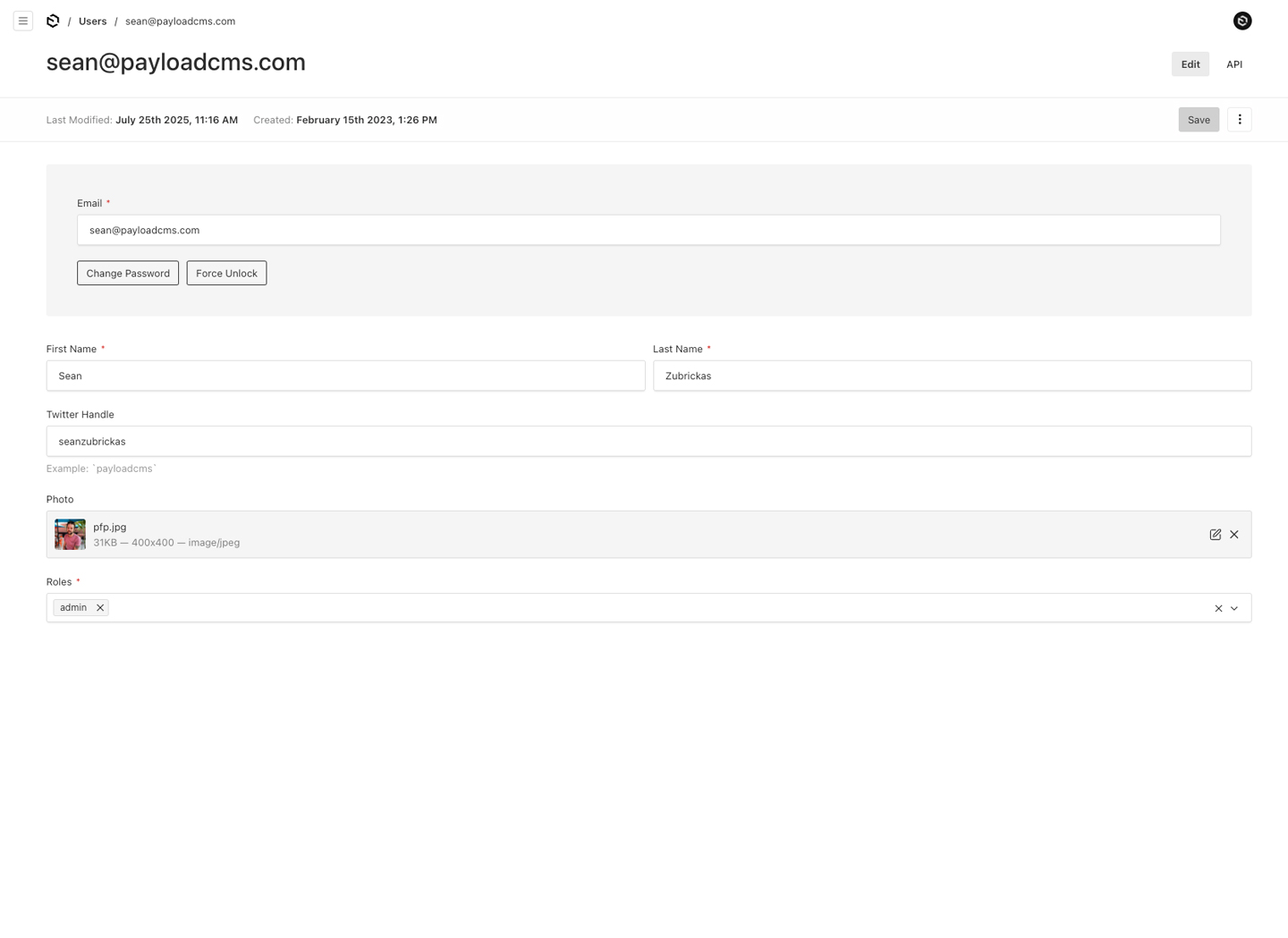
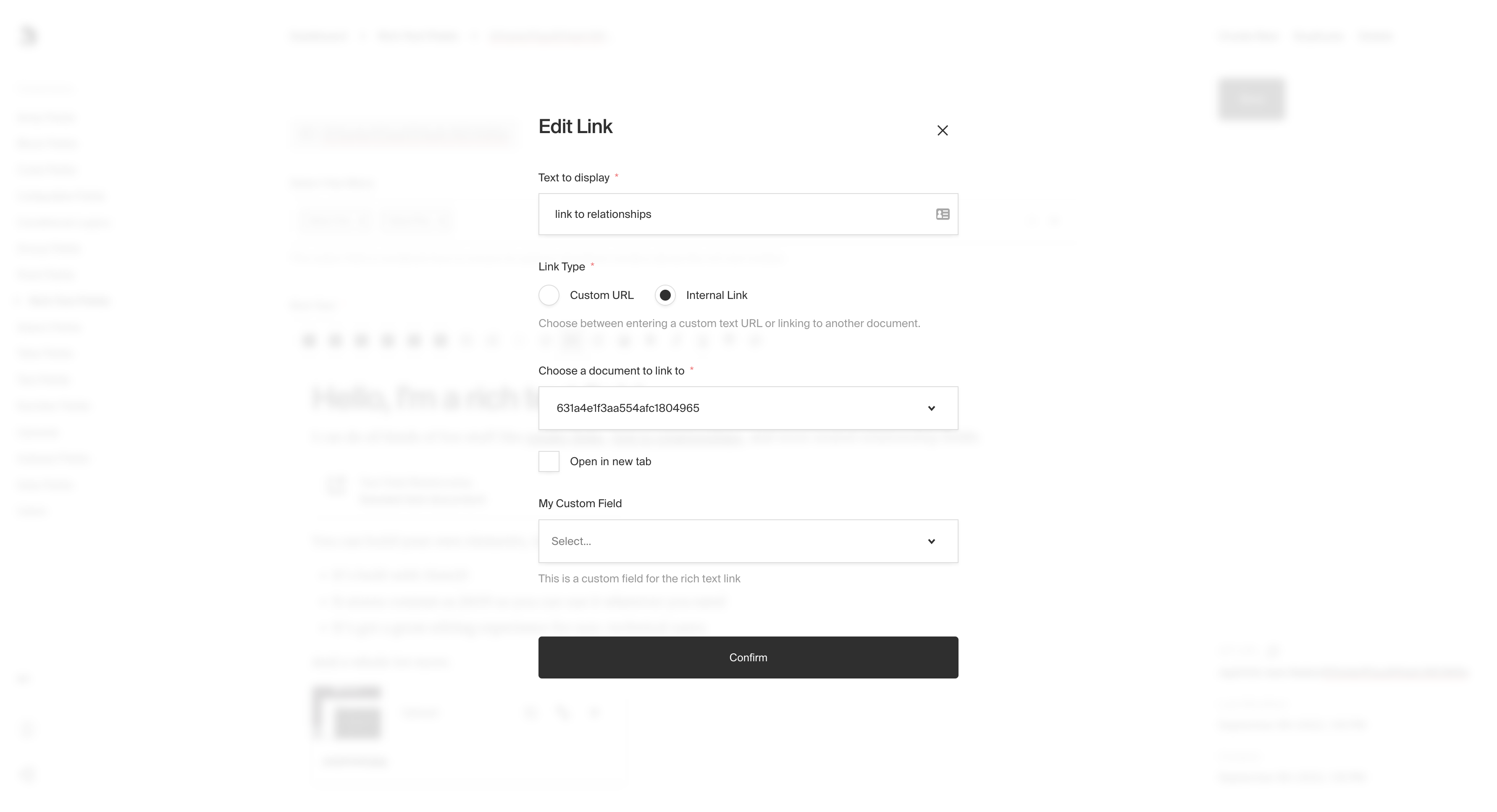
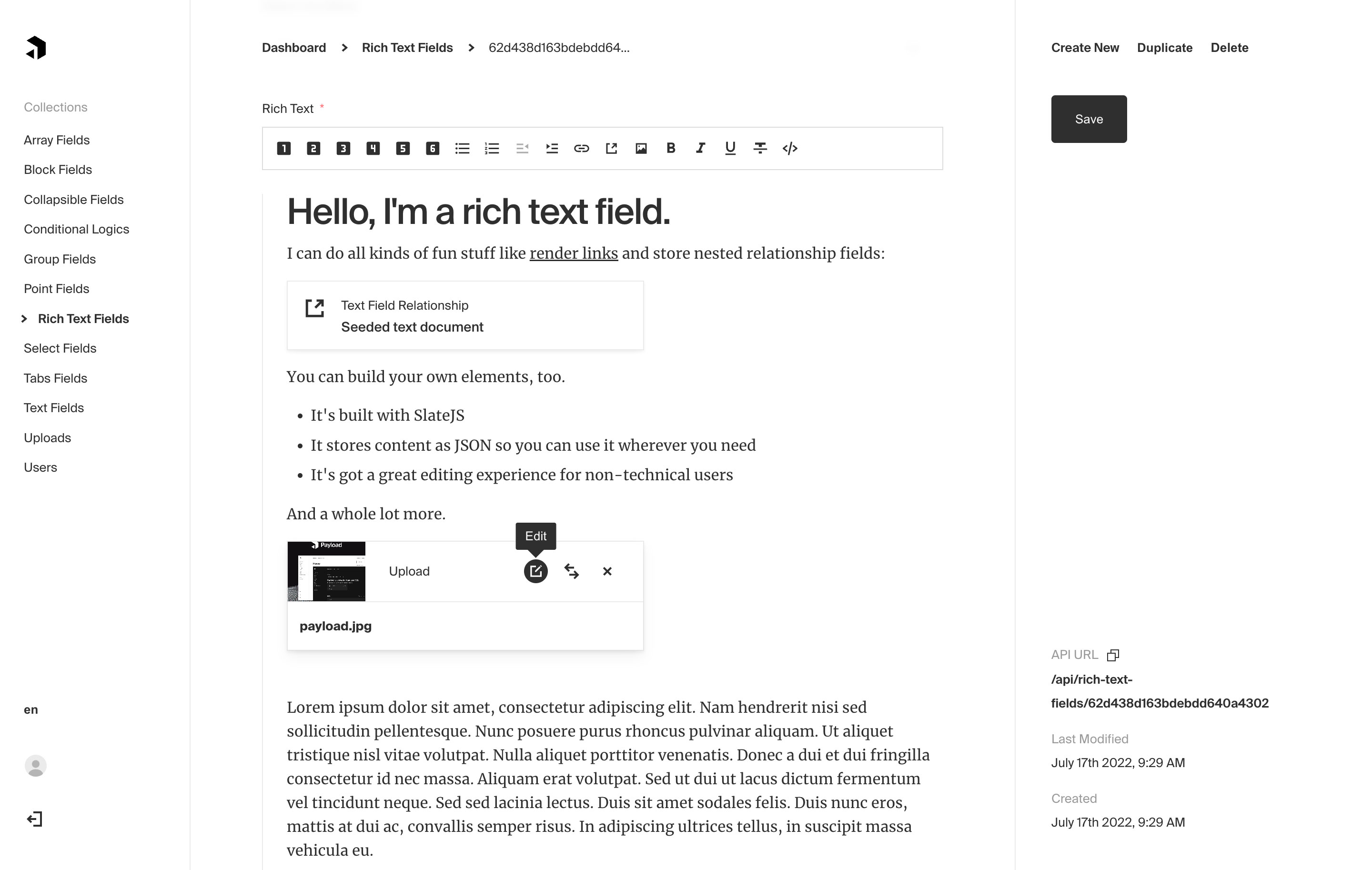
  },
  {
    "path": "public/llms.txt",
    "content": "# Payload\n\n## Basics\n\n### Getting Started\n\n- [What is Payload?](https://payloadcms.com/docs/getting-started/what-is-payload)\n\n- [Payload Concepts](https://payloadcms.com/docs/getting-started/concepts)\n\n- [Installation](https://payloadcms.com/docs/getting-started/installation)\n\n\n### Configuration\n\n- [The Payload Config](https://payloadcms.com/docs/configuration/overview)\n\n- [Collection Configs](https://payloadcms.com/docs/configuration/collections)\n\n- [Global Configs](https://payloadcms.com/docs/configuration/globals)\n\n- [I18n](https://payloadcms.com/docs/configuration/i18n)\n\n- [Localization](https://payloadcms.com/docs/configuration/localization)\n\n- [Environment Variables](https://payloadcms.com/docs/configuration/environment-vars)\n\n\n### Database\n\n- [Database](https://payloadcms.com/docs/database/overview)\n\n- [Migrations](https://payloadcms.com/docs/database/migrations)\n\n- [Transactions](https://payloadcms.com/docs/database/transactions)\n\n- [Indexes](https://payloadcms.com/docs/database/indexes)\n\n- [MongoDB](https://payloadcms.com/docs/database/mongodb)\n\n- [Postgres](https://payloadcms.com/docs/database/postgres)\n\n- [SQLite](https://payloadcms.com/docs/database/sqlite)\n\n\n### Fields\n\n- [Fields Overview](https://payloadcms.com/docs/fields/overview)\n\n- [Array Field](https://payloadcms.com/docs/fields/array)\n\n- [Blocks Field](https://payloadcms.com/docs/fields/blocks)\n\n- [Checkbox Field](https://payloadcms.com/docs/fields/checkbox)\n\n- [Code Field](https://payloadcms.com/docs/fields/code)\n\n- [JSON Field](https://payloadcms.com/docs/fields/json)\n\n- [Collapsible Field](https://payloadcms.com/docs/fields/collapsible)\n\n- [Date Field](https://payloadcms.com/docs/fields/date)\n\n- [Email Field](https://payloadcms.com/docs/fields/email)\n\n- [Group Field](https://payloadcms.com/docs/fields/group)\n\n- [Number Field](https://payloadcms.com/docs/fields/number)\n\n- [Point Field](https://payloadcms.com/docs/fields/point)\n\n- [Radio Group Field](https://payloadcms.com/docs/fields/radio)\n\n- [Relationship Field](https://payloadcms.com/docs/fields/relationship)\n\n- [Join Field](https://payloadcms.com/docs/fields/join)\n\n- [Rich Text Field](https://payloadcms.com/docs/fields/rich-text)\n\n- [Row Field](https://payloadcms.com/docs/fields/row)\n\n- [Select Field](https://payloadcms.com/docs/fields/select)\n\n- [Tabs Field](https://payloadcms.com/docs/fields/tabs)\n\n- [Text Field](https://payloadcms.com/docs/fields/text)\n\n- [Textarea Field](https://payloadcms.com/docs/fields/textarea)\n\n- [UI Field](https://payloadcms.com/docs/fields/ui)\n\n- [Upload Field](https://payloadcms.com/docs/fields/upload)\n\n\n### Access Control\n\n- [Access Control](https://payloadcms.com/docs/access-control/overview)\n\n- [Collection Access Control](https://payloadcms.com/docs/access-control/collections)\n\n- [Globals Access Control](https://payloadcms.com/docs/access-control/globals)\n\n- [Field-level Access Control](https://payloadcms.com/docs/access-control/fields)\n\n\n### Hooks\n\n- [Hooks Overview](https://payloadcms.com/docs/hooks/overview)\n\n- [Collection Hooks](https://payloadcms.com/docs/hooks/collections)\n\n- [Global Hooks](https://payloadcms.com/docs/hooks/globals)\n\n- [Field Hooks](https://payloadcms.com/docs/hooks/fields)\n\n- [Context](https://payloadcms.com/docs/hooks/context)\n\n\n## Managing Data\n\n### Local API\n\n- [Local API](https://payloadcms.com/docs/local-api/overview)\n\n- [Using Payload outside Next.js](https://payloadcms.com/docs/local-api/outside-nextjs)\n\n- [Using Local API Operations with Server Functions](https://payloadcms.com/docs/local-api/server-functions)\n\n- [Respecting Access Control with Local API Operations](https://payloadcms.com/docs/local-api/access-control)\n\n\n### REST API\n\n- [REST API](https://payloadcms.com/docs/rest-api/overview)\n\n\n### GraphQL\n\n- [GraphQL Overview](https://payloadcms.com/docs/graphql/overview)\n\n- [Adding your own Queries and Mutations](https://payloadcms.com/docs/graphql/extending)\n\n- [GraphQL Schema](https://payloadcms.com/docs/graphql/graphql-schema)\n\n\n### Queries\n\n- [Querying your Documents](https://payloadcms.com/docs/queries/overview)\n\n- [Sort](https://payloadcms.com/docs/queries/sort)\n\n- [Depth](https://payloadcms.com/docs/queries/depth)\n\n- [Select](https://payloadcms.com/docs/queries/select)\n\n- [Pagination](https://payloadcms.com/docs/queries/pagination)\n\n\n## Features\n\n### Admin\n\n- [The Admin Panel](https://payloadcms.com/docs/admin/overview)\n\n- [Preview](https://payloadcms.com/docs/admin/preview)\n\n- [Document Locking](https://payloadcms.com/docs/admin/locked-documents)\n\n- [Accessibility](https://payloadcms.com/docs/admin/accessibility)\n\n- [Customizing CSS & SCSS](https://payloadcms.com/docs/admin/customizing-css)\n\n- [React Hooks](https://payloadcms.com/docs/admin/react-hooks)\n\n- [Managing User Preferences](https://payloadcms.com/docs/admin/preferences)\n\n- [Page Metadata](https://payloadcms.com/docs/admin/metadata)\n\n\n### Custom Components\n\n- [Swap in your own React components](https://payloadcms.com/docs/custom-components/overview)\n\n- [Root Components](https://payloadcms.com/docs/custom-components/root-components)\n\n- [Swap in your own React Context providers](https://payloadcms.com/docs/custom-components/custom-providers)\n\n- [Customizing Views](https://payloadcms.com/docs/custom-components/custom-views)\n\n- [Dashboard Widgets](https://payloadcms.com/docs/custom-components/dashboard)\n\n- [Document Views](https://payloadcms.com/docs/custom-components/document-views)\n\n- [Edit View](https://payloadcms.com/docs/custom-components/edit-view)\n\n- [List View](https://payloadcms.com/docs/custom-components/list-view)\n\n\n### Authentication\n\n- [Authentication Overview](https://payloadcms.com/docs/authentication/overview)\n\n- [Authentication Operations](https://payloadcms.com/docs/authentication/operations)\n\n- [Authentication Emails](https://payloadcms.com/docs/authentication/email)\n\n- [Cookie Strategy](https://payloadcms.com/docs/authentication/cookies)\n\n- [JWT Strategy](https://payloadcms.com/docs/authentication/jwt)\n\n- [API Key Strategy](https://payloadcms.com/docs/authentication/api-keys)\n\n- [Custom Strategies](https://payloadcms.com/docs/authentication/custom-strategies)\n\n- [Token Data](https://payloadcms.com/docs/authentication/token-data)\n\n\n### Rich Text\n\n- [Rich Text Editor](https://payloadcms.com/docs/rich-text/overview)\n\n- [Lexical Converters](https://payloadcms.com/docs/rich-text/converters)\n\n- [Converting JSX](https://payloadcms.com/docs/rich-text/converting-jsx)\n\n- [Converting HTML](https://payloadcms.com/docs/rich-text/converting-html)\n\n- [Converting Markdown](https://payloadcms.com/docs/rich-text/converting-markdown)\n\n- [Converting Plaintext](https://payloadcms.com/docs/rich-text/converting-plaintext)\n\n- [Official Features](https://payloadcms.com/docs/rich-text/official-features)\n\n- [Blocks](https://payloadcms.com/docs/rich-text/blocks)\n\n- [Custom Features](https://payloadcms.com/docs/rich-text/custom-features)\n\n- [Rendering On Demand](https://payloadcms.com/docs/rich-text/rendering-on-demand)\n\n- [Lexical Migration](https://payloadcms.com/docs/rich-text/migration)\n\n- [Slate Editor](https://payloadcms.com/docs/rich-text/slate)\n\n\n### Live Preview\n\n- [Live Preview](https://payloadcms.com/docs/live-preview/overview)\n\n- [Implementing Live Preview in your frontend](https://payloadcms.com/docs/live-preview/frontend)\n\n- [Server-side Live Preview](https://payloadcms.com/docs/live-preview/server)\n\n- [Client-side Live Preview](https://payloadcms.com/docs/live-preview/client)\n\n\n### Versions\n\n- [Versions](https://payloadcms.com/docs/versions/overview)\n\n- [Drafts](https://payloadcms.com/docs/versions/drafts)\n\n- [Autosave](https://payloadcms.com/docs/versions/autosave)\n\n\n### Upload\n\n- [Uploads](https://payloadcms.com/docs/upload/overview)\n\n- [Storage Adapters](https://payloadcms.com/docs/upload/storage-adapters)\n\n\n### Folders\n\n- [Folders](https://payloadcms.com/docs/folders/overview)\n\n\n### Email\n\n- [Email Functionality](https://payloadcms.com/docs/email/overview)\n\n\n### Jobs Queue\n\n- [Jobs Queue](https://payloadcms.com/docs/jobs-queue/overview)\n\n- [Quick Start Example](https://payloadcms.com/docs/jobs-queue/quick-start-example)\n\n- [Tasks](https://payloadcms.com/docs/jobs-queue/tasks)\n\n- [Workflows](https://payloadcms.com/docs/jobs-queue/workflows)\n\n- [Jobs](https://payloadcms.com/docs/jobs-queue/jobs)\n\n- [Queues](https://payloadcms.com/docs/jobs-queue/queues)\n\n- [Job Schedules](https://payloadcms.com/docs/jobs-queue/schedules)\n\n\n### Query Presets\n\n- [Query Presets](https://payloadcms.com/docs/query-presets/overview)\n\n\n### Trash\n\n- [Trash](https://payloadcms.com/docs/trash/overview)\n\n\n### Troubleshooting\n\n- [Troubleshooting](https://payloadcms.com/docs/troubleshooting/troubleshooting)\n\n\n### TypeScript\n\n- [TypeScript - Overview](https://payloadcms.com/docs/typescript/overview)\n\n- [Generating TypeScript Interfaces](https://payloadcms.com/docs/typescript/generating-types)\n\n\n## Ecosystem\n\n### Plugins\n\n- [Plugins](https://payloadcms.com/docs/plugins/overview)\n\n- [Building Your Own Plugin](https://payloadcms.com/docs/plugins/build-your-own)\n\n- [Form Builder Plugin](https://payloadcms.com/docs/plugins/form-builder)\n\n- [Import Export Plugin](https://payloadcms.com/docs/plugins/import-export)\n\n- [MCP Plugin](https://payloadcms.com/docs/plugins/mcp)\n\n- [Multi-Tenant Plugin](https://payloadcms.com/docs/plugins/multi-tenant)\n\n- [Nested Docs Plugin](https://payloadcms.com/docs/plugins/nested-docs)\n\n- [Redirects Plugin](https://payloadcms.com/docs/plugins/redirects)\n\n- [Search Plugin](https://payloadcms.com/docs/plugins/search)\n\n- [Sentry Plugin](https://payloadcms.com/docs/plugins/sentry)\n\n- [SEO Plugin](https://payloadcms.com/docs/plugins/seo)\n\n- [Stripe Plugin](https://payloadcms.com/docs/plugins/stripe)\n\n\n### Ecommerce\n\n- [Ecommerce Overview](https://payloadcms.com/docs/ecommerce/overview)\n\n- [Ecommerce Plugin](https://payloadcms.com/docs/ecommerce/plugin)\n\n- [Ecommerce Frontend](https://payloadcms.com/docs/ecommerce/frontend)\n\n- [Payment Adapters](https://payloadcms.com/docs/ecommerce/payments)\n\n- [Advanced uses and examples](https://payloadcms.com/docs/ecommerce/advanced)\n\n\n### Examples\n\n- [Examples](https://payloadcms.com/docs/examples/overview)\n\n\n### Integrations\n\n- [Vercel Content Link](https://payloadcms.com/docs/integrations/vercel-content-link)\n\n\n## Deployment\n\n### Production\n\n- [Building without a DB connection](https://payloadcms.com/docs/production/building-without-a-db-connection)\n\n- [Production Deployment](https://payloadcms.com/docs/production/deployment)\n\n- [Preventing Production API Abuse](https://payloadcms.com/docs/production/preventing-abuse)\n\n\n### Performance\n\n- [Performance](https://payloadcms.com/docs/performance/overview)\n\n\n"
  },
  {
    "path": "public/robots.txt",
    "content": "# *\nUser-agent: *\nAllow: /\n\n# Host\nHost: https://payloadcms.com\n\n# Sitemaps\nSitemap: https://payloadcms.com/sitemap.xml\n"
  },
  {
    "path": "public/sitemap-0.xml",
    "content": "<?xml version=\"1.0\" encoding=\"UTF-8\"?>\n<urlset xmlns=\"http://www.sitemaps.org/schemas/sitemap/0.9\" xmlns:news=\"http://www.google.com/schemas/sitemap-news/0.9\" xmlns:xhtml=\"http://www.w3.org/1999/xhtml\" xmlns:mobile=\"http://www.google.com/schemas/sitemap-mobile/1.0\" xmlns:image=\"http://www.google.com/schemas/sitemap-image/1.1\" xmlns:video=\"http://www.google.com/schemas/sitemap-video/1.1\">\n<url><loc>https://payloadcms.com/apple-icon.png</loc><lastmod>2024-12-27T20:03:46.401Z</lastmod><changefreq>daily</changefreq><priority>0.7</priority></url>\n<url><loc>https://payloadcms.com/api/star-count</loc><lastmod>2024-12-27T20:03:46.402Z</lastmod><changefreq>daily</changefreq><priority>0.7</priority></url>\n<url><loc>https://payloadcms.com/cloud-terms</loc><lastmod>2024-12-27T20:03:46.402Z</lastmod><changefreq>daily</changefreq><priority>0.7</priority></url>\n<url><loc>https://payloadcms.com/gh</loc><lastmod>2024-12-27T20:03:46.402Z</lastmod><changefreq>daily</changefreq><priority>0.7</priority></url>\n<url><loc>https://payloadcms.com/cookie</loc><lastmod>2024-12-27T20:03:46.402Z</lastmod><changefreq>daily</changefreq><priority>0.7</priority></url>\n<url><loc>https://payloadcms.com/get-started</loc><lastmod>2024-12-27T20:03:46.402Z</lastmod><changefreq>daily</changefreq><priority>0.7</priority></url>\n<url><loc>https://payloadcms.com/privacy</loc><lastmod>2024-12-27T20:03:46.402Z</lastmod><changefreq>daily</changefreq><priority>0.7</priority></url>\n<url><loc>https://payloadcms.com</loc><lastmod>2024-12-27T20:03:46.402Z</lastmod><changefreq>daily</changefreq><priority>0.7</priority></url>\n<url><loc>https://payloadcms.com/partners</loc><lastmod>2024-12-27T20:03:46.402Z</lastmod><changefreq>daily</changefreq><priority>0.7</priority></url>\n<url><loc>https://payloadcms.com/thanks-for-subscribing</loc><lastmod>2024-12-27T20:03:46.402Z</lastmod><changefreq>daily</changefreq><priority>0.7</priority></url>\n<url><loc>https://payloadcms.com/community-help</loc><lastmod>2024-12-27T20:03:46.402Z</lastmod><changefreq>daily</changefreq><priority>0.7</priority></url>\n<url><loc>https://payloadcms.com/styleguide/forms</loc><lastmod>2024-12-27T20:03:46.402Z</lastmod><changefreq>daily</changefreq><priority>0.7</priority></url>\n<url><loc>https://payloadcms.com/styleguide/cards</loc><lastmod>2024-12-27T20:03:46.402Z</lastmod><changefreq>daily</changefreq><priority>0.7</priority></url>\n<url><loc>https://payloadcms.com/styleguide</loc><lastmod>2024-12-27T20:03:46.402Z</lastmod><changefreq>daily</changefreq><priority>0.7</priority></url>\n<url><loc>https://payloadcms.com/styleguide/fields</loc><lastmod>2024-12-27T20:03:46.402Z</lastmod><changefreq>daily</changefreq><priority>0.7</priority></url>\n<url><loc>https://payloadcms.com/styleguide/icons</loc><lastmod>2024-12-27T20:03:46.402Z</lastmod><changefreq>daily</changefreq><priority>0.7</priority></url>\n<url><loc>https://payloadcms.com/styleguide/typography</loc><lastmod>2024-12-27T20:03:46.402Z</lastmod><changefreq>daily</changefreq><priority>0.7</priority></url>\n<url><loc>https://payloadcms.com/styleguide/heros/form-hero</loc><lastmod>2024-12-27T20:03:46.402Z</lastmod><changefreq>daily</changefreq><priority>0.7</priority></url>\n<url><loc>https://payloadcms.com/styleguide/blocks/banner-block</loc><lastmod>2024-12-27T20:03:46.402Z</lastmod><changefreq>daily</changefreq><priority>0.7</priority></url>\n<url><loc>https://payloadcms.com/styleguide/buttons</loc><lastmod>2024-12-27T20:03:46.402Z</lastmod><changefreq>daily</changefreq><priority>0.7</priority></url>\n<url><loc>https://payloadcms.com/styleguide/blocks/link-grid</loc><lastmod>2024-12-27T20:03:46.402Z</lastmod><changefreq>daily</changefreq><priority>0.7</priority></url>\n<url><loc>https://payloadcms.com/styleguide/blocks/call-to-action</loc><lastmod>2024-12-27T20:03:46.402Z</lastmod><changefreq>daily</changefreq><priority>0.7</priority></url>\n<url><loc>https://payloadcms.com/blog</loc><lastmod>2024-12-27T20:03:46.402Z</lastmod><changefreq>daily</changefreq><priority>0.7</priority></url>\n<url><loc>https://payloadcms.com/styleguide/blocks/content-grid</loc><lastmod>2024-12-27T20:03:46.402Z</lastmod><changefreq>daily</changefreq><priority>0.7</priority></url>\n<url><loc>https://payloadcms.com/styleguide/blocks/card-grid</loc><lastmod>2024-12-27T20:03:46.402Z</lastmod><changefreq>daily</changefreq><priority>0.7</priority></url>\n<url><loc>https://payloadcms.com/styleguide/blocks/form-block</loc><lastmod>2024-12-27T20:03:46.402Z</lastmod><changefreq>daily</changefreq><priority>0.7</priority></url>\n<url><loc>https://payloadcms.com/styleguide/blocks/media-content</loc><lastmod>2024-12-27T20:03:46.402Z</lastmod><changefreq>daily</changefreq><priority>0.7</priority></url>\n<url><loc>https://payloadcms.com/styleguide/blocks/hover-highlights</loc><lastmod>2024-12-27T20:03:46.402Z</lastmod><changefreq>daily</changefreq><priority>0.7</priority></url>\n<url><loc>https://payloadcms.com/styleguide/highlight</loc><lastmod>2024-12-27T20:03:46.402Z</lastmod><changefreq>daily</changefreq><priority>0.7</priority></url>\n<url><loc>https://payloadcms.com/blog/10x-digital-agency-part-1</loc><lastmod>2024-12-27T20:03:46.402Z</lastmod><changefreq>daily</changefreq><priority>0.7</priority></url>\n<url><loc>https://payloadcms.com/blog/2024-roadmap-weve-made-a-nextjs-decision</loc><lastmod>2024-12-27T20:03:46.402Z</lastmod><changefreq>daily</changefreq><priority>0.7</priority></url>\n<url><loc>https://payloadcms.com/blog/30-beta-install-payload-into-any-nextjs-app-with-one-line</loc><lastmod>2024-12-27T20:03:46.402Z</lastmod><changefreq>daily</changefreq><priority>0.7</priority></url>\n<url><loc>https://payloadcms.com/blog/a-world-without-wordpress</loc><lastmod>2024-12-27T20:03:46.402Z</lastmod><changefreq>daily</changefreq><priority>0.7</priority></url>\n<url><loc>https://payloadcms.com/blog/access-control-overview</loc><lastmod>2024-12-27T20:03:46.402Z</lastmod><changefreq>daily</changefreq><priority>0.7</priority></url>\n<url><loc>https://payloadcms.com/blog/add-dynamic-descriptions-to-customize-editor</loc><lastmod>2024-12-27T20:03:46.402Z</lastmod><changefreq>daily</changefreq><priority>0.7</priority></url>\n<url><loc>https://payloadcms.com/blog/announcing-generated-types</loc><lastmod>2024-12-27T20:03:46.402Z</lastmod><changefreq>daily</changefreq><priority>0.7</priority></url>\n<url><loc>https://payloadcms.com/blog/announcing-plugins</loc><lastmod>2024-12-27T20:03:46.402Z</lastmod><changefreq>daily</changefreq><priority>0.7</priority></url>\n<url><loc>https://payloadcms.com/blog/announcing-public-discord-server</loc><lastmod>2024-12-27T20:03:46.402Z</lastmod><changefreq>daily</changefreq><priority>0.7</priority></url>\n<url><loc>https://payloadcms.com/blog/announcing-the-write-for-the-community-program</loc><lastmod>2024-12-27T20:03:46.402Z</lastmod><changefreq>daily</changefreq><priority>0.7</priority></url>\n<url><loc>https://payloadcms.com/blog/announcing-yc</loc><lastmod>2024-12-27T20:03:46.402Z</lastmod><changefreq>daily</changefreq><priority>0.7</priority></url>\n<url><loc>https://payloadcms.com/blog/build-your-own-rbac</loc><lastmod>2024-12-27T20:03:46.402Z</lastmod><changefreq>daily</changefreq><priority>0.7</priority></url>\n<url><loc>https://payloadcms.com/blog/building-a-custom-field</loc><lastmod>2024-12-27T20:03:46.402Z</lastmod><changefreq>daily</changefreq><priority>0.7</priority></url>\n<url><loc>https://payloadcms.com/blog/building-professionally-designed-site-nextjs-typescript-episode-1</loc><lastmod>2024-12-27T20:03:46.402Z</lastmod><changefreq>daily</changefreq><priority>0.7</priority></url>\n<url><loc>https://payloadcms.com/blog/building-professionally-designed-site-nextjs-typescript-episode-2</loc><lastmod>2024-12-27T20:03:46.402Z</lastmod><changefreq>daily</changefreq><priority>0.7</priority></url>\n<url><loc>https://payloadcms.com/blog/building-professionally-designed-site-nextjs-typescript-episode-3</loc><lastmod>2024-12-27T20:03:46.402Z</lastmod><changefreq>daily</changefreq><priority>0.7</priority></url>\n<url><loc>https://payloadcms.com/blog/building-professionally-designed-site-nextjs-typescript-episode-4</loc><lastmod>2024-12-27T20:03:46.402Z</lastmod><changefreq>daily</changefreq><priority>0.7</priority></url>\n<url><loc>https://payloadcms.com/blog/create-custom-forms-with-the-official-form-builder-plugin</loc><lastmod>2024-12-27T20:03:46.402Z</lastmod><changefreq>daily</changefreq><priority>0.7</priority></url>\n<url><loc>https://payloadcms.com/blog/custom-routes</loc><lastmod>2024-12-27T20:03:46.402Z</lastmod><changefreq>daily</changefreq><priority>0.7</priority></url>\n<url><loc>https://payloadcms.com/blog/database-migrations-with-migrate-mongo</loc><lastmod>2024-12-27T20:03:46.402Z</lastmod><changefreq>daily</changefreq><priority>0.7</priority></url>\n<url><loc>https://payloadcms.com/blog/draft</loc><lastmod>2024-12-27T20:03:46.402Z</lastmod><changefreq>daily</changefreq><priority>0.7</priority></url>\n<url><loc>https://payloadcms.com/blog/enhanced-error-states-and-nested-fields-in-payload</loc><lastmod>2024-12-27T20:03:46.402Z</lastmod><changefreq>daily</changefreq><priority>0.7</priority></url>\n<url><loc>https://payloadcms.com/blog/error-management-magic-introducing-the-sentry-plugin-for-payload</loc><lastmod>2024-12-27T20:03:46.402Z</lastmod><changefreq>daily</changefreq><priority>0.7</priority></url>\n<url><loc>https://payloadcms.com/blog/fine-tuned-image-resizing-with-the-crop-and-focal-point-selector</loc><lastmod>2024-12-27T20:03:46.402Z</lastmod><changefreq>daily</changefreq><priority>0.7</priority></url>\n<url><loc>https://payloadcms.com/blog/free-forever</loc><lastmod>2024-12-27T20:03:46.402Z</lastmod><changefreq>daily</changefreq><priority>0.7</priority></url>\n<url><loc>https://payloadcms.com/blog/headless-cms-game-development</loc><lastmod>2024-12-27T20:03:46.402Z</lastmod><changefreq>daily</changefreq><priority>0.7</priority></url>\n<url><loc>https://payloadcms.com/blog/headless-wordpress-alternative</loc><lastmod>2024-12-27T20:03:46.402Z</lastmod><changefreq>daily</changefreq><priority>0.7</priority></url>\n<url><loc>https://payloadcms.com/blog/how-to-build-a-multi-tenant-app-with-payload</loc><lastmod>2024-12-27T20:03:46.402Z</lastmod><changefreq>daily</changefreq><priority>0.7</priority></url>\n<url><loc>https://payloadcms.com/blog/how-to-build-a-website-blog-or-portfolio-with-nextjs</loc><lastmod>2024-12-27T20:03:46.402Z</lastmod><changefreq>daily</changefreq><priority>0.7</priority></url>\n<url><loc>https://payloadcms.com/blog/how-to-build-an-e-commerce-site-with-nextjs</loc><lastmod>2024-12-27T20:03:46.402Z</lastmod><changefreq>daily</changefreq><priority>0.7</priority></url>\n<url><loc>https://payloadcms.com/blog/how-to-create-a-custom-select-field-in-payload-a-step-by-step-guide</loc><lastmod>2024-12-27T20:03:46.402Z</lastmod><changefreq>daily</changefreq><priority>0.7</priority></url>\n<url><loc>https://payloadcms.com/blog/how-to-customize-the-look-and-feel-of-payload-with-css</loc><lastmod>2024-12-27T20:03:46.402Z</lastmod><changefreq>daily</changefreq><priority>0.7</priority></url>\n<url><loc>https://payloadcms.com/blog/how-to-migrate-from-wordpress-to-payload</loc><lastmod>2024-12-27T20:03:46.402Z</lastmod><changefreq>daily</changefreq><priority>0.7</priority></url>\n<url><loc>https://payloadcms.com/blog/how-to-migrate-from-wordpress-to-payload-part-2</loc><lastmod>2024-12-27T20:03:46.402Z</lastmod><changefreq>daily</changefreq><priority>0.7</priority></url>\n<url><loc>https://payloadcms.com/blog/how-to-setup-tailwindcss-and-shadcn-ui-in-payload</loc><lastmod>2024-12-27T20:03:46.402Z</lastmod><changefreq>daily</changefreq><priority>0.7</priority></url>\n<url><loc>https://payloadcms.com/blog/interfacename-generating-composable-graphql-and-typescript-types</loc><lastmod>2024-12-27T20:03:46.402Z</lastmod><changefreq>daily</changefreq><priority>0.7</priority></url>\n<url><loc>https://payloadcms.com/blog/introducing-a-rich-text-editor-that-is-a-game-changer</loc><lastmod>2024-12-27T20:03:46.402Z</lastmod><changefreq>daily</changefreq><priority>0.7</priority></url>\n<url><loc>https://payloadcms.com/blog/introducing-payload-2021s-node-react-headless-cms-for-javascript-developers</loc><lastmod>2024-12-27T20:03:46.402Z</lastmod><changefreq>daily</changefreq><priority>0.7</priority></url>\n<url><loc>https://payloadcms.com/blog/launch-week</loc><lastmod>2024-12-27T20:03:46.402Z</lastmod><changefreq>daily</changefreq><priority>0.7</priority></url>\n<url><loc>https://payloadcms.com/blog/launch-week-day-1</loc><lastmod>2024-12-27T20:03:46.402Z</lastmod><changefreq>daily</changefreq><priority>0.7</priority></url>\n<url><loc>https://payloadcms.com/blog/launch-week-day-1-payload-cloud-is-here</loc><lastmod>2024-12-27T20:03:46.402Z</lastmod><changefreq>daily</changefreq><priority>0.7</priority></url>\n<url><loc>https://payloadcms.com/blog/launch-week-day-2</loc><lastmod>2024-12-27T20:03:46.402Z</lastmod><changefreq>daily</changefreq><priority>0.7</priority></url>\n<url><loc>https://payloadcms.com/blog/launch-week-day-2-community-help</loc><lastmod>2024-12-27T20:03:46.402Z</lastmod><changefreq>daily</changefreq><priority>0.7</priority></url>\n<url><loc>https://payloadcms.com/blog/launch-week-day-3</loc><lastmod>2024-12-27T20:03:46.402Z</lastmod><changefreq>daily</changefreq><priority>0.7</priority></url>\n<url><loc>https://payloadcms.com/blog/launch-week-day-3-bulk-operations</loc><lastmod>2024-12-27T20:03:46.402Z</lastmod><changefreq>daily</changefreq><priority>0.7</priority></url>\n<url><loc>https://payloadcms.com/blog/launch-week-day-4</loc><lastmod>2024-12-27T20:03:46.402Z</lastmod><changefreq>daily</changefreq><priority>0.7</priority></url>\n<url><loc>https://payloadcms.com/blog/launch-week-day-4-the-future-of-headless</loc><lastmod>2024-12-27T20:03:46.402Z</lastmod><changefreq>daily</changefreq><priority>0.7</priority></url>\n<url><loc>https://payloadcms.com/blog/launch-week-day-5</loc><lastmod>2024-12-27T20:03:46.402Z</lastmod><changefreq>daily</changefreq><priority>0.7</priority></url>\n<url><loc>https://payloadcms.com/blog/launch-week-day-5-ecommerce-starter-kit</loc><lastmod>2024-12-27T20:03:46.402Z</lastmod><changefreq>daily</changefreq><priority>0.7</priority></url>\n<url><loc>https://payloadcms.com/blog/learn-how-virtual-fields-can-help-solve-common-cms-challenges</loc><lastmod>2024-12-27T20:03:46.402Z</lastmod><changefreq>daily</changefreq><priority>0.7</priority></url>\n<url><loc>https://payloadcms.com/blog/managing-array-and-block-rows</loc><lastmod>2024-12-27T20:03:46.402Z</lastmod><changefreq>daily</changefreq><priority>0.7</priority></url>\n<url><loc>https://payloadcms.com/blog/nextjs-payload-cms-auth</loc><lastmod>2024-12-27T20:03:46.402Z</lastmod><changefreq>daily</changefreq><priority>0.7</priority></url>\n<url><loc>https://payloadcms.com/blog/nextjs-payload-typescript-single-express-server-boilerplate</loc><lastmod>2024-12-27T20:03:46.402Z</lastmod><changefreq>daily</changefreq><priority>0.7</priority></url>\n<url><loc>https://payloadcms.com/blog/on-github-issues-and-engineering-efficiency</loc><lastmod>2024-12-27T20:03:46.402Z</lastmod><changefreq>daily</changefreq><priority>0.7</priority></url>\n<url><loc>https://payloadcms.com/blog/open-source</loc><lastmod>2024-12-27T20:03:46.402Z</lastmod><changefreq>daily</changefreq><priority>0.7</priority></url>\n<url><loc>https://payloadcms.com/blog/open-source-demo</loc><lastmod>2024-12-27T20:03:46.402Z</lastmod><changefreq>daily</changefreq><priority>0.7</priority></url>\n<url><loc>https://payloadcms.com/blog/payload-2-0</loc><lastmod>2024-12-27T20:03:46.402Z</lastmod><changefreq>daily</changefreq><priority>0.7</priority></url>\n<url><loc>https://payloadcms.com/blog/payload-30-the-first-cms-that-installs-directly-into-any-nextjs-app</loc><lastmod>2024-12-27T20:03:46.402Z</lastmod><changefreq>daily</changefreq><priority>0.7</priority></url>\n<url><loc>https://payloadcms.com/blog/payload-cloud-has-officially-left-beta-whats-new-and-whats-next</loc><lastmod>2024-12-27T20:03:46.402Z</lastmod><changefreq>daily</changefreq><priority>0.7</priority></url>\n<url><loc>https://payloadcms.com/blog/payload-launches-version-1</loc><lastmod>2024-12-27T20:03:46.402Z</lastmod><changefreq>daily</changefreq><priority>0.7</priority></url>\n<url><loc>https://payloadcms.com/blog/payload-nodemailer-free-and-extensible-email-integration</loc><lastmod>2024-12-27T20:03:46.402Z</lastmod><changefreq>daily</changefreq><priority>0.7</priority></url>\n<url><loc>https://payloadcms.com/blog/payload-with-sqlite</loc><lastmod>2024-12-27T20:03:46.402Z</lastmod><changefreq>daily</changefreq><priority>0.7</priority></url>\n<url><loc>https://payloadcms.com/blog/performance-benchmarks</loc><lastmod>2024-12-27T20:03:46.402Z</lastmod><changefreq>daily</changefreq><priority>0.7</priority></url>\n<url><loc>https://payloadcms.com/blog/plugin-cloud-storage</loc><lastmod>2024-12-27T20:03:46.402Z</lastmod><changefreq>daily</changefreq><priority>0.7</priority></url>\n<url><loc>https://payloadcms.com/blog/q2-2023-whats-next</loc><lastmod>2024-12-27T20:03:46.402Z</lastmod><changefreq>daily</changefreq><priority>0.7</priority></url>\n<url><loc>https://payloadcms.com/blog/redirects-in-payload-retaining-seo-value-and-avoiding-404s</loc><lastmod>2024-12-27T20:03:46.402Z</lastmod><changefreq>daily</changefreq><priority>0.7</priority></url>\n<url><loc>https://payloadcms.com/blog/relational-database-table-structure-rfc</loc><lastmod>2024-12-27T20:03:46.402Z</lastmod><changefreq>daily</changefreq><priority>0.7</priority></url>\n<url><loc>https://payloadcms.com/blog/remix-payload-express-monorepo</loc><lastmod>2024-12-27T20:03:46.402Z</lastmod><changefreq>daily</changefreq><priority>0.7</priority></url>\n<url><loc>https://payloadcms.com/blog/roadmap-released</loc><lastmod>2024-12-27T20:03:46.402Z</lastmod><changefreq>daily</changefreq><priority>0.7</priority></url>\n<url><loc>https://payloadcms.com/blog/setting-up-payload-with-supabase-for-your-nextjs-app-a-step-by-step-guide</loc><lastmod>2024-12-27T20:03:46.402Z</lastmod><changefreq>daily</changefreq><priority>0.7</priority></url>\n<url><loc>https://payloadcms.com/blog/should-we-move-to-nextjs</loc><lastmod>2024-12-27T20:03:46.402Z</lastmod><changefreq>daily</changefreq><priority>0.7</priority></url>\n<url><loc>https://payloadcms.com/blog/simplified-authentication-for-headless-cms-unlocking-reusability-in-one-line</loc><lastmod>2024-12-27T20:03:46.402Z</lastmod><changefreq>daily</changefreq><priority>0.7</priority></url>\n<url><loc>https://payloadcms.com/blog/sql-vs-nosql-cutting-through-the-tech-twitter-noise</loc><lastmod>2024-12-27T20:03:46.402Z</lastmod><changefreq>daily</changefreq><priority>0.7</priority></url>\n<url><loc>https://payloadcms.com/blog/test</loc><lastmod>2024-12-27T20:03:46.402Z</lastmod><changefreq>daily</changefreq><priority>0.7</priority></url>\n<url><loc>https://payloadcms.com/blog/test-2</loc><lastmod>2024-12-27T20:03:46.402Z</lastmod><changefreq>daily</changefreq><priority>0.7</priority></url>\n<url><loc>https://payloadcms.com/blog/the-power-of-encryption-and-decryption-safeguarding-data-privacy-with-payloads-hooks</loc><lastmod>2024-12-27T20:03:46.402Z</lastmod><changefreq>daily</changefreq><priority>0.7</priority></url>\n<url><loc>https://payloadcms.com/blog/the-ultimate-guide-to-using-nextjs-with-payload</loc><lastmod>2024-12-27T20:03:46.402Z</lastmod><changefreq>daily</changefreq><priority>0.7</priority></url>\n<url><loc>https://payloadcms.com/blog/tutorial-building-your-own-payload-plugin</loc><lastmod>2024-12-27T20:03:46.402Z</lastmod><changefreq>daily</changefreq><priority>0.7</priority></url>\n<url><loc>https://payloadcms.com/blog/typescript-jest-vscode-debugger-tutorial</loc><lastmod>2024-12-27T20:03:46.402Z</lastmod><changefreq>daily</changefreq><priority>0.7</priority></url>\n<url><loc>https://payloadcms.com/blog/upcoming-1-0</loc><lastmod>2024-12-27T20:03:46.402Z</lastmod><changefreq>daily</changefreq><priority>0.7</priority></url>\n<url><loc>https://payloadcms.com/blog/using-json-schemas-with-payload</loc><lastmod>2024-12-27T20:03:46.402Z</lastmod><changefreq>daily</changefreq><priority>0.7</priority></url>\n<url><loc>https://payloadcms.com/blog/version-0-15-0</loc><lastmod>2024-12-27T20:03:46.402Z</lastmod><changefreq>daily</changefreq><priority>0.7</priority></url>\n<url><loc>https://payloadcms.com/blog/version-1-1-1</loc><lastmod>2024-12-27T20:03:46.402Z</lastmod><changefreq>daily</changefreq><priority>0.7</priority></url>\n<url><loc>https://payloadcms.com/blog/version-1-6-0-released</loc><lastmod>2024-12-27T20:03:46.402Z</lastmod><changefreq>daily</changefreq><priority>0.7</priority></url>\n<url><loc>https://payloadcms.com/blog/whats-next-in-2023</loc><lastmod>2024-12-27T20:03:46.402Z</lastmod><changefreq>daily</changefreq><priority>0.7</priority></url>\n<url><loc>https://payloadcms.com/blog/white-label-admin-ui</loc><lastmod>2024-12-27T20:03:46.402Z</lastmod><changefreq>daily</changefreq><priority>0.7</priority></url>\n<url><loc>https://payloadcms.com/case-studies/asics</loc><lastmod>2024-12-27T20:03:46.402Z</lastmod><changefreq>daily</changefreq><priority>0.7</priority></url>\n<url><loc>https://payloadcms.com/case-studies/bizee</loc><lastmod>2024-12-27T20:03:46.402Z</lastmod><changefreq>daily</changefreq><priority>0.7</priority></url>\n<url><loc>https://payloadcms.com/case-studies/blue-origin-club-for-the-future</loc><lastmod>2024-12-27T20:03:46.402Z</lastmod><changefreq>daily</changefreq><priority>0.7</priority></url>\n<url><loc>https://payloadcms.com/case-studies/dentsu</loc><lastmod>2024-12-27T20:03:46.402Z</lastmod><changefreq>daily</changefreq><priority>0.7</priority></url>\n<url><loc>https://payloadcms.com/case-studies/divbrands</loc><lastmod>2024-12-27T20:03:46.402Z</lastmod><changefreq>daily</changefreq><priority>0.7</priority></url>\n<url><loc>https://payloadcms.com/case-studies/dragons-milk</loc><lastmod>2024-12-27T20:03:46.402Z</lastmod><changefreq>daily</changefreq><priority>0.7</priority></url>\n<url><loc>https://payloadcms.com/case-studies/first-street</loc><lastmod>2024-12-27T20:03:46.402Z</lastmod><changefreq>daily</changefreq><priority>0.7</priority></url>\n<url><loc>https://payloadcms.com/case-studies/hello-bello</loc><lastmod>2024-12-27T20:03:46.402Z</lastmod><changefreq>daily</changefreq><priority>0.7</priority></url>\n<url><loc>https://payloadcms.com/case-studies/hope-network</loc><lastmod>2024-12-27T20:03:46.402Z</lastmod><changefreq>daily</changefreq><priority>0.7</priority></url>\n<url><loc>https://payloadcms.com/case-studies/microsoft</loc><lastmod>2024-12-27T20:03:46.402Z</lastmod><changefreq>daily</changefreq><priority>0.7</priority></url>\n<url><loc>https://payloadcms.com/case-studies/my290</loc><lastmod>2024-12-27T20:03:46.402Z</lastmod><changefreq>daily</changefreq><priority>0.7</priority></url>\n<url><loc>https://payloadcms.com/case-studies/mythical-society</loc><lastmod>2024-12-27T20:03:46.402Z</lastmod><changefreq>daily</changefreq><priority>0.7</priority></url>\n<url><loc>https://payloadcms.com/case-studies/paper-triangles</loc><lastmod>2024-12-27T20:03:46.402Z</lastmod><changefreq>daily</changefreq><priority>0.7</priority></url>\n<url><loc>https://payloadcms.com/case-studies/quikplow</loc><lastmod>2024-12-27T20:03:46.402Z</lastmod><changefreq>daily</changefreq><priority>0.7</priority></url>\n<url><loc>https://payloadcms.com/case-studies/releese</loc><lastmod>2024-12-27T20:03:46.402Z</lastmod><changefreq>daily</changefreq><priority>0.7</priority></url>\n<url><loc>https://payloadcms.com/case-studies/sonos</loc><lastmod>2024-12-27T20:03:46.402Z</lastmod><changefreq>daily</changefreq><priority>0.7</priority></url>\n<url><loc>https://payloadcms.com/case-studies/surveillance-watch</loc><lastmod>2024-12-27T20:03:46.402Z</lastmod><changefreq>daily</changefreq><priority>0.7</priority></url>\n<url><loc>https://payloadcms.com/case-studies/tekton</loc><lastmod>2024-12-27T20:03:46.402Z</lastmod><changefreq>daily</changefreq><priority>0.7</priority></url>\n<url><loc>https://payloadcms.com/case-studies/vikingyoga</loc><lastmod>2024-12-27T20:03:46.402Z</lastmod><changefreq>daily</changefreq><priority>0.7</priority></url>\n<url><loc>https://payloadcms.com/docs/v2/access-control/collections</loc><lastmod>2024-12-27T20:03:46.402Z</lastmod><changefreq>daily</changefreq><priority>0.7</priority></url>\n<url><loc>https://payloadcms.com/docs/v2/access-control/fields</loc><lastmod>2024-12-27T20:03:46.402Z</lastmod><changefreq>daily</changefreq><priority>0.7</priority></url>\n<url><loc>https://payloadcms.com/docs/v2/access-control/globals</loc><lastmod>2024-12-27T20:03:46.402Z</lastmod><changefreq>daily</changefreq><priority>0.7</priority></url>\n<url><loc>https://payloadcms.com/docs/v2/access-control/overview</loc><lastmod>2024-12-27T20:03:46.402Z</lastmod><changefreq>daily</changefreq><priority>0.7</priority></url>\n<url><loc>https://payloadcms.com/docs/v2/admin/bundlers</loc><lastmod>2024-12-27T20:03:46.402Z</lastmod><changefreq>daily</changefreq><priority>0.7</priority></url>\n<url><loc>https://payloadcms.com/docs/v2/admin/components</loc><lastmod>2024-12-27T20:03:46.402Z</lastmod><changefreq>daily</changefreq><priority>0.7</priority></url>\n<url><loc>https://payloadcms.com/docs/v2/admin/customizing-css</loc><lastmod>2024-12-27T20:03:46.402Z</lastmod><changefreq>daily</changefreq><priority>0.7</priority></url>\n<url><loc>https://payloadcms.com/docs/v2/admin/environment-vars</loc><lastmod>2024-12-27T20:03:46.402Z</lastmod><changefreq>daily</changefreq><priority>0.7</priority></url>\n<url><loc>https://payloadcms.com/docs/v2/admin/excluding-server-code</loc><lastmod>2024-12-27T20:03:46.402Z</lastmod><changefreq>daily</changefreq><priority>0.7</priority></url>\n<url><loc>https://payloadcms.com/docs/v2/admin/hooks</loc><lastmod>2024-12-27T20:03:46.402Z</lastmod><changefreq>daily</changefreq><priority>0.7</priority></url>\n<url><loc>https://payloadcms.com/docs/v2/admin/overview</loc><lastmod>2024-12-27T20:03:46.402Z</lastmod><changefreq>daily</changefreq><priority>0.7</priority></url>\n<url><loc>https://payloadcms.com/docs/v2/admin/preferences</loc><lastmod>2024-12-27T20:03:46.402Z</lastmod><changefreq>daily</changefreq><priority>0.7</priority></url>\n<url><loc>https://payloadcms.com/docs/v2/admin/vite</loc><lastmod>2024-12-27T20:03:46.402Z</lastmod><changefreq>daily</changefreq><priority>0.7</priority></url>\n<url><loc>https://payloadcms.com/docs/v2/admin/webpack</loc><lastmod>2024-12-27T20:03:46.402Z</lastmod><changefreq>daily</changefreq><priority>0.7</priority></url>\n<url><loc>https://payloadcms.com/docs/v2/authentication/config</loc><lastmod>2024-12-27T20:03:46.402Z</lastmod><changefreq>daily</changefreq><priority>0.7</priority></url>\n<url><loc>https://payloadcms.com/docs/v2/authentication/operations</loc><lastmod>2024-12-27T20:03:46.402Z</lastmod><changefreq>daily</changefreq><priority>0.7</priority></url>\n<url><loc>https://payloadcms.com/docs/v2/authentication/overview</loc><lastmod>2024-12-27T20:03:46.402Z</lastmod><changefreq>daily</changefreq><priority>0.7</priority></url>\n<url><loc>https://payloadcms.com/docs/v2/authentication/using-middleware</loc><lastmod>2024-12-27T20:03:46.402Z</lastmod><changefreq>daily</changefreq><priority>0.7</priority></url>\n<url><loc>https://payloadcms.com/docs/v2/cloud/configuration</loc><lastmod>2024-12-27T20:03:46.402Z</lastmod><changefreq>daily</changefreq><priority>0.7</priority></url>\n<url><loc>https://payloadcms.com/docs/v2/cloud/creating-a-project</loc><lastmod>2024-12-27T20:03:46.402Z</lastmod><changefreq>daily</changefreq><priority>0.7</priority></url>\n<url><loc>https://payloadcms.com/docs/v2/cloud/projects</loc><lastmod>2024-12-27T20:03:46.402Z</lastmod><changefreq>daily</changefreq><priority>0.7</priority></url>\n<url><loc>https://payloadcms.com/docs/v2/cloud/teams</loc><lastmod>2024-12-27T20:03:46.402Z</lastmod><changefreq>daily</changefreq><priority>0.7</priority></url>\n<url><loc>https://payloadcms.com/docs/v2/configuration/collections</loc><lastmod>2024-12-27T20:03:46.402Z</lastmod><changefreq>daily</changefreq><priority>0.7</priority></url>\n<url><loc>https://payloadcms.com/docs/v2/configuration/express</loc><lastmod>2024-12-27T20:03:46.402Z</lastmod><changefreq>daily</changefreq><priority>0.7</priority></url>\n<url><loc>https://payloadcms.com/docs/v2/configuration/globals</loc><lastmod>2024-12-27T20:03:46.402Z</lastmod><changefreq>daily</changefreq><priority>0.7</priority></url>\n<url><loc>https://payloadcms.com/docs/v2/configuration/i18n</loc><lastmod>2024-12-27T20:03:46.402Z</lastmod><changefreq>daily</changefreq><priority>0.7</priority></url>\n<url><loc>https://payloadcms.com/docs/v2/configuration/localization</loc><lastmod>2024-12-27T20:03:46.402Z</lastmod><changefreq>daily</changefreq><priority>0.7</priority></url>\n<url><loc>https://payloadcms.com/docs/v2/configuration/overview</loc><lastmod>2024-12-27T20:03:46.402Z</lastmod><changefreq>daily</changefreq><priority>0.7</priority></url>\n<url><loc>https://payloadcms.com/docs/v2/database/migrations</loc><lastmod>2024-12-27T20:03:46.402Z</lastmod><changefreq>daily</changefreq><priority>0.7</priority></url>\n<url><loc>https://payloadcms.com/docs/v2/database/mongodb</loc><lastmod>2024-12-27T20:03:46.402Z</lastmod><changefreq>daily</changefreq><priority>0.7</priority></url>\n<url><loc>https://payloadcms.com/docs/v2/database/overview</loc><lastmod>2024-12-27T20:03:46.402Z</lastmod><changefreq>daily</changefreq><priority>0.7</priority></url>\n<url><loc>https://payloadcms.com/docs/v2/database/postgres</loc><lastmod>2024-12-27T20:03:46.402Z</lastmod><changefreq>daily</changefreq><priority>0.7</priority></url>\n<url><loc>https://payloadcms.com/docs/v2/database/transactions</loc><lastmod>2024-12-27T20:03:46.402Z</lastmod><changefreq>daily</changefreq><priority>0.7</priority></url>\n<url><loc>https://payloadcms.com/docs/v2/email/overview</loc><lastmod>2024-12-27T20:03:46.402Z</lastmod><changefreq>daily</changefreq><priority>0.7</priority></url>\n<url><loc>https://payloadcms.com/docs/v2/examples/overview</loc><lastmod>2024-12-27T20:03:46.402Z</lastmod><changefreq>daily</changefreq><priority>0.7</priority></url>\n<url><loc>https://payloadcms.com/docs/v2/fields/array</loc><lastmod>2024-12-27T20:03:46.402Z</lastmod><changefreq>daily</changefreq><priority>0.7</priority></url>\n<url><loc>https://payloadcms.com/docs/v2/fields/blocks</loc><lastmod>2024-12-27T20:03:46.402Z</lastmod><changefreq>daily</changefreq><priority>0.7</priority></url>\n<url><loc>https://payloadcms.com/docs/v2/fields/checkbox</loc><lastmod>2024-12-27T20:03:46.402Z</lastmod><changefreq>daily</changefreq><priority>0.7</priority></url>\n<url><loc>https://payloadcms.com/docs/v2/fields/code</loc><lastmod>2024-12-27T20:03:46.402Z</lastmod><changefreq>daily</changefreq><priority>0.7</priority></url>\n<url><loc>https://payloadcms.com/docs/v2/fields/collapsible</loc><lastmod>2024-12-27T20:03:46.402Z</lastmod><changefreq>daily</changefreq><priority>0.7</priority></url>\n<url><loc>https://payloadcms.com/docs/v2/fields/date</loc><lastmod>2024-12-27T20:03:46.402Z</lastmod><changefreq>daily</changefreq><priority>0.7</priority></url>\n<url><loc>https://payloadcms.com/docs/v2/fields/email</loc><lastmod>2024-12-27T20:03:46.402Z</lastmod><changefreq>daily</changefreq><priority>0.7</priority></url>\n<url><loc>https://payloadcms.com/docs/v2/fields/group</loc><lastmod>2024-12-27T20:03:46.402Z</lastmod><changefreq>daily</changefreq><priority>0.7</priority></url>\n<url><loc>https://payloadcms.com/docs/v2/fields/json</loc><lastmod>2024-12-27T20:03:46.402Z</lastmod><changefreq>daily</changefreq><priority>0.7</priority></url>\n<url><loc>https://payloadcms.com/docs/v2/fields/number</loc><lastmod>2024-12-27T20:03:46.402Z</lastmod><changefreq>daily</changefreq><priority>0.7</priority></url>\n<url><loc>https://payloadcms.com/docs/v2/fields/overview</loc><lastmod>2024-12-27T20:03:46.402Z</lastmod><changefreq>daily</changefreq><priority>0.7</priority></url>\n<url><loc>https://payloadcms.com/docs/v2/fields/point</loc><lastmod>2024-12-27T20:03:46.402Z</lastmod><changefreq>daily</changefreq><priority>0.7</priority></url>\n<url><loc>https://payloadcms.com/docs/v2/fields/radio</loc><lastmod>2024-12-27T20:03:46.402Z</lastmod><changefreq>daily</changefreq><priority>0.7</priority></url>\n<url><loc>https://payloadcms.com/docs/v2/fields/relationship</loc><lastmod>2024-12-27T20:03:46.402Z</lastmod><changefreq>daily</changefreq><priority>0.7</priority></url>\n<url><loc>https://payloadcms.com/docs/v2/fields/rich-text</loc><lastmod>2024-12-27T20:03:46.402Z</lastmod><changefreq>daily</changefreq><priority>0.7</priority></url>\n<url><loc>https://payloadcms.com/docs/v2/fields/row</loc><lastmod>2024-12-27T20:03:46.402Z</lastmod><changefreq>daily</changefreq><priority>0.7</priority></url>\n<url><loc>https://payloadcms.com/docs/v2/fields/select</loc><lastmod>2024-12-27T20:03:46.402Z</lastmod><changefreq>daily</changefreq><priority>0.7</priority></url>\n<url><loc>https://payloadcms.com/docs/v2/fields/tabs</loc><lastmod>2024-12-27T20:03:46.402Z</lastmod><changefreq>daily</changefreq><priority>0.7</priority></url>\n<url><loc>https://payloadcms.com/docs/v2/fields/text</loc><lastmod>2024-12-27T20:03:46.402Z</lastmod><changefreq>daily</changefreq><priority>0.7</priority></url>\n<url><loc>https://payloadcms.com/docs/v2/fields/textarea</loc><lastmod>2024-12-27T20:03:46.402Z</lastmod><changefreq>daily</changefreq><priority>0.7</priority></url>\n<url><loc>https://payloadcms.com/docs/v2/fields/ui</loc><lastmod>2024-12-27T20:03:46.402Z</lastmod><changefreq>daily</changefreq><priority>0.7</priority></url>\n<url><loc>https://payloadcms.com/docs/v2/fields/upload</loc><lastmod>2024-12-27T20:03:46.402Z</lastmod><changefreq>daily</changefreq><priority>0.7</priority></url>\n<url><loc>https://payloadcms.com/docs/v2/getting-started/concepts</loc><lastmod>2024-12-27T20:03:46.402Z</lastmod><changefreq>daily</changefreq><priority>0.7</priority></url>\n<url><loc>https://payloadcms.com/docs/v2/getting-started/installation</loc><lastmod>2024-12-27T20:03:46.402Z</lastmod><changefreq>daily</changefreq><priority>0.7</priority></url>\n<url><loc>https://payloadcms.com/docs/v2/getting-started/what-is-payload</loc><lastmod>2024-12-27T20:03:46.402Z</lastmod><changefreq>daily</changefreq><priority>0.7</priority></url>\n<url><loc>https://payloadcms.com/docs/v2/graphql/extending</loc><lastmod>2024-12-27T20:03:46.402Z</lastmod><changefreq>daily</changefreq><priority>0.7</priority></url>\n<url><loc>https://payloadcms.com/docs/v2/graphql/graphql-schema</loc><lastmod>2024-12-27T20:03:46.402Z</lastmod><changefreq>daily</changefreq><priority>0.7</priority></url>\n<url><loc>https://payloadcms.com/docs/v2/graphql/overview</loc><lastmod>2024-12-27T20:03:46.402Z</lastmod><changefreq>daily</changefreq><priority>0.7</priority></url>\n<url><loc>https://payloadcms.com/docs/v2/hooks/collections</loc><lastmod>2024-12-27T20:03:46.402Z</lastmod><changefreq>daily</changefreq><priority>0.7</priority></url>\n<url><loc>https://payloadcms.com/docs/v2/hooks/context</loc><lastmod>2024-12-27T20:03:46.402Z</lastmod><changefreq>daily</changefreq><priority>0.7</priority></url>\n<url><loc>https://payloadcms.com/docs/v2/hooks/fields</loc><lastmod>2024-12-27T20:03:46.402Z</lastmod><changefreq>daily</changefreq><priority>0.7</priority></url>\n<url><loc>https://payloadcms.com/docs/v2/hooks/globals</loc><lastmod>2024-12-27T20:03:46.402Z</lastmod><changefreq>daily</changefreq><priority>0.7</priority></url>\n<url><loc>https://payloadcms.com/docs/v2/hooks/overview</loc><lastmod>2024-12-27T20:03:46.402Z</lastmod><changefreq>daily</changefreq><priority>0.7</priority></url>\n<url><loc>https://payloadcms.com/docs/v2/integrations/vercel-content-link</loc><lastmod>2024-12-27T20:03:46.402Z</lastmod><changefreq>daily</changefreq><priority>0.7</priority></url>\n<url><loc>https://payloadcms.com/docs/v2/live-preview/frontend</loc><lastmod>2024-12-27T20:03:46.402Z</lastmod><changefreq>daily</changefreq><priority>0.7</priority></url>\n<url><loc>https://payloadcms.com/docs/v2/live-preview/overview</loc><lastmod>2024-12-27T20:03:46.402Z</lastmod><changefreq>daily</changefreq><priority>0.7</priority></url>\n<url><loc>https://payloadcms.com/docs/v2/local-api/overview</loc><lastmod>2024-12-27T20:03:46.402Z</lastmod><changefreq>daily</changefreq><priority>0.7</priority></url>\n<url><loc>https://payloadcms.com/docs/v2/plugins/build-your-own</loc><lastmod>2024-12-27T20:03:46.402Z</lastmod><changefreq>daily</changefreq><priority>0.7</priority></url>\n<url><loc>https://payloadcms.com/docs/v2/plugins/form-builder</loc><lastmod>2024-12-27T20:03:46.402Z</lastmod><changefreq>daily</changefreq><priority>0.7</priority></url>\n<url><loc>https://payloadcms.com/docs/v2/plugins/nested-docs</loc><lastmod>2024-12-27T20:03:46.402Z</lastmod><changefreq>daily</changefreq><priority>0.7</priority></url>\n<url><loc>https://payloadcms.com/docs/v2/plugins/overview</loc><lastmod>2024-12-27T20:03:46.402Z</lastmod><changefreq>daily</changefreq><priority>0.7</priority></url>\n<url><loc>https://payloadcms.com/docs/v2/plugins/redirects</loc><lastmod>2024-12-27T20:03:46.402Z</lastmod><changefreq>daily</changefreq><priority>0.7</priority></url>\n<url><loc>https://payloadcms.com/docs/v2/plugins/search</loc><lastmod>2024-12-27T20:03:46.402Z</lastmod><changefreq>daily</changefreq><priority>0.7</priority></url>\n<url><loc>https://payloadcms.com/docs/v2/plugins/sentry</loc><lastmod>2024-12-27T20:03:46.402Z</lastmod><changefreq>daily</changefreq><priority>0.7</priority></url>\n<url><loc>https://payloadcms.com/docs/v2/plugins/seo</loc><lastmod>2024-12-27T20:03:46.402Z</lastmod><changefreq>daily</changefreq><priority>0.7</priority></url>\n<url><loc>https://payloadcms.com/docs/v2/plugins/stripe</loc><lastmod>2024-12-27T20:03:46.402Z</lastmod><changefreq>daily</changefreq><priority>0.7</priority></url>\n<url><loc>https://payloadcms.com/docs/v2/production/deployment</loc><lastmod>2024-12-27T20:03:46.402Z</lastmod><changefreq>daily</changefreq><priority>0.7</priority></url>\n<url><loc>https://payloadcms.com/docs/v2/production/preventing-abuse</loc><lastmod>2024-12-27T20:03:46.402Z</lastmod><changefreq>daily</changefreq><priority>0.7</priority></url>\n<url><loc>https://payloadcms.com/docs/v2/queries/overview</loc><lastmod>2024-12-27T20:03:46.402Z</lastmod><changefreq>daily</changefreq><priority>0.7</priority></url>\n<url><loc>https://payloadcms.com/docs/v2/queries/pagination</loc><lastmod>2024-12-27T20:03:46.402Z</lastmod><changefreq>daily</changefreq><priority>0.7</priority></url>\n<url><loc>https://payloadcms.com/docs/v2/rest-api/overview</loc><lastmod>2024-12-27T20:03:46.402Z</lastmod><changefreq>daily</changefreq><priority>0.7</priority></url>\n<url><loc>https://payloadcms.com/docs/v2/rich-text/lexical</loc><lastmod>2024-12-27T20:03:46.402Z</lastmod><changefreq>daily</changefreq><priority>0.7</priority></url>\n<url><loc>https://payloadcms.com/docs/v2/rich-text/overview</loc><lastmod>2024-12-27T20:03:46.402Z</lastmod><changefreq>daily</changefreq><priority>0.7</priority></url>\n<url><loc>https://payloadcms.com/docs/v2/rich-text/slate</loc><lastmod>2024-12-27T20:03:46.402Z</lastmod><changefreq>daily</changefreq><priority>0.7</priority></url>\n<url><loc>https://payloadcms.com/docs/v2/typescript/generating-types</loc><lastmod>2024-12-27T20:03:46.402Z</lastmod><changefreq>daily</changefreq><priority>0.7</priority></url>\n<url><loc>https://payloadcms.com/docs/v2/typescript/overview</loc><lastmod>2024-12-27T20:03:46.402Z</lastmod><changefreq>daily</changefreq><priority>0.7</priority></url>\n<url><loc>https://payloadcms.com/docs/v2/upload/overview</loc><lastmod>2024-12-27T20:03:46.402Z</lastmod><changefreq>daily</changefreq><priority>0.7</priority></url>\n<url><loc>https://payloadcms.com/docs/v2/versions/autosave</loc><lastmod>2024-12-27T20:03:46.402Z</lastmod><changefreq>daily</changefreq><priority>0.7</priority></url>\n<url><loc>https://payloadcms.com/docs/v2/versions/drafts</loc><lastmod>2024-12-27T20:03:46.402Z</lastmod><changefreq>daily</changefreq><priority>0.7</priority></url>\n<url><loc>https://payloadcms.com/docs/v2/versions/overview</loc><lastmod>2024-12-27T20:03:46.402Z</lastmod><changefreq>daily</changefreq><priority>0.7</priority></url>\n<url><loc>https://payloadcms.com/access-control</loc><lastmod>2024-12-27T20:03:46.402Z</lastmod><changefreq>daily</changefreq><priority>0.7</priority></url>\n<url><loc>https://payloadcms.com/become-a-partner</loc><lastmod>2024-12-27T20:03:46.402Z</lastmod><changefreq>daily</changefreq><priority>0.7</priority></url>\n<url><loc>https://payloadcms.com/case-studies</loc><lastmod>2024-12-27T20:03:46.402Z</lastmod><changefreq>daily</changefreq><priority>0.7</priority></url>\n<url><loc>https://payloadcms.com/cloud-feedback</loc><lastmod>2024-12-27T20:03:46.402Z</lastmod><changefreq>daily</changefreq><priority>0.7</priority></url>\n<url><loc>https://payloadcms.com/cloud-pricing</loc><lastmod>2024-12-27T20:03:46.402Z</lastmod><changefreq>daily</changefreq><priority>0.7</priority></url>\n<url><loc>https://payloadcms.com/compare</loc><lastmod>2024-12-27T20:03:46.402Z</lastmod><changefreq>daily</changefreq><priority>0.7</priority></url>\n<url><loc>https://payloadcms.com/compare/contentful</loc><lastmod>2024-12-27T20:03:46.402Z</lastmod><changefreq>daily</changefreq><priority>0.7</priority></url>\n<url><loc>https://payloadcms.com/compare/directus</loc><lastmod>2024-12-27T20:03:46.402Z</lastmod><changefreq>daily</changefreq><priority>0.7</priority></url>\n<url><loc>https://payloadcms.com/compare/sanity</loc><lastmod>2024-12-27T20:03:46.402Z</lastmod><changefreq>daily</changefreq><priority>0.7</priority></url>\n<url><loc>https://payloadcms.com/compare/strapi</loc><lastmod>2024-12-27T20:03:46.402Z</lastmod><changefreq>daily</changefreq><priority>0.7</priority></url>\n<url><loc>https://payloadcms.com/compare/wordpress</loc><lastmod>2024-12-27T20:03:46.402Z</lastmod><changefreq>daily</changefreq><priority>0.7</priority></url>\n<url><loc>https://payloadcms.com/contact</loc><lastmod>2024-12-27T20:03:46.402Z</lastmod><changefreq>daily</changefreq><priority>0.7</priority></url>\n<url><loc>https://payloadcms.com/dev-first-by-design-two-yc-startups-team-up</loc><lastmod>2024-12-27T20:03:46.402Z</lastmod><changefreq>daily</changefreq><priority>0.7</priority></url>\n<url><loc>https://payloadcms.com/developers</loc><lastmod>2024-12-27T20:03:46.402Z</lastmod><changefreq>daily</changefreq><priority>0.7</priority></url>\n<url><loc>https://payloadcms.com/enterprise</loc><lastmod>2024-12-27T20:03:46.402Z</lastmod><changefreq>daily</changefreq><priority>0.7</priority></url>\n<url><loc>https://payloadcms.com/enterprise/ai-framework</loc><lastmod>2024-12-27T20:03:46.403Z</lastmod><changefreq>daily</changefreq><priority>0.7</priority></url>\n<url><loc>https://payloadcms.com/enterprise/audit-logs</loc><lastmod>2024-12-27T20:03:46.403Z</lastmod><changefreq>daily</changefreq><priority>0.7</priority></url>\n<url><loc>https://payloadcms.com/enterprise/enterprise-ai</loc><lastmod>2024-12-27T20:03:46.403Z</lastmod><changefreq>daily</changefreq><priority>0.7</priority></url>\n<url><loc>https://payloadcms.com/enterprise/headless-ab-variant-testing</loc><lastmod>2024-12-27T20:03:46.403Z</lastmod><changefreq>daily</changefreq><priority>0.7</priority></url>\n<url><loc>https://payloadcms.com/enterprise/multi-player-editing</loc><lastmod>2024-12-27T20:03:46.403Z</lastmod><changefreq>daily</changefreq><priority>0.7</priority></url>\n<url><loc>https://payloadcms.com/enterprise/publishing-workflows</loc><lastmod>2024-12-27T20:03:46.403Z</lastmod><changefreq>daily</changefreq><priority>0.7</priority></url>\n<url><loc>https://payloadcms.com/enterprise/single-sign-on-sso</loc><lastmod>2024-12-27T20:03:46.403Z</lastmod><changefreq>daily</changefreq><priority>0.7</priority></url>\n<url><loc>https://payloadcms.com/enterprise/visual-editor</loc><lastmod>2024-12-27T20:03:46.403Z</lastmod><changefreq>daily</changefreq><priority>0.7</priority></url>\n<url><loc>https://payloadcms.com/enterprise-thank-you</loc><lastmod>2024-12-27T20:03:46.403Z</lastmod><changefreq>daily</changefreq><priority>0.7</priority></url>\n<url><loc>https://payloadcms.com/headless-cms-auth</loc><lastmod>2024-12-27T20:03:46.403Z</lastmod><changefreq>daily</changefreq><priority>0.7</priority></url>\n<url><loc>https://payloadcms.com/home</loc><lastmod>2024-12-27T20:03:46.403Z</lastmod><changefreq>daily</changefreq><priority>0.7</priority></url>\n<url><loc>https://payloadcms.com/localization</loc><lastmod>2024-12-27T20:03:46.403Z</lastmod><changefreq>daily</changefreq><priority>0.7</priority></url>\n<url><loc>https://payloadcms.com/marketers</loc><lastmod>2024-12-27T20:03:46.403Z</lastmod><changefreq>daily</changefreq><priority>0.7</priority></url>\n<url><loc>https://payloadcms.com/multi-tenancy</loc><lastmod>2024-12-27T20:03:46.403Z</lastmod><changefreq>daily</changefreq><priority>0.7</priority></url>\n<url><loc>https://payloadcms.com/new-client-onboarding</loc><lastmod>2024-12-27T20:03:46.403Z</lastmod><changefreq>daily</changefreq><priority>0.7</priority></url>\n<url><loc>https://payloadcms.com/payload-replace-wordpress-acf</loc><lastmod>2024-12-27T20:03:46.403Z</lastmod><changefreq>daily</changefreq><priority>0.7</priority></url>\n<url><loc>https://payloadcms.com/security</loc><lastmod>2024-12-27T20:03:46.403Z</lastmod><changefreq>daily</changefreq><priority>0.7</priority></url>\n<url><loc>https://payloadcms.com/talk-to-us</loc><lastmod>2024-12-27T20:03:46.403Z</lastmod><changefreq>daily</changefreq><priority>0.7</priority></url>\n<url><loc>https://payloadcms.com/terms</loc><lastmod>2024-12-27T20:03:46.403Z</lastmod><changefreq>daily</changefreq><priority>0.7</priority></url>\n<url><loc>https://payloadcms.com/use-cases</loc><lastmod>2024-12-27T20:03:46.403Z</lastmod><changefreq>daily</changefreq><priority>0.7</priority></url>\n<url><loc>https://payloadcms.com/use-cases/digital-asset-management</loc><lastmod>2024-12-27T20:03:46.403Z</lastmod><changefreq>daily</changefreq><priority>0.7</priority></url>\n<url><loc>https://payloadcms.com/use-cases/enterprise-app-builder</loc><lastmod>2024-12-27T20:03:46.403Z</lastmod><changefreq>daily</changefreq><priority>0.7</priority></url>\n<url><loc>https://payloadcms.com/use-cases/headless-cms</loc><lastmod>2024-12-27T20:03:46.403Z</lastmod><changefreq>daily</changefreq><priority>0.7</priority></url>\n<url><loc>https://payloadcms.com/use-cases/headless-ecommerce</loc><lastmod>2024-12-27T20:03:46.403Z</lastmod><changefreq>daily</changefreq><priority>0.7</priority></url>\n<url><loc>https://payloadcms.com/v3-preview</loc><lastmod>2024-12-27T20:03:46.403Z</lastmod><changefreq>daily</changefreq><priority>0.7</priority></url>\n<url><loc>https://payloadcms.com/white-label-cms-admin-panel</loc><lastmod>2024-12-27T20:03:46.403Z</lastmod><changefreq>daily</changefreq><priority>0.7</priority></url>\n<url><loc>https://payloadcms.com/docs/access-control/collections</loc><lastmod>2024-12-27T20:03:46.403Z</lastmod><changefreq>daily</changefreq><priority>0.7</priority></url>\n<url><loc>https://payloadcms.com/docs/access-control/fields</loc><lastmod>2024-12-27T20:03:46.403Z</lastmod><changefreq>daily</changefreq><priority>0.7</priority></url>\n<url><loc>https://payloadcms.com/docs/access-control/globals</loc><lastmod>2024-12-27T20:03:46.403Z</lastmod><changefreq>daily</changefreq><priority>0.7</priority></url>\n<url><loc>https://payloadcms.com/docs/access-control/overview</loc><lastmod>2024-12-27T20:03:46.403Z</lastmod><changefreq>daily</changefreq><priority>0.7</priority></url>\n<url><loc>https://payloadcms.com/docs/admin/collections</loc><lastmod>2024-12-27T20:03:46.403Z</lastmod><changefreq>daily</changefreq><priority>0.7</priority></url>\n<url><loc>https://payloadcms.com/docs/admin/components</loc><lastmod>2024-12-27T20:03:46.403Z</lastmod><changefreq>daily</changefreq><priority>0.7</priority></url>\n<url><loc>https://payloadcms.com/docs/admin/customizing-css</loc><lastmod>2024-12-27T20:03:46.403Z</lastmod><changefreq>daily</changefreq><priority>0.7</priority></url>\n<url><loc>https://payloadcms.com/docs/admin/fields</loc><lastmod>2024-12-27T20:03:46.403Z</lastmod><changefreq>daily</changefreq><priority>0.7</priority></url>\n<url><loc>https://payloadcms.com/docs/admin/globals</loc><lastmod>2024-12-27T20:03:46.403Z</lastmod><changefreq>daily</changefreq><priority>0.7</priority></url>\n<url><loc>https://payloadcms.com/docs/admin/hooks</loc><lastmod>2024-12-27T20:03:46.403Z</lastmod><changefreq>daily</changefreq><priority>0.7</priority></url>\n<url><loc>https://payloadcms.com/docs/admin/locked-documents</loc><lastmod>2024-12-27T20:03:46.403Z</lastmod><changefreq>daily</changefreq><priority>0.7</priority></url>\n<url><loc>https://payloadcms.com/docs/admin/metadata</loc><lastmod>2024-12-27T20:03:46.403Z</lastmod><changefreq>daily</changefreq><priority>0.7</priority></url>\n<url><loc>https://payloadcms.com/docs/admin/overview</loc><lastmod>2024-12-27T20:03:46.403Z</lastmod><changefreq>daily</changefreq><priority>0.7</priority></url>\n<url><loc>https://payloadcms.com/docs/admin/preferences</loc><lastmod>2024-12-27T20:03:46.403Z</lastmod><changefreq>daily</changefreq><priority>0.7</priority></url>\n<url><loc>https://payloadcms.com/docs/admin/views</loc><lastmod>2024-12-27T20:03:46.403Z</lastmod><changefreq>daily</changefreq><priority>0.7</priority></url>\n<url><loc>https://payloadcms.com/docs/authentication/api-keys</loc><lastmod>2024-12-27T20:03:46.403Z</lastmod><changefreq>daily</changefreq><priority>0.7</priority></url>\n<url><loc>https://payloadcms.com/docs/authentication/cookies</loc><lastmod>2024-12-27T20:03:46.403Z</lastmod><changefreq>daily</changefreq><priority>0.7</priority></url>\n<url><loc>https://payloadcms.com/docs/authentication/custom-strategies</loc><lastmod>2024-12-27T20:03:46.403Z</lastmod><changefreq>daily</changefreq><priority>0.7</priority></url>\n<url><loc>https://payloadcms.com/docs/authentication/email</loc><lastmod>2024-12-27T20:03:46.403Z</lastmod><changefreq>daily</changefreq><priority>0.7</priority></url>\n<url><loc>https://payloadcms.com/docs/authentication/jwt</loc><lastmod>2024-12-27T20:03:46.403Z</lastmod><changefreq>daily</changefreq><priority>0.7</priority></url>\n<url><loc>https://payloadcms.com/docs/authentication/operations</loc><lastmod>2024-12-27T20:03:46.403Z</lastmod><changefreq>daily</changefreq><priority>0.7</priority></url>\n<url><loc>https://payloadcms.com/docs/authentication/overview</loc><lastmod>2024-12-27T20:03:46.403Z</lastmod><changefreq>daily</changefreq><priority>0.7</priority></url>\n<url><loc>https://payloadcms.com/docs/authentication/token-data</loc><lastmod>2024-12-27T20:03:46.403Z</lastmod><changefreq>daily</changefreq><priority>0.7</priority></url>\n<url><loc>https://payloadcms.com/docs/cloud/configuration</loc><lastmod>2024-12-27T20:03:46.403Z</lastmod><changefreq>daily</changefreq><priority>0.7</priority></url>\n<url><loc>https://payloadcms.com/docs/cloud/creating-a-project</loc><lastmod>2024-12-27T20:03:46.403Z</lastmod><changefreq>daily</changefreq><priority>0.7</priority></url>\n<url><loc>https://payloadcms.com/docs/cloud/projects</loc><lastmod>2024-12-27T20:03:46.403Z</lastmod><changefreq>daily</changefreq><priority>0.7</priority></url>\n<url><loc>https://payloadcms.com/docs/cloud/teams</loc><lastmod>2024-12-27T20:03:46.403Z</lastmod><changefreq>daily</changefreq><priority>0.7</priority></url>\n<url><loc>https://payloadcms.com/docs/configuration/collections</loc><lastmod>2024-12-27T20:03:46.403Z</lastmod><changefreq>daily</changefreq><priority>0.7</priority></url>\n<url><loc>https://payloadcms.com/docs/configuration/environment-vars</loc><lastmod>2024-12-27T20:03:46.403Z</lastmod><changefreq>daily</changefreq><priority>0.7</priority></url>\n<url><loc>https://payloadcms.com/docs/configuration/globals</loc><lastmod>2024-12-27T20:03:46.403Z</lastmod><changefreq>daily</changefreq><priority>0.7</priority></url>\n<url><loc>https://payloadcms.com/docs/configuration/i18n</loc><lastmod>2024-12-27T20:03:46.403Z</lastmod><changefreq>daily</changefreq><priority>0.7</priority></url>\n<url><loc>https://payloadcms.com/docs/configuration/localization</loc><lastmod>2024-12-27T20:03:46.403Z</lastmod><changefreq>daily</changefreq><priority>0.7</priority></url>\n<url><loc>https://payloadcms.com/docs/configuration/overview</loc><lastmod>2024-12-27T20:03:46.403Z</lastmod><changefreq>daily</changefreq><priority>0.7</priority></url>\n<url><loc>https://payloadcms.com/docs/database/migrations</loc><lastmod>2024-12-27T20:03:46.403Z</lastmod><changefreq>daily</changefreq><priority>0.7</priority></url>\n<url><loc>https://payloadcms.com/docs/database/mongodb</loc><lastmod>2024-12-27T20:03:46.403Z</lastmod><changefreq>daily</changefreq><priority>0.7</priority></url>\n<url><loc>https://payloadcms.com/docs/database/overview</loc><lastmod>2024-12-27T20:03:46.403Z</lastmod><changefreq>daily</changefreq><priority>0.7</priority></url>\n<url><loc>https://payloadcms.com/docs/database/postgres</loc><lastmod>2024-12-27T20:03:46.403Z</lastmod><changefreq>daily</changefreq><priority>0.7</priority></url>\n<url><loc>https://payloadcms.com/docs/database/sqlite</loc><lastmod>2024-12-27T20:03:46.403Z</lastmod><changefreq>daily</changefreq><priority>0.7</priority></url>\n<url><loc>https://payloadcms.com/docs/database/transactions</loc><lastmod>2024-12-27T20:03:46.403Z</lastmod><changefreq>daily</changefreq><priority>0.7</priority></url>\n<url><loc>https://payloadcms.com/docs/email/overview</loc><lastmod>2024-12-27T20:03:46.403Z</lastmod><changefreq>daily</changefreq><priority>0.7</priority></url>\n<url><loc>https://payloadcms.com/docs/examples/overview</loc><lastmod>2024-12-27T20:03:46.403Z</lastmod><changefreq>daily</changefreq><priority>0.7</priority></url>\n<url><loc>https://payloadcms.com/docs/fields/array</loc><lastmod>2024-12-27T20:03:46.403Z</lastmod><changefreq>daily</changefreq><priority>0.7</priority></url>\n<url><loc>https://payloadcms.com/docs/fields/blocks</loc><lastmod>2024-12-27T20:03:46.403Z</lastmod><changefreq>daily</changefreq><priority>0.7</priority></url>\n<url><loc>https://payloadcms.com/docs/fields/checkbox</loc><lastmod>2024-12-27T20:03:46.403Z</lastmod><changefreq>daily</changefreq><priority>0.7</priority></url>\n<url><loc>https://payloadcms.com/docs/fields/code</loc><lastmod>2024-12-27T20:03:46.403Z</lastmod><changefreq>daily</changefreq><priority>0.7</priority></url>\n<url><loc>https://payloadcms.com/docs/fields/collapsible</loc><lastmod>2024-12-27T20:03:46.403Z</lastmod><changefreq>daily</changefreq><priority>0.7</priority></url>\n<url><loc>https://payloadcms.com/docs/fields/date</loc><lastmod>2024-12-27T20:03:46.403Z</lastmod><changefreq>daily</changefreq><priority>0.7</priority></url>\n<url><loc>https://payloadcms.com/docs/fields/email</loc><lastmod>2024-12-27T20:03:46.403Z</lastmod><changefreq>daily</changefreq><priority>0.7</priority></url>\n<url><loc>https://payloadcms.com/docs/fields/group</loc><lastmod>2024-12-27T20:03:46.403Z</lastmod><changefreq>daily</changefreq><priority>0.7</priority></url>\n<url><loc>https://payloadcms.com/docs/fields/join</loc><lastmod>2024-12-27T20:03:46.403Z</lastmod><changefreq>daily</changefreq><priority>0.7</priority></url>\n<url><loc>https://payloadcms.com/docs/fields/json</loc><lastmod>2024-12-27T20:03:46.403Z</lastmod><changefreq>daily</changefreq><priority>0.7</priority></url>\n<url><loc>https://payloadcms.com/docs/fields/number</loc><lastmod>2024-12-27T20:03:46.403Z</lastmod><changefreq>daily</changefreq><priority>0.7</priority></url>\n<url><loc>https://payloadcms.com/docs/fields/overview</loc><lastmod>2024-12-27T20:03:46.403Z</lastmod><changefreq>daily</changefreq><priority>0.7</priority></url>\n<url><loc>https://payloadcms.com/docs/fields/point</loc><lastmod>2024-12-27T20:03:46.403Z</lastmod><changefreq>daily</changefreq><priority>0.7</priority></url>\n<url><loc>https://payloadcms.com/docs/fields/radio</loc><lastmod>2024-12-27T20:03:46.403Z</lastmod><changefreq>daily</changefreq><priority>0.7</priority></url>\n<url><loc>https://payloadcms.com/docs/fields/relationship</loc><lastmod>2024-12-27T20:03:46.403Z</lastmod><changefreq>daily</changefreq><priority>0.7</priority></url>\n<url><loc>https://payloadcms.com/docs/fields/rich-text</loc><lastmod>2024-12-27T20:03:46.403Z</lastmod><changefreq>daily</changefreq><priority>0.7</priority></url>\n<url><loc>https://payloadcms.com/docs/fields/row</loc><lastmod>2024-12-27T20:03:46.403Z</lastmod><changefreq>daily</changefreq><priority>0.7</priority></url>\n<url><loc>https://payloadcms.com/docs/fields/select</loc><lastmod>2024-12-27T20:03:46.403Z</lastmod><changefreq>daily</changefreq><priority>0.7</priority></url>\n<url><loc>https://payloadcms.com/docs/fields/tabs</loc><lastmod>2024-12-27T20:03:46.403Z</lastmod><changefreq>daily</changefreq><priority>0.7</priority></url>\n<url><loc>https://payloadcms.com/docs/fields/text</loc><lastmod>2024-12-27T20:03:46.403Z</lastmod><changefreq>daily</changefreq><priority>0.7</priority></url>\n<url><loc>https://payloadcms.com/docs/fields/textarea</loc><lastmod>2024-12-27T20:03:46.403Z</lastmod><changefreq>daily</changefreq><priority>0.7</priority></url>\n<url><loc>https://payloadcms.com/docs/fields/ui</loc><lastmod>2024-12-27T20:03:46.403Z</lastmod><changefreq>daily</changefreq><priority>0.7</priority></url>\n<url><loc>https://payloadcms.com/docs/fields/upload</loc><lastmod>2024-12-27T20:03:46.403Z</lastmod><changefreq>daily</changefreq><priority>0.7</priority></url>\n<url><loc>https://payloadcms.com/docs/getting-started/concepts</loc><lastmod>2024-12-27T20:03:46.403Z</lastmod><changefreq>daily</changefreq><priority>0.7</priority></url>\n<url><loc>https://payloadcms.com/docs/getting-started/installation</loc><lastmod>2024-12-27T20:03:46.403Z</lastmod><changefreq>daily</changefreq><priority>0.7</priority></url>\n<url><loc>https://payloadcms.com/docs/getting-started/what-is-payload</loc><lastmod>2024-12-27T20:03:46.403Z</lastmod><changefreq>daily</changefreq><priority>0.7</priority></url>\n<url><loc>https://payloadcms.com/docs/graphql/extending</loc><lastmod>2024-12-27T20:03:46.403Z</lastmod><changefreq>daily</changefreq><priority>0.7</priority></url>\n<url><loc>https://payloadcms.com/docs/graphql/graphql-schema</loc><lastmod>2024-12-27T20:03:46.403Z</lastmod><changefreq>daily</changefreq><priority>0.7</priority></url>\n<url><loc>https://payloadcms.com/docs/graphql/overview</loc><lastmod>2024-12-27T20:03:46.403Z</lastmod><changefreq>daily</changefreq><priority>0.7</priority></url>\n<url><loc>https://payloadcms.com/docs/hooks/collections</loc><lastmod>2024-12-27T20:03:46.403Z</lastmod><changefreq>daily</changefreq><priority>0.7</priority></url>\n<url><loc>https://payloadcms.com/docs/hooks/context</loc><lastmod>2024-12-27T20:03:46.403Z</lastmod><changefreq>daily</changefreq><priority>0.7</priority></url>\n<url><loc>https://payloadcms.com/docs/hooks/fields</loc><lastmod>2024-12-27T20:03:46.403Z</lastmod><changefreq>daily</changefreq><priority>0.7</priority></url>\n<url><loc>https://payloadcms.com/docs/hooks/globals</loc><lastmod>2024-12-27T20:03:46.403Z</lastmod><changefreq>daily</changefreq><priority>0.7</priority></url>\n<url><loc>https://payloadcms.com/docs/hooks/overview</loc><lastmod>2024-12-27T20:03:46.403Z</lastmod><changefreq>daily</changefreq><priority>0.7</priority></url>\n<url><loc>https://payloadcms.com/docs/integrations/vercel-content-link</loc><lastmod>2024-12-27T20:03:46.403Z</lastmod><changefreq>daily</changefreq><priority>0.7</priority></url>\n<url><loc>https://payloadcms.com/docs/jobs-queue/jobs</loc><lastmod>2024-12-27T20:03:46.403Z</lastmod><changefreq>daily</changefreq><priority>0.7</priority></url>\n<url><loc>https://payloadcms.com/docs/jobs-queue/overview</loc><lastmod>2024-12-27T20:03:46.403Z</lastmod><changefreq>daily</changefreq><priority>0.7</priority></url>\n<url><loc>https://payloadcms.com/docs/jobs-queue/queues</loc><lastmod>2024-12-27T20:03:46.403Z</lastmod><changefreq>daily</changefreq><priority>0.7</priority></url>\n<url><loc>https://payloadcms.com/docs/jobs-queue/tasks</loc><lastmod>2024-12-27T20:03:46.403Z</lastmod><changefreq>daily</changefreq><priority>0.7</priority></url>\n<url><loc>https://payloadcms.com/docs/jobs-queue/workflows</loc><lastmod>2024-12-27T20:03:46.403Z</lastmod><changefreq>daily</changefreq><priority>0.7</priority></url>\n<url><loc>https://payloadcms.com/docs/live-preview/client</loc><lastmod>2024-12-27T20:03:46.403Z</lastmod><changefreq>daily</changefreq><priority>0.7</priority></url>\n<url><loc>https://payloadcms.com/docs/live-preview/frontend</loc><lastmod>2024-12-27T20:03:46.403Z</lastmod><changefreq>daily</changefreq><priority>0.7</priority></url>\n<url><loc>https://payloadcms.com/docs/live-preview/overview</loc><lastmod>2024-12-27T20:03:46.403Z</lastmod><changefreq>daily</changefreq><priority>0.7</priority></url>\n<url><loc>https://payloadcms.com/docs/live-preview/server</loc><lastmod>2024-12-27T20:03:46.403Z</lastmod><changefreq>daily</changefreq><priority>0.7</priority></url>\n<url><loc>https://payloadcms.com/docs/local-api/outside-nextjs</loc><lastmod>2024-12-27T20:03:46.403Z</lastmod><changefreq>daily</changefreq><priority>0.7</priority></url>\n<url><loc>https://payloadcms.com/docs/local-api/overview</loc><lastmod>2024-12-27T20:03:46.403Z</lastmod><changefreq>daily</changefreq><priority>0.7</priority></url>\n<url><loc>https://payloadcms.com/docs/plugins/build-your-own</loc><lastmod>2024-12-27T20:03:46.403Z</lastmod><changefreq>daily</changefreq><priority>0.7</priority></url>\n<url><loc>https://payloadcms.com/docs/plugins/form-builder</loc><lastmod>2024-12-27T20:03:46.403Z</lastmod><changefreq>daily</changefreq><priority>0.7</priority></url>\n<url><loc>https://payloadcms.com/docs/plugins/nested-docs</loc><lastmod>2024-12-27T20:03:46.403Z</lastmod><changefreq>daily</changefreq><priority>0.7</priority></url>\n<url><loc>https://payloadcms.com/docs/plugins/overview</loc><lastmod>2024-12-27T20:03:46.403Z</lastmod><changefreq>daily</changefreq><priority>0.7</priority></url>\n<url><loc>https://payloadcms.com/docs/plugins/redirects</loc><lastmod>2024-12-27T20:03:46.403Z</lastmod><changefreq>daily</changefreq><priority>0.7</priority></url>\n<url><loc>https://payloadcms.com/docs/plugins/search</loc><lastmod>2024-12-27T20:03:46.403Z</lastmod><changefreq>daily</changefreq><priority>0.7</priority></url>\n<url><loc>https://payloadcms.com/docs/plugins/sentry</loc><lastmod>2024-12-27T20:03:46.403Z</lastmod><changefreq>daily</changefreq><priority>0.7</priority></url>\n<url><loc>https://payloadcms.com/docs/plugins/seo</loc><lastmod>2024-12-27T20:03:46.403Z</lastmod><changefreq>daily</changefreq><priority>0.7</priority></url>\n<url><loc>https://payloadcms.com/docs/plugins/stripe</loc><lastmod>2024-12-27T20:03:46.403Z</lastmod><changefreq>daily</changefreq><priority>0.7</priority></url>\n<url><loc>https://payloadcms.com/docs/production/deployment</loc><lastmod>2024-12-27T20:03:46.403Z</lastmod><changefreq>daily</changefreq><priority>0.7</priority></url>\n<url><loc>https://payloadcms.com/docs/production/preventing-abuse</loc><lastmod>2024-12-27T20:03:46.403Z</lastmod><changefreq>daily</changefreq><priority>0.7</priority></url>\n<url><loc>https://payloadcms.com/docs/queries/depth</loc><lastmod>2024-12-27T20:03:46.403Z</lastmod><changefreq>daily</changefreq><priority>0.7</priority></url>\n<url><loc>https://payloadcms.com/docs/queries/overview</loc><lastmod>2024-12-27T20:03:46.403Z</lastmod><changefreq>daily</changefreq><priority>0.7</priority></url>\n<url><loc>https://payloadcms.com/docs/queries/pagination</loc><lastmod>2024-12-27T20:03:46.403Z</lastmod><changefreq>daily</changefreq><priority>0.7</priority></url>\n<url><loc>https://payloadcms.com/docs/queries/select</loc><lastmod>2024-12-27T20:03:46.403Z</lastmod><changefreq>daily</changefreq><priority>0.7</priority></url>\n<url><loc>https://payloadcms.com/docs/queries/sort</loc><lastmod>2024-12-27T20:03:46.403Z</lastmod><changefreq>daily</changefreq><priority>0.7</priority></url>\n<url><loc>https://payloadcms.com/docs/rest-api/overview</loc><lastmod>2024-12-27T20:03:46.403Z</lastmod><changefreq>daily</changefreq><priority>0.7</priority></url>\n<url><loc>https://payloadcms.com/docs/rich-text/building-custom-features</loc><lastmod>2024-12-27T20:03:46.403Z</lastmod><changefreq>daily</changefreq><priority>0.7</priority></url>\n<url><loc>https://payloadcms.com/docs/rich-text/converters</loc><lastmod>2024-12-27T20:03:46.403Z</lastmod><changefreq>daily</changefreq><priority>0.7</priority></url>\n<url><loc>https://payloadcms.com/docs/rich-text/migration</loc><lastmod>2024-12-27T20:03:46.403Z</lastmod><changefreq>daily</changefreq><priority>0.7</priority></url>\n<url><loc>https://payloadcms.com/docs/rich-text/overview</loc><lastmod>2024-12-27T20:03:46.403Z</lastmod><changefreq>daily</changefreq><priority>0.7</priority></url>\n<url><loc>https://payloadcms.com/docs/rich-text/slate</loc><lastmod>2024-12-27T20:03:46.403Z</lastmod><changefreq>daily</changefreq><priority>0.7</priority></url>\n<url><loc>https://payloadcms.com/docs/typescript/generating-types</loc><lastmod>2024-12-27T20:03:46.403Z</lastmod><changefreq>daily</changefreq><priority>0.7</priority></url>\n<url><loc>https://payloadcms.com/docs/typescript/overview</loc><lastmod>2024-12-27T20:03:46.403Z</lastmod><changefreq>daily</changefreq><priority>0.7</priority></url>\n<url><loc>https://payloadcms.com/docs/upload/overview</loc><lastmod>2024-12-27T20:03:46.403Z</lastmod><changefreq>daily</changefreq><priority>0.7</priority></url>\n<url><loc>https://payloadcms.com/docs/upload/storage-adapters</loc><lastmod>2024-12-27T20:03:46.403Z</lastmod><changefreq>daily</changefreq><priority>0.7</priority></url>\n<url><loc>https://payloadcms.com/docs/versions/autosave</loc><lastmod>2024-12-27T20:03:46.403Z</lastmod><changefreq>daily</changefreq><priority>0.7</priority></url>\n<url><loc>https://payloadcms.com/docs/versions/drafts</loc><lastmod>2024-12-27T20:03:46.403Z</lastmod><changefreq>daily</changefreq><priority>0.7</priority></url>\n<url><loc>https://payloadcms.com/docs/versions/overview</loc><lastmod>2024-12-27T20:03:46.403Z</lastmod><changefreq>daily</changefreq><priority>0.7</priority></url>\n<url><loc>https://payloadcms.com/community-help/github/access-collection-internally-from-hook</loc><lastmod>2024-12-27T20:03:46.403Z</lastmod><changefreq>daily</changefreq><priority>0.7</priority></url>\n<url><loc>https://payloadcms.com/community-help/github/access-control-for-a-collection-when-authenticated-against-specific-collection-only</loc><lastmod>2024-12-27T20:03:46.403Z</lastmod><changefreq>daily</changefreq><priority>0.7</priority></url>\n<url><loc>https://payloadcms.com/community-help/github/access-control-for-unpublishing</loc><lastmod>2024-12-27T20:03:46.403Z</lastmod><changefreq>daily</changefreq><priority>0.7</priority></url>\n<url><loc>https://payloadcms.com/community-help/github/access-control-rbac-get-record-id-get-collection</loc><lastmod>2024-12-27T20:03:46.403Z</lastmod><changefreq>daily</changefreq><priority>0.7</priority></url>\n<url><loc>https://payloadcms.com/community-help/github/access-control-uploads-and-maybe-setting-a-bad-example</loc><lastmod>2024-12-27T20:03:46.403Z</lastmod><changefreq>daily</changefreq><priority>0.7</priority></url>\n<url><loc>https://payloadcms.com/community-help/github/access-to-payload-object-on-plugin-initialization</loc><lastmod>2024-12-27T20:03:46.403Z</lastmod><changefreq>daily</changefreq><priority>0.7</priority></url>\n<url><loc>https://payloadcms.com/community-help/github/adding-versions-to-an-existing-collection</loc><lastmod>2024-12-27T20:03:46.403Z</lastmod><changefreq>daily</changefreq><priority>0.7</priority></url>\n<url><loc>https://payloadcms.com/community-help/github/admin-collection-level-validation</loc><lastmod>2024-12-27T20:03:46.403Z</lastmod><changefreq>daily</changefreq><priority>0.7</priority></url>\n<url><loc>https://payloadcms.com/community-help/github/afterchange-create-new-entry-in-collection</loc><lastmod>2024-12-27T20:03:46.403Z</lastmod><changefreq>daily</changefreq><priority>0.7</priority></url>\n<url><loc>https://payloadcms.com/community-help/github/astro-livepreview-hook</loc><lastmod>2024-12-27T20:03:46.403Z</lastmod><changefreq>daily</changefreq><priority>0.7</priority></url>\n<url><loc>https://payloadcms.com/community-help/github/authentication-not-working</loc><lastmod>2024-12-27T20:03:46.403Z</lastmod><changefreq>daily</changefreq><priority>0.7</priority></url>\n<url><loc>https://payloadcms.com/community-help/github/auto-populate-fields</loc><lastmod>2024-12-27T20:03:46.403Z</lastmod><changefreq>daily</changefreq><priority>0.7</priority></url>\n<url><loc>https://payloadcms.com/community-help/github/best-practices-for-db-migrations</loc><lastmod>2024-12-27T20:03:46.403Z</lastmod><changefreq>daily</changefreq><priority>0.7</priority></url>\n<url><loc>https://payloadcms.com/community-help/github/best-practices-for-implementing-google-analytics-code-in-version-2x</loc><lastmod>2024-12-27T20:03:46.403Z</lastmod><changefreq>daily</changefreq><priority>0.7</priority></url>\n<url><loc>https://payloadcms.com/community-help/github/best-way-to-implement-fulltext-search-on-a-collection</loc><lastmod>2024-12-27T20:03:46.403Z</lastmod><changefreq>daily</changefreq><priority>0.7</priority></url>\n<url><loc>https://payloadcms.com/community-help/github/building-from-source</loc><lastmod>2024-12-27T20:03:46.403Z</lastmod><changefreq>daily</changefreq><priority>0.7</priority></url>\n<url><loc>https://payloadcms.com/community-help/github/can-i-customize-timestamp-data</loc><lastmod>2024-12-27T20:03:46.403Z</lastmod><changefreq>daily</changefreq><priority>0.7</priority></url>\n<url><loc>https://payloadcms.com/community-help/github/can-i-use-aws-documentdb-instead-of-mongodb</loc><lastmod>2024-12-27T20:03:46.403Z</lastmod><changefreq>daily</changefreq><priority>0.7</priority></url>\n<url><loc>https://payloadcms.com/community-help/github/can-the-entry-generated-by-the-duplicate-operation-be-specified-as-draft-state</loc><lastmod>2024-12-27T20:03:46.403Z</lastmod><changefreq>daily</changefreq><priority>0.7</priority></url>\n<url><loc>https://payloadcms.com/community-help/github/can-you-specify-the-scope-of-other-documents-because-i-dont-want-to-have-articles-embedded-in-articles</loc><lastmod>2024-12-27T20:03:46.403Z</lastmod><changefreq>daily</changefreq><priority>0.7</priority></url>\n<url><loc>https://payloadcms.com/community-help/github/cannot-find-seo-fields-in-documentation</loc><lastmod>2024-12-27T20:03:46.403Z</lastmod><changefreq>daily</changefreq><priority>0.7</priority></url>\n<url><loc>https://payloadcms.com/community-help/github/cant-set-filesize-limit-to-upload-collection</loc><lastmod>2024-12-27T20:03:46.403Z</lastmod><changefreq>daily</changefreq><priority>0.7</priority></url>\n<url><loc>https://payloadcms.com/community-help/github/collection-beforechange-hook-acess-to-auto-generated-id</loc><lastmod>2024-12-27T20:03:46.403Z</lastmod><changefreq>daily</changefreq><priority>0.7</priority></url>\n<url><loc>https://payloadcms.com/community-help/github/collections-loaded-server-clientside</loc><lastmod>2024-12-27T20:03:46.403Z</lastmod><changefreq>daily</changefreq><priority>0.7</priority></url>\n<url><loc>https://payloadcms.com/community-help/github/cors-configuration-ineffective</loc><lastmod>2024-12-27T20:03:46.403Z</lastmod><changefreq>daily</changefreq><priority>0.7</priority></url>\n<url><loc>https://payloadcms.com/community-help/github/cors-issue</loc><lastmod>2024-12-27T20:03:46.403Z</lastmod><changefreq>daily</changefreq><priority>0.7</priority></url>\n<url><loc>https://payloadcms.com/community-help/github/creating-a-ui-field-to-display-chart-data</loc><lastmod>2024-12-27T20:03:46.403Z</lastmod><changefreq>daily</changefreq><priority>0.7</priority></url>\n<url><loc>https://payloadcms.com/community-help/github/creating-payload-app-fails-on-windows-11</loc><lastmod>2024-12-27T20:03:46.403Z</lastmod><changefreq>daily</changefreq><priority>0.7</priority></url>\n<url><loc>https://payloadcms.com/community-help/github/custom-button-component-in-admin-panel</loc><lastmod>2024-12-27T20:03:46.403Z</lastmod><changefreq>daily</changefreq><priority>0.7</priority></url>\n<url><loc>https://payloadcms.com/community-help/github/custom-component-only-for-non-admin-users</loc><lastmod>2024-12-27T20:03:46.403Z</lastmod><changefreq>daily</changefreq><priority>0.7</priority></url>\n<url><loc>https://payloadcms.com/community-help/github/custom-field-component-save-to-database-solved-and-reflect-back-solved</loc><lastmod>2024-12-27T20:03:46.403Z</lastmod><changefreq>daily</changefreq><priority>0.7</priority></url>\n<url><loc>https://payloadcms.com/community-help/github/customising-the-appearance-of-the-relationship-field</loc><lastmod>2024-12-27T20:03:46.403Z</lastmod><changefreq>daily</changefreq><priority>0.7</priority></url>\n<url><loc>https://payloadcms.com/community-help/github/customize-rest-api-response-in-collection-hooks</loc><lastmod>2024-12-27T20:03:46.403Z</lastmod><changefreq>daily</changefreq><priority>0.7</priority></url>\n<url><loc>https://payloadcms.com/community-help/github/cyclic-dependencies-between-collection-hooks-produce-endless-loop</loc><lastmod>2024-12-27T20:03:46.403Z</lastmod><changefreq>daily</changefreq><priority>0.7</priority></url>\n<url><loc>https://payloadcms.com/community-help/github/disable-storing-static-uploads-locally</loc><lastmod>2024-12-27T20:03:46.403Z</lastmod><changefreq>daily</changefreq><priority>0.7</priority></url>\n<url><loc>https://payloadcms.com/community-help/github/document-data-in-groups-not-accessible-in-conditional-statements-in-other-groups</loc><lastmod>2024-12-27T20:03:46.403Z</lastmod><changefreq>daily</changefreq><priority>0.7</priority></url>\n<url><loc>https://payloadcms.com/community-help/github/documentation-on-local-development</loc><lastmod>2024-12-27T20:03:46.403Z</lastmod><changefreq>daily</changefreq><priority>0.7</priority></url>\n<url><loc>https://payloadcms.com/community-help/github/does-creating-media-by-localapi-triggers-upload-file</loc><lastmod>2024-12-27T20:03:46.403Z</lastmod><changefreq>daily</changefreq><priority>0.7</priority></url>\n<url><loc>https://payloadcms.com/community-help/github/does-payloadcms-provide-any-migration-tools</loc><lastmod>2024-12-27T20:03:46.403Z</lastmod><changefreq>daily</changefreq><priority>0.7</priority></url>\n<url><loc>https://payloadcms.com/community-help/github/duplicate-file-from-collection-to-collection</loc><lastmod>2024-12-27T20:03:46.403Z</lastmod><changefreq>daily</changefreq><priority>0.7</priority></url>\n<url><loc>https://payloadcms.com/community-help/github/environment-variables-inside-custom-components-undefined</loc><lastmod>2024-12-27T20:03:46.403Z</lastmod><changefreq>daily</changefreq><priority>0.7</priority></url>\n<url><loc>https://payloadcms.com/community-help/github/fetching-prev-next-posts</loc><lastmod>2024-12-27T20:03:46.403Z</lastmod><changefreq>daily</changefreq><priority>0.7</priority></url>\n<url><loc>https://payloadcms.com/community-help/github/field-admin-condition-based-on-separate-collection-promise</loc><lastmod>2024-12-27T20:03:46.403Z</lastmod><changefreq>daily</changefreq><priority>0.7</priority></url>\n<url><loc>https://payloadcms.com/community-help/github/form-hooks-not-returning-when-specifying-custom-component-in-actions</loc><lastmod>2024-12-27T20:03:46.403Z</lastmod><changefreq>daily</changefreq><priority>0.7</priority></url>\n<url><loc>https://payloadcms.com/community-help/github/garbled-characters-may-appear-when-uploading-chinese-files</loc><lastmod>2024-12-27T20:03:46.403Z</lastmod><changefreq>daily</changefreq><priority>0.7</priority></url>\n<url><loc>https://payloadcms.com/community-help/github/geospatial-queries-field</loc><lastmod>2024-12-27T20:03:46.403Z</lastmod><changefreq>daily</changefreq><priority>0.7</priority></url>\n<url><loc>https://payloadcms.com/community-help/github/getting-requser-as-null-after-logging-in-via-graphql-from-client</loc><lastmod>2024-12-27T20:03:46.403Z</lastmod><changefreq>daily</changefreq><priority>0.7</priority></url>\n<url><loc>https://payloadcms.com/community-help/github/guest-cart-issues-set-cookie-in-custom-graphql-mutation</loc><lastmod>2024-12-27T20:03:46.403Z</lastmod><changefreq>daily</changefreq><priority>0.7</priority></url>\n<url><loc>https://payloadcms.com/community-help/github/handling-3rd-party-auth-clerk-over-rest-api</loc><lastmod>2024-12-27T20:03:46.403Z</lastmod><changefreq>daily</changefreq><priority>0.7</priority></url>\n<url><loc>https://payloadcms.com/community-help/github/having-trouble-using-payload-cms-3-with-nextjs-middleware-node-error</loc><lastmod>2024-12-27T20:03:46.403Z</lastmod><changefreq>daily</changefreq><priority>0.7</priority></url>\n<url><loc>https://payloadcms.com/community-help/github/how-can-i-trigger-a-github-action-with-the-afterchange-hook-http-webhooks</loc><lastmod>2024-12-27T20:03:46.403Z</lastmod><changefreq>daily</changefreq><priority>0.7</priority></url>\n<url><loc>https://payloadcms.com/community-help/github/how-can-we-access-and-change-field-values-programmatically</loc><lastmod>2024-12-27T20:03:46.403Z</lastmod><changefreq>daily</changefreq><priority>0.7</priority></url>\n<url><loc>https://payloadcms.com/community-help/github/how-do-i-get-posts-that-have-a-certain-category-set-to-it</loc><lastmod>2024-12-27T20:03:46.403Z</lastmod><changefreq>daily</changefreq><priority>0.7</priority></url>\n<url><loc>https://payloadcms.com/community-help/github/how-to-add-a-hook-for-password-under-userts</loc><lastmod>2024-12-27T20:03:46.403Z</lastmod><changefreq>daily</changefreq><priority>0.7</priority></url>\n<url><loc>https://payloadcms.com/community-help/github/how-to-add-audit-info-like-createdby-and-updatedby-similar-to-createdat-and-updatedat</loc><lastmod>2024-12-27T20:03:46.403Z</lastmod><changefreq>daily</changefreq><priority>0.7</priority></url>\n<url><loc>https://payloadcms.com/community-help/github/how-to-add-url-to-forgot-password-email-and-how-to-custom-that-email</loc><lastmod>2024-12-27T20:03:46.403Z</lastmod><changefreq>daily</changefreq><priority>0.7</priority></url>\n<url><loc>https://payloadcms.com/community-help/github/how-to-asssociate-parent-to-children-so-children-has-the-id-of-parent</loc><lastmod>2024-12-27T20:03:46.403Z</lastmod><changefreq>daily</changefreq><priority>0.7</priority></url>\n<url><loc>https://payloadcms.com/community-help/github/how-to-build-an-access-control-list-using-query-on-a-relationship-fields</loc><lastmod>2024-12-27T20:03:46.403Z</lastmod><changefreq>daily</changefreq><priority>0.7</priority></url>\n<url><loc>https://payloadcms.com/community-help/github/how-to-center-a-title-h1-h2-h3</loc><lastmod>2024-12-27T20:03:46.403Z</lastmod><changefreq>daily</changefreq><priority>0.7</priority></url>\n<url><loc>https://payloadcms.com/community-help/github/how-to-change-default-logo</loc><lastmod>2024-12-27T20:03:46.403Z</lastmod><changefreq>daily</changefreq><priority>0.7</priority></url>\n<url><loc>https://payloadcms.com/community-help/github/how-to-concurrently-update-items-in-2-collections-with-many-to-many-relationship</loc><lastmod>2024-12-27T20:03:46.403Z</lastmod><changefreq>daily</changefreq><priority>0.7</priority></url>\n<url><loc>https://payloadcms.com/community-help/github/how-to-count-the-number</loc><lastmod>2024-12-27T20:03:46.403Z</lastmod><changefreq>daily</changefreq><priority>0.7</priority></url>\n<url><loc>https://payloadcms.com/community-help/github/how-to-deal-with-overriding-saved-preferences</loc><lastmod>2024-12-27T20:03:46.403Z</lastmod><changefreq>daily</changefreq><priority>0.7</priority></url>\n<url><loc>https://payloadcms.com/community-help/github/how-to-define-ts-for-access-and-others-thing</loc><lastmod>2024-12-27T20:03:46.403Z</lastmod><changefreq>daily</changefreq><priority>0.7</priority></url>\n<url><loc>https://payloadcms.com/community-help/github/how-to-encrypt-field-level-using-payload</loc><lastmod>2024-12-27T20:03:46.403Z</lastmod><changefreq>daily</changefreq><priority>0.7</priority></url>\n<url><loc>https://payloadcms.com/community-help/github/how-to-get-authenticated-user-in-custom-express-routes</loc><lastmod>2024-12-27T20:03:46.403Z</lastmod><changefreq>daily</changefreq><priority>0.7</priority></url>\n<url><loc>https://payloadcms.com/community-help/github/how-to-get-entire-user-object</loc><lastmod>2024-12-27T20:03:46.403Z</lastmod><changefreq>daily</changefreq><priority>0.7</priority></url>\n<url><loc>https://payloadcms.com/community-help/github/how-to-implement-automatic-custom-id</loc><lastmod>2024-12-27T20:03:46.403Z</lastmod><changefreq>daily</changefreq><priority>0.7</priority></url>\n<url><loc>https://payloadcms.com/community-help/github/how-to-implement-recursive-block</loc><lastmod>2024-12-27T20:03:46.403Z</lastmod><changefreq>daily</changefreq><priority>0.7</priority></url>\n<url><loc>https://payloadcms.com/community-help/github/how-to-load-server-side-libs-like-fs-or-os-in-collections-only-in-case-when-code-runs-on-the-server</loc><lastmod>2024-12-27T20:03:46.403Z</lastmod><changefreq>daily</changefreq><priority>0.7</priority></url>\n<url><loc>https://payloadcms.com/community-help/github/how-to-query-for-specific-field-value-in-array</loc><lastmod>2024-12-27T20:03:46.403Z</lastmod><changefreq>daily</changefreq><priority>0.7</priority></url>\n<url><loc>https://payloadcms.com/community-help/github/how-to-query-only-documents-with-an-existing-localization-for-a-certain-locale</loc><lastmod>2024-12-27T20:03:46.403Z</lastmod><changefreq>daily</changefreq><priority>0.7</priority></url>\n<url><loc>https://payloadcms.com/community-help/github/how-to-query-relationship-field</loc><lastmod>2024-12-27T20:03:46.403Z</lastmod><changefreq>daily</changefreq><priority>0.7</priority></url>\n<url><loc>https://payloadcms.com/community-help/github/how-to-query-two-collections-at-once</loc><lastmod>2024-12-27T20:03:46.403Z</lastmod><changefreq>daily</changefreq><priority>0.7</priority></url>\n<url><loc>https://payloadcms.com/community-help/github/how-to-set-up-payload-cms-authentication-with-okta-via-openid-connect-oidc-oauth-20</loc><lastmod>2024-12-27T20:03:46.403Z</lastmod><changefreq>daily</changefreq><priority>0.7</priority></url>\n<url><loc>https://payloadcms.com/community-help/github/how-to-use-hooks-to-upload-file-to-an-ftp-server</loc><lastmod>2024-12-27T20:03:46.403Z</lastmod><changefreq>daily</changefreq><priority>0.7</priority></url>\n<url><loc>https://payloadcms.com/community-help/github/images-access-forbidden</loc><lastmod>2024-12-27T20:03:46.403Z</lastmod><changefreq>daily</changefreq><priority>0.7</priority></url>\n<url><loc>https://payloadcms.com/community-help/github/is-a-user-rating-feature-possible-with-payload</loc><lastmod>2024-12-27T20:03:46.403Z</lastmod><changefreq>daily</changefreq><priority>0.7</priority></url>\n<url><loc>https://payloadcms.com/community-help/github/is-deployment-for-payload-custom-website-series-working</loc><lastmod>2024-12-27T20:03:46.403Z</lastmod><changefreq>daily</changefreq><priority>0.7</priority></url>\n<url><loc>https://payloadcms.com/community-help/github/is-it-possible-to-count-posts-pages-by-group-by-a-category-field</loc><lastmod>2024-12-27T20:03:46.403Z</lastmod><changefreq>daily</changefreq><priority>0.7</priority></url>\n<url><loc>https://payloadcms.com/community-help/github/is-it-possible-to-create-array-of-images-using-graphql-api</loc><lastmod>2024-12-27T20:03:46.403Z</lastmod><changefreq>daily</changefreq><priority>0.7</priority></url>\n<url><loc>https://payloadcms.com/community-help/github/is-payload-suitable-for-deploying-on-serverless-platforms</loc><lastmod>2024-12-27T20:03:46.403Z</lastmod><changefreq>daily</changefreq><priority>0.7</priority></url>\n<url><loc>https://payloadcms.com/community-help/github/is-there-a-way-to-get-the-current-locale-for-the-page-youre-editing-in-preview</loc><lastmod>2024-12-27T20:03:46.403Z</lastmod><changefreq>daily</changefreq><priority>0.7</priority></url>\n<url><loc>https://payloadcms.com/community-help/github/is-there-any-front-end-example</loc><lastmod>2024-12-27T20:03:46.403Z</lastmod><changefreq>daily</changefreq><priority>0.7</priority></url>\n<url><loc>https://payloadcms.com/community-help/github/jwt-token-secret</loc><lastmod>2024-12-27T20:03:46.403Z</lastmod><changefreq>daily</changefreq><priority>0.7</priority></url>\n<url><loc>https://payloadcms.com/community-help/github/lexical-doesnt-respect-default-values</loc><lastmod>2024-12-27T20:03:46.403Z</lastmod><changefreq>daily</changefreq><priority>0.7</priority></url>\n<url><loc>https://payloadcms.com/community-help/github/linking-field-values</loc><lastmod>2024-12-27T20:03:46.403Z</lastmod><changefreq>daily</changefreq><priority>0.7</priority></url>\n<url><loc>https://payloadcms.com/community-help/github/long-lasting-user-sessions</loc><lastmod>2024-12-27T20:03:46.403Z</lastmod><changefreq>daily</changefreq><priority>0.7</priority></url>\n<url><loc>https://payloadcms.com/community-help/github/lookup-value-from-relation-from-condition-callback</loc><lastmod>2024-12-27T20:03:46.403Z</lastmod><changefreq>daily</changefreq><priority>0.7</priority></url>\n<url><loc>https://payloadcms.com/community-help/github/media-upload</loc><lastmod>2024-12-27T20:03:46.403Z</lastmod><changefreq>daily</changefreq><priority>0.7</priority></url>\n<url><loc>https://payloadcms.com/community-help/github/migration-docs</loc><lastmod>2024-12-27T20:03:46.403Z</lastmod><changefreq>daily</changefreq><priority>0.7</priority></url>\n<url><loc>https://payloadcms.com/community-help/github/multiple-docker-instances-with-load-balancing</loc><lastmod>2024-12-27T20:03:46.403Z</lastmod><changefreq>daily</changefreq><priority>0.7</priority></url>\n<url><loc>https://payloadcms.com/community-help/github/node-of-richtext-is-missing-type</loc><lastmod>2024-12-27T20:03:46.403Z</lastmod><changefreq>daily</changefreq><priority>0.7</priority></url>\n<url><loc>https://payloadcms.com/community-help/github/open-api-support</loc><lastmod>2024-12-27T20:03:46.403Z</lastmod><changefreq>daily</changefreq><priority>0.7</priority></url>\n<url><loc>https://payloadcms.com/community-help/github/outputting-all-other-localizations-locales-of-a-collection-in-the-rest-api</loc><lastmod>2024-12-27T20:03:46.403Z</lastmod><changefreq>daily</changefreq><priority>0.7</priority></url>\n<url><loc>https://payloadcms.com/community-help/github/override-publish-changes-button-return-all-drafts</loc><lastmod>2024-12-27T20:03:46.403Z</lastmod><changefreq>daily</changefreq><priority>0.7</priority></url>\n<url><loc>https://payloadcms.com/community-help/github/parent-child-content-modelling</loc><lastmod>2024-12-27T20:03:46.403Z</lastmod><changefreq>daily</changefreq><priority>0.7</priority></url>\n<url><loc>https://payloadcms.com/community-help/github/payment-gateway-integration</loc><lastmod>2024-12-27T20:03:46.403Z</lastmod><changefreq>daily</changefreq><priority>0.7</priority></url>\n<url><loc>https://payloadcms.com/community-help/github/populate-value-to-read-only-field</loc><lastmod>2024-12-27T20:03:46.403Z</lastmod><changefreq>daily</changefreq><priority>0.7</priority></url>\n<url><loc>https://payloadcms.com/community-help/github/problem-using-library-basic-ftp</loc><lastmod>2024-12-27T20:03:46.403Z</lastmod><changefreq>daily</changefreq><priority>0.7</priority></url>\n<url><loc>https://payloadcms.com/community-help/github/production-deploy-gives-404-on-admin-not-on-api</loc><lastmod>2024-12-27T20:03:46.403Z</lastmod><changefreq>daily</changefreq><priority>0.7</priority></url>\n<url><loc>https://payloadcms.com/community-help/github/question-about-array-field-put-rest-api</loc><lastmod>2024-12-27T20:03:46.403Z</lastmod><changefreq>daily</changefreq><priority>0.7</priority></url>\n<url><loc>https://payloadcms.com/community-help/github/question-is-there-a-recommended-approach-to-split-deployments</loc><lastmod>2024-12-27T20:03:46.403Z</lastmod><changefreq>daily</changefreq><priority>0.7</priority></url>\n<url><loc>https://payloadcms.com/community-help/github/questions-on-plugin-update</loc><lastmod>2024-12-27T20:03:46.403Z</lastmod><changefreq>daily</changefreq><priority>0.7</priority></url>\n<url><loc>https://payloadcms.com/community-help/github/questions-regarding-creating-updating-a-collection-using-payload-local-api</loc><lastmod>2024-12-27T20:03:46.403Z</lastmod><changefreq>daily</changefreq><priority>0.7</priority></url>\n<url><loc>https://payloadcms.com/community-help/github/really-struggling-with-getting-the-admin-ui-to-update-after-updating-the-data-in-a-custom-field</loc><lastmod>2024-12-27T20:03:46.403Z</lastmod><changefreq>daily</changefreq><priority>0.7</priority></url>\n<url><loc>https://payloadcms.com/community-help/github/recursive-blocks</loc><lastmod>2024-12-27T20:03:46.403Z</lastmod><changefreq>daily</changefreq><priority>0.7</priority></url>\n<url><loc>https://payloadcms.com/community-help/github/relationships-and-slatejs</loc><lastmod>2024-12-27T20:03:46.403Z</lastmod><changefreq>daily</changefreq><priority>0.7</priority></url>\n<url><loc>https://payloadcms.com/community-help/github/remix-and-payload</loc><lastmod>2024-12-27T20:03:46.403Z</lastmod><changefreq>daily</changefreq><priority>0.7</priority></url>\n<url><loc>https://payloadcms.com/community-help/github/rename-file-on-upload-not-overwriting-other-uploads</loc><lastmod>2024-12-27T20:03:46.403Z</lastmod><changefreq>daily</changefreq><priority>0.7</priority></url>\n<url><loc>https://payloadcms.com/community-help/github/return-of-afterread-hook-for-relationship-field</loc><lastmod>2024-12-27T20:03:46.403Z</lastmod><changefreq>daily</changefreq><priority>0.7</priority></url>\n<url><loc>https://payloadcms.com/community-help/github/run-test-on-local-api</loc><lastmod>2024-12-27T20:03:46.403Z</lastmod><changefreq>daily</changefreq><priority>0.7</priority></url>\n<url><loc>https://payloadcms.com/community-help/github/safari-and-chrome-incognito-set-cookie-issue</loc><lastmod>2024-12-27T20:03:46.403Z</lastmod><changefreq>daily</changefreq><priority>0.7</priority></url>\n<url><loc>https://payloadcms.com/community-help/github/setting-node-envproduction-fails-without-payload-build</loc><lastmod>2024-12-27T20:03:46.403Z</lastmod><changefreq>daily</changefreq><priority>0.7</priority></url>\n<url><loc>https://payloadcms.com/community-help/github/simple-solution-modify-value-of-relationship-field-within-afterread-hook</loc><lastmod>2024-12-27T20:03:46.403Z</lastmod><changefreq>daily</changefreq><priority>0.7</priority></url>\n<url><loc>https://payloadcms.com/community-help/github/slatejs-plugin-error-the-useslate-hook-must-be-used-inside-the-slate-components-context</loc><lastmod>2024-12-27T20:03:46.403Z</lastmod><changefreq>daily</changefreq><priority>0.7</priority></url>\n<url><loc>https://payloadcms.com/community-help/github/trouble-deploying-to-dos-app-platform</loc><lastmod>2024-12-27T20:03:46.403Z</lastmod><changefreq>daily</changefreq><priority>0.7</priority></url>\n<url><loc>https://payloadcms.com/community-help/github/unable-to-create-first-user-getting-refused-connection</loc><lastmod>2024-12-27T20:03:46.403Z</lastmod><changefreq>daily</changefreq><priority>0.7</priority></url>\n<url><loc>https://payloadcms.com/community-help/github/uploaded-file-processing</loc><lastmod>2024-12-27T20:03:46.403Z</lastmod><changefreq>daily</changefreq><priority>0.7</priority></url>\n<url><loc>https://payloadcms.com/community-help/github/user-csv-import-for-a-collection</loc><lastmod>2024-12-27T20:03:46.403Z</lastmod><changefreq>daily</changefreq><priority>0.7</priority></url>\n<url><loc>https://payloadcms.com/community-help/github/version-280-and-above-webpack-errors-in-createmigration-and-readmigrationfiles-problems-with-deployment-to-heroku</loc><lastmod>2024-12-27T20:03:46.403Z</lastmod><changefreq>daily</changefreq><priority>0.7</priority></url>\n<url><loc>https://payloadcms.com/community-help/github/virtual-fields-not-updating</loc><lastmod>2024-12-27T20:03:46.403Z</lastmod><changefreq>daily</changefreq><priority>0.7</priority></url>\n<url><loc>https://payloadcms.com/community-help/github/webpack-bundler-running-inconsistently</loc><lastmod>2024-12-27T20:03:46.403Z</lastmod><changefreq>daily</changefreq><priority>0.7</priority></url>\n<url><loc>https://payloadcms.com/community-help/github/what-are-the-consequences-of-using-autocreate-and-autoindex</loc><lastmod>2024-12-27T20:03:46.403Z</lastmod><changefreq>daily</changefreq><priority>0.7</priority></url>\n<url><loc>https://payloadcms.com/community-help/github/what-foundational-skills-best-for-payload</loc><lastmod>2024-12-27T20:03:46.403Z</lastmod><changefreq>daily</changefreq><priority>0.7</priority></url>\n<url><loc>https://payloadcms.com/community-help/github/what-is-the-minimum-mongodb-version</loc><lastmod>2024-12-27T20:03:46.403Z</lastmod><changefreq>daily</changefreq><priority>0.7</priority></url>\n<url><loc>https://payloadcms.com/community-help/github/what-type-for-monetary-values</loc><lastmod>2024-12-27T20:03:46.403Z</lastmod><changefreq>daily</changefreq><priority>0.7</priority></url>\n<url><loc>https://payloadcms.com/community-help/github/whats-the-breaking-change-of-170</loc><lastmod>2024-12-27T20:03:46.403Z</lastmod><changefreq>daily</changefreq><priority>0.7</priority></url>\n<url><loc>https://payloadcms.com/community-help/github/whats-the-difference-between-blocks-and-relationships</loc><lastmod>2024-12-27T20:03:46.403Z</lastmod><changefreq>daily</changefreq><priority>0.7</priority></url>\n<url><loc>https://payloadcms.com/community-help/github/whats-the-difference-between-siblingdata-and-data</loc><lastmod>2024-12-27T20:03:46.403Z</lastmod><changefreq>daily</changefreq><priority>0.7</priority></url>\n<url><loc>https://payloadcms.com/community-help/github/where-clause-in-graphql-query-does-not-work-on-fallbacklocale</loc><lastmod>2024-12-27T20:03:46.403Z</lastmod><changefreq>daily</changefreq><priority>0.7</priority></url>\n<url><loc>https://payloadcms.com/community-help/github/wordpress-like-admin-panel</loc><lastmod>2024-12-27T20:03:46.403Z</lastmod><changefreq>daily</changefreq><priority>0.7</priority></url>\n<url><loc>https://payloadcms.com/community-help/discord/23-06-04-error-payload-1-collection-pages</loc><lastmod>2024-12-27T20:03:46.403Z</lastmod><changefreq>daily</changefreq><priority>0.7</priority></url>\n<url><loc>https://payloadcms.com/community-help/discord/30-best-way-to-have-enum-in-a-field</loc><lastmod>2024-12-27T20:03:46.403Z</lastmod><changefreq>daily</changefreq><priority>0.7</priority></url>\n<url><loc>https://payloadcms.com/community-help/discord/access-control-add-limit-restriction</loc><lastmod>2024-12-27T20:03:46.403Z</lastmod><changefreq>daily</changefreq><priority>0.7</priority></url>\n<url><loc>https://payloadcms.com/community-help/discord/access-control-in-collection</loc><lastmod>2024-12-27T20:03:46.403Z</lastmod><changefreq>daily</changefreq><priority>0.7</priority></url>\n<url><loc>https://payloadcms.com/community-help/discord/access-document-data-in-admin-ui-component</loc><lastmod>2024-12-27T20:03:46.403Z</lastmod><changefreq>daily</changefreq><priority>0.7</priority></url>\n<url><loc>https://payloadcms.com/community-help/discord/access-drizzle-schema-to-use-with-drizzle-plugins</loc><lastmod>2024-12-27T20:03:46.403Z</lastmod><changefreq>daily</changefreq><priority>0.7</priority></url>\n<url><loc>https://payloadcms.com/community-help/discord/access-for-users-does-not-work-in-v3</loc><lastmod>2024-12-27T20:03:46.403Z</lastmod><changefreq>daily</changefreq><priority>0.7</priority></url>\n<url><loc>https://payloadcms.com/community-help/discord/access-payload-instance-in-server-component-payload-2</loc><lastmod>2024-12-27T20:03:46.403Z</lastmod><changefreq>daily</changefreq><priority>0.7</priority></url>\n<url><loc>https://payloadcms.com/community-help/discord/access-permission-for-a-collection</loc><lastmod>2024-12-27T20:03:46.403Z</lastmod><changefreq>daily</changefreq><priority>0.7</priority></url>\n<url><loc>https://payloadcms.com/community-help/discord/accessing-local-api-in-custom-admin-component</loc><lastmod>2024-12-27T20:03:46.403Z</lastmod><changefreq>daily</changefreq><priority>0.7</priority></url>\n<url><loc>https://payloadcms.com/community-help/discord/add-postgres-data-via-drizzle</loc><lastmod>2024-12-27T20:03:46.403Z</lastmod><changefreq>daily</changefreq><priority>0.7</priority></url>\n<url><loc>https://payloadcms.com/community-help/discord/add-user-profile-picture</loc><lastmod>2024-12-27T20:03:46.403Z</lastmod><changefreq>daily</changefreq><priority>0.7</priority></url>\n<url><loc>https://payloadcms.com/community-help/discord/adding-azure-ad-strategy-results-in-webpack-polyfill-errors</loc><lastmod>2024-12-27T20:03:46.403Z</lastmod><changefreq>daily</changefreq><priority>0.7</priority></url>\n<url><loc>https://payloadcms.com/community-help/discord/adding-header-to-access-control-allow-headers</loc><lastmod>2024-12-27T20:03:46.403Z</lastmod><changefreq>daily</changefreq><priority>0.7</priority></url>\n<url><loc>https://payloadcms.com/community-help/discord/adding-payload-to-an-existing-project</loc><lastmod>2024-12-27T20:03:46.403Z</lastmod><changefreq>daily</changefreq><priority>0.7</priority></url>\n<url><loc>https://payloadcms.com/community-help/discord/additional-added-fields-in-media-object-api-are-not-returned</loc><lastmod>2024-12-27T20:03:46.403Z</lastmod><changefreq>daily</changefreq><priority>0.7</priority></url>\n<url><loc>https://payloadcms.com/community-help/discord/additional-user-data-in-auth</loc><lastmod>2024-12-27T20:03:46.403Z</lastmod><changefreq>daily</changefreq><priority>0.7</priority></url>\n<url><loc>https://payloadcms.com/community-help/discord/admin-url-homepage-possible</loc><lastmod>2024-12-27T20:03:46.403Z</lastmod><changefreq>daily</changefreq><priority>0.7</priority></url>\n<url><loc>https://payloadcms.com/community-help/discord/admincomponentsafterlogin-is-not-allowed</loc><lastmod>2024-12-27T20:03:46.403Z</lastmod><changefreq>daily</changefreq><priority>0.7</priority></url>\n<url><loc>https://payloadcms.com/community-help/discord/after-create-hook-not-finding-document-payload-beta39</loc><lastmod>2024-12-27T20:03:46.403Z</lastmod><changefreq>daily</changefreq><priority>0.7</priority></url>\n<url><loc>https://payloadcms.com/community-help/discord/after-updating-to-v300-beta53-from-v300-beta47-the-usetablecell-hook-is-coming-empty</loc><lastmod>2024-12-27T20:03:46.403Z</lastmod><changefreq>daily</changefreq><priority>0.7</priority></url>\n<url><loc>https://payloadcms.com/community-help/discord/aggregate-function</loc><lastmod>2024-12-27T20:03:46.403Z</lastmod><changefreq>daily</changefreq><priority>0.7</priority></url>\n<url><loc>https://payloadcms.com/community-help/discord/alert-user-if-they-are-deleting-an-item-that-is-referenced-somewhere-else</loc><lastmod>2024-12-27T20:03:46.403Z</lastmod><changefreq>daily</changefreq><priority>0.7</priority></url>\n<url><loc>https://payloadcms.com/community-help/discord/anyone-know-how-to-upload-data-with-to-an-upload-type-using-localapi-feature</loc><lastmod>2024-12-27T20:03:46.403Z</lastmod><changefreq>daily</changefreq><priority>0.7</priority></url>\n<url><loc>https://payloadcms.com/community-help/discord/api-endpoint-authentication</loc><lastmod>2024-12-27T20:03:46.403Z</lastmod><changefreq>daily</changefreq><priority>0.7</priority></url>\n<url><loc>https://payloadcms.com/community-help/discord/api-key-authorization-doesnt-work</loc><lastmod>2024-12-27T20:03:46.403Z</lastmod><changefreq>daily</changefreq><priority>0.7</priority></url>\n<url><loc>https://payloadcms.com/community-help/discord/api-request</loc><lastmod>2024-12-27T20:03:46.403Z</lastmod><changefreq>daily</changefreq><priority>0.7</priority></url>\n<url><loc>https://payloadcms.com/community-help/discord/api-schema-does-not-update-after-update-in-collection</loc><lastmod>2024-12-27T20:03:46.403Z</lastmod><changefreq>daily</changefreq><priority>0.7</priority></url>\n<url><loc>https://payloadcms.com/community-help/discord/api-works-in-browser-but-throws-403-on-postman</loc><lastmod>2024-12-27T20:03:46.403Z</lastmod><changefreq>daily</changefreq><priority>0.7</priority></url>\n<url><loc>https://payloadcms.com/community-help/discord/applying-bold-to-a-subset-of-description</loc><lastmod>2024-12-27T20:03:46.403Z</lastmod><changefreq>daily</changefreq><priority>0.7</priority></url>\n<url><loc>https://payloadcms.com/community-help/discord/are-globals-supposed-to-allow-me-to-create-multiple-records</loc><lastmod>2024-12-27T20:03:46.403Z</lastmod><changefreq>daily</changefreq><priority>0.7</priority></url>\n<url><loc>https://payloadcms.com/community-help/discord/are-there-examples-of-calling-payloads-createx-mutations</loc><lastmod>2024-12-27T20:03:46.403Z</lastmod><changefreq>daily</changefreq><priority>0.7</priority></url>\n<url><loc>https://payloadcms.com/community-help/discord/auth-strategy-for-comments-section</loc><lastmod>2024-12-27T20:03:46.403Z</lastmod><changefreq>daily</changefreq><priority>0.7</priority></url>\n<url><loc>https://payloadcms.com/community-help/discord/auto-fill-read-only-fields-from-an-entity-by-filling-another-field-with-the-consequent-relationship</loc><lastmod>2024-12-27T20:03:46.403Z</lastmod><changefreq>daily</changefreq><priority>0.7</priority></url>\n<url><loc>https://payloadcms.com/community-help/discord/auto-generated-typescript-interfaces-issue</loc><lastmod>2024-12-27T20:03:46.403Z</lastmod><changefreq>daily</changefreq><priority>0.7</priority></url>\n<url><loc>https://payloadcms.com/community-help/discord/autogenerate-field-content-generate-onsave</loc><lastmod>2024-12-27T20:03:46.403Z</lastmod><changefreq>daily</changefreq><priority>0.7</priority></url>\n<url><loc>https://payloadcms.com/community-help/discord/available-fields-in-hooks</loc><lastmod>2024-12-27T20:03:46.403Z</lastmod><changefreq>daily</changefreq><priority>0.7</priority></url>\n<url><loc>https://payloadcms.com/community-help/discord/aws-documentdb-ssh</loc><lastmod>2024-12-27T20:03:46.403Z</lastmod><changefreq>daily</changefreq><priority>0.7</priority></url>\n<url><loc>https://payloadcms.com/community-help/discord/aws-rds-ssl-cert-with-postgres-adapter</loc><lastmod>2024-12-27T20:03:46.403Z</lastmod><changefreq>daily</changefreq><priority>0.7</priority></url>\n<url><loc>https://payloadcms.com/community-help/discord/azure-storage-account-baseurl</loc><lastmod>2024-12-27T20:03:46.403Z</lastmod><changefreq>daily</changefreq><priority>0.7</priority></url>\n<url><loc>https://payloadcms.com/community-help/discord/best-place-for-a-studio-to-deploy-a-growing-number-of-payload-projects</loc><lastmod>2024-12-27T20:03:46.403Z</lastmod><changefreq>daily</changefreq><priority>0.7</priority></url>\n<url><loc>https://payloadcms.com/community-help/discord/best-practice-for-promoting-pages-to-different-environments</loc><lastmod>2024-12-27T20:03:46.403Z</lastmod><changefreq>daily</changefreq><priority>0.7</priority></url>\n<url><loc>https://payloadcms.com/community-help/discord/best-way-to-do-polymorphic-or-enumerated-collection-types</loc><lastmod>2024-12-27T20:03:46.403Z</lastmod><changefreq>daily</changefreq><priority>0.7</priority></url>\n<url><loc>https://payloadcms.com/community-help/discord/best-way-to-push-or-remove-from-arrays</loc><lastmod>2024-12-27T20:03:46.403Z</lastmod><changefreq>daily</changefreq><priority>0.7</priority></url>\n<url><loc>https://payloadcms.com/community-help/discord/best-way-to-update-payloadcms</loc><lastmod>2024-12-27T20:03:46.403Z</lastmod><changefreq>daily</changefreq><priority>0.7</priority></url>\n<url><loc>https://payloadcms.com/community-help/discord/big-customizations-to-the-admin-layout</loc><lastmod>2024-12-27T20:03:46.403Z</lastmod><changefreq>daily</changefreq><priority>0.7</priority></url>\n<url><loc>https://payloadcms.com/community-help/discord/breadcrumbs-is-not-multilingual</loc><lastmod>2024-12-27T20:03:46.403Z</lastmod><changefreq>daily</changefreq><priority>0.7</priority></url>\n<url><loc>https://payloadcms.com/community-help/discord/breadcrumbs-query-using-nested-docs</loc><lastmod>2024-12-27T20:03:46.403Z</lastmod><changefreq>daily</changefreq><priority>0.7</priority></url>\n<url><loc>https://payloadcms.com/community-help/discord/breaking-change-webpack</loc><lastmod>2024-12-27T20:03:46.403Z</lastmod><changefreq>daily</changefreq><priority>0.7</priority></url>\n<url><loc>https://payloadcms.com/community-help/discord/browser-fallbacks-frequently-needed</loc><lastmod>2024-12-27T20:03:46.403Z</lastmod><changefreq>daily</changefreq><priority>0.7</priority></url>\n<url><loc>https://payloadcms.com/community-help/discord/bypass-toast-updated-successfully</loc><lastmod>2024-12-27T20:03:46.403Z</lastmod><changefreq>daily</changefreq><priority>0.7</priority></url>\n<url><loc>https://payloadcms.com/community-help/discord/can-anyone-please-provide-a-translated-fulltitle-field-example</loc><lastmod>2024-12-27T20:03:46.403Z</lastmod><changefreq>daily</changefreq><priority>0.7</priority></url>\n<url><loc>https://payloadcms.com/community-help/discord/can-i-add-tabs-to-a-collection-without-changing-the-data-structure</loc><lastmod>2024-12-27T20:03:46.403Z</lastmod><changefreq>daily</changefreq><priority>0.7</priority></url>\n<url><loc>https://payloadcms.com/community-help/discord/can-i-manage-access-control-over-the-block-field</loc><lastmod>2024-12-27T20:03:46.403Z</lastmod><changefreq>daily</changefreq><priority>0.7</priority></url>\n<url><loc>https://payloadcms.com/community-help/discord/can-i-use-payload-as-a-traditional-cms-for-an-express-website</loc><lastmod>2024-12-27T20:03:46.403Z</lastmod><changefreq>daily</changefreq><priority>0.7</priority></url>\n<url><loc>https://payloadcms.com/community-help/discord/can-payload-cms-support-a-multi-tenant-nextjs-application</loc><lastmod>2024-12-27T20:03:46.403Z</lastmod><changefreq>daily</changefreq><priority>0.7</priority></url>\n<url><loc>https://payloadcms.com/community-help/discord/can-payload-cms-supports-for-multi-tenant-architecture-with-multiple-mongodb-dbs</loc><lastmod>2024-12-27T20:03:46.403Z</lastmod><changefreq>daily</changefreq><priority>0.7</priority></url>\n<url><loc>https://payloadcms.com/community-help/discord/can-we-change-the-mongo-db-collection-name</loc><lastmod>2024-12-27T20:03:46.403Z</lastmod><changefreq>daily</changefreq><priority>0.7</priority></url>\n<url><loc>https://payloadcms.com/community-help/discord/can-we-conditionally-change-field-type-based-on-a-sibling-value</loc><lastmod>2024-12-27T20:03:46.403Z</lastmod><changefreq>daily</changefreq><priority>0.7</priority></url>\n<url><loc>https://payloadcms.com/community-help/discord/can-we-only-allow-one-instance-of-a-block-to-be-selected</loc><lastmod>2024-12-27T20:03:46.403Z</lastmod><changefreq>daily</changefreq><priority>0.7</priority></url>\n<url><loc>https://payloadcms.com/community-help/discord/can-we-restrict-an-user-to-a-specific-locale</loc><lastmod>2024-12-27T20:03:46.403Z</lastmod><changefreq>daily</changefreq><priority>0.7</priority></url>\n<url><loc>https://payloadcms.com/community-help/discord/can-we-utilize-default-form-fields-in-custom-react-components</loc><lastmod>2024-12-27T20:03:46.403Z</lastmod><changefreq>daily</changefreq><priority>0.7</priority></url>\n<url><loc>https://payloadcms.com/community-help/discord/can-you-search-in-the-content-of-a-json-field</loc><lastmod>2024-12-27T20:03:46.403Z</lastmod><changefreq>daily</changefreq><priority>0.7</priority></url>\n<url><loc>https://payloadcms.com/community-help/discord/cannot-configure-absolute-import-on-new-payload-project</loc><lastmod>2024-12-27T20:03:46.403Z</lastmod><changefreq>daily</changefreq><priority>0.7</priority></url>\n<url><loc>https://payloadcms.com/community-help/discord/cannot-connect-to-mongodb-error-when-attempting-local-development</loc><lastmod>2024-12-27T20:03:46.403Z</lastmod><changefreq>daily</changefreq><priority>0.7</priority></url>\n<url><loc>https://payloadcms.com/community-help/discord/cannot-read-properties-of-null-reading-usecallback-on-create-page</loc><lastmod>2024-12-27T20:03:46.403Z</lastmod><changefreq>daily</changefreq><priority>0.7</priority></url>\n<url><loc>https://payloadcms.com/community-help/discord/cant-access-to-media-in-api-responses</loc><lastmod>2024-12-27T20:03:46.403Z</lastmod><changefreq>daily</changefreq><priority>0.7</priority></url>\n<url><loc>https://payloadcms.com/community-help/discord/cant-boot-up-with-docker-compose-sharp-fails-to-install</loc><lastmod>2024-12-27T20:03:46.403Z</lastmod><changefreq>daily</changefreq><priority>0.7</priority></url>\n<url><loc>https://payloadcms.com/community-help/discord/cant-resolve-fs</loc><lastmod>2024-12-27T20:03:46.403Z</lastmod><changefreq>daily</changefreq><priority>0.7</priority></url>\n<url><loc>https://payloadcms.com/community-help/discord/cant-set-admin-defaultcolumns-for-collections</loc><lastmod>2024-12-27T20:03:46.403Z</lastmod><changefreq>daily</changefreq><priority>0.7</priority></url>\n<url><loc>https://payloadcms.com/community-help/discord/cant-update-array-value-programatically</loc><lastmod>2024-12-27T20:03:46.403Z</lastmod><changefreq>daily</changefreq><priority>0.7</priority></url>\n<url><loc>https://payloadcms.com/community-help/discord/change-admin-menu-labels</loc><lastmod>2024-12-27T20:03:46.403Z</lastmod><changefreq>daily</changefreq><priority>0.7</priority></url>\n<url><loc>https://payloadcms.com/community-help/discord/change-admin-panel-api-fetch-path</loc><lastmod>2024-12-27T20:03:46.403Z</lastmod><changefreq>daily</changefreq><priority>0.7</priority></url>\n<url><loc>https://payloadcms.com/community-help/discord/change-field-that-is-displayed-in-relationship-field-dropdown</loc><lastmod>2024-12-27T20:03:46.403Z</lastmod><changefreq>daily</changefreq><priority>0.7</priority></url>\n<url><loc>https://payloadcms.com/community-help/discord/change-heading-size-in-v1-slate-editor</loc><lastmod>2024-12-27T20:03:46.403Z</lastmod><changefreq>daily</changefreq><priority>0.7</priority></url>\n<url><loc>https://payloadcms.com/community-help/discord/change-template-name</loc><lastmod>2024-12-27T20:03:46.403Z</lastmod><changefreq>daily</changefreq><priority>0.7</priority></url>\n<url><loc>https://payloadcms.com/community-help/discord/change-the-generated-filename-for-resized-media</loc><lastmod>2024-12-27T20:03:46.403Z</lastmod><changefreq>daily</changefreq><priority>0.7</priority></url>\n<url><loc>https://payloadcms.com/community-help/discord/changes-in-collections-beforeoperation-hook-not-available-in-afterchange-hook</loc><lastmod>2024-12-27T20:03:46.403Z</lastmod><changefreq>daily</changefreq><priority>0.7</priority></url>\n<url><loc>https://payloadcms.com/community-help/discord/changing-meta-title</loc><lastmod>2024-12-27T20:03:46.403Z</lastmod><changefreq>daily</changefreq><priority>0.7</priority></url>\n<url><loc>https://payloadcms.com/community-help/discord/changing-one-of-the-selectors-to-x-changes-all-the-others-to-x</loc><lastmod>2024-12-27T20:03:46.403Z</lastmod><changefreq>daily</changefreq><priority>0.7</priority></url>\n<url><loc>https://payloadcms.com/community-help/discord/changing-the-route-name-admin-in-my-next-js-vercel-project</loc><lastmod>2024-12-27T20:03:46.403Z</lastmod><changefreq>daily</changefreq><priority>0.7</priority></url>\n<url><loc>https://payloadcms.com/community-help/discord/check-for-duplicates-in-array</loc><lastmod>2024-12-27T20:03:46.403Z</lastmod><changefreq>daily</changefreq><priority>0.7</priority></url>\n<url><loc>https://payloadcms.com/community-help/discord/clickable-cell-custom-component</loc><lastmod>2024-12-27T20:03:46.403Z</lastmod><changefreq>daily</changefreq><priority>0.7</priority></url>\n<url><loc>https://payloadcms.com/community-help/discord/cloudinary-plugin-not-saving-images</loc><lastmod>2024-12-27T20:03:46.403Z</lastmod><changefreq>daily</changefreq><priority>0.7</priority></url>\n<url><loc>https://payloadcms.com/community-help/discord/code-blocks-in-rich-text-editor</loc><lastmod>2024-12-27T20:03:46.403Z</lastmod><changefreq>daily</changefreq><priority>0.7</priority></url>\n<url><loc>https://payloadcms.com/community-help/discord/collection-with-slug-cant-by-found-on-payloadfindbyid-payload-30-beta</loc><lastmod>2024-12-27T20:03:46.403Z</lastmod><changefreq>daily</changefreq><priority>0.7</priority></url>\n<url><loc>https://payloadcms.com/community-help/discord/collectionafterloginhook-usage</loc><lastmod>2024-12-27T20:03:46.403Z</lastmod><changefreq>daily</changefreq><priority>0.7</priority></url>\n<url><loc>https://payloadcms.com/community-help/discord/collections-vs-globals</loc><lastmod>2024-12-27T20:03:46.403Z</lastmod><changefreq>daily</changefreq><priority>0.7</priority></url>\n<url><loc>https://payloadcms.com/community-help/discord/color-text-in-wysiwig-editor</loc><lastmod>2024-12-27T20:03:46.403Z</lastmod><changefreq>daily</changefreq><priority>0.7</priority></url>\n<url><loc>https://payloadcms.com/community-help/discord/community-payload-nextjs-boilerplate-template</loc><lastmod>2024-12-27T20:03:46.403Z</lastmod><changefreq>daily</changefreq><priority>0.7</priority></url>\n<url><loc>https://payloadcms.com/community-help/discord/compound-adminuseastitle</loc><lastmod>2024-12-27T20:03:46.403Z</lastmod><changefreq>daily</changefreq><priority>0.7</priority></url>\n<url><loc>https://payloadcms.com/community-help/discord/concatenate-names-for-useastitle-in-js-configuration</loc><lastmod>2024-12-27T20:03:46.403Z</lastmod><changefreq>daily</changefreq><priority>0.7</priority></url>\n<url><loc>https://payloadcms.com/community-help/discord/condition-inside-array-type-field</loc><lastmod>2024-12-27T20:03:46.403Z</lastmod><changefreq>daily</changefreq><priority>0.7</priority></url>\n<url><loc>https://payloadcms.com/community-help/discord/conditional-admin-descriptions</loc><lastmod>2024-12-27T20:03:46.403Z</lastmod><changefreq>daily</changefreq><priority>0.7</priority></url>\n<url><loc>https://payloadcms.com/community-help/discord/conditional-field-not-working</loc><lastmod>2024-12-27T20:03:46.403Z</lastmod><changefreq>daily</changefreq><priority>0.7</priority></url>\n<url><loc>https://payloadcms.com/community-help/discord/conditional-verification-email</loc><lastmod>2024-12-27T20:03:46.403Z</lastmod><changefreq>daily</changefreq><priority>0.7</priority></url>\n<url><loc>https://payloadcms.com/community-help/discord/controlling-access-to-custom-endpoints-is-it-possible</loc><lastmod>2024-12-27T20:03:46.403Z</lastmod><changefreq>daily</changefreq><priority>0.7</priority></url>\n<url><loc>https://payloadcms.com/community-help/discord/converting-rich-text-to-html-before-saving-to-database</loc><lastmod>2024-12-27T20:03:46.403Z</lastmod><changefreq>daily</changefreq><priority>0.7</priority></url>\n<url><loc>https://payloadcms.com/community-help/discord/copy-document-structure-for-localizations</loc><lastmod>2024-12-27T20:03:46.403Z</lastmod><changefreq>daily</changefreq><priority>0.7</priority></url>\n<url><loc>https://payloadcms.com/community-help/discord/cors-and-live-preview</loc><lastmod>2024-12-27T20:03:46.403Z</lastmod><changefreq>daily</changefreq><priority>0.7</priority></url>\n<url><loc>https://payloadcms.com/community-help/discord/cors-header-access-control-allow-origin-missing</loc><lastmod>2024-12-27T20:03:46.403Z</lastmod><changefreq>daily</changefreq><priority>0.7</priority></url>\n<url><loc>https://payloadcms.com/community-help/discord/create-a-field-with-a-hook-that-combines-the-value-of-a-block-level-and-relationship-level-field</loc><lastmod>2024-12-27T20:03:46.403Z</lastmod><changefreq>daily</changefreq><priority>0.7</priority></url>\n<url><loc>https://payloadcms.com/community-help/discord/create-one-collection-doc-when-creating-another</loc><lastmod>2024-12-27T20:03:46.403Z</lastmod><changefreq>daily</changefreq><priority>0.7</priority></url>\n<url><loc>https://payloadcms.com/community-help/discord/creating-graphql-mutations-with-blocks</loc><lastmod>2024-12-27T20:03:46.403Z</lastmod><changefreq>daily</changefreq><priority>0.7</priority></url>\n<url><loc>https://payloadcms.com/community-help/discord/custom-admin-ui-panel</loc><lastmod>2024-12-27T20:03:46.403Z</lastmod><changefreq>daily</changefreq><priority>0.7</priority></url>\n<url><loc>https://payloadcms.com/community-help/discord/custom-auth-magic-code</loc><lastmod>2024-12-27T20:03:46.403Z</lastmod><changefreq>daily</changefreq><priority>0.7</priority></url>\n<url><loc>https://payloadcms.com/community-help/discord/custom-collection-viewsedit-component</loc><lastmod>2024-12-27T20:03:46.403Z</lastmod><changefreq>daily</changefreq><priority>0.7</priority></url>\n<url><loc>https://payloadcms.com/community-help/discord/custom-component-without-having-to-include-react</loc><lastmod>2024-12-27T20:03:46.403Z</lastmod><changefreq>daily</changefreq><priority>0.7</priority></url>\n<url><loc>https://payloadcms.com/community-help/discord/custom-csp-for-payload-in-express-server-with-frontend-app</loc><lastmod>2024-12-27T20:03:46.403Z</lastmod><changefreq>daily</changefreq><priority>0.7</priority></url>\n<url><loc>https://payloadcms.com/community-help/discord/custom-endpoint-sends-back-localized-fields</loc><lastmod>2024-12-27T20:03:46.403Z</lastmod><changefreq>daily</changefreq><priority>0.7</priority></url>\n<url><loc>https://payloadcms.com/community-help/discord/custom-endpoints-access</loc><lastmod>2024-12-27T20:03:46.403Z</lastmod><changefreq>daily</changefreq><priority>0.7</priority></url>\n<url><loc>https://payloadcms.com/community-help/discord/custom-form-fields</loc><lastmod>2024-12-27T20:03:46.403Z</lastmod><changefreq>daily</changefreq><priority>0.7</priority></url>\n<url><loc>https://payloadcms.com/community-help/discord/custom-id-field-is-not-recognized-as-such-when-placed-inside-of-a-row-collapsible</loc><lastmod>2024-12-27T20:03:46.403Z</lastmod><changefreq>daily</changefreq><priority>0.7</priority></url>\n<url><loc>https://payloadcms.com/community-help/discord/custom-message-when-delete-item-from-collection</loc><lastmod>2024-12-27T20:03:46.403Z</lastmod><changefreq>daily</changefreq><priority>0.7</priority></url>\n<url><loc>https://payloadcms.com/community-help/discord/custom-nav-access-to-payload-utilities</loc><lastmod>2024-12-27T20:03:46.403Z</lastmod><changefreq>daily</changefreq><priority>0.7</priority></url>\n<url><loc>https://payloadcms.com/community-help/discord/db-migrations-on-schema-change</loc><lastmod>2024-12-27T20:03:46.403Z</lastmod><changefreq>daily</changefreq><priority>0.7</priority></url>\n<url><loc>https://payloadcms.com/community-help/discord/defaultcolumns-not-working</loc><lastmod>2024-12-27T20:03:46.403Z</lastmod><changefreq>daily</changefreq><priority>0.7</priority></url>\n<url><loc>https://payloadcms.com/community-help/discord/defaultvalue-for-a-collection</loc><lastmod>2024-12-27T20:03:46.403Z</lastmod><changefreq>daily</changefreq><priority>0.7</priority></url>\n<url><loc>https://payloadcms.com/community-help/discord/delete-data-on-field-hook</loc><lastmod>2024-12-27T20:03:46.403Z</lastmod><changefreq>daily</changefreq><priority>0.7</priority></url>\n<url><loc>https://payloadcms.com/community-help/discord/deploy-on-vps</loc><lastmod>2024-12-27T20:03:46.403Z</lastmod><changefreq>daily</changefreq><priority>0.7</priority></url>\n<url><loc>https://payloadcms.com/community-help/discord/deploying-to-a-vps-with-a-frontend-in-docker</loc><lastmod>2024-12-27T20:03:46.403Z</lastmod><changefreq>daily</changefreq><priority>0.7</priority></url>\n<url><loc>https://payloadcms.com/community-help/discord/deploying-to-vercel</loc><lastmod>2024-12-27T20:03:46.403Z</lastmod><changefreq>daily</changefreq><priority>0.7</priority></url>\n<url><loc>https://payloadcms.com/community-help/discord/deployment-on-digitalocean-best-way-to-avoid-confusion</loc><lastmod>2024-12-27T20:03:46.403Z</lastmod><changefreq>daily</changefreq><priority>0.7</priority></url>\n<url><loc>https://payloadcms.com/community-help/discord/depth-of-doc-args-in-collectionafterchangehook</loc><lastmod>2024-12-27T20:03:46.403Z</lastmod><changefreq>daily</changefreq><priority>0.7</priority></url>\n<url><loc>https://payloadcms.com/community-help/discord/diffing-two-collections</loc><lastmod>2024-12-27T20:03:46.403Z</lastmod><changefreq>daily</changefreq><priority>0.7</priority></url>\n<url><loc>https://payloadcms.com/community-help/discord/disable-a-user-including-access-to-api</loc><lastmod>2024-12-27T20:03:46.403Z</lastmod><changefreq>daily</changefreq><priority>0.7</priority></url>\n<url><loc>https://payloadcms.com/community-help/discord/disable-cache-of-admin-panels-indexhtml</loc><lastmod>2024-12-27T20:03:46.403Z</lastmod><changefreq>daily</changefreq><priority>0.7</priority></url>\n<url><loc>https://payloadcms.com/community-help/discord/disable-dark-mode-in-admin-panel</loc><lastmod>2024-12-27T20:03:46.403Z</lastmod><changefreq>daily</changefreq><priority>0.7</priority></url>\n<url><loc>https://payloadcms.com/community-help/discord/display-name-instead-of-id-how-to</loc><lastmod>2024-12-27T20:03:46.403Z</lastmod><changefreq>daily</changefreq><priority>0.7</priority></url>\n<url><loc>https://payloadcms.com/community-help/discord/do-we-have-or-can-create-a-multi-vendor-marketplace-website-template-on-payloadcms</loc><lastmod>2024-12-27T20:03:46.403Z</lastmod><changefreq>daily</changefreq><priority>0.7</priority></url>\n<url><loc>https://payloadcms.com/community-help/discord/does-payload-cloud-offer-load-balancer</loc><lastmod>2024-12-27T20:03:46.403Z</lastmod><changefreq>daily</changefreq><priority>0.7</priority></url>\n<url><loc>https://payloadcms.com/community-help/discord/does-the-db-postgres-plugin-support-iam-authentication-for-aws-rds-postgresql</loc><lastmod>2024-12-27T20:03:46.403Z</lastmod><changefreq>daily</changefreq><priority>0.7</priority></url>\n<url><loc>https://payloadcms.com/community-help/discord/does-the-local-api-run-validation-on-updates</loc><lastmod>2024-12-27T20:03:46.403Z</lastmod><changefreq>daily</changefreq><priority>0.7</priority></url>\n<url><loc>https://payloadcms.com/community-help/discord/duplicating-an-item-with-a-unique-fileld</loc><lastmod>2024-12-27T20:03:46.403Z</lastmod><changefreq>daily</changefreq><priority>0.7</priority></url>\n<url><loc>https://payloadcms.com/community-help/discord/dynamic-description</loc><lastmod>2024-12-27T20:03:46.403Z</lastmod><changefreq>daily</changefreq><priority>0.7</priority></url>\n<url><loc>https://payloadcms.com/community-help/discord/dynamic-generate-date-timeintervals</loc><lastmod>2024-12-27T20:03:46.403Z</lastmod><changefreq>daily</changefreq><priority>0.7</priority></url>\n<url><loc>https://payloadcms.com/community-help/discord/dynamically-hide-unhide-relationship-option-in-js</loc><lastmod>2024-12-27T20:03:46.403Z</lastmod><changefreq>daily</changefreq><priority>0.7</priority></url>\n<url><loc>https://payloadcms.com/community-help/discord/ecommerce-template-separate-servers-example</loc><lastmod>2024-12-27T20:03:46.403Z</lastmod><changefreq>daily</changefreq><priority>0.7</priority></url>\n<url><loc>https://payloadcms.com/community-help/discord/empty-collection-after-manual-json-import</loc><lastmod>2024-12-27T20:03:46.403Z</lastmod><changefreq>daily</changefreq><priority>0.7</priority></url>\n<url><loc>https://payloadcms.com/community-help/discord/env-environment-variable-undefined-on-deployments</loc><lastmod>2024-12-27T20:03:46.403Z</lastmod><changefreq>daily</changefreq><priority>0.7</priority></url>\n<url><loc>https://payloadcms.com/community-help/discord/error-build-digital-ocean</loc><lastmod>2024-12-27T20:03:46.403Z</lastmod><changefreq>daily</changefreq><priority>0.7</priority></url>\n<url><loc>https://payloadcms.com/community-help/discord/error-fetching-user-failed</loc><lastmod>2024-12-27T20:03:46.403Z</lastmod><changefreq>daily</changefreq><priority>0.7</priority></url>\n<url><loc>https://payloadcms.com/community-help/discord/errors-when-attempting-payload-access</loc><lastmod>2024-12-27T20:03:46.403Z</lastmod><changefreq>daily</changefreq><priority>0.7</priority></url>\n<url><loc>https://payloadcms.com/community-help/discord/eventsource-error</loc><lastmod>2024-12-27T20:03:46.403Z</lastmod><changefreq>daily</changefreq><priority>0.7</priority></url>\n<url><loc>https://payloadcms.com/community-help/discord/example-email-code-verification-sms-verification-and-2fa-otp-support</loc><lastmod>2024-12-27T20:03:46.403Z</lastmod><changefreq>daily</changefreq><priority>0.7</priority></url>\n<url><loc>https://payloadcms.com/community-help/discord/example-skip-rate-limit-middleware</loc><lastmod>2024-12-27T20:03:46.403Z</lastmod><changefreq>daily</changefreq><priority>0.7</priority></url>\n<url><loc>https://payloadcms.com/community-help/discord/exclude-field-from-local-api</loc><lastmod>2024-12-27T20:03:46.403Z</lastmod><changefreq>daily</changefreq><priority>0.7</priority></url>\n<url><loc>https://payloadcms.com/community-help/discord/extracting-type-from-block-results-in-never-always-hehe</loc><lastmod>2024-12-27T20:03:46.403Z</lastmod><changefreq>daily</changefreq><priority>0.7</priority></url>\n<url><loc>https://payloadcms.com/community-help/discord/failed-to-load-resource-net-err-blocked-by-client</loc><lastmod>2024-12-27T20:03:46.403Z</lastmod><changefreq>daily</changefreq><priority>0.7</priority></url>\n<url><loc>https://payloadcms.com/community-help/discord/fetching-all-documents-through-restapi</loc><lastmod>2024-12-27T20:03:46.403Z</lastmod><changefreq>daily</changefreq><priority>0.7</priority></url>\n<url><loc>https://payloadcms.com/community-help/discord/fetching-from-a-custom-endpoint</loc><lastmod>2024-12-27T20:03:46.403Z</lastmod><changefreq>daily</changefreq><priority>0.7</priority></url>\n<url><loc>https://payloadcms.com/community-help/discord/fetching-multiple-collections-at-once</loc><lastmod>2024-12-27T20:03:46.403Z</lastmod><changefreq>daily</changefreq><priority>0.7</priority></url>\n<url><loc>https://payloadcms.com/community-help/discord/file-permissions-for-digital-ocean-spaces-cdn</loc><lastmod>2024-12-27T20:03:46.403Z</lastmod><changefreq>daily</changefreq><priority>0.7</priority></url>\n<url><loc>https://payloadcms.com/community-help/discord/filter-related-doc-fields-in-local-api</loc><lastmod>2024-12-27T20:03:46.403Z</lastmod><changefreq>daily</changefreq><priority>0.7</priority></url>\n<url><loc>https://payloadcms.com/community-help/discord/filtering-documents-returned-from-localapi-using-beforeread-hook</loc><lastmod>2024-12-27T20:03:46.403Z</lastmod><changefreq>daily</changefreq><priority>0.7</priority></url>\n<url><loc>https://payloadcms.com/community-help/discord/forbidden-403</loc><lastmod>2024-12-27T20:03:46.403Z</lastmod><changefreq>daily</changefreq><priority>0.7</priority></url>\n<url><loc>https://payloadcms.com/community-help/discord/forbidden-image-routes-on-googleimageproxy-requests</loc><lastmod>2024-12-27T20:03:46.403Z</lastmod><changefreq>daily</changefreq><priority>0.7</priority></url>\n<url><loc>https://payloadcms.com/community-help/discord/form-builder-plugin-forms-are-created-but-arent-accessed-to-render-on-frontend</loc><lastmod>2024-12-27T20:03:46.403Z</lastmod><changefreq>daily</changefreq><priority>0.7</priority></url>\n<url><loc>https://payloadcms.com/community-help/discord/form-file-uploads</loc><lastmod>2024-12-27T20:03:46.403Z</lastmod><changefreq>daily</changefreq><priority>0.7</priority></url>\n<url><loc>https://payloadcms.com/community-help/discord/formatting-phone-number-as-user-enters-it</loc><lastmod>2024-12-27T20:03:46.403Z</lastmod><changefreq>daily</changefreq><priority>0.7</priority></url>\n<url><loc>https://payloadcms.com/community-help/discord/geo-multi-key-index-is-not-supported-when-saving-collection-item-on-aws-document-db</loc><lastmod>2024-12-27T20:03:46.403Z</lastmod><changefreq>daily</changefreq><priority>0.7</priority></url>\n<url><loc>https://payloadcms.com/community-help/discord/get-client-ip-address</loc><lastmod>2024-12-27T20:03:46.403Z</lastmod><changefreq>daily</changefreq><priority>0.7</priority></url>\n<url><loc>https://payloadcms.com/community-help/discord/get-full-collection-inside-another-query</loc><lastmod>2024-12-27T20:03:46.403Z</lastmod><changefreq>daily</changefreq><priority>0.7</priority></url>\n<url><loc>https://payloadcms.com/community-help/discord/get-light-dark-mode-preference-for-custom-component</loc><lastmod>2024-12-27T20:03:46.403Z</lastmod><changefreq>daily</changefreq><priority>0.7</priority></url>\n<url><loc>https://payloadcms.com/community-help/discord/get-only-published-items-returned-from-a-collection-using-the-relationship-field</loc><lastmod>2024-12-27T20:03:46.403Z</lastmod><changefreq>daily</changefreq><priority>0.7</priority></url>\n<url><loc>https://payloadcms.com/community-help/discord/getting-a-non-array-response-when-querying-documents-by-a-unique-field-route-in-the-rest-api</loc><lastmod>2024-12-27T20:03:46.403Z</lastmod><changefreq>daily</changefreq><priority>0.7</priority></url>\n<url><loc>https://payloadcms.com/community-help/discord/getting-fs-import-error</loc><lastmod>2024-12-27T20:03:46.403Z</lastmod><changefreq>daily</changefreq><priority>0.7</priority></url>\n<url><loc>https://payloadcms.com/community-help/discord/getting-image-from-digitalocean-spaces</loc><lastmod>2024-12-27T20:03:46.403Z</lastmod><changefreq>daily</changefreq><priority>0.7</priority></url>\n<url><loc>https://payloadcms.com/community-help/discord/getting-page-link</loc><lastmod>2024-12-27T20:03:46.403Z</lastmod><changefreq>daily</changefreq><priority>0.7</priority></url>\n<url><loc>https://payloadcms.com/community-help/discord/global-type-with-tabs-and-same-field-names-cause-mirroring-data</loc><lastmod>2024-12-27T20:03:46.403Z</lastmod><changefreq>daily</changefreq><priority>0.7</priority></url>\n<url><loc>https://payloadcms.com/community-help/discord/graphql-access-control-check-failing-via-local-api</loc><lastmod>2024-12-27T20:03:46.403Z</lastmod><changefreq>daily</changefreq><priority>0.7</priority></url>\n<url><loc>https://payloadcms.com/community-help/discord/graphql-custom-query-on-upload-relationship-returns-null-instead-of-data</loc><lastmod>2024-12-27T20:03:46.403Z</lastmod><changefreq>daily</changefreq><priority>0.7</priority></url>\n<url><loc>https://payloadcms.com/community-help/discord/graphql-sometimes-replacing-hyphens-and-commas-with-underscores</loc><lastmod>2024-12-27T20:03:46.403Z</lastmod><changefreq>daily</changefreq><priority>0.7</priority></url>\n<url><loc>https://payloadcms.com/community-help/discord/graphql-union-using-generated-types</loc><lastmod>2024-12-27T20:03:46.403Z</lastmod><changefreq>daily</changefreq><priority>0.7</priority></url>\n<url><loc>https://payloadcms.com/community-help/discord/graphql-vs-rest</loc><lastmod>2024-12-27T20:03:46.403Z</lastmod><changefreq>daily</changefreq><priority>0.7</priority></url>\n<url><loc>https://payloadcms.com/community-help/discord/group-collections-in-side-navbar</loc><lastmod>2024-12-27T20:03:46.403Z</lastmod><changefreq>daily</changefreq><priority>0.7</priority></url>\n<url><loc>https://payloadcms.com/community-help/discord/grouping-collections-in-admin</loc><lastmod>2024-12-27T20:03:46.403Z</lastmod><changefreq>daily</changefreq><priority>0.7</priority></url>\n<url><loc>https://payloadcms.com/community-help/discord/handle-changes-to-the-database-in-production</loc><lastmod>2024-12-27T20:03:46.403Z</lastmod><changefreq>daily</changefreq><priority>0.7</priority></url>\n<url><loc>https://payloadcms.com/community-help/discord/has-anyone-made-a-lexical-feature-with-some-sort-of-svg-icon-library-yet</loc><lastmod>2024-12-27T20:03:46.403Z</lastmod><changefreq>daily</changefreq><priority>0.7</priority></url>\n<url><loc>https://payloadcms.com/community-help/discord/hashing-passwords-when-using-payloadcreate-to-create-a-user</loc><lastmod>2024-12-27T20:03:46.403Z</lastmod><changefreq>daily</changefreq><priority>0.7</priority></url>\n<url><loc>https://payloadcms.com/community-help/discord/healthcheck-endpoint</loc><lastmod>2024-12-27T20:03:46.403Z</lastmod><changefreq>daily</changefreq><priority>0.7</priority></url>\n<url><loc>https://payloadcms.com/community-help/discord/hello-guys-in-our-company-we-always-had-form-vali</loc><lastmod>2024-12-27T20:03:46.403Z</lastmod><changefreq>daily</changefreq><priority>0.7</priority></url>\n<url><loc>https://payloadcms.com/community-help/discord/hello-team-i-have-two-fields-one-called-starttime</loc><lastmod>2024-12-27T20:03:46.403Z</lastmod><changefreq>daily</changefreq><priority>0.7</priority></url>\n<url><loc>https://payloadcms.com/community-help/discord/help-about-access-control</loc><lastmod>2024-12-27T20:03:46.403Z</lastmod><changefreq>daily</changefreq><priority>0.7</priority></url>\n<url><loc>https://payloadcms.com/community-help/discord/help-me-pls-how-to-automatically-save-creator-id</loc><lastmod>2024-12-27T20:03:46.403Z</lastmod><changefreq>daily</changefreq><priority>0.7</priority></url>\n<url><loc>https://payloadcms.com/community-help/discord/hey-everyone-im-new-here-and-have-a-quick-quest</loc><lastmod>2024-12-27T20:03:46.403Z</lastmod><changefreq>daily</changefreq><priority>0.7</priority></url>\n<url><loc>https://payloadcms.com/community-help/discord/hi-guys-do-you-know-if-there-is-a-pick-options</loc><lastmod>2024-12-27T20:03:46.403Z</lastmod><changefreq>daily</changefreq><priority>0.7</priority></url>\n<url><loc>https://payloadcms.com/community-help/discord/hide-a-field-based-on-a-role</loc><lastmod>2024-12-27T20:03:46.403Z</lastmod><changefreq>daily</changefreq><priority>0.7</priority></url>\n<url><loc>https://payloadcms.com/community-help/discord/hide-collection-from-admin-sidebar</loc><lastmod>2024-12-27T20:03:46.403Z</lastmod><changefreq>daily</changefreq><priority>0.7</priority></url>\n<url><loc>https://payloadcms.com/community-help/discord/hide-delete-button-in-sidebar-inside-of-media-collection-only</loc><lastmod>2024-12-27T20:03:46.403Z</lastmod><changefreq>daily</changefreq><priority>0.7</priority></url>\n<url><loc>https://payloadcms.com/community-help/discord/hide-sensitive-data-from-relationship-field</loc><lastmod>2024-12-27T20:03:46.403Z</lastmod><changefreq>daily</changefreq><priority>0.7</priority></url>\n<url><loc>https://payloadcms.com/community-help/discord/hiding-a-collection-in-admin-ui-for-certain-users</loc><lastmod>2024-12-27T20:03:46.403Z</lastmod><changefreq>daily</changefreq><priority>0.7</priority></url>\n<url><loc>https://payloadcms.com/community-help/discord/hook-execution-order</loc><lastmod>2024-12-27T20:03:46.403Z</lastmod><changefreq>daily</changefreq><priority>0.7</priority></url>\n<url><loc>https://payloadcms.com/community-help/discord/hooks-on-select-from-payload-components-forms</loc><lastmod>2024-12-27T20:03:46.403Z</lastmod><changefreq>daily</changefreq><priority>0.7</priority></url>\n<url><loc>https://payloadcms.com/community-help/discord/hooks-useconfig-useform-etc-returning-empty-objects-in-payload-pnpm-monorepo-setup</loc><lastmod>2024-12-27T20:03:46.403Z</lastmod><changefreq>daily</changefreq><priority>0.7</priority></url>\n<url><loc>https://payloadcms.com/community-help/discord/how-can-define-a-apikey-for-all-document-models-for-ex-media</loc><lastmod>2024-12-27T20:03:46.403Z</lastmod><changefreq>daily</changefreq><priority>0.7</priority></url>\n<url><loc>https://payloadcms.com/community-help/discord/how-can-i-convert-md-to-lexical-rich-text-in-beta-30</loc><lastmod>2024-12-27T20:03:46.403Z</lastmod><changefreq>daily</changefreq><priority>0.7</priority></url>\n<url><loc>https://payloadcms.com/community-help/discord/how-can-i-create-a-custom-api-endpoint-with-findone-using-slug</loc><lastmod>2024-12-27T20:03:46.403Z</lastmod><changefreq>daily</changefreq><priority>0.7</priority></url>\n<url><loc>https://payloadcms.com/community-help/discord/how-can-i-customize-the-payload-dashboard-i-want</loc><lastmod>2024-12-27T20:03:46.403Z</lastmod><changefreq>daily</changefreq><priority>0.7</priority></url>\n<url><loc>https://payloadcms.com/community-help/discord/how-can-i-set-the-page-title-to-what-i-select-in-select-field</loc><lastmod>2024-12-27T20:03:46.403Z</lastmod><changefreq>daily</changefreq><priority>0.7</priority></url>\n<url><loc>https://payloadcms.com/community-help/discord/how-can-i-show-the-thumbnail-in-a-relationto-media-field</loc><lastmod>2024-12-27T20:03:46.403Z</lastmod><changefreq>daily</changefreq><priority>0.7</priority></url>\n<url><loc>https://payloadcms.com/community-help/discord/how-can-we-delete-all-documents-from-a-collection-using-the-payload-api</loc><lastmod>2024-12-27T20:03:46.403Z</lastmod><changefreq>daily</changefreq><priority>0.7</priority></url>\n<url><loc>https://payloadcms.com/community-help/discord/how-can-we-support-variants-in-payload</loc><lastmod>2024-12-27T20:03:46.403Z</lastmod><changefreq>daily</changefreq><priority>0.7</priority></url>\n<url><loc>https://payloadcms.com/community-help/discord/how-could-let-upload-in-richtext-relate-to-specific-upload-collection</loc><lastmod>2024-12-27T20:03:46.403Z</lastmod><changefreq>daily</changefreq><priority>0.7</priority></url>\n<url><loc>https://payloadcms.com/community-help/discord/how-do-i-get-text-fields-to-display-side-by-side</loc><lastmod>2024-12-27T20:03:46.403Z</lastmod><changefreq>daily</changefreq><priority>0.7</priority></url>\n<url><loc>https://payloadcms.com/community-help/discord/how-do-i-only-save-changes-to-a-custom-components-value-on-save-v300-beta20</loc><lastmod>2024-12-27T20:03:46.403Z</lastmod><changefreq>daily</changefreq><priority>0.7</priority></url>\n<url><loc>https://payloadcms.com/community-help/discord/how-do-i-pass-parameters-from-a-blocks-to-fields</loc><lastmod>2024-12-27T20:03:46.403Z</lastmod><changefreq>daily</changefreq><priority>0.7</priority></url>\n<url><loc>https://payloadcms.com/community-help/discord/how-do-i-use-a-react-phone-number-field-react-phone-number-input-or-something-similar</loc><lastmod>2024-12-27T20:03:46.403Z</lastmod><changefreq>daily</changefreq><priority>0.7</priority></url>\n<url><loc>https://payloadcms.com/community-help/discord/how-do-i-use-the-local-api-with-tag-revalidation-in-next-30-beta</loc><lastmod>2024-12-27T20:03:46.403Z</lastmod><changefreq>daily</changefreq><priority>0.7</priority></url>\n<url><loc>https://payloadcms.com/community-help/discord/how-do-you-add-the-user-or-user-id-in-a-collection-version-that-made-the-change</loc><lastmod>2024-12-27T20:03:46.403Z</lastmod><changefreq>daily</changefreq><priority>0.7</priority></url>\n<url><loc>https://payloadcms.com/community-help/discord/how-does-one-use-the-eyebrow-component-in-a-custom-route</loc><lastmod>2024-12-27T20:03:46.403Z</lastmod><changefreq>daily</changefreq><priority>0.7</priority></url>\n<url><loc>https://payloadcms.com/community-help/discord/how-to-access-collection-slug-in-validate-function</loc><lastmod>2024-12-27T20:03:46.403Z</lastmod><changefreq>daily</changefreq><priority>0.7</priority></url>\n<url><loc>https://payloadcms.com/community-help/discord/how-to-add-a-condition-to-a-custom-field-component</loc><lastmod>2024-12-27T20:03:46.403Z</lastmod><changefreq>daily</changefreq><priority>0.7</priority></url>\n<url><loc>https://payloadcms.com/community-help/discord/how-to-add-custom-email-sending-functionalities-for-verify-email-and-forgot-password</loc><lastmod>2024-12-27T20:03:46.403Z</lastmod><changefreq>daily</changefreq><priority>0.7</priority></url>\n<url><loc>https://payloadcms.com/community-help/discord/how-to-add-custom-heading-for-group-of-fields</loc><lastmod>2024-12-27T20:03:46.403Z</lastmod><changefreq>daily</changefreq><priority>0.7</priority></url>\n<url><loc>https://payloadcms.com/community-help/discord/how-to-add-custom-logo-and-icon</loc><lastmod>2024-12-27T20:03:46.403Z</lastmod><changefreq>daily</changefreq><priority>0.7</priority></url>\n<url><loc>https://payloadcms.com/community-help/discord/how-to-add-units-to-a-number-field</loc><lastmod>2024-12-27T20:03:46.403Z</lastmod><changefreq>daily</changefreq><priority>0.7</priority></url>\n<url><loc>https://payloadcms.com/community-help/discord/how-to-change-the-url-of-the-file-that-is-being-uploaded</loc><lastmod>2024-12-27T20:03:46.403Z</lastmod><changefreq>daily</changefreq><priority>0.7</priority></url>\n<url><loc>https://payloadcms.com/community-help/discord/how-to-configure-email-for-payload-30-beta</loc><lastmod>2024-12-27T20:03:46.403Z</lastmod><changefreq>daily</changefreq><priority>0.7</priority></url>\n<url><loc>https://payloadcms.com/community-help/discord/how-to-correctly-import-custom-component</loc><lastmod>2024-12-27T20:03:46.403Z</lastmod><changefreq>daily</changefreq><priority>0.7</priority></url>\n<url><loc>https://payloadcms.com/community-help/discord/how-to-customize-options-text-in-relationship-field</loc><lastmod>2024-12-27T20:03:46.403Z</lastmod><changefreq>daily</changefreq><priority>0.7</priority></url>\n<url><loc>https://payloadcms.com/community-help/discord/how-to-distinguish-request-between-localapi-and-rest-api-in-field-hooks</loc><lastmod>2024-12-27T20:03:46.403Z</lastmod><changefreq>daily</changefreq><priority>0.7</priority></url>\n<url><loc>https://payloadcms.com/community-help/discord/how-to-enable-top-level-await-in-payloadcms-project</loc><lastmod>2024-12-27T20:03:46.403Z</lastmod><changefreq>daily</changefreq><priority>0.7</priority></url>\n<url><loc>https://payloadcms.com/community-help/discord/how-to-extend-global-config</loc><lastmod>2024-12-27T20:03:46.403Z</lastmod><changefreq>daily</changefreq><priority>0.7</priority></url>\n<url><loc>https://payloadcms.com/community-help/discord/how-to-fix-site-images-not-showing-on-the-custom-domain</loc><lastmod>2024-12-27T20:03:46.403Z</lastmod><changefreq>daily</changefreq><priority>0.7</priority></url>\n<url><loc>https://payloadcms.com/community-help/discord/how-to-generate-a-sitemap-xml-file-dynamically</loc><lastmod>2024-12-27T20:03:46.403Z</lastmod><changefreq>daily</changefreq><priority>0.7</priority></url>\n<url><loc>https://payloadcms.com/community-help/discord/how-to-get-a-timeline-of-versions</loc><lastmod>2024-12-27T20:03:46.403Z</lastmod><changefreq>daily</changefreq><priority>0.7</priority></url>\n<url><loc>https://payloadcms.com/community-help/discord/how-to-implement-lexical-to-html-converter-on-the-server</loc><lastmod>2024-12-27T20:03:46.403Z</lastmod><changefreq>daily</changefreq><priority>0.7</priority></url>\n<url><loc>https://payloadcms.com/community-help/discord/how-to-import-payload-from-non-root-folder</loc><lastmod>2024-12-27T20:03:46.403Z</lastmod><changefreq>daily</changefreq><priority>0.7</priority></url>\n<url><loc>https://payloadcms.com/community-help/discord/how-to-import-useslate-hook-from-payload</loc><lastmod>2024-12-27T20:03:46.403Z</lastmod><changefreq>daily</changefreq><priority>0.7</priority></url>\n<url><loc>https://payloadcms.com/community-help/discord/how-to-make-a-custom-field-for-an-icon-library</loc><lastmod>2024-12-27T20:03:46.403Z</lastmod><changefreq>daily</changefreq><priority>0.7</priority></url>\n<url><loc>https://payloadcms.com/community-help/discord/how-to-pass-data-to-field-level-access-control</loc><lastmod>2024-12-27T20:03:46.403Z</lastmod><changefreq>daily</changefreq><priority>0.7</priority></url>\n<url><loc>https://payloadcms.com/community-help/discord/how-to-perform-validation-on-an-images-dimensions-in-an-upload-collection</loc><lastmod>2024-12-27T20:03:46.403Z</lastmod><changefreq>daily</changefreq><priority>0.7</priority></url>\n<url><loc>https://payloadcms.com/community-help/discord/how-to-redirect-without-reloading-the-page-using-custom-components-and-custom-routes</loc><lastmod>2024-12-27T20:03:46.403Z</lastmod><changefreq>daily</changefreq><priority>0.7</priority></url>\n<url><loc>https://payloadcms.com/community-help/discord/how-to-remove-payload-settings-from-admin-account</loc><lastmod>2024-12-27T20:03:46.403Z</lastmod><changefreq>daily</changefreq><priority>0.7</priority></url>\n<url><loc>https://payloadcms.com/community-help/discord/how-to-render-a-youtube-thumbnail-image-in-react</loc><lastmod>2024-12-27T20:03:46.403Z</lastmod><changefreq>daily</changefreq><priority>0.7</priority></url>\n<url><loc>https://payloadcms.com/community-help/discord/how-to-render-fields-from-the-form-builder-plugin</loc><lastmod>2024-12-27T20:03:46.403Z</lastmod><changefreq>daily</changefreq><priority>0.7</priority></url>\n<url><loc>https://payloadcms.com/community-help/discord/how-to-reuse-loading-modal-from-custom-component</loc><lastmod>2024-12-27T20:03:46.403Z</lastmod><changefreq>daily</changefreq><priority>0.7</priority></url>\n<url><loc>https://payloadcms.com/community-help/discord/how-to-serialize-lexical-editor-in-payloadcms</loc><lastmod>2024-12-27T20:03:46.403Z</lastmod><changefreq>daily</changefreq><priority>0.7</priority></url>\n<url><loc>https://payloadcms.com/community-help/discord/how-to-set-aliases-for-server-only-modules-used-inside-my-hooks-webpack-errors</loc><lastmod>2024-12-27T20:03:46.403Z</lastmod><changefreq>daily</changefreq><priority>0.7</priority></url>\n<url><loc>https://payloadcms.com/community-help/discord/how-to-synchronize-change-value-of-rich-text-field</loc><lastmod>2024-12-27T20:03:46.403Z</lastmod><changefreq>daily</changefreq><priority>0.7</priority></url>\n<url><loc>https://payloadcms.com/community-help/discord/how-to-update-an-upload-field-via-the-rest-api-when-it-is-inside-a-group-field</loc><lastmod>2024-12-27T20:03:46.403Z</lastmod><changefreq>daily</changefreq><priority>0.7</priority></url>\n<url><loc>https://payloadcms.com/community-help/discord/how-to-upload-media-to-firebase-storage</loc><lastmod>2024-12-27T20:03:46.403Z</lastmod><changefreq>daily</changefreq><priority>0.7</priority></url>\n<url><loc>https://payloadcms.com/community-help/discord/how-to-upload-multiple-images-within-a-collection-at-t-he-same-time</loc><lastmod>2024-12-27T20:03:46.403Z</lastmod><changefreq>daily</changefreq><priority>0.7</priority></url>\n<url><loc>https://payloadcms.com/community-help/discord/how-to-upload-multiple-images-within-collection</loc><lastmod>2024-12-27T20:03:46.403Z</lastmod><changefreq>daily</changefreq><priority>0.7</priority></url>\n<url><loc>https://payloadcms.com/community-help/discord/how-to-use-environment-variable-on-custom-ui-react-components</loc><lastmod>2024-12-27T20:03:46.403Z</lastmod><changefreq>daily</changefreq><priority>0.7</priority></url>\n<url><loc>https://payloadcms.com/community-help/discord/how-to-use-maxloginattempts</loc><lastmod>2024-12-27T20:03:46.403Z</lastmod><changefreq>daily</changefreq><priority>0.7</priority></url>\n<url><loc>https://payloadcms.com/community-help/discord/how-to-use-near-in-a-query</loc><lastmod>2024-12-27T20:03:46.403Z</lastmod><changefreq>daily</changefreq><priority>0.7</priority></url>\n<url><loc>https://payloadcms.com/community-help/discord/how-to-use-resend-as-email-provider</loc><lastmod>2024-12-27T20:03:46.403Z</lastmod><changefreq>daily</changefreq><priority>0.7</priority></url>\n<url><loc>https://payloadcms.com/community-help/discord/how-would-i-filter-out-drafts-in-a-localapi-query</loc><lastmod>2024-12-27T20:03:46.403Z</lastmod><changefreq>daily</changefreq><priority>0.7</priority></url>\n<url><loc>https://payloadcms.com/community-help/discord/how-would-i-go-about-unzipping-zip-files-and-zipping-them-back-up</loc><lastmod>2024-12-27T20:03:46.403Z</lastmod><changefreq>daily</changefreq><priority>0.7</priority></url>\n<url><loc>https://payloadcms.com/community-help/discord/how-would-one-go-about-translating-error-messages-that-are-returned-by-a-field-validate-function</loc><lastmod>2024-12-27T20:03:46.403Z</lastmod><changefreq>daily</changefreq><priority>0.7</priority></url>\n<url><loc>https://payloadcms.com/community-help/discord/how-would-you-handle-sorting-from-the-admin</loc><lastmod>2024-12-27T20:03:46.403Z</lastmod><changefreq>daily</changefreq><priority>0.7</priority></url>\n<url><loc>https://payloadcms.com/community-help/discord/html-converters-for-blocks-in-lexical</loc><lastmod>2024-12-27T20:03:46.403Z</lastmod><changefreq>daily</changefreq><priority>0.7</priority></url>\n<url><loc>https://payloadcms.com/community-help/discord/html-lexical-unable-to-find-an-active-editor-state</loc><lastmod>2024-12-27T20:03:46.403Z</lastmod><changefreq>daily</changefreq><priority>0.7</priority></url>\n<url><loc>https://payloadcms.com/community-help/discord/html-to-lexical</loc><lastmod>2024-12-27T20:03:46.403Z</lastmod><changefreq>daily</changefreq><priority>0.7</priority></url>\n<url><loc>https://payloadcms.com/community-help/discord/html-to-richtext-slatejs</loc><lastmod>2024-12-27T20:03:46.403Z</lastmod><changefreq>daily</changefreq><priority>0.7</priority></url>\n<url><loc>https://payloadcms.com/community-help/discord/http-cookie-wont-get-set</loc><lastmod>2024-12-27T20:03:46.403Z</lastmod><changefreq>daily</changefreq><priority>0.7</priority></url>\n<url><loc>https://payloadcms.com/community-help/discord/i-cant-sign-up-as-admin</loc><lastmod>2024-12-27T20:03:46.403Z</lastmod><changefreq>daily</changefreq><priority>0.7</priority></url>\n<url><loc>https://payloadcms.com/community-help/discord/i-dont-see-my-previous-collections-after-adding-in-versions</loc><lastmod>2024-12-27T20:03:46.403Z</lastmod><changefreq>daily</changefreq><priority>0.7</priority></url>\n<url><loc>https://payloadcms.com/community-help/discord/i-dont-think-we-can-nest-group-fields-in-another-group-field</loc><lastmod>2024-12-27T20:03:46.403Z</lastmod><changefreq>daily</changefreq><priority>0.7</priority></url>\n<url><loc>https://payloadcms.com/community-help/discord/i-have-a-few-questions-before-i-make-a-prototype-with-payload</loc><lastmod>2024-12-27T20:03:46.403Z</lastmod><changefreq>daily</changefreq><priority>0.7</priority></url>\n<url><loc>https://payloadcms.com/community-help/discord/i-want-to-add-a-username-or-email-in-dashboard</loc><lastmod>2024-12-27T20:03:46.403Z</lastmod><changefreq>daily</changefreq><priority>0.7</priority></url>\n<url><loc>https://payloadcms.com/community-help/discord/ide-stops-me-from-accessing-related-objects</loc><lastmod>2024-12-27T20:03:46.403Z</lastmod><changefreq>daily</changefreq><priority>0.7</priority></url>\n<url><loc>https://payloadcms.com/community-help/discord/image-optimization</loc><lastmod>2024-12-27T20:03:46.403Z</lastmod><changefreq>daily</changefreq><priority>0.7</priority></url>\n<url><loc>https://payloadcms.com/community-help/discord/images-local-storage-vs-cloud-plug-in</loc><lastmod>2024-12-27T20:03:46.403Z</lastmod><changefreq>daily</changefreq><priority>0.7</priority></url>\n<url><loc>https://payloadcms.com/community-help/discord/import-data-into-existing-collection</loc><lastmod>2024-12-27T20:03:46.403Z</lastmod><changefreq>daily</changefreq><priority>0.7</priority></url>\n<url><loc>https://payloadcms.com/community-help/discord/importing-blocks-into-a-react-component</loc><lastmod>2024-12-27T20:03:46.403Z</lastmod><changefreq>daily</changefreq><priority>0.7</priority></url>\n<url><loc>https://payloadcms.com/community-help/discord/importing-parsing-a-csv-into-a-collection</loc><lastmod>2024-12-27T20:03:46.403Z</lastmod><changefreq>daily</changefreq><priority>0.7</priority></url>\n<url><loc>https://payloadcms.com/community-help/discord/in-multi-tenant-example</loc><lastmod>2024-12-27T20:03:46.403Z</lastmod><changefreq>daily</changefreq><priority>0.7</priority></url>\n<url><loc>https://payloadcms.com/community-help/discord/include-page-version-in-page-graphql-query</loc><lastmod>2024-12-27T20:03:46.403Z</lastmod><changefreq>daily</changefreq><priority>0.7</priority></url>\n<url><loc>https://payloadcms.com/community-help/discord/indexes-explanations</loc><lastmod>2024-12-27T20:03:46.403Z</lastmod><changefreq>daily</changefreq><priority>0.7</priority></url>\n<url><loc>https://payloadcms.com/community-help/discord/initial-deployment-failed-on-payload-cloud</loc><lastmod>2024-12-27T20:03:46.403Z</lastmod><changefreq>daily</changefreq><priority>0.7</priority></url>\n<url><loc>https://payloadcms.com/community-help/discord/initial-migration-not-happening-with-postgres</loc><lastmod>2024-12-27T20:03:46.403Z</lastmod><changefreq>daily</changefreq><priority>0.7</priority></url>\n<url><loc>https://payloadcms.com/community-help/discord/initial-setup-doesnt-work-with-postgresql-and-migrations-in-production</loc><lastmod>2024-12-27T20:03:46.403Z</lastmod><changefreq>daily</changefreq><priority>0.7</priority></url>\n<url><loc>https://payloadcms.com/community-help/discord/inject-secret-into-my-livepreview-button-function</loc><lastmod>2024-12-27T20:03:46.403Z</lastmod><changefreq>daily</changefreq><priority>0.7</priority></url>\n<url><loc>https://payloadcms.com/community-help/discord/installing-payloadcms-v3-on-coolify-with-dockerfile-guide</loc><lastmod>2024-12-27T20:03:46.403Z</lastmod><changefreq>daily</changefreq><priority>0.7</priority></url>\n<url><loc>https://payloadcms.com/community-help/discord/integration-with-existing-nestjs-project</loc><lastmod>2024-12-27T20:03:46.403Z</lastmod><changefreq>daily</changefreq><priority>0.7</priority></url>\n<url><loc>https://payloadcms.com/community-help/discord/is-it-possible-to-add-extra-fields-to-the-user-collection-using-a-plugin</loc><lastmod>2024-12-27T20:03:46.403Z</lastmod><changefreq>daily</changefreq><priority>0.7</priority></url>\n<url><loc>https://payloadcms.com/community-help/discord/is-it-possible-to-create-a-data-collection-as-an-array-of-strings-instead-of-an-array-of-objects-wit</loc><lastmod>2024-12-27T20:03:46.403Z</lastmod><changefreq>daily</changefreq><priority>0.7</priority></url>\n<url><loc>https://payloadcms.com/community-help/discord/is-it-possible-to-create-a-register-page-rather-than-creating-users-yourself</loc><lastmod>2024-12-27T20:03:46.403Z</lastmod><changefreq>daily</changefreq><priority>0.7</priority></url>\n<url><loc>https://payloadcms.com/community-help/discord/is-it-possible-to-disable-graphql-introspection-on-production</loc><lastmod>2024-12-27T20:03:46.403Z</lastmod><changefreq>daily</changefreq><priority>0.7</priority></url>\n<url><loc>https://payloadcms.com/community-help/discord/is-it-possible-to-do-all-caps-for-a-field-name</loc><lastmod>2024-12-27T20:03:46.403Z</lastmod><changefreq>daily</changefreq><priority>0.7</priority></url>\n<url><loc>https://payloadcms.com/community-help/discord/is-it-possible-to-generate-new-media-formats-on-existing-media</loc><lastmod>2024-12-27T20:03:46.403Z</lastmod><changefreq>daily</changefreq><priority>0.7</priority></url>\n<url><loc>https://payloadcms.com/community-help/discord/is-it-possible-to-get-a-random-document</loc><lastmod>2024-12-27T20:03:46.403Z</lastmod><changefreq>daily</changefreq><priority>0.7</priority></url>\n<url><loc>https://payloadcms.com/community-help/discord/is-it-possible-to-have-custom-images-for-blocks-its-kind-of-hard-to-define-meaningful-names</loc><lastmod>2024-12-27T20:03:46.403Z</lastmod><changefreq>daily</changefreq><priority>0.7</priority></url>\n<url><loc>https://payloadcms.com/community-help/discord/is-it-possible-to-have-multiple-select-a-file-fields-when-using-the-cloudstorage-plugin</loc><lastmod>2024-12-27T20:03:46.403Z</lastmod><changefreq>daily</changefreq><priority>0.7</priority></url>\n<url><loc>https://payloadcms.com/community-help/discord/is-it-possible-to-make-fields-collapsable</loc><lastmod>2024-12-27T20:03:46.403Z</lastmod><changefreq>daily</changefreq><priority>0.7</priority></url>\n<url><loc>https://payloadcms.com/community-help/discord/is-it-possible-to-output-a-nested-value-of-a-collection-field-in-list-view</loc><lastmod>2024-12-27T20:03:46.403Z</lastmod><changefreq>daily</changefreq><priority>0.7</priority></url>\n<url><loc>https://payloadcms.com/community-help/discord/is-it-possible-to-populate-field-with-the-title-of-a-relation</loc><lastmod>2024-12-27T20:03:46.403Z</lastmod><changefreq>daily</changefreq><priority>0.7</priority></url>\n<url><loc>https://payloadcms.com/community-help/discord/is-it-possible-to-query-using-a-unique-url-slug-instead-of-the-id-parameter</loc><lastmod>2024-12-27T20:03:46.403Z</lastmod><changefreq>daily</changefreq><priority>0.7</priority></url>\n<url><loc>https://payloadcms.com/community-help/discord/is-it-possible-to-set-collection-items-order-by-drag-and-drop</loc><lastmod>2024-12-27T20:03:46.403Z</lastmod><changefreq>daily</changefreq><priority>0.7</priority></url>\n<url><loc>https://payloadcms.com/community-help/discord/is-it-possible-to-set-the-mimetype-on-the-field-rather-than-collection</loc><lastmod>2024-12-27T20:03:46.403Z</lastmod><changefreq>daily</changefreq><priority>0.7</priority></url>\n<url><loc>https://payloadcms.com/community-help/discord/is-it-possible-to-use-the-local-payload-api-in-custom-react-components-in-the-admin-dashboard-ui</loc><lastmod>2024-12-27T20:03:46.403Z</lastmod><changefreq>daily</changefreq><priority>0.7</priority></url>\n<url><loc>https://payloadcms.com/community-help/discord/is-there-a-shorthand-way-of-updating-a-relationship-array-field-with-an-update-call</loc><lastmod>2024-12-27T20:03:46.403Z</lastmod><changefreq>daily</changefreq><priority>0.7</priority></url>\n<url><loc>https://payloadcms.com/community-help/discord/is-there-a-way-to-create-a-toast-error-message-on-the-frontend-from-within-a-doc-or-field-hook</loc><lastmod>2024-12-27T20:03:46.403Z</lastmod><changefreq>daily</changefreq><priority>0.7</priority></url>\n<url><loc>https://payloadcms.com/community-help/discord/is-there-a-way-to-disable-default-login</loc><lastmod>2024-12-27T20:03:46.403Z</lastmod><changefreq>daily</changefreq><priority>0.7</priority></url>\n<url><loc>https://payloadcms.com/community-help/discord/is-there-a-way-to-run-a-function-when-a-user-is-inside-the-collection-view</loc><lastmod>2024-12-27T20:03:46.403Z</lastmod><changefreq>daily</changefreq><priority>0.7</priority></url>\n<url><loc>https://payloadcms.com/community-help/discord/is-there-a-way-to-set-the-default-timezone-for-payloadcms</loc><lastmod>2024-12-27T20:03:46.403Z</lastmod><changefreq>daily</changefreq><priority>0.7</priority></url>\n<url><loc>https://payloadcms.com/community-help/discord/is-there-a-way-to-sort-collections-in-admin-panel</loc><lastmod>2024-12-27T20:03:46.403Z</lastmod><changefreq>daily</changefreq><priority>0.7</priority></url>\n<url><loc>https://payloadcms.com/community-help/discord/is-there-a-way-to-update-in-bulk</loc><lastmod>2024-12-27T20:03:46.403Z</lastmod><changefreq>daily</changefreq><priority>0.7</priority></url>\n<url><loc>https://payloadcms.com/community-help/discord/is-there-an-example-of-a-custom-avatar-component-im-trying-to-use-the-oauth2-user-image</loc><lastmod>2024-12-27T20:03:46.403Z</lastmod><changefreq>daily</changefreq><priority>0.7</priority></url>\n<url><loc>https://payloadcms.com/community-help/discord/is-there-examples-of-overriding-admin-viewsedit-ui</loc><lastmod>2024-12-27T20:03:46.403Z</lastmod><changefreq>daily</changefreq><priority>0.7</priority></url>\n<url><loc>https://payloadcms.com/community-help/discord/is-there-some-way-to-visualize-or-graphically-manage-the-access-to-collections-and-fields-to-users</loc><lastmod>2024-12-27T20:03:46.403Z</lastmod><changefreq>daily</changefreq><priority>0.7</priority></url>\n<url><loc>https://payloadcms.com/community-help/discord/issues-with-relationship-field-post-and-patch</loc><lastmod>2024-12-27T20:03:46.403Z</lastmod><changefreq>daily</changefreq><priority>0.7</priority></url>\n<url><loc>https://payloadcms.com/community-help/discord/it-is-possible-to-hide-some-collections-for-examp</loc><lastmod>2024-12-27T20:03:46.403Z</lastmod><changefreq>daily</changefreq><priority>0.7</priority></url>\n<url><loc>https://payloadcms.com/community-help/discord/jest-tests-always-timing-out</loc><lastmod>2024-12-27T20:03:46.403Z</lastmod><changefreq>daily</changefreq><priority>0.7</priority></url>\n<url><loc>https://payloadcms.com/community-help/discord/latest-three-from-collection</loc><lastmod>2024-12-27T20:03:46.403Z</lastmod><changefreq>daily</changefreq><priority>0.7</priority></url>\n<url><loc>https://payloadcms.com/community-help/discord/leave-without-saving-warning-in-custom-component</loc><lastmod>2024-12-27T20:03:46.403Z</lastmod><changefreq>daily</changefreq><priority>0.7</priority></url>\n<url><loc>https://payloadcms.com/community-help/discord/lexical-css-rules-leaks-into-app</loc><lastmod>2024-12-27T20:03:46.403Z</lastmod><changefreq>daily</changefreq><priority>0.7</priority></url>\n<url><loc>https://payloadcms.com/community-help/discord/lexical-disable-features</loc><lastmod>2024-12-27T20:03:46.403Z</lastmod><changefreq>daily</changefreq><priority>0.7</priority></url>\n<url><loc>https://payloadcms.com/community-help/discord/limiting-find-results-using-access</loc><lastmod>2024-12-27T20:03:46.403Z</lastmod><changefreq>daily</changefreq><priority>0.7</priority></url>\n<url><loc>https://payloadcms.com/community-help/discord/live-preview-and-csrf</loc><lastmod>2024-12-27T20:03:46.403Z</lastmod><changefreq>daily</changefreq><priority>0.7</priority></url>\n<url><loc>https://payloadcms.com/community-help/discord/live-preview-with-nextjs</loc><lastmod>2024-12-27T20:03:46.403Z</lastmod><changefreq>daily</changefreq><priority>0.7</priority></url>\n<url><loc>https://payloadcms.com/community-help/discord/localize-errors</loc><lastmod>2024-12-27T20:03:46.403Z</lastmod><changefreq>daily</changefreq><priority>0.7</priority></url>\n<url><loc>https://payloadcms.com/community-help/discord/logging-payload-api-requests</loc><lastmod>2024-12-27T20:03:46.403Z</lastmod><changefreq>daily</changefreq><priority>0.7</priority></url>\n<url><loc>https://payloadcms.com/community-help/discord/make-a-quick-onboarding-page-on-root-of-payload</loc><lastmod>2024-12-27T20:03:46.403Z</lastmod><changefreq>daily</changefreq><priority>0.7</priority></url>\n<url><loc>https://payloadcms.com/community-help/discord/make-field-readonly-conditionally</loc><lastmod>2024-12-27T20:03:46.403Z</lastmod><changefreq>daily</changefreq><priority>0.7</priority></url>\n<url><loc>https://payloadcms.com/community-help/discord/managing-cookies</loc><lastmod>2024-12-27T20:03:46.403Z</lastmod><changefreq>daily</changefreq><priority>0.7</priority></url>\n<url><loc>https://payloadcms.com/community-help/discord/managing-user-customer-logins-with-payload</loc><lastmod>2024-12-27T20:03:46.403Z</lastmod><changefreq>daily</changefreq><priority>0.7</priority></url>\n<url><loc>https://payloadcms.com/community-help/discord/manipulating-the-checkbox-value-before-saving-to-db</loc><lastmod>2024-12-27T20:03:46.403Z</lastmod><changefreq>daily</changefreq><priority>0.7</priority></url>\n<url><loc>https://payloadcms.com/community-help/discord/media-upload-for-vtt-file</loc><lastmod>2024-12-27T20:03:46.403Z</lastmod><changefreq>daily</changefreq><priority>0.7</priority></url>\n<url><loc>https://payloadcms.com/community-help/discord/merge-routes-for-api-requests</loc><lastmod>2024-12-27T20:03:46.403Z</lastmod><changefreq>daily</changefreq><priority>0.7</priority></url>\n<url><loc>https://payloadcms.com/community-help/discord/migrate-wordpress-to-payload</loc><lastmod>2024-12-27T20:03:46.403Z</lastmod><changefreq>daily</changefreq><priority>0.7</priority></url>\n<url><loc>https://payloadcms.com/community-help/discord/migrating-from-directus</loc><lastmod>2024-12-27T20:03:46.403Z</lastmod><changefreq>daily</changefreq><priority>0.7</priority></url>\n<url><loc>https://payloadcms.com/community-help/discord/migration-script-is-empty</loc><lastmod>2024-12-27T20:03:46.403Z</lastmod><changefreq>daily</changefreq><priority>0.7</priority></url>\n<url><loc>https://payloadcms.com/community-help/discord/migration-to-v2-items-not-visible-in-admin</loc><lastmod>2024-12-27T20:03:46.403Z</lastmod><changefreq>daily</changefreq><priority>0.7</priority></url>\n<url><loc>https://payloadcms.com/community-help/discord/mixed-content-htpps-htpp-error</loc><lastmod>2024-12-27T20:03:46.403Z</lastmod><changefreq>daily</changefreq><priority>0.7</priority></url>\n<url><loc>https://payloadcms.com/community-help/discord/modelaggregate-in-20</loc><lastmod>2024-12-27T20:03:46.403Z</lastmod><changefreq>daily</changefreq><priority>0.7</priority></url>\n<url><loc>https://payloadcms.com/community-help/discord/mongopoolclosederror-and-illegal-state-transition-error</loc><lastmod>2024-12-27T20:03:46.403Z</lastmod><changefreq>daily</changefreq><priority>0.7</priority></url>\n<url><loc>https://payloadcms.com/community-help/discord/moving-the-forms-and-form-submissions-collection-to-a-different-group</loc><lastmod>2024-12-27T20:03:46.403Z</lastmod><changefreq>daily</changefreq><priority>0.7</priority></url>\n<url><loc>https://payloadcms.com/community-help/discord/multi-tenant-website-deployed-to-payload-cloud-pro</loc><lastmod>2024-12-27T20:03:46.403Z</lastmod><changefreq>daily</changefreq><priority>0.7</priority></url>\n<url><loc>https://payloadcms.com/community-help/discord/multiple-file-size-upload</loc><lastmod>2024-12-27T20:03:46.403Z</lastmod><changefreq>daily</changefreq><priority>0.7</priority></url>\n<url><loc>https://payloadcms.com/community-help/discord/my-env-variables-are-not-working-in-production-even-while-using-payload-public-prefix</loc><lastmod>2024-12-27T20:03:46.403Z</lastmod><changefreq>daily</changefreq><priority>0.7</priority></url>\n<url><loc>https://payloadcms.com/community-help/discord/near-operator-isnt-ordering-items</loc><lastmod>2024-12-27T20:03:46.403Z</lastmod><changefreq>daily</changefreq><priority>0.7</priority></url>\n<url><loc>https://payloadcms.com/community-help/discord/next-build-needing-payload-to-run</loc><lastmod>2024-12-27T20:03:46.403Z</lastmod><changefreq>daily</changefreq><priority>0.7</priority></url>\n<url><loc>https://payloadcms.com/community-help/discord/next-payload-is-there-any-example-demo-repo-that-uses-payload-authentication-in-the-next-13-app</loc><lastmod>2024-12-27T20:03:46.403Z</lastmod><changefreq>daily</changefreq><priority>0.7</priority></url>\n<url><loc>https://payloadcms.com/community-help/discord/nextjs-auth-guard-inside-getserversideprops</loc><lastmod>2024-12-27T20:03:46.403Z</lastmod><changefreq>daily</changefreq><priority>0.7</priority></url>\n<url><loc>https://payloadcms.com/community-help/discord/nextjs-on-demand-revalidation</loc><lastmod>2024-12-27T20:03:46.403Z</lastmod><changefreq>daily</changefreq><priority>0.7</priority></url>\n<url><loc>https://payloadcms.com/community-help/discord/nextjs-payload-cms-local-api-vercel-deployment</loc><lastmod>2024-12-27T20:03:46.403Z</lastmod><changefreq>daily</changefreq><priority>0.7</priority></url>\n<url><loc>https://payloadcms.com/community-help/discord/nextjs-preview-ssr</loc><lastmod>2024-12-27T20:03:46.403Z</lastmod><changefreq>daily</changefreq><priority>0.7</priority></url>\n<url><loc>https://payloadcms.com/community-help/discord/no-exported-member-useauth-in-payload-v30</loc><lastmod>2024-12-27T20:03:46.403Z</lastmod><changefreq>daily</changefreq><priority>0.7</priority></url>\n<url><loc>https://payloadcms.com/community-help/discord/not-able-to-login-after-using-beforeread-in-the-admin-panel-using-this-hook-in-users-collection</loc><lastmod>2024-12-27T20:03:46.403Z</lastmod><changefreq>daily</changefreq><priority>0.7</priority></url>\n<url><loc>https://payloadcms.com/community-help/discord/not-able-to-use-increment-in-payload-update-api</loc><lastmod>2024-12-27T20:03:46.403Z</lastmod><changefreq>daily</changefreq><priority>0.7</priority></url>\n<url><loc>https://payloadcms.com/community-help/discord/not-all-fields-of-lexical-editor-block-available-in-api</loc><lastmod>2024-12-27T20:03:46.403Z</lastmod><changefreq>daily</changefreq><priority>0.7</priority></url>\n<url><loc>https://payloadcms.com/community-help/discord/npm-missing-script-payload</loc><lastmod>2024-12-27T20:03:46.403Z</lastmod><changefreq>daily</changefreq><priority>0.7</priority></url>\n<url><loc>https://payloadcms.com/community-help/discord/only-allow-changes-to-certain-fields-when-in-base-language</loc><lastmod>2024-12-27T20:03:46.403Z</lastmod><changefreq>daily</changefreq><priority>0.7</priority></url>\n<url><loc>https://payloadcms.com/community-help/discord/optional-group-field</loc><lastmod>2024-12-27T20:03:46.403Z</lastmod><changefreq>daily</changefreq><priority>0.7</priority></url>\n<url><loc>https://payloadcms.com/community-help/discord/ordering-collections</loc><lastmod>2024-12-27T20:03:46.403Z</lastmod><changefreq>daily</changefreq><priority>0.7</priority></url>\n<url><loc>https://payloadcms.com/community-help/discord/passing-props-into-custom-component</loc><lastmod>2024-12-27T20:03:46.403Z</lastmod><changefreq>daily</changefreq><priority>0.7</priority></url>\n<url><loc>https://payloadcms.com/community-help/discord/passport-auth-strategy</loc><lastmod>2024-12-27T20:03:46.403Z</lastmod><changefreq>daily</changefreq><priority>0.7</priority></url>\n<url><loc>https://payloadcms.com/community-help/discord/password-reset-email-not-sending</loc><lastmod>2024-12-27T20:03:46.403Z</lastmod><changefreq>daily</changefreq><priority>0.7</priority></url>\n<url><loc>https://payloadcms.com/community-help/discord/payload-30-cannot-find-module-payload-config-or-its-corresponding-type-declarations</loc><lastmod>2024-12-27T20:03:46.403Z</lastmod><changefreq>daily</changefreq><priority>0.7</priority></url>\n<url><loc>https://payloadcms.com/community-help/discord/payload-access-control-issue</loc><lastmod>2024-12-27T20:03:46.403Z</lastmod><changefreq>daily</changefreq><priority>0.7</priority></url>\n<url><loc>https://payloadcms.com/community-help/discord/payload-admin-route-error-module-not-found</loc><lastmod>2024-12-27T20:03:46.403Z</lastmod><changefreq>daily</changefreq><priority>0.7</priority></url>\n<url><loc>https://payloadcms.com/community-help/discord/payload-and-nextjs-same-or-separate-repo-environment</loc><lastmod>2024-12-27T20:03:46.403Z</lastmod><changefreq>daily</changefreq><priority>0.7</priority></url>\n<url><loc>https://payloadcms.com/community-help/discord/payload-auth-login-not-setting-http-only-cookie</loc><lastmod>2024-12-27T20:03:46.403Z</lastmod><changefreq>daily</changefreq><priority>0.7</priority></url>\n<url><loc>https://payloadcms.com/community-help/discord/payload-blog-template-posts</loc><lastmod>2024-12-27T20:03:46.403Z</lastmod><changefreq>daily</changefreq><priority>0.7</priority></url>\n<url><loc>https://payloadcms.com/community-help/discord/payload-cloud-and-cloud-storage-plugin-original-file-not-uploading</loc><lastmod>2024-12-27T20:03:46.403Z</lastmod><changefreq>daily</changefreq><priority>0.7</priority></url>\n<url><loc>https://payloadcms.com/community-help/discord/payload-cloud-environments</loc><lastmod>2024-12-27T20:03:46.403Z</lastmod><changefreq>daily</changefreq><priority>0.7</priority></url>\n<url><loc>https://payloadcms.com/community-help/discord/payload-cloud-v1-v2-migration</loc><lastmod>2024-12-27T20:03:46.403Z</lastmod><changefreq>daily</changefreq><priority>0.7</priority></url>\n<url><loc>https://payloadcms.com/community-help/discord/payload-cms-with-e-commerce</loc><lastmod>2024-12-27T20:03:46.403Z</lastmod><changefreq>daily</changefreq><priority>0.7</priority></url>\n<url><loc>https://payloadcms.com/community-help/discord/payload-right-for-me</loc><lastmod>2024-12-27T20:03:46.403Z</lastmod><changefreq>daily</changefreq><priority>0.7</priority></url>\n<url><loc>https://payloadcms.com/community-help/discord/payload-source-run-demo-test-with-persistent-data</loc><lastmod>2024-12-27T20:03:46.403Z</lastmod><changefreq>daily</changefreq><priority>0.7</priority></url>\n<url><loc>https://payloadcms.com/community-help/discord/payload-v2-multi-tenant-payload-auth-cookie-not-sent-to-nextjs-frontend</loc><lastmod>2024-12-27T20:03:46.403Z</lastmod><changefreq>daily</changefreq><priority>0.7</priority></url>\n<url><loc>https://payloadcms.com/community-help/discord/payload-webpack-imported-module-2-defaultfind-is-not-a-function</loc><lastmod>2024-12-27T20:03:46.403Z</lastmod><changefreq>daily</changefreq><priority>0.7</priority></url>\n<url><loc>https://payloadcms.com/community-help/discord/payload-with-cloudflare-r2</loc><lastmod>2024-12-27T20:03:46.403Z</lastmod><changefreq>daily</changefreq><priority>0.7</priority></url>\n<url><loc>https://payloadcms.com/community-help/discord/payloadcms-30-typescript-returning-related-collection-as-type-or-number</loc><lastmod>2024-12-27T20:03:46.403Z</lastmod><changefreq>daily</changefreq><priority>0.7</priority></url>\n<url><loc>https://payloadcms.com/community-help/discord/payloadcms-and-astro-how-to-get-payloadcms-globals-in-astro</loc><lastmod>2024-12-27T20:03:46.403Z</lastmod><changefreq>daily</changefreq><priority>0.7</priority></url>\n<url><loc>https://payloadcms.com/community-help/discord/pl30-how-to-have-updatedat-and-createdat-for-an-array-field-specifically-not-whole-collection</loc><lastmod>2024-12-27T20:03:46.403Z</lastmod><changefreq>daily</changefreq><priority>0.7</priority></url>\n<url><loc>https://payloadcms.com/community-help/discord/pluralization</loc><lastmod>2024-12-27T20:03:46.403Z</lastmod><changefreq>daily</changefreq><priority>0.7</priority></url>\n<url><loc>https://payloadcms.com/community-help/discord/populate-data-on-first-login</loc><lastmod>2024-12-27T20:03:46.403Z</lastmod><changefreq>daily</changefreq><priority>0.7</priority></url>\n<url><loc>https://payloadcms.com/community-help/discord/possible-bug-how-to-clean-a-field-using-the-dispatch-from-useformfields</loc><lastmod>2024-12-27T20:03:46.403Z</lastmod><changefreq>daily</changefreq><priority>0.7</priority></url>\n<url><loc>https://payloadcms.com/community-help/discord/postgres-payload-trigger-functions</loc><lastmod>2024-12-27T20:03:46.403Z</lastmod><changefreq>daily</changefreq><priority>0.7</priority></url>\n<url><loc>https://payloadcms.com/community-help/discord/pre-fill-create-form-in-admin-panel</loc><lastmod>2024-12-27T20:03:46.403Z</lastmod><changefreq>daily</changefreq><priority>0.7</priority></url>\n<url><loc>https://payloadcms.com/community-help/discord/prevent-search-engines-from-indexing-login-page</loc><lastmod>2024-12-27T20:03:46.403Z</lastmod><changefreq>daily</changefreq><priority>0.7</priority></url>\n<url><loc>https://payloadcms.com/community-help/discord/prevent-users-from-accessing-admin-panel</loc><lastmod>2024-12-27T20:03:46.403Z</lastmod><changefreq>daily</changefreq><priority>0.7</priority></url>\n<url><loc>https://payloadcms.com/community-help/discord/problem-deploy-railway-error</loc><lastmod>2024-12-27T20:03:46.403Z</lastmod><changefreq>daily</changefreq><priority>0.7</priority></url>\n<url><loc>https://payloadcms.com/community-help/discord/problem-deploying-to-railway-missing-secret-key</loc><lastmod>2024-12-27T20:03:46.403Z</lastmod><changefreq>daily</changefreq><priority>0.7</priority></url>\n<url><loc>https://payloadcms.com/community-help/discord/problem-when-implementing-server-sent-event-sse</loc><lastmod>2024-12-27T20:03:46.403Z</lastmod><changefreq>daily</changefreq><priority>0.7</priority></url>\n<url><loc>https://payloadcms.com/community-help/discord/problem-with-dispatchfield-add-row-doesnt-show-up-and-cause-error-when-saving</loc><lastmod>2024-12-27T20:03:46.403Z</lastmod><changefreq>daily</changefreq><priority>0.7</priority></url>\n<url><loc>https://payloadcms.com/community-help/discord/problems-deploying</loc><lastmod>2024-12-27T20:03:46.403Z</lastmod><changefreq>daily</changefreq><priority>0.7</priority></url>\n<url><loc>https://payloadcms.com/community-help/discord/project-fields-to-return-certain-fields-from-query</loc><lastmod>2024-12-27T20:03:46.403Z</lastmod><changefreq>daily</changefreq><priority>0.7</priority></url>\n<url><loc>https://payloadcms.com/community-help/discord/proper-o2m-relationships-in-postgres</loc><lastmod>2024-12-27T20:03:46.403Z</lastmod><changefreq>daily</changefreq><priority>0.7</priority></url>\n<url><loc>https://payloadcms.com/community-help/discord/property-sizes-does-not-exist-on-type-number-media</loc><lastmod>2024-12-27T20:03:46.403Z</lastmod><changefreq>daily</changefreq><priority>0.7</priority></url>\n<url><loc>https://payloadcms.com/community-help/discord/query-all-pages-collections-for-all-locales-to-get-all-slug-fields-via-graphql-rest-api</loc><lastmod>2024-12-27T20:03:46.403Z</lastmod><changefreq>daily</changefreq><priority>0.7</priority></url>\n<url><loc>https://payloadcms.com/community-help/discord/query-by-nested-object-does-not-work</loc><lastmod>2024-12-27T20:03:46.403Z</lastmod><changefreq>daily</changefreq><priority>0.7</priority></url>\n<url><loc>https://payloadcms.com/community-help/discord/query-collection-by-array-that-contains-an-object-with-relation-to-a-specific-id</loc><lastmod>2024-12-27T20:03:46.403Z</lastmod><changefreq>daily</changefreq><priority>0.7</priority></url>\n<url><loc>https://payloadcms.com/community-help/discord/query-specific-collection-with-all-locales</loc><lastmod>2024-12-27T20:03:46.403Z</lastmod><changefreq>daily</changefreq><priority>0.7</priority></url>\n<url><loc>https://payloadcms.com/community-help/discord/queryerror-when-trying-to-filter-results</loc><lastmod>2024-12-27T20:03:46.403Z</lastmod><changefreq>daily</changefreq><priority>0.7</priority></url>\n<url><loc>https://payloadcms.com/community-help/discord/querying-nested-docs</loc><lastmod>2024-12-27T20:03:46.403Z</lastmod><changefreq>daily</changefreq><priority>0.7</priority></url>\n<url><loc>https://payloadcms.com/community-help/discord/querying-richtext-field-in-graphql</loc><lastmod>2024-12-27T20:03:46.403Z</lastmod><changefreq>daily</changefreq><priority>0.7</priority></url>\n<url><loc>https://payloadcms.com/community-help/discord/querying-with-near-operator</loc><lastmod>2024-12-27T20:03:46.403Z</lastmod><changefreq>daily</changefreq><priority>0.7</priority></url>\n<url><loc>https://payloadcms.com/community-help/discord/radio-field-unable-to-filter</loc><lastmod>2024-12-27T20:03:46.403Z</lastmod><changefreq>daily</changefreq><priority>0.7</priority></url>\n<url><loc>https://payloadcms.com/community-help/discord/random-blank-pages</loc><lastmod>2024-12-27T20:03:46.403Z</lastmod><changefreq>daily</changefreq><priority>0.7</priority></url>\n<url><loc>https://payloadcms.com/community-help/discord/rangeerror-maximum-call-stack-size-exceeded-when-using-beforechange-on-a-field</loc><lastmod>2024-12-27T20:03:46.403Z</lastmod><changefreq>daily</changefreq><priority>0.7</priority></url>\n<url><loc>https://payloadcms.com/community-help/discord/re-generate-types-in-next</loc><lastmod>2024-12-27T20:03:46.403Z</lastmod><changefreq>daily</changefreq><priority>0.7</priority></url>\n<url><loc>https://payloadcms.com/community-help/discord/react-console-errors</loc><lastmod>2024-12-27T20:03:46.403Z</lastmod><changefreq>daily</changefreq><priority>0.7</priority></url>\n<url><loc>https://payloadcms.com/community-help/discord/read-access-on-post-doesnt-give-read-access-to-attached-media</loc><lastmod>2024-12-27T20:03:46.403Z</lastmod><changefreq>daily</changefreq><priority>0.7</priority></url>\n<url><loc>https://payloadcms.com/community-help/discord/read-env-variables-in-deployment</loc><lastmod>2024-12-27T20:03:46.403Z</lastmod><changefreq>daily</changefreq><priority>0.7</priority></url>\n<url><loc>https://payloadcms.com/community-help/discord/recursive-category-search</loc><lastmod>2024-12-27T20:03:46.403Z</lastmod><changefreq>daily</changefreq><priority>0.7</priority></url>\n<url><loc>https://payloadcms.com/community-help/discord/redeploy-trigger</loc><lastmod>2024-12-27T20:03:46.403Z</lastmod><changefreq>daily</changefreq><priority>0.7</priority></url>\n<url><loc>https://payloadcms.com/community-help/discord/redirect-plugin</loc><lastmod>2024-12-27T20:03:46.403Z</lastmod><changefreq>daily</changefreq><priority>0.7</priority></url>\n<url><loc>https://payloadcms.com/community-help/discord/refreshing-useauth-in-custom-component</loc><lastmod>2024-12-27T20:03:46.403Z</lastmod><changefreq>daily</changefreq><priority>0.7</priority></url>\n<url><loc>https://payloadcms.com/community-help/discord/relationship-add-new-with-default</loc><lastmod>2024-12-27T20:03:46.403Z</lastmod><changefreq>daily</changefreq><priority>0.7</priority></url>\n<url><loc>https://payloadcms.com/community-help/discord/relationship-field-filteroptions-on-the-relationto-collection</loc><lastmod>2024-12-27T20:03:46.403Z</lastmod><changefreq>daily</changefreq><priority>0.7</priority></url>\n<url><loc>https://payloadcms.com/community-help/discord/relationship-object-string-to-objectid</loc><lastmod>2024-12-27T20:03:46.403Z</lastmod><changefreq>daily</changefreq><priority>0.7</priority></url>\n<url><loc>https://payloadcms.com/community-help/discord/remove-element-type-for-richtexy</loc><lastmod>2024-12-27T20:03:46.403Z</lastmod><changefreq>daily</changefreq><priority>0.7</priority></url>\n<url><loc>https://payloadcms.com/community-help/discord/remove-unpublished-pages-from-page-list-in-the-menu</loc><lastmod>2024-12-27T20:03:46.403Z</lastmod><changefreq>daily</changefreq><priority>0.7</priority></url>\n<url><loc>https://payloadcms.com/community-help/discord/rename-field</loc><lastmod>2024-12-27T20:03:46.403Z</lastmod><changefreq>daily</changefreq><priority>0.7</priority></url>\n<url><loc>https://payloadcms.com/community-help/discord/reorder-columns-in-collections</loc><lastmod>2024-12-27T20:03:46.403Z</lastmod><changefreq>daily</changefreq><priority>0.7</priority></url>\n<url><loc>https://payloadcms.com/community-help/discord/replace-unique-identifier</loc><lastmod>2024-12-27T20:03:46.403Z</lastmod><changefreq>daily</changefreq><priority>0.7</priority></url>\n<url><loc>https://payloadcms.com/community-help/discord/request-new-options-for-select-component-on-scroll</loc><lastmod>2024-12-27T20:03:46.403Z</lastmod><changefreq>daily</changefreq><priority>0.7</priority></url>\n<url><loc>https://payloadcms.com/community-help/discord/rest-api-basic-auth</loc><lastmod>2024-12-27T20:03:46.403Z</lastmod><changefreq>daily</changefreq><priority>0.7</priority></url>\n<url><loc>https://payloadcms.com/community-help/discord/rest-api-create-relationship-during-post</loc><lastmod>2024-12-27T20:03:46.403Z</lastmod><changefreq>daily</changefreq><priority>0.7</priority></url>\n<url><loc>https://payloadcms.com/community-help/discord/rest-api-filtering</loc><lastmod>2024-12-27T20:03:46.403Z</lastmod><changefreq>daily</changefreq><priority>0.7</priority></url>\n<url><loc>https://payloadcms.com/community-help/discord/rest-api-sort-by-multiple-fields</loc><lastmod>2024-12-27T20:03:46.403Z</lastmod><changefreq>daily</changefreq><priority>0.7</priority></url>\n<url><loc>https://payloadcms.com/community-help/discord/restore-version-documentation</loc><lastmod>2024-12-27T20:03:46.403Z</lastmod><changefreq>daily</changefreq><priority>0.7</priority></url>\n<url><loc>https://payloadcms.com/community-help/discord/return-data-in-relationship-field-related-just-to-collection-selected</loc><lastmod>2024-12-27T20:03:46.403Z</lastmod><changefreq>daily</changefreq><priority>0.7</priority></url>\n<url><loc>https://payloadcms.com/community-help/discord/revalidating-on-vercel</loc><lastmod>2024-12-27T20:03:46.403Z</lastmod><changefreq>daily</changefreq><priority>0.7</priority></url>\n<url><loc>https://payloadcms.com/community-help/discord/revealing-role-types-safely-in-admin-panel</loc><lastmod>2024-12-27T20:03:46.403Z</lastmod><changefreq>daily</changefreq><priority>0.7</priority></url>\n<url><loc>https://payloadcms.com/community-help/discord/rich-text</loc><lastmod>2024-12-27T20:03:46.403Z</lastmod><changefreq>daily</changefreq><priority>0.7</priority></url>\n<url><loc>https://payloadcms.com/community-help/discord/rich-text-editor-error-when-pasting-between-editors</loc><lastmod>2024-12-27T20:03:46.403Z</lastmod><changefreq>daily</changefreq><priority>0.7</priority></url>\n<url><loc>https://payloadcms.com/community-help/discord/richtext-portable-text</loc><lastmod>2024-12-27T20:03:46.403Z</lastmod><changefreq>daily</changefreq><priority>0.7</priority></url>\n<url><loc>https://payloadcms.com/community-help/discord/role-validation</loc><lastmod>2024-12-27T20:03:46.403Z</lastmod><changefreq>daily</changefreq><priority>0.7</priority></url>\n<url><loc>https://payloadcms.com/community-help/discord/rowlabel-for-blocks</loc><lastmod>2024-12-27T20:03:46.403Z</lastmod><changefreq>daily</changefreq><priority>0.7</priority></url>\n<url><loc>https://payloadcms.com/community-help/discord/rte-text-alignment-findings-and-assistance</loc><lastmod>2024-12-27T20:03:46.403Z</lastmod><changefreq>daily</changefreq><priority>0.7</priority></url>\n<url><loc>https://payloadcms.com/community-help/discord/running-a-daily-script-on-the-server</loc><lastmod>2024-12-27T20:03:46.403Z</lastmod><changefreq>daily</changefreq><priority>0.7</priority></url>\n<url><loc>https://payloadcms.com/community-help/discord/running-cron-in-payload-cloud</loc><lastmod>2024-12-27T20:03:46.403Z</lastmod><changefreq>daily</changefreq><priority>0.7</priority></url>\n<url><loc>https://payloadcms.com/community-help/discord/running-regular-imports-without-a-rate-limit</loc><lastmod>2024-12-27T20:03:46.403Z</lastmod><changefreq>daily</changefreq><priority>0.7</priority></url>\n<url><loc>https://payloadcms.com/community-help/discord/save-api-is-getting-call-after-click-on-any-button</loc><lastmod>2024-12-27T20:03:46.403Z</lastmod><changefreq>daily</changefreq><priority>0.7</priority></url>\n<url><loc>https://payloadcms.com/community-help/discord/save-array-based-on-the-selected-option</loc><lastmod>2024-12-27T20:03:46.403Z</lastmod><changefreq>daily</changefreq><priority>0.7</priority></url>\n<url><loc>https://payloadcms.com/community-help/discord/search-bar-functionality</loc><lastmod>2024-12-27T20:03:46.403Z</lastmod><changefreq>daily</changefreq><priority>0.7</priority></url>\n<url><loc>https://payloadcms.com/community-help/discord/seed-remote-files</loc><lastmod>2024-12-27T20:03:46.403Z</lastmod><changefreq>daily</changefreq><priority>0.7</priority></url>\n<url><loc>https://payloadcms.com/community-help/discord/select-cropping-and-focal-point-for-image-uploads</loc><lastmod>2024-12-27T20:03:46.403Z</lastmod><changefreq>daily</changefreq><priority>0.7</priority></url>\n<url><loc>https://payloadcms.com/community-help/discord/selecting-one-element-in-select-field-changes-the-image-shown-in-the-media-field</loc><lastmod>2024-12-27T20:03:46.403Z</lastmod><changefreq>daily</changefreq><priority>0.7</priority></url>\n<url><loc>https://payloadcms.com/community-help/discord/selectinput-custom-field</loc><lastmod>2024-12-27T20:03:46.403Z</lastmod><changefreq>daily</changefreq><priority>0.7</priority></url>\n<url><loc>https://payloadcms.com/community-help/discord/send-an-email-when-new-entry-is-created</loc><lastmod>2024-12-27T20:03:46.403Z</lastmod><changefreq>daily</changefreq><priority>0.7</priority></url>\n<url><loc>https://payloadcms.com/community-help/discord/send-mail-after-save-for-each-user-email-in-collection</loc><lastmod>2024-12-27T20:03:46.403Z</lastmod><changefreq>daily</changefreq><priority>0.7</priority></url>\n<url><loc>https://payloadcms.com/community-help/discord/serialising-lexical-generated-content-to-html</loc><lastmod>2024-12-27T20:03:46.403Z</lastmod><changefreq>daily</changefreq><priority>0.7</priority></url>\n<url><loc>https://payloadcms.com/community-help/discord/serializing-rich-text-field-json</loc><lastmod>2024-12-27T20:03:46.403Z</lastmod><changefreq>daily</changefreq><priority>0.7</priority></url>\n<url><loc>https://payloadcms.com/community-help/discord/serializing-upload-files-in-rich-text-field</loc><lastmod>2024-12-27T20:03:46.403Z</lastmod><changefreq>daily</changefreq><priority>0.7</priority></url>\n<url><loc>https://payloadcms.com/community-help/discord/server-url-not-setting-properly-on-production</loc><lastmod>2024-12-27T20:03:46.403Z</lastmod><changefreq>daily</changefreq><priority>0.7</priority></url>\n<url><loc>https://payloadcms.com/community-help/discord/setting-default-time-zone</loc><lastmod>2024-12-27T20:03:46.403Z</lastmod><changefreq>daily</changefreq><priority>0.7</priority></url>\n<url><loc>https://payloadcms.com/community-help/discord/should-i-use-the-next-payload-setup</loc><lastmod>2024-12-27T20:03:46.403Z</lastmod><changefreq>daily</changefreq><priority>0.7</priority></url>\n<url><loc>https://payloadcms.com/community-help/discord/show-field-when-checkbox-is-checked</loc><lastmod>2024-12-27T20:03:46.403Z</lastmod><changefreq>daily</changefreq><priority>0.7</priority></url>\n<url><loc>https://payloadcms.com/community-help/discord/show-thumbnail-in-collection</loc><lastmod>2024-12-27T20:03:46.403Z</lastmod><changefreq>daily</changefreq><priority>0.7</priority></url>\n<url><loc>https://payloadcms.com/community-help/discord/sidebar-dropdowns</loc><lastmod>2024-12-27T20:03:46.403Z</lastmod><changefreq>daily</changefreq><priority>0.7</priority></url>\n<url><loc>https://payloadcms.com/community-help/discord/simple-custom-component-example</loc><lastmod>2024-12-27T20:03:46.403Z</lastmod><changefreq>daily</changefreq><priority>0.7</priority></url>\n<url><loc>https://payloadcms.com/community-help/discord/slate-js-rich-text-and-paragraphs</loc><lastmod>2024-12-27T20:03:46.403Z</lastmod><changefreq>daily</changefreq><priority>0.7</priority></url>\n<url><loc>https://payloadcms.com/community-help/discord/smtp-email-gmail</loc><lastmod>2024-12-27T20:03:46.403Z</lastmod><changefreq>daily</changefreq><priority>0.7</priority></url>\n<url><loc>https://payloadcms.com/community-help/discord/sort-data</loc><lastmod>2024-12-27T20:03:46.403Z</lastmod><changefreq>daily</changefreq><priority>0.7</priority></url>\n<url><loc>https://payloadcms.com/community-help/discord/status-code-429-in-payload-app</loc><lastmod>2024-12-27T20:03:46.403Z</lastmod><changefreq>daily</changefreq><priority>0.7</priority></url>\n<url><loc>https://payloadcms.com/community-help/discord/stuck-on-another-404-issue-on-prod</loc><lastmod>2024-12-27T20:03:46.403Z</lastmod><changefreq>daily</changefreq><priority>0.7</priority></url>\n<url><loc>https://payloadcms.com/community-help/discord/subscribe-to-db-changes-in-custom-react-components</loc><lastmod>2024-12-27T20:03:46.403Z</lastmod><changefreq>daily</changefreq><priority>0.7</priority></url>\n<url><loc>https://payloadcms.com/community-help/discord/suggestions-for-syncing-local-prod-databases</loc><lastmod>2024-12-27T20:03:46.403Z</lastmod><changefreq>daily</changefreq><priority>0.7</priority></url>\n<url><loc>https://payloadcms.com/community-help/discord/tailwind-for-admin-panel</loc><lastmod>2024-12-27T20:03:46.403Z</lastmod><changefreq>daily</changefreq><priority>0.7</priority></url>\n<url><loc>https://payloadcms.com/community-help/discord/testing-api-key-access-in-postman</loc><lastmod>2024-12-27T20:03:46.403Z</lastmod><changefreq>daily</changefreq><priority>0.7</priority></url>\n<url><loc>https://payloadcms.com/community-help/discord/there-were-1-errors-validating-your-payload-config-1-editor-is-required</loc><lastmod>2024-12-27T20:03:46.403Z</lastmod><changefreq>daily</changefreq><priority>0.7</priority></url>\n<url><loc>https://payloadcms.com/community-help/discord/tooltips-in-a-list</loc><lastmod>2024-12-27T20:03:46.403Z</lastmod><changefreq>daily</changefreq><priority>0.7</priority></url>\n<url><loc>https://payloadcms.com/community-help/discord/trouble-deploying-to-gcp</loc><lastmod>2024-12-27T20:03:46.403Z</lastmod><changefreq>daily</changefreq><priority>0.7</priority></url>\n<url><loc>https://payloadcms.com/community-help/discord/trying-to-deploy-to-railway-what-am-i-missing</loc><lastmod>2024-12-27T20:03:46.403Z</lastmod><changefreq>daily</changefreq><priority>0.7</priority></url>\n<url><loc>https://payloadcms.com/community-help/discord/turborepo-payload-next-with-payload-cloud</loc><lastmod>2024-12-27T20:03:46.403Z</lastmod><changefreq>daily</changefreq><priority>0.7</priority></url>\n<url><loc>https://payloadcms.com/community-help/discord/typescript-error</loc><lastmod>2024-12-27T20:03:46.403Z</lastmod><changefreq>daily</changefreq><priority>0.7</priority></url>\n<url><loc>https://payloadcms.com/community-help/discord/typescript-handle-generated-union-type-for-relationship</loc><lastmod>2024-12-27T20:03:46.403Z</lastmod><changefreq>daily</changefreq><priority>0.7</priority></url>\n<url><loc>https://payloadcms.com/community-help/discord/typescript-intellisense-not-working-for-payload-type</loc><lastmod>2024-12-27T20:03:46.403Z</lastmod><changefreq>daily</changefreq><priority>0.7</priority></url>\n<url><loc>https://payloadcms.com/community-help/discord/ui-fields</loc><lastmod>2024-12-27T20:03:46.403Z</lastmod><changefreq>daily</changefreq><priority>0.7</priority></url>\n<url><loc>https://payloadcms.com/community-help/discord/unable-to-login</loc><lastmod>2024-12-27T20:03:46.403Z</lastmod><changefreq>daily</changefreq><priority>0.7</priority></url>\n<url><loc>https://payloadcms.com/community-help/discord/unable-to-overwrite-auto-populating-custom-text-field</loc><lastmod>2024-12-27T20:03:46.403Z</lastmod><changefreq>daily</changefreq><priority>0.7</priority></url>\n<url><loc>https://payloadcms.com/community-help/discord/undefined-media-url-with-payload-cloud-storage-s3-in-next-payload-project</loc><lastmod>2024-12-27T20:03:46.403Z</lastmod><changefreq>daily</changefreq><priority>0.7</priority></url>\n<url><loc>https://payloadcms.com/community-help/discord/understanding-predefined-types-in-richtext-json-responses</loc><lastmod>2024-12-27T20:03:46.403Z</lastmod><changefreq>daily</changefreq><priority>0.7</priority></url>\n<url><loc>https://payloadcms.com/community-help/discord/unhandledrejection-invalidfieldrelationship-field-form-has-invalid-relationship-forms</loc><lastmod>2024-12-27T20:03:46.403Z</lastmod><changefreq>daily</changefreq><priority>0.7</priority></url>\n<url><loc>https://payloadcms.com/community-help/discord/unique-file-name-with-cloud-storage-plugin</loc><lastmod>2024-12-27T20:03:46.403Z</lastmod><changefreq>daily</changefreq><priority>0.7</priority></url>\n<url><loc>https://payloadcms.com/community-help/discord/update-image</loc><lastmod>2024-12-27T20:03:46.403Z</lastmod><changefreq>daily</changefreq><priority>0.7</priority></url>\n<url><loc>https://payloadcms.com/community-help/discord/update-other-collections-with-hook</loc><lastmod>2024-12-27T20:03:46.403Z</lastmod><changefreq>daily</changefreq><priority>0.7</priority></url>\n<url><loc>https://payloadcms.com/community-help/discord/updateuser-graphql-request-not-working</loc><lastmod>2024-12-27T20:03:46.403Z</lastmod><changefreq>daily</changefreq><priority>0.7</priority></url>\n<url><loc>https://payloadcms.com/community-help/discord/upload-data-using-excel</loc><lastmod>2024-12-27T20:03:46.403Z</lastmod><changefreq>daily</changefreq><priority>0.7</priority></url>\n<url><loc>https://payloadcms.com/community-help/discord/upload-files-via-the-rest-api</loc><lastmod>2024-12-27T20:03:46.403Z</lastmod><changefreq>daily</changefreq><priority>0.7</priority></url>\n<url><loc>https://payloadcms.com/community-help/discord/upload-use-id-instead-of-filename</loc><lastmod>2024-12-27T20:03:46.403Z</lastmod><changefreq>daily</changefreq><priority>0.7</priority></url>\n<url><loc>https://payloadcms.com/community-help/discord/use-a-user-inputted-field-value-to-generate-another-field-value</loc><lastmod>2024-12-27T20:03:46.403Z</lastmod><changefreq>daily</changefreq><priority>0.7</priority></url>\n<url><loc>https://payloadcms.com/community-help/discord/use-document-data-in-access-control-function</loc><lastmod>2024-12-27T20:03:46.403Z</lastmod><changefreq>daily</changefreq><priority>0.7</priority></url>\n<url><loc>https://payloadcms.com/community-help/discord/use-payload-authentication-in-own-web-app</loc><lastmod>2024-12-27T20:03:46.403Z</lastmod><changefreq>daily</changefreq><priority>0.7</priority></url>\n<url><loc>https://payloadcms.com/community-help/discord/use-record-id-instead-of-filename-in-the-url-for-uploads</loc><lastmod>2024-12-27T20:03:46.403Z</lastmod><changefreq>daily</changefreq><priority>0.7</priority></url>\n<url><loc>https://payloadcms.com/community-help/discord/use-richtextfield-but-not-have-onchange-event</loc><lastmod>2024-12-27T20:03:46.403Z</lastmod><changefreq>daily</changefreq><priority>0.7</priority></url>\n<url><loc>https://payloadcms.com/community-help/discord/use-the-value-from-another-field-inside-a-block</loc><lastmod>2024-12-27T20:03:46.403Z</lastmod><changefreq>daily</changefreq><priority>0.7</priority></url>\n<url><loc>https://payloadcms.com/community-help/discord/useastitle-a-field-not-id-from-a-relationship</loc><lastmod>2024-12-27T20:03:46.403Z</lastmod><changefreq>daily</changefreq><priority>0.7</priority></url>\n<url><loc>https://payloadcms.com/community-help/discord/user-authentication</loc><lastmod>2024-12-27T20:03:46.403Z</lastmod><changefreq>daily</changefreq><priority>0.7</priority></url>\n<url><loc>https://payloadcms.com/community-help/discord/users-collection-in-payload-is-intended-to-be-used-as-application-users</loc><lastmod>2024-12-27T20:03:46.403Z</lastmod><changefreq>daily</changefreq><priority>0.7</priority></url>\n<url><loc>https://payloadcms.com/community-help/discord/usetranslation-always-not-ready</loc><lastmod>2024-12-27T20:03:46.403Z</lastmod><changefreq>daily</changefreq><priority>0.7</priority></url>\n<url><loc>https://payloadcms.com/community-help/discord/using-aliases-in-backend</loc><lastmod>2024-12-27T20:03:46.403Z</lastmod><changefreq>daily</changefreq><priority>0.7</priority></url>\n<url><loc>https://payloadcms.com/community-help/discord/using-an-uploads-collection-with-digital-ocean-or-vercel-how-does-it-work</loc><lastmod>2024-12-27T20:03:46.403Z</lastmod><changefreq>daily</changefreq><priority>0.7</priority></url>\n<url><loc>https://payloadcms.com/community-help/discord/using-drizzle-mongoose-directly</loc><lastmod>2024-12-27T20:03:46.403Z</lastmod><changefreq>daily</changefreq><priority>0.7</priority></url>\n<url><loc>https://payloadcms.com/community-help/discord/using-local-api-inside-plugin</loc><lastmod>2024-12-27T20:03:46.403Z</lastmod><changefreq>daily</changefreq><priority>0.7</priority></url>\n<url><loc>https://payloadcms.com/community-help/discord/using-next-payload-how-to-revalidate</loc><lastmod>2024-12-27T20:03:46.403Z</lastmod><changefreq>daily</changefreq><priority>0.7</priority></url>\n<url><loc>https://payloadcms.com/community-help/discord/using-relationship-field-for-rowlabel</loc><lastmod>2024-12-27T20:03:46.403Z</lastmod><changefreq>daily</changefreq><priority>0.7</priority></url>\n<url><loc>https://payloadcms.com/community-help/discord/using-with-caprover-persistent-data</loc><lastmod>2024-12-27T20:03:46.403Z</lastmod><changefreq>daily</changefreq><priority>0.7</priority></url>\n<url><loc>https://payloadcms.com/community-help/discord/usual-process-to-change-payload-config-database-schema-in-production</loc><lastmod>2024-12-27T20:03:46.403Z</lastmod><changefreq>daily</changefreq><priority>0.7</priority></url>\n<url><loc>https://payloadcms.com/community-help/discord/utilizing-dotenv-in-payloadconfigts</loc><lastmod>2024-12-27T20:03:46.403Z</lastmod><changefreq>daily</changefreq><priority>0.7</priority></url>\n<url><loc>https://payloadcms.com/community-help/discord/validate-current-password-when-updating-user</loc><lastmod>2024-12-27T20:03:46.403Z</lastmod><changefreq>daily</changefreq><priority>0.7</priority></url>\n<url><loc>https://payloadcms.com/community-help/discord/validation-at-the-collection-level</loc><lastmod>2024-12-27T20:03:46.403Z</lastmod><changefreq>daily</changefreq><priority>0.7</priority></url>\n<url><loc>https://payloadcms.com/community-help/discord/validationerror-the-following-field-is-invalid-email-but-no-email-field-in-collection</loc><lastmod>2024-12-27T20:03:46.403Z</lastmod><changefreq>daily</changefreq><priority>0.7</priority></url>\n<url><loc>https://payloadcms.com/community-help/discord/vercel-deployment-e-commerce-template</loc><lastmod>2024-12-27T20:03:46.403Z</lastmod><changefreq>daily</changefreq><priority>0.7</priority></url>\n<url><loc>https://payloadcms.com/community-help/discord/vercel-deployment-issues</loc><lastmod>2024-12-27T20:03:46.403Z</lastmod><changefreq>daily</changefreq><priority>0.7</priority></url>\n<url><loc>https://payloadcms.com/community-help/discord/video-preview-in-upload-collection</loc><lastmod>2024-12-27T20:03:46.403Z</lastmod><changefreq>daily</changefreq><priority>0.7</priority></url>\n<url><loc>https://payloadcms.com/community-help/discord/virtual-field-querying</loc><lastmod>2024-12-27T20:03:46.403Z</lastmod><changefreq>daily</changefreq><priority>0.7</priority></url>\n<url><loc>https://payloadcms.com/community-help/discord/webpack-alias-not-a-directory</loc><lastmod>2024-12-27T20:03:46.403Z</lastmod><changefreq>daily</changefreq><priority>0.7</priority></url>\n<url><loc>https://payloadcms.com/community-help/discord/what-is-the-default-behavior-for-upload-collections-when-using-payload-cloud</loc><lastmod>2024-12-27T20:03:46.403Z</lastmod><changefreq>daily</changefreq><priority>0.7</priority></url>\n<url><loc>https://payloadcms.com/community-help/discord/what-is-the-easiest-way-to-access-my-collections-data-via-api-to-populate-in-a-react-web-app</loc><lastmod>2024-12-27T20:03:46.403Z</lastmod><changefreq>daily</changefreq><priority>0.7</priority></url>\n<url><loc>https://payloadcms.com/community-help/discord/what-would-be-the-best-approach-to-create-users-who-manage-payload-collections</loc><lastmod>2024-12-27T20:03:46.403Z</lastmod><changefreq>daily</changefreq><priority>0.7</priority></url>\n<url><loc>https://payloadcms.com/community-help/discord/whats-the-best-way-to-use-payload-local-api-in-a-custom-component</loc><lastmod>2024-12-27T20:03:46.403Z</lastmod><changefreq>daily</changefreq><priority>0.7</priority></url>\n<url><loc>https://payloadcms.com/community-help/discord/when-to-use-and-not-use-a-mono-repo</loc><lastmod>2024-12-27T20:03:46.403Z</lastmod><changefreq>daily</changefreq><priority>0.7</priority></url>\n<url><loc>https://payloadcms.com/community-help/discord/where-should-a-robotstxt-file-exist-inside-a-payload-application</loc><lastmod>2024-12-27T20:03:46.403Z</lastmod><changefreq>daily</changefreq><priority>0.7</priority></url>\n<url><loc>https://payloadcms.com/community-help/discord/why-does-payload-generated-types-have-numbers-as-a-possibility-in-so-many-relations</loc><lastmod>2024-12-27T20:03:46.403Z</lastmod><changefreq>daily</changefreq><priority>0.7</priority></url>\n<url><loc>https://payloadcms.com/community-help/discord/why-is-my-cloud-project-deploying-twice</loc><lastmod>2024-12-27T20:03:46.403Z</lastmod><changefreq>daily</changefreq><priority>0.7</priority></url>\n<url><loc>https://payloadcms.com/community-help/discord/why-is-my-generated-type-for-my-media-collection-possibly-string</loc><lastmod>2024-12-27T20:03:46.403Z</lastmod><changefreq>daily</changefreq><priority>0.7</priority></url>\n<url><loc>https://payloadcms.com/community-help/discord/wordpress-to-payload</loc><lastmod>2024-12-27T20:03:46.403Z</lastmod><changefreq>daily</changefreq><priority>0.7</priority></url>\n<url><loc>https://payloadcms.com/community-help/discord/would-moving-localisation-to-its-own-collections-similar-to-versions-reduce-fear-of-migration</loc><lastmod>2024-12-27T20:03:46.403Z</lastmod><changefreq>daily</changefreq><priority>0.7</priority></url>\n<url><loc>https://payloadcms.com/community-help/discord/yo-is-there-in-payload-rest-api-an-account-creati</loc><lastmod>2024-12-27T20:03:46.403Z</lastmod><changefreq>daily</changefreq><priority>0.7</priority></url>\n<url><loc>https://payloadcms.com/community-help/discord/you-are-not-allowed-to-perform-this-action</loc><lastmod>2024-12-27T20:03:46.403Z</lastmod><changefreq>daily</changefreq><priority>0.7</priority></url>\n<url><loc>https://payloadcms.com/community-help/discord/you-are-not-allowed-to-perform-this-action-in-admin-dashboard</loc><lastmod>2024-12-27T20:03:46.403Z</lastmod><changefreq>daily</changefreq><priority>0.7</priority></url>\n<url><loc>https://payloadcms.com/community-help/discord/your-request-was-too-large-to-submit-successfully</loc><lastmod>2024-12-27T20:03:46.403Z</lastmod><changefreq>daily</changefreq><priority>0.7</priority></url>\n</urlset>"
  },
  {
    "path": "public/sitemap.xml",
    "content": "<?xml version=\"1.0\" encoding=\"UTF-8\"?>\n<sitemapindex xmlns=\"http://www.sitemaps.org/schemas/sitemap/0.9\">\n<sitemap><loc>https://payloadcms.com/sitemap-0.xml</loc></sitemap>\n</sitemapindex>"
  },
  {
    "path": "redirects.js",
    "content": "import { formatPermalink } from './src/utilities/formatPermalink.js'\n\nexport const redirects = async () => {\n  const staticRedirects = [\n    {\n      source: '/docs',\n      destination: '/docs/getting-started/what-is-payload',\n      permanent: true,\n    },\n    {\n      source: '/docs/beta',\n      destination: '/docs/beta/getting-started/what-is-payload',\n      permanent: false,\n    },\n    {\n      source: '/docs/v2',\n      destination: '/docs/v2/getting-started/what-is-payload',\n      permanent: true,\n    },\n    {\n      source: '/roadmap',\n      destination: 'https://github.com/payloadcms/payload/discussions/categories/roadmap',\n      permanent: true,\n    },\n    {\n      source: '/blog',\n      destination: '/posts/blog',\n      permanent: true,\n    },\n    {\n      source: '/blog/:slug',\n      destination: '/posts/blog/:slug',\n      permanent: true,\n    },\n  ]\n\n  const internetExplorerRedirect = {\n    source: '/:path((?!ie-incompatible.html$).*)', // all pages except the incompatibility page\n    has: [\n      {\n        type: 'header',\n        key: 'user-agent',\n        value: '(.*Trident.*)', // all ie browsers\n      },\n    ],\n    permanent: false,\n    destination: '/ie-incompatible.html',\n  }\n\n  const redirects = [...staticRedirects, internetExplorerRedirect]\n\n  return redirects\n}\n"
  },
  {
    "path": "src/access/isAdmin.ts",
    "content": "import type { Access, FieldAccess } from 'payload'\n\nexport const isAdmin: Access = ({ req: { user } }) => {\n  // Return true or false based on if the user has an admin role\n  return Boolean(user?.roles?.includes('admin'))\n}\n\nexport const isAdminFieldLevel: FieldAccess = ({ req: { user } }) => {\n  // Return true or false based on if the user has an admin role\n  return Boolean(user?.roles?.includes('admin'))\n}\n"
  },
  {
    "path": "src/access/isAdminOrSelf.ts",
    "content": "import type { Access, FieldAccess } from 'payload'\n\nexport const isAdminOrSelf: Access = ({ req: { user } }) => {\n  // Need to be logged in\n  if (user) {\n    // If user has role of 'admin'\n    if (user.roles?.includes('admin')) {\n      return true\n    }\n\n    // If any other type of user, only provide access to themselves\n    return {\n      id: {\n        equals: user.id,\n      },\n    }\n  }\n\n  // Reject everyone else\n  return false\n}\n\nexport const isAdminOrSelfFieldLevel: FieldAccess = ({ id, req: { user } }) => {\n  // Return true or false based on if the user has an admin role\n  if (user?.roles?.includes('admin')) {\n    return true\n  }\n  if (user?.id === id) {\n    return true\n  }\n  return false\n}\n"
  },
  {
    "path": "src/access/publishedOnly.ts",
    "content": "import type { Access } from 'payload'\n\nexport const publishedOnly: Access = ({ req: { user } }) => {\n  if (user?.roles?.includes('admin')) {\n    return true\n  }\n\n  return {\n    _status: {\n      equals: 'published',\n    },\n  }\n}\n"
  },
  {
    "path": "src/access.ts",
    "content": "import type { Project, User } from './payload-cloud-types'\n\nexport const checkRole = (allRoles: User['roles'], user: User): boolean => {\n  if (user) {\n    if (\n      (allRoles || []).some((role) => {\n        return user?.roles?.some((individualRole) => {\n          return individualRole === role\n        })\n      })\n    ) {\n      return true\n    }\n  }\n\n  return false\n}\n\nexport const canUserMangeProject = ({\n  project,\n  user,\n}: {\n  project: null | Project | undefined\n  user: null | undefined | User\n}): boolean => {\n  if (!user) {\n    return false\n  }\n\n  if (checkRole(['admin'], user)) {\n    return true\n  }\n\n  const userTeams = user?.teams || []\n\n  const projectTeamID =\n    typeof project?.team === 'object' && project?.team !== null && 'id' in project?.team\n      ? project?.team.id\n      : project?.team\n\n  if (!projectTeamID) {\n    return false\n  }\n\n  const isTeamOwner = userTeams.find(({ roles, team }) => {\n    const userTeamID = typeof team === 'object' && 'id' in team ? team.id : team\n    const userIsOnTeam = userTeamID === projectTeamID\n    return userIsOnTeam && (roles || []).includes('owner')\n  })\n\n  return Boolean(isTeamOwner)\n}\n"
  },
  {
    "path": "src/adapters/AlgoliaPagination/index.module.scss",
    "content": "@use '@scss/common' as *;\n\n.pagination {\n  display: flex;\n  align-items: center;\n  margin-top: 4rem;\n\n  & > *:not(:last-child) {\n    margin-right: 0.25rem;\n  }\n\n  @include small-break {\n    margin-top: 3rem;\n  }\n}\n\n.pages {\n  display: flex;\n  align-items: center;\n}\n\n.paginationButton {\n  all: unset;\n  cursor: pointer;\n  width: 4rem;\n  height: 4rem;\n  display: flex;\n  align-items: center;\n  justify-content: center;\n  border: 1px solid;\n  border-color: transparent;\n  margin-right: 0.5rem;\n  position: relative;\n\n  &:hover {\n    border-color: var(--grid-line-dark);\n\n    @include data-theme-selector('dark') {\n      border-color: var(--grid-line-dark);\n    }\n\n    @include data-theme-selector('light') {\n      border-color: var(--grid-line-light);\n    }\n  }\n\n  @include small-break {\n    width: 2rem;\n    height: 2rem;\n    margin-right: 0.25rem;\n  }\n}\n\n.dash {\n  margin-right: 0.5rem;\n}\n\n.disabled {\n  pointer-events: none;\n}\n\n.paginationButtonActive {\n  @include data-theme-selector('dark') {\n    border-color: var(--grid-line-dark);\n  }\n\n  @include data-theme-selector('light') {\n    border-color: var(--grid-line-light);\n  }\n\n  &::before {\n    content: '';\n    position: absolute;\n    top: 1px;\n    left: 1px;\n    width: calc(100% - 2px);\n    height: calc(100% - 2px);\n    background-image: url('/images/scanline-dark.png');\n    background-repeat: repeat;\n    opacity: 0.08;\n    box-sizing: border-box;\n\n    @include data-theme-selector('light') {\n      background-image: url('/images/scanline-dark.png');\n      opacity: 0.08;\n    }\n\n    @include data-theme-selector('dark') {\n      background-image: url('/images/scanline-light.png');\n      opacity: 0.1;\n    }\n  }\n}\n\n.nextPrev {\n  display: flex;\n  margin-left: 0.5rem;\n}\n\n.chevronButton {\n  all: unset;\n  cursor: pointer;\n  width: 4rem;\n  height: 4rem;\n  display: flex;\n  align-items: center;\n  justify-content: center;\n  border: 1px solid;\n  border-color: transparent;\n\n  svg {\n    width: 1rem;\n    height: 1rem;\n  }\n\n  &:hover {\n    border-color: var(--grid-line-dark);\n\n    @include data-theme-selector('dark') {\n      border-color: var(--grid-line-dark);\n    }\n\n    @include data-theme-selector('light') {\n      border-color: var(--grid-line-light);\n    }\n  }\n\n  &.disabled {\n    cursor: default;\n    opacity: 0.5;\n\n    &:hover {\n      border-color: transparent;\n    }\n  }\n\n  @include small-break {\n    width: 2rem;\n    height: 2rem;\n  }\n}\n"
  },
  {
    "path": "src/adapters/AlgoliaPagination/index.tsx",
    "content": "import { ChevronIcon } from '@root/icons/ChevronIcon/index'\nimport React from 'react'\nimport { usePagination } from 'react-instantsearch'\n\nimport classes from './index.module.scss'\n\nexport const AlgoliaPagination: React.FC<{\n  className?: string\n}> = (props) => {\n  const {\n    currentRefinement,\n    pages,\n    // nbHits,\n    nbPages,\n    // isLastPage,\n    // canRefine,\n    refine,\n    // createURL\n  } = usePagination({ padding: 2 })\n  const { className } = props\n\n  const hasPages = pages && Array.isArray(pages) && pages.length > 0\n  const [indexToShow, setIndexToShow] = React.useState([0, 1, 2, 3, 4])\n  const showFirstPage = nbPages > 5 && currentRefinement >= 2\n  const showLastPage = nbPages > 5 && currentRefinement <= nbPages - 3\n\n  React.useEffect(() => {\n    if (showFirstPage && showLastPage) {\n      setIndexToShow([1, 2, 3])\n    }\n\n    if (showFirstPage && !showLastPage) {\n      setIndexToShow([2, 3, 4])\n    }\n\n    if (!showFirstPage && showLastPage) {\n      setIndexToShow([0, 1, 2])\n    }\n\n    if (!showFirstPage && !showLastPage) {\n      setIndexToShow([0, 1, 2, 3, 4])\n    }\n  }, [showFirstPage, showLastPage])\n\n  return (\n    <div className={[classes.pagination, className && className].filter(Boolean).join(' ')}>\n      <div className={classes.pages}>\n        {showFirstPage && (\n          <>\n            <button\n              className={classes.paginationButton}\n              onClick={() => {\n                refine(0)\n                window.scrollTo({ behavior: 'smooth', top: 0 })\n              }}\n              type=\"button\"\n            >\n              1\n            </button>\n            <div className={classes.dash}>&mdash;</div>\n          </>\n        )}\n        {hasPages &&\n          pages.map((page, index) => {\n            const isCurrent = currentRefinement === page\n            if (indexToShow.includes(index)) {\n              return (\n                <div key={index}>\n                  <button\n                    className={[\n                      classes.paginationButton,\n                      isCurrent && classes.paginationButtonActive,\n                      isCurrent && classes.disabled,\n                    ]\n                      .filter(Boolean)\n                      .join(' ')}\n                    onClick={() => {\n                      refine(page)\n                      window.scrollTo({ behavior: 'smooth', top: 0 })\n                    }}\n                    type=\"button\"\n                  >\n                    {page + 1}\n                  </button>\n                </div>\n              )\n            }\n          })}\n        {showLastPage && (\n          <>\n            <div className={classes.dash}>&mdash;</div>\n            <button\n              className={classes.paginationButton}\n              onClick={() => {\n                refine(nbPages - 1)\n                window.scrollTo({ behavior: 'smooth', top: 0 })\n              }}\n              type=\"button\"\n            >\n              {nbPages}\n            </button>\n          </>\n        )}\n      </div>\n      <button\n        className={[classes.chevronButton, currentRefinement === 0 && classes.disabled]\n          .filter(Boolean)\n          .join(' ')}\n        disabled={currentRefinement === 0}\n        onClick={() => {\n          refine(currentRefinement - 1)\n          window.scrollTo({ behavior: 'smooth', top: 0 })\n        }}\n        type=\"button\"\n      >\n        <ChevronIcon rotation={180} />\n      </button>\n      <div className={classes.nextPrev}>\n        <button\n          className={[classes.chevronButton, currentRefinement >= nbPages - 1 && classes.disabled]\n            .filter(Boolean)\n            .join(' ')}\n          disabled={currentRefinement >= nbPages - 1}\n          onClick={() => {\n            refine(currentRefinement + 1)\n            window.scrollTo({ behavior: 'smooth', top: 0 })\n          }}\n          type=\"button\"\n        >\n          <ChevronIcon />\n        </button>\n      </div>\n    </div>\n  )\n}\n"
  },
  {
    "path": "src/adapters/AlgoliaSearchBox/index.module.scss",
    "content": "@use '@scss/common' as *;\n\n.algoliaSearchBox {\n  @include label;\n  & {\n    font-size: inherit;\n    padding: 0;\n    border: none;\n    background-color: transparent;\n  }\n\n  &::placeholder {\n    color: black;\n  }\n}\n"
  },
  {
    "path": "src/adapters/AlgoliaSearchBox/index.tsx",
    "content": "import useDebounce from '@root/utilities/use-debounce'\nimport React, { useCallback, useEffect } from 'react'\nimport { useSearchBox } from 'react-instantsearch'\n\nimport classes from './index.module.scss'\n\nconst minValueLength = 3\n\nexport const AlgoliaSearchBox: React.FC<{\n  className?: string\n}> = (props) => {\n  const { className } = props\n\n  const {\n    clear,\n    query,\n    refine,\n    // isSearchStalled\n  } = useSearchBox()\n\n  const [value, setValue] = React.useState(query)\n  const debouncedInput = useDebounce(value, 700)\n\n  // TODO: allow outside changes to update this field (search modal)\n  useEffect(() => {\n    if (query !== debouncedInput) {\n      // setValue(query);\n    }\n  }, [query, debouncedInput])\n\n  const handleChange = useCallback(\n    (e: React.ChangeEvent<HTMLInputElement>) => {\n      const incomingValue = e.target.value\n      if (incomingValue !== value) {\n        setValue(incomingValue)\n      }\n    },\n    [value],\n  )\n\n  useEffect(() => {\n    if (debouncedInput.length >= minValueLength) {\n      refine(debouncedInput)\n    } else if (debouncedInput.length < minValueLength) {\n      clear()\n    }\n  }, [debouncedInput, refine, clear])\n\n  return (\n    <input\n      {...props}\n      className={[classes.algoliaSearchBox, className].filter(Boolean).join(' ')}\n      onChange={handleChange}\n      type=\"text\"\n      value={value}\n    />\n  )\n}\n"
  },
  {
    "path": "src/app/(frontend)/(cloud)/cloud/(tabs)/layout.tsx",
    "content": "import { DashboardTabs } from '@cloud/_components/DashboardTabs/index'\nimport { cloudSlug } from '@cloud/slug'\nimport { Banner } from '@components/Banner'\nimport { Gutter } from '@components/Gutter/index'\nimport { ArrowIcon } from '@icons/ArrowIcon'\nimport Link from 'next/link'\nimport { Fragment } from 'react'\n\nexport default async (props) => {\n  const { children } = props\n\n  return (\n    <Fragment>\n      <Gutter>\n        <h2>Cloud</h2>\n        <Banner type=\"success\">\n          We're joining Figma! During this transition, new signups are paused. Existing projects\n          continue running normally.&nbsp;&nbsp;\n          <Link href=\"/payload-has-joined-figma\">Read more</Link>\n          &nbsp;&nbsp;\n          <ArrowIcon />\n        </Banner>\n        <DashboardTabs\n          tabs={{\n            [cloudSlug]: {\n              href: `/${cloudSlug}`,\n              label: 'Projects',\n            },\n            settings: {\n              href: `/${cloudSlug}/settings`,\n              label: 'Settings',\n            },\n            teams: {\n              href: `/${cloudSlug}/teams`,\n              label: 'Teams',\n            },\n          }}\n        />\n      </Gutter>\n      {children}\n    </Fragment>\n  )\n}\n"
  },
  {
    "path": "src/app/(frontend)/(cloud)/cloud/(tabs)/page.module.scss",
    "content": "@use '@scss/common' as *;\n\n.error {\n  color: var(--theme-error-500);\n}\n\n.tabs {\n  margin-bottom: 2rem;\n}\n\n.controls {\n  margin-bottom: calc(var(--base) * 2);\n  position: relative;\n\n  input {\n    border-right-width: 0px;\n\n    &:focus,\n    &:hover {\n      border-right-width: 1px;\n    }\n  }\n\n  & > * {\n    width: 100%;\n  }\n\n  @include mid-break {\n    margin-bottom: 1rem;\n    padding: 1.5rem 0;\n    flex-wrap: wrap;\n  }\n}\n\n.search input {\n  @include mid-break {\n    border-right: 1px solid var(--theme-border-color);\n    border-bottom-width: 0;\n  }\n}\n\n.createButton {\n  width: 100%;\n  height: 100%;\n  display: flex;\n  align-items: center;\n  justify-content: center;\n  gap: var(--base);\n  padding: var(--base) calc(var(--base) * 1.5);\n  line-height: 1;\n  background-color: var(--theme-elevation-100);\n  text-decoration: none;\n  border: 1px solid var(--theme-border-color);\n  border-left-width: 0px;\n\n  &:hover {\n    background-color: var(--theme-elevation-300);\n  }\n}\n\n.projects {\n  border-top: 1px solid var(--theme-border-color);\n  border-left: 1px solid var(--theme-border-color);\n}\n\n.pagination {\n  margin-top: 2rem;\n}\n\n:global([data-theme='light']) {\n  .controlsBG {\n    background-color: var(--theme-elevation-50);\n  }\n}\n"
  },
  {
    "path": "src/app/(frontend)/(cloud)/cloud/(tabs)/page.tsx",
    "content": "import type { Metadata } from 'next'\n\nimport { mergeOpenGraph } from '@root/seo/mergeOpenGraph'\n\nimport { fetchMe } from '../_api/fetchMe'\nimport { fetchProjects } from '../_api/fetchProjects'\nimport { fetchTemplates } from '../_api/fetchTemplates'\nimport { CloudPage } from './page_client'\n\nexport default async () => {\n  const { user } = await fetchMe()\n\n  const projectsRes = await fetchProjects(\n    user?.teams?.map(({ team }) => (team && typeof team === 'object' ? team.id : team || '')) || [],\n  )\n\n  const templates = await fetchTemplates()\n\n  return <CloudPage initialState={projectsRes} templates={templates} user={user} />\n}\n\nexport const metadata: Metadata = {\n  openGraph: mergeOpenGraph({\n    title: 'Home | Payload Cloud',\n    url: '/cloud',\n  }),\n  title: 'Home | Payload Cloud',\n}\n"
  },
  {
    "path": "src/app/(frontend)/(cloud)/cloud/(tabs)/page_client.tsx",
    "content": "'use client'\n\nimport type { Team, Template, User } from '@root/payload-cloud-types'\n\nimport { ProjectCard } from '@cloud/_components/ProjectCard/index'\nimport { TeamSelector } from '@cloud/_components/TeamSelector/index'\nimport { Gutter } from '@components/Gutter/index'\nimport { NewProjectBlock } from '@components/NewProject/index'\nimport { Pagination } from '@components/Pagination/index'\nimport { Text } from '@forms/fields/Text/index'\nimport { useAuth } from '@root/providers/Auth/index'\nimport useDebounce from '@root/utilities/use-debounce'\nimport Link from 'next/link'\nimport React, { useEffect } from 'react'\n\nimport type { ProjectsRes } from '../_api/fetchProjects'\n\nimport { fetchProjectsClient } from '../_api/fetchProjects'\nimport classes from './page.module.scss'\n\nconst delay = 500\nconst debounce = 350\n\nexport const CloudPage: React.FC<{\n  initialState: ProjectsRes\n  templates: Template[]\n  user: User\n}> = ({ initialState, templates }) => {\n  const { user } = useAuth()\n  const [selectedTeam, setSelectedTeam] = React.useState<'none' | string>()\n  const prevSelectedTeam = React.useRef<'none' | string | undefined>(selectedTeam)\n\n  const [result, setResult] = React.useState<ProjectsRes>(initialState)\n  const [page, setPage] = React.useState<number>(initialState?.page || 1)\n  const [search, setSearch] = React.useState<string>('')\n  const debouncedSearch = useDebounce(search, debounce)\n  const prevSearch = React.useRef<string>(debouncedSearch)\n  const [isLoading, setIsLoading] = React.useState<boolean>(false)\n  const [error, setError] = React.useState<string>('')\n  const [enableSearch, setEnableSearch] = React.useState<boolean>(false)\n  const requestRef = React.useRef<NodeJS.Timeout | null>(null)\n\n  // on initial load, we'll know whether or not to render the `NewProjectBlock`\n  // this will prevent subsequent searches from showing the `NewProjectBlock`\n  // this will also prevent content flash if using `projectRes.docs.length` to conditionally render\n  const [renderNewProjectBlock, setRenderNewProjectBlock] = React.useState<boolean>(\n    initialState?.totalDocs === 0,\n  )\n\n  useEffect(() => {\n    // keep a timer reference so that we can cancel the old request\n    // this is if the old request takes longer than the debounce time\n    if (requestRef.current) {\n      clearTimeout(requestRef.current)\n    }\n\n    // only perform searches after the user has engaged with the search field or pagination\n    // this will ensure this effect is accidentally run on initial load, etc\n    // the only stable way of doing this is to explicitly set the `enableSearch` flag on these event handlers\n    if (enableSearch) {\n      setIsLoading(true)\n\n      // reset the page back to 1 if the team or search has changed\n      const searchChanged = prevSearch.current !== debouncedSearch\n      if (searchChanged) {\n        prevSearch.current = debouncedSearch\n      }\n      const teamChanged = prevSelectedTeam.current !== selectedTeam\n      if (teamChanged) {\n        prevSelectedTeam.current = selectedTeam\n      }\n\n      const doFetch = async () => {\n        // give the illusion of loading, so that fast network connections appear to flash\n        // this gives the user a visual indicator that something is happening\n        const start = Date.now()\n\n        // reduce user teams to an array of team IDs\n        const userTeams =\n          user?.teams?.map(({ team }) =>\n            team && typeof team === 'object' && team !== null && 'id' in team ? team.id : team,\n          ) || [].filter(Boolean)\n\n        // filter 'none' from the selected teams array\n        // select all user teams if no team is selected\n        const teams = !selectedTeam || selectedTeam === 'none' ? userTeams : [selectedTeam]\n\n        try {\n          requestRef.current = setTimeout(async () => {\n            const projectsRes = await fetchProjectsClient({\n              page: searchChanged || teamChanged ? 1 : page,\n              search: debouncedSearch,\n              teamIDs: teams,\n            })\n\n            const end = Date.now()\n            const diff = end - start\n\n            // the request was too fast, so we'll add a delay to make it appear as if it took longer\n            if (diff < delay) {\n              await new Promise((resolve) => setTimeout(resolve, delay - diff))\n            }\n\n            setRenderNewProjectBlock(!debouncedSearch && projectsRes?.totalDocs === 0)\n            setResult(projectsRes)\n            setIsLoading(false)\n          }, 0)\n        } catch (error) {\n          setError(error.message || 'Something went wrong')\n        }\n      }\n      doFetch()\n    }\n  }, [page, debouncedSearch, selectedTeam, enableSearch, user])\n\n  // this will prevent layout shift, where we display loading card states on the screen in place of real data\n  // to do this, we'll map an array of loading cards for the exactly number of cards that we expect to render\n  // starting with the number of results from the API, the falling back to the limit used in the request\n  const cardArray = isLoading\n    ? Array.from(Array(result?.docs?.length || result?.limit).keys())\n    : result?.docs || []\n\n  const matchedTeam = user?.teams?.find(({ team }) =>\n    typeof team === 'string' ? team === selectedTeam : team?.id === selectedTeam,\n  )?.team as Team\n\n  if (initialState?.totalDocs === 0) {\n    return (\n      <NewProjectBlock\n        cardLeader=\"New\"\n        heading={\n          selectedTeam ? `Team '${matchedTeam?.name}' has no projects` : `You have no projects`\n        }\n        teamSlug={matchedTeam?.slug}\n        templates={templates}\n      />\n    )\n  }\n\n  const userHasEnterpriseTeam = user?.teams?.some(\n    ({ team }) => typeof team !== 'string' && team?.isEnterprise === true,\n  )\n\n  return (\n    <Gutter>\n      {error && <p className={classes.error}>{error}</p>}\n      <div className={['grid', classes.controls].join(' ')}>\n        <Text\n          className={[\n            userHasEnterpriseTeam ? 'cols-8 cols-m-8' : 'cols-12 cols-m-8',\n            classes.search,\n          ].join(' ')}\n          initialValue={search}\n          onChange={(value: string) => {\n            setSearch(value)\n            setEnableSearch(true)\n          }}\n          placeholder=\"Search projects\"\n        />\n        <TeamSelector\n          allowEmpty\n          className={[\n            userHasEnterpriseTeam ? 'cols-6 cols-l-4 cols-m-4' : 'cols-4 cols-m-8',\n            classes.teamSelector,\n          ].join(' ')}\n          initialValue=\"none\"\n          label={false}\n          onChange={(incomingTeam) => {\n            setSelectedTeam(incomingTeam?.id)\n            setEnableSearch(true)\n          }}\n          user={user}\n        />\n        {userHasEnterpriseTeam && (\n          <div className=\"cols-2 cols-l-4 cols-m-4 cols-s-4\">\n            <Link\n              className={classes.createButton}\n              href={`/new${matchedTeam?.slug ? `?team=${matchedTeam?.slug}` : ''}`}\n            >\n              New Project\n            </Link>\n          </div>\n        )}\n      </div>\n      {(!renderNewProjectBlock || isLoading) && (\n        <div className={classes.content}>\n          {!isLoading && debouncedSearch && result?.totalDocs === 0 ? (\n            <p className={classes.description}>\n              {\"Your search didn't return any results, please try again.\"}\n            </p>\n          ) : (\n            <div className={['grid', classes.projects].join(' ')}>\n              {cardArray?.map((project, index) => (\n                <ProjectCard\n                  className={classes.projectCard}\n                  isLoading={isLoading}\n                  key={project.id}\n                  project={project}\n                />\n              ))}\n            </div>\n          )}\n        </div>\n      )}\n      {result?.totalPages > 1 && (\n        <Pagination\n          className={classes.pagination}\n          page={result?.page}\n          setPage={(page) => {\n            setPage(page)\n            setEnableSearch(true)\n          }}\n          totalPages={result?.totalPages}\n        />\n      )}\n    </Gutter>\n  )\n}\n"
  },
  {
    "path": "src/app/(frontend)/(cloud)/cloud/(tabs)/settings/DeletionConfirmationForm/index.tsx",
    "content": "import { Button } from '@components/Button/index'\nimport { Heading } from '@components/Heading/index'\nimport { Message } from '@components/Message/index'\nimport { useModal } from '@faceless-ui/modal'\nimport { Text } from '@forms/fields/Text/index'\nimport Form from '@forms/Form/index'\nimport Submit from '@forms/Submit/index'\nimport { useAuth } from '@root/providers/Auth/index'\nimport { useRouter } from 'next/navigation'\nimport React from 'react'\nimport { toast } from 'sonner'\n\nimport classes from './page.module.scss'\n\nexport const DeletionConfirmationForm: React.FC<{\n  modalSlug: string\n}> = (props) => {\n  const { modalSlug } = props\n  const { closeModal } = useModal()\n  const [hasEmail, setHasEmail] = React.useState(false)\n  const [hasPW, setHasPW] = React.useState(false)\n  const router = useRouter()\n  const { login, user } = useAuth()\n\n  const deleteAccount = React.useCallback(\n    async ({ data }) => {\n      if (user) {\n        if (data.modalEmail !== user.email) {\n          toast.error('Email provided does not match your account, please try again.')\n          return undefined\n        }\n\n        try {\n          const confirmedUser = await login({\n            email: data.modalEmail as string,\n            password: data.modalPassword as string,\n          })\n\n          if (confirmedUser && confirmedUser.id === user.id) {\n            try {\n              const req = await fetch(\n                `${process.env.NEXT_PUBLIC_CLOUD_CMS_URL}/api/users/${user.id}`,\n                {\n                  credentials: 'include',\n                  method: 'DELETE',\n                },\n              )\n\n              if (req.status === 200) {\n                toast.success('Your account has been deleted successfully.')\n                router.push('/logout')\n              }\n            } catch (e) {\n              toast.error('There was an issue deleting your account. Please try again.')\n            }\n          }\n        } catch (e) {\n          toast.error('Incorrect email or password.')\n        }\n      }\n    },\n    [login, router, user],\n  )\n\n  return (\n    <Form onSubmit={deleteAccount}>\n      <Heading as=\"h3\" marginTop={false}>\n        Are you sure you want to delete your account?\n      </Heading>\n      <Message className={classes.warning} error=\"Deleting your account cannot be undone.\" />\n      <p>\n        Team ownership will be transferred to another team member where possible. If no other team\n        members exist, the team and associated projects / deployments will be\n        <strong> permanently deleted</strong>.\n      </p>\n      <p>To proceed re-enter your account details below:</p>\n      <Text\n        className={classes.emailInput}\n        label=\"Email\"\n        onChange={(value) => {\n          setHasEmail(Boolean(value))\n        }}\n        path=\"modalEmail\"\n        required\n      />\n      <Text\n        label=\"Password\"\n        onChange={(value) => {\n          setHasPW(Boolean(value))\n        }}\n        path=\"modalPassword\"\n        required\n        type=\"password\"\n      />\n      <div className={classes.modalActions}>\n        <Button appearance=\"secondary\" label=\"Cancel\" onClick={() => closeModal(modalSlug)} />\n        <Submit appearance=\"danger\" disabled={!(hasEmail && hasPW)} label=\"Delete my account\" />\n      </div>\n    </Form>\n  )\n}\n"
  },
  {
    "path": "src/app/(frontend)/(cloud)/cloud/(tabs)/settings/DeletionConfirmationForm/page.module.scss",
    "content": "@use '@scss/common.scss' as *;\n\n.warning,\n.emailInput {\n  margin-bottom: 1rem;\n}\n\n.modal {\n  & > * {\n    width: 800px;\n    overflow-x: scroll;\n    max-height: 100vh;\n  }\n}\n\n.modalActions {\n  display: flex;\n  gap: 1rem;\n  justify-content: flex-end;\n  width: 100%;\n  padding-top: 2rem;\n  border-top: 1px solid var(--theme-border-color);\n  margin-top: 2rem;\n}\n\n@include small-break {\n  .modalActions {\n    flex-wrap: wrap;\n  }\n\n  .modal {\n    & > * {\n      padding: 2rem var(--gutter-h);\n      border: 0;\n    }\n  }\n}\n"
  },
  {
    "path": "src/app/(frontend)/(cloud)/cloud/(tabs)/settings/layout.module.scss",
    "content": "@use '@scss/common.scss' as *;\n\n.gridWrap {\n  margin-bottom: 4rem;\n}\n\n.sidebarNav {\n  display: flex;\n  flex-direction: column;\n  position: sticky;\n  top: var(--sticky-sidebar-top);\n  width: 100%;\n  padding-right: calc(var(--base) * 2);\n\n  @include small-break {\n    margin-bottom: 1rem;\n    flex-direction: row;\n  }\n}\n\n.sidebarNavItem {\n  margin: 0;\n  color: var(--theme-elevation-600);\n  margin-right: 0.75rem;\n  margin-bottom: 0.35rem;\n\n  &.lastItem {\n    margin-right: 0;\n    margin-bottom: 0;\n  }\n\n  &.active {\n    a,\n    a:hover {\n      color: var(--theme-text);\n      font-weight: bold;\n    }\n  }\n\n  a {\n    &:hover {\n      color: var(--theme-text);\n    }\n\n    &:focus {\n      opacity: 1;\n    }\n\n    @include underline-on-focus;\n  }\n}\n"
  },
  {
    "path": "src/app/(frontend)/(cloud)/cloud/(tabs)/settings/layout.tsx",
    "content": "'use client'\n\nimport { cloudSlug } from '@cloud/slug'\nimport { EdgeScroll } from '@components/EdgeScroll/index'\nimport { Gutter } from '@components/Gutter/index'\nimport { usePathnameSegments } from '@root/utilities/use-pathname-segments'\nimport Link from 'next/link'\nimport { usePathname } from 'next/navigation'\nimport * as React from 'react'\n\nimport classes from './layout.module.scss'\n\ntype ProjectSettingsLayoutType = {\n  children: React.ReactNode\n}\n\nexport default ({ children }: ProjectSettingsLayoutType) => {\n  const [, settingsTab] = usePathnameSegments()\n  const pathname = usePathname()\n\n  const sidebarNavRoutes = [\n    {\n      label: 'Account',\n      url: `/${cloudSlug}/${settingsTab}`,\n    },\n    {\n      label: 'Logout',\n      url: `/logout`,\n    },\n  ]\n\n  return (\n    <Gutter className=\"grid\">\n      <div className=\"cols-4 cols-m-8\">\n        <div className={classes.sidebarNav}>\n          <EdgeScroll mobileOnly>\n            {sidebarNavRoutes.map((route, index) => {\n              const isActive = pathname === route.url\n\n              return (\n                <p\n                  className={[\n                    classes.sidebarNavItem,\n                    isActive && classes.active,\n                    index === sidebarNavRoutes.length - 1 && classes.lastItem,\n                  ]\n                    .filter(Boolean)\n                    .join(' ')}\n                  key={route.label}\n                >\n                  <Link href={route.url}>{route.label}</Link>\n                </p>\n              )\n            })}\n          </EdgeScroll>\n        </div>\n      </div>\n      <div className=\"cols-12\">{children}</div>\n    </Gutter>\n  )\n}\n"
  },
  {
    "path": "src/app/(frontend)/(cloud)/cloud/(tabs)/settings/page.module.scss",
    "content": "@use '@scss/common.scss' as *;\n\n.buttonWrap {\n  display: flex;\n  gap: 1rem;\n}\n\n.form {\n  display: flex;\n  flex-direction: column;\n}\n\n.description {\n  margin: 1rem 0;\n}\n\n.password {\n  @include label;\n}\n\n.viewButton {\n  background-color: transparent;\n  border: 0;\n  cursor: pointer;\n  outline: none;\n  padding: 0;\n  line-height: inherit;\n  font-size: inherit;\n  font-family: inherit;\n  color: var(--theme-blue-500);\n  text-decoration: underline;\n}\n\n.error {\n  color: var(--theme-error-500);\n}\n\n.success {\n  color: var(--theme-success-500);\n}\n\n.form {\n  & > * {\n    margin-bottom: 1rem;\n  }\n\n  & > *:last-child {\n    margin-bottom: 0;\n  }\n}\n"
  },
  {
    "path": "src/app/(frontend)/(cloud)/cloud/(tabs)/settings/page.tsx",
    "content": "import type { Metadata } from 'next'\n\nimport { fetchMe } from '@cloud/_api/fetchMe'\nimport { mergeOpenGraph } from '@root/seo/mergeOpenGraph'\n\nimport { SettingsPage } from './page_client'\n\nexport default async () => {\n  const { user } = await fetchMe()\n  return <SettingsPage user={user} />\n}\n\nexport const metadata: Metadata = {\n  openGraph: mergeOpenGraph({\n    title: 'My Account',\n    url: `/cloud/settings`,\n  }),\n  title: 'My Account',\n}\n"
  },
  {
    "path": "src/app/(frontend)/(cloud)/cloud/(tabs)/settings/page_client.tsx",
    "content": "'use client'\n\nimport type { OnSubmit } from '@forms/types'\nimport type { User } from '@root/payload-cloud-types'\n\nimport { SectionHeader } from '@cloud/[team-slug]/[project-slug]/(tabs)/settings/_layoutComponents/SectionHeader/index'\nimport { revalidateCache } from '@cloud/_actions/revalidateCache'\nimport { Button } from '@components/Button/index'\nimport { Heading } from '@components/Heading/index'\nimport { HR } from '@components/HR/index'\nimport { ModalWindow } from '@components/ModalWindow/index'\nimport { useModal } from '@faceless-ui/modal'\nimport { Text } from '@forms/fields/Text/index'\nimport Form from '@forms/Form/index'\nimport FormProcessing from '@forms/FormProcessing/index'\nimport FormSubmissionError from '@forms/FormSubmissionError/index'\nimport Submit from '@forms/Submit/index'\nimport { useAuth } from '@root/providers/Auth/index'\nimport React, { Fragment, useCallback } from 'react'\nimport { toast } from 'sonner'\n\nimport { DeletionConfirmationForm } from './DeletionConfirmationForm/index'\nimport classes from './page.module.scss'\n\nconst modalSlug = 'delete-account'\n\nexport const SettingsPage: React.FC<{\n  user: User\n}> = (props) => {\n  const { user } = props\n\n  const { updateUser } = useAuth()\n  const { openModal } = useModal()\n  const [formToShow, setFormToShow] = React.useState<'account' | 'password'>('account')\n\n  const handleSubmit: OnSubmit = useCallback(\n    async ({ data, dispatchFields }): Promise<void> => {\n      setTimeout(() => {\n        window.scrollTo(0, 0)\n      }, 0)\n\n      if (data?.password && data.password !== data.passwordConfirm) {\n        dispatchFields({\n          type: 'UPDATE',\n          payload: [\n            {\n              errorMessage: 'Passwords do not match',\n              path: 'passwordConfirm',\n              valid: false,\n              value: data.passwordConfirm,\n            },\n            {\n              errorMessage: 'Passwords do not match',\n              path: 'password',\n              valid: false,\n              value: data.password,\n            },\n          ],\n        })\n\n        throw new Error('Please confirm that your passwords match and try again')\n      }\n\n      try {\n        await updateUser({\n          name: data?.name,\n          email: data?.email,\n          password: data?.password,\n        })\n\n        toast.success('Your account has been updated successfully.')\n\n        setFormToShow('account')\n\n        await revalidateCache({\n          tag: 'user',\n        })\n      } catch (err) {\n        const message = err?.message || `An error occurred while attempting to update your account`\n        console.error(message) // eslint-disable-line no-console\n        throw new Error(message)\n      }\n    },\n    [updateUser],\n  )\n\n  return (\n    <Fragment>\n      <SectionHeader title=\"Account Settings\" />\n      <p className={classes.description}>\n        {formToShow === 'account' && (\n          <Fragment>\n            {'To change your password, '}\n            <button\n              className={classes.viewButton}\n              onClick={() => {\n                setFormToShow('password')\n              }}\n              type=\"button\"\n            >\n              click here\n            </button>\n            {'.'}\n          </Fragment>\n        )}\n        {formToShow === 'password' && (\n          <Fragment>\n            {'Change your password below, or '}\n            <button\n              className={classes.viewButton}\n              onClick={() => {\n                setFormToShow('account')\n              }}\n              type=\"button\"\n            >\n              cancel\n            </button>\n            {'.'}\n          </Fragment>\n        )}\n      </p>\n      <Form className={classes.form} onSubmit={handleSubmit}>\n        <FormSubmissionError />\n        <FormProcessing message=\"Updating profile, one moment\" />\n        {formToShow === 'account' && (\n          <>\n            <Text initialValue={user?.name} label=\"Your Full Name\" path=\"name\" />\n            <Text initialValue={user?.email} label=\"Email\" path=\"email\" required />\n          </>\n        )}\n        {formToShow === 'password' && (\n          <>\n            <Text initialValue=\"\" label=\"Password\" path=\"password\" required type=\"password\" />\n            <Text\n              initialValue=\"\"\n              label=\"Password Confirm\"\n              path=\"passwordConfirm\"\n              required\n              type=\"password\"\n            />\n          </>\n        )}\n        <div className={classes.buttonWrap}>\n          {formToShow === 'password' && (\n            <Button\n              appearance=\"secondary\"\n              label=\"Cancel\"\n              onClick={() => {\n                setFormToShow('account')\n              }}\n            />\n          )}\n          <Submit label=\"Save\" />\n        </div>\n      </Form>\n      <HR />\n      <Text\n        description=\"This is your user's ID within Payload\"\n        disabled\n        label=\"User ID\"\n        value={user?.id}\n      />\n      <HR />\n      <Heading as=\"h4\" element=\"h2\" marginBottom={false} marginTop={false}>\n        Delete account\n      </Heading>\n      <p className={classes.description}>\n        Deleting your account is permanent and cannot be undone.\n      </p>\n      <Button\n        appearance=\"danger\"\n        className={classes.deleteAccount}\n        label=\"Delete account\"\n        onClick={() => {\n          openModal(modalSlug)\n        }}\n      />\n      <ModalWindow className={classes.modal} slug={modalSlug}>\n        <DeletionConfirmationForm modalSlug={modalSlug} />\n      </ModalWindow>\n    </Fragment>\n  )\n}\n"
  },
  {
    "path": "src/app/(frontend)/(cloud)/cloud/(tabs)/teams/page.module.scss",
    "content": "@use '@scss/common.scss' as *;\n\n.introContent {\n  padding-bottom: calc(var(--base) * 2);\n\n  @include small-break {\n    padding-bottom: 1.5rem;\n  }\n\n  > * {\n    margin: 0;\n  }\n}\n\n.linkGrid {\n  margin-bottom: calc(var(--base) * 2.5);\n\n  @include small-break {\n    margin-bottom: 1.5rem;\n  }\n}\n\n.createTeamLink {\n  background-color: transparent;\n  line-height: inherit;\n  font-size: inherit;\n  font-family: inherit;\n  border: 0;\n  outline: none;\n  cursor: pointer;\n  margin: 0;\n  padding: 0;\n  color: inherit;\n  text-decoration: underline;\n  color: var(--theme-blue-500);\n\n  &:focus-visible {\n    @include outline;\n  }\n}\n\n.teamDrawerToggler {\n  background-color: transparent;\n  outline: none;\n  border: none;\n  padding: 0;\n  margin: 0;\n}\n"
  },
  {
    "path": "src/app/(frontend)/(cloud)/cloud/(tabs)/teams/page.tsx",
    "content": "import type { Metadata } from 'next'\n\nimport { LinkGrid } from '@blocks/LinkGrid/index'\nimport { fetchMe } from '@cloud/_api/fetchMe'\nimport { fetchTeams } from '@cloud/_api/fetchTeam'\nimport { cloudSlug } from '@cloud/slug'\nimport { Banner } from '@components/Banner'\nimport { Gutter } from '@components/Gutter/index'\nimport { mergeOpenGraph } from '@root/seo/mergeOpenGraph'\nimport Link from 'next/link'\nimport React from 'react'\n\nimport classes from './page.module.scss'\n\nexport default async () => {\n  const { user } = await fetchMe()\n\n  const teams = await fetchTeams(\n    user?.teams?.map(({ team }) => (team && typeof team === 'object' ? team.id : team || '')) || [],\n  )\n\n  const hasTeams = Boolean(teams?.length && teams.length > 0)\n\n  return (\n    <React.Fragment>\n      <div className={classes.teams}>\n        <Gutter className={classes.introContent}>\n          <Banner type=\"warning\">\n            <p>\n              Creating new teams is currently not available. To make changes to your existing team,\n              please contact{' '}\n              <Link href={'mailto:support@payloadcms.com'}>support@payloadcms.com</Link>\n            </p>\n          </Banner>\n        </Gutter>\n        {hasTeams && (\n          <LinkGrid\n            blockType=\"linkGrid\"\n            className={classes.linkGrid}\n            linkGridFields={{\n              links:\n                teams?.map((team, index) => {\n                  if (!team || typeof team === 'string') {\n                    return null as any\n                  }\n\n                  return {\n                    link: {\n                      type: 'custom',\n                      label: team.name,\n                      url: `/${cloudSlug}/${team.slug}`,\n                    },\n                  }\n                }) || [],\n            }}\n          />\n        )}\n      </div>\n    </React.Fragment>\n  )\n}\n\nexport const metadata: Metadata = {\n  openGraph: mergeOpenGraph({\n    title: `My Teams`,\n    url: `/cloud/teams`,\n  }),\n  title: `My Teams`,\n}\n"
  },
  {
    "path": "src/app/(frontend)/(cloud)/cloud/[team-slug]/(tabs)/layout.tsx",
    "content": "import { fetchTeamWithCustomer } from '@cloud/_api/fetchTeam'\nimport { DashboardTabs } from '@cloud/_components/DashboardTabs/index'\nimport { teamHasDefaultPaymentMethod } from '@cloud/_utilities/teamHasDefaultPaymentMethod'\nimport { cloudSlug } from '@cloud/slug'\nimport { Gutter } from '@components/Gutter/index'\nimport React from 'react'\n\nexport default async ({\n  children,\n  params,\n}: {\n  children: React.ReactNode\n  params: Promise<{\n    'team-slug': string\n  }>\n}) => {\n  const { 'team-slug': teamSlug } = await params\n\n  // Note: this fetch will get deduped by the page\n  // each page within this layout calls this same function\n  // Next.js will only call it once\n  const team = await fetchTeamWithCustomer(teamSlug)\n\n  return (\n    <React.Fragment>\n      <Gutter>\n        <h2>{team.name}</h2>\n        <DashboardTabs\n          tabs={{\n            settings: {\n              error: !teamHasDefaultPaymentMethod(team) && team?.hasPublishedProjects,\n              href: `/${cloudSlug}/${teamSlug}/settings`,\n              label: 'Team Settings',\n              subpaths: [\n                `/${cloudSlug}/${teamSlug}/settings/members`,\n                `/${cloudSlug}/${teamSlug}/settings/subscriptions`,\n                `/${cloudSlug}/${teamSlug}/settings/billing`,\n                `/${cloudSlug}/${teamSlug}/settings/invoices`,\n              ],\n            },\n            [teamSlug]: {\n              href: `/${cloudSlug}/${teamSlug}`,\n              label: 'Team Projects',\n            },\n          }}\n        />\n      </Gutter>\n      {children}\n    </React.Fragment>\n  )\n}\n"
  },
  {
    "path": "src/app/(frontend)/(cloud)/cloud/[team-slug]/(tabs)/page.module.scss",
    "content": "@use '@scss/common' as *;\n\n.error {\n  color: var(--theme-error-500);\n}\n\n.tabs {\n  margin-bottom: 2rem;\n}\n\n.controls {\n  margin-bottom: calc(var(--base) * 2);\n  position: relative;\n  padding: 2rem 0;\n\n  @include mid-break {\n    margin-bottom: 1rem;\n    padding: 1.5rem 0;\n    flex-wrap: wrap;\n\n    & > * {\n      width: 100%;\n\n      &:not(:last-child) {\n        margin-right: 0;\n        margin-bottom: 1rem;\n      }\n    }\n  }\n}\n\n.search {\n  flex-grow: 1;\n}\n\n.createButton {\n  width: 100%;\n  height: 100%;\n  display: flex;\n  align-items: center;\n  justify-content: center;\n  gap: var(--base);\n  padding: var(--base) calc(var(--base) * 1.5);\n  line-height: 1;\n  background-color: var(--theme-elevation-100);\n  text-decoration: none;\n  border: 1px solid var(--theme-border-color);\n  border-left-width: 0px;\n\n  &:hover {\n    background-color: var(--theme-elevation-300);\n  }\n\n  @include mid-break {\n    height: 54px;\n  }\n\n  @include small-break {\n    border-left-width: 1px;\n  }\n}\n\n.controlsBG {\n  position: absolute;\n  left: 0;\n  top: 0;\n  width: calc(100% + 4rem);\n  height: 100%;\n  left: -2rem;\n  right: -2rem;\n  background-color: var(--theme-elevation-50);\n\n  @include mid-break {\n    width: calc(100% + calc(var(--gutter-h) * 2));\n    left: calc(var(--gutter-h) * -1);\n    right: calc(var(--gutter-h) * -1);\n  }\n}\n\n.description {\n  position: relative;\n  margin: 0 0 2rem 0;\n}\n\n.pagination {\n  margin-top: 2rem;\n}\n\n.projects {\n  border-top: 1px solid var(--theme-border-color);\n  border-left: 1px solid var(--theme-border-color);\n}\n"
  },
  {
    "path": "src/app/(frontend)/(cloud)/cloud/[team-slug]/(tabs)/page.tsx",
    "content": "import type { Metadata } from 'next'\n\nimport { fetchProjects } from '@cloud/_api/fetchProjects'\nimport { fetchTeamWithCustomer } from '@cloud/_api/fetchTeam'\nimport { fetchTemplates } from '@cloud/_api/fetchTemplates'\nimport { mergeOpenGraph } from '@root/seo/mergeOpenGraph'\n\nimport { TeamPage } from './page_client'\n\nexport default async ({\n  params,\n}: {\n  params: Promise<{\n    'team-slug': string\n  }>\n}) => {\n  const { 'team-slug': teamSlug } = await params\n  const team = await fetchTeamWithCustomer(teamSlug)\n  const projectsRes = await fetchProjects([team?.id])\n\n  const templates = await fetchTemplates()\n\n  return <TeamPage initialState={projectsRes} team={team} templates={templates} />\n}\n\nexport async function generateMetadata({\n  params,\n}: {\n  params: Promise<{\n    'team-slug': string\n  }>\n}): Promise<Metadata> {\n  const { 'team-slug': teamSlug } = await params\n  return {\n    openGraph: mergeOpenGraph({\n      title: `${teamSlug} - Team Projects`,\n      url: `/cloud/${teamSlug}`,\n    }),\n    title: `${teamSlug} - Team Projects`,\n  }\n}\n"
  },
  {
    "path": "src/app/(frontend)/(cloud)/cloud/[team-slug]/(tabs)/page_client.tsx",
    "content": "'use client'\n\nimport type { ProjectsRes } from '@cloud/_api/fetchProjects'\nimport type { TeamWithCustomer } from '@cloud/_api/fetchTeam'\nimport type { Template } from '@root/payload-cloud-types'\n\nimport { fetchProjectsClient } from '@cloud/_api/fetchProjects'\nimport { ProjectCard } from '@cloud/_components/ProjectCard/index'\nimport { Gutter } from '@components/Gutter/index'\nimport { NewProjectBlock } from '@components/NewProject/index'\nimport { Pagination } from '@components/Pagination/index'\nimport { Text } from '@forms/fields/Text/index'\nimport useDebounce from '@root/utilities/use-debounce'\nimport Link from 'next/link'\nimport React, { useEffect } from 'react'\n\nimport classes from './page.module.scss'\n\nconst delay = 500\nconst debounce = 350\n\nexport const TeamPage: React.FC<{\n  initialState: ProjectsRes\n  team: TeamWithCustomer\n  templates?: Template[]\n}> = ({ initialState, team, templates }) => {\n  const [result, setResult] = React.useState<ProjectsRes>(initialState)\n  const [page, setPage] = React.useState<number>(initialState?.page || 1)\n  const [search, setSearch] = React.useState<string>('')\n  const debouncedSearch = useDebounce(search, debounce)\n  const searchRef = React.useRef<string>(debouncedSearch)\n  const [isLoading, setIsLoading] = React.useState<boolean>(false)\n  const [error, setError] = React.useState<string>('')\n  const [enableSearch, setEnableSearch] = React.useState<boolean>(false)\n  const requestRef = React.useRef<NodeJS.Timeout | null>(null)\n\n  // on initial load, we'll know whether or not to render the `NewProjectBlock`\n  // this will prevent subsequent searches from showing the `NewProjectBlock`\n  const [renderNewProjectBlock] = React.useState<boolean>(initialState?.totalDocs === 0)\n\n  useEffect(() => {\n    // keep a timer reference so that we can cancel the old request\n    // this is if the old request takes longer than the debounce time\n    if (requestRef.current) {\n      clearTimeout(requestRef.current)\n    }\n\n    // only perform searches after the user has engaged with the search field or pagination\n    // the only stable way of doing this is to explicitly set the `enableSearch` flag on these event handlers\n    if (enableSearch) {\n      setIsLoading(true)\n\n      // if the search changed, reset the page back to 1\n      const searchChanged = searchRef.current !== debouncedSearch\n      if (searchChanged) {\n        searchRef.current = debouncedSearch\n      }\n\n      const doFetch = async () => {\n        // give the illusion of loading, so that fast network connections appear to flash\n        // this gives the user a visual indicator that something is happening\n        const start = Date.now()\n\n        try {\n          requestRef.current = setTimeout(async () => {\n            const projectsRes = await fetchProjectsClient({\n              page: searchChanged ? 1 : page,\n              search: debouncedSearch,\n              teamIDs: [team.id],\n            })\n\n            const end = Date.now()\n            const diff = end - start\n\n            // the request was too fast, so we'll add a delay to make it appear as if it took longer\n            if (diff < delay) {\n              await new Promise((resolve) => setTimeout(resolve, delay - diff))\n            }\n\n            setResult(projectsRes)\n            setIsLoading(false)\n          }, 0)\n        } catch (error) {\n          setError(error.message || 'Something went wrong')\n        }\n      }\n      doFetch()\n    }\n  }, [page, debouncedSearch, team.id, enableSearch])\n\n  const cardArray = isLoading\n    ? Array.from(Array(result?.docs?.length || result?.limit).keys())\n    : result?.docs || []\n\n  if (renderNewProjectBlock) {\n    return (\n      <NewProjectBlock\n        cardLeader=\"New\"\n        heading={`Team '${team?.name}' has no projects yet`}\n        largeHeading={false}\n        teamSlug={team?.slug}\n        templates={templates}\n      />\n    )\n  }\n\n  return (\n    <Gutter>\n      {error && <p className={classes.error}>{error}</p>}\n      <div className={['grid', classes.controls].join(' ')}>\n        <Text\n          className={[\n            team.isEnterprise === true ? 'cols-12 cols-m-4 cols-s-8' : 'cols-16',\n            classes.search,\n          ].join(' ')}\n          fullWidth={false}\n          initialValue={search}\n          onChange={(value: string) => {\n            setSearch(value)\n            setEnableSearch(true)\n          }}\n          placeholder=\"Search projects\"\n        />\n        {team.isEnterprise === true && (\n          <div className=\"cols-4 cols-s-8\">\n            <Link\n              className={classes.createButton}\n              href={`/new${team?.slug ? `?team=${team?.slug}` : ''}`}\n            >\n              New Project\n            </Link>\n          </div>\n        )}\n      </div>\n\n      <div className={classes.content}>\n        {!isLoading && debouncedSearch && result?.totalDocs === 0 ? (\n          <p className={classes.description}>\n            {\"Your search didn't return any results, please try again.\"}\n          </p>\n        ) : (\n          <div className={['grid', classes.projects].join(' ')}>\n            {cardArray?.map((project, index) => (\n              <ProjectCard\n                className={['cols-4'].join(' ')}\n                isLoading={isLoading}\n                key={project.name + index}\n                project={project}\n                showTeamName={false}\n              />\n            ))}\n          </div>\n        )}\n      </div>\n      {result?.totalPages > 1 && (\n        <Pagination\n          className={classes.pagination}\n          page={result?.page}\n          setPage={(page) => {\n            setPage(page)\n            setEnableSearch(true)\n          }}\n          totalPages={result?.totalPages}\n        />\n      )}\n    </Gutter>\n  )\n}\n"
  },
  {
    "path": "src/app/(frontend)/(cloud)/cloud/[team-slug]/(tabs)/settings/(tabs)/billing/page.module.scss",
    "content": "@use '@scss/common.scss' as *;\n\n.description {\n  a {\n    color: var(--theme-blue-500);\n    cursor: pointer;\n    text-decoration: underline;\n  }\n}\n\n.fields {\n  margin-bottom: 2rem;\n  display: flex;\n  flex-direction: column;\n  gap: 0.5rem;\n\n  @include mid-break {\n    margin-bottom: 1rem;\n  }\n}\n"
  },
  {
    "path": "src/app/(frontend)/(cloud)/cloud/[team-slug]/(tabs)/settings/(tabs)/billing/page.tsx",
    "content": "import type { Metadata } from 'next'\n\nimport { SectionHeader } from '@cloud/[team-slug]/[project-slug]/(tabs)/settings/_layoutComponents/SectionHeader/index'\nimport { fetchMe } from '@cloud/_api/fetchMe'\nimport { fetchPaymentMethods } from '@cloud/_api/fetchPaymentMethods'\nimport { fetchTeamWithCustomer } from '@cloud/_api/fetchTeam'\nimport { CreditCardList } from '@cloud/_components/CreditCardList/index'\nimport { HR } from '@components/HR'\nimport { Text } from '@forms/fields/Text/index'\nimport { checkTeamRoles } from '@root/utilities/check-team-roles'\nimport React from 'react'\n\nimport classes from './page.module.scss'\n\nexport default async ({\n  params,\n}: {\n  params: Promise<{\n    'team-slug': string\n  }>\n}) => {\n  const { 'team-slug': teamSlug } = await params\n  const { user } = await fetchMe()\n  const team = await fetchTeamWithCustomer(teamSlug)\n\n  const isCurrentTeamOwner = checkTeamRoles(user, team, ['owner'])\n  const hasCustomerID = team?.stripeCustomerID\n\n  const paymentMethods = await fetchPaymentMethods({ team })\n\n  return (\n    <React.Fragment>\n      <SectionHeader\n        intro={\n          <React.Fragment>\n            {!hasCustomerID && (\n              <p className={classes.error}>\n                This team does not have a billing account. Please contact support to resolve this\n                issue.\n              </p>\n            )}\n          </React.Fragment>\n        }\n        title=\"Billing\"\n      />\n      {hasCustomerID && (\n        <React.Fragment>\n          {!isCurrentTeamOwner && (\n            <p className={classes.error}>You must be an owner of this team to manage billing.</p>\n          )}\n          {isCurrentTeamOwner && (\n            <React.Fragment>\n              <h4>Payment Methods</h4>\n              <p>\n                The following payment methods are available for this team. Projects that do not\n                specify a payment method will use this team's default payment method (if any).\n              </p>\n              <CreditCardList initialPaymentMethods={paymentMethods} team={team} />\n            </React.Fragment>\n          )}\n          <HR />\n          <div className={classes.fields}>\n            <Text\n              description=\"This value was automatically generated when this team was created.\"\n              disabled\n              label=\"Customer ID\"\n              value={team?.stripeCustomerID}\n            />\n          </div>\n        </React.Fragment>\n      )}\n    </React.Fragment>\n  )\n}\n\nexport async function generateMetadata({\n  params,\n}: {\n  params: Promise<{\n    'team-slug': string\n  }>\n}): Promise<Metadata> {\n  const { 'team-slug': teamSlug } = await params\n  return {\n    openGraph: {\n      title: `${teamSlug} - Team Billing`,\n      url: `/cloud/${teamSlug}/settings/billing`,\n    },\n    title: `${teamSlug} - Team Billing`,\n  }\n}\n"
  },
  {
    "path": "src/app/(frontend)/(cloud)/cloud/[team-slug]/(tabs)/settings/(tabs)/billing/useCustomerPortal.tsx",
    "content": "import type { Team } from '@root/payload-cloud-types'\n\nimport { useRouter } from 'next/navigation'\nimport * as React from 'react'\n\nconst portalURL = `${process.env.NEXT_PUBLIC_CLOUD_CMS_URL}/api/customer-portal`\n\nexport const useCustomerPortal = (args: {\n  headline?: string\n  returnURL?: string\n  // if you send the subscriptionID, it will open the portal to that subscription\n  // this uses the `subscription_cancel` flow in the customer portal\n  subscriptionID?: string\n  team: Team\n}): {\n  error: null | string\n  loading: boolean\n  openPortalSession: (e: React.MouseEvent<HTMLAnchorElement>) => Promise<void>\n} => {\n  const {\n    headline = 'Payload Cloud',\n    team,\n    returnURL = `${process.env.NEXT_PUBLIC_SITE_URL}/cloud/${team.slug}/settings/billing`,\n    subscriptionID,\n  } = args\n\n  const router = useRouter()\n  const [loading, setLoading] = React.useState<boolean>(false)\n  const [error, setError] = React.useState<null | string>(null)\n\n  const openPortalSession = React.useCallback(\n    async (e): Promise<void> => {\n      // the href on the anchor is just for accessibility\n      e.preventDefault()\n\n      setError(null)\n      setLoading(true)\n\n      try {\n        const req = await fetch(portalURL, {\n          body: JSON.stringify({\n            headline,\n            returnURL,\n            subscriptionID,\n            team: team.id,\n          }),\n          credentials: 'include',\n          headers: {\n            'Content-Type': 'application/json',\n          },\n          method: 'POST',\n        })\n\n        const data = await req.json()\n\n        if (req.ok) {\n          router.push(data.url)\n        } else {\n          throw new Error(data?.error || 'Something went wrong')\n        }\n      } catch (err: unknown) {\n        setError(`Something went wrong: ${err}`)\n        setLoading(false)\n      }\n    },\n    [team, router, subscriptionID, returnURL, headline],\n  )\n\n  return {\n    error,\n    loading,\n    openPortalSession,\n  }\n}\n"
  },
  {
    "path": "src/app/(frontend)/(cloud)/cloud/[team-slug]/(tabs)/settings/(tabs)/invoices/page.module.scss",
    "content": "@use '@scss/common.scss' as *;\n\n.description {\n  a {\n    color: var(--theme-blue-600);\n    cursor: pointer;\n    text-decoration: underline;\n  }\n}\n\n.list {\n  display: flex;\n  flex-direction: column;\n  gap: 0.5rem;\n  list-style: none;\n  padding: 0;\n}\n\n.invoice {\n  display: flex;\n  gap: 2rem;\n  align-items: center;\n  padding: 1rem 2rem;\n  border: 1px solid var(--theme-border-color);\n\n  & > * {\n    flex: 1;\n  }\n\n  @include mid-break {\n    flex-direction: column;\n    align-items: flex-start;\n    gap: 1rem;\n    padding: 1rem;\n  }\n}\n\n.invoiceBlockLeft {\n  flex-grow: 1;\n  display: flex;\n  flex-direction: column;\n  gap: 0.5rem;\n  align-items: flex-start;\n}\n\n.invoiceStatus {\n  color: var(--theme-elevation-600);\n}\n\n.invoiceLines {\n  flex-grow: 2;\n  display: flex;\n  gap: 0.5rem;\n  align-items: flex-start;\n  @include mid-break {\n    flex-grow: 1;\n  }\n}\n\n.invoiceLine {\n  display: flex;\n  flex-direction: column;\n  gap: 0.5rem;\n  @include body;\n  & {\n    color: var(--theme-elevation-750);\n  }\n}\n\n.invoiceBlockRight {\n  flex-grow: 1;\n  display: flex;\n  flex-direction: column;\n  gap: 0.25rem;\n  align-items: flex-end;\n\n  @include mid-break {\n    align-items: flex-start;\n  }\n}\n\n.invoiceTotalNegative {\n  @include body;\n  & {\n    color: var(--theme-success-750);\n  }\n}\n\n.invoiceLink {\n  @include body;\n  & {\n    color: var(--theme-elevation-600);\n  }\n\n  &:hover {\n    color: var(--theme-elevation-400);\n  }\n}\n\n.freeTrialNotice {\n  @include small;\n  & {\n    color: var(--theme-elevation-600);\n  }\n}\n\n.loadMore {\n  margin-top: 2rem;\n}\n"
  },
  {
    "path": "src/app/(frontend)/(cloud)/cloud/[team-slug]/(tabs)/settings/(tabs)/invoices/page.tsx",
    "content": "import type { Metadata } from 'next'\n\nimport { SectionHeader } from '@cloud/[team-slug]/[project-slug]/(tabs)/settings/_layoutComponents/SectionHeader/index'\nimport { fetchInvoices } from '@cloud/_api/fetchInvoices'\nimport { fetchMe } from '@cloud/_api/fetchMe'\nimport { fetchTeamWithCustomer } from '@cloud/_api/fetchTeam'\nimport { Message } from '@components/Message/index'\nimport React from 'react'\n\nimport { TeamInvoicesPage } from './page_client'\n\nexport default async ({\n  params,\n}: {\n  params: Promise<{\n    'team-slug': string\n  }>\n}) => {\n  const { 'team-slug': teamSlug } = await params\n  const { user } = await fetchMe()\n  const team = await fetchTeamWithCustomer(teamSlug)\n  const invoices = await fetchInvoices(team)\n\n  const hasCustomerID = team?.stripeCustomerID\n\n  return (\n    <React.Fragment>\n      <SectionHeader title=\"Invoices\" />\n      {!hasCustomerID && (\n        <Message error=\"This team does not have a billing account. Please contact support to resolve this issue.\" />\n      )}\n      <TeamInvoicesPage invoices={invoices} team={team} user={user} />\n    </React.Fragment>\n  )\n}\n\nexport async function generateMetadata({\n  params,\n}: {\n  params: Promise<{\n    'team-slug': string\n  }>\n}): Promise<Metadata> {\n  const { 'team-slug': teamSlug } = await params\n  return {\n    openGraph: {\n      title: `${teamSlug} - Team Invoices`,\n      url: `/cloud/${teamSlug}/invoices`,\n    },\n    title: `${teamSlug} - Team Invoices`,\n  }\n}\n"
  },
  {
    "path": "src/app/(frontend)/(cloud)/cloud/[team-slug]/(tabs)/settings/(tabs)/invoices/page_client.tsx",
    "content": "'use client'\n\nimport type { InvoicesResult } from '@cloud/_api/fetchInvoices'\nimport type { TeamWithCustomer } from '@cloud/_api/fetchTeam'\nimport type { User } from '@root/payload-cloud-types'\n\nimport { CircleIconButton } from '@components/CircleIconButton/index'\nimport { Heading } from '@components/Heading/index'\nimport { Pill } from '@components/Pill/index'\nimport { checkTeamRoles } from '@root/utilities/check-team-roles'\nimport { formatDate } from '@root/utilities/format-date-time'\nimport { priceFromJSON } from '@root/utilities/price-from-json'\nimport Link from 'next/link'\nimport * as React from 'react'\n\nimport classes from './page.module.scss'\nimport { useInvoices } from './useInvoices'\n\nexport const TeamInvoicesPage: React.FC<{\n  invoices: InvoicesResult\n  team: TeamWithCustomer\n  user: User\n}> = ({ invoices: initialInvoices, team, user }) => {\n  const isCurrentTeamOwner = checkTeamRoles(user, team, ['owner'])\n  const hasCustomerID = team?.stripeCustomerID\n\n  const {\n    isLoading,\n    loadMoreInvoices,\n    result: invoices,\n  } = useInvoices({\n    initialInvoices,\n    team,\n  })\n\n  return (\n    <React.Fragment>\n      {hasCustomerID && (\n        <React.Fragment>\n          {!isCurrentTeamOwner && (\n            <p className={classes.error}>You must be an owner of this team to manage invoices.</p>\n          )}\n          {invoices !== null && (\n            <React.Fragment>\n              {Array.isArray(invoices?.data) && invoices?.data?.length === 0 && (\n                <p>No invoices found.</p>\n              )}\n              {Array.isArray(invoices?.data) && invoices?.data?.length > 0 && (\n                <React.Fragment>\n                  <ul className={classes.list}>\n                    {invoices &&\n                      invoices?.data?.map((invoice, index) => {\n                        const { created, hosted_invoice_url, lines, status, total } = invoice\n\n                        const dateCreated = new Date(created * 1000)\n\n                        return (\n                          <li className={classes.invoice} key={`${invoice.id}-${index}`}>\n                            <div className={classes.invoiceBlockLeft}>\n                              <Heading\n                                as=\"h5\"\n                                className={classes.invoiceDate}\n                                element=\"h3\"\n                                margin={false}\n                              >\n                                {formatDate({ date: dateCreated })}\n                              </Heading>\n                              <span className={classes.invoiceStatus}>{status}</span>\n                            </div>\n                            <div className={classes.invoiceLines}>\n                              {lines?.data?.map((line, lineIndex) => {\n                                const { description, period } = line\n\n                                return (\n                                  <div\n                                    className={classes.invoiceLine}\n                                    key={`${invoice.id}-${line.id}-${lineIndex}`}\n                                  >\n                                    <span>\n                                      {period?.start && period?.end && (\n                                        <span className={classes.invoiceLinePeriod}>\n                                          {'Period: '}\n                                          {formatDate({ date: new Date(period.start * 1000) })}\n                                          {' - '}\n                                          {formatDate({ date: new Date(period.end * 1000) })}\n                                        </span>\n                                      )}\n                                    </span>\n                                    <span className={classes.invoiceLineDescription}>\n                                      {description}\n                                    </span>\n                                  </div>\n                                )\n                              })}\n                            </div>\n                            <div className={classes.invoiceBlockRight}>\n                              <Heading\n                                as=\"h5\"\n                                className={[\n                                  total < 0\n                                    ? classes.invoiceTotalNegative\n                                    : classes.invoiceTotalPositive,\n                                ]\n                                  .filter(Boolean)\n                                  .join(' ')}\n                                element=\"h4\"\n                                marginBottom={false}\n                                marginTop={false}\n                              >\n                                {`${priceFromJSON(\n                                  JSON.stringify({\n                                    unit_amount: total,\n                                  }),\n                                )}`}\n                              </Heading>\n                              {hosted_invoice_url && (\n                                <Link\n                                  className={classes.invoiceLink}\n                                  href={hosted_invoice_url}\n                                  target=\"_blank\"\n                                >\n                                  View Invoice\n                                </Link>\n                              )}\n                            </div>\n                          </li>\n                        )\n                      })}\n                  </ul>\n                </React.Fragment>\n              )}\n            </React.Fragment>\n          )}\n        </React.Fragment>\n      )}\n      {invoices?.has_more && (\n        <div className={classes.loadMore}>\n          <CircleIconButton\n            icon=\"add\"\n            label={isLoading === 'loading' ? 'Loading...' : 'Load more'}\n            onClick={loadMoreInvoices}\n          />\n        </div>\n      )}\n    </React.Fragment>\n  )\n}\n"
  },
  {
    "path": "src/app/(frontend)/(cloud)/cloud/[team-slug]/(tabs)/settings/(tabs)/invoices/useInvoices.ts",
    "content": "import type { InvoicesResult } from '@cloud/_api/fetchInvoices'\nimport type { Team } from '@root/payload-cloud-types'\n\nimport { fetchInvoicesClient } from '@cloud/_api/fetchInvoices'\nimport { useCallback, useEffect, useMemo, useReducer, useRef, useState } from 'react'\nimport { toast } from 'sonner'\n\nconst reducer = (\n  state: InvoicesResult | null,\n  action: {\n    payload?: InvoicesResult\n    type: 'add' | 'reset'\n  },\n): InvoicesResult | null => {\n  switch (action.type) {\n    case 'add':\n      if (!state) {\n        return action.payload || null\n      }\n      return {\n        data: [...state.data, ...(action.payload?.data || [])],\n        has_more: action.payload?.has_more || false,\n      }\n    case 'reset':\n      return action.payload || null\n    default:\n      return state\n  }\n}\n\nexport const useInvoices = (args: {\n  delay?: number\n  initialInvoices?: InvoicesResult | null\n  team?: null | Team\n}): {\n  error: string\n  isLoading: 'loading' | false | null\n  loadMoreInvoices: () => void\n  refreshInvoices: () => void\n  result: InvoicesResult | null\n} => {\n  const { delay, initialInvoices, team } = args\n\n  const isRequesting = useRef(false)\n  const [result, dispatchResult] = useReducer(reducer, initialInvoices || null)\n  const [isLoading, setIsLoading] = useState<'loading' | false | null>(null)\n  const [error, setError] = useState('')\n\n  const loadInvoices = useCallback(\n    async (successMessage?: string, starting_after?: string) => {\n      if (isRequesting.current) {\n        return\n      }\n\n      isRequesting.current = true\n\n      try {\n        setIsLoading('loading')\n\n        const invoicesRes = await fetchInvoicesClient({\n          starting_after,\n          team,\n        })\n\n        setTimeout(() => {\n          dispatchResult({\n            type: starting_after ? 'add' : 'reset',\n            payload: invoicesRes,\n          })\n\n          setError('')\n          setIsLoading(false)\n          if (successMessage) {\n            toast.success(successMessage)\n          }\n        }, delay)\n      } catch (err: unknown) {\n        const message = (err as Error)?.message || 'Something went wrong'\n        setError(message)\n        setIsLoading(false)\n      }\n\n      isRequesting.current = false\n    },\n    [delay, team],\n  )\n\n  useEffect(() => {\n    loadInvoices()\n  }, [loadInvoices])\n\n  const refreshInvoices = useCallback(() => {\n    loadInvoices()\n  }, [loadInvoices])\n\n  const loadMoreInvoices = useCallback(() => {\n    if (result?.has_more && result?.data?.length) {\n      const lastInvoice = result?.data?.[result?.data?.length - 1]\n      const lastInvoiceID = lastInvoice.id\n      loadInvoices(undefined, lastInvoiceID)\n    }\n  }, [loadInvoices, result])\n\n  const memoizedState = useMemo(\n    () => ({ error, isLoading, loadMoreInvoices, refreshInvoices, result }),\n    [result, isLoading, error, refreshInvoices, loadMoreInvoices],\n  )\n\n  return memoizedState\n}\n"
  },
  {
    "path": "src/app/(frontend)/(cloud)/cloud/[team-slug]/(tabs)/settings/(tabs)/members/UpdateRolesConfirmationForm/index.tsx",
    "content": "import type { Member } from '@cloud/_components/TeamMembers/index'\nimport type { Team, User } from '@root/payload-cloud-types'\n\nimport { revalidateCache } from '@cloud/_actions/revalidateCache'\nimport { Button } from '@components/Button/index'\nimport { Heading } from '@components/Heading/index'\nimport { useModal } from '@faceless-ui/modal'\nimport Form from '@forms/Form/index'\nimport Submit from '@forms/Submit/index'\nimport React from 'react'\nimport { toast } from 'sonner'\n\nimport classes from './page.module.scss'\n\ninterface UpdateRolesConfirmationFormProps {\n  memberIndex: null | number\n  modalSlug: string\n  newRoles: ('admin' | 'owner' | 'user')[] | null\n  onRolesUpdated: (newRoles: ('admin' | 'owner' | 'user')[]) => void\n  originalRoles: ('admin' | 'owner' | 'user')[][]\n  selectedMember: Member\n  setRoles: any\n  team: Team\n  user: User\n}\n\nexport const UpdateRolesConfirmationForm: React.FC<UpdateRolesConfirmationFormProps> = ({\n  memberIndex,\n  modalSlug,\n  newRoles,\n  onRolesUpdated,\n  originalRoles,\n  selectedMember,\n  setRoles,\n  team,\n}) => {\n  const { closeModal } = useModal()\n\n  const userEmail =\n    selectedMember && selectedMember.user\n      ? typeof selectedMember.user === 'string'\n        ? selectedMember.user\n        : selectedMember.user.email\n      : ''\n\n  const userName =\n    selectedMember && selectedMember.user\n      ? typeof selectedMember.user === 'string'\n        ? selectedMember.user\n        : selectedMember.user.name\n      : ''\n\n  const userID =\n    selectedMember && selectedMember.user\n      ? typeof selectedMember.user === 'string'\n        ? selectedMember.user\n        : selectedMember.user.id\n      : ''\n\n  const confirmUpdateRoles = async () => {\n    if (memberIndex === null || newRoles === null) {\n      toast.error('An error occurred. Please try again.')\n      closeModal(modalSlug)\n      return\n    }\n\n    const req = await fetch(\n      `${process.env.NEXT_PUBLIC_CLOUD_CMS_URL}/api/users/${userID}/change-team-roles`,\n      {\n        body: JSON.stringify({\n          roles: newRoles,\n          teamID: team.id,\n        }),\n        credentials: 'include',\n        headers: {\n          'Content-Type': 'application/json',\n        },\n        method: 'PATCH',\n      },\n    )\n\n    const response = await req.json()\n\n    if (!req.ok) {\n      const message = response.message || response?.errors?.[0]?.message\n      toast.error(`Failed to update roles: ${message}`)\n      closeModal(modalSlug)\n      return\n    }\n\n    onRolesUpdated(newRoles)\n\n    revalidateCache({\n      tag: `team_${team.id}`,\n    })\n\n    toast.success('Roles updated successfully.')\n    closeModal(modalSlug)\n  }\n\n  const handleCancel = () => {\n    setRoles(originalRoles)\n    closeModal(modalSlug)\n  }\n\n  return (\n    <Form onSubmit={confirmUpdateRoles}>\n      <Heading as=\"h4\" marginTop={false}>\n        Are you sure you want to update the member roles of <b>{userName ? userName : userEmail}</b>\n        ?\n      </Heading>\n      {newRoles && (\n        <p>\n          You are about to change the roles to{' '}\n          <b>{newRoles.length === 1 ? newRoles[0] : newRoles.slice(0, -1).join(', ')}</b>\n          {newRoles.length > 1 && ' and '}\n          {newRoles.length > 1 && <b>{newRoles[newRoles.length - 1]}</b>}.\n        </p>\n      )}\n      <div className={classes.modalActions}>\n        <Button appearance=\"secondary\" label=\"Cancel\" onClick={handleCancel} />\n        <Submit appearance=\"primary\" label=\"Confirm\" />\n      </div>\n    </Form>\n  )\n}\n"
  },
  {
    "path": "src/app/(frontend)/(cloud)/cloud/[team-slug]/(tabs)/settings/(tabs)/members/UpdateRolesConfirmationForm/page.module.scss",
    "content": "@use '@scss/common.scss' as *;\n\n.modal {\n  & > * {\n    width: 800px;\n    overflow-x: scroll;\n    max-height: 100vh;\n  }\n}\n\n.modalActions {\n  display: flex;\n  gap: 1rem;\n  justify-content: flex-end;\n  width: 100%;\n  padding-top: 2rem;\n  border-top: 1px solid var(--theme-border-color);\n  margin-top: 2rem;\n}\n\n@include small-break {\n  .modalActions {\n    flex-wrap: wrap;\n  }\n\n  .modal {\n    & > * {\n      padding: 2rem var(--gutter-h);\n      border: 0;\n    }\n  }\n}\n"
  },
  {
    "path": "src/app/(frontend)/(cloud)/cloud/[team-slug]/(tabs)/settings/(tabs)/members/page.module.scss",
    "content": "@use '@scss/common.scss' as *;\n\n.description {\n  a {\n    color: var(--theme-blue-500);\n    cursor: pointer;\n    text-decoration: underline;\n  }\n}\n\n.form {\n  display: flex;\n  flex-direction: column;\n  gap: 1rem;\n\n  @include mid-break {\n    margin-bottom: 1rem;\n  }\n}\n\n.submit {\n  align-self: flex-start;\n}\n"
  },
  {
    "path": "src/app/(frontend)/(cloud)/cloud/[team-slug]/(tabs)/settings/(tabs)/members/page.tsx",
    "content": "import type { Metadata } from 'next'\n\nimport { fetchTeamWithCustomer } from '@cloud/_api/fetchTeam'\n\nimport { TeamMembersPage } from './page_client'\n\nexport default async ({\n  params,\n}: {\n  params: Promise<{\n    'team-slug': string\n  }>\n}) => {\n  const { 'team-slug': teamSlug } = await params\n  const team = await fetchTeamWithCustomer(teamSlug)\n  return <TeamMembersPage team={team} />\n}\n\nexport async function generateMetadata({\n  params,\n}: {\n  params: Promise<{\n    'team-slug': string\n  }>\n}): Promise<Metadata> {\n  const { 'team-slug': teamSlug } = await params\n  return {\n    openGraph: {\n      title: `${teamSlug} - Team Members`,\n      url: `/cloud/${teamSlug}/settings/members`,\n    },\n    title: `${teamSlug} - Team Members`,\n  }\n}\n"
  },
  {
    "path": "src/app/(frontend)/(cloud)/cloud/[team-slug]/(tabs)/settings/(tabs)/members/page_client.tsx",
    "content": "'use client'\n\nimport type { TeamWithCustomer } from '@cloud/_api/fetchTeam'\nimport type { Member } from '@cloud/_components/TeamMembers/index'\nimport type { OnSubmit } from '@forms/types'\nimport type { Team } from '@root/payload-cloud-types'\n\nimport { SectionHeader } from '@cloud/[team-slug]/[project-slug]/(tabs)/settings/_layoutComponents/SectionHeader/index'\nimport { revalidateCache } from '@cloud/_actions/revalidateCache'\nimport { InviteTeammates } from '@cloud/_components/InviteTeammates/index'\nimport { TeamInvitations } from '@cloud/_components/TeamInvitations/index'\nimport { TeamMembers } from '@cloud/_components/TeamMembers/index'\nimport { Banner } from '@components/Banner'\nimport { HR } from '@components/HR/index'\nimport { ModalWindow } from '@components/ModalWindow/index'\nimport { useModal } from '@faceless-ui/modal'\nimport Form from '@forms/Form/index'\nimport FormProcessing from '@forms/FormProcessing/index'\nimport FormSubmissionError from '@forms/FormSubmissionError/index'\nimport Submit from '@forms/Submit/index'\nimport { useAuth } from '@root/providers/Auth/index'\nimport Link from 'next/link'\nimport * as React from 'react'\nimport { toast } from 'sonner'\n\nimport classes from './page.module.scss'\nimport { UpdateRolesConfirmationForm } from './UpdateRolesConfirmationForm/index'\n\nexport const TeamMembersPage: React.FC<{\n  team: TeamWithCustomer\n}> = ({ team: initialTeam }) => {\n  const [team, setTeam] = React.useState<Team>(initialTeam)\n  const { user } = useAuth()\n  const [clearCount, dispatchClearCount] = React.useReducer((state: number) => state + 1, 0)\n\n  const { openModal } = useModal()\n\n  const [originalRoles, setOriginalRoles] = React.useState<('admin' | 'owner' | 'user')[][]>([])\n  const [selectedMemberIndex, setSelectedMemberIndex] = React.useState<null | number>(null)\n  const [selectedNewRoles, setSelectedNewRoles] = React.useState<\n    ('admin' | 'owner' | 'user')[] | null\n  >(null)\n  const [selectedMember, setSelectedMember] = React.useState<Member | null>(null)\n\n  const [roles, setRoles] = React.useState<('admin' | 'owner' | 'user')[][]>(\n    (team?.members ?? []).map((member) => member.roles ?? []),\n  )\n\n  const [error, setError] = React.useState<{\n    data: { field: string; message: string }[]\n    message: string\n    name: string\n  }>()\n\n  // Determines if the current user is either a global admin or a team owner.\n  const isOwnerOrGlobalAdmin = React.useMemo(() => {\n    const isGlobalAdmin = user?.roles?.includes('admin')\n    const currentUserRoles = roles.find((_, index) => {\n      const currentUser = team?.members?.[index]?.user\n      return typeof currentUser === 'object' && currentUser?.id === user?.id\n    })\n    const isTeamOwner = currentUserRoles?.includes('owner')\n    return isTeamOwner || isGlobalAdmin || false\n  }, [roles, team?.members, user?.id, user?.roles])\n\n  // Triggers when a user tries to update roles of a team member.\n  const handleUpdateRoles = async (\n    index: number,\n    newRoles: ('admin' | 'owner' | 'user')[],\n    member: Member,\n  ) => {\n    if (!isOwnerOrGlobalAdmin) {\n      toast.error('You must be an owner or global admin to update roles.')\n      return\n    }\n\n    if (!user) {\n      toast.error('You must be logged in to update roles.')\n      return\n    }\n\n    const newRolesArray = [...roles]\n    newRolesArray[index] = newRoles\n    setRoles(newRolesArray)\n\n    setOriginalRoles(roles)\n\n    setSelectedMemberIndex(index)\n    setSelectedNewRoles(newRoles)\n    setSelectedMember(member)\n    openModal('updateRoles')\n  }\n\n  const handleSubmit: OnSubmit = React.useCallback(\n    async ({ dispatchFields, unflattenedData }): Promise<void> => {\n      setTimeout(() => {\n        window.scrollTo(0, 0)\n      }, 0)\n\n      if (!user) {\n        toast.error('You must be logged in to update a team.')\n        return\n      }\n\n      setError(undefined)\n\n      const updatedTeam: Partial<Team> = {\n        ...(unflattenedData || {}),\n        sendEmailInvitationsTo: unflattenedData?.sendEmailInvitationsTo?.map((invite) => ({\n          email: invite?.email,\n          roles: invite?.roles,\n        })),\n      }\n\n      const req = await fetch(`${process.env.NEXT_PUBLIC_CLOUD_CMS_URL}/api/teams/${team?.id}`, {\n        body: JSON.stringify(updatedTeam),\n        credentials: 'include',\n        headers: {\n          'Content-Type': 'application/json',\n        },\n        method: 'PATCH',\n      })\n\n      const response: {\n        doc: Team\n        errors: {\n          data: { field: string; message: string }[]\n          message: string\n          name: string\n        }[]\n        message: string\n      } = await req.json()\n\n      if (!req.ok) {\n        toast.error(`Failed to update settings: ${response?.errors?.[0]?.message}`)\n        setError(response?.errors?.[0])\n        return\n      }\n\n      // the `invitations` property is not on the response fully\n      // this is bc is has not been populated yet after the hooks send the email\n      // so just grab it from `sendEmailInvitationsTo` and merge them in manually\n      // we can fake the `invitedOn` date bc is not populated until _after_ the email is sent\n      setTeam({\n        ...response.doc,\n        invitations: [\n          ...(team?.invitations || []),\n          ...(response.doc?.sendEmailInvitationsTo?.map((invite) => ({\n            email: invite?.email,\n            invitedOn: new Date().toISOString(),\n            roles: invite?.roles,\n          })) || []),\n        ],\n      })\n\n      // `sendEmailInvitationsTo` is the only field in this form\n      // this means we an simply reset the whole form\n      dispatchFields({\n        type: 'RESET',\n        payload: {\n          sendEmailInvitationsTo: {\n            value: [],\n          },\n        },\n      })\n\n      // need to also clear the array provider, though\n      // this is not tied into form state but in the future we should do this\n      dispatchClearCount()\n\n      toast.success('Team updated successfully.')\n\n      await revalidateCache({\n        tag: `team_${team?.id}`,\n      })\n    },\n    [user, team, setTeam],\n  )\n\n  return (\n    <React.Fragment>\n      <SectionHeader title=\"Team Members\" />\n      <Form className={classes.form} errors={error?.data} onSubmit={handleSubmit}>\n        <FormSubmissionError />\n        <FormProcessing message=\"Updating team, one moment...\" />\n        <TeamMembers\n          isOwnerOrGlobalAdmin={isOwnerOrGlobalAdmin}\n          onUpdateRoles={handleUpdateRoles}\n          renderHeader={false}\n          roles={roles}\n          team={team}\n        />\n        <HR margin=\"small\" />\n        {/* {team?.invitations && team?.invitations?.length > 0 && (\n          <React.Fragment>\n            <TeamInvitations team={team} />\n            <HR />\n          </React.Fragment>\n        )} */}\n        <Banner type=\"warning\">\n          <p>\n            Editing teams is currently not available. To make changes to your team, please contact{' '}\n            <Link href={'mailto:support@payloadcms.com'}>support@payloadcms.com</Link>\n          </p>\n        </Banner>\n        <Submit className={classes.submit} label=\"Save\" />\n      </Form>\n      <ModalWindow className={classes.modal} slug=\"updateRoles\">\n        {selectedMember && (\n          <UpdateRolesConfirmationForm\n            memberIndex={selectedMemberIndex}\n            modalSlug=\"updateRoles\"\n            newRoles={selectedNewRoles}\n            onRolesUpdated={(newRoles) => {\n              const newRolesArray = [...roles]\n              newRolesArray[selectedMemberIndex!] = newRoles\n              setRoles(newRolesArray)\n            }}\n            originalRoles={originalRoles}\n            selectedMember={selectedMember}\n            setRoles={setRoles}\n            team={team}\n            user={user!}\n          />\n        )}\n      </ModalWindow>\n    </React.Fragment>\n  )\n}\n"
  },
  {
    "path": "src/app/(frontend)/(cloud)/cloud/[team-slug]/(tabs)/settings/(tabs)/subscriptions/page.module.scss",
    "content": "@use '@scss/common.scss' as *;\n\n.description {\n  a {\n    color: var(--theme-blue-500);\n    cursor: pointer;\n    text-decoration: underline;\n  }\n}\n\n.error {\n  color: var(--theme-error-500);\n}\n\n.list {\n  display: flex;\n  flex-direction: column;\n  gap: 0.5rem;\n  list-style: none;\n  padding: 0;\n  margin: 0;\n}\n\n.subscription {\n  display: flex;\n  align-items: flex-start;\n\n  &:not(:last-child) {\n    margin-bottom: 2rem;\n    border-bottom: 1px solid var(--theme-border-color);\n    padding-bottom: 2rem;\n  }\n\n  @include small-break {\n    flex-direction: column;\n    gap: 0.5rem;\n\n    &:not(:last-child) {\n      margin-bottom: 1rem;\n      padding-bottom: 1rem;\n    }\n  }\n}\n\n.productName {\n  @include label;\n}\n\n.subscriptionTitleWrapper {\n  display: flex;\n  gap: 0.5rem;\n  align-items: center;\n\n  @include small-break {\n    flex-direction: column;\n    align-items: flex-start;\n    gap: 0.5rem;\n  }\n}\n\n.subscriptionTitle {\n  display: flex;\n  gap: 0.5rem;\n  align-items: center;\n  flex-grow: 1;\n  flex-wrap: wrap;\n}\n\n.subscriptionDetails {\n  flex-grow: 1;\n  display: flex;\n  flex-direction: column;\n  gap: 0.5rem;\n}\n\n.subscriptionCancel {\n  flex-shrink: 0;\n}\n\n.subscriptionContent {\n  margin-top: 0.5rem;\n  display: flex;\n  gap: 0.5rem;\n  flex-direction: column;\n}\n\n.loadMore {\n  margin-top: 2rem;\n}\n\n.modalActions {\n  display: flex;\n  gap: 1rem;\n  justify-content: flex-end;\n  width: 100%;\n  padding-top: 1rem;\n  border-top: 1px solid var(--theme-border-color);\n}\n"
  },
  {
    "path": "src/app/(frontend)/(cloud)/cloud/[team-slug]/(tabs)/settings/(tabs)/subscriptions/page.tsx",
    "content": "import type { Metadata } from 'next'\n\nimport { SectionHeader } from '@cloud/[team-slug]/[project-slug]/(tabs)/settings/_layoutComponents/SectionHeader/index'\nimport { fetchMe } from '@cloud/_api/fetchMe'\nimport { fetchPlans } from '@cloud/_api/fetchPlans'\nimport { fetchSubscriptions } from '@cloud/_api/fetchSubscriptions'\nimport { fetchTeamWithCustomer } from '@cloud/_api/fetchTeam'\nimport { Message } from '@components/Message/index'\nimport React, { Fragment } from 'react'\n\nimport { TeamSubscriptionsPage } from './page_client'\n\nexport default async ({\n  params,\n}: {\n  params: Promise<{\n    'team-slug': string\n  }>\n}) => {\n  const { 'team-slug': teamSlug } = await params\n  const { user } = await fetchMe()\n  const team = await fetchTeamWithCustomer(teamSlug)\n  const plans = await fetchPlans()\n  const subscriptions = await fetchSubscriptions(team)\n\n  const hasCustomerID = team?.stripeCustomerID\n\n  return (\n    <Fragment>\n      <SectionHeader title=\"Subscriptions\" />\n      {!hasCustomerID && (\n        <Message error=\"This team does not have a billing account. Please contact support to resolve this issue.\" />\n      )}\n      <TeamSubscriptionsPage plans={plans} subscriptions={subscriptions} team={team} user={user} />\n    </Fragment>\n  )\n}\n\nexport async function generateMetadata({\n  params,\n}: {\n  params: Promise<{\n    'team-slug': string\n  }>\n}): Promise<Metadata> {\n  const { 'team-slug': teamSlug } = await params\n  return {\n    openGraph: {\n      title: `${teamSlug} - Team Subscriptions`,\n      url: `/cloud/${teamSlug}/subscriptions`,\n    },\n    title: `${teamSlug} - Team Subscriptions`,\n  }\n}\n"
  },
  {
    "path": "src/app/(frontend)/(cloud)/cloud/[team-slug]/(tabs)/settings/(tabs)/subscriptions/page_client.tsx",
    "content": "'use client'\n\nimport type { SubscriptionsResult } from '@cloud/_api/fetchSubscriptions'\nimport type { TeamWithCustomer } from '@cloud/_api/fetchTeam'\nimport type { User } from '@root/payload-cloud-types'\nimport type { useGetPlans } from '@root/utilities/use-cloud-api'\n\nimport { Button } from '@components/Button/index'\nimport { CircleIconButton } from '@components/CircleIconButton/index'\nimport { Heading } from '@components/Heading/index'\nimport { ModalWindow } from '@components/ModalWindow/index'\nimport { Pill } from '@components/Pill/index'\nimport { useModal } from '@faceless-ui/modal'\nimport { checkTeamRoles } from '@root/utilities/check-team-roles'\nimport { formatDate } from '@root/utilities/format-date-time'\nimport { priceFromJSON } from '@root/utilities/price-from-json'\nimport Link from 'next/link'\nimport * as React from 'react'\n\nimport classes from './page.module.scss'\nimport { useSubscriptions } from './useSubscriptions'\n\nconst modalSlug = 'cancel-subscription'\n\nexport const TeamSubscriptionsPage = (props: {\n  plans: ReturnType<typeof useGetPlans>['result']\n  subscriptions: SubscriptionsResult\n  team: TeamWithCustomer\n  user: User\n}) => {\n  const { plans, subscriptions: initialSubscriptions, team, user } = props\n  const { closeModal, openModal } = useModal()\n  const subscriptionToDelete = React.useRef<null | string>(null)\n\n  const isCurrentTeamOwner = checkTeamRoles(user, team, ['owner'])\n  const hasCustomerID = team?.stripeCustomerID\n\n  const {\n    cancelSubscription,\n    error: subscriptionsError,\n    isLoading,\n    loadMoreSubscriptions,\n    result: subscriptions,\n  } = useSubscriptions({\n    initialSubscriptions,\n    team,\n  })\n\n  return (\n    <React.Fragment>\n      {hasCustomerID && (\n        <React.Fragment>\n          {!isCurrentTeamOwner && (\n            <p className={classes.error}>\n              You must be an owner of this team to manage subscriptions.\n            </p>\n          )}\n          {subscriptionsError && <p className={classes.error}>{subscriptionsError}</p>}\n          {subscriptions !== null && (\n            <React.Fragment>\n              {isLoading === 'deleting' && <p>Canceling subscription...</p>}\n              {Array.isArray(subscriptions?.data) && subscriptions?.data?.length === 0 && (\n                <p>No subscriptions found.</p>\n              )}\n              {Array.isArray(subscriptions?.data) && subscriptions?.data?.length > 0 && (\n                <React.Fragment>\n                  <ul className={classes.list}>\n                    {subscriptions?.data?.map((subscription) => {\n                      const { id: subscriptionID, project, status, trial_end } = subscription\n                      const [item] = subscription.items.data\n                      const plan = plans?.find((p) => p.stripeProductID === item.price.product)\n\n                      const trialEndDate = new Date(trial_end * 1000)\n\n                      return (\n                        <li className={classes.subscription} key={subscriptionID}>\n                          <div className={classes.subscriptionDetails}>\n                            {plan?.name && (\n                              <div className={classes.productName}>{`${plan?.name} Plan`}</div>\n                            )}\n                            <div className={classes.subscriptionTitleWrapper}>\n                              <div className={classes.subscriptionTitle}>\n                                <Heading element=\"h5\" marginBottom={false} marginTop={false}>\n                                  {project ? (\n                                    <Link href={`/cloud/${team.slug}/${project.slug}`}>\n                                      {project.name}\n                                    </Link>\n                                  ) : (\n                                    <span>{item?.id}</span>\n                                  )}\n                                </Heading>\n                                <Pill\n                                  text={\n                                    status === 'trialing'\n                                      ? `Trial ends ${formatDate({\n                                          date: trialEndDate,\n                                          format: 'shortDateStamp',\n                                        })}`\n                                      : status\n                                  }\n                                />\n                              </div>\n                              <Button\n                                appearance=\"primary\"\n                                className={classes.subscriptionCancel}\n                                label=\"Cancel plan\"\n                                onClick={() => {\n                                  subscriptionToDelete.current = subscriptionID\n                                  openModal(modalSlug)\n                                }}\n                                size=\"pill\"\n                              />\n                            </div>\n                            <Heading element=\"h6\" marginBottom={false} marginTop={false}>\n                              {`${priceFromJSON(JSON.stringify(item.price))}`}\n                            </Heading>\n                            {status === 'trialing' && trial_end && (\n                              <div>\n                                {`After your free trial ends on ${formatDate({\n                                  date: trialEndDate,\n                                })}, this plan will continue automatically.`}\n                              </div>\n                            )}\n                          </div>\n                        </li>\n                      )\n                    })}\n                  </ul>\n                </React.Fragment>\n              )}\n            </React.Fragment>\n          )}\n        </React.Fragment>\n      )}\n      {subscriptions?.has_more && (\n        <div className={classes.loadMore}>\n          <CircleIconButton\n            icon=\"add\"\n            label={isLoading === 'loading' ? 'Loading...' : 'Load more'}\n            onClick={loadMoreSubscriptions}\n          />\n        </div>\n      )}\n      <ModalWindow slug={modalSlug}>\n        <div className={classes.modalContent}>\n          <Heading as=\"h4\" marginTop={false}>\n            Are you sure you want to cancel this subscription?\n          </Heading>\n          <p>\n            {`Canceling subscription `}\n            <b>{subscriptionToDelete.current}</b>\n            {` will permanently delete any associated projects. This action cannot be undone.`}\n          </p>\n          <div className={classes.modalActions}>\n            <Button\n              appearance=\"secondary\"\n              label=\"Cancel\"\n              onClick={() => {\n                subscriptionToDelete.current = null\n                closeModal(modalSlug)\n              }}\n            />\n            <Button\n              appearance=\"danger\"\n              label=\"Delete\"\n              onClick={() => {\n                if (subscriptionToDelete.current) {\n                  cancelSubscription(subscriptionToDelete.current)\n                  closeModal(modalSlug)\n                }\n              }}\n            />\n          </div>\n        </div>\n      </ModalWindow>\n    </React.Fragment>\n  )\n}\n"
  },
  {
    "path": "src/app/(frontend)/(cloud)/cloud/[team-slug]/(tabs)/settings/(tabs)/subscriptions/reducer.ts",
    "content": "import type { SubscriptionsResult } from '@cloud/_api/fetchSubscriptions'\n\nexport const subscriptionsReducer = (\n  state: null | SubscriptionsResult,\n  action: {\n    payload: SubscriptionsResult\n    type: 'add' | 'reset'\n  },\n): null | SubscriptionsResult => {\n  switch (action.type) {\n    case 'add':\n      return {\n        ...(state || {}),\n        data: [...(state?.data || []), ...(action?.payload?.data || [])],\n        has_more: action?.payload?.has_more || false,\n      }\n    case 'reset':\n      return action.payload\n    default:\n      return state\n  }\n}\n"
  },
  {
    "path": "src/app/(frontend)/(cloud)/cloud/[team-slug]/(tabs)/settings/(tabs)/subscriptions/useSubscriptions.ts",
    "content": "import type { Subscription, SubscriptionsResult } from '@cloud/_api/fetchSubscriptions'\nimport type { Team } from '@root/payload-cloud-types'\n\nimport { fetchSubscriptionsClient } from '@cloud/_api/fetchSubscriptions'\nimport { useCallback, useEffect, useMemo, useReducer, useRef, useState } from 'react'\nimport { toast } from 'sonner'\n\nimport { subscriptionsReducer } from './reducer'\n\nexport const useSubscriptions = (args: {\n  delay?: number\n  initialSubscriptions?: null | SubscriptionsResult\n  team?: null | Team\n}): {\n  cancelSubscription: (subscriptionID: string) => void\n  error: string\n  isLoading: 'deleting' | 'loading' | 'updating' | false | null\n  loadMoreSubscriptions: () => void\n  refreshSubscriptions: () => void\n  result: null | SubscriptionsResult\n  updateSubscription: (subscriptionID: string, subscription: Subscription) => void\n} => {\n  const { delay, initialSubscriptions, team } = args\n\n  const isRequesting = useRef(false)\n  const isDeleting = useRef(false)\n  const isUpdating = useRef(false)\n  const [result, dispatchResult] = useReducer(subscriptionsReducer, initialSubscriptions || null)\n  const [isLoading, setIsLoading] = useState<'deleting' | 'loading' | 'updating' | false | null>(\n    null,\n  )\n  const [error, setError] = useState('')\n\n  const getSubscriptions = useCallback(\n    async (successMessage?: string, starting_after?: string) => {\n      let timer: NodeJS.Timeout\n\n      if (isRequesting.current) {\n        return\n      }\n\n      isRequesting.current = true\n\n      try {\n        setIsLoading('loading')\n\n        const subscriptions = await fetchSubscriptionsClient({\n          starting_after,\n          team,\n        })\n\n        timer = setTimeout(() => {\n          dispatchResult({\n            type: starting_after ? 'add' : 'reset',\n            payload: subscriptions,\n          })\n          setError('')\n          setIsLoading(false)\n          if (successMessage) {\n            toast.success(successMessage)\n          }\n        }, delay)\n      } catch (err: unknown) {\n        const message = (err as Error)?.message || 'Something went wrong'\n        setError(message)\n        setIsLoading(false)\n      }\n\n      isRequesting.current = false\n\n      return () => {\n        clearTimeout(timer)\n      }\n    },\n    [delay, team],\n  )\n\n  useEffect(() => {\n    getSubscriptions()\n  }, [getSubscriptions])\n\n  const refreshSubscriptions = useCallback(\n    (successMessage?: string) => {\n      getSubscriptions(successMessage)\n    },\n    [getSubscriptions],\n  )\n\n  const updateSubscription = useCallback(\n    async (stripeSubscriptionID: string, newSubscription: Subscription) => {\n      if (!stripeSubscriptionID) {\n        setError('No subscription ID')\n        return\n      }\n\n      if (isUpdating.current) {\n        return\n      }\n\n      isUpdating.current = true\n\n      try {\n        setIsLoading('updating')\n\n        const req = await fetch(\n          `${process.env.NEXT_PUBLIC_CLOUD_CMS_URL}/api/teams/${team?.id}/subscriptions/${stripeSubscriptionID}`,\n          {\n            body: JSON.stringify(newSubscription),\n            credentials: 'include',\n            headers: {\n              'Content-Type': 'application/json',\n            },\n            method: 'PATCH',\n          },\n        )\n\n        const subscription: Subscription = await req.json()\n\n        if (req.ok) {\n          await refreshSubscriptions('Subscription updated successfully')\n        } else {\n          // @ts-expect-error\n          throw new Error(subscription?.message)\n        }\n      } catch (err: unknown) {\n        const message = (err as Error)?.message || 'Something went wrong'\n        setError(message)\n        setIsLoading(false)\n      }\n\n      isUpdating.current = false\n    },\n    [refreshSubscriptions, team],\n  )\n\n  const cancelSubscription = useCallback(\n    async (stripeSubscriptionID: string) => {\n      if (!stripeSubscriptionID) {\n        setError('No subscription ID')\n        return\n      }\n\n      if (isDeleting.current) {\n        return\n      }\n\n      isDeleting.current = true\n\n      try {\n        setIsLoading('deleting')\n\n        const req = await fetch(\n          `${process.env.NEXT_PUBLIC_CLOUD_CMS_URL}/api/teams/${team?.id}/subscriptions/${stripeSubscriptionID}`,\n          {\n            credentials: 'include',\n            method: 'DELETE',\n          },\n        )\n\n        const subscription: Subscription = await req.json()\n\n        if (req.ok) {\n          await refreshSubscriptions('Subscription cancelled successfully')\n        } else {\n          // @ts-expect-error\n          throw new Error(subscription?.message)\n        }\n      } catch (err: unknown) {\n        const message = (err as Error)?.message || 'Something went wrong'\n        setError(message)\n        setIsLoading(false)\n      }\n\n      isDeleting.current = false\n    },\n    [refreshSubscriptions, team],\n  )\n\n  const loadMoreSubscriptions = useCallback(() => {\n    if (result?.has_more && result?.data?.length) {\n      const lastSubscription = result?.data?.[result?.data?.length - 1]\n      const lastSubscriptionID = lastSubscription.id\n      getSubscriptions(undefined, lastSubscriptionID)\n    }\n  }, [getSubscriptions, result])\n\n  const memoizedState = useMemo(\n    () => ({\n      cancelSubscription,\n      error,\n      isLoading,\n      loadMoreSubscriptions,\n      refreshSubscriptions,\n      result,\n      updateSubscription,\n    }),\n    [\n      result,\n      isLoading,\n      error,\n      refreshSubscriptions,\n      updateSubscription,\n      cancelSubscription,\n      loadMoreSubscriptions,\n    ],\n  )\n\n  return memoizedState\n}\n"
  },
  {
    "path": "src/app/(frontend)/(cloud)/cloud/[team-slug]/(tabs)/settings/TeamBillingMessages/index.module.scss",
    "content": "@use '@scss/common.scss' as *;\n\n.billingMessages {\n  margin-bottom: 2rem;\n\n  @include mid-break {\n    margin-bottom: 1rem;\n  }\n}\n"
  },
  {
    "path": "src/app/(frontend)/(cloud)/cloud/[team-slug]/(tabs)/settings/TeamBillingMessages/index.tsx",
    "content": "'use client'\n\nimport type { TeamWithCustomer } from '@cloud/_api/fetchTeam'\n\nimport { teamHasDefaultPaymentMethod } from '@cloud/_utilities/teamHasDefaultPaymentMethod'\nimport { cloudSlug } from '@cloud/slug'\nimport { Message } from '@components/Message/index'\nimport Link from 'next/link'\nimport { usePathname } from 'next/navigation'\nimport React from 'react'\n\nimport classes from './index.module.scss'\n\nexport const TeamBillingMessages: React.FC<{\n  team: TeamWithCustomer\n}> = (props) => {\n  const { team } = props\n  const pathname = usePathname()\n\n  const billingPath = `/${cloudSlug}/${team?.slug}/settings/billing`\n  const isOnBillingPage = pathname === billingPath\n\n  if (!teamHasDefaultPaymentMethod(team) && team?.hasPublishedProjects) {\n    return (\n      <Message\n        className={classes.billingMessages}\n        error={\n          <React.Fragment>\n            {'This team does not have a default payment method set. Please '}\n            {isOnBillingPage ? (\n              <React.Fragment>{'add or select a payment method below '}</React.Fragment>\n            ) : (\n              <Link href={billingPath}>add or select a payment method</Link>\n            )}\n            {' as default to ensure your projects stay online.'}\n          </React.Fragment>\n        }\n      />\n    )\n  }\n  return null\n}\n"
  },
  {
    "path": "src/app/(frontend)/(cloud)/cloud/[team-slug]/(tabs)/settings/layout.module.scss",
    "content": "@use '@scss/common.scss' as *;\n\n.gridWrap {\n  margin-bottom: 4rem;\n}\n"
  },
  {
    "path": "src/app/(frontend)/(cloud)/cloud/[team-slug]/(tabs)/settings/layout.tsx",
    "content": "import { fetchTeamWithCustomer } from '@cloud/_api/fetchTeam'\nimport { Sidebar } from '@cloud/_components/Sidebar/index'\nimport { cloudSlug } from '@cloud/slug'\nimport { Gutter } from '@components/Gutter/index'\nimport * as React from 'react'\n\nimport classes from './layout.module.scss'\nimport { TeamBillingMessages } from './TeamBillingMessages/index'\n\nexport default async ({\n  children,\n  params,\n}: {\n  children: React.ReactNode\n  params: Promise<{\n    'team-slug': string\n  }>\n}) => {\n  const { 'team-slug': teamSlug } = await params\n  // Note: this fetch will get deduped by the page\n  // each page within this layout calls this same function\n  // Next.js will only call it once\n  const team = await fetchTeamWithCustomer(teamSlug)\n\n  return (\n    <Gutter className=\"grid\">\n      <div className=\"cols-4 cols-m-8\">\n        <Sidebar\n          routes={[\n            {\n              label: 'General',\n              url: `/${cloudSlug}/${teamSlug}/settings`,\n            },\n            {\n              label: 'Team Members',\n              url: `/${cloudSlug}/${teamSlug}/settings/members`,\n            },\n            {\n              label: 'Billing',\n              url: `/${cloudSlug}/${teamSlug}/settings/billing`,\n            },\n            {\n              label: 'Subscriptions',\n              url: `/${cloudSlug}/${teamSlug}/settings/subscriptions`,\n            },\n            {\n              label: 'Invoices',\n              url: `/${cloudSlug}/${teamSlug}/settings/invoices`,\n            },\n          ]}\n        />\n      </div>\n      <div className=\"cols-12\">\n        <TeamBillingMessages team={team} />\n        {children}\n      </div>\n    </Gutter>\n  )\n}\n"
  },
  {
    "path": "src/app/(frontend)/(cloud)/cloud/[team-slug]/(tabs)/settings/page.module.scss",
    "content": "@use '@scss/common.scss' as *;\n\n.error {\n  color: var(--theme-error-500);\n}\n\n.success {\n  color: var(--theme-success-500);\n}\n\n.form {\n  & > * {\n    margin-bottom: 1rem;\n  }\n\n  & > *:last-child {\n    margin-bottom: 0;\n  }\n}\n\n.hr {\n  margin: 2rem 0;\n}\n"
  },
  {
    "path": "src/app/(frontend)/(cloud)/cloud/[team-slug]/(tabs)/settings/page.tsx",
    "content": "import type { Metadata } from 'next'\n\nimport { fetchTeamWithCustomer } from '@cloud/_api/fetchTeam'\nimport { mergeOpenGraph } from '@root/seo/mergeOpenGraph'\n\nimport { TeamSettingsPage } from './page_client'\n\nexport default async ({\n  params,\n}: {\n  params: Promise<{\n    'team-slug': string\n  }>\n}) => {\n  const { 'team-slug': teamSlug } = await params\n  const team = await fetchTeamWithCustomer(teamSlug)\n  return <TeamSettingsPage team={team} />\n}\n\nexport async function generateMetadata({\n  params,\n}: {\n  params: Promise<{\n    'team-slug': string\n  }>\n}): Promise<Metadata> {\n  const { 'team-slug': teamSlug } = await params\n  return {\n    openGraph: mergeOpenGraph({\n      title: `${teamSlug} - Team Settings`,\n      url: `/cloud/${teamSlug}/settings`,\n    }),\n    title: `${teamSlug} - Team Settings`,\n  }\n}\n"
  },
  {
    "path": "src/app/(frontend)/(cloud)/cloud/[team-slug]/(tabs)/settings/page_client.tsx",
    "content": "'use client'\n\nimport type { TeamWithCustomer } from '@cloud/_api/fetchTeam'\nimport type { OnSubmit } from '@forms/types'\nimport type { Team } from '@root/payload-cloud-types'\n\nimport { revalidateCache } from '@cloud/_actions/revalidateCache'\nimport { UniqueTeamSlug } from '@cloud/_components/UniqueSlug/index'\nimport { HR } from '@components/HR/index'\nimport { Text } from '@forms/fields/Text/index'\nimport Form from '@forms/Form/index'\nimport FormProcessing from '@forms/FormProcessing/index'\nimport FormSubmissionError from '@forms/FormSubmissionError/index'\nimport Submit from '@forms/Submit/index'\nimport { useAuth } from '@root/providers/Auth/index'\nimport { useRouter } from 'next/navigation'\nimport * as React from 'react'\nimport { toast } from 'sonner'\n\nimport { SectionHeader } from '../../[project-slug]/(tabs)/settings/_layoutComponents/SectionHeader/index'\nimport classes from './page.module.scss'\n\nexport const TeamSettingsPage: React.FC<{\n  team: TeamWithCustomer\n}> = (props) => {\n  const { team } = props\n\n  const router = useRouter()\n  const { user } = useAuth()\n\n  const [error, setError] = React.useState<{\n    data: { field: string; message: string }[]\n    message: string\n    name: string\n  }>()\n\n  const handleSubmit: OnSubmit = React.useCallback(\n    async ({ data, dispatchFields }): Promise<void> => {\n      setTimeout(() => {\n        window.scrollTo(0, 0)\n      }, 0)\n\n      if (!user) {\n        // throw new Error('You must be logged in to update a team')\n        return\n      }\n\n      setError(undefined)\n\n      const req = await fetch(`${process.env.NEXT_PUBLIC_CLOUD_CMS_URL}/api/teams/${team?.id}`, {\n        body: JSON.stringify(data),\n        credentials: 'include',\n        headers: {\n          'Content-Type': 'application/json',\n        },\n        method: 'PATCH',\n      })\n\n      const response: {\n        doc: Team\n        errors: {\n          data: { field: string; message: string }[]\n          message: string\n          name: string\n        }[]\n        message: string\n      } = await req.json()\n\n      if (!req.ok) {\n        toast.error(`Failed to update settings: ${response?.errors?.[0]?.message}`)\n        setError(response?.errors?.[0])\n        return\n      }\n\n      setError(undefined)\n\n      toast.success(`Team settings updated successfully.`)\n\n      await revalidateCache({\n        tag: `team_${team?.id}`,\n      })\n\n      // if the team slug has changed, redirect to the new URL\n      if (response.doc.slug !== team?.slug) {\n        router.push(`/cloud/${response.doc.slug}/settings`)\n        return\n      }\n    },\n    [user, team, router],\n  )\n\n  return (\n    <React.Fragment>\n      <SectionHeader title=\"Team Settings\" />\n      <Form className={classes.form} errors={error?.data} onSubmit={handleSubmit}>\n        <FormSubmissionError />\n        <FormProcessing message=\"Updating team, one moment...\" />\n        <Text initialValue={team?.name} label=\"Team Name\" path=\"name\" required />\n        <UniqueTeamSlug initialValue={team?.slug} teamID={team?.id} />\n        <Text\n          initialValue={team?.billingEmail}\n          label=\"Billing Email\"\n          path=\"billingEmail\"\n          required\n        />\n        <Submit className={classes.submit} label=\"Save\" />\n      </Form>\n      <HR />\n      <Text\n        description=\"This is your team's ID within Payload\"\n        disabled\n        label=\"Team ID\"\n        value={team?.id}\n      />\n    </React.Fragment>\n  )\n}\n"
  },
  {
    "path": "src/app/(frontend)/(cloud)/cloud/[team-slug]/[project-slug]/(tabs)/(overview)/DeploymentLogs/index.module.scss",
    "content": "@use '@scss/common.scss' as *;\n\n.deploymentLogs {\n  margin-top: 4rem;\n  isolation: isolate;\n\n  .logTabs {\n    position: sticky;\n    top: calc(var(--header-height));\n    z-index: 1;\n\n    > div {\n      &:before {\n        content: '';\n        position: absolute;\n        background: var(--theme-bg);\n        opacity: 0.85;\n        width: 100%;\n        height: 100%;\n        left: 0;\n      }\n\n      &:after {\n        content: '';\n        position: absolute;\n        width: 100%;\n        height: 100%;\n        left: 0;\n        top: 0;\n        backdrop-filter: blur(5px);\n        z-index: -1;\n      }\n    }\n  }\n}\n\n.tabLabel {\n  display: flex;\n  align-items: center;\n  gap: 0.75rem;\n  @include body;\n}\n\n.inactiveIndicator {\n  opacity: 0.25;\n}\n"
  },
  {
    "path": "src/app/(frontend)/(cloud)/cloud/[team-slug]/[project-slug]/(tabs)/(overview)/DeploymentLogs/index.tsx",
    "content": "import type { Tab } from '@cloud/_components/Tabs/index'\nimport type { LogLine } from '@components/SimpleLogs/index'\nimport type { Deployment } from '@root/payload-cloud-types'\n\nimport { Tabs } from '@cloud/_components/Tabs/index'\nimport { Gutter } from '@components/Gutter/index'\nimport { Indicator } from '@components/Indicator/index'\nimport { SimpleLogs, styleLogs } from '@components/SimpleLogs/index'\nimport { useWebSocket } from '@root/utilities/use-websocket'\nimport * as React from 'react'\n\nimport classes from './index.module.scss'\n\nconst defaultBuildLogs: LogLine[] = [\n  {\n    messageChunks: [\n      {\n        appearance: 'text',\n        text: 'Waiting for build logs...',\n      },\n    ],\n    service: 'Info',\n    timestamp: new Date().toISOString(),\n  },\n]\n\nconst defaultDeployLogs: LogLine[] = [\n  {\n    messageChunks: [\n      {\n        appearance: 'text',\n        text: 'Waiting for deploy logs...',\n      },\n    ],\n    service: 'Info',\n    timestamp: new Date().toISOString(),\n  },\n]\n\nconst LiveLogs = ({\n  type,\n  active,\n  deploymentID,\n  environmentSlug,\n}: {\n  active: boolean\n  deploymentID: string\n  environmentSlug?: string\n  type: 'BUILD' | 'DEPLOY'\n}) => {\n  const [logs, setLogs] = React.useState<LogLine[] | undefined>(\n    type === 'BUILD' ? defaultBuildLogs : defaultDeployLogs,\n  )\n  const [wsStatus, setWsStatus] = React.useState<'CLOSED' | 'CONNECTING' | 'OPEN'>('CLOSED')\n\n  const onLogMessage = React.useCallback((event: MessageEvent) => {\n    const message = event?.data\n\n    try {\n      const { data, logType } = JSON.parse(message) || {}\n      if (data) {\n        const styledLogs = styleLogs(data)\n        if (logType === 'historic') {\n          // historic logs - replace\n          setLogs(styledLogs)\n        } else {\n          // live log - append\n          setLogs((existingLogs) => [...(existingLogs || []), ...styledLogs])\n        }\n      }\n    } catch (e) {\n      // fail silently\n    }\n  }, [])\n\n  useWebSocket({\n    onClose: () => {\n      setWsStatus('CLOSED')\n    },\n    onError: () => {\n      setWsStatus('CLOSED')\n    },\n    onMessage: (e) => onLogMessage(e),\n    url:\n      wsStatus === 'CONNECTING'\n        ? `${`${process.env.NEXT_PUBLIC_CLOUD_CMS_URL}`.replace(\n            'http',\n            'ws',\n          )}/api/deployments/${deploymentID}/logs?logType=${type}${\n            environmentSlug ? `&env=${environmentSlug}` : ''\n          }`\n        : '',\n  })\n\n  React.useEffect(() => {\n    if (active && wsStatus === 'CLOSED') {\n      setWsStatus('CONNECTING')\n    }\n  }, [active, wsStatus])\n\n  if (!logs || !active) {\n    return null\n  }\n\n  return <SimpleLogs logs={logs} />\n}\n\ntype Props = {\n  deployment?: Deployment\n  environmentSlug?: string\n}\nexport const DeploymentLogs: React.FC<Props> = ({ deployment, environmentSlug }) => {\n  const [activeTab, setActiveTab] = React.useState<'build' | 'deploy'>('build')\n  const prevBuildStep = React.useRef('')\n\n  const enableDeployTab = deployment && deployment.buildStepStatus === 'SUCCESS'\n\n  React.useEffect(() => {\n    const buildStepStatus = deployment?.buildStepStatus\n    if (buildStepStatus) {\n      if (buildStepStatus === 'SUCCESS' && prevBuildStep.current === 'RUNNING') {\n        setActiveTab('deploy')\n      }\n\n      prevBuildStep.current = buildStepStatus\n    }\n  }, [deployment?.buildStepStatus])\n\n  return (\n    <div className={classes.deploymentLogs}>\n      <Gutter>\n        <Tabs\n          className={classes.logTabs}\n          tabs={\n            [\n              {\n                disabled: !deployment?.id,\n                isActive: activeTab === 'build',\n                label: (\n                  <div className={classes.tabLabel}>\n                    <Indicator\n                      className={[activeTab !== 'build' ? classes.inactiveIndicator : '']\n                        .filter(Boolean)\n                        .join(' ')}\n                      spinner={deployment?.buildStepStatus === 'RUNNING'}\n                      status={deployment?.buildStepStatus}\n                    />\n                    Build Logs\n                  </div>\n                ),\n                onClick: () => {\n                  setActiveTab('build')\n                },\n              },\n              {\n                disabled: !deployment?.id,\n                isActive: activeTab === 'deploy',\n                label: (\n                  <div className={classes.tabLabel}>\n                    <Indicator\n                      className={[activeTab !== 'deploy' ? classes.inactiveIndicator : '']\n                        .filter(Boolean)\n                        .join(' ')}\n                      spinner={deployment?.deployStepStatus === 'RUNNING'}\n                      status={deployment?.deployStepStatus}\n                    />\n                    Deploy Logs\n                  </div>\n                ),\n                onClick: () => {\n                  if (enableDeployTab) {\n                    setActiveTab('deploy')\n                  }\n                },\n              },\n            ].filter(Boolean) as Tab[]\n          }\n        />\n      </Gutter>\n\n      {deployment?.id && (\n        <Gutter key={deployment.id}>\n          <LiveLogs\n            active={activeTab === 'build'}\n            deploymentID={deployment.id}\n            environmentSlug={environmentSlug}\n            type=\"BUILD\"\n          />\n          <LiveLogs\n            active={activeTab === 'deploy'}\n            deploymentID={deployment.id}\n            environmentSlug={environmentSlug}\n            type=\"DEPLOY\"\n          />\n        </Gutter>\n      )}\n    </div>\n  )\n}\n"
  },
  {
    "path": "src/app/(frontend)/(cloud)/cloud/[team-slug]/[project-slug]/(tabs)/(overview)/InfraOffline/index.module.scss",
    "content": "@use '@scss/common.scss' as *;\n\n.reTriggerBackground {\n  display: flex;\n  gap: 1.5rem;\n\n  @include small-break {\n    gap: 1rem;\n    flex-direction: column-reverse;\n  }\n}\n\n.deployDetails {\n  display: flex;\n  flex-direction: column;\n  gap: 0.5rem;\n\n  p {\n    margin: 0;\n  }\n\n  .iconAndLabel {\n    @include small;\n    & {\n      display: flex;\n      align-items: center;\n      color: var(--theme-elevation-500);\n    }\n\n    svg {\n      color: var(--theme-elevation-400);\n      height: 20px;\n      margin-right: 0.5rem;\n    }\n  }\n}\n\n.indicationLine {\n  display: flex;\n  align-items: center;\n  gap: 0.5rem;\n\n  p {\n    margin: 0;\n    color: var(--theme-elevation-450);\n  }\n}\n\n.statusLine {\n  display: flex;\n  align-items: center;\n  gap: 0.5rem;\n\n  p {\n    font-size: 0.75rem;\n    margin: 0;\n    color: var(--theme-elevation-450);\n\n    b {\n      color: var(--theme-text);\n    }\n  }\n}\n\n.progressBar {\n  width: 100%;\n  position: relative;\n  height: 5px;\n  background-color: var(--theme-border-color);\n  border-radius: 3px;\n\n  &:after {\n    content: '';\n    display: block;\n    width: 100%;\n    height: 100%;\n    background-color: var(--theme-success-450);\n    position: absolute;\n    top: 0;\n    left: 0;\n    transition: 300ms ease;\n    border-radius: 3px;\n  }\n  &.step--0 {\n    &:after {\n      width: 2%;\n    }\n  }\n  &.step--1 {\n    &:after {\n      width: 25%;\n    }\n  }\n  &.step--2 {\n    &:after {\n      width: 50%;\n    }\n  }\n  &.step--3 {\n    &:after {\n      width: 75%;\n    }\n  }\n  &.step--4 {\n    &:after {\n      width: 100%;\n    }\n  }\n\n  &.status--error {\n    &:after {\n      background-color: var(--theme-error-500);\n    }\n  }\n  &.status--warning {\n    &:after {\n      background-color: var(--theme-warning-500);\n    }\n  }\n\n  &.status--suspended {\n    &:after {\n      background-color: var(--theme-elevation-300);\n    }\n  }\n}\n\n.consoleHeading {\n  padding-top: 2rem;\n}\n\n.console {\n  code {\n    background-color: unset;\n    display: block;\n  }\n}\n\n.tips {\n  & > *:last-child {\n    margin-bottom: 0;\n  }\n}\n\n.helpText {\n  color: var(--theme-elevation-450);\n\n  code {\n    color: var(--theme-elevation-800);\n  }\n\n  a {\n    color: var(--theme-blue-500);\n  }\n}\n\n.content {\n  display: flex;\n  flex-direction: column;\n  gap: 2rem;\n\n  @include mid-break {\n    gap: 1rem;\n  }\n}\n\n.indication {\n  display: flex;\n  flex-direction: column;\n  gap: 1rem;\n\n  @include small-break {\n    gap: 0.5rem;\n  }\n}\n"
  },
  {
    "path": "src/app/(frontend)/(cloud)/cloud/[team-slug]/[project-slug]/(tabs)/(overview)/InfraOffline/index.tsx",
    "content": "'use client'\n\nimport type { Project, Team } from '@root/payload-cloud-types'\nimport type { RequireField } from '@root/ts-helpers/requireField'\n\nimport { fetchProjectClient } from '@cloud/_api/fetchProjects'\nimport { Banner } from '@components/Banner/index'\nimport { ExtendedBackground } from '@components/ExtendedBackground/index'\nimport { Gutter } from '@components/Gutter/index'\nimport { Heading } from '@components/Heading/index'\nimport { Indicator } from '@components/Indicator/index'\nimport { Message } from '@components/Message/index'\nimport { useGetProjectDeployments } from '@root/utilities/use-cloud-api'\nimport Link from 'next/link'\nimport * as React from 'react'\n\nimport { DeploymentLogs } from '../DeploymentLogs/index'\nimport classes from './index.module.scss'\n\ntype DeploymentPhases = RequireField<Project, 'infraStatus'>['infraStatus']\ntype DeploymentStates = {\n  [key in DeploymentPhases]: {\n    label: string\n    status: 'ERROR' | 'SUCCESS' | 'SUSPENDED'\n    step?: number\n    timeframe?: string\n  }\n}\n\nconst deploymentStates: DeploymentStates = {\n  appCreationError: {\n    label: 'Failed to create application',\n    status: 'ERROR',\n    step: 0,\n  },\n  awaitingDatabase: {\n    label: 'Deploying project database',\n    status: 'SUCCESS',\n    step: 1,\n    timeframe: '1 to 3 min',\n  },\n  deployError: {\n    label: 'Deployment failed',\n    status: 'ERROR',\n    step: 0,\n  },\n  deploying: {\n    label: 'Deploying your project',\n    status: 'SUCCESS',\n    step: 2,\n    timeframe: '5 to 10 min',\n  },\n  done: {\n    label: 'Deployment complete, reloading page',\n    status: 'SUCCESS',\n    step: 4,\n  },\n  error: {\n    label: 'Deployment failed',\n    status: 'ERROR',\n    step: 0,\n  },\n  infraCreationError: {\n    label: 'Failed to create infrastructure',\n    status: 'ERROR',\n    step: 0,\n  },\n  notStarted: {\n    label: 'Setting up your project',\n    status: 'SUCCESS',\n    step: 0,\n  },\n  reinstating: {\n    label: 'Reinstating your project',\n    status: 'SUCCESS',\n    step: 0,\n  },\n  reinstatingError: {\n    label: 'Failed to reinstate project',\n    status: 'ERROR',\n    step: 0,\n  },\n  suspended: {\n    label: 'Suspended. Contact info@payloadcms.com if you think this was a mistake.',\n    status: 'SUSPENDED',\n    step: 0,\n  },\n  suspendingError: {\n    label: 'Failed to suspend project',\n    status: 'ERROR',\n    step: 0,\n  },\n}\n\nconst initialDeploymentPhases: DeploymentPhases[] = [\n  'notStarted',\n  'awaitingDatabase',\n  'deploying',\n  'reinstating',\n]\n\nexport const InfraOffline: React.FC<{\n  environmentSlug: string\n  project: Project\n  team: Team\n}> = (props) => {\n  const { environmentSlug, project: initialProject, team } = props\n  const [project, setProject] = React.useState(initialProject)\n\n  const reloadProject = React.useCallback(async () => {\n    const newProject = await fetchProjectClient({\n      environmentSlug,\n      projectSlug: initialProject.slug,\n      teamID: team.id,\n    })\n\n    setProject(newProject)\n\n    if (newProject.infraStatus === 'done') {\n      // reload the page because the layout conditionally renders tabs based on `infraStatus`\n      // there is no state in server components, so we have to reload so that Next.js will recompile\n      window.location.reload()\n    }\n  }, [initialProject, team])\n\n  const infraStatus = project?.infraStatus || 'notStarted'\n  const failedDeployment = [\n    'appCreationError',\n    'deployError',\n    'error',\n    'infraCreationError',\n  ].includes(infraStatus)\n  const deploymentStep = deploymentStates[infraStatus]\n\n  const {\n    reload: reloadDeployments,\n    reqStatus,\n    result: deployments,\n  } = useGetProjectDeployments({\n    environmentSlug,\n    projectID: project?.id,\n  })\n\n  const latestDeployment = deployments?.[0]\n\n  // poll project for updates every 10 seconds\n  React.useEffect(() => {\n    let projectInterval\n\n    if (!['done'].includes(infraStatus)) {\n      projectInterval = setInterval(() => {\n        reloadProject()\n      }, 10_000)\n    }\n\n    return () => {\n      clearInterval(projectInterval)\n    }\n  }, [reloadProject, infraStatus])\n\n  // poll deployments every 10 seconds\n  React.useEffect(() => {\n    let deploymentInterval\n    if (reqStatus && reqStatus < 400) {\n      deploymentInterval = setInterval(() => {\n        reloadDeployments()\n      }, 10_000)\n    }\n\n    return () => {\n      deploymentInterval && clearInterval(deploymentInterval)\n    }\n  }, [reqStatus, reloadDeployments])\n\n  const unsuccessfulDeployment =\n    latestDeployment &&\n    (latestDeployment.deploymentStatus === 'DEPLOYING' ||\n      latestDeployment.deploymentStatus === 'CANCELED' ||\n      latestDeployment.deploymentStatus === 'ERROR')\n\n  const hasDeployedBefore =\n    latestDeployment &&\n    (latestDeployment.deploymentStatus === 'ACTIVE' ||\n      latestDeployment.deploymentStatus === 'SUPERSEDED')\n\n  let label = ''\n  if (infraStatus === 'suspended') {\n    label = 'Project has been suspended'\n  } else if (infraStatus === 'reinstating') {\n    label = 'Reinstating in progress'\n  } else {\n    label = `Initial Deployment ${failedDeployment ? 'failed' : 'in progress'}`\n  }\n\n  return (\n    <>\n      <Gutter>\n        <ExtendedBackground\n          borderHighlight={!failedDeployment && infraStatus !== 'suspended'}\n          pixels\n          upperChildren={\n            <div className={classes.content}>\n              <div className={classes.indication}>\n                <div className={classes.indicationLine}>\n                  <Indicator\n                    spinner={initialDeploymentPhases.includes(infraStatus)}\n                    status={deploymentStep?.status}\n                  />\n                  <h6>{label}</h6>\n                </div>\n                <div\n                  className={[\n                    classes.progressBar,\n                    classes[`step--${deploymentStep.step}`],\n                    classes[`status--${deploymentStep?.status?.toLocaleLowerCase()}`],\n                  ]\n                    .filter(Boolean)\n                    .join(' ')}\n                />\n                {failedDeployment ? (\n                  <Message\n                    error={\n                      <React.Fragment>\n                        {`There was an error deploying your app. Push another commit `}\n                        <Link\n                          href={`https://github.com/${project?.repositoryFullName}`}\n                          rel=\"noopener\"\n                          target=\"_blank\"\n                        >\n                          to your repository\n                        </Link>\n                        {` to re-trigger a deployment.${\n                          unsuccessfulDeployment || hasDeployedBefore\n                            ? ' Check the logs below for more information.'\n                            : ''\n                        }`}\n                      </React.Fragment>\n                    }\n                  />\n                ) : (\n                  <div className={classes.statusLine}>\n                    <p>Status:</p>\n                    <p>\n                      <b>{deploymentStep.label}</b>{' '}\n                      {deploymentStep.timeframe ? `— (${deploymentStep.timeframe})` : ''}\n                    </p>\n                  </div>\n                )}\n              </div>\n              {failedDeployment && (!unsuccessfulDeployment || !hasDeployedBefore) && (\n                <React.Fragment>\n                  <div className={classes.tips}>\n                    <Heading element=\"h4\" marginTop={false}>\n                      Troubleshooting help\n                    </Heading>\n                    {!unsuccessfulDeployment && (\n                      <>\n                        <h6>\n                          Does the branch <code>{project?.deploymentBranch}</code> exist?\n                        </h6>\n                        <p className={classes.helpText}>\n                          Validate that your branch exists. If it doesn't, go to{' '}\n                          <Link href={`/cloud/${team?.slug}/${project?.slug}/settings`}>\n                            Settings\n                          </Link>{' '}\n                          and change your branch to a valid branch that exists.\n                        </p>\n                        <h6>Can you build your project locally?</h6>\n                        <p className={classes.helpText}>\n                          If you're importing a project, make sure it can build on your local\n                          machine. If you can't build locally, fix the errors and then push a commit\n                          to restart this process.\n                        </p>\n                      </>\n                    )}\n                    {unsuccessfulDeployment && !hasDeployedBefore && (\n                      <>\n                        <h6>Ensure Local Build</h6>\n                        <p className={classes.helpText}>Ensure that your project builds locally.</p>\n\n                        <h6>Check Run Script</h6>\n                        <p className={classes.helpText}>\n                          Check that your Project's Run Script is the correct command for the script\n                          in your package.json\n                        </p>\n\n                        <h6>Required ENV variables</h6>\n                        <p className={classes.helpText}>\n                          Your Payload config must use <code>MONGODB_URI/DATABASE_URI</code> and{' '}\n                          <code>PAYLOAD_SECRET</code> variables. Payload Cloud provides these for\n                          you. Ensure your spelling is correct.\n                        </p>\n\n                        <h6>Are you specifying a port correctly?</h6>\n                        <p className={classes.helpText}>\n                          By default, Payload Cloud listens on port 3000. Make sure that your app is\n                          set up to listen on port 3000, or go to{' '}\n                          <Link href={`/cloud/${team?.slug}/${project?.slug}/settings`}>\n                            Settings\n                          </Link>{' '}\n                          and specify a <code>PORT</code> environment variable to manually set the\n                          port to listen on.\n                        </p>\n                      </>\n                    )}\n                  </div>\n                  <Banner margin={false} type=\"default\">\n                    Still running into trouble? Connect with us on{' '}\n                    <a href=\"https://discord.com/invite/r6sCXqVk3v\" target=\"_blank\">\n                      discord.\n                    </a>{' '}\n                    We would love to help! Please provide your issue and Project ID from Settings\n                    -&gt; Billing.\n                  </Banner>\n                </React.Fragment>\n              )}\n            </div>\n          }\n        />\n      </Gutter>\n\n      {latestDeployment && infraStatus !== 'suspended' && (\n        <DeploymentLogs\n          deployment={latestDeployment}\n          environmentSlug={environmentSlug}\n          key={latestDeployment?.id}\n        />\n      )}\n    </>\n  )\n}\n"
  },
  {
    "path": "src/app/(frontend)/(cloud)/cloud/[team-slug]/[project-slug]/(tabs)/(overview)/InfraOnline/index.module.scss",
    "content": "@use '@scss/common.scss' as *;\n\n.deploymentWrapper {\n  border: 1px solid var(--theme-border-color);\n\n  p {\n    margin: 0;\n  }\n}\n\n.domains {\n  display: flex;\n  flex-direction: column;\n  gap: var(--base);\n  padding: calc(var(--base) * 2) calc(var(--base) * 1.5);\n  border-right: 1px solid var(--theme-border-color);\n  height: 100%;\n\n  @include mid-break {\n    padding: calc(var(--base) * 1.5) var(--base);\n    border-right: 0px;\n    border-bottom: 1px solid var(--theme-border-color);\n  }\n\n  h6 {\n    margin: 0;\n    text-transform: uppercase;\n    letter-spacing: 0.25em;\n    opacity: 0.5;\n  }\n\n  .domainLink {\n    display: flex;\n    align-items: center;\n    text-decoration: none;\n    @include body;\n\n    & {\n      margin: 0;\n      width: max-content;\n      max-width: 100%;\n      gap: calc(var(--base) / 2);\n      transition: opacity 0.3s cubic-bezier(0.165, 0.84, 0.44, 1);\n    }\n\n    &:first-of-type {\n      @include h4;\n      & {\n        margin: 0;\n        gap: var(--base);\n      }\n    }\n\n    svg {\n      transition: transform 0.3s cubic-bezier(0.165, 0.84, 0.44, 1);\n    }\n\n    &:hover {\n      opacity: 0.8;\n\n      svg {\n        transform: translate(25%, -25%);\n      }\n    }\n  }\n}\n\n.domainAndDetails {\n  border-bottom: 1px solid var(--theme-border-color);\n}\n\n.deploymentDetails {\n  padding: calc(var(--base) * 2) calc(var(--base) * 1.5);\n  display: flex;\n  flex-direction: column;\n  gap: var(--base);\n  height: 100%;\n\n  @include mid-break {\n    padding: calc(var(--base) * 1.5) var(--base);\n  }\n\n  h6 {\n    margin: 0;\n    text-transform: uppercase;\n    letter-spacing: 0.25em;\n    opacity: 0.5;\n  }\n}\n\n.iconAndLabel {\n  display: flex;\n  align-items: center;\n  gap: calc(var(--base) / 2);\n\n  svg {\n    width: var(--base);\n    height: var(--base);\n  }\n}\n\n.ellipseText {\n  text-overflow: ellipsis;\n  overflow: hidden;\n  white-space: nowrap;\n}\n\n.statusWrapper {\n  position: relative;\n}\n\n.status,\n.reTrigger {\n  display: flex;\n  gap: 0.75rem;\n  align-items: center;\n  padding: calc(var(--base) * 1.5);\n\n  @include mid-break {\n    padding: calc(var(--base) * 1.5) var(--base);\n  }\n}\n\n.status {\n  @include h5;\n  & {\n    margin: 0;\n  }\n\n  @include small-break {\n    padding-bottom: 0;\n  }\n}\n\n.reTriggerButton {\n  appearance: none;\n  border: none;\n  background-color: transparent;\n  padding: 0;\n  margin: 0;\n  cursor: pointer;\n  @include small;\n  & {\n    text-decoration: underline;\n    opacity: 0.75;\n  }\n\n  &:hover {\n    opacity: 0.5;\n  }\n}\n"
  },
  {
    "path": "src/app/(frontend)/(cloud)/cloud/[team-slug]/[project-slug]/(tabs)/(overview)/InfraOnline/index.tsx",
    "content": "'use client'\n\nimport type { Deployment, Project } from '@root/payload-cloud-types'\n\nimport { BackgroundScanline } from '@components/BackgroundScanline/index'\nimport { Gutter } from '@components/Gutter/index'\nimport { Indicator } from '@components/Indicator/index'\nimport { CommitIcon } from '@root/graphics/CommitIcon/index'\nimport { GitHubIcon } from '@root/graphics/GitHub/index'\nimport { ArrowIcon } from '@root/icons/ArrowIcon/index'\nimport { BranchIcon } from '@root/icons/BranchIcon/index'\nimport { formatDate } from '@root/utilities/format-date-time'\nimport { qs } from '@root/utilities/qs'\nimport { useGetProjectDeployments } from '@root/utilities/use-cloud-api'\nimport * as React from 'react'\nimport { toast } from 'sonner'\n\nimport { DeploymentLogs } from '../DeploymentLogs/index'\nimport classes from './index.module.scss'\n\ntype FinalDeploymentStages = Extract<Deployment['deploymentStatus'], 'ACTIVE' | 'SUPERSEDED'>\nconst finalDeploymentStages: FinalDeploymentStages[] = ['ACTIVE', 'SUPERSEDED']\n\nexport const InfraOnline: React.FC<{\n  environmentSlug: string\n  project: Project\n}> = (props) => {\n  const { environmentSlug, project } = props\n\n  const {\n    reload: reloadDeployments,\n    reqStatus,\n    result: deployments,\n  } = useGetProjectDeployments({\n    environmentSlug,\n    projectID: project?.id,\n  })\n\n  const latestDeployment = deployments?.[0]\n\n  const [liveDeployment, setLiveDeployment] = React.useState<Deployment | null | undefined>()\n  const [redeployTriggered, setRedeployTriggered] = React.useState(false)\n\n  const triggerDeployment = React.useCallback(() => {\n    setRedeployTriggered(true)\n    const query = qs.stringify({\n      env: environmentSlug,\n    })\n\n    fetch(\n      `${process.env.NEXT_PUBLIC_CLOUD_CMS_URL}/api/projects/${project?.id}/deploy${\n        query ? `?${query}` : ''\n      }`,\n      {\n        credentials: 'include',\n        method: 'POST',\n      },\n    ).then((res) => {\n      setRedeployTriggered(false)\n\n      if (res.status === 200) {\n        reloadDeployments()\n        return toast.success('New deployment triggered successfully.')\n      }\n\n      if (res.status === 429) {\n        return toast.error(\n          'You can only manually deploy once per minute. Please wait and try again.',\n        )\n      }\n\n      return toast.error('Failed to deploy')\n    })\n  }, [project?.id, reloadDeployments])\n\n  // Poll deployments every 10 seconds\n  React.useEffect(() => {\n    let interval\n    if (reqStatus && reqStatus < 400) {\n      interval = setInterval(() => {\n        reloadDeployments()\n      }, 10_000)\n    }\n\n    return () => {\n      interval && clearInterval(interval)\n    }\n  }, [reqStatus, reloadDeployments])\n\n  // Set/fetch last successful deployment (for top banner card rendering)\n  React.useEffect(() => {\n    const fetchLiveDeployment = async () => {\n      const query = qs.stringify({\n        where: {\n          and: [\n            {\n              project: {\n                equals: project?.id,\n              },\n            },\n            {\n              environmentSlug: {\n                equals: environmentSlug,\n              },\n            },\n            {\n              deploymentStatus: {\n                in: ['ACTIVE'],\n              },\n            },\n          ],\n        },\n      })\n\n      const req = await fetch(\n        `${process.env.NEXT_PUBLIC_CLOUD_CMS_URL}/api/deployments?${query}&limit=1`,\n        {\n          credentials: 'include',\n          headers: {\n            'Content-Type': 'application/json',\n          },\n          method: 'GET',\n        },\n      )\n\n      const json = await req.json()\n\n      if (json.docs?.[0]) {\n        setLiveDeployment(json.docs[0])\n      }\n    }\n\n    if (latestDeployment?.deploymentStatus === 'ACTIVE') {\n      setLiveDeployment(latestDeployment)\n    } else {\n      const liveDeployment = deployments?.find((deployment) => {\n        return finalDeploymentStages.includes(deployment.deploymentStatus as FinalDeploymentStages)\n      })\n\n      if (liveDeployment) {\n        setLiveDeployment(liveDeployment)\n      } else {\n        fetchLiveDeployment()\n      }\n    }\n  }, [latestDeployment, deployments, project?.id])\n\n  const projectDomains = [\n    ...(project?.domains || []).map((domain) => domain.domain),\n    project?.defaultDomain,\n  ]\n\n  return (\n    <React.Fragment>\n      <Gutter>\n        <div className={classes.deploymentWrapper}>\n          <div className={[classes.domainAndDetails, 'grid'].join(' ')}>\n            <div className={[classes.domains, 'cols-12 cols-l-10 cols-m-8'].join(' ')}>\n              <h6>Live Deployment</h6>\n              {projectDomains.map((domain, index) => (\n                <a\n                  className={[classes.domainLink].filter(Boolean).join(' ')}\n                  href={`https://${domain}`}\n                  key={`${domain}-${index}`}\n                  rel=\"noopener noreferrer\"\n                  target=\"_blank\"\n                  title={domain}\n                >\n                  <span className={classes.ellipseText}>{domain}</span>\n                  <ArrowIcon size={index === 0 ? 'medium' : 'small'} />\n                </a>\n              ))}\n            </div>\n            <div className={[classes.deploymentDetails, 'cols-4 cols-l-6 cols-m-8'].join(' ')}>\n              <h6>Deployment Details</h6>\n              {liveDeployment && (\n                <p>\n                  {formatDate({\n                    date: liveDeployment.createdAt,\n                    format: 'dateAndTimeWithMinutes',\n                  })}\n                </p>\n              )}\n              {!project?.repositoryFullName && (\n                <div className={classes.iconAndLabel}>\n                  <GitHubIcon />\n                  <p>No repository connected</p>\n                </div>\n              )}\n              {project?.repositoryFullName && !project?.deploymentBranch && (\n                <a\n                  className={classes.iconAndLabel}\n                  href={`https://github.com/${project?.repositoryFullName}`}\n                  rel=\"noopener noreferrer\"\n                  target=\"_blank\"\n                  title={project?.repositoryFullName}\n                >\n                  <GitHubIcon />\n                  <p>{project?.repositoryFullName}</p>\n                </a>\n              )}\n              {project?.repositoryFullName && project?.deploymentBranch && (\n                <a\n                  className={classes.iconAndLabel}\n                  href={`https://github.com/${project?.repositoryFullName}/tree/${project?.deploymentBranch}`}\n                  rel=\"noopener noreferrer\"\n                  target=\"_blank\"\n                  title={project?.deploymentBranch}\n                >\n                  <BranchIcon />\n                  <p className={classes.ellipseText}>{project?.deploymentBranch}</p>\n                </a>\n              )}\n              {project?.repositoryFullName && liveDeployment?.commitSha ? (\n                <a\n                  className={classes.iconAndLabel}\n                  href={`https://github.com/${project?.repositoryFullName}/commit/${liveDeployment?.commitSha}`}\n                  rel=\"noopener noreferrer\"\n                  target=\"_blank\"\n                  title={liveDeployment?.commitMessage || 'No commit message'}\n                >\n                  <CommitIcon />\n                  <p className={classes.ellipseText}>\n                    {liveDeployment?.commitMessage || 'No commit message'}\n                  </p>\n                </a>\n              ) : (\n                <div className={classes.iconAndLabel}>\n                  <CommitIcon />\n                  <p className={classes.ellipseText}>\n                    {liveDeployment?.commitMessage || 'No commit message'}\n                  </p>\n                </div>\n              )}\n            </div>\n          </div>\n          <div className={[classes.statusWrapper, 'grid'].join(' ')}>\n            <BackgroundScanline />\n            <div className={[classes.status, 'cols-12 cols-l-8 cols-m-4 cols-s-8'].join(' ')}>\n              <Indicator\n                status={\n                  liveDeployment === undefined\n                    ? undefined\n                    : finalDeploymentStages.includes(\n                          liveDeployment?.deploymentStatus as FinalDeploymentStages,\n                        )\n                      ? 'SUCCESS'\n                      : 'ERROR'\n                }\n              />\n              <p className={classes.detail}>\n                {liveDeployment === undefined\n                  ? 'No status'\n                  : finalDeploymentStages.includes(\n                        liveDeployment?.deploymentStatus as FinalDeploymentStages,\n                      )\n                    ? 'Online'\n                    : 'Offline'}\n              </p>\n              <button\n                className={classes.reTriggerButton}\n                disabled={redeployTriggered}\n                onClick={triggerDeployment}\n              >\n                {redeployTriggered ? 'Redeploying...' : 'Trigger Redeploy'}\n              </button>\n            </div>\n          </div>\n        </div>\n      </Gutter>\n\n      {deployments?.length > 0 && (\n        <DeploymentLogs\n          deployment={latestDeployment}\n          environmentSlug={environmentSlug}\n          key={latestDeployment.id}\n        />\n      )}\n    </React.Fragment>\n  )\n}\n\nconst DeploymentIndicator: React.FC<{ deployment: Deployment }> = ({ deployment }) => {\n  let status: React.ComponentProps<typeof Indicator>['status'] = 'UNKNOWN'\n  let spinner = false\n\n  if (finalDeploymentStages.includes(deployment?.deploymentStatus as FinalDeploymentStages)) {\n    status = 'SUCCESS'\n  } else if (\n    deployment?.deploymentStatus === 'CANCELED' ||\n    deployment?.deploymentStatus === 'ERROR'\n  ) {\n    status = 'ERROR'\n  } else if (\n    deployment?.deploymentStatus === 'PENDING_BUILD' ||\n    deployment?.deploymentStatus === 'PENDING_DEPLOY'\n  ) {\n    status = 'UNKNOWN'\n    spinner = true\n  } else if (\n    deployment?.deploymentStatus === 'BUILDING' ||\n    deployment?.deploymentStatus === 'DEPLOYING'\n  ) {\n    status = 'SUCCESS'\n    spinner = true\n  } else {\n    status = 'UNKNOWN'\n  }\n\n  const titleCase = (str: Deployment['deploymentStatus']) => {\n    return (\n      str\n        ?.toLowerCase()\n        .split('_')\n        .map((word) => word.charAt(0).toUpperCase() + word.slice(1))\n        .join(' ') || ''\n    )\n  }\n\n  return (\n    <>\n      <Indicator spinner={spinner} status={status} />\n      <p>{titleCase(deployment?.deploymentStatus)}</p>\n    </>\n  )\n}\n"
  },
  {
    "path": "src/app/(frontend)/(cloud)/cloud/[team-slug]/[project-slug]/(tabs)/(overview)/page.tsx",
    "content": "import type { Metadata } from 'next'\n\nimport { fetchProjectAndRedirect } from '@cloud/_api/fetchProject'\nimport { PRODUCTION_ENVIRONMENT_SLUG } from '@root/constants'\n\nimport { InfraOffline } from './InfraOffline/index'\nimport { InfraOnline } from './InfraOnline/index'\n\nexport default async ({\n  params,\n}: {\n  params: Promise<{\n    'environment-slug': string\n    'project-slug': string\n    'team-slug': string\n  }>\n}) => {\n  const {\n    'environment-slug': environmentSlug = PRODUCTION_ENVIRONMENT_SLUG,\n    'project-slug': projectSlug,\n    'team-slug': teamSlug,\n  } = await params\n  const { project, team } = await fetchProjectAndRedirect({\n    environmentSlug,\n    projectSlug,\n    teamSlug,\n  })\n\n  if (project?.infraStatus === 'done') {\n    return <InfraOnline environmentSlug={environmentSlug} project={project} />\n  }\n\n  return <InfraOffline environmentSlug={environmentSlug} project={project} team={team} />\n}\n\nexport const metadata: Metadata = {\n  title: 'Overview',\n}\n"
  },
  {
    "path": "src/app/(frontend)/(cloud)/cloud/[team-slug]/[project-slug]/(tabs)/ProjectBillingMessages/BadSubscription.tsx",
    "content": "'use client'\n\nimport type { ProjectWithSubscription } from '@cloud/_api/fetchProject'\nimport type { TeamWithCustomer } from '@cloud/_api/fetchTeam'\n\nimport { cloudSlug } from '@cloud/slug'\nimport { Message } from '@components/Message/index'\nimport { Project } from '@root/payload-cloud-types'\nimport Link from 'next/link'\nimport { usePathname } from 'next/navigation'\nimport React from 'react'\n\nexport const BadSubscriptionMessage: React.FC<{\n  project: ProjectWithSubscription\n  team: TeamWithCustomer\n}> = (props) => {\n  const { project, team } = props\n  const subscriptionStatus = project?.stripeSubscriptionStatus\n\n  const pathname = usePathname()\n\n  const billingPath = `/${cloudSlug}/${team?.slug}/${project?.slug}/settings/billing`\n  const isOnBillingPage = pathname === billingPath\n\n  return (\n    <Message\n      error={\n        <React.Fragment>\n          {'This project has a subscription status of '}\n          <strong>{subscriptionStatus}</strong>\n          {'. Please '}\n          {isOnBillingPage ? (\n            <React.Fragment>{'update the payment method(s) below'}</React.Fragment>\n          ) : (\n            <Link href={billingPath}>update your payment method(s)</Link>\n          )}\n          {' to ensure your projects remain online.'}\n        </React.Fragment>\n      }\n    />\n  )\n}\n"
  },
  {
    "path": "src/app/(frontend)/(cloud)/cloud/[team-slug]/[project-slug]/(tabs)/ProjectBillingMessages/MissingPaymentMethod.tsx",
    "content": "'use client'\n\nimport type { ProjectWithSubscription } from '@cloud/_api/fetchProject'\nimport type { TeamWithCustomer } from '@cloud/_api/fetchTeam'\n\nimport { Message } from '@components/Message/index'\nimport Link from 'next/link'\nimport { usePathname } from 'next/navigation'\nimport React, { Fragment } from 'react'\n\nexport const MissingPaymentMethodMessage: React.FC<{\n  project: ProjectWithSubscription\n  team: TeamWithCustomer\n}> = ({ project, team }) => {\n  const pathname = usePathname()\n\n  const billingHref = `/cloud/${team?.slug}/${project?.slug}/settings/billing`\n  const isOnBillingPage = pathname === billingHref\n\n  return (\n    <Message\n      error={\n        <Fragment>\n          {`This project does not have a payment method on file.`}\n          <Fragment>\n            {' Please '}\n            {!isOnBillingPage ? (\n              <Link href={billingHref}>select or add a payment method</Link>\n            ) : (\n              'select or add a payment method below'\n            )}\n            {' to ensure '}\n            <b>{project?.slug}</b>\n            {` remains online.`}\n          </Fragment>\n        </Fragment>\n      }\n    />\n  )\n}\n"
  },
  {
    "path": "src/app/(frontend)/(cloud)/cloud/[team-slug]/[project-slug]/(tabs)/ProjectBillingMessages/TrialMessage.tsx",
    "content": "'use client'\n\nimport type { ProjectWithSubscription } from '@cloud/_api/fetchProject'\nimport type { TeamWithCustomer } from '@cloud/_api/fetchTeam'\n\nimport { projectHasPaymentMethod } from '@cloud/_utilities/projectHasPaymentMethod'\nimport { teamHasDefaultPaymentMethod } from '@cloud/_utilities/teamHasDefaultPaymentMethod'\nimport { Message } from '@components/Message/index'\nimport Link from 'next/link'\nimport { usePathname } from 'next/navigation'\nimport React, { Fragment } from 'react'\n\nexport const TrialMessage: React.FC<{\n  project: ProjectWithSubscription\n  team: TeamWithCustomer\n}> = ({ project, team }) => {\n  const pathname = usePathname()\n\n  const daysLeft = Math.floor(\n    (new Date(project?.stripeSubscription?.trial_end * 1000).getTime() - new Date().getTime()) /\n      (1000 * 3600 * 24),\n  )\n\n  const trialEndDate = new Date(project?.stripeSubscription?.trial_end * 1000).toLocaleDateString()\n\n  const hasPaymentError = !projectHasPaymentMethod(project) && !teamHasDefaultPaymentMethod(team)\n\n  const billingHref = `/cloud/${team?.slug}/${project?.slug}/settings/billing`\n  const isOnBillingPage = pathname === billingHref\n\n  const planHref = `/cloud/${team?.slug}/${project?.slug}/settings/plan`\n  const isOnPlanPage = pathname === planHref\n\n  // ensure that new projects don't show a warning message so that users do not think they made a mistake\n  // we still need to display a message to the user, but not a warning message\n  let severity = 'message'\n  if (hasPaymentError) {\n    severity = daysLeft < 3 ? 'error' : daysLeft < 7 ? 'warning' : 'message'\n  }\n\n  return (\n    <Message\n      {...{\n        [severity]: (\n          <Fragment>\n            {`There ${daysLeft === 1 ? 'is' : 'are'} `}\n            <b> {` ${daysLeft} day${daysLeft === 1 ? '' : 's'}`}</b> {` left in your free trial.`}\n            {hasPaymentError ? (\n              <Fragment>\n                {' '}\n                {!isOnBillingPage ? (\n                  <Link href={billingHref}>Add a payment method</Link>\n                ) : (\n                  'Add a payment method below'\n                )}\n                {' to ensure '}\n                <b>{project?.slug}</b>\n                {` remains online.`}\n              </Fragment>\n            ) : (\n              <Fragment>\n                {` We will attempt to charge `}\n                {!isOnBillingPage ? (\n                  <Link href={billingHref}>your payment method(s)</Link>\n                ) : (\n                  'the payment method(s) below'\n                )}\n                {` on ${trialEndDate}. `}\n                {!isOnPlanPage ? <Link href={planHref}>Cancel anytime</Link> : 'Cancel anytime'}\n                {'.'}\n              </Fragment>\n            )}\n          </Fragment>\n        ),\n      }}\n    />\n  )\n}\n"
  },
  {
    "path": "src/app/(frontend)/(cloud)/cloud/[team-slug]/[project-slug]/(tabs)/ProjectBillingMessages/index.module.scss",
    "content": "@use '@scss/common.scss' as *;\n\n.billingMessages {\n  margin-bottom: 2rem;\n}\n"
  },
  {
    "path": "src/app/(frontend)/(cloud)/cloud/[team-slug]/[project-slug]/(tabs)/ProjectBillingMessages/index.tsx",
    "content": "import type { ProjectWithSubscription } from '@cloud/_api/fetchProject'\nimport type { TeamWithCustomer } from '@cloud/_api/fetchTeam'\n\nimport { hasBadSubscription } from '@cloud/_utilities/hasBadSubscription'\nimport { projectHasPaymentMethod } from '@cloud/_utilities/projectHasPaymentMethod'\nimport { teamHasDefaultPaymentMethod } from '@cloud/_utilities/teamHasDefaultPaymentMethod'\nimport { Gutter } from '@components/Gutter/index'\nimport React from 'react'\n\nimport { BadSubscriptionMessage } from './BadSubscription'\nimport classes from './index.module.scss'\nimport { MissingPaymentMethodMessage } from './MissingPaymentMethod'\nimport { TrialMessage } from './TrialMessage'\n\nexport const ProjectBillingMessages: React.FC<{\n  project: ProjectWithSubscription\n  team: TeamWithCustomer\n}> = ({ project, team }) => {\n  const isTrialing = Boolean(\n    project?.stripeSubscriptionStatus === 'trialing' && project?.stripeSubscription?.trial_end,\n  )\n\n  // check if this plan is free, and do not show a message if it is\n  // some plans are have pricing that is different than what is offered in the UI\n  // so instead of checking `project.plan` we check the amount of the `stripeSubscription`\n  const isFreeTier = !project.stripeSubscription?.plan?.amount // could be `0` or `null`\n\n  if (isFreeTier) {\n    return null\n  }\n\n  const hasBadSubscriptionStatus = hasBadSubscription(project?.stripeSubscriptionStatus)\n\n  const hasPaymentError = !projectHasPaymentMethod(project) && !teamHasDefaultPaymentMethod(team)\n\n  if (hasBadSubscriptionStatus) {\n    return (\n      <Gutter className={classes.billingMessages}>\n        <BadSubscriptionMessage project={project} team={team} />\n      </Gutter>\n    )\n  }\n\n  if (isTrialing) {\n    return (\n      <Gutter className={classes.billingMessages}>\n        <TrialMessage project={project} team={team} />\n      </Gutter>\n    )\n  }\n\n  if (hasPaymentError) {\n    return (\n      <Gutter className={classes.billingMessages}>\n        <MissingPaymentMethodMessage project={project} team={team} />\n      </Gutter>\n    )\n  }\n\n  return null\n}\n"
  },
  {
    "path": "src/app/(frontend)/(cloud)/cloud/[team-slug]/[project-slug]/(tabs)/database/page.tsx",
    "content": "import type { Metadata } from 'next'\n\nimport { fetchProjectAndRedirect } from '@cloud/_api/fetchProject'\nimport { PRODUCTION_ENVIRONMENT_SLUG } from '@root/constants'\n\nimport { ProjectDatabasePage } from './page_client'\n\nexport default async ({\n  params,\n}: {\n  params: Promise<{\n    'environment-slug': string\n    'project-slug': string\n    'team-slug': string\n  }>\n}) => {\n  const {\n    'environment-slug': environmentSlug = PRODUCTION_ENVIRONMENT_SLUG,\n    'project-slug': projectSlug,\n    'team-slug': teamSlug,\n  } = await params\n  const { project, team } = await fetchProjectAndRedirect({\n    environmentSlug,\n    projectSlug,\n    teamSlug,\n  })\n\n  return <ProjectDatabasePage environmentSlug={environmentSlug} project={project} team={team} />\n}\n\nexport const metadata: Metadata = {\n  title: 'Database',\n}\n"
  },
  {
    "path": "src/app/(frontend)/(cloud)/cloud/[team-slug]/[project-slug]/(tabs)/database/page_client.tsx",
    "content": "'use client'\n\nimport type { Project, Team } from '@root/payload-cloud-types'\n\nimport { Banner } from '@components/Banner/index'\nimport { Gutter } from '@components/Gutter/index'\nimport { Secret } from '@forms/fields/Secret/index'\nimport * as React from 'react'\n\nexport const ProjectDatabasePage: React.FC<{\n  environmentSlug: string\n  project: Project\n  team: Team\n}> = ({ environmentSlug, project, team }) => {\n  const loadConnectionString = React.useCallback(async () => {\n    const { value } = await fetch(\n      `${process.env.NEXT_PUBLIC_CLOUD_CMS_URL}/api/projects/${project?.id}/atlas-connection${\n        environmentSlug ? `?env=${environmentSlug}` : ''\n      }`,\n      {\n        credentials: 'include',\n        headers: {\n          'Content-Type': 'application/json',\n        },\n      },\n    ).then((res) => res.json())\n\n    return value\n  }, [project?.id])\n\n  return (\n    <Gutter>\n      <Secret label=\"Mongo Connection String\" loadSecret={loadConnectionString} readOnly />\n      <Banner>\n        <p>\n          Backups, migration, and more is on its way. For now, if you need to take a backup, you can\n          use commands like <code>mongodump</code> and <code>mongorestore</code> using your\n          connection string above.\n        </p>\n      </Banner>\n    </Gutter>\n  )\n}\n"
  },
  {
    "path": "src/app/(frontend)/(cloud)/cloud/[team-slug]/[project-slug]/(tabs)/file-storage/page.module.scss",
    "content": "@use '@scss/common' as *;\n\n.fields {\n  display: flex;\n  flex-direction: column;\n  gap: 1rem;\n}\n\n.meta {\n  list-style: none;\n  padding: calc(var(--base) * 1.5);\n  overflow-wrap: anywhere;\n  border: 1px solid var(--theme-border-color);\n  background-color: var(--theme-elevation-50);\n\n  li {\n    display: flex;\n    line-height: 2;\n    gap: calc(var(--base) * 1.5);\n\n    @include small-break {\n      flex-direction: column;\n      gap: calc(var(--base) * 0.5);\n\n      span {\n        margin-bottom: var(--base);\n        @include small;\n        & {\n          color: var(--theme-elevation-750);\n        }\n      }\n    }\n  }\n\n  strong {\n    width: calc(var(--column) * 4 - var(--base) * 3);\n    flex-shrink: 0;\n    font-weight: 500;\n\n    @include small-break {\n      width: 100%;\n      padding-right: var(--base);\n    }\n  }\n}\n\n.secretInput {\n  label {\n    @include h4;\n    & {\n      color: var(--theme-text);\n    }\n  }\n  & {\n    margin-bottom: calc(var(--base) * 1.5);\n  }\n}\n\n.label {\n  h4 {\n    margin: 0;\n    color: var(--theme-text);\n  }\n}\n"
  },
  {
    "path": "src/app/(frontend)/(cloud)/cloud/[team-slug]/[project-slug]/(tabs)/file-storage/page.tsx",
    "content": "import type { Metadata } from 'next'\n\nimport { fetchProjectAndRedirect } from '@cloud/_api/fetchProject'\nimport { PRODUCTION_ENVIRONMENT_SLUG } from '@root/constants'\n\nimport { ProjectFileStoragePage } from './page_client'\n\nexport default async ({\n  params,\n}: {\n  params: Promise<{\n    'environment-slug': string\n    'project-slug': string\n    'team-slug': string\n  }>\n}) => {\n  const {\n    'environment-slug': environmentSlug = PRODUCTION_ENVIRONMENT_SLUG,\n    'project-slug': projectSlug,\n    'team-slug': teamSlug,\n  } = await params\n  const { project, team } = await fetchProjectAndRedirect({\n    environmentSlug,\n    projectSlug,\n    teamSlug,\n  })\n  return <ProjectFileStoragePage environmentSlug={environmentSlug} project={project} team={team} />\n}\n\nexport const metadata: Metadata = {\n  title: 'File Storage',\n}\n"
  },
  {
    "path": "src/app/(frontend)/(cloud)/cloud/[team-slug]/[project-slug]/(tabs)/file-storage/page_client.tsx",
    "content": "'use client'\n\nimport type { Project, Team } from '@root/payload-cloud-types'\n\nimport { Banner } from '@components/Banner/index'\nimport { CopyToClipboard } from '@components/CopyToClipboard/index'\nimport { Gutter } from '@components/Gutter/index'\nimport { Secret } from '@forms/fields/Secret/index'\nimport Label from '@forms/Label/index'\nimport * as React from 'react'\n\nimport classes from './page.module.scss'\n\n/**\n * Copy values in .env file format\n */\nconst formatEnvVars = (project: Project): string => {\n  return `PAYLOAD_CLOUD=true\nPAYLOAD_CLOUD_ENVIRONMENT=prod\nPAYLOAD_CLOUD_COGNITO_USER_POOL_CLIENT_ID=${project.cognitoUserPoolClientID}\nPAYLOAD_CLOUD_COGNITO_USER_POOL_ID=${project.cognitoUserPoolID}\nPAYLOAD_CLOUD_COGNITO_IDENTITY_POOL_ID=${project.cognitoIdentityPoolID}\nPAYLOAD_CLOUD_PROJECT_ID=${project.id}\nPAYLOAD_CLOUD_BUCKET=${project.s3Bucket}\nPAYLOAD_CLOUD_BUCKET_REGION=${project.s3BucketRegion}\n\n# Copy this value from 'Cognito Password' field on File Storage page\nPAYLOAD_CLOUD_COGNITO_PASSWORD=\n`\n}\n\nexport const ProjectFileStoragePage: React.FC<{\n  environmentSlug: string\n  project: Project\n  team: Team\n}> = ({ environmentSlug, project, team }) => {\n  const loadPassword = React.useCallback(async () => {\n    const { value } = await fetch(\n      `${process.env.NEXT_PUBLIC_CLOUD_CMS_URL}/api/projects/${project?.id}/cognito-password${\n        environmentSlug ? `?env=${environmentSlug}` : ''\n      }`,\n      {\n        credentials: 'include',\n        headers: {\n          'Content-Type': 'application/json',\n        },\n      },\n    ).then((res) => res.json())\n\n    return value\n  }, [project?.id])\n\n  return (\n    <Gutter>\n      <div className={classes.fields}>\n        <Banner>\n          <p>\n            Payload Cloud uses AWS Cognito for authentication to your S3 bucket. The{' '}\n            <a\n              href=\"https://github.com/payloadcms/payload/tree/main/packages/payload-cloud#accessing-file-storage-from-local-environment\"\n              rel=\"noopener noreferrer\"\n              target=\"_blank\"\n            >\n              Payload Cloud Plugin\n            </a>{' '}\n            will automatically pick up these values. These values are only if you'd like to access\n            your files directly, outside of Payload Cloud. Use copy to clipboard below for .env\n            formatted values. Paste in Cognito Password separately.\n          </p>\n        </Banner>\n        <Label\n          actionsSlot={<CopyToClipboard hoverText=\"Copy as .env\" value={formatEnvVars(project)} />}\n          className={classes.label}\n          label={<h4>Cognito Variables</h4>}\n        />\n        <ul className={classes.meta}>\n          <li>\n            <strong>Cognito User Pool ID</strong>\n            <span>{project?.cognitoUserPoolID}</span>\n          </li>\n          <li>\n            <strong>Cognito User Pool Client ID</strong>\n            <span>{project?.cognitoUserPoolClientID}</span>\n          </li>\n          <li>\n            <strong>Cognito Identity Pool ID</strong>\n            <span>{project?.cognitoIdentityPoolID}</span>\n          </li>\n          <li>\n            <strong>Cognito Username</strong>\n            <span>{project?.id}</span>\n          </li>\n          <li>\n            <strong>Cognito Identity ID</strong>\n            <span>{project?.cognitoIdentityID}</span>\n          </li>\n          <li>\n            <strong>Bucket name</strong>\n            <span>{project?.s3Bucket}</span>\n          </li>\n          <li>\n            <strong>Bucket region</strong>\n            <span>{project?.s3BucketRegion}</span>\n          </li>\n        </ul>\n        <Secret\n          className={classes.secretInput}\n          label=\"Cognito Password\"\n          loadSecret={loadPassword}\n          path=\"cognitoPassword\"\n          readOnly\n        />\n      </div>\n    </Gutter>\n  )\n}\n"
  },
  {
    "path": "src/app/(frontend)/(cloud)/cloud/[team-slug]/[project-slug]/(tabs)/layout.tsx",
    "content": "import type { Metadata } from 'next'\n\nimport { fetchProjectAndRedirect } from '@cloud/_api/fetchProject'\nimport { DashboardTabs } from '@cloud/_components/DashboardTabs/index'\nimport { ProjectHeader } from '@cloud/_components/ProjectHeader/index'\nimport { hasBadSubscription } from '@cloud/_utilities/hasBadSubscription'\nimport { cloudSlug } from '@cloud/slug'\nimport { Gutter } from '@components/Gutter/index'\nimport { PRODUCTION_ENVIRONMENT_SLUG } from '@root/constants'\nimport { mergeOpenGraph } from '@root/seo/mergeOpenGraph'\nimport { generateRoutePath } from '@root/utilities/generate-route-path'\n\nimport { ProjectBillingMessages } from './ProjectBillingMessages/index'\n\nexport default async ({\n  children,\n  params,\n}: {\n  children: React.ReactNode\n  params: Promise<{\n    'environment-slug': string\n    'project-slug': string\n    'team-slug': string\n  }>\n}) => {\n  const {\n    'environment-slug': environmentSlug = PRODUCTION_ENVIRONMENT_SLUG,\n    'project-slug': projectSlug,\n    'team-slug': teamSlug,\n  } = await params\n\n  // Note: this fetch will get deduped by the page\n  // each page within this layout calls this same function\n  // Next.js will only call it once\n  const { project, team } = await fetchProjectAndRedirect({\n    environmentSlug,\n    projectSlug,\n    teamSlug,\n  })\n\n  // display an error if the project has a bad subscription status\n  const hasBadSubscriptionStatus = hasBadSubscription(project?.stripeSubscriptionStatus)\n\n  // disable some tabs when the `infraStatus` is not active\n  // if infra failed, enable settings tab\n  // i.e. db creation was successful, but the app failed to deploy, or is deploying\n  const enableAllTabs =\n    (project?.infraStatus && !['awaitingDatabase', 'notStarted'].includes(project.infraStatus)) ||\n    project?.infraStatus === 'done'\n\n  return (\n    <>\n      <Gutter>\n        <ProjectHeader\n          environmentOptions={\n            project?.environments?.reduce(\n              (acc, { name, environmentSlug }) => {\n                acc.push({ label: name, value: environmentSlug })\n                return acc\n              },\n              [{ label: 'Production', value: PRODUCTION_ENVIRONMENT_SLUG }],\n            ) || []\n          }\n          title={project.name}\n        />\n        <DashboardTabs\n          tabs={{\n            [`${projectSlug}`]: {\n              href: generateRoutePath({\n                environmentSlug,\n                projectSlug,\n                teamSlug,\n              }),\n              label: 'Overview',\n            },\n            ...(enableAllTabs\n              ? {\n                  database: {\n                    href: generateRoutePath({\n                      environmentSlug,\n                      projectSlug,\n                      suffix: 'database',\n                      teamSlug,\n                    }),\n                    label: 'Database',\n                  },\n                  'file-storage': {\n                    href: generateRoutePath({\n                      environmentSlug,\n                      projectSlug,\n                      suffix: 'file-storage',\n                      teamSlug,\n                    }),\n                    label: 'File Storage',\n                  },\n                  logs: {\n                    href: generateRoutePath({\n                      environmentSlug,\n                      projectSlug,\n                      suffix: 'logs',\n                      teamSlug,\n                    }),\n                    label: 'Logs',\n                  },\n                }\n              : {}),\n            settings: {\n              error: hasBadSubscriptionStatus,\n              href: generateRoutePath({\n                environmentSlug,\n                projectSlug,\n                suffix: 'settings',\n                teamSlug,\n              }),\n              label: 'Settings',\n            },\n          }}\n        />\n      </Gutter>\n      <ProjectBillingMessages project={project} team={team} />\n      {children}\n    </>\n  )\n}\n\nexport async function generateMetadata({\n  params,\n}: {\n  params: Promise<{\n    'environment-slug': string\n    'project-slug': string\n    'team-slug': string\n  }>\n}): Promise<Metadata> {\n  const {\n    'environment-slug': environmentSlug = PRODUCTION_ENVIRONMENT_SLUG,\n    'project-slug': projectSlug,\n    'team-slug': teamSlug,\n  } = await params\n  return {\n    openGraph: mergeOpenGraph({\n      title: `${teamSlug} / ${projectSlug} | %s`,\n      url: `/cloud/${teamSlug}/${projectSlug}${environmentSlug ? `/env/${environmentSlug}` : ''}`,\n    }),\n    title: {\n      default: 'Project',\n      template: `${teamSlug} / ${projectSlug}${\n        environmentSlug ? ` / ${environmentSlug}` : ''\n      } | %s`,\n    },\n  }\n}\n"
  },
  {
    "path": "src/app/(frontend)/(cloud)/cloud/[team-slug]/[project-slug]/(tabs)/logs/page.tsx",
    "content": "import type { Metadata } from 'next'\n\nimport { fetchProjectAndRedirect } from '@cloud/_api/fetchProject'\nimport { PRODUCTION_ENVIRONMENT_SLUG } from '@root/constants'\n\nimport { ProjectLogsPage } from './page_client'\n\nexport default async ({\n  params,\n}: {\n  params: Promise<{\n    'environment-slug': string\n    'project-slug': string\n    'team-slug': string\n  }>\n}) => {\n  const {\n    'environment-slug': environmentSlug = PRODUCTION_ENVIRONMENT_SLUG,\n    'project-slug': projectSlug,\n    'team-slug': teamSlug,\n  } = await params\n  const { project, team } = await fetchProjectAndRedirect({\n    environmentSlug,\n    projectSlug,\n    teamSlug,\n  })\n  return <ProjectLogsPage environmentSlug={environmentSlug} project={project} team={team} />\n}\n\nexport const metadata: Metadata = {\n  title: 'Logs',\n}\n"
  },
  {
    "path": "src/app/(frontend)/(cloud)/cloud/[team-slug]/[project-slug]/(tabs)/logs/page_client.tsx",
    "content": "'use client'\n\nimport type { LogLine } from '@components/SimpleLogs/index'\nimport type { Project, Team } from '@root/payload-cloud-types'\n\nimport { Gutter } from '@components/Gutter/index'\nimport { Heading } from '@components/Heading/index'\nimport { SimpleLogs, styleLogLine } from '@components/SimpleLogs/index'\nimport { useWebSocket } from '@root/utilities/use-websocket'\nimport * as React from 'react'\n\nexport const ProjectLogsPage: React.FC<{\n  environmentSlug: string\n  project: Project\n  team: Team\n}> = ({ environmentSlug, project }) => {\n  const [runtimeLogs, setRuntimeLogs] = React.useState<LogLine[]>([])\n  const previousLogs = React.useRef<LogLine[]>([])\n\n  const hasSuccessfullyDeployed = project?.infraStatus === 'done'\n\n  const onMessage = React.useCallback((event) => {\n    const message = event?.data\n    try {\n      const parsedMessage = JSON.parse(message)\n      if (parsedMessage?.data) {\n        const styledLogLine = styleLogLine(parsedMessage.data)\n        setRuntimeLogs((logs) => {\n          const newLogs = [...logs, styledLogLine]\n          previousLogs.current =\n            previousLogs.current?.length > newLogs.length ? previousLogs.current : newLogs\n          return newLogs\n        })\n      }\n    } catch (e) {\n      // fail silently\n    }\n  }, [])\n\n  useWebSocket({\n    onMessage,\n    onOpen: () => setRuntimeLogs([]),\n    retryOnClose: true,\n    url: hasSuccessfullyDeployed\n      ? `${process.env.NEXT_PUBLIC_CLOUD_CMS_URL}/api/projects/${project?.id}/logs${\n          environmentSlug ? `?env=${environmentSlug}` : ''\n        }`.replace('http', 'ws')\n      : '',\n  })\n\n  const logsToShow =\n    previousLogs.current.length > runtimeLogs.length ? previousLogs.current : runtimeLogs\n\n  return (\n    <Gutter>\n      <Heading element=\"h4\" marginTop={false}>\n        Runtime logs\n        {!hasSuccessfullyDeployed && ' will be available after a successful deploy - hang tight!'}\n      </Heading>\n\n      {hasSuccessfullyDeployed && <SimpleLogs logs={logsToShow} />}\n    </Gutter>\n  )\n}\n"
  },
  {
    "path": "src/app/(frontend)/(cloud)/cloud/[team-slug]/[project-slug]/(tabs)/settings/(build-settings)/page.module.scss",
    "content": ".form {\n  display: flex;\n  flex-direction: column;\n  gap: 1rem;\n\n  button[type='submit'] {\n    width: auto;\n  }\n}\n"
  },
  {
    "path": "src/app/(frontend)/(cloud)/cloud/[team-slug]/[project-slug]/(tabs)/settings/(build-settings)/page.tsx",
    "content": "import type { Metadata } from 'next'\n\nimport { fetchProjectAndRedirect } from '@cloud/_api/fetchProject'\nimport { PRODUCTION_ENVIRONMENT_SLUG } from '@root/constants'\nimport { mergeOpenGraph } from '@root/seo/mergeOpenGraph'\nimport { generateRoutePath } from '@root/utilities/generate-route-path'\n\nimport { ProjectBuildSettingsPage } from './page_client'\n\nexport default async ({\n  params,\n}: {\n  params: Promise<{\n    'environment-slug': string\n    'project-slug': string\n    'team-slug': string\n  }>\n}) => {\n  const {\n    'environment-slug': environmentSlug = PRODUCTION_ENVIRONMENT_SLUG,\n    'project-slug': projectSlug,\n    'team-slug': teamSlug,\n  } = await params\n  const { project, team } = await fetchProjectAndRedirect({\n    environmentSlug,\n    projectSlug,\n    teamSlug,\n  })\n\n  return (\n    <ProjectBuildSettingsPage environmentSlug={environmentSlug} project={project} team={team} />\n  )\n}\n\nexport async function generateMetadata({\n  params,\n}: {\n  params: Promise<{\n    'environment-slug': string\n    'project-slug': string\n    'team-slug': string\n  }>\n}): Promise<Metadata> {\n  const {\n    'environment-slug': environmentSlug = PRODUCTION_ENVIRONMENT_SLUG,\n    'project-slug': projectSlug,\n    'team-slug': teamSlug,\n  } = await params\n  return {\n    openGraph: mergeOpenGraph({\n      title: 'Build Settings',\n      url: generateRoutePath({\n        environmentSlug,\n        projectSlug,\n        suffix: 'settings/build-settings',\n        teamSlug,\n      }),\n    }),\n    title: 'Build Settings',\n  }\n}\n"
  },
  {
    "path": "src/app/(frontend)/(cloud)/cloud/[team-slug]/[project-slug]/(tabs)/settings/(build-settings)/page_client.tsx",
    "content": "'use client'\n\nimport type { Project, Team } from '@root/payload-cloud-types'\n\nimport { BranchSelector } from '@cloud/_components/BranchSelector/index'\nimport { UniqueProjectSlug } from '@cloud/_components/UniqueSlug/index'\nimport { MaxWidth } from '@components/MaxWidth/index'\nimport { Checkbox } from '@forms/fields/Checkbox/index'\nimport { Text } from '@forms/fields/Text/index'\nimport Form from '@forms/Form/index'\nimport Submit from '@forms/Submit/index'\nimport { PRODUCTION_ENVIRONMENT_SLUG } from '@root/constants'\nimport { useRouter } from 'next/navigation'\nimport * as React from 'react'\nimport { toast } from 'sonner'\n\nimport { SectionHeader } from '../_layoutComponents/SectionHeader/index'\nimport classes from './page.module.scss'\n\nexport const ProjectBuildSettingsPage: React.FC<{\n  environmentSlug: string\n  project: Project\n  team: Team\n}> = ({ environmentSlug, project, team }) => {\n  const router = useRouter()\n\n  const [error, setError] = React.useState<{\n    data: { field: string; message: string }[]\n    message: string\n    name: string\n  }>()\n\n  const onSubmit = React.useCallback(\n    async ({ unflattenedData }) => {\n      if (!project) {\n        return\n      }\n\n      try {\n        const req = await fetch(\n          `${process.env.NEXT_PUBLIC_CLOUD_CMS_URL}/api/projects/${project.id}/build-settings${\n            environmentSlug ? `?env=${environmentSlug}` : ''\n          }`,\n          {\n            body: JSON.stringify(unflattenedData),\n            credentials: 'include',\n            headers: {\n              'Content-Type': 'application/json',\n            },\n            method: 'POST',\n          },\n        )\n\n        const response: {\n          doc: Project\n          errors: {\n            data: { field: string; message: string }[]\n            message: string\n            name: string\n          }[]\n          message: string\n        } = await req.json()\n\n        if (!req.ok) {\n          toast.error(`Failed to update settings: ${response?.errors?.[0]?.message}`)\n          setError(response?.errors?.[0])\n          return\n        }\n\n        setError(undefined)\n        toast.success('Settings updated successfully.')\n\n        // if the project slug has changed, redirect to the new URL (only for production environments)\n        if (\n          environmentSlug === PRODUCTION_ENVIRONMENT_SLUG &&\n          response.doc.slug !== project?.slug\n        ) {\n          router.push(\n            `/cloud/${typeof project.team === 'string' ? project.team : project.team?.slug}/${\n              response.doc.slug\n            }/settings`,\n          )\n          return\n        }\n      } catch (e) {\n        toast.error('Failed to update settings.')\n        throw e\n      }\n    },\n    [project, router, environmentSlug],\n  )\n\n  return (\n    <MaxWidth>\n      <SectionHeader title=\"Build Settings\" />\n      {error ? JSON.stringify(error) : null}\n      <Form className={classes.form} errors={error?.data} onSubmit={onSubmit}>\n        <Text\n          initialValue={project?.name}\n          label=\"Project name\"\n          path=\"name\"\n          placeholder=\"Enter a name for your project\"\n          required\n        />\n        <UniqueProjectSlug\n          disabled={environmentSlug !== 'prod'}\n          initialValue={project?.slug}\n          projectID={project?.id}\n          teamID={typeof project?.team === 'string' ? project?.team : project?.team?.id}\n        />\n        <Text\n          initialValue={project?.rootDirectory || '/'}\n          label=\"Root Directory\"\n          path=\"rootDirectory\"\n          placeholder=\"/\"\n          required\n        />\n        <Text\n          description=\"Example: `pnpm install` or `npm install`\"\n          initialValue={project?.installScript}\n          label=\"Install Command\"\n          path=\"installScript\"\n          placeholder=\"pnpm install\"\n          required\n        />\n        <Text\n          description=\"Example: `pnpm build` or `npm run build`\"\n          initialValue={project?.buildScript}\n          label=\"Build Command\"\n          path=\"buildScript\"\n          placeholder=\"pnpm build\"\n          required\n        />\n        <Text\n          description=\"Example: `pnpm serve` or `npm run serve`\"\n          initialValue={project?.runScript}\n          label=\"Serve Command\"\n          path=\"runScript\"\n          placeholder=\"pnpm serve\"\n          required\n        />\n        <Text\n          description=\"This was set when your project was first deployed.\"\n          disabled\n          initialValue={project?.repositoryFullName}\n          label=\"Repository\"\n          required\n        />\n        <BranchSelector\n          initialValue={project?.deploymentBranch}\n          repositoryFullName={project?.repositoryFullName}\n        />\n        <Checkbox\n          initialValue={project?.autoDeploy === false ? false : true}\n          label=\"Auto deploy on push\"\n          path=\"autoDeploy\"\n        />\n        <Text\n          description=\"Example: A Dockerfile in a src directory would require `src/Dockerfile`\"\n          initialValue={project?.dockerfilePath}\n          label=\"Dockerfile Path\"\n          path=\"dockerfilePath\"\n        />\n        <div>\n          <Submit label=\"Update\" />\n        </div>\n      </Form>\n    </MaxWidth>\n  )\n}\n"
  },
  {
    "path": "src/app/(frontend)/(cloud)/cloud/[team-slug]/[project-slug]/(tabs)/settings/_layoutComponents/NoData/index.module.scss",
    "content": ".noData {\n  padding: 1rem;\n  background-color: var(--theme-elevation-50);\n  border: 1px solid var(--theme-border-color);\n  margin: 0;\n  color: var(--theme-elevation-600);\n}\n"
  },
  {
    "path": "src/app/(frontend)/(cloud)/cloud/[team-slug]/[project-slug]/(tabs)/settings/_layoutComponents/NoData/index.tsx",
    "content": "import * as React from 'react'\n\nimport classes from './index.module.scss'\n\ntype Props = {\n  message: string\n}\nexport const NoData: React.FC<Props> = ({ message }) => {\n  return <p className={classes.noData}>{message}</p>\n}\n"
  },
  {
    "path": "src/app/(frontend)/(cloud)/cloud/[team-slug]/[project-slug]/(tabs)/settings/_layoutComponents/SectionHeader/index.module.scss",
    "content": ".sectionHeader {\n  margin-bottom: 1.75rem;\n}\n\n.titleAndLink {\n  display: flex;\n  justify-content: space-between;\n  align-items: center;\n  width: 100%;\n}\n\n.intro {\n  margin-top: 0.25rem;\n  display: block;\n  color: var(--theme-elevation-450);\n}\n"
  },
  {
    "path": "src/app/(frontend)/(cloud)/cloud/[team-slug]/[project-slug]/(tabs)/settings/_layoutComponents/SectionHeader/index.tsx",
    "content": "import { Button } from '@components/Button/index'\nimport { Heading } from '@components/Heading/index'\nimport * as React from 'react'\n\nimport classes from './index.module.scss'\n\ntype Props = {\n  className?: string\n  intro?: React.ReactNode\n  link?: string\n  title: string\n}\nexport const SectionHeader: React.FC<Props> = ({ className, intro, link, title }) => {\n  return (\n    <div className={[classes.sectionHeader, className].filter(Boolean).join(' ')}>\n      <div className={classes.titleAndLink}>\n        <Heading as=\"h3\" element=\"h2\" margin={false}>\n          {title}\n        </Heading>\n\n        {link && <Button el=\"link\" href={link} icon=\"arrow\" label=\"Learn more\" />}\n      </div>\n\n      {intro && <div className={classes.intro}>{intro}</div>}\n    </div>\n  )\n}\n"
  },
  {
    "path": "src/app/(frontend)/(cloud)/cloud/[team-slug]/[project-slug]/(tabs)/settings/billing/page.module.scss",
    "content": "@use '@scss/common.scss' as *;\n\n.error {\n  color: var(--theme-error-500);\n}\n\n.success {\n  color: var(--theme-success-500);\n}\n\n.fields {\n  display: flex;\n  flex-direction: column;\n  gap: 1rem;\n}\n"
  },
  {
    "path": "src/app/(frontend)/(cloud)/cloud/[team-slug]/[project-slug]/(tabs)/settings/billing/page.tsx",
    "content": "import type { Metadata } from 'next'\n\nimport { fetchMe } from '@cloud/_api/fetchMe'\nimport { fetchPaymentMethods } from '@cloud/_api/fetchPaymentMethods'\nimport { fetchProjectAndRedirect, ProjectWithSubscription } from '@cloud/_api/fetchProject'\nimport { ProjectPaymentMethodSelector } from '@cloud/_components/CreditCardSelector/ProjectPaymentMethodSelector'\nimport { cloudSlug } from '@cloud/slug'\nimport { Heading } from '@components/Heading/index'\nimport { MaxWidth } from '@components/MaxWidth/index'\nimport { Message } from '@components/Message/index'\nimport { Text } from '@forms/fields/Text/index'\nimport { PRODUCTION_ENVIRONMENT_SLUG } from '@root/constants'\nimport { mergeOpenGraph } from '@root/seo/mergeOpenGraph'\nimport { checkTeamRoles } from '@root/utilities/check-team-roles'\nimport { generateRoutePath } from '@root/utilities/generate-route-path'\nimport Link from 'next/link'\nimport * as React from 'react'\n\nimport { SectionHeader } from '../_layoutComponents/SectionHeader/index'\nimport classes from './page.module.scss'\n\nconst statusLabels = {\n  active: 'Active',\n  canceled: 'Canceled',\n  incomplete: 'Incomplete',\n  incomplete_expired: 'Incomplete Expired',\n  past_due: 'Past Due',\n  paused: 'Paused',\n  trialing: 'Trialing',\n  unknown: 'Unknown',\n  unpaid: 'Unpaid',\n}\n\nexport default async ({\n  params,\n}: {\n  params: Promise<{\n    'environment-slug': string\n    'project-slug': string\n    'team-slug': string\n  }>\n}) => {\n  const {\n    'environment-slug': environmentSlug = PRODUCTION_ENVIRONMENT_SLUG,\n    'project-slug': projectSlug,\n    'team-slug': teamSlug,\n  } = await params\n  const { user } = await fetchMe()\n\n  const { project, team } = await fetchProjectAndRedirect({\n    environmentSlug,\n    projectSlug,\n    teamSlug,\n  })\n\n  const isCurrentTeamOwner = checkTeamRoles(user, team, ['owner'])\n  const hasCustomerID = team?.stripeCustomerID\n  const hasSubscriptionID = project?.stripeSubscriptionID\n\n  const paymentMethods = await fetchPaymentMethods({\n    team,\n  })\n\n  return (\n    <MaxWidth>\n      <SectionHeader className={classes.header} title=\"Project billing\" />\n      {!hasCustomerID && (\n        <p className={classes.error}>\n          This team does not have a billing account. Please contact support to resolve this issue.\n        </p>\n      )}\n      {!hasSubscriptionID && (\n        <p className={classes.error}>\n          This project does not have a subscription. Please contact support to resolve this issue.\n        </p>\n      )}\n      <div className={classes.fields}>\n        <Text\n          description=\"This is your project's ID within Payload\"\n          disabled\n          label=\"Project ID\"\n          value={project?.id}\n        />\n        {hasCustomerID && hasSubscriptionID && (\n          <React.Fragment>\n            <Text\n              description=\"This is the ID of the subscription for this project.\"\n              disabled\n              label=\"Subscription ID\"\n              value={project?.stripeSubscriptionID}\n            />\n            <Text\n              disabled\n              label=\"Subscription Status\"\n              value={statusLabels?.[project?.stripeSubscriptionStatus || 'unknown']}\n            />\n            {!isCurrentTeamOwner && (\n              <p className={classes.error}>You must be an owner of this team to manage billing.</p>\n            )}\n            {isCurrentTeamOwner && (\n              <React.Fragment>\n                <Heading element=\"h6\" marginBottom={false}>\n                  Payment Method\n                </Heading>\n                <Message\n                  success={`As part of Payload's partnership with Figma, we're waiving your existing hosting costs. When a new platform is available, we'll notify you of the details.`}\n                />\n                <p className={classes.description}>\n                  {`Select which card to use for this project. If your payment fails, we will attempt to bill your team's default payment method (if any). To set your team's default payment method or manage all payment methods on file, please visit the `}\n                  <Link href={`/${cloudSlug}/${team.slug}/settings/billing`} prefetch={false}>\n                    team billing page\n                  </Link>\n                  {`.`}\n                </p>\n                <ProjectPaymentMethodSelector\n                  initialPaymentMethods={paymentMethods}\n                  project={project}\n                  team={team}\n                />\n              </React.Fragment>\n            )}\n          </React.Fragment>\n        )}\n      </div>\n    </MaxWidth>\n  )\n}\n\nexport async function generateMetadata({\n  params,\n}: {\n  params: Promise<{\n    'environment-slug': string\n    'project-slug': string\n    'team-slug': string\n  }>\n}): Promise<Metadata> {\n  const {\n    'environment-slug': environmentSlug = PRODUCTION_ENVIRONMENT_SLUG,\n    'project-slug': projectSlug,\n    'team-slug': teamSlug,\n  } = await params\n  return {\n    openGraph: mergeOpenGraph({\n      title: 'Billing',\n      url: generateRoutePath({\n        environmentSlug,\n        projectSlug,\n        suffix: 'settings/billing',\n        teamSlug,\n      }),\n    }),\n    title: 'Billing',\n  }\n}\n"
  },
  {
    "path": "src/app/(frontend)/(cloud)/cloud/[team-slug]/[project-slug]/(tabs)/settings/domains/AddDomain/index.module.scss",
    "content": "@use '@scss/common' as *;\n\n.formContent {\n  gap: 1rem;\n  display: flex;\n  flex-direction: column;\n}\n\n.actionFooter {\n  display: flex;\n  justify-content: flex-end;\n  gap: 1rem;\n  margin-top: 1rem;\n  padding-top: 1rem;\n  border-top: 1px solid var(--theme-border-color);\n}\n"
  },
  {
    "path": "src/app/(frontend)/(cloud)/cloud/[team-slug]/[project-slug]/(tabs)/settings/domains/AddDomain/index.tsx",
    "content": "'use client'\n\nimport type { OnSubmit } from '@forms/types'\nimport type { Project, Team } from '@root/payload-cloud-types'\n\nimport { Text } from '@forms/fields/Text/index'\nimport Form from '@forms/Form/index'\nimport Submit from '@forms/Submit/index'\nimport { validateDomain } from '@forms/validations'\nimport { useRouter } from 'next/navigation'\nimport * as React from 'react'\nimport { toast } from 'sonner'\n\nimport classes from './index.module.scss'\n\nconst generateUUID = () => {\n  return Math.random().toString(36).substring(2, 15) + Math.random().toString(36).substring(2, 15)\n}\n\nconst domainFieldPath = 'newDomain'\n\nexport const AddDomain: React.FC<{\n  environmentSlug: string\n  project: Project\n  team: Team\n}> = ({ environmentSlug, project, team }) => {\n  const [fieldKey, setFieldKey] = React.useState(generateUUID())\n\n  const projectID = project?.id\n  const projectDomains = project?.domains\n\n  const router = useRouter()\n\n  const saveDomain = React.useCallback<OnSubmit>(\n    async ({ data }) => {\n      // The type `Project.domains[0]` -> does not work because the array is not required - Payload type issue?\n      const newDomain: {\n        cloudflareID?: string\n        domain: string\n        id?: string\n      } = {\n        domain: data[domainFieldPath] as string,\n      }\n\n      const domainExists = projectDomains?.find(\n        (projectDomain) => projectDomain.domain === newDomain.domain,\n      )\n\n      // TODO - toast messages\n\n      if (!domainExists) {\n        try {\n          const req = await fetch(\n            `${process.env.NEXT_PUBLIC_CLOUD_CMS_URL}/api/projects/${projectID}${\n              environmentSlug ? `?env=${environmentSlug}` : ''\n            }`,\n            {\n              body: JSON.stringify({\n                domains: [newDomain, ...(projectDomains || [])],\n              }),\n              credentials: 'include',\n              headers: {\n                'Content-Type': 'application/json',\n              },\n              method: 'PATCH',\n            },\n          )\n\n          if (req.status === 200) {\n            router.refresh()\n            setFieldKey(generateUUID())\n            toast.success('Domain added successfully.')\n          }\n\n          return\n        } catch (e) {\n          console.error(e) // eslint-disable-line no-console\n        }\n      } else {\n        setFieldKey(generateUUID())\n      }\n    },\n    [projectID, projectDomains],\n  )\n\n  return (\n    <Form className={classes.formContent} onSubmit={saveDomain}>\n      <Text\n        key={fieldKey}\n        label=\"Domain\"\n        path={domainFieldPath}\n        required\n        validate={validateDomain}\n      />\n\n      <div className={classes.actionFooter}>\n        <Submit appearance=\"secondary\" icon={false} label=\"Save\" />\n      </div>\n    </Form>\n  )\n}\n"
  },
  {
    "path": "src/app/(frontend)/(cloud)/cloud/[team-slug]/[project-slug]/(tabs)/settings/domains/ManageDomain/index.module.scss",
    "content": "@use '@scss/common' as *;\n\n:global([data-theme='light']) {\n  .configureDomain {\n    background: var(--theme-elevation-100);\n  }\n\n  .pendingDomainAlert {\n    color: var(--theme-error-550);\n    background: var(--theme-error-100);\n  }\n}\n\n.pending {\n  border-left: 1px solid var(--theme-error-500);\n}\n\n.linkedDomain {\n  display: flex;\n  gap: 10px;\n  align-items: center;\n  text-decoration: none;\n}\n\n.externalLinkIcon {\n  height: 22px;\n  width: auto;\n}\n\n.domainInput {\n  margin-bottom: 1rem;\n}\n\n.domainTitleName {\n  color: var(--theme-text);\n}\n\n.tableContainer {\n  position: relative;\n  overflow: scroll;\n}\n\n.record {\n  min-width: 100%;\n  overflow: scroll;\n  background: var(--theme-elevation-100);\n  padding: 1rem;\n\n  th,\n  td {\n    padding-right: 0.5rem;\n    vertical-align: top;\n    min-width: 100px;\n  }\n\n  th {\n    @include small;\n    & {\n      font-weight: normal;\n      color: var(--theme-elevation-600);\n      text-align: left;\n      padding: 0.25rem 0.5rem;\n    }\n  }\n\n  td {\n    font-size: 18px;\n    padding: 0 0.5rem;\n    white-space: nowrap;\n    color: var(--theme-text);\n\n    & span {\n      display: flex;\n      align-items: center;\n      gap: 1rem;\n      margin-right: 2rem;\n    }\n  }\n}\n\n.domainActions {\n  display: flex;\n  gap: 1rem;\n  justify-content: flex-end;\n  width: 100%;\n  margin-top: 1rem;\n  padding-top: 1rem;\n  border-top: 1px solid var(--theme-border-color);\n\n  .leftActions {\n    margin-right: auto;\n  }\n\n  .rightActions {\n    display: flex;\n    gap: inherit;\n  }\n}\n\n.modalActions {\n  display: flex;\n  gap: 1rem;\n  justify-content: flex-end;\n  width: 100%;\n  padding-top: 1rem;\n  border-top: 1px solid var(--theme-border-color);\n}\n"
  },
  {
    "path": "src/app/(frontend)/(cloud)/cloud/[team-slug]/[project-slug]/(tabs)/settings/domains/ManageDomain/index.tsx",
    "content": "import type { Project, Team } from '@root/payload-cloud-types'\n\nimport { Accordion } from '@components/Accordion/index'\nimport { Button } from '@components/Button/index'\nimport { CopyToClipboard } from '@components/CopyToClipboard'\nimport { Heading } from '@components/Heading/index'\nimport { ModalWindow } from '@components/ModalWindow/index'\nimport { useModal } from '@faceless-ui/modal'\nimport { ExternalLinkIcon } from '@root/icons/ExternalLinkIcon/index'\nimport Link from 'next/link'\nimport { useRouter } from 'next/navigation'\nimport * as React from 'react'\n\nimport classes from './index.module.scss'\n\nconst domainValueFieldPath = 'domain'\n\ntype Props = {\n  domain: NonNullable<Project['domains']>[0]\n  environmentSlug: string\n  project: Project\n  team: Team\n}\n\nexport const ManageDomain: React.FC<Props> = ({ domain, environmentSlug, project, team }) => {\n  const { id, domain: domainURL, recordContent, recordName, recordType } = domain\n  const modalSlug = `delete-domain-${id}`\n  const router = useRouter()\n\n  const { closeModal, openModal } = useModal()\n  const projectID = project?.id\n  const [projectDomains, setProjectDomains] = React.useState(project?.domains || [])\n\n  const patchDomains = React.useCallback(\n    async (domains: Props['domain'][]) => {\n      try {\n        const req = await fetch(\n          `${process.env.NEXT_PUBLIC_CLOUD_CMS_URL}/api/projects/${projectID}${\n            environmentSlug ? `?env=${environmentSlug}` : ''\n          }`,\n          {\n            body: JSON.stringify({ domains }),\n            credentials: 'include',\n            headers: {\n              'Content-Type': 'application/json',\n            },\n            method: 'PATCH',\n          },\n        )\n\n        if (req.status === 200) {\n          const res = await req.json()\n          router.refresh()\n          setProjectDomains(domains)\n          return res\n        }\n      } catch (e) {\n        console.error(e)\n      }\n\n      return null\n    },\n    [projectID, environmentSlug],\n  )\n\n  const deleteDomain = React.useCallback(async () => {\n    const remainingDomains = (projectDomains || []).filter(\n      (existingDomain) => existingDomain.id !== id,\n    )\n\n    await patchDomains(remainingDomains)\n    closeModal(modalSlug)\n  }, [id, closeModal, projectDomains, patchDomains, modalSlug])\n\n  return (\n    <React.Fragment>\n      <Accordion\n        className={classes.domainAccordion}\n        label={\n          <div className={classes.labelWrap}>\n            <Link className={classes.linkedDomain} href={`https://${domainURL}`} target=\"_blank\">\n              <div className={classes.domainTitleName}>{domainURL}</div>\n              <ExternalLinkIcon className={classes.externalLinkIcon} />\n            </Link>\n          </div>\n        }\n        openOnInit\n      >\n        <div className={classes.domainContent}>\n          <p>Add the following record to your DNS provider:</p>\n          <div className={classes.tableContainer}>\n            <table className={classes.record}>\n              <thead>\n                <tr>\n                  <th>Type</th>\n                  <th>Name</th>\n                  <th>Content</th>\n                </tr>\n              </thead>\n              <tbody>\n                <tr>\n                  <td>{recordType}</td>\n                  <td>\n                    <span>\n                      {recordName}\n                      {recordName && <CopyToClipboard value={recordName} />}\n                    </span>\n                  </td>\n                  <td>\n                    <span>\n                      {recordContent}\n                      {recordContent && <CopyToClipboard value={recordContent} />}\n                    </span>\n                  </td>\n                </tr>\n              </tbody>\n            </table>\n          </div>\n          <div className={classes.domainActions}>\n            <div className={classes.rightActions}>\n              <Button appearance=\"danger\" label=\"Delete\" onClick={() => openModal(modalSlug)} />\n            </div>\n          </div>\n        </div>\n      </Accordion>\n      <ModalWindow slug={modalSlug}>\n        <div className={classes.modalContent}>\n          <Heading as=\"h4\" marginTop={false}>\n            Are you sure you want to delete this domain?\n          </Heading>\n          <div className={classes.modalActions}>\n            <Button appearance=\"secondary\" label=\"Cancel\" onClick={() => closeModal(modalSlug)} />\n            <Button appearance=\"danger\" label=\"Delete\" onClick={deleteDomain} />\n          </div>\n        </div>\n      </ModalWindow>\n    </React.Fragment>\n  )\n}\n"
  },
  {
    "path": "src/app/(frontend)/(cloud)/cloud/[team-slug]/[project-slug]/(tabs)/settings/domains/page.tsx",
    "content": "import { fetchProjectAndRedirect } from '@cloud/_api/fetchProject'\nimport { PRODUCTION_ENVIRONMENT_SLUG } from '@root/constants'\nimport { mergeOpenGraph } from '@root/seo/mergeOpenGraph'\nimport { generateRoutePath } from '@root/utilities/generate-route-path'\nimport React from 'react'\n\nimport { ProjectDomainsPage } from './page_client'\n\nexport default async ({\n  params,\n}: {\n  params: Promise<{\n    'environment-slug': string\n    'project-slug': string\n    'team-slug': string\n  }>\n}) => {\n  const {\n    'environment-slug': environmentSlug = PRODUCTION_ENVIRONMENT_SLUG,\n    'project-slug': projectSlug,\n    'team-slug': teamSlug,\n  } = await params\n  const { project, team } = await fetchProjectAndRedirect({\n    environmentSlug,\n    projectSlug,\n    teamSlug,\n  })\n  return <ProjectDomainsPage environmentSlug={environmentSlug} project={project} team={team} />\n}\n\nexport async function generateMetadata({\n  params,\n}: {\n  params: Promise<{\n    'environment-slug': string\n    'project-slug': string\n    'team-slug': string\n  }>\n}) {\n  const {\n    'environment-slug': environmentSlug = PRODUCTION_ENVIRONMENT_SLUG,\n    'project-slug': projectSlug,\n    'team-slug': teamSlug,\n  } = await params\n  return {\n    openGraph: mergeOpenGraph({\n      title: 'Domains',\n      url: generateRoutePath({\n        environmentSlug,\n        projectSlug,\n        suffix: 'settings/domains',\n        teamSlug,\n      }),\n    }),\n    title: 'Domains',\n  }\n}\n"
  },
  {
    "path": "src/app/(frontend)/(cloud)/cloud/[team-slug]/[project-slug]/(tabs)/settings/domains/page_client.tsx",
    "content": "'use client'\n\nimport type { Project, Team } from '@root/payload-cloud-types'\n\nimport { Accordion } from '@components/Accordion/index'\nimport { HR } from '@components/HR/index'\nimport { MaxWidth } from '@components/MaxWidth/index'\nimport { CollapsibleGroup } from '@faceless-ui/collapsibles'\nimport * as React from 'react'\n\nimport { NoData } from '../_layoutComponents/NoData/index'\nimport { SectionHeader } from '../_layoutComponents/SectionHeader/index'\nimport { AddDomain } from './AddDomain/index'\nimport { ManageDomain } from './ManageDomain/index'\n\nexport const ProjectDomainsPage: React.FC<{\n  environmentSlug: string\n  project: Project\n  team: Team\n}> = ({ environmentSlug, project, team }) => {\n  return (\n    <MaxWidth>\n      <SectionHeader\n        intro={\n          <>\n            {project?.defaultDomain && (\n              <p>\n                <strong>Default domain: </strong>\n                <a href={`https://${project.defaultDomain}`} target=\"_blank\">\n                  {project.defaultDomain}\n                </a>\n              </p>\n            )}\n          </>\n        }\n        title=\"Custom Domains\"\n      />\n      <CollapsibleGroup transCurve=\"ease\" transTime={250}>\n        <Accordion label=\"New Domain\" openOnInit>\n          <AddDomain environmentSlug={environmentSlug} project={project} team={team} />\n        </Accordion>\n      </CollapsibleGroup>\n      <HR />\n      {project?.domains && project.domains.length > 0 ? (\n        <React.Fragment>\n          <SectionHeader title=\"Manage Domains\" />\n          <CollapsibleGroup allowMultiple transCurve=\"ease\" transTime={250}>\n            <div>\n              {project.domains.map((domain) => (\n                <ManageDomain\n                  domain={domain}\n                  environmentSlug={environmentSlug}\n                  key={domain.id}\n                  project={project}\n                  team={team}\n                />\n              ))}\n            </div>\n          </CollapsibleGroup>\n        </React.Fragment>\n      ) : (\n        <NoData message=\"This project currently has no custom domains configured.\" />\n      )}\n    </MaxWidth>\n  )\n}\n"
  },
  {
    "path": "src/app/(frontend)/(cloud)/cloud/[team-slug]/[project-slug]/(tabs)/settings/email/AddEmailDomain/index.module.scss",
    "content": "@use '@scss/common' as *;\n\n.formContent {\n  gap: 1rem;\n  display: flex;\n  flex-direction: column;\n}\n\n.actionFooter {\n  display: flex;\n  justify-content: flex-end;\n  gap: 1rem;\n  margin-top: 1rem;\n  padding-top: 1rem;\n  border-top: 1px solid var(--theme-border-color);\n}\n"
  },
  {
    "path": "src/app/(frontend)/(cloud)/cloud/[team-slug]/[project-slug]/(tabs)/settings/email/AddEmailDomain/index.tsx",
    "content": "'use client'\n\nimport type { OnSubmit } from '@forms/types'\nimport type { Project } from '@root/payload-cloud-types'\n\nimport { Text } from '@forms/fields/Text/index'\nimport Form from '@forms/Form/index'\nimport Submit from '@forms/Submit/index'\nimport { validateDomain } from '@forms/validations'\nimport * as React from 'react'\nimport { toast } from 'sonner'\n\nimport classes from './index.module.scss'\n\nconst generateUUID = () => {\n  return Math.random().toString(36).substring(2, 15) + Math.random().toString(36).substring(2, 15)\n}\n\nconst emailDomainFieldPath = 'newEmailDomain'\n\nexport const AddEmailDomain: React.FC<{\n  environmentSlug: string\n  project: Project\n}> = ({ environmentSlug, project }) => {\n  const [fieldKey, setFieldKey] = React.useState(generateUUID())\n\n  const projectID = project?.id\n  const projectEmailDomains = project?.customEmailDomains\n\n  const saveEmailDomain = React.useCallback<OnSubmit>(\n    async ({ data }) => {\n      const newEmailDomain: {\n        cloudflareID?: string\n        domain: string\n        id?: string\n      } = {\n        domain: data[emailDomainFieldPath] as string,\n      }\n\n      const domainExists = projectEmailDomains?.find(\n        (projectEmailDomains) => projectEmailDomains.domain === newEmailDomain.domain,\n      )\n\n      if (!domainExists) {\n        try {\n          const req = await fetch(\n            `${process.env.NEXT_PUBLIC_CLOUD_CMS_URL}/api/projects/${projectID}${\n              environmentSlug ? `?env=${environmentSlug}` : ''\n            }`,\n            {\n              body: JSON.stringify({\n                customEmailDomains: [newEmailDomain, ...(projectEmailDomains || [])],\n              }),\n              credentials: 'include',\n              headers: {\n                'Content-Type': 'application/json',\n              },\n              method: 'PATCH',\n            },\n          )\n\n          if (req.status === 200) {\n            // reloadProject()\n            setFieldKey(generateUUID())\n            toast.success('Domain added successfully.')\n          } else {\n            const body = await req.json()\n            toast.error(body.errors?.[0]?.message ?? 'Something went wrong.')\n          }\n\n          return\n        } catch (e) {\n          console.error(e) // eslint-disable-line no-console\n        }\n      } else {\n        setFieldKey(generateUUID())\n        toast.error('Domain already exists.')\n      }\n    },\n    [projectID, projectEmailDomains],\n  )\n\n  return (\n    <Form className={classes.formContent} onSubmit={saveEmailDomain}>\n      <Text\n        key={fieldKey}\n        label=\"Domain\"\n        path={emailDomainFieldPath}\n        required\n        validate={validateDomain}\n      />\n\n      <div className={classes.actionFooter}>\n        <Submit icon={false} label=\"Save\" />\n      </div>\n    </Form>\n  )\n}\n"
  },
  {
    "path": "src/app/(frontend)/(cloud)/cloud/[team-slug]/[project-slug]/(tabs)/settings/email/ManageEmailDomain/index.module.scss",
    "content": "@use '@scss/common' as *;\n\n:global([data-theme='light']) {\n  .configureDomain {\n    background: var(--theme-elevation-100);\n  }\n\n  .pendingDomainAlert {\n    color: var(--theme-error-550);\n    background: var(--theme-error-100);\n  }\n}\n\n.pending {\n  border-left: 1px solid var(--theme-error-500);\n}\n\n.linkedDomain {\n  display: flex;\n  gap: 10px;\n  align-items: center;\n  text-decoration: none;\n}\n\n.externalLinkIcon {\n  height: 22px;\n  width: auto;\n}\n\n.domainField {\n  margin-bottom: 1rem;\n  pointer-events: none;\n}\n\n.domainTitleName {\n  color: var(--theme-text);\n}\n\n.domainInfo > * {\n  margin-bottom: 1rem;\n}\n\n.records {\n  display: block;\n  background: var(--theme-elevation-100);\n  padding: 1rem;\n  overflow: auto;\n\n  th {\n    @include small;\n    & {\n      font-weight: normal;\n      color: var(--theme-elevation-600);\n      text-align: left;\n      padding: 0.25rem 0.5rem;\n    }\n  }\n\n  td {\n    font-size: 18px;\n    padding: 0 0.5rem;\n    white-space: nowrap;\n    color: var(--theme-text);\n\n    span {\n      display: inline-block;\n      vertical-align: middle;\n      margin-right: 2rem;\n    }\n\n    button {\n      display: inline-block;\n      vertical-align: middle;\n      margin-right: 1rem;\n\n      span {\n        width: 0;\n      }\n    }\n  }\n\n  .recordType {\n    width: 4em;\n\n    & > span {\n      width: 2em;\n    }\n  }\n\n  .recordName {\n    & > span {\n      overflow: hidden;\n      text-overflow: ellipsis;\n      word-break: keep-all;\n      white-space: nowrap;\n    }\n  }\n\n  .recordContent {\n    width: 16em;\n\n    & > span {\n      width: 14em;\n      overflow: hidden;\n      text-overflow: ellipsis;\n      word-break: keep-all;\n      white-space: nowrap;\n    }\n  }\n}\n\n.domainActions {\n  display: flex;\n  gap: 1rem;\n  justify-content: flex-end;\n  width: 100%;\n  margin-top: 1rem;\n  padding-top: 1rem;\n  border-top: 1px solid var(--theme-border-color);\n\n  .leftActions {\n    margin-right: auto;\n  }\n\n  .rightActions {\n    display: flex;\n    gap: inherit;\n  }\n}\n\n.modalActions {\n  display: flex;\n  gap: 1rem;\n  justify-content: flex-end;\n  width: 100%;\n  padding-top: 1rem;\n  border-top: 1px solid var(--theme-border-color);\n}\n"
  },
  {
    "path": "src/app/(frontend)/(cloud)/cloud/[team-slug]/[project-slug]/(tabs)/settings/email/ManageEmailDomain/index.tsx",
    "content": "import type { ButtonProps } from '@components/Button/index'\nimport type { Project, Team } from '@root/payload-cloud-types'\n\nimport { Accordion } from '@components/Accordion/index'\nimport { Button } from '@components/Button/index'\nimport { CopyToClipboard } from '@components/CopyToClipboard/index'\nimport { Heading } from '@components/Heading/index'\nimport { ModalWindow } from '@components/ModalWindow/index'\nimport { useModal } from '@faceless-ui/modal'\nimport { Secret } from '@forms/fields/Secret/index'\nimport { ExternalLinkIcon } from '@root/icons/ExternalLinkIcon/index'\nimport { qs } from '@root/utilities/qs'\nimport Link from 'next/link'\nimport { useRouter } from 'next/navigation'\nimport { useCallback, useEffect, useRef, useState } from 'react'\nimport * as React from 'react'\nimport { toast } from 'sonner'\n\nimport classes from './index.module.scss'\n\nconst domainValueFieldPath = 'domain'\n\ntype Props = {\n  emailDomain: NonNullable<Project['customEmailDomains']>[0]\n  environmentSlug: string\n  project: Project\n  team: Team\n}\n\ntype VerificationStatus = 'not_started' | 'pending' | 'verified'\n\nexport const ManageEmailDomain: React.FC<Props> = ({\n  emailDomain,\n  environmentSlug,\n  project,\n  team,\n}) => {\n  const { id, customDomainResendDNSRecords, domain: domainURL, resendDomainID } = emailDomain\n  const modalSlug = `delete-emailDomain-${id}`\n\n  const { closeModal, openModal } = useModal()\n  const [verificationStatus, setVerificationStatus] = useState<VerificationStatus>('not_started')\n  const projectID = project?.id\n  const projectEmailDomains = project?.customEmailDomains\n  const hasInitialized = useRef(false)\n  const router = useRouter()\n\n  const getDomainVerificationStatus = useCallback(\n    async (domainId: string) => {\n      const query = qs.stringify({\n        domainId,\n        env: environmentSlug,\n      })\n      const { status } = await fetch(\n        `${process.env.NEXT_PUBLIC_CLOUD_CMS_URL}/api/projects/${project?.id}/email-verification${\n          query ? `?${query}` : ''\n        }`,\n        {\n          credentials: 'include',\n          headers: {\n            'Content-Type': 'application/json',\n          },\n        },\n      ).then((res) => res.json())\n      setVerificationStatus(status)\n    },\n    [project?.id],\n  )\n\n  useEffect(() => {\n    if (!hasInitialized.current) {\n      hasInitialized.current = true\n      if (resendDomainID) {\n        getDomainVerificationStatus(resendDomainID)\n      }\n    }\n  }, [getDomainVerificationStatus, resendDomainID])\n\n  const loadCustomDomainEmailAPIKey = useCallback(\n    async (domainId: string) => {\n      const query = qs.stringify({\n        domainId,\n        env: environmentSlug,\n      })\n      const { value } = await fetch(\n        `${process.env.NEXT_PUBLIC_CLOUD_CMS_URL}/api/projects/${project?.id}/email-api-key${\n          query ? `?${query}` : ''\n        }`,\n        {\n          credentials: 'include',\n          headers: {\n            'Content-Type': 'application/json',\n          },\n        },\n      ).then((res) => res.json())\n\n      return value\n    },\n    [project?.id],\n  )\n\n  const patchEmailDomains = useCallback(\n    async (emailDomains: Props['emailDomain'][]) => {\n      try {\n        const query = qs.stringify({\n          env: environmentSlug,\n        })\n        const req = await fetch(\n          `${process.env.NEXT_PUBLIC_CLOUD_CMS_URL}/api/projects/${projectID}${\n            query ? `?${query}` : ''\n          }`,\n          {\n            body: JSON.stringify({ customEmailDomains: emailDomains }),\n            credentials: 'include',\n            headers: {\n              'Content-Type': 'application/json',\n            },\n            method: 'PATCH',\n          },\n        )\n\n        if (req.status === 200) {\n          const res = await req.json()\n          router.refresh()\n          return res\n        }\n      } catch (e) {\n        console.error(e) // eslint-disable-line no-console\n      }\n\n      return null\n    },\n    [projectID],\n  )\n\n  const verifyEmailDomain = useCallback(\n    async (domainId: string) => {\n      try {\n        const query = qs.stringify({\n          domainId,\n          env: environmentSlug,\n        })\n        const req = await fetch(\n          `${process.env.NEXT_PUBLIC_CLOUD_CMS_URL}/api/projects/${projectID}/verify-email-domain${\n            query ? `?${query}` : ''\n          }`,\n          {\n            body: JSON.stringify({ domain: domainURL }),\n            credentials: 'include',\n            headers: {\n              'Content-Type': 'application/json',\n            },\n            method: 'POST',\n          },\n        )\n\n        if (req.status === 200) {\n          const res = await req.json()\n          router.refresh()\n          toast.success(res.message)\n        }\n      } catch (e) {\n        console.error(e) // eslint-disable-line no-console\n      }\n    },\n    [domainURL, projectID],\n  )\n\n  const deleteEmailDomain = useCallback(async () => {\n    const remainingDomains = (projectEmailDomains || []).filter(\n      (existingDomain) => existingDomain.id !== id,\n    )\n\n    await patchEmailDomains(remainingDomains)\n  }, [id, projectEmailDomains, patchEmailDomains])\n\n  const formatVerificationStatus = (status: VerificationStatus) => {\n    switch (status) {\n      case 'not_started':\n        return 'Verify'\n      case 'pending':\n        return 'Pending'\n      case 'verified':\n        return 'Verified'\n      default:\n        return 'Verify'\n    }\n  }\n\n  const verificationStatusColor = (status: VerificationStatus): ButtonProps['appearance'] => {\n    switch (status) {\n      case 'not_started':\n        return 'secondary'\n      case 'pending':\n        return 'warning'\n      case 'verified':\n        return 'success'\n      default:\n        return 'secondary'\n    }\n  }\n\n  return (\n    <React.Fragment>\n      <Accordion\n        className={classes.domainAccordion}\n        label={\n          <div className={classes.labelWrap}>\n            <Link className={classes.linkedDomain} href={`https://${domainURL}`} target=\"_blank\">\n              <div className={classes.domainTitleName}>{domainURL}</div>\n              <ExternalLinkIcon className={classes.externalLinkIcon} />\n            </Link>\n          </div>\n        }\n        openOnInit\n      >\n        <div className={classes.domainContent}>\n          <div className={classes.domainInfo}>\n            {(emailDomain.resendAPIKey && typeof emailDomain.resendDomainID === 'string') ?? (\n              <Secret\n                label=\"Resend API Key\"\n                loadSecret={() =>\n                  loadCustomDomainEmailAPIKey(\n                    typeof emailDomain.resendDomainID === 'string'\n                      ? emailDomain.resendDomainID\n                      : '',\n                  )\n                }\n                readOnly\n              />\n            )}\n            {emailDomain.resendDomainID && verificationStatus !== 'verified' && (\n              <p>\n                To use your custom domain, add the following records to your DNS provider. Once\n                added, click verify to confirm your domain settings with Resend.\n              </p>\n            )}\n          </div>\n          <table className={classes.records}>\n            <thead>\n              <tr>\n                <th className={classes.recordType}>Type</th>\n                <th className={classes.recordName}>Host/Selector</th>\n                <th className={classes.recordContent}>Value</th>\n                <th className={classes.recordPriority}>Priority</th>\n              </tr>\n            </thead>\n            <tbody>\n              {customDomainResendDNSRecords &&\n                customDomainResendDNSRecords.map(\n                  ({ name, type, priority, value }, index: number) => (\n                    <tr key={index}>\n                      <td className={classes.recordType}>\n                        <span>{type}</span>\n                      </td>\n                      <td className={classes.recordName}>\n                        <CopyToClipboard value={name} />\n                        <span>{name}</span>\n                      </td>\n                      <td className={classes.recordContent}>\n                        <CopyToClipboard value={value} />\n                        <span>{value}</span>\n                      </td>\n                      {priority && (\n                        <td className={classes.recordPriority}>\n                          <span>{priority}</span>\n                        </td>\n                      )}\n                    </tr>\n                  ),\n                )}\n            </tbody>\n          </table>\n        </div>\n        <div className={classes.domainActions}>\n          <div className={classes.leftActions}>\n            <Button\n              appearance={verificationStatusColor(verificationStatus)}\n              label={formatVerificationStatus(verificationStatus)}\n              onClick={() => verifyEmailDomain(emailDomain.resendDomainID as string)}\n            />\n          </div>\n          <div className={classes.rightActions}>\n            <Button appearance=\"danger\" label=\"Delete\" onClick={() => openModal(modalSlug)} />\n          </div>\n        </div>\n      </Accordion>\n      <ModalWindow slug={modalSlug}>\n        <div className={classes.modalContent}>\n          <Heading as=\"h4\" marginTop={false}>\n            Are you sure you want to delete this domain?\n          </Heading>\n          <div className={classes.modalActions}>\n            <Button appearance=\"secondary\" label=\"Cancel\" onClick={() => closeModal(modalSlug)} />\n            <Button appearance=\"danger\" label=\"Delete\" onClick={deleteEmailDomain} />\n          </div>\n        </div>\n      </ModalWindow>\n    </React.Fragment>\n  )\n}\n"
  },
  {
    "path": "src/app/(frontend)/(cloud)/cloud/[team-slug]/[project-slug]/(tabs)/settings/email/page.tsx",
    "content": "import { fetchProjectAndRedirect } from '@cloud/_api/fetchProject'\nimport { PRODUCTION_ENVIRONMENT_SLUG } from '@root/constants'\nimport { mergeOpenGraph } from '@root/seo/mergeOpenGraph'\nimport React from 'react'\n\nimport { ProjectEmailPage } from './page_client'\n\nexport default async ({\n  params,\n}: {\n  params: Promise<{\n    'environment-slug': string\n    'project-slug': string\n    'team-slug': string\n  }>\n}) => {\n  const {\n    'environment-slug': environmentSlug = PRODUCTION_ENVIRONMENT_SLUG,\n    'project-slug': projectSlug,\n    'team-slug': teamSlug,\n  } = await params\n  const { project, team } = await fetchProjectAndRedirect({\n    environmentSlug,\n    projectSlug,\n    teamSlug,\n  })\n  return <ProjectEmailPage environmentSlug={environmentSlug} project={project} team={team} />\n}\n\nexport async function generateMetadata({\n  params,\n}: {\n  params: Promise<{\n    'project-slug': string\n    'team-slug': string\n  }>\n}) {\n  const { 'project-slug': projectSlug, 'team-slug': teamSlug } = await params\n  return {\n    openGraph: mergeOpenGraph({\n      url: `/cloud/${teamSlug}/${projectSlug}/settings/email`,\n    }),\n    title: 'Email',\n  }\n}\n"
  },
  {
    "path": "src/app/(frontend)/(cloud)/cloud/[team-slug]/[project-slug]/(tabs)/settings/email/page_client.tsx",
    "content": "'use client'\n\nimport type { Plan, Project, Team } from '@root/payload-cloud-types'\n\nimport { cloudSlug } from '@cloud/slug'\nimport { Accordion } from '@components/Accordion/index'\nimport { Banner } from '@components/Banner/index'\nimport Code from '@components/Code/index'\nimport { HR } from '@components/HR/index'\nimport { MaxWidth } from '@components/MaxWidth/index'\nimport { CollapsibleGroup } from '@faceless-ui/collapsibles'\nimport { Secret } from '@forms/fields/Secret/index'\nimport { Text } from '@forms/fields/Text/index'\nimport * as React from 'react'\n\nimport { NoData } from '../_layoutComponents/NoData/index'\nimport { SectionHeader } from '../_layoutComponents/SectionHeader/index'\nimport { AddEmailDomain } from './AddEmailDomain/index'\nimport { ManageEmailDomain } from './ManageEmailDomain/index'\n\nexport const ProjectEmailPage: React.FC<{\n  environmentSlug: string\n  project: Project\n  team: Team\n}> = ({ environmentSlug, project, team }) => {\n  const teamSlug = team?.slug\n  const projectPlan = (project?.plan as Plan)?.slug\n\n  const supportsCustomEmail = projectPlan !== 'standard'\n\n  const loadEmailAPIKey = React.useCallback(async () => {\n    const { value } = await fetch(\n      `${process.env.NEXT_PUBLIC_CLOUD_CMS_URL}/api/projects/${project?.id}/email-api-key${\n        environmentSlug ? `?env=${environmentSlug}` : ''\n      }`,\n      {\n        credentials: 'include',\n        headers: {\n          'Content-Type': 'application/json',\n        },\n      },\n    ).then((res) => res.json())\n\n    return value\n  }, [project?.id])\n\n  return (\n    <MaxWidth>\n      <SectionHeader title=\"Email Delivery\" />\n      <p>\n        Payload Cloud utilizes{' '}\n        <a href=\"https://resend.com\" target=\"_blank\">\n          Resend\n        </a>{' '}\n        to provide you with email functionality out of the box. Every project comes with an API key\n        for you to take advantage of Resend’s platform. By default, Payload will send email from\n        your default domain:{' '}\n        <a href={`https://${project?.defaultDomain}`} target=\"_blank\">\n          {project?.defaultDomain}\n        </a>\n      </p>\n      {project?.resendDomainID ? (\n        <Secret label=\"Resend API Key\" loadSecret={loadEmailAPIKey} readOnly />\n      ) : (\n        <Text disabled label=\"Resend API Key\" placeholder=\"Resend API key not found\" />\n      )}\n      <p></p>\n      <p>\n        To use Resend’s email delivery in your Payload Cloud project, add the Payload Cloud plugin\n        to your project:\n      </p>\n      <Code disableMinHeight showLineNumbers={false}>{`pnpm add @payloadcms/payload-cloud`}</Code>\n      <p></p>\n      <p>\n        <code>payload.config.js</code>:\n      </p>\n      <Code\n        disableMinHeight\n        showLineNumbers={false}\n      >{`import { payloadCloud } from '@payloadcms/payload-cloud'\nimport { buildConfig } from 'payload/config'\n\nexport default buildConfig({\n  plugins: [payloadCloud()]\n  // rest of config\n})`}</Code>\n      <HR />\n      <SectionHeader title=\"Custom Email Domains\" />\n      {!supportsCustomEmail ? (\n        <Banner type=\"error\">\n          <p>\n            Custom email domains are not supported on the Standard Plan. To use this feature,{' '}\n            <a href={`/${cloudSlug}/${teamSlug}/${project?.slug}/settings/plan`}>\n              upgrade your plan.\n            </a>\n          </p>\n        </Banner>\n      ) : (\n        <React.Fragment>\n          <CollapsibleGroup transCurve=\"ease\" transTime={250}>\n            <Accordion label=\"Add New Email Domain\" openOnInit>\n              <AddEmailDomain environmentSlug={environmentSlug} project={project} />\n            </Accordion>\n          </CollapsibleGroup>\n\n          {project?.customEmailDomains && project.customEmailDomains.length > 0 ? (\n            <React.Fragment>\n              <HR />\n              <SectionHeader title=\"Manage Email Domains\" />\n              <CollapsibleGroup allowMultiple transCurve=\"ease\" transTime={250}>\n                <div>\n                  {project.customEmailDomains.map((emailDomain) => (\n                    <ManageEmailDomain\n                      emailDomain={emailDomain}\n                      environmentSlug={environmentSlug}\n                      key={emailDomain.id}\n                      project={project}\n                      team={team}\n                    />\n                  ))}\n                </div>\n              </CollapsibleGroup>\n            </React.Fragment>\n          ) : (\n            <NoData message=\"This project currently has no custom email domains configured.\" />\n          )}\n        </React.Fragment>\n      )}\n    </MaxWidth>\n  )\n}\n"
  },
  {
    "path": "src/app/(frontend)/(cloud)/cloud/[team-slug]/[project-slug]/(tabs)/settings/environment-variables/AddEnvs/index.module.scss",
    "content": "@use '@scss/common' as *;\n\n.formContent {\n  gap: 1rem;\n  display: flex;\n  flex-direction: column;\n}\n\n.newItemRow {\n  display: flex;\n  gap: 1rem;\n  align-items: center;\n\n  .trashButton {\n    all: unset;\n    position: relative;\n    bottom: 14px;\n    align-self: flex-end;\n    display: flex;\n    padding: 2px 5px;\n    border-radius: 3px;\n    cursor: pointer;\n    color: var(--color-error-550);\n\n    &:hover,\n    &:focus {\n      background-color: var(--theme-error-100);\n    }\n  }\n}\n\n.newVariableInputs {\n  width: 100%;\n  display: flex;\n  gap: inherit;\n  flex-wrap: wrap;\n}\n\n.newEnvInput {\n  width: 100%;\n  align-self: flex-end;\n  flex: 1;\n\n  @include small-break {\n    flex: unset;\n  }\n}\n\n.actionFooter {\n  display: flex;\n  justify-content: flex-end;\n  gap: 1rem;\n  padding-top: 1rem;\n  border-top: 1px solid var(--theme-border-color);\n}\n\n.addAnotherButtonWrap {\n  display: inline-flex;\n}\n\n.addAnotherButton {\n  margin-top: 0.75rem;\n  padding: 0;\n  color: var(--theme-elevation-850);\n\n  > div {\n    flex-direction: row-reverse;\n  }\n}\n"
  },
  {
    "path": "src/app/(frontend)/(cloud)/cloud/[team-slug]/[project-slug]/(tabs)/settings/environment-variables/AddEnvs/index.tsx",
    "content": "'use client'\n\nimport type { OnSubmit } from '@forms/types'\nimport type { Project } from '@root/payload-cloud-types'\n\nimport { revalidateCache } from '@cloud/_actions/revalidateCache'\nimport { ArrayProvider, useArray } from '@forms/fields/Array/context'\nimport { AddArrayRow, ArrayRow } from '@forms/fields/Array/index'\nimport { Text } from '@forms/fields/Text/index'\nimport Form from '@forms/Form/index'\nimport Submit from '@forms/Submit/index'\nimport { qs } from '@root/utilities/qs'\nimport * as React from 'react'\nimport { toast } from 'sonner'\n\nimport { validateKey, validateValue } from '../validations'\nimport classes from './index.module.scss'\n\ntype AddEnvsProps = {\n  environmentSlug?: string\n  envs: Project['environmentVariables']\n  projectID: Project['id']\n}\n\nexport const AddEnvsComponent: React.FC<AddEnvsProps> = (props) => {\n  const { environmentSlug, envs, projectID } = props\n\n  const { clearRows, uuids } = useArray()\n\n  const existingEnvKeys = (envs || []).map(({ key }) => key || '')\n\n  const handleSubmit: OnSubmit = React.useCallback(\n    async ({ unflattenedData }) => {\n      if (unflattenedData?.newEnvs?.length > 0) {\n        const sanitizedEnvs = unflattenedData.newEnvs.reduce((acc, env) => {\n          const envKey = env.key?.trim()\n          if (envKey && !acc.includes(envKey)) {\n            acc.push({\n              key: envKey,\n              value: env.value,\n            })\n          }\n\n          return acc\n        }, [])\n\n        try {\n          const query = qs.stringify({\n            env: environmentSlug,\n          })\n          const req = await fetch(\n            `${process.env.NEXT_PUBLIC_CLOUD_CMS_URL}/api/projects/${projectID}/env${\n              query ? `?${query}` : ''\n            }`,\n            {\n              body: JSON.stringify({ envs: sanitizedEnvs }),\n              credentials: 'include',\n              headers: {\n                'Content-Type': 'application/json',\n              },\n              method: 'POST',\n            },\n          )\n\n          const res = await req.json()\n\n          if (!req.ok) {\n            toast.error(res.message)\n            return\n          }\n\n          if (req.status === 200) {\n            toast.success('Environment variable added successfully.')\n\n            clearRows()\n\n            await revalidateCache({\n              tag: `project_${projectID}`,\n            })\n          }\n\n          return\n        } catch (e) {\n          console.error(e) // eslint-disable-line no-console\n        }\n      }\n    },\n    [projectID, clearRows],\n  )\n\n  return (\n    <Form className={classes.formContent} onSubmit={handleSubmit}>\n      {uuids.map((uuid, index) => {\n        return (\n          <ArrayRow allowRemove index={index} key={uuid}>\n            <Text\n              className={classes.newEnvInput}\n              label=\"Key\"\n              path={`newEnvs.${index}.key`}\n              required\n              validate={(key: string) => validateKey(key, existingEnvKeys)}\n            />\n\n            <Text\n              className={classes.newEnvInput}\n              label=\"Value\"\n              path={`newEnvs.${index}.value`}\n              required\n              validate={validateValue}\n            />\n          </ArrayRow>\n        )\n      })}\n      <AddArrayRow pluralLabel=\"Environment Variables\" singularLabel=\"Environment Variable\" />\n      <div className={classes.actionFooter}>\n        <Submit icon={false} label=\"Save\" />\n      </div>\n    </Form>\n  )\n}\n\nexport const AddEnvs: React.FC<AddEnvsProps> = (props) => {\n  return (\n    <ArrayProvider>\n      <AddEnvsComponent {...props} />\n    </ArrayProvider>\n  )\n}\n"
  },
  {
    "path": "src/app/(frontend)/(cloud)/cloud/[team-slug]/[project-slug]/(tabs)/settings/environment-variables/ManageEnvs/index.module.scss",
    "content": "@use '@scss/common' as *;\n\n.accordionFormContent {\n  display: flex;\n  flex-direction: column;\n  gap: 1rem;\n\n  textarea {\n    max-height: 150px;\n  }\n}\n\n.actionFooter {\n  width: 100%;\n  display: flex;\n  justify-content: flex-end;\n  gap: 1rem;\n  margin-top: 1rem;\n  padding-top: 1rem;\n  border-top: 1px solid var(--theme-border-color);\n}\n\n.modalActions {\n  display: flex;\n  gap: 1rem;\n  justify-content: flex-end;\n  width: 100%;\n  padding-top: 1rem;\n  border-top: 1px solid var(--theme-border-color);\n}\n\n.envs {\n  display: flex;\n  flex-direction: column;\n  gap: 1rem;\n}\n"
  },
  {
    "path": "src/app/(frontend)/(cloud)/cloud/[team-slug]/[project-slug]/(tabs)/settings/environment-variables/ManageEnvs/index.tsx",
    "content": "'use client'\n\nimport type { Project } from '@root/payload-cloud-types'\n\nimport { revalidateCache } from '@cloud/_actions/revalidateCache'\nimport { Accordion } from '@components/Accordion/index'\nimport { Button } from '@components/Button/index'\nimport { Heading } from '@components/Heading/index'\nimport { ModalWindow } from '@components/ModalWindow/index'\nimport { CollapsibleGroup } from '@faceless-ui/collapsibles'\nimport { useModal } from '@faceless-ui/modal'\nimport { Text } from '@forms/fields/Text/index'\nimport { Textarea } from '@forms/fields/Textarea/index'\nimport Form from '@forms/Form/index'\nimport Submit from '@forms/Submit/index'\nimport { qs } from '@root/utilities/qs'\nimport * as React from 'react'\nimport { toast } from 'sonner'\n\nimport { validateKey, validateValue } from '../validations'\nimport classes from './index.module.scss'\n\nconst envKeyFieldPath = 'envKey'\nconst envValueFieldPath = 'envValue'\n\ntype Props = {\n  // env: Project['environmentVariables'][0]\n  env: {\n    id?: string\n    key?: string\n    value?: string\n  }\n  environmentSlug?: string\n  envs: Project['environmentVariables']\n  projectID: Project['id']\n}\n\nexport const ManageEnv: React.FC<Props> = ({\n  env: { id, key },\n  environmentSlug,\n  envs,\n  projectID,\n}) => {\n  const modalSlug = `delete-env-${id}`\n  const [fetchedEnvValue, setFetchedEnvValue] = React.useState<string | undefined>(undefined)\n  const { closeModal, openModal } = useModal()\n  const existingEnvKeys = (envs || []).reduce((acc: string[], { key: existingKey }) => {\n    if (existingKey && existingKey !== key) {\n      acc.push(existingKey)\n    }\n    return acc\n  }, [])\n\n  const fetchEnv = React.useCallback(async (): Promise<null | string> => {\n    try {\n      const query = qs.stringify({\n        env: environmentSlug,\n        key,\n      })\n      const req = await fetch(\n        `${process.env.NEXT_PUBLIC_CLOUD_CMS_URL}/api/projects/${projectID}/env${`?${query}`}`,\n        {\n          credentials: 'include',\n          headers: {\n            'Content-Type': 'application/json',\n          },\n        },\n      )\n\n      if (req.status === 200) {\n        const res = await req.json()\n        return res.value\n      }\n    } catch (e) {\n      console.error(e) // eslint-disable-line no-console\n    }\n\n    return null\n  }, [environmentSlug, key, projectID])\n\n  const updateEnv = React.useCallback(\n    async ({ data }) => {\n      const newEnvKey = data[envKeyFieldPath]\n      const newEnvValue = data[envValueFieldPath]\n\n      if (typeof newEnvValue === 'string' && typeof newEnvKey === 'string' && id) {\n        try {\n          const query = qs.stringify({\n            env: environmentSlug,\n          })\n          const req = await fetch(\n            `${process.env.NEXT_PUBLIC_CLOUD_CMS_URL}/api/projects/${projectID}/env${\n              query ? `?${query}` : ''\n            }`,\n            {\n              body: JSON.stringify({ arrayID: id, key: newEnvKey, value: newEnvValue }),\n              credentials: 'include',\n              headers: {\n                'Content-Type': 'application/json',\n              },\n              method: 'PATCH',\n            },\n          )\n\n          const res = await req.json()\n\n          if (!req.ok) {\n            toast.error(res.message)\n            return\n          }\n\n          if (req.status === 200) {\n            toast.success('Environment variable updated successfully.')\n\n            // TODO: set in state\n\n            await revalidateCache({\n              tag: `project_${projectID}`,\n            })\n\n            return res.value\n          }\n        } catch (e) {\n          console.error(e) // eslint-disable-line no-console\n        }\n      }\n\n      return null\n    },\n    [id, environmentSlug, projectID],\n  )\n\n  const deleteEnv = React.useCallback(async () => {\n    try {\n      const query = qs.stringify({\n        env: environmentSlug,\n        key,\n      })\n      const req = await fetch(\n        `${process.env.NEXT_PUBLIC_CLOUD_CMS_URL}/api/projects/${projectID}/env?${query}`,\n        {\n          credentials: 'include',\n          headers: {\n            'Content-Type': 'application/json',\n          },\n          method: 'DELETE',\n        },\n      )\n\n      // TODO: alert user based on status code & message\n\n      if (req.status === 200) {\n        // reloadProject()\n      }\n    } catch (e) {\n      console.error(e) // eslint-disable-line no-console\n    } finally {\n      closeModal(modalSlug)\n    }\n  }, [environmentSlug, key, projectID, closeModal, modalSlug])\n\n  return (\n    <>\n      <Accordion\n        label={\n          <>\n            <p>{key}</p>\n            <div>••••••••••••</div>\n          </>\n        }\n        onToggle={async () => {\n          if (!fetchedEnvValue && key) {\n            const envValue = await fetchEnv()\n            if (envValue) {\n              setFetchedEnvValue(envValue)\n            }\n          }\n        }}\n        toggleIcon=\"eye\"\n      >\n        <Form className={classes.accordionFormContent} onSubmit={updateEnv}>\n          <Text\n            initialValue={key}\n            label=\"Key\"\n            path={envKeyFieldPath}\n            required\n            validate={(keyValue: string) => validateKey(keyValue, existingEnvKeys)}\n          />\n\n          <Textarea\n            copy\n            initialValue={fetchedEnvValue}\n            label=\"Value\"\n            path={envValueFieldPath}\n            required\n            validate={validateValue}\n          />\n\n          <div className={classes.actionFooter}>\n            <Button appearance=\"danger\" label=\"Remove\" onClick={() => openModal(modalSlug)} />\n            <Submit icon={false} label=\"Update\" />\n          </div>\n        </Form>\n      </Accordion>\n      <ModalWindow slug={modalSlug}>\n        <div className={classes.modalContent}>\n          <Heading as=\"h4\" marginTop={false}>\n            Are you sure you want to delete this environment variable?\n          </Heading>\n          <p>\n            Deleting an environment variable from a project cannot be undone. You can manually add\n            the env back to the project.\n          </p>\n\n          <div className={classes.modalActions}>\n            <Button appearance=\"secondary\" label=\"Cancel\" onClick={() => closeModal(modalSlug)} />\n            <Button appearance=\"danger\" label=\"Delete\" onClick={deleteEnv} />\n          </div>\n        </div>\n      </ModalWindow>\n    </>\n  )\n}\n\nexport const ManageEnvs: React.FC<{\n  environmentSlug?: string\n  envs: Project['environmentVariables']\n  projectID: Project['id']\n}> = (props) => {\n  const { environmentSlug, envs, projectID } = props\n\n  return (\n    <CollapsibleGroup allowMultiple transCurve=\"ease\" transTime={250}>\n      <div className={classes.envs}>\n        {envs?.map((env) => (\n          <ManageEnv\n            env={env}\n            environmentSlug={environmentSlug}\n            envs={envs}\n            key={env.id}\n            projectID={projectID}\n          />\n        ))}\n      </div>\n    </CollapsibleGroup>\n  )\n}\n"
  },
  {
    "path": "src/app/(frontend)/(cloud)/cloud/[team-slug]/[project-slug]/(tabs)/settings/environment-variables/Secret/index.tsx",
    "content": "'use client'\n\nimport type { Project } from '@root/payload-cloud-types'\n\nimport { Accordion } from '@components/Accordion/index'\nimport { Spinner } from '@components/Spinner/index'\nimport { Text } from '@forms/fields/Text/index'\nimport * as React from 'react'\n\nexport const Secret: React.FC<{\n  project: Project\n}> = ({ project }) => {\n  const [fetchedSecret, setFetchedSecret] = React.useState<string | undefined>(undefined)\n  const [isLoading, setIsLoading] = React.useState<boolean>(false)\n  const projectID = project?.id\n\n  const fetchSecret = React.useCallback(async (): Promise<null | string> => {\n    let timer: NodeJS.Timeout\n\n    timer = setTimeout(() => {\n      setIsLoading(true)\n    }, 200)\n\n    try {\n      const req = await fetch(\n        `${process.env.NEXT_PUBLIC_CLOUD_CMS_URL}/api/projects/${projectID}/secret`,\n        {\n          credentials: 'include',\n          headers: {\n            'Content-Type': 'application/json',\n          },\n        },\n      )\n\n      clearTimeout(timer)\n\n      if (req.status === 200) {\n        const res = await req.json()\n        setIsLoading(false)\n\n        return res.PAYLOAD_SECRET\n      }\n    } catch (e) {\n      console.error(e) // eslint-disable-line no-console\n      setIsLoading(false)\n    }\n\n    return null\n  }, [projectID])\n\n  let icon: React.ReactNode = null\n  if (isLoading) {\n    icon = <Spinner />\n  }\n\n  return (\n    <Accordion\n      label={\n        <>\n          <div>••••••••••••</div>\n        </>\n      }\n      onToggle={async () => {\n        if (!fetchedSecret) {\n          const secretValue = await fetchSecret()\n          if (secretValue) {\n            setFetchedSecret(secretValue)\n          }\n        }\n      }}\n      toggleIcon=\"eye\"\n    >\n      <Text disabled icon={icon} value={fetchedSecret} />\n    </Accordion>\n  )\n}\n"
  },
  {
    "path": "src/app/(frontend)/(cloud)/cloud/[team-slug]/[project-slug]/(tabs)/settings/environment-variables/page.module.scss",
    "content": "@use '@scss/common.scss' as *;\n\n.header {\n  margin-bottom: 1rem;\n}\n\n.description {\n  margin-bottom: 1.5rem;\n}\n\n.link {\n  color: var(--color-blue-500);\n}\n"
  },
  {
    "path": "src/app/(frontend)/(cloud)/cloud/[team-slug]/[project-slug]/(tabs)/settings/environment-variables/page.tsx",
    "content": "import { fetchProjectAndRedirect } from '@cloud/_api/fetchProject'\nimport { Accordion } from '@components/Accordion/index'\nimport { HR } from '@components/HR/index'\nimport { MaxWidth } from '@components/MaxWidth/index'\nimport { PRODUCTION_ENVIRONMENT_SLUG } from '@root/constants'\nimport { mergeOpenGraph } from '@root/seo/mergeOpenGraph'\nimport { generateRoutePath } from '@root/utilities/generate-route-path'\nimport React from 'react'\n\nimport { NoData } from '../_layoutComponents/NoData/index'\nimport { SectionHeader } from '../_layoutComponents/SectionHeader/index'\nimport { AddEnvs } from './AddEnvs/index'\nimport { ManageEnvs } from './ManageEnvs/index'\nimport classes from './page.module.scss'\nimport { Secret } from './Secret/index'\n\nexport default async ({\n  params,\n}: {\n  params: Promise<{\n    'environment-slug': string\n    'project-slug': string\n    'team-slug': string\n  }>\n}) => {\n  const {\n    'environment-slug': environmentSlug = PRODUCTION_ENVIRONMENT_SLUG,\n    'project-slug': projectSlug,\n    'team-slug': teamSlug,\n  } = await params\n  const { project, team } = await fetchProjectAndRedirect({\n    environmentSlug,\n    projectSlug,\n    teamSlug,\n  })\n\n  return (\n    <MaxWidth>\n      <SectionHeader className={classes.header} title=\"Environment Variables\" />\n      <div className={classes.description}>\n        {`For security reasons, any variables you wish to provide to the Admin panel must\n        be prefixed with `}\n        <code>PAYLOAD_PUBLIC_</code>\n        {'. '}\n        <a\n          className={classes.link}\n          href={`${process.env.NEXT_PUBLIC_SITE_URL}/docs/admin/webpack#admin-environment-vars`}\n          rel=\"noopener noreferrer\"\n          target=\"_blank\"\n        >\n          Learn more\n        </a>\n        .\n      </div>\n      <React.Fragment>\n        <Accordion label=\"New variables\" openOnInit>\n          <AddEnvs\n            environmentSlug={environmentSlug}\n            envs={project?.environmentVariables}\n            projectID={project?.id}\n          />\n        </Accordion>\n        <HR />\n        {(project?.environmentVariables || []).length === 0 ? (\n          <NoData message=\"This project currently has no environment variables.\" />\n        ) : (\n          <ManageEnvs\n            environmentSlug={environmentSlug}\n            envs={project?.environmentVariables}\n            projectID={project?.id}\n          />\n        )}\n      </React.Fragment>\n      <HR />\n      <SectionHeader className={classes.header} title=\"Payload Secret\" />\n      <div className={classes.description}>\n        {`This is a secure string used to authenticate with Payload. It was automatically generated\n        for you when this project was created. `}\n        <a\n          className={classes.link}\n          href={`${process.env.NEXT_PUBLIC_SITE_URL}/docs/getting-started/installation`}\n          rel=\"noopener noreferrer\"\n          target=\"_blank\"\n        >\n          Learn more\n        </a>\n        .\n      </div>\n      <Secret project={project} />\n    </MaxWidth>\n  )\n}\n\nexport async function generateMetadata({\n  params,\n}: {\n  params: Promise<{\n    'environment-slug': string\n    'project-slug': string\n    'team-slug': string\n  }>\n}) {\n  const {\n    'environment-slug': environmentSlug = PRODUCTION_ENVIRONMENT_SLUG,\n    'project-slug': projectSlug,\n    'team-slug': teamSlug,\n  } = await params\n  return {\n    openGraph: mergeOpenGraph({\n      title: 'Environment Variables',\n      url: generateRoutePath({\n        environmentSlug,\n        projectSlug,\n        suffix: 'settings/environment-variables',\n        teamSlug,\n      }),\n    }),\n    title: 'Environment Variables',\n  }\n}\n"
  },
  {
    "path": "src/app/(frontend)/(cloud)/cloud/[team-slug]/[project-slug]/(tabs)/settings/environment-variables/validations.ts",
    "content": "export const validateKey = (key: string, existingKeys: string[]): string | true => {\n  if (!key) {\n    return 'Key is required'\n  }\n\n  if (!/^\\w+$/.test(key)) {\n    return 'Only alphanumeric characters and underscores are allowed'\n  }\n\n  if (existingKeys?.includes(key)) {\n    return 'This key is already in use'\n  }\n\n  return true\n}\n\nexport const validateValue = (value: string): string | true => {\n  if (!value) {\n    return 'Value is required'\n  }\n\n  return true\n}\n"
  },
  {
    "path": "src/app/(frontend)/(cloud)/cloud/[team-slug]/[project-slug]/(tabs)/settings/layout.module.scss",
    "content": "@use '@scss/common.scss' as *;\n\n.gridWrap {\n  margin-bottom: 4rem;\n}\n\n.sidebarNav {\n  display: flex;\n  flex-direction: column;\n  position: sticky;\n  top: var(--sticky-sidebar-top);\n\n  @include small-break {\n    margin-bottom: 1rem;\n    flex-direction: row;\n  }\n}\n\n.sidebarNavItem {\n  margin: 0;\n  color: var(--theme-elevation-600);\n  margin-right: 0.75rem;\n  margin-bottom: 0.35rem;\n\n  &.lastItem {\n    margin-right: 0;\n    margin-bottom: 0;\n  }\n\n  &.active {\n    a,\n    a:hover {\n      color: var(--theme-text);\n      font-weight: bold;\n    }\n  }\n\n  a {\n    &:hover {\n      color: var(--theme-text);\n    }\n\n    &:focus {\n      opacity: 1;\n    }\n\n    @include underline-on-focus;\n  }\n}\n"
  },
  {
    "path": "src/app/(frontend)/(cloud)/cloud/[team-slug]/[project-slug]/(tabs)/settings/layout.tsx",
    "content": "import { Sidebar } from '@cloud/_components/Sidebar/index'\nimport { Gutter } from '@components/Gutter/index'\nimport { PRODUCTION_ENVIRONMENT_SLUG } from '@root/constants'\nimport { generateRoutePath } from '@root/utilities/generate-route-path'\nimport * as React from 'react'\n\nconst settingsSlug = 'settings'\n\nexport default async ({\n  children,\n  params,\n}: {\n  children: React.ReactNode\n  params: Promise<{\n    'environment-slug': string\n    'project-slug': string\n    'team-slug': string\n  }>\n}) => {\n  const {\n    'environment-slug': environmentSlug = PRODUCTION_ENVIRONMENT_SLUG,\n    'project-slug': projectSlug,\n    'team-slug': teamSlug,\n  } = await params\n  return (\n    <Gutter className=\"grid\">\n      <div className=\"cols-4 cols-m-8\">\n        <Sidebar\n          routes={[\n            {\n              label: 'General',\n              url: generateRoutePath({\n                environmentSlug,\n                projectSlug,\n                suffix: settingsSlug,\n                teamSlug,\n              }),\n            },\n            {\n              label: 'Environment Variables',\n              url: generateRoutePath({\n                environmentSlug,\n                projectSlug,\n                suffix: 'settings/environment-variables',\n                teamSlug,\n              }),\n            },\n            {\n              label: 'Domains',\n              url: generateRoutePath({\n                environmentSlug,\n                projectSlug,\n                suffix: 'settings/domains',\n                teamSlug,\n              }),\n            },\n            {\n              label: 'Email',\n              url: generateRoutePath({\n                environmentSlug,\n                projectSlug,\n                suffix: 'settings/email',\n                teamSlug,\n              }),\n            },\n            {\n              label: 'Ownership',\n              url: generateRoutePath({\n                environmentSlug,\n                projectSlug,\n                suffix: 'settings/ownership',\n                teamSlug,\n              }),\n            },\n            {\n              label: 'Plan',\n              url: generateRoutePath({\n                environmentSlug,\n                projectSlug,\n                suffix: 'settings/plan',\n                teamSlug,\n              }),\n            },\n            {\n              label: 'Billing',\n              url: generateRoutePath({\n                environmentSlug,\n                projectSlug,\n                suffix: 'settings/billing',\n                teamSlug,\n              }),\n            },\n          ]}\n        />\n      </div>\n      <div className=\"cols-12 cols-m-8\">{children}</div>\n    </Gutter>\n  )\n}\n"
  },
  {
    "path": "src/app/(frontend)/(cloud)/cloud/[team-slug]/[project-slug]/(tabs)/settings/ownership/page.module.scss",
    "content": ".teamSelect {\n  display: flex;\n  flex-direction: column;\n  gap: 1rem;\n  padding: 1.25rem 1rem;\n  border: 1px solid var(--theme-border-color);\n}\n\n.actionsFooter {\n  display: flex;\n  justify-content: flex-end;\n  gap: 1rem;\n  padding-top: 1rem;\n  border-top: 1px solid var(--theme-border-color);\n}\n\n.noAccess {\n  padding: 1.25rem 1rem;\n  color: var(--color-warning-500);\n  background: var(--theme-warning-100);\n  border-bottom: 1px solid var(--color-warning-500);\n}\n\n:global([data-theme='light']) {\n  .noAccess {\n    color: var(--color-warning-850);\n    background-color: var(--theme-warning-450);\n    border-bottom: 1px solid var(--color-warning-550);\n  }\n}\n"
  },
  {
    "path": "src/app/(frontend)/(cloud)/cloud/[team-slug]/[project-slug]/(tabs)/settings/ownership/page.tsx",
    "content": "import { fetchProjectAndRedirect } from '@cloud/_api/fetchProject'\nimport { PRODUCTION_ENVIRONMENT_SLUG } from '@root/constants'\nimport { mergeOpenGraph } from '@root/seo/mergeOpenGraph'\nimport React from 'react'\n\nimport { ProjectOwnershipPage } from './page_client'\n\nexport default async ({\n  params,\n}: {\n  params: Promise<{\n    'environment-slug': string\n    'project-slug': string\n    'team-slug': string\n  }>\n}) => {\n  const {\n    'environment-slug': environmentSlug = PRODUCTION_ENVIRONMENT_SLUG,\n    'project-slug': projectSlug,\n    'team-slug': teamSlug,\n  } = await params\n  const { team } = await fetchProjectAndRedirect({ environmentSlug, projectSlug, teamSlug })\n  return <ProjectOwnershipPage environmentSlug={environmentSlug} team={team} />\n}\n\nexport async function generateMetadata({\n  params,\n}: {\n  params: Promise<{\n    'project-slug': string\n    'team-slug': string\n  }>\n}) {\n  const { 'project-slug': projectSlug, 'team-slug': teamSlug } = await params\n  return {\n    openGraph: mergeOpenGraph({\n      title: 'Ownership',\n      url: `/cloud/${teamSlug}/${projectSlug}/settings/ownership`,\n    }),\n    title: 'Ownership',\n  }\n}\n"
  },
  {
    "path": "src/app/(frontend)/(cloud)/cloud/[team-slug]/[project-slug]/(tabs)/settings/ownership/page_client.tsx",
    "content": "'use client'\n\nimport type { Team } from '@root/payload-cloud-types'\n\nimport { MaxWidth } from '@components/MaxWidth/index'\nimport { useAuth } from '@root/providers/Auth/index'\nimport { checkTeamRoles } from '@root/utilities/check-team-roles'\nimport { isExpandedDoc } from '@root/utilities/is-expanded-doc'\nimport Link from 'next/link'\nimport * as React from 'react'\n\nimport { SectionHeader } from '../_layoutComponents/SectionHeader/index'\nimport classes from './page.module.scss'\n\nexport const ProjectOwnershipPage: React.FC<{\n  environmentSlug?: string\n  team: Team\n}> = ({ team: currentTeam }) => {\n  const { user } = useAuth()\n\n  const isCurrentTeamOwner = checkTeamRoles(user, currentTeam, ['owner'])\n\n  const teamOptions = user?.teams?.reduce(\n    (acc, userTeam) => {\n      if (\n        userTeam.team &&\n        userTeam.team !== 'string' &&\n        isExpandedDoc<Team>(userTeam.team) &&\n        userTeam?.roles?.length\n      ) {\n        acc.push({\n          slug: userTeam.team.slug,\n          label: `\"${userTeam.team.name}\" owns this project`,\n          value: userTeam.team.id,\n        })\n      }\n\n      return acc\n    },\n    [] as { label: string; slug?: string; value: string }[],\n  )\n\n  return (\n    <MaxWidth>\n      <SectionHeader title=\"Ownership\" />\n\n      {isCurrentTeamOwner && teamOptions ? (\n        <div className={classes.noAccess}>\n          Contact support at <Link href=\"mailto:info@payloadcms.com\">info@payloadcms.com</Link> to\n          transfer project ownership. Note: Projects can only be transferred to teams that have a\n          valid payment method.\n        </div>\n      ) : (\n        <div className={classes.noAccess}>\n          You do not have permission to change ownership of this project.\n        </div>\n      )}\n    </MaxWidth>\n  )\n}\n"
  },
  {
    "path": "src/app/(frontend)/(cloud)/cloud/[team-slug]/[project-slug]/(tabs)/settings/plan/DeletePlanButton/index.tsx",
    "content": "'use client'\n\nimport { Button } from '@components/Button/index'\nimport { useModal } from '@faceless-ui/modal'\nimport React from 'react'\n\nimport { deletePlanModalSlug } from '../DeletePlanModal/index'\n\nexport const DeletePlanButton: React.FC = () => {\n  const { openModal } = useModal()\n\n  return (\n    <Button appearance=\"danger\" label=\"Delete\" onClick={() => openModal(deletePlanModalSlug)} />\n  )\n}\n"
  },
  {
    "path": "src/app/(frontend)/(cloud)/cloud/[team-slug]/[project-slug]/(tabs)/settings/plan/DeletePlanModal/index.module.scss",
    "content": ".modalActions {\n  display: flex;\n  gap: 1rem;\n  justify-content: flex-end;\n  width: 100%;\n  padding-top: 1rem;\n  border-top: 1px solid var(--theme-border-color);\n  margin-top: 1rem;\n}\n"
  },
  {
    "path": "src/app/(frontend)/(cloud)/cloud/[team-slug]/[project-slug]/(tabs)/settings/plan/DeletePlanModal/index.tsx",
    "content": "'use client'\n\nimport type { Project } from '@root/payload-cloud-types'\n\nimport { Button } from '@components/Button/index'\nimport { Heading } from '@components/Heading/index'\nimport { ModalWindow } from '@components/ModalWindow/index'\nimport { useModal } from '@faceless-ui/modal'\nimport { Text } from '@forms/fields/Text/index'\nimport Form from '@forms/Form/index'\nimport Submit from '@forms/Submit/index'\nimport { qs } from '@root/utilities/qs'\nimport { useRouter } from 'next/navigation'\nimport React from 'react'\nimport { toast } from 'sonner'\n\nimport classes from './index.module.scss'\n\nexport const deletePlanModalSlug = 'delete-project'\n\nexport type DeletePlanModalProps = {\n  canManageProject: boolean\n  confirmSlug: string\n  environmentSlug?: string\n  project: Project\n}\n\nexport const DeletePlanModal: React.FC<DeletePlanModalProps> = (props) => {\n  const { canManageProject, confirmSlug, environmentSlug, project } = props\n  const { closeModal } = useModal()\n  const [isDisabled, setIsDisabled] = React.useState(true)\n  const router = useRouter()\n\n  const deleteProject = React.useCallback(async () => {\n    if (canManageProject) {\n      // TODO: toast messages\n\n      try {\n        const query = qs.stringify({\n          env: environmentSlug,\n        })\n        const req = await fetch(\n          `${process.env.NEXT_PUBLIC_CLOUD_CMS_URL}/api/projects/${project?.id}${\n            query ? `?${query}` : ''\n          }`,\n          {\n            credentials: 'include',\n            method: 'DELETE',\n          },\n        )\n\n        if (req.status === 200) {\n          router.push('/cloud')\n          toast.success('Project was deleted successfully.')\n        }\n      } catch (e) {\n        console.error(e) // eslint-disable-line no-console\n      }\n    }\n  }, [project, canManageProject, router])\n\n  return (\n    <ModalWindow slug={deletePlanModalSlug}>\n      <Form onSubmit={deleteProject}>\n        <div className={classes.modalContent}>\n          <Heading as=\"h4\" marginTop={false}>\n            Are you sure you want to delete this project?\n          </Heading>\n          <p>\n            Deleting <b>{confirmSlug}</b> cannot be undone, it is recommended to back up your\n            database before continuing. You can manually add the project back to the cloud in the\n            future.\n          </p>\n          <Text\n            label={`Confirm by typing: ${confirmSlug}`}\n            onChange={(value) => {\n              setIsDisabled(value.toLowerCase() !== confirmSlug.toLowerCase())\n            }}\n            path=\"confirmSlug\"\n            required\n          />\n          <div className={classes.modalActions}>\n            <Button\n              appearance=\"secondary\"\n              label=\"Cancel\"\n              onClick={() => closeModal(deletePlanModalSlug)}\n            />\n            <Submit appearance=\"danger\" disabled={isDisabled} label=\"Confirm\" />\n          </div>\n        </div>\n      </Form>\n    </ModalWindow>\n  )\n}\n"
  },
  {
    "path": "src/app/(frontend)/(cloud)/cloud/[team-slug]/[project-slug]/(tabs)/settings/plan/index.module.scss",
    "content": ".plan {\n  display: flex;\n  flex-direction: column;\n  gap: 3.5rem;\n}\n\n.borderBox {\n  padding: 1.25rem;\n  border: 1px solid var(--theme-border-color);\n  display: flex;\n  flex-direction: column;\n  align-items: flex-start;\n  gap: calc(var(--base) * 1.25);\n\n  h4 {\n    margin: 0;\n  }\n}\n\n.highlightHeading {\n  position: relative;\n  padding-bottom: 1.5rem;\n  display: inline-flex;\n\n  &:after {\n    content: '';\n    position: absolute;\n    bottom: 0;\n    height: 1px;\n    background: var(--theme-border-color);\n    width: 50%;\n  }\n}\n\n.downgradeText {\n  color: var(--theme-elevation-500);\n  margin: 0;\n}\n"
  },
  {
    "path": "src/app/(frontend)/(cloud)/cloud/[team-slug]/[project-slug]/(tabs)/settings/plan/page.tsx",
    "content": "import type { Plan } from '@root/payload-cloud-types'\nimport type { Metadata } from 'next'\n\nimport { fetchMe } from '@cloud/_api/fetchMe'\nimport { fetchProjectAndRedirect } from '@cloud/_api/fetchProject'\nimport { MaxWidth } from '@components/MaxWidth/index'\nimport { canUserMangeProject } from '@root/access'\nimport { PRODUCTION_ENVIRONMENT_SLUG } from '@root/constants'\nimport { mergeOpenGraph } from '@root/seo/mergeOpenGraph'\nimport { generateRoutePath } from '@root/utilities/generate-route-path'\nimport { isExpandedDoc } from '@root/utilities/is-expanded-doc'\n\nimport { SectionHeader } from '../_layoutComponents/SectionHeader/index'\nimport { DeletePlanButton } from './DeletePlanButton/index'\nimport { DeletePlanModal } from './DeletePlanModal/index'\nimport classes from './index.module.scss'\n\nexport default async ({\n  params,\n}: {\n  params: Promise<{\n    'environment-slug': string\n    'project-slug': string\n    'team-slug': string\n  }>\n}) => {\n  const {\n    'environment-slug': environmentSlug = PRODUCTION_ENVIRONMENT_SLUG,\n    'project-slug': projectSlug,\n    'team-slug': teamSlug,\n  } = await params\n  const { user } = await fetchMe()\n  const { project } = await fetchProjectAndRedirect({\n    environmentSlug,\n    projectSlug,\n    teamSlug,\n  })\n  const canManageProject = canUserMangeProject({ project, user })\n\n  return (\n    <MaxWidth className={classes.plan}>\n      {project?.plan && isExpandedDoc<Plan>(project.plan) && (\n        <div>\n          <SectionHeader title=\"Current Plan\" />\n          <div className={classes.borderBox}>\n            <h4>{project.plan.name}</h4>\n            <p className={classes.downgradeText}>\n              To downgrade or upgrade your plan, please{' '}\n              <a href=\"mailto:info@payloadcms.com?subject=Downgrade/Upgrade Cloud Plan&body=Hi! I would like to change my cloud plan.\">\n                contact us\n              </a>{' '}\n              and we will change your plan for you. This is temporary until we have a self-service\n              plan change feature.\n            </p>\n          </div>\n        </div>\n      )}\n      {canManageProject && project?.slug && (\n        <div>\n          <SectionHeader title=\"Delete Project\" />\n          <div className={classes.borderBox}>\n            <h4>Warning</h4>\n            <p className={classes.downgradeText}>\n              Once you delete a project, there is no going back so please be certain. We recommend\n              exporting your database before deleting.\n            </p>\n            <DeletePlanButton />\n          </div>\n          <DeletePlanModal\n            canManageProject={canManageProject}\n            confirmSlug={project.slug}\n            environmentSlug={environmentSlug}\n            project={project}\n          />\n        </div>\n      )}\n    </MaxWidth>\n  )\n}\n\nexport async function generateMetadata({\n  params,\n}: {\n  params: Promise<{\n    'environment-slug': string\n    'project-slug': string\n    'team-slug': string\n  }>\n}): Promise<Metadata> {\n  const {\n    'environment-slug': environmentSlug = PRODUCTION_ENVIRONMENT_SLUG,\n    'project-slug': projectSlug,\n    'team-slug': teamSlug,\n  } = await params\n  return {\n    openGraph: mergeOpenGraph({\n      title: 'Plan',\n      url: generateRoutePath({\n        environmentSlug,\n        projectSlug,\n        suffix: 'settings/plan',\n        teamSlug,\n      }),\n    }),\n    title: 'Plan',\n  }\n}\n"
  },
  {
    "path": "src/app/(frontend)/(cloud)/cloud/[team-slug]/[project-slug]/configure/page.tsx",
    "content": "import type { Metadata } from 'next'\n\nimport { fetchGitHubToken } from '@cloud/_api/fetchGitHubToken'\nimport { fetchInstalls } from '@cloud/_api/fetchInstalls'\nimport { fetchMe } from '@cloud/_api/fetchMe'\nimport { fetchPaymentMethods } from '@cloud/_api/fetchPaymentMethods'\nimport { fetchPlans } from '@cloud/_api/fetchPlans'\nimport { fetchProjectWithSubscription } from '@cloud/_api/fetchProject'\nimport { fetchTemplates } from '@cloud/_api/fetchTemplates'\nimport Checkout from '@root/app/(frontend)/(cloud)/new/(checkout)/Checkout'\nimport { redirect } from 'next/navigation'\nimport React from 'react'\n\nexport const dynamic = 'force-dynamic'\n\nexport default async ({\n  params,\n}: {\n  params: Promise<{\n    'project-slug': string\n    'team-slug': string\n  }>\n}) => {\n  const { 'project-slug': projectSlug, 'team-slug': teamSlug } = await params\n  const { user } = await fetchMe()\n  const project = await fetchProjectWithSubscription({ projectSlug, teamSlug })\n\n  if (project.status === 'published') {\n    redirect(`/cloud/${teamSlug}/${projectSlug}`)\n  }\n\n  const token = await fetchGitHubToken()\n\n  if (!token) {\n    redirect(\n      `/new/authorize?redirect=${encodeURIComponent(\n        `/cloud/${teamSlug}/${projectSlug}/configure`,\n      )}`,\n    )\n  }\n\n  const plans = await fetchPlans()\n  const installs = await fetchInstalls()\n  const templates = await fetchTemplates()\n  const paymentMethods = await fetchPaymentMethods({\n    team: project.team,\n  })\n\n  return (\n    <Checkout\n      initialPaymentMethods={paymentMethods}\n      installs={installs}\n      plans={plans}\n      project={project}\n      team={project.team}\n      templates={templates}\n      token={token}\n      user={user}\n    />\n  )\n}\n\nexport async function generateMetadata({\n  params,\n}: {\n  params: Promise<{\n    'project-slug': string\n    'team-slug': string\n  }>\n}): Promise<Metadata> {\n  const { 'project-slug': projectSlug, 'team-slug': teamSlug } = await params\n  return {\n    openGraph: {\n      title: 'Checkout | Payload Cloud',\n      url: `/cloud/${teamSlug}/${projectSlug}/configure`,\n    },\n    title: 'Checkout | Payload Cloud',\n  }\n}\n"
  },
  {
    "path": "src/app/(frontend)/(cloud)/cloud/[team-slug]/[project-slug]/env/[environment-slug]/(tabs)/(overview)/page.tsx",
    "content": "import { metadata, default as OverviewPage } from '../../../../(tabs)/(overview)/page'\n\nexport default OverviewPage\n\nexport { metadata }\n"
  },
  {
    "path": "src/app/(frontend)/(cloud)/cloud/[team-slug]/[project-slug]/env/[environment-slug]/(tabs)/ProjectBillingMessages/index.tsx",
    "content": "export { ProjectBillingMessages } from '@cloud/[team-slug]/[project-slug]/(tabs)/ProjectBillingMessages/index'\n"
  },
  {
    "path": "src/app/(frontend)/(cloud)/cloud/[team-slug]/[project-slug]/env/[environment-slug]/(tabs)/database/page.tsx",
    "content": "import {\n  default as EnvironmentDatabase,\n  metadata,\n} from '@cloud/[team-slug]/[project-slug]/(tabs)/database/page'\n\nexport default EnvironmentDatabase\n\nexport { metadata }\n"
  },
  {
    "path": "src/app/(frontend)/(cloud)/cloud/[team-slug]/[project-slug]/env/[environment-slug]/(tabs)/file-storage/page.tsx",
    "content": "import {\n  default as EnvironmentFileStorage,\n  metadata,\n} from '@cloud/[team-slug]/[project-slug]/(tabs)/file-storage/page'\n\nexport default EnvironmentFileStorage\n\nexport { metadata }\n"
  },
  {
    "path": "src/app/(frontend)/(cloud)/cloud/[team-slug]/[project-slug]/env/[environment-slug]/(tabs)/layout.tsx",
    "content": "import {\n  default as EnvironmentLayout,\n  generateMetadata,\n} from '@cloud/[team-slug]/[project-slug]/(tabs)/layout'\n\nexport default EnvironmentLayout\n\nexport { generateMetadata }\n"
  },
  {
    "path": "src/app/(frontend)/(cloud)/cloud/[team-slug]/[project-slug]/env/[environment-slug]/(tabs)/logs/page.tsx",
    "content": "import {\n  default as EnvironmentLogs,\n  metadata,\n} from '@cloud/[team-slug]/[project-slug]/(tabs)/logs/page'\n\nexport default EnvironmentLogs\n\nexport { metadata }\n"
  },
  {
    "path": "src/app/(frontend)/(cloud)/cloud/[team-slug]/[project-slug]/env/[environment-slug]/(tabs)/settings/(build-settings)/page.tsx",
    "content": "import {\n  default as EnvironmentBuildSettings,\n  generateMetadata,\n} from '@cloud/[team-slug]/[project-slug]/(tabs)/settings/(build-settings)/page'\n\nexport default EnvironmentBuildSettings\n\nexport { generateMetadata }\n"
  },
  {
    "path": "src/app/(frontend)/(cloud)/cloud/[team-slug]/[project-slug]/env/[environment-slug]/(tabs)/settings/billing/page.tsx",
    "content": "import {\n  default as EnvironmentSettingsBillingPage,\n  generateMetadata,\n} from '@cloud/[team-slug]/[project-slug]/(tabs)/settings/billing/page'\n\nexport default EnvironmentSettingsBillingPage\n\nexport { generateMetadata }\n"
  },
  {
    "path": "src/app/(frontend)/(cloud)/cloud/[team-slug]/[project-slug]/env/[environment-slug]/(tabs)/settings/domains/page.tsx",
    "content": "import {\n  default as EnvironmentSettingsDomainsPage,\n  generateMetadata,\n} from '@cloud/[team-slug]/[project-slug]/(tabs)/settings/domains/page'\n\nexport default EnvironmentSettingsDomainsPage\n\nexport { generateMetadata }\n"
  },
  {
    "path": "src/app/(frontend)/(cloud)/cloud/[team-slug]/[project-slug]/env/[environment-slug]/(tabs)/settings/email/page.tsx",
    "content": "import {\n  default as EnvironmentSettingsEmailPage,\n  generateMetadata,\n} from '@cloud/[team-slug]/[project-slug]/(tabs)/settings/email/page'\n\nexport default EnvironmentSettingsEmailPage\n\nexport { generateMetadata }\n"
  },
  {
    "path": "src/app/(frontend)/(cloud)/cloud/[team-slug]/[project-slug]/env/[environment-slug]/(tabs)/settings/environment-variables/page.tsx",
    "content": "import {\n  default as EnvironmentSettingsEnvManagementPage,\n  generateMetadata,\n} from '@cloud/[team-slug]/[project-slug]/(tabs)/settings/environment-variables/page'\n\nexport default EnvironmentSettingsEnvManagementPage\n\nexport { generateMetadata }\n"
  },
  {
    "path": "src/app/(frontend)/(cloud)/cloud/[team-slug]/[project-slug]/env/[environment-slug]/(tabs)/settings/layout.tsx",
    "content": "import { default as EnvironmentSettingsLayout } from '@cloud/[team-slug]/[project-slug]/(tabs)/settings/layout'\n\nexport default EnvironmentSettingsLayout\n"
  },
  {
    "path": "src/app/(frontend)/(cloud)/cloud/[team-slug]/[project-slug]/env/[environment-slug]/(tabs)/settings/ownership/page.tsx",
    "content": "import {\n  default as EnvironmentSettingsOwnershipPage,\n  generateMetadata,\n} from '@cloud/[team-slug]/[project-slug]/(tabs)/settings/ownership/page'\n\nexport default EnvironmentSettingsOwnershipPage\n\nexport { generateMetadata }\n"
  },
  {
    "path": "src/app/(frontend)/(cloud)/cloud/[team-slug]/[project-slug]/env/[environment-slug]/(tabs)/settings/plan/page.tsx",
    "content": "import {\n  default as EnvironmentSettingsPlanPage,\n  generateMetadata,\n} from '@cloud/[team-slug]/[project-slug]/(tabs)/settings/plan/page'\n\nexport default EnvironmentSettingsPlanPage\n\nexport { generateMetadata }\n"
  },
  {
    "path": "src/app/(frontend)/(cloud)/cloud/_actions/revalidateCache.ts",
    "content": "'use server'\n\nimport { revalidatePath, revalidateTag } from 'next/cache'\n\n// this will invalidate the Next.js `Client-Side Router Cache`\n// this type of cache is store during the user's session for client-side navigation\n// this means that Server Components are not rebuilt when navigating between pages\n// according to their docs, it is possible to purge this using a `Server Action`\n// https://nextjs.org/docs/app/building-your-application/caching#router-cache\n// https://nextjs.org/docs/app/building-your-application/caching#invalidation-1\nexport async function revalidateCache(args: { path?: string; tag?: string }): Promise<void> {\n  const { path, tag } = args\n\n  if (!path && !tag) {\n    throw new Error('No path or tag provided')\n  }\n\n  try {\n    if (tag) {\n      revalidateTag(tag)\n    }\n\n    if (path) {\n      revalidatePath(path)\n    }\n  } catch (error: unknown) {\n    console.error(error) // eslint-disable-line no-console\n  }\n\n  return\n}\n"
  },
  {
    "path": "src/app/(frontend)/(cloud)/cloud/_api/fetchGitHubToken.ts",
    "content": "import type { Endpoints } from '@octokit/types'\n\ntype GitHubResponse = Endpoints['GET /user']['response']\n\nexport const fetchGitHubToken = async (): Promise<null | string> => {\n  const { cookies } = await import('next/headers')\n  const token = (await cookies()).get('payload-cloud-token')?.value ?? null\n\n  if (!token) {\n    return null\n  }\n\n  const reposReq = await fetch(`${process.env.NEXT_PUBLIC_CLOUD_CMS_URL}/api/users/github`, {\n    body: JSON.stringify({\n      route: `GET /user`,\n    }),\n    cache: 'no-store',\n    headers: {\n      Authorization: `JWT ${token}`,\n      'Content-Type': 'application/json',\n    },\n    method: 'POST',\n  })\n\n  const res: GitHubResponse = await reposReq.json()\n\n  if (reposReq.ok) {\n    return res.data.login\n  }\n\n  return null\n}\n\nexport const fetchGithubTokenClient = async (): Promise<null | string> => {\n  const reposReq = await fetch(`${process.env.NEXT_PUBLIC_CLOUD_CMS_URL}/api/users/github`, {\n    body: JSON.stringify({\n      route: `GET /user`,\n    }),\n    credentials: 'include',\n    headers: {\n      'Content-Type': 'application/json',\n    },\n    method: 'POST',\n  })\n\n  const res: GitHubResponse = await reposReq.json()\n\n  if (reposReq.ok) {\n    return res.data.login\n  }\n\n  return null\n}\n"
  },
  {
    "path": "src/app/(frontend)/(cloud)/cloud/_api/fetchInstalls.ts",
    "content": "import type { Endpoints } from '@octokit/types'\n\nimport { payloadCloudToken } from './token'\n\nexport type GitHubInstallationsResponse = Endpoints['GET /user/installations']['response']\n\nexport type Install = GitHubInstallationsResponse['data']['installations'][0]\n\nexport const fetchInstalls = async (): Promise<Install[]> => {\n  const { cookies } = await import('next/headers')\n  const token = (await cookies()).get(payloadCloudToken)?.value ?? null\n  if (!token) {\n    throw new Error('No token provided')\n  }\n\n  const docs: Install[] = await fetch(`${process.env.NEXT_PUBLIC_CLOUD_CMS_URL}/api/users/github`, {\n    body: JSON.stringify({\n      route: `GET /user/installations`,\n    }),\n    credentials: 'include',\n    headers: {\n      'Content-Type': 'application/json',\n      ...(token ? { Authorization: `JWT ${token}` } : {}),\n    },\n    method: 'POST',\n    next: {\n      tags: ['installs'],\n    },\n  })\n    ?.then((res) => {\n      if (!res.ok) {\n        throw new Error(`Error getting installations: ${res.status}`)\n      }\n      return res.json()\n    })\n    ?.then((res) => {\n      if (res.errors) {\n        throw new Error(res?.errors?.[0]?.message ?? 'Error fetching docs')\n      }\n      return res?.data?.installations\n    })\n\n  return docs\n}\n\nexport const fetchInstallsClient: () => Promise<Install[]> = async () => {\n  const docs: Install[] = await fetch(`${process.env.NEXT_PUBLIC_CLOUD_CMS_URL}/api/users/github`, {\n    body: JSON.stringify({\n      route: `GET /user/installations`,\n    }),\n    credentials: 'include',\n    headers: {\n      'Content-Type': 'application/json',\n    },\n    method: 'POST',\n  })\n    ?.then((res) => {\n      if (!res.ok) {\n        throw new Error(`Error getting installations: ${res.status}`)\n      }\n      return res.json()\n    })\n    ?.then((res) => {\n      if (res.errors) {\n        throw new Error(res?.errors?.[0]?.message ?? 'Error fetching docs')\n      }\n      return res?.data?.installations\n    })\n\n  return docs\n}\n"
  },
  {
    "path": "src/app/(frontend)/(cloud)/cloud/_api/fetchInvoices.ts",
    "content": "import type { Team } from '@root/payload-cloud-types'\n\nimport { payloadCloudToken } from './token'\n\n// TODO: type this using the Stripe module\nexport interface Invoice {\n  created: number\n  hosted_invoice_url: string\n\n  id: string\n  lines: {\n    data: [\n      {\n        description: string\n        id: string\n        period: {\n          end: number\n          start: number\n        }\n        plan: {\n          id: string\n        }\n        price: {\n          id: string\n        }\n      },\n    ]\n    url: string\n  }\n  status: string\n  total: number\n}\n\nexport interface InvoicesResult {\n  data: Invoice[]\n  has_more: boolean\n}\n\nexport const fetchInvoices = async (team?: string | Team): Promise<InvoicesResult> => {\n  const teamID = typeof team === 'string' ? team : team?.id\n  if (!teamID) {\n    throw new Error('No team ID provided')\n  }\n\n  const { cookies } = await import('next/headers')\n  const token = (await cookies()).get(payloadCloudToken)?.value ?? null\n  if (!token) {\n    throw new Error('No token provided')\n  }\n\n  const res: InvoicesResult = await fetch(\n    `${process.env.NEXT_PUBLIC_CLOUD_CMS_URL}/api/teams/${teamID}/invoices`,\n    {\n      headers: {\n        'Content-Type': 'application/json',\n        ...(token ? { Authorization: `JWT ${token}` } : {}),\n      },\n      method: 'POST',\n    },\n  )?.then((r) => r.json())\n\n  return res\n}\n\nexport const fetchInvoicesClient = async ({\n  starting_after,\n  team,\n}: {\n  starting_after?: string\n  team?: null | string | Team\n}): Promise<InvoicesResult> => {\n  const teamID = typeof team === 'string' ? team : team?.id\n\n  if (!teamID) {\n    throw new Error('No team ID provided')\n  }\n\n  const res: InvoicesResult = await fetch(\n    `${process.env.NEXT_PUBLIC_CLOUD_CMS_URL}/api/teams/${teamID}/invoices`,\n    {\n      body: JSON.stringify({\n        starting_after,\n      }),\n      credentials: 'include',\n      headers: {\n        'Content-Type': 'application/json',\n      },\n      method: 'POST',\n    },\n  ).then((r) => r.json())\n\n  return res\n}\n"
  },
  {
    "path": "src/app/(frontend)/(cloud)/cloud/_api/fetchMe.ts",
    "content": "import type { User } from '@root/payload-cloud-types'\n\nimport { ME_QUERY } from '@data/me'\nimport { cookies } from 'next/headers'\nimport { redirect } from 'next/navigation'\n\nimport { payloadCloudToken } from './token'\n\nexport const fetchMe = async (args?: {\n  nullUserRedirect?: string\n  userRedirect?: string\n}): Promise<{\n  token?: string\n  user: User\n}> => {\n  const { nullUserRedirect, userRedirect } = args || {}\n  const cookieStore = await cookies()\n  const token = cookieStore.get(payloadCloudToken)?.value\n\n  const meUserReq = await fetch(`${process.env.NEXT_PUBLIC_CLOUD_CMS_URL}/api/graphql`, {\n    body: JSON.stringify({\n      query: ME_QUERY,\n    }),\n    headers: {\n      Authorization: `JWT ${token}`,\n      'Content-Type': 'application/json',\n    },\n    method: 'POST',\n    next: { tags: ['user'] },\n  })\n\n  const json = await meUserReq.json()\n\n  const user = json?.data?.meUser?.user\n\n  if (userRedirect && meUserReq.ok && user) {\n    redirect(userRedirect)\n  }\n\n  if (nullUserRedirect && (!meUserReq.ok || !user)) {\n    redirect(nullUserRedirect)\n  }\n\n  return {\n    token,\n    user,\n  }\n}\n"
  },
  {
    "path": "src/app/(frontend)/(cloud)/cloud/_api/fetchPaymentMethod.ts",
    "content": "import type { Team } from '@root/payload-cloud-types'\nimport type { PaymentMethod } from '@stripe/stripe-js'\n\nexport const fetchPaymentMethod = async (args: {\n  paymentMethodID: null | string | undefined\n  team: null | Team | undefined\n}): Promise<null | PaymentMethod> => {\n  const { paymentMethodID, team } = args\n\n  if (!team) {\n    throw new Error('Cannot fetch payment method without team')\n  }\n  if (!paymentMethodID) {\n    throw new Error('Cannot fetch payment method without payment method ID')\n  }\n\n  const paymentMethod: PaymentMethod = await fetch(\n    `${process.env.NEXT_PUBLIC_CLOUD_CMS_URL}/api/teams/${team?.id}/payment-methods/${paymentMethodID}`,\n    {\n      credentials: 'include',\n      headers: {\n        'Content-Type': 'application/json',\n      },\n      method: 'GET',\n    },\n  ).then((res) => {\n    if (!res.ok) {\n      throw new Error('Failed to fetch payment method')\n    }\n    return res.json()\n  })\n\n  return paymentMethod\n}\n"
  },
  {
    "path": "src/app/(frontend)/(cloud)/cloud/_api/fetchPaymentMethods.ts",
    "content": "import type { Team } from '@root/payload-cloud-types'\nimport type { PaymentMethod } from '@stripe/stripe-js'\n\nimport { payloadCloudToken } from './token'\n\nexport const fetchPaymentMethods = async (args: {\n  team: null | Team | undefined\n}): Promise<null | PaymentMethod[]> => {\n  const { team } = args\n  if (!team) {\n    return null\n  }\n\n  const { cookies } = await import('next/headers')\n  const token = (await cookies()).get(payloadCloudToken)?.value ?? null\n  if (!token) {\n    throw new Error('No token provided')\n  }\n\n  const paymentMethods: PaymentMethod[] = await fetch(\n    `${process.env.NEXT_PUBLIC_CLOUD_CMS_URL}/api/teams/${team?.id}/payment-methods`,\n    {\n      headers: {\n        Authorization: `JWT ${token}`,\n        'Content-Type': 'application/json',\n      },\n      method: 'GET',\n    },\n  ).then(async (res) => {\n    const json: {\n      data: PaymentMethod[]\n      message: string\n    } = await res.json()\n    if (!res.ok) {\n      throw new Error(json.message)\n    }\n    return json?.data\n  })\n\n  return paymentMethods\n}\n\nexport const fetchPaymentMethodsClient = async (args: {\n  team: null | Team | undefined\n}): Promise<null | PaymentMethod[]> => {\n  const { team } = args\n  if (!team) {\n    throw new Error('Cannot fetch payment method without team')\n  }\n\n  const paymentMethods: PaymentMethod[] = await fetch(\n    `${process.env.NEXT_PUBLIC_CLOUD_CMS_URL}/api/teams/${team?.id}/payment-methods`,\n    {\n      credentials: 'include',\n      headers: {\n        'Content-Type': 'application/json',\n      },\n      method: 'GET',\n    },\n  ).then(async (res) => {\n    const json: {\n      data: PaymentMethod[]\n      message: string\n    } = await res.json()\n    if (!res.ok) {\n      throw new Error(json.message)\n    }\n    return json?.data\n  })\n\n  return paymentMethods\n}\n"
  },
  {
    "path": "src/app/(frontend)/(cloud)/cloud/_api/fetchPlans.ts",
    "content": "import type { Plan } from '@root/payload-cloud-types'\n\nimport { PLANS_QUERY } from '@data/plans'\n\nexport const fetchPlans = async (): Promise<Plan[]> => {\n  const doc: Plan[] = await fetch(`${process.env.NEXT_PUBLIC_CLOUD_CMS_URL}/api/graphql`, {\n    body: JSON.stringify({\n      query: PLANS_QUERY,\n    }),\n    headers: {\n      'Content-Type': 'application/json',\n    },\n    method: 'POST',\n  })\n    ?.then((res) => res.json())\n    ?.then((res) => {\n      if (res.errors) {\n        throw new Error(res?.errors?.[0]?.message ?? 'Error fetching doc')\n      }\n      return res?.data?.Plans?.docs\n    })\n\n  return doc\n}\n"
  },
  {
    "path": "src/app/(frontend)/(cloud)/cloud/_api/fetchProject.ts",
    "content": "import type { Project } from '@root/payload-cloud-types'\n\nimport { PROJECT_QUERY } from '@data/project'\nimport { mergeProjectEnvironment } from '@root/utilities/merge-project-environment'\nimport { cookies } from 'next/headers'\nimport { notFound, redirect } from 'next/navigation'\n\nimport type { Subscription } from './fetchSubscriptions'\nimport type { Customer, TeamWithCustomer } from './fetchTeam'\n\nimport { payloadCloudToken } from './token'\n\nexport type ProjectWithSubscription = {\n  stripeSubscription: Subscription\n} & Project\n\nexport const fetchProject = async (args: {\n  projectSlug?: string\n  teamID?: string\n}): Promise<Project> => {\n  const { projectSlug, teamID } = args || {}\n  const token = (await cookies()).get(payloadCloudToken)?.value ?? null\n  if (!token) {\n    throw new Error('No token provided')\n  }\n\n  const doc: Project = await fetch(`${process.env.NEXT_PUBLIC_CLOUD_CMS_URL}/api/graphql`, {\n    body: JSON.stringify({\n      query: PROJECT_QUERY,\n      variables: {\n        projectSlug,\n        teamID,\n      },\n    }),\n    headers: {\n      'Content-Type': 'application/json',\n      ...(token ? { Authorization: `JWT ${token}` } : {}),\n    },\n    method: 'POST',\n    next: { tags: [`project_${projectSlug}`] },\n  })\n    ?.then((res) => res.json())\n    ?.then((res) => {\n      if (res.errors) {\n        throw new Error(res?.errors?.[0]?.message ?? 'Error fetching doc')\n      }\n      return res?.data?.Projects?.docs?.[0]\n    })\n\n  return doc\n}\n\nexport const fetchProjectAndRedirect = async (args: {\n  environmentSlug?: string\n  projectSlug?: string\n  teamSlug?: string\n}): Promise<{\n  project: ProjectWithSubscription\n  team: TeamWithCustomer\n}> => {\n  const { environmentSlug, projectSlug, teamSlug } = args || {}\n  try {\n    const project = await fetchProjectWithSubscription({ environmentSlug, projectSlug, teamSlug })\n\n    if (!project) {\n      notFound()\n    }\n\n    if (project?.status === 'draft') {\n      redirect(`/cloud/${teamSlug}/${projectSlug}/configure`)\n    }\n\n    return {\n      project,\n      team: project?.team,\n    }\n  } catch (error) {\n    console.error(error)\n    notFound()\n  }\n}\n\ntype ProjectWithSubscriptionWithTeamAndCustomer = {\n  customer: Customer\n  team: TeamWithCustomer\n} & ProjectWithSubscription\n\nexport const fetchProjectWithSubscription = async (args: {\n  environmentSlug?: string\n  projectSlug?: string\n  teamSlug?: string\n}): Promise<\n  {\n    customer: Customer\n    team: TeamWithCustomer\n  } & ProjectWithSubscription\n> => {\n  const { environmentSlug, projectSlug, teamSlug } = args || {}\n  const token = (await cookies()).get(payloadCloudToken)?.value ?? null\n  if (!token) {\n    throw new Error('No token provided')\n  }\n\n  const projectWithSubscription = await fetch(\n    `${process.env.NEXT_PUBLIC_CLOUD_CMS_URL}/api/projects/${projectSlug}/with-subscription`,\n    {\n      body: JSON.stringify({\n        projectSlug,\n        teamSlug,\n      }),\n      headers: {\n        'Content-Type': 'application/json',\n        ...(token ? { Authorization: `JWT ${token}` } : {}),\n      },\n      method: 'POST',\n    },\n  )\n    ?.then((res) => res.json())\n    ?.then((res) => {\n      if (res.errors) {\n        throw new Error(res?.errors?.[0]?.message ?? 'Error fetching doc')\n      }\n      if (res.error) {\n        throw new Error(res.error ?? 'Error fetching doc')\n      }\n      return res\n    })\n\n  if (environmentSlug) {\n    return mergeProjectEnvironment({\n      environmentSlug,\n      project: projectWithSubscription,\n    }) as ProjectWithSubscriptionWithTeamAndCustomer\n  }\n\n  return projectWithSubscription\n}\n"
  },
  {
    "path": "src/app/(frontend)/(cloud)/cloud/_api/fetchProjects.ts",
    "content": "import type { Project } from '@root/payload-cloud-types'\n\nimport { PROJECT_QUERY, PROJECTS_QUERY } from '@data/project'\nimport { mergeProjectEnvironment } from '@root/utilities/merge-project-environment'\n\nimport { payloadCloudToken } from './token'\n\nexport interface ProjectsRes {\n  docs: Project[]\n\n  limit: number\n  page: number\n  totalDocs: number\n  totalPages: number\n}\n\nexport const fetchProjects = async (teamIDs: string[]): Promise<ProjectsRes> => {\n  const { cookies } = await import('next/headers')\n  const token = (await cookies()).get(payloadCloudToken)?.value ?? null\n  if (!token) {\n    throw new Error('No token provided')\n  }\n\n  const res: ProjectsRes = await fetch(`${process.env.NEXT_PUBLIC_CLOUD_CMS_URL}/api/graphql`, {\n    body: JSON.stringify({\n      query: PROJECTS_QUERY,\n      variables: {\n        limit: 8,\n        page: 1,\n        teamIDs: teamIDs.filter(Boolean),\n      },\n    }),\n    headers: {\n      'Content-Type': 'application/json',\n      ...(token ? { Authorization: `JWT ${token}` } : {}),\n    },\n    method: 'POST',\n    next: { tags: ['projects'] },\n  })\n    ?.then((r) => r.json())\n    ?.then((data) => {\n      if (data.errors) {\n        throw new Error(data?.errors?.[0]?.message ?? 'Error fetching doc')\n      }\n      return data?.data?.Projects\n    })\n\n  return res\n}\n\nexport const fetchProjectsClient = async ({\n  limit = 8,\n  page = 1,\n  search,\n  teamIDs,\n}: {\n  limit?: number\n  page: number\n  search?: string\n  teamIDs: Array<string | undefined>\n}): Promise<ProjectsRes> => {\n  const res = await fetch(`${process.env.NEXT_PUBLIC_CLOUD_CMS_URL}/api/graphql`, {\n    body: JSON.stringify({\n      query: PROJECTS_QUERY,\n      variables: {\n        limit,\n        page,\n        search,\n        teamIDs: teamIDs.filter(Boolean),\n      },\n    }),\n    credentials: 'include',\n    headers: {\n      'Content-Type': 'application/json',\n    },\n    method: 'POST',\n  })\n    .then((r) => r.json())\n    ?.then((data) => data?.data?.Projects)\n\n  return res\n}\n\nexport const fetchProjectClient = async ({\n  environmentSlug,\n  projectSlug,\n  teamID,\n}: {\n  environmentSlug?: string\n  projectSlug?: string\n  teamID: string\n}): Promise<Project> => {\n  const { data } = await fetch(`${process.env.NEXT_PUBLIC_CLOUD_CMS_URL}/api/graphql`, {\n    body: JSON.stringify({\n      query: PROJECT_QUERY,\n      variables: {\n        projectSlug,\n        teamID,\n      },\n    }),\n    credentials: 'include',\n    headers: {\n      'Content-Type': 'application/json',\n    },\n    method: 'POST',\n  }).then((res) => res.json())\n\n  const project = data?.Projects?.docs?.[0]\n\n  if (!project) {\n    throw new Error('Project not found')\n  }\n\n  if (environmentSlug) {\n    return mergeProjectEnvironment({ environmentSlug, project })\n  }\n\n  return project\n}\n"
  },
  {
    "path": "src/app/(frontend)/(cloud)/cloud/_api/fetchRepos.ts",
    "content": "import type { Endpoints } from '@octokit/types'\n\nimport type { Install } from './fetchInstalls'\n\nimport { payloadCloudToken } from './token'\n\ntype GitHubResponse =\n  Endpoints['GET /user/installations/{installation_id}/repositories']['response']\n\nexport type RepoResults = {} & GitHubResponse['data']\n\nexport type Repo = GitHubResponse['data']['repositories'][0]\n\nexport const fetchRepos = async (args: {\n  install: Install\n  page?: number\n  per_page?: number\n}): Promise<RepoResults> => {\n  const { install, page, per_page } = args\n  const installID = install && typeof install === 'object' ? install.id : install\n  const { cookies } = await import('next/headers')\n  const token = (await cookies()).get(payloadCloudToken)?.value ?? null\n  if (!token) {\n    throw new Error('No token provided')\n  }\n\n  const docs: RepoResults = await fetch(\n    `${process.env.NEXT_PUBLIC_CLOUD_CMS_URL}/api/users/github`,\n    {\n      body: JSON.stringify({\n        route: `GET /user/installations/${installID}/repositories?${new URLSearchParams({\n          page: page?.toString() ?? '1',\n          per_page: per_page?.toString() ?? '30',\n        })}`,\n      }),\n      headers: {\n        'Content-Type': 'application/json',\n        ...(token ? { Authorization: `JWT ${token}` } : {}),\n      },\n      method: 'POST',\n      next: {\n        tags: ['repos'],\n      },\n    },\n  )\n    ?.then((res) => {\n      if (!res.ok) {\n        throw new Error(`Error getting repositories: ${res.status} ${res.statusText}`)\n      }\n      return res.json()\n    })\n    ?.then((res) => {\n      if (res.errors) {\n        throw new Error(res?.errors?.[0]?.message ?? 'Error fetching docs')\n      }\n      return res?.data\n    })\n\n  return docs\n}\n\nexport const fetchReposClient = async ({\n  install,\n  page,\n  per_page,\n}: {\n  install: Install\n  page?: number\n  per_page?: number\n}): Promise<RepoResults> => {\n  const installID = install && typeof install === 'object' ? install.id : install\n\n  const docs = await fetch(`${process.env.NEXT_PUBLIC_CLOUD_CMS_URL}/api/users/github`, {\n    body: JSON.stringify({\n      route: `GET /user/installations/${installID}/repositories?${new URLSearchParams({\n        page: page?.toString() ?? '1',\n        per_page: per_page?.toString() ?? '30',\n      })}`,\n    }),\n    credentials: 'include',\n    headers: {\n      'Content-Type': 'application/json',\n    },\n    method: 'POST',\n  })\n    ?.then((res) => {\n      if (!res.ok) {\n        throw new Error(`Error getting repositories: ${res.status}`)\n      }\n      return res.json()\n    })\n    ?.then((res) => {\n      if (res.errors) {\n        throw new Error(res?.errors?.[0]?.message ?? 'Error fetching docs')\n      }\n      return res?.data\n    })\n\n  return docs\n}\n"
  },
  {
    "path": "src/app/(frontend)/(cloud)/cloud/_api/fetchSubscriptions.ts",
    "content": "import type { Project, Team } from '@root/payload-cloud-types'\n\nimport { payloadCloudToken } from './token'\n\n// TODO: type this using the Stripe module\nexport interface Subscription {\n  default_payment_method: string\n  id: string\n  items: {\n    data: Array<{\n      id: string\n      price: {\n        currency: string\n        id: string\n        nickname: string\n        product: string\n        recurring: {\n          interval: string\n          interval_count: number\n        }\n        type: string\n        unit_amount: number\n      }\n    }>\n  }\n  metadata: {\n    payload_project_id: string\n  }\n  plan: {\n    amount: number\n    id: string\n    nickname: string\n  }\n  // this is an additional property added y the Payload API\n  // this is _not_ a property of the Stripe API\n  project: Project\n  status: string\n  trial_end: number\n}\n\nexport interface SubscriptionsResult {\n  data: Subscription[]\n  has_more: boolean\n}\n\nexport const fetchSubscriptions = async (team?: string | Team): Promise<SubscriptionsResult> => {\n  const teamID = typeof team === 'string' ? team : team?.id\n  if (!teamID) {\n    throw new Error('No team ID provided')\n  }\n\n  const { cookies } = await import('next/headers')\n  const token = (await cookies()).get(payloadCloudToken)?.value ?? null\n  if (!token) {\n    throw new Error('No token provided')\n  }\n\n  const res: SubscriptionsResult = await fetch(\n    `${process.env.NEXT_PUBLIC_CLOUD_CMS_URL}/api/teams/${teamID}/subscriptions`,\n    {\n      headers: {\n        'Content-Type': 'application/json',\n        ...(token ? { Authorization: `JWT ${token}` } : {}),\n      },\n      method: 'POST',\n    },\n  )?.then((r) => r.json())\n\n  return res\n}\n\nexport const fetchSubscriptionsClient = async ({\n  starting_after,\n  team,\n}: {\n  starting_after?: string\n  team?: null | string | Team\n}): Promise<SubscriptionsResult> => {\n  const teamID = typeof team === 'string' ? team : team?.id\n\n  if (!teamID) {\n    throw new Error('No team ID provided')\n  }\n\n  const res = await fetch(\n    `${process.env.NEXT_PUBLIC_CLOUD_CMS_URL}/api/teams/${teamID}/subscriptions`,\n    {\n      body: JSON.stringify({\n        starting_after,\n      }),\n      credentials: 'include',\n      headers: {\n        'Content-Type': 'application/json',\n      },\n      method: 'POST',\n    },\n  ).then((r) => r.json())\n\n  return res\n}\n"
  },
  {
    "path": "src/app/(frontend)/(cloud)/cloud/_api/fetchTeam.ts",
    "content": "import type { Team } from '@root/payload-cloud-types'\n\nimport { TEAM_QUERY, TEAMS_QUERY } from '@data/team'\nimport { notFound } from 'next/navigation'\n\nimport { payloadCloudToken } from './token'\n\nexport type TeamWithCustomer = {\n  hasPublishedProjects: boolean\n  stripeCustomer: Customer | null | undefined\n} & Team\n\n// TODO: type this using Stripe module\nexport interface Customer {\n  deleted: boolean\n  invoice_settings?: {\n    default_payment_method:\n      | {\n          id?: string\n        }\n      | string\n  }\n}\n\nexport const fetchTeams = async (teamIDs: string[]): Promise<Team[]> => {\n  const { cookies } = await import('next/headers')\n  const token = (await cookies()).get(payloadCloudToken)?.value ?? null\n  if (!token) {\n    throw new Error('No token provided')\n  }\n\n  const res: Team[] = await fetch(`${process.env.NEXT_PUBLIC_CLOUD_CMS_URL}/api/graphql`, {\n    body: JSON.stringify({\n      query: TEAMS_QUERY,\n      variables: {\n        limit: 50,\n        page: 1,\n        teamIDs: teamIDs.filter(Boolean),\n      },\n    }),\n    headers: {\n      'Content-Type': 'application/json',\n      ...(token ? { Authorization: `JWT ${token}` } : {}),\n    },\n    method: 'POST',\n    next: { tags: ['teams'] },\n  })\n    ?.then((r) => r.json())\n    ?.then((data) => {\n      if (data.errors) {\n        throw new Error(data?.errors?.[0]?.message ?? 'Error fetching doc')\n      }\n      return data?.data?.Teams?.docs\n    })\n\n  return res\n}\n\nexport const fetchTeam = async (teamSlug?: string): Promise<Team> => {\n  const { cookies } = await import('next/headers')\n  const token = (await cookies()).get(payloadCloudToken)?.value ?? null\n  if (!token) {\n    throw new Error('No token provided')\n  }\n\n  try {\n    const doc: Team = await fetch(`${process.env.NEXT_PUBLIC_CLOUD_CMS_URL}/api/graphql`, {\n      body: JSON.stringify({\n        query: TEAM_QUERY,\n        variables: {\n          slug: teamSlug,\n        },\n      }),\n      headers: {\n        'Content-Type': 'application/json',\n        ...(token ? { Authorization: `JWT ${token}` } : {}),\n      },\n      method: 'POST',\n    })\n      ?.then((res) => res.json())\n      ?.then((res) => {\n        if (res.errors) {\n          throw new Error(res?.errors?.[0]?.message ?? 'Error fetching doc')\n        }\n        return res?.data?.Teams?.docs?.[0]\n      })\n\n    return doc\n  } catch (error) {\n    console.error(error)\n    notFound()\n  }\n}\n\nexport const fetchTeamClient = async (slug: string): Promise<Team> => {\n  const { data } = await fetch(\n    `${process.env.NEXT_PUBLIC_CLOUD_CMS_URL}/api/graphql?teams=${slug}`,\n    {\n      body: JSON.stringify({\n        query: TEAM_QUERY,\n        variables: {\n          slug: slug.toLowerCase(),\n        },\n      }),\n      credentials: 'include',\n      headers: {\n        'Content-Type': 'application/json',\n      },\n      method: 'POST',\n    },\n  ).then((res) => {\n    return res.json()\n  })\n\n  return data?.Teams?.docs[0]\n}\n\nexport const fetchTeamWithCustomer = async (slug?: string): Promise<TeamWithCustomer> => {\n  const { cookies } = await import('next/headers')\n  const token = (await cookies()).get(payloadCloudToken)?.value ?? null\n  if (!token) {\n    throw new Error('No token provided')\n  }\n\n  if (!slug) {\n    throw new Error('No slug provided')\n  }\n\n  try {\n    const data = await fetch(\n      `${process.env.NEXT_PUBLIC_CLOUD_CMS_URL}/api/teams/${slug}/with-customer`,\n      {\n        headers: {\n          'Content-Type': 'application/json',\n          ...(token ? { Authorization: `JWT ${token}` } : {}),\n        },\n        method: 'GET',\n        next: { tags: [`team_${slug}`] },\n      },\n    )\n      ?.then((res) => {\n        if (!res.ok) {\n          throw new Error(`Error getting team with customer: ${res.statusText}`)\n        }\n        return res.json()\n      })\n      ?.then((res) => {\n        if (res.errors) {\n          throw new Error(res?.errors?.[0]?.message ?? 'Error fetching docs')\n        }\n        return res\n      })\n\n    return data\n  } catch (error) {\n    console.error(error)\n    notFound()\n  }\n}\n"
  },
  {
    "path": "src/app/(frontend)/(cloud)/cloud/_api/fetchTemplate.ts",
    "content": "import type { Template } from '@root/payload-cloud-types'\n\nimport { TEMPLATE } from '@data/templates'\n\nexport const fetchTemplate = async (templateSlug?: string): Promise<Template> => {\n  const doc: Template = await fetch(`${process.env.NEXT_PUBLIC_CLOUD_CMS_URL}/api/graphql`, {\n    body: JSON.stringify({\n      query: TEMPLATE,\n      variables: {\n        slug: templateSlug,\n      },\n    }),\n    credentials: 'include',\n    headers: {\n      'Content-Type': 'application/json',\n    },\n    method: 'POST',\n  })\n    ?.then((res) => res.json())\n    ?.then((res) => {\n      if (res.errors) {\n        throw new Error(res?.errors?.[0]?.message ?? 'Error fetching doc')\n      }\n      return res?.data?.Templates?.docs?.[0]\n    })\n\n  return doc\n}\n"
  },
  {
    "path": "src/app/(frontend)/(cloud)/cloud/_api/fetchTemplates.ts",
    "content": "import type { Template } from '@root/payload-cloud-types'\n\nimport { TEMPLATES } from '@data/templates'\n\nimport { payloadCloudToken } from './token'\n\nexport const fetchTemplates = async (): Promise<Template[]> => {\n  const { cookies } = await import('next/headers')\n  const token = (await cookies()).get(payloadCloudToken)?.value ?? null\n\n  const doc: Template[] = await fetch(`${process.env.NEXT_PUBLIC_CLOUD_CMS_URL}/api/graphql`, {\n    body: JSON.stringify({\n      query: TEMPLATES,\n    }),\n    headers: {\n      'Content-Type': 'application/json',\n      ...(token ? { Authorization: `JWT ${token}` } : {}),\n    },\n    method: 'POST',\n    next: { tags: ['templates'] },\n  })\n    ?.then((res) => res.json())\n    ?.then((res) => {\n      if (res.errors) {\n        throw new Error(res?.errors?.[0]?.message ?? 'Error fetching doc')\n      }\n      return res?.data?.Templates?.docs\n    })\n\n  return doc\n}\n"
  },
  {
    "path": "src/app/(frontend)/(cloud)/cloud/_api/token.ts",
    "content": "export const payloadCloudToken = 'payload-cloud-token'\n"
  },
  {
    "path": "src/app/(frontend)/(cloud)/cloud/_api/updateCustomer.ts",
    "content": "import type { Customer, TeamWithCustomer } from './fetchTeam'\n\nexport const updateCustomer = async (\n  team: null | TeamWithCustomer | undefined,\n  customer: Partial<Customer>,\n): Promise<Customer> => {\n  const sub = await fetch(\n    `${process.env.NEXT_PUBLIC_CLOUD_CMS_URL}/api/teams/${team?.id}/customer`,\n    {\n      body: JSON.stringify(customer),\n      credentials: 'include',\n      headers: {\n        'Content-Type': 'application/json',\n      },\n      method: 'PATCH',\n    },\n  )?.then((res) => {\n    if (!res.ok) {\n      throw new Error(`Failed to update customer`)\n    }\n    return res.json()\n  })\n\n  return sub\n}\n"
  },
  {
    "path": "src/app/(frontend)/(cloud)/cloud/_api/updatePaymentMethod.ts",
    "content": "import type { Subscription } from '@cloud/_api/fetchSubscriptions'\n\nexport const updatePaymentMethod = async (args: {\n  paymentMethod: string\n  subscriptionID: string\n  teamID: string\n}): Promise<Subscription> => {\n  const { paymentMethod, subscriptionID, teamID } = args\n\n  try {\n    const req = await fetch(\n      `${process.env.NEXT_PUBLIC_CLOUD_CMS_URL}/${teamID}/subscriptions/${subscriptionID}`,\n      {\n        body: JSON.stringify({\n          default_payment_method: paymentMethod,\n        }),\n        headers: {\n          'Content-Type': 'application/json',\n        },\n        method: 'PATCH',\n      },\n    )\n\n    const res: {\n      error?: string\n    } & Subscription = await req.json()\n\n    if (!req.ok) {\n      throw new Error(res.error)\n    }\n    return res\n  } catch (err: unknown) {\n    const message = err instanceof Error ? err.message : 'Unknown error'\n    throw new Error(`Could not update subscription: ${message}`)\n  }\n}\n"
  },
  {
    "path": "src/app/(frontend)/(cloud)/cloud/_api/updateSubscription.ts",
    "content": "import type { ProjectWithSubscription } from './fetchProject'\nimport type { Subscription } from './fetchSubscriptions'\nimport type { TeamWithCustomer } from './fetchTeam'\n\nexport const updateSubscription = async (\n  team: TeamWithCustomer,\n  project: ProjectWithSubscription,\n  subscription: Partial<Subscription>,\n): Promise<Subscription> => {\n  const sub = await fetch(\n    `${process.env.NEXT_PUBLIC_CLOUD_CMS_URL}/api/teams/${team?.id}/subscriptions/${project?.stripeSubscriptionID}`,\n    {\n      body: JSON.stringify(subscription),\n      credentials: 'include',\n      headers: {\n        'Content-Type': 'application/json',\n      },\n      method: 'PATCH',\n    },\n  )?.then((res) => {\n    if (!res.ok) {\n      throw new Error('Failed to update subscription')\n    }\n    return res.json()\n  })\n\n  return sub\n}\n"
  },
  {
    "path": "src/app/(frontend)/(cloud)/cloud/_components/BranchSelector/index.tsx",
    "content": "import type { Endpoints } from '@octokit/types'\nimport type { Project } from '@root/payload-cloud-types'\n\nimport { LoadingShimmer } from '@components/LoadingShimmer/index'\nimport { Select } from '@forms/fields/Select/index'\nimport { Text } from '@forms/fields/Text/index'\nimport Label from '@forms/Label/index'\nimport React, { Fragment, useCallback, useEffect, useReducer, useRef, useState } from 'react'\n\nimport { branchReducer } from './reducer'\n\ntype GitHubListBranchesResponse = Endpoints['GET /repos/{owner}/{repo}/branches']['response']\ntype GitHubFullRepoResponse = Endpoints['GET /repos/{owner}/{repo}']['response']\n\nexport const BranchSelector: React.FC<{\n  initialValue?: string\n  repositoryFullName: Project['repositoryFullName']\n}> = (props) => {\n  const { initialValue = 'main', repositoryFullName } = props\n\n  const [page, dispatchPage] = useReducer((state: number, action: 'INCREMENT') => {\n    switch (action) {\n      case 'INCREMENT':\n        return state + 1\n      default:\n        return state\n    }\n  }, 1)\n\n  const [result, dispatchResult] = useReducer(branchReducer, {\n    branches: [],\n    defaultBranch: '',\n  })\n\n  // if we know the `repositoryFullName` then we need to load their branches\n  // otherwise, we render a text field for the user to explicitly define\n  const [isInitializing, setIsInitializing] = useState<boolean>(Boolean(repositoryFullName))\n  const [isLoading, setIsLoading] = useState<boolean>(Boolean(repositoryFullName))\n  const [hasMore, setHasMore] = useState<boolean>(true)\n  const hasInitialized = useRef(false)\n  const isRequesting = useRef(false)\n\n  const getBranches = useCallback(async () => {\n    if (repositoryFullName && !isRequesting.current) {\n      isRequesting.current = true\n      setIsLoading(true)\n\n      const owner = repositoryFullName?.split('/')?.[0]\n      const repo = repositoryFullName?.split('/')?.[1]\n\n      try {\n        const branchesReq = await fetch(\n          `${process.env.NEXT_PUBLIC_CLOUD_CMS_URL}/api/users/github`,\n          {\n            body: JSON.stringify({\n              route: `GET /repos/${owner}/${repo}/branches?page=${page}`,\n            }),\n            credentials: 'include',\n            headers: {\n              'Content-Type': 'application/json',\n            },\n            method: 'POST',\n          },\n        )\n\n        const branchesRes: GitHubListBranchesResponse = await branchesReq.json()\n        if (branchesRes?.data?.length > 0) {\n          let defaultBranch = result?.defaultBranch\n\n          if (!defaultBranch) {\n            const fullRepo = await fetch(\n              `${process.env.NEXT_PUBLIC_CLOUD_CMS_URL}/api/users/github`,\n              {\n                body: JSON.stringify({\n                  route: `GET /repos/${owner}/${repo}`,\n                }),\n                credentials: 'include',\n                headers: {\n                  'Content-Type': 'application/json',\n                },\n                method: 'POST',\n              },\n            )\n            const fullRepoRes: GitHubFullRepoResponse = await fullRepo.json()\n            defaultBranch = fullRepoRes.data.default_branch\n          }\n\n          dispatchResult({\n            type: 'ADD',\n            payload: {\n              branches: branchesRes.data.map((branch) => branch.name),\n              defaultBranch,\n            },\n          })\n        }\n\n        // The GitHub API returns no properties that indicate total count, current page, or total pages\n        // So we need to keep track of the page number ourselves and assume `hasMore` based on the results\n        setHasMore(branchesRes?.data?.length > 0)\n        setIsLoading(false)\n      } catch (err: unknown) {\n        setIsLoading(false)\n      }\n\n      isRequesting.current = false\n      setIsInitializing(false)\n    }\n  }, [repositoryFullName, page, result?.defaultBranch])\n\n  useEffect(() => {\n    if (!hasInitialized.current) {\n      hasInitialized.current = true\n      getBranches()\n    }\n  }, [getBranches])\n\n  useEffect(() => {\n    if (page > 1) {\n      getBranches()\n    }\n  }, [page, getBranches])\n\n  const onMenuScrollToBottom = useCallback(() => {\n    if (!isLoading && hasMore) {\n      dispatchPage('INCREMENT')\n    }\n  }, [isLoading, hasMore])\n\n  if (isInitializing) {\n    return (\n      <div>\n        <Label label=\"Branch to deploy\" />\n        <LoadingShimmer />\n      </div>\n    )\n  }\n\n  return (\n    <Fragment>\n      {result?.branches?.length > 0 ? (\n        <Select\n          initialValue={initialValue ?? result?.defaultBranch}\n          label=\"Branch to deploy\"\n          onMenuScrollToBottom={onMenuScrollToBottom}\n          options={result?.branches?.map((branch) => ({\n            label: branch,\n            value: branch,\n          }))}\n          path=\"deploymentBranch\"\n          required\n        />\n      ) : (\n        <Text\n          initialValue={initialValue}\n          label=\"Branch to deploy\"\n          path=\"deploymentBranch\"\n          placeholder=\"main\"\n          required\n        />\n      )}\n    </Fragment>\n  )\n}\n"
  },
  {
    "path": "src/app/(frontend)/(cloud)/cloud/_components/BranchSelector/reducer.ts",
    "content": "interface BranchState {\n  branches: string[]\n  defaultBranch: string\n}\n\ninterface BranchAction {\n  payload: {\n    branches: BranchState['branches']\n    defaultBranch: string\n  }\n  type: 'ADD'\n}\n\nexport const branchReducer = (state: BranchState, action: BranchAction): BranchState => {\n  switch (action.type) {\n    case 'ADD': {\n      return {\n        ...state,\n        branches: [...(state.branches || []), ...(action.payload.branches || [])],\n        defaultBranch: action.payload.defaultBranch || state.defaultBranch,\n      }\n    }\n    default:\n      return state\n  }\n}\n"
  },
  {
    "path": "src/app/(frontend)/(cloud)/cloud/_components/CloneOrDeployProgress/index.module.scss",
    "content": "@use '@scss/common' as *;\n\n.deployProgress {\n  color: var(--theme-elevation-400);\n  padding: 2rem;\n  background-color: var(--theme-elevation-100);\n  position: relative;\n  border: 0.5px solid var(--theme-border-color);\n  min-height: 400px;\n  display: flex;\n  flex-direction: column;\n\n  @include mid-break {\n    min-height: 300px;\n    padding: 1rem;\n  }\n}\n\n.scrollTarget {\n  position: absolute;\n  top: calc(var(--header-height) * -3.5);\n}\n\n.active {\n  color: var(--theme-text);\n\n  &:local() {\n    .dots > div > div {\n      animation: dots infinite;\n      animation-duration: 1.5s;\n    }\n\n    @include small-break {\n      .dots > div > div {\n        animation-duration: 0.75s;\n      }\n    }\n  }\n}\n\n.header {\n  display: flex;\n  flex-direction: column;\n  text-align: center;\n  align-items: center;\n  justify-content: center;\n  width: 100%;\n  flex-grow: 1;\n}\n\n.icons {\n  display: flex;\n  align-items: center;\n  gap: 1rem;\n  margin-bottom: 1rem;\n\n  @include small-break {\n    gap: 0.5rem;\n    margin-bottom: 1rem;\n  }\n}\n\n.headerIcon {\n  display: flex;\n  align-items: center;\n  justify-content: center;\n  width: 1.5rem;\n  height: 1.5rem;\n\n  @include small-break {\n    width: 1rem;\n    height: 1rem;\n  }\n}\n\n.dots {\n  display: flex;\n  gap: 4px;\n\n  & > div {\n    position: relative;\n\n    & > div {\n      position: absolute;\n      width: 2px;\n      height: 2px;\n      border-radius: 50%;\n      background-color: currentColor;\n      transition: background-color 0.25s linear;\n    }\n\n    &:nth-child(1) > div {\n      animation-delay: 0s;\n    }\n\n    &:nth-child(2) > div {\n      animation-delay: 0.25s;\n    }\n\n    &:nth-child(3) > div {\n      animation-delay: 0.5s;\n    }\n\n    &:nth-child(4) > div {\n      animation-delay: 0.75s;\n    }\n\n    &:nth-child(5) > div {\n      animation-delay: 1s;\n    }\n\n    @include small-break {\n      &:nth-child(4),\n      &:nth-child(5) {\n        display: none;\n      }\n    }\n  }\n}\n\n@keyframes dots {\n  0% {\n    background-color: currentColor;\n  }\n  50% {\n    background-color: var(--theme-elevation-250);\n  }\n  100% {\n    background-color: currentColor;\n  }\n}\n\n.label {\n  word-break: break-word;\n}\n\n.progress {\n  margin: 0;\n}\n"
  },
  {
    "path": "src/app/(frontend)/(cloud)/cloud/_components/CloneOrDeployProgress/index.tsx",
    "content": "'use client'\n\nimport type { Install } from '@cloud/_api/fetchInstalls'\nimport type { Project, Template } from '@root/payload-cloud-types'\n\nimport { useForm, useFormProcessing } from '@forms/Form/context'\nimport { GithubIcon } from '@root/graphics/GithubIcon/index'\nimport { PayloadIcon } from '@root/graphics/PayloadIcon/index'\nimport { FolderIcon } from '@root/icons/FolderIcon/index'\nimport React, { Fragment, useEffect } from 'react'\n\nimport classes from './index.module.scss'\n\nexport const CloneOrDeployProgress: React.FC<\n  {\n    id?: string\n  } & (\n    | {\n        destination: string | undefined\n        repositoryFullName: Project['repositoryFullName']\n        type: 'deploy'\n      }\n    | {\n        selectedInstall: Install | undefined\n        template: Template | undefined\n        type: 'clone'\n      }\n  )\n> = (props) => {\n  const { id, type } = props\n\n  const { fields } = useForm()\n\n  const formProcessing = useFormProcessing()\n  const ref = React.useRef<HTMLDivElement>(null)\n\n  // this is the time is takes, in seconds\n  // cloning large templates can take upwards of 20 seconds\n  // so we display helpful messages to the user to ensure they remain patient\n  const [progress, setProgress] = React.useState(0)\n\n  useEffect(() => {\n    let interval: NodeJS.Timeout\n\n    if (ref.current && formProcessing) {\n      ref.current.scrollIntoView({ behavior: 'smooth' })\n\n      interval = setInterval(() => {\n        setProgress((progress) => progress + 1)\n      }, 1000)\n    }\n\n    return () => {\n      clearInterval(interval)\n    }\n  }, [ref, formProcessing])\n\n  return (\n    <div\n      className={[classes.deployProgress, formProcessing && classes.active]\n        .filter(Boolean)\n        .join(' ')}\n    >\n      <div className={classes.scrollTarget} id={id} ref={ref} />\n      <div className={classes.header}>\n        <div className={classes.icons}>\n          <div className={classes.headerIcon}>\n            {type === 'deploy' && <GithubIcon />}\n            {type === 'clone' && <FolderIcon size=\"full\" />}\n          </div>\n          <div className={classes.dots}>\n            <div>\n              <div />\n            </div>\n            <div>\n              <div />\n            </div>\n            <div>\n              <div />\n            </div>\n            <div>\n              <div />\n            </div>\n            <div>\n              <div />\n            </div>\n          </div>\n          <div className={classes.headerIcon}>\n            {type === 'deploy' && <PayloadIcon />}\n            {type === 'clone' && <GithubIcon />}\n          </div>\n        </div>\n        <div className={classes.label}>\n          {type === 'clone' && (\n            <Fragment>\n              {'Cloning '}\n              <b>{`${props?.template?.templateOwner}/${props?.template?.templateRepo}${\n                props?.template?.templatePath ? `/${props?.template?.templatePath}` : ''\n              }`}</b>\n              {' into '}\n              <b>{`${(props?.selectedInstall?.account as { login: string })?.login}/${\n                fields?.repositoryName?.value\n              }`}</b>\n            </Fragment>\n          )}\n          {type === 'deploy' && (\n            <Fragment>\n              {'Deploying '}\n              <b>{props?.repositoryFullName}</b>\n            </Fragment>\n          )}\n        </div>\n        {progress >= 10 && (\n          <p className={classes.progress}>\n            <Fragment>\n              {progress >= 10 && progress < 20 && 'Almost there, please wait...'}\n              {progress >= 20 && progress < 30 && 'Still working, please wait...'}\n              {progress >= 30 && 'This is taking longer than expected, please wait...'}\n            </Fragment>\n          </p>\n        )}\n      </div>\n    </div>\n  )\n}\n"
  },
  {
    "path": "src/app/(frontend)/(cloud)/cloud/_components/CloudFooter/classes.module.scss",
    "content": "@use '@scss/common' as *;\n\n.footerWrap {\n  padding: 0 var(--gutter-h);\n  height: var(--header-height);\n  @include small;\n}\n\n.footer {\n  display: flex;\n  justify-content: space-between;\n  align-items: center;\n  margin: 0 auto;\n  width: 100%;\n  height: 100%;\n  border-top: 1px solid var(--theme-border-color);\n}\n\n.footerLinks {\n  display: flex;\n  height: 100%;\n  align-items: center;\n  gap: 1.5rem;\n\n  p {\n    color: var(--theme-elevation-500);\n    margin: 0;\n  }\n\n  a {\n    text-decoration: none;\n    color: var(--theme-elevation-750);\n\n    &:hover {\n      color: var(--theme-elevation-500);\n    }\n  }\n\n  @include small-break {\n    gap: 1rem;\n    padding: 1rem 0;\n    font-size: 0.75rem;\n  }\n}\n\n.selectContainer {\n  --theme-icon-width: calc(var(--base) * 2);\n  --theme-switcher-icon-width: calc(var(--base) * 2);\n  position: relative;\n  display: flex;\n  align-items: flex-end;\n  gap: var(--base);\n  color: var(--theme-elevation-500);\n  cursor: pointer;\n\n  select {\n    @include body;\n    & {\n      all: unset;\n      position: relative;\n      padding-right: 1.25rem;\n    }\n  }\n  &::before {\n    content: '';\n    top: 0;\n    left: 1px;\n    z-index: 0;\n    height: 100%;\n    width: calc(100% - 2px);\n    background: var(--color-theme-1000);\n  }\n\n  @include mid-break {\n    gap: 1rem;\n    align-items: center;\n    justify-content: center;\n  }\n}\n\n.switcherIcon {\n  display: inline-flex;\n  height: var(--base);\n  justify-content: center;\n}\n\n.themeIcon {\n  width: var(--theme-icon-width);\n}\n\nsvg.upDownChevronIcon {\n  position: absolute;\n  width: 1rem;\n  height: 1rem;\n  right: 0;\n  pointer-events: none;\n}\n"
  },
  {
    "path": "src/app/(frontend)/(cloud)/cloud/_components/CloudFooter/index.tsx",
    "content": "'use client'\n\nimport type { Theme } from '@root/providers/Theme/types'\n\nimport { Gutter } from '@components/Gutter/index'\nimport { ThemeAutoIcon } from '@root/graphics/ThemeAutoIcon/index'\nimport { ThemeDarkIcon } from '@root/graphics/ThemeDarkIcon/index'\nimport { ThemeLightIcon } from '@root/graphics/ThemeLightIcon/index'\nimport { ChevronUpDownIcon } from '@root/icons/ChevronUpDownIcon/index'\nimport { useAuth } from '@root/providers/Auth/index'\nimport { useHeaderObserver } from '@root/providers/HeaderIntersectionObserver/index'\nimport { useThemePreference } from '@root/providers/Theme/index'\nimport { getImplicitPreference, themeLocalStorageKey } from '@root/providers/Theme/shared'\nimport Link from 'next/link'\nimport React, { useId } from 'react'\n\nimport classes from './classes.module.scss'\n\nexport const CloudFooter = () => {\n  const { user } = useAuth()\n\n  const selectRef = React.useRef<HTMLSelectElement>(null)\n  const themeId = useId()\n  const { setTheme } = useThemePreference()\n  const { setHeaderTheme } = useHeaderObserver()\n\n  const onThemeChange = (themeToSet: 'auto' & Theme) => {\n    if (themeToSet === 'auto') {\n      const implicitPreference = getImplicitPreference() ?? 'light'\n      setHeaderTheme(implicitPreference)\n      setTheme(implicitPreference)\n      if (selectRef.current) {\n        selectRef.current.value = 'auto'\n      }\n    } else {\n      setTheme(themeToSet)\n      setHeaderTheme(themeToSet)\n    }\n  }\n\n  return (\n    <Gutter className={classes.footerWrap}>\n      <footer className={['grid', classes.footer].join(' ')}>\n        <nav className={['cols-12 cols-m-6', classes.footerLinks].join(' ')}>\n          <Link href={'/docs'}>Docs</Link>\n          <Link href={'/cloud-terms'}>Terms</Link>\n          <Link href={'/privacy'}>Privacy</Link>\n          {user ? <Link href={'/logout'}>Logout</Link> : <Link href={'/login'}>Login</Link>}\n        </nav>\n        <div className={[classes.selectContainer, 'cols-4 cols-m-2'].join(' ')}>\n          <label className=\"visually-hidden\" htmlFor={themeId}>\n            Switch themes\n          </label>\n          {selectRef?.current && (\n            <div className={`${classes.switcherIcon} ${classes.themeIcon}`}>\n              {selectRef.current.value === 'auto' && <ThemeAutoIcon />}\n              {selectRef.current.value === 'light' && <ThemeLightIcon />}\n              {selectRef.current.value === 'dark' && <ThemeDarkIcon />}\n            </div>\n          )}\n\n          <select\n            id={themeId}\n            onChange={(e) => onThemeChange(e.target.value as 'auto' & Theme)}\n            ref={selectRef}\n          >\n            <option value=\"auto\">Auto</option>\n            <option value=\"light\">Light</option>\n            <option value=\"dark\">Dark</option>\n          </select>\n\n          <ChevronUpDownIcon className={`${classes.switcherIcon} ${classes.upDownChevronIcon}`} />\n        </div>\n      </footer>\n    </Gutter>\n  )\n}\n"
  },
  {
    "path": "src/app/(frontend)/(cloud)/cloud/_components/CloudHeader/classes.module.scss",
    "content": "@use '@scss/common' as *;\n\n.wrapper {\n  position: fixed;\n  z-index: 100;\n  top: 0;\n  width: 100%;\n}\n\n.cloudHeader {\n  display: flex;\n  align-items: center;\n  justify-content: space-between;\n  border-bottom: 1px solid var(--theme-border-color);\n  background: var(--theme-bg);\n  height: var(--header-height);\n  padding: var(--base) var(--gutter-h);\n\n  .logo {\n    display: none;\n    @include small-break {\n      display: block;\n    }\n    & {\n      width: auto;\n      height: 30px;\n    }\n  }\n\n  .headerLinks {\n    display: flex;\n    align-items: center;\n    justify-content: flex-end;\n    flex: 0 0 auto;\n\n    a {\n      text-decoration: none;\n      font-size: 16px;\n      opacity: 1;\n      white-space: nowrap;\n\n      &:hover {\n        opacity: 0.75;\n      }\n    }\n  }\n}\n\n.topBar {\n  max-height: 100px;\n  opacity: 1;\n  overflow: hidden;\n  pointer-events: auto;\n  transition:\n    opacity 0.5s,\n    max-height 0.5s;\n}\n\n.topBarHidden {\n  max-height: 0;\n  opacity: 0;\n  pointer-events: none;\n}\n"
  },
  {
    "path": "src/app/(frontend)/(cloud)/cloud/_components/CloudHeader/index.tsx",
    "content": "'use client'\n\nimport type { TopBar as TopBarType } from '@root/payload-types'\n\nimport { TopBar } from '@components/TopBar'\nimport { Avatar } from '@root/components/Avatar/index'\nimport { FullLogo } from '@root/graphics/FullLogo/index'\nimport { useAuth } from '@root/providers/Auth/index'\nimport Link from 'next/link'\nimport * as React from 'react'\n\nimport { DashboardBreadcrumbs } from '../DashboardBreadcrumbs/index'\nimport classes from './classes.module.scss'\n\nexport const CloudHeader: React.FC<{\n  topBar?: TopBarType\n}> = ({ topBar }) => {\n  const { user } = useAuth()\n  const [hideTopBar, setHideTopBar] = React.useState(false)\n\n  React.useEffect(() => {\n    if (!topBar?.enableTopBar) {\n      document.documentElement.style.setProperty('--top-bar-height', '0px')\n      return\n    }\n\n    const handleScroll = () => {\n      setHideTopBar(window.scrollY > 30)\n      document.documentElement.style.setProperty(\n        '--top-bar-height',\n        window.scrollY > 30 ? '0px' : '3rem',\n      )\n    }\n    window.addEventListener('scroll', handleScroll)\n    return () => window.removeEventListener('scroll', handleScroll)\n  }, [topBar?.enableTopBar])\n\n  return (\n    <div className={classes.wrapper}>\n      {topBar?.enableTopBar && (\n        <div\n          className={[classes.topBar, hideTopBar && classes.topBarHidden].filter(Boolean).join(' ')}\n          id=\"topBar\"\n        >\n          <TopBar {...topBar} />\n        </div>\n      )}\n      <header className={classes.cloudHeader}>\n        <FullLogo className={classes.logo} />\n        <DashboardBreadcrumbs />\n        <div className={classes.headerLinks}>\n          {user ? <Avatar /> : <Link href=\"/login\">Login</Link>}\n        </div>\n      </header>\n    </div>\n  )\n}\n"
  },
  {
    "path": "src/app/(frontend)/(cloud)/cloud/_components/CloudLogo/classes.module.scss",
    "content": "@use '@scss/common' as *;\n\n.cloudLogo {\n  display: flex;\n  align-items: center;\n  gap: calc(var(--base) / 2);\n\n  svg {\n    width: var(--base);\n    height: auto;\n  }\n\n  @include mid-break {\n    span {\n      display: none;\n    }\n  }\n}\n"
  },
  {
    "path": "src/app/(frontend)/(cloud)/cloud/_components/CloudLogo/index.tsx",
    "content": "import { PayloadIcon } from '@root/graphics/PayloadIcon/index'\n\nimport classes from './classes.module.scss'\n\nexport const CloudLogo = () => {\n  return (\n    <div className={classes.cloudLogo}>\n      <PayloadIcon />\n      <span>Payload Cloud</span>\n    </div>\n  )\n}\n"
  },
  {
    "path": "src/app/(frontend)/(cloud)/cloud/_components/ComparePlans/index.module.scss",
    "content": "@use '@scss/common' as *;\n\n.drawerToggle {\n  display: flex;\n  gap: 0.5rem;\n  align-items: center;\n  text-decoration: underline;\n  cursor: pointer;\n  color: var(--theme-text);\n  font-size: var(--font-body-size);\n  background: none;\n  border: none;\n}\n\n.compareTable {\n  display: flex;\n  gap: 2rem;\n  width: 100%;\n\n  @include mid-break {\n    flex-direction: column;\n  }\n}\n\n.planCard {\n  display: flex;\n  flex-direction: column;\n  width: 100%;\n}\n\n.pricingCard {\n  aspect-ratio: unset;\n  min-height: 15rem;\n  cursor: pointer;\n\n  @include small-break {\n    aspect-ratio: unset;\n    & > span {\n      padding: 1rem;\n    }\n  }\n}\n\n.highlight {\n  color: var(--color-base-950);\n  border-color: var(--color-base-950);\n  background-color: var(--color-success-400);\n}\n\n.features {\n  list-style: none;\n  margin: 2.5rem 0;\n  color: var(--color-base-100);\n\n  .feature {\n    margin: 1rem 0;\n    display: flex;\n  }\n\n  .check,\n  .x {\n    display: flex;\n    align-items: center;\n    justify-content: center;\n    border-radius: 100%;\n    flex-shrink: 0;\n    width: 1.5rem;\n    height: 1.5rem;\n    margin-right: 1.5rem;\n    justify-items: center;\n  }\n\n  .check {\n    border: 1px solid var(--color-success-500);\n\n    & svg {\n      color: var(--color-success-500);\n    }\n  }\n\n  .x {\n    border: 1px solid var(--color-error-500);\n\n    & svg {\n      color: var(--color-error-500);\n      width: 80%;\n      height: 80%;\n\n      & rect {\n        height: 1.5px;\n      }\n    }\n  }\n}\n"
  },
  {
    "path": "src/app/(frontend)/(cloud)/cloud/_components/ComparePlans/index.tsx",
    "content": "import type { Plan } from '@root/payload-cloud-types'\n\nimport { PricingCard } from '@components/cards/PricingCard/index'\nimport { Drawer, DrawerToggler } from '@components/Drawer/index'\nimport { useModal } from '@faceless-ui/modal'\nimport { ArrowIcon } from '@root/icons/ArrowIcon/index'\nimport { CheckIcon } from '@root/icons/CheckIcon/index'\nimport { CloseIcon } from '@root/icons/CloseIcon/index'\nimport React, { Fragment } from 'react'\n\nimport classes from './index.module.scss'\n\ntype ComparePlansProps = {\n  handlePlanChange: (value?: null | Plan) => void\n  plans: Plan[]\n}\n\nexport const ComparePlans: React.FC<ComparePlansProps> = (props) => {\n  const { handlePlanChange, plans } = props\n  const { closeModal } = useModal()\n\n  const handleSelect = (plan: Plan) => {\n    handlePlanChange(plan)\n    closeModal(`comparePlans`)\n  }\n\n  return (\n    <Fragment>\n      <DrawerToggler className={classes.drawerToggle} slug={`comparePlans`}>\n        Compare Plans\n        <ArrowIcon />\n      </DrawerToggler>\n      <Drawer size={plans.length > 2 ? 'l' : 'm'} slug={`comparePlans`} title={'Compare Plans'}>\n        <div className={classes.compareTable}>\n          {plans?.map((plan, i) => {\n            const getPrice = (plan) => {\n              let price = ''\n              if (typeof plan === 'object' && plan !== null && 'priceJSON' in plan) {\n                price = plan?.priceJSON?.toString() || ''\n                const parsed = JSON.parse(price)\n                return (parsed?.unit_amount / 100).toLocaleString('en-US', {\n                  currency: 'USD',\n                  style: 'currency',\n                })\n              }\n            }\n\n            const highlight = plan.highlight ? classes.highlight : ''\n\n            return (\n              <div className={classes.planCard} key={i} onClick={() => handleSelect(plan)}>\n                <PricingCard\n                  className={[classes.pricingCard, highlight].join(' ')}\n                  description={plan.description}\n                  key={plan.name}\n                  leader={plan.name}\n                  price={getPrice(plan)}\n                />\n                <ul className={classes.features}>\n                  {plan?.features?.map((feature, i) => {\n                    return (\n                      <li className={classes.feature} key={i}>\n                        <div className={feature.icon && classes[feature.icon]}>\n                          {feature.icon === 'check' && <CheckIcon size=\"medium\" />}\n                          {feature.icon === 'x' && <CloseIcon />}\n                        </div>\n                        {feature.feature}\n                      </li>\n                    )\n                  })}\n                </ul>\n              </div>\n            )\n          })}\n        </div>\n      </Drawer>\n    </Fragment>\n  )\n}\n"
  },
  {
    "path": "src/app/(frontend)/(cloud)/cloud/_components/CreditCardElement/index.module.scss",
    "content": "@use '@scss/common' as *;\n\n.cardElement {\n  width: 100%;\n}\n\n.error {\n  color: var(--theme-error-500);\n}\n"
  },
  {
    "path": "src/app/(frontend)/(cloud)/cloud/_components/CreditCardElement/index.tsx",
    "content": "import { useThemePreference } from '@root/providers/Theme/index'\nimport { CardElement as StripeCardElement } from '@stripe/react-stripe-js'\nimport { type StripeCardElementChangeEvent } from '@stripe/stripe-js'\nimport React, { useCallback, useEffect, useState } from 'react'\n\nimport classes from './index.module.scss'\n\nexport const CreditCardElement: React.FC<{\n  onChange?: (StripeCardElementChangeEvent) => void\n}> = ({ onChange }) => {\n  const [error, setError] = useState(null)\n  const [disableChangeHandler, setDisableChangeHandler] = useState(true)\n  const { theme } = useThemePreference()\n  const [style, setStyle] = useState<{ style: Record<string, unknown> }>()\n\n  const handleChange = useCallback(async (event) => {\n    // listen for changes in the `CardElement` and display any errors as they occur\n    // prevent this from firing when the input is empty so the error does not show when first focusing the input\n    setDisableChangeHandler(event.empty)\n    setError(event.error ? event.error.message : '')\n  }, [])\n\n  // css vars and `inherit` do not work here because of the iframe\n  // so we need to get their computed values\n  // we also cannot get the theme vars bc they are not stored on the documentElement can be nested\n  useEffect(() => {\n    const documentStyle = window.getComputedStyle(document.documentElement)\n\n    const color = documentStyle.getPropertyValue(\n      theme === 'dark' ? '--color-base-150' : '--color-base-750',\n    )\n\n    const autoFillColor = documentStyle.getPropertyValue('--color-base-750')\n\n    const errorColor = documentStyle.getPropertyValue('--color-error-500')?.trim()\n\n    const lightColor = documentStyle\n      .getPropertyValue(theme === 'dark' ? '--color-base-400' : '--color-base-600')\n      ?.trim()\n\n    // const fontFamily = documentStyle.getPropertyValue('--font-body')?.trim()\n\n    setStyle({\n      style: {\n        base: {\n          color,\n          fontWeight: '500',\n          iconColor: color,\n          // fontFamily,\n          '::placeholder': {\n            color: lightColor,\n          },\n          ':-webkit-autofill': {\n            color: autoFillColor,\n          },\n          fontSize: '16px',\n          fontSmoothing: 'antialiased',\n        },\n        empty: {\n          color,\n          iconColor: color,\n        },\n        invalid: {\n          color: errorColor,\n          iconColor: errorColor,\n        },\n      },\n    })\n  }, [theme])\n\n  return (\n    <div className={classes.cardElement}>\n      {error && <p className={classes.error}>{error}</p>}\n      <StripeCardElement\n        className={classes.element}\n        id=\"card-element\"\n        onChange={(e) => {\n          // `onChange` here acts more like `onError` where it does not fire when the value changes\n          // instead, it only fires when Stripe revalidates the field, i.e. on focus, blur, complete, submit, etc\n          if (!disableChangeHandler) {\n            handleChange(e)\n          }\n          if (typeof onChange === 'function') {\n            onChange(e)\n          }\n        }}\n        options={style}\n      />\n    </div>\n  )\n}\n"
  },
  {
    "path": "src/app/(frontend)/(cloud)/cloud/_components/CreditCardList/index.module.scss",
    "content": "@use '@scss/common' as *;\n\n.creditCardList {\n  position: relative;\n}\n\n.scrollRef {\n  position: absolute;\n  top: -6rem;\n}\n\n.error {\n  color: var(--theme-error-500);\n}\n\n.success {\n  color: var(--theme-success-500);\n}\n\n.formState {\n  display: flex;\n  flex-direction: column;\n  gap: 1rem;\n\n  > * {\n    margin: 0;\n\n    &:last-child {\n      margin-bottom: 1rem;\n    }\n  }\n}\n\n.cardState {\n  display: flex;\n  flex-direction: column;\n  gap: 1rem;\n  margin-bottom: 0.5rem;\n\n  > * {\n    margin: 0;\n  }\n}\n\n.cards {\n  display: flex;\n  flex-direction: column;\n  gap: 1rem;\n\n  @include mid-break {\n    gap: 0.5rem;\n  }\n}\n\n.card,\n.newCard {\n  border: 0.5px solid;\n  border-color: var(--theme-border-color);\n  padding: 1rem;\n  display: flex;\n  align-items: center;\n  gap: 1rem;\n\n  > * {\n    margin: 0;\n  }\n\n  @include mid-break {\n    padding: 0.75rem;\n  }\n}\n\n.newCard {\n  flex-grow: 1;\n  border-color: var(--theme-success-500);\n\n  > * {\n    width: 100%;\n  }\n}\n\n.cardBrand {\n  flex-grow: 1;\n  line-height: 1rem;\n  display: flex;\n  align-items: center;\n  gap: 0.5rem;\n}\n\n.deleteCard,\n.makeDefault {\n  background-color: transparent;\n  border: 0;\n  margin: 0;\n  padding: 0;\n  line-height: inherit;\n  font-size: inherit;\n  font-family: inherit;\n  outline: none;\n\n  &:hover {\n    cursor: pointer;\n    text-decoration: underline;\n  }\n}\n\n.controls {\n  display: flex;\n  align-items: center;\n  margin-top: 1rem;\n  gap: 1rem;\n}\n\n.saveNewCard,\n.cancelNewCard {\n  background-color: transparent;\n  margin: 0;\n  padding: 0;\n  border: none;\n  line-height: inherit;\n  font-family: inherit;\n  cursor: pointer;\n  font-size: inherit;\n}\n\n.cancelNewCard {\n  color: var(--theme-elevation-500);\n}\n\n.modalActions {\n  display: flex;\n  gap: 1rem;\n  justify-content: flex-end;\n  width: 100%;\n  padding-top: 1rem;\n  border-top: 0.5px solid var(--theme-border-color);\n}\n"
  },
  {
    "path": "src/app/(frontend)/(cloud)/cloud/_components/CreditCardList/index.tsx",
    "content": "'use client'\n\nimport type { TeamWithCustomer } from '@cloud/_api/fetchTeam'\nimport type { PaymentMethod } from '@stripe/stripe-js'\n\nimport { CreditCardElement } from '@cloud/_components/CreditCardElement/index'\nimport { Button } from '@components/Button/index'\nimport { CircleIconButton } from '@components/CircleIconButton/index'\nimport { DropdownMenu } from '@components/DropdownMenu/index'\nimport { Heading } from '@components/Heading/index'\nimport { ModalWindow } from '@components/ModalWindow/index'\nimport { Pill } from '@components/Pill/index'\nimport { useModal } from '@faceless-ui/modal'\nimport { Elements } from '@stripe/react-stripe-js'\nimport { loadStripe } from '@stripe/stripe-js'\nimport React, { Fragment, useEffect, useRef, useState } from 'react'\nimport { v4 as uuid } from 'uuid'\n\nimport classes from './index.module.scss'\nimport { usePaymentMethods } from './usePaymentMethods'\n\nconst apiKey = `${process.env.NEXT_PUBLIC_STRIPE_PUBLISHABLE_KEY}`\nconst Stripe = loadStripe(apiKey)\n\ntype CreditCardListType = {\n  initialPaymentMethods?: null | PaymentMethod[]\n  team: TeamWithCustomer\n}\n\nconst modalSlug = 'confirm-delete-payment-method'\n\nconst CardList: React.FC<CreditCardListType> = (props) => {\n  const { initialPaymentMethods, team } = props\n  const scrollRef = useRef<HTMLDivElement>(null)\n  const newCardID = useRef<string>(`new-card-${uuid()}`)\n  const [showNewCard, setShowNewCard] = useState(false)\n  const paymentMethodToDelete = useRef<null | PaymentMethod>(null)\n  const { closeModal, openModal } = useModal()\n\n  const {\n    defaultPaymentMethod,\n    deletePaymentMethod,\n    error: paymentMethodsError,\n    isLoading,\n    result: paymentMethods,\n    saveNewPaymentMethod,\n    setDefaultPaymentMethod,\n  } = usePaymentMethods({\n    initialValue: initialPaymentMethods,\n    team,\n  })\n\n  useEffect(() => {\n    if (paymentMethods) {\n      const firstCard = paymentMethods?.[0]?.id\n      newCardID.current = `new-card-${uuid()}`\n      setShowNewCard(!firstCard)\n    }\n  }, [paymentMethods, newCardID])\n\n  return (\n    <div className={classes.creditCardList}>\n      <div className={classes.scrollRef} ref={scrollRef} />\n      <div className={classes.formState}>\n        {paymentMethodsError && <p className={classes.error}>{paymentMethodsError}</p>}\n      </div>\n      <div className={classes.cards}>\n        {paymentMethods?.map((paymentMethod, index) => {\n          const isDefault = defaultPaymentMethod === paymentMethod.id\n          const isDeleting = paymentMethodToDelete.current?.id === paymentMethod.id\n\n          return (\n            <div\n              className={[classes.card, isDeleting && classes.isDeleting].filter(Boolean).join(' ')}\n              key={index}\n            >\n              <div className={classes.cardBrand}>\n                <div>\n                  {isDeleting\n                    ? 'Deleting...'\n                    : `${paymentMethod?.card?.brand} ending in ${paymentMethod?.card?.last4} exp ${paymentMethod?.card?.exp_month}/${paymentMethod?.card?.exp_year}`}\n                </div>\n                {isDefault && (\n                  <div className={classes.default}>\n                    <Pill text=\"Default\" />\n                  </div>\n                )}\n              </div>\n              <DropdownMenu\n                className={classes.tooltipButton}\n                menu={\n                  <Fragment>\n                    <button\n                      className={classes.deleteCard}\n                      onClick={() => {\n                        paymentMethodToDelete.current = paymentMethod\n                        openModal(modalSlug)\n                      }}\n                      type=\"button\"\n                    >\n                      Delete\n                    </button>\n                    {!isDefault && (\n                      <button\n                        className={classes.makeDefault}\n                        onClick={() => {\n                          setDefaultPaymentMethod(paymentMethod.id)\n                        }}\n                        type=\"button\"\n                      >\n                        Make default\n                      </button>\n                    )}\n                  </Fragment>\n                }\n              />\n            </div>\n          )\n        })}\n        {showNewCard && (\n          <div className={classes.newCard}>\n            <CreditCardElement />\n          </div>\n        )}\n      </div>\n      <div className={classes.controls}>\n        {showNewCard && (\n          <Button\n            appearance=\"primary\"\n            label={isLoading === 'saving' ? 'Saving...' : 'Save new card'}\n            onClick={() => {\n              saveNewPaymentMethod(newCardID.current)\n            }}\n          />\n        )}\n        {/* Only show the add/remove new card button if there are existing payment methods */}\n        {paymentMethods && paymentMethods?.length > 0 && (\n          <Fragment>\n            {!showNewCard && (\n              <CircleIconButton\n                icon=\"add\"\n                label=\"Add new card\"\n                onClick={() => {\n                  setShowNewCard(true)\n                }}\n              />\n            )}\n            {showNewCard && (\n              <Button\n                appearance=\"secondary\"\n                label={'Cancel'}\n                onClick={() => {\n                  setShowNewCard(false)\n                }}\n              />\n            )}\n          </Fragment>\n        )}\n      </div>\n      <ModalWindow slug={modalSlug}>\n        <div className={classes.modalContent}>\n          <Heading as=\"h4\" marginTop={false}>\n            {`You are about to delete `}\n            <b>{`${paymentMethodToDelete?.current?.card?.brand}`}</b>\n            {` ending in `}\n            <b>{`${paymentMethodToDelete?.current?.card?.last4}`}</b>\n            {` exp `}\n            <b>\n              {`${paymentMethodToDelete?.current?.card?.exp_month}/${paymentMethodToDelete?.current?.card?.exp_year}`}\n            </b>\n            {`?`}\n          </Heading>\n          <p>Are you sure you want to do this? This action cannot be undone.</p>\n          <div className={classes.modalActions}>\n            <Button\n              appearance=\"secondary\"\n              label=\"Cancel\"\n              onClick={() => {\n                paymentMethodToDelete.current = null\n                closeModal(modalSlug)\n              }}\n            />\n            <Button\n              appearance=\"danger\"\n              label=\"Delete\"\n              onClick={() => {\n                if (paymentMethodToDelete.current) {\n                  deletePaymentMethod(paymentMethodToDelete?.current?.id)\n                  closeModal(modalSlug)\n                }\n              }}\n            />\n          </div>\n        </div>\n      </ModalWindow>\n    </div>\n  )\n}\n\nexport const CreditCardList: React.FC<CreditCardListType> = (props) => {\n  return (\n    <Elements stripe={Stripe}>\n      <CardList {...props} />\n    </Elements>\n  )\n}\n"
  },
  {
    "path": "src/app/(frontend)/(cloud)/cloud/_components/CreditCardList/reducer.ts",
    "content": "import type { PaymentMethod } from '@stripe/stripe-js'\n\ninterface ADD_CARD {\n  payload: PaymentMethod\n  type: 'ADD_CARD'\n}\n\ninterface DELETE_CARD {\n  payload: string\n  type: 'DELETE_CARD'\n}\n\ninterface RESET_CARDS {\n  payload: PaymentMethod[]\n  type: 'RESET_CARDS'\n}\n\ntype Action = ADD_CARD | DELETE_CARD | RESET_CARDS\n\nexport const cardReducer = (state: PaymentMethod[], action: Action): PaymentMethod[] => {\n  switch (action.type) {\n    case 'ADD_CARD':\n      return [action.payload, ...(state || [])]\n    case 'DELETE_CARD':\n      return state.filter((card) => card.id !== action.payload)\n    case 'RESET_CARDS':\n      return action.payload\n    default:\n      return state\n  }\n}\n"
  },
  {
    "path": "src/app/(frontend)/(cloud)/cloud/_components/CreditCardList/usePaymentMethods.ts",
    "content": "import type { TeamWithCustomer } from '@cloud/_api/fetchTeam'\nimport type { PaymentMethod, SetupIntent } from '@stripe/stripe-js'\n\nimport { revalidateCache } from '@cloud/_actions/revalidateCache'\nimport { fetchPaymentMethod } from '@cloud/_api/fetchPaymentMethod'\nimport { fetchPaymentMethodsClient } from '@cloud/_api/fetchPaymentMethods'\nimport { updateCustomer } from '@cloud/_api/updateCustomer'\nimport { useElements, useStripe } from '@stripe/react-stripe-js'\nimport { useCallback, useEffect, useMemo, useReducer, useRef, useState } from 'react'\nimport { toast } from 'sonner'\n\nimport { confirmCardSetup } from '../../../new/(checkout)/confirmCardSetup'\nimport { cardReducer } from './reducer'\n\ntype SaveNewPaymentMethod = (paymentMethodID: string) => Promise<null | SetupIntent | undefined>\n\nexport const usePaymentMethods = (args: {\n  delay?: number\n  initialValue?: null | PaymentMethod[] | undefined\n  team?: TeamWithCustomer\n}): {\n  defaultPaymentMethod: string | undefined\n  deletePaymentMethod: (paymentMethod: string) => void\n  error?: string\n  getPaymentMethods: () => void\n  isLoading: 'deleting' | 'loading' | 'saving' | false | null\n  result: null | PaymentMethod[] | undefined\n  saveNewPaymentMethod: SaveNewPaymentMethod\n  setDefaultPaymentMethod: React.Dispatch<React.SetStateAction<string | undefined>>\n} => {\n  const { delay, initialValue, team } = args\n  const [defaultPaymentMethod, setDefault] = useState<string | undefined>(() => {\n    const teamDefault = team?.stripeCustomer?.invoice_settings?.default_payment_method\n    return typeof teamDefault === 'string' ? teamDefault : teamDefault?.id\n  })\n\n  const isRequesting = useRef(false)\n  const isSavingNew = useRef(false)\n  const isDeleting = useRef(false)\n  const [result, dispatchResult] = useReducer(cardReducer, initialValue || [])\n  const [isLoading, setIsLoading] = useState<'deleting' | 'loading' | 'saving' | false | null>(null)\n  const [error, setError] = useState<string | undefined>('')\n  const stripe = useStripe()\n  const elements = useElements()\n\n  const setDefaultPaymentMethod = useCallback(\n    async (paymentMethodID: string) => {\n      try {\n        const updatedCustomer = await updateCustomer(team, {\n          invoice_settings: { default_payment_method: paymentMethodID },\n        })\n\n        const newDefault = updatedCustomer?.invoice_settings?.default_payment_method\n        setDefault(typeof newDefault === 'string' ? newDefault : newDefault?.id)\n        toast.success(`Default payment method updated successfully.`)\n      } catch (err: unknown) {\n        const message = (err as Error)?.message || 'Something went wrong'\n        console.error(message) // eslint-disable-line no-console\n        setError(message)\n      }\n    },\n    [team],\n  )\n\n  const getPaymentMethods = useCallback(\n    async (successMessage?: string, doToast = true) => {\n      let timer: NodeJS.Timeout\n\n      if (!team?.stripeCustomerID) {\n        setError('No customer ID')\n        return\n      }\n\n      if (isRequesting.current) {\n        return\n      }\n\n      isRequesting.current = true\n\n      try {\n        setIsLoading('loading')\n\n        const paymentMethods = await fetchPaymentMethodsClient({ team })\n\n        timer = setTimeout(() => {\n          dispatchResult({ type: 'RESET_CARDS', payload: paymentMethods || [] })\n          setError('')\n          setIsLoading(false)\n          if (successMessage && doToast) {\n            toast.success(successMessage)\n          }\n        }, delay)\n      } catch (err: unknown) {\n        const message = (err as Error)?.message || 'Something went wrong'\n        setError(message)\n        setIsLoading(false)\n      }\n\n      isRequesting.current = false\n\n      return () => {\n        clearTimeout(timer)\n      }\n    },\n    [delay, team],\n  )\n\n  useEffect(() => {\n    if (initialValue) {\n      return\n    }\n    getPaymentMethods()\n  }, [getPaymentMethods, initialValue])\n\n  const deletePaymentMethod = useCallback(\n    async (paymentMethodID: string) => {\n      if (!paymentMethodID) {\n        setError('No payment method')\n        return\n      }\n\n      if (isDeleting.current) {\n        return\n      }\n\n      isDeleting.current = true\n      setError(undefined)\n      setIsLoading('deleting')\n\n      try {\n        await fetch(\n          `${process.env.NEXT_PUBLIC_CLOUD_CMS_URL}/api/teams/${team?.id}/payment-methods/${paymentMethodID}`,\n          {\n            credentials: 'include',\n            headers: {\n              'Content-Type': 'application/json',\n            },\n            method: 'DELETE',\n          },\n        )?.then((res) => {\n          const json = res.json()\n          if (!res.ok) {\n            // @ts-expect-error\n            throw new Error(json?.message)\n          }\n          return json\n        })\n\n        // if this was the default payment method, we need to update the customer\n        // only if the customer has another payment method on file\n        if (defaultPaymentMethod === paymentMethodID) {\n          const withoutDeleted = result?.filter((pm) => pm.id !== paymentMethodID)\n\n          const updatedCustomer = await updateCustomer(team, {\n            invoice_settings: {\n              default_payment_method: withoutDeleted?.[0]?.id || '',\n            },\n          })\n\n          const newDefaultPaymentMethod = updatedCustomer?.invoice_settings?.default_payment_method\n\n          setDefault(\n            typeof newDefaultPaymentMethod === 'string'\n              ? newDefaultPaymentMethod\n              : newDefaultPaymentMethod?.id,\n          )\n        }\n\n        dispatchResult({\n          type: 'DELETE_CARD',\n          payload: paymentMethodID,\n        })\n\n        toast.success(`Payment method deleted successfully.`)\n\n        await revalidateCache({\n          tag: `team_${team?.slug}`,\n        })\n      } catch (err: unknown) {\n        const message = (err as Error)?.message || 'Something went wrong'\n        setError(message)\n        setIsLoading(false)\n      }\n\n      isDeleting.current = false\n    },\n    [team, result, defaultPaymentMethod],\n  )\n\n  const saveNewPaymentMethod: SaveNewPaymentMethod = useCallback(\n    async (paymentMethodID) => {\n      if (isRequesting.current) {\n        return null\n      }\n\n      isSavingNew.current = true\n      setError(undefined)\n      setIsLoading('saving')\n\n      try {\n        const { setupIntent } = await confirmCardSetup({\n          elements,\n          paymentMethod: paymentMethodID,\n          stripe,\n          team,\n        })\n\n        const pmID =\n          typeof setupIntent?.payment_method === 'string'\n            ? setupIntent?.payment_method\n            : setupIntent?.payment_method?.id || ''\n\n        if (!defaultPaymentMethod) {\n          const updatedCustomer = await updateCustomer(team, {\n            invoice_settings: {\n              default_payment_method: pmID,\n            },\n          })\n\n          const newDefaultPaymentMethod = updatedCustomer?.invoice_settings?.default_payment_method\n\n          setDefault(\n            typeof newDefaultPaymentMethod === 'string'\n              ? newDefaultPaymentMethod\n              : newDefaultPaymentMethod?.id,\n          )\n        }\n\n        const newPaymentMethod = await fetchPaymentMethod({ paymentMethodID: pmID, team })\n\n        if (!newPaymentMethod) {\n          throw new Error('Could not retrieve new payment method')\n        }\n\n        dispatchResult({\n          type: 'ADD_CARD',\n          payload: newPaymentMethod,\n        })\n\n        toast.success(`Payment method added successfully.`)\n\n        await revalidateCache({\n          tag: `team_${team?.slug}`,\n        })\n      } catch (err: unknown) {\n        const msg = err instanceof Error ? err.message : 'Unknown error'\n        setError(msg)\n        setIsLoading(false)\n      }\n\n      isSavingNew.current = false\n      return null\n    },\n    [team, elements, stripe, defaultPaymentMethod],\n  )\n\n  const memoizedState = useMemo(\n    () => ({\n      defaultPaymentMethod,\n      deletePaymentMethod,\n      error,\n      getPaymentMethods,\n      isLoading,\n      result,\n      saveNewPaymentMethod,\n      setDefaultPaymentMethod,\n    }),\n    [\n      result,\n      isLoading,\n      error,\n      deletePaymentMethod,\n      getPaymentMethods,\n      saveNewPaymentMethod,\n      defaultPaymentMethod,\n      setDefaultPaymentMethod,\n    ],\n  )\n\n  return memoizedState\n}\n"
  },
  {
    "path": "src/app/(frontend)/(cloud)/cloud/_components/CreditCardSelector/ProjectPaymentMethodSelector.tsx",
    "content": "'use client'\n\nimport type { ProjectWithSubscription } from '@cloud/_api/fetchProject'\nimport type { TeamWithCustomer } from '@cloud/_api/fetchTeam'\n\nimport { updateSubscription } from '@cloud/_api/updateSubscription'\nimport { Elements } from '@stripe/react-stripe-js'\nimport { loadStripe, type PaymentMethod } from '@stripe/stripe-js'\nimport React, { useCallback } from 'react'\nimport { toast } from 'sonner'\n\nimport { CreditCardSelector } from './index'\n\nconst apiKey = `${process.env.NEXT_PUBLIC_STRIPE_PUBLISHABLE_KEY}`\nconst Stripe = loadStripe(apiKey)\n\nexport const ProjectPaymentMethodSelector: React.FC<{\n  initialPaymentMethods?: null | PaymentMethod[]\n  project: ProjectWithSubscription\n  team: TeamWithCustomer\n}> = (props) => {\n  const { initialPaymentMethods, project, team } = props\n\n  const onPaymentMethodChange = useCallback(\n    async (newPaymentMethod: string) => {\n      if (project?.stripeSubscriptionID) {\n        try {\n          await updateSubscription(team, project, {\n            default_payment_method: newPaymentMethod,\n          })\n          toast.success('Payment method updated successfully.')\n        } catch (error) {\n          console.error(error) // eslint-disable-line no-console\n          toast.error('Error updating payment method.')\n        }\n      }\n    },\n    [project, team],\n  )\n\n  return (\n    <Elements stripe={Stripe}>\n      <CreditCardSelector\n        enableInlineSave\n        initialPaymentMethods={initialPaymentMethods}\n        initialValue={project?.stripeSubscription?.default_payment_method}\n        onPaymentMethodChange={onPaymentMethodChange}\n        team={team}\n      />\n    </Elements>\n  )\n}\n"
  },
  {
    "path": "src/app/(frontend)/(cloud)/cloud/_components/CreditCardSelector/index.module.scss",
    "content": "@use '@scss/common' as *;\n\n.creditCardSelector {\n  position: relative;\n}\n\n.scrollRef {\n  position: absolute;\n  top: -6rem;\n}\n\n.error {\n  color: var(--theme-error-500);\n}\n\n.success {\n  color: var(--theme-success-500);\n}\n\n.cards {\n  display: flex;\n  flex-direction: column;\n  gap: 1rem;\n\n  @include mid-break {\n    gap: 0.5rem;\n  }\n}\n\n.cardBrand {\n  flex-grow: 1;\n  line-height: 1rem;\n  display: flex;\n  align-items: center;\n}\n\n.default {\n  margin-left: 1rem;\n}\n\n.notice {\n  @include small;\n  & {\n    color: var(--theme-elevation-500);\n    margin: 0;\n    margin-top: 0.5rem;\n  }\n}\n\n.controls {\n  display: flex;\n  align-items: center;\n  margin-top: 1rem;\n  gap: 1rem;\n}\n\n.deleteCard,\n.saveNewCard,\n.cancelNewCard {\n  background-color: transparent;\n  margin: 0;\n  padding: 0;\n  border: none;\n  line-height: inherit;\n  font-family: inherit;\n  cursor: pointer;\n  font-size: inherit;\n}\n\n.cancelNewCard {\n  color: var(--theme-elevation-500);\n}\n"
  },
  {
    "path": "src/app/(frontend)/(cloud)/cloud/_components/CreditCardSelector/index.tsx",
    "content": "import type { TeamWithCustomer } from '@cloud/_api/fetchTeam'\n\nimport { CreditCardElement } from '@cloud/_components/CreditCardElement/index'\nimport { CircleIconButton } from '@components/CircleIconButton/index'\nimport { LargeRadio } from '@components/LargeRadio/index'\nimport { Pill } from '@components/Pill/index'\nimport { type PaymentMethod } from '@stripe/stripe-js'\nimport React, { Fragment, useCallback, useEffect, useRef, useState } from 'react'\nimport { v4 as uuid } from 'uuid'\n\nimport { usePaymentMethods } from '../CreditCardList/usePaymentMethods'\nimport classes from './index.module.scss'\n\ntype CreditCardSelectorType = {\n  enableInlineSave?: boolean\n  initialPaymentMethods?: null | PaymentMethod[]\n  initialValue?: string\n  onChange?: (method?: string) => void\n  onPaymentMethodChange?: (paymentMethod: string) => Promise<void>\n  team: TeamWithCustomer\n}\n\nexport const CreditCardSelector: React.FC<CreditCardSelectorType> = (props) => {\n  const {\n    enableInlineSave = true,\n    initialPaymentMethods,\n    initialValue,\n    onChange,\n    onPaymentMethodChange,\n    team,\n  } = props\n\n  const customer = team?.stripeCustomer\n\n  const newCardID = useRef<string>(`new-card-${uuid()}`)\n  const [internalState, setInternalState] = useState(initialValue)\n  const [showNewCard, setShowNewCard] = useState<boolean>(() => {\n    return !initialValue && (!initialPaymentMethods || initialPaymentMethods?.length === 0)\n  })\n\n  const scrollRef = useRef<HTMLDivElement>(null)\n  const hasInitialized = useRef(false)\n\n  const {\n    defaultPaymentMethod,\n    error,\n    isLoading,\n    result: paymentMethods,\n    saveNewPaymentMethod,\n  } = usePaymentMethods({\n    initialValue: initialPaymentMethods,\n    team,\n  })\n\n  const initializeState = useCallback(() => {\n    if (paymentMethods) {\n      if (!initialValue || !paymentMethods?.find((method) => method?.id === initialValue)) {\n        // setShowNewCard(true)\n        // to preselect the first card, do this instead:\n        const firstCard = paymentMethods?.[0]?.id\n        // if no card, show the new card option with a newly generated unique id prefixed with `new-card`\n        // this will allow us to differentiate from a saved card in the checkout process\n        setShowNewCard(!firstCard)\n      } else {\n        setShowNewCard(false)\n        setInternalState(initialValue)\n      }\n\n      hasInitialized.current = true\n    }\n  }, [paymentMethods, initialValue])\n\n  useEffect(() => {\n    if (!initialValue && !hasInitialized.current) {\n      initializeState()\n    }\n  }, [initializeState, initialValue])\n\n  useEffect(() => {\n    if (typeof onChange === 'function') {\n      onChange(internalState)\n    }\n  }, [onChange, internalState])\n\n  // save the selected payment method to the subscription\n  const handleChange = useCallback(\n    async (incomingValue: string) => {\n      if (!incomingValue?.startsWith('new-card') && typeof onPaymentMethodChange === 'function') {\n        await onPaymentMethodChange(incomingValue)\n      }\n      setInternalState(incomingValue)\n    },\n    [onPaymentMethodChange],\n  )\n\n  // after saving a new card, auto select it\n  // the `saveNewPaymentMethod` function will also update the team's default, if needed\n  const handleSaveNewCard = useCallback(async () => {\n    const setupIntent = await saveNewPaymentMethod(newCardID.current)\n\n    const newPaymentMethod =\n      typeof setupIntent?.payment_method === 'string'\n        ? setupIntent?.payment_method\n        : setupIntent?.payment_method?.id\n\n    if (newPaymentMethod) {\n      if (typeof onPaymentMethodChange === 'function') {\n        await onPaymentMethodChange(newPaymentMethod)\n      }\n      setInternalState(newPaymentMethod)\n      setShowNewCard(false)\n    }\n  }, [saveNewPaymentMethod, onPaymentMethodChange])\n\n  return (\n    <div className={classes.creditCardSelector}>\n      <div className={classes.scrollRef} ref={scrollRef} />\n      <div className={classes.formState}>{error && <p className={classes.error}>{error}</p>}</div>\n      <div className={classes.cards}>\n        {paymentMethods?.map((paymentMethod) => {\n          const isDefault = defaultPaymentMethod === paymentMethod.id\n          const isChecked = internalState === paymentMethod.id\n\n          return (\n            <div key={paymentMethod.id}>\n              <LargeRadio\n                checked={isChecked}\n                id={paymentMethod.id}\n                label={\n                  <div className={classes.cardBrand}>\n                    {`${paymentMethod?.card?.brand} ending in ${paymentMethod?.card?.last4} expires ${paymentMethod?.card?.exp_month}/${paymentMethod?.card?.exp_year}`}\n                    {isDefault && (\n                      <div className={classes.default}>\n                        <Pill text=\"Default\" />\n                      </div>\n                    )}\n                  </div>\n                }\n                name=\"card\"\n                onChange={(incomingValue: string) => {\n                  setShowNewCard(false)\n                  handleChange(incomingValue)\n                }}\n                value={paymentMethod.id}\n              />\n              {defaultPaymentMethod && internalState !== defaultPaymentMethod && isChecked && (\n                <p className={classes.notice}>\n                  Your team's default payment method will be used if this payment method fails.\n                </p>\n              )}\n            </div>\n          )\n        })}\n        {showNewCard && (\n          <LargeRadio\n            checked={internalState === newCardID.current}\n            id={newCardID.current}\n            label={\n              <CreditCardElement\n                onChange={() => {\n                  handleChange(newCardID.current)\n                }}\n              />\n            }\n            name=\"card\"\n            value={newCardID.current}\n          />\n        )}\n      </div>\n      {((showNewCard && enableInlineSave) || (paymentMethods && paymentMethods?.length > 0)) && (\n        <div className={classes.controls}>\n          {showNewCard && enableInlineSave && (\n            <button className={classes.saveNewCard} onClick={handleSaveNewCard} type=\"button\">\n              {isLoading === 'saving' ? 'Saving...' : 'Save new card'}\n            </button>\n          )}\n          {/* Only show the add/remove new card button if there are existing payment methods */}\n          {paymentMethods && paymentMethods?.length > 0 && (\n            <Fragment>\n              {!showNewCard && (\n                <CircleIconButton\n                  icon=\"add\"\n                  label=\"Add new card\"\n                  onClick={() => {\n                    setShowNewCard(true)\n                    handleChange(newCardID.current)\n                  }}\n                />\n              )}\n              {showNewCard && (\n                <button\n                  className={classes.cancelNewCard}\n                  onClick={() => {\n                    setShowNewCard(false)\n                    initializeState()\n                  }}\n                  type=\"button\"\n                >\n                  Cancel new card\n                </button>\n              )}\n            </Fragment>\n          )}\n        </div>\n      )}\n    </div>\n  )\n}\n"
  },
  {
    "path": "src/app/(frontend)/(cloud)/cloud/_components/CreditCardSelector/useSubscription.ts",
    "content": "import type { Team } from '@root/payload-cloud-types'\n\nimport { useCallback, useEffect, useMemo, useRef, useState } from 'react'\n\n// TODO: type this using the Stripe module\nexport interface Subscription {\n  default_payment_method: string\n}\n\nexport const useSubscription = (args: {\n  delay?: number\n  initialValue?: null | Subscription\n  stripeSubscriptionID?: string\n  team: Team\n}): {\n  error: string\n  isLoading: boolean | null\n  refreshSubscription: () => void\n  result: null | Subscription | undefined\n  updateSubscription: (subscription: Subscription) => void\n} => {\n  const { delay, initialValue, stripeSubscriptionID, team } = args\n  const isRequesting = useRef(false)\n  const [result, setResult] = useState<null | Subscription | undefined>(initialValue)\n  const [isLoading, setIsLoading] = useState<boolean | null>(null)\n  const [error, setError] = useState('')\n\n  const getSubscriptions = useCallback(() => {\n    let timer: NodeJS.Timeout\n\n    if (!stripeSubscriptionID) {\n      setError('No subscription ID')\n      return\n    }\n\n    if (isRequesting.current) {\n      return\n    }\n\n    isRequesting.current = true\n\n    const makeRetrieval = async (): Promise<void> => {\n      try {\n        setIsLoading(true)\n\n        const req = await fetch(\n          `${process.env.NEXT_PUBLIC_CLOUD_CMS_URL}/api/teams/${team?.id}/subscriptions/${stripeSubscriptionID}`,\n          {\n            credentials: 'include',\n            method: 'GET',\n          },\n        )\n\n        const subscription: Subscription = await req.json()\n\n        if (req.ok) {\n          timer = setTimeout(() => {\n            setResult(subscription)\n            setError('')\n            setIsLoading(false)\n          }, delay)\n        } else {\n          // @ts-expect-error\n          throw new Error(json?.message)\n        }\n      } catch (err: unknown) {\n        const message = (err as Error)?.message || 'Something went wrong'\n        setError(message)\n        setIsLoading(false)\n      }\n\n      isRequesting.current = false\n    }\n\n    makeRetrieval()\n\n    return () => {\n      clearTimeout(timer)\n    }\n  }, [delay, stripeSubscriptionID, team?.id])\n\n  useEffect(() => {\n    if (initialValue) {\n      return\n    }\n    getSubscriptions()\n  }, [getSubscriptions, initialValue])\n\n  const refreshSubscription = useCallback(() => {\n    getSubscriptions()\n  }, [getSubscriptions])\n\n  const updateSubscription = useCallback(\n    (newSubscription: Subscription) => {\n      let timer: NodeJS.Timeout\n\n      if (!stripeSubscriptionID) {\n        setError('No subscription ID')\n        return\n      }\n\n      if (isRequesting.current) {\n        return\n      }\n\n      isRequesting.current = true\n\n      const makeUpdate = async (): Promise<void> => {\n        try {\n          setIsLoading(true)\n\n          const req = await fetch(\n            `${process.env.NEXT_PUBLIC_CLOUD_CMS_URL}/api/teams/${team?.id}/subscriptions/${stripeSubscriptionID}`,\n            {\n              body: JSON.stringify(newSubscription),\n              credentials: 'include',\n              headers: {\n                'Content-Type': 'application/json',\n              },\n              method: 'PATCH',\n            },\n          )\n\n          const subscription: Subscription = await req.json()\n\n          if (req.ok) {\n            timer = setTimeout(() => {\n              setResult(subscription)\n              setError('')\n              setIsLoading(false)\n            }, delay)\n          } else {\n            // @ts-expect-error\n            throw new Error(json?.message)\n          }\n        } catch (err: unknown) {\n          const message = (err as Error)?.message || 'Something went wrong'\n          setError(message)\n          setIsLoading(false)\n        }\n\n        isRequesting.current = false\n      }\n\n      makeUpdate()\n\n      return () => {\n        clearTimeout(timer)\n      }\n    },\n    [delay, stripeSubscriptionID, team?.id],\n  )\n\n  const memoizedState = useMemo(\n    () => ({ error, isLoading, refreshSubscription, result, updateSubscription }),\n    [result, isLoading, error, refreshSubscription, updateSubscription],\n  )\n\n  return memoizedState\n}\n"
  },
  {
    "path": "src/app/(frontend)/(cloud)/cloud/_components/DashboardBreadcrumbs/index.module.scss",
    "content": "@use '@scss/common' as *;\n\n.wrapper {\n  display: flex;\n  align-items: center;\n  height: 100%;\n  padding: 0;\n  margin: 0;\n  width: 100%;\n  overflow-x: hidden;\n\n  a {\n    display: inline-block;\n    align-items: center;\n    text-decoration: none;\n    text-overflow: ellipsis;\n    white-space: nowrap;\n    flex: 0 1 content;\n    overflow: hidden;\n    line-height: 1.2em;\n\n    &:hover {\n      color: var(--theme-elevation-750);\n    }\n\n    &:focus {\n      opacity: unset;\n    }\n\n    &:last-of-type {\n      flex-shrink: 0;\n    }\n  }\n\n  @include small-break {\n    position: fixed;\n    top: var(--header-height);\n    left: 0;\n    height: auto;\n    padding: 0.75rem var(--gutter-h);\n    background: var(--theme-bg);\n    border-bottom: 1px solid var(--theme-border-color);\n    overflow-x: auto;\n\n    a {\n      display: inline;\n      height: 1.5rem;\n      flex: 0 0 auto;\n      overflow: visible;\n    }\n  }\n}\n\na.logo {\n  display: flex;\n  flex-shrink: 0;\n\n  svg {\n    height: 1.25rem;\n    width: auto;\n  }\n\n  @include small-break {\n    display: none;\n  }\n}\n\n.breadcrumbs {\n  width: 100%;\n  display: flex;\n  line-height: 1rem;\n  flex-shrink: 1;\n  overflow: hidden;\n}\n\n.slash {\n  margin: 0 0.5rem;\n  display: block;\n  color: var(--theme-elevation-250);\n  pointer-events: none;\n  flex-shrink: 0;\n\n  @include small-break {\n    &:first-of-type {\n      display: none;\n    }\n  }\n}\n"
  },
  {
    "path": "src/app/(frontend)/(cloud)/cloud/_components/DashboardBreadcrumbs/index.tsx",
    "content": "'use client'\n\nimport { cloudSlug } from '@cloud/slug'\nimport { FullLogo } from '@root/graphics/FullLogo/index'\nimport Link from 'next/link'\nimport { useParams, useSelectedLayoutSegments } from 'next/navigation'\nimport React from 'react'\n\nimport classes from './index.module.scss'\n\nexport const DashboardBreadcrumbs = () => {\n  let segments = useSelectedLayoutSegments()\n  const params = useParams()\n\n  const teamSlug = params['team-slug']\n  const projectSlug = params['project-slug']\n\n  const rootSegments = [\n    ['cloud-terms', 'Terms'],\n    ['login', 'Login'],\n    ['logout', 'Logout'],\n    ['new', 'New Project'],\n    ['reset-password', 'Reset Password'],\n    ['signup', 'Signup'],\n    ['verify', 'Verify Email'],\n  ]\n\n  if (segments[0] === 'cloud') {\n    if (segments.length === 2) {\n      segments = []\n    }\n  }\n\n  // remove segments with parantheses\n  segments = segments.filter((segment) => !segment.includes('('))\n\n  // create relative urls for each segment\n  const urls = segments.map((segment, index) => {\n    return segments.slice(0, index + 1).join('/')\n  })\n\n  for (const rootSegment of rootSegments) {\n    if (segments[0] === rootSegment[0]) {\n      segments[0] = rootSegment[1]\n    }\n  }\n\n  // capitalize segments unless they are project or team slugs\n  segments = segments.map((segment) => {\n    if (segment === teamSlug || segment === projectSlug) {\n      return segment\n    }\n\n    return segment\n      .split('-')\n      .map((word) => word.charAt(0).toUpperCase() + word.slice(1))\n      .join(' ')\n  })\n\n  return (\n    <div className={classes.wrapper}>\n      <Link className={classes.logo} href=\"/\">\n        <FullLogo />\n      </Link>\n      <div className={classes.breadcrumbs}>\n        {segments[0] !== 'Cloud' ? (\n          <React.Fragment>\n            <span className={classes.slash}>{' / '}</span>\n            <Link href={`/${cloudSlug}`}>Cloud</Link>\n          </React.Fragment>\n        ) : null}\n        {segments.length === 0 && (\n          <React.Fragment>\n            <span className={classes.slash}>{' / '}</span>\n            <span>Dashboard</span>\n          </React.Fragment>\n        )}\n        {segments.map((segment, index) => {\n          // removes env segment from breadcrumbs\n          if (segment.toLowerCase() === 'env') {\n            return\n          }\n          return (\n            <React.Fragment key={segment}>\n              <span className={classes.slash}>{' / '}</span>\n              <Link href={`/${urls[index]}`}>{segment}</Link>\n            </React.Fragment>\n          )\n        })}\n      </div>\n    </div>\n  )\n}\n"
  },
  {
    "path": "src/app/(frontend)/(cloud)/cloud/_components/DashboardTabs/index.tsx",
    "content": "'use client'\n\nimport { usePathname } from 'next/navigation'\n\nimport type { Tab } from '../Tabs/index'\n\nimport { Tabs } from '../Tabs/index'\n\nexport const cloudSlug = 'cloud'\n\nexport type TabsType = {\n  [key: string]: {\n    disabled?: boolean\n    error?: boolean\n    href?: string\n    label?: string\n    subpaths?: string[]\n    warning?: boolean\n  }\n}\n\nexport const DashboardTabs: React.FC<{\n  tabs: TabsType\n}> = ({ tabs }) => {\n  const pathname = usePathname()\n\n  const formattedTabs = Object.entries(tabs).reduce((acc: Tab[], [, tab]) => {\n    if (tab.label) {\n      const onTabPath = Boolean(\n        pathname && (pathname === tab.href || tab?.subpaths?.includes(pathname)),\n      )\n\n      acc.push({\n        disabled: tab.disabled,\n        error: tab.error,\n        isActive: onTabPath,\n        label: tab.label,\n        url: tab.href,\n        warning: tab.warning,\n      })\n    }\n\n    return acc\n  }, [])\n\n  return <Tabs tabs={formattedTabs} />\n}\n"
  },
  {
    "path": "src/app/(frontend)/(cloud)/cloud/_components/InstallationButton/index.module.scss",
    "content": "@use '@scss/common' as *;\n\n.addAccountButton {\n  background-color: transparent;\n  margin: 0;\n  padding: 0;\n  border: none;\n  outline: none;\n  cursor: pointer;\n  text-align: left;\n  line-height: inherit;\n  font-size: inherit;\n}\n"
  },
  {
    "path": "src/app/(frontend)/(cloud)/cloud/_components/InstallationButton/index.tsx",
    "content": "import { usePopupWindow } from '@root/utilities/use-popup-window'\nimport React, { useState } from 'react'\n\nimport classes from './index.module.scss'\n\nexport const InstallationButton: React.FC<{\n  label?: string\n  onInstall?: (installationId: number) => void\n  uuid: string\n}> = ({ label, onInstall, uuid }) => {\n  // this will be validated after the redirect back\n  const [href] = useState(`https://github.com/apps/payload-cms/installations/new?state=${uuid}`)\n\n  const { openPopupWindow } = usePopupWindow({\n    eventType: 'github',\n    href,\n    onMessage: async (searchParams: { installation_id: string; state: string }) => {\n      if (searchParams.state === uuid && typeof onInstall === 'function') {\n        onInstall(parseInt(searchParams.installation_id, 10))\n      }\n    },\n  })\n\n  // use an anchor tag with an href despite the onClick for better UX\n  return (\n    <a className={classes.addAccountButton} href={href} onClick={openPopupWindow}>\n      {label || 'Install the Payload App'}\n    </a>\n  )\n}\n"
  },
  {
    "path": "src/app/(frontend)/(cloud)/cloud/_components/InstallationSelector/components/MenuList/index.module.scss",
    "content": "@use '@scss/common' as *;\n\n.addAccountButton {\n  display: block;\n  background-color: transparent;\n  margin: 0;\n  padding: 0;\n  border: none;\n  outline: none;\n  cursor: pointer;\n  text-align: left;\n  line-height: inherit;\n  font-size: inherit;\n  padding: 0.5rem 1rem;\n}\n"
  },
  {
    "path": "src/app/(frontend)/(cloud)/cloud/_components/InstallationSelector/components/MenuList/index.tsx",
    "content": "import React from 'react'\nimport { components } from 'react-select'\n\nimport classes from './index.module.scss'\n\nexport const MenuList: React.FC<any> = (props) => {\n  const { children, href, openPopupWindow } = props\n\n  return (\n    <components.MenuList {...props}>\n      {children}\n      {/* use an anchor tag with an href despite the onClick for better UX */}\n      <a className={classes.addAccountButton} href={href} onClick={openPopupWindow}>\n        Install GitHub app\n      </a>\n    </components.MenuList>\n  )\n}\n"
  },
  {
    "path": "src/app/(frontend)/(cloud)/cloud/_components/InstallationSelector/components/Option/index.module.scss",
    "content": "@use '@scss/common' as *;\n\n.option {\n  display: flex;\n  align-items: center;\n  overflow: hidden;\n}\n\n.githubIcon {\n  display: flex;\n  align-items: center;\n  justify-content: center;\n  width: 1rem;\n  height: 1rem;\n  margin-right: 0.5rem;\n  flex-shrink: 0;\n}\n\n.optionLabel {\n  flex-grow: 1;\n  overflow: hidden;\n  text-overflow: ellipsis;\n}\n"
  },
  {
    "path": "src/app/(frontend)/(cloud)/cloud/_components/InstallationSelector/components/Option/index.tsx",
    "content": "import { GitHubIcon } from '@root/graphics/GitHub/index'\nimport { components } from 'react-select'\n\nimport classes from './index.module.scss'\n\nexport const Option: React.FC<any> = (props) => {\n  return (\n    <components.Option {...props}>\n      <div className={classes.option}>\n        <div className={classes.githubIcon}>\n          <GitHubIcon />\n        </div>\n        <div className={classes.optionLabel}>{props.label}</div>\n      </div>\n    </components.Option>\n  )\n}\n"
  },
  {
    "path": "src/app/(frontend)/(cloud)/cloud/_components/InstallationSelector/components/SingleValue/index.module.scss",
    "content": "@use '@scss/common' as *;\n\n.option {\n  display: flex;\n  align-items: center;\n  overflow: hidden;\n}\n\n.githubIcon {\n  display: flex;\n  align-items: center;\n  justify-content: center;\n  width: 1rem;\n  height: 1rem;\n  margin-right: 0.5rem;\n  flex-shrink: 0;\n}\n\n.optionLabel {\n  flex-grow: 1;\n  overflow: hidden;\n  text-overflow: ellipsis;\n}\n"
  },
  {
    "path": "src/app/(frontend)/(cloud)/cloud/_components/InstallationSelector/components/SingleValue/index.tsx",
    "content": "import { GithubIcon } from '@root/graphics/GithubIcon/index'\nimport { components } from 'react-select'\n\nimport classes from './index.module.scss'\n\nexport const SingleValue: React.FC<any> = (props) => {\n  return (\n    <components.SingleValue {...props}>\n      <div className={classes.option}>\n        <div className={classes.githubIcon}>\n          <GithubIcon />\n        </div>\n        <div className={classes.optionLabel}>{props.children}</div>\n      </div>\n    </components.SingleValue>\n  )\n}\n"
  },
  {
    "path": "src/app/(frontend)/(cloud)/cloud/_components/InstallationSelector/index.module.scss",
    "content": "@use '@scss/common' as *;\n\n.description {\n  @include small;\n  & {\n    margin-top: 0.5rem;\n    color: var(--theme-elevation-400);\n    margin-bottom: 0;\n  }\n}\n"
  },
  {
    "path": "src/app/(frontend)/(cloud)/cloud/_components/InstallationSelector/index.tsx",
    "content": "import type { Install } from '@cloud/_api/fetchInstalls'\n\nimport { LoadingShimmer } from '@components/LoadingShimmer/index'\nimport { Select } from '@forms/fields/Select/index'\nimport Label from '@forms/Label/index'\nimport { usePopupWindow } from '@root/utilities/use-popup-window'\nimport React, { Fragment, useEffect, useRef, useState } from 'react'\n\nimport type { InstallationSelectorProps } from './types'\n\nimport { MenuList } from './components/MenuList/index'\nimport { Option } from './components/Option/index'\nimport { SingleValue } from './components/SingleValue/index'\nimport classes from './index.module.scss'\n\nexport const InstallationSelector: React.FC<InstallationSelectorProps> = (props) => {\n  const {\n    className,\n    description,\n    disabled,\n    error,\n    hideLabel,\n    installs,\n    loading,\n    onChange,\n    onInstall,\n    uuid,\n    value: valueFromProps,\n  } = props\n\n  // this will be validated after the redirect back\n  const [href] = useState(`https://github.com/apps/payload-cms/installations/new?state=${uuid}`)\n\n  const selectAfterLoad = useRef<Install['id']>(undefined)\n\n  const [selection, setSelection] = useState<Install | undefined>(() => {\n    if (installs?.length) {\n      if (valueFromProps !== undefined) {\n        const idFromProps =\n          typeof valueFromProps === 'string' ? parseInt(valueFromProps, 10) : valueFromProps\n        return installs.find((install) => install.id === idFromProps)\n      } else {\n        return installs[0]\n      }\n    }\n  })\n\n  const { openPopupWindow } = usePopupWindow({\n    eventType: 'github',\n    href,\n    onMessage: async (searchParams: { installation_id: string; state: string }) => {\n      if (searchParams.state === uuid) {\n        selectAfterLoad.current = parseInt(searchParams.installation_id, 10)\n        if (typeof onInstall === 'function') {\n          onInstall()\n        }\n      }\n    },\n  })\n\n  useEffect(() => {\n    if (selectAfterLoad.current) {\n      const newSelection = installs?.find((install) => install.id === selectAfterLoad.current)\n      setSelection(newSelection)\n      selectAfterLoad.current = undefined\n    }\n  }, [installs])\n\n  return (\n    <div className={className}>\n      {error && <p>{error}</p>}\n      {loading && (\n        <Fragment>\n          {!hideLabel && <Label htmlFor=\"github-installation\" label=\"GitHub Scope\" />}\n          <LoadingShimmer />\n        </Fragment>\n      )}\n      {!loading && (\n        <Select\n          components={{\n            MenuList: (menuListProps) => (\n              <MenuList {...menuListProps} href={href} openPopupWindow={openPopupWindow} />\n            ),\n            Option,\n            SingleValue,\n          }}\n          disabled={disabled}\n          initialValue={(installs?.[0]?.account as { login: string })?.login}\n          label={!hideLabel ? 'GitHub Scope' : undefined}\n          onChange={(option) => {\n            if (Array.isArray(option)) {\n              return\n            }\n            const newSelection = installs?.find(\n              (install) => (install?.account as { login: string })?.login === option,\n            )\n            setSelection(newSelection)\n            if (typeof onChange === 'function') {\n              onChange(newSelection)\n            }\n          }}\n          options={[\n            ...(installs && installs.length > 0\n              ? [\n                  ...installs.map((install) => ({\n                    label: (install?.account as { login: string })?.login || 'Untitled',\n                    value: (install?.account as { login: string })?.login || '',\n                  })),\n                ]\n              : [\n                  {\n                    label: 'No installations found',\n                    value: 'no-accounts',\n                  },\n                ]),\n          ]}\n          value={(selection?.account as { login: string })?.login}\n        />\n      )}\n      {description && <p className={classes.description}>{description}</p>}\n    </div>\n  )\n}\n"
  },
  {
    "path": "src/app/(frontend)/(cloud)/cloud/_components/InstallationSelector/types.ts",
    "content": "import type { Install } from '@cloud/_api/fetchInstalls'\n\nexport interface InstallationSelectorProps {\n  className?: string\n  description?: string\n  disabled?: boolean\n  error?: string\n  hideLabel?: boolean\n  installs?: Install[]\n  loading?: boolean\n  onChange?: (value?: Install) => void\n  onInstall?: () => void\n  uuid: string\n  value?: Install['id']\n}\n"
  },
  {
    "path": "src/app/(frontend)/(cloud)/cloud/_components/InstallationSelector/useGetInstalls.ts",
    "content": "import type { Install } from '@cloud/_api/fetchInstalls'\nimport type { Endpoints } from '@octokit/types'\n\nimport { fetchInstallsClient } from '@cloud/_api/fetchInstalls'\nimport React, { useCallback, useEffect, useMemo } from 'react'\n\nexport type GitHubOrgsResponse = Endpoints['GET /user/memberships/orgs']['response']\n\nexport type GitHubOrg = GitHubOrgsResponse['data'][0]\n\ninterface Add {\n  payload: Install\n  type: 'add'\n}\n\ninterface Set {\n  payload: Install[]\n  type: 'set'\n}\n\ntype Action = Add | Set\n\nconst installReducer = (state: Install[], action: Action): Install[] => {\n  switch (action.type) {\n    case 'add':\n      return [...state, action.payload]\n    case 'set':\n      return action.payload\n    default:\n      return state\n  }\n}\n\nexport type UseGetInstalls = (args?: {\n  installs?: Install[]\n  permissions?: Install['permissions']['administration']\n}) => {\n  error: string | undefined\n  installs: Install[]\n  loading: boolean\n  reload: () => void\n}\n\nexport const useGetInstalls: UseGetInstalls = (args) => {\n  const { installs: initialInstalls, permissions } = args || {}\n  const [error, setError] = React.useState<string | undefined>()\n  const [installsLoading, setInstallsLoading] = React.useState(false)\n  const [installs, dispatchInstalls] = React.useReducer(installReducer, initialInstalls || [])\n  const hasRequested = React.useRef(false)\n\n  const loadInstalls = useCallback(async (): Promise<Install[]> => {\n    try {\n      const installations = await fetchInstallsClient()\n\n      // filter these based on the given permissions and user role\n      const installationsWithPermission = installations.filter((install) => {\n        return permissions ? permissions === install.permissions?.administration : true\n      })\n\n      return installationsWithPermission\n    } catch (err: unknown) {\n      setError(`Error getting installations: ${err}`)\n    }\n\n    return []\n  }, [permissions])\n\n  useEffect(() => {\n    let timeout: NodeJS.Timeout\n\n    if (!initialInstalls) {\n      const loadInitialInstalls = async (): Promise<void> => {\n        if (!hasRequested.current) {\n          hasRequested.current = true\n\n          timeout = setTimeout(() => {\n            setInstallsLoading(true)\n          }, 250)\n\n          const installations = await loadInstalls()\n          clearTimeout(timeout)\n          dispatchInstalls({ type: 'set', payload: installations })\n          setInstallsLoading(false)\n\n          hasRequested.current = false\n        }\n      }\n\n      loadInitialInstalls()\n    }\n\n    return () => {\n      clearTimeout(timeout)\n    }\n  }, [loadInstalls, initialInstalls])\n\n  const reload = useCallback(async () => {\n    const installations = await loadInstalls()\n    dispatchInstalls({ type: 'set', payload: installations })\n  }, [loadInstalls])\n\n  const memoizedState = useMemo(\n    () => ({ error, installs, loading: installsLoading, reload }),\n    [installs, error, installsLoading, reload],\n  )\n\n  return memoizedState\n}\n"
  },
  {
    "path": "src/app/(frontend)/(cloud)/cloud/_components/InviteTeammates/index.module.scss",
    "content": "@use '@scss/common' as *;\n\n.invites {\n  margin-bottom: 1rem;\n\n  & > *:not(:last-child) {\n    margin-bottom: 1rem;\n  }\n}\n\n.item {\n  display: flex;\n  position: relative;\n  left: -0.5rem;\n  width: calc(100% + 1rem);\n\n  & > * {\n    flex: 1;\n    margin: 0 0.5rem;\n  }\n}\n\n.field {\n  width: 100%;\n  align-self: flex-end;\n  flex: 1 1;\n}\n\n@include small-break {\n  .fieldWrap {\n    padding: 1rem 0;\n    position: relative;\n\n    &:before {\n      position: absolute;\n      content: '';\n      width: 1px;\n      height: calc(100% - 2rem);\n      top: 1rem;\n      left: -1rem;\n      background-color: var(--theme-border-color);\n    }\n\n    & div {\n      flex-direction: column;\n    }\n\n    & label {\n      align-self: flex-start;\n    }\n\n    & button {\n      align-self: center;\n      transform: translateY(100%);\n    }\n  }\n}\n"
  },
  {
    "path": "src/app/(frontend)/(cloud)/cloud/_components/InviteTeammates/index.tsx",
    "content": "import { Heading } from '@components/Heading/index'\nimport { ArrayProvider, useArray } from '@forms/fields/Array/context'\nimport { AddArrayRow, ArrayRow } from '@forms/fields/Array/index'\nimport { Select } from '@forms/fields/Select/index'\nimport { Text } from '@forms/fields/Text/index'\nimport React from 'react'\n\nimport classes from './index.module.scss'\n\nexport const userTeamRoles = [\n  {\n    label: 'Owner',\n    value: 'owner',\n  },\n  {\n    label: 'Admin',\n    value: 'admin',\n  },\n  {\n    label: 'User',\n    value: 'user',\n  },\n]\n\nconst Invites: React.FC<{\n  className?: string\n}> = ({ className }) => {\n  const { uuids } = useArray()\n\n  const hasInvites = uuids?.length > 0\n\n  return (\n    <div className={[classes.teamInvites, className].filter(Boolean).join(' ')}>\n      {hasInvites && (\n        <div>\n          <Heading element=\"h4\" marginTop={false}>\n            Invite your teammates\n          </Heading>\n          <div className={classes.invites}>\n            {uuids?.map((uuid, index) => {\n              return (\n                <ArrayRow allowRemove className={classes.fieldWrap} index={index} key={uuid}>\n                  <Text\n                    className={classes.field}\n                    initialValue=\"\"\n                    label=\"Email address\"\n                    path={`sendEmailInvitationsTo.${index}.email`}\n                    required\n                  />\n                  <Select\n                    className={classes.field}\n                    initialValue={['user']}\n                    isMulti\n                    label=\"Roles\"\n                    options={userTeamRoles}\n                    path={`sendEmailInvitationsTo.${index}.roles`}\n                    required\n                  />\n                </ArrayRow>\n              )\n            })}\n          </div>\n        </div>\n      )}\n      <AddArrayRow baseLabel=\"Invite\" pluralLabel=\"Teammates\" singularLabel=\"Teammate\" />\n    </div>\n  )\n}\n\nexport const InviteTeammates = (props: { clearCount?: number }) => {\n  const { clearCount } = props\n\n  return (\n    <ArrayProvider clearCount={clearCount} instantiateEmpty>\n      <Invites />\n    </ArrayProvider>\n  )\n}\n"
  },
  {
    "path": "src/app/(frontend)/(cloud)/cloud/_components/PlanSelector/index.module.scss",
    "content": "@use '@scss/common' as *;\n\n.plans {\n  & > *:not(:last-child) {\n    margin-bottom: 1rem;\n  }\n\n  .plan {\n    width: 100%;\n    display: flex;\n    justify-content: space-between;\n\n    & button {\n      @include btnReset;\n      &:hover {\n        cursor: pointer;\n      }\n    }\n  }\n}\n"
  },
  {
    "path": "src/app/(frontend)/(cloud)/cloud/_components/PlanSelector/index.tsx",
    "content": "import type { Plan } from '@root/payload-cloud-types'\n\nimport { LargeRadio } from '@components/LargeRadio/index'\nimport React, { Fragment, useEffect } from 'react'\n\nimport classes from './index.module.scss'\n\ntype PlanSelectorProps = {\n  onChange?: (value?: null | Plan) => void\n  plans: Plan[]\n  selectedPlan?: null | Plan\n}\n\nexport const PlanSelector: React.FC<PlanSelectorProps> = (props) => {\n  const { onChange, plans, selectedPlan } = props\n\n  return (\n    <Fragment>\n      <div>\n        <div className={classes.plans}>\n          {plans &&\n            plans.length > 0 &&\n            plans.map((plan) => {\n              const { name } = plan || {}\n              const checked = selectedPlan?.id === plan?.id\n\n              return (\n                <>\n                  <LargeRadio\n                    checked={checked}\n                    id={plan.id}\n                    key={plan.id}\n                    label={<div className={classes.plan}>{name}</div>}\n                    name={name}\n                    onChange={onChange}\n                    value={plan}\n                  />\n                </>\n              )\n            })}\n        </div>\n      </div>\n    </Fragment>\n  )\n}\n"
  },
  {
    "path": "src/app/(frontend)/(cloud)/cloud/_components/ProjectCard/index.module.scss",
    "content": "@use '@scss/common' as *;\n\n.project {\n  aspect-ratio: 1/1;\n  display: flex;\n  flex-direction: column;\n  justify-content: space-between;\n  padding: calc(var(--base) * 1.5);\n  position: relative;\n  text-decoration: none;\n  border-bottom: 1px solid var(--theme-border-color);\n  border-right: 1px solid var(--theme-border-color);\n\n  &::before {\n    content: '';\n    position: absolute;\n    left: 0;\n    bottom: 0;\n    width: 0;\n    height: 2px;\n    background-color: var(--theme-text);\n    transition: width 0.3s cubic-bezier(0.165, 0.84, 0.44, 1);\n  }\n\n  &:hover,\n  &:focus {\n    .scanlines {\n      opacity: 1;\n    }\n\n    .arrow {\n      opacity: 1;\n      transform: translate(0, 0);\n    }\n\n    &::before {\n      width: 100%;\n    }\n  }\n\n  @include small-break {\n    aspect-ratio: unset;\n    gap: 2rem;\n  }\n}\n\n.scanlines {\n  opacity: 0;\n  transition: opacity 0.3s cubic-bezier(0.165, 0.84, 0.44, 1);\n  z-index: -1;\n}\n\n.titleWrapper {\n  display: flex;\n  flex-direction: column;\n  gap: calc(var(--base) / 2);\n}\n\n.title {\n  display: flex;\n  justify-content: space-between;\n  align-items: center;\n}\n\n.arrow {\n  opacity: 0;\n  transform: translate(-50%, 50%);\n  transition:\n    opacity 0.3s cubic-bezier(0.165, 0.84, 0.44, 1),\n    transform 0.3s cubic-bezier(0.165, 0.84, 0.44, 1);\n}\n\n.projectName {\n  @include h5;\n  & {\n    margin: 0 calc(var(--base) / 2) 0 0;\n  }\n}\n\n.teamName {\n  margin: 0;\n  @include small;\n  & {\n    color: var(--theme-elevation-750);\n  }\n}\n\n.details {\n  display: flex;\n  flex-direction: column;\n  gap: calc(var(--base) / 2);\n}\n\n.githubIcon {\n  width: var(--base);\n  height: var(--base);\n}\n\n.iconText {\n  display: flex;\n  gap: 0.5rem;\n  align-items: center;\n\n  span {\n    @include small;\n    & {\n      margin: 0;\n      color: var(--theme-elevation-500);\n    }\n  }\n}\n"
  },
  {
    "path": "src/app/(frontend)/(cloud)/cloud/_components/ProjectCard/index.tsx",
    "content": "import type { Project } from '@root/payload-cloud-types'\n\nimport { hasBadSubscription } from '@cloud/_utilities/hasBadSubscription'\nimport { cloudSlug } from '@cloud/slug'\nimport { BackgroundScanline } from '@components/BackgroundScanline/index'\nimport { LoadingShimmer } from '@components/LoadingShimmer/index'\nimport { Pill } from '@components/Pill/index'\nimport { GitHubIcon } from '@root/graphics/GitHub/index'\nimport { ArrowIcon } from '@root/icons/ArrowIcon/index'\nimport { BranchIcon } from '@root/icons/BranchIcon/index'\nimport Link from 'next/link'\nimport React from 'react'\n\nimport classes from './index.module.scss'\n\nexport const ProjectCard: React.FC<{\n  className?: string\n  isLoading?: boolean | null\n  project: Partial<Project>\n  showTeamName?: boolean\n}> = (props) => {\n  const { className, isLoading, project, showTeamName } = props\n\n  const { deploymentBranch, repositoryFullName, status, stripeSubscriptionStatus, team } =\n    project || {}\n\n  const teamSlug = team && typeof team === 'object' ? team?.slug : team\n\n  if (isLoading) {\n    // match the card height in css\n    return <LoadingShimmer heightPercent={100} shimmerClassName={classes.shimmer} />\n  }\n\n  //   <div className={classes.pills}>\n  //   {isPro && !isTrialing && <Pill text=\"Pro\" color=\"success\" />}\n  //   {isTrialing && <Pill text={`${isPro ? `Pro ` : ''} Trial`} color=\"default\" />}\n  //   {isPastDue && <Pill text=\"Past Due\" color=\"error\" />}\n  // </div>\n\n  const plan =\n    project?.plan && typeof project?.plan === 'object' ? project?.plan?.slug : project?.plan\n\n  const isEnterprise = plan === 'enterprise'\n  const isPro = plan === 'pro'\n  const isStandard = plan === 'standard'\n  const isDraft = project?.status === 'draft'\n\n  const isTrialing = stripeSubscriptionStatus === 'trialing'\n\n  const hasBadSubscriptionStatus = hasBadSubscription(project?.stripeSubscriptionStatus)\n  const isDeleted = project?.status === 'deleted'\n  const isSuspended = project?.status === 'suspended'\n\n  let pill: Pick<Parameters<typeof Pill>[0], 'color' | 'text'> = {\n    color: 'default',\n    text: '',\n  }\n\n  if (project?.status === 'draft') {\n    pill = {\n      color: 'default',\n      text: 'Draft',\n    }\n  }\n\n  if (!isTrialing && !isDraft) {\n    if (isPro) {\n      pill = {\n        color: 'success',\n        text: 'Pro',\n      }\n    } else if (isStandard) {\n      pill = {\n        color: 'default',\n        text: 'Standard',\n      }\n    }\n  }\n\n  if (isTrialing) {\n    pill = {\n      color: 'warning',\n      text: `${isPro ? `Pro ` : ''} Trial`,\n    }\n  }\n\n  if (hasBadSubscriptionStatus) {\n    pill = {\n      color: 'error',\n      text: project?.stripeSubscriptionStatus || 'Error',\n    }\n  }\n\n  if (isDeleted) {\n    pill = {\n      color: 'error',\n      text: 'Deleted',\n    }\n  }\n\n  if (isSuspended) {\n    pill = {\n      color: 'error',\n      text: 'Suspended',\n    }\n  }\n\n  // Always show the enterprise pill if the project is enterprise\n  if (isEnterprise) {\n    pill = {\n      color: 'blue',\n      text: 'Enterprise',\n    }\n  }\n\n  // link the card directly to the billing page if the subscription is past due\n  let href = `/${cloudSlug}/${teamSlug}/${project.slug}${status === 'draft' ? '/configure' : ''}`\n  if (status == 'published' && hasBadSubscriptionStatus) {\n    href = `/${cloudSlug}/${teamSlug}/${project.slug}/settings/billing`\n  }\n\n  return (\n    <Link\n      className={[\n        'cols-4 cols-m-4 cols-s-8',\n        className,\n        classes.project,\n        status === 'draft' && classes.draft,\n        (hasBadSubscriptionStatus || isDeleted) && classes.error,\n      ]\n        .filter(Boolean)\n        .join(' ')}\n      href={href}\n      prefetch={false}\n    >\n      <BackgroundScanline className={classes.scanlines} />\n      <div className={classes.titleWrapper}>\n        <div className={classes.title}>\n          <h5 className={classes.projectName}>{project.name || 'Project Name'}</h5>\n          <ArrowIcon className={classes.arrow} size=\"medium\" />\n        </div>\n        <p className={classes.teamName}>{`${\n          (showTeamName && team && typeof team === 'object' && `${team?.slug}/`) || ''\n        }${project?.slug}`}</p>\n      </div>\n      <div className={classes.details}>\n        {pill?.text && <Pill {...pill} />}\n        {repositoryFullName && (\n          <div className={classes.iconText}>\n            <GitHubIcon className={classes.githubIcon} />\n            <span>{repositoryFullName}</span>\n          </div>\n        )}\n        {deploymentBranch && (\n          <div className={classes.iconText}>\n            <BranchIcon size=\"medium\" />\n            <span>{deploymentBranch}</span>\n          </div>\n        )}\n      </div>\n    </Link>\n  )\n}\n"
  },
  {
    "path": "src/app/(frontend)/(cloud)/cloud/_components/ProjectHeader/index.module.scss",
    "content": ".projectHeader {\n  display: flex;\n  justify-content: space-between;\n  align-items: center;\n  margin: 1.8rem 0 1.2rem 0;\n  h3,\n  p {\n    margin: 0;\n  }\n  &__environmentSelector {\n    display: flex;\n    align-items: center;\n\n    .projectHeader__environmentSelector__select {\n      display: flex;\n      gap: var(--base);\n\n      :global {\n        label {\n          font-size: initial;\n          align-self: center;\n          margin: 0;\n          width: unset;\n        }\n        .rs__control {\n          min-width: 160px;\n          border-radius: 4px;\n          background-color: var(--theme-elevation-100);\n          border-color: var(--theme-elevation-150);\n          padding: 0.5rem;\n          .rs__indicators {\n            position: relative;\n            transform: unset;\n            right: unset;\n            top: unset;\n          }\n        }\n        .rs__menu {\n          width: unset;\n          right: 0;\n          .rs__menu-list {\n            padding: 0.25rem;\n            border-radius: 4px;\n          }\n          .rs__option {\n            font-size: initial;\n          }\n        }\n      }\n    }\n  }\n}\n"
  },
  {
    "path": "src/app/(frontend)/(cloud)/cloud/_components/ProjectHeader/index.tsx",
    "content": "'use client'\nimport { cloudSlug } from '@cloud/slug'\nimport { Select } from '@forms/fields/Select'\nimport Form from '@forms/Form'\nimport { PRODUCTION_ENVIRONMENT_SLUG } from '@root/constants'\nimport { generateRoutePath } from '@root/utilities/generate-route-path'\nimport { useParams, usePathname, useRouter } from 'next/navigation'\nimport React from 'react'\n\nimport classes from './index.module.scss'\nexport function ProjectHeader({ environmentOptions, title }) {\n  const {\n    'environment-slug': environmentSlug = PRODUCTION_ENVIRONMENT_SLUG,\n    'project-slug': projectSlug,\n    'team-slug': teamSlug,\n  }: { [key: string]: string } = useParams()\n  const pathname = usePathname()\n  const router = useRouter()\n  const baseProjectURL = `/${cloudSlug}/${teamSlug}/${projectSlug}`\n\n  const handleEnvironmentChange = React.useCallback(\n    (environmentToSet: string) => {\n      if (environmentToSet !== environmentSlug) {\n        const routeSegment = pathname\n          .replace(baseProjectURL, '')\n          .replace(`/env/${environmentSlug}`, '')\n        router.push(\n          generateRoutePath({\n            environmentSlug:\n              environmentToSet !== PRODUCTION_ENVIRONMENT_SLUG ? environmentToSet : undefined,\n            projectSlug,\n            suffix: routeSegment,\n            teamSlug,\n          }),\n        )\n      }\n    },\n    [baseProjectURL, environmentSlug, pathname, projectSlug, router, teamSlug],\n  )\n\n  return (\n    <div className={classes.projectHeader}>\n      <h3>{title}</h3>\n      {Array.isArray(environmentOptions) && environmentOptions.length > 1 && (\n        <div className={classes.projectHeader__environmentSelector}>\n          <Form\n            initialState={{\n              environment: {\n                errorMessage: '',\n                initialValue: environmentSlug,\n                valid: true,\n                value: environmentSlug,\n              },\n            }}\n          >\n            <Select\n              className={classes.projectHeader__environmentSelector__select}\n              initialValue={environmentSlug}\n              isSearchable={false}\n              label=\"Environment:\"\n              name=\"environment\"\n              onChange={handleEnvironmentChange}\n              options={environmentOptions}\n              path=\"environment\"\n              value={environmentSlug}\n            />\n          </Form>\n        </div>\n      )}\n    </div>\n  )\n}\n"
  },
  {
    "path": "src/app/(frontend)/(cloud)/cloud/_components/RadioGroup/index.module.scss",
    "content": ".radioCards {\n  display: flex;\n  flex-direction: column;\n  gap: 1rem;\n  margin-bottom: 1rem;\n}\n\n.radioCard {\n  position: relative;\n  padding: 0.75rem;\n  border: 1px solid var(--theme-border-color);\n  display: flex;\n  align-items: center;\n  gap: 1rem;\n  color: var(--theme-elevation-550);\n  background-color: var(--theme-elevation-150);\n  cursor: pointer;\n\n  .styledRadioInput {\n    &:after {\n      opacity: 0;\n    }\n  }\n}\n\n.radioInput {\n  position: absolute;\n  top: 0;\n  left: 0;\n  opacity: 0;\n\n  &:checked + .radioCard,\n  &:focus-visible + .radioCard {\n    color: var(--theme-success-500);\n    border-color: var(--theme-success-500);\n    background-color: var(--theme-success-50);\n\n    .styledRadioInput {\n      background: var(--theme-success-100);\n      &:after {\n        opacity: 1;\n      }\n    }\n  }\n\n  &:checked:focus-visible + .radioCard {\n    border-color: var(--theme-success-300);\n  }\n\n  &:not(:active):not(:checked):focus-visible + .radioCard,\n  &:not(:active):not(:checked) + .radioCard:hover {\n    color: var(--theme-elevation-550);\n    background-color: var(--theme-elevation-150);\n    border-color: var(--theme-elevation-500);\n\n    .styledRadioInput {\n      background: var(--theme-elevation-200);\n      &:after {\n        opacity: 1;\n      }\n    }\n  }\n}\n\n.styledRadioInput {\n  position: relative;\n  display: inline-block;\n  width: 24px;\n  height: 24px;\n  border: 1px solid currentColor;\n  border-radius: 50%;\n  cursor: pointer;\n\n  &:after {\n    content: '';\n    opacity: 0;\n    position: absolute;\n    top: 50%;\n    left: 50%;\n    transform: translate(-50%, -50%);\n    width: 10px;\n    height: 10px;\n    border-radius: 50%;\n    background: currentColor;\n  }\n}\n\n:global([data-theme='light']) {\n  .radioCard {\n    background-color: var(--theme-elevation-50);\n  }\n\n  .radioInput {\n    &:checked + .radioCard,\n    &:focus-visible + .radioCard {\n      border-color: var(--theme-success-550);\n      color: var(--color-success-850);\n      background-color: var(--theme-success-450);\n\n      .styledRadioInput {\n        background: var(--theme-success-600);\n        &:after {\n          opacity: 1;\n        }\n      }\n    }\n\n    &:checked:focus-visible + .radioCard {\n      border-color: var(--theme-success-650);\n    }\n\n    &:not(:active):not(:checked):focus-visible + .radioCard,\n    &:not(:active):not(:checked) + .radioCard:hover {\n      color: var(--theme-elevation-550);\n      background-color: var(--theme-elevation-100);\n      border-color: var(--theme-elevation-300);\n\n      .styledRadioInput {\n        background: var(--theme-elevation-200);\n        &:after {\n          opacity: 1;\n        }\n      }\n    }\n  }\n}\n"
  },
  {
    "path": "src/app/(frontend)/(cloud)/cloud/_components/RadioGroup/index.tsx",
    "content": "import { useField } from '@forms/fields/useField/index'\nimport * as React from 'react'\n\nimport classes from './index.module.scss'\n\ntype RadioOption = {\n  label: string\n  value: string\n}\nexport const CloudRadioGroup: React.FC<{\n  initialValue?: string\n  onChange: (option: any) => void\n  options: RadioOption[]\n  path: string\n}> = ({ initialValue, onChange: onChangeFromProps, options, path }) => {\n  const { onChange, value } = useField<string>({\n    initialValue,\n    path,\n    required: true,\n  })\n\n  const handleChange = React.useCallback(\n    (option) => {\n      onChange(option.value)\n      onChangeFromProps(option)\n    },\n    [onChange, onChangeFromProps],\n  )\n\n  return (\n    <div className={classes.radioCards}>\n      {options.map((option, index) => {\n        const isSelected = String(option.value) === String(value)\n\n        return (\n          <div\n            className={[isSelected && classes.isSelected].filter(Boolean).join(' ')}\n            key={option.value}\n          >\n            <input\n              checked={isSelected}\n              className={classes.radioInput}\n              id={`teamID-${index}`}\n              onChange={() => {\n                handleChange(option)\n              }}\n              type=\"radio\"\n              value={option.value}\n            />\n            <label className={classes.radioCard} htmlFor={`teamID-${index}`}>\n              <div className={classes.styledRadioInput} />\n              <span>{option.label}</span>\n            </label>\n          </div>\n        )\n      })}\n    </div>\n  )\n}\n"
  },
  {
    "path": "src/app/(frontend)/(cloud)/cloud/_components/RepoExists/index.module.scss",
    "content": "@use '@scss/common' as *;\n\n.uniqueRepoName {\n  display: flex;\n  flex-direction: column;\n  gap: 0.5rem;\n}\n\n.error {\n  color: var(--theme-error-500);\n}\n\n.success {\n  color: var(--theme-text-success);\n}\n\n.description {\n  @include small;\n}\n\n.check {\n  path {\n    stroke: var(--theme-text-success);\n  }\n}\n"
  },
  {
    "path": "src/app/(frontend)/(cloud)/cloud/_components/RepoExists/index.tsx",
    "content": "import type { Endpoints } from '@octokit/types'\nimport type { Project } from '@root/payload-cloud-types'\n\nimport { Spinner } from '@components/Spinner/index'\nimport { Text } from '@forms/fields/Text/index'\nimport { CheckIcon } from '@root/icons/CheckIcon/index'\nimport { CloseIcon } from '@root/icons/CloseIcon/index'\nimport useDebounce from '@root/utilities/use-debounce'\nimport React, { useEffect, useRef, useState } from 'react'\n\nimport classes from './index.module.scss'\n\ntype GitHubResponse = Endpoints['GET /repos/{owner}/{repo}']['response']\n\n// checks GitHub to ensure that the given repository name is unique\n// displays a success message if the name is available\n// warns the user if the name is taken\nexport const RepoExists: React.FC<{\n  disabled?: boolean\n  initialValue?: Project['repositoryFullName']\n  onChange?: (value: string) => void\n}> = (props) => {\n  const { disabled, initialValue = 'main', onChange } = props\n  const [value, setValue] = React.useState(initialValue)\n  const debouncedValue = useDebounce(value, 200)\n  const [isLoading, setIsLoading] = useState<boolean>(false)\n  const isRequesting = useRef<string>('')\n  const prevRepoOwner = useRef<string | undefined>(undefined)\n  const [error, setError] = React.useState<null | string>(null)\n  const [repoExists, setRepoExists] = React.useState<boolean | undefined>(undefined)\n\n  useEffect(() => {\n    let timer: NodeJS.Timeout\n\n    // run this effect as few times as possible by using the debounced value\n    // use a ref to prevent duplicative requests as dependencies of this effect update\n    if (debouncedValue && isRequesting.current !== debouncedValue) {\n      isRequesting.current = debouncedValue\n      setRepoExists(undefined)\n\n      const checkRepositoryName = async () => {\n        // only show loading state if the request is slow\n        // this will prevent flickering on fast networks\n        timer = setTimeout(() => {\n          setIsLoading(true)\n        }, 200)\n\n        try {\n          const repoReq = await fetch(`${process.env.NEXT_PUBLIC_CLOUD_CMS_URL}/api/users/github`, {\n            body: JSON.stringify({\n              route: `GET /repos/${debouncedValue}`,\n            }),\n            credentials: 'include',\n            headers: {\n              'Content-Type': 'application/json',\n            },\n            method: 'POST',\n          })\n\n          clearTimeout(timer)\n          const repoRes: GitHubResponse = await repoReq.json()\n          setRepoExists(repoRes.status === 200)\n          setIsLoading(false)\n        } catch (err: unknown) {\n          clearTimeout(timer)\n          setIsLoading(false)\n          setError(`Error validating repository name: ${err}`)\n        }\n      }\n\n      checkRepositoryName()\n    }\n\n    return () => {\n      clearTimeout(timer)\n    }\n  }, [debouncedValue])\n\n  // report changes to parent\n  useEffect(() => {\n    if (typeof onChange === 'function') {\n      onChange(debouncedValue)\n    }\n  }, [debouncedValue, onChange])\n\n  let description = 'Locate your repository'\n  if (!debouncedValue) {\n    description = 'Please enter a repository name'\n  }\n  if (error) {\n    description = error\n  }\n  if (debouncedValue && repoExists === false) {\n    description = `Repository '${debouncedValue}' was not found. Please choose another.`\n  }\n  if (debouncedValue && repoExists) {\n    description = `Repository '${debouncedValue}' was found`\n  }\n\n  let icon: React.ReactNode = null\n  if (isLoading) {\n    icon = <Spinner />\n  }\n  if (repoExists) {\n    icon = <CheckIcon bold className={classes.check} size=\"medium\" />\n  }\n  if (error || repoExists === false) {\n    icon = <CloseIcon bold className={classes.error} size=\"medium\" />\n  }\n\n  return (\n    <div className={classes.uniqueRepoName}>\n      <Text\n        disabled={disabled}\n        icon={icon}\n        initialValue={initialValue}\n        label=\"Repository name\"\n        onChange={setValue}\n        path=\"repositoryName\"\n        placeholder=\"scope/repo\"\n        required\n        showError={Boolean(!value || error || repoExists === false)}\n        validate={(value) => {\n          const newValid = Boolean(!value || error || repoExists !== false)\n          return newValid\n        }}\n      />\n      <div\n        className={[\n          classes.description,\n          (!value || error || repoExists === false) && !isLoading && classes.error,\n          repoExists && !isLoading && classes.success,\n        ]\n          .filter(Boolean)\n          .join(' ')}\n      >\n        {description}\n      </div>\n    </div>\n  )\n}\n"
  },
  {
    "path": "src/app/(frontend)/(cloud)/cloud/_components/Sidebar/index.tsx",
    "content": "'use client'\n\nimport { EdgeScroll } from '@components/EdgeScroll/index'\nimport Link from 'next/link'\nimport { usePathname } from 'next/navigation'\nimport React from 'react'\n\nimport classes from './layout.module.scss'\n\nexport const Sidebar: React.FC<{\n  routes: {\n    label: string\n    url?: string\n  }[]\n}> = (props) => {\n  const { routes } = props\n  const pathname = usePathname()\n\n  return (\n    <div className={classes.sidebarNav}>\n      <EdgeScroll mobileOnly>\n        {routes.map((route, index) => {\n          const { label, url } = route\n          const isActive = pathname === url\n\n          return (\n            <p\n              className={[\n                classes.sidebarNavItem,\n                isActive && classes.active,\n                index === routes.length - 1 && classes.lastItem,\n              ]\n                .filter(Boolean)\n                .join(' ')}\n              key={route.label}\n            >\n              <Link href={url || ''}>{label}</Link>\n            </p>\n          )\n        })}\n      </EdgeScroll>\n    </div>\n  )\n}\n"
  },
  {
    "path": "src/app/(frontend)/(cloud)/cloud/_components/Sidebar/layout.module.scss",
    "content": "@use '@scss/common.scss' as *;\n\n.sidebarNav {\n  display: flex;\n  flex-direction: column;\n  position: sticky;\n  top: var(--sticky-sidebar-top);\n\n  @include small-break {\n    margin-bottom: 1rem;\n    flex-direction: row;\n  }\n}\n\n.sidebarNavItem {\n  margin: 0;\n  color: var(--theme-elevation-600);\n  margin-right: 0.75rem;\n  margin-bottom: 0.35rem;\n\n  &.lastItem {\n    margin-right: 0;\n    margin-bottom: 0;\n  }\n\n  &.active {\n    a,\n    a:hover {\n      color: var(--theme-text);\n      font-weight: bold;\n    }\n  }\n\n  a {\n    &:hover {\n      color: var(--theme-text);\n    }\n\n    &:focus {\n      opacity: 1;\n    }\n\n    @include underline-on-focus;\n  }\n}\n"
  },
  {
    "path": "src/app/(frontend)/(cloud)/cloud/_components/Tabs/index.module.scss",
    "content": "@use '@scss/common' as *;\n\n.tabsContainer {\n  position: relative;\n  width: 100%;\n  margin-bottom: calc(var(--base) * 2);\n  border-bottom: 1px solid var(--theme-border-color);\n\n  @include mid-break {\n    margin-bottom: 1.5rem;\n  }\n}\n\n.tabs .tab {\n  background-color: transparent;\n  border-radius: none;\n  border: none;\n  outline: none;\n  text-decoration: none;\n  white-space: nowrap;\n  margin: 0;\n  margin-right: 1.5rem;\n  padding-bottom: 1.5rem;\n  position: relative;\n  color: var(--theme-elevation-600);\n  display: flex;\n  align-items: center;\n  gap: 0.5rem;\n  cursor: pointer;\n\n  &.lastTab {\n    margin-right: 0;\n  }\n\n  &:not(:disabled):after,\n  &.active:after {\n    // text underline\n    content: '';\n    position: absolute;\n    width: 100%;\n    left: 0;\n    bottom: 0;\n    height: 2px;\n    background-color: currentColor;\n    opacity: 0;\n    z-index: 1;\n  }\n\n  &:hover::after,\n  &.active::after,\n  &:focus-within::after {\n    // text underline\n    opacity: 1;\n  }\n\n  &.active {\n    color: var(--theme-text);\n\n    &.warning {\n      color: var(--theme-warning-500);\n    }\n\n    &.error {\n      color: var(--theme-error-650);\n    }\n  }\n\n  &.warning {\n    color: var(--theme-warning-300);\n  }\n\n  &.error {\n    color: var(--theme-error-600);\n  }\n\n  &:disabled {\n    color: var(--theme-elevation-20);\n    cursor: not-allowed;\n  }\n}\n\n.iconWrapper {\n  position: relative;\n  top: 2px;\n  border: 1px solid currentColor;\n  border-radius: 50%;\n  width: 1.25rem;\n  height: 1.25rem;\n  flex-shrink: 0;\n}\n\n.icon {\n  position: absolute;\n  top: 50%;\n  left: 50%;\n  transform: translate3d(-50%, -50%, 0);\n}\n\n.tabsContainer {\n  @include mid-break {\n    .tab {\n      padding-bottom: 1rem;\n    }\n  }\n}\n"
  },
  {
    "path": "src/app/(frontend)/(cloud)/cloud/_components/Tabs/index.tsx",
    "content": "import { EdgeScroll } from '@components/EdgeScroll/index'\nimport { Gutter } from '@components/Gutter/index'\nimport { Heading } from '@components/Heading/index'\nimport { ErrorIcon } from '@root/icons/ErrorIcon/index'\nimport Link from 'next/link'\nimport * as React from 'react'\n\nimport classes from './index.module.scss'\n\nexport type Tab = {\n  disabled?: boolean\n  error?: boolean\n  isActive?: boolean\n  label: React.ReactNode | string\n  onClick?: () => void\n  url?: string\n  warning?: boolean\n}\n\nconst TabContents: React.FC<Tab> = (props) => {\n  const { error, label, warning } = props\n\n  return (\n    <React.Fragment>\n      {label}\n      {error && (\n        <div className={[classes.iconWrapper, classes.error].filter(Boolean).join(' ')}>\n          <ErrorIcon className={classes.icon} size=\"medium\" />\n        </div>\n      )}\n      {!error && warning && (\n        <div className={[classes.iconWrapper, classes.warning].filter(Boolean).join(' ')}>\n          <ErrorIcon className={classes.icon} size=\"medium\" />\n        </div>\n      )}\n    </React.Fragment>\n  )\n}\n\nexport const Tabs: React.FC<{\n  className?: string\n  tabs?: Tab[]\n}> = (props) => {\n  const { className, tabs } = props\n\n  return (\n    <div className={[classes.tabsContainer, className].filter(Boolean).join(' ')}>\n      <EdgeScroll className={classes.tabs}>\n        {tabs?.map((tab, index) => {\n          const { disabled, error, isActive, onClick, url: tabURL, warning } = tab\n\n          const classList = [\n            classes.tab,\n            isActive && classes.active,\n            error && classes.error,\n            warning && classes.warning,\n            disabled && classes.disabled,\n            index === tabs.length - 1 && classes.lastTab,\n          ]\n            .filter(Boolean)\n            .join(' ')\n\n          if (onClick || disabled) {\n            return (\n              <button\n                className={classList}\n                disabled={disabled}\n                key={index}\n                onClick={onClick}\n                type=\"button\"\n              >\n                <TabContents {...tab} />\n              </button>\n            )\n          }\n\n          const RenderTab = (\n            <Link className={classList} href={tabURL || ''} key={index}>\n              <TabContents {...tab} />\n            </Link>\n          )\n\n          return RenderTab\n        })}\n      </EdgeScroll>\n    </div>\n  )\n}\n"
  },
  {
    "path": "src/app/(frontend)/(cloud)/cloud/_components/TeamDrawer/DrawerContent.module.scss",
    "content": "@use '@scss/common' as *;\n\n.form {\n  display: flex;\n  flex-direction: column;\n  gap: 1rem;\n}\n\n.error {\n  color: var(--theme-error-500);\n}\n"
  },
  {
    "path": "src/app/(frontend)/(cloud)/cloud/_components/TeamDrawer/DrawerContent.tsx",
    "content": "import type { Team } from '@root/payload-cloud-types'\n\nimport { revalidateCache } from '@cloud/_actions/revalidateCache'\nimport { HR } from '@components/HR/index'\nimport { useModal } from '@faceless-ui/modal'\nimport { Text } from '@forms/fields/Text/index'\nimport Form from '@forms/Form/index'\nimport FormProcessing from '@forms/FormProcessing/index'\nimport FormSubmissionError from '@forms/FormSubmissionError/index'\nimport Submit from '@forms/Submit/index'\nimport { useAuth } from '@root/providers/Auth/index'\nimport { useRouter } from 'next/navigation'\nimport React, { useCallback } from 'react'\nimport { toast } from 'sonner'\n\nimport type { TeamDrawerProps } from './types'\n\nimport { InviteTeammates } from '../InviteTeammates/index'\nimport { UniqueTeamSlug } from '../UniqueSlug/index'\nimport classes from './DrawerContent.module.scss'\n\nexport const TeamDrawerContent: React.FC<TeamDrawerProps> = ({\n  drawerSlug,\n  onCreate,\n  redirectOnCreate,\n}) => {\n  const { setUser, user } = useAuth()\n  const router = useRouter()\n\n  const [errors, setErrors] = React.useState<{\n    data: { field: string; message: string }[]\n    message: string\n    name: string\n  }>()\n\n  const { closeModal, modalState } = useModal()\n\n  const handleSubmit = useCallback(\n    async ({ unflattenedData }) => {\n      if (user) {\n        // TODO: access the ref directly, might need to publish a `forwardRef` modal or add it to context\n        // pretty sure this doesn't work anyway\n        const modalRef = document.querySelector(`[id^=\"${drawerSlug}\"]`)\n\n        if (modalRef) {\n          setTimeout(() => {\n            modalRef.scrollTop = 0\n          }, 0)\n        }\n\n        const newTeam: Team = {\n          ...(unflattenedData || {}),\n          billingEmail: user?.email,\n          // flatten `roles` to an array of values\n          // there's probably a better way to do this like using `flattenedData` or modifying the API handler\n          sendEmailInvitationsTo: unflattenedData?.sendEmailInvitationsTo?.map((invite) => ({\n            email: invite?.email,\n            roles: invite?.roles,\n          })),\n        }\n\n        const req = await fetch(`${process.env.NEXT_PUBLIC_CLOUD_CMS_URL}/api/teams`, {\n          body: JSON.stringify(newTeam),\n          credentials: 'include',\n          headers: {\n            'Content-Type': 'application/json',\n          },\n          method: 'POST',\n        })\n\n        const response: {\n          doc: Team\n          errors: {\n            data: { field: string; message: string }[]\n            message: string\n            name: string\n          }[]\n          message: string\n        } = await req.json()\n\n        if (!req.ok) {\n          setErrors(response?.errors?.[0])\n          throw new Error(response?.errors?.[0]?.message)\n        }\n\n        setUser({\n          ...user,\n          teams: [\n            ...(user?.teams || []),\n            // the api adds the user as an owner automatically, need to sync that here\n            // this data does not come back from the API in the response\n            {\n              roles: ['owner'],\n              team: response?.doc,\n            },\n          ],\n        })\n\n        if (redirectOnCreate) {\n          toast.success('Team created successfully, you are now being redirected...')\n\n          // revalidate this tag so that the next client-side navigation to this page is up to date\n          await revalidateCache({\n            tag: 'teams',\n          })\n\n          // automatically redirect to the new team\n          router.push(`/cloud/${response?.doc?.slug}`)\n        } else if (typeof onCreate === 'function') {\n          // don't close the drawer here, this is bc redirects are not async\n          // i.e. if you wanted to redirect yourself in the callback, the drawer would close before the redirect\n          // so instead, pass it back to them to call when/if they want\n          await onCreate(response?.doc, () => {\n            closeModal(drawerSlug)\n          })\n        } else {\n          closeModal(drawerSlug)\n        }\n      }\n    },\n    [onCreate, user, drawerSlug, setUser, closeModal, redirectOnCreate, router],\n  )\n\n  const isOpen = modalState[drawerSlug]?.isOpen\n\n  if (!isOpen) {\n    return null\n  }\n\n  return (\n    <div className=\"list-drawer__content\">\n      <Form\n        className={classes.form}\n        errors={errors?.data}\n        initialState={{\n          name: {\n            initialValue: 'My Team',\n            value: 'My Team',\n          },\n        }}\n        onSubmit={handleSubmit}\n      >\n        <FormProcessing message=\"Creating team...\" />\n        <FormSubmissionError />\n        <Text label=\"Name\" path=\"name\" required />\n        <UniqueTeamSlug initialValue=\"my-team\" />\n        <HR margin=\"small\" />\n        <InviteTeammates />\n        <HR margin=\"small\" />\n        <div>\n          <Submit className={classes.submit} label=\"Create Team\" />\n        </div>\n      </Form>\n    </div>\n  )\n}\n"
  },
  {
    "path": "src/app/(frontend)/(cloud)/cloud/_components/TeamDrawer/index.tsx",
    "content": "'use client'\n\nimport { Drawer, DrawerToggler } from '@components/Drawer/index'\nimport { useModal } from '@faceless-ui/modal'\nimport React, { useCallback, useEffect, useId, useMemo, useState } from 'react'\n\nimport type { TeamDrawerProps, TeamDrawerTogglerProps, UseTeamDrawer } from './types'\n\nimport { TeamDrawerContent } from './DrawerContent'\n\nconst formatTeamDrawerSlug = ({\n  uuid,\n}: {\n  uuid: string // supply when creating a new document and no id is available\n}) => `team-drawer_${uuid}`\n\nexport const TeamDrawerToggler: React.FC<TeamDrawerTogglerProps> = ({\n  children,\n  className,\n  disabled,\n  drawerSlug,\n  ...rest\n}) => {\n  return (\n    <DrawerToggler className={className} disabled={disabled} slug={drawerSlug || ''} {...rest}>\n      {children}\n    </DrawerToggler>\n  )\n}\n\nexport const TeamDrawer: React.FC<TeamDrawerProps> = (props) => {\n  const { drawerSlug } = props\n\n  return (\n    <Drawer slug={drawerSlug || ''} title=\"Create Team\">\n      <TeamDrawerContent {...props} />\n    </Drawer>\n  )\n}\n\nexport const useTeamDrawer: UseTeamDrawer = ({ team } = {}) => {\n  const uuid = useId()\n  const { closeModal, modalState, openModal, toggleModal } = useModal()\n  const [isOpen, setIsOpen] = useState(false)\n  const drawerSlug = formatTeamDrawerSlug({\n    uuid,\n  })\n\n  useEffect(() => {\n    setIsOpen(Boolean(modalState[drawerSlug]?.isOpen))\n  }, [modalState, drawerSlug])\n\n  const toggleDrawer = useCallback(() => {\n    toggleModal(drawerSlug)\n  }, [toggleModal, drawerSlug])\n\n  const closeDrawer = useCallback(() => {\n    closeModal(drawerSlug)\n  }, [drawerSlug, closeModal])\n\n  const openDrawer = useCallback(() => {\n    openModal(drawerSlug)\n  }, [drawerSlug, openModal])\n\n  const MemoizedDrawer = useMemo(() => {\n    return (props) => (\n      <TeamDrawer\n        {...props}\n        closeDrawer={closeDrawer}\n        drawerSlug={drawerSlug}\n        key={drawerSlug}\n        team={team}\n      />\n    )\n  }, [drawerSlug, closeDrawer, team])\n\n  const MemoizedDrawerToggler = useMemo(() => {\n    return (props) => <TeamDrawerToggler {...props} drawerSlug={drawerSlug} />\n  }, [drawerSlug])\n\n  const MemoizedDrawerState = useMemo(\n    () => ({\n      closeDrawer,\n      drawerSlug,\n      isDrawerOpen: isOpen,\n      openDrawer,\n      toggleDrawer,\n    }),\n    [drawerSlug, isOpen, toggleDrawer, closeDrawer, openDrawer],\n  )\n\n  return [MemoizedDrawer, MemoizedDrawerToggler, MemoizedDrawerState]\n}\n"
  },
  {
    "path": "src/app/(frontend)/(cloud)/cloud/_components/TeamDrawer/types.ts",
    "content": "import type { Team } from '@root/payload-cloud-types'\nimport type { HTMLAttributes } from 'react'\nimport type React from 'react'\n\nexport interface TeamDrawerProps {\n  drawerSlug: string\n  onCreate?: (team: Team, closeDrawer: () => void) => Promise<void> | void\n  redirectOnCreate?: boolean\n  team?: Team\n}\n\nexport type TeamDrawerTogglerProps = {\n  children?: React.ReactNode\n  className?: string\n  disabled?: boolean\n  drawerSlug: string\n} & HTMLAttributes<HTMLButtonElement>\n\nexport type UseTeamDrawer = (args?: { team?: Team }) => [\n  React.FC<Pick<TeamDrawerProps, 'onCreate'>>, // drawer\n  React.FC<Pick<TeamDrawerTogglerProps, 'children' | 'className' | 'disabled'>>, // toggler\n  {\n    drawerSlug: string\n    isDrawerOpen: boolean\n    openDrawer: () => void\n    toggleDrawer: () => void\n  },\n]\n"
  },
  {
    "path": "src/app/(frontend)/(cloud)/cloud/_components/TeamInvitations/index.module.scss",
    "content": "@use '@scss/common' as *;\n\n.invitations {\n  display: flex;\n  flex-direction: column;\n  gap: 0.5rem;\n}\n\n.success {\n  color: var(--theme-success-500);\n}\n\n.error {\n  color: var(--theme-error-500);\n}\n\n.resendEmail {\n  border: none;\n  background: none;\n  outline: none;\n  padding: 0;\n  margin: 0;\n  line-height: inherit;\n  font-size: inherit;\n  font-family: inherit;\n  text-decoration: underline;\n  cursor: pointer;\n}\n\n.formState {\n  display: flex;\n  flex-direction: column;\n  gap: 0.5rem;\n\n  & > * {\n    margin: 0;\n  }\n}\n"
  },
  {
    "path": "src/app/(frontend)/(cloud)/cloud/_components/TeamInvitations/index.tsx",
    "content": "import type { Team } from '@root/payload-cloud-types'\n\nimport { Heading } from '@components/Heading/index'\nimport { formatDate } from '@root/utilities/format-date-time'\nimport React, { Fragment } from 'react'\nimport { toast } from 'sonner'\n\nimport { TeamMemberRow } from '../TeamMembers/TeamMemberRow'\nimport classes from './index.module.scss'\n\nexport const TeamInvitations: React.FC<{\n  className?: string\n  team: Team\n}> = ({ className, team }) => {\n  const ref = React.useRef<HTMLDivElement>(null)\n  const [error, setError] = React.useState<null | string>(null)\n  const [loading, setLoading] = React.useState<boolean>(false)\n\n  const resendEmail = React.useCallback(\n    async (email) => {\n      let timer: NodeJS.Timeout | null = null\n\n      setTimeout(() => {\n        window.scrollTo(0, ref?.current?.offsetTop || 0)\n      }, 0)\n\n      if (!team || !email) {\n        return\n      }\n\n      timer = setTimeout(() => {\n        setLoading(true)\n      }, 500)\n\n      try {\n        const res = await fetch(\n          `${process.env.NEXT_PUBLIC_CLOUD_CMS_URL}/api/teams/${team?.id}/send-invitations`,\n          {\n            body: JSON.stringify({\n              invitations: [{ email }],\n            }),\n            credentials: 'include',\n            headers: {\n              'Content-Type': 'application/json',\n            },\n            method: 'POST',\n          },\n        )\n\n        if (timer) {\n          clearTimeout(timer)\n        }\n        setLoading(false)\n\n        if (res.ok) {\n          const { data, error } = await res.json()\n          if (error) {\n            setError(error)\n          } else {\n            setError(null)\n            toast.success('Invitation resent.')\n          }\n        } else {\n          throw new Error('Invalid response from server')\n        }\n      } catch (e) {\n        setError(`Error sending invitation: ${e.message}`)\n      }\n\n      return () => {\n        if (timer) {\n          clearTimeout(timer)\n        }\n      }\n    },\n    [team],\n  )\n\n  return (\n    <div className={[classes.invitations, className].filter(Boolean).join(' ')} ref={ref}>\n      <Heading element=\"h4\" marginBottom={false} marginTop={false}>\n        Current invitations\n      </Heading>\n      <div className={classes.formState}>\n        {error && <p className={classes.error}>{error}</p>}\n        {loading && <p className={classes.loading}>Your invitation is being sent, one moment...</p>}\n      </div>\n      {team?.invitations?.map((invite, index) => (\n        <TeamMemberRow\n          footer={\n            <Fragment>\n              {invite?.invitedOn && (\n                <Fragment>\n                  {`Invited On `}\n                  {formatDate({ date: invite.invitedOn })}\n                  {'—'}\n                </Fragment>\n              )}\n              <button\n                className={classes.resendEmail}\n                onClick={() => {\n                  resendEmail(invite?.email)\n                }}\n                type=\"button\"\n              >\n                Resend invite\n              </button>\n            </Fragment>\n          }\n          initialEmail={typeof invite?.email === 'string' ? invite?.email : ''}\n          initialRoles={invite?.roles}\n          key={`${invite?.id}-${index}`}\n          leader={`Invite ${(index + 1).toString()}`}\n        />\n      ))}\n    </div>\n  )\n}\n"
  },
  {
    "path": "src/app/(frontend)/(cloud)/cloud/_components/TeamMembers/TeamMemberRow.module.scss",
    "content": "@use '@scss/common' as *;\n\n.leader {\n  margin-top: 0;\n  margin-bottom: 0.25rem;\n}\n\n.memberFields {\n  display: flex;\n  gap: 1rem;\n\n  & > * {\n    flex: 1;\n  }\n\n  @include small-break {\n    flex-direction: column;\n  }\n}\n\n.disabledRoleRemoval {\n  :global {\n    .rs__multi-value__remove {\n      display: none;\n    }\n  }\n}\n\n.footer {\n  @include small;\n  & {\n    margin-top: 0.5rem;\n    color: var(--theme-elevation-500);\n  }\n\n  > a,\n  button {\n    color: var(--theme-blue-500);\n    text-decoration: underline;\n  }\n}\n"
  },
  {
    "path": "src/app/(frontend)/(cloud)/cloud/_components/TeamMembers/TeamMemberRow.tsx",
    "content": "import { Select } from '@forms/fields/Select/index'\nimport { Text } from '@forms/fields/Text/index'\nimport React from 'react'\n\nimport { userTeamRoles } from '../InviteTeammates/index'\nimport classes from './TeamMemberRow.module.scss'\n\nexport const TeamMemberRow: React.FC<{\n  disabled?: boolean\n  footer?: React.ReactNode\n  initialEmail?: string\n  initialRoles?: ('admin' | 'owner' | 'user')[]\n  isOwnerOrGlobalAdmin?: boolean\n  leader?: string\n  onUpdateRoles?: (newRoles: ('admin' | 'owner' | 'user')[]) => void\n}> = (props) => {\n  const {\n    disabled,\n    footer,\n    initialEmail,\n    initialRoles,\n    isOwnerOrGlobalAdmin,\n    leader,\n    onUpdateRoles,\n  } = props\n\n  // Called when there's a change in the roles of the team member. It triggers the onUpdateRoles prop.\n  const handleRolesChange = (newRoles: any) => {\n    onUpdateRoles && onUpdateRoles(newRoles)\n  }\n\n  const isRoleClearable = initialRoles && initialRoles.length > 1\n\n  return (\n    <div className={classes.member}>\n      {leader && <p className={classes.leader}>{leader}</p>}\n      <div className={classes.memberFields}>\n        <Text disabled initialValue={initialEmail} label=\"Email\" />\n        <Select\n          className={[\n            classes.memberSelect,\n            (!onUpdateRoles || !isOwnerOrGlobalAdmin || !isRoleClearable) &&\n              classes.disabledRoleRemoval,\n          ]\n            .filter(Boolean)\n            .join(' ')}\n          disabled={!onUpdateRoles || !isOwnerOrGlobalAdmin || disabled}\n          initialValue={initialRoles}\n          isClearable={false}\n          isMulti\n          label=\"Roles\"\n          onChange={handleRolesChange}\n          options={userTeamRoles}\n          value={initialRoles}\n        />\n      </div>\n      <div className={classes.footer}>{footer}</div>\n    </div>\n  )\n}\n"
  },
  {
    "path": "src/app/(frontend)/(cloud)/cloud/_components/TeamMembers/index.module.scss",
    "content": "@use '@scss/common' as *;\n\n.members {\n  display: flex;\n  flex-direction: column;\n  gap: 0.5rem;\n}\n\n.success {\n  color: var(--theme-success-500);\n}\n\n.error {\n  color: var(--theme-error-500);\n}\n"
  },
  {
    "path": "src/app/(frontend)/(cloud)/cloud/_components/TeamMembers/index.tsx",
    "content": "import type { Team, User } from '@root/payload-cloud-types'\n\nimport { Heading } from '@components/Heading/index'\nimport { formatDate } from '@root/utilities/format-date-time'\nimport React, { Fragment } from 'react'\n\nimport classes from './index.module.scss'\nimport { TeamMemberRow } from './TeamMemberRow'\n\nexport type Member = {\n  id?: string | undefined\n  joinedOn?: string | undefined\n  roles?: ('admin' | 'owner' | 'user')[] | undefined\n  user?: string | undefined | User\n}\n\nexport const TeamMembers: React.FC<{\n  className?: string\n  isOwnerOrGlobalAdmin?: boolean\n  onUpdateRoles?: (index: number, newRoles: ('admin' | 'owner' | 'user')[], member: Member) => void\n  renderHeader?: boolean\n  roles: ('admin' | 'owner' | 'user')[][]\n  team: null | Team | undefined\n}> = ({ className, isOwnerOrGlobalAdmin, onUpdateRoles, renderHeader, roles, team }) => {\n  // Responsible for handling role updates at the team level.\n  // When rendering each TeamMemberRow, handleUpdateRoles is called with the index and member information.\n  // This call returns a new function, which is then passed down to the TeamMemberRow component as the onUpdateRoles prop.\n  const handleUpdateRoles =\n    (index: number, member: Member) => (newRoles: ('admin' | 'owner' | 'user')[]) => {\n      onUpdateRoles && onUpdateRoles(index, newRoles, member)\n    }\n  return (\n    <div className={[classes.members, className].filter(Boolean).join(' ')}>\n      {renderHeader && (\n        <Heading element=\"h6\" marginBottom={false} marginTop={false}>\n          Team members\n        </Heading>\n      )}\n      {team?.members?.map((member, index) => {\n        // Rendering each team member in a row with their details.\n        return (\n          <TeamMemberRow\n            disabled\n            footer={\n              <Fragment>\n                {`Joined On ${formatDate({\n                  date: member?.joinedOn || '',\n                })}`}\n              </Fragment>\n            }\n            initialEmail={typeof member?.user === 'string' ? member?.user : member?.user?.email}\n            initialRoles={roles[index]}\n            isOwnerOrGlobalAdmin={isOwnerOrGlobalAdmin}\n            key={index}\n            leader={`Member ${(index + 1).toString()}`}\n            onUpdateRoles={handleUpdateRoles(index, member)}\n          />\n        )\n      })}\n    </div>\n  )\n}\n"
  },
  {
    "path": "src/app/(frontend)/(cloud)/cloud/_components/TeamSelector/index.module.scss",
    "content": "@use '@scss/common' as *;\n\n.teamSelector {\n  position: relative;\n}\n\n.loading {\n  position: absolute;\n  left: 0;\n  top: 0;\n  width: 100%;\n  height: 100%;\n}\n\n.select {\n  label {\n    @include h4;\n    & {\n      margin-top: 0;\n      color: var(--theme-text);\n    }\n  }\n  &.hidden {\n    visibility: hidden;\n    opacity: 0;\n  }\n}\n\n.teamDrawerToggler {\n  display: block;\n  background-color: transparent;\n  margin: 0;\n  padding: 0;\n  border: none;\n  outline: none;\n  cursor: pointer;\n  text-align: left;\n  line-height: inherit;\n  font-size: inherit;\n  font-family: inherit;\n  font-size: inherit;\n  padding: 0.5rem 1rem;\n}\n"
  },
  {
    "path": "src/app/(frontend)/(cloud)/cloud/_components/TeamSelector/index.tsx",
    "content": "import type { Team, User } from '@root/payload-cloud-types'\n\nimport { useTeamDrawer } from '@cloud/_components/TeamDrawer/index'\nimport { LoadingShimmer } from '@components/LoadingShimmer/index'\nimport { Select } from '@forms/fields/Select/index'\nimport React, { Fragment, useEffect } from 'react'\nimport { components } from 'react-select'\n\nimport classes from './index.module.scss'\n\nconst SelectMenuButton = (props) => {\n  const { children, TeamDrawerToggler } = props\n  return (\n    <components.MenuList {...props}>\n      {children}\n      {TeamDrawerToggler}\n    </components.MenuList>\n  )\n}\n\nexport const TeamSelector: React.FC<{\n  allowEmpty?: boolean\n  className?: string\n  enterpriseOnly?: boolean // used to filter out teams that are not enterprise\n  initialValue?: string\n  label?: false | string\n  onChange?: (value?: Team) => void\n  required?: boolean\n  user?: null | User\n  value?: string\n}> = (props) => {\n  const {\n    allowEmpty,\n    className,\n    initialValue,\n    onChange,\n    required,\n    user,\n    value: valueFromProps,\n  } = props\n\n  const teams = user && user?.teams?.map(({ team }) => team)\n  const [selectedTeam, setSelectedTeam] = React.useState<'none' | Team['id'] | undefined>(\n    initialValue || 'none',\n  )\n\n  const prevSelectedTeam = React.useRef<'none' | Team['id'] | undefined>(selectedTeam)\n  const teamToSelectAfterUserUpdates = React.useRef<string | undefined>(undefined)\n\n  const [TeamDrawer, TeamDrawerToggler] = useTeamDrawer({\n    team: teams?.find(\n      (team) => typeof team === 'object' && team !== null && team.id === selectedTeam,\n    ) as Team,\n  })\n\n  // allow external control of the selection\n  useEffect(() => {\n    if (valueFromProps === selectedTeam) {\n      setSelectedTeam(valueFromProps)\n    }\n  }, [valueFromProps, selectedTeam])\n\n  // report the selection to the parent\n  useEffect(() => {\n    if (prevSelectedTeam.current !== selectedTeam) {\n      prevSelectedTeam.current = selectedTeam\n\n      const foundTeam = teams?.find(\n        (team) => typeof team === 'object' && team !== null && team.id === selectedTeam,\n      ) as Team\n\n      if (typeof onChange === 'function') {\n        onChange(foundTeam)\n      }\n    }\n  }, [onChange, selectedTeam, teams])\n\n  useEffect(() => {\n    if (user && teamToSelectAfterUserUpdates.current) {\n      setSelectedTeam(teamToSelectAfterUserUpdates.current)\n      teamToSelectAfterUserUpdates.current = undefined\n    }\n  }, [user])\n\n  const options =\n    Array.isArray(user?.teams) && user.teams.length > 0\n      ? ([\n          ...user.teams\n            .map(({ team }) => {\n              if (!team) {\n                return null\n              }\n              if (props.enterpriseOnly && typeof team !== 'string' && team?.isEnterprise !== true) {\n                return null\n              }\n              return {\n                label: typeof team === 'string' ? team : team?.name || team?.id,\n                value: typeof team === 'string' ? team : team?.id,\n              }\n            })\n            .filter(Boolean),\n        ] as any)\n      : [\n          {\n            label: 'No teams found',\n            value: 'no-teams',\n          },\n        ]\n\n  const valueNotFound = selectedTeam && !options.find((option) => option.value === selectedTeam)\n\n  if (selectedTeam !== 'none' && valueNotFound) {\n    options.push({\n      label: `Team ${selectedTeam}`,\n      value: selectedTeam,\n    })\n  }\n\n  return (\n    <Fragment>\n      <div className={[classes.teamSelector, className].filter(Boolean).join(' ')}>\n        <Select\n          className={[classes.select, user === null && classes.hidden].filter(Boolean).join(' ')}\n          components={{\n            MenuList: (menuListProps) => (\n              <SelectMenuButton\n                {...menuListProps}\n                TeamDrawerToggler={\n                  <TeamDrawerToggler className={classes.teamDrawerToggler}>\n                    Create new team\n                  </TeamDrawerToggler>\n                }\n              />\n            ),\n          }}\n          disabled={user === null}\n          initialValue={selectedTeam}\n          label={props.label !== false ? 'Team' : ''}\n          onChange={(option) => {\n            if (Array.isArray(option)) {\n              return\n            }\n            setSelectedTeam(option)\n          }}\n          options={[...(allowEmpty ? [{ label: 'All teams', value: 'none' }] : []), ...options]}\n          required={required}\n          value={selectedTeam}\n        />\n        {user === null && <LoadingShimmer className={classes.loading} heightPercent={100} />}\n      </div>\n      <TeamDrawer\n        onCreate={(newTeam) => {\n          teamToSelectAfterUserUpdates.current = newTeam.id\n        }}\n      />\n    </Fragment>\n  )\n}\n"
  },
  {
    "path": "src/app/(frontend)/(cloud)/cloud/_components/UniqueDomain/index.module.scss",
    "content": "@use '@scss/common' as *;\n\n.uniqueDomain {\n  display: flex;\n  flex-direction: column;\n}\n\n.error {\n  color: var(--theme-error-500);\n}\n\n.success {\n  color: var(--theme-text-success);\n}\n\n.description {\n  @include small;\n  & {\n    margin-top: 0.5rem;\n  }\n}\n\n.check {\n  path {\n    stroke: var(--theme-text-success);\n  }\n}\n\n.input {\n  input {\n    // this is ana arbitrary value to make up for the space of the icon plus the `.payloadcms.app` suffix\n    padding-right: 8.25rem;\n  }\n\n  @include small-break {\n    input {\n      padding-right: 9rem;\n    }\n  }\n}\n"
  },
  {
    "path": "src/app/(frontend)/(cloud)/cloud/_components/UniqueDomain/index.tsx",
    "content": "import type { Project, Team } from '@root/payload-cloud-types'\n\nimport { Spinner } from '@components/Spinner/index'\nimport { Text } from '@forms/fields/Text/index'\nimport { CheckIcon } from '@root/icons/CheckIcon/index'\nimport { CloseIcon } from '@root/icons/CloseIcon/index'\nimport useDebounce from '@root/utilities/use-debounce'\nimport React, { useEffect, useRef, useState } from 'react'\n\nimport type { ValidatedDomainResult } from './reducer'\n\nimport classes from './index.module.scss'\nimport { validatedDomainReducer } from './reducer'\n\n// checks Payload to ensure that the given domain is unique and ensures only the validated domain is used\n// displays a success message if the domain is available, warns the user if the domain is taken\n// `initialValue` includes the `.payloadcms.app` suffix, so we need to strip that off\nexport const UniqueDomain: React.FC<{\n  id: string | undefined\n  initialValue: Project['defaultDomain']\n  label?: string\n  path?: 'defaultDomain'\n  team: Team\n}> = ({ id, initialValue, label = 'Default domain', path = 'defaultDomain', team }) => {\n  const initialSubdomain = useRef<string | undefined>(initialValue?.replace('.payloadcms.app', ''))\n\n  const [value, setValue] = React.useState<string | undefined>(initialSubdomain.current)\n\n  const prevValue = React.useRef<string | undefined>(undefined)\n  const debouncedValue = useDebounce(value, 100)\n  const [isLoading, setIsLoading] = useState<boolean>(false)\n  const isRequesting = React.useRef(false)\n  const [error, setError] = React.useState<null | string>(null)\n\n  const [validatedDomain, dispatchValidatedDomain] = React.useReducer(validatedDomainReducer, {\n    domain: '',\n    isUnique: undefined,\n  })\n\n  useEffect(() => {\n    let timer: NodeJS.Timeout\n\n    // since we need this effect to run when the `debouncedValue` is `undefined`\n    // we need to use a ref to prevent duplicative requests as this component re-renders\n    if (!isRequesting.current && debouncedValue !== prevValue.current) {\n      isRequesting.current = true\n\n      const validateDomain = async () => {\n        // only show loading state if the request is slow\n        // this will prevent flickering on fast networks\n        timer = setTimeout(() => {\n          setIsLoading(true)\n        }, 200)\n\n        try {\n          const validityReq = await fetch(\n            `${process.env.NEXT_PUBLIC_CLOUD_CMS_URL}/api/validate-subdomain`,\n            {\n              body: JSON.stringify({\n                id,\n                subdomain: debouncedValue,\n              }),\n              headers: {\n                'Content-Type': 'application/json',\n              },\n              method: 'POST',\n            },\n          )\n\n          clearTimeout(timer)\n\n          if (!validityReq.ok) {\n            const responseBody = await validityReq.json()\n\n            let errorMessage =\n              responseBody?.error || `Error validating domain: ${validityReq.statusText}`\n\n            if (responseBody.error === 'No subdomain provided.') {\n              errorMessage = 'Please input a subdomain.'\n            }\n\n            console.error(errorMessage) // eslint-disable-line no-console\n            setError(errorMessage)\n            dispatchValidatedDomain({ type: 'SET_UNIQUE', payload: false })\n            setIsLoading(false)\n            return\n          }\n\n          const newValidation: ValidatedDomainResult = await validityReq.json()\n          setError(null)\n          dispatchValidatedDomain({ type: 'RESET', payload: newValidation })\n        } catch (e) {\n          const message = `Error validating domain: ${e.message}`\n          console.error(message) // eslint-disable-line no-console\n          setError(message)\n          dispatchValidatedDomain({ type: 'SET_UNIQUE', payload: false })\n          setIsLoading(false)\n        }\n      }\n\n      validateDomain()\n    }\n\n    isRequesting.current = false\n\n    return () => {\n      clearTimeout(timer)\n    }\n  }, [debouncedValue, id])\n\n  const theValidatedDomain = validatedDomain?.domain\n  const domainIsValid = validatedDomain && validatedDomain?.isUnique\n\n  let description = 'Choose a domain'\n\n  if (!theValidatedDomain) {\n    description = 'Choose a domain'\n  } else if (error) {\n    description = error\n  } else if (!domainIsValid) {\n    description = `Domain '${theValidatedDomain}' is not available. Please choose another.`\n  } else if (domainIsValid) {\n    description = `Domain '${theValidatedDomain}' is available`\n  }\n\n  let icon: React.ReactNode = null\n  if (isLoading) {\n    icon = <Spinner />\n  }\n  if (domainIsValid) {\n    icon = <CheckIcon bold className={classes.check} size=\"medium\" />\n  }\n  if (error || !domainIsValid) {\n    icon = <CloseIcon bold className={classes.error} size=\"medium\" />\n  }\n\n  // two fields are rendered here, the first is controlled, user-facing and not debounced\n  // the other is a hidden field that has been validated\n  // this field is the only one that is we need sent through the form state\n  return (\n    <div className={classes.uniqueDomain}>\n      <Text\n        className={classes.input}\n        icon={icon}\n        initialValue={initialSubdomain.current}\n        label={label}\n        onChange={setValue}\n        required\n        showError={Boolean(error || !domainIsValid)}\n        suffix=\".payloadcms.app\"\n      />\n      <Text path={path} required type=\"hidden\" value={theValidatedDomain} />\n      <div\n        className={[\n          classes.description,\n          (error || !domainIsValid) && !isLoading && classes.error,\n          domainIsValid && !isLoading && classes.success,\n        ]\n          .filter(Boolean)\n          .join(' ')}\n      >\n        {description}\n      </div>\n    </div>\n  )\n}\n"
  },
  {
    "path": "src/app/(frontend)/(cloud)/cloud/_components/UniqueDomain/reducer.ts",
    "content": "export interface ValidatedDomainResult {\n  domain: string\n  isUnique?: boolean\n}\n\ntype ValidatedDomainAction =\n  | {\n      payload: boolean\n      type: 'SET_UNIQUE'\n    }\n  | {\n      payload: ValidatedDomainResult\n      type: 'RESET'\n    }\n\nexport const validatedDomainReducer = (\n  state: ValidatedDomainResult,\n  action: ValidatedDomainAction,\n): ValidatedDomainResult => {\n  switch (action.type) {\n    case 'RESET':\n      return action.payload\n    case 'SET_UNIQUE':\n      return {\n        ...state,\n        isUnique: action.payload,\n      }\n    default:\n      return state\n  }\n}\n"
  },
  {
    "path": "src/app/(frontend)/(cloud)/cloud/_components/UniqueRepoName/index.module.scss",
    "content": "@use '@scss/common' as *;\n\n.uniqueRepoName {\n  display: flex;\n  flex-direction: column;\n  gap: 0.5rem;\n}\n\n.error {\n  color: var(--theme-error-500);\n}\n\n.success {\n  color: var(--theme-text-success);\n}\n\n.description {\n  @include small;\n}\n\n.check {\n  path {\n    stroke: var(--theme-text-success);\n  }\n}\n"
  },
  {
    "path": "src/app/(frontend)/(cloud)/cloud/_components/UniqueRepoName/index.tsx",
    "content": "import type { Endpoints } from '@octokit/types'\nimport type { Project } from '@root/payload-cloud-types'\n\nimport { Spinner } from '@components/Spinner/index'\nimport { Text } from '@forms/fields/Text/index'\nimport { CheckIcon } from '@root/icons/CheckIcon/index'\nimport { CloseIcon } from '@root/icons/CloseIcon/index'\nimport useDebounce from '@root/utilities/use-debounce'\nimport React, { useEffect, useRef, useState } from 'react'\n\nimport classes from './index.module.scss'\n\ntype GitHubResponse = Endpoints['GET /repos/{owner}/{repo}']['response']\n\n// checks GitHub to ensure that the given repository name is unique\n// displays a success message if the name is available\n// warns the user if the name is taken\nexport const UniqueRepoName: React.FC<{\n  initialValue?: Project['repositoryFullName']\n  onChange?: (value: string) => void\n  repositoryOwner?: string // i.e. `trouble`\n}> = (props) => {\n  const { initialValue = '', onChange, repositoryOwner } = props\n  const [value, setValue] = React.useState(initialValue)\n  const debouncedValue = useDebounce(value, 200)\n  const [isLoading, setIsLoading] = useState<boolean>(false)\n  const isRequesting = useRef<string>('')\n  const prevRepoOwner = useRef<string | undefined>(undefined)\n  const [error, setError] = React.useState<null | string>(null)\n  const [isAvailable, setIsAvailable] = React.useState<boolean | undefined>(undefined)\n\n  useEffect(() => {\n    let timer: NodeJS.Timeout\n\n    // run this effect as few times as possible by using the debounced value\n    // use a ref to prevent duplicative requests as dependencies of this effect update\n    if (\n      debouncedValue &&\n      repositoryOwner &&\n      (isRequesting.current !== debouncedValue || repositoryOwner !== prevRepoOwner.current)\n    ) {\n      isRequesting.current = debouncedValue\n      prevRepoOwner.current = repositoryOwner\n      setIsAvailable(undefined)\n\n      const checkRepositoryName = async () => {\n        // only show loading state if the request is slow\n        // this will prevent flickering on fast networks\n        timer = setTimeout(() => {\n          setIsLoading(true)\n        }, 200)\n\n        try {\n          const repoReq = await fetch(`${process.env.NEXT_PUBLIC_CLOUD_CMS_URL}/api/users/github`, {\n            body: JSON.stringify({\n              route: `GET /repos/${repositoryOwner}/${debouncedValue}`,\n            }),\n            credentials: 'include',\n            headers: {\n              'Content-Type': 'application/json',\n            },\n            method: 'POST',\n          })\n\n          clearTimeout(timer)\n          const repoRes: GitHubResponse = await repoReq.json()\n          setIsAvailable(repoRes.status !== 200)\n          setIsLoading(false)\n        } catch (err: unknown) {\n          clearTimeout(timer)\n          setIsLoading(false)\n          setError(`Error validating repository name: ${err}`)\n        }\n      }\n\n      checkRepositoryName()\n    }\n\n    return () => {\n      clearTimeout(timer)\n    }\n  }, [repositoryOwner, debouncedValue])\n\n  // report changes to parent\n  useEffect(() => {\n    if (typeof onChange === 'function') {\n      onChange(debouncedValue)\n    }\n  }, [debouncedValue, onChange])\n\n  let description = 'Choose a repository name'\n  if (!debouncedValue) {\n    description = 'Please enter a repository name'\n  }\n  if (error) {\n    description = error\n  }\n  if (debouncedValue && isAvailable === false) {\n    description = `'${debouncedValue}' is not available. Please choose another.`\n  }\n  if (debouncedValue && isAvailable) {\n    description = `'${debouncedValue}' is available`\n  }\n\n  let icon: React.ReactNode = null\n  if (isLoading) {\n    icon = <Spinner />\n  }\n  if (isAvailable) {\n    icon = <CheckIcon bold className={classes.check} size=\"medium\" />\n  }\n  if (error || isAvailable === false) {\n    icon = <CloseIcon bold className={classes.error} size=\"medium\" />\n  }\n\n  return (\n    <div className={classes.uniqueRepoName}>\n      <Text\n        icon={icon}\n        initialValue={initialValue}\n        label=\"Repository name\"\n        onChange={setValue}\n        path=\"repositoryName\"\n        placeholder=\"Choose the name of your repository\"\n        required\n        showError={Boolean(!value || error || isAvailable === false)}\n        validate={(value) => {\n          const newValid = Boolean(!value || error || isAvailable !== false)\n          return newValid\n        }}\n      />\n      <div\n        className={[\n          classes.description,\n          (!value || error || isAvailable === false) && !isLoading && classes.error,\n          isAvailable && !isLoading && classes.success,\n        ]\n          .filter(Boolean)\n          .join(' ')}\n      >\n        {description}\n      </div>\n    </div>\n  )\n}\n"
  },
  {
    "path": "src/app/(frontend)/(cloud)/cloud/_components/UniqueSlug/index.module.scss",
    "content": "@use '@scss/common' as *;\n\n.uniqueSlug {\n  display: flex;\n  flex-direction: column;\n}\n\n.error {\n  color: var(--theme-error-500);\n}\n\n.success {\n  color: var(--theme-text-success);\n}\n\n.description {\n  @include small;\n  & {\n    margin-top: 0.5rem;\n  }\n}\n\n.check {\n  path {\n    stroke: var(--theme-text-success);\n  }\n}\n"
  },
  {
    "path": "src/app/(frontend)/(cloud)/cloud/_components/UniqueSlug/index.tsx",
    "content": "import { Spinner } from '@components/Spinner/index'\nimport { Text } from '@forms/fields/Text/index'\nimport { CheckIcon } from '@root/icons/CheckIcon/index'\nimport { CloseIcon } from '@root/icons/CloseIcon/index'\nimport useDebounce from '@root/utilities/use-debounce'\nimport React, { useEffect, useState } from 'react'\n\nimport type { SlugValidationResult } from './reducer'\n\nimport classes from './index.module.scss'\nimport { stateReducer } from './reducer'\n\n// checks Payload to ensure that the given slug is unique and ensures only the validated slug is used\n// displays a success message if the slug is available, warns the user if the slug is taken\nexport const UniqueSlug: React.FC<{\n  collection: 'projects' | 'teams'\n  disabled?: boolean\n  docID?: string\n  initialValue?: string\n  label?: string\n  path?: 'createTeamFromSlug' | 'slug'\n  teamID?: string\n  validateOnInit?: boolean\n}> = ({\n  collection = 'teams',\n  disabled = false,\n  docID,\n  initialValue,\n  label = 'Slug',\n  path = 'slug',\n  teamID,\n  validateOnInit = false,\n}) => {\n  const [isLoading, setIsLoading] = useState<boolean>(false)\n  const isRequesting = React.useRef(false)\n  const [error, setError] = React.useState<null | string>(null)\n\n  const [state, dispatchState] = React.useReducer(stateReducer, {\n    slug: initialValue || '',\n    isUnique: undefined,\n    userInteracted: false,\n  })\n\n  const debouncedSlug = useDebounce(state.slug, 100)\n\n  const currentSlug = React.useRef(initialValue || '')\n\n  useEffect(() => {\n    let timer: NodeJS.Timeout\n\n    if (!disabled && !isRequesting.current && (validateOnInit || state.userInteracted)) {\n      isRequesting.current = true\n\n      const slug = currentSlug.current\n\n      if (!slug) {\n        setError('Please input a slug')\n        dispatchState({ type: 'SET_UNIQUE', payload: false })\n        isRequesting.current = false\n        return\n      }\n\n      if (debouncedSlug) {\n        if (debouncedSlug.length < 3) {\n          setError('The slug must be at least 3 characters long.')\n          dispatchState({ type: 'SET_UNIQUE', payload: false })\n          isRequesting.current = false\n          return // Exit early to prevent the request from being sent\n        }\n\n        const slugRegex = /^[\\w-]+$/\n        if (!slugRegex.test(debouncedSlug)) {\n          setError('The slug can only contain alphanumeric characters, hyphens, and underscores.')\n          dispatchState({ type: 'SET_UNIQUE', payload: false })\n          isRequesting.current = false\n          return // Exit early to prevent the request from being sent\n        }\n\n        const validateSlug = async () => {\n          // only show loading state if the request is slow\n          // this will prevent flickering on fast networks\n          timer = setTimeout(() => {\n            setIsLoading(true)\n          }, 200)\n\n          setError(null)\n\n          try {\n            const validityReq = await fetch(\n              `${process.env.NEXT_PUBLIC_CLOUD_CMS_URL}/api/validate-slug`,\n              {\n                body: JSON.stringify({\n                  id: docID,\n                  slug: debouncedSlug,\n                  collection,\n                  team: teamID,\n                }),\n                headers: {\n                  'Content-Type': 'application/json',\n                },\n                method: 'POST',\n              },\n            )\n\n            clearTimeout(timer)\n\n            if (validityReq.ok) {\n              const newValidation: SlugValidationResult = await validityReq.json()\n              dispatchState({ type: 'RESET', payload: newValidation })\n            } else {\n              const message =\n                validityReq.status === 400\n                  ? 'The slug can only contain alphanumeric characters, hyphens, and underscores.'\n                  : `Error validating slug: ${validityReq.statusText}`\n              console.error(message) // eslint-disable-line no-console\n              setError(message)\n              dispatchState({ type: 'SET_UNIQUE', payload: false })\n            }\n          } catch (e) {\n            const message = `Error validating slug: ${e.message}`\n            console.error(message) // eslint-disable-line no-console\n            setError(message)\n            dispatchState({ type: 'SET_UNIQUE', payload: false })\n          }\n\n          setIsLoading(false)\n        }\n\n        void validateSlug()\n      }\n\n      isRequesting.current = false\n    }\n\n    return () => {\n      clearTimeout(timer)\n    }\n  }, [\n    validateOnInit,\n    state.userInteracted,\n    debouncedSlug,\n    collection,\n    teamID,\n    initialValue,\n    docID,\n    disabled,\n  ])\n\n  const validatedSlug = state?.slug\n  const slugIsValid = validatedSlug && state?.isUnique\n  const slugIsFetched = state?.fetched\n\n  let description\n  let isError = Boolean(error || !slugIsValid)\n\n  if (!validateOnInit && !state.userInteracted) {\n    description = ''\n  } else if (!state.fetched && (validateOnInit || state.userInteracted)) {\n    description = 'Checking slug availability...'\n  } else if (!currentSlug.current) {\n    description = 'Please input a slug'\n    isError = true\n  } else if (currentSlug.current.length < 3) {\n    description = 'The slug must be at least 3 characters long.'\n    isError = true\n  } else if (error) {\n    description = error\n  } else if (!slugIsValid) {\n    description = `'${currentSlug.current}' is not available. Please choose another.`\n  } else if (slugIsValid) {\n    description = `'${currentSlug.current}' is available`\n  }\n\n  let icon: React.ReactNode = null\n  if (isLoading) {\n    icon = <Spinner />\n  }\n  if (slugIsValid) {\n    icon = <CheckIcon bold className={classes.check} size=\"medium\" />\n  }\n  if (slugIsFetched && isError) {\n    icon = <CloseIcon bold className={classes.error} size=\"medium\" />\n  }\n\n  // two fields are rendered here, the first is controlled, user-facing and not debounced\n  // the other is a hidden field that has been validated\n  // this field is the only one that is we need sent through the form state\n  return (\n    <div className={classes.uniqueSlug}>\n      <Text\n        disabled={disabled}\n        icon={icon}\n        initialValue={initialValue}\n        label={label}\n        onChange={(newSlug) => {\n          currentSlug.current = newSlug\n          dispatchState({ type: 'SET_SLUG', payload: newSlug })\n          dispatchState({ type: 'SET_USER_INTERACTED' })\n        }}\n        required\n        showError={slugIsFetched && isError}\n      />\n      <Text\n        initialValue={initialValue}\n        path={path}\n        readOnly={disabled}\n        required\n        type=\"hidden\"\n        value={validatedSlug}\n      />\n      {description && (\n        <div\n          className={[\n            classes.description,\n            slugIsFetched && isError && !isLoading && classes.error,\n            slugIsValid && !isLoading && classes.success,\n          ]\n            .filter(Boolean)\n            .join(' ')}\n        >\n          {description}\n        </div>\n      )}\n    </div>\n  )\n}\n\nexport const UniqueTeamSlug: React.FC<{\n  initialValue?: string\n  path?: 'createTeamFromSlug' | 'slug'\n  readOnly?: boolean\n  teamID?: string\n}> = (props) => {\n  const { initialValue, path = 'slug', readOnly, teamID } = props\n  return (\n    <UniqueSlug\n      collection=\"teams\"\n      disabled={readOnly}\n      docID={teamID}\n      initialValue={initialValue}\n      label=\"Team Slug\"\n      path={path}\n    />\n  )\n}\n\nexport const UniqueProjectSlug: React.FC<{\n  disabled?: boolean\n  initialValue?: string\n  projectID?: string\n  teamID?: string\n  validateOnInit?: boolean\n}> = ({ disabled: readOnly, initialValue, projectID, teamID, validateOnInit }) => {\n  return (\n    <UniqueSlug\n      collection=\"projects\"\n      disabled={readOnly}\n      docID={projectID}\n      initialValue={initialValue}\n      label=\"Project Slug\"\n      path=\"slug\"\n      teamID={teamID}\n      validateOnInit={validateOnInit}\n    />\n  )\n}\n"
  },
  {
    "path": "src/app/(frontend)/(cloud)/cloud/_components/UniqueSlug/reducer.ts",
    "content": "export interface SlugValidationResult {\n  fetched?: boolean\n  isUnique?: boolean\n  slug: string\n  userInteracted?: boolean\n}\n\ntype SlugValidationAction =\n  | {\n      payload: boolean\n      type: 'SET_UNIQUE'\n    }\n  | {\n      payload: SlugValidationResult\n      type: 'RESET'\n    }\n  | {\n      payload: string\n      type: 'SET_SLUG'\n    }\n  | {\n      type: 'SET_USER_INTERACTED'\n    }\n\nexport const stateReducer = (\n  state: SlugValidationResult,\n  action: SlugValidationAction,\n): SlugValidationResult => {\n  switch (action.type) {\n    case 'RESET':\n      return {\n        ...state,\n        ...action.payload,\n        fetched: true,\n      }\n    case 'SET_SLUG':\n      return {\n        ...state,\n        slug: action.payload,\n      }\n    case 'SET_UNIQUE':\n      return {\n        ...state,\n        fetched: true,\n        isUnique: action.payload,\n      }\n    case 'SET_USER_INTERACTED':\n      return {\n        ...state,\n        userInteracted: true,\n      }\n    default:\n      return state\n  }\n}\n"
  },
  {
    "path": "src/app/(frontend)/(cloud)/cloud/_utilities/hasBadSubscription.ts",
    "content": "import type { Project } from '@root/payload-cloud-types'\n\nexport const hasBadSubscription = (\n  subscriptionStatus: Project['stripeSubscriptionStatus'],\n): boolean => {\n  const hasBadSubscriptionStatus = ['incomplete', 'incomplete_expired', 'past_due', 'unpaid'].some(\n    (status) => status === subscriptionStatus,\n  )\n\n  return hasBadSubscriptionStatus\n}\n"
  },
  {
    "path": "src/app/(frontend)/(cloud)/cloud/_utilities/projectHasPaymentMethod.ts",
    "content": "import type { ProjectWithSubscription } from '@cloud/_api/fetchProject'\n\n// display an error to the user if the project has payment method\n// might also want to only do this if the team has no default payment method\nexport const projectHasPaymentMethod = (project: ProjectWithSubscription): boolean => {\n  const paymentMethod = project?.stripeSubscription?.default_payment_method\n  return Boolean(paymentMethod)\n}\n"
  },
  {
    "path": "src/app/(frontend)/(cloud)/cloud/_utilities/teamHasDefaultPaymentMethod.ts",
    "content": "import type { TeamWithCustomer } from '@cloud/_api/fetchTeam'\n\n// display an error to the user if the team has no default payment method\n// might also want to only do this if the team has published projects, new accounts should see no errors\n// i.e. team?.hasPublishedProjects && !team?.hasDefaultPaymentMethod\nexport const teamHasDefaultPaymentMethod = (team: TeamWithCustomer): boolean => {\n  const defaultPaymentMethod = team?.stripeCustomer?.invoice_settings?.default_payment_method\n  return Boolean(defaultPaymentMethod)\n}\n"
  },
  {
    "path": "src/app/(frontend)/(cloud)/cloud/layout.tsx",
    "content": "import type { Metadata } from 'next'\n\nimport { Gutter } from '@components/Gutter/index'\nimport { RenderParams } from '@components/RenderParams/index'\nimport { mergeOpenGraph } from '@root/seo/mergeOpenGraph'\nimport { Fragment } from 'react'\n\nimport { fetchMe } from './_api/fetchMe'\n\nexport const metadata: Metadata = {\n  title: {\n    default: 'Payload Cloud',\n    template: '%s | Payload Cloud',\n  },\n  twitter: {\n    card: 'summary_large_image',\n    creator: '@payloadcms',\n    description: 'The Node & React TypeScript Headless CMS',\n    title: 'Payload',\n  },\n  // TODO: Add cloud graphic\n  openGraph: mergeOpenGraph(),\n}\n\nexport default async (props) => {\n  const { children } = props\n\n  await fetchMe({\n    nullUserRedirect: `/login?error=${encodeURIComponent(\n      'You must be logged in to visit this page',\n    )}`,\n  })\n\n  return (\n    <Fragment>\n      <Gutter>\n        <RenderParams />\n      </Gutter>\n      {children}\n    </Fragment>\n  )\n}\n"
  },
  {
    "path": "src/app/(frontend)/(cloud)/cloud/not-found.tsx",
    "content": "import { Button } from '@components/Button/index'\nimport { Gutter } from '@components/Gutter/index'\n\nexport default function NotFound() {\n  return (\n    <Gutter>\n      <h1>404</h1>\n      <p>The page you are looking is not available.</p>\n      <Button appearance=\"primary\" el=\"link\" href={`/cloud`} label=\"Cloud home\" />\n    </Gutter>\n  )\n}\n"
  },
  {
    "path": "src/app/(frontend)/(cloud)/cloud/slug.ts",
    "content": "export const cloudSlug = 'cloud'\n"
  },
  {
    "path": "src/app/(frontend)/(cloud)/cloud-terms/page.tsx",
    "content": "'use client'\n\nimport { CreditCardList } from '@cloud/_components/CreditCardList'\nimport { Gutter } from '@components/Gutter/index'\nimport { Heading } from '@components/Heading/index'\nimport React from 'react'\n\nexport default function TermsClientPage() {\n  return (\n    <Gutter>\n      <Heading element=\"h2\">Payload Cloud - Terms of Service</Heading>\n      <Heading element=\"h5\">Last Revised: March 28, 2024</Heading>\n      <div className=\"grid\">\n        <div className=\"cols-12 cols-m-8\">\n          <p>\n            The following terms of service (the “<b>Terms</b>”) govern the access to, and use of,\n            the proprietary Software-as-a-Service platform for content management and back-end\n            website development services (the “<b>Service</b>”) provided by Payload CMS, Inc., a\n            Delaware corporation, (“<b>Payload</b>”) for the entity or person identified in\n            connection with the creation of the Account (as defined below) and signing up for the\n            Service, or agreeing to these Terms (the “<b>Customer</b>”) (Payload and Customer\n            collectively, the “<b>parties</b>” or individually a “<b>party</b>”). By clicking on the\n            “I Accept” button, creating an Account (as defined below) for the Service, and/or\n            purchasing a Subscription (as defined below) to the Service via a webform or webpage\n            setting out the details of the Subscription and referencing these Terms (each an “\n            <b>Order</b>”, and all Orders submitted by or on behalf of Customer, if applicable, and\n            together with these Terms, the “<b>Agreement</b>”), Customer and the individual\n            submitting the Order or accepting the Terms on the Customer’s behalf represent that: (1)\n            Customer agrees to be bound by this Agreement; (2) such individual has the authority to\n            enter into this Agreement on behalf of Customer entity, and to bind Customer to this\n            Agreement. If Customer does not agree to be bound by this Agreement, Customer may not\n            access or use the Service. Payload may reject any Order submitted by Customer and no\n            Order will be considered accepted, and no agreement will exist with respect to such\n            Order until the earlier of: (i) Payload beginning to provide the Service as set forth in\n            the Order; or (ii) Payload providing confirmation of the Order via email.\n          </p>\n          <h4>\n            <b>Please be aware that:</b>\n          </h4>\n          <ul>\n            <li>\n              If Customer purchases access to certain features and functionalities of the Service\n              pursuant to an Order (a “\n              <i>\n                <b>Subscription</b>\n              </i>\n              ”), such Subscription is subject to automatic renewals and recurring payments in\n              accordance with Section 3.2; and\n            </li>\n            <li>\n              Any capitalized terms not otherwise defined within these Terms will have the meaning\n              prescribed to them in Section 11.\n            </li>\n          </ul>\n          <ol>\n            <li>\n              <h4>Services; API and SDK.</h4>\n              <ol>\n                <li>\n                  <b>Service</b>. Subject to Customer’s ongoing compliance with the terms of the\n                  Agreement, Payload hereby grants to Customer a non-exclusive, non-transferable,\n                  non-sublicensable, internal right during the Subscription Term (as defined in\n                  Section 3.2) to access and use, and allow Employee Users to access and use, the\n                  Service and Dashboard solely for Customer’s lawful internal business purposes. The\n                  Service can be deployed either on the cloud or on-premises. The Services will be\n                  deployed as specified in a Customer’s Order, as applicable.\n                </li>\n                <li>\n                  <b>API and SDK License</b>. Subject to Customer’s ongoing compliance with the\n                  terms of the Agreement, to the extent Payload makes available to Customer the API\n                  or SDK, and any Documentation, Payload hereby grants Customer a non-exclusive,\n                  non-transferable, non-sublicensable, internal use only license, during the\n                  Subscription Term, to: (i) integrate and embed the SDK into Customer’s mobile\n                  application and web-based platforms, (ii) use the API to submit to and obtain\n                  information from the Service in accordance with any associated Documentation\n                  solely as necessary in connection with the use of the Service in accordance with\n                  this Agreement; (iii) make only those copies of the API and SDK absolutely\n                  necessary to exercise Customer’s rights under the foregoing (i) and (ii); and (iv)\n                  make only those copies of the Documentation reasonably necessary to exercise\n                  Customer’s rights hereunder and use any Documentation in connection with\n                  Customer’s use of the Service, SDK, and API.{' '}\n                </li>\n                <li>\n                  <b>Restrictions</b>. Customer shall not, directly or indirectly, and shall not\n                  authorize any third party to: (i) decompile, disassemble, reverse engineer, or\n                  otherwise attempt to derive the source code, algorithms, or associated know-how of\n                  Payload Technology (except to the extent expressly made available to Customer by\n                  Payload or permitted by applicable law notwithstanding this restriction); (ii)\n                  write or develop any program based upon Payload Technology or any portion of any\n                  of the foregoing, or otherwise use Payload Technology in any manner for the\n                  purpose of developing, distributing or making available products or services that\n                  compete with Payload Technology; (iii) sell, sublicense, transfer, assign, lease,\n                  rent, distribute, or grant a security interest in Payload Technology or any rights\n                  to any of the foregoing; (iv) permit Payload Technology to be accessed or used by\n                  any persons other than Employee Users accessing or using Payload Technology in\n                  accordance with the Agreement; (v) alter or remove any trademarks or proprietary\n                  notices contained in or on Payload Technology; (vi) circumvent or otherwise\n                  interfere with any authentication or security measures of Payload Technology, or\n                  otherwise interfere with or disrupt the integrity or performance of the foregoing;\n                  or (vii) otherwise use Payload Technology except as expressly permitted hereunder.\n                  Customer represents and warrants that they have all rights, authorizations, and\n                  consents to provide Submitted Data to Payload, and that Customer has all rights,\n                  authorizations, and consents to grant Payload the rights and permissions to use,\n                  process, and exploit the Submitted Data as contemplated by this Agreement.\n                  Customer represents and warrants that it and all Employee Users will, at all times\n                  during the Subscription Term, comply with all applicable laws in connection with\n                  its use of Payload Technology, Provided Data, or Submitted Data. Customer\n                  acknowledges that Payload may, but is under no obligation to monitor Customer’s\n                  use of the Service. Payload may suspend Customer’s, or an Employee User’s access\n                  to the Service for any period during which Customer or an Employee User is, or\n                  Payload has a reasonable basis for alleging Customer or an Employee User is, in\n                  noncompliance with the foregoing.\n                </li>\n                <li>\n                  <b>Service Levels and Support</b>. During the Subscription Term, unless under a\n                  seperate signed agremeent, Payload will make the Service available in accordance\n                  with and provide the support set forth in the Service Level Agreement located at\n                  <a href=\"/sla\" /> (the “\n                  <i>\n                    <b>SLA</b>\n                  </i>\n                  ”), as may be updated by Payload from time to time in its sole discretion.\n                  Customer acknowledges and agrees that Customer’s sole and exclusive remedy and\n                  Payload’s entire liability arising out of any failure to meet any uptime\n                  commitments set forth in the SLA are those remedies set forth in the SLA.\n                </li>\n                <li>\n                  <b>Beta Services; Free Trials</b>. From time to time, Payload may, but is not\n                  obligated to, offer certain features of the Service on a beta or early access or\n                  similar basis (“\n                  <i>\n                    <b>Beta Services</b>\n                  </i>\n                  ”) to Customer. Notwithstanding anything to the contrary in this Agreement,\n                  Customer acknowledges that: (a) use of any Beta Services shall be at Customer’s\n                  sole discretion; (b) Beta Services may not be supported and may be changed at any\n                  time by Payload, including in a manner that reduces functionality of the Beta\n                  Services; (c) Beta Services may not be available or reliable; (d) Beta Services\n                  may not be subject to the same security or audits as the Service; and (e) Payload\n                  provides Beta Services “as-is” and will have no liability arising out of or in\n                  connection with Beta Services. In addition, from time to time, Payload may, but is\n                  not obligated to, offer access to the Service or certain features thereof free of\n                  charge for a limited period of time (“\n                  <i>\n                    <b>Free Trials</b>\n                  </i>\n                  ”). To the extent any Free Trial is offered, Payload hereby grants Customer,\n                  subject to the terms and conditions provided therein and this Agreement, a\n                  non-exclusive, non-transferable, non-sublicensable, internal use only license,\n                  during the Free Trial period, to access and use the Service as made available as\n                  part of the Free Trial for Customer’s internal evaluation purposes only. Free\n                  Trials are provided “as-is” without warranty of any kind. Payload will have no\n                  liability arising out of or in connection with Free Trials. Any Free Trial that\n                  provides access to the Services must be used within the specified time of the Free\n                  Trial. At the end of the Free Trial period, Customer’s use of that Service will\n                  expire, and any further use of the applicable Service is prohibited unless\n                  Customer purchases a Subscription for the applicable features. Customer may be\n                  required to enter payment information in order to sign up for a Free Trial, but\n                  will not be charged by Payload until the Free Trial has expired.\n                </li>\n                <li>\n                  <b>Modifications</b>. Customer acknowledges that Payload may modify the features\n                  and functionality of the Service during the Subscription Term. Payload shall\n                  provide Customer with commercially reasonable advance notice of any deprecation of\n                  any material feature or functionality.\n                </li>\n              </ol>\n            </li>\n            <li>\n              <h4>Accounts</h4>\n              <ol>\n                <li>\n                  <b>Account Information</b>. To access and use the Service, Customer must create an\n                  account for accessing the Service, or have a valid Payload permitted, and\n                  compatible, Third-Party Account to access the Service through single-sign on\n                  capabilities as described in Section 2.3 (an “\n                  <i>\n                    <b>Account</b>\n                  </i>\n                  ”). When creating an Account, Customer will ensure that the information provided\n                  is accurate, complete, and current at all times. Payload shall use and store all\n                  information about Customer and Employee Users provided to Payload in connection\n                  with the creation and use of Customer’s Accounts on the Services including,\n                  without limitation, usernames, email addresses, and other contact information (“\n                  <i>\n                    <b>Account Information</b>\n                  </i>\n                  ”) in accordance with Payload’s privacy notices and privacy policy located at\n                  <a href=\"/privacy\">payloadcms.com/privacy</a> as may be updated by Payload from\n                  time to time in its sole discretion (“\n                  <i>\n                    <b>Privacy Policy</b>\n                  </i>\n                  ”). The Privacy Policy does not apply to Submitted Data, the treatment of which is\n                  governed pursuant to Section 6.1.\n                </li>\n                <li>\n                  <b>Employee User Access</b>. Customer may be able to apportion, or allow access to\n                  Customer’s, Accounts to Employee Users. Customer will require that all Employee\n                  Users who are provided an Account keep user ID and password information strictly\n                  confidential and do not share such information with any unauthorized person.\n                  Customer will ensure its Employee Users comply with this Agreement and is\n                  responsible for any and all actions taken using Accounts and passwords of Employee\n                  Users. Customer shall notify Payload as soon as reasonably practicable of any\n                  unauthorized use of any Account or any other known or suspected breach of\n                  security.\n                </li>\n              </ol>\n            </li>\n            <li>\n              <h4>Fees; Payment.</h4>\n              <ol>\n                <li>\n                  <b>Fees and Payment</b>. Customer will pay Payload all fees of the type and amount\n                  set forth in an Order (“\n                  <i>\n                    <b>Fees</b>\n                  </i>\n                  ”). For a description of Payload’s current standard rates and pricing, please\n                  visit <a href=\"/cloud-pricing\">https://payloadcms.com/cloud-pricing</a>. Payload\n                  offers the Service on a subscription basis with different service tiers to choose.\n                  Customer will pay for any excess usage beyond any usage limitations or metrics on\n                  which Fees are based at the rates set forth in the Order, or, if no such rates are\n                  set forth on the Order, then at Payload’s then-current standard rates for such\n                  usage. Unless otherwise set forth in an Order, Fees for access to and use of the\n                  Service will be invoiced in advance on a monthly basis for cloud subscription\n                  Customers, and on a quarterly basis for enterprise tier Customers. In order to\n                  purchase a Subscription, Customer must provide a valid payment method of the type\n                  requested or permitted by Payload (the “\n                  <i>\n                    <b>Payment Method</b>\n                  </i>\n                  ”). Customer agrees that Payload may, or may authorize its third party payment\n                  processor to charge the Payment Method for any amounts due and payable by Customer\n                  hereunder. Customer agrees to immediately update its Payment Method in the event\n                  of a change in Customer’s Payment Method. All Fees are non-cancellable,\n                  non-refundable, and non-recoupable; and all Fees are due and payable in United\n                  States dollars, without deduction or setoff. Interest accrues from the due date at\n                  the lesser of 1.5% per month or the highest rate allowed by law. If Customer fails\n                  to make any payment hereunder when due: (a) Customer agrees to pay all amounts due\n                  upon demand; and/or (b) Payload may either terminate or suspend Customer’s Account\n                  or Subscription and continue to attempt to charge the Payment Method until payment\n                  is received. Notwithstanding anything to the contrary herein, if Customer fails to\n                  pay any amounts owed to Payload within 15 days after written notice of nonpayment\n                  of any amounts owed to Payload, which may be provided any time after any amount\n                  becomes past due, Payload may immediately terminate this Agreement.\n                </li>\n                <li>\n                  <b>Subscriptions</b>. If Customer purchases a Subscription, the Subscription will\n                  continue for the period identified on the Order (the “\n                  <i>\n                    <b>Initial Subscription Period</b>\n                  </i>\n                  ”) and will then be automatically renewed for additional periods of the same\n                  duration as the Initial Subscription Period (each a “\n                  <i>\n                    <b>Renewal Subscription Period</b>\n                  </i>\n                  ”) at Payload’s then-current fees for such Subscription. For purposes of this\n                  Agreement, the Renewal Subscription Periods and the Initial Subscription Period,\n                  are referred to individually as a “\n                  <i>\n                    <b>Subscription Period</b>\n                  </i>\n                  ” and collectively as the “\n                  <i>\n                    <b>Subscription Term</b>\n                  </i>\n                  .” Customer may cancel the Subscription prior to the start of a Renewal\n                  Subscription Period by deleting the project. To delete a project, log into the\n                  Account, click the project to cancel, then click \"Settings\", then \"Plan\" and\n                  follow instructions to delete the project. Customer agrees that any termination of\n                  a Subscription will be effective as of the end of the then-current Subscription\n                  Period.\n                </li>\n                <li>\n                  <b>Subscription Upgrades</b>. If Customer chooses to upgrade its Subscription in\n                  the middle of a Subscription Period, such upgrade will take effect immediately and\n                  any incremental Fees associated with such upgrade will be charged in accordance\n                  with this Agreement. In any future Renewal Subscription Period, the Fees will\n                  reflect any such upgrades.\n                </li>\n                <li>\n                  <b>Subscription Downgrades</b>. If Customer chooses to downgrade a Subscription,\n                  the downgrade will take effect as of the first day of the next Renewal\n                  Subscription Period. Downgrading a Subscription may cause loss of content,\n                  features, or capacity of the Service as available, and Payload does not accept any\n                  liability for such loss.\n                </li>\n                <li>\n                  <b>Taxes</b>. The payments required under this Agreement do not include any sales,\n                  use or value added tax and any other equivalent tax (“\n                  <i>\n                    <b>Sales Tax</b>\n                  </i>\n                  ”) that may be due in connection with the services provided under this Agreement.\n                  If Payload determines it has a legal obligation to collect a Sales Tax from\n                  Customer in connection with this Agreement, Payload shall collect such Sales Tax\n                  in addition to the payments required under this Agreement. If payments for any\n                  Payload Technology under the Agreement are subject to any Sales Tax in any\n                  jurisdiction and Customer has not remitted the applicable Sales Tax to Payload,\n                  Customer will be responsible for the payment of such Sales Tax and any related\n                  penalties or interest to the relevant tax authority, and Customer will indemnify\n                  Payload for any liability or expense Payload may incur in connection with such\n                  Sales Taxes. Customer agrees to make all payments of fees to Payload free and\n                  clear of, and without reduction for, any withholding taxes. Any such taxes imposed\n                  on payments of fees to Payload will be Customer’s sole responsibility, and\n                  Customer will provide Payload with official receipts issued by the appropriate\n                  taxing authority, or such other evidence as Payload may reasonably request, to\n                  establish that such taxes have been paid.\n                </li>\n              </ol>\n            </li>\n            <li>\n              <h4>Proprietary Rights</h4>\n              Customer acknowledges that Payload owns and retains all rights, title, and interest,\n              including all intellectual property rights, in and to the Payload Technology,\n              including all technology, software, algorithms, user interfaces, trade secrets,\n              techniques, designs, inventions, works of authorship, and other tangible and\n              intangible material and information pertaining thereto or included therein, and\n              nothing in the Agreement shall preclude or restrict Payload from using or exploiting\n              any concepts, ideas, techniques or know-how of or related to the Payload Technology or\n              otherwise arising in connection with Payload’s performance under the Agreement. Other\n              than as expressly set forth in the Agreement, no licenses or other rights in or to the\n              Payload Technology are granted to Customer and all such rights are hereby expressly\n              reserved. Customer retains all right, title and interest to Submitted Data. Customer\n              grants to Payload a non-exclusive, royalty-free, fully paid-up, perpetual license to\n              access, use, and exploit Submitted Data as necessary for Payload to provide the\n              Service, or for Payload to perform under this Agreement. Customer agrees to keep all\n              Payload Technology confidential, and shall not share or disclose Payload Technology to\n              anyone except Payload.\n            </li>\n            <li>\n              <h4>Term; Termination</h4>\n              <ol>\n                <li>\n                  <b>Term</b>. The Agreement will start on the Effective Date and will continue\n                  until terminated in accordance with the Agreement.\n                </li>\n                <li>\n                  <b>Termination</b>. This Agreement will automatically terminate in the event that\n                  Customer cancels a Subscription and does not enter into another Subscription for a\n                  period of 30 days. Payload may terminate this Agreement with Customer at any time,\n                  with or without cause. Either party may terminate the Agreement by written notice\n                  if Customer does not have an active Subscription. Either party may terminate this\n                  Agreement if the other party is in material breach of the Agreement, where such\n                  material breach is not cured within 30 days after written notice of such breach\n                  (provided that, in the event of Customer’s notice of breach with respect to this\n                  Agreement and the services provided hereunder, such notice must: (i) be\n                  sufficiently detailed for Payload to verify and remedy the issue; and (ii)\n                  expressly state the intent to terminate). Either party may terminate this\n                  Agreement if: (a) Customer ceases to carry on its business; (b) a receiver or\n                  similar officer is appointed for Customer’s business, property, affairs or\n                  revenues and such proceedings continue for 45 days; (c) Customer becomes\n                  insolvent, admits in writing its inability to pay debts generally as they come\n                  due, is adjudicated bankrupt, or enters composition proceedings, makes an\n                  assignment for the benefit of its creditors or another arrangement of similar\n                  import; or (d) proceedings under bankruptcy or insolvency laws are commenced by or\n                  against Customer and are not dismissed within 45 days. For the avoidance of doubt,\n                  Customer’s noncompliance with Section 1.3 & 4 shall be deemed a material breach of\n                  the Agreement. With respect to Customer’s breach of its payment obligations, or\n                  any license or use restrictions, electronic notice to Customer to the contact\n                  information provided to Payload is sufficient hereunder. This provision is without\n                  prejudice to any additional rights of termination afforded to either party\n                  pursuant to applicable law.\n                </li>\n                <li>\n                  <b>Effect of Termination</b>. Upon the effective date of the expiration or\n                  termination of the Agreement for any reason: (i) Customer’s access to the Service,\n                  and the licenses granted to Customer hereunder will automatically terminate; (ii)\n                  all outstanding payment obligations of Customer will become due and payable\n                  immediately; and (iii) Customer shall immediately return, or at Payload’s request\n                  destroy and certify the destruction of any tangible embodiments of Payload’s\n                  confidential information, including all copies of the SDK and API. The following\n                  provisions will survive the expiration or termination of the Agreement for any\n                  reason: Sections 1.3, and 3 through 11.\n                </li>\n              </ol>\n            </li>\n            <li>\n              <h4>Data Use</h4>\n              <ol>\n                <li>\n                  <b>Submitted Data; Provided Data</b>. Customer agrees that Payload may use\n                  Submitted Data as necessary to make available the Service, perform its obligations\n                  hereunder, and improve the Service, including, without limitation, performing any\n                  required, usual, appropriate, or acceptable activities relating to the Service,\n                  such as: (i) providing or supporting the use of the Service, and carrying out the\n                  business of which the Service is a part; (ii) carrying out any benefits, rights,\n                  and obligations relating to the Service; (iii) maintaining records relating to the\n                  Service; and (iv) complying with any legal or self-regulatory obligations relating\n                  to the Service. Customer agrees that Payload may also use and exploit in any\n                  manner on a worldwide, irrevocable, perpetual, royalty-free, fully paid-up basis,\n                  any: (a) aggregated non-personally identifiable information related to any usage\n                  of the Service to operate and improve Payload Technology; and (b) suggestions,\n                  requests and feedback provided by or on behalf of Customer regarding the Payload\n                  Technology. Customer will: (I) use Provided Data and any Payload Technology solely\n                  for the purposes set out in this Agreement; (II) not disclose Provided Data to any\n                  third party; and (III) not use any Provided Data in violation of applicable law.\n                  Customer acknowledges and agrees that, notwithstanding anything to the contrary\n                  herein, Payload may, in its sole discretion, erase or delete from the Service any\n                  Submitted Data that it reasonably believes is illegal, harmful, objectionable,\n                  lewd, not related to the function of or necessary for the use of the Service, or\n                  that Payload determines may, as a result of Payload possessing such data, harm\n                  Payload’s business or reputation. Customer acknowledges and agrees that Payload is\n                  under no obligation to keep, store, maintain or make available to Customer any\n                  Submitted Data that has been processed by Payload Technology.\n                </li>\n              </ol>\n            </li>\n            <li>\n              <h4>Indemnification</h4>\n              CUSTOMER WILL INDEMNIFY, DEFEND AND HOLD HARMLESS PAYLOAD FROM AND AGAINST ALL THIRD\n              PARTY AND GOVERNMENTAL ACTIONS, CLAIMS AND ALL RESULTING, TO THE EXTENT PAYABLE\n              OUT-OF-POCKET TO UNAFFILIATED THIRD PARTIES: DAMAGES, LIABILITIES, FINES, PENALTIES,\n              COSTS AND EXPENSES, INCLUDING ALL REASONABLE ATTORNEYS’ FEES AND ANY SETTLEMENT AMOUNT\n              ENTERED INTO OR APPROVED IN WRITING BY CUSTOMER ARISING OUT OF OR RELATING TO: (I)\n              CUSTOMER’S, EMPLOYEE USERS’, OR A THIRD PARTY’S USE OF PAYLOAD TECHNOLOGY; (II) THE\n              USE BY OR ON BEHALF OF PAYLOAD OF THE SUBMITTED DATA IN ACCORDANCE WITH THE AGREEMENT\n              VIOLATING A THIRD PARTY’S RIGHTS; (III) ANY UNAUTHORIZED ACCESS OR USE OF THE SERVICE\n              BY CUSTOMER OR ANY EMPLOYEE USERS OR ANY THIRD PARTY UTILIZING ANY ACCESS CREDENTIALS\n              OF CUSTOMER OR ANY EMPLOYEE USERS; (IV) THE USE OF THE SERVICE IN VIOLATION OR IN\n              CONNECTION WITH A VIOLATION OF APPLICABLE LAW; (V) THE OPERATION OF CUSTOMER’S\n              BUSINESS; OR (VI) CUSTOMER’S OR EMPLOYEE USERS’ USE OF OR RELIANCE ON PROVIDED DATA,\n              INCLUDING ANY ALLEGATIONS THAT ANY USE OF PROVIDED DATA BY CUSTOMER OR EMPLOYEE USERS\n              INFRINGES OR MISAPPROPRIATES ANY THIRD PARTY’S RIGHTS OR VIOLATES ANY LAWS. PAYLOAD\n              SHALL PROVIDE CUSTOMER WITH: (A) PROMPT WRITTEN NOTICE OF; AND (B) ALL INFORMATION AND\n              ASSISTANCE REASONABLY REQUESTED BY CUSTOMER IN CONNECTION WITH THE DEFENSE OR\n              SETTLEMENT OF, ANY SUCH CLAIM; PROVIDED THAT CUSTOMER WILL NOT SETTLE ANY SUCH CLAIM\n              WITHOUT THE PRIOR WRITTEN CONSENT OF PAYLOAD.\n            </li>\n            <li>\n              <h4>Disclaimer</h4>\n              EXCEPT AS EXPRESSLY SET FORTH IN THE AGREEMENT, AND TO THE EXTENT PERMITTED BY\n              APPLICABLE LAW, PAYLOAD TECHNOLOGY IS PROVIDED ON AN “AS-IS” BASIS. PAYLOAD HEREBY\n              DISCLAIMS ALL WARRANTIES, WHETHER EXPRESS, IMPLIED OR STATUTORY, INCLUDING ANY AND ALL\n              WARRANTIES OF MERCHANTABILITY, FITNESS FOR A PARTICULAR PURPOSE, TITLE,\n              NON-INFRINGEMENT, LOSS OF DATA, BUSINESS INTERRUPTION, OR ACCURACY OF RESULTS. PAYLOAD\n              DOES NOT WARRANT THAT PAYLOAD TECHNOLOGY WILL BE ERROR-FREE, UNINTERRUPTED, COMPATIBLE\n              WITH ANY PARTICULAR DEVICE, OR THAT ANY DATA PROVIDED BY OR THROUGH THE PAYLOAD\n              TECHNOLOGY, INCLUDING PROVIDED DATA, WILL BE ACCURATE OR COMPLETE, OR, EXCEPT AS\n              EXPRESSLY SET FORTH HEREIN, THAT PAYLOAD’S SECURITY MEASURES WILL BE SUFFICIENT TO\n              PREVENT THIRD PARTY ACCESS TO SUBMITTED DATA. CUSTOMER ACKNOWLEDGES AND AGREES THAT\n              (i) PAYLOAD AND THE SERVICE ONLY PROVIDE DATA AND SOFTWARE TO ASSIST CUSTOMER IN\n              PERFORMING WEBSITE CREATION AND MANAGEMENT; AND (ii) CUSTOMER BEARS ALL\n              RESPONSIBILITY, AND PAYLOAD WILL HAVE NO LIABILITY FOR PROVIDED DATA, OR ANY OTHER\n              INFORMATION PROVIDED TO CUSTOMER VIA PAYLOAD TECHNOLOGY.\n            </li>\n            <li>\n              <h4>Limitation of Liability</h4>\n              YOU UNDERSTAND AND AGREE THAT, TO THE EXTENT PERMITTED BY APPLICABLE LAW: (i) IN NO\n              EVENT WILL EITHER PARTY BE LIABLE FOR ANY INDIRECT, SPECIAL, INCIDENTAL, EXEMPLARY,\n              PUNITIVE, OR CONSEQUENTIAL DAMAGES ARISING OUT OF OR RELATING TO THE AGREEMENT\n              (INCLUDING LOST PROFITS, REVENUE, OR DATA), HOWEVER CAUSED, AND BASED ON ANY THEORY OF\n              LIABILITY, WHETHER FOR BREACH OF CONTRACT, TORT (INCLUDING NEGLIGENCE), OR OTHERWISE,\n              EVEN IF A PARTY HAS BEEN ADVISED OF THE POSSIBILITY OF SUCH DAMAGES; AND (ii) NEITHER\n              PARTY’S TOTAL LIABILITY (INCLUDING ATTORNEYS’ FEES) ARISING OUT OF OR RELATED TO THE\n              AGREEMENT (EXCEPT FOR CUSTOMER’S PAYMENT OBLIGATIONS) WILL EXCEED THE AMOUNT PAID BY\n              CUSTOMER HEREUNDER DURING THE 12-MONTH PERIOD PRIOR TO THE DATE THE CLAIM AROSE. IN\n              ADDITION, PAYLOAD SHALL HAVE NO LIABILITY FOR MATTERS OUTSIDE OF ITS REASONABLE\n              CONTROL.\n            </li>\n            <li>\n              <h4>General Provisions</h4>\n              <ol>\n                <li>\n                  <b>Electronic Communications</b>. The communications between Customer and Payload\n                  may take place via electronic means, whether Customer sends Payload e-mails, or\n                  whether Payload posts notices within the Service, or communicates with Customer\n                  via e-mail. For contractual purposes, Customer: (a) consents to receive\n                  communications from Payload in an electronic form; and (b) agrees that all terms\n                  and conditions, agreements, notices, disclosures, and other communications that\n                  Payload provides to Customer electronically satisfy any legal requirement that\n                  such communications would satisfy if it were to be in writing. The foregoing does\n                  not affect Customer’s statutory rights, including but not limited to the\n                  Electronic Signatures in Global and National Commerce Act at 15 U.S.C. §7001 et\n                  seq.\n                </li>\n                <li>\n                  <b>Notice</b>. Any notice or communication required or permitted under this\n                  Agreement shall be in writing to the parties at: (a) if to Customer, the email\n                  address provided by Customer during the Account registration process (or as\n                  otherwise later changed by Customer in its Account); and (b) if to Payload,\n                  info@payloadcms.com, or to Payload’s physical address located at 624 Stocking Ave.\n                  NW. Grand Rapids, Michigan 49504. The written communication shall be deemed to\n                  have been received by the addressee; (i) if given by hand, immediately upon\n                  receipt; (ii) if given by overnight courier service, the first business day\n                  following dispatch; (iii) if given by registered or certified mail, postage\n                  prepaid and return receipt requested, the third business day after such notice is\n                  deposited in the mail; or (iv) if given by email, upon sending of an email.\n                </li>\n                <li>\n                  <b>Updates to this Agreement; Waivers</b>. Payload may supplement, amend or\n                  otherwise modify this Agreement at any time, by providing Customer with at least\n                  30 days’ notice thereof (electronic notice is sufficient) and such changes will go\n                  into effect at the beginning of the next Subscription Period, or if Customer has\n                  no Subscription then in effect, immediately after such 30 day period. No waiver\n                  will be implied from conduct or failure to enforce or exercise rights under this\n                  Agreement, nor will any waiver be effective unless in a writing signed by a duly\n                  authorized representative on behalf of the party claimed to have waived. To the\n                  extent these Terms conflict with any Order, these Terms shall control.{' '}\n                </li>\n                <li>\n                  <b>Entire Agreement</b>. This Agreement, together with any Order if applicable, is\n                  the complete and exclusive statement of the mutual understanding of the parties\n                  and supersedes and cancels all previous written and oral agreements and\n                  communications relating to the subject matter of this Agreement, provided that if\n                  Customer and Payload have executed a separate, negotiated, written agreement with\n                  respect to the subject matter hereof, such separate agreement will apply to the\n                  exclusion of this Agreement. No terms, provisions or conditions of any purchase\n                  order or other business form employed by Customer will supersede the terms and\n                  conditions of this Agreement, nor have any effect on the rights, duties or\n                  obligations other parties hereunder or otherwise modify this Agreement and any\n                  such document relating to this Agreement will be for administrative purposes only\n                  and will and will have no legal effect, regardless of whether either party\n                  executes such document or fails to object to such terms, provisions or conditions.\n                  The headings in the Agreement are inserted for convenience and are not intended to\n                  affect the interpretation of the Agreement.\n                </li>\n                <li>\n                  <b>Severability</b>. Any provision found to be unlawful, unenforceable or void\n                  shall be severed from the remainder of the Agreement and the remainder of the\n                  Agreement will continue in full force and effect without said provision.\n                </li>\n                <li>\n                  <b>Relationship of Parties</b>. The relationship between the parties shall be that\n                  of independent contractors. Payload may use subcontractors or otherwise delegate\n                  aspects of its performance under the Agreement; provided that Payload shall remain\n                  responsible hereunder for any such subcontractor’s performance.\n                </li>\n                <li>\n                  <b>Rights of Third Parties</b>. This Agreement is between Payload and Customer. No\n                  other person shall have any rights or obligations pursuant to this Agreement,\n                  including the right to enforce any of its terms.\n                </li>\n                <li>\n                  <b>Assignment</b>. Customer may not assign, subcontract, delegate, or otherwise\n                  transfer the Agreement, or any of its rights or obligations under the Agreement,\n                  without the prior written consent of Payload. Payload may freely assign and\n                  transfer this Agreement without your consent, including any of Payload’s rights,\n                  obligations, or licenses granted under this Agreement. Subject to the foregoing,\n                  the Agreement will be binding upon and inure to the benefit of the parties and\n                  their respective successors and permitted assigns.\n                </li>\n                <li>\n                  <b>Force Majeure</b>. Payload shall not be liable for any failure or delay in its\n                  performance under the Agreement due to any cause beyond its reasonable control,\n                  including without limitation an act of war, terrorism, act of God, earthquake,\n                  flood, pandemic, epidemic, embargo, riot, sabotage, labor or material shortage or\n                  dispute, governmental act or failure or degradation of the Internet.\n                </li>\n                <li>\n                  <b>Governing Law</b>. The Agreement shall be governed by and construed under the\n                  laws of the State of California without reference to conflict of laws principles.\n                  The application of the United Nations Convention on Contracts for the\n                  International Sale of Goods is expressly excluded. If a lawsuit or court\n                  proceeding is permitted under the Agreement, the parties will be subject to the\n                  exclusive jurisdiction of the state and federal courts located in Santa Clara\n                  County, California, and the parties hereby agree and consent to the exclusive\n                  jurisdiction and venue of such courts.\n                </li>\n                <li>\n                  <b>Publicity</b>. Payload may use Customer’s name as a reference for marketing or\n                  promotional purposes on Payload’s website and in other communication with existing\n                  or potential Payload customers.\n                </li>\n                <li>\n                  <b>Government Rights</b>. Payload provides the Payload Technology, including any\n                  related software, data, and technology, for ultimate government end use solely in\n                  accordance with the following: The Service, API, and SDK shall constitute\n                  “commercial” computer software. Government technical data and software rights\n                  related to the Service, SDK and API include only those rights customarily provided\n                  to the public as defined in the Agreement. These customary commercial licenses are\n                  provided in accordance with FAR 12.211 (Technical Data) and FAR 12.212 (Software)\n                  and, for Department of Defense transactions, DFAR 252.227-7015 (Technical Data –\n                  Commercial Items) and DFAR 227.7202-3 (Rights in Commercial Computer Software or\n                  Computer Software Documentation). If a government agency has a need for rights not\n                  granted under these Terms, it must negotiate with Payload to determine if there\n                  are acceptable terms for granting those rights, and a mutually acceptable written\n                  addendum specifically granting those rights must be included in any applicable\n                  agreement.\n                </li>\n                <li>\n                  <b>Export Compliance and Use Restrictions</b>. Each party represents that it is\n                  not named on any U.S. government restricted-party list, and Customer will not\n                  permit any Employee User or third-party to access or use any Payload Technology in\n                  a U.S.-embargoed country or region (currently Cuba, Iran, North Korea, Syria or\n                  Crimea), or for any prohibited end use (e.g., nuclear, chemical, or biological\n                  weapons proliferation, or missile-development purposes). The parties agree to\n                  comply with all applicable export control laws and regulations related to their\n                  performance of the Agreement.\n                </li>\n              </ol>\n            </li>\n            <li>\n              <h4>Definitions</h4>\n              <ol>\n                <li>\n                  “\n                  <i>\n                    <b>API</b>\n                  </i>\n                  ” means the application programming interface for sending data to or receiving\n                  data from the Service and any software libraries made available to Customer for\n                  accessing the foregoing.\n                </li>\n                <li>\n                  “\n                  <i>\n                    <b>Dashboard</b>\n                  </i>\n                  ” means the web-based or application user interface for Customer to access\n                  portions of the Service.\n                </li>\n                <li>\n                  “\n                  <i>\n                    <b>Documentation</b>\n                  </i>\n                  ” means any user instructions, manuals, on-line help files, or other materials\n                  that are provided by Payload in connection with the SDK, API, or the Service.\n                </li>\n                <li>\n                  “\n                  <i>\n                    <b>Effective Date</b>\n                  </i>\n                  ” means the date the Customer clicks to accept this Agreement, creates an Account,\n                  or purchases a Subscription.\n                </li>\n                <li>\n                  “\n                  <i>\n                    <b>Employee Users</b>\n                  </i>\n                  ” means Customer’s employee or contractor personnel authorized by Customer to\n                  access and use the Service.\n                </li>\n                <li>\n                  “\n                  <i>\n                    <b>Payload Technology</b>\n                  </i>\n                  ” means, collectively, the Service, API, SDK, Dashboard, Documentation, and any\n                  other services or materials to be provided pursuant to the Agreement.\n                </li>\n                <li>\n                  “\n                  <i>\n                    <b>Provided Data</b>\n                  </i>\n                  ” means any data provided by Payload to Customer via the Service.\n                </li>\n                <li>\n                  “\n                  <i>\n                    <b>SDK</b>\n                  </i>\n                  ” means the software development kit for the Service that is capable of being\n                  embedded into and integrated with Customer’s web based platforms and mobile\n                  applications.\n                </li>\n                <li>\n                  “\n                  <i>\n                    <b>Submitted Data</b>\n                  </i>\n                  ” means any data Customer integrates, or uses in connection with, the Service.\n                </li>\n              </ol>\n            </li>\n          </ol>\n        </div>\n      </div>\n    </Gutter>\n  )\n}\n"
  },
  {
    "path": "src/app/(frontend)/(cloud)/forgot-password/page.module.scss",
    "content": "@use '@scss/common' as *;\n@use '@forms/fields/shared.scss';\n\n.submit {\n  margin-top: 1rem;\n\n  @include mid-break {\n    margin-top: 0.25rem;\n  }\n}\n\n.links {\n  margin-bottom: 2rem;\n\n  & > * {\n    margin: 0;\n  }\n\n  & a {\n    color: var(--theme-blue-500);\n    text-decoration: underline;\n  }\n}\n\n.form {\n  display: flex;\n  flex-direction: column;\n  gap: 1.25rem;\n\n  @include mid-break {\n    gap: 1rem;\n  }\n}\n\n.buttonWrap {\n  margin-top: 2rem;\n  display: flex;\n  align-items: center;\n  gap: 1rem;\n}\n"
  },
  {
    "path": "src/app/(frontend)/(cloud)/forgot-password/page.tsx",
    "content": "import type { Metadata } from 'next'\n\nimport { fetchMe } from '@cloud/_api/fetchMe'\nimport { mergeOpenGraph } from '@root/seo/mergeOpenGraph'\nimport { redirect } from 'next/navigation'\n\nimport { ForgotPassword } from './page_client'\n\nexport default async (props) => {\n  const { user } = await fetchMe()\n\n  if (user) {\n    redirect(`/cloud?error=${encodeURIComponent('You must be logged out to reset your password')}`)\n  }\n\n  return <ForgotPassword {...props} />\n}\n\nexport const metadata: Metadata = {\n  description: 'If you forgot your password, reset it',\n  openGraph: mergeOpenGraph({\n    title: 'Forgot Password | Payload Cloud',\n    url: '/forgot-password',\n  }),\n  title: 'Forgot Password | Payload Cloud',\n}\n"
  },
  {
    "path": "src/app/(frontend)/(cloud)/forgot-password/page_client.tsx",
    "content": "'use client'\n\nimport type { InitialState, OnSubmit } from '@forms/types'\n\nimport { Gutter } from '@components/Gutter/index'\nimport { Heading } from '@components/Heading/index'\nimport { Highlight } from '@components/Highlight/index'\nimport { RenderParams } from '@components/RenderParams/index'\nimport { Text } from '@forms/fields/Text/index'\nimport Form from '@forms/Form/index'\nimport FormProcessing from '@forms/FormProcessing/index'\nimport FormSubmissionError from '@forms/FormSubmissionError/index'\nimport Submit from '@forms/Submit/index'\nimport { useAuth } from '@root/providers/Auth/index'\nimport canUseDom from '@root/utilities/can-use-dom'\nimport Link from 'next/link'\nimport { redirect } from 'next/navigation'\nimport React, { useCallback } from 'react'\n\nimport classes from './page.module.scss'\n\nconst initialFormState: InitialState = {\n  email: {\n    errorMessage: 'Please enter a valid email address',\n    initialValue: undefined,\n    valid: false,\n    value: '',\n  },\n}\n\nexport const ForgotPassword: React.FC = () => {\n  const { user } = useAuth()\n  const [successfullySubmitted, setSuccessfullySubmitted] = React.useState(false)\n\n  const handleSubmit: OnSubmit = useCallback(\n    async ({ data, dispatchFields }) => {\n      try {\n        const req = await fetch(`${process.env.NEXT_PUBLIC_CLOUD_CMS_URL}/api/graphql`, {\n          body: JSON.stringify({\n            query: `mutation {\n              forgotPasswordUser(email: \"${data.email}\")\n            }`,\n          }),\n          headers: {\n            'Content-Type': 'application/json',\n          },\n          method: 'POST',\n        })\n\n        const res = await req.json()\n\n        dispatchFields({\n          type: 'RESET',\n          payload: initialFormState,\n        })\n\n        setSuccessfullySubmitted(true)\n        return\n      } catch (err) {\n        throw new Error(err.message)\n      }\n    },\n    [setSuccessfullySubmitted],\n  )\n\n  if (user === undefined) {\n    return null\n  }\n\n  if (user) {\n    redirect(\n      `/cloud/settings?error=${encodeURIComponent(\n        'Cannot reset password while logged in. To change your password, you may use your account settings below or log out and try again.',\n      )}`,\n    )\n  }\n\n  if (successfullySubmitted) {\n    return (\n      <Gutter>\n        <Heading as=\"h2\" element=\"h2\" marginTop={false}>\n          <Highlight text=\"Success\" />\n        </Heading>\n        <div className={['grid'].filter(Boolean).join(' ')}>\n          <div className={['cols-6 cols-m-8'].filter(Boolean).join(' ')}>\n            <Heading as=\"h4\" element=\"p\" marginTop={false}>\n              We have sent you an email with a link to reset your password. Please check your inbox.\n            </Heading>\n            <div className={classes.links}>\n              <p>\n                {`Ready to login? `}\n                <Link href=\"/login\" prefetch={false}>\n                  Log in now\n                </Link>\n                {'.'}\n              </p>\n            </div>\n          </div>\n        </div>\n      </Gutter>\n    )\n  }\n\n  return (\n    <Gutter>\n      <RenderParams />\n      <Heading element=\"h1\" marginTop={false}>\n        Forgot password\n      </Heading>\n      <div className={['grid'].filter(Boolean).join(' ')}>\n        <div className={['cols-6 cols-m-8'].filter(Boolean).join(' ')}>\n          <div className={classes.links}>\n            <p>\n              {`Know your password? `}\n              <Link href={`/login${canUseDom ? window.location.search : ''}`} prefetch={false}>\n                Log in here\n              </Link>\n              {'.'}\n            </p>\n          </div>\n          <Form className={classes.form} initialState={initialFormState} onSubmit={handleSubmit}>\n            <FormSubmissionError />\n            <FormProcessing message=\"Sending recovery email, one moment...\" />\n            <Text label=\"Email\" path=\"email\" required />\n            <div>\n              <Submit className={classes.submit} label=\"Recover\" />\n            </div>\n          </Form>\n        </div>\n      </div>\n    </Gutter>\n  )\n}\n"
  },
  {
    "path": "src/app/(frontend)/(cloud)/join-team/page.module.scss",
    "content": "@use '@scss/common' as *;\n\n.error {\n  color: var(--color-error-500);\n}\n"
  },
  {
    "path": "src/app/(frontend)/(cloud)/join-team/page.tsx",
    "content": "import type { Metadata } from 'next'\n\nimport { fetchMe } from '@cloud/_api/fetchMe'\nimport { mergeOpenGraph } from '@root/seo/mergeOpenGraph'\nimport { redirect } from 'next/navigation'\n\nimport { JoinTeam } from './page_client'\n\n// TODO: server render the `JoinTeam` page\n// see the `verify` page for an example\nexport default async function JoinTeamPage(props) {\n  const { user } = await fetchMe()\n\n  if (!user) {\n    redirect(\n      `/login?redirect=${encodeURIComponent(`/join-team`)}&error=${encodeURIComponent(\n        'You must be logged in to join a team',\n      )}`,\n    )\n  }\n\n  return <JoinTeam {...props} user={user} />\n}\n\nexport const metadata: Metadata = {\n  description: 'Join a Payload team',\n  openGraph: mergeOpenGraph({\n    title: 'Join Team | Payload Cloud',\n    url: '/join-team',\n  }),\n  title: 'Join Team | Payload Cloud',\n}\n"
  },
  {
    "path": "src/app/(frontend)/(cloud)/join-team/page_client.tsx",
    "content": "'use client'\n\nimport { Gutter } from '@components/Gutter/index.js'\nimport { Heading } from '@components/Heading/index.js'\nimport { isValidParamID } from '@root/utilities/isValidParamID'\nimport { useRouter, useSearchParams } from 'next/navigation'\nimport React, { useEffect, useState } from 'react'\n\nimport classes from './page.module.scss'\n\nexport const JoinTeam: React.FC = () => {\n  const router = useRouter()\n\n  const searchParams = useSearchParams()\n\n  const team = searchParams?.get('team')\n\n  const [loading, setLoading] = useState(true)\n  const [error, setError] = useState<null | string>(null)\n\n  useEffect(() => {\n    if (isValidParamID(team)) {\n      setLoading(true)\n\n      const acceptInvitation = async () => {\n        try {\n          const res = await fetch(\n            `${process.env.NEXT_PUBLIC_CLOUD_CMS_URL}/api/teams/${team}/accept-invitation`,\n            {\n              credentials: 'include',\n              headers: {\n                'Content-Type': 'application/json',\n              },\n              method: 'POST',\n            },\n          )\n\n          const {\n            data,\n            error,\n          }: { data: { team: { id: string; name: string; slug: string } }; error: string } =\n            await res.json()\n\n          if (res.status === 200) {\n            router.push(\n              `/cloud/${data?.team?.slug}?success=${encodeURIComponent(\n                `You have joined the '${data?.team?.name}' team.`,\n              )}`,\n            )\n          } else {\n            throw new Error(error)\n          }\n        } catch (e: any) {\n          setError(`An error occurred while accepting team invitation: ${e.message}`)\n          setLoading(false)\n        }\n      }\n\n      void acceptInvitation()\n    }\n  }, [team, router])\n\n  return (\n    <Gutter>\n      <Heading element=\"h1\" marginTop={false}>\n        Join Team\n      </Heading>\n      {error && <p className={classes.error}>{error}</p>}\n      {loading && <p className={classes.loading}>Loading...</p>}\n    </Gutter>\n  )\n}\n"
  },
  {
    "path": "src/app/(frontend)/(cloud)/layout.module.scss",
    "content": "@use '@scss/common' as *;\n\n.layout {\n  min-height: 100vh;\n}\n\n.container {\n  display: flex;\n  flex-direction: column;\n  min-height: calc(100vh - var(--header-height));\n  padding: var(--page-padding-top) 0 0;\n\n  @include mid-break {\n    padding-top: calc(var(--header-height) + 3rem);\n  }\n}\n"
  },
  {
    "path": "src/app/(frontend)/(cloud)/layout.tsx",
    "content": "import type { Metadata } from 'next'\n\nimport { CloudFooter } from '@cloud/_components/CloudFooter/index'\nimport { CloudHeader } from '@cloud/_components/CloudHeader/index'\nimport { fetchGlobals } from '@data'\nimport { mergeOpenGraph } from '@root/seo/mergeOpenGraph'\n\nimport classes from './layout.module.scss'\n\nexport const metadata: Metadata = {\n  title: {\n    default: 'Payload Cloud',\n    template: '%s | Payload Cloud',\n  },\n  twitter: {\n    card: 'summary_large_image',\n    creator: '@payloadcms',\n    description: 'The Node & React TypeScript Headless CMS',\n    title: 'Payload',\n  },\n  // TODO: Add cloud graphic\n  openGraph: mergeOpenGraph(),\n}\n\nexport default async (props) => {\n  const { children } = props\n\n  const { topBar } = await fetchGlobals()\n\n  return (\n    <div className={classes.layout}>\n      <CloudHeader topBar={topBar} />\n      <div className={classes.container}>{children}</div>\n      <CloudFooter />\n    </div>\n  )\n}\n"
  },
  {
    "path": "src/app/(frontend)/(cloud)/login/page.module.scss",
    "content": "@use '@scss/common' as *;\n@use '@forms/fields/shared.scss';\n\n.heading {\n  padding-block: 2rem;\n}\n\n.submit {\n  margin-top: 1rem;\n\n  @include mid-break {\n    margin-top: 0.25rem;\n  }\n}\n\n.sidebarWrap {\n  @include mid-break {\n    margin-top: 2rem;\n  }\n\n  @include small-break {\n    margin-top: 1rem;\n  }\n}\n\n.sidebar {\n  display: flex;\n  flex-direction: column;\n  margin-top: 1rem;\n  gap: 0.5rem;\n\n  & a {\n    color: var(--theme-blue-500);\n    text-decoration: underline;\n  }\n\n  & > * {\n    margin: 0;\n  }\n\n  @include mid-break {\n    margin-top: 0;\n  }\n}\n\n.form {\n  display: flex;\n  flex-direction: column;\n  gap: 1.25rem;\n\n  @include mid-break {\n    gap: 1rem;\n  }\n}\n"
  },
  {
    "path": "src/app/(frontend)/(cloud)/login/page.tsx",
    "content": "import type { Metadata } from 'next'\n\nimport { fetchMe } from '@cloud/_api/fetchMe'\nimport { mergeOpenGraph } from '@root/seo/mergeOpenGraph'\nimport { redirect } from 'next/navigation'\n\nimport { Login } from './page_client'\n\nexport default async () => {\n  const { user } = await fetchMe()\n\n  if (user) {\n    redirect(`/cloud?warning=${encodeURIComponent('You are already logged in')}`)\n  }\n\n  return <Login />\n}\n\nexport const metadata: Metadata = {\n  description: 'Login to Payload Cloud',\n  openGraph: mergeOpenGraph({\n    title: 'Login | Payload Cloud',\n    url: '/login',\n  }),\n  title: 'Login | Payload Cloud',\n}\n"
  },
  {
    "path": "src/app/(frontend)/(cloud)/login/page_client.tsx",
    "content": "'use client'\n\nimport type { InitialState } from '@forms/types'\n\nimport { cloudSlug } from '@cloud/slug'\nimport { Banner } from '@components/Banner'\nimport { Gutter } from '@components/Gutter/index'\nimport { RenderParams } from '@components/RenderParams/index'\nimport { Text } from '@forms/fields/Text/index'\nimport Form from '@forms/Form/index'\nimport FormProcessing from '@forms/FormProcessing/index'\nimport FormSubmissionError from '@forms/FormSubmissionError/index'\nimport Submit from '@forms/Submit/index'\nimport { ArrowIcon } from '@icons/ArrowIcon'\nimport { useAuth } from '@root/providers/Auth/index'\nimport Link from 'next/link'\nimport { redirect, useSearchParams } from 'next/navigation'\nimport React, { useCallback, useEffect, useState } from 'react'\n\nimport classes from './page.module.scss'\n\nconst initialFormState: InitialState = {\n  email: {\n    errorMessage: 'Please enter a valid email address',\n    initialValue: '',\n    valid: false,\n    value: '',\n  },\n  password: {\n    errorMessage: 'Please enter a password',\n    initialValue: '',\n    valid: false,\n    value: '',\n  },\n}\n\nexport const Login: React.FC = () => {\n  const searchParams = useSearchParams()\n  const { login, user } = useAuth()\n  const [redirectTo, setRedirectTo] = useState(cloudSlug)\n\n  useEffect(() => {\n    const trustedRoutes = ['/'] // .. add more routes or external links\n\n    const redirectParam = searchParams?.get('redirect')\n    if (redirectParam) {\n      // Check if the provided 'redirectParam' is among the trusted routes\n      const isTrustedRoute = trustedRoutes.includes(redirectParam)\n\n      // If the 'redirectParam' is trusted, update the redirection target\n      if (isTrustedRoute) {\n        setRedirectTo(redirectParam)\n      }\n\n      // If the 'redirectParam' is not trusted, redirect to the default 'cloudSlug'\n      else {\n        setRedirectTo(cloudSlug)\n      }\n    }\n  }, [searchParams])\n\n  const handleSubmit = useCallback(\n    async ({ data }) => {\n      setTimeout(() => {\n        window.scrollTo(0, 0)\n      }, 0)\n\n      try {\n        const loggedInUser = await login({\n          email: data.email as string,\n          password: data.password as string,\n        })\n\n        if (!loggedInUser) {\n          throw new Error(`Invalid email or password`)\n        }\n      } catch (err) {\n        console.error(err) // eslint-disable-line no-console\n        throw new Error(`Invalid email or password`)\n      }\n    },\n    [login],\n  )\n\n  if (user === undefined) {\n    return null\n  }\n\n  if (user) {\n    redirect(redirectTo)\n  }\n\n  return (\n    <Gutter>\n      <RenderParams />\n      <h1 className={classes.heading}>Log in to Payload Cloud</h1>\n      <Banner type=\"success\">\n        We're joining Figma! During this transition, new signups are paused. Existing projects\n        continue running normally.&nbsp;&nbsp;\n        <Link href=\"/payload-has-joined-figma\">Read more</Link>\n        &nbsp;&nbsp;\n        <ArrowIcon />\n      </Banner>\n      <div className=\"grid\">\n        <div className={['cols-6 cols-m-8'].filter(Boolean).join(' ')}>\n          <Form className={classes.form} initialState={initialFormState} onSubmit={handleSubmit}>\n            <FormSubmissionError />\n            <FormProcessing message=\"Logging in, one moment...\" />\n            <Text\n              elementAttributes={{ autoComplete: 'on' }}\n              initialValue={searchParams?.get('email') || undefined}\n              label=\"Email\"\n              path=\"email\"\n              required\n            />\n            <Text label=\"Password\" path=\"password\" required type=\"password\" />\n            <div>\n              <Submit className={classes.submit} label=\"Log in\" />\n            </div>\n            <p>\n              {`Forgot your password? `}\n              <Link href={`/forgot-password${redirectTo ? `?redirect=${redirectTo}` : ''}`}>\n                Reset it here\n              </Link>\n              {'.'}\n            </p>\n          </Form>\n        </div>\n      </div>\n    </Gutter>\n  )\n}\n"
  },
  {
    "path": "src/app/(frontend)/(cloud)/logout/page.module.scss",
    "content": "@use '@scss/common' as *;\n\n.controls {\n  display: flex;\n  gap: 1rem;\n  margin-top: 1rem;\n}\n\n.content {\n  margin-top: 1rem;\n}\n"
  },
  {
    "path": "src/app/(frontend)/(cloud)/logout/page.tsx",
    "content": "import type { Metadata } from 'next'\n\nimport { mergeOpenGraph } from '@root/seo/mergeOpenGraph'\n\nimport { Logout } from './page_client'\n\nexport default (props) => {\n  return <Logout {...props} />\n}\n\nexport const metadata: Metadata = {\n  description: 'Logout of Payload Cloud',\n  openGraph: mergeOpenGraph({\n    title: 'Logout | Payload Cloud',\n    url: '/logout',\n  }),\n  title: 'Logout | Payload Cloud',\n}\n"
  },
  {
    "path": "src/app/(frontend)/(cloud)/logout/page_client.tsx",
    "content": "'use client'\n\nimport { Button } from '@components/Button/index'\nimport { Gutter } from '@components/Gutter/index'\nimport { useAuth } from '@root/providers/Auth/index'\nimport React, { useEffect, useRef, useState } from 'react'\n\nimport classes from './page.module.scss'\n\nconst threshold = 1000\n\nexport const Logout: React.FC = () => {\n  const { logout, user } = useAuth()\n  const [isLoggingOut, setLoggingOut] = useState(false)\n  const [hasLoggedOut, setLoggedOut] = useState(false)\n  const isRequesting = useRef(false)\n\n  useEffect(() => {\n    if (user && !isRequesting.current) {\n      isRequesting.current = true\n\n      const doLogout = async () => {\n        setLoggingOut(true)\n\n        try {\n          const start = Date.now()\n\n          await logout()\n\n          const end = Date.now()\n          const time = end - start\n          const delay = threshold - time\n\n          // give the illusion of a delay, so that the content doesn't blink on fast networks\n          if (delay > 0) {\n            await new Promise((resolve) => setTimeout(resolve, delay))\n          }\n\n          setLoggingOut(false)\n          setLoggedOut(true)\n        } catch (e) {\n          console.error(e) // eslint-disable-line no-console\n        }\n\n        isRequesting.current = false\n      }\n\n      doLogout()\n    }\n  }, [logout, user])\n\n  if (user === null && hasLoggedOut) {\n    return (\n      <Gutter>\n        <h3>You have been logged out.</h3>\n        <p>What would you like to do next?</p>\n        <div className={classes.controls}>\n          <Button appearance=\"primary\" el=\"link\" href=\"/login\" label=\"Log back in\" />\n          <Button appearance=\"secondary\" el=\"link\" href=\"/\" label=\"Go home\" />\n        </div>\n      </Gutter>\n    )\n  }\n\n  if (user === null && !isLoggingOut && !hasLoggedOut) {\n    return (\n      <Gutter>\n        <h3>You are already logged out.</h3>\n        <div className={classes.controls}>\n          <Button appearance=\"primary\" el=\"link\" href=\"/login\" label=\"Log back in\" />\n          <Button appearance=\"secondary\" el=\"link\" href=\"/\" label=\"Go home\" />\n        </div>\n      </Gutter>\n    )\n  }\n\n  return (\n    <Gutter>\n      <h3>Logging out...</h3>\n      <p>Please wait while we log you out, this should only take a moment.</p>\n    </Gutter>\n  )\n}\n"
  },
  {
    "path": "src/app/(frontend)/(cloud)/new/(checkout)/Checkout.module.scss",
    "content": "@use '@scss/common' as *;\n@use '@forms/fields/shared.scss';\n\n.header {\n  margin-bottom: 2rem;\n}\n\n.formState {\n  & > * {\n    margin: 0;\n    margin-bottom: 1rem;\n\n    &:last-child {\n      margin-bottom: 2rem;\n    }\n  }\n\n  @include mid-break {\n    & > * {\n      margin-bottom: 0.5rem;\n    }\n  }\n}\n\n.error {\n  color: var(--theme-error-500);\n}\n\n.submit {\n  margin-top: 2rem;\n  display: flex;\n  align-items: center;\n  gap: 1rem;\n}\n\n.submitDescription {\n  margin: 0;\n  color: var(--theme-elevation-500);\n  margin-top: 1rem;\n}\n\n.fields {\n  display: flex;\n  flex-direction: column;\n  gap: 1rem;\n}\n\n.sidebarCell {\n  position: relative;\n  height: 100%;\n}\n\n.sidebar {\n  position: sticky;\n  top: var(--page-padding-top);\n  gap: 1rem;\n  display: flex;\n  flex-direction: column;\n  align-items: flex-start;\n  margin-right: calc(var(--base) * 2);\n\n  @include mid-break {\n    margin-right: 0;\n    gap: calc(var(--base) / 2);\n    position: static;\n    top: unset;\n  }\n}\n\n.trialDescription {\n  margin: 0;\n  color: var(--theme-text-success);\n}\n\n.totalPrice {\n  margin: 0;\n}\n\n.installationSelector {\n  width: 100%;\n}\n\n.totalPriceSection {\n  align-items: flex-start;\n\n  > *:last-child {\n    margin-bottom: 0;\n  }\n}\n\n.freeTrial {\n  margin-top: 1rem;\n}\n\n.freeTrialDisabled {\n  color: var(--theme-elevation-500);\n}\n\n.plansSection {\n  margin-bottom: 2rem;\n}\n\n.plansSectionHeader {\n  display: flex;\n  justify-content: space-between;\n  align-self: center;\n}\n\n.projectDetails {\n  display: flex;\n  flex-direction: column;\n  gap: 1rem;\n}\n\n.buildSettings {\n  display: flex;\n  flex-direction: column;\n  gap: 1rem;\n}\n\n.paymentInformation {\n  display: flex;\n  flex-direction: column;\n  gap: 1rem;\n}\n\n.paymentInformationDescription {\n  margin-bottom: 0;\n}\n\n.envAdd {\n  background-color: transparent;\n  border: none;\n  outline: none;\n  cursor: pointer;\n  padding: 0;\n  margin: 0;\n  font-size: inherit;\n  line-height: inherit;\n}\n\n.agreeToTerms {\n  margin-top: 2rem;\n\n  a {\n    color: var(--theme-blue-500);\n    text-decoration: underline;\n  }\n}\n\n.cancel {\n  align-self: flex-start;\n\n  & div {\n    width: unset;\n  }\n\n  @include mid-break {\n    margin: 1rem 0;\n  }\n}\n"
  },
  {
    "path": "src/app/(frontend)/(cloud)/new/(checkout)/Checkout.tsx",
    "content": "'use client'\n\nimport type { Install } from '@cloud/_api/fetchInstalls'\nimport type { TeamWithCustomer } from '@cloud/_api/fetchTeam'\nimport type { ProjectDeployResponse } from '@root/app/(frontend)/types'\nimport type { Plan, Project, Team, Template, User } from '@root/payload-cloud-types'\n\nimport { revalidateCache } from '@cloud/_actions/revalidateCache'\nimport { BranchSelector } from '@cloud/_components/BranchSelector/index'\nimport { ComparePlans } from '@cloud/_components/ComparePlans/index'\nimport { CreditCardSelector } from '@cloud/_components/CreditCardSelector/index'\nimport { PlanSelector } from '@cloud/_components/PlanSelector/index'\nimport { RepoExists } from '@cloud/_components/RepoExists/index'\nimport { TeamSelector } from '@cloud/_components/TeamSelector/index'\nimport { UniqueDomain } from '@cloud/_components/UniqueDomain/index'\nimport { UniqueProjectSlug } from '@cloud/_components/UniqueSlug/index'\nimport { cloudSlug } from '@cloud/slug'\nimport { Accordion } from '@components/Accordion/index'\nimport { Button } from '@components/Button/index'\nimport { Gutter } from '@components/Gutter/index'\nimport { Heading } from '@components/Heading/index'\nimport { HR } from '@components/HR/index'\nimport { Message } from '@components/Message/index'\nimport { Checkbox } from '@forms/fields/Checkbox/index'\nimport { Select } from '@forms/fields/Select/index'\nimport { Text } from '@forms/fields/Text/index'\nimport Form from '@forms/Form/index'\nimport FormSubmissionError from '@forms/FormSubmissionError/index'\nimport Label from '@forms/Label/index'\nimport Submit from '@forms/Submit/index'\nimport { priceFromJSON } from '@root/utilities/price-from-json'\nimport { Elements, useElements, useStripe } from '@stripe/react-stripe-js'\nimport { loadStripe, type PaymentMethod } from '@stripe/stripe-js'\nimport Link from 'next/link'\nimport { redirect, useRouter } from 'next/navigation'\nimport React, { Fragment, useCallback } from 'react'\nimport { toast } from 'sonner'\n\nimport type { CheckoutState } from './reducer'\n\nimport { CloneOrDeployProgress } from '../../cloud/_components/CloneOrDeployProgress/index'\nimport classes from './Checkout.module.scss'\nimport { deploy } from './deploy'\nimport { EnvVars } from './EnvVars'\nimport { checkoutReducer } from './reducer'\n\nconst apiKey = `${process.env.NEXT_PUBLIC_STRIPE_PUBLISHABLE_KEY}`\nconst Stripe = loadStripe(apiKey)\n\nconst title = 'Configure your project'\n\n// `checkoutState` is external from form state,\n// this is bc we need to make a new payment intent each time it's values change\n// and _not_ when the form values change\n// this is to avoid making more Stripe records than necessary\n// a new one is needed each time the plan (including trial), card, or team changes\nconst Checkout: React.FC<{\n  initialPaymentMethods?: null | PaymentMethod[]\n  installs: Install[]\n  plans: Plan[]\n  project: null | Project | undefined\n  templates: Template[]\n  user: null | undefined | User\n}> = (props) => {\n  const { initialPaymentMethods, installs, plans, project, templates, user } = props\n  const isClone = Boolean(project?.template)\n  const stripe = useStripe()\n  const elements = useElements()\n\n  const router = useRouter()\n\n  const [deleting, setDeleting] = React.useState(false)\n  const [errorDeleting, setErrorDeleting] = React.useState('')\n\n  const [checkoutState, dispatchCheckoutState] = React.useReducer(checkoutReducer, {\n    freeTrial: true,\n    paymentMethod: '',\n    plan: project?.plan,\n    team: project?.team,\n  } as CheckoutState)\n\n  const handleCardChange = useCallback((incomingPaymentMethod: string) => {\n    dispatchCheckoutState({\n      type: 'SET_PAYMENT_METHOD',\n      payload: incomingPaymentMethod,\n    })\n  }, [])\n\n  const handlePlanChange = useCallback((incomingPlan: Plan) => {\n    dispatchCheckoutState({\n      type: 'SET_PLAN',\n      payload: incomingPlan,\n    })\n  }, [])\n\n  const handleTeamChange = useCallback((incomingTeam: Team) => {\n    // TODO: query the team's customer and attach it here\n    // just make a simple fetch to `/api/teams/customer` and append it to the team\n    const teamWithCustomer = incomingTeam as TeamWithCustomer\n\n    if (incomingTeam) {\n      dispatchCheckoutState({\n        type: 'SET_TEAM',\n        payload: teamWithCustomer,\n      })\n    }\n  }, [])\n\n  const onDeploy = useCallback(\n    (project: ProjectDeployResponse) => {\n      const redirectURL =\n        typeof project?.team === 'object' && project?.team !== null\n          ? `/${cloudSlug}/${project?.team?.slug}/${project.slug}`\n          : `/${cloudSlug}`\n\n      router.push(redirectURL)\n      toast.success('Thank you! Your project is now being configured.')\n    },\n    [router],\n  )\n\n  const deleteProject = useCallback(async () => {\n    setTimeout(() => {\n      window.scrollTo(0, 0)\n    }, 0)\n\n    setDeleting(true)\n    setErrorDeleting('')\n\n    try {\n      const response = await fetch(\n        `${process.env.NEXT_PUBLIC_CLOUD_CMS_URL}/api/projects/${project?.id}`,\n        {\n          credentials: 'include',\n          headers: {\n            'Content-Type': 'application/json',\n          },\n          method: 'DELETE',\n        },\n      )\n\n      if (response.ok) {\n        await revalidateCache({\n          tag: `projects`,\n        })\n\n        router.push(`/${cloudSlug}`)\n\n        toast.success('Draft project canceled successfully.')\n      } else {\n        setDeleting(false)\n        setErrorDeleting('There was an error deleting your project.')\n      }\n    } catch (error) {\n      console.error(error) // eslint-disable-line no-console\n      setDeleting(false)\n      setErrorDeleting(`There was an error deleting your project: ${error?.message || 'Unknown'}`)\n    }\n  }, [project, router])\n\n  const handleSubmit = useCallback(\n    async ({ unflattenedData }) => {\n      await deploy({\n        checkoutState,\n        elements,\n        installID: project?.installID,\n        onDeploy,\n        project,\n        router,\n        stripe,\n        unflattenedData,\n        user,\n      })\n    },\n    [checkoutState, onDeploy, project, user, stripe, elements, router],\n  )\n\n  return (\n    <Fragment>\n      <Gutter>\n        <div className={classes.header}>\n          <Heading element=\"h2\">{deleting ? 'Canceling draft project...' : title}</Heading>\n        </div>\n      </Gutter>\n      <Form onSubmit={handleSubmit}>\n        <Gutter>\n          <div className={classes.formState}>\n            <FormSubmissionError />\n            {errorDeleting && <Message error={errorDeleting} />}\n          </div>\n          <div className=\"grid\">\n            <div className={['cols-4 cols-m-8', classes.sidebar].join(' ')}>\n              <Fragment>\n                <div className={classes.installationSelector}>\n                  <TeamSelector\n                    className={classes.teamSelector}\n                    enterpriseOnly={true}\n                    initialValue={\n                      typeof project?.team === 'object' &&\n                      project?.team !== null &&\n                      'id' in project?.team\n                        ? project?.team?.id\n                        : ''\n                    }\n                    onChange={handleTeamChange}\n                    required\n                    user={user}\n                  />\n                </div>\n                <div className={classes.totalPriceSection}>\n                  <Label htmlFor=\"\" label=\"Total cost\" />\n                  <p className={classes.totalPrice}>\n                    {priceFromJSON(\n                      typeof checkoutState?.plan === 'object' &&\n                        checkoutState?.plan !== null &&\n                        'priceJSON' in checkoutState?.plan\n                        ? checkoutState?.plan?.priceJSON?.toString()\n                        : '',\n                    )}\n                    {checkoutState?.freeTrial && (\n                      <Fragment>\n                        <br />\n                        <span className={classes.trialDescription}>Free for 7 days</span>\n                      </Fragment>\n                    )}\n                  </p>\n                </div>\n                <Button\n                  appearance=\"text\"\n                  className={classes.cancel}\n                  label=\"Cancel\"\n                  onClick={deleteProject}\n                />\n              </Fragment>\n            </div>\n            <div className={['cols-12 cols-m-8'].join(' ')}>\n              <div className={classes.plansSection}>\n                <div className={classes.plansSectionHeader}>\n                  <Heading element=\"h4\" marginTop={false}>\n                    Select your plan\n                  </Heading>\n                  <ComparePlans handlePlanChange={handlePlanChange} plans={plans} />\n                </div>\n                <div className={classes.plans}>\n                  <PlanSelector\n                    onChange={handlePlanChange}\n                    plans={plans}\n                    selectedPlan={checkoutState?.plan}\n                  />\n                </div>\n                <Checkbox\n                  className={classes.freeTrial}\n                  initialValue={checkoutState?.freeTrial}\n                  label=\"Free trial, no credit card required\"\n                  onChange={(value: boolean) => {\n                    dispatchCheckoutState({\n                      type: 'SET_FREE_TRIAL',\n                      payload: value,\n                    })\n                  }}\n                />\n              </div>\n              <Heading element=\"h4\" marginTop={false}>\n                Configure your project\n              </Heading>\n              <div className={classes.fields}>\n                <Accordion label={<p>Project Details</p>} openOnInit>\n                  <div className={classes.projectDetails}>\n                    <Select\n                      initialValue=\"us-east\"\n                      label=\"Region\"\n                      options={[\n                        {\n                          label: 'US East',\n                          value: 'us-east',\n                        },\n                        {\n                          label: 'US West',\n                          value: 'us-west',\n                        },\n                        {\n                          label: 'EU West',\n                          value: 'eu-west',\n                        },\n                      ]}\n                      path=\"region\"\n                      required\n                    />\n                    <Text initialValue={project?.name} label=\"Project name\" path=\"name\" required />\n                    <UniqueProjectSlug\n                      initialValue={project?.slug}\n                      projectID={project?.id}\n                      teamID={typeof project?.team === 'string' ? project?.team : project?.team?.id}\n                      validateOnInit={true}\n                    />\n                    {isClone && (\n                      <Select\n                        disabled\n                        initialValue={\n                          typeof project?.template === 'object' &&\n                          project?.template !== null &&\n                          'id' in project?.template\n                            ? project?.template?.id\n                            : project?.template\n                        }\n                        label=\"Template\"\n                        options={[\n                          { label: 'None', value: '' },\n                          ...(templates || [])?.map((template) => ({\n                            label: template.name || '',\n                            value: template.id,\n                          })),\n                        ]}\n                        path=\"template\"\n                        required\n                      />\n                    )}\n                    <RepoExists disabled initialValue={project?.repositoryFullName} />\n                    <UniqueDomain\n                      id={project?.id}\n                      initialValue={project?.defaultDomain}\n                      team={checkoutState?.team}\n                    />\n                  </div>\n                </Accordion>\n                {!isClone && (\n                  <Fragment>\n                    <Accordion label={<p>Build Settings</p>}>\n                      <div className={classes.buildSettings}>\n                        <Text\n                          initialValue={project?.rootDirectory}\n                          label=\"Root Directory\"\n                          path=\"rootDirectory\"\n                          placeholder=\"/\"\n                          required\n                        />\n                        <Text\n                          description=\"Example: `pnpm install` or `npm install`\"\n                          initialValue={project?.installScript}\n                          label=\"Install Command\"\n                          path=\"installScript\"\n                          placeholder=\"pnpm install\"\n                          required\n                        />\n                        <Text\n                          description=\"Example: `pnpm build` or `npm run build`\"\n                          initialValue={project?.buildScript}\n                          label=\"Build Command\"\n                          path=\"buildScript\"\n                          placeholder=\"pnpm build\"\n                          required\n                        />\n                        <Text\n                          description=\"Example: `pnpm serve` or `npm run serve`\"\n                          initialValue={project?.runScript}\n                          label=\"Serve Command\"\n                          path=\"runScript\"\n                          placeholder=\"pnpm serve\"\n                          required\n                        />\n                        <BranchSelector\n                          initialValue={project?.deploymentBranch}\n                          repositoryFullName={project?.repositoryFullName}\n                        />\n                        <Checkbox\n                          initialValue={true}\n                          label=\"Auto deploy on push\"\n                          path=\"autoDeploy\"\n                        />\n                        <Text\n                          description=\"Example: A Dockerfile in a src directory would require `src/Dockerfile`\"\n                          initialValue={project?.dockerfilePath}\n                          label=\"Dockerfile Path\"\n                          path=\"dockerfilePath\"\n                        />\n                      </div>\n                    </Accordion>\n                    <Accordion label=\"Environment Variables\">\n                      <EnvVars className={classes.envVars} />\n                    </Accordion>\n                  </Fragment>\n                )}\n                {!checkoutState?.freeTrial && (\n                  <Accordion label=\"Payment Information\" openOnInit>\n                    <div className={classes.paymentInformation}>\n                      {checkoutState?.freeTrial && (\n                        <Message\n                          margin={false}\n                          success=\"You will not be charged until your 30 day free trial is over. We’ll remind you 7 days before your trial ends. Cancel anytime.\"\n                        />\n                      )}\n                      <p className={classes.paymentInformationDescription}>\n                        All projects without a payment method will be automatically deleted after 4\n                        consecutive failed payment attempts within 30 days. If a payment method is\n                        not specified for this project, we will attempt to charge your team's\n                        default payment method (if any).\n                      </p>\n                      {checkoutState?.team && (\n                        <CreditCardSelector\n                          enableInlineSave={false}\n                          initialPaymentMethods={initialPaymentMethods}\n                          onChange={handleCardChange}\n                          team={checkoutState?.team}\n                        />\n                      )}\n                    </div>\n                  </Accordion>\n                )}\n                <Checkbox\n                  className={classes.agreeToTerms}\n                  initialValue={false}\n                  label={\n                    <div>\n                      {'I agree to the '}\n                      <Link href=\"/cloud-terms\" prefetch={false} target=\"_blank\">\n                        Terms of Service\n                      </Link>\n                    </div>\n                  }\n                  path=\"agreeToTerms\"\n                  required\n                  validate={(value: boolean) => {\n                    return !value\n                      ? 'You must agree to the terms of service to deploy your project.'\n                      : true\n                  }}\n                />\n                <div className={classes.submit}>\n                  <Submit label={checkoutState?.freeTrial ? 'Start free trial' : 'Deploy now'} />\n                </div>\n              </div>\n              <HR />\n              <CloneOrDeployProgress\n                destination={project?.slug}\n                repositoryFullName={project?.repositoryFullName}\n                type=\"deploy\"\n              />\n            </div>\n          </div>\n        </Gutter>\n      </Form>\n    </Fragment>\n  )\n}\n\nconst CheckoutProvider: React.FC<{\n  initialPaymentMethods?: null | PaymentMethod[]\n  installs: Install[]\n  plans: Plan[]\n  project: Project\n  team: TeamWithCustomer\n  templates: Template[]\n  token: null | string\n  user: null | undefined | User\n}> = (props) => {\n  const { initialPaymentMethods, installs, plans, project, team, templates, token, user } = props\n\n  if (!project) {\n    redirect('/404')\n  }\n\n  if (project?.status === 'published') {\n    redirect(`/${cloudSlug}/${team?.slug}/${project.slug}`)\n  }\n\n  if (!token) {\n    redirect(\n      `/new/authorize?redirect=${encodeURIComponent(\n        `/cloud/${team.slug}/${project.slug}/configure`,\n      )}`,\n    )\n  }\n\n  return (\n    <Elements stripe={Stripe}>\n      <Checkout\n        initialPaymentMethods={initialPaymentMethods}\n        installs={installs}\n        plans={plans}\n        project={project}\n        templates={templates}\n        user={user}\n      />\n    </Elements>\n  )\n}\n\nexport default CheckoutProvider\n"
  },
  {
    "path": "src/app/(frontend)/(cloud)/new/(checkout)/EnvVars.module.scss",
    "content": "@use '@scss/common' as *;\n\n.vars {\n  margin-bottom: 1rem;\n\n  & > *:not(:last-child) {\n    margin-bottom: 1rem;\n  }\n}\n\n.row {\n  width: 100%;\n}\n\n.fields {\n  display: flex;\n  position: relative;\n  left: -0.5rem;\n  right: -0.5rem;\n  width: calc(100% + 1rem);\n\n  & > * {\n    margin: 0 0.5rem;\n    width: calc(50% - 0.5rem);\n  }\n}\n"
  },
  {
    "path": "src/app/(frontend)/(cloud)/new/(checkout)/EnvVars.tsx",
    "content": "import { ArrayProvider, useArray } from '@forms/fields/Array/context'\nimport { AddArrayRow, ArrayRow } from '@forms/fields/Array/index'\nimport { Text } from '@forms/fields/Text/index'\nimport React from 'react'\n\nimport classes from './EnvVars.module.scss'\n\nconst NewEnvVarManager: React.FC<{\n  className?: string\n}> = ({ className }) => {\n  const { uuids } = useArray()\n\n  return (\n    <div className={[classes.envVars, className].filter(Boolean).join(' ')}>\n      <div>\n        <div className={classes.vars}>\n          {uuids?.map((uuid, index) => {\n            return (\n              <ArrayRow allowRemove index={index} key={uuid}>\n                <div className={classes.row}>\n                  <div className={classes.fields}>\n                    <Text initialValue=\"\" label=\"Key\" path={`environmentVariables.${index}.key`} />\n                    <Text\n                      initialValue=\"\"\n                      label=\"Value\"\n                      path={`environmentVariables.${index}.value`}\n                    />\n                  </div>\n                </div>\n              </ArrayRow>\n            )\n          })}\n        </div>\n      </div>\n      <AddArrayRow pluralLabel=\"Environment Variables\" singularLabel=\"Environment Variable\" />\n    </div>\n  )\n}\n\nexport const EnvVars: React.FC<{\n  className?: string\n}> = ({ className }) => {\n  return (\n    <ArrayProvider>\n      <NewEnvVarManager className={className} />\n    </ArrayProvider>\n  )\n}\n"
  },
  {
    "path": "src/app/(frontend)/(cloud)/new/(checkout)/confirmCardPayment.ts",
    "content": "import type {\n  PaymentIntent,\n  Stripe,\n  StripeCardElement as StripeCardElementType, // eslint-disable-line import/named\n  StripeElements,\n} from '@stripe/stripe-js'\n\nimport { CardElement as StripeCardElement } from '@stripe/react-stripe-js'\n\nimport type { PayloadStripeSubscription } from './createSubscription'\nimport type { CheckoutState } from './reducer'\n\nexport const confirmCardPayment = async (args: {\n  checkoutState: CheckoutState\n  elements: null | StripeElements\n  stripe: null | Stripe\n  subscription: PayloadStripeSubscription\n}): Promise<null | PaymentIntent> => {\n  const { checkoutState, elements, stripe, subscription } = args\n\n  if (!subscription) {\n    throw new Error('No subscription')\n  }\n\n  if (!stripe || !elements) {\n    throw new Error('Stripe not loaded')\n  }\n\n  if (!checkoutState) {\n    throw new Error('No checkout state')\n  }\n\n  const { client_secret: clientSecret, paid } = subscription\n  const { paymentMethod } = checkoutState\n\n  const paymentIntent: null | PaymentIntent = null\n\n  if (!paid) {\n    if (!clientSecret) {\n      throw new Error(`Could not confirm payment, no client secret`)\n    }\n\n    // free trials never return a client secret because their initial $0 invoice is pre-paid\n    // this is the case for both existing payment methods as well as new cards\n    const stripePayment = await stripe.confirmCardPayment(clientSecret, {\n      payment_method:\n        !paymentMethod || paymentMethod.startsWith('new-card')\n          ? {\n              card: elements.getElement(StripeCardElement) as StripeCardElementType,\n            }\n          : paymentMethod,\n    })\n\n    if (stripePayment.error) {\n      throw new Error(stripePayment.error.message)\n    }\n  }\n\n  return paymentIntent\n}\n"
  },
  {
    "path": "src/app/(frontend)/(cloud)/new/(checkout)/confirmCardSetup.ts",
    "content": "import type { Team } from '@root/payload-cloud-types'\nimport type {\n  SetupIntentResult,\n  Stripe, // eslint-disable-line import/named\n  StripeCardElement as StripeCardElementType,\n  StripeElements,\n} from '@stripe/stripe-js'\n\nimport { CardElement as StripeCardElement } from '@stripe/react-stripe-js'\n\nimport { createSetupIntent } from './createSetupIntent'\n\nexport const confirmCardSetup = async (args: {\n  elements?: null | StripeElements\n  paymentMethod?: string\n  stripe?: null | Stripe\n  team?: Team\n}): Promise<SetupIntentResult> => {\n  const { elements, paymentMethod, stripe, team } = args\n\n  // first create the `SetupIntent`, then confirm it using the `confirmCardSetup` method\n  const setupIntent = await createSetupIntent({ team })\n\n  if (!setupIntent) {\n    throw new Error('No setup intent')\n  }\n\n  if (!stripe || !elements) {\n    throw new Error('Stripe not loaded')\n  }\n\n  if (!paymentMethod) {\n    throw new Error('Please select a payment method and try again')\n  }\n\n  const { client_secret: clientSecret } = setupIntent\n\n  if (!clientSecret) {\n    throw new Error('No plan selected or client secret')\n  }\n\n  const stripePayment = await stripe.confirmCardSetup(clientSecret, {\n    payment_method:\n      !paymentMethod || paymentMethod.startsWith('new-card')\n        ? {\n            card: elements.getElement(StripeCardElement) as StripeCardElementType,\n          }\n        : paymentMethod,\n  })\n\n  if (stripePayment.error) {\n    throw new Error(stripePayment.error.message)\n  }\n\n  return stripePayment\n}\n"
  },
  {
    "path": "src/app/(frontend)/(cloud)/new/(checkout)/createSetupIntent.ts",
    "content": "import type { Team } from '@root/payload-cloud-types'\n\nexport interface PayloadStripeSetupIntent {\n  client_secret?: string\n  error?: string\n\n  setup_intent: string\n}\n\nexport const createSetupIntent = async (args: {\n  team?: Team\n}): Promise<PayloadStripeSetupIntent> => {\n  const { team } = args\n\n  try {\n    const req = await fetch(`${process.env.NEXT_PUBLIC_CLOUD_CMS_URL}/api/create-setup-intent`, {\n      body: JSON.stringify({\n        team: team?.id,\n      }),\n      credentials: 'include',\n      headers: {\n        'Content-Type': 'application/json',\n      },\n      method: 'POST',\n    })\n\n    const res: PayloadStripeSetupIntent = await req.json()\n\n    if (!req.ok) {\n      throw new Error(res.error)\n    }\n    return res\n  } catch (err: unknown) {\n    const message = err instanceof Error ? err.message : 'Unknown error'\n    throw new Error(`Could not create setup intent: ${message}`)\n  }\n}\n"
  },
  {
    "path": "src/app/(frontend)/(cloud)/new/(checkout)/createSubscription.ts",
    "content": "import type { CheckoutState } from '@root/app/(frontend)/(cloud)/new/(checkout)/reducer'\nimport type { Project } from '@root/payload-cloud-types'\n\nexport interface PayloadStripeSubscription {\n  client_secret: string\n  error?: string\n  paid?: boolean\n  subscription?: string\n}\n\nexport const createSubscription = async (args: {\n  checkoutState: CheckoutState\n  project: Pick<Project, 'id' | 'plan' | 'team'>\n}): Promise<PayloadStripeSubscription> => {\n  const {\n    checkoutState: { freeTrial, paymentMethod, plan, team },\n    project,\n  } = args\n\n  try {\n    const req = await fetch(`${process.env.NEXT_PUBLIC_CLOUD_CMS_URL}/api/create-subscription`, {\n      body: JSON.stringify({\n        freeTrial,\n        paymentMethod,\n        project: {\n          id: project.id,\n          // flatten relationships to only the ID\n          plan: typeof plan === 'string' ? plan : plan.id,\n          team: typeof team === 'string' ? team : team.id,\n        },\n      }),\n      credentials: 'include',\n      headers: {\n        'Content-Type': 'application/json',\n      },\n      method: 'POST',\n    })\n\n    const res: PayloadStripeSubscription = await req.json()\n\n    if (!req.ok) {\n      throw new Error(res.error)\n    }\n    return res\n  } catch (err: unknown) {\n    const message = err instanceof Error ? err.message : 'Unknown error'\n    throw new Error(`Could not create subscription: ${message}`)\n  }\n}\n"
  },
  {
    "path": "src/app/(frontend)/(cloud)/new/(checkout)/deploy.tsx",
    "content": "import type { ProjectDeployResponse } from '@root/app/(frontend)/types'\nimport type { Project, Team, User } from '@root/payload-cloud-types'\nimport type { AppRouterInstance } from 'next/dist/shared/lib/app-router-context.shared-runtime'\n\nimport { updateCustomer } from '@cloud/_api/updateCustomer'\nimport { teamHasDefaultPaymentMethod } from '@cloud/_utilities/teamHasDefaultPaymentMethod'\nimport { type Stripe, type StripeElements } from '@stripe/stripe-js'\nimport { toast } from 'sonner'\n\nimport type { CheckoutState } from './reducer'\n\nimport { confirmCardPayment } from './confirmCardPayment'\nimport { confirmCardSetup } from './confirmCardSetup'\nimport { createSubscription } from './createSubscription'\n\nexport const deploy = async (args: {\n  checkoutState: CheckoutState\n  elements: null | StripeElements | undefined\n  installID?: string\n  onDeploy?: (project: ProjectDeployResponse) => void\n  project: null | Project | undefined\n  router: AppRouterInstance\n  stripe: null | Stripe | undefined\n  unflattenedData: any\n  user: null | undefined | User\n}): Promise<void> => {\n  const {\n    checkoutState,\n    elements,\n    installID,\n    onDeploy,\n    project,\n    router,\n    stripe,\n    unflattenedData: formState,\n    user,\n  } = args\n\n  try {\n    if (!installID) {\n      throw new Error(`No installation ID was found for this project.`)\n    }\n\n    if (!user) {\n      throw new Error(`You must be logged in to deploy a project.`)\n    }\n\n    if (!checkoutState?.plan) {\n      throw new Error(`You must select a plan to deploy a project.`)\n    }\n\n    if (checkoutState?.plan?.private) {\n      throw new Error(`This plan cannot be deployed through the checkout.`)\n    }\n\n    if (!checkoutState.paymentMethod && !checkoutState.freeTrial) {\n      throw new Error(\n        `No payment method was provided. Please add a payment method or select \"free trial\" and try again.`,\n      )\n    }\n\n    // if a card was supplied, first create a `SetupIntent` (to confirm it later, see below)\n    // confirming card setup now will ensure that the card is valid and has sufficient funds\n    // this will ensure that even free trials that have a card selected will be validated\n    // `confirmCardSetup` will throw its own errors, no need to catch them here\n    if (checkoutState.paymentMethod) {\n      const { setupIntent } = await confirmCardSetup({\n        elements,\n        paymentMethod: checkoutState.paymentMethod,\n        stripe,\n        team: checkoutState.team,\n      })\n\n      const pmID =\n        typeof setupIntent?.payment_method === 'string'\n          ? setupIntent?.payment_method\n          : setupIntent?.payment_method?.id || ''\n\n      // set the customer's default payment method automatically\n      // only if they do not already have one set\n      if (!teamHasDefaultPaymentMethod(checkoutState?.team)) {\n        await updateCustomer(checkoutState.team, {\n          invoice_settings: {\n            default_payment_method: pmID,\n          },\n        })\n      }\n    }\n\n    // attempt to deploy the project\n    // do not create the subscription yet to ensure the project will deploy\n    const req = await fetch(`${process.env.NEXT_PUBLIC_CLOUD_CMS_URL}/api/deploy`, {\n      body: JSON.stringify({\n        project: {\n          id: project?.id,\n          freeTrial: checkoutState.freeTrial,\n          paymentMethod: checkoutState.paymentMethod,\n          template:\n            project?.template && typeof project.template !== 'string'\n              ? project.template.id\n              : project?.template,\n          // reduce large payloads to only the ID, i.e. plan and team\n          plan: typeof checkoutState.plan === 'string' ? checkoutState.plan : checkoutState.plan.id,\n          team: typeof checkoutState.team === 'string' ? checkoutState.team : checkoutState.team.id,\n          ...formState,\n          // remove all empty environment variables\n          environmentVariables: formState.environmentVariables?.filter(\n            ({ key, value }) => key && value,\n          ),\n          installID,\n        },\n      }),\n      credentials: 'include',\n      headers: {\n        'Content-Type': 'application/json',\n      },\n      method: 'POST',\n    })\n\n    const res: {\n      doc: ProjectDeployResponse\n      error\n      message: string\n    } = await req.json()\n\n    if (req.ok) {\n      // once the project is deployed successfully, create the subscription\n      // this will ensure everything worked before the customer pays for it\n      const subscription = await createSubscription({\n        checkoutState,\n        project: {\n          id: res.doc.id,\n          plan: res.doc.plan,\n          team: typeof res.doc.team === 'string' ? res.doc.team : res.doc.team.id,\n        },\n      })\n\n      if (!elements || !stripe) {\n        throw new Error(`Stripe is not initialized.`)\n      }\n\n      // confirm the `SetupIntent` if a payment method was supplied\n      // the `setupIntent` has already determined that the card is valid an has sufficient funds\n      // free trials will mark the subscription as paid immediately\n      await confirmCardPayment({\n        checkoutState,\n        elements,\n        stripe,\n        subscription,\n      })\n\n      if (typeof onDeploy === 'function') {\n        onDeploy(res.doc)\n      }\n    } else {\n      if (req.status === 409) {\n        const message = res.error\n          ? `${res.error} Now redirecting...`\n          : `This project has already been deployed. Now redirecting...`\n\n        toast.error(message)\n\n        if (project?.team && typeof project?.team !== 'string') {\n          router.push(`/cloud/${project.team.slug}/${project?.slug}`)\n        }\n\n        throw new Error(message)\n      }\n\n      throw new Error(res.error || res.message)\n    }\n  } catch (err: unknown) {\n    window.scrollTo(0, 0)\n    const message = err instanceof Error ? err.message : 'Unknown error'\n    throw new Error(message)\n  }\n}\n"
  },
  {
    "path": "src/app/(frontend)/(cloud)/new/(checkout)/reducer.ts",
    "content": "// project reducer\n\nimport type { TeamWithCustomer } from '@cloud/_api/fetchTeam'\nimport type { Plan } from '@root/payload-cloud-types'\n\ninterface SET_PLAN {\n  payload: Plan\n  type: 'SET_PLAN'\n}\n\ninterface SET_TEAM {\n  payload: TeamWithCustomer\n  type: 'SET_TEAM'\n}\n\ninterface UPDATE_STATE {\n  payload: Partial<CheckoutState>\n  type: 'UPDATE_STATE'\n}\n\ninterface SET_PAYMENT_METHOD {\n  payload: string\n  type: 'SET_PAYMENT_METHOD'\n}\n\ninterface SET_FREE_TRIAL {\n  payload: boolean\n  type: 'SET_FREE_TRIAL'\n}\n\ntype Action = SET_FREE_TRIAL | SET_PAYMENT_METHOD | SET_PLAN | SET_TEAM | UPDATE_STATE\n\nexport interface CheckoutState {\n  freeTrial: boolean\n  paymentMethod: string\n  plan: Plan\n  team: TeamWithCustomer\n}\n\nexport const checkoutReducer = (state: CheckoutState, action: Action): CheckoutState => {\n  switch (action.type) {\n    case 'SET_FREE_TRIAL':\n      return { ...state, freeTrial: action.payload }\n    case 'SET_PAYMENT_METHOD':\n      return { ...state, paymentMethod: action.payload }\n    case 'SET_PLAN':\n      return {\n        ...state,\n        plan: action.payload,\n      }\n    case 'SET_TEAM':\n      return {\n        ...state,\n        team: action.payload,\n      }\n    case 'UPDATE_STATE':\n      return { ...state, ...action.payload }\n    default:\n      return state\n  }\n}\n"
  },
  {
    "path": "src/app/(frontend)/(cloud)/new/authorize/checkGitHubToken.ts",
    "content": "import type { Endpoints } from '@octokit/types'\n\ntype GitHubResponse = Endpoints['GET /user']['response']\n\nexport const checkGitHubToken = async (): Promise<boolean> => {\n  try {\n    const reposReq = await fetch(`${process.env.NEXT_PUBLIC_CLOUD_CMS_URL}/api/users/github`, {\n      body: JSON.stringify({\n        route: `GET /user`,\n      }),\n      credentials: 'include',\n      headers: {\n        'Content-Type': 'application/json',\n      },\n      method: 'POST',\n    })\n\n    const res: GitHubResponse = await reposReq.json()\n\n    if (reposReq.ok) {\n      return true\n    } else {\n      const message = `Unable to authorize GitHub: ${res.status}`\n      console.error(message) // eslint-disable-line no-console\n    }\n  } catch (err: unknown) {\n    const message = `Unable to authorize GitHub: ${err}`\n    console.error(message) // eslint-disable-line no-console\n  }\n\n  return false\n}\n"
  },
  {
    "path": "src/app/(frontend)/(cloud)/new/authorize/exchangeCode.ts",
    "content": "export const exchangeCode = async (code: string): Promise<boolean> => {\n  if (code) {\n    try {\n      const res = await fetch(\n        `${process.env.NEXT_PUBLIC_CLOUD_CMS_URL}/api/exchange-code?code=${code}`,\n        {\n          credentials: 'include',\n          method: 'GET',\n        },\n      )\n\n      const body = await res.json()\n\n      if (res.ok) {\n        return true\n      } else {\n        throw new Error(body.message)\n      }\n    } catch (err: unknown) {\n      const message = `Unable to authorize GitHub: ${err}`\n      console.error(message) // eslint-disable-line no-console\n      throw new Error(message)\n    }\n  }\n\n  return false\n}\n"
  },
  {
    "path": "src/app/(frontend)/(cloud)/new/authorize/page.module.scss",
    "content": "@use '@scss/common' as *;\n\n.header {\n  margin-bottom: 2rem;\n}\n\n.ghLink {\n  width: 100%;\n  display: flex;\n  align-items: center;\n  border: 0;\n  border-top: 0.5px solid var(--theme-elevation-250);\n  border-bottom: 0.5px solid var(--theme-elevation-250);\n  padding: 2rem 0;\n  background: transparent;\n  outline: none;\n  text-align: left;\n  cursor: pointer;\n}\n\n.ghTitle {\n  flex-grow: 1;\n}\n\n.ghIcon {\n  margin-right: 1rem;\n  width: 2rem;\n  height: 2rem;\n}\n\n.footer {\n  margin-top: 2rem;\n\n  a {\n    color: var(--theme-blue-500);\n    text-decoration: underline;\n  }\n}\n"
  },
  {
    "path": "src/app/(frontend)/(cloud)/new/authorize/page.tsx",
    "content": "import type { Metadata } from 'next'\n\nimport { fetchGitHubToken } from '@cloud/_api/fetchGitHubToken'\nimport { fetchMe } from '@cloud/_api/fetchMe'\nimport { mergeOpenGraph } from '@root/seo/mergeOpenGraph'\nimport { getSafeRedirect } from '@root/utilities/getSafeRedirect'\nimport { redirect } from 'next/navigation'\n\nimport { AuthorizePage } from './page_client'\n\nexport default async ({\n  searchParams,\n}: {\n  searchParams: Promise<{\n    redirect: string\n  }>\n}) => {\n  const { redirect: redirectParam } = await searchParams\n  const { user } = await fetchMe()\n\n  if (!user) {\n    redirect(\n      `/login?redirect=${encodeURIComponent(\n        `/new/authorize?redirect=${redirectParam}`,\n      )}&error=${encodeURIComponent('You must be logged in to authorize with GitHub')}`,\n    )\n  }\n\n  const githubToken = await fetchGitHubToken()\n\n  const redirectUrl = getSafeRedirect(redirectParam, '/new')\n\n  if (githubToken) {\n    redirect(redirectUrl)\n  }\n\n  return <AuthorizePage />\n}\n\nexport const metadata: Metadata = {\n  openGraph: mergeOpenGraph({\n    title: 'Authorize | Payload Cloud',\n    url: '/new/authorize',\n  }),\n  title: 'Authorize | Payload Cloud',\n}\n"
  },
  {
    "path": "src/app/(frontend)/(cloud)/new/authorize/page_client.tsx",
    "content": "'use client'\n\nimport { revalidateCache } from '@cloud/_actions/revalidateCache'\nimport { fetchGithubTokenClient } from '@cloud/_api/fetchGitHubToken'\nimport { Gutter } from '@components/Gutter/index'\nimport { Heading } from '@components/Heading/index'\nimport { RenderParams } from '@components/RenderParams/index'\nimport { exchangeCode } from '@root/app/(frontend)/(cloud)/new/authorize/exchangeCode'\nimport { GitHubIcon } from '@root/graphics/GitHub/index'\nimport { ArrowIcon } from '@root/icons/ArrowIcon/index'\nimport { getSafeRedirect } from '@root/utilities/getSafeRedirect'\nimport { usePopupWindow } from '@root/utilities/use-popup-window'\nimport { uuid as generateUUID } from '@root/utilities/uuid'\nimport Link from 'next/link'\nimport { useRouter, useSearchParams } from 'next/navigation'\nimport React, { useCallback } from 'react'\n\nimport classes from './page.module.scss'\n\nexport const AuthorizePage: React.FC = () => {\n  const router = useRouter()\n  const params = useSearchParams()\n  const redirectParam = params?.get('redirect')\n  const teamParam = params?.get('team')\n  const uuid = params?.get('uuid') || generateUUID()\n  const [isRedirecting, setRedirecting] = React.useState(false)\n  const isRequesting = React.useRef(false)\n\n  const redirectRef = React.useRef(\n    getSafeRedirect(redirectParam || `/new${teamParam ? `?team=${teamParam}` : ''}`),\n  )\n\n  // Set uuid in local storage and pass through with state. To be validated later.\n  localStorage.setItem(`gh-redirect-uuid`, uuid)\n\n  const href = `https://github.com/login/oauth/authorize?client_id=${\n    process.env.NEXT_PUBLIC_GITHUB_CLIENT_ID\n  }&redirect_uri=${encodeURIComponent(\n    process.env.NEXT_PUBLIC_GITHUB_REDIRECT_URI || '',\n  )}&state=${encodeURIComponent(`/new/import?uuid=${uuid}${teamParam ? `&team=${teamParam}` : ''}`)}`\n\n  const [exchangeError, setExchangeError] = React.useState<null | string>(null)\n\n  const handleMessage = useCallback(\n    async ({ code, state }) => {\n      if (isRequesting.current) {\n        return\n      }\n\n      isRequesting.current = true\n      setRedirecting(true)\n\n      try {\n        const ghRedirectUUID = localStorage.getItem(`gh-redirect-uuid`)\n        // Parse state value from github, which looks like `/new/import?uuid=1234`\n        const parsed = new URLSearchParams(state.split('?')?.[1])\n        const parsedUUID = parsed.get('uuid')\n        if (!parsedUUID || !ghRedirectUUID || ghRedirectUUID !== parsedUUID) {\n          console.error(\n            `UUID mismatch: ${ghRedirectUUID} !== ${parsedUUID}. Incoming state: ${state}`,\n          )\n          throw new Error(`UUID mismatch`)\n        }\n\n        const codeExchanged = await exchangeCode(code)\n\n        if (codeExchanged) {\n          const token = await fetchGithubTokenClient()\n\n          if (token) {\n            await revalidateCache({\n              tag: 'user',\n            })\n\n            router.push(redirectRef.current)\n          } else {\n            throw new Error(`Code exchange succeeded but token fetch failed`)\n          }\n        } else {\n          throw new Error(`Code exchange failed`)\n        }\n      } catch (error) {\n        setExchangeError(`There was an error exchanging your code for a token: ${error.message}`)\n        setRedirecting(false)\n      }\n    },\n    [router],\n  )\n\n  const { openPopupWindow } = usePopupWindow({\n    eventType: 'github',\n    href,\n    onMessage: handleMessage,\n  })\n\n  return (\n    <Gutter>\n      <div className={classes.header}>\n        <RenderParams />\n        <h2>{isRedirecting ? 'Redirecting, one moment...' : 'Authorize your Git provider'}</h2>\n        {exchangeError && <div className={classes.error}>{exchangeError}</div>}\n      </div>\n      <a className={classes.ghLink} href={href} onClick={openPopupWindow} type=\"button\">\n        <GitHubIcon className={classes.ghIcon} />\n        <Heading as=\"h4\" className={classes.ghTitle} element=\"h2\" margin={false}>\n          Continue with GitHub\n        </Heading>\n        <ArrowIcon size=\"large\" />\n      </a>\n      <div className={classes.footer}>\n        <p>\n          {`Don't see your Git provider available? More Git providers are on their way. `}\n          <Link href=\"/contact\" prefetch={false}>\n            Send us a message\n          </Link>\n          {` and we'll see what we can do to expedite it.`}\n        </p>\n      </div>\n    </Gutter>\n  )\n}\n"
  },
  {
    "path": "src/app/(frontend)/(cloud)/new/clone/[template-slug]/page.module.scss",
    "content": "@use '@scss/common' as *;\n@use '@forms/fields/shared.scss';\n\n.formState {\n  & > * {\n    margin: 0;\n    margin-bottom: 1rem;\n\n    &:last-child {\n      margin-bottom: 2rem;\n    }\n  }\n\n  @include mid-break {\n    & > * {\n      margin-bottom: 0.5rem;\n    }\n  }\n}\n\n.sidebarCell {\n  position: relative;\n  height: 100%;\n}\n\n.sidebar {\n  position: sticky;\n  top: var(--page-padding-top);\n  display: flex;\n  flex-direction: column;\n  gap: 1rem;\n\n  @include mid-break {\n    position: static;\n    top: unset;\n    gap: 1rem;\n  }\n}\n\n.appPermissions {\n  margin: 0;\n\n  a {\n    color: var(--theme-blue-500);\n    text-decoration: underline;\n  }\n}\n\n.noTeams {\n  margin-bottom: 2rem;\n  color: var(--theme-error-500);\n}\n\n.template {\n  @include shared.formInput;\n  & {\n    display: flex;\n    align-items: center;\n  }\n}\n\n.templateIcon {\n  width: 1rem;\n  height: 1rem;\n  position: relative;\n  top: -1px;\n}\n\n.templateName {\n  margin: 0;\n  margin-left: 0.5rem;\n}\n\n.createTeamLink {\n  background-color: transparent;\n  line-height: inherit;\n  font-size: inherit;\n  font-family: inherit;\n  border: 0;\n  outline: none;\n  cursor: pointer;\n  margin: 0;\n  padding: 0;\n  color: inherit;\n  text-decoration: underline;\n}\n\n.wrapper {\n  display: flex;\n  flex-direction: column;\n  gap: 2rem;\n}\n\n.submit {\n  align-self: flex-start;\n}\n\n.breadcrumbsWrap {\n  margin-bottom: 2rem;\n}\n"
  },
  {
    "path": "src/app/(frontend)/(cloud)/new/clone/[template-slug]/page.tsx",
    "content": "import type { Metadata } from 'next'\n\nimport { fetchGitHubToken } from '@cloud/_api/fetchGitHubToken'\nimport { fetchInstalls } from '@cloud/_api/fetchInstalls'\nimport { fetchMe } from '@cloud/_api/fetchMe'\nimport { fetchTemplate } from '@cloud/_api/fetchTemplate'\nimport { Gutter } from '@components/Gutter/index'\nimport { mergeOpenGraph } from '@root/seo/mergeOpenGraph'\nimport { uuid as generateUUID } from '@root/utilities/uuid'\nimport { redirect } from 'next/navigation'\nimport { Fragment } from 'react'\n\nimport { CloneTemplate } from './page_client'\n\nconst title = `Create new from template`\n\nexport default async ({\n  params,\n}: {\n  params: Promise<{\n    'template-slug': string\n  }>\n}) => {\n  const { 'template-slug': templateSlug } = await params\n  const { user } = await fetchMe()\n\n  if (!user) {\n    redirect(\n      `/login?redirect=${encodeURIComponent(\n        `/new/clone/${templateSlug}`,\n      )}&warning=${encodeURIComponent('You must first log in to clone this template')}`,\n    )\n  }\n\n  const token = await fetchGitHubToken()\n\n  const uuid = generateUUID()\n\n  if (!token) {\n    redirect(\n      `/new/authorize?redirect=${encodeURIComponent(`/new/clone/${templateSlug}`)}&uuid=${uuid}`,\n    )\n  }\n\n  const template = await fetchTemplate(templateSlug)\n\n  if (!template) {\n    redirect(`/new/clone?message=${encodeURIComponent('Template not found')}`)\n  }\n\n  const installs = await fetchInstalls()\n\n  return (\n    <Fragment>\n      <Gutter>\n        <h2>{title}</h2>\n      </Gutter>\n      {<CloneTemplate installs={installs} template={template} user={user} uuid={uuid} />}\n    </Fragment>\n  )\n}\n\nexport async function generateMetadata({\n  params,\n}: {\n  params: Promise<{\n    template: string\n  }>\n}): Promise<Metadata> {\n  const { template } = await params\n  return {\n    openGraph: mergeOpenGraph({\n      url: `/new/clone/${template}`,\n    }),\n    title: 'Clone Template | Payload Cloud',\n  }\n}\n"
  },
  {
    "path": "src/app/(frontend)/(cloud)/new/clone/[template-slug]/page_client.tsx",
    "content": "'use client'\n\nimport type { Install } from '@cloud/_api/fetchInstalls'\nimport type { Team, Template, User } from '@root/payload-cloud-types'\n\nimport { fetchInstalls } from '@cloud/_api/fetchInstalls'\nimport { CloneOrDeployProgress } from '@cloud/_components/CloneOrDeployProgress/index'\nimport { InstallationSelector } from '@cloud/_components/InstallationSelector/index'\nimport { useTeamDrawer } from '@cloud/_components/TeamDrawer/index'\nimport { UniqueRepoName } from '@cloud/_components/UniqueRepoName/index'\nimport { cloudSlug } from '@cloud/slug'\nimport { Gutter } from '@components/Gutter/index'\nimport { HR } from '@components/HR/index'\nimport { Message } from '@components/Message/index'\nimport { Cell, Grid } from '@faceless-ui/css-grid'\nimport { Checkbox } from '@forms/fields/Checkbox/index'\nimport Form from '@forms/Form/index'\nimport FormSubmissionError from '@forms/FormSubmissionError/index'\nimport Label from '@forms/Label/index'\nimport Submit from '@forms/Submit/index'\nimport { createDraftProject } from '@root/app/(frontend)/(cloud)/new/createDraftProject'\nimport { PayloadIcon } from '@root/graphics/PayloadIcon/index'\nimport { useRouter, useSearchParams } from 'next/navigation'\nimport React, { useCallback, useState } from 'react'\nimport { toast } from 'sonner'\n\nimport classes from './page.module.scss'\n\nexport const CloneTemplate: React.FC<{\n  installs?: Install[]\n  template?: Template\n  user: null | undefined | User\n  uuid: string\n}> = (props) => {\n  const searchParams = useSearchParams()\n  const teamParam = searchParams?.get('team')\n  const { installs: initialInstalls, template, user, uuid } = props\n\n  const router = useRouter()\n  const [cloneError, setCloneError] = useState<null | string>(null)\n\n  const [installs, setInstalls] = useState<Install[]>(initialInstalls || [])\n\n  const [selectedInstall, setSelectedInstall] = useState<Install | undefined>(\n    installs?.[0] || undefined,\n  )\n\n  const onInstall = useCallback(async () => {\n    const freshInstalls = await fetchInstalls()\n    setInstalls(freshInstalls)\n  }, [])\n\n  const matchedTeam = user?.teams?.find(\n    ({ team }) => typeof team !== 'string' && team?.slug === teamParam,\n  )?.team as Team\n\n  const onDraftCreateProject = useCallback(\n    ({ slug: draftProjectSlug, team }) => {\n      toast.success('Template cloned successfully, you are now being redirected...')\n\n      router.push(\n        `/${cloudSlug}/${\n          typeof team === 'string' ? team : team?.slug\n        }/${draftProjectSlug}/configure`,\n      )\n    },\n    [router],\n  )\n\n  const [TeamDrawer, TeamDrawerToggler] = useTeamDrawer()\n  const noTeams = !user?.teams || user?.teams.length === 0\n\n  const handleSubmit = useCallback(\n    async ({ unflattenedData }) => {\n      try {\n        await createDraftProject({\n          installID: selectedInstall?.id,\n          makePrivate: unflattenedData?.makePrivate,\n          onSubmit: onDraftCreateProject,\n          projectName: template?.name,\n          repo: {\n            name: unflattenedData?.repositoryName,\n          },\n          teamID: matchedTeam?.id, // the first team is used as a fallback\n          templateID: template?.id,\n          user,\n        })\n      } catch (err) {\n        window.scrollTo(0, 0)\n        const msg = err instanceof Error ? err.message : 'An unknown error occurred.'\n        setCloneError(msg)\n        console.error(msg) // eslint-disable-line no-console\n      }\n    },\n    [user, template, selectedInstall, matchedTeam, onDraftCreateProject],\n  )\n\n  return (\n    <Form onSubmit={handleSubmit}>\n      <Gutter>\n        {noTeams && (\n          <p className={classes.noTeams}>\n            {`You must be a member of a team to create a project. `}\n            <TeamDrawerToggler className={classes.createTeamLink}>\n              Create a new team\n            </TeamDrawerToggler>\n            {'.'}\n          </p>\n        )}\n        <div className={classes.formState}>\n          <FormSubmissionError />\n          {cloneError && <Message error={cloneError} />}\n        </div>\n        <Grid>\n          <Cell className={classes.sidebarCell} cols={4} colsM={8}>\n            <div className={classes.sidebar}>\n              <div>\n                <Label htmlFor=\"\" label=\"Selected Template\" />\n                <div className={classes.template}>\n                  <div className={classes.templateIcon}>\n                    <PayloadIcon />\n                  </div>\n                  <p className={classes.templateName}>{template?.name}</p>\n                </div>\n              </div>\n              {template?.description && <p>{template?.description}</p>}\n            </div>\n          </Cell>\n          <Cell cols={8} colsM={8}>\n            <div className={classes.wrapper}>\n              <Grid>\n                <Cell cols={4}>\n                  <InstallationSelector\n                    description=\"Select where to create this repository.\"\n                    installs={installs}\n                    onChange={setSelectedInstall}\n                    onInstall={onInstall}\n                    uuid={uuid}\n                  />\n                </Cell>\n                <Cell cols={4}>\n                  <UniqueRepoName\n                    initialValue={template?.slug}\n                    repositoryOwner={(selectedInstall?.account as { login: string })?.login}\n                  />\n                </Cell>\n              </Grid>\n              <p className={classes.appPermissions}>\n                {`Don't see your organization? `}\n                <a href={selectedInstall?.html_url} rel=\"noopener noreferrer\" target=\"_blank\">\n                  Adjust your GitHub app permissions\n                </a>\n                {'.'}\n              </p>\n              <div>\n                <Checkbox\n                  initialValue={true}\n                  label=\"Create private Git repository\"\n                  path=\"makePrivate\"\n                />\n              </div>\n              <div className={classes.submit}>\n                <Submit appearance=\"primary\" label=\"Clone Template\" />\n              </div>\n            </div>\n            <HR />\n            <CloneOrDeployProgress\n              selectedInstall={selectedInstall}\n              template={template}\n              type=\"clone\"\n            />\n          </Cell>\n        </Grid>\n      </Gutter>\n      <TeamDrawer />\n    </Form>\n  )\n}\n"
  },
  {
    "path": "src/app/(frontend)/(cloud)/new/clone/page.tsx",
    "content": "import type { Metadata } from 'next'\n\nimport { fetchMe } from '@cloud/_api/fetchMe'\nimport { fetchTemplates } from '@cloud/_api/fetchTemplates'\nimport { Gutter } from '@components/Gutter/index'\nimport { NewProjectBlock } from '@components/NewProject/index'\nimport { RenderParams } from '@components/RenderParams/index'\nimport { mergeOpenGraph } from '@root/seo/mergeOpenGraph'\nimport { redirect } from 'next/navigation'\nimport React, { Fragment } from 'react'\n\nexport default async () => {\n  const { user } = await fetchMe()\n\n  if (!user) {\n    redirect(\n      `/login?redirect=${encodeURIComponent('/new/clone')}&warning=${encodeURIComponent(\n        'You must first login to clone a template',\n      )}`,\n    )\n  }\n\n  const templates = await fetchTemplates()\n\n  return (\n    <Fragment>\n      <Gutter>\n        <RenderParams />\n      </Gutter>\n      <NewProjectBlock templates={templates} />\n    </Fragment>\n  )\n}\n\nexport const metadata: Metadata = {\n  openGraph: mergeOpenGraph({\n    title: 'Clone Template | Payload Cloud',\n    url: '/new/clone',\n  }),\n  title: 'Clone Template | Payload Cloud',\n}\n"
  },
  {
    "path": "src/app/(frontend)/(cloud)/new/createDraftProject.tsx",
    "content": "import type { Repo } from '@cloud/_api/fetchRepos'\nimport type { Project, User } from '@root/payload-cloud-types'\n\nimport { revalidateCache } from '@cloud/_actions/revalidateCache'\n\nexport const createDraftProject = async ({\n  installID,\n  makePrivate,\n  onSubmit,\n  projectName,\n  repo,\n  teamID,\n  templateID,\n  user,\n}: {\n  installID: number | undefined\n  makePrivate?: boolean\n  onSubmit?: (project: Project) => void\n  projectName?: string\n  repo: Partial<Repo>\n  teamID: string | undefined\n  templateID?: string // only applies to `clone` flow\n  user: null | undefined | User\n}): Promise<void> => {\n  if (!user) {\n    throw new Error('You must be logged in to create a project')\n  }\n\n  if (!user.teams || user.teams.length === 0) {\n    throw new Error('You must be a member of a team to create a project')\n  }\n\n  try {\n    const draftProject: Partial<Project> = {\n      name: projectName || repo?.name || 'Untitled Project',\n      defaultDomain: undefined,\n      installID: installID ? installID.toString() : undefined,\n      makePrivate,\n      repositoryFullName: repo?.full_name,\n      repositoryID: repo?.id ? repo.id.toString() : undefined, // only applies to the `import` flow\n      repositoryName: repo?.name,\n      team:\n        teamID ||\n        // fallback to first team\n        (typeof user.teams?.[0]?.team === 'string'\n          ? user.teams?.[0]?.team\n          : user.teams?.[0]?.team?.id),\n      template: templateID,\n      // `buildScript`, `installScript`, and `runScript` are automatically set by the API based on any `package-lock.json` found in the repo\n      // the user can change these later to whatever they want, but this prevents the user from having `yarn` commands set on an `npm` project, for example\n    }\n\n    const projectReq = await fetch(`${process.env.NEXT_PUBLIC_CLOUD_CMS_URL}/api/projects`, {\n      body: JSON.stringify(draftProject),\n      credentials: 'include',\n      headers: {\n        'Content-Type': 'application/json',\n      },\n      method: 'POST',\n    })\n\n    const { doc: project, errors: projectErrs } = await projectReq.json()\n\n    if (projectReq.ok) {\n      await revalidateCache({\n        tag: 'projects',\n      })\n\n      if (typeof onSubmit === 'function') {\n        await onSubmit(project)\n      }\n    } else {\n      throw new Error(projectErrs[0].message)\n    }\n  } catch (err: unknown) {\n    console.error(err) // eslint-disable-line no-console\n    throw new Error(err instanceof Error ? err.message : 'Something went wrong')\n  }\n}\n"
  },
  {
    "path": "src/app/(frontend)/(cloud)/new/import/RepoCard/index.module.scss",
    "content": "@use '@scss/common' as *;\n\n.repoCard {\n  @include btnReset;\n  & {\n    width: 100%;\n    position: relative;\n    display: flex;\n    align-items: center;\n    border-bottom: 1px solid var(--theme-border-color);\n    padding: 1rem 2rem 1rem 1.5rem;\n    position: relative;\n    cursor: pointer;\n  }\n\n  @include small-break {\n    padding: 1rem;\n    flex-direction: column;\n    align-items: flex-start;\n  }\n\n  &::after {\n    content: '';\n    position: absolute;\n    bottom: 0;\n    left: 0;\n    width: 0;\n    height: 1px;\n    background-color: var(--theme-text);\n    transition: width 0.3s;\n  }\n\n  .scanlines {\n    opacity: 0;\n    transition: opacity 0.3s;\n  }\n\n  &:hover {\n    .arrow {\n      opacity: 1;\n      transform: translate(0, 0);\n    }\n\n    .scanlines {\n      opacity: 0.75;\n    }\n\n    &::after {\n      width: 100%;\n    }\n  }\n}\n\n.shimmer {\n  position: absolute;\n  left: 0;\n  top: 0;\n  width: 100%;\n  height: 100%;\n}\n\n.repoContent {\n  flex-grow: 1;\n  margin-right: 1rem;\n  // set a `height` so that cards with no description so not shift the layout\n  // this is because description may or may not render depending on the data\n  height: 4rem;\n  display: flex;\n  flex-direction: column;\n  text-align: left;\n  justify-content: center;\n  overflow: hidden;\n  gap: 0.25rem;\n\n  @include small-break {\n    height: auto;\n    margin-right: 0;\n    margin-bottom: 0.5rem;\n  }\n}\n\n.repoName {\n  margin: 0;\n  text-overflow: ellipsis;\n  white-space: nowrap;\n}\n\n.repoDescription {\n  @include small;\n  & {\n    margin-top: calc(var(--base) / 2);\n    color: var(--theme-elevation-500);\n    overflow: hidden;\n    width: 100%;\n    margin: 0;\n    text-overflow: ellipsis;\n    white-space: nowrap;\n  }\n}\n\n.arrow {\n  opacity: 0;\n  transform: translate(-0.5rem, 0.5rem);\n  transition:\n    transform 0.3s,\n    opacity 0.3s;\n}\n"
  },
  {
    "path": "src/app/(frontend)/(cloud)/new/import/RepoCard/index.tsx",
    "content": "import type { Repo } from '@cloud/_api/fetchRepos'\n\nimport { BackgroundScanline } from '@components/BackgroundScanline/index'\nimport { LoadingShimmer } from '@components/LoadingShimmer/index'\nimport { ArrowIcon } from '@root/icons/ArrowIcon/index'\nimport React from 'react'\n\nimport classes from './index.module.scss'\n\nexport const RepoCard: React.FC<{\n  isHovered?: boolean\n  isLoading?: boolean\n  onClick?: (repo: Repo) => void\n  onMouseEnter?: () => void\n  onMouseLeave?: () => void\n  repo: Repo\n}> = (props) => {\n  const { isLoading, onClick, onMouseEnter, onMouseLeave, repo } = props\n  const { name, description } = repo || {}\n\n  return (\n    <button\n      className={classes.repoCard}\n      onClick={() => {\n        if (typeof onClick === 'function') {\n          onClick(repo)\n        }\n      }}\n      onMouseEnter={onMouseEnter}\n      onMouseLeave={onMouseLeave}\n    >\n      {!isLoading && (\n        <>\n          <div className={classes.repoContent}>\n            <h5 className={classes.repoName}>{name}</h5>\n            {description && <p className={classes.repoDescription}>{description}</p>}\n          </div>\n          <BackgroundScanline className={classes.scanlines} />\n          <ArrowIcon className={classes.arrow} />\n        </>\n      )}\n      {isLoading && <LoadingShimmer className={classes.shimmer} heightPercent={100} />}\n    </button>\n  )\n}\n"
  },
  {
    "path": "src/app/(frontend)/(cloud)/new/import/page.module.scss",
    "content": "@use '@scss/common' as *;\n\n.noTeams {\n  margin-bottom: 2rem;\n  color: var(--theme-error-500);\n}\n\n.formState {\n  & > * {\n    margin: 0;\n    margin-bottom: 1rem;\n\n    &:last-child {\n      margin-bottom: 2rem;\n    }\n  }\n\n  @include mid-break {\n    & > * {\n      margin-bottom: calc(var(--base) / 2);\n    }\n  }\n}\n\n.error {\n  color: var(--theme-error-500);\n}\n\n.repos ul {\n  gap: 0;\n  border: 1px solid var(--theme-border-color);\n  border-bottom: none;\n}\n\n.submit {\n  display: none;\n}\n\n.pagination {\n  margin-top: calc(var(--base) * 3);\n}\n\n.orgLabel {\n  display: flex;\n  align-items: center;\n  justify-content: space-between;\n\n  & > * {\n    margin: 0;\n  }\n\n  .appPermissions {\n    @include small;\n    a {\n      color: var(--theme-blue-500);\n      text-decoration: underline;\n    }\n  }\n\n  @include small-break {\n    flex-direction: column;\n    align-items: flex-start;\n    gap: 0.5rem;\n  }\n}\n\n.section {\n  display: flex;\n  flex-direction: column;\n  gap: 1rem;\n  padding-top: 2rem;\n  margin-bottom: 3rem;\n  border-top: 1px solid var(--theme-border-color);\n\n  & > h4 {\n    margin-top: 0;\n  }\n}\n\n.noRepos {\n  p {\n    margin: 0;\n  }\n\n  a {\n    color: var(--theme-blue-500);\n    text-decoration: underline;\n  }\n}\n"
  },
  {
    "path": "src/app/(frontend)/(cloud)/new/import/page.tsx",
    "content": "import type { RepoResults } from '@cloud/_api/fetchRepos'\nimport type { Metadata } from 'next'\n\nimport { fetchGitHubToken } from '@cloud/_api/fetchGitHubToken'\nimport { fetchInstalls } from '@cloud/_api/fetchInstalls'\nimport { fetchMe } from '@cloud/_api/fetchMe'\nimport { fetchRepos, Repo } from '@cloud/_api/fetchRepos'\nimport { Breadcrumbs } from '@components/Breadcrumbs/index'\nimport { Gutter } from '@components/Gutter/index'\nimport { Heading } from '@components/Heading/index'\nimport { mergeOpenGraph } from '@root/seo/mergeOpenGraph'\nimport { uuid as generateUUID } from '@root/utilities/uuid'\nimport { redirect } from 'next/navigation'\nimport { Fragment } from 'react'\n\nimport { ImportProject } from './page_client'\n\nconst title = `Import a codebase`\n\nexport default async () => {\n  const { user } = await fetchMe()\n\n  if (!user) {\n    redirect(\n      `/login?redirect=${encodeURIComponent('/new/import')}&warning=${encodeURIComponent(\n        'You must first login to import a repository',\n      )}`,\n    )\n  }\n\n  const token = await fetchGitHubToken()\n\n  if (!token) {\n    redirect(`/new/authorize?redirect=${encodeURIComponent(`/new/import`)}`)\n  }\n\n  const installs = await fetchInstalls()\n\n  let repos: RepoResults | undefined\n\n  if (Array.isArray(installs) && installs.length > 0) {\n    repos = await fetchRepos({\n      install: installs[0],\n    })\n  }\n\n  const uuid = generateUUID()\n\n  return (\n    <Fragment>\n      <Gutter>\n        <h2>{title}</h2>\n      </Gutter>\n      <ImportProject installs={installs} repos={repos} user={user} uuid={uuid} />\n    </Fragment>\n  )\n}\n\nexport const metadata: Metadata = {\n  openGraph: mergeOpenGraph({\n    title: 'Import Project | Payload Cloud',\n    url: '/new/import',\n  }),\n  title: 'Import Project | Payload Cloud',\n}\n"
  },
  {
    "path": "src/app/(frontend)/(cloud)/new/import/page_client.tsx",
    "content": "'use client'\n\nimport type { Install } from '@cloud/_api/fetchInstalls'\nimport type { RepoResults } from '@cloud/_api/fetchRepos'\nimport type { Team } from '@root/payload-cloud-types'\n\nimport { fetchInstalls } from '@cloud/_api/fetchInstalls'\nimport { InstallationButton } from '@cloud/_components/InstallationButton/index'\nimport { InstallationSelector } from '@cloud/_components/InstallationSelector/index'\nimport { useTeamDrawer } from '@cloud/_components/TeamDrawer/index'\nimport { cloudSlug } from '@cloud/slug'\nimport { Gutter } from '@components/Gutter/index'\nimport { Pagination } from '@components/Pagination/index'\nimport RadioGroup from '@forms/fields/RadioGroup/index'\nimport Form from '@forms/Form/index'\nimport FormProcessing from '@forms/FormProcessing/index'\nimport FormSubmissionError from '@forms/FormSubmissionError/index'\nimport { useRouter, useSearchParams } from 'next/navigation'\nimport React, { Fragment, useCallback, useReducer } from 'react'\n\nimport { createDraftProject } from '../createDraftProject'\nimport classes from './page.module.scss'\nimport { RepoCard } from './RepoCard/index'\nimport { useGetRepos } from './useGetRepos'\n\nconst perPage = 30\n\nexport const ImportProject: React.FC<{\n  installs: Install[]\n  repos?: RepoResults\n  user: any\n  uuid: string\n}> = (props) => {\n  const { installs: initialInstalls, repos: initialRepos, user, uuid } = props\n  const searchParams = useSearchParams()\n  const teamParam = searchParams?.get('team')\n  const router = useRouter()\n  const submitButtonRef = React.useRef<HTMLButtonElement | null>(null)\n  const formRef = React.useRef<HTMLFormElement | null>(null)\n  const [hoverIndex, setHoverIndex] = React.useState<number | undefined>(undefined)\n  const [repoReloadTicker, reloadRepos] = useReducer((count) => count + 1, 0)\n\n  const [installs, setInstalls] = React.useState<Install[]>(initialInstalls || [])\n\n  const [selectedInstall, setSelectedInstall] = React.useState<Install | undefined>(\n    installs?.[0] || undefined,\n  )\n\n  const onInstall = useCallback(async () => {\n    const freshInstalls = await fetchInstalls()\n    setInstalls(freshInstalls)\n    reloadRepos()\n  }, [])\n\n  const {\n    loading: loadingRepos,\n    page,\n    results,\n    setPage,\n  } = useGetRepos({\n    perPage,\n    reloadTicker: repoReloadTicker,\n    repos: initialRepos?.repositories,\n    selectedInstall,\n  })\n\n  const matchedTeam = user?.teams?.find(\n    ({ team }) => typeof team !== 'string' && team?.slug === teamParam,\n  )?.team as Team\n\n  const onDraftProjectCreate = useCallback(\n    ({ slug: draftProjectSlug, team }) =>\n      router.push(\n        `/${cloudSlug}/${\n          typeof team === 'string' ? team : team?.slug\n        }/${draftProjectSlug}/configure`,\n      ),\n    [router],\n  )\n\n  const handleSubmit = useCallback(\n    async ({ unflattenedData }) => {\n      const foundRepo = results?.repositories?.find(\n        (repo) => repo.name === unflattenedData.repositoryName,\n      )\n\n      if (!foundRepo) {\n        throw new Error(`Please select a repository to import.`)\n      }\n\n      await createDraftProject({\n        installID: selectedInstall?.id,\n        onSubmit: onDraftProjectCreate,\n        repo: foundRepo,\n        teamID: matchedTeam?.id,\n        user,\n      })\n    },\n    [results, selectedInstall, matchedTeam, user, onDraftProjectCreate],\n  )\n\n  // automatically submit the form when a repo is selected\n  const onRepoChange = useCallback(() => {\n    const { current } = submitButtonRef\n    if (current) {\n      current.click()\n    }\n  }, [])\n\n  const [TeamDrawer, TeamDrawerToggler] = useTeamDrawer()\n  const noTeams = !user?.teams || user?.teams.length === 0\n\n  // this will prevent layout shift, where we display loading card states on the screen in place of real data\n  // to do this, we'll map an array of loading cards for the exactly number of cards that we expect to render\n  const cardArray = loadingRepos\n    ? Array.from(Array(results?.repositories?.length || perPage).keys())\n    : results?.repositories || []\n\n  return (\n    <Form onSubmit={handleSubmit} ref={formRef}>\n      <Gutter>\n        <div className={[classes.formState, 'cols-16'].join(' ')}>\n          {noTeams && (\n            <p className={classes.error}>\n              {`You must be a member of a team to create a project. `}\n              <TeamDrawerToggler className={classes.createTeamLink}>\n                Create a new team\n              </TeamDrawerToggler>\n              {'.'}\n            </p>\n          )}\n          <FormProcessing message=\"Creating project, one moment...\" />\n          <FormSubmissionError />\n        </div>\n\n        <div className={[classes.section, 'cols-16'].join(' ')}>\n          <div className={classes.orgLabel}>\n            <p>Select the org or user to import from.</p>\n            <p className={classes.appPermissions}>\n              {`Don't see your repository? `}\n              <a href={selectedInstall?.html_url} rel=\"noopener noreferrer\" target=\"_blank\">\n                Adjust your GitHub app permissions\n              </a>\n              {'.'}\n            </p>\n          </div>\n          <InstallationSelector\n            hideLabel\n            installs={installs}\n            onChange={setSelectedInstall}\n            onInstall={onInstall}\n            uuid={uuid}\n          />\n        </div>\n        <h4>Repositories</h4>\n        <div className={[classes.section, 'cols-16'].join(' ')}>\n          {installs?.length === 0 && (\n            <div className={classes.noRepos}>\n              <p>\n                {`No installations were found under this profile. To see your repositories, you must first `}\n                <InstallationButton\n                  label=\"install the GitHub Payload app\"\n                  onInstall={onInstall}\n                  uuid={uuid}\n                />\n                {'.'}\n              </p>\n            </div>\n          )}\n          {installs?.length > 0 && (\n            <Fragment>\n              {cardArray?.length > 0 ? (\n                <RadioGroup\n                  className={[classes.repos, loadingRepos && classes.loading]\n                    .filter(Boolean)\n                    .join(' ')}\n                  hidden\n                  initialValue=\"\"\n                  layout=\"vertical\"\n                  onChange={onRepoChange}\n                  options={cardArray?.map((repo, index) => {\n                    const isHovered = hoverIndex === index\n\n                    return {\n                      label: (\n                        <RepoCard\n                          isHovered={isHovered}\n                          isLoading={loadingRepos}\n                          key={index}\n                          onClick={async (repo) => {\n                            try {\n                              await createDraftProject({\n                                installID: selectedInstall?.id,\n                                onSubmit: onDraftProjectCreate,\n                                repo,\n                                teamID: matchedTeam?.id,\n                                user,\n                              })\n                            } catch (error) {\n                              window.scrollTo(0, 0)\n                              console.error(error) // eslint-disable-line no-console\n                            }\n                          }}\n                          onMouseEnter={() => setHoverIndex(index)}\n                          onMouseLeave={() => setHoverIndex(undefined)}\n                          repo={repo}\n                        />\n                      ),\n                      value: repo?.name,\n                    }\n                  })}\n                  path=\"repositoryName\"\n                  required\n                />\n              ) : (\n                <div className={classes.noRepos}>\n                  <p className={classes.appPermissions}>\n                    {`No repositories were found in the account \"${\n                      (selectedInstall?.account as { login: string })?.login\n                    }\". Create a new repository or `}\n                    <a href={selectedInstall?.html_url} rel=\"noopener noreferrer\" target=\"_blank\">\n                      adjust your GitHub app permissions\n                    </a>\n                    {'.'}\n                  </p>\n                </div>\n              )}\n            </Fragment>\n          )}\n        </div>\n        {installs?.length > 0 && initialRepos && initialRepos?.total_count > perPage && (\n          <Pagination\n            className={classes.pagination}\n            page={page}\n            setPage={setPage}\n            totalPages={Math.ceil(initialRepos?.total_count / perPage)}\n          />\n        )}\n      </Gutter>\n      <TeamDrawer />\n      <button\n        className={classes.submit}\n        ref={submitButtonRef}\n        // this button is hidden and programmatically clicked when a repo is selected\n        // see the `onChange` handler on the `RadioGroup` above\n        type=\"submit\"\n      />\n    </Form>\n  )\n}\n"
  },
  {
    "path": "src/app/(frontend)/(cloud)/new/import/useGetRepos.ts",
    "content": "import type { Install } from '@cloud/_api/fetchInstalls'\nimport type { Repo, RepoResults } from '@cloud/_api/fetchRepos'\n\nimport { fetchReposClient } from '@cloud/_api/fetchRepos'\nimport { useAuth } from '@root/providers/Auth/index'\nimport React, { useEffect } from 'react'\n\nexport const useGetRepos = (props: {\n  delay?: number\n  perPage?: number\n  reloadTicker?: number\n  repos?: Repo[]\n  selectedInstall: Install | undefined\n}): {\n  error: string | undefined\n  loading: boolean\n  page: number\n  perPage: number\n  results: RepoResults\n  setPage: React.Dispatch<React.SetStateAction<number>>\n} => {\n  const { delay = 250, perPage = 30, reloadTicker, repos: initialRepos, selectedInstall } = props\n\n  const prevSelectedInstall = React.useRef<number | undefined>(selectedInstall?.id)\n  const [page, setPage] = React.useState<number>(1)\n  const prevPage = React.useRef<number>(page)\n  const prevReloadTicker = React.useRef<number | undefined>(reloadTicker)\n  const [error, setError] = React.useState<string | undefined>()\n  const [loading, setLoading] = React.useState<boolean>(initialRepos === undefined)\n\n  const [results, setResults] = React.useState<RepoResults>({\n    repositories: initialRepos ?? [],\n    total_count: initialRepos?.length ?? 0,\n  })\n\n  const { user } = useAuth()\n  const hasRequested = React.useRef(false)\n  const requestRef = React.useRef<NodeJS.Timeout | null>(null)\n\n  useEffect(() => {\n    // keep a timer reference so that we can cancel the old request\n    // this is if the old request takes longer than the debounce time\n    if (requestRef.current) {\n      clearTimeout(requestRef.current)\n    }\n\n    let pageToUse = page\n\n    // we don't want to trigger this effect accidentally\n    // so we keep track of the previous props and compare their values\n    // I know this is disgusting, but it works\n    const scopeChanged = prevSelectedInstall.current !== selectedInstall?.id\n    if (scopeChanged) {\n      prevSelectedInstall.current = selectedInstall?.id\n    }\n    const pageChanged = prevPage.current !== page\n    if (pageChanged) {\n      prevPage.current = page\n    }\n    const reloadChanged =\n      typeof reloadTicker === 'number' &&\n      reloadTicker <= 0 &&\n      prevReloadTicker.current !== reloadTicker\n    if (reloadChanged) {\n      prevReloadTicker.current = reloadTicker\n    }\n\n    if (user && selectedInstall && (scopeChanged || pageChanged || reloadChanged)) {\n      // scroll to the top of the page while the results are updating\n      window.scrollTo({\n        behavior: 'smooth',\n        left: 0,\n        top: 0,\n      })\n\n      requestRef.current = setTimeout(() => {\n        // when changing installs, reset page to 1\n        // this is to prevent the user from being on page 2 of one install\n        // and then switching to another install and being on page 2 of that install\n        if (scopeChanged) {\n          pageToUse = 1\n          setPage(1)\n        }\n\n        setLoading(true)\n        setError(undefined)\n\n        const getRepos = async (): Promise<void> => {\n          if (!hasRequested.current) {\n            hasRequested.current = true\n\n            try {\n              const reposRes = await fetchReposClient({\n                install: selectedInstall,\n                page: pageToUse,\n                per_page: perPage,\n              })\n\n              setResults({\n                repositories: reposRes.repositories,\n                total_count: reposRes.total_count,\n              })\n\n              setLoading(false)\n              setError(undefined)\n            } catch (err: unknown) {\n              const msg = err instanceof Error ? err.message : 'Unknown error'\n              setError(`Error getting repos: ${msg}`)\n              setLoading(false)\n            }\n\n            hasRequested.current = false\n          }\n        }\n\n        getRepos()\n      }, 0)\n    }\n\n    return () => {\n      if (requestRef.current) {\n        clearTimeout(requestRef.current)\n      }\n    }\n  }, [user, selectedInstall, delay, perPage, page, reloadTicker])\n\n  const memoizedState = React.useMemo(\n    () => ({ error, loading, page, perPage, results, setPage }),\n    [results, error, loading, perPage, setPage, page],\n  )\n\n  return memoizedState\n}\n"
  },
  {
    "path": "src/app/(frontend)/(cloud)/new/layout.tsx",
    "content": "import { fetchMe } from '@cloud/_api/fetchMe'\nimport { Gutter } from '@components/Gutter'\nimport { Heading } from '@components/Heading'\nimport Link from 'next/link'\nimport { Fragment } from 'react'\n\nexport default async function NewProjectLayout({ children }: { children: React.ReactNode }) {\n  const { user } = await fetchMe()\n\n  const isEnterprise = user?.teams?.some(\n    ({ team }) => typeof team !== 'string' && team?.isEnterprise,\n  )\n\n  if (!isEnterprise) {\n    return (\n      <Fragment>\n        <Gutter>\n          <Heading as=\"h3\" element=\"h1\">\n            Not Allowed\n          </Heading>\n          <p>Project creation is only available for Enterprise teams.</p>\n          <Link href=\"/cloud\">Return Home</Link>\n        </Gutter>\n      </Fragment>\n    )\n  }\n\n  return <>{children}</>\n}\n"
  },
  {
    "path": "src/app/(frontend)/(cloud)/new/page.tsx",
    "content": "import type { Metadata } from 'next'\n\nimport { fetchTemplates } from '@cloud/_api/fetchTemplates'\nimport { Gutter } from '@components/Gutter/index'\nimport { NewProjectBlock } from '@components/NewProject/index'\nimport { RenderParams } from '@components/RenderParams/index'\nimport { mergeOpenGraph } from '@root/seo/mergeOpenGraph'\nimport React, { Fragment } from 'react'\n\nexport const dynamic = 'force-dynamic'\n\nexport default async function NewProjectPage({\n  searchParams,\n}: {\n  searchParams: Promise<{\n    team: string\n  }>\n}) {\n  const { team: teamSlug } = await searchParams\n  const templates = await fetchTemplates()\n\n  return (\n    <Fragment>\n      <Gutter>\n        <RenderParams />\n      </Gutter>\n      <NewProjectBlock teamSlug={teamSlug} templates={templates} />\n    </Fragment>\n  )\n}\n\nexport const metadata: Metadata = {\n  openGraph: mergeOpenGraph({\n    title: 'New Project | Payload Cloud',\n    url: '/new',\n  }),\n  title: 'New Project | Payload Cloud',\n}\n"
  },
  {
    "path": "src/app/(frontend)/(cloud)/reset-password/page.module.scss",
    "content": "@use '@scss/common' as *;\n@use '@forms/fields/shared.scss';\n\n.submit {\n  margin-top: 1rem;\n\n  @include mid-break {\n    margin-top: 0.25rem;\n  }\n}\n\n.form {\n  display: flex;\n  flex-direction: column;\n  gap: 1.25rem;\n\n  @include mid-break {\n    gap: 1rem;\n  }\n}\n"
  },
  {
    "path": "src/app/(frontend)/(cloud)/reset-password/page.tsx",
    "content": "import type { Metadata } from 'next'\n\nimport { fetchMe } from '@cloud/_api/fetchMe'\nimport { mergeOpenGraph } from '@root/seo/mergeOpenGraph'\nimport { redirect } from 'next/navigation'\n\nimport { ResetPassword } from './page_client'\n\nexport default async (props) => {\n  const { user } = await fetchMe()\n\n  if (user) {\n    redirect(`/cloud?error=${encodeURIComponent('You must be logged out to reset your password')}`)\n  }\n\n  return <ResetPassword {...props} />\n}\n\nexport const metadata: Metadata = {\n  description: 'Reset your Payload Cloud password',\n  openGraph: mergeOpenGraph({\n    title: 'Reset Password | Payload Cloud',\n    url: '/reset-password',\n  }),\n  title: 'Reset Password | Payload Cloud',\n}\n"
  },
  {
    "path": "src/app/(frontend)/(cloud)/reset-password/page_client.tsx",
    "content": "'use client'\n\nimport { Gutter } from '@components/Gutter/index'\nimport { Heading } from '@components/Heading/index'\nimport { Text } from '@forms/fields/Text/index'\nimport Form from '@forms/Form/index'\nimport FormProcessing from '@forms/FormProcessing/index'\nimport FormSubmissionError from '@forms/FormSubmissionError/index'\nimport Submit from '@forms/Submit/index'\nimport { useAuth } from '@root/providers/Auth/index'\nimport { redirect, useSearchParams } from 'next/navigation'\nimport React, { useCallback } from 'react'\n\nimport classes from './page.module.scss'\n\nexport const ResetPassword: React.FC = () => {\n  const searchParams = useSearchParams()\n\n  const token = searchParams?.get('token')\n\n  const { resetPassword, user } = useAuth()\n\n  const handleSubmit = useCallback(\n    async ({ data }) => {\n      try {\n        await resetPassword({\n          password: data.password as string,\n          passwordConfirm: data.passwordConfirm as string,\n          token: token as string,\n        })\n      } catch (e: any) {\n        throw new Error(e.message)\n      }\n    },\n    [resetPassword, token],\n  )\n\n  if (user === undefined) {\n    return null\n  }\n\n  if (user) {\n    redirect(\n      `/cloud/settings?error=${encodeURIComponent(\n        'Cannot reset password while logged in. To change your password, you may use your account settings below or log out and try again.',\n      )}`,\n    )\n  }\n\n  if (!token) {\n    redirect(`/forgot-password?error=${encodeURIComponent('Missing token')}`)\n  }\n\n  return (\n    <Gutter>\n      <h2>Reset password</h2>\n      <div className={['grid'].filter(Boolean).join(' ')}>\n        <div className={['cols-5 cols-m-8'].filter(Boolean).join(' ')}>\n          <Form\n            className={classes.form}\n            initialState={{\n              password: {\n                value: '',\n              },\n              passwordConfirm: {\n                value: '',\n              },\n              token: {\n                value: '',\n              },\n            }}\n            onSubmit={handleSubmit}\n          >\n            <FormSubmissionError />\n            <FormProcessing message=\"Resetting password, one moment...\" />\n            <Text label=\"New Password\" path=\"password\" required type=\"password\" />\n            <Text label=\"Confirm Password\" path=\"passwordConfirm\" required type=\"password\" />\n            <div>\n              <Submit className={classes.submit} label=\"Reset Password\" />\n            </div>\n          </Form>\n        </div>\n      </div>\n    </Gutter>\n  )\n}\n"
  },
  {
    "path": "src/app/(frontend)/(cloud)/verify/page.tsx",
    "content": "import type { Metadata } from 'next'\n\nimport { mergeOpenGraph } from '@root/seo/mergeOpenGraph'\nimport { getSafeRedirect } from '@root/utilities/getSafeRedirect'\nimport { redirect } from 'next/navigation'\n\n// force this component to use dynamic search params, see https://github.com/vercel/next.js/issues/43077\n// this is only an issue in production\nexport const dynamic = 'force-dynamic'\n\nexport default async ({ searchParams }) => {\n  const { email: emailParam, redirect: redirectParam, token } = searchParams\n\n  const buildLoginRedirectURL = ({\n    type,\n    message,\n    redirectParam,\n  }: {\n    message: string\n    redirectParam?: string\n    type: 'error' | 'success'\n  }): string => {\n    const base = '/login'\n    const query = new URLSearchParams()\n\n    query.set(type, message)\n\n    const safeRedirect = getSafeRedirect(redirectParam || '', '')\n\n    if (safeRedirect) {\n      query.set('redirect', safeRedirect)\n    }\n\n    if (emailParam) {\n      query.set('email', emailParam)\n    }\n\n    return `${base}?${query.toString()}`\n  }\n\n  if (token) {\n    try {\n      const res = await fetch(`${process.env.NEXT_PUBLIC_CLOUD_CMS_URL}/api/graphql`, {\n        body: JSON.stringify({\n          query: `mutation {\n            verifyEmailUser(token: \"${token}\")\n        }`,\n        }),\n        credentials: 'include',\n        headers: {\n          'Content-Type': 'application/json',\n        },\n        method: 'POST',\n      })\n\n      if (res.ok) {\n        const { errors } = await res.json()\n        if (errors) {\n          throw new Error(errors[0].message)\n        }\n      } else {\n        throw new Error('Invalid login')\n      }\n\n      redirect(\n        buildLoginRedirectURL({\n          type: 'success',\n          message: 'Your email has been verified. You may now log in.',\n          redirectParam,\n        }),\n      )\n    } catch (e) {\n      redirect(\n        buildLoginRedirectURL({\n          type: 'error',\n          message: `Error verifying email: ${e.message}`,\n          redirectParam,\n        }),\n      )\n    }\n  }\n\n  redirect(\n    buildLoginRedirectURL({\n      type: 'error',\n      message: 'Invalid verification token. Please try again.',\n      redirectParam,\n    }),\n  )\n}\n\nexport const metadata: Metadata = {\n  openGraph: mergeOpenGraph({\n    title: 'Verify Email | Payload Cloud',\n    url: '/verify',\n  }),\n  title: 'Verify Email | Payload Cloud',\n}\n"
  },
  {
    "path": "src/app/(frontend)/(pages)/[...slug]/page.tsx",
    "content": "import type { Media } from '@root/payload-types'\nimport type { Metadata } from 'next'\n\nimport { Hero } from '@components/Hero/index'\nimport { PayloadRedirects } from '@components/PayloadRedirects'\nimport { RefreshRouteOnSave } from '@components/RefreshRouterOnSave'\nimport { RenderBlocks } from '@components/RenderBlocks/index'\nimport { fetchPage, fetchPages } from '@data'\nimport { mergeOpenGraph } from '@root/seo/mergeOpenGraph'\nimport { unstable_cache } from 'next/cache'\nimport { draftMode } from 'next/headers'\nimport React from 'react'\n\nconst getPage = async (slug, draft?) =>\n  draft ? fetchPage(slug) : unstable_cache(fetchPage, [`page-${slug}`])(slug)\n\nconst Page = async ({\n  params,\n}: {\n  params: Promise<{\n    slug: any\n  }>\n}) => {\n  const { isEnabled: draft } = await draftMode()\n  const { slug } = await params\n  const url = '/' + (Array.isArray(slug) ? slug.join('/') : slug)\n\n  const page = await getPage(slug, draft)\n\n  if (!page) {\n    return <PayloadRedirects url={url} />\n  }\n\n  return (\n    <React.Fragment>\n      <PayloadRedirects disableNotFound url={url} />\n      <RefreshRouteOnSave />\n      <Hero firstContentBlock={page.layout[0]} page={page} />\n      <RenderBlocks blocks={page.layout} hero={page.hero} />\n    </React.Fragment>\n  )\n}\n\nexport default Page\n\nexport async function generateStaticParams() {\n  const getPages = unstable_cache(fetchPages, ['pages'])\n  const pages = await getPages()\n\n  return pages.map(({ breadcrumbs }) => ({\n    slug: breadcrumbs?.[breadcrumbs.length - 1]?.url?.replace(/^\\/|\\/$/g, '').split('/'),\n  }))\n}\n\nexport async function generateMetadata({\n  params,\n}: {\n  params: Promise<{\n    slug: any\n  }>\n}): Promise<Metadata> {\n  const { slug } = await params\n  const { isEnabled: draft } = await draftMode()\n  const page = await getPage(slug, draft)\n\n  let ogImage: Media | null = null\n\n  if (page && page.meta?.image && typeof page.meta.image !== 'string') {\n    ogImage = page.meta.image\n  }\n\n  // check if noIndex is true\n  const noIndexMeta = page?.noindex ? { robots: 'noindex' } : {}\n\n  return {\n    description: page?.meta?.description,\n    openGraph: mergeOpenGraph({\n      description: page?.meta?.description ?? undefined,\n      images: ogImage\n        ? [\n            {\n              url: ogImage.url as string,\n            },\n          ]\n        : undefined,\n      title: page?.meta?.title || 'Payload',\n      url: Array.isArray(slug) ? slug.join('/') : '/',\n    }),\n    title: page?.meta?.title || 'Payload',\n    ...noIndexMeta, // Add noindex meta tag if noindex is true\n  }\n}\n"
  },
  {
    "path": "src/app/(frontend)/(pages)/case-studies/[slug]/client_page.tsx",
    "content": "'use client'\n\nimport type { CaseStudy as CaseStudyT } from '@root/payload-types'\n\nimport { BackgroundGrid } from '@components/BackgroundGrid/index'\nimport { BlockWrapper } from '@components/BlockWrapper/index'\nimport { Gutter } from '@components/Gutter/index'\nimport BreadcrumbsBar from '@components/Hero/BreadcrumbsBar/index'\nimport { Media } from '@components/Media/index'\nimport { RenderBlocks } from '@components/RenderBlocks/index'\nimport { RichText } from '@components/RichText/index'\nimport { ArrowIcon } from '@icons/ArrowIcon'\nimport Link from 'next/link'\nimport React from 'react'\n\nimport classes from './index.module.scss'\n\nexport const CaseStudy: React.FC<CaseStudyT> = (props) => {\n  const { featuredImage, industry, introContent, layout, partner, title, url, useCase } = props\n\n  return (\n    <React.Fragment>\n      <BreadcrumbsBar\n        breadcrumbs={[\n          {\n            label: 'Case Studies',\n            url: `/case-studies`,\n          },\n          {\n            label: title,\n          },\n        ]}\n        links={[\n          {\n            label: 'Visit Site',\n            newTab: true,\n            url: url ?? '',\n          },\n          {\n            label: 'Book a demo',\n            newTab: true,\n            url: '/talk-to-us',\n          },\n        ]}\n      />\n      <BlockWrapper padding={{ top: 'small' }} settings={{}}>\n        <BackgroundGrid />\n        <Gutter className={classes.hero}>\n          <div className={['grid'].filter(Boolean).join(' ')}>\n            <div className={['cols-6 cols-m-8', classes.content].filter(Boolean).join(' ')}>\n              <div className={classes.titleWrap}>\n                <RichText className={classes.introContent} content={introContent} />\n              </div>\n              {(industry || useCase) && (\n                <div className={[classes.metaWrapper].filter(Boolean).join(' ')}>\n                  {industry && (\n                    <div className={[classes.metaItem].filter(Boolean).join(' ')}>\n                      <p className={[classes.metaLabel].filter(Boolean).join(' ')}>Industry</p>\n                      <p className={[classes.metaValue].filter(Boolean).join(' ')}>{industry}</p>\n                    </div>\n                  )}\n\n                  {useCase && (\n                    <div className={[classes.metaItem].filter(Boolean).join(' ')}>\n                      <p className={[classes.metaLabel].filter(Boolean).join(' ')}>Use case</p>\n                      <p className={[classes.metaValue].filter(Boolean).join(' ')}>{useCase}</p>\n                    </div>\n                  )}\n                  {partner && typeof partner !== 'string' && (\n                    <Link\n                      className={[classes.metaItem].filter(Boolean).join(' ')}\n                      href={'/partners/' + partner.slug}\n                    >\n                      <p className={[classes.metaLabel].filter(Boolean).join(' ')}>Partner</p>\n                      <p className={[classes.metaValue].filter(Boolean).join(' ')}>\n                        {partner.name}\n                      </p>\n                      <ArrowIcon className={classes.arrow} />\n                    </Link>\n                  )}\n                </div>\n              )}\n            </div>\n            {typeof featuredImage !== 'string' && (\n              <div className=\"cols-8 start-8 start-m-1\">\n                <Media className={classes.featuredImage} priority resource={featuredImage} />\n              </div>\n            )}\n          </div>\n        </Gutter>\n      </BlockWrapper>\n\n      {Array.isArray(layout) && <RenderBlocks blocks={layout} />}\n    </React.Fragment>\n  )\n}\n\nexport default CaseStudy\n"
  },
  {
    "path": "src/app/(frontend)/(pages)/case-studies/[slug]/index.module.scss",
    "content": "@use '@scss/common' as *;\n\n.featuredImage {\n  width: 150%;\n  height: auto;\n  \n  @include small-break {\n    width: 100%;\n  }\n}\n\n.content {\n  display: flex;\n  flex-direction: column;\n  gap: 4rem;\n\n  @include mid-break {\n    gap: 0;\n  }\n}\n\n.metaWrapper {\n  max-width: calc(var(--column) * 4);\n\n  @include mid-break {\n    display: flex;\n    flex-wrap: wrap;\n    margin-block: 2rem;\n    max-width: calc(var(--column) * 8);\n  }\n}\n\n.metaItem {\n  width: 100%;\n  position: relative;\n  display: flex;\n  flex-direction: column;\n  border-top: 1px solid var(--theme-border-color);\n  border-bottom: none;\n  padding: 1rem 1.5rem;\n  gap: 0.5rem;\n  text-decoration: none;\n\n  p {\n    transition: opacity 0.2s ease;\n  }\n\n  &:last-child {\n    border-bottom: 1px solid var(--theme-border-color);\n  }\n\n  &:hover {\n    p {\n      opacity: 0.5;\n    }\n\n    .arrow {\n      opacity: 1;\n      transform: translate(0.25rem, calc(-50% - 0.25rem));\n    }\n  }\n}\n\n.metaLabel {\n  @include h6;\n  & {\n    text-transform: uppercase;\n    margin-block: 0;\n  }\n}\n\n.arrow {\n  position: absolute;\n  top: 50%;\n  right: 1.5rem;\n  opacity: 1;\n  transform: translate(0, -50%);\n  transition:\n    opacity 0.2s ease,\n    transform 0.2s ease;\n}\n\n.metaValue {\n  margin: 0;\n}\n"
  },
  {
    "path": "src/app/(frontend)/(pages)/case-studies/[slug]/page.tsx",
    "content": "import type { Metadata } from 'next'\n\nimport { PayloadRedirects } from '@components/PayloadRedirects/index'\nimport { RefreshRouteOnSave } from '@components/RefreshRouterOnSave/index'\nimport { fetchCaseStudies, fetchCaseStudy } from '@data'\nimport { mergeOpenGraph } from '@root/seo/mergeOpenGraph'\nimport { unstable_cache } from 'next/cache'\nimport { draftMode } from 'next/headers'\nimport { notFound } from 'next/navigation'\nimport React from 'react'\n\nimport { CaseStudy } from './client_page'\n\nconst getCaseStudy = (slug, draft) =>\n  draft ? fetchCaseStudy(slug) : unstable_cache(fetchCaseStudy, [`case-study-${slug}`])(slug)\n\nconst CaseStudyBySlug = async ({ params }) => {\n  const { isEnabled: draft } = await draftMode()\n  const { slug } = await params\n\n  const url = `/case-studies/${slug}`\n\n  const caseStudy = await getCaseStudy(slug, draft)\n\n  if (!caseStudy) {\n    return <PayloadRedirects url={url} />\n  }\n\n  return (\n    <>\n      <PayloadRedirects disableNotFound url={url} />\n      <RefreshRouteOnSave />\n      <CaseStudy {...caseStudy} />\n    </>\n  )\n}\n\nexport default CaseStudyBySlug\n\nexport async function generateStaticParams() {\n  const getCaseStudies = unstable_cache(fetchCaseStudies, ['caseStudies'])\n  const caseStudies = await getCaseStudies()\n\n  return caseStudies.map(({ slug }) => ({\n    slug,\n  }))\n}\n\nexport async function generateMetadata({\n  params,\n}: {\n  params: Promise<{\n    slug: any\n  }>\n}): Promise<Metadata> {\n  const { isEnabled: draft } = await draftMode()\n  const { slug } = await params\n  const page = await getCaseStudy(slug, draft)\n\n  const ogImage =\n    typeof page?.meta?.image === 'object' &&\n    page?.meta?.image !== null &&\n    'url' in page?.meta?.image &&\n    `${process.env.NEXT_PUBLIC_CMS_URL}${page.meta.image.url}`\n\n  return {\n    description: page?.meta?.description,\n    openGraph: mergeOpenGraph({\n      description: page?.meta?.description ?? undefined,\n      images: ogImage\n        ? [\n            {\n              url: ogImage,\n            },\n          ]\n        : undefined,\n      title: page?.meta?.title ?? undefined,\n      url: `/case-studies/${slug}`,\n    }),\n    title: page?.meta?.title,\n  }\n}\n"
  },
  {
    "path": "src/app/(frontend)/(pages)/community-help/(posts)/discord/[slug]/client_page.tsx",
    "content": "'use client'\n\nimport { BackgroundGrid } from '@components/BackgroundGrid/index'\nimport { DiscordGitComments } from '@components/DiscordGitComments/index'\nimport { DiscordGitCTA } from '@components/DiscordGitCTA/index'\nimport { DiscordGitIntro } from '@components/DiscordGitIntro/index'\nimport { Gutter } from '@components/Gutter/index'\nimport OpenPost from '@components/OpenPost/index'\nimport * as cheerio from 'cheerio'\nimport React from 'react'\n\nimport classes from './index.module.scss'\n\nexport type Attachments = {\n  attachment: string\n  contentType:\n    | 'application/json'\n    | 'image/jpeg'\n    | 'image/png'\n    | 'text/plain'\n    | 'video/MP2T'\n    | 'video/quicktime'\n  description: string\n  ephemeral: boolean\n  height: number\n  name: string\n  proxyURL: string\n  size: number\n  url: string\n  width: number\n}[]\n\nexport type Messages = {\n  authorAvatar: string\n  authorID: string\n  authorName: string\n  content: string\n  createdAtDate: number | string\n  fileAttachments: Attachments\n}\n\nexport type ThreadProps = {\n  communityHelpJSON: {\n    info: {\n      createdAt: number | string\n      guildId: string\n      id: string\n      name: string\n    }\n    intro: Messages\n    messageCount: number\n    messages: Messages[]\n    slug: string\n  }\n  communityHelpType?: 'discord' | 'github'\n  discordID?: string\n  githubID?: string\n  id: string\n  slug?: string\n  title?: string\n}\nexport const DiscordThreadPage: React.FC<ThreadProps> = (props) => {\n  const { communityHelpJSON } = props\n\n  const { info, intro, messageCount, messages } = communityHelpJSON\n\n  const author = intro.authorName\n\n  const selectedAuthorAvatar = `https://cdn.discordapp.com/avatars/${intro.authorID}/${intro.authorAvatar}.png?size=48`\n  const defaultAuthorAvatar = 'https://cdn.discordapp.com/embed/avatars/0.png'\n  const authorAvatarImg = intro.authorAvatar ? selectedAuthorAvatar : defaultAuthorAvatar\n\n  const unwrappedOriginalMessage = cheerio.load(intro.content)\n\n  unwrappedOriginalMessage('body')\n    .contents()\n    .filter(function () {\n      return this.nodeType === 3\n    })\n    .wrap('<p></p>')\n\n  const wrappedOriginalMessage = unwrappedOriginalMessage.html()\n\n  const postUrl = `https://discord.com/channels/${info.guildId}/${info.id}`\n\n  return (\n    <div className={classes.wrap}>\n      <BackgroundGrid className={classes.bg} />\n      <Gutter>\n        <div className={['grid', classes.grid].join(' ')}>\n          <div className={['start-1 cols-12 ', classes.post].join('')}>\n            <DiscordGitIntro\n              attachments={intro.fileAttachments}\n              author={author}\n              content={wrappedOriginalMessage}\n              date={info.createdAt}\n              image={authorAvatarImg}\n              messageCount={messageCount}\n              platform=\"Discord\"\n              postName={info.name}\n            />\n            <DiscordGitComments comments={messages} platform=\"Discord\" />\n            <div className={classes.openPostWrap}>\n              <OpenPost platform=\"Discord\" url={postUrl} />\n            </div>\n          </div>\n          <div className={['start-13 cols-4', classes.ctaWrap].join(' ')}>\n            <DiscordGitCTA appearance=\"default\" />\n          </div>\n        </div>\n      </Gutter>\n    </div>\n  )\n}\n"
  },
  {
    "path": "src/app/(frontend)/(pages)/community-help/(posts)/discord/[slug]/index.module.scss",
    "content": "@use '@scss/common' as *;\n\n.wrap {\n  position: relative;\n  margin-top: var(--page-padding-top);\n  border-top: 1px solid var(--theme-border-color);\n}\n\n.openPostWrap {\n  margin: 0 -4rem;\n}\n\n.post {\n  height: 100%;\n  padding: 1rem 0;\n  margin: 1rem 4rem 2rem 4rem;\n}\n\n.ctaWrap {\n  margin-top: 5rem;\n  border-top: 1px solid var(--theme-border-color);\n}\n\n.bg {\n  & > div {\n    &:nth-child(2),\n    &:nth-child(3) {\n      display: none;\n    }\n  }\n}\n\n@include mid-break {\n  .post {\n    margin: 1rem;\n  }\n\n  .wrap {\n    padding-bottom: 1.5rem;\n  }\n\n  .openPostWrap {\n    margin: 0 -1rem;\n  }\n}\n"
  },
  {
    "path": "src/app/(frontend)/(pages)/community-help/(posts)/discord/[slug]/page.tsx",
    "content": "import type { Metadata } from 'next'\n\nimport { fetchCommunityHelp, fetchCommunityHelps } from '@data/index'\nimport { mergeOpenGraph } from '@root/seo/mergeOpenGraph'\nimport { slugToText } from '@root/utilities/slug-to-text'\nimport { unstable_cache } from 'next/cache'\nimport { draftMode } from 'next/headers'\nimport { notFound } from 'next/navigation'\nimport React from 'react'\n\nimport type { Messages } from './client_page'\n\nimport { DiscordThreadPage } from './client_page'\n\nconst isThreadData = (\n  data: any,\n): data is {\n  communityHelpJSON: {\n    info: {\n      createdAt: number | string\n      guildId: string\n      id: string\n      name: string\n    }\n    intro: Messages\n    messageCount: number\n    messages: Messages[]\n    slug: string\n  }\n  communityHelpType?: 'discord' | 'github'\n  discordID?: string\n  githubID?: string\n  id: string\n  slug?: string\n  title?: string\n} => {\n  return (\n    typeof data === 'object' &&\n    data !== null &&\n    'id' in data &&\n    'title' in data &&\n    'slug' in data &&\n    'discordID' in data &&\n    'communityHelpType' in data &&\n    'communityHelpJSON' in data\n  )\n}\n\nconst getDiscordThread = (slug: string, draft: boolean) =>\n  draft\n    ? fetchCommunityHelp(slug)\n    : unstable_cache(fetchCommunityHelp, [`community-help-${slug}`])(slug)\n\nconst Thread = async ({ params }) => {\n  const { isEnabled: draft } = await draftMode()\n  const { slug } = await params\n\n  const thread = await getDiscordThread(slug, draft)\n\n  // Algolia is return all threads as helpful, regardless of the value of the helpful field\n  // So they are showing up in the archive at /community-help\n\n  // This is a temporary fix to still show the page even if the thread is not marked as helpful\n\n  // if (!thread || !thread.helpful) return notFound()\n  if (!thread) {\n    return notFound()\n  }\n\n  if (!isThreadData(thread)) {\n    throw new Error('Unexpected thread data')\n  }\n\n  return <DiscordThreadPage {...thread} />\n}\n\nexport default Thread\n\nexport async function generateStaticParams() {\n  if (process.env.NEXT_PUBLIC_SKIP_BUILD_HELPS) {\n    return []\n  }\n\n  try {\n    const getDiscordThreads = unstable_cache(fetchCommunityHelps, ['discord-threads'])\n    const fetchedThreads = await getDiscordThreads('discord')\n    return fetchedThreads?.map(({ slug }) => ({ slug: slug || '404' })) ?? []\n  } catch (error) {\n    console.error(error) // eslint-disable-line no-console\n    return []\n  }\n}\n\nexport async function generateMetadata({\n  params,\n}: {\n  params: Promise<{\n    slug: any\n  }>\n}): Promise<Metadata> {\n  const { isEnabled: draft } = await draftMode()\n  const { slug } = await params\n  const thread = await getDiscordThread(slug, draft)\n  return {\n    openGraph: mergeOpenGraph({\n      description: thread?.introDescription ?? undefined,\n      title: slugToText(slug),\n      url: `/community-help/discord/${slug}`,\n    }),\n    title: slugToText(slug),\n  }\n}\n"
  },
  {
    "path": "src/app/(frontend)/(pages)/community-help/(posts)/github/[slug]/client_page.tsx",
    "content": "'use client'\n\nimport { BackgroundGrid } from '@components/BackgroundGrid/index'\nimport { DiscordGitComments } from '@components/DiscordGitComments/index'\nimport { DiscordGitCTA } from '@components/DiscordGitCTA/index'\nimport { DiscordGitIntro } from '@components/DiscordGitIntro/index'\nimport { Gutter } from '@components/Gutter/index'\nimport OpenPost from '@components/OpenPost/index'\nimport React from 'react'\n\nimport classes from './index.module.scss'\n\ntype DateFromSource = string\nexport type Author = {\n  avatar?: string\n  name?: string\n  url?: string\n}\nexport type Comment = {\n  author: Author\n  body: string\n  createdAt: DateFromSource\n  replies?: Comment[] | null\n}\n\nexport type Answer = {\n  author: Author\n  body: string\n  chosenAt: DateFromSource\n  chosenBy?: string\n  createdAt: DateFromSource\n  replies?: Comment[] | null\n}\n\nexport type DiscussionProps = {\n  communityHelpJSON: {\n    answer?: Answer\n    author: Author\n    body: string\n    comments: Comment[]\n    commentTotal: number\n    createdAt: DateFromSource\n    id: string\n    slug: string\n    title: string\n    upvotes: number\n    url: string\n  }\n  communityHelpType?: 'discord' | 'github'\n  discordID?: string\n  githubID?: string\n  id: string\n  slug?: string\n  title?: string\n}\n\nexport const GithubDiscussionPage: React.FC<DiscussionProps> = (props) => {\n  const { communityHelpJSON } = props\n\n  const { id, answer, author, body, comments, commentTotal, createdAt, title, upvotes, url } =\n    communityHelpJSON\n\n  return (\n    <div className={classes.wrap}>\n      <BackgroundGrid className={classes.bg} />\n      <Gutter>\n        <div className={['grid', classes.grid].join(' ')}>\n          <div className={['start-1 cols-12 ', classes.post].join('')}>\n            <DiscordGitIntro\n              author={author?.name}\n              content={body}\n              date={createdAt}\n              image={author?.avatar ? author?.avatar : '/images/avatars/default.png'}\n              messageCount={commentTotal}\n              platform=\"GitHub\"\n              postName={title}\n              upvotes={upvotes}\n            />\n            <DiscordGitComments answer={answer} comments={comments} platform=\"GitHub\" />\n            <div className={classes.openPostWrap}>\n              <OpenPost platform=\"GitHub\" url={url} />\n            </div>\n          </div>\n          <div className={['start-13 cols-4', classes.ctaWrap].join(' ')}>\n            <DiscordGitCTA appearance=\"default\" />\n          </div>\n        </div>\n      </Gutter>\n    </div>\n  )\n}\n"
  },
  {
    "path": "src/app/(frontend)/(pages)/community-help/(posts)/github/[slug]/index.module.scss",
    "content": "@use '@scss/common' as *;\n.wrap {\n  position: relative;\n  margin-top: var(--page-padding-top);\n  border-top: 1px solid var(--theme-border-color);\n}\n\n.openPostWrap {\n  margin: 0 -4rem;\n}\n\n.post {\n  height: 100%;\n  padding-top: 2rem;\n  margin: 0 4rem;\n}\n\n.ctaWrap {\n  margin-top: 5rem;\n  border-top: 1px solid var(--theme-border-color);\n}\n\n.bg {\n  & > div {\n    &:nth-child(2),\n    &:nth-child(3) {\n      display: none;\n    }\n  }\n}\n\n@include mid-break {\n  .post {\n    margin: 1rem;\n  }\n\n  .wrap {\n    padding-bottom: 2rem;\n  }\n\n  .openPostWrap {\n    margin: 0 -1rem;\n  }\n}\n"
  },
  {
    "path": "src/app/(frontend)/(pages)/community-help/(posts)/github/[slug]/page.tsx",
    "content": "import type { Metadata } from 'next'\n\nimport { fetchCommunityHelp, fetchCommunityHelps } from '@data/index'\nimport { mergeOpenGraph } from '@root/seo/mergeOpenGraph'\nimport { slugToText } from '@root/utilities/slug-to-text'\nimport { unstable_cache } from 'next/cache'\nimport { draftMode } from 'next/headers'\nimport { notFound } from 'next/navigation'\nimport React from 'react'\n\nimport type { Answer, Author, Comment } from './client_page'\n\nimport { GithubDiscussionPage } from './client_page'\n\ntype DateFromSource = string\n\nconst isDiscussionData = (\n  data: any,\n): data is {\n  communityHelpJSON: {\n    answer?: Answer\n    author: Author\n    body: string\n    comments: Comment[]\n    commentTotal: number\n    createdAt: DateFromSource\n    id: string\n    slug: string\n    title: string\n    upvotes: number\n    url: string\n  }\n  communityHelpType?: 'discord' | 'github'\n  discordID?: string\n  githubID?: string\n  id: string\n  slug?: string\n  title?: string\n} => {\n  return (\n    typeof data === 'object' &&\n    data !== null &&\n    'id' in data &&\n    'title' in data &&\n    'slug' in data &&\n    'githubID' in data &&\n    'communityHelpType' in data &&\n    'communityHelpJSON' in data\n  )\n}\n\nconst getDiscussion = (slug, draft) =>\n  draft\n    ? fetchCommunityHelp(slug)\n    : unstable_cache(fetchCommunityHelp, [`github-discussion-${slug}`])(slug)\n\nconst Discussion = async ({ params }) => {\n  const { isEnabled: draft } = await draftMode()\n  const { slug } = await params\n\n  const discussion = await getDiscussion(slug, draft)\n  if (!discussion || !discussion.helpful) {\n    return notFound()\n  }\n\n  if (!isDiscussionData(discussion)) {\n    throw new Error('Unexpected github discussion thread data')\n  }\n\n  return <GithubDiscussionPage {...discussion} />\n}\n\nexport default Discussion\n\nexport async function generateStaticParams() {\n  if (process.env.NEXT_PUBLIC_SKIP_BUILD_HELPS) {\n    return []\n  }\n\n  try {\n    const getGithubDiscussions = unstable_cache(fetchCommunityHelps, ['github-discussions'])\n    const discussions = await getGithubDiscussions('github')\n    return discussions?.map(({ slug }) => ({ slug: slug || '404' })) ?? []\n  } catch (error) {\n    console.error(error) // eslint-disable-line no-console\n    return []\n  }\n}\n\nexport async function generateMetadata({\n  params,\n}: {\n  params: Promise<{\n    slug: any\n  }>\n}): Promise<Metadata> {\n  const { isEnabled: draft } = await draftMode()\n  const { slug } = await params\n  const discussion = await getDiscussion(slug, draft)\n  return {\n    openGraph: mergeOpenGraph({\n      description: discussion?.introDescription ?? undefined,\n      title: slugToText(slug),\n      url: `/community-help/github/${slug}`,\n    }),\n    title: slugToText(slug),\n  }\n}\n"
  },
  {
    "path": "src/app/(frontend)/(pages)/community-help/(posts)/layout.tsx",
    "content": "export default async ({ children }) => {\n  return (\n    <div\n      style={{\n        position: 'relative',\n      }}\n    >\n      {children}\n    </div>\n  )\n}\n"
  },
  {
    "path": "src/app/(frontend)/(pages)/community-help/AlgoliaProvider/getInitialState.ts",
    "content": "import canUseDOM from '@root/utilities/can-use-dom'\nimport * as qs from 'qs-esm'\n\nexport const convertObjectStringsToArrays = (\n  object: Record<string, any>,\n  isNested?: boolean,\n): Record<string, any> => {\n  if (object !== null) {\n    let copy = JSON.parse(JSON.stringify(object))\n\n    switch (typeof object) {\n      case 'object':\n        if (object instanceof Array) {\n          const length = object.length\n          for (let i = 0; i < length; i += 1) {\n            copy[i] = convertObjectStringsToArrays(copy[i], true)\n          }\n        } else {\n          for (const i in object) {\n            if (i === 'hierarchicalMenu' || isNested) {\n              if (typeof copy[i] === 'string') {\n                copy[i] = [copy[i]] // when the object property has a value that is a string, convert it to an array before continuing\n              }\n              copy[i] = convertObjectStringsToArrays(copy[i], true)\n            }\n          }\n        }\n        break\n      case 'string':\n        copy = object\n        break\n      default:\n        copy = object\n        break\n    }\n\n    return copy\n  }\n\n  return object\n}\n\nexport const getInitialState = () => {\n  const search = canUseDOM ? window.location.search : ''\n  const searchState = qs.parse(search, { ignoreQueryPrefix: true })\n  const initialState = convertObjectStringsToArrays(searchState)\n  return initialState\n}\n"
  },
  {
    "path": "src/app/(frontend)/(pages)/community-help/AlgoliaProvider/index.tsx",
    "content": "import type { SearchClient } from 'algoliasearch/lite'\n\nimport algoliasearch from 'algoliasearch/lite'\nimport React, { useState } from 'react'\nimport { Configure, InstantSearch } from 'react-instantsearch'\n\nimport { getInitialState } from './getInitialState'\n\nlet searchClient: SearchClient\nconst appID = process.env.NEXT_PUBLIC_ALGOLIA_CH_ID\nconst apiKey = process.env.NEXT_PUBLIC_ALGOLIA_PUBLIC_KEY\nconst indexName = process.env.NEXT_PUBLIC_ALGOLIA_CH_INDEX_NAME\n// @ts-ignore\nif (appID && apiKey) {\n  searchClient = algoliasearch(appID, apiKey)\n}\nexport const algoliaPerPage = 20\n\nexport const AlgoliaProvider: React.FC<{\n  children?: React.ReactNode\n}> = (props) => {\n  const { children } = props\n\n  const [initialURLState] = useState(() => getInitialState())\n\n  if (indexName) {\n    return (\n      <InstantSearch\n        indexName={indexName}\n        initialUiState={{\n          [indexName]: {\n            configure: {\n              facetFilters: [['helpful:true']],\n              facetingAfterDistinct: true,\n              hitsPerPage: algoliaPerPage,\n              ...initialURLState,\n            },\n          },\n        }}\n        searchClient={searchClient}\n      >\n        <Configure\n          facetFilters={['helpful:true']}\n          facetingAfterDistinct\n          hitsPerPage={algoliaPerPage}\n        />\n        {children && children}\n      </InstantSearch>\n    )\n  }\n\n  return null\n}\n"
  },
  {
    "path": "src/app/(frontend)/(pages)/community-help/ArchiveSearchBar/index.module.scss",
    "content": "@use '@scss/common' as *;\n\n.filterBar {\n  @include formInput;\n  & {\n    display: flex;\n    align-items: center;\n    position: relative;\n    height: 3rem;\n  }\n\n  @include mid-break {\n    left: 0;\n    width: 100%;\n    right: 0;\n    margin-bottom: 0;\n  }\n}\n\n.searchInput {\n  font-family: var(--font-body);\n  font-size: var(--font-body-size);\n  flex-grow: 1;\n  height: 2rem;\n  margin-right: 0.5rem;\n  text-transform: none;\n\n  &::placeholder {\n    color: black;\n  }\n\n  &:focus {\n    outline: none;\n  }\n}\n\n.searchIcon {\n  display: flex;\n  align-items: center;\n  width: 1rem;\n  height: 1rem;\n}\n\n:global([data-theme='light']) {\n  .searchIcon {\n    & path {\n      stroke: var(--color-base-300);\n    }\n  }\n}\n"
  },
  {
    "path": "src/app/(frontend)/(pages)/community-help/ArchiveSearchBar/index.tsx",
    "content": "import { AlgoliaSearchBox } from '@root/adapters/AlgoliaSearchBox/index'\nimport { SearchIconV2 } from '@root/graphics/SearchIconV2/index'\nimport { CrosshairIcon } from '@root/icons/CrosshairIcon/index'\nimport React from 'react'\n\nimport classes from './index.module.scss'\n\nexport const ArchiveSearchBar: React.FC<{ className: string }> = ({ className }) => {\n  return (\n    <div className={[classes.filterBar, className].filter(Boolean).join(' ')}>\n      <AlgoliaSearchBox className={classes.searchInput} />\n      <div className={classes.searchIcon}>\n        <SearchIconV2 />\n      </div>\n    </div>\n  )\n}\n"
  },
  {
    "path": "src/app/(frontend)/(pages)/community-help/client_page.tsx",
    "content": "'use client'\n\nimport { BackgroundGrid } from '@components/BackgroundGrid/index'\nimport { Banner } from '@components/Banner/index'\nimport { DiscordGitCTA } from '@components/DiscordGitCTA/index'\nimport { Gutter } from '@components/Gutter/index'\nimport { Heading } from '@components/Heading/index'\nimport { Cell, Grid } from '@faceless-ui/css-grid'\nimport { AlgoliaPagination } from '@root/adapters/AlgoliaPagination/index'\nimport { CommentsIcon } from '@root/graphics/CommentsIcon/index'\nimport { DiscordIcon } from '@root/graphics/DiscordIcon/index'\nimport { GithubIcon } from '@root/graphics/GithubIcon/index'\nimport { ArrowIcon } from '@root/icons/ArrowIcon/index'\nimport getRelativeDate from '@root/utilities/get-relative-date'\nimport Link from 'next/link'\nimport React from 'react'\nimport { useInstantSearch } from 'react-instantsearch'\n\nimport { AlgoliaProvider } from './AlgoliaProvider/index'\nimport { ArchiveSearchBar } from './ArchiveSearchBar/index'\nimport classes from './index.module.scss'\n\nexport const CommunityHelp: React.FC = () => {\n  const { results } = useInstantSearch()\n\n  const hasResults = results.hits && Array.isArray(results.hits) && results.hits.length > 0\n\n  const hasQuery = results.query && results.query.length > 0\n\n  return (\n    <div className={classes.communityHelpWrap}>\n      <BackgroundGrid className={classes.bg} />\n      <Gutter>\n        <div className={['grid', classes.grid].join(' ')}>\n          <div className=\"start-1 cols-12\">\n            <Heading className={classes.heading} element=\"h1\">\n              Community Help\n            </Heading>\n            <div className={classes.searchBarWrap}>\n              <ArchiveSearchBar className={classes.searchBar} />\n            </div>\n            {hasResults && (\n              <ul className={classes.postsWrap}>\n                {hasResults &&\n                  results.hits.map((hit, i) => {\n                    const { name, slug, author, createdAt, platform } = hit\n                    return (\n                      <li className={classes.post} key={i}>\n                        <Link\n                          className={classes.postContent}\n                          href={`/community-help/${platform.toLowerCase()}/${slug}`}\n                          prefetch={false}\n                          style={{ textDecoration: 'none' }}\n                        >\n                          <div>\n                            <h5 className={classes.title}>{name}</h5>\n                            <div className={classes.titleMeta}>\n                              <span className={classes.platform}>\n                                {platform === 'Discord' && <DiscordIcon className={classes.icon} />}\n                                {platform === 'Github' && <GithubIcon className={classes.icon} />}\n                              </span>\n                              <span className={classes.author}>{author}</span>\n                              <span>—</span>\n                              <span className={classes.date}>\n                                &nbsp;{getRelativeDate(createdAt)}\n                              </span>\n                            </div>\n                          </div>\n                          <div className={classes.upvotes}>\n                            {hit.upvotes > 0 && (\n                              <span>\n                                <ArrowIcon rotation={-45} /> {hit.upvotes || ''}\n                              </span>\n                            )}\n                            {hit.messageCount > 0 && (\n                              <span>\n                                <CommentsIcon /> {hit.messageCount}\n                              </span>\n                            )}\n                          </div>\n                        </Link>\n                      </li>\n                    )\n                  })}\n              </ul>\n            )}\n            {!hasResults && hasQuery && (\n              <React.Fragment>\n                <Banner type=\"warning\">\n                  <h5>Sorry, no results were found...</h5>\n                  <span>Search tips</span>\n                  <ul>\n                    <li>Make sure all words are spelled correctly</li>\n                    <li>Try more general keywords</li>\n                    <li>Try different keywords</li>\n                  </ul>\n                </Banner>\n              </React.Fragment>\n            )}\n            {hasResults && <AlgoliaPagination className={classes.pagination} />}\n          </div>\n          <div className={['start-13 cols-4', classes.ctaWrap].join(' ')}>\n            <DiscordGitCTA appearance=\"default\" />\n          </div>\n        </div>\n      </Gutter>\n    </div>\n  )\n}\n\nexport const CommunityHelpPage = () => {\n  return (\n    <AlgoliaProvider>\n      <CommunityHelp />\n    </AlgoliaProvider>\n  )\n}\n"
  },
  {
    "path": "src/app/(frontend)/(pages)/community-help/index.module.scss",
    "content": "@use '@scss/common' as *;\n\n.communityHelpWrap {\n  height: 100%;\n  position: relative;\n  margin-top: var(--page-padding-top);\n  padding-bottom: 3rem;\n  border-top: 1px solid var(--theme-border-color);\n  border-bottom: 1px solid var(--theme-border-color);\n\n  @include data-theme-selector('dark') {\n    border-color: var(--grid-line-dark);\n  }\n\n  @include data-theme-selector('light') {\n    border-color: var(--grid-line-light);\n  }\n}\n\n.grid {\n  padding-top: 2rem;\n}\n\n.postsWrap {\n  list-style: none;\n  padding: 0;\n  margin: 0;\n}\n\n.post {\n  border-bottom: 1px solid var(--grid-line-dark);\n\n  @include data-theme-selector('dark') {\n    border-color: var(--grid-line-dark);\n  }\n\n  @include data-theme-selector('light') {\n    border-color: var(--grid-line-light);\n  }\n}\n\n.postContent {\n  text-decoration: none;\n  display: flex;\n  justify-content: space-between;\n\n  @include mid-break {\n    padding: 0 2rem;\n  }\n}\n\n.postContent,\n.searchBarWrap,\n.heading {\n  padding: 1.75rem 5rem;\n  margin: 0;\n\n  @include mid-break {\n    padding: 1.5rem 2rem;\n  }\n}\n\n.pagination {\n  margin-top: 3rem;\n  padding: 0 5rem;\n\n  @include mid-break {\n    padding: 0 2rem;\n  }\n}\n\n.title {\n  margin: 0;\n  word-break: break-word;\n  hyphens: auto;\n\n  @include small-break {\n    margin-bottom: 0.25rem;\n  }\n}\n\n.titleMeta {\n  display: flex;\n  align-items: center;\n  margin-top: 0.25rem;\n  color: var(--theme-elevation-500);\n  gap: 0.5rem;\n}\n\n.platform {\n  display: inline-flex;\n  margin-right: 0.25rem;\n}\n\n.upvotes {\n  display: flex;\n  justify-content: flex-end;\n  color: var(--theme-elevation-500);\n  margin-left: 1rem;\n  flex-shrink: 0;\n  line-height: 42px;\n\n  & svg {\n    width: 0.75rem;\n    margin-right: 0.35rem;\n  }\n\n  & span:not(:last-child) {\n    padding-right: 1rem;\n  }\n\n  @include mid-break {\n    line-height: 32px;\n  }\n\n  @include small-break {\n    line-height: 24px;\n  }\n}\n\n.icon {\n  width: 20px;\n  margin: 0 1px;\n}\n\n.ctaWrap {\n  position: relative;\n  padding-top: 4rem;\n\n  & > * {\n    position: sticky;\n    top: var(--page-padding-top);\n    border-top: 1px solid var(--theme-border-color);\n  }\n}\n\n.bg {\n  & > div {\n    &:nth-child(2),\n    &:nth-child(3) {\n      display: none;\n    }\n  }\n}\n"
  },
  {
    "path": "src/app/(frontend)/(pages)/community-help/layout.tsx",
    "content": "import type { Metadata } from 'next'\n\nexport const metadata: Metadata = {\n  description:\n    'Find what you need faster. The Payload Community Help archive is a great place to start.',\n  title: {\n    absolute: 'Community Help | Payload',\n    template: '%s | Community Help | Payload',\n  },\n}\n\nexport default async ({ children }) => {\n  return <>{children}</>\n}\n"
  },
  {
    "path": "src/app/(frontend)/(pages)/community-help/page.tsx",
    "content": "import type { Metadata } from 'next'\n\nimport { mergeOpenGraph } from '@root/seo/mergeOpenGraph'\nimport React from 'react'\n\nimport { CommunityHelpPage } from './client_page'\n\nconst Page = async (props) => {\n  return <CommunityHelpPage {...props} />\n}\n\nexport default Page\n\nexport const metadata: Metadata = {\n  description:\n    'Find what you need faster. The Payload Community Help archive is a great place to start.',\n  openGraph: mergeOpenGraph({\n    description:\n      'Find what you need faster. The Payload Community Help archive is a great place to start.',\n    title: 'Community Help | Payload',\n    url: '/community-help',\n  }),\n  title: {\n    absolute: 'Community Help | Payload',\n    template: '%s | Community Help | Payload',\n  },\n}\n"
  },
  {
    "path": "src/app/(frontend)/(pages)/cookie/client_page.tsx",
    "content": "'use client'\n\nimport { Gutter } from '@components/Gutter/index'\nimport { Cell, Grid } from '@faceless-ui/css-grid'\nimport RadioGroup from '@forms/fields/RadioGroup/index'\nimport FormComponent from '@forms/Form/index'\nimport { usePrivacy } from '@root/providers/Privacy/index'\nimport React from 'react'\n\nimport classes from './index.module.scss'\n\nexport const CookieClientPage: React.FC = () => {\n  const [trackingCookies, setTrackingCookies] = React.useState<null | string>(null)\n  const { cookieConsent, updateCookieConsent } = usePrivacy()\n\n  React.useEffect(() => {\n    if (typeof cookieConsent !== 'undefined') {\n      setTrackingCookies(cookieConsent ? 'true' : 'false')\n    }\n    if (cookieConsent) {\n      setTrackingCookies('true')\n    }\n  }, [cookieConsent])\n\n  const handleCookieConsentChange = (newValue: string) => {\n    const newConsent = newValue === 'true'\n    updateCookieConsent(newConsent)\n    setTrackingCookies(newValue)\n  }\n\n  return (\n    <React.Fragment>\n      <Gutter className={classes.cookieWrap}>\n        <div className=\"grid\">\n          <div className=\"cols-12 cols-m-8\">\n            <h2>Cookie Policy</h2>\n            <p>Effective as of March 28, 2024.</p>\n            <p>\n              This cookie policy explains how Payload CMS, Inc. and our subsidiaries and affiliates\n              (\"<b>Payload</b>,\" \"<b>we</b>\", “<b>us</b>” or \"<b>our</b>\") use cookies to help\n              improve your experience of our website at{' '}\n              <a href=\"https://payloadcms.com/\">https://payloadcms.com</a> and any other website\n              that we own or control and which posts or links to this cookie policy (collectively,\n              the “Sites”). This cookie policy complements Payload’s privacy policy. It covers the\n              use of cookies between your device and our Sites.\n            </p>\n            <p>\n              We also provide basic information on third-party services we may use, who may also use\n              cookies as part of their service. If you don’t wish to accept cookies from us or from\n              third-parties on which we rely, please let us know by rejecting all or some categories\n              of cookies via the cookie banner that is displayed to you when you visit our Sites. In\n              such a case, we may be unable to provide you with some of your desired content and\n              services.\n            </p>\n            <h3>What is a cookie?</h3>\n            <p>\n              A cookie is a small piece of data that a website stores on your device when you visit.\n              It typically contains information about the website itself, a unique identifier that\n              allows the website to recognize your web browser when you return, additional data that\n              serves the cookie’s purpose, and the lifespan of the cookie itself.\n            </p>\n            <p>\n              Cookies are used to enable certain features (e.g. logging in), track site usage (e.g.\n              analytics), store your user settings (e.g. time zone, notification preferences), and\n              to personalize your content (e.g. advertising, language).\n            </p>\n            <p>\n              Cookies set by other sites and companies (i.e. third parties) are called third-party\n              cookies. They can be used to track you on other websites that use the same third-party\n              service. We use third party cookies on our Sites.\n            </p>\n            <h3>Types of cookies and how we use them</h3>\n            <h4>Strictly necessary cookies</h4>\n            <p>\n              Strictly necessary cookies are crucial to your experience of a website, enabling core\n              features like user logins, account management, shopping carts, and payment processing.\n              These cookies are necessary for the Sites to function and cannot be switched off in\n              our systems.\n            </p>\n            <p>We use strictly necessary cookies to enable certain functions on our Sites.</p>\n            <h4>Performance cookies</h4>\n            <p>\n              Performance cookies track how you use a website during your visit. Typically, this\n              information is aggregated, with information tracked across all Sites users. They help\n              companies understand visitor usage patterns, identify and diagnose problems or errors\n              their users may encounter, and make better strategic decisions in improving their\n              audience’s overall website experience. These cookies may be set by the website you’re\n              visiting (first-party cookie) or by third-party services.\n            </p>\n            <p>We use performance cookies on our Sites.</p>\n            <h4>Functional cookies</h4>\n            <p>\n              Functional cookies are used to collect information about your device and any settings\n              you may configure on the website you’re visiting (like language and time zone\n              settings). With this information, websites can provide you with customized, enhanced,\n              or optimized content and services. These cookies may be set by the website you’re\n              visiting (first-party) or by third-party services.\n            </p>\n            <p>We use functional cookies for selected features on our Sites.</p>\n            <h4>Targeting/advertising cookies</h4>\n            <p>\n              Targeting/advertising cookies help determine what promotional content is most relevant\n              and appropriate to you and your interests. Websites may use them to deliver targeted\n              advertising or limit the number of times you see an advertisement. This helps\n              companies improve the effectiveness of their campaigns and the quality of content\n              presented to you. These cookies may be set by the website you’re visiting\n              (first-party) or by third-party services. Targeting/advertising cookies set by\n              third-parties may be used to track you on other websites that use the same third-party\n              service.\n            </p>\n            <p>We use targeting/advertising cookies on our Sites.</p>\n            <h4>What types of cookies and similar tracking technologies do we use on the Sites?</h4>\n            <p>\n              On the Sites, we use cookies and other tracking technologies described in the table\n              below.\n            </p>\n            <div className={classes.tableWrap}>\n              <table>\n                <thead>\n                  <tr>\n                    <th>Name of the cookie</th>\n                    <th>Category and purpose</th>\n                    <th>Duration of the cookie</th>\n                    <th>Who serves the cookie</th>\n                    <th>How to control the cookie</th>\n                  </tr>\n                </thead>\n                <tbody>\n                  <tr>\n                    <td>_hstc</td>\n                    <td>Targeting/advertising: to store time of visit.</td>\n                    <td>1 year after the user’s visit</td>\n                    <td>HubSpot</td>\n                    <td>\n                      You can read more about how HubSpot manages data{' '}\n                      <a href=\"https://knowledge.hubspot.com/privacy-and-consent/what-cookies-does-hubspot-set-in-a-visitor-s-browser\">\n                        here\n                      </a>\n                      . See your choices' section below.\n                    </td>\n                  </tr>\n                  <tr>\n                    <td>_hssc</td>\n                    <td>Functional: to store aggregated statistics.</td>\n                    <td>Session cookie (expires when the user closes the browser)</td>\n                    <td>HubSpot</td>\n                    <td>\n                      You can read more about how HubSpot manages data{' '}\n                      <a href=\"https://knowledge.hubspot.com/privacy-and-consent/what-cookies-does-hubspot-set-in-a-visitor-s-browser\">\n                        here\n                      </a>\n                      . See your choices' section below.\n                    </td>\n                  </tr>\n                  <tr>\n                    <td>_hssrc</td>\n                    <td>Performance: to store a unique session ID.</td>\n                    <td>Session cookie (expires when the user closes the browser)</td>\n                    <td>HubSpot</td>\n                    <td>\n                      You can read more about how HubSpot manages data{' '}\n                      <a href=\"https://knowledge.hubspot.com/privacy-and-consent/what-cookies-does-hubspot-set-in-a-visitor-s-browser\">\n                        here\n                      </a>\n                      . See your choices' section below.\n                    </td>\n                  </tr>\n                  <tr>\n                    <td>hubspotutk</td>\n                    <td>Targeting/advertising: to store and track a visitor's identity.</td>\n                    <td>1 year and a half after the user’s visit</td>\n                    <td>HubSpot</td>\n                    <td>\n                      You can read more about how HubSpot manages data{' '}\n                      <a href=\"https://knowledge.hubspot.com/privacy-and-consent/what-cookies-does-hubspot-set-in-a-visitor-s-browser\">\n                        here\n                      </a>\n                      . See your choices' section below.\n                    </td>\n                  </tr>\n                  <tr>\n                    <td>_ga</td>\n                    <td>Performance: to store and count pageviews.</td>\n                    <td>2 years after the user’s visit</td>\n                    <td>Google</td>\n                    <td>\n                      You can find out more information about Google Analytics cookies{' '}\n                      <a href=\"https://developers.google.com/analytics/devguides/collection/analyticsjs/cookie-usage\">\n                        here\n                      </a>{' '}\n                      and about how Google protects your data{' '}\n                      <a href=\"https://marketingplatform.google.com/about/\">here</a>. You can\n                      prevent the use of Google Analytics relating to your use of our Sites by\n                      downloading and installing a browser plugin available{' '}\n                      <a href=\"https://tools.google.com/dlpage/gaoptout?hl=en-GB\">here</a>. See your\n                      choices’ section below.\n                    </td>\n                  </tr>\n                  <tr>\n                    <td>_gcl_au</td>\n                    <td>Targeting/advertising: to store and track conversions.</td>\n                    <td>1 year after the user’s visit</td>\n                    <td>Google</td>\n                    <td>\n                      You can find out more information about Google Analytics cookies{' '}\n                      <a href=\"https://developers.google.com/analytics/devguides/collection/analyticsjs/cookie-usage\">\n                        here\n                      </a>{' '}\n                      and about how Google protects your data{' '}\n                      <a href=\"https://marketingplatform.google.com/about/\">here</a>. You can\n                      prevent the use of Google Analytics relating to your use of our Sites by\n                      downloading and installing a browser plugin available{' '}\n                      <a href=\"https://tools.google.com/dlpage/gaoptout?hl=en-GB\">here</a>. See your\n                      choices’ section below.\n                    </td>\n                  </tr>\n                  <tr>\n                    <td>_gat_FLQ5THRMZQ</td>\n                    <td>Performance: to read and filter requests from bots</td>\n                    <td>Session cookie (expires when the user closes the browser)</td>\n                    <td>Google</td>\n                    <td>\n                      You can find out more information about Google Analytics cookies{' '}\n                      <a href=\"https://developers.google.com/analytics/devguides/collection/analyticsjs/cookie-usage\">\n                        here\n                      </a>{' '}\n                      and about how Google protects your data{' '}\n                      <a href=\"https://marketingplatform.google.com/about/\">here</a>. You can\n                      prevent the use of Google Analytics relating to your use of our Sites by\n                      downloading and installing a browser plugin available{' '}\n                      <a href=\"https://tools.google.com/dlpage/gaoptout?hl=en-GB\">here</a>. See your\n                      choices’ section below.\n                    </td>\n                  </tr>\n                </tbody>\n              </table>\n            </div>\n            <h4>Other technologies</h4>\n            <p>\n              In addition to cookies, our Sites may use other technologies, such as Flash technology\n              to pixel tags to collect information automatically.\n            </p>\n            <h5>Browser Web Storage.</h5>\n            <p>\n              We may use browser web storage (including via HTML5), also known as locally stored\n              objects (“LSOs”), for similar purposes as cookies. Browser web storage enables the\n              storage of a larger amount of data than cookies. Your web browser may provide\n              functionality to clear your browser web storage.\n            </p>\n            <h5>Flash Technology.</h5>\n            <p>\n              We may use Flash cookies (which are also known as Flash Local Shared Object (“Flash\n              LSOs”)) on our Sites to collect and store information about your use of our Sites.\n              Unlike other cookies, Flash cookies cannot be removed or rejected via your browser\n              settings. If you do not want Flash LSOs stored on your computer or mobile device, you\n              can adjust the settings of your Flash player to block Flash LSO storage using the\n              tools contained in the Website Storage Settings Panel. You can also control Flash LSOs\n              by going to the Global Storage Settings Panel and following the instructions. Please\n              note that setting the Flash Player to restrict or limit acceptance of Flash LSOs may\n              reduce or impede the functionality of some Flash applications, including, potentially,\n              Flash applications used in connection with our Sites.\n            </p>\n            <h5>Web Beacons.</h5>\n            <p>\n              We may also use web beacons (which are also known as pixel tags and clear GIFs) on our\n              Sites and in our HTML formatted emails to track the actions of users on our Sites and\n              interactions with our emails. Unlike cookies, which are stored on the hard drive of\n              your computer or mobile device by a website, pixel tags are embedded invisibly on\n              webpages or within HTML formatted emails. Pixel tags are used to demonstrate that a\n              webpage was accessed or that certain content was viewed, typically to measure the\n              success of our marketing campaigns or engagement with our emails and to compile\n              statistics about usage of the Sites, so that we can manage our content more\n              effectively.\n            </p>\n            <h4>Your choices</h4>\n            <p>\n              You can decide not to accept cookies or other technologies. If you do not accept our\n              cookies or other technologies, you may experience some inconvenience in your use of\n              our Sites. For example, we may not be able to recognize your computer or mobile device\n              and you may need to log in every time you visit our Sites.\n            </p>\n            <h5>Cookie Preference Centre.</h5>\n            <p>\n              You can change the cookie settings when you visit our Sites via our cookie banner that\n              is displayed to you when you first visit our Sites, or at any time by visiting the\n              cookie preferences below. Our cookie banner and cookie preference center allow you to\n              accept, refuse or manage the setting of all or some cookies:\n            </p>\n            <ul>\n              <li>Strictly necessary cookies do not require your consent.</li>\n              <li>\n                When we deploy other cookies, you have the possibility to either accept or reject\n                all cookies, or to allow the deployment of the categories of cookies you prefer, by\n                clicking on the appropriate button (i.e. “accept all”, “reject all” or “manage my\n                settings”).\n              </li>\n            </ul>\n            <h5>Blocking cookies in your browser.</h5>\n            <p>\n              Most browsers let you remove or reject cookies. To do this, follow the instructions in\n              your browser settings. Many browsers accept cookies by default until you change your\n              settings. In order to understand these settings, the following links may be helpful.\n              Otherwise, you should use the 'Help' option in your internet browser for more details:\n            </p>\n            <ul>\n              <li>\n                <a href=\"https://support.microsoft.com/en-us/search?query=enable%20cookies%20in%20edge\">\n                  Cookie settings in Microsoft Edge\n                </a>\n              </li>\n              <li>\n                <a href=\"https://support.mozilla.org/en-US/kb/cookies-information-websites-store-on-your-computer?redirectlocale=en-US&redirectslug=Cookies\">\n                  Cookie settings in Firefox\n                </a>\n              </li>\n              <li>\n                <a href=\"https://support.google.com/chrome/bin/answer.py?hl=en&answer=95647\">\n                  Cookie settings in Chrome\n                </a>\n              </li>\n              <li>\n                <a href=\"https://support.apple.com/en-us/HT201265\">Cookie settings in Safari</a>\n              </li>\n            </ul>\n            <h5>Blocking images/clear gifs.</h5>\n            <p>\n              Most browsers and devices allow you to configure your device to prevent images from\n              loading. To do this, follow the instructions in your particular browser or device\n              settings.\n            </p>\n            <h5>Third-party opt-out option.</h5>\n            <p>\n              You can opt-out of interest-based advertising through some of the third parties listed\n              in the chart above by using the corresponding third-party opt-out tool provided in the\n              chart.\n            </p>\n            <h5>Industry association opt-outs.</h5>\n            <p>\n              You may opt out of receiving interest-based advertising on websites through members of\n              the Network Advertising Initiative by clicking{' '}\n              <a href=\"https://optout.networkadvertising.org/?c=1\">here</a> or the Digital\n              Advertising Alliance by clicking{' '}\n              <a href=\"https://optout.aboutads.info/?c=2&lang=EN\">here</a>. Please note that we also\n              may work with companies that offer their own opt-out mechanisms and may not\n              participate in the opt-out mechanisms linked above.\n            </p>\n            <p>\n              If you do not accept our cookies, you may experience some inconvenience in your use of\n              our Sites. For example, we may not be able to recognize your computer or mobile device\n              and you may need to log in every time you visit our Sites.\n            </p>\n            <p>\n              If you choose to opt-out of targeted advertisements, you will still see advertisements\n              online, but they may not be relevant to you. Even if you do choose to opt out, not all\n              companies that serve online behavioral advertising are included in this list, and so\n              you may still receive some cookies and tailored advertisements from companies that are\n              not listed.\n            </p>\n            <p>\n              For more information about how we collect, use and share your information, see our\n              <a href=\"/privacy\">Privacy Policy</a>.\n            </p>\n            <h4>Changes</h4>\n            <p>\n              Information about the cookies we use may be updated from time to time, so please check\n              back on a regular basis for any changes.\n            </p>\n            <h4>Questions</h4>\n            <p>\n              If you have any questions about this cookie policy, please contact us by email at\n              <a href=\"mailto:info@payloadcms.com\">info@payloadcms.com</a>.\n            </p>\n          </div>\n          <div className=\"cols-16 cols-m-8\">\n            <h5>Cookie Preferences</h5>\n            <p>\n              The use of cookies is essential to provide you with the full functionality of our\n              website. Your decision to either accept or decline the use of cookies may impact your\n              overall experience with our site and the services we can offer. By clicking the\n              ENABLED button, you provide your consent to our use of all categories of cookies on\n              our site. Similarly, by clicking the DISABLED button, you choose to restrict our use\n              of cookies during your visit.\n            </p>\n            <FormComponent>\n              <RadioGroup\n                className={classes.radioGroup}\n                initialValue={trackingCookies as string}\n                onChange={handleCookieConsentChange}\n                options={[\n                  {\n                    label: 'Disabled',\n                    value: 'false',\n                  },\n                  {\n                    label: 'Enabled',\n                    value: 'true',\n                  },\n                ]}\n              />\n            </FormComponent>\n          </div>\n        </div>\n      </Gutter>\n    </React.Fragment>\n  )\n}\n"
  },
  {
    "path": "src/app/(frontend)/(pages)/cookie/index.module.scss",
    "content": "@use '@scss/common' as *;\n\n.cookieWrap {\n  padding-block: var(--header-height);\n  & a {\n    text-decoration: none;\n    color: var(--color-purple-600);\n    border-bottom: 1px dotted currentColor;\n    transition: all 0.2s ease;\n\n    &:visited {\n      color: var(--color-purple-600);\n    }\n\n    &:hover {\n      opacity: 0.8;\n    }\n  }\n}\n\n.radioGroup {\n  margin-bottom: var(--base);\n}\n\n.tableWrap {\n  width: 100%;\n  overflow: auto;\n\n  :global {\n    table {\n      margin-bottom: var(--base);\n      overflow: auto;\n      max-width: 100%;\n      width: 100%;\n      border-spacing: 0px;\n      border-collapse: collapse;\n\n      thead {\n        color: var(--theme-elevation-500);\n\n        th {\n          font-weight: normal;\n          text-align: left;\n        }\n      }\n\n      th,\n      td {\n        padding: calc(var(--base) * 0.75);\n        min-width: 150px;\n        vertical-align: top;\n      }\n\n      tbody {\n        tr {\n          &:nth-child(odd) {\n            background: var(--theme-elevation-50);\n          }\n        }\n      }\n\n      @include mid-break {\n        th,\n        td {\n          max-width: 70vw;\n          padding: calc(var(--base) * 0.5);\n        }\n      }\n\n      @include small-break {\n        min-width: 900px;\n        overflow: scroll;\n      }\n    }\n  }\n\n  @include mid-break {\n    margin-left: calc(var(--gutter-h) * -1);\n    margin-right: calc(var(--gutter-h) * -1);\n    padding-left: calc(var(--gutter-h) * 0.5);\n    padding-right: calc(var(--gutter-h) * 0.5);\n    width: calc(100% + (var(--gutter-h) * 2));\n    max-width: calc(100% + (var(--gutter-h) * 2));\n  }\n}\n"
  },
  {
    "path": "src/app/(frontend)/(pages)/cookie/page.tsx",
    "content": "import type { Metadata } from 'next'\n\nimport { mergeOpenGraph } from '@root/seo/mergeOpenGraph'\nimport React from 'react'\n\nimport { CookieClientPage } from './client_page'\n\nexport default (props) => {\n  return <CookieClientPage {...props} />\n}\n\nexport const metadata: Metadata = {\n  description: 'Payload Cookie Policy',\n  openGraph: mergeOpenGraph({\n    title: 'Cookie Policy | Payload',\n    url: '/cookie',\n  }),\n  title: 'Cookie Policy | Payload',\n}\n"
  },
  {
    "path": "src/app/(frontend)/(pages)/docs/[topic]/[doc]/page.tsx",
    "content": "import { PayloadRedirects } from '@components/PayloadRedirects'\nimport { RenderDocs } from '@components/RenderDocs'\nimport config from '@payload-config'\nimport { mergeOpenGraph } from '@root/seo/mergeOpenGraph'\nimport { getPayload } from 'payload'\nimport React from 'react'\n\nimport { fetchTopicsForSidebar } from '../../fetchTopicsForSidebar'\n\nexport const dynamic = 'force-static'\n\ntype Params = { doc: string; topic: string }\n\nexport default async function DocsPage({ params }: { params: Promise<Params> }) {\n  const { doc: docSlug, topic: topicSlug } = await params\n\n  const payload = await getPayload({ config })\n  const curDoc = await payload.find({\n    collection: 'docs',\n    pagination: false,\n    where: {\n      slug: {\n        equals: docSlug,\n      },\n      topic: {\n        equals: topicSlug,\n      },\n      version: {\n        equals: 'v3',\n      },\n    },\n  })\n\n  const topicGroups = await fetchTopicsForSidebar({ payload, version: 'v3' })\n\n  if (!curDoc?.docs?.length) {\n    return <PayloadRedirects url={`/docs/${topicSlug}/${docSlug}`} />\n  }\n\n  const doc = curDoc.docs[0]\n\n  return (\n    <RenderDocs\n      currentDoc={doc}\n      docSlug={docSlug}\n      topicGroups={topicGroups}\n      topicSlug={topicSlug}\n    />\n  )\n}\n\nexport async function generateMetadata({ params }: { params: Promise<Params> }) {\n  const { doc: docSlug, topic: topicSlug } = await params\n  const payload = await getPayload({ config })\n  const docs = await payload.find({\n    collection: 'docs',\n    depth: 0,\n    pagination: false,\n    select: {\n      description: true,\n      title: true,\n    },\n    where: {\n      slug: {\n        equals: docSlug,\n      },\n      topic: {\n        equals: topicSlug,\n      },\n      version: {\n        equals: 'v3',\n      },\n    },\n  })\n\n  const currentDoc = docs?.docs?.[0]\n\n  return {\n    description: currentDoc?.description || `Payload ${topicSlug} Documentation`,\n    openGraph: mergeOpenGraph({\n      images: [\n        {\n          url: `/api/og?topic=${topicSlug}&title=${currentDoc?.title}`,\n        },\n      ],\n      title: `${currentDoc?.title ? `${currentDoc.title} | ` : ''}Documentation | Payload`,\n      url: `/docs/${topicSlug}/${docSlug}`,\n    }),\n    title: `${currentDoc?.title ? `${currentDoc.title} | ` : ''}Documentation | Payload`,\n  }\n}\n\n// We'll prerender only the params from `generateStaticParams` at build time.\n// If a request comes in for a path that hasn't been generated,\n// Next.js will server-render the page on-demand.\nexport const dynamicParams = true\n\nexport async function generateStaticParams(): Promise<Params[]> {\n  if (process.env.NEXT_PUBLIC_SKIP_BUILD_DOCS) {\n    return []\n  }\n\n  const payload = await getPayload({ config })\n  const docs = await payload.find({\n    collection: 'docs',\n    depth: 0,\n    limit: 10000,\n    pagination: false,\n    select: {\n      slug: true,\n      topic: true,\n    },\n    where: {\n      version: {\n        equals: 'v3',\n      },\n    },\n  })\n\n  const result: Params[] = []\n\n  for (const doc of docs.docs) {\n    result.push({\n      doc: doc.slug.replace('.mdx', ''),\n      topic: doc.topic.toLowerCase(),\n    })\n  }\n\n  return result\n}\n"
  },
  {
    "path": "src/app/(frontend)/(pages)/docs/dynamic/[topic]/[doc]/layout.tsx",
    "content": "import { Footer } from '@components/Footer/index'\nimport { Header } from '@components/Header/index'\nimport { fetchGlobals } from '@data/index'\nimport { unstable_cache } from 'next/cache'\nimport { draftMode } from 'next/headers'\nimport React from 'react'\n\nexport const dynamic = 'auto'\n\nexport default async function Layout({ children }: { children: React.ReactNode }) {\n  const { isEnabled: draft } = await draftMode()\n  const getGlobals = draft\n    ? fetchGlobals\n    : unstable_cache(fetchGlobals, ['globals', 'mainMenu', 'footer'])\n\n  const { footer, mainMenu } = await getGlobals()\n\n  return (\n    <React.Fragment>\n      <Header {...mainMenu} />\n      <div>\n        {children}\n        <div id=\"docsearch\" />\n        <Footer {...footer} />\n      </div>\n    </React.Fragment>\n  )\n}\n"
  },
  {
    "path": "src/app/(frontend)/(pages)/docs/dynamic/[topic]/[doc]/page.tsx",
    "content": "import type { Topic } from '@root/collections/Docs/types'\nimport type { Metadata } from 'next'\n\nimport { Banner } from '@components/Banner'\nimport { RenderDocs } from '@components/RenderDocs'\nimport config from '@payload-config'\nimport { sanitizeServerEditorConfig } from '@payloadcms/richtext-lexical'\nimport { contentLexicalEditorFeatures } from '@root/collections/Docs'\nimport { mdxToLexical } from '@root/collections/Docs/mdxToLexical'\nimport { fetchDocs } from '@root/scripts/fetchDocs'\nimport { headers } from 'next/headers'\nimport { notFound } from 'next/navigation'\nimport { getPayload, type RequiredDataFromCollectionSlug } from 'payload'\nimport React from 'react'\n\nexport type TopicsOrder = { topics: string[] }[]\n\ntype Params = { doc: string; topic: string }\n\nexport default async function DocsPage(args: {\n  params: Promise<Params>\n  searchParams: Promise<{\n    branch: string\n  }>\n}) {\n  await headers()\n  const { params, searchParams } = args\n  const { doc: docSlug, topic: topicSlug } = await params\n  const { branch } = await searchParams\n\n  if (!branch?.length) {\n    notFound()\n  }\n\n  const topicGroups = await fetchDocs({ ref: branch, version: 'v3' })\n\n  const payload = await getPayload({ config })\n\n  let curTopic: null | Topic = null\n  let curTopicGroup: any = null\n\n  for (const topicGroup of topicGroups) {\n    const found = topicGroup.topics.find((topic) => topic.slug === topicSlug)\n\n    if (found) {\n      curTopic = found\n      curTopicGroup = topicGroup\n      break\n    }\n  }\n\n  if (!curTopic) {\n    notFound()\n  }\n\n  const curParsedDoc = curTopic.docs.find((doc) => doc.slug === docSlug)\n\n  if (!curParsedDoc) {\n    notFound()\n  }\n\n  const mdx = curParsedDoc.content\n\n  const editorConfig = await sanitizeServerEditorConfig(\n    {\n      features: contentLexicalEditorFeatures,\n    },\n    payload.config,\n  )\n\n  const { editorState } = mdxToLexical({\n    editorConfig,\n    mdx,\n  })\n\n  const curDoc: RequiredDataFromCollectionSlug<'docs'> = {\n    slug: curParsedDoc.slug,\n    content: editorState as any,\n    description: curParsedDoc.desc,\n    headings: curParsedDoc.headings,\n    keywords: curParsedDoc.keywords,\n    label: curParsedDoc.label,\n    order: curParsedDoc.order,\n    path: `${curTopic.slug}/${curParsedDoc.slug}`,\n    title: curParsedDoc.title,\n    topic: curTopic.slug,\n    topicGroup: curTopicGroup.groupLabel,\n    version: branch,\n  }\n\n  if (!curDoc) {\n    notFound()\n  }\n\n  return (\n    <>\n      <RenderDocs\n        currentDoc={curDoc as any}\n        docSlug={docSlug}\n        topicGroups={topicGroups}\n        topicSlug={topicSlug}\n        version=\"dynamic\"\n      >\n        <Banner type=\"warning\">\n          You are currently viewing documentation for the <strong>{branch}</strong> branch.\n        </Banner>\n      </RenderDocs>\n    </>\n  )\n}\n\nexport const metadata: Metadata = {\n  robots: 'noindex, nofollow',\n}\n"
  },
  {
    "path": "src/app/(frontend)/(pages)/docs/fetchTopicsForSidebar.ts",
    "content": "import type { ParsedDocForNav, TopicForNav, TopicGroupForNav } from '@root/collections/Docs/types'\nimport type { Payload } from 'payload'\n\nimport { topicOrder } from '@root/collections/Docs/topicOrder'\n\nexport const fetchTopicsForSidebar = async ({\n  payload,\n  version,\n}: {\n  payload: Payload\n  version: 'v2' | 'v3'\n}): Promise<TopicGroupForNav[]> => {\n  const result = await payload.find({\n    collection: 'docs',\n    depth: 0,\n    limit: 10000,\n    pagination: false,\n    select: {\n      slug: true,\n      label: true,\n      order: true,\n      title: true,\n      topic: true,\n      topicGroup: true,\n    },\n    where: {\n      version: {\n        equals: version,\n      },\n    },\n  })\n\n  const docs = result.docs\n\n  const topicGroups: TopicGroupForNav[] = topicOrder[version]\n    .map(({ groupLabel, topics: topicsGroup }) => ({\n      groupLabel,\n      topics: topicsGroup\n        .map((key) => {\n          const topicSlug = key.toLowerCase()\n\n          const docsForTopic = docs.filter(\n            (doc) => doc.topic === topicSlug && doc.topicGroup === groupLabel,\n          )\n\n          const parsedDocs: ParsedDocForNav[] = docsForTopic\n            .map((doc) => ({\n              slug: doc.slug,\n              label: doc.label ?? '',\n              order: doc.order ?? 0,\n              title: doc.title ?? '',\n            }))\n            .filter(Boolean) as ParsedDocForNav[]\n\n          if (parsedDocs.length === 0) {\n            return null // Omit topics with no docs\n          }\n\n          return {\n            slug: topicSlug,\n            docs: parsedDocs.sort((a, b) => a.order - b.order),\n            label: key,\n          } as TopicForNav\n        })\n        .filter(Boolean), // Remove nulls (topics with no docs)\n    }))\n    .filter(Boolean) as TopicGroupForNav[]\n\n  return topicGroups\n}\n"
  },
  {
    "path": "src/app/(frontend)/(pages)/docs/local/[topic]/[doc]/layout.tsx",
    "content": "import { Footer } from '@components/Footer/index'\nimport { Header } from '@components/Header/index'\nimport { fetchGlobals } from '@data/index'\nimport { unstable_cache } from 'next/cache'\nimport { draftMode } from 'next/headers'\nimport React from 'react'\n\nexport const dynamic = 'auto'\n\nexport default async function Layout({ children }: { children: React.ReactNode }) {\n  const { isEnabled: draft } = await draftMode()\n  const getGlobals = draft\n    ? fetchGlobals\n    : unstable_cache(fetchGlobals, ['globals', 'mainMenu', 'footer'])\n\n  const { footer, mainMenu } = await getGlobals()\n\n  return (\n    <React.Fragment>\n      <Header {...mainMenu} />\n      <div>\n        {children}\n        <div id=\"docsearch\" />\n        <Footer {...footer} />\n      </div>\n    </React.Fragment>\n  )\n}\n"
  },
  {
    "path": "src/app/(frontend)/(pages)/docs/local/[topic]/[doc]/page.tsx",
    "content": "import type { Topic } from '@root/collections/Docs/types'\nimport type { Metadata } from 'next'\n\nimport { Banner } from '@components/Banner'\nimport { RenderDocs } from '@components/RenderDocs'\nimport config from '@payload-config'\nimport { sanitizeServerEditorConfig } from '@payloadcms/richtext-lexical'\nimport { contentLexicalEditorFeatures } from '@root/collections/Docs'\nimport { mdxToLexical } from '@root/collections/Docs/mdxToLexical'\nimport { fetchDocs } from '@root/scripts/fetchDocs'\nimport { headers } from 'next/headers'\nimport { notFound } from 'next/navigation'\nimport { getPayload, type RequiredDataFromCollectionSlug } from 'payload'\nimport React from 'react'\n\nexport type TopicsOrder = { topics: string[] }[]\n\ntype Params = { doc: string; topic: string }\n\nexport default async function DocsPage(args: {\n  params: Promise<Params>\n  searchParams: Promise<{\n    branch: string\n  }>\n}) {\n  await headers()\n  const { params } = args\n  const { doc: docSlug, topic: topicSlug } = await params\n\n  const topicGroups = await fetchDocs({ ref: 'v3', source: 'local', version: 'v3' })\n\n  const payload = await getPayload({ config })\n\n  let curTopic: null | Topic = null\n  let curTopicGroup: any = null\n\n  for (const topicGroup of topicGroups) {\n    const found = topicGroup.topics.find((topic) => topic.slug === topicSlug)\n\n    if (found) {\n      curTopic = found\n      curTopicGroup = topicGroup\n      break\n    }\n  }\n\n  if (!curTopic) {\n    notFound()\n  }\n\n  const curParsedDoc = curTopic.docs.find((doc) => doc.slug === docSlug)\n\n  if (!curParsedDoc) {\n    notFound()\n  }\n\n  const mdx = curParsedDoc.content\n\n  const editorConfig = await sanitizeServerEditorConfig(\n    {\n      features: contentLexicalEditorFeatures,\n    },\n    payload.config,\n  )\n\n  const { editorState } = mdxToLexical({\n    editorConfig,\n    mdx,\n  })\n\n  const curDoc: RequiredDataFromCollectionSlug<'docs'> = {\n    slug: curParsedDoc.slug,\n    content: editorState as any,\n    description: curParsedDoc.desc,\n    headings: curParsedDoc.headings,\n    keywords: curParsedDoc.keywords,\n    label: curParsedDoc.label,\n    order: curParsedDoc.order,\n    path: `${curTopic.slug}/${curParsedDoc.slug}`,\n    title: curParsedDoc.title,\n    topic: curTopic.slug,\n    topicGroup: curTopicGroup.groupLabel,\n    version: 'local',\n  }\n\n  if (!curDoc) {\n    notFound()\n  }\n\n  return (\n    <div>\n      <RenderDocs\n        currentDoc={curDoc as any}\n        docSlug={docSlug}\n        key={`${topicSlug}-${docSlug}`}\n        topicGroups={topicGroups}\n        topicSlug={topicSlug}\n        version=\"local\"\n      >\n        <Banner type=\"warning\">You are currently viewing local documentation.</Banner>\n      </RenderDocs>\n    </div>\n  )\n}\n\nexport const metadata: Metadata = {\n  robots: 'noindex, nofollow',\n}\n"
  },
  {
    "path": "src/app/(frontend)/(pages)/docs/v2/[topic]/[doc]/page.tsx",
    "content": "import { Banner } from '@components/Banner'\nimport { RenderDocs } from '@components/RenderDocs'\nimport config from '@payload-config'\nimport { mergeOpenGraph } from '@root/seo/mergeOpenGraph'\nimport { notFound, redirect } from 'next/navigation'\nimport { getPayload } from 'payload'\nimport React from 'react'\n\nimport { fetchTopicsForSidebar } from '../../../fetchTopicsForSidebar'\n\nexport type TopicsOrder = { topics: string[] }[]\n\ntype Params = { doc: string; topic: string }\n\nexport const dynamic = 'force-static'\n\nexport default async function DocsPage({ params }: { params: Promise<Params> }) {\n  const { doc: docSlug, topic: topicSlug } = await params\n\n  if (process.env.NEXT_PUBLIC_ENABLE_LEGACY_DOCS !== 'true') {\n    redirect(`/docs/${topicSlug}/${docSlug}`)\n  }\n\n  const payload = await getPayload({ config })\n\n  const curDoc = await payload.find({\n    collection: 'docs',\n    pagination: false,\n    where: {\n      slug: {\n        equals: docSlug,\n      },\n      topic: {\n        equals: topicSlug,\n      },\n      version: {\n        equals: 'v2',\n      },\n    },\n  })\n\n  const topicGroups = await fetchTopicsForSidebar({ payload, version: 'v2' })\n\n  if (!curDoc?.docs?.length) {\n    notFound()\n  }\n\n  const doc = curDoc.docs[0]\n\n  return (\n    <RenderDocs\n      currentDoc={doc}\n      docSlug={docSlug}\n      topicGroups={topicGroups}\n      topicSlug={topicSlug}\n      version=\"v2\"\n    >\n      <Banner type=\"warning\">\n        You are currently viewing documentation for version 2 of Payload.\n      </Banner>\n    </RenderDocs>\n  )\n}\n\nexport async function generateMetadata({\n  params,\n}: {\n  params: Promise<{ doc: string; topic: string }>\n}) {\n  const { doc: docSlug, topic: topicSlug } = await params\n  const payload = await getPayload({ config })\n  const docs = await payload.find({\n    collection: 'docs',\n    depth: 0,\n    pagination: false,\n    select: {\n      description: true,\n      title: true,\n    },\n    where: {\n      slug: {\n        equals: docSlug,\n      },\n      topic: {\n        equals: topicSlug,\n      },\n      version: {\n        equals: 'v2',\n      },\n    },\n  })\n\n  const currentDoc = docs?.docs?.[0]\n\n  return {\n    description: currentDoc?.description || `Payload ${topicSlug} Documentation`,\n    openGraph: mergeOpenGraph({\n      images: [\n        {\n          url: `/api/og?topic=${topicSlug}&title=${currentDoc?.title}`,\n        },\n      ],\n      title: `${currentDoc?.title ? `${currentDoc.title} | ` : ''}Documentation | Payload`,\n      url: `/docs/${topicSlug}/${docSlug}`,\n    }),\n    robots: 'noindex, nofollow, noarchive',\n    title: `${currentDoc?.title ? `${currentDoc.title} | ` : ''}Documentation | Payload`,\n  }\n}\n\n// We'll prerender only the params from `generateStaticParams` at build time.\n// If a request comes in for a path that hasn't been generated,\n// Next.js will server-render the page on-demand.\nexport const dynamicParams = true\n\nexport async function generateStaticParams(): Promise<Params[]> {\n  if (\n    process.env.NEXT_PUBLIC_SKIP_BUILD_DOCS ||\n    process.env.NEXT_PUBLIC_ENABLE_LEGACY_DOCS !== 'true'\n  ) {\n    return []\n  }\n\n  const payload = await getPayload({ config })\n  const docs = await payload.find({\n    collection: 'docs',\n    depth: 0,\n    limit: 10000,\n    pagination: false,\n    select: {\n      slug: true,\n      topic: true,\n    },\n    where: {\n      version: {\n        equals: 'v2',\n      },\n    },\n  })\n\n  const result: Params[] = []\n\n  for (const doc of docs.docs) {\n    result.push({\n      doc: doc.slug.replace('.mdx', ''),\n      topic: doc.topic.toLowerCase(),\n    })\n  }\n\n  return result\n}\n"
  },
  {
    "path": "src/app/(frontend)/(pages)/layout.tsx",
    "content": "import { Footer } from '@components/Footer/index'\nimport { Header } from '@components/Header/index'\nimport { fetchGlobals } from '@data/index'\nimport { unstable_cache } from 'next/cache'\nimport { draftMode } from 'next/headers'\nimport React from 'react'\n\nexport const dynamic = 'force-static'\n\nexport default async function Layout({ children }: { children: React.ReactNode }) {\n  const { isEnabled: draft } = await draftMode()\n  const getGlobals = draft\n    ? fetchGlobals\n    : unstable_cache(fetchGlobals, ['globals', 'mainMenu', 'footer'])\n\n  const { footer, mainMenu, topBar } = await getGlobals()\n\n  return (\n    <React.Fragment>\n      <Header {...mainMenu} topBar={topBar} />\n      <div>\n        {children}\n        <div id=\"docsearch\" />\n        <Footer {...footer} />\n      </div>\n    </React.Fragment>\n  )\n}\n"
  },
  {
    "path": "src/app/(frontend)/(pages)/page.tsx",
    "content": "import PageTemplate, { generateMetadata } from './[...slug]/page'\n\nexport default PageTemplate\n\nexport { generateMetadata }\n"
  },
  {
    "path": "src/app/(frontend)/(pages)/partners/[slug]/index.module.scss",
    "content": "@use '@scss/common' as *;\n\n.wrapper {\n  position: relative;\n  border-bottom: 1px solid var(--theme-border-color);\n}\n\n.sidebar {\n  display: flex;\n  flex-direction: column;\n  align-items: flex-start;\n  justify-content: flex-start;\n  gap: 1.5rem;\n  padding: 2.5rem 1.5rem;\n  @include mid-break {\n    display: none;\n  }\n}\n\n.sidebarGroup {\n  display: flex;\n  flex-direction: column;\n  gap: 1rem;\n  margin-block: 0.75rem;\n\n  & > h6 {\n    margin: 0;\n    opacity: 0.75;\n  }\n\n  & > ul {\n    list-style: none;\n    margin: 0;\n    padding: 0;\n    @include small;\n    & > li {\n      line-height: 1.75em;\n    }\n  }\n}\n\n.socialIcons {\n  max-width: 100%;\n  flex-wrap: wrap;\n  display: flex;\n  gap: 0.5rem;\n}\n\n.badges {\n  display: flex;\n  flex-direction: column;\n  gap: 0.5rem;\n}\n\n.badge {\n  @include small;\n  & {\n    display: flex;\n    align-items: center;\n    border-radius: 3px;\n    padding: 0.25rem 0.5rem 0.25rem;\n    width: max-content;\n  }\n}\n\n.featured {\n  background-color: var(--theme-warning-50);\n  border: 1px solid var(--theme-warning-100);\n  color: var(--theme-warning-700);\n}\n\n.contributor {\n  background-color: var(--theme-success-50);\n  border: 1px solid var(--theme-success-100);\n  color: var(--theme-success-700);\n}\n\n.main {\n  padding: 2.5rem 0 0;\n  display: flex;\n  flex-direction: column;\n  align-items: flex-start;\n  justify-content: flex-start;\n  gap: 3rem;\n\n  h1,\n  h2,\n  h3 {\n    margin: 0;\n  }\n\n  @include mid-break {\n    padding: 1.5rem 0 0;\n    gap: 2rem;\n  }\n}\n\n.name,\n.textBlock,\n.contributions,\n.projects,\n.detailsMobile {\n  padding: 0 var(--column);\n  width: 100%;\n\n  @include mid-break {\n    padding: 0 1.5rem;\n  }\n}\n\n.banner {\n  width: calc(var(--column) * 13);\n  height: auto;\n  overflow: hidden;\n  padding-inline: 1px;\n  border: 1px solid var(--theme-border-color);\n  background-color: var(--theme-bg);\n\n  @include mid-break {\n    width: 100%;\n  }\n\n  img {\n    width: 100%;\n    height: 100%;\n    object-fit: cover;\n    object-position: center;\n  }\n}\n\n.textBlock {\n  display: flex;\n  flex-direction: column;\n  gap: 1.5rem;\n}\n\n.caseStudy {\n  display: flex;\n  position: relative;\n  width: 100%;\n  border-block: 1px solid var(--theme-border-color);\n  text-decoration: none;\n\n  h6 {\n    display: flex;\n    gap: 0.5rem;\n  }\n\n  @include mid-break {\n    flex-direction: column;\n  }\n\n  h2 {\n    margin: 0;\n  }\n\n  .caseStudyText {\n    display: flex;\n    flex-direction: column;\n    justify-content: center;\n    height: 100%;\n    width: calc(var(--column) * 6);\n    gap: 0.75rem;\n    padding: 3rem var(--column);\n\n    @include mid-break {\n      padding: 2rem 1.5rem;\n      width: 100%;\n    }\n\n    & > * {\n      margin: 0;\n    }\n  }\n\n  .caseStudyImage {\n    display: flex;\n    flex-direction: column;\n    justify-content: center;\n    width: 100%;\n    height: 100%;\n    flex: 2 3 0;\n\n    img {\n      width: 100%;\n      height: 100%;\n      object-fit: cover;\n      object-position: left center;\n    }\n  }\n\n  .scanlines {\n    opacity: 0;\n    transition: opacity 0.3s;\n    z-index: -1;\n  }\n\n  &::after {\n    content: '';\n    position: absolute;\n    bottom: 0;\n    left: 0;\n    width: 0;\n    height: 2px;\n    background: var(--theme-text);\n    z-index: -1;\n    transition: width 0.3s;\n  }\n\n  .scanlines {\n    opacity: 1;\n  }\n\n  &:hover {\n    &::after {\n      width: 100%;\n    }\n\n    .arrow {\n      transform: translate(4px, -4px);\n    }\n  }\n}\n\n.contributions {\n  display: flex;\n  flex-direction: column;\n  gap: 1.5rem;\n}\n\n.projects {\n  display: flex;\n  flex-direction: column;\n  gap: 1.5rem;\n}\n\n.projectTable {\n  display: flex;\n  flex-direction: column;\n  width: 100%;\n}\n\n.project {\n  display: flex;\n  align-items: center;\n  justify-content: space-between;\n  gap: 1.5rem;\n  padding: 1rem 0;\n  width: 100%;\n  position: relative;\n  border-bottom: 1px solid var(--theme-border-color);\n  text-decoration: none;\n  transition: gap 0.3s ease;\n\n  &:last-child {\n    border-bottom: none;\n  }\n}\n\n.projectYear {\n  @include small;\n  & {\n    opacity: 0.75;\n    width: 3rem;\n  }\n}\n\n.projectName {\n  width: 100%;\n  font-weight: 500;\n}\n\n.arrow {\n  display: block;\n  transition: transform 0.3s ease;\n}\n\n.project:hover {\n  & > .arrow {\n    transform: translate(0.25rem, -0.25rem);\n  }\n\n  & > .projectName {\n    opacity: 0.75;\n  }\n}\n\n.contactForm {\n  display: flex;\n  flex-direction: column;\n  gap: 2rem;\n  width: 100%;\n  padding: 4rem var(--column) 5rem;\n  position: relative;\n  border-top: 1px solid var(--theme-border-color);\n\n  @include mid-break {\n    padding: 2.5rem 1.5rem;\n  }\n}\n\n.form {\n  background-color: var(--theme-bg);\n  z-index: 1;\n}\n\n.formScanlines {\n  z-index: -1;\n}\n\n.detailsMobile {\n  display: none;\n\n  @include mid-break {\n    display: flex;\n    flex-direction: column;\n    gap: 0.5rem;\n  }\n\n  & > div {\n    display: flex;\n    gap: 1rem;\n\n    &:first-child {\n      flex-direction: row;\n      gap: 0.5rem;\n      margin: 0.75rem 0;\n    }\n\n    & > ul {\n      display: flex;\n      gap: 0.25rem;\n      flex-wrap: wrap;\n\n      & > li {\n        list-style: none;\n        @include small;\n        & {\n          display: flex;\n          align-items: center;\n          padding: 0.25rem 0.5rem;\n          border-radius: 3px;\n          background-color: var(--theme-elevation-50);\n          border: 1px solid var(--theme-elevation-150);\n        }\n      }\n    }\n  }\n}\n"
  },
  {
    "path": "src/app/(frontend)/(pages)/partners/[slug]/page.tsx",
    "content": "import { BackgroundGrid } from '@components/BackgroundGrid'\nimport { BackgroundScanline } from '@components/BackgroundScanline'\nimport { CMSForm } from '@components/CMSForm'\nimport { ContributionTable } from '@components/ContributionTable'\nimport { Gutter } from '@components/Gutter'\nimport BreadcrumbsBar from '@components/Hero/BreadcrumbsBar'\nimport { Media } from '@components/Media'\nimport { Pill } from '@components/Pill'\nimport { RefreshRouteOnSave } from '@components/RefreshRouterOnSave/index'\nimport { RichText } from '@components/RichText'\nimport { SocialIcon } from '@components/SocialIcon'\nimport { fetchPartner, fetchPartnerProgram } from '@data'\nimport { ArrowIcon } from '@root/icons/ArrowIcon'\nimport { unstable_cache } from 'next/cache'\nimport { draftMode } from 'next/headers'\nimport Link from 'next/link'\nimport { notFound } from 'next/navigation'\nimport React from 'react'\n\nimport classes from './index.module.scss'\n\nconst getPartner = (slug, draft) =>\n  draft ? fetchPartner(slug) : unstable_cache(fetchPartner, [`partner-${slug}`])(slug)\n\nexport async function generateMetadata({ params }: { params: Promise<{ slug: string }> }) {\n  const { isEnabled: draft } = await draftMode()\n  const { slug } = await params\n  const partner = await getPartner(slug, draft)\n\n  if (!partner) {\n    return notFound()\n  }\n\n  return {\n    description: `${partner.name} is a official Payload Agency partner. Learn more about their services, ideal projects, and contributions to the Payload community.`,\n    title: `${partner.name} | Payload Partners`,\n  }\n}\n\nexport default async function PartnerPage({ params }: { params: Promise<{ slug: string }> }) {\n  const { isEnabled: draft } = await draftMode()\n  const { slug } = await params\n  const partner = await getPartner(slug, draft)\n  const getPartnerProgram = unstable_cache(fetchPartnerProgram, ['partnerProgram'])\n  const partnerProgram = await getPartnerProgram()\n\n  if (!partner) {\n    return notFound()\n  }\n  if (!partnerProgram) {\n    return notFound()\n  }\n\n  const { bannerImage, caseStudy, contributions, idealProject, overview, projects, services } =\n    partner.content || {}\n\n  const { contactForm } = partnerProgram\n\n  return (\n    <div className={classes.wrapper}>\n      <RefreshRouteOnSave />\n      <BreadcrumbsBar\n        breadcrumbs={[\n          {\n            label: 'Partners',\n            url: '/partners',\n          },\n          {\n            label: partner.name,\n          },\n        ]}\n        links={[\n          { label: 'Contact', url: '#contact' },\n          { label: 'Visit Website', newTab: true, url: partner.website },\n        ]}\n      />\n      <Gutter className={[classes.hero, 'grid'].join(' ')}>\n        <aside className={[classes.sidebar, 'cols-3'].join(' ')}>\n          <PartnerDetails {...partner} />\n        </aside>\n        <main className={[classes.main, 'cols-10 start-4 cols-m-8 start-m-1'].join(' ')}>\n          <h1 className={classes.name}>{partner.name}</h1>\n          {bannerImage && typeof bannerImage !== 'string' && (\n            <Media className={classes.banner} resource={bannerImage} />\n          )}\n          <div className={classes.detailsMobile}>\n            <PartnerDetails {...partner} />\n          </div>\n          <div className={classes.textBlock}>\n            <h3>Overview</h3>\n            <RichText content={overview} />\n          </div>\n          <div className={classes.textBlock}>\n            <h3>Services</h3>\n            <RichText content={services} />\n          </div>\n          <div className={classes.textBlock}>\n            <h3>Ideal Project</h3>\n            <RichText content={idealProject} />\n          </div>\n          {caseStudy && typeof caseStudy !== 'string' && (\n            <Link className={classes.caseStudy} href={`/case-studies/${caseStudy.slug}`}>\n              <div className={classes.caseStudyText}>\n                <h6>\n                  Case Study <ArrowIcon className={classes.arrow} />\n                </h6>\n                <h4>{caseStudy.title}</h4>\n                <small>{caseStudy.meta?.description}</small>\n              </div>\n              <div className={classes.caseStudyImage}>\n                {typeof caseStudy.featuredImage !== 'string' && (\n                  <Media resource={caseStudy.featuredImage} />\n                )}\n              </div>\n              <BackgroundScanline\n                className={classes.scanlines}\n                crosshairs={['top-left', 'bottom-right']}\n              />\n            </Link>\n          )}\n          {contributions && contributions.length > 0 && (\n            <div className={classes.contributions}>\n              <h3>Contributions</h3>\n              <ContributionTable contributions={contributions} />\n            </div>\n          )}\n          {projects && projects.length > 0 && (\n            <div className={classes.projects}>\n              <h3>Built with Payload</h3>\n              <div className={classes.projectTable}>\n                {projects.map((project, index) => (\n                  <Link\n                    className={classes.project}\n                    href={project.link}\n                    key={index + project.name}\n                    rel=\"noreferrer\"\n                    target=\"_blank\"\n                  >\n                    <span className={classes.projectYear}>{project.year}</span>\n                    <span className={classes.projectName}>{project.name}</span>\n                    <ArrowIcon className={classes.arrow} />\n                  </Link>\n                ))}\n              </div>\n            </div>\n          )}\n          {contactForm && typeof contactForm !== 'string' && (\n            <div className={classes.contactForm} id=\"contact\">\n              <h3>Contact {partner.name}</h3>\n              <div className={classes.form}>\n                <CMSForm\n                  form={{\n                    ...contactForm,\n                    fields: [\n                      ...(contactForm.fields?.map((field) => {\n                        if (field.blockType === 'text' && field.name === 'toName') {\n                          return {\n                            ...field,\n                            defaultValue: partner.name,\n                          }\n                        }\n                        // Make toEmail optional - it's required in the form config but populated server-side from partnerId now\n                        if (field.blockType === 'email' && field.name === 'toEmail') {\n                          return {\n                            ...field,\n                            required: false,\n                          }\n                        }\n                        return field\n                      }) || []),\n                      // Injected hidden field used for server-side email lookup\n                      {\n                        name: 'partnerId',\n                        blockType: 'text',\n                        defaultValue: partner.id,\n                        label: 'Partner ID',\n                        required: false,\n                      },\n                    ],\n                  }}\n                  hiddenFields={['toName', 'toEmail', 'partnerId']}\n                />\n              </div>\n              <BackgroundScanline className={classes.scanlines} />\n            </div>\n          )}\n        </main>\n      </Gutter>\n      <BackgroundGrid wideGrid />\n    </div>\n  )\n}\n\nconst PartnerDetails = (partner) => {\n  const { budgets, city, featured, industries, regions, social, specialties, topContributor } =\n    partner\n\n  const sortedBudgets = budgets.sort((a, b) => a.value.localeCompare(b.value))\n\n  return (\n    <React.Fragment>\n      {featured ||\n        (topContributor && (\n          <div className={classes.badges}>\n            {featured && <Pill color=\"warning\" text=\"Featured Partner\" />}\n            {topContributor && <Pill color=\"success\" text=\"Top Contributor\" />}\n          </div>\n        ))}\n      <div className={classes.sidebarGroup}>\n        <h6>Location</h6>\n        <small>{city}</small>\n      </div>\n      <div className={classes.sidebarGroup}>\n        <h6>Region{regions.length === 1 ? '' : 's'}</h6>\n        <ul>\n          {regions?.map(\n            (region) => typeof region !== 'string' && <li key={region.id}>{region.name}</li>,\n          )}\n        </ul>\n      </div>\n      <div className={classes.sidebarGroup}>\n        <h6>Industr{industries.length === 1 ? 'y' : 'ies'}</h6>\n        <ul>\n          {industries?.map(\n            (industry) =>\n              typeof industry !== 'string' && <li key={industry.id}>{industry.name}</li>,\n          )}\n        </ul>\n      </div>\n      <div className={classes.sidebarGroup}>\n        <h6>Specialt{specialties.length === 1 ? 'y' : 'ies'}</h6>\n        <ul>\n          {specialties?.map(\n            (specialty) =>\n              typeof specialty !== 'string' && <li key={specialty.id}>{specialty.name}</li>,\n          )}\n        </ul>\n      </div>\n      <div className={classes.sidebarGroup}>\n        <h6>Budget</h6>\n        {sortedBudgets[0].name.split('–')[0] +\n          '–' +\n          (sortedBudgets.at(-1).name.split('–')[1] ?? sortedBudgets.at(-1).name)}\n      </div>\n      {social.length > 0 && (\n        <div className={classes.sidebarGroup}>\n          <h6>Social</h6>\n          <ul className={classes.socialIcons}>\n            {social?.map(\n              (social) =>\n                typeof social !== 'string' && (\n                  <SocialIcon href={social.url} key={social.id} platform={social.platform} />\n                ),\n            )}\n          </ul>\n        </div>\n      )}\n    </React.Fragment>\n  )\n}\n"
  },
  {
    "path": "src/app/(frontend)/(pages)/partners/index.module.scss",
    "content": "@use '@scss/common.scss' as *;\n\n.hero {\n  position: relative;\n}\n\n.heroContent {\n  margin-block: 8rem;\n}\n\n.heroRichText {\n  margin-bottom: 2rem;\n}\n\n.heroLink {\n  width: 100%;\n  max-width: calc(var(--column) * 4);\n}\n\n.featuredPartnersWrapper {\n  margin-block: 4rem;\n}\n\n.featuredPartnersHeader {\n  margin-bottom: 4rem;\n  & > * {\n    align-self: center;\n    margin: 0;\n  }\n\n  @include mid-break {\n    & > * {\n      margin: 1rem 0;\n    }\n  }\n}\n"
  },
  {
    "path": "src/app/(frontend)/(pages)/partners/page.tsx",
    "content": "import type { Metadata } from 'next/types'\n\nimport { BackgroundGrid } from '@components/BackgroundGrid'\nimport { BlockWrapper } from '@components/BlockWrapper'\nimport { Gutter } from '@components/Gutter'\nimport BreadcrumbsBar from '@components/Hero/BreadcrumbsBar'\nimport { PartnerDirectory } from '@components/PartnerDirectory'\nimport { PartnerGrid } from '@components/PartnerGrid'\nimport { RenderBlocks } from '@components/RenderBlocks'\nimport { fetchFilters, fetchPartnerProgram, fetchPartners } from '@data'\nimport { unstable_cache } from 'next/cache'\nimport { draftMode } from 'next/headers'\nimport { notFound } from 'next/navigation'\n\nimport classes from './index.module.scss'\n\nexport const metadata: Metadata = {\n  description:\n    'Connect with a Payload expert to help you build, launch, and scale your digital products.',\n  title: 'Find a Payload Partner',\n}\n\nexport default async function Partners() {\n  const { isEnabled: draft } = await draftMode()\n\n  const getPartnerProgram = draft\n    ? fetchPartnerProgram\n    : unstable_cache(fetchPartnerProgram, ['partnerProgram'])\n  const partnerProgram = await getPartnerProgram()\n\n  if (!partnerProgram) {\n    return notFound()\n  }\n  const { contentBlocks, featuredPartners } = partnerProgram\n\n  const getPartners = draft ? fetchPartners : unstable_cache(fetchPartners, ['partners'])\n  const partners = await getPartners()\n  const partnerList = partners?.map((partner) => {\n    return {\n      ...partner,\n      budgets: partner.budgets\n        ?.map((budget) => typeof budget !== 'string' && budget.value)\n        ?.filter((value): value is string => !!value),\n      industries: partner.industries\n        ?.map((industry) => typeof industry !== 'string' && industry.value)\n        ?.filter((value): value is string => !!value),\n      regions: partner.regions\n        ?.map((region) => typeof region !== 'string' && region.value)\n        ?.filter((value): value is string => !!value),\n      specialties: partner.specialties\n        ?.map((specialty) => typeof specialty !== 'string' && specialty.value)\n        ?.filter((value): value is string => !!value),\n    }\n  })\n\n  const getFilters = draft ? fetchFilters : unstable_cache(fetchFilters, ['filters'])\n  const filters = await getFilters()\n\n  const filterOptions = {\n    budgets: filters.budgets.filter((budget) => {\n      return partnerList.some((partner) => partner.budgets.includes(budget.value))\n    }),\n    industries: filters.industries.filter((industry) => {\n      return partnerList.some((partner) => partner.industries.includes(industry.value))\n    }),\n    regions: filters.regions.filter((region) => {\n      return partnerList.some((partner) => partner.regions.includes(region.value))\n    }),\n    specialties: filters.specialties.filter((specialty) => {\n      return partnerList.some((partner) => partner.specialties.includes(specialty.value))\n    }),\n  }\n\n  return (\n    <BlockWrapper settings={{}}>\n      <BreadcrumbsBar\n        breadcrumbs={[\n          {\n            label: 'Agency Partners',\n          },\n        ]}\n        links={[\n          {\n            label: 'Become a Partner',\n            url: '/partners',\n          },\n        ]}\n      />\n      <Gutter className={[classes.hero, 'grid'].join(' ')}>\n        {featuredPartners && (\n          <div className={[classes.featuredPartnersWrapper, 'cols-16'].join(' ')}>\n            <div className={[classes.featuredPartnersHeader, 'cols-16 grid'].join(' ')}>\n              <h2 className=\"cols-12 cols-m-8\">Featured Partners</h2>\n              <p className=\"cols-4 start-13 cols-m-8 start-m-1\">{featuredPartners.description}</p>\n            </div>\n            <PartnerGrid featured partners={featuredPartners.partners} />\n          </div>\n        )}\n        <BackgroundGrid />\n      </Gutter>\n      {contentBlocks?.beforeDirectory && <RenderBlocks blocks={contentBlocks?.beforeDirectory} />}\n      <PartnerDirectory filterOptions={filterOptions} partnerList={partnerList} />\n      {contentBlocks?.afterDirectory && <RenderBlocks blocks={contentBlocks?.afterDirectory} />}\n    </BlockWrapper>\n  )\n}\n"
  },
  {
    "path": "src/app/(frontend)/(pages)/posts/[category]/[slug]/page.tsx",
    "content": "import type { Metadata } from 'next'\n\nimport BreadcrumbsBar from '@components/Hero/BreadcrumbsBar/index'\nimport { PayloadRedirects } from '@components/PayloadRedirects/index'\nimport { Post } from '@components/Post/index'\nimport { RefreshRouteOnSave } from '@components/RefreshRouterOnSave/index'\nimport { fetchBlogPost, fetchPosts } from '@data'\nimport { mergeOpenGraph } from '@root/seo/mergeOpenGraph'\nimport { unstable_cache } from 'next/cache'\nimport { draftMode } from 'next/headers'\nimport React from 'react'\n\nconst getPost = async (slug, category, draft?) =>\n  draft\n    ? await fetchBlogPost(slug, category)\n    : await unstable_cache(fetchBlogPost, ['blogPost', `post-${slug}`])(slug, category)\n\nconst PostPage = async ({\n  params,\n}: {\n  params: Promise<{\n    category: string\n    slug: any\n  }>\n}) => {\n  const { isEnabled: draft } = await draftMode()\n  const { slug, category } = await params\n\n  const blogPost = await getPost(slug, category, draft)\n\n  const url = `/${category}/${slug}`\n\n  if (!blogPost) {\n    return <PayloadRedirects url={url} />\n  }\n\n  return (\n    <>\n      <PayloadRedirects disableNotFound url={url} />\n      <RefreshRouteOnSave />\n      <BreadcrumbsBar breadcrumbs={[]} hero={{ type: 'default' }} />\n      <Post {...blogPost} />\n    </>\n  )\n}\n\nexport default PostPage\n\nexport async function generateStaticParams() {\n  const getPosts = unstable_cache(fetchPosts, ['allPosts'])\n  const posts = await getPosts()\n\n  return posts\n    .map(({ slug, category }) => {\n      if (!category || typeof category === 'string' || !category.slug) {\n        return null\n      }\n\n      return {\n        slug,\n        category: category.slug,\n      }\n    })\n    .filter(Boolean)\n}\n\nexport async function generateMetadata({\n  params,\n}: {\n  params: Promise<{\n    category: string\n    slug: string\n  }>\n}): Promise<Metadata> {\n  const { isEnabled: draft } = await draftMode()\n  const { slug, category } = await params\n  const post = await getPost(slug, category, draft)\n\n  let ogImage: null | string = null\n\n  if (post) {\n    if (post?.meta?.image && typeof post.meta.image !== 'string' && post.meta.image?.url) {\n      ogImage = post.meta.image.url\n    } else if (\n      post.featuredMedia === 'upload' &&\n      post.image &&\n      typeof post.image !== 'string' &&\n      post.image?.url\n    ) {\n      ogImage = post.image.url\n    } else if (post.featuredMedia === 'videoUrl' && post.videoUrl) {\n      ogImage = `${process.env.NEXT_PUBLIC_SITE_URL}/api/og?type=${category}&title=${post.title}`\n    }\n  }\n\n  return {\n    description: post?.meta?.description,\n    openGraph: mergeOpenGraph({\n      description: post?.meta?.description ?? undefined,\n      images: ogImage\n        ? [\n            {\n              url: ogImage,\n            },\n          ]\n        : undefined,\n      title: post?.meta?.title ?? undefined,\n      url: `/${category}/${slug}`,\n    }),\n    title: post?.meta?.title ?? post?.title ?? undefined,\n  }\n}\n"
  },
  {
    "path": "src/app/(frontend)/(pages)/posts/[category]/index.module.scss",
    "content": "@use '@scss/common' as *;\n\n.hero {\n  margin-bottom: 5rem;\n}\n\n.pageTitle {\n  @include h5;\n  & {\n    opacity: 0.5;\n    margin: 0;\n    margin-bottom: 2rem;\n  }\n}\n\n.title {\n  @include h1;\n  & {\n    margin: 0;\n  }\n\n  @include mid-break {\n    margin-bottom: 2rem;\n  }\n}\n\n.description {\n  margin: 0;\n}\n\n.cardGrid {\n  row-gap: 5rem;\n\n  @include mid-break {\n    row-gap: 2.5rem;\n  }\n}\n\n.noPosts {\n  width: 100%;\n  position: relative;\n  display: flex;\n  justify-content: center;\n  align-items: center;\n  padding: 2rem;\n  background: var(--theme-bg);\n  border: 1px solid var(--theme-border-color);\n}\n"
  },
  {
    "path": "src/app/(frontend)/(pages)/posts/[category]/page.tsx",
    "content": "import { Archive } from '@components/Archive'\nimport { fetchArchive, fetchArchives } from '@data'\nimport { unstable_cache } from 'next/cache'\nimport { draftMode } from 'next/headers'\nimport { notFound } from 'next/navigation'\nimport React from 'react'\n\nexport default async ({\n  params,\n}: {\n  params: Promise<{\n    category: string\n  }>\n}) => {\n  const { category } = await params\n  const { isEnabled: draft } = await draftMode()\n  const archive = draft\n    ? await fetchArchive(category, draft)\n    : await unstable_cache(fetchArchive, [`${category}-archive`])(category, draft)\n\n  const posts = archive?.posts?.docs\n\n  if (!archive || !posts) {\n    notFound()\n  }\n\n  return <Archive category={category} />\n}\n\nexport const generateStaticParams = async () => {\n  const archives = await fetchArchives()\n  return archives.map((archive) => ({\n    category: archive.slug,\n  }))\n}\n\nexport const generateMetadata = async ({ params }: { params: Promise<{ category: string }> }) => {\n  const { category } = await params\n  const archive = await fetchArchive(category)\n\n  if (!archive) {\n    return null\n  }\n\n  const { name, description } = archive\n\n  return {\n    description,\n    title: `${name} | Payload`,\n  }\n}\n"
  },
  {
    "path": "src/app/(frontend)/(pages)/privacy/page.module.scss",
    "content": "@use '@scss/common' as *;\n\n.privacyWrap {\n  padding-block: var(--header-height);\n  & a {\n    text-decoration: none;\n    color: var(--color-purple-600);\n    border-bottom: 1px dotted currentColor;\n    transition: all 0.2s ease;\n\n    &:visited {\n      color: var(--color-purple-600);\n    }\n\n    &:hover {\n      opacity: 0.8;\n    }\n  }\n}\n\n.radioGroup {\n  margin-bottom: 1rem;\n}\n\n.tableWrap {\n  width: 100%;\n  overflow: auto;\n\n  :global {\n    table {\n      margin-bottom: 1rem;\n      overflow: auto;\n      max-width: 100%;\n      width: 100%;\n      border-spacing: 0px;\n      border-collapse: collapse;\n\n      thead {\n        color: var(--theme-elevation-500);\n\n        th {\n          font-weight: normal;\n          text-align: left;\n        }\n      }\n\n      th,\n      td {\n        padding: 0.75rem;\n        min-width: 150px;\n        vertical-align: top;\n      }\n\n      tbody {\n        tr {\n          &:nth-child(odd) {\n            background: var(--theme-elevation-50);\n          }\n        }\n      }\n\n      @include mid-break {\n        th,\n        td {\n          max-width: 70vw;\n          padding: 0.5rem;\n        }\n      }\n\n      @include small-break {\n        min-width: 700px;\n        overflow: scroll;\n      }\n    }\n  }\n\n  @include mid-break {\n    margin-left: calc(var(--gutter-h) * -1);\n    margin-right: calc(var(--gutter-h) * -1);\n    padding-left: calc(var(--gutter-h) * 0.5);\n    padding-right: calc(var(--gutter-h) * 0.5);\n    width: calc(100% + (var(--gutter-h) * 2));\n    max-width: calc(100% + (var(--gutter-h) * 2));\n  }\n}\n"
  },
  {
    "path": "src/app/(frontend)/(pages)/privacy/page.tsx",
    "content": "import type { Metadata } from 'next'\n\nimport { mergeOpenGraph } from '@root/seo/mergeOpenGraph'\nimport React from 'react'\n\nimport { PrivacyClientPage } from './page_client'\n\nexport default (props) => {\n  return <PrivacyClientPage {...props} />\n}\n\nexport const metadata: Metadata = {\n  description: 'Payload Privacy Policy',\n  openGraph: mergeOpenGraph({\n    title: 'Privacy Policy | Payload',\n    url: '/Privacy/index',\n  }),\n  title: 'Privacy Policy | Payload',\n}\n"
  },
  {
    "path": "src/app/(frontend)/(pages)/privacy/page_client.tsx",
    "content": "'use client'\n\nimport { BlockWrapper } from '@components/BlockWrapper/index'\nimport { Gutter } from '@components/Gutter/index'\nimport { Cell, Grid } from '@faceless-ui/css-grid'\nimport React from 'react'\n\nimport classes from './page.module.scss'\n\nexport const PrivacyClientPage: React.FC = () => {\n  return (\n    <React.Fragment>\n      <Gutter className={classes.privacyWrap}>\n        <div className=\"grid\">\n          <div className=\"cols-12 cols-m-8\">\n            <h2>Privacy Policy</h2>\n            <p>Effective as of March 28, 2024.</p>\n            <p>\n              This Privacy Policy describes how Payload CMS, Inc. (\"<b>Payload</b>,\" \"<b>we</b>\", “\n              <b>us</b>” or \"<b>our</b>\") processes personal information that we collect through our\n              digital or online properties or services that link to this Privacy Policy (including\n              as applicable, our website, mobile application, social media pages, marketing\n              activities, live events and other activities described in this Privacy Policy\n              (collectively, the “<b>Service</b>”)).\n            </p>\n            <p>\n              Our websites, products and services are designed for enterprise customers and their\n              representatives. We do not offer products or services for use by individuals for their\n              personal, family or household purposes. Accordingly, we treat all personal information\n              we collect as pertaining to individuals in their capacities as representatives of the\n              relevant enterprise and not their individual capacities.\n            </p>\n            <p>\n              NOTICE TO EUROPEAN USERS: Please see the{' '}\n              <a href=\"#EuropeanUsers\">Notice to European Users</a> section for additional\n              information for individuals located in the European Economic Area or United Kingdom\n              (which we refer to as “<b>Europe</b>”, and “<b>European</b>” should be understood\n              accordingly) below.\n            </p>\n            <h3>Index</h3>\n            <ul>\n              <li>\n                <a href=\"#personalInformation\">Personal information we collect</a>\n              </li>\n              <li>\n                <a href=\"#usePersonal\">How we use your personal information</a>\n              </li>\n              <li>\n                <a href=\"#sharePersonal\">How we share your personal information</a>\n              </li>\n              <li>\n                <a href=\"#choices\">Your choices</a>\n              </li>\n              <li>\n                <a href=\"#otherSites\">Other sites and services</a>\n              </li>\n              <li>\n                <a href=\"#security\">Security</a>\n              </li>\n              <li>\n                <a href=\"#internationalData\">International data transfers</a>\n              </li>\n              <li>\n                <a href=\"#children\">Children</a>\n              </li>\n              <li>\n                <a href=\"#changesToPrivacy\">Changes to this Privacy Policy</a>\n              </li>\n              <li>\n                <a href=\"#contactUs\">How to contact us</a>\n              </li>\n              <li>\n                <a href=\"#EuropeanUsers\">Notice to European users</a>\n              </li>\n            </ul>\n            <h3 id=\"personalInformation\">Personal information we collect</h3>\n            <p>\n              <b>Information you provide to us</b>. Personal information you may provide to us\n              through the Service or otherwise includes:\n            </p>\n            <ul>\n              <li>\n                <b>Contact data</b>, such as your first and last name, salutation, email address,\n                billing and mailing addresses, professional title and company name, and phone\n                number.\n              </li>\n              <li>\n                <b>Demographic data</b>, such as your city, state, country of residence, and postal\n                code.\n              </li>\n              <li>\n                <b>Profile data</b>, such as the username and password that you may set to establish\n                an online account on the Service, redemption code, and any other information that\n                you add to your account profile.\n              </li>\n              <li>\n                <b>Communications data</b> based on our exchanges with you, including when you\n                contact us through the Service, social media, or otherwise.\n              </li>\n              <li>\n                <b>Transactional data</b>, such as information relating to or needed to complete\n                your orders on or through the Service, including order numbers and transaction\n                history.\n              </li>\n              <li>\n                <b>Marketing data</b>, such as your preferences for receiving our marketing\n                communications and details about your engagement with them.\n              </li>\n              <li>\n                <b>Payment data</b> needed to complete transactions, including payment card\n                information or bank account number.\n              </li>\n              <li>\n                <b>Other data</b> not specifically listed here, which we will use as described in\n                this Privacy Policy or as otherwise disclosed at the time of collection.\n              </li>\n            </ul>\n            <p>\n              <b>Third-party sources</b>. We may combine personal information we receive from you\n              with personal information we obtain from other sources, such as:\n            </p>\n            <ul>\n              <li>\n                <b>Public sources</b>, such as government agencies, public records, social media\n                platforms, and other publicly available sources.\n              </li>\n              <li>\n                <b>Marketing partners</b>, such as joint marketing partners and event co-sponsors.\n              </li>\n              <li>\n                <b>Our affiliate partners</b>, such as our affiliate network provider and\n                publishers, influencers, and promoters who participate in our paid affiliate\n                programs.\n              </li>\n              <li>\n                <b>Third-party services</b>, such as third-party services that you use to log into,\n                or otherwise link to, your Service account. This data may include your username,\n                profile picture and other information associated with your account on that\n                third-party service that is made available to us based on your account settings on\n                that service.\n              </li>\n            </ul>\n            <p>\n              <b>Automatic data collection</b>. We, our service providers, and our business partners\n              may automatically log information about you, your computer or mobile device, and your\n              interaction over time with the Service, our communications and other online services,\n              such as:\n            </p>\n            <ul>\n              <li>\n                <b>Device data</b>, such as your computer or mobile device’s operating system type\n                and version, manufacturer and model, browser type, screen resolution, RAM and disk\n                size, CPU usage, device type (e.g., phone, tablet), IP address, unique identifiers\n                (including identifiers used for advertising purposes), language settings, mobile\n                device carrier, radio/network information (e.g., Wi-Fi, LTE, 3G) and general\n                location information such as city, state or geographic area.\n              </li>\n              <li>\n                <b>Activity data</b>, such as pages or screens you viewed, how long you spent on a\n                page or screen, the website you visited before browsing to the Service, navigation\n                paths between pages or screens, information about your activity on a page or screen,\n                access times and duration of access, and utilization of the Services (including\n                server utilization, file and database storage activity, and mail transport volume).\n              </li>\n              <li>\n                <b>Precise geolocation data</b> when you authorize the Service to access your\n                device’s location.\n              </li>\n              <li>\n                <b>Communication interaction data</b> such as your interactions with our email, text\n                or other communications (e.g., whether you open and/or forward emails) – we may do\n                this through use of pixel tags (which are also known as clear GIFs), which may be\n                embedded invisibly in our emails.{' '}\n              </li>\n            </ul>\n            <p>\n              <b>Cookies</b>. Some of our automatic data collection is facilitated by cookies and\n              similar technologies. For more information, see our Cookie Notice. We will also store\n              a record of your preferences in respect of the use of these technologies in connection\n              with the Service.\n            </p>\n            <p>\n              <b>Data about others</b>. We may offer features that help users invite their contacts\n              to use the Service, and we may collect contact details about these invitees so we can\n              deliver their invitations. Please do not refer someone to us or share their contact\n              details with us unless you have their permission to do so.\n            </p>\n            <h3 id=\"usePersonal\">How we use your personal information</h3>\n            <p>\n              We may use your personal information for the following purposes or as otherwise\n              described at the time of collection:\n            </p>\n            <p>\n              <b>Service delivery and operations</b>. We may use your personal information to:\n            </p>\n            <ul>\n              <li>provide, operate and improve the Service and our business;</li>\n              <li>\n                personalize the service, including remembering the devices from which you have\n                previously logged in and remembering your selections and preferences as you navigate\n                the Service;\n              </li>\n              <li>establish and maintain your user profile on the Service;</li>\n              <li>\n                facilitate your invitations to contacts who you want to invite to join the Service;\n              </li>\n              <li>\n                enable security features of the Service, such as by sending you security codes via\n                email or SMS and remembering devices from which you have previously logged in;\n              </li>\n              <li>\n                communicate with you about the Service, including by sending Service-related\n                announcements, updates, security alerts and support and administrative messages;\n              </li>\n              <li>\n                understand your needs and interests, and personalize your experience with the\n                Service and our communications; and\n              </li>\n              <li>\n                provide support for the Service, and respond to your requests, questions and\n                feedback.\n              </li>\n            </ul>\n            <p>\n              <b>Research and development</b>. We may use your personal information for research and\n              development purposes, including to analyze and improve the Service and our business\n              and to develop new products and services.\n            </p>\n            <p>\n              <b>Marketing and advertising</b>. We, our third-party advertising partners and our\n              service providers may collect and use your personal information for marketing and\n              advertising purposes.\n            </p>\n            <ul>\n              <li>\n                <b>Direct marketing</b>. We may send you direct marketing communications and may\n                personalize these messages based on your needs and interests. You may opt-out of our\n                marketing communications as described in the{' '}\n                <a href=\"#optOut\">Opt-out of marketing</a> section below.\n              </li>\n              <li>\n                <b>Interest-based advertising</b>. Our third-party advertising partners may use\n                cookies and similar technologies to collect information about your interaction\n                (including the data described in the automatic data collection section above) with\n                the Service, our communications and other online services over time, and use that\n                information to serve online ads that they think will interest you. This is called\n                interest-based advertising. We may also share information about our users with these\n                companies to facilitate interest-based advertising to those or similar users on\n                other online platforms. You can learn more about your choices for limiting\n                interest-based advertising in the Your choices section of our Cookie Notice.\n              </li>\n            </ul>\n            <p id=\"serviceImprovement\">\n              <b>Service improvement and analytics</b>. We may use your personal information to\n              analyze your usage of the Service, improve the Service, improve the rest of our\n              business, help us understand user activity on the Service, including which pages are\n              most and least visited and how visitors move around the Service, as well as user\n              interactions with our emails, and to develop new products and services.\n            </p>\n            <p>\n              <b>Compliance and protection</b>. We may use your personal information to:\n            </p>\n            <ul>\n              <li>\n                comply with applicable laws, lawful requests and legal process, such as to respond\n                to subpoenas, investigations or requests from government authorities;\n              </li>\n              <li>\n                protect our, your or others’ rights, privacy, safety or property (including by\n                making and defending legal claims);\n              </li>\n              <li>\n                audit our internal processes for compliance with legal and contractual requirements\n                or our internal policies;\n              </li>\n              <li>enforce the terms and conditions that govern the Service; and</li>\n              <li>\n                prevent, identify, investigate and deter fraudulent, harmful, unauthorized,\n                unethical or illegal activity, including cyberattacks and identity theft.\n              </li>\n            </ul>\n            <p>\n              <b>With your consent</b>. In some cases, we may specifically ask for your consent to\n              collect, use or share your personal information, such as when required by law.\n            </p>\n            <p>\n              <b>To create aggregated, de-identified and/or anonymized data</b>. We may create\n              aggregated, de-identified and/or anonymized data from your personal information and\n              other individuals whose personal information we collect. We make personal information\n              into de-identified and/or anonymized data by removing information that makes the data\n              identifiable to you. We may use this aggregated, de-identified and/or anonymized data\n              and share it with third parties for our lawful business purposes, including to analyze\n              and improve the Service and promote our business.\n            </p>\n            <h3 id=\"sharePersonal\">How we share your personal information</h3>\n            <p>\n              We may share your personal information with the following parties and as otherwise\n              described in this Privacy Policy, in other applicable notices, or at the time of\n              collection.\n            </p>\n            <p>\n              <b>Affiliates</b>. Our corporate parent, subsidiaries, and affiliates.\n            </p>\n            <p>\n              <b>Service providers</b>. Third parties that provide services on our behalf or help us\n              operate the Service or our business (such as hosting, information technology, customer\n              support, email delivery, marketing, consumer research and website analytics).\n            </p>\n            <p>\n              <b>Payment processors</b>. Any payment card information you use to make a purchase on\n              the Service is collected and processed directly by our payment processors, such as\n              Stripe. Stripe may use your payment data in accordance with its privacy policy,{' '}\n              <a href=\"https://stripe.com/privacy\" target=\"_blank\">\n                https://stripe.com/privacy\n              </a>\n              .\n            </p>\n            <p>\n              <b>Advertising partners</b>. Third-party advertising companies for the interest-based\n              advertising purposes described above.\n            </p>\n            <p>\n              <b>Third parties designated by you</b>. We may share your personal information with\n              third parties where you have instructed us or provided your consent to do so. We will\n              share personal information that is needed for these other companies to provide the\n              services that you have requested.\n            </p>\n            <p>\n              <b>Business and marketing partners</b>. Third parties with whom we jointly offer\n              products or services, or whose products or services may be of interest to you.\n            </p>\n            <p>\n              <b>Linked third-party services</b>. If you log into the Service with, or otherwise\n              link your Service account to, a third-party service, we may share your personal\n              information with that third-party service. The third party’s use of the shared\n              information will be governed by its privacy policy and the settings associated with\n              your account with the third-party service.\n            </p>\n            <p>\n              <b>Professional advisors</b>. Professional advisors, such as lawyers, auditors,\n              bankers and insurers, where necessary in the course of the professional services that\n              they render to us.\n            </p>\n            <p>\n              <b>Authorities and others</b>. Law enforcement, government authorities and private\n              parties, as we believe in good faith to be necessary or appropriate for the{' '}\n              <a href=\"#serviceImprovement\">Compliance and protection purposes</a> described above.\n            </p>\n            <p>\n              <b>Business transferees</b>. We may disclose personal information in the context of\n              actual or prospective business transactions (e.g., investments in Payload, financing\n              of Payload, public stock offerings or the sale, transfer or merger of all or part of\n              our business, assets or shares), for example, we may need to share certain personal\n              information with prospective counterparties and their advisers. We may also disclose\n              your personal information to an acquirer, successor or assignee of Payload as part of\n              any merger, acquisition, sale of assets, or similar transaction and/or in the event of\n              an insolvency, bankruptcy or receivership in which personal information is transferred\n              to one or more third parties as one of our business assets.\n            </p>\n            <h3 id=\"choices\">Your choices </h3>\n            <p>\n              In this section, we describe the rights and choices available to all users. Users who\n              are located in Europe can find additional information about their rights below.\n            </p>\n            <p>\n              <b>Access or update your information</b>. If you have registered for an account with\n              us through the Service, you may review and update certain account information by\n              logging into the account.\n            </p>\n            <p id=\"optOut\">\n              <b>Opt-out of communications</b>. You may opt-out of marketing-related emails by\n              following the opt-out or unsubscribe instructions at the bottom of the email, or by{' '}\n              <a href=\"#contactUs\">contacting us</a>. Please note that if you choose to opt-out of\n              marketing-related emails, you may continue to receive service-related and other\n              non-marketing emails.\n            </p>\n            <p>\n              <b>Cookies</b>. For information about cookies employed by the Service and how to\n              control them, see our Cookie Notice.\n            </p>\n            <p>\n              <b>Blocking images/clear gifs</b>: Most browsers and devices allow you to configure\n              your device to prevent images from loading. To do this, follow the instructions in\n              your particular browser or device settings.\n            </p>\n            <p>\n              <b>Mobile location data</b>. You can disable our access to your device’s precise\n              geolocation in your mobile device settings.\n            </p>\n            <p>\n              <b>Advertising choices</b>. You may be able to limit use of your information for\n              interest-based advertising through the following settings/options/tools:\n            </p>\n            <ul>\n              <li>\n                <b>Browser settings</b>. Changing your internet web browser settings to block\n                third-party cookies.\n              </li>\n              <li>\n                <b>Privacy browsers/plug-ins</b>. Using privacy browsers and/or ad-blocking browser\n                plug-ins that let you block tracking technologies.\n              </li>\n              <li>\n                <b>Platform settings</b>. Google and Facebook offer opt-out features that let you\n                opt-out of use of your information for interest-based advertising. You may be able\n                to exercise that option at the following websites:\n                <ul>\n                  <li>\n                    Google:{' '}\n                    <a href=\"https://adssettings.google.com/\" target=\"_blank\">\n                      https://adssettings.google.com/\n                    </a>\n                  </li>\n                  <li>\n                    Facebook:{' '}\n                    <a href=\"https://www.facebook.com/about/ads\" target=\"_blank\">\n                      https://www.facebook.com/about/ads\n                    </a>\n                  </li>\n                </ul>\n              </li>\n              <li>\n                <b>Ad industry tools</b>. Opting out of interest-based ads from companies that\n                participate in the following industry opt-out programs:\n                <ul>\n                  <li>\n                    Network Advertising Initiative:{' '}\n                    <a href=\"https://thenai.org/opt-out/\" target=\"_blank\">\n                      https://thenai.org/opt-out/\n                    </a>\n                  </li>\n                  <li>\n                    Digital Advertising Alliance:{' '}\n                    <a href=\"https://optout.aboutads.info/?c=2&lang=EN\" target=\"_blank\">\n                      https://optout.aboutads.info/?c=2&lang=EN\n                    </a>\n                  </li>\n                  <li>\n                    AppChoices mobile app, available at{' '}\n                    <a href=\"https://www.youradchoices.com/appchoices\" target=\"_blank\">\n                      https://www.youradchoices.com/appchoices\n                    </a>\n                    , which will allow you to opt-out of interest-based ads in mobile apps served by\n                    participating members of the Digital Advertising Alliance.\n                  </li>\n                </ul>\n              </li>\n              <li>\n                <b>Mobile settings</b>. Using your mobile device settings to limit use of the\n                advertising ID associated with your mobile device for interest-based advertising\n                purposes.\n              </li>\n            </ul>\n            <p>\n              You will need to apply these opt-out settings on each device and browser from which\n              you wish to limit the use of your information for interest-based advertising purposes.\n            </p>\n            <p>\n              <b>Do Not Track</b>. Some Internet browsers may be configured to send “Do Not Track”\n              signals to the online services that you visit. We currently do not respond to “Do Not\n              Track” signals. To find out more about “Do Not Track,” please visit{' '}\n              <a href=\"http://www.allaboutdnt.com\" target=\"_blank\">\n                http://www.allaboutdnt.com\n              </a>\n              .\n            </p>\n            <p>\n              <b>Declining to provide information</b>. We need to collect personal information to\n              provide certain services. If you do not provide the information we identify as\n              required or mandatory, we may not be able to provide those services\n            </p>\n            <p>\n              <b>Linked third-party platforms</b>. If you choose to connect to the Service through a\n              third-party platform, you may be able to use your settings in your account with that\n              platform to limit the information we receive from it. If you revoke our ability to\n              access information from a third-party platform, that choice will not apply to\n              information that we have already received from that third party.\n            </p>\n            <h3 id=\"otherSites\">Other sites and services</h3>\n            <p>\n              The Service may contain links to websites, mobile applications and other online\n              services operated by third parties. In addition, our content may be integrated into\n              web pages or other online services that are not associated with us. These links and\n              integrations are not an endorsement of, or representation that we are affiliated with,\n              any third party. We do not control websites, mobile applications or online services\n              operated by third parties, and we are not responsible for their actions. We encourage\n              you to read the privacy policies of the other websites, mobile applications and online\n              services you use.\n            </p>\n            <h3 id=\"security\">Security</h3>\n            <p>\n              We employ technical, organizational and physical safeguards designed to protect the\n              personal information we collect. However, security risk is inherent in all internet\n              and information technologies, and we cannot guarantee the security of your personal\n              information.\n            </p>\n            <h3 id=\"internationalData\">International data transfer</h3>\n            <p>\n              We are headquartered in the United States and may use service providers that operate\n              in other countries. Your personal information may be transferred to the United States\n              or other locations where privacy laws may not be as protective as those in your state,\n              province, or country.\n            </p>\n            <p>\n              Users in Europe should read the important information provided below about transfer of\n              personal information outside of Europe.\n            </p>\n            <h3 id=\"children\">Children</h3>\n            <p>\n              The Service is not intended for use by anyone under 18 years of age. If you are a\n              parent or guardian of a child from whom you believe we have collected personal\n              information in a manner prohibited by law, please <a href=\"#contactUs\">contact us</a>.\n              If we learn that we have collected personal information through the Service from a\n              child without the consent of the child’s parent or guardian as required by law, we\n              will comply with applicable legal requirements to delete the information.\n            </p>\n            <h3 id=\"changesToPrivacy\">Changes to this Privacy Policy </h3>\n            <p>\n              We reserve the right to modify this Privacy Policy at any time. If we make material\n              changes to this Privacy Policy, we will notify you by updating the date of this\n              Privacy Policy and posting it on the Service or other appropriate means. Any\n              modifications to this Privacy Policy will be effective upon our posting the modified\n              version (or as otherwise indicated at the time of posting). In all cases, your use of\n              the Service after the effective date of any modified Privacy Policy indicates your\n              acknowledging that the modified Privacy Policy applies to your interactions with the\n              Service and our business.\n            </p>\n            <h3 id=\"contactUs\">How to contact us</h3>\n            <ul>\n              <li>\n                <b>Email</b>: legal@payloadcms.com\n              </li>\n              <li>\n                <b>Mail</b>: 624 Stocking NW. Grand Rapids, MI 49504\n              </li>\n            </ul>\n            <h3 id=\"EuropeanUsers\">Notice to European users</h3>\n            <h5>General</h5>\n            <p>\n              <b>Where this Notice to European users applies</b>. The information provided in this\n              “Notice to European users” section applies only to individuals in the United Kingdom\n              and the European Economic Area (i.e., “<b>Europe</b>” as defined at the top of this\n              Privacy Policy).\n            </p>\n            <p>\n              <b>Personal information</b>. References to “personal information” in this Privacy\n              Policy should be understood to include a reference to “personal data” (as defined in\n              the GDPR) – i.e., information about individuals from they are either directly\n              identified or can be identified.{' '}\n            </p>\n            <p>\n              <b>Controller</b>. Payload CMS, Inc. (“<b>Payload</b>”) is the controller in respect\n              of the processing of your personal information covered by this Privacy Policy for\n              purposes of European data protection legislation (i.e., the{' '}\n              <a\n                href=\"https://eur-lex.europa.eu/legal-content/EN/TXT/HTML/?uri=CELEX:32016R0679&from=EN\"\n                target=\"_blank\"\n              >\n                EU GDPR\n              </a>{' '}\n              and the so-called ‘\n              <a\n                href=\"https://www.gov.uk/government/publications/data-protection-law-eu-exit\"\n                target=\"_blank\"\n              >\n                UK GDPR\n              </a>\n              ’ (as and where applicable, the “<b>GDPR</b>”)). See the ‘How to contact us’ section\n              above for our contact details.\n            </p>\n            <h5>General Data Protection Regulation (GDPR)</h5>\n            <p>\n              <b>European Representative</b>. Pursuant to Article 27 of the General Data Protection\n              Regulation (GDPR), Payload CMS, Inc. has appointed European Data Protection Office\n              (EDPO) as its GDPR Representative in the EU. You can contact EDPO regarding matters\n              pertaining to the GDPR:\n              <ul>\n                <li>\n                  by using EDPO’s online request form:{' '}\n                  <a href=\"https://edpo.com/gdpr-data-request/\" target=\"_blank\">\n                    https://edpo.com/uk-gdpr-data-request\n                  </a>\n                </li>\n                <li>by writing to EDPO at Avenue Huart Hamoir 71, 1030 Brussels, Belgium</li>\n              </ul>\n            </p>\n            <h5>UK General Data Protection Regulation (GDPR)</h5>\n            <p>\n              <b>UK Representative</b>. Pursuant to Article 27 of the UK GDPR, Payload CMS, Inc. has\n              appointed EDPO UK Ltd as its UK GDPR representative in the UK. You can contact EDPO UK\n              regarding matters pertaining to the UK GDPR:\n              <ul>\n                <li>\n                  by using EDPO’s online request form:{' '}\n                  <a href=\"https://edpo.com/uk-gdpr-data-request/\" target=\"_blank\">\n                    https://edpo.com/uk-gdpr-data-request\n                  </a>\n                </li>\n                <li>\n                  by writing to EDPO UK at 8 Northumberland Avenue, London WC2N 5BY, United Kingdom\n                </li>\n              </ul>\n            </p>\n            <h5>Our legal bases for processing</h5>\n            <p>\n              In respect of each of the purposes for which we use your personal information, the\n              GDPR requires us to ensure that we have a “legal basis” for that use.\n            </p>\n            <p>\n              Our legal bases for processing your personal information described in this Privacy\n              Policy are listed below.\n            </p>\n            <ul>\n              <li>\n                Where we need to perform a contract, we are about to enter into or have entered into\n                with you (“<b>Contractual Necessity</b>”).\n              </li>\n              <li>\n                Where it is necessary for our legitimate interests and your interests and\n                fundamental rights do not override those interests (“<b>Legitimate Interests</b>”).\n                More detail about the specific legitimate interests pursued in respect of each\n                Purpose we use your personal information for is set out in the table below.\n              </li>\n              <li>\n                Where we need to comply with a legal or regulatory obligation (“\n                <b>Compliance with Law</b>”).\n              </li>\n              <li>\n                Where we have your specific consent to carry out the processing for the purpose in\n                question (“<b>Consent</b>\").\n              </li>\n            </ul>\n            <p>\n              We have set out below, in a table format, the legal bases we rely on in respect of the\n              relevant purposes for which we use your personal information – for more information on\n              these purposes and the data types involved, see ‘How we use your personal\n              information’.\n            </p>\n            <div className={classes.tableWrap}>\n              <table>\n                <thead>\n                  <tr>\n                    <th>Purpose</th>\n                    <th>Categories of personal information involved</th>\n                    <th>Legal basis</th>\n                  </tr>\n                </thead>\n                <tbody>\n                  <tr>\n                    <td>\n                      <b>Service delivery and operations</b>\n                    </td>\n                    <td>\n                      <ul>\n                        <li>Contact data</li>\n                        <li>Demographic data</li>\n                        <li>Profile data</li>\n                        <li>Communication data</li>\n                        <li>Transactional data</li>\n                        <li>Marketing data</li>\n                        <li>Payment data</li>\n                        <li>Device data</li>\n                        <li>Usage data</li>\n                      </ul>\n                    </td>\n                    <td>Contractual Necessity</td>\n                  </tr>\n                  <tr>\n                    <td>\n                      <b>Research and development</b>\n                    </td>\n                    <td>\n                      <p>Any and all data types relevant in the circumstances</p>\n                    </td>\n                    <td>\n                      Legitimate interest. We have legitimate interest, and believe it is also in\n                      your interests, that we are able to take steps to ensure that our services and\n                      how we use personal information is as un-privacy intrusive as possible.\n                    </td>\n                  </tr>\n                  <tr>\n                    <td>\n                      <b>Direct marketing</b>\n                    </td>\n                    <td>\n                      <ul>\n                        <li>Contact data</li>\n                        <li>Communication data</li>\n                        <li>Transactional data</li>\n                        <li>Marketing data</li>\n                        <li>Online activity data</li>\n                        <li>Communication interaction data</li>\n                      </ul>\n                    </td>\n                    <td>\n                      <p>\n                        Legitimate Interests. We have a legitimate interest in promoting our\n                        operations and goals as an organization and sending marketing communications\n                        for that purpose.\n                      </p>\n                      <p>\n                        Consent, in circumstances or in jurisdictions where consent is required\n                        under applicable data protection laws to the sending of any given marketing\n                        communications.\n                      </p>\n                    </td>\n                  </tr>\n                  <tr>\n                    <td>\n                      <b>Interest-based advertising</b>\n                    </td>\n                    <td>\n                      <ul>\n                        <li>Online activity data</li>\n                        <li>Device data</li>\n                      </ul>\n                    </td>\n                    <td>Consent</td>\n                  </tr>\n                  <tr>\n                    <td>\n                      <b>Service improvement and analytics</b>\n                    </td>\n                    <td>\n                      <ul>\n                        <li>Profile data</li>\n                        <li>Device data</li>\n                        <li>Online activity data</li>\n                        <li>Communication interaction data</li>\n                      </ul>\n                    </td>\n                    <td>\n                      <p>\n                        Legitimate Interests. We have a legitimate interest in understanding better\n                        your interests to enhance and personalize your experience while using our\n                        Service.\n                      </p>\n                      <p>\n                        Consent, in circumstances or in jurisdictions where consent is required\n                        under applicable data protection laws to personalize the users’ experience.\n                      </p>\n                    </td>\n                  </tr>\n                  <tr>\n                    <td>\n                      <b>Compliance and protection</b>\n                    </td>\n                    <td>Any and all data types relevant in the circumstances</td>\n                    <td>\n                      <p>Compliance with Law.</p>\n                      <p>\n                        Legitimate interest. Where Compliance with Law is not applicable, we and any\n                        relevant third parties have a legitimate interest in participating in,\n                        supporting, and following legal process and requests, including through\n                        co-operation with authorities. We and any relevant third parties may also\n                        have a legitimate interest of ensuring the protection, maintenance, and\n                        enforcement of our and their rights, property, and/or safety.\n                      </p>\n                    </td>\n                  </tr>\n                  <tr>\n                    <td>\n                      <b>To create aggregated, de-identified and/or anonymized data</b>\n                    </td>\n                    <td>Any and all data types relevant in the circumstances</td>\n                    <td>\n                      Legitimate interest. We have legitimate interest, and believe it is also in\n                      your interests, that we are able to take steps to ensure that our services and\n                      how we use personal information is as un-privacy intrusive as possible.\n                    </td>\n                  </tr>\n                  <tr>\n                    <td>\n                      <b>Further uses</b>\n                    </td>\n                    <td>Any and all data types relevant in the circumstances</td>\n                    <td>\n                      <p>\n                        The original legal basis relied upon, if the relevant further use is\n                        compatible with the initial purpose for which the personal information was\n                        collected.\n                      </p>\n                      <p>\n                        Consent, if the relevant further use is not compatible with the initial\n                        purpose for which the personal information was collected.\n                      </p>\n                    </td>\n                  </tr>\n                </tbody>\n              </table>\n            </div>\n            <h5>Other info</h5>\n            <p>\n              <b>No sensitive personal information</b>. We ask that you not provide us with any\n              sensitive personal information (e.g., social security numbers, information related to\n              racial or ethnic origin, political opinions, religion or other beliefs, health, or\n              genetic characteristics, criminal background or trade union membership) on or through\n              the Service, or otherwise to us. If you provide us with any sensitive personal\n              information to us when you use the Service, you must consent to our processing and use\n              of such sensitive personal information in accordance with this Privacy Policy. If you\n              do not consent to our processing and use of such sensitive personal information, you\n              must not submit such sensitive personal information through our Service.\n            </p>\n            <p>\n              <b>No Automated Decision-Making and Profiling</b>. As part of the Service, we do not\n              engage in automated decision-making and/or profiling, which produces legal or\n              similarly significant effects.{' '}\n            </p>\n            <h5>Your rights</h5>\n            <p>\n              <b>General</b>. European data protection laws give you certain rights regarding your\n              personal information. If you are located in Europe, you may ask us to take the\n              following actions in relation to your personal information that we hold:\n            </p>\n            <ul>\n              <li>\n                <b>Access</b>. Provide you with information about our processing of your personal\n                information and give you access to your personal information.\n              </li>\n              <li>\n                <b>Correct</b>. Update or correct inaccuracies in your personal information.\n              </li>\n              <li>\n                <b>Delete</b>. Delete your personal information where there is no lawful reason for\n                us continuing to store or process it, where you have successfully exercised your\n                right to object to processing (see below), where we may have processed your\n                information unlawfully or where we are required to erase your personal information\n                to comply with local law. Note, however, that we may not always be able to comply\n                with your request of erasure for specific legal reasons that will be described to\n                you, if applicable, at the time of your request.\n              </li>\n              <li>\n                <b>Portability</b>. Port a machine-readable copy of your personal information to you\n                or a third party of your choice, in certain circumstances. Note that this right only\n                applies to automated information for which you initially provided consent for us to\n                use or where we used the information to perform a contract with you.\n              </li>\n              <li>\n                <b>Restrict</b>. Restrict the processing of your personal information, if, (i) you\n                want us to establish the personal information's accuracy; (ii) where our use of the\n                personal information is unlawful but you do not want us to erase it; (iii) where you\n                need us to hold the personal information even if we no longer require it as you need\n                it to establish, exercise or defend legal claims; or (iv) you have objected to our\n                use of your personal information but we need to verify whether we have overriding\n                legitimate grounds to use it.\n              </li>\n              <li>\n                <b>Object</b>. Object to our processing of your personal information where we are\n                relying on Legitimate Interests (or those of a third party) and there is something\n                about your particular situation that makes you want to object to processing on this\n                ground as you feel it impacts on your fundamental rights and freedom – you also have\n                the right to object where we are processing your personal information for direct\n                marketing purposes.\n              </li>\n              <li>\n                <b>Withdraw Consent</b>. When we use your personal information based on your\n                consent, you have the right to withdraw that consent at any time. This will not\n                affect the lawfulness of any processing carried out before you withdraw your\n                consent.\n              </li>\n            </ul>\n            <p>\n              <b>Exercising These Rights</b>. You may submit these requests by email to\n              [legal@payloadcms.com] or our postal address provided above. We may request specific\n              information from you to help us confirm your identity and process your request.\n              Whether or not we are required to fulfill any request you make will depend on a number\n              of factors (e.g., why and how we are processing your personal information), if we\n              reject any request you may make (whether in whole or in part) we will let you know our\n              grounds for doing so at the time, subject to any legal restrictions.\n            </p>\n            <p>\n              <b>Your Right to Lodge a Complaint with your Supervisory Authority</b>. In addition to\n              your rights outlined above, if you are not satisfied with our response to a request\n              you make, or how we process your personal information, you can make a complaint to the\n              data protection regulator in your habitual place of residence.\n            </p>\n            <ul>\n              <li>\n                For users in the European Economic Area – the contact information for the data\n                protection regulator in your place of residence can be found here:{' '}\n                <a href=\"https://edpb.europa.eu/about-edpb/board/members_en\" target=\"_blank\">\n                  https://edpb.europa.eu/about-edpb/board/members_en\n                </a>\n              </li>\n              <li>\n                For users in the UK – the contact information for the UK data protection regulator\n                is below:\n                <p>The Information Commissioner’s Office</p>\n                <p>Water Lane, Wycliffe House</p>\n                <p>Wilmslow - Cheshire SK9 5AF</p>\n                <p>Tel. +44 303 123 1113</p>\n                <p>\n                  Website:{' '}\n                  <a href=\"https://ico.org.uk/make-a-complaint/\" target=\"_blank\">\n                    https://ico.org.uk/make-a-complaint/\n                  </a>\n                </p>\n              </li>\n            </ul>\n            <h5>Data Processing outside Europe</h5>\n            <p>\n              We are a U.S.-based company and many of our service providers, advisers, partners or\n              other recipients of data are also based in the U.S. This means that, if you use the\n              Service, your personal information will necessarily be accessed and processed in the\n              U.S. It may also be provided to recipients in other countries outside Europe.\n            </p>\n            <p>\n              It is important to note that that the U.S. is not the subject of an ‘adequacy\n              decision’ under the GDPR – basically, this means that the U.S. legal regime is not\n              considered by relevant European bodies to provide an adequate level of protection for\n              personal information, which is equivalent to that provided by relevant European laws.\n            </p>\n            <p>\n              Where we share your personal information with third parties who are based outside\n              Europe, we try to ensure a similar degree of protection is afforded to it by making\n              sure one of the following mechanisms is implemented:\n            </p>\n            <ul>\n              <li>\n                <b>Transfers to territories with an adequacy decision</b>. We may transfer your\n                personal information to countries or territories whose laws have been deemed to\n                provide an adequate level of protection for personal information by the European\n                Commission or UK Government (as and where applicable) (from time to time).\n              </li>\n              <li>\n                <b>Transfers to territories without an adequacy decision</b>.\n                <ul>\n                  <li>\n                    We may transfer your personal information to countries or territories whose laws\n                    have <b>not</b> been deemed to provide such an adequate level of protection\n                    (e.g., the U.S., see above).\n                  </li>\n                  <li>\n                    However, in these cases:\n                    <ul>\n                      <li>\n                        we may use specific appropriate safeguards, which are designed to give\n                        personal information effectively the same protection it has in Europe – for\n                        example, standard-form contracts approved by relevant authorize for this\n                        purpose; or\n                      </li>\n                      <li>\n                        in limited circumstances, we may rely on an exception, or ‘derogation’,\n                        which permits us to transfer your personal information to such country\n                        despite the absence of an ‘adequacy decision’ or ‘appropriate safeguards’ –\n                        for example, reliance on your explicit consent to that transfer.\n                      </li>\n                    </ul>\n                  </li>\n                </ul>\n              </li>\n            </ul>\n            <p>\n              You may contact us if you want further information on the specific mechanism used by\n              us when transferring your personal information out of Europe.\n            </p>\n          </div>\n        </div>\n      </Gutter>\n    </React.Fragment>\n  )\n}\n"
  },
  {
    "path": "src/app/(frontend)/(pages)/styleguide/PageContent/Breadcrumbs/index.tsx",
    "content": "import Link from 'next/link'\nimport React from 'react'\n\nexport const StyleguideBreadcrumbs: React.FC<{\n  pageTitle?: string\n}> = ({ pageTitle }) => {\n  return (\n    <div\n      style={{\n        alignItems: 'center',\n        display: 'flex',\n        flexWrap: 'wrap',\n      }}\n    >\n      <Link href=\"/styleguide\">Styleguide</Link>\n      &nbsp;{'>'}&nbsp;\n      <span>{pageTitle}</span>\n    </div>\n  )\n}\n"
  },
  {
    "path": "src/app/(frontend)/(pages)/styleguide/PageContent/RenderDarkMode/index.tsx",
    "content": "'use client'\n\nimport React from 'react'\n\nexport const RenderDarkMode: React.FC<{\n  children: React.ReactNode\n  enableMargins?: boolean\n  enablePadding?: boolean\n}> = (props) => {\n  const { children, enableMargins, enablePadding } = props\n\n  return (\n    <div\n      style={{\n        margin: enableMargins ? 'var(--block-spacing) 0' : 0,\n        padding: enablePadding ? 'var(--block-spacing) 0' : 0,\n      }}\n    >\n      {children}\n    </div>\n  )\n}\n"
  },
  {
    "path": "src/app/(frontend)/(pages)/styleguide/PageContent/index.tsx",
    "content": "import { BlockSpacing } from '@components/BlockSpacing/index'\nimport { Gutter } from '@components/Gutter/index'\nimport React from 'react'\n\nimport { StyleguideBreadcrumbs } from './Breadcrumbs/index'\nimport { RenderDarkMode } from './RenderDarkMode/index'\n\nexport const StyleguidePageContent: React.FC<{\n  children: React.ReactNode\n  darkModeMargins?: boolean\n  darkModePadding?: boolean\n  renderHeader?: boolean\n  title?: string\n}> = ({ children, darkModeMargins, darkModePadding, renderHeader = true, title }) => {\n  return (\n    <div>\n      {renderHeader && (\n        <BlockSpacing top={false}>\n          <Gutter>\n            <StyleguideBreadcrumbs pageTitle={title} />\n            <h1>{title || 'Page Title'}</h1>\n          </Gutter>\n        </BlockSpacing>\n      )}\n      {children}\n      <RenderDarkMode enableMargins={darkModeMargins} enablePadding={darkModePadding}>\n        {children}\n      </RenderDarkMode>\n    </div>\n  )\n}\n"
  },
  {
    "path": "src/app/(frontend)/(pages)/styleguide/blocks/banner-block/client_page.tsx",
    "content": "'use client'\n\nimport type React from 'react'\n// import { BannerBlock, BannerBlockProps } from '@blocks/Banner/index'\n\n// import { StyleguidePageContent } from '../../PageContent/index'\n\n// const data: BannerBlockProps = {\n//   blockType: 'banner',\n//   bannerFields: {\n//     type: 'default',\n//     content: [\n//       {\n//         children: [\n//           {\n//             text: 'Enterprise-only access to the best that Payload provides. Enterprise-only access to the best that Payload provides. Enterprise-only access to the best that Payload provides.',\n//           },\n//         ],\n//         type: 'p',\n//       },\n//     ],\n//   },\n// }\n\n// const errorState: BannerBlockProps = {\n//   ...data,\n//   bannerFields: {\n//     ...data.bannerFields,\n//     type: 'error',\n//   },\n// }\n\n// const warningState: BannerBlockProps = {\n//   ...data,\n//   bannerFields: {\n//     ...data.bannerFields,\n//     type: 'warning',\n//   },\n// }\n\n// const successState: BannerBlockProps = {\n//   ...data,\n//   bannerFields: {\n//     ...data.bannerFields,\n//     type: 'success',\n//     addCheckmark: true,\n//   },\n// }\n\nexport const BannerBlockPage: React.FC = () => {\n  // Disabled until frontend work is done\n  return null\n  // return (\n  //   <StyleguidePageContent title=\"Card Grid\">\n  //     <BannerBlock {...data} />\n  //     <BannerBlock {...errorState} />\n  //     <BannerBlock {...warningState} />\n  //     <BannerBlock {...successState} />\n  //   </StyleguidePageContent>\n  // )\n}\n"
  },
  {
    "path": "src/app/(frontend)/(pages)/styleguide/blocks/banner-block/page.tsx",
    "content": "import type { Metadata } from 'next'\n\nimport { BannerBlockPage } from './client_page'\n\nexport default (props) => {\n  return <BannerBlockPage {...props} />\n}\n\nexport const metadata: Metadata = {\n  title: 'Banners',\n}\n"
  },
  {
    "path": "src/app/(frontend)/(pages)/styleguide/blocks/call-to-action/client_page.tsx",
    "content": "'use client'\n\nimport type React from 'react'\n// import { CallToAction, CallToActionProps } from '@blocks/CallToAction/index'\n\n// import { StyleguidePageContent } from '../../PageContent/index'\n\n// const data: CallToActionProps = {\n//   blockType: 'cta',\n//   ctaFields: {\n//     richText: [\n//       {\n//         children: [\n//           {\n//             text: 'Deploy a new CMS instantly.',\n//           },\n//         ],\n//         type: 'h3',\n//       },\n//       {\n//         children: [\n//           {\n//             text: 'Payload is free and open source. You can host it yourself, or let us handle hosting for you on Payload Cloud.',\n//           },\n//         ],\n//       },\n//     ],\n//     links: [\n//       {\n//         link: {\n//           type: 'custom',\n//           url: '/',\n//           label: 'Create new project',\n//           reference: null,\n//         },\n//         id: '636ae0dadcfd6be2845199a4',\n//       },\n//     ],\n//   },\n// }\n\nexport const CallToActionPage: React.FC = () => {\n  // Disabled until frontend work is done\n  return null\n  // return (\n  //   <StyleguidePageContent title=\"Call To Action\">\n  //     <CallToAction {...data} />\n  //   </StyleguidePageContent>\n  // )\n}\n"
  },
  {
    "path": "src/app/(frontend)/(pages)/styleguide/blocks/call-to-action/page.tsx",
    "content": "import type { Metadata } from 'next'\n\nimport { CallToActionPage } from './client_page'\n\nexport default (props) => {\n  return <CallToActionPage {...props} />\n}\n\nexport const metadata: Metadata = {\n  title: 'Call to Action',\n}\n"
  },
  {
    "path": "src/app/(frontend)/(pages)/styleguide/blocks/card-grid/client_page.tsx",
    "content": "'use client'\n\nimport type React from 'react'\n// import { CardGrid, CardGridProps } from '@blocks/CardGrid/index'\n\n// import { StyleguidePageContent } from '../../PageContent/index'\n\n// const data: CardGridProps = {\n//   blockType: 'cardGrid',\n//   padding: {\n//     top: 'large',\n//     bottom: 'large',\n//   },\n//   cardGridFields: {\n//     richText: [\n//       {\n//         children: [\n//           {\n//             text: 'Enterprise-only access to the best that Payload provides.',\n//           },\n//         ],\n//         type: 'h4',\n//       },\n//     ],\n//     links: [],\n//     cards: [\n//       {\n//         title: 'Enterprise plugins like SSO',\n//         description: 'A powerful pattern to add your own logic.',\n//         enableLink: false,\n//         link: {\n//           type: 'custom',\n//           url: '/',\n//           reference: null,\n//         },\n//         id: '6364168102eff70ff444ba0b',\n//       },\n//       {\n//         title: 'Support SLA',\n//         description: 'A powerful pattern to add your own logic.',\n//         enableLink: false,\n//         link: {\n//           type: 'custom',\n//           url: '/',\n//           reference: null,\n//         },\n//         id: '636416ab02eff70ff444ba0c',\n//       },\n//       {\n//         title: 'Customer Success Manager',\n//         description: 'A powerful pattern to add your own logic.',\n//         enableLink: false,\n//         link: {\n//           type: 'custom',\n//           url: '/',\n//           reference: null,\n//         },\n//         id: '636416b702eff70ff444ba0d',\n//       },\n//       {\n//         title: 'Shared Slack Channel',\n//         description: 'A powerful pattern to add your own logic.',\n//         enableLink: false,\n//         link: {\n//           type: 'custom',\n//           url: '/',\n//           reference: null,\n//         },\n//         id: '636416ca02eff70ff444ba0e',\n//       },\n//       {\n//         title: 'Influence over product roadmap',\n//         description: 'A powerful pattern to add your own logic.',\n//         enableLink: false,\n//         link: {\n//           type: 'custom',\n//           url: '/',\n//           reference: null,\n//         },\n//         id: '636416de02eff70ff444ba0f',\n//       },\n//       {\n//         title: 'Quarterly Business Reviews',\n//         description: 'A powerful pattern to add your own logic.',\n//         enableLink: false,\n//         link: {\n//           type: 'custom',\n//           url: '/',\n//           reference: null,\n//         },\n//         id: '636416eb02eff70ff444ba10',\n//       },\n//       {\n//         title: 'Dedicated development help',\n//         description: 'A powerful pattern to add your own logic.',\n//         enableLink: false,\n//         link: {\n//           type: 'custom',\n//           url: '/',\n//           reference: null,\n//         },\n//         id: '636416f702eff70ff444ba11',\n//       },\n//       {\n//         title: 'Custom plugin development',\n//         description: 'A powerful pattern to add your own logic.',\n//         enableLink: false,\n//         link: {\n//           type: 'custom',\n//           url: '/',\n//           reference: null,\n//         },\n//         id: '6364170c02eff70ff444ba12',\n//       },\n//     ],\n//   },\n// }\n\nexport const CardGridPage: React.FC = () => {\n  // Disabled until frontend work is done\n  return null\n  // return (\n  //   <StyleguidePageContent title=\"Card Grid\">\n  //     <CardGrid {...data} />\n  //   </StyleguidePageContent>\n  // )\n}\n"
  },
  {
    "path": "src/app/(frontend)/(pages)/styleguide/blocks/card-grid/page.tsx",
    "content": "import type { Metadata } from 'next'\n\nimport { CardGridPage } from './client_page'\n\nexport default (props) => {\n  return <CardGridPage {...props} />\n}\n\nexport const metadata: Metadata = {\n  title: 'Card Grid',\n}\n"
  },
  {
    "path": "src/app/(frontend)/(pages)/styleguide/blocks/content-grid/client_page.tsx",
    "content": "'use client'\n\nimport type React from 'react'\n// import { ContentGrid, ContentGridProps } from '@blocks/ContentGrid/index'\n\n// import { StyleguidePageContent } from '../../PageContent/index'\n\n// const data: ContentGridProps = {\n//   blockType: 'contentGrid',\n//   contentGridFields: {\n//     content: [\n//       {\n//         children: [\n//           {\n//             text: '01',\n//           },\n//         ],\n//         type: 'label',\n//       },\n//       {\n//         children: [\n//           {\n//             text: '',\n//           },\n//           {\n//             type: 'link',\n//             linkType: 'internal',\n//             url: '',\n//             doc: {\n//               value: {\n//                 id: '6362c3ee5b4dcb5b5c7f3a81',\n//                 updatedAt: '2022-11-02T19:25:14.726Z',\n//                 createdAt: '2022-11-01T15:42:11.111Z',\n//                 title: 'Hullbot',\n//                 introContent: [\n//                   {\n//                     children: [\n//                       {\n//                         text: 'A Hullbot website with every feature in the book.',\n//                       },\n//                     ],\n//                     type: 'h2',\n//                   },\n//                 ],\n//                 featuredImage: {\n//                   id: '63613e44ac92f4d422f93b0a',\n//                   alt: 'Screenshot of the hopenetwork.org homepage',\n//                   filename: 'hope-network-homepage.jpg',\n//                   mimeType: 'image/jpeg',\n//                   filesize: 1177885,\n//                   width: 1762,\n//                   height: 997,\n//                   createdAt: '2022-11-01T15:41:56.904Z',\n//                   updatedAt: '2022-11-01T15:41:56.904Z',\n//                   url: '/media/hope-network-homepage.jpg',\n//                 },\n//                 layout: [\n//                   {\n//                     contentFields: {\n//                       layout: 'oneColumn',\n//                       columnOne: [\n//                         {\n//                           children: [\n//                             {\n//                               text: 'Payload has delivered Hope Network with a truly enterprise-tier website CMS.',\n//                             },\n//                           ],\n//                           type: 'h4',\n//                         },\n//                       ],\n//                     },\n//                     id: '63618ad31011a841528d5421',\n//                     blockType: 'content',\n//                   },\n//                   {\n//                     contentFields: {\n//                       layout: 'twoColumns',\n//                       columnOne: [\n//                         {\n//                           children: [\n//                             {\n//                               text: 'And thanks to Payload’s code-based nature, this is only the beginning. Over time, Hope will add more and more functionality to its site, which will allow it to continue to provide ROI to the organization for years to come.',\n//                             },\n//                           ],\n//                         },\n//                       ],\n//                       columnTwo: [\n//                         {\n//                           children: [\n//                             {\n//                               text: 'The organization consists of 8 “service lines” and hundreds of pages of content. Among the content models are Subsites, Forms, Housing, Locations, People, Redirects, and much more.',\n//                             },\n//                           ],\n//                         },\n//                       ],\n//                     },\n//                     id: '63618d251011a841528d5422',\n//                     blockType: 'content',\n//                   },\n//                   {\n//                     contentFields: {\n//                       layout: 'oneColumn',\n//                       columnOne: [\n//                         {\n//                           children: [\n//                             {\n//                               text: 'Multi-tenant, “subsite”-based access control',\n//                             },\n//                           ],\n//                           type: 'h2',\n//                         },\n//                       ],\n//                     },\n//                     id: '636193221011a841528d5423',\n//                     blockType: 'content',\n//                   },\n//                   {\n//                     sliderFields: {\n//                       sliderType: 'imageSlider',\n//                       imageSlides: [\n//                         {\n//                           image: {\n//                             id: '635a86bd45c951f3f9132c03',\n//                             alt: 'Dark textured card that reads: Launch week (and building our site in public)',\n//                             filename: 'launch-week.webp',\n//                             mimeType: 'image/webp',\n//                             filesize: 31768,\n//                             width: 1920,\n//                             height: 1079,\n//                             createdAt: '2022-10-27T13:25:17.760Z',\n//                             updatedAt: '2022-10-27T13:25:17.760Z',\n//                             url: '/media/launch-week.webp',\n//                           },\n//                           id: '63613dda246cb1b8ea11ba1c',\n//                         },\n//                         {\n//                           image: {\n//                             id: '635a86bd45c951f3f9132c03',\n//                             alt: 'Dark textured card that reads: Launch week (and building our site in public)',\n//                             filename: 'launch-week.webp',\n//                             mimeType: 'image/webp',\n//                             filesize: 31768,\n//                             width: 1920,\n//                             height: 1079,\n//                             createdAt: '2022-10-27T13:25:17.760Z',\n//                             updatedAt: '2022-10-27T13:25:17.760Z',\n//                             url: '/media/launch-week.webp',\n//                           },\n//                           id: '63613ddd246cb1b8ea11ba1d',\n//                         },\n//                         {\n//                           image: {\n//                             id: '635a86bd45c951f3f9132c03',\n//                             alt: 'Dark textured card that reads: Launch week (and building our site in public)',\n//                             filename: 'launch-week.webp',\n//                             mimeType: 'image/webp',\n//                             filesize: 31768,\n//                             width: 1920,\n//                             height: 1079,\n//                             createdAt: '2022-10-27T13:25:17.760Z',\n//                             updatedAt: '2022-10-27T13:25:17.760Z',\n//                             url: '/media/launch-week.webp',\n//                           },\n//                           id: '63613ddf246cb1b8ea11ba1e',\n//                         },\n//                       ],\n//                       quoteSlides: [],\n//                     },\n//                     id: '63613dd5246cb1b8ea11ba1b',\n//                     blockName: 'Image Slider',\n//                     blockType: 'slider',\n//                   },\n//                 ],\n//                 slug: 'hullbot',\n//                 link: {\n//                   type: 'custom',\n//                   url: 'https://hopenetwork.org/',\n//                 },\n//                 _status: 'published',\n//                 meta: {},\n//               },\n//               relationTo: 'case-studies',\n//             },\n//             children: [\n//               {\n//                 text: 'Website',\n//               },\n//             ],\n//           },\n//           {\n//             text: '',\n//           },\n//         ],\n//         type: 'h4',\n//       },\n//       {\n//         children: [\n//           {\n//             text: 'Payload powers content for websites both large and small in an extremely fast, manageable and scalable manner.',\n//           },\n//         ],\n//       },\n//     ],\n//     cells: [\n//       {\n//         content: [\n//           {\n//             children: [\n//               {\n//                 text: '01',\n//               },\n//             ],\n//             type: 'label',\n//           },\n//           {\n//             children: [\n//               {\n//                 text: '',\n//               },\n//               {\n//                 type: 'link',\n//                 linkType: 'internal',\n//                 url: '',\n//                 doc: {\n//                   value: {\n//                     id: '6362c3ee5b4dcb5b5c7f3a81',\n//                     updatedAt: '2022-11-02T19:25:14.726Z',\n//                     createdAt: '2022-11-01T15:42:11.111Z',\n//                     title: 'Hullbot',\n//                     introContent: [\n//                       {\n//                         children: [\n//                           {\n//                             text: 'A Hullbot website with every feature in the book.',\n//                           },\n//                         ],\n//                         type: 'h2',\n//                       },\n//                     ],\n//                     featuredImage: {\n//                       id: '63613e44ac92f4d422f93b0a',\n//                       alt: 'Screenshot of the hopenetwork.org homepage',\n//                       filename: 'hope-network-homepage.jpg',\n//                       mimeType: 'image/jpeg',\n//                       filesize: 1177885,\n//                       width: 1762,\n//                       height: 997,\n//                       createdAt: '2022-11-01T15:41:56.904Z',\n//                       updatedAt: '2022-11-01T15:41:56.904Z',\n//                       url: '/media/hope-network-homepage.jpg',\n//                     },\n//                     layout: [\n//                       {\n//                         contentFields: {\n//                           layout: 'oneColumn',\n//                           columnOne: [\n//                             {\n//                               children: [\n//                                 {\n//                                   text: 'Payload has delivered Hope Network with a truly enterprise-tier website CMS.',\n//                                 },\n//                               ],\n//                               type: 'h4',\n//                             },\n//                           ],\n//                         },\n//                         id: '63618ad31011a841528d5421',\n//                         blockType: 'content',\n//                       },\n//                       {\n//                         contentFields: {\n//                           layout: 'twoColumns',\n//                           columnOne: [\n//                             {\n//                               children: [\n//                                 {\n//                                   text: 'And thanks to Payload’s code-based nature, this is only the beginning. Over time, Hope will add more and more functionality to its site, which will allow it to continue to provide ROI to the organization for years to come.',\n//                                 },\n//                               ],\n//                             },\n//                           ],\n//                           columnTwo: [\n//                             {\n//                               children: [\n//                                 {\n//                                   text: 'The organization consists of 8 “service lines” and hundreds of pages of content. Among the content models are Subsites, Forms, Housing, Locations, People, Redirects, and much more.',\n//                                 },\n//                               ],\n//                             },\n//                           ],\n//                         },\n//                         id: '63618d251011a841528d5422',\n//                         blockType: 'content',\n//                       },\n//                       {\n//                         contentFields: {\n//                           layout: 'oneColumn',\n//                           columnOne: [\n//                             {\n//                               children: [\n//                                 {\n//                                   text: 'Multi-tenant, “subsite”-based access control',\n//                                 },\n//                               ],\n//                               type: 'h2',\n//                             },\n//                           ],\n//                         },\n//                         id: '636193221011a841528d5423',\n//                         blockType: 'content',\n//                       },\n//                       {\n//                         sliderFields: {\n//                           sliderType: 'imageSlider',\n//                           imageSlides: [\n//                             {\n//                               image: {\n//                                 id: '635a86bd45c951f3f9132c03',\n//                                 alt: 'Dark textured card that reads: Launch week (and building our site in public)',\n//                                 filename: 'launch-week.webp',\n//                                 mimeType: 'image/webp',\n//                                 filesize: 31768,\n//                                 width: 1920,\n//                                 height: 1079,\n//                                 createdAt: '2022-10-27T13:25:17.760Z',\n//                                 updatedAt: '2022-10-27T13:25:17.760Z',\n//                                 url: '/media/launch-week.webp',\n//                               },\n//                               id: '63613dda246cb1b8ea11ba1c',\n//                             },\n//                             {\n//                               image: {\n//                                 id: '635a86bd45c951f3f9132c03',\n//                                 alt: 'Dark textured card that reads: Launch week (and building our site in public)',\n//                                 filename: 'launch-week.webp',\n//                                 mimeType: 'image/webp',\n//                                 filesize: 31768,\n//                                 width: 1920,\n//                                 height: 1079,\n//                                 createdAt: '2022-10-27T13:25:17.760Z',\n//                                 updatedAt: '2022-10-27T13:25:17.760Z',\n//                                 url: '/media/launch-week.webp',\n//                               },\n//                               id: '63613ddd246cb1b8ea11ba1d',\n//                             },\n//                             {\n//                               image: {\n//                                 id: '635a86bd45c951f3f9132c03',\n//                                 alt: 'Dark textured card that reads: Launch week (and building our site in public)',\n//                                 filename: 'launch-week.webp',\n//                                 mimeType: 'image/webp',\n//                                 filesize: 31768,\n//                                 width: 1920,\n//                                 height: 1079,\n//                                 createdAt: '2022-10-27T13:25:17.760Z',\n//                                 updatedAt: '2022-10-27T13:25:17.760Z',\n//                                 url: '/media/launch-week.webp',\n//                               },\n//                               id: '63613ddf246cb1b8ea11ba1e',\n//                             },\n//                           ],\n//                           quoteSlides: [],\n//                         },\n//                         id: '63613dd5246cb1b8ea11ba1b',\n//                         blockName: 'Image Slider',\n//                         blockType: 'slider',\n//                       },\n//                     ],\n//                     slug: 'hullbot',\n//                     link: {\n//                       type: 'custom',\n//                       url: 'https://hopenetwork.org/',\n//                     },\n//                     _status: 'published',\n//                     meta: {},\n//                   },\n//                   relationTo: 'case-studies',\n//                 },\n//                 children: [\n//                   {\n//                     text: 'Website',\n//                   },\n//                 ],\n//               },\n//               {\n//                 text: '',\n//               },\n//             ],\n//             type: 'h4',\n//           },\n//           {\n//             children: [\n//               {\n//                 text: 'Payload powers content for websites both large and small in an extremely fast, manageable and scalable manner.',\n//               },\n//             ],\n//           },\n//         ],\n//         id: '6363e3c1f04070411015b35b',\n//       },\n//       {\n//         content: [\n//           {\n//             children: [\n//               {\n//                 text: '02',\n//               },\n//             ],\n//             type: 'label',\n//           },\n//           {\n//             children: [\n//               {\n//                 text: '',\n//               },\n//               {\n//                 type: 'link',\n//                 linkType: 'internal',\n//                 url: '',\n//                 doc: {\n//                   value: '6362c3ee5b4dcb5b5c7f3a81',\n//                   relationTo: 'case-studies',\n//                 },\n//                 children: [\n//                   {\n//                     text: 'Web Apps',\n//                   },\n//                 ],\n//               },\n//               {\n//                 text: '',\n//               },\n//             ],\n//             type: 'h4',\n//           },\n//           {\n//             children: [\n//               {\n//                 text: 'Build complex web apps using Payload as your backend. Implement any type of business logic you need with Hooks.',\n//               },\n//             ],\n//           },\n//         ],\n//         id: '636889e3795126c43286acab',\n//       },\n//       {\n//         content: [\n//           {\n//             children: [\n//               {\n//                 text: '03',\n//               },\n//             ],\n//             type: 'label',\n//           },\n//           {\n//             children: [\n//               {\n//                 text: '',\n//               },\n//               {\n//                 type: 'link',\n//                 linkType: 'internal',\n//                 doc: {\n//                   value: '6362c4025b4dcb5b5c7f3aeb',\n//                   relationTo: 'case-studies',\n//                 },\n//                 children: [\n//                   {\n//                     text: 'Native apps',\n//                   },\n//                 ],\n//               },\n//               {\n//                 text: '',\n//               },\n//             ],\n//             type: 'h4',\n//           },\n//           {\n//             children: [\n//               {\n//                 text: 'Build complex web apps using Payload as your backend. Implement any type of business logic you need with Hooks.',\n//               },\n//             ],\n//           },\n//         ],\n//         id: '63689618795126c43286acac',\n//       },\n//       {\n//         content: [\n//           {\n//             children: [\n//               {\n//                 text: '04',\n//               },\n//             ],\n//             type: 'label',\n//           },\n//           {\n//             children: [\n//               {\n//                 text: 'Ecommerce',\n//               },\n//             ],\n//             type: 'h4',\n//           },\n//           {\n//             children: [\n//               {\n//                 text: 'If you need more customization than off-the-shelf ecommerce platforms can provide, Payload is for you.',\n//               },\n//             ],\n//           },\n//         ],\n//         id: '6368964e795126c43286acad',\n//       },\n//       {\n//         content: [\n//           {\n//             children: [\n//               {\n//                 text: '05',\n//               },\n//             ],\n//             type: 'label',\n//           },\n//           {\n//             children: [\n//               {\n//                 text: 'Subscription',\n//               },\n//             ],\n//             type: 'h4',\n//           },\n//           {\n//             children: [\n//               {\n//                 text: 'Pair Payload with Stripe or a similar payments engine to create your own full subscriptions app.',\n//               },\n//             ],\n//           },\n//         ],\n//         id: '6368965f795126c43286acae',\n//       },\n//       {\n//         content: [\n//           {\n//             children: [\n//               {\n//                 text: '06',\n//               },\n//             ],\n//             type: 'label',\n//           },\n//           {\n//             children: [\n//               {\n//                 text: 'Omnichannel',\n//               },\n//             ],\n//             type: 'h4',\n//           },\n//           {\n//             children: [\n//               {\n//                 text: 'Author content in one place, but use it anywhere. Truly decouple your content from your presentation.',\n//               },\n//             ],\n//           },\n//         ],\n//         id: '63689673795126c43286acaf',\n//       },\n//     ],\n//   },\n// }\n\n// const dataWithContainer: ContentGridProps = {\n//   ...data,\n//   contentGridFields: {\n//     ...data.contentGridFields,\n//   },\n// }\n\nexport const ContentGridPage: React.FC = () => {\n  // Disabled until frontend work is done\n  return null\n  // return (\n  //   <StyleguidePageContent title=\"Media Content\" darkModePadding darkModeMargins>\n  //     <ContentGrid {...data} />\n  //     <ContentGrid {...dataWithContainer} />\n  //   </StyleguidePageContent>\n  // )\n}\n"
  },
  {
    "path": "src/app/(frontend)/(pages)/styleguide/blocks/content-grid/page.tsx",
    "content": "import type { Metadata } from 'next'\n\nimport { ContentGridPage } from './client_page'\n\nexport default (props) => {\n  return <ContentGridPage {...props} />\n}\n\nexport const metadata: Metadata = {\n  title: 'Content Grid',\n}\n"
  },
  {
    "path": "src/app/(frontend)/(pages)/styleguide/blocks/form-block/client_page.tsx",
    "content": "import type React from 'react'\n// import { FormBlock, FormBlockProps } from '@blocks/FormBlock/index'\n\n// import { StyleguidePageContent } from '../../PageContent/index'\n\n// const data: FormBlockProps = {\n//   blockType: 'form',\n//   padding: {\n//     top: 'large',\n//     bottom: 'large',\n//   },\n//   formFields: {\n//     richText: [\n//       { children: [{ text: 'Interested in learning more?' }], type: 'h2' },\n//       {\n//         children: [\n//           {\n//             text: 'Enterprises throughout the Fortune 500 leverage Payload for critical content infrastructure.',\n//           },\n//         ],\n//       },\n//       {\n//         children: [\n//           { text: 'Let us design a plan and budget deliberately meant to solve your needs.' },\n//         ],\n//       },\n//     ],\n//     form: {\n//       id: '636270638500b86c17b16b40',\n//       title: 'Contact',\n//       fields: [\n//         {\n//           name: 'name',\n//           label: 'Name',\n//           defaultValue: '0',\n//           required: true,\n//           id: '6362704a4cc94f87f3b7ad3b',\n//           blockType: 'text',\n//         },\n//         {\n//           name: 'email',\n//           label: 'Email',\n//           required: true,\n//           id: '63627d022b0cb12d51e4942a',\n//           blockType: 'email',\n//         },\n//         {\n//           name: 'company',\n//           label: 'Company',\n//           required: true,\n//           id: '63627d0b2b0cb12d51e4942b',\n//           blockType: 'text',\n//         },\n//       ],\n//       confirmationType: 'message',\n//       confirmationMessage: [{ children: [{ text: 'Confirmed.' }] }],\n//       emails: [],\n//       createdAt: '2022-11-02T13:28:03.513Z',\n//       updatedAt: '2022-11-02T14:22:25.221Z',\n//       redirect: { url: '' },\n//     },\n//   },\n// }\n\nexport const FormBlockPage: React.FC = () => {\n  // Disabled until frontend work is done\n  return null\n  // return (\n  //   <StyleguidePageContent title=\"Form Block\">\n  //     <FormBlock {...data} />\n  //   </StyleguidePageContent>\n  // )\n}\n"
  },
  {
    "path": "src/app/(frontend)/(pages)/styleguide/blocks/form-block/page.tsx",
    "content": "import type { Metadata } from 'next'\n\nimport { FormBlockPage } from './client_page'\n\nexport default (props) => {\n  return <FormBlockPage {...props} />\n}\n\nexport const metadata: Metadata = {\n  title: 'Forms',\n}\n"
  },
  {
    "path": "src/app/(frontend)/(pages)/styleguide/blocks/hover-highlights/client_page.tsx",
    "content": "'use client'\n\nimport type React from 'react'\n// import { HoverHighlightProps, HoverHighlights } from '@blocks/HoverHighlights'\n\n// import { StyleguidePageContent } from '../../PageContent/index'\n\n// const data: HoverHighlightProps = {\n//   hoverHighlightsFields: {\n//     richText: [\n//       {\n//         children: [\n//           {\n//             text: \"Boom—you've got a CMS.\",\n//           },\n//         ],\n//         type: 'h2',\n//       },\n//       {\n//         children: [\n//           {\n//             text: 'Everything is dynamic and based on your config. No code generation, so no breaking changes when we update. Extend anything.',\n//           },\n//         ],\n//       },\n//     ],\n//     addRowNumbers: true,\n//     highlights: [\n//       {\n//         title: 'Database',\n//         description: 'Perfectly clean, reusable data that scales with you.',\n//         media: {\n//           id: '635a86bd45c951f3f9132c03',\n//           alt: 'Dark textured card that reads: Launch week (and building our site in public)',\n//           filename: 'launch-week.webp',\n//           mimeType: 'image/webp',\n//           filesize: 31768,\n//           width: 1920,\n//           height: 1079,\n//           createdAt: '2022-10-27T13:25:17.760Z',\n//           updatedAt: '2022-10-27T13:25:17.760Z',\n//           url: '/media/launch-week.webp',\n//         },\n//         link: {\n//           type: 'reference',\n//           reference: null,\n//           url: '',\n//         },\n//         id: '63669289c67b541ae1680295',\n//       },\n//       {\n//         title: 'API',\n//         description:\n//           'Powerful and reusable REST, GraphQL and Local Node APIs to power the backend of any project.',\n//         media: {\n//           id: '635a86bd45c951f3f9132c03',\n//           alt: 'Dark textured card that reads: Launch week (and building our site in public)',\n//           filename: 'launch-week.webp',\n//           mimeType: 'image/webp',\n//           filesize: 31768,\n//           width: 1920,\n//           height: 1079,\n//           createdAt: '2022-10-27T13:25:17.760Z',\n//           updatedAt: '2022-10-27T13:25:17.760Z',\n//           url: '/media/launch-week.webp',\n//         },\n//         link: {\n//           type: 'reference',\n//           reference: null,\n//           url: '',\n//         },\n//         id: '6366929ac67b541ae1680296',\n//       },\n//       {\n//         title: 'Admin UI',\n//         description:\n//           'A CMS-grade editor generated for you, but still completely extensible in React.',\n//         media: {\n//           id: '635a86bd45c951f3f9132c03',\n//           alt: 'Dark textured card that reads: Launch week (and building our site in public)',\n//           filename: 'launch-week.webp',\n//           mimeType: 'image/webp',\n//           filesize: 31768,\n//           width: 1920,\n//           height: 1079,\n//           createdAt: '2022-10-27T13:25:17.760Z',\n//           updatedAt: '2022-10-27T13:25:17.760Z',\n//           url: '/media/launch-week.webp',\n//         },\n//         link: {\n//           type: 'reference',\n//           reference: null,\n//           url: '',\n//         },\n//         id: '636692a7c67b541ae1680297',\n//       },\n//     ],\n//   },\n//   id: '63669272c67b541ae1680294',\n//   blockName: 'Database, API, Admin UI',\n//   blockType: 'hoverHighlights',\n// }\n\n// const dataWithoutNumbers = {\n//   ...data,\n//   hoverHighlightsFields: {\n//     ...data.hoverHighlightsFields,\n//     addRowNumbers: false,\n//   },\n// }\n\nexport const HoverHighlightsPage: React.FC = () => {\n  // Disabled until frontend work is done\n  return null\n  // return (\n  //   <StyleguidePageContent title=\"Card Grid\">\n  //     <HoverHighlights {...data} />\n  //     <HoverHighlights {...dataWithoutNumbers} />\n  //   </StyleguidePageContent>\n  // )\n}\n"
  },
  {
    "path": "src/app/(frontend)/(pages)/styleguide/blocks/hover-highlights/page.tsx",
    "content": "import type { Metadata } from 'next'\n\nimport { HoverHighlightsPage } from './client_page'\n\nexport default (props) => {\n  return <HoverHighlightsPage {...props} />\n}\n\nexport const metadata: Metadata = {\n  title: 'Hover Highlights',\n}\n"
  },
  {
    "path": "src/app/(frontend)/(pages)/styleguide/blocks/layout.tsx",
    "content": "import type { Metadata } from 'next'\n\nexport const metadata: Metadata = {\n  title: {\n    default: 'Blocks',\n    template: '%s | Blocks | Styleguide',\n  },\n}\n\nexport default async ({ children }) => {\n  return <>{children}</>\n}\n"
  },
  {
    "path": "src/app/(frontend)/(pages)/styleguide/blocks/link-grid/client_page.tsx",
    "content": "'use client'\n\nimport type React from 'react'\n// import { LinkGrid, LinkGridProps } from '@blocks/LinkGrid/index'\n\n// import { StyleguidePageContent } from '../../PageContent/index'\n\n// const data: LinkGridProps = {\n//   blockType: 'linkGrid',\n//   linkGridFields: {\n//     links: [\n//       {\n//         link: {\n//           type: 'custom',\n//           url: '/',\n//           label: 'Learn about Payload’s Access Control',\n//           reference: null,\n//         },\n//         id: '636c1ccf10f2d6ed1ab96ac0',\n//       },\n//       {\n//         link: {\n//           type: 'custom',\n//           url: '/',\n//           label: 'Watch a video to see how to set up multi-tenant architecture',\n//           reference: null,\n//         },\n//         id: '636c1d0e10f2d6ed1ab96ac1',\n//       },\n//     ],\n//   },\n//   id: '636c1ca910f2d6ed1ab96abf',\n// }\n\nexport const LinkGridPage: React.FC = () => {\n  // Disabled until frontend work is done\n  return null\n  // return (\n  //   <StyleguidePageContent title=\"Link Grid\" darkModePadding darkModeMargins>\n  //     <LinkGrid {...data} />\n  //   </StyleguidePageContent>\n  // )\n}\n"
  },
  {
    "path": "src/app/(frontend)/(pages)/styleguide/blocks/link-grid/page.tsx",
    "content": "import type { Metadata } from 'next'\n\nimport { LinkGridPage } from './client_page'\n\nexport default (props) => {\n  return <LinkGridPage {...props} />\n}\n\nexport const metadata: Metadata = {\n  title: 'Link Grid',\n}\n"
  },
  {
    "path": "src/app/(frontend)/(pages)/styleguide/blocks/media-content/client_page.tsx",
    "content": "'use client'\n\nimport type React from 'react'\n// import { MediaContent, MediaContentProps } from '@blocks/MediaContent/index'\n\n// import { StyleguidePageContent } from '../../PageContent/index'\n\n// const data: MediaContentProps = {\n//   blockType: 'mediaContent',\n//   padding: {\n//     top: 'large',\n//     bottom: 'large',\n//   },\n//   mediaContentFields: {\n//     alignment: 'mediaContent',\n//     richText: [\n//       {\n//         children: [\n//           {\n//             text: 'Layout Builder',\n//           },\n//         ],\n//         type: 'label',\n//       },\n//       {\n//         children: [\n//           {\n//             text: 'Give your editors a page builder.',\n//           },\n//         ],\n//         type: 'h2',\n//       },\n//       {\n//         children: [\n//           {\n//             text: 'Give too much control and your site will start to look like a kaleidoscope. Give too little, and you’ll have editors harping on the dev team to create more features. ',\n//           },\n//         ],\n//       },\n//       {\n//         children: [\n//           {\n//             text: 'The Payload Blocks field is the best way to build enterprise websites that live up to marketing demands.',\n//           },\n//         ],\n//       },\n//     ],\n//     enableLink: true,\n//     link: {\n//       reference: null,\n//       type: 'custom',\n//       url: '/case-studies',\n//       label: 'Case Studies',\n//     },\n//     images: [\n//       {\n//         id: '6364286ddfa8dcdc3a66ff75',\n//         image: {\n//           id: '6364286ddfa8dcdc3a66ff75',\n//           alt: 'Screenshot of hope websites teal homepage overlaying a screenshot of the Payload admin panel, used as an example to show what editing a page on the backend can produce content-wise for the frontend website.',\n//           filename: 'hope-media-content-1.png',\n//           mimeType: 'image/png',\n//           filesize: 337060,\n//           width: 968,\n//           height: 787,\n//           createdAt: '2022-11-03T20:45:33.742Z',\n//           updatedAt: '2022-11-03T20:45:33.742Z',\n//           url: '/media/hope-media-content-1.png',\n//         },\n//       },\n//     ],\n//   },\n// }\n\n// const dataWithContainer: MediaContentProps = {\n//   ...data,\n//   mediaContentFields: {\n//     ...data.mediaContentFields,\n//   },\n// }\n\n// const dataContentOnLeft: MediaContentProps = {\n//   ...data,\n//   mediaContentFields: {\n//     ...data.mediaContentFields,\n//     alignment: 'contentMedia',\n//   },\n// }\n\nexport const MediaContentPage: React.FC = () => {\n  // Disabled until frontend work is done\n  return null\n  // return (\n  //   <StyleguidePageContent title=\"Media Content\" darkModePadding darkModeMargins>\n  //     <MediaContent {...data} />\n  //     <MediaContent {...dataWithContainer} />\n  //     <MediaContent {...dataContentOnLeft} />\n  //   </StyleguidePageContent>\n  // )\n}\n"
  },
  {
    "path": "src/app/(frontend)/(pages)/styleguide/blocks/media-content/page.tsx",
    "content": "import type { Metadata } from 'next'\n\nimport { MediaContentPage } from './client_page'\n\nexport default (props) => {\n  return <MediaContentPage {...props} />\n}\n\nexport const metadata: Metadata = {\n  title: 'Media Content',\n}\n"
  },
  {
    "path": "src/app/(frontend)/(pages)/styleguide/buttons/page.tsx",
    "content": "import type { Metadata } from 'next'\n\nimport { Button } from '@components/Button/index'\nimport { Gutter } from '@components/Gutter/index'\nimport React from 'react'\n\nimport { StyleguidePageContent } from '../PageContent/index'\n\nconst Buttons: React.FC = () => {\n  return (\n    <StyleguidePageContent darkModeMargins darkModePadding title=\"Buttons\">\n      <Gutter>\n        <p>Default</p>\n        <div>\n          <Button label=\"Learn more\" />\n        </div>\n        <br />\n        <p>Default with icon</p>\n        <div>\n          <Button icon=\"arrow\" label=\"Learn more\" />\n        </div>\n        <br />\n        <p>Default with regular label</p>\n        <div>\n          <Button icon=\"arrow\" label=\"Learn more\" labelStyle=\"regular\" />\n        </div>\n        <br />\n        <p>Default Pill</p>\n        <div>\n          <Button label=\"Create new\" size=\"pill\" />\n        </div>\n        <br />\n        <p>Primary Pill</p>\n        <div>\n          <Button appearance=\"primary\" label=\"Create new\" size=\"pill\" />\n        </div>\n        <br />\n        <p>Pill</p>\n        <div>\n          <Button appearance=\"secondary\" label=\"Create new\" size=\"pill\" />\n        </div>\n        <br />\n        <p>Primary</p>\n        <div>\n          <Button appearance=\"primary\" label=\"Create new project\" />\n        </div>\n        <br />\n        <p>Primary with icon</p>\n        <div>\n          <Button appearance=\"primary\" icon=\"arrow\" label=\"Create new project\" />\n        </div>\n        <br />\n        <p>Secondary</p>\n        <div>\n          <Button appearance=\"secondary\" label=\"Read the docs\" />\n        </div>\n        <br />\n        <p>Secondary with icon</p>\n        <div>\n          <Button appearance=\"secondary\" icon=\"arrow\" label=\"Read the docs\" />\n        </div>\n        <br />\n        <p>Danger with icon</p>\n        <div>\n          <Button appearance=\"danger\" label=\"Delete\" />\n        </div>\n      </Gutter>\n    </StyleguidePageContent>\n  )\n}\n\nexport default Buttons\n\nexport const metadata: Metadata = {\n  title: 'Buttons',\n}\n"
  },
  {
    "path": "src/app/(frontend)/(pages)/styleguide/cards/page.tsx",
    "content": "import type { Metadata } from 'next'\n\nimport { Gutter } from '@components/Gutter/index'\nimport { ProjectCard } from '@root/app/(frontend)/(cloud)/cloud/_components/ProjectCard/index'\nimport React from 'react'\n\nimport { StyleguidePageContent } from '../PageContent/index'\n\nconst Cards: React.FC = () => {\n  return (\n    <StyleguidePageContent darkModeMargins darkModePadding title=\"Cards\">\n      <Gutter>\n        <p>Project Card</p>\n        <div className={['grid'].filter(Boolean).join(' ')}>\n          <div className={['cols-4 cols-s-4'].filter(Boolean).join(' ')}>\n            <ProjectCard\n              project={{\n                name: 'Draft Project Title',\n                slug: 'draft-slug',\n                deploymentBranch: 'main',\n                repositoryFullName: 'github.com/owner/repo',\n                status: 'draft',\n              }}\n            />\n          </div>\n          <div className={['cols-4 cols-s-4'].filter(Boolean).join(' ')}>\n            <ProjectCard\n              project={{\n                name: 'Project Title',\n                slug: 'project-slug',\n                deploymentBranch: 'main',\n                repositoryFullName: 'github.com/owner/repo',\n                status: 'published',\n              }}\n            />\n          </div>\n          <div className={['cols-4 cols-s-4'].filter(Boolean).join(' ')}>\n            <ProjectCard\n              project={{\n                name: 'Trial Project Title',\n                slug: 'trail-slug',\n                deploymentBranch: 'main',\n                repositoryFullName: 'github.com/owner/repo',\n                stripeSubscriptionStatus: 'trialing',\n              }}\n            />\n          </div>\n          <div className={['cols-4 cols-s-4'].filter(Boolean).join(' ')}>\n            <ProjectCard\n              project={{\n                name: 'Pro Project Title',\n                slug: 'pro-slug',\n                deploymentBranch: 'main',\n                repositoryFullName: 'github.com/owner/repo',\n                // @ts-expect-error\n                plan: {\n                  slug: 'pro',\n                },\n              }}\n            />\n          </div>\n          <div className={['cols-4 cols-s-4'].filter(Boolean).join(' ')}>\n            <ProjectCard\n              project={{\n                name: 'Enterprise Project Title',\n                slug: 'enterprise-slug',\n                deploymentBranch: 'main',\n                repositoryFullName: 'github.com/owner/repo',\n                // @ts-expect-error\n                plan: {\n                  slug: 'enterprise',\n                },\n              }}\n            />\n          </div>\n          <div className={['cols-4 cols-s-4'].filter(Boolean).join(' ')}>\n            <ProjectCard\n              project={{\n                name: 'Past Due Project Title',\n                slug: 'past-due-slug',\n                deploymentBranch: 'main',\n                repositoryFullName: 'github.com/owner/repo',\n                stripeSubscriptionStatus: 'past_due',\n              }}\n            />\n          </div>\n          <div className={['cols-4 cols-s-4'].filter(Boolean).join(' ')}>\n            <ProjectCard\n              project={{\n                name: 'Unpaid Project Title',\n                slug: 'unpaid-slug',\n                deploymentBranch: 'main',\n                repositoryFullName: 'github.com/owner/repo',\n                stripeSubscriptionStatus: 'unpaid',\n              }}\n            />\n          </div>\n        </div>\n      </Gutter>\n    </StyleguidePageContent>\n  )\n}\n\nexport default Cards\n\nexport const metadata: Metadata = {\n  title: 'Cards',\n}\n"
  },
  {
    "path": "src/app/(frontend)/(pages)/styleguide/fields/page.tsx",
    "content": "import type { Metadata } from 'next'\n\nimport { Gutter } from '@components/Gutter/index'\nimport { Checkbox } from '@forms/fields/Checkbox/index'\nimport { NumberInput } from '@forms/fields/Number/index'\nimport RadioGroup from '@forms/fields/RadioGroup/index'\nimport { Select } from '@forms/fields/Select/index'\nimport { Text } from '@forms/fields/Text/index'\nimport { Textarea } from '@forms/fields/Textarea/index'\nimport React from 'react'\n\nimport { StyleguidePageContent } from '../PageContent/index'\n\nconst Fields: React.FC = () => {\n  return (\n    <StyleguidePageContent darkModeMargins darkModePadding title=\"Fields\">\n      <Gutter>\n        <Text label=\"Text Field\" placeholder=\"John\" />\n        <br />\n        <Select\n          label=\"Select Field\"\n          options={[\n            {\n              label: 'None',\n              value: '',\n            },\n            {\n              label: 'Option 1',\n              value: 'option1',\n            },\n            {\n              label: 'Option 2',\n              value: 'option2',\n            },\n          ]}\n        />\n        <br />\n        <Select\n          isMulti\n          label=\"Multi-select Field\"\n          options={[\n            {\n              label: 'Option 1',\n              value: 'option1',\n            },\n            {\n              label: 'Option 2',\n              value: 'option2',\n            },\n            {\n              label: 'Option 3',\n              value: 'option3',\n            },\n          ]}\n        />\n        <br />\n        <Textarea label=\"Textarea Field\" placeholder=\"Message\" />\n        <br />\n        <NumberInput label=\"Number Field\" placeholder=\"1234\" />\n        <br />\n        <Checkbox label=\"Checkbox Field\" />\n        <br />\n        <RadioGroup\n          label=\"Radio Group\"\n          options={[\n            {\n              label: 'Option 1',\n              value: 'option1',\n            },\n            {\n              label: 'Option 2',\n              value: 'option2',\n            },\n          ]}\n        />\n      </Gutter>\n    </StyleguidePageContent>\n  )\n}\n\nexport default Fields\n\nexport const metadata: Metadata = {\n  title: 'Fields',\n}\n"
  },
  {
    "path": "src/app/(frontend)/(pages)/styleguide/forms/client_page.tsx",
    "content": "'use client'\n\nimport { Gutter } from '@components/Gutter/index'\nimport { Text } from '@forms/fields/Text/index'\nimport { Textarea } from '@forms/fields/Textarea/index'\nimport Form from '@forms/Form/index'\nimport Submit from '@forms/Submit/index'\nimport React from 'react'\n\nimport { StyleguidePageContent } from '../PageContent/index'\n\nexport const FormsExample: React.FC = () => {\n  return (\n    <StyleguidePageContent darkModeMargins darkModePadding title=\"Forms\">\n      <Gutter>\n        <Form\n          initialState={{\n            name: {\n              initialValue: 'Bob',\n            },\n          }}\n          onSubmit={(args) => {\n            console.log(args) // eslint-disable-line no-console\n          }}\n        >\n          <Text label=\"Name\" path=\"name\" placeholder=\"John\" required />\n          <br />\n          <Textarea label=\"Message\" path=\"message\" placeholder=\"Message\" />\n          <br />\n          <Submit label=\"Submit\" />\n        </Form>\n      </Gutter>\n    </StyleguidePageContent>\n  )\n}\n"
  },
  {
    "path": "src/app/(frontend)/(pages)/styleguide/forms/page.tsx",
    "content": "import type { Metadata } from 'next'\n\nimport { FormsExample } from './client_page'\n\nexport default (props) => {\n  return <FormsExample {...props} />\n}\n\nexport const metadata: Metadata = {\n  title: 'Forms',\n}\n"
  },
  {
    "path": "src/app/(frontend)/(pages)/styleguide/heros/form-hero/page.tsx",
    "content": "import type React from 'react'\n// import { Metadata } from 'next'\n\n// import { Hero } from '@components/Hero/index'\n// import { Page } from '@root/payload-types'\n// import { StyleguidePageContent } from '../../PageContent/index'\n\n// const hero: Page['hero'] = {\n//   type: 'form',\n//   media: null,\n//   richText: [\n//     {\n//       children: [\n//         {\n//           text: 'Power your enterprise with Payload.',\n//         },\n//       ],\n//       type: 'h1',\n//     },\n//     {\n//       type: 'ul',\n//       children: [\n//         {\n//           children: [\n//             {\n//               text: 'Enterprise plugins like SSO',\n//             },\n//           ],\n//           type: 'li',\n//         },\n//         {\n//           children: [\n//             {\n//               text: 'Support SLA',\n//             },\n//           ],\n//           type: 'li',\n//         },\n//         {\n//           children: [\n//             {\n//               text: 'Shared Slack channel',\n//             },\n//           ],\n//           type: 'li',\n//         },\n//         {\n//           children: [\n//             {\n//               text: 'Development Assistance',\n//             },\n//           ],\n//           type: 'li',\n//         },\n//       ],\n//     },\n//   ],\n//   links: [],\n//   form: {\n//     id: '636270638500b86c17b16b40',\n//     title: 'Contact',\n//     fields: [\n//       {\n//         name: 'name',\n//         label: 'Name',\n//         defaultValue: '0',\n//         required: true,\n//         id: '6362704a4cc94f87f3b7ad3b',\n//         blockType: 'text',\n//       },\n//       {\n//         name: 'email',\n//         label: 'Email',\n//         required: true,\n//         id: '63627d022b0cb12d51e4942a',\n//         blockType: 'email',\n//       },\n//       {\n//         name: 'company',\n//         label: 'Company',\n//         required: true,\n//         id: '63627d0b2b0cb12d51e4942b',\n//         blockType: 'text',\n//       },\n//     ],\n//     confirmationType: 'message',\n//     confirmationMessage: [\n//       {\n//         children: [\n//           {\n//             text: 'Confirmed.',\n//           },\n//         ],\n//       },\n//     ],\n//     emails: [],\n//     createdAt: '2022-11-02T13:28:03.513Z',\n//     updatedAt: '2022-11-03T18:31:26.451Z',\n//     redirect: {\n//       url: '',\n//     },\n//   },\n// }\n\nconst FormBlockPage: React.FC = () => {\n  // Disabled until frontend work is done\n  return null\n  // return (\n  //   <StyleguidePageContent title=\"Form Hero\" renderHeader={false} darkModePadding darkModeMargins>\n  //     <Hero\n  //       page={{\n  //         breadcrumbs: [\n  //           {\n  //             label: 'hello',\n  //             url: 'get out',\n  //           },\n  //         ],\n  //         id: '',\n  //         title: '',\n  //         slug: '',\n  //         hero,\n  //         createdAt: '',\n  //         updatedAt: '',\n  //         meta: {},\n  //         layout: [],\n  //       }}\n  //     />\n  //   </StyleguidePageContent>\n  // )\n}\n\nexport default FormBlockPage\n\n// export const metadata: Metadata = {\n//   title: 'Form Hero',\n// }\n"
  },
  {
    "path": "src/app/(frontend)/(pages)/styleguide/highlight/page.tsx",
    "content": "import type { Metadata } from 'next'\n\nimport { Gutter } from '@components/Gutter/index'\nimport { RichText } from '@components/RichText/index'\nimport React from 'react'\n\nimport { StyleguidePageContent } from '../PageContent/index'\n\nconst Highlight: React.FC = () => {\n  return (\n    <StyleguidePageContent darkModeMargins darkModePadding title=\"Highlight\">\n      <Gutter>\n        <RichText\n          content={[\n            {\n              type: 'h1',\n              children: [\n                {\n                  text: 'App frameworks give you a backend, but lack CMS-grade UI. ',\n                },\n                {\n                  text: 'Payload gives you both.',\n                  underline: true,\n                },\n                {\n                  text: ' Extend everything, build anything.',\n                },\n              ],\n            },\n            {\n              type: 'p',\n              children: [\n                {\n                  text: 'Payload is much more than a CMS—it’s just as much a CMS as it is an application framework. Its extensibility allows it to power everything from enterprise websites to native apps. It’ll never hold you back.',\n                },\n              ],\n            },\n          ]}\n        />\n      </Gutter>\n    </StyleguidePageContent>\n  )\n}\n\nexport default Highlight\n\nexport const metadata: Metadata = {\n  title: 'Highlight',\n}\n"
  },
  {
    "path": "src/app/(frontend)/(pages)/styleguide/icons/page.tsx",
    "content": "import type { Metadata } from 'next'\n\nimport { Gutter } from '@components/Gutter/index'\nimport { ArrowIcon } from '@icons/ArrowIcon/index'\nimport { SearchIcon } from '@icons/SearchIcon/index'\nimport React from 'react'\n\nimport { StyleguidePageContent } from '../PageContent/index'\n\nconst Highlight: React.FC = () => {\n  return (\n    <StyleguidePageContent darkModeMargins darkModePadding title=\"Icons\">\n      <Gutter>\n        <p>Icons</p>\n        <div>\n          <ArrowIcon />\n          &nbsp;&nbsp;\n          <SearchIcon />\n        </div>\n        <br />\n        <p>Icons - bold</p>\n        <div>\n          <ArrowIcon bold />\n          &nbsp;&nbsp;\n          <SearchIcon bold />\n        </div>\n        <br />\n        <p>Icons - Large</p>\n        <div>\n          <ArrowIcon size=\"large\" />\n          &nbsp;&nbsp;&nbsp;&nbsp;\n          <SearchIcon size=\"large\" />\n        </div>\n        <br />\n        <p>Icons - Large Bold</p>\n        <div>\n          <ArrowIcon bold size=\"large\" />\n          &nbsp;&nbsp;&nbsp;&nbsp;\n          <SearchIcon bold size=\"large\" />\n        </div>\n      </Gutter>\n    </StyleguidePageContent>\n  )\n}\n\nexport default Highlight\n\nexport const metadata: Metadata = {\n  title: 'Icons',\n}\n"
  },
  {
    "path": "src/app/(frontend)/(pages)/styleguide/layout.module.scss",
    "content": ".layout {\n  padding-top: calc(var(--page-padding-top) + 2rem);\n}\n"
  },
  {
    "path": "src/app/(frontend)/(pages)/styleguide/layout.tsx",
    "content": "import type { Metadata } from 'next'\n\nimport classes from './layout.module.scss'\n\nexport const metadata: Metadata = {\n  robots: {\n    follow: true,\n    googleBot: {\n      follow: false,\n      index: false,\n      'max-image-preview': 'large',\n      'max-snippet': -1,\n      'max-video-preview': -1,\n      noimageindex: true,\n    },\n    index: false,\n    nocache: true,\n  },\n  title: {\n    absolute: 'Styleguide',\n    template: '%s | Styleguide',\n  },\n}\n\nexport default async ({ children }) => {\n  return <div className={classes.layout}>{children}</div>\n}\n"
  },
  {
    "path": "src/app/(frontend)/(pages)/styleguide/page.tsx",
    "content": "'use client'\n\nimport { Gutter } from '@components/Gutter/index'\nimport { Heading } from '@components/Heading/index'\nimport { getImplicitPreference } from '@root/providers/Theme/shared'\nimport Link from 'next/link'\nimport React, { useEffect } from 'react'\n\nconst Styleguide: React.FC = () => {\n  return (\n    <div>\n      <Gutter>\n        <Heading marginTop={false}>Styleguide</Heading>\n        <h4>Elements</h4>\n        <div>\n          <Link href=\"/styleguide/icons\">Icons</Link>\n        </div>\n        <br />\n        <div>\n          <Link href=\"/styleguide/buttons\">Buttons</Link>\n        </div>\n        <br />\n        <div>\n          <Link href=\"/styleguide/typography\">Typography</Link>\n        </div>\n        <br />\n        <div>\n          <Link href=\"/styleguide/highlight\">Highlight</Link>\n        </div>\n        <br />\n        <div>\n          <Link href=\"/styleguide/fields\">Fields</Link>\n        </div>\n        <br />\n        <div>\n          <Link href=\"/styleguide/forms\">Forms</Link>\n        </div>\n        <br />\n        <div>\n          <Link href=\"/styleguide/cards\">Cards</Link>\n        </div>\n        <br />\n        <h4>Blocks</h4>\n        <div>\n          <Link href=\"/styleguide/blocks/banner-block\">Banner Block</Link>\n        </div>\n        <br />\n        <div>\n          <Link href=\"/styleguide/blocks/form-block\">Form Block</Link>\n        </div>\n        <br />\n        <div>\n          <Link href=\"/styleguide/blocks/card-grid\">Card Grid</Link>\n        </div>\n        <br />\n        <div>\n          <Link href=\"/styleguide/blocks/content-grid\">Content Grid</Link>\n        </div>\n        <br />\n        <div>\n          <Link href=\"/styleguide/blocks/hover-highlights\">Hover Highlights</Link>\n        </div>\n        <br />\n        <div>\n          <Link href=\"/styleguide/blocks/media-content\">Media Content</Link>\n        </div>\n        <br />\n        <div>\n          <Link href=\"/styleguide/blocks/call-to-action\">Call To Action</Link>\n        </div>\n        <br />\n        <div>\n          <Link href=\"/styleguide/blocks/link-grid\">Link Grid</Link>\n        </div>\n        <br />\n        <h4>Heros</h4>\n        <div>\n          <Link href=\"/styleguide/heros/form-hero\">Form Hero</Link>\n        </div>\n      </Gutter>\n    </div>\n  )\n}\n\nexport default Styleguide\n"
  },
  {
    "path": "src/app/(frontend)/(pages)/styleguide/typography/page.tsx",
    "content": "import type { Metadata } from 'next'\n\nimport { Gutter } from '@components/Gutter/index'\nimport React from 'react'\n\nimport { StyleguidePageContent } from '../PageContent/index'\n\nconst Typography: React.FC = () => {\n  return (\n    <StyleguidePageContent darkModeMargins darkModePadding title=\"Typography\">\n      <Gutter>\n        <h1>Typography</h1>\n        <h1>H1: Lorem ipsum dolor sit amet officia deserunt.</h1>\n        <h2>H2: Lorem ipsum dolor sit amet in culpa qui officia deserunt consectetur.</h2>\n        <h3>\n          H3: Lorem ipsum dolor sit amet in culpa qui officia deserunt consectetur adipiscing elit.\n        </h3>\n        <h4>\n          H4: Lorem ipsum dolor sit amet, consectetur adipiscing elit lorem ipsum dolor sit amet,\n          consectetur adipiscing elit.\n        </h4>\n        <h5>\n          H5: Lorem ipsum dolor sit amet, consectetur adipiscing elit, sed do eiusmod tempor\n          incididunt ut labore et dolore magna aliqua. Ut enim ad minim veniam.\n        </h5>\n        <h6>\n          H6: Lorem ipsum dolor sit amet, consectetur adipiscing elit, sed do eiusmod tempor\n          incididunt ut labore et dolore magna aliqua. Ut enim ad minim veniam.\n        </h6>\n        <p>\n          P: Lorem ipsum dolor sit amet, consectetur adipiscing elit consectetur adipiscing elit,\n          sed do eiusmod tempor incididunt ut labore et dolore magna aliqua. dolore magna aliqua.\n          Quis nostrud exercitation ullamco laboris nisi ut aliquip ex ea commodo consequat. Lorem\n          ipsum dolor sit amet in culpa qui officia deserunt consectetur adipiscing elit.\n        </p>\n        <p style={{ color: 'var(--theme-text-success)' }}>\n          Success: Lorem ipsum dolor sit amet, consectetur adipiscing elit consectetur adipiscing\n          elit, sed do eiusmod tempor incididunt ut labore et dolore magna aliqua. dolore magna\n          aliqua. Quis nostrud exercitation ullamco laboris nisi ut aliquip ex ea commodo consequat.\n          Lorem ipsum dolor sit amet in culpa qui officia deserunt consectetur adipiscing elit.\n        </p>\n      </Gutter>\n    </StyleguidePageContent>\n  )\n}\n\nexport default Typography\n\nexport const metadata: Metadata = {\n  title: 'Typography',\n}\n"
  },
  {
    "path": "src/app/(frontend)/(pages)/thanks-for-subscribing/client_page.tsx",
    "content": "'use client'\n\nimport { Button } from '@components/Button/index'\nimport { Gutter } from '@components/Gutter/index'\nimport { LargeBody } from '@components/LargeBody/index'\n\nexport const ThanksForSubscribingPage = () => {\n  return (\n    <Gutter>\n      <div className={['grid'].filter(Boolean).join(' ')}>\n        <div className={['cols-12'].filter(Boolean).join(' ')}>\n          <h1>Subscribed</h1>\n          <LargeBody>\n            Thank you for subscribing. You will now receive regular Payload updates to your email.\n          </LargeBody>\n          <br />\n          <Button appearance=\"secondary\" el=\"link\" href=\"/\" label=\"Back Home\" />\n        </div>\n      </div>\n    </Gutter>\n  )\n}\n"
  },
  {
    "path": "src/app/(frontend)/(pages)/thanks-for-subscribing/page.tsx",
    "content": "import type { Metadata } from 'next'\n\nimport { mergeOpenGraph } from '@root/seo/mergeOpenGraph'\n\nimport { ThanksForSubscribingPage } from './client_page'\n\nexport default (props) => {\n  return <ThanksForSubscribingPage {...props} />\n}\n\nexport const metadata: Metadata = {\n  openGraph: mergeOpenGraph({\n    title: 'Thanks for Subscribing | Payload',\n    url: '/thanks-for-subscribing',\n  }),\n  title: 'Thanks for Subscribing | Payload',\n}\n"
  },
  {
    "path": "src/app/(frontend)/api/exit-preview/route.ts",
    "content": "import { draftMode } from 'next/headers'\n\nexport async function GET(): Promise<Response> {\n  const parsedDraftMode = await draftMode()\n  parsedDraftMode.disable()\n  return new Response('Draft mode is disabled')\n}\n"
  },
  {
    "path": "src/app/(frontend)/api/locate/route.ts",
    "content": "const gdprCountryCodes = [\n  // -----[ EU 28 ]-----\n  'AT', // Austria\n  'BE', // Belgium\n  'BG', // Bulgaria\n  'HR', // Croatia\n  'CY', // Cyprus\n  'CZ', // Czech Republic\n  'DK', // Denmark\n  'EE', // Estonia\n  'FI', // Finland\n  'FR', // France\n  'DE', // Germany\n  'GR', // Greece\n  'HU', // Hungary\n  'IE', // Ireland, Republic of (EIRE)\n  'IT', // Italy\n  'LV', // Latvia\n  'LT', // Lithuania\n  'LU', // Luxembourg\n  'MT', // Malta\n  'NL', // Netherlands\n  'PL', // Poland\n  'PT', // Portugal\n  'RO', // Romania\n  'SK', // Slovakia\n  'SI', // Slovenia\n  'ES', // Spain\n  'SE', // Sweden\n  'GB', // United Kingdom (Great Britain)\n\n  // -----[ Outermost Regions (OMR) ]------\n  'GF', // French Guiana\n  'GP', // Guadeloupe\n  'MQ', // Martinique\n  'ME', // Montenegro\n  'YT', // Mayotte\n  'RE', // Réunion\n  'MF', // Saint Martin\n\n  // -----[ Special Cases: Part of EU ]-----\n  'GI', // Gibraltar\n  'AX', // Åland Islands\n\n  // -----[ Overseas Countries and Territories (OCT) ]-----\n  'PM', // Saint Pierre and Miquelon\n  'GL', // Greenland\n  'BL', // Saint Bartelemey\n  'SX', // Sint Maarten\n  'AW', // Aruba\n  'CW', // Curacao\n  'WF', // Wallis and Futuna\n  'PF', // French Polynesia\n  'NC', // New Caledonia\n  'TF', // French Southern Territories\n  'AI', // Anguilla\n  'BM', // Bermuda\n  'IO', // British Indian Ocean Territory\n  'VG', // Virgin Islands, British\n  'KY', // Cayman Islands\n  'FK', // Falkland Islands (Malvinas)\n  'MS', // Montserrat\n  'PN', // Pitcairn\n  'SH', // Saint Helena\n  'GS', // South Georgia and the South Sandwich Islands\n  'TC', // Turks and Caicos Islands\n\n  // -----[ Microstates ]-----\n  'AD', // Andorra\n  'LI', // Liechtenstein\n  'MC', // Monaco\n  'SM', // San Marino\n  'VA', // Vatican City\n\n  // -----[ Other ]-----\n  'JE', // Jersey\n  'GG', // Guernsey\n]\n\n/**\n * Returns the status of GDPR requirement and defaults to true when unknown\n * @param countryCode\n */\nconst locate = (countryCode: null | string = null): boolean =>\n  countryCode ? gdprCountryCodes.indexOf(countryCode) > -1 : true\n\nexport function GET(req: Request) {\n  const country = req.headers.get('x-vercel-ip-country')\n  const isGDPR = locate(country)\n  return new Response(JSON.stringify({ country, isGDPR }))\n}\n"
  },
  {
    "path": "src/app/(frontend)/api/og/route.tsx",
    "content": "import type { NextRequest } from 'next/server'\n\nimport { ImageResponse } from 'next/og'\nimport { NextResponse } from 'next/server'\n\nexport const runtime = 'edge'\n\nexport async function GET(req: NextRequest): Promise<ImageResponse> {\n  try {\n    // Make sure the font exists in the specified path:\n    const untitledSansRegularFont = await fetch(\n      new URL('../../../../../public/fonts/UntitledSans-Regular.woff', import.meta.url),\n    ).then((res) => res.arrayBuffer())\n\n    const untitledSansMediumFont = await fetch(\n      new URL('../../../../../public/fonts/UntitledSans-Medium.woff', import.meta.url),\n    ).then((res) => res.arrayBuffer())\n\n    const robotoFont = await fetch(\n      new URL('../../../../../public/fonts/RobotoMono-Regular.woff', import.meta.url),\n    ).then((res) => res.arrayBuffer())\n\n    const { searchParams } = new URL(req.url)\n    const untitledSansRegular = await untitledSansRegularFont\n    const untitledSansMedium = await untitledSansMediumFont\n    const roboto = await robotoFont\n\n    const hasTitle = searchParams.has('title')\n    const title = hasTitle ? searchParams.get('title')?.slice(0, 100) : ''\n    const titlePerWord = title?.trim()?.split(' ')\n    const hasTopic = searchParams.has('topic')\n    const topic = hasTopic ? searchParams.get('topic')?.slice(0, 100).replace('-', ' ') : ''\n    const hasType = searchParams.has('type')\n    const ogType = hasType ? searchParams.get('type') : 'docs'\n\n    const ogTypeLabel = {\n      blog: 'Blog Post',\n      docs: 'Documentation',\n      guides: 'Guides & Tutorials',\n    }\n\n    return new ImageResponse(\n      (\n        <div\n          style={{\n            backgroundColor: '#000',\n            color: '#fff',\n            display: 'flex',\n            height: '100%',\n            padding: 75,\n            position: 'relative',\n            width: '100%',\n          }}\n        >\n          {/* BG lines */}\n          {Array.from({ length: 6 }).map((_, i) => {\n            const linePositions = [\n              { bottom: 0, left: 75, top: 0, width: 1 },\n              { bottom: 0, left: '50%', top: 0, width: 1 },\n              { bottom: 0, right: 75, top: 0, width: 1 },\n              { height: 1, left: 0, right: 0, top: 75 },\n              { height: 1, left: 0, right: 0, top: '50vh' },\n              { bottom: 75, height: 1, left: 0, right: 0 },\n            ]\n\n            return (\n              <div\n                key={i}\n                style={{\n                  background: 'rgba(255, 255, 255, 0.1)',\n                  position: 'absolute',\n                  ...linePositions[i],\n                }}\n              />\n            )\n          })}\n          <div\n            style={{\n              backgroundColor: '#000',\n              backgroundImage: `url(${process.env.NEXT_PUBLIC_SITE_URL}/images/scanline-light.png)`,\n              backgroundRepeat: 'repeat',\n              bottom: 0,\n              color: '#fff',\n              display: 'flex',\n              left: 0,\n              opacity: 0.08,\n              position: 'absolute',\n              right: 0,\n              top: 0,\n            }}\n          />\n          <div\n            style={{\n              backgroundColor: '#000',\n              border: '1px solid rgba(255, 255, 255, 0.1)',\n              display: 'flex',\n              flexDirection: 'column',\n              fontFamily: 'UntitledSansRegular',\n              height: '100%',\n              justifyContent: 'space-between',\n              padding: 65,\n              position: 'relative',\n              width: '100%',\n            }}\n          >\n            <div\n              style={{\n                display: 'flex',\n                flexDirection: 'column',\n                fontSize: 28,\n                letterSpacing: '-0.56px',\n                lineHeight: 1.2,\n                textTransform: 'capitalize',\n              }}\n            >\n              {topic && topic}\n              <div\n                style={{\n                  display: 'flex',\n                  flexWrap: 'wrap',\n                  fontFamily: 'UntitledSansMedium',\n                  fontSize: 72,\n                  fontWeight: 500,\n                  letterSpacing: '-0.05em',\n                  lineHeight: 1,\n                  marginTop: 20,\n                }}\n              >\n                {titlePerWord?.map((word, i) => {\n                  return (\n                    <span\n                      key={i}\n                      style={{\n                        display: 'flex',\n                        paddingRight: '15px',\n                        position: 'relative',\n                      }}\n                    >\n                      {word}\n                    </span>\n                  )\n                })}\n              </div>\n            </div>\n            <div\n              style={{\n                alignItems: 'center',\n                display: 'flex',\n                flexDirection: 'row',\n                gap: 30,\n              }}\n            >\n              {/* eslint-disable-next-line @next/next/no-img-element */}\n              <img\n                alt=\"Payload CMS\"\n                height=\"40\"\n                src={`${process.env.NEXT_PUBLIC_SITE_URL}/images/favicon-light.svg`}\n                width=\"40\"\n              />\n              <div\n                style={{\n                  fontSize: 20,\n                  letterSpacing: '4px',\n                  textTransform: 'uppercase',\n                }}\n              >\n                {ogTypeLabel[ogType ?? 'docs']}\n              </div>\n            </div>\n\n            {/* Crosshairs */}\n            {Array.from({ length: 2 }).map((_, i) => {\n              const crosshairPosition =\n                i === 0\n                  ? { left: 0, top: 0, transform: 'translate(-50%, -50%)' }\n                  : { bottom: 0, right: 0, transform: 'translate(50%, 50%)' }\n\n              return (\n                <div\n                  key={i}\n                  style={{\n                    display: 'flex',\n                    opacity: 0.5,\n                    position: 'absolute',\n                    ...crosshairPosition,\n                  }}\n                >\n                  <svg\n                    fill=\"none\"\n                    height=\"21\"\n                    stroke=\"currentColor\"\n                    strokeWidth=\"1\"\n                    viewBox=\"0 0 20 21\"\n                    width=\"20\"\n                    xmlns=\"http://www.w3.org/2000/svg\"\n                  >\n                    <path d=\"M10 0.332031V20.332\" />\n                    <path d=\"M0 10.332L20 10.332\" />\n                  </svg>\n                </div>\n              )\n            })}\n          </div>\n        </div>\n      ),\n      {\n        fonts: [\n          {\n            name: 'UntitledSansRegular',\n            data: untitledSansRegular,\n            weight: 400,\n          },\n          {\n            name: 'UntitledSansMedium',\n            data: untitledSansMedium,\n            weight: 500,\n          },\n          {\n            name: 'Roboto',\n            data: roboto,\n          },\n        ],\n        height: 630,\n        width: 1200,\n      },\n    )\n  } catch (e: any) {\n    console.error(`${e.message}`) // eslint-disable-line no-console\n    return NextResponse.error()\n  }\n}\n"
  },
  {
    "path": "src/app/(frontend)/api/preview/route.ts",
    "content": "import { payloadToken } from '@data/token'\nimport { cookies, draftMode } from 'next/headers'\nimport { redirect } from 'next/navigation'\n\nexport async function GET(\n  req: {\n    cookies: {\n      get: (name: string) => {\n        value: string\n      }\n    }\n  } & Request,\n): Promise<Response> {\n  const cookieStore = await cookies()\n  const token = cookieStore.get(payloadToken)\n  const { searchParams } = new URL(req.url)\n  const url = searchParams.get('url')\n  const secret = searchParams.get('secret')\n\n  if (!url) {\n    return new Response('No URL provided', { status: 404 })\n  }\n\n  if (!token) {\n    new Response('No token. You are not allowed to preview this page', { status: 403 })\n  }\n\n  // validate the Payload token\n  const userReq = await fetch(`${process.env.NEXT_PUBLIC_SITE_URL}/api/users/me`, {\n    headers: {\n      Authorization: `JWT ${token?.value}`,\n    },\n  })\n\n  const userRes = await userReq.json()\n  const parsedDraftMode = await draftMode()\n\n  if (!userReq.ok || !userRes?.user) {\n    parsedDraftMode.disable()\n    return new Response('Invalid token. You are not allowed to preview this page', { status: 403 })\n  }\n\n  if (secret !== process.env.NEXT_PRIVATE_DRAFT_SECRET) {\n    return new Response('Invalid secret.', { status: 401 })\n  }\n\n  parsedDraftMode.enable()\n\n  redirect(url)\n}\n"
  },
  {
    "path": "src/app/(frontend)/api/revalidate/route.ts",
    "content": "import type { NextRequest } from 'next/server'\n\nimport { revalidateTag } from 'next/cache'\nimport { NextResponse } from 'next/server'\n\nexport async function GET(request: NextRequest): Promise<NextResponse> {\n  const collection = request.nextUrl.searchParams.get('collection')\n  const slug = request.nextUrl.searchParams.get('slug')\n  const secret = request.nextUrl.searchParams.get('secret')\n\n  if (secret !== process.env.NEXT_PRIVATE_REVALIDATION_KEY) {\n    return NextResponse.json({ now: Date.now(), revalidated: false })\n  }\n\n  if (typeof collection === 'string' && typeof slug === 'string') {\n    revalidateTag(`${collection}_${slug}`)\n    return NextResponse.json({ now: Date.now(), revalidated: true })\n  }\n\n  return NextResponse.json({ now: Date.now(), revalidated: false })\n}\n"
  },
  {
    "path": "src/app/(frontend)/api/star-count/route.ts",
    "content": "import { NextResponse } from 'next/server'\n\nexport const revalidate = 900\n\nexport async function GET(): Promise<NextResponse> {\n  const { stargazers_count: totalStars } = await fetch(\n    'https://api.github.com/repos/payloadcms/payload',\n  ).then((res) => res.json())\n\n  return NextResponse.json({ totalStars })\n}\n"
  },
  {
    "path": "src/app/(frontend)/api/sync-algolia/route.ts",
    "content": "import { NextResponse } from 'next/server'\n\nimport syncToAlgolia from '../../../../scripts/syncToAlgolia'\n\nexport async function GET(): Promise<NextResponse> {\n  await syncToAlgolia()\n\n  return NextResponse.json((JSON.stringify({ success: true }), { status: 200 }))\n}\n"
  },
  {
    "path": "src/app/(frontend)/api/sync-ch/route.ts",
    "content": "import clearDuplicateThreads from '@root/scripts/clearDuplicateThreads'\nimport { NextResponse } from 'next/server'\n\nimport fetchDiscord from '../../../../scripts/fetchDiscord'\nimport fetchGitHub from '../../../../scripts/fetchGitHub'\nimport syncToAlgolia from '../../../../scripts/syncToAlgolia'\n\nexport const maxDuration = 300 // 5 mins (max on vercel pro plan)\nexport const dynamic = 'force-dynamic'\n\nexport async function GET(): Promise<NextResponse> {\n  const tasks = [\n    { name: 'clearDuplicateThreads', fn: clearDuplicateThreads },\n    { name: 'fetchDiscord', fn: fetchDiscord },\n    { name: 'fetchGitHub', fn: fetchGitHub },\n    { name: 'syncToAlgolia', fn: syncToAlgolia },\n  ]\n\n  // Execute each task, catch errors, and log them\n  for (const { name, fn } of tasks) {\n    try {\n      await fn()\n    } catch (error) {\n      console.error(`Error in ${name}:`, error)\n    }\n  }\n\n  return NextResponse.json({ success: true }, { status: 200 })\n}\n"
  },
  {
    "path": "src/app/(frontend)/error.tsx",
    "content": "'use client'\nimport { Gutter } from '@components/Gutter/index'\nimport NextError from 'next/error'\nimport React from 'react'\n\nexport default function Error() {\n  return (\n    <Gutter>\n      <h2>Something went wrong</h2>\n      <NextError statusCode={0} />\n    </Gutter>\n  )\n}\n"
  },
  {
    "path": "src/app/(frontend)/fonts.ts",
    "content": "import { Roboto_Mono } from 'next/font/google'\nimport localFont from 'next/font/local'\n\n// TODO: Fix the ESM/TS issue with the `localFont` import\nexport const untitledSans = localFont({\n  src: [\n    {\n      path: '../../fonts/UntitledSans-Light.woff2',\n      style: 'normal',\n      weight: '300',\n    },\n    {\n      path: '../../fonts/UntitledSans-LightItalic.woff2',\n      style: 'italic',\n      weight: '300',\n    },\n    {\n      path: '../../fonts/UntitledSans-Regular.woff2',\n      style: 'normal',\n      weight: '400',\n    },\n    {\n      path: '../../fonts/UntitledSans-RegularItalic.woff2',\n      style: 'italic',\n      weight: '400',\n    },\n    {\n      path: '../../fonts/UntitledSans-Medium.woff2',\n      style: 'normal',\n      weight: '500',\n    },\n    {\n      path: '../../fonts/UntitledSans-MediumItalic.woff2',\n      style: 'italic',\n      weight: '500',\n    },\n    {\n      path: '../../fonts/UntitledSans-Bold.woff2',\n      style: 'normal',\n      weight: '700',\n    },\n    {\n      path: '../../fonts/UntitledSans-BoldItalic.woff2',\n      style: 'italic',\n      weight: '700',\n    },\n    {\n      path: '../../fonts/UntitledSans-Black.woff2',\n      style: 'normal',\n      weight: '800',\n    },\n    {\n      path: '../../fonts/UntitledSans-BlackItalic.woff2',\n      style: 'italic',\n      weight: '800',\n    },\n  ],\n  variable: '--font-body',\n})\n"
  },
  {
    "path": "src/app/(frontend)/gh/page.tsx",
    "content": "'use client'\n\nimport type { PopupMessage } from '@root/utilities/use-popup-window'\n\nimport { useSearchParams } from 'next/navigation'\nimport { Suspense, useEffect } from 'react'\n\nconst Page = () => {\n  // do not read `searchParams` prop, see https://github.com/vercel/next.js/issues/43077\n  const searchParams = useSearchParams()\n\n  useEffect(() => {\n    // eslint-disable-next-line @typescript-eslint/no-floating-promises\n    ;(async () => {\n      if (window.opener == null) {\n        window.close()\n      }\n\n      const paramObj = Object.fromEntries(\n        searchParams?.entries() || [],\n      ) as PopupMessage['searchParams']\n\n      const message: PopupMessage = {\n        type: 'github',\n        searchParams: paramObj,\n      }\n\n      await window.opener.postMessage(message)\n      window.close()\n    })()\n  }, [searchParams])\n\n  return null\n}\n\nexport default () => {\n  return (\n    <Suspense>\n      <Page />\n    </Suspense>\n  )\n}\n"
  },
  {
    "path": "src/app/(frontend)/layout.tsx",
    "content": "import type { Metadata } from 'next'\n\nimport { GoogleAnalytics } from '@components/Analytics/GoogleAnalytics/index'\nimport { GoogleTagManager } from '@components/Analytics/GoogleTagManager/index'\nimport { PrivacyBanner } from '@components/PrivacyBanner/index'\nimport { Providers } from '@providers/index'\nimport { PrivacyProvider } from '@root/providers/Privacy/index'\nimport { mergeOpenGraph } from '@root/seo/mergeOpenGraph'\nimport { GeistMono } from 'geist/font/mono'\nimport React from 'react'\n\nimport { untitledSans } from './fonts'\nimport '../../css/app.scss'\n\nexport default async function RootLayout({ children }: { children: React.ReactNode }) {\n  return (\n    <html lang=\"en\">\n      <PrivacyProvider>\n        <head>\n          <link href=\"/images/favicon.svg\" rel=\"icon\" />\n          <link href={process.env.NEXT_PUBLIC_CLOUD_CMS_URL} rel=\"dns-prefetch\" />\n          <link href=\"https://api.github.com/repos/payloadcms/payload\" rel=\"dns-prefetch\" />\n          <link href=\"https://cdn.jsdelivr.net/npm/@docsearch/css@3\" rel=\"stylesheet\" />\n          <link href=\"https://www.googletagmanager.com\" rel=\"preconnect\" />\n          <link href=\"https://www.google-analytics.com\" rel=\"preconnect\" />\n          <GoogleAnalytics />\n        </head>\n        <body className={[GeistMono.variable, untitledSans.variable].join(' ')}>\n          <GoogleTagManager />\n          <Providers>\n            {children}\n            <PrivacyBanner />\n          </Providers>\n        </body>\n      </PrivacyProvider>\n    </html>\n  )\n}\n\nexport const metadata: Metadata = {\n  metadataBase: new URL(process.env.NEXT_PUBLIC_SITE_URL || 'https://payloadcms.com'),\n  openGraph: mergeOpenGraph(),\n  twitter: {\n    card: 'summary_large_image',\n    creator: '@payloadcms',\n  },\n}\n"
  },
  {
    "path": "src/app/(frontend)/not-found.tsx",
    "content": "import { ErrorMessage } from '@components/ErrorMessage/index'\nimport { Footer } from '@components/Footer/index'\nimport { Header } from '@components/Header/index'\nimport { fetchGlobals } from '@data/index'\nimport { unstable_cache } from 'next/cache'\nimport { draftMode } from 'next/headers'\nimport React from 'react'\n\nexport default async function NotFound() {\n  const { isEnabled: draft } = await draftMode()\n\n  const getGlobals = draft\n    ? fetchGlobals\n    : unstable_cache(fetchGlobals, ['globals', 'mainMenu', 'footer'])\n\n  const { footer, mainMenu } = await getGlobals()\n\n  return (\n    <React.Fragment>\n      <Header {...mainMenu} />\n      <div>\n        <ErrorMessage />\n        <div id=\"docsearch\" />\n        <Footer {...footer} />\n      </div>\n    </React.Fragment>\n  )\n}\n"
  },
  {
    "path": "src/app/(frontend)/types.ts",
    "content": "import type { Project, Team } from '@root/payload-cloud-types'\n\nexport type ProjectDeployResponse = { team: Pick<Team, 'id' | 'slug'> } & Pick<\n  Project,\n  'id' | 'plan' | 'slug'\n>\n"
  },
  {
    "path": "src/app/(payload)/admin/[[...segments]]/not-found.tsx",
    "content": "/* THIS FILE WAS GENERATED AUTOMATICALLY BY PAYLOAD. */\n/* DO NOT MODIFY IT BECAUSE IT COULD BE REWRITTEN AT ANY TIME. */\nimport type { Metadata } from 'next'\n\nimport config from '@payload-config'\nimport { generatePageMetadata, NotFoundPage } from '@payloadcms/next/views'\n\nimport { importMap } from '../importMap'\n\ntype Args = {\n  params: Promise<{\n    segments: string[]\n  }>\n  searchParams: Promise<{\n    [key: string]: string | string[]\n  }>\n}\n\nexport const generateMetadata = ({ params, searchParams }: Args): Promise<Metadata> =>\n  generatePageMetadata({ config, params, searchParams })\n\nconst NotFound = ({ params, searchParams }: Args) =>\n  NotFoundPage({ config, importMap, params, searchParams })\n\nexport default NotFound\n"
  },
  {
    "path": "src/app/(payload)/admin/[[...segments]]/page.tsx",
    "content": "/* THIS FILE WAS GENERATED AUTOMATICALLY BY PAYLOAD. */\n/* DO NOT MODIFY IT BECAUSE IT COULD BE REWRITTEN AT ANY TIME. */\nimport type { Metadata } from 'next'\n\nimport config from '@payload-config'\nimport { generatePageMetadata, RootPage } from '@payloadcms/next/views'\n\nimport { importMap } from '../importMap'\n\ntype Args = {\n  params: Promise<{\n    segments: string[]\n  }>\n  searchParams: Promise<{\n    [key: string]: string | string[]\n  }>\n}\n\nexport const generateMetadata = ({ params, searchParams }: Args): Promise<Metadata> =>\n  generatePageMetadata({ config, params, searchParams })\n\nconst Page = ({ params, searchParams }: Args) =>\n  RootPage({ config, importMap, params, searchParams })\n\nexport default Page\n"
  },
  {
    "path": "src/app/(payload)/admin/importMap.js",
    "content": "import { RscEntryLexicalCell as RscEntryLexicalCell_44fe37237e0ebf4470c9990d8cb7b07e } from '@payloadcms/richtext-lexical/rsc'\nimport { RscEntryLexicalField as RscEntryLexicalField_44fe37237e0ebf4470c9990d8cb7b07e } from '@payloadcms/richtext-lexical/rsc'\nimport { LexicalDiffComponent as LexicalDiffComponent_44fe37237e0ebf4470c9990d8cb7b07e } from '@payloadcms/richtext-lexical/rsc'\nimport { BlocksFeatureClient as BlocksFeatureClient_e70f5e05f09f93e00b997edb1ef0c864 } from '@payloadcms/richtext-lexical/client'\nimport { BoldFeatureClient as BoldFeatureClient_e70f5e05f09f93e00b997edb1ef0c864 } from '@payloadcms/richtext-lexical/client'\nimport { ItalicFeatureClient as ItalicFeatureClient_e70f5e05f09f93e00b997edb1ef0c864 } from '@payloadcms/richtext-lexical/client'\nimport { UnderlineFeatureClient as UnderlineFeatureClient_e70f5e05f09f93e00b997edb1ef0c864 } from '@payloadcms/richtext-lexical/client'\nimport { StrikethroughFeatureClient as StrikethroughFeatureClient_e70f5e05f09f93e00b997edb1ef0c864 } from '@payloadcms/richtext-lexical/client'\nimport { SubscriptFeatureClient as SubscriptFeatureClient_e70f5e05f09f93e00b997edb1ef0c864 } from '@payloadcms/richtext-lexical/client'\nimport { SuperscriptFeatureClient as SuperscriptFeatureClient_e70f5e05f09f93e00b997edb1ef0c864 } from '@payloadcms/richtext-lexical/client'\nimport { InlineCodeFeatureClient as InlineCodeFeatureClient_e70f5e05f09f93e00b997edb1ef0c864 } from '@payloadcms/richtext-lexical/client'\nimport { ParagraphFeatureClient as ParagraphFeatureClient_e70f5e05f09f93e00b997edb1ef0c864 } from '@payloadcms/richtext-lexical/client'\nimport { HeadingFeatureClient as HeadingFeatureClient_e70f5e05f09f93e00b997edb1ef0c864 } from '@payloadcms/richtext-lexical/client'\nimport { AlignFeatureClient as AlignFeatureClient_e70f5e05f09f93e00b997edb1ef0c864 } from '@payloadcms/richtext-lexical/client'\nimport { IndentFeatureClient as IndentFeatureClient_e70f5e05f09f93e00b997edb1ef0c864 } from '@payloadcms/richtext-lexical/client'\nimport { UnorderedListFeatureClient as UnorderedListFeatureClient_e70f5e05f09f93e00b997edb1ef0c864 } from '@payloadcms/richtext-lexical/client'\nimport { OrderedListFeatureClient as OrderedListFeatureClient_e70f5e05f09f93e00b997edb1ef0c864 } from '@payloadcms/richtext-lexical/client'\nimport { ChecklistFeatureClient as ChecklistFeatureClient_e70f5e05f09f93e00b997edb1ef0c864 } from '@payloadcms/richtext-lexical/client'\nimport { LinkFeatureClient as LinkFeatureClient_e70f5e05f09f93e00b997edb1ef0c864 } from '@payloadcms/richtext-lexical/client'\nimport { RelationshipFeatureClient as RelationshipFeatureClient_e70f5e05f09f93e00b997edb1ef0c864 } from '@payloadcms/richtext-lexical/client'\nimport { BlockquoteFeatureClient as BlockquoteFeatureClient_e70f5e05f09f93e00b997edb1ef0c864 } from '@payloadcms/richtext-lexical/client'\nimport { UploadFeatureClient as UploadFeatureClient_e70f5e05f09f93e00b997edb1ef0c864 } from '@payloadcms/richtext-lexical/client'\nimport { HorizontalRuleFeatureClient as HorizontalRuleFeatureClient_e70f5e05f09f93e00b997edb1ef0c864 } from '@payloadcms/richtext-lexical/client'\nimport { InlineToolbarFeatureClient as InlineToolbarFeatureClient_e70f5e05f09f93e00b997edb1ef0c864 } from '@payloadcms/richtext-lexical/client'\nimport { Code as Code_cde9948efbf07d34aa43b554148e9580 } from '@root/collections/Docs/blocks/code/CodeFields'\nimport { codeConverterClient as codeConverterClient_0bb9c5d71ec6907af05ea02935a4786d } from '@root/collections/Docs/blocks/code/converterClient'\nimport { LargeBodyFeatureClient as LargeBodyFeatureClient_857938bae8007dc0bc6c6922549383b8 } from '@root/fields/richText/features/largeBody/client'\nimport { LabelFeatureClient as LabelFeatureClient_57ae2582d2e9ca7bb2ef59b5bef3afd0 } from '@root/fields/richText/features/label/client'\nimport { TableFeatureClient as TableFeatureClient_e70f5e05f09f93e00b997edb1ef0c864 } from '@payloadcms/richtext-lexical/client'\nimport { OverviewComponent as OverviewComponent_a8a977ebc872c5d5ea7ee689724c0860 } from '@payloadcms/plugin-seo/client'\nimport { MetaTitleComponent as MetaTitleComponent_a8a977ebc872c5d5ea7ee689724c0860 } from '@payloadcms/plugin-seo/client'\nimport { MetaDescriptionComponent as MetaDescriptionComponent_a8a977ebc872c5d5ea7ee689724c0860 } from '@payloadcms/plugin-seo/client'\nimport { MetaImageComponent as MetaImageComponent_a8a977ebc872c5d5ea7ee689724c0860 } from '@payloadcms/plugin-seo/client'\nimport { PreviewComponent as PreviewComponent_a8a977ebc872c5d5ea7ee689724c0860 } from '@payloadcms/plugin-seo/client'\nimport { SaveButtonClient as SaveButtonClient_259d8f559cb11a4167281a913f510f62 } from '@root/collections/Docs/SaveButton'\nimport { BranchButton as BranchButton_a056620e50cdeec34262a2e060477165 } from '@root/collections/Docs/BranchButton'\nimport { Label as Label_087cde4d1fde05040831b5843a5fb654 } from '@root/fields/addToDocs/Label'\nimport { default as default_7855b44454994335ecfbd19f80d2bb90 } from '@root/globals/CustomRowLabelNavItems'\nimport { default as default_7b4b356d4f495796f5ea32368107862c } from '@root/globals/CustomRowLabelTabs'\nimport { BlogMarkdownField as BlogMarkdownField_a0e4da4b38919785352cf36efa721675 } from '@root/blocks/BlogMarkdown/Field'\nimport { default as default_26726ff2b18133c6c2dab451ecac5a3e } from '@root/components/TableCheckboxField'\nimport { default as default_3ee709fabb34ea93648b8fdb9ee7323a } from '@root/components/AfterNavActions'\nimport { VercelBlobClientUploadHandler as VercelBlobClientUploadHandler_16c82c5e25f430251a3e3ba57219ff4e } from '@payloadcms/storage-vercel-blob/client'\nimport { default as default_d9d84b12053d852de8af5bf5f5320665 } from '@zubricks/plugin-google-analytics/widgets/AnalyticsMetrics'\nimport { default as default_939fb33bbe4c23b419c46044ebdc6d00 } from '@zubricks/plugin-google-analytics/widgets/AnalyticsTopPages'\nimport { default as default_71e34bedb368f93cc101b4ff0d11d405 } from '@zubricks/plugin-google-analytics/widgets/ActiveUsers'\nimport { default as default_0dea6d7120895183628cb576b906af38 } from '@zubricks/plugin-google-analytics/widgets/ChannelGroups'\nimport { CollectionCards as CollectionCards_ab83ff7e88da8d3530831f296ec4756a } from '@payloadcms/ui/rsc'\n\nexport const importMap = {\n  \"@payloadcms/richtext-lexical/rsc#RscEntryLexicalCell\": RscEntryLexicalCell_44fe37237e0ebf4470c9990d8cb7b07e,\n  \"@payloadcms/richtext-lexical/rsc#RscEntryLexicalField\": RscEntryLexicalField_44fe37237e0ebf4470c9990d8cb7b07e,\n  \"@payloadcms/richtext-lexical/rsc#LexicalDiffComponent\": LexicalDiffComponent_44fe37237e0ebf4470c9990d8cb7b07e,\n  \"@payloadcms/richtext-lexical/client#BlocksFeatureClient\": BlocksFeatureClient_e70f5e05f09f93e00b997edb1ef0c864,\n  \"@payloadcms/richtext-lexical/client#BoldFeatureClient\": BoldFeatureClient_e70f5e05f09f93e00b997edb1ef0c864,\n  \"@payloadcms/richtext-lexical/client#ItalicFeatureClient\": ItalicFeatureClient_e70f5e05f09f93e00b997edb1ef0c864,\n  \"@payloadcms/richtext-lexical/client#UnderlineFeatureClient\": UnderlineFeatureClient_e70f5e05f09f93e00b997edb1ef0c864,\n  \"@payloadcms/richtext-lexical/client#StrikethroughFeatureClient\": StrikethroughFeatureClient_e70f5e05f09f93e00b997edb1ef0c864,\n  \"@payloadcms/richtext-lexical/client#SubscriptFeatureClient\": SubscriptFeatureClient_e70f5e05f09f93e00b997edb1ef0c864,\n  \"@payloadcms/richtext-lexical/client#SuperscriptFeatureClient\": SuperscriptFeatureClient_e70f5e05f09f93e00b997edb1ef0c864,\n  \"@payloadcms/richtext-lexical/client#InlineCodeFeatureClient\": InlineCodeFeatureClient_e70f5e05f09f93e00b997edb1ef0c864,\n  \"@payloadcms/richtext-lexical/client#ParagraphFeatureClient\": ParagraphFeatureClient_e70f5e05f09f93e00b997edb1ef0c864,\n  \"@payloadcms/richtext-lexical/client#HeadingFeatureClient\": HeadingFeatureClient_e70f5e05f09f93e00b997edb1ef0c864,\n  \"@payloadcms/richtext-lexical/client#AlignFeatureClient\": AlignFeatureClient_e70f5e05f09f93e00b997edb1ef0c864,\n  \"@payloadcms/richtext-lexical/client#IndentFeatureClient\": IndentFeatureClient_e70f5e05f09f93e00b997edb1ef0c864,\n  \"@payloadcms/richtext-lexical/client#UnorderedListFeatureClient\": UnorderedListFeatureClient_e70f5e05f09f93e00b997edb1ef0c864,\n  \"@payloadcms/richtext-lexical/client#OrderedListFeatureClient\": OrderedListFeatureClient_e70f5e05f09f93e00b997edb1ef0c864,\n  \"@payloadcms/richtext-lexical/client#ChecklistFeatureClient\": ChecklistFeatureClient_e70f5e05f09f93e00b997edb1ef0c864,\n  \"@payloadcms/richtext-lexical/client#LinkFeatureClient\": LinkFeatureClient_e70f5e05f09f93e00b997edb1ef0c864,\n  \"@payloadcms/richtext-lexical/client#RelationshipFeatureClient\": RelationshipFeatureClient_e70f5e05f09f93e00b997edb1ef0c864,\n  \"@payloadcms/richtext-lexical/client#BlockquoteFeatureClient\": BlockquoteFeatureClient_e70f5e05f09f93e00b997edb1ef0c864,\n  \"@payloadcms/richtext-lexical/client#UploadFeatureClient\": UploadFeatureClient_e70f5e05f09f93e00b997edb1ef0c864,\n  \"@payloadcms/richtext-lexical/client#HorizontalRuleFeatureClient\": HorizontalRuleFeatureClient_e70f5e05f09f93e00b997edb1ef0c864,\n  \"@payloadcms/richtext-lexical/client#InlineToolbarFeatureClient\": InlineToolbarFeatureClient_e70f5e05f09f93e00b997edb1ef0c864,\n  \"@root/collections/Docs/blocks/code/CodeFields#Code\": Code_cde9948efbf07d34aa43b554148e9580,\n  \"@root/collections/Docs/blocks/code/converterClient#codeConverterClient\": codeConverterClient_0bb9c5d71ec6907af05ea02935a4786d,\n  \"@root/fields/richText/features/largeBody/client#LargeBodyFeatureClient\": LargeBodyFeatureClient_857938bae8007dc0bc6c6922549383b8,\n  \"@root/fields/richText/features/label/client#LabelFeatureClient\": LabelFeatureClient_57ae2582d2e9ca7bb2ef59b5bef3afd0,\n  \"@payloadcms/richtext-lexical/client#TableFeatureClient\": TableFeatureClient_e70f5e05f09f93e00b997edb1ef0c864,\n  \"@payloadcms/plugin-seo/client#OverviewComponent\": OverviewComponent_a8a977ebc872c5d5ea7ee689724c0860,\n  \"@payloadcms/plugin-seo/client#MetaTitleComponent\": MetaTitleComponent_a8a977ebc872c5d5ea7ee689724c0860,\n  \"@payloadcms/plugin-seo/client#MetaDescriptionComponent\": MetaDescriptionComponent_a8a977ebc872c5d5ea7ee689724c0860,\n  \"@payloadcms/plugin-seo/client#MetaImageComponent\": MetaImageComponent_a8a977ebc872c5d5ea7ee689724c0860,\n  \"@payloadcms/plugin-seo/client#PreviewComponent\": PreviewComponent_a8a977ebc872c5d5ea7ee689724c0860,\n  \"@root/collections/Docs/SaveButton#SaveButtonClient\": SaveButtonClient_259d8f559cb11a4167281a913f510f62,\n  \"@root/collections/Docs/BranchButton#BranchButton\": BranchButton_a056620e50cdeec34262a2e060477165,\n  \"@root/fields/addToDocs/Label#Label\": Label_087cde4d1fde05040831b5843a5fb654,\n  \"@root/globals/CustomRowLabelNavItems#default\": default_7855b44454994335ecfbd19f80d2bb90,\n  \"@root/globals/CustomRowLabelTabs#default\": default_7b4b356d4f495796f5ea32368107862c,\n  \"@root/blocks/BlogMarkdown/Field#BlogMarkdownField\": BlogMarkdownField_a0e4da4b38919785352cf36efa721675,\n  \"@root/components/TableCheckboxField#default\": default_26726ff2b18133c6c2dab451ecac5a3e,\n  \"@root/components/AfterNavActions#default\": default_3ee709fabb34ea93648b8fdb9ee7323a,\n  \"@payloadcms/storage-vercel-blob/client#VercelBlobClientUploadHandler\": VercelBlobClientUploadHandler_16c82c5e25f430251a3e3ba57219ff4e,\n  \"@zubricks/plugin-google-analytics/widgets/AnalyticsMetrics#default\": default_d9d84b12053d852de8af5bf5f5320665,\n  \"@zubricks/plugin-google-analytics/widgets/AnalyticsTopPages#default\": default_939fb33bbe4c23b419c46044ebdc6d00,\n  \"@zubricks/plugin-google-analytics/widgets/ActiveUsers#default\": default_71e34bedb368f93cc101b4ff0d11d405,\n  \"@zubricks/plugin-google-analytics/widgets/ChannelGroups#default\": default_0dea6d7120895183628cb576b906af38,\n  \"@payloadcms/ui/rsc#CollectionCards\": CollectionCards_ab83ff7e88da8d3530831f296ec4756a\n}\n"
  },
  {
    "path": "src/app/(payload)/api/[...slug]/route.ts",
    "content": "/* THIS FILE WAS GENERATED AUTOMATICALLY BY PAYLOAD. */\n/* DO NOT MODIFY IT BECAUSE IT COULD BE REWRITTEN AT ANY TIME. */\nimport config from '@payload-config'\nimport '@payloadcms/next/css'\nimport {\n  REST_DELETE,\n  REST_GET,\n  REST_OPTIONS,\n  REST_PATCH,\n  REST_POST,\n  REST_PUT,\n} from '@payloadcms/next/routes'\n\nexport const GET = REST_GET(config)\nexport const POST = REST_POST(config)\nexport const DELETE = REST_DELETE(config)\nexport const PATCH = REST_PATCH(config)\nexport const PUT = REST_PUT(config)\nexport const OPTIONS = REST_OPTIONS(config)\n"
  },
  {
    "path": "src/app/(payload)/api/graphql/route.ts",
    "content": "/* THIS FILE WAS GENERATED AUTOMATICALLY BY PAYLOAD. */\n/* DO NOT MODIFY IT BECAUSE IT COULD BE REWRITTEN AT ANY TIME. */\nimport config from '@payload-config'\nimport { GRAPHQL_POST, REST_OPTIONS } from '@payloadcms/next/routes'\n\nexport const POST = GRAPHQL_POST(config)\n\nexport const OPTIONS = REST_OPTIONS(config)\n"
  },
  {
    "path": "src/app/(payload)/api/graphql-playground/route.ts",
    "content": "/* THIS FILE WAS GENERATED AUTOMATICALLY BY PAYLOAD. */\n/* DO NOT MODIFY IT BECAUSE IT COULD BE REWRITTEN AT ANY TIME. */\nimport config from '@payload-config'\nimport '@payloadcms/next/css'\nimport { GRAPHQL_PLAYGROUND_GET } from '@payloadcms/next/routes'\n\nexport const GET = GRAPHQL_PLAYGROUND_GET(config)\n"
  },
  {
    "path": "src/app/(payload)/custom.scss",
    "content": ""
  },
  {
    "path": "src/app/(payload)/layout.tsx",
    "content": "import type { ServerFunctionClient } from 'payload'\n\nimport '@payloadcms/next/css'\n/* THIS FILE WAS GENERATED AUTOMATICALLY BY PAYLOAD. */\n/* DO NOT MODIFY IT BECAUSE IT COULD BE REWRITTEN AT ANY TIME. */\nimport config from '@payload-config'\nimport { handleServerFunctions, RootLayout } from '@payloadcms/next/layouts'\nimport React from 'react'\n\nimport { importMap } from './admin/importMap.js'\nimport './custom.scss'\n\ntype Args = {\n  children: React.ReactNode\n}\n\nconst serverFunction: ServerFunctionClient = async function (args) {\n  'use server'\n  return handleServerFunctions({\n    ...args,\n    config,\n    importMap,\n  })\n}\n\nconst Layout = ({ children }: Args) => (\n  <RootLayout config={config} importMap={importMap} serverFunction={serverFunction}>\n    {children}\n  </RootLayout>\n)\n\nexport default Layout\n"
  },
  {
    "path": "src/app/_data/index.ts",
    "content": "import config from '@payload-config'\nimport { draftMode } from 'next/headers'\nimport { getPayload } from 'payload'\n\nimport type {\n  Budget,\n  CaseStudy,\n  Category,\n  CommunityHelp,\n  Footer,\n  Form,\n  GetStarted,\n  Industry,\n  MainMenu,\n  Page,\n  Partner,\n  PartnerProgram,\n  Post,\n  Region,\n  Specialty,\n  TopBar,\n} from '../../payload-types'\n\nexport const fetchGlobals = async (): Promise<{\n  footer: Footer\n  mainMenu: MainMenu\n  topBar: TopBar\n}> => {\n  const payload = await getPayload({ config })\n  const mainMenu = await payload.findGlobal({\n    slug: 'main-menu',\n    depth: 1,\n  })\n  const footer = await payload.findGlobal({\n    slug: 'footer',\n    depth: 1,\n  })\n  const topBar = await payload.findGlobal({\n    slug: 'topBar',\n    depth: 1,\n  })\n\n  return {\n    footer,\n    mainMenu,\n    topBar,\n  }\n}\n\nexport const fetchPage = async (incomingSlugSegments: string[]): Promise<null | Page> => {\n  const { isEnabled: draft } = await draftMode()\n\n  const payload = await getPayload({ config })\n  const slugSegments = incomingSlugSegments || ['home']\n  const slug = slugSegments.at(-1)\n\n  const data = await payload.find({\n    collection: 'pages',\n    depth: 2,\n    draft,\n    limit: 1,\n    where: {\n      and: [\n        {\n          slug: {\n            equals: slug,\n          },\n        },\n        ...(draft\n          ? []\n          : [\n              {\n                _status: {\n                  equals: 'published',\n                },\n              },\n            ]),\n      ],\n    },\n  })\n\n  const pagePath = `/${slugSegments.join('/')}`\n\n  const page = data.docs.find(({ breadcrumbs }: Page) => {\n    if (!breadcrumbs) {\n      return false\n    }\n    const { url } = breadcrumbs[breadcrumbs.length - 1]\n    return url === pagePath\n  })\n\n  if (page) {\n    return page\n  }\n\n  return null\n}\n\nexport const fetchPages = async (): Promise<Partial<Page>[]> => {\n  const payload = await getPayload({ config })\n  const data = await payload.find({\n    collection: 'pages',\n    depth: 0,\n    limit: 300,\n    select: {\n      breadcrumbs: true,\n    },\n    where: {\n      and: [\n        {\n          slug: {\n            not_equals: 'cloud',\n          },\n        },\n        {\n          _status: {\n            equals: 'published',\n          },\n        },\n      ],\n    },\n  })\n\n  return data.docs\n}\n\nexport const fetchPosts = async (): Promise<Partial<Post>[]> => {\n  const payload = await getPayload({ config })\n  const data = await payload.find({\n    collection: 'posts',\n    depth: 1,\n    limit: 300,\n    select: {\n      slug: true,\n      category: true,\n    },\n  })\n\n  return data.docs\n}\n\nexport const fetchBlogPosts = async (): Promise<Partial<Post>[]> => {\n  const currentDate = new Date()\n  const payload = await getPayload({ config })\n\n  const data = await payload.find({\n    collection: 'posts',\n    depth: 1,\n    limit: 300,\n    select: {\n      slug: true,\n      authors: true,\n      image: true,\n      publishedOn: true,\n      title: true,\n    },\n    sort: '-publishedOn',\n    where: {\n      and: [\n        { publishedOn: { less_than_equal: currentDate } },\n        { _status: { equals: 'published' } },\n      ],\n    },\n  })\n  return data.docs\n}\n\nexport const fetchArchive = async (slug: string, draft?: boolean): Promise<Partial<Category>> => {\n  const payload = await getPayload({ config })\n  const currentDate = new Date()\n\n  const data = await payload.find({\n    collection: 'categories',\n    depth: 2,\n    draft,\n    joins: {\n      posts: {\n        sort: '-publishedOn',\n        where: {\n          and: [\n            { publishedOn: { less_than_equal: currentDate } },\n            { _status: { equals: 'published' } },\n          ],\n        },\n      },\n    },\n    limit: 1,\n    select: {\n      name: true,\n      slug: true,\n      description: true,\n      headline: true,\n      posts: true,\n    },\n    where: {\n      and: [{ slug: { equals: slug } }],\n    },\n  })\n  return data.docs[0]\n}\n\nexport const fetchArchives = async (slug?: string): Promise<Partial<Category>[]> => {\n  const payload = await getPayload({ config })\n\n  const data = await payload.find({\n    collection: 'categories',\n    depth: 0,\n    select: {\n      name: true,\n      slug: true,\n    },\n    sort: 'name',\n    ...(slug && {\n      where: {\n        slug: {\n          not_equals: slug,\n        },\n      },\n    }),\n  })\n\n  return data.docs\n}\n\nexport const fetchBlogPost = async (slug: string, category): Promise<Partial<Post>> => {\n  const { isEnabled: draft } = await draftMode()\n  const payload = await getPayload({ config })\n\n  const data = await payload.find({\n    collection: 'posts',\n    depth: 2,\n    draft,\n    limit: 1,\n    select: {\n      authors: true,\n      authorType: true,\n      category: true,\n      content: true,\n      excerpt: true,\n      featuredMedia: true,\n      guestAuthor: true,\n      guestSocials: true,\n      image: true,\n      meta: true,\n      publishedOn: true,\n      relatedPosts: true,\n      title: true,\n      videoUrl: true,\n    },\n    where: {\n      and: [\n        { slug: { equals: slug } },\n        { 'category.slug': { equals: category } },\n        ...(draft\n          ? []\n          : [\n              {\n                _status: {\n                  equals: 'published',\n                },\n              },\n            ]),\n      ],\n    },\n  })\n\n  return data.docs[0]\n}\n\nexport const fetchCaseStudies = async (): Promise<Partial<CaseStudy>[]> => {\n  const payload = await getPayload({ config })\n  const data = await payload.find({\n    collection: 'case-studies',\n    depth: 0,\n    limit: 300,\n    select: {\n      slug: true,\n    },\n  })\n\n  return data.docs\n}\n\nexport const fetchCaseStudy = async (slug: string): Promise<CaseStudy> => {\n  const { isEnabled: draft } = await draftMode()\n  const payload = await getPayload({ config })\n\n  const data = await payload.find({\n    collection: 'case-studies',\n    depth: 1,\n    draft,\n    limit: 1,\n    where: {\n      and: [\n        { slug: { equals: slug } },\n        ...(draft\n          ? []\n          : [\n              {\n                _status: {\n                  equals: 'published',\n                },\n              },\n            ]),\n      ],\n    },\n  })\n\n  return data.docs[0]\n}\n\nexport const fetchCommunityHelps = async (\n  communityHelpType: CommunityHelp['communityHelpType'],\n): Promise<Pick<CommunityHelp, 'slug'>[]> => {\n  const payload = await getPayload({ config })\n\n  const data = await payload.find({\n    collection: 'community-help',\n    depth: 0,\n    limit: 0,\n    select: { slug: true },\n    where: {\n      and: [{ communityHelpType: { equals: communityHelpType } }, { helpful: { equals: true } }],\n    },\n  })\n\n  return data.docs\n}\n\nexport const fetchCommunityHelp = async (slug: string): Promise<CommunityHelp> => {\n  const payload = await getPayload({ config })\n\n  const data = await payload.find({\n    collection: 'community-help',\n    limit: 1,\n    where: { slug: { equals: slug } },\n  })\n\n  return data.docs[0]\n}\n\nexport const fetchRelatedThreads = async (path: string): Promise<Partial<CommunityHelp>[]> => {\n  const payload = await getPayload({ config })\n\n  const data = await payload.find({\n    collection: 'community-help',\n    depth: 0,\n    limit: 3,\n    select: {\n      slug: true,\n      communityHelpType: true,\n      title: true,\n    },\n    where: { 'relatedDocs.path': { equals: path } },\n  })\n\n  return data.docs\n}\n\nexport const fetchPartners = async (): Promise<Partner[]> => {\n  const payload = await getPayload({ config })\n\n  const data = await payload.find({\n    collection: 'partners',\n    depth: 2,\n    limit: 300,\n    overrideAccess: false, // Respect field-level access control (excludes email and hubspotID)\n    sort: 'slug',\n    where: {\n      AND: [{ agency_status: { equals: 'active' } }, { _status: { equals: 'published' } }],\n    },\n  })\n\n  return data.docs\n}\n\nexport const fetchPartner = async (slug: string): Promise<Partial<Partner>> => {\n  const { isEnabled: draft } = await draftMode()\n  const payload = await getPayload({ config })\n\n  const data = await payload.find({\n    collection: 'partners',\n    depth: 2,\n    draft,\n    limit: 1,\n    populate: {\n      'case-studies': {\n        slug: true,\n        featuredImage: true,\n        meta: {\n          description: true,\n        },\n        title: true,\n      },\n    },\n    select: {\n      name: true,\n      budgets: true,\n      city: true,\n      content: {\n        bannerImage: true,\n        caseStudy: true,\n        contributions: true,\n        idealProject: true,\n        overview: true,\n        projects: true,\n        services: true,\n      },\n      featured: true,\n      industries: true,\n      regions: true,\n      social: true,\n      specialties: true,\n      topContributor: true,\n      website: true,\n    },\n    where: {\n      and: [\n        { slug: { equals: slug } },\n        ...(draft\n          ? []\n          : [\n              {\n                _status: {\n                  equals: 'published',\n                },\n              },\n            ]),\n      ],\n    },\n  })\n\n  return data.docs[0]\n}\n\nexport const fetchPartnerProgram = async (): Promise<Partial<PartnerProgram>> => {\n  const payload = await getPayload({ config })\n  const data = await payload.findGlobal({\n    slug: 'partner-program',\n    depth: 2,\n  })\n\n  return data\n}\n\nexport const fetchFilters = async (): Promise<{\n  budgets: Budget[]\n  industries: Industry[]\n  regions: Region[]\n  specialties: Specialty[]\n}> => {\n  const payload = await getPayload({ config })\n\n  const industries = await payload.find({\n    collection: 'industries',\n    limit: 100,\n  })\n\n  const specialties = await payload.find({\n    collection: 'specialties',\n    limit: 100,\n  })\n\n  const regions = await payload.find({\n    collection: 'regions',\n    limit: 100,\n  })\n\n  const budgets = await payload.find({\n    collection: 'budgets',\n    limit: 100,\n  })\n\n  return {\n    budgets: budgets.docs,\n    industries: industries.docs,\n    regions: regions.docs,\n    specialties: specialties.docs,\n  }\n}\n\nexport const fetchGetStarted = async (): Promise<GetStarted> => {\n  const payload = await getPayload({ config })\n  const data = await payload.findGlobal({\n    slug: 'get-started',\n    depth: 1,\n  })\n\n  return data\n}\n\nexport const fetchForm = async (name: string): Promise<Form> => {\n  const payload = await getPayload({ config })\n\n  const data = await payload.find({\n    collection: 'forms',\n    depth: 1,\n    limit: 1,\n    where: {\n      title: {\n        equals: name,\n      },\n    },\n  })\n\n  return data.docs[0]\n}\n"
  },
  {
    "path": "src/app/_data/me.ts",
    "content": "export const USER = `\n  id\n  name\n  email\n  roles\n  teams {\n    team {\n      id\n      name\n      slug\n      stripeCustomerID\n      isEnterprise\n    }\n    roles\n  }\n`\n\nexport const ME_QUERY = `query {\n  meUser {\n    user {\n      ${USER}\n    }\n    exp\n  }\n}`\n"
  },
  {
    "path": "src/app/_data/plans.ts",
    "content": "export const PLAN = `\n  id\n  slug\n  name\n  priceJSON\n  description\n  highlight\n  private\n  features {\n    icon\n    feature\n  }\n`\n\nexport const PLANS_QUERY = `\nquery Plan {\n  Plans(sort: \"order\", limit: 300, where: { private: { not_equals: true } } ) {\n    docs {\n      ${PLAN}\n    }\n    totalDocs\n    totalPages\n    page\n    limit\n  }\n}\n`\n"
  },
  {
    "path": "src/app/_data/project.ts",
    "content": "import { PLAN } from './plans'\nimport { TEAM } from './team'\n\nconst PROJECT = `\n  id\n  slug\n  status\n  team {\n    ${TEAM}\n  }\n  region\n  name\n  repositoryFullName\n  makePrivate\n  stripeSubscriptionStatus\n  installID\n  repositoryID\n  deploymentBranch\n  outputDirectory\n  buildScript\n  installScript\n  runScript\n  rootDirectory\n  defaultDomain\n  infraStatus\n  template {\n    id\n    name\n    slug\n  }\n  plan {\n    ${PLAN}\n  }\n  environmentVariables {\n    id\n    key\n    value\n  }\n`\n\nexport const PROJECTS_QUERY = `\nquery Project($teamIDs: [String!], $page: Int, $limit: Int, $search: String) {\n  Projects(where: { AND: [{ team: { in: $teamIDs } }], OR: [{ name: { like: $search } }, { slug: { like: $search } }] }, limit: $limit, page: $page) {\n    docs {\n      ${PROJECT}\n    }\n    totalDocs\n    totalPages\n    page\n    limit\n  }\n}\n`\n\nexport const PROJECT_QUERY = `\nquery Project($teamID: String, $projectSlug: String) {\n  Projects(where: { AND: [{ slug: { equals: $projectSlug }}, { team: { equals: $teamID }} ] }, limit: 1) {\n    docs {\n      ${PROJECT}\n    }\n  }\n}\n`\n"
  },
  {
    "path": "src/app/_data/team.ts",
    "content": "export const TEAM = `id\nname\nslug\nstripeCustomerID\nbillingEmail\nisEnterprise\nmembers {\n  user {\n    id\n    email\n  }\n  roles\n  joinedOn\n}`\n\nexport const TEAM_QUERY = `\n  query Team($slug: String) {\n    Teams(where: { slug: { equals: $slug } }, limit: 1) {\n      docs {\n        ${TEAM}\n      }\n    }\n  }\n`\n\nexport const TEAMS_QUERY = `\n  query Team($teamIDs: [String!], $page: Int, $limit: Int, $search: String) {\n    Teams(where: { AND: [{ id: { in: $teamIDs } }], OR: [{ name: { like: $search } }, { slug: { like: $search } }] }, limit: $limit, page: $page) {\n      docs {\n        ${TEAM}\n      }\n    }\n  }\n`\n"
  },
  {
    "path": "src/app/_data/templates.ts",
    "content": "export const TEMPLATE_FIELDS = `\n  id\n  name\n  slug\n  description\n  templateRepo\n  templateOwner\n  templatePath\n  order\n  image {\n    mimeType\n    alt\n    filename\n    filesize\n    url\n    width\n    height\n  }\n  adminOnly\n`\n\nexport const TEMPLATES = `\n  query {\n    Templates(sort: \"order\", limit: 300) {\n      docs {\n        ${TEMPLATE_FIELDS}\n      }\n    }\n  }\n`\n\nexport const TEMPLATE_SLUGS = `\n  query Templates {\n    Templates(limit: 300) {\n      docs {\n        slug\n      }\n    }\n  }\n`\n\nexport const TEMPLATE = `\n  query Template($slug: String) {\n    Templates(where: { slug: { equals: $slug} }, draft: true, limit: 1) {\n      docs {\n        ${TEMPLATE_FIELDS}\n      }\n    }\n  }\n`\n"
  },
  {
    "path": "src/app/_data/token.ts",
    "content": "export const payloadToken = 'payload-token'\n"
  },
  {
    "path": "src/app/api/analytics/active-users/route.d.ts",
    "content": "import type { NextRequest, NextResponse } from 'next/server'\nexport declare function GET(request: NextRequest): Promise<\n  | NextResponse<{\n      error: string\n      message: string\n    }>\n  | NextResponse<{\n      locations: {\n        activeUsers: number\n        country: string\n      }[]\n      timestamp: string\n      totalActiveUsers: number\n    }>\n>\n//# sourceMappingURL=route.d.ts.map\n"
  },
  {
    "path": "src/app/api/analytics/active-users/route.js",
    "content": "import { NextResponse } from 'next/server';\nimport { MOCK_ACTIVE_USERS } from '../mockData';\nexport async function GET(request) {\n    try {\n        const useDemoData = process.env.GA_USE_DEMO_DATA === 'true';\n        if (useDemoData) {\n            return NextResponse.json(MOCK_ACTIVE_USERS);\n        }\n        const propertyId = process.env.GA_PROPERTY_ID;\n        const credentials = process.env.GA_CREDENTIALS;\n        if (!propertyId || !credentials) {\n            return NextResponse.json({\n                error: 'Google Analytics not configured',\n                message: 'Please set GA_PROPERTY_ID and GA_CREDENTIALS environment variables',\n            }, { status: 500 });\n        }\n        let credentialsJson;\n        try {\n            credentialsJson = JSON.parse(Buffer.from(credentials, 'base64').toString('utf-8'));\n        }\n        catch (parseError) {\n            return NextResponse.json({\n                error: 'Invalid credentials format',\n                message: 'GA_CREDENTIALS must be base64 encoded JSON',\n            }, { status: 500 });\n        }\n        const accessToken = await getAccessToken(credentialsJson);\n        const activeUsersData = await fetchRealtimeData(propertyId, accessToken);\n        return NextResponse.json(activeUsersData);\n    }\n    catch (error) {\n        console.error('Error fetching real-time analytics data:', error);\n        return NextResponse.json({\n            error: 'Failed to fetch analytics',\n            message: error instanceof Error ? error.message : 'Unknown error',\n        }, { status: 500 });\n    }\n}\nasync function getAccessToken(credentials) {\n    const scope = 'https://www.googleapis.com/auth/analytics.readonly';\n    const now = Math.floor(Date.now() / 1000);\n    const expiry = now + 3600;\n    const header = {\n        alg: 'RS256',\n        typ: 'JWT',\n    };\n    const claimSet = {\n        iss: credentials.client_email,\n        scope,\n        aud: credentials.token_uri || 'https://oauth2.googleapis.com/token',\n        exp: expiry,\n        iat: now,\n    };\n    const encoder = new TextEncoder();\n    const headerB64 = base64UrlEncode(JSON.stringify(header));\n    const claimSetB64 = base64UrlEncode(JSON.stringify(claimSet));\n    const signatureInput = `${headerB64}.${claimSetB64}`;\n    const privateKey = await crypto.subtle.importKey('pkcs8', pemToArrayBuffer(credentials.private_key), {\n        name: 'RSASSA-PKCS1-v1_5',\n        hash: 'SHA-256',\n    }, false, ['sign']);\n    const signature = await crypto.subtle.sign('RSASSA-PKCS1-v1_5', privateKey, encoder.encode(signatureInput));\n    const signatureB64 = base64UrlEncode(signature);\n    const jwt = `${signatureInput}.${signatureB64}`;\n    const tokenResponse = await fetch(credentials.token_uri || 'https://oauth2.googleapis.com/token', {\n        method: 'POST',\n        headers: {\n            'Content-Type': 'application/x-www-form-urlencoded',\n        },\n        body: new URLSearchParams({\n            grant_type: 'urn:ietf:params:oauth:grant-type:jwt-bearer',\n            assertion: jwt,\n        }),\n    });\n    if (!tokenResponse.ok) {\n        const errorText = await tokenResponse.text();\n        throw new Error(`Failed to get access token: ${errorText}`);\n    }\n    const tokenData = await tokenResponse.json();\n    return tokenData.access_token;\n}\nasync function fetchRealtimeData(propertyId, accessToken) {\n    const response = await fetch(`https://analyticsdata.googleapis.com/v1beta/properties/${propertyId}:runRealtimeReport`, {\n        method: 'POST',\n        headers: {\n            Authorization: `Bearer ${accessToken}`,\n            'Content-Type': 'application/json',\n        },\n        body: JSON.stringify({\n            dimensions: [\n                {\n                    name: 'country',\n                },\n            ],\n            metrics: [\n                {\n                    name: 'activeUsers',\n                },\n            ],\n            orderBys: [\n                {\n                    metric: {\n                        metricName: 'activeUsers',\n                    },\n                    desc: true,\n                },\n            ],\n        }),\n    });\n    if (!response.ok) {\n        const errorText = await response.text();\n        throw new Error(`GA4 real-time API request failed: ${errorText}`);\n    }\n    const data = await response.json();\n    const allLocations = data.rows?.map((row) => ({\n        country: row.dimensionValues?.[0]?.value || 'Unknown',\n        activeUsers: parseInt(row.metricValues?.[0]?.value || '0', 10),\n    })) || [];\n    const totalActiveUsers = allLocations.reduce((sum, loc) => sum + loc.activeUsers, 0);\n    const topLocations = allLocations.slice(0, 3);\n    return {\n        totalActiveUsers,\n        locations: topLocations,\n        timestamp: new Date().toISOString(),\n    };\n}\nfunction pemToArrayBuffer(pem) {\n    const pemContents = pem\n        .replace(/-----BEGIN PRIVATE KEY-----/, '')\n        .replace(/-----END PRIVATE KEY-----/, '')\n        .replace(/\\s/g, '');\n    const binary = atob(pemContents);\n    const buffer = new ArrayBuffer(binary.length);\n    const view = new Uint8Array(buffer);\n    for (let i = 0; i < binary.length; i++) {\n        view[i] = binary.charCodeAt(i);\n    }\n    return buffer;\n}\nfunction base64UrlEncode(data) {\n    let base64;\n    if (typeof data === 'string') {\n        base64 = btoa(data);\n    }\n    else {\n        const bytes = new Uint8Array(data);\n        let binary = '';\n        for (let i = 0; i < bytes.length; i++) {\n            binary += String.fromCharCode(bytes[i]);\n        }\n        base64 = btoa(binary);\n    }\n    return base64.replace(/\\+/g, '-').replace(/\\//g, '_').replace(/=+$/, '');\n}\n//# sourceMappingURL=route.js.map"
  },
  {
    "path": "src/app/api/analytics/channel-groups/route.d.ts",
    "content": "import type { NextRequest, NextResponse } from 'next/server'\nexport declare function GET(request: NextRequest): Promise<\n  | NextResponse<{\n      channels: {\n        channel: string\n        sessions: number\n      }[]\n      period: string\n      timestamp: string\n      totalSessions: number\n    }>\n  | NextResponse<{\n      error: string\n      message: string\n    }>\n>\n//# sourceMappingURL=route.d.ts.map\n"
  },
  {
    "path": "src/app/api/analytics/channel-groups/route.js",
    "content": "import { NextResponse } from 'next/server';\nimport { MOCK_CHANNEL_GROUPS } from '../mockData';\nexport async function GET(request) {\n    try {\n        const useDemoData = process.env.GA_USE_DEMO_DATA === 'true';\n        if (useDemoData) {\n            return NextResponse.json(MOCK_CHANNEL_GROUPS);\n        }\n        const propertyId = process.env.GA_PROPERTY_ID;\n        const credentials = process.env.GA_CREDENTIALS;\n        if (!propertyId || !credentials) {\n            return NextResponse.json({\n                error: 'Google Analytics not configured',\n                message: 'Please set GA_PROPERTY_ID and GA_CREDENTIALS environment variables',\n            }, { status: 500 });\n        }\n        let credentialsJson;\n        try {\n            credentialsJson = JSON.parse(Buffer.from(credentials, 'base64').toString('utf-8'));\n        }\n        catch (parseError) {\n            return NextResponse.json({\n                error: 'Invalid credentials format',\n                message: 'GA_CREDENTIALS must be base64 encoded JSON',\n            }, { status: 500 });\n        }\n        const accessToken = await getAccessToken(credentialsJson);\n        const channelData = await fetchChannelData(propertyId, accessToken);\n        return NextResponse.json(channelData);\n    }\n    catch (error) {\n        console.error('Error fetching channel group data:', error);\n        return NextResponse.json({\n            error: 'Failed to fetch channel data',\n            message: error instanceof Error ? error.message : 'Unknown error',\n        }, { status: 500 });\n    }\n}\nasync function getAccessToken(credentials) {\n    const scope = 'https://www.googleapis.com/auth/analytics.readonly';\n    const now = Math.floor(Date.now() / 1000);\n    const expiry = now + 3600;\n    const header = {\n        alg: 'RS256',\n        typ: 'JWT',\n    };\n    const claimSet = {\n        iss: credentials.client_email,\n        scope,\n        aud: credentials.token_uri || 'https://oauth2.googleapis.com/token',\n        exp: expiry,\n        iat: now,\n    };\n    const encoder = new TextEncoder();\n    const headerB64 = base64UrlEncode(JSON.stringify(header));\n    const claimSetB64 = base64UrlEncode(JSON.stringify(claimSet));\n    const signatureInput = `${headerB64}.${claimSetB64}`;\n    const privateKey = await crypto.subtle.importKey('pkcs8', pemToArrayBuffer(credentials.private_key), {\n        name: 'RSASSA-PKCS1-v1_5',\n        hash: 'SHA-256',\n    }, false, ['sign']);\n    const signature = await crypto.subtle.sign('RSASSA-PKCS1-v1_5', privateKey, encoder.encode(signatureInput));\n    const signatureB64 = base64UrlEncode(signature);\n    const jwt = `${signatureInput}.${signatureB64}`;\n    const tokenResponse = await fetch(credentials.token_uri || 'https://oauth2.googleapis.com/token', {\n        method: 'POST',\n        headers: {\n            'Content-Type': 'application/x-www-form-urlencoded',\n        },\n        body: new URLSearchParams({\n            grant_type: 'urn:ietf:params:oauth:grant-type:jwt-bearer',\n            assertion: jwt,\n        }),\n    });\n    if (!tokenResponse.ok) {\n        const errorText = await tokenResponse.text();\n        throw new Error(`Failed to get access token: ${errorText}`);\n    }\n    const tokenData = await tokenResponse.json();\n    return tokenData.access_token;\n}\nasync function fetchChannelData(propertyId, accessToken) {\n    const response = await fetch(`https://analyticsdata.googleapis.com/v1beta/properties/${propertyId}:runReport`, {\n        method: 'POST',\n        headers: {\n            Authorization: `Bearer ${accessToken}`,\n            'Content-Type': 'application/json',\n        },\n        body: JSON.stringify({\n            dateRanges: [\n                {\n                    startDate: '7daysAgo',\n                    endDate: 'today',\n                },\n            ],\n            dimensions: [\n                {\n                    name: 'sessionDefaultChannelGroup',\n                },\n            ],\n            metrics: [\n                {\n                    name: 'sessions',\n                },\n            ],\n            orderBys: [\n                {\n                    metric: {\n                        metricName: 'sessions',\n                    },\n                    desc: true,\n                },\n            ],\n            limit: 7,\n        }),\n    });\n    if (!response.ok) {\n        const errorText = await response.text();\n        throw new Error(`GA4 API request failed: ${errorText}`);\n    }\n    const data = await response.json();\n    const channels = data.rows?.map((row) => ({\n        channel: row.dimensionValues?.[0]?.value || 'Unknown',\n        sessions: parseInt(row.metricValues?.[0]?.value || '0', 10),\n    })) || [];\n    const totalSessions = channels.reduce((sum, ch) => sum + ch.sessions, 0);\n    return {\n        channels,\n        totalSessions,\n        period: 'Last 7 days',\n        timestamp: new Date().toISOString(),\n    };\n}\nfunction pemToArrayBuffer(pem) {\n    const pemContents = pem\n        .replace(/-----BEGIN PRIVATE KEY-----/, '')\n        .replace(/-----END PRIVATE KEY-----/, '')\n        .replace(/\\s/g, '');\n    const binary = atob(pemContents);\n    const buffer = new ArrayBuffer(binary.length);\n    const view = new Uint8Array(buffer);\n    for (let i = 0; i < binary.length; i++) {\n        view[i] = binary.charCodeAt(i);\n    }\n    return buffer;\n}\nfunction base64UrlEncode(data) {\n    let base64;\n    if (typeof data === 'string') {\n        base64 = btoa(data);\n    }\n    else {\n        const bytes = new Uint8Array(data);\n        let binary = '';\n        for (let i = 0; i < bytes.length; i++) {\n            binary += String.fromCharCode(bytes[i]);\n        }\n        base64 = btoa(binary);\n    }\n    return base64.replace(/\\+/g, '-').replace(/\\//g, '_').replace(/=+$/, '');\n}\n//# sourceMappingURL=route.js.map"
  },
  {
    "path": "src/app/api/analytics/mockData.d.ts",
    "content": "export declare const MOCK_ACTIVE_USERS: {\n  locations: {\n    activeUsers: number\n    country: string\n  }[]\n  timestamp: string\n  totalActiveUsers: number\n}\nexport declare const MOCK_ANALYTICS_METRICS: {\n  activeUsers: number\n  chartData: {\n    date: string\n    users: number\n  }[]\n  eventCount: number\n  keyEvents: number\n  period: string\n  topPages: {\n    page: string\n    views: number\n  }[]\n  totalPageViews: number\n  totalUsers: number\n}\nexport declare const MOCK_CHANNEL_GROUPS: {\n  channels: {\n    channel: string\n    sessions: number\n  }[]\n  period: string\n  timestamp: string\n  totalSessions: number\n}\n//# sourceMappingURL=mockData.d.ts.map\n"
  },
  {
    "path": "src/app/api/analytics/mockData.js",
    "content": "export const MOCK_ACTIVE_USERS = {\n    totalActiveUsers: 847,\n    locations: [\n        { country: 'United States', activeUsers: 423 },\n        { country: 'United Kingdom', activeUsers: 189 },\n        { country: 'Germany', activeUsers: 235 },\n    ],\n    timestamp: new Date().toISOString(),\n};\nexport const MOCK_ANALYTICS_METRICS = {\n    activeUsers: 12547,\n    totalUsers: 45823,\n    totalPageViews: 189432,\n    eventCount: 523891,\n    keyEvents: 8934,\n    period: 'Last 7 days',\n    chartData: [\n        { date: '20260116', users: 11234 },\n        { date: '20260117', users: 12456 },\n        { date: '20260118', users: 10987 },\n        { date: '20260119', users: 13234 },\n        { date: '20260120', users: 14567 },\n        { date: '20260121', users: 12987 },\n        { date: '20260122', users: 13456 },\n        { date: '20260123', users: 12547 },\n    ],\n    topPages: [\n        { page: '/', views: 45678 },\n        { page: '/blog/web-development-trends-2026', views: 34567 },\n        { page: '/products/featured-item', views: 28934 },\n        { page: '/blog/performance-optimization-guide', views: 23456 },\n        { page: '/services', views: 19876 },\n        { page: '/blog/mobile-first-design', views: 17654 },\n        { page: '/products/category/electronics', views: 15432 },\n        { page: '/resources/tutorials', views: 13298 },\n        { page: '/about', views: 11987 },\n        { page: '/contact', views: 9876 },\n    ],\n};\nexport const MOCK_CHANNEL_GROUPS = {\n    totalSessions: 67845,\n    period: 'Last 7 days',\n    timestamp: new Date().toISOString(),\n    channels: [\n        { channel: 'Organic Search', sessions: 34567 },\n        { channel: 'Direct', sessions: 18934 },\n        { channel: 'Referral', sessions: 8234 },\n        { channel: 'Organic Social', sessions: 3456 },\n        { channel: 'Paid Search', sessions: 1789 },\n        { channel: 'Organic Video', sessions: 654 },\n        { channel: 'Unassigned', sessions: 211 },\n    ],\n};\n//# sourceMappingURL=mockData.js.map"
  },
  {
    "path": "src/app/api/analytics/pageviews/route.d.ts",
    "content": "import type { NextRequest, NextResponse } from 'next/server'\nexport declare function GET(request: NextRequest): Promise<\n  | NextResponse<{\n      activeUsers: number\n      chartData: {\n        date: string\n        users: number\n      }[]\n      eventCount: number\n      keyEvents: number\n      period: string\n      topPages: {\n        page: string\n        views: number\n      }[]\n      totalPageViews: number\n      totalUsers: number\n    }>\n  | NextResponse<{\n      error: string\n      message: string\n    }>\n>\n//# sourceMappingURL=route.d.ts.map\n"
  },
  {
    "path": "src/app/api/analytics/pageviews/route.js",
    "content": "import { NextResponse } from 'next/server';\nimport { MOCK_ANALYTICS_METRICS } from '../mockData';\nexport async function GET(request) {\n    try {\n        const useDemoData = process.env.GA_USE_DEMO_DATA === 'true';\n        if (useDemoData) {\n            return NextResponse.json(MOCK_ANALYTICS_METRICS);\n        }\n        const propertyId = process.env.GA_PROPERTY_ID;\n        const credentials = process.env.GA_CREDENTIALS;\n        if (!propertyId || !credentials) {\n            return NextResponse.json({\n                error: 'Google Analytics not configured',\n                message: 'Please set GA_PROPERTY_ID and GA_CREDENTIALS environment variables',\n            }, { status: 500 });\n        }\n        let credentialsJson;\n        try {\n            credentialsJson = JSON.parse(Buffer.from(credentials, 'base64').toString('utf-8'));\n        }\n        catch (parseError) {\n            return NextResponse.json({\n                error: 'Invalid credentials format',\n                message: 'GA_CREDENTIALS must be base64 encoded JSON',\n            }, { status: 500 });\n        }\n        const accessToken = await getAccessToken(credentialsJson);\n        const analyticsData = await fetchGA4Data(propertyId, accessToken);\n        return NextResponse.json(analyticsData);\n    }\n    catch (error) {\n        console.error('Error fetching Google Analytics data:', error);\n        return NextResponse.json({\n            error: 'Failed to fetch analytics',\n            message: error instanceof Error ? error.message : 'Unknown error',\n        }, { status: 500 });\n    }\n}\nasync function getAccessToken(credentials) {\n    const scope = 'https://www.googleapis.com/auth/analytics.readonly';\n    const now = Math.floor(Date.now() / 1000);\n    const expiry = now + 3600;\n    const header = {\n        alg: 'RS256',\n        typ: 'JWT',\n    };\n    const claimSet = {\n        iss: credentials.client_email,\n        scope,\n        aud: credentials.token_uri || 'https://oauth2.googleapis.com/token',\n        exp: expiry,\n        iat: now,\n    };\n    const encoder = new TextEncoder();\n    const headerB64 = base64UrlEncode(JSON.stringify(header));\n    const claimSetB64 = base64UrlEncode(JSON.stringify(claimSet));\n    const signatureInput = `${headerB64}.${claimSetB64}`;\n    const privateKey = await crypto.subtle.importKey('pkcs8', pemToArrayBuffer(credentials.private_key), {\n        name: 'RSASSA-PKCS1-v1_5',\n        hash: 'SHA-256',\n    }, false, ['sign']);\n    const signature = await crypto.subtle.sign('RSASSA-PKCS1-v1_5', privateKey, encoder.encode(signatureInput));\n    const signatureB64 = base64UrlEncode(signature);\n    const jwt = `${signatureInput}.${signatureB64}`;\n    const tokenResponse = await fetch(credentials.token_uri || 'https://oauth2.googleapis.com/token', {\n        method: 'POST',\n        headers: {\n            'Content-Type': 'application/x-www-form-urlencoded',\n        },\n        body: new URLSearchParams({\n            grant_type: 'urn:ietf:params:oauth:grant-type:jwt-bearer',\n            assertion: jwt,\n        }),\n    });\n    if (!tokenResponse.ok) {\n        const errorText = await tokenResponse.text();\n        throw new Error(`Failed to get access token: ${errorText}`);\n    }\n    const tokenData = await tokenResponse.json();\n    return tokenData.access_token;\n}\nasync function fetchGA4Data(propertyId, accessToken) {\n    const response = await fetch(`https://analyticsdata.googleapis.com/v1beta/properties/${propertyId}:runReport`, {\n        method: 'POST',\n        headers: {\n            Authorization: `Bearer ${accessToken}`,\n            'Content-Type': 'application/json',\n        },\n        body: JSON.stringify({\n            dateRanges: [\n                {\n                    startDate: '7daysAgo',\n                    endDate: 'today',\n                },\n            ],\n            dimensions: [\n                {\n                    name: 'pagePath',\n                },\n            ],\n            metrics: [\n                {\n                    name: 'screenPageViews',\n                },\n            ],\n            orderBys: [\n                {\n                    metric: {\n                        metricName: 'screenPageViews',\n                    },\n                    desc: true,\n                },\n            ],\n            limit: 10,\n        }),\n    });\n    if (!response.ok) {\n        const errorText = await response.text();\n        throw new Error(`GA4 API request failed: ${errorText}`);\n    }\n    const data = await response.json();\n    const topPages = data.rows?.map((row) => ({\n        page: row.dimensionValues?.[0]?.value || '',\n        views: parseInt(row.metricValues?.[0]?.value || '0', 10),\n    })) || [];\n    const overviewResponse = await fetch(`https://analyticsdata.googleapis.com/v1beta/properties/${propertyId}:runReport`, {\n        method: 'POST',\n        headers: {\n            Authorization: `Bearer ${accessToken}`,\n            'Content-Type': 'application/json',\n        },\n        body: JSON.stringify({\n            dateRanges: [\n                {\n                    startDate: '7daysAgo',\n                    endDate: 'today',\n                },\n            ],\n            metrics: [\n                {\n                    name: 'activeUsers',\n                },\n                {\n                    name: 'totalUsers',\n                },\n                {\n                    name: 'screenPageViews',\n                },\n                {\n                    name: 'eventCount',\n                },\n                {\n                    name: 'conversions',\n                },\n            ],\n        }),\n    });\n    if (!overviewResponse.ok) {\n        const errorText = await overviewResponse.text();\n        throw new Error(`GA4 overview request failed: ${errorText}`);\n    }\n    const overviewData = await overviewResponse.json();\n    const metrics = overviewData.rows?.[0]?.metricValues || [];\n    const activeUsers = parseInt(metrics[0]?.value || '0', 10);\n    const totalUsers = parseInt(metrics[1]?.value || '0', 10);\n    const totalPageViews = parseInt(metrics[2]?.value || '0', 10);\n    const eventCount = parseInt(metrics[3]?.value || '0', 10);\n    const keyEvents = parseInt(metrics[4]?.value || '0', 10);\n    const dailyResponse = await fetch(`https://analyticsdata.googleapis.com/v1beta/properties/${propertyId}:runReport`, {\n        method: 'POST',\n        headers: {\n            Authorization: `Bearer ${accessToken}`,\n            'Content-Type': 'application/json',\n        },\n        body: JSON.stringify({\n            dateRanges: [\n                {\n                    startDate: '7daysAgo',\n                    endDate: 'today',\n                },\n            ],\n            dimensions: [\n                {\n                    name: 'date',\n                },\n            ],\n            metrics: [\n                {\n                    name: 'activeUsers',\n                },\n            ],\n            orderBys: [\n                {\n                    dimension: {\n                        dimensionName: 'date',\n                    },\n                },\n            ],\n        }),\n    });\n    if (!dailyResponse.ok) {\n        const errorText = await dailyResponse.text();\n        throw new Error(`GA4 daily breakdown request failed: ${errorText}`);\n    }\n    const dailyData = await dailyResponse.json();\n    const chartData = dailyData.rows?.map((row) => ({\n        date: row.dimensionValues?.[0]?.value || '',\n        users: parseInt(row.metricValues?.[0]?.value || '0', 10),\n    })) || [];\n    return {\n        activeUsers,\n        totalUsers,\n        totalPageViews,\n        eventCount,\n        keyEvents,\n        topPages: topPages.slice(0, 10),\n        chartData,\n        period: 'Last 7 days',\n    };\n}\nfunction pemToArrayBuffer(pem) {\n    const pemContents = pem\n        .replace(/-----BEGIN PRIVATE KEY-----/, '')\n        .replace(/-----END PRIVATE KEY-----/, '')\n        .replace(/\\s/g, '');\n    const binary = atob(pemContents);\n    const buffer = new ArrayBuffer(binary.length);\n    const view = new Uint8Array(buffer);\n    for (let i = 0; i < binary.length; i++) {\n        view[i] = binary.charCodeAt(i);\n    }\n    return buffer;\n}\nfunction base64UrlEncode(data) {\n    let base64;\n    if (typeof data === 'string') {\n        base64 = btoa(data);\n    }\n    else {\n        const bytes = new Uint8Array(data);\n        let binary = '';\n        for (let i = 0; i < bytes.length; i++) {\n            binary += String.fromCharCode(bytes[i]);\n        }\n        base64 = btoa(binary);\n    }\n    return base64.replace(/\\+/g, '-').replace(/\\//g, '_').replace(/=+$/, '');\n}\n//# sourceMappingURL=route.js.map"
  },
  {
    "path": "src/app/global-error.tsx",
    "content": "'use client'\n\nimport NextError from 'next/error'\nimport React from 'react'\n\nexport default function GlobalError() {\n  return (\n    <html>\n      <body>\n        <NextError statusCode={0} />\n      </body>\n    </html>\n  )\n}\n"
  },
  {
    "path": "src/blocks/Banner/index.ts",
    "content": "import type { Block } from 'payload'\n\nimport { blockFields } from '../../fields/blockFields'\n\nexport const Banner: Block = {\n  slug: 'banner',\n  fields: [\n    blockFields({\n      name: 'bannerFields',\n      fields: [\n        {\n          type: 'row',\n          fields: [\n            {\n              name: 'type',\n              type: 'select',\n              admin: {\n                width: '50%',\n              },\n              defaultValue: 'default',\n              options: [\n                {\n                  label: 'Default',\n                  value: 'default',\n                },\n                {\n                  label: 'Success',\n                  value: 'success',\n                },\n                {\n                  label: 'Warning',\n                  value: 'warning',\n                },\n                {\n                  label: 'Error',\n                  value: 'error',\n                },\n              ],\n            },\n            {\n              name: 'addCheckmark',\n              type: 'checkbox',\n              admin: {\n                style: {\n                  alignSelf: 'center',\n                },\n                width: '50%',\n              },\n            },\n          ],\n        },\n        {\n          name: 'content',\n          type: 'richText',\n          required: true,\n        },\n      ],\n    }),\n  ],\n}\n"
  },
  {
    "path": "src/blocks/BlogContent/index.ts",
    "content": "import type { Block } from 'payload'\n\nimport { blockFields } from '../../fields/blockFields'\nimport richText from '../../fields/richText'\n\nexport const BlogContent: Block = {\n  slug: 'blogContent',\n  fields: [\n    blockFields({\n      name: 'blogContentFields',\n      fields: [richText()],\n    }),\n  ],\n}\n"
  },
  {
    "path": "src/blocks/BlogMarkdown/Field/index.scss",
    "content": "@use '~@payloadcms/ui/scss';\n\n.markdown {\n  .field-type textarea {\n    font-family: var(--font-mono);\n    min-height: base(10);\n  }\n}\n"
  },
  {
    "path": "src/blocks/BlogMarkdown/Field/index.tsx",
    "content": "import { TextareaField } from '@payloadcms/ui'\nimport React from 'react'\n\nimport './index.scss'\n\nexport const BlogMarkdownField: React.FC<{ name: string; path: string }> = ({ name, path }) => {\n  return (\n    <div className=\"markdown\">\n      <TextareaField field={{ name, required: true }} path={path} />\n    </div>\n  )\n}\n"
  },
  {
    "path": "src/blocks/BlogMarkdown/Field/validate.ts",
    "content": "export const validate = (value: string): string | true => {\n  if (typeof value !== 'string' || value?.length === 0) {\n    return 'This field is required.'\n  }\n\n  return true\n}\n"
  },
  {
    "path": "src/blocks/BlogMarkdown/index.ts",
    "content": "import type { Block } from 'payload'\n\nimport { blockFields } from '../../fields/blockFields'\n\nexport const BlogMarkdown: Block = {\n  slug: 'blogMarkdown',\n  fields: [\n    blockFields({\n      name: 'blogMarkdownFields',\n      fields: [\n        {\n          name: 'markdown',\n          type: 'text',\n          admin: {\n            components: {\n              Field: '@root/blocks/BlogMarkdown/Field#BlogMarkdownField',\n            },\n          },\n          required: true,\n        },\n      ],\n    }),\n  ],\n  labels: {\n    plural: 'Markdown Blocks',\n    singular: 'Markdown',\n  },\n}\n"
  },
  {
    "path": "src/blocks/CallToAction/index.ts",
    "content": "import type { Block } from 'payload'\n\nimport { blockFields } from '@root/fields/blockFields'\nimport link from '@root/fields/link'\nimport linkGroup from '@root/fields/linkGroup'\nimport richText from '@root/fields/richText'\n\nexport const CallToAction: Block = {\n  slug: 'cta',\n  fields: [\n    blockFields({\n      name: 'ctaFields',\n      fields: [\n        {\n          name: 'style',\n          type: 'select',\n          defaultValue: 'buttons',\n          options: [\n            {\n              label: 'Buttons',\n              value: 'buttons',\n            },\n            {\n              label: 'Banner',\n              value: 'banner',\n            },\n          ],\n        },\n        richText(),\n        {\n          name: 'commandLine',\n          type: 'text',\n          admin: {\n            condition: (_, { style }) => style === 'buttons',\n          },\n        },\n        linkGroup({\n          additions: {\n            npmCta: true,\n          },\n          appearances: false,\n          overrides: {\n            admin: {\n              condition: (_, { style }) => style === 'buttons',\n            },\n          },\n        }),\n        link({\n          appearances: false,\n          overrides: {\n            name: 'bannerLink',\n            admin: {\n              condition: (_, { style }) => style === 'banner',\n            },\n          },\n        }),\n        {\n          name: 'bannerImage',\n          type: 'upload',\n          admin: {\n            condition: (_, { style }) => style === 'banner',\n          },\n          relationTo: 'media',\n          required: true,\n        },\n        {\n          name: 'gradientBackground',\n          type: 'checkbox',\n          admin: {\n            condition: (_, { style }) => style === 'banner',\n          },\n          label: 'Enable Gradient Background',\n        },\n      ],\n    }),\n  ],\n  labels: {\n    plural: 'Calls to Action',\n    singular: 'Call to Action',\n  },\n}\n"
  },
  {
    "path": "src/blocks/Callout/index.ts",
    "content": "import type { Block } from 'payload'\n\nimport { blockFields } from '../../fields/blockFields'\nimport richText from '../../fields/richText'\n\nexport const Callout: Block = {\n  slug: 'callout',\n  fields: [\n    blockFields({\n      name: 'calloutFields',\n      fields: [\n        richText(),\n        {\n          name: 'logo',\n          type: 'upload',\n          relationTo: 'media',\n          required: true,\n        },\n        {\n          type: 'row',\n          fields: [\n            {\n              name: 'author',\n              type: 'text',\n            },\n            {\n              name: 'role',\n              type: 'text',\n            },\n          ],\n        },\n        {\n          name: 'images',\n          type: 'array',\n          fields: [\n            {\n              name: 'image',\n              type: 'upload',\n              relationTo: 'media',\n              required: true,\n            },\n          ],\n        },\n      ],\n    }),\n  ],\n}\n"
  },
  {
    "path": "src/blocks/CardGrid/index.ts",
    "content": "import type { Block } from 'payload'\n\nimport { blockFields } from '../../fields/blockFields'\nimport link from '../../fields/link'\nimport linkGroup from '../../fields/linkGroup'\nimport richText from '../../fields/richText'\n\nexport const CardGrid: Block = {\n  slug: 'cardGrid',\n  fields: [\n    blockFields({\n      name: 'cardGridFields',\n      fields: [\n        richText(),\n        linkGroup({\n          appearances: false,\n          overrides: {\n            admin: {\n              description: 'These links will be placed above the card grid as calls-to-action.',\n            },\n          },\n        }),\n        {\n          name: 'revealDescription',\n          type: 'checkbox',\n          label: 'Reveal descriptions on hover?',\n        },\n        {\n          name: 'cards',\n          type: 'array',\n          fields: [\n            {\n              name: 'title',\n              type: 'text',\n              required: true,\n            },\n            {\n              name: 'description',\n              type: 'textarea',\n            },\n            {\n              name: 'enableLink',\n              type: 'checkbox',\n            },\n            link({\n              appearances: false,\n              disableLabel: true,\n              overrides: {\n                admin: {\n                  condition: (_, { enableLink }) => enableLink,\n                },\n              },\n            }),\n          ],\n        },\n      ],\n    }),\n  ],\n}\n"
  },
  {
    "path": "src/blocks/CaseStudiesHighlight/index.ts",
    "content": "import type { Block } from 'payload'\n\nimport { blockFields } from '../../fields/blockFields'\nimport richText from '../../fields/richText'\n\nexport const CaseStudiesHighlight: Block = {\n  slug: 'caseStudiesHighlight',\n  fields: [\n    blockFields({\n      name: 'caseStudiesHighlightFields',\n      fields: [\n        richText(),\n        {\n          name: 'caseStudies',\n          type: 'relationship',\n          hasMany: true,\n          relationTo: 'case-studies',\n          required: true,\n        },\n      ],\n    }),\n  ],\n}\n"
  },
  {
    "path": "src/blocks/CaseStudyCards/index.ts",
    "content": "import type { Block } from 'payload'\n\nimport { blockFields } from '../../fields/blockFields'\nimport richText from '../../fields/richText'\n\nexport const CaseStudyCards: Block = {\n  slug: 'caseStudyCards',\n  fields: [\n    blockFields({\n      name: 'caseStudyCardFields',\n      fields: [\n        {\n          name: 'pixels',\n          type: 'checkbox',\n          defaultValue: true,\n          label: 'Show Pixel Background?',\n        },\n        {\n          name: 'cards',\n          type: 'array',\n          fields: [\n            richText(),\n            {\n              name: 'caseStudy',\n              type: 'relationship',\n              relationTo: 'case-studies',\n              required: true,\n            },\n          ],\n        },\n      ],\n    }),\n  ],\n  labels: {\n    plural: 'Case Study Cards',\n    singular: 'Case Study Cards',\n  },\n}\n"
  },
  {
    "path": "src/blocks/CaseStudyParallax/index.ts",
    "content": "import type { Block } from 'payload'\n\nimport { blockFields } from '../../fields/blockFields'\n\nexport const CaseStudyParallax: Block = {\n  slug: 'caseStudyParallax',\n  fields: [\n    blockFields({\n      name: 'caseStudyParallaxFields',\n      fields: [\n        {\n          name: 'items',\n          type: 'array',\n          fields: [\n            {\n              name: 'quote',\n              type: 'textarea',\n              required: true,\n            },\n            {\n              name: 'author',\n              type: 'text',\n            },\n            {\n              name: 'logo',\n              type: 'upload',\n              relationTo: 'media',\n              required: true,\n            },\n            {\n              name: 'images',\n              type: 'array',\n              fields: [\n                {\n                  name: 'image',\n                  type: 'upload',\n                  relationTo: 'media',\n                  required: true,\n                },\n              ],\n            },\n            {\n              type: 'row',\n              fields: [\n                {\n                  name: 'tabLabel',\n                  type: 'text',\n                  admin: {\n                    description: 'A label for the navigation tab at the bottom of the parallax',\n                  },\n                  required: true,\n                },\n                {\n                  name: 'caseStudy',\n                  type: 'relationship',\n                  relationTo: 'case-studies',\n                  required: true,\n                },\n              ],\n            },\n          ],\n          maxRows: 4,\n          minRows: 4,\n        },\n      ],\n    }),\n  ],\n  labels: {\n    plural: 'Case Study Parallax',\n    singular: 'Case Study Parallax',\n  },\n}\n"
  },
  {
    "path": "src/blocks/Code/index.ts",
    "content": "import type { Block } from 'payload'\n\nimport { blockFields } from '../../fields/blockFields'\nimport codeBlips from '../../fields/codeBlips'\n\nexport const Code: Block = {\n  slug: 'code',\n  fields: [\n    blockFields({\n      name: 'codeFields',\n      fields: [\n        {\n          name: 'language',\n          type: 'select',\n          defaultValue: 'none',\n          options: [\n            {\n              label: 'None',\n              value: 'none',\n            },\n            {\n              label: 'JavaScript',\n              value: 'js',\n            },\n            {\n              label: 'TypeScript',\n              value: 'ts',\n            },\n          ],\n        },\n        {\n          name: 'code',\n          type: 'code',\n          required: true,\n        },\n        codeBlips,\n      ],\n    }),\n  ],\n}\n"
  },
  {
    "path": "src/blocks/CodeFeature/index.ts",
    "content": "import type { Block } from 'payload'\n\nimport { blockFields } from '../../fields/blockFields'\nimport codeBlips from '../../fields/codeBlips'\nimport linkGroup from '../../fields/linkGroup'\nimport richText from '../../fields/richText'\n\nexport const CodeFeature: Block = {\n  slug: 'codeFeature',\n  fields: [\n    blockFields({\n      name: 'codeFeatureFields',\n      fields: [\n        {\n          name: 'forceDarkBackground',\n          type: 'checkbox',\n          admin: {\n            description: 'Check this box to force this block to have a dark background.',\n          },\n        },\n        {\n          type: 'row',\n          fields: [\n            {\n              name: 'alignment',\n              type: 'select',\n              admin: {\n                description: 'Choose how to align the content for this block.',\n                width: '50%',\n              },\n              defaultValue: 'contentCode',\n              options: [\n                {\n                  label: 'Content + Code',\n                  value: 'contentCode',\n                },\n                {\n                  label: 'Code + Content',\n                  value: 'codeContent',\n                },\n              ],\n            },\n            {\n              name: 'heading',\n              type: 'text',\n              admin: {\n                width: '50%',\n              },\n            },\n          ],\n        },\n        richText(),\n        linkGroup({\n          appearances: false,\n        }),\n        {\n          name: 'codeTabs',\n          type: 'array',\n          fields: [\n            {\n              type: 'row',\n              fields: [\n                {\n                  name: 'language',\n                  type: 'select',\n                  defaultValue: 'none',\n                  options: [\n                    {\n                      label: 'None',\n                      value: 'none',\n                    },\n                    {\n                      label: 'JavaScript',\n                      value: 'js',\n                    },\n                    {\n                      label: 'TypeScript',\n                      value: 'ts',\n                    },\n                  ],\n                },\n                {\n                  name: 'label',\n                  type: 'text',\n                  label: 'Tab Label',\n                  required: true,\n                },\n              ],\n            },\n            {\n              name: 'code',\n              type: 'code',\n              required: true,\n            },\n            codeBlips,\n          ],\n          minRows: 1,\n        },\n      ],\n    }),\n  ],\n}\n"
  },
  {
    "path": "src/blocks/ComparisonTable/index.ts",
    "content": "import type { Block } from 'payload'\n\nimport { blockFields } from '@root/fields/blockFields'\n\nexport const ComparisonTable: Block = {\n  slug: 'comparisonTable',\n  fields: [\n    blockFields({\n      name: 'comparisonTableFields',\n      fields: [\n        {\n          name: 'introContent',\n          type: 'richText',\n          label: 'Intro Content',\n        },\n        {\n          name: 'style',\n          type: 'select',\n          defaultValue: 'default',\n          label: 'Style',\n          options: [\n            {\n              label: 'Default',\n              value: 'default',\n            },\n            {\n              label: 'Centered',\n              value: 'centered',\n            },\n          ],\n        },\n        {\n          name: 'header',\n          type: 'group',\n          admin: {\n            hideGutter: true,\n          },\n          fields: [\n            {\n              type: 'row',\n              fields: [\n                {\n                  name: 'tableTitle',\n                  type: 'text',\n                  admin: {\n                    placeholder: 'Compare Features',\n                    width: '40%',\n                  },\n                  label: 'Title',\n                  required: true,\n                },\n                {\n                  name: 'columnOneHeader',\n                  type: 'text',\n                  admin: {\n                    placeholder: 'Payload',\n                    width: '30%',\n                  },\n                  label: 'Column One Header',\n                  required: true,\n                },\n                {\n                  name: 'columnTwoHeader',\n                  type: 'text',\n                  admin: {\n                    placeholder: 'The other guys',\n                    width: '30%',\n                  },\n                  label: 'Column Two Header',\n                  required: true,\n                },\n              ],\n            },\n          ],\n          label: 'Table Header',\n        },\n        {\n          name: 'rows',\n          type: 'array',\n          fields: [\n            {\n              type: 'row',\n              fields: [\n                {\n                  name: 'feature',\n                  type: 'text',\n                  admin: {\n                    placeholder: 'Feature',\n                    width: '40%',\n                  },\n                  label: false,\n                  required: true,\n                },\n                {\n                  name: 'columnOneCheck',\n                  type: 'checkbox',\n                  admin: {\n                    components: {\n                      Field: '@root/components/TableCheckboxField',\n                    },\n                  },\n                  label: false,\n                },\n                {\n                  name: 'columnOne',\n                  type: 'text',\n                  admin: {\n                    style: {\n                      alignSelf: 'flex-end',\n                    },\n                    width: 'calc(30% - 50px)',\n                  },\n                  label: false,\n                },\n                {\n                  name: 'columnTwoCheck',\n                  type: 'checkbox',\n                  admin: {\n                    components: {\n                      Field: '@root/components/TableCheckboxField',\n                    },\n                  },\n                  label: false,\n                },\n                {\n                  name: 'columnTwo',\n                  type: 'text',\n                  admin: {\n                    style: {\n                      alignSelf: 'flex-end',\n                    },\n                    width: 'calc(30% - 50px)',\n                  },\n                  label: false,\n                },\n              ],\n            },\n          ],\n          label: 'Rows',\n          maxRows: 10,\n          minRows: 1,\n        },\n      ],\n    }),\n  ],\n  interfaceName: 'ComparisonTableType',\n}\n"
  },
  {
    "path": "src/blocks/Content/index.ts",
    "content": "import type { Block } from 'payload'\n\nimport { blockFields } from '../../fields/blockFields'\nimport richText from '../../fields/richText'\n\nexport const Content: Block = {\n  slug: 'content',\n  fields: [\n    blockFields({\n      name: 'contentFields',\n      fields: [\n        {\n          name: 'useLeadingHeader',\n          type: 'checkbox',\n          label: 'Use Leading Header',\n        },\n        richText({\n          name: 'leadingHeader',\n          admin: {\n            condition: (_, siblingData) => siblingData.useLeadingHeader,\n          },\n          label: 'Leading Header',\n        }),\n        {\n          name: 'layout',\n          type: 'select',\n          defaultValue: 'oneColumn',\n          options: [\n            {\n              label: 'One Column',\n              value: 'oneColumn',\n            },\n            {\n              label: 'Two Columns',\n              value: 'twoColumns',\n            },\n            {\n              label: 'Two Thirds + One Third',\n              value: 'twoThirdsOneThird',\n            },\n            {\n              label: 'Half + Half',\n              value: 'halfAndHalf',\n            },\n            {\n              label: 'Three Columns',\n              value: 'threeColumns',\n            },\n          ],\n        },\n        richText({\n          name: 'columnOne',\n        }),\n        richText({\n          name: 'columnTwo',\n          admin: {\n            condition: (_, siblingData) =>\n              ['halfAndHalf', 'threeColumns', 'twoColumns', 'twoThirdsOneThird'].includes(\n                siblingData.layout,\n              ),\n          },\n        }),\n        richText({\n          name: 'columnThree',\n          admin: {\n            condition: (_, siblingData) => siblingData.layout === 'threeColumns',\n          },\n        }),\n      ],\n    }),\n  ],\n}\n"
  },
  {
    "path": "src/blocks/ContentGrid/index.ts",
    "content": "import type { Block } from 'payload'\n\nimport { blockFields } from '../../fields/blockFields'\nimport linkGroup from '../../fields/linkGroup'\nimport richText from '../../fields/richText'\n\nexport const ContentGrid: Block = {\n  slug: 'contentGrid',\n  fields: [\n    blockFields({\n      name: 'contentGridFields',\n      fields: [\n        {\n          type: 'row',\n          fields: [\n            {\n              name: 'style',\n              type: 'select',\n              defaultValue: 'gridBelow',\n              label: 'Style',\n              options: [\n                { label: 'Grid Below', value: 'gridBelow' },\n                { label: 'Side by Side', value: 'sideBySide' },\n              ],\n            },\n            {\n              name: 'showNumbers',\n              type: 'checkbox',\n            },\n          ],\n        },\n        richText({\n          name: 'content',\n          label: 'Content',\n          required: false,\n        }),\n        linkGroup({\n          appearances: false,\n          overrides: {},\n        }),\n        {\n          name: 'cells',\n          type: 'array',\n          fields: [\n            {\n              name: 'content',\n              type: 'richText',\n              required: true,\n            },\n          ],\n          maxRows: 8,\n          minRows: 1,\n        },\n      ],\n    }),\n  ],\n}\n"
  },
  {
    "path": "src/blocks/Download/index.ts",
    "content": "import type { Block } from 'payload'\n\nexport const DownloadBlock: Block = {\n  slug: 'downloadBlock',\n  fields: [\n    {\n      name: 'downloads',\n      type: 'array',\n      fields: [\n        {\n          name: 'name',\n          type: 'text',\n          required: true,\n        },\n        {\n          type: 'row',\n          fields: [\n            {\n              name: 'file',\n              type: 'upload',\n              admin: {\n                description: 'The file to download',\n                width: '50%',\n              },\n              relationTo: 'media',\n              required: true,\n            },\n            {\n              name: 'thumbnail',\n              type: 'upload',\n              admin: {\n                description: 'Thumbnail for the download. Defaults to file for images',\n                width: '50%',\n              },\n              relationTo: 'media',\n            },\n          ],\n        },\n        {\n          type: 'row',\n          fields: [\n            {\n              name: 'thumbnailAppearance',\n              type: 'select',\n              admin: {\n                width: '50%',\n              },\n              defaultValue: 'cover',\n              options: [\n                { label: 'Cover', value: 'cover' },\n                { label: 'Contain', value: 'contain' },\n              ],\n              required: true,\n            },\n            {\n              name: 'background',\n              type: 'select',\n              admin: {\n                width: '50%',\n              },\n              defaultValue: 'auto',\n              options: [\n                { label: 'Auto', value: 'auto' },\n                { label: 'Light', value: 'light' },\n                { label: 'Dark', value: 'dark' },\n              ],\n              required: true,\n            },\n          ],\n        },\n        {\n          name: 'copyToClipboard',\n          type: 'checkbox',\n        },\n        {\n          name: 'copyToClipboardText',\n          type: 'code',\n          admin: {\n            condition: (_, siblingData) => siblingData.copyToClipboard,\n          },\n        },\n      ],\n      label: 'Downloads',\n      labels: {\n        plural: 'Downloads',\n        singular: 'Download',\n      },\n      minRows: 1,\n    },\n  ],\n  interfaceName: 'DownloadBlockType',\n  labels: {\n    plural: 'Download Blocks',\n    singular: 'Download Block',\n  },\n}\n"
  },
  {
    "path": "src/blocks/ExampleTabs/index.ts",
    "content": "import type { Block } from 'payload'\n\nexport const CodeExampleBlock: Block = {\n  slug: 'CodeExampleBlock',\n  fields: [\n    {\n      name: 'code',\n      type: 'code',\n      required: true,\n    },\n  ],\n  interfaceName: 'CodeExampleBlock',\n  labels: {\n    plural: 'Code Examples',\n    singular: 'Code Example',\n  },\n}\n\nexport const MediaExampleBlock: Block = {\n  slug: 'MediaExampleBlock',\n  fields: [\n    {\n      name: 'media',\n      type: 'upload',\n      relationTo: 'media',\n      required: true,\n    },\n  ],\n  interfaceName: 'MediaExampleBlock',\n  labels: {\n    plural: 'Media Examples',\n    singular: 'Media Example',\n  },\n}\n\nexport const ExampleTabs: Block = {\n  slug: 'exampleTabs',\n  fields: [\n    {\n      name: 'content',\n      type: 'richText',\n    },\n    {\n      name: 'tabs',\n      type: 'array',\n      fields: [\n        {\n          name: 'label',\n          type: 'text',\n          required: true,\n        },\n        {\n          name: 'content',\n          type: 'richText',\n        },\n        {\n          name: 'examples',\n          type: 'blocks',\n          blockReferences: ['CodeExampleBlock', 'MediaExampleBlock'],\n          blocks: [],\n          maxRows: 2,\n          minRows: 1,\n          required: true,\n        },\n      ],\n      minRows: 1,\n      required: true,\n    },\n  ],\n  interfaceName: 'ExampleTabsBlock',\n  labels: {\n    plural: 'Example Tabs',\n    singular: 'Example Tabs',\n  },\n}\n"
  },
  {
    "path": "src/blocks/Form/index.ts",
    "content": "import type { Block } from 'payload'\n\nimport { blockFields } from '../../fields/blockFields'\nimport richText from '../../fields/richText'\n\nexport const Form: Block = {\n  slug: 'form',\n  fields: [\n    blockFields({\n      name: 'formFields',\n      fields: [\n        richText(),\n        {\n          name: 'form',\n          type: 'relationship',\n          relationTo: 'forms',\n          required: true,\n        },\n      ],\n    }),\n  ],\n  graphQL: {\n    singularName: 'FormBlock',\n  },\n  interfaceName: 'FormBlock',\n  labels: {\n    plural: 'Form Blocks',\n    singular: 'Form Block',\n  },\n}\n"
  },
  {
    "path": "src/blocks/HoverCards/index.ts",
    "content": "import type { Block } from 'payload'\n\nimport { blockFields } from '../../fields/blockFields'\nimport link from '../../fields/link'\nimport richText from '../../fields/richText'\n\nexport const HoverCards: Block = {\n  slug: 'hoverCards',\n  fields: [\n    blockFields({\n      name: 'hoverCardsFields',\n      fields: [\n        {\n          name: 'hideBackground',\n          type: 'checkbox',\n          label: 'Hide Background',\n        },\n        richText(),\n        {\n          name: 'cards',\n          type: 'array',\n          fields: [\n            {\n              name: 'title',\n              type: 'text',\n              required: true,\n            },\n            {\n              name: 'description',\n              type: 'textarea',\n            },\n            link({\n              appearances: false,\n              disableLabel: true,\n            }),\n          ],\n          maxRows: 4,\n          minRows: 1,\n        },\n      ],\n    }),\n  ],\n}\n"
  },
  {
    "path": "src/blocks/HoverHighlights/index.ts",
    "content": "import type { Block } from 'payload'\n\nimport { blockFields } from '../../fields/blockFields'\nimport link from '../../fields/link'\nimport richText from '../../fields/richText'\n\nexport const HoverHighlights: Block = {\n  slug: 'hoverHighlights',\n  fields: [\n    blockFields({\n      name: 'hoverHighlightsFields',\n      fields: [\n        {\n          name: 'beforeHighlights',\n          type: 'textarea',\n        },\n        {\n          name: 'highlights',\n          type: 'array',\n          fields: [\n            {\n              name: 'text',\n              type: 'text',\n              required: true,\n            },\n            {\n              name: 'media',\n              type: 'group',\n              admin: {\n                hideGutter: true,\n              },\n              fields: [\n                {\n                  type: 'row',\n                  fields: [\n                    {\n                      name: 'top',\n                      type: 'upload',\n                      admin: {\n                        width: '50%',\n                      },\n                      relationTo: 'media',\n                    },\n                  ],\n                },\n                {\n                  type: 'row',\n                  fields: [\n                    {\n                      name: 'bottom',\n                      type: 'upload',\n                      admin: {\n                        width: '50%',\n                      },\n                      relationTo: 'media',\n                    },\n                  ],\n                },\n              ],\n              label: 'Media',\n            },\n            link({\n              appearances: false,\n              disableLabel: true,\n            }),\n          ],\n        },\n        {\n          name: 'afterHighlights',\n          type: 'textarea',\n        },\n        link({\n          appearances: false,\n        }),\n      ],\n    }),\n  ],\n  labels: {\n    plural: 'Hover Highlights Blocks',\n    singular: 'Hover Highlights Block',\n  },\n}\n"
  },
  {
    "path": "src/blocks/LinkGrid/index.ts",
    "content": "import type { Block } from 'payload'\n\nimport { blockFields } from '../../fields/blockFields'\nimport linkGroup from '../../fields/linkGroup'\n\nexport const LinkGrid: Block = {\n  slug: 'linkGrid',\n  fields: [\n    blockFields({\n      name: 'linkGridFields',\n      fields: [\n        linkGroup({\n          appearances: false,\n        }),\n      ],\n    }),\n  ],\n}\n"
  },
  {
    "path": "src/blocks/LogoGrid/index.ts",
    "content": "import type { Block } from 'payload'\n\nimport { blockFields } from '../../fields/blockFields'\nimport link from '../../fields/link'\nimport richText from '../../fields/richText'\n\nexport const LogoGrid: Block = {\n  slug: 'logoGrid',\n  fields: [\n    blockFields({\n      name: 'logoGridFields',\n      fields: [\n        richText(),\n        {\n          name: 'enableLink',\n          type: 'checkbox',\n        },\n        link({\n          appearances: false,\n          overrides: {\n            admin: {\n              condition: (_, { enableLink }) => enableLink,\n            },\n          },\n        }),\n        {\n          name: 'logos',\n          type: 'array',\n          fields: [\n            {\n              name: 'logoMedia',\n              type: 'upload',\n              relationTo: 'media',\n              required: true,\n            },\n          ],\n        },\n      ],\n    }),\n  ],\n}\n"
  },
  {
    "path": "src/blocks/Media/index.ts",
    "content": "import type { Block } from 'payload'\n\nimport { blockFields } from '../../fields/blockFields'\n\nexport const MediaBlock: Block = {\n  slug: 'mediaBlock',\n  fields: [\n    blockFields({\n      name: 'mediaBlockFields',\n      fields: [\n        {\n          name: 'position',\n          type: 'select',\n          defaultValue: 'default',\n          options: [\n            {\n              label: 'Default',\n              value: 'default',\n            },\n            {\n              label: 'Wide',\n              value: 'wide',\n            },\n          ],\n        },\n        {\n          name: 'media',\n          type: 'upload',\n          relationTo: 'media',\n          required: true,\n        },\n        {\n          name: 'caption',\n          type: 'richText',\n        },\n      ],\n    }),\n  ],\n}\n"
  },
  {
    "path": "src/blocks/MediaContent/index.ts",
    "content": "import type { Block } from 'payload'\n\nimport { blockFields } from '../../fields/blockFields'\nimport link from '../../fields/link'\nimport richText from '../../fields/richText'\n\nexport const MediaContent: Block = {\n  slug: 'mediaContent',\n  fields: [\n    blockFields({\n      name: 'mediaContentFields',\n      fields: [\n        {\n          type: 'row',\n          fields: [\n            {\n              name: 'alignment',\n              type: 'select',\n              admin: {\n                description: 'Choose how to align the content for this block.',\n                width: '50%',\n              },\n              defaultValue: 'contentMedia',\n              options: [\n                {\n                  label: 'Content + Media',\n                  value: 'contentMedia',\n                },\n                {\n                  label: 'Media + Content',\n                  value: 'mediaContent',\n                },\n              ],\n            },\n            {\n              name: 'mediaWidth',\n              type: 'select',\n              admin: {\n                description: 'Choose how wide the media should be.',\n                width: '50%',\n              },\n              defaultValue: 'stretch',\n              options: [\n                {\n                  label: 'Stretch To Edge',\n                  value: 'stretch',\n                },\n                {\n                  label: 'Fit to Margin',\n                  value: 'fit',\n                },\n              ],\n            },\n          ],\n        },\n        richText(),\n        {\n          name: 'enableLink',\n          type: 'checkbox',\n        },\n        link({\n          appearances: false,\n          overrides: {\n            admin: {\n              condition: (_, { enableLink }) => enableLink,\n            },\n          },\n        }),\n        {\n          name: 'images',\n          type: 'array',\n          fields: [\n            {\n              name: 'image',\n              type: 'upload',\n              relationTo: 'media',\n              required: true,\n            },\n          ],\n        },\n      ],\n    }),\n  ],\n}\n"
  },
  {
    "path": "src/blocks/MediaContentAccordion/index.ts",
    "content": "import type { Block } from 'payload'\n\nimport { blockFields } from '../../fields/blockFields'\nimport link from '../../fields/link'\n\nexport const MediaContentAccordion: Block = {\n  slug: 'mediaContentAccordion',\n  fields: [\n    blockFields({\n      name: 'mediaContentAccordionFields',\n      fields: [\n        {\n          name: 'alignment',\n          type: 'select',\n          admin: {\n            description: 'Choose how to align the content for this block.',\n          },\n          defaultValue: 'contentMedia',\n          options: [\n            {\n              label: 'Content + Media',\n              value: 'contentMedia',\n            },\n            {\n              label: 'Media + Content',\n              value: 'mediaContent',\n            },\n          ],\n        },\n        {\n          type: 'row',\n          fields: [\n            {\n              name: 'leader',\n              type: 'text',\n              admin: {\n                width: '50%',\n              },\n            },\n            {\n              name: 'heading',\n              type: 'text',\n              admin: {\n                width: '50%',\n              },\n            },\n          ],\n        },\n        {\n          name: 'accordion',\n          type: 'array',\n          fields: [\n            {\n              type: 'row',\n              fields: [\n                {\n                  name: 'position',\n                  type: 'select',\n                  admin: {\n                    description: 'Choose how to position the media itself.',\n                    width: '50%',\n                  },\n                  defaultValue: 'normal',\n                  options: [\n                    {\n                      label: 'Normal',\n                      value: 'normal',\n                    },\n                    {\n                      label: 'Inset',\n                      value: 'inset',\n                    },\n                    {\n                      label: 'Wide',\n                      value: 'wide',\n                    },\n                  ],\n                },\n                {\n                  name: 'background',\n                  type: 'select',\n                  admin: {\n                    description: 'Select the background you want to sit behind the media.',\n                    width: '50%',\n                  },\n                  defaultValue: 'none',\n                  options: [\n                    {\n                      label: 'None',\n                      value: 'none',\n                    },\n                    {\n                      label: 'Gradient',\n                      value: 'gradient',\n                    },\n                    {\n                      label: 'Scanlines',\n                      value: 'scanlines',\n                    },\n                  ],\n                },\n              ],\n            },\n            {\n              name: 'mediaLabel',\n              type: 'text',\n              required: true,\n            },\n            {\n              name: 'mediaDescription',\n              type: 'richText',\n              required: true,\n            },\n            {\n              name: 'enableLink',\n              type: 'checkbox',\n            },\n            link({\n              appearances: false,\n              overrides: {\n                admin: {\n                  condition: (_, { enableLink }) => enableLink,\n                },\n              },\n            }),\n            {\n              name: 'media',\n              type: 'upload',\n              relationTo: 'media',\n              required: true,\n            },\n          ],\n          maxRows: 4,\n          minRows: 1,\n        },\n      ],\n    }),\n  ],\n}\n"
  },
  {
    "path": "src/blocks/Pricing/index.ts",
    "content": "import type { Block } from 'payload'\n\nimport { blockFields } from '../../fields/blockFields'\nimport link from '../../fields/link'\n\nexport const Pricing: Block = {\n  slug: 'pricing',\n  fields: [\n    blockFields({\n      name: 'pricingFields',\n      fields: [\n        {\n          name: 'plans',\n          type: 'array',\n          fields: [\n            {\n              name: 'name',\n              type: 'text',\n              required: true,\n            },\n            {\n              name: 'hasPrice',\n              type: 'checkbox',\n            },\n            {\n              name: 'enableCreatePayload',\n              type: 'checkbox',\n            },\n            {\n              name: 'price',\n              type: 'text',\n              admin: {\n                condition: (_, { hasPrice }) => Boolean(hasPrice),\n              },\n              label: 'Price per month',\n              required: true,\n            },\n            {\n              name: 'title',\n              type: 'text',\n              admin: {\n                condition: (_, { hasPrice }) => !hasPrice,\n              },\n              label: 'Title',\n              required: true,\n            },\n            {\n              name: 'description',\n              type: 'textarea',\n            },\n            {\n              name: 'enableLink',\n              type: 'checkbox',\n            },\n            link({\n              appearances: false,\n              overrides: {\n                admin: {\n                  condition: (_, { enableLink }) => enableLink,\n                },\n              },\n            }),\n            {\n              name: 'features',\n              type: 'array',\n              fields: [\n                {\n                  name: 'icon',\n                  type: 'radio',\n                  options: [\n                    {\n                      label: 'Check',\n                      value: 'check',\n                    },\n                    {\n                      label: 'X',\n                      value: 'x',\n                    },\n                  ],\n                },\n                {\n                  name: 'feature',\n                  type: 'text',\n                  label: false,\n                },\n              ],\n            },\n          ],\n          maxRows: 4,\n          minRows: 1,\n        },\n        {\n          name: 'disclaimer',\n          type: 'text',\n        },\n      ],\n    }),\n  ],\n}\n"
  },
  {
    "path": "src/blocks/ReusableContent/index.ts",
    "content": "import type { Block } from 'payload'\n\nimport { blockFields } from '../../fields/blockFields'\n\nexport const ReusableContent: Block = {\n  slug: 'reusableContentBlock',\n  fields: [\n    blockFields({\n      name: 'reusableContentBlockFields',\n      fields: [\n        {\n          name: 'reusableContent',\n          type: 'relationship',\n          relationTo: 'reusable-content',\n          required: true,\n        },\n        {\n          name: 'customId',\n          type: 'text',\n          admin: {\n            description: () =>\n              'This is a custom ID that can be used to target this block with CSS or JavaScript.',\n          },\n        },\n      ],\n    }),\n  ],\n}\n"
  },
  {
    "path": "src/blocks/Slider/index.ts",
    "content": "import type { Block } from 'payload'\n\nimport link from '@root/fields/link'\nimport linkGroup from '@root/fields/linkGroup'\n\nimport { blockFields } from '../../fields/blockFields'\n\nexport const Slider: Block = {\n  slug: 'slider',\n  fields: [\n    blockFields({\n      name: 'sliderFields',\n      fields: [\n        {\n          name: 'introContent',\n          type: 'richText',\n        },\n        linkGroup(),\n        {\n          name: 'quoteSlides',\n          type: 'array',\n          fields: [\n            {\n              name: 'quote',\n              type: 'textarea',\n              required: true,\n            },\n            {\n              type: 'row',\n              fields: [\n                {\n                  name: 'author',\n                  type: 'text',\n                  admin: {\n                    width: '50%',\n                  },\n                  required: true,\n                },\n                {\n                  name: 'role',\n                  type: 'text',\n                  admin: {\n                    width: '50%',\n                  },\n                },\n              ],\n            },\n            {\n              name: 'logo',\n              type: 'upload',\n              relationTo: 'media',\n            },\n            {\n              name: 'enableLink',\n              type: 'checkbox',\n              label: 'Enable Link',\n            },\n            link({\n              appearances: false,\n              // disableLabel: true,\n              overrides: {\n                admin: {\n                  condition: (_, siblingData) => siblingData?.enableLink,\n                },\n              },\n            }),\n          ],\n          minRows: 3,\n          required: true,\n        },\n      ],\n    }),\n  ],\n}\n"
  },
  {
    "path": "src/blocks/Statement/index.ts",
    "content": "import type { Block } from 'payload'\n\nimport { blockFields } from '../../fields/blockFields'\nimport linkGroup from '../../fields/linkGroup'\nimport richText from '../../fields/richText'\n\nexport const Statement: Block = {\n  slug: 'statement',\n  fields: [\n    blockFields({\n      name: 'statementFields',\n      fields: [\n        richText(),\n        linkGroup({\n          appearances: false,\n        }),\n        {\n          name: 'assetType',\n          type: 'select',\n          defaultValue: 'media',\n          label: 'Asset Type',\n          options: [\n            {\n              label: 'Media',\n              value: 'media',\n            },\n            {\n              label: 'Code',\n              value: 'code',\n            },\n          ],\n        },\n        {\n          name: 'media',\n          type: 'upload',\n          admin: {\n            condition: (_, siblingData) => siblingData.assetType === 'media',\n          },\n          label: 'Media',\n          relationTo: 'media',\n        },\n        {\n          name: 'code',\n          type: 'code',\n          admin: {\n            condition: (_, siblingData) => siblingData.assetType === 'code',\n          },\n          label: 'Code',\n        },\n        {\n          type: 'row',\n          fields: [\n            {\n              name: 'mediaWidth',\n              type: 'select',\n              admin: {\n                condition: (_, siblingData) => siblingData.assetType === 'media',\n                width: '50%',\n              },\n              defaultValue: 'medium',\n              label: 'Media Width',\n              options: [\n                {\n                  label: 'Small',\n                  value: 'small',\n                },\n                {\n                  label: 'Medium',\n                  value: 'medium',\n                },\n                {\n                  label: 'Large',\n                  value: 'large',\n                },\n                {\n                  label: 'Full',\n                  value: 'full',\n                },\n              ],\n            },\n            {\n              name: 'backgroundGlow',\n              type: 'select',\n              defaultValue: 'none',\n              label: 'Background Glow',\n              options: [\n                {\n                  label: 'None',\n                  value: 'none',\n                },\n                {\n                  label: 'Colorful',\n                  value: 'colorful',\n                },\n                {\n                  label: 'White',\n                  value: 'white',\n                },\n              ],\n            },\n          ],\n        },\n        {\n          name: 'assetCaption',\n          type: 'text',\n          admin: {\n            condition: (_, siblingData) => siblingData.assetType === 'media',\n          },\n        },\n      ],\n    }),\n  ],\n  labels: {\n    plural: 'Statements',\n    singular: 'Statement',\n  },\n}\n"
  },
  {
    "path": "src/blocks/Steps/index.ts",
    "content": "import type { Block } from 'payload'\n\nimport { blockFields } from '../../fields/blockFields'\n\nexport const Steps: Block = {\n  slug: 'steps',\n  fields: [\n    blockFields({\n      name: 'stepsFields',\n      fields: [\n        {\n          name: 'steps',\n          type: 'array',\n          fields: [\n            {\n              name: 'content',\n              type: 'richText',\n              required: true,\n            },\n            {\n              name: 'media',\n              type: 'upload',\n              relationTo: 'media',\n            },\n          ],\n          required: true,\n        },\n      ],\n    }),\n  ],\n  interfaceName: 'StepsBlock',\n  labels: {\n    plural: 'Steps Blocks',\n    singular: 'Steps Block',\n  },\n}\n"
  },
  {
    "path": "src/blocks/StickyHighlights/index.ts",
    "content": "import type { Block } from 'payload'\n\nimport { blockFields } from '../../fields/blockFields'\nimport codeBlips from '../../fields/codeBlips'\nimport link from '../../fields/link'\nimport richText from '../../fields/richText'\n\nexport const StickyHighlights: Block = {\n  slug: 'stickyHighlights',\n  fields: [\n    blockFields({\n      name: 'stickyHighlightsFields',\n      fields: [\n        {\n          name: 'highlights',\n          type: 'array',\n          fields: [\n            richText(),\n            {\n              name: 'enableLink',\n              type: 'checkbox',\n            },\n            link({\n              appearances: false,\n              overrides: {\n                admin: {\n                  condition: (_, { enableLink }) => Boolean(enableLink),\n                },\n              },\n            }),\n            {\n              name: 'type',\n              type: 'radio',\n              options: [\n                {\n                  label: 'Code',\n                  value: 'code',\n                },\n                {\n                  label: 'Media',\n                  value: 'media',\n                },\n              ],\n            },\n            {\n              name: 'code',\n              type: 'code',\n              admin: {\n                condition: (_, { type }) => type === 'code',\n              },\n              required: true,\n            },\n            {\n              ...codeBlips,\n              admin: {\n                condition: (_, { type }) => type === 'code',\n              },\n            },\n            {\n              name: 'media',\n              type: 'upload',\n              admin: {\n                condition: (_, { type }) => type === 'media',\n              },\n              relationTo: 'media',\n              required: true,\n            },\n          ],\n        },\n      ],\n    }),\n  ],\n  labels: {\n    plural: 'Sticky Highlights Blocks',\n    singular: 'Sticky Highlights Block',\n  },\n}\n"
  },
  {
    "path": "src/collections/CaseStudies.ts",
    "content": "// import { slateEditor } from '@payloadcms/richtext-slate'\nimport type { CollectionConfig } from 'payload'\n\nimport { revalidatePath } from 'next/cache'\n\nimport { isAdmin } from '../access/isAdmin'\nimport { publishedOnly } from '../access/publishedOnly'\nimport richText from '../fields/richText'\nimport { slugField } from '../fields/slug'\nimport { formatPreviewURL } from '../utilities/formatPreviewURL'\n\nexport const CaseStudies: CollectionConfig = {\n  slug: 'case-studies',\n  access: {\n    create: isAdmin,\n    delete: isAdmin,\n    read: publishedOnly,\n    readVersions: isAdmin,\n    update: isAdmin,\n  },\n  admin: {\n    livePreview: {\n      url: ({ data }) => formatPreviewURL('case-studies', data),\n    },\n    preview: (doc) => formatPreviewURL('case-studies', doc),\n    useAsTitle: 'title',\n  },\n  defaultPopulate: {\n    slug: true,\n    featuredImage: true,\n    title: true,\n    url: true,\n  },\n  fields: [\n    {\n      name: 'title',\n      type: 'text',\n      required: true,\n    },\n    richText({\n      name: 'introContent',\n    }),\n    {\n      type: 'row',\n      fields: [\n        {\n          name: 'industry',\n          type: 'text',\n        },\n        {\n          name: 'useCase',\n          type: 'text',\n        },\n      ],\n    },\n    {\n      name: 'partner',\n      type: 'relationship',\n      relationTo: 'partners',\n    },\n    {\n      name: 'featuredImage',\n      type: 'upload',\n      relationTo: 'media',\n      required: true,\n    },\n    {\n      name: 'layout',\n      type: 'blocks',\n      blockReferences: [\n        'callout',\n        'cta',\n        'cardGrid',\n        'caseStudyCards',\n        'caseStudiesHighlight',\n        'caseStudyParallax',\n        'codeFeature',\n        'content',\n        'contentGrid',\n        'form',\n        'hoverCards',\n        'hoverHighlights',\n        'linkGrid',\n        'logoGrid',\n        'mediaBlock',\n        'mediaContent',\n        'mediaContentAccordion',\n        'pricing',\n        'reusableContentBlock',\n        'slider',\n        'statement',\n        'steps',\n        'stickyHighlights',\n        'exampleTabs',\n      ],\n      blocks: [],\n    },\n    slugField(),\n    {\n      name: 'url',\n      type: 'text',\n      admin: {\n        position: 'sidebar',\n      },\n      label: 'URL',\n    },\n  ],\n  hooks: {\n    afterChange: [\n      ({ doc }) => {\n        revalidatePath(`/case-studies/${doc.slug}`)\n        revalidatePath(`/case-studies`, 'page')\n        console.log(`Revalidated: /case-studies/${doc.slug}`)\n      },\n    ],\n  },\n  versions: {\n    drafts: true,\n  },\n}\n"
  },
  {
    "path": "src/collections/Categories.ts",
    "content": "import type { CollectionConfig } from 'payload'\n\nimport { isAdmin } from '@root/access/isAdmin'\nimport { revalidatePath, revalidateTag } from 'next/cache'\n\nexport const Categories: CollectionConfig = {\n  slug: 'categories',\n  access: {\n    create: isAdmin,\n    delete: isAdmin,\n    read: () => true,\n    update: isAdmin,\n  },\n  admin: {\n    useAsTitle: 'name',\n  },\n  fields: [\n    {\n      type: 'row',\n      fields: [\n        {\n          name: 'name',\n          type: 'text',\n          admin: {\n            width: '50%',\n          },\n          label: 'Name',\n          required: true,\n        },\n        {\n          name: 'slug',\n          type: 'text',\n          admin: {\n            width: '50%',\n          },\n          label: 'Slug',\n          required: true,\n        },\n      ],\n    },\n    {\n      name: 'headline',\n      type: 'text',\n      label: 'Headline',\n      required: true,\n    },\n    {\n      name: 'description',\n      type: 'textarea',\n      label: 'Description',\n      required: true,\n    },\n    {\n      name: 'posts',\n      type: 'join',\n      collection: 'posts',\n      defaultLimit: 0,\n      label: 'Posts',\n      maxDepth: 2,\n      on: 'category',\n    },\n  ],\n  forceSelect: {\n    name: true,\n    slug: true,\n  },\n  hooks: {\n    afterChange: [\n      async ({ doc, previousDoc }) => {\n        revalidatePath(`/posts/${doc.slug}`)\n        revalidateTag('archives')\n\n        if (doc.slug !== previousDoc?.slug) {\n          revalidatePath(`/posts/${previousDoc?.slug}`)\n        }\n      },\n    ],\n    afterDelete: [\n      async ({ doc }) => {\n        revalidatePath(`/posts/${doc.slug}`)\n        revalidateTag('archives')\n      },\n    ],\n  },\n}\n"
  },
  {
    "path": "src/collections/CommunityHelp/extract-description.ts",
    "content": "export const extractDescription = (string: string): string => {\n  if (!string) {\n    return ''\n  }\n\n  let cleanedString = string.replace(/<[^>]+(>|$)/g, '')\n\n  cleanedString = cleanedString.replace(/[^a-z0-9 ]/gi, '')\n\n  const wordsArray = cleanedString.split(' ')\n\n  const first15Words = wordsArray.slice(0, 20)\n\n  const result = first15Words.join(' ')\n\n  return result\n}\n"
  },
  {
    "path": "src/collections/CommunityHelp/index.ts",
    "content": "import type { CollectionConfig } from 'payload'\n\nimport { isAdmin } from '../../access/isAdmin'\nimport { extractDescription } from './extract-description'\nimport { updateAlgolia } from './updateAlgolia'\n\nexport const CommunityHelp: CollectionConfig = {\n  slug: 'community-help',\n  access: {\n    create: isAdmin,\n    delete: isAdmin,\n    read: () => true,\n    update: isAdmin,\n  },\n  admin: {\n    useAsTitle: 'title',\n  },\n  fields: [\n    {\n      name: 'title',\n      type: 'text',\n    },\n    {\n      name: 'communityHelpType',\n      type: 'radio',\n      access: {\n        update: () => false,\n      },\n      label: 'Community Help Type',\n      options: [\n        {\n          label: 'Discord Thread',\n          value: 'discord',\n        },\n        {\n          label: 'GitHub Discussion',\n          value: 'github',\n        },\n      ],\n    },\n    {\n      name: 'githubID',\n      type: 'text',\n      admin: {\n        condition: (_, siblingData) => siblingData?.communityHelpType === 'github',\n      },\n      index: true,\n      label: 'GitHub ID',\n    },\n    {\n      name: 'discordID',\n      type: 'text',\n      admin: {\n        condition: (_, siblingData) => siblingData?.communityHelpType === 'discord',\n      },\n      index: true,\n      label: 'Discord ID',\n    },\n    {\n      name: 'communityHelpJSON',\n      type: 'json',\n      required: true,\n    },\n    {\n      name: 'introDescription',\n      type: 'text',\n      hidden: true,\n      hooks: {\n        afterRead: [\n          ({ data }) => {\n            if (data?.communityHelpType === 'discord') {\n              return extractDescription(data.communityHelpJSON.intro.content)\n            }\n            return extractDescription(data?.communityHelpJSON.body)\n          },\n        ],\n        beforeChange: [\n          ({ siblingData }) => {\n            delete siblingData.introDescription\n          },\n        ],\n      },\n    },\n    {\n      name: 'slug',\n      type: 'text',\n      admin: {\n        position: 'sidebar',\n      },\n      index: true,\n      label: 'Slug',\n    },\n    {\n      name: 'helpful',\n      type: 'checkbox',\n      admin: {\n        position: 'sidebar',\n      },\n      hooks: {\n        afterChange: [\n          async ({ previousValue, siblingData, value }) => {\n            if (previousValue !== value) {\n              const docID =\n                siblingData.communityHelpType === 'discord'\n                  ? siblingData.discordID\n                  : siblingData.githubID\n              if (docID) {\n                await updateAlgolia(docID, value)\n              }\n            }\n          },\n        ],\n      },\n    },\n    {\n      name: 'relatedDocs',\n      type: 'relationship',\n      admin: {\n        position: 'sidebar',\n      },\n      hasMany: true,\n      index: true,\n      relationTo: 'docs',\n    },\n    {\n      name: 'threadCreatedAt',\n      type: 'date',\n      admin: {\n        position: 'sidebar',\n      },\n    },\n  ],\n  labels: {\n    plural: 'Community Helps',\n    singular: 'Community Help',\n  },\n}\n"
  },
  {
    "path": "src/collections/CommunityHelp/updateAlgolia.ts",
    "content": "import algoliasearch from 'algoliasearch'\n\nconst appID = process.env.NEXT_PUBLIC_ALGOLIA_CH_ID || ''\nconst apiKey = process.env.NEXT_PRIVATE_ALGOLIA_API_KEY || ''\nconst indexName = process.env.NEXT_PUBLIC_ALGOLIA_CH_INDEX_NAME || ''\n\nconst client = algoliasearch(appID, apiKey)\n\nconst index = client.initIndex(indexName)\n\n// Keeps helpful flags in sync with Algolia\nexport const updateAlgolia = async (id: string, helpful: boolean): Promise<void> => {\n  await index\n    .partialUpdateObject(\n      {\n        helpful,\n        objectID: id,\n      },\n      {\n        createIfNotExists: false,\n      },\n    )\n    .then(() => {\n      // eslint-disable-next-line no-console\n      console.log('Updated objectID ' + id + ' in Algolia')\n    })\n}\n"
  },
  {
    "path": "src/collections/Docs/BranchButton/fetchAllBranches.ts",
    "content": "import { unstable_cache } from 'next/cache'\n\nexport async function fetchAllBranches(): Promise<\n  {\n    commit: {\n      sha: string\n      url: string\n    }\n    name: string\n    protected: boolean\n  }[]\n> {\n  const branches: any[] = []\n  let url: null | string = 'https://api.github.com/repos/payloadcms/payload/branches'\n\n  while (url) {\n    const response = await fetch(url, {\n      headers: {\n        accept: 'application/vnd.github+json',\n        Authorization: `Bearer ${process.env.GITHUB_ACCESS_TOKEN}`,\n      },\n    })\n\n    if (!response.ok) {\n      throw new Error(`Failed to fetch branches: ${response.statusText}`)\n    }\n\n    const data = await response.json()\n    branches.push(...data)\n\n    // Check if there is a next page\n    const linkHeader = response.headers.get('link')\n    if (linkHeader) {\n      const links = parseLinkHeader(linkHeader)\n      url = links.next // Set url to the next page if available\n    } else {\n      url = null // No more pages\n    }\n  }\n\n  return branches\n}\n\nfunction parseLinkHeader(header: string) {\n  const links: { [key: string]: string } = {}\n  const parts = header.split(',')\n\n  parts.forEach((part) => {\n    const section = part.split(';')\n    if (section.length !== 2) {\n      return\n    }\n    const url = section[0].replace(/<(.*)>/, '$1').trim()\n    const name = section[1].replace(/rel=\"(.*)\"/, '$1').trim()\n    links[name] = url\n  })\n\n  return links\n}\n\nexport const fetchAllBranchesCached = unstable_cache(fetchAllBranches, ['fetchAllBranches'], {\n  revalidate: 60, // Revalidate every 60 seconds\n})\n"
  },
  {
    "path": "src/collections/Docs/BranchButton/index.client.tsx",
    "content": "'use client'\n\nimport { ReactSelect } from '@payloadcms/ui'\n\nimport './index.scss'\n\nimport React from 'react'\n\nexport const BranchButtonClient: React.FC<{ branch: null | string; branchNames: string[] }> = (\n  args,\n) => {\n  const { branch, branchNames } = args\n  const [selectedBranch, setSelectedBranch] = React.useState<null | string>(branch)\n\n  return (\n    <ReactSelect\n      className=\"branch-select\"\n      isMulti={false}\n      onChange={(selectedOption) => {\n        if (Array.isArray(selectedOption)) {\n          return\n        }\n        const newBranch = selectedOption?.value as string\n        setSelectedBranch(newBranch)\n\n        const newUrl = `${window.location.pathname}?branch=${newBranch}`\n        window.location.href = newUrl\n      }}\n      options={branchNames.map((branchName) => ({\n        label: branchName,\n        value: branchName,\n      }))}\n      placeholder=\"Select a branch\"\n      value={selectedBranch ? { label: selectedBranch, value: selectedBranch } : undefined}\n    />\n  )\n}\n"
  },
  {
    "path": "src/collections/Docs/BranchButton/index.scss",
    "content": ".branch-select {\n  width: 300px;\n}\n"
  },
  {
    "path": "src/collections/Docs/BranchButton/index.tsx",
    "content": "import type { CustomComponent, PayloadServerReactComponent } from 'payload'\n\nimport { ShimmerEffect } from '@payloadcms/ui'\nimport React from 'react'\n\nimport { fetchAllBranches } from './fetchAllBranches'\nimport { BranchButtonClient } from './index.client'\n\nexport const BranchButtonPromise: PayloadServerReactComponent<CustomComponent> = async (props) => {\n  if (!process.env.GITHUB_ACCESS_TOKEN) {\n    return <span>GitHub Access Token not set</span>\n  }\n  const { params, payload } = props\n\n  const segments = params?.segments as string[]\n\n  const documentID: string | undefined = segments?.length > 2 ? segments[2] : undefined\n\n  if (!documentID) {\n    return null\n  }\n\n  const doc = await payload.findByID({\n    id: documentID,\n    collection: 'docs',\n    depth: 0,\n  })\n\n  // Fetch all branches from payloadcms/payload\n  const branchesRequest = await fetchAllBranches()\n\n  const branchNames: string[] = branchesRequest.map((branch) => branch.name)\n\n  const branchQueryParam = props.searchParams?.branch\n\n  let branch: null | string = (branchQueryParam as string) ?? null\n  if (!branch) {\n    if (doc.version === 'v3') {\n      branch = 'main'\n    } else if (doc.version === 'v2') {\n      branch = '2.x'\n    }\n  }\n\n  return <BranchButtonClient branch={branch} branchNames={branchNames} />\n}\n\nexport const BranchButton: PayloadServerReactComponent<CustomComponent> = (props) => {\n  return (\n    <React.Suspense fallback={<ShimmerEffect height={40} width={300} />}>\n      <BranchButtonPromise {...props} />\n    </React.Suspense>\n  )\n}\n"
  },
  {
    "path": "src/collections/Docs/SaveButton/index.scss",
    "content": ".custom-save-button-container {\n  display: flex;\n  gap: 1rem;\n}\n"
  },
  {
    "path": "src/collections/Docs/SaveButton/index.tsx",
    "content": "'use client'\n\nimport type { SaveButtonClientProps } from 'payload'\n\nimport { useFormField } from '@forms/useFormField'\nimport {\n  FormSubmit,\n  SaveButton as PayloadSaveButton,\n  useConfig,\n  useDocumentInfo,\n  useEditDepth,\n  useForm,\n  useFormModified,\n  useHotkey,\n  useLocale,\n  useOperation,\n} from '@payloadcms/ui'\nimport { useSearchParams } from 'next/navigation'\nimport * as qs from 'qs-esm'\nimport React, { useRef } from 'react'\n\nimport './index.scss'\n\nexport const SaveButtonClient: React.FC<SaveButtonClientProps> = (props) => {\n  const { submit } = useForm()\n  const modified = useFormModified()\n  const versionField = useFormField(([fields]) => fields.version)\n\n  const { id, collectionSlug } = useDocumentInfo()\n  const ref = useRef<HTMLButtonElement>(null)\n  const editDepth = useEditDepth()\n  const operation = useOperation()\n  const searchParams = useSearchParams()\n\n  const forceDisable = operation === 'update' && !modified\n\n  const { code: locale } = useLocale()\n\n  const {\n    config: {\n      routes: { api },\n      serverURL,\n    },\n  } = useConfig()\n\n  const baseURL = `${serverURL}${api}`\n\n  const action: string = React.useMemo(() => {\n    const docURL = `${baseURL}/${collectionSlug}${id ? `/${id}` : ''}`\n    const params = {\n      branch: searchParams.get('branch') ?? (versionField?.value === 'v2' ? '2.x' : 'main'),\n      commit: true,\n      depth: 0,\n      'fallback-locale': 'null',\n      locale,\n    }\n\n    return `${docURL}${qs.stringify(params, {\n      addQueryPrefix: true,\n    })}`\n  }, [baseURL, collectionSlug, id, locale, searchParams, versionField?.value])\n\n  useHotkey({ cmdCtrlKey: true, editDepth, keyCodes: ['s'] }, (e) => {\n    if (forceDisable) {\n      // absorb the event\n    }\n\n    e.preventDefault()\n    e.stopPropagation()\n    if (ref?.current) {\n      ref.current.click()\n    }\n  })\n\n  const handleSubmit = () => {\n    return void submit({ action })\n  }\n\n  return (\n    <div className=\"custom-save-button-container\">\n      <FormSubmit\n        buttonId=\"action-save\"\n        disabled={forceDisable}\n        onClick={handleSubmit}\n        ref={ref}\n        size=\"medium\"\n        type=\"button\"\n      >\n        Save And Commit\n      </FormSubmit>\n      <PayloadSaveButton {...props} />\n    </div>\n  )\n}\n"
  },
  {
    "path": "src/collections/Docs/blocks/VideoDrawer/index.ts",
    "content": "import type { Block } from 'payload'\n\nexport const VideoDrawerBlock: Block = {\n  slug: 'VideoDrawer',\n  fields: [\n    {\n      name: 'id',\n      type: 'text',\n      required: true,\n    },\n    {\n      name: 'label',\n      type: 'text',\n      required: true,\n    },\n    {\n      name: 'drawerTitle',\n      type: 'text',\n      required: true,\n    },\n  ],\n  interfaceName: 'VideoDrawerBlock',\n  jsx: {\n    export: ({ fields }) => {\n      return {\n        props: {\n          id: fields.id,\n          drawerTitle: fields.drawerTitle,\n          label: fields.label,\n        },\n      }\n    },\n    import: ({ props }) => {\n      return {\n        id: props.id,\n        drawerTitle: props.drawerTitle,\n        label: props.label,\n      }\n    },\n  },\n}\n"
  },
  {
    "path": "src/collections/Docs/blocks/arrow/index.ts",
    "content": "import type { Block } from 'payload'\n\nexport const ArrowBlock: Block = {\n  slug: 'Arrow',\n  fields: [\n    {\n      name: 'direction',\n      type: 'select',\n      defaultValue: 'down',\n      options: [\n        { label: 'Down ↓', value: 'down' },\n        { label: 'Up ↑', value: 'up' },\n        { label: 'Left ←', value: 'left' },\n        { label: 'Right →', value: 'right' },\n      ],\n      required: true,\n    },\n  ],\n  interfaceName: 'ArrowBlock',\n  jsx: {\n    export: ({ fields }) => {\n      return {\n        props: {\n          direction: fields.direction,\n        },\n      }\n    },\n    import: ({ props }) => {\n      return {\n        direction: props.direction || 'down',\n      }\n    },\n  },\n}\n"
  },
  {
    "path": "src/collections/Docs/blocks/banner/index.ts",
    "content": "import type { Block } from 'payload'\n\nimport { lexicalEditor } from '@payloadcms/richtext-lexical'\n\nimport { bannerTypes } from '../shared'\n\nexport const BannerBlock: Block = {\n  slug: 'Banner',\n  fields: [\n    {\n      name: 'type',\n      type: 'select',\n      defaultValue: 'default',\n      options: Object.entries(bannerTypes).map(([key, value]) => ({\n        label: value,\n        value: key,\n      })),\n    },\n    {\n      name: 'content',\n      type: 'richText',\n      editor: lexicalEditor({\n        features: ({ defaultFeatures }) => defaultFeatures,\n      }),\n    },\n  ],\n  interfaceName: 'BannerBlock',\n  jsx: {\n    export: ({ fields, lexicalToMarkdown }) => {\n      const props: any = {}\n      if (fields.type) {\n        props.type = fields.type\n      }\n\n      return {\n        children: lexicalToMarkdown ? lexicalToMarkdown({ editorState: fields.content }) : '',\n        props,\n      }\n    },\n    import: ({ children, markdownToLexical, props }) => {\n      return {\n        type: props?.type ?? 'success',\n        content: markdownToLexical ? markdownToLexical({ markdown: children }) : undefined,\n      }\n    },\n  },\n}\n"
  },
  {
    "path": "src/collections/Docs/blocks/bulletList/index.ts",
    "content": "import type { Block } from 'payload'\n\nexport const BulletListBlock: Block = {\n  slug: 'BulletList',\n  fields: [\n    {\n      name: 'items',\n      type: 'array',\n      required: true,\n      minRows: 1,\n      fields: [\n        {\n          name: 'text',\n          type: 'text',\n          required: true,\n        },\n        {\n          name: 'icon',\n          type: 'select',\n          defaultValue: 'check',\n          options: [\n            { label: 'Checkmark (Green)', value: 'check' },\n            { label: 'X (Red)', value: 'x' },\n          ],\n          required: true,\n        },\n      ],\n    },\n  ],\n  interfaceName: 'BulletListBlock',\n  jsx: {\n    export: ({ fields }) => {\n      const itemsProps = fields.items\n        .map((item: any) => {\n          const escapedText = item.text.replace(/\"/g, '\\\\\"')\n          return `{ text: \"${escapedText}\", icon: \"${item.icon}\" }`\n        })\n        .join(', ')\n\n      return `<BulletList items={[${itemsProps}]} />`\n    },\n    import: ({ props }) => {\n      return {\n        items: props.items || [],\n      }\n    },\n  },\n}\n"
  },
  {
    "path": "src/collections/Docs/blocks/code/CodeFields.tsx",
    "content": "'use client'\n\nimport type { CodeFieldClientProps } from 'payload'\n\nimport { CodeField, useFormFields } from '@payloadcms/ui'\nimport React, { useMemo } from 'react'\n\nimport { languages } from '../shared'\n\nconst languageKeyToMonacoLanguageMap = {\n  plaintext: 'plaintext',\n  ts: 'typescript',\n  tsx: 'typescript',\n}\n\nexport const Code: React.FC<CodeFieldClientProps> = ({\n  autoComplete,\n  field,\n  forceRender,\n  path,\n  permissions,\n  readOnly,\n  renderedBlocks,\n  schemaPath,\n  validate,\n}) => {\n  const languageField = useFormFields(([fields]) => fields['language'])\n\n  const language: string =\n    (languageField?.value as string) || (languageField?.initialValue as string) || 'typescript'\n\n  const label = languages[language as keyof typeof languages]\n\n  const props: typeof field = useMemo(\n    () => ({\n      ...field,\n      admin: {\n        ...field.admin,\n        editorOptions: field.admin?.editorOptions || {},\n        label,\n        language: languageKeyToMonacoLanguageMap[language] || language,\n      },\n    }),\n    [field, language, label],\n  )\n\n  const key = `${field.name}-${language}-${label}`\n\n  return (\n    <CodeField\n      autoComplete={autoComplete}\n      field={props}\n      forceRender={forceRender}\n      key={key}\n      path={path}\n      permissions={permissions}\n      readOnly={readOnly}\n      renderedBlocks={renderedBlocks}\n      schemaPath={schemaPath}\n      validate={validate}\n    />\n  )\n}\n"
  },
  {
    "path": "src/collections/Docs/blocks/code/converter.ts",
    "content": "import type { BlockJSX } from 'payload'\n\nimport { languages } from '../shared'\n\nexport const codeConverter: BlockJSX = {\n  customEndRegex: {\n    optional: true,\n    regExp: /[ \\t]*```$/,\n  },\n  customStartRegex: /^[ \\t]*```(\\w+)?/,\n  doNotTrimChildren: true,\n  export: ({ fields }) => {\n    const isSingleLine = !fields.code.includes('\\n') && !fields.language?.length\n    if (isSingleLine) {\n      return '```' + fields.code + '```'\n    }\n\n    return '```' + (fields.language || '') + (fields.code ? '\\n' + fields.code : '') + '\\n' + '```'\n  },\n  import: ({ children, closeMatch, openMatch, props }) => {\n    // Removed first and last \\n from children if present\n    if (children.startsWith('\\n')) {\n      children = children.slice(1)\n    }\n    if (children.endsWith('\\n')) {\n      children = children.slice(0, -1)\n    }\n\n    const languageMatch = (openMatch ? openMatch[1] : '') ?? ''\n    const language = (openMatch ? openMatch[1] : 'plaintext') ?? 'plaintext'\n\n    if (!languages[language]) {\n      console.error(`Invalid language \"${language}\"`, openMatch, children, props)\n    }\n\n    const isSingleLineAndComplete =\n      !!closeMatch && !children.includes('\\n') && openMatch?.input?.trim() !== '```' + language\n\n    if (isSingleLineAndComplete) {\n      return {\n        code: languageMatch + (children?.length ? children : ''), // No need to add space to children as they are not trimmed\n        language: 'plaintext',\n      }\n    }\n\n    return {\n      code: children,\n      language,\n    }\n  },\n}\n"
  },
  {
    "path": "src/collections/Docs/blocks/code/converterClient.ts",
    "content": "'use client'\n\nexport { codeConverter as codeConverterClient } from './converter'\n"
  },
  {
    "path": "src/collections/Docs/blocks/code/index.ts",
    "content": "import type { Block } from 'payload'\n\nimport { languages } from '../shared'\nimport { codeConverter } from './converter'\n\nexport const CodeBlock: Block = {\n  slug: 'Code',\n  admin: {\n    jsx: '@root/collections/Docs/blocks/code/converterClient#codeConverterClient',\n  },\n  fields: [\n    {\n      name: 'language',\n      type: 'select',\n      defaultValue: 'ts',\n      options: Object.entries(languages).map(([key, value]) => ({\n        label: value,\n        value: key,\n      })),\n    },\n    {\n      name: 'code',\n      type: 'code',\n      admin: {\n        components: {\n          Field: '@root/collections/Docs/blocks/code/CodeFields#Code',\n        },\n      },\n    },\n  ],\n  interfaceName: 'CodeBlock',\n  jsx: codeConverter,\n}\n"
  },
  {
    "path": "src/collections/Docs/blocks/lightDarkImage/index.ts",
    "content": "import type { Block } from 'payload'\n\nexport const LightDarkImageBlock: Block = {\n  slug: 'LightDarkImage',\n  fields: [\n    {\n      name: 'srcLight',\n      type: 'text',\n      required: true,\n    },\n    {\n      name: 'srcDark',\n      type: 'text',\n      required: true,\n    },\n    {\n      name: 'alt',\n      type: 'text',\n    },\n    {\n      name: 'caption',\n      type: 'text',\n    },\n  ],\n  interfaceName: 'LightDarkImageBlock',\n  jsx: {\n    export: ({ fields }) => {\n      return {\n        props: {\n          alt: fields.alt,\n          caption: fields.caption,\n          srcDark: fields.srcDark,\n          srcLight: fields.srcLight,\n        },\n      }\n    },\n    import: ({ props }) => {\n      return {\n        alt: props.alt,\n        caption: props.caption,\n        srcDark: props.srcDark,\n        srcLight: props.srcLight,\n      }\n    },\n  },\n}\n"
  },
  {
    "path": "src/collections/Docs/blocks/payloadMedia/index.tsx",
    "content": "import type { Block } from 'payload'\n\nexport const PayloadMediaBlock: Block = {\n  slug: 'PayloadMedia',\n  fields: [\n    {\n      name: 'media',\n      type: 'upload',\n      relationTo: 'media',\n      required: true,\n    },\n    {\n      name: 'caption',\n      type: 'text',\n    },\n  ],\n  interfaceName: 'PayloadMediaBlock',\n  jsx: {\n    export: ({ fields }) => {\n      return {\n        props: {\n          caption: fields.caption,\n          mediaID: typeof fields.media === 'object' ? fields.media.id : fields.media,\n        },\n      }\n    },\n    import: ({ props }) => {\n      return {\n        caption: props.caption,\n        media: props.mediaID,\n      }\n    },\n  },\n}\n"
  },
  {
    "path": "src/collections/Docs/blocks/pill/index.ts",
    "content": "import type { Block } from 'payload'\n\nexport const PillBlock: Block = {\n  slug: 'Pill',\n  fields: [\n    {\n      name: 'text',\n      type: 'text',\n      required: true,\n      label: 'Text',\n      admin: {\n        description: 'E.g., \"1. DEFINE WORK\" or \"2. QUEUE JOBS\"',\n      },\n    },\n  ],\n  interfaceName: 'PillBlock',\n  jsx: {\n    export: ({ fields }) => {\n      return {\n        props: {\n          text: fields.text,\n        },\n      }\n    },\n    import: ({ props }) => {\n      return {\n        text: props.text,\n      }\n    },\n  },\n}\n"
  },
  {
    "path": "src/collections/Docs/blocks/resource/index.ts",
    "content": "import type { Block } from 'payload'\n\nexport const ResourceBlock: Block = {\n  slug: 'Resource',\n  fields: [\n    {\n      name: 'post',\n      type: 'text',\n    },\n  ],\n  interfaceName: 'ResourceBlock',\n  jsx: {\n    export({ fields }) {\n      return {\n        props: {\n          id: fields.post,\n        },\n      }\n    },\n    import({ props }) {\n      return {\n        post: props.id,\n      }\n    },\n  },\n}\n"
  },
  {
    "path": "src/collections/Docs/blocks/restExamples/index.ts",
    "content": "import type { Block } from 'payload'\n\nimport { BlocksFeature, lexicalEditor } from '@payloadcms/richtext-lexical'\n\nexport const RestExamplesBlock: Block = {\n  slug: 'RestExamples',\n  fields: [\n    {\n      name: 'data',\n      type: 'array',\n      fields: [\n        {\n          name: 'operation',\n          type: 'text',\n        },\n        {\n          name: 'method',\n          type: 'text',\n        },\n        {\n          name: 'path',\n          type: 'text',\n        },\n        {\n          name: 'description',\n          type: 'text',\n        },\n        {\n          name: 'example',\n          type: 'group',\n          fields: [\n            {\n              name: 'slug',\n              type: 'text',\n            },\n            {\n              name: 'req',\n              type: 'json',\n            },\n            {\n              name: 'res',\n              type: 'json',\n            },\n            {\n              name: 'drawerContent',\n              type: 'richText',\n              editor: lexicalEditor({\n                features: ({ defaultFeatures }) => [\n                  ...defaultFeatures,\n                  BlocksFeature({\n                    blocks: ['Code'],\n                  }),\n                ],\n              }),\n            },\n          ],\n        },\n      ],\n    },\n  ],\n  interfaceName: 'RestExamplesBlock',\n  jsx: {\n    export: ({ fields, lexicalToMarkdown }) => {\n      return {\n        props: {\n          data: fields.data.map((item) => {\n            return {\n              ...item,\n              example: {\n                ...item.example,\n                drawerContent: item.example.drawerContent\n                  ? lexicalToMarkdown({ editorState: item.example.drawerContent })\n                  : undefined,\n              },\n            }\n          }),\n        },\n      }\n    },\n    import: ({ children, markdownToLexical, props }) => {\n      return {\n        data: props.data.map((item) => {\n          return {\n            ...item,\n            example: {\n              ...item.example,\n              drawerContent: item.example.drawerContent\n                ? markdownToLexical({ markdown: item.example.drawerContent })\n                : undefined,\n            },\n          }\n        }),\n      }\n    },\n  },\n}\n"
  },
  {
    "path": "src/collections/Docs/blocks/shared.ts",
    "content": "export const languages = {\n  bash: 'Bash',\n  css: 'CSS',\n  dockerfile: 'Dockerfile',\n  env: 'Environment Variables',\n  graphql: 'GraphQL',\n  html: 'HTML',\n  http: 'HTTP',\n  js: 'JavaScript',\n  json: 'JSON',\n  jsx: 'JSX',\n  plaintext: 'Plain Text',\n  scss: 'SCSS',\n  sh: 'Shell',\n  text: 'Text',\n  ts: 'TypeScript',\n  tsx: 'TSX',\n  vue: 'Vue',\n  yaml: 'YAML',\n  yml: 'YAML',\n}\n\nexport const bannerTypes = {\n  alert: 'Alert',\n  default: 'Default',\n  error: 'Error',\n  info: 'Info',\n  success: 'Success',\n  warning: 'Warning',\n}\n"
  },
  {
    "path": "src/collections/Docs/blocks/tableWithDrawers/index.ts",
    "content": "import type { Block } from 'payload'\n\nimport { lexicalEditor } from '@payloadcms/richtext-lexical'\n\nexport const TableWithDrawersBlock: Block = {\n  slug: 'TableWithDrawers',\n  fields: [\n    {\n      name: 'columns',\n      type: 'text',\n      hasMany: true,\n    },\n    {\n      name: 'rows',\n      type: 'json',\n    },\n  ],\n  interfaceName: 'TableWithDrawersBlock',\n  jsx: {\n    export: ({ fields, lexicalToMarkdown }) => {\n      return {\n        props: {\n          columns: fields.columns,\n          rows: fields.rows,\n        },\n      }\n    },\n    import: ({ children, markdownToLexical, props }) => {\n      return {\n        columns: props.columns,\n        rows: props.rows.map((rows: any) => {\n          return rows.map((row: any) => ({\n            drawerContent:\n              row.drawerContent && markdownToLexical\n                ? markdownToLexical({ markdown: row.drawerContent })\n                : undefined,\n            drawerDescription: row.drawerDescription,\n            drawerSlug: row.drawerSlug,\n            drawerTitle: row.drawerTitle,\n            value:\n              row.value && markdownToLexical\n                ? markdownToLexical({ markdown: row.value })\n                : undefined,\n          }))\n        }),\n      }\n    },\n  },\n}\n"
  },
  {
    "path": "src/collections/Docs/blocks/upload/index.ts",
    "content": "import type { Block } from 'payload'\n\nimport { lexicalEditor } from '@payloadcms/richtext-lexical'\n\nexport const UploadBlock: Block = {\n  slug: 'Upload',\n  fields: [\n    {\n      name: 'src',\n      type: 'text',\n      required: true,\n    },\n    {\n      name: 'alt',\n      type: 'text',\n    },\n    {\n      name: 'caption',\n      type: 'richText',\n      editor: lexicalEditor({\n        features: ({ defaultFeatures }) => defaultFeatures,\n      }),\n    },\n  ],\n  interfaceName: 'UploadBlock',\n}\n"
  },
  {
    "path": "src/collections/Docs/blocks/youtube/index.ts",
    "content": "import type { Block } from 'payload'\n\nexport const YoutubeBlock: Block = {\n  slug: 'YouTube',\n  fields: [\n    {\n      name: 'id',\n      type: 'text',\n    },\n    {\n      name: 'title',\n      type: 'text',\n    },\n  ],\n  interfaceName: 'YoutubeBlock',\n  jsx: {\n    export({ fields }) {\n      return {\n        props: {\n          id: fields.id,\n          title: fields.title,\n        },\n      }\n    },\n    import({ props }) {\n      return {\n        id: props.id,\n        title: props.title,\n      }\n    },\n  },\n}\n"
  },
  {
    "path": "src/collections/Docs/index.ts",
    "content": "import type { Doc } from '@root/payload-types'\nimport type { CollectionConfig, TextField } from 'payload'\n\nimport {\n  BlocksFeature,\n  defaultEditorFeatures,\n  type DefaultTypedEditorState,\n  EXPERIMENTAL_TableFeature,\n  type FeatureProviderServer,\n  lexicalEditor,\n  LinkFeature,\n  sanitizeServerEditorConfig,\n  type SerializedBlockNode,\n} from '@payloadcms/richtext-lexical'\nimport { fetchSingleDoc } from '@root/scripts/fetchDocs'\nimport { topicGroupsToDocsData } from '@root/scripts/syncDocs'\nimport { revalidatePath } from 'next/cache'\n\nimport { isAdmin } from '../../access/isAdmin'\nimport { lexicalToMDX } from './mdxToLexical'\n\nexport const contentLexicalEditorFeatures: FeatureProviderServer[] = [\n  // Default features without upload\n  ...defaultEditorFeatures.filter((feature) => feature.key !== 'upload' && feature.key !== 'link'),\n  LinkFeature({\n    fields({ defaultFields }) {\n      return [\n        ...defaultFields.filter((field) => field.name !== 'url'),\n        {\n          // Own url field to disable URL encoding links starting with '../'\n          name: 'url',\n          type: 'text',\n          label: ({ t }) => t('fields:enterURL'),\n          required: true,\n          validate: (value: string, options) => {\n            return\n          },\n        } as TextField,\n      ]\n    },\n  }),\n  EXPERIMENTAL_TableFeature(),\n  BlocksFeature({\n    blocks: [\n      'Code',\n      'Banner',\n      'YouTube',\n      'LightDarkImage',\n      'PayloadMedia',\n      'Upload',\n      'RestExamples',\n      'Resource',\n      'TableWithDrawers',\n      'VideoDrawer',\n      'Pill',\n      'Arrow',\n      'BulletList',\n    ],\n  }),\n]\n\nexport const Docs: CollectionConfig = {\n  slug: 'docs',\n  access: {\n    create: isAdmin,\n    delete: isAdmin,\n    read: () => true,\n    update: ({ id, data, isReadingStaticFile, req }) => {\n      return isAdmin({ id, data, isReadingStaticFile, req })\n    },\n  },\n  admin: {\n    components: {\n      edit: {\n        SaveButton: '@root/collections/Docs/SaveButton#SaveButtonClient',\n      },\n      views: {\n        edit: {\n          default: {\n            actions: ['@root/collections/Docs/BranchButton#BranchButton'],\n          },\n          livePreview: {\n            actions: ['@root/collections/Docs/BranchButton#BranchButton'],\n          },\n        },\n      },\n    },\n    defaultColumns: ['path', 'topic', 'slug', 'title', 'version'],\n    livePreview: {\n      url: ({ collectionConfig, data, locale }) =>\n        `${process.env.NEXT_PUBLIC_CMS_URL}/docs/${data.path}`,\n    },\n    useAsTitle: 'path',\n  },\n  fields: [\n    {\n      type: 'tabs',\n      tabs: [\n        {\n          fields: [\n            {\n              name: 'content',\n              type: 'richText',\n              editor: lexicalEditor({\n                features: contentLexicalEditorFeatures,\n              }),\n            },\n          ],\n          label: 'Content',\n        },\n        {\n          fields: [\n            {\n              name: 'title',\n              type: 'text',\n              required: true,\n            },\n            {\n              name: 'description',\n              type: 'text',\n            },\n            {\n              name: 'keywords',\n              type: 'text',\n            },\n            {\n              name: 'headings',\n              type: 'json',\n            },\n            {\n              name: 'path',\n              type: 'text',\n              admin: {\n                position: 'sidebar',\n                readOnly: true,\n              },\n              hooks: {\n                afterRead: [\n                  ({ data }) => {\n                    if (data) {\n                      return `${data.topic}/${data.slug} (${data.version})`\n                    }\n                  },\n                ],\n              },\n            },\n            {\n              name: 'topic',\n              type: 'text',\n              admin: {\n                position: 'sidebar',\n              },\n              required: true,\n            },\n            {\n              name: 'topicGroup',\n              type: 'text',\n              admin: {\n                description:\n                  'The topic group is displayed on the sidebar, but is not part of the URL',\n                position: 'sidebar',\n              },\n              required: true,\n            },\n            {\n              name: 'slug',\n              type: 'text',\n              admin: {\n                position: 'sidebar',\n              },\n              required: true,\n            },\n            {\n              name: 'label',\n              type: 'text',\n              admin: {\n                position: 'sidebar',\n              },\n            },\n            {\n              name: 'order',\n              type: 'number',\n              admin: {\n                position: 'sidebar',\n              },\n            },\n            {\n              name: 'version',\n              type: 'text',\n              required: true,\n\n              admin: {\n                position: 'sidebar',\n              },\n            },\n          ],\n          label: 'Meta',\n        },\n      ],\n    },\n    {\n      name: 'mdx',\n      type: 'textarea',\n      admin: {\n        hidden: true,\n      },\n      maxLength: Number.MAX_SAFE_INTEGER,\n    },\n    {\n      name: 'guides',\n      type: 'join',\n      collection: 'posts',\n      on: 'relatedDocs',\n      where: {\n        'category.slug': {\n          equals: 'guides',\n        },\n      },\n    },\n  ],\n  hooks: {\n    afterRead: [\n      async ({ doc: _doc, findMany, req }) => {\n        const doc: Doc = _doc\n        if (findMany) {\n          return doc\n        }\n        const queryParams = req.query\n\n        if (!req.query.branch || req.query.branch === 'main' || req.query.branch === '2.x') {\n          return doc // No special branch - no need to request special data\n        }\n\n        if (req.query.commit === 'true') {\n          return doc // Save operation - no need to request special data\n        }\n\n        let branch: string = queryParams.branch as string\n        const version: string = doc?.version === 'v2' ? 'v2' : 'v3'\n\n        if (!branch) {\n          branch = version === 'v2' ? '2.x' : 'main'\n        }\n\n        const topicGroup = await fetchSingleDoc({\n          docFilename: doc.slug + '.mdx',\n          ref: branch,\n          topicGroupLabel: doc.topicGroup,\n          topicSlug: doc.topic,\n          version,\n        })\n\n        if (!topicGroup) {\n          throw new Error('Failed to fetch topic group - topic group not found')\n        }\n\n        const { docsData } = await topicGroupsToDocsData({\n          req,\n          topicGroups: [topicGroup],\n          version,\n        })\n\n        const curDoc = docsData[0]\n\n        return curDoc\n      },\n    ],\n    beforeChange: [\n      async ({ data, originalDoc, req }) => {\n        const shouldCommit = req.query.commit === 'true'\n\n        const _doc: Doc = data as Doc\n\n        if (shouldCommit) {\n          const editorConfig = await sanitizeServerEditorConfig(\n            {\n              features: contentLexicalEditorFeatures,\n            },\n            req.payload.config,\n          )\n\n          const markdownFile = lexicalToMDX({\n            editorConfig,\n            editorState: _doc.content as DefaultTypedEditorState<SerializedBlockNode>,\n            frontMatterData: {\n              description: _doc.description ?? '',\n              keywords: _doc.keywords?.length\n                ? _doc.keywords.split(',').map((keyword) => keyword.trim())\n                : [],\n              label: _doc.label ?? '',\n              order: _doc.order ?? 0,\n              title: _doc.title ?? '',\n            },\n          })\n\n          if (process.env.COMMIT_DOCS_API_URL?.length) {\n            const fileContent = Buffer.from(markdownFile).toString('base64') // Convert content to Base64\n\n            let branch: string = req.query.branch as string\n\n            if (!branch) {\n              branch = _doc?.version === 'v2' ? '2.x' : 'main'\n            }\n\n            const response = await fetch(process.env.COMMIT_DOCS_API_URL, {\n              body: JSON.stringify({\n                branch,\n                content: fileContent,\n                path: _doc.path,\n              }),\n              headers: {\n                Authorization: 'API-Key ' + process.env.COMMIT_DOCS_API_KEY,\n                'Content-Type': 'application/json',\n              },\n              method: 'POST',\n            })\n\n            if (!response.ok) {\n              throw new Error(`Failed to commit docs: ${response.statusText}`)\n            }\n\n            if (branch !== '2.x' && branch !== 'main') {\n              return originalDoc\n            }\n          }\n        }\n\n        if (_doc?.version === 'v2') {\n          revalidatePath('/(frontend)/(pages)/docs/v2/[topic]/[doc]', 'page')\n        } else {\n          // Revalidate all doc paths, to ensure that the sidebar is up-to-date for all docs\n          revalidatePath('/(frontend)/(pages)/docs/[topic]/[doc]', 'page')\n        }\n      },\n    ],\n  },\n}\n"
  },
  {
    "path": "src/collections/Docs/mdxToLexical.ts",
    "content": "import {\n  $convertFromMarkdownString,\n  $createServerBlockNode,\n  $isServerBlockNode,\n  type DefaultTypedEditorState,\n  getEnabledNodes,\n  objectToFrontmatter,\n  type SanitizedServerEditorConfig,\n  type SerializedBlockNode,\n  ServerBlockNode,\n} from '@payloadcms/richtext-lexical'\nimport { createHeadlessEditor } from '@payloadcms/richtext-lexical/lexical/headless'\nimport {\n  $convertToMarkdownString,\n  type ElementTransformer,\n} from '@payloadcms/richtext-lexical/lexical/markdown'\nimport { hasText } from '@payloadcms/richtext-lexical/shared'\nimport { deepCopyObjectSimple } from 'payload'\n\nexport const UploadBlockMarkdownTransformer: ElementTransformer = {\n  type: 'element',\n  dependencies: [ServerBlockNode],\n  export: (node) => {\n    if (!$isServerBlockNode(node)) {\n      return null\n    }\n\n    const fields = node.getFields()\n\n    if (fields.blockType !== 'Upload') {\n      return null\n    }\n\n    const altText: string | undefined = fields?.alt\n    const caption: any = fields?.caption\n\n    const captionText =\n      caption && hasText(caption)\n        ? `\\n${lexicalToMDX({ editorConfig: cachedServerEditorConfig as any, editorState: caption })}`\n        : ''\n\n    if (altText?.length) {\n      return `![${altText}](${fields?.src})` + captionText\n    } else {\n      return `![](${fields?.src})` + captionText\n    }\n  },\n  regExp: /!\\[([^[]*)\\]\\(([^(]+)\\)/,\n  replace: (textNode, children, match) => {\n    const [fullMatch, altText, src] = match\n\n    const textAfterImage = (match as any).input.slice(\n      ((match as any).index ?? 0) + fullMatch.length,\n    )\n\n    const caption = textAfterImage?.trim()?.length ? textAfterImage?.trim() : undefined\n\n    const uploadBlockNode = $createServerBlockNode({\n      alt: altText,\n      blockName: '',\n      blockType: 'Upload',\n      caption: caption?.length\n        ? mdxToLexical({ editorConfig: cachedServerEditorConfig as any, mdx: caption }).editorState\n        : undefined,\n      src,\n    })\n    textNode.replace(uploadBlockNode)\n  },\n}\n\nexport let cachedServerEditorConfig: null | SanitizedServerEditorConfig = null\n\nexport function mdxToLexical({\n  editorConfig,\n  mdx,\n}: {\n  editorConfig: SanitizedServerEditorConfig\n  mdx: string\n}): {\n  editorState: DefaultTypedEditorState<SerializedBlockNode>\n} {\n  cachedServerEditorConfig = editorConfig\n\n  const headlessEditor = createHeadlessEditor({\n    nodes: getEnabledNodes({\n      editorConfig,\n    }),\n  })\n\n  try {\n    headlessEditor.update(\n      () => {\n        try {\n          $convertFromMarkdownString(mdx, [\n            UploadBlockMarkdownTransformer,\n            ...editorConfig.features.markdownTransformers,\n          ])\n        } catch (e) {\n          console.error('Error parsing markdown', mdx)\n          throw e\n        }\n      },\n      { discrete: true },\n    )\n  } catch (e) {\n    console.error('Error parsing markdown', mdx)\n    throw e\n  }\n\n  return {\n    editorState: headlessEditor\n      .getEditorState()\n      .toJSON() as DefaultTypedEditorState<SerializedBlockNode>,\n  }\n}\n\nexport type FrontMatterData = {\n  description?: string\n  keywords?: string[]\n  label?: string\n  order?: number\n  title?: string\n}\n\nexport const lexicalToMDX = ({\n  editorConfig,\n  editorState,\n  frontMatterData,\n}: {\n  editorConfig: SanitizedServerEditorConfig\n  editorState: DefaultTypedEditorState<SerializedBlockNode>\n  frontMatterData?: FrontMatterData\n}): string => {\n  cachedServerEditorConfig = editorConfig\n  const headlessEditor = createHeadlessEditor({\n    nodes: getEnabledNodes({\n      editorConfig,\n    }),\n  })\n\n  // Convert lexical state to markdown\n  // Import editor state into your headless editor\n  try {\n    headlessEditor.setEditorState(headlessEditor.parseEditorState(editorState)) // This should commit the editor state immediately\n  } catch (e) {\n    console.error('Error parsing editor state', e)\n  }\n\n  // Export to markdown\n  let markdown: string = ''\n  headlessEditor.getEditorState().read(() => {\n    markdown = $convertToMarkdownString([\n      UploadBlockMarkdownTransformer,\n      ...editorConfig.features.markdownTransformers,\n    ])\n  })\n\n  if (!frontMatterData) {\n    return markdown\n  }\n\n  const frontmatterData: FrontMatterData = deepCopyObjectSimple(frontMatterData)\n\n  const frontmatterString = objectToFrontmatter(frontmatterData)\n\n  if (frontmatterString?.length) {\n    markdown = frontmatterString + '\\n' + markdown\n  }\n\n  return markdown\n}\n"
  },
  {
    "path": "src/collections/Docs/topicOrder.ts",
    "content": "// UPDATE THIS FILE WHEN ADDING A NEW TOPIC FOR DOCS\n\ntype TopicOrder = {\n  [version: string]: {\n    groupLabel: string\n    topics: string[]\n  }[]\n}\n\nexport const topicOrder: TopicOrder = {\n  v2: [\n    {\n      groupLabel: 'Basics',\n      topics: ['Getting-Started', 'Configuration', 'Database', 'Fields', 'Access-Control', 'Hooks'],\n    },\n    {\n      groupLabel: 'Managing Data',\n      topics: ['Local-API', 'REST-API', 'GraphQL', 'Queries'],\n    },\n    {\n      groupLabel: 'Features',\n      topics: [\n        'Admin',\n        'Authentication',\n        'Rich-Text',\n        'Live-Preview',\n        'Versions',\n        'Upload',\n        'Email',\n        'TypeScript',\n        'Experimental',\n      ],\n    },\n    {\n      groupLabel: 'Ecosystem',\n      topics: ['Plugins', 'Examples', 'Integrations'],\n    },\n    {\n      groupLabel: 'Deployment',\n      topics: ['Production'],\n    },\n  ],\n  v3: [\n    {\n      groupLabel: 'Basics',\n      topics: ['Getting-Started', 'Configuration', 'Database', 'Fields', 'Access-Control', 'Hooks'],\n    },\n    {\n      groupLabel: 'Managing Data',\n      topics: ['Local-API', 'REST-API', 'GraphQL', 'Queries'],\n    },\n    {\n      groupLabel: 'Features',\n      topics: [\n        'Admin',\n        'Custom-Components',\n        'Authentication',\n        'Rich-Text',\n        'Live-Preview',\n        'Versions',\n        'Upload',\n        'Folders',\n        'Email',\n        'Jobs-Queue',\n        'Query-Presets',\n        'Trash',\n        'Troubleshooting',\n        'TypeScript',\n      ],\n    },\n    {\n      groupLabel: 'Ecosystem',\n      topics: ['Plugins', 'Ecommerce', 'Examples', 'Integrations'],\n    },\n    {\n      groupLabel: 'Deployment',\n      topics: ['Production', 'Performance'],\n    },\n  ],\n}\n"
  },
  {
    "path": "src/collections/Docs/types.ts",
    "content": "export type GithubAPIResponse = {\n  _links: {\n    git: string\n    html: string\n    self: string\n  }\n  content: string\n  download_url: string\n  encoding: string\n  git_url: string\n  html_url: string\n  name: string\n  path: string\n  sha: string\n  size: number\n  type: string\n  url: string\n}\nexport type Heading = { anchor: string; level: number; text: string }\n\nexport type ParsedDoc = {\n  content: string\n  desc: string\n  headings: Heading[]\n  keywords: string\n  label: string\n  order: number\n  slug: string\n  title: string\n}\n\nexport type ParsedDocForNav = Pick<ParsedDoc, 'label' | 'order' | 'slug' | 'title'>\n\nexport type Topic = { docs: ParsedDoc[]; label: string; slug: string }\n\nexport type TopicForNav = { docs: ParsedDocForNav[]; label: string; slug: string }\n\nexport type TopicGroup = {\n  groupLabel: string\n  topics: Topic[]\n}\n\nexport type TopicGroupForNav = {\n  groupLabel: string\n  topics: TopicForNav[]\n}\n"
  },
  {
    "path": "src/collections/Media.ts",
    "content": "import type { CollectionConfig } from 'payload'\n\nimport { isAdmin } from '../access/isAdmin'\n\nexport const Media: CollectionConfig<'media'> = {\n  slug: 'media',\n  access: {\n    create: isAdmin,\n    delete: isAdmin,\n    read: () => true,\n    update: isAdmin,\n  },\n  defaultPopulate: {\n    alt: true,\n    darkModeFallback: true,\n    filename: true,\n    height: true,\n    mimeType: true,\n    url: true,\n    width: true,\n  },\n  fields: [\n    {\n      name: 'alt',\n      type: 'text',\n      required: true,\n    },\n    {\n      name: 'darkModeFallback',\n      type: 'upload',\n      admin: {\n        description: 'Choose an upload to render if the visitor is using dark mode.',\n      },\n      relationTo: 'media',\n    },\n  ],\n  upload: true,\n}\n"
  },
  {
    "path": "src/collections/Pages.ts",
    "content": "import type { CollectionConfig } from 'payload'\n\nimport { revalidatePath } from 'next/cache'\n\nimport { isAdmin } from '../access/isAdmin'\nimport { publishedOnly } from '../access/publishedOnly'\nimport { fullTitle } from '../fields/fullTitle'\nimport { hero } from '../fields/hero'\nimport { slugField } from '../fields/slug'\nimport { formatPreviewURL } from '../utilities/formatPreviewURL'\n\nexport const Pages: CollectionConfig = {\n  slug: 'pages',\n  access: {\n    create: isAdmin,\n    delete: isAdmin,\n    read: publishedOnly,\n    readVersions: isAdmin,\n    update: isAdmin,\n  },\n  admin: {\n    defaultColumns: ['fullTitle', 'slug', 'createdAt', 'updatedAt'],\n    livePreview: {\n      url: ({ data }) => formatPreviewURL('pages', data),\n    },\n    preview: (doc) => formatPreviewURL('pages', doc),\n    useAsTitle: 'fullTitle',\n  },\n  defaultPopulate: {\n    slug: true,\n    breadcrumbs: true,\n    title: true,\n  },\n  fields: [\n    {\n      name: 'title',\n      type: 'text',\n      required: true,\n    },\n    fullTitle,\n    {\n      name: 'noindex',\n      type: 'checkbox',\n      admin: {\n        position: 'sidebar',\n      },\n      label: 'No Index',\n    },\n    {\n      type: 'tabs',\n      tabs: [\n        {\n          fields: [hero],\n          label: 'Hero',\n        },\n        {\n          fields: [\n            {\n              name: 'layout',\n              type: 'blocks',\n              blockReferences: [\n                'callout',\n                'cta',\n                'cardGrid',\n                'caseStudyCards',\n                'caseStudiesHighlight',\n                'caseStudyParallax',\n                'codeFeature',\n                'content',\n                'contentGrid',\n                'comparisonTable',\n                'form',\n                'hoverCards',\n                'hoverHighlights',\n                'linkGrid',\n                'logoGrid',\n                'mediaBlock',\n                'mediaContent',\n                'mediaContentAccordion',\n                'pricing',\n                'reusableContentBlock',\n                'slider',\n                'statement',\n                'steps',\n                'stickyHighlights',\n                'exampleTabs',\n              ],\n              blocks: [],\n              required: true,\n            },\n          ],\n          label: 'Content',\n        },\n      ],\n    },\n    slugField(),\n  ],\n  hooks: {\n    afterChange: [\n      ({ doc, previousDoc }) => {\n        if (doc._status === 'published' || doc._status !== previousDoc._status) {\n          if (doc.breadcrumbs && doc.breadcrumbs.length > 0) {\n            revalidatePath(doc.breadcrumbs[doc.breadcrumbs.length - 1].url)\n            console.log(`Revalidated: ${doc.breadcrumbs[doc.breadcrumbs.length - 1].url}`)\n            if (doc.breadcrumbs[0].url === '/home') {\n              revalidatePath('/')\n              console.log(`Revalidated: /`)\n            }\n          } else {\n            revalidatePath(`/${doc.slug}`)\n            console.log(`Revalidated: /${doc.slug}`)\n            if (doc.slug === 'home') {\n              revalidatePath('/')\n              console.log(`Revalidated: /`)\n            }\n          }\n        }\n      },\n    ],\n  },\n  versions: {\n    drafts: true,\n  },\n}\n"
  },
  {
    "path": "src/collections/PartnerFilters.ts",
    "content": "import type { CollectionConfig } from 'payload'\n\nimport { isAdmin } from '../access/isAdmin'\n\nconst Filter: (slug: string, label: string) => CollectionConfig = (slug, label) => {\n  return {\n    slug,\n    access: {\n      create: isAdmin,\n      delete: isAdmin,\n      read: () => true,\n      update: isAdmin,\n    },\n    admin: {\n      group: 'Partner Program',\n      useAsTitle: 'name',\n    },\n    fields: [\n      {\n        name: 'name',\n        type: 'text',\n        label: label + ' Label',\n        required: true,\n        unique: true,\n      },\n      {\n        name: 'value',\n        type: 'text',\n        admin: {\n          description: 'Must contain only lowercase letters, numbers, hyphens, and underscores',\n        },\n        label: 'Value',\n        required: true,\n        unique: true,\n      },\n    ],\n  }\n}\n\nexport const Specialties = Filter('specialties', 'Specialty')\nexport const Industries = Filter('industries', 'Industry')\nexport const Regions = Filter('regions', 'Region')\nexport const Budgets = Filter('budgets', 'Budget')\n"
  },
  {
    "path": "src/collections/Partners.ts",
    "content": "import type { CollectionConfig } from 'payload'\n\nimport { revalidatePath } from 'next/cache'\n\nimport { isAdmin, isAdminFieldLevel } from '../access/isAdmin'\nimport { slugField } from '../fields/slug'\nimport { formatPreviewURL } from '../utilities/formatPreviewURL'\n\nexport const Partners: CollectionConfig = {\n  slug: 'partners',\n  access: {\n    create: isAdmin,\n    delete: isAdmin,\n    read: () => true,\n    update: isAdmin,\n  },\n  admin: {\n    group: 'Partner Program',\n    livePreview: {\n      url: ({ data }) => formatPreviewURL('partners', data),\n    },\n    preview: (doc) => formatPreviewURL('partners', doc),\n    useAsTitle: 'name',\n  },\n  defaultPopulate: {\n    name: true,\n    slug: true,\n    budgets: true,\n    caseStudy: {\n      slug: true,\n      featuredImage: true,\n      meta: {\n        description: true,\n      },\n      title: true,\n    },\n    content: {\n      bannerImage: true,\n    },\n    industries: true,\n    regions: true,\n    specialties: true,\n  },\n  fields: [\n    {\n      name: 'name',\n      type: 'text',\n      label: 'Agency Name',\n      required: true,\n    },\n    {\n      name: 'website',\n      type: 'text',\n      label: 'Website URL',\n      required: true,\n    },\n    {\n      name: 'email',\n      type: 'email',\n      access: {\n        read: isAdminFieldLevel,\n      },\n      label: 'Contact Email',\n      required: true,\n    },\n    slugField('name', {\n      admin: {\n        position: 'sidebar',\n      },\n      required: true,\n    }),\n    {\n      name: 'agency_status',\n      type: 'select',\n      admin: {\n        description: 'Set to inactive to hide this partner from the directory.',\n        position: 'sidebar',\n      },\n      defaultValue: 'active',\n      options: [\n        {\n          label: 'Active',\n          value: 'active',\n        },\n        {\n          label: 'Inactive',\n          value: 'inactive',\n        },\n      ],\n    },\n    {\n      name: 'hubspotID',\n      type: 'text',\n      access: {\n        read: isAdminFieldLevel,\n      },\n      admin: {\n        position: 'sidebar',\n      },\n      label: 'HubSpot ID',\n    },\n    {\n      name: 'logo',\n      type: 'upload',\n      admin: {\n        position: 'sidebar',\n      },\n      relationTo: 'media',\n      required: true,\n    },\n    {\n      name: 'featured',\n      type: 'checkbox',\n      admin: {\n        description:\n          'This field is managed by the Featured Partners field in the Partner Program collection',\n        position: 'sidebar',\n        readOnly: true,\n      },\n      label: 'Featured',\n    },\n    {\n      name: 'topContributor',\n      type: 'checkbox',\n      admin: {\n        position: 'sidebar',\n      },\n      label: 'Top Contributor?',\n    },\n    {\n      type: 'tabs',\n      tabs: [\n        {\n          name: 'content',\n          fields: [\n            {\n              name: 'bannerImage',\n              type: 'upload',\n              admin: {\n                description: '1600 x 800px recommended',\n              },\n              relationTo: 'media',\n              required: true,\n            },\n            {\n              name: 'overview',\n              type: 'richText',\n              label: 'Overview',\n              required: true,\n            },\n            {\n              name: 'services',\n              type: 'richText',\n              label: 'Services',\n              required: true,\n            },\n            {\n              name: 'idealProject',\n              type: 'richText',\n              label: 'Ideal Project',\n              required: true,\n            },\n            {\n              name: 'caseStudy',\n              type: 'relationship',\n              relationTo: 'case-studies',\n            },\n            {\n              name: 'contributions',\n              type: 'array',\n              admin: {\n                description:\n                  \"Contributions to Payload. Must be a valid GitHub issue, pull request, or discussion URL from a repo in the 'payloadcms' organization.\",\n              },\n              fields: [\n                {\n                  type: 'row',\n                  fields: [\n                    {\n                      name: 'type',\n                      type: 'select',\n                      admin: {\n                        width: '50%',\n                      },\n                      options: [\n                        {\n                          label: 'Discussion',\n                          value: 'discussion',\n                        },\n                        {\n                          label: 'Pull Request',\n                          value: 'pr',\n                        },\n                        {\n                          label: 'Issue',\n                          value: 'issue',\n                        },\n                      ],\n                      required: true,\n                    },\n                    {\n                      name: 'repo',\n                      type: 'text',\n                      admin: {\n                        width: '25%',\n                        // description: ({ path, value }) => `github.com/payloadcms/${value || ''}`,\n                      },\n                      defaultValue: 'payload',\n                      required: true,\n                    },\n                    {\n                      name: 'number',\n                      type: 'number',\n                      admin: {\n                        width: '25%',\n                      },\n                      required: true,\n                    },\n                  ],\n                },\n              ],\n              label: 'Contributions',\n            },\n            {\n              name: 'projects',\n              type: 'array',\n              fields: [\n                {\n                  name: 'year',\n                  type: 'number',\n                  required: true,\n                },\n                {\n                  name: 'name',\n                  type: 'text',\n                  required: true,\n                },\n                {\n                  name: 'link',\n                  type: 'text',\n                  required: true,\n                },\n              ],\n              label: 'Projects built with Payload',\n              maxRows: 4,\n            },\n          ],\n          label: 'Content',\n        },\n        {\n          fields: [\n            {\n              name: 'city',\n              type: 'text',\n              required: true,\n            },\n            {\n              name: 'regions',\n              type: 'relationship',\n              hasMany: true,\n              relationTo: 'regions',\n              required: true,\n            },\n            {\n              name: 'specialties',\n              type: 'relationship',\n              hasMany: true,\n              relationTo: 'specialties',\n              required: true,\n            },\n            {\n              name: 'budgets',\n              type: 'relationship',\n              hasMany: true,\n              relationTo: 'budgets',\n              required: true,\n            },\n            {\n              name: 'industries',\n              type: 'relationship',\n              hasMany: true,\n              relationTo: 'industries',\n              required: true,\n            },\n            {\n              name: 'social',\n              type: 'array',\n              fields: [\n                {\n                  type: 'row',\n                  fields: [\n                    {\n                      name: 'platform',\n                      type: 'select',\n                      admin: {\n                        width: '50%',\n                      },\n                      label: 'Platform',\n                      options: [\n                        {\n                          label: 'LinkedIn',\n                          value: 'linkedin',\n                        },\n                        {\n                          label: 'Twitter',\n                          value: 'twitter',\n                        },\n                        {\n                          label: 'Facebook',\n                          value: 'facebook',\n                        },\n                        {\n                          label: 'Instagram',\n                          value: 'instagram',\n                        },\n                        {\n                          label: 'YouTube',\n                          value: 'youtube',\n                        },\n                        {\n                          label: 'GitHub',\n                          value: 'github',\n                        },\n                      ],\n                      required: true,\n                    },\n                    {\n                      name: 'url',\n                      type: 'text',\n                      admin: {\n                        width: '50%',\n                      },\n                      label: 'URL',\n                      required: true,\n                    },\n                  ],\n                },\n              ],\n              label: 'Social Media Links',\n            },\n          ],\n          label: 'Details',\n        },\n      ],\n    },\n  ],\n  hooks: {\n    afterChange: [\n      ({ doc }) => {\n        revalidatePath(`/partners/${doc.slug}`)\n        revalidatePath(`/partners`, 'page')\n        console.log(`Revalidated: /partners/${doc.slug}`)\n      },\n    ],\n  },\n  labels: {\n    plural: 'Partners',\n    singular: 'Partner',\n  },\n  versions: {\n    drafts: true,\n  },\n}\n"
  },
  {
    "path": "src/collections/Posts.ts",
    "content": "import type { CollectionConfig } from 'payload'\n\nimport { addToDocs } from '@root/fields/addToDocs'\nimport { revalidatePath } from 'next/cache'\n\nimport { isAdmin } from '../access/isAdmin'\nimport { publishedOnly } from '../access/publishedOnly'\nimport { Banner } from '../blocks/Banner'\nimport richText from '../fields/richText'\nimport { slugField } from '../fields/slug'\nimport { formatPreviewURL } from '../utilities/formatPreviewURL'\n\nexport const Posts: CollectionConfig = {\n  slug: 'posts',\n  access: {\n    create: isAdmin,\n    delete: isAdmin,\n    read: publishedOnly,\n    readVersions: isAdmin,\n    update: isAdmin,\n  },\n  admin: {\n    livePreview: {\n      url: ({ data }) => formatPreviewURL('posts', data),\n    },\n    preview: (doc) => {\n      return formatPreviewURL('posts', doc, (doc?.category as { slug: string })?.slug)\n    },\n    useAsTitle: 'title',\n  },\n  defaultPopulate: {\n    slug: true,\n    authors: true,\n    authorType: true,\n    category: true,\n    dynamicThumbnail: true,\n    featuredMedia: true,\n    guestAuthor: true,\n    guestSocials: true,\n    image: true,\n    publishedOn: true,\n    relatedPosts: true,\n    thumbnail: true,\n    title: true,\n    videoUrl: true,\n  },\n  fields: [\n    {\n      name: 'title',\n      type: 'text',\n      required: true,\n    },\n    {\n      name: 'featuredMedia',\n      type: 'select',\n      defaultValue: 'upload',\n      options: [\n        {\n          label: 'Image Upload',\n          value: 'upload',\n        },\n        {\n          label: 'Video Embed',\n          value: 'videoUrl',\n        },\n      ],\n    },\n    {\n      name: 'image',\n      type: 'upload',\n      admin: {\n        condition: (_, siblingData) => siblingData?.featuredMedia === 'upload',\n      },\n      relationTo: 'media',\n      required: true,\n    },\n    {\n      name: 'videoUrl',\n      type: 'text',\n      admin: {\n        condition: (_, siblingData) => siblingData?.featuredMedia === 'videoUrl',\n      },\n      label: 'Video URL',\n    },\n    {\n      name: 'dynamicThumbnail',\n      type: 'checkbox',\n      admin: {\n        condition: (_, siblingData) => siblingData?.featuredMedia === 'videoUrl',\n      },\n      defaultValue: true,\n      label: 'Use dynamic thumbnail',\n    },\n    {\n      name: 'thumbnail',\n      type: 'upload',\n      admin: {\n        condition: (_, siblingData) =>\n          !siblingData?.dynamicThumbnail && siblingData?.featuredMedia !== 'upload',\n      },\n      relationTo: 'media',\n      required: true,\n    },\n    {\n      type: 'row',\n      fields: [\n        {\n          name: 'category',\n          type: 'relationship',\n          admin: {\n            width: '50%',\n          },\n          hooks: {\n            afterChange: [\n              async ({ previousValue, req, value }) => {\n                try {\n                  const category = await req.payload.findByID({\n                    id: value,\n                    collection: 'categories',\n                    select: {\n                      slug: true,\n                    },\n                  })\n                  if (!category) {\n                    throw new Error('Category not found')\n                  } else {\n                    revalidatePath(`/posts/${category.slug}`)\n                    console.log(`Revalidated: /posts/${category.slug}`)\n                  }\n\n                  if (value !== previousValue) {\n                    const previousCategory = await req.payload.findByID({\n                      id: previousValue,\n                      collection: 'categories',\n                      select: {\n                        slug: true,\n                      },\n                    })\n                    if (!previousCategory) {\n                      throw new Error('Previous category not found')\n                    } else {\n                      revalidatePath(`/posts/${previousCategory.slug}`)\n                      console.log(`Revalidated: /posts/${previousCategory.slug}`)\n                    }\n                  }\n                } catch (error) {\n                  console.error(error)\n                }\n              },\n            ],\n          },\n          relationTo: 'categories',\n          required: true,\n        },\n        {\n          name: 'tags',\n          type: 'text',\n          admin: {\n            width: '50%',\n          },\n          hasMany: true,\n        },\n      ],\n    },\n    richText({\n      name: 'excerpt',\n    }),\n    {\n      name: 'content',\n      type: 'blocks',\n      blockReferences: [\n        Banner,\n        'blogContent',\n        'code',\n        'blogMarkdown',\n        'mediaBlock',\n        'reusableContentBlock',\n      ],\n      blocks: [],\n      required: true,\n    },\n    {\n      name: 'relatedPosts',\n      type: 'relationship',\n      filterOptions: ({ id }) => {\n        return {\n          id: {\n            not_in: [id],\n          },\n        }\n      },\n      hasMany: true,\n      relationTo: 'posts',\n    },\n    {\n      name: 'relatedDocs',\n      type: 'relationship',\n      admin: {\n        description:\n          'Select the docs where you want to link to this guide. Be sure to select the correct version.',\n      },\n      hasMany: true,\n      hooks: {\n        afterChange: [\n          ({ req, value }) => {\n            try {\n              if (!Array.isArray(value)) {\n                return\n              }\n\n              value.forEach(async (docID) => {\n                const doc = await req.payload.findByID({\n                  id: docID,\n                  collection: 'docs',\n                  select: {\n                    slug: true,\n                    topic: true,\n                  },\n                })\n\n                if (!doc) {\n                  throw new Error('Doc not found')\n                } else {\n                  revalidatePath(`/docs/${doc.topic}/${doc.slug}`)\n                  console.log(`Revalidated: /docs/${doc.topic}/${doc.slug}`)\n                }\n              })\n            } catch (error) {\n              console.error(error)\n            }\n          },\n        ],\n      },\n      relationTo: 'docs',\n    },\n    slugField(),\n    {\n      name: 'authorType',\n      type: 'select',\n      admin: {\n        position: 'sidebar',\n      },\n      defaultValue: 'team',\n      options: [\n        { label: 'Guest', value: 'guest' },\n        { label: 'Team', value: 'team' },\n      ],\n    },\n    {\n      name: 'authors',\n      type: 'relationship',\n      admin: {\n        condition: (_, siblingData) => siblingData?.authorType === 'team',\n        position: 'sidebar',\n      },\n      hasMany: true,\n      relationTo: 'users',\n      required: true,\n    },\n    {\n      name: 'guestAuthor',\n      type: 'text',\n      admin: {\n        condition: (_, siblingData) => siblingData?.authorType === 'guest',\n        position: 'sidebar',\n      },\n    },\n    {\n      type: 'collapsible',\n      admin: {\n        condition: (_, siblingData) => siblingData?.authorType === 'guest',\n        initCollapsed: true,\n        position: 'sidebar',\n      },\n      fields: [\n        {\n          name: 'guestSocials',\n          type: 'group',\n          fields: [\n            {\n              name: 'youtube',\n              type: 'text',\n            },\n            {\n              name: 'twitter',\n              type: 'text',\n            },\n            {\n              name: 'linkedin',\n              type: 'text',\n            },\n            {\n              name: 'website',\n              type: 'text',\n            },\n          ],\n          label: false,\n        },\n      ],\n      label: 'Guest Author Socials',\n    },\n    {\n      name: 'publishedOn',\n      type: 'date',\n      admin: {\n        date: {\n          pickerAppearance: 'dayAndTime',\n        },\n        position: 'sidebar',\n      },\n      required: true,\n    },\n    addToDocs,\n  ],\n  forceSelect: {\n    relatedPosts: true,\n  },\n  hooks: {\n    afterChange: [\n      async ({ doc, previousDoc, req }) => {\n        try {\n          const category = await req.payload.findByID({\n            id: doc.category,\n            collection: 'categories',\n            select: {\n              slug: true,\n            },\n          })\n\n          const previousCategory = await req.payload.findByID({\n            id: previousDoc.category,\n            collection: 'categories',\n            select: {\n              slug: true,\n            },\n          })\n\n          if (!category) {\n            throw new Error('Category not found')\n          } else {\n            revalidatePath(`/${category.slug}/${doc.slug}`)\n            console.log(`Revalidated: /posts/${category.slug}/${doc.slug}`)\n          }\n\n          if (!previousCategory) {\n            throw new Error('Previous category not found')\n          } else {\n            revalidatePath(`/${previousCategory.slug}/${previousDoc.slug}`)\n            console.log(`Revalidated: /posts/${previousCategory.slug}/${previousDoc.slug}`)\n          }\n        } catch (error) {\n          console.error(error)\n        }\n      },\n    ],\n    afterDelete: [\n      async ({ doc, req }) => {\n        try {\n          const category = await req.payload.findByID({\n            id: doc.category,\n            collection: 'categories',\n            select: {\n              slug: true,\n            },\n          })\n\n          if (!category) {\n            throw new Error('Category not found')\n          } else {\n            revalidatePath(`/${category.slug}`)\n            revalidatePath(`/${category.slug}/${doc.slug}`)\n            console.log(`Revalidated: /posts/${category.slug}`)\n            console.log(`Revalidated: /posts/${category.slug}/${doc.slug}`)\n          }\n        } catch (error) {\n          console.error(error)\n        }\n      },\n    ],\n  },\n  versions: {\n    drafts: true,\n  },\n}\n"
  },
  {
    "path": "src/collections/ReusableContent.ts",
    "content": "import type { CollectionConfig } from 'payload'\n\nimport { Banner } from '@root/blocks/Banner'\n\nimport { isAdmin } from '../access/isAdmin'\n\nexport const ReusableContent: CollectionConfig = {\n  slug: 'reusable-content',\n  access: {\n    create: isAdmin,\n    delete: isAdmin,\n    read: () => true,\n    readVersions: isAdmin,\n    update: isAdmin,\n  },\n  admin: {\n    useAsTitle: 'title',\n  },\n  fields: [\n    {\n      name: 'title',\n      type: 'text',\n      required: true,\n    },\n    {\n      name: 'layout',\n      type: 'blocks',\n      blockReferences: [\n        Banner,\n        'blogContent',\n        'blogMarkdown',\n        'callout',\n        'cta',\n        'cardGrid',\n        'caseStudyCards',\n        'caseStudiesHighlight',\n        'caseStudyParallax',\n        'code',\n        'codeFeature',\n        'comparisonTable',\n        'content',\n        'contentGrid',\n        'exampleTabs',\n        'form',\n        'hoverCards',\n        'hoverHighlights',\n        'linkGrid',\n        'logoGrid',\n        'mediaBlock',\n        'mediaContent',\n        'mediaContentAccordion',\n        'pricing',\n        'slider',\n        'statement',\n        'steps',\n        'stickyHighlights',\n      ],\n      blocks: [],\n      required: true,\n    },\n  ],\n  labels: {\n    plural: 'Reusable Contents',\n    singular: 'Reusable Content',\n  },\n}\n"
  },
  {
    "path": "src/collections/Users.ts",
    "content": "import type { CollectionConfig } from 'payload'\n\nimport { isAdmin, isAdminFieldLevel } from '../access/isAdmin'\nimport { isAdminOrSelf, isAdminOrSelfFieldLevel } from '../access/isAdminOrSelf'\n\nexport const Users: CollectionConfig = {\n  slug: 'users',\n  access: {\n    create: isAdmin,\n    delete: isAdminOrSelf,\n    read: () => true,\n    update: isAdminOrSelf,\n  },\n  admin: {\n    useAsTitle: 'email',\n  },\n  auth: {\n    cookies: {\n      domain: process.env.COOKIE_DOMAIN,\n      sameSite:\n        process.env.NODE_ENV === 'production' && !process.env.DISABLE_SECURE_COOKIE\n          ? 'None'\n          : undefined,\n      secure:\n        process.env.NODE_ENV === 'production' && !process.env.DISABLE_SECURE_COOKIE\n          ? true\n          : undefined,\n    },\n    tokenExpiration: 28800, // 8 hours\n  },\n  fields: [\n    // Override default email field to restrict public read access\n    {\n      name: 'email',\n      type: 'email',\n      access: {\n        read: isAdminOrSelfFieldLevel,\n      },\n      required: true,\n      unique: true,\n    },\n    {\n      type: 'row',\n      fields: [\n        {\n          name: 'firstName',\n          type: 'text',\n          required: true,\n        },\n        {\n          name: 'lastName',\n          type: 'text',\n          required: true,\n        },\n      ],\n    },\n    {\n      name: 'twitter',\n      type: 'text',\n      admin: {\n        description: 'Example: `payloadcms`',\n      },\n      label: 'Twitter Handle',\n    },\n    {\n      name: 'photo',\n      type: 'upload',\n      relationTo: 'media',\n    },\n    {\n      name: 'roles',\n      type: 'select',\n      access: {\n        create: isAdminFieldLevel,\n        read: isAdminOrSelfFieldLevel,\n        update: isAdminFieldLevel,\n      },\n      defaultValue: ['public'],\n      hasMany: true,\n      options: ['admin', 'public'],\n      required: true,\n    },\n  ],\n}\n"
  },
  {
    "path": "src/components/Accordion/index.module.scss",
    "content": "@use '@scss/common' as *;\n\n.accordion {\n  border: 1px solid var(--theme-border-color);\n  color: var(--theme-text);\n}\n\n.toggler {\n  cursor: pointer;\n  line-height: 1;\n  display: flex;\n  justify-content: space-between;\n  align-items: center;\n  width: 100%;\n  outline: none;\n  border: none;\n  background-color: var(--theme-elevation-50);\n  padding: var(--base);\n  color: inherit;\n  font-size: inherit;\n  font-weight: inherit;\n  line-height: inherit;\n\n  &[aria-expanded='true'] {\n    &:local() {\n      .icon-eye {\n        svg [data-show] {\n          display: none;\n        }\n\n        svg [data-hidden] {\n          display: initial;\n        }\n      }\n\n      .icon--chevron {\n        svg {\n          transform: rotate(-90deg);\n        }\n      }\n    }\n  }\n}\n\n:global([data-theme='dark']) {\n  .toggler {\n    background-color: var(--theme-elevation-100);\n\n    &:hover {\n      background-color: var(--theme-elevation-150);\n    }\n  }\n}\n\n.labelContent {\n  font-size: 18px;\n  margin: 0;\n  display: flex;\n  gap: 1rem;\n  align-items: center;\n\n  * {\n    margin: 0;\n  }\n}\n\n.icon {\n  line-height: 1;\n  border-radius: 3px;\n  height: 30px;\n  width: 35px;\n  display: flex;\n  justify-content: center;\n  align-items: center;\n\n  &:hover,\n  &:focus-visible {\n    background-color: var(--theme-elevation-200);\n  }\n\n  &:focus-visible {\n    @include outline;\n  }\n\n  &.icon--chevron {\n    svg {\n      transform: rotate(90deg);\n    }\n  }\n\n  &.icon--eye {\n    svg [data-show] {\n      display: initial;\n    }\n\n    svg [data-hidden] {\n      display: none;\n    }\n  }\n}\n\n.collapsibleContent {\n  padding: 1rem;\n  border-top: 1px solid var(--theme-border-color);\n}\n"
  },
  {
    "path": "src/components/Accordion/index.tsx",
    "content": "'use client'\n\nimport {\n  Collapsible,\n  CollapsibleContent,\n  CollapsibleToggler,\n  useCollapsible,\n} from '@faceless-ui/collapsibles'\nimport { ChevronIcon } from '@root/graphics/ChevronIcon/index'\nimport { EyeIcon } from '@root/icons/EyeIcon/index'\nimport * as React from 'react'\n\nimport classes from './index.module.scss'\n\nconst Icons = {\n  chevron: ChevronIcon,\n  eye: EyeIcon,\n}\n\nconst IconToRender: React.FC<{ icon: 'chevron' | 'eye' }> = ({ icon }) => {\n  const { isOpen } = useCollapsible()\n\n  if (icon === 'eye') {\n    return <EyeIcon closed={isOpen} size=\"large\" />\n  }\n\n  const Icon = Icons[icon]\n  return <Icon />\n}\n\ntype HeaderProps = {\n  label: React.ReactNode\n  toggleIcon?: 'chevron' | 'eye'\n}\n\nconst Header: React.FC<HeaderProps> = ({ label, toggleIcon = 'chevron' }) => {\n  return (\n    <CollapsibleToggler className={classes.toggler}>\n      <div className={classes.labelContent}>{label}</div>\n      <div className={[classes.icon, classes[`icon--${toggleIcon}`]].filter(Boolean).join(' ')}>\n        <IconToRender icon={toggleIcon} />\n      </div>\n    </CollapsibleToggler>\n  )\n}\n\ntype ContentProps = {\n  children: React.ReactNode\n}\nconst Content: React.FC<ContentProps> = ({ children }) => {\n  return (\n    <CollapsibleContent>\n      <div className={classes.collapsibleContent} data-accordion-content>\n        {children}\n      </div>\n    </CollapsibleContent>\n  )\n}\n\ntype AccordionProps = {\n  className?: string\n  onToggle?: () => void\n  openOnInit?: boolean\n} & ContentProps &\n  HeaderProps\n\nexport const Accordion: React.FC<AccordionProps> = ({\n  children,\n  className,\n  onToggle,\n  openOnInit,\n  ...rest\n}) => {\n  return (\n    <Collapsible\n      onToggle={() => {\n        if (typeof onToggle === 'function') {\n          onToggle()\n        }\n      }}\n      openOnInit={openOnInit}\n      transCurve=\"ease\"\n      transTime={250}\n    >\n      <div className={[classes.accordion, className].filter(Boolean).join(' ')}>\n        <Header {...rest} />\n        <Content>{children}</Content>\n      </div>\n    </Collapsible>\n  )\n}\n"
  },
  {
    "path": "src/components/AfterNavActions/index.scss",
    "content": "@use '~@payloadcms/ui/scss';\n\n.after-nav-actions {\n  display: flex;\n  flex-direction: column;\n  gap: 0.75rem;\n  align-items: flex-start;\n\n  &__group-title {\n    color: var(--theme-elevation-400);\n  }\n}\n"
  },
  {
    "path": "src/components/AfterNavActions/index.tsx",
    "content": "'use client'\n\nimport RedeployButton from '@components/RedeployButton'\nimport RefreshMdxToLexicalButton from '@components/RefreshMdxToLexicalButton'\nimport SyncCommunityHelp from '@components/SyncCommunityHelp'\nimport SyncDocsButton from '@components/SyncDocsButton'\nimport SyncToAlgolia from '@components/SyncToAlgolia'\nimport React from 'react'\n\nimport './index.scss'\n\nconst baseClass = 'after-nav-actions'\n\nconst AfterNavActions: React.FC = () => {\n  return (\n    <div className={baseClass}>\n      <span className={`${baseClass}__group-title`}>Admin Actions</span>\n      <SyncDocsButton />\n      <RefreshMdxToLexicalButton />\n      <RedeployButton />\n      <SyncToAlgolia />\n    </div>\n  )\n}\n\nexport default AfterNavActions\n"
  },
  {
    "path": "src/components/Analytics/GoogleAnalytics/index.tsx",
    "content": "'use client'\n\nimport { usePrivacy } from '@root/providers/Privacy/index'\nimport { analyticsEvent } from '@root/utilities/analytics'\nimport { usePathname } from 'next/navigation'\nimport Script from 'next/script'\nimport * as React from 'react'\n\nconst gaMeasurementID = process.env.NEXT_PUBLIC_GA_MEASUREMENT_ID\n\nexport const GoogleAnalytics: React.FC = () => {\n  const pathname = usePathname()\n\n  const { cookieConsent } = usePrivacy()\n\n  React.useEffect(() => {\n    if (!gaMeasurementID || !window?.location?.href) {\n      return\n    }\n\n    analyticsEvent('page_view', {\n      page_location: window.location.href,\n      page_path: pathname,\n      page_title: document.title,\n    })\n  }, [pathname])\n\n  if (!cookieConsent || !gaMeasurementID) {\n    return null\n  }\n\n  return (\n    <React.Fragment>\n      <Script defer src={`https://www.googletagmanager.com/gtag/js?id=${gaMeasurementID}`} />\n      <Script\n        dangerouslySetInnerHTML={{\n          __html: `window.dataLayer = window.dataLayer || [];\n  function gtag(){dataLayer.push(arguments);}\n  gtag('js', new Date());\n  gtag('config', '${gaMeasurementID}', { send_page_view: false });`,\n        }}\n        defer\n        id=\"google-analytics\"\n      />\n    </React.Fragment>\n  )\n}\n"
  },
  {
    "path": "src/components/Analytics/GoogleTagManager/index.tsx",
    "content": "'use client'\n\nimport { usePrivacy } from '@root/providers/Privacy/index'\nimport Script from 'next/script'\nimport React, { Fragment } from 'react'\n\nconst gtmMeasurementID = process.env.NEXT_PUBLIC_GTM_MEASUREMENT_ID\n\nexport const GoogleTagManager: React.FC = () => {\n  const { cookieConsent } = usePrivacy()\n\n  if (!cookieConsent || !gtmMeasurementID) {\n    return null\n  }\n\n  return (\n    <Fragment>\n      <Script\n        dangerouslySetInnerHTML={{\n          __html: `(function(w,d,s,l,i){w[l]=w[l]||[];w[l].push({'gtm.start':\nnew Date().getTime(),event:'gtm'});var f=d.getElementsByTagName(s)[0],\nj=d.createElement(s),dl=l!='dataLayer'?'&l='+l:'';j.async=true;j.src=\n'https://www.googletagmanager.com/gtm.js?id='+i+dl;f.parentNode.insertBefore(j,f);\n})(window,document,'script','dataLayer','${gtmMeasurementID}');`,\n        }}\n        defer\n        id=\"google-tag-manager\"\n      />\n\n      <noscript>\n        <iframe\n          height=\"0\"\n          src={`https://www.googletagmanager.com/ns.html?id=${gtmMeasurementID}`}\n          style={{\n            display: 'none',\n            visibility: 'hidden',\n          }}\n          width=\"0\"\n        ></iframe>\n      </noscript>\n    </Fragment>\n  )\n}\n"
  },
  {
    "path": "src/components/Archive/MobileNav/index.tsx",
    "content": "'use client'\n\nimport { ChevronDownIcon } from '@icons/ChevronDownIcon'\nimport * as Accordion from '@radix-ui/react-accordion'\n\nimport classes from '../index.module.scss'\n\nexport const MobileNav = ({\n  children,\n  className,\n  currentCategory,\n}: {\n  children: React.ReactNode\n  className: string\n  currentCategory: string\n}) => {\n  return (\n    <Accordion.Root className={className} collapsible type=\"single\">\n      <Accordion.Item value=\"menu\">\n        <Accordion.Trigger asChild>\n          <div className={classes.mobileNavTrigger}>\n            <span>\n              Posts <span className={classes.divider}>/</span> {currentCategory}\n            </span>{' '}\n            <ChevronDownIcon className={classes.chevron} />\n          </div>\n        </Accordion.Trigger>\n        <Accordion.Content>{children}</Accordion.Content>\n      </Accordion.Item>\n    </Accordion.Root>\n  )\n}\n"
  },
  {
    "path": "src/components/Archive/index.module.scss",
    "content": "@use '@scss/common' as *;\n\n.navigation {\n  margin-top: var(--page-padding-top);\n  margin-inline: var(--gutter-h);\n  display: flex;\n  justify-content: space-between;\n  align-items: center;\n  border-block: 1px solid var(--theme-border-color);\n\n  .desktopNav {\n    display: flex;\n    align-items: center;\n    gap: 1rem;\n\n    a {\n      padding: 1rem 0.25rem;\n      display: flex;\n      align-items: center;\n      justify-content: center;\n      gap: 0.5rem;\n      text-decoration: none;\n      position: relative;\n      transition: color 0.2s;\n\n      &:hover {\n        color: var(--theme-elevation-500);\n      }\n    }\n\n    .tab {\n      &::after {\n        content: '';\n        display: block;\n        position: absolute;\n        bottom: 0;\n        left: 0;\n        width: 100%;\n        height: 2px;\n        background-color: var(--theme-bg);\n        transition: background-color 0.2s;\n      }\n\n      &:hover::after {\n        background-color: var(--theme-elevation-500);\n      }\n    }\n\n    .tab.active {\n      &::after {\n        content: '';\n        display: block;\n        position: absolute;\n        bottom: 0;\n        left: 0;\n        width: 100%;\n        height: 2px;\n        background-color: var(--theme-elevation-1000);\n      }\n\n      &:hover {\n        color: var(--theme-elevation-500);\n\n        &::after {\n          background-color: var(--theme-elevation-500);\n        }\n      }\n    }\n\n    @include mid-break {\n      display: none;\n    }\n  }\n}\n\n.hero {\n  margin-bottom: 5rem;\n}\n\n.pageTitle {\n  @include h5;\n  & {\n    opacity: 0.5;\n    margin: 0;\n    margin-bottom: 2rem;\n  }\n}\n\n.title {\n  @include h1;\n  & {\n    margin: 0;\n  }\n\n  @include mid-break {\n    margin-bottom: 2rem;\n  }\n}\n\n.description {\n  margin: 0;\n}\n\n.cardGrid.cardGrid {\n  row-gap: 5rem;\n\n  @include mid-break {\n    row-gap: 2.5rem;\n  }\n}\n\n.noPosts {\n  width: 100%;\n  position: relative;\n  display: flex;\n  justify-content: center;\n  align-items: center;\n  padding: 2rem;\n  background: var(--theme-bg);\n  border: 1px solid var(--theme-border-color);\n}\n\n.breadcrumbsLabel {\n  @include mid-break {\n    display: none;\n  }\n}\n\n.mobileNav {\n  display: none;\n\n  @include mid-break {\n    display: block;\n    width: 100%;\n    padding: 1.25rem 0;\n  }\n\n  nav {\n    display: flex;\n    flex-direction: column;\n    gap: 1rem;\n    padding: 1rem 0;\n\n    a {\n      text-decoration: none;\n      display: flex;\n      align-items: center;\n      gap: 0.5rem;\n    }\n  }\n}\n\n.mobileNavTrigger {\n  display: flex;\n  justify-content: space-between;\n  align-items: center;\n  padding-right: 0.5rem;\n  width: 100%;\n\n  &[data-state='open'] {\n    .chevron {\n      transform: rotate(180deg);\n    }\n  }\n}\n\n.divider {\n  color: var(--theme-elevation-400);\n}\n"
  },
  {
    "path": "src/components/Archive/index.tsx",
    "content": "import type { Category } from '@root/payload-types'\n\nimport { BackgroundGrid } from '@components/BackgroundGrid'\nimport { BackgroundScanline } from '@components/BackgroundScanline'\nimport { BlockWrapper } from '@components/BlockWrapper'\nimport { ContentMediaCard } from '@components/cards/ContentMediaCard'\nimport { FeaturedBlogPost } from '@components/FeaturedBlogPost'\nimport { Gutter } from '@components/Gutter'\nimport { fetchArchive, fetchArchives } from '@data'\nimport { ArrowIcon } from '@icons/ArrowIcon'\nimport { unstable_cache } from 'next/cache'\nimport { draftMode } from 'next/headers'\nimport Link from 'next/link'\n\nimport classes from './index.module.scss'\nimport { MobileNav } from './MobileNav'\n\nconst Navigation = ({\n  archives,\n  category,\n  className,\n}: {\n  archives: Partial<Category>[]\n  category: Category['slug']\n  className?: string\n}) => {\n  return (\n    <nav className={className}>\n      {archives.map(({ name, slug }) => {\n        return (\n          <Link\n            className={[classes.tab, slug == category ? classes.active : '']\n              .filter(Boolean)\n              .join(' ')}\n            href={`/posts/${slug}`}\n            key={slug}\n          >\n            {name}\n          </Link>\n        )\n      })}\n      <Link href=\"/case-studies\">\n        Case Studies <ArrowIcon />\n      </Link>\n    </nav>\n  )\n}\n\nexport const Archive: React.FC<{ category: Category['slug'] }> = async ({ category }) => {\n  const { isEnabled: draft } = await draftMode()\n  const getArchive = draft ? fetchArchive : unstable_cache(fetchArchive, [`${category}-archive`])\n  const getArchives = draft\n    ? fetchArchives\n    : unstable_cache(fetchArchives, [`archives`], {\n        tags: ['archives'],\n      })\n\n  const archive = await getArchive(category)\n  const archives = await getArchives()\n\n  const { description, headline } = archive\n  const posts = archive.posts?.docs || []\n\n  const latestPost = posts[0]\n\n  return (\n    <>\n      <div className={classes.navigation}>\n        <span className={classes.breadcrumbsLabel}>Posts</span>\n        <MobileNav className={classes.mobileNav} currentCategory={archive.name ?? ''}>\n          <Navigation archives={archives} category={category} />\n        </MobileNav>\n        <Navigation archives={archives} category={category} className={classes.desktopNav} />\n      </div>\n      <BlockWrapper padding={{ bottom: 'large', top: 'small' }} settings={{}}>\n        <BackgroundGrid zIndex={-1} />\n        <Gutter>\n          <div className={[classes.hero].filter(Boolean).join(' ')}>\n            <div className={[classes.heroContent, 'grid'].filter(Boolean).join(' ')}>\n              <h2 className={[classes.title, 'cols-8 cols-m-8'].filter(Boolean).join(' ')}>\n                {headline}\n              </h2>\n              <p\n                className={[classes.description, 'cols-4 start-13 start-m-1 cols-m-8']\n                  .filter(Boolean)\n                  .join(' ')}\n              >\n                {description}\n              </p>\n            </div>\n          </div>\n          {latestPost && typeof latestPost !== 'string' && (\n            <FeaturedBlogPost {...latestPost} category={category} />\n          )}\n          {posts && Array.isArray(posts) && posts.length > 0 ? (\n            <div className={[classes.cardGrid, 'grid'].filter(Boolean).join(' ')}>\n              {(posts || [])\n                .slice(1)\n                .filter((post) => typeof post !== 'string')\n                .map((post) => {\n                  const thumbnailAsset =\n                    post.featuredMedia === 'upload'\n                      ? post.image\n                      : post.dynamicThumbnail\n                        ? `/api/og?type=${category}&title=${post.title}`\n                        : post.thumbnail\n\n                  return (\n                    typeof post !== 'string' && (\n                      <div className={['cols-8 cols-m-8'].filter(Boolean).join(' ')} key={post.id}>\n                        <ContentMediaCard\n                          authors={post.authors}\n                          href={`/posts/${category}/${post.slug}`}\n                          media={thumbnailAsset ?? ''}\n                          publishedOn={post.publishedOn}\n                          title={post.title}\n                        />\n                      </div>\n                    )\n                  )\n                })}\n            </div>\n          ) : (\n            <div className={classes.noPosts}>\n              <h5>No posts to show.</h5>\n              <BackgroundScanline />\n            </div>\n          )}\n        </Gutter>\n      </BlockWrapper>\n    </>\n  )\n}\n"
  },
  {
    "path": "src/components/AuthorTag/index.module.scss",
    "content": "@use '@scss/common' as *;\n\n.authorTag {\n  --byline-spacer: 0.75rem;\n  display: flex;\n  justify-content: space-between;\n  width: 100%;\n}\n\n.authorCell {\n  display: flex;\n  justify-content: space-between;\n}\n\n.authorName {\n  display: flex;\n  align-items: center;\n}\n\n.authorDetails {\n  display: flex;\n  align-self: center;\n  flex-direction: column;\n  color: var(--theme-elevation-900);\n}\n\n.authorImageWrap {\n  display: flex;\n  flex-direction: row;\n  align-self: center;\n\n  & img {\n    width: 40px;\n    height: 40px;\n    border-radius: 100%;\n    overflow: hidden;\n    margin-right: 0.5rem;\n    flex-shrink: 0;\n  }\n}\n\n.authorLink {\n  text-decoration: none;\n  display: flex;\n  align-items: center;\n  color: var(--theme-text);\n}\n\n.teamTag {\n  display: flex;\n  align-items: center;\n  text-decoration: none;\n}\n\n.teamLink {\n  & strong {\n    color: var(--theme-blue-750);\n  }\n}\n\n.twitterIcon {\n  display: flex;\n  margin: 0 0 0 0.5rem;\n  width: 18px;\n\n  & rect {\n    fill: var(--theme-elevation-100);\n  }\n}\n\n.commentMeta {\n  display: flex;\n  gap: 1rem;\n  @include h6;\n}\n\n.date {\n  @include h6;\n  & {\n    font-size: 13px;\n    color: var(--theme-elevation-500);\n    font-weight: normal;\n    margin: 0;\n  }\n\n  &::before {\n    content: '\\2014';\n    margin: 0 0.5rem;\n  }\n}\n\n.commentMetaStats {\n  display: flex;\n  gap: 0.5rem;\n  align-items: flex-end;\n  margin-top: 0.5rem;\n\n  > span {\n    font-family: var(--font-geist-mono);\n    color: var(--theme-elevation-400);\n    border: 1px solid var(--theme-elevation-200);\n    border-radius: 3px;\n    display: inline-flex;\n    align-items: center;\n    padding: 0 8px;\n    height: 26px;\n    gap: 8px;\n    font-size: 14px;\n  }\n\n  .arrowIcon {\n    height: 8px;\n  }\n\n  .messageIcon {\n    width: 12px;\n  }\n}\n\n.comments {\n  height: 100%;\n  margin-left: 1.25rem;\n  color: var(--color-base-300);\n\n  & svg {\n    width: 0.75rem;\n    margin-right: 0.25rem;\n  }\n\n  & span {\n    color: var(--theme-elevation-500);\n  }\n}\n\n:global([data-theme='light']) {\n  .isAnswer {\n    background: transparent;\n    color: var(--color-success-850);\n  }\n\n  .commentMetaStats,\n  .comments {\n    & svg {\n      & path {\n        stroke: var(--theme-elevation-500);\n      }\n    }\n  }\n}\n\n@include large-break {\n  .authorTag {\n    flex-wrap: wrap;\n  }\n}\n\n@include small-break {\n  .authorTag {\n    line-height: 2;\n  }\n\n  .authorName {\n    flex-wrap: wrap;\n    align-items: center;\n    padding-bottom: 0.25rem;\n  }\n\n  .comments {\n    margin-left: 0.5rem;\n  }\n\n  .twitterIcon {\n    width: 15px;\n    margin: 0 0.5rem;\n  }\n}\n\n:global([data-theme='light']) {\n  .teamLink {\n    & strong {\n      color: var(--color-blue-600);\n    }\n  }\n\n  .twitterIcon {\n    & path {\n      fill: var(--color-blue-900);\n    }\n  }\n}\n"
  },
  {
    "path": "src/components/AuthorTag/index.tsx",
    "content": "'use client'\nimport { CommentsIcon } from '@root/graphics/CommentsIcon/index'\nimport { TwitterIconAlt } from '@root/graphics/TwitterIconAlt/index'\nimport { ArrowIcon } from '@root/icons/ArrowIcon/index'\nimport getRelativeDate from '@root/utilities/get-relative-date'\nimport { getTeamTwitter } from '@root/utilities/get-team-twitter'\nimport Image from 'next/image'\nimport React from 'react'\n\nimport classes from './index.module.scss'\n\nconst Timestamp: React.FC<{ date: number | string }> = ({ date }) => {\n  const pastDate = typeof date === 'string' ? new Date(date) : new Date(date)\n  const timestamp = getRelativeDate(pastDate)\n\n  return <span className={classes.date}>{timestamp}</span>\n}\n\nexport type Props = {\n  author?: string\n  className?: string\n  date?: number | string\n  image?: string\n  isAnswer?: boolean\n  messageCount?: number\n  upvotes?: number\n}\n\nconst AuthorTag: React.FC<Props> = ({\n  author,\n  className,\n  date,\n  image,\n  isAnswer,\n  messageCount,\n  upvotes,\n}) => {\n  const teamMember = getTeamTwitter(author)\n\n  return (\n    <div className={[classes.authorTag, className].filter(Boolean).join(' ')}>\n      <div className={classes.authorCell}>\n        {image && (\n          <div className={classes.authorImageWrap}>\n            {teamMember ? (\n              <a\n                className={classes.authorLink}\n                href={`https://twitter.com/${teamMember}`}\n                target=\"_blank\"\n              >\n                <Image alt=\"discord user avatar\" height={45} src={image} width={45} />\n              </a>\n            ) : (\n              <Image alt=\"default discord avatar\" height={45} src={image} width={45} />\n            )}\n          </div>\n        )}\n\n        <div className={classes.authorDetails}>\n          <div className={classes.authorName}>\n            {teamMember ? (\n              <a\n                className={[classes.authorLink, teamMember && classes.teamLink]\n                  .filter(Boolean)\n                  .join(' ')}\n                href={`https://twitter.com/${teamMember}`}\n                target=\"_blank\"\n              >\n                <strong>{author}</strong>\n                <div className={classes.teamTag}>\n                  <span className={classes.twitterIcon}>\n                    <TwitterIconAlt />\n                  </span>\n                </div>\n              </a>\n            ) : (\n              <strong>{author}</strong>\n            )}\n\n            {date && <Timestamp date={date} />}\n          </div>\n        </div>\n      </div>\n\n      <div className={classes.commentMetaStats}>\n        {upvotes !== undefined && upvotes > 0 && (\n          <span>\n            <ArrowIcon className={classes.arrowIcon} rotation={-45} /> {upvotes}\n          </span>\n        )}\n\n        {messageCount !== undefined && messageCount > 0 && (\n          <span>\n            <CommentsIcon className={classes.messageIcon} /> {messageCount}\n          </span>\n        )}\n      </div>\n    </div>\n  )\n}\n\nexport default AuthorTag\n"
  },
  {
    "path": "src/components/Avatar/DropdownMenu/index.module.scss",
    "content": "@use '@scss/common.scss' as *;\n\n.userInitial {\n  @include small;\n  font-weight: bold;\n  line-height: 1;\n  position: absolute;\n  top: 50%;\n  left: 50%;\n  transform: translate3d(-50%, -50%, 0);\n}\n\n.dropdown {\n  position: absolute;\n  right: 0;\n  top: 100%;\n  background-color: var(--theme-elevation-50);\n  color: var(--theme-elevation-900);\n  padding: 1rem;\n  width: 250px;\n  margin-top: 0.5rem;\n\n  & > * {\n    margin: 0;\n\n    &:not(:last-child) {\n      margin-bottom: 0.5rem;\n    }\n  }\n}\n\n.dropdownLabel {\n  @include small;\n  color: var(--theme-elevation-300);\n  margin-bottom: 0.5rem;\n}\n\n.profileLink {\n  display: flex;\n  align-items: center;\n}\n\n.profileAvatar {\n  position: relative;\n  display: flex;\n  align-items: center;\n  justify-content: center;\n  width: 1.5rem;\n  height: 1.5rem;\n  border-radius: 100%;\n  background-color: var(--theme-elevation-900);\n  color: var(--theme-elevation-50);\n  font-weight: 500;\n  text-transform: uppercase;\n  overflow: hidden;\n  flex-shrink: 0;\n  margin-right: 0.5rem;\n  text-overflow: ellipsis;\n}\n\n.profileName {\n  margin: 0;\n  flex-grow: 1;\n  overflow: hidden;\n  text-overflow: ellipsis;\n}\n"
  },
  {
    "path": "src/components/Avatar/DropdownMenu/index.tsx",
    "content": "import { cloudSlug } from '@cloud/slug'\nimport { useAuth } from '@root/providers/Auth/index'\nimport useClickAway from '@root/utilities/use-click-away'\nimport Link from 'next/link'\nimport { usePathname } from 'next/navigation'\nimport * as React from 'react'\n\nimport classes from './index.module.scss'\n\nexport const DropdownMenu: React.FC<{\n  isOpen: boolean\n  onChange: (isOpen: boolean) => void\n}> = ({ isOpen: isOpenFromProps, onChange }) => {\n  const { user } = useAuth()\n  const pathname = usePathname()\n  const [isOpen, setIsOpen] = React.useState(isOpenFromProps)\n\n  React.useEffect(() => {\n    setIsOpen(isOpenFromProps)\n  }, [isOpenFromProps])\n\n  React.useEffect(() => {\n    if (typeof onChange === 'function') {\n      onChange(isOpen)\n    }\n  }, [isOpen, onChange])\n\n  const ref = React.useRef<HTMLDivElement>(null)\n\n  const handleClickAway = React.useCallback(() => {\n    setIsOpen(false)\n  }, [])\n\n  React.useEffect(() => {\n    setIsOpen(false)\n  }, [pathname])\n\n  useClickAway(ref, handleClickAway)\n\n  if (isOpen) {\n    return (\n      <div className={classes.dropdown} ref={ref}>\n        <div>\n          <p className={classes.dropdownLabel}>Personal account</p>\n          <Link className={classes.profileLink} href={`/${cloudSlug}`} prefetch={false}>\n            <div className={classes.profileAvatar}>\n              <div className={classes.userInitial}>{user?.email?.charAt(0).toUpperCase()}</div>\n            </div>\n            <p className={classes.profileName}>{user?.email}</p>\n          </Link>\n        </div>\n        <div>\n          <p className={classes.dropdownLabel}>Teams</p>\n          <Link className={classes.profileLink} href={`/${cloudSlug}`} prefetch={false}>\n            <div className={classes.profileAvatar}>\n              <div className={classes.userInitial}>T</div>\n            </div>\n            <p className={classes.profileName}>TRBL</p>\n          </Link>\n        </div>\n      </div>\n    )\n  }\n\n  return null\n}\n"
  },
  {
    "path": "src/components/Avatar/index.module.scss",
    "content": "@use '@scss/common.scss' as *;\n\n.avatar {\n  position: relative;\n  display: flex;\n  align-items: center;\n}\n\n.button {\n  background-color: transparent;\n  border: 0;\n  outline: none;\n  cursor: pointer;\n  font-size: inherit;\n  line-height: inherit;\n}\n\n.primaryUser {\n  position: relative;\n  display: flex;\n  align-items: center;\n  justify-content: center;\n  width: 1.75rem;\n  height: 1.75rem;\n  border-radius: 100%;\n  background-color: var(--theme-elevation-900);\n  color: var(--theme-elevation-50);\n  font-weight: 500;\n  text-transform: uppercase;\n  overflow: hidden;\n  flex-shrink: 0;\n}\n\n.userInitial {\n  @include small;\n  & {\n    font-weight: bold;\n    line-height: 1;\n    position: absolute;\n    top: 50%;\n    left: 50%;\n    transform: translate3d(-50%, -50%, 0);\n  }\n}\n"
  },
  {
    "path": "src/components/Avatar/index.tsx",
    "content": "import { cloudSlug } from '@cloud/slug'\nimport { useAuth } from '@root/providers/Auth/index'\nimport Link from 'next/link'\nimport * as React from 'react'\n\n// import { DropdownMenu } from './DropdownMenu'\nimport classes from './index.module.scss'\n\nexport const Avatar: React.FC<{ className?: string }> = ({ className }) => {\n  const { user } = useAuth()\n\n  // const [isOpen, setIsOpen] = React.useState(false)\n\n  return (\n    <div className={[classes.avatar, className].filter(Boolean).join(' ')}>\n      {/* <button\n        type=\"button\"\n        className={classes.button}\n        onClick={() => {\n          setIsOpen(!isOpen)\n        }}\n      >\n        <div className={classes.primaryUser}>\n          <div className={classes.userInitial}>{user.email.charAt(0).toUpperCase()}</div>\n        </div>\n      </button>\n      <DropdownMenu isOpen={isOpen} onChange={setIsOpen} /> */}\n      <Link href={`/${cloudSlug}`} prefetch={false}>\n        <div className={classes.primaryUser}>\n          <div className={classes.userInitial}>{user?.email?.charAt(0).toUpperCase()}</div>\n        </div>\n      </Link>\n    </div>\n  )\n}\n"
  },
  {
    "path": "src/components/BackButton/index.tsx",
    "content": "'use client'\n\nimport { useRouter } from 'next/navigation'\n\nexport const BackButton: React.FC<{ children?: React.ReactNode; className?: string }> = ({\n  children,\n  className,\n}) => {\n  const router = useRouter()\n\n  return (\n    <button className={className} onClick={() => router.back()}>\n      {children}\n    </button>\n  )\n}\n"
  },
  {
    "path": "src/components/BackgroundGradient/index.module.scss",
    "content": "@keyframes fadeIn {\n  0% {\n    opacity: 0;\n  }\n  100% {\n    opacity: 1;\n  }\n}\n\n.backgroundGradientWrapper {\n  z-index: 0;\n  top: 0;\n  right: 0;\n  bottom: 0;\n  left: 0;\n  background-color: var(--color-base-1000);\n  max-height: 100vh;\n  pointer-events: none;\n\n  & video {\n    opacity: 0;\n    animation: fadeIn 2s ease-in-out forwards;\n    width: 100%;\n    height: 100%;\n    object-fit: cover;\n  }\n\n  &::before {\n    content: '';\n    position: absolute;\n    z-index: 1;\n    top: 0;\n    right: 0;\n    bottom: 0;\n    left: 0;\n    background-image: url('/images/crt.gif');\n    background-repeat: repeat;\n    background-size: 256px;\n    background-position: center center;\n    mix-blend-mode: multiply;\n  }\n\n  &::after {\n    content: '';\n    display: block;\n    position: absolute;\n    top: 0;\n    right: 0;\n    bottom: 0;\n    left: 0;\n    box-shadow: inset 0 100px 120px 100px var(--color-base-1000);\n  }\n}\n"
  },
  {
    "path": "src/components/BackgroundGradient/index.tsx",
    "content": "import React, { Suspense } from 'react'\n\nimport classes from './index.module.scss'\n\ntype BackgroundGradientProps = {\n  className?: string\n}\n\nexport default function BackgroundGradient(props: BackgroundGradientProps) {\n  const { className } = props\n\n  return (\n    <div className={[className, classes.backgroundGradientWrapper].filter(Boolean).join(' ')}>\n      <Suspense>\n        <video\n          autoPlay\n          loop\n          muted\n          playsInline\n          src=\"https://l4wlsi8vxy8hre4v.public.blob.vercel-storage.com/video/glass-animation-5-f0gPcjmKFIV3ot5MGOdNy2r4QHBoXt.mp4\"\n        />\n      </Suspense>\n    </div>\n  )\n}\n"
  },
  {
    "path": "src/components/BackgroundGrid/index.module.scss",
    "content": "@use '@scss/common' as *;\n\n.backgroundGrid {\n  position: absolute;\n  top: 0;\n  left: calc(var(--gutter-h));\n  width: calc(100% - var(--gutter-h) * 2);\n  height: 100%;\n  box-sizing: border-box;\n  pointer-events: none;\n  user-select: none;\n\n  &.ignoreGutter {\n    left: 0;\n    width: 100%;\n  }\n}\n\n.column {\n  width: 1px;\n  background-color: var(--theme-border-color);\n\n  &:nth-of-type(1) {\n    grid-area: 1/1/1/1;\n  }\n\n  &:nth-of-type(2) {\n    grid-area: 1/5/1/9;\n\n    @include small-break {\n      display: none;\n    }\n  }\n\n  &:nth-of-type(3) {\n    grid-area: 1/9/1/13;\n\n    @include mid-break {\n      display: none;\n    }\n  }\n\n  &:nth-of-type(4) {\n    grid-area: 1/13/1/17;\n\n    @include mid-break {\n      display: none;\n    }\n  }\n\n  &:nth-of-type(5) {\n    grid-area: 1/17/1/17;\n  }\n}\n\n.wideGrid {\n  .column {\n    &:nth-of-type(2) {\n      grid-area: 1/4/1/9;\n      @include mid-break {\n        grid-area: 1/5/1/9;\n      }\n    }\n\n    &:nth-of-type(3) {\n      grid-area: 1/14/1/17;\n      @include mid-break {\n        display: unset;\n      }\n    }\n\n    &:nth-of-type(4) {\n      grid-area: 1/17/1/17;\n    }\n  }\n}\n"
  },
  {
    "path": "src/components/BackgroundGrid/index.tsx",
    "content": "import React from 'react'\n\nimport classes from './index.module.scss'\n\ntype GridLineStyles = {\n  [index: number]: React.CSSProperties\n}\n\ntype Props = {\n  className?: string\n  gridLineStyles?: GridLineStyles\n  ignoreGutter?: boolean\n  style?: React.CSSProperties\n  wideGrid?: boolean\n  zIndex?: number\n}\n\nexport const BackgroundGrid: React.FC<Props> = ({\n  className,\n  gridLineStyles = {},\n  ignoreGutter,\n  style,\n  wideGrid = false,\n  zIndex = -1,\n}: Props) => {\n  return (\n    <div\n      aria-hidden=\"true\"\n      className={[\n        classes.backgroundGrid,\n        'grid',\n        'background-grid',\n        ignoreGutter && classes.ignoreGutter,\n        className,\n        wideGrid && classes.wideGrid,\n      ]\n        .filter(Boolean)\n        .join(' ')}\n      style={{ ...style, zIndex }}\n    >\n      {[...Array(wideGrid ? 4 : 5)].map((_, index) => (\n        <div\n          className={[classes.column, 'cols-4'].join(' ')}\n          key={index}\n          style={gridLineStyles[index] || {}}\n        ></div>\n      ))}\n    </div>\n  )\n}\n"
  },
  {
    "path": "src/components/BackgroundScanline/index.module.scss",
    "content": "@use '@scss/common' as *;\n\n.wrapper {\n  position: absolute;\n  top: 0;\n  left: 0;\n  width: 100%;\n  height: 100%;\n  pointer-events: none;\n\n  .crosshair {\n    position: absolute;\n    width: 1rem;\n    height: auto;\n    color: var(--theme-elevation-1000);\n    opacity: 0.5;\n    z-index: 1;\n  }\n\n  .crosshairTopLeft {\n    top: -0.5rem;\n    left: -0.5rem;\n  }\n\n  .crosshairBottomLeft {\n    bottom: -0.5rem;\n    left: -0.5rem;\n  }\n\n  .crosshairTopRight {\n    top: -0.5rem;\n    right: -0.5rem;\n  }\n\n  .crosshairBottomRight {\n    bottom: -0.5rem;\n    right: -0.5rem;\n  }\n}\n\n.backgroundScanline {\n  position: absolute;\n  top: 1px;\n  left: 1px;\n  width: calc(100% - 2px);\n  height: calc(100% - 2px);\n  background-image: url('/images/scanline-dark.png');\n  background-repeat: repeat;\n  opacity: 0.08;\n  box-sizing: border-box;\n\n  @include data-theme-selector('light') {\n    background-image: url('/images/scanline-dark.png');\n    opacity: 0.08;\n  }\n\n  @include data-theme-selector('dark') {\n    background-image: url('/images/scanline-light.png');\n    opacity: 0.1;\n  }\n}\n\n.enableBorders {\n  border-top: 1px solid var(--grid-line-light);\n  border-bottom: 1px solid var(--grid-line-light);\n\n  @include data-theme-selector('dark') {\n    border-color: var(--grid-line-dark);\n  }\n\n  @include data-theme-selector('light') {\n    border-color: var(--grid-line-light);\n  }\n}\n\n:global([data-theme='light']) {\n  .crosshair {\n    color: var(--theme-elevation-400);\n  }\n}\n"
  },
  {
    "path": "src/components/BackgroundScanline/index.tsx",
    "content": "import { CrosshairIcon } from '@root/icons/CrosshairIcon/index'\nimport React from 'react'\n\nimport classes from './index.module.scss'\n\nconst crosshairPositions = ['top-left', 'bottom-left', 'top-right', 'bottom-right'] as const\n\ninterface Props {\n  className?: string\n  crosshairs?: 'all' | (typeof crosshairPositions)[number][]\n  /**\n   * Adds top and bottom borders to the scanline\n   */\n  enableBorders?: boolean\n  style?: React.CSSProperties\n}\nexport const BackgroundScanline: React.FC<Props> = ({\n  className,\n  crosshairs,\n  enableBorders,\n  style,\n}: Props) => {\n  return (\n    <div\n      aria-hidden=\"true\"\n      className={[classes.wrapper, className, enableBorders && classes.enableBorders]\n        .filter(Boolean)\n        .join(' ')}\n      style={style}\n    >\n      <div className={[classes.backgroundScanline].filter(Boolean).join(' ')}></div>\n      {crosshairs && (\n        <>\n          {(crosshairs === 'all' || crosshairs.includes('top-left')) && (\n            <CrosshairIcon\n              className={[classes.crosshair, classes.crosshairTopLeft, 'crosshair']\n                .filter(Boolean)\n                .join(' ')}\n            />\n          )}\n\n          {(crosshairs === 'all' || crosshairs.includes('bottom-left')) && (\n            <CrosshairIcon\n              className={[classes.crosshair, classes.crosshairBottomLeft, 'crosshair']\n                .filter(Boolean)\n                .join(' ')}\n            />\n          )}\n\n          {(crosshairs === 'all' || crosshairs.includes('top-right')) && (\n            <CrosshairIcon\n              className={[classes.crosshair, classes.crosshairTopRight, 'crosshair']\n                .filter(Boolean)\n                .join(' ')}\n            />\n          )}\n\n          {(crosshairs === 'all' || crosshairs.includes('bottom-right')) && (\n            <CrosshairIcon\n              className={[classes.crosshair, classes.crosshairBottomRight, 'crosshair']\n                .filter(Boolean)\n                .join(' ')}\n            />\n          )}\n        </>\n      )}\n    </div>\n  )\n}\n"
  },
  {
    "path": "src/components/Banner/index.module.scss",
    "content": "@use '@scss/common.scss' as *;\n\n.banner {\n  padding: 1rem 1.5rem;\n  display: flex;\n  margin-bottom: 2rem;\n  border-radius: 2px;\n\n  a,\n  a:hover,\n  a:active {\n    color: currentColor !important;\n  }\n\n  p {\n    margin: 0.8rem 0;\n  }\n}\n\n.success {\n  color: var(--theme-blue-text);\n  background-color: var(--theme-success-100);\n  border: 1px solid var(--theme-success-200);\n\n  & p code {\n    background-color: var(--theme-success-200) !important;\n  }\n}\n\n.warning {\n  color: var(--theme-orange-text);\n  background-color: var(--theme-warning-100);\n  border: 1px solid var(--theme-warning-200);\n\n  & p code {\n    background-color: var(--theme-warning-200) !important;\n  }\n}\n\n.error {\n  color: var(--theme-red-text);\n  background-color: var(--theme-error-100);\n  border: 1px solid var(--theme-error-200);\n\n  & p code {\n    background-color: var(--theme-error-200) !important;\n  }\n}\n\n.default,\n.info {\n  color: var(--theme-text);\n  background: var(--theme-elevation-50);\n  border: 1px solid var(--theme-elevation-200);\n\n  & p code {\n    background-color: var(--theme-elevation-150) !important;\n  }\n}\n\n.children {\n  width: 100%;\n  & > * {\n    margin: 0;\n    line-height: 1.4rem;\n  }\n\n  & > p {\n    line-height: 1.6;\n  }\n\n  *:first-child {\n    margin-top: 0;\n  }\n\n  *:last-child {\n    margin-bottom: 0;\n  }\n}\n"
  },
  {
    "path": "src/components/Banner/index.tsx",
    "content": "import type { BannerBlock, ReusableContent } from '@root/payload-types'\n\nimport { CheckIcon } from '@root/icons/CheckIcon/index'\nimport * as React from 'react'\n\nimport { RichText } from '../RichText/index'\nimport classes from './index.module.scss'\n\nexport type Props = {\n  checkmark?: boolean\n  children?: React.ReactNode\n  content?:\n    | BannerBlock['content']\n    | Extract<ReusableContent['layout'][0], { blockType: 'banner' }>['bannerFields']['content']\n  icon?: 'checkmark'\n  margin?: boolean\n  marginAdjustment?: any\n  type?: BannerBlock['type']\n}\n\nconst Icons = {\n  checkmark: CheckIcon,\n}\n\nexport const Banner: React.FC<Props> = ({\n  type = 'default',\n  checkmark,\n  children,\n  content,\n  icon,\n  margin = true,\n  marginAdjustment = {},\n}) => {\n  let Icon = icon && Icons[icon]\n  if (!Icon && checkmark) {\n    Icon = Icons.checkmark\n  }\n\n  return (\n    <div\n      className={[classes.banner, 'banner', type && classes[type], !margin && classes.noMargin]\n        .filter(Boolean)\n        .join(' ')}\n      style={marginAdjustment}\n    >\n      {Icon && <Icon className={classes.icon} />}\n\n      {content && <RichText content={content} />}\n      {children && <div className={classes.children}>{children}</div>}\n    </div>\n  )\n}\n"
  },
  {
    "path": "src/components/BigThree/index.module.scss",
    "content": "@use '@scss/common' as *;\n\n@keyframes fadeInAndUp {\n  0% {\n    opacity: 0;\n    transform: translateY(40%);\n  }\n\n  20% {\n    opacity: 0;\n  }\n\n  100% {\n    opacity: 1;\n    transform: translateY(0);\n  }\n}\n\n.container {\n  width: 100%;\n}\n\n.three {\n  opacity: 0;\n  transform: translateY(40%);\n  animation: fadeInAndUp 2s cubic-bezier(0.4, 0, 0, 1) forwards 0.25s;\n  fill: white;\n\n  @include mid-break {\n    max-width: 120vw;\n  }\n}\n"
  },
  {
    "path": "src/components/BigThree/index.tsx",
    "content": "import classes from './index.module.scss'\n\ninterface BigThreeProps {\n  className?: string\n}\n\nconst BigThree: React.FC<BigThreeProps> = (props) => {\n  const { className } = props\n\n  return (\n    <div className={[className, classes.container].filter(Boolean).join(' ')} data-theme=\"dark\">\n      <svg\n        className={classes.three}\n        fill=\"white\"\n        viewBox=\"0 0 1601 855\"\n        width=\"1200\"\n        xmlns=\"http://www.w3.org/2000/svg\"\n      >\n        <path d=\"M628.256 616.221C628.256 744.592 518.389 854.458 322.942 854.458C134.433 854.458 14.1582 750.374 0.280273 594.248H147.155C154.094 680.984 221.17 737.653 322.942 737.653C424.713 737.653 486.007 686.767 486.007 605.813C486.007 522.545 422.4 482.068 328.724 482.068H243.144V368.731H326.411C403.896 368.731 466.347 334.037 466.347 246.143C466.347 174.441 417.774 117.773 326.411 117.773C229.266 117.773 172.598 182.536 166.815 265.804H25.7231C34.9751 122.398 139.059 0.966716 327.568 0.966716C513.763 0.966716 609.752 114.303 609.752 241.517C609.752 338.663 544.988 408.052 461.721 423.087C561.179 439.278 628.256 514.45 628.256 616.221Z\" />\n        <path d=\"M691.655 840.581V668.263H863.973V840.581H691.655Z\" />\n        <path d=\"M898.289 427.706C898.289 180.216 1034.76 0.959961 1249.86 0.959961C1464.97 0.959961 1600.28 180.216 1600.28 427.706C1600.28 675.195 1464.97 854.452 1249.86 854.452C1034.76 854.452 898.289 675.195 898.289 427.706ZM1053.26 427.706C1053.26 615.058 1118.02 734.176 1249.86 734.176C1380.55 734.176 1445.31 615.058 1445.31 427.706C1445.31 240.354 1380.55 121.235 1249.86 121.235C1118.02 121.235 1053.26 240.354 1053.26 427.706Z\" />\n      </svg>\n    </div>\n  )\n}\n\nexport default BigThree\n"
  },
  {
    "path": "src/components/BlockSpacing/index.module.scss",
    "content": ".top {\n  margin-top: var(--block-spacing);\n}\n\n.bottom {\n  margin-bottom: var(--block-spacing);\n}\n"
  },
  {
    "path": "src/components/BlockSpacing/index.tsx",
    "content": "import React from 'react'\n\nimport classes from './index.module.scss'\n\ntype Props = {\n  bottom?: boolean\n  children: React.ReactNode\n  className?: string\n  style?: React.CSSProperties\n  top?: boolean\n}\n\nexport const BlockSpacing: React.FC<Props> = ({\n  bottom = true,\n  children,\n  className,\n  style,\n  top = true,\n}) => {\n  return (\n    <div\n      className={[className, top && classes.top, bottom && classes.bottom]\n        .filter(Boolean)\n        .join(' ')}\n      style={style}\n    >\n      {children}\n    </div>\n  )\n}\n"
  },
  {
    "path": "src/components/BlockWrapper/index.module.scss",
    "content": "@use '@scss/common' as *;\n\n.theme-dark {\n  background: var(--color-base-1000);\n\n  &.background-gradientUp {\n    background: linear-gradient(180deg, var(--color-base-1000) 0%, rgba(0, 0, 0, 0) 100%);\n  }\n\n  &.background-gradientDown {\n    background: linear-gradient(0deg, var(--color-base-1000) 0%, rgba(0, 0, 0, 0) 100%);\n  }\n\n  &.background-transparent {\n    background: transparent;\n  }\n}\n\n.theme-light {\n  background: var(--color-base-0);\n\n  &.background-gradientUp {\n    background: linear-gradient(180deg, var(--color-base-0) 0%, rgba(255, 255, 255, 0) 100%);\n  }\n\n  &.background-gradientDown {\n    background: linear-gradient(0deg, var(--color-base-0) 0%, rgba(255, 255, 255, 0) 100%);\n  }\n\n  &.background-transparent {\n    background: transparent;\n  }\n}\n\n.hideBackground {\n  background: transparent;\n}\n\n.blockWrapper {\n  --wrapper-padding-top: 0;\n  --wrapper-padding-bottom: 0;\n\n  position: relative;\n\n  &.padding-top {\n    &-hero {\n      --wrapper-padding-top: 2rem;\n\n      &.setPadding {\n        padding-top: calc(var(--wrapper-padding-top) + var(--page-padding-top));\n      }\n    }\n\n    &-large {\n      --wrapper-padding-top: 8rem;\n\n      @include mid-break {\n        --wrapper-padding-top: 5rem;\n      }\n\n      &.setPadding {\n        padding-top: var(--wrapper-padding-top);\n      }\n    }\n\n    &-small {\n      --wrapper-padding-top: 4rem;\n\n      @include mid-break {\n        --wrapper-padding-top: 2.5rem;\n      }\n\n      &.setPadding {\n        padding-top: var(--wrapper-padding-top);\n      }\n    }\n  }\n\n  &.padding-bottom {\n    &-large {\n      --wrapper-padding-bottom: 8rem;\n\n      @include mid-break {\n        --wrapper-padding-bottom: 5rem;\n      }\n\n      &.setPadding {\n        padding-bottom: var(--wrapper-padding-bottom);\n      }\n    }\n\n    &-small {\n      --wrapper-padding-bottom: 4rem;\n\n      @include mid-break {\n        --wrapper-padding-bottom: 2.5rem;\n      }\n\n      &.setPadding {\n        padding-bottom: var(--wrapper-padding-bottom);\n      }\n    }\n  }\n}\n"
  },
  {
    "path": "src/components/BlockWrapper/index.tsx",
    "content": "'use client'\nimport type { Page } from '@root/payload-types'\n\nimport { ChangeHeaderTheme } from '@components/ChangeHeaderTheme/index'\nimport { useThemePreference } from '@root/providers/Theme/index'\nimport React, { useEffect, useMemo, useState } from 'react'\n\nimport classes from './index.module.scss'\n\nexport type Settings = Extract<\n  Page['layout'][0],\n  { blockType: 'cardGrid' }\n>['cardGridFields']['settings']\n\nexport type PaddingProps = {\n  bottom?: 'large' | 'small'\n  top?: 'hero' | 'large' | 'small'\n}\n\ntype Props = {\n  children: React.ReactNode\n  className?: string\n  hero?: boolean\n  hideBackground?: boolean\n  padding?: PaddingProps\n  /**\n   * Controls whether or not to set the padding or just provide the css variables\n   *\n   * Useful for complex components that need to set padding on a child element\n   */\n  setPadding?: boolean\n  settings: Settings\n} & React.HTMLAttributes<HTMLDivElement>\n\nexport const BlockWrapper: React.FC<Props> = ({\n  children,\n  className,\n  hero = false,\n  hideBackground,\n  padding,\n  setPadding = true,\n  settings,\n  ...rest\n}) => {\n  const [themeState, setThemeState] = useState<Page['hero']['theme']>(settings?.theme)\n  const { theme: themeFromContext } = useThemePreference()\n  const theme = settings?.theme\n\n  useEffect(() => {\n    if (settings?.theme) {\n      setThemeState(settings.theme)\n    } else {\n      if (themeFromContext) {\n        setThemeState(themeFromContext)\n      }\n    }\n  }, [settings, themeFromContext])\n\n  return (\n    <ChangeHeaderTheme theme={themeState ?? 'light'}>\n      <div\n        className={[\n          classes.blockWrapper,\n          hero && 'hero',\n          theme && classes[`theme-${theme}`],\n          padding?.top && classes[`padding-top-${padding?.top}`],\n          padding?.bottom && classes[`padding-bottom-${padding?.bottom}`],\n          setPadding && classes.setPadding,\n          settings?.background && classes[`background-${settings.background}`],\n          hideBackground && classes.hideBackground,\n          className,\n        ]\n          .filter(Boolean)\n          .join(' ')}\n        {...rest}\n        {...(theme ? { 'data-theme': theme } : {})}\n      >\n        {children}\n      </div>\n    </ChangeHeaderTheme>\n  )\n}\n"
  },
  {
    "path": "src/components/BorderBox/index.module.scss",
    "content": "@use '@scss/common' as *;\n\n.borderBox {\n  padding: 1.5rem;\n  border: 0.5px solid var(--theme-border-color);\n\n  @include mid-break {\n    padding: 0.75rem;\n  }\n}\n"
  },
  {
    "path": "src/components/BorderBox/index.tsx",
    "content": "import * as React from 'react'\n\nimport classes from './index.module.scss'\n\ntype Props = {\n  children: React.ReactNode\n  className?: string\n}\nexport const BorderBox: React.FC<Props> = ({ children, className }) => {\n  return <div className={[className, classes.borderBox].filter(Boolean).join(' ')}>{children}</div>\n}\n"
  },
  {
    "path": "src/components/Breadcrumbs/index.module.scss",
    "content": "@use '@scss/common.scss' as *;\n\n.breadcrumbs {\n  display: flex;\n}\n\n.label {\n  display: flex;\n  align-items: center;\n  white-space: nowrap;\n  line-height: inherit;\n}\n\n.ellipsis {\n  overflow: hidden;\n  width: 100%;\n  max-width: max-content;\n}\n\n.labelContent {\n  text-overflow: ellipsis;\n  white-space: nowrap;\n  text-decoration: none;\n}\n\na.labelContent {\n  &:hover {\n    text-decoration: underline;\n  }\n}\n\n.divider {\n  margin: 0 0.5rem;\n  color: var(--theme-elevation-300);\n}\n"
  },
  {
    "path": "src/components/Breadcrumbs/index.tsx",
    "content": "import { EdgeScroll } from '@components/EdgeScroll/index'\nimport Link from 'next/link'\nimport * as React from 'react'\n\nimport classes from './index.module.scss'\n\nexport type Breadcrumb = {\n  label?: null | React.ReactNode | string\n  url?: null | string\n}\n\nexport type Props = {\n  className?: string\n  ellipsis?: boolean\n  items?: Array<Breadcrumb> | null\n}\n\nexport const Breadcrumbs: React.FC<Props> = ({ className, ellipsis = true, items }) => {\n  return (\n    <nav\n      aria-label=\"Breadcrumbs navigation\"\n      className={[classes.breadcrumbs, className].filter(Boolean).join(' ')}\n    >\n      {items?.map((item, index) => {\n        const isLast = index === items.length - 1\n        const doEllipsis =\n          ellipsis && typeof item.label === 'string' && (item?.label || '')?.length > 8 && !isLast\n\n        if (item?.url && typeof item.url === 'string') {\n          return (\n            <React.Fragment key={index}>\n              <div\n                className={[classes.label, doEllipsis && classes.ellipsis]\n                  .filter(Boolean)\n                  .join(' ')}\n              >\n                <Link className={classes.labelContent} href={item.url} prefetch={false}>\n                  {item.label}\n                </Link>\n              </div>\n              {!isLast && <p className={classes.divider}>&nbsp;&#47;&nbsp;</p>}\n            </React.Fragment>\n          )\n        }\n\n        return (\n          <React.Fragment key={index}>\n            <div\n              className={[classes.label, doEllipsis && classes.ellipsis].filter(Boolean).join(' ')}\n            >\n              <div className={classes.labelContent}>{item.label}</div>\n            </div>\n            {!isLast && <p className={classes.divider}>&nbsp;/&nbsp;</p>}\n          </React.Fragment>\n        )\n      })}\n    </nav>\n  )\n}\n"
  },
  {
    "path": "src/components/Button/index.module.scss",
    "content": "@use '@scss/common.scss' as *;\n\n$transCurve: cubic-bezier(0.4, 0, 0.2, 1);\n\n$curve: cubic-bezier(0.165, 0.84, 0.44, 1);\n\n.button {\n  all: unset;\n  cursor: pointer;\n  box-sizing: border-box;\n  display: inline-flex;\n  position: relative;\n  padding: var(--button-padding);\n\n  --button-padding: 0.5rem 1rem;\n  height: 2.5rem; // match input height\n\n  &:focus-visible {\n    @include outline;\n  }\n\n  &:disabled {\n    cursor: not-allowed;\n    // opacity: 0.25;\n  }\n}\n\n.size--pill {\n  @include small;\n  & {\n    line-height: 1.25rem;\n    height: unset;\n    border-radius: 3px;\n    padding: 0 6px;\n    font-weight: bold;\n  }\n\n  .spacer {\n    width: 0.75rem;\n  }\n\n  &.appearance--default {\n    background-color: var(--theme-elevation-250);\n    color: var(--theme-elevation-1000);\n    min-width: unset;\n    padding: 0 6px;\n\n    &:focus-visible,\n    &:hover {\n      background-color: var(--theme-elevation-200);\n      color: var(--theme-elevation-1000);\n    }\n  }\n}\n\n.full-width {\n  width: 100%;\n}\n\n.mobile-full-width {\n  @include mid-break {\n    width: 100%;\n  }\n}\n\n:global([data-theme='light']) {\n  .appearance {\n    &--primary {\n      &:focus-visible {\n        border-color: var(--theme-elevation-950);\n      }\n    }\n  }\n}\n\n.appearance {\n  &--default {\n    --animation-speed: 450ms;\n    display: inline-flex;\n    border: 1px solid var(--grid-line-dark);\n    position: relative;\n    padding: unset;\n    color: var(--theme-elevation-1000);\n    height: unset;\n    transition: background-position var(--animation-speed) $curve;\n    overflow: hidden;\n\n    & .contentWrapper {\n      width: 100%;\n    }\n\n    & .defaultLabel {\n      position: relative;\n      padding: 1.5rem 1rem;\n      width: 100%;\n      transition: transform var(--animation-speed) $curve;\n\n      & .label {\n        transform: rotate(0);\n        transition: transform var(--animation-speed) 150ms $curve;\n        transform-origin: bottom left;\n        color: var(--theme-elevation-1000);\n        font-weight: 500;\n      }\n    }\n\n    &.forceBackground {\n      & .defaultLabel {\n        &::before {\n          content: '';\n          width: calc(100% - 2px);\n          position: absolute;\n          height: 100%;\n          left: 1px;\n          top: 0;\n          z-index: -1;\n          background-color: var(--theme-elevation-0);\n        }\n      }\n    }\n\n    & .hoverLabel {\n      padding: 1.5rem 1rem;\n      position: absolute;\n      left: 0;\n      top: 0;\n      width: 100%;\n      height: calc(100% + 2px);\n      transform: translateY(100%);\n      transition: transform var(--animation-speed) $curve;\n      color: var(--theme-elevation-0);\n      background-color: var(--theme-elevation-1000);\n\n      & .label {\n        transform: rotate(3deg);\n        transition: transform var(--animation-speed) 150ms $curve;\n        transform-origin: bottom left;\n        color: var(--theme-elevation-0);\n        font-weight: 500;\n      }\n    }\n\n    .content {\n      padding: 1.5rem;\n\n      .label {\n        margin: 0;\n      }\n\n      .icon--arrow {\n        transition:\n          background-position 550ms $curve,\n          color 550ms $curve;\n      }\n    }\n\n    .cmsFormSubmitButtonContent {\n      padding: 1.5rem 2rem;\n    }\n\n    &:hover {\n      color: var(--theme-elevation-0);\n\n      .defaultLabel {\n        transform: translateY(-100%);\n        transition-duration: calc(var(--animation-speed) * 2);\n\n        .label {\n          transform: rotate(-3deg);\n        }\n      }\n\n      .hoverLabel {\n        transform: translateY(0);\n\n        .label {\n          transform: rotate(0deg);\n        }\n      }\n    }\n\n    @include mid-break {\n      .content {\n        padding: 1.5rem 1rem;\n      }\n\n      & .defaultLabel,\n      & .hoverLabel {\n        padding: 1.5rem 1rem;\n      }\n\n      .cmsFormSubmitButtonContent {\n        padding: 1.5rem 1rem;\n      }\n    }\n  }\n\n  &--large {\n    font-size: 2rem;\n  }\n\n  &--primary {\n    border: 1px solid var(--theme-elevation-900);\n    color: var(--theme-bg);\n    background-color: var(--theme-elevation-950);\n\n    &:focus-visible,\n    &:hover {\n      color: var(--theme-bg);\n      border-color: currentColor;\n      background-color: var(--theme-elevation-700);\n    }\n  }\n\n  &--secondary {\n    border: 1px solid;\n    border-color: var(--theme-elevation-500);\n\n    &:focus-visible {\n      color: var(--theme-elevation-850);\n      background-color: var(--theme-elevation-150);\n    }\n\n    &.isHovered {\n      border-color: var(--theme-elevation-900);\n\n      @include mid-break {\n        border-color: var(--theme-elevation-500);\n      }\n    }\n  }\n\n  &--danger {\n    background-color: var(--theme-error-500);\n    color: var(--theme-error-50);\n\n    &:focus-visible,\n    &:hover {\n      background-color: var(--theme-error-450);\n    }\n  }\n\n  &--success {\n    color: var(--color-success-500);\n    border: 1px solid;\n    border-color: var(--color-success-500);\n\n    &:focus-visible {\n      color: var(--theme-elevation-850);\n      background-color: var(--color-success-500);\n    }\n\n    &.isHovered {\n      color: var(--color-success-250);\n      border-color: var(--color-success-250);\n\n      @include mid-break {\n        border-color: var(--theme-elevation-500);\n      }\n    }\n  }\n\n  &--warning {\n    color: var(--color-warning-500);\n    border: 1px solid;\n    border-color: var(--color-warning-500);\n\n    &:focus-visible {\n      color: var(--theme-elevation-850);\n      background-color: var(--color-warning-500);\n    }\n\n    &.isHovered {\n      border-color: var(--theme-elevation-900);\n\n      @include mid-break {\n        border-color: var(--theme-elevation-500);\n      }\n    }\n  }\n\n  &--text {\n    display: inline-flex;\n    padding: unset;\n    height: unset;\n    border-radius: 3px;\n    border: 1px solid transparent;\n\n    &:focus-visible {\n      color: var(--theme-elevation-600);\n      background-color: var(--theme-elevation-150);\n    }\n  }\n}\n\n.gradient {\n  opacity: 0;\n  position: absolute;\n  left: 0;\n  top: 0;\n  width: 100%;\n  height: 100%;\n  transition: opacity #{50}ms $transCurve;\n}\n\n.isHovered {\n  &:local() {\n    .icon--arrow {\n      transform: translate3d(2px, -2px, 0);\n\n      @include mid-break {\n        transform: translate3d(0, 0, 0);\n      }\n    }\n  }\n}\n\n.hideBorders {\n  border: none;\n}\n\n.hideHorizontalBorders {\n  border-right: none;\n  border-left: none;\n}\n\n.hideVerticalBorders {\n  border-top: none;\n  border-bottom: none;\n}\n\n.hideBottomBorderExceptLast {\n  &:not(:last-of-type) {\n    border-bottom: none;\n  }\n}\n\n.content {\n  position: relative;\n  display: flex;\n  align-items: center;\n  width: 100%;\n  z-index: 1;\n}\n\n.label {\n  width: 100%;\n  flex-grow: 1;\n  flex-shrink: 1;\n  display: flex;\n  align-items: center;\n}\n\n.size--default {\n  @include body;\n}\n\n.size--large {\n  @include h4;\n  & {\n    margin: 0;\n  }\n}\n\n.label-centered {\n  justify-content: center;\n  text-align: center;\n}\n\n.spacer {\n  width: 0.75rem;\n  height: 1rem;\n}\n\n.icon {\n  position: relative;\n  transition-duration: 50ms;\n  transition-timing-function: $transCurve;\n  flex-shrink: 0;\n  transform: translate3d(0, 0, 0);\n}\n\n.appearance {\n  @include data-theme-selector('light') {\n    &--default {\n      border-color: var(--grid-line-light);\n    }\n  }\n\n  @include data-theme-selector('dark') {\n    &--default {\n      border-color: var(--grid-line-dark);\n    }\n  }\n}\n"
  },
  {
    "path": "src/components/Button/index.tsx",
    "content": "'use client'\n\nimport type { Page } from '@root/payload-types'\nimport type { HTMLAttributes } from 'react'\n\nimport { CopyIcon } from '@icons/CopyIcon/index'\nimport { GitHubIcon } from '@root/graphics/GitHub/index'\nimport { ArrowIcon } from '@root/icons/ArrowIcon/index'\nimport { LoaderIcon } from '@root/icons/LoaderIcon/index'\nimport { PlusIcon } from '@root/icons/PlusIcon/index'\nimport { SearchIcon } from '@root/icons/SearchIcon/index'\nimport Link from 'next/link'\nimport React, { forwardRef, useEffect, useState } from 'react'\n// eslint-disable-next-line import/no-cycle\nimport type { LinkType, Reference } from '../CMSLink/index'\n\nimport classes from './index.module.scss'\n\nexport type ButtonProps = {\n  appearance?:\n    | 'danger'\n    | 'default'\n    | 'primary'\n    | 'secondary'\n    | 'success'\n    | 'text'\n    | 'warning'\n    | null\n  arrowClassName?: string\n  customId?: null | string\n  disabled?: boolean\n  el?: 'a' | 'button' | 'div' | 'link'\n  /**\n   * Forces a background on the default button appearance\n   */\n  forceBackground?: boolean\n  fullWidth?: boolean\n  /**\n   * Hides all borders\n   */\n  hideBorders?: boolean\n  /**\n   * Hides the bottom border except for the last of type\n   */\n  hideBottomBorderExceptLast?: boolean\n  /**\n   * Hides the horizontal borders of the button, useful for buttons in grids\n   */\n  hideHorizontalBorders?: boolean\n  /**\n   * Hides the horizontal borders of the button\n   */\n  hideVerticalBorders?: boolean\n  href?: null | string\n  htmlButtonType?: 'button' | 'submit'\n  icon?: 'arrow' | 'copy' | 'github' | 'loading' | 'plus' | 'search' | false\n  iconRotation?: number\n  iconSize?: 'large' | 'medium' | 'small' | undefined\n  isCMSFormSubmitButton?: boolean\n  label?: null | string\n  labelClassName?: string\n  labelStyle?: 'mono' | 'regular'\n  mobileFullWidth?: boolean\n  newTab?: boolean | null\n  reference?: Reference\n  size?: 'default' | 'large' | 'pill'\n  type?: LinkType\n  url?: null | string\n} & HTMLAttributes<HTMLButtonElement>\n\nconst icons = {\n  arrow: ArrowIcon,\n  copy: CopyIcon,\n  github: GitHubIcon,\n  loading: LoaderIcon,\n  plus: PlusIcon,\n  search: SearchIcon,\n}\n\ntype GenerateSlugType = {\n  reference?: Reference\n  type?: LinkType\n  url?: null | string\n}\nconst generateHref = (args: GenerateSlugType): string => {\n  const { type, reference, url } = args\n\n  if ((type === 'custom' || type === undefined) && url) {\n    return url\n  }\n\n  if (type === 'reference' && reference?.value && typeof reference.value !== 'string') {\n    if (reference.relationTo === 'pages') {\n      const value = reference.value as Page\n      const breadcrumbs = value?.breadcrumbs\n      const hasBreadcrumbs = breadcrumbs && Array.isArray(breadcrumbs) && breadcrumbs.length > 0\n      if (hasBreadcrumbs) {\n        return breadcrumbs[breadcrumbs.length - 1]?.url as string\n      }\n    }\n\n    if (reference.relationTo === 'posts') {\n      return `/blog/${reference.value.slug}`\n    }\n\n    if (reference.relationTo === 'case_studies') {\n      return `/case-studies/${reference.value.slug}`\n    }\n\n    return `/${reference.relationTo}/${reference.value.slug}`\n  }\n\n  return ''\n}\n\nconst ButtonContent: React.FC<ButtonProps> = (props) => {\n  const {\n    appearance,\n    arrowClassName,\n    icon,\n    iconRotation,\n    iconSize,\n    isCMSFormSubmitButton,\n    label,\n    labelClassName,\n    labelStyle = 'mono',\n    size,\n  } = props\n\n  const Icon = icon ? icons[icon] : null\n\n  const iconProps = {\n    rotation: icon === 'arrow' ? iconRotation : undefined,\n    size: iconSize,\n  }\n\n  if (appearance === 'default') {\n    return (\n      <div className={[classes.contentWrapper].filter(Boolean).join(' ')}>\n        <div\n          className={[\n            classes.content,\n            classes.defaultLabel,\n            isCMSFormSubmitButton && classes.cmsFormSubmitButtonContent,\n          ]\n            .filter(Boolean)\n            .join(' ')}\n        >\n          {label && (\n            <div\n              className={[\n                classes.label,\n                !icon && classes['label-centered'],\n                classes[`label-${labelStyle}`],\n                labelClassName,\n              ]\n                .filter(Boolean)\n                .join(' ')}\n            >\n              {label}\n            </div>\n          )}\n          {Icon && label && <div className={classes.spacer} />}\n          {Icon && (\n            <Icon\n              className={[classes.icon, arrowClassName, classes[`icon--${icon}`]]\n                .filter(Boolean)\n                .join(' ')}\n              {...iconProps}\n            />\n          )}\n        </div>\n        <div\n          aria-hidden={true}\n          className={[\n            classes.content,\n            classes.hoverLabel,\n            isCMSFormSubmitButton && classes.cmsFormSubmitButtonContent,\n          ]\n            .filter(Boolean)\n            .join(' ')}\n        >\n          {label && (\n            <div\n              className={[\n                classes.label,\n                !icon && classes['label-centered'],\n                classes[`label-${labelStyle}`],\n                labelClassName,\n              ]\n                .filter(Boolean)\n                .join(' ')}\n            >\n              {label}\n            </div>\n          )}\n          {Icon && label && <div className={classes.spacer} />}\n          {Icon && (\n            <Icon\n              className={[classes.icon, arrowClassName, classes[`icon--${icon}`]]\n                .filter(Boolean)\n                .join(' ')}\n              {...iconProps}\n            />\n          )}\n        </div>\n      </div>\n    )\n  }\n\n  return (\n    <div className={classes.content}>\n      {label && (\n        <div\n          className={[\n            classes.label,\n            !icon && classes['label-centered'],\n            classes[`label-${labelStyle}`],\n            labelClassName,\n          ]\n            .filter(Boolean)\n            .join(' ')}\n        >\n          {label}\n        </div>\n      )}\n      {Icon && label && <div className={classes.spacer} />}\n      {Icon && (\n        <Icon\n          className={[classes.icon, classes[`icon--${icon}`]].filter(Boolean).join(' ')}\n          {...iconProps}\n        />\n      )}\n    </div>\n  )\n}\n\nconst elements: {\n  [key: string]: React.ElementType\n} = {\n  a: 'a',\n  button: 'button',\n  div: 'div',\n}\n\nexport const Button = ({\n  ref,\n  ...props\n}: { ref?: React.RefObject<HTMLButtonElement | null> } & ButtonProps) => {\n  const {\n    id,\n    type,\n    appearance = 'default',\n    arrowClassName,\n    className: classNameFromProps,\n    disabled,\n    el = 'button',\n    forceBackground,\n    fullWidth,\n    hideBorders,\n    hideBottomBorderExceptLast,\n    hideHorizontalBorders,\n    hideVerticalBorders,\n    href: hrefFromProps,\n    htmlButtonType = 'button',\n    isCMSFormSubmitButton,\n    labelClassName,\n    mobileFullWidth,\n    newTab,\n    onClick,\n    reference,\n    size = 'default',\n    url,\n  } = props\n\n  const href = hrefFromProps || generateHref({ type, reference, url })\n  const [isHovered, setIsHovered] = useState(false)\n\n  const [isAnimating, setIsAnimating] = useState(false)\n  const [isAnimatingIn, setIsAnimatingIn] = useState(false)\n  const [isAnimatingOut, setIsAnimatingOut] = useState(false)\n\n  const animationDuration = 550\n\n  useEffect(() => {\n    let inTimer, outTimer\n\n    if (isHovered) {\n      setIsAnimating(true)\n      setIsAnimatingIn(true)\n\n      inTimer = setTimeout(() => {\n        setIsAnimating(false)\n        setIsAnimatingIn(false)\n      }, animationDuration)\n\n      setIsAnimatingOut(false)\n    } else {\n      setIsAnimating(true)\n      setIsAnimatingIn(false)\n      setIsAnimatingOut(true)\n\n      outTimer = setTimeout(() => {\n        setIsAnimating(false)\n        setIsAnimatingOut(false)\n      }, animationDuration)\n    }\n\n    return () => {\n      clearTimeout(inTimer)\n      clearTimeout(outTimer)\n    }\n  }, [isHovered, animationDuration])\n\n  const newTabProps = newTab ? { rel: 'noopener noreferrer', target: '_blank' } : {}\n\n  const className = [\n    classNameFromProps,\n    classes.button,\n    classes[`appearance--${appearance}`],\n    fullWidth && classes['full-width'],\n    mobileFullWidth && classes['mobile-full-width'],\n    size && classes[`size--${size}`],\n    isHovered && classes.isHovered,\n    isAnimatingIn && classes.isAnimatingIn,\n    isAnimatingOut && classes.animatingOut,\n    isAnimating && classes.isAnimating,\n    hideHorizontalBorders && classes.hideHorizontalBorders,\n    hideVerticalBorders && classes.hideVerticalBorders,\n    hideBorders && classes.hideBorders,\n    hideBottomBorderExceptLast && classes.hideBottomBorderExceptLast,\n    forceBackground && classes.forceBackground,\n  ]\n    .filter(Boolean)\n    .join(' ')\n\n  if (el === 'link') {\n    return (\n      <Link href={href} legacyBehavior passHref prefetch={false}>\n        <a\n          className={className}\n          {...newTabProps}\n          id={id}\n          onMouseEnter={() => {\n            setIsHovered(true)\n          }}\n          onMouseLeave={() => {\n            setIsHovered(false)\n          }}\n        >\n          <ButtonContent {...props} />\n        </a>\n      </Link>\n    )\n  }\n\n  const Element = elements[el]\n\n  if (Element) {\n    return (\n      <Element\n        className={className}\n        ref={ref}\n        type={htmlButtonType}\n        {...newTabProps}\n        disabled={disabled}\n        href={href || null}\n        id={id}\n        onClick={onClick}\n        onMouseEnter={() => {\n          setIsHovered(true)\n        }}\n        onMouseLeave={() => {\n          setIsHovered(false)\n        }}\n      >\n        <ButtonContent appearance={appearance} {...props} />\n      </Element>\n    )\n  }\n\n  return null\n}\n"
  },
  {
    "path": "src/components/CMSForm/Label/index.module.scss",
    "content": "@use '@scss/common' as *;\n\n.label {\n  display: block;\n  margin-bottom: 0.5rem;\n  color: var(--theme-elevation-650);\n  line-height: 1;\n  font-size: 1rem;\n  align-self: flex-end;\n  display: flex;\n  width: 100%;\n}\n\n.required {\n  color: var(--color-error-500);\n  margin: 0 0.25rem;\n}\n\n.labelWithActions {\n  width: 100%;\n  display: flex;\n  align-items: center;\n  margin-bottom: 0.5rem;\n  display: inline-flex;\n  width: 100%;\n\n  label {\n    margin: 0;\n  }\n}\n\n.actions {\n  display: flex;\n  margin-left: auto;\n  align-items: center;\n  gap: 0.5rem;\n}\n\n.noMargin {\n  margin: 0;\n}\n"
  },
  {
    "path": "src/components/CMSForm/Label/index.tsx",
    "content": "import React from 'react'\n\nimport type { Props } from './types'\n\nimport classes from './index.module.scss'\n\nconst LabelOnly: React.FC<Props> = (props) => {\n  const { className, htmlFor, label, required } = props\n\n  return (\n    <label className={[classes.label, className].filter(Boolean).join(' ')} htmlFor={htmlFor}>\n      {label}\n      {required && <span className={classes.required}>*</span>}\n    </label>\n  )\n}\n\nconst Label: React.FC<Props> = (props) => {\n  const { actionsClassName, actionsSlot, label, margin } = props\n\n  if (label) {\n    if (actionsSlot) {\n      return (\n        <div\n          className={[\n            classes.labelWithActions,\n            margin === false && classes.noMargin,\n            actionsClassName,\n          ]\n            .filter(Boolean)\n            .join(' ')}\n        >\n          <LabelOnly {...props} />\n          <div className={classes.actions}>{actionsSlot}</div>\n        </div>\n      )\n    }\n\n    return <LabelOnly {...props} />\n  }\n\n  return null\n}\n\nexport default Label\n"
  },
  {
    "path": "src/components/CMSForm/Label/types.ts",
    "content": "import type { HTMLAttributes } from 'react'\n\nexport interface Props extends HTMLAttributes<HTMLLabelElement> {\n  actionsClassName?: string\n  actionsSlot?: React.ReactNode\n  htmlFor?: string\n  label?: React.ReactNode | string\n  margin?: boolean\n  required?: boolean\n}\n"
  },
  {
    "path": "src/components/CMSForm/Submit/index.tsx",
    "content": "'use client'\n\nimport type { ButtonProps } from '@components/Button/index'\n\nimport { Button } from '@components/Button/index'\nimport { useFormProcessing } from '@forms/Form/context'\nimport React, { forwardRef } from 'react'\n\ntype SubmitProps = {\n  iconSize?: 'large' | 'medium' | 'small' | undefined\n  label?: null | string\n  processing?: boolean\n} & ButtonProps\n\nconst Submit = ({\n  ref,\n  ...props\n}: { ref?: React.RefObject<HTMLButtonElement | null> } & SubmitProps) => {\n  const {\n    id,\n    appearance = 'default',\n    className,\n    disabled,\n    icon = 'arrow',\n    iconRotation,\n    iconSize,\n    label,\n    processing: processingFromProps,\n    size = 'default',\n  } = props\n\n  const processing = useFormProcessing()\n  const isProcessing = processing || processingFromProps\n\n  return (\n    <Button\n      appearance={appearance}\n      className={className}\n      disabled={isProcessing || disabled}\n      fullWidth\n      hideHorizontalBorders\n      htmlButtonType=\"submit\"\n      icon={icon && !isProcessing ? icon : undefined}\n      iconRotation={iconRotation}\n      iconSize={iconSize}\n      id={id}\n      isCMSFormSubmitButton\n      label={isProcessing ? 'Processing...' : label || 'Submit'}\n      ref={ref}\n      size={size}\n    />\n  )\n}\n\nexport default Submit\n"
  },
  {
    "path": "src/components/CMSForm/Width/index.module.scss",
    "content": "@use '@scss/common' as *;\n\n.width {\n  padding-left: 0.5rem;\n  padding-right: 0.5rem;\n\n  @include mid-break {\n    width: 100% !important;\n  }\n}\n"
  },
  {
    "path": "src/components/CMSForm/Width/index.tsx",
    "content": "import * as React from 'react'\n\nimport classes from './index.module.scss'\n\nexport const Width: React.FC<{ children: React.ReactNode; width?: null | number }> = ({\n  children,\n  width,\n}) => {\n  return (\n    <div className={classes.width} style={{ width: width ? `${width}%` : undefined }}>\n      {children}\n    </div>\n  )\n}\n"
  },
  {
    "path": "src/components/CMSForm/fields/Checkbox/index.module.scss",
    "content": "@use '@scss/common' as *;\n@use '../shared.scss';\n\n.checkbox {\n  position: relative;\n  display: flex;\n  align-items: center;\n  padding: 1.75rem 2rem;\n\n  &::before {\n    content: '';\n    width: calc(100% - 2px);\n    position: absolute;\n    height: 100%;\n    left: 1px;\n    top: 0;\n    z-index: -1;\n  }\n\n  .button {\n    all: unset;\n    display: flex;\n    align-items: center;\n    cursor: pointer;\n    font-size: 1rem;\n\n    &:disabled {\n      color: var(--theme-elevation-500);\n    }\n\n    &:focus,\n    &:active {\n      outline: none;\n    }\n\n    &:focus-visible {\n      .input {\n        @include outline;\n      }\n    }\n\n    &:hover {\n      :local() {\n        .icon {\n          opacity: 0.2;\n        }\n      }\n    }\n  }\n\n  .errorLabel {\n    margin: 0;\n  }\n\n  .htmlInput {\n    position: absolute;\n    top: 0;\n    left: 0;\n    opacity: 0;\n  }\n\n  .input {\n    @include shared.formInput;\n    & {\n      padding: 0;\n      line-height: 0;\n      position: relative;\n      width: 1rem;\n      height: 1rem;\n      min-width: 1rem;\n      min-height: 1rem;\n      margin-right: 0.5rem;\n      margin-bottom: 0;\n      display: flex;\n      align-items: center;\n      justify-content: center;\n      transition: all 0.3s ease;\n    }\n  }\n\n  .icon {\n    opacity: 0;\n    transition: all 0.3s ease;\n  }\n\n  .label {\n    cursor: pointer;\n    margin: 0;\n    color: var(--theme-text);\n    margin-right: 0.75rem;\n    transition: all 0.3s ease;\n  }\n\n  @include mid-break {\n    padding: 1.75rem 1rem;\n  }\n}\n\n.checked {\n  :local() {\n    .input {\n      border-color: var(--color-base-0);\n\n      .icon {\n        opacity: 1 !important;\n      }\n    }\n\n    .label {\n      color: var(--color-base-0);\n    }\n  }\n}\n"
  },
  {
    "path": "src/components/CMSForm/fields/Checkbox/index.tsx",
    "content": "'use client'\n\nimport type { FieldProps } from '@forms/fields/types'\n\nimport Label from '@components/CMSForm/Label/index'\nimport Error from '@forms/Error/index'\nimport { useField } from '@forms/fields/useField/index'\nimport { CheckIcon } from '@root/icons/CheckIcon/index'\nimport React, { useEffect } from 'react'\n\nimport classes from './index.module.scss'\n\nexport const Checkbox: React.FC<\n  {\n    checked?: boolean\n  } & FieldProps<boolean>\n> = (props) => {\n  const {\n    checked: checkedFromProps,\n    className,\n    disabled,\n    initialValue,\n    label,\n    onChange: onChangeFromProps,\n    path,\n    required,\n    validate,\n  } = props\n\n  const [checked, setChecked] = React.useState<boolean | null | undefined>(initialValue || false)\n  const prevChecked = React.useRef<boolean | null | undefined>(checked)\n  const prevContextValue = React.useRef<boolean | null | undefined>(initialValue)\n\n  const defaultValidateFunction = React.useCallback(\n    (fieldValue: boolean): string | true => {\n      if (required && !fieldValue) {\n        return 'This field is required.'\n      }\n\n      if (typeof fieldValue !== 'boolean') {\n        return 'This field can only be equal to true or false.'\n      }\n\n      return true\n    },\n    [required],\n  )\n\n  const {\n    errorMessage,\n    onChange,\n    showError,\n    value: valueFromContext,\n  } = useField<boolean>({\n    initialValue,\n    onChange: onChangeFromProps,\n    path,\n    required,\n    validate: validate || defaultValidateFunction,\n  })\n\n  // allow external control\n  useEffect(() => {\n    if (\n      checkedFromProps !== undefined &&\n      checkedFromProps !== prevChecked.current &&\n      checkedFromProps !== checked\n    ) {\n      setChecked(checkedFromProps)\n    }\n\n    prevChecked.current = checkedFromProps\n  }, [checkedFromProps, checked])\n\n  // allow context control\n  useEffect(() => {\n    if (\n      valueFromContext !== undefined &&\n      valueFromContext !== prevContextValue.current &&\n      valueFromContext !== checked\n    ) {\n      setChecked(valueFromContext)\n    }\n\n    prevContextValue.current = valueFromContext\n  }, [valueFromContext, checked])\n\n  return (\n    <div\n      className={[\n        className,\n        classes.checkbox,\n        showError && classes.error,\n        checked && classes.checked,\n        disabled && classes.disabled,\n      ]\n        .filter(Boolean)\n        .join(' ')}\n    >\n      <input\n        checked={Boolean(checked)}\n        className={classes.htmlInput}\n        disabled={disabled}\n        id={path}\n        name={path}\n        readOnly\n        tabIndex={-1}\n        type=\"checkbox\"\n      />\n      <button\n        className={classes.button}\n        disabled={disabled}\n        onClick={() => {\n          if (!disabled) {\n            onChange(!checked)\n          }\n        }}\n        type=\"button\"\n      >\n        <span className={classes.input}>\n          <CheckIcon bold className={classes.icon} size=\"medium\" />\n        </span>\n        <Label className={classes.label} htmlFor={path} label={label} required={required} />\n      </button>\n      <Error className={classes.errorLabel} message={errorMessage} showError={showError} />\n    </div>\n  )\n}\n"
  },
  {
    "path": "src/components/CMSForm/fields/Select/countries.ts",
    "content": "export const countryOptions = [\n  {\n    label: 'Afghanistan',\n    value: 'AF',\n  },\n  {\n    label: 'Åland Islands',\n    value: 'AX',\n  },\n  {\n    label: 'Albania',\n    value: 'AL',\n  },\n  {\n    label: 'Algeria',\n    value: 'DZ',\n  },\n  {\n    label: 'American Samoa',\n    value: 'AS',\n  },\n  {\n    label: 'Andorra',\n    value: 'AD',\n  },\n  {\n    label: 'Angola',\n    value: 'AO',\n  },\n  {\n    label: 'Anguilla',\n    value: 'AI',\n  },\n  {\n    label: 'Antarctica',\n    value: 'AQ',\n  },\n  {\n    label: 'Antigua and Barbuda',\n    value: 'AG',\n  },\n  {\n    label: 'Argentina',\n    value: 'AR',\n  },\n  {\n    label: 'Armenia',\n    value: 'AM',\n  },\n  {\n    label: 'Aruba',\n    value: 'AW',\n  },\n  {\n    label: 'Australia',\n    value: 'AU',\n  },\n  {\n    label: 'Austria',\n    value: 'AT',\n  },\n  {\n    label: 'Azerbaijan',\n    value: 'AZ',\n  },\n  {\n    label: 'Bahamas',\n    value: 'BS',\n  },\n  {\n    label: 'Bahrain',\n    value: 'BH',\n  },\n  {\n    label: 'Bangladesh',\n    value: 'BD',\n  },\n  {\n    label: 'Barbados',\n    value: 'BB',\n  },\n  {\n    label: 'Belarus',\n    value: 'BY',\n  },\n  {\n    label: 'Belgium',\n    value: 'BE',\n  },\n  {\n    label: 'Belize',\n    value: 'BZ',\n  },\n  {\n    label: 'Benin',\n    value: 'BJ',\n  },\n  {\n    label: 'Bermuda',\n    value: 'BM',\n  },\n  {\n    label: 'Bhutan',\n    value: 'BT',\n  },\n  {\n    label: 'Bolivia',\n    value: 'BO',\n  },\n  {\n    label: 'Bosnia and Herzegovina',\n    value: 'BA',\n  },\n  {\n    label: 'Botswana',\n    value: 'BW',\n  },\n  {\n    label: 'Bouvet Island',\n    value: 'BV',\n  },\n  {\n    label: 'Brazil',\n    value: 'BR',\n  },\n  {\n    label: 'British Indian Ocean Territory',\n    value: 'IO',\n  },\n  {\n    label: 'Brunei Darussalam',\n    value: 'BN',\n  },\n  {\n    label: 'Bulgaria',\n    value: 'BG',\n  },\n  {\n    label: 'Burkina Faso',\n    value: 'BF',\n  },\n  {\n    label: 'Burundi',\n    value: 'BI',\n  },\n  {\n    label: 'Cambodia',\n    value: 'KH',\n  },\n  {\n    label: 'Cameroon',\n    value: 'CM',\n  },\n  {\n    label: 'Canada',\n    value: 'CA',\n  },\n  {\n    label: 'Cape Verde',\n    value: 'CV',\n  },\n  {\n    label: 'Cayman Islands',\n    value: 'KY',\n  },\n  {\n    label: 'Central African Republic',\n    value: 'CF',\n  },\n  {\n    label: 'Chad',\n    value: 'TD',\n  },\n  {\n    label: 'Chile',\n    value: 'CL',\n  },\n  {\n    label: 'China',\n    value: 'CN',\n  },\n  {\n    label: 'Christmas Island',\n    value: 'CX',\n  },\n  {\n    label: 'Cocos (Keeling) Islands',\n    value: 'CC',\n  },\n  {\n    label: 'Colombia',\n    value: 'CO',\n  },\n  {\n    label: 'Comoros',\n    value: 'KM',\n  },\n  {\n    label: 'Congo',\n    value: 'CG',\n  },\n  {\n    label: 'Congo, The Democratic Republic of the',\n    value: 'CD',\n  },\n  {\n    label: 'Cook Islands',\n    value: 'CK',\n  },\n  {\n    label: 'Costa Rica',\n    value: 'CR',\n  },\n  {\n    label: \"Cote D'Ivoire\",\n    value: 'CI',\n  },\n  {\n    label: 'Croatia',\n    value: 'HR',\n  },\n  {\n    label: 'Cuba',\n    value: 'CU',\n  },\n  {\n    label: 'Cyprus',\n    value: 'CY',\n  },\n  {\n    label: 'Czech Republic',\n    value: 'CZ',\n  },\n  {\n    label: 'Denmark',\n    value: 'DK',\n  },\n  {\n    label: 'Djibouti',\n    value: 'DJ',\n  },\n  {\n    label: 'Dominica',\n    value: 'DM',\n  },\n  {\n    label: 'Dominican Republic',\n    value: 'DO',\n  },\n  {\n    label: 'Ecuador',\n    value: 'EC',\n  },\n  {\n    label: 'Egypt',\n    value: 'EG',\n  },\n  {\n    label: 'El Salvador',\n    value: 'SV',\n  },\n  {\n    label: 'Equatorial Guinea',\n    value: 'GQ',\n  },\n  {\n    label: 'Eritrea',\n    value: 'ER',\n  },\n  {\n    label: 'Estonia',\n    value: 'EE',\n  },\n  {\n    label: 'Ethiopia',\n    value: 'ET',\n  },\n  {\n    label: 'Falkland Islands (Malvinas)',\n    value: 'FK',\n  },\n  {\n    label: 'Faroe Islands',\n    value: 'FO',\n  },\n  {\n    label: 'Fiji',\n    value: 'FJ',\n  },\n  {\n    label: 'Finland',\n    value: 'FI',\n  },\n  {\n    label: 'France',\n    value: 'FR',\n  },\n  {\n    label: 'French Guiana',\n    value: 'GF',\n  },\n  {\n    label: 'French Polynesia',\n    value: 'PF',\n  },\n  {\n    label: 'French Southern Territories',\n    value: 'TF',\n  },\n  {\n    label: 'Gabon',\n    value: 'GA',\n  },\n  {\n    label: 'Gambia',\n    value: 'GM',\n  },\n  {\n    label: 'Georgia',\n    value: 'GE',\n  },\n  {\n    label: 'Germany',\n    value: 'DE',\n  },\n  {\n    label: 'Ghana',\n    value: 'GH',\n  },\n  {\n    label: 'Gibraltar',\n    value: 'GI',\n  },\n  {\n    label: 'Greece',\n    value: 'GR',\n  },\n  {\n    label: 'Greenland',\n    value: 'GL',\n  },\n  {\n    label: 'Grenada',\n    value: 'GD',\n  },\n  {\n    label: 'Guadeloupe',\n    value: 'GP',\n  },\n  {\n    label: 'Guam',\n    value: 'GU',\n  },\n  {\n    label: 'Guatemala',\n    value: 'GT',\n  },\n  {\n    label: 'Guernsey',\n    value: 'GG',\n  },\n  {\n    label: 'Guinea',\n    value: 'GN',\n  },\n  {\n    label: 'Guinea-Bissau',\n    value: 'GW',\n  },\n  {\n    label: 'Guyana',\n    value: 'GY',\n  },\n  {\n    label: 'Haiti',\n    value: 'HT',\n  },\n  {\n    label: 'Heard Island and Mcdonald Islands',\n    value: 'HM',\n  },\n  {\n    label: 'Holy See (Vatican City State)',\n    value: 'VA',\n  },\n  {\n    label: 'Honduras',\n    value: 'HN',\n  },\n  {\n    label: 'Hong Kong',\n    value: 'HK',\n  },\n  {\n    label: 'Hungary',\n    value: 'HU',\n  },\n  {\n    label: 'Iceland',\n    value: 'IS',\n  },\n  {\n    label: 'India',\n    value: 'IN',\n  },\n  {\n    label: 'Indonesia',\n    value: 'ID',\n  },\n  {\n    label: 'Iran, Islamic Republic Of',\n    value: 'IR',\n  },\n  {\n    label: 'Iraq',\n    value: 'IQ',\n  },\n  {\n    label: 'Ireland',\n    value: 'IE',\n  },\n  {\n    label: 'Isle of Man',\n    value: 'IM',\n  },\n  {\n    label: 'Israel',\n    value: 'IL',\n  },\n  {\n    label: 'Italy',\n    value: 'IT',\n  },\n  {\n    label: 'Jamaica',\n    value: 'JM',\n  },\n  {\n    label: 'Japan',\n    value: 'JP',\n  },\n  {\n    label: 'Jersey',\n    value: 'JE',\n  },\n  {\n    label: 'Jordan',\n    value: 'JO',\n  },\n  {\n    label: 'Kazakhstan',\n    value: 'KZ',\n  },\n  {\n    label: 'Kenya',\n    value: 'KE',\n  },\n  {\n    label: 'Kiribati',\n    value: 'KI',\n  },\n  {\n    label: \"Democratic People's Republic of Korea\",\n    value: 'KP',\n  },\n  {\n    label: 'Korea, Republic of',\n    value: 'KR',\n  },\n  {\n    label: 'Kosovo',\n    value: 'XK',\n  },\n  {\n    label: 'Kuwait',\n    value: 'KW',\n  },\n  {\n    label: 'Kyrgyzstan',\n    value: 'KG',\n  },\n  {\n    label: \"Lao People's Democratic Republic\",\n    value: 'LA',\n  },\n  {\n    label: 'Latvia',\n    value: 'LV',\n  },\n  {\n    label: 'Lebanon',\n    value: 'LB',\n  },\n  {\n    label: 'Lesotho',\n    value: 'LS',\n  },\n  {\n    label: 'Liberia',\n    value: 'LR',\n  },\n  {\n    label: 'Libyan Arab Jamahiriya',\n    value: 'LY',\n  },\n  {\n    label: 'Liechtenstein',\n    value: 'LI',\n  },\n  {\n    label: 'Lithuania',\n    value: 'LT',\n  },\n  {\n    label: 'Luxembourg',\n    value: 'LU',\n  },\n  {\n    label: 'Macao',\n    value: 'MO',\n  },\n  {\n    label: 'Macedonia, The Former Yugoslav Republic of',\n    value: 'MK',\n  },\n  {\n    label: 'Madagascar',\n    value: 'MG',\n  },\n  {\n    label: 'Malawi',\n    value: 'MW',\n  },\n  {\n    label: 'Malaysia',\n    value: 'MY',\n  },\n  {\n    label: 'Maldives',\n    value: 'MV',\n  },\n  {\n    label: 'Mali',\n    value: 'ML',\n  },\n  {\n    label: 'Malta',\n    value: 'MT',\n  },\n  {\n    label: 'Marshall Islands',\n    value: 'MH',\n  },\n  {\n    label: 'Martinique',\n    value: 'MQ',\n  },\n  {\n    label: 'Mauritania',\n    value: 'MR',\n  },\n  {\n    label: 'Mauritius',\n    value: 'MU',\n  },\n  {\n    label: 'Mayotte',\n    value: 'YT',\n  },\n  {\n    label: 'Mexico',\n    value: 'MX',\n  },\n  {\n    label: 'Micronesia, Federated States of',\n    value: 'FM',\n  },\n  {\n    label: 'Moldova, Republic of',\n    value: 'MD',\n  },\n  {\n    label: 'Monaco',\n    value: 'MC',\n  },\n  {\n    label: 'Mongolia',\n    value: 'MN',\n  },\n  {\n    label: 'Montenegro',\n    value: 'ME',\n  },\n  {\n    label: 'Montserrat',\n    value: 'MS',\n  },\n  {\n    label: 'Morocco',\n    value: 'MA',\n  },\n  {\n    label: 'Mozambique',\n    value: 'MZ',\n  },\n  {\n    label: 'Myanmar',\n    value: 'MM',\n  },\n  {\n    label: 'Namibia',\n    value: 'NA',\n  },\n  {\n    label: 'Nauru',\n    value: 'NR',\n  },\n  {\n    label: 'Nepal',\n    value: 'NP',\n  },\n  {\n    label: 'Netherlands',\n    value: 'NL',\n  },\n  {\n    label: 'Netherlands Antilles',\n    value: 'AN',\n  },\n  {\n    label: 'New Caledonia',\n    value: 'NC',\n  },\n  {\n    label: 'New Zealand',\n    value: 'NZ',\n  },\n  {\n    label: 'Nicaragua',\n    value: 'NI',\n  },\n  {\n    label: 'Niger',\n    value: 'NE',\n  },\n  {\n    label: 'Nigeria',\n    value: 'NG',\n  },\n  {\n    label: 'Niue',\n    value: 'NU',\n  },\n  {\n    label: 'Norfolk Island',\n    value: 'NF',\n  },\n  {\n    label: 'Northern Mariana Islands',\n    value: 'MP',\n  },\n  {\n    label: 'Norway',\n    value: 'NO',\n  },\n  {\n    label: 'Oman',\n    value: 'OM',\n  },\n  {\n    label: 'Pakistan',\n    value: 'PK',\n  },\n  {\n    label: 'Palau',\n    value: 'PW',\n  },\n  {\n    label: 'Palestinian Territory, Occupied',\n    value: 'PS',\n  },\n  {\n    label: 'Panama',\n    value: 'PA',\n  },\n  {\n    label: 'Papua New Guinea',\n    value: 'PG',\n  },\n  {\n    label: 'Paraguay',\n    value: 'PY',\n  },\n  {\n    label: 'Peru',\n    value: 'PE',\n  },\n  {\n    label: 'Philippines',\n    value: 'PH',\n  },\n  {\n    label: 'Pitcairn',\n    value: 'PN',\n  },\n  {\n    label: 'Poland',\n    value: 'PL',\n  },\n  {\n    label: 'Portugal',\n    value: 'PT',\n  },\n  {\n    label: 'Puerto Rico',\n    value: 'PR',\n  },\n  {\n    label: 'Qatar',\n    value: 'QA',\n  },\n  {\n    label: 'Reunion',\n    value: 'RE',\n  },\n  {\n    label: 'Romania',\n    value: 'RO',\n  },\n  {\n    label: 'Russian Federation',\n    value: 'RU',\n  },\n  {\n    label: 'Rwanda',\n    value: 'RW',\n  },\n  {\n    label: 'Saint Helena',\n    value: 'SH',\n  },\n  {\n    label: 'Saint Kitts and Nevis',\n    value: 'KN',\n  },\n  {\n    label: 'Saint Lucia',\n    value: 'LC',\n  },\n  {\n    label: 'Saint Pierre and Miquelon',\n    value: 'PM',\n  },\n  {\n    label: 'Saint Vincent and the Grenadines',\n    value: 'VC',\n  },\n  {\n    label: 'Samoa',\n    value: 'WS',\n  },\n  {\n    label: 'San Marino',\n    value: 'SM',\n  },\n  {\n    label: 'Sao Tome and Principe',\n    value: 'ST',\n  },\n  {\n    label: 'Saudi Arabia',\n    value: 'SA',\n  },\n  {\n    label: 'Senegal',\n    value: 'SN',\n  },\n  {\n    label: 'Serbia',\n    value: 'RS',\n  },\n  {\n    label: 'Seychelles',\n    value: 'SC',\n  },\n  {\n    label: 'Sierra Leone',\n    value: 'SL',\n  },\n  {\n    label: 'Singapore',\n    value: 'SG',\n  },\n  {\n    label: 'Slovakia',\n    value: 'SK',\n  },\n  {\n    label: 'Slovenia',\n    value: 'SI',\n  },\n  {\n    label: 'Solomon Islands',\n    value: 'SB',\n  },\n  {\n    label: 'Somalia',\n    value: 'SO',\n  },\n  {\n    label: 'South Africa',\n    value: 'ZA',\n  },\n  {\n    label: 'South Georgia and the South Sandwich Islands',\n    value: 'GS',\n  },\n  {\n    label: 'Spain',\n    value: 'ES',\n  },\n  {\n    label: 'Sri Lanka',\n    value: 'LK',\n  },\n  {\n    label: 'Sudan',\n    value: 'SD',\n  },\n  {\n    label: 'Suriname',\n    value: 'SR',\n  },\n  {\n    label: 'Svalbard and Jan Mayen',\n    value: 'SJ',\n  },\n  {\n    label: 'Swaziland',\n    value: 'SZ',\n  },\n  {\n    label: 'Sweden',\n    value: 'SE',\n  },\n  {\n    label: 'Switzerland',\n    value: 'CH',\n  },\n  {\n    label: 'Syrian Arab Republic',\n    value: 'SY',\n  },\n  {\n    label: 'Taiwan',\n    value: 'TW',\n  },\n  {\n    label: 'Tajikistan',\n    value: 'TJ',\n  },\n  {\n    label: 'Tanzania, United Republic of',\n    value: 'TZ',\n  },\n  {\n    label: 'Thailand',\n    value: 'TH',\n  },\n  {\n    label: 'Timor-Leste',\n    value: 'TL',\n  },\n  {\n    label: 'Togo',\n    value: 'TG',\n  },\n  {\n    label: 'Tokelau',\n    value: 'TK',\n  },\n  {\n    label: 'Tonga',\n    value: 'TO',\n  },\n  {\n    label: 'Trinidad and Tobago',\n    value: 'TT',\n  },\n  {\n    label: 'Tunisia',\n    value: 'TN',\n  },\n  {\n    label: 'Turkey',\n    value: 'TR',\n  },\n  {\n    label: 'Turkmenistan',\n    value: 'TM',\n  },\n  {\n    label: 'Turks and Caicos Islands',\n    value: 'TC',\n  },\n  {\n    label: 'Tuvalu',\n    value: 'TV',\n  },\n  {\n    label: 'Uganda',\n    value: 'UG',\n  },\n  {\n    label: 'Ukraine',\n    value: 'UA',\n  },\n  {\n    label: 'United Arab Emirates',\n    value: 'AE',\n  },\n  {\n    label: 'United Kingdom',\n    value: 'GB',\n  },\n  {\n    label: 'United States',\n    value: 'US',\n  },\n  {\n    label: 'United States Minor Outlying Islands',\n    value: 'UM',\n  },\n  {\n    label: 'Uruguay',\n    value: 'UY',\n  },\n  {\n    label: 'Uzbekistan',\n    value: 'UZ',\n  },\n  {\n    label: 'Vanuatu',\n    value: 'VU',\n  },\n  {\n    label: 'Venezuela',\n    value: 'VE',\n  },\n  {\n    label: 'Viet Nam',\n    value: 'VN',\n  },\n  {\n    label: 'Virgin Islands, British',\n    value: 'VG',\n  },\n  {\n    label: 'Virgin Islands, U.S.',\n    value: 'VI',\n  },\n  {\n    label: 'Wallis and Futuna',\n    value: 'WF',\n  },\n  {\n    label: 'Western Sahara',\n    value: 'EH',\n  },\n  {\n    label: 'Yemen',\n    value: 'YE',\n  },\n  {\n    label: 'Zambia',\n    value: 'ZM',\n  },\n  {\n    label: 'Zimbabwe',\n    value: 'ZW',\n  },\n]\n"
  },
  {
    "path": "src/components/CMSForm/fields/Select/index.module.scss",
    "content": "@use '@scss/common' as *;\n@use '../shared.scss';\n\n.select {\n  position: relative;\n\n  &::before {\n    content: '';\n    width: calc(100% - 2px);\n    position: absolute;\n    height: 100%;\n    left: 1px;\n    top: 0;\n    z-index: -1;\n  }\n\n  .errorAndLabel {\n    position: absolute;\n    top: 50%;\n    transform: translateY(-50%);\n    left: 2rem;\n    display: flex;\n    align-items: center;\n    pointer-events: none;\n    transition: all 0.3s ease;\n\n    @include mid-break {\n      left: 1rem;\n    }\n  }\n\n  .selectLabel,\n  .errorLabel {\n    width: fit-content;\n    margin: 0;\n  }\n\n  .selectLabel {\n    transition: all 0.3s ease;\n    pointer-events: none;\n    font-weight: 400;\n    margin-right: 0.75rem;\n    z-index: 1;\n  }\n}\n\n.reactSelect {\n  display: flex;\n\n  :global {\n    div.rs__control {\n      @include shared.formInput;\n      & {\n        padding: 1.5rem 2rem;\n      }\n\n      @include mid-break {\n        padding: 1.5rem 1rem;\n      }\n    }\n\n    .rs__control {\n      line-height: 1;\n      display: flex !important;\n      align-items: center !important;\n\n      &--is-disabled {\n        cursor: not-allowed;\n\n        :global {\n          .rs__single-value {\n            color: var(--theme-elevation-400);\n          }\n\n          .rs__indicators {\n            display: none;\n          }\n        }\n      }\n    }\n\n    .rs__input-container {\n      color: var(--text-dark);\n    }\n\n    .rs__value-container {\n      padding: 0;\n\n      .rs__placeholder {\n        display: none;\n      }\n\n      > * {\n        margin-top: 0;\n        margin-bottom: 0;\n        padding-top: 0;\n        padding-bottom: 0;\n      }\n    }\n\n    .rs__single-value {\n      color: var(--color-base-0);\n      margin: 0;\n      overflow: unset;\n    }\n\n    .rs__indicators {\n      position: absolute;\n      top: 50%;\n      right: 2rem;\n      transform: translate3d(0, -50%, 0);\n\n      .arrow {\n        transform: rotate(90deg);\n      }\n\n      @include mid-break {\n        right: 1rem;\n      }\n    }\n\n    .rs__indicator {\n      padding: 0px 4px;\n\n      svg path {\n        fill: var(--theme-elevation-700);\n      }\n\n      &:hover {\n        svg path {\n          fill: var(--theme-elevation-700);\n        }\n      }\n    }\n\n    .rs__indicator-separator {\n      display: none;\n    }\n\n    .rs__menu {\n      color: var(--text-dark);\n      background-color: #101010;\n      z-index: 2;\n      border-radius: 0;\n      box-shadow: 0 4px 11px hsl(0deg 0% 0% / 10%);\n      width: 100%;\n      margin-top: 0;\n      margin-bottom: 0;\n    }\n\n    .rs__menu-list {\n      padding: 0;\n      border: 1px solid var(--theme-border-color);\n    }\n\n    .rs__group-heading {\n      margin-bottom: 0.5rem;\n    }\n\n    .rs__option {\n      font-size: 1rem;\n      padding: 1rem 2rem;\n      background-color: #101010;\n\n      &--is-focused {\n        background-color: var(--color-base-900);\n        color: var(--color-base-0);\n      }\n\n      &--is-selected {\n        background-color: var(--color-base-800);\n        color: var(--color-base-0);\n      }\n\n      @include mid-break {\n        padding: 1rem 1rem;\n      }\n    }\n\n    .rs__multi-value {\n      padding: 0;\n      background: var(--color-base-800);\n    }\n\n    .rs__multi-value__label {\n      max-width: 150px;\n      color: var(--color-base-0);\n      padding: 0.125rem 0.25rem;\n    }\n\n    .rs__multi-value__remove {\n      cursor: pointer;\n\n      &:hover {\n        color: var(--color-base-0);\n        background: var(--color-base-900);\n      }\n    }\n\n    .rs__clear-indicator {\n      cursor: pointer;\n    }\n  }\n}\n\n.description {\n  @include small;\n  & {\n    margin-top: 0.5rem;\n  }\n}\n\n.focused {\n  .errorAndLabel {\n    top: 25%;\n    transform: translateY(-25%);\n  }\n\n  .selectLabel,\n  .errorLabel {\n    font-size: 12px;\n  }\n\n  .selectLabel {\n    margin-right: 0.5rem;\n  }\n\n  .reactSelect {\n    :global {\n      div.rs__control {\n        padding: 2rem 2rem 1rem 2rem;\n\n        @include mid-break {\n          padding: 2rem 1rem 1rem 1rem;\n        }\n      }\n    }\n  }\n}\n\n:global([data-theme='dark']) {\n  .select {\n    .rs__menu {\n      background-color: #101010;\n    }\n  }\n}\n"
  },
  {
    "path": "src/components/CMSForm/fields/Select/index.tsx",
    "content": "'use client'\n\nimport type { FieldProps } from '@forms/fields/types'\n\nimport Label from '@components/CMSForm/Label/index'\nimport Error from '@forms/Error/index'\nimport { useFormField } from '@forms/useFormField/index'\nimport React, { useCallback, useEffect, useId, useMemo, useRef, useState } from 'react'\nimport ReactSelect from 'react-select'\n\nimport { countryOptions } from './countries'\nimport classes from './index.module.scss'\nimport { stateOptions } from './states'\n\ntype Option = {\n  label: string\n  value: any\n}\n\ntype SelectProps = {\n  components?: {\n    [key: string]: React.FC<any>\n  }\n  isClearable?: boolean\n  isMulti?: boolean\n  onMenuScrollToBottom?: () => void\n  options: Option[]\n  value?: string | string[]\n} & FieldProps<string | string[]>\n\nexport const Select: React.FC<{ selectType?: 'country' | 'normal' | 'state' } & SelectProps> = (\n  props,\n) => {\n  const {\n    className,\n    components,\n    description,\n    disabled,\n    initialValue: initialValueFromProps, // allow external control\n    isClearable,\n    isMulti,\n    label,\n    onChange,\n    onMenuScrollToBottom,\n    options: optionsFromProps,\n    path,\n    required,\n    selectType = 'normal',\n    validate,\n    value: valueFromProps, // allow external control\n  } = props\n\n  const [isFocused, setIsFocused] = React.useState(false)\n\n  const id = useId()\n  const ref = useRef<any>(null)\n  const prevValueFromProps = useRef<string | string[] | undefined>(valueFromProps)\n\n  const options = useMemo(() => {\n    switch (selectType) {\n      case 'country':\n        return countryOptions\n      case 'state':\n        return stateOptions\n      default:\n        return optionsFromProps\n    }\n  }, [selectType, optionsFromProps])\n\n  const defaultValidateFunction = React.useCallback(\n    (fieldValue: Option | Option[]): string | true => {\n      // need to check all types of values here, strings, arrays, and objects\n      if (\n        required &&\n        (!fieldValue ||\n          (Array.isArray(fieldValue)\n            ? !fieldValue.length\n            : !(typeof fieldValue === 'string' ? fieldValue : fieldValue?.value)))\n      ) {\n        return 'This field is required.'\n      }\n\n      const isValid = Array.isArray(fieldValue)\n        ? fieldValue.every((v) =>\n            options.find((item) => item.value === (typeof v === 'string' ? v : v?.value)),\n          )\n        : options.find(\n            (item) =>\n              item.value === (typeof fieldValue === 'string' ? fieldValue : fieldValue?.value),\n          )\n\n      if (!isValid) {\n        return 'Selected value is not valid option.'\n      }\n\n      return true\n    },\n    [options, required],\n  )\n\n  const fieldFromContext = useFormField<string | string[]>({\n    initialValue: initialValueFromProps,\n    path,\n    validate: validate || defaultValidateFunction,\n  })\n\n  const { errorMessage, setValue, showError, value: valueFromContext } = fieldFromContext\n\n  const [internalState, setInternalState] = useState<Option | Option[] | undefined>(() => {\n    const initialValue = valueFromContext || initialValueFromProps\n\n    if (initialValue && Array.isArray(initialValue)) {\n      const matchedOption =\n        options?.filter((item) => {\n          // `item.value` could be string or array, i.e. `isMulti`\n          if (Array.isArray(item.value)) {\n            return item.value.find((x) => initialValue.find((y) => y === x))\n          }\n\n          return initialValue.find((x) => x === item.value)\n        }) || []\n\n      return matchedOption\n    }\n\n    return options?.find((item) => item.value === initialValue) || undefined\n  })\n\n  const setFormattedValue = useCallback(\n    (incomingSelection?: string | string[]) => {\n      let isDifferent = false\n      let differences\n\n      if (incomingSelection && !internalState) {\n        isDifferent = true\n      }\n\n      if (incomingSelection && internalState) {\n        if (Array.isArray(incomingSelection) && Array.isArray(internalState)) {\n          const internalValues = internalState.map((item) => item.value)\n          differences = incomingSelection.filter((x) => internalValues.includes(x))\n          isDifferent = differences.length > 0\n        }\n\n        if (typeof incomingSelection === 'string' && typeof internalState === 'string') {\n          isDifferent = incomingSelection !== internalState\n        }\n\n        if (\n          typeof incomingSelection === 'string' &&\n          typeof internalState === 'object' &&\n          internalState !== null &&\n          'value' in internalState\n        ) {\n          isDifferent = incomingSelection !== internalState.value\n        }\n      }\n\n      if (incomingSelection !== undefined && isDifferent) {\n        let newValue: Option | Option[] | undefined = undefined\n\n        if (Array.isArray(incomingSelection)) {\n          newValue =\n            options?.filter((item) => incomingSelection.find((x) => x === item.value)) || []\n        }\n\n        if (typeof incomingSelection === 'string') {\n          newValue = options?.find((item) => item.value === incomingSelection) || undefined\n        }\n\n        setInternalState(newValue)\n      }\n    },\n    [internalState, options],\n  )\n\n  // allow external control\n  useEffect(() => {\n    // compare prevValueFromProps.current to valueFromProps\n    // this is bc components which are externally control the value AND rendered inside the form context\n    // will throw an infinite loop after the form state is updated-even if the value is the same, it is a new instance\n    if (valueFromProps !== prevValueFromProps.current) {\n      setFormattedValue(valueFromProps)\n      setIsFocused(!!valueFromProps)\n      prevValueFromProps.current = valueFromProps\n    }\n  }, [valueFromProps, setFormattedValue, prevValueFromProps])\n\n  const handleChange = useCallback(\n    (incomingSelection: Option | Option[]) => {\n      let selectedOption\n\n      if (Array.isArray(incomingSelection)) {\n        selectedOption = incomingSelection.map((item) => item.value)\n      } else {\n        selectedOption = incomingSelection.value\n      }\n      setInternalState(incomingSelection)\n\n      // Keep isFocused true if an option is selected\n      setIsFocused(!!incomingSelection)\n\n      if (typeof setValue === 'function') {\n        setValue(selectedOption)\n      }\n\n      if (typeof onChange === 'function') {\n        onChange(selectedOption)\n      }\n    },\n    [onChange, setValue],\n  )\n\n  const handleMenuClose = () => {\n    // Only set isFocused to false if no option is selected\n    if (!internalState || (Array.isArray(internalState) && internalState.length === 0)) {\n      setIsFocused(false)\n    }\n  }\n\n  return (\n    <div\n      className={[\n        className,\n        classes.select,\n        showError && classes.error,\n        isFocused && classes.focused,\n      ]\n        .filter(Boolean)\n        .join(' ')}\n    >\n      <div className={[classes.errorAndLabel].filter(Boolean).join(' ')}>\n        <Label\n          className={[classes.selectLabel].filter(Boolean).join(' ')}\n          htmlFor={path}\n          label={label}\n          required={required}\n        />\n        <Error className={classes.errorLabel} message={errorMessage} showError={showError} />\n      </div>\n      <ReactSelect\n        className={classes.reactSelect}\n        classNamePrefix=\"rs\"\n        components={components}\n        instanceId={id}\n        isClearable={isClearable}\n        isDisabled={disabled}\n        isMulti={isMulti}\n        noOptionsMessage={() => 'No options'}\n        onChange={handleChange}\n        onMenuClose={handleMenuClose}\n        onMenuOpen={() => setIsFocused(true)}\n        onMenuScrollToBottom={onMenuScrollToBottom}\n        options={options}\n        ref={ref}\n        value={internalState}\n      />\n      {description && <div className={classes.description}>{description}</div>}\n    </div>\n  )\n}\n"
  },
  {
    "path": "src/components/CMSForm/fields/Select/states.ts",
    "content": "export const stateOptions = [\n  { label: 'Alabama', value: 'AL' },\n  { label: 'Alaska', value: 'AK' },\n  { label: 'Arizona', value: 'AZ' },\n  { label: 'Arkansas', value: 'AR' },\n  { label: 'California', value: 'CA' },\n  { label: 'Colorado', value: 'CO' },\n  { label: 'Connecticut', value: 'CT' },\n  { label: 'Delaware', value: 'DE' },\n  { label: 'Florida', value: 'FL' },\n  { label: 'Georgia', value: 'GA' },\n  { label: 'Hawaii', value: 'HI' },\n  { label: 'Idaho', value: 'ID' },\n  { label: 'Illinois', value: 'IL' },\n  { label: 'Indiana', value: 'IN' },\n  { label: 'Iowa', value: 'IA' },\n  { label: 'Kansas', value: 'KS' },\n  { label: 'Kentucky', value: 'KY' },\n  { label: 'Louisiana', value: 'LA' },\n  { label: 'Maine', value: 'ME' },\n  { label: 'Maryland', value: 'MD' },\n  { label: 'Massachusetts', value: 'MA' },\n  { label: 'Michigan', value: 'MI' },\n  { label: 'Minnesota', value: 'MN' },\n  { label: 'Mississippi', value: 'MS' },\n  { label: 'Missouri', value: 'MO' },\n  { label: 'Montana', value: 'MT' },\n  { label: 'Nebraska', value: 'NE' },\n  { label: 'Nevada', value: 'NV' },\n  { label: 'New Hampshire', value: 'NH' },\n  { label: 'New Jersey', value: 'NJ' },\n  { label: 'New Mexico', value: 'NM' },\n  { label: 'New York', value: 'NY' },\n  { label: 'North Carolina', value: 'NC' },\n  { label: 'North Dakota', value: 'ND' },\n  { label: 'Ohio', value: 'OH' },\n  { label: 'Oklahoma', value: 'OK' },\n  { label: 'Oregon', value: 'OR' },\n  { label: 'Pennsylvania', value: 'PA' },\n  { label: 'Rhode Island', value: 'RI' },\n  { label: 'South Carolina', value: 'SC' },\n  { label: 'South Dakota', value: 'SD' },\n  { label: 'Tennessee', value: 'TN' },\n  { label: 'Texas', value: 'TX' },\n  { label: 'Utah', value: 'UT' },\n  { label: 'Vermont', value: 'VT' },\n  { label: 'Virginia', value: 'VA' },\n  { label: 'Washington', value: 'WA' },\n  { label: 'West Virginia', value: 'WV' },\n  { label: 'Wisconsin', value: 'WI' },\n  { label: 'Wyoming', value: 'WY' },\n]\n"
  },
  {
    "path": "src/components/CMSForm/fields/Text/index.module.scss",
    "content": "@use '../shared.scss';\n@use '@scss/common' as *;\n\n.component {\n  position: relative;\n  display: inline-flex;\n  flex-direction: column-reverse;\n  gap: 0.5rem;\n  width: 100%;\n\n  &::before {\n    content: '';\n    width: calc(100% - 2px);\n    position: absolute;\n    height: 100%;\n    top: 0;\n    left: 1px;\n    z-index: -1;\n  }\n\n  .errorAndLabel {\n    position: absolute;\n    top: 50%;\n    transform: translateY(-50%);\n    left: 2rem;\n    display: flex;\n    align-items: center;\n    pointer-events: none;\n    transition: all 0.3s ease;\n\n    @include mid-break {\n      left: 1rem;\n    }\n  }\n\n  .error,\n  .textLabel {\n    width: fit-content;\n    margin: 0;\n  }\n\n  .actionsLabel {\n    display: block;\n    width: unset;\n    pointer-events: none;\n    margin-right: 0.75rem;\n  }\n\n  .textLabel {\n    transition: all 0.3s ease;\n    pointer-events: none;\n    font-weight: 400;\n  }\n\n  .fullWidth {\n    width: 100%;\n  }\n\n  .input {\n    @include shared.formInput;\n    & {\n      padding: 1.5rem 2rem;\n    }\n\n    @include mid-break {\n      padding: 1.5rem 1rem;\n    }\n  }\n\n  .showError {\n    .input {\n      border-left: 2px solid var(--theme-error-500);\n    }\n  }\n\n  .description {\n    margin: 0;\n  }\n\n  .tooltipButton {\n    width: 100%;\n    height: 100%;\n  }\n\n  .type--hidden {\n    display: none;\n  }\n\n  .iconWrapper {\n    position: absolute;\n    top: 50%;\n    right: 1rem;\n    transform: translate3d(0, -50%, 0);\n    display: flex;\n    align-items: center;\n    justify-content: center;\n    gap: 0.5rem;\n  }\n\n  .icon {\n    display: flex;\n    align-items: center;\n    justify-content: center;\n    height: 0.5rem;\n    width: 0.5rem;\n  }\n\n  .suffix {\n    @include small;\n    & {\n      display: flex;\n      color: var(--theme-elevation-500);\n    }\n  }\n}\n\n.focused {\n  .errorAndLabel {\n    top: 25%;\n    transform: translateY(-25%);\n  }\n\n  .error,\n  .textLabel {\n    font-size: 12px;\n  }\n\n  .actionsLabel {\n    margin-right: 0.5rem;\n  }\n\n  .input {\n    padding: 2rem 2rem 1rem 2rem;\n\n    @include mid-break {\n      padding: 2rem 1rem 1rem 1rem;\n    }\n  }\n}\n"
  },
  {
    "path": "src/components/CMSForm/fields/Text/index.tsx",
    "content": "'use client'\n\nimport type { FieldProps } from '@forms/fields/types'\n\nimport Label from '@components/CMSForm/Label/index'\nimport { CopyToClipboard } from '@components/CopyToClipboard/index'\nimport { Tooltip } from '@components/Tooltip/index'\nimport Error from '@forms/Error/index'\nimport { useField } from '@forms/fields/useField/index'\nimport { EyeIcon } from '@root/icons/EyeIcon/index'\nimport React, { Fragment, useEffect } from 'react'\n\nimport classes from './index.module.scss'\n\nexport const Text: React.FC<\n  {\n    copy?: boolean\n    customOnChange?: (e: any) => void\n    defaultValue?: string\n    elementAttributes?: React.InputHTMLAttributes<HTMLInputElement>\n    readOnly?: boolean\n    suffix?: React.ReactNode\n    type?: 'hidden' | 'password' | 'text'\n    value?: string\n  } & FieldProps<string>\n> = (props) => {\n  const {\n    type = 'text',\n    className,\n    copy = false,\n    customOnChange,\n    defaultValue,\n    description,\n    disabled,\n    elementAttributes = {\n      autoCapitalize: 'none',\n      autoComplete: 'off',\n      autoCorrect: 'off',\n    },\n    fullWidth = true,\n    icon,\n    initialValue,\n    label,\n    onChange: onChangeFromProps,\n    path,\n    placeholder,\n    readOnly,\n    required = false,\n    showError: showErrorFromProps,\n    suffix,\n    validate,\n    value: valueFromProps,\n  } = props\n\n  const prevValueFromProps = React.useRef(valueFromProps)\n\n  const [isHidden, setIsHidden] = React.useState(type === 'password')\n  const [isFocused, setIsFocused] = React.useState(false)\n\n  const handleFocus = () => setIsFocused(true)\n  const handleBlur = () => {\n    setIsFocused(value ? true : false)\n  }\n\n  const defaultValidateFunction = React.useCallback(\n    (fieldValue: boolean): string | true => {\n      if (required && !fieldValue) {\n        return 'Please enter a value.'\n      }\n\n      if (fieldValue && typeof fieldValue !== 'string') {\n        return 'This field can only be a string.'\n      }\n\n      return true\n    },\n    [required],\n  )\n\n  const {\n    errorMessage,\n    onChange,\n    showError,\n    value: valueFromContext,\n  } = useField<string>({\n    initialValue,\n    onChange: onChangeFromProps,\n    path,\n    required,\n    validate: validate || defaultValidateFunction,\n  })\n\n  const value = valueFromProps || valueFromContext\n\n  useEffect(() => {\n    if (\n      valueFromProps !== undefined &&\n      valueFromProps !== prevValueFromProps.current &&\n      valueFromProps !== valueFromContext\n    ) {\n      prevValueFromProps.current = valueFromProps\n      onChange(valueFromProps)\n    }\n  }, [valueFromProps, onChange, valueFromContext])\n\n  return (\n    <div\n      className={[\n        className,\n        classes.component,\n        (showError || showErrorFromProps) && classes.showError,\n        classes[`type--${type}`],\n        fullWidth && classes.fullWidth,\n        isFocused && classes.focused,\n      ]\n        .filter(Boolean)\n        .join(' ')}\n    >\n      {description && <p className={classes.description}>{description}</p>}\n      {type !== 'hidden' && (\n        <div className={[classes.errorAndLabel].filter(Boolean).join(' ')}>\n          <Label\n            actionsClassName={[!copy && type !== 'password' && classes.actionsLabel]\n              .filter(Boolean)\n              .join(' ')}\n            actionsSlot={\n              <Fragment>\n                {copy && <CopyToClipboard value={value} />}\n                {type === 'password' && (\n                  <Tooltip\n                    className={classes.tooltipButton}\n                    onClick={() => setIsHidden((h) => !h)}\n                    text={isHidden ? 'show' : 'hide'}\n                  >\n                    <EyeIcon closed={isHidden} size=\"large\" />\n                  </Tooltip>\n                )}\n              </Fragment>\n            }\n            className={[classes.textLabel].filter(Boolean).join(' ')}\n            htmlFor={path}\n            label={label}\n            margin={false}\n            required={required}\n          />\n          <Error\n            className={classes.error}\n            message={errorMessage}\n            showError={Boolean((showError || showErrorFromProps) && errorMessage)}\n          />\n        </div>\n      )}\n      <input\n        {...elementAttributes}\n        className={[classes.input].filter(Boolean).join(' ')}\n        defaultValue={defaultValue}\n        disabled={disabled}\n        id={path}\n        name={path}\n        onBlur={handleBlur}\n        onChange={\n          customOnChange\n            ? customOnChange\n            : (e) => {\n                onChange(e.target.value)\n              }\n        }\n        onFocus={handleFocus}\n        placeholder={placeholder}\n        readOnly={readOnly}\n        type={type === 'password' && !isHidden ? 'text' : type}\n        value={value || ''}\n      />\n      {(icon || suffix) && (\n        <div className={classes.iconWrapper}>\n          {suffix && <div className={classes.suffix}>{suffix}</div>}\n          {icon && <div className={classes.icon}>{icon}</div>}\n        </div>\n      )}\n    </div>\n  )\n}\n"
  },
  {
    "path": "src/components/CMSForm/fields/Textarea/index.module.scss",
    "content": "@use '@scss/common' as *;\n@use '../shared.scss';\n\n.wrap {\n  position: relative;\n  display: flex;\n  flex-direction: column;\n\n  &::before {\n    content: '';\n    width: calc(100% - 2px);\n    position: absolute;\n    height: 100%;\n    left: 1px;\n    top: 0;\n    z-index: -1;\n  }\n\n  .errorAndLabel {\n    position: absolute;\n    top: 1rem;\n    display: flex;\n    align-items: center;\n    transform: translateY(25%);\n    left: 2rem;\n    transition: all 0.3s ease;\n    pointer-events: none;\n\n    @include mid-break {\n      left: 1rem;\n    }\n  }\n\n  .textareaLabel,\n  .errorLabel {\n    margin: 0;\n    width: fit-content;\n  }\n\n  .textareaLabel {\n    transition: all 0.3s ease;\n    margin-right: 0.75rem;\n  }\n\n  .textarea {\n    @include shared.formInput;\n    & {\n      padding: 1.5rem 2rem;\n      resize: vertical;\n      max-width: 100%;\n      min-height: 160px;\n      height: unset;\n      transition: all 0.3s ease;\n    }\n\n    &.error {\n      background-color: var(--theme-failure-500);\n    }\n\n    @include mid-break {\n      padding: 3rem 1rem 1.5rem;\n    }\n  }\n\n  .showError {\n    .textarea {\n      border-left: 2px solid var(--theme-error-500);\n    }\n  }\n}\n\n.focused {\n  .errorAndLabel {\n    top: min(15%, 0.75rem);\n    transform: translateY(min(15%, 0.75rem));\n  }\n\n  .textareaLabel,\n  .errorLabel {\n    font-size: 12px;\n  }\n\n  .textareaLabel {\n    margin-right: 0.5rem;\n  }\n\n  .textarea {\n    padding: 2rem 2rem 1rem 2rem;\n    height: calc(var(--intrinsic-height) * 1px);\n    max-height: 24rem;\n\n    &::-webkit-resizer {\n      display: none;\n    }\n\n    &::-webkit-scrollbar {\n      display: none;\n    }\n\n    @include mid-break {\n      padding: 3rem 1rem 1rem;\n    }\n  }\n}\n"
  },
  {
    "path": "src/components/CMSForm/fields/Textarea/index.tsx",
    "content": "'use client'\n\nimport type { FieldProps } from '@forms/fields/types'\n\nimport Label from '@components/CMSForm/Label/index'\nimport { CopyToClipboard } from '@components/CopyToClipboard/index'\nimport Error from '@forms/Error/index'\nimport { useField } from '@forms/fields/useField/index'\nimport React, { useEffect, useRef } from 'react'\n\nimport classes from './index.module.scss'\n\nexport const Textarea: React.FC<\n  {\n    copy?: boolean\n    elementAttributes?: React.InputHTMLAttributes<HTMLTextAreaElement>\n    rows?: number\n  } & FieldProps<string>\n> = (props) => {\n  const {\n    className,\n    copy,\n    disabled,\n    elementAttributes = {\n      autoCapitalize: 'none',\n      autoComplete: 'off',\n      autoCorrect: 'off',\n    },\n    initialValue,\n    label,\n    onChange: onChangeFromProps,\n    path,\n    placeholder,\n    required = false,\n    rows = 3,\n    showError: showErrorFromProps,\n    validate,\n  } = props\n  const inputRef = useRef<HTMLTextAreaElement>(null)\n  const [isFocused, setIsFocused] = React.useState(false)\n\n  const handleFocus = () => setIsFocused(true)\n  const handleBlur = () => {\n    setIsFocused(value ? true : false)\n  }\n\n  const defaultValidateFunction = React.useCallback(\n    (fieldValue: string): string | true => {\n      if (required && !fieldValue) {\n        return 'Please enter a value.'\n      }\n\n      if (fieldValue && typeof fieldValue !== 'string') {\n        return 'This field can only be a string.'\n      }\n\n      return true\n    },\n    [required],\n  )\n\n  const { errorMessage, onChange, showError, value } = useField<string>({\n    initialValue,\n    onChange: onChangeFromProps,\n    path,\n    required,\n    validate: validate || defaultValidateFunction,\n  })\n\n  useEffect(() => {\n    if (inputRef.current) {\n      if (value && value !== '') {\n        inputRef.current.style.setProperty(\n          '--intrinsic-height',\n          String(inputRef.current.scrollHeight ?? 100),\n        )\n      } else {\n        inputRef.current.style.setProperty('--intrinsic-height', String(100))\n      }\n    }\n  }, [inputRef, value])\n\n  return (\n    <div\n      className={[\n        className,\n        classes.wrap,\n        (showError || showErrorFromProps) && classes.showError,\n        isFocused && classes.focused,\n      ]\n        .filter(Boolean)\n        .join(' ')}\n    >\n      <div className={[classes.errorAndLabel].filter(Boolean).join(' ')}>\n        <Label\n          actionsSlot={copy && <CopyToClipboard value={value} />}\n          className={[classes.textareaLabel].filter(Boolean).join(' ')}\n          htmlFor={path}\n          label={label}\n          required={required}\n        />\n        <Error\n          className={classes.errorLabel}\n          message={errorMessage}\n          showError={Boolean((showError || showErrorFromProps) && errorMessage)}\n        />\n      </div>\n      <textarea\n        {...elementAttributes}\n        className={[classes.textarea].filter(Boolean).join(' ')}\n        disabled={disabled}\n        id={path}\n        name={path}\n        onBlur={handleBlur}\n        onChange={(e) => {\n          onChange(e.target.value)\n        }}\n        onFocus={handleFocus}\n        placeholder={placeholder}\n        ref={inputRef}\n        rows={rows}\n        value={value || ''}\n      />\n    </div>\n  )\n}\n"
  },
  {
    "path": "src/components/CMSForm/fields/shared.scss",
    "content": "@use '@scss/common' as *;\n\n@mixin formInput() {\n  all: unset;\n  -webkit-appearance: none;\n  box-sizing: border-box;\n  font-family: var(--font-body);\n  width: 100%;\n  border: 1px solid var(--theme-border-color);\n  background: var(--theme-input-bg);\n  color: var(--theme-text);\n  font-size: 1rem;\n  height: 4.5rem;\n  line-height: 1rem;\n\n  &::-moz-placeholder,\n  &::-webkit-input-placeholder {\n    color: var(--theme-elevation-400);\n    font-weight: normal;\n    font-size: 1rem;\n  }\n\n  &:hover {\n    border-color: var(--theme-elevation-250);\n  }\n\n  &:focus,\n  &:active {\n    border-color: var(--theme-elevation-400);\n    outline: 0;\n  }\n\n  &:disabled {\n    background: var(--theme-elevation-50);\n    cursor: wait;\n\n    &:hover {\n      border-color: var(--theme-elevation-250);\n    }\n  }\n}\n\n.description {\n  @include small;\n  & {\n    margin-top: 0.5rem;\n    color: var(--theme-elevation-400);\n  }\n}\n"
  },
  {
    "path": "src/components/CMSForm/fields.module.scss",
    "content": "@use '@scss/common' as *;\n\n.message {\n  padding: 1.5rem 2rem;\n\n  &::before {\n    content: '';\n    width: calc(100% - 2px);\n    position: absolute;\n    height: 100%;\n    left: 1px;\n    top: 0;\n    z-index: -1;\n    background-color: var(--theme-input-bg);\n  }\n\n  @include mid-break {\n    padding: 1.5rem 1rem;\n  }\n}\n"
  },
  {
    "path": "src/components/CMSForm/fields.tsx",
    "content": "import { RichText } from '@components/RichText/index'\nimport { NumberInput } from '@forms/fields/Number/index'\nimport { ChevronDownIcon } from '@root/icons/ChevronDownIcon/index'\nimport React from 'react'\n\nimport classes from './fields.module.scss'\nimport { Checkbox } from './fields/Checkbox/index'\nimport { Select } from './fields/Select/index'\nimport { Text } from './fields/Text/index'\nimport { Textarea } from './fields/Textarea/index'\n\nexport const fields = {\n  checkbox: Checkbox,\n  country: (props) => {\n    return (\n      <Select components={{ DropdownIndicator: ChevronDownIcon }} selectType=\"country\" {...props} />\n    )\n  },\n  email: (props) => {\n    return <Text {...props} />\n  },\n  message: (props) => {\n    return <RichText className={classes.message} content={props.message} />\n  },\n  number: NumberInput,\n  select: (props) => {\n    return <Select components={{ DropdownIndicator: ChevronDownIcon }} {...props} />\n  },\n  state: (props) => {\n    return (\n      <Select components={{ DropdownIndicator: ChevronDownIcon }} selectType=\"state\" {...props} />\n    )\n  },\n  text: Text,\n  textarea: Textarea,\n}\n"
  },
  {
    "path": "src/components/CMSForm/index.module.scss",
    "content": "@use '@scss/common' as *;\n\n.cmsForm {\n  position: relative;\n  background-color: var(--theme-bg);\n  border-inline: 1px solid var(--theme-border-color);\n\n  .fieldWrap {\n    position: relative;\n    border-top: 1px solid var(--theme-border-color);\n    border-bottom: 1px solid var(--theme-border-color);\n    width: 100%;\n\n    &:before {\n      content: '';\n      position: absolute;\n      top: 0;\n      left: 0;\n      width: 2px;\n      height: 100%;\n      background: var(--color-base-0);\n      opacity: 0;\n      transition: opacity 0.3s ease;\n    }\n\n    &:focus-within {\n      &::before {\n        opacity: 1;\n      }\n    }\n\n    :global {\n      div.rs__control {\n        border: none;\n        background: none;\n      }\n    }\n\n    input,\n    textarea {\n      border: none;\n      background: none;\n\n      &:focus {\n        outline: none;\n      }\n    }\n  }\n\n  .captchaWrap {\n    padding: 1.5rem 1rem;\n    border-bottom: 1px solid var(--theme-border-color);\n    background-color: var(--theme-bg);\n  }\n\n  .captcha {\n    overflow: hidden;\n    width: 300px;\n    height: 76px;\n    border-radius: 4px;\n    border: 1px solid var(--theme-elevation-300);\n\n    iframe {\n      margin: -1px 0px 0px -2px;\n    }\n  }\n\n  .submitButton {\n    &::before {\n      content: '';\n      width: calc(100% - 2px);\n      position: absolute;\n      height: 100%;\n      left: 1px;\n      top: 0;\n      z-index: 0;\n      background-color: var(--theme-bg);\n    }\n\n    &:disabled::before {\n      background-color: var(--theme-elevation-50);\n    }\n  }\n\n  .hideTopBorder {\n    border-top: 0;\n  }\n\n  .hideBottomBorder {\n    border-bottom: 0;\n  }\n\n  .confirmationMessage {\n    width: 100%;\n    padding: 1.5rem 2rem;\n    border-block: 1px solid var(--theme-border-color);\n  }\n}\n\n.formFieldsWrap {\n  position: relative;\n  z-index: 2;\n  display: flex;\n  flex-wrap: wrap;\n  width: 100%;\n\n  > * {\n    width: 100%;\n  }\n\n  .crosshair {\n    position: absolute;\n    width: 1rem;\n    height: auto;\n    z-index: 5;\n    color: var(--theme-elevation-1000);\n    opacity: 0.5;\n  }\n\n  .crosshairLeft {\n    top: calc(0% - 0.5rem);\n    left: calc(0% - 0.5rem);\n  }\n}\n\n.hidden {\n  display: none;\n}\n"
  },
  {
    "path": "src/components/CMSForm/index.tsx",
    "content": "'use client'\n\nimport type { Form as FormType } from '@root/payload-types'\n\nimport { RichText } from '@components/RichText/index'\nimport Form from '@forms/Form/index'\nimport { CrosshairIcon } from '@root/icons/CrosshairIcon/index'\nimport { getCookie } from '@root/utilities/get-cookie'\nimport { usePathname, useRouter } from 'next/navigation'\nimport * as React from 'react'\nimport ReCAPTCHA from 'react-google-recaptcha'\nimport { toast } from 'sonner'\n\nimport { fields } from './fields'\nimport classes from './index.module.scss'\nimport Submit from './Submit/index'\n\nconst buildInitialState = (fields) => {\n  const state = {}\n\n  fields.forEach((field) => {\n    state[field.name] = {\n      errorMessage: 'This field is required.',\n      initialValue: field.defaultValue ?? undefined,\n      valid: !field.required || field.defaultValue !== undefined,\n      value: field.defaultValue ?? undefined,\n    }\n  })\n\n  return state\n}\n\nconst RenderForm = ({ form, hiddenFields }: { form: FormType; hiddenFields: string[] }) => {\n  const {\n    id: formID,\n    confirmationMessage,\n    confirmationType,\n    customID,\n    redirect: formRedirect,\n    submitButtonLabel,\n  } = form\n\n  const [isLoading, setIsLoading] = React.useState(false)\n\n  const [hasSubmitted, setHasSubmitted] = React.useState<boolean>()\n\n  const [error, setError] = React.useState<{ message: string; status?: string } | undefined>()\n\n  const initialState = buildInitialState(form.fields)\n\n  const recaptcha = React.useRef<ReCAPTCHA>(null)\n\n  const router = useRouter()\n\n  const pathname = usePathname()\n\n  const onSubmit = React.useCallback(\n    ({ data }) => {\n      const submitForm = async () => {\n        setError(undefined)\n\n        setIsLoading(true)\n\n        const captchaValue = recaptcha.current ? recaptcha.current.getValue() : undefined\n\n        if (recaptcha && !captchaValue) {\n          setIsLoading(false)\n          toast.error('Please complete the reCAPTCHA.')\n\n          return\n        }\n\n        const dataToSend = Object.entries(data).map(([name, value]) => ({\n          field: name,\n          value,\n        }))\n\n        try {\n          const hubspotCookie = getCookie('hubspotutk')\n          const pageUri = `${process.env.NEXT_PUBLIC_SITE_URL}${pathname}`\n          const slugParts = pathname?.split('/')\n          const pageName = slugParts?.at(-1) === '' ? 'Home' : slugParts?.at(-1)\n          const req = await fetch('/api/form-submissions', {\n            body: JSON.stringify({\n              form: formID,\n              hubspotCookie,\n              pageName,\n              pageUri,\n              recaptcha: captchaValue,\n              submissionData: dataToSend,\n            }),\n            credentials: 'include',\n            headers: {\n              'Content-Type': 'application/json',\n            },\n            method: 'POST',\n          })\n\n          if (!req.ok) {\n            const { errors } = await req.json()\n            for (const error of errors) {\n              toast.error(error.message)\n            }\n            setIsLoading(false)\n            return\n          }\n\n          setIsLoading(false)\n          setHasSubmitted(true)\n          toast.success('Form submitted successfully!')\n\n          if (confirmationType === 'redirect' && formRedirect) {\n            const { url } = formRedirect\n\n            if (!url) {\n              return\n            }\n\n            const redirectUrl = new URL(url, process.env.NEXT_PUBLIC_SITE_URL)\n\n            try {\n              if (url.startsWith('/') || redirectUrl.origin === process.env.NEXT_PUBLIC_SITE_URL) {\n                router.push(redirectUrl.href)\n              } else {\n                window.location.assign(url)\n              }\n            } catch (err) {\n              console.warn(err) // eslint-disable-line no-console\n              toast.error('Something went wrong. Did not redirect.')\n            }\n          }\n        } catch (err) {\n          console.warn(err) // eslint-disable-line no-console\n          setIsLoading(false)\n          toast.error('Something went wrong.')\n        }\n      }\n\n      void submitForm()\n    },\n    [router, formID, formRedirect, confirmationType, pathname],\n  )\n\n  if (!form?.id) {\n    return null\n  }\n\n  return (\n    <div className={classes.cmsForm}>\n      {!isLoading && hasSubmitted && confirmationType === 'message' && (\n        <RichText className={classes.confirmationMessage} content={confirmationMessage} />\n      )}\n      {error && <div>{`${error.status || '500'}: ${error.message || ''}`}</div>}\n      {!hasSubmitted && (\n        <React.Fragment>\n          <Form formId={formID} initialState={initialState} onSubmit={onSubmit}>\n            <div className={classes.formFieldsWrap}>\n              {form.fields?.map((field, index) => {\n                const Field: React.FC<any> = fields?.[field.blockType]\n                const isLastField = index === (form.fields?.length ?? 0) - 1\n                if (Field) {\n                  return (\n                    <div\n                      className={[\n                        classes.fieldWrap,\n                        field.blockType !== 'message' && hiddenFields.includes(field.name)\n                          ? classes.hidden\n                          : '',\n                        !isLastField ? classes.hideBottomBorder : '',\n                      ]\n                        .filter(Boolean)\n                        .join(' ')}\n                      key={index}\n                    >\n                      <Field\n                        form={form}\n                        path={'name' in field ? field.name : undefined}\n                        {...field}\n                        disabled={isLoading}\n                      />\n                    </div>\n                  )\n                }\n                return null\n              })}\n              <CrosshairIcon className={[classes.crosshair, classes.crosshairLeft].join(' ')} />\n            </div>\n            <div className={classes.captchaWrap}>\n              <ReCAPTCHA\n                className={classes.captcha}\n                ref={recaptcha}\n                sitekey={process.env.NEXT_PUBLIC_RECAPTCHA_SITE_KEY || ''}\n                theme=\"dark\"\n              />\n            </div>\n            <Submit\n              className={[classes.submitButton, classes.hideTopBorder].filter(Boolean).join(' ')}\n              disabled={isLoading}\n              icon={isLoading ? 'loading' : 'arrow'}\n              iconRotation={45}\n              iconSize={isLoading ? 'large' : 'medium'}\n              id={customID ?? formID}\n              label={isLoading ? 'Submitting...' : submitButtonLabel}\n            />\n          </Form>\n        </React.Fragment>\n      )}\n    </div>\n  )\n}\n\nexport const CMSForm: React.FC<{\n  form?: FormType | null | string\n  hiddenFields?: string[]\n}> = (props) => {\n  const { form, hiddenFields } = props\n\n  if (!form || typeof form === 'string') {\n    return null\n  }\n\n  return <RenderForm form={form} hiddenFields={hiddenFields ?? []} />\n}\n"
  },
  {
    "path": "src/components/CMSLink/index.tsx",
    "content": "import type { CaseStudy, Page, Post } from '@root/payload-types'\n\nimport Link from 'next/link'\nimport React from 'react'\n// eslint-disable-next-line import/no-cycle\nimport type { ButtonProps } from '../Button/index'\n\nimport { Button } from '../Button/index'\n\nconst relationSlugs = {\n  case_studies: 'case-studies',\n}\n\ntype PageReference = {\n  relationTo: 'pages'\n  value: Page | string\n}\n\ntype PostsReference = {\n  relationTo: 'posts'\n  value: Post | string\n}\n\ntype CaseStudyReference = {\n  relationTo: (typeof relationSlugs)['case_studies']\n  value: CaseStudy | string\n}\n\nexport type LinkType = 'custom' | 'reference' | null\nexport type Reference = CaseStudyReference | null | PageReference | PostsReference\n\nexport type CMSLinkType = {\n  appearance?: 'default' | 'primary' | 'secondary' | 'text' | null\n  buttonProps?: ButtonProps\n  children?: React.ReactNode\n  className?: string\n  customId?: null | string\n  fullWidth?: boolean\n  label?: null | string\n  mobileFullWidth?: boolean\n  newTab?: boolean | null\n  onClick?: (event: React.MouseEvent<HTMLAnchorElement | HTMLButtonElement>) => void\n  onMouseEnter?: () => void\n  onMouseLeave?: () => void\n  reference?: null | Reference\n  type?: LinkType | null\n  url?: null | string\n}\n\ntype GenerateSlugType = {\n  reference?: null | Reference\n  type?: LinkType | null\n  url?: null | string\n}\nconst generateHref = (args: GenerateSlugType): string => {\n  const { type, reference, url } = args\n\n  if ((type === 'custom' || type === undefined) && url) {\n    return url\n  }\n\n  if (type === 'reference' && reference?.value && typeof reference.value !== 'string') {\n    if (reference.relationTo === 'pages') {\n      const value = reference.value as Page\n      const breadcrumbs = value?.breadcrumbs\n      const hasBreadcrumbs = breadcrumbs && Array.isArray(breadcrumbs) && breadcrumbs.length > 0\n      if (hasBreadcrumbs) {\n        return breadcrumbs[breadcrumbs.length - 1]?.url as string\n      }\n    }\n\n    if (reference.relationTo === 'posts') {\n      return `/blog/${reference.value.slug}`\n    }\n\n    if (reference.relationTo === 'case_studies') {\n      return `/case-studies/${reference.value.slug}`\n    }\n\n    return `/${reference.relationTo}/${reference.value.slug}`\n  }\n\n  return ''\n}\n\nexport const CMSLink: React.FC<CMSLinkType> = ({\n  type,\n  appearance,\n  buttonProps: buttonPropsFromProps,\n  children,\n  className,\n  customId,\n  fullWidth = false,\n  label,\n  mobileFullWidth = false,\n  newTab,\n  onClick,\n  onMouseEnter,\n  onMouseLeave,\n  reference,\n  url,\n}) => {\n  let href = generateHref({ type, reference, url })\n\n  if (!href) {\n    return (\n      <span\n        className={className}\n        id={customId ?? ''}\n        onClick={onClick}\n        onMouseEnter={onMouseEnter}\n        onMouseLeave={onMouseLeave}\n      >\n        {label}\n        {children}\n      </span>\n    )\n  }\n\n  if (!appearance) {\n    const hrefIsLocal = ['tel:', 'mailto:', '/'].some((prefix) => href.startsWith(prefix))\n\n    if (!hrefIsLocal && href !== '#') {\n      try {\n        const objectURL = new URL(href)\n        if (objectURL.origin === process.env.NEXT_PUBLIC_SITE_URL) {\n          href = objectURL.href.replace(process.env.NEXT_PUBLIC_SITE_URL, '')\n        }\n      } catch (e) {\n        // Do not throw error if URL is invalid\n        // This will prevent the page from building\n        //console.log(`Failed to format url: ${href}`, e) // eslint-disable-line no-console\n      }\n    }\n\n    const newTabProps = newTab ? { rel: 'noopener noreferrer', target: '_blank' } : {}\n\n    if (href.indexOf('/') === 0) {\n      return (\n        <Link\n          href={href}\n          {...newTabProps}\n          className={className}\n          id={customId ?? ''}\n          onClick={onClick}\n          onMouseEnter={onMouseEnter}\n          onMouseLeave={onMouseLeave}\n          prefetch={false}\n        >\n          {label && label}\n          {children && children}\n        </Link>\n      )\n    }\n\n    return (\n      <a\n        href={href}\n        {...newTabProps}\n        className={className}\n        id={customId ?? ''}\n        onClick={onClick}\n        onMouseEnter={onMouseEnter}\n        onMouseLeave={onMouseLeave}\n      >\n        {label && label}\n        {children && children}\n      </a>\n    )\n  }\n\n  const buttonProps: ButtonProps = {\n    ...buttonPropsFromProps,\n    appearance,\n    fullWidth,\n    href,\n    label,\n    mobileFullWidth,\n    newTab,\n    onClick,\n    onMouseEnter,\n    onMouseLeave,\n  }\n\n  if (appearance === 'default') {\n    buttonProps.icon = 'arrow'\n  }\n\n  return <Button {...buttonProps} className={className} el=\"link\" id={customId ?? ''} />\n}\n"
  },
  {
    "path": "src/components/ChangeHeaderTheme/index.module.scss",
    "content": ".headerObserver {\n  position: relative;\n  height: 100%;\n}\n\n.observerContainer {\n  pointer-events: none;\n  position: absolute;\n  top: 0;\n  right: 0;\n  bottom: 0;\n  left: 0;\n}\n\n.stickyObserver {\n  --observer-variance: 1px;\n  --center-of-header: calc(var(--header-height) * 0.5);\n  position: sticky;\n  top: calc(var(--center-of-header) - var(--observer-variance));\n  margin-bottom: calc(var(--center-of-header) + var(--observer-variance));\n  height: 0px;\n  width: 100%;\n  z-index: 1;\n}\n\n.debug .observerContainer {\n  background-color: var(--color-red-500);\n  z-index: 10000;\n\n  &:after {\n    content: '';\n    position: absolute;\n    top: 0;\n    right: 0;\n    bottom: 0;\n    left: 0;\n    opacity: 0.55;\n  }\n}\n\n.debug .stickyObserver {\n  background-color: var(--color-blue-500);\n  z-index: 10000;\n  height: 2px;\n\n  &:after {\n    // mimics margin-bottom of stickyObserver\n    content: '';\n    position: absolute;\n    top: 100%;\n    height: calc(var(--center-of-header) + var(--observer-variance));\n    background-color: red;\n    width: 100%;\n    opacity: 0.15;\n    z-index: inherit;\n  }\n}\n"
  },
  {
    "path": "src/components/ChangeHeaderTheme/index.tsx",
    "content": "import type { Theme } from '@root/providers/Theme/types'\n\nimport { useHeaderObserver } from '@root/providers/HeaderIntersectionObserver/index'\nimport * as React from 'react'\n\nimport classes from './index.module.scss'\n\ntype ThemeHeaderProps = {\n  children?: React.ReactNode\n  theme: Theme\n}\nexport const ChangeHeaderTheme: React.FC<ThemeHeaderProps> = ({ children, theme }) => {\n  const observableRef = React.useRef<HTMLDivElement>(null)\n  const { addObservable, debug } = useHeaderObserver()\n\n  React.useEffect(() => {\n    const observableElement = observableRef?.current\n    if (observableElement) {\n      addObservable(observableElement, true)\n    }\n  }, [addObservable])\n\n  return (\n    <div className={[classes.headerObserver, debug && classes.debug].filter(Boolean).join(' ')}>\n      {children && children}\n\n      <div className={[classes.observerContainer].filter(Boolean).join(' ')}>\n        <div className={classes.stickyObserver} data-theme={theme} ref={observableRef} />\n      </div>\n    </div>\n  )\n}\n"
  },
  {
    "path": "src/components/CircleIconButton/index.module.scss",
    "content": "@use '@scss/common.scss' as *;\n\n.button {\n  padding: 0;\n  color: var(--theme-elevation-500);\n  background-color: transparent;\n  border: none;\n  margin: 0;\n  outline: 0;\n  line-height: inherit;\n  font-size: inherit;\n  font-family: inherit;\n  display: flex;\n  align-items: center;\n  cursor: pointer;\n  transition: color 25ms linear;\n\n  &:hover {\n    &:local() {\n      color: var(--color-theme-text);\n    }\n  }\n\n  &:focus-visible .iconWrapper {\n    @include outline;\n  }\n}\n\n.label {\n  margin-left: 0.75rem;\n}\n\n.iconWrapper {\n  width: 1.5rem;\n  height: 1.5rem;\n  border: 1px solid currentColor;\n  border-radius: 100%;\n  display: flex;\n  align-items: center;\n  justify-content: center;\n  padding: 6px;\n}\n"
  },
  {
    "path": "src/components/CircleIconButton/index.tsx",
    "content": "import { CloseIcon } from '@root/icons/CloseIcon/index'\nimport { PlusIcon } from '@root/icons/PlusIcon/index'\nimport React from 'react'\n\nimport classes from './index.module.scss'\n\nconst icons = {\n  add: PlusIcon,\n  close: CloseIcon,\n}\n\nexport const CircleIconButton: React.FC<{\n  className?: string\n  icon?: 'add' | 'close'\n  label: string\n  onClick: () => void\n}> = ({ children, ...props }: any) => {\n  const { className, icon = 'add', label, onClick } = props\n\n  const Icon = icons[icon]\n\n  return (\n    <button\n      className={[classes.button, className].filter(Boolean).join(' ')}\n      onClick={onClick}\n      type=\"button\"\n    >\n      <div className={classes.iconWrapper}>{Icon && <Icon size=\"full\" />}</div>\n      <span className={classes.label}>{label}</span>\n    </button>\n  )\n}\n"
  },
  {
    "path": "src/components/Code/index.module.scss",
    "content": "@use '@scss/common.scss' as *;\n\n$curve: cubic-bezier(0.165, 0.84, 0.44, 1);\n\n.codeWrap:has(+ :global(.docs-arrow)) {\n  width: 100%;\n  max-width: 600px;\n  border-radius: 4px !important;\n  margin-left: auto;\n  margin-right: auto;\n  overflow-x: hidden;\n\n  .code {\n    white-space: pre-wrap;\n    word-break: break-word;\n    overflow-wrap: break-word;\n    width: 100%;\n  }\n\n  .line {\n    display: flex;\n    align-items: flex-start;\n  }\n\n  .lineNumber {\n    flex-shrink: 0;\n  }\n\n  .lineCodeWrapper {\n    flex: 1;\n    min-width: 0;\n    white-space: pre-wrap;\n    word-break: break-word;\n\n    span {\n      white-space: pre-wrap;\n      word-break: break-word;\n    }\n  }\n}\n\n.codeWrap {\n  min-height: 24rem;\n  display: flex;\n  align-items: center;\n  overflow-x: auto;\n  background-color: var(--theme-elevation-100);\n}\n\n.codeWrap + .docs-arrow {\n  background-color: red;\n}\n\n.disableMinHeight {\n  min-height: 0;\n}\n\n.code {\n  width: 100%;\n  min-width: fit-content;\n  -webkit-text-size-adjust: 100%;\n  padding: 1.5rem 2rem 1.5rem 1.5rem;\n  font-size: 14px;\n  line-height: 1.5;\n  color: var(--color-base-100);\n  font-family: var(--font-geist-mono), Consolas, Monaco, 'Andale Mono', 'Ubuntu Mono', monospace;\n  white-space: pre;\n  word-spacing: normal;\n  word-break: normal;\n  -moz-tab-size: 4;\n  -o-tab-size: 4;\n  tab-size: 4;\n  -webkit-hyphens: none;\n  -moz-hyphens: none;\n  -ms-hyphens: none;\n  hyphens: none;\n  position: relative;\n\n  @include dark-custom-scrollbar;\n\n  :global {\n    .token.comment,\n    .token.prolog,\n    .token.doctype,\n    .token.cdata,\n    .token.punctuation {\n      color: var(--color-base-500);\n    }\n\n    .token.plain,\n    .token.atrule,\n    .token.attr-value,\n    .token.keyword {\n      color: var(--color-success-250);\n    }\n\n    .token.tag,\n    .token.boolean,\n    .token.number,\n    .token.constant,\n    .token.symbol,\n    .token.deleted {\n      color: var(--color-error-500);\n    }\n\n    .token.attr-name,\n    .token.char,\n    .token.builtin,\n    .token.inserted {\n      color: var(--color-base-100);\n    }\n\n    .token.operator,\n    .token.entity,\n    .token.url,\n    .language-css .token.string,\n    .style .token.string {\n      color: var(--color-base-500);\n    }\n\n    .token.selector,\n    .token-property,\n    .token.function {\n      color: var(--color-success-500);\n    }\n\n    .token.regex,\n    .token.important,\n    .token.variable,\n    .token.string,\n    .token.class-name {\n      color: var(--color-warning-500);\n    }\n\n    .token.important,\n    .token.bold {\n      font-weight: bold;\n    }\n\n    .token.italic {\n      font-style: italic;\n    }\n\n    .token.entity {\n      cursor: help;\n    }\n\n    .token-line {\n      display: block;\n      text-wrap: nowrap;\n    }\n\n    .token-line:not(:last-child) {\n      height: initial;\n      min-height: 1rem;\n    }\n  }\n\n  @include large-break {\n    font-size: 13px;\n  }\n\n  @include mid-break {\n    padding: 1rem;\n    font-size: 13px;\n\n    .highlight {\n      &:before {\n        right: calc(var(--gutter-h) * -1);\n        left: calc(var(--gutter-h) * -1);\n      }\n    }\n  }\n}\n\n.highlight {\n  position: relative;\n\n  > * {\n    position: relative;\n    z-index: 2;\n  }\n\n  .lineNumber {\n    color: var(--color-base-200);\n  }\n\n  &::before {\n    content: ' ';\n    z-index: 1;\n    background-color: var(--color-base-800);\n    position: absolute;\n    top: -1px;\n    right: -2px;\n    bottom: 0;\n    left: -2px;\n    border-radius: 4px;\n  }\n\n  & + .highlight::before {\n    border-top-left-radius: 0;\n    border-top-right-radius: 0;\n  }\n\n  &:has(+ .highlight)::before {\n    border-bottom-left-radius: 0;\n    border-bottom-right-radius: 0;\n  }\n}\n\n.lineCodeWrapper {\n  position: relative;\n  display: inline-block;\n\n  span {\n    text-wrap: nowrap;\n  }\n}\n\n.lineNumber {\n  user-select: none;\n  display: inline-block;\n  text-align: right;\n  color: var(--theme-elevation-400);\n  padding-right: 1.5rem;\n  width: 2.5rem;\n\n  @include mid-break {\n    display: none;\n  }\n}\n\n.line {\n  display: block;\n  position: relative;\n}\n"
  },
  {
    "path": "src/components/Code/index.tsx",
    "content": "'use client'\n\nimport CodeBlip from '@components/CodeBlip/index'\nimport { Highlight } from 'prism-react-renderer'\nimport React, { useCallback } from 'react'\n\nimport type { Props } from './types'\n\nimport classes from './index.module.scss'\nimport { theme } from './theme'\n\nlet highlightStart = false\nconst highlightClassName = classes.highlight\n\nconst highlightLine = (lineArray: { content: string }[], lineProps: { className: string }) => {\n  let shouldExclude = false\n\n  lineArray.forEach((line) => {\n    const { content } = line\n    const lineContent = content.replace(/\\s/g, '')\n\n    // Highlight lines with \"// highlight-line\"\n    if (lineContent.includes('//highlight-line')) {\n      lineProps.className = `${lineProps.className} ${highlightClassName}`\n      line.content = content.replace('// highlight-line', '').replace('//highlight-line', '')\n    }\n\n    // Stop highlighting\n    if (!!highlightStart && lineContent === '//highlight-end') {\n      highlightStart = false\n      shouldExclude = true\n    }\n\n    // Start highlighting after \"//highlight-start\"\n    if (lineContent === '//highlight-start') {\n      highlightStart = true\n      shouldExclude = true\n    }\n  })\n\n  // Highlight lines between //highlight-start & //highlight-end\n  if (highlightStart) {\n    lineProps.className = `${lineProps.className} ${highlightClassName}`\n  }\n\n  return shouldExclude\n}\n\nconst Code: React.FC<Props> = (props) => {\n  const {\n    children,\n    className,\n    codeBlips,\n    disableMinHeight,\n    parentClassName,\n    showLineNumbers = true,\n  } = props\n  const classNames = [classes.code, 'code-block', className && className].filter(Boolean).join(' ')\n\n  const getCodeBlip = useCallback(\n    (rowNumber: number) => {\n      if (!codeBlips) {\n        return null\n      }\n      return codeBlips.find((blip) => blip.row === rowNumber) ?? null\n    },\n    [codeBlips],\n  )\n\n  let blipCounter = 0\n\n  return (\n    <div\n      className={[\n        classes.codeWrap,\n        disableMinHeight && classes.disableMinHeight,\n        parentClassName && parentClassName,\n        'code-block-wrap',\n        'notranslate',\n      ]\n        .filter(Boolean)\n        .join(' ')}\n      data-theme={'dark'}\n      translate=\"no\"\n    >\n      <Highlight code={children} language=\"tsx\" theme={theme}>\n        {({ getLineProps, getTokenProps, style, tokens }) => (\n          <div className={classNames} style={style}>\n            {tokens\n              .map((line, i) => {\n                const lineProps = getLineProps({ className: classes.line, key: i, line })\n                const shouldExclude = highlightLine(line, lineProps)\n                return {\n                  line,\n                  lineProps,\n                  shouldExclude,\n                }\n              })\n              .filter(({ shouldExclude }) => !shouldExclude)\n              .map(({ line, lineProps }, i) => {\n                const rowNumber = i + 1\n                const codeBlip = getCodeBlip(rowNumber)\n                if (codeBlip) {\n                  blipCounter = blipCounter + 1\n                }\n                return (\n                  <div {...lineProps} key={i}>\n                    <>\n                      {showLineNumbers && <span className={classes.lineNumber}>{rowNumber}</span>}\n                      <div className={classes.lineCodeWrapper}>\n                        {line.map((token, index) => {\n                          const { key, ...rest } = getTokenProps({ key: index, token })\n                          return <span key={key as any} {...rest} />\n                        })}\n                        {codeBlip ? <CodeBlip.Button blip={codeBlip} index={blipCounter} /> : null}\n                      </div>\n                    </>\n                  </div>\n                )\n              })}\n          </div>\n        )}\n      </Highlight>\n    </div>\n  )\n}\n\nexport default Code\n"
  },
  {
    "path": "src/components/Code/theme.ts",
    "content": "import type { PrismTheme } from 'prism-react-renderer'\n\nexport const theme: PrismTheme = {\n  plain: {\n    color: '#d1d5da',\n  },\n  styles: [\n    {\n      style: {\n        color: '#8b949e',\n      },\n      types: ['comment'],\n    },\n    {\n      style: {\n        color: '#ff7b72',\n      },\n      types: ['keyword', 'atrule.rule'],\n    },\n    {\n      style: {\n        color: '#d2a8ff',\n      },\n      types: ['function'],\n    },\n    {\n      style: {\n        color: '#79d8a9',\n      },\n      types: [\n        'property',\n        'key',\n        'tag:not(.punctuation):not(.attr-name):not(.attr-value):not(.script)',\n        'selector',\n      ],\n    },\n    {\n      style: {\n        color: '#8cc4ff',\n      },\n      types: ['string', 'template-string', 'attr-value', 'hexcode.color'],\n    },\n    {\n      style: {\n        color: '#61afef',\n      },\n      types: [\n        'number',\n        'boolean',\n        'keyword.nil',\n        'null',\n        'doctype',\n        'attr-name',\n        'selector.class',\n        'selector.pseudo-class',\n        'selector.combinator',\n        'property',\n        'atrule.keyword',\n        'operator',\n        'property-access',\n      ],\n    },\n    {\n      style: {\n        color: '#e5c07b',\n      },\n      types: ['variable', 'class-name', 'maybe-class-name'],\n    },\n  ],\n}\n\n// export const theme: PrismTheme = {\n//   plain: {\n//     color: 'var(--color-base-500)',\n//   },\n//   styles: [\n//     {\n//       types: ['comment', 'prolog', 'doctype', 'cdata', 'punctuation'],\n//       style: {\n//         color: 'var(--color-base-500)',\n//       },\n//     },\n//     {\n//       types: ['plain', 'atrule', 'attr-value', 'keyword'],\n//       style: {\n//         color: 'var(--color-success-250)',\n//       },\n//     },\n//     {\n//       types: ['tag', 'boolean', 'number', 'constant', 'symbol', 'deleted', 'imports'],\n//       style: {\n//         color: 'var(--color-error-500)',\n//       },\n//     },\n//     {\n//       types: ['attr-name', 'char', 'builtin', 'inserted'],\n//       style: {\n//         color: 'var(--color-base-100)',\n//       },\n//     },\n//     {\n//       types: ['operator', 'entity', 'url', 'string'],\n//       style: {\n//         color: 'var(--color-base-500)',\n//       },\n//     },\n//     {\n//       types: ['selector', 'property', 'function'],\n//       style: {\n//         color: 'var(--color-success-500)',\n//       },\n//     },\n//     {\n//       types: ['regex', 'important', 'variable', 'string', 'class-name', 'parameter'],\n//       style: {\n//         color: 'var(--color-warning-500)',\n//       },\n//     },\n//   ],\n// }\n"
  },
  {
    "path": "src/components/Code/types.ts",
    "content": "import type { Page } from '@root/payload-types'\n\ntype CodeFeatureBlock = Extract<Page['layout'][0], { blockType: 'codeFeature' }>\n\ntype CodeBlips = NonNullable<CodeFeatureBlock['codeFeatureFields']['codeTabs']>[number]['codeBlips']\n\nexport type CodeBlip = NonNullable<CodeBlips>[number]\n\nexport interface Props {\n  children: string\n  className?: string\n  codeBlips?: CodeBlips\n  disableMinHeight?: boolean\n  parentClassName?: string\n  showLineNumbers?: boolean\n  title?: string\n}\n"
  },
  {
    "path": "src/components/CodeBlip/Button/index.module.scss",
    "content": "@use '@scss/common.scss' as *;\n\n$curve: cubic-bezier(0.165, 0.84, 0.44, 1);\n\n:global(.group-active) {\n  .button {\n    transform: scale(1);\n    opacity: 1;\n  }\n}\n\n.button {\n  @include btnReset;\n  aspect-ratio: 1 / 1;\n  width: auto;\n  height: auto;\n  padding: 0.75rem;\n  border-radius: 100%;\n  display: inline-flex;\n  justify-content: center;\n  align-items: center;\n  position: absolute;\n  top: -0.8rem;\n  right: -3.5rem;\n  z-index: 2;\n  transform: scale(0);\n  opacity: 0;\n  transition: all 350ms $curve;\n\n  &.hidden {\n    transform: scale(0);\n    opacity: 0;\n  }\n\n  & .border {\n    position: absolute;\n    top: 0;\n    left: 0;\n    width: 100%;\n    height: 100%;\n    pointer-events: none;\n    opacity: 0;\n    transform: scale(0.5);\n  }\n\n  & .pulse {\n    position: absolute;\n    top: 0;\n    left: 0;\n    width: 100%;\n    height: 100%;\n    pointer-events: none;\n    animation: Pulse 2s $curve infinite;\n    display: none;\n  }\n\n  & .hoverBg {\n    position: absolute;\n    left: 0;\n    top: 0;\n    height: 100%;\n    width: 100%;\n    opacity: 0;\n    border-radius: 100%;\n    transition: all 350ms $curve;\n    opacity: 0.25;\n    transform: scale(0);\n    filter: grayscale(100%);\n    background: var(--color-base-0);\n    z-index: -1;\n  }\n\n  &::before {\n    content: '';\n    position: absolute;\n    left: 0;\n    top: 0;\n    height: 100%;\n    width: 100%;\n    opacity: 0;\n    border-radius: 100%;\n    transition: all 350ms $curve;\n    animation: PulseAlt 2s $curve infinite;\n    animation-fill-mode: forwards;\n    animation-delay: var(--animation-delay);\n    opacity: 0.25;\n    transform: scale(0.35);\n    background: var(--color-base-0);\n  }\n\n  &::after {\n    content: '';\n    position: absolute;\n    left: 0;\n    top: 0;\n    height: 100%;\n    width: 100%;\n    opacity: 0;\n    border-radius: 100%;\n    transition: transform 350ms $curve;\n    opacity: 0.25;\n    transform: scale(0);\n    animation: Pulse 2s $curve infinite;\n    animation-fill-mode: forwards;\n    animation-delay: var(--animation-delay);\n    pointer-events: none;\n    z-index: -1;\n    background: var(--color-base-0);\n  }\n\n  &:hover {\n    cursor: pointer;\n\n    & .hoverBg {\n      transform: scale(1);\n      filter: grayscale(0%);\n    }\n\n    &::before {\n      transform: scale(1.1);\n      opacity: 0.25;\n    }\n  }\n\n  svg {\n    width: 1.35rem;\n    height: auto;\n\n    border: 1px solid var(--color-base-0);\n    background: var(--color-base-0);\n    border-radius: 100%;\n    color: var(--color-base-1000);\n  }\n}\n\n@keyframes PulseAlt {\n  0% {\n    transform: scale(0.35);\n    opacity: 0.125;\n  }\n  100% {\n    transform: scale(1);\n    opacity: 0;\n  }\n}\n\n@keyframes Pulse {\n  0% {\n    transform: scale(1);\n    opacity: 0.25;\n  }\n  100% {\n    transform: scale(2);\n    opacity: 0;\n  }\n}\n\n.codeFeature {\n  position: absolute;\n  right: -2rem;\n  bottom: 0;\n  z-index: 1;\n\n  & .content {\n    position: absolute;\n    visibility: hidden;\n    width: max-content;\n    min-width: fit-content;\n    padding: 1rem;\n    background: var(--theme-elevation-0);\n    max-width: max(400%, 20rem);\n    left: 0;\n    z-index: 3;\n\n    @include small-break {\n      max-width: max(90vw, 4rem);\n    }\n\n    &.active {\n      visibility: visible;\n    }\n  }\n}\n"
  },
  {
    "path": "src/components/CodeBlip/Button/index.tsx",
    "content": "'use client'\nimport { GradientBorderIcon } from '@root/icons/GradientBorderIcon/index'\nimport { PlusIcon } from '@root/icons/PlusIcon/index'\nimport React from 'react'\n\nimport type { CodeBlip } from '../../Code/types'\n\nimport { useCodeBlip } from '../CodeBlipContext'\nimport classes from './index.module.scss'\n\nconst CodeBlipButton: React.FC<{ blip: CodeBlip; delay?: number; index?: number }> = ({\n  blip,\n  delay: delayFromProps = 500,\n  index = 1,\n}) => {\n  const { isOpen, openModal } = useCodeBlip()\n\n  const style = { '--animation-delay': `${delayFromProps * index}ms` } as React.CSSProperties\n\n  return (\n    <button\n      aria-pressed={isOpen}\n      className={[classes.button, isOpen && classes.hidden].filter(Boolean).join(' ')}\n      onClick={() => openModal(blip)}\n      style={style}\n    >\n      <span className=\"visually-hidden\">Code feature</span>\n      <PlusIcon />\n      <GradientBorderIcon className={classes.border} />\n      <GradientBorderIcon className={classes.pulse} />\n      <span className={classes.hoverBg} />\n    </button>\n  )\n}\n\nexport default CodeBlipButton\n"
  },
  {
    "path": "src/components/CodeBlip/CodeBlipContext.tsx",
    "content": "'use client'\nimport type { CodeBlip } from '@components/Code/types'\n\nimport React, { createContext, use, useState } from 'react'\n\ntype CodeBlipContextType = {\n  closeModal: () => void\n  data?: CodeBlip\n  isOpen: boolean\n  openModal: (blip: CodeBlip) => void\n}\n\nexport const Context = createContext<CodeBlipContextType>({\n  closeModal: () => {},\n  isOpen: false,\n  openModal: () => {},\n})\n\nexport const Provider: React.FC<any> = ({ children }) => {\n  const [isOpen, setIsOpen] = useState(false)\n  const [data, setData] = useState<CodeBlip>()\n\n  const openModal = (blip: CodeBlip) => {\n    setIsOpen(true)\n    setData(blip)\n  }\n\n  const closeModal = () => {\n    setIsOpen(false)\n  }\n\n  return <Context value={{ closeModal, data, isOpen, openModal }}>{children}</Context>\n}\n\nexport const useCodeBlip = () => {\n  const { closeModal, data, isOpen, openModal } = use(Context)\n\n  return { closeModal, data, isOpen, openModal }\n}\n"
  },
  {
    "path": "src/components/CodeBlip/Modal/index.module.scss",
    "content": "@use '@scss/common.scss' as *;\n\n$curve: cubic-bezier(0.165, 0.84, 0.44, 1);\n\n.modal {\n  position: absolute;\n  top: 0;\n  left: 0;\n  z-index: 10;\n  width: 100%;\n  height: 100%;\n  background: rgba(10, 10, 10, 0.51);\n  backdrop-filter: blur(22px);\n  padding: 5rem;\n  overscroll-behavior: contain;\n  overflow: auto;\n\n  @include mid-break {\n    padding: 2rem;\n  }\n\n  &::before {\n    content: '';\n    position: absolute;\n    background: var(--color-base-0);\n    left: 0;\n    top: 0;\n    width: 2px;\n    height: 100%;\n  }\n}\n\n.label {\n  @include h6;\n  & {\n    text-transform: uppercase;\n    margin-bottom: 1.75rem;\n  }\n\n  @include data-theme-selector('dark') {\n    color: var(--color-base-0);\n  }\n\n  @include data-theme-selector('light') {\n    color: var(--color-base-0);\n  }\n}\n\n.richText {\n  @include data-theme-selector('dark') {\n    color: var(--color-base-0);\n  }\n\n  @include data-theme-selector('light') {\n    color: var(--color-base-0);\n  }\n}\n\n.close {\n  @include btnReset;\n\n  & {\n    color: var(--color-base-400);\n    position: absolute;\n    right: 3rem;\n    top: 3rem;\n    padding: 1.25rem;\n    border: 1px solid var(--color-base-400);\n    border-radius: 100%;\n    aspect-ratio: 1/1;\n    display: flex;\n    transition: 350ms $curve;\n  }\n\n  @include mid-break {\n    right: 2rem;\n    top: 2rem;\n    padding: 0.5rem;\n\n    svg {\n      height: auto;\n      width: 0.75rem;\n    }\n  }\n\n  svg {\n    height: auto;\n    width: 1.25rem;\n  }\n\n  &:hover {\n    cursor: pointer;\n    color: var(--color-base-200);\n    border-color: var(--color-base-200);\n  }\n}\n"
  },
  {
    "path": "src/components/CodeBlip/Modal/index.tsx",
    "content": "'use client'\nimport { CMSLink } from '@components/CMSLink/index'\nimport { RichText } from '@components/RichText/index'\nimport { CloseIcon } from '@root/icons/CloseIcon/index'\nimport { cubicBezier, motion, useAnimate } from 'framer-motion'\nimport React, { useEffect, useId, useRef, useState } from 'react'\n\nimport { useCodeBlip } from '../CodeBlipContext'\nimport classes from './index.module.scss'\n\nconst Modal: React.FC = ({}) => {\n  const closeRef = useRef<HTMLButtonElement>(null)\n  const containerRef = useRef<HTMLDivElement>(null)\n  const [dialogRef, animate] = useAnimate()\n  const { closeModal, data, isOpen } = useCodeBlip()\n\n  const easing = cubicBezier(0.165, 0.84, 0.44, 1)\n\n  // Ignoring additional dependencies because we don't want the useEffect to rerun on every ref\n  useEffect(() => {\n    if (isOpen) {\n      animate(dialogRef.current, { opacity: 1 }, { duration: 0.35, ease: easing })\n\n      if (containerRef.current) {\n        animate(containerRef.current, { x: 0 }, { duration: 0.35, ease: easing })\n      }\n      if (closeRef.current) {\n        animate(closeRef.current, { transform: 'scale(1)' }, { duration: 0.15, ease: easing })\n      }\n\n      closeRef.current?.focus()\n    }\n    // eslint-disable-next-line react-hooks/exhaustive-deps\n  }, [isOpen])\n\n  const handleClose = () => {\n    animate(dialogRef.current, { opacity: 0 }, { duration: 0.15, ease: easing }).then(closeModal)\n\n    if (containerRef.current) {\n      animate(containerRef.current, { x: 20 })\n    }\n    if (closeRef.current) {\n      animate(closeRef.current, { transform: 'scale(0)' })\n    }\n  }\n\n  return (\n    <dialog\n      className={classes.modal}\n      data-theme={'dark'}\n      open={isOpen}\n      ref={dialogRef}\n      style={{ opacity: 0 }}\n    >\n      <button\n        autoFocus\n        className={classes.close}\n        onClick={handleClose}\n        ref={closeRef}\n        style={{ transform: 'scale(0.5)' }}\n      >\n        <span className=\"visually-hidden\">Close</span>\n        <CloseIcon />\n      </button>\n      {data && (\n        <motion.div className={classes.container} initial={{ x: 20 }} ref={containerRef}>\n          <div className={classes.label}>{data.label}</div>\n          <RichText className={classes.richText} content={data.feature} />\n          {data.enableLink && data.link && (\n            <CMSLink {...data.link} appearance={'text'} buttonProps={{ icon: 'arrow' }} />\n          )}\n        </motion.div>\n      )}\n    </dialog>\n  )\n}\n\nexport default Modal\n"
  },
  {
    "path": "src/components/CodeBlip/index.tsx",
    "content": "'use client'\nimport Button from './Button/index'\nimport { Context, Provider, useCodeBlip } from './CodeBlipContext'\nimport Modal from './Modal/index'\n\nexport { useCodeBlip }\n\nexport default { Button, Context, Modal, Provider, useCodeBlip }\n"
  },
  {
    "path": "src/components/CommandLine/index.module.scss",
    "content": "@use '@scss/common' as *;\n\n.commandLineButton {\n  width: 100%;\n  max-width: calc(var(--column) * 4);\n  @include code;\n  @include small-break {\n    max-width: calc(var(--column) * 8);\n  }\n}\n\n.commandText {\n  width: 100%;\n}\n\n.icon {\n  margin-right: -0.25rem;\n}\n\n.lexicalCommandLineWrap {\n  display: flex;\n  flex-direction: column;\n}\n\n.lexicalCommandLine {\n  width: 100%;\n  display: flex;\n  gap: 1rem;\n  align-items: center;\n  justify-content: space-between;\n  padding: 0.5rem 0.5rem 0.5rem 1rem;\n  border-radius: 0.25rem;\n  border: 1px solid var(--theme-elevation-250);\n  background-color: var(--theme-elevation-50);\n  @include code;\n}\n\n.commandText {\n  width: 100%;\n\n  &::before {\n    content: '$';\n    color: var(--theme-text);\n    margin-right: 0.5rem;\n  }\n}\n\n.copyButton {\n  @include btnReset;\n  & {\n    display: flex;\n    align-items: center;\n    justify-content: center;\n    color: var(--theme-text);\n    padding: 0.25rem;\n    border-radius: 0.25rem;\n    transition: background 0.1s ease;\n\n    & > svg {\n      width: 1.2rem;\n      height: 1.2rem;\n      fill: none;\n      stroke: currentColor;\n      stroke-width: 1;\n    }\n\n    &:hover {\n      background: var(--theme-elevation-150);\n\n      cursor: pointer;\n    }\n  }\n}\n"
  },
  {
    "path": "src/components/CommandLine/index.tsx",
    "content": "'use client'\n\nimport { Button } from '@components/Button'\nimport { CheckIcon } from '@icons/CheckIcon'\nimport { CopyIcon } from '@icons/CopyIcon'\nimport React from 'react'\n\nimport classes from './index.module.scss'\n\nexport const CommandLine = ({\n  command,\n  inLinkGroup,\n  lexical,\n}: {\n  command: string\n  inLinkGroup?: boolean\n  lexical?: boolean\n}) => {\n  const [copied, setCopied] = React.useState(false)\n  const CopyToClipboard = async (command: string) => {\n    await navigator.clipboard.writeText(command).then(() => {\n      setCopied(true)\n      setTimeout(() => {\n        setCopied(false)\n      }, 1000)\n    })\n  }\n\n  return lexical ? (\n    <div className={classes.lexicalCommandLineWrap}>\n      <span className={classes.lexicalCommandLine}>\n        <span className={classes.commandText}>{command}</span>\n        <button\n          className={classes.copyButton}\n          onClick={() => CopyToClipboard(command)}\n          type=\"button\"\n        >\n          {copied ? <CheckIcon aria-label=\"Copied\" /> : <CopyIcon aria-label=\"Copy to clipboard\" />}\n        </button>\n      </span>\n    </div>\n  ) : (\n    <Button\n      aria-label={`Copy command: ${command}`}\n      aria-live=\"polite\"\n      arrowClassName={classes.icon}\n      className={[classes.commandLineButton].filter(Boolean).join(' ')}\n      hideHorizontalBorders\n      hideVerticalBorders={inLinkGroup}\n      icon=\"copy\"\n      iconSize=\"medium\"\n      label={copied ? 'Copied!' : command}\n      labelClassName={classes.commandText}\n      onClick={() => CopyToClipboard(command)}\n    >\n      <span aria-hidden=\"true\" className={classes.commandText}>\n        {copied ? `$  Copied to clipboard` : `$  ${command}`}\n      </span>\n      <div className={classes.icon}>\n        {copied ? <CheckIcon aria-label=\"Copied\" /> : <CopyIcon aria-label=\"Copy to clipboard\" />}\n      </div>\n    </Button>\n  )\n}\n"
  },
  {
    "path": "src/components/ContributionTable/api.ts",
    "content": "const headers = {\n  Accept: 'application/vnd.github.v3+json.html',\n  Authorization: `token ${process.env.GITHUB_ACCESS_TOKEN}`,\n}\n\nconst contributionType = {\n  discussion: 'discussion',\n  issue: 'issue',\n  pr: 'pullRequest',\n}\n\nexport const getContribution = async (\n  type: 'discussion' | 'issue' | 'pr',\n  number: number,\n  repo: string,\n): Promise<{ title: string | null; url: string | null }> => {\n  const query = `\n  query {\n    repository(owner: \"payloadcms\", name: \"${repo}\") {\n      ${contributionType[type]}(number: ${number}) {\n        title\n        url\n      }\n    }\n  }\n  `\n\n  const res = await fetch('https://api.github.com/graphql', {\n    body: JSON.stringify({ query }),\n    headers,\n    method: 'POST',\n  })\n  const { data } = await res.json()\n  const item = data?.repository?.[contributionType[type]]\n  if (!item) {\n    return { title: null, url: null }\n  }\n  return {\n    title: item.title,\n    url: item.url,\n  }\n}\n"
  },
  {
    "path": "src/components/ContributionTable/index.module.scss",
    "content": "@use '@scss/common' as *;\n\n.contributionList {\n  list-style: none;\n  margin: 0;\n  padding: 0;\n  width: 100%;\n}\n\n.contribution {\n  display: flex;\n  align-items: center;\n  justify-content: flex-start;\n  gap: 1rem;\n  padding: 1rem 0;\n  width: 100%;\n  position: relative;\n  border-bottom: 1px solid var(--theme-border-color);\n  text-decoration: none;\n\n  &:last-child {\n    border-bottom: none;\n  }\n}\n\n.number {\n  opacity: 0.75;\n  width: 3rem;\n  @include small;\n}\n\n.title {\n  width: auto;\n  font-weight: 500;\n  white-space: nowrap;\n  overflow: hidden;\n  text-overflow: ellipsis;\n  margin-right: auto;\n}\n\n.arrow {\n  display: block;\n  transition: transform 0.3s;\n  margin-left: auto;\n}\n\n.contribution:hover {\n  & > .title,\n  & > .pill {\n    opacity: 0.75;\n  }\n\n  & > .arrow {\n    transform: translate(0.25rem, -0.25rem);\n  }\n}\n"
  },
  {
    "path": "src/components/ContributionTable/index.tsx",
    "content": "import type { Partner } from '@root/payload-types'\n\nimport { ArrowIcon } from '@root/icons/ArrowIcon'\nimport Link from 'next/link'\n\nimport { getContribution } from './api'\n\ntype ContributionTableProps = {\n  contributions: Partner['content']['contributions']\n}\n\nimport { Pill } from '@components/Pill'\nimport { Suspense } from 'react'\n\nimport classes from './index.module.scss'\n\nexport const ContributionTable = async ({ contributions }: ContributionTableProps) => {\n  if (!contributions || !contributions.length) {\n    return null\n  }\n\n  return (\n    <Suspense>\n      <div className={classes.contributionList}>\n        {contributions.map(async (contribution) => {\n          const { type, number, repo } = contribution\n          const { title, url } = await getContribution(type, number, repo)\n          if (!title || !url) {\n            return null\n          }\n          return (\n            <Link className={classes.contribution} href={url} key={number} target=\"_blank\">\n              <span className={classes.number}>#{number}</span>\n              <span className={classes.title}>{title}</span>\n              <Pill\n                className={classes.pill}\n                color={type === 'discussion' ? 'default' : type === 'issue' ? 'warning' : 'success'}\n                text={type === 'discussion' ? 'Discussion' : type === 'issue' ? 'Issue' : 'PR'}\n              />\n            </Link>\n          )\n        })}\n      </div>\n    </Suspense>\n  )\n}\n"
  },
  {
    "path": "src/components/CopyToClipboard/index.module.scss",
    "content": ".copyTextarea {\n  position: absolute;\n  opacity: 0;\n  border: none;\n  pointer-events: none;\n  user-select: none;\n  width: 0;\n  height: 1px;\n}\n"
  },
  {
    "path": "src/components/CopyToClipboard/index.tsx",
    "content": "'use client'\nimport { Tooltip } from '@components/Tooltip/index'\nimport { CopyIcon } from '@root/icons/CopyIcon/index'\nimport React, { useCallback, useRef, useState } from 'react'\n\nimport classes from './index.module.scss'\n\ntype CopyToClipboardProps = {\n  className?: string\n  hoverText?: string\n  value: (() => Promise<null | string>) | null | string\n}\nexport const CopyToClipboard: React.FC<CopyToClipboardProps> = ({\n  className,\n  hoverText,\n  value,\n}) => {\n  const [copied, setCopied] = useState(false)\n  const [showTooltip, setShowTooltip] = useState(false)\n  const ref = useRef<any>(null)\n\n  const copy = useCallback(async () => {\n    if (ref && ref.current && value) {\n      const copyValue = typeof value === 'string' ? value : await value()\n      if (!copyValue) {\n        return\n      }\n\n      ref.current.value = copyValue\n      ref.current.select()\n      ref.current.setSelectionRange(0, copyValue.length + 1)\n      document.execCommand('copy')\n\n      setCopied(true)\n    }\n  }, [value])\n\n  React.useEffect(() => {\n    if (copied && !showTooltip) {\n      setTimeout(() => {\n        setCopied(false)\n      }, 500)\n    }\n  }, [copied, showTooltip])\n\n  return (\n    <Tooltip\n      className={className}\n      isVisible={showTooltip || copied}\n      onClick={copy}\n      setIsVisible={setShowTooltip}\n      text={copied ? 'Copied!' : hoverText || 'Copy'}\n    >\n      <CopyIcon size=\"large\" />\n      <textarea className={classes.copyTextarea} readOnly ref={ref} tabIndex={-1} />\n    </Tooltip>\n  )\n}\n"
  },
  {
    "path": "src/components/CreatePayloadApp/index.module.scss",
    "content": "@use '@scss/common' as *;\n\n.cpa {\n  display: flex;\n  justify-content: space-between;\n  align-items: center;\n\n  p {\n    text-transform: initial;\n    letter-spacing: 0 !important;\n    margin: 0;\n  }\n}\n\n.cta {\n  padding: 1.5rem;\n  position: relative;\n  @include code;\n  & {\n    font-size: 1.125em;\n    font-weight: 500;\n  }\n\n  > * {\n    position: relative;\n  }\n\n  &::before {\n    content: '';\n    position: absolute;\n    top: 0;\n    left: 1px;\n    z-index: 0;\n    height: 100%;\n    width: calc(100% - 2px);\n  }\n\n  &:first {\n    border-top: 1px solid var(--grid-line-dark);\n  }\n\n  &:last-of-type {\n    border-bottom: 1px solid var(--grid-line-dark);\n  }\n\n  @include data-theme-selector('light') {\n    border-color: var(--grid-line-light);\n\n    &::before {\n      background: var(--color-base-0);\n    }\n  }\n\n  @include data-theme-selector('dark') {\n    border-color: var(--grid-line-dark);\n\n    &::before {\n      background: var(--color-base-1000);\n    }\n  }\n}\n\n.background {\n  background: var(--color-base-900);\n  padding: 1rem;\n}\n\n.copyButton {\n  padding: 0;\n  @include btnReset;\n}\n"
  },
  {
    "path": "src/components/CreatePayloadApp/index.tsx",
    "content": "'use client'\n\nimport { CopyToClipboard } from '@components/CopyToClipboard/index'\nimport React from 'react'\n\nimport classes from './index.module.scss'\n\nexport type Props = {\n  background?: boolean\n  className?: string\n  label?: string\n  style?: 'cta' | 'default'\n}\n\nconst CreatePayloadApp: React.FC<Props> = ({\n  background = true,\n  className,\n  label = 'npx create-payload-app',\n  style = 'default',\n}) => {\n  return (\n    <div\n      aria-label={label}\n      className={[classes.cpa, classes[style], className, background && classes.background]\n        .filter(Boolean)\n        .join(' ')}\n    >\n      <p>{label}</p>\n      <CopyToClipboard className={classes.copyButton} value={label} />\n    </div>\n  )\n}\n\nexport default CreatePayloadApp\n"
  },
  {
    "path": "src/components/DiscordGitBody/index.module.scss",
    "content": "@use '@scss/common' as *;\n\n.Discord {\n  & p {\n    margin: 0;\n    line-height: 1.35;\n  }\n\n  & > * {\n    &:not(pre) {\n      display: inline;\n    }\n\n    &:last-child {\n      margin-bottom: 0;\n    }\n  }\n}\n\n.GitHub {\n  & p {\n    margin-bottom: 1rem;\n  }\n}\n\n.body {\n  margin-top: 1rem;\n  overflow-wrap: anywhere;\n\n  :global(.ts) {\n    display: block;\n  }\n\n  img,\n  video {\n    @include shadow-lg;\n    margin: 20px 0;\n    max-width: 100%;\n  }\n\n  & > * {\n    &:last-child {\n      margin-bottom: 0;\n    }\n  }\n\n  & div {\n    & p {\n      margin-bottom: 0;\n    }\n  }\n\n  & span,\n  & pre,\n  & code {\n    white-space: break-spaces;\n    line-break: anywhere;\n  }\n\n  & hr {\n    margin: 1rem 0;\n  }\n\n  & code,\n  & pre {\n    @include code;\n    & {\n      line-height: 1rem;\n      -moz-tab-size: 4;\n      -o-tab-size: 4;\n      tab-size: 4;\n      -webkit-hyphens: none;\n      -moz-hyphens: none;\n      -ms-hyphens: none;\n      hyphens: none;\n      padding: 0.15rem;\n    }\n  }\n\n  & pre {\n    background-color: var(--color-base-950);\n    padding: 1.5rem;\n\n    code {\n      background: none;\n    }\n  }\n\n  & p > code {\n    color: var(--theme-elevation-900);\n  }\n\n  & h1 {\n    @include h3;\n  }\n\n  & h2 {\n    @include h4;\n  }\n\n  & h3 {\n    @include h5;\n  }\n\n  & h4 {\n    font-size: 1.35rem;\n  }\n\n  & h5 {\n    font-size: 1.25rem;\n  }\n\n  & h6 {\n    font-size: 1.15rem;\n  }\n\n  & a {\n    color: var(--color-blue-600);\n    word-wrap: break-word;\n  }\n\n  & blockquote {\n    margin-left: 0;\n    padding-left: 1rem;\n    border-left: 2px solid var(--theme-elevation-300);\n  }\n\n  & strong {\n    @include small-break {\n      word-wrap: break-word;\n    }\n  }\n\n  details {\n    & path {\n      fill: var(--theme-elevation-900);\n    }\n  }\n}\n\n:global([data-theme='light']) {\n  .body {\n    & pre {\n      & code {\n        color: var(--theme-elevation-100);\n      }\n    }\n  }\n}\n"
  },
  {
    "path": "src/components/DiscordGitBody/index.tsx",
    "content": "import React from 'react'\n\nimport classes from './index.module.scss'\n\nexport const DiscordGitBody: React.FC<{ body?: string; platform?: 'Discord' | 'GitHub' }> = ({\n  body,\n  platform,\n}) => {\n  return (\n    <div\n      className={[classes.body, platform && classes[platform]].filter(Boolean).join(' ')}\n      dangerouslySetInnerHTML={{ __html: body || '' }}\n    />\n  )\n}\n"
  },
  {
    "path": "src/components/DiscordGitCTA/index.module.scss",
    "content": "@use '@scss/common' as *;\n\n.cta {\n  @include btnReset;\n  text-decoration: none;\n  display: flex;\n  flex-direction: column;\n  text-align: left;\n  justify-content: space-between;\n  padding: 1.5rem 1rem;\n  margin: 0;\n  background-color: transparent;\n  border-bottom: 1px solid var(--grid-line-dark);\n  position: relative;\n  width: 100%;\n\n  @include data-theme-selector('dark') {\n    border-color: var(--grid-line-dark);\n  }\n\n  @include data-theme-selector('light') {\n    border-color: var(--grid-line-light);\n  }\n\n  &:before {\n    position: absolute;\n    content: ' ';\n    height: 0.5px;\n    width: 0;\n    bottom: 0;\n    left: 0;\n    transition: all 300ms ease-in-out;\n    background-color: var(--theme-elevation-1000);\n  }\n\n  &:hover {\n    cursor: pointer;\n\n    .message,\n    .arrow {\n      transition: all var(--trans-default) linear;\n    }\n\n    .arrow {\n      transform: translate3D(0, 0, 0);\n      opacity: 1;\n    }\n\n    &:before {\n      width: 100%;\n    }\n  }\n}\n\n.message {\n  @include h5;\n  & {\n    color: var(--theme-text-color);\n    display: flex;\n    justify-content: space-between;\n    align-items: center;\n    margin: 0;\n  }\n}\n\n.arrow {\n  width: 12px;\n  height: 12px;\n  color: var(--theme-text-color);\n  opacity: 0;\n  transform: translate3D(-5px, 5px, 0);\n}\n\n.gitButton,\n.discordButton {\n  display: flex;\n  justify-content: space-between;\n  margin: 1rem 0 0 0;\n  width: 100%;\n  align-items: center;\n  height: 26px;\n\n  & img {\n    border-radius: 0.25em; // matches github button\n    height: 26px;\n  }\n}\n\n.enterpriseCTA {\n  display: flex;\n  flex-direction: column;\n  line-height: 1.2;\n  padding: 1.5rem 1rem;\n\n  .license {\n    margin: 0;\n    color: var(--theme-elevation-450);\n  }\n\n  .button {\n    color: var(--theme-elevation-900);\n    transition: opacity 0.2s ease-in-out;\n\n    &:hover {\n      opacity: 0.8;\n    }\n  }\n}\n\n@include mid-break {\n  .ctaWrap {\n    display: none;\n  }\n}\n"
  },
  {
    "path": "src/components/DiscordGitCTA/index.tsx",
    "content": "import { DiscordUsersPill } from '@components/DiscordUsersPill/index'\nimport { GithubStarsPill } from '@components/GithubStarsPill/index'\nimport { ArrowIcon } from '@root/icons/ArrowIcon/index'\nimport Link from 'next/link'\nimport React from 'react'\n\nimport classes from './index.module.scss'\n\nconst gitURL = 'https://github.com/payloadcms/payload'\n\nconst discordURL = 'https://discord.gg/FSn5QRdsbC'\n\nexport const DiscordGitCTA: React.FC<{ appearance?: 'default' | 'minimal' }> = ({ appearance }) => {\n  return (\n    <div className={classes.ctaWrap}>\n      <Link className={classes.cta} href={gitURL} target=\"_blank\">\n        <div className={classes.message}>\n          Star on GitHub\n          <ArrowIcon className={classes.arrow} />\n        </div>\n        <div className={classes.gitButton}>\n          <GithubStarsPill className={classes.ctaPill} />\n        </div>\n      </Link>\n\n      <Link aria-label=\"Chat on Discord\" className={classes.cta} href={discordURL} target=\"_blank\">\n        <div className={classes.message}>\n          Chat on Discord\n          <ArrowIcon className={classes.arrow} />\n        </div>\n        <div className={classes.discordButton}>\n          <DiscordUsersPill className={classes.ctaPill} />\n        </div>\n      </Link>\n      {appearance === 'default' && (\n        <div className={classes.enterpriseCTA}>\n          <strong>Can&apos;t find what you&apos;re looking for?</strong>\n          <br />\n          <p className={classes.license}>\n            Get dedicated engineering support{' '}\n            <Link className={classes.button} href=\"/talk-to-us\" prefetch={false}>\n              directly from the Payload team\n            </Link>\n            .\n          </p>\n        </div>\n      )}\n    </div>\n  )\n}\n"
  },
  {
    "path": "src/components/DiscordGitComments/index.module.scss",
    "content": "@use '@scss/common' as *;\n\n.comments {\n  padding: 0;\n  margin-bottom: 2rem;\n  list-style: none;\n\n  @include mid-break {\n    margin-bottom: 2rem;\n  }\n}\n\n.comment {\n  margin: 2rem 0;\n}\n\n.comment,\n.reply {\n  border: 1px solid var(--theme-border-color);\n  padding: 2rem 4rem;\n  line-height: 1.5;\n\n  @include mid-break {\n    display: flex;\n    flex-direction: column;\n    height: 100%;\n    padding: 1rem;\n  }\n}\n\n.hasReplies {\n  margin: 0;\n}\n\n.reply {\n  border-top: none;\n  background-color: var(--theme-elevation-50);\n  margin-bottom: 0;\n  position: relative;\n\n  &:before {\n    content: '';\n    position: absolute;\n    background-color: var(--theme-blue-50);\n    top: 0;\n    left: 0;\n    width: 8px;\n    height: 100%;\n  }\n}\n\n.replyCount {\n  @include uppercaseLabel;\n  color: var(--color-base-500);\n  padding-top: 1.5rem;\n}\n\n.answer {\n  position: relative;\n  padding: 0;\n\n  & code {\n    color: var(--theme-elevation-900);\n  }\n}\n\n.answerHeader {\n  position: relative;\n  padding: 1.5rem 4rem;\n  background-color: var(--theme-blue-100);\n\n  & h6 {\n    text-transform: uppercase;\n    margin: 0;\n  }\n\n  .selectedBy {\n    font-size: 0.65rem;\n  }\n\n  @include mid-break {\n    padding: 1.5rem 1rem;\n  }\n}\n\n.answerBody {\n  padding: 1.5rem 4rem;\n  color: var(--theme-text);\n  background-color: var(--theme-blue-50);\n\n  @include mid-break {\n    padding: 1.5rem 1rem;\n  }\n}\n\n.attachmentWrap {\n  display: grid;\n  grid-template-columns: 1fr 1fr;\n  width: 100%;\n  margin-top: 1rem;\n\n  @include large-break {\n    grid-template-columns: 1fr;\n  }\n}\n\n.crosshairs {\n  height: 0;\n  bottom: 0;\n  top: unset;\n}\n\n:global([data-theme='light']) {\n  .answer {\n    background-color: var(--theme-blue-50);\n    border-color: var(--theme-elevation-100);\n    color: var(--theme-text);\n  }\n\n  .answerHeader {\n    background-color: var(--theme-blue-100);\n    color: var(--theme-elevation-900);\n    border-bottom: 1px solid var(--theme-elevation-100);\n  }\n\n  .crosshairs {\n    color: var(--theme-elevation-100);\n  }\n\n  .reply {\n    background-color: transparent;\n  }\n}\n\n@include mid-break {\n  .content {\n    margin: 0;\n  }\n\n  .comment {\n    margin: 1rem 0;\n  }\n\n  .reply {\n    padding: 1rem;\n    padding-left: 1.5rem;\n  }\n}\n"
  },
  {
    "path": "src/components/DiscordGitComments/index.tsx",
    "content": "import type { Messages } from '@root/app/(frontend)/(pages)/community-help/(posts)/discord/[slug]/client_page'\nimport type {\n  Answer,\n  Comment,\n} from '@root/app/(frontend)/(pages)/community-help/(posts)/github/[slug]/client_page'\n\nimport AuthorTag from '@components/AuthorTag/index'\nimport { BackgroundScanline } from '@components/BackgroundScanline/index'\nimport { DiscordGitBody } from '@components/DiscordGitBody/index'\nimport { FileAttachments } from '@components/FileAttachment/index'\nimport * as cheerio from 'cheerio'\nimport React from 'react'\n\nimport classes from './index.module.scss'\n\nexport type CommentProps = {\n  answer?: Answer\n  comments?: Comment[] | Messages[]\n  platform?: 'Discord' | 'GitHub'\n}\n\nexport const DiscordGitComments: React.FC<CommentProps> = ({ answer, comments, platform }) => {\n  const answerReplies = answer?.replies ? answer?.replies?.length : false\n  return (\n    <ul className={classes.comments}>\n      {answer && answer?.body && (\n        <li\n          className={[classes.comment, classes.answer, answerReplies && classes.hasReplies]\n            .filter(Boolean)\n            .join(' ')}\n        >\n          <div className={classes.answerHeader}>\n            <h6>Selected Answer</h6>\n            <BackgroundScanline crosshairs={['top-left', 'top-right']} />\n          </div>\n          <div className={classes.answerBody}>\n            <AuthorTag\n              author={answer.author.name}\n              className={classes.answerAuthor}\n              date={answer.createdAt}\n              image={answer.author.avatar}\n              isAnswer\n            />\n            <DiscordGitBody body={answer?.body} platform={platform} />\n            {answerReplies && (\n              <div className={classes.replyCount}>\n                {answerReplies} repl{answerReplies > 1 ? 'ies' : 'y'}\n              </div>\n            )}\n          </div>\n          <BackgroundScanline\n            className={classes.crosshairs}\n            crosshairs={['bottom-left', 'bottom-right']}\n          />\n        </li>\n      )}\n\n      {answerReplies &&\n        answer?.replies?.map((reply, replyIndex) => {\n          return (\n            <li className={classes.reply} key={replyIndex}>\n              <AuthorTag\n                author={reply.author.name}\n                date={reply.createdAt}\n                image={reply.author.avatar}\n              />\n              <DiscordGitBody body={reply.body} platform={platform} />\n            </li>\n          )\n        })}\n\n      {comments &&\n        comments.map((comment, index) => {\n          if (!comment) {\n            return null\n          }\n\n          const totalReplies = comment?.replies ? comment?.replies?.length : false\n          if (answer && comment?.body === answer?.body) {\n            return null\n          }\n\n          let body = ''\n\n          if (comment.content) {\n            const unwrappedMessage = cheerio.load(comment.content)\n\n            unwrappedMessage('body')\n              .contents()\n              .filter(function () {\n                return this.nodeType === 3\n              })\n              .wrap('<p></p>')\n\n            body = unwrappedMessage.html()\n          } else {\n            body = comment.body\n          }\n\n          const avatarImg = comment.authorAvatar\n            ? `https://cdn.discordapp.com/avatars/${comment.authorID}/${comment.authorAvatar}.png?size=48`\n            : 'https://cdn.discordapp.com/embed/avatars/0.png'\n\n          const hasFileAttachments =\n            comment.fileAttachments &&\n            Array.isArray(comment.fileAttachments) &&\n            comment.fileAttachments.length > 0\n\n          return (\n            <li className={classes.commentWrap} key={index}>\n              <div\n                className={[classes.comment, totalReplies && classes.hasReplies]\n                  .filter(Boolean)\n                  .join(' ')}\n              >\n                <AuthorTag\n                  author={comment.author?.name || comment.authorName}\n                  date={comment?.createdAt || comment.createdAtDate}\n                  image={comment.author?.avatar || avatarImg}\n                />\n                <DiscordGitBody body={body} platform={platform} />\n\n                {hasFileAttachments && <FileAttachments attachments={comment.fileAttachments} />}\n\n                {totalReplies && (\n                  <div className={classes.replyCount}>\n                    {totalReplies} repl{totalReplies > 1 ? 'ies' : 'y'}\n                  </div>\n                )}\n              </div>\n\n              {totalReplies &&\n                comment.replies.map((reply, replyIndex) => {\n                  return (\n                    <div className={classes.reply} key={replyIndex}>\n                      <AuthorTag\n                        author={reply.author.name}\n                        date={reply.createdAt}\n                        image={reply.author.avatar}\n                      />\n                      <DiscordGitBody body={reply.body} platform={platform} />\n                    </div>\n                  )\n                })}\n            </li>\n          )\n        })}\n    </ul>\n  )\n}\n"
  },
  {
    "path": "src/components/DiscordGitIntro/index.module.scss",
    "content": "@use '@scss/common' as *;\n\n.breadcrumbWrap {\n  margin: 0 0 1rem 0;\n}\n\n.breadcrumb {\n  @include h6;\n  & {\n    text-transform: uppercase;\n    text-decoration: none;\n  }\n}\n\n.title {\n  @include h3;\n  & {\n    text-decoration: none;\n    word-break: break-word;\n    hyphens: auto;\n  }\n}\n\n.divider {\n  height: 1px;\n  margin: 4rem -4rem;\n  background-color: var(--theme-border-color);\n\n  @include mid-break {\n    margin: 2rem -1rem;\n  }\n}\n\n.authorDetails {\n  display: flex;\n  align-items: center;\n  padding: 1rem 0 1rem 0;\n\n  @include mid-break {\n    padding: 0.5rem 0;\n  }\n}\n\n.attachmentWrap {\n  display: grid;\n  grid-template-columns: 1fr 1fr;\n  width: 100%;\n  margin-top: 1rem;\n\n  @include large-break {\n    grid-template-columns: 1fr;\n  }\n}\n"
  },
  {
    "path": "src/components/DiscordGitIntro/index.tsx",
    "content": "import type { Attachments } from '@root/app/(frontend)/(pages)/community-help/(posts)/discord/[slug]/client_page'\n\nimport AuthorTag from '@components/AuthorTag/index'\nimport { DiscordGitBody } from '@components/DiscordGitBody/index'\nimport { FileAttachments } from '@components/FileAttachment/index'\nimport Link from 'next/link'\nimport React, { Fragment } from 'react'\n\nimport classes from './index.module.scss'\n\nexport type Props = {\n  attachments?: Attachments\n  author?: string\n  className?: string\n  content?: string\n  date?: number | string\n  image: string\n  messageCount?: number\n  platform?: 'Discord' | 'GitHub'\n  postName?: string\n  upvotes?: number\n}\n\nexport const DiscordGitIntro: React.FC<Props> = ({\n  attachments,\n  author,\n  content,\n  date,\n  image,\n  messageCount,\n  platform,\n  postName,\n  upvotes,\n}) => {\n  const hasFileAttachments = attachments && Array.isArray(attachments) && attachments.length > 0\n\n  return (\n    <Fragment>\n      <div className={classes.breadcrumbWrap}>\n        <Link className={classes.breadcrumb} href=\"/community-help\" prefetch={false}>\n          Community Help\n        </Link>\n      </div>\n      <h1 className={classes.title}>{postName}</h1>\n      <div className={classes.authorDetails}>\n        <AuthorTag\n          author={author}\n          date={date}\n          image={image}\n          messageCount={messageCount}\n          upvotes={upvotes}\n        />\n      </div>\n      <DiscordGitBody body={content} platform={platform} />\n      {hasFileAttachments && <FileAttachments attachments={attachments} />}\n      <div className={classes.divider} />\n    </Fragment>\n  )\n}\n"
  },
  {
    "path": "src/components/DiscordUsersPill/index.module.scss",
    "content": "@use '@scss/common' as *;\n\n.pill {\n  height: 2rem;\n  display: flex;\n  align-items: center;\n  border: 1px solid var(--color-base-650);\n  height: 30px;\n  border-radius: 2px;\n}\n\n.leftPill {\n  @include small;\n  & {\n    padding: 0.25rem 0.5rem;\n    background-color: var(--color-base-850);\n    color: var(--color-base-200);\n    height: 28px;\n    margin: 0;\n    line-height: 1;\n    font-weight: 500;\n    border-right: 1px solid var(--color-base-650);\n    display: flex;\n    align-items: center;\n  }\n}\n\n.userCount {\n  @include small;\n  & {\n    position: relative;\n    margin: 0;\n    padding: 0.25rem 0.5rem;\n    background-color: #5865f2; // discord color https://discord.com/branding\n    color: var(--color-base-0);\n    height: 28px;\n    display: flex;\n    align-items: center;\n  }\n}\n"
  },
  {
    "path": "src/components/DiscordUsersPill/index.tsx",
    "content": "'use client'\n\nimport { isNumber } from '@root/utilities/isNumber'\nimport React from 'react'\n\nimport classes from './index.module.scss'\n\nexport const DiscordUsersPill: React.FC<{ className?: string }> = ({ className }) => {\n  const [discordOnlineUserCount, setDiscordOnlineUserCount] = React.useState<string>()\n\n  React.useEffect(() => {\n    const fetchDiscordElement = async () => {\n      const res = await fetch(\n        'https://img.shields.io/discord/967097582721572934?label=Discord&color=5865F2&style=flat-square',\n      )\n      const svg = await res.text()\n      const onlineUsers = svg.match(/<title.*?>(.*?)<\\/title>/)?.[1]?.match(/(\\d+(\\.\\d+)?k?)/i)?.[0]\n      setDiscordOnlineUserCount(onlineUsers)\n    }\n\n    fetchDiscordElement()\n  }, [])\n\n  return (\n    <div className={[classes.pill, className].filter(Boolean).join(' ')}>\n      <p className={classes.leftPill}>Discord</p>\n      <p className={classes.userCount}>{discordOnlineUserCount} online</p>\n    </div>\n  )\n}\n"
  },
  {
    "path": "src/components/DocsNavigation/index.module.scss",
    "content": "@use '@scss/common.scss' as *;\n\n.navWrap {\n  position: sticky;\n  top: var(--page-padding-top);\n  max-height: calc(100vh - var(--page-padding-top));\n  overflow: auto;\n  flex-shrink: 0;\n  transition: top 0.5s ease;\n\n  &::-webkit-scrollbar,\n  &::-webkit-scrollbar-thumb {\n    background-color: transparent;\n    width: 0;\n  }\n\n  @include mid-break {\n    position: fixed;\n    z-index: calc(var(--z-nav) + 1);\n    top: 100%;\n    right: 0;\n    bottom: 0;\n    left: 0;\n    background: var(--theme-bg);\n    width: auto;\n    padding: var(--gutter-h) var(--gutter-h) 5rem;\n    overflow: auto;\n    max-height: initial;\n    margin-right: 0;\n  }\n}\n\n.selector {\n  display: none;\n  top: 0;\n  z-index: 2;\n  background-color: var(--theme-bg);\n  margin-right: 1px;\n  border-left: 1px solid var(--theme-border-color);\n\n  @include mid-break {\n    display: block;\n  }\n}\n\n.nav {\n  padding: 0.5rem 1.25rem 1.5rem;\n  display: flex;\n  flex-direction: column;\n  gap: 0;\n}\n\n.divider {\n  margin: 1.5rem 0;\n  padding: 0;\n}\n\n.mobileNavOpen {\n  display: block;\n  position: fixed;\n  top: 0;\n}\n\n.navOverlay {\n  display: block;\n  position: sticky;\n  width: 100%;\n  height: 2rem;\n  bottom: 0rem;\n  left: 1px;\n  background: linear-gradient(180deg, transparent 0%, var(--theme-bg) 100%);\n  pointer-events: none;\n}\n\n.indicator {\n  position: absolute;\n  left: 0;\n  top: 0;\n  transition: all var(--trans-default) ease-in-out;\n  height: 20px;\n  background-color: var(--theme-elevation-800);\n  width: 2px;\n}\n\n.mobileNavButton {\n  @include btnReset;\n  display: none;\n  position: fixed;\n  height: 3rem;\n  z-index: calc(var(--z-nav) + 2);\n  bottom: 0;\n  left: 0;\n  right: 0;\n  background: var(--theme-elevation-900);\n  color: var(--theme-elevation-50);\n  padding: 0 var(--gutter-h);\n  align-items: center;\n  justify-content: space-between;\n  cursor: pointer;\n\n  @include mid-break {\n    display: flex;\n    width: 100%;\n  }\n}\n\n.topic {\n  @include btnReset;\n  font-size: 16px;\n  text-decoration: none;\n  text-align: left;\n  color: var(--theme-elevation-600);\n  cursor: pointer;\n  display: flex;\n  align-items: center;\n  margin-top: 0.5rem;\n  margin-bottom: 0.25rem;\n  width: 100%;\n\n  .chevron {\n    transition: all var(--trans-default) ease-in-out;\n    opacity: 0;\n    margin-left: 0.75rem;\n  }\n\n  &[data-state='open'] > .chevron {\n    transform: rotate(90deg);\n    opacity: 0.5;\n  }\n\n  &:hover {\n    color: var(--theme-text);\n\n    .chevron {\n      transition: all var(--trans-default) ease-in-out;\n      opacity: 0.5;\n    }\n  }\n\n  @include mid-break {\n    font-size: 1rem;\n    margin-top: 0.5rem;\n  }\n}\n\n.doc a,\n.docs,\n.topic {\n  line-height: 20px;\n}\n\n.docs {\n  list-style: none;\n  color: var(--theme-elevation-600);\n  text-decoration: none;\n  padding-left: 0.75rem;\n  overflow: hidden;\n  margin: 0;\n}\n\n.docs[data-state='open'] {\n  animation: slideDown var(--trans-default) ease-in-out;\n}\n.docs[data-state='closed'] {\n  animation: slideUp var(--trans-default) ease-in-out;\n}\n\n.doc {\n  font-size: 16px;\n  & {\n    list-style: none;\n    display: inline-flex;\n    position: relative;\n    text-decoration: none;\n    width: 100%;\n    margin-block: 0.25rem;\n  }\n\n  &:hover {\n    color: var(--theme-text);\n  }\n\n  &:focus {\n    text-decoration: none;\n    opacity: 1;\n  }\n\n  &--active {\n    color: var(--theme-text);\n  }\n\n  @include mid-break {\n    font-size: 1rem;\n    margin-bottom: 0.25rem;\n  }\n}\n\n.active {\n  color: var(--theme-text);\n}\n\n@keyframes slideDown {\n  from {\n    height: 0;\n  }\n  to {\n    height: var(--radix-accordion-content-height);\n  }\n}\n\n@keyframes slideUp {\n  from {\n    height: var(--radix-accordion-content-height);\n  }\n  to {\n    height: 0;\n  }\n}\n\n.groupLabel {\n  font-size: 16px;\n  letter-spacing: 0.02em;\n  margin-top: 1rem;\n  display: block;\n  font-weight: 500;\n}\n"
  },
  {
    "path": "src/components/DocsNavigation/index.tsx",
    "content": "'use client'\nimport type { DocsVersion } from '@components/RenderDocs'\n\nimport { MenuIcon } from '@graphics/MenuIcon'\nimport * as Accordion from '@radix-ui/react-accordion'\nimport * as Portal from '@radix-ui/react-portal'\nimport { VersionSelector } from '@root/components/VersionSelector/index'\nimport { ChevronIcon } from '@root/icons/ChevronIcon/index'\nimport { CloseIcon } from '@root/icons/CloseIcon/index'\nimport Link from 'next/link'\nimport React, { Fragment, useEffect, useRef, useState } from 'react'\n\nimport type { TopicGroupForNav } from '../../collections/Docs/types'\n\nimport classes from './index.module.scss'\n\nconst openTopicsLocalStorageKey = 'docs-open-topics'\n\nexport const DocsNavigation = ({\n  currentDoc,\n  currentTopic,\n  docIndex,\n  groupIndex,\n  indexInGroup,\n  topics,\n  version,\n}: {\n  currentDoc: string\n  currentTopic: string\n  docIndex: number\n  groupIndex: number\n  indexInGroup: number\n  topics: TopicGroupForNav[]\n  version?: DocsVersion\n}) => {\n  const [currentTopicIsOpen, setCurrentTopicIsOpen] = useState(true)\n  const [openTopicPreferences, setOpenTopicPreferences] = useState<string[]>()\n  const [init, setInit] = useState(false)\n  const [navOpen, setNavOpen] = useState(false)\n  const [resetIndicator, setResetIndicator] = useState(false)\n  const [defaultIndicatorPosition, setDefaultIndicatorPosition] = useState<number | undefined>(\n    undefined,\n  )\n  const [indicatorTop, setIndicatorTop] = useState<number | undefined>(undefined)\n\n  const topicRefs = useRef<Record<string, HTMLButtonElement | HTMLLIElement | null>>({})\n\n  const hideVersionSelector =\n    process.env.NEXT_PUBLIC_ENABLE_BETA_DOCS !== 'true' &&\n    process.env.NEXT_PUBLIC_ENABLE_LEGACY_DOCS !== 'true'\n\n  useEffect(() => {\n    setNavOpen(false)\n  }, [currentTopic, currentDoc])\n\n  useEffect(() => {\n    const preference = window.localStorage.getItem(openTopicsLocalStorageKey)\n    if (preference) {\n      setOpenTopicPreferences(JSON.parse(preference))\n    } else {\n      setOpenTopicPreferences([currentTopic])\n    }\n  }, [currentTopic])\n\n  useEffect(() => {\n    if (openTopicPreferences && !init) {\n      setInit(true)\n    }\n  }, [openTopicPreferences, init])\n\n  useEffect(() => {\n    resetDefaultIndicator()\n  }, [currentTopic, currentDoc])\n\n  useEffect(() => {\n    if (init) {\n      const formattedIndex =\n        typeof docIndex === 'number' ? `${groupIndex}-${indexInGroup}-${docIndex}` : groupIndex\n      const offset = topicRefs?.current[formattedIndex]?.offsetTop || 0\n      setIndicatorTop(offset)\n    }\n    // eslint-disable-next-line react-hooks/exhaustive-deps\n  }, [init])\n\n  const resetDefaultIndicator = () => {\n    const formattedIndex =\n      typeof docIndex === 'number' ? `${groupIndex}-${indexInGroup}-${docIndex}` : groupIndex\n    const defaultIndicatorPosition = topicRefs?.current[formattedIndex]?.offsetTop || 0\n    setIndicatorTop(defaultIndicatorPosition)\n  }\n\n  const handleMenuItemClick = (topicSlug: string) => {\n    const isCurrentTopic = currentTopic === topicSlug\n    if (isCurrentTopic) {\n      if (openTopicPreferences?.includes(topicSlug) && currentTopicIsOpen) {\n        const newState = [...openTopicPreferences]\n        newState.splice(newState.indexOf(topicSlug), 1)\n\n        setOpenTopicPreferences(newState)\n        window.localStorage.setItem(openTopicsLocalStorageKey, JSON.stringify(newState))\n      }\n      setCurrentTopicIsOpen((state) => !state)\n    } else {\n      const newState = [...(openTopicPreferences || [])]\n\n      if (!newState.includes(topicSlug)) {\n        newState.push(topicSlug)\n      } else {\n        newState.splice(newState.indexOf(topicSlug), 1)\n      }\n      setOpenTopicPreferences(newState)\n      window.localStorage.setItem(openTopicsLocalStorageKey, JSON.stringify(newState))\n    }\n  }\n\n  const handleIndicator = (index: number | string) => {\n    const offset = topicRefs?.current[index]?.offsetTop || 0\n    setIndicatorTop(offset)\n  }\n\n  useEffect(() => {\n    if (resetIndicator) {\n      resetDefaultIndicator()\n      setResetIndicator(false)\n    }\n    // eslint-disable-next-line react-hooks/exhaustive-deps\n  }, [resetIndicator])\n\n  const isActiveTopic = (topic: string) => topic === currentTopic\n  const isActiveDoc = (topic: string, doc: string) => topic === currentTopic && doc === currentDoc\n\n  return (\n    openTopicPreferences && (\n      <aside\n        className={[classes.navWrap, 'cols-3 cols-m-8', navOpen ? classes.mobileNavOpen : '']\n          .filter(Boolean)\n          .join(' ')}\n      >\n        <nav className={classes.nav} onMouseLeave={() => setResetIndicator(true)}>\n          {!hideVersionSelector && (\n            <div className={classes.selector}>\n              <VersionSelector initialVersion={version ?? 'current'} />\n            </div>\n          )}\n          <Accordion.Root\n            onValueChange={(value) => {\n              // We only want to have one topic open at a time,\n              // so we'll always set the last value in the array\n              const newValue =\n                Array.isArray(value) && value.length > 0 ? [value[value.length - 1]] : value\n              window.localStorage.setItem(openTopicsLocalStorageKey, JSON.stringify(newValue))\n              setOpenTopicPreferences(newValue)\n            }}\n            type=\"multiple\"\n            value={openTopicPreferences}\n          >\n            {topics.map((tGroup, groupIndex) => (\n              <Fragment key={`group-${groupIndex}`}>\n                <span className={classes.groupLabel}>{tGroup.groupLabel}</span>\n                {tGroup.topics.map(\n                  (topic, index) =>\n                    topic && (\n                      <Accordion.Item key={topic.slug} value={topic.slug.toLowerCase()}>\n                        <Accordion.Trigger\n                          className={[\n                            classes.topic,\n                            isActiveTopic(topic.slug.toLowerCase()) && classes.active,\n                          ]\n                            .filter(Boolean)\n                            .join(' ')}\n                          onClick={() => handleMenuItemClick(topic.slug.toLowerCase())}\n                          onMouseEnter={() => handleIndicator(`${groupIndex}-${index}`)}\n                          ref={(ref) => {\n                            topicRefs.current[`${groupIndex}-${index}`] = ref\n                          }}\n                        >\n                          {(topic.label || topic.slug)?.replace('-', ' ')}\n                          <ChevronIcon aria-hidden className={classes.chevron} size=\"small\" />\n                        </Accordion.Trigger>\n                        <Accordion.Content asChild>\n                          <ul className={classes.docs}>\n                            {topic.docs.map((doc, docIndex) => {\n                              const nestedIndex = `${groupIndex}-${index}-${docIndex}`\n                              return (\n                                doc && (\n                                  <Link\n                                    href={`/docs/${\n                                      version ? `${version}/` : ''\n                                    }${topic.slug.toLowerCase()}/${doc.slug.replace('.mdx', '')}`}\n                                    key={`${topic.slug}_${doc.slug}`}\n                                    prefetch={false}\n                                  >\n                                    <li\n                                      className={[\n                                        classes.doc,\n                                        isActiveDoc(\n                                          topic.slug.toLowerCase(),\n                                          doc.slug.replace('.mdx', ''),\n                                        ) && classes.active,\n                                      ]\n                                        .filter(Boolean)\n                                        .join(' ')}\n                                      onMouseEnter={() => handleIndicator(nestedIndex)}\n                                      ref={(ref) => {\n                                        topicRefs.current[nestedIndex] = ref\n                                      }}\n                                    >\n                                      {doc.label}\n                                    </li>\n                                  </Link>\n                                )\n                              )\n                            })}\n                          </ul>\n                        </Accordion.Content>\n                      </Accordion.Item>\n                    ),\n                )}\n                {groupIndex < topics.length - 1 && <div className={classes.divider} />}\n              </Fragment>\n            ))}\n          </Accordion.Root>\n          {indicatorTop || defaultIndicatorPosition ? (\n            <div\n              className={classes.indicator}\n              style={{ top: indicatorTop || defaultIndicatorPosition }}\n            />\n          ) : null}\n          <div aria-hidden className={classes.navOverlay} />\n          <Portal.Root className={classes.mobileNav}>\n            <button\n              className={classes.mobileNavButton}\n              onClick={() => setNavOpen((open) => !open)}\n              type=\"button\"\n            >\n              Documentation\n              {!navOpen && <MenuIcon />}\n              {navOpen && <CloseIcon size=\"large\" />}\n            </button>\n          </Portal.Root>\n        </nav>\n      </aside>\n    )\n  )\n}\n"
  },
  {
    "path": "src/components/Drawer/index.module.scss",
    "content": "@use '@scss/common' as *;\n\n.drawer {\n  display: flex;\n  overflow: hidden;\n  position: fixed;\n  height: 100vh;\n  background-color: transparent;\n}\n\n.blurBG {\n  @include blur-bg();\n  & {\n    position: absolute;\n    z-index: 1;\n    top: 0;\n    right: 0;\n    bottom: 0;\n    left: 0;\n    opacity: 0;\n    transition: all 300ms ease-out;\n  }\n}\n\n.content {\n  opacity: 0;\n  transform: translateX(#{4rem});\n  position: relative;\n  z-index: 2;\n  width: 100%;\n  transition: all 300ms ease-out;\n  overflow: hidden;\n  background-color: var(--theme-bg);\n  @include data-theme-selector('dark') {\n    background-color: var(--theme-elevation-50);\n  }\n}\n\n.contentChildren {\n  position: relative;\n  z-index: 1;\n  overflow: auto;\n  height: 100%;\n  padding: calc(var(--header-height) + 4rem) var(--gutter-h) 4rem 4rem;\n\n  @include mid-break {\n    padding: calc(var(--header-height) + 5rem) 1.5rem 1.5rem 1.5rem;\n  }\n}\n\n.isOpen {\n  &:local() {\n    .content,\n    .blurBG,\n    .close {\n      opacity: 1;\n    }\n\n    .close {\n      transition: opacity 300ms ease-in-out;\n    }\n\n    .content {\n      transform: translateX(0);\n    }\n  }\n}\n\n.close {\n  position: relative;\n  z-index: 2;\n  flex-shrink: 0;\n  text-indent: -9999px;\n  background: rgba(0, 0, 0, 0.08);\n  cursor: pointer;\n  opacity: 0;\n  will-change: opacity;\n  transition: none;\n  transition-delay: 0ms;\n  border: none;\n  outline: none;\n\n  &:active,\n  &:focus {\n    outline: 0;\n  }\n}\n\n.header {\n  display: flex;\n  align-items: flex-start;\n  margin-bottom: 2rem;\n  width: 100%;\n}\n\n.headerContent {\n  display: flex;\n  flex-direction: column;\n  flex-grow: 1;\n  width: 100%;\n  gap: 1rem;\n}\n\n.description {\n  color: var(--theme-elevation-500);\n  margin: 0;\n}\n\n.title {\n  margin: 0 1rem 0 0;\n  flex-grow: 1;\n}\n\n.headerClose {\n  border: 0;\n  background-color: transparent;\n  padding: 0;\n  cursor: pointer;\n  overflow: hidden;\n  position: relative;\n  top: 10px;\n  min-width: fit-content;\n  color: var(--theme-elevation-950);\n\n  &:focus-visible {\n    @include outline;\n  }\n\n  @include mid-break {\n    top: 2px;\n  }\n}\n\n.size-l {\n  .close {\n    width: var(--gutter-h);\n  }\n}\n\n.size-m {\n  .contentChildren {\n    padding: 4rem;\n  }\n\n  .close {\n    width: 20vw;\n  }\n}\n\n.size-s {\n  .contentChildren {\n    padding: 4rem;\n  }\n\n  .close {\n    width: 40vw;\n  }\n\n  @include mid-break {\n    .contentChildren {\n      padding: 3rem;\n    }\n\n    .header {\n      margin-bottom: 1rem;\n    }\n\n    .close {\n      width: 20vw;\n    }\n  }\n}\n\n@include small-break {\n  .size-l,\n  .size-m,\n  .size-s {\n    .close {\n      width: var(--gutter-h);\n    }\n  }\n}\n"
  },
  {
    "path": "src/components/Drawer/index.tsx",
    "content": "'use client'\nimport { Modal, useModal } from '@faceless-ui/modal'\nimport { CloseIcon } from '@root/icons/CloseIcon/index'\nimport React, { useCallback, useEffect, useState } from 'react'\n\nimport type { Props, TogglerProps } from './types'\n\nimport classes from './index.module.scss'\n\nexport const formatDrawerSlug = ({ slug }: { slug: string }): string => `drawer_${slug}`\n\nexport const DrawerToggler: React.FC<TogglerProps> = ({\n  slug,\n  children,\n  className,\n  disabled,\n  onClick,\n  ...rest\n}) => {\n  const { openModal } = useModal()\n\n  const handleClick = useCallback(\n    (e) => {\n      openModal(slug)\n      if (typeof onClick === 'function') {\n        onClick(e)\n      }\n    },\n    [openModal, slug, onClick],\n  )\n\n  return (\n    <button className={className} disabled={disabled} onClick={handleClick} type=\"button\" {...rest}>\n      {children}\n    </button>\n  )\n}\n\nexport const Drawer: React.FC<Props> = ({\n  slug,\n  children,\n  className,\n  description,\n  header,\n  size = 'l',\n  title,\n}) => {\n  const { closeModal, modalState } = useModal()\n  const [isOpen, setIsOpen] = useState(false)\n  const [animateIn, setAnimateIn] = useState(false)\n\n  useEffect(() => {\n    setIsOpen(modalState[slug]?.isOpen)\n  }, [slug, modalState])\n\n  useEffect(() => {\n    setAnimateIn(isOpen)\n  }, [isOpen])\n\n  if (isOpen) {\n    return (\n      <Modal\n        className={[\n          className,\n          classes.drawer,\n          animateIn && classes.isOpen,\n          size && classes[`size-${size}`],\n        ]\n          .filter(Boolean)\n          .join(' ')}\n        slug={slug}\n      >\n        <div className={classes.blurBG} />\n        <button\n          aria-label=\"Close\"\n          className={classes.close}\n          id={`close-drawer__${slug}`}\n          onClick={() => closeModal(slug)}\n          type=\"button\"\n        />\n        <div className={classes.content}>\n          <div className={classes.contentChildren}>\n            {header && header}\n            {header === undefined && (\n              <div className={classes.header}>\n                <div className={classes.headerContent}>\n                  {title && <h3 className={classes.title}>{title}</h3>}\n                  {description && <p className={classes.description}>{description}</p>}\n                </div>\n                <button\n                  aria-label=\"Close\"\n                  className={classes.headerClose}\n                  id={`close-drawer__${slug}`}\n                  onClick={() => closeModal(slug)}\n                  type=\"button\"\n                >\n                  <CloseIcon size=\"large\" />\n                </button>\n              </div>\n            )}\n            {children}\n          </div>\n        </div>\n      </Modal>\n    )\n  }\n\n  return null\n}\n"
  },
  {
    "path": "src/components/Drawer/types.ts",
    "content": "import type { HTMLAttributes } from 'react'\n\nexport interface Props {\n  children: React.ReactNode\n  className?: string\n  description?: string\n  header?: React.ReactNode\n  size?: 'l' | 'm' | 's'\n  slug: string\n\n  title?: React.ReactNode | string\n}\n\nexport type TogglerProps = {\n  children: React.ReactNode\n  className?: string\n  disabled?: boolean\n  slug: string\n} & HTMLAttributes<HTMLButtonElement>\n"
  },
  {
    "path": "src/components/Drawer/useDrawerSlug.tsx",
    "content": "import { useId } from 'react'\n\nimport { formatDrawerSlug } from './index'\n\nexport const useDrawerSlug = (slug: string): string => {\n  const uuid = useId()\n  return formatDrawerSlug({\n    slug: `${slug}-${uuid}`,\n  })\n}\n"
  },
  {
    "path": "src/components/DropdownMenu/MenuContent/index.module.scss",
    "content": "@use '@scss/common' as *;\n\n.menuContent {\n  @include small;\n  & {\n    position: absolute;\n    top: calc(100% + 1rem);\n    left: 50%;\n    z-index: 2;\n    transform: translate3d(-50%, -20%, 0);\n    padding: 0.75rem;\n    color: var(--theme-text);\n    white-space: nowrap;\n    background-color: var(--theme-elevation-150);\n    display: flex;\n    flex-direction: column;\n    gap: 0.5rem;\n  }\n}\n"
  },
  {
    "path": "src/components/DropdownMenu/MenuContent/index.tsx",
    "content": "import React from 'react'\n\nimport classes from './index.module.scss'\n\nexport type Props = {\n  children: React.ReactNode\n  className?: string\n}\n\nexport const MenuContent: React.FC<Props> = ({ children, className }) => {\n  const tooltipClasses = [classes.menuContent, className].filter(Boolean).join(' ')\n\n  return <aside className={tooltipClasses}>{children}</aside>\n}\n"
  },
  {
    "path": "src/components/DropdownMenu/index.module.scss",
    "content": "@use '@scss/common.scss' as *;\n\n.dropdownMenu {\n  all: unset;\n  display: flex;\n  position: relative;\n  cursor: pointer;\n  border-radius: 3px;\n\n  &:focus-visible {\n    @include outline;\n  }\n}\n\n.show {\n  &:local() {\n    .threeDots {\n      color: var(--theme-text);\n    }\n  }\n}\n\n.threeDots {\n  display: flex;\n  align-items: center;\n  gap: 2px;\n  padding: 0.5rem;\n  color: var(--theme-elevation-500);\n\n  &:hover {\n    color: var(--theme-text);\n  }\n\n  & > div {\n    flex-shrink: 0;\n    width: 3px;\n    height: 3px;\n    border-radius: 50%;\n    background-color: currentColor;\n  }\n}\n"
  },
  {
    "path": "src/components/DropdownMenu/index.tsx",
    "content": "import useClickAway from '@root/utilities/use-click-away'\nimport * as React from 'react'\n\nimport classes from './index.module.scss'\nimport { MenuContent } from './MenuContent/index'\n\ntype MenuProps = {\n  children?: React.ReactNode\n  menu: React.ReactNode\n} & React.HTMLAttributes<HTMLButtonElement>\n\nexport const DropdownMenu: React.FC<MenuProps> = ({ children, className, menu, onClick }) => {\n  const [show, setShow] = React.useState(false)\n  const ref = React.useRef<HTMLDivElement>(null)\n  useClickAway(ref, () => setShow(false))\n\n  // do not use a `button` here bc the menu itself may contain a button or other interactive elements\n  // that would cause invalid DOM nesting\n  return (\n    <div\n      className={[classes.dropdownMenu, className, show && classes.show].filter(Boolean).join(' ')}\n      onClick={() => setShow(!show)}\n      ref={ref}\n      role=\"button\"\n      tabIndex={0}\n    >\n      {children || (\n        <div className={classes.threeDots}>\n          <div />\n          <div />\n          <div />\n        </div>\n      )}\n      {show && <MenuContent>{menu}</MenuContent>}\n    </div>\n  )\n}\n"
  },
  {
    "path": "src/components/EdgeScroll/index.module.scss",
    "content": "@use '@scss/common.scss' as *;\n\n@mixin overflow {\n  white-space: nowrap;\n  overflow: auto;\n  width: calc(100% + var(--gutter-h) * 2);\n  margin-left: calc(var(--gutter-h) * -1);\n  display: flex;\n  flex-direction: row;\n  flex-wrap: nowrap;\n}\n\n@mixin noOverflow {\n  white-space: normal;\n  overflow: visible;\n  width: 100%;\n  margin-left: 0;\n  display: block;\n}\n\n.edgeScroll {\n  position: relative;\n  @include overflow;\n\n  &::-webkit-scrollbar {\n    display: none;\n  }\n\n  &.mobileOnly {\n    @include noOverflow;\n\n    @include small-break {\n      @include overflow;\n    }\n  }\n}\n\n.gradient {\n  content: '';\n  position: sticky;\n  right: 0;\n  min-width: var(--gutter-h);\n  z-index: 1;\n\n  &.left {\n    left: 0;\n    background: linear-gradient(90deg, var(--theme-bg), transparent);\n  }\n\n  &.right {\n    display: none;\n\n    @include mid-break {\n      display: block;\n      left: 0;\n      background: linear-gradient(-90deg, var(--theme-bg), transparent);\n      margin-left: auto;\n    }\n  }\n}\n"
  },
  {
    "path": "src/components/EdgeScroll/index.tsx",
    "content": "import React from 'react'\n\nimport classes from './index.module.scss'\n\nexport const EdgeScroll: React.FC<{\n  children: React.ReactNode\n  className?: string\n  mobileOnly?: boolean\n}> = ({ children, className, mobileOnly }) => {\n  return (\n    <div\n      className={[classes.edgeScroll, mobileOnly && classes.mobileOnly, className]\n        .filter(Boolean)\n        .join(' ')}\n    >\n      <div className={[classes.gradient, classes.left].filter(Boolean).join(' ')} />\n      {children}\n      <div className={[classes.gradient, classes.right].filter(Boolean).join(' ')} />\n    </div>\n  )\n}\n"
  },
  {
    "path": "src/components/ErrorMessage/index.tsx",
    "content": "'use client'\n\nimport { CallToAction } from '@blocks/CallToAction/index'\nimport BreadcrumbsBar from '@components/Hero/BreadcrumbsBar/index'\nimport { DefaultHero } from '@components/Hero/Default/index'\nimport React from 'react'\n\nexport const ErrorMessage: React.FC<{ error?: string }> = ({ error }) => {\n  return (\n    <React.Fragment>\n      <BreadcrumbsBar breadcrumbs={undefined} links={undefined} />\n      <CallToAction\n        blockType=\"cta\"\n        ctaFields={{\n          links: [\n            {\n              link: {\n                type: 'custom',\n                label: 'Back To Homepage',\n                reference: undefined,\n                url: '/',\n              },\n            },\n          ],\n          richText: {\n            root: {\n              type: 'root',\n              children: [\n                {\n                  type: 'heading',\n                  children: [\n                    {\n                      type: 'text',\n                      detail: 0,\n                      format: 0,\n                      mode: 'normal',\n                      style: '',\n                      text: error || '404',\n                      version: 1,\n                    },\n                  ],\n                  direction: 'ltr',\n                  format: '',\n                  indent: 0,\n                  tag: 'h1',\n                  version: 1,\n                },\n                {\n                  type: 'paragraph',\n                  children: [\n                    {\n                      type: 'text',\n                      detail: 0,\n                      format: 0,\n                      mode: 'normal',\n                      style: '',\n                      text: 'Sorry, the page you requested cannot be found.',\n                      version: 1,\n                    },\n                  ],\n                  direction: 'ltr',\n                  format: '',\n                  indent: 0,\n                  textFormat: 0,\n                  textStyle: '',\n                  version: 1,\n                },\n              ],\n              direction: 'ltr',\n              format: '',\n              indent: 0,\n              version: 1,\n            },\n          },\n        }}\n        padding={{ bottom: 'large', top: 'large' }}\n      />\n    </React.Fragment>\n  )\n}\n"
  },
  {
    "path": "src/components/ExtendedBackground/index.module.scss",
    "content": "@use '@scss/common.scss' as *;\n\n.container {\n  --bg-extension: calc(var(--gutter-h) * 0.5);\n  --pixel-bg-extension: calc(var(--bg-extension) * 2);\n  --pixel-padding: calc(var(--bg-extension) / 2);\n  position: relative;\n\n  @include large-break {\n    --bg-extension: calc(var(--gutter-h) * 0.75);\n  }\n\n  @include mid-break {\n    --bg-extension: var(--gutter-h);\n    --pixel-padding: var(--bg-extension);\n  }\n\n  &.withPixels {\n    padding-bottom: var(--pixel-padding);\n  }\n}\n\n.backgroundContainer {\n  position: relative;\n  margin: 0 calc(-1 * var(--bg-extension) / 2);\n  border: 1px solid var(--theme-border-color);\n  background-color: var(--theme-bg);\n  overflow: hidden;\n\n  + .backgroundContainer {\n    border-top: 0;\n  }\n}\n\n.borderHighlight {\n  background: conic-gradient(var(--theme-success-750), transparent, transparent);\n  position: absolute;\n  top: 50%;\n  right: 0;\n  bottom: 0;\n  left: 50%;\n  filter: blur(10px);\n  width: 100%;\n  animation: 7s rotateColor infinite linear;\n}\n\n:global([data-theme='dark']) {\n  .borderHighlight {\n    background: conic-gradient(var(--theme-success-450), transparent, transparent);\n  }\n}\n\n@keyframes rotateColor {\n  0% {\n    transform: translate(-50%, -50%) rotate(0deg) skew(10deg, 10deg);\n  }\n  100% {\n    transform: translate(-50%, -50%) rotate(360deg) skew(10deg, 10deg);\n  }\n}\n\n.containerContent {\n  position: relative;\n  top: 1px;\n  right: 1px;\n  bottom: 1px;\n  left: 1px;\n  inset: 1px;\n  background-color: var(--theme-bg);\n  padding: 1.5rem calc(var(--bg-extension) / 2);\n  margin-right: 2px;\n  margin-bottom: 2px;\n\n  @include small-break {\n    padding: 1rem calc(var(--bg-extension) / 2);\n  }\n}\n\n.lowerBackground {\n  top: -1px;\n}\n\n.pixelBackground {\n  z-index: -2;\n  position: absolute;\n  bottom: 0;\n  max-height: calc(50% + var(--pixel-padding));\n  background-image: url('/images/scanline-dark.png');\n  background-repeat: repeat;\n  background-position-x: 5px; // half image width\n  left: calc(-1 * var(--pixel-bg-extension) / 2);\n  width: calc(100% + var(--pixel-bg-extension));\n  height: 100%;\n  opacity: 0.08;\n\n  [data-theme='dark'] & {\n    background-image: url('/images/scanline-light.png');\n  }\n}\n"
  },
  {
    "path": "src/components/ExtendedBackground/index.tsx",
    "content": "import React from 'react'\n\nimport classes from './index.module.scss'\n\nexport const ExtendedBackground: React.FC<{\n  borderHighlight?: boolean\n  className?: string\n  lowerChildren?: React.ReactNode\n  pixels?: boolean\n  upperChildren: React.ReactNode\n}> = ({ borderHighlight: borderHighlight, className, lowerChildren, pixels, upperChildren }) => {\n  return (\n    <div\n      className={[classes.container, pixels && classes.withPixels, className]\n        .filter(Boolean)\n        .join(' ')}\n    >\n      <div className={classes.backgroundContainer} data-component=\"top-container\">\n        {borderHighlight && <div className={classes.borderHighlight} />}\n        <div className={classes.containerContent}>{upperChildren}</div>\n      </div>\n\n      {lowerChildren && (\n        <div className={classes.backgroundContainer} data-component=\"bottom-container\">\n          <div className={`${classes.containerContent} ${classes.lowerBackground}`}>\n            {lowerChildren}\n          </div>\n        </div>\n      )}\n\n      {pixels && <div className={classes.pixelBackground} data-component=\"pixels\" />}\n    </div>\n  )\n}\n"
  },
  {
    "path": "src/components/FeaturedBlogPost/index.module.scss",
    "content": "@use '@scss/common' as *;\n\n.wrapper {\n  display: block;\n  position: relative;\n  padding: 2.5rem;\n  text-decoration: none;\n  margin-bottom: 5.4rem;\n\n  .scanline {\n    transition: opacity 0.3s;\n  }\n\n  &::before {\n    content: '';\n    position: absolute;\n    top: 0;\n    left: 1px;\n    right: 1px;\n    height: 100%;\n    background-color: var(--theme-elevation-0);\n    transition: background-color 0.3s;\n  }\n\n  &::after {\n    content: '';\n    position: absolute;\n    bottom: 0;\n    left: 0;\n    width: 0;\n    height: 2px;\n    background-color: var(--theme-elevation-1000);\n    transition: width 0.3s;\n  }\n\n  @include mid-break {\n    padding: 1.5rem;\n  }\n\n  &:hover {\n    &::before {\n      background-color: var(--theme-elevation-50);\n    }\n\n    &::after {\n      width: 100%;\n    }\n  }\n}\n\n.scanline {\n  width: calc(100% - 2px);\n  border-top: 1px solid var(--grid-line-dark);\n  border-bottom: 1px solid var(--grid-line-dark);\n\n  @include data-theme-selector('dark') {\n    border-color: var(--grid-line-dark);\n  }\n\n  @include data-theme-selector('light') {\n    border-color: var(--grid-line-light);\n  }\n}\n\n.contentWrapper {\n  position: relative;\n  display: flex;\n  align-items: center;\n\n  @include mid-break {\n    flex-direction: column;\n  }\n}\n\n.content {\n  width: 50%;\n  flex-grow: 2;\n  text-decoration: none;\n\n  @include mid-break {\n    width: 100%;\n  }\n}\n\n.title {\n  margin: 0;\n  margin-bottom: 1.2rem;\n}\n\n.meta {\n  display: flex;\n  align-items: center;\n  gap: 1rem;\n  opacity: 0.5;\n  margin-bottom: 1.2rem;\n\n  time {\n    @include body;\n  }\n\n  p {\n    margin: 0;\n  }\n}\n\n.description {\n  margin: 0;\n}\n\n.media {\n  flex-shrink: 1;\n  max-width: 50%;\n  padding-right: 2.5rem;\n\n  @include mid-break {\n    width: 100%;\n    padding: 0;\n    margin-bottom: 2.5rem;\n    max-width: 100%;\n  }\n}\n\n.date {\n  @include body;\n}\n\n.crosshair {\n  position: absolute;\n  height: auto;\n  width: 1.25rem;\n  opacity: 0.75;\n}\n\n.crosshairTopLeft {\n  top: -0.625rem;\n  left: -0.625rem;\n}\n\n.crosshairTopRight {\n  top: -0.625rem;\n  right: -0.625rem;\n}\n\n.crosshairBottomLeft {\n  bottom: -0.625rem;\n  left: -0.625rem;\n}\n\n.crosshairBottomRight {\n  bottom: -0.625rem;\n  right: -0.625rem;\n}\n"
  },
  {
    "path": "src/components/FeaturedBlogPost/index.tsx",
    "content": "import type { Post } from '@root/payload-types'\n\nimport { BackgroundScanline } from '@components/BackgroundScanline/index'\nimport { Media } from '@components/Media/index'\nimport { formatDate } from '@utilities/format-date-time'\nimport Link from 'next/link'\nimport * as React from 'react'\n\nimport classes from './index.module.scss'\n\nexport const FeaturedBlogPost: React.FC<{ category: string } & Partial<Post>> = (props) => {\n  const {\n    slug,\n    authors,\n    category,\n    dynamicThumbnail,\n    featuredMedia,\n    image,\n    meta,\n    publishedOn,\n    thumbnail,\n    title,\n  } = props\n\n  const href = `/posts/${category}/${slug}`\n\n  const author =\n    authors && authors[0] && typeof authors[0] !== 'string'\n      ? authors[0].firstName + ' ' + authors[0].lastName\n      : ''\n  const date = publishedOn && formatDate({ date: publishedOn })\n\n  return (\n    <Link className={classes.wrapper} href={href} prefetch={false}>\n      <BackgroundScanline className={[classes.scanline].filter(Boolean).join(' ')} />\n      <div className={classes.contentWrapper}>\n        {featuredMedia === 'upload' ? (\n          image && typeof image !== 'string' && <Media className={classes.media} resource={image} />\n        ) : dynamicThumbnail ? (\n          <Media\n            className={classes.media}\n            height={630}\n            src={`/api/og?type=${category}&title=${title}`}\n            width={1200}\n          />\n        ) : (\n          thumbnail &&\n          typeof thumbnail !== 'string' && <Media className={classes.media} resource={thumbnail} />\n        )}\n        <div className={classes.content}>\n          <h2 className={classes.title}>{title}</h2>\n\n          <div className={classes.meta}>\n            {date && (\n              <time className={classes.date} dateTime={publishedOn}>\n                {date}\n              </time>\n            )}\n            {author && <p className={classes.author}>{author}</p>}\n          </div>\n\n          <p className={classes.description}>{meta?.description}</p>\n        </div>\n      </div>\n    </Link>\n  )\n}\n"
  },
  {
    "path": "src/components/Feedback/index.module.scss",
    "content": "@use '@scss/common' as *;\n\n.feedbackWrapper {\n  padding: 1.5rem 1rem;\n  display: flex;\n  flex-direction: column;\n  align-items: flex-start;\n  gap: 0.5rem;\n  color: var(--theme-elevation-750);\n  @include small;\n}\n\n.drawerButton {\n  @include btnReset;\n  @include small;\n  & {\n    display: inline;\n    width: auto;\n    cursor: pointer;\n    color: var(--theme-elevation-750);\n\n    &:hover {\n      color: var(--theme-text);\n    }\n  }\n}\n\n.gitHubLink {\n  @include small;\n  & {\n    display: inline;\n    width: auto;\n    cursor: pointer;\n    color: var(--theme-elevation-750);\n    text-decoration: none;\n\n    &:hover {\n      color: var(--theme-text);\n    }\n  }\n}\n\n.arrow {\n  width: 0.5rem;\n  height: 0.5rem;\n  margin-left: 0.5rem;\n}\n"
  },
  {
    "path": "src/components/Feedback/index.tsx",
    "content": "import { CMSForm } from '@components/CMSForm'\nimport { Drawer, DrawerToggler } from '@components/Drawer'\nimport { fetchForm } from '@data'\nimport { ArrowIcon } from '@icons/ArrowIcon'\nimport { unstable_cache } from 'next/cache'\nimport { draftMode } from 'next/headers'\nimport Link from 'next/link'\nimport React from 'react'\n\nimport classes from './index.module.scss'\nexport const Feedback: React.FC<{ path: string; ref?: string }> = async ({\n  path,\n  ref = 'main',\n}) => {\n  const drawerSlug = 'feedbackDrawer'\n  const formName = 'Feedback'\n  const { isEnabled: draft } = await draftMode()\n\n  const getFeedbackForm = draft\n    ? fetchForm(formName)\n    : unstable_cache(fetchForm, [`form-${formName}`], {\n        tags: [`form-${formName}`],\n      })(formName)\n\n  const form = await getFeedbackForm\n\n  return (\n    <div className={classes.feedbackWrapper}>\n      <Link\n        className={classes.gitHubLink}\n        href={`https://github.com/payloadcms/payload/blob/${ref}/docs/${path}.mdx`}\n        target=\"_blank\"\n      >\n        Edit this page on GitHub <ArrowIcon className={classes.arrow} />\n      </Link>\n      {form && typeof form !== 'string' && (\n        <React.Fragment>\n          <DrawerToggler className={classes.drawerButton} slug={drawerSlug}>\n            Leave feedback <ArrowIcon className={classes.arrow} />\n          </DrawerToggler>\n          <Drawer size=\"s\" slug={drawerSlug} title=\"Documentation Feedback\">\n            <CMSForm form={form} />\n          </Drawer>\n        </React.Fragment>\n      )}\n    </div>\n  )\n}\n"
  },
  {
    "path": "src/components/FileAttachment/index.module.scss",
    "content": "@use '@scss/common' as *;\n\n.fileAttachments {\n  display: grid;\n  grid-template-columns: 1fr 1fr;\n  width: fit-content;\n  margin-top: 1rem;\n\n  @include large-break {\n    grid-template-columns: 1fr;\n  }\n}\n\n.oneAttachment {\n  display: block;\n}\n\n.attachmentWrap {\n  text-decoration: none;\n\n  &:nth-child(even) {\n    margin-left: 1.75rem;\n  }\n\n  &:nth-child(2n + 3) {\n    margin-top: 1.75rem;\n  }\n\n  @include large-break {\n    &:not(:first-child) {\n      margin-top: 1.75rem;\n      margin-left: 0;\n    }\n  }\n}\n\n.image {\n  width: 100%;\n  object-fit: cover;\n  max-height: 600px;\n}\n\n.attachment {\n  @include shadow-lg;\n  display: flex;\n  align-items: center;\n  justify-content: space-between;\n  padding: 1rem;\n  background-color: var(--color-base-1000);\n  border: 1px solid var(--color-base-650);\n  font-size: 0.75rem;\n\n  & svg {\n    width: 2rem;\n    margin-left: 0.5rem;\n  }\n\n  &:hover {\n    background-color: var(--color-base-850);\n  }\n\n  @include large-break {\n    & svg {\n      width: unset;\n    }\n  }\n\n  @include small-break {\n    padding: 1rem;\n    font-size: 0.75rem;\n  }\n}\n\n.attachmentName {\n  width: 100%;\n}\n\n.downloadIcon {\n  & path {\n    stroke: var(--color-base-100);\n  }\n}\n\n:global([data-theme='light']) {\n  .attachment {\n    background-color: var(--theme-elevation-200);\n\n    &:hover {\n      background-color: var(--theme-elevation-300);\n    }\n  }\n\n  .downloadIcon {\n    & path {\n      stroke: var(--color-base-750);\n    }\n  }\n}\n"
  },
  {
    "path": "src/components/FileAttachment/index.tsx",
    "content": "import type { Attachments } from '@root/app/(frontend)/(pages)/community-help/(posts)/discord/[slug]/client_page'\n\nimport { DownloadIcon } from '@root/graphics/DownloadIcon/index'\nimport Image from 'next/image'\nimport React from 'react'\n\nimport classes from './index.module.scss'\n\nexport type Props = {\n  attachments?: Attachments\n}\n\nexport const FileAttachments: React.FC<Props> = ({ attachments }) => {\n  const acceptedImageTypes = ['image/gif', 'image/jpeg', 'image/png']\n\n  const hasFileAttachments = attachments && Array.isArray(attachments) && attachments.length > 0\n  const hasOneAttachment = attachments && Array.isArray(attachments) && attachments.length === 1\n  return (\n    <div\n      className={[classes.fileAttachments, hasOneAttachment && classes.oneAttachment]\n        .filter(Boolean)\n        .join(' ')}\n    >\n      {hasFileAttachments &&\n        attachments.map((attachment, x) => {\n          const fileIsImage =\n            attachment.contentType && acceptedImageTypes.includes(attachment.contentType)\n          return (\n            <div className={classes.attachmentWrap} key={x}>\n              {attachment.url && attachment.name && (\n                <a href={attachment.url} target=\"_blank\">\n                  {fileIsImage ? (\n                    <Image\n                      alt={attachment.name}\n                      className={classes.image}\n                      height={attachment.height}\n                      src={attachment.url}\n                      width={attachment.width}\n                    />\n                  ) : (\n                    <div className={classes.attachment}>\n                      <div className={classes.attachmentName}>{attachment.name}</div>\n                      <DownloadIcon className={classes.downloadIcon} />\n                    </div>\n                  )}\n                </a>\n              )}\n            </div>\n          )\n        })}\n    </div>\n  )\n}\n"
  },
  {
    "path": "src/components/Footer/index.module.scss",
    "content": "@use '@scss/common' as *;\n\n$curve: cubic-bezier(0.165, 0.84, 0.44, 1);\n\n.footer {\n  position: relative;\n  background: var(--color-base-1000);\n  padding-top: 8rem;\n  padding-bottom: 7.5rem;\n  overflow: hidden;\n\n  @include mid-break {\n    padding-top: 4rem;\n    padding-bottom: 7.5rem;\n  }\n\n  .grid {\n    grid-row-gap: 3rem;\n  }\n}\n\n.topBorder {\n  border-top: 1px solid var(--grid-line-dark);\n}\n\n.container {\n  position: relative;\n  z-index: 3;\n}\n\n.colHeader {\n  @include h6;\n  & {\n    margin-bottom: 4.5rem;\n    display: inline-flex;\n    align-items: flex-end;\n    text-transform: uppercase;\n  }\n\n  @include mid-break {\n    margin-bottom: 2rem;\n  }\n}\n\n.footer .link {\n  @include body;\n  & {\n    display: block;\n    margin-bottom: 0.15rem;\n    color: var(--color-base-0);\n    @include underline-on-focus;\n  }\n\n  &:hover {\n    color: var(--theme-elevation-800);\n  }\n\n  @include mid-break {\n    width: 100%;\n  }\n}\n\n.colItems {\n  display: flex;\n  flex-direction: column;\n  flex-wrap: wrap;\n  gap: 1rem;\n}\n\n.subscribeAction {\n  display: flex;\n  margin-top: 1rem;\n  margin-bottom: 2rem;\n}\n\n.subscribeDesc {\n  color: var(--color-base-0);\n  margin: 0;\n  @include small;\n}\n\n.inputWrap {\n  position: relative;\n\n  &:hover {\n    .inputArrow {\n      transform: translateX(6px) rotate(45deg);\n      transition: transform 350ms $curve;\n    }\n  }\n}\n\n.emailInput input {\n  @include body;\n  & {\n    padding: 1rem 1.5rem;\n    background: var(--color-base-1000);\n    border-color: var(--grid-line-dark);\n    border-left: none;\n    border-right: none;\n    margin-left: 1px;\n    width: calc(100% - 2px);\n    height: auto;\n  }\n\n  @include data-theme-selector('light') {\n    background: var(--color-base-1000);\n  }\n\n  &::placeholder {\n    color: var(--color-base-300);\n  }\n}\n\n.inputArrow {\n  z-index: 1;\n  color: var(--color-base-300);\n  transform: rotate(45deg);\n  transition: transform 350ms $curve;\n  height: 0.6rem;\n  width: auto;\n}\n\n.submitButton {\n  @include btnReset;\n  & {\n    cursor: pointer;\n    display: block;\n    position: absolute;\n    right: 1.5rem;\n    top: calc(50% - 0.6rem);\n  }\n}\n\n.socialLinks {\n  display: flex;\n  flex-wrap: wrap;\n  gap: 1rem;\n  max-width: 100%;\n  align-items: center;\n  margin-bottom: 3rem;\n}\n\n.socialIconLink {\n  display: inline-flex;\n  transition: opacity 350ms $curve;\n\n  &:hover {\n    opacity: 0.75;\n  }\n\n  & svg {\n    height: auto;\n    width: 1.6rem;\n  }\n}\n\n.selectContainer {\n  --theme-icon-width: 2rem;\n  --theme-switcher-icon-width: 2rem;\n  position: relative;\n  display: inline-flex;\n  align-items: center;\n  color: var(--theme-elevation-500);\n  cursor: pointer;\n  width: 100%;\n\n  select {\n    @include body;\n    & {\n      all: unset;\n      position: relative;\n      border-top: 1px solid var(--grid-line-dark);\n      border-bottom: 1px solid var(--grid-line-dark);\n      width: 100%;\n      padding: 1rem 1.5rem;\n      padding-left: calc(1.5rem + var(--theme-switcher-icon-width));\n    }\n  }\n  &::before {\n    content: '';\n    position: absolute;\n    top: 0;\n    left: 1px;\n    z-index: 0;\n    height: 100%;\n    width: calc(100% - 2px);\n    background: var(--color-base-1000);\n  }\n}\n\n.switcherIcon {\n  display: inline-flex;\n  height: 1rem;\n  justify-content: center;\n  position: absolute;\n  margin-left: 1.25rem;\n}\n\n.themeIcon {\n  width: var(--theme-icon-width);\n}\n\n.upDownChevronIcon {\n  width: var(--theme-switcher-icon-width);\n  right: 0.75rem;\n  pointer-events: none;\n}\n"
  },
  {
    "path": "src/components/Footer/index.tsx",
    "content": "'use client'\n\nimport type { Theme } from '@root/providers/Theme/types'\nimport type { Footer as FooterType } from '@types'\n\nimport { BackgroundGrid } from '@components/BackgroundGrid/index'\nimport { CMSLink } from '@components/CMSLink/index'\nimport { Gutter } from '@components/Gutter/index'\nimport { NewsletterSignUp } from '@components/NewsletterSignUp'\nimport Payload3D from '@components/Payload3D/index'\nimport { Text } from '@forms/fields/Text/index'\nimport FormComponent from '@forms/Form/index'\nimport { validateEmail } from '@forms/validations'\nimport { ArrowIcon } from '@icons/ArrowIcon/index'\nimport { DiscordIcon } from '@root/graphics/DiscordIcon/index'\nimport { FacebookIcon } from '@root/graphics/FacebookIcon/index'\nimport { InstagramIcon } from '@root/graphics/InstagramIcon/index'\nimport { ThemeAutoIcon } from '@root/graphics/ThemeAutoIcon/index'\nimport { ThemeDarkIcon } from '@root/graphics/ThemeDarkIcon/index'\nimport { ThemeLightIcon } from '@root/graphics/ThemeLightIcon/index'\nimport { TwitterIconAlt } from '@root/graphics/TwitterIconAlt/index'\nimport { YoutubeIcon } from '@root/graphics/YoutubeIcon/index'\nimport { ChevronUpDownIcon } from '@root/icons/ChevronUpDownIcon/index'\nimport { useHeaderObserver } from '@root/providers/HeaderIntersectionObserver/index'\nimport { useThemePreference } from '@root/providers/Theme/index'\nimport { getImplicitPreference, themeLocalStorageKey } from '@root/providers/Theme/shared'\nimport { usePathname, useRouter } from 'next/navigation'\nimport React, { useId } from 'react'\n\nimport classes from './index.module.scss'\n\nexport const Footer: React.FC<FooterType> = (props) => {\n  const { columns } = props\n  const [products, developers, company] = columns ?? []\n  const { setTheme } = useThemePreference()\n  const { setHeaderTheme } = useHeaderObserver()\n  const wrapperRef = React.useRef<HTMLElement>(null)\n  const selectRef = React.useRef<HTMLSelectElement>(null)\n\n  const onThemeChange = (themeToSet: 'auto' & Theme) => {\n    if (themeToSet === 'auto') {\n      const implicitPreference = getImplicitPreference() ?? 'light'\n      setHeaderTheme(implicitPreference)\n      setTheme(implicitPreference)\n      if (selectRef.current) {\n        selectRef.current.value = 'auto'\n      }\n    } else {\n      setTheme(themeToSet)\n      setHeaderTheme(themeToSet)\n    }\n  }\n\n  React.useEffect(() => {\n    const preference = window.localStorage.getItem(themeLocalStorageKey)\n    if (selectRef.current) {\n      selectRef.current.value = preference ?? 'auto'\n    }\n  }, [])\n\n  const pathname = usePathname()\n\n  const allowedSegments = [\n    'cloud',\n    'cloud-terms',\n    'forgot-password',\n    'join-team',\n    'login',\n    'logout',\n    'new',\n    'reset-password',\n    'verify',\n    'signup',\n  ]\n\n  const pathnameSegments = pathname.split('/').filter(Boolean)\n  const isCloudPage = pathnameSegments.some((segment) => allowedSegments.includes(segment))\n\n  const themeId = useId()\n\n  return (\n    <footer className={classes.footer} data-theme=\"dark\" ref={wrapperRef}>\n      <BackgroundGrid\n        className={[classes.background, isCloudPage ? classes.topBorder : '']\n          .filter(Boolean)\n          .join(' ')}\n        zIndex={2}\n      />\n      <Gutter className={classes.container}>\n        <div className={[classes.grid, 'grid'].filter(Boolean).join(' ')}>\n          <div className={['cols-4 cols-m-8 cols-s-8'].filter(Boolean).join(' ')}>\n            <p className={classes.colHeader}>{products?.label}</p>\n            <div className={classes.colItems}>\n              {products?.navItems?.map(({ link }, index) => {\n                return (\n                  <React.Fragment key={index}>\n                    <CMSLink className={classes.link} {...link} />\n                  </React.Fragment>\n                )\n              })}\n            </div>\n          </div>\n\n          <div className={['cols-4 cols-m-8 cols-s-8'].filter(Boolean).join(' ')}>\n            <p className={classes.colHeader}>{developers?.label}</p>\n            <div className={classes.colItems}>\n              {developers?.navItems?.map(({ link }, index) => {\n                return (\n                  <React.Fragment key={index}>\n                    <CMSLink className={classes.link} {...link} />\n                  </React.Fragment>\n                )\n              })}\n            </div>\n          </div>\n\n          <div className={['cols-4 cols-m-8 cols-s-8'].filter(Boolean).join(' ')}>\n            <p className={classes.colHeader}>{company?.label}</p>\n            <div className={classes.colItems}>\n              {company?.navItems?.map(({ link }, index) => {\n                return (\n                  <React.Fragment key={index}>\n                    <CMSLink className={classes.link} {...link} />\n                  </React.Fragment>\n                )\n              })}\n            </div>\n          </div>\n\n          <div className={['cols-4 cols-m-4 cols-s-8'].filter(Boolean).join(' ')}>\n            <p className={`${classes.colHeader} ${classes.thirdColumn}`}>Stay connected</p>\n            <NewsletterSignUp />\n\n            <div className={classes.socialLinks}>\n              <a\n                aria-label=\"Payload's Twitter page\"\n                className={`${classes.socialIconLink} ${classes.twitterIcon}`}\n                href=\"https://twitter.com/payloadcms\"\n                rel=\"noopener noreferrer\"\n                target=\"_blank\"\n              >\n                <TwitterIconAlt />\n              </a>\n              <a\n                aria-label=\"Payload's Discord\"\n                className={classes.socialIconLink}\n                href=\"https://discord.com/invite/r6sCXqVk3v\"\n                rel=\"noopener noreferrer\"\n                target=\"_blank\"\n              >\n                <DiscordIcon />\n              </a>\n              <a\n                aria-label=\"Payload's YouTube channel\"\n                className={classes.socialIconLink}\n                href=\"https://www.youtube.com/channel/UCyrx4Wpd4SBIpqUKlkb6N1Q\"\n                rel=\"noopener noreferrer\"\n                target=\"_blank\"\n              >\n                <YoutubeIcon />\n              </a>\n              <a\n                aria-label=\"Payload's Instagram page\"\n                className={classes.socialIconLink}\n                href=\"https://www.instagram.com/payloadcms/\"\n                rel=\"noopener noreferrer\"\n                target=\"_blank\"\n              >\n                <InstagramIcon />\n              </a>\n            </div>\n\n            <div className={classes.selectContainer}>\n              <label className=\"visually-hidden\" htmlFor={themeId}>\n                Switch themes\n              </label>\n              {selectRef?.current && (\n                <div className={`${classes.switcherIcon} ${classes.themeIcon}`}>\n                  {selectRef.current.value === 'auto' && <ThemeAutoIcon />}\n                  {selectRef.current.value === 'light' && <ThemeLightIcon />}\n                  {selectRef.current.value === 'dark' && <ThemeDarkIcon />}\n                </div>\n              )}\n\n              <select\n                id={themeId}\n                onChange={(e) => onThemeChange(e.target.value as 'auto' & Theme)}\n                ref={selectRef}\n              >\n                <option value=\"auto\">Auto</option>\n                <option value=\"light\">Light</option>\n                <option value=\"dark\">Dark</option>\n              </select>\n\n              <ChevronUpDownIcon\n                className={`${classes.switcherIcon} ${classes.upDownChevronIcon}`}\n              />\n            </div>\n          </div>\n        </div>\n      </Gutter>\n      <Gutter className={classes.payload3dContainer}>\n        <Payload3D />\n      </Gutter>\n    </footer>\n  )\n}\n"
  },
  {
    "path": "src/components/GithubStarsPill/index.module.scss",
    "content": "@use '@scss/common' as *;\n\n.pill {\n  height: 2rem;\n  display: flex;\n  align-items: center;\n  height: 30px;\n  border-radius: 2px;\n  border: 1px solid var(--color-base-650);\n}\n\n.leftPill {\n  padding: 0.25rem 0.5rem;\n  background-color: var(--color-base-850);\n  color: var(--color-base-200);\n  display: flex;\n  gap: 0.5rem;\n  height: 28px;\n\n  svg {\n    height: auto;\n  }\n\n  p {\n    @include small;\n    & {\n      margin: 0;\n      line-height: 1;\n      color: currentColor;\n      font-weight: 500;\n      display: flex;\n      align-items: center;\n    }\n  }\n}\n\n.starCount {\n  @include small;\n  & {\n    position: relative;\n    margin: 0;\n    padding: 0.25rem 0.5rem;\n    background-color: var(--color-base-950);\n    color: white;\n    height: 28px;\n    display: flex;\n    align-items: center;\n  }\n}\n"
  },
  {
    "path": "src/components/GithubStarsPill/index.tsx",
    "content": "'use client'\n\nimport { useStarCount } from '@root/utilities/use-star-count'\n\nimport classes from './index.module.scss'\n\nexport const GithubStarsPill: React.FC<{ className?: string }> = ({ className }) => {\n  const starCount = useStarCount()\n\n  return (\n    <div className={[classes.pill, className].filter(Boolean).join(' ')}>\n      <div className={classes.leftPill}>\n        <svg aria-hidden=\"true\" height=\"16\" viewBox=\"0 0 16 16\" width=\"16\">\n          <path\n            d=\"M8 .25a.75.75 0 0 1 .673.418l1.882 3.815 4.21.612a.75.75 0 0 1 .416 1.279l-3.046 2.97.719 4.192a.751.751 0 0 1-1.088.791L8 12.347l-3.766 1.98a.75.75 0 0 1-1.088-.79l.72-4.194L.818 6.374a.75.75 0 0 1 .416-1.28l4.21-.611L7.327.668A.75.75 0 0 1 8 .25Zm0 2.445L6.615 5.5a.75.75 0 0 1-.564.41l-3.097.45 2.24 2.184a.75.75 0 0 1 .216.664l-.528 3.084 2.769-1.456a.75.75 0 0 1 .698 0l2.77 1.456-.53-3.084a.75.75 0 0 1 .216-.664l2.24-2.183-3.096-.45a.75.75 0 0 1-.564-.41L8 2.694Z\"\n            fill=\"currentColor\"\n          ></path>\n        </svg>\n        <p>Star</p>\n      </div>\n      <div className={classes.starCount}>{starCount}</div>\n    </div>\n  )\n}\n"
  },
  {
    "path": "src/components/GuestSocials/index.tsx",
    "content": "import type { Post } from '@types'\n\nimport { SocialIcon } from '@components/SocialIcon'\n\ntype GuestSocialProps = {\n  className?: string\n  guestSocials: NonNullable<Post['guestSocials']>\n}\n\nexport const GuestSocials: React.FC<GuestSocialProps> = ({ guestSocials }) => {\n  return (\n    <>\n      {guestSocials.youtube && (\n        <SocialIcon href={guestSocials.youtube} platform=\"youtube\" size=\"small\" />\n      )}\n      {guestSocials.twitter && (\n        <SocialIcon href={guestSocials.twitter} platform=\"twitter\" size=\"small\" />\n      )}\n      {guestSocials.linkedin && (\n        <SocialIcon href={guestSocials.linkedin} platform=\"linkedin\" size=\"small\" />\n      )}\n      {guestSocials.website && (\n        <SocialIcon href={guestSocials.website} platform=\"web\" size=\"small\" />\n      )}\n    </>\n  )\n}\n"
  },
  {
    "path": "src/components/Gutter/index.module.scss",
    "content": "@use '@scss/common.scss' as *;\n\n.leftGutter {\n  padding-left: var(--gutter-h);\n}\n\n.rightGutter {\n  padding-right: var(--gutter-h);\n}\n\n.gutter.disableMobile {\n  @include mid-break {\n    padding-left: 0;\n    padding-right: 0;\n  }\n}\n"
  },
  {
    "path": "src/components/Gutter/index.tsx",
    "content": "import React from 'react'\n\nimport classes from './index.module.scss'\n\ntype Props = {\n  children: React.ReactNode\n  className?: string\n  dataTheme?: string\n  disableMobile?: boolean\n  leftGutter?: boolean\n  ref?: React.MutableRefObject<any>\n  rightGutter?: boolean\n}\nexport const Gutter: React.FC<Props> = ({\n  children,\n  className,\n  dataTheme,\n  disableMobile,\n  leftGutter = true,\n  ref: refFromProps,\n  rightGutter = true,\n}) => {\n  return (\n    <div\n      className={[\n        className,\n        leftGutter && classes.leftGutter,\n        rightGutter && classes.rightGutter,\n        disableMobile && classes.disableMobile,\n      ]\n        .filter(Boolean)\n        .join(' ')}\n      data-theme={dataTheme}\n      ref={refFromProps || null}\n    >\n      {children}\n    </div>\n  )\n}\n"
  },
  {
    "path": "src/components/HR/index.module.scss",
    "content": "@use '@scss/common' as *;\n\n.hr {\n  margin: 3rem 0;\n\n  @include mid-break {\n    margin: 2rem 0;\n  }\n}\n\n.margin--small {\n  margin: 1rem 0;\n\n  @include mid-break {\n    margin: 0.5rem 0;\n  }\n}\n"
  },
  {
    "path": "src/components/HR/index.tsx",
    "content": "import React from 'react'\n\nimport classes from './index.module.scss'\n\nexport const HR: React.FC<{\n  className?: string\n  margin?: 'small'\n}> = ({ className, margin }) => {\n  return (\n    <hr\n      className={[classes.hr, className, margin && classes[`margin--${margin}`]]\n        .filter(Boolean)\n        .join(' ')}\n    />\n  )\n}\n"
  },
  {
    "path": "src/components/Header/DesktopNav/index.module.scss",
    "content": "@use '@scss/common.scss' as *;\n\n$curve: cubic-bezier(0.165, 0.84, 0.44, 1);\n\n.desktopNav {\n  position: relative;\n  width: 100%;\n  height: var(--header-height);\n\n  &:before,\n  &:after {\n    content: '';\n    pointer-events: none;\n    display: block;\n    position: fixed;\n    top: 0;\n    left: 0;\n    width: 100%;\n    height: 100%;\n    z-index: -5;\n    transition: all var(--trans-default) $curve;\n  }\n\n  @include mobile-header-break {\n    display: none;\n    visibility: hidden;\n  }\n}\n\n.background {\n  height: var(--header-height);\n  top: var(--header-height);\n  position: absolute;\n  z-index: -1;\n  width: 100%;\n  margin: 0 calc(var(--gutter-h) * -1);\n  transition: all calc(var(--trans-default) * 2) $curve;\n\n  &:before,\n  &:after {\n    content: '';\n    display: block;\n    position: absolute;\n    top: 0;\n    left: 0;\n    width: 100%;\n    height: 100%;\n    z-index: -1;\n    transition: all calc(var(--trans-default) * 2) $curve;\n  }\n\n  &:before {\n    background: var(--theme-bg);\n    opacity: 0.9;\n  }\n\n  &:after {\n    backdrop-filter: blur(5px);\n    opacity: 0;\n  }\n}\n\n.active {\n  &:before,\n  &:after {\n    transition: all var(--trans-default) $curve;\n  }\n\n  &:before {\n    background: var(--theme-elevation-800);\n    opacity: 0.15;\n    pointer-events: all;\n  }\n\n  .dropdown {\n    z-index: 1;\n  }\n\n  .background {\n    &:after {\n      opacity: 1;\n    }\n  }\n}\n\n.grid {\n  height: 100%;\n\n  :local(a) {\n    text-decoration: none;\n  }\n}\n\n.content {\n  display: flex;\n  position: relative;\n  width: 100%;\n}\n\n.authNav {\n  display: flex;\n  align-items: center;\n\n  & > *:not(:last-child) {\n    margin-right: 1rem;\n  }\n}\n\n.container {\n  position: relative;\n}\n\n.logo {\n  display: flex;\n  height: 100%;\n  align-items: center;\n\n  svg {\n    height: 1.25rem;\n    width: auto;\n  }\n}\n\n.tabs {\n  position: relative;\n  padding: 0;\n  flex-grow: 1;\n  display: flex;\n  flex-direction: row;\n  gap: 1.5rem;\n}\n\n.tab {\n  @include btnReset;\n  cursor: pointer;\n  height: 100%;\n  text-decoration: none;\n}\n\n.directLink {\n  height: 100%;\n  text-decoration: none;\n  display: flex;\n  align-items: center;\n\n  &:hover,\n  &:focus {\n    opacity: 1;\n    text-decoration: none;\n  }\n}\n\n.tabArrow,\n.linkArrow {\n  margin-left: 0.5rem;\n  width: 0.5rem;\n  height: 0.5rem;\n}\n\n.underline {\n  position: absolute;\n  bottom: 0;\n  transition: all var(--trans-default) $curve;\n}\n\n.underlineFill {\n  height: 2px;\n  background-color: var(--theme-elevation-800);\n}\n\n.dropdownWrap {\n  position: relative;\n}\n\n.description {\n  @include large-body;\n  & {\n    max-width: 300px;\n  }\n}\n\n.dropdown {\n  position: fixed;\n  left: 0;\n  width: 100%;\n  pointer-events: none;\n  padding: 2.5rem var(--gutter-h) 0 var(--gutter-h);\n  transition: opacity var(--trans-default) $curve;\n}\n\n.dropdownItem {\n  position: relative;\n}\n\n.dropdownItem,\n.description {\n  text-wrap: wrap;\n  margin-right: 2rem;\n  padding-bottom: 2.5rem;\n  transition: opacity var(--trans-default) $curve;\n  opacity: 0;\n\n  &:before {\n    transition: all var(--trans-default) $curve;\n    content: '';\n    display: block;\n    position: absolute;\n    bottom: 0;\n    left: 0;\n    width: 0;\n    background-color: var(--theme-elevation-1000);\n    height: 2px;\n    opacity: 1;\n  }\n\n  &:last-child {\n    padding-right: 0;\n  }\n\n  & svg {\n    transition: all var(--trans-default) $curve;\n  }\n\n  @for $i from 1 through 5 {\n    &:nth-child(#{$i}n) {\n      transition-delay: #{((6 - $i) * 0.025)}s;\n    }\n  }\n}\n\n.activeTab {\n  pointer-events: all;\n\n  .description,\n  .dropdownItem {\n    opacity: 1;\n    transform: translateY(0);\n    transition: all var(--trans-default) $curve;\n\n    @for $i from 1 through 5 {\n      &:nth-child(#{$i}n) {\n        transition-delay: #{($i * 0.075)}s;\n      }\n    }\n  }\n}\n\n.showUnderline {\n  &:before {\n    transition: all var(--trans-default) $curve;\n    width: 100%;\n  }\n  & svg {\n    transition: all var(--trans-default) $curve;\n    transform: translate3d(10px, -10px, 0);\n  }\n}\n\n.defaultLink,\n.defaultLinkDescription {\n  display: flex;\n  flex-direction: column;\n  gap: 1rem;\n  justify-content: space-between;\n}\n\n.defaultLink {\n  flex: 1;\n  height: 100%;\n  transition: opacity var(--trans-default) $curve;\n\n  &:focus {\n    text-decoration: none;\n  }\n}\n\n.defaultLinkLabel {\n  @include h4;\n  & {\n    margin: 0;\n    flex-grow: 1;\n  }\n}\n\n.defaultLinkDescription {\n  min-height: 5rem;\n  @include small;\n}\n\n.tab {\n  font-size: var(--font-body-size);\n}\n\n.secondaryNavItems {\n  @include small;\n}\n\n.linkList,\n.featuredLink {\n  display: flex;\n  flex-direction: column;\n  gap: 1rem;\n}\n\n.listLabel {\n  @include h6;\n  & {\n    margin: 0;\n    text-transform: uppercase;\n  }\n}\n\n.link {\n  @include body;\n  & {\n    font-weight: 500;\n    transition: all var(--trans-default) $curve;\n    text-decoration: none;\n  }\n\n  &:focus {\n    text-decoration: none;\n  }\n\n  &:hover {\n    transition: all var(--trans-default) $curve;\n    opacity: 0.8;\n  }\n}\n\n.featuredLinks,\n.descriptionLink {\n  @include body;\n  & {\n    display: flex;\n    align-items: center;\n    flex-direction: row;\n    transition: all var(--trans-default) $curve;\n    letter-spacing: 0;\n  }\n\n  &:hover {\n    transition: all var(--trans-default) $curve;\n    opacity: 0.8;\n  }\n}\n\n.descriptionLink {\n  width: 100%;\n}\n\n.featuredLinkWrap {\n  display: flex;\n  flex-direction: row;\n  gap: 2rem;\n}\n\n.descriptionLinks {\n  display: flex;\n  flex-direction: column;\n  gap: 1rem;\n  padding: 2rem 0;\n}\n\n.secondaryNavItems {\n  height: 100%;\n  display: flex;\n  justify-content: flex-end;\n  align-items: center;\n  white-space: nowrap;\n  gap: 1.25rem;\n  opacity: 0;\n  visibility: hidden;\n  transition: all var(--trans-default) $curve;\n\n  & > a {\n    &:hover {\n      opacity: 0.8;\n    }\n  }\n}\n\n.show {\n  opacity: 1;\n  visibility: visible;\n}\n\n.payload {\n  position: absolute;\n  top: 0;\n  left: 0;\n  width: 100%;\n  height: 100%;\n}\n\n.button {\n  display: flex;\n  align-items: center;\n  padding: 0.25rem 0.5rem;\n  color: var(--theme-elevation-0);\n  background: var(--theme-elevation-1000);\n  border: 1px solid var(--theme-elevation-1000);\n  border-radius: 4px;\n}\n\n.icons {\n  display: flex;\n  align-items: center;\n  @include small;\n\n  > * {\n    margin-right: 0.75rem;\n\n    &:last-child {\n      margin-right: 0;\n    }\n  }\n}\n\n.github {\n  display: flex;\n  align-items: center;\n  gap: 0.5rem;\n  svg {\n    width: 1.25rem;\n  }\n\n  &:hover {\n    opacity: 0.8;\n  }\n}\n\n[data-theme='dark'] {\n  .background {\n    &:before {\n      opacity: 0.9;\n    }\n  }\n\n  .active {\n    &:before {\n      background: var(--theme-elevation-50);\n      opacity: 0.85;\n    }\n  }\n}\n"
  },
  {
    "path": "src/components/Header/DesktopNav/index.tsx",
    "content": "import type { MainMenu } from '@root/payload-types'\n\nimport { Avatar } from '@components/Avatar/index'\nimport { Gutter } from '@components/Gutter/index'\nimport { RichText } from '@components/RichText/index'\nimport { GitHubIcon } from '@root/graphics/GitHub/index'\nimport { ArrowIcon } from '@root/icons/ArrowIcon/index'\nimport { useAuth } from '@root/providers/Auth/index'\nimport { useHeaderObserver } from '@root/providers/HeaderIntersectionObserver/index'\nimport { useStarCount } from '@root/utilities/use-star-count'\nimport Link from 'next/link'\nimport * as React from 'react'\n\nimport { FullLogo } from '../../../graphics/FullLogo/index'\nimport { CMSLink } from '../../CMSLink/index'\nimport { DocSearch } from '../Docsearch/index'\nimport classes from './index.module.scss'\n\ntype DesktopNavType = { hideBackground?: boolean } & Pick<MainMenu, 'menuCta' | 'tabs'>\nexport const DesktopNav: React.FC<DesktopNavType> = ({ hideBackground, menuCta, tabs }) => {\n  const { user } = useAuth()\n  const [activeTab, setActiveTab] = React.useState<number | undefined>()\n  const [activeDropdown, setActiveDropdown] = React.useState<boolean | undefined>(false)\n  const [backgroundStyles, setBackgroundStyles] = React.useState<any>({\n    height: '0px',\n  })\n  const bgHeight = hideBackground ? { top: '0px' } : ''\n  const [underlineStyles, setUnderlineStyles] = React.useState<any>({})\n  const { headerTheme } = useHeaderObserver()\n  const [activeDropdownItem, setActiveDropdownItem] = React.useState<number | undefined>(undefined)\n\n  const menuItemRefs = [] as (HTMLButtonElement | null)[]\n  const dropdownMenuRefs = [] as (HTMLDivElement | null)[]\n\n  const starCount = useStarCount()\n\n  React.useEffect(() => {\n    if (activeTab !== undefined) {\n      const hoveredDropdownMenu = dropdownMenuRefs[activeTab]\n      const bgHeight = hoveredDropdownMenu?.clientHeight || 0\n      if (bgHeight === 0) {\n        setBackgroundStyles({ height: '0px' })\n        setActiveDropdown(undefined)\n      } else {\n        setBackgroundStyles({\n          height: hideBackground ? `${bgHeight + 90}px` : `${bgHeight}px`,\n        })\n      }\n    }\n    // eslint-disable-next-line react-hooks/exhaustive-deps\n  }, [hideBackground])\n  const hoverTimeout = React.useRef<null | number>(null)\n\n  const handleMouseEnter = (args) => {\n    if (!activeDropdown) {\n      hoverTimeout.current = window.setTimeout(() => {\n        handleHoverEnter(args)\n      }, 200)\n    } else {\n      handleHoverEnter(args)\n    }\n  }\n\n  const handleMouseLeave = () => {\n    if (hoverTimeout.current) {\n      clearTimeout(hoverTimeout.current)\n      hoverTimeout.current = null\n    }\n  }\n\n  const handleHoverEnter = (index) => {\n    setActiveTab(index)\n    setActiveDropdown(true)\n\n    const hoveredMenuItem = menuItemRefs[index]\n    const hoveredDropdownMenu = dropdownMenuRefs[index]\n    const bgHeight = hoveredDropdownMenu?.clientHeight || 0\n\n    if (hoveredMenuItem) {\n      setUnderlineStyles({\n        left: hoveredMenuItem.offsetLeft,\n        width: `${hoveredMenuItem.clientWidth}px`,\n      })\n    }\n\n    if (bgHeight === 0) {\n      setBackgroundStyles({ height: '0px' })\n      setActiveDropdown(undefined)\n    } else {\n      setBackgroundStyles({\n        height: hideBackground ? `${bgHeight + 90}px` : `${bgHeight}px`,\n      })\n    }\n\n    setActiveDropdownItem(undefined)\n  }\n\n  const resetHoverStyles = () => {\n    setActiveDropdown(false)\n    setActiveTab(undefined)\n    setBackgroundStyles({ height: '0px' })\n  }\n\n  return (\n    <div\n      className={[classes.desktopNav, headerTheme && classes[headerTheme]]\n        .filter(Boolean)\n        .join(' ')}\n      style={{ width: '100%' }}\n    >\n      <Gutter\n        className={[classes.desktopNav, activeDropdown && classes.active].filter(Boolean).join(' ')}\n      >\n        <div className={[classes.grid, 'grid'].join(' ')}>\n          <div className={[classes.logo, 'cols-4'].join(' ')}>\n            <Link aria-label=\"Full Payload Logo\" className={classes.logo} href=\"/\" prefetch={false}>\n              <FullLogo className=\"w-auto h-[30px]\" />\n            </Link>\n          </div>\n          <div className={[classes.content, 'cols-8'].join(' ')}>\n            <div className={classes.tabs} onMouseLeave={resetHoverStyles}>\n              {(tabs || []).map((tab, tabIndex) => {\n                const { enableDirectLink = false, enableDropdown = false } = tab\n                return (\n                  <div\n                    key={tabIndex}\n                    onMouseEnter={() => handleMouseEnter(tabIndex)}\n                    onMouseLeave={() => handleMouseLeave()}\n                  >\n                    <button\n                      className={classes.tab}\n                      ref={(ref) => {\n                        menuItemRefs[tabIndex] = ref\n                      }}\n                    >\n                      {enableDirectLink ? (\n                        <CMSLink className={classes.directLink} {...tab.link} label={tab.label}>\n                          {tab.link?.newTab && tab.link.type === 'custom' && (\n                            <ArrowIcon className={classes.tabArrow} />\n                          )}\n                        </CMSLink>\n                      ) : (\n                        <>{tab.label}</>\n                      )}\n                    </button>\n                    {enableDropdown && (\n                      <div\n                        className={[\n                          'grid',\n                          classes.dropdown,\n                          tabIndex === activeTab && classes.activeTab,\n                        ]\n                          .filter(Boolean)\n                          .join(' ')}\n                        onClick={resetHoverStyles}\n                        ref={(ref) => {\n                          dropdownMenuRefs[tabIndex] = ref\n                        }}\n                      >\n                        <div className={[classes.description, 'cols-4'].join(' ')}>\n                          {tab.description}\n                          {tab.descriptionLinks && (\n                            <div className={classes.descriptionLinks}>\n                              {tab.descriptionLinks.map((link, linkIndex) => (\n                                <CMSLink\n                                  className={classes.descriptionLink}\n                                  key={linkIndex}\n                                  {...link.link}\n                                >\n                                  <ArrowIcon className={classes.linkArrow} />\n                                </CMSLink>\n                              ))}\n                            </div>\n                          )}\n                        </div>\n                        {tab.navItems &&\n                          tab.navItems?.map((item, index) => {\n                            const isActive = activeDropdownItem === index\n                            let columnSpan = 12 / (tab.navItems?.length || 1)\n                            const containsFeatured = tab.navItems?.some(\n                              (navItem) => navItem.style === 'featured',\n                            )\n                            const showUnderline = isActive && item.style === 'default'\n\n                            if (containsFeatured) {\n                              columnSpan = item.style === 'featured' ? 6 : 3\n                            }\n                            return (\n                              <div\n                                className={[\n                                  `cols-${columnSpan}`,\n                                  classes.dropdownItem,\n                                  showUnderline && classes.showUnderline,\n                                ].join(' ')}\n                                key={index}\n                                onMouseEnter={() => setActiveDropdownItem(index)}\n                              >\n                                {item.style === 'default' && item.defaultLink && (\n                                  <CMSLink\n                                    className={classes.defaultLink}\n                                    {...item.defaultLink.link}\n                                    label=\"\"\n                                  >\n                                    <div className={classes.defaultLinkLabel}>\n                                      {item.defaultLink.link.label}\n                                    </div>\n                                    <div className={classes.defaultLinkDescription}>\n                                      {item.defaultLink.description}\n                                      <ArrowIcon size=\"medium\" />\n                                    </div>\n                                  </CMSLink>\n                                )}\n                                {item.style === 'list' && item.listLinks && (\n                                  <div className={classes.linkList}>\n                                    <div className={classes.listLabel}>{item.listLinks.tag}</div>\n                                    {item.listLinks.links &&\n                                      item.listLinks.links.map((link, linkIndex) => (\n                                        <CMSLink\n                                          className={classes.link}\n                                          key={linkIndex}\n                                          {...link.link}\n                                        >\n                                          {link.link?.newTab && link.link?.type === 'custom' && (\n                                            <ArrowIcon className={classes.linkArrow} />\n                                          )}\n                                        </CMSLink>\n                                      ))}\n                                  </div>\n                                )}\n                                {item.style === 'featured' && item.featuredLink && (\n                                  <div className={classes.featuredLink}>\n                                    <div className={classes.listLabel}>{item.featuredLink.tag}</div>\n                                    {item.featuredLink?.label && (\n                                      <RichText\n                                        className={classes.featuredLinkLabel}\n                                        content={item.featuredLink.label}\n                                      />\n                                    )}\n                                    <div className={classes.featuredLinkWrap}>\n                                      {item.featuredLink.links &&\n                                        item.featuredLink.links.map((link, linkIndex) => (\n                                          <CMSLink\n                                            className={classes.featuredLinks}\n                                            key={linkIndex}\n                                            {...link.link}\n                                          >\n                                            <ArrowIcon className={classes.linkArrow} />\n                                          </CMSLink>\n                                        ))}\n                                    </div>\n                                  </div>\n                                )}\n                              </div>\n                            )\n                          })}\n                      </div>\n                    )}\n                  </div>\n                )\n              })}\n              <div\n                aria-hidden=\"true\"\n                className={classes.underline}\n                style={{ ...underlineStyles, opacity: activeDropdown || activeTab ? 1 : 0 }}\n              >\n                <div className={classes.underlineFill} />\n              </div>\n            </div>\n          </div>\n          <div className={'cols-4'}>\n            <div\n              className={[classes.secondaryNavItems, user !== undefined && classes.show].join(' ')}\n            >\n              <a\n                aria-label=\"Payload's GitHub\"\n                className={classes.github}\n                href=\"https://github.com/payloadcms/payload\"\n                rel=\"noreferrer\"\n                target=\"_blank\"\n              >\n                <GitHubIcon />\n                {starCount}\n              </a>\n              {user ? (\n                <Avatar className={classes.avatar} />\n              ) : (\n                <>\n                  <Link href=\"/login\" prefetch={false}>\n                    Login\n                  </Link>\n                  {menuCta && menuCta.label && <CMSLink {...menuCta} className={classes.button} />}\n                </>\n              )}\n              <DocSearch />\n            </div>\n          </div>\n        </div>\n        <div className={classes.background} style={{ ...backgroundStyles, ...bgHeight }} />\n      </Gutter>\n    </div>\n  )\n}\n"
  },
  {
    "path": "src/components/Header/Docsearch/Component.tsx",
    "content": "import { DocSearch } from '@docsearch/react'\nimport { usePathname } from 'next/navigation'\nimport React from 'react'\n\nimport classes from './index.module.scss'\n\nfunction Hit({ children, hit, path }) {\n  const blog = hit?.url?.includes('/blog/') || false\n\n  let url = hit?.url\n\n  if (path.includes('/docs/v2/')) {\n    url = url.replace('/docs/', '/docs/v2/')\n  }\n\n  return (\n    <a className={blog ? classes.blogResult : ''} href={url}>\n      {children}\n    </a>\n  )\n}\n\nfunction Component() {\n  const path = usePathname()\n  return (\n    <DocSearch\n      apiKey={process.env.NEXT_PUBLIC_ALGOLIA_DOCSEARCH_KEY || ''}\n      appId=\"9MJY7K9GOW\"\n      hitComponent={({ children, hit }) => Hit({ children, hit, path })}\n      indexName=\"payloadcms\"\n    />\n  )\n}\n\nexport default Component\n"
  },
  {
    "path": "src/components/Header/Docsearch/index.module.scss",
    "content": "@use '@scss/common.scss' as *;\n\n.docSearch {\n  position: relative;\n  min-width: 20px;\n  :global(.DocSearch-Button) {\n    padding: 0;\n    margin: 0;\n  }\n}\n\n.blogResult {\n  :global(.DocSearch-Hit-path) {\n    color: inherit;\n\n    &::before {\n      content: 'Blog - ';\n    }\n  }\n\n  :global(.DocSearch-Hit-icon) {\n    &::before {\n      content: '\\2636';\n      font-size: 25px;\n      display: flex;\n      align-items: center;\n      transform: translateY(2px);\n    }\n\n    & svg {\n      display: none;\n    }\n  }\n}\n"
  },
  {
    "path": "src/components/Header/Docsearch/index.tsx",
    "content": "import Dynamic from 'next/dynamic'\nimport React from 'react'\n\nimport classes from './index.module.scss'\n\nconst Component = Dynamic(() => import('./Component'))\n\nexport const DocSearch: React.FC = () => {\n  return (\n    <div className={classes.docSearch}>\n      <React.Suspense>\n        <Component />\n      </React.Suspense>\n    </div>\n  )\n}\n"
  },
  {
    "path": "src/components/Header/MobileNav/index.module.scss",
    "content": "@use '@scss/common.scss' as *;\n\n$curve: cubic-bezier(0.165, 0.84, 0.44, 1);\n\n.mobileNav {\n  display: none;\n  visibility: hidden;\n  width: 100%;\n  -webkit-perspective: 1000;\n  -webkit-backface-visibility: hidden;\n\n  @include mobile-header-break {\n    display: block;\n    visibility: visible;\n  }\n}\n\n.logo {\n  position: relative;\n  top: -2px;\n\n  & svg {\n    height: 1.25rem;\n    width: auto;\n  }\n}\n\n.menuBarContainer {\n  display: flex;\n  justify-content: space-between;\n  align-items: center;\n  padding: 1rem 0;\n\n  & a {\n    color: var(--theme-elevation-900);\n  }\n}\n\n.descriptionLinks {\n  display: flex;\n  flex-direction: column;\n  gap: 1rem;\n  padding: 2rem 0;\n}\n\n.descriptionLink {\n  width: 100%;\n  display: flex;\n  align-items: center;\n  gap: 1rem;\n  text-decoration: none;\n}\n\n.icons {\n  display: flex;\n  align-items: center;\n  gap: 1.25rem;\n\n  a {\n    text-decoration: none;\n  }\n\n  & path,\n  & rect {\n    color: var(--theme-elevation-900);\n  }\n}\n\n.cloudNewProject {\n  display: flex;\n  align-items: center;\n\n  > * {\n    text-decoration: none;\n    margin-right: 1rem;\n    line-height: 1;\n  }\n\n  & > *:last-child {\n    margin-right: 0;\n  }\n\n  @include small-break {\n    display: none;\n    visibility: hidden;\n  }\n}\n\n.mobileAvatar {\n  @include mobile-header-break {\n    margin-left: 1rem;\n  }\n}\n\n.searchToggler {\n  all: unset;\n  cursor: pointer;\n  margin-right: 0.5rem;\n}\n\n.modalToggler {\n  all: unset;\n  cursor: pointer;\n  height: 100%;\n  display: flex;\n  align-self: center;\n\n  & svg {\n    & > * {\n      transition: all var(--trans-default) ease;\n    }\n  }\n}\n\n.hamburgerOpen {\n  & svg {\n    & > * {\n      transition: all var(--trans-default) ease;\n    }\n\n    & rect {\n      &:nth-child(1) {\n        transform: translateX(5px) rotate(45deg);\n        top: 0;\n        transform-origin: top left;\n      }\n\n      &:nth-child(2) {\n        opacity: 0;\n      }\n\n      &:nth-child(3) {\n        bottom: 0;\n        transform: translateX(5px) rotate(-45deg);\n        transform-origin: bottom left;\n      }\n    }\n  }\n}\n\n.modalBlur {\n  content: '';\n  position: absolute;\n  top: 0;\n  left: 0;\n  width: 100%;\n  height: 100%;\n  background-color: var(--theme-bg);\n  opacity: 1;\n  z-index: -1;\n}\n\n.mobileMenuModal {\n  width: 100%;\n  max-width: 100vw;\n  height: 100%;\n  max-height: 100%;\n  overflow-y: scroll;\n  -webkit-overflow-scrolling: touch;\n  margin-top: var(--page-padding-top);\n  display: none;\n  visibility: hidden;\n  position: relative;\n  background-color: transparent;\n\n  ::-webkit-scrollbar {\n    opacity: transparent;\n  }\n\n  @include mobile-header-break {\n    display: block;\n    visibility: visible;\n  }\n}\n\n.mobileMenuWrap {\n  position: relative;\n  height: 100%;\n  max-height: 100%;\n  padding-top: var(--gutter-h);\n}\n\n.mobileMenuItems {\n  position: relative;\n  display: flex;\n  flex-direction: column;\n  margin: 0;\n  padding: 0;\n  z-index: 1;\n}\n\n.mobileSubMenu {\n  z-index: 2;\n  background-color: var(--theme-bg);\n}\n\n.crosshairTopLeft {\n  transform: translate(-50%, -50%);\n  top: 0;\n}\n\n.crosshairBottomLeft {\n  transform: translate(-50%, 50%);\n  bottom: 0;\n}\n\n.mobileMenuItem {\n  font-family: var(--font-body);\n  @include btnReset;\n  @include h4;\n\n  & {\n    letter-spacing: -0.02em;\n    padding: 1.25rem;\n    font-weight: 500;\n    margin: 0;\n    text-decoration: none;\n    color: var(--theme-text);\n    width: 100%;\n    border-left: 1px solid var(--theme-border-color);\n    border-bottom: 1px solid var(--theme-border-color);\n    align-items: center;\n    display: flex;\n    justify-content: space-between;\n    background-color: var(--theme-bg);\n  }\n\n  &:first-child {\n    border-top: 1px solid var(--theme-border-color);\n  }\n\n  &:hover,\n  &:focus {\n    text-decoration: none;\n  }\n\n  @include mobile-header-break {\n    margin: 0;\n  }\n}\n\n.backButton {\n  @include btnReset;\n  & {\n    display: flex;\n    flex-direction: row;\n    align-items: center;\n    gap: 1rem;\n    cursor: pointer;\n    position: relative;\n    border-top: 1px solid var(--theme-border-color);\n  }\n}\n\n.directLink {\n  text-decoration: none;\n}\n\n.subMenuItems {\n  position: relative;\n  display: flex;\n  flex-direction: column;\n\n  & > * {\n    position: relative;\n    border: 1px solid var(--theme-border-color);\n    border-top: 0;\n    padding: 1.25rem;\n    background-color: var(--theme-bg);\n    z-index: 1;\n  }\n\n  & a:focus {\n    text-decoration: none;\n  }\n\n  &:first-child {\n    border-top: 1px solid var(--theme-border-color);\n  }\n}\n\n.crosshair {\n  z-index: 3;\n  opacity: 0.5;\n  height: 0;\n  position: absolute;\n  left: 0;\n  pointer-events: none;\n  border: none;\n  padding: 0;\n}\n\n.linkWrap {\n  position: relative;\n}\n\n.subMenuItem {\n  text-decoration: none;\n  border-top: 1px solid var(--theme-border-color);\n}\n\n.subMenuWrap {\n  position: relative;\n  padding: 1rem 0;\n  top: 0;\n  bottom: 0;\n  min-height: 100%;\n}\n\n.newProject {\n  @include small-break {\n    display: none;\n  }\n}\n\n.defaultLink,\n.listLabelWrap {\n  @include btnReset;\n  & {\n    display: flex;\n    text-decoration: none;\n  }\n}\n\n.featuredLinkWrap {\n  @include btnReset;\n  & {\n    display: flex;\n    gap: 2rem;\n    margin-top: 2rem;\n  }\n}\n\n.featuredLinks {\n  font-size: var(--font-size-body);\n  text-decoration: none;\n  display: flex;\n  gap: 0.75rem;\n  align-items: center;\n\n  & svg {\n    width: 0.85rem;\n    height: 0.85rem;\n  }\n}\n\n.linkArrow {\n  margin-left: 0.5rem;\n  width: 0.5rem;\n  height: 0.5rem;\n}\n\n.listLabelWrap {\n  flex-direction: column;\n  width: 100%;\n}\n\n.listLabel {\n  @include h5;\n  & {\n    display: flex;\n    align-items: center;\n    justify-content: space-between;\n    margin: 0 0 0.5rem 0;\n  }\n}\n\n.listWrap {\n  display: flex;\n  flex-wrap: wrap;\n  justify-content: space-between;\n}\n\n.link {\n  width: 47%;\n  text-decoration: none;\n  font-weight: 500;\n  margin-bottom: 0.5rem;\n}\n\n.itemDescription {\n  @include small;\n  & {\n    line-height: 1.5;\n  }\n}\n\n.tag {\n  @include h6;\n  & {\n    margin: 0 0 1.5rem 0;\n    font-weight: normal;\n    text-transform: uppercase;\n  }\n}\n\n.github {\n  display: flex;\n  align-items: center;\n  gap: 0.5rem;\n  svg {\n    width: 1.25rem;\n  }\n\n  @include small-break {\n    display: none;\n    visibility: hidden;\n  }\n\n  &:hover {\n    opacity: 0.8;\n  }\n}\n\na.button {\n  display: flex;\n  align-items: center;\n  padding: 0.25rem 0.5rem;\n  color: var(--theme-elevation-0);\n  background: var(--theme-elevation-1000);\n  border: 1px solid var(--theme-elevation-1000);\n  border-radius: 4px;\n}\n"
  },
  {
    "path": "src/components/Header/MobileNav/index.tsx",
    "content": "import type { MainMenu } from '@root/payload-types'\nimport type { Theme } from '@root/providers/Theme/types'\n\nimport { Avatar } from '@components/Avatar/index'\nimport { BackgroundGrid } from '@components/BackgroundGrid/index'\nimport { BackgroundScanline } from '@components/BackgroundScanline/index'\nimport { Gutter } from '@components/Gutter/index'\nimport { RichText } from '@components/RichText/index'\nimport { Modal, useModal } from '@faceless-ui/modal'\nimport { GitHubIcon } from '@root/graphics/GitHub/index'\nimport { ArrowIcon } from '@root/icons/ArrowIcon/index'\nimport { CrosshairIcon } from '@root/icons/CrosshairIcon/index'\nimport { useAuth } from '@root/providers/Auth/index'\nimport { useHeaderObserver } from '@root/providers/HeaderIntersectionObserver/index'\nimport { useStarCount } from '@root/utilities/use-star-count'\nimport Link from 'next/link'\nimport { usePathname } from 'next/navigation'\nimport * as React from 'react'\n\nimport { FullLogo } from '../../../graphics/FullLogo/index'\nimport { MenuIcon } from '../../../graphics/MenuIcon/index'\nimport { CMSLink } from '../../CMSLink/index'\nimport { DocSearch } from '../Docsearch/index'\nimport classes from './index.module.scss'\n\nexport const modalSlug = 'mobile-nav'\nexport const subMenuSlug = 'mobile-sub-menu'\n\ntype NavItems = Pick<MainMenu, 'menuCta' | 'tabs'>\n\nconst MobileNavItems = ({ setActiveTab, tabs }) => {\n  const { user } = useAuth()\n  const { openModal } = useModal()\n  const handleOnClick = (index) => {\n    openModal(subMenuSlug)\n    setActiveTab(index)\n  }\n\n  return (\n    <ul className={classes.mobileMenuItems}>\n      {(tabs || []).map((tab, index) => {\n        const { enableDirectLink, enableDropdown, label, link } = tab\n\n        if (!enableDropdown) {\n          return <CMSLink {...link} className={classes.mobileMenuItem} key={index} label={label} />\n        }\n\n        if (enableDirectLink) {\n          return (\n            <button\n              className={classes.mobileMenuItem}\n              key={index}\n              onClick={() => handleOnClick(index)}\n            >\n              <CMSLink\n                className={classes.directLink}\n                {...link}\n                label={label}\n                onClick={(e) => {\n                  e.stopPropagation()\n                }}\n              />\n              <ArrowIcon rotation={45} size=\"medium\" />\n            </button>\n          )\n        } else {\n          return (\n            <CMSLink\n              {...link}\n              className={classes.mobileMenuItem}\n              key={index}\n              label={label}\n              onClick={() => handleOnClick(index)}\n            >\n              <ArrowIcon rotation={45} size=\"medium\" />\n            </CMSLink>\n          )\n        }\n      })}\n\n      <Link\n        className={[classes.newProject, classes.mobileMenuItem].filter(Boolean).join(' ')}\n        href=\"/new\"\n        prefetch={false}\n      >\n        New project\n      </Link>\n      {!user && (\n        <Link className={classes.mobileMenuItem} href=\"/login\" prefetch={false}>\n          Login\n        </Link>\n      )}\n      <CrosshairIcon\n        className={[classes.crosshair, classes.crosshairTopLeft].filter(Boolean).join(' ')}\n        size=\"large\"\n      />\n      <CrosshairIcon\n        className={[classes.crosshair, classes.crosshairBottomLeft].filter(Boolean).join(' ')}\n        size=\"large\"\n      />\n    </ul>\n  )\n}\n\nconst MobileMenuModal: React.FC<\n  {\n    setActiveTab: (index: number) => void\n    theme?: null | Theme\n  } & NavItems\n> = ({ setActiveTab, tabs, theme }) => {\n  return (\n    <Modal className={classes.mobileMenuModal} slug={modalSlug} trapFocus={false}>\n      <Gutter className={classes.mobileMenuWrap} dataTheme={`${theme}`} rightGutter={false}>\n        <MobileNavItems setActiveTab={setActiveTab} tabs={tabs} />\n        <BackgroundGrid zIndex={0} />\n        <BackgroundScanline />\n        <div className={classes.modalBlur} />\n      </Gutter>\n    </Modal>\n  )\n}\n\nconst SubMenuModal: React.FC<\n  {\n    activeTab: number | undefined\n    theme?: null | Theme\n  } & NavItems\n> = ({ activeTab, tabs, theme }) => {\n  const { closeAllModals, closeModal } = useModal()\n\n  return (\n    <Modal\n      className={[classes.mobileMenuModal, classes.mobileSubMenu].join(' ')}\n      onClick={closeAllModals}\n      slug={subMenuSlug}\n      trapFocus={false}\n    >\n      <Gutter className={classes.subMenuWrap} dataTheme={`${theme}`}>\n        {(tabs || []).map((tab, tabIndex) => {\n          if (tabIndex !== activeTab) {\n            return null\n          }\n          return (\n            <div className={classes.subMenuItems} key={tabIndex}>\n              <button\n                className={classes.backButton}\n                onClick={(e) => {\n                  closeModal(subMenuSlug)\n                  e.stopPropagation()\n                }}\n              >\n                <ArrowIcon rotation={225} size=\"medium\" />\n                Back\n                <CrosshairIcon\n                  className={[classes.crosshair, classes.crosshairTopLeft]\n                    .filter(Boolean)\n                    .join(' ')}\n                  size=\"large\"\n                />\n              </button>\n              {tab.descriptionLinks && tab.descriptionLinks.length > 0 && (\n                <div className={classes.descriptionLinks}>\n                  {tab.descriptionLinks.map((link, linkIndex) => (\n                    <CMSLink className={classes.descriptionLink} key={linkIndex} {...link.link}>\n                      <ArrowIcon className={classes.linkArrow} />\n                    </CMSLink>\n                  ))}\n                </div>\n              )}\n              {(tab.navItems || []).map((item, index) => {\n                return (\n                  <div className={classes.linkWrap} key={index}>\n                    {item.style === 'default' && item.defaultLink && (\n                      <CMSLink className={classes.defaultLink} {...item.defaultLink.link} label=\"\">\n                        <div className={classes.listLabelWrap}>\n                          <div className={classes.listLabel}>\n                            {item.defaultLink.link.label}\n                            <ArrowIcon rotation={0} size=\"medium\" />\n                          </div>\n                          <div className={classes.itemDescription}>\n                            {item.defaultLink.description}\n                          </div>\n                        </div>\n                      </CMSLink>\n                    )}\n                    {item.style === 'list' && item.listLinks && (\n                      <div className={classes.linkList}>\n                        <div className={classes.tag}>{item.listLinks.tag}</div>\n                        <div className={classes.listWrap}>\n                          {item.listLinks.links &&\n                            item.listLinks.links.map((link, linkIndex) => (\n                              <CMSLink className={classes.link} key={linkIndex} {...link.link}>\n                                {link.link?.newTab && link.link?.type === 'custom' && (\n                                  <ArrowIcon className={classes.linkArrow} />\n                                )}\n                              </CMSLink>\n                            ))}\n                        </div>\n                      </div>\n                    )}\n                    {item.style === 'featured' && item.featuredLink && (\n                      <div className={classes.featuredLink}>\n                        <div className={classes.tag}>{item.featuredLink.tag}</div>\n                        {item.featuredLink?.label && (\n                          <RichText\n                            className={classes.featuredLinkLabel}\n                            content={item.featuredLink.label}\n                          />\n                        )}\n                        <div className={classes.featuredLinkWrap}>\n                          {item.featuredLink.links &&\n                            item.featuredLink.links.map((link, linkIndex) => (\n                              <CMSLink\n                                className={classes.featuredLinks}\n                                key={linkIndex}\n                                {...link.link}\n                              >\n                                <ArrowIcon />\n                              </CMSLink>\n                            ))}\n                        </div>\n                      </div>\n                    )}\n                  </div>\n                )\n              })}\n              <CrosshairIcon\n                className={[classes.crosshair, classes.crosshairBottomLeft]\n                  .filter(Boolean)\n                  .join(' ')}\n                size=\"large\"\n              />\n            </div>\n          )\n        })}\n        <BackgroundScanline />\n        <BackgroundGrid zIndex={0} />\n        <div className={classes.modalBlur} />\n      </Gutter>\n    </Modal>\n  )\n}\n\nexport const MobileNav: React.FC<NavItems> = (props) => {\n  const { closeAllModals, isModalOpen, openModal } = useModal()\n  const { headerTheme } = useHeaderObserver()\n  const { user } = useAuth()\n  const pathname = usePathname()\n  const [activeTab, setActiveTab] = React.useState<number | undefined>()\n\n  const isMenuOpen = isModalOpen(modalSlug)\n\n  React.useEffect(() => {\n    closeAllModals()\n  }, [pathname, closeAllModals])\n\n  const toggleModal = React.useCallback(() => {\n    if (isMenuOpen) {\n      closeAllModals()\n    } else {\n      openModal(modalSlug)\n    }\n  }, [isMenuOpen, closeAllModals, openModal])\n\n  const starCount = useStarCount()\n\n  return (\n    <div className={classes.mobileNav}>\n      <div className={classes.menuBar}>\n        <Gutter>\n          <div className={'grid'}>\n            <div\n              className={[classes.menuBarContainer, 'cols-16 cols-m-8'].filter(Boolean).join(' ')}\n            >\n              <Link\n                aria-label=\"Full Payload Logo\"\n                className={classes.logo}\n                href=\"/\"\n                prefetch={false}\n              >\n                <FullLogo className=\"w-auto h-[30px]\" />\n              </Link>\n              <div className={classes.icons}>\n                <a\n                  aria-label=\"Payload's GitHub\"\n                  className={classes.github}\n                  href=\"https://github.com/payloadcms/payload\"\n                  rel=\"noreferrer\"\n                  target=\"_blank\"\n                >\n                  <GitHubIcon />\n                  {starCount}\n                </a>\n                {user && <Avatar className={classes.avatar} />}\n                <DocSearch />\n                <div\n                  aria-label={isMenuOpen ? 'Close menu' : 'Open menu'}\n                  className={[classes.modalToggler, isMenuOpen ? classes.hamburgerOpen : '']\n                    .filter(Boolean)\n                    .join(' ')}\n                  onClick={toggleModal}\n                >\n                  <MenuIcon />\n                </div>\n              </div>\n            </div>\n          </div>\n        </Gutter>\n      </div>\n      <MobileMenuModal {...props} setActiveTab={setActiveTab} theme={headerTheme} />\n      <SubMenuModal {...props} activeTab={activeTab} theme={headerTheme} />\n    </div>\n  )\n}\n"
  },
  {
    "path": "src/components/Header/index.module.scss",
    "content": "@use '@scss/common' as *;\n\n.wrapper {\n  position: fixed;\n  top: 0;\n  z-index: var(--z-nav);\n  width: 100%;\n}\n\n.header {\n  display: flex;\n  align-items: center;\n  width: 100%;\n  transition: color 300ms ease-out;\n  max-width: 100vw;\n\n  &:before {\n    content: '';\n    position: absolute;\n    top: 0;\n    left: 0;\n    width: 100%;\n    height: 100%;\n    background: var(--theme-bg);\n    opacity: 1;\n    z-index: -1;\n    transition: opacity 300ms ease-out;\n  }\n\n  &:after {\n    content: '';\n    display: block;\n    position: absolute;\n    top: 0;\n    left: 0;\n    width: 100%;\n    height: 100%;\n    // backdrop-filter: blur(5px);\n    z-index: -1;\n    opacity: 1;\n    transition: opacity 300ms ease-out;\n  }\n\n  @include mobile-header-break {\n    &:before,\n    &:after {\n      transition: opacity 300ms ease-out;\n    }\n  }\n}\n\n.header.hideBackground {\n  &:before {\n    opacity: 0;\n  }\n\n  &:after {\n    opacity: 0;\n  }\n}\n\n.header.mobileNavOpen {\n  z-index: calc(var(--z-nav) + 11);\n  border-bottom: 1px solid var(--theme-border-color);\n\n  &:before,\n  &:after {\n    opacity: 1;\n  }\n}\n\n.topBar {\n  height: var(--top-bar-height);\n  opacity: 1;\n  overflow: hidden;\n  pointer-events: auto;\n  transition: height 300ms ease-out;\n}\n"
  },
  {
    "path": "src/components/Header/index.tsx",
    "content": "'use client'\n\nimport type { MainMenu, TopBar as TopBarType } from '@root/payload-types'\n\nimport { TopBar } from '@components/TopBar'\nimport { UniversalTruth } from '@components/UniversalTruth/index'\nimport { useModal } from '@faceless-ui/modal'\nimport { useScrollInfo } from '@faceless-ui/scroll-info'\nimport { useHeaderObserver } from '@root/providers/HeaderIntersectionObserver/index'\nimport * as React from 'react'\n\nimport { DesktopNav } from './DesktopNav/index'\nimport classes from './index.module.scss'\nimport { MobileNav, modalSlug as mobileNavModalSlug } from './MobileNav/index'\n\nexport const Header: React.FC<\n  {\n    topBar?: TopBarType\n  } & MainMenu\n> = ({ menuCta, tabs, topBar }) => {\n  const { isModalOpen } = useModal()\n  const isMobileNavOpen = isModalOpen(mobileNavModalSlug)\n  const { headerTheme } = useHeaderObserver()\n  const { y } = useScrollInfo()\n  const [hideBackground, setHideBackground] = React.useState(true)\n\n  React.useEffect(() => {\n    if (!topBar?.enableTopBar) {\n      setHideBackground(false)\n      document.documentElement.style.setProperty('--top-bar-height', '0px')\n    } else {\n      document.documentElement.style.setProperty('--top-bar-height', y > 30 ? '0px' : '3rem')\n    }\n  }, [topBar?.enableTopBar, y])\n\n  React.useEffect(() => {\n    if (isMobileNavOpen) {\n      setHideBackground(false)\n    } else {\n      setHideBackground(y < 30)\n    }\n  }, [y, isMobileNavOpen])\n\n  return (\n    <div className={classes.wrapper} data-theme={headerTheme}>\n      {topBar?.enableTopBar && (\n        <div className={classes.topBar} id=\"topBar\">\n          <TopBar {...topBar} />\n        </div>\n      )}\n      <header\n        className={[\n          classes.header,\n          hideBackground && classes.hideBackground,\n          isMobileNavOpen && classes.mobileNavOpen,\n          headerTheme && classes.themeIsSet,\n        ]\n          .filter(Boolean)\n          .join(' ')}\n      >\n        <DesktopNav hideBackground={hideBackground} menuCta={menuCta} tabs={tabs} />\n        <MobileNav menuCta={menuCta} tabs={tabs} />\n        <React.Suspense>\n          <UniversalTruth />\n        </React.Suspense>\n      </header>\n    </div>\n  )\n}\n"
  },
  {
    "path": "src/components/Heading/index.module.scss",
    "content": "@use '@scss/common' as *;\n\n.headingScrollTo {\n  position: absolute;\n  bottom: calc(100% + 2rem);\n  left: 0;\n  width: 100%;\n\n  @include mid-break {\n    bottom: calc(100% + 1rem);\n  }\n}\n\n.h1 {\n  @include h1;\n}\n\n.h2 {\n  @include h2;\n}\n\n.h3 {\n  @include h3;\n}\n\n.h4 {\n  @include h4;\n}\n\n.h5 {\n  @include h5;\n}\n\n.h6 {\n  @include h6;\n}\n\n.noMargin {\n  margin: 0;\n}\n\n.noMarginTop {\n  margin-top: 0;\n}\n\n.noMarginBottom {\n  margin-bottom: 0;\n}\n"
  },
  {
    "path": "src/components/Heading/index.tsx",
    "content": "import Link from 'next/link'\nimport React from 'react'\n\nimport classes from './index.module.scss'\n\nexport type HeadingType = 'h1' | 'h2' | 'h3' | 'h4' | 'h5' | 'h6'\n\ntype Props = {\n  as?: HeadingType\n  children?: React.ReactNode\n  className?: string\n  element?: 'p' | HeadingType\n  href?: string\n  id?: string\n  margin?: boolean\n  marginBottom?: boolean\n  marginTop?: boolean\n}\n\nconst HeadingElement: React.FC<Partial<Props>> = (props) => {\n  const { id, children, className = [], element: Element = 'h1', margin } = props\n\n  return (\n    <Element\n      className={[className, margin === false ? classes.noMargin : ''].filter(Boolean).join(' ')}\n    >\n      <span className={classes.headingScrollTo} id={id} />\n      {children}\n    </Element>\n  )\n}\n\nexport const Heading: React.FC<Props> = (props) => {\n  const { as: asFromProps, className, element: el = 'h1', margin, marginBottom, marginTop } = props\n  const as = asFromProps ?? el\n\n  const classList = [\n    className,\n    as && classes[as],\n    margin === false && classes.noMargin,\n    marginTop === false && classes.noMarginTop,\n    marginBottom === false && classes.noMarginBottom,\n  ]\n    .filter(Boolean)\n    .join(' ')\n\n  if (!props.href) {\n    return <HeadingElement {...props} className={classList} />\n  }\n\n  return (\n    <Link className={classList} href={props.href} prefetch={false}>\n      <HeadingElement {...props} className={undefined} margin={false} />\n    </Link>\n  )\n}\n"
  },
  {
    "path": "src/components/Hero/BreadcrumbsBar/index.module.scss",
    "content": "@use '@scss/common' as *;\n\n.wrapper {\n  position: relative;\n  padding-top: var(--page-padding-top);\n  z-index: 1;\n  transition: padding-top 500ms ease-out;\n\n  &.hasBackground {\n    background-color: var(--color-base-0);\n  }\n\n  & .dropdownContent {\n    background-color: var(--color-base-0);\n  }\n\n  &[data-theme='dark'] {\n    &.hasBackground {\n      background-color: var(--color-base-1000);\n    }\n\n    & .dropdownContent {\n      background-color: var(--color-base-1000);\n    }\n\n    & .container {\n      border-bottom-color: var(--grid-line-dark);\n    }\n\n    & .containerMobile {\n      border-bottom-color: var(--grid-line-dark);\n    }\n  }\n}\n\n.container {\n  border-top: 1px solid var(--grid-line-light);\n  border-bottom: 1px solid var(--grid-line-light);\n  padding: 1.5rem 0;\n  display: flex;\n  justify-content: space-between;\n\n  @include data-theme-selector('light') {\n    border-color: var(--grid-line-light);\n  }\n\n  @include data-theme-selector('dark') {\n    border-color: var(--grid-line-dark);\n  }\n\n  @include mid-break {\n    display: none;\n  }\n}\n\n.links {\n  display: flex;\n  gap: 1.85rem;\n}\n\n.link {\n  text-decoration: none;\n  width: max-content;\n\n  &:hover {\n    text-decoration: underline;\n  }\n}\n\n.containerMobile {\n  border-top: 1px solid var(--grid-line-light);\n  border-bottom: 1px solid var(--grid-line-light);\n  padding: 0.75rem 0;\n  display: none;\n\n  @include data-theme-selector('dark') {\n    border-color: var(--grid-line-dark);\n  }\n\n  @include data-theme-selector('light') {\n    border-color: var(--grid-line-light);\n  }\n\n  @include mid-break {\n    display: block;\n  }\n}\n\n.dropdown {\n  position: relative;\n\n  & summary {\n    border: none;\n    list-style: none;\n    display: flex;\n    justify-content: space-between;\n    padding: 0.5rem 0 0.5rem;\n\n    &::marker,\n    &::-webkit-details-marker {\n      display: none;\n      appearance: none;\n    }\n\n    &:hover {\n      cursor: pointer;\n    }\n\n    & .icon {\n      transition: transform 0.1s ease-in-out;\n      transform: rotate(90deg);\n      height: auto;\n      width: 0.4rem;\n      margin-right: 0.4rem;\n    }\n  }\n\n  &[open] .icon {\n    transform: rotate(0deg);\n  }\n}\n\n.dropdownContent {\n  position: absolute;\n  top: 100%;\n  left: calc(var(--gutter-h) * -1);\n  width: calc(100% + var(--gutter-h) * 2);\n  z-index: 1;\n  padding: 1.5rem var(--gutter-h) 1.5rem;\n  display: flex;\n  flex-direction: column;\n  gap: 1rem;\n  border-bottom: 1px solid var(--grid-line-light);\n\n  @include data-theme-selector('dark') {\n    border-color: var(--grid-line-dark);\n  }\n\n  @include data-theme-selector('light') {\n    border-color: var(--grid-line-light);\n  }\n}\n\n.emptyBar {\n  width: 100%;\n  border-bottom: 1px solid var(--grid-line-dark);\n\n  @include data-theme-selector('light') {\n    border-color: var(--grid-line-light);\n  }\n\n  @include data-theme-selector('dark') {\n    border-color: var(--grid-line-dark);\n  }\n}\n"
  },
  {
    "path": "src/components/Hero/BreadcrumbsBar/index.tsx",
    "content": "'use client'\nimport type { CMSLinkType } from '@components/CMSLink/index'\nimport type { Page } from '@root/payload-types'\n\nimport { Breadcrumbs } from '@components/Breadcrumbs/index'\nimport { ChangeHeaderTheme } from '@components/ChangeHeaderTheme/index'\nimport { CMSLink } from '@components/CMSLink/index'\nimport { Gutter } from '@components/Gutter/index'\nimport { ChevronIcon } from '@root/icons/ChevronIcon/index'\nimport { useThemePreference } from '@root/providers/Theme/index'\nimport React, { useEffect, useMemo, useState } from 'react'\n\nimport classes from './index.module.scss'\n\ninterface HeroProps {\n  hero: Page['hero']\n  links?: never\n}\n\ninterface LinksProps {\n  hero?: never\n  links?: CMSLinkType[]\n}\n\ntype Conditional = HeroProps | LinksProps\n\ntype Props = {\n  breadcrumbs?: Page['breadcrumbs']\n} & Conditional\n\nconst BreadcrumbsBar: React.FC<Props> = ({\n  breadcrumbs: breadcrumbsProps,\n  hero,\n  links: linksFromProps,\n}) => {\n  const { theme: themeFromContext } = useThemePreference()\n  const [themeState, setThemeState] = useState<Page['hero']['theme']>(hero?.theme)\n\n  const hasBackground = () => {\n    if (hero) {\n      switch (hero.type) {\n        case 'gradient':\n          return Boolean(hero.fullBackground)\n        case 'home':\n          return true\n        case 'three':\n          return true\n        default:\n          return false\n      }\n    } else {\n      return false\n    }\n  }\n\n  const links = hero?.breadcrumbsBarLinks ?? linksFromProps\n  const enableBreadcrumbsBar = linksFromProps ?? hero?.enableBreadcrumbsBar\n\n  useEffect(() => {\n    if (hero?.theme) {\n      setThemeState(hero.theme)\n    } else if (themeFromContext) {\n      setThemeState(themeFromContext)\n    }\n  }, [themeFromContext, hero])\n\n  const breadcrumbs = useMemo(() => {\n    return breadcrumbsProps ?? []\n  }, [breadcrumbsProps])\n\n  const useTheme = hasBackground() ? 'dark' : (themeState ?? 'dark')\n\n  return (\n    <ChangeHeaderTheme theme={useTheme}>\n      <div\n        className={[classes.wrapper, !hasBackground() && classes.hasBackground]\n          .filter(Boolean)\n          .join(' ')}\n        {...(useTheme ? { 'data-theme': useTheme } : {})}\n      >\n        <Gutter>\n          {enableBreadcrumbsBar ? (\n            <>\n              <div className={classes.container}>\n                <div>{breadcrumbs.length > 0 && <Breadcrumbs items={breadcrumbs} />}</div>\n\n                <div className={classes.links}>\n                  {Array.isArray(links) &&\n                    links.map((linkItem, i) => {\n                      const link = 'link' in linkItem ? linkItem.link : linkItem\n                      const newTab = link?.newTab\n\n                      return (\n                        <CMSLink\n                          className={classes.link}\n                          key={i}\n                          {...link}\n                          appearance={'text'}\n                          buttonProps={{\n                            icon: newTab ? 'arrow' : undefined,\n                            labelStyle: 'regular',\n                          }}\n                        />\n                      )\n                    })}\n                </div>\n              </div>\n\n              <div className={classes.containerMobile}>\n                <details className={classes.dropdown}>\n                  <summary>\n                    {breadcrumbsProps?.[breadcrumbsProps.length - 1].label}{' '}\n                    <ChevronIcon className={classes.icon} />{' '}\n                  </summary>\n                  <div className={classes.dropdownContent}>\n                    {Array.isArray(links) &&\n                      links.map((linkItem, i) => {\n                        const link = 'link' in linkItem ? linkItem.link : linkItem\n                        const newTab = link?.newTab\n\n                        return (\n                          <CMSLink\n                            className={classes.link}\n                            key={i}\n                            {...link}\n                            appearance={'text'}\n                            buttonProps={{\n                              icon: newTab ? 'arrow' : undefined,\n                              labelStyle: 'regular',\n                            }}\n                          />\n                        )\n                      })}\n                  </div>\n                </details>\n              </div>\n            </>\n          ) : (\n            <div className={classes.emptyBar} />\n          )}\n        </Gutter>\n      </div>\n    </ChangeHeaderTheme>\n  )\n}\n\nexport default BreadcrumbsBar\n"
  },
  {
    "path": "src/components/Hero/CenteredContent/index.module.scss",
    "content": "@use '@scss/common' as *;\n\n.container {\n  position: relative;\n  row-gap: 6rem;\n\n  @include mid-break {\n    row-gap: 4rem;\n  }\n}\n\n.content {\n  /* Provides space for the overflow of content over the grid lines */\n  padding-left: 1px;\n}\n\n.label {\n  margin-left: 0;\n  margin-bottom: 2rem;\n  display: block;\n\n  @include mid-break {\n    margin-bottom: 1rem;\n  }\n\n  & label {\n    margin-top: 0;\n    margin-bottom: 0;\n  }\n}\n\n.richText {\n  margin-bottom: 2rem;\n}\n\n.links {\n  display: flex;\n  flex-direction: column;\n  max-width: 50%;\n\n  @include large-break {\n    max-width: none;\n  }\n}\n"
  },
  {
    "path": "src/components/Hero/CenteredContent/index.tsx",
    "content": "'use client'\n\nimport type { BlocksProp } from '@components/RenderBlocks/index'\nimport type { Page } from '@root/payload-types'\n\nimport { BackgroundGrid } from '@components/BackgroundGrid/index'\nimport { BlockWrapper } from '@components/BlockWrapper/index'\nimport { Breadcrumbs } from '@components/Breadcrumbs/index'\nimport { CMSLink } from '@components/CMSLink/index'\nimport { Gutter } from '@components/Gutter/index'\nimport { useGetHeroPadding } from '@components/Hero/useGetHeroPadding'\nimport { Media } from '@components/Media'\nimport { RichText } from '@components/RichText/index'\nimport React from 'react'\n\nimport classes from './index.module.scss'\n\nexport const CenteredContent: React.FC<\n  {\n    breadcrumbs?: Page['breadcrumbs']\n    firstContentBlock?: BlocksProp\n  } & Pick<Page['hero'], 'enableMedia' | 'links' | 'media' | 'richText' | 'theme'>\n> = ({ breadcrumbs, enableMedia, firstContentBlock, links, media, richText, theme }) => {\n  const padding = useGetHeroPadding(theme, firstContentBlock)\n\n  return (\n    <BlockWrapper hero padding={padding} settings={{ theme }}>\n      <BackgroundGrid zIndex={0} />\n      <Gutter>\n        <div className={[classes.container, 'grid'].filter(Boolean).join(' ')}>\n          <div\n            className={[classes.content, 'cols-8 start-5 start-m-1 cols-m-8']\n              .filter(Boolean)\n              .join(' ')}\n          >\n            <div className={classes.richText}>\n              <RichText content={richText} />\n            </div>\n\n            <div className={[classes.links].filter(Boolean).join(' ')}>\n              {Array.isArray(links) &&\n                links.map(({ link }, i) => {\n                  return (\n                    <CMSLink\n                      key={i}\n                      {...link}\n                      buttonProps={{\n                        hideBottomBorderExceptLast: true,\n                        hideHorizontalBorders: true,\n                      }}\n                    />\n                  )\n                })}\n            </div>\n          </div>\n          {enableMedia && media && typeof media !== 'string' && (\n            <div\n              className={[classes.mediaWrap, 'cols-16 start-1 cols-m-8'].filter(Boolean).join(' ')}\n            >\n              <Media resource={media} />\n            </div>\n          )}\n        </div>\n      </Gutter>\n    </BlockWrapper>\n  )\n}\n"
  },
  {
    "path": "src/components/Hero/ContentMedia/index.module.scss",
    "content": "@use '../../../css/queries.scss' as *;\n\n.wrapper {\n  align-items: center;\n\n  @include mid-break {\n    row-gap: 2rem;\n  }\n}\n\n.sidebar {\n  display: flex;\n  flex-direction: column;\n  justify-content: space-between;\n}\n\n.richText {\n  margin-bottom: 9rem;\n\n  @include large-break {\n    margin-bottom: 6rem;\n  }\n\n  @include mid-break {\n    margin-bottom: 3rem;\n  }\n}\n\n.mediaWrapper {\n  position: relative;\n}\n\n.media {\n  width: calc(100% + calc(var(--gutter-h) * 0.5));\n\n  @include mid-break {\n    width: calc(100% - 2px);\n    margin: 0 1px;\n  }\n\n  img {\n    width: 100%;\n    height: 100%;\n    object-fit: contain;\n  }\n}\n\n.linksWrapper {\n  position: relative;\n  align-self: flex-end;\n}\n\n.description {\n  margin-bottom: 2rem;\n}\n\n.link {\n  width: 100%;\n\n  border-bottom: none;\n\n  &:last-of-type {\n    border-bottom: 1px solid var(--theme-elevation-200);\n  }\n}\n"
  },
  {
    "path": "src/components/Hero/ContentMedia/index.tsx",
    "content": "'use client'\n\nimport type { BlocksProp } from '@components/RenderBlocks/index'\nimport type { Page } from '@root/payload-types'\n\nimport { BackgroundGrid } from '@components/BackgroundGrid/index'\nimport { BlockWrapper } from '@components/BlockWrapper/index'\nimport { CMSLink } from '@components/CMSLink/index'\nimport { Gutter } from '@components/Gutter/index'\nimport { useGetHeroPadding } from '@components/Hero/useGetHeroPadding'\nimport { Media } from '@components/Media/index'\nimport { RichText } from '@components/RichText/index'\nimport React from 'react'\n\nimport classes from './index.module.scss'\n\nexport const ContentMediaHero: React.FC<\n  {\n    breadcrumbs?: Page['breadcrumbs']\n    firstContentBlock?: BlocksProp\n  } & Pick<Page['hero'], 'description' | 'links' | 'media' | 'richText' | 'theme'>\n> = ({ description, firstContentBlock, links, media, richText, theme }) => {\n  const padding = useGetHeroPadding(theme, firstContentBlock)\n\n  return (\n    <BlockWrapper hero padding={padding} settings={{ theme }}>\n      <BackgroundGrid zIndex={0} />\n      <Gutter>\n        <div className={[classes.wrapper, 'grid'].filter(Boolean).join(' ')}>\n          <div\n            className={[classes.sidebar, `cols-4`, 'cols-m-8 start-1'].filter(Boolean).join(' ')}\n          >\n            <RichText className={[classes.richText].filter(Boolean).join(' ')} content={richText} />\n\n            <div className={[classes.linksWrapper].filter(Boolean).join(' ')}>\n              <RichText\n                className={[classes.description].filter(Boolean).join(' ')}\n                content={description}\n              />\n\n              {Array.isArray(links) &&\n                links.map(({ link }, i) => {\n                  return (\n                    <CMSLink\n                      key={i}\n                      {...link}\n                      buttonProps={{\n                        hideHorizontalBorders: true,\n                      }}\n                      className={[classes.link, 'cols-12 start-1'].filter(Boolean).join(' ')}\n                    />\n                  )\n                })}\n            </div>\n          </div>\n          {typeof media === 'object' && media !== null && (\n            <div\n              className={[classes.mediaWrapper, `start-7`, `cols-10`, 'cols-m-8 start-m-1']\n                .filter(Boolean)\n                .join(' ')}\n            >\n              <div className={classes.media}>\n                <Media\n                  resource={media}\n                  sizes={`100vw, (max-width: 1920px) 75vw, (max-width: 1024px) 100vw`}\n                />\n              </div>\n            </div>\n          )}\n        </div>\n        <div className={classes.defaultHero}></div>\n      </Gutter>\n    </BlockWrapper>\n  )\n}\n"
  },
  {
    "path": "src/components/Hero/Default/index.module.scss",
    "content": "@use '@scss/common' as *;\n\n.defaultHero {\n  position: relative;\n}\n\n.label {\n  margin-bottom: 2rem;\n\n  @include mid-break {\n    margin-bottom: 1rem;\n  }\n\n  label {\n    margin-top: 0;\n    margin-bottom: 0;\n  }\n}\n\n.container {\n  align-items: center;\n\n  @include mid-break {\n    row-gap: 2rem;\n  }\n}\n"
  },
  {
    "path": "src/components/Hero/Default/index.tsx",
    "content": "'use client'\n\nimport type { BlocksProp } from '@components/RenderBlocks/index'\nimport type { Page } from '@root/payload-types'\n\nimport { BackgroundGrid } from '@components/BackgroundGrid/index'\nimport { BlockWrapper } from '@components/BlockWrapper/index'\nimport { Breadcrumbs } from '@components/Breadcrumbs/index'\nimport { Gutter } from '@components/Gutter/index'\nimport { useGetHeroPadding } from '@components/Hero/useGetHeroPadding'\nimport { RichText } from '@components/RichText/index'\nimport React from 'react'\n\nimport classes from './index.module.scss'\n\nexport const DefaultHero: React.FC<\n  {\n    firstContentBlock?: BlocksProp\n  } & Pick<Page['hero'], 'description' | 'richText' | 'theme'>\n> = ({ description, firstContentBlock, richText, theme }) => {\n  const withoutDescription = !description || description.root.children.length < 1\n\n  return (\n    <BlockWrapper hero padding={{ bottom: 'small', top: 'small' }} settings={{ theme }}>\n      <Gutter>\n        <BackgroundGrid zIndex={0} />\n        <div className={classes.defaultHero}>\n          <div className={[classes.container, 'grid'].filter(Boolean).join(' ')}>\n            <div className={[`cols-8 start-1`, `cols-m-8`, 'cols-s-8'].filter(Boolean).join(' ')}>\n              <RichText className={classes.richText} content={richText} />\n            </div>\n\n            {!withoutDescription && (\n              <div className={['cols-4 start-13 cols-m-8 start-m-1'].filter(Boolean).join(' ')}>\n                <RichText content={description} />\n              </div>\n            )}\n          </div>\n        </div>\n      </Gutter>\n    </BlockWrapper>\n  )\n}\n"
  },
  {
    "path": "src/components/Hero/FormHero/index.module.scss",
    "content": "@use '@scss/common' as *;\n\n.formHero {\n  position: relative;\n}\n\n.backgroundGrid {\n  top: 0;\n  height: 100%;\n}\n\n.sidebar {\n  display: flex;\n  flex-direction: column;\n  justify-content: center;\n}\n\n.richText {\n  margin-bottom: 2rem;\n}\n\n.contentWrapper {\n  max-width: calc(4 / 6 * 100%);\n\n  @include mid-break {\n    max-width: 100%;\n  }\n}\n\n.description {\n  @include mid-break {\n    margin-bottom: 3rem;\n  }\n}\n\n.formWrapper {\n  position: relative;\n  align-items: center;\n\n  :global(.crosshair) {\n    display: block;\n\n    @include mid-break {\n      display: none;\n    }\n  }\n}\n\n.scanlineDesktopWrapper {\n  position: relative;\n\n  @include mid-break {\n    display: none;\n  }\n}\n\n.scanlineMobileWrapper {\n  display: none;\n\n  @include mid-break {\n    display: block;\n  }\n}\n\n.scanline {\n  margin-right: calc(var(--gutter-h) * -1);\n  width: calc(100% + var(--gutter-h));\n  z-index: 0;\n\n  @include mid-break {\n    width: calc(100% + var(--gutter-h) * 2);\n    margin-left: calc(var(--gutter-h) * -1);\n    margin-right: calc(var(--gutter-h) * -2);\n    border-top: 1px solid var(--grid-line-light);\n    border-bottom: 1px solid var(--grid-line-light);\n  }\n}\n\n.cmsForm {\n  position: absolute;\n  top: 50%;\n  transform: translateY(-50%);\n  height: max-content;\n}\n"
  },
  {
    "path": "src/components/Hero/FormHero/index.tsx",
    "content": "'use client'\n\nimport type { BlocksProp } from '@components/RenderBlocks/index'\nimport type { Page } from '@root/payload-types'\n\nimport { BackgroundGrid } from '@components/BackgroundGrid/index'\nimport { BackgroundScanline } from '@components/BackgroundScanline/index'\nimport { BlockWrapper } from '@components/BlockWrapper/index'\nimport { CMSForm } from '@components/CMSForm/index'\nimport { Gutter } from '@components/Gutter/index'\nimport { RichText } from '@components/RichText/index'\nimport React, { useEffect, useRef, useState } from 'react'\n\nimport { useGetHeroPadding } from '../useGetHeroPadding'\nimport classes from './index.module.scss'\n\nexport type FormHeroProps = Page['hero']\n\nexport const FormHero: React.FC<\n  {\n    breadcrumbs?: Page['breadcrumbs']\n    firstContentBlock?: BlocksProp\n  } & FormHeroProps\n> = (props) => {\n  const { description, firstContentBlock, form, richText, theme } = props\n  const padding = useGetHeroPadding(theme, firstContentBlock)\n\n  const formRef = useRef<HTMLDivElement | null>(null)\n  const [backgroundHeight, setBackgroundHeight] = useState(0)\n\n  useEffect(() => {\n    const updateBackgroundHeight = () => {\n      const newBackgroundHeight = formRef.current ? formRef.current.offsetHeight : 0\n      setBackgroundHeight(newBackgroundHeight)\n    }\n    updateBackgroundHeight()\n    window.addEventListener('resize', updateBackgroundHeight)\n\n    return () => window.removeEventListener('resize', updateBackgroundHeight)\n  }, [])\n\n  if (typeof form === 'string') {\n    return null\n  }\n\n  return (\n    <BlockWrapper hero padding={padding} settings={{ theme }}>\n      <BackgroundGrid zIndex={0} />\n      <Gutter>\n        <div className={[classes.formHero, 'grid'].filter(Boolean).join(' ')}>\n          <div\n            className={[classes.sidebar, 'start-1 cols-6 cols-m-8 start-1']\n              .filter(Boolean)\n              .join(' ')}\n          >\n            <RichText className={[classes.richText].filter(Boolean).join(' ')} content={richText} />\n            <div className={classes.contentWrapper}>\n              <RichText\n                className={[classes.description].filter(Boolean).join(' ')}\n                content={description}\n              />\n            </div>\n          </div>\n          <div\n            className={[classes.formWrapper, 'cols-8 start-9 cols-m-8 start-m-1 grid']\n              .filter(Boolean)\n              .join(' ')}\n          >\n            <div\n              className={[classes.scanlineDesktopWrapper, 'cols-16 start-5 cols-m-8 start-m-1']\n                .filter(Boolean)\n                .join(' ')}\n              style={{ height: `calc(${backgroundHeight}px + 10rem)` }}\n            >\n              <BackgroundScanline\n                className={[classes.scanline].filter(Boolean).join(' ')}\n                crosshairs={['top-left', 'bottom-left']}\n              />\n            </div>\n            <div\n              className={[classes.scanlineMobileWrapper, 'cols-16 start-5 cols-m-8 start-m-1']\n                .filter(Boolean)\n                .join(' ')}\n              style={{ height: `calc(${backgroundHeight}px + 4px)` }}\n            >\n              <BackgroundScanline\n                className={[classes.scanline].filter(Boolean).join(' ')}\n                crosshairs={['top-left', 'bottom-left']}\n              />\n            </div>\n            <div\n              className={[classes.cmsForm, 'cols-16 cols-m-8'].filter(Boolean).join(' ')}\n              ref={formRef}\n            >\n              <CMSForm form={form} />\n            </div>\n          </div>\n        </div>\n      </Gutter>\n    </BlockWrapper>\n  )\n}\n"
  },
  {
    "path": "src/components/Hero/Gradient/index.module.scss",
    "content": "@use '@scss/common' as *;\n\n.wrapper {\n  position: relative;\n  align-items: center;\n\n  @include mid-break {\n    row-gap: 4rem;\n  }\n\n  .link {\n    width: 100%;\n  }\n}\n\n.backgroundGrid {\n  top: 0;\n  height: 100%;\n}\n\n.sidebar {\n  display: flex;\n  flex-direction: column;\n  justify-content: space-between;\n  align-self: flex-start;\n  height: 100%;\n\n  &.hasFullBackground {\n    align-self: center;\n    height: auto;\n    justify-content: center;\n  }\n}\n\n.richText {\n  margin-bottom: 2rem;\n}\n\n.contentWrapper {\n  max-width: calc(4 / 6 * 100%);\n\n  @include mid-break {\n    max-width: 100%;\n  }\n}\n\n.mediaWrapper {\n  position: relative;\n}\n\n.media {\n  width: calc(100% + calc(var(--gutter-h)));\n  grid-row: 1/1;\n\n  @include mid-break {\n    width: calc(100% - 2px);\n    margin: 0 1px;\n    grid-row: 2/3;\n  }\n\n  img {\n    width: 100%;\n    height: 100%;\n    object-fit: contain;\n  }\n}\n\n.linksWrapper {\n  position: relative;\n  align-self: flex-end;\n  width: 100%;\n}\n\n.description {\n  margin-bottom: 2rem;\n}\n\n.bgSquare {\n  grid-row: 1/1;\n\n  @include mid-break {\n    grid-row: 2/3;\n  }\n\n  img {\n    width: 100%;\n  }\n}\n\n.bgFull {\n  position: absolute;\n  left: 0;\n  top: calc(0px - var(--header-height) - 1px);\n  width: 100%;\n  height: calc(100% + var(--header-height) + 1px);\n  z-index: 0;\n\n  &::after {\n    content: '';\n    top: 0;\n    left: 0;\n    width: 100%;\n    height: 100%;\n    position: absolute;\n    background: linear-gradient(to bottom, rgba(0, 0, 0, 1), transparent, rgba(0, 0, 0, 1));\n  }\n\n  img {\n    width: 100%;\n    height: 100%;\n    object-fit: cover;\n  }\n}\n\n.hasBreadcrumbsEnabled {\n  top: calc(0px - var(--header-height) * 2 - 20px - 1px);\n  height: calc(100% + var(--header-height) * 2 + 20px + 1px);\n}\n"
  },
  {
    "path": "src/components/Hero/Gradient/index.tsx",
    "content": "'use client'\n\nimport type { BlocksProp } from '@components/RenderBlocks/index'\nimport type { Page } from '@root/payload-types'\n\nimport { BackgroundGrid } from '@components/BackgroundGrid/index'\nimport { BlockWrapper } from '@components/BlockWrapper/index'\nimport { CMSLink } from '@components/CMSLink/index'\nimport { Gutter } from '@components/Gutter/index'\nimport { useGetHeroPadding } from '@components/Hero/useGetHeroPadding'\nimport { Media } from '@components/Media/index'\nimport MediaParallax from '@components/MediaParallax/index'\nimport { RichText } from '@components/RichText/index'\nimport React from 'react'\n\nimport classes from './index.module.scss'\n\nexport const GradientHero: React.FC<\n  {\n    breadcrumbs?: Page['breadcrumbs']\n    firstContentBlock?: BlocksProp\n  } & Pick<\n    Page['hero'],\n    | 'description'\n    | 'enableBreadcrumbsBar'\n    | 'fullBackground'\n    | 'images'\n    | 'links'\n    | 'richText'\n    | 'theme'\n  >\n> = ({\n  description,\n  enableBreadcrumbsBar,\n  firstContentBlock,\n  fullBackground,\n  images,\n  links,\n  richText,\n  theme: themeFromProps,\n}) => {\n  const theme = fullBackground ? 'dark' : themeFromProps\n  const padding = useGetHeroPadding(theme, firstContentBlock)\n\n  return (\n    <BlockWrapper hero padding={{ bottom: 'small', top: 'small' }} settings={{ theme }}>\n      {Boolean(fullBackground) && (\n        <Media\n          alt=\"\"\n          className={[classes.bgFull, enableBreadcrumbsBar ? classes.hasBreadcrumbsEnabled : '']\n            .filter(Boolean)\n            .join(' ')}\n          height={1080}\n          priority\n          src=\"/images/background-shapes.webp\"\n          width={1920}\n        />\n      )}\n      <BackgroundGrid className={classes.backgroundGrid} zIndex={0} />\n      <Gutter>\n        <div className={[classes.wrapper, 'grid'].filter(Boolean).join(' ')}>\n          <div\n            className={[\n              classes.sidebar,\n              fullBackground && classes.hasFullBackground,\n              `cols-6`,\n              'cols-m-8 start-1',\n            ]\n              .filter(Boolean)\n              .join(' ')}\n          >\n            <RichText className={[classes.richText].filter(Boolean).join(' ')} content={richText} />\n            <div className={classes.contentWrapper}>\n              <RichText\n                className={[classes.description].filter(Boolean).join(' ')}\n                content={description}\n              />\n\n              <div className={[classes.linksWrapper].filter(Boolean).join(' ')}>\n                {Array.isArray(links) &&\n                  links.map(({ link }, i) => {\n                    return (\n                      <CMSLink\n                        key={i}\n                        {...link}\n                        buttonProps={{\n                          hideHorizontalBorders: true,\n                        }}\n                        className={[classes.link, 'cols-12 start-1'].filter(Boolean).join(' ')}\n                      />\n                    )\n                  })}\n              </div>\n            </div>\n          </div>\n          {!fullBackground && (\n            <Media\n              alt=\"\"\n              className={[classes.bgSquare, 'cols-8 start-9 start-m-1'].filter(Boolean).join(' ')}\n              height={800}\n              priority\n              src=\"/images/gradient-square.jpg\"\n              width={800}\n            />\n          )}\n          <div\n            className={[classes.media, 'cols-9 start-8 cols-m-8 start-m-1']\n              .filter(Boolean)\n              .join(' ')}\n          >\n            {images && Array.isArray(images) && <MediaParallax media={images} priority />}\n          </div>\n        </div>\n        <div className={classes.defaultHero}></div>\n      </Gutter>\n    </BlockWrapper>\n  )\n}\n"
  },
  {
    "path": "src/components/Hero/Home/LogoShowcase/index.module.scss",
    "content": "@use '@scss/common' as *;\n\n.logoShowcase {\n  display: grid;\n  grid-template-columns: repeat(4, 1fr);\n  grid-template-rows: repeat(3, 1fr);\n  position: relative;\n  width: 100%;\n\n  .horizontalLine,\n  .verticalLine,\n  .verticalLineNoDesktop {\n    position: absolute;\n    z-index: 1;\n  }\n\n  .horizontalLine {\n    left: 0;\n    right: 0;\n    height: 1px;\n  }\n\n  .verticalLine {\n    top: 0;\n    bottom: 0;\n    width: 1px;\n  }\n\n  .verticalLineNoDesktop {\n    top: 0;\n    bottom: 0;\n    width: 1px;\n    opacity: 0;\n    @include mid-break {\n      opacity: 1;\n    }\n  }\n\n  .topHorizontalLine {\n    top: 0;\n    left: 25%;\n    width: 75%;\n  }\n\n  .bottomHorizontalLine {\n    bottom: 0;\n    right: 25%;\n    width: 75%;\n  }\n}\n\n.logoShowcaseItem {\n  position: relative;\n  display: flex;\n  align-items: center;\n  justify-content: center;\n\n  &::before {\n    content: '';\n    position: absolute;\n    top: 0;\n    left: 0;\n    width: 100%;\n    height: 100%;\n    background-image: url('/images/scanline-dark.png');\n    background-repeat: repeat;\n    opacity: 0.08;\n    z-index: 0;\n\n    [data-theme='dark'] & {\n      background-image: url('/images/scanline-light.png');\n    }\n  }\n\n  &::after {\n    content: '';\n    display: block;\n    padding-top: 100%;\n  }\n\n  .contentWrapper {\n    position: absolute;\n    top: 1.5rem;\n    bottom: 1.5rem;\n    left: 1.5rem;\n    right: 1.5rem;\n    display: flex;\n    align-items: center;\n    justify-content: center;\n\n    @include small-break {\n      top: 1rem;\n      bottom: 1rem;\n      left: 1rem;\n      right: 1rem;\n    }\n\n    > div {\n      display: flex;\n      align-items: center;\n      justify-content: center;\n      transition:\n        opacity 1s ease,\n        filter 1s ease;\n      opacity: 0;\n      filter: blur(0px);\n    }\n  }\n}\n\n.logoPresent {\n  &::before {\n    background-image: none;\n\n    [data-theme='dark'] & {\n      background-image: none;\n    }\n  }\n}\n\n.noScanline {\n  &::before {\n    background-image: none;\n\n    [data-theme='dark'] & {\n      background-image: none;\n    }\n  }\n}\n\n.crosshair {\n  position: absolute;\n  width: 1rem;\n  height: auto;\n  z-index: 5;\n  color: var(--theme-elevation-1000);\n  opacity: 0.5;\n}\n\n.crosshairBottomLeft {\n  left: -0.5rem;\n  bottom: -0.5rem;\n}\n\n.crosshairTopRight {\n  right: -0.5rem;\n  top: -0.5rem;\n}\n\n.crosshairFirstCell {\n  left: calc(25% - 0.45rem);\n  bottom: calc(66.666% - 0.55rem);\n}\n\n.crosshairSecondRowThirdCell {\n  left: calc(75% - 0.45rem);\n  bottom: calc(33.333% - 0.55rem);\n}\n\n:global([data-theme='dark']) {\n  .logoShowcase {\n    .horizontalLine,\n    .verticalLine,\n    .verticalLineNoDesktop {\n      background: var(--grid-line-dark);\n    }\n  }\n}\n\n:global([data-theme='light']) {\n  .logoShowcase {\n    .horizontalLine,\n    .verticalLine,\n    .verticalLineNoDesktop {\n      background: var(--grid-line-dark);\n    }\n  }\n}\n"
  },
  {
    "path": "src/components/Hero/Home/LogoShowcase/index.tsx",
    "content": "import type { Media as MediaType } from '@root/payload-types'\n\nimport { Media } from '@components/Media/index'\nimport { CrosshairIcon } from '@root/icons/CrosshairIcon/index'\nimport React, { useEffect, useState } from 'react'\n\nimport classes from './index.module.scss'\n\ntype LogoItem = {\n  id?: null | string\n  logoMedia: MediaType | string\n}\n\ntype PositionedLogo = {\n  isVisible: boolean\n  logo: LogoItem\n  position: number\n}\n\ntype Props = {\n  logos: LogoItem[] | null | undefined\n}\n\nconst TOTAL_CELLS = 12\nconst ANIMATION_DURATION = 650 // Duration for fade-out and fade-in in milliseconds\nconst ANIMATION_DELAY = 650 // Delay between animations in milliseconds\n\nconst getRandomPosition = (excludePositions: number[]) => {\n  let newPos\n  const excludedCells = [0, 11] // Exclude first and last cells\n  do {\n    newPos = Math.floor(Math.random() * TOTAL_CELLS)\n  } while (excludePositions.includes(newPos) || excludedCells.includes(newPos))\n  return newPos\n}\n\nexport const LogoShowcase: React.FC<Props> = ({ logos }) => {\n  const [logoPositions, setLogoPositions] = useState<PositionedLogo[]>([])\n  const [currentAnimatingIndex, setCurrentAnimatingIndex] = useState<null | number>(null)\n\n  useEffect(() => {\n    if (logos) {\n      const occupiedPositions: number[] = []\n      const initialPositions = logos.map((logo) => {\n        const position = getRandomPosition(occupiedPositions)\n        occupiedPositions.push(position)\n        return { isVisible: true, logo, position }\n      })\n      setLogoPositions(initialPositions)\n    }\n  }, [logos])\n\n  useEffect(() => {\n    if (!logos || logos.length === 0 || logos.length > TOTAL_CELLS) {\n      return\n    }\n\n    const animateLogo = () => {\n      const logoIndex =\n        currentAnimatingIndex !== null ? (currentAnimatingIndex + 1) % logos.length : 0\n      setCurrentAnimatingIndex(logoIndex)\n\n      setLogoPositions((prevPositions) =>\n        prevPositions.map((pos, idx) => (idx === logoIndex ? { ...pos, isVisible: false } : pos)),\n      )\n\n      setTimeout(() => {\n        setLogoPositions((prevPositions) => {\n          const occupiedPositions = prevPositions.map((p) => p.position)\n          let newPosition\n          do {\n            newPosition = getRandomPosition(occupiedPositions)\n          } while (newPosition === prevPositions[logoIndex].position)\n\n          return prevPositions.map((pos, idx) =>\n            idx === logoIndex ? { ...pos, isVisible: false, position: newPosition } : pos,\n          )\n        })\n\n        setTimeout(() => {\n          setLogoPositions((prevPositions) =>\n            prevPositions.map((pos, idx) =>\n              idx === logoIndex ? { ...pos, isVisible: true } : pos,\n            ),\n          )\n        }, 100)\n      }, ANIMATION_DURATION + 500)\n    }\n\n    const interval = setInterval(animateLogo, ANIMATION_DELAY + ANIMATION_DURATION)\n    return () => clearInterval(interval)\n  }, [logoPositions, currentAnimatingIndex, logos])\n\n  return (\n    <div className={classes.logoShowcase}>\n      <div\n        className={[classes.horizontalLine, classes.topHorizontalLine].filter(Boolean).join(' ')}\n      />\n      {[...Array(2)].map((_, idx) => (\n        <div\n          className={classes.horizontalLine}\n          key={`h-line-${idx}`}\n          style={{ top: `${(idx + 1) * 33.333}%` }}\n        />\n      ))}\n      {[...Array(3)].map((_, idx) => {\n        return (\n          <div\n            className={idx === 1 ? classes.verticalLineNoDesktop : classes.verticalLine}\n            key={`v-line-${idx}`}\n            style={{ left: `${(idx + 1) * 25}%` }}\n          />\n        )\n      })}\n      <div\n        className={[classes.horizontalLine, classes.bottomHorizontalLine].filter(Boolean).join(' ')}\n      />\n      {Array.from({ length: TOTAL_CELLS }).map((_, index) => {\n        const hasLogo = logoPositions.some((item) => item.position === index && item.isVisible)\n        // Determine if the current cell is the first or last cell\n        const isEdgeCell = index === 0 || index === TOTAL_CELLS - 1\n        return (\n          <div\n            className={[\n              classes.logoShowcaseItem,\n              hasLogo ? classes.logoPresent : isEdgeCell ? classes.noScanline : '',\n            ]\n              .filter(Boolean)\n              .join(' ')}\n            key={index}\n          >\n            <div className={classes.contentWrapper}>\n              {logoPositions\n                .filter((item) => item.position === index)\n                .map(({ isVisible, logo }, idx) => (\n                  <div\n                    key={idx}\n                    style={{\n                      filter: isVisible ? 'blur(0px)' : 'blur(8px)',\n                      opacity: isVisible ? 1 : 0,\n                      transition: `opacity ${ANIMATION_DURATION}ms ease, filter ${ANIMATION_DURATION}ms ease`,\n                    }}\n                  >\n                    {typeof logo.logoMedia === 'object' && logo.logoMedia !== null && (\n                      <Media resource={logo.logoMedia} />\n                    )}\n                  </div>\n                ))}\n            </div>\n          </div>\n        )\n      })}\n      <CrosshairIcon className={[classes.crosshair, classes.crosshairBottomLeft].join(' ')} />\n      <CrosshairIcon className={[classes.crosshair, classes.crosshairTopRight].join(' ')} />\n      <CrosshairIcon className={[classes.crosshair, classes.crosshairFirstCell].join(' ')} />\n      <CrosshairIcon\n        className={[classes.crosshair, classes.crosshairSecondRowThirdCell].join(' ')}\n      />\n    </div>\n  )\n}\n\nexport default LogoShowcase\n"
  },
  {
    "path": "src/components/Hero/Home/index.module.scss",
    "content": "@use '@scss/common.scss' as *;\n\n.bgFull {\n  position: absolute;\n  left: 0;\n  top: calc(0px - var(--header-height) - 1px);\n  width: 100%;\n  height: calc(100% + var(--header-height) + 1px);\n  z-index: 0;\n\n  & div {\n    @include mid-break {\n      height: 100%;\n    }\n  }\n\n  img {\n    width: 100%;\n    height: 100%;\n    object-fit: cover;\n\n    @include small-break {\n      height: unset;\n    }\n  }\n}\n\n.desktopBg {\n  display: block;\n\n  @include small-break {\n    display: none;\n  }\n}\n\n.mobileBg {\n  display: none;\n\n  @include small-break {\n    display: block;\n  }\n}\n\n.homeHero {\n  position: relative;\n  padding-top: 3rem;\n\n  @include mid-break {\n    padding-top: 0;\n  }\n}\n\n.background {\n  position: absolute;\n  z-index: 1;\n  top: 0;\n  right: 0;\n  bottom: 0;\n  left: 0;\n  overflow: hidden;\n\n  img {\n    object-fit: cover;\n    width: 100%;\n  }\n\n  @include mid-break {\n    display: none;\n  }\n}\n\n.imagesContainerWrapper {\n  position: relative;\n  height: 100%;\n}\n\n.laptopMedia {\n  width: 100%;\n  position: absolute;\n  bottom: 0;\n  z-index: 1;\n\n  @include mid-break {\n    left: calc(-1 * 10rem);\n    width: calc(100% + 10rem);\n  }\n\n  @include small-break {\n    left: -6rem;\n    width: calc(100% + 8rem);\n  }\n}\n\n.pedestalMaskedImage {\n  position: absolute;\n  bottom: 0;\n  left: 0;\n  width: 100%;\n  mask-image: url('/images/pedestal-mask.svg');\n  mask-mode: alpha;\n  mask-size: cover;\n  mask-position: center;\n  mask-repeat: no-repeat;\n  z-index: 2;\n\n  @include mid-break {\n    left: calc(-1 * 10rem);\n    width: calc(100% + 10rem);\n  }\n\n  @include small-break {\n    left: -6rem;\n    width: calc(100% + 8rem);\n  }\n}\n\n.featureVideoMask {\n  position: absolute;\n  bottom: 0;\n  left: 0;\n  width: 100%;\n  mask-image: url('/images/screen-mask.svg');\n  mask-mode: alpha;\n  mask-size: cover;\n  mask-position: center;\n  mask-repeat: no-repeat;\n  z-index: 0;\n  background: var(--color-base-1000);\n\n  video {\n    transform: rotate(-8deg) skew(-8deg) scale(0.42, 0.455) translate(40%, -38.5%);\n    background: var(--color-base-1000);\n  }\n\n  @include mid-break {\n    left: calc(-1 * 10rem);\n    width: calc(100% + 10rem);\n  }\n\n  @include small-break {\n    left: -6rem;\n    width: calc(100% + 8rem);\n  }\n}\n\n.contentWrapper {\n  padding-top: calc(1971 / 2560 * 100%);\n\n  @include mid-break {\n    padding-top: unset;\n  }\n}\n\n.content {\n  position: absolute;\n  top: 0;\n  display: flex;\n  flex-direction: column;\n  align-items: center;\n  justify-content: space-between;\n  height: 100%;\n  padding-top: 7rem;\n\n  @include extra-large-break {\n    padding-top: 8rem;\n  }\n\n  @include large-mid-break {\n    padding-top: 7.5rem;\n  }\n\n  @include mid-plus-break {\n    padding-top: 6.5rem;\n  }\n\n  @include mid-break {\n    padding-top: 2rem;\n  }\n\n  @include small-break {\n    padding-top: 1rem;\n  }\n\n  @include mid-break {\n    position: unset;\n    top: unset;\n  }\n}\n\n.primaryContentWrap {\n  display: flex;\n  align-items: flex-start;\n}\n\n.primaryContent {\n  position: relative;\n  z-index: 2;\n  grid-template-rows: auto min-content;\n\n  @include mid-break {\n    margin-top: 1rem;\n  }\n}\n\n.secondaryContentWrap {\n  position: relative;\n  z-index: 2;\n  align-items: center;\n  width: 100%;\n\n  @include mid-break {\n    margin-top: -12rem;\n  }\n\n  @include small-break {\n    margin-top: -10rem;\n  }\n\n  @include extra-small-break {\n    margin-top: -8rem;\n  }\n}\n\n.mobileSecondaryBackgroundGrid {\n  display: none;\n\n  @include mid-break {\n    display: grid;\n    width: 100%;\n    left: 0;\n  }\n}\n\n.mobileSecondaryBackground {\n  display: none;\n\n  @include mid-break {\n    display: block;\n    position: absolute;\n    top: 0;\n    left: calc(var(--gutter-h) * -1);\n    height: 100%;\n    width: calc(100% + (var(--gutter-h) * 2));\n    background: linear-gradient(to top, rgba(0, 0, 0) 0%, rgba(0, 0, 0) 90%, rgba(0, 0, 0, 0) 100%);\n    z-index: -1;\n  }\n}\n\n.secondaryContent {\n  @include mid-break {\n    order: 1;\n    z-index: 1;\n    margin-top: 3rem;\n  }\n}\n\n.logoWrapper {\n  @include mid-break {\n    order: 0;\n  }\n}\n\n@keyframes spin {\n  0% {\n    left: calc(0% - 1rem);\n    transform: rotate(0deg);\n  }\n\n  25% {\n    left: calc(0% - 1rem);\n    transform: rotate(180deg);\n  }\n\n  50% {\n    left: calc(-100% + 1rem);\n    transform: rotate(180deg);\n  }\n  75% {\n    left: calc(-100% + 1rem);\n    transform: rotate(360deg);\n  }\n  100% {\n    left: calc(0% - 1rem);\n    transform: rotate(360deg);\n  }\n}\n\n@keyframes fade-in-up {\n  0% {\n    opacity: 0;\n    transform: translateY(1rem);\n  }\n\n  100% {\n    opacity: 1;\n    transform: translateY(0);\n  }\n}\n\n.announcementLink {\n  display: inline-block;\n  position: relative;\n  padding: 1px;\n  margin-bottom: 2rem;\n  border-radius: 0.5rem;\n  overflow: hidden;\n  transition: box-shadow 0.2s ease-out;\n  box-shadow: 0 0.25rem 1rem -0.75rem var(--theme-success-250);\n  animation: fade-in-up 1s ease-out forwards;\n  opacity: 0;\n  transform: translateY(1rem);\n  animation-delay: 1s;\n\n  @include mid-break {\n    margin-bottom: 0;\n  }\n\n  &::before {\n    content: '';\n    display: block;\n    width: 200%;\n    height: auto;\n    aspect-ratio: 1;\n    position: absolute;\n    margin: 0;\n    background-image: conic-gradient(\n      var(--theme-success-150),\n      var(--theme-success-150) 70%,\n      var(--theme-success-250) 80%,\n      var(--theme-elevation-750)\n    );\n    animation: spin 10s linear infinite;\n    transform-origin: center;\n    z-index: -1;\n    translate: 0 calc(-50% + 1rem);\n    opacity: 0.5;\n    transition: opacity 0.4s cubic-bezier(0.165, 0.84, 0.44, 1);\n  }\n\n  &:hover {\n    box-shadow: 0 0.25rem 1rem var(--theme-success-100);\n\n    &::before {\n      opacity: 1;\n    }\n  }\n\n  a {\n    @include small;\n    & {\n      font-size: 16px;\n      border-bottom: none;\n      display: inline-flex;\n      text-decoration: none;\n      cursor: pointer;\n      transition: color 0.4s cubic-bezier(0.165, 0.84, 0.44, 1);\n      position: relative;\n      color: var(--theme-elevation-750);\n      padding: 0.375rem 0.75rem;\n      background-color: var(--theme-success-50);\n      border-radius: calc(0.5rem - 1px);\n      z-index: 1;\n    }\n\n    &:hover {\n      color: var(--theme-elevation-1000);\n    }\n\n    &::after {\n      content: url('/images/link-arrow.svg');\n      margin-left: 0.5rem;\n    }\n\n    &:hover,\n    &:focus {\n      opacity: 1;\n    }\n  }\n}\n\n.richTextHeading {\n  margin-bottom: 2rem;\n\n  * + h1 {\n    margin-top: 0;\n  }\n\n  @include extra-large-break {\n    h1 {\n      font-size: 3rem;\n    }\n  }\n\n  @include mid-plus-break {\n    h1 {\n      font-size: 2.5rem;\n    }\n  }\n\n  @include mid-break {\n    margin-top: 1.5rem;\n    margin-bottom: 1.5rem;\n\n    h1 {\n      font-size: 3rem;\n    }\n  }\n}\n\n.secondaryRichTextHeading {\n  margin-bottom: 1.5rem;\n\n  h2 {\n    @include h3;\n  }\n}\n\n.richTextHeading,\n.secondaryRichTextHeading {\n  max-width: 75%;\n\n  @include mid-break {\n    max-width: 100%;\n  }\n}\n\n.richTextDescription,\n.secondaryRichTextDescription {\n  max-width: 50%;\n  margin-bottom: 2rem;\n\n  @include mid-break {\n    max-width: 100%;\n  }\n}\n\n.primaryButtons,\n.secondaryButtons {\n  list-style: none;\n  margin: 0;\n  padding: 0;\n  max-width: 50%;\n\n  @include mid-break {\n    max-width: 100%;\n  }\n}\n\n.primaryButtons {\n  @include mid-break {\n    margin-bottom: 2rem;\n  }\n}\n\n.mobileMediaWrapper {\n  display: none;\n\n  @include mid-break {\n    display: block;\n    position: relative;\n    overflow: hidden;\n    width: calc(100% + (var(--gutter-h) * 2));\n    left: calc(var(--gutter-h) * -1);\n\n    img,\n    video {\n      height: 100%;\n    }\n  }\n}\n\n.mobilePedestalBackgroundGrid {\n  @include mid-break {\n    left: calc(10rem + var(--gutter-h));\n    width: calc((100% - 10rem) - var(--gutter-h) * 2);\n  }\n\n  @include small-break {\n    left: calc(6rem + var(--gutter-h));\n    width: calc((100% - 8rem) - var(--gutter-h) * 2);\n  }\n}\n\n.paddingBottom {\n  position: relative;\n  background: var(--color-base-1000);\n  margin-top: -1px;\n  height: var(--wrapper-padding-bottom);\n}\n"
  },
  {
    "path": "src/components/Hero/Home/index.tsx",
    "content": "'use client'\n\nimport type { BlocksProp } from '@components/RenderBlocks/index'\nimport type { Page } from '@root/payload-types'\n\nimport { BackgroundGrid } from '@components/BackgroundGrid/index'\nimport { BlockWrapper } from '@components/BlockWrapper/index'\nimport { ChangeHeaderTheme } from '@components/ChangeHeaderTheme/index'\nimport { CMSLink } from '@components/CMSLink/index'\nimport { Gutter } from '@components/Gutter/index'\nimport { LogoShowcase } from '@components/Hero/Home/LogoShowcase/index'\nimport { useGetHeroPadding } from '@components/Hero/useGetHeroPadding'\nimport { Media } from '@components/Media/index'\nimport { RichText } from '@components/RichText/index'\nimport React, { useEffect, useRef, useState } from 'react'\n\nimport classes from './index.module.scss'\n\nexport const HomeHero: React.FC<\n  {\n    firstContentBlock?: BlocksProp\n  } & Page['hero']\n> = ({\n  announcementLink,\n  description,\n  enableAnnouncement,\n  featureVideo,\n  firstContentBlock,\n  logos,\n  media,\n  primaryButtons,\n  richText,\n  secondaryButtons,\n  secondaryDescription,\n  secondaryHeading,\n  secondaryMedia,\n}) => {\n  const laptopMediaRef = useRef<HTMLDivElement | null>(null)\n  const mobileLaptopMediaRef = useRef<HTMLDivElement | null>(null)\n  const [laptopMediaHeight, setLaptopMediaHeight] = useState(0)\n  const [mobileMediaWrapperHeight, setMobileMediaWrapperHeight] = useState(0)\n  const padding = useGetHeroPadding('dark', firstContentBlock)\n  const [windowWidth, setWindowWidth] = useState(0)\n\n  useEffect(() => {\n    const updateWindowSize = () => {\n      setWindowWidth(window.innerWidth)\n    }\n    window.addEventListener('resize', updateWindowSize)\n    updateWindowSize()\n\n    return () => window.removeEventListener('resize', updateWindowSize)\n  }, [])\n\n  useEffect(() => {\n    const updateElementHeights = () => {\n      const renderedLaptopMediaHeight = laptopMediaRef.current\n        ? laptopMediaRef.current.offsetHeight\n        : 0\n      setLaptopMediaHeight(renderedLaptopMediaHeight)\n    }\n    updateElementHeights()\n    window.addEventListener('resize', updateElementHeights)\n\n    return () => window.removeEventListener('resize', updateElementHeights)\n  }, [])\n\n  useEffect(() => {\n    const updateMobileMediaWrapperHeight = () => {\n      const newMobileHeight = mobileLaptopMediaRef.current\n        ? mobileLaptopMediaRef.current.offsetHeight\n        : 0\n      setMobileMediaWrapperHeight(newMobileHeight)\n    }\n    updateMobileMediaWrapperHeight()\n    window.addEventListener('resize', updateMobileMediaWrapperHeight)\n\n    return () => window.removeEventListener('resize', updateMobileMediaWrapperHeight)\n  }, [])\n\n  const aspectRatio = 2560 / 1971\n  const dynamicHeight = windowWidth / aspectRatio\n\n  const getContentWrapperHeight = () => {\n    if (windowWidth >= 1024) {\n      return {\n        height: `${dynamicHeight}px`,\n      }\n    } else if (windowWidth < 1024) {\n      return {\n        height: '100%',\n      }\n    } else {\n      return {\n        height: 'unset',\n      }\n    }\n  }\n\n  const contentWrapperHeight = getContentWrapperHeight()\n\n  const getGridLineStyles = () => {\n    if (windowWidth >= 1024) {\n      // For desktop\n      return {\n        0: {\n          background:\n            'linear-gradient(to top, var(--grid-line-dark) 0%, var(--grid-line-dark) 65%, rgba(0, 0, 0, 0) 80%)',\n        },\n        1: {\n          background:\n            'linear-gradient(to top, var(--grid-line-dark) 0%, var(--grid-line-dark) 65%, rgba(0, 0, 0, 0) 80%)',\n        },\n        2: {\n          background:\n            'linear-gradient(to top, var(--grid-line-dark) 0%, var(--grid-line-dark) 75%, rgba(0, 0, 0, 0) 95%)',\n        },\n        3: {\n          background:\n            'linear-gradient(to top, var(--grid-line-dark) 0%, var(--grid-line-dark) 20%, rgba(0, 0, 0, 0) 60%)',\n        },\n        4: {\n          background:\n            'linear-gradient(to top, var(--grid-line-dark) 0%, var(--grid-line-dark) 60%, rgba(0, 0, 0, 0) 90%)',\n        },\n      }\n    } else {\n      // For mobile\n      return {\n        0: {\n          background:\n            'linear-gradient(to top, var(--grid-line-dark) 0%, var(--grid-line-dark) 70%, rgba(0, 0, 0, 0) 100%)',\n        },\n        1: {\n          background:\n            'linear-gradient(to top, var(--grid-line-dark) 0%, var(--grid-line-dark) 80%, rgba(0, 0, 0, 0) 90%)',\n        },\n        2: {\n          background: 'var(--grid-line-dark)',\n        },\n        3: {\n          background: 'var(--grid-line-dark)',\n        },\n        4: {\n          background:\n            'linear-gradient(to top, var(--grid-line-dark) 0%, var(--grid-line-dark) 80%, rgba(0, 0, 0, 0) 100%)',\n        },\n      }\n    }\n  }\n\n  const gridLineStyles = getGridLineStyles()\n\n  return (\n    <ChangeHeaderTheme theme=\"dark\">\n      <BlockWrapper hero padding={padding} setPadding={false} settings={{ theme: 'dark' }}>\n        <div className={classes.bgFull}>\n          <Media\n            alt=\"\"\n            className={classes.desktopBg}\n            height={1644}\n            priority\n            src=\"/images/hero-shapes.jpg\"\n            width={1920}\n          />\n          <Media\n            alt=\"\"\n            className={classes.mobileBg}\n            height={800}\n            priority\n            src=\"/images/mobile-hero-shapes.jpg\"\n            width={390}\n          />\n        </div>\n        <div className={classes.homeHero}>\n          <div className={classes.background}>\n            <div className={classes.imagesContainerWrapper}>\n              {typeof media === 'object' && media !== null && (\n                <Media\n                  className={classes.laptopMedia}\n                  height={1971}\n                  priority\n                  ref={laptopMediaRef}\n                  resource={media}\n                  width={2560}\n                />\n              )}\n              {typeof secondaryMedia === 'object' && secondaryMedia !== null && (\n                <div className={classes.pedestalMaskedImage}>\n                  <BackgroundGrid\n                    gridLineStyles={{\n                      0: {\n                        background: 'var(--grid-line-dark)',\n                      },\n                      1: {\n                        background: 'var(--grid-line-dark)',\n                      },\n                      2: {\n                        background: 'var(--grid-line-dark)',\n                      },\n                      3: {\n                        background: 'var(--grid-line-dark)',\n                      },\n                      4: {\n                        background: 'var(--grid-line-dark)',\n                      },\n                    }}\n                    zIndex={1}\n                  />\n                  <Media\n                    className={classes.pedestalImage}\n                    height={1199}\n                    priority\n                    resource={secondaryMedia}\n                    width={2560}\n                  />\n                </div>\n              )}\n              {typeof featureVideo === 'object' && featureVideo !== null && (\n                <div className={classes.featureVideoMask} style={{ height: laptopMediaHeight }}>\n                  <Media className={classes.featureVideo} priority resource={featureVideo} />\n                </div>\n              )}\n            </div>\n          </div>\n          <div className={classes.contentWrapper} style={contentWrapperHeight}>\n            <Gutter className={classes.content}>\n              <div className={classes.primaryContentWrap} data-theme=\"dark\">\n                <BackgroundGrid gridLineStyles={gridLineStyles} zIndex={0} />\n                <div className={[classes.primaryContent, 'grid'].filter(Boolean).join(' ')}>\n                  <div className={['cols-8 start-1'].filter(Boolean).join(' ')}>\n                    {enableAnnouncement && (\n                      <div className={classes.announcementLink}>\n                        <CMSLink {...announcementLink} />\n                      </div>\n                    )}\n                    <RichText className={classes.richTextHeading} content={richText} />\n                    <RichText className={classes.richTextDescription} content={description} />\n                    {Array.isArray(primaryButtons) && (\n                      <ul className={[classes.primaryButtons].filter(Boolean).join(' ')}>\n                        {primaryButtons.map(({ link }, i) => {\n                          return (\n                            <li key={i}>\n                              <CMSLink\n                                {...link}\n                                appearance=\"default\"\n                                buttonProps={{\n                                  hideHorizontalBorders: true,\n                                  icon: 'arrow',\n                                }}\n                                fullWidth\n                              />\n                            </li>\n                          )\n                        })}\n                      </ul>\n                    )}\n                    {/* Mobile media - only rendered starting at mid-break */}\n                    <div\n                      className={classes.mobileMediaWrapper}\n                      style={{ height: mobileMediaWrapperHeight }}\n                    >\n                      {typeof media === 'object' && media !== null && (\n                        <Media\n                          className={classes.laptopMedia}\n                          ref={mobileLaptopMediaRef}\n                          resource={media}\n                        />\n                      )}\n                      {typeof secondaryMedia === 'object' && secondaryMedia !== null && (\n                        <div className={classes.pedestalMaskedImage}>\n                          <BackgroundGrid\n                            className={classes.mobilePedestalBackgroundGrid}\n                            gridLineStyles={{\n                              0: {\n                                background: 'var(--grid-line-dark)',\n                              },\n                              1: {\n                                background: 'var(--grid-line-dark)',\n                              },\n                              2: {\n                                background: 'var(--grid-line-dark)',\n                              },\n                              3: {\n                                background: 'var(--grid-line-dark)',\n                              },\n                              4: {\n                                background: 'var(--grid-line-dark)',\n                              },\n                            }}\n                            zIndex={1}\n                          />\n                          <Media className={classes.pedestalImage} resource={secondaryMedia} />\n                        </div>\n                      )}\n                      {typeof featureVideo === 'object' && featureVideo !== null && (\n                        <div\n                          className={classes.featureVideoMask}\n                          style={{ height: mobileMediaWrapperHeight }}\n                        >\n                          <Media\n                            className={classes.featureVideo}\n                            priority\n                            resource={featureVideo}\n                          />\n                        </div>\n                      )}\n                    </div>\n                  </div>\n                </div>\n              </div>\n              <div\n                className={[classes.secondaryContentWrap, 'grid'].filter(Boolean).join(' ')}\n                data-theme=\"dark\"\n              >\n                <BackgroundGrid className={classes.mobileSecondaryBackgroundGrid} zIndex={1} />\n                <div className={classes.mobileSecondaryBackground} />\n                <div\n                  className={[classes.secondaryContent, 'cols-8 start-1'].filter(Boolean).join(' ')}\n                >\n                  <RichText\n                    className={classes.secondaryRichTextHeading}\n                    content={secondaryHeading}\n                  />\n                  <RichText\n                    className={classes.secondaryRichTextDescription}\n                    content={secondaryDescription}\n                  />\n                  {Array.isArray(secondaryButtons) && (\n                    <ul className={classes.secondaryButtons}>\n                      {secondaryButtons.map(({ link }, i) => {\n                        return (\n                          <li key={i}>\n                            <CMSLink\n                              {...link}\n                              appearance=\"default\"\n                              buttonProps={{\n                                hideHorizontalBorders: true,\n                                icon: 'arrow',\n                              }}\n                              fullWidth\n                            />\n                          </li>\n                        )\n                      })}\n                    </ul>\n                  )}\n                </div>\n                <div\n                  className={[classes.logoWrapper, 'cols-8 start-9 start-m-1']\n                    .filter(Boolean)\n                    .join(' ')}\n                >\n                  <LogoShowcase logos={logos} />\n                </div>\n              </div>\n            </Gutter>\n          </div>\n        </div>\n        <div className={classes.paddingBottom}>\n          <BackgroundGrid\n            className={classes.paddingBottomGrid}\n            gridLineStyles={{\n              0: {\n                background: 'var(--grid-line-dark)',\n              },\n              1: {\n                background: 'var(--grid-line-dark)',\n              },\n              2: {\n                background: 'var(--grid-line-dark)',\n              },\n              3: {\n                background: 'var(--grid-line-dark)',\n              },\n              4: {\n                background: 'var(--grid-line-dark)',\n              },\n            }}\n            zIndex={1}\n          />\n        </div>\n      </BlockWrapper>\n    </ChangeHeaderTheme>\n  )\n}\n"
  },
  {
    "path": "src/components/Hero/HomeNew/LogoShowcase/index.module.scss",
    "content": "@use '@scss/common' as *;\n\n.logoGrid {\n  display: flex;\n  flex-wrap: wrap;\n  align-items: flex-start;\n  justify-content: flex-start;\n  margin: 0;\n  padding: 0;\n  position: relative;\n  border: 1px solid var(--theme-border-color);\n  border-left-width: 0;\n\n  @include mid-break {\n    border: none;\n  }\n}\n\n.logoItem {\n  position: relative;\n\n  --block-size: calc(var(--column) * 2);\n\n  .scanline {\n    opacity: 0;\n    transition: opacity 1s ease;\n  }\n\n  img {\n    transition:\n      filter 1s ease,\n      opacity 1s ease;\n  }\n\n  width: var(--block-size);\n  height: var(--block-size);\n  display: flex;\n  justify-content: center;\n  align-items: center;\n\n  img,\n  svg {\n    width: calc(var(--column) * 1.2);\n    height: calc(var(--column) * 1.2);\n    object-fit: contain;\n  }\n\n  &:nth-child(odd) {\n    border-left: 1px solid var(--theme-border-color);\n  }\n\n  @include mid-break {\n    border-bottom: 1px solid var(--theme-border-color);\n\n    &:first-child {\n      margin-left: var(--block-size);\n\n      &::after {\n        content: '';\n        position: absolute;\n        display: block;\n        width: var(--block-size);\n        height: var(--block-size);\n        border-bottom: 1px solid var(--theme-border-color);\n        top: -2px;\n        left: calc(var(--column) * -2);\n      }\n    }\n\n    &:nth-child(1),\n    &:nth-child(2),\n    &:nth-child(3) {\n      border-top: 1px solid var(--theme-border-color);\n    }\n\n    &:nth-child(6) {\n      &::after {\n        content: '';\n        position: absolute;\n        display: block;\n        width: var(--block-size);\n        height: var(--block-size);\n        border-left: 1px solid var(--theme-border-color);\n        top: -2px;\n        left: var(--block-size);\n      }\n    }\n  }\n\n  @include small-break {\n    &:nth-child(1),\n    &:nth-child(5) {\n      border-right: 1px solid var(--theme-border-color);\n    }\n  }\n}\n\n.active {\n  img {\n    filter: blur(16px);\n    opacity: 0;\n  }\n\n  .scanline {\n    opacity: 1;\n  }\n}\n\n.crosshairTop {\n  position: absolute;\n  left: calc((var(--column) * 2) - 0.5rem);\n  top: -0.5rem;\n  &::after {\n    content: '';\n    position: absolute;\n    display: block;\n    width: 1px;\n    height: calc(var(--column) * 4);\n    background-color: red;\n    left: 0;\n    top: 50%;\n  }\n}\n\n.crosshairBottom {\n  position: absolute;\n  right: calc((var(--column) * 2) - 0.5rem);\n  bottom: -0.5rem;\n}\n"
  },
  {
    "path": "src/components/Hero/HomeNew/LogoShowcase/index.tsx",
    "content": "import type { Media as MediaType } from '@root/payload-types'\n\nimport { BackgroundScanline } from '@components/BackgroundScanline'\nimport { Media } from '@components/Media/index'\nimport { CrosshairIcon } from '@root/icons/CrosshairIcon/index'\nimport React, { useEffect, useState } from 'react'\n\nimport classes from './index.module.scss'\n\ntype LogoItem = MediaType\n\nexport const LogoShowcase: React.FC<{ logos: Array<MediaType> }> = ({ logos }) => {\n  const [activeLogos, setActiveLogos] = useState<LogoItem[]>([])\n  const [animatingIndex, setAnimatingIndex] = useState<null | number>(null)\n  const [inactiveLogos, setInactiveLogos] = useState<LogoItem[]>([])\n\n  useEffect(() => {\n    if (logos) {\n      const active = logos.slice(0, 6)\n      const inactive = logos.slice(6)\n      setActiveLogos(active)\n      setInactiveLogos(inactive)\n    }\n  }, [logos])\n\n  useEffect(() => {\n    if (!logos || logos.length === 0 || logos.length <= 6) {\n      return\n    }\n\n    const interval = setInterval(() => {\n      const nextIndex = Math.floor(Math.random() * 6)\n      setAnimatingIndex(nextIndex)\n      setTimeout(() => swapLogo(nextIndex), 1000)\n      setTimeout(() => setAnimatingIndex(null), 1500)\n    }, 3000)\n\n    return () => clearInterval(interval)\n  })\n\n  const swapLogo = (index) => {\n    const newActive = [...activeLogos]\n    const newInactive = [...inactiveLogos]\n\n    const newLogo = newInactive.shift() as LogoItem\n    newInactive.push(newActive[index])\n    newActive[index] = newLogo\n\n    setActiveLogos(newActive)\n    setInactiveLogos(newInactive)\n  }\n\n  return (\n    <div className={classes.logoGrid}>\n      {activeLogos.map((logo, index) => (\n        <Cell active={animatingIndex} index={index} key={index} logo={logo} />\n      ))}\n      <CrosshairIcon className={classes.crosshairTop} />\n      <CrosshairIcon className={classes.crosshairBottom} />\n    </div>\n  )\n}\n\nexport const Cell = ({\n  active,\n  index,\n  logo,\n}: {\n  active: null | number\n  index: number\n  logo: LogoItem\n}) => {\n  const isActive = active === index\n  return (\n    <div className={[isActive && classes.active, classes.logoItem].filter(Boolean).join(' ')}>\n      <Media className={classes.logo} resource={logo} />\n      <BackgroundScanline className={classes.scanline} />\n    </div>\n  )\n}\n"
  },
  {
    "path": "src/components/Hero/HomeNew/index.module.scss",
    "content": "@use '@scss/common.scss' as *;\n\n@keyframes spin {\n  0% {\n    left: calc(0% - 1rem);\n    transform: rotate(0deg);\n  }\n\n  25% {\n    left: calc(0% - 1rem);\n    transform: rotate(180deg);\n  }\n\n  50% {\n    left: calc(-100% + 1rem);\n    transform: rotate(180deg);\n  }\n  75% {\n    left: calc(-100% + 1rem);\n    transform: rotate(360deg);\n  }\n  100% {\n    left: calc(0% - 1rem);\n    transform: rotate(360deg);\n  }\n}\n\n@keyframes fade-in-up {\n  0% {\n    opacity: 0;\n    transform: translateY(1rem);\n  }\n\n  100% {\n    opacity: 1;\n    transform: translateY(0);\n  }\n}\n\n.heroWrapper {\n  z-index: 1;\n  background: transparent;\n  display: flex;\n  flex-direction: column;\n  gap: 2rem;\n  overflow-x: hidden;\n}\n\n.heroContentWrapper {\n  min-height: 75vh;\n  align-items: center;\n\n  @include mid-break {\n    min-height: 50vh;\n  }\n}\n\n.heroContent {\n  display: flex;\n  flex-direction: column;\n  row-gap: 2rem;\n}\n\n.heroText {\n  display: flex;\n  flex-direction: column;\n  row-gap: 2rem;\n  & > h1,\n  & > h2 {\n    width: 150%;\n    text-wrap: balance;\n\n    @include mid-break {\n      width: 100%;\n    }\n  }\n\n  & > * {\n    margin: 0;\n  }\n}\n\n.announcementLink {\n  display: block;\n  width: fit-content;\n  position: relative;\n  padding: 1px;\n  border-radius: 0.5rem;\n  overflow: hidden;\n  transition: box-shadow 0.2s ease-out;\n  box-shadow: 0 0.25rem 1rem -0.75rem var(--theme-success-250);\n  animation: fade-in-up 1s ease-out forwards;\n  opacity: 0;\n  transform: translateY(1rem);\n  animation-delay: 1s;\n  z-index: 1;\n\n  @include mid-break {\n    margin-bottom: 0;\n  }\n\n  &::before {\n    content: '';\n    display: block;\n    width: 200%;\n    height: auto;\n    aspect-ratio: 1;\n    position: absolute;\n    margin: 0;\n    background-image: conic-gradient(\n      var(--theme-success-150),\n      var(--theme-success-150) 70%,\n      var(--theme-success-250) 80%,\n      var(--theme-elevation-750)\n    );\n    animation: spin 10s linear infinite;\n    transform-origin: center;\n    z-index: -1;\n    translate: 0 calc(-50% + 1rem);\n    opacity: 0.5;\n    transition: opacity 0.4s cubic-bezier(0.165, 0.84, 0.44, 1);\n  }\n\n  &:hover {\n    box-shadow: 0 0.25rem 1rem var(--theme-success-100);\n\n    &::before {\n      opacity: 1;\n    }\n  }\n\n  a {\n    @include small;\n    & {\n      font-size: 16px;\n      border-bottom: none;\n      display: inline-flex;\n      text-decoration: none;\n      cursor: pointer;\n      transition: color 0.4s cubic-bezier(0.165, 0.84, 0.44, 1);\n      position: relative;\n      color: var(--theme-elevation-750);\n      padding: 0.375rem 0.75rem;\n      background-color: var(--theme-success-50);\n      border-radius: calc(0.5rem - 1px);\n      z-index: 1;\n    }\n\n    &:hover {\n      color: var(--theme-elevation-1000);\n    }\n\n    &::after {\n      content: url('/images/link-arrow.svg');\n      margin-left: 0.5rem;\n    }\n\n    &:hover,\n    &:focus {\n      opacity: 1;\n    }\n  }\n}\n\n.primaryButtons {\n  display: flex;\n  flex-direction: column;\n  list-style: none;\n  margin: 0;\n  padding: 0;\n\n  @include mid-break {\n    max-width: 100%;\n    margin-bottom: 2rem;\n    flex-direction: row;\n    & > * {\n      flex: 1;\n      width: 100%;\n      align-self: stretch;\n\n      & > button {\n        height: 100%;\n      }\n    }\n  }\n\n  @include small-break {\n    flex-direction: column;\n    & > * {\n      flex: 1;\n      width: 100%;\n      align-self: stretch;\n\n      & > button {\n        height: 100%;\n      }\n    }\n  }\n}\n\n.secondaryContentWrapper {\n  align-items: center;\n  row-gap: 2rem;\n}\n\n.secondaryContent {\n  display: flex;\n  flex-direction: column;\n  row-gap: 2rem;\n}\n\n.backgroundGradient {\n  position: fixed;\n\n  &::after {\n    content: '';\n    position: absolute;\n    top: 0;\n    left: 0;\n    width: 100%;\n    height: 100%;\n    z-index: 1;\n  }\n}\n\ndiv.logoShowcaseWrapper {\n  margin-top: 4rem;\n  display: flex;\n  flex-direction: column;\n  row-gap: 2rem;\n  align-items: center;\n\n  & h6 {\n    width: calc(var(--column) * 8);\n    line-height: 2;\n    text-align: center;\n    text-wrap: balance;\n  }\n}\n\n.command {\n  border-top: 1px solid var(--theme-border-color);\n  border-bottom: 1px solid var(--theme-border-color);\n\n  &:first-child {\n    border-bottom: none;\n\n    @include mid-break {\n      border-bottom: 1px solid var(--theme-border-color);\n    }\n\n    @include small-break {\n      border-bottom: none;\n    }\n  }\n}\n"
  },
  {
    "path": "src/components/Hero/HomeNew/index.tsx",
    "content": "'use client'\n\nimport type { BlocksProp } from '@components/RenderBlocks/index'\nimport type { Page } from '@root/payload-types'\n\nimport BackgroundGradient from '@components/BackgroundGradient'\nimport { BackgroundGrid } from '@components/BackgroundGrid'\nimport { BlockWrapper } from '@components/BlockWrapper/index'\nimport { Button } from '@components/Button'\nimport { ChangeHeaderTheme } from '@components/ChangeHeaderTheme/index'\nimport { CMSLink } from '@components/CMSLink/index'\nimport { CommandLine } from '@components/CommandLine'\nimport { Gutter } from '@components/Gutter/index'\nimport { LogoShowcase } from '@components/Hero/HomeNew/LogoShowcase/index'\nimport { Media } from '@components/Media/index'\nimport { MediaStack } from '@components/MediaStack'\nimport { RichText } from '@components/RichText/index'\n\nimport classes from './index.module.scss'\n\nexport const HomeNewHero: React.FC<\n  {\n    firstContentBlock?: BlocksProp\n  } & Page['hero']\n> = ({\n  announcementLink,\n  description,\n  enableAnnouncement,\n  featureVideo,\n  images,\n  logoShowcase,\n  logoShowcaseLabel,\n  primaryButtons,\n  richText,\n  secondaryButtons,\n  secondaryHeading,\n}) => {\n  const filteredLogos = logoShowcase?.filter((logo) => typeof logo !== 'string')\n\n  return (\n    <ChangeHeaderTheme theme=\"dark\">\n      <BlockWrapper\n        className={classes.heroWrapper}\n        hero\n        padding={{ bottom: 'small', top: 'small' }}\n        settings={{ theme: 'dark' }}\n      >\n        <Gutter className={[classes.heroContentWrapper, 'grid'].join(' ')}>\n          <div className={['cols-4 cols-m-8', classes.heroContent].filter(Boolean).join(' ')}>\n            {enableAnnouncement && (\n              <div className={classes.announcementLink}>\n                <CMSLink {...announcementLink} />\n              </div>\n            )}\n            <RichText className={classes.heroText} content={richText} />\n            {Array.isArray(primaryButtons) && (\n              <ul className={classes.primaryButtons}>\n                {primaryButtons.map((button, i) => {\n                  if (button.type === 'link') {\n                    return (\n                      <li key={i}>\n                        <CMSLink\n                          {...button.link}\n                          appearance=\"default\"\n                          buttonProps={{\n                            hideHorizontalBorders: true,\n                            icon: 'arrow',\n                          }}\n                          fullWidth\n                        />\n                      </li>\n                    )\n                  } else if (button.type === 'npmCta' && button.npmCta?.label) {\n                    return (\n                      <li className={classes.command} key={i}>\n                        <CommandLine command={button.npmCta?.label} inLinkGroup />\n                      </li>\n                    )\n                  }\n                })}\n              </ul>\n            )}\n          </div>\n          <div className={[classes.graphicWrapper, 'cols-8 start-8 start-m-1'].join(' ')}>\n            {images && Array.isArray(images) && images.length > 0 && <MediaStack media={images} />}\n          </div>\n        </Gutter>\n        <Gutter className={[classes.logoShowcaseWrapper, 'grid'].join(' ')}>\n          {logoShowcaseLabel && <RichText content={logoShowcaseLabel} />}\n          {filteredLogos && <LogoShowcase logos={filteredLogos} />}\n        </Gutter>\n        <BackgroundGrid\n          gridLineStyles={[\n            {\n              background:\n                'linear-gradient(to bottom, transparent 80px, var(--theme-border-color) 240px)',\n            },\n            {\n              background:\n                'linear-gradient(to bottom, transparent 160px, var(--theme-border-color) 240px)',\n            },\n            {\n              background:\n                'linear-gradient(to bottom, transparent 200px, var(--theme-border-color) 240px)',\n            },\n            {\n              background:\n                'linear-gradient(to bottom, transparent 160px, var(--theme-border-color) 240px)',\n            },\n            {\n              background:\n                'linear-gradient(to bottom, transparent 80px, var(--theme-border-color) 240px)',\n            },\n          ]}\n          zIndex={-2}\n        />\n      </BlockWrapper>\n      <BackgroundGradient className={classes.backgroundGradient} />\n    </ChangeHeaderTheme>\n  )\n}\n"
  },
  {
    "path": "src/components/Hero/Livestream/index.module.scss",
    "content": "@use '@scss/common' as *;\n\n.livestreamHero {\n  position: relative;\n  margin-top: -2rem;\n  color: var(--color-base-100);\n\n  @include mid-break {\n    margin-top: -1rem;\n  }\n}\n\n.gutter {\n  position: relative;\n  padding-top: 4rem;\n  padding-bottom: 4rem;\n}\n\n.linkCell,\n.videoCell {\n  padding: 2rem 0;\n\n  & > *:not(:last-child) {\n    margin-bottom: 1rem;\n  }\n\n  @include mid-break {\n    margin-top: 1rem;\n    padding: 0;\n  }\n}\n\n.linksWrap,\n.videoWrap {\n  display: flex;\n  flex-direction: column;\n  justify-content: center;\n  height: 100%;\n}\n\n.videoWrap {\n  width: calc(100% + (calc(var(--gutter-h) * 0.75)));\n\n  @include extra-large-break {\n    width: calc(100% + (calc(var(--gutter-h) * 1)));\n  }\n\n  @include mid-break {\n    width: 100%;\n  }\n}\n\n.link {\n  &:not(:last-child) {\n    margin-bottom: 1rem;\n  }\n\n  &--secondary {\n    color: var(--color-success-400);\n    border-color: var(--color-success-400);\n  }\n\n  &--default {\n    color: var(--color-blue-600);\n    width: min-content;\n\n    & div {\n      width: unset;\n    }\n\n    & svg {\n      margin-left: 1rem;\n    }\n\n    @include mid-break {\n      padding: 0;\n    }\n  }\n}\n\n.guestWrap {\n  @include label;\n  & {\n    display: flex;\n    flex-direction: row;\n    align-items: center;\n    text-decoration: none;\n    margin-top: 2.5rem;\n    margin-bottom: 1.25rem;\n    width: fit-content;\n  }\n\n  & img {\n    width: 45px;\n    height: 45px;\n    border-radius: 100%;\n    overflow: hidden;\n    margin-right: 1.5rem;\n    border: none;\n    flex-shrink: 0;\n  }\n\n  &:last-child {\n    margin-top: 1rem;\n    margin-bottom: 0;\n  }\n}\n\n// BG\n\n.bgWrapper {\n  width: 100%;\n  height: 100%;\n  position: absolute;\n  top: 0;\n  left: 0;\n\n  .bgGutter {\n    @include mid-break {\n      padding-left: 0;\n      padding-right: 0;\n    }\n  }\n}\n\n.bgGutter {\n  width: 100%;\n  height: 100%;\n}\n\n.bg1 {\n  position: relative;\n  width: 100%;\n  height: 100%;\n  background-color: var(--color-base-900);\n  margin-left: calc(var(--gutter-h) / -2);\n  width: calc(100% + var(--gutter-h));\n\n  @include mid-break {\n    margin: 0;\n    width: 100%;\n  }\n}\n\n.bg2Wrapper {\n  width: 100%;\n  height: calc(100% - 4rem);\n  top: 2rem;\n\n  position: absolute;\n  left: 0;\n}\n\n.bg2Grid {\n  position: relative;\n  width: 100%;\n  height: 100%;\n}\n\n.bg2Cell {\n  position: relative;\n  width: 100%;\n  height: 100%;\n}\n\n.bg2 {\n  position: absolute;\n  left: 0;\n  top: 0;\n  width: calc(100% + var(--gutter-h));\n  height: 100%;\n  background-color: var(--color-base-950);\n}\n"
  },
  {
    "path": "src/components/Hero/Livestream/index.tsx",
    "content": "'use client'\n\nimport type { Page } from '@root/payload-types'\n\nimport { Breadcrumbs } from '@components/Breadcrumbs/index'\nimport { Button } from '@components/Button/index'\nimport { Gutter } from '@components/Gutter/index'\nimport { RichText } from '@components/RichText/index'\nimport { Video } from '@components/RichText/Video/index'\nimport { formatDate } from '@utilities/format-date-time'\nimport * as React from 'react'\n\nimport classes from './index.module.scss'\n\nexport const LivestreamHero: React.FC<{\n  breadcrumbs?: Page['breadcrumbs']\n  links?: Page['hero']['links']\n  livestream: NonNullable<Page['hero']['livestream']>\n}> = (props) => {\n  const {\n    breadcrumbs,\n    links,\n    livestream: { id: youtubeID = '', date, guests, hideBreadcrumbs, richText },\n  } = props\n\n  const today = new Date()\n  const liveDate = new Date(date)\n  const isLive = today >= liveDate\n\n  return (\n    <div data-theme=\"dark\">\n      <div className={classes.livestreamHero}>\n        <div className={classes.bgWrapper}>\n          <Gutter className={classes.bgGutter} disableMobile>\n            <div className={classes.bg1}></div>\n          </Gutter>\n        </div>\n        <div className={classes.bg2Wrapper}>\n          <Gutter className={classes.bgGutter}>\n            <div className={[classes.bg2Grid, 'grid'].filter(Boolean).join(' ')}>\n              <div\n                className={[classes.bg2Cell, 'cols-8 start-10 cols-m-7 start-m-2']\n                  .filter(Boolean)\n                  .join(' ')}\n              >\n                <div className={classes.bg2} />\n              </div>\n            </div>\n          </Gutter>\n        </div>\n        <Gutter className={classes.gutter}>\n          <div className={['grid'].filter(Boolean).join(' ')}>\n            <div className={['cols-8 cols-m-8 start-m-1'].filter(Boolean).join(' ')}>\n              {breadcrumbs && !hideBreadcrumbs && (\n                <Breadcrumbs ellipsis={false} items={breadcrumbs} />\n              )}\n              {richText && <RichText content={richText} />}\n              {guests &&\n                Array.isArray(guests) &&\n                guests.map(({ name, image, link }, i) => {\n                  return (\n                    <a className={classes.guestWrap} href={link || '/'} key={i} target=\"_blank\">\n                      {image && typeof image !== 'string' && (\n                        <img src={`${process.env.NEXT_PUBLIC_CMS_URL}${image.url}`} />\n                      )}\n                      {name && name}\n                    </a>\n                  )\n                })}\n            </div>\n            {!isLive && (\n              <div\n                className={[classes.linkCell, 'cols-8 start-10 cols-m-8 start-m-1']\n                  .filter(Boolean)\n                  .join(' ')}\n              >\n                <div className={classes.linksWrap}>\n                  {date && <label>Starting {formatDate({ date, format: 'dateAndTime' })}</label>}\n                  &nbsp;\n                  {Array.isArray(links) &&\n                    links.map(({ link }, i) => {\n                      const { appearance, label, url } = link || {}\n                      return (\n                        <Button\n                          appearance={appearance}\n                          className={[classes.link, appearance && classes[`link--${appearance}`]]\n                            .filter(Boolean)\n                            .join(' ')}\n                          el=\"a\"\n                          href={url}\n                          icon=\"arrow\"\n                          key={i}\n                          label={label}\n                        />\n                      )\n                    })}\n                </div>\n              </div>\n            )}\n            {isLive && youtubeID && (\n              <div\n                className={[classes.videoCell, 'cols-8 start-10 cols-m-8 start-m-1']\n                  .filter(Boolean)\n                  .join(' ')}\n              >\n                <div className={classes.videoWrap}>\n                  <Video id={youtubeID} platform=\"youtube\" />\n                  <Button\n                    className={[classes.link, classes[`link--default`]].join(' ')}\n                    el=\"a\"\n                    href={`https://www.youtube.com/watch?v=${youtubeID}`}\n                    icon=\"arrow\"\n                    label=\"Go watch on youtube\"\n                  />\n                </div>\n              </div>\n            )}\n          </div>\n        </Gutter>\n      </div>\n    </div>\n  )\n}\n"
  },
  {
    "path": "src/components/Hero/Three/index.module.scss",
    "content": "@use '@scss/common' as *;\n\n.blockWrapper {\n  background-color: var(--theme-bg);\n  position: relative;\n  display: flex;\n  flex-direction: column;\n  justify-content: center;\n  pointer-events: none;\n  overflow-x: hidden;\n\n  @include mid-break {\n    padding-top: 4rem !important;\n    min-height: 800px;\n  }\n}\n\n.wrapper {\n  align-items: center;\n  pointer-events: none;\n  z-index: 2;\n\n  @include mid-break {\n    row-gap: 2rem;\n    align-items: flex-start;\n  }\n}\n\n.sidebar {\n  display: flex;\n  flex-direction: column;\n  justify-content: space-between;\n  gap: 2rem;\n  z-index: 10;\n  pointer-events: all;\n\n  @include mid-break {\n    gap: 1rem;\n  }\n}\n\n.richText {\n  & > * {\n    margin-block: 2rem;\n  }\n\n  h1 {\n    width: 150%;\n\n    @include mid-break {\n      width: 100%;\n    }\n  }\n\n  h6 {\n    text-transform: uppercase;\n  }\n}\n\n.linksWrapper {\n  width: 100%;\n  position: relative;\n  pointer-events: all;\n\n  & > * {\n    border-top: 1px solid var(--theme-border-color);\n    &:last-child {\n      border-bottom: 1px solid var(--theme-border-color);\n    }\n  }\n}\n\n.description {\n  margin-bottom: 2rem;\n}\n\n.link {\n  width: 100%;\n\n  border-bottom: none;\n\n  &:last-of-type {\n    border-bottom: 1px solid var(--theme-elevation-200);\n  }\n}\n\n.graphicWrapper {\n  display: flex;\n  position: relative;\n  flex-direction: column;\n  justify-content: center;\n  align-items: flex-start;\n  height: 100%;\n  z-index: 2;\n\n  @include mid-break {\n    padding-top: 2rem;\n    width: calc(var(--column) * 8);\n    position: relative;\n  }\n}\n\n.createPayloadApp {\n  display: flex;\n  justify-content: space-between;\n  padding: 1.5rem;\n  width: 100%;\n  @include code;\n\n  @include mid-break {\n    padding: 1rem;\n  }\n}\n\n.backgroundGradient {\n  position: fixed;\n\n  &::after {\n    content: '';\n    position: absolute;\n    top: 0;\n    left: 0;\n    width: 100%;\n    height: 100%;\n    background: linear-gradient(180deg, rgba(0, 0, 0, 0) 50%, rgba(0, 0, 0, 1) 100%);\n    z-index: 1;\n  }\n}\n\n@keyframes spin {\n  0% {\n    left: calc(0% - 1rem);\n    transform: rotate(0deg);\n  }\n\n  25% {\n    left: calc(0% - 1rem);\n    transform: rotate(180deg);\n  }\n\n  50% {\n    left: calc(-100% + 1rem);\n    transform: rotate(180deg);\n  }\n  75% {\n    left: calc(-100% + 1rem);\n    transform: rotate(360deg);\n  }\n  100% {\n    left: calc(0% - 1rem);\n    transform: rotate(360deg);\n  }\n}\n\n@keyframes fade-in-up {\n  0% {\n    opacity: 0;\n    transform: translateY(1rem);\n  }\n\n  100% {\n    opacity: 1;\n    transform: translateY(0);\n  }\n}\n\n.announcementLink {\n  display: inline-block;\n  width: fit-content;\n  position: relative;\n  padding: 1px;\n  border-radius: 0.5rem;\n  overflow: hidden;\n  transition: box-shadow 0.2s ease-out;\n  box-shadow: 0 0.25rem 1rem -0.75rem var(--theme-success-250);\n  animation: fade-in-up 1s ease-out forwards;\n  opacity: 0;\n  transform: translateY(1rem);\n  animation-delay: 1s;\n  z-index: 2;\n\n  @include mid-break {\n    margin-bottom: 0;\n  }\n\n  &::before {\n    content: '';\n    display: block;\n    width: 200%;\n    height: auto;\n    aspect-ratio: 1;\n    position: absolute;\n    margin: 0;\n    background-image: conic-gradient(\n      var(--theme-success-150),\n      var(--theme-success-150) 70%,\n      var(--theme-success-250) 80%,\n      var(--theme-elevation-750)\n    );\n    animation: spin 10s linear infinite;\n    transform-origin: center;\n    z-index: -1;\n    translate: 0 calc(-50% + 1rem);\n    opacity: 0.5;\n    transition: opacity 0.4s cubic-bezier(0.165, 0.84, 0.44, 1);\n  }\n\n  &:hover {\n    box-shadow: 0 0.25rem 1rem var(--theme-success-100);\n\n    &::before {\n      opacity: 1;\n    }\n  }\n\n  a {\n    @include small;\n    & {\n      font-size: 16px;\n      border-bottom: none;\n      display: inline-flex;\n      text-decoration: none;\n      cursor: pointer;\n      transition: color 0.4s cubic-bezier(0.165, 0.84, 0.44, 1);\n      position: relative;\n      color: var(--theme-elevation-750);\n      padding: 0.375rem 0.75rem;\n      background-color: var(--theme-success-50);\n      border-radius: calc(0.5rem - 1px);\n      z-index: 1;\n    }\n\n    &:hover {\n      color: var(--theme-elevation-1000);\n    }\n\n    &::after {\n      content: url('/images/link-arrow.svg');\n      margin-left: 0.5rem;\n    }\n\n    &:hover,\n    &:focus {\n      opacity: 1;\n    }\n  }\n}\n"
  },
  {
    "path": "src/components/Hero/Three/index.tsx",
    "content": "'use client'\n\nimport type { BlocksProp } from '@components/RenderBlocks/index'\nimport type { Page } from '@root/payload-types'\n\nimport BackgroundGradient from '@components/BackgroundGradient/index'\nimport { BackgroundGrid } from '@components/BackgroundGrid/index'\nimport { BlockWrapper } from '@components/BlockWrapper/index'\nimport { CMSLink } from '@components/CMSLink/index'\nimport CreatePayloadApp from '@components/CreatePayloadApp'\nimport { Gutter } from '@components/Gutter/index'\nimport { MediaStack } from '@components/MediaStack'\nimport { NewsletterSignUp } from '@components/NewsletterSignUp'\nimport { RichText } from '@components/RichText/index'\n\nimport classes from './index.module.scss'\n\nexport const ThreeHero: React.FC<\n  {\n    firstContentBlock?: BlocksProp\n  } & Pick<\n    Page['hero'],\n    | 'announcementLink'\n    | 'buttons'\n    | 'description'\n    | 'enableAnnouncement'\n    | 'images'\n    | 'newsletter'\n    | 'richText'\n    | 'theme'\n    | 'threeCTA'\n  >\n> = ({\n  announcementLink,\n  buttons,\n  enableAnnouncement,\n  images,\n  newsletter,\n  richText,\n  theme,\n  threeCTA,\n}) => {\n  return (\n    <>\n      <BlockWrapper\n        className={classes.blockWrapper}\n        hero\n        padding={{ bottom: 'large', top: 'small' }}\n        settings={{ theme }}\n      >\n        <BackgroundGrid zIndex={1} />\n        <Gutter>\n          <div className={[classes.wrapper, 'grid'].filter(Boolean).join(' ')}>\n            <div className={[classes.sidebar, 'cols-4 cols-m-8 start-1'].filter(Boolean).join(' ')}>\n              {enableAnnouncement && (\n                <div className={classes.announcementLink}>\n                  <CMSLink {...announcementLink} />\n                </div>\n              )}\n              <RichText\n                className={[classes.richText].filter(Boolean).join(' ')}\n                content={richText}\n              />\n              {threeCTA === 'buttons' &&\n                buttons &&\n                Array.isArray(buttons) &&\n                buttons.length > 0 && (\n                  <div className={classes.linksWrapper}>\n                    {Array.isArray(buttons) &&\n                      buttons.map((button, i) => {\n                        if (button.blockType === 'command') {\n                          return (\n                            <CreatePayloadApp\n                              background={false}\n                              className={classes.createPayloadApp}\n                              key={i + button.command}\n                              label={button.command}\n                            />\n                          )\n                        }\n                        if (button.blockType === 'link' && button.link) {\n                          return (\n                            <CMSLink\n                              key={i + button.link.label}\n                              {...button.link}\n                              appearance=\"default\"\n                              buttonProps={{\n                                hideBorders: true,\n                              }}\n                              className={classes.link}\n                            />\n                          )\n                        }\n                      })}\n                  </div>\n                )}\n              {threeCTA === 'newsletter' && (\n                <NewsletterSignUp\n                  description={newsletter?.description ?? undefined}\n                  placeholder={newsletter?.placeholder ?? undefined}\n                />\n              )}\n            </div>\n            <div className={[classes.graphicWrapper, 'cols-8 start-8'].join(' ')}>\n              {/* <BigThree /> */}\n              {images && Array.isArray(images) && images.length > 0 && (\n                <MediaStack media={images} />\n              )}\n            </div>\n          </div>\n        </Gutter>\n      </BlockWrapper>\n      <BackgroundGradient className={classes.backgroundGradient} />\n    </>\n  )\n}\n"
  },
  {
    "path": "src/components/Hero/index.tsx",
    "content": "import type { BlocksProp } from '@components/RenderBlocks/index'\nimport type { Page } from '@root/payload-types'\n\nimport BreadcrumbsBar from '@components/Hero/BreadcrumbsBar/index'\nimport React from 'react'\n\nimport { CenteredContent } from './CenteredContent/index'\nimport { ContentMediaHero } from './ContentMedia/index'\nimport { DefaultHero } from './Default/index'\nimport { FormHero } from './FormHero/index'\nimport { GradientHero } from './Gradient/index'\nimport { HomeHero } from './Home/index'\nimport { HomeNewHero } from './HomeNew/index'\nimport { LivestreamHero } from './Livestream/index'\nimport { ThreeHero } from './Three/index'\n\nconst heroes = {\n  centeredContent: CenteredContent,\n  contentMedia: ContentMediaHero,\n  default: DefaultHero,\n  form: FormHero,\n  gradient: GradientHero,\n  home: HomeHero,\n  homeNew: HomeNewHero,\n  livestream: LivestreamHero,\n  three: ThreeHero,\n}\n\nexport const Hero: React.FC<{\n  firstContentBlock?: BlocksProp\n  page: Page\n}> = (props) => {\n  const {\n    firstContentBlock,\n    page: {\n      breadcrumbs,\n      hero,\n      hero: { type },\n    },\n  } = props\n\n  const HeroToRender = heroes[type] as any\n\n  if (HeroToRender) {\n    return (\n      <>\n        <BreadcrumbsBar breadcrumbs={breadcrumbs} hero={hero} />\n\n        <HeroToRender {...hero} breadcrumbs={breadcrumbs} firstContentBlock={firstContentBlock} />\n      </>\n    )\n  }\n\n  return null\n}\n"
  },
  {
    "path": "src/components/Hero/useGetHeroPadding.ts",
    "content": "import type { PaddingProps, Settings } from '@components/BlockWrapper/index'\nimport type { BlocksProp } from '@components/RenderBlocks/index'\nimport type { Page } from '@root/payload-types'\nimport type { Theme } from '@root/providers/Theme/types'\n\nimport { getFieldsKeyFromBlock } from '@components/RenderBlocks/utilities'\nimport { useThemePreference } from '@root/providers/Theme/index'\nimport { useEffect, useMemo, useState } from 'react'\n\nexport const useGetHeroPadding = (\n  theme: Page['hero']['theme'],\n  block?: BlocksProp,\n): PaddingProps => {\n  const { theme: themeFromContext } = useThemePreference()\n  const [themeState, setThemeState] = useState<Theme>()\n\n  useEffect(() => {\n    if (themeFromContext) {\n      setThemeState(themeFromContext)\n    }\n  }, [themeFromContext])\n\n  const padding = useMemo((): PaddingProps => {\n    const topPadding: PaddingProps['top'] = 'hero'\n    let bottomPadding: PaddingProps['bottom'] = 'large'\n\n    if (!block) {\n      return { bottom: bottomPadding, top: topPadding }\n    }\n\n    const blockKey = getFieldsKeyFromBlock(block)\n    const blockSettings: Settings = block[blockKey]?.settings\n\n    if (theme) {\n      // Compare with the block value otherwise compare with theme context\n      if (blockSettings) {\n        bottomPadding = theme === blockSettings?.theme ? 'small' : 'large'\n      } else {\n        bottomPadding = theme === themeState ? 'small' : 'large'\n      }\n    } else {\n      if (blockSettings) {\n        bottomPadding = themeState === blockSettings?.theme ? 'small' : 'large'\n      }\n    }\n\n    return {\n      bottom: bottomPadding,\n      top: topPadding,\n    }\n  }, [themeState, theme, block])\n\n  return padding\n}\n"
  },
  {
    "path": "src/components/Highlight/index.module.scss",
    "content": "@use '@scss/common' as *;\n\n.highlightWrapper {\n  text-decoration: none;\n}\n\n.label {\n  transition: color cubic-bezier(0.4, 0, 0.2, 1) 500ms;\n  transition-delay: 250ms;\n  position: relative;\n  z-index: 1;\n  color: var(--theme-text);\n}\n\n.highlightNode {\n  position: relative;\n  display: inline-flex;\n  will-change: color;\n\n  &::before {\n    pointer-events: none;\n    will-change: width; // animating 'height' ftl, transform: translate3d requires overflow: hidden but there is no good way to achieve horizontal padding without visible overflow\n    content: '';\n    position: absolute;\n    width: calc(100% + 0.33em);\n    height: 0;\n    bottom: 0;\n    left: 50%;\n    transform: translate3d(-50%, 0, 0);\n    background-color: var(--highlight-success-bg-color);\n    transition: height cubic-bezier(0.4, 0, 0.2, 1) 500ms;\n    transition-delay: 250ms;\n  }\n}\n\n.danger {\n  .highlightNode:before {\n    background-color: var(--highlight-danger-bg-color);\n  }\n\n  .doHighlight {\n    .label {\n      color: var(--highlight-danger-text-color);\n    }\n  }\n}\n\n.doHighlight {\n  .label {\n    color: var(--highlight-success-text-color);\n  }\n\n  &::before {\n    height: 50%;\n  }\n}\n"
  },
  {
    "path": "src/components/Highlight/index.tsx",
    "content": "'use client'\n\nimport useIntersection from '@utilities/useIntersection'\nimport React, { Fragment, useRef } from 'react'\n\nimport classes from './index.module.scss'\n\nexport const Highlight: React.FC<{\n  appearance?: 'danger' | 'success'\n  bold?: boolean\n  className?: string\n  highlight?: boolean\n  highlightOnHover?: boolean\n  inlineIcon?: React.ReactElement\n  reverseIcon?: boolean\n  text?: string\n}> = (props) => {\n  const {\n    appearance = 'success',\n    bold,\n    className,\n    inlineIcon: InlineIcon,\n    reverseIcon,\n    text,\n  } = props\n\n  const ref = useRef(null)\n\n  const { hasIntersected } = useIntersection({\n    ref,\n    rootMargin: '-75px',\n  })\n\n  if (text) {\n    const words = text.trim().split(' ')\n\n    if (Array.isArray(words) && words.length > 0) {\n      return (\n        <span\n          className={[classes.highlightWrapper, className, classes[appearance]]\n            .filter(Boolean)\n            .join(' ')}\n          ref={ref}\n        >\n          {words.map((word, index) => {\n            const isFirstWord = index === 0\n            const isLastWord = index === words.length - 1\n\n            return (\n              <span\n                className={[\n                  classes.highlightNode,\n                  hasIntersected && classes.doHighlight,\n                  bold && classes.bold,\n                ]\n                  .filter(Boolean)\n                  .join(' ')}\n                key={index}\n              >\n                <span className={classes.label}>\n                  {InlineIcon && reverseIcon && isFirstWord && (\n                    <span className={classes.iconWrapper}>\n                      {InlineIcon}\n                      &nbsp;\n                    </span>\n                  )}\n                  {!isLastWord && (\n                    <Fragment>\n                      {word}\n                      &nbsp;\n                    </Fragment>\n                  )}\n                  {isLastWord && (!InlineIcon || reverseIcon) && word}\n                  {isLastWord &&\n                    InlineIcon &&\n                    !reverseIcon && ( // the icon and the last word need to render together, to prevent the icon from widowing\n                      <span className={classes.iconWrapper}>\n                        {word}\n                        &nbsp;\n                        {InlineIcon}\n                      </span>\n                    )}\n                </span>\n              </span>\n            )\n          })}\n        </span>\n      )\n    }\n  }\n\n  return null\n}\n"
  },
  {
    "path": "src/components/Indicator/index.module.scss",
    "content": ".indicator {\n  border-radius: 100%;\n  width: 10px;\n  height: 10px;\n  position: relative;\n  flex-shrink: 0;\n  background-color: var(--theme-elevation-500);\n}\n\n.status--SUCCESS,\n.status--RUNNING {\n  background-color: var(--theme-success-500);\n}\n\n.status--ERROR {\n  background-color: var(--theme-error-500);\n}\n\n.status--UNKNOWN,\n.status--PENDING {\n  background-color: var(--theme-elevation-500);\n}\n"
  },
  {
    "path": "src/components/Indicator/index.tsx",
    "content": "import * as React from 'react'\n\nimport { Spinner } from '../Spinner/index'\nimport classes from './index.module.scss'\n\nexport type IndicatorProps = {\n  className?: string\n  spinner?: boolean\n  status?: 'ERROR' | 'PENDING' | 'RUNNING' | 'SUCCESS' | 'SUSPENDED' | 'UNKNOWN'\n}\n\nexport const Indicator: React.FC<IndicatorProps> = ({\n  className,\n  spinner = false,\n  status = 'UNKNOWN',\n}) => {\n  return (\n    <div\n      className={[className, classes.indicator, classes[`status--${status}`]]\n        .filter(Boolean)\n        .join(' ')}\n    >\n      {spinner && <Spinner />}\n    </div>\n  )\n}\n"
  },
  {
    "path": "src/components/Label/index.module.scss",
    "content": "@use '@scss/common' as *;\n\n.label {\n  @include label;\n  & {\n    transition-property: background-color, border;\n    transition-duration: 0.3s;\n    transition-timing-function: ease;\n  }\n\n  &:has(a):hover {\n    background-color: var(--theme-success-150);\n    border: 1px solid var(--theme-success-350);\n  }\n}\n\n.label + h1,\n.label + h2,\n.label + h3,\n.label + h4,\n.label + h5,\n.label + h6 {\n  margin-top: 1rem;\n}\n\n.label > a {\n  color: inherit;\n  border: none;\n  display: inline-flex;\n  justify-content: center;\n  align-items: center;\n  gap: 0.5rem;\n\n  &:visited,\n  &:active,\n  &:focus,\n  &:visited:hover,\n  &:visited:focus {\n    color: inherit !important;\n    border: none !important;\n  }\n\n  &::after {\n    display: inline-block;\n    content: url('/images/label-link-arrow.svg');\n  }\n}\n"
  },
  {
    "path": "src/components/Label/index.tsx",
    "content": "import React from 'react'\n\nimport classes from './index.module.scss'\n\nexport const Label: React.FC<{ children: React.ReactNode; className?: string }> = ({\n  children,\n  className,\n}) => {\n  return <p className={[classes.label, className].filter(Boolean).join(' ')}>{children}</p>\n}\n"
  },
  {
    "path": "src/components/LargeBody/index.module.scss",
    "content": "@use '@scss/common' as *;\n\n.largeBody {\n  @include large-body;\n}\n"
  },
  {
    "path": "src/components/LargeBody/index.tsx",
    "content": "import React from 'react'\n\nimport classes from './index.module.scss'\n\nexport const LargeBody: React.FC<{ children: React.ReactNode }> = ({ children }) => {\n  return <p className={classes.largeBody}>{children}</p>\n}\n"
  },
  {
    "path": "src/components/LargeRadio/index.module.scss",
    "content": "@use '@scss/common' as *;\n\n.largeRadio {\n  display: flex;\n  width: 100%;\n  align-items: center;\n  padding: 1rem 1rem;\n  border: 1px solid var(--theme-elevation-200);\n  background-color: var(--theme-elevation-50);\n  text-align: left;\n  font-size: inherit;\n  line-height: inherit;\n  text-transform: none;\n  letter-spacing: normal;\n\n  &:hover {\n    border-color: var(--theme-success-300);\n  }\n\n  @include mid-break {\n    padding: 0.67rem;\n\n    &:hover {\n      border-color: var(--theme-elevation-200);\n    }\n  }\n}\n\n.disabled {\n  color: var(--theme-elevation-300);\n\n  &:hover {\n    border-color: var(--theme-elevation-200);\n  }\n}\n\n.checked {\n  border-color: var(--theme-success-500);\n\n  &:hover {\n    border-color: var(--theme-success-500);\n  }\n\n  &:local() {\n    .checkmark {\n      border-color: var(--theme-success-500);\n    }\n  }\n}\n\n.checkmark {\n  display: flex;\n  align-items: center;\n  justify-content: center;\n  width: var(--base);\n  height: var(--base);\n  border-radius: 100%;\n  border: 1px solid var(--theme-elevation-200);\n  margin-right: 1rem;\n  flex-shrink: 0;\n\n  @include mid-break {\n    margin-right: 0.67rem;\n  }\n}\n\n.radio {\n  display: none;\n}\n\n.content {\n  flex-grow: 1;\n  display: flex;\n  align-items: center;\n}\n\n.name {\n  line-height: 1;\n  flex-grow: 1;\n  margin: 0;\n  display: flex;\n  flex-wrap: wrap;\n  align-items: flex-start;\n  gap: 0.5rem;\n\n  @include small-break {\n    display: flex;\n    flex-direction: column;\n    gap: 0px;\n  }\n}\n\n.pill {\n  display: inline-flex;\n  top: 4px;\n  position: relative;\n  flex-shrink: 0;\n  white-space: nowrap;\n\n  @include small-break {\n    top: 0px;\n  }\n}\n\n.price {\n  @include label;\n  & {\n    color: var(--theme-success-500);\n    margin: 0;\n    text-align: right;\n  }\n}\n\n:global([data-theme='light']) {\n  .largeRadio {\n    border-color: var(--theme-elevation-200);\n\n    &:hover {\n      border-color: var(--theme-success-600);\n    }\n  }\n\n  .checked {\n    border-color: var(--theme-success-600);\n\n    &:local() {\n      .checkmark {\n        border-color: var(--theme-success-700);\n      }\n    }\n  }\n\n  .disabled {\n    &:hover {\n      border-color: var(--theme-elevation-200);\n    }\n  }\n\n  .checkmark {\n    border-color: var(--theme-elevation-200);\n  }\n\n  .price {\n    color: var(--theme-success-700);\n  }\n}\n"
  },
  {
    "path": "src/components/LargeRadio/index.tsx",
    "content": "import { Pill } from '@components/Pill/index'\nimport { CheckIcon } from '@root/icons/CheckIcon/index'\nimport React, { Fragment } from 'react'\n\nimport classes from './index.module.scss'\n\nexport const LargeRadio: React.FC<{\n  checked?: boolean\n  disabled?: boolean\n  id: string\n  label: React.ReactNode | string\n  name?: string\n  onChange?: (value?: any) => void\n  pillLabel?: string\n  price?: string\n  value: any\n}> = (props) => {\n  const { id, name, checked, disabled, label, onChange, pillLabel, price, value } = props\n\n  return (\n    <Fragment key={value}>\n      <label\n        className={[classes.largeRadio, checked && classes.checked, disabled && classes.disabled]\n          .filter(Boolean)\n          .join(' ')}\n        htmlFor={id}\n      >\n        <div className={classes.checkmark}>\n          {checked && <CheckIcon size=\"medium\" />}\n          <input\n            checked={checked}\n            className={classes.radio}\n            disabled={disabled}\n            id={id}\n            name={name}\n            onChange={() => {\n              if (!disabled && typeof onChange === 'function') {\n                onChange(value)\n              }\n            }}\n            type=\"checkbox\"\n            value={id}\n          />\n        </div>\n        <div className={classes.content}>\n          <p className={classes.name}>\n            {label}\n            {pillLabel && <Pill className={classes.pill} text={pillLabel} />}\n          </p>\n          {price && <p className={classes.price}>{price}</p>}\n        </div>\n      </label>\n      {disabled && (\n        <p>\n          Because your repo is connected to a GitHub organization, you are not eligible for the free\n          tier.\n        </p>\n      )}\n    </Fragment>\n  )\n}\n"
  },
  {
    "path": "src/components/LineDraw/index.module.scss",
    "content": "@use '@scss/common.scss' as *;\n\n$curve: cubic-bezier(0.165, 0.84, 0.44, 1);\n\n.lineDraw {\n  position: relative;\n  background-color: var(--theme-border-color);\n  height: 1px;\n  width: 100%;\n  position: absolute;\n  left: 0;\n  top: 0;\n\n  &.bottom {\n    top: unset;\n    bottom: 0;\n  }\n\n  &::after {\n    content: '';\n    position: absolute;\n    width: 100%;\n    transform: scaleX(0);\n    height: 100%;\n    top: 0;\n    left: 0;\n    background-color: var(--theme-elevation-950);\n    transform-origin: bottom right;\n    transition: transform 500ms ease-out;\n  }\n\n  &.isHovered {\n    &::after {\n      transform: scaleX(1);\n      transform-origin: bottom left;\n    }\n\n    @include mid-break {\n      &::after {\n        transform: scaleX(0);\n        transform-origin: bottom right;\n      }\n    }\n  }\n}\n"
  },
  {
    "path": "src/components/LineDraw/index.tsx",
    "content": "'use client'\n\nimport React from 'react'\n\nimport classes from './index.module.scss'\n\nexport const LineDraw: React.FC<{\n  active?: boolean | null\n  align?: 'bottom' | 'top'\n  className?: string\n  disabled?: boolean | null\n}> = ({ active: isHovered, align = 'top', className, disabled }) => {\n  return (\n    <div\n      className={[\n        classes.lineDraw,\n        className,\n        !disabled && isHovered && classes.isHovered,\n        align && classes[align],\n      ]\n        .filter(Boolean)\n        .join(' ')}\n    />\n  )\n}\n"
  },
  {
    "path": "src/components/LoadingShimmer/index.module.scss",
    "content": "@use '@scss/common' as *;\n\n@keyframes shimmer {\n  0% {\n    opacity: 1;\n  }\n  50% {\n    opacity: 0.75;\n  }\n  100% {\n    opacity: 1;\n  }\n}\n\n.loading {\n  & > *:not(:last-child) {\n    margin-bottom: 1rem;\n  }\n}\n\n.shimmer {\n  width: 100%;\n  height: 2.5rem; // same as input height `formInput`\n  background-color: var(--theme-elevation-50);\n  border-radius: 1px;\n  opacity: 1;\n  will-change: opacity;\n  animation: shimmer 1s infinite;\n}\n\n:global([data-theme='dark']) {\n  .shimmer {\n    background-color: var(--theme-elevation-150);\n  }\n}\n"
  },
  {
    "path": "src/components/LoadingShimmer/index.tsx",
    "content": "import React from 'react'\n\nimport classes from './index.module.scss'\n\nexport const LoadingShimmer: React.FC<{\n  className?: string\n  height?: number // in `base` units\n  heightPercent?: number\n  number?: number\n  shimmerClassName?: string\n  width?: number // in `base` units\n}> = (props) => {\n  const { className, height: heightBase, heightPercent, number, shimmerClassName } = props\n\n  const arrayFromNumber = Array.from(Array(number || 1).keys())\n\n  let height = heightBase ? `calc(${heightBase} * 1rem)` : undefined\n  if (typeof heightPercent === 'number') {\n    height = `${heightPercent}%`\n  }\n\n  return (\n    <div className={[className, classes.loading].filter(Boolean).join(' ')}>\n      {arrayFromNumber.map((_, index) => (\n        <div\n          className={[shimmerClassName, classes.shimmer].filter(Boolean).join(' ')}\n          key={index}\n          style={{\n            height,\n            width: props.width ? `calc(${props.width} * 1rem)` : undefined,\n          }}\n        />\n      ))}\n    </div>\n  )\n}\n"
  },
  {
    "path": "src/components/MDX/components/Table/index.module.scss",
    "content": "@use '@scss/common' as *;\n\n.wrap {\n  overflow: auto;\n  margin-bottom: 2rem;\n\n  @include mid-break {\n    margin: 0 1px;\n  }\n\n  :global {\n    table {\n      margin-bottom: 1rem;\n      overflow: auto;\n      max-width: 100%;\n      width: 100%;\n      border-spacing: 0px;\n      border-collapse: collapse;\n\n      thead {\n        color: var(--theme-elevation-500);\n\n        th {\n          @include small;\n          & {\n            font-weight: normal;\n            text-align: left;\n          }\n        }\n      }\n\n      th,\n      td {\n        padding: 0.75rem;\n        min-width: 150px;\n        vertical-align: top;\n        max-width: 1000px;\n        margin: auto;\n\n        &:first-child {\n          padding-left: 1.5rem;\n        }\n\n        &:last-child {\n          padding-right: 1.5rem;\n        }\n\n        @include mid-break {\n          &:first-child {\n            padding-left: 1rem;\n          }\n\n          &:last-child {\n            padding-right: 1rem;\n          }\n        }\n      }\n\n      tbody {\n        tr {\n          &:nth-child(odd) {\n            position: relative;\n            background: var(--theme-elevation-100);\n          }\n        }\n      }\n\n      @include mid-break {\n        th,\n        td {\n          padding: 1rem 0.5rem;\n        }\n      }\n    }\n  }\n}\n"
  },
  {
    "path": "src/components/MDX/components/Table/index.tsx",
    "content": "'use client'\nimport React, { useEffect, useRef, useState } from 'react'\n\nimport classes from './index.module.scss'\n\n// TODO: Needed to stub this out to be able to build\nconst Table: (props: { children }) => React.JSX.Element = ({ children }) => {\n  const [blockPadding, setBlockPadding] = useState(0)\n  const blockRef = useRef<HTMLDivElement>(null)\n\n  useEffect(() => {\n    if (blockRef.current?.offsetWidth === undefined) {\n      return\n    }\n    setBlockPadding(Math.round(blockRef.current?.offsetWidth / 10) - 2)\n  }, [blockRef.current?.offsetWidth])\n\n  return (\n    <div\n      className={classes.wrap}\n      ref={blockRef}\n      // style={{\n      //   marginLeft: blockPadding / -1,\n      //   marginRight: blockPadding / -1,\n      //   paddingLeft: blockPadding,\n      //   paddingRight: blockPadding,\n      // }}\n    >\n      <table>{children}</table>\n    </div>\n  )\n}\n\nexport default Table\n"
  },
  {
    "path": "src/components/MDX/components/TableWithDrawers/index.module.scss",
    "content": "@use '@scss/common' as *;\n\n.drawerToggler {\n  all: unset;\n  cursor: pointer;\n  width: 20px;\n  height: 20px;\n  display: flex;\n  align-items: center;\n  justify-content: center;\n  opacity: 0.5;\n  transition: opacity var(--duration) ease;\n  outline: 1px solid;\n  border-radius: 50%;\n\n  &:hover {\n    opacity: 1;\n  }\n}\n\n.tableWithDrawer {\n  width: 100%;\n  overflow: auto;\n\n  :global {\n    table {\n      margin-bottom: 1rem;\n      overflow: auto;\n      max-width: 100%;\n      width: 100%;\n      border-spacing: 0px;\n      border-collapse: collapse;\n\n      thead {\n        color: var(--theme-elevation-500);\n\n        th {\n          font-weight: normal;\n          text-align: left;\n        }\n      }\n\n      th,\n      td {\n        padding: 0.75rem;\n        min-width: 150px;\n        vertical-align: top;\n      }\n\n      tbody {\n        tr {\n          &:nth-child(odd) {\n            background: var(--theme-elevation-100);\n          }\n        }\n      }\n\n      @include mid-break {\n        th,\n        td {\n          max-width: 70vw;\n          padding: 0.5rem;\n        }\n      }\n    }\n  }\n\n  @include mid-break {\n    margin-left: calc(var(--gutter-h) * -1);\n    margin-right: calc(var(--gutter-h) * -1);\n    padding-left: calc(var(--gutter-h) * 0.5);\n    padding-right: calc(var(--gutter-h) * 0.5);\n    width: calc(100% + (var(--gutter-h) * 2));\n    max-width: calc(100% + (var(--gutter-h) * 2));\n  }\n}\n\n.mdxDrawer {\n  :global {\n    table {\n      tbody {\n        tr {\n          &:nth-child(odd) {\n            background: var(--theme-elevation-150);\n          }\n        }\n      }\n    }\n  }\n}\n"
  },
  {
    "path": "src/components/MDX/components/TableWithDrawers/index.tsx",
    "content": "import { Drawer, DrawerToggler } from '@components/Drawer/index'\nimport { ChevronIcon } from '@root/icons/ChevronIcon/index'\nimport React from 'react'\n\nimport classes from './index.module.scss'\n\ntype Props = {\n  columns: string[]\n  rows: [\n    [\n      {\n        drawerContent?: React.ReactNode\n        drawerDescription?: string\n        drawerSlug?: string\n        drawerTitle?: string\n        value?: string\n      },\n    ],\n  ]\n}\n\nexport const TableWithDrawers: (props) => React.JSX.Element = ({ columns, rows }) => {\n  return (\n    <div className={classes.tableWithDrawer}>\n      <table cellPadding=\"0\" cellSpacing=\"0\">\n        <thead>\n          <tr>\n            {columns?.map((label, i) => (\n              <th id={`heading-${label}`} key={i}>\n                {label}\n              </th>\n            ))}\n          </tr>\n        </thead>\n\n        <tbody>\n          {rows.map((row, rowIndex) => (\n            <tr className={`row-${rowIndex + 1}`} key={rowIndex}>\n              {row.map((cell, cellIndex) => {\n                const { drawerContent, drawerDescription, drawerSlug, drawerTitle, value } = cell\n\n                if (drawerSlug && drawerContent) {\n                  return (\n                    <td key={cellIndex}>\n                      <DrawerToggler className={classes.drawerToggler} slug={drawerSlug}>\n                        {value || <ChevronIcon />}\n                      </DrawerToggler>\n                      <Drawer\n                        className={classes.mdxDrawer}\n                        description={drawerDescription}\n                        size=\"s\"\n                        slug={drawerSlug}\n                        title={drawerTitle}\n                      >\n                        {drawerContent}\n                      </Drawer>\n                    </td>\n                  )\n                }\n\n                return <td key={cellIndex}>{value}</td>\n              })}\n            </tr>\n          ))}\n        </tbody>\n      </table>\n    </div>\n  )\n}\n"
  },
  {
    "path": "src/components/MaxWidth/index.module.scss",
    "content": ".large {\n  max-width: 1000px;\n}\n\n.medium {\n  max-width: 800px;\n}\n\n.small {\n  max-width: 600px;\n}\n\n.centered {\n  margin: 0 auto;\n}\n"
  },
  {
    "path": "src/components/MaxWidth/index.tsx",
    "content": "import * as React from 'react'\n\nimport classes from './index.module.scss'\n\ntype Props = {\n  centered?: boolean\n  children: React.ReactNode\n  className?: string\n  size?: 'large' | 'medium' | 'small'\n}\nexport const MaxWidth: React.FC<Props> = ({ centered, children, className, size = 'large' }) => {\n  return (\n    <div\n      className={[className, classes.maxWidth, size && classes[size], centered && classes.centered]\n        .filter(Boolean)\n        .join(' ')}\n    >\n      {children}\n    </div>\n  )\n}\n"
  },
  {
    "path": "src/components/Media/Image/index.module.scss",
    "content": "@use '@scss/common.scss' as *;\n\n.placeholder {\n  background-color: var(--theme-elevation-50);\n}\n\n[data-theme='dark'] {\n  .hasDarkModeFallback.themeLight {\n    display: none;\n  }\n}\n\n[data-theme='dark'] [data-theme='light'] {\n  .hasDarkModeFallback.themeLight {\n    display: block;\n  }\n}\n\n[data-theme='light'] {\n  .themeDark {\n    display: none;\n  }\n}\n\n[data-theme='light'] [data-theme='dark'] {\n  .themeDark {\n    display: block;\n  }\n}\n"
  },
  {
    "path": "src/components/Media/Image/index.tsx",
    "content": "'use client'\n\nimport type { StaticImageData } from 'next/image'\n\nimport NextImage from 'next/image'\nimport React, { useState } from 'react'\n\nimport type { Props } from '../types'\n\nimport cssVariables from '../../../../cssVariables.cjs'\nimport classes from './index.module.scss'\n\nconst { breakpoints } = cssVariables\n\nexport const Image: React.FC<Props> = (props) => {\n  const {\n    alt: altFromProps,\n    fill,\n    height: heightFromProps,\n    imgClassName,\n    onClick,\n    onLoad: onLoadFromProps,\n    priority,\n    resource,\n    sizes: sizesFromProps,\n    src: srcFromProps,\n    width: widthFromProps,\n  } = props\n\n  const [isLoading, setIsLoading] = useState(true)\n\n  let width: null | number | undefined = widthFromProps\n  let height: null | number | undefined = heightFromProps\n  let alt = altFromProps\n  let src: null | StaticImageData | string | undefined = srcFromProps\n\n  const hasDarkModeFallback =\n    resource?.darkModeFallback &&\n    typeof resource.darkModeFallback === 'object' &&\n    resource.darkModeFallback !== null &&\n    typeof resource.darkModeFallback.filename === 'string'\n\n  if (!src && resource && typeof resource !== 'string') {\n    width = resource.width\n    height = resource.height\n    alt = resource.alt\n    src = resource.url\n  }\n\n  // NOTE: this is used by the browser to determine which image to download at different screen sizes\n  const sizes =\n    sizesFromProps ||\n    Object.entries(breakpoints)\n      .map(([, value]) => `(max-width: ${value}px) ${value}px`)\n      .join(', ')\n\n  const baseClasses = [\n    isLoading && classes.placeholder,\n    classes.image,\n    imgClassName,\n    hasDarkModeFallback && classes.hasDarkModeFallback,\n  ]\n    .filter(Boolean)\n    .join(' ')\n\n  return (\n    <React.Fragment>\n      <NextImage\n        alt={alt || ''}\n        className={`${baseClasses} ${classes.themeLight}`}\n        fill={fill}\n        height={!fill ? (height ?? undefined) : undefined}\n        onClick={onClick}\n        onLoad={() => {\n          setIsLoading(false)\n          if (typeof onLoadFromProps === 'function') {\n            onLoadFromProps()\n          }\n        }}\n        priority={priority}\n        quality={90}\n        sizes={sizes}\n        src={src || ''}\n        width={!fill ? (width ?? undefined) : undefined}\n      />\n      {hasDarkModeFallback &&\n        typeof resource.darkModeFallback === 'object' &&\n        resource.darkModeFallback !== null && (\n          <NextImage\n            alt={alt || ''}\n            className={`${baseClasses} ${classes.themeDark}`}\n            fill={fill}\n            height={!fill ? (height ?? undefined) : undefined}\n            onClick={onClick}\n            onLoad={() => {\n              setIsLoading(false)\n              if (typeof onLoadFromProps === 'function') {\n                onLoadFromProps()\n              }\n            }}\n            priority={priority}\n            quality={90}\n            sizes={sizes}\n            src={resource.darkModeFallback.url || ''}\n            width={!fill ? (width ?? undefined) : undefined}\n          />\n        )}\n    </React.Fragment>\n  )\n}\n"
  },
  {
    "path": "src/components/Media/Video/index.module.scss",
    "content": ".video {\n  max-width: 100%;\n  width: 100%;\n  display: block;\n}\n\n.cover {\n  object-fit: cover;\n  width: 100%;\n  height: 100%;\n}\n"
  },
  {
    "path": "src/components/Media/Video/index.tsx",
    "content": "'use client'\n\nimport React, { useEffect, useRef } from 'react'\n\nimport type { Props } from '../types'\n\nimport classes from './index.module.scss'\n\nexport const Video: React.FC<Props> = (props) => {\n  const { onClick, resource, videoClassName } = props\n\n  const videoRef = useRef<HTMLVideoElement>(null)\n  // const [showFallback] = useState<boolean>()\n\n  useEffect(() => {\n    const { current: video } = videoRef\n    if (video) {\n      video.addEventListener('suspend', () => {\n        // setShowFallback(true);\n        // console.warn('Video was suspended, rendering fallback image.')\n      })\n    }\n  }, [])\n\n  if (resource && typeof resource !== 'string') {\n    return (\n      <video\n        autoPlay\n        className={[classes.video, videoClassName].filter(Boolean).join(' ')}\n        controls={false}\n        loop\n        muted\n        onClick={onClick}\n        playsInline\n        ref={videoRef}\n      >\n        <source src={resource.url || ''} />\n      </video>\n    )\n  }\n\n  return null\n}\n"
  },
  {
    "path": "src/components/Media/index.tsx",
    "content": "import type { ElementType } from 'react'\n\nimport React, { Fragment } from 'react'\n\nimport type { Props } from './types'\n\nimport { Image } from './Image/index'\nimport { Video } from './Video/index'\n\nexport const Media = ({\n  ref,\n  ...props\n}: {\n  ref?: React.RefObject<HTMLDivElement | HTMLImageElement | HTMLVideoElement | null>\n} & Omit<Props, 'ref'>) => {\n  const { className, htmlElement = 'div', resource } = props\n\n  const isVideo = typeof resource !== 'string' && resource?.mimeType?.includes('video')\n  const Tag = (htmlElement as ElementType) || Fragment\n\n  return (\n    <Tag ref={ref} {...(htmlElement !== null ? { className } : {})}>\n      {isVideo ? <Video {...props} /> : <Image {...props} />}\n    </Tag>\n  )\n}\n"
  },
  {
    "path": "src/components/Media/types.ts",
    "content": "import type { StaticImageData } from 'next/image'\nimport type { TypedUploadCollection, UploadCollectionSlug } from 'payload'\nimport type { ElementType, Ref } from 'react'\n\nexport interface Props {\n  alt?: string\n  className?: string\n  fill?: boolean // for NextImage only\n  height?: null | number\n  htmlElement?: ElementType | null\n  imgClassName?: string\n  onClick?: () => void\n  onLoad?: () => void\n  priority?: boolean // for NextImage only\n  ref?: Ref<HTMLImageElement | HTMLVideoElement | null>\n  resource?: TypedUploadCollection[UploadCollectionSlug] // for Payload media\n  sizes?: string // for NextImage only\n  src?: null | StaticImageData | string // for static media\n  videoClassName?: string\n  width?: null | number\n}\n"
  },
  {
    "path": "src/components/MediaParallax/index.module.scss",
    "content": "@use '@scss/common' as *;\n\n.parallaxMedia {\n  position: relative;\n  display: grid;\n  grid-template-columns: 1fr;\n  grid-template-rows: 1fr;\n\n  & .parallaxItem {\n    grid-row: 1/2;\n    grid-column: 1/2;\n  }\n}\n"
  },
  {
    "path": "src/components/MediaParallax/index.tsx",
    "content": "import type { Props as MediaProps } from '@components/Media/types'\nimport type { Media as MediaType } from '@root/payload-types'\n\nimport { Media } from '@components/Media/index'\nimport { motion, transform, useScroll } from 'framer-motion'\nimport React from 'react'\n\nimport classes from './index.module.scss'\n\ntype ParallaxProps = {\n  className?: string\n  media: { image: MediaType | string }[]\n} & {\n  priority?: MediaProps['priority']\n}\n\nconst MediaParallax: React.FC<ParallaxProps> = ({ className, media, ...mediaProps }) => {\n  const containerRef = React.useRef<HTMLDivElement>(null)\n  const [scrollValue, setScrollValue] = React.useState(0)\n  const { scrollY, scrollYProgress } = useScroll({\n    offset: ['end start', 'start end'],\n    target: containerRef,\n  })\n\n  React.useEffect(() => {\n    setScrollValue(scrollYProgress.get())\n\n    scrollYProgress.on('change', () => {\n      setScrollValue(scrollYProgress.get())\n    })\n\n    return () => {\n      scrollYProgress.clearListeners()\n    }\n  }, [])\n\n  return (\n    <motion.div\n      className={[classes.parallaxMedia, className].filter(Boolean).join(' ')}\n      ref={containerRef}\n    >\n      {media?.map((image, index) => {\n        const MULTIPLIER = Math.min(1 + index / 5, 2)\n        const transformer = transform([0, 1], [-50 * MULTIPLIER, 50 * MULTIPLIER])\n\n        return (\n          <motion.div\n            className={classes.parallaxItem}\n            initial={{ ...(index === 0 ? {} : { translateY: -50 * MULTIPLIER }) }}\n            key={index}\n            style={{\n              ...(index === 0\n                ? {}\n                : {\n                    translateY: transformer(scrollValue),\n                  }),\n            }}\n          >\n            {typeof image.image !== 'string' && (\n              <>\n                <Media resource={image.image} {...mediaProps} />\n              </>\n            )}\n          </motion.div>\n        )\n      })}\n    </motion.div>\n  )\n}\n\nexport default MediaParallax\n"
  },
  {
    "path": "src/components/MediaStack/index.module.scss",
    "content": "@use '@scss/common' as *;\n\n@keyframes fadeIn {\n  0% {\n    opacity: 0;\n    transform: translateY(4rem);\n  }\n  100% {\n    opacity: 1;\n    transform: translateY(0rem);\n  }\n}\n\n.stack {\n  position: relative;\n  display: block;\n  width: calc(var(--column) * 14);\n  height: calc(var(--column) * 8);\n\n  @include mid-break {\n    width: calc(var(--column) * 8);\n    height: calc(var(--column) * 5);\n  }\n}\n\n.mediaOne,\n.mediaTwo {\n  display: block;\n  width: calc(var(--column) * 11);\n  height: auto;\n  padding: 0.25rem;\n  background-color: rgba(255, 255, 255, 0.1);\n  border: 1px solid rgba(255, 255, 255, 0.05);\n  border-radius: 0.5rem;\n  backdrop-filter: blur(2rem);\n  box-shadow: 0px 3rem 4rem 1rem rgba(0, 0, 0, 0.5);\n  overflow: hidden;\n\n  & > * {\n    display: block;\n    border-radius: 0.25rem;\n    border: 1px solid rgba(255, 255, 255, 0.05);\n    background-color: #141414;\n    width: 100%;\n    height: 100%;\n    box-shadow: 0px 0rem 0.25rem 0rem rgba(0, 0, 0, 0.5);\n  }\n\n  @include mid-break {\n    width: calc(var(--column) * 7);\n  }\n}\n\n.mediaOne {\n  position: absolute;\n  top: 0;\n  right: 0;\n  z-index: 1;\n  translate: 0, 4rem;\n  opacity: 0;\n  animation: fadeIn 2s cubic-bezier(0, 0.2, 0.2, 1) 0.5s forwards;\n}\n\n.mediaTwo {\n  position: absolute;\n  top: auto;\n  bottom: 0;\n  left: 0;\n  z-index: 0;\n  translate: 0, 4rem;\n  opacity: 0;\n  animation: fadeIn 3s cubic-bezier(0, 0.2, 0.2, 1) 1s forwards;\n}\n"
  },
  {
    "path": "src/components/MediaStack/index.tsx",
    "content": "import type { Media as MediaType } from '@root/payload-types'\n\nimport { Media } from '@components/Media'\nimport Image from 'next/image'\n\nimport classes from './index.module.scss'\n\ntype MediaStackProps = {\n  media: {\n    image: MediaType | string\n  }[]\n}\n\nexport const MediaStack: React.FC<MediaStackProps> = ({ media }) => {\n  return (\n    <div className={classes.stack}>\n      {typeof media[0].image !== 'string' && (\n        <Media className={classes.mediaOne} resource={media[0].image} />\n      )}\n      {typeof media[1].image !== 'string' && (\n        <Media className={classes.mediaTwo} resource={media[1].image} />\n      )}\n    </div>\n  )\n}\n"
  },
  {
    "path": "src/components/Message/index.module.scss",
    "content": "@use '@scss/common.scss' as *;\n\n$curve: cubic-bezier(0.165, 0.84, 0.44, 1);\n\n.message {\n  background-color: var(--highlight-info-bg-color);\n  color: var(--highlight-info-text-color);\n  padding: 0.5rem 1rem;\n  display: flex;\n  position: relative;\n\n  &:before {\n    content: '';\n    position: absolute;\n    width: 1px;\n    height: 100%;\n    left: 0;\n    top: 0;\n    background-color: currentColor;\n    opacity: 0.5;\n  }\n}\n\n.error {\n  background-color: var(--highlight-danger-bg-color);\n  color: var(--highlight-danger-text-color);\n}\n\n.success {\n  background-color: var(--highlight-success-bg-color);\n  color: var(--highlight-success-text-color);\n}\n\n.warning {\n  background-color: var(--highlight-warning-bg-color);\n  color: var(--highlight-warning-text-color);\n}\n\n.icon {\n  margin-right: 0.5rem;\n  padding: 6px;\n  width: 1.75rem;\n  height: 1.75rem;\n  border-radius: 100%;\n  display: flex;\n  align-items: center;\n  justify-content: center;\n  position: relative;\n  color: currentColor;\n}\n\n.label {\n  margin: 0;\n  // position: relative;\n  // top: 1px;\n}\n"
  },
  {
    "path": "src/components/Message/index.tsx",
    "content": "import React from 'react'\n\nimport classes from './index.module.scss'\n\n// const icons = {\n//   error: () => <div>!</div>,\n//   success: CheckmarkIcon,\n//   warning: () => <div>!</div>,\n// }\n\nexport const Message: React.FC<{\n  className?: string\n  error?: React.ReactNode\n  margin?: boolean\n  message?: React.ReactNode\n  success?: React.ReactNode\n  warning?: React.ReactNode\n}> = ({ className, error, margin, message, success, warning }) => {\n  // const type = error ? 'error' : success ? 'success' : 'warning'\n  // const Icon = icons[type]\n\n  const label = error || success || warning || message\n\n  if (label) {\n    return (\n      <div\n        className={[\n          classes.message,\n          error && classes.error,\n          success && classes.success,\n          warning && classes.warning,\n          className,\n          margin === false && classes.noMargin,\n        ]\n          .filter(Boolean)\n          .join(' ')}\n      >\n        {/* {Icon && (\n          <div className={classes.icon}>\n            <Icon />\n          </div>\n        )} */}\n        <p className={classes.label}>{label}</p>\n      </div>\n    )\n  }\n  return null\n}\n"
  },
  {
    "path": "src/components/ModalWindow/index.module.scss",
    "content": ".modalWindow {\n  all: unset;\n  width: 100%;\n  height: 100%;\n  backdrop-filter: blur(5px);\n  z-index: calc(var(--z-modal) + 1);\n  display: flex;\n  align-items: center;\n  justify-content: center;\n}\n\n.window {\n  background-color: var(--theme-bg);\n  border: 1px solid var(--theme-elevation-250);\n  padding: 2rem;\n  width: 700px;\n  max-width: calc(100% - var(--gutter-h));\n  margin: auto;\n}\n"
  },
  {
    "path": "src/components/ModalWindow/index.tsx",
    "content": "'use client'\n\nimport { Modal } from '@faceless-ui/modal'\nimport * as React from 'react'\n\nimport classes from './index.module.scss'\n\ntype ModalWindowProps = {\n  children: React.ReactNode\n  className?: string\n  slug: string\n}\nexport const ModalWindow: React.FC<ModalWindowProps> = ({ slug, children, className }) => {\n  return (\n    <Modal className={[className, classes.modalWindow].filter(Boolean).join(' ')} slug={slug}>\n      <div className={classes.window}>{children}</div>\n    </Modal>\n  )\n}\n"
  },
  {
    "path": "src/components/NewProject/index.module.scss",
    "content": "@use '@scss/common' as *;\n\n.header {\n  width: 100%;\n  display: flex;\n  align-items: flex-end;\n  margin-bottom: calc(var(--base) * 1.5);\n\n  @include mid-break {\n    margin-bottom: 0;\n    flex-wrap: wrap;\n  }\n}\n\n.import {\n  color: var(--theme-blue-500);\n}\n\n.description {\n  margin-bottom: 0;\n}\n\n.headerContent {\n  flex-grow: 1;\n\n  @include mid-break {\n    margin-bottom: var(--base);\n  }\n}\n\n.callToAction {\n  @include shadow;\n  & {\n    background-color: var(--theme-elevation-50);\n    padding: calc(var(--base) * 2);\n    position: relative;\n    width: calc(100% + var(--gutter-h));\n    left: calc(var(--gutter-h) * -0.5);\n  }\n\n  @include mid-break {\n    padding: calc(var(--base) * 1.5);\n    width: calc(100% + (var(--gutter-h) * 2));\n    left: calc(var(--gutter-h) * -1);\n  }\n}\n\n.bg {\n  position: absolute;\n  bottom: 0;\n  left: 0;\n  width: calc(100% + var(--gutter-h));\n  height: calc(50% + calc(var(--base) * 3));\n  margin-left: calc(var(--gutter-h) / -2);\n\n  @include mid-break {\n    margin-left: calc(var(--gutter-h) * -1);\n    width: calc(100% + (var(--gutter-h) * 2));\n  }\n}\n\n.description {\n  margin-bottom: 0;\n}\n\n.templatesWrapper {\n  padding: 3rem 0;\n  margin-top: 3rem;\n  border-top: 1px solid var(--theme-border-color);\n\n  @include mid-break {\n    padding: 2rem 0;\n    margin-top: 1rem;\n  }\n}\n\n.templateCard {\n  display: flex;\n  position: relative;\n  gap: 2rem;\n  padding-right: 4rem;\n  text-decoration: none;\n  margin-bottom: 2rem;\n  opacity: 1;\n  transition: opacity 0.3s;\n\n  &:hover {\n    opacity: 0.5;\n  }\n\n  @include small-break {\n    flex-direction: column;\n    padding-right: 0;\n    margin-bottom: 4rem;\n  }\n}\n\n.templateImage {\n  flex: calc(var(--column) * 4) 0 0;\n  border: 1px solid var(--theme-border-color);\n}\n\n.templateCardDetails {\n  display: flex;\n  flex-direction: column;\n  justify-content: center;\n  gap: 0.5rem;\n  flex: 1 0 0;\n\n  .leader {\n    text-transform: uppercase;\n  }\n\n  & > * {\n    margin: 0;\n  }\n\n  p {\n    @include small;\n  }\n}\n"
  },
  {
    "path": "src/components/NewProject/index.tsx",
    "content": "import type { Team, Template } from '@root/payload-cloud-types'\n\nimport { Banner } from '@components/Banner/index'\nimport { Gutter } from '@components/Gutter/index'\nimport { Media } from '@components/Media/index'\nimport { Pill } from '@components/Pill/index'\nimport Link from 'next/link'\nimport React, { Fragment } from 'react'\n\nimport classes from './index.module.scss'\n\nexport const NewProjectBlock: React.FC<{\n  cardLeader?: string\n  description?: React.ReactNode\n  heading?: string\n  largeHeading?: boolean\n  teamSlug?: Team['slug']\n  templates?: Template[]\n}> = (props) => {\n  const {\n    cardLeader,\n    description,\n    heading = 'New Project',\n    largeHeading,\n    teamSlug,\n    templates,\n  } = props\n\n  const disableProjectCreation = false\n\n  return (\n    <Fragment>\n      <Gutter>\n        <div className={classes.header}>\n          <div className={classes.headerContent}>\n            {largeHeading ? <h2>{heading}</h2> : <h4>{heading}</h4>}\n            {disableProjectCreation ? (\n              <Banner type={'warning'}>\n                Project creation temporarily disabled.{' '}\n                <a href=\"https://status.mongodb.com/\">\n                  MongoDB Atlas is currently experiencing an outage\n                </a>\n                . Project creation will return once the outage is resolved.\n              </Banner>\n            ) : (\n              description || (\n                <p className={classes.description}>\n                  {'Create a project from a template, or '}\n                  <Link\n                    className={classes.import}\n                    href={`/new/import${teamSlug ? `?team=${teamSlug}` : ''}`}\n                    prefetch={false}\n                  >\n                    import an existing Git codebase\n                  </Link>\n                  {'.'}\n                </p>\n              )\n            )}\n          </div>\n        </div>\n        <div className={['grid', classes.templatesWrapper].join(' ')}>\n          {!disableProjectCreation &&\n            templates?.map((template, index) => {\n              const { name, slug, adminOnly, description, image } = template\n              return (\n                <Link\n                  className={['cols-8', classes.templateCard].filter(Boolean).join(' ')}\n                  href={`/new/clone/${template.slug}${teamSlug ? `?team=${teamSlug}` : ''}`}\n                  key={slug}\n                >\n                  {image && typeof image !== 'string' && (\n                    <Media\n                      alt={image.alt}\n                      className={classes.templateImage}\n                      height={image.height}\n                      sizes=\"(max-width: 768px) 100vw, 20vw\"\n                      src={image.url}\n                      width={image.width}\n                    />\n                  )}\n                  <div className={classes.templateCardDetails}>\n                    <h6 className={classes.leader}>\n                      {cardLeader || (index + 1).toString().padStart(2, '0')}\n                    </h6>\n                    {name && <h5>{name}</h5>}\n                    {description && <p>{description}</p>}\n                    {adminOnly && <Pill color=\"warning\" text=\"Admin Only\" />}\n                  </div>\n                </Link>\n              )\n            })}\n        </div>\n      </Gutter>\n    </Fragment>\n  )\n}\n"
  },
  {
    "path": "src/components/NewsletterSignUp/index.module.scss",
    "content": "@use '@scss/common' as *;\n\n$curve: cubic-bezier(0.165, 0.84, 0.44, 1);\n\n.newsletterSignUp {\n  display: flex;\n  flex-direction: column;\n  gap: 1rem;\n}\n\n.errorWrap {\n  display: flex;\n  gap: 0.5rem;\n  align-items: center;\n  color: var(--theme-error-500);\n  @include small;\n}\n\n.subscribeAction {\n  display: flex;\n  margin-top: 1rem;\n  margin-bottom: 2rem;\n}\n\n.subscribeDesc {\n  color: var(--theme-text);\n  margin: 0;\n  @include small;\n}\n\n.inputWrap {\n  position: relative;\n\n  .inputArrow:hover {\n    transform: translateX(6px) rotate(45deg);\n  }\n}\n\n.emailInput input {\n  @include body;\n  padding: 1rem 1.5rem;\n  // background: var(--theme-elevation-0);\n  background: transparent;\n  border-color: var(--grid-line-dark);\n  border-left: none;\n  border-right: none;\n  margin-left: 1px;\n  width: calc(100% - 2px);\n  height: auto;\n  transition: border-color 350ms ease;\n\n  &::placeholder {\n    color: var(--theme-text);\n    opacity: 0.3;\n    transition: opacity 350ms ease;\n  }\n\n  &:hover::placeholder {\n    opacity: 0.5;\n    border-color: var(--grid-line-dark);\n  }\n\n  &:active,\n  &:focus {\n    border-color: rgba(255, 255, 255, 0.25);\n\n    &::placeholder {\n      opacity: 0.5;\n    }\n  }\n}\n\n.inputArrow {\n  z-index: 1;\n  color: var(--theme-text);\n  transform: rotate(45deg);\n  transition: transform 350ms $curve;\n  height: 0.6rem;\n  width: auto;\n}\n\n.submitButton {\n  @include btnReset;\n  cursor: pointer;\n  display: block;\n  position: absolute;\n  right: 1.5rem;\n  top: calc(50% - 0.6rem);\n  transition:\n    transform 350ms $curve,\n    opacity 350ms $curve;\n\n  &:disabled {\n    cursor: not-allowed;\n    pointer-events: none;\n    opacity: 0.3;\n  }\n}\n"
  },
  {
    "path": "src/components/NewsletterSignUp/index.tsx",
    "content": "import { Text } from '@forms/fields/Text/index'\nimport FormComponent from '@forms/Form/index'\nimport { validateEmail } from '@forms/validations'\nimport { ArrowIcon } from '@root/icons/ArrowIcon'\nimport { ErrorIcon } from '@root/icons/ErrorIcon'\nimport { getCookie } from '@root/utilities/get-cookie'\nimport { usePathname, useRouter } from 'next/navigation'\nimport React, { useId } from 'react'\nimport { toast } from 'sonner'\n\nimport classes from './index.module.scss'\n\ninterface NewsletterSignUpProps {\n  className?: string\n  description?: false | string\n  placeholder?: string\n}\n\nexport const NewsletterSignUp: React.FC<NewsletterSignUpProps> = (props) => {\n  const { className, description = false, placeholder = 'Enter your email' } = props\n\n  const [buttonClicked, setButtonClicked] = React.useState(false)\n  const [formData, setFormData] = React.useState({ email: '' })\n  const [error, setError] = React.useState<{ message: string; status?: string } | undefined>()\n\n  const submitButtonRef = React.useRef<HTMLButtonElement>(null)\n\n  const newsletterId = useId()\n  const pathname = usePathname()\n  const router = useRouter()\n\n  React.useEffect(() => {\n    const buttonElement = submitButtonRef.current\n\n    if (buttonElement) {\n      buttonElement.addEventListener('click', handleButtonClick)\n    }\n\n    return () => {\n      if (buttonElement) {\n        buttonElement.removeEventListener('click', handleButtonClick)\n      }\n    }\n  }, [])\n\n  const handleButtonClick = () => {\n    setButtonClicked(true)\n  }\n\n  const handleChange = (value) => {\n    setFormData({ ...formData, email: value })\n  }\n\n  const onSubmit = React.useCallback(() => {\n    setButtonClicked(false)\n    const submitForm = () => {\n      setError(undefined)\n\n      try {\n        const formID = process.env.NEXT_PUBLIC_NEWSLETTER_FORM_ID\n        const hubspotCookie = getCookie('hubspotutk')\n        const pageUri = `${process.env.NEXT_PUBLIC_SITE_URL}${pathname}`\n        const slugParts = pathname?.split('/')\n        const pageName = slugParts?.at(-1) === '' ? 'Home' : slugParts?.at(-1)\n        toast.promise(\n          fetch(`${process.env.NEXT_PUBLIC_CMS_URL}/api/form-submissions`, {\n            body: JSON.stringify({\n              form: formID,\n              hubspotCookie,\n              pageName,\n              pageUri,\n              submissionData: { field: 'email', value: formData.email },\n            }),\n            credentials: 'include',\n            headers: {\n              'Content-Type': 'application/json',\n            },\n            method: 'POST',\n          }),\n          {\n            error: 'Newsletter form submission failed.',\n            loading: 'Submitting...',\n            success: 'Thank you for subscribing!',\n          },\n        )\n      } catch (err) {\n        console.warn(err) // eslint-disable-line no-console\n        setError({\n          message: 'Newsletter form submission failed.',\n        })\n      }\n    }\n    void submitForm()\n  }, [pathname, formData, router])\n\n  return (\n    <div className={[className, classes.newsletterSignUp].filter(Boolean).join(' ')}>\n      {error && <div className={classes.errorWrap}>{`${error.message || ''}`}</div>}\n      <FormComponent onSubmit={onSubmit}>\n        <div className={classes.inputWrap}>\n          <label className=\"visually-hidden\" htmlFor={newsletterId}>\n            Subscribe to our newsletter\n          </label>\n          <Text\n            className={classes.emailInput}\n            customOnChange={handleChange}\n            name=\"email\"\n            path={newsletterId}\n            placeholder={placeholder}\n            required\n            type=\"text\"\n            validate={validateEmail}\n            value={formData.email}\n          />\n          <button\n            className={classes.submitButton}\n            disabled={!formData.email}\n            ref={submitButtonRef}\n            type=\"submit\"\n          >\n            <ArrowIcon className={[classes.inputArrow].filter(Boolean).join(' ')} />\n            <span className=\"visually-hidden\">Submit</span>\n          </button>\n        </div>\n\n        <div className={classes.subscribeAction}>\n          <p className={classes.subscribeDesc}>{description}</p>\n        </div>\n      </FormComponent>\n    </div>\n  )\n}\n"
  },
  {
    "path": "src/components/OpenPost/index.module.scss",
    "content": "@use '@scss/common' as *;\n\n.next {\n  position: relative;\n  color: var(--theme-text-color);\n  display: block;\n  text-decoration: none;\n  padding: 4rem 4rem;\n  border-top: 1px solid var(--theme-border-color);\n  border-bottom: 1px solid var(--theme-border-color);\n  background-color: var(--theme-elevation-0);\n  margin-left: 1px;\n  width: calc(100% - 2px);\n  transition: background-color 0.3s cubic-bezier(0.165, 0.84, 0.44, 1);\n\n  &::before {\n    content: '';\n    position: absolute;\n    bottom: 0;\n    left: 0;\n    width: 0px;\n    height: 1px;\n    background-color: var(--theme-text);\n  }\n\n  h3 {\n    margin: 0.25rem 0 0 0;\n  }\n\n  .crosshairs {\n    height: calc(100% + 1px);\n  }\n\n  @include mid-break {\n    padding: 2rem;\n  }\n\n  &:hover {\n    background-color: var(--theme-elevation-50);\n\n    &::before {\n      width: 100%;\n      transition: width 0.3s;\n    }\n\n    .nextLabel svg {\n      opacity: 1;\n      transform: translate(0, 0);\n    }\n  }\n}\n\n.nextLabel {\n  position: relative;\n  display: flex;\n  align-items: center;\n  color: var(--theme-warning-1000);\n\n  svg {\n    opacity: 0;\n    margin-left: 0.5rem;\n    transform: translate(-5px, 5px);\n    transition-property: opacity, transform;\n    transition-duration: 0.3s;\n    transition-timing-function: cubic-bezier(0.165, 0.84, 0.44, 1);\n  }\n}\n"
  },
  {
    "path": "src/components/OpenPost/index.tsx",
    "content": "import { BackgroundScanline } from '@components/BackgroundScanline/index'\nimport { ArrowIcon } from '@root/icons/ArrowIcon/index'\nimport React from 'react'\n\nimport classes from './index.module.scss'\n\nconst OpenPost: React.FC<{ platform: 'Discord' | 'GitHub'; url: string }> = ({ platform, url }) => {\n  return (\n    <a className={classes.next} href={url} rel=\"noopener noreferrer\" target=\"_blank\">\n      <BackgroundScanline className={classes.crosshairs} crosshairs=\"all\" />\n      <div className={classes.nextLabel}>\n        Open <ArrowIcon />\n      </div>\n      <h3>Continue the discussion in {platform}</h3>\n    </a>\n  )\n}\n\nexport default OpenPost\n"
  },
  {
    "path": "src/components/Pagination/index.module.scss",
    "content": "@use '@scss/common' as *;\n\n.pagination {\n  display: flex;\n  align-items: center;\n}\n\n.page {\n  margin: 0 1rem;\n}\n\n.button {\n  all: unset;\n  cursor: pointer;\n  width: 3rem;\n  height: 3rem;\n  display: flex;\n  align-items: center;\n  justify-content: center;\n  border: 1px solid;\n  border-color: transparent;\n  margin-right: 0.5rem;\n\n  svg {\n    width: 1rem;\n    height: 1rem;\n  }\n\n  &:hover {\n    border-color: #3c3c3c;\n  }\n\n  &.disabled {\n    cursor: default;\n    color: var(--theme-elevation-500);\n    opacity: 0.5;\n\n    &:hover {\n      border-color: transparent;\n    }\n  }\n\n  @include small-break {\n    width: 2rem;\n    height: 2rem;\n    margin-right: 0.25rem;\n  }\n}\n\n.paginationButton {\n  all: unset;\n  cursor: pointer;\n  width: 4rem;\n  height: 4rem;\n  display: flex;\n  align-items: center;\n  justify-content: center;\n  border: 1px solid;\n  border-color: transparent;\n  margin-right: 0.5rem;\n  position: relative;\n\n  &:hover {\n    border-color: var(--grid-line-dark);\n\n    @include data-theme-selector('dark') {\n      border-color: var(--grid-line-dark);\n    }\n\n    @include data-theme-selector('light') {\n      border-color: var(--grid-line-light);\n    }\n  }\n\n  @include small-break {\n    width: 2rem;\n    height: 2rem;\n    margin-right: 0.25rem;\n  }\n}\n\n.paginationButtonActive {\n  border: 1px solid currentColor;\n\n  &::before {\n    content: '';\n    position: absolute;\n    top: 1px;\n    left: 1px;\n    width: calc(100% - 2px);\n    height: calc(100% - 2px);\n    background-image: url('/images/scanline-dark.png');\n    background-repeat: repeat;\n    opacity: 0.08;\n    box-sizing: border-box;\n\n    @include data-theme-selector('light') {\n      background-image: url('/images/scanline-dark.png');\n      opacity: 0.08;\n    }\n\n    @include data-theme-selector('dark') {\n      background-image: url('/images/scanline-light.png');\n      opacity: 0.1;\n    }\n  }\n}\n\n.dash {\n  margin-right: 0.5rem;\n}\n\n.disabled {\n  pointer-events: none;\n}\n"
  },
  {
    "path": "src/components/Pagination/index.tsx",
    "content": "import { ChevronIcon } from '@root/icons/ChevronIcon/index'\nimport * as React from 'react'\n\nimport classes from './index.module.scss'\n\nexport const Pagination: React.FC<{\n  className?: string\n  page: number\n  setPage: (page: number) => void\n  totalPages: number\n}> = ({ className, page, setPage, totalPages }) => {\n  const [indexToShow, setIndexToShow] = React.useState([0, 1, 2, 3, 4])\n  const showFirstPage = totalPages > 5 && page >= 2\n  const showLastPage = totalPages > 5 && page <= totalPages - 3\n\n  React.useEffect(() => {\n    if (showFirstPage && showLastPage) {\n      setIndexToShow([1, 2, 3])\n    }\n\n    if (showFirstPage && !showLastPage) {\n      setIndexToShow([2, 3, 4])\n    }\n\n    if (!showFirstPage && showLastPage) {\n      setIndexToShow([0, 1, 2])\n    }\n\n    if (!showFirstPage && !showLastPage) {\n      setIndexToShow([0, 1, 2, 3, 4])\n    }\n  }, [showFirstPage, showLastPage])\n\n  return (\n    <div className={[classes.pagination, className].filter(Boolean).join(' ')}>\n      {showFirstPage && (\n        <React.Fragment>\n          <button\n            className={classes.paginationButton}\n            onClick={() => {\n              window.scrollTo(0, 0)\n              setPage(1)\n            }}\n            type=\"button\"\n          >\n            1\n          </button>\n          <div className={classes.dash}>&mdash;</div>\n        </React.Fragment>\n      )}\n      {[...Array(totalPages)].map((_, index) => {\n        const currentPage = index + 1\n        const isCurrent = page === currentPage\n\n        if (indexToShow.includes(index)) {\n          return (\n            <div key={index}>\n              <button\n                className={[\n                  classes.paginationButton,\n                  isCurrent && classes.paginationButtonActive,\n                  isCurrent && classes.disabled,\n                ]\n                  .filter(Boolean)\n                  .join(' ')}\n                onClick={() => {\n                  window.scrollTo(0, 0)\n                  setPage(currentPage)\n                }}\n                type=\"button\"\n              >\n                {currentPage}\n              </button>\n            </div>\n          )\n        }\n      })}\n      {showLastPage && (\n        <React.Fragment>\n          <div className={classes.dash}>&mdash;</div>\n          <button\n            className={classes.paginationButton}\n            onClick={() => {\n              setTimeout(() => {\n                window.scrollTo(0, 0)\n              }, 0)\n              setPage(totalPages)\n            }}\n            type=\"button\"\n          >\n            {totalPages}\n          </button>\n        </React.Fragment>\n      )}\n      <button\n        className={[classes.button, page - 1 < 1 && classes.disabled].filter(Boolean).join(' ')}\n        disabled={page - 1 < 1}\n        onClick={() => {\n          if (page - 1 < 1) {\n            return\n          }\n          window.scrollTo(0, 0)\n          setPage(page > 1 ? page - 1 : 1)\n        }}\n        type=\"button\"\n      >\n        <ChevronIcon rotation={180} />\n      </button>\n      <button\n        className={[classes.button, page + 1 > totalPages && classes.disabled]\n          .filter(Boolean)\n          .join(' ')}\n        disabled={page + 1 > totalPages}\n        onClick={() => {\n          if (page + 1 > totalPages) {\n            return\n          }\n\n          window.scrollTo(0, 0)\n          setPage(page + 1)\n        }}\n        type=\"button\"\n      >\n        <ChevronIcon />\n      </button>\n    </div>\n  )\n}\n"
  },
  {
    "path": "src/components/PartnerDirectory/index.module.scss",
    "content": "@use '@scss/common.scss' as *;\n\n.partnerDirectory {\n  position: relative;\n  padding-block: 6rem;\n}\n\n.directoryHeader {\n  display: flex;\n  justify-content: space-between;\n  align-items: center;\n  margin-bottom: 4rem;\n\n  & * {\n    margin: 0;\n  }\n\n  .results {\n    display: flex;\n    gap: 1rem;\n    align-items: center;\n  }\n\n  @include mid-break {\n    margin-bottom: 2rem;\n  }\n}\n\n.sidebar {\n  position: relative;\n  border-top: 1px solid var(--theme-border-color);\n  margin-bottom: 2rem;\n}\n\n.filterWrapper {\n  top: var(--header-height);\n  height: auto;\n  overflow: hidden;\n\n  & > * {\n    border-bottom: 1px solid var(--theme-border-color);\n  }\n  @include mid-break {\n    height: 0;\n  }\n}\n\n.filterToggle {\n  display: none;\n  @include mid-break {\n    display: block;\n  }\n\n  & > svg {\n    margin-right: 0.75rem;\n    rotate: -45deg;\n    transition: rotate 0.3s ease;\n    stroke-width: 2px;\n  }\n\n  & > svg.openToggle {\n    rotate: 0deg;\n  }\n}\n\n.openFilters {\n  @include mid-break {\n    height: auto;\n  }\n}\n\n.filterHeader {\n  display: flex;\n  justify-content: space-between;\n  align-items: center;\n  padding: 1rem 1.5rem;\n  font-weight: 500;\n  border-bottom: 1px solid var(--theme-border-color);\n\n  @include mid-break {\n    padding-left: 1rem;\n  }\n\n  & > * {\n    margin: 0;\n  }\n\n  & > button {\n    @include small;\n    & {\n      padding: 0;\n      background: none;\n      border: none;\n      text-decoration: underline;\n      cursor: pointer;\n      color: inherit;\n    }\n\n    &:hover {\n      opacity: 0.75;\n    }\n\n    &:disabled {\n      opacity: 0.5;\n      pointer-events: none;\n      text-decoration: none;\n    }\n  }\n  & > span {\n    width: 100%;\n  }\n}\n\n.filterGroup {\n  display: grid;\n  grid-template-rows: auto 0fr;\n  overflow: hidden;\n\n  .filterGroupHeader {\n    display: flex;\n    justify-content: space-between;\n    align-items: center;\n    height: min-content;\n    @include body;\n    letter-spacing: 0;\n    padding: 1rem 1.5rem;\n    margin: 0;\n    text-align: left;\n    background-color: transparent;\n    border: none;\n    position: relative;\n    cursor: pointer;\n    color: inherit;\n\n    &:hover {\n      .chevron {\n        opacity: 1;\n      }\n    }\n  }\n\n  .pill {\n    width: 1.2rem;\n    height: 100%;\n    display: flex;\n    align-items: center;\n    justify-content: center;\n    background-color: var(--theme-elevation-100);\n    margin-left: 0.5rem;\n    font-size: 0.75rem;\n    line-height: 1.2rem;\n    border-radius: 0.25rem;\n  }\n\n  .chevron {\n    transition:\n      transform 0.3s ease,\n      opacity 0.3s ease;\n    opacity: 0.5;\n    width: 0.75rem;\n    height: 0.75rem;\n    transform: rotate(-90deg);\n    margin-left: auto;\n  }\n\n  .checkboxes {\n    gap: 0.75rem;\n    overflow: hidden;\n    padding: 0 1.5rem;\n    height: 100%;\n\n    & label {\n      display: flex;\n      align-items: center;\n      width: fit-content;\n      margin: 0;\n      padding: 0.375rem 0;\n      gap: 0.5rem;\n      cursor: pointer;\n      color: var(--theme-elevation-750);\n      transition: color 0.3s ease;\n      @include small;\n\n      &:hover {\n        color: var(--theme-text);\n      }\n\n      &:has(input:checked) {\n        color: var(--theme-text);\n      }\n\n      &:has(input:disabled) {\n        color: var(--theme-elevation-250);\n        cursor: not-allowed;\n      }\n\n      & input {\n        width: 1rem;\n        height: 1rem;\n        appearance: none;\n\n        &::before {\n          content: '';\n          display: flex;\n          align-items: center;\n          justify-content: center;\n          box-sizing: border-box;\n          width: 1rem;\n          height: 100%;\n          margin: 0;\n          padding: 0;\n          border: 1px solid var(--theme-elevation-250);\n          transition:\n            background-color 0.3s ease,\n            border-color 0.3s ease;\n          cursor: pointer;\n        }\n\n        &:checked::before {\n          content: url('/images/check.svg');\n          border-color: var(--theme-elevation-250);\n          background-color: var(--theme-elevation-0);\n\n          @include data-theme-selector('dark') {\n            content: url('/images/check-dark.svg');\n          }\n        }\n\n        &:hover::before {\n          border-color: var(--theme-elevation-750);\n          background-color: var(--theme-elevation-50);\n        }\n\n        &:disabled::before {\n          border-color: var(--theme-elevation-100);\n          background-color: var(--theme-elevation-0);\n          cursor: not-allowed;\n        }\n      }\n    }\n\n    & * {\n      margin: 0;\n      display: flex;\n      gap: 0.75rem;\n    }\n\n    & > *:last-child {\n      margin-bottom: 1rem;\n    }\n  }\n}\n\n.filterGroup:has(input:focus),\n.open {\n  grid-template-rows: auto 1fr;\n\n  .filterGroupHeader {\n    padding-bottom: 0.5rem;\n  }\n\n  .chevron {\n    transform: rotate(0deg);\n  }\n}\n"
  },
  {
    "path": "src/components/PartnerDirectory/index.tsx",
    "content": "'use client'\n\nimport type { Budget, Industry, Partner, Region, Specialty } from '@root/payload-types'\n\nimport { BackgroundGrid } from '@components/BackgroundGrid'\nimport { BlockWrapper } from '@components/BlockWrapper'\nimport { Gutter } from '@components/Gutter'\nimport { PartnerGrid } from '@components/PartnerGrid'\nimport { ChevronDownIcon } from '@root/icons/ChevronDownIcon'\nimport { CloseIcon } from '@root/icons/CloseIcon'\nimport { useEffect, useState } from 'react'\n\nimport classes from './index.module.scss'\n\ntype FilterablePartner = {\n  budgets: string[]\n  industries: string[]\n  regions: string[]\n  specialties: string[]\n} & Omit<Partner, 'budgets' | 'industries' | 'regions' | 'specialties'>\n\nexport const PartnerDirectory: React.FC<{\n  filterOptions: {\n    budgets: Budget[]\n    industries: Industry[]\n    regions: Region[]\n    specialties: Specialty[]\n  }\n  partnerList: FilterablePartner[]\n}> = (props) => {\n  const { filterOptions, partnerList } = props\n\n  const [filters, setFilters] = useState<{\n    budgets: string[]\n    industries: string[]\n    regions: string[]\n    specialties: string[]\n  }>({\n    budgets: [],\n    industries: [],\n    regions: [],\n    specialties: [],\n  })\n\n  const [openFilters, setOpenFilters] = useState<boolean>(false)\n\n  const [filteredPartners, setFilteredPartners] = useState<FilterablePartner[]>(partnerList)\n\n  const [validFilters, setValidFilters] = useState<{\n    budgets: string[]\n    industries: string[]\n    regions: string[]\n    specialties: string[]\n  }>({\n    budgets: [],\n    industries: [],\n    regions: [],\n    specialties: [],\n  })\n\n  useEffect(() => {\n    setFilteredPartners(\n      partnerList.filter((partner) => {\n        return (\n          (filters.industries.length === 0 ||\n            filters.industries.every((industry) => partner.industries.includes(industry))) &&\n          (filters.specialties.length === 0 ||\n            filters.specialties.every((specialty) => partner.specialties.includes(specialty))) &&\n          (filters.regions.length === 0 ||\n            filters.regions.every((region) => partner.regions.includes(region))) &&\n          (filters.budgets.length === 0 ||\n            filters.budgets.every((budget) => partner.budgets.includes(budget)))\n        )\n      }),\n    )\n  }, [filters, partnerList])\n\n  useEffect(() => {\n    const filterSet: {\n      budgets: string[]\n      industries: string[]\n      regions: string[]\n      specialties: string[]\n    } = {\n      budgets: [],\n      industries: [],\n      regions: [],\n      specialties: [],\n    }\n\n    filteredPartners.forEach((partner) => {\n      filterSet.industries.push(...partner.industries)\n      filterSet.specialties.push(...partner.specialties)\n      filterSet.regions.push(...partner.regions)\n      filterSet.budgets.push(...partner.budgets)\n    })\n\n    filterSet.industries = Array.from(new Set(filterSet.industries))\n    filterSet.specialties = Array.from(new Set(filterSet.specialties))\n    filterSet.regions = Array.from(new Set(filterSet.regions))\n    filterSet.budgets = Array.from(new Set(filterSet.budgets))\n\n    setValidFilters(filterSet)\n  }, [filteredPartners])\n\n  const hasFilters = Object.values(filters).some((filter) => filter.length > 0)\n\n  const handleFilters = (\n    group: 'budgets' | 'industries' | 'regions' | 'specialties',\n    filter: string,\n    checked: boolean,\n  ) => {\n    setFilters((prev) => {\n      return {\n        ...prev,\n        [group]: checked ? [...prev[group], filter] : prev[group].filter((f) => f !== filter),\n      }\n    })\n  }\n\n  const handleReset = () => {\n    setFilters({\n      budgets: [],\n      industries: [],\n      regions: [],\n      specialties: [],\n    })\n  }\n\n  const toggleFilterGroup = () => {\n    setOpenFilters(!openFilters)\n  }\n\n  return (\n    <BlockWrapper settings={{ theme: 'dark' }}>\n      <Gutter className={['grid', classes.partnerDirectory].join(' ')}>\n        <div className={['cols-16', classes.directoryHeader].join(' ')}>\n          <h2>All Partners</h2>\n          <h4>\n            {filteredPartners.length} result{filteredPartners.length === 1 ? '' : 's'}\n          </h4>\n        </div>\n        <div className={['cols-4 cols-m-8', classes.sidebar].join(' ')}>\n          <div className={classes.filterHeader}>\n            <button\n              aria-label=\"Show Filters\"\n              className={classes.filterToggle}\n              onClick={() => toggleFilterGroup()}\n            >\n              <CloseIcon className={openFilters ? classes.openToggle : ''} />\n            </button>\n            <span>Filters</span>\n            <button disabled={!hasFilters} onClick={() => handleReset()}>\n              Clear\n            </button>\n          </div>\n          <div\n            className={[classes.filterWrapper, openFilters ? classes.openFilters : '']\n              .filter(Boolean)\n              .join(' ')}\n          >\n            <FilterGroup\n              filters={filters['industries']}\n              group={'industries'}\n              handleFilters={handleFilters}\n              options={filterOptions['industries']}\n              validOptions={validFilters.industries}\n            />\n            <FilterGroup\n              filters={filters['specialties']}\n              group={'specialties'}\n              handleFilters={handleFilters}\n              options={filterOptions['specialties']}\n              validOptions={validFilters.specialties}\n            />\n            <FilterGroup\n              filters={filters['regions']}\n              group={'regions'}\n              handleFilters={handleFilters}\n              options={filterOptions['regions']}\n              validOptions={validFilters.regions}\n            />\n            <FilterGroup\n              filters={filters['budgets']}\n              group={'budgets'}\n              handleFilters={handleFilters}\n              options={filterOptions['budgets']}\n              validOptions={validFilters.budgets}\n            />\n          </div>\n        </div>\n        <div className=\"cols-12\">\n          <PartnerGrid partners={filteredPartners} />\n        </div>\n      </Gutter>\n      <BackgroundGrid zIndex={0} />\n    </BlockWrapper>\n  )\n}\n\nconst FilterGroup: React.FC<{\n  filters: string[]\n  group: 'budgets' | 'industries' | 'regions' | 'specialties'\n  handleFilters: (\n    group: 'budgets' | 'industries' | 'regions' | 'specialties',\n    filter: string,\n    checked: boolean,\n  ) => void\n  options: (Budget | Industry | Region | Specialty)[]\n  validOptions?: string[]\n}> = (props) => {\n  const { filters, group, handleFilters, options, validOptions } = props\n\n  const [open, setOpen] = useState(true)\n\n  return (\n    <div className={[classes.filterGroup, open ? classes.open : ''].filter(Boolean).join(' ')}>\n      <button\n        className={classes.filterGroupHeader}\n        onClick={() => {\n          setOpen(!open)\n        }}\n      >\n        {group.charAt(0).toUpperCase() + group.slice(1) + ' '}\n        {filters.length > 0 && <div className={classes.pill}>{filters.length}</div>}\n        <ChevronDownIcon className={classes.chevron} size=\"small\" />\n      </button>\n      <div className={classes.checkboxes}>\n        {options\n          .sort((a, b) => a.value.localeCompare(b.value))\n          .map((option) => (\n            <label key={option.id}>\n              <input\n                checked={filters.includes(option.value)}\n                disabled={validOptions?.includes(option.value) ? false : true}\n                name={option.value}\n                onChange={(e) => handleFilters(group, option.value, e.target.checked)}\n                type=\"checkbox\"\n              />\n              {option.name}\n            </label>\n          ))}\n      </div>\n    </div>\n  )\n}\n"
  },
  {
    "path": "src/components/PartnerGrid/index.module.scss",
    "content": "@use '@scss/common.scss' as *;\n\n.PartnerGridWrap {\n  display: flex;\n  width: 100%;\n  flex-wrap: wrap;\n  row-gap: 2rem;\n\n  @include extra-small-break {\n    flex-direction: column;\n  }\n}\n"
  },
  {
    "path": "src/components/PartnerGrid/index.tsx",
    "content": "import type { Partner } from '@root/payload-types'\n\nimport { PartnerCard } from '@components/cards/PartnerCard'\n\nimport classes from './index.module.scss'\n\ntype PartnerGridProps = {\n  featured?: boolean\n  partners: (Partner | string)[]\n}\n\nexport const PartnerGrid = (props: PartnerGridProps) => {\n  const { featured, partners } = props\n  return (\n    <div className={classes.PartnerGridWrap}>\n      {partners?.map((partner) => {\n        return (\n          typeof partner !== 'string' && (\n            <PartnerCard {...partner} key={partner.id + featured ? '_featured' : ''} />\n          )\n        )\n      })}\n    </div>\n  )\n}\n"
  },
  {
    "path": "src/components/Payload3D/index.module.scss",
    "content": "@use '@scss/common' as *;\n\n$curve: cubic-bezier(0.165, 0.84, 0.44, 1);\n\n.container {\n  position: relative;\n  padding-top: 4rem;\n  margin-bottom: -14.5rem;\n\n  @include mid-break {\n    padding-top: 4rem;\n    margin-bottom: -12rem;\n  }\n\n  @include small-break {\n    pointer-events: none;\n    padding-top: 4rem;\n    margin-bottom: -10rem;\n  }\n}\n\n.mask {\n  width: 100%;\n  background: black;\n  aspect-ratio: 1600/436;\n  mask-image: url('/images/payload-mask.svg');\n  mask-size: cover;\n  mask-repeat: no-repeat;\n  image-rendering: crisp-edges;\n  position: relative;\n  transition: all 1s $curve;\n  transform-origin: bottom;\n}\n\n.gradient {\n  transform: translate3d(\n    calc(var(--mouse-x, -100%) * 1px - 35rem),\n    calc(var(--mouse-y, -100%) * 1px - 35rem),\n    0px\n  );\n  position: absolute;\n  filter: blur(100px);\n  width: 70rem;\n  height: 70rem;\n  aspect-ratio: 1 / 1;\n  border-radius: 100%;\n  transition: opacity 1s $curve;\n  background: var(--color-base-0);\n  background: radial-gradient(\n    circle at center,\n    rgba(255, 255, 255, 0.2),\n    rgba(255, 255, 255, 0.1),\n    rgba(255, 255, 255, 0)\n  );\n\n  @include mid-break {\n    transform: translate3d(\n      calc(var(--mouse-x, -100%) * 1px - 17.5rem),\n      calc(var(--mouse-y, -100%) * 1px - 17.5rem),\n      0px\n    );\n    width: 35rem;\n    height: 35rem;\n  }\n}\n\n.image {\n  position: relative;\n}\n\n.payload {\n  width: 100%;\n  height: auto;\n  position: absolute;\n  fill: none;\n  z-index: 6;\n\n  path {\n    fill: none;\n  }\n}\n\n.noise {\n  position: absolute;\n  top: 0;\n  left: 0;\n  width: 100%;\n  height: 100%;\n  background: url('/images/noise.png') repeat;\n  z-index: 5;\n}\n"
  },
  {
    "path": "src/components/Payload3D/index.tsx",
    "content": "'use client'\nimport type { CSSProperties } from 'react'\n\nimport React, { useEffect, useRef, useState } from 'react'\n\nimport classes from './index.module.scss'\n\ninterface Payload3DProps {}\n\nconst Payload3D: React.FC<Payload3DProps> = (props) => {\n  const containerRef = useRef<HTMLDivElement>(null)\n  const defaultStyles = {\n    '--mouse-x': 0,\n    '--mouse-y': 0,\n  } as CSSProperties\n  const [gradientStyles, setGradientStyle] = useState<CSSProperties>(defaultStyles)\n\n  useEffect(() => {\n    let intersectionObserver: IntersectionObserver\n    let scheduledAnimationFrame = false\n\n    const updateMousePosition = (e) => {\n      if (containerRef.current) {\n        const boundingRect = containerRef.current.getBoundingClientRect()\n        const x = e.clientX - boundingRect.left\n        const y = e.clientY - boundingRect.top\n\n        const styles = {\n          '--mouse-x': x,\n          '--mouse-y': y,\n        } as CSSProperties\n\n        setGradientStyle(styles)\n      }\n      scheduledAnimationFrame = false\n    }\n\n    const handleMouseMovement = (e) => {\n      if (scheduledAnimationFrame) {\n        return\n      }\n\n      scheduledAnimationFrame = true\n      requestAnimationFrame(function (timestamp) {\n        updateMousePosition(e)\n      })\n    }\n\n    if (containerRef.current) {\n      intersectionObserver = new IntersectionObserver(\n        (entries) => {\n          entries.forEach((entry) => {\n            if (entry.isIntersecting) {\n              window.addEventListener('mousemove', handleMouseMovement)\n            } else {\n              window.removeEventListener('mousemove', handleMouseMovement)\n            }\n          })\n        },\n        {\n          rootMargin: '0px',\n        },\n      )\n\n      intersectionObserver.observe(containerRef.current)\n    }\n\n    return () => {\n      if (intersectionObserver) {\n        intersectionObserver.disconnect()\n      }\n      window.removeEventListener('mousemove', handleMouseMovement)\n    }\n  }, [containerRef])\n\n  return (\n    <div className={classes.container} data-theme=\"dark\" ref={containerRef}>\n      <div className={classes.mask}>\n        <div className={classes.noise} />\n        <div className={classes.gradient} style={gradientStyles} />\n      </div>\n    </div>\n  )\n}\n\nexport default Payload3D\n"
  },
  {
    "path": "src/components/PayloadRedirects/index.tsx",
    "content": "import type { CaseStudy, Page, Post } from '@types'\nimport type React from 'react'\n\nimport { getCachedDocument } from '@utilities/getDocument'\nimport { getCachedRedirects } from '@utilities/getRedirects'\nimport { notFound, redirect } from 'next/navigation'\n\ninterface Props {\n  disableNotFound?: boolean\n  url: string\n}\n\n/* This component helps us with SSR based dynamic redirects */\nexport const PayloadRedirects: React.FC<Props> = async ({ disableNotFound, url }) => {\n  const slug = url.startsWith('/') ? url : `${url}`\n\n  const redirects = await getCachedRedirects()()\n\n  const redirectItem = redirects.find((redirect) => redirect.from === slug)\n\n  if (redirectItem) {\n    if (redirectItem.to?.url) {\n      redirect(redirectItem.to.url)\n    }\n\n    let redirectUrl: string\n\n    if (typeof redirectItem.to?.reference?.value === 'string') {\n      const collection = redirectItem.to?.reference?.relationTo\n      const id = redirectItem.to?.reference?.value\n\n      const document = await getCachedDocument(collection, id)()\n      redirectUrl =\n        redirectItem.to?.reference?.relationTo === 'posts'\n          ? '/blog/'\n          : redirectItem.to?.reference?.relationTo === 'case-studies'\n            ? '/case-studies/'\n            : `${'breadcrumbs' in document && document.breadcrumbs?.at(-1)?.url}`\n    } else {\n      redirectUrl =\n        redirectItem.to?.reference?.relationTo === 'posts'\n          ? `/blog/${redirectItem.to?.reference?.value?.slug}`\n          : redirectItem.to?.reference?.relationTo === 'case-studies'\n            ? `/case-studies/${redirectItem.to?.reference?.value?.slug}`\n            : `${redirectItem.to?.reference?.value?.breadcrumbs?.at(-1)?.url}`\n    }\n\n    if (redirectUrl) {\n      redirect(redirectUrl)\n    }\n  }\n\n  if (disableNotFound) {\n    return null\n  }\n  return notFound()\n}\n"
  },
  {
    "path": "src/components/Pill/index.module.scss",
    "content": "@use '@scss/common' as *;\n\n.pill {\n  display: flex;\n  align-items: center;\n  color: var(--color-success-500);\n  border-radius: 4px;\n  padding: 1px 8px 3px 8px;\n  width: max-content;\n}\n\n.color--default {\n  background-color: var(--theme-elevation-150);\n  color: var(--theme-elevation-1000);\n}\n\n.color--success {\n  background-color: var(--theme-success-100);\n  color: var(--theme-success-800);\n}\n\n.color--blue {\n  background-color: var(--theme-blue-100);\n  color: var(--theme-blue-800);\n}\n\n.color--error {\n  background-color: var(--theme-error-100);\n  color: var(--theme-error-600);\n}\n\n.color--warning {\n  background-color: var(--theme-warning-100);\n  color: var(--theme-warning-700);\n}\n\n.text {\n  font-size: 16px;\n  line-height: 20px;\n}\n\n@include small-break {\n  .pill {\n    padding: 0.25rem 0.45rem;\n    margin: 0;\n    max-height: 28px;\n  }\n\n  .text {\n    @include small;\n  }\n}\n"
  },
  {
    "path": "src/components/Pill/index.tsx",
    "content": "import * as React from 'react'\n\nimport classes from './index.module.scss'\n\nexport const Pill: React.FC<{\n  className?: string\n  color?: 'blue' | 'default' | 'error' | 'success' | 'warning'\n  text: string\n}> = ({ className, color, text }) => {\n  return (\n    <div\n      className={[classes.pill, className, color && classes[`color--${color}`]]\n        .filter(Boolean)\n        .join(' ')}\n    >\n      <span className={classes.text}>{text}</span>\n    </div>\n  )\n}\n"
  },
  {
    "path": "src/components/PixelBackground/index.module.scss",
    "content": ".pixelBackground {\n  position: absolute;\n  top: 0;\n  left: 0;\n  width: 100%;\n  height: 100%;\n  background-image: url('/images/dot.png');\n  background-repeat: repeat;\n}\n"
  },
  {
    "path": "src/components/PixelBackground/index.tsx",
    "content": "import * as React from 'react'\n\nimport classes from './index.module.scss'\n\nexport const PixelBackground: React.FC<{\n  className?: string\n}> = (props) => {\n  const { className } = props\n  return <div className={[classes.pixelBackground, className].filter(Boolean).join(' ')} />\n}\n"
  },
  {
    "path": "src/components/Post/AuthorsList/index.module.scss",
    "content": "@use '@scss/common' as *;\n\n.authorSlot {\n  padding: 2.5rem 1rem 1rem;\n  border-bottom: 1px solid var(--theme-border-color);\n  display: flex;\n  flex-direction: column;\n  gap: 0.25rem;\n\n  .authorLabel {\n    @include h5;\n    & {\n      margin: 0 0 0.5rem;\n    }\n  }\n}\n\n.label {\n  @include h6;\n}\n\n.authorLink {\n  text-decoration: none;\n\n  &:focus {\n    outline: none;\n    text-decoration: underline;\n  }\n}\n\n.author {\n  display: flex;\n  align-items: center;\n  padding: 0 0 0.5rem 0;\n\n  span {\n    color: var(--theme-elevation-900);\n    margin: 0;\n    line-height: 1;\n    letter-spacing: 0;\n  }\n}\n\n.authorInfo {\n  display: flex;\n  flex-direction: column;\n  gap: 4px;\n}\n\n.twitter {\n  @include small;\n  & {\n    color: var(--theme-elevation-500);\n  }\n}\n\n.authorImage {\n  width: 30px;\n  height: 30px;\n  border-radius: 100%;\n  overflow: hidden;\n  margin-right: 0.75rem;\n  flex-shrink: 0;\n}\n\n.guestSocials {\n  display: flex;\n  padding: 0.25rem 0;\n  gap: 0.25rem;\n}\n\n@include mid-break {\n  .authorSlot {\n    padding: 0;\n    border: none;\n  }\n\n  .authorLabel {\n    display: none;\n  }\n}\n"
  },
  {
    "path": "src/components/Post/AuthorsList/index.tsx",
    "content": "import type { Post } from '@root/payload-types'\n\nimport { GuestSocials } from '@components/GuestSocials'\nimport { Label } from '@components/Label/index'\nimport { Media } from '@components/Media/index'\nimport Link from 'next/link'\nimport { Fragment } from 'react'\n\nimport classes from './index.module.scss'\n\nconst AuthorContent: React.FC<{\n  author: NonNullable<Post['authors']>[0]\n}> = (props) => {\n  const { author } = props\n\n  if (!author || typeof author === 'string') {\n    return null\n  }\n\n  return (\n    <div className={classes.author}>\n      {author?.photo && typeof author?.photo !== 'string' && (\n        <Media className={classes.authorImage} resource={author?.photo} />\n      )}\n      <div className={classes.authorInfo}>\n        <span>{`${author?.firstName || 'Unknown'} ${author?.lastName || 'Author'}`}</span>\n        {author?.twitter && <div className={classes.twitter}>{`@${author?.twitter}`}</div>}\n      </div>\n    </div>\n  )\n}\n\nexport const AuthorsList: React.FC<{\n  authors: Post['authors']\n}> = (props) => {\n  const { authors } = props\n\n  if (!authors || authors?.length === 0) {\n    return null\n  }\n\n  return (\n    <div className={classes.authorSlot}>\n      <span className={classes.authorLabel}>Author{authors.length > 1 && 's'}</span>\n      {authors?.map((author, index) => (\n        <Fragment key={index}>\n          {author && typeof author !== 'string' && (\n            <Fragment>\n              {author?.twitter ? (\n                <Link\n                  className={classes.authorLink}\n                  href={`https://twitter.com/${author?.twitter}`}\n                  rel=\"noopener noreferrer\"\n                  target=\"_blank\"\n                >\n                  <AuthorContent author={author} />\n                </Link>\n              ) : (\n                <AuthorContent author={author} />\n              )}\n            </Fragment>\n          )}\n        </Fragment>\n      ))}\n    </div>\n  )\n}\n\nexport const GuestAuthorList: React.FC<{\n  author?: Post['guestAuthor']\n  socials?: Post['guestSocials']\n}> = (props) => {\n  const { author, socials } = props\n\n  if (!author) {\n    return null\n  }\n\n  return (\n    <div className={classes.authorSlot}>\n      <span className={classes.authorLabel}>Author</span>\n      <span>{author}</span>\n      <div className={classes.guestSocials}>\n        {socials && <GuestSocials guestSocials={socials} />}\n      </div>\n    </div>\n  )\n}\n"
  },
  {
    "path": "src/components/Post/index.module.scss",
    "content": "@use '@scss/common' as *;\n\n.post {\n  border-bottom: 1px solid var(--grid-line-dark);\n  position: relative;\n  overflow: hidden;\n  padding-bottom: 3rem;\n\n  @include data-theme-selector('dark') {\n    border-color: var(--grid-line-dark);\n  }\n\n  @include data-theme-selector('light') {\n    border-color: var(--grid-line-light);\n  }\n}\n\n.titleWrap {\n  padding: 2.5rem 0;\n}\n\n.title {\n  @include h1;\n  & {\n    margin: 0;\n    width: calc(var(--column) * 11);\n  }\n\n  @include large-break {\n    @include h2;\n    margin: 0 !important;\n  }\n\n  @include mid-break {\n    width: 100%;\n  }\n}\n\n.breadcrumbs {\n  margin: 0 0 1rem;\n}\n\n.guideBadge {\n  @include body;\n  & {\n    display: inline-flex;\n    align-items: center;\n    justify-content: center;\n    padding: 0.125rem 0.375rem;\n    margin: 0;\n    border-radius: 6px;\n    background: var(--theme-success-50);\n    border: 1px solid var(--theme-success-250);\n    color: var(--theme-success-600);\n    letter-spacing: normal;\n    font-weight: 400;\n    vertical-align: middle;\n    margin: 1rem 0 0;\n  }\n}\n\n.allPosts {\n  display: flex;\n  align-items: center;\n  gap: 0.5rem;\n  cursor: pointer;\n  text-decoration: none;\n\n  svg {\n    transform: rotate(180deg);\n  }\n}\n\n.blogWrap {\n  display: flex;\n  flex-direction: column;\n}\n\n.authorTimeSlots {\n  padding: 2.5rem 1rem;\n  border-bottom: 1px solid var(--grid-line-dark);\n\n  @include data-theme-selector('dark') {\n    border-color: var(--grid-line-dark);\n  }\n\n  @include data-theme-selector('light') {\n    border-color: var(--grid-line-light);\n  }\n\n  @include mid-break {\n    margin-top: 1rem;\n  }\n}\n\n.dateSlot {\n  padding: 1.25rem 0 0;\n  display: flex;\n  flex-direction: column;\n\n  @include mid-break {\n    padding: 0.5rem 0 0;\n  }\n}\n\n.date {\n  @include body;\n  & {\n    letter-spacing: 0;\n    color: var(--theme-elevation-900);\n    margin: 0;\n  }\n}\n\n.publishLabel {\n  @include h6;\n}\n\n.stickyColumn {\n  @include mid-break {\n    display: none;\n  }\n}\n\n.stickyContent {\n  top: 0;\n  position: sticky;\n}\n\n.excerpt {\n  margin: 3rem 0 1rem;\n\n  @include mid-break {\n    margin: 1rem 0;\n  }\n}\n\n.heroImageWrap {\n  margin-inline: calc(var(--column) * -1) calc(var(--column) * -4);\n  @include mid-break {\n    display: none;\n  }\n}\n\n.heroImage {\n  width: 100%;\n\n  & img {\n    width: 100%;\n  }\n}\n\n.blocks {\n  & > * {\n    & > * {\n      margin-top: 2rem;\n\n      &:last-child {\n        margin-bottom: 2rem;\n      }\n    }\n  }\n}\n\n.mobileAuthor,\n.mobileImage {\n  display: none;\n\n  @include mid-break {\n    display: unset;\n  }\n}\n\n@include mid-break {\n  .mobileAuthor {\n    margin-top: 1rem;\n    display: flex;\n\n    > * {\n      width: 50%;\n    }\n  }\n\n  .breadcrumbs {\n    width: 100%;\n  }\n}\n\n@include small-break {\n  .titleWrap {\n    display: unset;\n  }\n\n  .mobileAuthor {\n    margin-top: 1rem;\n    display: flex;\n    flex-direction: column;\n  }\n\n  .heroImage {\n    padding-bottom: 1.5rem;\n  }\n}\n"
  },
  {
    "path": "src/components/Post/index.tsx",
    "content": "import type { Post as PostType } from '@root/payload-types'\n\nimport { BackgroundGrid } from '@components/BackgroundGrid/index'\nimport { Breadcrumbs } from '@components/Breadcrumbs/index'\nimport { DiscordGitCTA } from '@components/DiscordGitCTA/index'\nimport { Gutter } from '@components/Gutter/index'\nimport { Media } from '@components/Media/index'\nimport { RenderBlocks } from '@components/RenderBlocks/index'\nimport { RichText } from '@components/RichText/index'\nimport { Video } from '@components/RichText/Video/index'\nimport { ArrowRightIcon } from '@icons/ArrowRightIcon/index'\nimport { getVideo } from '@root/utilities/get-video'\nimport { formatDate } from '@utilities/format-date-time'\nimport React from 'react'\n\nimport { AuthorsList, GuestAuthorList } from './AuthorsList/index'\nimport classes from './index.module.scss'\nexport const Post: React.FC<Partial<PostType>> = (props) => {\n  const {\n    authorType,\n    category,\n    content,\n    excerpt,\n    featuredMedia,\n    guestAuthor,\n    guestSocials,\n    image,\n    publishedOn,\n    relatedPosts,\n    title,\n    videoUrl,\n  } = props\n\n  return (\n    <div className={classes.post} id=\"blog\">\n      <BackgroundGrid wideGrid />\n      <Gutter>\n        <div className={[classes.grid, 'grid'].filter(Boolean).join(' ')}>\n          <div className={[classes.stickyColumn, 'cols-3 start-1'].filter(Boolean).join(' ')}>\n            <div className={classes.stickyContent}>\n              {authorType === 'team' ? (\n                <AuthorsList authors={props.authors} />\n              ) : (\n                <GuestAuthorList author={guestAuthor} socials={guestSocials} />\n              )}\n              <div className={classes.discordGitWrap}>\n                <DiscordGitCTA appearance=\"minimal\" />\n              </div>\n            </div>\n          </div>\n\n          <div\n            className={[classes.blogWrap, 'blog-wrap', 'cols-8 start-5 cols-m-8 start-m-1']\n              .filter(Boolean)\n              .join(' ')}\n          >\n            <div className={classes.titleWrap}>\n              <div>\n                <Breadcrumbs\n                  className={classes.breadcrumbs}\n                  items={[\n                    {\n                      label: (\n                        <span className={classes.allPosts}>\n                          <ArrowRightIcon />\n                          {typeof category !== 'string' && category?.name}\n                        </span>\n                      ),\n                      url: typeof category !== 'string' ? `/posts/${category?.slug}` : 'posts/blog',\n                    },\n                    {\n                      ...(publishedOn && {\n                        label: <time>{formatDate({ date: publishedOn })}</time>,\n                      }),\n                    },\n                  ]}\n                />\n                <h1 className={classes.title}>{title}</h1>\n                {typeof category !== 'string' &&\n                  category?.slug === 'guides' &&\n                  (authorType === 'guest' ? (\n                    <span className={classes.guideBadge}>Community Guide</span>\n                  ) : (\n                    <span className={classes.guideBadge}>Official Guide</span>\n                  ))}\n              </div>\n              <div className={classes.mobileAuthor}>\n                {authorType === 'team' ? (\n                  <AuthorsList authors={props.authors} />\n                ) : (\n                  <GuestAuthorList author={guestAuthor} socials={guestSocials} />\n                )}\n              </div>\n            </div>\n            <div className={classes.heroImageWrap}>\n              {featuredMedia === 'upload'\n                ? image &&\n                  typeof image !== 'string' && (\n                    <Media className={classes.heroImage} priority resource={image} />\n                  )\n                : videoUrl && <Video {...getVideo(videoUrl)} />}\n            </div>\n            <div className={classes.mobileImage}>\n              {featuredMedia === 'upload'\n                ? image &&\n                  typeof image !== 'string' && (\n                    <Media className={classes.heroImage} priority resource={image} />\n                  )\n                : videoUrl && <Video {...getVideo(videoUrl)} />}\n            </div>\n            <RichText className={classes.excerpt} content={excerpt} />\n            <div className={classes.blocks}>\n              <RenderBlocks\n                blocks={[\n                  ...(content || []),\n                  {\n                    blockName: 'Related Posts',\n                    blockType: 'relatedPosts',\n                    relatedPosts: relatedPosts || [],\n                  },\n                ]}\n                disableGrid\n                disableGutter\n              />\n            </div>\n          </div>\n        </div>\n      </Gutter>\n    </div>\n  )\n}\n"
  },
  {
    "path": "src/components/PrivacyBanner/index.module.scss",
    "content": "@use '@scss/common' as *;\n\n.privacyBanner {\n  position: fixed;\n  bottom: 1rem;\n  right: var(--gutter-h);\n  width: max-content;\n  max-width: calc(var(--column) * 8);\n  z-index: var(--z-nav);\n  transition: transform 0.3s ease-out;\n  border: solid 1px var(--theme-border-color);\n\n  @include large-break {\n    margin-left: 0;\n    margin-right: 0;\n  }\n}\n\n.animateOut {\n  transform: translateY(100%);\n}\n\n.contentWrap {\n  display: flex;\n  flex-direction: column;\n  justify-content: space-between;\n  align-items: center;\n  position: relative;\n  background: black;\n  padding: 1.5rem;\n\n  @include large-break {\n    margin-left: 0;\n    margin-right: 0;\n  }\n\n  @include small-break {\n    flex-direction: column;\n  }\n\n  @include extra-small-break {\n    align-items: flex-start;\n  }\n}\n\n.content {\n  margin: 0;\n\n  & a {\n    text-decoration: none;\n    color: var(--text-color);\n    border-bottom: 1px dotted currentColor;\n    transition: all 0.2s ease;\n\n    &:visited {\n      color: var(--text-color);\n    }\n\n    &:hover {\n      opacity: 0.8;\n    }\n  }\n}\n\n.privacyLink {\n  &:hover {\n    color: var(--color-purple-600);\n  }\n}\n\n.buttonWrap {\n  display: flex;\n  margin-top: 1.5rem;\n  gap: 1rem;\n  width: 100%;\n\n  button {\n    width: 50%;\n  }\n\n  @include small-break {\n    margin-top: 1rem;\n  }\n}\n\n:global([data-theme='light']) {\n  .content {\n    color: var(--color-base-100);\n  }\n\n  .rejectButton {\n    color: var(--color-base-100);\n\n    &:hover {\n      border-color: var(--color-base-200);\n    }\n  }\n\n  .acceptButton {\n    background: var(--color-base-100);\n    border-color: var(--color-base-100);\n    color: black;\n\n    &:hover {\n      background: var(--color-base-300);\n      border-color: var(--color-base-300);\n    }\n  }\n}\n"
  },
  {
    "path": "src/components/PrivacyBanner/index.tsx",
    "content": "'use client'\n\nimport { Button } from '@components/Button/index'\nimport { usePrivacy } from '@root/providers/Privacy/index'\nimport Link from 'next/link'\nimport * as React from 'react'\n\nimport classes from './index.module.scss'\n\nexport const PrivacyBanner: React.FC = () => {\n  const [closeBanner, setCloseBanner] = React.useState(false)\n  const [animateOut, setAnimateOut] = React.useState(false)\n\n  const { showConsent, updateCookieConsent } = usePrivacy()\n\n  const handleCloseBanner = () => {\n    setAnimateOut(true)\n  }\n\n  React.useEffect(() => {\n    if (animateOut) {\n      setTimeout(() => {\n        setCloseBanner(true)\n      }, 300)\n    }\n  }, [animateOut])\n\n  if (!showConsent || closeBanner) {\n    return null\n  }\n\n  return (\n    <div\n      className={[classes.privacyBanner, animateOut && classes.animateOut]\n        .filter(Boolean)\n        .join(' ')}\n    >\n      <div className={classes.contentWrap}>\n        <p className={classes.content}>\n          We use cookies, subject to your consent, to analyze the use of our website and to ensure\n          you get the best experience. Third parties with whom we collaborate can also install\n          cookies in order to show you personalized advertisements on other websites. Read our{' '}\n          <Link className={classes.privacyLink} href=\"/cookie\" prefetch={false}>\n            cookie policy\n          </Link>{' '}\n          for more information.\n        </p>\n        <div className={classes.buttonWrap}>\n          <Button\n            appearance=\"secondary\"\n            className={classes.rejectButton}\n            label=\"Dismiss\"\n            onClick={() => {\n              updateCookieConsent(false)\n              handleCloseBanner()\n            }}\n          />\n          <Button\n            appearance=\"primary\"\n            className={classes.acceptButton}\n            label=\"Accept\"\n            onClick={() => {\n              updateCookieConsent(true)\n              handleCloseBanner()\n            }}\n          />\n        </div>\n      </div>\n    </div>\n  )\n}\n"
  },
  {
    "path": "src/components/RedeployButton/index.scss",
    "content": "@use '~@payloadcms/ui/scss';\n\n.redeploy-button {\n  @extend %btn-reset;\n  padding-top: base(0.75);\n  cursor: pointer;\n\n  &:hover {\n    text-decoration: underline;\n  }\n\n  &:disabled {\n    cursor: not-allowed;\n    opacity: 0.5;\n  }\n}\n"
  },
  {
    "path": "src/components/RedeployButton/index.tsx",
    "content": "'use client'\n\nimport { useConfig } from '@payloadcms/ui'\nimport React, { useState } from 'react'\nimport { toast } from 'sonner'\n\nimport './index.scss'\n\nconst baseClass = 'redeploy-button'\n\nconst RedeployButton: React.FC = () => {\n  const [isLoading, setIsLoading] = useState(false)\n  const {\n    config: {\n      routes: { api },\n    },\n  } = useConfig()\n\n  const redeployCMS = async () => {\n    setIsLoading(true)\n    const res = await fetch(`${api}/redeploy/website`, {\n      method: 'POST',\n    })\n    if (res.ok) {\n      toast.success('Redeploy triggered successfully!', { duration: 3000 })\n      setIsLoading(false)\n    } else {\n      const data = await res.json()\n      toast.error(data.message, { duration: 3000 })\n      setIsLoading(false)\n    }\n  }\n\n  return (\n    <button className={baseClass} disabled={isLoading} onClick={redeployCMS} type=\"button\">\n      {isLoading ? 'Redeploy triggered...' : 'Redeploy Website'}\n    </button>\n  )\n}\n\nexport default RedeployButton\n"
  },
  {
    "path": "src/components/RefreshMdxToLexicalButton/index.scss",
    "content": "@use '~@payloadcms/ui/scss';\n\n.refresh-docs-button {\n  @extend %btn-reset;\n  padding-top: base(0.75);\n  cursor: pointer;\n\n  &:hover {\n    text-decoration: underline;\n  }\n\n  &:disabled {\n    cursor: not-allowed;\n    opacity: 0.5;\n  }\n}\n"
  },
  {
    "path": "src/components/RefreshMdxToLexicalButton/index.tsx",
    "content": "'use client'\n\nimport { toast, useConfig } from '@payloadcms/ui'\nimport React, { useState } from 'react'\n\nimport './index.scss'\n\nconst baseClass = 'refresh-docs-button'\n\nconst RefreshMdxToLexicalButton: React.FC = () => {\n  const [isRefreshing, setIsRefreshing] = useState(false)\n  const {\n    config: {\n      routes: { api },\n    },\n  } = useConfig()\n\n  const refreshDocs = async () => {\n    setIsRefreshing(true)\n    const res = await fetch(`${api}/refresh/mdx-to-lexical`)\n    if (res.ok) {\n      toast.success('Documentation refreshed successfully')\n      setIsRefreshing(false)\n    } else {\n      const data = await res.json()\n      toast.error(`Failed to refresh documentation: ${data.message}`)\n      setIsRefreshing(false)\n    }\n  }\n\n  return (\n    <button className={baseClass} disabled={isRefreshing} onClick={refreshDocs} type=\"button\">\n      {isRefreshing ? 'Refreshing...' : 'Refresh MDX to Lexical'}\n    </button>\n  )\n}\n\nexport default RefreshMdxToLexicalButton\n"
  },
  {
    "path": "src/components/RefreshRouterOnSave/index.tsx",
    "content": "'use client'\nimport { RefreshRouteOnSave as PayloadLivePreview } from '@payloadcms/live-preview-react'\nimport { useRouter } from 'next/navigation'\nimport React from 'react'\n\nexport const RefreshRouteOnSave: React.FC = () => {\n  const router = useRouter()\n\n  return (\n    <PayloadLivePreview\n      refresh={() => router.refresh()}\n      serverURL={process.env.NEXT_PUBLIC_SITE_URL || ''}\n    />\n  )\n}\n"
  },
  {
    "path": "src/components/RelatedHelpList/index.module.scss",
    "content": "@use '@scss/common' as *;\n\n.relatedHelpList {\n  position: relative;\n  padding: 2rem 0;\n\n  .titleWrapper {\n    padding-top: 1.5rem;\n    margin-bottom: 1rem;\n  }\n\n  .title {\n    margin: 0;\n  }\n\n  ul {\n    display: flex;\n    gap: 0.25rem;\n    flex-direction: column;\n    list-style: none;\n    padding-left: 0;\n    margin-bottom: 1.5rem;\n  }\n\n  li {\n    position: relative;\n    padding-left: 1.5rem;\n  }\n\n  .itemMarker {\n    position: absolute;\n    left: 0;\n    top: 0;\n    width: 20px;\n    height: 100%;\n\n    @include small-break {\n      margin: 3px 0 0 0;\n    }\n  }\n}\n"
  },
  {
    "path": "src/components/RelatedHelpList/index.tsx",
    "content": "import type { CommunityHelp } from '@root/payload-types'\n\nimport { DiscordIcon } from '@root/graphics/DiscordIcon/index'\nimport { GithubIcon } from '@root/graphics/GithubIcon/index'\nimport Link from 'next/link'\nimport React from 'react'\n\nimport classes from './index.module.scss'\n\nexport type Props = {\n  className?: string\n  relatedThreads: Partial<CommunityHelp>[]\n}\n\nexport const RelatedHelpList: React.FC<Props> = ({ relatedThreads }) => {\n  const hasRelatedThreads =\n    relatedThreads && Array.isArray(relatedThreads) && relatedThreads.length > 0\n\n  return (\n    <div className={classes.relatedHelpList}>\n      <div className={classes.titleWrapper}>\n        <h4 className={classes.title}>Related Help Topics</h4>\n      </div>\n      <ul className={classes.list}>\n        {hasRelatedThreads &&\n          relatedThreads.map((thread, i) => {\n            const { slug, communityHelpType, title } = thread\n            return (\n              <li key={i}>\n                {communityHelpType === 'discord' && <DiscordIcon className={classes.itemMarker} />}\n                {communityHelpType === 'github' && <GithubIcon className={classes.itemMarker} />}\n                <Link href={`/community-help/${communityHelpType}/${slug}`}>{title}</Link>\n              </li>\n            )\n          })}\n      </ul>\n    </div>\n  )\n}\n"
  },
  {
    "path": "src/components/RelatedResources/index.module.scss",
    "content": ".resources {\n  padding: 2rem 0;\n\n  h4 {\n    margin: 0;\n  }\n}\n\n.listHeader {\n  display: flex;\n  align-items: center;\n  justify-content: space-between;\n  transition: opacity 0.2s ease-in-out;\n\n  .chevron {\n    opacity: 0.5;\n    transform: rotate(90deg);\n    transition: transform 0.2s ease-in-out;\n    margin-inline: 0.25rem;\n  }\n\n  &[data-state='open'] {\n    .chevron {\n      transform: rotate(-90deg);\n    }\n  }\n\n  &:hover,\n  &:focus {\n    opacity: 0.5;\n    cursor: pointer;\n  }\n}\n\n.list {\n  display: flex;\n  flex-direction: column;\n  gap: 0;\n  margin: 0.5rem 0 0;\n  padding: 0;\n  list-style: none;\n  overflow-y: hidden;\n\n  &[data-state='open'] {\n    animation: slideDown 0.2s ease-in-out;\n  }\n  &[data-state='closed'] {\n    animation: slideUp 0.2s ease-in-out;\n  }\n\n  .item {\n    text-decoration: underline;\n    border-bottom: 1px solid var(--theme-border-color);\n\n    &:last-child {\n      border-bottom: none;\n    }\n\n    a {\n      display: flex;\n      align-items: center;\n      justify-content: space-between;\n      gap: 0.5rem;\n      padding: 0.5rem 0;\n      margin: 0;\n      color: var(--theme-text);\n      text-decoration: none;\n      transition: opacity 0.1s ease-in-out;\n\n      &:hover {\n        opacity: 0.5;\n\n        .relatedPostsArrow {\n          transform: translate(0rem, -0.25rem);\n        }\n      }\n    }\n  }\n}\n\n.relatedPostsArrow {\n  transform: translate(-0.25rem, 0rem);\n  transition: transform 0.2s ease-in-out;\n}\n\n@keyframes slideDown {\n  from {\n    height: 0;\n  }\n  to {\n    height: var(--radix-accordion-content-height);\n  }\n}\n\n@keyframes slideUp {\n  from {\n    height: var(--radix-accordion-content-height);\n  }\n  to {\n    height: 0;\n  }\n}\n"
  },
  {
    "path": "src/components/RelatedResources/index.tsx",
    "content": "import type { CommunityHelp, Post } from '@root/payload-types'\n\nimport { ChevronIcon } from '@icons/ChevronIcon'\nimport * as Accordion from '@radix-ui/react-accordion'\nimport { ArrowIcon } from '@root/icons/ArrowIcon'\nimport Link from 'next/link'\n\nimport classes from './index.module.scss'\n\ntype RelatedResourcesProps = {\n  guides?: (Partial<Post> | string)[]\n  relatedThreads?: (Partial<CommunityHelp> | string)[]\n}\n\nexport const RelatedResources: React.FC<RelatedResourcesProps> = ({ guides, relatedThreads }) => {\n  const hasGuides = guides && Array.isArray(guides) && guides.length > 0\n  const hasRelatedThreads =\n    relatedThreads && Array.isArray(relatedThreads) && relatedThreads.length > 0\n\n  return (\n    <div className={classes.resources}>\n      <Accordion.Root defaultValue={['guides', 'threads']} type=\"multiple\">\n        {hasGuides && (\n          <Accordion.Item value=\"guides\">\n            <Accordion.Trigger asChild>\n              <div className={classes.listHeader}>\n                <h4>Related Guides</h4> <ChevronIcon className={classes.chevron} />\n              </div>\n            </Accordion.Trigger>\n            <Accordion.Content asChild>\n              <ul className={classes.list}>\n                {guides.map((guide) => {\n                  return (\n                    typeof guide !== 'string' && (\n                      <li className={classes.item} key={guide.slug}>\n                        <Link href={`/posts/guides/${guide.slug}`} prefetch={false}>\n                          {guide.title} <ArrowIcon className={classes.relatedPostsArrow} />\n                        </Link>\n                      </li>\n                    )\n                  )\n                })}\n              </ul>\n            </Accordion.Content>\n          </Accordion.Item>\n        )}\n        {hasRelatedThreads && (\n          <Accordion.Item value=\"threads\">\n            <Accordion.Trigger asChild>\n              <h4>Community Help Threads</h4>\n            </Accordion.Trigger>\n            <Accordion.Content asChild>\n              <ul className={classes.list}>\n                {relatedThreads.map(\n                  (thread) =>\n                    typeof thread !== 'string' && (\n                      <li className={classes.item} key={thread.slug}>\n                        <Link href={`/community-help/${thread.communityHelpType}/${thread.slug}`}>\n                          {thread.title} <ArrowIcon className={classes.relatedPostsArrow} />\n                        </Link>\n                      </li>\n                    ),\n                )}\n              </ul>\n            </Accordion.Content>\n          </Accordion.Item>\n        )}\n      </Accordion.Root>\n    </div>\n  )\n}\n"
  },
  {
    "path": "src/components/RenderBlocks/index.tsx",
    "content": "'use client'\n\nimport type { RelatedPostsBlock } from '@blocks/RelatedPosts/index'\nimport type { PaddingProps, Settings } from '@components/BlockWrapper/index'\nimport type { Page, ReusableContent } from '@root/payload-types'\nimport type { Theme } from '@root/providers/Theme/types'\n\nimport { BannerBlock } from '@blocks/Banner/index'\nimport { BlogContent } from '@blocks/BlogContent/index'\nimport { BlogMarkdown } from '@blocks/BlogMarkdown/index'\nimport { Callout } from '@blocks/Callout/index'\nimport { CallToAction } from '@blocks/CallToAction/index'\nimport { CardGrid } from '@blocks/CardGrid/index'\nimport { CaseStudiesHighlightBlock } from '@blocks/CaseStudiesHighlight/index'\nimport { CaseStudyCards } from '@blocks/CaseStudyCards/index'\nimport { CaseStudyParallax } from '@blocks/CaseStudyParallax/index'\nimport { CodeBlock } from '@blocks/CodeBlock/index'\nimport { CodeFeature } from '@blocks/CodeFeature/index'\nimport { ComparisonTable } from '@blocks/ComparisonTable'\nimport { ContentBlock } from '@blocks/Content/index'\nimport { ContentGrid } from '@blocks/ContentGrid/index'\nimport { FormBlock } from '@blocks/FormBlock/index'\nimport { HoverCards } from '@blocks/HoverCards/index'\nimport { HoverHighlights } from '@blocks/HoverHighlights/index'\nimport { LinkGrid } from '@blocks/LinkGrid/index'\nimport { LogoGrid } from '@blocks/LogoGrid/index'\nimport { MediaBlock } from '@blocks/MediaBlock/index'\nimport { MediaContent } from '@blocks/MediaContent/index'\nimport { MediaContentAccordion } from '@blocks/MediaContentAccordion/index'\nimport { Pricing } from '@blocks/Pricing/index'\nimport { RelatedPosts } from '@blocks/RelatedPosts/index'\nimport { ReusableContentBlock } from '@blocks/ReusableContent/index'\nimport { Slider } from '@blocks/Slider/index'\nimport { Statement } from '@blocks/Statement/index'\nimport { Steps } from '@blocks/Steps/index'\nimport { StickyHighlights } from '@blocks/StickyHighlights/index'\nimport { getFieldsKeyFromBlock } from '@components/RenderBlocks/utilities'\nimport { useThemePreference } from '@root/providers/Theme/index'\nimport { toKebabCase } from '@utilities/to-kebab-case'\nimport React, { Fragment, useCallback, useEffect, useMemo, useState } from 'react'\n\ntype ReusableContentBlockType = Extract<Page['layout'][0], { blockType: 'reusableContentBlock' }>\n\nconst blockComponents = {\n  banner: BannerBlock,\n  blogContent: BlogContent,\n  blogMarkdown: BlogMarkdown,\n  callout: Callout,\n  cardGrid: CardGrid,\n  caseStudiesHighlight: CaseStudiesHighlightBlock,\n  caseStudyCards: CaseStudyCards,\n  caseStudyParallax: CaseStudyParallax,\n  code: CodeBlock,\n  codeFeature: CodeFeature,\n  comparisonTable: ComparisonTable,\n  content: ContentBlock,\n  contentGrid: ContentGrid,\n  cta: CallToAction,\n  form: FormBlock,\n  hoverCards: HoverCards,\n  hoverHighlights: HoverHighlights,\n  linkGrid: LinkGrid,\n  logoGrid: LogoGrid,\n  mediaBlock: MediaBlock,\n  mediaContent: MediaContent,\n  mediaContentAccordion: MediaContentAccordion,\n  pricing: Pricing,\n  relatedPosts: RelatedPosts,\n  reusableContentBlock: ReusableContentBlock,\n  slider: Slider,\n  statement: Statement,\n  steps: Steps,\n  stickyHighlights: StickyHighlights,\n}\n\nexport type BlocksProp = RelatedPostsBlock | ReusableContent['layout'][0] | ReusableContentBlockType\n\ntype Props = {\n  blocks: BlocksProp[]\n  customId?: null | string\n  disableGrid?: boolean\n  disableGutter?: boolean\n  disableOuterSpacing?: true\n  hero?: Page['hero']\n  heroTheme?: Page['hero']['theme']\n  layout?: 'page' | 'post'\n}\n\nexport const RenderBlocks: React.FC<Props> = (props) => {\n  const { blocks, customId, disableGrid, disableGutter, disableOuterSpacing, hero, layout } = props\n  const heroTheme = hero?.type === 'home' ? 'dark' : hero?.theme\n  const hasBlocks = blocks && Array.isArray(blocks) && blocks.length > 0\n  const { theme: themeFromContext } = useThemePreference()\n  const [themeState, setThemeState] = useState<Theme>()\n  const [docPadding, setDocPadding] = React.useState(0)\n  const docRef = React.useRef<HTMLDivElement>(null)\n\n  // This is needed to avoid hydration errors when the theme is not yet available\n  useEffect(() => {\n    if (themeFromContext) {\n      setThemeState(themeFromContext)\n    }\n  }, [themeFromContext])\n\n  const paddingExceptions = useMemo(\n    () => [\n      'banner',\n      'blogContent',\n      'blogMarkdown',\n      'code',\n      'reusableContentBlock',\n      'caseStudyParallax',\n    ],\n    [],\n  )\n\n  const getPaddingProps = useCallback(\n    (block: (typeof blocks)[number], index: number) => {\n      const isFirst = index === 0\n      const isLast = index + 1 === blocks.length\n\n      const theme = themeState\n\n      let topPadding: PaddingProps['top']\n      let bottomPadding: PaddingProps['bottom']\n\n      const previousBlock = !isFirst ? blocks[index - 1] : null\n      let previousBlockKey, previousBlockSettings\n\n      const nextBlock =\n        index + 1 < blocks.length ? blocks[Math.min(index + 1, blocks.length - 1)] : null\n      let nextBlockKey, nextBlockSettings\n\n      const currentBlockSettings: Settings = block[getFieldsKeyFromBlock(block)]?.settings\n      let currentBlockTheme\n\n      currentBlockTheme = currentBlockSettings?.theme ?? theme\n\n      if (previousBlock) {\n        previousBlockKey = getFieldsKeyFromBlock(previousBlock)\n        previousBlockSettings = previousBlock[previousBlockKey]?.settings\n      }\n\n      if (nextBlock) {\n        nextBlockKey = getFieldsKeyFromBlock(nextBlock)\n        nextBlockSettings = nextBlock[nextBlockKey]?.settings\n      }\n\n      // If first block in the layout, add top padding based on the hero\n      if (isFirst) {\n        if (heroTheme) {\n          topPadding = heroTheme === currentBlockTheme ? 'small' : 'large'\n        } else {\n          topPadding = theme === currentBlockTheme ? 'small' : 'large'\n        }\n      } else {\n        if (previousBlockSettings?.theme) {\n          topPadding = currentBlockTheme === previousBlockSettings?.theme ? 'small' : 'large'\n        } else {\n          topPadding = theme === currentBlockTheme ? 'small' : 'large'\n        }\n      }\n\n      if (nextBlockSettings?.theme) {\n        bottomPadding = currentBlockTheme === nextBlockSettings?.theme ? 'small' : 'large'\n      } else {\n        bottomPadding = theme === currentBlockTheme ? 'small' : 'large'\n      }\n\n      if (isLast) {\n        bottomPadding = 'large'\n      }\n\n      if (paddingExceptions.includes(block.blockType)) {\n        bottomPadding = 'large'\n      }\n\n      if (previousBlock?.blockType === 'hoverHighlights') {\n        topPadding = 'large'\n      }\n\n      if (nextBlock?.blockType === 'hoverHighlights') {\n        bottomPadding = 'large'\n      }\n\n      return {\n        bottom: bottomPadding ?? undefined,\n        top: topPadding ?? undefined,\n      }\n    },\n    [themeState, heroTheme, blocks, paddingExceptions],\n  )\n\n  React.useEffect(() => {\n    if (docRef.current?.offsetWidth === undefined) {\n      return\n    }\n    setDocPadding(layout === 'post' ? Math.round(docRef.current?.offsetWidth / 8) - 2 : 0)\n  }, [docRef.current?.offsetWidth, layout])\n\n  const marginAdjustment = {\n    marginLeft: `${docPadding / -1}px`,\n    marginRight: `${docPadding / -1}px`,\n    paddingLeft: docPadding,\n    paddingRight: docPadding,\n  }\n\n  const hideBackground = hero?.type === 'three'\n\n  if (hasBlocks) {\n    return (\n      <Fragment>\n        <div id={customId ?? undefined} ref={docRef}>\n          {blocks.map((block, index) => {\n            const { blockName, blockType } = block\n\n            if (blockType && blockType in blockComponents) {\n              const Block = blockComponents[blockType]\n\n              if (Block) {\n                return (\n                  <Block\n                    id={toKebabCase(blockName)}\n                    key={index}\n                    {...block}\n                    disableGrid={disableGrid}\n                    disableGutter={disableGutter}\n                    hideBackground={hideBackground}\n                    marginAdjustment={{\n                      ...marginAdjustment,\n                      ...(blockType === 'banner' ? { paddingLeft: 32, paddingRight: 32 } : {}),\n                    }}\n                    padding={getPaddingProps(block, index)}\n                  />\n                )\n              }\n            }\n            return null\n          })}\n        </div>\n      </Fragment>\n    )\n  }\n\n  return null\n}\n"
  },
  {
    "path": "src/components/RenderBlocks/utilities.ts",
    "content": "import type { BlocksProp } from '@components/RenderBlocks/index'\n\n/**\n * Get the key of the fields from the block\n */\nexport function getFieldsKeyFromBlock(block: BlocksProp): string {\n  if (!block) {\n    return ''\n  }\n\n  const keys = Object.keys(block)\n\n  const key = keys.find((value) => {\n    return value.endsWith('Fields')\n  })\n\n  return key ?? ''\n}\n"
  },
  {
    "path": "src/components/RenderDocs/index.module.scss",
    "content": "@use '@scss/common.scss' as *;\n\n.wrap {\n  position: relative;\n  padding: 0 var(--gutter-h);\n  margin-top: var(--page-padding-top);\n  border-bottom: 1px solid var(--theme-border-color);\n  transition: margin-top 0.5s ease;\n\n  @include mid-break {\n    overflow: hidden;\n  }\n\n  &:before {\n    content: '';\n    top: var(--page-padding-top);\n    position: fixed;\n    left: 0;\n    width: 100%;\n    height: 1px;\n    background: var(--theme-border-color);\n    z-index: 1;\n    transition: top 0.5s ease;\n  }\n}\n\n.selector {\n  position: sticky;\n  top: 0;\n  z-index: 2;\n  background-color: var(--theme-bg);\n  margin-right: 1px;\n  border-left: 1px solid var(--theme-border-color);\n}\n\n.docContent {\n  padding: 0 var(--column);\n}\n\n.skeleton {\n  display: flex;\n  flex-direction: column;\n}\n\n.skeletonTitle {\n  width: 100%;\n  height: 3.5rem;\n  background: var(--theme-elevation-50);\n  animation: pulse 1s infinite;\n  border-radius: 0.25rem;\n  @include h2;\n}\n\n.skeletonContent {\n  width: 100%;\n  height: 80vh;\n  background: var(--theme-elevation-50);\n  animation: pulse 1s infinite;\n  border-radius: 0.25rem;\n}\n\n@keyframes pulse {\n  0% {\n    opacity: 0.5;\n  }\n  50% {\n    opacity: 1;\n  }\n  100% {\n    opacity: 0.5;\n  }\n}\n\n.title {\n  @include h2;\n  & {\n    margin-top: 0;\n  }\n}\n\n.content {\n  position: relative;\n  padding-top: 2rem;\n  min-width: 0;\n  line-height: 1.6;\n\n  @include mid-break {\n    width: 100%;\n    padding-inline: var(--gutter-h);\n  }\n}\n\n.mdx {\n  padding-bottom: 2rem;\n  @include color-links;\n\n  h2 {\n    @include h3;\n  }\n\n  h3 {\n    @include h4;\n  }\n\n  h4 {\n    @include h5;\n  }\n\n  h5 {\n    @include h5;\n  }\n}\n\n.aside {\n  flex-shrink: 0;\n  position: sticky;\n  top: 0;\n\n  &::-webkit-scrollbar {\n    background-color: transparent;\n    width: 6px;\n  }\n\n  &::-webkit-scrollbar-thumb {\n    background-color: transparent;\n    border-radius: 3px;\n  }\n\n  &:hover {\n    &::-webkit-scrollbar-thumb {\n      background-color: var(--theme-elevation-100);\n    }\n  }\n\n  @include mid-break {\n    display: none;\n  }\n}\n\n.asideStickyContent {\n  position: sticky;\n  top: var(--page-padding-top);\n  max-height: calc(100vh - var(--page-padding-top));\n  overflow: scroll;\n  transition: top 0.5s ease;\n\n  &::-webkit-scrollbar {\n    background-color: transparent;\n    width: 0;\n  }\n}\n\n.discordGitWrap {\n  border-top: 1px solid var(--theme-border-color);\n\n  & a {\n    box-shadow: none;\n  }\n}\n\n.button {\n  width: 100%;\n  border: 0;\n  box-shadow: none;\n  padding-bottom: 0;\n\n  & path {\n    stroke-width: 1.5px;\n  }\n}\n\n.pill {\n  width: fit-content;\n  height: auto;\n}\n\n.next {\n  position: relative;\n  display: block;\n  padding: 3rem var(--column);\n  text-decoration: none;\n  border-block: 1px solid var(--theme-border-color);\n  transition: all 0.3s ease-in;\n  margin: 0 calc(var(--column) * -1);\n\n  .nextLabel svg {\n    transform: translate3D(0, 0, 0);\n  }\n\n  .nextScanlines {\n    z-index: -1;\n    background: var(--theme-bg);\n    transition: background var(--trans-default) linear;\n  }\n\n  h3 {\n    margin: 0;\n  }\n\n  &:focus,\n  &:hover {\n    text-decoration: none;\n    transition: all var(--trans-default) linear;\n\n    .nextScanlines {\n      background: var(--theme-elevation-50);\n    }\n\n    .nextLabel svg {\n      transition: all var(--trans-default) linear;\n      transform: translate3D(2px, -2px, 0);\n    }\n  }\n\n  @include mid-break {\n    margin: 0 -2rem;\n    padding-inline: 2rem;\n  }\n\n  @include small-break {\n    margin: 0 -1rem;\n    padding-inline: 1.5rem;\n  }\n}\n\n.hasRelatedThreads {\n  border-bottom: 1px solid var(--theme-border-color);\n}\n\n.nextLabel {\n  display: flex;\n  align-items: center;\n  padding-bottom: 0.5rem;\n\n  svg {\n    transition: all var(--trans-default) linear;\n    margin-left: 0.5rem;\n  }\n}\n"
  },
  {
    "path": "src/components/RenderDocs/index.tsx",
    "content": "import type { Heading, TopicGroupForNav } from '@root/collections/Docs/types'\nimport type { Doc } from '@root/payload-types'\n\nimport { BackgroundGrid } from '@components/BackgroundGrid'\nimport { BackgroundScanline } from '@components/BackgroundScanline/index'\nimport { DiscordGitCTA } from '@components/DiscordGitCTA/index'\nimport { DocsNavigation } from '@components/DocsNavigation'\nimport { Feedback } from '@components/Feedback'\nimport { Gutter } from '@components/Gutter'\nimport { PayloadRedirects } from '@components/PayloadRedirects'\nimport { RelatedResources } from '@components/RelatedResources'\nimport { RichTextWithTOC } from '@components/RichText'\nimport { TableOfContents } from '@components/TableOfContents/index'\nimport { VersionSelector } from '@components/VersionSelector/index'\nimport { fetchRelatedThreads } from '@data'\nimport { ArrowIcon } from '@icons/ArrowIcon/index'\nimport { unstable_cache } from 'next/cache'\nimport Link from 'next/link'\nimport React, { Suspense } from 'react'\n\nimport classes from './index.module.scss'\n\nexport type DocsVersion = 'beta' | 'current' | 'dynamic' | 'local' | 'v2'\n\nexport const RenderDocs = async ({\n  children,\n  currentDoc,\n  docSlug,\n  topicGroups,\n  topicSlug,\n  version,\n}: {\n  children?: React.ReactNode\n  currentDoc: Doc\n  docSlug: string\n  topicGroups: TopicGroupForNav[]\n  topicSlug: string\n  version?: DocsVersion\n}) => {\n  const groupIndex = topicGroups.findIndex(({ topics: tGroup }) =>\n    tGroup.some((topic) => topic?.slug?.toLowerCase() === topicSlug.toLowerCase()),\n  )\n\n  const topicIndex = topicGroups[groupIndex]?.topics.findIndex(\n    (topic) => topic?.slug?.toLowerCase() === topicSlug.toLowerCase(),\n  )\n\n  if (!currentDoc) {\n    return (\n      <PayloadRedirects\n        url={`/docs${version && version !== 'current' ? '/' + version : ''}/${topicSlug}/${\n          docSlug\n        }`}\n      />\n    )\n  }\n\n  const topicGroup = topicGroups?.find(\n    ({ groupLabel, topics }) =>\n      topics.some((topic) => topic.slug.toLowerCase() === topicSlug) &&\n      groupLabel === currentDoc.topicGroup,\n  )\n\n  if (!topicGroup) {\n    throw new Error('Topic group not found')\n  }\n\n  const topic = topicGroup.topics.find((topic) => topic.slug.toLowerCase() === topicSlug)\n\n  if (!topic) {\n    throw new Error('Topic not found')\n  }\n\n  const docIndex = topic?.docs.findIndex((doc) => doc.slug === currentDoc.slug)\n\n  const path = `${topicSlug.toLowerCase()}/${currentDoc.slug}`\n\n  const hideVersionSelector =\n    process.env.NEXT_PUBLIC_ENABLE_BETA_DOCS !== 'true' &&\n    process.env.NEXT_PUBLIC_ENABLE_LEGACY_DOCS !== 'true'\n\n  const getRelatedThreads = (path) => unstable_cache(fetchRelatedThreads, ['relatedThreads'])(path)\n  const relatedThreads = await getRelatedThreads(path)\n\n  const hasRelatedThreads =\n    relatedThreads && Array.isArray(relatedThreads) && relatedThreads.length > 0\n\n  const hasGuides =\n    currentDoc.guides && currentDoc.guides.docs && currentDoc.guides.docs?.length > 0\n\n  const guides = currentDoc?.guides?.docs ?? []\n\n  const isLastGroup = topicGroups.length === groupIndex + 1\n  const isLastTopic = topicGroup.topics.length === topicIndex + 1\n  const isLastDoc = docIndex === topic.docs.length - 1\n\n  const hasNext = !(isLastGroup && isLastTopic && isLastDoc)\n\n  const nextGroupIndex = !isLastGroup && isLastTopic && isLastDoc ? groupIndex + 1 : groupIndex\n\n  let nextTopicIndex\n\n  if (!isLastDoc) {\n    nextTopicIndex = topicIndex\n  } else if (isLastDoc && !isLastTopic) {\n    nextTopicIndex = topicIndex + 1\n  } else {\n    nextTopicIndex = 0\n  }\n\n  const nextDocIndex = !isLastDoc ? docIndex + 1 : 0\n\n  const nextDoc = hasNext\n    ? topicGroups[nextGroupIndex]?.topics?.[nextTopicIndex]?.docs[nextDocIndex]\n    : null\n\n  const next = hasNext\n    ? {\n        slug: nextDoc?.slug,\n        title: nextDoc?.title,\n        topic: topicGroups?.[nextGroupIndex]?.topics?.[nextTopicIndex]?.slug,\n      }\n    : null\n\n  return (\n    <Gutter className={classes.wrap}>\n      <div className=\"grid\">\n        <DocsNavigation\n          currentDoc={docSlug}\n          currentTopic={topicSlug}\n          docIndex={docIndex}\n          groupIndex={groupIndex}\n          indexInGroup={topicIndex}\n          topics={topicGroups}\n          version={version}\n        />\n        <div aria-hidden className={classes.navOverlay} />\n        <main className={['cols-8 start-5 cols-m-8 start-m-1', classes.content].join(' ')}>\n          <Suspense fallback={<DocsSkeleton />}>\n            {children}\n            <h1 className={classes.title}>{currentDoc.title}</h1>\n            <div className={classes.mdx}>\n              <RichTextWithTOC content={currentDoc.content} />\n            </div>\n          </Suspense>\n          {next && (\n            <Link\n              className={[classes.next, hasRelatedThreads && classes.hasRelatedThreads]\n                .filter(Boolean)\n                .join(' ')}\n              data-algolia-no-crawl\n              href={`/docs/${version ? `${version}/` : ''}${next?.topic?.toLowerCase()}/${\n                next.slug\n              }`}\n              prefetch={false}\n            >\n              <div className={classes.nextLabel}>\n                Next <ArrowIcon />\n              </div>\n              <h3>{next.title}</h3>\n\n              <BackgroundScanline className={classes.nextScanlines} />\n            </Link>\n          )}\n          {(hasGuides || hasRelatedThreads) && (\n            <RelatedResources guides={guides} relatedThreads={relatedThreads} />\n          )}\n        </main>\n        <aside className={['cols-3 start-14', classes.aside].join(' ')}>\n          <div className={classes.asideStickyContent}>\n            {!hideVersionSelector && <VersionSelector initialVersion={version ?? 'current'} />}\n            <TableOfContents headings={currentDoc.headings as Heading[]} />\n            <div className={classes.discordGitWrap}>\n              <DiscordGitCTA appearance=\"minimal\" />\n            </div>\n            <Feedback path={path} />\n          </div>\n        </aside>\n      </div>\n      <BackgroundGrid wideGrid />\n    </Gutter>\n  )\n}\n\nconst DocsSkeleton = () => (\n  <div className={classes.skeleton}>\n    <div className={classes.skeletonTitle} />\n    <div className={classes.skeletonContent} />\n  </div>\n)\n"
  },
  {
    "path": "src/components/RenderParams/Component.tsx",
    "content": "'use client'\n\nimport { useSearchParams } from 'next/navigation'\nimport { useEffect } from 'react'\n\nimport { Message } from '../Message/index'\nimport classes from './index.module.scss'\n\nexport type Props = {\n  className?: string\n  message?: string\n  onParams?: (paramValues: ((null | string | undefined) | string[])[]) => void\n  params?: string[]\n}\n\nexport const RenderParamsComponent: React.FC<Props> = ({\n  className,\n  onParams,\n  params = ['error', 'warning', 'success', 'message'],\n}) => {\n  const searchParams = useSearchParams()\n  const paramValues = params.map((param) => searchParams?.get(param))\n\n  useEffect(() => {\n    if (paramValues.length && onParams) {\n      onParams(paramValues)\n    }\n  }, [paramValues, onParams])\n\n  if (paramValues.length) {\n    return (\n      <div className={className}>\n        {paramValues.map((paramValue, index) => {\n          if (!paramValue) {\n            return null\n          }\n\n          return (\n            <Message\n              className={classes.renderParams}\n              key={paramValue}\n              {...{\n                [params[index]]: paramValue,\n              }}\n            />\n          )\n        })}\n      </div>\n    )\n  }\n\n  return null\n}\n"
  },
  {
    "path": "src/components/RenderParams/index.module.scss",
    "content": "@use '@scss/common.scss' as *;\n\n.renderParams {\n  margin-top: 2rem;\n\n  @include mid-break {\n    margin-top: 1rem;\n  }\n}\n"
  },
  {
    "path": "src/components/RenderParams/index.tsx",
    "content": "import { Suspense } from 'react'\n\nimport type { Props } from './Component'\n\nimport { RenderParamsComponent } from './Component'\n\n// Using `useSearchParams` from `next/navigation` causes the entire route to de-optimize into client-side rendering\n// To fix this, we wrap the component in a `Suspense` component\n// See https://nextjs.org/docs/messages/deopted-into-client-rendering for more info\n\nexport const RenderParams: React.FC<Props> = (props) => {\n  return (\n    <Suspense fallback={null}>\n      <RenderParamsComponent {...props} />\n    </Suspense>\n  )\n}\n"
  },
  {
    "path": "src/components/RichText/Arrow/index.scss",
    "content": ".docs-arrow {\n  font-size: 2rem;\n  color: var(--theme-text);\n  line-height: 1;\n  user-select: none;\n  text-align: center;\n  margin: 0 0 2rem 0;\n}\n"
  },
  {
    "path": "src/components/RichText/Arrow/index.tsx",
    "content": "import React from 'react'\n\nimport './index.scss'\n\ninterface ArrowProps {\n  direction: 'up' | 'down' | 'left' | 'right'\n}\n\nconst arrowIcons = {\n  up: '↑',\n  down: '↓',\n  left: '←',\n  right: '→',\n}\n\nexport const Arrow: React.FC<ArrowProps> = ({ direction }) => {\n  return <div className={`docs-arrow docs-arrow--${direction}`}>{arrowIcons[direction]}</div>\n}\n"
  },
  {
    "path": "src/components/RichText/BulletList/index.scss",
    "content": "@use '@scss/common' as *;\n.bullet-list-wrapper {\n  display: flex;\n  justify-content: center;\n  margin-bottom: 2rem;\n}\n\n[data-theme='dark'] {\n  .bullet-list {\n    border: 1px solid white;\n  }\n}\n\n.bullet-list {\n  width: fit-content;\n  max-width: 500px;\n  list-style: none;\n  padding: 2rem;\n  border-radius: 4px;\n  background: black;\n  color: white;\n  margin: 0;\n\n  @include small-break {\n    width: 100%;\n  }\n\n  &__item {\n    display: flex;\n    align-items: flex-start;\n    gap: 0.75rem;\n    margin: 0.75rem 0;\n    width: fit-content;\n  }\n\n  &__icon {\n    display: inline-flex;\n    align-items: center;\n    justify-content: center;\n    width: 1.25rem;\n    height: 1.25rem;\n    border-radius: 50%;\n    font-size: 0.75rem;\n    font-weight: bold;\n    color: white;\n    flex-shrink: 0;\n\n    svg {\n      path, line {\n        stroke-width: 2;\n      }\n    }\n  }\n\n  &__item--check &__icon {\n    background-color: #48d67c;\n  }\n\n  &__item--x &__icon {\n    background-color: var(--color-error-500);\n  }\n\n  &__text {\n    flex: 1;\n    line-height: 1.6;\n  }\n}\n"
  },
  {
    "path": "src/components/RichText/BulletList/index.tsx",
    "content": "import { CheckIcon } from '@root/icons/CheckIcon/index'\nimport { CloseIcon } from '@root/icons/CloseIcon/index'\nimport React from 'react'\n\nimport './index.scss'\n\ninterface BulletListItem {\n  icon: 'check' | 'x'\n  text: string\n}\n\ninterface BulletListProps {\n  items: BulletListItem[]\n}\n\nexport const BulletList: React.FC<BulletListProps> = ({ items }) => {\n  return (\n    <div className=\"bullet-list-wrapper\">\n      <ul className=\"bullet-list\">\n        {items.map((item, index) => (\n          <li className={`bullet-list__item bullet-list__item--${item.icon}`} key={index}>\n            <span className=\"bullet-list__icon\">\n              {item.icon === 'check' ? <CheckIcon /> : <CloseIcon />}\n            </span>\n            <span className=\"bullet-list__text\">{item.text}</span>\n          </li>\n        ))}\n      </ul>\n    </div>\n  )\n}\n"
  },
  {
    "path": "src/components/RichText/CustomTable/index.module.scss",
    "content": "@use '@scss/common' as *;\n\n.table {\n  margin-bottom: 1rem;\n\n  & table {\n    width: 100%;\n  }\n\n  thead {\n    color: var(--theme-elevation-500);\n\n    th {\n      @include small;\n      & {\n        font-weight: normal;\n        text-align: left;\n      }\n    }\n  }\n\n  th {\n    padding: 1rem;\n  }\n\n  td {\n    padding: 0 1rem;\n  }\n\n  tbody {\n    tr {\n      position: relative;\n\n      &:nth-child(odd) {\n        background: var(--theme-elevation-100);\n\n        .cellBG {\n          position: absolute;\n          height: 100%;\n          left: 0;\n          right: 0;\n          background: var(--theme-elevation-100);\n          z-index: -1;\n        }\n      }\n    }\n  }\n\n  & label {\n    @include label;\n    & {\n      color: var(--theme-elevation-500);\n    }\n  }\n\n  @include mid-break {\n    th,\n    td {\n      padding: 0.5rem;\n      min-width: 40px;\n    }\n  }\n}\n\n.inDrawer {\n  tbody {\n    tr {\n      &:nth-child(odd) {\n        background: var(--theme-elevation-100);\n      }\n    }\n  }\n}\n\n[data-theme='light'] {\n  .table {\n    tbody {\n      tr {\n        &:nth-child(odd) {\n          background: var(--theme-elevation-100);\n\n          .cellBG {\n            background: var(--theme-elevation-100);\n          }\n        }\n      }\n    }\n  }\n\n  .inDrawer {\n    tbody {\n      tr {\n        &:nth-child(odd) {\n          background: var(--theme-elevation-100);\n        }\n      }\n    }\n  }\n}\n"
  },
  {
    "path": "src/components/RichText/CustomTable/index.tsx",
    "content": "'use client'\nimport React, { useEffect, useRef, useState } from 'react'\n\nimport classes from './index.module.scss'\n\nexport type Column = {\n  accessor: string\n  components: {\n    Heading: React.ReactNode\n    renderCell: (row: any, data: any) => React.ReactNode\n  }\n}\n\nexport type Props = {\n  bleedToEdge?: boolean\n  className?: string\n  columns: Column[]\n  data: any[]\n  inDrawer?: boolean\n}\n\nconst CustomTable: React.FC<Props> = ({ className, columns, data, inDrawer }) => {\n  return (\n    <div\n      className={[classes.table, inDrawer && classes.inDrawer, className && className]\n        .filter(Boolean)\n        .join(' ')}\n    >\n      <table cellPadding=\"0\" cellSpacing=\"0\">\n        <thead>\n          <tr>\n            {columns?.map((col, i) => (\n              <th className={`heading-${col.accessor}`} key={i}>\n                {col.components.Heading}\n              </th>\n            ))}\n          </tr>\n        </thead>\n        <tbody>\n          {data &&\n            data.map((row: any, rowIndex) => (\n              <tr className={`row-${rowIndex + 1}`} key={rowIndex}>\n                {columns.map((col, colIndex) => {\n                  return (\n                    <td className={`cell-${col.accessor}`} key={colIndex}>\n                      {col.components.renderCell(row, row[col.accessor])}\n                    </td>\n                  )\n                })}\n                <div className={classes.cellBG} />\n              </tr>\n            ))}\n        </tbody>\n      </table>\n    </div>\n  )\n}\n\nexport default CustomTable\n"
  },
  {
    "path": "src/components/RichText/Heading/index.module.scss",
    "content": "@use '@scss/common' as *;\n\n.node {\n  letter-spacing: 0;\n\n  scroll-margin-top: calc(var(--header-height) + 1rem);\n  position: relative;\n\n  * {\n    color: var(--theme-text);\n  }\n\n  &:hover {\n    .linkedHeading {\n      opacity: 0.75;\n    }\n  }\n}\n\n.node .linkedHeading {\n  position: absolute;\n  transform: translate(-50%, -40%);\n  transition: opacity 200ms ease;\n  opacity: 0.25;\n  top: 50%;\n  left: -1.15rem;\n\n  @include small-break {\n    transform: translate(-50%, -50%) scale(0.65);\n    left: -0.5rem;\n  }\n}\n"
  },
  {
    "path": "src/components/RichText/Heading/index.tsx",
    "content": "import type { SerializedHeadingNode, SerializedTextNode } from '@payloadcms/richtext-lexical'\n\nimport { ChainLinkIcon } from '@icons/ChainLinkIcon'\nimport slugify from '@root/utilities/slugify'\nimport Link from 'next/link'\nimport { usePathname } from 'next/navigation'\nimport { useEffect } from 'react'\n\nimport { useRichText } from '../context'\nimport { formatAnchor } from '../formatAnchor'\nimport classes from './index.module.scss'\n\nexport const Heading: React.FC<{\n  node: SerializedHeadingNode\n  nodesToJSX: any\n}> = ({ node: _node, nodesToJSX }) => {\n  const node = JSON.parse(JSON.stringify(_node))\n  const lastNode = node?.children?.length ? node.children[node.children.length - 1] : null\n  let anchor: null | string = null\n\n  if (lastNode && lastNode.type === 'text') {\n    const textNode = lastNode as SerializedTextNode\n    const anchorIndex = textNode.text?.lastIndexOf('#')\n    if (anchorIndex !== -1) {\n      anchor = textNode.text.slice(anchorIndex + 1).trim()\n      textNode.text = textNode.text.slice(0, anchorIndex).trim()\n    }\n  }\n\n  const childrenText = node.children\n    .map((child) => {\n      if (child.type === 'text') {\n        return (child as SerializedTextNode).text\n      }\n    })\n    .join(' ')\n\n  if (!anchor) {\n    // No anchor explicitly defined => generate one\n    const { label, tag } = formatAnchor(childrenText)\n\n    anchor = slugify(tag ?? label)\n  }\n\n  const pathname = usePathname()\n  const { addHeading } = useRichText()\n\n  useEffect(() => {\n    addHeading(anchor, childrenText, 'secondary')\n  }, [addHeading, anchor, childrenText])\n\n  const HeadingElement: any = node.tag.toLowerCase()\n\n  const children = nodesToJSX({\n    nodes: node.children,\n  })\n\n  return (\n    <Link className={classes.node} href={`${pathname}/#${anchor}`} id={anchor} replace>\n      <HeadingElement>\n        <ChainLinkIcon className={classes.linkedHeading} size=\"large\" />\n        {children}\n      </HeadingElement>\n    </Link>\n  )\n}\n"
  },
  {
    "path": "src/components/RichText/LightDarkImage/index.module.scss",
    "content": "@use '@scss/common' as *;\n\n.imageWrap {\n  margin: 2.5rem 0;\n\n  .caption {\n    font-style: italic;\n    padding: 0.75rem 0 0;\n  }\n\n  @include large-break {\n    margin: 2rem 0;\n  }\n\n  @include small-break {\n    margin: 1.5rem 0;\n  }\n}\n"
  },
  {
    "path": "src/components/RichText/LightDarkImage/index.tsx",
    "content": "'use client'\nimport type { Media } from '@types'\n\nimport { usePopulateDocument } from '@root/hooks/usePopulateDocument'\nimport { useThemePreference } from '@root/providers/Theme/index'\nimport React from 'react'\n\nimport classes from './index.module.scss'\n\ntype Props = {\n  alt: string\n  caption?: string\n  srcDark?: string\n  srcDarkId?: string\n  srcLight?: string\n  srcLightId?: string\n}\n\nexport const LightDarkImage: (props: Props) => null | React.JSX.Element = ({\n  alt,\n  caption,\n  srcDark,\n  srcDarkId,\n  srcLight,\n  srcLightId,\n}) => {\n  const { theme } = useThemePreference()\n  const isDark = theme === 'dark'\n\n  const directSrc = isDark ? srcDark : srcLight\n  const mediaId = isDark ? srcDarkId : srcLightId\n\n  const { data: media } = usePopulateDocument<Media>({\n    id: mediaId,\n    collection: 'media',\n    enabled: !directSrc && !!mediaId,\n  })\n\n  const src = directSrc ?? media?.url\n\n  if (!src) {\n    return null\n  }\n\n  return (\n    <div className={classes.imageWrap}>\n      <img alt={alt} src={src} />\n      {caption && <div className={classes.caption}>{caption}</div>}\n    </div>\n  )\n}\n"
  },
  {
    "path": "src/components/RichText/PayloadMedia/index.tsx",
    "content": "import { usePopulateDocument } from '@hooks/usePopulateDocument'\nimport { type Media, type PayloadMediaBlock as PayloadMediaBlockType } from '@root/payload-types'\n\nimport { LightDarkImage } from '../LightDarkImage'\n\nexport const PayloadMediaBlock: React.FC<PayloadMediaBlockType> = (fields) => {\n  const { data: media } = usePopulateDocument<Media>({\n    id: typeof fields.media === 'object' ? fields.media.id : fields.media,\n    collection: 'media',\n    depth: 1,\n    enabled: typeof fields.media !== 'object',\n    fallback: fields?.media as Media,\n  })\n\n  if (typeof media !== 'object') {\n    return <p>Loading...</p>\n  }\n\n  return (\n    <LightDarkImage\n      alt={media?.alt ?? ''}\n      caption={fields?.caption ?? ''}\n      srcDark={\n        typeof media?.darkModeFallback === 'object'\n          ? (media?.darkModeFallback?.url ?? undefined)\n          : undefined\n      }\n      srcDarkId={typeof media?.darkModeFallback !== 'object' ? media?.darkModeFallback : undefined}\n      srcLight={media?.url ?? undefined}\n    />\n  )\n}\n"
  },
  {
    "path": "src/components/RichText/Pill/index.scss",
    "content": ".pill {\n  background: var(--theme-elevation-900);\n  color: var(--theme-elevation-0);\n  padding: 0.25rem .75rem;\n  border-radius: 9999px;\n  font-family: var(--font-geist-mono);\n  font-weight: 600;\n  font-size: 0.75rem;\n  text-transform: uppercase;\n  letter-spacing: 0.5px;\n  white-space: nowrap;\n  display: block;\n  margin: 1rem auto 1.5rem auto;\n  width: fit-content;\n  text-align: center;\n}\n"
  },
  {
    "path": "src/components/RichText/Pill/index.tsx",
    "content": "import React from 'react'\n\nimport './index.scss'\n\ninterface PillProps {\n  text: string\n}\n\nexport const Pill: React.FC<PillProps> = ({ text }) => {\n  return <div className=\"pill\">{text}</div>\n}\n"
  },
  {
    "path": "src/components/RichText/ResourceBlock/index.module.scss",
    "content": "@use '@scss/common' as *;\n\n.bannerContent {\n  display: flex;\n  align-items: center;\n  justify-content: space-between;\n  width: 100%;\n}\n\n.resourceTitle {\n  display: flex;\n  align-items: center;\n  gap: 0.75rem;\n  width: 100%;\n  text-align: left;\n  @include body;\n\n  & {\n    font-weight: 500;\n  }\n}\n\n.skeleton {\n  display: block;\n  width: 100%;\n  height: 1lh;\n  border-radius: 4px;\n  background: linear-gradient(\n    90deg,\n    var(--theme-success-150) 25%,\n    var(--theme-success-200) 50%,\n    var(--theme-success-150) 75%\n  );\n  background-size: 200% 100%;\n  animation: shimmer 1s infinite linear;\n}\n\n.arrow {\n  transition: transform 0.1s ease-in-out;\n  transform: translateX(0);\n}\n\n@keyframes shimmer {\n  0% {\n    background-position: 100% 0;\n  }\n  100% {\n    background-position: -100% 0;\n  }\n}\n"
  },
  {
    "path": "src/components/RichText/ResourceBlock/index.tsx",
    "content": "'use client'\n\nimport { Banner } from '@components/Banner'\nimport { ArrowRightIcon } from '@icons/ArrowRightIcon'\nimport { PlayIcon } from '@icons/PlayIcon'\nimport { qs } from '@root/utilities/qs'\nimport Link from 'next/link'\nimport { useEffect, useState } from 'react'\n\nimport classes from './index.module.scss'\n\nexport const ResourceBlock: React.FC<{ id: string }> = ({ id }) => {\n  const [resource, setResource] = useState<\n    | { category: string; featuredMedia: 'upload' | 'videoUrl'; slug: string; title: string }\n    | null\n    | undefined\n  >(null)\n\n  useEffect(() => {\n    if (!id) {\n      return\n    }\n    const fetchResource = async () => {\n      const query = qs.stringify({\n        select: {\n          slug: true,\n          category: true,\n          featuredMedia: true,\n          title: true,\n        },\n      })\n      const res = await fetch(`/api/posts/${id}?${query}`)\n      const data = await res.json()\n\n      return data\n    }\n    fetchResource()\n      .then((res) =>\n        setResource({\n          slug: res.slug,\n          category: res.category.slug,\n          featuredMedia: res.featuredMedia,\n          title: res.title,\n        }),\n      )\n      .catch((err) => {\n        console.error('Error fetching resource:', err)\n        setResource(undefined)\n      })\n  }, [id])\n\n  return (\n    <Link href={`/posts/${resource?.category}/${resource?.slug}`} target=\"_blank\">\n      <Banner type=\"success\">\n        {resource === null ? (\n          <span className={classes.skeleton} />\n        ) : resource === undefined ? (\n          <div>Linked resource not found</div>\n        ) : (\n          <div className={classes.bannerContent}>\n            <span className={classes.resourceTitle}>\n              {resource.featuredMedia === 'videoUrl' && <PlayIcon size=\"large\" />}\n              {resource.category === 'guides' && 'Guide: '}\n              {resource.title}\n            </span>\n            <ArrowRightIcon className={classes.arrow} size=\"large\" />\n          </div>\n        )}\n      </Banner>\n    </Link>\n  )\n}\n"
  },
  {
    "path": "src/components/RichText/RestExamples/generateRequest.tsx",
    "content": "import Code from '@components/Code/index'\nimport React from 'react'\n\nimport classes from './index.module.scss'\n\nexport const GenerateRequest = ({ req, row }) => {\n  if (!req) {\n    return null\n  }\n\n  const reqBody = req.body\n    ? Object.entries(req.body).map(([key, value]) => {\n        let body = `\n      ${key}: \"${value}\"`\n\n        if (typeof value === 'object' && value) {\n          const nestedValue = Object.entries(value).map(([key, value]) => {\n            return `\n        ${key}: \"${value}\"`\n          })\n          body = `\n      ${key}: {${nestedValue}\n      },`\n        }\n\n        return body\n      })\n    : ''\n\n  const query = `import qs from \"qs\";\n\nconst stringifiedQuery = qs.stringify({\n  where: {\n    title: {\n      contains: \"New\",\n    },\n  },\n},{ addQueryPrefix: true });\n`\n\n  const body = `{\n    method: \"${row.method}\", ${\n      req.credentials\n        ? `\n    credentials: \"include\",`\n        : ``\n    }\n    headers: {\n      \"Content-Type\": \"application/json\",\n    },${\n      req.body\n        ? `\n    body: JSON.stringify({${reqBody}\n    }),`\n        : ``\n    }\n  }`\n\n  const request = `const req = await fetch('{cms-url}${row.path}${\n    req.query ? `/{stringifiedQuery}'` : `'`\n  }${req.headers || req.body ? `, ${body})` : ')'}`\n\n  const fullRequest = `${\n    req.query\n      ? `${query}\n`\n      : ``\n  }try {\n  ${request}\n  const data = await req.json()\n} catch (err) {\n  console.log(err)\n}`\n\n  return (\n    <>\n      <h5>Request</h5>\n      <Code className={classes.code} disableMinHeight>\n        {fullRequest}\n      </Code>\n    </>\n  )\n}\n"
  },
  {
    "path": "src/components/RichText/RestExamples/generateResponse.tsx",
    "content": "import Code from '@components/Code/index'\nimport React from 'react'\n\nimport classes from './index.module.scss'\n\nexport const GenerateResponse = ({ res }) => {\n  if (!res) {\n    return null\n  }\n\n  if (res.paginated) {\n    const paginatedRes = {\n      docs: [res.data],\n      hasNextPage: false,\n      hasPrevPage: false,\n      limit: 10,\n      nextPage: null,\n      page: 1,\n      pagingCounter: 1,\n      prevPage: null,\n      totalDocs: res.data.length || 1,\n      totalPages: 1,\n    }\n\n    return (\n      <>\n        <h5>Response</h5>\n        <Code className={classes.code} disableMinHeight>{`${JSON.stringify(\n          paginatedRes,\n          null,\n          2,\n        )}`}</Code>\n      </>\n    )\n  }\n\n  return (\n    <>\n      <h5>Response</h5>\n      <Code className={classes.code} disableMinHeight>\n        {JSON.stringify(res, null, 2)}\n      </Code>\n    </>\n  )\n}\n"
  },
  {
    "path": "src/components/RichText/RestExamples/index.module.scss",
    "content": "@use '@scss/common' as *;\n\n.toggle {\n  @include btnReset;\n  & {\n    display: flex;\n    width: 1.5rem;\n    height: 1.5rem;\n    background-color: var(--theme-elevation-150);\n    border: 1px solid var(--theme-elevation-250);\n    border-radius: 3px;\n    padding: 0.35rem;\n    transition: background-color 200ms linear;\n    cursor: pointer;\n  }\n\n  &:hover {\n    background-color: var(--theme-elevation-100);\n  }\n\n  .label {\n    & {\n      color: var(--color-base-100);\n    }\n  }\n}\n\n.table {\n  & td {\n    white-space: nowrap;\n    padding-block: 0.75rem;\n\n    &:first-child {\n      padding-left: 1.5rem;\n    }\n\n    &:last-child {\n      padding-right: 1.5rem;\n    }\n  }\n  overflow-x: scroll;\n}\n\n.drawerTable {\n  & th {\n    padding-top: 0;\n  }\n  & td {\n    background-color: var(--theme-elevation-100);\n  }\n\n  th:first-child {\n    padding: 0 0.75rem 0.75rem 0.75rem;\n  }\n\n  td:first-child {\n    padding: 0.75rem;\n  }\n\n  :global {\n    #heading-example,\n    .cell-example {\n      display: none;\n    }\n  }\n}\n\n.drawerContent {\n  margin-top: 1rem;\n  z-index: 99;\n}\n\n.code {\n  background-color: var(--color-base-900);\n  -webkit-overflow-scrolling: touch;\n  overflow-x: scroll;\n  pointer-events: all;\n  padding-bottom: 2rem;\n}\n\n@include large-break {\n  .toggle {\n    padding: 0.25rem;\n  }\n\n  .table {\n    & td,\n    & th {\n      padding: 0.5rem;\n    }\n  }\n\n  .drawerTable,\n  .table {\n    font-size: 14px;\n\n    & label {\n      font-size: 11px;\n    }\n  }\n}\n\n@include mid-break {\n  .toggle {\n    padding: 0.15rem;\n  }\n\n  .drawerTable,\n  .table {\n    font-size: 12px;\n\n    & label {\n      font-size: 10px;\n    }\n  }\n\n  .code {\n    padding-bottom: 1.25rem;\n    font-size: 11px;\n  }\n}\n\n.cellPath {\n  @include code;\n}\n"
  },
  {
    "path": "src/components/RichText/RestExamples/index.tsx",
    "content": "'use client'\nimport { Drawer, DrawerToggler } from '@components/Drawer/index'\nimport { CodeIcon } from '@root/icons/CodeIcon/index'\nimport React from 'react'\n\nimport type { Data, Example } from './types'\n\nimport CustomTable from '../CustomTable/index'\nimport { RichText } from '../index'\nimport { GenerateRequest } from './generateRequest'\nimport { GenerateResponse } from './generateResponse'\nimport classes from './index.module.scss'\n\nconst ExampleCell: React.FC<{ example: Example; row: Data }> = ({ example, row }) => {\n  const { drawerContent, req, res } = example\n  const drawerRow = [{ ...row, example: false, operation: false }] as any\n  const slug = row?.example?.slug\n\n  return (\n    <React.Fragment>\n      <DrawerToggler className={classes.toggle} slug={slug}>\n        <CodeIcon className={classes.icon} size=\"medium\" />\n      </DrawerToggler>\n      <Drawer size=\"s\" slug={slug} title={row.operation}>\n        <CustomTable\n          bleedToEdge={false}\n          className={classes.drawerTable}\n          columns={columns.slice(1)}\n          data={drawerRow}\n        />\n        <GenerateRequest req={req} row={row} />\n        <GenerateResponse res={res} />\n        {drawerContent && (\n          <div className={classes.drawerContent}>\n            <RichText content={drawerContent} />\n          </div>\n        )}\n      </Drawer>\n    </React.Fragment>\n  )\n}\n\nconst columns = [\n  {\n    accessor: 'operation',\n    components: {\n      Heading: 'Operation',\n      renderCell: (_, data) => <span>{data}</span>,\n    },\n  },\n  {\n    accessor: 'method',\n    components: {\n      Heading: 'Method',\n      renderCell: (_, data) => <code>{data}</code>,\n    },\n  },\n  {\n    accessor: 'path',\n    components: {\n      Heading: 'Path',\n      renderCell: (_, data) => <span className={classes.cellPath}>{data}</span>,\n    },\n  },\n  {\n    accessor: 'example',\n    components: {\n      Heading: 'View',\n      renderCell: (row, data) => {\n        if (!data || !row) {\n          return null\n        }\n        return <ExampleCell example={data} row={row} />\n      },\n    },\n  },\n]\n\nexport const RestExamples: (props: { data: any }) => React.JSX.Element = ({ data }) => {\n  return <CustomTable className={classes.table} columns={columns} data={data} />\n}\n"
  },
  {
    "path": "src/components/RichText/RestExamples/types.ts",
    "content": "import type { DefaultTypedEditorState } from '@payloadcms/richtext-lexical'\n\nexport interface Example {\n  drawerContent?: DefaultTypedEditorState\n  req: {\n    body?: any\n    credentials?: boolean\n    headers?: boolean | string\n    query?: boolean | string\n  }\n  res: {\n    data?: any\n    paginated?: boolean\n  }\n  slug: string\n}\n\nexport interface Data {\n  description: string\n  example: Example\n  method: string\n  operation: string\n  path: string\n}\n\nexport interface Props {\n  data: Data[]\n  inDrawer?: boolean\n}\n"
  },
  {
    "path": "src/components/RichText/Table/index.tsx",
    "content": "import type {\n  SerializedTableCellNode,\n  SerializedTableNode,\n  SerializedTableRowNode,\n} from '@payloadcms/richtext-lexical'\nimport type { JSXConverters } from '@payloadcms/richtext-lexical/react'\n\nexport const CustomTableJSXConverters: JSXConverters<\n  SerializedTableCellNode | SerializedTableNode | SerializedTableRowNode\n> = {\n  table: ({ node, nodesToJSX }) => {\n    const children = nodesToJSX({\n      nodes: node.children,\n    })\n    return (\n      <div className=\"lexical-table-container\">\n        <table className=\"lexical-table\" style={{ borderCollapse: 'collapse' }}>\n          <tbody>{children}</tbody>\n        </table>\n      </div>\n    )\n  },\n  tablecell: ({ node, nodesToJSX }) => {\n    const children = nodesToJSX({\n      nodes: node.children,\n    })\n\n    const TagName = node.headerState > 0 ? 'th' : 'td' // Use capital letter to denote a component\n    const headerStateClass = `lexical-table-cell-header-${node.headerState}`\n    const style = {\n      backgroundColor: node.backgroundColor || undefined, // Use undefined to avoid setting the style property if not needed\n      //padding: '8px',\n    }\n\n    // Note: JSX does not support setting attributes directly as strings, so you must convert the colSpan and rowSpan to numbers\n    const colSpan = node.colSpan && node.colSpan > 1 ? node.colSpan : undefined\n    const rowSpan = node.rowSpan && node.rowSpan > 1 ? node.rowSpan : undefined\n\n    return (\n      <TagName\n        className={`lexical-table-cell ${headerStateClass}`}\n        colSpan={colSpan} // colSpan and rowSpan will only be added if they are not null\n        rowSpan={rowSpan}\n        style={style}\n      >\n        {children}\n      </TagName>\n    )\n  },\n  tablerow: ({ node, nodesToJSX }) => {\n    const children = nodesToJSX({\n      nodes: node.children,\n    })\n    return <tr className=\"lexical-table-row\">{children}</tr>\n  },\n}\n"
  },
  {
    "path": "src/components/RichText/TableWithDrawers/index.module.scss",
    "content": "@use '@scss/common' as *;\n\n.drawerToggler {\n  all: unset;\n  cursor: pointer;\n  width: 20px;\n  height: 20px;\n  display: flex;\n  align-items: center;\n  justify-content: center;\n  opacity: 0.5;\n  transition: opacity var(--duration) ease;\n  outline: 1px solid;\n  border-radius: 50%;\n\n  &:hover {\n    opacity: 1;\n  }\n}\n\n.tableWithDrawer {\n  width: 100%;\n  overflow: auto;\n\n  :global {\n    table {\n      margin-bottom: 1rem;\n      overflow: auto;\n      max-width: 100%;\n      width: 100%;\n      border-spacing: 0px;\n      border-collapse: collapse;\n\n      thead {\n        color: var(--theme-elevation-500);\n\n        th {\n          font-weight: normal;\n          text-align: left;\n        }\n      }\n\n      th,\n      td {\n        padding: 0.75rem;\n        min-width: 150px;\n        vertical-align: top;\n      }\n\n      tbody {\n        tr {\n          &:nth-child(odd) {\n            background: var(--theme-elevation-100);\n          }\n        }\n      }\n\n      @include mid-break {\n        th,\n        td {\n          max-width: 70vw;\n          padding: 0.5rem;\n        }\n      }\n    }\n  }\n\n  @include mid-break {\n    margin-left: calc(var(--gutter-h) * -1);\n    margin-right: calc(var(--gutter-h) * -1);\n    padding-left: calc(var(--gutter-h) * 0.5);\n    padding-right: calc(var(--gutter-h) * 0.5);\n    width: calc(100% + (var(--gutter-h) * 2));\n    max-width: calc(100% + (var(--gutter-h) * 2));\n  }\n}\n\n.mdxDrawer {\n  :global {\n    table {\n      tbody {\n        tr {\n          &:nth-child(odd) {\n            background: var(--theme-elevation-150);\n          }\n        }\n      }\n    }\n  }\n}\n"
  },
  {
    "path": "src/components/RichText/TableWithDrawers/index.tsx",
    "content": "import type { DefaultTypedEditorState } from '@payloadcms/richtext-lexical'\n\nimport { Drawer, DrawerToggler } from '@components/Drawer/index'\nimport { ChevronIcon } from '@root/icons/ChevronIcon/index'\nimport React from 'react'\n\nimport { RichText } from '../index'\nimport classes from './index.module.scss'\n\ntype Props = {\n  columns: string[]\n  rows: [\n    [\n      {\n        drawerContent?: DefaultTypedEditorState\n        drawerDescription?: string\n        drawerSlug?: string\n        drawerTitle?: string\n        value?: DefaultTypedEditorState\n      },\n    ],\n  ]\n}\n\nexport const TableWithDrawers: (props: Props) => React.JSX.Element = ({ columns, rows }) => {\n  return (\n    <div className={classes.tableWithDrawer}>\n      <table cellPadding=\"0\" cellSpacing=\"0\">\n        <thead>\n          <tr>\n            {columns?.map((label, i) => (\n              <th id={`heading-${label}`} key={i}>\n                {label}\n              </th>\n            ))}\n          </tr>\n        </thead>\n\n        <tbody>\n          {rows.map((row, rowIndex) => (\n            <tr className={`row-${rowIndex + 1}`} key={rowIndex}>\n              {row.map((cell, cellIndex) => {\n                const { drawerContent, drawerDescription, drawerSlug, drawerTitle, value } = cell\n\n                if (drawerSlug && drawerContent) {\n                  return (\n                    <td key={cellIndex}>\n                      <DrawerToggler className={classes.drawerToggler} slug={drawerSlug}>\n                        {value ? <RichText content={value} /> : <ChevronIcon />}\n                      </DrawerToggler>\n                      <Drawer\n                        className={classes.mdxDrawer}\n                        description={drawerDescription}\n                        size=\"s\"\n                        slug={drawerSlug}\n                        title={drawerTitle}\n                      >\n                        {drawerContent ? <RichText content={drawerContent} /> : null}\n                      </Drawer>\n                    </td>\n                  )\n                }\n\n                return <td key={cellIndex}> {value ? <RichText content={value} /> : null}</td>\n              })}\n            </tr>\n          ))}\n        </tbody>\n      </table>\n    </div>\n  )\n}\n"
  },
  {
    "path": "src/components/RichText/Upload/index.tsx",
    "content": "import type { CMSLinkType } from '@components/CMSLink/index'\nimport type { SerializedUploadNode } from '@payloadcms/richtext-lexical'\nimport type { Media as MediaType } from '@types'\nimport type { TypedUploadCollection, UploadCollectionSlug } from 'payload'\n\nimport { CMSLink } from '@components/CMSLink/index'\nimport { Media } from '@components/Media/index'\nimport React from 'react'\n\nexport type RichTextUploadNodeType = {\n  fields: {\n    enableLink?: boolean\n    link?: CMSLinkType\n  }\n  relationTo: string\n  value?: MediaType\n}\n\nexport type Props = {\n  className?: string\n  node: SerializedUploadNode\n}\n\nexport const RichTextUpload: React.FC<Props> = (props) => {\n  const {\n    className,\n    node: { fields, value },\n  } = props\n\n  let Wrap: React.ComponentType<CMSLinkType> | string = 'div'\n\n  const styles: React.CSSProperties = {}\n\n  let wrapProps: CMSLinkType = {}\n\n  if (fields?.enableLink) {\n    Wrap = CMSLink\n    wrapProps = {\n      ...fields?.link,\n    }\n  }\n\n  return (\n    typeof value !== 'string' &&\n    typeof value !== 'number' && (\n      <div className={className} style={styles}>\n        <Wrap {...wrapProps}>\n          <Media resource={value as TypedUploadCollection[UploadCollectionSlug]} />\n        </Wrap>\n      </div>\n    )\n  )\n}\n\nexport default RichTextUpload\n"
  },
  {
    "path": "src/components/RichText/UploadBlock/index.module.scss",
    "content": "@use '@scss/common' as *;\n\n.imageWrap {\n  margin: 2.5rem 0;\n\n  .caption {\n    font-style: italic;\n    padding: 0.75rem 0 0;\n  }\n\n  @include large-break {\n    margin: 2rem 0;\n  }\n\n  @include small-break {\n    margin: 1.5rem 0;\n  }\n}\n"
  },
  {
    "path": "src/components/RichText/UploadBlock/index.tsx",
    "content": "'use client'\nimport { hasText } from '@payloadcms/richtext-lexical/shared'\nimport React from 'react'\n\nimport { RichText } from '..'\nimport classes from './index.module.scss'\n\nexport const UploadBlockImage: (props: {\n  alt?: string\n  caption?: any\n  src: string\n}) => React.JSX.Element = ({ alt, caption, src }) => {\n  return (\n    <div className={classes.imageWrap}>\n      <img alt={alt} src={src} />\n      {caption && hasText(caption) ? (\n        <div className={classes.caption}>\n          <RichText content={caption} />\n        </div>\n      ) : null}\n    </div>\n  )\n}\n"
  },
  {
    "path": "src/components/RichText/Video/Vimeo/index.tsx",
    "content": "import React from 'react'\n\nimport classes from '../index.module.scss'\n\nexport const VimeoPlayer: React.FC<{\n  videoID?: string\n}> = ({ videoID }) => {\n  return (\n    <iframe\n      allow=\"autoplay; fullscreen; picture-in-picture\"\n      allowFullScreen\n      className={classes.iframe}\n      frameBorder=\"0\"\n      src={`https://player.vimeo.com/video/${videoID}}`}\n      title=\"Vimeo player\"\n    />\n  )\n}\n"
  },
  {
    "path": "src/components/RichText/Video/YouTube/index.tsx",
    "content": "import React from 'react'\n\nimport classes from '../index.module.scss'\n\nexport const YouTubePlayer: React.FC<{\n  start?: number\n  videoID?: string\n}> = ({ start, videoID }) => {\n  return (\n    <iframe\n      allow=\"autoplay; fullscreen; accelerometer; encrypted-media; gyroscope; picture-in-picture\"\n      allowFullScreen\n      className={classes.iframe}\n      src={`https://www.youtube-nocookie.com/embed/${videoID}${start ? `?start=${start}` : ''}`}\n      title=\"YouTube player\"\n    />\n  )\n}\n"
  },
  {
    "path": "src/components/RichText/Video/index.module.scss",
    "content": "@use '@scss/common' as *;\n\n.videoPlayer {\n  position: relative;\n  height: auto;\n  width: 100%;\n  background-color: var(--theme-elevation-0);\n  overflow: hidden;\n}\n\n.iframe {\n  border: none;\n  width: 100%;\n  aspect-ratio: 16 / 9;\n  height: auto;\n}\n"
  },
  {
    "path": "src/components/RichText/Video/index.tsx",
    "content": "import React from 'react'\n\nimport classes from './index.module.scss'\nimport { VimeoPlayer } from './Vimeo/index'\nimport { YouTubePlayer } from './YouTube/index'\n\nexport const Video: React.FC<{\n  id?: string\n  platform?: 'vimeo' | 'youtube'\n  start?: number\n}> = (props) => {\n  const { id, platform = 'vimeo', start } = props\n\n  return (\n    <div className={classes.videoPlayer}>\n      {platform === 'youtube' && <YouTubePlayer start={start} videoID={id} />}\n      {platform === 'vimeo' && <VimeoPlayer videoID={id} />}\n    </div>\n  )\n}\n"
  },
  {
    "path": "src/components/RichText/VideoDrawer/index.module.scss",
    "content": "@use '@scss/common' as *;\n.videoDrawerToggler {\n  @include btnReset;\n  width: 100%;\n  margin: 0.5rem 0 1.5rem 0;\n  background: var(--theme-elevation-150);\n  transition: all 200ms ease-in-out;\n  border-bottom: 2px solid var(--theme-elevation-700);\n  &:hover {\n    background: var(--theme-elevation-200);\n    cursor: pointer;\n    .playIcon {\n      transform: translate(-50%, -50%) scale(1.1);\n    }\n  }\n  .wrap {\n    display: flex;\n  }\n  .thumbnail {\n    position: relative;\n    flex-shrink: 0;\n    height: auto;\n    width: 6rem;\n  }\n  .playIcon {\n    position: absolute;\n    top: 50%;\n    left: 50%;\n    transform: translate(-50%, -50%);\n    transition: all 200ms ease-in-out;\n  }\n  .arrow {\n    margin-left: 1rem;\n  }\n  .labelWrap {\n    width: 100%;\n    padding: 1.5rem;\n    display: flex;\n    align-items: center;\n    justify-content: space-between;\n    text-align: left;\n  }\n  @include large-break {\n    .labelWrap {\n      padding: 1rem;\n    }\n  }\n  @include mid-break {\n    .thumbnail {\n      width: 4rem;\n    }\n  }\n  @include extra-small-break {\n    .labelWrap {\n      display: inline-block;\n    }\n    .arrow {\n      margin-left: 0.5rem;\n      width: 0.5rem;\n      height: 0.5rem;\n    }\n  }\n}\nhtml[data-theme='light'] {\n  .videoDrawerToggler {\n    background: var(--theme-elevation-100);\n    border-bottom: 2px solid var(--theme-elevation-400);\n    &:hover {\n      background: var(--theme-elevation-150);\n    }\n  }\n}\n"
  },
  {
    "path": "src/components/RichText/VideoDrawer/index.tsx",
    "content": "import { Drawer, DrawerToggler } from '@components/Drawer/index'\nimport YouTube from '@components/YouTube/index'\nimport { ArrowIcon } from '@root/icons/ArrowIcon/index'\nimport { PlayIcon } from '@root/icons/PlayIcon/index'\nimport Image from 'next/image'\nimport React from 'react'\n\nimport classes from './index.module.scss'\ntype Props = {\n  drawerTitle?: string\n  id: string\n  label?: string\n}\nexport const VideoDrawer: React.FC<Props> = ({ id, drawerTitle, label }) => {\n  const drawerSlug = `video-drawer-${id}`\n  return (\n    <>\n      <DrawerToggler className={classes.videoDrawerToggler} slug={drawerSlug}>\n        <div className={classes.wrap}>\n          <div className={classes.thumbnail}>\n            <Image\n              alt={drawerTitle || label || 'Video Thumbnail'}\n              fill\n              src={`https://img.youtube.com/vi/${id}/mqdefault.jpg`}\n              style={{ objectFit: 'cover', objectPosition: 'left', opacity: 0.85 }}\n            />\n            <PlayIcon className={classes.playIcon} size=\"large\" />\n          </div>\n          <div className={classes.labelWrap}>\n            <strong>{label}</strong>\n            <ArrowIcon className={classes.arrow} />\n          </div>\n        </div>\n      </DrawerToggler>\n      <Drawer size=\"m\" slug={drawerSlug} title={drawerTitle}>\n        <YouTube id={`${id}?autoplay=1`} title={drawerTitle || ''} />\n      </Drawer>\n    </>\n  )\n}\n"
  },
  {
    "path": "src/components/RichText/context.tsx",
    "content": "'use client'\nimport { createContext, use } from 'react'\n\ntype HeadingType = 'primary' | 'secondary' | 'tertiary'\n\nexport type AddHeading = (anchor: string, heading: string, type: HeadingType) => void\n\nexport interface Heading {\n  anchor: string\n  heading: string\n  type: HeadingType\n}\n\nexport interface IContext {\n  addHeading: AddHeading\n  toc: Array<[string, Heading]>\n}\n\nexport const RichTextContext = createContext<IContext>({\n  addHeading: () => null,\n  toc: [] as Array<[string, Heading]>,\n})\n\nexport const useRichText = (): IContext => use(RichTextContext)\n"
  },
  {
    "path": "src/components/RichText/formatAnchor.ts",
    "content": "function extractChildren(node: any): string {\n  if (node.props && node.props.children) {\n    if (typeof node.props.children === 'string') {\n      return node.props.children\n    } else if (typeof node.props.children === 'object') {\n      return extractChildren(node.props.children)\n    }\n  }\n  return ''\n}\n\nconst flattenChildren: (value: { props: { children: any } } | string) => string = (value) => {\n  if (typeof value === 'string') {\n    return value\n  }\n\n  // Extract a deeply nested string from a Lexical node\n  const stringValue = extractChildren(value)\n\n  if (typeof stringValue === 'string') {\n    return stringValue\n  }\n\n  return value.props.children\n}\n\nexport const formatAnchor: (children: string | string[]) => {\n  label: string\n  tag?: string | undefined\n} = (children) => {\n  if (Array.isArray(children)) {\n    return {\n      label: children.map(flattenChildren).join(''),\n    }\n  }\n\n  if (typeof children === 'string' && children.includes('#')) {\n    return {\n      label: children.split('#')[0],\n      tag: children.split('#')[1],\n    }\n  }\n  return { label: flattenChildren(children) }\n}\n"
  },
  {
    "path": "src/components/RichText/index.scss",
    "content": "@use '@scss/common' as *;\n\n.payload-richtext {\n  @include color-links;\n\n  &:not(.docs-richtext) {\n    :first-child {\n      margin-top: 0;\n    }\n\n    :last-child {\n      margin-bottom: 0;\n    }\n  }\n\n  .lexical-code {\n    margin-bottom: 2rem;\n    border-radius: 2px;\n  }\n\n  span {\n    white-space: pre-wrap;\n  }\n\n  .code-block-wrap span {\n    white-space: unset;\n  }\n\n  .lexical-table-container {\n    overflow: auto;\n    margin-bottom: 2rem;\n  }\n\n  .lexical-table {\n    margin-bottom: 1rem;\n    overflow: auto;\n    max-width: 100%;\n    width: 100%;\n    border-spacing: 0px;\n    border-collapse: collapse;\n\n    p {\n      margin: 0;\n    }\n\n    tbody tr:first-child {\n      color: var(--theme-elevation-500);\n\n      th {\n        @include small;\n        & {\n          font-weight: normal;\n          text-align: left;\n        }\n      }\n    }\n\n    th,\n    td {\n      padding: 0.75rem;\n      min-width: 150px;\n      vertical-align: top;\n      max-width: 1000px;\n      margin: auto;\n\n      &:first-child {\n        padding-left: 1.5rem;\n      }\n\n      &:last-child {\n        padding-right: 1.5rem;\n      }\n\n      @include mid-break {\n        &:first-child {\n          padding-left: 1rem;\n        }\n\n        &:last-child {\n          padding-right: 1rem;\n        }\n      }\n    }\n\n    tbody {\n      tr {\n        &:nth-child(even) {\n          position: relative;\n          background: var(--theme-elevation-100);\n        }\n      }\n    }\n\n    @include mid-break {\n      th,\n      td {\n        padding: 1rem 0.5rem;\n      }\n    }\n  }\n}\n"
  },
  {
    "path": "src/components/RichText/index.tsx",
    "content": "'use client'\n\nimport type { Reference } from '@components/CMSLink'\nimport type { DefaultNodeTypes, SerializedBlockNode } from '@payloadcms/richtext-lexical'\nimport type { SerializedLexicalNode } from '@payloadcms/richtext-lexical/lexical'\nimport type { SerializedLabelNode } from '@root/fields/richText/features/label/LabelNode'\nimport type { SerializedLargeBodyNode } from '@root/fields/richText/features/largeBody/LargeBodyNode'\nimport type {\n  ArrowBlock,\n  BannerBlock,\n  BrBlock,\n  BulletListBlock,\n  CodeBlock,\n  CommandLineBlock,\n  Doc,\n  DownloadBlockType,\n  LightDarkImageBlock,\n  PayloadMediaBlock as PayloadMediaBlockType,\n  PillBlock,\n  ResourceBlock,\n  RestExamplesBlock,\n  SpotlightBlock,\n  TableWithDrawersBlock,\n  TemplateCardsBlock,\n  UploadBlock,\n  VideoBlock,\n  VideoDrawerBlock,\n  YoutubeBlock,\n} from '@types'\n\nimport { Banner } from '@components/Banner'\nimport { CMSLink } from '@components/CMSLink'\nimport Code from '@components/Code/index'\nimport { CommandLine } from '@components/CommandLine'\nimport { Label } from '@components/Label'\nimport { LargeBody } from '@components/LargeBody'\nimport RichTextUpload from '@components/RichText/Upload'\nimport { Video } from '@components/RichText/Video'\nimport SpotlightAnimation from '@components/SpotlightAnimation'\nimport { TemplateCards } from '@components/TemplateCardsBlock'\nimport YouTube from '@components/YouTube/index'\n\nimport './index.scss'\n\nimport { useLivePreview } from '@payloadcms/live-preview-react'\nimport {\n  type JSXConverters,\n  type JSXConvertersFunction,\n  RichText as SerializedRichText,\n} from '@payloadcms/richtext-lexical/react'\nimport { Download } from '@root/components/blocks/Download'\nimport { getVideo } from '@root/utilities/get-video'\nimport React, { useCallback, useMemo, useState } from 'react'\n\nimport type { AllowedElements } from '../SpotlightAnimation/types'\n\nimport { type AddHeading, type Heading, type IContext, RichTextContext } from './context'\nimport { Arrow } from './Arrow'\nimport { BulletList } from './BulletList'\nimport { Heading as HeadingComponent } from './Heading'\nimport { Pill } from './Pill'\nimport { LightDarkImage } from './LightDarkImage/index'\nimport { PayloadMediaBlock } from './PayloadMedia'\nimport { ResourceBlock as Resource } from './ResourceBlock'\nimport { RestExamples } from './RestExamples'\nimport { CustomTableJSXConverters } from './Table/index'\nimport { TableWithDrawers } from './TableWithDrawers'\nimport { UploadBlockImage } from './UploadBlock/index'\nimport { VideoDrawer } from './VideoDrawer'\n\ntype Props = {\n  className?: string\n  content: any\n}\n\nexport type NodeTypes =\n  | DefaultNodeTypes\n  | SerializedBlockNode<\n      | ArrowBlock\n      | BannerBlock\n      | BrBlock\n      | BulletListBlock\n      | CodeBlock\n      | CommandLineBlock\n      | DownloadBlockType\n      | LightDarkImageBlock\n      | PayloadMediaBlockType\n      | PillBlock\n      | ResourceBlock\n      | RestExamplesBlock\n      | SpotlightBlock\n      | TableWithDrawersBlock\n      | TemplateCardsBlock\n      | UploadBlock\n      | VideoBlock\n      | VideoDrawerBlock\n      | YoutubeBlock\n    >\n  | SerializedLabelNode\n  | SerializedLargeBodyNode\n\nexport const jsxConverters: (args: { toc?: boolean }) => JSXConvertersFunction<NodeTypes> =\n  ({ toc }) =>\n  ({ defaultConverters }) => {\n    const converters: JSXConverters<NodeTypes> = {\n      ...defaultConverters,\n      ...CustomTableJSXConverters,\n      blocks: {\n        Arrow: ({ node }) => {\n          return <Arrow direction={node.fields.direction} />\n        },\n        Banner: ({ node }) => {\n          return <Banner content={node.fields.content} type={node.fields.type} />\n        },\n        br: () => <br />,\n        BulletList: ({ node }) => {\n          return <BulletList items={node.fields.items} />\n        },\n        Code: ({ node }) => {\n          const codeString: string = node.fields.code ?? ''\n          return (\n            <Code children={codeString?.trim()} disableMinHeight parentClassName={'lexical-code'} />\n          )\n        },\n        commandLine: ({ node }) => {\n          const { command } = node.fields\n          if (command) {\n            return <CommandLine command={command} lexical />\n          }\n          return null\n        },\n        downloadBlock: ({ node }) => {\n          return <Download {...node.fields} />\n        },\n        LightDarkImage: ({ node }) => {\n          return (\n            <LightDarkImage\n              alt={node.fields.alt ?? ''}\n              caption={node.fields.caption ?? ''}\n              srcDark={node.fields.srcDark ?? undefined}\n              srcLight={node.fields.srcLight ?? undefined}\n            />\n          )\n        },\n        PayloadMedia: ({ node }) => {\n          return <PayloadMediaBlock {...node.fields} />\n        },\n        Pill: ({ node }) => {\n          return <Pill text={node.fields.text} />\n        },\n        Resource: ({ node }) => {\n          if (!node.fields.post) {\n            return null\n          }\n\n          return <Resource id={node.fields.post} />\n        },\n        RestExamples: ({ node }) => {\n          return <RestExamples data={node.fields.data} />\n        },\n        spotlight: ({ node, nodesToJSX }) => {\n          const { element, richText } = node.fields\n\n          const as: AllowedElements = (element as AllowedElements) ?? 'h2'\n\n          const Children = nodesToJSX({\n            nodes: richText?.root?.children as SerializedLexicalNode[],\n          })\n\n          return <SpotlightAnimation as={as}>{Children}</SpotlightAnimation>\n        },\n        TableWithDrawers: ({ node }) => {\n          return (\n            <TableWithDrawers\n              columns={node.fields.columns as unknown as any}\n              rows={node.fields.rows as unknown as any}\n            />\n          )\n        },\n        templateCards: ({ node }) => {\n          const { templates } = node.fields\n          if (!templates) {\n            return null\n          }\n          return <TemplateCards templates={templates} />\n        },\n        Upload: ({ node }) => {\n          return (\n            <UploadBlockImage\n              alt={node.fields.alt ?? undefined}\n              caption={node.fields.caption ?? undefined}\n              src={node.fields.src}\n            />\n          )\n        },\n        video: ({ node }) => {\n          const { url } = node.fields\n          return url ? <Video {...getVideo(url)} /> : null\n        },\n        VideoDrawer: ({ node }) => {\n          return (\n            <VideoDrawer\n              drawerTitle={node.fields.drawerTitle}\n              id={node.fields.id}\n              label={node.fields.label}\n            />\n          )\n        },\n        YouTube: ({ node }) => {\n          return <YouTube id={node.fields.id} title={node.fields.title ?? ''} />\n        },\n      },\n      label: ({ node, nodesToJSX }) => {\n        return <Label>{nodesToJSX({ nodes: node.children })}</Label>\n      },\n      largeBody: ({ node, nodesToJSX }) => {\n        return <LargeBody>{nodesToJSX({ nodes: node.children })}</LargeBody>\n      },\n      link: ({ node, nodesToJSX }) => {\n        const fields = node.fields\n\n        return (\n          <CMSLink\n            newTab={Boolean(fields?.newTab)}\n            reference={fields.doc as Reference}\n            type={fields.linkType === 'internal' ? 'reference' : 'custom'}\n            url={fields.url}\n          >\n            {nodesToJSX({ nodes: node.children })}\n          </CMSLink>\n        )\n      },\n      upload: ({ node }) => {\n        return <RichTextUpload node={node} />\n      },\n    }\n\n    if (toc) {\n      converters.heading = HeadingComponent as any\n    }\n\n    return converters\n  }\n\nexport const RichTextWithTOC: React.FC<Props> = ({ className, content: _content }) => {\n  const [toc, setTOC] = useState<Map<string, Heading>>(new Map())\n\n  const initialData = useMemo(() => ({ content: _content }) as Doc, [_content])\n\n  const {\n    data: { content },\n  } = useLivePreview<Doc>({\n    depth: 2,\n    initialData,\n    serverURL: process.env.NEXT_PUBLIC_CMS_URL as string,\n  })\n\n  const addHeading: AddHeading = useCallback(\n    (anchor, heading, type) => {\n      if (!toc.has(anchor)) {\n        const newTOC = new Map(toc)\n        newTOC.set(anchor, { type, anchor, heading })\n        setTOC(newTOC)\n      }\n    },\n    [toc],\n  )\n\n  if (!content) {\n    return null\n  }\n\n  const context: IContext = {\n    addHeading,\n    toc: Array.from(toc).reverse(),\n  }\n\n  return (\n    <RichTextContext value={context}>\n      <SerializedRichText\n        className={['payload-richtext', 'docs-richtext', className].filter(Boolean).join(' ')}\n        converters={jsxConverters({ toc: true })}\n        data={content}\n      />\n    </RichTextContext>\n  )\n}\n\nexport const RichText: React.FC<Props> = ({ className, content }) => {\n  if (!content) {\n    return null\n  }\n\n  return (\n    <SerializedRichText\n      className={['payload-richtext', className].filter(Boolean).join(' ')}\n      converters={jsxConverters({ toc: false })}\n      data={content}\n    />\n  )\n}\n\nexport { Arrow, BulletList, Pill }\n"
  },
  {
    "path": "src/components/SimpleLogs/index.module.scss",
    "content": "@use '@scss/common' as *;\n\n.console {\n  overflow: auto;\n  max-height: min(800px, 60vh);\n  padding: calc(var(--base) * 1.5);\n  border: 1px solid var(--theme-border-color);\n  background-color: var(--theme-elevation-50);\n\n  code {\n    background-color: unset;\n    display: block;\n  }\n}\n\n.logLines {\n  display: flex;\n  flex-direction: column;\n  min-height: 100px;\n}\n\n.logLine {\n  margin-bottom: 0;\n  font-family: var(--font-geist-mono);\n  font-size: 15px;\n  display: flex;\n  gap: 5px;\n  letter-spacing: -0.5px;\n  color: var(--theme-elevation-500);\n  position: relative;\n\n  p {\n    margin-bottom: 0;\n  }\n}\n\n.logTimestamp {\n  margin-bottom: 0;\n  flex-shrink: 0;\n  color: var(--theme-elevation-500);\n}\n\n.lineMessage {\n  color: var(--theme-text);\n\n  @include mid-break {\n    white-space: nowrap;\n  }\n}\n\n.lineType--error,\n.lineType--success,\n.lineType--warning {\n  .logText,\n  .logTimestamp {\n    color: inherit;\n  }\n  .logTimestamp {\n    opacity: 0.5;\n  }\n}\n\n.lineType--info {\n  background-color: var(--highlight-info-bg-color);\n  color: var(--highlight-info-text-color);\n}\n.lineType--error {\n  background-color: var(--highlight-danger-bg-color);\n  color: var(--highlight-danger-text-color);\n}\n.lineType--success {\n  background-color: var(--highlight-success-bg-color);\n  color: var(--highlight-success-text-color);\n}\n.lineType--warning {\n  background-color: var(--highlight-warning-bg-color);\n  color: var(--highlight-warning-text-color);\n}\n\n.logText {\n  color: var(--theme-elevation-500);\n}\n.logTextAppearance--style {\n  color: var(--theme-elevation-500);\n}\n.logTextAppearance--text {\n  color: var(--theme-elevation-900);\n}\n"
  },
  {
    "path": "src/components/SimpleLogs/index.tsx",
    "content": "import React from 'react'\n\nimport classes from './index.module.scss'\n\ntype MessageChunk = {\n  appearance: 'style' | 'text'\n  text: string\n}\nexport type LogLine = {\n  lineType?: 'default' | 'error' | 'info' | 'success' | 'warning'\n  messageChunks: MessageChunk[]\n  service: string\n  timestamp: string\n}\n\nconst LogLine = ({ logLine }: { logLine: LogLine }) => {\n  const { lineType, messageChunks, timestamp } = logLine || {}\n\n  return (\n    <tr className={[classes.logLine, classes[`lineType--${lineType}`]].join(' ')}>\n      {timestamp && <td className={classes.logTimestamp}>{`[${timestamp.split('.')[0]}]`}</td>}\n      {messageChunks.length > 0 && (\n        <td>\n          {messageChunks.map((chunk, i) => (\n            <span\n              className={[classes.logText, classes[`logTextAppearance--${chunk.appearance}`]].join(\n                ' ',\n              )}\n              key={i}\n            >\n              {chunk.text}\n            </span>\n          ))}\n        </td>\n      )}\n    </tr>\n  )\n}\n\ntype Props = {\n  logs: LogLine[]\n}\nexport const SimpleLogs: React.FC<Props> = ({ logs }) => {\n  const scrollContainer = React.useRef<HTMLDivElement>(null)\n  const scrollContent = React.useRef<HTMLTableSectionElement>(null)\n  const pinnedScroll = React.useRef(true)\n\n  const scrollToBottom = React.useCallback(() => {\n    if (!scrollContainer.current || !pinnedScroll.current) {\n      return\n    }\n    scrollContainer.current.scrollTop = scrollContainer.current.scrollHeight\n  }, [])\n\n  React.useEffect(() => {\n    if (!scrollContainer.current || !scrollContent.current) {\n      return\n    }\n\n    const observer = new MutationObserver((mutationsList, observer) => {\n      const containerHeightChanged = mutationsList.some((mutation) => {\n        return mutation.type === 'childList' && mutation.target === scrollContent.current\n      })\n\n      if (containerHeightChanged) {\n        scrollToBottom()\n      }\n    })\n    observer.observe(scrollContent.current, { childList: true, subtree: true })\n    scrollToBottom()\n  }, [scrollToBottom])\n\n  React.useEffect(() => {\n    if (!scrollContainer.current) {\n      return\n    }\n\n    const onScroll = (e) => {\n      const scrollBottom = e.target.scrollTop + e.target.clientHeight\n      const scrollHeight = Math.ceil(e.target.scrollHeight - 1)\n\n      if (scrollBottom < scrollHeight) {\n        pinnedScroll.current = false\n      } else if (scrollBottom >= scrollHeight) {\n        pinnedScroll.current = true\n      }\n    }\n\n    scrollContainer.current.addEventListener('scroll', onScroll)\n  }, [])\n\n  return (\n    <div className={classes.console} ref={scrollContainer}>\n      <div className={classes.logLines}>\n        <table>\n          <tbody ref={scrollContent}>\n            {logs.map((logLine, index) => {\n              if (logLine) {\n                return <LogLine key={index} logLine={logLine} />\n              }\n\n              return null\n            })}\n          </tbody>\n        </table>\n      </div>\n    </div>\n  )\n}\n\nconst microTimestampPattern = /\\x1B\\[[0-9;]*[a-z]/gi\nexport function styleLogLine(logLine: string): LogLine {\n  const [service, timestamp, ...rest] = logLine.split(' ')\n  let message = rest.join(' ').trim().replace(microTimestampPattern, '')\n  const lowerCaseMessage = message.toLowerCase()\n\n  let lineType: LogLine['lineType'] = 'default'\n\n  const keyword = '(payload):'\n  const payloadLogIndex = message.indexOf(keyword)\n\n  if (payloadLogIndex > -1) {\n    message = message.substring(payloadLogIndex, message.length)\n    lineType = 'info'\n  }\n\n  if (lowerCaseMessage.startsWith('│  ✔') || lowerCaseMessage.trim().startsWith('✔')) {\n    lineType = 'success'\n  } else if (\n    lowerCaseMessage.startsWith('│  ✘') ||\n    lowerCaseMessage.trim().startsWith('✘') ||\n    lowerCaseMessage.startsWith('error') ||\n    lowerCaseMessage.startsWith('│ error') ||\n    lowerCaseMessage.indexOf('error:') > -1\n  ) {\n    lineType = 'error'\n  } else if (\n    message.startsWith('│ Done') ||\n    message.trim().startsWith('›') ||\n    message.trim().startsWith('$') ||\n    message.startsWith('│ $')\n  ) {\n    lineType = 'info'\n  } else if (message.startsWith('│ warning') || message.startsWith('warning')) {\n    lineType = 'warning'\n  }\n\n  let messageChunks: MessageChunk[] = []\n  if (message.startsWith('│')) {\n    const text = message.substring(1)\n    messageChunks = [\n      {\n        appearance: 'style',\n        text: '│',\n      },\n      {\n        appearance: 'text',\n        text,\n      },\n    ] as MessageChunk[]\n  } else {\n    messageChunks = [\n      {\n        appearance: message.startsWith('╰') || message.startsWith('╭') ? 'style' : 'text',\n        text: message,\n      },\n    ]\n  }\n\n  return {\n    lineType,\n    messageChunks,\n    service,\n    timestamp,\n  }\n}\n\nexport function styleLogs(logData: string): LogLine[] {\n  const logLines: string[] = logData.split('\\n')\n  const styledLogs = logLines?.map((line) => styleLogLine(line))\n\n  return styledLogs\n}\n"
  },
  {
    "path": "src/components/SocialIcon/index.module.scss",
    "content": ".icon {\n  transition: opacity 0.2s ease;\n  line-height: 1;\n\n  &:hover {\n    opacity: 0.5;\n  }\n}\n\n.small,\n.regular,\n.large {\n  & > svg {\n    width: 100%;\n    height: 100%;\n  }\n}\n\n.small {\n  display: inline-block;\n  width: 1.25rem;\n  height: 1.25rem;\n}\n\n.regular {\n  display: inline-block;\n  width: 1.5rem;\n  height: 1.5rem;\n}\n\n.large {\n  display: inline-block;\n  width: 2rem;\n  height: 2rem;\n}\n"
  },
  {
    "path": "src/components/SocialIcon/index.tsx",
    "content": "import Link from 'next/link'\nimport { type ComponentPropsWithRef } from 'react'\n\nimport classes from './index.module.scss'\n\ntype SocialIconProps = {\n  platform:\n    | 'discord'\n    | 'facebook'\n    | 'github'\n    | 'instagram'\n    | 'linkedin'\n    | 'npm'\n    | 'twitter'\n    | 'web'\n    | 'x'\n    | 'youtube'\n  size?: 'large' | 'regular' | 'small'\n} & ComponentPropsWithRef<typeof Link>\n\nexport const SocialIcon: React.FC<SocialIconProps> = (props) => {\n  const { className, platform, size = 'regular' } = props\n  return (\n    <Link {...props} className={[classes.icon, classes[size], className].join(' ')}>\n      {icon[platform]}\n    </Link>\n  )\n}\n\nconst icon = {\n  discord: (\n    <svg fill=\"none\" height=\"32\" viewBox=\"0 0 32 32\" width=\"32\" xmlns=\"http://www.w3.org/2000/svg\">\n      <path\n        d=\"M10.8765 16.7582C10.8765 17.8593 11.6913 18.7544 12.6777 18.7544C13.6829 18.7544 14.4599 17.8593 14.4773 16.7582C14.4946 15.657 13.686 14.7541 12.6745 14.7541C11.663 14.7541 10.8765 15.657 10.8765 16.7582Z\"\n        fill=\"currentColor\"\n      />\n      <path\n        d=\"M17.5227 16.7582C17.5227 17.8593 18.3344 18.7544 19.3223 18.7544C20.3275 18.7544 21.103 17.8593 21.1203 16.7582C21.1376 15.657 20.3354 14.7541 19.3223 14.7541C18.3092 14.7541 17.5227 15.657 17.5227 16.7582Z\"\n        fill=\"currentColor\"\n      />\n      <path\n        clipRule=\"evenodd\"\n        d=\"M16 32C24.8366 32 32 24.8366 32 16C32 7.16344 24.8366 0 16 0C7.16344 0 0 7.16344 0 16C0 24.8366 7.16344 32 16 32ZM18.8158 8.4209C20.2407 8.66198 21.6279 9.08877 22.9419 9.69036C25.2056 13.0001 26.3303 16.733 25.915 21.0401C24.3855 22.171 22.6726 23.0299 20.8513 23.579C20.4412 23.0287 20.0786 22.4446 19.7675 21.8329C20.3603 21.6113 20.9324 21.3382 21.4774 21.0165C21.3358 20.9205 21.1958 20.8135 21.059 20.7018C19.4763 21.4461 17.7489 21.832 16 21.832C14.251 21.832 12.5237 21.4461 10.941 20.7018C10.8057 20.8057 10.6657 20.9126 10.5226 21.0165C11.0665 21.3376 11.6376 21.6103 12.2293 21.8313C11.9178 22.4433 11.5552 23.0279 11.1455 23.579C9.32583 23.0276 7.61417 22.1684 6.08493 21.0385C5.73099 17.3245 6.43887 13.557 9.05017 9.69351C10.3655 9.09182 11.7536 8.66402 13.1795 8.4209C13.3744 8.76951 13.5508 9.12815 13.708 9.49531C15.2259 9.26658 16.7694 9.26658 18.2872 9.49531C18.4444 9.12811 18.6208 8.76947 18.8158 8.4209Z\"\n        fill=\"currentColor\"\n        fillRule=\"evenodd\"\n      />\n    </svg>\n  ),\n  facebook: (\n    <svg fill=\"none\" height=\"32\" viewBox=\"0 0 32 32\" width=\"32\" xmlns=\"http://www.w3.org/2000/svg\">\n      <path\n        d=\"M0 16C0 23.92 5.76 30.48 13.36 31.84L13.4543 31.7628C13.4494 31.7619 13.4445 31.761 13.4395 31.7602V20.4802H9.43954V16.0002H13.4395V12.4802C13.4395 8.48015 15.9995 6.24015 19.6795 6.24015C20.7995 6.24015 22.0795 6.40015 23.1995 6.56015V10.6402H21.1195C19.1995 10.6402 18.7195 11.6002 18.7195 12.8801V16.0002H22.9595L22.2395 20.4802H18.7195V31.7602C18.671 31.769 18.6224 31.7776 18.5739 31.7859L18.64 31.84C26.24 30.48 32 23.92 32 16C32 7.2 24.8 0 16 0C7.2 0 0 7.2 0 16Z\"\n        fill=\"currentColor\"\n      />\n    </svg>\n  ),\n  github: (\n    <svg fill=\"none\" height=\"32\" viewBox=\"0 0 32 32\" width=\"32\" xmlns=\"http://www.w3.org/2000/svg\">\n      <g clipPath=\"url(#clip0_1467_186)\">\n        <path\n          clipRule=\"evenodd\"\n          d=\"M16.0132 0C7.15833 0 0 7.2111 0 16.1322C0 23.2633 4.58659 29.2997 10.9494 31.4362C11.7449 31.5968 12.0363 31.089 12.0363 30.6619C12.0363 30.2879 12.0101 29.006 12.0101 27.6703C7.5556 28.632 6.62799 25.7472 6.62799 25.7472C5.91212 23.8776 4.85143 23.3971 4.85143 23.3971C3.39348 22.4088 4.95763 22.4088 4.95763 22.4088C6.57489 22.5157 7.4235 24.0648 7.4235 24.0648C8.85491 26.5218 11.1615 25.8276 12.0894 25.4001C12.2218 24.3585 12.6463 23.6373 13.097 23.2368C9.54422 22.8628 5.80625 21.474 5.80625 15.2774C5.80625 13.5146 6.44214 12.0724 7.44973 10.9507C7.29075 10.5502 6.73386 8.89391 7.60903 6.67715C7.60903 6.67715 8.96111 6.24973 12.0098 8.33309C13.315 7.97996 14.6611 7.80032 16.0132 7.79881C17.3653 7.79881 18.7436 7.98597 20.0164 8.33309C23.0654 6.24973 24.4175 6.67715 24.4175 6.67715C25.2926 8.89391 24.7354 10.5502 24.5764 10.9507C25.6106 12.0724 26.2202 13.5146 26.2202 15.2774C26.2202 21.474 22.4823 22.8359 18.9029 23.2368C19.4864 23.7442 19.9898 24.7056 19.9898 26.2281C19.9898 28.3914 19.9636 30.1277 19.9636 30.6616C19.9636 31.089 20.2553 31.5968 21.0505 31.4365C27.4133 29.2994 31.9999 23.2633 31.9999 16.1322C32.0262 7.2111 24.8416 0 16.0132 0Z\"\n          fill=\"currentColor\"\n          fillRule=\"evenodd\"\n        />\n      </g>\n      <defs>\n        <clipPath id=\"clip0_1467_186\">\n          <rect fill=\"currentColor\" height=\"32\" width=\"32\" />\n        </clipPath>\n      </defs>\n    </svg>\n  ),\n  instagram: (\n    <svg fill=\"none\" height=\"32\" viewBox=\"0 0 32 32\" width=\"32\" xmlns=\"http://www.w3.org/2000/svg\">\n      <path\n        d=\"M13.0837 16.004C13.0837 17.6155 14.3896 18.9207 16.0004 18.9207C17.6111 18.9207 18.917 17.6155 18.917 16.004C18.917 14.3933 17.6111 13.0873 16.0004 13.0873C14.3896 13.0873 13.0837 14.3933 13.0837 16.004Z\"\n        fill=\"currentColor\"\n      />\n      <path\n        clipRule=\"evenodd\"\n        d=\"M19.5353 8.87496C18.6122 8.83267 18.3351 8.82392 15.9989 8.82392C13.6626 8.82392 13.3863 8.83267 12.4631 8.87424C10.0897 8.98215 8.98501 10.108 8.87636 12.461C8.8348 13.3841 8.82532 13.6605 8.82532 15.9967C8.82532 18.3337 8.83407 18.6101 8.87636 19.5325C8.98428 21.8811 10.0861 23.0113 12.4631 23.12C13.3855 23.1623 13.6626 23.171 15.9989 23.171C18.3366 23.171 18.6122 23.1623 19.5353 23.12C21.9088 23.012 23.0134 21.8848 23.1221 19.5332C23.1637 18.6108 23.1724 18.3344 23.1724 15.9975C23.1724 13.6612 23.1644 13.3841 23.1221 12.4617C23.0142 10.108 21.9066 8.98288 19.5353 8.87496ZM15.9975 11.5136C13.5162 11.5136 11.5044 13.5253 11.5044 16.0067C11.5044 18.488 13.5162 20.5005 15.9975 20.5005C18.4789 20.5005 20.4907 18.4888 20.4907 16.0067C20.4907 13.5253 18.4789 11.5136 15.9975 11.5136ZM20.6713 10.2831C20.0909 10.2831 19.6206 10.7534 19.6206 11.3331C19.6206 11.9128 20.0909 12.3831 20.6713 12.3831C21.251 12.3831 21.7206 11.9128 21.7206 11.3331C21.7206 10.7534 21.251 10.2831 20.6713 10.2831Z\"\n        fill=\"currentColor\"\n        fillRule=\"evenodd\"\n      />\n      <path\n        clipRule=\"evenodd\"\n        d=\"M16 32C24.8366 32 32 24.8366 32 16C32 7.16344 24.8366 0 16 0C7.16344 0 0 7.16344 0 16C0 24.8366 7.16344 32 16 32ZM12.3928 7.3025C13.3261 7.26021 13.6236 7.25 16 7.25C18.3764 7.25 18.6746 7.26021 19.6086 7.30323C22.7893 7.44906 24.5546 9.21802 24.6975 12.3928C24.7398 13.3261 24.75 13.6236 24.75 16C24.75 18.3764 24.7398 18.6746 24.6968 19.6079C24.5531 22.7885 22.7827 24.5517 19.6079 24.6975C18.6746 24.7398 18.3764 24.75 16 24.75C13.6236 24.75 13.3261 24.7398 12.3921 24.6975C9.21146 24.5517 7.44833 22.7856 7.3025 19.6079C7.26021 18.6746 7.25 18.3764 7.25 16C7.25 13.6236 7.26021 13.3261 7.30323 12.3921C7.44906 9.21146 9.2151 7.44833 12.3928 7.3025Z\"\n        fill=\"currentColor\"\n        fillRule=\"evenodd\"\n      />\n    </svg>\n  ),\n  linkedin: (\n    <svg fill=\"none\" height=\"32\" viewBox=\"0 0 32 32\" width=\"32\" xmlns=\"http://www.w3.org/2000/svg\">\n      <path\n        clipRule=\"evenodd\"\n        d=\"M16 32C24.8366 32 32 24.8366 32 16C32 7.16344 24.8366 0 16 0C7.16344 0 0 7.16344 0 16C0 24.8366 7.16344 32 16 32ZM8.18346 24H11.6965V13.461H8.18346V24ZM8.00781 9.94796C8.00781 11.0247 8.87377 11.8959 9.93997 11.8959C11.0062 11.8959 11.8721 11.0247 11.8721 9.94796C11.8721 8.87298 11.0079 8 9.93997 8C8.87201 8 8.00781 8.87298 8.00781 9.94796ZM20.4825 24H23.992V18.0999C23.992 12.3315 18.4977 12.5423 16.966 15.3808V13.461H13.453V24H16.966V18.9746C16.966 15.9499 20.4825 15.6707 20.4825 18.9746V24Z\"\n        fill=\"currentColor\"\n        fillRule=\"evenodd\"\n      />\n    </svg>\n  ),\n  npm: (\n    <svg fill=\"none\" height=\"32\" viewBox=\"0 0 32 32\" width=\"32\" xmlns=\"http://www.w3.org/2000/svg\">\n      <path\n        d=\"M23.0658 8.93345H8.93293V23.0663H15.9378V12.4974H19.5018V23.0663H23.0658V8.93345Z\"\n        fill=\"currentColor\"\n      />\n      <path\n        clipRule=\"evenodd\"\n        d=\"M16 32C24.8366 32 32 24.8366 32 16C32 7.16344 24.8366 0 16 0C7.16344 0 0 7.16344 0 16C0 24.8366 7.16344 32 16 32ZM7 7H25V25H7V7Z\"\n        fill=\"currentColor\"\n        fillRule=\"evenodd\"\n      />\n    </svg>\n  ),\n  twitter: (\n    <svg fill=\"none\" height=\"32\" viewBox=\"0 0 32 32\" width=\"32\" xmlns=\"http://www.w3.org/2000/svg\">\n      <path\n        clipRule=\"evenodd\"\n        d=\"M16 32C24.8366 32 32 24.8366 32 16C32 7.16344 24.8366 0 16 0C7.16344 0 0 7.16344 0 16C0 24.8366 7.16344 32 16 32ZM23.8041 8H21.0899L16.6173 13.1126L12.7502 8H7.14941L13.8415 16.7508L7.49895 24H10.2148L15.11 18.4066L19.3881 24H24.8503L17.8743 14.7774L23.8041 8ZM21.6413 22.3754H20.1373L10.319 9.53928H11.933L21.6413 22.3754Z\"\n        fill=\"currentColor\"\n        fillRule=\"evenodd\"\n      />\n    </svg>\n  ),\n  web: (\n    <svg fill=\"none\" height=\"32\" viewBox=\"0 0 32 32\" width=\"32\" xmlns=\"http://www.w3.org/2000/svg\">\n      <path\n        clipRule=\"evenodd\"\n        d=\"M16 32C24.8364 32 32 24.8367 32 16C32 7.16333 24.8364 0 16 0C7.16357 0 0 7.16333 0 16C0 24.8367 7.16357 32 16 32ZM11.0322 15H7.05469C7.46582 11.2832 10.1396 8.24878 13.6685 7.30493C12.126 9.58154 11.2109 12.2371 11.0322 15ZM13.0371 15C13.2402 12.2612 14.2749 9.64941 16 7.51465C17.7251 9.64941 18.7598 12.2612 18.9629 15H13.0371ZM16 24.4854C14.2749 22.3506 13.2402 19.7388 13.0371 17H18.9629C18.7598 19.7388 17.7251 22.3506 16 24.4854ZM11.0322 17C11.2109 19.7629 12.126 22.4185 13.6685 24.6951C10.1396 23.7512 7.46582 20.7168 7.05469 17H11.0322ZM20.9678 17C20.7891 19.7629 19.874 22.4185 18.3315 24.6951C21.8604 23.7512 24.5342 20.7168 24.9453 17H20.9678ZM20.9678 15H24.9453C24.5342 11.2832 21.8604 8.24878 18.3315 7.30493C19.874 9.58154 20.7891 12.2371 20.9678 15ZM16 5C9.9248 5 5 9.9248 5 16C5 22.0752 9.9248 27 16 27C22.0752 27 27 22.0752 27 16C27 9.9248 22.0752 5 16 5Z\"\n        fill=\"currentColor\"\n        fillRule=\"evenodd\"\n      />\n    </svg>\n  ),\n  x: (\n    <svg fill=\"none\" height=\"32\" viewBox=\"0 0 32 32\" width=\"32\" xmlns=\"http://www.w3.org/2000/svg\">\n      <path\n        clipRule=\"evenodd\"\n        d=\"M16 32C24.8366 32 32 24.8366 32 16C32 7.16344 24.8366 0 16 0C7.16344 0 0 7.16344 0 16C0 24.8366 7.16344 32 16 32ZM23.8041 8H21.0899L16.6173 13.1126L12.7502 8H7.14941L13.8415 16.7508L7.49895 24H10.2148L15.11 18.4066L19.3881 24H24.8503L17.8743 14.7774L23.8041 8ZM21.6413 22.3754H20.1373L10.319 9.53928H11.933L21.6413 22.3754Z\"\n        fill=\"currentColor\"\n        fillRule=\"evenodd\"\n      />\n    </svg>\n  ),\n  youtube: (\n    <svg fill=\"none\" height=\"32\" viewBox=\"0 0 32 32\" width=\"32\" xmlns=\"http://www.w3.org/2000/svg\">\n      <path d=\"M13.6246 19.1069V12.8848L19.958 15.9904L13.6246 19.1069Z\" fill=\"currentColor\" />\n      <path\n        clipRule=\"evenodd\"\n        d=\"M16 32C24.8366 32 32 24.8366 32 16C32 7.16344 24.8366 0 16 0C7.16344 0 0 7.16344 0 16C0 24.8366 7.16344 32 16 32ZM22.0285 9.14321C19.1754 8.95188 12.8207 8.95265 9.97146 9.14321C6.88633 9.35009 6.52296 11.181 6.5 16C6.52296 20.8105 6.88317 22.6491 9.97146 22.8568C12.8215 23.0473 19.1754 23.0481 22.0285 22.8568C25.1137 22.6499 25.477 20.819 25.5 16C25.477 11.1895 25.1168 9.35087 22.0285 9.14321Z\"\n        fill=\"currentColor\"\n        fillRule=\"evenodd\"\n      />\n    </svg>\n  ),\n}\n"
  },
  {
    "path": "src/components/Spinner/index.module.scss",
    "content": ".spinner {\n  position: absolute;\n  width: calc(100% + 5px);\n  height: calc(100% + 5px);\n  background: transparent;\n  border-radius: 100%;\n  z-index: 0;\n  top: 50%;\n  left: 50%;\n  transform: translate(-50%, -50%);\n  background: transparent;\n  border: 1px solid transparent;\n  border-right: 1px solid var(--theme-elevation-600);\n  border-top: 0px;\n  animation: spin 1s linear infinite;\n}\n\n@keyframes spin {\n  0% {\n    transform: translate(-50%, -50%) rotate(0deg);\n  }\n  100% {\n    transform: translate(-50%, -50%) rotate(360deg);\n  }\n}\n"
  },
  {
    "path": "src/components/Spinner/index.tsx",
    "content": "import classes from './index.module.scss'\n\nexport const Spinner: React.FC = () => {\n  return <div className={classes.spinner} />\n}\n"
  },
  {
    "path": "src/components/SplitAnimate/index.module.scss",
    "content": ".word {\n  display: inline-flex;\n  overflow: hidden;\n  min-height: 1.1em;\n  margin-bottom: -1.1em;\n  margin-right: -2px;\n}\n\n.innerWord {\n  margin-right: 2px;\n  display: inline-block;\n  white-space: pre;\n}\n"
  },
  {
    "path": "src/components/SplitAnimate/index.tsx",
    "content": "'use client'\nimport type { AllowedElements } from '@components/SpotlightAnimation/types'\n\nimport { cubicBezier, motion, stagger, useAnimate, useInView } from 'framer-motion'\nimport React, { useMemo } from 'react'\n\nimport classes from './index.module.scss'\n\ninterface Props {\n  as?: AllowedElements\n  callback?: () => void\n  className?: string\n  text: string\n}\nconst SplitAnimate: React.FC<Props> = ({\n  as: Element = 'span',\n  callback,\n  className,\n  text,\n  ...props\n}) => {\n  const [scope, animate] = useAnimate()\n  const isInView = useInView(scope)\n  const easing = cubicBezier(0.165, 0.84, 0.44, 1)\n\n  const textArray = useMemo(() => {\n    if (text === '') {\n      return []\n    }\n    return text\n      .trim()\n      .replace('-', '‑')\n      .replace(/&#8232;/g, ' ') // Replaces figma inserted character, see: https://forum.figma.com/t/creating-new-line-via-shift-enter-adds-a-l-sep-symbol/2856/4\n      .split(' ')\n  }, [text])\n\n  const innerWorldSelector = `.${classes.innerWord}`\n\n  React.useEffect(() => {\n    if (isInView) {\n      animate(\n        innerWorldSelector,\n        { rotate: 0, y: '0%' },\n        { delay: stagger(0.075), duration: 1.125, ease: easing },\n      ).then(() => {\n        if (callback) {\n          callback()\n        }\n      })\n    }\n    // eslint-disable-next-line react-hooks/exhaustive-deps\n  }, [isInView, callback])\n\n  return (\n    // @ts-expect-error\n    <Element className={(classes.element, className)} ref={scope} {...props}>\n      {textArray.map((text, index) => {\n        const isLast = index + 1 === textArray.length\n        return (\n          <span className={[classes.word, 'word'].filter(Boolean).join(' ')} key={index}>\n            <motion.span\n              className={[classes.innerWord, 'inner-word'].filter(Boolean).join(' ')}\n              initial={{ rotate: 10, y: '150%' }}\n            >\n              {isLast ? text : text + ' '}\n            </motion.span>\n          </span>\n        )\n      })}\n    </Element>\n  )\n}\n\nexport default SplitAnimate\n"
  },
  {
    "path": "src/components/SpotlightAnimation/index.module.scss",
    "content": "@use '@scss/common' as *;\n\n$curve: cubic-bezier(0.165, 0.84, 0.44, 1);\n\n.wrapper {\n  position: relative;\n}\n\n.container {\n  display: inline-block;\n  position: relative;\n  background: radial-gradient(circle at center, #dfedf4 0%, #628699 20%, #628699 100%);\n  background-repeat: no-repeat;\n  background-position: right;\n  background-size: 200vw 200vh;\n  overflow: hidden;\n  background-clip: text;\n  -webkit-background-clip: text;\n  -webkit-text-fill-color: transparent;\n  transition: opacity 2350ms $curve;\n  margin-bottom: 0;\n  line-height: 1.1;\n\n  @include data-theme-selector('dark') {\n    background: radial-gradient(circle at center, #dfedf4 0%, #628699 20%, #628699 100%);\n    background-repeat: no-repeat;\n    background-position: right;\n    background-size: 200vw 200vh;\n    background-clip: text;\n    -webkit-background-clip: text;\n    -webkit-text-fill-color: transparent;\n  }\n\n  @include data-theme-selector('light') {\n    background: radial-gradient(circle at center, #004a6e 0%, #628699 20%, #628699 100%);\n    background-repeat: no-repeat;\n    background-position: right;\n    background-size: 200vw 200vh;\n    background-clip: text;\n    -webkit-background-clip: text;\n    -webkit-text-fill-color: transparent;\n  }\n\n  &::selection {\n    color: black;\n    -webkit-text-fill-color: currentcolor;\n  }\n\n  & em,\n  strong,\n  a {\n    color: var(--theme-text);\n    background-clip: border-box;\n    -webkit-background-clip: border-box;\n    -webkit-text-fill-color: currentcolor;\n    background: none;\n    display: inline;\n    font-style: normal;\n\n    @include data-theme-selector('dark') {\n      color: white;\n    }\n    @include data-theme-selector('light') {\n      color: black;\n    }\n  }\n}\n"
  },
  {
    "path": "src/components/SpotlightAnimation/index.tsx",
    "content": "'use client'\nimport type { AllowedElements } from '@components/SpotlightAnimation/types'\n\nimport { useResize } from '@root/utilities/use-resize'\nimport React, { useEffect, useMemo, useRef, useState } from 'react'\n\nimport classes from './index.module.scss'\n\ninterface Props {\n  as?: AllowedElements\n  children: React.ReactNode\n}\n\nconst SpotlightAnimation: React.FC<Props> = ({ as = 'h2', children }) => {\n  const containerRef = useRef<HTMLHeadingElement>(null)\n  const containerSize = useResize(containerRef)\n\n  const [mousePosition, setMousePosition] = useState({\n    x: 0,\n    y: 0,\n  })\n\n  const Element = as\n\n  useEffect(() => {\n    let intersectionObserver: IntersectionObserver\n    let scheduledAnimationFrame = false\n\n    const resetPosition = () => {\n      setMousePosition({\n        x: 0,\n        y: 0,\n      })\n    }\n\n    const handleWindowResize = (e) => {\n      if (scheduledAnimationFrame) {\n        return\n      }\n\n      scheduledAnimationFrame = true\n      requestAnimationFrame(function () {\n        resetPosition()\n      })\n    }\n\n    const updateMousePosition = (e) => {\n      if (containerRef.current) {\n        const boundingRect = containerRef.current.getBoundingClientRect()\n\n        setMousePosition({\n          x: e.clientX - boundingRect.left,\n          y: e.clientY - boundingRect.top,\n        })\n      }\n      scheduledAnimationFrame = false\n    }\n\n    const handleMouseMovement = (e) => {\n      if (scheduledAnimationFrame) {\n        return\n      }\n\n      scheduledAnimationFrame = true\n      requestAnimationFrame(function (timestamp) {\n        updateMousePosition(e)\n      })\n    }\n\n    if (containerRef.current) {\n      intersectionObserver = new IntersectionObserver(\n        (entries) => {\n          entries.forEach((entry) => {\n            if (entry.isIntersecting) {\n              window.addEventListener('mousemove', handleMouseMovement)\n              window.addEventListener('resize', handleWindowResize)\n            } else {\n              window.removeEventListener('mousemove', handleMouseMovement)\n              window.removeEventListener('resize', handleWindowResize)\n            }\n          })\n        },\n        {\n          rootMargin: '0px',\n        },\n      )\n\n      intersectionObserver.observe(containerRef.current)\n    }\n\n    return () => {\n      if (intersectionObserver) {\n        intersectionObserver.disconnect()\n      }\n      window.removeEventListener('mousemove', handleMouseMovement)\n      window.removeEventListener('resize', handleWindowResize)\n    }\n  }, [containerRef, containerSize])\n\n  const getBackgroundOrigin = useMemo(() => {\n    return `calc(${mousePosition.x}px - 100vw) calc(${mousePosition.y}px - 100vh)`\n  }, [mousePosition])\n\n  return (\n    <div className={[classes.wrapper].filter(Boolean).join(' ')}>\n      {/* @ts-expect-error */}\n      <Element\n        className={[classes.container].filter(Boolean).join(' ')}\n        ref={containerRef}\n        style={{ backgroundPosition: getBackgroundOrigin }}\n      >\n        {children}\n      </Element>\n    </div>\n  )\n}\n\nexport default SpotlightAnimation\n"
  },
  {
    "path": "src/components/SpotlightAnimation/types.ts",
    "content": "import type JSX from 'react'\n\nexport type AllowedElements = Extract<\n  // @ts-expect-error\n  keyof JSX.IntrinsicElements,\n  'h1' | 'h2' | 'h3' | 'p' | 'span'\n>\n"
  },
  {
    "path": "src/components/SyncCommunityHelp/index.scss",
    "content": "@use '~@payloadcms/ui/scss';\n\n.sync-ch-button {\n  @extend %btn-reset;\n  margin: 0.25rem 0;\n  cursor: pointer;\n\n  &:hover {\n    text-decoration: underline;\n  }\n\n  &:disabled {\n    cursor: not-allowed;\n    opacity: 0.5;\n  }\n}\n"
  },
  {
    "path": "src/components/SyncCommunityHelp/index.tsx",
    "content": "'use client'\n\nimport { toast, useConfig } from '@payloadcms/ui'\nimport React, { useState } from 'react'\n\nimport './index.scss'\n\nconst baseClass = 'sync-ch-button'\n\nconst SyncCommunityHelp: React.FC = () => {\n  const [isSyncing, setIsSyncing] = useState(false)\n  const {\n    config: {\n      routes: { api },\n    },\n  } = useConfig()\n\n  const syncCommunityHelp = async () => {\n    try {\n      setIsSyncing(true)\n\n      const res = await fetch(`${api}/sync-ch`)\n\n      if (!res.ok) {\n        let errorMessage = 'Failed to sync community help'\n        try {\n          const data = await res.json()\n          errorMessage += `: ${data?.message || 'Unknown error'}`\n        } catch (error) {\n          errorMessage += ': Unable to parse error response.'\n        }\n        toast.error(errorMessage)\n        return\n      }\n\n      toast.success('Community help threads synced successfully')\n    } catch (error) {\n      console.error('Sync failed:', error)\n      toast.error('An error occurred while syncing community help. Please try again.')\n    }\n    setIsSyncing(false)\n  }\n\n  return (\n    <button className={baseClass} disabled={isSyncing} onClick={syncCommunityHelp} type=\"button\">\n      {isSyncing ? 'Fetching new threads...' : 'Update Community Help'}\n    </button>\n  )\n}\n\nexport default SyncCommunityHelp\n"
  },
  {
    "path": "src/components/SyncDocsButton/index.scss",
    "content": "@use '~@payloadcms/ui/scss';\n\n.sync-docs-button {\n  @extend %btn-reset;\n  padding-top: base(0.75);\n  cursor: pointer;\n\n  &:hover {\n    text-decoration: underline;\n  }\n\n  &:disabled {\n    cursor: not-allowed;\n    opacity: 0.5;\n  }\n}\n"
  },
  {
    "path": "src/components/SyncDocsButton/index.tsx",
    "content": "'use client'\n\nimport { toast, useConfig } from '@payloadcms/ui'\nimport React, { useState } from 'react'\n\nimport './index.scss'\n\nconst baseClass = 'sync-docs-button'\n\nconst SyncDocsButton: React.FC = () => {\n  const [isSyncing, setIsSyncing] = useState(false)\n  const {\n    config: {\n      routes: { api },\n    },\n  } = useConfig()\n\n  const syncDocs = async () => {\n    setIsSyncing(true)\n    const res = await fetch(`${api}/sync/docs`)\n    if (res.ok) {\n      toast.success('Documentation synced successfully')\n      setIsSyncing(false)\n    } else {\n      const data = await res.json()\n      toast.error(`Failed to sync documentation: ${data.message}`)\n      setIsSyncing(false)\n    }\n  }\n\n  return (\n    <button className={baseClass} disabled={isSyncing} onClick={syncDocs}>\n      {isSyncing ? 'Syncing...' : 'Sync Docs'}\n    </button>\n  )\n}\n\nexport default SyncDocsButton\n"
  },
  {
    "path": "src/components/SyncToAlgolia/index.scss",
    "content": "@use '~@payloadcms/ui/scss';\n\n.sync-algolia-button {\n  @extend %btn-reset;\n  padding-top: base(0.75);\n  cursor: pointer;\n\n  &:hover {\n    text-decoration: underline;\n  }\n\n  &:disabled {\n    cursor: not-allowed;\n    opacity: 0.5;\n  }\n}\n"
  },
  {
    "path": "src/components/SyncToAlgolia/index.tsx",
    "content": "'use client'\n\nimport { toast, useConfig } from '@payloadcms/ui'\nimport React, { useState } from 'react'\n\nimport './index.scss'\n\nconst baseClass = 'sync-algolia-button'\n\nconst SyncToAlgolia: React.FC = () => {\n  const [isSyncing, setIsSyncing] = useState(false)\n  const {\n    config: {\n      routes: { api },\n    },\n  } = useConfig()\n\n  const syncToAlgolia = async () => {\n    try {\n      setIsSyncing(true)\n\n      const res = await fetch(`${api}/sync-algolia`)\n\n      if (!res.ok) {\n        let errorMessage = 'Failed to sync Algolia with Community Help'\n        try {\n          const data = await res.json()\n          errorMessage += `: ${data?.message || 'Unknown error'}`\n        } catch (error) {\n          errorMessage += ': Unable to parse error response.'\n        }\n        toast.error(errorMessage)\n        return\n      }\n\n      toast.success('Algolia synced with Community Help threads successfully')\n    } catch (error) {\n      console.error('Sync failed:', error)\n      toast.error('An error occurred while syncing Algolia with community help. Please try again.')\n    }\n    setIsSyncing(false)\n  }\n\n  return (\n    <button className={baseClass} disabled={isSyncing} onClick={syncToAlgolia} type=\"button\">\n      {isSyncing ? 'Syncing...' : 'Sync Algolia + Community Help'}\n    </button>\n  )\n}\n\nexport default SyncToAlgolia\n"
  },
  {
    "path": "src/components/TableCheckboxField/index.module.scss",
    "content": ".toggle {\n  display: flex;\n  height: 40px;\n  width: 40px;\n  align-items: center;\n  justify-content: center;\n  border: 1px solid var(--theme-border-color);\n  border-radius: 3px;\n  background-color: var(--theme-input-bg);\n  margin: 0 5px;\n  transition-property: border-color, background-color, outline;\n  transition-duration: 0.1s;\n  transition-timing-function: ease-in-out;\n  cursor: pointer;\n  outline: 2px solid transparent;\n  box-shadow: 0px 2px 2px -1px rgba(0, 0, 0, 0.1);\n\n  &:hover {\n    border-color: var(--theme-elevation-250);\n    background-color: var(--theme-elevation-50);\n  }\n\n  &:focus {\n    border-color: var(--theme-elevation-500);\n    background-color: var(--theme-elevation-50);\n    outline: 2px solid var(--theme-elevation-250);\n  }\n\n  &[data-checked='true'] {\n    border-color: var(--theme-success-250);\n\n    &:hover {\n      border-color: var(--theme-success-450);\n      background-color: var(--theme-success-50);\n    }\n\n    &:focus {\n      border-color: var(--theme-success-500);\n      background-color: var(--theme-success-50);\n      outline: 2px solid var(--theme-success-250);\n    }\n  }\n}\n"
  },
  {
    "path": "src/components/TableCheckboxField/index.tsx",
    "content": "'use client'\nimport type { TextFieldClientComponent } from 'payload'\n\nimport { TableIcon } from '@blocks/ComparisonTable/Icons'\nimport { useField } from '@payloadcms/ui'\n\nimport classes from './index.module.scss'\n\nconst TableCheckboxField: TextFieldClientComponent = ({ path }) => {\n  const { setValue, value } = useField({ path })\n\n  return (\n    <button\n      className={classes.toggle}\n      data-checked={value}\n      onClick={() => {\n        setValue(!value)\n      }}\n      type=\"button\"\n    >\n      <TableIcon checked={Boolean(value)} />\n    </button>\n  )\n}\n\nexport default TableCheckboxField\n"
  },
  {
    "path": "src/components/TableOfContents/index.module.scss",
    "content": "@use '@scss/common' as *;\n\n.wrap {\n  position: relative;\n  padding: 2rem 1rem 1rem;\n}\n\n.toc {\n  list-style: none;\n  padding: 0;\n\n  a {\n    text-decoration: none;\n  }\n}\n\n.tocTitle {\n  margin: 0 0 1rem;\n}\n\n.heading {\n  transition: all 400ms;\n  position: relative;\n  line-height: 1.375;\n  margin-bottom: 0.5rem;\n  margin-right: 1rem;\n  @include small;\n\n  &:hover {\n    transform: translate3d(0.25rem, 0, 0);\n  }\n}\n\n.heading-2 {\n  composes: heading;\n}\n\n.heading-3 {\n  composes: heading;\n  padding-left: 0.75rem;\n}\n\n.indicator {\n  position: absolute;\n  left: 0;\n  top: 0;\n  transition: all var(--trans-default) ease-in-out;\n  height: 1.3rem;\n  background-color: var(--theme-elevation-800);\n  width: 2px;\n}\n"
  },
  {
    "path": "src/components/TableOfContents/index.tsx",
    "content": "'use client'\n\nimport type { Heading } from '@root/collections/Docs/types'\n\nimport React, { useEffect, useReducer } from 'react'\n\nimport classes from './index.module.scss'\n\nexport type Props = {\n  className?: string\n  headings: Heading[]\n}\n\n/**\n * returns the height at which the ToC indicator should be.\n * Currently the top position. We could make it cover all visible headings, as fumadocs does.\n */\nconst useTocIndicator = (headings: Heading[]) => {\n  const [position, setPosition] = useReducer((): number => {\n    for (const { anchor } of headings) {\n      const el = document.getElementById(anchor)\n      const rect = el?.getBoundingClientRect()\n      if (rect && rect.top >= 70) {\n        const toc = document.getElementById('toc')\n        // This is the \"ToC heading\" which refers to the first \"article heading\" to appear from the top of the viewport.\n        const firstOnViewport = toc?.querySelector(`a[href=\"#${anchor}\"]`) as HTMLAnchorElement\n        const rect = firstOnViewport.getBoundingClientRect()\n        const tocRect = toc?.getBoundingClientRect()\n        return rect.top - (tocRect?.top ?? 0)\n      }\n    }\n    return 0\n  }, 0)\n\n  useEffect(() => {\n    window.addEventListener('scroll', setPosition)\n    setPosition() // Initial run\n    return () => window.removeEventListener('scroll', setPosition)\n  }, [setPosition, headings])\n\n  return position\n}\n\nexport const TableOfContents: React.FC<Props> = ({ className = '', headings }) => {\n  const position = useTocIndicator(headings)\n\n  return (\n    <nav className={[classes.wrap, className].filter(Boolean).join(' ')} id=\"toc\">\n      <h6 className={classes.tocTitle}>On this page</h6>\n      <ul className={classes.toc}>\n        {headings.map(({ anchor, level, text }) => {\n          return (\n            <li className={classes[`heading-${level}`]} key={anchor}>\n              <a className={classes.link} href={`#${anchor}`}>\n                {text}\n              </a>\n            </li>\n          )\n        })}\n      </ul>\n      <div className={classes.indicator} style={{ top: position }} />\n    </nav>\n  )\n}\n"
  },
  {
    "path": "src/components/TemplateCardsBlock/index.module.scss",
    "content": "@use '@scss/common' as *;\n\n.templateCardWrapper {\n  display: flex;\n  flex-direction: column;\n  gap: 1rem;\n  margin-bottom: 2rem;\n}\n\n.templateCard {\n  display: flex;\n  align-items: center;\n  width: 100%;\n  color: var(--theme-text);\n  border: 1px solid var(--theme-border-color) !important;\n  border-radius: 0.25rem;\n  background-color: var(--theme-bg);\n  transition: all 0.1s ease;\n\n  &:hover {\n    border: 1px solid var(--theme-elevation-400);\n    background-color: var(--theme-elevation-50);\n\n    .arrow {\n      opacity: 1;\n      transform: translate(0.125rem, -0.125rem);\n    }\n  }\n}\n\n.imageContainer {\n  display: block;\n  width: 16rem;\n  height: 9rem;\n  position: relative;\n  flex: 0 0 16rem;\n\n  img {\n    height: auto;\n    object-fit: cover;\n    object-position: top left;\n  }\n}\n\n.templateCardContent {\n  display: flex;\n  flex-direction: column;\n  justify-content: center;\n  gap: 1rem;\n  padding: 2rem 1.5rem;\n  width: auto;\n  height: 100%;\n  color: inherit;\n\n  > * {\n    color: var(--theme-text);\n    margin: 0;\n  }\n}\n\n.arrow {\n  width: 0.5rem;\n  height: 0.5rem;\n  opacity: 0;\n  transform: none;\n  transition: all 0.3s ease;\n  margin-left: 0.5rem;\n}\n"
  },
  {
    "path": "src/components/TemplateCardsBlock/index.tsx",
    "content": "import type { TemplateCardsBlock } from '@root/payload-types'\n\nimport Image from 'next/image'\nimport Link from 'next/link'\nimport React from 'react'\n\ntype TemplateCardType = NonNullable<Pick<TemplateCardsBlock, 'templates'>['templates']>[0]\n\nimport { ArrowIcon } from '@icons/ArrowIcon'\n\nimport classes from './index.module.scss'\n\nconst TemplateCard = (props: TemplateCardType) => {\n  const { name, slug, description, image } = props\n\n  return (\n    <Link className={classes.templateCard} href={`/new/clone/${slug}`}>\n      <div className={classes.imageContainer}>\n        <Image alt={`${name} template thumbnail image`} fill src={image} />\n      </div>\n      <div className={classes.templateCardContent}>\n        <h5>\n          {name} <ArrowIcon className={classes.arrow} />\n        </h5>\n        <p>{description}</p>\n      </div>\n    </Link>\n  )\n}\n\nexport const TemplateCards: React.FC<{ templates: TemplateCardType[] }> = (props) => {\n  const { templates } = props\n\n  return (\n    templates &&\n    Array.isArray(templates) &&\n    templates.length > 0 && (\n      <div className={classes.templateCardWrapper}>\n        {templates.map((template) => (\n          <TemplateCard key={template.id} {...template} />\n        ))}\n      </div>\n    )\n  )\n}\n"
  },
  {
    "path": "src/components/Tooltip/TooltipContent/index.module.scss",
    "content": "@use '@scss/common' as *;\n\n.tooltip {\n  @include small;\n  & {\n    position: absolute;\n    bottom: 100%;\n    left: 50%;\n    z-index: 2;\n    transform: translate3d(-50%, -50%, 0);\n    padding: 0.5rem 0.75rem;\n    color: var(--theme-text);\n    line-height: 0.75rem;\n    font-weight: normal;\n    white-space: nowrap;\n    background-color: var(--theme-elevation-100);\n    @include data-theme-selector('light') {\n      background-color: var(--theme-elevation-0);\n      box-shadow: 0px 3px 8px rgba(0, 0, 0, 0.125);\n    }\n  }\n}\n\n.caret {\n  position: absolute;\n  transform: translateX(-50%);\n  top: calc(100% - 0.0625rem);\n  left: 50%;\n  height: 0;\n  width: 0;\n  border: 10px solid transparent;\n  border-top-color: var(--theme-elevation-100);\n  @include data-theme-selector('light') {\n    border-top-color: var(--theme-elevation-0);\n  }\n}\n"
  },
  {
    "path": "src/components/Tooltip/TooltipContent/index.tsx",
    "content": "import React from 'react'\n\nimport classes from './index.module.scss'\n\nexport type Props = {\n  children: React.ReactNode\n  className?: string\n}\n\nexport const TooltipContent: React.FC<Props> = ({ children, className }) => {\n  const tooltipClasses = [classes.tooltip, className].filter(Boolean).join(' ')\n\n  return (\n    <aside className={tooltipClasses}>\n      {children}\n      <span className={classes.caret} />\n    </aside>\n  )\n}\n"
  },
  {
    "path": "src/components/Tooltip/index.module.scss",
    "content": "@use '@scss/common.scss' as *;\n\n.tooltip {\n  all: unset;\n  display: flex;\n  position: relative;\n  cursor: pointer;\n  border-radius: 3px;\n\n  &:hover svg,\n  &:focus-visible svg {\n    opacity: 0.75;\n  }\n\n  &:focus-visible {\n    @include outline;\n  }\n}\n\n.tip {\n  opacity: 0;\n  transition: opacity 0.15s cubic-bezier(0.165, 0.84, 0.44, 1);\n  pointer-events: none;\n}\n\n.show {\n  .tip {\n    opacity: 1;\n  }\n}\n"
  },
  {
    "path": "src/components/Tooltip/index.tsx",
    "content": "import { TooltipContent } from '@components/Tooltip/TooltipContent/index'\nimport * as React from 'react'\n\nimport classes from './index.module.scss'\n\ntype TooltipProps = {\n  children: React.ReactNode\n  text: React.ReactNode\n  unstyled?: boolean\n} & (\n  | {\n      /**\n       * If this is set, the button will not manage its own state\n       */\n      isVisible: boolean\n      setIsVisible: (isActive: boolean) => void\n    }\n  | {\n      isVisible?: never\n      setIsVisible?: never\n    }\n) &\n  React.HTMLAttributes<HTMLButtonElement>\n\nexport const Tooltip: React.FC<TooltipProps> = ({\n  children,\n  className,\n  isVisible: isActive,\n  onClick,\n  setIsVisible: setIsActive,\n  text,\n  unstyled,\n}) => {\n  const [isVisibleInternal, setIsVisibleInternal] = React.useState(false)\n  const hoistControl = typeof setIsActive === 'function'\n  const show = hoistControl ? isActive : isVisibleInternal\n\n  const onFocusChange = React.useCallback(\n    (dir: string) => {\n      const nowActive = dir === 'enter'\n\n      if (hoistControl) {\n        setIsActive(nowActive)\n      } else {\n        setIsVisibleInternal(nowActive)\n      }\n    },\n    [setIsActive, hoistControl],\n  )\n\n  return (\n    <button\n      className={[!unstyled && classes.tooltip, show && classes.show, className]\n        .filter(Boolean)\n        .join(' ')}\n      onBlur={() => onFocusChange('leave')}\n      onClick={onClick}\n      onFocus={() => onFocusChange('enter')}\n      onMouseEnter={() => {\n        onFocusChange('enter')\n      }}\n      onMouseLeave={() => {\n        onFocusChange('leave')\n      }}\n      type=\"button\"\n    >\n      {children}\n      <TooltipContent className={classes.tip}>{text}</TooltipContent>\n    </button>\n  )\n}\n"
  },
  {
    "path": "src/components/TopBar/index.module.scss",
    "content": "@use '@scss/common' as *;\n\n.topBar {\n  height: 3rem;\n  padding: 0.75rem var(--gutter-h);\n  width: 100%;\n  background-color: var(--theme-success-100);\n  border-bottom: 1px solid var(--theme-success-150);\n  display: flex;\n  justify-content: space-between;\n  align-items: center;\n  gap: 0.75rem;\n  color: var(--theme-success-900);\n  transition: opacity 150ms ease-in-out;\n  text-decoration: none;\n\n  * {\n    line-height: 1.5rem;\n    text-align: left;\n  }\n\n  @include small-break {\n    height: auto;\n    @include small;\n\n    & .label {\n      display: none;\n    }\n  }\n\n  .message {\n    flex-grow: 1;\n  }\n\n  &:hover {\n    opacity: 0.75;\n  }\n}\n"
  },
  {
    "path": "src/components/TopBar/index.tsx",
    "content": "import type { TopBar as TopBarType } from '@root/payload-types'\n\nimport { CMSLink } from '@components/CMSLink'\nimport { ArrowIcon } from '@icons/ArrowIcon'\n\nimport classes from './index.module.scss'\n\nexport const TopBar: React.FC<TopBarType> = ({ link, message }) => {\n  return (\n    link && (\n      <CMSLink className={classes.topBar} {...link} label={undefined}>\n        <span className={classes.message}>{message}</span>\n        <span className={classes.label}>{link.label}</span>\n        <ArrowIcon />\n      </CMSLink>\n    )\n  )\n}\n"
  },
  {
    "path": "src/components/UniversalTruth/index.module.scss",
    "content": ".cursor {\n  position: fixed;\n  display: block;\n  top: -32px;\n  left: -32px;\n  width: 32px;\n  height: 32px;\n  border-radius: 50%;\n  background: url('/images/universal-truth-v2.jpg');\n  background-size: cover;\n}\n"
  },
  {
    "path": "src/components/UniversalTruth/index.tsx",
    "content": "'use client'\n\nimport { useSearchParams } from 'next/navigation'\nimport { useEffect, useRef } from 'react'\n\nimport classes from './index.module.scss'\n\nexport const UniversalTruth = () => {\n  const universalTruth = useSearchParams().get('universaltruth') === 'pls'\n  const cursorRef = useRef<HTMLDivElement>(null)\n\n  const handleMouseMove = (e: MouseEvent) => {\n    const cursor = cursorRef.current\n    if (cursor) {\n      cursor.style.top = e.clientY + 10 + 'px'\n      cursor.style.left = e.clientX + 10 + 'px'\n    }\n  }\n\n  useEffect(() => {\n    window.addEventListener('mousemove', handleMouseMove)\n\n    return () => {\n      window.removeEventListener('mousemove', handleMouseMove)\n    }\n  }, [])\n\n  return universalTruth ? <div className={classes.cursor} ref={cursorRef} /> : null\n}\n"
  },
  {
    "path": "src/components/VersionSelector/index.module.scss",
    "content": "@use '@scss/common.scss' as *;\n\n.wrapper {\n  position: relative;\n  display: flex;\n  flex-direction: column;\n  border-bottom: 1px solid var(--theme-border-color);\n  gap: 0.5rem;\n\n  h5 {\n    margin: 0;\n  }\n\n  @include mid-break {\n    border-top: 1px solid var(--theme-border-color);\n    border-left: 1px solid var(--theme-border-color);\n    border-right: 1px solid var(--theme-border-color);\n  }\n}\n\n.select {\n  appearance: none;\n  width: 100%;\n  border: none;\n  font-size: 1rem;\n  @include small;\n\n  & {\n    font-family: var(--font-body);\n    margin: 0;\n    color: var(--theme-elevation-1000);\n    background-color: transparent;\n    position: relative;\n    padding: 1rem;\n  }\n\n  &:focus {\n    outline: none;\n  }\n\n  &:hover {\n    color: var(--theme-elevation-800);\n    cursor: pointer;\n  }\n\n  option {\n    line-height: 2rem;\n  }\n}\n\n.icon {\n  position: absolute;\n  height: 1rem;\n  right: 1rem;\n  bottom: 0;\n  transform: translateY(-1rem);\n  display: block;\n  pointer-events: none;\n}\n"
  },
  {
    "path": "src/components/VersionSelector/index.tsx",
    "content": "'use client'\nimport type { DocsVersion } from '@components/RenderDocs'\n\nimport { ChevronUpDownIcon } from '@root/icons/ChevronUpDownIcon/index'\nimport { useRouter } from 'next/navigation'\nimport React from 'react'\n\nimport classes from './index.module.scss'\n\nexport const VersionSelector: React.FC<{\n  initialVersion: DocsVersion\n}> = ({ initialVersion }) => {\n  const router = useRouter()\n\n  return (\n    <div className={classes.wrapper}>\n      <select\n        aria-label=\"Select Version\"\n        className={classes.select}\n        defaultValue={initialVersion}\n        onChange={(e) => {\n          e.target.value === 'latest'\n            ? router.push('/docs')\n            : router.push(`/docs/${e.target.value}`)\n        }}\n      >\n        <option\n          className={[classes.option, classes.current].join(' ')}\n          label=\"Version 3\"\n          value=\"latest\"\n        />\n        {process.env.NEXT_PUBLIC_ENABLE_BETA_DOCS === 'true' && (\n          <option className={classes.option} label=\"Beta\" value=\"beta\" />\n        )}\n        {process.env.NEXT_PUBLIC_ENABLE_LEGACY_DOCS === 'true' && (\n          <option\n            className={[classes.option, classes.legacy].join(' ')}\n            label=\"Version 2\"\n            value=\"v2\"\n          />\n        )}\n      </select>\n      <ChevronUpDownIcon aria-hidden=\"true\" className={classes.icon} />\n    </div>\n  )\n}\n"
  },
  {
    "path": "src/components/YouTube/index.module.scss",
    "content": "@use '@scss/common' as *;\n\n.wrap {\n  margin-top: 2rem;\n  margin-bottom: 2rem;\n  box-shadow: 0 0 150px rgb(0 0 0 / 13%);\n}\n\n.innerWrap {\n  position: relative;\n  padding-top: 56.25%;\n}\n\n.iframe {\n  position: absolute;\n  top: 0;\n  left: 0;\n  height: 100%;\n  width: 100%;\n}\n"
  },
  {
    "path": "src/components/YouTube/index.tsx",
    "content": "import React from 'react'\n\nimport classes from './index.module.scss'\n\ntype Props = {\n  id: string\n  title: string\n}\n\nconst YouTube: (props: Props) => React.JSX.Element = ({ id, title }) => (\n  <div className={classes.wrap}>\n    <div className={classes.innerWrap}>\n      <iframe\n        allow=\"autoplay;\"\n        allowFullScreen\n        className={classes.iframe}\n        frameBorder=\"0\"\n        src={`https://www.youtube.com/embed/${id}`}\n        title={title}\n      />\n    </div>\n  </div>\n)\n\nexport default YouTube\n"
  },
  {
    "path": "src/components/blocks/Banner/index.tsx",
    "content": "import type { Props as BannerProps } from '@components/Banner/index'\nimport type { ReusableContent } from '@root/payload-types'\n\nimport { Banner } from '@components/Banner/index'\nimport { Gutter } from '@components/Gutter/index'\nimport React from 'react'\n\nexport type BannerBlockProps = Extract<ReusableContent['layout'][0], { blockType: 'banner' }>\n\nexport const BannerBlock: React.FC<{\n  bannerFields: BannerBlockProps['bannerFields']\n  disableGutter?: boolean\n  marginAdjustment?: boolean\n}> = ({ bannerFields, disableGutter, marginAdjustment }) => {\n  const bannerProps: BannerProps = {\n    type: bannerFields.type,\n    content: bannerFields.content,\n    icon: bannerFields.addCheckmark ? 'checkmark' : undefined,\n    marginAdjustment,\n  }\n\n  return (\n    <>\n      {disableGutter ? (\n        <Banner {...bannerProps} />\n      ) : (\n        <Gutter>\n          <div className={'grid'}>\n            <div className={'cols-8 start-5 cols-m-6 start-m-2 cols-s-8 start-s-1'}>\n              <Banner {...bannerProps} />\n            </div>\n          </div>\n        </Gutter>\n      )}\n    </>\n  )\n}\n"
  },
  {
    "path": "src/components/blocks/BlogContent/index.tsx",
    "content": "import type { ReusableContent } from '@root/payload-types'\n\nimport { Gutter } from '@components/Gutter/index'\nimport { RichText } from '@components/RichText/index'\nimport React from 'react'\n\ntype Props = Extract<ReusableContent['layout'][0], { blockType: 'blogContent' }>\n\nexport const BlogContent: React.FC<{ disableGutter: boolean } & Props> = ({\n  blogContentFields,\n  disableGutter,\n}) => {\n  return (\n    <>\n      {disableGutter ? (\n        <RichText content={blogContentFields.richText} />\n      ) : (\n        <Gutter>\n          <RichText content={blogContentFields.richText} />\n        </Gutter>\n      )}\n    </>\n  )\n}\n"
  },
  {
    "path": "src/components/blocks/BlogMarkdown/Block.tsx",
    "content": "import type { ReusableContent } from '@root/payload-types'\n\nimport Table from '@components/MDX/components/Table/index'\nimport React from 'react'\nimport ReactMarkdown from 'react-markdown'\nimport remarkGFM from 'remark-gfm'\n\nconst components = {\n  table: Table as any,\n}\n\nconst remarkPlugins = [remarkGFM]\n\ntype Props = Extract<ReusableContent['layout'][0], { blockType: 'blogMarkdown' }>\n\nconst BlogMarkdown: React.FC<Props> = ({ blogMarkdownFields: { markdown } }) => {\n  return <ReactMarkdown children={markdown} components={components} remarkPlugins={remarkPlugins} />\n}\n\nexport default BlogMarkdown\n"
  },
  {
    "path": "src/components/blocks/BlogMarkdown/index.tsx",
    "content": "import Dynamic from 'next/dynamic'\nimport React from 'react'\n\nconst Block = Dynamic(() => import('./Block'))\n\nexport function BlogMarkdown(props) {\n  return (\n    <React.Suspense>\n      <Block {...props} />\n    </React.Suspense>\n  )\n}\n"
  },
  {
    "path": "src/components/blocks/CallToAction/index.module.scss",
    "content": "@use '@scss/common.scss' as *;\n\n.wrapper {\n  position: relative;\n}\n\n.container {\n  position: relative;\n\n  @include mid-break {\n    row-gap: 3rem;\n  }\n}\n\n.linksContainer {\n  position: relative;\n\n  :global(.crosshair) {\n    display: block;\n\n    @include mid-break {\n      display: none;\n    }\n  }\n}\n\n.contentWrapper {\n  display: flex;\n  flex-direction: column;\n  align-items: flex-start;\n  justify-content: center;\n  row-gap: 1rem;\n}\n\n.links {\n  position: relative;\n  display: flex;\n  flex-direction: column;\n  justify-content: center;\n}\n\n.buttonIcon {\n  margin-left: 1rem;\n  flex-shrink: 0;\n  top: 4px;\n  position: relative;\n}\n\n.content {\n  display: flex;\n  flex-direction: column;\n  gap: 1rem;\n\n  * {\n    margin: 0;\n  }\n}\n\n.scanline {\n  top: 50%;\n  transform: translateY(-50%);\n  height: calc(100% + 10rem);\n  margin-right: calc(var(--gutter-h) * -1);\n  width: calc(100% + var(--gutter-h));\n  z-index: 0;\n\n  @include mid-break {\n    top: 0;\n    transform: unset;\n    height: 100%;\n    width: calc(100% + var(--gutter-h) * 2);\n    margin-left: calc(var(--gutter-h) * -1);\n    margin-right: calc(var(--gutter-h) * -2);\n    border-top: 1px solid var(--grid-line-light);\n    border-bottom: 1px solid var(--grid-line-light);\n  }\n}\n\n.crosshairTopLeft {\n  position: absolute;\n  width: 1rem;\n  height: auto;\n  z-index: 5;\n  color: var(--theme-elevation-1000);\n  opacity: 0.5;\n  top: -0.5rem;\n  left: -0.5rem;\n  display: none;\n\n  @include mid-break {\n    display: block;\n  }\n}\n\n.crosshairBottomRight {\n  position: absolute;\n  width: 1rem;\n  height: auto;\n  z-index: 5;\n  color: var(--theme-elevation-1000);\n  opacity: 0.5;\n  bottom: -0.5rem;\n  right: -0.5rem;\n  display: none;\n\n  @include mid-break {\n    display: block;\n  }\n}\n\n.bannerWrapper {\n  border: 1px solid var(--theme-border-color);\n  background-color: var(--theme-bg);\n  z-index: 1;\n  text-decoration: none;\n  position: relative;\n\n  &:focus {\n    text-decoration: none;\n  }\n\n  &:hover {\n    .bannerScanline {\n      opacity: 1;\n    }\n\n    .bannerLink {\n      gap: 1rem;\n    }\n\n    .bannerImage img {\n      transform: scale(1.03);\n    }\n\n    .bannerGradient {\n      video {\n        filter: blur(64px);\n      }\n    }\n  }\n}\n\n.bannerContent {\n  padding: 3rem 6rem 3rem 3rem;\n  z-index: 1;\n\n  p {\n    opacity: 0.8;\n  }\n\n  @include mid-break {\n    padding: 2rem;\n  }\n}\n\n.bannerLink {\n  display: flex;\n  margin-top: 1rem;\n  font-weight: 500;\n  align-items: center;\n  justify-content: flex-start;\n  gap: 0.5rem;\n  transition: gap 0.3s cubic-bezier(0.165, 0.84, 0.44, 1);\n\n  svg {\n    width: 0.75rem;\n    height: 0.75rem;\n\n    path {\n      stroke: var(--theme-text);\n    }\n  }\n}\n\n.bannerImage {\n  position: relative;\n  img {\n    width: 100%;\n    height: auto;\n    position: absolute;\n    bottom: 0;\n    transition: transform 0.5s cubic-bezier(0.165, 0.84, 0.44, 1);\n    transform-origin: bottom center;\n    z-index: 1;\n\n    @include mid-break {\n      position: relative;\n    }\n  }\n}\n\n.bannerGradient {\n  position: absolute;\n  padding: 1px;\n  left: 0;\n  width: 100%;\n  height: 100%;\n  z-index: -1;\n  overflow: hidden;\n\n  & video {\n    filter: blur(32px);\n    transition: filter 1s cubic-bezier(0.165, 0.84, 0.44, 1);\n  }\n}\n\n.bannerScanline {\n  opacity: 0;\n  transition: opacity 0.3s cubic-bezier(0.165, 0.84, 0.44, 1);\n}\n"
  },
  {
    "path": "src/components/blocks/CallToAction/index.tsx",
    "content": "'use client'\nimport type { PaddingProps } from '@components/BlockWrapper/index'\nimport type { Page } from '@root/payload-types'\n\nimport BackgroundGradient from '@components/BackgroundGradient'\nimport { BackgroundGrid } from '@components/BackgroundGrid/index'\nimport { BackgroundScanline } from '@components/BackgroundScanline/index'\nimport { BlockWrapper } from '@components/BlockWrapper/index'\nimport { CMSLink } from '@components/CMSLink/index'\nimport { CommandLine } from '@components/CommandLine'\nimport CreatePayloadApp from '@components/CreatePayloadApp/index'\nimport { Gutter } from '@components/Gutter/index'\nimport { Media } from '@components/Media/index'\nimport { RichText } from '@components/RichText/index'\nimport { ArrowIcon } from '@icons/ArrowIcon/index'\nimport { ArrowRightIcon } from '@icons/ArrowRightIcon'\nimport { CrosshairIcon } from '@root/icons/CrosshairIcon/index'\nimport React from 'react'\n\nimport classes from './index.module.scss'\n\nexport type CallToActionProps = {\n  hideBackground?: boolean\n  padding?: PaddingProps\n} & Extract<Page['layout'][0], { blockType: 'cta' }>\n\nexport const CallToAction: React.FC<CallToActionProps> = (props) => {\n  const {\n    ctaFields: {\n      bannerImage,\n      bannerLink,\n      commandLine,\n      gradientBackground,\n      links,\n      richText,\n      settings,\n      style = 'buttons',\n    },\n    hideBackground,\n    padding,\n  } = props\n\n  const hasLinks = links && links.length > 0\n\n  return (\n    <BlockWrapper\n      hideBackground={hideBackground}\n      padding={style === 'banner' ? { bottom: 'large', top: 'large' } : padding}\n      settings={settings}\n    >\n      <BackgroundGrid zIndex={0} />\n      <Gutter className={classes.callToAction}>\n        {style === 'buttons' && (\n          <div className={[classes.wrapper].filter(Boolean).join(' ')}>\n            <div className={[classes.container, 'grid'].filter(Boolean).join(' ')}>\n              <div\n                className={[classes.contentWrapper, 'cols-6 cols-m-8'].filter(Boolean).join(' ')}\n              >\n                <RichText className={classes.content} content={richText} />\n                {commandLine && <CommandLine command={commandLine} />}\n              </div>\n              <div\n                className={[classes.linksContainer, 'cols-8 start-9 cols-m-8 start-m-1 grid']\n                  .filter(Boolean)\n                  .join(' ')}\n              >\n                <BackgroundScanline\n                  className={[classes.scanline, 'cols-16 start-5 cols-m-8 start-m-1']\n                    .filter(Boolean)\n                    .join(' ')}\n                  crosshairs={['top-left', 'bottom-left']}\n                />\n\n                <CrosshairIcon className={[classes.crosshairTopLeft].filter(Boolean).join(' ')} />\n                <CrosshairIcon\n                  className={[classes.crosshairBottomRight].filter(Boolean).join(' ')}\n                />\n\n                {hasLinks && (\n                  <div className={[classes.links, 'cols-16 cols-m-8'].filter(Boolean).join(' ')}>\n                    {links.map(({ type: ctaType, link, npmCta }, index) => {\n                      const type = ctaType ?? 'link'\n\n                      if (type === 'npmCta') {\n                        return (\n                          <CreatePayloadApp\n                            background={false}\n                            className={classes.npmCta}\n                            key={index}\n                            label={npmCta?.label}\n                            style=\"cta\"\n                          />\n                        )\n                      }\n\n                      return (\n                        <CMSLink\n                          {...link}\n                          appearance={'default'}\n                          buttonProps={{\n                            appearance: 'default',\n                            forceBackground: true,\n                            hideBottomBorderExceptLast: true,\n                            hideHorizontalBorders: true,\n                            size: 'large',\n                          }}\n                          className={[classes.button].filter(Boolean).join(' ')}\n                          key={index}\n                        />\n                      )\n                    })}\n                  </div>\n                )}\n              </div>\n            </div>\n          </div>\n        )}\n        {style === 'banner' && (\n          <CMSLink\n            {...bannerLink}\n            className={[classes.bannerWrapper, 'grid'].filter(Boolean).join(' ')}\n            label={null}\n          >\n            <div className={[classes.bannerContent, 'cols-8'].filter(Boolean).join(' ')}>\n              <RichText content={richText} />\n              <span className={classes.bannerLink}>\n                {bannerLink?.label}\n                <ArrowRightIcon />\n              </span>\n            </div>\n            {bannerImage && typeof bannerImage !== 'string' && (\n              <div className={[classes.bannerImage, 'cols-8'].filter(Boolean).join(' ')}>\n                <Media resource={bannerImage} />\n              </div>\n            )}\n            {gradientBackground ? (\n              <BackgroundGradient className={classes.bannerGradient} />\n            ) : (\n              <BackgroundScanline className={classes.bannerScanline} />\n            )}\n          </CMSLink>\n        )}\n      </Gutter>\n    </BlockWrapper>\n  )\n}\n"
  },
  {
    "path": "src/components/blocks/Callout/index.module.scss",
    "content": "@use '@scss/common.scss' as *;\n\n.wrapper {\n  position: relative;\n}\n\n.container {\n  position: relative;\n  align-items: center;\n  padding-top: 5rem;\n  padding-bottom: 5rem;\n  background: var(--theme-bg);\n\n  @include mid-break {\n    padding-top: 2rem;\n    padding-bottom: 0;\n  }\n}\n\n.backgroundGrid {\n  z-index: 0;\n}\n\n.contentWrapper {\n  position: relative;\n  height: 100%;\n  display: flex;\n  flex-direction: column;\n  justify-content: space-between;\n  padding-top: 3rem;\n\n  @include mid-break {\n    padding: 2rem;\n  }\n}\n\n.content {\n  margin-bottom: 2rem;\n}\n\n.media {\n  width: calc(100% + var(--gutter-h));\n  margin-right: calc(var(--gutter-h));\n  margin-top: -2.5rem;\n  margin-bottom: -2.5rem;\n\n  @include mid-break {\n    margin: 0;\n    margin-left: 1px;\n    margin-right: 0;\n    width: calc(100% - 2px);\n    margin-bottom: -1rem;\n  }\n}\n\n.scanline {\n  border-left: 1px solid;\n  border-right: 1px solid;\n}\n\n.quoteIcon {\n  position: absolute;\n  width: 1.125rem;\n  height: auto;\n  color: var(--theme-text);\n  left: 0;\n  top: 0;\n\n  @include large-break {\n    width: 1rem;\n  }\n\n  @include mid-break {\n    left: 2rem;\n  }\n\n  & path {\n    stroke: var(--theme-text);\n    stroke-width: 0px;\n  }\n}\n\n.authorWrapper {\n  display: flex;\n  align-items: center;\n  gap: 1.2rem;\n}\n\n.author {\n  line-height: 1;\n}\n\n.logo {\n  max-width: 6rem;\n  height: auto;\n}\n\n.name {\n  font-weight: 500;\n}\n"
  },
  {
    "path": "src/components/blocks/Callout/index.tsx",
    "content": "import type { PaddingProps } from '@components/BlockWrapper/index'\nimport type { Page } from '@root/payload-types'\n\nimport { BackgroundGrid } from '@components/BackgroundGrid/index'\nimport { BackgroundScanline } from '@components/BackgroundScanline/index'\nimport { BlockSpacing } from '@components/BlockSpacing/index'\nimport { BlockWrapper } from '@components/BlockWrapper/index'\nimport { CMSLink } from '@components/CMSLink/index'\nimport { Gutter } from '@components/Gutter/index'\nimport { Media } from '@components/Media/index'\nimport MediaParallax from '@components/MediaParallax/index'\nimport { RichText } from '@components/RichText/index'\nimport { ArrowIcon } from '@icons/ArrowIcon/index'\nimport { QuoteIconAlt } from '@root/icons/QuoteIconAlt/index'\nimport React, { Fragment } from 'react'\n\nimport classes from './index.module.scss'\n\nexport type CalloutProps = {\n  hideBackground?: boolean\n  padding: PaddingProps\n} & Extract<Page['layout'][0], { blockType: 'callout' }>\n\nexport const Callout: React.FC<CalloutProps> = (props) => {\n  const {\n    calloutFields: { author, images, logo, richText, role, settings },\n    hideBackground,\n    padding,\n  } = props\n  const hasImages = images?.length && images.length > 0\n\n  return (\n    <BlockWrapper hideBackground={hideBackground} padding={padding} settings={settings}>\n      <BackgroundGrid className={classes.backgroundGrid} zIndex={0} />\n      <div className={classes.wrapper}>\n        <Gutter>\n          <div className={[classes.container, 'grid'].filter(Boolean).join(' ')}>\n            <BackgroundScanline className={classes.scanline} crosshairs={'all'} enableBorders />\n            <div\n              className={[\n                classes.contentWrapper,\n                hasImages\n                  ? 'cols-7 start-2 cols-m-8 start-m-1'\n                  : 'cols-14 start-2 cols-m-8 start-m-1',\n              ]\n                .filter(Boolean)\n                .join(' ')}\n            >\n              <QuoteIconAlt className={classes.quoteIcon} />\n              <RichText\n                className={[classes.content].filter(Boolean).join(' ')}\n                content={richText}\n              />\n              <div className={[classes.authorWrapper, 'cols-12'].filter(Boolean).join(' ')}>\n                <div className={classes.logo}>\n                  {logo && typeof logo !== 'string' && <Media resource={logo} />}\n                </div>\n                <div className={classes.author}>\n                  <span className={classes.name}>{author}</span>\n                  {role ? <span className={classes.role}>{', ' + role}</span> : ''}\n                </div>\n              </div>\n            </div>\n\n            <div\n              className={[classes.media, 'cols-6 start-11 cols-m-8 start-m-1']\n                .filter(Boolean)\n                .join(' ')}\n            >\n              {hasImages ? <MediaParallax media={images} /> : null}\n            </div>\n          </div>\n        </Gutter>\n      </div>\n    </BlockWrapper>\n  )\n}\n"
  },
  {
    "path": "src/components/blocks/CardGrid/index.module.scss",
    "content": "@use '@scss/common' as *;\n\n.cardGrid {\n  position: relative;\n\n  .card {\n    height: 100%;\n    position: relative;\n  }\n}\n\n.introWrapper {\n  padding-bottom: var(--wrapper-padding-top);\n\n  @include mid-break {\n    padding-bottom: 2rem;\n  }\n}\n\n.richTextWrapper {\n  grid-area: 1 / 1 / 1 / -1;\n  align-items: flex-start;\n  justify-content: center;\n  display: grid;\n}\n\n.richText {\n  @include mid-break {\n    padding-bottom: 2rem;\n  }\n\n  @include small-break {\n    h2 {\n      font-size: 1.4rem;\n    }\n  }\n}\n\n.cards {\n  position: relative;\n}\n\n.margins {\n  display: flex;\n  justify-content: space-between;\n  position: absolute;\n  top: 0;\n  left: calc(var(--gutter-h) * -1);\n  width: calc(100% + var(--gutter-h) * 2);\n  height: 100%;\n\n  & > * {\n    position: relative;\n  }\n\n  .marginLeft {\n    position: relative;\n    width: var(--gutter-h);\n    display: block;\n  }\n\n  .marginRight {\n    position: relative;\n    width: var(--gutter-h);\n    display: block;\n  }\n}\n\n.cardsWrapper {\n  position: relative;\n  border-top: 1px solid var(--grid-line-light);\n\n  &::after {\n    content: '';\n    width: calc(25% * var(--excess-length-large));\n    height: 1px;\n    background: var(--grid-line-light);\n    position: absolute;\n    bottom: 0;\n    left: calc(100% - 25% * var(--excess-length-large));\n\n    @include mid-break {\n      width: calc(50% * var(--excess-length-mid));\n      left: calc(50% * var(--excess-length-mid));\n    }\n  }\n\n  @include data-theme-selector('dark') {\n    border-color: var(--grid-line-dark);\n\n    &::after {\n      background: var(--grid-line-dark);\n    }\n  }\n\n  @include data-theme-selector('light') {\n    border-color: var(--grid-line-light);\n\n    &::after {\n      background: var(--grid-line-light);\n    }\n  }\n\n  & .backgroundGrid {\n    z-index: 5;\n  }\n}\n"
  },
  {
    "path": "src/components/blocks/CardGrid/index.tsx",
    "content": "'use client'\n\nimport type { PaddingProps } from '@components/BlockWrapper/index'\nimport type { Page } from '@root/payload-types'\nimport type { CSSProperties } from 'react'\n\nimport { BackgroundGrid } from '@components/BackgroundGrid/index'\nimport { BackgroundScanline } from '@components/BackgroundScanline/index'\nimport { BlockWrapper } from '@components/BlockWrapper/index'\nimport { SquareCard } from '@components/cards/SquareCard/index'\nimport { CMSLink } from '@components/CMSLink/index'\nimport { Gutter } from '@components/Gutter/index'\nimport { RichText } from '@components/RichText/index'\nimport React, { useState } from 'react'\n\nimport classes from './index.module.scss'\n\nexport type CardGridProps = {\n  hideBackground?: boolean\n  padding: PaddingProps\n} & Extract<Page['layout'][0], { blockType: 'cardGrid' }>\n\nexport const CardGrid: React.FC<CardGridProps> = (props) => {\n  const {\n    cardGridFields: { cards, links, revealDescription, richText, settings },\n    hideBackground,\n    padding,\n  } = props\n\n  const [index, setIndex] = useState(0)\n\n  const cardLength = cards?.length ?? 0\n  const hasCards = Array.isArray(cards) && cardLength > 0\n  const hasLinks = Array.isArray(links) && links.length > 0\n  const excessLength = cardLength > 4 ? 8 - cardLength : 4 - cardLength\n\n  const wrapperStyle: CSSProperties = {\n    '--excess-length-large': excessLength,\n    '--excess-length-mid': cardLength % 2 === 0 ? 0 : 1,\n  } as CSSProperties\n\n  return (\n    <BlockWrapper\n      className={[classes.cardGrid].filter(Boolean).join(' ')}\n      hideBackground={hideBackground}\n      padding={{ ...padding, top: 'large' }}\n      settings={settings}\n    >\n      <BackgroundGrid zIndex={1} />\n      <Gutter>\n        <div className={[classes.introWrapper, 'grid'].filter(Boolean).join(' ')}>\n          {richText && (\n            <div className={[classes.richTextWrapper, 'grid'].filter(Boolean).join(' ')}>\n              <div className={[classes.richText, 'cols-10 cols-m-8'].filter(Boolean).join(' ')}>\n                <RichText content={richText} />\n              </div>\n              {hasLinks && (\n                <div\n                  className={[classes.linksWrapper, 'cols-4 start-13 cols-l-4 cols-m-8 start-m-1']\n                    .filter(Boolean)\n                    .join(' ')}\n                >\n                  {links.map(({ link }, index) => {\n                    return (\n                      <CMSLink\n                        {...link}\n                        appearance=\"default\"\n                        buttonProps={{\n                          hideBottomBorderExceptLast: true,\n                          hideHorizontalBorders: true,\n                          icon: 'arrow',\n                        }}\n                        fullWidth\n                        key={index}\n                      />\n                    )\n                  })}\n                </div>\n              )}\n            </div>\n          )}\n        </div>\n\n        {hasCards && (\n          <div className={classes.cards}>\n            <div className={classes.margins}>\n              <BackgroundScanline className={classes.marginLeft} enableBorders={true} />\n              <BackgroundScanline className={classes.marginRight} enableBorders={true} />\n            </div>\n            <div\n              className={['grid', classes.cardsWrapper].filter(Boolean).join(' ')}\n              style={wrapperStyle}\n            >\n              {cards.map((card, index) => {\n                const { description, enableLink, link, title } = card\n                return (\n                  <div\n                    className={'cols-4 cols-s-8'}\n                    key={index}\n                    onMouseEnter={() => setIndex(index + 1)}\n                    onMouseLeave={() => setIndex(0)}\n                  >\n                    <SquareCard\n                      className={classes.card}\n                      description={description}\n                      enableLink={enableLink}\n                      leader={(index + 1).toString().padStart(2, '0')}\n                      link={link}\n                      revealDescription={revealDescription}\n                      title={title}\n                    />\n                  </div>\n                )\n              })}\n            </div>\n          </div>\n        )}\n      </Gutter>\n    </BlockWrapper>\n  )\n}\n"
  },
  {
    "path": "src/components/blocks/CaseStudiesHighlight/index.module.scss",
    "content": "@use '@scss/common.scss' as *;\n\n.content {\n  max-width: 1200px;\n\n  h2 {\n    @include h1;\n  }\n}\n\n.wrap {\n  padding-top: var(--block-spacing);\n  position: relative;\n  overflow: hidden;\n}\n\n.inner {\n  width: 150vw;\n  margin-left: -25vw;\n}\n\n.poweredByPayload {\n  position: absolute;\n  top: 4rem;\n  z-index: 1;\n  width: 100%;\n  pointer-events: none;\n  display: flex;\n  justify-content: center;\n\n  @include mid-break {\n    top: 1rem;\n  }\n}\n\n.poweredByPayloadInner {\n  @include large-body;\n  & {\n    @include shadow-lg;\n    & {\n      background: var(--theme-bg);\n      padding: 1.5rem 2.5rem;\n      margin-top: 1rem;\n      display: flex;\n      align-items: center;\n      border-bottom: 4px solid;\n    }\n  }\n\n  svg {\n    margin-right: 0.75rem;\n    width: 1.5rem;\n    height: 1.5rem;\n  }\n\n  @include mid-break {\n    padding: 1rem 2rem;\n  }\n}\n\n.row {\n  display: flex;\n  list-style: none;\n  margin: 0;\n  padding: 0;\n  position: relative;\n\n  &:nth-child(odd) {\n    right: 20vh;\n  }\n\n  &:nth-child(even) {\n    left: 20vh;\n  }\n\n  @include large-break {\n    flex-wrap: wrap;\n\n    &:nth-child(odd) {\n      right: 15vh;\n    }\n\n    &:nth-child(even) {\n      left: 15vh;\n    }\n  }\n\n  @include mid-break {\n    flex-wrap: wrap;\n\n    &:nth-child(odd) {\n      right: 5vh;\n    }\n\n    &:nth-child(even) {\n      left: 5vh;\n    }\n\n    &:first-child {\n      li:first-child {\n        display: none;\n      }\n    }\n\n    &:last-child {\n      li:last-child {\n        display: none;\n      }\n    }\n  }\n}\n\n.imageWrap {\n  width: 33.33%;\n  padding: 1rem;\n\n  @include large-break {\n    padding: 0.5rem;\n  }\n\n  @include mid-break {\n    width: 50%;\n  }\n}\n\n.image {\n  display: block;\n  transition: all 200ms ease-out;\n  padding-top: 56.25%;\n  position: relative;\n  height: 100%;\n  opacity: 0.3;\n\n  &:hover {\n    @include shadow-lg;\n    opacity: 1;\n    transform: translate3d(0, -1rem, 0);\n  }\n\n  @include mid-break {\n    opacity: 1;\n    transition: none;\n\n    &:hover {\n      transform: none;\n      box-shadow: none;\n    }\n  }\n}\n"
  },
  {
    "path": "src/components/blocks/CaseStudiesHighlight/index.tsx",
    "content": "'use client'\nimport type { CaseStudy, ReusableContent } from '@root/payload-types'\n\nimport { Gutter } from '@components/Gutter/index'\nimport { RichText } from '@components/RichText/index'\nimport { useMouseInfo } from '@faceless-ui/mouse-info'\nimport { PayloadIcon } from '@graphics/PayloadIcon/index'\nimport Image from 'next/image'\nimport Link from 'next/link'\nimport React, { useState } from 'react'\n\nimport classes from './index.module.scss'\n\ntype Props = Extract<ReusableContent['layout'][0], { blockType: 'caseStudiesHighlight' }>\n\nexport const CaseStudiesHighlightBlock: React.FC<Props> = ({\n  caseStudiesHighlightFields: { caseStudies: allCaseStudies, richText },\n}) => {\n  const { xPercentage } = useMouseInfo()\n\n  const [caseStudyRows] = useState(() => {\n    const caseStudies: CaseStudy[] = [...(allCaseStudies as CaseStudy[])]\n\n    let i = 0\n\n    while (caseStudies.length < 6) {\n      caseStudies.push(caseStudies[i])\n      i += 1\n    }\n\n    const rows: CaseStudy[][] = []\n\n    for (let n = 0; n < caseStudies.length; n += 3) {\n      rows.push(caseStudies.slice(n, n + 3))\n    }\n\n    return rows\n  })\n\n  return (\n    <React.Fragment>\n      <Gutter>\n        <RichText className={classes.content} content={richText} />\n      </Gutter>\n      <div className={classes.wrap}>\n        <div className={classes.poweredByPayload}>\n          <div className={classes.poweredByPayloadInner}>\n            <PayloadIcon />\n            Powered by Payload\n          </div>\n        </div>\n        <div\n          className={classes.inner}\n          style={{\n            transform: `translate3d(${(xPercentage - 50) * -0.1}%, 0, 0)`,\n          }}\n        >\n          <div data-theme=\"darks\">\n            {caseStudyRows.map((row, i) => {\n              return (\n                <ul className={classes.row} key={i}>\n                  {row.map((caseStudy) => {\n                    const { slug, featuredImage } = caseStudy\n\n                    let url\n                    let alt\n\n                    if (typeof featuredImage === 'object' && featuredImage !== null) {\n                      url = featuredImage.url\n                      alt = featuredImage.alt\n                    }\n\n                    return (\n                      <li className={classes.imageWrap} key={slug}>\n                        <Link\n                          className={classes.image}\n                          href={`/case-studies/${slug}`}\n                          prefetch={false}\n                        >\n                          <Image alt={alt} fill src={`${process.env.NEXT_PUBLIC_CMS_URL}${url}`} />\n                        </Link>\n                      </li>\n                    )\n                  })}\n                </ul>\n              )\n            })}\n          </div>\n        </div>\n      </div>\n    </React.Fragment>\n  )\n}\n"
  },
  {
    "path": "src/components/blocks/CaseStudyCards/index.module.scss",
    "content": "@use '@scss/common' as *;\n\n.caseStudyCards {\n  position: relative;\n}\n\n.cards {\n  position: relative;\n  padding: 4rem 0;\n\n  @include mid-break {\n    padding: 2rem 0;\n  }\n}\n\n.gutter {\n  position: relative;\n}\n\n.scanline {\n  --margin: min(calc(var(--gutter-h) / 2), 4rem);\n  margin-left: var(--margin);\n  margin-right: var(--margin);\n  width: calc(100% - var(--margin) * 2);\n\n  @include mid-break {\n    --margin: auto;\n    width: 100%;\n  }\n}\n\n.card {\n  position: relative;\n  border: 1px solid var(--grid-line-dark);\n  display: flex;\n  text-decoration: none;\n  background-color: var(--theme-bg);\n  transition: border 200ms ease-out;\n\n  @include data-theme-selector('dark') {\n    border-color: var(--grid-line-dark);\n  }\n\n  @include data-theme-selector('light') {\n    border-color: var(--grid-line-light);\n  }\n\n  &:not(:last-child) {\n    margin-bottom: 2rem;\n  }\n\n  &:hover {\n    border: 1px solid var(--theme-text);\n    .media {\n      img {\n        transform: scale(1.05) rotate(-1deg);\n      }\n      &:after {\n        opacity: 0.5;\n      }\n    }\n  }\n\n  @include small-break {\n    flex-direction: column;\n  }\n}\n\n.content {\n  padding: 4rem 3rem;\n  width: auto;\n  flex-shrink: 0;\n  flex: 1;\n\n  @include large-break {\n    padding: 3rem 1.5rem;\n  }\n\n  @include small-break {\n    padding: 1.5rem 1rem;\n  }\n\n  * {\n    margin-top: 0;\n  }\n}\n\n.media {\n  position: relative;\n  width: 50%;\n  flex-shrink: 0;\n  min-height: 150px;\n  overflow: hidden;\n\n  &:after {\n    content: '';\n    position: absolute;\n    height: 100%;\n    width: 100%;\n    background-color: var(--theme-elevation-700);\n    opacity: 0;\n    mix-blend-mode: hard-light;\n    transition: opacity 0.25s ease;\n  }\n\n  img {\n    object-fit: cover;\n    transition: 300ms ease transform;\n  }\n\n  @include small-break {\n    width: 100%;\n\n    &:after {\n      display: none;\n    }\n  }\n}\n\n.bg {\n  position: absolute;\n  top: 0;\n  left: 0;\n  width: calc(100% + var(--gutter-h));\n  height: 100%;\n  margin-left: calc(var(--gutter-h) / -2);\n\n  @include mid-break {\n    margin-left: calc(var(--gutter-h) * -1);\n    width: calc(100% + (var(--gutter-h) * 2));\n  }\n}\n"
  },
  {
    "path": "src/components/blocks/CaseStudyCards/index.tsx",
    "content": "import type { PaddingProps } from '@components/BlockWrapper/index'\nimport type { Page } from '@root/payload-types'\n\nimport { BackgroundGrid } from '@components/BackgroundGrid/index'\nimport { BackgroundScanline } from '@components/BackgroundScanline/index'\nimport { BlockSpacing } from '@components/BlockSpacing/index'\nimport { BlockWrapper } from '@components/BlockWrapper/index'\nimport { Gutter } from '@components/Gutter/index'\nimport { Media } from '@components/Media/index'\nimport { PixelBackground } from '@components/PixelBackground/index'\nimport { RichText } from '@components/RichText/index'\nimport Link from 'next/link'\nimport * as React from 'react'\n\nimport classes from './index.module.scss'\n\ntype Props = {\n  hideBackground?: boolean\n  padding?: PaddingProps\n} & Extract<Page['layout'][0], { blockType: 'caseStudyCards' }>\n\nexport const CaseStudyCards: React.FC<Props> = (props) => {\n  const { caseStudyCardFields, hideBackground, padding } = props\n\n  if (caseStudyCardFields?.cards && caseStudyCardFields?.cards?.length > 0) {\n    return (\n      <BlockWrapper\n        className={classes.caseStudyCards}\n        hideBackground={hideBackground}\n        padding={padding}\n        settings={caseStudyCardFields.settings}\n      >\n        <BackgroundGrid />\n        <Gutter className={classes.gutter}>\n          <BackgroundScanline className={classes.scanline} />\n          {caseStudyCardFields?.cards?.length > 0 && (\n            <div className={classes.cards}>\n              {caseStudyCardFields.cards.map((card, i) => {\n                if (typeof card.caseStudy === 'object' && card.caseStudy !== null) {\n                  return (\n                    <Link\n                      className={classes.card}\n                      href={`/case-studies/${card.caseStudy.slug}`}\n                      key={i}\n                      prefetch={false}\n                    >\n                      <RichText className={classes.content} content={card.richText} />\n                      <div className={classes.media}>\n                        {typeof card.caseStudy.featuredImage !== 'string' && (\n                          <Media fill resource={card.caseStudy.featuredImage} />\n                        )}\n                      </div>\n                    </Link>\n                  )\n                }\n\n                return null\n              })}\n            </div>\n          )}\n        </Gutter>\n      </BlockWrapper>\n    )\n  }\n\n  return null\n}\n"
  },
  {
    "path": "src/components/blocks/CaseStudyParallax/index.module.scss",
    "content": "@use '@scss/common' as *;\n\n.wrapper {\n  position: relative;\n}\n\n.mainGutter {\n  position: relative;\n}\n\n.card {\n  position: relative;\n  padding-top: 4rem;\n\n  &.isFirst {\n    margin-top: -12rem;\n    grid-column: 1/-1;\n    grid-row: 1/1;\n  }\n\n  & .media {\n    margin-right: calc(var(--gutter-h) / -1 + 1px);\n\n    img {\n      right: -1px;\n\n      @include mid-break {\n        right: unset;\n      }\n    }\n\n    @include mid-break {\n      margin-right: 1px;\n      margin-left: 1px;\n    }\n  }\n\n  &:last-of-type {\n    padding-bottom: 4rem;\n\n    @include mid-break {\n      padding-bottom: 0;\n    }\n  }\n}\n\n.stickyBlock {\n  position: sticky;\n  top: 50%;\n  transform: translateY(-50%);\n  z-index: 6;\n  grid-column: 1/-1;\n  grid-row: 1/1;\n  pointer-events: none;\n  align-items: center;\n\n  @include mid-break {\n    display: none;\n  }\n}\n\n.stickyBlockItem {\n  grid-column: 1/9;\n  grid-row: 1/1;\n  opacity: 0;\n  visibility: hidden;\n  position: relative;\n  will-change: opacity, visibility;\n  transition:\n    opacity 0.35s ease-in-out,\n    visibility 0.35s ease-in-out;\n\n  &.isVisible {\n    pointer-events: all;\n    opacity: 1;\n    transition: all 0.35s;\n    visibility: visible;\n  }\n}\n\n.quoteIcon {\n  position: absolute;\n  width: 10rem;\n  height: auto;\n  color: var(--theme-bg);\n  left: -2.4rem;\n  top: -5.6rem;\n\n  @include large-break {\n    left: -1.8rem;\n    top: -4.5rem;\n    width: 8rem;\n  }\n\n  @include mid-break {\n    display: none;\n  }\n\n  & path {\n    stroke: var(--theme-elevation-200);\n    stroke-width: 1px;\n    vector-effect: non-scaling-stroke;\n  }\n}\n\n.quote {\n  @include h3;\n  & {\n    font-weight: 500;\n    line-height: 1.2;\n    margin-bottom: 2rem;\n    position: relative;\n    letter-spacing: -0.04em;\n  }\n\n  @include small-break {\n    margin-bottom: 1rem;\n  }\n}\n\n.scanlineWrapper {\n  overflow: hidden;\n  position: absolute;\n  left: 0;\n  top: 0;\n  width: 100%;\n  height: 100%;\n\n  @include mid-break {\n    display: none;\n  }\n}\n\n.mainTrack {\n  scroll-snap-type: y mandatory;\n  position: relative;\n  scroll-snap-align: center;\n  overflow: visible;\n  row-gap: 12rem;\n\n  padding-top: 16rem;\n  padding-bottom: 10rem;\n\n  margin-bottom: -80vh;\n\n  @include mid-break {\n    margin-bottom: 0;\n    row-gap: 4rem;\n    padding-top: 1rem;\n    padding-bottom: 0;\n  }\n}\n\n.media {\n  position: relative;\n\n  & img {\n    object-fit: cover;\n    position: relative;\n  }\n}\n\n.mobileQuoteItem {\n  display: none;\n  margin-top: 2rem;\n\n  @include mid-break {\n    display: grid;\n  }\n}\n\n.caseStudyButton {\n  width: 100%;\n\n  @include small-break {\n    width: calc(100% - 1px);\n  }\n}\n\n.authorWrapper {\n  display: flex;\n  align-items: center;\n  gap: 2rem;\n  margin-bottom: 2rem;\n\n  @include small-break {\n    margin-bottom: 1rem;\n  }\n}\n\n.author {\n  opacity: 0.8;\n  line-height: 1.2;\n\n  @include small-break {\n    @include small;\n  }\n}\n\n.navWrapper {\n  position: sticky;\n  height: 80vh;\n  bottom: 0;\n  z-index: 7;\n  display: flex;\n  align-items: flex-end;\n  margin-left: calc(var(--gutter-h) / -1);\n  margin-right: calc(var(--gutter-h) / -1);\n  pointer-events: none;\n\n  @include mid-break {\n    display: none;\n  }\n}\n\n.nav {\n  position: relative;\n  border-top: 1px solid var(--theme-elevation-200);\n  background-color: var(--theme-bg);\n  width: 100%;\n  pointer-events: all;\n}\n\n.navGrid {\n  position: relative;\n\n  @include mid-break {\n    scroll-behavior: smooth;\n    overflow-x: scroll;\n    grid-template-columns: repeat(4, calc(100vw - var(--gutter-h) * 2 - var(--scrollbar-width)));\n  }\n}\n\n.progressIndicator {\n  grid-column: 1 / -1;\n  position: relative;\n\n  &::before {\n    content: '';\n    height: 2px;\n    background: var(--theme-elevation-1000);\n    position: absolute;\n    top: -1px;\n    left: 0;\n    z-index: 7;\n    transition: width 0.05s linear;\n    will-change: width;\n    width: calc(var(--progress-width));\n  }\n}\n.navBackgroundGrid {\n  z-index: 5;\n\n  @include mid-break {\n    & > *:first-of-type {\n      display: none;\n    }\n  }\n}\n\n.navItem {\n  @include mid-break {\n    width: 100%;\n\n    &:nth-of-type(2) {\n      grid-column: 1/2;\n    }\n\n    &:nth-of-type(3) {\n      grid-column: 2/3;\n    }\n\n    &:nth-of-type(4) {\n      grid-column: 3/4;\n    }\n\n    &:nth-of-type(5) {\n      grid-column: 4/5;\n    }\n  }\n\n  .navButton {\n    border-top: none;\n    width: 100%;\n\n    &:hover {\n      & .navButtonLabel {\n        opacity: 1;\n      }\n    }\n\n    & .navButtonLabel {\n      padding: 0.5rem 0;\n      opacity: 0.6;\n    }\n\n    &.isActive {\n      & .navButtonLabel {\n        opacity: 1;\n      }\n    }\n  }\n}\n\n.logo {\n  max-width: 6rem;\n  height: auto;\n}\n"
  },
  {
    "path": "src/components/blocks/CaseStudyParallax/index.tsx",
    "content": "'use client'\nimport type { PaddingProps } from '@components/BlockWrapper/index'\nimport type { Page } from '@root/payload-types'\n\nimport { BackgroundGrid } from '@components/BackgroundGrid/index'\nimport { BackgroundScanline } from '@components/BackgroundScanline/index'\nimport { BlockWrapper } from '@components/BlockWrapper/index'\nimport { Button } from '@components/Button/index'\nimport { Gutter } from '@components/Gutter/index'\nimport { Media } from '@components/Media/index'\nimport MediaParallax from '@components/MediaParallax/index'\nimport { QuoteIconAlt } from '@root/icons/QuoteIconAlt/index'\nimport { useResize } from '@root/utilities/use-resize'\nimport * as React from 'react'\n\nimport classes from './index.module.scss'\n\ntype ContentProps = Extract<Page['layout'][0], { blockType: 'caseStudyParallax' }>\n\ntype Props = {\n  className?: string\n  hideBackground?: boolean\n  padding: PaddingProps\n} & ContentProps\n\ntype StickyBlockProps = {\n  currentIndex: number\n} & ContentProps\n\ntype QuoteProps = {\n  className?: string\n  isVisible?: boolean\n  item: any\n}\n\nexport const QuoteBlock: React.FC<QuoteProps> = (props) => {\n  const { className, isVisible, item } = props\n  return (\n    <div\n      aria-hidden={!isVisible}\n      className={[isVisible && classes.isVisible, 'cols-8 grid', className]\n        .filter(Boolean)\n        .join(' ')}\n    >\n      <QuoteIconAlt className={classes.quoteIcon} />\n      <div\n        aria-hidden={!isVisible}\n        className={[classes.quote, 'cols-12'].filter(Boolean).join(' ')}\n      >\n        &ldquo;{item.quote}&rdquo;\n      </div>\n\n      <div\n        aria-hidden={!isVisible}\n        className={[classes.authorWrapper, 'cols-12'].filter(Boolean).join(' ')}\n      >\n        <div className={classes.media}>\n          {typeof item.logo !== 'string' && <Media className={classes.logo} resource={item.logo} />}\n        </div>\n        <div className={classes.author}>{item.author}</div>\n      </div>\n\n      {typeof item.caseStudy !== 'string' && item?.caseStudy?.slug && (\n        <div className={['cols-8 cols-m-4 cols-s-8'].filter(Boolean).join(' ')}>\n          <Button\n            appearance={'default'}\n            aria-hidden={!isVisible}\n            className={classes.caseStudyButton}\n            disabled={!isVisible}\n            el=\"a\"\n            hideHorizontalBorders\n            href={`/case-studies/${item?.caseStudy?.slug}`}\n            icon=\"arrow\"\n            label={'Read the case study'}\n          />\n        </div>\n      )}\n    </div>\n  )\n}\n\nexport const QuoteStickyBlock: React.FC<StickyBlockProps> = (props) => {\n  const { caseStudyParallaxFields, currentIndex } = props\n\n  if (caseStudyParallaxFields?.items && caseStudyParallaxFields?.items?.length > 0) {\n    return (\n      <div className={[classes.stickyBlock, 'grid cols-16 cols-m-8'].filter(Boolean).join(' ')}>\n        {caseStudyParallaxFields?.items.map((item, index) => {\n          const isVisible = index === currentIndex\n\n          return (\n            <QuoteBlock\n              className={classes.stickyBlockItem}\n              isVisible={isVisible}\n              item={item}\n              key={index}\n            />\n          )\n        })}\n      </div>\n    )\n  }\n  return null\n}\n\nexport const CaseStudyParallax: React.FC<Props> = (props) => {\n  const { caseStudyParallaxFields, hideBackground, padding } = props\n  const activeIndex = React.useRef(0)\n  const [scrollProgress, setScrollProgress] = React.useState<number>(0)\n  const [delayNavScroll, setDelayNavScroll] = React.useState<boolean>(false)\n  const containerRef = React.useRef<HTMLDivElement>(null)\n  const cardsRef = React.useRef<HTMLDivElement[]>([])\n  const navGridRef = React.useRef<HTMLDivElement>(null)\n  const navButtonsRef = React.useRef<HTMLDivElement[]>([])\n  const id = React.useId()\n  const containerWidth = useResize(containerRef)\n\n  React.useEffect(() => {\n    if (scrollProgress) {\n      let newIndex = 0\n      if (scrollProgress < 25) {\n        newIndex = 0\n      }\n      if (scrollProgress > 25 && scrollProgress < 50) {\n        newIndex = 1\n      }\n      if (scrollProgress > 50 && scrollProgress < 75) {\n        newIndex = 2\n      }\n      if (scrollProgress > 75) {\n        newIndex = 3\n      }\n\n      if (newIndex !== activeIndex.current) {\n        activeIndex.current = newIndex\n\n        if (navButtonsRef.current?.length && navGridRef.current) {\n          if (delayNavScroll) {\n            /* This logic is in a timeout so that on mobile scroll() doesn't block the other scrollIntoView function */\n            setTimeout(() => {\n              const target = navButtonsRef.current[newIndex]\n              const offset = target.offsetLeft > 0 ? target.offsetLeft : 0\n              navGridRef.current?.scroll(offset, 0)\n              setDelayNavScroll(false)\n            }, 500)\n          } else {\n            const target = navButtonsRef.current[newIndex]\n            const offset = target.offsetLeft > 0 ? target.offsetLeft : 0\n            navGridRef.current?.scroll(offset, 0)\n          }\n        }\n      }\n    }\n  }, [scrollProgress, navButtonsRef, navGridRef, delayNavScroll])\n\n  React.useEffect(() => {\n    let intersectionObserver: IntersectionObserver\n    let scheduledAnimationFrame = false\n\n    const updateScrollProgress = () => {\n      if (containerRef.current) {\n        const { scrollHeight } = containerRef.current\n        const totalScrollableDistance = containerRef.current.getBoundingClientRect().bottom\n        const midPoint = window.innerHeight - 20 * 4\n        const totalDocScrollLength = scrollHeight + 20 * 8 - midPoint\n        const anchor = totalScrollableDistance - midPoint\n\n        if (anchor > 0) {\n          const scrollPosition = (anchor / totalDocScrollLength) * 100\n\n          if (scrollPosition > 100) {\n            setScrollProgress(0)\n          } else {\n            setScrollProgress(100 - scrollPosition)\n          }\n        } else {\n          setScrollProgress(100)\n        }\n        if (totalScrollableDistance < totalDocScrollLength) {\n        }\n      }\n\n      scheduledAnimationFrame = false\n    }\n\n    const handleScroll = () => {\n      if (scheduledAnimationFrame) {\n        return\n      }\n\n      scheduledAnimationFrame = true\n      requestAnimationFrame(updateScrollProgress)\n    }\n\n    if (containerRef.current) {\n      intersectionObserver = new IntersectionObserver(\n        (entries) => {\n          entries.forEach((entry) => {\n            if (entry.isIntersecting) {\n              window.addEventListener('scroll', handleScroll)\n            } else {\n              window.removeEventListener('scroll', handleScroll)\n            }\n          })\n        },\n        {\n          rootMargin: '0px',\n        },\n      )\n\n      intersectionObserver.observe(containerRef.current)\n    }\n\n    return () => {\n      intersectionObserver.disconnect()\n      window.removeEventListener('scroll', handleScroll)\n    }\n  }, [containerRef, containerWidth])\n\n  const handleTabClick =\n    (index: number): React.MouseEventHandler<HTMLButtonElement> =>\n    (event) => {\n      if (cardsRef.current?.length) {\n        setDelayNavScroll(true)\n        cardsRef.current[index]?.scrollIntoView({\n          behavior: 'smooth',\n          block: 'center',\n          inline: 'center',\n        })\n      }\n    }\n\n  const variableStyle = { '--progress-width': `${scrollProgress}%` } as React.CSSProperties\n\n  if (caseStudyParallaxFields?.items && caseStudyParallaxFields?.items?.length > 0) {\n    return (\n      <BlockWrapper\n        className={classes.wrapper}\n        hideBackground={hideBackground}\n        padding={padding}\n        settings={caseStudyParallaxFields.settings}\n      >\n        <BackgroundGrid zIndex={0} />\n        <Gutter className={classes.mainGutter}>\n          <Gutter\n            className={[classes.scanlineWrapper, 'grid cols-8 start-9'].filter(Boolean).join(' ')}\n          >\n            <BackgroundScanline\n              className={[classes.scanline, 'cols-8 start-11'].filter(Boolean).join(' ')}\n            />\n          </Gutter>\n          <div className={[classes.mainTrack, 'grid'].filter(Boolean).join(' ')} ref={containerRef}>\n            <QuoteStickyBlock currentIndex={activeIndex.current} {...props} />\n            {caseStudyParallaxFields?.items.map((item, index) => {\n              const isVisible = index === activeIndex.current\n              return (\n                <div\n                  className={[\n                    classes.card,\n                    'grid ',\n                    isVisible && classes.isVisible,\n                    index === 0 ? classes.isFirst : 'cols-16 cols-m-8',\n                  ]\n                    .filter(Boolean)\n                    .join(' ')}\n                  data-index={index}\n                  id={`${id}${index}`}\n                  key={index}\n                  ref={(el) => {\n                    if (el) {\n                      cardsRef.current[index] = el\n                    }\n                  }}\n                >\n                  {item.images?.length && item.images.length > 0 ? (\n                    <MediaParallax\n                      className={[classes.media, 'cols-8 start-9 start-m-1']\n                        .filter(Boolean)\n                        .join(' ')}\n                      media={item.images}\n                    />\n                  ) : null}\n\n                  <QuoteBlock className={classes.mobileQuoteItem} item={item} />\n                </div>\n              )\n            })}\n          </div>\n\n          <div className={classes.navWrapper}>\n            <div className={[classes.nav].filter(Boolean).join(' ')} style={variableStyle}>\n              <BackgroundGrid className={classes.navBackgroundGrid} zIndex={0} />\n\n              <Gutter>\n                <div\n                  className={[classes.navGrid, 'grid'].filter(Boolean).join(' ')}\n                  ref={navGridRef}\n                >\n                  <div className={[classes.progressIndicator].filter(Boolean).join(' ')} />\n                  {caseStudyParallaxFields?.items.map((item, index) => {\n                    return (\n                      <div\n                        className={[classes.navItem, `cols-4 cols-m-8`].filter(Boolean).join(' ')}\n                        key={index}\n                        ref={(el) => {\n                          if (el) {\n                            navButtonsRef.current[index] = el\n                          }\n                        }}\n                      >\n                        {typeof item.caseStudy !== 'string' && (\n                          <Button\n                            className={[\n                              classes.navButton,\n                              activeIndex.current === index && classes.isActive,\n                            ]\n                              .filter(Boolean)\n                              .join(' ')}\n                            el=\"button\"\n                            hideHorizontalBorders\n                            icon=\"arrow\"\n                            label={item.tabLabel}\n                            labelClassName={classes.navButtonLabel}\n                            onClick={handleTabClick(index)}\n                          />\n                        )}\n                      </div>\n                    )\n                  })}\n                </div>\n              </Gutter>\n            </div>\n          </div>\n        </Gutter>\n      </BlockWrapper>\n    )\n  }\n\n  return null\n}\n"
  },
  {
    "path": "src/components/blocks/CodeBlock/index.module.scss",
    "content": ".codeBlock {\n  margin: 1rem 0;\n}\n.container {\n  position: relative;\n}\n"
  },
  {
    "path": "src/components/blocks/CodeBlock/index.tsx",
    "content": "import type { ReusableContent } from '@root/payload-types'\n\nimport Code from '@components/Code/index'\nimport CodeBlip from '@components/CodeBlip/index'\nconst CodeBlipProvider = CodeBlip.Provider\nimport { Gutter } from '@components/Gutter/index'\nimport React from 'react'\n\nimport classes from './index.module.scss'\n\ntype Props = Extract<ReusableContent['layout'][0], { blockType: 'code' }>\n\nexport const CodeBlock: React.FC<\n  { disableGutter?: boolean; disableMinHeight?: boolean } & Props\n> = ({ codeFields, disableGutter, disableMinHeight }) => {\n  const {\n    code,\n    codeBlips,\n    // language\n  } = codeFields\n\n  return (\n    <CodeBlipProvider>\n      <div className={classes.container}>\n        <CodeBlip.Modal />\n        {disableGutter ? (\n          <Code codeBlips={codeBlips} disableMinHeight>{`${code}`}</Code>\n        ) : (\n          <Gutter>\n            <div className={'grid'}>\n              <div\n                className={[\n                  classes.codeBlock,\n                  'cols-8 start-5 cols-m-6 start-m-2 cols-s-8 start-s-1',\n                ]\n                  .filter(Boolean)\n                  .join(' ')}\n              >\n                <Code codeBlips={codeBlips}>{`${code}\n          `}</Code>\n              </div>\n            </div>\n          </Gutter>\n        )}\n      </div>\n    </CodeBlipProvider>\n  )\n}\n"
  },
  {
    "path": "src/components/blocks/CodeFeature/index.module.scss",
    "content": "@use '@scss/common' as *;\n\n.wrapper {\n  &.darkTheme {\n    background: var(--color-base-950);\n\n    & .backgroundGrid {\n      z-index: 0;\n    }\n  }\n}\n\n.container {\n  position: relative;\n  align-items: center;\n  row-gap: 3rem;\n\n  @include mid-break {\n    row-gap: 0;\n\n    &.hasLinks {\n      row-gap: 2rem;\n    }\n  }\n}\n\n.content {\n  position: relative;\n  z-index: 1;\n}\n\n.labelWrap {\n  padding: 1rem 1rem 0;\n}\n\n.label {\n  padding-bottom: 1rem;\n  border-bottom: 1px solid var(--color-base-700);\n  color: var(--color-base-100);\n  margin: 0;\n}\n\n.heading {\n  margin-top: 0;\n}\n\n.richText {\n  margin-bottom: 1.5rem;\n}\n\n.links {\n  width: 100%;\n\n  > * {\n    width: 100%;\n  }\n}\n\n.tabsWrapper {\n  position: absolute;\n  top: 50%;\n  transform: translateY(-50%);\n  width: 100%;\n  border: 1px solid var(--theme-elevation-200);\n\n  @include mid-break {\n    position: relative;\n  }\n}\n\n.parentCodeWrapper {\n  align-items: unset;\n\n  @include mid-break {\n    margin: 0;\n  }\n}\n\n.code {\n  @include mid-break {\n    overflow: unset;\n  }\n}\n\n.tabs {\n  position: relative;\n  display: flex;\n  gap: 2rem;\n  padding: 0 2rem;\n  background: var(--color-base-900);\n  overflow-x: auto;\n  scroll-behavior: smooth;\n  @include dark-custom-scrollbar;\n\n  &.hasMultiple {\n    border-bottom: 1px solid var(--color-base-600);\n  }\n\n  @include mid-break {\n    padding: 0 1rem;\n  }\n}\n\n.hiddenTab {\n  @include visually-hidden;\n}\n\n.tabIndicator {\n  position: absolute;\n  left: 0;\n  height: 2px;\n  width: 100%;\n  bottom: 0px;\n  background: var(--color-base-200);\n  transition:\n    width var(--trans-default) linear,\n    left var(--trans-default) linear;\n}\n\n.tab {\n  @include btnReset;\n  cursor: pointer;\n  padding: 1rem 0;\n  @include body;\n  color: var(--color-base-300);\n  white-space: nowrap;\n\n  &.isActive,\n  &:hover {\n    color: var(--color-base-50);\n  }\n}\n\n.scanlineWrapper {\n  position: relative;\n  width: 100%;\n\n  @include mid-break {\n    display: none;\n  }\n}\n\n.crosshairTopRight,\n.crosshairBottomRight,\n.crosshairTopLeft,\n.crosshairBottomLeft {\n  position: absolute;\n  width: 1rem;\n  height: auto;\n  color: var(--theme-elevation-1000);\n  opacity: 0.5;\n}\n\n.crosshairTopLeft {\n  top: -0.5rem;\n  left: -0.5rem;\n}\n\n.crosshairBottomLeft {\n  bottom: -0.5rem;\n  left: -0.5rem;\n}\n\n.crosshairTopRight {\n  top: -0.5rem;\n  right: -0.5rem;\n}\n\n.crosshairBottomRight {\n  bottom: -0.5rem;\n  right: -0.5rem;\n}\n\n.scanlineDesktopRight,\n.scanlineDesktopLeft {\n  width: calc(100% + var(--gutter-h) * 1);\n}\n\n.scanlineDesktopRight {\n  margin-right: calc(var(--gutter-h) * -1);\n}\n\n.scanlineDesktopLeft {\n  margin-left: calc(var(--gutter-h) * -1);\n}\n\n.scanlineMobile {\n  display: none;\n\n  @include mid-break {\n    display: block;\n    top: 50%;\n    transform: translateY(-50%);\n    height: calc(100% + 4px);\n    width: calc(100% + var(--gutter-h) * 2);\n    margin-left: calc(var(--gutter-h) * -1);\n    margin-right: calc(var(--gutter-h) * -1);\n  }\n}\n\n.codeBlockWrapper {\n  position: relative;\n  background-color: var(--color-base-900);\n  display: grid;\n  grid-template-columns: 1fr;\n  grid-template-rows: 1fr;\n  overflow-x: auto;\n  @include dark-custom-scrollbar;\n}\n\n.codeBlock {\n  position: relative;\n  display: block;\n  visibility: hidden;\n  grid-column: 1/1;\n  grid-row: 1/1;\n\n  &.isActive {\n    visibility: visible;\n  }\n}\n"
  },
  {
    "path": "src/components/blocks/CodeFeature/index.tsx",
    "content": "'use client'\n\nimport type { PaddingProps } from '@components/BlockWrapper/index'\nimport type { Page } from '@root/payload-types'\n\nimport { BackgroundGrid } from '@components/BackgroundGrid/index'\nimport { BackgroundScanline } from '@components/BackgroundScanline/index'\nimport { BlockWrapper } from '@components/BlockWrapper/index'\nimport { CMSLink } from '@components/CMSLink/index'\nimport Code from '@components/Code/index'\nimport CodeBlip from '@components/CodeBlip/index'\nconst CodeBlipProvider = CodeBlip.Provider\n\nimport { Gutter } from '@components/Gutter/index'\nimport { RichText } from '@components/RichText/index'\nimport SplitAnimate from '@components/SplitAnimate/index'\nimport { CrosshairIcon } from '@root/icons/CrosshairIcon/index'\nimport React, { useEffect, useId, useRef, useState } from 'react'\n\nimport classes from './index.module.scss'\n\ntype Props = {\n  className?: string\n  hideBackground?: boolean\n  padding: PaddingProps\n} & Extract<Page['layout'][0], { blockType: 'codeFeature' }>\n\nexport const CodeFeatureComponent: React.FC<Props> = ({\n  className,\n  codeFeatureFields,\n  hideBackground,\n  padding,\n}) => {\n  const [activeIndex, setActiveIndex] = useState(0)\n  const [indicatorStyle, setIndicatorStyle] = useState({ left: '0', width: '0' })\n  const [tabWrapperWidth, setTabWrapperWidth] = useState(0)\n  const tabWrapperRef = useRef<HTMLDivElement>(null)\n  const activeTabRef = useRef<HTMLButtonElement>(null)\n  const { alignment, codeTabs, heading, links, richText, settings } = codeFeatureFields\n  const hasLinks = Boolean(links?.length && links.length > 0)\n  const id = useId()\n  const { data, isOpen } = CodeBlip.useCodeBlip()\n\n  const tabsWrapperRef = useRef<HTMLDivElement | null>(null)\n  const [backgroundHeight, setBackgroundHeight] = useState(0)\n\n  useEffect(() => {\n    let observer\n    const ref = tabWrapperRef.current\n\n    if (ref) {\n      observer = new ResizeObserver((entries) => {\n        entries.forEach((entry) => {\n          const {\n            contentBoxSize,\n            contentRect, // for Safari iOS compatibility, will be deprecated eventually (see https://developer.mozilla.org/en-US/docs/Web/API/ResizeObserverEntry/contentRect)\n          } = entry\n\n          let newWidth = 0\n\n          if (contentBoxSize) {\n            const newSize = Array.isArray(contentBoxSize) ? contentBoxSize[0] : contentBoxSize\n\n            if (newSize) {\n              const { inlineSize } = newSize\n              newWidth = inlineSize\n            }\n          } else if (contentRect) {\n            // see note above for why this block is needed\n            const { width } = contentRect\n            newWidth = width\n          }\n\n          setTabWrapperWidth(newWidth)\n        })\n      })\n\n      observer.observe(ref)\n    }\n\n    return () => {\n      if (observer) {\n        observer.unobserve(ref)\n      }\n    }\n  }, [tabWrapperRef])\n\n  useEffect(() => {\n    if (activeTabRef.current) {\n      setIndicatorStyle({\n        left: `${activeTabRef.current.offsetLeft}px`,\n        width: `${activeTabRef.current.clientWidth}px`,\n      })\n    }\n  }, [activeIndex, tabWrapperWidth])\n\n  useEffect(() => {\n    // Scroll logic has to sit in a separate useEffect because the setIndicatorStyle state change blocks the smooth scroll\n    if (activeTabRef.current) {\n      tabWrapperRef.current?.scroll(activeTabRef.current.offsetLeft - 20, 0)\n    }\n  }, [activeIndex])\n\n  useEffect(() => {\n    const updateBackgroundHeight = () => {\n      const newVideoHeight = tabsWrapperRef.current ? tabsWrapperRef.current.offsetHeight : 0\n      setBackgroundHeight(newVideoHeight)\n    }\n    updateBackgroundHeight()\n    window.addEventListener('resize', updateBackgroundHeight)\n\n    return () => window.removeEventListener('resize', updateBackgroundHeight)\n  }, [])\n\n  return (\n    <BlockWrapper\n      className={[classes.wrapper, className].filter(Boolean).join(' ')}\n      hideBackground={hideBackground}\n      id={id}\n      padding={padding}\n      settings={settings}\n    >\n      <BackgroundGrid className={classes.backgroundGrid} zIndex={0} />\n      <Gutter>\n        {alignment === 'codeContent' ? (\n          <div\n            className={[classes.container, hasLinks && classes.hasLinks, 'grid']\n              .filter(Boolean)\n              .join(' ')}\n          >\n            <div\n              className={[\n                classes.scanlineWrapper,\n                alignment === 'codeContent' ? classes.scanlineWrapperLeft : '',\n                'start-1 cols-8 start-m-1 cols-m-8',\n              ]\n                .filter(Boolean)\n                .join(' ')}\n              style={{ height: `calc(${backgroundHeight}px + 10rem)` }}\n            >\n              <BackgroundScanline\n                className={[classes.scanlineDesktopLeft].filter(Boolean).join(' ')}\n                crosshairs={['top-right', 'bottom-right']}\n              />\n\n              <CrosshairIcon className={[classes.crosshairTopLeft].filter(Boolean).join(' ')} />\n\n              <CrosshairIcon className={[classes.crosshairBottomLeft].filter(Boolean).join(' ')} />\n            </div>\n            <div\n              className={[classes.content, 'start-13 cols-4 cols-m-8 start-m-1']\n                .filter(Boolean)\n                .join(' ')}\n            >\n              {heading && (\n                <h2 className={classes.heading}>\n                  <SplitAnimate text={heading} />\n                </h2>\n              )}\n              <div>\n                <RichText className={classes.richText} content={richText} />\n                <div className={classes.links}>\n                  {links?.map((link, index) => {\n                    return (\n                      <CMSLink\n                        appearance={'default'}\n                        buttonProps={{\n                          appearance: 'default',\n                          hideBottomBorderExceptLast: true,\n                          hideHorizontalBorders: true,\n                        }}\n                        key={index}\n                        {...link.link}\n                      />\n                    )\n                  })}\n                </div>\n              </div>\n            </div>\n            <div\n              className={[classes.tabsWrapper, 'cols-10 start-1 cols-m-8 start-m-1']\n                .filter(Boolean)\n                .join(' ')}\n              ref={tabsWrapperRef}\n            >\n              <BackgroundScanline\n                className={[classes.scanlineMobile, ''].filter(Boolean).join(' ')}\n              />\n              <CodeBlip.Modal />\n              <div\n                className={[\n                  classes.tabs,\n                  codeTabs?.length && codeTabs.length > 1 && classes.hasMultiple,\n                ]\n                  .filter(Boolean)\n                  .join(' ')}\n                ref={tabWrapperRef}\n                {...(isOpen ? { inert: true } : {})}\n              >\n                {codeTabs?.length && codeTabs.length > 1 ? (\n                  codeTabs?.map((code, index) => {\n                    const isActive = activeIndex === index\n                    return (\n                      <button\n                        aria-controls={`codefeature${id}-code-${index}`}\n                        aria-pressed={activeIndex === index}\n                        className={[classes.tab, activeIndex === index && classes.isActive]\n                          .filter(Boolean)\n                          .join(' ')}\n                        id={`codefeature${id}-tab-${index}`}\n                        key={index}\n                        onClick={() => setActiveIndex(index)}\n                        {...(isActive ? { ref: activeTabRef } : {})}\n                      >\n                        {code?.label}\n                      </button>\n                    )\n                  })\n                ) : (\n                  <div className={classes.hiddenTab} id={`codefeature${id}-tab-0`}>\n                    {codeTabs?.[0]?.label}\n                  </div>\n                )}\n                <div aria-hidden={true} className={classes.tabIndicator} style={indicatorStyle} />\n              </div>\n              <div className={classes.codeBlockWrapper} {...(isOpen ? { inert: true } : {})}>\n                {codeTabs?.map((code, index) => {\n                  return (\n                    <div\n                      aria-describedby={`codefeature${id}-tab-${index}`}\n                      aria-hidden={activeIndex !== index}\n                      className={[\n                        classes.codeBlock,\n                        activeIndex === index && classes.isActive,\n                        activeIndex === index && 'group-active',\n                      ]\n                        .filter(Boolean)\n                        .join(' ')}\n                      id={`codefeature${id}-code-${index}`}\n                      // types have not been updated yet for the inert attribute\n                      // @ts-expect-error\n                      inert={activeIndex !== index ? '' : undefined}\n                      key={index}\n                    >\n                      <Code\n                        className={classes.code}\n                        codeBlips={code.codeBlips}\n                        parentClassName={classes.parentCodeWrapper}\n                      >{`${code.code}\n                  `}</Code>\n                    </div>\n                  )\n                })}\n              </div>\n            </div>\n          </div>\n        ) : (\n          <div\n            className={[classes.container, hasLinks && classes.hasLinks, 'grid']\n              .filter(Boolean)\n              .join(' ')}\n          >\n            <div\n              className={[classes.content, 'start-1 cols-4 cols-m-8 start-m-1']\n                .filter(Boolean)\n                .join(' ')}\n            >\n              {heading && (\n                <h2 className={classes.heading}>\n                  <SplitAnimate text={heading} />\n                </h2>\n              )}\n              <div>\n                <RichText className={classes.richText} content={richText} />\n                <div className={classes.links}>\n                  {links?.map((link, index) => {\n                    return (\n                      <CMSLink\n                        appearance={'default'}\n                        buttonProps={{\n                          appearance: 'default',\n                          hideBottomBorderExceptLast: true,\n                          hideHorizontalBorders: true,\n                        }}\n                        key={index}\n                        {...link.link}\n                      />\n                    )\n                  })}\n                </div>\n              </div>\n            </div>\n            <div\n              className={[classes.scanlineWrapper, 'start-9 cols-8 start-m-1 cols-m-8']\n                .filter(Boolean)\n                .join(' ')}\n              style={{ height: `calc(${backgroundHeight}px + 10rem)` }}\n            >\n              <BackgroundScanline\n                className={[classes.scanlineDesktopRight].filter(Boolean).join(' ')}\n                crosshairs={['top-left', 'bottom-left']}\n              />\n\n              <CrosshairIcon className={[classes.crosshairTopRight].filter(Boolean).join(' ')} />\n\n              <CrosshairIcon className={[classes.crosshairBottomRight].filter(Boolean).join(' ')} />\n            </div>\n            <div\n              className={[classes.tabsWrapper, 'cols-10 start-7 cols-m-8 start-m-1']\n                .filter(Boolean)\n                .join(' ')}\n              ref={tabsWrapperRef}\n            >\n              <BackgroundScanline\n                className={[classes.scanlineMobile, ''].filter(Boolean).join(' ')}\n              />\n              <CodeBlip.Modal />\n              <div\n                className={[\n                  classes.tabs,\n                  codeTabs?.length && codeTabs.length > 1 && classes.hasMultiple,\n                ]\n                  .filter(Boolean)\n                  .join(' ')}\n                ref={tabWrapperRef}\n                {...(isOpen ? { inert: true } : {})}\n              >\n                {codeTabs?.length && codeTabs.length > 1 ? (\n                  codeTabs?.map((code, index) => {\n                    const isActive = activeIndex === index\n                    return (\n                      <button\n                        aria-controls={`codefeature${id}-code-${index}`}\n                        aria-pressed={activeIndex === index}\n                        className={[classes.tab, activeIndex === index && classes.isActive]\n                          .filter(Boolean)\n                          .join(' ')}\n                        id={`codefeature${id}-tab-${index}`}\n                        key={index}\n                        onClick={() => setActiveIndex(index)}\n                        {...(isActive ? { ref: activeTabRef } : {})}\n                      >\n                        {code?.label}\n                      </button>\n                    )\n                  })\n                ) : (\n                  <div className={classes.hiddenTab} id={`codefeature${id}-tab-0`}>\n                    {codeTabs?.[0]?.label}\n                  </div>\n                )}\n                <div aria-hidden={true} className={classes.tabIndicator} style={indicatorStyle} />\n              </div>\n              <div className={classes.codeBlockWrapper} {...(isOpen ? { inert: true } : {})}>\n                {codeTabs?.map((code, index) => {\n                  return (\n                    <div\n                      aria-describedby={`codefeature${id}-tab-${index}`}\n                      aria-hidden={activeIndex !== index}\n                      className={[\n                        classes.codeBlock,\n                        activeIndex === index && classes.isActive,\n                        activeIndex === index && 'group-active',\n                      ]\n                        .filter(Boolean)\n                        .join(' ')}\n                      id={`codefeature${id}-code-${index}`}\n                      // types have not been updated yet for the inert attribute\n                      // @ts-expect-error\n                      inert={activeIndex !== index ? '' : undefined}\n                      key={index}\n                    >\n                      <Code\n                        className={classes.code}\n                        codeBlips={code.codeBlips}\n                        parentClassName={classes.parentCodeWrapper}\n                      >{`${code.code}\n                  `}</Code>\n                    </div>\n                  )\n                })}\n              </div>\n            </div>\n          </div>\n        )}\n      </Gutter>\n    </BlockWrapper>\n  )\n}\n\nexport const CodeFeature: React.FC<Props> = (props) => (\n  <CodeBlipProvider>\n    <CodeFeatureComponent {...props} />\n  </CodeBlipProvider>\n)\n"
  },
  {
    "path": "src/components/blocks/ComparisonTable/Icons/index.tsx",
    "content": "import classes from '../index.module.scss'\n\nconst TableXIcon = () => (\n  <svg\n    className={classes.icon}\n    fill=\"none\"\n    height=\"26\"\n    viewBox=\"0 0 26 26\"\n    width=\"26\"\n    xmlns=\"http://www.w3.org/2000/svg\"\n  >\n    <path\n      d=\"M17.2116 17.3607L8.89475 9.04388M8.89553 17.3606L17.2124 9.04379M25 13C25 19.6274 19.6274 25 13 25C6.37258 25 1 19.6274 1 13C1 6.37258 6.37258 1 13 1C19.6274 1 25 6.37258 25 13Z\"\n      stroke=\"var(--theme-error-500)\"\n      strokeWidth={2}\n    />\n  </svg>\n)\n\nconst TableCheckIcon = () => (\n  <svg\n    className={classes.icon}\n    fill=\"none\"\n    height=\"26\"\n    viewBox=\"0 0 26 26\"\n    width=\"26\"\n    xmlns=\"http://www.w3.org/2000/svg\"\n  >\n    <path\n      d=\"M9.4 13L11.8 15.4L16.6 10.6M25 13C25 19.6274 19.6274 25 13 25C6.37258 25 1 19.6274 1 13C1 6.37258 6.37258 1 13 1C19.6274 1 25 6.37258 25 13Z\"\n      stroke=\"var(--theme-success-600)\"\n      strokeLinecap=\"square\"\n      strokeWidth={2}\n    />\n  </svg>\n)\n\nexport const TableIcon: React.FC<{ checked: boolean }> = ({ checked }) =>\n  checked ? <TableCheckIcon /> : <TableXIcon />\n"
  },
  {
    "path": "src/components/blocks/ComparisonTable/index.module.scss",
    "content": "@use '@scss/common' as *;\n\n.richText {\n  margin-bottom: 4rem;\n}\n\n.tableWrap {\n  display: block;\n  overflow-x: scroll;\n  max-width: 100%;\n  margin-inline: 1px;\n}\n\n.comparisonTable {\n  border-block: 1px solid var(--theme-border-color);\n  border-collapse: collapse;\n  background-color: var(--theme-bg);\n  width: calc(var(--column) * 16 - 2px);\n\n  * {\n    text-align: left;\n    padding: 0;\n    margin: 0;\n  }\n\n  thead {\n    @include h4;\n\n    th {\n      font-weight: 500;\n      padding: 1.5rem 1rem;\n\n      &:first-of-type {\n        padding: 1.5rem;\n      }\n    }\n  }\n\n  tbody {\n    tr {\n      border-top: 1px solid var(--theme-border-color);\n    }\n\n    td {\n      padding: 1rem;\n\n      &:first-of-type {\n        @include h5;\n        & {\n          padding: 1rem 1.5rem;\n        }\n      }\n    }\n  }\n\n  .column {\n    @include body;\n    border-left: 1px solid var(--theme-border-color);\n  }\n}\n\n.featureColumnHeader {\n  width: calc(var(--column) * 8);\n  min-width: 240px;\n}\n\n.columnHeader {\n  width: calc(var(--column) * 4);\n  min-width: 160px;\n}\n\n@include mid-break {\n  .featureColumnHeader {\n    width: calc(var(--column) * 4);\n    min-width: 240px;\n  }\n\n  .columnHeader {\n    width: calc(var(--column) * 2);\n    min-width: 160px;\n  }\n\n  .comparisonTable {\n    width: calc(var(--column) * 8 - 2px);\n  }\n}\n\n@include small-break {\n  .comparisonTable {\n    width: auto;\n  }\n}\n\n.cell {\n  display: flex;\n  gap: 0.75rem;\n  align-items: center;\n  justify-content: flex-start;\n}\n\n.icon {\n  display: block;\n  width: 1.25rem;\n  height: 1.25rem;\n  flex-shrink: 0;\n}\n"
  },
  {
    "path": "src/components/blocks/ComparisonTable/index.tsx",
    "content": "import type { Page } from '@types'\n\nimport { BackgroundGrid } from '@components/BackgroundGrid'\nimport { BlockWrapper, type PaddingProps } from '@components/BlockWrapper/index'\nimport { Gutter } from '@components/Gutter'\nimport { RichText } from '@components/RichText'\n\nimport { TableIcon } from './Icons'\nimport classes from './index.module.scss'\n\ntype ComparisonTableProps = {\n  hideBackground?: boolean\n  padding?: PaddingProps\n} & Extract<Page['layout'][0], { blockType: 'comparisonTable' }>\n\nexport const ComparisonTable: React.FC<ComparisonTableProps> = (props) => {\n  const { comparisonTableFields, padding } = props\n  const { header, introContent, rows, settings, style } = comparisonTableFields || {}\n\n  return (\n    <BlockWrapper padding={padding} settings={settings}>\n      <BackgroundGrid />\n      <Gutter className=\"grid\">\n        <div className=\"cols-16 cols-m-8 grid\">\n          {introContent && (\n            <div className={style === 'centered' ? 'cols-8 start-5 start-m-1' : 'cols-8'}>\n              <RichText className={classes.richText} content={introContent} />\n            </div>\n          )}\n        </div>\n        <div className={[classes.tableWrap, 'cols-16 cols-m-8'].join(' ')}>\n          <table className={classes.comparisonTable}>\n            <colgroup>\n              <col className={classes.featureColumn} />\n              <col className={classes.column} />\n              <col className={classes.column} />\n            </colgroup>\n            <thead>\n              <tr>\n                <th className={classes.featureColumnHeader}>{header?.tableTitle}</th>\n                <th className={classes.columnHeader}>{header?.columnOneHeader}</th>\n                <th className={classes.columnHeader}>{header?.columnTwoHeader}</th>\n              </tr>\n            </thead>\n            <tbody>\n              {rows?.map(\n                ({ id, columnOne, columnOneCheck, columnTwo, columnTwoCheck, feature }) => (\n                  <tr key={id}>\n                    <td>{feature}</td>\n                    <td>\n                      <div className={classes.cell}>\n                        <TableIcon checked={Boolean(columnOneCheck)} />\n                        {columnOne}\n                      </div>\n                    </td>\n                    <td>\n                      <div className={classes.cell}>\n                        <TableIcon checked={Boolean(columnTwoCheck)} />\n                        {columnTwo}\n                      </div>\n                    </td>\n                  </tr>\n                ),\n              )}\n            </tbody>\n          </table>\n        </div>\n      </Gutter>\n    </BlockWrapper>\n  )\n}\n"
  },
  {
    "path": "src/components/blocks/Content/index.module.scss",
    "content": "@use '@scss/common' as *;\n\n.leadingHeader {\n  margin-bottom: 2rem;\n  max-width: 1400px;\n\n  @include extra-large-break {\n    max-width: 1200px;\n  }\n\n  @include large-break {\n    max-width: 900px;\n  }\n}\n"
  },
  {
    "path": "src/components/blocks/Content/index.tsx",
    "content": "import type { PaddingProps } from '@components/BlockWrapper/index'\nimport type { Page } from '@root/payload-types'\n\nimport { BackgroundGrid } from '@components/BackgroundGrid/index'\nimport { BlockWrapper } from '@components/BlockWrapper/index'\nimport { Gutter } from '@components/Gutter/index'\nimport { RichText } from '@components/RichText/index'\nimport React from 'react'\n\nimport classes from './index.module.scss'\n\ntype Props = {\n  hideBackground?: boolean\n  padding: PaddingProps\n} & Extract<Page['layout'][0], { blockType: 'content' }>\n\nconst Columns: React.FC<Props> = ({ contentFields, padding }) => {\n  const { columnOne, columnThree, columnTwo, layout, settings } = contentFields\n\n  switch (layout) {\n    case 'halfAndHalf':\n\n    case 'twoColumns':\n    case 'twoThirdsOneThird': {\n      let col1Cols = 6\n      let col2Cols = 6\n\n      if (layout === 'halfAndHalf') {\n        col1Cols = 8\n        col2Cols = 8\n      }\n\n      if (layout === 'twoThirdsOneThird') {\n        col1Cols = 11\n        col2Cols = 5\n      }\n\n      return (\n        <React.Fragment>\n          <div className={`cols-${col1Cols} cols-m-8`}>\n            <RichText content={columnOne} />\n          </div>\n          <div className={`cols-${col2Cols} cols-m-8`}>\n            <RichText content={columnTwo} />\n          </div>\n        </React.Fragment>\n      )\n    }\n    case 'oneColumn': {\n      return (\n        <div className={'cols-12 cols-m-8'}>\n          <RichText content={columnOne} />\n        </div>\n      )\n    }\n\n    case 'threeColumns': {\n      return (\n        <React.Fragment>\n          <div className={'cols-5 cols-m-8'}>\n            <RichText content={columnOne} />\n          </div>\n          <div className={'cols-5 cols-m-8'}>\n            <RichText content={columnTwo} />\n          </div>\n          <div className={'cols-5 cols-m-8'}>\n            <RichText content={columnThree} />\n          </div>\n        </React.Fragment>\n      )\n    }\n\n    default: {\n      return null\n    }\n  }\n}\n\nexport const ContentBlock: React.FC<Props> = (props) => {\n  const {\n    contentFields: { leadingHeader, settings, useLeadingHeader },\n    hideBackground,\n    padding,\n  } = props\n\n  return (\n    <BlockWrapper hideBackground={hideBackground} padding={padding} settings={settings}>\n      <BackgroundGrid zIndex={0} />\n      <Gutter className={classes.contentBlock}>\n        {useLeadingHeader && <RichText className={classes.leadingHeader} content={leadingHeader} />}\n        <div className={'grid'}>\n          <Columns {...props} />\n        </div>\n      </Gutter>\n    </BlockWrapper>\n  )\n}\n"
  },
  {
    "path": "src/components/blocks/ContentGrid/index.module.scss",
    "content": "@use '@scss/common' as *;\n\n.wrapper {\n  &.gridBelow {\n    align-items: center;\n  }\n}\n\n.topContent {\n  align-items: start;\n  row-gap: 2rem;\n\n  &.gridBelow {\n    margin-bottom: 6rem;\n\n    @include mid-break {\n      margin-bottom: 3rem;\n    }\n  }\n\n  @include mid-break {\n    margin-bottom: 3rem;\n  }\n}\n\n.leader {\n  @include h6;\n  & {\n    opacity: 0.75;\n    margin-top: 0;\n  }\n}\n\n.cellGrid {\n  row-gap: 2.5rem;\n}\n\n.cell {\n  padding-right: 15%;\n}\n\n.cellRichText {\n  p {\n    opacity: 0.75;\n    margin: 1em 0;\n  }\n}\n"
  },
  {
    "path": "src/components/blocks/ContentGrid/index.tsx",
    "content": "import type { PaddingProps } from '@components/BlockWrapper/index'\nimport type { Page } from '@root/payload-types'\n\nimport { BackgroundGrid } from '@components/BackgroundGrid/index'\nimport { BlockWrapper } from '@components/BlockWrapper/index'\nimport { CMSLink } from '@components/CMSLink/index'\nimport { Gutter } from '@components/Gutter/index'\nimport { RichText } from '@components/RichText/index'\nimport * as React from 'react'\n\nimport classes from './index.module.scss'\n\nexport type ContentGridProps = {\n  hideBackground?: boolean\n  padding?: PaddingProps\n} & Extract<Page['layout'][0], { blockType: 'contentGrid' }>\n\ntype CellsProps = {\n  className?: string\n} & ContentGridProps['contentGridFields']\n\nconst Cells: React.FC<CellsProps> = ({ cells, className, showNumbers, style: styleFromProps }) => {\n  const style = styleFromProps ?? 'gridBelow'\n\n  return (\n    <div\n      className={[classes.cellGrid, 'grid', style === 'gridBelow' ? 'cols-16 cols-m-8' : 'cols-8']\n        .filter(Boolean)\n        .join(' ')}\n    >\n      {cells?.map((cell, i) => {\n        return (\n          <div\n            className={[classes.cell, style === 'sideBySide' ? 'cols-8' : 'cols-4 cols-s-8']\n              .filter(Boolean)\n              .join(' ')}\n            key={i}\n          >\n            {showNumbers && <p className={classes.leader}>0{++i}</p>}\n            <RichText className={classes.cellRichText} content={cell.content} />\n          </div>\n        )\n      })}\n    </div>\n  )\n}\n\nexport const ContentGrid: React.FC<ContentGridProps> = ({\n  contentGridFields,\n  hideBackground,\n  padding,\n}) => {\n  const { content, links, settings, style: styleFromProps } = contentGridFields || {}\n\n  const hasLinks = Array.isArray(links) && links.length > 0\n  const style = styleFromProps ?? 'gridBelow'\n\n  return (\n    <BlockWrapper\n      hideBackground={hideBackground}\n      padding={{ ...padding, top: 'large' }}\n      settings={settings}\n    >\n      <BackgroundGrid zIndex={0} />\n      <Gutter className={[classes.wrapper, classes[style], 'grid'].filter(Boolean).join(' ')}>\n        <div\n          className={[\n            classes.topContent,\n            classes[style],\n            'grid',\n            style === 'gridBelow' ? 'cols-16 cols-m-8' : 'cols-8',\n          ]\n            .filter(Boolean)\n            .join(' ')}\n        >\n          {content && (\n            <RichText\n              className={[classes.richText, style === 'sideBySide' ? 'cols-12' : 'cols-8']\n                .filter(Boolean)\n                .join(' ')}\n              content={content}\n            />\n          )}\n          {hasLinks && (\n            <div\n              className={[\n                classes.linksWrapper,\n                style === 'sideBySide' ? 'cols-8' : 'cols-4 start-13 cols-l-4 cols-m-8 start-m-1',\n              ]\n                .filter(Boolean)\n                .join(' ')}\n            >\n              {links.map(({ link }, index) => {\n                return (\n                  <CMSLink\n                    {...link}\n                    appearance=\"default\"\n                    buttonProps={{\n                      hideBottomBorderExceptLast: true,\n                      hideHorizontalBorders: true,\n                      icon: 'arrow',\n                    }}\n                    fullWidth\n                    key={index}\n                  />\n                )\n              })}\n            </div>\n          )}\n        </div>\n\n        <Cells {...contentGridFields} />\n      </Gutter>\n    </BlockWrapper>\n  )\n}\n"
  },
  {
    "path": "src/components/blocks/Download/Buttons/index.tsx",
    "content": "'use client'\n\nimport type { DownloadBlockType } from '@types'\n\nimport { Tooltip } from '@components/Tooltip'\nimport { DownloadIcon } from '@graphics/DownloadIcon'\nimport { CheckIcon } from '@icons/CheckIcon'\nimport { CopyIcon } from '@icons/CopyIcon'\nimport { Media } from '@types'\nimport { useState } from 'react'\n\nimport classes from '../index.module.scss'\nexport const DownloadButton: React.FC<{\n  file: NonNullable<DownloadBlockType['downloads']>[0]['file']\n}> = ({ file }) => {\n  const [clicked, setClicked] = useState(false)\n\n  const handleClick = () => {\n    setClicked(true)\n    setTimeout(() => setClicked(false), 1000)\n  }\n\n  if (typeof file !== 'string' && file.url) {\n    return (\n      <Tooltip\n        className={classes.button}\n        onClick={handleClick}\n        text={clicked ? 'Downloading!' : 'Download'}\n        unstyled\n      >\n        <a download={file.filename} href={file.url} target=\"_blank\">\n          {clicked ? <CheckIcon /> : <DownloadIcon />}\n        </a>\n      </Tooltip>\n    )\n  }\n  return null\n}\n\nexport const CopyButton: React.FC<{\n  value: string\n}> = ({ value }) => {\n  const [clicked, setClicked] = useState(false)\n  const handleClick = () => {\n    navigator.clipboard.writeText(value)\n    setClicked(true)\n    setTimeout(() => setClicked(false), 1000)\n  }\n\n  return (\n    <Tooltip\n      className={classes.button}\n      onClick={handleClick}\n      text={clicked ? 'Copied!' : 'Copy to clipboard'}\n      unstyled\n    >\n      {clicked ? <CheckIcon /> : <CopyIcon />}\n    </Tooltip>\n  )\n}\n"
  },
  {
    "path": "src/components/blocks/Download/index.module.scss",
    "content": "@use '@scss/common' as *;\n\n.wrapper {\n  width: 100%;\n  padding: 1rem;\n  margin-block: 2rem;\n  display: grid;\n  grid-template-columns: 1fr 1fr;\n  grid-gap: 2rem;\n  container-type: inline-size;\n  container-name: wrapper;\n\n  & > *:only-child {\n    grid-column: span 2;\n    border-block: 1px solid var(--theme-border-color);\n    border-inline: none;\n\n    & > * {\n      border-radius: 0;\n    }\n  }\n\n  &:has(> :only-child) {\n    padding: 0 1px;\n  }\n}\n\n@container (max-width: 600px) {\n  .downloadCard {\n    grid-column: span 2;\n  }\n}\n\n.light {\n  background: var(--color-base-0);\n\n  @include data-theme-selector('light') {\n    background-color: var(--color-base-50);\n  }\n}\n\n.dark {\n  background: var(--color-base-1000);\n}\n\n.auto {\n  background: var(--theme-bg);\n\n  @include data-theme-selector('light') {\n    background: var(--color-base-50);\n  }\n}\n\n.downloadCard {\n  border: 1px solid var(--theme-border-color);\n  border-radius: 8px;\n  display: flex;\n  flex-direction: column;\n  width: 100%;\n  box-shadow: 0 1px 4px -2px rgba(0, 0, 0, 0.2);\n}\n\n.downloadCardThumbnail,\n.contain,\n.cover {\n  border-top-left-radius: 7px;\n  border-top-right-radius: 7px;\n}\n\n.downloadCardThumbnail {\n  border-block-end: 1px solid var(--theme-border-color);\n  display: flex;\n  justify-content: center;\n  align-items: center;\n  min-height: 200px;\n  height: 100%;\n}\n\n.contain {\n  width: 100%;\n  height: auto;\n  max-height: 120px;\n  max-width: 200px;\n  object-fit: contain;\n}\n\n.cover {\n  width: 100%;\n  height: 100%;\n  object-fit: cover;\n}\n\n.downloadCardInfo {\n  padding: 0.5rem 0.5rem 0.5rem 1rem;\n  display: flex;\n  gap: 0.25rem;\n  align-items: center;\n  justify-content: space-between;\n  background: var(--theme-elevation-50);\n  border-bottom-left-radius: 8px;\n  border-bottom-right-radius: 8px;\n\n  @include data-theme-selector('light') {\n    background: var(--color-base-0);\n  }\n}\n\n.downloadCardName {\n  width: 100%;\n}\n\n.button {\n  position: relative;\n  background: var(--theme-elevation-100);\n  border: 1px solid var(--theme-elevation-250);\n  border-radius: 6px;\n  width: 2rem;\n  height: 2rem;\n  padding: 0;\n  margin: 0;\n  display: flex;\n  justify-content: center;\n  align-items: center;\n  flex-shrink: 0;\n  cursor: pointer;\n  transition:\n    background 0.2s ease,\n    border 0.2s ease;\n\n  &:hover {\n    background: var(--theme-elevation-200);\n    border: 1px solid var(--theme-elevation-350);\n  }\n\n  a {\n    border: none;\n    color: inherit;\n\n    &:hover,\n    &:focus,\n    &:active,\n    &:visited,\n    &:visited:hover,\n    &:visited:focus,\n    &:visited:active {\n      color: inherit;\n    }\n  }\n\n  @include data-theme-selector('light') {\n    background: var(--color-base-0);\n    border: 1px solid var(--color-base-150);\n\n    &:hover {\n      background: var(--color-base-50);\n      border: 1px solid var(--color-base-250);\n    }\n  }\n}\n"
  },
  {
    "path": "src/components/blocks/Download/index.tsx",
    "content": "import type { DownloadBlockType } from '@root/payload-types'\n\nimport { Media } from '@components/Media'\n\nimport { CopyButton, DownloadButton } from './Buttons'\nimport classes from './index.module.scss'\n\nexport const Download: React.FC<DownloadBlockType> = ({ downloads }) => {\n  return (\n    <div className={classes.wrapper}>\n      {downloads &&\n        downloads.map(\n          ({\n            id,\n            name,\n            background,\n            copyToClipboard,\n            copyToClipboardText,\n            file,\n            thumbnail,\n            thumbnailAppearance,\n          }) => {\n            const imageToUse =\n              thumbnail && typeof thumbnail === 'object'\n                ? thumbnail\n                : file && typeof file === 'object'\n                  ? file\n                  : null\n            return (\n              <div className={classes.downloadCard} key={id}>\n                {imageToUse && (\n                  <Media\n                    className={[classes.downloadCardThumbnail, classes[background]].join(' ')}\n                    imgClassName={classes[thumbnailAppearance]}\n                    resource={imageToUse}\n                  />\n                )}\n                <div className={classes.downloadCardInfo}>\n                  <span className={classes.downloadCardName}>{name}</span>\n                  {copyToClipboard && copyToClipboardText && (\n                    <CopyButton value={copyToClipboardText} />\n                  )}\n                  <DownloadButton file={file} />\n                </div>\n              </div>\n            )\n          },\n        )}\n    </div>\n  )\n}\n"
  },
  {
    "path": "src/components/blocks/FormBlock/index.module.scss",
    "content": "@use '@scss/common' as *;\n\n.formBlock {\n  position: relative;\n  overflow: hidden;\n  border-top: 1px solid var(--grid-line-dark);\n  border-bottom: 1px solid var(--grid-line-dark);\n  background-color: var(--theme-elevation-0);\n\n  &::before {\n    content: '';\n    width: calc(25% + var(--gutter-h) * 0.5);\n    position: absolute;\n    height: 100%;\n    top: 0;\n    left: 0;\n    z-index: -1;\n    background-color: var(--theme-elevation-0);\n  }\n\n  &::after {\n    content: '';\n    width: 100%;\n    position: absolute;\n    height: 100%;\n    top: 0;\n    left: calc(25% + var(--gutter-h) * 0.5);\n    z-index: -3;\n    background-color: var(--theme-elevation-0);\n  }\n\n  @include mid-break {\n    border-top: unset;\n    border-bottom: unset;\n  }\n}\n\n.gutter {\n  position: relative;\n}\n\n.formBlockGrid {\n  position: relative;\n  align-items: center;\n}\n\n.outerBackgroundSectionWrap {\n  position: absolute;\n  top: 0;\n  left: calc(100% - var(--gutter-h));\n  bottom: 0;\n  width: 100%;\n\n  @include mid-break {\n    display: none;\n  }\n}\n\n.outerBackgroundSection {\n  position: relative;\n  height: 100%;\n}\n\n.backgroundSectionWrap {\n  display: flex;\n  position: absolute;\n  top: 0;\n  left: calc(calc(var(--gutter-h) / 2) + 25%);\n  right: 0;\n  width: calc(75% - calc(var(--gutter-h) * 1.5));\n  height: 100%;\n\n  @include mid-break {\n    display: none;\n  }\n}\n\n.gradientWrap {\n  position: absolute;\n  top: 0;\n  left: calc(calc(var(--gutter-h) / 2) + 25%);\n  width: calc(75% - calc(var(--gutter-h) * 1.5));\n  height: 100%;\n\n  @include mid-break {\n    display: none;\n  }\n}\n\n@keyframes spin {\n  from {\n    transform: rotate(0deg);\n  }\n  to {\n    transform: rotate(360deg);\n  }\n}\n\n.leftGradientOverlay,\n.rightGradientOverlay {\n  border-radius: 100vw;\n  border: 1px solid #fff;\n  background: radial-gradient(50% 50% at 50% 50%, #0a0a0a 34.5%, rgba(10, 10, 10, 0) 100%),\n    conic-gradient(\n      from 180deg at 50% 50%,\n      #007fae 0deg,\n      #000 90deg,\n      #f4ac4f 180deg,\n      #000 270deg,\n      #007fae 360deg\n    );\n  filter: blur(240px);\n  position: absolute;\n  width: 100vw;\n  height: 100vw;\n  z-index: -2;\n  animation: spin 10s linear infinite;\n}\n\n.leftGradientOverlay {\n  bottom: 0;\n  left: 0;\n  transform: translate(-50%, 50%);\n  z-index: -2;\n}\n\n.rightGradientOverlay {\n  bottom: 0;\n  right: 0;\n  transform: translate(50%, 50%);\n  z-index: -2;\n}\n\n.section {\n  position: relative;\n  width: 33.3333%;\n  z-index: -1;\n}\n\n.formCell {\n  position: relative;\n\n  &::before {\n    content: '';\n    width: calc(100% - 2px);\n    position: absolute;\n    height: 100%;\n    top: 0;\n    left: 1px;\n    z-index: 0;\n    background-color: #101010;\n  }\n}\n\n.richTextCell {\n  position: relative;\n\n  @include mid-break {\n    margin-bottom: 2rem;\n  }\n}\n\n.formCellContent {\n  & label {\n    @include label;\n  }\n}\n"
  },
  {
    "path": "src/components/blocks/FormBlock/index.tsx",
    "content": "'use client'\n\nimport type { PaddingProps } from '@components/BlockWrapper/index'\nimport type { Page } from '@root/payload-types'\n\nimport { BackgroundGrid } from '@components/BackgroundGrid/index'\nimport { BlockWrapper } from '@components/BlockWrapper/index'\nimport { CMSForm } from '@components/CMSForm/index'\nimport { Gutter } from '@components/Gutter/index'\nimport { RichText } from '@components/RichText/index'\nimport Image from 'next/image'\nimport React, { useEffect, useRef, useState } from 'react'\n\nimport classes from './index.module.scss'\n\nexport type FormBlockProps = {\n  hideBackground?: boolean\n  padding: PaddingProps\n} & Extract<Page['layout'][0], { blockType: 'form' }>\n\nexport const FormBlock: React.FC<FormBlockProps> = (props) => {\n  const { formFields: { form, richText, settings } = {}, hideBackground, padding } = props\n  const [imageLoaded, setImageLoaded] = useState(false)\n\n  const sectionRef = useRef<HTMLDivElement | null>(null)\n  const [outerBackgroundStyle, setOuterBackgroundStyle] = useState({})\n\n  useEffect(() => {\n    const updateOuterBackgroundWidth = () => {\n      const newOuterBackgroundWidth = sectionRef.current ? sectionRef.current.offsetWidth : 0\n\n      const largeScreenMatch = window.matchMedia('(min-width: 2390px)')\n\n      if (largeScreenMatch.matches) {\n        setOuterBackgroundStyle({\n          width: 'var(--gutter-h)',\n        })\n      } else {\n        setOuterBackgroundStyle({\n          width: `${newOuterBackgroundWidth}px`,\n        })\n      }\n    }\n\n    updateOuterBackgroundWidth()\n    window.addEventListener('resize', updateOuterBackgroundWidth)\n\n    return () => window.removeEventListener('resize', updateOuterBackgroundWidth)\n  }, [])\n\n  if (typeof form === 'string') {\n    return null\n  }\n\n  return (\n    <BlockWrapper\n      className={classes.formBlock}\n      data-theme=\"dark\"\n      hideBackground={hideBackground}\n      padding={{ bottom: 'large', top: 'large' }}\n      settings={settings}\n    >\n      <BackgroundGrid zIndex={0} />\n      <div\n        className={classes.gradientWrap}\n        style={{ visibility: imageLoaded ? 'visible' : 'hidden' }}\n      >\n        <div className={classes.leftGradientOverlay} />\n        <div className={classes.rightGradientOverlay} />\n      </div>\n      <div\n        className={[classes.backgroundSectionWrap, 'cols-12 start-5 cols-m-8 start-m-1']\n          .filter(Boolean)\n          .join(' ')}\n      >\n        <div className={classes.section} ref={sectionRef}>\n          <Image\n            alt=\"Stripe Overlay\"\n            fill\n            onLoad={() => setImageLoaded(true)}\n            src=\"/images/stripe-overlay.png\"\n          />\n        </div>\n        <div className={classes.section}>\n          <Image\n            alt=\"Stripe Overlay\"\n            fill\n            onLoad={() => setImageLoaded(true)}\n            src=\"/images/stripe-overlay.png\"\n          />\n        </div>\n        <div className={classes.section}>\n          <Image\n            alt=\"Stripe Overlay\"\n            fill\n            onLoad={() => setImageLoaded(true)}\n            src=\"/images/stripe-overlay.png\"\n          />\n        </div>\n      </div>\n      <Gutter className={classes.gutter}>\n        <div className={[classes.formBlockGrid, 'grid'].filter(Boolean).join(' ')}>\n          <div\n            className={[classes.richTextCell, 'cols-4 cols-m-8 start-m-1']\n              .filter(Boolean)\n              .join(' ')}\n          >\n            {richText && <RichText content={richText} />}\n          </div>\n          <div\n            className={[classes.formCell, 'cols-8 start-9 cols-m-8 start-m-1']\n              .filter(Boolean)\n              .join(' ')}\n          >\n            <CMSForm form={form} />\n          </div>\n        </div>\n      </Gutter>\n      <div className={classes.outerBackgroundSectionWrap}>\n        <div className={classes.outerBackgroundSection} style={outerBackgroundStyle}>\n          <Image\n            alt=\"Stripe Overlay\"\n            fill\n            onLoad={() => setImageLoaded(true)}\n            src=\"/images/stripe-overlay.png\"\n          />\n        </div>\n      </div>\n    </BlockWrapper>\n  )\n}\n"
  },
  {
    "path": "src/components/blocks/HoverCards/index.module.scss",
    "content": "@use '@scss/common' as *;\n\n$curve: cubic-bezier(0.165, 0.84, 0.44, 1);\n\n.wrapper {\n  position: relative;\n  height: 100%;\n}\n\n.introWrapper {\n  padding-bottom: 8rem;\n  align-items: center;\n  align-content: center;\n  padding-bottom: var(--wrapper-padding-top);\n\n  .richText {\n    z-index: 10;\n  }\n\n  @include mid-break {\n    padding-bottom: 2rem;\n  }\n}\n\n.cards {\n  position: relative;\n}\n\n.card {\n  height: 100%;\n  text-decoration: none;\n  position: relative;\n  padding: 2rem;\n  display: flex;\n  flex-direction: column;\n  row-gap: 1.5rem;\n\n  &:active {\n    text-decoration: none;\n  }\n\n  @include large-break {\n    padding-top: 3rem;\n    padding-bottom: 3rem;\n  }\n\n  @include mid-break {\n    border-bottom: 1px solid var(--grid-line-dark);\n    padding-top: 2rem;\n    padding-bottom: 2rem;\n  }\n\n  @include small-break {\n    height: 100%;\n    aspect-ratio: unset;\n  }\n\n  &::before {\n    content: '';\n    position: absolute;\n    left: 0;\n    bottom: -1px;\n    height: 2px;\n    width: 0%;\n    background: var(--color-base-0);\n    transition: width 350ms $curve;\n  }\n\n  &:hover,\n  &:focus {\n    text-decoration: none;\n    &::before {\n      width: 100%;\n    }\n\n    .description {\n      opacity: 1;\n    }\n\n    .cardContent {\n      transform: translateY(0px);\n    }\n\n    .arrow {\n      opacity: 1;\n      transform: translateY(0);\n    }\n  }\n}\n\n.cardWrapper {\n  position: relative;\n  transition: opacity 350ms $curve;\n  height: 100%;\n}\n\n.arrow {\n  position: absolute;\n  top: 2rem;\n  right: 2rem;\n  opacity: 0;\n  transform: translateY(10px);\n  transition: all 350ms $curve;\n}\n\n.cardsWrapper {\n  position: relative;\n  border-top: 1px solid var(--grid-line-dark);\n  border-bottom: 1px solid var(--grid-line-dark);\n\n  &:hover {\n    .cardWrapper:not(:has(:hover)) {\n      opacity: 0.5;\n    }\n  }\n\n  & .backgroundGrid {\n    z-index: 5;\n  }\n}\n\n.leader {\n  @include h6;\n  & {\n    margin-bottom: 4rem;\n    margin-top: 0;\n  }\n\n  @include mid-break {\n    margin-bottom: 7rem;\n  }\n\n  @include small-break {\n    margin-bottom: 2rem;\n  }\n}\n\n.cardTitle {\n  @include h4;\n  & {\n    position: relative;\n    transition: all 350ms $curve;\n    margin-bottom: 1rem;\n    text-decoration: none;\n  }\n}\n\n.description {\n  text-decoration: none;\n  margin: 0;\n  opacity: 0.75;\n\n  @include mid-break {\n    max-width: 100%;\n  }\n}\n\n.cardContent {\n  transform: translateY(10px);\n  transition: all 350ms $curve;\n  text-decoration: none;\n}\n\n.noiseWrapper {\n  position: absolute;\n  left: 0;\n  top: 0;\n  height: 100%;\n  width: 100%;\n  backdrop-filter: blur(4px);\n  display: grid;\n  grid-template-columns: 1fr;\n  grid-template-rows: 1fr;\n\n  &::before {\n    content: '';\n    position: absolute;\n    left: 0;\n    top: 0;\n    height: 100%;\n    width: 100%;\n    background: url('/images/noise.png') repeat;\n  }\n}\n\n.bg {\n  height: 100%;\n  width: 100%;\n  height: 100%;\n  object-fit: cover;\n  opacity: 0;\n  grid-column: 1/1;\n  position: relative;\n  grid-row: 1/1;\n  z-index: -1;\n  transition: all 1850ms $curve;\n\n  &.activeBg {\n    opacity: 1;\n  }\n}\n"
  },
  {
    "path": "src/components/blocks/HoverCards/index.tsx",
    "content": "'use client'\nimport type { PaddingProps } from '@components/BlockWrapper/index'\nimport type { Page } from '@root/payload-types'\nimport type { Dispatch, SetStateAction } from 'react'\n\nimport { BackgroundGrid } from '@components/BackgroundGrid/index'\nimport { BlockWrapper } from '@components/BlockWrapper/index'\nimport { CMSLink } from '@components/CMSLink/index'\nimport { Gutter } from '@components/Gutter/index'\nimport { RichText } from '@components/RichText/index'\nimport { ArrowIcon } from '@root/icons/ArrowIcon/index'\nimport { CrosshairIcon } from '@root/icons/CrosshairIcon/index'\nimport Image from 'next/image'\nimport React, { useEffect, useState } from 'react'\n\nimport classes from './index.module.scss'\n\nexport type HoverCardsProps = {\n  hideBackground?: boolean\n  padding: PaddingProps\n} & Extract<Page['layout'][0], { blockType: 'hoverCards' }>\n\nconst Card: React.FC<{\n  card: NonNullable<HoverCardsProps['hoverCardsFields']['cards']>[number]\n  leader: number\n  setHover: Dispatch<SetStateAction<number>>\n}> = ({ card, leader, setHover }) => {\n  return (\n    <div\n      className={classes.cardWrapper}\n      onMouseEnter={() => setHover(++leader)}\n      onMouseLeave={() => setHover(1)}\n    >\n      <CMSLink className={classes.card} {...card.link}>\n        <p className={classes.leader}>0{leader}</p>\n        <div className={classes.cardContent}>\n          <h3 className={classes.cardTitle}>{card.title}</h3>\n          <p className={classes.description}>{card.description}</p>\n        </div>\n        <ArrowIcon className={classes.arrow} />\n      </CMSLink>\n    </div>\n  )\n}\n\nexport const HoverCards: React.FC<HoverCardsProps> = (props) => {\n  const { hideBackground, hoverCardsFields, padding } = props\n  const [activeGradient, setActiveGradient] = useState(1)\n\n  const gradients = [1, 2, 3, 4, 5]\n\n  const hasCards = Array.isArray(hoverCardsFields.cards) && hoverCardsFields.cards.length > 0\n\n  return (\n    <BlockWrapper\n      className={[classes.wrapper].filter(Boolean).join(' ')}\n      hideBackground={hideBackground}\n      padding={{ bottom: 'large', top: 'large' }}\n      settings={{ theme: 'dark' }}\n    >\n      <BackgroundGrid zIndex={1} />\n      {!hideBackground && !hoverCardsFields.hideBackground && (\n        <div className={classes.noiseWrapper}>\n          {gradients.map((gradient) => {\n            return (\n              <Image\n                alt=\"\"\n                className={[classes.bg, activeGradient === gradient && classes.activeBg]\n                  .filter(Boolean)\n                  .join(' ')}\n                height={946}\n                key={gradient}\n                src={`/images/gradients/${gradient === 5 ? 2 : gradient}.jpg`}\n                width={1920}\n              />\n            )\n          })}\n        </div>\n      )}\n      <Gutter>\n        <div className={[classes.introWrapper, 'grid'].filter(Boolean).join(' ')}>\n          {hoverCardsFields.richText && (\n            <RichText\n              className={[classes.richText, 'cols-12 cols-m-8'].filter(Boolean).join(' ')}\n              content={hoverCardsFields.richText}\n            />\n          )}\n        </div>\n\n        {hasCards && (\n          <div className={classes.cards}>\n            <div className={['grid', classes.cardsWrapper].filter(Boolean).join(' ')}>\n              <BackgroundGrid className={classes.backgroundGrid} ignoreGutter />\n              {hoverCardsFields.cards &&\n                hoverCardsFields.cards.map((card, index) => {\n                  return (\n                    <div className={'cols-4 cols-s-8'} key={card.id}>\n                      <Card card={card} leader={++index} setHover={setActiveGradient} />\n                    </div>\n                  )\n                })}\n            </div>\n          </div>\n        )}\n      </Gutter>\n    </BlockWrapper>\n  )\n}\n"
  },
  {
    "path": "src/components/blocks/HoverHighlights/Highlights/index.tsx",
    "content": "'use client'\n\nimport type { CMSLinkType } from '@components/CMSLink/index'\n\nimport { Button } from '@components/Button/index'\nimport { CMSLink } from '@components/CMSLink/index'\nimport { useState } from 'react'\n\nimport classes from '../index.module.scss'\n\nexport const Highlights: React.FC<{\n  afterHighlights?: null | string\n  beforeHighlights?: null | string\n  button?: CMSLinkType | null\n  children: React.ReactNode | React.ReactNode[]\n}> = (props) => {\n  const [active, setActive] = useState(0)\n\n  const { afterHighlights, beforeHighlights, button, children } = props\n\n  // get index of child on hover\n  const handleHover = (index) => {\n    setActive(index)\n  }\n\n  return (\n    <div className={['cols-8 cols-m-4 cols-s-8', classes.highlightWrap].join(' ')}>\n      <span>{beforeHighlights}</span>\n      <div className={classes.highlightList}>\n        {Array.isArray(children) ? (\n          children.map((child, index) => (\n            <div\n              className={[\n                classes.highlightText,\n                index < active ? classes.beforeActive : '',\n                index === active ? classes.activeHighlight : '',\n                index > active ? classes.afterActive : '',\n              ]\n                .filter(Boolean)\n                .join(' ')}\n              key={index}\n              onMouseOver={() => handleHover(index)}\n            >\n              {child}\n            </div>\n          ))\n        ) : (\n          <div className=\"highlight\" onMouseEnter={() => handleHover(0)}>\n            {children}\n          </div>\n        )}\n      </div>\n      <span>{afterHighlights}</span>\n      {props.button && (\n        <CMSLink\n          {...button}\n          appearance={'default'}\n          buttonProps={{ hideHorizontalBorders: true, icon: 'arrow' }}\n          className={classes.button}\n        />\n      )}\n    </div>\n  )\n}\n"
  },
  {
    "path": "src/components/blocks/HoverHighlights/index.module.scss",
    "content": "@use '@scss/common' as *;\n\n.gutter {\n  overflow: hidden;\n}\n\n.wrapper {\n  min-height: 80vh;\n  position: relative;\n  padding-block: 8rem;\n\n  @include mid-break {\n    padding-block: 4rem;\n  }\n\n  @include small-break {\n    padding-bottom: 4rem;\n    padding-top: 500px;\n  }\n\n  @include extra-small-break {\n    padding-top: 400px;\n  }\n}\n\n.highlightText {\n  @include h2;\n  & {\n    margin: 0;\n    text-decoration: none;\n    display: flex;\n    gap: 1rem;\n    align-items: center;\n  }\n\n  & .arrow {\n    opacity: 0;\n    transition: opacity 0.6s ease 0.1s;\n  }\n\n  &:hover .arrow {\n    opacity: 0.5;\n  }\n\n  @include mid-break {\n    @include h3;\n    margin: 0;\n  }\n\n  @include small-break {\n    @include h2;\n    margin: 0;\n  }\n}\n\n.highlightMediaTop {\n  position: absolute;\n  display: flex;\n  flex-direction: column;\n  gap: 2rem;\n  align-items: center;\n  justify-content: center;\n  top: 0;\n  left: calc(var(--column) * 8);\n  width: calc(var(--column) * 12);\n  height: 100%;\n  pointer-events: none;\n  z-index: 2;\n\n  @include mid-break {\n    left: calc(var(--column) * 4);\n    width: calc(var(--column) * 6);\n  }\n\n  @include small-break {\n    left: 0;\n    justify-content: flex-start;\n    width: calc(var(--column) * 10);\n    max-width: 600px;\n  }\n}\n\n.highlightMediaBottom {\n  position: absolute;\n  display: flex;\n  flex-direction: column;\n  gap: 2rem;\n  align-items: center;\n  justify-content: center;\n  top: 0;\n  left: calc(var(--column) * 8);\n  width: calc(var(--column) * 12);\n  height: 100%;\n  pointer-events: none;\n  z-index: 1;\n\n  img {\n    transition-duration: 0.9s;\n  }\n\n  @include mid-break {\n    left: calc(var(--column) * 4);\n    width: calc(var(--column) * 6);\n  }\n\n  @include small-break {\n    left: 0;\n    justify-content: flex-start;\n    width: calc(var(--column) * 10);\n    max-width: 600px;\n  }\n}\n\n.media {\n  width: 100%;\n  height: auto;\n  position: absolute;\n}\n\n.rightMargin div {\n  position: absolute;\n  width: calc(var(--gutter-h) + (var(--column) * 4));\n  height: 100%;\n  left: calc(100% - var(--gutter-h) - (var(--column) * 4));\n  top: 0;\n\n  @include small-break {\n    display: none;\n  }\n}\n\n.highlightWrap {\n  display: flex;\n  flex-direction: column;\n  justify-content: center;\n  gap: 2rem;\n  z-index: 10;\n  height: 100%;\n\n  & > span {\n    @include large-body;\n  }\n\n  @include small-break {\n    justify-content: flex-start;\n  }\n}\n\n.highlightList {\n  display: flex;\n  flex-direction: column;\n  gap: 1rem;\n}\n\n.highlightText {\n  opacity: 0.5;\n  transition: opacity 0.9s ease;\n\n  &:focus {\n    text-decoration: none;\n    color: inherit;\n  }\n\n  img {\n    opacity: 0;\n    transition:\n      opacity 0.9s,\n      transform 0.9s ease;\n    will-change: transition;\n    display: block;\n  }\n}\n\n.beforeActive {\n  .mediaTop img {\n    opacity: 0;\n    transform: translateY(-6rem);\n  }\n\n  .mediaBottom img {\n    opacity: 0;\n    transform: translateY(-4rem);\n  }\n}\n\n.activeHighlight {\n  opacity: 1;\n\n  .highlightText {\n    opacity: 1;\n  }\n\n  .mediaTop img,\n  .mediaBottom img {\n    opacity: 1;\n    transform: translateY(0);\n  }\n}\n\n.afterActive {\n  .mediaTop img {\n    opacity: 0;\n    transform: translateY(6rem);\n  }\n\n  .mediaBottom img {\n    opacity: 0;\n    transform: translateY(4rem);\n  }\n}\n\n.button {\n  margin-top: 2rem;\n  width: calc(var(--column) * 4);\n\n  @include small-break {\n    width: calc(var(--column) * 8);\n  }\n}\n"
  },
  {
    "path": "src/components/blocks/HoverHighlights/index.tsx",
    "content": "import type { Page } from '@root/payload-types'\n\nimport { BackgroundGrid } from '@components/BackgroundGrid/index'\nimport { BackgroundScanline } from '@components/BackgroundScanline/index'\nimport { BlockWrapper } from '@components/BlockWrapper/index'\nimport { CMSLink } from '@components/CMSLink/index'\nimport { Gutter } from '@components/Gutter/index'\nimport { Media } from '@components/Media/index'\nimport { ArrowIcon } from '@root/icons/ArrowIcon/index'\nimport React, { Fragment } from 'react'\n\nimport { Highlights } from './Highlights/index'\nimport classes from './index.module.scss'\n\nexport type HoverHighlightProps = {\n  hideBackground?: boolean\n} & Extract<Page['layout'][0], { blockType: 'hoverHighlights' }>\n\nexport const HoverHighlights: React.FC<HoverHighlightProps> = (props) => {\n  const { hideBackground, hoverHighlightsFields } = props\n  const { afterHighlights, beforeHighlights, highlights, link, settings } =\n    hoverHighlightsFields || {}\n\n  return (\n    <BlockWrapper\n      className={classes.BlockWrapper}\n      hideBackground={hideBackground}\n      settings={settings}\n    >\n      <Gutter className={classes.gutter}>\n        <div className={[classes.wrapper, 'grid'].join(' ')}>\n          <Highlights\n            afterHighlights={afterHighlights}\n            beforeHighlights={beforeHighlights}\n            button={link}\n          >\n            {highlights &&\n              Array.isArray(highlights) && [\n                ...highlights.map((highlight, key) => {\n                  const { bottom, top } = highlight.media || {}\n                  return (\n                    <Fragment key={key}>\n                      <CMSLink className={classes.highlightText} {...highlight.link}>\n                        {highlight.text}\n                        <ArrowIcon bold className={classes.arrow} size=\"large\" />\n                      </CMSLink>\n                      <div className={classes.highlightMediaTop}>\n                        {top && typeof top !== 'string' && (\n                          <Media\n                            className={[classes.media, classes.mediaTop].join(' ')}\n                            resource={top}\n                          />\n                        )}\n                      </div>\n                      <div className={classes.highlightMediaBottom}>\n                        {bottom && typeof bottom !== 'string' && (\n                          <Media\n                            className={[classes.media, classes.mediaBottom].join(' ')}\n                            resource={bottom}\n                          />\n                        )}\n                      </div>\n                    </Fragment>\n                  )\n                }),\n              ]}\n          </Highlights>\n        </div>\n      </Gutter>\n      <BackgroundScanline className={classes.rightMargin} />\n      <BackgroundGrid zIndex={0} />\n    </BlockWrapper>\n  )\n}\n"
  },
  {
    "path": "src/components/blocks/LinkGrid/index.module.scss",
    "content": "@use '@scss/common' as *;\n\n.linkGrid {\n  position: relative;\n}\n\n.links {\n  display: flex;\n  flex-direction: column;\n  border-top: 1px solid var(--grid-line-dark);\n  margin: 0 1px;\n\n  @include data-theme-selector('light') {\n    border-color: var(--grid-line-light);\n  }\n}\n\n.link {\n  position: relative;\n  @include h3;\n  & {\n    justify-content: space-between;\n    width: 100%;\n    text-decoration: none;\n    display: flex;\n    align-items: flex-start;\n    margin: 0;\n    padding: 3rem 1.5rem;\n    background-color: var(--theme-elevation-0);\n    border-bottom: 1px solid var(--grid-line-dark);\n    transition: padding-left 0.3s cubic-bezier(0.165, 0.84, 0.44, 1);\n  }\n\n  @include data-theme-selector('light') {\n    border-color: var(--grid-line-light);\n  }\n\n  &:focus {\n    text-decoration: none;\n  }\n\n  &::before {\n    content: '';\n    position: absolute;\n    bottom: 0;\n    left: 0;\n    width: 0px;\n    height: 2px;\n    background-color: var(--theme-elevation-1000);\n    transition: width 0.6s cubic-bezier(0.165, 0.84, 0.44, 1);\n  }\n\n  &:hover {\n    padding-left: 2rem;\n    &::before {\n      width: 100%;\n    }\n\n    .arrow {\n      opacity: 1;\n      transform: translate(0);\n    }\n  }\n}\n\n.arrow {\n  transform: translate(-0.5rem, 0.5rem);\n  transition: transform 0.3s cubic-bezier(0.165, 0.84, 0.44, 1);\n\n  @include mid-break {\n    transform: scale(0.75);\n  }\n}\n"
  },
  {
    "path": "src/components/blocks/LinkGrid/index.tsx",
    "content": "'use client'\n\nimport type { PaddingProps } from '@components/BlockWrapper/index'\nimport type { Page } from '@root/payload-types'\n\nimport { BackgroundGrid } from '@components/BackgroundGrid/index'\nimport { BlockSpacing } from '@components/BlockSpacing/index'\nimport { BlockWrapper } from '@components/BlockWrapper/index'\nimport { CMSLink } from '@components/CMSLink/index'\nimport { Gutter } from '@components/Gutter/index'\nimport { LineDraw } from '@components/LineDraw/index'\nimport { ArrowIcon } from '@root/icons/ArrowIcon/index'\nimport React, { useState } from 'react'\n\nimport classes from './index.module.scss'\n\nexport type LinkGridProps = {\n  hideBackground?: boolean\n  padding?: PaddingProps\n} & Extract<Page['layout'][0], { blockType: 'linkGrid' }>\n\ntype Fields = Exclude<LinkGridProps['linkGridFields'], undefined>\n\ntype Props = Exclude<Fields['links'], null | undefined>[number]['link']\n\nconst LinkGridItem: React.FC<Props> = (props) => {\n  return (\n    <CMSLink {...props} className={classes.link}>\n      <ArrowIcon className={classes.arrow} size=\"large\" />\n    </CMSLink>\n  )\n}\n\nexport const LinkGrid: React.FC<\n  {\n    className?: string\n  } & LinkGridProps\n> = (props) => {\n  const { className, hideBackground, linkGridFields, padding } = props\n\n  const links = linkGridFields?.links\n  const hasLinks = Array.isArray(links) && links.length > 0\n\n  return (\n    <BlockWrapper\n      className={[className, classes.linkGrid].filter(Boolean).join(' ')}\n      hideBackground={hideBackground}\n      padding={padding}\n      settings={linkGridFields?.settings}\n    >\n      <BackgroundGrid zIndex={0} />\n      <Gutter>\n        {hasLinks && (\n          <div className={classes.links}>\n            {links.map((link, index) => {\n              return (\n                <LinkGridItem\n                  key={index}\n                  {...(link?.link || {\n                    label: 'Untitled',\n                  })}\n                />\n              )\n            })}\n          </div>\n        )}\n      </Gutter>\n    </BlockWrapper>\n  )\n}\n"
  },
  {
    "path": "src/components/blocks/LogoGrid/index.module.scss",
    "content": "@use '@scss/common' as *;\n\n.logoGrid {\n  position: relative;\n}\n\n.logoGridContentWrapper {\n  align-items: center;\n}\n\n.richTextWrapper {\n  @include mid-break {\n    margin-bottom: 2rem;\n  }\n\n  @include small-break {\n    margin-bottom: 1.5rem;\n  }\n}\n\n.richText {\n  max-width: 75%;\n  margin-bottom: 3rem;\n\n  @include mid-break {\n    max-width: 100%;\n    margin-bottom: 2rem;\n  }\n\n  @include small-break {\n    margin-bottom: 1.5rem;\n  }\n}\n\n.link {\n  max-width: 50%;\n\n  @include mid-break {\n    max-width: 100%;\n  }\n}\n\n.logoShowcase {\n  display: grid;\n  grid-template-columns: repeat(4, 1fr);\n  grid-template-rows: repeat(2, 1fr);\n  position: relative;\n  width: 100%;\n\n  .horizontalLine,\n  .verticalLine {\n    position: absolute;\n    z-index: 1;\n  }\n\n  .horizontalLine {\n    left: 0;\n    right: 0;\n    height: 1px;\n  }\n\n  .verticalLine {\n    top: 0;\n    bottom: 0;\n    width: 1px;\n  }\n\n  .topHorizontalLine {\n    top: 0;\n    width: 100%;\n  }\n\n  .bottomHorizontalLine {\n    bottom: 0;\n    width: 100%;\n  }\n}\n\n.logoShowcaseItem {\n  position: relative;\n  display: flex;\n  align-items: center;\n  justify-content: center;\n\n  &::before {\n    content: '';\n    position: absolute;\n    top: 0;\n    left: 0;\n    width: 100%;\n    height: 100%;\n    background-image: url('/images/scanline-dark.png');\n    background-repeat: repeat;\n    opacity: 0.08;\n    z-index: 0;\n\n    [data-theme='dark'] & {\n      background-image: url('/images/scanline-light.png');\n    }\n  }\n\n  &::after {\n    content: '';\n    display: block;\n    padding-top: 100%;\n  }\n\n  .contentWrapper {\n    position: absolute;\n    top: 1.5rem;\n    bottom: 1.5rem;\n    left: 1.5rem;\n    right: 1.5rem;\n    display: flex;\n    align-items: center;\n    justify-content: center;\n\n    @include small-break {\n      top: 1rem;\n      bottom: 1rem;\n      left: 1rem;\n      right: 1rem;\n    }\n\n    > div {\n      display: flex;\n      align-items: center;\n      justify-content: center;\n      transition:\n        opacity 1s ease,\n        filter 1s ease;\n      opacity: 0;\n      filter: blur(0px);\n    }\n  }\n}\n\n.logoPresent {\n  &::before {\n    background-image: none;\n\n    [data-theme='dark'] & {\n      background-image: none;\n    }\n  }\n}\n\n.noScanline {\n  &::before {\n    background-image: none;\n\n    [data-theme='dark'] & {\n      background-image: none;\n    }\n  }\n}\n\n.crosshair {\n  position: absolute;\n  width: 1rem;\n  height: auto;\n  z-index: 5;\n  color: var(--theme-elevation-1000);\n  opacity: 0.5;\n}\n\n.crosshairLeft {\n  left: calc(25% + -0.45rem);\n  bottom: calc(50% + -0.55rem);\n}\n\n.crosshairRight {\n  left: calc(75% + -0.45rem);\n  bottom: calc(50% + -0.55rem);\n}\n\n:global([data-theme='dark']) {\n  .logoShowcase {\n    .horizontalLine,\n    .verticalLine {\n      background: var(--grid-line-dark);\n    }\n  }\n}\n\n:global([data-theme='light']) {\n  .logoShowcase {\n    .horizontalLine,\n    .verticalLine {\n      background: var(--grid-line-light);\n    }\n  }\n}\n"
  },
  {
    "path": "src/components/blocks/LogoGrid/index.tsx",
    "content": "'use client'\n\nimport type { PaddingProps } from '@components/BlockWrapper/index'\nimport type { Media as MediaType, Page } from '@root/payload-types'\n\nimport { BackgroundGrid } from '@components/BackgroundGrid/index'\nimport { BlockWrapper } from '@components/BlockWrapper/index'\nimport { CMSLink } from '@components/CMSLink/index'\nimport { Gutter } from '@components/Gutter/index'\nimport { Media } from '@components/Media/index'\nimport { RichText } from '@components/RichText/index'\nimport { CrosshairIcon } from '@root/icons/CrosshairIcon/index'\nimport React, { useEffect, useState } from 'react'\n\nimport classes from './index.module.scss'\n\ntype LogoItem = {\n  id?: null | string\n  logoMedia: MediaType | string\n}\n\ntype PositionedLogo = {\n  isVisible: boolean\n  logo: LogoItem\n  position: number\n}\n\nexport type LogoGridProps = {\n  hideBackground?: boolean\n  padding?: PaddingProps\n} & Extract<Page['layout'][0], { blockType: 'logoGrid' }>\n\nconst TOTAL_CELLS = 8\nconst ANIMATION_DURATION = 650 // Duration for fade-out and fade-in in milliseconds\nconst ANIMATION_DELAY = 650 // Delay between animations in milliseconds\n\nconst getRandomPosition = (excludePositions: number[]) => {\n  let newPos\n  do {\n    newPos = Math.floor(Math.random() * TOTAL_CELLS)\n  } while (excludePositions.includes(newPos))\n  return newPos\n}\n\nexport const LogoGrid: React.FC<LogoGridProps> = ({ hideBackground, logoGridFields, padding }) => {\n  const { enableLink, link, logos, richText, settings } = logoGridFields\n\n  const [logoPositions, setLogoPositions] = useState<PositionedLogo[]>([])\n  const [currentAnimatingIndex, setCurrentAnimatingIndex] = useState<null | number>(null)\n\n  useEffect(() => {\n    if (logos) {\n      const occupiedPositions: number[] = []\n      const initialPositions = logos.map((logo) => {\n        const position = getRandomPosition(occupiedPositions)\n        occupiedPositions.push(position)\n        return { isVisible: true, logo, position }\n      })\n      setLogoPositions(initialPositions)\n    }\n  }, [logos])\n\n  useEffect(() => {\n    if (!logos || logos.length === 0 || logos.length > TOTAL_CELLS) {\n      return\n    }\n\n    const animateLogo = () => {\n      const logoIndex =\n        currentAnimatingIndex !== null ? (currentAnimatingIndex + 1) % logos.length : 0\n      setCurrentAnimatingIndex(logoIndex)\n\n      setLogoPositions((prevPositions) =>\n        prevPositions.map((pos, idx) => (idx === logoIndex ? { ...pos, isVisible: false } : pos)),\n      )\n\n      setTimeout(() => {\n        setLogoPositions((prevPositions) => {\n          const occupiedPositions = prevPositions.map((p) => p.position)\n          let newPosition\n          do {\n            newPosition = getRandomPosition(occupiedPositions)\n          } while (newPosition === prevPositions[logoIndex].position)\n\n          return prevPositions.map((pos, idx) =>\n            idx === logoIndex ? { ...pos, isVisible: false, position: newPosition } : pos,\n          )\n        })\n\n        setTimeout(() => {\n          setLogoPositions((prevPositions) =>\n            prevPositions.map((pos, idx) =>\n              idx === logoIndex ? { ...pos, isVisible: true } : pos,\n            ),\n          )\n        }, 100)\n      }, ANIMATION_DURATION + 500)\n    }\n\n    const interval = setInterval(animateLogo, ANIMATION_DELAY + ANIMATION_DURATION)\n    return () => clearInterval(interval)\n  }, [logoPositions, currentAnimatingIndex, logos])\n\n  return (\n    <BlockWrapper\n      className={[classes.logoGrid].filter(Boolean).join(' ')}\n      hideBackground={hideBackground}\n      padding={padding}\n      settings={settings}\n    >\n      <Gutter>\n        <BackgroundGrid className={classes.backgroundGrid} zIndex={0} />\n        <div className={[classes.logoGridContentWrapper, 'grid'].filter(Boolean).join(' ')}>\n          <div className={[classes.richTextWrapper, 'cols-8 start-1'].filter(Boolean).join(' ')}>\n            <RichText className={classes.richText} content={richText} />\n            {enableLink && link && (\n              <div className={classes.link}>\n                <CMSLink\n                  {...link}\n                  appearance=\"default\"\n                  buttonProps={{\n                    hideHorizontalBorders: true,\n                    icon: 'arrow',\n                  }}\n                  fullWidth\n                />\n              </div>\n            )}\n          </div>\n          <div\n            className={[classes.logoWrapper, 'cols-8 start-9 start-m-1'].filter(Boolean).join(' ')}\n          >\n            <div className={classes.logoShowcase}>\n              <div className={[classes.horizontalLine, classes.topHorizontalLine].join(' ')} />\n              <div className={classes.horizontalLine} style={{ top: '50%' }} />\n              {[...Array(3)].map((_, idx) => {\n                if (idx === 1) {\n                  return null\n                }\n                return (\n                  <div\n                    className={classes.verticalLine}\n                    key={`v-line-${idx}`}\n                    style={{ left: `${(idx + 1) * 25}%` }}\n                  />\n                )\n              })}\n              <div className={[classes.horizontalLine, classes.bottomHorizontalLine].join(' ')} />\n              {Array.from({ length: TOTAL_CELLS }).map((_, index) => {\n                const hasLogo = logoPositions.some(\n                  (item) => item.position === index && item.isVisible,\n                )\n                return (\n                  <div\n                    className={[classes.logoShowcaseItem, hasLogo ? classes.logoPresent : '']\n                      .filter(Boolean)\n                      .join(' ')}\n                    key={index}\n                  >\n                    <div className={classes.contentWrapper}>\n                      {logoPositions\n                        .filter((item) => item.position === index)\n                        .map(({ isVisible, logo }, idx) => (\n                          <div\n                            key={idx}\n                            style={{\n                              filter: isVisible ? 'blur(0px)' : 'blur(8px)',\n                              opacity: isVisible ? 1 : 0,\n                              transition: `opacity ${ANIMATION_DURATION}ms ease, filter ${ANIMATION_DURATION}ms ease`,\n                            }}\n                          >\n                            {typeof logo.logoMedia === 'object' && logo.logoMedia !== null && (\n                              <Media resource={logo.logoMedia} />\n                            )}\n                          </div>\n                        ))}\n                    </div>\n                  </div>\n                )\n              })}\n              <CrosshairIcon className={[classes.crosshair, classes.crosshairLeft].join(' ')} />\n              <CrosshairIcon className={[classes.crosshair, classes.crosshairRight].join(' ')} />\n            </div>\n          </div>\n        </div>\n      </Gutter>\n    </BlockWrapper>\n  )\n}\n"
  },
  {
    "path": "src/components/blocks/MediaBlock/index.module.scss",
    "content": "@use '@scss/common' as *;\n\n.mediaWrapper {\n  position: relative;\n}\n\n.position--wide {\n  margin-left: calc(var(--gutter-h) / -2);\n  width: calc(100% + var(--gutter-h));\n}\n\n.caption {\n  display: flex;\n  justify-content: center;\n  padding-top: 1.25rem;\n}\n"
  },
  {
    "path": "src/components/blocks/MediaBlock/index.tsx",
    "content": "import type { PaddingProps } from '@components/BlockWrapper/index'\nimport type { ReusableContent } from '@root/payload-types'\n\nimport { BackgroundGrid } from '@components/BackgroundGrid/index'\nimport { BlockWrapper } from '@components/BlockWrapper/index'\nimport { Gutter } from '@components/Gutter/index'\nimport { Media } from '@components/Media/index'\nimport { RichText } from '@components/RichText/index'\nimport React from 'react'\n\nimport classes from './index.module.scss'\n\ntype Props = {\n  disableGrid?: boolean\n  hideBackground?: boolean\n  padding: PaddingProps\n} & Extract<ReusableContent['layout'][0], { blockType: 'mediaBlock' }>\n\nexport const MediaBlock: React.FC<{ disableGutter?: boolean; marginAdjustment?: any } & Props> = ({\n  disableGrid = false,\n  disableGutter,\n  hideBackground,\n  marginAdjustment = {},\n  mediaBlockFields,\n  padding,\n}) => {\n  const { caption, media, position, settings } = mediaBlockFields\n\n  if (typeof media === 'string') {\n    return null\n  }\n\n  return (\n    <BlockWrapper hideBackground={hideBackground} padding={padding} settings={settings}>\n      <div\n        className={classes.mediaBlock}\n        style={{\n          marginLeft: marginAdjustment.marginLeft,\n          marginRight: marginAdjustment.marginRight,\n        }}\n      >\n        {!disableGrid && <BackgroundGrid zIndex={0} />}\n        {disableGutter ? (\n          <Media\n            className={[classes.mediaResource, classes[`position--${position}`]]\n              .filter(Boolean)\n              .join(' ')}\n            resource={media}\n          />\n        ) : (\n          <Gutter className={classes.mediaWrapper}>\n            <Media\n              className={[classes.mediaResource, classes[`position--${position}`]]\n                .filter(Boolean)\n                .join(' ')}\n              resource={media}\n            />\n\n            {caption && (\n              <div className={['grid'].filter(Boolean).join(' ')}>\n                <div\n                  className={[classes.caption, 'cols-8 start-5 cols-m-8 start-m-1']\n                    .filter(Boolean)\n                    .join(' ')}\n                >\n                  <small>\n                    <RichText content={caption} />\n                  </small>\n                </div>\n              </div>\n            )}\n          </Gutter>\n        )}\n      </div>\n    </BlockWrapper>\n  )\n}\n"
  },
  {
    "path": "src/components/blocks/MediaContent/index.module.scss",
    "content": "@use '@scss/common' as *;\n\n.media {\n  img,\n  video {\n    width: 100%;\n  }\n\n  @include mid-break {\n    margin-inline: calc(-1 * var(--gutter-h));\n    grid-row: 1;\n    img,\n    video {\n      max-width: initial;\n    }\n  }\n}\n\n.stretchLeft {\n  margin-right: calc(-1 * var(--gutter-h));\n}\n\n.stretchRight {\n  margin-left: calc(-1 * var(--gutter-h));\n}\n\n.content {\n  display: flex;\n  flex-direction: column;\n  justify-content: center;\n\n  @include mid-break {\n    margin-top: 1rem;\n  }\n}\n\n.button {\n  display: block;\n  margin-top: 2rem;\n  width: 100%;\n\n  a {\n    width: 100%;\n  }\n\n  @include mid-break {\n    width: 100%;\n    margin-top: 1rem;\n  }\n}\n"
  },
  {
    "path": "src/components/blocks/MediaContent/index.tsx",
    "content": "import type { PaddingProps } from '@components/BlockWrapper/index'\nimport type { Page } from '@root/payload-types'\n\nimport { BackgroundGrid } from '@components/BackgroundGrid/index'\nimport { BlockWrapper } from '@components/BlockWrapper/index'\nimport { Button } from '@components/Button/index'\nimport { Gutter } from '@components/Gutter/index'\nimport { Media } from '@components/Media/index'\nimport MediaParallax from '@components/MediaParallax/index'\nimport { RichText } from '@components/RichText/index'\nimport * as React from 'react'\n\nimport classes from './index.module.scss'\n\nexport type MediaContentProps = {\n  hideBackground?: boolean\n  padding: PaddingProps\n} & Extract<Page['layout'][0], { blockType: 'mediaContent' }>\nexport const MediaContentBlock: React.FC<MediaContentProps> = ({ mediaContentFields, padding }) => {\n  const { alignment, enableLink, images, link, mediaWidth, richText, settings } = mediaContentFields\n\n  return (\n    <Gutter>\n      <div className={['grid'].filter(Boolean).join(' ')}>\n        {alignment === 'mediaContent' ? (\n          // media-content\n          <React.Fragment>\n            <div\n              className={[\n                classes.media,\n                mediaWidth !== 'fit' ? classes.stretchRight : '',\n                'cols-10 cols-m-8 start-1',\n              ]\n                .filter(Boolean)\n                .join(' ')}\n            >\n              {images?.length && images.length > 0 ? <MediaParallax media={images} /> : null}\n            </div>\n            <div\n              className={[classes.content, 'cols-4 start-13 start-m-1 cols-m-8']\n                .filter(Boolean)\n                .join(' ')}\n            >\n              <RichText content={richText} />\n              {enableLink && link && (\n                <div className={classes.button}>\n                  <Button\n                    {...link}\n                    appearance={'default'}\n                    el=\"link\"\n                    hideHorizontalBorders\n                    icon=\"arrow\"\n                    labelStyle=\"mono\"\n                  />\n                </div>\n              )}\n            </div>\n          </React.Fragment>\n        ) : (\n          // content-media\n          <React.Fragment>\n            <div className={[classes.content, 'cols-4 start-1 cols-m-8'].filter(Boolean).join(' ')}>\n              <RichText content={richText} />\n              {enableLink && link && (\n                <div className={classes.button}>\n                  <Button\n                    {...link}\n                    appearance={'default'}\n                    el=\"link\"\n                    hideHorizontalBorders\n                    icon=\"arrow\"\n                    labelStyle=\"mono\"\n                  />\n                </div>\n              )}\n            </div>\n            <div\n              className={[\n                classes.media,\n                mediaWidth !== 'fit' ? classes.stretchLeft : '',\n                'cols-10 start-7 cols-m-8 start-m-1',\n              ]\n                .filter(Boolean)\n                .join(' ')}\n            >\n              {images?.length && images.length > 0 ? <MediaParallax media={images} /> : null}\n            </div>\n          </React.Fragment>\n        )}\n      </div>\n    </Gutter>\n  )\n}\n\nexport const MediaContent: React.FC<MediaContentProps> = (props) => {\n  const { settings } = props.mediaContentFields\n\n  return (\n    <BlockWrapper hideBackground={props.hideBackground} padding={props.padding} settings={settings}>\n      <BackgroundGrid zIndex={0} />\n      <MediaContentBlock {...props} />\n      <div className={classes.background} />\n    </BlockWrapper>\n  )\n}\n"
  },
  {
    "path": "src/components/blocks/MediaContentAccordion/Desktop/index.module.scss",
    "content": "@use '@scss/common' as *;\n\n.desktopAccordionWrapper {\n  position: relative;\n  align-items: center;\n  height: 100%;\n}\n\n.scanlineDesktopWrapper,\n.gradientDesktopWrapper,\n.transparentDesktopWrapper {\n  position: relative;\n}\n\n.gradientBg {\n  position: absolute;\n  top: 0;\n  left: 1px;\n  width: calc(100% - 2px);\n  height: 100%;\n  pointer-events: none;\n  z-index: 1;\n}\n\n.transparentBg {\n  position: absolute;\n  top: 0;\n  left: 1px;\n  width: calc(100% - 2px);\n  height: 100%;\n  pointer-events: none;\n  background-color: transparent;\n}\n\n.crosshairTopOne,\n.crosshairTopTwo,\n.crosshairBottomOne,\n.crosshairBottomTwo {\n  position: absolute;\n  width: 1rem;\n  height: auto;\n  color: var(--theme-elevation-1000);\n  opacity: 0.5;\n  z-index: 2;\n}\n\n.crosshairTopOne {\n  top: -0.5rem;\n  left: -0.5rem;\n}\n\n.crosshairTopTwo {\n  top: -0.5rem;\n  right: -0.5rem;\n}\n\n.crosshairBottomOne {\n  bottom: -0.5rem;\n  left: -0.5rem;\n}\n\n.crosshairBottomTwo {\n  bottom: -0.5rem;\n  right: -0.5rem;\n}\n\n.crosshairTopRight,\n.crosshairBottomRight {\n  position: absolute;\n  width: 1rem;\n  height: auto;\n  color: var(--theme-elevation-1000);\n  opacity: 0.5;\n}\n\n.crosshairTopRight {\n  top: -0.5rem;\n  right: -0.5rem;\n}\n\n.crosshairBottomRight {\n  bottom: -0.5rem;\n  right: -0.5rem;\n}\n\n.introWrapper {\n  display: flex;\n  flex-direction: column;\n  justify-content: center;\n  padding-bottom: 3.5rem;\n}\n\n.leader {\n  @include h6;\n  & {\n    text-transform: uppercase;\n    margin-top: 0;\n    margin-bottom: 1rem;\n    color: #4d90b2;\n  }\n}\n\n.heading {\n  @include h3;\n  & {\n    margin-top: 0;\n    margin-bottom: 0;\n  }\n}\n\n.collapsibleWrapper {\n  position: relative;\n  border-top: 1px solid var(--grid-line-dark);\n\n  &::before {\n    content: '';\n    position: absolute;\n    top: 0;\n    left: 0;\n    width: 2px;\n    height: 100%;\n    background: var(--color-base-0);\n    opacity: 0;\n    transition: opacity 0.3s ease;\n  }\n\n  &:last-child {\n    border-bottom: 1px solid var(--grid-line-dark);\n  }\n\n  &:hover {\n    .togglerTitle {\n      color: var(--color-base-0);\n    }\n  }\n\n  @include data-theme-selector('light') {\n    border-top: 1px solid var(--grid-line-light);\n\n    &:before {\n      background: var(--color-base-1000);\n    }\n\n    &:last-child {\n      border-bottom: 1px solid var(--grid-line-light);\n    }\n\n    &:hover {\n      .togglerTitle {\n        color: var(--color-base-1000);\n      }\n    }\n  }\n\n  @include data-theme-selector('dark') {\n    border-top: 1px solid var(--grid-line-dark);\n\n    &:before {\n      background: var(--color-base-0);\n    }\n\n    &:last-child {\n      border-bottom: 1px solid var(--grid-line-dark);\n    }\n\n    &:hover {\n      .togglerTitle {\n        color: var(--color-base-0);\n      }\n    }\n  }\n}\n\n.activeLeftBorder {\n  &::before {\n    opacity: 1;\n  }\n}\n\n.collapsibleToggler {\n  @include btnReset;\n  & {\n    cursor: pointer;\n    width: 100%;\n    text-align: unset;\n    padding: 1.5rem;\n    display: flex;\n    align-items: center;\n    justify-content: space-between;\n  }\n\n  &:hover {\n    .title {\n      color: var(--color-base-0);\n    }\n  }\n\n  @include data-theme-selector('light') {\n    &:hover {\n      .title {\n        color: var(--color-base-1000);\n      }\n    }\n  }\n\n  @include data-theme-selector('dark') {\n    &:hover {\n      .title {\n        color: var(--color-base-0);\n      }\n    }\n  }\n}\n\n.togglerTitle {\n  color: var(--text-dark);\n  font-weight: 500;\n  transition: color 0.3s ease-in-out;\n\n  @include data-theme-selector('light') {\n    color: var(--text-light);\n  }\n\n  @include data-theme-selector('dark') {\n    color: var(--text-dark);\n  }\n}\n\n.activeItem {\n  cursor: unset;\n  pointer-events: none;\n\n  .togglerTitle {\n    color: var(--color-base-0);\n\n    @include data-theme-selector('light') {\n      color: var(--color-base-1000);\n    }\n\n    @include data-theme-selector('dark') {\n      color: var(--color-base-0);\n    }\n  }\n}\n\n.chevronDownIcon {\n  transition: transform 0.3s ease-in-out;\n}\n\n.rotateChevron {\n  transform: rotate(180deg);\n}\n\n.collapsibleContent {\n  position: relative;\n}\n\n.contentWrapper {\n  margin: 0;\n  font-size: 16px;\n  line-height: 150%;\n  color: var(--text-dark);\n  padding: 0 1.5rem 1.5rem 1.5rem;\n\n  @include data-theme-selector('light') {\n    color: var(--text-light);\n  }\n\n  @include data-theme-selector('dark') {\n    color: var(--text-dark);\n  }\n}\n\n.mediaDescription {\n  padding-bottom: 1rem;\n}\n\n.link {\n  display: inline-flex;\n  align-items: center;\n  justify-content: space-between;\n  gap: 0.5rem;\n  color: var(--color-base-0);\n  font-weight: 500;\n  text-decoration: none;\n\n  .arrowIcon {\n    width: 0.75rem;\n    height: 0.75rem;\n    transition: transform 0.3s ease;\n  }\n\n  &:hover {\n    .arrowIcon {\n      transform: translateX(10px);\n    }\n  }\n\n  @include data-theme-selector('light') {\n    color: var(--color-base-1000);\n\n    .arrowIcon {\n      path {\n        stroke: var(--color-base-1000);\n      }\n    }\n  }\n\n  @include data-theme-selector('dark') {\n    color: var(--color-base-0);\n\n    .arrowIcon {\n      path {\n        stroke: var(--color-base-0);\n      }\n    }\n  }\n}\n\n.mediaDesktopContainer {\n  position: absolute;\n  top: 50%;\n  transform: translateY(-50%);\n  width: 100%;\n  transition: opacity 0.5s ease-in-out;\n  z-index: 2;\n\n  > div {\n    height: 100%;\n\n    img {\n      object-fit: cover;\n      width: 100%;\n      height: 100%;\n    }\n  }\n}\n"
  },
  {
    "path": "src/components/blocks/MediaContentAccordion/Desktop/index.tsx",
    "content": "'use client'\nimport type { Page } from '@root/payload-types'\n\nimport { BackgroundScanline } from '@components/BackgroundScanline/index'\nimport { CMSLink } from '@components/CMSLink/index'\nimport { Media } from '@components/Media/index'\nimport { RichText } from '@components/RichText/index'\nimport SplitAnimate from '@components/SplitAnimate/index'\nimport {\n  Collapsible,\n  CollapsibleContent,\n  CollapsibleGroup,\n  CollapsibleToggler,\n} from '@faceless-ui/collapsibles'\nimport { ArrowRightIcon } from '@root/icons/ArrowRightIcon/index'\nimport { ChevronDownIcon } from '@root/icons/ChevronDownIcon/index'\nimport { CrosshairIcon } from '@root/icons/CrosshairIcon/index'\nimport Image from 'next/image'\nimport React, { createRef, Fragment, useEffect, useRef, useState } from 'react'\n\nimport classes from './index.module.scss'\n\nexport type MediaContentAccordionProps = {\n  className?: string\n} & Extract<Page['layout'][0], { blockType: 'mediaContentAccordion' }>\n\nexport const DesktopMediaContentAccordion: React.FC<MediaContentAccordionProps> = ({\n  className,\n  mediaContentAccordionFields,\n}) => {\n  const { accordion, alignment, heading, leader } = mediaContentAccordionFields || {}\n\n  const mediaRefs = useRef<Array<React.RefObject<HTMLDivElement>>>([])\n  const [containerHeight, setContainerHeight] = useState(0)\n  const contentRef = useRef<HTMLDivElement | null>(null)\n  const [contentWidth, setContentWidth] = useState(0)\n  const hasAccordion = Array.isArray(accordion) && accordion.length > 0\n  const [activeAccordion, setActiveAccordion] = useState<number>(0)\n\n  const toggleAccordion = (index: number) => {\n    setActiveAccordion(index)\n  }\n\n  if (accordion && accordion.length > 0 && mediaRefs.current.length !== accordion.length) {\n    mediaRefs.current = accordion.map((_, i) => mediaRefs.current[i] || createRef())\n  }\n\n  useEffect(() => {\n    const updateContainerHeight = () => {\n      const activeMediaRef = mediaRefs.current[activeAccordion]\n      if (activeMediaRef && activeMediaRef.current) {\n        const activeMediaHeight = activeMediaRef.current.offsetHeight\n        setContainerHeight(activeMediaHeight)\n      }\n    }\n\n    const updateContentWidth = () => {\n      const newContentWidth = contentRef.current ? contentRef.current.offsetWidth : 0\n      setContentWidth(newContentWidth)\n    }\n\n    updateContainerHeight()\n    updateContentWidth()\n\n    const resizeObserver = new ResizeObserver((entries) => {\n      updateContainerHeight()\n      updateContentWidth()\n    })\n\n    const activeMediaRef = mediaRefs.current[activeAccordion]\n    if (activeMediaRef && activeMediaRef.current) {\n      resizeObserver.observe(activeMediaRef.current)\n    }\n\n    return () => resizeObserver.disconnect()\n  }, [activeAccordion])\n\n  const rightPositionClassMap = {\n    inset: 'start-10 cols-6 start-m-1 cols-m-8',\n    normal: 'start-9 cols-8 start-m-1 cols-m-8',\n    wide: 'start-7 cols-12 start-m-1 cols-m-8',\n  }\n\n  const leftPositionClassMap = {\n    inset: 'start-2 cols-6 start-m-1 cols-m-8',\n    normal: 'start-1 cols-8 start-m-1 cols-m-8',\n    wide: 'start-1 cols-12 start-m-1 cols-m-8',\n  }\n\n  return (\n    <div\n      className={[classes.desktopAccordionWrapper, 'grid', className && className]\n        .filter(Boolean)\n        .join(' ')}\n    >\n      {alignment === 'mediaContent' ? (\n        <Fragment>\n          {hasAccordion &&\n            accordion.map((item, index) => (\n              <Fragment key={item.id || index}>\n                {index === activeAccordion && (\n                  <>\n                    {item.background === 'gradient' && (\n                      <div\n                        className={[\n                          classes.gradientDesktopWrapper,\n                          'start-1 cols-8 start-m-1 cols-m-8',\n                        ]\n                          .filter(Boolean)\n                          .join(' ')}\n                        style={{ height: `calc(${containerHeight}px + 8rem)` }}\n                      >\n                        <Image\n                          alt=\"\"\n                          className={classes.gradientBg}\n                          height={946}\n                          src={`/images/gradients/1.jpg`}\n                          width={1920}\n                        />\n                        <CrosshairIcon\n                          className={[classes.crosshairTopOne].filter(Boolean).join(' ')}\n                        />\n                        <CrosshairIcon\n                          className={[classes.crosshairTopTwo].filter(Boolean).join(' ')}\n                        />\n                        <CrosshairIcon\n                          className={[classes.crosshairBottomOne].filter(Boolean).join(' ')}\n                        />\n                        <CrosshairIcon\n                          className={[classes.crosshairBottomTwo].filter(Boolean).join(' ')}\n                        />\n                      </div>\n                    )}\n                    {item.background === 'scanlines' && (\n                      <div\n                        className={[\n                          classes.scanlineDesktopWrapper,\n                          'start-1 cols-8 start-m-1 cols-m-8',\n                        ]\n                          .filter(Boolean)\n                          .join(' ')}\n                        style={{ height: `calc(${containerHeight}px + 8rem)` }}\n                      >\n                        <BackgroundScanline\n                          className={[classes.scanlineDesktop].filter(Boolean).join(' ')}\n                        />\n                        <CrosshairIcon\n                          className={[classes.crosshairTopOne].filter(Boolean).join(' ')}\n                        />\n                        <CrosshairIcon\n                          className={[classes.crosshairTopTwo].filter(Boolean).join(' ')}\n                        />\n                        <CrosshairIcon\n                          className={[classes.crosshairBottomOne].filter(Boolean).join(' ')}\n                        />\n                        <CrosshairIcon\n                          className={[classes.crosshairBottomTwo].filter(Boolean).join(' ')}\n                        />\n                      </div>\n                    )}\n                    {item.background === 'none' && (\n                      <div\n                        className={[\n                          classes.transparentDesktopWrapper,\n                          'start-1 cols-8 start-m-1 cols-m-8',\n                        ]\n                          .filter(Boolean)\n                          .join(' ')}\n                        style={{ height: `calc(${containerHeight}px + 8rem)` }}\n                      >\n                        <div className={classes.transparentBg} />\n                      </div>\n                    )}\n                  </>\n                )}\n                <div\n                  className={[\n                    classes.mediaDesktopContainer,\n                    leftPositionClassMap[item.position as keyof typeof leftPositionClassMap],\n                  ]\n                    .filter(Boolean)\n                    .join(' ')}\n                  ref={mediaRefs.current[index]}\n                  style={{\n                    left: item.position === 'wide' ? `calc(-1 * ${contentWidth}px / 2)` : '0px',\n                    opacity: index === activeAccordion ? 1 : 0,\n                    width: '100%',\n                  }}\n                >\n                  {typeof item.media === 'object' && item.media !== null && (\n                    <Media resource={item.media} />\n                  )}\n                </div>\n              </Fragment>\n            ))}\n          <div className={['cols-4 start-13 cols-m-8'].filter(Boolean).join(' ')} ref={contentRef}>\n            <div className={[classes.introWrapper].filter(Boolean).join(' ')}>\n              {leader && <div className={classes.leader}>{leader}</div>}\n              {heading && (\n                <h3 className={classes.heading}>\n                  <SplitAnimate text={heading} />\n                </h3>\n              )}\n            </div>\n            <div>\n              <CollapsibleGroup allowMultiple={false} transCurve=\"ease-in-out\" transTime={500}>\n                {hasAccordion &&\n                  accordion.map((item, index) => (\n                    <div\n                      className={[\n                        classes.collapsibleWrapper,\n                        activeAccordion === index ? classes.activeLeftBorder : '',\n                      ]\n                        .filter(Boolean)\n                        .join(' ')}\n                      key={item.id || index}\n                    >\n                      <Collapsible\n                        onToggle={() => toggleAccordion(index)}\n                        open={activeAccordion === index}\n                      >\n                        <CollapsibleToggler\n                          className={[\n                            classes.collapsibleToggler,\n                            activeAccordion === index ? classes.activeItem : '',\n                          ]\n                            .filter(Boolean)\n                            .join(' ')}\n                          onClick={() => toggleAccordion(index)}\n                        >\n                          <div className={classes.togglerTitle}>{item.mediaLabel}</div>\n                          <ChevronDownIcon\n                            className={[\n                              classes.chevronDownIcon,\n                              activeAccordion === index ? classes.rotateChevron : '',\n                            ]\n                              .filter(Boolean)\n                              .join(' ')}\n                          />\n                        </CollapsibleToggler>\n                        <CollapsibleContent className={classes.collapsibleContent}>\n                          <div className={classes.contentWrapper}>\n                            <RichText\n                              className={classes.mediaDescription}\n                              content={item.mediaDescription}\n                            />\n                            {item.enableLink && item.link && (\n                              <CMSLink className={classes.link} {...item.link}>\n                                <ArrowRightIcon className={classes.arrowIcon} />\n                              </CMSLink>\n                            )}\n                          </div>\n                        </CollapsibleContent>\n                      </Collapsible>\n                    </div>\n                  ))}\n              </CollapsibleGroup>\n            </div>\n          </div>\n        </Fragment>\n      ) : (\n        <Fragment>\n          <div className={['cols-4 start-1 cols-m-8'].filter(Boolean).join(' ')} ref={contentRef}>\n            <div className={[classes.introWrapper].filter(Boolean).join(' ')}>\n              {leader && <div className={classes.leader}>{leader}</div>}\n              {heading && (\n                <h3 className={classes.heading}>\n                  <SplitAnimate text={heading} />\n                </h3>\n              )}\n            </div>\n            <div>\n              <CollapsibleGroup allowMultiple={false} transCurve=\"ease-in-out\" transTime={500}>\n                {hasAccordion &&\n                  accordion.map((item, index) => (\n                    <div\n                      className={[\n                        classes.collapsibleWrapper,\n                        activeAccordion === index ? classes.activeLeftBorder : '',\n                      ]\n                        .filter(Boolean)\n                        .join(' ')}\n                      key={item.id || index}\n                    >\n                      <Collapsible\n                        onToggle={() => toggleAccordion(index)}\n                        open={activeAccordion === index}\n                      >\n                        <CollapsibleToggler\n                          className={[\n                            classes.collapsibleToggler,\n                            activeAccordion === index ? classes.activeItem : '',\n                          ]\n                            .filter(Boolean)\n                            .join(' ')}\n                          onClick={() => toggleAccordion(index)}\n                        >\n                          <div className={classes.togglerTitle}>{item.mediaLabel}</div>\n                          <ChevronDownIcon\n                            className={[\n                              classes.chevronDownIcon,\n                              activeAccordion === index ? classes.rotateChevron : '',\n                            ]\n                              .filter(Boolean)\n                              .join(' ')}\n                          />\n                        </CollapsibleToggler>\n                        <CollapsibleContent className={classes.collapsibleContent}>\n                          <div className={classes.contentWrapper}>\n                            <RichText\n                              className={classes.mediaDescription}\n                              content={item.mediaDescription}\n                            />\n                            {item.enableLink && item.link && (\n                              <CMSLink className={classes.link} {...item.link}>\n                                <ArrowRightIcon className={classes.arrowIcon} />\n                              </CMSLink>\n                            )}\n                          </div>\n                        </CollapsibleContent>\n                      </Collapsible>\n                    </div>\n                  ))}\n              </CollapsibleGroup>\n            </div>\n          </div>\n          {hasAccordion &&\n            accordion.map((item, index) => (\n              <Fragment key={item.id || index}>\n                {index === activeAccordion && (\n                  <>\n                    {item.background === 'gradient' && (\n                      <div\n                        className={[\n                          classes.gradientDesktopWrapper,\n                          'start-9 cols-8 start-m-1 cols-m-8',\n                        ]\n                          .filter(Boolean)\n                          .join(' ')}\n                        style={{ height: `calc(${containerHeight}px + 8rem)` }}\n                      >\n                        <Image\n                          alt=\"\"\n                          className={classes.gradientBg}\n                          height={946}\n                          src={`/images/gradients/1.jpg`}\n                          width={1920}\n                        />\n                        <CrosshairIcon\n                          className={[classes.crosshairTopOne].filter(Boolean).join(' ')}\n                        />\n                        <CrosshairIcon\n                          className={[classes.crosshairTopTwo].filter(Boolean).join(' ')}\n                        />\n                        <CrosshairIcon\n                          className={[classes.crosshairBottomOne].filter(Boolean).join(' ')}\n                        />\n                        <CrosshairIcon\n                          className={[classes.crosshairBottomTwo].filter(Boolean).join(' ')}\n                        />\n                      </div>\n                    )}\n                    {item.background === 'scanlines' && (\n                      <div\n                        className={[\n                          classes.scanlineDesktopWrapper,\n                          'start-9 cols-8 start-m-1 cols-m-8',\n                        ]\n                          .filter(Boolean)\n                          .join(' ')}\n                        style={{ height: `calc(${containerHeight}px + 8rem)` }}\n                      >\n                        <BackgroundScanline\n                          className={[classes.scanlineDesktop].filter(Boolean).join(' ')}\n                        />\n                        <CrosshairIcon\n                          className={[classes.crosshairTopOne].filter(Boolean).join(' ')}\n                        />\n                        <CrosshairIcon\n                          className={[classes.crosshairTopTwo].filter(Boolean).join(' ')}\n                        />\n                        <CrosshairIcon\n                          className={[classes.crosshairBottomOne].filter(Boolean).join(' ')}\n                        />\n                        <CrosshairIcon\n                          className={[classes.crosshairBottomTwo].filter(Boolean).join(' ')}\n                        />\n                      </div>\n                    )}\n                    {item.background === 'none' && (\n                      <div\n                        className={[\n                          classes.transparentDesktopWrapper,\n                          'start-9 cols-8 start-m-1 cols-m-8',\n                        ]\n                          .filter(Boolean)\n                          .join(' ')}\n                        style={{ height: `calc(${containerHeight}px + 8rem)` }}\n                      >\n                        <div className={classes.transparentBg} />\n                      </div>\n                    )}\n                  </>\n                )}\n                <div\n                  className={[\n                    classes.mediaDesktopContainer,\n                    rightPositionClassMap[item.position as keyof typeof rightPositionClassMap],\n                  ]\n                    .filter(Boolean)\n                    .join(' ')}\n                  ref={mediaRefs.current[index]}\n                  style={{\n                    opacity: index === activeAccordion ? 1 : 0,\n                    width: item.position === 'wide' ? `calc(100% + ${contentWidth}px / 2)` : '100%',\n                  }}\n                >\n                  {typeof item.media === 'object' && item.media !== null && (\n                    <Media resource={item.media} />\n                  )}\n                </div>\n              </Fragment>\n            ))}\n        </Fragment>\n      )}\n    </div>\n  )\n}\n"
  },
  {
    "path": "src/components/blocks/MediaContentAccordion/Mobile/index.module.scss",
    "content": "@use '@scss/common' as *;\n\n.mobileAccordionWrapper {\n  position: relative;\n  align-items: center;\n  height: 100%;\n}\n\n.introWrapper {\n  display: flex;\n  flex-direction: column;\n  justify-content: center;\n  padding-bottom: 3rem;\n}\n\n.leader {\n  @include h6;\n  & {\n    text-transform: uppercase;\n    margin-top: 0;\n    margin-bottom: 1rem;\n    color: #4d90b2;\n  }\n}\n\n.heading {\n  @include h3;\n  & {\n    margin-top: 0;\n    margin-bottom: 0;\n  }\n}\n\n.mediaBackgroundWrapper {\n  position: relative;\n  margin-bottom: 3rem;\n}\n\n.gradientBg {\n  position: absolute;\n  top: 0;\n  left: 1px;\n  width: calc(100% - 2px);\n  height: 100%;\n  pointer-events: none;\n  z-index: 1;\n}\n\n.transparentBg {\n  position: absolute;\n  top: 0;\n  left: 1px;\n  width: calc(100% - 2px);\n  height: 100%;\n  pointer-events: none;\n  background-color: transparent;\n}\n\n.crosshairTopOne,\n.crosshairTopTwo,\n.crosshairBottomOne,\n.crosshairBottomTwo {\n  position: absolute;\n  width: 1rem;\n  height: auto;\n  color: var(--theme-elevation-1000);\n  opacity: 0.5;\n  z-index: 2;\n}\n\n.crosshairTopOne {\n  top: -0.5rem;\n  left: -0.5rem;\n}\n\n.crosshairTopTwo {\n  top: -0.5rem;\n  right: -0.5rem;\n}\n\n.crosshairBottomOne {\n  bottom: -0.5rem;\n  left: -0.5rem;\n}\n\n.crosshairBottomTwo {\n  bottom: -0.5rem;\n  right: -0.5rem;\n}\n\n.crosshairTopRight,\n.crosshairBottomRight {\n  position: absolute;\n  width: 1rem;\n  height: auto;\n  color: var(--theme-elevation-1000);\n  opacity: 0.5;\n}\n\n.crosshairTopRight {\n  top: -0.5rem;\n  right: -0.5rem;\n}\n\n.crosshairBottomRight {\n  bottom: -0.5rem;\n  right: -0.5rem;\n}\n\n.collapsibleWrapper {\n  position: relative;\n  border-top: 1px solid var(--grid-line-dark);\n\n  &::before {\n    content: '';\n    position: absolute;\n    top: 0;\n    left: 0;\n    width: 2px;\n    height: 100%;\n    background: var(--color-base-0);\n    opacity: 0;\n    transition: opacity 0.3s ease;\n  }\n\n  &:last-child {\n    border-bottom: 1px solid var(--grid-line-dark);\n  }\n\n  &:hover {\n    .togglerTitle {\n      color: var(--color-base-0);\n    }\n  }\n\n  @include data-theme-selector('light') {\n    border-top: 1px solid var(--grid-line-light);\n\n    &:before {\n      background: var(--color-base-1000);\n    }\n\n    &:last-child {\n      border-bottom: 1px solid var(--grid-line-light);\n    }\n\n    &:hover {\n      .togglerTitle {\n        color: var(--color-base-1000);\n      }\n    }\n  }\n\n  @include data-theme-selector('dark') {\n    border-top: 1px solid var(--grid-line-dark);\n\n    &:before {\n      background: var(--color-base-0);\n    }\n\n    &:last-child {\n      border-bottom: 1px solid var(--grid-line-dark);\n    }\n\n    &:hover {\n      .togglerTitle {\n        color: var(--color-base-0);\n      }\n    }\n  }\n}\n\n.activeLeftBorder {\n  &::before {\n    opacity: 1;\n  }\n}\n\n.collapsibleToggler {\n  @include btnReset;\n  & {\n    cursor: pointer;\n    width: 100%;\n    text-align: unset;\n    padding: 1.5rem;\n    display: flex;\n    align-items: center;\n    justify-content: space-between;\n  }\n\n  &:hover {\n    .title {\n      color: var(--color-base-0);\n    }\n  }\n\n  @include mid-break {\n    padding: 1.5rem 1rem;\n  }\n\n  @include data-theme-selector('light') {\n    &:hover {\n      .title {\n        color: var(--color-base-1000);\n      }\n    }\n  }\n\n  @include data-theme-selector('dark') {\n    &:hover {\n      .title {\n        color: var(--color-base-0);\n      }\n    }\n  }\n}\n\n.togglerTitle {\n  color: var(--text-dark);\n  font-weight: 500;\n  transition: color 0.3s ease-in-out;\n\n  @include data-theme-selector('light') {\n    color: var(--text-light);\n  }\n\n  @include data-theme-selector('dark') {\n    color: var(--text-dark);\n  }\n}\n\n.activeItem {\n  cursor: unset;\n  pointer-events: none;\n\n  .togglerTitle {\n    color: var(--color-base-0);\n\n    @include data-theme-selector('light') {\n      color: var(--color-base-1000);\n    }\n\n    @include data-theme-selector('dark') {\n      color: var(--color-base-0);\n    }\n  }\n}\n\n.chevronDownIcon {\n  transition: transform 0.3s ease-in-out;\n}\n\n.rotateChevron {\n  transform: rotate(180deg);\n}\n\n.collapsibleContent {\n  position: relative;\n}\n\n.contentWrapper {\n  margin: 0;\n  font-size: 16px;\n  line-height: 150%;\n  color: var(--text-dark);\n  padding: 0 1.5rem 1.5rem 1.5rem;\n\n  @include data-theme-selector('light') {\n    color: var(--text-light);\n  }\n\n  @include data-theme-selector('dark') {\n    color: var(--text-dark);\n  }\n}\n\n.mediaDescription {\n  padding-bottom: 1rem;\n}\n\n.link {\n  display: inline-flex;\n  align-items: center;\n  justify-content: space-between;\n  gap: 0.5rem;\n  color: var(--color-base-0);\n  font-weight: 500;\n  text-decoration: none;\n\n  .arrowIcon {\n    width: 0.75rem;\n    height: 0.75rem;\n    transition: transform 0.3s ease;\n  }\n\n  &:hover {\n    .arrowIcon {\n      transform: translateX(10px);\n    }\n  }\n\n  @include data-theme-selector('light') {\n    color: var(--color-base-1000);\n\n    .arrowIcon {\n      path {\n        stroke: var(--color-base-1000);\n      }\n    }\n  }\n\n  @include data-theme-selector('dark') {\n    color: var(--color-base-0);\n\n    .arrowIcon {\n      path {\n        stroke: var(--color-base-0);\n      }\n    }\n  }\n}\n\n.mediaMobileContainer {\n  position: relative;\n  width: 100%;\n  height: 100%;\n}\n\n.media {\n  position: absolute;\n  top: 50%;\n  transform: translateY(-50%);\n  width: 100%;\n  transition: opacity 0.5s ease-in-out;\n  z-index: 2;\n  margin: 0 calc(var(--gutter-h) * 2);\n  width: calc(100% - var(--gutter-h) * 4);\n\n  > div {\n    height: 100%;\n\n    img {\n      object-fit: cover;\n      width: 100%;\n      height: 100%;\n    }\n  }\n}\n"
  },
  {
    "path": "src/components/blocks/MediaContentAccordion/Mobile/index.tsx",
    "content": "'use client'\nimport type { Page } from '@root/payload-types'\n\nimport { BackgroundScanline } from '@components/BackgroundScanline/index'\nimport { CMSLink } from '@components/CMSLink/index'\nimport { Media } from '@components/Media/index'\nimport { RichText } from '@components/RichText/index'\nimport SplitAnimate from '@components/SplitAnimate/index'\nimport {\n  Collapsible,\n  CollapsibleContent,\n  CollapsibleGroup,\n  CollapsibleToggler,\n} from '@faceless-ui/collapsibles'\nimport { ArrowRightIcon } from '@root/icons/ArrowRightIcon/index'\nimport { ChevronDownIcon } from '@root/icons/ChevronDownIcon/index'\nimport { CrosshairIcon } from '@root/icons/CrosshairIcon/index'\nimport Image from 'next/image'\nimport React, { createRef, Fragment, useEffect, useRef, useState } from 'react'\n\nimport classes from './index.module.scss'\n\nexport type MediaContentAccordionProps = {\n  className?: string\n} & Extract<Page['layout'][0], { blockType: 'mediaContentAccordion' }>\n\nexport const MobileMediaContentAccordion: React.FC<MediaContentAccordionProps> = ({\n  className,\n  mediaContentAccordionFields,\n}) => {\n  const { accordion, heading, leader } = mediaContentAccordionFields || {}\n\n  const mediaRefs = useRef<Array<React.RefObject<HTMLDivElement>>>([])\n  const [containerHeight, setContainerHeight] = useState(0)\n  const hasAccordion = Array.isArray(accordion) && accordion.length > 0\n  const [activeAccordion, setActiveAccordion] = useState<number>(0)\n\n  const toggleAccordion = (index: number) => {\n    setActiveAccordion(index)\n  }\n\n  if (accordion && accordion.length > 0 && mediaRefs.current.length !== accordion.length) {\n    mediaRefs.current = accordion.map((_, i) => mediaRefs.current[i] || createRef())\n  }\n\n  useEffect(() => {\n    const updateContainerHeight = () => {\n      const activeMediaRef = mediaRefs.current[activeAccordion]\n      if (activeMediaRef && activeMediaRef.current) {\n        const activeMediaHeight = activeMediaRef.current.offsetHeight\n        setContainerHeight(activeMediaHeight)\n      }\n    }\n\n    updateContainerHeight()\n\n    const resizeObserver = new ResizeObserver((entries) => {\n      updateContainerHeight()\n    })\n\n    const activeMediaRef = mediaRefs.current[activeAccordion]\n    if (activeMediaRef && activeMediaRef.current) {\n      resizeObserver.observe(activeMediaRef.current)\n    }\n\n    return () => resizeObserver.disconnect()\n  }, [activeAccordion])\n\n  return (\n    <div\n      className={[classes.mobileAccordionWrapper, className && className].filter(Boolean).join(' ')}\n    >\n      <div className={[classes.introWrapper].filter(Boolean).join(' ')}>\n        {leader && <div className={classes.leader}>{leader}</div>}\n        {heading && (\n          <h3 className={classes.heading}>\n            <SplitAnimate text={heading} />\n          </h3>\n        )}\n      </div>\n      <div\n        className={classes.mediaBackgroundWrapper}\n        style={{ height: `calc(${containerHeight}px + 6rem)` }}\n      >\n        {hasAccordion &&\n          accordion.map((item, index) => (\n            <Fragment key={item.id || index}>\n              {index === activeAccordion && (\n                <>\n                  {item.background === 'gradient' && (\n                    <Fragment>\n                      <Image\n                        alt=\"\"\n                        className={classes.gradientBg}\n                        height={946}\n                        src={`/images/gradients/1.jpg`}\n                        width={1920}\n                      />\n                      <CrosshairIcon\n                        className={[classes.crosshairTopOne].filter(Boolean).join(' ')}\n                      />\n                      <CrosshairIcon\n                        className={[classes.crosshairTopTwo].filter(Boolean).join(' ')}\n                      />\n                      <CrosshairIcon\n                        className={[classes.crosshairBottomOne].filter(Boolean).join(' ')}\n                      />\n                      <CrosshairIcon\n                        className={[classes.crosshairBottomTwo].filter(Boolean).join(' ')}\n                      />\n                    </Fragment>\n                  )}\n                  {item.background === 'scanlines' && (\n                    <Fragment>\n                      <BackgroundScanline\n                        className={[classes.scanlineMobile].filter(Boolean).join(' ')}\n                      />\n                      <CrosshairIcon\n                        className={[classes.crosshairTopOne].filter(Boolean).join(' ')}\n                      />\n                      <CrosshairIcon\n                        className={[classes.crosshairTopTwo].filter(Boolean).join(' ')}\n                      />\n                      <CrosshairIcon\n                        className={[classes.crosshairBottomOne].filter(Boolean).join(' ')}\n                      />\n                      <CrosshairIcon\n                        className={[classes.crosshairBottomTwo].filter(Boolean).join(' ')}\n                      />\n                    </Fragment>\n                  )}\n                  {item.background === 'none' && <div className={classes.transparentBg} />}\n                </>\n              )}\n            </Fragment>\n          ))}\n        <div className={classes.mediaMobileContainer}>\n          {hasAccordion &&\n            accordion.map((item, index) => (\n              <div\n                className={classes.media}\n                key={item.id || index}\n                ref={mediaRefs.current[index]}\n                style={{ opacity: index === activeAccordion ? 1 : 0 }}\n              >\n                {typeof item.media === 'object' && item.media !== null && (\n                  <Media resource={item.media} />\n                )}\n              </div>\n            ))}\n        </div>\n      </div>\n      <div>\n        <CollapsibleGroup allowMultiple={false} transCurve=\"ease-in-out\" transTime={500}>\n          {hasAccordion &&\n            accordion.map((item, index) => (\n              <div\n                className={[\n                  classes.collapsibleWrapper,\n                  activeAccordion === index ? classes.activeLeftBorder : '',\n                ]\n                  .filter(Boolean)\n                  .join(' ')}\n                key={item.id || index}\n              >\n                <Collapsible\n                  onToggle={() => toggleAccordion(index)}\n                  open={activeAccordion === index}\n                >\n                  <CollapsibleToggler\n                    className={[\n                      classes.collapsibleToggler,\n                      activeAccordion === index ? classes.activeItem : '',\n                    ]\n                      .filter(Boolean)\n                      .join(' ')}\n                    onClick={() => toggleAccordion(index)}\n                  >\n                    <div className={classes.togglerTitle}>{item.mediaLabel}</div>\n                    <ChevronDownIcon\n                      className={[\n                        classes.chevronDownIcon,\n                        activeAccordion === index ? classes.rotateChevron : '',\n                      ]\n                        .filter(Boolean)\n                        .join(' ')}\n                    />\n                  </CollapsibleToggler>\n                  <CollapsibleContent className={classes.collapsibleContent}>\n                    <div className={classes.contentWrapper}>\n                      <RichText\n                        className={classes.mediaDescription}\n                        content={item.mediaDescription}\n                      />\n                      {item.enableLink && item.link && (\n                        <CMSLink className={classes.link} {...item.link}>\n                          <ArrowRightIcon className={classes.arrowIcon} />\n                        </CMSLink>\n                      )}\n                    </div>\n                  </CollapsibleContent>\n                </Collapsible>\n              </div>\n            ))}\n        </CollapsibleGroup>\n      </div>\n    </div>\n  )\n}\n"
  },
  {
    "path": "src/components/blocks/MediaContentAccordion/index.module.scss",
    "content": "@use '@scss/common' as *;\n\n.mediaContentAccordion {\n  position: relative;\n  overflow: hidden;\n}\n\n.desktop {\n  display: grid !important;\n\n  @include mid-break {\n    display: none !important;\n  }\n}\n\n.mobile {\n  display: none !important;\n\n  @include mid-break {\n    display: grid !important;\n  }\n}\n"
  },
  {
    "path": "src/components/blocks/MediaContentAccordion/index.tsx",
    "content": "import type { PaddingProps } from '@components/BlockWrapper/index'\nimport type { Page } from '@root/payload-types'\n\nimport { BackgroundGrid } from '@components/BackgroundGrid/index'\nimport { BlockWrapper } from '@components/BlockWrapper/index'\nimport { Gutter } from '@components/Gutter/index'\nimport React from 'react'\n\nimport { DesktopMediaContentAccordion } from './Desktop/index'\nimport classes from './index.module.scss'\nimport { MobileMediaContentAccordion } from './Mobile/index'\n\nexport type MediaContentAccordionProps = {\n  hideBackground?: boolean\n  padding: PaddingProps\n} & Extract<Page['layout'][0], { blockType: 'mediaContentAccordion' }>\n\nexport const MediaContentAccordion: React.FC<MediaContentAccordionProps> = ({\n  hideBackground,\n  mediaContentAccordionFields,\n  padding,\n}) => {\n  const { settings } = mediaContentAccordionFields || {}\n\n  return (\n    <BlockWrapper\n      className={[classes.mediaContentAccordion].filter(Boolean).join(' ')}\n      hideBackground={hideBackground}\n      padding={padding}\n      settings={settings}\n    >\n      <Gutter>\n        <BackgroundGrid zIndex={0} />\n        <DesktopMediaContentAccordion\n          blockType=\"mediaContentAccordion\"\n          className={classes.desktop}\n          mediaContentAccordionFields={mediaContentAccordionFields}\n        />\n        <MobileMediaContentAccordion\n          blockType=\"mediaContentAccordion\"\n          className={classes.mobile}\n          mediaContentAccordionFields={mediaContentAccordionFields}\n        />\n      </Gutter>\n    </BlockWrapper>\n  )\n}\n"
  },
  {
    "path": "src/components/blocks/Pricing/index.module.scss",
    "content": "@use '@scss/common' as *;\n\n.pricingBlock {\n  position: relative;\n}\n\n.gutter {\n  position: relative;\n}\n\n.wrapper {\n  position: relative;\n  grid-template-rows: auto auto auto;\n}\n\n.plan {\n  display: grid;\n  position: relative;\n  grid-template-columns: 1fr;\n  grid-template-rows: subgrid;\n  grid-row: span 4;\n  background: var(--theme-bg);\n  border-bottom: 1px solid var(--grid-line-dark);\n\n  @include mid-break {\n    margin-bottom: 2rem;\n\n    &:last-of-type {\n      margin-bottom: 0;\n    }\n  }\n\n  @include data-theme-selector('dark') {\n    border-color: var(--grid-line-dark);\n  }\n\n  @include data-theme-selector('light') {\n    border-color: var(--grid-line-light);\n  }\n}\n\n.crosshairTopLeft {\n  position: absolute;\n  top: -0.5rem;\n  left: -0.5rem;\n  width: 1rem;\n  height: auto;\n  opacity: 0.15;\n}\n\n.crosshairTopRight {\n  position: absolute;\n  top: -0.5rem;\n  right: -0.5rem;\n  width: 1rem;\n  height: auto;\n  opacity: 0.15;\n\n  @include mid-break {\n    display: none;\n  }\n}\n\n.disclaimer {\n  padding-bottom: 1rem;\n}\n\n.createPayloadApp {\n  display: flex;\n  padding: 1.5rem;\n  width: 100%;\n  @include code;\n\n  @include mid-break {\n    padding: 1rem;\n  }\n}\n\n.ctaWrapper {\n  display: flex;\n  height: 4.2rem;\n  border-bottom: 1px solid var(--grid-line-dark);\n\n  @include data-theme-selector('dark') {\n    border-color: var(--grid-line-dark);\n  }\n\n  @include data-theme-selector('light') {\n    border-color: var(--grid-line-light);\n  }\n\n  @include mid-break {\n    border-top: 1px solid;\n    border-bottom: none;\n  }\n}\n\n.link {\n  width: 100%;\n}\n\n.features {\n  list-style: none;\n  padding: 0;\n  margin: 0;\n  padding: 1.5rem;\n\n  @include mid-break {\n    padding: 0;\n    padding-left: 1rem;\n    padding-right: 1rem;\n    padding-bottom: 1.5rem;\n  }\n\n  .feature {\n    margin-bottom: 1.5rem;\n    display: flex;\n    align-items: center;\n\n    &:last-of-type {\n      margin-bottom: 0;\n    }\n\n    @include mid-break {\n      margin-bottom: 0.4rem;\n\n      &:last-of-type {\n        margin-bottom: 0;\n      }\n    }\n  }\n\n  .check,\n  .x {\n    display: flex;\n    align-items: center;\n    justify-content: center;\n    flex-shrink: 0;\n    width: 1.5rem;\n    height: 1.5rem;\n    margin-right: 0.8rem;\n    justify-items: center;\n  }\n\n  .check {\n    & svg {\n      color: rgba(81, 191, 246, 1);\n    }\n  }\n\n  .x {\n    & svg {\n      color: var(--color-error-500);\n      width: 80%;\n      height: 80%;\n\n      & rect {\n        height: 1.5px;\n      }\n    }\n  }\n}\n\n.list {\n  @include mid-break {\n    display: none;\n  }\n}\n\n.toggler {\n  display: none;\n  width: 100%;\n  padding: 1.5rem 1rem;\n  align-items: center;\n  justify-content: space-between;\n  border: none;\n  @include body;\n  font-weight: 500;\n  cursor: pointer;\n\n  @include mid-break {\n    margin: 0;\n    display: flex;\n    background-color: transparent;\n    padding: 1rem;\n  }\n\n  svg {\n    width: 2rem;\n    height: 100%;\n  }\n}\n\n.collapsibleList {\n  display: none;\n\n  @include mid-break {\n    display: unset;\n  }\n}\n\n.chevron {\n  transform: rotate(90deg);\n\n  & path {\n    stroke-width: 1px;\n  }\n}\n\n.chevron.open {\n  transform: rotate(-90deg);\n}\n"
  },
  {
    "path": "src/components/blocks/Pricing/index.tsx",
    "content": "import type { PaddingProps } from '@components/BlockWrapper/index'\nimport type { Page } from '@root/payload-types'\n\nimport { BackgroundGrid } from '@components/BackgroundGrid/index'\nimport { BackgroundScanline } from '@components/BackgroundScanline/index'\nimport { BlockWrapper } from '@components/BlockWrapper/index'\nimport { PricingCard } from '@components/cards/PricingCard/index'\nimport { CMSLink } from '@components/CMSLink/index'\nimport CreatePayloadApp from '@components/CreatePayloadApp/index'\nimport { Gutter } from '@components/Gutter/index'\nimport { Collapsible, CollapsibleContent, CollapsibleToggler } from '@faceless-ui/collapsibles'\nimport { ChevronIcon } from '@root/graphics/ChevronIcon/index'\nimport { CheckIcon } from '@root/icons/CheckIcon/index'\nimport { CloseIcon } from '@root/icons/CloseIcon/index'\nimport { CrosshairIcon } from '@root/icons/CrosshairIcon/index'\nimport React from 'react'\n\nimport classes from './index.module.scss'\n\nexport type Props = {\n  hideBackground?: boolean\n  padding: PaddingProps\n} & Extract<Page['layout'][0], { blockType: 'pricing' }>\n\nexport const Pricing: React.FC<Props> = ({ hideBackground, padding, pricingFields }) => {\n  const { disclaimer, plans, settings } = pricingFields || {}\n\n  const [toggledPlan, setToggledPlan] = React.useState('')\n  const hasPlans = Array.isArray(plans) && plans.length > 0\n\n  const featureList = (features) => {\n    return (\n      <ul className={classes.features}>\n        {features.map((item, index) => {\n          const { feature, icon } = item\n          return (\n            <li className={classes.feature} key={index}>\n              <div className={icon && classes[icon]}>\n                {icon === 'check' && <CheckIcon size=\"large\" />}\n                {icon === 'x' && <CloseIcon />}\n              </div>\n              {feature}\n            </li>\n          )\n        })}\n      </ul>\n    )\n  }\n\n  const colsStart = {\n    0: 'start-1 start-m-1',\n    1: 'start-5 start-m-1',\n    2: 'start-9 start-m-1',\n    3: 'start-13 start-m-1',\n  }\n\n  return (\n    <BlockWrapper\n      className={classes.pricingBlock}\n      hideBackground={hideBackground}\n      padding={padding}\n      settings={settings}\n    >\n      <BackgroundGrid zIndex={1} />\n      <Gutter className={classes.gutter}>\n        <BackgroundScanline className={classes.scanline} enableBorders />\n        {hasPlans && (\n          <div className={[classes.wrapper, 'grid'].filter(Boolean).join(' ')}>\n            {plans.map((plan, i) => {\n              const {\n                name,\n                description,\n                enableCreatePayload,\n                enableLink,\n                features,\n                hasPrice,\n                link,\n                price,\n                title,\n              } = plan\n              const isToggled = toggledPlan === name\n              const isLast = i + 1 === plans.length\n\n              return (\n                <div\n                  className={[classes.plan, 'cols-4 cols-m-8', colsStart[i]]\n                    .filter(Boolean)\n                    .join(' ')}\n                  key={i}\n                >\n                  <CrosshairIcon className={classes.crosshairTopLeft} />\n\n                  {isLast && <CrosshairIcon className={classes.crosshairTopRight} />}\n\n                  <PricingCard\n                    className={classes.card}\n                    description={description}\n                    hasPrice={hasPrice}\n                    leader={name}\n                    link={link}\n                    price={price}\n                    title={title}\n                  />\n\n                  <div className={classes.collapsibleList}>\n                    <Collapsible\n                      initialHeight={0}\n                      onToggle={() => {\n                        setToggledPlan(toggledPlan === name ? '' : name)\n                      }}\n                      open={isToggled}\n                      transCurve=\"ease-in\"\n                      transTime={250}\n                    >\n                      <CollapsibleToggler className={classes.toggler}>\n                        What's included\n                        <ChevronIcon\n                          className={[classes.chevron, isToggled && classes.open]\n                            .filter(Boolean)\n                            .join(' ')}\n                        />\n                      </CollapsibleToggler>\n                      <CollapsibleContent>{featureList(features)}</CollapsibleContent>\n                    </Collapsible>\n                  </div>\n\n                  {(enableLink || enableCreatePayload) && (\n                    <div className={classes.ctaWrapper}>\n                      {enableLink && (\n                        <CMSLink\n                          appearance={'default'}\n                          className={classes.link}\n                          {...link}\n                          buttonProps={{\n                            hideBorders: true,\n                          }}\n                        />\n                      )}\n\n                      {enableCreatePayload && (\n                        <CreatePayloadApp background={false} className={classes.createPayloadApp} />\n                      )}\n                    </div>\n                  )}\n\n                  <div className={classes.list}>{featureList(features)}</div>\n                </div>\n              )\n            })}\n            {disclaimer && (\n              <div className={[].filter(Boolean).join(' ')}>\n                <div className={classes.disclaimer}>\n                  <i>{disclaimer}</i>\n                </div>\n              </div>\n            )}\n          </div>\n        )}\n      </Gutter>\n    </BlockWrapper>\n  )\n}\n"
  },
  {
    "path": "src/components/blocks/RelatedPosts/index.module.scss",
    "content": "@use '@scss/common' as *;\n\n.title {\n  margin: 0;\n  margin-bottom: 2rem;\n}\n\n.grid {\n  display: grid;\n  row-gap: 2rem;\n}\n\n.minimal {\n  .grid {\n    row-gap: 1rem;\n  }\n}\n"
  },
  {
    "path": "src/components/blocks/RelatedPosts/index.tsx",
    "content": "import type { Post } from '@root/payload-types'\n\nimport { ContentMediaCard } from '@components/cards/ContentMediaCard/index'\nimport { Gutter } from '@components/Gutter/index'\n\nimport classes from './index.module.scss'\n\nexport type RelatedPostsBlock = {\n  blockName: string\n  blockType: 'relatedPosts'\n  disableGutter?: boolean\n  id?: string\n  relatedPosts: (Post | string)[] | null\n  style?: 'default' | 'minimal'\n}\n\nexport const RelatedPosts: React.FC<RelatedPostsBlock> = (props) => {\n  const { id = '', disableGutter, relatedPosts, style } = props\n\n  if (!relatedPosts || relatedPosts?.length === 0) {\n    return null\n  }\n\n  return (\n    <Gutter leftGutter={!disableGutter} rightGutter={!disableGutter}>\n      <div\n        className={[classes.relatedPosts, style && classes[style]].filter(Boolean).join(' ')}\n        id={id}\n      >\n        <h4 className={classes.title}>Related Posts</h4>\n        <div className={classes.grid}>\n          {relatedPosts\n            .filter((post) => typeof post !== 'string')\n            .map((post) => {\n              const postCategory =\n                post.category && typeof post.category !== 'string' ? post.category.slug : 'blog'\n\n              const thumbnailAsset =\n                post.featuredMedia === 'upload'\n                  ? post.image\n                  : post.dynamicThumbnail\n                    ? `/api/og?type=${postCategory}&title=${post.title}`\n                    : post.thumbnail\n\n              return (\n                typeof post !== 'string' && (\n                  <div className={['cols-8 cols-m-8'].filter(Boolean).join(' ')} key={post.id}>\n                    <ContentMediaCard\n                      authors={post.authorType === 'team' ? post.authors : post.guestAuthor}\n                      href={`/posts/${postCategory}/${post.slug}`}\n                      media={thumbnailAsset ?? ''}\n                      publishedOn={post.publishedOn}\n                      style={style}\n                      title={post.title}\n                    />\n                  </div>\n                )\n              )\n            })}\n        </div>\n      </div>\n    </Gutter>\n  )\n}\n"
  },
  {
    "path": "src/components/blocks/ReusableContent/index.tsx",
    "content": "import type { Page } from '@root/payload-types'\n\nimport { RenderBlocks } from '@components/RenderBlocks/index'\nimport React from 'react'\n\nexport type Props = Extract<Page['layout'][0], { blockType: 'reusableContentBlock' }>\n\nexport const ReusableContentBlock: React.FC<Props> = ({ reusableContentBlockFields }) => {\n  const { customId, reusableContent } = reusableContentBlockFields\n\n  if (typeof reusableContent === 'object' && reusableContent !== null) {\n    return <RenderBlocks blocks={reusableContent.layout} customId={customId} disableGutter />\n  }\n\n  return null\n}\n"
  },
  {
    "path": "src/components/blocks/Slider/QuoteCard/index.module.scss",
    "content": "@use '@scss/common' as *;\n\n$curve: cubic-bezier(0.165, 0.84, 0.44, 1);\n\n.quoteCard {\n  text-decoration: none;\n  @include large-body;\n\n  & {\n    box-sizing: border-box;\n    padding: 3rem 3rem 2rem;\n    display: flex;\n    position: relative;\n    flex-direction: column;\n    justify-content: flex-start;\n    height: 24rem;\n    opacity: 0.5;\n    transition: opacity 350ms $curve;\n    border-top: 1px solid var(--theme-border-color);\n    border-bottom: 1px solid var(--theme-border-color);\n\n    @include mid-break {\n      padding: 1.5rem;\n      height: 20rem;\n    }\n  }\n\n  &:hover {\n    &:not(.isActive) {\n      opacity: 0.65;\n    }\n  }\n\n  &.isActive {\n    opacity: 1;\n  }\n\n  &.enableLink:hover {\n    cursor: pointer;\n\n    .linkLabel {\n      opacity: 1;\n    }\n  }\n}\n\n.icon {\n  margin-bottom: 1rem;\n\n  @include mid-break {\n    max-width: 25px;\n    margin-bottom: 0.5rem;\n  }\n}\n\n.richText {\n  @include large-body;\n  & {\n    margin-bottom: auto;\n  }\n}\n\n.closingQuote {\n  user-select: none;\n}\n\n.quote {\n  @include h4;\n  & {\n    margin-top: 0;\n    position: relative;\n  }\n}\n\n.credit {\n  @include body;\n  & {\n    letter-spacing: 0;\n    margin-top: 0;\n  }\n}\n\n.logoWrap {\n  display: flex;\n  width: auto;\n  // height: 100%;\n  justify-content: space-between;\n  align-items: center;\n  margin-top: auto;\n\n  img {\n    display: block;\n    height: 3rem;\n    width: 7rem;\n    object-fit: contain;\n    object-position: left center;\n  }\n\n  .arrowWrap {\n    display: flex;\n    align-items: center;\n    gap: 0.5rem;\n    transition: opacity 350ms ease;\n    letter-spacing: 0;\n    text-decoration: none;\n\n    &:hover {\n      .linkLabel {\n        opacity: 1;\n      }\n\n      .arrow {\n        opacity: 1;\n      }\n    }\n  }\n\n  .linkLabel {\n    @include body;\n    letter-spacing: 0;\n    opacity: 0.5;\n    display: flex;\n    align-items: center;\n    gap: 0.5rem;\n    transition: opacity 350ms ease;\n  }\n\n  .arrow {\n    display: flex;\n    justify-content: center;\n    align-items: center;\n    stroke-width: 2px;\n    transition: opacity 100ms ease;\n    opacity: 0.5;\n\n    svg {\n      width: 0.75rem;\n      height: 0.75rem;\n\n      path {\n        stroke: var(--theme-text);\n      }\n    }\n  }\n}\n"
  },
  {
    "path": "src/components/blocks/Slider/QuoteCard/index.tsx",
    "content": "import type { Page } from '@root/payload-types'\n\nimport { CMSLink } from '@components/CMSLink'\nimport { Media } from '@components/Media'\nimport { ArrowIcon } from '@icons/ArrowIcon'\nimport * as React from 'react'\n\nimport classes from './index.module.scss'\n\ntype Props = {\n  isActive: boolean\n} & NonNullable<\n  Extract<Page['layout'][0], { blockType: 'slider' }>['sliderFields']['quoteSlides']\n>[0]\n\nexport const QuoteCard: React.FC<Props> = ({\n  author,\n  enableLink,\n  isActive,\n  link,\n  logo,\n  quote,\n  role,\n}) => {\n  if (!quote) {\n    return null\n  }\n\n  const Component = enableLink ? CMSLink : 'div'\n\n  return (\n    <Component\n      className={[classes.quoteCard, isActive && classes.isActive, enableLink && classes.enableLink]\n        .filter(Boolean)\n        .join(' ')}\n      {...link}\n      label={null}\n    >\n      <h3 className={classes.quote}>\n        <span className={classes.closingQuote}>“</span>\n        {quote}\n        <span className={classes.closingQuote}>”</span>\n      </h3>\n      <div className={classes.credit}>\n        {author}\n        {role && <span>, {role}</span>}\n      </div>\n      <div className={classes.logoWrap}>\n        {logo && typeof logo !== 'string' && (\n          <Media alt={author} className={classes.logo} resource={logo} />\n        )}\n        {enableLink && (\n          <div className={classes.linkLabel}>\n            {link?.label}\n            <ArrowIcon />\n          </div>\n        )}\n      </div>\n    </Component>\n  )\n}\n"
  },
  {
    "path": "src/components/blocks/Slider/index.module.scss",
    "content": "@use '@scss/common' as *;\n\n.slider {\n  position: relative;\n  display: flex;\n  flex-direction: column;\n  --pixel-extension-top: 2.5rem;\n  --pixel-extension-bottom: 5rem;\n  --pixel-extension-total: calc(var(--pixel-extension-top) + var(--pixel-extension-bottom));\n\n  @include mid-break {\n    --pixel-extension-top: 2rem;\n    --pixel-extension-bottom: 2.25rem;\n  }\n}\n\n.introContent {\n  margin-bottom: 4rem;\n  row-gap: 2rem;\n}\n\n.withPixelBackground {\n  margin-top: calc(var(--pixel-extension-top) + var(--block-spacing));\n  margin-bottom: calc(var(--pixel-extension-bottom) + var(--block-spacing));\n}\n\n.sliderNav {\n  margin-left: 3.5rem;\n  margin-top: 2rem;\n\n  @include mid-break {\n    margin-left: 1rem;\n  }\n}\n\n.navButton {\n  all: unset;\n  cursor: pointer;\n  width: 0.6rem;\n\n  @include mid-break {\n    width: 1rem;\n  }\n\n  svg {\n    width: 100%;\n    height: auto;\n  }\n\n  &:disabled {\n    opacity: 0.5;\n    cursor: default;\n  }\n}\n\n.prevButton {\n  margin-right: 1.5rem;\n}\n\n.sliderTrack {\n  scroll-padding-left: var(--gutter-h);\n  padding-inline: var(--gutter-h);\n  scrollbar-width: none;\n  background: var(--theme-bg);\n\n  &::-webkit-scrollbar-track {\n    display: none;\n  }\n\n  &::-webkit-scrollbar {\n    display: none;\n  }\n}\n\n.trackWrap {\n  position: relative;\n}\n\n.slide {\n  position: relative;\n  box-sizing: border-box;\n  border-right: 1px solid var(--theme-border-color);\n\n  &:first-of-type {\n    border-left: 1px solid var(--theme-border-color);\n  }\n}\n\n.pixelContainer {\n  position: absolute;\n  left: 0;\n  right: 0;\n  height: calc(100% + var(--pixel-extension-total));\n  top: calc(-1 * var(--pixel-extension-top));\n  z-index: -3;\n  * {\n    height: 100%;\n  }\n}\n\n.pixelCell {\n  position: relative;\n  height: 100%;\n  width: calc(100% + var(--gutter-h));\n}\n\n.quoteSlide {\n  box-sizing: border-box;\n  max-width: calc(var(--column) * 8);\n\n  @include mid-break {\n    max-width: 100%;\n  }\n}\n"
  },
  {
    "path": "src/components/blocks/Slider/index.tsx",
    "content": "import type { PaddingProps } from '@components/BlockWrapper/index'\nimport type { Page } from '@root/payload-types'\n\nimport { BackgroundGrid } from '@components/BackgroundGrid/index'\nimport { BlockWrapper } from '@components/BlockWrapper/index'\nimport { CMSLink } from '@components/CMSLink/index'\nimport { Gutter } from '@components/Gutter/index'\nimport { RichText } from '@components/RichText/index'\nimport {\n  Slide,\n  SliderNav,\n  SliderProgress,\n  SliderProvider,\n  SliderTrack,\n  useSlider,\n} from '@faceless-ui/slider'\nimport { ArrowIcon } from '@icons/ArrowIcon/index'\nimport { useComputedCSSValues } from '@providers/ComputedCSSValues/index'\nimport * as React from 'react'\n\nimport classes from './index.module.scss'\nimport { QuoteCard } from './QuoteCard/index'\n\ntype Props = {\n  hideBackground?: boolean\n  padding?: PaddingProps\n} & Extract<Page['layout'][0], { blockType: 'slider' }>\n\nexport const SliderBlock: React.FC<Props> = ({ hideBackground, padding, sliderFields }) => {\n  const { introContent, links, quoteSlides, settings } = sliderFields\n  const { currentSlideIndex } = useSlider()\n\n  const slides = quoteSlides\n\n  if (!slides || slides.length === 0) {\n    return null\n  }\n\n  const isFirst = currentSlideIndex === 0\n  const isLast = currentSlideIndex + 2 === slides.length\n\n  return (\n    <BlockWrapper\n      className={[classes.slider].filter(Boolean).join(' ')}\n      hideBackground={hideBackground}\n      padding={padding}\n      settings={settings}\n    >\n      <BackgroundGrid zIndex={0} />\n\n      {introContent && introContent.root.children.length > 0 && (\n        <Gutter className={['grid', classes.introContent].filter(Boolean).join(' ')}>\n          <div className=\"cols-12 cols-m-8\">\n            <RichText content={introContent} />\n          </div>\n          {links && (\n            <div className=\"cols-4 start-13 cols-m-8 start-m-1\">\n              {links.map(({ id, link }) => {\n                return (\n                  <CMSLink\n                    {...link}\n                    buttonProps={{\n                      hideBottomBorderExceptLast: true,\n                      hideHorizontalBorders: true,\n                    }}\n                    fullWidth\n                    key={id}\n                  />\n                )\n              })}\n            </div>\n          )}\n        </Gutter>\n      )}\n\n      <div className={classes.trackWrap}>\n        <SliderTrack className={classes.sliderTrack}>\n          {slides.map((slide, index) => {\n            const isActive =\n              currentSlideIndex === index ? true : currentSlideIndex === index - 1 ? true : false\n            return (\n              <Slide\n                className={[classes.slide, classes.quoteSlide].filter(Boolean).join(' ')}\n                index={index}\n                key={index}\n              >\n                <QuoteCard isActive={isActive} {...slide} />\n              </Slide>\n            )\n          })}\n        </SliderTrack>\n        <div className={classes.progressBarBackground} />\n      </div>\n\n      <Gutter>\n        <SliderNav\n          className={classes.sliderNav}\n          nextButtonProps={{\n            children: <ArrowIcon rotation={45} />,\n            className: [classes.navButton, isLast && classes.disabled].filter(Boolean).join(' '),\n            disabled: isLast,\n          }}\n          prevButtonProps={{\n            children: <ArrowIcon rotation={225} />,\n            className: [classes.navButton, classes.prevButton, isFirst && classes.disabled]\n              .filter(Boolean)\n              .join(' '),\n            disabled: isFirst,\n          }}\n        />\n      </Gutter>\n      <SliderProgress />\n    </BlockWrapper>\n  )\n}\n\nexport const Slider: React.FC<Props> = (props) => {\n  const { gutterH } = useComputedCSSValues()\n\n  return (\n    <SliderProvider scrollOffset={gutterH} scrollSnap={true} slideOnSelect={true} slidesToShow={1}>\n      <SliderBlock {...props} />\n    </SliderProvider>\n  )\n}\n"
  },
  {
    "path": "src/components/blocks/Statement/index.module.scss",
    "content": "@use '@scss/common.scss' as *;\n\n.statementWrap {\n  height: auto;\n  position: relative;\n  z-index: 1;\n  overflow-x: clip;\n}\n\n.links {\n  display: flex;\n  list-style: none;\n  margin: 0;\n  padding: 0;\n\n  a {\n    max-width: 50%;\n  }\n\n  a:first-child {\n    border-bottom: 1px solid var(--theme-border-color);\n  }\n\n  @include mid-break {\n    flex-direction: column;\n\n    a {\n      max-width: none;\n    }\n\n    a:first-child {\n      border-bottom: none;\n    }\n  }\n}\n\n.content {\n  margin-bottom: 2rem;\n\n  @include mid-break {\n    margin-bottom: 1.5rem;\n  }\n\n  p {\n    margin: 0;\n  }\n}\n\n.assetWrap {\n  padding-block: 4rem;\n  position: relative;\n  display: flex;\n  flex-direction: column;\n  align-items: center;\n\n  @include mid-break {\n    padding-block: 2rem;\n  }\n}\n\n.codeBlock {\n  padding: 2rem calc(var(--column) - 2.5rem);\n  border: 1px solid var(--theme-elevation-100);\n\n  @include mid-break {\n    padding: 2rem;\n  }\n}\n\n.white {\n  position: relative;\n\n  &::before {\n    content: '';\n    position: absolute;\n    height: 100%;\n    width: auto;\n    aspect-ratio: 2 / 1;\n    border-radius: 100%;\n    background: radial-gradient(\n      ellipse at center,\n      rgba(255, 255, 255, 1) 0%,\n      rgba(255, 255, 255, 0) 100%\n    );\n    z-index: -1;\n    animation: opacityPulse 10s infinite linear;\n    filter: blur(8rem);\n  }\n}\n\n.colorful {\n  position: relative;\n\n  &::before {\n    content: '';\n    position: absolute;\n    height: 100%;\n    width: auto;\n    aspect-ratio: 2 / 1;\n    border-radius: 100%;\n    background: conic-gradient(\n      var(--theme-elevation-0),\n      var(--theme-elevation-0),\n      var(--theme-warning-500),\n      var(--theme-elevation-0),\n      var(--theme-elevation-0),\n      var(--theme-success-250),\n      var(--theme-elevation-0),\n      var(--theme-success-250),\n      var(--theme-elevation-0),\n      var(--theme-success-250),\n      var(--theme-elevation-0),\n      var(--theme-success-250),\n      var(--theme-warning-250),\n      var(--theme-elevation-0),\n      var(--theme-success-250),\n      var(--theme-elevation-0)\n    );\n    z-index: -1;\n    animation: opacityPulse 15s infinite linear;\n    filter: blur(2rem);\n  }\n\n  &:nth-of-type(odd) {\n    &::before {\n      animation: opacityPulse 20s infinite linear reverse;\n    }\n  }\n}\n\n@keyframes opacityPulse {\n  0% {\n    opacity: 0.125;\n    rotate: 0;\n    transform: scaleX(0.8);\n  }\n\n  50% {\n    opacity: 0.25;\n    rotate: 180deg;\n    transform: scaleX(1);\n  }\n\n  100% {\n    opacity: 0.125;\n    rotate: 360deg;\n    transform: scaleX(0.8);\n  }\n}\n\n.fullMedia {\n  margin-inline: calc(-1 * var(--gutter-h));\n}\n\n.assetCaption {\n  display: block;\n  text-align: left;\n  margin-top: 3rem;\n  width: calc(var(--column) * 8);\n}\n"
  },
  {
    "path": "src/components/blocks/Statement/index.tsx",
    "content": "'use client'\nimport type { PaddingProps } from '@components/BlockWrapper/index'\nimport type { Page } from '@root/payload-types'\n\nimport { BackgroundGrid } from '@components/BackgroundGrid/index'\nimport { BlockWrapper } from '@components/BlockWrapper/index'\nimport { CMSLink } from '@components/CMSLink/index'\nimport Code from '@components/Code/index'\nimport { Gutter } from '@components/Gutter/index'\nimport { Media } from '@components/Media/index'\nimport { RichText } from '@components/RichText/index'\nimport React from 'react'\n\nimport classes from './index.module.scss'\n\nexport type StatementProps = {\n  hideBackground?: boolean\n  padding?: PaddingProps\n} & Extract<Page['layout'][0], { blockType: 'statement' }>\n\nexport const Statement: React.FC<StatementProps> = (props) => {\n  const {\n    hideBackground,\n    padding,\n    statementFields: {\n      assetCaption,\n      assetType,\n      backgroundGlow,\n      code,\n      links,\n      media,\n      mediaWidth,\n      richText,\n      settings,\n    },\n  } = props\n\n  const hasLinks = links && links.length > 0\n\n  const mediaWidthClass =\n    mediaWidth === 'small'\n      ? 'cols-8 start-5 cols-m-8 start-m-1'\n      : mediaWidth === 'large'\n        ? 'cols-16 cols-m-8'\n        : mediaWidth === 'full'\n          ? 'cols-16 cols-m-8'\n          : 'cols-12 start-3 cols-m-8 start-m-1'\n\n  return (\n    <BlockWrapper hideBackground={hideBackground} padding={padding} settings={settings}>\n      <BackgroundGrid zIndex={0} />\n      <Gutter className={classes.statementWrap}>\n        <div className={['grid'].filter(Boolean).join(' ')}>\n          <div\n            className={[classes.statement, 'cols-8 start-5 cols-m-8 start-m-1']\n              .filter(Boolean)\n              .join(' ')}\n          >\n            <RichText className={classes.content} content={richText} />\n            {hasLinks && (\n              <div className={[classes.links].filter(Boolean).join(' ')}>\n                {links.map(({ link }, i) => {\n                  return (\n                    <CMSLink\n                      {...link}\n                      appearance=\"default\"\n                      buttonProps={{\n                        hideBottomBorderExceptLast: true,\n                        hideHorizontalBorders: true,\n                        icon: 'arrow',\n                      }}\n                      fullWidth\n                      key={i}\n                    />\n                  )\n                })}\n              </div>\n            )}\n          </div>\n        </div>\n        {(media || code) && (\n          <div className={[classes.assetWrap, 'grid'].join(' ')}>\n            {assetType === 'media'\n              ? media &&\n                typeof media !== 'string' && (\n                  <div\n                    className={[mediaWidthClass, mediaWidth === 'full' && classes.fullMedia]\n                      .filter(Boolean)\n                      .join(' ')}\n                  >\n                    <Media\n                      className={[mediaWidthClass, backgroundGlow && classes[backgroundGlow]]\n                        .filter(Boolean)\n                        .join(' ')}\n                      resource={media}\n                    />\n                  </div>\n                )\n              : code && (\n                  <div\n                    className={[\n                      backgroundGlow && classes[backgroundGlow],\n                      'cols-10 start-4 cols-m-8 start-m-1',\n                    ]\n                      .filter(Boolean)\n                      .join(' ')}\n                  >\n                    <Code className={classes.codeBlock}>{code}</Code>\n                  </div>\n                )}\n            {assetCaption && (\n              <div className={classes.assetCaption}>\n                <span>{assetCaption}</span>\n              </div>\n            )}\n          </div>\n        )}\n      </Gutter>\n    </BlockWrapper>\n  )\n}\n"
  },
  {
    "path": "src/components/blocks/Steps/Step/index.module.scss",
    "content": "@use '@scss/common' as *;\n\n.stepContainer {\n  width: 100%;\n  display: flex;\n  flex-direction: column;\n  align-items: center;\n  gap: 2rem;\n}\n\n.inView {\n  .content,\n  .media {\n    transform: translateY(0);\n    opacity: 1;\n  }\n}\n\n.pill {\n  display: inline-block;\n  @include label;\n}\n\n.content {\n  width: calc(var(--column) * 8);\n  text-align: center;\n  transform: translateY(3rem);\n  transition:\n    transform 1s cubic-bezier(0.4, 0, 0, 1),\n    opacity 1s cubic-bezier(0.4, 0, 0, 1);\n  opacity: 0;\n}\n\n.media {\n  margin-top: 2rem;\n  transform: translateY(6rem);\n  transition:\n    transform 1s cubic-bezier(0.4, 0, 0, 1),\n    opacity 1s cubic-bezier(0.4, 0, 0, 1);\n  opacity: 0;\n}\n"
  },
  {
    "path": "src/components/blocks/Steps/Step/index.tsx",
    "content": "'use client'\n\nimport type { StepsBlock } from '@root/payload-types'\n\nimport { Media } from '@components/Media'\nimport { RichText } from '@components/RichText'\nimport { useInView } from 'framer-motion'\nimport React, { useRef } from 'react'\n\nimport classes from './index.module.scss'\n\ntype Props = {\n  i: number\n  step: StepsBlock['stepsFields']['steps'][0]\n}\n\nexport const Step: React.FC<Props> = ({ i, step }) => {\n  const { content, media } = step\n  const ref = useRef(null)\n  const isInView = useInView(ref, { margin: '-160px 0px -160px 0px', once: true })\n\n  return (\n    <div\n      className={[classes.stepContainer, isInView && classes.inView].filter(Boolean).join(' ')}\n      ref={ref}\n    >\n      <span className={classes.pill}>Step {i + 1}</span>\n      {content && <RichText className={classes.content} content={content} />}\n      {media && typeof media !== 'string' && <Media className={classes.media} resource={media} />}\n    </div>\n  )\n}\n"
  },
  {
    "path": "src/components/blocks/Steps/index.module.scss",
    "content": ".steps {\n  list-style: none;\n  margin: 0;\n  padding: 4rem 0;\n  display: flex;\n  flex-direction: column;\n  gap: 12rem;\n}\n"
  },
  {
    "path": "src/components/blocks/Steps/index.tsx",
    "content": "import type { Page } from '@root/payload-types'\n\nimport { BackgroundGrid } from '@components/BackgroundGrid/index'\nimport { BlockWrapper } from '@components/BlockWrapper/index'\nimport { Gutter } from '@components/Gutter'\nimport React from 'react'\n\nimport classes from './index.module.scss'\nimport { Step } from './Step/index'\n\ntype Props = Extract<Page['layout'][0], { blockType: 'steps' }>\n\nexport const Steps: React.FC<Props> = ({ stepsFields }) => {\n  const { settings, steps } = stepsFields\n\n  return (\n    <BlockWrapper settings={settings}>\n      <Gutter>\n        <ul className={classes.steps}>\n          {steps.map((step, i) => {\n            return <Step i={i} key={step.id} step={step} />\n          })}\n        </ul>\n        <BackgroundGrid\n          gridLineStyles={{\n            0: {\n              background:\n                'linear-gradient(to bottom, var(--theme-border-color) 0px, transparent 20rem, transparent calc(100% - 20rem), var(--theme-border-color) 100%);',\n              backgroundColor: 'none',\n            },\n            1: {\n              background:\n                'linear-gradient(to bottom, var(--theme-border-color) 0px, transparent 10rem, transparent calc(100% - 10rem), var(--theme-border-color) 100%);',\n              backgroundColor: 'none',\n            },\n            2: {\n              background:\n                'linear-gradient(to bottom, var(--theme-border-color) 0px, transparent 5rem, transparent calc(100% - 5rem), var(--theme-border-color) 100%);',\n              backgroundColor: 'none',\n            },\n            3: {\n              background:\n                'linear-gradient(to bottom, var(--theme-border-color) 0px, transparent 10rem, transparent calc(100% - 10rem), var(--theme-border-color) 100%);',\n              backgroundColor: 'none',\n            },\n            4: {\n              background:\n                'linear-gradient(to bottom, var(--theme-border-color) 0px, transparent 20rem, transparent calc(100% - 20rem), var(--theme-border-color) 100%);',\n              backgroundColor: 'none',\n            },\n          }}\n          zIndex={0}\n        />\n      </Gutter>\n    </BlockWrapper>\n  )\n}\n"
  },
  {
    "path": "src/components/blocks/StickyHighlights/Highlight/index.module.scss",
    "content": "@use '@scss/common' as *;\n\n.stickyHighlight {\n  position: relative;\n\n  @include mid-break {\n    margin: var(--block-spacing) 0;\n    padding: calc(var(--block-spacing) / 2) 0;\n  }\n\n  :global(.code-block) {\n    overflow: hidden;\n  }\n}\n\n.scroll-direction--down {\n  :global {\n    .animate-enter {\n      opacity: 0;\n      visibility: hidden;\n      transform: translate3d(0, 4rem, 0);\n    }\n\n    .animate-enter-active,\n    .animate-enter-done {\n      transform: translate3d(0, 0, 0);\n      opacity: 1;\n      visibility: visible;\n      transition: all 750ms;\n    }\n\n    .animate-exit {\n      transform: translate3d(0, 0, 0);\n      opacity: 1;\n      visibility: visible;\n    }\n\n    .animate-exit-active {\n      opacity: 0;\n      visibility: hidden;\n      transform: translate3d(0, -4rem, 0);\n      transition: all 750ms;\n    }\n  }\n}\n\n.scroll-direction--up {\n  :global {\n    .animate-enter {\n      opacity: 0;\n      visibility: hidden;\n      transform: translate3d(0, -4rem, 0);\n    }\n\n    .animate-enter-active,\n    .animate-enter-done {\n      transform: translate3d(0, 0, 0);\n      opacity: 1;\n      visibility: visible;\n      transition: all 750ms;\n    }\n\n    .animate-exit {\n      transform: translate3d(0, 0, 0);\n      opacity: 1;\n      visibility: visible;\n    }\n\n    .animate-exit-active {\n      opacity: 0;\n      visibility: hidden;\n      transform: translate3d(0, 4rem, 0);\n      transition: all 750ms;\n    }\n  }\n}\n\n.minHeight {\n  height: 100vh;\n  align-items: center;\n  pointer-events: none;\n\n  @include mid-break {\n    height: auto;\n  }\n}\n\n.leftContentWrapper {\n  pointer-events: all;\n}\n\n.scanlineColumns {\n  position: relative;\n}\n\n.scanlineWrapper {\n  position: absolute;\n  height: 100%;\n  width: 100%;\n\n  @include large-break-ht {\n    top: calc(var(--wrapper-padding-top) / -2);\n    height: calc(100% + 4rem);\n  }\n\n  @include mid-break {\n    display: none;\n  }\n}\n\n.crosshairTopRight,\n.crosshairBottomRight {\n  position: absolute;\n  width: 1rem;\n  height: auto;\n  color: var(--theme-elevation-1000);\n  opacity: 0.5;\n}\n\n.crosshairTopRight {\n  top: -0.5rem;\n  right: -0.5rem;\n}\n\n.crosshairBottomRight {\n  bottom: -0.5rem;\n  right: -0.5rem;\n}\n\n.scanlineDesktop {\n  width: calc(100% + var(--gutter-h) * 1);\n  margin-right: calc(var(--gutter-h) * -1);\n}\n\n.scanlineMobile {\n  display: none;\n\n  @include mid-break {\n    display: block;\n    width: calc(100% + var(--gutter-h) * 2);\n    margin-left: calc(var(--gutter-h) * -1);\n    margin-right: calc(var(--gutter-h) * -1);\n  }\n}\n\n.richText {\n  margin-bottom: 1.5rem;\n}\n\n.codeMediaPosition {\n  position: fixed;\n  top: calc(15vh + var(--header-height) / 4);\n  right: 0;\n  bottom: 15vh;\n  left: 0;\n  opacity: 0;\n  visibility: hidden;\n  pointer-events: none;\n\n  @include large-break-ht {\n    top: 18vh;\n    bottom: 12vh;\n  }\n\n  @include mid-break {\n    position: relative;\n    pointer-events: initial;\n    top: auto;\n    bottom: auto;\n    transform: translate3d(0, 0, 0) !important;\n    opacity: 1 !important;\n    visibility: visible !important;\n    padding: 0 !important;\n    margin: 2rem 0 0;\n  }\n}\n\n.rightContentWrapper {\n  pointer-events: all;\n}\n\n.codeMedia {\n  height: 100%;\n  position: relative;\n\n  @include mid-break {\n    margin: 0;\n    height: auto;\n  }\n}\n\n.codeMediaInner {\n  width: 100%;\n}\n\n.codeWrap {\n  position: relative;\n  height: 100%;\n  background: var(--color-base-900);\n}\n\n.codeWrapper {\n  position: relative;\n}\n\n.code {\n  margin: 0 !important;\n}\n\n.centerCodeMedia {\n  display: flex;\n  align-items: center;\n\n  @include mid-break {\n    display: block;\n  }\n}\n\n.mediaInner {\n  display: flex;\n  width: 100%;\n  height: calc(100% - calc(var(--wrapper-padding-top) / 2 + var(--wrapper-padding-bottom) / 2));\n}\n\n.media {\n  display: flex;\n  align-items: center;\n  width: 100%;\n}\n"
  },
  {
    "path": "src/components/blocks/StickyHighlights/Highlight/index.tsx",
    "content": "'use client'\n\nimport type { Page } from '@root/payload-types'\n\nimport { BackgroundScanline } from '@components/BackgroundScanline/index'\nimport { CMSLink } from '@components/CMSLink/index'\nimport Code from '@components/Code/index'\nimport CodeBlip from '@components/CodeBlip/index'\nconst CodeBlipProvider = CodeBlip.Provider\nimport { Gutter } from '@components/Gutter/index'\nimport { Media } from '@components/Media/index'\nimport { RichText } from '@components/RichText/index'\nimport { CrosshairIcon } from '@root/icons/CrosshairIcon/index'\nimport React, { Fragment, useEffect, useRef, useState } from 'react'\nimport { CSSTransition } from 'react-transition-group'\n\nimport classes from './index.module.scss'\n\nexport type StickyHighlightsProps = Extract<Page['layout'][0], { blockType: 'stickyHighlights' }>\n\ntype Fields = Exclude<StickyHighlightsProps['stickyHighlightsFields'], undefined>\n\ntype Props = {\n  midBreak: boolean\n  yDirection?: 'down' | 'up'\n} & Exclude<Fields['highlights'], null | undefined>[number]\n\nexport const StickyHighlightComponent: React.FC<Props> = ({\n  type,\n  code,\n  codeBlips,\n  enableLink,\n  link,\n  media,\n  midBreak,\n  richText,\n  yDirection,\n}) => {\n  const [visible, setVisible] = useState(false)\n  const [centerCodeMedia, setCenterCodeMedia] = useState(false)\n  const [init, setInit] = useState(false)\n  const ref = useRef(null)\n  const codeMediaWrapRef = useRef(null)\n  const codeMediaInnerRef = useRef(null)\n  const nodeRef = useRef(null)\n  const { data, isOpen } = CodeBlip.useCodeBlip()\n\n  const codeMediaClasses = [\n    classes.codeMedia,\n    centerCodeMedia && classes.centerCodeMedia,\n    visible && classes.visible,\n    'group-active',\n  ]\n    .filter(Boolean)\n    .join(' ')\n\n  useEffect(() => {\n    if (!midBreak) {\n      const refCopy = ref?.current\n      const codeWrapRefCopy = codeMediaWrapRef?.current\n      let intersectionObserver: IntersectionObserver\n      let resizeObserver: ResizeObserver\n\n      if (refCopy) {\n        intersectionObserver = new IntersectionObserver(\n          (entries) => {\n            entries.forEach((entry) => {\n              setVisible(entry.isIntersecting)\n            })\n          },\n          {\n            rootMargin: '0px',\n            threshold: 0.5,\n          },\n        )\n\n        intersectionObserver.observe(refCopy)\n      }\n\n      if (codeWrapRefCopy && codeMediaInnerRef?.current) {\n        resizeObserver = new ResizeObserver((entries) => {\n          entries.forEach((entry) => {\n            setCenterCodeMedia(\n              // @ts-expect-error\n              entry.contentRect.height > (codeMediaInnerRef?.current?.clientHeight || 0),\n            )\n          })\n        })\n\n        resizeObserver.observe(codeWrapRefCopy)\n      }\n\n      return () => {\n        if (refCopy) {\n          intersectionObserver.unobserve(refCopy)\n        }\n\n        if (codeWrapRefCopy) {\n          resizeObserver.unobserve(codeWrapRefCopy)\n        }\n      }\n    }\n\n    return () => null\n  }, [ref, midBreak])\n\n  useEffect(() => {\n    setInit(true)\n  }, [])\n\n  return (\n    <div\n      className={[\n        classes.stickyHighlight,\n        classes[`scroll-direction--${init ? yDirection : 'down'}`],\n      ].join(' ')}\n      ref={ref}\n    >\n      <div className={[classes.minHeight, 'grid'].filter(Boolean).join(' ')}>\n        <div className={[classes.leftContentWrapper, 'cols-4 cols-m-8'].filter(Boolean).join(' ')}>\n          <RichText className={classes.richText} content={richText} />\n          {enableLink && (\n            <CMSLink\n              {...link}\n              appearance=\"default\"\n              buttonProps={{\n                hideHorizontalBorders: true,\n                icon: 'arrow',\n              }}\n              fullWidth\n            />\n          )}\n        </div>\n      </div>\n      <CSSTransition classNames=\"animate\" in={visible} nodeRef={nodeRef} timeout={750}>\n        <Gutter\n          className={[classes.codeMediaPosition, 'grid'].filter(Boolean).join(' ')}\n          ref={nodeRef}\n        >\n          {type === 'code' && (\n            <Fragment>\n              <div\n                className={[classes.scanlineWrapper, 'start-9 cols-8'].filter(Boolean).join(' ')}\n              >\n                <BackgroundScanline\n                  className={[classes.scanlineDesktop].filter(Boolean).join(' ')}\n                  crosshairs={['top-left', 'bottom-left']}\n                />\n\n                <CrosshairIcon className={[classes.crosshairTopRight].filter(Boolean).join(' ')} />\n\n                <CrosshairIcon\n                  className={[classes.crosshairBottomRight].filter(Boolean).join(' ')}\n                />\n              </div>\n              <div\n                className={[classes.rightContentWrapper, 'cols-10 start-7 cols-m-8 start-m-1']\n                  .filter(Boolean)\n                  .join(' ')}\n              >\n                <BackgroundScanline\n                  className={[classes.scanlineMobile, ''].filter(Boolean).join(' ')}\n                />\n                <div className={codeMediaClasses} ref={codeMediaWrapRef}>\n                  <div className={classes.codeMediaInner} ref={codeMediaInnerRef}>\n                    <div className={classes.codeWrapper}>\n                      <CodeBlip.Modal />\n                      <Code\n                        className={classes.innerCode}\n                        codeBlips={codeBlips}\n                        disableMinHeight\n                        parentClassName={classes.code}\n                      >{`${code}\n                          `}</Code>\n                    </div>\n                  </div>\n                </div>\n              </div>\n            </Fragment>\n          )}\n          {type === 'media' && typeof media === 'object' && media !== null && (\n            <div className={'cols-10 start-7 cols-m-8 start-m-1'}>\n              <div className={codeMediaClasses} ref={codeMediaWrapRef}>\n                <div className={classes.mediaInner} ref={codeMediaInnerRef}>\n                  <div className={classes.media}>\n                    <Media resource={media} />\n                  </div>\n                </div>\n              </div>\n            </div>\n          )}\n        </Gutter>\n      </CSSTransition>\n    </div>\n  )\n}\n\nexport const StickyHighlight: React.FC<Props> = React.memo((props) => {\n  return (\n    <CodeBlipProvider>\n      <StickyHighlightComponent {...props} />\n    </CodeBlipProvider>\n  )\n})\n"
  },
  {
    "path": "src/components/blocks/StickyHighlights/index.module.scss",
    "content": "@use '@scss/common' as *;\n\n.stickyHighlights {\n  position: relative;\n}\n"
  },
  {
    "path": "src/components/blocks/StickyHighlights/index.tsx",
    "content": "import type { PaddingProps } from '@components/BlockWrapper/index'\nimport type { Page } from '@root/payload-types'\n\nimport { BackgroundGrid } from '@components/BackgroundGrid/index'\nimport { BlockWrapper } from '@components/BlockWrapper/index'\nimport { Gutter } from '@components/Gutter/index'\nimport { useScrollInfo } from '@faceless-ui/scroll-info'\nimport { useWindowInfo } from '@faceless-ui/window-info'\nimport React, { useId } from 'react'\n\nimport { StickyHighlight } from './Highlight/index'\nimport classes from './index.module.scss'\n\ntype Props = {\n  className?: string\n  hideBackground?: boolean\n  padding: PaddingProps\n} & Extract<Page['layout'][0], { blockType: 'stickyHighlights' }>\n\nexport const StickyHighlights: React.FC<Props> = ({\n  className,\n  hideBackground,\n  padding,\n  stickyHighlightsFields,\n}) => {\n  const { highlights, settings } = stickyHighlightsFields || {}\n  const { yDirection } = useScrollInfo()\n  const {\n    breakpoints: { m },\n  } = useWindowInfo()\n\n  const id = useId()\n\n  return (\n    <BlockWrapper\n      className={[classes.stickyHighlights, className].filter(Boolean).join(' ')}\n      hideBackground={hideBackground}\n      id={id}\n      padding={padding}\n      settings={settings}\n    >\n      <Gutter>\n        <BackgroundGrid zIndex={0} />\n        {highlights?.map((highlight, i) => {\n          return <StickyHighlight key={i} midBreak={m} yDirection={yDirection} {...highlight} />\n        })}\n      </Gutter>\n    </BlockWrapper>\n  )\n}\n"
  },
  {
    "path": "src/components/cards/ContentMediaCard/index.module.scss",
    "content": "@use '@scss/common' as *;\n\n.blogCard {\n  display: block;\n  text-decoration: none;\n  position: relative;\n\n  &::after {\n    content: '';\n    position: absolute;\n    bottom: 0;\n    left: 0;\n    width: 0;\n    height: 2px;\n    background: var(--theme-text);\n    z-index: 1;\n    transition: width 0.3s;\n  }\n\n  &:hover {\n    &::after {\n      width: 100%;\n    }\n\n    .scanline {\n      opacity: 1;\n    }\n  }\n}\n\n.scanline {\n  z-index: -1;\n  opacity: 0;\n  transition: opacity 0.3s;\n  border-block: 1px solid var(--theme-border-color);\n}\n\n.contentWrapper {\n  display: flex;\n\n  @include small-break {\n    flex-direction: column;\n  }\n}\n\n.title {\n  display: block;\n  @include h5;\n\n  & {\n    margin-top: 0 !important;\n    text-decoration: none;\n  }\n}\n\n.media {\n  max-width: 50%;\n  position: relative;\n\n  @include small-break {\n    width: 100%;\n    padding: 0;\n    margin-bottom: 2rem;\n    max-width: 100%;\n  }\n}\n.meta {\n  display: flex;\n  flex-wrap: wrap;\n  align-items: center;\n  column-gap: 1rem;\n  row-gap: 0.5rem;\n  opacity: 0.5;\n\n  @include small-break {\n    margin-bottom: 0.6rem;\n  }\n\n  time {\n    text-wrap: nowrap;\n    @include small;\n  }\n\n  p {\n    margin: 0;\n    text-wrap: nowrap;\n    @include small;\n  }\n}\n\n.mediaLink {\n  flex-shrink: 0;\n  flex-grow: 0;\n}\n\n.content {\n  flex-grow: 1;\n  display: flex;\n  flex-direction: column;\n  justify-content: center;\n  gap: 0.5rem;\n  width: 50%;\n  text-decoration: none;\n  padding-left: 2rem;\n  padding-right: 2rem;\n\n  @include small-break {\n    width: 100%;\n    padding: 0;\n  }\n}\n\n.minimal {\n  border: 1px solid var(--theme-border-color);\n  .media {\n    max-width: 25%;\n  }\n\n  .title {\n    margin-bottom: 0;\n    @include body;\n    & {\n      font-weight: 500;\n    }\n  }\n\n  .scanline {\n    border: none;\n  }\n}\n"
  },
  {
    "path": "src/components/cards/ContentMediaCard/index.tsx",
    "content": "import { BackgroundScanline } from '@components/BackgroundScanline/index'\nimport { Media } from '@components/Media/index'\nimport { formatDate } from '@root/utilities/format-date-time'\nimport Image from 'next/image'\nimport Link from 'next/link'\nimport * as React from 'react'\n\nimport type { ContentMediaCardProps } from '../types'\n\nimport classes from './index.module.scss'\n\nexport const ContentMediaCard: React.FC<ContentMediaCardProps> = (props) => {\n  const { authors, className, href, media, publishedOn, style, title } = props\n\n  const author =\n    typeof authors === 'string'\n      ? authors\n      : authors?.[0]\n        ? typeof authors?.[0] === 'string'\n          ? authors[0]\n          : authors[0].firstName + ' ' + authors[0].lastName\n        : null\n\n  return (\n    <Link\n      className={[classes.blogCard, style && classes[style], className && className]\n        .filter(Boolean)\n        .join(' ')}\n      href={href}\n      prefetch={false}\n    >\n      <div className={[classes.contentWrapper, className && className].filter(Boolean).join(' ')}>\n        {typeof media === 'string' ? (\n          <Image\n            alt=\"\"\n            className={classes.media}\n            height={630}\n            sizes=\"(max-width: 768px) 100vw, 20vw\"\n            src={media}\n            width={1200}\n          />\n        ) : (\n          <Media\n            className={classes.media}\n            resource={media}\n            sizes=\"(max-width: 768px) 100vw, 20vw\"\n          />\n        )}\n        <div className={classes.content}>\n          <div className={classes.meta}>\n            {publishedOn && (\n              <time className={classes.date} dateTime={publishedOn}>\n                {formatDate({ date: publishedOn, format: 'shortDateStamp' })}\n              </time>\n            )}\n            {author && <p className={classes.author}>{author}</p>}\n          </div>\n\n          <h2 className={classes.title}>{title}</h2>\n        </div>\n      </div>\n      <BackgroundScanline className={classes.scanline} />\n    </Link>\n  )\n}\n"
  },
  {
    "path": "src/components/cards/DefaultCard/index.module.scss",
    "content": "@use '@scss/common' as *;\n\n.defaultCard {\n  background-color: var(--theme-bg);\n  padding-bottom: 0;\n  text-decoration: none;\n  position: relative;\n  display: flex;\n  flex-direction: column;\n  justify-content: space-between;\n\n  &:focus {\n    text-decoration: none;\n  }\n\n  &:hover {\n    @include shadow-lg;\n\n    &:local() {\n      .plusIcon {\n        color: var(--theme-text);\n\n        @include mid-break {\n          color: var(--theme-elevation-200);\n        }\n      }\n    }\n  }\n\n  &:focus {\n    text-decoration: none;\n  }\n\n  @include mid-break {\n    @include shadow-lg;\n  }\n}\n\n[data-theme='dark'] {\n  .defaultCard {\n    &:hover {\n      background-color: var(--color-base-850);\n    }\n  }\n}\n\n.content {\n  padding: 2rem;\n  padding-bottom: 0;\n\n  @include mid-break {\n    padding: 1rem;\n    padding-bottom: 0;\n  }\n}\n\n.description {\n  margin-bottom: 2rem;\n\n  @include mid-break {\n    margin-bottom: 1rem;\n  }\n}\n\n.media {\n  padding-left: 2rem;\n\n  @include mid-break {\n    padding-left: 1rem;\n  }\n}\n\n.leaderWrapper {\n  display: flex;\n  align-items: center;\n  gap: 0.5rem;\n}\n\n.leader {\n  position: relative;\n  @include label;\n\n  @include mid-break {\n    margin-bottom: 0.5rem;\n  }\n}\n\n.pill {\n  @include mid-break {\n    margin-bottom: 0.5rem;\n  }\n}\n\n.plusIcon {\n  position: absolute;\n  top: 1rem;\n  right: 1rem;\n  width: 2.5rem;\n  height: 2.5rem;\n  color: var(--theme-elevation-200);\n  transition: 25ms linear color;\n\n  @include mid-break {\n    top: 0.5rem;\n    right: 0.5rem;\n    width: 2rem;\n    height: 2rem;\n  }\n}\n"
  },
  {
    "path": "src/components/cards/DefaultCard/index.tsx",
    "content": "import { Heading } from '@components/Heading/index'\nimport { Media } from '@components/Media/index'\nimport { Pill } from '@components/Pill/index'\nimport { PlusIcon } from '@root/icons/PlusIcon/index'\nimport Link from 'next/link'\nimport * as React from 'react'\n\nimport type { DefaultCardProps } from '../types'\n\nimport classes from './index.module.scss'\n\nexport const DefaultCard: React.FC<DefaultCardProps> = (props) => {\n  const { className, description, href, leader, media, pill, title } = props\n\n  return (\n    <Link\n      className={[classes.defaultCard, className && className].filter(Boolean).join(' ')}\n      href={href || ''}\n      prefetch={false}\n    >\n      <div className={classes.content}>\n        <div className={classes.leaderWrapper}>\n          {leader && <div className={classes.leader}>{leader}</div>}\n          {pill && (\n            <span className={classes.pill}>\n              <Pill color=\"warning\" text={pill} />\n            </span>\n          )}\n        </div>\n        <Heading as=\"h4\" element=\"h2\" marginTop={false}>\n          {title}\n        </Heading>\n        <div className={classes.plusIcon}>\n          <PlusIcon size=\"full\" />\n        </div>\n        <p className={classes.description}>{description}</p>\n      </div>\n      {media && typeof media !== 'string' && (\n        <Media\n          alt={media.alt}\n          className={classes.media}\n          height={media.height}\n          sizes=\"(max-width: 768px) 100vw, 20vw\"\n          src={media.url}\n          width={media.width}\n        />\n      )}\n    </Link>\n  )\n}\n"
  },
  {
    "path": "src/components/cards/PartnerCard/index.module.scss",
    "content": "@use '@scss/common.scss' as *;\n\n.partnerCard {\n  position: relative;\n  display: flex;\n  flex-direction: column;\n  width: calc(var(--column) * 4);\n  border-block: 1px solid var(--theme-border-color);\n  text-decoration: none;\n\n  &::after {\n    content: '';\n    position: absolute;\n    bottom: 0;\n    display: block;\n    width: 0px;\n    height: 2px;\n    background-color: var(--theme-text);\n    transition: width 0.3s ease;\n  }\n\n  &:hover {\n    img {\n      transform: scale(1.02);\n    }\n\n    &::after {\n      width: 100%;\n    }\n\n    & .scanlines {\n      opacity: 1;\n    }\n\n    & .arrow {\n      opacity: 1;\n      top: 1.5rem;\n      right: 1.5rem;\n    }\n  }\n\n  @include small-break {\n    width: calc(var(--column) * 8);\n  }\n}\n\n.partnerCardImage {\n  display: block;\n  width: 100%;\n  margin-inline: auto;\n  height: auto;\n  aspect-ratio: 7 / 4;\n  border-inline: 1px solid transparent;\n\n  & > div {\n    height: 100%;\n    overflow: hidden;\n\n    & > img {\n      height: 100%;\n      width: auto;\n      object-fit: cover;\n      transition: transform 0.3s ease;\n    }\n  }\n}\n\n.partnerCardInfo {\n  position: relative;\n  display: flex;\n  flex-direction: column;\n  flex-grow: 1;\n  padding: 1.5rem;\n  gap: 0.25rem;\n  border-top: 1px solid var(--theme-border-color);\n  & > * {\n    margin: 0;\n  }\n}\n\n.partnerCardCity {\n  @include small;\n  & {\n    color: var(--theme-elevation-750);\n  }\n}\n\n.scanlines {\n  opacity: 0;\n  transition: opacity 0.3s ease;\n}\n\n.arrow {\n  position: absolute;\n  top: 1.75rem;\n  right: 1.75rem;\n  opacity: 0;\n  transition-property: top, right, opacity;\n  transition-duration: 0.3s;\n  transition-timing-function: ease;\n}\n"
  },
  {
    "path": "src/components/cards/PartnerCard/index.tsx",
    "content": "import type { Partner } from '@root/payload-types'\n\nimport { BackgroundScanline } from '@components/BackgroundScanline'\nimport { Media } from '@components/Media'\nimport { ArrowIcon } from '@root/icons/ArrowIcon'\nimport Link from 'next/link'\n\nimport classes from './index.module.scss'\n\ntype PartnerCardProps = Partner\n\nexport const PartnerCard = (partner: PartnerCardProps) => {\n  return (\n    <Link className={classes.partnerCard} href={`/partners/${partner.slug}`}>\n      <div className={classes.partnerCardImage}>\n        {typeof partner.content.bannerImage !== 'string' && (\n          <Media resource={partner.content.bannerImage} />\n        )}\n      </div>\n      <div className={classes.partnerCardInfo}>\n        <h5 className={classes.partnerCardName}>{partner.name}</h5>\n        <p className={classes.partnerCardCity}>{partner.city}</p>\n        <BackgroundScanline className={classes.scanlines} />\n        <ArrowIcon className={classes.arrow} />\n      </div>\n    </Link>\n  )\n}\n"
  },
  {
    "path": "src/components/cards/PricingCard/index.module.scss",
    "content": "@use '@scss/common.scss' as *;\n\n.card {\n  position: relative;\n  border-top: 1px solid var(--grid-line-dark);\n  border-bottom: 1px solid var(--grid-line-dark);\n  padding: 3rem 1.5rem;\n\n  @include mid-break {\n    padding: 2rem 1rem;\n  }\n\n  & path {\n    opacity: 0.35;\n  }\n\n  &:hover {\n    & path {\n      opacity: 1;\n    }\n  }\n\n  @include data-theme-selector('dark') {\n    border-color: var(--grid-line-dark);\n  }\n\n  @include data-theme-selector('light') {\n    border-color: var(--grid-line-light);\n  }\n}\n\n.leader {\n  @include h6;\n  & {\n    text-transform: uppercase;\n    color: #51bff6;\n    margin-top: 0;\n    margin-bottom: 1rem;\n    display: block;\n  }\n}\n\n.content {\n}\n\n.title,\n.price {\n  @include h2;\n  & {\n    position: relative;\n    margin: 0;\n    margin-bottom: 1rem;\n  }\n}\n\n.description {\n  @include body;\n  & {\n    margin-bottom: 0;\n    opacity: 0.75;\n  }\n}\n\n.arrow {\n  & {\n    position: absolute;\n    opacity: 1;\n    margin: 2rem;\n    top: 0;\n    right: 0;\n    width: 1rem;\n    height: 1rem;\n  }\n}\n"
  },
  {
    "path": "src/components/cards/PricingCard/index.tsx",
    "content": "import { CMSLink } from '@components/CMSLink/index'\nimport { ArrowIcon } from '@icons/ArrowIcon/index'\nimport React from 'react'\n\nimport type { PricingCardProps } from '../types'\n\nimport classes from './index.module.scss'\n\nexport const PricingCard: React.FC<PricingCardProps> = (props) => {\n  const { className, description, hasPrice, leader, price, title } = props\n\n  const link = props.link || {}\n\n  const hasLink = link.url || link.reference\n\n  return (\n    <div\n      className={[className, classes.card, !hasLink && classes.noLink].filter(Boolean).join(' ')}\n    >\n      {leader && <span className={classes.leader}>{leader}</span>}\n      <div className={classes.content}>\n        {price && hasPrice && <h3 className={classes.price}>{price}</h3>}\n        {title && !hasPrice && <h3 className={classes.title}>{title}</h3>}\n        {description && <div className={classes.description}>{description}</div>}\n      </div>\n    </div>\n  )\n}\n"
  },
  {
    "path": "src/components/cards/SquareCard/index.module.scss",
    "content": "@use '@scss/common.scss' as *;\n\n.card {\n  display: flex;\n  flex-direction: column;\n  gap: 1.5rem;\n  padding: 1.5rem;\n  text-decoration: none;\n  aspect-ratio: 1 / 1;\n  transition: background-color, gap, padding-bottom;\n  transition-duration: 0.4s;\n  transition-timing-function: cubic-bezier(0.165, 0.84, 0.44, 1);\n  border-bottom: 1px solid var(--grid-line-light);\n\n  @include data-theme-selector('dark') {\n    border-color: var(--grid-line-dark);\n  }\n\n  @include data-theme-selector('light') {\n    border-color: var(--grid-line-light);\n  }\n\n  & > * {\n    margin: 0;\n    width: 100%;\n  }\n\n  .scanlines {\n    opacity: 0;\n    transition: opacity 0.4s cubic-bezier(0.165, 0.84, 0.44, 1);\n  }\n\n  &.link:hover {\n    padding-bottom: 3rem;\n    gap: 1rem;\n\n    .title {\n      margin-bottom: 0;\n    }\n\n    .scanlines {\n      opacity: 1;\n    }\n\n    .leader .icon {\n      transform: translateY(0);\n      opacity: 1;\n    }\n\n    .descriptionWrapper {\n      grid-template-rows: 1fr;\n      opacity: 1;\n    }\n\n    .description {\n      opacity: 1;\n    }\n  }\n}\n\n.revealCard {\n  padding-bottom: 0;\n  gap: 0;\n\n  &:hover {\n    .revealDescriptionWrapper {\n      grid-template-rows: 1fr;\n      opacity: 1;\n\n      .description {\n        padding-bottom: 1.5rem;\n      }\n    }\n  }\n\n  &.link:hover {\n    padding-bottom: 0;\n    gap: 0;\n  }\n\n  .titleWrapper {\n    padding-bottom: 1.5rem;\n  }\n}\n\n.leader {\n  flex: 0 1 0;\n  display: flex;\n\n  .leaderText {\n    display: block;\n    width: 100%;\n    margin: 0;\n  }\n\n  .icon {\n    transform: translateY(10px);\n    opacity: 0;\n    transition:\n      transform 0.4s cubic-bezier(0.165, 0.84, 0.44, 1),\n      opacity 0.4s cubic-bezier(0.165, 0.84, 0.44, 1);\n  }\n}\n\n.titleWrapper {\n  display: flex;\n  flex: 2 1 0;\n  flex-direction: column;\n  justify-content: flex-end;\n}\n\n.title {\n  font-size: 1.5rem;\n  line-height: 1.2em;\n  margin: 0;\n\n  @include large-mid-break {\n    font-size: 1.4rem;\n  }\n\n  @include mid-break {\n    font-size: 1.5rem;\n  }\n\n  @include small-break {\n    font-size: 1.25rem;\n  }\n\n  &.noDescription {\n    margin-bottom: 0.5rem;\n  }\n}\n\n.descriptionWrapper {\n  display: grid;\n  flex: 2 1 0;\n  grid-template-rows: 1fr;\n  opacity: 1;\n\n  .description {\n    opacity: 1;\n    pointer-events: none;\n    padding: 0;\n    margin: 0;\n    height: 100%;\n  }\n}\n\n.revealDescriptionWrapper {\n  display: grid;\n  grid-template-rows: 0fr;\n  opacity: 0;\n  transition-property: grid-template-rows, opacity;\n  transition-duration: 0.4s;\n  transition-timing-function: cubic-bezier(0.165, 0.84, 0.44, 1);\n\n  .description {\n    overflow: hidden;\n    color: var(--theme-elevation-750);\n    pointer-events: none;\n    padding: 0;\n    margin: 0;\n    height: auto;\n    transition-property: padding;\n    transition-duration: 0.4s;\n    transition-timing-function: cubic-bezier(0.165, 0.84, 0.44, 1);\n  }\n}\n"
  },
  {
    "path": "src/components/cards/SquareCard/index.tsx",
    "content": "import { BackgroundScanline } from '@components/BackgroundScanline/index'\nimport { CMSLink } from '@components/CMSLink/index'\nimport { ArrowIcon } from '@icons/ArrowIcon/index'\nimport React from 'react'\n\nimport type { SquareCardProps } from '../types'\n\nimport classes from './index.module.scss'\n\nexport const SquareCard: React.FC<SquareCardProps> = (props) => {\n  const { className, description, enableLink, leader, revealDescription, title } = props\n  const link = props.link || {}\n  const hasLink = enableLink\n\n  return hasLink ? (\n    <CMSLink\n      className={[\n        className,\n        enableLink && classes.link,\n        classes.card,\n        revealDescription ? classes.revealCard : '',\n      ]\n        .filter(Boolean)\n        .join(' ')}\n      {...props.link}\n    >\n      <div className={classes.leader}>\n        <h6 className={classes.leaderText}>{leader}</h6>\n        <ArrowIcon className={classes.icon} />\n      </div>\n      <div className={classes.titleWrapper}>\n        <h4 className={classes.title}>{title}</h4>\n      </div>\n      <div\n        className={\n          revealDescription ? classes.revealDescriptionWrapper : classes.descriptionWrapper\n        }\n      >\n        <p className={classes.description}>{description}</p>\n      </div>\n      <BackgroundScanline className={classes.scanlines} />\n    </CMSLink>\n  ) : (\n    <div\n      className={[className, classes.card, revealDescription ? classes.revealCard : '']\n        .filter(Boolean)\n        .join(' ')}\n    >\n      <div className={classes.leader}>\n        <h6 className={classes.leaderText}>{leader}</h6>\n      </div>\n      <div className={classes.titleWrapper}>\n        <h4\n          className={[classes.title, description ? '' : classes.noDescription]\n            .filter(Boolean)\n            .join(' ')}\n        >\n          {title}\n        </h4>\n      </div>\n      {description && (\n        <div\n          className={\n            revealDescription ? classes.revealDescriptionWrapper : classes.descriptionWrapper\n          }\n        >\n          <p className={classes.description}>{description}</p>\n        </div>\n      )}\n      <BackgroundScanline className={classes.scanlines} />\n    </div>\n  )\n}\n"
  },
  {
    "path": "src/components/cards/types.ts",
    "content": "import type { CMSLinkType } from '@components/CMSLink/index'\nimport type { Media, Post } from '@root/payload-types'\n\nexport interface SharedProps {\n  className?: string\n  description?: null | string\n  price?: null | string\n  title?: null | string\n}\n\nexport interface SquareCardProps extends SharedProps {\n  enableLink?: boolean | null\n  leader?: string\n  link?: CMSLinkType\n  revealDescription?: boolean | null\n}\n\nexport interface ContentMediaCardProps extends SharedProps {\n  authors: Post['authors'] | Post['guestAuthor']\n  href: string\n  media: Media | string\n  orientation?: 'horizontal' | 'vertical'\n  publishedOn?: string\n  style?: 'default' | 'minimal'\n}\n\nexport interface PricingCardProps extends SharedProps {\n  hasPrice?: boolean | null\n  leader?: string\n  link?: CMSLinkType\n}\n\nexport interface DefaultCardProps extends SharedProps {\n  href?: string\n  leader?: string\n  media?: Media | null | string\n  onClick?: () => void\n  pill?: string\n}\n"
  },
  {
    "path": "src/constants.ts",
    "content": "export const PRODUCTION_ENVIRONMENT_SLUG = 'prod'\n"
  },
  {
    "path": "src/css/app.scss",
    "content": "@use './github.scss' as *;\n@use './grid.scss' as *;\n@use './vars.scss' as *;\n@use './queries.scss' as *;\n@use './type.scss' as *;\n@use './colors.scss';\n@use './docsearch.scss';\n@use './theme.scss';\n@use './toasts.scss';\n\n:root {\n  font-size: 20px;\n  --base: 20px;\n  --breakpoint-xs-width: $breakpoint-xs-width;\n  --breakpoint-s-width: $breakpoint-s-width;\n  --breakpoint-m-width: $breakpoint-m-width;\n  --breakpoint-mh-width: $breakpoint-mh-width;\n  --breakpoint-mp-width: $breakpoint-mp-width;\n  --breakpoint-lm-width: $breakpoint-lm-width;\n  --breakpoint-l-width: $breakpoint-l-width;\n  --breakpoint-xl-width: $breakpoint-xl-width;\n  --breakpoint-2xl-width: $breakpoint-2xl-width;\n\n  --breakpoint-l-height: $breakpoint-l-height;\n\n  --scrollbar-width: 17px;\n  --sticky-sidebar-top: calc(var(--header-height) + 1.25rem);\n  --header-height: 90px;\n  --top-bar-height: 3rem;\n  --page-padding-top: calc(var(--header-height) + var(--top-bar-height));\n\n  --font-body-size: 18px;\n\n  --z-popup: 10;\n  --z-status: 30;\n  --z-nav: 40;\n  --z-modal: 50;\n\n  --grid-line-dark: rgba(255, 255, 255, 0.125);\n  --grid-line-light: rgba(0, 0, 0, 0.125);\n  --text-dark: rgba(255, 255, 255, 0.5);\n  --text-light: rgba(0, 0, 0, 0.5);\n\n  --gutter-h: calc(50vw - 40rem);\n  --block-spacing: 7rem;\n  --new-block-spacing: 8rem;\n  --default-border-width: 2px;\n\n  --trans-default: 150ms;\n\n  --column: calc((100vw - (var(--gutter-h) * 2)) / 16);\n\n  @include extra-large-break {\n    --font-body-size: 16px;\n    --gutter-h: 8rem;\n  }\n\n  @include large-break {\n    font-size: 16px;\n    --base: 16px;\n    --gutter-h: 4rem;\n    --block-spacing: 5rem;\n    --new-block-spacing: 6rem;\n    --header-height: 76px;\n  }\n\n  @include mobile-header-break {\n    --header-height: 66px;\n  }\n\n  @include mid-break {\n    --gutter-h: 2rem;\n    --block-spacing: 3.5rem;\n    --new-block-spacing: 4rem;\n  }\n\n  @include small-break {\n    --block-spacing: 2rem;\n    --gutter-h: 1rem;\n  }\n\n  @include mid-break {\n    --column: calc((100vw - (var(--gutter-h) * 2)) / 8);\n  }\n}\n\n/////////////////////////////\n// GLOBAL STYLES\n/////////////////////////////\n\n* {\n  box-sizing: border-box;\n}\n\nhtml {\n  @include body;\n  & {\n    font-family: var(--font-body);\n    background: var(--theme-bg);\n    -webkit-font-smoothing: antialiased;\n    opacity: 0;\n    scroll-behavior: smooth;\n  }\n\n  &[data-theme='dark'],\n  &[data-theme='light'] {\n    opacity: initial;\n  }\n\n  &[data-theme='dark'] {\n    background: var(--color-base-1000);\n    color-scheme: dark;\n  }\n}\n\nbody {\n  -webkit-text-size-adjust: 100%;\n  text-size-adjust: 100%;\n  font-family: var(--font-body);\n  font-size: var(--font-body-size);\n  color: var(--theme-text);\n  margin: 0;\n  width: 100vw;\n  overflow-x: hidden;\n\n  &:has([data-modal='open']) {\n    overflow: hidden;\n  }\n}\n\n::selection {\n  background: var(--theme-success-500);\n  color: var(--theme-base-800);\n}\n\n::-moz-selection {\n  background: var(--theme-success-500);\n  color: var(--theme-base-800);\n}\n\nimg {\n  max-width: 100%;\n  height: auto;\n  display: block;\n}\n\nh1 {\n  @include h1;\n}\n\nh2 {\n  @include h2;\n}\n\nh3 {\n  @include h3;\n}\n\nh4 {\n  @include h4;\n}\n\nh5 {\n  @include h5;\n}\n\nh6 {\n  @include h6;\n}\n\np {\n  margin: 1.8rem 0 1.8rem;\n\n  & + p {\n    // If a paragraph follows another paragraph, reduce the margin\n    margin: -0.6rem 0 1.8rem;\n  }\n}\n\nsmall {\n  @include small;\n}\n\nul,\nol {\n  padding-left: 2rem;\n  margin: 0 0 1rem;\n}\n\na {\n  color: currentColor;\n  text-decoration-thickness: 1px;\n  text-underline-offset: 2px;\n\n  &:focus {\n    opacity: 0.8;\n    outline: none;\n    text-decoration: underline;\n  }\n\n  &:focus-visible {\n    @include outline;\n  }\n\n  &:active {\n    opacity: 0.7;\n    outline: none;\n  }\n\n  @include mid-break {\n    &:focus,\n    &:active {\n      opacity: 1;\n    }\n  }\n}\n\ntime {\n  & {\n    margin: 0;\n  }\n}\n\nsvg {\n  vertical-align: middle;\n}\n\nstrong {\n  font-family: var(--font-body);\n  font-weight: 600;\n}\n\nb {\n  font-family: var(--font-body);\n  font-weight: 600;\n}\n\nem {\n  font-family: var(--font-body);\n  font-style: italic;\n}\n\ncode {\n  @include code;\n  & {\n    border-radius: 4px;\n    padding: 2px 4px;\n  }\n\n  @include data-theme-selector('light') {\n    background: var(--theme-elevation-50);\n    border: 1px solid var(--theme-elevation-200);\n    box-shadow: 0px 1px 2px -1px var(--theme-elevation-250);\n  }\n\n  @include data-theme-selector('dark') {\n    background: var(--theme-elevation-150);\n    border: 1px solid var(--theme-elevation-200);\n  }\n}\n\nhr {\n  border: none;\n  border-top: 1px solid var(--theme-elevation-200);\n  margin: var(--block-spacing) 0;\n}\n\ndialog {\n  width: 100%;\n  border: 0;\n  padding: 0;\n  color: currentColor;\n}\n\n// discord emojis\n.d-emoji {\n  width: 20px;\n  height: 20px;\n  vertical-align: middle;\n  margin: 0 !important;\n}\n\n.payload__modal-item {\n  min-height: 100%;\n  background: transparent;\n}\n\n.payload__modal-container--enterDone {\n  overflow: auto;\n}\n\n.payload__modal-item--enter,\n.payload__modal-item--enterDone {\n  z-index: var(--z-modal);\n}\n\n::selection {\n  background: var(--color-warning-500);\n  color: var(--color-base-1000);\n}\n\n::-moz-selection {\n  background: var(--color-warning-500);\n  color: var(--color-base-1000);\n}\n\n.hero .background-grid div {\n  background: linear-gradient(to bottom, transparent 0px, var(--theme-border-color) 8vh);\n}\n\n.background-scanline {\n  background-image: url('/images/scanline-dark.png');\n  background-repeat: repeat;\n  opacity: 0.08;\n  transition:\n    transform 0.3s ease-in-out,\n    opacity 0.3s ease-in-out;\n\n  [data-theme='dark'] & {\n    background-image: url('/images/scanline-light.png');\n  }\n}\n\n.visually-hidden {\n  @include visually-hidden;\n}\n"
  },
  {
    "path": "src/css/colors.scss",
    "content": ":root {\n  --color-base-0: rgb(255, 255, 255);\n  --color-base-50: rgb(245, 245, 245);\n  --color-base-100: rgb(235, 235, 235);\n  --color-base-150: rgb(221, 221, 221);\n  --color-base-200: rgb(208, 208, 208);\n  --color-base-250: rgb(195, 195, 195);\n  --color-base-300: rgb(181, 181, 181);\n  --color-base-350: rgb(168, 168, 168);\n  --color-base-400: rgb(154, 154, 154);\n  --color-base-450: rgb(141, 141, 141);\n  --color-base-500: rgb(128, 128, 128);\n  --color-base-550: rgb(114, 114, 114);\n  --color-base-600: rgb(101, 101, 101);\n  --color-base-650: rgb(87, 87, 87);\n  --color-base-700: rgb(74, 74, 74);\n  --color-base-750: rgb(60, 60, 60);\n  --color-base-800: rgb(47, 47, 47);\n  --color-base-850: rgb(34, 34, 34);\n  --color-base-900: rgb(20, 20, 20);\n  --color-base-950: rgb(7, 7, 7);\n  --color-base-1000: rgb(0, 0, 0);\n\n  --color-success-50: rgb(229, 242, 247);\n  --color-success-100: rgb(229, 242, 247);\n  --color-success-150: rgb(178, 217, 231);\n  --color-success-200: rgb(153, 204, 223);\n  --color-success-250: rgb(128, 191, 215);\n  --color-success-300: rgb(102, 178, 206);\n  --color-success-350: rgb(77, 165, 198);\n  --color-success-400: rgb(51, 153, 190);\n  --color-success-450: rgb(26, 140, 182);\n  --color-success-500: rgb(0, 127, 174);\n  --color-success-550: rgb(0, 114, 157);\n  --color-success-600: rgb(0, 102, 139);\n  --color-success-650: rgb(0, 89, 122);\n  --color-success-700: rgb(0, 76, 104);\n  --color-success-750: rgb(0, 64, 87);\n  --color-success-800: rgb(0, 51, 70);\n  --color-success-850: rgb(0, 38, 52);\n  --color-success-900: rgb(0, 25, 35);\n  --color-success-950: rgb(0, 13, 17);\n\n  --color-warning-50: rgb(254, 247, 237);\n  --color-warning-100: rgb(253, 238, 220);\n  --color-warning-150: rgb(252, 230, 202);\n  --color-warning-200: rgb(251, 222, 185);\n  --color-warning-250: rgb(249, 214, 167);\n  --color-warning-300: rgb(248, 205, 149);\n  --color-warning-350: rgb(247, 197, 132);\n  --color-warning-400: rgb(246, 189, 114);\n  --color-warning-450: rgb(245, 181, 96);\n  --color-warning-500: rgb(244, 172, 79);\n  --color-warning-550: rgb(220, 155, 71);\n  --color-warning-600: rgb(195, 138, 63);\n  --color-warning-650: rgb(171, 121, 55);\n  --color-warning-700: rgb(146, 103, 47);\n  --color-warning-750: rgb(122, 86, 39);\n  --color-warning-800: rgb(98, 69, 32);\n  --color-warning-850: rgb(73, 52, 24);\n  --color-warning-900: rgb(49, 34, 16);\n  --color-warning-950: rgb(24, 17, 8);\n\n  --color-error-50: rgb(255, 243, 241);\n  --color-error-100: rgb(255, 231, 226);\n  --color-error-150: rgb(255, 219, 212);\n  --color-error-200: rgb(255, 207, 197);\n  --color-error-250: rgb(255, 195, 183);\n  --color-error-300: rgb(255, 183, 169);\n  --color-error-350: rgb(255, 171, 154);\n  --color-error-400: rgb(255, 159, 140);\n  --color-error-450: rgb(255, 147, 125);\n  --color-error-500: rgb(255, 135, 111);\n  --color-error-550: rgb(229, 122, 100);\n  --color-error-600: rgb(204, 108, 89);\n  --color-error-650: rgb(178, 95, 78);\n  --color-error-700: rgb(153, 81, 67);\n  --color-error-750: rgb(128, 68, 56);\n  --color-error-800: rgb(102, 54, 44);\n  --color-error-850: rgb(77, 41, 33);\n  --color-error-900: rgb(51, 27, 22);\n  --color-error-950: rgb(26, 14, 11);\n\n  --color-blue-50: rgb(229, 242, 247);\n  --color-blue-150: rgb(178, 217, 231);\n  --color-blue-100: rgb(229, 242, 247);\n  --color-blue-250: rgb(128, 191, 215);\n  --color-blue-200: rgb(153, 204, 223);\n  --color-blue-350: rgb(77, 165, 198);\n  --color-blue-300: rgb(102, 178, 206);\n  --color-blue-450: rgb(26, 140, 182);\n  --color-blue-400: rgb(51, 153, 190);\n  --color-blue-550: rgb(0, 114, 157);\n  --color-blue-500: rgb(0, 127, 174);\n  --color-blue-650: rgb(0, 89, 122);\n  --color-blue-600: rgb(0, 102, 139);\n  --color-blue-750: rgb(0, 64, 87);\n  --color-blue-700: rgb(0, 76, 104);\n  --color-blue-850: rgb(0, 38, 52);\n  --color-blue-800: rgb(0, 51, 70);\n  --color-blue-950: rgb(0, 13, 17);\n  --color-blue-900: rgb(0, 25, 35);\n\n  --color-purple-50: rgb(254, 245, 254);\n  --color-purple-100: rgb(253, 235, 253);\n  --color-purple-150: rgb(253, 224, 253);\n  --color-purple-200: rgb(252, 214, 252);\n  --color-purple-250: rgb(251, 204, 251);\n  --color-purple-300: rgb(250, 194, 250);\n  --color-purple-350: rgb(249, 184, 249);\n  --color-purple-400: rgb(249, 173, 249);\n  --color-purple-450: rgb(248, 163, 248);\n  --color-purple-500: rgb(247, 153, 247);\n  --color-purple-550: rgb(222, 138, 222);\n  --color-purple-600: rgb(198, 122, 198);\n  --color-purple-650: rgb(173, 107, 173);\n  --color-purple-700: rgb(148, 92, 148);\n  --color-purple-750: rgb(124, 77, 124);\n  --color-purple-800: rgb(99, 61, 99);\n  --color-purple-850: rgb(74, 46, 74);\n  --color-purple-900: rgb(49, 31, 49);\n  --color-purple-950: rgb(25, 15, 25);\n\n  --color-blue-text-light: rgba(26, 57, 85, 1);\n  --color-blue-text-dark: rgba(217, 234, 242, 1);\n  --color-blue-bg-light: rgba(209, 229, 239, 1);\n  --color-blue-bg-dark: rgba(17, 28, 34, 1);\n  --color-blue-border-light: rgba(0, 127, 174, 1);\n  --color-blue-border-dark: rgba(0, 127, 174, 1);\n\n  --color-orange-text-light: rgba(51, 45, 33, 1);\n  --color-orange-text-dark: rgba(255, 225, 164, 1);\n  --color-orange-bg-light: rgba(255, 235, 194, 1);\n  --color-orange-bg-dark: rgba(51, 45, 33, 1);\n  --color-orange-border-light: rgba(244, 172, 79, 1);\n  --color-orange-border-dark: rgba(244, 172, 79, 1);\n\n  --color-red-text-light: rgba(102, 17, 0, 1);\n  --color-red-text-dark: rgba(255, 213, 204, 1);\n  --color-red-bg-light: rgba(255, 195, 183, 1);\n  --color-red-bg-dark: rgba(51, 27, 22, 1);\n  --color-red-border-light: rgba(255, 135, 111, 1);\n  --color-red-border-dark: rgba(255, 135, 111, 1);\n}\n"
  },
  {
    "path": "src/css/common.scss",
    "content": "@forward './queries.scss';\n@forward './type.scss';\n@forward './vars.scss';\n"
  },
  {
    "path": "src/css/docsearch.scss",
    "content": "@use '@scss/common' as *;\n\n.DocSearch {\n  color: white;\n\n  &.DocSearch-Button {\n    background: none !important;\n    color: currentColor !important;\n    box-shadow: none !important;\n\n    &:hover {\n      .DocSearch-Search-Icon {\n        opacity: 0.8;\n      }\n    }\n\n    .DocSearch-Search-Icon {\n      color: currentColor;\n    }\n  }\n\n  .DocSearch-Button-Placeholder,\n  .DocSearch-Button-Keys {\n    display: none;\n  }\n\n  // container\n  &.DocSearch-Container {\n    background: rgba(0, 0, 0, 0.95);\n    backdrop-filter: blur(5px);\n    position: fixed;\n    top: 0;\n    left: 0;\n    z-index: 200;\n    display: flex;\n    height: 100vh;\n    width: 100vw;\n    cursor: auto;\n    flex-direction: column;\n    padding: 1rem;\n    padding-bottom: 0;\n    max-height: 100vh;\n    overflow-y: scroll;\n  }\n\n  .DocSearch-Commands-Key {\n    background: var(--color-base-0);\n    path {\n      color: var(--color-base-1000);\n    }\n  }\n\n  &.DocSearch-Container--Stalled .DocSearch-Form {\n    .DocSearch-LoadingIndicator {\n      display: flex;\n    }\n\n    .DocSearch-MagnifierLabel {\n      display: none;\n    }\n  }\n\n  // background\n  .DocSearch-Modal {\n    border-radius: 0;\n    border: 1px solid var(--search-border-color);\n    border-bottom: 0;\n    background-color: transparent;\n    width: 100%;\n  }\n\n  .DocSearch-Screen-Icon {\n    display: none;\n  }\n\n  // ----------------------\n  // modal header\n  // ----------------------\n  .DocSearch-SearchBar {\n    padding: 0;\n    z-index: 1;\n    position: relative;\n    display: flex;\n    flex: none;\n    align-items: center;\n\n    .DocSearch-Form {\n      width: 100%;\n      border-radius: 0;\n      background-color: var(--docsearch-hit-background);\n\n      .DocSearch-MagnifierLabel {\n        position: absolute;\n        transform: translateY(-50%);\n        top: 50%;\n        left: 1rem;\n        color: var(--search-icon-color);\n        svg {\n          height: 15px;\n          width: 15px;\n        }\n      }\n    }\n\n    .DocSearch-LoadingIndicator {\n      display: none;\n      position: absolute;\n      left: 1rem;\n      width: 20px;\n      height: 20px;\n      top: 50%;\n      transform: translateY(-50%);\n      width: 20px;\n      height: 20px;\n\n      svg {\n        overflow: visible;\n        height: 100%;\n        width: 100%;\n        path,\n        circle {\n          stroke-width: 3px;\n        }\n      }\n    }\n\n    .DocSearch-Input {\n      --input-pad-left: 2.5rem;\n      --input-pad-right: 3.25rem;\n      all: unset;\n      width: calc(100% - var(--input-pad-left) - var(--input-pad-right));\n      padding: 0;\n      padding-left: var(--input-pad-left);\n      padding-right: var(--input-pad-right);\n    }\n\n    .DocSearch-Reset {\n      display: none;\n      visibility: none;\n    }\n\n    .DocSearch-Cancel {\n      all: unset;\n      position: absolute;\n      right: 1rem;\n      top: 50%;\n      transform: translateY(-50%);\n      color: transparent;\n      width: 40px;\n\n      &:after {\n        content: 'ESC';\n        position: absolute;\n        right: 0;\n        width: 100%;\n        height: 100%;\n        opacity: 0.85;\n        top: 0;\n        color: var(--color-base-0);\n        font-size: 13px;\n        letter-spacing: 3.25px;\n        display: flex;\n        align-items: center;\n        justify-content: center;\n        cursor: pointer;\n      }\n    }\n  }\n\n  // ----------------------\n  // modal body\n  // ----------------------\n  .DocSearch-Dropdown {\n    padding: 0;\n    width: 100%;\n    overflow: visible;\n    max-height: unset;\n\n    .DocSearch-StartScreen {\n      width: 100%;\n    }\n\n    .DocSearch-Hit {\n      border-radius: 0;\n      padding: 0;\n\n      &:last-of-type {\n        border-bottom: 1px solid var(--search-border-color);\n      }\n\n      a {\n        background-color: var(--docsearch-hit-background);\n        padding: 5px 10px;\n        border-radius: 0;\n\n        &:first-child {\n          border-top: 1px solid var(--search-border-color);\n        }\n      }\n\n      & svg {\n        & path {\n          stroke-width: 1px;\n        }\n      }\n\n      &-icon {\n        display: flex;\n      }\n    }\n\n    .DocSearch-Hit-content-wrapper {\n      font-weight: 400;\n    }\n\n    .DocSearch-Hit[aria-selected='true'] {\n      & path {\n        color: var(--color-base-0) !important;\n      }\n      .DocSearch-Hit-content-wrapper {\n        font-weight: 400;\n\n        & span {\n          color: var(--color-base-0) !important;\n        }\n        & mark {\n          color: var(--docsearch-highlight-color) !important;\n        }\n      }\n    }\n\n    .DocSearch-Hits {\n      position: relative;\n\n      &::before {\n        content: '+';\n        color: var(--color-base-1000);\n        position: absolute;\n        left: 0;\n        bottom: 0;\n        transform: translate(-50%, 50%);\n        font-size: 20px;\n        opacity: 0.5;\n      }\n    }\n\n    .DocSearch-Hit-source {\n      position: relative;\n      padding: 0 0 0 1rem;\n      margin: 0;\n      line-height: 4;\n      color: var(--color-base-0);\n      background-color: var(--color-base-1000);\n      font-size: 13px;\n      font-weight: 400;\n\n      &::before {\n        content: '+';\n        color: var(--color-base-1000);\n        position: absolute;\n        left: 0;\n        bottom: 0;\n        transform: translate(-50%, 50%);\n        font-size: 20px;\n        opacity: 0.5;\n      }\n    }\n  }\n\n  // ----------------------\n  // modal footer\n  //----------------------\n  .DocSearch-Footer {\n    padding: 0.5rem 1rem;\n    background: none;\n\n    .DocSearch-Label {\n      margin-right: 0.5rem;\n      @include small;\n      & {\n        opacity: 0.75;\n        text-decoration: none;\n      }\n    }\n\n    .DocSearch-Logo a {\n      align-items: center;\n      color: var(--algolia-logo-color);\n      text-decoration: none;\n\n      svg {\n        path,\n        rect {\n          fill: currentColor;\n        }\n      }\n    }\n  }\n\n  & {\n    --docsearch-modal-background: var(--color-base-850);\n    --docsearch-searchbox-focus-background: var(--docsearch-modal-background);\n    --docsearch-searchbox-shadow: transparent;\n    --docsearch-hit-background: var(--color-base-950);\n    --docsearch-highlight-color: var(--color-success-500);\n    --docsearch-hit-color: var(--color-base-100);\n    --docsearch-hit-active-color: var(--color-base-800);\n    --docsearch-text-color: var(--color-base-700);\n    --docsearch-logo-color: var(--color-base-500);\n    --docsearch-muted-color: var(--color-base-100);\n    --docsearch-modal-width: 600px;\n    --docsearch-modal-shadow: none;\n    --docsearch-hit-shadow: none;\n    --docsearch-footer-shadow: inset 0 1px 0 0rgb (28 27 30 / 80%), 0 -4px 8px 0 rgba(0, 0, 0, 0.2);\n    --docsearch-spacing: 0px;\n    --search-border-color: var(--grid-line-dark);\n    --algolia-logo-color: var(--color-base-400);\n    --search-icon-color: var(--color-base-400);\n\n    --esc-key-bg-color: var(--color-base-700);\n    --esc-key-color: var(--color-base-400);\n    --esc-key-border-color: var(--color-base-500);\n    --esc-key-active-bg: var(--color-base-1000);\n    --esc-key-active-color: var(--color-base-100);\n  }\n}\n\n// html[data-theme=\"dark\"] {\n//   .DocSearch {\n//     --docsearch-modal-background: var(--color-base-800);\n//     --search-border-color: var(--color-base-850);\n//     --algolia-logo-color: var(--color-base-400);\n//     --search-icon-color: var(--color-base-400);\n//     --esc-key-bg-color: var(--color-base-300);\n//     --esc-key-color: var(--color-base-850);\n//     --esc-key-border-color: var(--color-base-1000);\n//     --esc-key-active-bg: var(--color-base-1000);\n//     --esc-key-active-color: var(--color-base-0);\n//   }\n// }\n"
  },
  {
    "path": "src/css/github.scss",
    "content": "html {\n  .Box-header {\n    line-height: 1.2;\n    background-color: var(--color-base-950);\n    padding: 1rem;\n    font-size: calc(var(--font-body-size) * 0.825);\n    border: 1px solid var(--theme-elevation-50);\n  }\n\n  .Box-body {\n    line-height: 1.25;\n    max-height: 250px;\n    overflow: auto;\n    padding: 1rem;\n    background-color: var(--color-base-950);\n    border: 1px solid var(--theme-elevation-50);\n    font-family: var(--font-geist-mono);\n    font-size: calc(var(--font-body-size) * 0.825);\n  }\n\n  .blob-num::before {\n    content: attr(data-line-number);\n    padding-right: 10px;\n    font-size: 14px;\n    color: var(--theme-elevation-600);\n  }\n\n  .blob-code-inner {\n    white-space: pre-wrap;\n  }\n\n  &[data-theme='light'] {\n    .Box-header {\n      background-color: var(--theme-elevation-50);\n    }\n\n    .highlight {\n      & pre {\n        background-color: var(--color-base-950);\n        color: var(--theme-elevation-100);\n      }\n    }\n  }\n\n  &[data-theme='dark'],\n  &[data-theme='light'] {\n    /*!\n    * GitHub Dark v0.5.0\n    * Copyright (c) 2012 - 2017 GitHub, Inc.\n    * Licensed under MIT (https://github.com/primer/github-syntax-theme-generator/blob/master/LICENSE)\n    */\n\n    .pl-c\n\n    /* comment, punctuation.definition.comment, string.comment */ {\n      color: #959da5;\n    }\n\n    .pl-c1\n    /* constant, entity.name.constant, variable.other.constant, variable.language, support, meta.property-name, support.constant, support.variable, meta.module-reference, markup.quote, markup.raw, meta.diff.header */\n    ,\n    .pl-s .pl-v\n\n    /* string variable */ {\n      color: var(--color-blue-200);\n    }\n\n    .pl-e\n    /* entity */\n    ,\n    .pl-en\n\n    /* entity.name */ {\n      color: var(--color-warning-500);\n    }\n\n    .pl-smi\n    /* variable.parameter.function, storage.modifier.package, storage.modifier.import, storage.type.java, variable.other */\n    ,\n    .pl-s .pl-s1\n\n    /* string source */ {\n      color: var(--theme-success-450);\n    }\n\n    .pl-ent\n\n    /* entity.name.tag */ {\n      color: #7bcc72;\n    }\n\n    .pl-k\n\n    /* keyword, storage, storage.type */ {\n      color: var(--theme-success-450);\n    }\n\n    .pl-s\n    /* string */\n    ,\n    .pl-pds\n    /* punctuation.definition.string, source.regexp, string.regexp.character-class */\n    ,\n    .pl-s .pl-pse .pl-s1\n    /* string punctuation.section.embedded source */\n    ,\n    .pl-sr\n    /* string.regexp */\n    ,\n    .pl-sr .pl-cce\n    /* string.regexp constant.character.escape */\n    ,\n    .pl-sr .pl-sre\n    /* string.regexp source.ruby.embedded */\n    ,\n    .pl-sr .pl-sra\n\n    /* string.regexp string.regexp.arbitrary-repitition */ {\n      color: var(--color-blue-200);\n    }\n\n    .pl-v\n    /* variable */\n    ,\n    .pl-ml\n\n    /* markup.list, sublimelinter.mark.warning */ {\n      color: #fb8532;\n    }\n\n    .pl-bu\n\n    /* invalid.broken, invalid.deprecated, invalid.unimplemented, message.error, brackethighlighter.unmatched, sublimelinter.mark.error */ {\n      color: #d73a49;\n    }\n\n    .pl-ii\n\n    /* invalid.illegal */ {\n      color: #fafbfc;\n      background-color: #d73a49;\n    }\n\n    .pl-c2\n\n    /* carriage-return */ {\n      color: #fafbfc;\n      background-color: #d73a49;\n    }\n\n    .pl-c2::before\n\n    /* carriage-return */ {\n      content: '^M';\n    }\n\n    .pl-sr .pl-cce\n\n    /* string.regexp constant.character.escape */ {\n      font-weight: bold;\n      color: #7bcc72;\n    }\n\n    .pl-mh\n    /* markup.heading */\n    ,\n    .pl-mh .pl-en\n    /* markup.heading entity.name */\n    ,\n    .pl-ms\n\n    /* meta.separator */ {\n      font-weight: bold;\n      color: #0366d6;\n    }\n\n    .pl-mi\n\n    /* markup.italic */ {\n      font-style: italic;\n      color: #f6f8fa;\n    }\n\n    .pl-mb\n\n    /* markup.bold */ {\n      font-weight: bold;\n      color: #f6f8fa;\n    }\n\n    .pl-md\n\n    /* markup.deleted, meta.diff.header.from-file, punctuation.definition.deleted */ {\n      color: #b31d28;\n      background-color: #ffeef0;\n    }\n\n    .pl-mi1\n\n    /* markup.inserted, meta.diff.header.to-file, punctuation.definition.inserted */ {\n      color: #176f2c;\n      background-color: #f0fff4;\n    }\n\n    .pl-mc\n\n    /* markup.changed, punctuation.definition.changed */ {\n      color: #b08800;\n      background-color: #fffdef;\n    }\n\n    .pl-mi2\n\n    /* markup.ignored, markup.untracked */ {\n      color: #2f363d;\n      background-color: #959da5;\n    }\n\n    .pl-mdr\n\n    /* meta.diff.range */ {\n      font-weight: bold;\n      color: #b392f0;\n    }\n\n    .pl-mo\n\n    /* meta.output */ {\n      color: #0366d6;\n    }\n\n    .pl-ba\n\n    /* brackethighlighter.tag, brackethighlighter.curly, brackethighlighter.round, brackethighlighter.square, brackethighlighter.angle, brackethighlighter.quote */ {\n      color: #ffeef0;\n    }\n\n    .pl-sg\n\n    /* sublimelinter.gutter-mark */ {\n      color: #6a737d;\n    }\n\n    .pl-corl\n\n    /* constant.other.reference.link, string.other.link */ {\n      text-decoration: underline;\n      color: var(--color-blue-200);\n    }\n\n    .pl-s1 {\n      color: var(--color-base-50);\n    }\n  }\n}\n"
  },
  {
    "path": "src/css/grid.scss",
    "content": "@use 'queries.scss' as q;\n\n.grid {\n  display: grid;\n  grid-template-columns: repeat(16, 1fr);\n\n  grid-row-gap: 0;\n  grid-column-gap: 0;\n\n  @include q.large-break {\n    grid-template-columns: repeat(16, 1fr);\n  }\n\n  @include q.mid-break {\n    grid-template-columns: repeat(8, 1fr);\n  }\n\n  @include q.small-break {\n    grid-template-columns: repeat(8, 1fr);\n  }\n\n  @include q.extra-small-break {\n    grid-template-columns: repeat(8, 1fr);\n  }\n}\n\n////////////////////////////\n// GRID COLUMN CLASSES\n////////////////////////////\n\n// Define general column classes\n@for $i from 1 through 16 {\n  .cols-#{$i} {\n    grid-column-end: span #{$i};\n  }\n}\n\n// Define breakpoint-specific column classes\n@include q.extra-large-break {\n  @for $i from 1 through 16 {\n    .cols-xl-#{$i} {\n      grid-column-end: span #{$i};\n    }\n  }\n}\n\n@include q.large-break {\n  @for $i from 1 through 16 {\n    .cols-l-#{$i} {\n      grid-column-end: span #{$i};\n    }\n  }\n}\n\n@include q.mid-break {\n  @for $i from 1 through 8 {\n    .cols-m-#{$i} {\n      grid-column-end: span #{$i};\n    }\n  }\n}\n\n@include q.small-break {\n  @for $i from 1 through 8 {\n    .cols-s-#{$i} {\n      grid-column-end: span #{$i};\n    }\n  }\n}\n\n@include q.extra-small-break {\n  @for $i from 1 through 8 {\n    .cols-xs-#{$i} {\n      grid-column-end: span #{$i};\n    }\n  }\n}\n\n///////////////////////////////////\n// GRID COLUMN START CLASSES\n///////////////////////////////////\n\n// Define general start classes\n@for $i from 1 through 16 {\n  .start-#{$i} {\n    grid-column-start: #{$i};\n  }\n}\n\n// Define breakpoint-specific start classes\n@include q.extra-large-break {\n  @for $i from 1 through 16 {\n    .start-xl-#{$i} {\n      grid-column-start: #{$i};\n    }\n  }\n}\n\n@include q.large-break {\n  @for $i from 1 through 16 {\n    .start-l-#{$i} {\n      grid-column-start: #{$i};\n    }\n  }\n}\n\n@include q.mid-break {\n  @for $i from 1 through 8 {\n    .start-m-#{$i} {\n      grid-column-start: #{$i};\n    }\n  }\n}\n\n@include q.small-break {\n  @for $i from 1 through 8 {\n    .start-s-#{$i} {\n      grid-column-start: #{$i};\n    }\n  }\n}\n\n@include q.extra-small-break {\n  @for $i from 1 through 8 {\n    .start-xs-#{$i} {\n      grid-column-start: #{$i};\n    }\n  }\n}\n"
  },
  {
    "path": "src/css/queries.scss",
    "content": "@use './vars.scss' as *;\n\n////////////////////////////\n// MEDIA QUERIES (WIDTH)\n/////////////////////////////\n\n@mixin extra-small-break {\n  @media (max-width: $breakpoint-xs-width) {\n    @content;\n  }\n}\n\n@mixin small-break {\n  @media (max-width: $breakpoint-s-width) {\n    @content;\n  }\n}\n\n@mixin mid-break {\n  @media (max-width: $breakpoint-m-width) {\n    @content;\n  }\n}\n\n@mixin mobile-header-break {\n  @media (max-width: $breakpoint-mh-width) {\n    @content;\n  }\n}\n\n@mixin mid-plus-break {\n  @media (max-width: $breakpoint-mp-width) {\n    @content;\n  }\n}\n\n@mixin large-mid-break {\n  @media (max-width: $breakpoint-lm-width) {\n    @content;\n  }\n}\n\n@mixin large-break {\n  @media (max-width: $breakpoint-l-width) {\n    @content;\n  }\n}\n\n@mixin extra-large-break {\n  @media (max-width: $breakpoint-xl-width) {\n    @content;\n  }\n}\n\n@mixin two-extra-large-break {\n  @media (max-width: $breakpoint-2xl-width) {\n    @content;\n  }\n}\n\n////////////////////////////\n// MEDIA QUERIES (HEIGHT)\n/////////////////////////////\n\n@mixin large-break-ht {\n  @media (max-height: $breakpoint-l-height) {\n    @content;\n  }\n}\n"
  },
  {
    "path": "src/css/theme.scss",
    "content": "[data-theme='light'] {\n  --theme-success-50: var(--color-success-50);\n  --theme-success-100: var(--color-success-100);\n  --theme-success-150: var(--color-success-150);\n  --theme-success-200: var(--color-success-200);\n  --theme-success-250: var(--color-success-250);\n  --theme-success-300: var(--color-success-300);\n  --theme-success-350: var(--color-success-350);\n  --theme-success-400: var(--color-success-400);\n  --theme-success-450: var(--color-success-450);\n  --theme-success-500: var(--color-success-500);\n  --theme-success-550: var(--color-success-550);\n  --theme-success-600: var(--color-success-600);\n  --theme-success-650: var(--color-success-650);\n  --theme-success-700: var(--color-success-700);\n  --theme-success-750: var(--color-success-750);\n  --theme-success-800: var(--color-success-800);\n  --theme-success-850: var(--color-success-850);\n  --theme-success-900: var(--color-success-900);\n  --theme-success-950: var(--color-success-950);\n\n  --theme-warning-50: var(--color-warning-50);\n  --theme-warning-100: var(--color-warning-100);\n  --theme-warning-150: var(--color-warning-150);\n  --theme-warning-200: var(--color-warning-200);\n  --theme-warning-250: var(--color-warning-250);\n  --theme-warning-300: var(--color-warning-300);\n  --theme-warning-350: var(--color-warning-350);\n  --theme-warning-400: var(--color-warning-400);\n  --theme-warning-450: var(--color-warning-450);\n  --theme-warning-500: var(--color-warning-500);\n  --theme-warning-550: var(--color-warning-550);\n  --theme-warning-600: var(--color-warning-600);\n  --theme-warning-650: var(--color-warning-650);\n  --theme-warning-700: var(--color-warning-700);\n  --theme-warning-750: var(--color-warning-750);\n  --theme-warning-800: var(--color-warning-800);\n  --theme-warning-850: var(--color-warning-850);\n  --theme-warning-900: var(--color-warning-900);\n  --theme-warning-950: var(--color-warning-950);\n\n  --theme-error-50: var(--color-error-50);\n  --theme-error-100: var(--color-error-100);\n  --theme-error-150: var(--color-error-150);\n  --theme-error-200: var(--color-error-200);\n  --theme-error-250: var(--color-error-250);\n  --theme-error-300: var(--color-error-300);\n  --theme-error-350: var(--color-error-350);\n  --theme-error-400: var(--color-error-400);\n  --theme-error-450: var(--color-error-450);\n  --theme-error-500: var(--color-error-500);\n  --theme-error-550: var(--color-error-550);\n  --theme-error-600: var(--color-error-600);\n  --theme-error-650: var(--color-error-650);\n  --theme-error-700: var(--color-error-700);\n  --theme-error-750: var(--color-error-750);\n  --theme-error-800: var(--color-error-800);\n  --theme-error-850: var(--color-error-850);\n  --theme-error-900: var(--color-error-900);\n  --theme-error-950: var(--color-error-950);\n\n  --theme-blue-50: var(--color-blue-50);\n  --theme-blue-100: var(--color-blue-100);\n  --theme-blue-150: var(--color-blue-150);\n  --theme-blue-200: var(--color-blue-200);\n  --theme-blue-250: var(--color-blue-250);\n  --theme-blue-300: var(--color-blue-300);\n  --theme-blue-350: var(--color-blue-350);\n  --theme-blue-400: var(--color-blue-400);\n  --theme-blue-450: var(--color-blue-450);\n  --theme-blue-500: var(--color-blue-500);\n  --theme-blue-550: var(--color-blue-550);\n  --theme-blue-600: var(--color-blue-600);\n  --theme-blue-650: var(--color-blue-650);\n  --theme-blue-700: var(--color-blue-700);\n  --theme-blue-750: var(--color-blue-750);\n  --theme-blue-800: var(--color-blue-800);\n  --theme-blue-850: var(--color-blue-850);\n  --theme-blue-900: var(--color-blue-900);\n  --theme-blue-950: var(--color-blue-950);\n\n  --theme-purple-50: var(--color-purple-50);\n  --theme-purple-100: var(--color-purple-100);\n  --theme-purple-150: var(--color-purple-150);\n  --theme-purple-200: var(--color-purple-200);\n  --theme-purple-250: var(--color-purple-250);\n  --theme-purple-300: var(--color-purple-300);\n  --theme-purple-350: var(--color-purple-350);\n  --theme-purple-400: var(--color-purple-400);\n  --theme-purple-450: var(--color-purple-450);\n  --theme-purple-500: var(--color-purple-500);\n  --theme-purple-550: var(--color-purple-550);\n  --theme-purple-600: var(--color-purple-600);\n  --theme-purple-650: var(--color-purple-650);\n  --theme-purple-700: var(--color-purple-700);\n  --theme-purple-750: var(--color-purple-750);\n  --theme-purple-800: var(--color-purple-800);\n  --theme-purple-850: var(--color-purple-850);\n  --theme-purple-900: var(--color-purple-900);\n  --theme-purple-950: var(--color-purple-950);\n\n  --theme-elevation-0: var(--color-base-0);\n  --theme-elevation-50: var(--color-base-50);\n  --theme-elevation-100: var(--color-base-100);\n  --theme-elevation-150: var(--color-base-150);\n  --theme-elevation-200: var(--color-base-200);\n  --theme-elevation-250: var(--color-base-250);\n  --theme-elevation-300: var(--color-base-300);\n  --theme-elevation-350: var(--color-base-350);\n  --theme-elevation-400: var(--color-base-400);\n  --theme-elevation-450: var(--color-base-450);\n  --theme-elevation-500: var(--color-base-500);\n  --theme-elevation-550: var(--color-base-550);\n  --theme-elevation-600: var(--color-base-600);\n  --theme-elevation-650: var(--color-base-650);\n  --theme-elevation-700: var(--color-base-700);\n  --theme-elevation-750: var(--color-base-750);\n  --theme-elevation-800: var(--color-base-800);\n  --theme-elevation-850: var(--color-base-850);\n  --theme-elevation-900: var(--color-base-900);\n  --theme-elevation-950: var(--color-base-950);\n  --theme-elevation-1000: var(--color-base-1000);\n\n  --theme-bg: var(--theme-elevation-0);\n  --theme-input-bg: #efefef;\n  --theme-text: var(--theme-elevation-1000);\n  --theme-text-success: var(--theme-success-650);\n  --theme-border-color: var(--grid-line-light);\n\n  --theme-blue-text: var(--color-blue-text-light);\n  --theme-blue-bg: var(--color-blue-bg-light);\n  --theme-blue-border: var(--color-blue-border-light);\n\n  --theme-orange-text: var(--color-orange-text-light);\n  --theme-orange-bg: var(--color-orange-bg-light);\n  --theme-orange-border: var(--color-orange-border-light);\n\n  --theme-red-text: var(--color-red-text-light);\n  --theme-red-bg: var(--color-red-bg-light);\n  --theme-red-border: var(--color-red-border-light);\n\n  color-scheme: light;\n  color: var(--theme-text);\n\n  --highlight-success-bg-color: var(--theme-success-400);\n  --highlight-success-text-color: var(--theme-success-850);\n\n  --highlight-warning-bg-color: var(--theme-warning-400);\n  --highlight-warning-text-color: var(--theme-warning-850);\n\n  --highlight-danger-bg-color: var(--theme-error-150);\n  --highlight-danger-text-color: var(--theme-850);\n\n  --highlight-info-bg-color: var(--theme-elevation-100);\n  --highlight-info-text-color: var(--theme-elevation-850);\n\n  h1 a,\n  h2 a,\n  h3 a,\n  h4 a,\n  h5 a,\n  h6 a {\n    color: var(--theme-elevation-750);\n\n    &:hover {\n      color: var(--theme-elevation-800);\n    }\n\n    &:visited {\n      color: var(--theme-elevation-750);\n\n      &:hover {\n        color: var(--theme-elevation-800);\n      }\n    }\n  }\n}\n\n[data-theme='dark'] {\n  --theme-elevation-0: var(--color-base-1000);\n  --theme-elevation-50: var(--color-base-950);\n  --theme-elevation-100: var(--color-base-900);\n  --theme-elevation-150: var(--color-base-850);\n  --theme-elevation-200: var(--color-base-800);\n  --theme-elevation-250: var(--color-base-750);\n  --theme-elevation-300: var(--color-base-700);\n  --theme-elevation-350: var(--color-base-650);\n  --theme-elevation-400: var(--color-base-600);\n  --theme-elevation-450: var(--color-base-550);\n  --theme-elevation-500: var(--color-base-500);\n  --theme-elevation-550: var(--color-base-450);\n  --theme-elevation-600: var(--color-base-400);\n  --theme-elevation-650: var(--color-base-350);\n  --theme-elevation-700: var(--color-base-300);\n  --theme-elevation-750: var(--color-base-250);\n  --theme-elevation-800: var(--color-base-200);\n  --theme-elevation-850: var(--color-base-150);\n  --theme-elevation-900: var(--color-base-100);\n  --theme-elevation-950: var(--color-base-50);\n  --theme-elevation-1000: var(--color-base-0);\n\n  --theme-success-50: var(--color-success-950);\n  --theme-success-100: var(--color-success-900);\n  --theme-success-150: var(--color-success-850);\n  --theme-success-200: var(--color-success-800);\n  --theme-success-250: var(--color-success-750);\n  --theme-success-300: var(--color-success-700);\n  --theme-success-350: var(--color-success-650);\n  --theme-success-400: var(--color-success-600);\n  --theme-success-450: var(--color-success-550);\n  --theme-success-500: var(--color-success-500);\n  --theme-success-550: var(--color-success-450);\n  --theme-success-600: var(--color-success-400);\n  --theme-success-650: var(--color-success-350);\n  --theme-success-700: var(--color-success-300);\n  --theme-success-750: var(--color-success-250);\n  --theme-success-800: var(--color-success-200);\n  --theme-success-850: var(--color-success-150);\n  --theme-success-900: var(--color-success-100);\n  --theme-success-950: var(--color-success-50);\n\n  --theme-warning-50: var(--color-warning-950);\n  --theme-warning-100: var(--color-warning-900);\n  --theme-warning-150: var(--color-warning-850);\n  --theme-warning-200: var(--color-warning-800);\n  --theme-warning-250: var(--color-warning-750);\n  --theme-warning-300: var(--color-warning-700);\n  --theme-warning-350: var(--color-warning-650);\n  --theme-warning-400: var(--color-warning-600);\n  --theme-warning-450: var(--color-warning-550);\n  --theme-warning-500: var(--color-warning-500);\n  --theme-warning-550: var(--color-warning-450);\n  --theme-warning-600: var(--color-warning-400);\n  --theme-warning-650: var(--color-warning-350);\n  --theme-warning-700: var(--color-warning-300);\n  --theme-warning-750: var(--color-warning-250);\n  --theme-warning-800: var(--color-warning-200);\n  --theme-warning-850: var(--color-warning-150);\n  --theme-warning-900: var(--color-warning-100);\n  --theme-warning-950: var(--color-warning-50);\n\n  --theme-error-50: var(--color-error-950);\n  --theme-error-100: var(--color-error-900);\n  --theme-error-150: var(--color-error-850);\n  --theme-error-200: var(--color-error-800);\n  --theme-error-250: var(--color-error-750);\n  --theme-error-300: var(--color-error-700);\n  --theme-error-350: var(--color-error-650);\n  --theme-error-400: var(--color-error-600);\n  --theme-error-450: var(--color-error-550);\n  --theme-error-500: var(--color-error-500);\n  --theme-error-550: var(--color-error-450);\n  --theme-error-600: var(--color-error-400);\n  --theme-error-650: var(--color-error-350);\n  --theme-error-700: var(--color-error-300);\n  --theme-error-750: var(--color-error-250);\n  --theme-error-800: var(--color-error-200);\n  --theme-error-850: var(--color-error-150);\n  --theme-error-900: var(--color-error-100);\n  --theme-error-950: var(--color-error-50);\n\n  --theme-blue-50: var(--color-blue-950);\n  --theme-blue-100: var(--color-blue-900);\n  --theme-blue-150: var(--color-blue-850);\n  --theme-blue-200: var(--color-blue-800);\n  --theme-blue-250: var(--color-blue-750);\n  --theme-blue-300: var(--color-blue-700);\n  --theme-blue-350: var(--color-blue-650);\n  --theme-blue-400: var(--color-blue-600);\n  --theme-blue-450: var(--color-blue-550);\n  --theme-blue-500: var(--color-blue-500);\n  --theme-blue-550: var(--color-blue-450);\n  --theme-blue-600: var(--color-blue-400);\n  --theme-blue-650: var(--color-blue-350);\n  --theme-blue-700: var(--color-blue-300);\n  --theme-blue-750: var(--color-blue-250);\n  --theme-blue-800: var(--color-blue-200);\n  --theme-blue-850: var(--color-blue-150);\n  --theme-blue-900: var(--color-blue-100);\n  --theme-blue-950: var(--color-blue-50);\n\n  --theme-purple-50: var(--color-purple-950);\n  --theme-purple-100: var(--color-purple-900);\n  --theme-purple-150: var(--color-purple-850);\n  --theme-purple-200: var(--color-purple-800);\n  --theme-purple-250: var(--color-purple-750);\n  --theme-purple-300: var(--color-purple-700);\n  --theme-purple-350: var(--color-purple-650);\n  --theme-purple-400: var(--color-purple-600);\n  --theme-purple-450: var(--color-purple-550);\n  --theme-purple-500: var(--color-purple-500);\n  --theme-purple-550: var(--color-purple-450);\n  --theme-purple-600: var(--color-purple-400);\n  --theme-purple-650: var(--color-purple-350);\n  --theme-purple-700: var(--color-purple-300);\n  --theme-purple-750: var(--color-purple-250);\n  --theme-purple-800: var(--color-purple-200);\n  --theme-purple-850: var(--color-purple-150);\n  --theme-purple-900: var(--color-purple-100);\n  --theme-purple-950: var(--color-purple-50);\n\n  --theme-bg: var(--theme-elevation-0);\n  --theme-text: var(--theme-elevation-1000);\n  --theme-text-success: var(--theme-success-500);\n  --theme-input-bg: #101010;\n  --theme-border-color: var(--grid-line-dark);\n\n  color-scheme: dark;\n  color: var(--theme-text);\n\n  --highlight-success-bg-color: var(--theme-success-100);\n  --highlight-success-text-color: var(--theme-success-600);\n\n  --highlight-warning-bg-color: var(--theme-warning-100);\n  --highlight-warning-text-color: var(--theme-warning-600);\n\n  --highlight-danger-bg-color: var(--theme-error-100);\n  --highlight-danger-text-color: var(--theme-error-550);\n\n  --highlight-info-bg-color: var(--theme-elevation-150);\n  --highlight-info-text-color: var(--theme-elevation-850);\n\n  --theme-blue-text: var(--color-blue-text-dark);\n  --theme-blue-bg: var(--color-blue-bg-dark);\n  --theme-blue-border: var(--color-blue-border-dark);\n\n  --theme-orange-text: var(--color-orange-text-dark);\n  --theme-orange-bg: var(--color-orange-bg-dark);\n  --theme-orange-border: var(--color-orange-border-dark);\n\n  --theme-red-text: var(--color-red-text-dark);\n  --theme-red-bg: var(--color-red-bg-dark);\n  --theme-red-border: var(--color-red-border-dark);\n\n  h1 a,\n  h2 a,\n  h3 a,\n  h4 a,\n  h5 a,\n  h6 a {\n    color: var(--theme-success-600);\n\n    &:hover {\n      color: var(--theme-success-400);\n    }\n\n    &:visited {\n      color: var(--theme-success-700);\n\n      &:hover {\n        color: var(--theme-success-500);\n      }\n    }\n  }\n}\n"
  },
  {
    "path": "src/css/toasts.scss",
    "content": ".payload-toast-container {\n  padding: 0;\n  margin: 0;\n\n  .payload-toast-close-button {\n    position: absolute;\n    top: 0;\n    left: 0;\n    background-color: var(--theme-bg);\n    transform: translate(-40%, -40%);\n    border: none;\n\n    svg {\n      width: 0.8rem;\n      height: 0.8rem;\n    }\n\n    [dir='RTL'] & {\n      right: unset;\n      left: 0.5rem;\n    }\n  }\n\n  .toast-title {\n    line-height: 1rem;\n    margin-right: 1rem;\n  }\n\n  .payload-toast-item {\n    padding: 0.8rem;\n    color: var(--theme-elevation-800);\n    font-style: normal;\n    font-weight: normal;\n    font-size: 16px;\n    display: flex;\n    gap: 1rem;\n    align-items: center;\n    width: 100%;\n    border-radius: 4px;\n    border: 1px solid var(--theme-border-color);\n    background: var(--theme-input-bg);\n    box-shadow:\n      0px 10px 4px -8px rgba(0, 2, 4, 0.02),\n      0px 2px 3px 0px rgba(0, 2, 4, 0.05);\n\n    .toast-content {\n      transition: opacity 100ms cubic-bezier(0.55, 0.055, 0.675, 0.19);\n      width: 100%;\n    }\n\n    &[data-front='false'] {\n      .toast-content {\n        opacity: 0;\n      }\n    }\n\n    &[data-expanded='true'] {\n      .toast-content {\n        opacity: 1;\n      }\n    }\n\n    .toast-icon {\n      width: 0.8rem;\n      height: 0.8rem;\n      margin: 0;\n      display: flex;\n      align-items: center;\n      justify-content: center;\n\n      & > * {\n        width: 1.2rem;\n        height: 1.2rem;\n      }\n    }\n\n    &.toast-warning {\n      color: var(--theme-warning-300);\n      border-color: var(--theme-warning-700);\n      background-color: var(--theme-warning-900);\n\n      .payload-toast-close-button {\n        color: var(--theme-warning-600);\n      }\n    }\n\n    &.toast-error {\n      color: var(--theme-error-300);\n      border-color: var(--theme-error-700);\n      background-color: var(--theme-error-900);\n\n      .payload-toast-close-button {\n        color: var(--theme-error-600);\n      }\n    }\n\n    &.toast-success {\n      color: var(--theme-success-300);\n      border-color: var(--theme-success-700);\n      background-color: var(--theme-success-900);\n\n      .payload-toast-close-button {\n        color: var(--theme-elevation-600);\n      }\n    }\n\n    &.toast-info {\n      color: var(--theme-elevation-800);\n      border-color: var(--theme-elevation-250);\n      background-color: var(--theme-elevation-100);\n\n      .payload-toast-close-button {\n        color: var(--theme-elevation-600);\n      }\n    }\n  }\n}\n"
  },
  {
    "path": "src/css/type.scss",
    "content": "@use 'queries' as *;\n\n/////////////////////////////\n// HEADINGS\n/////////////////////////////\n\n@mixin jumbo {\n  margin: 50px 0;\n  font-size: 132px;\n  line-height: 1;\n  font-weight: normal;\n\n  @include extra-large-break {\n    font-size: 96px;\n  }\n\n  @include large-break {\n    font-size: 84px;\n  }\n\n  @include mid-break {\n    font-size: 70px;\n  }\n\n  @include small-break {\n    margin: 24px 0;\n    font-size: 36px;\n    line-height: 42px;\n  }\n}\n\n@mixin h1 {\n  margin: 3rem 0 2.4rem;\n  font-size: 4rem;\n  line-height: 1;\n  font-weight: 500;\n  letter-spacing: -0.05em;\n\n  @include small-break {\n    font-size: 2.5rem;\n  }\n\n  & code {\n    font-size: inherit;\n  }\n}\n\n@mixin h2 {\n  margin: 2.4rem 0 1.8rem;\n  font-size: 2.5rem;\n  line-height: 1;\n  font-weight: 500;\n  letter-spacing: -0.05em;\n\n  @include large-break {\n    font-size: 3rem;\n  }\n\n  @include small-break {\n    font-size: 1.75rem;\n  }\n  & code {\n    font-size: inherit;\n  }\n}\n\n@mixin h3 {\n  margin: 1.8rem 0 1.2rem;\n  font-size: 2rem;\n  line-height: 1;\n  font-weight: 500;\n  letter-spacing: -0.05em;\n\n  @include small-break {\n    font-size: 1.5rem;\n  }\n  & code {\n    font-size: inherit;\n  }\n}\n\n@mixin h4 {\n  margin: 1.2rem 0;\n  font-size: 1.4rem;\n  line-height: 1.2;\n  font-weight: 500;\n  letter-spacing: -0.05em;\n\n  @include large-break {\n    font-size: 1.5rem;\n  }\n\n  @include small-break {\n    font-size: 1.125rem;\n  }\n  & code {\n    font-size: inherit;\n  }\n}\n\n@mixin h5 {\n  margin: 1.2rem 0;\n  font-size: 1rem;\n  line-height: 1.2;\n  font-weight: 500;\n  letter-spacing: -0.05rem;\n\n  @include large-break {\n    font-size: 1.25rem;\n  }\n\n  @include small-break {\n    font-size: 1rem;\n  }\n  & code {\n    font-size: inherit;\n  }\n}\n\n@mixin h6 {\n  margin: 1.2rem 0;\n  font-size: 13px;\n  line-height: 1;\n  font-weight: 400;\n  letter-spacing: 0.25em;\n  text-transform: uppercase;\n\n  @include large-break {\n    font-size: 12px;\n  }\n  & code {\n    font-size: inherit;\n  }\n}\n\n/////////////////////////////\n// TYPE STYLES\n/////////////////////////////\n\n@mixin body {\n  font-size: var(--font-body-size);\n  line-height: 1.4;\n}\n\n@mixin small {\n  & {\n    letter-spacing: 0;\n    font-size: 16px;\n    line-height: 20px;\n\n    @include extra-large-break {\n      font-size: 15px;\n      line-height: 18px;\n    }\n  }\n}\n\n@mixin large-body {\n  font-size: 24px;\n  line-height: 1.2em;\n  letter-spacing: -0.04em;\n\n  @include extra-large-break {\n    font-size: 22px;\n  }\n}\n\n@mixin code {\n  font-family: var(--font-geist-mono);\n  font-size: calc(var(--font-body-size) - 4px);\n  letter-spacing: 0;\n\n  @include extra-large-break {\n    font-size: calc(var(--font-body-size) - 2px);\n  }\n}\n\n@mixin label {\n  display: inline-block;\n  padding: 0.2rem 0.6rem;\n  margin: 0;\n  border-radius: 0.25rem;\n  border: 1px solid var(--theme-success-200);\n  background-color: var(--theme-success-50);\n  color: var(--theme-success-650);\n  line-height: 1.2;\n  font-weight: 400;\n\n  @include mid-break {\n    font-size: 1rem;\n  }\n\n  @include small-break {\n    font-size: 1rem;\n  }\n}\n\n@mixin uppercaseLabel {\n  color: var(--theme-elevation-900);\n  font-size: 0.55rem;\n  font-style: normal;\n  font-weight: 400;\n  line-height: 100%;\n  letter-spacing: 2.75px;\n  text-transform: uppercase;\n  margin: 0 0 0.75rem 0;\n}\n"
  },
  {
    "path": "src/css/vars.scss",
    "content": "@use 'sass:math';\n\n//////////////////////////////\n// BREAKPOINTS (WIDTH)\n//////////////////////////////\n\n$breakpoint-xs-width: 400px;\n$breakpoint-s-width: 768px;\n$breakpoint-m-width: 1024px;\n$breakpoint-mh-width: 1170px;\n$breakpoint-mp-width: 1200px;\n$breakpoint-lm-width: 1400px;\n$breakpoint-l-width: 1600px;\n$breakpoint-xl-width: 1920px;\n$breakpoint-2xl-width: 2250px;\n\n//////////////////////////////\n// BREAKPOINTS (HEIGHT)\n//////////////////////////////\n\n$breakpoint-l-height: 1000px;\n\n//////////////////////////////\n// SHADOWS\n//////////////////////////////\n\n@mixin shadow-sm {\n  box-shadow:\n    0 2px 3px 0 rgba(0, 2, 4, 0.05),\n    0 10px 4px -8px rgba(0, 2, 4, 0.02);\n}\n\n@mixin shadow-m {\n  box-shadow:\n    0 0 30px 0 rgb(0 2 4 / 12%),\n    0 30px 25px -8px rgb(0 2 4 / 10%);\n}\n\n@mixin shadow-lg {\n  box-shadow:\n    0 20px 35px -10px rgba(0, 2, 4, 0.2),\n    0 6px 4px -4px rgba(0, 2, 4, 0.02);\n}\n\n@mixin shadow-lg-top {\n  box-shadow:\n    0 -2px 20px 7px rgba(0, 2, 4, 0.1),\n    0 6px 4px -4px rgba(0, 2, 4, 0.02);\n}\n\n@mixin shadow {\n  box-shadow: 0 12px 45px rgba(0, 0, 0, 0.03);\n\n  &:hover {\n    box-shadow: 0 12px 45px rgba(0, 0, 0, 0.07);\n  }\n}\n\n@mixin inputShadowActive {\n  box-shadow:\n    0 2px 3px 0 rgba(0, 2, 4, 0.16),\n    0 6px 4px -4px rgba(0, 2, 4, 0.13);\n}\n\n@mixin inputShadow {\n  @include shadow-sm;\n\n  &:not(:disabled) {\n    &:hover {\n      box-shadow:\n        0 2px 3px 0 rgba(0, 2, 4, 0.13),\n        0 6px 4px -4px rgba(0, 2, 4, 0.1);\n    }\n\n    &:active,\n    &:focus {\n      @include inputShadowActive;\n    }\n  }\n}\n\n@mixin soft-shadow-bottom {\n  box-shadow: 0 7px 14px 0px rgb(0 0 0 / 5%);\n}\n\n//////////////////////////////\n// STYLE MIXINS\n//////////////////////////////\n\n@mixin blur-bg($color: var(--theme-bg)) {\n  &:before,\n  &:after {\n    content: ' ';\n    position: absolute;\n    top: 0;\n    right: 0;\n    bottom: 0;\n    left: 0;\n  }\n\n  &:before {\n    background: $color;\n    opacity: 0.85;\n  }\n\n  &:after {\n    backdrop-filter: blur(5px);\n  }\n}\n\n@mixin formInput() {\n  @include inputShadow;\n  & {\n    font-family: var(--font-body);\n    width: 100%;\n    border: 1px solid var(--theme-border-color);\n    background: var(--theme-input-bg);\n    color: var(--theme-elevation-800);\n    border-radius: 0;\n    font-size: 1rem;\n    height: 2rem;\n    line-height: 1rem;\n    padding: 0.5rem 0.75rem;\n    -webkit-appearance: none;\n  }\n\n  &::-webkit-input-placeholder {\n    color: var(--theme-elevation-400);\n    font-weight: normal;\n    font-size: 1rem;\n  }\n\n  &::-moz-placeholder {\n    color: var(--theme-elevation-400);\n    font-weight: normal;\n    font-size: 1rem;\n  }\n\n  &:hover {\n    border-color: var(--theme-elevation-250);\n  }\n\n  &:focus,\n  &:active {\n    border-color: var(--theme-elevation-400);\n    outline: 0;\n  }\n\n  &:disabled {\n    background: var(--theme-elevation-100);\n    color: var(--theme-elevation-450);\n\n    &:hover {\n      border-color: var(--theme-elevation-250);\n    }\n  }\n}\n\n@mixin btnReset {\n  border: 0;\n  background: none;\n  box-shadow: none;\n  border-radius: 0;\n  padding: 0;\n  color: currentColor;\n  font-size: var(--font-body-size);\n  font-family: var(--font-body);\n}\n\n@mixin mouseHover {\n  @media (pointer: fine) {\n    &:hover {\n      @content;\n    }\n  }\n}\n\n@mixin outline {\n  @media (pointer: fine) {\n    outline: 1px solid var(--theme-blue-400);\n    outline-offset: 2px;\n  }\n}\n\n@mixin color-links {\n  a {\n    text-decoration: none;\n    border-bottom: 1px dotted currentColor;\n    color: var(--theme-blue-600);\n\n    @include mouseHover {\n      color: var(--theme-blue-400);\n    }\n\n    &:visited {\n      color: var(--theme-purple-600);\n\n      @include mouseHover {\n        color: var(--theme-purple-500);\n      }\n    }\n  }\n}\n\n@mixin dark-custom-scrollbar {\n  &::-webkit-scrollbar {\n    background-color: transparent;\n    height: 8px;\n    cursor: pointer;\n  }\n\n  &::-webkit-scrollbar-thumb {\n    background-color: var(--color-base-800);\n    border-radius: 0px;\n    cursor: pointer;\n  }\n\n  &::-webkit-scrollbar-corner {\n    background-color: transparent;\n  }\n}\n\n@mixin underline-on-focus {\n  & {\n    text-decoration: none;\n  }\n\n  &:focus {\n    text-decoration: underline;\n  }\n}\n\n@mixin visually-hidden {\n  clip: rect(0 0 0 0);\n  clip-path: inset(50%);\n  height: 1px;\n  overflow: hidden;\n  position: absolute;\n  white-space: nowrap;\n  width: 1px;\n}\n\n/**\n  * A mixin to apply styles based on the current theme.\n  *\n  * @param {string} 'light' | 'dark' - The theme to apply the styles for.\n  * @param {boolean} - Apply only the complex exclusive :not selector without the generic data-theme one.\n  */\n@mixin data-theme-selector($theme, $exclusive: false) {\n  @if $exclusive == true {\n    @if $theme == 'light' {\n      [data-theme='light']:not(:has([data-theme='dark'])) & {\n        @content;\n      }\n    } @else if $theme == 'dark' {\n      [data-theme='dark']:not(:has([data-theme='light'])) & {\n        @content;\n      }\n    }\n  } @else {\n    @if $theme == 'light' {\n      [data-theme='light'] &,\n      [data-theme='light']:not(:has([data-theme='dark'])) & {\n        @content;\n      }\n    } @else if $theme == 'dark' {\n      [data-theme='dark'] &,\n      [data-theme='dark']:not(:has([data-theme='light'])) & {\n        @content;\n      }\n    }\n  }\n}\n"
  },
  {
    "path": "src/fields/addToDocs/Label.tsx",
    "content": "'use client'\n\nimport type { TextFieldClientComponent } from 'payload'\n\nimport { CopyToClipboard, useField } from '@payloadcms/ui'\n\nimport classes from './index.module.scss'\n\nexport const Label: TextFieldClientComponent = ({ path }) => {\n  const { value } = useField({ path })\n  return (\n    <span className={classes.label}>\n      Add to Docs <CopyToClipboard value={value as string} />\n    </span>\n  )\n}\n"
  },
  {
    "path": "src/fields/addToDocs/index.module.scss",
    "content": ".label {\n  margin-bottom: 5px;\n  display: flex;\n  align-items: center;\n  justify-content: space-between;\n}\n"
  },
  {
    "path": "src/fields/addToDocs/index.ts",
    "content": "import type { Field } from 'payload'\n\nexport const addToDocs: Field = {\n  name: 'addToDocs',\n  type: 'text',\n  admin: {\n    components: {\n      Label: '@root/fields/addToDocs/Label#Label',\n    },\n    description: 'Paste this code into the docs to link to this post',\n    position: 'sidebar',\n  },\n  hooks: {\n    beforeChange: [\n      ({ originalDoc }) => {\n        return `<Resource id=\"${originalDoc?.id}\" />`\n      },\n    ],\n  },\n}\n"
  },
  {
    "path": "src/fields/blockFields.ts",
    "content": "import type { Field, GroupField } from 'payload'\n\nimport deepMerge from '../utilities/deepMerge'\n\ninterface Args {\n  fields: Field[]\n  name: string\n  overrides?: Partial<GroupField>\n}\n\nexport const themeField: (width?: number) => Field = (width) => ({\n  name: 'theme',\n  type: 'select',\n  admin: {\n    description: 'Leave blank for system default',\n    width: width ? `${width}%` : '50%',\n  },\n  options: [\n    {\n      label: 'Light',\n      value: 'light',\n    },\n    {\n      label: 'Dark',\n      value: 'dark',\n    },\n  ],\n})\n\nexport const backgroundField: Field = {\n  name: 'background',\n  type: 'select',\n  admin: {\n    width: '50%',\n  },\n  options: [\n    {\n      label: 'Solid',\n      value: 'solid',\n    },\n    {\n      label: 'Transparent',\n      value: 'transparent',\n    },\n    {\n      label: 'Gradient Up',\n      value: 'gradientUp',\n    },\n    {\n      label: 'Gradient Down',\n      value: 'gradientDown',\n    },\n  ],\n}\n\nexport const blockFields = ({ name, fields, overrides }: Args): Field =>\n  deepMerge(\n    {\n      name,\n      type: 'group',\n      admin: {\n        hideGutter: true,\n        style: {\n          margin: 0,\n          padding: 0,\n        },\n      },\n      fields: [\n        {\n          type: 'collapsible',\n          fields: [\n            {\n              name: 'settings',\n              type: 'group',\n              admin: {\n                hideGutter: true,\n                initCollapsed: true,\n              },\n              fields: [\n                {\n                  type: 'row',\n                  fields: [themeField(), backgroundField],\n                },\n              ],\n              label: false,\n            },\n          ],\n          label: 'Settings',\n        },\n        ...fields,\n      ],\n      label: false,\n    },\n    overrides,\n  )\n"
  },
  {
    "path": "src/fields/codeBlips.ts",
    "content": "import type { ArrayField } from 'payload'\n\nimport link from './link'\nimport richText from './richText'\n\nconst codeBlips: ArrayField = {\n  name: 'codeBlips',\n  type: 'array',\n  fields: [\n    {\n      name: 'row',\n      type: 'number',\n      required: true,\n    },\n    {\n      name: 'label',\n      type: 'text',\n      required: true,\n    },\n    richText({ name: 'feature', required: true }),\n    {\n      name: 'enableLink',\n      type: 'checkbox',\n    },\n    link({\n      appearances: false,\n      overrides: {\n        admin: {\n          condition: (_, { enableLink } = {}) => Boolean(enableLink),\n        },\n      },\n    }),\n  ],\n  labels: {\n    plural: 'Blips',\n    singular: 'Blip',\n  },\n}\n\nexport default codeBlips\n"
  },
  {
    "path": "src/fields/fullTitle/index.ts",
    "content": "import type { Field } from 'payload'\n\nimport populateFullTitle from './populateFullTitle'\n\nexport const fullTitle: Field = {\n  name: 'fullTitle',\n  type: 'text',\n  admin: {\n    components: {\n      Field: false,\n    },\n  },\n  hooks: {\n    beforeChange: [populateFullTitle],\n  },\n}\n"
  },
  {
    "path": "src/fields/fullTitle/populateFullTitle.ts",
    "content": "import type { FieldHook } from 'payload'\n\nexport const generateFullTitle = (breadcrumbs: unknown): string | undefined => {\n  if (Array.isArray(breadcrumbs)) {\n    return breadcrumbs.reduce((title, breadcrumb, i) => {\n      if (i === 0) {\n        return `${breadcrumb.label}`\n      }\n      return `${title} > ${breadcrumb.label}`\n    }, '')\n  }\n\n  return undefined\n}\n\nconst populateFullTitle: FieldHook = async ({ data, originalDoc }) =>\n  generateFullTitle(data?.breadcrumbs || originalDoc?.breadcrumbs)\n\nexport default populateFullTitle\n"
  },
  {
    "path": "src/fields/hero.ts",
    "content": "import type { Field } from 'payload'\n\nimport { themeField } from './blockFields'\nimport link from './link'\nimport linkGroup from './linkGroup'\nimport livestreamFields from './livestreamFields'\n\nexport const hero: Field = {\n  name: 'hero',\n  type: 'group',\n  fields: [\n    {\n      name: 'type',\n      type: 'select',\n      defaultValue: 'default',\n      label: 'Type',\n      options: [\n        {\n          label: 'Default',\n          value: 'default',\n        },\n        {\n          label: 'Content and Media',\n          value: 'contentMedia',\n        },\n        {\n          label: 'Centered Content',\n          value: 'centeredContent',\n        },\n        {\n          label: 'Form',\n          value: 'form',\n        },\n        {\n          label: 'Home',\n          value: 'home',\n        },\n        {\n          label: 'Home New',\n          value: 'homeNew',\n        },\n        {\n          label: 'Livestream',\n          value: 'livestream',\n        },\n        {\n          label: 'Gradient',\n          value: 'gradient',\n        },\n        {\n          label: '3.0',\n          value: 'three',\n        },\n      ],\n      required: true,\n    },\n    {\n      name: 'fullBackground',\n      type: 'checkbox',\n      admin: {\n        condition: (_, { type } = {}) => type === 'gradient',\n      },\n    },\n    themeField(100),\n    {\n      type: 'collapsible',\n      fields: [\n        {\n          name: 'enableBreadcrumbsBar',\n          type: 'checkbox',\n          label: 'Enable Breadcrumbs Bar',\n        },\n        linkGroup({\n          appearances: false,\n          overrides: {\n            name: 'breadcrumbsBarLinks',\n            admin: {\n              condition: (_, { enableBreadcrumbsBar } = {}) => Boolean(enableBreadcrumbsBar),\n            },\n            labels: {\n              plural: 'Links',\n              singular: 'Link',\n            },\n          },\n        }),\n      ],\n      label: 'Breadcrumbs Bar',\n    },\n    livestreamFields,\n    {\n      name: 'enableAnnouncement',\n      type: 'checkbox',\n      admin: {\n        condition: (_, { type }) => ['home', 'homeNew'].includes(type),\n      },\n      label: 'Enable Announcement?',\n    },\n    link({\n      appearances: false,\n      overrides: {\n        name: 'announcementLink',\n        admin: {\n          condition: (_, { enableAnnouncement }) => enableAnnouncement,\n        },\n      },\n    }),\n    {\n      name: 'richText',\n      type: 'richText',\n      admin: {\n        condition: (_, { type } = {}) => type !== 'livestream',\n      },\n    },\n    {\n      name: 'description',\n      type: 'richText',\n      admin: {\n        condition: (_, { type } = {}) =>\n          type !== 'livestream' &&\n          type !== 'centeredContent' &&\n          type !== 'three' &&\n          type !== 'homeNew',\n      },\n    },\n    linkGroup({\n      additions: {\n        npmCta: true,\n      },\n      appearances: false,\n      overrides: {\n        name: 'primaryButtons',\n        admin: {\n          condition: (_, { type }) => ['home', 'homeNew'].includes(type),\n        },\n        label: 'Primary Buttons',\n      },\n    }),\n    {\n      name: 'secondaryHeading',\n      type: 'richText',\n      admin: {\n        condition: (_, { type }) => ['home'].includes(type),\n      },\n    },\n    {\n      name: 'secondaryDescription',\n      type: 'richText',\n      admin: {\n        condition: (_, { type }) => type === 'home',\n      },\n    },\n    linkGroup({\n      overrides: {\n        admin: {\n          condition: (_, { type } = {}) =>\n            ['centeredContent', 'contentMedia', 'default', 'gradient', 'livestream'].includes(type),\n        },\n      },\n    }),\n    {\n      name: 'threeCTA',\n      type: 'radio',\n      admin: {\n        condition: (_, { type }) => type === 'three',\n      },\n      label: 'CTA?',\n      options: [\n        {\n          label: 'Newsletter Sign Up',\n          value: 'newsletter',\n        },\n        {\n          label: 'Buttons',\n          value: 'buttons',\n        },\n      ],\n      required: true,\n    },\n    {\n      name: 'newsletter',\n      type: 'group',\n      admin: {\n        condition: (_, { type, threeCTA }) => type === 'three' && threeCTA === 'newsletter',\n        hideGutter: true,\n      },\n      fields: [\n        {\n          name: 'placeholder',\n          type: 'text',\n          admin: { placeholder: 'Enter your email' },\n        },\n        {\n          name: 'description',\n          type: 'textarea',\n          admin: {\n            placeholder: 'Sign up to receive periodic updates and feature releases to your email.',\n          },\n        },\n      ],\n    },\n    {\n      name: 'buttons',\n      type: 'blocks',\n      admin: {\n        condition: (_, { type, threeCTA }) => type === 'three' && threeCTA === 'buttons',\n      },\n      blockReferences: ['link', 'command'],\n      blocks: [],\n      labels: {\n        plural: 'Buttons',\n        singular: 'Button',\n      },\n    },\n    linkGroup({\n      appearances: false,\n      overrides: {\n        name: 'secondaryButtons',\n        admin: {\n          condition: (_, { type }) => ['home'].includes(type),\n        },\n        label: 'Secondary Buttons',\n      },\n    }),\n    {\n      name: 'images',\n      type: 'array',\n      admin: {\n        condition: (_, { type } = {}) => ['gradient', 'homeNew', 'three'].includes(type),\n      },\n      fields: [\n        {\n          name: 'image',\n          type: 'upload',\n          relationTo: 'media',\n          required: true,\n        },\n      ],\n      minRows: 1,\n    },\n    {\n      name: 'enableMedia',\n      type: 'checkbox',\n      admin: {\n        condition: (_, { type }) => type === 'centeredContent',\n      },\n      defaultValue: false,\n    },\n    {\n      name: 'media',\n      type: 'upload',\n      admin: {\n        condition: (_, { type, enableMedia } = {}) =>\n          ['contentMedia', 'home'].includes(type) || (enableMedia && type === 'centeredContent'),\n      },\n      relationTo: 'media',\n      required: true,\n    },\n    {\n      name: 'secondaryMedia',\n      type: 'upload',\n      admin: {\n        condition: (_, { type }) => type === 'home',\n      },\n      relationTo: 'media',\n      required: true,\n    },\n    {\n      name: 'featureVideo',\n      type: 'upload',\n      admin: {\n        condition: (_, { type }) => ['home'].includes(type),\n      },\n      relationTo: 'media',\n      required: true,\n    },\n    {\n      name: 'form',\n      type: 'relationship',\n      admin: {\n        condition: (_, { type }) => type === 'form',\n      },\n      relationTo: 'forms',\n    },\n    {\n      name: 'logos',\n      type: 'array',\n      admin: {\n        condition: (_, { type }) => type === 'home',\n      },\n      fields: [\n        {\n          name: 'logoMedia',\n          type: 'upload',\n          label: 'Media',\n          relationTo: 'media',\n          required: true,\n        },\n      ],\n    },\n    {\n      name: 'logoShowcaseLabel',\n      type: 'richText',\n      admin: {\n        condition: (_, { type }) => type === 'homeNew',\n      },\n    },\n    {\n      name: 'logoShowcase',\n      type: 'upload',\n      admin: {\n        condition: (_, { type }) => type === 'homeNew',\n      },\n      hasMany: true,\n      minRows: 7,\n      relationTo: 'media',\n    },\n  ],\n  label: false,\n}\n"
  },
  {
    "path": "src/fields/link.ts",
    "content": "import type { Field, GroupField } from 'payload'\n\nimport deepMerge from '@utilities/deepMerge'\n\nexport const appearanceOptions = {\n  default: {\n    label: 'Default',\n    value: 'default',\n  },\n  primary: {\n    label: 'Primary Button',\n    value: 'primary',\n  },\n  secondary: {\n    label: 'Secondary Button',\n    value: 'secondary',\n  },\n}\n\nexport type LinkAppearances = 'default' | 'primary' | 'secondary'\n\ntype LinkType = (options?: {\n  appearances?: false | LinkAppearances[]\n  disableLabel?: boolean\n  overrides?: Partial<GroupField>\n}) => Field\n\nconst link: LinkType = ({ appearances, disableLabel = false, overrides = {} } = {}) => {\n  const linkResult: Field = {\n    name: 'link',\n    type: 'group',\n    admin: {\n      hideGutter: true,\n      ...(overrides?.admin || {}),\n    },\n    fields: [\n      {\n        type: 'row',\n        fields: [\n          {\n            name: 'type',\n            type: 'radio',\n            admin: {\n              layout: 'horizontal',\n              width: '50%',\n            },\n            defaultValue: 'reference',\n            options: [\n              {\n                label: 'Internal link',\n                value: 'reference',\n              },\n              {\n                label: 'Custom URL',\n                value: 'custom',\n              },\n            ],\n          },\n          {\n            name: 'newTab',\n            type: 'checkbox',\n            admin: {\n              style: {\n                alignSelf: 'flex-end',\n              },\n              width: '25%',\n            },\n            label: 'Open in new tab',\n          },\n        ],\n      },\n    ],\n  }\n\n  const linkTypes: Field[] = [\n    {\n      name: 'reference',\n      type: 'relationship',\n      admin: {\n        condition: (_, siblingData) => siblingData?.type === 'reference',\n      },\n      label: 'Document to link to',\n      maxDepth: 2,\n      relationTo: ['pages', 'posts', 'case-studies'],\n      required: true,\n    },\n    {\n      name: 'url',\n      type: 'text',\n      admin: {\n        condition: (_, siblingData) => siblingData?.type === 'custom',\n      },\n      label: 'Custom URL',\n      required: true,\n    },\n  ]\n\n  if (!disableLabel) {\n    linkResult.fields.push({\n      type: 'row',\n      fields: [\n        ...linkTypes,\n        {\n          name: 'label',\n          type: 'text',\n          admin: {\n            width: '25%',\n          },\n          label: 'Label',\n          required: true,\n        },\n        {\n          name: 'customId',\n          type: 'text',\n          admin: {\n            width: '25%',\n          },\n        },\n      ],\n    })\n  } else {\n    linkResult.fields = [\n      ...linkResult.fields,\n      ...linkTypes,\n      {\n        name: 'customId',\n        type: 'text',\n        admin: {\n          width: '25%',\n        },\n      },\n    ]\n  }\n\n  if (appearances !== false) {\n    let appearanceOptionsToUse = [\n      appearanceOptions.default,\n      appearanceOptions.primary,\n      appearanceOptions.secondary,\n    ]\n\n    if (appearances) {\n      appearanceOptionsToUse = appearances.map((appearance) => appearanceOptions[appearance])\n    }\n\n    linkResult.fields.push({\n      name: 'appearance',\n      type: 'select',\n      admin: {\n        description: 'Choose how the link should be rendered.',\n      },\n      defaultValue: 'default',\n      options: appearanceOptionsToUse,\n    })\n  }\n\n  return deepMerge(linkResult, overrides)\n}\n\nexport default link\n"
  },
  {
    "path": "src/fields/linkGroup.ts",
    "content": "import type { ArrayField, Field } from 'payload'\n\nimport type { LinkAppearances } from './link'\n\nimport deepMerge from '../utilities/deepMerge'\nimport link from './link'\n\ntype LinkGroupType = (options?: {\n  additions?: {\n    npmCta?: boolean\n  }\n  appearances?: false | LinkAppearances[]\n  overrides?: Partial<ArrayField>\n}) => Field\n\nconst additionalFields: Field[] = [\n  {\n    name: 'type',\n    type: 'select',\n    defaultValue: 'link',\n    options: [\n      { label: 'Link', value: 'link' },\n      { label: 'NPM CTA', value: 'npmCta' },\n    ],\n  },\n  {\n    name: 'npmCta',\n    type: 'group',\n    admin: {\n      condition: (_, { type }) => Boolean(type === 'npmCta'),\n    },\n    fields: [\n      {\n        name: 'label',\n        type: 'text',\n        required: true,\n      },\n    ],\n  },\n]\n\nconst linkGroup: LinkGroupType = ({ additions, appearances, overrides = {} } = {}) => {\n  const generatedLinkGroup: Field = {\n    name: 'links',\n    type: 'array',\n    fields: [\n      ...(additions?.npmCta\n        ? [\n            ...additionalFields,\n            link({\n              appearances,\n              overrides: {\n                admin: {\n                  condition: (_, { type }) => Boolean(type === 'link'),\n                },\n              },\n            }),\n          ]\n        : [\n            link({\n              appearances,\n            }),\n          ]),\n    ],\n  }\n\n  return deepMerge(generatedLinkGroup, overrides)\n}\n\nexport default linkGroup\n"
  },
  {
    "path": "src/fields/livestreamFields.ts",
    "content": "import type { Field } from 'payload'\n\nconst livestreamFields: Field = {\n  name: 'livestream',\n  type: 'group',\n  admin: {\n    condition: (_, { type }) => type === 'livestream',\n    hideGutter: true,\n    style: {\n      margin: 0,\n      padding: 0,\n    },\n  },\n  fields: [\n    {\n      type: 'row',\n      fields: [\n        {\n          name: 'id',\n          type: 'text',\n          label: 'YouTube ID',\n        },\n        {\n          name: 'date',\n          type: 'date',\n          admin: {\n            date: {\n              pickerAppearance: 'dayAndTime',\n            },\n          },\n          label: 'Date / Time (GMT)',\n          required: true,\n        },\n      ],\n    },\n    {\n      name: 'hideBreadcrumbs',\n      type: 'checkbox',\n    },\n    {\n      name: 'richText',\n      type: 'richText',\n    },\n    {\n      name: 'guests',\n      type: 'array',\n      fields: [\n        {\n          type: 'row',\n          fields: [\n            {\n              name: 'name',\n              type: 'text',\n            },\n            {\n              name: 'link',\n              type: 'text',\n            },\n          ],\n        },\n        {\n          name: 'image',\n          type: 'upload',\n          relationTo: 'media',\n        },\n      ],\n    },\n  ],\n  label: false,\n}\n\nexport default livestreamFields\n"
  },
  {
    "path": "src/fields/richText/features/label/LabelNode.ts",
    "content": "import type {\n  DOMExportOutput,\n  EditorConfig,\n  LexicalEditor,\n  LexicalNode,\n  NodeKey,\n  ParagraphNode,\n  RangeSelection,\n  SerializedElementNode,\n  Spread,\n} from '@payloadcms/richtext-lexical/lexical'\n\nimport {\n  $applyNodeReplacement,\n  $createParagraphNode,\n  ElementNode,\n  isHTMLElement,\n} from '@payloadcms/richtext-lexical/lexical'\nimport { addClassNamesToElement } from '@payloadcms/richtext-lexical/lexical/utils'\n\nexport type SerializedLabelNode = Spread<\n  {\n    type: 'label'\n  },\n  SerializedElementNode\n>\n\n/** @noInheritDoc */\nexport class LabelNode extends ElementNode {\n  constructor({ key }: { key?: NodeKey }) {\n    super(key)\n  }\n\n  static clone(node: LabelNode): LabelNode {\n    return new LabelNode({\n      key: node.__key,\n    })\n  }\n\n  static getType(): string {\n    return 'label'\n  }\n\n  static importJSON(serializedNode: SerializedLabelNode): LabelNode {\n    const node = $createLabelNode()\n    node.setFormat(serializedNode.format)\n    node.setIndent(serializedNode.indent)\n    node.setDirection(serializedNode.direction)\n    return node\n  }\n\n  canBeEmpty(): true {\n    return true\n  }\n\n  canInsertTextAfter(): true {\n    return true\n  }\n\n  canInsertTextBefore(): true {\n    return true\n  }\n  collapseAtStart(): true {\n    const paragraph = $createParagraphNode()\n    const children = this.getChildren()\n    children.forEach((child) => paragraph.append(child))\n    this.replace(paragraph)\n    return true\n  }\n\n  createDOM(config: EditorConfig): HTMLElement {\n    const element = document.createElement('span')\n    addClassNamesToElement(element, 'rich-text-label-node')\n    return element\n  }\n\n  exportDOM(editor: LexicalEditor): DOMExportOutput {\n    const { element } = super.exportDOM(editor)\n\n    if (element && isHTMLElement(element)) {\n      if (this.isEmpty()) {\n        element.append(document.createElement('br'))\n      }\n\n      const formatType = this.getFormatType()\n      element.style.textAlign = formatType\n\n      const direction = this.getDirection()\n      if (direction) {\n        element.dir = direction\n      }\n    }\n\n    return {\n      element,\n    }\n  }\n\n  exportJSON(): SerializedElementNode {\n    return {\n      ...super.exportJSON(),\n      type: this.getType(),\n    }\n  }\n\n  insertNewAfter(_: RangeSelection, restoreSelection?: boolean): ParagraphNode {\n    const newBlock = $createParagraphNode()\n    const direction = this.getDirection()\n    newBlock.setDirection(direction)\n    this.insertAfter(newBlock, restoreSelection)\n    return newBlock\n  }\n\n  // Mutation\n\n  isInline(): false {\n    return false\n  }\n\n  updateDOM(prevNode: LabelNode, dom: HTMLElement): boolean {\n    return false\n  }\n}\n\nexport function $createLabelNode(): LabelNode {\n  return $applyNodeReplacement(new LabelNode({}))\n}\n\nexport function $isLabelNode(node: LexicalNode | null | undefined): node is LabelNode {\n  return node instanceof LabelNode\n}\n"
  },
  {
    "path": "src/fields/richText/features/label/client/icon/index.tsx",
    "content": "'use client'\nimport React from 'react'\n\nexport const LabelIcon = () => (\n  <svg\n    className=\"icon\"\n    fill=\"none\"\n    height=\"25\"\n    viewBox=\"0 0 25 25\"\n    width=\"25\"\n    xmlns=\"http://www.w3.org/2000/svg\"\n  >\n    <path\n      d=\"M8.08884 15.2753L8.79758 17.7598H10.916L7.28663 6.41986H5.46413L1.75684 17.7598H3.88308L4.59962 15.2753H8.08884ZM5.10586 13.5385L6.36759 9.20812L7.59816 13.5385H5.10586Z\"\n      fill=\"currentColor\"\n    />\n    <path\n      d=\"M21.1778 15.2753L21.8865 17.7598H24.005L20.3756 6.41986H18.5531L14.8458 17.7598H16.972L17.6886 15.2753H21.1778ZM18.1948 13.5385L19.4565 9.20812L20.6871 13.5385H18.1948Z\"\n      fill=\"currentColor\"\n    />\n  </svg>\n)\n"
  },
  {
    "path": "src/fields/richText/features/label/client/index.tsx",
    "content": "'use client'\nimport {\n  createClientFeature,\n  getSelectedNode,\n  toolbarTextDropdownGroupWithItems,\n} from '@payloadcms/richtext-lexical/client'\nimport { $getSelection, $isRangeSelection } from '@payloadcms/richtext-lexical/lexical'\nimport { $setBlocksType } from '@payloadcms/richtext-lexical/lexical/selection'\nimport { $findMatchingParent } from '@payloadcms/richtext-lexical/lexical/utils'\nimport { LabelIcon } from '@root/fields/richText/features/label/client/icon'\nimport {\n  $createLabelNode,\n  $isLabelNode,\n  LabelNode,\n} from '@root/fields/richText/features/label/LabelNode'\n\nimport './styles.scss'\n\nexport const LabelFeatureClient = createClientFeature({\n  nodes: [LabelNode],\n  slashMenu: {\n    groups: [\n      {\n        items: [\n          {\n            Icon: LabelIcon,\n            key: 'label',\n            keywords: ['label'],\n            label: 'Label',\n            onSelect: () => {\n              const selection = $getSelection()\n              if ($isRangeSelection(selection)) {\n                $setBlocksType(selection, () => $createLabelNode())\n              }\n            },\n          },\n        ],\n        key: 'Basic',\n        label: 'Basic',\n      },\n    ],\n  },\n  toolbarInline: {\n    groups: [\n      toolbarTextDropdownGroupWithItems([\n        {\n          ChildComponent: LabelIcon,\n          isActive: ({ selection }) => {\n            if ($isRangeSelection(selection)) {\n              const selectedNode = getSelectedNode(selection)\n              const labelParent = $findMatchingParent(selectedNode, $isLabelNode)\n              return labelParent != null\n            }\n            return false\n          },\n          key: 'label',\n          label: `Label`,\n          onSelect: ({ editor }) => {\n            editor.update(() => {\n              const selection = $getSelection()\n              if ($isRangeSelection(selection)) {\n                $setBlocksType(selection, () => $createLabelNode())\n              }\n            })\n          },\n          order: 300,\n        },\n      ]),\n    ],\n  },\n})\n"
  },
  {
    "path": "src/fields/richText/features/label/client/styles.scss",
    "content": "@use '~@payloadcms/ui/scss';\n\n.rich-text-label-node {\n  font-size: base(0.7);\n  font-family: var(--font-mono);\n}\n"
  },
  {
    "path": "src/fields/richText/features/label/server/index.ts",
    "content": "import { createServerFeature } from '@payloadcms/richtext-lexical'\nimport { LabelNode } from '@root/fields/richText/features/label/LabelNode'\n\nexport const LabelFeature = createServerFeature({\n  feature: {\n    ClientFeature: '@root/fields/richText/features/label/client#LabelFeatureClient',\n    nodes: [\n      {\n        node: LabelNode,\n      },\n    ],\n  },\n  key: 'label',\n})\n"
  },
  {
    "path": "src/fields/richText/features/largeBody/LargeBodyNode.ts",
    "content": "import type {\n  DOMExportOutput,\n  EditorConfig,\n  LexicalEditor,\n  LexicalNode,\n  NodeKey,\n  ParagraphNode,\n  RangeSelection,\n  SerializedElementNode,\n  Spread,\n} from '@payloadcms/richtext-lexical/lexical'\n\nimport {\n  $applyNodeReplacement,\n  $createParagraphNode,\n  ElementNode,\n  isHTMLElement,\n} from '@payloadcms/richtext-lexical/lexical'\nimport { addClassNamesToElement } from '@payloadcms/richtext-lexical/lexical/utils'\n\nexport type SerializedLargeBodyNode = Spread<\n  {\n    type: 'largeBody'\n  },\n  SerializedElementNode\n>\n\n/** @noInheritDoc */\nexport class LargeBodyNode extends ElementNode {\n  constructor({ key }: { key?: NodeKey }) {\n    super(key)\n  }\n\n  static clone(node: LargeBodyNode): LargeBodyNode {\n    return new LargeBodyNode({\n      key: node.__key,\n    })\n  }\n\n  static getType(): string {\n    return 'largeBody'\n  }\n\n  static importJSON(serializedNode: SerializedLargeBodyNode): LargeBodyNode {\n    const node = $createLargeBodyNode()\n    node.setFormat(serializedNode.format)\n    node.setIndent(serializedNode.indent)\n    node.setDirection(serializedNode.direction)\n    return node\n  }\n\n  canBeEmpty(): true {\n    return true\n  }\n\n  canInsertTextAfter(): true {\n    return true\n  }\n\n  canInsertTextBefore(): true {\n    return true\n  }\n  collapseAtStart(): true {\n    const paragraph = $createParagraphNode()\n    const children = this.getChildren()\n    children.forEach((child) => paragraph.append(child))\n    this.replace(paragraph)\n    return true\n  }\n\n  createDOM(config: EditorConfig): HTMLElement {\n    const element = document.createElement('span')\n    addClassNamesToElement(element, 'rich-text-large-body')\n    return element\n  }\n\n  exportDOM(editor: LexicalEditor): DOMExportOutput {\n    const { element } = super.exportDOM(editor)\n\n    if (element && isHTMLElement(element)) {\n      if (this.isEmpty()) {\n        element.append(document.createElement('br'))\n      }\n\n      const formatType = this.getFormatType()\n      element.style.textAlign = formatType\n\n      const direction = this.getDirection()\n      if (direction) {\n        element.dir = direction\n      }\n    }\n\n    return {\n      element,\n    }\n  }\n\n  exportJSON(): SerializedElementNode {\n    return {\n      ...super.exportJSON(),\n      type: this.getType(),\n    }\n  }\n\n  insertNewAfter(_: RangeSelection, restoreSelection?: boolean): ParagraphNode {\n    const newBlock = $createParagraphNode()\n    const direction = this.getDirection()\n    newBlock.setDirection(direction)\n    this.insertAfter(newBlock, restoreSelection)\n    return newBlock\n  }\n\n  // Mutation\n\n  isInline(): false {\n    return false\n  }\n\n  updateDOM(prevNode: LargeBodyNode, dom: HTMLElement): boolean {\n    return false\n  }\n}\n\nexport function $createLargeBodyNode(): LargeBodyNode {\n  return $applyNodeReplacement(new LargeBodyNode({}))\n}\n\nexport function $isLargeBodyNode(node: LexicalNode | null | undefined): node is LargeBodyNode {\n  return node instanceof LargeBodyNode\n}\n"
  },
  {
    "path": "src/fields/richText/features/largeBody/client/icon/index.tsx",
    "content": "'use client'\nimport React from 'react'\n\nexport const LargeBodyIcon = () => (\n  <svg\n    className=\"icon\"\n    height=\"25\"\n    viewBox=\"0 0 25 25\"\n    width=\"25\"\n    xmlns=\"http://www.w3.org/2000/svg\"\n  >\n    <path\n      d=\"M6.61695 9.94917L3.16602 19.25H4.65415L5.37256 17.2102H9.41361L10.1448 19.25H11.7356L8.23337 9.94917H6.61695ZM5.80874 15.9787L7.37384 11.5399L8.96461 15.9787H5.80874Z\"\n      fill=\"currentColor\"\n    />\n    <path\n      d=\"M14.2739 5.75H16.7691L21.8339 19.25H19.2457L18.1843 16.2521H12.7098L11.667 19.25H9.24635L14.2739 5.75ZM13.3988 14.2783H17.4767L15.4284 8.48724L13.3988 14.2783Z\"\n      fill=\"currentColor\"\n    />\n  </svg>\n)\n"
  },
  {
    "path": "src/fields/richText/features/largeBody/client/index.tsx",
    "content": "'use client'\nimport {\n  createClientFeature,\n  getSelectedNode,\n  toolbarTextDropdownGroupWithItems,\n} from '@payloadcms/richtext-lexical/client'\nimport { $getSelection, $isRangeSelection } from '@payloadcms/richtext-lexical/lexical'\nimport { $setBlocksType } from '@payloadcms/richtext-lexical/lexical/selection'\nimport { $findMatchingParent } from '@payloadcms/richtext-lexical/lexical/utils'\nimport { LargeBodyIcon } from '@root/fields/richText/features/largeBody/client/icon'\nimport {\n  $createLargeBodyNode,\n  $isLargeBodyNode,\n  LargeBodyNode,\n} from '@root/fields/richText/features/largeBody/LargeBodyNode'\n\nimport './styles.scss'\n\nexport const LargeBodyFeatureClient = createClientFeature({\n  nodes: [LargeBodyNode],\n  slashMenu: {\n    groups: [\n      {\n        items: [\n          {\n            Icon: LargeBodyIcon,\n            key: 'largeBody',\n            keywords: ['largeBody', 'body', 'lb'],\n            label: 'Large Body',\n            onSelect: () => {\n              const selection = $getSelection()\n              if ($isRangeSelection(selection)) {\n                $setBlocksType(selection, () => $createLargeBodyNode())\n              }\n            },\n          },\n        ],\n        key: 'Basic',\n        label: 'Basic',\n      },\n    ],\n  },\n  toolbarInline: {\n    groups: [\n      toolbarTextDropdownGroupWithItems([\n        {\n          ChildComponent: LargeBodyIcon,\n          isActive: ({ selection }) => {\n            if ($isRangeSelection(selection)) {\n              const selectedNode = getSelectedNode(selection)\n              const largeBodyParent = $findMatchingParent(selectedNode, $isLargeBodyNode)\n              return largeBodyParent != null\n            }\n            return false\n          },\n          key: 'largeBody',\n          label: `Large Body`,\n          onSelect: ({ editor }) => {\n            editor.update(() => {\n              const selection = $getSelection()\n              if ($isRangeSelection(selection)) {\n                $setBlocksType(selection, () => $createLargeBodyNode())\n              }\n            })\n          },\n          order: 290,\n        },\n      ]),\n    ],\n  },\n})\n"
  },
  {
    "path": "src/fields/richText/features/largeBody/client/styles.scss",
    "content": "@use '~@payloadcms/ui/scss';\n\n.rich-text-large-body {\n  font-size: base(1);\n}\n"
  },
  {
    "path": "src/fields/richText/features/largeBody/server/index.ts",
    "content": "import { createServerFeature } from '@payloadcms/richtext-lexical'\nimport { LargeBodyNode } from '@root/fields/richText/features/largeBody/LargeBodyNode'\n\nexport const LargeBodyFeature = createServerFeature({\n  feature: {\n    ClientFeature: '@root/fields/richText/features/largeBody/client#LargeBodyFeatureClient',\n    nodes: [\n      {\n        node: LargeBodyNode,\n      },\n    ],\n  },\n  key: 'largeBody',\n})\n"
  },
  {
    "path": "src/fields/richText/index.ts",
    "content": "import type { FeatureProviderServer } from '@payloadcms/richtext-lexical'\nimport type { RichTextField } from 'payload'\n\ntype RichText = (\n  overrides?: Partial<RichTextField>,\n  additionalFeatures?: FeatureProviderServer[],\n) => RichTextField\n\nconst richText: RichText = (overrides = {}): RichTextField => {\n  const overridesToMerge = overrides ? overrides : {}\n\n  return {\n    name: 'richText',\n    type: 'richText',\n    required: true,\n    ...overridesToMerge,\n  }\n}\n\nexport default richText\n"
  },
  {
    "path": "src/fields/slug.ts",
    "content": "import type { Field } from 'payload'\n\nimport deepMerge from '../utilities/deepMerge'\nimport formatSlug from '../utilities/formatSlug'\n\ntype Slug = (fieldToUse?: string, overrides?: Partial<Field>) => Field\n\nexport const slugField: Slug = (fieldToUse = 'title', overrides = {}) =>\n  deepMerge(\n    {\n      name: 'slug',\n      type: 'text',\n      admin: {\n        position: 'sidebar',\n      },\n      hooks: {\n        beforeValidate: [formatSlug(fieldToUse)],\n      },\n      index: true,\n      label: 'Slug',\n    },\n    overrides,\n  )\n"
  },
  {
    "path": "src/forms/Error/index.module.scss",
    "content": ".error {\n  color: var(--theme-error-500);\n  line-height: 100%;\n  margin-bottom: 5px;\n}\n"
  },
  {
    "path": "src/forms/Error/index.tsx",
    "content": "import React from 'react'\n\nimport type { Props } from './types'\n\nimport classes from './index.module.scss'\n\nconst Error: React.FC<Props> = (props) => {\n  const { className, message, showError } = props\n\n  if (showError) {\n    return <p className={[classes.error, className].filter(Boolean).join(' ')}>{message}</p>\n  }\n\n  return null\n}\n\nexport default Error\n"
  },
  {
    "path": "src/forms/Error/types.ts",
    "content": "import type { HTMLAttributes } from 'react'\n\nexport interface Props extends HTMLAttributes<HTMLParagraphElement> {\n  message: string | undefined\n  showError: boolean\n}\n"
  },
  {
    "path": "src/forms/Form/context.ts",
    "content": "'use client'\n\nimport { createContext, useContext } from 'react'\n\nimport type { IFormContext } from '../types'\n\nimport initialContext from './initialContext'\n\nconst FormContext = createContext(initialContext)\nconst FieldContext = createContext(initialContext)\nconst FormSubmittedContext = createContext(false)\nconst ProcessingContext = createContext(false)\nconst ModifiedContext = createContext(false)\n\nconst useForm = (): IFormContext => useContext(FormContext)\nconst useFormFields = (): IFormContext => useContext(FieldContext)\nconst useFormSubmitted = (): boolean => useContext(FormSubmittedContext)\nconst useFormProcessing = (): boolean => useContext(ProcessingContext)\nconst useFormModified = (): boolean => useContext(ModifiedContext)\n\nexport {\n  FieldContext,\n  FormContext,\n  FormSubmittedContext,\n  ModifiedContext,\n  ProcessingContext,\n  useForm,\n  useFormFields,\n  useFormModified,\n  useFormProcessing,\n  useFormSubmitted,\n}\n"
  },
  {
    "path": "src/forms/Form/index.tsx",
    "content": "'use client'\n\nimport type { ChangeEvent } from 'react'\n\nimport React, { forwardRef, useCallback, useEffect, useReducer, useRef, useState } from 'react'\n\nimport type { Data, Field, IFormContext, InitialState, OnSubmit } from '../types'\n\nimport {\n  FieldContext,\n  FormContext,\n  FormSubmittedContext,\n  ModifiedContext,\n  ProcessingContext,\n} from './context'\nimport initialContext from './initialContext'\nimport { reduceFieldsToValues } from './reduceFieldsToValues'\nimport reducer from './reducer'\n\nconst defaultInitialState = {}\n\nexport type FormProps = {\n  action?: string\n  children: ((context: IFormContext) => React.ReactNode) | React.ReactNode\n  className?: string\n  errors?: {\n    field: string\n    message: string\n  }[]\n  formId?: string\n  initialState?: InitialState\n  method?: 'GET' | 'POST'\n  onSubmit?: OnSubmit\n}\n\nconst Form = ({ ref, ...props }: { ref?: React.RefObject<HTMLFormElement | null> } & FormProps) => {\n  const {\n    action,\n    children,\n    className,\n    errors: errorsFromProps,\n    formId,\n    initialState = defaultInitialState,\n    method,\n    onSubmit,\n  } = props\n\n  const [fields, dispatchFields] = useReducer(reducer, initialState)\n  const [isModified, setIsModified] = useState(false)\n  const [isProcessing, setIsProcessing] = useState(false)\n  const [hasSubmitted, setHasSubmitted] = useState(false)\n  const [errorFromSubmit, setErrorFromSubmit] = useState<string>()\n\n  const contextRef = useRef<IFormContext>(initialContext)\n\n  contextRef.current.initialState = initialState\n  contextRef.current.fields = fields\n\n  const handleSubmit = useCallback(\n    async (e: ChangeEvent<HTMLFormElement>) => {\n      e.preventDefault()\n      e.stopPropagation()\n      setHasSubmitted(true)\n      setErrorFromSubmit(undefined)\n\n      const formIsValid = contextRef.current.validateForm()\n\n      if (formIsValid) {\n        setIsProcessing(true)\n      }\n\n      if (!formIsValid) {\n        e.preventDefault()\n        setIsProcessing(false)\n        setErrorFromSubmit('Please fix the errors below and try again.')\n        return false\n      }\n\n      if (typeof onSubmit === 'function') {\n        try {\n          await onSubmit({\n            data: reduceFieldsToValues(fields, false),\n            dispatchFields: contextRef.current.dispatchFields,\n            unflattenedData: reduceFieldsToValues(fields, true),\n          })\n          setHasSubmitted(false)\n          setIsModified(false)\n          setIsProcessing(false)\n        } catch (err: unknown) {\n          const message = err instanceof Error ? err.message : 'Unknown error'\n          console.error(message) // eslint-disable-line no-console\n          setIsProcessing(false)\n          setErrorFromSubmit(message)\n        }\n      }\n\n      return false\n    },\n    [onSubmit, setHasSubmitted, setIsProcessing, setIsModified, fields],\n  )\n\n  const getFields = useCallback(() => contextRef.current.fields, [contextRef])\n\n  const getField = useCallback(\n    (path: string): Field | undefined => {\n      return path ? contextRef.current.fields[path] : undefined\n    },\n    [contextRef],\n  )\n\n  const getFormData = useCallback((): Data => {\n    return reduceFieldsToValues(contextRef.current.fields, true)\n  }, [contextRef])\n\n  const validateForm = useCallback((): boolean => {\n    return !Object.values(contextRef.current.fields).some((field): boolean => field.valid === false)\n  }, [contextRef])\n\n  contextRef.current.dispatchFields = dispatchFields\n  contextRef.current.handleSubmit = handleSubmit\n  contextRef.current.getFields = getFields\n  contextRef.current.getField = getField\n  contextRef.current.getFormData = getFormData\n  contextRef.current.validateForm = validateForm\n  contextRef.current.setIsModified = setIsModified\n  contextRef.current.setIsProcessing = setIsProcessing\n  contextRef.current.setHasSubmitted = setHasSubmitted\n\n  useEffect(() => {\n    contextRef.current = { ...initialContext }\n    dispatchFields({\n      type: 'RESET',\n      payload: initialState,\n    })\n  }, [initialState])\n\n  return (\n    <form\n      action={action}\n      className={className}\n      id={formId}\n      method={method}\n      noValidate\n      onSubmit={contextRef.current.handleSubmit}\n      ref={ref}\n    >\n      <FormContext\n        value={{\n          ...contextRef.current,\n          apiErrors: errorsFromProps,\n          submissionError: errorFromSubmit,\n        }}\n      >\n        <FieldContext value={contextRef.current}>\n          <FormSubmittedContext value={hasSubmitted}>\n            <ProcessingContext value={isProcessing}>\n              <ModifiedContext value={isModified}>\n                {typeof children === 'function' ? children(contextRef.current) : children}\n              </ModifiedContext>\n            </ProcessingContext>\n          </FormSubmittedContext>\n        </FieldContext>\n      </FormContext>\n    </form>\n  )\n}\n\nexport default Form\n"
  },
  {
    "path": "src/forms/Form/initialContext.ts",
    "content": "import type { IFormContext } from '../types'\n\nconst initialContext: IFormContext = {\n  dispatchFields: () => false,\n  fields: {},\n  getField: () => undefined,\n  getFields: () => ({}),\n  initialState: {},\n  setHasSubmitted: () => false,\n  setIsModified: () => false,\n  setIsProcessing: () => false,\n  validateForm: () => false,\n}\n\nexport default initialContext\n"
  },
  {
    "path": "src/forms/Form/reduceFieldsToValues.ts",
    "content": "// no declaration file for flatley, and no @types either, so require instead of import\n// import flatley from 'flatley';\nimport flatley from 'flatley'\n\nimport type { Fields, Property } from '../types'\n\nexport const reduceFieldsToValues = (fields: Fields, unflatten: boolean): Property => {\n  const data: Property = {}\n\n  Object.keys(fields).forEach((key) => {\n    if (fields[key].value !== undefined) {\n      data[key] = typeof fields[key] === 'object' ? fields[key]?.value : fields[key]\n    }\n  })\n\n  if (unflatten) {\n    return flatley.unflatten(data, { safe: true })\n  }\n\n  return data\n}\n"
  },
  {
    "path": "src/forms/Form/reducer.ts",
    "content": "import type { Action, Field, Fields } from '../types'\n\n// no declaration file for flatley, and no @types either, so require instead of import\n// eslint-disable-next-line\nconst flatley = require('flatley')\n\nconst { flatten, unflatten } = flatley\n\nconst flattenFilters = [\n  {\n    test: (_: Fields, value: Field) => {\n      const hasValidProperty = Object.prototype.hasOwnProperty.call(value, 'valid')\n      const hasValueProperty = Object.prototype.hasOwnProperty.call(value, 'value')\n\n      return hasValidProperty && hasValueProperty\n    },\n  },\n]\n\nconst unflattenRowsFromState = (\n  state: Fields,\n  path: string,\n): {\n  remainingFlattenedState: Fields\n  unflattenedRows: Fields[]\n} => {\n  // Take a copy of state\n  const remainingFlattenedState = { ...state }\n\n  const rowsFromStateObject: Fields = {}\n\n  const pathPrefixToRemove = path.substring(0, path.lastIndexOf('.') + 1)\n\n  // Loop over all keys from state\n  // If the key begins with the name of the parent field,\n  // Add value to rowsFromStateObject and delete it from remaining state\n  Object.keys(state).forEach((key) => {\n    if (key.indexOf(`${path}.`) === 0) {\n      const name = key.replace(pathPrefixToRemove, '')\n      rowsFromStateObject[name] = state[key]\n      rowsFromStateObject[name].initialValue = rowsFromStateObject[name].value\n\n      delete remainingFlattenedState[key]\n    }\n  })\n\n  const unflattenedRows = unflatten(rowsFromStateObject)\n\n  return {\n    remainingFlattenedState,\n    unflattenedRows: unflattenedRows[path.replace(pathPrefixToRemove, '')] || [],\n  }\n}\n\nfunction fieldReducer(state: Fields, action: Action): Fields {\n  switch (action.type) {\n    case 'REMOVE': {\n      const newState = { ...state }\n      delete newState[action.path]\n      return newState\n    }\n\n    case 'REMOVE_ROW': {\n      const { path, rowIndex } = action\n      const { remainingFlattenedState, unflattenedRows } = unflattenRowsFromState(state, path)\n\n      unflattenedRows.splice(rowIndex, 1)\n\n      const flattenedRowState =\n        unflattenedRows.length > 0\n          ? flatten({ [path]: unflattenedRows }, { filters: flattenFilters })\n          : {}\n\n      return {\n        ...remainingFlattenedState,\n        ...flattenedRowState,\n      }\n    }\n\n    case 'RESET': {\n      return action.payload || {}\n    }\n\n    // send either a single `Field` or an array of `Field[]` to have it/them either added or replaced in `state`\n    case 'UPDATE': {\n      const { payload } = action\n      const fields = Array.isArray(payload) ? payload : [payload]\n\n      const newState = { ...state }\n\n      fields.forEach((field) => {\n        newState[field.path] = {\n          ...(newState[field.path] || {}),\n          errorMessage: field.errorMessage,\n          initialValue: field.initialValue,\n          valid: field.valid,\n          value: field.value,\n        }\n      })\n\n      return newState\n    }\n\n    default: {\n      return state\n    }\n  }\n}\n\nexport default fieldReducer\n"
  },
  {
    "path": "src/forms/FormProcessing/index.tsx",
    "content": "import { useFormProcessing } from '@forms/Form/context'\nimport useDebounce from '@root/utilities/use-debounce'\nimport React from 'react'\n\nconst FormProcessing: React.FC<{\n  className?: string\n  delay?: number\n  message?: string\n}> = (props) => {\n  const { className, delay = 250, message = 'Processing...' } = props\n\n  const isProcessing = useFormProcessing()\n  const debouncedIsProcessing = useDebounce(isProcessing, delay || 0)\n\n  if (debouncedIsProcessing) {\n    return <p className={[className].filter(Boolean).join(' ')}>{message}</p>\n  }\n\n  return null\n}\n\nexport default FormProcessing\n"
  },
  {
    "path": "src/forms/FormSubmissionError/index.tsx",
    "content": "import { Message } from '@components/Message/index'\nimport { useForm, useFormProcessing, useFormSubmitted } from '@forms/Form/context'\nimport React from 'react'\n\nconst FormSubmissionError: React.FC<{\n  className?: string\n  message?: string\n}> = (props) => {\n  const { className, message } = props\n\n  const { submissionError } = useForm()\n  const hasSubmitted = useFormSubmitted()\n  const isProcessing = useFormProcessing()\n\n  const messageToUse = message || submissionError\n\n  if (hasSubmitted && submissionError && !isProcessing) {\n    return <Message className={className} error={messageToUse} />\n  }\n\n  return null\n}\n\nexport default FormSubmissionError\n"
  },
  {
    "path": "src/forms/Label/index.module.scss",
    "content": "@use '@scss/common' as *;\n\n.label {\n  display: block;\n  margin-bottom: 0.5rem;\n  color: var(--theme-elevation-650);\n  line-height: 1;\n  font-size: 14px;\n  align-self: flex-end;\n  display: flex;\n  width: 100%;\n}\n\n.required {\n  color: var(--color-error-500);\n  margin: 0 0.25rem;\n}\n\n.labelWithActions {\n  width: 100%;\n  display: flex;\n  align-items: center;\n  margin-bottom: 0.5rem;\n  display: inline-flex;\n  width: 100%;\n\n  label {\n    margin: 0;\n  }\n}\n\n.actions {\n  display: flex;\n  margin-left: auto;\n  align-items: center;\n  gap: 0.5rem;\n}\n\n.noMargin {\n  margin: 0;\n}\n"
  },
  {
    "path": "src/forms/Label/index.tsx",
    "content": "import React from 'react'\n\nimport type { Props } from './types'\n\nimport classes from './index.module.scss'\n\nconst LabelOnly: React.FC<Props> = (props) => {\n  const { className, htmlFor, label, margin, required } = props\n\n  return (\n    <label className={[classes.label, className].filter(Boolean).join(' ')} htmlFor={htmlFor}>\n      {label}\n      {required && <span className={classes.required}>*</span>}\n    </label>\n  )\n}\n\nconst Label: React.FC<Props> = (props) => {\n  const { actionsSlot, label, margin } = props\n\n  if (label) {\n    if (actionsSlot) {\n      return (\n        <div\n          className={[classes.labelWithActions, margin === false && classes.noMargin]\n            .filter(Boolean)\n            .join(' ')}\n        >\n          <LabelOnly {...props} />\n          <div className={classes.actions}>{actionsSlot}</div>\n        </div>\n      )\n    }\n\n    return <LabelOnly {...props} />\n  }\n\n  return null\n}\n\nexport default Label\n"
  },
  {
    "path": "src/forms/Label/types.ts",
    "content": "import type { HTMLAttributes } from 'react'\n\nexport interface Props extends HTMLAttributes<HTMLLabelElement> {\n  actionsSlot?: React.ReactNode\n  htmlFor?: string\n  label?: React.ReactNode | string\n  margin?: boolean\n  required?: boolean\n}\n"
  },
  {
    "path": "src/forms/Submit/index.tsx",
    "content": "'use client'\n\nimport type { ButtonProps } from '@components/Button/index'\n\nimport { Button } from '@components/Button/index'\nimport React, { forwardRef } from 'react'\n\nimport { useFormProcessing } from '../Form/context'\n\ntype SubmitProps = {\n  label?: null | string\n  processing?: boolean\n} & ButtonProps\n\nconst Submit = ({\n  ref,\n  ...props\n}: { ref?: React.RefObject<HTMLButtonElement | null> } & SubmitProps) => {\n  const {\n    appearance = 'primary',\n    className,\n    disabled,\n    icon = 'arrow',\n    label,\n    processing: processingFromProps,\n    size = 'default',\n  } = props\n\n  const processing = useFormProcessing()\n  const isProcessing = processing || processingFromProps\n\n  return (\n    <Button\n      appearance={appearance}\n      className={className}\n      disabled={isProcessing || disabled}\n      htmlButtonType=\"submit\"\n      icon={icon && !isProcessing ? icon : undefined}\n      label={isProcessing ? 'Processing...' : label || 'Submit'}\n      ref={ref}\n      size={size}\n    />\n  )\n}\n\nexport default Submit\n"
  },
  {
    "path": "src/forms/fields/Array/context.tsx",
    "content": "import { uuid } from '@root/utilities/uuid'\nimport * as React from 'react'\n\nconst ArrayContext = React.createContext<{\n  addRow: () => void\n  clearRows: () => void\n  removeRow: (index: number) => void\n  uuids: string[]\n}>({\n  addRow: () => {},\n  clearRows: () => {},\n  removeRow: () => {},\n  uuids: [],\n})\n\nexport const useArray = () => React.use(ArrayContext)\n\nexport const ArrayProvider: React.FC<{\n  children: React.ReactNode\n  clearCount?: number // increment this to clear the array\n  instantiateEmpty?: boolean\n}> = (props) => {\n  const { children, clearCount, instantiateEmpty } = props\n\n  const [uuids, setUUIDs] = React.useState<string[]>(instantiateEmpty ? [] : [uuid()])\n\n  const addRow = React.useCallback(() => {\n    setUUIDs((prev) => [...prev, uuid()])\n  }, [])\n\n  const removeRow = React.useCallback(\n    (index: number) => {\n      setUUIDs((prev) => {\n        const initialRows = (instantiateEmpty ? [] : [uuid()]) as string[]\n        const remainingRows = prev.filter((_, i) => i !== index)\n        return remainingRows.length > 0 ? remainingRows : initialRows\n      })\n    },\n    [instantiateEmpty],\n  )\n\n  const clearRows = React.useCallback(() => {\n    setUUIDs(instantiateEmpty ? [] : [uuid()])\n  }, [instantiateEmpty])\n\n  React.useEffect(() => {\n    if (typeof clearCount === 'number' && clearCount > 0) {\n      clearRows()\n    }\n  }, [clearCount, clearRows])\n\n  return (\n    <ArrayContext\n      value={{\n        addRow,\n        clearRows,\n        removeRow,\n        uuids,\n      }}\n    >\n      {children}\n    </ArrayContext>\n  )\n}\n"
  },
  {
    "path": "src/forms/fields/Array/index.module.scss",
    "content": "@use '@scss/common.scss' as *;\n\n.row {\n  display: flex;\n  gap: 1rem;\n  align-items: center;\n}\n\n.trashButton {\n  all: unset;\n  position: relative;\n  bottom: 14px;\n  align-self: flex-end;\n  display: flex;\n  padding: 2px 5px;\n  border-radius: 3px;\n  cursor: pointer;\n  color: var(--color-error-550);\n\n  &:hover,\n  &:focus {\n    background-color: var(--theme-error-100);\n  }\n\n  &:focus-visible {\n    @include outline;\n  }\n}\n\n.children {\n  width: 100%;\n  display: flex;\n  gap: inherit;\n  flex-wrap: wrap;\n}\n"
  },
  {
    "path": "src/forms/fields/Array/index.tsx",
    "content": "import { CircleIconButton } from '@components/CircleIconButton/index'\nimport { TrashIcon } from '@root/icons/TrashIcon/index'\nimport * as React from 'react'\n\nimport { useArray } from './context'\nimport classes from './index.module.scss'\n\ntype ArrayRowProps = {\n  allowRemove: boolean\n  children: React.ReactNode\n  className?: string\n  index: number\n}\nexport const ArrayRow: React.FC<ArrayRowProps> = (props) => {\n  const { removeRow } = useArray()\n  const { allowRemove, children, className, index } = props\n\n  return (\n    <div className={[className, classes.row].filter(Boolean).join(' ')}>\n      <div className={classes.children}>{children}</div>\n\n      {allowRemove && (\n        <button\n          className={classes.trashButton}\n          onClick={() => {\n            removeRow(index)\n          }}\n          type=\"button\"\n        >\n          <TrashIcon />\n        </button>\n      )}\n    </div>\n  )\n}\n\ntype AddRowProps = {\n  baseLabel?: string\n  className?: string\n  label?: string\n  pluralLabel?: string\n  singularLabel?: string\n}\n\nexport const AddArrayRow: React.FC<AddRowProps> = ({\n  baseLabel = 'Add',\n  className,\n  label: labelFromProps,\n  pluralLabel = 'another',\n  singularLabel = 'one',\n}) => {\n  const { addRow, uuids } = useArray()\n\n  const label =\n    labelFromProps ||\n    (!uuids?.length ? `${baseLabel} ${pluralLabel}` : `${baseLabel} ${singularLabel}`)\n\n  return <CircleIconButton className={className} label={label} onClick={addRow} />\n}\n"
  },
  {
    "path": "src/forms/fields/Checkbox/index.module.scss",
    "content": "@use '@scss/common' as *;\n@use '../shared.scss';\n\n.checkbox {\n  position: relative;\n}\n\n.button {\n  all: unset;\n  display: flex;\n  align-items: center;\n  cursor: pointer;\n  // font-family: $fontBody;\n  font-size: 1rem;\n  color: var(--color-text);\n\n  &:disabled {\n    color: var(--theme-elevation-500);\n  }\n\n  &:focus,\n  &:active {\n    outline: none;\n  }\n\n  &:focus-visible {\n    .input {\n      @include outline;\n    }\n  }\n\n  &:hover {\n    :local() {\n      .icon {\n        opacity: 0.2;\n      }\n    }\n  }\n}\n\n.htmlInput {\n  position: absolute;\n  top: 0;\n  left: 0;\n  opacity: 0;\n}\n\n.errorWrap {\n  position: relative;\n}\n\n.input {\n  @include shared.formInput;\n  & {\n    padding: 0;\n    line-height: 0;\n    position: relative;\n    width: 1.25rem;\n    height: 1.25rem;\n    margin-right: 0.5rem;\n    margin-bottom: 0;\n    display: flex;\n    align-items: center;\n    justify-content: center;\n  }\n}\n\n.icon {\n  opacity: 0;\n}\n\n.checked {\n  :local() {\n    .icon {\n      opacity: 1 !important;\n    }\n  }\n}\n\n.checkbox .label {\n  @include body;\n  & {\n    cursor: pointer;\n    margin-bottom: 0;\n  }\n}\n\n:global([data-theme='light']) {\n  .input {\n    background: var(--theme-elevation-50);\n  }\n}\n"
  },
  {
    "path": "src/forms/fields/Checkbox/index.tsx",
    "content": "'use client'\n\nimport Label from '@forms/Label/index'\nimport { CheckIcon } from '@root/icons/CheckIcon/index'\nimport React, { useEffect } from 'react'\n\nimport type { FieldProps } from '../types'\n\nimport Error from '../../Error/index'\nimport { useField } from '../useField/index'\nimport classes from './index.module.scss'\n\nexport const Checkbox: React.FC<\n  {\n    checked?: boolean\n  } & FieldProps<boolean>\n> = (props) => {\n  const {\n    checked: checkedFromProps,\n    className,\n    disabled,\n    initialValue,\n    label,\n    onChange: onChangeFromProps,\n    path,\n    required,\n    validate,\n  } = props\n\n  const [checked, setChecked] = React.useState<boolean | null | undefined>(initialValue || false)\n  const prevChecked = React.useRef<boolean | null | undefined>(checked)\n  const prevContextValue = React.useRef<boolean | null | undefined>(initialValue)\n\n  const defaultValidateFunction = React.useCallback(\n    (fieldValue: boolean): string | true => {\n      if (required && !fieldValue) {\n        return 'This field is required.'\n      }\n\n      if (typeof fieldValue !== 'boolean') {\n        return 'This field can only be equal to true or false.'\n      }\n\n      return true\n    },\n    [required],\n  )\n\n  const {\n    errorMessage,\n    onChange,\n    showError,\n    value: valueFromContext,\n  } = useField<boolean>({\n    initialValue,\n    onChange: onChangeFromProps,\n    path,\n    required,\n    validate: validate || defaultValidateFunction,\n  })\n\n  // allow external control\n  useEffect(() => {\n    if (\n      checkedFromProps !== undefined &&\n      checkedFromProps !== prevChecked.current &&\n      checkedFromProps !== checked\n    ) {\n      setChecked(checkedFromProps)\n    }\n\n    prevChecked.current = checkedFromProps\n  }, [checkedFromProps, checked])\n\n  // allow context control\n  useEffect(() => {\n    if (\n      valueFromContext !== undefined &&\n      valueFromContext !== prevContextValue.current &&\n      valueFromContext !== checked\n    ) {\n      setChecked(valueFromContext)\n    }\n\n    prevContextValue.current = valueFromContext\n  }, [valueFromContext, checked])\n\n  return (\n    <div\n      className={[\n        className,\n        classes.checkbox,\n        showError && classes.error,\n        checked && classes.checked,\n        disabled && classes.disabled,\n      ]\n        .filter(Boolean)\n        .join(' ')}\n    >\n      <div className={classes.errorWrap}>\n        <Error message={errorMessage} showError={showError} />\n      </div>\n      <input\n        checked={Boolean(checked)}\n        className={classes.htmlInput}\n        disabled={disabled}\n        id={path}\n        name={path}\n        readOnly\n        tabIndex={-1}\n        type=\"checkbox\"\n      />\n      <button\n        className={classes.button}\n        disabled={disabled}\n        onClick={() => {\n          if (!disabled) {\n            onChange(!checked)\n          }\n        }}\n        type=\"button\"\n      >\n        <span className={classes.input}>\n          <CheckIcon bold className={classes.icon} size=\"medium\" />\n        </span>\n        <Label className={classes.label} htmlFor={path} label={label} required={required} />\n      </button>\n    </div>\n  )\n}\n"
  },
  {
    "path": "src/forms/fields/Number/index.module.scss",
    "content": "@use '@scss/common' as *;\n@use '../shared.scss';\n\n.wrap {\n  position: relative;\n}\n\n.input {\n  @include shared.formInput;\n\n  &.error {\n    background-color: var(--theme-failure-500);\n  }\n}\n\n:global([data-theme='light']) {\n  .input {\n    background: var(--theme-elevation-50);\n  }\n}\n"
  },
  {
    "path": "src/forms/fields/Number/index.tsx",
    "content": "'use client'\n\nimport { isNumber } from '@root/utilities/isNumber'\nimport React from 'react'\n\nimport type { FieldProps } from '../types'\n\nimport Error from '../../Error/index'\nimport Label from '../../Label/index'\nimport { useField } from '../useField/index'\nimport classes from './index.module.scss'\n\nexport const NumberInput: React.FC<FieldProps<number>> = (props) => {\n  const {\n    className,\n    initialValue,\n    label,\n    onChange: onChangeFromProps,\n    path,\n    placeholder,\n    required = false,\n    validate,\n  } = props\n\n  const defaultValidateFunction = React.useCallback(\n    (fieldValue: number | string): string | true => {\n      const stringVal = fieldValue as string\n      if (required && (!fieldValue || stringVal.length === 0)) {\n        return 'Please enter a value.'\n      }\n\n      if (fieldValue && !isNumber(fieldValue)) {\n        return 'This field can only be a number.'\n      }\n\n      return true\n    },\n    [required],\n  )\n\n  const { errorMessage, onChange, showError, value } = useField<number>({\n    initialValue,\n    onChange: onChangeFromProps,\n    path,\n    required,\n    validate: validate || defaultValidateFunction,\n  })\n\n  return (\n    <div className={[classes.wrap, className].filter(Boolean).join(' ')}>\n      <Error message={errorMessage} showError={showError} />\n      <Label htmlFor={path} label={label} required={required} />\n      <input\n        className={classes.input}\n        id={path}\n        name={path}\n        onChange={(e) => {\n          onChange(Number(e.target.value))\n        }}\n        placeholder={placeholder}\n        type=\"number\"\n        value={value || ''}\n      />\n    </div>\n  )\n}\n"
  },
  {
    "path": "src/forms/fields/RadioGroup/index.module.scss",
    "content": "@use '@scss/common' as *;\n@use '../shared.scss';\n\n.wrap {\n  position: relative;\n}\n\n.ul {\n  padding: 0;\n  margin: 0;\n  list-style: none;\n  display: flex;\n  gap: 1rem;\n}\n\n.layout--vertical {\n  :local() {\n    .ul {\n      flex-direction: column;\n    }\n\n    .li {\n      gap: 1rem;\n    }\n  }\n}\n\n.li {\n  display: flex;\n}\n\n.radioWrap {\n  display: flex;\n  align-items: center;\n  cursor: pointer;\n  flex-grow: 1;\n  width: 100%;\n  gap: 0.5rem;\n\n  :global {\n    input[type='radio'] {\n      display: none;\n    }\n  }\n}\n\n.radio {\n  @include formInput;\n  & {\n    width: 1rem;\n    height: 1rem;\n    position: relative;\n    padding: 0;\n    display: inline-block;\n    border-radius: 100%;\n  }\n\n  &::before {\n    content: '';\n    position: absolute;\n    top: 50%;\n    left: 50%;\n    transform: translate(-50%, -50%);\n    width: 0.5rem;\n    height: 0.5rem;\n    border-radius: 100%;\n    background-color: var(--theme-elevation-800);\n    transition:\n      width 0.2s ease,\n      height 0.2s ease;\n    opacity: 0;\n  }\n\n  &:hover {\n    &::before {\n      opacity: 0.2;\n    }\n  }\n}\n\n.hidden {\n  display: none;\n}\n\n.selected {\n  &::before {\n    opacity: 1 !important;\n  }\n}\n\n.label {\n  flex-grow: 1;\n  width: 100%;\n}\n"
  },
  {
    "path": "src/forms/fields/RadioGroup/index.tsx",
    "content": "'use client'\n\nimport React, { useId } from 'react'\n\nimport type { FieldProps } from '../types'\n\nimport Error from '../../Error/index'\nimport Label from '../../Label/index'\nimport { useField } from '../useField/index'\nimport classes from './index.module.scss'\n\nexport type Option = {\n  label: React.ReactElement | string\n  value: string\n}\n\nconst RadioGroup: React.FC<\n  {\n    hidden?: boolean\n    layout?: 'horizontal' | 'vertical'\n    options: Option[]\n  } & FieldProps<string>\n> = (props) => {\n  const {\n    className,\n    hidden,\n    initialValue,\n    label,\n    layout,\n    onChange: onChangeFromProps,\n    onClick,\n    options,\n    path,\n    required = false,\n    validate,\n  } = props\n\n  const id = useId()\n\n  const defaultValidateFunction = React.useCallback(\n    (fieldValue: string): string | true => {\n      if (required && !fieldValue) {\n        return 'Please make a selection.'\n      }\n\n      if (fieldValue && !options.find((option) => option && option.value === fieldValue)) {\n        return 'This field has an invalid selection'\n      }\n\n      return true\n    },\n    [required, options],\n  )\n\n  const { errorMessage, onChange, showError, value } = useField<string>({\n    initialValue,\n    onChange: onChangeFromProps,\n    path,\n    required,\n    validate: validate || defaultValidateFunction,\n  })\n\n  return (\n    <div\n      className={[className, classes.wrap, layout && classes[`layout--${layout}`]]\n        .filter(Boolean)\n        .join(' ')}\n    >\n      <Error message={errorMessage} showError={showError} />\n      <Label htmlFor={path} label={label} required={required} />\n      <ul className={classes.ul}>\n        {options.map((option, index) => {\n          const isSelected = String(option.value) === String(value)\n          const optionId = `${id}-${index}`\n\n          return (\n            <li className={classes.li} key={index}>\n              <label className={classes.radioWrap} htmlFor={optionId} onClick={onClick}>\n                <input\n                  checked={isSelected}\n                  id={optionId}\n                  onChange={() => {\n                    onChange(option.value)\n                  }}\n                  type=\"radio\"\n                />\n                <span\n                  className={[\n                    classes.radio,\n                    isSelected && classes.selected,\n                    hidden && classes.hidden,\n                  ]\n                    .filter(Boolean)\n                    .join(' ')}\n                />\n                <span className={classes.label}>{option.label}</span>\n              </label>\n            </li>\n          )\n        })}\n      </ul>\n    </div>\n  )\n}\n\nexport default RadioGroup\n"
  },
  {
    "path": "src/forms/fields/Secret/index.module.scss",
    "content": "@use '@scss/common' as common;\n@use '../shared.scss' as shared;\n\n.wrap {\n  position: relative;\n  display: inline-flex;\n  flex-direction: column-reverse;\n  width: 100%;\n}\n\n.labelBar {\n  display: flex;\n  align-items: center;\n}\n\n.isHidden {\n  .input {\n    pointer-events: none;\n  }\n}\n\n.input {\n  @include shared.formInput;\n  & {\n    pointer-events: all;\n  }\n\n  &.error {\n    background-color: var(--theme-failure-500);\n  }\n}\n\n.tooltipButton {\n  width: 100%;\n  height: 100%;\n}\n\n.description {\n  margin-bottom: 0;\n}\n\n:global([data-theme='light']) {\n  .input {\n    background: var(--theme-elevation-50);\n  }\n}\n\n.largeLabel {\n  @include common.h5;\n}\n"
  },
  {
    "path": "src/forms/fields/Secret/index.tsx",
    "content": "'use client'\n\nimport { CopyToClipboard } from '@components/CopyToClipboard/index'\nimport { Tooltip } from '@components/Tooltip/index'\nimport Label from '@forms/Label/index'\nimport { EyeIcon } from '@root/icons/EyeIcon/index'\nimport React, { Fragment } from 'react'\n\nimport type { FieldProps } from '../types'\n\nimport Error from '../../Error/index'\nimport { useField } from '../useField/index'\nimport classes from './index.module.scss'\n\ntype SecretProps = {\n  largeLabel?: boolean\n  loadSecret: () => Promise<string>\n  readOnly?: boolean\n} & FieldProps<string>\n\nexport const Secret: React.FC<SecretProps> = (props) => {\n  const {\n    className,\n    description,\n    initialValue,\n    label,\n    largeLabel,\n    loadSecret: loadValue,\n    onChange: onChangeFromProps,\n    path,\n    placeholder,\n    readOnly,\n    required = false,\n    validate,\n  } = props\n\n  const [isValueLoaded, setIsValueLoaded] = React.useState(false)\n  const [isHidden, setIsHidden] = React.useState(true)\n\n  const defaultValidateFunction = React.useCallback(\n    (fieldValue: boolean): string | true => {\n      if (required && !fieldValue) {\n        return 'Please enter a value.'\n      }\n\n      if (fieldValue && typeof fieldValue !== 'string') {\n        return 'This field can only be a string.'\n      }\n\n      return true\n    },\n    [required],\n  )\n\n  const {\n    errorMessage,\n    onChange,\n    showError,\n    value = '',\n  } = useField<string>({\n    initialValue,\n    onChange: onChangeFromProps,\n    path,\n    required,\n    validate: validate || defaultValidateFunction,\n  })\n\n  const loadExternalValue = React.useCallback(async (): Promise<null | string> => {\n    try {\n      const loadedValue = await loadValue()\n      onChange(loadedValue)\n      setIsValueLoaded(true)\n      return loadedValue\n    } catch (e) {\n      console.error('Error loading external field value', e) // eslint-disable-line no-console\n      return null\n    }\n  }, [loadValue, onChange])\n\n  const toggleVisibility = React.useCallback(async () => {\n    if (!isValueLoaded) {\n      await loadExternalValue()\n    }\n\n    setIsHidden(!isHidden)\n  }, [isHidden, isValueLoaded, loadExternalValue])\n\n  return (\n    <div\n      className={[className, classes.wrap, isHidden ? classes.isHidden : '']\n        .filter(Boolean)\n        .join(' ')}\n    >\n      {/*\n        This field is display flex in column-reverse, so the html structure is opposite of other fields\n        This is so tabs go to the input before the label actions slot\n      */}\n      {description && <p className={classes.description}>{description}</p>}\n      <input\n        className={classes.input}\n        id={path}\n        name={path}\n        onChange={(e) => {\n          onChange(e.target.value)\n        }}\n        placeholder={placeholder}\n        readOnly={readOnly}\n        required={required}\n        tabIndex={isHidden ? -1 : 0}\n        type=\"text\"\n        value={isHidden ? '••••••••••••••••••••••••••••••' : value || ''}\n      />\n      <Error message={errorMessage} showError={showError} />\n      <Label\n        actionsSlot={\n          <Fragment>\n            <Tooltip\n              className={classes.tooltipButton}\n              onClick={toggleVisibility}\n              text={isHidden ? 'show' : 'hide'}\n            >\n              <EyeIcon closed={isHidden} size=\"large\" />\n            </Tooltip>\n            <CopyToClipboard value={isValueLoaded ? value : loadExternalValue} />\n          </Fragment>\n        }\n        className={largeLabel ? classes.largeLabel : ''}\n        htmlFor={path}\n        label={label}\n        required={required}\n      />\n    </div>\n  )\n}\n"
  },
  {
    "path": "src/forms/fields/Select/index.module.scss",
    "content": "@use '@scss/common' as *;\n@use '../shared.scss';\n\n.select {\n  position: relative;\n}\n\n.reactSelect {\n  display: flex;\n\n  &:not(.isSearchable) {\n    cursor: pointer;\n  }\n\n  :global {\n    div.rs__control {\n      @include shared.formInput;\n    }\n\n    .rs__control {\n      line-height: 1;\n      display: flex !important;\n      align-items: center !important;\n\n      &--is-disabled {\n        cursor: not-allowed;\n\n        :global {\n          .rs__single-value {\n            color: var(--theme-elevation-400);\n          }\n\n          .rs__indicators {\n            display: none;\n          }\n        }\n      }\n    }\n\n    .rs__input-container {\n      color: var(--theme-text);\n    }\n\n    .rs__value-container {\n      padding: 0;\n\n      > * {\n        margin-top: 0;\n        margin-bottom: 0;\n        padding-top: 0;\n        padding-bottom: 0;\n      }\n\n      @include small-break {\n        flex-direction: row;\n        align-items: flex-start;\n      }\n    }\n\n    .rs__single-value {\n      color: var(--color-text);\n    }\n\n    .rs__indicators {\n      position: absolute;\n      top: 50%;\n      right: 1rem;\n      transform: translate3d(0, -50%, 0);\n\n      .arrow {\n        transform: rotate(90deg);\n      }\n\n      @include small-break {\n        flex-direction: row;\n        align-items: center;\n      }\n    }\n\n    .rs__indicator {\n      padding: 0px 4px;\n\n      svg path {\n        fill: var(--theme-elevation-700);\n      }\n\n      &:hover {\n        svg path {\n          fill: var(--theme-elevation-700);\n        }\n      }\n    }\n\n    .rs__indicator-separator {\n      display: none;\n    }\n\n    .rs__menu {\n      color: var(--theme-text);\n      background-color: var(--theme-elevation-0);\n      z-index: 2;\n      border-radius: 0;\n      box-shadow: 0 4px 11px hsl(0deg 0% 0% / 10%);\n    }\n\n    .rs__menu-list {\n      padding: 0.25rem 0;\n      border: 1px solid var(--theme-border-color);\n    }\n\n    .rs__group-heading {\n      margin-bottom: 0.5rem;\n    }\n\n    .rs__option {\n      font-size: 1rem;\n      padding: 0.5rem 1rem;\n      cursor: pointer;\n\n      &--is-focused {\n        background-color: var(--theme-elevation-100);\n        color: var(--theme-text);\n      }\n\n      &--is-selected {\n        background-color: var(--theme-elevation-200);\n        color: var(--theme-text);\n      }\n    }\n\n    .rs__multi-value {\n      padding: 0;\n      background: var(--theme-elevation-200);\n\n      @include small-break {\n        flex-direction: row;\n        align-items: center;\n      }\n    }\n\n    .rs__multi-value__label {\n      max-width: 150px;\n      color: var(--theme-text);\n      padding: 0.125rem 0.25rem;\n    }\n\n    .rs__multi-value__remove {\n      cursor: pointer;\n\n      &:hover {\n        color: var(--theme-text);\n        background: var(--theme-elevation-100);\n      }\n    }\n\n    .rs__clear-indicator {\n      cursor: pointer;\n    }\n  }\n}\n\n:global([data-theme='dark']) {\n  .select {\n    .reactSelect {\n      :global {\n        .rs__menu {\n          background-color: var(--theme-elevation-50);\n        }\n      }\n    }\n  }\n}\n\n:global([data-theme='light']) {\n  .select {\n    .reactSelect {\n      :global {\n        div.rs__control {\n          background: var(--theme-elevation-0);\n        }\n      }\n    }\n  }\n}\n\n.description {\n  @include small;\n  & {\n    margin-top: 0.5rem;\n    color: var(--theme-elevation-400);\n  }\n}\n"
  },
  {
    "path": "src/forms/fields/Select/index.tsx",
    "content": "'use client'\n\nimport React, { useCallback, useEffect, useId, useMemo, useRef, useState } from 'react'\nimport ReactSelect from 'react-select'\n\nimport type { FieldProps } from '../types'\n\nimport Error from '../../Error/index'\nimport Label from '../../Label/index'\nimport { useFormField } from '../../useFormField/index'\nimport classes from './index.module.scss'\n\ntype Option = {\n  label: string\n  value: any\n}\n\ntype SelectProps = {\n  components?: {\n    [key: string]: React.FC<any>\n  }\n  isClearable?: boolean\n  isMulti?: boolean\n  isSearchable?: boolean\n  onMenuScrollToBottom?: () => void\n  options: Option[]\n  value?: string | string[]\n} & FieldProps<string | string[]>\n\nexport const Select: React.FC<SelectProps> = (props) => {\n  const {\n    className,\n    components,\n    description,\n    disabled,\n    initialValue: initialValueFromProps, // allow external control\n    isClearable,\n    isMulti,\n    isSearchable = true,\n    label,\n    onChange,\n    onMenuScrollToBottom,\n    options,\n    path,\n    required,\n    validate,\n    value: valueFromProps, // allow external control\n  } = props\n\n  const id = useId()\n  const ref = useRef<any>(null)\n  const prevValueFromProps = useRef<string | string[] | undefined>(valueFromProps)\n\n  const defaultValidateFunction = React.useCallback(\n    (fieldValue: Option | Option[]): string | true => {\n      // need to check all types of values here, strings, arrays, and objects\n      if (\n        required &&\n        (!fieldValue ||\n          (Array.isArray(fieldValue)\n            ? !fieldValue.length\n            : !(typeof fieldValue === 'string' ? fieldValue : fieldValue?.value)))\n      ) {\n        return 'This field is required.'\n      }\n\n      const isValid = Array.isArray(fieldValue)\n        ? fieldValue.every((v) =>\n            options.find((item) => item.value === (typeof v === 'string' ? v : v?.value)),\n          )\n        : options.find(\n            (item) =>\n              item.value === (typeof fieldValue === 'string' ? fieldValue : fieldValue?.value),\n          )\n\n      if (!isValid) {\n        return 'Selected value is not valid option.'\n      }\n\n      return true\n    },\n    [options, required],\n  )\n\n  const fieldFromContext = useFormField<string | string[]>({\n    initialValue: initialValueFromProps,\n    path,\n    validate: validate || defaultValidateFunction,\n  })\n\n  const { errorMessage, setValue, showError, value: valueFromContext } = fieldFromContext\n\n  const [internalState, setInternalState] = useState<Option | Option[] | undefined>(() => {\n    const initialValue = valueFromContext || initialValueFromProps\n\n    if (initialValue && Array.isArray(initialValue)) {\n      const matchedOption =\n        options?.filter((item) => {\n          // `item.value` could be string or array, i.e. `isMulti`\n          if (Array.isArray(item.value)) {\n            return item.value.find((x) => initialValue.find((y) => y === x))\n          }\n\n          return initialValue.find((x) => x === item.value)\n        }) || []\n\n      return matchedOption\n    }\n\n    return options?.find((item) => item.value === initialValue) || undefined\n  })\n\n  const setFormattedValue = useCallback(\n    (incomingSelection?: string | string[]) => {\n      let isDifferent = false\n      let differences\n\n      if (incomingSelection && !internalState) {\n        isDifferent = true\n      }\n\n      if (incomingSelection && internalState) {\n        if (Array.isArray(incomingSelection) && Array.isArray(internalState)) {\n          const internalValues = internalState.map((item) => item.value)\n          differences = incomingSelection.filter((x) => internalValues.includes(x))\n          isDifferent = differences.length > 0\n        }\n\n        if (typeof incomingSelection === 'string' && typeof internalState === 'string') {\n          isDifferent = incomingSelection !== internalState\n        }\n\n        if (\n          typeof incomingSelection === 'string' &&\n          typeof internalState === 'object' &&\n          internalState !== null &&\n          'value' in internalState\n        ) {\n          isDifferent = incomingSelection !== internalState.value\n        }\n      }\n\n      if (incomingSelection !== undefined && isDifferent) {\n        let newValue: Option | Option[] | undefined = undefined\n\n        if (Array.isArray(incomingSelection)) {\n          newValue =\n            options?.filter((item) => incomingSelection.find((x) => x === item.value)) || []\n        }\n\n        if (typeof incomingSelection === 'string') {\n          newValue = options?.find((item) => item.value === incomingSelection) || undefined\n        }\n\n        setInternalState(newValue)\n      }\n    },\n    [internalState, options],\n  )\n\n  // allow external control\n  useEffect(() => {\n    // compare prevValueFromProps.current to valueFromProps\n    // this is bc components which are externally control the value AND rendered inside the form context\n    // will throw an infinite loop after the form state is updated-even if the value is the same, it is a new instance\n    if (valueFromProps !== prevValueFromProps.current) {\n      setFormattedValue(valueFromProps)\n      prevValueFromProps.current = valueFromProps\n    }\n  }, [valueFromProps, setFormattedValue, prevValueFromProps])\n\n  const handleChange = useCallback(\n    (incomingSelection: Option | Option[]) => {\n      let selectedOption\n\n      if (Array.isArray(incomingSelection)) {\n        selectedOption = incomingSelection.map((item) => item.value)\n      } else {\n        selectedOption = incomingSelection.value\n      }\n      setInternalState(incomingSelection)\n\n      if (typeof setValue === 'function') {\n        setValue(selectedOption)\n      }\n\n      if (typeof onChange === 'function') {\n        onChange(selectedOption)\n      }\n    },\n    [onChange, setValue],\n  )\n\n  return (\n    <div\n      className={[\n        className,\n        classes.select,\n        showError && classes.error,\n        isSearchable && classes.isSearchable,\n      ]\n        .filter(Boolean)\n        .join(' ')}\n    >\n      <Error message={errorMessage} showError={showError} />\n      <Label htmlFor={path} label={label} required={required} />\n      <ReactSelect\n        className={classes.reactSelect}\n        classNamePrefix=\"rs\"\n        components={components}\n        instanceId={'test'}\n        isClearable={isClearable}\n        isDisabled={disabled}\n        isMulti={isMulti}\n        isSearchable={isSearchable}\n        noOptionsMessage={() => 'No options'}\n        onChange={handleChange}\n        onMenuScrollToBottom={onMenuScrollToBottom}\n        options={options}\n        ref={ref}\n        value={internalState}\n      />\n      {description && <div className={classes.description}>{description}</div>}\n    </div>\n  )\n}\n"
  },
  {
    "path": "src/forms/fields/Text/index.module.scss",
    "content": "@use '../shared.scss';\n@use '@scss/common' as *;\n\n.component {\n  position: relative;\n  display: inline-flex;\n  flex-direction: column-reverse;\n  gap: 0.5rem;\n}\n\n.fullWidth {\n  width: 100%;\n}\n\n.inputWrap {\n  position: relative;\n}\n\n.input {\n  @include shared.formInput;\n}\n\n.showError {\n  .input {\n    border-left: 2px solid var(--theme-error-500);\n  }\n}\n\n.description {\n  margin: 0;\n}\n\n.tooltipButton {\n  width: 100%;\n  height: 100%;\n}\n\n.type--hidden {\n  display: none;\n}\n\n.iconWrapper {\n  position: absolute;\n  top: 50%;\n  right: 1rem;\n  transform: translate3d(0, -50%, 0);\n  display: flex;\n  align-items: center;\n  justify-content: center;\n  gap: 0.5rem;\n}\n\n.icon {\n  display: flex;\n  align-items: center;\n  justify-content: center;\n  height: 0.5rem;\n  width: 0.5rem;\n}\n\n.suffix {\n  @include small;\n\n  & {\n    display: flex;\n    color: var(--theme-elevation-500);\n  }\n}\n\n:global([data-theme='light']) {\n  .input {\n    background: var(--theme-elevation-50);\n\n    &:disabled {\n      background: var(--theme-elevation-100);\n    }\n  }\n}\n"
  },
  {
    "path": "src/forms/fields/Text/index.tsx",
    "content": "'use client'\n\nimport { CopyToClipboard } from '@components/CopyToClipboard/index'\nimport { Tooltip } from '@components/Tooltip/index'\nimport Label from '@forms/Label/index'\nimport { EyeIcon } from '@root/icons/EyeIcon/index'\nimport React, { Fragment, useEffect } from 'react'\n\nimport type { FieldProps } from '../types'\n\nimport Error from '../../Error/index'\nimport { useField } from '../useField/index'\nimport classes from './index.module.scss'\n\nexport const Text: React.FC<\n  {\n    copy?: boolean\n    customOnChange?: (e: any) => void\n    elementAttributes?: React.InputHTMLAttributes<HTMLInputElement>\n    readOnly?: boolean\n    suffix?: React.ReactNode\n    type?: 'hidden' | 'password' | 'text'\n    value?: string\n  } & FieldProps<string>\n> = (props) => {\n  const {\n    name,\n    type = 'text',\n    className,\n    copy = false,\n    customOnChange,\n    description,\n    disabled,\n    elementAttributes = {\n      autoCapitalize: 'none',\n      autoComplete: 'off',\n      autoCorrect: 'off',\n    },\n    fullWidth = true,\n    icon,\n    initialValue,\n    label,\n    onChange: onChangeFromProps,\n    path,\n    placeholder,\n    readOnly,\n    required = false,\n    showError: showErrorFromProps,\n    suffix,\n    validate,\n    value: valueFromProps,\n  } = props\n\n  const prevValueFromProps = React.useRef(valueFromProps)\n\n  const [isHidden, setIsHidden] = React.useState(type === 'password')\n\n  const defaultValidateFunction = React.useCallback(\n    (fieldValue: boolean): string | true => {\n      if (required && !fieldValue) {\n        return 'Please enter a value.'\n      }\n\n      if (fieldValue && typeof fieldValue !== 'string') {\n        return 'This field can only be a string.'\n      }\n\n      return true\n    },\n    [required],\n  )\n\n  const {\n    errorMessage,\n    onChange,\n    showError,\n    value: valueFromContext,\n  } = useField<string>({\n    initialValue,\n    onChange: onChangeFromProps,\n    path,\n    required,\n    validate: validate || defaultValidateFunction,\n  })\n\n  const value = valueFromProps || valueFromContext\n\n  useEffect(() => {\n    if (\n      valueFromProps !== undefined &&\n      valueFromProps !== prevValueFromProps.current &&\n      valueFromProps !== valueFromContext\n    ) {\n      prevValueFromProps.current = valueFromProps\n      onChange(valueFromProps)\n    }\n  }, [valueFromProps, onChange, valueFromContext])\n\n  return (\n    <div\n      className={[\n        className,\n        classes.component,\n        (showError || showErrorFromProps) && classes.showError,\n        classes[`type--${type}`],\n        fullWidth && classes.fullWidth,\n      ]\n        .filter(Boolean)\n        .join(' ')}\n    >\n      {/*\n        This field is display flex in column-reverse, so the html structure is opposite of other fields\n        This is so tabs go to the input before the label actions slot\n      */}\n      {description && <p className={classes.description}>{description}</p>}\n      <div className={classes.inputWrap}>\n        <input\n          {...elementAttributes}\n          className={classes.input}\n          disabled={disabled}\n          id={path}\n          name={name ?? path}\n          onChange={(e) => {\n            const onChangeFunction = customOnChange ? customOnChange : onChange\n\n            if (!disabled && !readOnly) {\n              onChangeFunction(e.target.value)\n            }\n          }}\n          placeholder={placeholder}\n          readOnly={readOnly}\n          type={type === 'password' && !isHidden ? 'text' : type}\n          value={value || ''}\n        />\n        {(icon || suffix) && (\n          <div className={classes.iconWrapper}>\n            {suffix && <div className={classes.suffix}>{suffix}</div>}\n            {icon && <div className={classes.icon}>{icon}</div>}\n          </div>\n        )}\n      </div>\n      {type !== 'hidden' && (\n        <>\n          <Error\n            message={errorMessage}\n            showError={Boolean((showError || showErrorFromProps) && errorMessage)}\n          />\n          <Label\n            actionsSlot={\n              <Fragment>\n                {copy && <CopyToClipboard value={value} />}\n                {type === 'password' && (\n                  <Tooltip\n                    className={classes.tooltipButton}\n                    onClick={() => setIsHidden((h) => !h)}\n                    text={isHidden ? 'show' : 'hide'}\n                  >\n                    <EyeIcon closed={isHidden} size=\"large\" />\n                  </Tooltip>\n                )}\n              </Fragment>\n            }\n            htmlFor={path}\n            label={label}\n            margin={false}\n            required={required}\n          />\n        </>\n      )}\n    </div>\n  )\n}\n"
  },
  {
    "path": "src/forms/fields/Textarea/index.module.scss",
    "content": "@use '@scss/common' as *;\n@use '../shared.scss';\n\n.wrap {\n  position: relative;\n  display: flex;\n  flex-direction: column;\n}\n\n.textarea {\n  @include shared.formInput;\n  & {\n    resize: vertical;\n    max-width: 100%;\n    min-height: 100px;\n    height: unset;\n  }\n\n  &.error {\n    background-color: var(--theme-failure-500);\n  }\n}\n\n:global([data-theme='light']) {\n  .textarea {\n    background: var(--theme-elevation-50);\n  }\n}\n"
  },
  {
    "path": "src/forms/fields/Textarea/index.tsx",
    "content": "'use client'\n\nimport { CopyToClipboard } from '@components/CopyToClipboard/index'\nimport React from 'react'\n\nimport type { FieldProps } from '../types'\n\nimport Error from '../../Error/index'\nimport Label from '../../Label/index'\nimport { useField } from '../useField/index'\nimport classes from './index.module.scss'\n\nexport const Textarea: React.FC<\n  {\n    copy?: boolean\n    elementAttributes?: React.InputHTMLAttributes<HTMLTextAreaElement>\n    rows?: number\n  } & FieldProps<string>\n> = (props) => {\n  const {\n    className,\n    copy,\n    elementAttributes = {\n      autoCapitalize: 'none',\n      autoComplete: 'off',\n      autoCorrect: 'off',\n    },\n    initialValue,\n    label,\n    onChange: onChangeFromProps,\n    path,\n    placeholder,\n    required = false,\n    rows = 3,\n    validate,\n  } = props\n\n  const defaultValidateFunction = React.useCallback(\n    (fieldValue: string): string | true => {\n      if (required && !fieldValue) {\n        return 'Please enter a value.'\n      }\n\n      if (fieldValue && typeof fieldValue !== 'string') {\n        return 'This field can only be a string.'\n      }\n\n      return true\n    },\n    [required],\n  )\n\n  const { errorMessage, onChange, showError, value } = useField<string>({\n    initialValue,\n    onChange: onChangeFromProps,\n    path,\n    required,\n    validate: validate || defaultValidateFunction,\n  })\n\n  return (\n    <div className={[className, classes.wrap].filter(Boolean).join(' ')}>\n      <Error message={errorMessage} showError={showError} />\n      <Label\n        actionsSlot={copy && <CopyToClipboard value={value} />}\n        htmlFor={path}\n        label={label}\n        required={required}\n      />\n      <textarea\n        {...elementAttributes}\n        className={classes.textarea}\n        id={path}\n        name={path}\n        onChange={(e) => {\n          onChange(e.target.value)\n        }}\n        placeholder={placeholder}\n        rows={rows}\n        value={value || ''}\n      />\n    </div>\n  )\n}\n"
  },
  {
    "path": "src/forms/fields/shared.scss",
    "content": "@use '@scss/common' as *;\n\n@mixin formInput() {\n  all: unset;\n  -webkit-appearance: none;\n  box-sizing: border-box;\n  font-family: var(--font-body);\n  width: 100%;\n  border: 1px solid var(--theme-elevation-250);\n  background: var(--theme-elevation-50);\n  color: var(--theme-elevation-800);\n  line-height: var(--base);\n  padding: var(--base);\n\n  @include data-theme-selector('light') {\n    background: var(--theme-elevation-0);\n  }\n\n  &::-moz-placeholder,\n  &::-webkit-input-placeholder {\n    color: var(--theme-elevation-400);\n    font-weight: normal;\n  }\n\n  &:hover {\n    border-color: var(--theme-elevation-250);\n  }\n\n  &:focus,\n  &:active {\n    border-color: var(--theme-elevation-400);\n    outline: 0;\n  }\n\n  &:disabled {\n    background: var(--theme-elevation-200);\n    color: var(--theme-elevation-450);\n\n    &:hover {\n      border-color: var(--theme-elevation-250);\n    }\n  }\n}\n\n.description {\n  @include small;\n  & {\n    margin-top: 0.5rem;\n    color: var(--theme-elevation-400);\n  }\n}\n"
  },
  {
    "path": "src/forms/fields/types.ts",
    "content": "import type { Validate } from '../types'\n\nexport interface FieldProps<T> {\n  className?: string\n  description?: string\n  disabled?: boolean\n  fullWidth?: boolean\n  icon?: React.ReactNode\n  initialValue?: T\n  label?: React.ReactNode | string\n  name?: string\n  onChange?: (value: T) => void\n  onClick?: () => void\n  path?: string\n  placeholder?: string\n  required?: boolean\n  showError?: boolean\n  validate?: Validate\n}\n"
  },
  {
    "path": "src/forms/fields/useField/index.tsx",
    "content": "import type { Validate, Value } from '@forms/types'\n\nimport { useFormField } from '@forms/useFormField/index'\nimport { useCallback, useEffect, useRef, useState } from 'react'\n\n// the purpose of this hook is to provide a way to:\n// 1. allow the field to update its own value without debounce\n// 2. conditionally report the updated value to the form\n// 3. allow the field be controlled externally either through props or form context\n// 4. standardize repetitive logic across all fields\nexport const useField = <T extends Value>(props: {\n  initialValue?: T\n  onChange?: (value: T) => void\n  path?: string\n  required?: boolean\n  validate?: Validate\n}): {\n  errorMessage?: string\n  onChange: (value: T) => void\n  showError: boolean\n  value: null | T\n} => {\n  const { initialValue, onChange: onChangeFromProps, path, required, validate } = props\n  const hasInitialized = useRef(false)\n\n  const {\n    debouncedValue: debouncedValueFromContext,\n    errorMessage,\n    setValue: setValueInContext,\n    showError,\n    value: valueFromContext,\n  } = useFormField<T>({\n    initialValue,\n    path,\n    required,\n    validate,\n  })\n\n  const valueFromContextOrProps = valueFromContext !== undefined ? valueFromContext : initialValue\n\n  const [internalState, setInternalState] = useState<null | T>(\n    valueFromContext || initialValue || null,\n  ) // not debounced\n\n  useEffect(() => {\n    if (valueFromContextOrProps !== undefined && valueFromContextOrProps !== internalState) {\n      setInternalState(valueFromContextOrProps)\n    }\n  }, [valueFromContextOrProps, internalState])\n\n  const onChange = useCallback(\n    (incomingValue: T) => {\n      hasInitialized.current = true\n      setInternalState(incomingValue)\n\n      if (typeof setValueInContext === 'function') {\n        setValueInContext(incomingValue)\n      }\n\n      // if the field is not controlled by the form context, we need to report the change immediately\n      // however, if the field is controlled by the form context (`path`), we need to wait for the debounced value\n      // this is because the form context will not have updated the value here yet, see note below\n      if (!path && typeof onChangeFromProps === 'function') {\n        onChangeFromProps(incomingValue)\n      }\n    },\n    [setValueInContext, onChangeFromProps, path],\n  )\n\n  // this effect is dependent on the `debouncedValue` because we only want to report the `onChange` event _after_\n  // the value has been fully updated in the form context (if applicable, see note above)\n  useEffect(() => {\n    if (hasInitialized.current && path && typeof onChangeFromProps === 'function') {\n      onChangeFromProps(debouncedValueFromContext)\n    }\n  }, [debouncedValueFromContext, onChangeFromProps, path])\n\n  return {\n    errorMessage,\n    onChange,\n    showError,\n    value: internalState,\n  }\n}\n"
  },
  {
    "path": "src/forms/types.ts",
    "content": "import type React from 'react'\n\nexport type Validate = ((value: unknown) => boolean | string) | undefined\n\nexport type Value = any // eslint-disable-line @typescript-eslint/no-explicit-any\n\nexport interface Property {\n  [key: string]: Value\n}\n\nexport interface Data {\n  [key: string]: Property | Property[] | Value\n}\n\nexport interface OnSubmit {\n  ({\n    data,\n    dispatchFields,\n    unflattenedData,\n  }: {\n    data: Property\n    dispatchFields: React.Dispatch<Action>\n    unflattenedData: Data\n  }): Promise<void> | void\n}\n\nexport interface Field {\n  errorMessage?: string\n  initialValue?: Value\n  valid?: boolean\n  value?: Value\n}\n\nexport interface InitialState {\n  [key: string]: Field\n}\n\nexport interface Fields {\n  [key: string]: Field\n}\n\nexport interface SetModified {\n  (modified: boolean): void\n}\n\nexport interface SetProcessing {\n  (processing: boolean): void\n}\n\nexport interface SetSubmitted {\n  (submitted: boolean): void\n}\n\nexport interface RESET {\n  payload: Fields\n  type: 'RESET'\n}\n\nexport interface REMOVE {\n  path: string\n  type: 'REMOVE'\n}\n\nexport interface REMOVE_ROW {\n  path: string\n  rowIndex: number\n  type: 'REMOVE_ROW'\n}\n\nexport interface FieldWithPath extends Field {\n  path: string\n}\n\nexport interface UPDATE {\n  payload: FieldWithPath | FieldWithPath[]\n  type: 'UPDATE'\n}\n\nexport type Action = REMOVE | REMOVE_ROW | RESET | UPDATE\n\nexport interface IFormContext {\n  apiErrors?: Array<{\n    field: string\n    message: string\n  }>\n  dispatchFields: React.Dispatch<Action>\n  fields: Fields\n  getField: (path: string) => Field | undefined\n  getFields: () => Fields\n  getFormData?: () => Data\n  handleSubmit?: (e: React.ChangeEvent<HTMLFormElement>) => false | Promise<boolean> | void\n  initialState: InitialState\n  setHasSubmitted: (submitted: boolean) => void\n  setIsModified: (modified: boolean) => void\n  setIsProcessing: (processing: boolean) => void\n  submissionError?: string\n  validateForm: () => boolean\n}\n"
  },
  {
    "path": "src/forms/useFormField/index.tsx",
    "content": "'use client'\n\nimport useDebounce from '@utilities/use-debounce'\nimport { useCallback, useEffect, useRef, useState } from 'react'\n\nimport type { FieldWithPath, Value } from '../types'\nimport type { FormField, SetValue } from './types'\n\nimport { useForm, useFormModified, useFormProcessing, useFormSubmitted } from '../Form/context'\n\n// this hook:\n// 1. reports that the form has been modified\n// 2. debounces its value and sends it to the form context\n// 3. runs field-level validation\n// 4. returns form state and field-level errors\nexport const useFormField = <T extends Value>(options): FormField<T> => {\n  const { initialValue: initialValueFromProps, path, required, validate } = options\n\n  const formContext = useForm()\n  const submitted = useFormSubmitted()\n  const processing = useFormProcessing()\n  const modified = useFormModified()\n  const wasSubmittedRef = useRef(false)\n\n  const { apiErrors, dispatchFields, getField, setIsModified } = formContext\n\n  // Get field by path\n  const field = getField(path)\n\n  const fieldExists = Boolean(field)\n\n  const initialValue = field?.initialValue || initialValueFromProps\n\n  const [internalValue, setInternalValue] = useState<Value>(initialValue)\n\n  // Debounce internal values to update form state only every 60ms\n  const debouncedValue = useDebounce(internalValue, 120)\n\n  // Valid could be a string equal to an error message\n\n  const validFromContext = field && typeof field.valid === 'boolean' ? field.valid : true\n  const apiError = Array.isArray(apiErrors)\n    ? apiErrors?.find((error) => error.field === path)\n    : undefined\n\n  const validFromAPI = apiError === undefined\n  const showError = (validFromContext === false || validFromAPI === false) && submitted\n\n  // Method to send update field values from field component(s)\n  // Should only be used internally\n  const sendField = useCallback(\n    async (valueToSend?: Value) => {\n      if (valueToSend === undefined) {\n        return\n      }\n\n      const fieldToDispatch: FieldWithPath = {\n        path,\n        valid: true,\n        value: valueToSend,\n      }\n\n      const validationResult = typeof validate === 'function' ? await validate(valueToSend) : true\n\n      if (typeof validationResult === 'string' || validationResult === false) {\n        fieldToDispatch.errorMessage = validationResult\n        fieldToDispatch.valid = false\n      }\n\n      fieldToDispatch.initialValue = initialValue\n\n      dispatchFields({\n        type: 'UPDATE',\n        payload: fieldToDispatch,\n      })\n    },\n    [path, dispatchFields, validate, initialValue],\n  )\n\n  // NOTE: 'internalValue' is NOT debounced\n  const setValue = useCallback<SetValue>(\n    (val) => {\n      if (!modified) {\n        setIsModified(true)\n      }\n\n      setInternalValue(val)\n    },\n    [setIsModified, modified],\n  )\n\n  useEffect(() => {\n    if (initialValue !== undefined) {\n      setInternalValue(initialValue)\n    }\n  }, [initialValue])\n\n  // re-sync state with field.value after submission (field could have been reset)\n  useEffect(() => {\n    if (submitted) {\n      wasSubmittedRef.current = true\n    } else if (!submitted && wasSubmittedRef.current) {\n      wasSubmittedRef.current = false\n      setInternalValue(field?.value)\n    }\n  }, [submitted, field?.value])\n\n  useEffect(() => {\n    if (path && (debouncedValue !== undefined || !fieldExists)) {\n      sendField(debouncedValue)\n    }\n  }, [debouncedValue, sendField, fieldExists, path])\n\n  useEffect(\n    () => () => {\n      dispatchFields({\n        type: 'REMOVE',\n        path,\n      })\n    },\n    [dispatchFields, path],\n  )\n\n  return {\n    ...options,\n    debouncedValue: field?.value,\n    errorMessage: field?.errorMessage || apiError?.message,\n    formProcessing: processing,\n    formSubmitted: submitted,\n    setValue,\n    showError,\n    value: internalValue,\n  }\n}\n"
  },
  {
    "path": "src/forms/useFormField/types.ts",
    "content": "import type { Validate, Value } from '../types'\n\nexport interface Options {\n  path?: string // make optional so fields outside of a form can be used (no path)\n  validate?: Validate\n}\n\nexport type SetValue = (e: Value) => void\n\nexport interface FormField<FieldValue> {\n  debouncedValue: FieldValue\n  errorMessage?: string\n  formProcessing: boolean\n  formSubmitted: boolean\n  setValue: SetValue\n  showError: boolean\n  value: FieldValue\n}\n"
  },
  {
    "path": "src/forms/validations.ts",
    "content": "import type { Validate } from './types'\n\nconst isValidEmail = new RegExp(\n  /^(([^<>()[\\]\\\\.,;:\\s@\"]+(\\.[^<>()[\\]\\\\.,;:\\s@\"]+)*)|(\".+\"))@((\\[\\d{1,3}\\.\\d{1,3}\\.\\d{1,3}\\.\\d{1,3}\\])|(([a-z\\-0-9]+\\.)+[a-z]{2,}))$/i,\n)\n\nexport const validateEmail: Validate = (value) => {\n  const stringValue = value as string\n\n  if (!isValidEmail.test(stringValue)) {\n    return 'Please enter a valid email address.'\n  }\n\n  return true\n}\n\nexport const validateDomain: Validate = (domainValue: string) => {\n  if (!domainValue) {\n    return 'Please enter a domain'\n  }\n\n  const validDomainRegex = /(?=^.{4,253}$)(^((?!-)[a-z0-9-]{0,62}[a-z0-9]\\.)+[a-z]{2,63}$)/i // source: https://www.regextester.com/103452\n  if (!domainValue.match(validDomainRegex)) {\n    return `\"${domainValue}\" is not a fully qualified domain name.`\n  }\n\n  return true\n}\n"
  },
  {
    "path": "src/globals/CustomRowLabelNavItems.tsx",
    "content": "'use client'\nimport type { PayloadClientReactComponent, RowLabelComponent } from 'payload'\n\nimport { useRowLabel } from '@payloadcms/ui'\nimport React from 'react'\n\nconst CustomRowLabelNavItems: PayloadClientReactComponent<RowLabelComponent> = () => {\n  const { data } = useRowLabel<any>()\n\n  if (data.style === 'default') {\n    return data.defaultLink?.link.label\n  }\n  if (data.style === 'featured') {\n    return data.featuredLink?.tag\n  }\n  if (data.style === 'list') {\n    return data.listLinks?.tag\n  }\n}\n\nexport default CustomRowLabelNavItems\n"
  },
  {
    "path": "src/globals/CustomRowLabelTabs.tsx",
    "content": "'use client'\nimport type { PayloadClientReactComponent, RowLabelComponent } from 'payload'\n\nimport { useRowLabel } from '@payloadcms/ui'\nimport React from 'react'\n\nconst CustomRowLabelTabs: PayloadClientReactComponent<RowLabelComponent> = () => {\n  const { data } = useRowLabel<any>()\n\n  return data.label || '...'\n}\n\nexport default CustomRowLabelTabs\n"
  },
  {
    "path": "src/globals/Footer.ts",
    "content": "import type { GlobalConfig } from 'payload'\n\nimport { revalidatePath } from 'next/cache'\n\nimport { isAdmin } from '../access/isAdmin'\nimport link from '../fields/link'\n\nexport const Footer: GlobalConfig = {\n  slug: 'footer',\n  access: {\n    read: () => true,\n    update: isAdmin,\n  },\n  fields: [\n    {\n      name: 'columns',\n      type: 'array',\n      fields: [\n        {\n          name: 'label',\n          type: 'text',\n          required: true,\n        },\n        {\n          name: 'navItems',\n          type: 'array',\n          fields: [\n            link({\n              appearances: false,\n            }),\n          ],\n        },\n      ],\n      maxRows: 3,\n      minRows: 1,\n    },\n  ],\n  hooks: {\n    afterChange: [() => revalidatePath('/', 'layout')],\n  },\n}\n"
  },
  {
    "path": "src/globals/GetStarted.ts",
    "content": "import type { Block, Field, GlobalConfig } from 'payload'\n\nimport { isAdmin } from '@root/access/isAdmin'\nimport linkGroup from '@root/fields/linkGroup'\nimport { revalidatePath } from 'next/cache'\n\nconst tabBlock: (slug: string, fields: Field[]) => Block = (slug, fields) => {\n  return {\n    slug,\n    fields: [\n      {\n        name: 'label',\n        type: 'text',\n        label: 'Tab Label',\n        required: true,\n      },\n      ...fields,\n    ],\n  }\n}\nconst richTextBlock: Block = tabBlock('richTextBlock', [\n  {\n    name: 'content',\n    type: 'richText',\n    required: true,\n  },\n])\nexport const GetStarted: GlobalConfig = {\n  slug: 'get-started',\n  access: {\n    read: () => true,\n    update: isAdmin,\n  },\n  fields: [\n    {\n      type: 'tabs',\n      tabs: [\n        {\n          fields: [\n            {\n              name: 'heading',\n              type: 'text',\n              defaultValue: 'Get started with Payload',\n              label: 'Page Heading',\n            },\n            {\n              name: 'tabs',\n              type: 'blocks',\n              blocks: [richTextBlock],\n              labels: {\n                plural: 'Tabs',\n                singular: 'Tab',\n              },\n            },\n          ],\n          label: 'Tabs',\n        },\n        {\n          fields: [\n            {\n              name: 'sidebar',\n              type: 'richText',\n              admin: {\n                position: 'sidebar',\n              },\n              label: 'Sidebar Content',\n            },\n            linkGroup({\n              appearances: false,\n              overrides: {\n                name: 'sidebarLinks',\n              },\n            }),\n          ],\n          label: 'Sidebar',\n        },\n      ],\n    },\n  ],\n  hooks: {\n    afterChange: [\n      () => {\n        revalidatePath('/get-started')\n        console.log('Revalidated /get-started')\n      },\n    ],\n  },\n}\n"
  },
  {
    "path": "src/globals/MainMenu.ts",
    "content": "import type { GlobalConfig } from 'payload'\n\nimport { revalidatePath } from 'next/cache'\n\nimport { isAdmin } from '../access/isAdmin'\nimport link from '../fields/link'\n\nexport const MainMenu: GlobalConfig = {\n  slug: 'main-menu',\n  access: {\n    read: () => true,\n    update: isAdmin,\n  },\n  fields: [\n    {\n      name: 'tabs',\n      type: 'array',\n      admin: {\n        components: {\n          RowLabel: '@root/globals/CustomRowLabelTabs',\n        },\n      },\n      fields: [\n        {\n          name: 'label',\n          type: 'text',\n          required: true,\n        },\n        {\n          type: 'row',\n          fields: [\n            {\n              name: 'enableDirectLink',\n              type: 'checkbox',\n            },\n            {\n              name: 'enableDropdown',\n              type: 'checkbox',\n            },\n          ],\n        },\n        {\n          type: 'collapsible',\n          admin: {\n            condition: (_, siblingData) => siblingData.enableDirectLink,\n          },\n          fields: [\n            link({\n              appearances: false,\n              disableLabel: true,\n            }),\n          ],\n          label: 'Direct Link',\n        },\n        {\n          type: 'collapsible',\n          admin: {\n            condition: (_, siblingData) => siblingData.enableDropdown,\n          },\n          fields: [\n            {\n              name: 'description',\n              type: 'textarea',\n            },\n            {\n              name: 'descriptionLinks',\n              type: 'array',\n              fields: [\n                link({\n                  appearances: false,\n                  overrides: {\n                    label: false,\n                  },\n                }),\n              ],\n            },\n            {\n              name: 'navItems',\n              type: 'array',\n              admin: {\n                components: {\n                  RowLabel: '@root/globals/CustomRowLabelNavItems',\n                },\n              },\n              fields: [\n                {\n                  name: 'style',\n                  type: 'select',\n                  defaultValue: 'default',\n                  options: [\n                    {\n                      label: 'Default',\n                      value: 'default',\n                    },\n                    {\n                      label: 'Featured',\n                      value: 'featured',\n                    },\n                    {\n                      label: 'List',\n                      value: 'list',\n                    },\n                  ],\n                },\n                {\n                  name: 'defaultLink',\n                  type: 'group',\n                  admin: {\n                    condition: (_, siblingData) => siblingData.style === 'default',\n                  },\n                  fields: [\n                    link({\n                      appearances: false,\n                      overrides: {\n                        label: false,\n                      },\n                    }),\n                    {\n                      name: 'description',\n                      type: 'textarea',\n                    },\n                  ],\n                },\n                {\n                  name: 'featuredLink',\n                  type: 'group',\n                  admin: {\n                    condition: (_, siblingData) => siblingData.style === 'featured',\n                  },\n                  fields: [\n                    {\n                      name: 'tag',\n                      type: 'text',\n                    },\n                    {\n                      name: 'label',\n                      type: 'richText',\n                    },\n                    {\n                      name: 'links',\n                      type: 'array',\n                      fields: [\n                        link({\n                          appearances: false,\n                          overrides: {\n                            label: false,\n                          },\n                        }),\n                      ],\n                    },\n                  ],\n                },\n                {\n                  name: 'listLinks',\n                  type: 'group',\n                  admin: {\n                    condition: (_, siblingData) => siblingData.style === 'list',\n                  },\n                  fields: [\n                    {\n                      name: 'tag',\n                      type: 'text',\n                    },\n                    {\n                      name: 'links',\n                      type: 'array',\n                      fields: [\n                        link({\n                          appearances: false,\n                          overrides: {\n                            label: false,\n                          },\n                        }),\n                      ],\n                    },\n                  ],\n                },\n              ],\n            },\n          ],\n          label: 'Dropdown Menu',\n        },\n      ],\n      label: 'Main Menu Items',\n    },\n    link({\n      appearances: false,\n      overrides: {\n        name: 'menuCta',\n        label: 'Menu CTA Button',\n      },\n    }),\n  ],\n  hooks: {\n    afterChange: [() => revalidatePath('/', 'layout')],\n  },\n}\n"
  },
  {
    "path": "src/globals/PartnerProgram.ts",
    "content": "import type { GlobalConfig } from 'payload'\n\nimport { revalidatePath } from 'next/cache'\n\nimport { isAdmin } from '../access/isAdmin'\nimport linkGroup from '../fields/linkGroup'\n\nexport const PartnerProgram: GlobalConfig = {\n  slug: 'partner-program',\n  access: {\n    read: () => true,\n    update: isAdmin,\n  },\n  admin: {\n    group: 'Partner Program',\n  },\n  fields: [\n    {\n      name: 'contactForm',\n      type: 'relationship',\n      admin: {\n        description: 'Select the form that should be used for the contact form.',\n      },\n      relationTo: 'forms',\n      required: true,\n    },\n    {\n      name: 'hero',\n      type: 'group',\n      fields: [\n        {\n          name: 'richText',\n          type: 'richText',\n          label: 'Hero Text',\n        },\n        linkGroup({\n          appearances: false,\n          overrides: {\n            name: 'breadcrumbBarLinks',\n          },\n        }),\n        linkGroup({\n          appearances: false,\n          overrides: {\n            name: 'heroLinks',\n          },\n        }),\n      ],\n    },\n    {\n      name: 'featuredPartners',\n      type: 'group',\n      fields: [\n        {\n          name: 'description',\n          type: 'textarea',\n        },\n        {\n          name: 'partners',\n          type: 'relationship',\n          hasMany: true,\n          hooks: {\n            afterChange: [\n              async ({ previousValue, req, value }) => {\n                if (value !== previousValue) {\n                  const payload = await req.payload\n                  await payload\n                    .update({\n                      collection: 'partners',\n                      data: {\n                        featured: false,\n                      },\n                      where: {\n                        featured: {\n                          equals: true,\n                        },\n                      },\n                    })\n                    .then(async () => {\n                      await payload.update({\n                        collection: 'partners',\n                        data: {\n                          featured: true,\n                        },\n                        where: {\n                          id: {\n                            in: value,\n                          },\n                        },\n                      })\n                    })\n                }\n              },\n            ],\n          },\n          maxRows: 4,\n          minRows: 4,\n          relationTo: 'partners',\n          required: true,\n        },\n      ],\n    },\n    {\n      name: 'contentBlocks',\n      type: 'group',\n      fields: [\n        {\n          name: 'beforeDirectory',\n          type: 'blocks',\n          blockReferences: [\n            'callout',\n            'cta',\n            'cardGrid',\n            'caseStudyCards',\n            'caseStudiesHighlight',\n            'caseStudyParallax',\n            'codeFeature',\n            'content',\n            'contentGrid',\n            'form',\n            'hoverCards',\n            'hoverHighlights',\n            'linkGrid',\n            'logoGrid',\n            'mediaBlock',\n            'mediaContent',\n            'mediaContentAccordion',\n            'pricing',\n            'reusableContentBlock',\n            'slider',\n            'statement',\n            'steps',\n            'stickyHighlights',\n            'exampleTabs',\n          ],\n          blocks: [],\n          label: 'Before Directory Blocks',\n          labels: {\n            plural: 'Blocks',\n            singular: 'Block',\n          },\n        },\n        {\n          name: 'afterDirectory',\n          type: 'blocks',\n          blockReferences: [\n            'callout',\n            'cta',\n            'cardGrid',\n            'caseStudyCards',\n            'caseStudiesHighlight',\n            'caseStudyParallax',\n            'codeFeature',\n            'content',\n            'contentGrid',\n            'form',\n            'hoverCards',\n            'hoverHighlights',\n            'linkGrid',\n            'logoGrid',\n            'mediaBlock',\n            'mediaContent',\n            'mediaContentAccordion',\n            'pricing',\n            'reusableContentBlock',\n            'slider',\n            'statement',\n            'steps',\n            'stickyHighlights',\n            'exampleTabs',\n          ],\n          blocks: [],\n          label: 'After Directory Blocks',\n          labels: {\n            plural: 'Blocks',\n            singular: 'Block',\n          },\n        },\n      ],\n      label: false,\n    },\n  ],\n  hooks: {\n    afterChange: [() => revalidatePath('/parters', 'layout')],\n  },\n  label: 'Partner Program Directory',\n}\n"
  },
  {
    "path": "src/globals/TopBar.ts",
    "content": "import type { GlobalConfig } from 'payload'\n\nimport link from '@root/fields/link'\nimport { revalidatePath } from 'next/cache'\n\nexport const TopBar: GlobalConfig = {\n  slug: 'topBar',\n  fields: [\n    {\n      name: 'enableTopBar',\n      type: 'checkbox',\n      label: 'Enable Top Bar?',\n    },\n    {\n      name: 'message',\n      type: 'text',\n      admin: {\n        condition: (_, siblingData) => siblingData.enableTopBar,\n      },\n      label: 'Message',\n      required: true,\n    },\n    link({\n      appearances: false,\n      overrides: {\n        admin: {\n          condition: (_, siblingData) => siblingData.enableTopBar,\n        },\n      },\n    }),\n  ],\n  hooks: {\n    afterChange: [() => revalidatePath('/', 'layout')],\n  },\n}\n"
  },
  {
    "path": "src/graphics/CalendarIcon/index.tsx",
    "content": "import * as React from 'react'\n\ntype Props = {\n  className?: string\n}\nexport const CalendarIcon: React.FC<Props> = ({ className }) => {\n  return (\n    <svg\n      className={className}\n      fill=\"none\"\n      height=\"26\"\n      viewBox=\"0 0 26 26\"\n      width=\"26\"\n      xmlns=\"http://www.w3.org/2000/svg\"\n    >\n      <rect height=\"14\" stroke=\"currentColor\" width=\"16\" x=\"5\" y=\"6.82581\" />\n      <line stroke=\"currentColor\" x1=\"9.125\" x2=\"9.125\" y1=\"8.73206\" y2=\"4.41956\" />\n      <line stroke=\"currentColor\" x1=\"16.875\" x2=\"16.875\" y1=\"8.73206\" y2=\"4.41956\" />\n      <line stroke=\"currentColor\" x1=\"5\" x2=\"21\" y1=\"11.8258\" y2=\"11.8258\" />\n    </svg>\n  )\n}\n"
  },
  {
    "path": "src/graphics/ChevronIcon/index.tsx",
    "content": "import React from 'react'\n\nexport const ChevronIcon: React.FC<{ className?: string }> = ({ className }) => {\n  return (\n    <svg\n      className={className}\n      fill=\"none\"\n      height=\"25\"\n      viewBox=\"0 0 25 25\"\n      width=\"25\"\n      xmlns=\"http://www.w3.org/2000/svg\"\n    >\n      <path d=\"M10.5 16L14.5 12.5L10.5 9\" stroke=\"currentColor\" strokeWidth=\"2\" />\n    </svg>\n  )\n}\n"
  },
  {
    "path": "src/graphics/ClockIcon/index.tsx",
    "content": "import React from 'react'\n\nexport const ClockIcon: React.FC<{\n  className?: string\n}> = (props) => {\n  const { className } = props\n  return (\n    <svg\n      className={className}\n      fill=\"none\"\n      height=\"24\"\n      stroke=\"currentColor\"\n      strokeLinecap=\"round\"\n      strokeLinejoin=\"round\"\n      strokeWidth=\"2\"\n      viewBox=\"0 0 24 24\"\n      width=\"24\"\n      xmlns=\"http://www.w3.org/2000/svg\"\n    >\n      <circle cx=\"12\" cy=\"12\" r=\"10\" />\n      <polyline points=\"12 6 12 12 16.5 12\" />\n    </svg>\n  )\n}\n"
  },
  {
    "path": "src/graphics/CommentsIcon/index.tsx",
    "content": "import * as React from 'react'\n\ntype Props = {\n  className?: string\n}\n\nexport const CommentsIcon: React.FC<Props> = ({ className }) => {\n  return (\n    <svg\n      className={className}\n      fill=\"none\"\n      height=\"20\"\n      viewBox=\"0 0 23 20\"\n      width=\"23\"\n      xmlns=\"http://www.w3.org/2000/svg\"\n    >\n      <path\n        d=\"M1 0.571426H21.5714V18.8571L15.4 14.9784H1V0.571426Z\"\n        stroke=\"currentColor\"\n        strokeWidth=\"1.14286\"\n      />\n    </svg>\n  )\n}\n"
  },
  {
    "path": "src/graphics/CommitIcon/index.tsx",
    "content": "import React from 'react'\n\ntype Props = {\n  className?: string\n}\nexport const CommitIcon: React.FC<Props> = ({ className }) => {\n  return (\n    <svg\n      className={className}\n      fill=\"none\"\n      height=\"24\"\n      stroke=\"currentColor\"\n      strokeLinecap=\"round\"\n      strokeLinejoin=\"round\"\n      strokeWidth=\"2\"\n      viewBox=\"0 0 24 24\"\n      width=\"24\"\n      xmlns=\"http://www.w3.org/2000/svg\"\n    >\n      <circle cx=\"12\" cy=\"12\" r=\"4\"></circle>\n      <line x1=\"1.05\" x2=\"7\" y1=\"12\" y2=\"12\"></line>\n      <line x1=\"17.01\" x2=\"22.96\" y1=\"12\" y2=\"12\"></line>\n    </svg>\n  )\n}\n"
  },
  {
    "path": "src/graphics/DiscordIcon/index.tsx",
    "content": "import * as React from 'react'\n\ntype Props = {\n  className?: string\n}\n\nexport const DiscordIcon: React.FC<Props> = ({ className }) => {\n  return (\n    <svg\n      className={className}\n      fill=\"none\"\n      height=\"32\"\n      viewBox=\"0 0 32 32\"\n      width=\"32\"\n      xmlns=\"http://www.w3.org/2000/svg\"\n    >\n      <path\n        d=\"M11.2129 18.8555C11.5352 19.1025 11.9258 19.248 12.3457 19.248C13.4512 19.248 14.3066 18.2744 14.3242 17.0752C14.3438 15.877 13.4551 14.8936 12.3418 14.8936C11.2285 14.8936 10.3633 15.877 10.3633 17.0752C10.3633 17.8115 10.7012 18.4629 11.2129 18.8555Z\"\n        fill=\"currentColor\"\n      />\n      <path\n        d=\"M17.6758 17.0752C17.6758 18.2744 18.5684 19.248 19.6543 19.248C20.7598 19.248 21.6133 18.2744 21.6328 17.0752C21.6523 15.877 20.7695 14.8936 19.6543 14.8936C18.541 14.8936 17.6758 15.877 17.6758 17.0752Z\"\n        fill=\"currentColor\"\n      />\n      <path\n        clipRule=\"evenodd\"\n        d=\"M16 32C24.8359 32 32 24.8369 32 16C32 7.16309 24.8359 0 16 0C7.16406 0 0 7.16309 0 16C0 24.8369 7.16406 32 16 32ZM19.0977 8C20.6641 8.2627 22.1914 8.72656 23.6367 9.38184C26.127 12.9844 27.3633 17.0479 26.9062 21.7363C25.2246 22.9678 23.3398 23.9023 21.3359 24.5C20.8848 23.9014 20.4863 23.2656 20.1445 22.5996C20.7969 22.3584 21.4258 22.0605 22.0254 21.7109C21.8691 21.6064 21.7148 21.4893 21.5645 21.3682C19.8242 22.1787 17.9238 22.5986 16 22.5986C14.0762 22.5986 12.1758 22.1787 10.4355 21.3682C10.2871 21.4814 10.1328 21.5977 9.97461 21.7109C10.2852 21.8926 10.6035 22.0596 10.9297 22.2119C11.2305 22.3535 11.5391 22.4824 11.8516 22.5977C11.5098 23.2637 11.1113 23.9004 10.6602 24.5C9.34961 24.1064 8.08984 23.5703 6.9043 22.9014C6.2793 22.5488 5.67383 22.1592 5.09375 21.7344C4.70312 17.6914 5.48242 13.5908 8.35547 9.38574C9.80273 8.73047 11.3281 8.26465 12.8965 8C13.1113 8.37988 13.3066 8.76953 13.4785 9.16992C14.3887 9.03418 15.3086 8.97266 16.2246 8.98535C16.9902 8.99512 17.7559 9.05664 18.5156 9.16992C18.6133 8.94434 18.7168 8.72266 18.8281 8.50391C18.9141 8.33398 19.0039 8.16602 19.0977 8Z\"\n        fill=\"currentColor\"\n        fillRule=\"evenodd\"\n      />\n    </svg>\n  )\n}\n"
  },
  {
    "path": "src/graphics/DownloadIcon/index.tsx",
    "content": "import * as React from 'react'\n\ntype Props = {\n  className?: string\n}\n\nexport const DownloadIcon: React.FC<Props> = ({ className }) => {\n  return (\n    <svg\n      className={className}\n      fill=\"none\"\n      height=\"24\"\n      viewBox=\"0 0 24 24\"\n      width=\"24\"\n      xmlns=\"http://www.w3.org/2000/svg\"\n    >\n      <path d=\"M19 14L19 18L5 18L5 14\" stroke=\"currentColor\" />\n      <path\n        d=\"M16 9.95575L12.0132 13.8804M12.0132 13.8804L8 10M12.0132 13.8804L12 6.13275\"\n        stroke=\"currentColor\"\n        strokeMiterlimit=\"10\"\n      />\n    </svg>\n  )\n}\n"
  },
  {
    "path": "src/graphics/FacebookIcon/index.tsx",
    "content": "import * as React from 'react'\n\nexport const FacebookIcon: React.FC = () => {\n  return (\n    <svg fill=\"none\" height=\"32\" viewBox=\"0 0 32 32\" width=\"32\" xmlns=\"http://www.w3.org/2000/svg\">\n      <path\n        clipRule=\"evenodd\"\n        d=\"M16 32C24.8359 32 32 24.8369 32 16C32 7.16309 24.8359 0 16 0C7.16406 0 0 7.16309 0 16C0 24.8369 7.16406 32 16 32ZM11 12.667H13.5V9.8457C13.5 7.31934 14.8301 6 17.8262 6H21V10.167H18.5957C18.1348 10.167 17.8926 10.2803 17.7715 10.543C17.6914 10.7178 17.666 10.959 17.666 11.2773V12.667H21L20.7012 16H17.666V26H13.5V16H11V12.667Z\"\n        fill=\"white\"\n        fillRule=\"evenodd\"\n      />\n    </svg>\n  )\n}\n"
  },
  {
    "path": "src/graphics/FilterIcon/index.tsx",
    "content": "import * as React from 'react'\n\ntype Props = {\n  className?: string\n}\n\nexport const FilterIcon: React.FC<Props> = ({ className }) => {\n  return (\n    <svg\n      className={className}\n      fill=\"none\"\n      height=\"14\"\n      viewBox=\"0 0 21 14\"\n      width=\"21\"\n      xmlns=\"http://www.w3.org/2000/svg\"\n    >\n      <path d=\"M0 1H21\" stroke=\"#ECECEC\" />\n      <path d=\"M3 7H18\" stroke=\"#ECECEC\" />\n      <path d=\"M6 13H15\" stroke=\"#ECECEC\" />\n    </svg>\n  )\n}\n"
  },
  {
    "path": "src/graphics/FullLogo/index.tsx",
    "content": "import * as React from 'react'\n\ntype FullLogoProps = React.ComponentPropsWithoutRef<'svg'>\n\nexport const FullLogo = ({ className, ...rest }: FullLogoProps) => {\n  return (\n    <svg\n      className={className}\n      height={44}\n      id=\"b\"\n      viewBox=\"0 0 193.38 43.5\"\n      width={194}\n      xmlns=\"http://www.w3.org/2000/svg\"\n      {...rest}\n    >\n      <g id=\"c\">\n        <path\n          d=\"M18.01,35.63l-12.36-7.13c-.15-.09-.25-.25-.25-.43v-11.02c0-.19.21-.31.37-.22l14.35,8.28c.2.12.45-.03.45-.26v-5.37c0-.21-.11-.41-.3-.52L3.01,9c-.15-.09-.35-.09-.5,0l-2.26,1.31c-.15.09-.25.25-.25.43v20.47c0,.18.1.34.25.43l17.73,10.24c.15.09.35.09.5,0l14.89-8.6c.2-.12.2-.4,0-.52l-4.64-2.68c-.19-.11-.41-.11-.6,0l-9.61,5.55c-.15.09-.35.09-.5,0Z\"\n          fill=\"currentColor\"\n        />\n        <path\n          d=\"M36.21,10.3L18.48.07c-.15-.09-.35-.09-.5,0l-9.37,5.41c-.2.12-.2.4,0,.52l4.6,2.66c.19.11.41.11.6,0l4.2-2.42c.15-.09.35-.09.5,0l12.36,7.13c.15.09.25.25.25.43v11.07c0,.21.11.41.3.52l4.6,2.65c.2.12.45-.03.45-.26V10.74c0-.18-.1-.34-.25-.43Z\"\n          fill=\"currentColor\"\n        />\n        <g id=\"d\">\n          <path\n            d=\"M193.38,9.47c0,1.94-1.48,3.32-3.3,3.32s-3.31-1.39-3.31-3.32,1.49-3.31,3.31-3.31,3.3,1.39,3.3,3.31ZM192.92,9.47c0-1.68-1.26-2.88-2.84-2.88s-2.84,1.2-2.84,2.88,1.26,2.89,2.84,2.89,2.84-1.2,2.84-2.89ZM188.69,11.17v-3.51h1.61c.85,0,1.35.39,1.35,1.15,0,.53-.3.86-.67,1.02l.79,1.35h-.89l-.72-1.22h-.64v1.22h-.82ZM190.18,9.31c.46,0,.64-.16.64-.5s-.19-.49-.64-.49h-.67v.99h.67Z\"\n            fill=\"currentColor\"\n          />\n          <path\n            d=\"M54.72,24.84v10.93h-5.4V6.1h12.26c7.02,0,11.1,3.2,11.1,9.39s-4.07,9.35-11.06,9.35h-6.9,0ZM61.12,20.52c4.07,0,6.11-1.66,6.11-5.03s-2.04-5.03-6.11-5.03h-6.4v10.06h6.4Z\"\n            fill=\"currentColor\"\n          />\n          <path\n            d=\"M85.94,32.45c-1,2.41-3.66,3.78-7.02,3.78-4.11,0-7.11-2.29-7.11-6.11,0-4.24,3.32-5.98,7.61-6.48l6.32-.71v-1c0-2.58-1.58-3.82-3.99-3.82s-3.74,1.29-3.91,3.24h-5.11c.46-4.53,3.99-7.19,9.18-7.19,5.74,0,9.02,2.7,9.02,8.19v8.15c0,1.95.08,3.58.42,5.28h-5.11c-.21-1.16-.29-2.29-.29-3.32h0ZM85.73,27.58v-1.29l-4.7.54c-2.24.29-3.95.79-3.95,2.99,0,1.66,1.16,2.7,3.28,2.7,2.74,0,5.36-1.62,5.36-4.95h0Z\"\n            fill=\"currentColor\"\n          />\n          <path\n            d=\"M90.39,14.66h5.4l5.86,15.92h.08l5.57-15.92h5.28l-8.23,21.49c-2,5.28-4.45,7.32-8.89,7.36-.71,0-1.7-.08-2.45-.21v-4.03c.62.13.96.13,1.41.13,2.16,0,3.07-.75,4.2-3.66l-8.23-21.07h0Z\"\n            fill=\"currentColor\"\n          />\n          <path d=\"M113.46,35.77V6.1h5.32v29.67h-5.32Z\" fill=\"currentColor\" />\n          <path\n            d=\"M130.79,36.27c-6.23,0-10.68-4.2-10.68-11.05s4.45-11.05,10.68-11.05,10.68,4.24,10.68,11.05-4.45,11.05-10.68,11.05ZM130.79,32.32c3.41,0,5.36-2.66,5.36-7.11s-1.95-7.11-5.36-7.11-5.36,2.7-5.36,7.11,1.91,7.11,5.36,7.11Z\"\n            fill=\"currentColor\"\n          />\n          <path\n            d=\"M156.19,32.45c-1,2.41-3.66,3.78-7.02,3.78-4.11,0-7.11-2.29-7.11-6.11,0-4.24,3.32-5.98,7.61-6.48l6.32-.71v-1c0-2.58-1.58-3.82-3.99-3.82s-3.74,1.29-3.91,3.24h-5.11c.46-4.53,3.99-7.19,9.19-7.19,5.74,0,9.02,2.7,9.02,8.19v8.15c0,1.95.08,3.58.42,5.28h-5.11c-.21-1.16-.29-2.29-.29-3.32h0ZM155.98,27.58v-1.29l-4.7.54c-2.24.29-3.95.79-3.95,2.99,0,1.66,1.16,2.7,3.28,2.7,2.74,0,5.36-1.62,5.36-4.95h0Z\"\n            fill=\"currentColor\"\n          />\n          <path\n            d=\"M178.5,32.41c-1.04,2.12-3.58,3.87-6.78,3.87-5.53,0-9.31-4.49-9.31-11.05s3.78-11.05,9.31-11.05c3.28,0,5.69,1.83,6.69,3.95V6.1h5.32v29.67h-5.24v-3.37h0ZM178.55,24.84c0-4.11-1.95-6.78-5.32-6.78s-5.45,2.83-5.45,7.15,2,7.15,5.45,7.15,5.32-2.66,5.32-6.78v-.75h0Z\"\n            fill=\"currentColor\"\n          />\n        </g>\n      </g>\n    </svg>\n  )\n}\n"
  },
  {
    "path": "src/graphics/GitHub/index.tsx",
    "content": "import React from 'react'\n\nexport const GitHubIcon: React.FC<{\n  className?: string\n}> = (props) => {\n  const { className } = props\n\n  return (\n    <svg\n      className={className}\n      height=\"100%\"\n      viewBox=\"0 0 98 96\"\n      width=\"100%\"\n      xmlns=\"http://www.w3.org/2000/svg\"\n    >\n      <path\n        clipRule=\"evenodd\"\n        d=\"M48.854 0C21.839 0 0 22 0 49.217c0 21.756 13.993 40.172 33.405 46.69 2.427.49 3.316-1.059 3.316-2.362 0-1.141-.08-5.052-.08-9.127-13.59 2.934-16.42-5.867-16.42-5.867-2.184-5.704-5.42-7.17-5.42-7.17-4.448-3.015.324-3.015.324-3.015 4.934.326 7.523 5.052 7.523 5.052 4.367 7.496 11.404 5.378 14.235 4.074.404-3.178 1.699-5.378 3.074-6.6-10.839-1.141-22.243-5.378-22.243-24.283 0-5.378 1.94-9.778 5.014-13.2-.485-1.222-2.184-6.275.486-13.038 0 0 4.125-1.304 13.426 5.052a46.97 46.97 0 0 1 12.214-1.63c4.125 0 8.33.571 12.213 1.63 9.302-6.356 13.427-5.052 13.427-5.052 2.67 6.763.97 11.816.485 13.038 3.155 3.422 5.015 7.822 5.015 13.2 0 18.905-11.404 23.06-22.324 24.283 1.78 1.548 3.316 4.481 3.316 9.126 0 6.6-.08 11.897-.08 13.526 0 1.304.89 2.853 3.316 2.364 19.412-6.52 33.405-24.935 33.405-46.691C97.707 22 75.788 0 48.854 0z\"\n        fill=\"currentColor\"\n        fillRule=\"evenodd\"\n      />\n    </svg>\n  )\n}\n"
  },
  {
    "path": "src/graphics/GithubIcon/index.tsx",
    "content": "import * as React from 'react'\n\ntype Props = {\n  className?: string\n}\n\nexport const GithubIcon: React.FC<Props> = ({ className }) => {\n  return (\n    <svg\n      className={className}\n      fill=\"none\"\n      height=\"100%\"\n      viewBox=\"0 0 18 18\"\n      width=\"100%\"\n      xmlns=\"http://www.w3.org/2000/svg\"\n    >\n      <path\n        clipRule=\"evenodd\"\n        d=\"M8.97251 0C4.01836 0 0 4.13039 0 9.22263C0 13.2965 2.58716 16.7479 6.11008 17.9927C6.55048 18.0492 6.7156 17.7664 6.7156 17.54C6.7156 17.3137 6.7156 16.7479 6.7156 15.9557C4.23854 16.5215 3.68808 14.711 3.68808 14.711C3.30276 13.6359 2.69725 13.3531 2.69725 13.3531C1.87157 12.7873 2.7523 12.7873 2.7523 12.7873C3.63304 12.8438 4.12845 13.7491 4.12845 13.7491C4.95414 15.1636 6.22018 14.7675 6.7156 14.5412C6.77068 13.9189 7.0459 13.5228 7.26604 13.2965C5.28441 13.0701 3.19267 12.278 3.19267 8.71344C3.19267 7.695 3.52294 6.90282 4.12845 6.22386C4.0734 6.05415 3.74312 5.09226 4.23854 3.84749C4.23854 3.84749 5.00918 3.62116 6.7156 4.80936C7.43122 4.58304 8.20186 4.52646 8.97251 4.52646C9.74315 4.52646 10.5138 4.63962 11.2293 4.80936C12.9358 3.62116 13.7065 3.84749 13.7065 3.84749C14.2019 5.09226 13.8716 6.05415 13.8166 6.28047C14.367 6.90282 14.7523 7.75155 14.7523 8.76999C14.7523 12.3346 12.6606 13.0701 10.6789 13.2965C11.0092 13.5794 11.2844 14.1452 11.2844 14.9939C11.2844 16.2387 11.2844 17.2005 11.2844 17.54C11.2844 17.7664 11.4495 18.0492 11.89 17.9927C15.4679 16.7479 18 13.2965 18 9.22263C17.945 4.13039 13.9267 0 8.97251 0Z\"\n        fill=\"currentColor\"\n        fillRule=\"evenodd\"\n      />\n    </svg>\n  )\n}\n"
  },
  {
    "path": "src/graphics/InfoIcon/index.tsx",
    "content": "type Props = {\n  className?: string\n}\n\nexport const InfoIcon: React.FC<Props> = ({ className }) => {\n  return (\n    <svg\n      className={className}\n      fill=\"none\"\n      height=\"24\"\n      stroke=\"currentColor\"\n      strokeLinecap=\"round\"\n      strokeLinejoin=\"round\"\n      strokeWidth=\"2\"\n      viewBox=\"0 0 24 24\"\n      width=\"24\"\n      xmlns=\"http://www.w3.org/2000/svg\"\n    >\n      <circle cx=\"12\" cy=\"12\" r=\"10\" />\n      <path d=\"M12 16v-4\" />\n      <path d=\"M12 8h.01\" />\n    </svg>\n  )\n}\n"
  },
  {
    "path": "src/graphics/InstagramIcon/index.tsx",
    "content": "import * as React from 'react'\n\nexport const InstagramIcon: React.FC = () => {\n  return (\n    <svg fill=\"none\" height=\"32\" viewBox=\"0 0 32 32\" width=\"32\" xmlns=\"http://www.w3.org/2000/svg\">\n      <path\n        d=\"M12.834 16.5049C12.834 18.2539 14.252 19.6709 16 19.6709C17.75 19.6709 19.166 18.2539 19.166 16.5049C19.166 14.7559 17.75 13.3379 16 13.3379C14.252 13.3379 12.834 14.7559 12.834 16.5049Z\"\n        fill=\"white\"\n      />\n      <path\n        clipRule=\"evenodd\"\n        d=\"M17.7168 8.71191L16 8.70898C13.4629 8.70898 13.1621 8.71875 12.1602 8.76367C9.58398 8.88086 8.38477 10.1035 8.26562 12.6582C8.2207 13.6602 8.21094 13.96 8.21094 16.4971C8.21094 19.0342 8.2207 19.334 8.26562 20.335C8.38281 22.8857 9.58008 24.1123 12.1602 24.2305C13.1621 24.2764 13.4629 24.2861 16 24.2861C18.5371 24.2861 18.8359 24.2764 19.8379 24.2305C22.416 24.1133 23.6152 22.8896 23.7324 20.3359C23.7773 19.335 23.7871 19.0352 23.7871 16.4971C23.7871 13.9609 23.7793 13.6602 23.7324 12.6582C23.6152 10.1035 22.4141 8.88184 19.8379 8.76465C19.127 8.73242 18.7695 8.71777 17.7168 8.71191ZM15.998 11.6289C13.3027 11.6289 11.1191 13.8135 11.1191 16.5068C11.1191 19.2012 13.3027 21.3857 15.998 21.3857C18.6914 21.3857 20.875 19.2021 20.875 16.5068C20.875 13.8135 18.6914 11.6289 15.998 11.6289ZM21.0723 10.293C20.4414 10.293 19.9297 10.8037 19.9297 11.4326C19.9297 11.7832 20.0879 12.0967 20.3379 12.3057C20.5371 12.4727 20.793 12.5732 21.0723 12.5732C21.7012 12.5732 22.2109 12.0625 22.2109 11.4326C22.2109 10.8037 21.7012 10.293 21.0723 10.293Z\"\n        fill=\"white\"\n        fillRule=\"evenodd\"\n      />\n      <path\n        clipRule=\"evenodd\"\n        d=\"M16 32C24.8359 32 32 24.8369 32 16C32 7.16309 24.8359 0 16 0C7.16406 0 0 7.16309 0 16C0 24.8369 7.16406 32 16 32ZM13.7266 7.00781C14.2324 7.00195 14.918 7 16 7C18.5801 7 18.9043 7.01074 19.918 7.05762C23.3711 7.21582 25.2871 9.13672 25.4434 12.584C25.4883 13.5967 25.5 13.9199 25.5 16.5C25.5 19.0801 25.4883 19.4043 25.4414 20.417C25.2871 23.8701 23.3633 25.7842 19.918 25.9434C18.9043 25.9893 18.5801 26 16 26C13.4199 26 13.0977 25.9893 12.082 25.9434C8.62891 25.7842 6.71484 23.8672 6.55664 20.417C6.51172 19.4043 6.5 19.0801 6.5 16.5C6.5 13.9199 6.51172 13.5967 6.55859 12.583C6.7168 9.12988 8.63281 7.21582 12.084 7.05664C12.6719 7.03027 13.0273 7.01562 13.7266 7.00781Z\"\n        fill=\"white\"\n        fillRule=\"evenodd\"\n      />\n    </svg>\n  )\n}\n"
  },
  {
    "path": "src/graphics/MenuIcon/index.tsx",
    "content": "import React from 'react'\n\nexport const MenuIcon: React.FC = () => {\n  return (\n    <svg fill=\"none\" height=\"25\" viewBox=\"0 0 25 25\" width=\"25\" xmlns=\"http://www.w3.org/2000/svg\">\n      <rect fill=\"currentColor\" height=\"2\" width=\"18\" x=\"3.5\" y=\"4.5\" />\n      <rect fill=\"currentColor\" height=\"2\" width=\"18\" x=\"3.5\" y=\"11.5\" />\n      <rect fill=\"currentColor\" height=\"2\" width=\"18\" x=\"3.5\" y=\"18.5\" />\n    </svg>\n  )\n}\n"
  },
  {
    "path": "src/graphics/PayloadIcon/index.tsx",
    "content": "import React from 'react'\n\nexport const PayloadIcon: React.FC = () => {\n  return (\n    <svg\n      height=\"100%\"\n      id=\"a\"\n      viewBox=\"0 0 102.4 102.4\"\n      width=\"100%\"\n      xmlns=\"http://www.w3.org/2000/svg\"\n    >\n      <path\n        d=\"M50.67,86.55l-29.8-17.2c-.37-.22-.6-.61-.6-1.04v-26.56c0-.46.5-.75.9-.52l34.6,19.98c.48.28,1.09-.07,1.09-.63v-12.96c0-.52-.28-.99-.72-1.25L14.5,22.32c-.37-.22-.83-.22-1.21,0l-5.45,3.15c-.37.22-.6.61-.6,1.04v49.37c0,.43.23.83.6,1.04l42.75,24.68c.37.22.83.22,1.21,0l35.9-20.73c.48-.28.48-.97,0-1.25l-11.2-6.47c-.45-.26-1-.26-1.45,0l-23.18,13.38c-.37.22-.83.22-1.21,0Z\"\n        fill=\"currentColor\"\n      />\n      <path\n        d=\"M94.56,25.47L51.8.79c-.37-.22-.83-.22-1.21,0l-22.6,13.05c-.48.28-.48.97,0,1.25l11.1,6.41c.45.26,1,.26,1.45,0l10.12-5.84c.37-.22.83-.22,1.21,0l29.8,17.2c.37.22.6.61.6,1.04v26.7c0,.52.28.99.72,1.25l11.08,6.4c.48.28,1.09-.07,1.09-.63V26.52c0-.43-.23-.83-.6-1.04Z\"\n        fill=\"currentColor\"\n      />\n    </svg>\n  )\n}\n"
  },
  {
    "path": "src/graphics/SearchIcon/index.tsx",
    "content": "import * as React from 'react'\n\ntype Props = {\n  className?: string\n}\n\nexport const SearchIcon: React.FC<Props> = ({ className }) => {\n  return (\n    <svg\n      className={className}\n      fill=\"none\"\n      height=\"26\"\n      viewBox=\"0 0 25 26\"\n      width=\"25\"\n      xmlns=\"http://www.w3.org/2000/svg\"\n    >\n      <circle cx=\"11.2069\" cy=\"10.9635\" r=\"5\" stroke=\"currentColor\" strokeWidth=\"2\" />\n      <line\n        stroke=\"currentColor\"\n        strokeWidth=\"2\"\n        x1=\"14.914\"\n        x2=\"20.5002\"\n        y1=\"14.2563\"\n        y2=\"19.8425\"\n      />\n    </svg>\n  )\n}\n"
  },
  {
    "path": "src/graphics/SearchIconV2/index.tsx",
    "content": "import * as React from 'react'\n\ntype Props = {\n  className?: string\n}\n\nexport const SearchIconV2: React.FC<Props> = ({ className }) => {\n  return (\n    <svg\n      className={className}\n      fill=\"none\"\n      height=\"26\"\n      viewBox=\"0 0 25 26\"\n      width=\"25\"\n      xmlns=\"http://www.w3.org/2000/svg\"\n    >\n      <path\n        d=\"M16.7416 17.3024L24.2392 24.8M19.4083 10.8645C19.4083 15.8928 15.332 19.969 10.3037 19.969C5.27545 19.969 1.19922 15.8928 1.19922 10.8645C1.19922 5.83623 5.27545 1.75999 10.3037 1.75999C15.332 1.75999 19.4083 5.83623 19.4083 10.8645Z\"\n        stroke=\"#ECECEC\"\n        strokeWidth=\"1.62\"\n      />\n    </svg>\n  )\n}\n"
  },
  {
    "path": "src/graphics/ThemeAutoIcon/index.tsx",
    "content": "import * as React from 'react'\n\nexport const ThemeAutoIcon: React.FC = () => {\n  return (\n    <svg\n      className=\"w-6 h-6\"\n      fill=\"none\"\n      stroke=\"currentColor\"\n      strokeWidth={1.5}\n      viewBox=\"0 0 24 24\"\n      xmlns=\"http://www.w3.org/2000/svg\"\n    >\n      <path\n        d=\"M9 17.25v1.007a3 3 0 01-.879 2.122L7.5 21h9l-.621-.621A3 3 0 0115 18.257V17.25m6-12V15a2.25 2.25 0 01-2.25 2.25H5.25A2.25 2.25 0 013 15V5.25m18 0A2.25 2.25 0 0018.75 3H5.25A2.25 2.25 0 003 5.25m18 0V12a2.25 2.25 0 01-2.25 2.25H5.25A2.25 2.25 0 013 12V5.25\"\n        strokeLinecap=\"round\"\n        strokeLinejoin=\"round\"\n      />\n    </svg>\n  )\n}\n"
  },
  {
    "path": "src/graphics/ThemeDarkIcon/index.tsx",
    "content": "import * as React from 'react'\n\nexport const ThemeDarkIcon: React.FC = () => {\n  return (\n    <svg\n      className=\"w-6 h-6\"\n      fill=\"none\"\n      stroke=\"currentColor\"\n      strokeWidth={1.5}\n      viewBox=\"0 0 24 24\"\n      xmlns=\"http://www.w3.org/2000/svg\"\n    >\n      <path\n        d=\"M21.752 15.002A9.718 9.718 0 0118 15.75c-5.385 0-9.75-4.365-9.75-9.75 0-1.33.266-2.597.748-3.752A9.753 9.753 0 003 11.25C3 16.635 7.365 21 12.75 21a9.753 9.753 0 009.002-5.998z\"\n        strokeLinecap=\"round\"\n        strokeLinejoin=\"round\"\n      />\n    </svg>\n  )\n}\n"
  },
  {
    "path": "src/graphics/ThemeLightIcon/index.tsx",
    "content": "import * as React from 'react'\n\nexport const ThemeLightIcon: React.FC = () => {\n  return (\n    <svg\n      className=\"w-6 h-6\"\n      fill=\"none\"\n      stroke=\"currentColor\"\n      strokeWidth={1.5}\n      viewBox=\"0 0 24 24\"\n      xmlns=\"http://www.w3.org/2000/svg\"\n    >\n      <path\n        d=\"M12 3v2.25m6.364.386l-1.591 1.591M21 12h-2.25m-.386 6.364l-1.591-1.591M12 18.75V21m-4.773-4.227l-1.591 1.591M5.25 12H3m4.227-4.773L5.636 5.636M15.75 12a3.75 3.75 0 11-7.5 0 3.75 3.75 0 017.5 0z\"\n        strokeLinecap=\"round\"\n        strokeLinejoin=\"round\"\n      />\n    </svg>\n  )\n}\n"
  },
  {
    "path": "src/graphics/TwitterIcon/index.tsx",
    "content": "import * as React from 'react'\n\nexport const TwitterIcon: React.FC = () => {\n  return (\n    <svg\n      fill=\"none\"\n      height=\"22\"\n      viewBox=\"0 0 1200 1227\"\n      width=\"22\"\n      xmlns=\"http://www.w3.org/2000/svg\"\n    >\n      <path\n        d=\"M714.163 519.284L1160.89 0H1055.03L667.137 450.887L357.328 0H0L468.492 681.821L0 1226.37H105.866L515.491 750.218L842.672 1226.37H1200L714.137 519.284H714.163ZM569.165 687.828L521.697 619.934L144.011 79.6944H306.615L611.412 515.685L658.88 583.579L1055.08 1150.3H892.476L569.165 687.854V687.828Z\"\n        fill=\"currentColor\"\n      />\n    </svg>\n  )\n}\n"
  },
  {
    "path": "src/graphics/TwitterIconAlt/index.tsx",
    "content": "import * as React from 'react'\n\nexport const TwitterIconAlt: React.FC = () => {\n  return (\n    <svg fill=\"none\" height=\"32\" viewBox=\"0 0 32 32\" width=\"32\" xmlns=\"http://www.w3.org/2000/svg\">\n      <path d=\"M21.8496 22.7227H20.2051L9.4668 8.68359H11.2324L21.8496 22.7227Z\" fill=\"white\" />\n      <path\n        clipRule=\"evenodd\"\n        d=\"M16 32C24.8359 32 32 24.8369 32 16C32 7.16309 24.8359 0 16 0C7.16406 0 0 7.16309 0 16C0 24.8369 7.16406 32 16 32ZM24.2168 7H21.248L16.3555 12.5918L12.125 7H6L13.3203 16.5713L6.38281 24.5H9.35352L14.707 18.3818L19.3867 24.5H25.3594L17.7305 14.4131L24.2168 7Z\"\n        fill=\"white\"\n        fillRule=\"evenodd\"\n      />\n    </svg>\n  )\n}\n"
  },
  {
    "path": "src/graphics/TwitterIconV2/index.tsx",
    "content": "import * as React from 'react'\n\nexport const TwitterIconV2: React.FC = () => {\n  return (\n    <svg fill=\"none\" height=\"16\" viewBox=\"0 0 19 16\" width=\"19\" xmlns=\"http://www.w3.org/2000/svg\">\n      <path\n        d=\"M19 1.89418C18.301 2.21575 17.5497 2.43232 16.7612 2.52994C17.5663 2.03035 18.1846 1.23872 18.4751 0.295324C17.7223 0.757998 16.8878 1.09434 15.9996 1.27564C15.2895 0.490566 14.2753 0 13.1543 0C10.6376 0 8.78829 2.43314 9.35671 4.95898C6.118 4.79081 3.24583 3.18294 1.32288 0.73913C0.301625 2.55455 0.79325 4.92945 2.52858 6.13208C1.8905 6.11075 1.28883 5.92945 0.763958 5.62674C0.721208 7.49795 2.01558 9.24857 3.89025 9.63823C3.34163 9.79245 2.74075 9.82855 2.12958 9.70714C2.62517 11.3117 4.06442 12.4791 5.77125 12.5119C4.1325 13.8433 2.06783 14.4381 0 14.1854C1.72504 15.3314 3.77467 16 5.9755 16C13.2129 16 17.3019 9.66612 17.0549 3.98523C17.8165 3.41509 18.4775 2.70386 19 1.89418Z\"\n        fill=\"#1D9BF0\"\n      />\n    </svg>\n  )\n}\n"
  },
  {
    "path": "src/graphics/YoutubeIcon/index.tsx",
    "content": "import * as React from 'react'\n\nexport const YoutubeIcon: React.FC = () => {\n  return (\n    <svg fill=\"none\" height=\"32\" viewBox=\"0 0 32 32\" width=\"32\" xmlns=\"http://www.w3.org/2000/svg\">\n      <path d=\"M13.625 19.1064V12.8848L19.959 15.9902L13.625 19.1064Z\" fill=\"white\" />\n      <path\n        clipRule=\"evenodd\"\n        d=\"M16 32C24.8359 32 32 24.8369 32 16C32 7.16309 24.8359 0 16 0C7.16406 0 0 7.16309 0 16C0 24.8369 7.16406 32 16 32ZM22.0293 9.14355C19.1758 8.95215 12.8203 8.95312 9.9707 9.14355C6.88672 9.34961 6.52344 11.1807 6.5 16C6.52344 20.8105 6.88281 22.6494 9.9707 22.8564C12.8223 23.0469 19.1758 23.0479 22.0293 22.8564C25.1133 22.6504 25.4766 20.8193 25.5 16C25.4766 11.1895 25.1172 9.35059 22.0293 9.14355Z\"\n        fill=\"white\"\n        fillRule=\"evenodd\"\n      />\n    </svg>\n  )\n}\n"
  },
  {
    "path": "src/hooks/revalidateRedirects.ts",
    "content": "import type { CollectionAfterChangeHook } from 'payload'\n\nimport { revalidateTag } from 'next/cache'\n\nexport const revalidateRedirects: CollectionAfterChangeHook = ({ doc, req: { payload } }) => {\n  payload.logger.info(`Revalidating redirects`)\n\n  revalidateTag('redirects')\n\n  return doc\n}\n"
  },
  {
    "path": "src/hooks/usePopulateDocument.ts",
    "content": "/* eslint-disable no-console */\n'use client'\n\nimport type { CollectionSlug } from 'payload'\n\nimport { useEffect, useState } from 'react'\n\ntype UsePopulateDocumentOptions<T> = {\n  /** Payload collection slug */\n  collection: CollectionSlug\n  /** Relationship population depth (default: 1) */\n  depth?: number\n  /** Whether to fetch (default: true) */\n  enabled?: boolean\n  /** Fallback value if fetch fails or is disabled */\n  fallback?: T\n  /** Document ID to fetch */\n  id?: string\n}\n\n/**\n * Fetches a Payload document by ID from the REST API.\n * @returns The document data and loading state\n */\nexport function usePopulateDocument<T>({\n  id,\n  collection,\n  depth = 0,\n  enabled = true,\n  fallback,\n}: UsePopulateDocumentOptions<T>): { data: T | undefined; loading: boolean } {\n  const [data, setData] = useState<T | undefined>(fallback)\n  const [loading, setLoading] = useState(false)\n\n  useEffect(() => {\n    if (!enabled || !id) {\n      setData(fallback)\n      return\n    }\n\n    const fetchDocument = async () => {\n      setLoading(true)\n      try {\n        const res = await fetch(`/api/${collection}/${id}?depth=${depth}`, {\n          credentials: 'include',\n          method: 'GET',\n        })\n        if (!res.ok) {\n          console.error(\n            'Error fetching document for id',\n            id,\n            'collection',\n            collection,\n            'error',\n            res.statusText,\n          )\n          setData(fallback)\n          return\n        }\n        const json = await res.json()\n        setData(json as T)\n      } catch (error) {\n        console.error(\n          'Error populating document for id',\n          id,\n          'collection',\n          collection,\n          'error',\n          error,\n        )\n        setData(fallback)\n      } finally {\n        setLoading(false)\n      }\n    }\n\n    void fetchDocument()\n  }, [collection, depth, enabled, fallback, id])\n\n  return { data, loading }\n}\n"
  },
  {
    "path": "src/icons/ArrowIcon/index.tsx",
    "content": "import React from 'react'\n\nimport type { IconProps } from '../types'\n\nimport classes from '../index.module.scss'\n\nexport const ArrowIcon: React.FC<IconProps> = (props) => {\n  const { bold, className, rotation, size } = props\n\n  return (\n    <svg\n      className={[className, classes.icon, size && classes[size], bold && classes.bold]\n        .filter(Boolean)\n        .join(' ')}\n      height=\"100%\"\n      style={{\n        transform: rotation ? `rotate(${rotation}deg)` : undefined,\n      }}\n      viewBox=\"0 0 13 13\"\n      width=\"100%\"\n      xmlns=\"http://www.w3.org/2000/svg\"\n    >\n      <path className={classes.stroke} d=\"M1 12L12.5 0.499965\" />\n      <path className={classes.stroke} d=\"M1 0.5H12.5V12\" />\n    </svg>\n  )\n}\n"
  },
  {
    "path": "src/icons/ArrowRightIcon/index.tsx",
    "content": "import React from 'react'\n\nimport type { IconProps } from '../types'\n\nimport classes from '../index.module.scss'\n\nexport const ArrowRightIcon: React.FC<IconProps> = (props) => {\n  const { bold, className, size } = props\n\n  return (\n    <svg\n      className={[className, classes.icon, size && classes[size], bold && classes.bold]\n        .filter(Boolean)\n        .join(' ')}\n      fill=\"none\"\n      height=\"100%\"\n      viewBox=\"0 0 13 13\"\n      width=\"100%\"\n      xmlns=\"http://www.w3.org/2000/svg\"\n    >\n      <path d=\"M6.72028 1.43542L12 6.71516L6.72044 11.9947\" stroke=\"currentColor\" />\n      <path d=\"M5.6173e-05 6.71424L11.9993 6.71442\" stroke=\"currentColor\" />\n    </svg>\n  )\n}\n"
  },
  {
    "path": "src/icons/BranchIcon/index.tsx",
    "content": "import React from 'react'\n\nimport type { IconProps } from '../types'\n\nimport classes from '../index.module.scss'\n\nexport const BranchIcon: React.FC<IconProps> = (props) => {\n  const { bold, className, color, size } = props\n\n  return (\n    <svg\n      className={[\n        className,\n        classes.icon,\n        color && classes[color],\n        size && classes[size],\n        bold && classes.bold,\n      ]\n        .filter(Boolean)\n        .join(' ')}\n      fill=\"none\"\n      height=\"100%\"\n      viewBox=\"0 0 24 24\"\n      width=\"100%\"\n      xmlns=\"http://www.w3.org/2000/svg\"\n    >\n      <path\n        className={classes.stroke}\n        d=\"M6.5 6C7.88071 6 9 4.88071 9 3.5C9 2.11929 7.88071 1 6.5 1C5.11929 1 4 2.11929 4 3.5C4 4.88071 5.11929 6 6.5 6Z\"\n        strokeLinecap=\"round\"\n        strokeLinejoin=\"round\"\n      />\n      <path\n        className={classes.stroke}\n        d=\"M6.5 23C7.88071 23 9 21.8807 9 20.5C9 19.1193 7.88071 18 6.5 18C5.11929 18 4 19.1193 4 20.5C4 21.8807 5.11929 23 6.5 23Z\"\n        strokeLinecap=\"round\"\n        strokeLinejoin=\"round\"\n      />\n      <path className={classes.stroke} d=\"M6 18V6\" strokeLinecap=\"round\" strokeLinejoin=\"round\" />\n      <path\n        className={classes.stroke}\n        d=\"M16.5 10C17.8807 10 19 8.88071 19 7.5C19 6.11929 17.8807 5 16.5 5C15.1193 5 14 6.11929 14 7.5C14 8.88071 15.1193 10 16.5 10Z\"\n        strokeLinecap=\"round\"\n        strokeLinejoin=\"round\"\n      />\n      <path\n        className={classes.stroke}\n        d=\"M16 10C16 16.4 6 12.4 6 18\"\n        strokeLinecap=\"round\"\n        strokeLinejoin=\"round\"\n      />\n    </svg>\n  )\n}\n"
  },
  {
    "path": "src/icons/ChainLinkIcon/index.tsx",
    "content": "import React from 'react'\n\nimport type { IconProps } from '../types'\n\nimport classes from '../index.module.scss'\n\nexport const ChainLinkIcon: React.FC<IconProps> = (props) => {\n  const { bold, className, color, size } = props\n\n  return (\n    <svg\n      className={[\n        className,\n        classes.icon,\n        color && classes[color],\n        size && classes[size],\n        bold && classes.bold,\n      ]\n        .filter(Boolean)\n        .join(' ')}\n      fill=\"none\"\n      height=\"24\"\n      stroke=\"currentColor\"\n      strokeLinecap=\"round\"\n      strokeLinejoin=\"round\"\n      strokeWidth=\"2\"\n      viewBox=\"0 0 24 24\"\n      width=\"24\"\n      xmlns=\"http://www.w3.org/2000/svg\"\n    >\n      <path d=\"M10 13a5 5 0 0 0 7.54.54l3-3a5 5 0 0 0-7.07-7.07l-1.72 1.71\" />\n      <path d=\"M14 11a5 5 0 0 0-7.54-.54l-3 3a5 5 0 0 0 7.07 7.07l1.71-1.71\" />\n    </svg>\n  )\n}\n"
  },
  {
    "path": "src/icons/CheckIcon/index.tsx",
    "content": "import React from 'react'\n\nimport type { IconProps } from '../types'\n\nimport classes from '../index.module.scss'\n\nexport const CheckIcon: React.FC<IconProps> = (props) => {\n  const { bold, className, color, size } = props\n\n  return (\n    <svg\n      className={[\n        className,\n        classes.icon,\n        color && classes[color],\n        size && classes[size],\n        bold && classes.bold,\n      ]\n        .filter(Boolean)\n        .join(' ')}\n      fill=\"none\"\n      height=\"100%\"\n      viewBox=\"0 0 14 11\"\n      width=\"100%\"\n      xmlns=\"http://www.w3.org/2000/svg\"\n    >\n      <path className={classes.stroke} d=\"M2.24023 5.72L5.04023 9.08L12.3202 1.8\" />\n    </svg>\n  )\n}\n"
  },
  {
    "path": "src/icons/ChevronDownIcon/index.tsx",
    "content": "import * as React from 'react'\n\nimport type { IconProps } from '../types'\n\nimport classes from '../index.module.scss'\n\nexport const ChevronDownIcon: React.FC<IconProps> = (props) => {\n  const { bold, className, rotation, size } = props\n  return (\n    <svg\n      className={[\n        className,\n        classes.icon,\n        size && classes[size],\n        bold && classes.bold,\n        classes.chevronDown,\n      ]\n        .filter(Boolean)\n        .join(' ')}\n      fill=\"none\"\n      height=\"100%\"\n      style={{\n        transform: rotation ? `rotate(${rotation}deg)` : undefined,\n      }}\n      viewBox=\"0 0 22 12\"\n      width=\"100%\"\n      xmlns=\"http://www.w3.org/2000/svg\"\n    >\n      <path className={classes.stroke} d=\"M1 1.12109L11 11.1211L21 1.12109\" />\n    </svg>\n  )\n}\n"
  },
  {
    "path": "src/icons/ChevronIcon/index.tsx",
    "content": "import * as React from 'react'\n\nimport type { IconProps } from '../types'\n\nimport classes from '../index.module.scss'\n\nexport const ChevronIcon: React.FC<IconProps> = (props) => {\n  const { bold, className, rotation, size } = props\n  return (\n    <svg\n      className={[className, classes.icon, size && classes[size], bold && classes.bold]\n        .filter(Boolean)\n        .join(' ')}\n      fill=\"none\"\n      height=\"100%\"\n      style={{\n        transform: rotation ? `rotate(${rotation}deg)` : undefined,\n      }}\n      viewBox=\"0 0 14 27\"\n      width=\"100%\"\n      xmlns=\"http://www.w3.org/2000/svg\"\n    >\n      <path className={classes.stroke} d=\"M1.40625 0.738037L14.1682 13.4999L1.40625 26.2618\" />\n    </svg>\n  )\n}\n"
  },
  {
    "path": "src/icons/ChevronUpDownIcon/index.tsx",
    "content": "import * as React from 'react'\n\ntype Props = {\n  className?: string\n}\n\nexport const ChevronUpDownIcon: React.FC<Props> = ({ className }) => {\n  return (\n    <svg\n      className={className}\n      fill=\"none\"\n      stroke=\"currentColor\"\n      strokeWidth={1.5}\n      viewBox=\"0 0 24 24\"\n      xmlns=\"http://www.w3.org/2000/svg\"\n    >\n      <path\n        d=\"M8.25 15L12 18.75 15.75 15m-7.5-6L12 5.25 15.75 9\"\n        strokeLinecap=\"round\"\n        strokeLinejoin=\"round\"\n      />\n    </svg>\n  )\n}\n"
  },
  {
    "path": "src/icons/CloseIcon/index.tsx",
    "content": "import React from 'react'\n\nimport type { IconProps } from '../types'\n\nimport classes from '../index.module.scss'\n\nexport const CloseIcon: React.FC<IconProps> = (props) => {\n  const { bold, className, color, rotation, size } = props\n\n  return (\n    <svg\n      className={[\n        classes.icon,\n        color && classes[color],\n        size && classes[size],\n        className,\n        bold && classes.bold,\n      ]\n        .filter(Boolean)\n        .join(' ')}\n      fill=\"none\"\n      height=\"30\"\n      style={{ transform: rotation ? `rotate(${rotation}deg)` : undefined }}\n      viewBox=\"0 0 30 30\"\n      width=\"30\"\n      xmlns=\"http://www.w3.org/2000/svg\"\n    >\n      <g clipPath=\"url(#clip0_4622_426)\">\n        <line stroke=\"currentColor\" x1=\"0.646447\" x2=\"28.9307\" y1=\"28.9316\" y2=\"0.647332\" />\n        <line stroke=\"currentColor\" x1=\"1.35355\" x2=\"29.6378\" y1=\"0.931603\" y2=\"29.2159\" />\n      </g>\n    </svg>\n  )\n}\n;``\n"
  },
  {
    "path": "src/icons/CodeIcon/index.tsx",
    "content": "import React from 'react'\n\nimport type { IconProps } from '../types'\n\nimport classes from '../index.module.scss'\n\nexport const CodeIcon: React.FC<IconProps> = (props) => {\n  const { className, size } = props\n\n  return (\n    <svg\n      className={[className, classes.icon, size && classes[size]].filter(Boolean).join(' ')}\n      fill=\"none\"\n      height=\"24\"\n      stroke=\"currentColor\"\n      strokeLinecap=\"round\"\n      strokeLinejoin=\"round\"\n      strokeWidth=\"2\"\n      viewBox=\"0 0 24 24\"\n      width=\"24\"\n      xmlns=\"http://www.w3.org/2000/svg\"\n    >\n      <polyline points=\"16 18 22 12 16 6\"></polyline>\n      <polyline points=\"8 6 2 12 8 18\"></polyline>\n    </svg>\n  )\n}\n"
  },
  {
    "path": "src/icons/Copy/index.tsx",
    "content": "import React from 'react'\n\nconst Copy: React.FC = () => (\n  <svg height={25} viewBox=\"0 0 25 25\" width={25} xmlns=\"http://www.w3.org/2000/svg\">\n    <rect fill=\"none\" height=\"8\" stroke=\"currentColor\" strokeWidth={1} width=\"8\" x=\"6.5\" y=\"10\" />\n    <path d=\"M10 9.98438V6.5H18V14.5H14\" fill=\"none\" stroke=\"currentColor\" strokeWidth={1} />\n  </svg>\n)\n\nexport default Copy\n"
  },
  {
    "path": "src/icons/CopyIcon/index.tsx",
    "content": "import React from 'react'\n\nimport type { IconProps } from '../types'\n\nimport classes from '../index.module.scss'\n\nexport const CopyIcon: React.FC<IconProps> = (props) => {\n  const { bold, className, size } = props\n\n  return (\n    <svg\n      className={[className, classes.icon, size && classes[size], bold && classes.bold]\n        .filter(Boolean)\n        .join(' ')}\n      height=\"100%\"\n      viewBox=\"0 0 13 13\"\n      width=\"100%\"\n      xmlns=\"http://www.w3.org/2000/svg\"\n    >\n      <path className={classes.stroke} d=\"M0.5 4.5H8.5V12.5H0.5V4.5Z\" />\n      <path className={classes.stroke} d=\"M4.5 3V0.5H12.5V8.5H10\" />\n    </svg>\n  )\n}\n"
  },
  {
    "path": "src/icons/CrosshairIcon/index.tsx",
    "content": "import React from 'react'\n\nimport type { IconProps } from '../types'\n\nimport classes from '../index.module.scss'\n\nexport const CrosshairIcon: React.FC<IconProps> = (props) => {\n  const { bold, className, rotation, size = 'large' } = props\n\n  return (\n    <svg\n      className={[className, classes.icon, size && classes[size], bold && classes.bold]\n        .filter(Boolean)\n        .join(' ')}\n      fill=\"none\"\n      height=\"21\"\n      stroke=\"currentColor\"\n      viewBox=\"0 0 20 21\"\n      width=\"20\"\n      xmlns=\"http://www.w3.org/2000/svg\"\n    >\n      <path d=\"M10 0.332031V20.332\" />\n      <path d=\"M0 10.332L20 10.332\" />\n    </svg>\n  )\n}\n"
  },
  {
    "path": "src/icons/ErrorIcon/index.tsx",
    "content": "import React from 'react'\n\nimport type { IconProps } from '../types'\n\nimport classes from '../index.module.scss'\n\nexport const ErrorIcon: React.FC<IconProps> = (props) => {\n  const { bold, className, rotation, size } = props\n\n  return (\n    <svg\n      className={[className, classes.icon, size && classes[size], bold && classes.bold]\n        .filter(Boolean)\n        .join(' ')}\n      fill=\"none\"\n      height=\"100%\"\n      style={{\n        transform: rotation ? `rotate(${rotation}deg)` : undefined,\n      }}\n      viewBox=\"0 0 4 13\"\n      width=\"100%\"\n      xmlns=\"http://www.w3.org/2000/svg\"\n    >\n      <path className={classes.fill} d=\"M3.5 0H0.5L1.5 8H2.5L3.5 0Z\" />\n      <path\n        className={classes.fill}\n        d=\"M0.75 11C0.75 11.69 1.31 12.25 2 12.25C2.69 12.25 3.25 11.69 3.25 11C3.25 10.31 2.69 9.75 2 9.75C1.31 9.75 0.75 10.31 0.75 11Z\"\n      />\n    </svg>\n  )\n}\n"
  },
  {
    "path": "src/icons/ExternalLinkIcon/index.tsx",
    "content": "import * as React from 'react'\n\ntype Props = {\n  className?: string\n}\nexport const ExternalLinkIcon: React.FC<Props> = ({ className }) => {\n  return (\n    <svg\n      className={className}\n      fill=\"none\"\n      height=\"24\"\n      stroke=\"currentColor\"\n      viewBox=\"0 0 24 24\"\n      width=\"24\"\n      xmlns=\"http://www.w3.org/2000/svg\"\n    >\n      <path d=\"M15.5714 6L11.5 6H7L7 18H19L19 9.42857\" />\n      <path\n        d=\"M17.2173 3.01558L21.9996 3L21.8891 7.78286M11.5 13.4982L21.9672 3.03061\"\n        strokeMiterlimit=\"10\"\n      />\n    </svg>\n  )\n}\n"
  },
  {
    "path": "src/icons/EyeIcon/index.tsx",
    "content": "import * as React from 'react'\n\nimport type { IconProps } from '../types'\n\nimport classes from '../index.module.scss'\n\nexport const EyeIcon: React.FC<\n  {\n    closed?: boolean\n  } & IconProps\n> = (props) => {\n  const { bold, className, closed, color, rotation, size } = props\n\n  return (\n    <svg\n      className={[\n        classes.icon,\n        color && classes[color],\n        size && classes[size],\n        className,\n        bold && classes.bold,\n      ]\n        .filter(Boolean)\n        .join(' ')}\n      fill=\"none\"\n      height=\"100%\"\n      style={{ transform: rotation ? `rotate(${rotation}deg)` : undefined }}\n      viewBox=\"0 0 25 25\"\n      width=\"100%\"\n      xmlns=\"http://www.w3.org/2000/svg\"\n    >\n      {closed ? (\n        <g data-closed>\n          <path\n            className={classes.stroke}\n            d=\"M3.98 8.223A10.477 10.477 0 001.934 12C3.226 16.338 7.244 19.5 12 19.5c.993 0 1.953-.138 2.863-.395M6.228 6.228A10.45 10.45 0 0112 4.5c4.756 0 8.773 3.162 10.065 7.498a10.523 10.523 0 01-4.293 5.774M6.228 6.228L3 3m3.228 3.228l3.65 3.65m7.894 7.894L21 21m-3.228-3.228l-3.65-3.65m0 0a3 3 0 10-4.243-4.243m4.242 4.242L9.88 9.88\"\n            strokeLinecap=\"round\"\n            strokeLinejoin=\"round\"\n          />\n        </g>\n      ) : (\n        <g data-open>\n          <path\n            className={classes.stroke}\n            d=\"M2.036 12.322a1.012 1.012 0 010-.639C3.423 7.51 7.36 4.5 12 4.5c4.638 0 8.573 3.007 9.963 7.178.07.207.07.431 0 .639C20.577 16.49 16.64 19.5 12 19.5c-4.638 0-8.573-3.007-9.963-7.178z\"\n            strokeLinecap=\"round\"\n            strokeLinejoin=\"round\"\n          />\n          <path\n            className={classes.stroke}\n            d=\"M15 12a3 3 0 11-6 0 3 3 0 016 0z\"\n            strokeLinecap=\"round\"\n            strokeLinejoin=\"round\"\n          />\n        </g>\n      )}\n    </svg>\n  )\n}\n"
  },
  {
    "path": "src/icons/FolderIcon/index.tsx",
    "content": "import React from 'react'\n\nimport type { IconProps } from '../types'\n\nimport classes from '../index.module.scss'\n\nexport const FolderIcon: React.FC<IconProps> = (props) => {\n  const { bold, className, rotation, size } = props\n\n  return (\n    <svg\n      className={[className, classes.icon, size && classes[size], bold && classes.bold]\n        .filter(Boolean)\n        .join(' ')}\n      height=\"100%\"\n      style={{\n        transform: rotation ? `rotate(${rotation}deg)` : undefined,\n      }}\n      viewBox=\"0 0 24 24\"\n      width=\"100%\"\n      xmlns=\"http://www.w3.org/2000/svg\"\n    >\n      <path\n        className={classes.fill}\n        d=\"M11 5h13v17h-24v-20h8l3 3zm-10-2v18h22v-15h-12.414l-3-3h-6.586z\"\n      />\n    </svg>\n  )\n}\n"
  },
  {
    "path": "src/icons/GradientBorderIcon/index.tsx",
    "content": "import React from 'react'\n\nimport type { IconProps } from '../types'\n\nimport classes from '../index.module.scss'\n\nexport const GradientBorderIcon: React.FC<IconProps> = (props) => {\n  const { className, size, style } = props\n\n  return (\n    <svg\n      className={[className, classes.icon, size && classes[size]].filter(Boolean).join(' ')}\n      fill=\"none\"\n      height=\"69\"\n      style={style}\n      viewBox=\"0 0 69 69\"\n      width=\"69\"\n      xmlns=\"http://www.w3.org/2000/svg\"\n    >\n      <circle cx=\"34.5\" cy=\"34.5\" r=\"33.5\" stroke=\"url(#paint0_linear_4502_439)\" strokeWidth=\"4\" />\n      <defs>\n        <linearGradient\n          gradientUnits=\"userSpaceOnUse\"\n          id=\"paint0_linear_4502_439\"\n          x1=\"52.4376\"\n          x2=\"-5.83957\"\n          y1=\"-8.56049\"\n          y2=\"51.5721\"\n        >\n          <stop stopColor=\"#007FAE\" />\n          <stop offset=\"0.653394\" stopColor=\"#578A9C\" />\n          <stop offset=\"1\" stopColor=\"#DFC198\" />\n        </linearGradient>\n      </defs>\n    </svg>\n  )\n}\n"
  },
  {
    "path": "src/icons/InfoIcon/index.tsx",
    "content": "import React from 'react'\n\nimport type { IconProps } from '../types'\n\nimport classes from '../index.module.scss'\n\nexport const InfoIcon: React.FC<IconProps> = (props) => {\n  const { className, size } = props\n\n  return (\n    <svg\n      className={[className, classes.icon, size && classes[size]].filter(Boolean).join(' ')}\n      fill=\"none\"\n      height=\"48\"\n      viewBox=\"0 0 48 48\"\n      width=\"48\"\n      xmlns=\"http://www.w3.org/2000/svg\"\n    >\n      <path\n        d=\"M47 23.8535C47 36.4694 36.7083 46.707 24 46.707C11.2917 46.707 1 36.4694 1 23.8535C1 11.2376 11.2917 1 24 1C36.7083 1 47 11.2376 47 23.8535Z\"\n        stroke=\"currentColor\"\n        strokeWidth=\"2\"\n      />\n      <path\n        d=\"M25.7808 13.9119V15.6294C25.7808 15.8534 25.6055 16.0276 25.3801 16.0276H23.6771C23.4517 16.0276 23.2764 15.8534 23.2764 15.6294V13.9119C23.2764 13.7128 23.4517 13.5137 23.6771 13.5137H25.3801C25.6055 13.5137 25.7808 13.7128 25.7808 13.9119ZM23.1512 20.7817H20.1209C19.8455 20.7817 19.6201 20.5577 19.6201 20.2839V19.1638C19.6201 18.89 19.8455 18.666 20.1209 18.666H25.2048C25.4802 18.666 25.7056 18.89 25.7056 19.1638V28.7467C25.7056 28.8961 25.8058 28.9956 25.9561 28.9956H29.1366C29.4121 28.9956 29.6375 29.2197 29.6375 29.4935V30.6135C29.6375 30.8873 29.4121 31.1113 29.1366 31.1113H19.8705C19.595 31.1113 19.3696 30.8873 19.3696 30.6135V29.4935C19.3696 29.2197 19.595 28.9956 19.8705 28.9956H23.1512C23.3015 28.9956 23.4016 28.8961 23.4016 28.7467V21.0306C23.4016 20.8813 23.3015 20.7817 23.1512 20.7817Z\"\n        fill=\"currentColor\"\n      />\n    </svg>\n  )\n}\n"
  },
  {
    "path": "src/icons/LoaderIcon/index.tsx",
    "content": "import React from 'react'\n\nimport type { IconProps } from '../types'\n\nimport classes from '../index.module.scss'\n\nexport const LoaderIcon: React.FC<IconProps> = (props) => {\n  const { className, size } = props\n\n  return (\n    <svg\n      className={[className, classes.icon, classes.spinning, size && classes[size]]\n        .filter(Boolean)\n        .join(' ')}\n      fill=\"none\"\n      height=\"20\"\n      viewBox=\"0 0 20 20\"\n      width=\"20\"\n      xmlns=\"http://www.w3.org/2000/svg\"\n    >\n      <path\n        clipRule=\"evenodd\"\n        d=\"M3.72962 3.7297C3.92488 3.53444 4.24146 3.53444 4.43672 3.7297L6.85339 6.14637C7.04865 6.34163 7.04865 6.65821 6.85339 6.85347C6.65813 7.04873 6.34155 7.04873 6.14628 6.85347L3.72962 4.43681C3.53436 4.24154 3.53436 3.92496 3.72962 3.7297ZM16.2701 3.7297C16.4653 3.92496 16.4653 4.24154 16.2701 4.43681L13.8534 6.85347C13.6581 7.04873 13.3415 7.04873 13.1463 6.85347C12.951 6.65821 12.951 6.34163 13.1463 6.14637L15.563 3.7297C15.7582 3.53444 16.0748 3.53444 16.2701 3.7297ZM1.1665 9.99992C1.1665 9.72378 1.39036 9.49992 1.6665 9.49992H4.99984C5.27598 9.49992 5.49984 9.72378 5.49984 9.99992C5.49984 10.2761 5.27598 10.4999 4.99984 10.4999H1.6665C1.39036 10.4999 1.1665 10.2761 1.1665 9.99992ZM14.4998 9.99992C14.4998 9.72378 14.7237 9.49992 14.9998 9.49992H18.3332C18.6093 9.49992 18.8332 9.72378 18.8332 9.99992C18.8332 10.2761 18.6093 10.4999 18.3332 10.4999H14.9998C14.7237 10.4999 14.4998 10.2761 14.4998 9.99992ZM6.85339 13.1464C7.04865 13.3416 7.04865 13.6582 6.85339 13.8535L4.43672 16.2701C4.24146 16.4654 3.92488 16.4654 3.72962 16.2701C3.53436 16.0749 3.53436 15.7583 3.72962 15.563L6.14628 13.1464C6.34155 12.9511 6.65813 12.9511 6.85339 13.1464ZM13.1463 13.1464C13.3415 12.9511 13.6581 12.9511 13.8534 13.1464L16.2701 15.563C16.4653 15.7583 16.4653 16.0749 16.2701 16.2701C16.0748 16.4654 15.7582 16.4654 15.563 16.2701L13.1463 13.8535C12.951 13.6582 12.951 13.3416 13.1463 13.1464ZM9.99984 14.4999C10.276 14.4999 10.4998 14.7238 10.4998 14.9999V18.3333C10.4998 18.6094 10.276 18.8333 9.99984 18.8333C9.72369 18.8333 9.49984 18.6094 9.49984 18.3333V14.9999C9.49984 14.7238 9.72369 14.4999 9.99984 14.4999Z\"\n        fill=\"currentColor\"\n        fillOpacity=\"0.5\"\n        fillRule=\"evenodd\"\n      />\n      <path\n        d=\"M10 1.16675C10.2761 1.16675 10.5 1.39061 10.5 1.66675V5.00008C10.5 5.27622 10.2761 5.50008 10 5.50008C9.72386 5.50008 9.5 5.27622 9.5 5.00008V1.66675C9.5 1.39061 9.72386 1.16675 10 1.16675Z\"\n        fill=\"currentColor\"\n      />\n    </svg>\n  )\n}\n"
  },
  {
    "path": "src/icons/PlayIcon/index.tsx",
    "content": "import React from 'react'\n\nimport type { IconProps } from '../types'\n\nimport classes from '../index.module.scss'\n\nexport const PlayIcon: React.FC<IconProps> = (props) => {\n  const { bold, className, color, rotation, size } = props\n\n  return (\n    <svg\n      className={[\n        className,\n        classes.icon,\n        color && classes[color],\n        size && classes[size],\n        bold && classes.bold,\n      ]\n        .filter(Boolean)\n        .join(' ')}\n      height=\"100%\"\n      style={{\n        transform: rotation ? `rotate(${rotation}deg)` : undefined,\n      }}\n      viewBox=\"0 0 20 20\"\n      width=\"100%\"\n      xmlns=\"http://www.w3.org/2000/svg\"\n    >\n      <path\n        className={classes.stroke}\n        d=\"M17.3889 0.5H2.61111C1.44518 0.5 0.5 1.44518 0.5 2.61111V17.3889C0.5 18.5548 1.44518 19.5 2.61111 19.5H17.3889C18.5548 19.5 19.5 18.5548 19.5 17.3889V2.61111C19.5 1.44518 18.5548 0.5 17.3889 0.5Z\"\n        strokeLinecap=\"round\"\n        strokeLinejoin=\"round\"\n      />\n      <path\n        className={classes.stroke}\n        d=\"M6.83333 5.77778L13.1667 10L6.83333 14.2222V5.77778Z\"\n        strokeLinecap=\"round\"\n        strokeLinejoin=\"round\"\n      />\n    </svg>\n  )\n}\n"
  },
  {
    "path": "src/icons/PlusIcon/index.tsx",
    "content": "import * as React from 'react'\n\nimport type { IconProps } from '../types'\n\nimport classes from '../index.module.scss'\n\nexport const PlusIcon: React.FC<IconProps> = (props) => {\n  const { bold, className, color, rotation, size } = props\n\n  return (\n    <svg\n      className={[\n        classes.icon,\n        color && classes[color],\n        size && classes[size],\n        className,\n        bold && classes.bold,\n      ]\n        .filter(Boolean)\n        .join(' ')}\n      fill=\"none\"\n      height=\"100%\"\n      style={{ transform: rotation ? `rotate(${rotation}deg)` : undefined }}\n      viewBox=\"0 0 24 24\"\n      width=\"100%\"\n      xmlns=\"http://www.w3.org/2000/svg\"\n    >\n      <path className={classes.stroke} d=\"M12 4.5v15m7.5-7.5h-15\" />\n    </svg>\n  )\n}\n"
  },
  {
    "path": "src/icons/QuoteIcon/index.tsx",
    "content": "import * as React from 'react'\n\ntype Props = {\n  className?: string\n}\nexport const QuoteIcon: React.FC<Props> = ({ className }) => {\n  return (\n    <svg\n      className={className}\n      fill=\"none\"\n      height=\"30\"\n      viewBox=\"0 0 33 30\"\n      width=\"33\"\n      xmlns=\"http://www.w3.org/2000/svg\"\n    >\n      <path\n        d=\"M19.5736 16.9105C19.5736 12.7384 20.5057 9.232 22.3698 6.39138C24.3228 3.55077 27.6516 1.42031 32.3564 0V6.65769C29.9596 7.45662 28.3174 8.61062 27.4297 10.1197C26.542 11.54 26.1425 13.8036 26.2313 16.9105H32.3564V29.6933H19.5736V16.9105ZM0 16.9105C0 12.7384 0.932077 9.232 2.79623 6.39138C4.74915 3.55077 8.078 1.42031 12.7828 0V6.65769C10.386 7.45662 8.74377 8.61062 7.85608 10.1197C6.96839 11.54 6.56892 13.8036 6.65769 16.9105H12.7828V29.6933H0V16.9105Z\"\n        fill=\"currentColor\"\n      />\n    </svg>\n  )\n}\n"
  },
  {
    "path": "src/icons/QuoteIconAlt/index.tsx",
    "content": "import * as React from 'react'\n\ntype Props = {\n  className?: string\n}\nexport const QuoteIconAlt: React.FC<Props> = ({ className }) => {\n  return (\n    <svg\n      className={className}\n      fill=\"none\"\n      height=\"156\"\n      viewBox=\"0 0 202 156\"\n      width=\"202\"\n      xmlns=\"http://www.w3.org/2000/svg\"\n    >\n      <path\n        d=\"M199.78 78.811V154.523H111.569V76.3818C111.569 23.7478 147.748 1.07471 201 1.07471V41.5624C177.423 41.9673 158.317 46.4209 158.317 75.572V78.811H199.78ZM89.2114 78.811V154.523H1V76.3818C1 23.7478 37.1789 1.07471 90.4309 1.07471V41.5624C66.8537 41.9673 47.748 46.4209 47.748 75.572V78.811H89.2114Z\"\n        fill=\"currentColor\"\n      />\n      <path\n        d=\"M200.28 78.811V78.311H199.78H158.817V75.572C158.817 61.1197 163.542 52.905 171.081 48.2118C178.678 43.4832 189.222 42.2647 201.009 42.0623L201.5 42.0539V41.5624V1.07471V0.574707H201C174.314 0.574707 151.83 6.25413 136.008 18.5963C120.164 30.9547 111.069 49.9391 111.069 76.3818V154.523V155.023H111.569H199.78H200.28V154.523V78.811ZM89.7114 78.811V78.311H89.2114H48.248V75.572C48.248 61.1197 52.9729 52.905 60.5122 48.2118C68.1085 43.4832 78.6533 42.2647 90.4395 42.0623L90.9309 42.0539V41.5624V1.07471V0.574707H90.4309C63.7449 0.574707 41.2609 6.25413 25.4384 18.5963C9.59498 30.9547 0.5 49.9391 0.5 76.3818V154.523V155.023H1H89.2114H89.7114V154.523V78.811Z\"\n        stroke=\"currentColor\"\n        strokeOpacity=\"0.1\"\n      />\n    </svg>\n  )\n}\n"
  },
  {
    "path": "src/icons/SearchIcon/index.tsx",
    "content": "import React from 'react'\n\nimport type { IconProps } from '../types'\n\nimport classes from '../index.module.scss'\n\nexport const SearchIcon: React.FC<IconProps> = (props) => {\n  const { bold, className, color, rotation, size } = props\n\n  return (\n    <svg\n      className={[\n        className,\n        classes.icon,\n        color && classes[color],\n        size && classes[size],\n        bold && classes.bold,\n      ]\n        .filter(Boolean)\n        .join(' ')}\n      height=\"100%\"\n      style={{\n        transform: rotation ? `rotate(${rotation}deg)` : undefined,\n      }}\n      viewBox=\"0 0 15 16\"\n      width=\"100%\"\n      xmlns=\"http://www.w3.org/2000/svg\"\n    >\n      <circle className={classes.stroke} cx=\"6.20691\" cy=\"6.96344\" r=\"5\" />\n      <path className={classes.stroke} d=\"M10.2069 10.9634L13.7069 14.4634\" />\n    </svg>\n  )\n}\n"
  },
  {
    "path": "src/icons/TrashIcon/index.tsx",
    "content": "import * as React from 'react'\n\ntype Props = {\n  className?: string\n}\nexport const TrashIcon: React.FC<Props> = ({ className }) => {\n  return (\n    <svg\n      className={className}\n      fill=\"none\"\n      height=\"24\"\n      viewBox=\"0 0 24 24\"\n      width=\"24\"\n      xmlns=\"http://www.w3.org/2000/svg\"\n    >\n      <path\n        d=\"M19.5149 5.94291H14.6665V4.4571C14.6665 4.20567 14.4483 4 14.1817 4H9.81807C9.55139 4 9.33326 4.20568 9.33326 4.4571V5.94274L4.4848 5.9429C4.21813 5.9429 4 6.14858 4 6.40001C4 6.65145 4.21814 6.85711 4.4848 6.85711H6.08484V19.5429C6.08484 19.7943 6.30298 20 6.56964 20H17.4302C17.6969 20 17.915 19.7943 17.915 19.5429L17.9152 6.85711H19.5152C19.7819 6.85711 20 6.65143 20 6.40001C20 6.14857 19.7816 5.94291 19.5149 5.94291ZM10.3029 4.91421H13.6967V5.82842L10.3029 5.82858V4.91421ZM16.9453 19.0857H7.0544V6.85708H16.9453V19.0857ZM14.6666 9.32566V16.64C14.6666 16.8914 14.4485 17.0971 14.1818 17.0971C13.9151 17.0971 13.697 16.8914 13.697 16.64V9.32566C13.697 9.07422 13.9151 8.86856 14.1818 8.86856C14.4483 8.86856 14.6666 9.05143 14.6666 9.32566ZM10.303 9.32566V16.64C10.303 16.8914 10.0849 17.0971 9.81819 17.0971C9.55152 17.0971 9.33339 16.8914 9.33339 16.64V9.32566C9.33339 9.07422 9.55153 8.86856 9.81819 8.86856C10.0849 8.86856 10.303 9.05143 10.303 9.32566Z\"\n        fill=\"currentColor\"\n      />\n    </svg>\n  )\n}\n"
  },
  {
    "path": "src/icons/index.module.scss",
    "content": "@use '@scss/common' as *;\n\n.icon {\n  width: 0.6rem;\n  height: 0.6rem;\n  overflow: visible;\n\n  :global() {\n    path {\n      vector-effect: non-scaling-stroke;\n    }\n  }\n}\n\n.stroke {\n  stroke-width: 1px;\n  fill: none;\n  stroke: currentColor;\n}\n\n.extra-small {\n  width: 0.25rem;\n  height: 0.25rem;\n}\n\n.small {\n  width: 0.5rem;\n  height: 0.5rem;\n}\n\n.medium {\n  height: 0.75rem;\n  width: 0.75rem;\n}\n\n.large {\n  height: 1rem;\n  width: 1rem;\n}\n\n.full {\n  height: 100%;\n  width: 100%;\n}\n\n.fill {\n  fill: currentColor;\n}\n\n.bold {\n  &:local() {\n    .stroke {\n      stroke-width: 2px;\n    }\n  }\n}\n\n.chevronDown {\n  height: 0.5rem;\n  width: 1rem;\n}\n\n.spinning {\n  animation: spin 1s steps(8, end) infinite;\n}\n\n@keyframes spin {\n  0% {\n    transform: rotate(0deg);\n  }\n  100% {\n    transform: rotate(360deg);\n  }\n}\n"
  },
  {
    "path": "src/icons/types.ts",
    "content": "export interface IconProps {\n  bold?: boolean\n  className?: string\n  color?: string\n  rotation?: number\n  size?: 'full' | 'large' | 'medium' | 'small'\n  style?: React.CSSProperties\n}\n"
  },
  {
    "path": "src/migrate.ts",
    "content": "import config from '@payload-config'\nimport { migrateSlateToLexical } from '@payloadcms/richtext-lexical/migrate'\nimport { getPayload } from 'payload'\n\nasync function run() {\n  const payload = await getPayload({ config })\n\n  await migrateSlateToLexical({ payload })\n  process.exit(0)\n}\n\nvoid run()\n"
  },
  {
    "path": "src/migrations/20241116_194708_migration.ts",
    "content": "import type { MigrateDownArgs, MigrateUpArgs } from '@payloadcms/db-mongodb'\n\nimport { migrateRelationshipsV2_V3 } from '@payloadcms/db-mongodb/migration-utils'\nexport async function up({ payload, req }: MigrateUpArgs): Promise<void> {\n  await migrateRelationshipsV2_V3({\n    batchSize: 100,\n    req,\n  })\n}\n\nexport async function down({ payload, req }: MigrateDownArgs): Promise<void> {\n  // Migration code\n}\n"
  },
  {
    "path": "src/migrations/index.ts",
    "content": "import * as migration_20241116_194708_migration from './20241116_194708_migration'\n\nexport const migrations = [\n  {\n    name: '20241116_194708_migration',\n    down: migration_20241116_194708_migration.down,\n    up: migration_20241116_194708_migration.up,\n  },\n]\n"
  },
  {
    "path": "src/payload-cloud-types.ts",
    "content": "/* tslint:disable */\n/* eslint-disable */\n/**\n * This file was automatically generated by Payload.\n * DO NOT MODIFY IT BY HAND. Instead, modify your source Payload config,\n * and re-run `payload generate:types` to regenerate this file.\n */\n\nexport interface Config {\n  collections: {\n    'atlas-orgs': AtlasOrg\n    'atlas-projects': AtlasProject\n    deployments: Deployment\n    jobs: Job\n    media: Media\n    plans: Plan\n    projects: Project\n    teams: Team\n    'teardown-errors': TeardownError\n    templates: Template\n    users: User\n  }\n  globals: {\n    'feature-flags': FeatureFlag\n  }\n}\nexport interface AtlasOrg {\n  id: string\n  atlasOrgID?: string\n  atlasProjects?: string[] | AtlasProject[]\n  projectCount?: number\n  updatedAt: string\n  createdAt: string\n}\nexport interface AtlasProject {\n  id: string\n  atlasProjectID?: string\n  projects?: string[] | Project[]\n  projectCount?: number\n  updatedAt: string\n  createdAt: string\n}\nexport interface Project {\n  id: string\n  infraStatus?:\n    | 'notStarted'\n    | 'infraCreationError'\n    | 'awaitingDatabase'\n    | 'appCreationError'\n    | 'deploying'\n    | 'deployError'\n    | 'done'\n    | 'error'\n    | 'reinstating'\n    | 'reinstatingError'\n    | 'suspended'\n    | 'suspendingError'\n  deletedOn?: string\n  troubleshoot?: boolean\n  slug: string\n  status?: 'draft' | 'published' | 'deleted' | 'suspended'\n  skipSync?: boolean\n  name: string\n  plan?: string | Plan\n  team: string | Team\n  region?: 'us-east' | 'us-west' | 'eu-west'\n  template?: string | Template\n  makePrivate?: boolean\n  repositoryName?: string\n  environments?: {\n    name: string\n    environmentSlug: string\n    infraStatus?:\n      | 'notStarted'\n      | 'infraCreationError'\n      | 'awaitingDatabase'\n      | 'appCreationError'\n      | 'deploying'\n      | 'deployError'\n      | 'done'\n      | 'error'\n      | 'reinstating'\n      | 'reinstatingError'\n      | 'suspended'\n      | 'suspendingError'\n    deletedOn?: string\n    troubleshoot?: boolean\n    digitalOceanAppID?: string\n    deploymentBranch?: string\n    outputDirectory?: string\n    buildScript?: string\n    installScript?: string\n    runScript?: string\n    rootDirectory?: string\n    dockerfilePath?: string\n    autoDeploy?: boolean\n    overrides?:\n      | {\n          [k: string]: unknown\n        }\n      | unknown[]\n      | string\n      | number\n      | boolean\n      | null\n    atlasProjectID?: string\n    atlasConnectionString?: string\n    atlasDatabaseName?: string\n    atlasDatabaseType?: 'cluster' | 'serverless'\n    atlasDatabaseUser?: string\n    atlasDatabasePassword?: string\n    cloudflareCacheKey?: string\n    cloudflareDNSRecordID?: string\n    defaultDomain?: string\n    domains?: {\n      domain: string\n      cloudflareID?: string\n      recordType?: 'A' | 'CNAME'\n      recordName?: string\n      recordContent?: string\n      id?: string\n    }[]\n    environmentVariables?: {\n      key?: string\n      value?: string\n      id?: string\n    }[]\n    id?: string\n  }[]\n  digitalOceanAppID?: string\n  deploymentBranch?: string\n  outputDirectory?: string\n  buildScript?: string\n  installScript?: string\n  runScript?: string\n  rootDirectory?: string\n  dockerfilePath?: string\n  autoDeploy?: boolean\n  overrides?:\n    | {\n        [k: string]: unknown\n      }\n    | unknown[]\n    | string\n    | number\n    | boolean\n    | null\n  source?: 'github'\n  repositoryFullName?: string\n  repositoryID?: string\n  installID?: string\n  useGitProxy?: boolean\n  cloudflareCacheKey?: string\n  cloudflareDNSRecordID?: string\n  defaultDomain?: string\n  domains?: {\n    domain: string\n    cloudflareID?: string\n    recordType?: 'A' | 'CNAME'\n    recordName?: string\n    recordContent?: string\n    id?: string\n  }[]\n  atlasProjectID?: string\n  atlasConnectionString?: string\n  atlasDatabaseName?: string\n  atlasDatabaseType?: 'cluster' | 'serverless'\n  atlasDatabaseUser?: string\n  atlasDatabasePassword?: string\n  cognitoIdentityID?: string\n  cognitoIdentityPoolID?: string\n  cognitoUserPoolID?: string\n  cognitoUserPoolClientID?: string\n  s3Bucket?: string\n  s3BucketRegion?: string\n  cognitoPassword?: string\n  PAYLOAD_SECRET?: string\n  environmentVariables?: {\n    key?: string\n    value?: string\n    id?: string\n  }[]\n  stripeSubscriptionID?: string\n  stripeSubscriptionStatus?:\n    | 'active'\n    | 'canceled'\n    | 'incomplete'\n    | 'incomplete_expired'\n    | 'past_due'\n    | 'trialing'\n    | 'unpaid'\n    | 'paused'\n  resendAPIKey?: string\n  resendAPIKeyID?: string\n  resendDomainID?: string\n  defaultDomainResendDNSRecords?: {\n    cloudflareID: string\n    type: 'MX' | 'TXT' | 'CNAME'\n    name: string\n    value: string\n    id?: string\n  }[]\n  customEmailDomains?: {\n    domain: string\n    resendDomainID?: string\n    resendAPIKeyID?: string\n    resendAPIKey?: string\n    customDomainResendDNSRecords?: {\n      type: 'MX' | 'TXT' | 'CNAME'\n      name: string\n      value: string\n      priority?: number\n      id?: string\n    }[]\n    id?: string\n  }[]\n  warnedAt?: string\n  trialEndsAt?: string\n  suspendedAt?: string\n  createdBy?: string | User\n  updatedAt: string\n  createdAt: string\n}\nexport interface Plan {\n  id: string\n  name: string\n  slug: string\n  private?: boolean\n  stripeProductID?: string\n  priceJSON?:\n    | {\n        [k: string]: unknown\n      }\n    | unknown[]\n    | string\n    | number\n    | boolean\n    | null\n  order?: number\n  description?: string\n  highlight?: boolean\n  features?: {\n    icon?: 'check' | 'x'\n    feature?: string\n    id?: string\n  }[]\n  updatedAt: string\n  createdAt: string\n}\nexport interface Team {\n  id: string\n  name: string\n  slug: string\n  isEnterprise?: boolean\n  members?: {\n    user?: string | User\n    roles?: ('owner' | 'admin' | 'user')[]\n    joinedOn?: string\n    id?: string\n  }[]\n  invitations?: {\n    user?: string | User\n    email?: string\n    roles?: ('owner' | 'admin' | 'user')[]\n    invitedOn?: string\n    id?: string\n  }[]\n  sendEmailInvitationsTo?: {\n    user?: string | User\n    email?: string\n    roles?: ('owner' | 'admin' | 'user')[]\n    id?: string\n  }[]\n  billingEmail: string\n  stripeCustomerID?: string\n  skipSync?: boolean\n  createdBy?: string | User\n  updatedAt: string\n  createdAt: string\n}\nexport interface User {\n  id: string\n  name?: string\n  githubID?: string\n  teams?: {\n    team?: string | Team\n    roles: ('owner' | 'admin' | 'user')[]\n    invitedOn?: string\n    joinedOn?: string\n    id?: string\n  }[]\n  sentEmails?: {\n    email?: {\n      emailType?: 'successfulDeploymentEmail' | 'checkingInEmail' | 'projectDeletedEmail'\n      sentAt?: string\n      deliveryStatus?: 'sent' | 'failed'\n    }\n    id?: string\n  }[]\n  roles?: ('admin' | 'user')[]\n  githubAccessToken?: string\n  githubAccessTokenExpiration?: number\n  githubRefreshToken?: string\n  githubRefreshTokenExpiration?: number\n  updatedAt: string\n  createdAt: string\n  email: string\n  resetPasswordToken?: string\n  resetPasswordExpiration?: string\n  salt?: string\n  hash?: string\n  _verified?: boolean\n  _verificationToken?: string\n  loginAttempts?: number\n  lockUntil?: string\n  password?: string\n}\nexport interface Template {\n  id: string\n  name?: string\n  slug?: string\n  description?: string\n  templateOwner: string\n  templateRepo: string\n  templateBranch?: string\n  templatePath?: string\n  sha?: string\n  buildScript?: string\n  installScript?: string\n  runScript?: string\n  order?: number\n  image?: string | Media\n  files?: {\n    path: string\n    content?: string\n    encoding?: string\n    id?: string\n  }[]\n  adminOnly?: boolean\n  updatedAt: string\n  createdAt: string\n}\nexport interface Media {\n  id: string\n  alt: string\n  updatedAt: string\n  createdAt: string\n  url?: string\n  filename?: string\n  mimeType?: string\n  filesize?: number\n  width?: number\n  height?: number\n}\nexport interface Deployment {\n  id: string\n  project: string | Project\n  environmentSlug: string\n  cause: 'manual' | 'push' | 'initial' | 'configChange' | 'environmentConfigChange' | 'webhook'\n  deploymentID: string\n  commitSha?: string\n  commitMessage?: string\n  lastSync?: string\n  deploymentStatus?:\n    | 'UNKNOWN'\n    | 'PENDING_BUILD'\n    | 'BUILDING'\n    | 'PENDING_DEPLOY'\n    | 'DEPLOYING'\n    | 'ACTIVE'\n    | 'SUPERSEDED'\n    | 'ERROR'\n    | 'CANCELED'\n  deployStepStatus?: 'UNKNOWN' | 'PENDING' | 'RUNNING' | 'ERROR' | 'SUCCESS'\n  buildStepStatus?: 'UNKNOWN' | 'PENDING' | 'RUNNING' | 'ERROR' | 'SUCCESS'\n  updatedAt: string\n  createdAt: string\n}\nexport interface Job {\n  id: string\n  type: 'deployApp' | 'provisionDNS'\n  processing?: boolean\n  seenByWorker?: boolean\n  deployApp?: {\n    project: string | Project\n    environmentSlug: string\n  }\n  provisionDNS?: {\n    project: string | Project\n    environmentSlug: string\n  }\n  hasError?: boolean\n  error?:\n    | {\n        [k: string]: unknown\n      }\n    | unknown[]\n    | string\n    | number\n    | boolean\n    | null\n  updatedAt: string\n  createdAt: string\n}\nexport interface TeardownError {\n  id: string\n  project: {\n    projectID?: string\n    name: string\n    teamName?: string\n    teamID: string\n  }\n  serviceErrors?: {\n    service?: string\n    error?: string\n    id?: string\n  }[]\n  updatedAt: string\n  createdAt: string\n}\nexport interface FeatureFlag {\n  id: string\n  disableProjectCreation?: boolean\n  updatedAt?: string\n  createdAt?: string\n}\n"
  },
  {
    "path": "src/payload-types.ts",
    "content": "/* tslint:disable */\n/* eslint-disable */\n/**\n * This file was automatically generated by Payload.\n * DO NOT MODIFY IT BY HAND. Instead, modify your source Payload config,\n * and re-run `payload generate:types` to regenerate this file.\n */\n\n/**\n * Supported timezones in IANA format.\n *\n * This interface was referenced by `Config`'s JSON-Schema\n * via the `definition` \"supportedTimezones\".\n */\nexport type SupportedTimezones =\n  | 'Pacific/Midway'\n  | 'Pacific/Niue'\n  | 'Pacific/Honolulu'\n  | 'Pacific/Rarotonga'\n  | 'America/Anchorage'\n  | 'Pacific/Gambier'\n  | 'America/Los_Angeles'\n  | 'America/Tijuana'\n  | 'America/Denver'\n  | 'America/Phoenix'\n  | 'America/Chicago'\n  | 'America/Guatemala'\n  | 'America/New_York'\n  | 'America/Bogota'\n  | 'America/Caracas'\n  | 'America/Santiago'\n  | 'America/Buenos_Aires'\n  | 'America/Sao_Paulo'\n  | 'Atlantic/South_Georgia'\n  | 'Atlantic/Azores'\n  | 'Atlantic/Cape_Verde'\n  | 'Europe/London'\n  | 'Europe/Berlin'\n  | 'Africa/Lagos'\n  | 'Europe/Athens'\n  | 'Africa/Cairo'\n  | 'Europe/Moscow'\n  | 'Asia/Riyadh'\n  | 'Asia/Dubai'\n  | 'Asia/Baku'\n  | 'Asia/Karachi'\n  | 'Asia/Tashkent'\n  | 'Asia/Calcutta'\n  | 'Asia/Dhaka'\n  | 'Asia/Almaty'\n  | 'Asia/Jakarta'\n  | 'Asia/Bangkok'\n  | 'Asia/Shanghai'\n  | 'Asia/Singapore'\n  | 'Asia/Tokyo'\n  | 'Asia/Seoul'\n  | 'Australia/Brisbane'\n  | 'Australia/Sydney'\n  | 'Pacific/Guam'\n  | 'Pacific/Noumea'\n  | 'Pacific/Auckland'\n  | 'Pacific/Fiji';\n\nexport interface Config {\n  auth: {\n    users: UserAuthOperations;\n  };\n  blocks: {\n    blogContent: BlogContent;\n    blogMarkdown: BlogMarkdown;\n    CodeExampleBlock: CodeExampleBlock;\n    MediaExampleBlock: MediaExampleBlock;\n    callout: Callout;\n    cta: Cta;\n    downloadBlock: DownloadBlockType;\n    LightDarkImage: LightDarkImageBlock;\n    PayloadMedia: PayloadMediaBlock;\n    TableWithDrawers: TableWithDrawersBlock;\n    YouTube: YoutubeBlock;\n    Pill: PillBlock;\n    Arrow: ArrowBlock;\n    BulletList: BulletListBlock;\n    cardGrid: CardGrid;\n    caseStudyCards: CaseStudyCards;\n    caseStudiesHighlight: CaseStudiesHighlight;\n    Upload: UploadBlock;\n    caseStudyParallax: CaseStudyParallax;\n    codeFeature: CodeFeature;\n    content: Content;\n    contentGrid: ContentGrid;\n    comparisonTable: ComparisonTableType;\n    form: FormBlock;\n    hoverCards: HoverCards;\n    hoverHighlights: HoverHighlights;\n    linkGrid: LinkGrid;\n    logoGrid: LogoGrid;\n    mediaBlock: MediaBlock;\n    mediaContent: MediaContent;\n    mediaContentAccordion: MediaContentAccordion;\n    RestExamples: RestExamplesBlock;\n    pricing: Pricing;\n    reusableContentBlock: ReusableContentBlock;\n    Resource: ResourceBlock;\n    slider: Slider;\n    statement: Statement;\n    steps: StepsBlock;\n    stickyHighlights: StickyHighlights;\n    exampleTabs: ExampleTabsBlock;\n    spotlight: SpotlightBlock;\n    video: VideoBlock;\n    br: BrBlock;\n    VideoDrawer: VideoDrawerBlock;\n    commandLine: CommandLineBlock;\n    command: Command;\n    link: Link;\n    templateCards: TemplateCardsBlock;\n    Banner: BannerBlock;\n    Code: CodeBlock;\n    code: Code;\n  };\n  collections: {\n    'case-studies': CaseStudy;\n    'community-help': CommunityHelp;\n    docs: Doc;\n    media: Media;\n    pages: Page;\n    posts: Post;\n    categories: Category;\n    'reusable-content': ReusableContent;\n    users: User;\n    partners: Partner;\n    industries: Industry;\n    specialties: Specialty;\n    regions: Region;\n    budgets: Budget;\n    forms: Form;\n    'form-submissions': FormSubmission;\n    redirects: Redirect;\n    'payload-kv': PayloadKv;\n    'payload-locked-documents': PayloadLockedDocument;\n    'payload-preferences': PayloadPreference;\n    'payload-migrations': PayloadMigration;\n  };\n  collectionsJoins: {\n    docs: {\n      guides: 'posts';\n    };\n    categories: {\n      posts: 'posts';\n    };\n  };\n  collectionsSelect: {\n    'case-studies': CaseStudiesSelect<false> | CaseStudiesSelect<true>;\n    'community-help': CommunityHelpSelect<false> | CommunityHelpSelect<true>;\n    docs: DocsSelect<false> | DocsSelect<true>;\n    media: MediaSelect<false> | MediaSelect<true>;\n    pages: PagesSelect<false> | PagesSelect<true>;\n    posts: PostsSelect<false> | PostsSelect<true>;\n    categories: CategoriesSelect<false> | CategoriesSelect<true>;\n    'reusable-content': ReusableContentSelect<false> | ReusableContentSelect<true>;\n    users: UsersSelect<false> | UsersSelect<true>;\n    partners: PartnersSelect<false> | PartnersSelect<true>;\n    industries: IndustriesSelect<false> | IndustriesSelect<true>;\n    specialties: SpecialtiesSelect<false> | SpecialtiesSelect<true>;\n    regions: RegionsSelect<false> | RegionsSelect<true>;\n    budgets: BudgetsSelect<false> | BudgetsSelect<true>;\n    forms: FormsSelect<false> | FormsSelect<true>;\n    'form-submissions': FormSubmissionsSelect<false> | FormSubmissionsSelect<true>;\n    redirects: RedirectsSelect<false> | RedirectsSelect<true>;\n    'payload-kv': PayloadKvSelect<false> | PayloadKvSelect<true>;\n    'payload-locked-documents': PayloadLockedDocumentsSelect<false> | PayloadLockedDocumentsSelect<true>;\n    'payload-preferences': PayloadPreferencesSelect<false> | PayloadPreferencesSelect<true>;\n    'payload-migrations': PayloadMigrationsSelect<false> | PayloadMigrationsSelect<true>;\n  };\n  db: {\n    defaultIDType: string;\n  };\n  fallbackLocale: null;\n  globals: {\n    footer: Footer;\n    'main-menu': MainMenu;\n    'get-started': GetStarted;\n    'partner-program': PartnerProgram;\n    topBar: TopBar;\n  };\n  globalsSelect: {\n    footer: FooterSelect<false> | FooterSelect<true>;\n    'main-menu': MainMenuSelect<false> | MainMenuSelect<true>;\n    'get-started': GetStartedSelect<false> | GetStartedSelect<true>;\n    'partner-program': PartnerProgramSelect<false> | PartnerProgramSelect<true>;\n    topBar: TopBarSelect<false> | TopBarSelect<true>;\n  };\n  locale: null;\n  user: User & {\n    collection: 'users';\n  };\n  jobs: {\n    tasks: unknown;\n    workflows: unknown;\n  };\n}\nexport interface UserAuthOperations {\n  forgotPassword: {\n    email: string;\n    password: string;\n  };\n  login: {\n    email: string;\n    password: string;\n  };\n  registerFirstUser: {\n    email: string;\n    password: string;\n  };\n  unlock: {\n    email: string;\n    password: string;\n  };\n}\n/**\n * This interface was referenced by `Config`'s JSON-Schema\n * via the `definition` \"blogContent\".\n */\nexport interface BlogContent {\n  blogContentFields: {\n    settings?: {\n      /**\n       * Leave blank for system default\n       */\n      theme?: ('light' | 'dark') | null;\n      background?: ('solid' | 'transparent' | 'gradientUp' | 'gradientDown') | null;\n    };\n    richText: {\n      root: {\n        type: string;\n        children: {\n          type: any;\n          version: number;\n          [k: string]: unknown;\n        }[];\n        direction: ('ltr' | 'rtl') | null;\n        format: 'left' | 'start' | 'center' | 'right' | 'end' | 'justify' | '';\n        indent: number;\n        version: number;\n      };\n      [k: string]: unknown;\n    };\n  };\n  id?: string | null;\n  blockName?: string | null;\n  blockType: 'blogContent';\n}\n/**\n * This interface was referenced by `Config`'s JSON-Schema\n * via the `definition` \"blogMarkdown\".\n */\nexport interface BlogMarkdown {\n  blogMarkdownFields: {\n    settings?: {\n      /**\n       * Leave blank for system default\n       */\n      theme?: ('light' | 'dark') | null;\n      background?: ('solid' | 'transparent' | 'gradientUp' | 'gradientDown') | null;\n    };\n    markdown: string;\n  };\n  id?: string | null;\n  blockName?: string | null;\n  blockType: 'blogMarkdown';\n}\n/**\n * This interface was referenced by `Config`'s JSON-Schema\n * via the `definition` \"CodeExampleBlock\".\n */\nexport interface CodeExampleBlock {\n  code: string;\n  id?: string | null;\n  blockName?: string | null;\n  blockType: 'CodeExampleBlock';\n}\n/**\n * This interface was referenced by `Config`'s JSON-Schema\n * via the `definition` \"MediaExampleBlock\".\n */\nexport interface MediaExampleBlock {\n  media: string | Media;\n  id?: string | null;\n  blockName?: string | null;\n  blockType: 'MediaExampleBlock';\n}\n/**\n * This interface was referenced by `Config`'s JSON-Schema\n * via the `definition` \"media\".\n */\nexport interface Media {\n  id: string;\n  alt: string;\n  /**\n   * Choose an upload to render if the visitor is using dark mode.\n   */\n  darkModeFallback?: (string | null) | Media;\n  updatedAt: string;\n  createdAt: string;\n  url?: string | null;\n  thumbnailURL?: string | null;\n  filename?: string | null;\n  mimeType?: string | null;\n  filesize?: number | null;\n  width?: number | null;\n  height?: number | null;\n  focalX?: number | null;\n  focalY?: number | null;\n}\n/**\n * This interface was referenced by `Config`'s JSON-Schema\n * via the `definition` \"callout\".\n */\nexport interface Callout {\n  calloutFields: {\n    settings?: {\n      /**\n       * Leave blank for system default\n       */\n      theme?: ('light' | 'dark') | null;\n      background?: ('solid' | 'transparent' | 'gradientUp' | 'gradientDown') | null;\n    };\n    richText: {\n      root: {\n        type: string;\n        children: {\n          type: any;\n          version: number;\n          [k: string]: unknown;\n        }[];\n        direction: ('ltr' | 'rtl') | null;\n        format: 'left' | 'start' | 'center' | 'right' | 'end' | 'justify' | '';\n        indent: number;\n        version: number;\n      };\n      [k: string]: unknown;\n    };\n    logo: string | Media;\n    author?: string | null;\n    role?: string | null;\n    images?:\n      | {\n          image: string | Media;\n          id?: string | null;\n        }[]\n      | null;\n  };\n  id?: string | null;\n  blockName?: string | null;\n  blockType: 'callout';\n}\n/**\n * This interface was referenced by `Config`'s JSON-Schema\n * via the `definition` \"cta\".\n */\nexport interface Cta {\n  ctaFields: {\n    settings?: {\n      /**\n       * Leave blank for system default\n       */\n      theme?: ('light' | 'dark') | null;\n      background?: ('solid' | 'transparent' | 'gradientUp' | 'gradientDown') | null;\n    };\n    style?: ('buttons' | 'banner') | null;\n    richText: {\n      root: {\n        type: string;\n        children: {\n          type: any;\n          version: number;\n          [k: string]: unknown;\n        }[];\n        direction: ('ltr' | 'rtl') | null;\n        format: 'left' | 'start' | 'center' | 'right' | 'end' | 'justify' | '';\n        indent: number;\n        version: number;\n      };\n      [k: string]: unknown;\n    };\n    commandLine?: string | null;\n    links?:\n      | {\n          type?: ('link' | 'npmCta') | null;\n          npmCta?: {\n            label: string;\n          };\n          link?: {\n            type?: ('reference' | 'custom') | null;\n            newTab?: boolean | null;\n            reference?:\n              | ({\n                  relationTo: 'pages';\n                  value: string | Page;\n                } | null)\n              | ({\n                  relationTo: 'posts';\n                  value: string | Post;\n                } | null)\n              | ({\n                  relationTo: 'case-studies';\n                  value: string | CaseStudy;\n                } | null);\n            url?: string | null;\n            label: string;\n            customId?: string | null;\n          };\n          id?: string | null;\n        }[]\n      | null;\n    bannerLink?: {\n      type?: ('reference' | 'custom') | null;\n      newTab?: boolean | null;\n      reference?:\n        | ({\n            relationTo: 'pages';\n            value: string | Page;\n          } | null)\n        | ({\n            relationTo: 'posts';\n            value: string | Post;\n          } | null)\n        | ({\n            relationTo: 'case-studies';\n            value: string | CaseStudy;\n          } | null);\n      url?: string | null;\n      label: string;\n      customId?: string | null;\n    };\n    bannerImage?: (string | null) | Media;\n    gradientBackground?: boolean | null;\n  };\n  id?: string | null;\n  blockName?: string | null;\n  blockType: 'cta';\n}\n/**\n * This interface was referenced by `Config`'s JSON-Schema\n * via the `definition` \"pages\".\n */\nexport interface Page {\n  id: string;\n  title: string;\n  fullTitle?: string | null;\n  noindex?: boolean | null;\n  hero: {\n    type:\n      | 'default'\n      | 'contentMedia'\n      | 'centeredContent'\n      | 'form'\n      | 'home'\n      | 'homeNew'\n      | 'livestream'\n      | 'gradient'\n      | 'three';\n    fullBackground?: boolean | null;\n    /**\n     * Leave blank for system default\n     */\n    theme?: ('light' | 'dark') | null;\n    enableBreadcrumbsBar?: boolean | null;\n    breadcrumbsBarLinks?:\n      | {\n          link: {\n            type?: ('reference' | 'custom') | null;\n            newTab?: boolean | null;\n            reference?:\n              | ({\n                  relationTo: 'pages';\n                  value: string | Page;\n                } | null)\n              | ({\n                  relationTo: 'posts';\n                  value: string | Post;\n                } | null)\n              | ({\n                  relationTo: 'case-studies';\n                  value: string | CaseStudy;\n                } | null);\n            url?: string | null;\n            label: string;\n            customId?: string | null;\n          };\n          id?: string | null;\n        }[]\n      | null;\n    livestream?: {\n      id?: string | null;\n      date: string;\n      hideBreadcrumbs?: boolean | null;\n      richText?: {\n        root: {\n          type: string;\n          children: {\n            type: any;\n            version: number;\n            [k: string]: unknown;\n          }[];\n          direction: ('ltr' | 'rtl') | null;\n          format: 'left' | 'start' | 'center' | 'right' | 'end' | 'justify' | '';\n          indent: number;\n          version: number;\n        };\n        [k: string]: unknown;\n      } | null;\n      guests?:\n        | {\n            name?: string | null;\n            link?: string | null;\n            image?: (string | null) | Media;\n            id?: string | null;\n          }[]\n        | null;\n    };\n    enableAnnouncement?: boolean | null;\n    announcementLink?: {\n      type?: ('reference' | 'custom') | null;\n      newTab?: boolean | null;\n      reference?:\n        | ({\n            relationTo: 'pages';\n            value: string | Page;\n          } | null)\n        | ({\n            relationTo: 'posts';\n            value: string | Post;\n          } | null)\n        | ({\n            relationTo: 'case-studies';\n            value: string | CaseStudy;\n          } | null);\n      url?: string | null;\n      label: string;\n      customId?: string | null;\n    };\n    richText?: {\n      root: {\n        type: string;\n        children: {\n          type: any;\n          version: number;\n          [k: string]: unknown;\n        }[];\n        direction: ('ltr' | 'rtl') | null;\n        format: 'left' | 'start' | 'center' | 'right' | 'end' | 'justify' | '';\n        indent: number;\n        version: number;\n      };\n      [k: string]: unknown;\n    } | null;\n    description?: {\n      root: {\n        type: string;\n        children: {\n          type: any;\n          version: number;\n          [k: string]: unknown;\n        }[];\n        direction: ('ltr' | 'rtl') | null;\n        format: 'left' | 'start' | 'center' | 'right' | 'end' | 'justify' | '';\n        indent: number;\n        version: number;\n      };\n      [k: string]: unknown;\n    } | null;\n    primaryButtons?:\n      | {\n          type?: ('link' | 'npmCta') | null;\n          npmCta?: {\n            label: string;\n          };\n          link?: {\n            type?: ('reference' | 'custom') | null;\n            newTab?: boolean | null;\n            reference?:\n              | ({\n                  relationTo: 'pages';\n                  value: string | Page;\n                } | null)\n              | ({\n                  relationTo: 'posts';\n                  value: string | Post;\n                } | null)\n              | ({\n                  relationTo: 'case-studies';\n                  value: string | CaseStudy;\n                } | null);\n            url?: string | null;\n            label: string;\n            customId?: string | null;\n          };\n          id?: string | null;\n        }[]\n      | null;\n    secondaryHeading?: {\n      root: {\n        type: string;\n        children: {\n          type: any;\n          version: number;\n          [k: string]: unknown;\n        }[];\n        direction: ('ltr' | 'rtl') | null;\n        format: 'left' | 'start' | 'center' | 'right' | 'end' | 'justify' | '';\n        indent: number;\n        version: number;\n      };\n      [k: string]: unknown;\n    } | null;\n    secondaryDescription?: {\n      root: {\n        type: string;\n        children: {\n          type: any;\n          version: number;\n          [k: string]: unknown;\n        }[];\n        direction: ('ltr' | 'rtl') | null;\n        format: 'left' | 'start' | 'center' | 'right' | 'end' | 'justify' | '';\n        indent: number;\n        version: number;\n      };\n      [k: string]: unknown;\n    } | null;\n    links?:\n      | {\n          link: {\n            type?: ('reference' | 'custom') | null;\n            newTab?: boolean | null;\n            reference?:\n              | ({\n                  relationTo: 'pages';\n                  value: string | Page;\n                } | null)\n              | ({\n                  relationTo: 'posts';\n                  value: string | Post;\n                } | null)\n              | ({\n                  relationTo: 'case-studies';\n                  value: string | CaseStudy;\n                } | null);\n            url?: string | null;\n            label: string;\n            customId?: string | null;\n            /**\n             * Choose how the link should be rendered.\n             */\n            appearance?: ('default' | 'primary' | 'secondary') | null;\n          };\n          id?: string | null;\n        }[]\n      | null;\n    threeCTA?: ('newsletter' | 'buttons') | null;\n    newsletter?: {\n      placeholder?: string | null;\n      description?: string | null;\n    };\n    buttons?: (Link | Command)[] | null;\n    secondaryButtons?:\n      | {\n          link: {\n            type?: ('reference' | 'custom') | null;\n            newTab?: boolean | null;\n            reference?:\n              | ({\n                  relationTo: 'pages';\n                  value: string | Page;\n                } | null)\n              | ({\n                  relationTo: 'posts';\n                  value: string | Post;\n                } | null)\n              | ({\n                  relationTo: 'case-studies';\n                  value: string | CaseStudy;\n                } | null);\n            url?: string | null;\n            label: string;\n            customId?: string | null;\n          };\n          id?: string | null;\n        }[]\n      | null;\n    images?:\n      | {\n          image: string | Media;\n          id?: string | null;\n        }[]\n      | null;\n    enableMedia?: boolean | null;\n    media?: (string | null) | Media;\n    secondaryMedia?: (string | null) | Media;\n    featureVideo?: (string | null) | Media;\n    form?: (string | null) | Form;\n    logos?:\n      | {\n          logoMedia: string | Media;\n          id?: string | null;\n        }[]\n      | null;\n    logoShowcaseLabel?: {\n      root: {\n        type: string;\n        children: {\n          type: any;\n          version: number;\n          [k: string]: unknown;\n        }[];\n        direction: ('ltr' | 'rtl') | null;\n        format: 'left' | 'start' | 'center' | 'right' | 'end' | 'justify' | '';\n        indent: number;\n        version: number;\n      };\n      [k: string]: unknown;\n    } | null;\n    logoShowcase?: (string | Media)[] | null;\n  };\n  layout: (\n    | Callout\n    | Cta\n    | CardGrid\n    | CaseStudyCards\n    | CaseStudiesHighlight\n    | CaseStudyParallax\n    | CodeFeature\n    | Content\n    | ContentGrid\n    | ComparisonTableType\n    | FormBlock\n    | HoverCards\n    | HoverHighlights\n    | LinkGrid\n    | LogoGrid\n    | MediaBlock\n    | MediaContent\n    | MediaContentAccordion\n    | Pricing\n    | ReusableContentBlock\n    | Slider\n    | Statement\n    | StepsBlock\n    | StickyHighlights\n    | ExampleTabsBlock\n  )[];\n  slug?: string | null;\n  meta?: {\n    title?: string | null;\n    description?: string | null;\n    /**\n     * Maximum upload file size: 12MB. Recommended file size for images is <500KB.\n     */\n    image?: (string | null) | Media;\n  };\n  parent?: (string | null) | Page;\n  breadcrumbs?:\n    | {\n        doc?: (string | null) | Page;\n        url?: string | null;\n        label?: string | null;\n        id?: string | null;\n      }[]\n    | null;\n  updatedAt: string;\n  createdAt: string;\n  _status?: ('draft' | 'published') | null;\n}\n/**\n * This interface was referenced by `Config`'s JSON-Schema\n * via the `definition` \"posts\".\n */\nexport interface Post {\n  id: string;\n  title: string;\n  featuredMedia?: ('upload' | 'videoUrl') | null;\n  image?: (string | null) | Media;\n  videoUrl?: string | null;\n  dynamicThumbnail?: boolean | null;\n  thumbnail?: (string | null) | Media;\n  category: string | Category;\n  tags?: string[] | null;\n  excerpt: {\n    root: {\n      type: string;\n      children: {\n        type: any;\n        version: number;\n        [k: string]: unknown;\n      }[];\n      direction: ('ltr' | 'rtl') | null;\n      format: 'left' | 'start' | 'center' | 'right' | 'end' | 'justify' | '';\n      indent: number;\n      version: number;\n    };\n    [k: string]: unknown;\n  };\n  content: (\n    | {\n        bannerFields: {\n          settings?: {\n            /**\n             * Leave blank for system default\n             */\n            theme?: ('light' | 'dark') | null;\n            background?: ('solid' | 'transparent' | 'gradientUp' | 'gradientDown') | null;\n          };\n          type?: ('default' | 'success' | 'warning' | 'error') | null;\n          addCheckmark?: boolean | null;\n          content: {\n            root: {\n              type: string;\n              children: {\n                type: any;\n                version: number;\n                [k: string]: unknown;\n              }[];\n              direction: ('ltr' | 'rtl') | null;\n              format: 'left' | 'start' | 'center' | 'right' | 'end' | 'justify' | '';\n              indent: number;\n              version: number;\n            };\n            [k: string]: unknown;\n          };\n        };\n        id?: string | null;\n        blockName?: string | null;\n        blockType: 'banner';\n      }\n    | BlogContent\n    | Code\n    | BlogMarkdown\n    | MediaBlock\n    | ReusableContentBlock\n  )[];\n  relatedPosts?: (string | Post)[] | null;\n  /**\n   * Select the docs where you want to link to this guide. Be sure to select the correct version.\n   */\n  relatedDocs?: (string | Doc)[] | null;\n  slug?: string | null;\n  authorType?: ('guest' | 'team') | null;\n  authors?: (string | User)[] | null;\n  guestAuthor?: string | null;\n  guestSocials?: {\n    youtube?: string | null;\n    twitter?: string | null;\n    linkedin?: string | null;\n    website?: string | null;\n  };\n  publishedOn: string;\n  /**\n   * Paste this code into the docs to link to this post\n   */\n  addToDocs?: string | null;\n  meta?: {\n    title?: string | null;\n    description?: string | null;\n    /**\n     * Maximum upload file size: 12MB. Recommended file size for images is <500KB.\n     */\n    image?: (string | null) | Media;\n  };\n  updatedAt: string;\n  createdAt: string;\n  _status?: ('draft' | 'published') | null;\n}\n/**\n * This interface was referenced by `Config`'s JSON-Schema\n * via the `definition` \"categories\".\n */\nexport interface Category {\n  id: string;\n  name: string;\n  slug: string;\n  headline: string;\n  description: string;\n  posts?: {\n    docs?: (string | Post)[];\n    hasNextPage?: boolean;\n    totalDocs?: number;\n  };\n  updatedAt: string;\n  createdAt: string;\n}\n/**\n * This interface was referenced by `Config`'s JSON-Schema\n * via the `definition` \"code\".\n */\nexport interface Code {\n  codeFields: {\n    settings?: {\n      /**\n       * Leave blank for system default\n       */\n      theme?: ('light' | 'dark') | null;\n      background?: ('solid' | 'transparent' | 'gradientUp' | 'gradientDown') | null;\n    };\n    language?: ('none' | 'js' | 'ts') | null;\n    code: string;\n    codeBlips?:\n      | {\n          row: number;\n          label: string;\n          feature: {\n            root: {\n              type: string;\n              children: {\n                type: any;\n                version: number;\n                [k: string]: unknown;\n              }[];\n              direction: ('ltr' | 'rtl') | null;\n              format: 'left' | 'start' | 'center' | 'right' | 'end' | 'justify' | '';\n              indent: number;\n              version: number;\n            };\n            [k: string]: unknown;\n          };\n          enableLink?: boolean | null;\n          link?: {\n            type?: ('reference' | 'custom') | null;\n            newTab?: boolean | null;\n            reference?:\n              | ({\n                  relationTo: 'pages';\n                  value: string | Page;\n                } | null)\n              | ({\n                  relationTo: 'posts';\n                  value: string | Post;\n                } | null)\n              | ({\n                  relationTo: 'case-studies';\n                  value: string | CaseStudy;\n                } | null);\n            url?: string | null;\n            label: string;\n            customId?: string | null;\n          };\n          id?: string | null;\n        }[]\n      | null;\n  };\n  id?: string | null;\n  blockName?: string | null;\n  blockType: 'code';\n}\n/**\n * This interface was referenced by `Config`'s JSON-Schema\n * via the `definition` \"case-studies\".\n */\nexport interface CaseStudy {\n  id: string;\n  title: string;\n  introContent: {\n    root: {\n      type: string;\n      children: {\n        type: any;\n        version: number;\n        [k: string]: unknown;\n      }[];\n      direction: ('ltr' | 'rtl') | null;\n      format: 'left' | 'start' | 'center' | 'right' | 'end' | 'justify' | '';\n      indent: number;\n      version: number;\n    };\n    [k: string]: unknown;\n  };\n  industry?: string | null;\n  useCase?: string | null;\n  partner?: (string | null) | Partner;\n  featuredImage: string | Media;\n  layout?:\n    | (\n        | Callout\n        | Cta\n        | CardGrid\n        | CaseStudyCards\n        | CaseStudiesHighlight\n        | CaseStudyParallax\n        | CodeFeature\n        | Content\n        | ContentGrid\n        | FormBlock\n        | HoverCards\n        | HoverHighlights\n        | LinkGrid\n        | LogoGrid\n        | MediaBlock\n        | MediaContent\n        | MediaContentAccordion\n        | Pricing\n        | ReusableContentBlock\n        | Slider\n        | Statement\n        | StepsBlock\n        | StickyHighlights\n        | ExampleTabsBlock\n      )[]\n    | null;\n  slug?: string | null;\n  url?: string | null;\n  meta?: {\n    title?: string | null;\n    description?: string | null;\n    /**\n     * Maximum upload file size: 12MB. Recommended file size for images is <500KB.\n     */\n    image?: (string | null) | Media;\n  };\n  updatedAt: string;\n  createdAt: string;\n  _status?: ('draft' | 'published') | null;\n}\n/**\n * This interface was referenced by `Config`'s JSON-Schema\n * via the `definition` \"partners\".\n */\nexport interface Partner {\n  id: string;\n  name: string;\n  website: string;\n  email: string;\n  slug: string;\n  /**\n   * Set to inactive to hide this partner from the directory.\n   */\n  agency_status?: ('active' | 'inactive') | null;\n  hubspotID?: string | null;\n  logo: string | Media;\n  /**\n   * This field is managed by the Featured Partners field in the Partner Program collection\n   */\n  featured?: boolean | null;\n  topContributor?: boolean | null;\n  content: {\n    /**\n     * 1600 x 800px recommended\n     */\n    bannerImage: string | Media;\n    overview: {\n      root: {\n        type: string;\n        children: {\n          type: any;\n          version: number;\n          [k: string]: unknown;\n        }[];\n        direction: ('ltr' | 'rtl') | null;\n        format: 'left' | 'start' | 'center' | 'right' | 'end' | 'justify' | '';\n        indent: number;\n        version: number;\n      };\n      [k: string]: unknown;\n    };\n    services: {\n      root: {\n        type: string;\n        children: {\n          type: any;\n          version: number;\n          [k: string]: unknown;\n        }[];\n        direction: ('ltr' | 'rtl') | null;\n        format: 'left' | 'start' | 'center' | 'right' | 'end' | 'justify' | '';\n        indent: number;\n        version: number;\n      };\n      [k: string]: unknown;\n    };\n    idealProject: {\n      root: {\n        type: string;\n        children: {\n          type: any;\n          version: number;\n          [k: string]: unknown;\n        }[];\n        direction: ('ltr' | 'rtl') | null;\n        format: 'left' | 'start' | 'center' | 'right' | 'end' | 'justify' | '';\n        indent: number;\n        version: number;\n      };\n      [k: string]: unknown;\n    };\n    caseStudy?: (string | null) | CaseStudy;\n    /**\n     * Contributions to Payload. Must be a valid GitHub issue, pull request, or discussion URL from a repo in the 'payloadcms' organization.\n     */\n    contributions?:\n      | {\n          type: 'discussion' | 'pr' | 'issue';\n          repo: string;\n          number: number;\n          id?: string | null;\n        }[]\n      | null;\n    projects?:\n      | {\n          year: number;\n          name: string;\n          link: string;\n          id?: string | null;\n        }[]\n      | null;\n  };\n  city: string;\n  regions: (string | Region)[];\n  specialties: (string | Specialty)[];\n  budgets: (string | Budget)[];\n  industries: (string | Industry)[];\n  social?:\n    | {\n        platform: 'linkedin' | 'twitter' | 'facebook' | 'instagram' | 'youtube' | 'github';\n        url: string;\n        id?: string | null;\n      }[]\n    | null;\n  updatedAt: string;\n  createdAt: string;\n  _status?: ('draft' | 'published') | null;\n}\n/**\n * This interface was referenced by `Config`'s JSON-Schema\n * via the `definition` \"regions\".\n */\nexport interface Region {\n  id: string;\n  name: string;\n  /**\n   * Must contain only lowercase letters, numbers, hyphens, and underscores\n   */\n  value: string;\n  updatedAt: string;\n  createdAt: string;\n}\n/**\n * This interface was referenced by `Config`'s JSON-Schema\n * via the `definition` \"specialties\".\n */\nexport interface Specialty {\n  id: string;\n  name: string;\n  /**\n   * Must contain only lowercase letters, numbers, hyphens, and underscores\n   */\n  value: string;\n  updatedAt: string;\n  createdAt: string;\n}\n/**\n * This interface was referenced by `Config`'s JSON-Schema\n * via the `definition` \"budgets\".\n */\nexport interface Budget {\n  id: string;\n  name: string;\n  /**\n   * Must contain only lowercase letters, numbers, hyphens, and underscores\n   */\n  value: string;\n  updatedAt: string;\n  createdAt: string;\n}\n/**\n * This interface was referenced by `Config`'s JSON-Schema\n * via the `definition` \"industries\".\n */\nexport interface Industry {\n  id: string;\n  name: string;\n  /**\n   * Must contain only lowercase letters, numbers, hyphens, and underscores\n   */\n  value: string;\n  updatedAt: string;\n  createdAt: string;\n}\n/**\n * This interface was referenced by `Config`'s JSON-Schema\n * via the `definition` \"cardGrid\".\n */\nexport interface CardGrid {\n  cardGridFields: {\n    settings?: {\n      /**\n       * Leave blank for system default\n       */\n      theme?: ('light' | 'dark') | null;\n      background?: ('solid' | 'transparent' | 'gradientUp' | 'gradientDown') | null;\n    };\n    richText: {\n      root: {\n        type: string;\n        children: {\n          type: any;\n          version: number;\n          [k: string]: unknown;\n        }[];\n        direction: ('ltr' | 'rtl') | null;\n        format: 'left' | 'start' | 'center' | 'right' | 'end' | 'justify' | '';\n        indent: number;\n        version: number;\n      };\n      [k: string]: unknown;\n    };\n    /**\n     * These links will be placed above the card grid as calls-to-action.\n     */\n    links?:\n      | {\n          link: {\n            type?: ('reference' | 'custom') | null;\n            newTab?: boolean | null;\n            reference?:\n              | ({\n                  relationTo: 'pages';\n                  value: string | Page;\n                } | null)\n              | ({\n                  relationTo: 'posts';\n                  value: string | Post;\n                } | null)\n              | ({\n                  relationTo: 'case-studies';\n                  value: string | CaseStudy;\n                } | null);\n            url?: string | null;\n            label: string;\n            customId?: string | null;\n          };\n          id?: string | null;\n        }[]\n      | null;\n    revealDescription?: boolean | null;\n    cards?:\n      | {\n          title: string;\n          description?: string | null;\n          enableLink?: boolean | null;\n          link?: {\n            type?: ('reference' | 'custom') | null;\n            newTab?: boolean | null;\n            reference?:\n              | ({\n                  relationTo: 'pages';\n                  value: string | Page;\n                } | null)\n              | ({\n                  relationTo: 'posts';\n                  value: string | Post;\n                } | null)\n              | ({\n                  relationTo: 'case-studies';\n                  value: string | CaseStudy;\n                } | null);\n            url?: string | null;\n            customId?: string | null;\n          };\n          id?: string | null;\n        }[]\n      | null;\n  };\n  id?: string | null;\n  blockName?: string | null;\n  blockType: 'cardGrid';\n}\n/**\n * This interface was referenced by `Config`'s JSON-Schema\n * via the `definition` \"caseStudyCards\".\n */\nexport interface CaseStudyCards {\n  caseStudyCardFields?: {\n    settings?: {\n      /**\n       * Leave blank for system default\n       */\n      theme?: ('light' | 'dark') | null;\n      background?: ('solid' | 'transparent' | 'gradientUp' | 'gradientDown') | null;\n    };\n    pixels?: boolean | null;\n    cards?:\n      | {\n          richText: {\n            root: {\n              type: string;\n              children: {\n                type: any;\n                version: number;\n                [k: string]: unknown;\n              }[];\n              direction: ('ltr' | 'rtl') | null;\n              format: 'left' | 'start' | 'center' | 'right' | 'end' | 'justify' | '';\n              indent: number;\n              version: number;\n            };\n            [k: string]: unknown;\n          };\n          caseStudy: string | CaseStudy;\n          id?: string | null;\n        }[]\n      | null;\n  };\n  id?: string | null;\n  blockName?: string | null;\n  blockType: 'caseStudyCards';\n}\n/**\n * This interface was referenced by `Config`'s JSON-Schema\n * via the `definition` \"caseStudiesHighlight\".\n */\nexport interface CaseStudiesHighlight {\n  caseStudiesHighlightFields: {\n    settings?: {\n      /**\n       * Leave blank for system default\n       */\n      theme?: ('light' | 'dark') | null;\n      background?: ('solid' | 'transparent' | 'gradientUp' | 'gradientDown') | null;\n    };\n    richText: {\n      root: {\n        type: string;\n        children: {\n          type: any;\n          version: number;\n          [k: string]: unknown;\n        }[];\n        direction: ('ltr' | 'rtl') | null;\n        format: 'left' | 'start' | 'center' | 'right' | 'end' | 'justify' | '';\n        indent: number;\n        version: number;\n      };\n      [k: string]: unknown;\n    };\n    caseStudies: (string | CaseStudy)[];\n  };\n  id?: string | null;\n  blockName?: string | null;\n  blockType: 'caseStudiesHighlight';\n}\n/**\n * This interface was referenced by `Config`'s JSON-Schema\n * via the `definition` \"caseStudyParallax\".\n */\nexport interface CaseStudyParallax {\n  caseStudyParallaxFields?: {\n    settings?: {\n      /**\n       * Leave blank for system default\n       */\n      theme?: ('light' | 'dark') | null;\n      background?: ('solid' | 'transparent' | 'gradientUp' | 'gradientDown') | null;\n    };\n    items?:\n      | {\n          quote: string;\n          author?: string | null;\n          logo: string | Media;\n          images?:\n            | {\n                image: string | Media;\n                id?: string | null;\n              }[]\n            | null;\n          /**\n           * A label for the navigation tab at the bottom of the parallax\n           */\n          tabLabel: string;\n          caseStudy: string | CaseStudy;\n          id?: string | null;\n        }[]\n      | null;\n  };\n  id?: string | null;\n  blockName?: string | null;\n  blockType: 'caseStudyParallax';\n}\n/**\n * This interface was referenced by `Config`'s JSON-Schema\n * via the `definition` \"codeFeature\".\n */\nexport interface CodeFeature {\n  codeFeatureFields: {\n    settings?: {\n      /**\n       * Leave blank for system default\n       */\n      theme?: ('light' | 'dark') | null;\n      background?: ('solid' | 'transparent' | 'gradientUp' | 'gradientDown') | null;\n    };\n    /**\n     * Check this box to force this block to have a dark background.\n     */\n    forceDarkBackground?: boolean | null;\n    /**\n     * Choose how to align the content for this block.\n     */\n    alignment?: ('contentCode' | 'codeContent') | null;\n    heading?: string | null;\n    richText: {\n      root: {\n        type: string;\n        children: {\n          type: any;\n          version: number;\n          [k: string]: unknown;\n        }[];\n        direction: ('ltr' | 'rtl') | null;\n        format: 'left' | 'start' | 'center' | 'right' | 'end' | 'justify' | '';\n        indent: number;\n        version: number;\n      };\n      [k: string]: unknown;\n    };\n    links?:\n      | {\n          link: {\n            type?: ('reference' | 'custom') | null;\n            newTab?: boolean | null;\n            reference?:\n              | ({\n                  relationTo: 'pages';\n                  value: string | Page;\n                } | null)\n              | ({\n                  relationTo: 'posts';\n                  value: string | Post;\n                } | null)\n              | ({\n                  relationTo: 'case-studies';\n                  value: string | CaseStudy;\n                } | null);\n            url?: string | null;\n            label: string;\n            customId?: string | null;\n          };\n          id?: string | null;\n        }[]\n      | null;\n    codeTabs?:\n      | {\n          language?: ('none' | 'js' | 'ts') | null;\n          label: string;\n          code: string;\n          codeBlips?:\n            | {\n                row: number;\n                label: string;\n                feature: {\n                  root: {\n                    type: string;\n                    children: {\n                      type: any;\n                      version: number;\n                      [k: string]: unknown;\n                    }[];\n                    direction: ('ltr' | 'rtl') | null;\n                    format: 'left' | 'start' | 'center' | 'right' | 'end' | 'justify' | '';\n                    indent: number;\n                    version: number;\n                  };\n                  [k: string]: unknown;\n                };\n                enableLink?: boolean | null;\n                link?: {\n                  type?: ('reference' | 'custom') | null;\n                  newTab?: boolean | null;\n                  reference?:\n                    | ({\n                        relationTo: 'pages';\n                        value: string | Page;\n                      } | null)\n                    | ({\n                        relationTo: 'posts';\n                        value: string | Post;\n                      } | null)\n                    | ({\n                        relationTo: 'case-studies';\n                        value: string | CaseStudy;\n                      } | null);\n                  url?: string | null;\n                  label: string;\n                  customId?: string | null;\n                };\n                id?: string | null;\n              }[]\n            | null;\n          id?: string | null;\n        }[]\n      | null;\n  };\n  id?: string | null;\n  blockName?: string | null;\n  blockType: 'codeFeature';\n}\n/**\n * This interface was referenced by `Config`'s JSON-Schema\n * via the `definition` \"content\".\n */\nexport interface Content {\n  contentFields: {\n    settings?: {\n      /**\n       * Leave blank for system default\n       */\n      theme?: ('light' | 'dark') | null;\n      background?: ('solid' | 'transparent' | 'gradientUp' | 'gradientDown') | null;\n    };\n    useLeadingHeader?: boolean | null;\n    leadingHeader?: {\n      root: {\n        type: string;\n        children: {\n          type: any;\n          version: number;\n          [k: string]: unknown;\n        }[];\n        direction: ('ltr' | 'rtl') | null;\n        format: 'left' | 'start' | 'center' | 'right' | 'end' | 'justify' | '';\n        indent: number;\n        version: number;\n      };\n      [k: string]: unknown;\n    } | null;\n    layout?: ('oneColumn' | 'twoColumns' | 'twoThirdsOneThird' | 'halfAndHalf' | 'threeColumns') | null;\n    columnOne: {\n      root: {\n        type: string;\n        children: {\n          type: any;\n          version: number;\n          [k: string]: unknown;\n        }[];\n        direction: ('ltr' | 'rtl') | null;\n        format: 'left' | 'start' | 'center' | 'right' | 'end' | 'justify' | '';\n        indent: number;\n        version: number;\n      };\n      [k: string]: unknown;\n    };\n    columnTwo?: {\n      root: {\n        type: string;\n        children: {\n          type: any;\n          version: number;\n          [k: string]: unknown;\n        }[];\n        direction: ('ltr' | 'rtl') | null;\n        format: 'left' | 'start' | 'center' | 'right' | 'end' | 'justify' | '';\n        indent: number;\n        version: number;\n      };\n      [k: string]: unknown;\n    } | null;\n    columnThree?: {\n      root: {\n        type: string;\n        children: {\n          type: any;\n          version: number;\n          [k: string]: unknown;\n        }[];\n        direction: ('ltr' | 'rtl') | null;\n        format: 'left' | 'start' | 'center' | 'right' | 'end' | 'justify' | '';\n        indent: number;\n        version: number;\n      };\n      [k: string]: unknown;\n    } | null;\n  };\n  id?: string | null;\n  blockName?: string | null;\n  blockType: 'content';\n}\n/**\n * This interface was referenced by `Config`'s JSON-Schema\n * via the `definition` \"contentGrid\".\n */\nexport interface ContentGrid {\n  contentGridFields?: {\n    settings?: {\n      /**\n       * Leave blank for system default\n       */\n      theme?: ('light' | 'dark') | null;\n      background?: ('solid' | 'transparent' | 'gradientUp' | 'gradientDown') | null;\n    };\n    style?: ('gridBelow' | 'sideBySide') | null;\n    showNumbers?: boolean | null;\n    content?: {\n      root: {\n        type: string;\n        children: {\n          type: any;\n          version: number;\n          [k: string]: unknown;\n        }[];\n        direction: ('ltr' | 'rtl') | null;\n        format: 'left' | 'start' | 'center' | 'right' | 'end' | 'justify' | '';\n        indent: number;\n        version: number;\n      };\n      [k: string]: unknown;\n    } | null;\n    links?:\n      | {\n          link: {\n            type?: ('reference' | 'custom') | null;\n            newTab?: boolean | null;\n            reference?:\n              | ({\n                  relationTo: 'pages';\n                  value: string | Page;\n                } | null)\n              | ({\n                  relationTo: 'posts';\n                  value: string | Post;\n                } | null)\n              | ({\n                  relationTo: 'case-studies';\n                  value: string | CaseStudy;\n                } | null);\n            url?: string | null;\n            label: string;\n            customId?: string | null;\n          };\n          id?: string | null;\n        }[]\n      | null;\n    cells?:\n      | {\n          content: {\n            root: {\n              type: string;\n              children: {\n                type: any;\n                version: number;\n                [k: string]: unknown;\n              }[];\n              direction: ('ltr' | 'rtl') | null;\n              format: 'left' | 'start' | 'center' | 'right' | 'end' | 'justify' | '';\n              indent: number;\n              version: number;\n            };\n            [k: string]: unknown;\n          };\n          id?: string | null;\n        }[]\n      | null;\n  };\n  id?: string | null;\n  blockName?: string | null;\n  blockType: 'contentGrid';\n}\n/**\n * This interface was referenced by `Config`'s JSON-Schema\n * via the `definition` \"FormBlock\".\n */\nexport interface FormBlock {\n  formFields: {\n    settings?: {\n      /**\n       * Leave blank for system default\n       */\n      theme?: ('light' | 'dark') | null;\n      background?: ('solid' | 'transparent' | 'gradientUp' | 'gradientDown') | null;\n    };\n    richText: {\n      root: {\n        type: string;\n        children: {\n          type: any;\n          version: number;\n          [k: string]: unknown;\n        }[];\n        direction: ('ltr' | 'rtl') | null;\n        format: 'left' | 'start' | 'center' | 'right' | 'end' | 'justify' | '';\n        indent: number;\n        version: number;\n      };\n      [k: string]: unknown;\n    };\n    form: string | Form;\n  };\n  id?: string | null;\n  blockName?: string | null;\n  blockType: 'form';\n}\n/**\n * This interface was referenced by `Config`'s JSON-Schema\n * via the `definition` \"forms\".\n */\nexport interface Form {\n  id: string;\n  title: string;\n  fields?:\n    | (\n        | {\n            name: string;\n            label?: string | null;\n            width?: number | null;\n            required?: boolean | null;\n            defaultValue?: boolean | null;\n            id?: string | null;\n            blockName?: string | null;\n            blockType: 'checkbox';\n          }\n        | {\n            name: string;\n            label?: string | null;\n            width?: number | null;\n            required?: boolean | null;\n            id?: string | null;\n            blockName?: string | null;\n            blockType: 'country';\n          }\n        | {\n            name: string;\n            label?: string | null;\n            width?: number | null;\n            required?: boolean | null;\n            id?: string | null;\n            blockName?: string | null;\n            blockType: 'email';\n          }\n        | {\n            message?: {\n              root: {\n                type: string;\n                children: {\n                  type: any;\n                  version: number;\n                  [k: string]: unknown;\n                }[];\n                direction: ('ltr' | 'rtl') | null;\n                format: 'left' | 'start' | 'center' | 'right' | 'end' | 'justify' | '';\n                indent: number;\n                version: number;\n              };\n              [k: string]: unknown;\n            } | null;\n            id?: string | null;\n            blockName?: string | null;\n            blockType: 'message';\n          }\n        | {\n            name: string;\n            label?: string | null;\n            width?: number | null;\n            defaultValue?: number | null;\n            required?: boolean | null;\n            id?: string | null;\n            blockName?: string | null;\n            blockType: 'number';\n          }\n        | {\n            name: string;\n            label?: string | null;\n            width?: number | null;\n            defaultValue?: string | null;\n            placeholder?: string | null;\n            options?:\n              | {\n                  label: string;\n                  value: string;\n                  id?: string | null;\n                }[]\n              | null;\n            required?: boolean | null;\n            id?: string | null;\n            blockName?: string | null;\n            blockType: 'select';\n          }\n        | {\n            name: string;\n            label?: string | null;\n            width?: number | null;\n            required?: boolean | null;\n            id?: string | null;\n            blockName?: string | null;\n            blockType: 'state';\n          }\n        | {\n            name: string;\n            label?: string | null;\n            width?: number | null;\n            defaultValue?: string | null;\n            required?: boolean | null;\n            id?: string | null;\n            blockName?: string | null;\n            blockType: 'text';\n          }\n        | {\n            name: string;\n            label?: string | null;\n            width?: number | null;\n            defaultValue?: string | null;\n            required?: boolean | null;\n            id?: string | null;\n            blockName?: string | null;\n            blockType: 'textarea';\n          }\n      )[]\n    | null;\n  submitButtonLabel?: string | null;\n  /**\n   * Choose whether to display an on-page message or redirect to a different page after they submit the form.\n   */\n  confirmationType?: ('message' | 'redirect') | null;\n  confirmationMessage?: {\n    root: {\n      type: string;\n      children: {\n        type: any;\n        version: number;\n        [k: string]: unknown;\n      }[];\n      direction: ('ltr' | 'rtl') | null;\n      format: 'left' | 'start' | 'center' | 'right' | 'end' | 'justify' | '';\n      indent: number;\n      version: number;\n    };\n    [k: string]: unknown;\n  } | null;\n  redirect?: {\n    url: string;\n  };\n  /**\n   * Send custom emails when the form submits. Use comma separated lists to send the same email to multiple recipients. To reference a value from this form, wrap that field's name with double curly brackets, i.e. {{firstName}}. You can use a wildcard {{*}} to output all data and {{*:table}} to format it as an HTML table in the email.\n   */\n  emails?:\n    | {\n        emailTo?: string | null;\n        cc?: string | null;\n        bcc?: string | null;\n        replyTo?: string | null;\n        emailFrom?: string | null;\n        subject: string;\n        /**\n         * Enter the message that should be sent in this email.\n         */\n        message?: {\n          root: {\n            type: string;\n            children: {\n              type: any;\n              version: number;\n              [k: string]: unknown;\n            }[];\n            direction: ('ltr' | 'rtl') | null;\n            format: 'left' | 'start' | 'center' | 'right' | 'end' | 'justify' | '';\n            indent: number;\n            version: number;\n          };\n          [k: string]: unknown;\n        } | null;\n        id?: string | null;\n      }[]\n    | null;\n  hubSpotFormID?: string | null;\n  /**\n   * Attached to submission button to track clicks\n   */\n  customID?: string | null;\n  requireRecaptcha?: boolean | null;\n  updatedAt: string;\n  createdAt: string;\n}\n/**\n * This interface was referenced by `Config`'s JSON-Schema\n * via the `definition` \"hoverCards\".\n */\nexport interface HoverCards {\n  hoverCardsFields: {\n    settings?: {\n      /**\n       * Leave blank for system default\n       */\n      theme?: ('light' | 'dark') | null;\n      background?: ('solid' | 'transparent' | 'gradientUp' | 'gradientDown') | null;\n    };\n    hideBackground?: boolean | null;\n    richText: {\n      root: {\n        type: string;\n        children: {\n          type: any;\n          version: number;\n          [k: string]: unknown;\n        }[];\n        direction: ('ltr' | 'rtl') | null;\n        format: 'left' | 'start' | 'center' | 'right' | 'end' | 'justify' | '';\n        indent: number;\n        version: number;\n      };\n      [k: string]: unknown;\n    };\n    cards?:\n      | {\n          title: string;\n          description?: string | null;\n          link?: {\n            type?: ('reference' | 'custom') | null;\n            newTab?: boolean | null;\n            reference?:\n              | ({\n                  relationTo: 'pages';\n                  value: string | Page;\n                } | null)\n              | ({\n                  relationTo: 'posts';\n                  value: string | Post;\n                } | null)\n              | ({\n                  relationTo: 'case-studies';\n                  value: string | CaseStudy;\n                } | null);\n            url?: string | null;\n            customId?: string | null;\n          };\n          id?: string | null;\n        }[]\n      | null;\n  };\n  id?: string | null;\n  blockName?: string | null;\n  blockType: 'hoverCards';\n}\n/**\n * This interface was referenced by `Config`'s JSON-Schema\n * via the `definition` \"hoverHighlights\".\n */\nexport interface HoverHighlights {\n  hoverHighlightsFields: {\n    settings?: {\n      /**\n       * Leave blank for system default\n       */\n      theme?: ('light' | 'dark') | null;\n      background?: ('solid' | 'transparent' | 'gradientUp' | 'gradientDown') | null;\n    };\n    beforeHighlights?: string | null;\n    highlights?:\n      | {\n          text: string;\n          media?: {\n            top?: (string | null) | Media;\n            bottom?: (string | null) | Media;\n          };\n          link?: {\n            type?: ('reference' | 'custom') | null;\n            newTab?: boolean | null;\n            reference?:\n              | ({\n                  relationTo: 'pages';\n                  value: string | Page;\n                } | null)\n              | ({\n                  relationTo: 'posts';\n                  value: string | Post;\n                } | null)\n              | ({\n                  relationTo: 'case-studies';\n                  value: string | CaseStudy;\n                } | null);\n            url?: string | null;\n            customId?: string | null;\n          };\n          id?: string | null;\n        }[]\n      | null;\n    afterHighlights?: string | null;\n    link: {\n      type?: ('reference' | 'custom') | null;\n      newTab?: boolean | null;\n      reference?:\n        | ({\n            relationTo: 'pages';\n            value: string | Page;\n          } | null)\n        | ({\n            relationTo: 'posts';\n            value: string | Post;\n          } | null)\n        | ({\n            relationTo: 'case-studies';\n            value: string | CaseStudy;\n          } | null);\n      url?: string | null;\n      label: string;\n      customId?: string | null;\n    };\n  };\n  id?: string | null;\n  blockName?: string | null;\n  blockType: 'hoverHighlights';\n}\n/**\n * This interface was referenced by `Config`'s JSON-Schema\n * via the `definition` \"linkGrid\".\n */\nexport interface LinkGrid {\n  linkGridFields?: {\n    settings?: {\n      /**\n       * Leave blank for system default\n       */\n      theme?: ('light' | 'dark') | null;\n      background?: ('solid' | 'transparent' | 'gradientUp' | 'gradientDown') | null;\n    };\n    links?:\n      | {\n          link: {\n            type?: ('reference' | 'custom') | null;\n            newTab?: boolean | null;\n            reference?:\n              | ({\n                  relationTo: 'pages';\n                  value: string | Page;\n                } | null)\n              | ({\n                  relationTo: 'posts';\n                  value: string | Post;\n                } | null)\n              | ({\n                  relationTo: 'case-studies';\n                  value: string | CaseStudy;\n                } | null);\n            url?: string | null;\n            label: string;\n            customId?: string | null;\n          };\n          id?: string | null;\n        }[]\n      | null;\n  };\n  id?: string | null;\n  blockName?: string | null;\n  blockType: 'linkGrid';\n}\n/**\n * This interface was referenced by `Config`'s JSON-Schema\n * via the `definition` \"logoGrid\".\n */\nexport interface LogoGrid {\n  logoGridFields: {\n    settings?: {\n      /**\n       * Leave blank for system default\n       */\n      theme?: ('light' | 'dark') | null;\n      background?: ('solid' | 'transparent' | 'gradientUp' | 'gradientDown') | null;\n    };\n    richText: {\n      root: {\n        type: string;\n        children: {\n          type: any;\n          version: number;\n          [k: string]: unknown;\n        }[];\n        direction: ('ltr' | 'rtl') | null;\n        format: 'left' | 'start' | 'center' | 'right' | 'end' | 'justify' | '';\n        indent: number;\n        version: number;\n      };\n      [k: string]: unknown;\n    };\n    enableLink?: boolean | null;\n    link?: {\n      type?: ('reference' | 'custom') | null;\n      newTab?: boolean | null;\n      reference?:\n        | ({\n            relationTo: 'pages';\n            value: string | Page;\n          } | null)\n        | ({\n            relationTo: 'posts';\n            value: string | Post;\n          } | null)\n        | ({\n            relationTo: 'case-studies';\n            value: string | CaseStudy;\n          } | null);\n      url?: string | null;\n      label: string;\n      customId?: string | null;\n    };\n    logos?:\n      | {\n          logoMedia: string | Media;\n          id?: string | null;\n        }[]\n      | null;\n  };\n  id?: string | null;\n  blockName?: string | null;\n  blockType: 'logoGrid';\n}\n/**\n * This interface was referenced by `Config`'s JSON-Schema\n * via the `definition` \"mediaBlock\".\n */\nexport interface MediaBlock {\n  mediaBlockFields: {\n    settings?: {\n      /**\n       * Leave blank for system default\n       */\n      theme?: ('light' | 'dark') | null;\n      background?: ('solid' | 'transparent' | 'gradientUp' | 'gradientDown') | null;\n    };\n    position?: ('default' | 'wide') | null;\n    media: string | Media;\n    caption?: {\n      root: {\n        type: string;\n        children: {\n          type: any;\n          version: number;\n          [k: string]: unknown;\n        }[];\n        direction: ('ltr' | 'rtl') | null;\n        format: 'left' | 'start' | 'center' | 'right' | 'end' | 'justify' | '';\n        indent: number;\n        version: number;\n      };\n      [k: string]: unknown;\n    } | null;\n  };\n  id?: string | null;\n  blockName?: string | null;\n  blockType: 'mediaBlock';\n}\n/**\n * This interface was referenced by `Config`'s JSON-Schema\n * via the `definition` \"mediaContent\".\n */\nexport interface MediaContent {\n  mediaContentFields: {\n    settings?: {\n      /**\n       * Leave blank for system default\n       */\n      theme?: ('light' | 'dark') | null;\n      background?: ('solid' | 'transparent' | 'gradientUp' | 'gradientDown') | null;\n    };\n    /**\n     * Choose how to align the content for this block.\n     */\n    alignment?: ('contentMedia' | 'mediaContent') | null;\n    /**\n     * Choose how wide the media should be.\n     */\n    mediaWidth?: ('stretch' | 'fit') | null;\n    richText: {\n      root: {\n        type: string;\n        children: {\n          type: any;\n          version: number;\n          [k: string]: unknown;\n        }[];\n        direction: ('ltr' | 'rtl') | null;\n        format: 'left' | 'start' | 'center' | 'right' | 'end' | 'justify' | '';\n        indent: number;\n        version: number;\n      };\n      [k: string]: unknown;\n    };\n    enableLink?: boolean | null;\n    link?: {\n      type?: ('reference' | 'custom') | null;\n      newTab?: boolean | null;\n      reference?:\n        | ({\n            relationTo: 'pages';\n            value: string | Page;\n          } | null)\n        | ({\n            relationTo: 'posts';\n            value: string | Post;\n          } | null)\n        | ({\n            relationTo: 'case-studies';\n            value: string | CaseStudy;\n          } | null);\n      url?: string | null;\n      label: string;\n      customId?: string | null;\n    };\n    images?:\n      | {\n          image: string | Media;\n          id?: string | null;\n        }[]\n      | null;\n  };\n  id?: string | null;\n  blockName?: string | null;\n  blockType: 'mediaContent';\n}\n/**\n * This interface was referenced by `Config`'s JSON-Schema\n * via the `definition` \"mediaContentAccordion\".\n */\nexport interface MediaContentAccordion {\n  mediaContentAccordionFields?: {\n    settings?: {\n      /**\n       * Leave blank for system default\n       */\n      theme?: ('light' | 'dark') | null;\n      background?: ('solid' | 'transparent' | 'gradientUp' | 'gradientDown') | null;\n    };\n    /**\n     * Choose how to align the content for this block.\n     */\n    alignment?: ('contentMedia' | 'mediaContent') | null;\n    leader?: string | null;\n    heading?: string | null;\n    accordion?:\n      | {\n          /**\n           * Choose how to position the media itself.\n           */\n          position?: ('normal' | 'inset' | 'wide') | null;\n          /**\n           * Select the background you want to sit behind the media.\n           */\n          background?: ('none' | 'gradient' | 'scanlines') | null;\n          mediaLabel: string;\n          mediaDescription: {\n            root: {\n              type: string;\n              children: {\n                type: any;\n                version: number;\n                [k: string]: unknown;\n              }[];\n              direction: ('ltr' | 'rtl') | null;\n              format: 'left' | 'start' | 'center' | 'right' | 'end' | 'justify' | '';\n              indent: number;\n              version: number;\n            };\n            [k: string]: unknown;\n          };\n          enableLink?: boolean | null;\n          link?: {\n            type?: ('reference' | 'custom') | null;\n            newTab?: boolean | null;\n            reference?:\n              | ({\n                  relationTo: 'pages';\n                  value: string | Page;\n                } | null)\n              | ({\n                  relationTo: 'posts';\n                  value: string | Post;\n                } | null)\n              | ({\n                  relationTo: 'case-studies';\n                  value: string | CaseStudy;\n                } | null);\n            url?: string | null;\n            label: string;\n            customId?: string | null;\n          };\n          media: string | Media;\n          id?: string | null;\n        }[]\n      | null;\n  };\n  id?: string | null;\n  blockName?: string | null;\n  blockType: 'mediaContentAccordion';\n}\n/**\n * This interface was referenced by `Config`'s JSON-Schema\n * via the `definition` \"pricing\".\n */\nexport interface Pricing {\n  pricingFields?: {\n    settings?: {\n      /**\n       * Leave blank for system default\n       */\n      theme?: ('light' | 'dark') | null;\n      background?: ('solid' | 'transparent' | 'gradientUp' | 'gradientDown') | null;\n    };\n    plans?:\n      | {\n          name: string;\n          hasPrice?: boolean | null;\n          enableCreatePayload?: boolean | null;\n          price?: string | null;\n          title?: string | null;\n          description?: string | null;\n          enableLink?: boolean | null;\n          link?: {\n            type?: ('reference' | 'custom') | null;\n            newTab?: boolean | null;\n            reference?:\n              | ({\n                  relationTo: 'pages';\n                  value: string | Page;\n                } | null)\n              | ({\n                  relationTo: 'posts';\n                  value: string | Post;\n                } | null)\n              | ({\n                  relationTo: 'case-studies';\n                  value: string | CaseStudy;\n                } | null);\n            url?: string | null;\n            label: string;\n            customId?: string | null;\n          };\n          features?:\n            | {\n                icon?: ('check' | 'x') | null;\n                feature?: string | null;\n                id?: string | null;\n              }[]\n            | null;\n          id?: string | null;\n        }[]\n      | null;\n    disclaimer?: string | null;\n  };\n  id?: string | null;\n  blockName?: string | null;\n  blockType: 'pricing';\n}\n/**\n * This interface was referenced by `Config`'s JSON-Schema\n * via the `definition` \"reusableContentBlock\".\n */\nexport interface ReusableContentBlock {\n  reusableContentBlockFields: {\n    settings?: {\n      /**\n       * Leave blank for system default\n       */\n      theme?: ('light' | 'dark') | null;\n      background?: ('solid' | 'transparent' | 'gradientUp' | 'gradientDown') | null;\n    };\n    reusableContent: string | ReusableContent;\n    customId?: string | null;\n  };\n  id?: string | null;\n  blockName?: string | null;\n  blockType: 'reusableContentBlock';\n}\n/**\n * This interface was referenced by `Config`'s JSON-Schema\n * via the `definition` \"reusable-content\".\n */\nexport interface ReusableContent {\n  id: string;\n  title: string;\n  layout: (\n    | {\n        bannerFields: {\n          settings?: {\n            /**\n             * Leave blank for system default\n             */\n            theme?: ('light' | 'dark') | null;\n            background?: ('solid' | 'transparent' | 'gradientUp' | 'gradientDown') | null;\n          };\n          type?: ('default' | 'success' | 'warning' | 'error') | null;\n          addCheckmark?: boolean | null;\n          content: {\n            root: {\n              type: string;\n              children: {\n                type: any;\n                version: number;\n                [k: string]: unknown;\n              }[];\n              direction: ('ltr' | 'rtl') | null;\n              format: 'left' | 'start' | 'center' | 'right' | 'end' | 'justify' | '';\n              indent: number;\n              version: number;\n            };\n            [k: string]: unknown;\n          };\n        };\n        id?: string | null;\n        blockName?: string | null;\n        blockType: 'banner';\n      }\n    | BlogContent\n    | BlogMarkdown\n    | Callout\n    | Cta\n    | CardGrid\n    | CaseStudyCards\n    | CaseStudiesHighlight\n    | CaseStudyParallax\n    | Code\n    | CodeFeature\n    | ComparisonTableType\n    | Content\n    | ContentGrid\n    | ExampleTabsBlock\n    | FormBlock\n    | HoverCards\n    | HoverHighlights\n    | LinkGrid\n    | LogoGrid\n    | MediaBlock\n    | MediaContent\n    | MediaContentAccordion\n    | Pricing\n    | Slider\n    | Statement\n    | StepsBlock\n    | StickyHighlights\n  )[];\n  updatedAt: string;\n  createdAt: string;\n}\n/**\n * This interface was referenced by `Config`'s JSON-Schema\n * via the `definition` \"ComparisonTableType\".\n */\nexport interface ComparisonTableType {\n  comparisonTableFields: {\n    settings?: {\n      /**\n       * Leave blank for system default\n       */\n      theme?: ('light' | 'dark') | null;\n      background?: ('solid' | 'transparent' | 'gradientUp' | 'gradientDown') | null;\n    };\n    introContent?: {\n      root: {\n        type: string;\n        children: {\n          type: any;\n          version: number;\n          [k: string]: unknown;\n        }[];\n        direction: ('ltr' | 'rtl') | null;\n        format: 'left' | 'start' | 'center' | 'right' | 'end' | 'justify' | '';\n        indent: number;\n        version: number;\n      };\n      [k: string]: unknown;\n    } | null;\n    style?: ('default' | 'centered') | null;\n    header: {\n      tableTitle: string;\n      columnOneHeader: string;\n      columnTwoHeader: string;\n    };\n    rows?:\n      | {\n          feature: string;\n          columnOneCheck?: boolean | null;\n          columnOne?: string | null;\n          columnTwoCheck?: boolean | null;\n          columnTwo?: string | null;\n          id?: string | null;\n        }[]\n      | null;\n  };\n  id?: string | null;\n  blockName?: string | null;\n  blockType: 'comparisonTable';\n}\n/**\n * This interface was referenced by `Config`'s JSON-Schema\n * via the `definition` \"ExampleTabsBlock\".\n */\nexport interface ExampleTabsBlock {\n  content?: {\n    root: {\n      type: string;\n      children: {\n        type: any;\n        version: number;\n        [k: string]: unknown;\n      }[];\n      direction: ('ltr' | 'rtl') | null;\n      format: 'left' | 'start' | 'center' | 'right' | 'end' | 'justify' | '';\n      indent: number;\n      version: number;\n    };\n    [k: string]: unknown;\n  } | null;\n  tabs: {\n    label: string;\n    content?: {\n      root: {\n        type: string;\n        children: {\n          type: any;\n          version: number;\n          [k: string]: unknown;\n        }[];\n        direction: ('ltr' | 'rtl') | null;\n        format: 'left' | 'start' | 'center' | 'right' | 'end' | 'justify' | '';\n        indent: number;\n        version: number;\n      };\n      [k: string]: unknown;\n    } | null;\n    examples: (CodeExampleBlock | MediaExampleBlock)[];\n    id?: string | null;\n  }[];\n  id?: string | null;\n  blockName?: string | null;\n  blockType: 'exampleTabs';\n}\n/**\n * This interface was referenced by `Config`'s JSON-Schema\n * via the `definition` \"slider\".\n */\nexport interface Slider {\n  sliderFields: {\n    settings?: {\n      /**\n       * Leave blank for system default\n       */\n      theme?: ('light' | 'dark') | null;\n      background?: ('solid' | 'transparent' | 'gradientUp' | 'gradientDown') | null;\n    };\n    introContent?: {\n      root: {\n        type: string;\n        children: {\n          type: any;\n          version: number;\n          [k: string]: unknown;\n        }[];\n        direction: ('ltr' | 'rtl') | null;\n        format: 'left' | 'start' | 'center' | 'right' | 'end' | 'justify' | '';\n        indent: number;\n        version: number;\n      };\n      [k: string]: unknown;\n    } | null;\n    links?:\n      | {\n          link: {\n            type?: ('reference' | 'custom') | null;\n            newTab?: boolean | null;\n            reference?:\n              | ({\n                  relationTo: 'pages';\n                  value: string | Page;\n                } | null)\n              | ({\n                  relationTo: 'posts';\n                  value: string | Post;\n                } | null)\n              | ({\n                  relationTo: 'case-studies';\n                  value: string | CaseStudy;\n                } | null);\n            url?: string | null;\n            label: string;\n            customId?: string | null;\n            /**\n             * Choose how the link should be rendered.\n             */\n            appearance?: ('default' | 'primary' | 'secondary') | null;\n          };\n          id?: string | null;\n        }[]\n      | null;\n    quoteSlides: {\n      quote: string;\n      author: string;\n      role?: string | null;\n      logo?: (string | null) | Media;\n      enableLink?: boolean | null;\n      link?: {\n        type?: ('reference' | 'custom') | null;\n        newTab?: boolean | null;\n        reference?:\n          | ({\n              relationTo: 'pages';\n              value: string | Page;\n            } | null)\n          | ({\n              relationTo: 'posts';\n              value: string | Post;\n            } | null)\n          | ({\n              relationTo: 'case-studies';\n              value: string | CaseStudy;\n            } | null);\n        url?: string | null;\n        label: string;\n        customId?: string | null;\n      };\n      id?: string | null;\n    }[];\n  };\n  id?: string | null;\n  blockName?: string | null;\n  blockType: 'slider';\n}\n/**\n * This interface was referenced by `Config`'s JSON-Schema\n * via the `definition` \"statement\".\n */\nexport interface Statement {\n  statementFields: {\n    settings?: {\n      /**\n       * Leave blank for system default\n       */\n      theme?: ('light' | 'dark') | null;\n      background?: ('solid' | 'transparent' | 'gradientUp' | 'gradientDown') | null;\n    };\n    richText: {\n      root: {\n        type: string;\n        children: {\n          type: any;\n          version: number;\n          [k: string]: unknown;\n        }[];\n        direction: ('ltr' | 'rtl') | null;\n        format: 'left' | 'start' | 'center' | 'right' | 'end' | 'justify' | '';\n        indent: number;\n        version: number;\n      };\n      [k: string]: unknown;\n    };\n    links?:\n      | {\n          link: {\n            type?: ('reference' | 'custom') | null;\n            newTab?: boolean | null;\n            reference?:\n              | ({\n                  relationTo: 'pages';\n                  value: string | Page;\n                } | null)\n              | ({\n                  relationTo: 'posts';\n                  value: string | Post;\n                } | null)\n              | ({\n                  relationTo: 'case-studies';\n                  value: string | CaseStudy;\n                } | null);\n            url?: string | null;\n            label: string;\n            customId?: string | null;\n          };\n          id?: string | null;\n        }[]\n      | null;\n    assetType?: ('media' | 'code') | null;\n    media?: (string | null) | Media;\n    code?: string | null;\n    mediaWidth?: ('small' | 'medium' | 'large' | 'full') | null;\n    backgroundGlow?: ('none' | 'colorful' | 'white') | null;\n    assetCaption?: string | null;\n  };\n  id?: string | null;\n  blockName?: string | null;\n  blockType: 'statement';\n}\n/**\n * This interface was referenced by `Config`'s JSON-Schema\n * via the `definition` \"StepsBlock\".\n */\nexport interface StepsBlock {\n  stepsFields: {\n    settings?: {\n      /**\n       * Leave blank for system default\n       */\n      theme?: ('light' | 'dark') | null;\n      background?: ('solid' | 'transparent' | 'gradientUp' | 'gradientDown') | null;\n    };\n    steps: {\n      content: {\n        root: {\n          type: string;\n          children: {\n            type: any;\n            version: number;\n            [k: string]: unknown;\n          }[];\n          direction: ('ltr' | 'rtl') | null;\n          format: 'left' | 'start' | 'center' | 'right' | 'end' | 'justify' | '';\n          indent: number;\n          version: number;\n        };\n        [k: string]: unknown;\n      };\n      media?: (string | null) | Media;\n      id?: string | null;\n    }[];\n  };\n  id?: string | null;\n  blockName?: string | null;\n  blockType: 'steps';\n}\n/**\n * This interface was referenced by `Config`'s JSON-Schema\n * via the `definition` \"stickyHighlights\".\n */\nexport interface StickyHighlights {\n  stickyHighlightsFields?: {\n    settings?: {\n      /**\n       * Leave blank for system default\n       */\n      theme?: ('light' | 'dark') | null;\n      background?: ('solid' | 'transparent' | 'gradientUp' | 'gradientDown') | null;\n    };\n    highlights?:\n      | {\n          richText: {\n            root: {\n              type: string;\n              children: {\n                type: any;\n                version: number;\n                [k: string]: unknown;\n              }[];\n              direction: ('ltr' | 'rtl') | null;\n              format: 'left' | 'start' | 'center' | 'right' | 'end' | 'justify' | '';\n              indent: number;\n              version: number;\n            };\n            [k: string]: unknown;\n          };\n          enableLink?: boolean | null;\n          link?: {\n            type?: ('reference' | 'custom') | null;\n            newTab?: boolean | null;\n            reference?:\n              | ({\n                  relationTo: 'pages';\n                  value: string | Page;\n                } | null)\n              | ({\n                  relationTo: 'posts';\n                  value: string | Post;\n                } | null)\n              | ({\n                  relationTo: 'case-studies';\n                  value: string | CaseStudy;\n                } | null);\n            url?: string | null;\n            label: string;\n            customId?: string | null;\n          };\n          type?: ('code' | 'media') | null;\n          code?: string | null;\n          codeBlips?:\n            | {\n                row: number;\n                label: string;\n                feature: {\n                  root: {\n                    type: string;\n                    children: {\n                      type: any;\n                      version: number;\n                      [k: string]: unknown;\n                    }[];\n                    direction: ('ltr' | 'rtl') | null;\n                    format: 'left' | 'start' | 'center' | 'right' | 'end' | 'justify' | '';\n                    indent: number;\n                    version: number;\n                  };\n                  [k: string]: unknown;\n                };\n                enableLink?: boolean | null;\n                link?: {\n                  type?: ('reference' | 'custom') | null;\n                  newTab?: boolean | null;\n                  reference?:\n                    | ({\n                        relationTo: 'pages';\n                        value: string | Page;\n                      } | null)\n                    | ({\n                        relationTo: 'posts';\n                        value: string | Post;\n                      } | null)\n                    | ({\n                        relationTo: 'case-studies';\n                        value: string | CaseStudy;\n                      } | null);\n                  url?: string | null;\n                  label: string;\n                  customId?: string | null;\n                };\n                id?: string | null;\n              }[]\n            | null;\n          media?: (string | null) | Media;\n          id?: string | null;\n        }[]\n      | null;\n  };\n  id?: string | null;\n  blockName?: string | null;\n  blockType: 'stickyHighlights';\n}\n/**\n * This interface was referenced by `Config`'s JSON-Schema\n * via the `definition` \"docs\".\n */\nexport interface Doc {\n  id: string;\n  content?: {\n    root: {\n      type: string;\n      children: {\n        type: any;\n        version: number;\n        [k: string]: unknown;\n      }[];\n      direction: ('ltr' | 'rtl') | null;\n      format: 'left' | 'start' | 'center' | 'right' | 'end' | 'justify' | '';\n      indent: number;\n      version: number;\n    };\n    [k: string]: unknown;\n  } | null;\n  title: string;\n  description?: string | null;\n  keywords?: string | null;\n  headings?:\n    | {\n        [k: string]: unknown;\n      }\n    | unknown[]\n    | string\n    | number\n    | boolean\n    | null;\n  path?: string | null;\n  topic: string;\n  /**\n   * The topic group is displayed on the sidebar, but is not part of the URL\n   */\n  topicGroup: string;\n  slug: string;\n  label?: string | null;\n  order?: number | null;\n  version: string;\n  mdx?: string | null;\n  guides?: {\n    docs?: (string | Post)[];\n    hasNextPage?: boolean;\n    totalDocs?: number;\n  };\n  updatedAt: string;\n  createdAt: string;\n}\n/**\n * This interface was referenced by `Config`'s JSON-Schema\n * via the `definition` \"users\".\n */\nexport interface User {\n  id: string;\n  firstName: string;\n  lastName: string;\n  /**\n   * Example: `payloadcms`\n   */\n  twitter?: string | null;\n  photo?: (string | null) | Media;\n  roles: ('admin' | 'public')[];\n  updatedAt: string;\n  createdAt: string;\n  email: string;\n  resetPasswordToken?: string | null;\n  resetPasswordExpiration?: string | null;\n  salt?: string | null;\n  hash?: string | null;\n  loginAttempts?: number | null;\n  lockUntil?: string | null;\n  sessions?:\n    | {\n        id: string;\n        createdAt?: string | null;\n        expiresAt: string;\n      }[]\n    | null;\n  password?: string | null;\n}\n/**\n * This interface was referenced by `Config`'s JSON-Schema\n * via the `definition` \"link\".\n */\nexport interface Link {\n  link: {\n    type?: ('reference' | 'custom') | null;\n    newTab?: boolean | null;\n    reference?:\n      | ({\n          relationTo: 'pages';\n          value: string | Page;\n        } | null)\n      | ({\n          relationTo: 'posts';\n          value: string | Post;\n        } | null)\n      | ({\n          relationTo: 'case-studies';\n          value: string | CaseStudy;\n        } | null);\n    url?: string | null;\n    label: string;\n    customId?: string | null;\n    /**\n     * Choose how the link should be rendered.\n     */\n    appearance?: ('default' | 'primary' | 'secondary') | null;\n  };\n  id?: string | null;\n  blockName?: string | null;\n  blockType: 'link';\n}\n/**\n * This interface was referenced by `Config`'s JSON-Schema\n * via the `definition` \"command\".\n */\nexport interface Command {\n  command: string;\n  id?: string | null;\n  blockName?: string | null;\n  blockType: 'command';\n}\n/**\n * This interface was referenced by `Config`'s JSON-Schema\n * via the `definition` \"DownloadBlockType\".\n */\nexport interface DownloadBlockType {\n  downloads?:\n    | {\n        name: string;\n        /**\n         * The file to download\n         */\n        file: string | Media;\n        /**\n         * Thumbnail for the download. Defaults to file for images\n         */\n        thumbnail?: (string | null) | Media;\n        thumbnailAppearance: 'cover' | 'contain';\n        background: 'auto' | 'light' | 'dark';\n        copyToClipboard?: boolean | null;\n        copyToClipboardText?: string | null;\n        id?: string | null;\n      }[]\n    | null;\n  id?: string | null;\n  blockName?: string | null;\n  blockType: 'downloadBlock';\n}\n/**\n * This interface was referenced by `Config`'s JSON-Schema\n * via the `definition` \"LightDarkImageBlock\".\n */\nexport interface LightDarkImageBlock {\n  srcLight: string;\n  srcDark: string;\n  alt?: string | null;\n  caption?: string | null;\n  id?: string | null;\n  blockName?: string | null;\n  blockType: 'LightDarkImage';\n}\n/**\n * This interface was referenced by `Config`'s JSON-Schema\n * via the `definition` \"PayloadMediaBlock\".\n */\nexport interface PayloadMediaBlock {\n  media: string | Media;\n  caption?: string | null;\n  id?: string | null;\n  blockName?: string | null;\n  blockType: 'PayloadMedia';\n}\n/**\n * This interface was referenced by `Config`'s JSON-Schema\n * via the `definition` \"TableWithDrawersBlock\".\n */\nexport interface TableWithDrawersBlock {\n  columns?: string[] | null;\n  rows?:\n    | {\n        [k: string]: unknown;\n      }\n    | unknown[]\n    | string\n    | number\n    | boolean\n    | null;\n  id?: string | null;\n  blockName?: string | null;\n  blockType: 'TableWithDrawers';\n}\n/**\n * This interface was referenced by `Config`'s JSON-Schema\n * via the `definition` \"YoutubeBlock\".\n */\nexport interface YoutubeBlock {\n  id?: string | null;\n  title?: string | null;\n  blockName?: string | null;\n  blockType: 'YouTube';\n}\n/**\n * This interface was referenced by `Config`'s JSON-Schema\n * via the `definition` \"PillBlock\".\n */\nexport interface PillBlock {\n  /**\n   * E.g., \"1. DEFINE WORK\" or \"2. QUEUE JOBS\"\n   */\n  text: string;\n  id?: string | null;\n  blockName?: string | null;\n  blockType: 'Pill';\n}\n/**\n * This interface was referenced by `Config`'s JSON-Schema\n * via the `definition` \"ArrowBlock\".\n */\nexport interface ArrowBlock {\n  direction: 'down' | 'up' | 'left' | 'right';\n  id?: string | null;\n  blockName?: string | null;\n  blockType: 'Arrow';\n}\n/**\n * This interface was referenced by `Config`'s JSON-Schema\n * via the `definition` \"BulletListBlock\".\n */\nexport interface BulletListBlock {\n  items: {\n    text: string;\n    icon: 'check' | 'x';\n    id?: string | null;\n  }[];\n  id?: string | null;\n  blockName?: string | null;\n  blockType: 'BulletList';\n}\n/**\n * This interface was referenced by `Config`'s JSON-Schema\n * via the `definition` \"UploadBlock\".\n */\nexport interface UploadBlock {\n  src: string;\n  alt?: string | null;\n  caption?: {\n    root: {\n      type: string;\n      children: {\n        type: any;\n        version: number;\n        [k: string]: unknown;\n      }[];\n      direction: ('ltr' | 'rtl') | null;\n      format: 'left' | 'start' | 'center' | 'right' | 'end' | 'justify' | '';\n      indent: number;\n      version: number;\n    };\n    [k: string]: unknown;\n  } | null;\n  id?: string | null;\n  blockName?: string | null;\n  blockType: 'Upload';\n}\n/**\n * This interface was referenced by `Config`'s JSON-Schema\n * via the `definition` \"RestExamplesBlock\".\n */\nexport interface RestExamplesBlock {\n  data?:\n    | {\n        operation?: string | null;\n        method?: string | null;\n        path?: string | null;\n        description?: string | null;\n        example?: {\n          slug?: string | null;\n          req?:\n            | {\n                [k: string]: unknown;\n              }\n            | unknown[]\n            | string\n            | number\n            | boolean\n            | null;\n          res?:\n            | {\n                [k: string]: unknown;\n              }\n            | unknown[]\n            | string\n            | number\n            | boolean\n            | null;\n          drawerContent?: {\n            root: {\n              type: string;\n              children: {\n                type: any;\n                version: number;\n                [k: string]: unknown;\n              }[];\n              direction: ('ltr' | 'rtl') | null;\n              format: 'left' | 'start' | 'center' | 'right' | 'end' | 'justify' | '';\n              indent: number;\n              version: number;\n            };\n            [k: string]: unknown;\n          } | null;\n        };\n        id?: string | null;\n      }[]\n    | null;\n  id?: string | null;\n  blockName?: string | null;\n  blockType: 'RestExamples';\n}\n/**\n * This interface was referenced by `Config`'s JSON-Schema\n * via the `definition` \"ResourceBlock\".\n */\nexport interface ResourceBlock {\n  post?: string | null;\n  id?: string | null;\n  blockName?: string | null;\n  blockType: 'Resource';\n}\n/**\n * This interface was referenced by `Config`'s JSON-Schema\n * via the `definition` \"SpotlightBlock\".\n */\nexport interface SpotlightBlock {\n  element?: ('h1' | 'h2' | 'h3' | 'p') | null;\n  richText?: {\n    root: {\n      type: string;\n      children: {\n        type: any;\n        version: number;\n        [k: string]: unknown;\n      }[];\n      direction: ('ltr' | 'rtl') | null;\n      format: 'left' | 'start' | 'center' | 'right' | 'end' | 'justify' | '';\n      indent: number;\n      version: number;\n    };\n    [k: string]: unknown;\n  } | null;\n  id?: string | null;\n  blockName?: string | null;\n  blockType: 'spotlight';\n}\n/**\n * This interface was referenced by `Config`'s JSON-Schema\n * via the `definition` \"VideoBlock\".\n */\nexport interface VideoBlock {\n  url?: string | null;\n  id?: string | null;\n  blockName?: string | null;\n  blockType: 'video';\n}\n/**\n * This interface was referenced by `Config`'s JSON-Schema\n * via the `definition` \"BrBlock\".\n */\nexport interface BrBlock {\n  ignore?: string | null;\n  id?: string | null;\n  blockName?: string | null;\n  blockType: 'br';\n}\n/**\n * This interface was referenced by `Config`'s JSON-Schema\n * via the `definition` \"VideoDrawerBlock\".\n */\nexport interface VideoDrawerBlock {\n  id: string | null;\n  label: string;\n  drawerTitle: string;\n  blockName?: string | null;\n  blockType: 'VideoDrawer';\n}\n/**\n * This interface was referenced by `Config`'s JSON-Schema\n * via the `definition` \"CommandLineBlock\".\n */\nexport interface CommandLineBlock {\n  command?: string | null;\n  id?: string | null;\n  blockName?: string | null;\n  blockType: 'commandLine';\n}\n/**\n * This interface was referenced by `Config`'s JSON-Schema\n * via the `definition` \"TemplateCardsBlock\".\n */\nexport interface TemplateCardsBlock {\n  templates?:\n    | {\n        name: string;\n        description: string;\n        image: string;\n        slug: string;\n        order: number;\n        id?: string | null;\n      }[]\n    | null;\n  id?: string | null;\n  blockName?: string | null;\n  blockType: 'templateCards';\n}\n/**\n * This interface was referenced by `Config`'s JSON-Schema\n * via the `definition` \"BannerBlock\".\n */\nexport interface BannerBlock {\n  type?: ('alert' | 'default' | 'error' | 'info' | 'success' | 'warning') | null;\n  content?: {\n    root: {\n      type: string;\n      children: {\n        type: any;\n        version: number;\n        [k: string]: unknown;\n      }[];\n      direction: ('ltr' | 'rtl') | null;\n      format: 'left' | 'start' | 'center' | 'right' | 'end' | 'justify' | '';\n      indent: number;\n      version: number;\n    };\n    [k: string]: unknown;\n  } | null;\n  id?: string | null;\n  blockName?: string | null;\n  blockType: 'Banner';\n}\n/**\n * This interface was referenced by `Config`'s JSON-Schema\n * via the `definition` \"CodeBlock\".\n */\nexport interface CodeBlock {\n  language?:\n    | (\n        | 'bash'\n        | 'css'\n        | 'dockerfile'\n        | 'env'\n        | 'graphql'\n        | 'html'\n        | 'http'\n        | 'js'\n        | 'json'\n        | 'jsx'\n        | 'plaintext'\n        | 'scss'\n        | 'sh'\n        | 'text'\n        | 'ts'\n        | 'tsx'\n        | 'vue'\n        | 'yaml'\n        | 'yml'\n      )\n    | null;\n  code?: string | null;\n  id?: string | null;\n  blockName?: string | null;\n  blockType: 'Code';\n}\n/**\n * This interface was referenced by `Config`'s JSON-Schema\n * via the `definition` \"community-help\".\n */\nexport interface CommunityHelp {\n  id: string;\n  title?: string | null;\n  communityHelpType?: ('discord' | 'github') | null;\n  githubID?: string | null;\n  discordID?: string | null;\n  communityHelpJSON:\n    | {\n        [k: string]: unknown;\n      }\n    | unknown[]\n    | string\n    | number\n    | boolean\n    | null;\n  introDescription?: string | null;\n  slug?: string | null;\n  helpful?: boolean | null;\n  relatedDocs?: (string | Doc)[] | null;\n  threadCreatedAt?: string | null;\n  updatedAt: string;\n  createdAt: string;\n}\n/**\n * This interface was referenced by `Config`'s JSON-Schema\n * via the `definition` \"form-submissions\".\n */\nexport interface FormSubmission {\n  id: string;\n  form: string | Form;\n  submissionData?:\n    | {\n        field: string;\n        value: string;\n        id?: string | null;\n      }[]\n    | null;\n  recaptcha?: string | null;\n  updatedAt: string;\n  createdAt: string;\n}\n/**\n * This interface was referenced by `Config`'s JSON-Schema\n * via the `definition` \"redirects\".\n */\nexport interface Redirect {\n  id: string;\n  from: string;\n  to?: {\n    type?: ('reference' | 'custom') | null;\n    reference?:\n      | ({\n          relationTo: 'case-studies';\n          value: string | CaseStudy;\n        } | null)\n      | ({\n          relationTo: 'pages';\n          value: string | Page;\n        } | null)\n      | ({\n          relationTo: 'posts';\n          value: string | Post;\n        } | null);\n    url?: string | null;\n  };\n  updatedAt: string;\n  createdAt: string;\n}\n/**\n * This interface was referenced by `Config`'s JSON-Schema\n * via the `definition` \"payload-kv\".\n */\nexport interface PayloadKv {\n  id: string;\n  key: string;\n  data:\n    | {\n        [k: string]: unknown;\n      }\n    | unknown[]\n    | string\n    | number\n    | boolean\n    | null;\n}\n/**\n * This interface was referenced by `Config`'s JSON-Schema\n * via the `definition` \"payload-locked-documents\".\n */\nexport interface PayloadLockedDocument {\n  id: string;\n  document?:\n    | ({\n        relationTo: 'case-studies';\n        value: string | CaseStudy;\n      } | null)\n    | ({\n        relationTo: 'community-help';\n        value: string | CommunityHelp;\n      } | null)\n    | ({\n        relationTo: 'docs';\n        value: string | Doc;\n      } | null)\n    | ({\n        relationTo: 'media';\n        value: string | Media;\n      } | null)\n    | ({\n        relationTo: 'pages';\n        value: string | Page;\n      } | null)\n    | ({\n        relationTo: 'posts';\n        value: string | Post;\n      } | null)\n    | ({\n        relationTo: 'categories';\n        value: string | Category;\n      } | null)\n    | ({\n        relationTo: 'reusable-content';\n        value: string | ReusableContent;\n      } | null)\n    | ({\n        relationTo: 'users';\n        value: string | User;\n      } | null)\n    | ({\n        relationTo: 'partners';\n        value: string | Partner;\n      } | null)\n    | ({\n        relationTo: 'industries';\n        value: string | Industry;\n      } | null)\n    | ({\n        relationTo: 'specialties';\n        value: string | Specialty;\n      } | null)\n    | ({\n        relationTo: 'regions';\n        value: string | Region;\n      } | null)\n    | ({\n        relationTo: 'budgets';\n        value: string | Budget;\n      } | null)\n    | ({\n        relationTo: 'forms';\n        value: string | Form;\n      } | null)\n    | ({\n        relationTo: 'form-submissions';\n        value: string | FormSubmission;\n      } | null)\n    | ({\n        relationTo: 'redirects';\n        value: string | Redirect;\n      } | null);\n  globalSlug?: string | null;\n  user: {\n    relationTo: 'users';\n    value: string | User;\n  };\n  updatedAt: string;\n  createdAt: string;\n}\n/**\n * This interface was referenced by `Config`'s JSON-Schema\n * via the `definition` \"payload-preferences\".\n */\nexport interface PayloadPreference {\n  id: string;\n  user: {\n    relationTo: 'users';\n    value: string | User;\n  };\n  key?: string | null;\n  value?:\n    | {\n        [k: string]: unknown;\n      }\n    | unknown[]\n    | string\n    | number\n    | boolean\n    | null;\n  updatedAt: string;\n  createdAt: string;\n}\n/**\n * This interface was referenced by `Config`'s JSON-Schema\n * via the `definition` \"payload-migrations\".\n */\nexport interface PayloadMigration {\n  id: string;\n  name?: string | null;\n  batch?: number | null;\n  updatedAt: string;\n  createdAt: string;\n}\n/**\n * This interface was referenced by `Config`'s JSON-Schema\n * via the `definition` \"case-studies_select\".\n */\nexport interface CaseStudiesSelect<T extends boolean = true> {\n  title?: T;\n  introContent?: T;\n  industry?: T;\n  useCase?: T;\n  partner?: T;\n  featuredImage?: T;\n  layout?: T | {};\n  slug?: T;\n  url?: T;\n  meta?:\n    | T\n    | {\n        title?: T;\n        description?: T;\n        image?: T;\n      };\n  updatedAt?: T;\n  createdAt?: T;\n  _status?: T;\n}\n/**\n * This interface was referenced by `Config`'s JSON-Schema\n * via the `definition` \"community-help_select\".\n */\nexport interface CommunityHelpSelect<T extends boolean = true> {\n  title?: T;\n  communityHelpType?: T;\n  githubID?: T;\n  discordID?: T;\n  communityHelpJSON?: T;\n  introDescription?: T;\n  slug?: T;\n  helpful?: T;\n  relatedDocs?: T;\n  threadCreatedAt?: T;\n  updatedAt?: T;\n  createdAt?: T;\n}\n/**\n * This interface was referenced by `Config`'s JSON-Schema\n * via the `definition` \"docs_select\".\n */\nexport interface DocsSelect<T extends boolean = true> {\n  content?: T;\n  title?: T;\n  description?: T;\n  keywords?: T;\n  headings?: T;\n  path?: T;\n  topic?: T;\n  topicGroup?: T;\n  slug?: T;\n  label?: T;\n  order?: T;\n  version?: T;\n  mdx?: T;\n  guides?: T;\n  updatedAt?: T;\n  createdAt?: T;\n}\n/**\n * This interface was referenced by `Config`'s JSON-Schema\n * via the `definition` \"media_select\".\n */\nexport interface MediaSelect<T extends boolean = true> {\n  alt?: T;\n  darkModeFallback?: T;\n  updatedAt?: T;\n  createdAt?: T;\n  url?: T;\n  thumbnailURL?: T;\n  filename?: T;\n  mimeType?: T;\n  filesize?: T;\n  width?: T;\n  height?: T;\n  focalX?: T;\n  focalY?: T;\n}\n/**\n * This interface was referenced by `Config`'s JSON-Schema\n * via the `definition` \"pages_select\".\n */\nexport interface PagesSelect<T extends boolean = true> {\n  title?: T;\n  fullTitle?: T;\n  noindex?: T;\n  hero?:\n    | T\n    | {\n        type?: T;\n        fullBackground?: T;\n        theme?: T;\n        enableBreadcrumbsBar?: T;\n        breadcrumbsBarLinks?:\n          | T\n          | {\n              link?:\n                | T\n                | {\n                    type?: T;\n                    newTab?: T;\n                    reference?: T;\n                    url?: T;\n                    label?: T;\n                    customId?: T;\n                  };\n              id?: T;\n            };\n        livestream?:\n          | T\n          | {\n              id?: T;\n              date?: T;\n              hideBreadcrumbs?: T;\n              richText?: T;\n              guests?:\n                | T\n                | {\n                    name?: T;\n                    link?: T;\n                    image?: T;\n                    id?: T;\n                  };\n            };\n        enableAnnouncement?: T;\n        announcementLink?:\n          | T\n          | {\n              type?: T;\n              newTab?: T;\n              reference?: T;\n              url?: T;\n              label?: T;\n              customId?: T;\n            };\n        richText?: T;\n        description?: T;\n        primaryButtons?:\n          | T\n          | {\n              type?: T;\n              npmCta?:\n                | T\n                | {\n                    label?: T;\n                  };\n              link?:\n                | T\n                | {\n                    type?: T;\n                    newTab?: T;\n                    reference?: T;\n                    url?: T;\n                    label?: T;\n                    customId?: T;\n                  };\n              id?: T;\n            };\n        secondaryHeading?: T;\n        secondaryDescription?: T;\n        links?:\n          | T\n          | {\n              link?:\n                | T\n                | {\n                    type?: T;\n                    newTab?: T;\n                    reference?: T;\n                    url?: T;\n                    label?: T;\n                    customId?: T;\n                    appearance?: T;\n                  };\n              id?: T;\n            };\n        threeCTA?: T;\n        newsletter?:\n          | T\n          | {\n              placeholder?: T;\n              description?: T;\n            };\n        buttons?: T | {};\n        secondaryButtons?:\n          | T\n          | {\n              link?:\n                | T\n                | {\n                    type?: T;\n                    newTab?: T;\n                    reference?: T;\n                    url?: T;\n                    label?: T;\n                    customId?: T;\n                  };\n              id?: T;\n            };\n        images?:\n          | T\n          | {\n              image?: T;\n              id?: T;\n            };\n        enableMedia?: T;\n        media?: T;\n        secondaryMedia?: T;\n        featureVideo?: T;\n        form?: T;\n        logos?:\n          | T\n          | {\n              logoMedia?: T;\n              id?: T;\n            };\n        logoShowcaseLabel?: T;\n        logoShowcase?: T;\n      };\n  layout?: T | {};\n  slug?: T;\n  meta?:\n    | T\n    | {\n        title?: T;\n        description?: T;\n        image?: T;\n      };\n  parent?: T;\n  breadcrumbs?:\n    | T\n    | {\n        doc?: T;\n        url?: T;\n        label?: T;\n        id?: T;\n      };\n  updatedAt?: T;\n  createdAt?: T;\n  _status?: T;\n}\n/**\n * This interface was referenced by `Config`'s JSON-Schema\n * via the `definition` \"posts_select\".\n */\nexport interface PostsSelect<T extends boolean = true> {\n  title?: T;\n  featuredMedia?: T;\n  image?: T;\n  videoUrl?: T;\n  dynamicThumbnail?: T;\n  thumbnail?: T;\n  category?: T;\n  tags?: T;\n  excerpt?: T;\n  content?:\n    | T\n    | {\n        banner?:\n          | T\n          | {\n              bannerFields?:\n                | T\n                | {\n                    settings?:\n                      | T\n                      | {\n                          theme?: T;\n                          background?: T;\n                        };\n                    type?: T;\n                    addCheckmark?: T;\n                    content?: T;\n                  };\n              id?: T;\n              blockName?: T;\n            };\n      };\n  relatedPosts?: T;\n  relatedDocs?: T;\n  slug?: T;\n  authorType?: T;\n  authors?: T;\n  guestAuthor?: T;\n  guestSocials?:\n    | T\n    | {\n        youtube?: T;\n        twitter?: T;\n        linkedin?: T;\n        website?: T;\n      };\n  publishedOn?: T;\n  addToDocs?: T;\n  meta?:\n    | T\n    | {\n        title?: T;\n        description?: T;\n        image?: T;\n      };\n  updatedAt?: T;\n  createdAt?: T;\n  _status?: T;\n}\n/**\n * This interface was referenced by `Config`'s JSON-Schema\n * via the `definition` \"categories_select\".\n */\nexport interface CategoriesSelect<T extends boolean = true> {\n  name?: T;\n  slug?: T;\n  headline?: T;\n  description?: T;\n  posts?: T;\n  updatedAt?: T;\n  createdAt?: T;\n}\n/**\n * This interface was referenced by `Config`'s JSON-Schema\n * via the `definition` \"reusable-content_select\".\n */\nexport interface ReusableContentSelect<T extends boolean = true> {\n  title?: T;\n  layout?:\n    | T\n    | {\n        banner?:\n          | T\n          | {\n              bannerFields?:\n                | T\n                | {\n                    settings?:\n                      | T\n                      | {\n                          theme?: T;\n                          background?: T;\n                        };\n                    type?: T;\n                    addCheckmark?: T;\n                    content?: T;\n                  };\n              id?: T;\n              blockName?: T;\n            };\n      };\n  updatedAt?: T;\n  createdAt?: T;\n}\n/**\n * This interface was referenced by `Config`'s JSON-Schema\n * via the `definition` \"users_select\".\n */\nexport interface UsersSelect<T extends boolean = true> {\n  firstName?: T;\n  lastName?: T;\n  twitter?: T;\n  photo?: T;\n  roles?: T;\n  updatedAt?: T;\n  createdAt?: T;\n  email?: T;\n  resetPasswordToken?: T;\n  resetPasswordExpiration?: T;\n  salt?: T;\n  hash?: T;\n  loginAttempts?: T;\n  lockUntil?: T;\n  sessions?:\n    | T\n    | {\n        id?: T;\n        createdAt?: T;\n        expiresAt?: T;\n      };\n}\n/**\n * This interface was referenced by `Config`'s JSON-Schema\n * via the `definition` \"partners_select\".\n */\nexport interface PartnersSelect<T extends boolean = true> {\n  name?: T;\n  website?: T;\n  email?: T;\n  slug?: T;\n  agency_status?: T;\n  hubspotID?: T;\n  logo?: T;\n  featured?: T;\n  topContributor?: T;\n  content?:\n    | T\n    | {\n        bannerImage?: T;\n        overview?: T;\n        services?: T;\n        idealProject?: T;\n        caseStudy?: T;\n        contributions?:\n          | T\n          | {\n              type?: T;\n              repo?: T;\n              number?: T;\n              id?: T;\n            };\n        projects?:\n          | T\n          | {\n              year?: T;\n              name?: T;\n              link?: T;\n              id?: T;\n            };\n      };\n  city?: T;\n  regions?: T;\n  specialties?: T;\n  budgets?: T;\n  industries?: T;\n  social?:\n    | T\n    | {\n        platform?: T;\n        url?: T;\n        id?: T;\n      };\n  updatedAt?: T;\n  createdAt?: T;\n  _status?: T;\n}\n/**\n * This interface was referenced by `Config`'s JSON-Schema\n * via the `definition` \"industries_select\".\n */\nexport interface IndustriesSelect<T extends boolean = true> {\n  name?: T;\n  value?: T;\n  updatedAt?: T;\n  createdAt?: T;\n}\n/**\n * This interface was referenced by `Config`'s JSON-Schema\n * via the `definition` \"specialties_select\".\n */\nexport interface SpecialtiesSelect<T extends boolean = true> {\n  name?: T;\n  value?: T;\n  updatedAt?: T;\n  createdAt?: T;\n}\n/**\n * This interface was referenced by `Config`'s JSON-Schema\n * via the `definition` \"regions_select\".\n */\nexport interface RegionsSelect<T extends boolean = true> {\n  name?: T;\n  value?: T;\n  updatedAt?: T;\n  createdAt?: T;\n}\n/**\n * This interface was referenced by `Config`'s JSON-Schema\n * via the `definition` \"budgets_select\".\n */\nexport interface BudgetsSelect<T extends boolean = true> {\n  name?: T;\n  value?: T;\n  updatedAt?: T;\n  createdAt?: T;\n}\n/**\n * This interface was referenced by `Config`'s JSON-Schema\n * via the `definition` \"forms_select\".\n */\nexport interface FormsSelect<T extends boolean = true> {\n  title?: T;\n  fields?:\n    | T\n    | {\n        checkbox?:\n          | T\n          | {\n              name?: T;\n              label?: T;\n              width?: T;\n              required?: T;\n              defaultValue?: T;\n              id?: T;\n              blockName?: T;\n            };\n        country?:\n          | T\n          | {\n              name?: T;\n              label?: T;\n              width?: T;\n              required?: T;\n              id?: T;\n              blockName?: T;\n            };\n        email?:\n          | T\n          | {\n              name?: T;\n              label?: T;\n              width?: T;\n              required?: T;\n              id?: T;\n              blockName?: T;\n            };\n        message?:\n          | T\n          | {\n              message?: T;\n              id?: T;\n              blockName?: T;\n            };\n        number?:\n          | T\n          | {\n              name?: T;\n              label?: T;\n              width?: T;\n              defaultValue?: T;\n              required?: T;\n              id?: T;\n              blockName?: T;\n            };\n        select?:\n          | T\n          | {\n              name?: T;\n              label?: T;\n              width?: T;\n              defaultValue?: T;\n              placeholder?: T;\n              options?:\n                | T\n                | {\n                    label?: T;\n                    value?: T;\n                    id?: T;\n                  };\n              required?: T;\n              id?: T;\n              blockName?: T;\n            };\n        state?:\n          | T\n          | {\n              name?: T;\n              label?: T;\n              width?: T;\n              required?: T;\n              id?: T;\n              blockName?: T;\n            };\n        text?:\n          | T\n          | {\n              name?: T;\n              label?: T;\n              width?: T;\n              defaultValue?: T;\n              required?: T;\n              id?: T;\n              blockName?: T;\n            };\n        textarea?:\n          | T\n          | {\n              name?: T;\n              label?: T;\n              width?: T;\n              defaultValue?: T;\n              required?: T;\n              id?: T;\n              blockName?: T;\n            };\n      };\n  submitButtonLabel?: T;\n  confirmationType?: T;\n  confirmationMessage?: T;\n  redirect?:\n    | T\n    | {\n        url?: T;\n      };\n  emails?:\n    | T\n    | {\n        emailTo?: T;\n        cc?: T;\n        bcc?: T;\n        replyTo?: T;\n        emailFrom?: T;\n        subject?: T;\n        message?: T;\n        id?: T;\n      };\n  hubSpotFormID?: T;\n  customID?: T;\n  requireRecaptcha?: T;\n  updatedAt?: T;\n  createdAt?: T;\n}\n/**\n * This interface was referenced by `Config`'s JSON-Schema\n * via the `definition` \"form-submissions_select\".\n */\nexport interface FormSubmissionsSelect<T extends boolean = true> {\n  form?: T;\n  submissionData?:\n    | T\n    | {\n        field?: T;\n        value?: T;\n        id?: T;\n      };\n  recaptcha?: T;\n  updatedAt?: T;\n  createdAt?: T;\n}\n/**\n * This interface was referenced by `Config`'s JSON-Schema\n * via the `definition` \"redirects_select\".\n */\nexport interface RedirectsSelect<T extends boolean = true> {\n  from?: T;\n  to?:\n    | T\n    | {\n        type?: T;\n        reference?: T;\n        url?: T;\n      };\n  updatedAt?: T;\n  createdAt?: T;\n}\n/**\n * This interface was referenced by `Config`'s JSON-Schema\n * via the `definition` \"payload-kv_select\".\n */\nexport interface PayloadKvSelect<T extends boolean = true> {\n  key?: T;\n  data?: T;\n}\n/**\n * This interface was referenced by `Config`'s JSON-Schema\n * via the `definition` \"payload-locked-documents_select\".\n */\nexport interface PayloadLockedDocumentsSelect<T extends boolean = true> {\n  document?: T;\n  globalSlug?: T;\n  user?: T;\n  updatedAt?: T;\n  createdAt?: T;\n}\n/**\n * This interface was referenced by `Config`'s JSON-Schema\n * via the `definition` \"payload-preferences_select\".\n */\nexport interface PayloadPreferencesSelect<T extends boolean = true> {\n  user?: T;\n  key?: T;\n  value?: T;\n  updatedAt?: T;\n  createdAt?: T;\n}\n/**\n * This interface was referenced by `Config`'s JSON-Schema\n * via the `definition` \"payload-migrations_select\".\n */\nexport interface PayloadMigrationsSelect<T extends boolean = true> {\n  name?: T;\n  batch?: T;\n  updatedAt?: T;\n  createdAt?: T;\n}\n/**\n * This interface was referenced by `Config`'s JSON-Schema\n * via the `definition` \"footer\".\n */\nexport interface Footer {\n  id: string;\n  columns?:\n    | {\n        label: string;\n        navItems?:\n          | {\n              link: {\n                type?: ('reference' | 'custom') | null;\n                newTab?: boolean | null;\n                reference?:\n                  | ({\n                      relationTo: 'pages';\n                      value: string | Page;\n                    } | null)\n                  | ({\n                      relationTo: 'posts';\n                      value: string | Post;\n                    } | null)\n                  | ({\n                      relationTo: 'case-studies';\n                      value: string | CaseStudy;\n                    } | null);\n                url?: string | null;\n                label: string;\n                customId?: string | null;\n              };\n              id?: string | null;\n            }[]\n          | null;\n        id?: string | null;\n      }[]\n    | null;\n  updatedAt?: string | null;\n  createdAt?: string | null;\n}\n/**\n * This interface was referenced by `Config`'s JSON-Schema\n * via the `definition` \"main-menu\".\n */\nexport interface MainMenu {\n  id: string;\n  tabs?:\n    | {\n        label: string;\n        enableDirectLink?: boolean | null;\n        enableDropdown?: boolean | null;\n        link?: {\n          type?: ('reference' | 'custom') | null;\n          newTab?: boolean | null;\n          reference?:\n            | ({\n                relationTo: 'pages';\n                value: string | Page;\n              } | null)\n            | ({\n                relationTo: 'posts';\n                value: string | Post;\n              } | null)\n            | ({\n                relationTo: 'case-studies';\n                value: string | CaseStudy;\n              } | null);\n          url?: string | null;\n          customId?: string | null;\n        };\n        description?: string | null;\n        descriptionLinks?:\n          | {\n              link: {\n                type?: ('reference' | 'custom') | null;\n                newTab?: boolean | null;\n                reference?:\n                  | ({\n                      relationTo: 'pages';\n                      value: string | Page;\n                    } | null)\n                  | ({\n                      relationTo: 'posts';\n                      value: string | Post;\n                    } | null)\n                  | ({\n                      relationTo: 'case-studies';\n                      value: string | CaseStudy;\n                    } | null);\n                url?: string | null;\n                label: string;\n                customId?: string | null;\n              };\n              id?: string | null;\n            }[]\n          | null;\n        navItems?:\n          | {\n              style?: ('default' | 'featured' | 'list') | null;\n              defaultLink?: {\n                link: {\n                  type?: ('reference' | 'custom') | null;\n                  newTab?: boolean | null;\n                  reference?:\n                    | ({\n                        relationTo: 'pages';\n                        value: string | Page;\n                      } | null)\n                    | ({\n                        relationTo: 'posts';\n                        value: string | Post;\n                      } | null)\n                    | ({\n                        relationTo: 'case-studies';\n                        value: string | CaseStudy;\n                      } | null);\n                  url?: string | null;\n                  label: string;\n                  customId?: string | null;\n                };\n                description?: string | null;\n              };\n              featuredLink?: {\n                tag?: string | null;\n                label?: {\n                  root: {\n                    type: string;\n                    children: {\n                      type: any;\n                      version: number;\n                      [k: string]: unknown;\n                    }[];\n                    direction: ('ltr' | 'rtl') | null;\n                    format: 'left' | 'start' | 'center' | 'right' | 'end' | 'justify' | '';\n                    indent: number;\n                    version: number;\n                  };\n                  [k: string]: unknown;\n                } | null;\n                links?:\n                  | {\n                      link: {\n                        type?: ('reference' | 'custom') | null;\n                        newTab?: boolean | null;\n                        reference?:\n                          | ({\n                              relationTo: 'pages';\n                              value: string | Page;\n                            } | null)\n                          | ({\n                              relationTo: 'posts';\n                              value: string | Post;\n                            } | null)\n                          | ({\n                              relationTo: 'case-studies';\n                              value: string | CaseStudy;\n                            } | null);\n                        url?: string | null;\n                        label: string;\n                        customId?: string | null;\n                      };\n                      id?: string | null;\n                    }[]\n                  | null;\n              };\n              listLinks?: {\n                tag?: string | null;\n                links?:\n                  | {\n                      link: {\n                        type?: ('reference' | 'custom') | null;\n                        newTab?: boolean | null;\n                        reference?:\n                          | ({\n                              relationTo: 'pages';\n                              value: string | Page;\n                            } | null)\n                          | ({\n                              relationTo: 'posts';\n                              value: string | Post;\n                            } | null)\n                          | ({\n                              relationTo: 'case-studies';\n                              value: string | CaseStudy;\n                            } | null);\n                        url?: string | null;\n                        label: string;\n                        customId?: string | null;\n                      };\n                      id?: string | null;\n                    }[]\n                  | null;\n              };\n              id?: string | null;\n            }[]\n          | null;\n        id?: string | null;\n      }[]\n    | null;\n  menuCta: {\n    type?: ('reference' | 'custom') | null;\n    newTab?: boolean | null;\n    reference?:\n      | ({\n          relationTo: 'pages';\n          value: string | Page;\n        } | null)\n      | ({\n          relationTo: 'posts';\n          value: string | Post;\n        } | null)\n      | ({\n          relationTo: 'case-studies';\n          value: string | CaseStudy;\n        } | null);\n    url?: string | null;\n    label: string;\n    customId?: string | null;\n  };\n  updatedAt?: string | null;\n  createdAt?: string | null;\n}\n/**\n * This interface was referenced by `Config`'s JSON-Schema\n * via the `definition` \"get-started\".\n */\nexport interface GetStarted {\n  id: string;\n  heading?: string | null;\n  tabs?:\n    | {\n        label: string;\n        content: {\n          root: {\n            type: string;\n            children: {\n              type: any;\n              version: number;\n              [k: string]: unknown;\n            }[];\n            direction: ('ltr' | 'rtl') | null;\n            format: 'left' | 'start' | 'center' | 'right' | 'end' | 'justify' | '';\n            indent: number;\n            version: number;\n          };\n          [k: string]: unknown;\n        };\n        id?: string | null;\n        blockName?: string | null;\n        blockType: 'richTextBlock';\n      }[]\n    | null;\n  sidebar?: {\n    root: {\n      type: string;\n      children: {\n        type: any;\n        version: number;\n        [k: string]: unknown;\n      }[];\n      direction: ('ltr' | 'rtl') | null;\n      format: 'left' | 'start' | 'center' | 'right' | 'end' | 'justify' | '';\n      indent: number;\n      version: number;\n    };\n    [k: string]: unknown;\n  } | null;\n  sidebarLinks?:\n    | {\n        link: {\n          type?: ('reference' | 'custom') | null;\n          newTab?: boolean | null;\n          reference?:\n            | ({\n                relationTo: 'pages';\n                value: string | Page;\n              } | null)\n            | ({\n                relationTo: 'posts';\n                value: string | Post;\n              } | null)\n            | ({\n                relationTo: 'case-studies';\n                value: string | CaseStudy;\n              } | null);\n          url?: string | null;\n          label: string;\n          customId?: string | null;\n        };\n        id?: string | null;\n      }[]\n    | null;\n  meta?: {\n    title?: string | null;\n    description?: string | null;\n    /**\n     * Maximum upload file size: 12MB. Recommended file size for images is <500KB.\n     */\n    image?: (string | null) | Media;\n  };\n  updatedAt?: string | null;\n  createdAt?: string | null;\n}\n/**\n * This interface was referenced by `Config`'s JSON-Schema\n * via the `definition` \"partner-program\".\n */\nexport interface PartnerProgram {\n  id: string;\n  /**\n   * Select the form that should be used for the contact form.\n   */\n  contactForm: string | Form;\n  hero?: {\n    richText?: {\n      root: {\n        type: string;\n        children: {\n          type: any;\n          version: number;\n          [k: string]: unknown;\n        }[];\n        direction: ('ltr' | 'rtl') | null;\n        format: 'left' | 'start' | 'center' | 'right' | 'end' | 'justify' | '';\n        indent: number;\n        version: number;\n      };\n      [k: string]: unknown;\n    } | null;\n    breadcrumbBarLinks?:\n      | {\n          link: {\n            type?: ('reference' | 'custom') | null;\n            newTab?: boolean | null;\n            reference?:\n              | ({\n                  relationTo: 'pages';\n                  value: string | Page;\n                } | null)\n              | ({\n                  relationTo: 'posts';\n                  value: string | Post;\n                } | null)\n              | ({\n                  relationTo: 'case-studies';\n                  value: string | CaseStudy;\n                } | null);\n            url?: string | null;\n            label: string;\n            customId?: string | null;\n          };\n          id?: string | null;\n        }[]\n      | null;\n    heroLinks?:\n      | {\n          link: {\n            type?: ('reference' | 'custom') | null;\n            newTab?: boolean | null;\n            reference?:\n              | ({\n                  relationTo: 'pages';\n                  value: string | Page;\n                } | null)\n              | ({\n                  relationTo: 'posts';\n                  value: string | Post;\n                } | null)\n              | ({\n                  relationTo: 'case-studies';\n                  value: string | CaseStudy;\n                } | null);\n            url?: string | null;\n            label: string;\n            customId?: string | null;\n          };\n          id?: string | null;\n        }[]\n      | null;\n  };\n  featuredPartners: {\n    description?: string | null;\n    partners: (string | Partner)[];\n  };\n  contentBlocks?: {\n    beforeDirectory?:\n      | (\n          | Callout\n          | Cta\n          | CardGrid\n          | CaseStudyCards\n          | CaseStudiesHighlight\n          | CaseStudyParallax\n          | CodeFeature\n          | Content\n          | ContentGrid\n          | FormBlock\n          | HoverCards\n          | HoverHighlights\n          | LinkGrid\n          | LogoGrid\n          | MediaBlock\n          | MediaContent\n          | MediaContentAccordion\n          | Pricing\n          | ReusableContentBlock\n          | Slider\n          | Statement\n          | StepsBlock\n          | StickyHighlights\n          | ExampleTabsBlock\n        )[]\n      | null;\n    afterDirectory?:\n      | (\n          | Callout\n          | Cta\n          | CardGrid\n          | CaseStudyCards\n          | CaseStudiesHighlight\n          | CaseStudyParallax\n          | CodeFeature\n          | Content\n          | ContentGrid\n          | FormBlock\n          | HoverCards\n          | HoverHighlights\n          | LinkGrid\n          | LogoGrid\n          | MediaBlock\n          | MediaContent\n          | MediaContentAccordion\n          | Pricing\n          | ReusableContentBlock\n          | Slider\n          | Statement\n          | StepsBlock\n          | StickyHighlights\n          | ExampleTabsBlock\n        )[]\n      | null;\n  };\n  updatedAt?: string | null;\n  createdAt?: string | null;\n}\n/**\n * This interface was referenced by `Config`'s JSON-Schema\n * via the `definition` \"topBar\".\n */\nexport interface TopBar {\n  id: string;\n  enableTopBar?: boolean | null;\n  message?: string | null;\n  link?: {\n    type?: ('reference' | 'custom') | null;\n    newTab?: boolean | null;\n    reference?:\n      | ({\n          relationTo: 'pages';\n          value: string | Page;\n        } | null)\n      | ({\n          relationTo: 'posts';\n          value: string | Post;\n        } | null)\n      | ({\n          relationTo: 'case-studies';\n          value: string | CaseStudy;\n        } | null);\n    url?: string | null;\n    label: string;\n    customId?: string | null;\n  };\n  updatedAt?: string | null;\n  createdAt?: string | null;\n}\n/**\n * This interface was referenced by `Config`'s JSON-Schema\n * via the `definition` \"footer_select\".\n */\nexport interface FooterSelect<T extends boolean = true> {\n  columns?:\n    | T\n    | {\n        label?: T;\n        navItems?:\n          | T\n          | {\n              link?:\n                | T\n                | {\n                    type?: T;\n                    newTab?: T;\n                    reference?: T;\n                    url?: T;\n                    label?: T;\n                    customId?: T;\n                  };\n              id?: T;\n            };\n        id?: T;\n      };\n  updatedAt?: T;\n  createdAt?: T;\n  globalType?: T;\n}\n/**\n * This interface was referenced by `Config`'s JSON-Schema\n * via the `definition` \"main-menu_select\".\n */\nexport interface MainMenuSelect<T extends boolean = true> {\n  tabs?:\n    | T\n    | {\n        label?: T;\n        enableDirectLink?: T;\n        enableDropdown?: T;\n        link?:\n          | T\n          | {\n              type?: T;\n              newTab?: T;\n              reference?: T;\n              url?: T;\n              customId?: T;\n            };\n        description?: T;\n        descriptionLinks?:\n          | T\n          | {\n              link?:\n                | T\n                | {\n                    type?: T;\n                    newTab?: T;\n                    reference?: T;\n                    url?: T;\n                    label?: T;\n                    customId?: T;\n                  };\n              id?: T;\n            };\n        navItems?:\n          | T\n          | {\n              style?: T;\n              defaultLink?:\n                | T\n                | {\n                    link?:\n                      | T\n                      | {\n                          type?: T;\n                          newTab?: T;\n                          reference?: T;\n                          url?: T;\n                          label?: T;\n                          customId?: T;\n                        };\n                    description?: T;\n                  };\n              featuredLink?:\n                | T\n                | {\n                    tag?: T;\n                    label?: T;\n                    links?:\n                      | T\n                      | {\n                          link?:\n                            | T\n                            | {\n                                type?: T;\n                                newTab?: T;\n                                reference?: T;\n                                url?: T;\n                                label?: T;\n                                customId?: T;\n                              };\n                          id?: T;\n                        };\n                  };\n              listLinks?:\n                | T\n                | {\n                    tag?: T;\n                    links?:\n                      | T\n                      | {\n                          link?:\n                            | T\n                            | {\n                                type?: T;\n                                newTab?: T;\n                                reference?: T;\n                                url?: T;\n                                label?: T;\n                                customId?: T;\n                              };\n                          id?: T;\n                        };\n                  };\n              id?: T;\n            };\n        id?: T;\n      };\n  menuCta?:\n    | T\n    | {\n        type?: T;\n        newTab?: T;\n        reference?: T;\n        url?: T;\n        label?: T;\n        customId?: T;\n      };\n  updatedAt?: T;\n  createdAt?: T;\n  globalType?: T;\n}\n/**\n * This interface was referenced by `Config`'s JSON-Schema\n * via the `definition` \"get-started_select\".\n */\nexport interface GetStartedSelect<T extends boolean = true> {\n  heading?: T;\n  tabs?:\n    | T\n    | {\n        richTextBlock?:\n          | T\n          | {\n              label?: T;\n              content?: T;\n              id?: T;\n              blockName?: T;\n            };\n      };\n  sidebar?: T;\n  sidebarLinks?:\n    | T\n    | {\n        link?:\n          | T\n          | {\n              type?: T;\n              newTab?: T;\n              reference?: T;\n              url?: T;\n              label?: T;\n              customId?: T;\n            };\n        id?: T;\n      };\n  meta?:\n    | T\n    | {\n        title?: T;\n        description?: T;\n        image?: T;\n      };\n  updatedAt?: T;\n  createdAt?: T;\n  globalType?: T;\n}\n/**\n * This interface was referenced by `Config`'s JSON-Schema\n * via the `definition` \"partner-program_select\".\n */\nexport interface PartnerProgramSelect<T extends boolean = true> {\n  contactForm?: T;\n  hero?:\n    | T\n    | {\n        richText?: T;\n        breadcrumbBarLinks?:\n          | T\n          | {\n              link?:\n                | T\n                | {\n                    type?: T;\n                    newTab?: T;\n                    reference?: T;\n                    url?: T;\n                    label?: T;\n                    customId?: T;\n                  };\n              id?: T;\n            };\n        heroLinks?:\n          | T\n          | {\n              link?:\n                | T\n                | {\n                    type?: T;\n                    newTab?: T;\n                    reference?: T;\n                    url?: T;\n                    label?: T;\n                    customId?: T;\n                  };\n              id?: T;\n            };\n      };\n  featuredPartners?:\n    | T\n    | {\n        description?: T;\n        partners?: T;\n      };\n  contentBlocks?:\n    | T\n    | {\n        beforeDirectory?: T | {};\n        afterDirectory?: T | {};\n      };\n  updatedAt?: T;\n  createdAt?: T;\n  globalType?: T;\n}\n/**\n * This interface was referenced by `Config`'s JSON-Schema\n * via the `definition` \"topBar_select\".\n */\nexport interface TopBarSelect<T extends boolean = true> {\n  enableTopBar?: T;\n  message?: T;\n  link?:\n    | T\n    | {\n        type?: T;\n        newTab?: T;\n        reference?: T;\n        url?: T;\n        label?: T;\n        customId?: T;\n      };\n  updatedAt?: T;\n  createdAt?: T;\n  globalType?: T;\n}\n/**\n * This interface was referenced by `Config`'s JSON-Schema\n * via the `definition` \"auth\".\n */\nexport interface Auth {\n  [k: string]: unknown;\n}\n\n\ndeclare module 'payload' {\n  export interface GeneratedTypes extends Config {}\n}"
  },
  {
    "path": "src/payload.config.ts",
    "content": "import { revalidateRedirects } from '@hooks/revalidateRedirects'\nimport { mongooseAdapter } from '@payloadcms/db-mongodb'\nimport { nodemailerAdapter } from '@payloadcms/email-nodemailer'\nimport { formBuilderPlugin } from '@payloadcms/plugin-form-builder'\nimport { nestedDocsPlugin } from '@payloadcms/plugin-nested-docs'\nimport { redirectsPlugin } from '@payloadcms/plugin-redirects'\nimport { seoPlugin } from '@payloadcms/plugin-seo'\nimport {\n  BlocksFeature,\n  EXPERIMENTAL_TableFeature,\n  lexicalEditor,\n  LinkFeature,\n  UploadFeature,\n} from '@payloadcms/richtext-lexical'\nimport { vercelBlobStorage } from '@payloadcms/storage-vercel-blob'\nimport link from '@root/fields/link'\nimport { LabelFeature } from '@root/fields/richText/features/label/server'\nimport { LargeBodyFeature } from '@root/fields/richText/features/largeBody/server'\nimport { googleAnalytics } from '@zubricks/plugin-google-analytics'\nimport { revalidateTag } from 'next/cache'\nimport nodemailerSendgrid from 'nodemailer-sendgrid'\nimport path from 'path'\nimport { buildConfig, type TextField } from 'payload'\nimport { fileURLToPath } from 'url'\n\nimport { BlogContent } from './blocks/BlogContent'\nimport { BlogMarkdown } from './blocks/BlogMarkdown'\nimport { Callout } from './blocks/Callout'\nimport { CallToAction } from './blocks/CallToAction'\nimport { CardGrid } from './blocks/CardGrid'\nimport { CaseStudiesHighlight } from './blocks/CaseStudiesHighlight'\nimport { CaseStudyCards } from './blocks/CaseStudyCards'\nimport { CaseStudyParallax } from './blocks/CaseStudyParallax'\nimport { Code } from './blocks/Code'\nimport { CodeFeature } from './blocks/CodeFeature'\nimport { ComparisonTable } from './blocks/ComparisonTable'\nimport { Content } from './blocks/Content'\nimport { ContentGrid } from './blocks/ContentGrid'\nimport { DownloadBlock } from './blocks/Download'\nimport { CodeExampleBlock, ExampleTabs, MediaExampleBlock } from './blocks/ExampleTabs'\nimport { Form } from './blocks/Form'\nimport { HoverCards } from './blocks/HoverCards'\nimport { HoverHighlights } from './blocks/HoverHighlights'\nimport { LinkGrid } from './blocks/LinkGrid'\nimport { LogoGrid } from './blocks/LogoGrid'\nimport { MediaBlock } from './blocks/Media'\nimport { MediaContent } from './blocks/MediaContent'\nimport { MediaContentAccordion } from './blocks/MediaContentAccordion'\nimport { Pricing } from './blocks/Pricing'\nimport { ReusableContent as ReusableContentBlock } from './blocks/ReusableContent'\nimport { Slider } from './blocks/Slider'\nimport { Statement } from './blocks/Statement'\nimport { Steps } from './blocks/Steps'\nimport { StickyHighlights } from './blocks/StickyHighlights'\nimport { CaseStudies } from './collections/CaseStudies'\nimport { Categories } from './collections/Categories'\nimport { CommunityHelp } from './collections/CommunityHelp'\nimport { Docs } from './collections/Docs'\nimport { ArrowBlock } from './collections/Docs/blocks/arrow'\nimport { BannerBlock } from './collections/Docs/blocks/banner'\nimport { BulletListBlock } from './collections/Docs/blocks/bulletList'\nimport { CodeBlock } from './collections/Docs/blocks/code'\nimport { LightDarkImageBlock } from './collections/Docs/blocks/lightDarkImage'\nimport { PayloadMediaBlock } from './collections/Docs/blocks/payloadMedia'\nimport { PillBlock } from './collections/Docs/blocks/pill'\nimport { ResourceBlock } from './collections/Docs/blocks/resource'\nimport { RestExamplesBlock } from './collections/Docs/blocks/restExamples'\nimport { TableWithDrawersBlock } from './collections/Docs/blocks/tableWithDrawers'\nimport { UploadBlock } from './collections/Docs/blocks/upload'\nimport { VideoDrawerBlock } from './collections/Docs/blocks/VideoDrawer'\nimport { YoutubeBlock } from './collections/Docs/blocks/youtube'\nimport { Media } from './collections/Media'\nimport { Pages } from './collections/Pages'\nimport { Budgets, Industries, Regions, Specialties } from './collections/PartnerFilters'\nimport { Partners } from './collections/Partners'\nimport { Posts } from './collections/Posts'\nimport { ReusableContent } from './collections/ReusableContent'\nimport { Users } from './collections/Users'\nimport { Footer } from './globals/Footer'\nimport { GetStarted } from './globals/GetStarted'\nimport { MainMenu } from './globals/MainMenu'\nimport { PartnerProgram } from './globals/PartnerProgram'\nimport { TopBar } from './globals/TopBar'\nimport { opsCounterPlugin } from './plugins/opsCounter'\nimport redeployWebsite from './scripts/redeployWebsite'\nimport { refreshMdxToLexical, syncDocs } from './scripts/syncDocs'\n\nconst filename = fileURLToPath(import.meta.url)\nconst dirname = path.dirname(filename)\n\nconst sendGridAPIKey = process.env.SENDGRID_API_KEY\n\nconst sendgridConfig = {\n  transportOptions: nodemailerSendgrid({\n    apiKey: sendGridAPIKey,\n  }),\n}\n\nexport default buildConfig({\n  admin: {\n    autoLogin: {\n      email: 'dev2@payloadcms.com',\n      password: 'test',\n    },\n    components: {\n      afterNavLinks: ['@root/components/AfterNavActions'],\n    },\n    importMap: {\n      baseDir: dirname,\n    },\n  },\n  blocks: [\n    BlogContent,\n    BlogMarkdown,\n    CodeExampleBlock,\n    MediaExampleBlock,\n    Callout,\n    CallToAction,\n    DownloadBlock,\n    LightDarkImageBlock,\n    PayloadMediaBlock,\n    TableWithDrawersBlock,\n    YoutubeBlock,\n    PillBlock,\n    ArrowBlock,\n    BulletListBlock,\n    CardGrid,\n    CaseStudyCards,\n    CaseStudiesHighlight,\n    UploadBlock,\n    CaseStudyParallax,\n    CodeFeature,\n    Content,\n    ContentGrid,\n    ComparisonTable,\n    Form,\n    HoverCards,\n    HoverHighlights,\n    LinkGrid,\n    LogoGrid,\n    MediaBlock,\n    MediaContent,\n    MediaContentAccordion,\n    RestExamplesBlock,\n    Pricing,\n    ReusableContentBlock,\n    ResourceBlock,\n    Slider,\n    Statement,\n    Steps,\n    StickyHighlights,\n    ExampleTabs,\n    {\n      slug: 'spotlight',\n      fields: [\n        {\n          name: 'element',\n          type: 'select',\n          options: [\n            {\n              label: 'H1',\n              value: 'h1',\n            },\n            {\n              label: 'H2',\n              value: 'h2',\n            },\n            {\n              label: 'H3',\n              value: 'h3',\n            },\n            {\n              label: 'Paragraph',\n              value: 'p',\n            },\n          ],\n        },\n        {\n          name: 'richText',\n          type: 'richText',\n          editor: lexicalEditor(),\n        },\n      ],\n      interfaceName: 'SpotlightBlock',\n    },\n    {\n      slug: 'video',\n      fields: [\n        {\n          name: 'url',\n          type: 'text',\n        },\n      ],\n      interfaceName: 'VideoBlock',\n    },\n    {\n      slug: 'br',\n      fields: [\n        {\n          name: 'ignore',\n          type: 'text',\n        },\n      ],\n\n      interfaceName: 'BrBlock',\n    },\n    VideoDrawerBlock,\n    {\n      slug: 'commandLine',\n      fields: [\n        {\n          name: 'command',\n          type: 'text',\n        },\n      ],\n      interfaceName: 'CommandLineBlock',\n    },\n    {\n      slug: 'command',\n      fields: [\n        {\n          name: 'command',\n          type: 'text',\n          required: true,\n        },\n      ],\n      labels: {\n        plural: 'Command Lines',\n        singular: 'Command Line',\n      },\n    },\n    {\n      slug: 'link',\n      fields: [link()],\n      labels: {\n        plural: 'Links',\n        singular: 'Link',\n      },\n    },\n    {\n      slug: 'templateCards',\n      fields: [\n        {\n          name: 'templates',\n          type: 'array',\n          fields: [\n            {\n              name: 'name',\n              type: 'text',\n              required: true,\n            },\n            {\n              name: 'description',\n              type: 'textarea',\n              required: true,\n            },\n            {\n              name: 'image',\n              type: 'text',\n              required: true,\n            },\n            {\n              name: 'slug',\n              type: 'text',\n              required: true,\n            },\n            {\n              name: 'order',\n              type: 'number',\n              required: true,\n            },\n          ],\n          labels: {\n            plural: 'Templates',\n            singular: 'Template',\n          },\n        },\n      ],\n      interfaceName: 'TemplateCardsBlock',\n    },\n    BannerBlock,\n    CodeBlock,\n    Code,\n  ],\n  collections: [\n    CaseStudies,\n    CommunityHelp,\n    Docs,\n    Media,\n    Pages,\n    Posts,\n    Categories,\n    ReusableContent,\n    Users,\n    Partners,\n    Industries,\n    Specialties,\n    Regions,\n    Budgets,\n  ],\n  cors: [\n    process.env.PAYLOAD_PUBLIC_APP_URL || '',\n    'https://payloadcms.com',\n    'https://discord.com/api',\n  ].filter(Boolean),\n  db: mongooseAdapter({\n    url: process.env.DATABASE_URI || '',\n  }),\n  defaultDepth: 1,\n  editor: lexicalEditor({\n    features: ({ defaultFeatures }) => [\n      ...defaultFeatures.filter((feature) => feature.key !== 'link'),\n      LinkFeature({\n        fields({ defaultFields }) {\n          return [\n            ...defaultFields.filter((field) => field.name !== 'url'),\n            {\n              // Own url field to disable URL encoding links starting with '../'\n              name: 'url',\n              type: 'text',\n              label: ({ t }) => t('fields:enterURL'),\n              required: true,\n              validate: (value: string, options) => {\n                return\n              },\n            } as TextField,\n          ]\n        },\n      }),\n      EXPERIMENTAL_TableFeature(),\n      UploadFeature({\n        collections: {\n          media: {\n            fields: [\n              {\n                name: 'enableLink',\n                type: 'checkbox',\n                label: 'Enable Link',\n              },\n              link({\n                appearances: false,\n                disableLabel: true,\n                overrides: {\n                  admin: {\n                    condition: (_, data) => Boolean(data?.enableLink),\n                  },\n                },\n              }),\n            ],\n          },\n        },\n      }),\n      LabelFeature(),\n      LargeBodyFeature(),\n      BlocksFeature({\n        blocks: [\n          'spotlight',\n          'video',\n          'br',\n          'Banner',\n          'VideoDrawer',\n          'templateCards',\n          'Code',\n          'downloadBlock',\n          'commandLine',\n        ],\n      }),\n    ],\n  }),\n  email: nodemailerAdapter({\n    defaultFromAddress: 'info@payloadcms.com',\n    defaultFromName: 'Payload',\n    ...sendgridConfig,\n  }),\n  endpoints: [\n    {\n      handler: syncDocs,\n      method: 'get',\n      path: '/sync/docs',\n    },\n    {\n      handler: redeployWebsite,\n      method: 'post',\n      path: '/redeploy/website',\n    },\n    {\n      handler: refreshMdxToLexical,\n      method: 'get',\n      path: '/refresh/mdx-to-lexical',\n    },\n  ],\n  globals: [Footer, MainMenu, GetStarted, PartnerProgram, TopBar],\n  graphQL: {\n    disablePlaygroundInProduction: false,\n  },\n  plugins: [\n    opsCounterPlugin({\n      max: 200,\n      warnAt: 25,\n    }),\n    googleAnalytics({\n      // Optional: Configure which widgets to enable\n      enabledWidgets: ['analytics-overview', 'top-pages', 'active-users', 'channel-groups'],\n    }),\n    formBuilderPlugin({\n      formOverrides: {\n        fields: ({ defaultFields }) => [\n          ...defaultFields,\n          {\n            name: 'hubSpotFormID',\n            type: 'text',\n            admin: {\n              position: 'sidebar',\n            },\n            label: 'HubSpot Form ID',\n          },\n          {\n            name: 'customID',\n            type: 'text',\n            admin: {\n              description: 'Attached to submission button to track clicks',\n              position: 'sidebar',\n            },\n            label: 'Custom ID',\n          },\n          {\n            name: 'requireRecaptcha',\n            type: 'checkbox',\n            admin: {\n              position: 'sidebar',\n            },\n            label: 'Require reCAPTCHA',\n          },\n        ],\n        hooks: {\n          afterChange: [\n            ({ doc }) => {\n              revalidateTag(`form-${doc.title}`)\n            },\n          ],\n        },\n      },\n      formSubmissionOverrides: {\n        fields: ({ defaultFields }) => [\n          ...defaultFields,\n          {\n            name: 'recaptcha',\n            type: 'text',\n            validate: async (value, { req, siblingData }) => {\n              const form = await req.payload.findByID({\n                id: siblingData?.form,\n                collection: 'forms',\n              })\n\n              if (!form?.requireRecaptcha) {\n                return true\n              }\n\n              if (!value) {\n                return 'Please complete the reCAPTCHA'\n              }\n\n              const res = await fetch(\n                `https://www.google.com/recaptcha/api/siteverify?secret=${process.env.NEXT_PRIVATE_RECAPTCHA_SECRET_KEY}&response=${value}`,\n                {\n                  method: 'POST',\n                },\n              )\n              const data = await res.json()\n              if (!data.success) {\n                return 'Invalid captcha'\n              } else {\n                return true\n              }\n            },\n          },\n        ],\n        hooks: {\n          afterChange: [\n            async ({ doc, req }) => {\n              req.payload.logger.info('Form Submission Received')\n              req.payload.logger.info(Object.fromEntries(req?.headers.entries()))\n\n              const body = req.json ? await req.json() : {}\n\n              const sendSubmissionToHubSpot = async (): Promise<void> => {\n                const { form, submissionData: submissionDataFromDoc } = doc\n                const portalID = process.env.NEXT_PRIVATE_HUBSPOT_PORTAL_KEY\n\n                // Remove partnerId from HubSpot submission (toEmail already populated by beforeChange hook)\n                const submissionData = submissionDataFromDoc.filter(\n                  (field) => field.field !== 'partnerId',\n                )\n\n                const data = {\n                  context: {\n                    ...('hubspotCookie' in body && { hutk: body?.hubspotCookie }),\n                    pageName: 'pageName' in body ? body?.pageName : '',\n                    pageUri: 'pageUri' in body ? body?.pageUri : '',\n                  },\n                  fields: submissionData.map((key) => ({\n                    name: key.field,\n                    value: key.value,\n                  })),\n                }\n\n                try {\n                  await fetch(\n                    `https://api.hsforms.com/submissions/v3/integration/submit/${portalID}/${form.hubSpotFormID}`,\n                    {\n                      body: JSON.stringify(data),\n                      headers: {\n                        'Content-Type': 'application/json',\n                      },\n                      method: 'POST',\n                    },\n                  )\n                } catch (err: unknown) {\n                  req.payload.logger.error({\n                    err,\n                    msg: 'Fetch to HubSpot form submissions failed',\n                  })\n                }\n              }\n              await sendSubmissionToHubSpot()\n            },\n          ],\n          beforeChange: [\n            async ({ data, req }) => {\n              // Look up partner email if partnerId is present and populate toEmail field\n              // This runs before email notifications are sent\n              const partnerIdField = data?.submissionData?.find(\n                (field) => field.field === 'partnerId',\n              )\n\n              if (partnerIdField?.value) {\n                try {\n                  const partner = await req.payload.findByID({\n                    id: partnerIdField.value,\n                    collection: 'partners',\n                    overrideAccess: true,\n                  })\n\n                  if (partner?.email) {\n                    // Add toEmail field to submissionData for email notifications\n                    data.submissionData.push({\n                      field: 'toEmail',\n                      value: partner.email,\n                    })\n                  }\n                } catch (err) {\n                  req.payload.logger.error({\n                    err,\n                    msg: 'Failed to lookup partner email',\n                  })\n                }\n              }\n\n              return data\n            },\n          ],\n        },\n      },\n    }),\n    seoPlugin({\n      collections: ['case-studies', 'pages', 'posts'],\n      globals: ['get-started'],\n      uploadsCollection: 'media',\n    }),\n    nestedDocsPlugin({\n      collections: ['pages'],\n      generateLabel: (_, doc) => doc.title as string,\n      generateURL: (docs) => docs.reduce((url, doc) => `${url}/${doc.slug as string}`, ''),\n    }),\n    redirectsPlugin({\n      collections: ['case-studies', 'pages', 'posts'],\n      overrides: {\n        hooks: {\n          afterChange: [revalidateRedirects],\n        },\n      },\n    }),\n    vercelBlobStorage({\n      cacheControlMaxAge: 60 * 60 * 24 * 365, // 1 year\n      collections: {\n        media: {\n          generateFileURL: ({ filename }) => `https://${process.env.BLOB_STORE_ID}/${filename}`,\n        },\n      },\n      enabled: Boolean(process.env.BLOB_STORAGE_ENABLED) || false,\n      token: process.env.BLOB_READ_WRITE_TOKEN || '',\n    }),\n  ],\n  secret: process.env.PAYLOAD_SECRET || '',\n  typescript: {\n    outputFile: path.resolve(dirname, 'payload-types.ts'),\n  },\n})\n"
  },
  {
    "path": "src/plugins/opsCounter.ts",
    "content": "import type { CollectionBeforeOperationHook, Plugin } from 'payload'\n\nimport { APIError } from 'payload'\n\ntype Args = {\n  max?: number\n  warnAt?: number\n}\n\nexport const opsCounterPlugin =\n  (args?: Args): Plugin =>\n  (config) => {\n    const max = args?.max || 50\n    const warnAt = args?.warnAt || 10\n\n    const beforeOperationHook: CollectionBeforeOperationHook = ({ collection, operation, req }) => {\n      const currentCount = req.context.opsCount\n\n      if (typeof currentCount === 'number') {\n        req.context.opsCount = currentCount + 1\n\n        if (warnAt && currentCount >= warnAt) {\n          req.payload.logger.error(\n            `Detected a ${operation} in the \"${collection.slug}\" collection which has run ${warnAt} times or more.`,\n          )\n        }\n\n        if (currentCount > max) {\n          throw new APIError(`Maximum operations of ${max} detected.`)\n        }\n      } else {\n        req.context.opsCount = 1\n      }\n    }\n\n    ;(config.collections || []).forEach((collection) => {\n      if (!collection.hooks) {\n        collection.hooks = {}\n      }\n      if (!collection.hooks.beforeOperation) {\n        collection.hooks.beforeOperation = []\n      }\n\n      collection.hooks.beforeOperation.push(beforeOperationHook)\n    })\n    return config\n  }\n"
  },
  {
    "path": "src/providers/Auth/index.tsx",
    "content": "'use client'\n\nimport { ME_QUERY, USER } from '@data/me'\nimport React, { createContext, use, useCallback, useEffect, useRef, useState } from 'react'\n\nimport type { User } from '../../payload-cloud-types'\n\ntype ResetPassword = (args: {\n  password: string\n  passwordConfirm: string\n  token: string\n}) => Promise<void>\n\ntype ForgotPassword = (args: { email: string }) => Promise<void>\n\ntype Create = (args: { email: string; password: string; passwordConfirm: string }) => Promise<void>\n\ntype Login = (args: { email: string; password: string }) => Promise<User>\n\ntype Logout = () => Promise<void>\n\ntype AuthContext = {\n  forgotPassword: ForgotPassword\n  login: Login\n  logout: Logout\n  resetPassword: ResetPassword\n  setUser: (user: null | User) => void\n  updateUser: (user: Partial<User>) => void\n  user?: null | User\n}\n\nconst Context = createContext({} as AuthContext)\n\nconst CLOUD_CONNECTION_ERROR = 'An error occurred while attempting to connect to Payload Cloud'\n\nexport const AuthProvider: React.FC<{ children: React.ReactNode }> = ({ children }) => {\n  const [user, setUser] = useState<null | undefined | User>(undefined)\n  const fetchedMe = useRef(false)\n\n  const login = useCallback<Login>(async (args) => {\n    try {\n      const res = await fetch(`${process.env.NEXT_PUBLIC_CLOUD_CMS_URL}/api/graphql`, {\n        body: JSON.stringify({\n          query: `mutation {\n              loginUser(email: \"${args.email}\", password: \"${args.password}\") {\n                user {\n                  ${USER}\n                }\n                exp\n              }\n            }`,\n        }),\n        credentials: 'include',\n        headers: {\n          'Content-Type': 'application/json',\n        },\n        method: 'POST',\n      })\n\n      const { data, errors } = await res.json()\n\n      if (res.ok) {\n        if (errors) {\n          throw new Error(errors[0].message)\n        }\n        setUser(data?.loginUser?.user)\n        return data?.loginUser?.user\n      }\n\n      throw new Error(errors?.[0]?.message || 'An error occurred while attempting to login.')\n    } catch (e) {\n      throw new Error(`${CLOUD_CONNECTION_ERROR}: ${e.message}`)\n    }\n  }, [])\n\n  const logout = useCallback<Logout>(async () => {\n    try {\n      const res = await fetch(`${process.env.NEXT_PUBLIC_CLOUD_CMS_URL}/api/graphql`, {\n        body: JSON.stringify({\n          query: `mutation {\n            logoutUser\n          }`,\n        }),\n        credentials: 'include',\n        headers: {\n          'Content-Type': 'application/json',\n        },\n        method: 'POST',\n      })\n\n      if (res.ok) {\n        setUser(null)\n      } else {\n        throw new Error('An error occurred while attempting to logout.')\n      }\n    } catch (e) {\n      throw new Error(`${CLOUD_CONNECTION_ERROR}: ${e.message}`)\n    }\n  }, [])\n\n  useEffect(() => {\n    if (fetchedMe.current) {\n      return\n    }\n    fetchedMe.current = true\n\n    const fetchMe = async () => {\n      try {\n        const res = await fetch(`${process.env.NEXT_PUBLIC_CLOUD_CMS_URL}/api/graphql`, {\n          body: JSON.stringify({\n            query: ME_QUERY,\n          }),\n          credentials: 'include',\n          headers: {\n            'Content-Type': 'application/json',\n          },\n          method: 'POST',\n        })\n\n        const { data, errors } = await res.json()\n\n        if (res.ok) {\n          setUser(data?.meUser?.user || null)\n        } else {\n          throw new Error(\n            errors?.[0]?.message || 'An error occurred while attempting to fetch user.',\n          )\n        }\n      } catch (e) {\n        setUser(null)\n        if (process.env.NEXT_PUBLIC_OMIT_CLOUD_ERRORS === 'true') {\n          return\n        }\n        throw new Error(`${CLOUD_CONNECTION_ERROR}: ${e.message}`)\n      }\n    }\n\n    fetchMe()\n  }, [])\n\n  const forgotPassword = useCallback<ForgotPassword>(async (args) => {\n    try {\n      const res = await fetch(`${process.env.NEXT_PUBLIC_CLOUD_CMS_URL}/api/graphql`, {\n        body: JSON.stringify({\n          query: `mutation {\n              forgotPasswordUser(email: \"${args.email}\") {\n                user {\n                  ${USER}\n                }\n                exp\n              }\n            }`,\n        }),\n        credentials: 'include',\n        headers: {\n          'Content-Type': 'application/json',\n        },\n        method: 'POST',\n      })\n\n      const { data, errors } = await res.json()\n\n      if (res.ok) {\n        if (errors) {\n          throw new Error(errors[0].message)\n        }\n        setUser(data?.loginUser?.user)\n      } else {\n        throw new Error(\n          errors?.[0]?.message || 'An error occurred while attempting to reset your password.',\n        )\n      }\n    } catch (e) {\n      throw new Error(`${CLOUD_CONNECTION_ERROR}: ${e.message}`)\n    }\n  }, [])\n\n  const resetPassword = useCallback<ResetPassword>(async (args) => {\n    try {\n      const res = await fetch(`${process.env.NEXT_PUBLIC_CLOUD_CMS_URL}/api/graphql`, {\n        body: JSON.stringify({\n          query: `mutation {\n              resetPasswordUser(password: \"${args.password}\", token: \"${args.token}\") {\n                user {\n                  ${USER}\n                }\n              }\n            }`,\n        }),\n        credentials: 'include',\n        headers: {\n          'Content-Type': 'application/json',\n        },\n        method: 'POST',\n      })\n\n      const { data, errors } = await res.json()\n\n      if (res.ok) {\n        if (errors) {\n          throw new Error(errors[0].message)\n        }\n        setUser(data?.resetPasswordUser?.user)\n      } else {\n        throw new Error(errors?.[0]?.message || 'Invalid login')\n      }\n    } catch (e) {\n      throw new Error(`${CLOUD_CONNECTION_ERROR}: ${e.message}`)\n    }\n  }, [])\n\n  const updateUser = useCallback(\n    async (incomingUser: Partial<User>) => {\n      try {\n        if (!user || !incomingUser) {\n          throw new Error('No user found to update.')\n        }\n\n        const res = await fetch(`${process.env.NEXT_PUBLIC_CLOUD_CMS_URL}/api/graphql`, {\n          body: JSON.stringify({\n            query: `mutation {\n              updateUser(\n                id: \"${user?.id}\",\n                data: {\n                  ${Object.entries(incomingUser)\n                    .filter(([key, value]) => value !== undefined)\n                    .map(([key, value]) => `${key}: \"${value}\"`)\n                    .join(', ')}\n                }\n              ) {\n                ${USER}\n              }\n            }`,\n          }),\n          credentials: 'include',\n          headers: {\n            'Content-Type': 'application/json',\n          },\n          method: 'POST',\n        })\n\n        const { data, errors } = await res.json()\n\n        if (res.ok) {\n          if (errors) {\n            throw new Error(errors[0].message)\n          }\n          setUser(data?.updateUser)\n        } else {\n          throw new Error(errors?.[0]?.message || 'An error occurred while updating your account.')\n        }\n      } catch (e) {\n        throw new Error(`${CLOUD_CONNECTION_ERROR}: ${e.message}`)\n      }\n    },\n    [user],\n  )\n\n  return (\n    <Context\n      value={{\n        forgotPassword,\n        login,\n        logout,\n        resetPassword,\n        setUser,\n        updateUser,\n        user,\n      }}\n    >\n      {children}\n    </Context>\n  )\n}\n\ntype UseAuth<T = User> = () => AuthContext\n\nexport const useAuth: UseAuth = () => use(Context)\n"
  },
  {
    "path": "src/providers/ComputedCSSValues/index.module.scss",
    "content": ""
  },
  {
    "path": "src/providers/ComputedCSSValues/index.tsx",
    "content": "import { useResize } from '@utilities/use-resize'\nimport * as React from 'react'\n\ninterface IComputedCSSValues {\n  gutterH: number\n}\nexport const Context = React.createContext<IComputedCSSValues | undefined>(undefined)\nexport const useComputedCSSValues = (): IComputedCSSValues => {\n  const context = React.use(Context)\n\n  if (context === undefined) {\n    throw new Error('useComputedCSSValues must be used within a ComputedCSSValuesProvider')\n  }\n\n  return context\n}\n\ntype Props = {\n  children: React.ReactNode\n}\nexport const ComputedCSSValuesProvider: React.FC<Props> = ({ children }) => {\n  const gutterRef = React.useRef(null)\n  const resize = useResize(gutterRef)\n\n  return (\n    <Context\n      value={{\n        gutterH: resize.size?.width ?? 0,\n      }}\n    >\n      {children}\n      <div ref={gutterRef} style={{ width: `var(--gutter-h)` }} />\n    </Context>\n  )\n}\n"
  },
  {
    "path": "src/providers/HeaderIntersectionObserver/index.module.scss",
    "content": ".intersectionObserverDebugger {\n  --center-of-header: calc(calc(var(--header-height) * 0.5));\n  position: fixed;\n  height: var(--center-of-header);\n  width: 100%;\n  z-index: 2000;\n  opacity: 0.5;\n  background-color: var(--theme-success-500);\n}\n"
  },
  {
    "path": "src/providers/HeaderIntersectionObserver/index.tsx",
    "content": "'use client'\n\nimport type { Theme } from '@root/providers/Theme/types'\n\nimport { useWindowInfo } from '@faceless-ui/window-info'\nimport { useThemePreference } from '@root/providers/Theme/index'\nimport { usePathname } from 'next/navigation'\nimport * as React from 'react'\n\nimport classes from './index.module.scss'\n\ntype ContextT = {\n  addObservable: (el: HTMLElement, isAttached: boolean) => void\n  debug?: boolean\n  headerTheme?: null | Theme\n  setHeaderTheme: (theme?: null | Theme) => void\n}\nconst Context = React.createContext<ContextT>({\n  addObservable: () => {},\n  debug: false,\n  headerTheme: null,\n  setHeaderTheme: () => {},\n})\nexport const useHeaderObserver = (): ContextT => React.use(Context)\n\ntype HeaderIntersectionObserverProps = {\n  children: React.ReactNode\n  debug?: boolean\n}\nexport const HeaderIntersectionObserver: React.FC<HeaderIntersectionObserverProps> = ({\n  children,\n  debug = false,\n}) => {\n  const { height: windowHeight, width: windowWidth } = useWindowInfo()\n  const { theme } = useThemePreference()\n  const [headerTheme, setHeaderTheme] = React.useState<null | Theme | undefined>(theme)\n  const [observer, setObserver] = React.useState<IntersectionObserver | undefined>(undefined)\n  const [tick, setTick] = React.useState<number | undefined>(undefined)\n  const pathname = usePathname()\n\n  const addObservable = React.useCallback(\n    (el: HTMLElement) => {\n      if (observer) {\n        observer.observe(el)\n      }\n    },\n    [observer],\n  )\n\n  React.useEffect(() => {\n    let observerRef: IntersectionObserver | undefined\n\n    const cssHeaderHeight = parseInt(\n      getComputedStyle(document.documentElement).getPropertyValue('--header-height'),\n      10,\n    )\n\n    let tickTimeout: NodeJS.Timeout | undefined\n    if (!cssHeaderHeight) {\n      // workaround for styles not always being loaded in time (oddity with NextJS App folder)\n      tickTimeout = setTimeout(() => {\n        setTick(tick === undefined ? 1 : tick + 1)\n      }, 50)\n\n      // early return to prevent the observer from being set up incorrectly\n      return\n    }\n\n    if (windowHeight) {\n      const halfHeaderHeight = windowHeight - Math.ceil(cssHeaderHeight / 2)\n\n      observerRef = new IntersectionObserver(\n        (entries) => {\n          const intersectingElement = entries.find((entry) => entry.isIntersecting)\n\n          if (intersectingElement) {\n            setHeaderTheme(intersectingElement.target.getAttribute('data-theme') as Theme)\n          }\n        },\n        {\n          // intersection area is top of the screen from 0px to 50% of the header height\n          // when the sticky element which is offset from the top by 50% of the header height\n          // is intersecting the intersection area\n          rootMargin: `0px 0px -${halfHeaderHeight}px 0px`,\n          threshold: 0,\n        },\n      )\n\n      setObserver(observerRef)\n    }\n\n    return () => {\n      if (tickTimeout) {\n        clearTimeout(tickTimeout)\n      }\n      if (observerRef) {\n        observerRef.disconnect()\n      }\n    }\n  }, [windowWidth, windowHeight, theme, tick])\n\n  React.useEffect(() => {\n    setHeaderTheme(theme)\n  }, [pathname])\n\n  return (\n    <Context\n      value={{\n        addObservable,\n        debug,\n        headerTheme,\n        setHeaderTheme,\n      }}\n    >\n      <>\n        {debug && <div className={classes.intersectionObserverDebugger} />}\n        {children}\n      </>\n    </Context>\n  )\n}\n"
  },
  {
    "path": "src/providers/PageTransition/index.tsx",
    "content": "'use client'\n\nimport canUseDom from '@root/utilities/can-use-dom'\nimport { usePathname } from 'next/navigation'\nimport React, { useEffect, useReducer, useRef, useState } from 'react'\n\nexport const PageTransition: React.FC<{\n  children: React.ReactNode\n}> = (props) => {\n  const { children } = props\n  const nodeRef = useRef(null)\n  const pathname = usePathname()\n  const hasInitialized = useRef(false)\n\n  // this is used to force a re-render when the hash changes to avoid race conditions\n  // by ensuring the DOM is updated before we running `getElementById` and `scrollIntoView`\n  const [transitionTicker, dispatchTransitionTicker] = useReducer((state: number) => state + 1, 0)\n\n  const [hash, setHash] = useState<string>(() => {\n    if (!canUseDom) {\n      return ''\n    }\n    return window.location.hash\n  })\n\n  useEffect(() => {\n    const fn = () => {\n      setHash(window.location.hash)\n    }\n\n    window.addEventListener('hashchange', fn)\n\n    return () => window.removeEventListener('hashchange', fn)\n  }, [])\n\n  useEffect(() => {\n    if (hash) {\n      const hashWithoutMark = hash.substring(1)\n      const element = document.getElementById(hashWithoutMark)\n      element?.scrollIntoView()\n    }\n  }, [hash, transitionTicker])\n\n  useEffect(() => {\n    if (hasInitialized.current) {\n      window.scrollTo(0, 0)\n    }\n    hasInitialized.current = true\n  }, [pathname, hasInitialized])\n\n  useEffect(() => {\n    if (hash) {\n      dispatchTransitionTicker()\n    }\n  }, [hash])\n\n  return <div ref={nodeRef}>{children}</div>\n}\n"
  },
  {
    "path": "src/providers/Privacy/index.tsx",
    "content": "'use client'\n\nimport canUseDom from '@root/utilities/can-use-dom'\nimport React, { createContext, use, useCallback, useEffect, useState } from 'react'\n\ntype Privacy = {\n  cookieConsent?: boolean\n  country?: string\n  showConsent?: boolean\n  updateCookieConsent: (accepted: boolean) => void\n}\n\nconst Context = createContext<Privacy>({\n  cookieConsent: undefined,\n  country: undefined,\n  showConsent: undefined,\n  updateCookieConsent: () => false,\n})\n\ntype CookieConsent = {\n  accepted: boolean\n  at: string\n  country: string\n}\n\nconst getLocaleStorage = (): CookieConsent | null =>\n  canUseDom ? JSON.parse(window.localStorage.getItem('cookieConsent') || 'null') : null\n\nconst setLocaleStorage = (accepted: boolean, country: string) => {\n  const cookieConsent: CookieConsent = {\n    accepted,\n    at: new Date().toISOString(),\n    country,\n  }\n  window.localStorage.setItem('cookieConsent', JSON.stringify(cookieConsent))\n}\n\nconst PrivacyProvider: React.FC<{ children: React.ReactNode }> = ({ children }) => {\n  const [showConsent, setShowConsent] = useState<boolean | undefined>()\n  const [cookieConsent, setCookieConsent] = useState<boolean | undefined>()\n  const [country, setCountry] = useState<string | undefined>()\n\n  const updateCookieConsent = useCallback(\n    (accepted: boolean) => {\n      setCookieConsent(accepted)\n      setLocaleStorage(accepted, country || '')\n    },\n    [country],\n  )\n\n  useEffect(() => {\n    ;(async () => {\n      const consent = getLocaleStorage()\n      if (consent) {\n        setCountry(consent.country)\n        setCookieConsent(consent.accepted || false)\n        return\n      }\n      const gdpr = await fetch('/api/locate').then((res) => res.json())\n\n      setCountry(gdpr.country || '')\n      if (!gdpr.isGDPR) {\n        setCookieConsent(true)\n        updateCookieConsent(true)\n      }\n      setShowConsent(gdpr.isGDPR || false)\n    })().catch(console.error)\n  }, [updateCookieConsent])\n\n  useEffect(() => {\n    import('react-facebook-pixel')\n      .then((x) => x.default)\n      .then((ReactPixel) => {\n        if (cookieConsent) {\n          ReactPixel.grantConsent()\n        } else {\n          ReactPixel.revokeConsent()\n        }\n      })\n      .catch(console.error)\n  }, [cookieConsent])\n\n  return (\n    <Context value={{ cookieConsent, country, showConsent, updateCookieConsent }}>\n      {children}\n    </Context>\n  )\n}\n\nconst usePrivacy = (): Privacy => use(Context)\n\nexport { PrivacyProvider, usePrivacy }\n"
  },
  {
    "path": "src/providers/Theme/index.tsx",
    "content": "'use client'\n\nimport canUseDom from '@root/utilities/can-use-dom'\nimport React, { createContext, use, useCallback, useEffect, useState } from 'react'\n\nimport type { Theme, ThemePreferenceContextType } from './types'\n\nimport { defaultTheme, getImplicitPreference, themeLocalStorageKey } from './shared'\nimport { themeIsValid } from './types'\n\nconst initialContext: ThemePreferenceContextType = {\n  setTheme: () => null,\n  theme: undefined,\n}\n\nconst ThemePreferenceContext = createContext(initialContext)\n\nexport const ThemePreferenceProvider: React.FC<{ children?: React.ReactNode }> = ({ children }) => {\n  const [theme, setThemeState] = useState<Theme | undefined>(\n    canUseDom ? (document.documentElement.getAttribute('data-theme') as Theme) : undefined,\n  )\n\n  const setTheme = useCallback((themeToSet: null | Theme) => {\n    if (themeToSet === null) {\n      window.localStorage.removeItem(themeLocalStorageKey)\n      const implicitPreference = getImplicitPreference()\n      document.documentElement.setAttribute('data-theme', implicitPreference || '')\n      if (implicitPreference) {\n        setThemeState(implicitPreference)\n      }\n    } else {\n      setThemeState(themeToSet)\n      window.localStorage.setItem(themeLocalStorageKey, themeToSet)\n      document.documentElement.setAttribute('data-theme', themeToSet)\n    }\n  }, [])\n\n  useEffect(() => {\n    let themeToSet: Theme = defaultTheme\n    const preference = window.localStorage.getItem(themeLocalStorageKey)\n\n    if (themeIsValid(preference)) {\n      themeToSet = preference\n    } else {\n      const implicitPreference = getImplicitPreference()\n\n      if (implicitPreference) {\n        themeToSet = implicitPreference\n      }\n    }\n\n    document.documentElement.setAttribute('data-theme', themeToSet)\n    setThemeState(themeToSet)\n  }, [])\n\n  return <ThemePreferenceContext value={{ setTheme, theme }}>{children}</ThemePreferenceContext>\n}\n\nexport const useThemePreference = (): ThemePreferenceContextType => use(ThemePreferenceContext)\n"
  },
  {
    "path": "src/providers/Theme/shared.ts",
    "content": "import type { Theme } from './types'\n\nexport const themeLocalStorageKey = 'payload-theme'\n\nexport const defaultTheme = 'light'\n\nexport const getImplicitPreference = (): null | Theme => {\n  const mediaQuery = '(prefers-color-scheme: dark)'\n  const mql = window.matchMedia(mediaQuery)\n  const hasImplicitPreference = typeof mql.matches === 'boolean'\n\n  if (hasImplicitPreference) {\n    return mql.matches ? 'dark' : 'light'\n  }\n\n  return null\n}\n"
  },
  {
    "path": "src/providers/Theme/types.ts",
    "content": "export type Theme = 'dark' | 'light'\n\nexport interface ThemePreferenceContextType {\n  setTheme: (theme: null | Theme) => void\n  theme?: null | Theme\n}\n\nexport function themeIsValid(string: null | string): string is Theme {\n  return string ? ['dark', 'light'].includes(string) : false\n}\n"
  },
  {
    "path": "src/providers/ToastContainer/icons/Error.tsx",
    "content": "'use client'\nimport React from 'react'\n\nexport const Error: React.FC = () => {\n  return (\n    <svg fill=\"none\" height=\"26\" viewBox=\"0 0 26 26\" width=\"26\" xmlns=\"http://www.w3.org/2000/svg\">\n      <path\n        d=\"M13 21C17.4183 21 21 17.4183 21 13C21 8.58172 17.4183 5 13 5C8.58172 5 5 8.58172 5 13C5 17.4183 8.58172 21 13 21Z\"\n        fill=\"var(--theme-error-500)\"\n      />\n      <path\n        d=\"M15.4001 10.5996L10.6001 15.3996M10.6001 10.5996L15.4001 15.3996\"\n        stroke=\"var(--theme-error-50)\"\n        strokeLinecap=\"round\"\n        strokeLinejoin=\"round\"\n      />\n    </svg>\n  )\n}\n"
  },
  {
    "path": "src/providers/ToastContainer/icons/Info.tsx",
    "content": "'use client'\nimport React from 'react'\n\nexport const Info: React.FC = () => {\n  return (\n    <svg fill=\"none\" height=\"26\" viewBox=\"0 0 26 26\" width=\"26\" xmlns=\"http://www.w3.org/2000/svg\">\n      <path\n        d=\"M13 21C17.4183 21 21 17.4183 21 13C21 8.58172 17.4183 5 13 5C8.58172 5 5 8.58172 5 13C5 17.4183 8.58172 21 13 21Z\"\n        fill=\"var(--theme-elevation-500)\"\n      />\n      <path\n        d=\"M13 16.1998V12.9998M13 9.7998H13.0077\"\n        stroke=\"var(--theme-elevation-50)\"\n        strokeLinecap=\"round\"\n        strokeLinejoin=\"round\"\n      />\n    </svg>\n  )\n}\n"
  },
  {
    "path": "src/providers/ToastContainer/icons/Success.tsx",
    "content": "'use client'\nimport React from 'react'\n\nexport const Success: React.FC = () => {\n  return (\n    <svg fill=\"none\" height=\"26\" viewBox=\"0 0 26 26\" width=\"26\" xmlns=\"http://www.w3.org/2000/svg\">\n      <path\n        d=\"M13 21C17.4183 21 21 17.4183 21 13C21 8.58172 17.4183 5 13 5C8.58172 5 5 8.58172 5 13C5 17.4183 8.58172 21 13 21Z\"\n        fill=\"var(--theme-elevation-900)\"\n      />\n      <path\n        d=\"M10.6001 13.0004L12.2001 14.6004L15.4001 11.4004\"\n        stroke=\"var(--theme-elevation-50)\"\n        strokeLinecap=\"round\"\n        strokeLinejoin=\"round\"\n      />\n    </svg>\n  )\n}\n"
  },
  {
    "path": "src/providers/ToastContainer/icons/Warning.tsx",
    "content": "'use client'\nimport React from 'react'\n\nexport const Warning: React.FC = () => {\n  return (\n    <svg fill=\"none\" height=\"26\" viewBox=\"0 0 26 26\" width=\"26\" xmlns=\"http://www.w3.org/2000/svg\">\n      <path\n        d=\"M13 21C17.4183 21 21 17.4183 21 13C21 8.58172 17.4183 5 13 5C8.58172 5 5 8.58172 5 13C5 17.4183 8.58172 21 13 21Z\"\n        fill=\"var(--theme-warning-500)\"\n      />\n      <path\n        d=\"M13 10V13.2M13 16.4H13.008\"\n        stroke=\"var(--theme-warning-50)\"\n        strokeLinecap=\"round\"\n        strokeLinejoin=\"round\"\n      />\n    </svg>\n  )\n}\n"
  },
  {
    "path": "src/providers/ToastContainer/index.tsx",
    "content": "'use client'\nimport React from 'react'\nimport { Toaster } from 'sonner'\n\nimport { Error } from './icons/Error'\nimport { Info } from './icons/Info'\nimport { Success } from './icons/Success'\nimport { Warning } from './icons/Warning'\n\nexport function ToastContainer() {\n  return (\n    <Toaster\n      className=\"payload-toast-container\"\n      closeButton\n      // @ts-expect-error\n      dir=\"undefined\"\n      gap={8}\n      // icons={{\n      //   error: <Error />,\n      //   info: <Info />,\n      //   success: <Success />,\n      //   warning: <Warning />,\n      // }}\n      offset=\"calc(var(--gutter-h) / 4)\"\n      toastOptions={{\n        classNames: {\n          closeButton: 'payload-toast-close-button',\n          content: 'toast-content',\n          error: 'toast-error',\n          icon: 'toast-icon',\n          info: 'toast-info',\n          success: 'toast-success',\n          title: 'toast-title',\n          toast: 'payload-toast-item',\n          warning: 'toast-warning',\n        },\n        unstyled: true,\n      }}\n      visibleToasts={5}\n    />\n  )\n}\n"
  },
  {
    "path": "src/providers/index.tsx",
    "content": "'use client'\n\nimport { GridProvider } from '@faceless-ui/css-grid'\nimport { ModalContainer, ModalProvider } from '@faceless-ui/modal'\nimport { MouseInfoProvider } from '@faceless-ui/mouse-info'\nimport { ScrollInfoProvider } from '@faceless-ui/scroll-info'\nimport { WindowInfoProvider } from '@faceless-ui/window-info'\nimport { HeaderIntersectionObserver } from '@root/providers/HeaderIntersectionObserver/index'\nimport React from 'react'\nimport { CookiesProvider } from 'react-cookie'\n\nimport { AuthProvider } from './Auth/index'\nimport { ComputedCSSValuesProvider } from './ComputedCSSValues/index'\nimport { PageTransition } from './PageTransition/index'\nimport { ThemePreferenceProvider } from './Theme/index'\nimport { ToastContainer } from './ToastContainer/index'\n\nexport const Providers: React.FC<{\n  children: React.ReactNode\n}> = ({ children }) => {\n  return (\n    <CookiesProvider>\n      <AuthProvider>\n        <ScrollInfoProvider>\n          <MouseInfoProvider>\n            <WindowInfoProvider\n              breakpoints={{\n                l: '(max-width: 1600px)',\n                m: '(max-width: 1100px)',\n                s: '(max-width: 768px)',\n              }}\n            >\n              <ThemePreferenceProvider>\n                <GridProvider\n                  breakpoints={{\n                    l: 1680,\n                    m: 1024,\n                    s: 768,\n                  }}\n                  colGap={{\n                    l: '2rem',\n                    m: '2rem',\n                    s: '1rem',\n                    xl: '3rem',\n                  }}\n                  cols={{\n                    l: 12,\n                    m: 8,\n                    s: 8,\n                    xl: 12,\n                  }}\n                  rowGap={{\n                    l: '2rem',\n                    m: '1rem',\n                    s: '1rem',\n                    xl: '4rem',\n                  }}\n                >\n                  <ComputedCSSValuesProvider>\n                    <ModalProvider transTime={0} zIndex=\"var(--z-modal)\">\n                      <PageTransition>\n                        <HeaderIntersectionObserver>\n                          {children}\n                          <ModalContainer />\n                          <ToastContainer />\n                        </HeaderIntersectionObserver>\n                      </PageTransition>\n                    </ModalProvider>\n                  </ComputedCSSValuesProvider>\n                </GridProvider>\n              </ThemePreferenceProvider>\n            </WindowInfoProvider>\n          </MouseInfoProvider>\n        </ScrollInfoProvider>\n      </AuthProvider>\n    </CookiesProvider>\n  )\n}\n"
  },
  {
    "path": "src/scripts/clearDuplicateThreads.ts",
    "content": "import { getPayload } from 'payload'\nimport config from '@payload-config'\n\nasync function clearDuplicateThreads() {\n  const payload = await getPayload({ config })\n\n  const existingThreadsResult = await payload.find({\n    collection: 'community-help',\n    depth: 0,\n    limit: 0,\n    overrideAccess: true,\n  })\n\n  const existingThreads = existingThreadsResult.docs.map((thread) => ({\n    id: (thread.communityHelpType === 'discord' ? thread.discordID : thread.githubID) as string, // Use respective IDs\n    communityHelpType: thread.communityHelpType,\n    uniqueID: thread.id,\n  }))\n\n  const threadGroups = existingThreads.reduce(\n    (acc, thread) => {\n      const groupId = thread.id\n      acc[groupId] = acc[groupId] || []\n      acc[groupId].push(thread)\n      return acc\n    },\n    {} as Record<string, typeof existingThreads>,\n  )\n\n  const threadsToDelete: string[] = []\n  const cleanedThreads = Object.values(threadGroups).map((group: any[]) => {\n    if (group.length > 1) {\n      threadsToDelete.push(...group.slice(1).map((thread) => thread.uniqueID)) // Flatten by spreading\n    }\n    return group[0]\n  })\n\n  console.log(`[clearDuplicateThreads] Found ${threadsToDelete.length} duplicate threads to delete`)\n\n  const batchNumber = 10\n  for (let i = 0; i < threadsToDelete.length; i += batchNumber) {\n    const batch = threadsToDelete.slice(i, i + batchNumber)\n    await Promise.all(\n      batch.map(async (id) => {\n        try {\n          await payload.delete({\n            id,\n            collection: 'community-help',\n            overrideAccess: true,\n          })\n          console.log(`[clearDuplicateThreads] Successfully deleted thread with ID: ${id}`)\n        } catch (error) {\n          console.error(`[clearDuplicateThreads] Error deleting thread ${id}:`, error)\n        }\n      }),\n    )\n  }\n\n  console.log('[clearDuplicateThreads] Cleanup completed!')\n}\n\nexport default clearDuplicateThreads\n"
  },
  {
    "path": "src/scripts/fetchDiscord.ts",
    "content": "// @ts-ignore\nimport * as discordMDX from 'discord-markdown'\nconst { toHTML } = discordMDX\nimport cliProgress from 'cli-progress'\nimport { getPayload } from 'payload'\nimport config from '@payload-config'\n\nimport sanitizeSlug from '../utilities/sanitizeSlug'\n\nconst { DISCORD_GUILD_ID, DISCORD_SCRAPE_CHANNEL_ID, DISCORD_TOKEN } = process.env\nconst DISCORD_API_BASE = 'https://discord.com/api/v10'\nconst answeredTag = '1034538089546264577'\nconst headers = {\n  Authorization: `Bot ${DISCORD_TOKEN}`,\n}\n\ntype Thread = {\n  applied_tags: string[]\n  guild_id: string\n  id: string\n  message_count: number\n  name: string\n  thread_metadata: {\n    archived: boolean\n    create_timestamp: string\n  }\n}\n\ntype Message = {\n  attachments: any[]\n  author: {\n    avatar: string\n    bot: boolean\n    id: string\n    username: string\n  }\n  bot: boolean\n  content: string\n  position: number\n  timestamp: string\n}\n\ntype ExistingThread = {\n  discordID: string\n  docId: string\n  messageCount: number\n}\n\nfunction segmentArray(array, segmentSize) {\n  const result: Array<(typeof array)[0]> = []\n  for (let i = 0; i < array.length; i += segmentSize) {\n    result.push(array.slice(i, i + segmentSize))\n  }\n  return result\n}\n\nasync function fetchFromDiscord(\n  endpoint: string,\n  fetchType: 'messages' | 'threads',\n  retries = 3,\n): Promise<any[]> {\n  const baseURL = `${DISCORD_API_BASE}${endpoint}`\n  const allResults: Message[] | Thread[] = []\n  const params: Record<string, string> = fetchType === 'messages' ? { limit: '100' } : {}\n\n  while (true) {\n    const url = new URL(baseURL)\n    Object.entries(params).forEach(([key, value]) => url.searchParams.append(key, value))\n\n    let response\n    let lastError\n\n    // Retry logic for transient failures\n    for (let attempt = 0; attempt <= retries; attempt++) {\n      try {\n        response = await fetch(url, { headers })\n\n        if (response.ok) {\n          break // Success, exit retry loop\n        }\n\n        // If it's a 503 Service Unavailable or 429 Rate Limit, retry\n        if (response.status === 503 || response.status === 429) {\n          const waitTime = response.status === 429 ? 5000 : 2000 // Wait longer for rate limits\n          console.warn(\n            `[fetchDiscord] ${response.status} ${response.statusText} for ${endpoint}, retrying in ${waitTime}ms (attempt ${attempt + 1}/${retries + 1})`,\n          )\n          await new Promise((resolve) => setTimeout(resolve, waitTime))\n          continue\n        }\n\n        // For other errors, throw immediately\n        throw new Error(`Failed to fetch ${endpoint}: ${response.status} ${response.statusText}`)\n      } catch (error) {\n        lastError = error\n        if (attempt < retries) {\n          console.warn(`[fetchDiscord] Error fetching ${endpoint}, retrying (attempt ${attempt + 1}/${retries + 1}):`, error)\n          await new Promise((resolve) => setTimeout(resolve, 2000))\n        }\n      }\n    }\n\n    if (!response || !response.ok) {\n      console.error(`[fetchDiscord] Failed to fetch ${endpoint} after ${retries + 1} attempts, skipping...`)\n      throw lastError || new Error(`Failed to fetch ${endpoint}`)\n    }\n\n    const data = await response.json()\n    if (fetchType === 'threads') {\n      allResults.push(...(data.threads || []))\n      if (!data.has_more) {\n        break\n      }\n      params.before = data.threads[data.threads.length - 1]?.thread_metadata?.archive_timestamp\n    } else {\n      allResults.push(...data)\n      if (data.length < 100) {\n        break\n      }\n      params.before = data[data.length - 1]?.id\n    }\n  }\n\n  return allResults.reverse()\n}\n\nfunction processMessages(messages: Message[]) {\n  const mergedMessages: Message[] = []\n\n  for (let i = 0; i < messages.length; i++) {\n    const currentMessage = messages[i]\n\n    if (!currentMessage.author || (!currentMessage.attachments && !currentMessage.content)) {\n      // Skip messages without content or author\n      continue\n    }\n\n    const isBot =\n      currentMessage.author.bot ||\n      currentMessage.author.username === 'Payload-Bot' ||\n      currentMessage.author.username.includes('Bot')\n\n    if (isBot) {\n      continue\n    }\n\n    if (\n      mergedMessages.length > 0 &&\n      mergedMessages[mergedMessages.length - 1].author.id === currentMessage.author.id\n    ) {\n      const prevMessage = mergedMessages[mergedMessages.length - 1]\n      prevMessage.content += `\\n\\n${currentMessage.content}`\n      prevMessage.attachments = prevMessage.attachments.concat(currentMessage.attachments)\n    } else {\n      mergedMessages.push({ ...currentMessage })\n    }\n  }\n\n  return mergedMessages\n}\n\nfunction createSanitizedThread(thread: Thread, messages: Message[]) {\n  const [intro, ...combinedResponses] = processMessages(messages)\n  const createdAtDate = intro\n    ? new Date(intro.timestamp).toISOString()\n    : new Date(thread.thread_metadata.create_timestamp).toISOString()\n\n  return {\n    slug: sanitizeSlug(thread.name),\n    info: {\n      id: thread.id,\n      name: thread.name,\n      archived: thread.thread_metadata.archived,\n      createdAt: createdAtDate,\n      guildId: thread.guild_id,\n    },\n    intro: intro\n      ? {\n          authorAvatar: intro.author.avatar,\n          authorID: intro.author.id,\n          authorName: intro.author.username,\n          content: toHTML(intro.content),\n        }\n      : {},\n    messageCount: combinedResponses.length,\n    messages: combinedResponses.map(({ attachments, author, content, timestamp }) => ({\n      authorAvatar: author.avatar,\n      authorID: author.id,\n      authorName: author.username,\n      content: toHTML(content),\n      createdAt: new Date(timestamp),\n      fileAttachments: attachments,\n    })),\n    ogMessageCount: thread.message_count,\n  }\n}\n\nasync function fetchDiscord() {\n  if (!DISCORD_TOKEN || !DISCORD_GUILD_ID || !DISCORD_SCRAPE_CHANNEL_ID) {\n    const missingEnvVars = ['DISCORD_TOKEN', 'DISCORD_GUILD_ID', 'DISCORD_SCRAPE_CHANNEL_ID']\n      .filter((envVar) => !process.env[envVar])\n      .join(', ')\n    throw new Error(`Missing required Discord variables: ${missingEnvVars}.`)\n  }\n\n  const bar = new cliProgress.SingleBar(\n    {\n      barCompleteChar: '=',\n      barIncompleteChar: '-',\n      format: 'Populating Threads | {bar} | {percentage}% | {value}/{total}',\n      hideCursor: true,\n    },\n    cliProgress.Presets.shades_classic,\n  )\n\n  console.time('[fetchDiscord] Total duration')\n  console.log('[fetchDiscord] Starting Discord sync...')\n\n  const activeThreadsData = await fetchFromDiscord(\n    `/guilds/${DISCORD_GUILD_ID}/threads/active`,\n    'threads',\n  )\n  console.log(`[fetchDiscord] Found ${activeThreadsData.length} active threads`)\n\n  // Only fetch archived threads if SYNC_ARCHIVED_THREADS is explicitly set to 'true'\n  // This dramatically speeds up sync time by skipping 12,000+ archived threads that rarely change\n  const shouldFetchArchived = process.env.SYNC_ARCHIVED_THREADS === 'true'\n  let archivedThreadsData: Thread[] = []\n\n  if (shouldFetchArchived) {\n    archivedThreadsData = await fetchFromDiscord(\n      `/channels/${DISCORD_SCRAPE_CHANNEL_ID}/threads/archived/public`,\n      'threads',\n    )\n    console.log(`[fetchDiscord] Found ${archivedThreadsData.length} archived threads`)\n  } else {\n    console.log('[fetchDiscord] Skipping archived threads (set SYNC_ARCHIVED_THREADS=true to include them)')\n  }\n\n  const allThreads = [...activeThreadsData, ...archivedThreadsData].filter(\n    (thread) => thread.applied_tags?.includes(answeredTag) && thread.message_count > 1,\n  ) as Thread[]\n  console.log(\n    `[fetchDiscord] ${allThreads.length} threads after filtering (answered + has messages)`,\n  )\n\n  const payload = await getPayload({ config })\n  const existingThreadsResult = await payload.find({\n    collection: 'community-help',\n    depth: 0,\n    limit: 0,\n    overrideAccess: true,\n    where: {\n      communityHelpType: {\n        equals: 'discord',\n      },\n    },\n  })\n\n  const existingThreadIDs: ExistingThread[] = existingThreadsResult.docs.map((thread) => ({\n    discordID: thread.discordID as string,\n    docId: thread.id,\n    messageCount: (thread.communityHelpJSON as any)?.messageCount || 0,\n  }))\n\n  const filteredThreads = allThreads.filter((thread) => {\n    const existingThread = existingThreadIDs.find((existing) => existing.discordID === thread.id)\n    return (\n      !existingThread || (existingThread && existingThread.messageCount !== thread.message_count)\n    )\n  })\n\n  // Apply batch limit if set\n  const batchLimit = process.env.SYNC_BATCH_LIMIT\n    ? parseInt(process.env.SYNC_BATCH_LIMIT, 10)\n    : filteredThreads.length\n\n  const threadsToSync = filteredThreads.slice(0, batchLimit)\n\n  console.log(\n    `[fetchDiscord] Found ${existingThreadIDs.length} existing threads in CMS, ${filteredThreads.length} need to be synced${\n      batchLimit < filteredThreads.length\n        ? ` (processing ${batchLimit} this run due to SYNC_BATCH_LIMIT)`\n        : ''\n    }`,\n  )\n\n  if (threadsToSync.length === 0) {\n    console.log('[fetchDiscord] No threads to sync. All up to date!')\n    console.timeEnd('[fetchDiscord] Total duration')\n    return\n  }\n\n  bar.start(threadsToSync.length, 0)\n\n  const threadSegments = segmentArray(threadsToSync, 10)\n  const populatedThreads: any[] = []\n\n  for (const segment of threadSegments) {\n    const threadPromises = segment.map(async (thread) => {\n      try {\n        const messages = await fetchFromDiscord(`/channels/${thread.id}/messages`, 'messages')\n        return createSanitizedThread(thread, messages)\n      } catch (error) {\n        console.error(\n          `[fetchDiscord] Failed to fetch messages for thread \"${thread.name}\" (${thread.id}), skipping:`,\n          error.message,\n        )\n        return null // Return null for failed threads so we can filter them out\n      }\n    })\n\n    const sanitizedThreads = await Promise.all(threadPromises)\n    const successfulThreads = sanitizedThreads.filter((t) => t !== null)\n    populatedThreads.push(...successfulThreads)\n    bar.update(populatedThreads.length)\n  }\n\n  bar.stop()\n\n  const populateAll = async () => {\n    for (const thread of populatedThreads) {\n      const existingThread = existingThreadIDs.find(\n        (existing) => existing.discordID === thread.info.id,\n      )\n      const data = {\n        slug: thread.slug,\n        communityHelpJSON: thread,\n        communityHelpType: 'discord' as const,\n        discordID: thread.info.id,\n        threadCreatedAt: thread.info.createdAt,\n        title: thread.info.name,\n      }\n\n      try {\n        if (existingThread) {\n          // Update existing thread\n          await payload.update({\n            id: existingThread.docId,\n            collection: 'community-help',\n            data,\n            overrideAccess: true,\n          })\n          console.log(\n            `[fetchDiscord] Successfully updated thread \"${thread.info.name}\" (${thread.info.id})`,\n          )\n        } else {\n          // Create new thread\n          await payload.create({\n            collection: 'community-help',\n            data,\n            overrideAccess: true,\n          })\n          console.log(\n            `[fetchDiscord] Successfully created thread \"${thread.info.name}\" (${thread.info.id})`,\n          )\n        }\n      } catch (error) {\n        console.error(\n          `[fetchDiscord] Exception processing thread \"${thread.info.name}\" (${thread.info.id}):`,\n          error,\n        )\n      }\n    }\n  }\n\n  await populateAll()\n  console.log('[fetchDiscord] Sync completed!')\n  console.timeEnd('[fetchDiscord] Total duration')\n}\n\nexport default fetchDiscord\n"
  },
  {
    "path": "src/scripts/fetchDocs.ts",
    "content": "/* eslint-disable no-console */\n\nimport type {\n  GithubAPIResponse,\n  Heading,\n  ParsedDoc,\n  Topic,\n  TopicGroup,\n} from '@root/collections/Docs/types'\n\n/* eslint-disable no-useless-escape */\nimport { topicOrder } from '@root/collections/Docs/topicOrder'\nimport fs from 'fs'\nimport matter from 'gray-matter'\nimport path from 'path'\n\nconst githubAPI = 'https://api.github.com/repos/payloadcms/payload'\nconst headers = {\n  Accept: 'application/vnd.github.v3+json.html',\n  Authorization: `token ${process.env.GITHUB_ACCESS_TOKEN}`,\n}\n\nlet ref: ('2.x' | 'main') | ({} & string)\nlet source: 'github' | 'local' = 'local'\nlet version: ('v2' | 'v3') | ({} & string) = 'v3'\n\nconst decodeBase64 = (string: string) => {\n  const buff = Buffer.from(string, 'base64')\n  return buff.toString('utf8')\n}\n\nfunction slugify(string: string): string {\n  const a = 'àáâäæãåāăąçćčđďèéêëēėęěğǵḧîïíīįìłḿñńǹňôöòóœøōõőṕŕřßśšşșťțûüùúūǘůűųẃẍÿýžźż·/_,:;'\n  const b = 'aaaaaaaaaacccddeeeeeeeegghiiiiiilmnnnnoooooooooprrsssssttuuuuuuuuuwxyyzzz------'\n  const p = new RegExp(a.split('').join('|'), 'g')\n\n  return string\n    .toString()\n    .toLowerCase()\n    .replace(/\\s+/g, '-') // Replace spaces with -\n    .replace(p, (c) => b.charAt(a.indexOf(c))) // Replace special characters\n    .replace(/&/g, '-and-') // Replace & with 'and'\n    .replace(/[^\\w\\-]+/g, '') // Remove all non-word characters\n    .replace(/-{2,}/g, '-') // Replace multiple - with single -\n    .replace(/^-+/, '') // Trim - from start of text\n    .replace(/-+$/, '') // Trim - from end of text\n}\n\nfunction getHeadings(source: string): Heading[] {\n  let insideCodeBlock = false\n  const headingLines = source.split('\\n').filter((line) => {\n    if (line.match(/^```/)) {\n      insideCodeBlock = !insideCodeBlock\n    }\n    if (insideCodeBlock) {\n      return false\n    }\n    return line.match(/^#{1,3}\\s.+/gm)\n  })\n\n  return headingLines.map((raw) => {\n    const textWithAnchor = raw.replace(/^#{2,}\\s/, '') // Remove heading hashes\n    const [text, customAnchor] = textWithAnchor.split('#') // Split by '#'\n    const level = raw.startsWith('###') ? 3 : 2\n    const anchor = slugify(customAnchor ? customAnchor.trim() : text.trim())\n    return { id: anchor, anchor, level, text: text.trim() }\n  })\n}\n\nfunction getLocalDocsPath(): string {\n  const nodeModuleDocsPath = path.join(process.cwd(), './node_modules/payload/docs')\n  const docDirs = {\n    v2: process.env.DOCS_DIR_V2 ? path.resolve(process.env.DOCS_DIR_V2) : nodeModuleDocsPath,\n    v3: process.env.DOCS_DIR_V3 ? path.resolve(process.env.DOCS_DIR_V3) : nodeModuleDocsPath,\n  }\n  return docDirs?.[ref] || nodeModuleDocsPath\n}\n\nasync function getFilenames({ topicSlug }): Promise<string[]> {\n  if (source === 'github') {\n    try {\n      const docs = await fetch(`${githubAPI}/contents/docs/${topicSlug}?ref=${ref}`, {\n        headers,\n      }).then((res) => res.json())\n\n      if (docs && Array.isArray(docs)) {\n        return docs.map((doc) => doc.name)\n      } else if (docs && typeof docs === 'object' && 'message' in docs) {\n        console.error(`Error fetching ${topicSlug} for ref: ${ref}. Reason: ${docs.message}`)\n      }\n      return []\n    } catch (_e) {\n      return []\n    }\n  } else {\n    const filePath = path.join(getLocalDocsPath(), `./${topicSlug}`)\n    if (!fs.existsSync(filePath)) {\n      return []\n    }\n    return fs.readdirSync(filePath)\n  }\n}\n\nasync function getDocMatter({ docFilename, topicSlug }) {\n  if (source === 'github') {\n    const json: GithubAPIResponse = await fetch(\n      `${githubAPI}/contents/docs/${topicSlug}/${docFilename}?ref=${ref}`,\n      {\n        headers,\n      },\n    ).then((res) => res.json())\n\n    const parsedDoc = matter(decodeBase64(json.content))\n    parsedDoc.content = parsedDoc.content\n      .replace(/\\(\\/docs\\//g, '(../')\n      .replace(/\"\\/docs\\//g, '\"../')\n      .replace(/https:\\/\\/payloadcms.com\\/docs\\//g, '../')\n    return parsedDoc\n  } else {\n    const rawDoc = fs.readFileSync(`${getLocalDocsPath()}/${topicSlug}/${docFilename}`, 'utf8')\n    if (rawDoc) {\n      return matter(rawDoc)\n    }\n    return null\n  }\n}\n\nexport async function fetchDocs(args?: {\n  ref?: typeof ref\n  source?: typeof source\n  version?: typeof version\n}): Promise<TopicGroup[]> {\n  ref = args?.ref ?? 'main'\n  source = args?.source ?? 'github'\n  version = args?.version ?? 'v3'\n\n  const topics: TopicGroup[] = (\n    await Promise.all(\n      topicOrder[version].map(\n        async ({ groupLabel, topics: topicsGroup }) => ({\n          groupLabel,\n          topics: (\n            await Promise.all(\n              topicsGroup\n                .map(async (key) => {\n                  const topicSlug = key.toLowerCase()\n                  const filenames = await getFilenames({ topicSlug })\n\n                  if (filenames.length === 0) {\n                    return null\n                  }\n\n                  const parsedDocs: ParsedDoc[] = (\n                    await Promise.all(\n                      filenames\n                        .map(async (docFilename) => {\n                          const docMatter = await getDocMatter({ docFilename, topicSlug })\n\n                          if (!docMatter) {\n                            return null\n                          }\n\n                          return {\n                            slug: docFilename.replace('.mdx', ''),\n                            content: docMatter.content,\n                            desc: docMatter.data.desc || docMatter.data.description || '',\n                            headings: getHeadings(docMatter.content),\n                            keywords: docMatter.data.keywords || '',\n                            label: docMatter.data.label,\n                            order: docMatter.data.order,\n                            title: docMatter.data.title,\n                          }\n                        })\n                        .filter(Boolean),\n                    )\n                  ).filter(Boolean) as ParsedDoc[]\n\n                  return {\n                    slug: topicSlug,\n                    docs: parsedDocs.sort((a, b) => a.order - b.order),\n                    label: key,\n                  } as Topic\n                })\n                .filter(Boolean),\n            )\n          ).filter(Boolean),\n        }),\n        [],\n      ),\n    )\n  ).filter(Boolean) as TopicGroup[]\n\n  return topics\n}\n\nexport async function fetchSingleDoc(args: {\n  docFilename: string\n  ref?: typeof ref\n  source?: typeof source\n  topicGroupLabel: string\n  topicSlug: string\n  version?: typeof version\n}): Promise<null | TopicGroup> {\n  ref = args?.ref ?? 'main'\n  source = args?.source ?? 'github'\n  version = args?.version ?? 'v3'\n\n  const topicGroupDefinition = topicOrder[version].find(\n    (group) => group.groupLabel === args.topicGroupLabel,\n  )\n\n  const topicGroup: TopicGroup = {\n    groupLabel: topicGroupDefinition?.groupLabel as string,\n    topics: [\n      {\n        slug: args.topicSlug,\n        // get label from  topicGroupDefinition\n        docs: [],\n        label: topicGroupDefinition?.topics.find(\n          (topic) => topic.toLowerCase() === args.topicSlug,\n        ) as string,\n      },\n    ],\n  }\n\n  const docMatter = await getDocMatter({ docFilename: args.docFilename, topicSlug: args.topicSlug })\n\n  if (!docMatter) {\n    return null\n  }\n\n  topicGroup.topics[0].docs.push({\n    slug: args.docFilename.replace('.mdx', ''),\n    content: docMatter.content,\n    desc: docMatter.data.desc || docMatter.data.description || '',\n    headings: getHeadings(docMatter.content),\n    keywords: docMatter.data.keywords || '',\n    label: docMatter.data.label,\n    order: docMatter.data.order,\n    title: docMatter.data.title,\n  })\n\n  return topicGroup\n}\n"
  },
  {
    "path": "src/scripts/fetchGitHub.ts",
    "content": "import { getPayload } from 'payload'\nimport config from '@payload-config'\n\nimport sanitizeSlug from '../utilities/sanitizeSlug'\n\nconst { GITHUB_ACCESS_TOKEN } = process.env\nconst headers = {\n  Authorization: `Bearer ${GITHUB_ACCESS_TOKEN}`,\n  'Content-Type': 'application/json',\n}\n\ntype ExistingDiscussion = {\n  docId: string\n  githubID: string\n}\n\nasync function fetchGitHub(): Promise<void> {\n  if (!GITHUB_ACCESS_TOKEN) {\n    console.log('[fetchGitHub] No GitHub access token found - skipping discussions retrieval')\n    return\n  }\n\n  console.time('[fetchGitHub] Total duration')\n  console.log('[fetchGitHub] Starting GitHub discussions sync...')\n\n  const discussionData: any = []\n\n  const createQuery = (cursor = null, hasNextPage: boolean): string => {\n    const queryLine =\n      cursor && hasNextPage\n        ? `(first: 100, categoryId: \"MDE4OkRpc2N1c3Npb25DYXRlZ29yeTMyMzY4NTUw\", after: \"${\n            cursor as string\n          }\")`\n        : `(first: 100, categoryId: \"MDE4OkRpc2N1c3Npb25DYXRlZ29yeTMyMzY4NTUw\")`\n\n    return `query {\n      repository(owner:\"payloadcms\", name:\"payload\") {\n        discussions${queryLine} {\n          pageInfo {\n            hasNextPage\n            endCursor\n          }\n          nodes {\n            title\n            bodyHTML\n            url\n            number\n            createdAt\n            upvoteCount,\n            category {\n              isAnswerable\n              id\n            }\n            author {\n              login\n              avatarUrl\n              url\n            }\n            comments(first: 30) {\n              totalCount,\n              edges {\n                node {\n                  author {\n                    login\n                    avatarUrl\n                    url\n                  }\n                  bodyHTML\n                  createdAt\n                  replies(first: 30) {\n                    edges {\n                      node {\n                        author {\n                          login\n                          avatarUrl\n                          url\n                        }\n                        bodyHTML\n                        createdAt\n                      }\n                    }\n                  }\n                }\n              }\n            }\n            answer {\n              author {\n                login\n                avatarUrl\n                url\n              }\n              bodyHTML\n              createdAt\n              replies(first: 30) {\n                edges {\n                  node {\n                    author {\n                      login\n                      avatarUrl\n                      url\n                    }\n                    bodyHTML\n                    createdAt\n                  }\n                }\n              }\n            }\n            answerChosenAt\n            answerChosenBy {\n              login\n            }\n          }\n        }\n      }\n    }`\n  }\n\n  const initialReq: any = await fetch('https://api.github.com/graphql', {\n    body: JSON.stringify({\n      query: createQuery(null, false),\n    }),\n    headers,\n    method: 'POST',\n  }).then((res) => res.json())\n\n  if (initialReq.errors) {\n    console.error('[fetchGitHub] GitHub API returned errors:', JSON.stringify(initialReq.errors))\n    throw new Error(`GitHub API error: ${initialReq.errors[0]?.message || 'Unknown error'}`)\n  }\n\n  if (!initialReq.data?.repository?.discussions) {\n    console.error('[fetchGitHub] Unexpected GitHub API response:', JSON.stringify(initialReq))\n    throw new Error('GitHub API returned unexpected response structure')\n  }\n\n  discussionData.push(...initialReq.data.repository.discussions.nodes)\n  let hasNextPage = initialReq.data.repository.discussions.pageInfo.hasNextPage\n  let cursor = initialReq.data.repository.discussions.pageInfo.endCursor\n\n  while (hasNextPage) {\n    let nextReq\n    const retries = 3\n    let success = false\n\n    // Retry logic for timeouts\n    for (let attempt = 0; attempt <= retries && !success; attempt++) {\n      try {\n        nextReq = await fetch('https://api.github.com/graphql', {\n          body: JSON.stringify({\n            query: createQuery(cursor, hasNextPage),\n          }),\n          headers,\n          method: 'POST',\n        }).then((res) => res.json())\n\n        // Check for timeout or service errors in the response\n        if (nextReq.message && nextReq.message.includes(\"couldn't respond\")) {\n          if (attempt < retries) {\n            console.warn(\n              `[fetchGitHub] GitHub API timeout, retrying in 3s (attempt ${attempt + 1}/${retries + 1})`,\n            )\n            await new Promise((resolve) => setTimeout(resolve, 3000))\n            continue\n          } else {\n            console.error('[fetchGitHub] GitHub API timeout after retries:', nextReq.message)\n            throw new Error(`GitHub API timeout: ${nextReq.message}`)\n          }\n        }\n\n        if (nextReq.errors) {\n          console.error('[fetchGitHub] GitHub API returned errors:', JSON.stringify(nextReq.errors))\n          throw new Error(`GitHub API error: ${nextReq.errors[0]?.message || 'Unknown error'}`)\n        }\n\n        if (!nextReq.data?.repository?.discussions) {\n          console.error('[fetchGitHub] Unexpected GitHub API response:', JSON.stringify(nextReq))\n          throw new Error('GitHub API returned unexpected response structure')\n        }\n\n        success = true\n      } catch (error) {\n        if (attempt < retries) {\n          console.warn(\n            `[fetchGitHub] Error fetching discussions page, retrying (attempt ${attempt + 1}/${retries + 1}):`,\n            error.message,\n          )\n          await new Promise((resolve) => setTimeout(resolve, 3000))\n        } else {\n          throw error\n        }\n      }\n    }\n\n    if (!success || !nextReq) {\n      throw new Error('Failed to fetch GitHub discussions after retries')\n    }\n\n    discussionData.push(...nextReq.data.repository.discussions.nodes)\n\n    hasNextPage = nextReq.data.repository.discussions.pageInfo.hasNextPage\n    cursor = nextReq.data.repository.discussions.pageInfo.endCursor\n  }\n\n  console.log(`[fetchGitHub] Retrieved ${discussionData.length} discussions from GitHub`)\n  const formattedDiscussions = discussionData.map((discussion) => {\n    const { answer, answerChosenAt, answerChosenBy, category } = discussion\n\n    if (answer !== null && category.isAnswerable) {\n      const answerReplies = answer?.replies.edges.map((replyEdge) => {\n        const reply = replyEdge.node\n\n        return {\n          author: {\n            name: reply.author.login,\n            avatar: reply.author.avatarUrl,\n            url: reply.author.url,\n          },\n          body: reply.bodyHTML,\n          createdAt: reply.createdAt,\n        }\n      })\n\n      const formattedAnswer = {\n        author: {\n          name: answer.author?.login,\n          avatar: answer.author?.avatarUrl,\n          url: answer.author?.url,\n        },\n        body: answer.bodyHTML,\n        chosenAt: answerChosenAt,\n        chosenBy: answerChosenBy?.login,\n        createdAt: answer.createdAt,\n        replies: answerReplies?.length > 0 ? answerReplies : null,\n      }\n      const comments = discussion.comments.edges.map((edge) => {\n        const comment = edge.node\n\n        const replies = comment.replies.edges.map((replyEdge) => {\n          const reply = replyEdge.node\n\n          return {\n            author: {\n              name: reply.author.login,\n              avatar: reply.author.avatarUrl,\n              url: reply.author.url,\n            },\n            body: reply.bodyHTML,\n            createdAt: reply.createdAt,\n          }\n        })\n\n        return {\n          author: {\n            name: comment.author.login,\n            avatar: comment.author.avatarUrl,\n            url: comment.author.url,\n          },\n          body: comment.bodyHTML,\n          createdAt: comment.createdAt,\n          replies: replies?.length ? replies : null,\n        }\n      })\n\n      return {\n        id: String(discussion.number),\n        slug: sanitizeSlug(discussion.title),\n        answer: formattedAnswer,\n        author: {\n          name: discussion.author?.login,\n          avatar: discussion.author?.avatarUrl,\n          url: discussion.author?.url,\n        },\n        body: discussion.bodyHTML,\n        comments,\n        commentTotal: discussion.comments.totalCount,\n        createdAt: discussion.createdAt,\n        title: discussion.title,\n        upvotes: discussion.upvoteCount,\n        url: discussion.url,\n      }\n    }\n    return null\n  })\n\n  const filteredDiscussions = formattedDiscussions.filter((discussion) => discussion !== null)\n\n  console.log('[fetchGitHub] Fetching existing GitHub discussions from CMS...')\n  const payload = await getPayload({ config })\n  const existingDiscussionsResult = await payload.find({\n    collection: 'community-help',\n    where: {\n      communityHelpType: {\n        equals: 'github',\n      },\n    },\n    limit: 0,\n    depth: 0,\n    overrideAccess: true,\n  })\n\n  const existingDiscussions: ExistingDiscussion[] = existingDiscussionsResult.docs.map((thread) => ({\n    docId: thread.id,\n    githubID: thread.githubID as string,\n  }))\n\n  // Apply batch limit if set\n  const batchLimit = process.env.SYNC_BATCH_LIMIT\n    ? parseInt(process.env.SYNC_BATCH_LIMIT, 10)\n    : filteredDiscussions.length\n\n  const discussionsToSync = filteredDiscussions.slice(0, batchLimit)\n\n  console.log(\n    `[fetchGitHub] Found ${existingDiscussions.length} existing discussions in CMS, ${filteredDiscussions.length} to process${\n      batchLimit < filteredDiscussions.length\n        ? ` (processing ${batchLimit} this run due to SYNC_BATCH_LIMIT)`\n        : ''\n    }`,\n  )\n\n  const populateAll = discussionsToSync.map(async (discussion) => {\n    if (!discussion) {\n      return\n    }\n\n    const existingDiscussion = existingDiscussions.find((d) => d.githubID === discussion.id)\n    const data = {\n      slug: discussion.slug,\n      communityHelpJSON: discussion,\n      communityHelpType: 'github' as const,\n      githubID: discussion.id,\n      threadCreatedAt: discussion.createdAt,\n      title: discussion.title,\n    }\n\n    try {\n      if (existingDiscussion) {\n        // Update existing discussion\n        await payload.update({\n          id: existingDiscussion.docId,\n          collection: 'community-help',\n          data,\n          overrideAccess: true,\n        })\n        console.log(\n          `[fetchGitHub] Successfully updated discussion \"${discussion.title}\" (#${discussion.id})`,\n        )\n      } else {\n        // Create new discussion\n        await payload.create({\n          collection: 'community-help',\n          data,\n          overrideAccess: true,\n        })\n        console.log(\n          `[fetchGitHub] Successfully created discussion \"${discussion.title}\" (#${discussion.id})`,\n        )\n      }\n    } catch (error) {\n      console.error(\n        `[fetchGitHub] Exception processing discussion \"${discussion.title}\" (#${discussion.id}):`,\n        error,\n      )\n    }\n  })\n\n  await Promise.all(populateAll)\n  console.log('[fetchGitHub] Sync completed!')\n  console.timeEnd('[fetchGitHub] Total duration')\n}\n\nexport default fetchGitHub\n"
  },
  {
    "path": "src/scripts/generateLLMs.ts",
    "content": "/* eslint-disable no-console */\nimport { writeFile } from 'fs/promises'\nimport { join } from 'path'\n\nimport { fetchDocs } from './fetchDocs'\n\nasync function generateLLMs() {\n  console.log('Generating LLMs...')\n  if (!process.env.GITHUB_ACCESS_TOKEN) {\n    console.error('GITHUB_ACCESS_TOKEN is not set. Please set it in your environment variables.')\n    return\n  }\n\n  const output = await fetchDocs({ ref: 'main', version: 'v3' })\n\n  let outputStr = '# Payload\\n\\n'\n  let fullOutputStr = `# Payload Documentation\\n\\n`\n\n  for (const group of output) {\n    outputStr += `## ${group.groupLabel}\\n\\n`\n    for (const topic of group.topics) {\n      outputStr += `### ${topic.label.replace('-', ' ')}\\n\\n`\n      for (const doc of topic.docs) {\n        outputStr += `- [${doc.title}](https://payloadcms.com/docs/${topic.slug}/${doc.slug})\\n\\n`\n        fullOutputStr += `# ${doc.title}\\n\\nSource: https://payloadcms.com/docs/${topic.slug}/${doc.slug}\\n\\n${doc.content}\\n\\n`\n      }\n      outputStr += '\\n'\n    }\n  }\n\n  const filePath = join(process.cwd(), 'public', 'llms.txt')\n  const fullFilePath = join(process.cwd(), 'public', 'llms-full.txt')\n  await Promise.all([writeFile(filePath, outputStr), writeFile(fullFilePath, fullOutputStr)])\n  console.log(`Wrote llms.txt to ${filePath}`)\n  console.log(`Wrote llms-full.txt to ${fullFilePath}`)\n}\n\n// @ts-expect-error - this is fine, typescript won't need to compile this\nawait generateLLMs()\n"
  },
  {
    "path": "src/scripts/migrateAuthors.js",
    "content": "const payload = require('payload')\nconst path = require('path')\n\n// eslint-disable-next-line\nrequire('dotenv').config({\n  path: path.resolve(__dirname, '../../.env'),\n})\n\nconst { MONGODB_URI, PAYLOAD_SECRET } = process.env\n\nprocess.env.PAYLOAD_CONFIG_PATH = 'dist/payload.config.js'\n\nconst migrateStatus = async () => {\n  // Initialize Payload\n  // IMPORTANT: make sure your ENV variables are filled properly here\n  // as the below variable names are just for reference.\n  await payload.init({\n    secret: PAYLOAD_SECRET,\n    mongoURL: MONGODB_URI,\n    local: true,\n  })\n\n  const docs = await payload.find({\n    collection: 'posts',\n    depth: 0,\n    limit: 700,\n  })\n\n  await Promise.all(\n    docs.docs.map(async (doc) => {\n      const newAuthors = [\n        ...(doc?.authors?.map((author) => {\n          return author && typeof author === 'object' ? author.id : author\n        }) || []),\n        doc.author && typeof doc.author === 'object' ? doc.author.id : doc.author,\n      ].filter(Boolean)\n\n      if (newAuthors.length === 0) {\n        return\n      }\n\n      try {\n        await payload.update({\n          collection: 'posts',\n          id: doc.id,\n          data: {\n            ...doc,\n            authors: newAuthors,\n            author: null,\n          },\n        })\n\n        payload.logger.info(`Success! Post with slug: '${doc.slug}' successfully migrated authors.`)\n      } catch (err) {\n        payload.logger.error(`Failed. Post with slug: '${doc.slug}' failed to migrate authors.`)\n      }\n    }),\n  )\n\n  payload.logger.info('Complete')\n  process.exit(0)\n}\n\nmigrateStatus()\n"
  },
  {
    "path": "src/scripts/migrateVersions.ts",
    "content": "// @ts-nocheck\n\nimport payload from 'payload'\n\n// eslint-disable-next-line\nrequire('dotenv').config()\n\nconst { MONGODB_URI, PAYLOAD_SECRET } = process.env\n\n// This function ensures that there is at least one corresponding version for any document\n// within each of your draft-enabled collections.\n\nconst ensureAtLeastOneVersion = async (): Promise<void> => {\n  // Initialize Payload\n  // IMPORTANT: make sure your ENV variables are filled properly here\n  // as the below variable names are just for reference.\n  await payload.init({\n    local: true,\n    mongoURL: MONGODB_URI,\n    secret: PAYLOAD_SECRET,\n  })\n\n  // For each collection\n  await Promise.all(\n    payload.config.collections.map(async ({ slug, versions }) => {\n      // If drafts are enabled\n      if (versions?.drafts) {\n        const { docs } = await payload.find({\n          collection: slug,\n          depth: 0,\n          limit: 0,\n          locale: 'all',\n        })\n\n        const VersionsModel = payload.versions[slug]\n        const existingCollectionDocIds: string[] = []\n        await Promise.all(\n          // eslint-disable-next-line @typescript-eslint/no-explicit-any\n          docs.map(async (doc: any) => {\n            existingCollectionDocIds.push(doc.id)\n            // Find at least one version for the doc\n            const versionDocs = await VersionsModel.find(\n              {\n                parent: doc.id,\n                updatedAt: { $gte: doc.updatedAt },\n              },\n              null,\n              { limit: 1 },\n            ).lean()\n\n            // If there are no corresponding versions,\n            // we need to create one\n            if (versionDocs.length === 0) {\n              try {\n                await VersionsModel.create({\n                  autosave: Boolean(versions?.drafts?.autosave),\n                  createdAt: doc.createdAt,\n                  parent: doc.id,\n                  updatedAt: doc.updatedAt,\n                  version: doc,\n                })\n              } catch (e: unknown) {\n                payload.logger.error(\n                  `Unable to create version corresponding with collection ${slug} document ID ${doc.id}`,\n                  e?.errors || e,\n                )\n              }\n\n              payload.logger.info(\n                `Created version corresponding with ${slug} document ID ${doc.id}`,\n              )\n            }\n          }),\n        )\n\n        const versionsWithoutParentDocs = await VersionsModel.deleteMany({\n          parent: { $nin: existingCollectionDocIds },\n        })\n\n        if (versionsWithoutParentDocs.deletedCount > 0) {\n          payload.logger.info(\n            `Removing ${versionsWithoutParentDocs.deletedCount} versions for ${slug} collection - parent documents no longer exist`,\n          )\n        }\n      }\n    }),\n  )\n\n  payload.logger.info('Done!')\n  process.exit(0)\n}\n\nensureAtLeastOneVersion()\n"
  },
  {
    "path": "src/scripts/redeployWebsite.ts",
    "content": "import type { PayloadHandler } from 'payload'\n\nconst redeployWebsite: PayloadHandler = async (req) => {\n  try {\n    if (!process.env.VERCEL_REDEPLOY_URL) {\n      // return res.status(400).json({ success: false, message: 'No Vercel redeploy URL found' })\n      return new Response('No Vercel redeploy URL found', { status: 400 })\n    }\n\n    const triggerRedeploy = async () => {\n      await fetch(process.env.VERCEL_REDEPLOY_URL || '', {\n        method: 'POST',\n      }).then((response) => response.json())\n    }\n\n    await triggerRedeploy()\n\n    return new Response('Redeploy triggered', { status: 201 })\n  } catch (error: unknown) {\n    return new Response('Failed to trigger redeploy', { status: 500 })\n  }\n}\n\nexport default redeployWebsite\n"
  },
  {
    "path": "src/scripts/syncDocs.ts",
    "content": "import type { TopicGroup } from '@root/collections/Docs/types'\nimport type { PayloadHandler, PayloadRequest, RequiredDataFromCollectionSlug } from 'payload'\n\nimport { sanitizeServerEditorConfig } from '@payloadcms/richtext-lexical'\nimport { contentLexicalEditorFeatures } from '@root/collections/Docs'\nimport { mdxToLexical } from '@root/collections/Docs/mdxToLexical'\n\nimport { fetchDocs } from './fetchDocs'\n\nexport const topicGroupsToDocsData: (args: {\n  req: PayloadRequest\n  topicGroups: TopicGroup[]\n  version: string\n}) => Promise<{\n  docsData: RequiredDataFromCollectionSlug<'docs'>[]\n}> = async ({ req, topicGroups, version }) => {\n  const editorConfig = await sanitizeServerEditorConfig(\n    {\n      features: contentLexicalEditorFeatures,\n    },\n    req.payload.config,\n  )\n\n  const docsData: RequiredDataFromCollectionSlug<'docs'>[] = []\n\n  for (const topicGroup of topicGroups) {\n    for (const topic of topicGroup.topics) {\n      for (const doc of topic.docs) {\n        const mdx = doc.content\n\n        const { editorState } = mdxToLexical({\n          editorConfig,\n          mdx,\n        })\n\n        const newData: RequiredDataFromCollectionSlug<'docs'> = {\n          slug: doc.slug,\n          content: editorState as any,\n          description: doc.desc,\n          headings: doc.headings,\n          keywords: doc.keywords,\n          label: doc.label,\n          mdx,\n          order: doc.order,\n          path: `${topic.slug}/${doc.slug}`,\n          title: doc.title,\n          topic: topic.slug,\n          topicGroup: topicGroup.groupLabel,\n          version,\n        }\n        docsData.push(newData)\n      }\n    }\n  }\n\n  return { docsData }\n}\n\nconst importTopicGroups: (args: {\n  req: PayloadRequest\n  topicGroups: TopicGroup[]\n  version: string\n}) => Promise<{\n  createdOrUpdatedDocs: string[]\n}> = async ({ req, topicGroups, version }) => {\n  const createdOrUpdatedDocs: string[] = []\n\n  const { docsData } = await topicGroupsToDocsData({ req, topicGroups, version })\n\n  for (const docData of docsData) {\n    const existingDocs = await req.payload.find({\n      collection: 'docs',\n      where: {\n        slug: { equals: docData.slug },\n        topic: { equals: docData.topic },\n        version: { equals: version },\n      },\n    })\n\n    try {\n      if (existingDocs.totalDocs === 1) {\n        const { id } = await req.payload.update({\n          id: existingDocs.docs[0].id,\n          collection: 'docs',\n          data: docData,\n          depth: 0,\n          select: {},\n        })\n        createdOrUpdatedDocs.push(id)\n      } else {\n        const { id } = await req.payload.create({\n          collection: 'docs',\n          data: docData,\n          depth: 0,\n          select: {},\n        })\n        createdOrUpdatedDocs.push(id)\n      }\n    } catch (err) {\n      console.error('Error importing doc', err)\n      req.payload.logger.error({\n        err,\n        msg: 'Error importing doc',\n        path: docData?.path,\n      })\n      throw err\n    }\n  }\n\n  return { createdOrUpdatedDocs }\n}\n\nexport const syncDocs: PayloadHandler = async (req) => {\n  const { payload } = req\n\n  try {\n    if (!process.env.GITHUB_ACCESS_TOKEN) {\n      return new Response('No GitHub access token found', { status: 400 })\n    }\n    try {\n      const allV3Docs = await fetchDocs({ ref: 'main', version: 'v3' })\n      const allV2Docs = await fetchDocs({ ref: '2.x', version: 'v2' })\n\n      const createdOrUpdatedDocs: string[] = []\n      createdOrUpdatedDocs.push(\n        ...(await importTopicGroups({ req, topicGroups: allV3Docs, version: 'v3' }))\n          .createdOrUpdatedDocs,\n        ...(await importTopicGroups({ req, topicGroups: allV2Docs, version: 'v2' }))\n          .createdOrUpdatedDocs,\n      )\n\n      await payload.delete({\n        collection: 'docs',\n        depth: 0,\n        where: {\n          id: {\n            not_in: createdOrUpdatedDocs,\n          },\n        },\n      })\n    } catch (err) {\n      console.error('Error syncing docs', err)\n      throw new Error(err)\n    }\n\n    return new Response(JSON.stringify({ success: true }), { status: 200 })\n  } catch (err: unknown) {\n    console.error('Error syncing docs', err)\n    return new Response(JSON.stringify({ message: err, success: false }), { status: 400 })\n  }\n}\n\nexport const refreshMdxToLexical: PayloadHandler = async (req) => {\n  const { payload } = req\n  try {\n    const existingDocs = await payload.find({\n      collection: 'docs',\n      limit: 1000000,\n      where: {},\n    })\n    await Promise.all(\n      existingDocs.docs.map(async (doc) => {\n        const editorConfig = await sanitizeServerEditorConfig(\n          {\n            features: contentLexicalEditorFeatures,\n          },\n          req.payload.config,\n        )\n\n        const { editorState } = mdxToLexical({\n          editorConfig,\n          mdx: doc.mdx ?? '',\n        })\n\n        await payload.update({\n          id: doc.id,\n          collection: 'docs',\n          data: {\n            content: editorState as any,\n          },\n          depth: 0,\n          select: {},\n        })\n      }),\n    )\n\n    return new Response(JSON.stringify({ success: true }), { status: 200 })\n  } catch (err: unknown) {\n    return new Response(JSON.stringify({ message: err, success: false }), { status: 400 })\n  }\n}\n"
  },
  {
    "path": "src/scripts/syncToAlgolia.ts",
    "content": "import algoliasearch from 'algoliasearch'\n\nconst {\n  NEXT_PRIVATE_ALGOLIA_API_KEY,\n  NEXT_PUBLIC_ALGOLIA_CH_ID,\n  NEXT_PUBLIC_ALGOLIA_CH_INDEX_NAME,\n  NEXT_PUBLIC_CMS_URL,\n} = process.env\n\nconst appID = NEXT_PUBLIC_ALGOLIA_CH_ID || ''\nconst apiKey = NEXT_PRIVATE_ALGOLIA_API_KEY || ''\nconst indexName = NEXT_PUBLIC_ALGOLIA_CH_INDEX_NAME || ''\n\nconst client = algoliasearch(appID, apiKey)\n\nconst index = client.initIndex(indexName)\n\ninterface DiscordDoc {\n  author: string\n  createdAt: string\n  helpful: boolean\n  messageCount: number\n  messages: unknown[]\n  name: string\n  objectID: string\n  platform: 'Discord' | 'Github'\n  slug: string\n}\n\ninterface GithubDoc {\n  author: string\n  comments: unknown[]\n  createdAt: string\n  description: string\n  helpful: boolean\n  messageCount: number\n  name: string\n  objectID: string\n  platform: 'Discord' | 'Github'\n  slug: string\n  upvotes: number\n}\nexport const syncToAlgolia = async (): Promise<void> => {\n  if (!appID || !apiKey || !indexName) {\n    throw new Error('Algolia environment variables are not set')\n  }\n\n  const communityHelpThreads = await fetch(\n    `${NEXT_PUBLIC_CMS_URL}/api/community-help?limit=0`,\n  ).then((res) => res.json())\n\n  const docs = communityHelpThreads?.docs\n\n  const discordDocs: DiscordDoc[] = []\n  const githubDocs: GithubDoc[] = []\n\n  docs.forEach((doc) => {\n    const { communityHelpJSON, discordID, githubID, helpful, threadCreatedAt } = doc\n\n    if (discordID) {\n      const { slug, info, intro, messageCount, messages } = communityHelpJSON\n      const formattedDate = new Date(threadCreatedAt || info.createdAt).toISOString()\n\n      discordDocs.push({\n        name: info.name,\n        slug,\n        author: intro.authorName,\n        createdAt: formattedDate,\n        helpful: helpful ?? false,\n        messageCount,\n        messages: messages.map((message) => {\n          if (message) {\n            return {\n              author: message.authorName,\n              content: message.content,\n            }\n          }\n        }),\n        objectID: info.id,\n        platform: 'Discord',\n      })\n    }\n\n    if (githubID) {\n      const { id, slug, author, body, comments, commentTotal, createdAt, title, upvotes } =\n        communityHelpJSON\n\n      githubDocs.push({\n        name: title,\n        slug,\n        author: author.name,\n        comments: (comments || []).map((comment) => {\n          const replies = comment.replies?.map((reply) => {\n            return {\n              author: reply.author.name,\n              content: reply.body,\n            }\n          })\n\n          return {\n            author: comment.author.name,\n            content: comment.body,\n            replies: replies || [],\n          }\n        }),\n        createdAt,\n        description: body,\n        helpful: helpful ?? false,\n        messageCount: commentTotal,\n        objectID: id,\n        platform: 'Github',\n        upvotes,\n      })\n    }\n  })\n\n  const records = [...discordDocs, ...githubDocs]\n\n  await index.saveObjects(records).wait()\n}\n\nexport default syncToAlgolia\n"
  },
  {
    "path": "src/seo/mergeOpenGraph.ts",
    "content": "import type { Metadata } from 'next'\n\nconst defaultOpenGraph: Metadata['openGraph'] = {\n  type: 'website',\n  description:\n    'Payload is a headless CMS and application framework built with TypeScript, Node.js, React and MongoDB',\n  images: [\n    {\n      url: '/images/og-image.jpg',\n    },\n  ],\n  siteName: 'Payload',\n  title: 'Payload',\n}\n\nexport const mergeOpenGraph = (og?: Metadata['openGraph']): Metadata['openGraph'] => {\n  return {\n    ...defaultOpenGraph,\n    ...og,\n    images: og?.images ? og.images : defaultOpenGraph.images,\n  }\n}\n"
  },
  {
    "path": "src/ts-helpers/requireField.ts",
    "content": "export type RequireField<T, K extends keyof T> = Required<Pick<T, K>> & T\n"
  },
  {
    "path": "src/utilities/analytics.ts",
    "content": "const gaMeasurementID = process.env.NEXT_PUBLIC_GA_MEASUREMENT_ID\nconst pixelID = process.env.NEXT_PUBLIC_FACEBOOK_PIXEL_ID\n\nexport function analyticsEvent(event: string, value?: unknown): void {\n  const Window = window as any // eslint-disable-line @typescript-eslint/no-explicit-any\n\n  if (gaMeasurementID && typeof Window.gtag === 'function') {\n    Window.gtag('event', event, value)\n  }\n\n  if (pixelID) {\n    void import('react-facebook-pixel')\n      .then((x) => x.default)\n      .then((ReactPixel) => {\n        if (event === 'page_view') {\n          ReactPixel.pageView()\n        } else {\n          ReactPixel.track(event, value)\n        }\n      })\n  }\n}\n"
  },
  {
    "path": "src/utilities/can-use-dom.ts",
    "content": "export default !!(typeof window !== 'undefined' && window.document && window.document.createElement)\n"
  },
  {
    "path": "src/utilities/check-team-roles.ts",
    "content": "import type { Team, User } from '@root/payload-cloud-types'\n\nexport const checkTeamRoles = (\n  user: null | undefined | User,\n  currentTeam: null | Team | undefined,\n  roles: Array<'admin' | 'owner' | 'user'>,\n): boolean | undefined => {\n  return user?.teams?.some((userTeam) => {\n    if (\n      currentTeam?.id === (typeof userTeam.team === 'string' ? userTeam.team : userTeam?.team?.id)\n    ) {\n      return roles.every((role) => userTeam?.roles?.includes(role))\n    }\n    return false\n  })\n}\n"
  },
  {
    "path": "src/utilities/decode-base-64.ts",
    "content": "export const decodeBase64 = (string: string): string => {\n  const buff = Buffer.from(string, 'base64')\n  return buff.toString('utf8')\n}\n"
  },
  {
    "path": "src/utilities/deepMerge.ts",
    "content": "/**\n * Simple object check.\n * @param item\n * @returns {boolean}\n */\nexport function isObject(item: unknown): boolean {\n  return Boolean(item && typeof item === 'object' && !Array.isArray(item))\n}\n\n/**\n * Deep merge two objects.\n * @param target\n * @param ...sources\n */\nexport default function deepMerge(obj1, obj2) {\n  const output = { ...obj1 }\n\n  for (const key in obj2) {\n    if (Object.prototype.hasOwnProperty.call(obj2, key)) {\n      if (typeof obj2[key] === 'object' && !Array.isArray(obj2[key]) && obj1[key]) {\n        output[key] = deepMerge(obj1[key], obj2[key])\n      } else {\n        output[key] = obj2[key]\n      }\n    }\n  }\n\n  return output\n}\n"
  },
  {
    "path": "src/utilities/format-date-time.ts",
    "content": "export const monthNames = [\n  'January',\n  'February',\n  'March',\n  'April',\n  'May',\n  'June',\n  'July',\n  'August',\n  'September',\n  'October',\n  'November',\n  'December',\n]\n\nexport const monthNamesAbbr = [\n  'Jan',\n  'Feb',\n  'Mar',\n  'Apr',\n  'May',\n  'Jun',\n  'Jul',\n  'Aug',\n  'Sept',\n  'Oct',\n  'Nov',\n  'Dec',\n]\n\nconst formatOptions: { [key: string]: Intl.DateTimeFormatOptions } = {\n  dateAndTime: {\n    day: 'numeric',\n    hour: 'numeric',\n    month: 'long',\n    timeZone: Intl.DateTimeFormat().resolvedOptions().timeZone,\n    timeZoneName: 'short',\n    year: undefined,\n  },\n  dateAndTimeWithMinutes: {\n    day: 'numeric',\n    hour: 'numeric',\n    minute: 'numeric',\n    month: 'long',\n    timeZone: Intl.DateTimeFormat().resolvedOptions().timeZone,\n    timeZoneName: 'short',\n    year: undefined,\n  },\n  longDateStamp: {\n    day: 'numeric',\n    month: 'long',\n    year: 'numeric',\n  },\n  shortDateStamp: {\n    day: 'numeric',\n    month: 'short',\n    year: 'numeric',\n  },\n}\n\ninterface Args {\n  date: Date | string\n  format?: 'dateAndTime' | 'dateAndTimeWithMinutes' | 'longDateStamp' | 'shortDateStamp'\n  timeZone?: string\n}\nexport function formatDate(args: Args): string {\n  const { date, format = 'longDateStamp' } = args\n\n  try {\n    const dateObj = new Date(new Date(date).toLocaleString('en-US'))\n\n    const options = formatOptions[format]\n    return new Intl.DateTimeFormat('en-US', options).format(dateObj)\n  } catch (e: unknown) {\n    console.error('Error formatting date', e) // eslint-disable-line no-console\n    return String(date)\n  }\n}\n"
  },
  {
    "path": "src/utilities/formatPagePath.ts",
    "content": "export const formatPagePath = (\n  collection: string,\n  doc: any, // eslint-disable-line @typescript-eslint/no-explicit-any\n  category?: string,\n): string => {\n  const { slug, breadcrumbs } = doc\n\n  const nestedSlug = breadcrumbs?.slice(-1)?.[0]?.url\n\n  let prefix = ''\n  const slugPath = nestedSlug ?? `/${slug}`\n\n  if (collection) {\n    switch (collection) {\n      case 'case-studies':\n        prefix = '/case-studies'\n        break\n      case 'pages':\n        prefix = ''\n        break\n      case 'partners':\n        prefix = '/partners'\n        break\n      case 'posts':\n        prefix = `/posts/${category}`\n        break\n      default:\n        prefix = `/${collection}`\n    }\n  }\n\n  return `${prefix}${slugPath}`\n}\n"
  },
  {
    "path": "src/utilities/formatPermalink.js",
    "content": "// cannot use ts here, for nodejs sitemap and redirects module\n// this means we have to send through the 'currentCategory' which is a url param not accessible within node\n\nexport const formatPermalink = (reference) => {\n  let permalink = ''\n\n  const { relationTo, value } = reference\n\n  if (typeof value === 'object' && value !== null) {\n    const { slug: referenceSlug, breadcrumbs } = value\n\n    // pages could be nested, so use breadcrumbs\n    if (relationTo === 'pages') {\n      if (breadcrumbs) {\n        const { url: lastCrumbURL = '' } = breadcrumbs?.[breadcrumbs.length - 1] || {} // last crumb\n        permalink = lastCrumbURL\n      } else {\n        permalink = referenceSlug\n      }\n    }\n\n    if (relationTo !== 'pages') {\n      permalink = `/${relationTo}/${referenceSlug}`\n\n      if (relationTo === 'media') {\n        permalink = value.url\n      }\n    }\n  }\n\n  return permalink\n}\n"
  },
  {
    "path": "src/utilities/formatPreviewURL.ts",
    "content": "import { formatPagePath } from './formatPagePath'\n\nexport const formatPreviewURL = (\n  collection: string,\n  doc: any, // eslint-disable-line @typescript-eslint/no-explicit-any\n  category?: string,\n): string => {\n  return `${process.env.NEXT_PUBLIC_SITE_URL}/api/preview?url=${formatPagePath(\n    collection,\n    doc,\n    category,\n  )}&secret=${process.env.NEXT_PRIVATE_DRAFT_SECRET}`\n}\n"
  },
  {
    "path": "src/utilities/formatSlug.ts",
    "content": "import type { FieldHook } from 'payload'\n\nconst format = (val: string): string =>\n  val\n    .replace(/ /g, '-')\n    .replace(/[^\\w-]+/g, '')\n    .toLowerCase()\n\nconst formatSlug =\n  (fallback: string): FieldHook =>\n  ({ data, operation, originalDoc, value }) => {\n    if (typeof value === 'string') {\n      return format(value)\n    }\n\n    if (operation === 'create') {\n      const fallbackData = data?.[fallback] || originalDoc?.[fallback]\n\n      if (fallbackData && typeof fallbackData === 'string') {\n        return format(fallbackData)\n      }\n    }\n\n    return value\n  }\n\nexport default formatSlug\n"
  },
  {
    "path": "src/utilities/generate-route-path.ts",
    "content": "import { cloudSlug } from '@cloud/slug'\n\ntype Args = {\n  environmentSlug?: string\n  projectSlug: string\n  suffix?: string\n  teamSlug: string\n}\n\nexport function generateRoutePath({\n  environmentSlug,\n  projectSlug,\n  suffix,\n  teamSlug,\n}: Args): string {\n  return `/${cloudSlug}/${teamSlug}/${projectSlug}${\n    environmentSlug ? `/env/${environmentSlug}` : ''\n  }${suffix ? `/${suffix}` : ''}`\n}\n"
  },
  {
    "path": "src/utilities/get-cookie.ts",
    "content": "export function getCookie(cookiename: string): string {\n  // Get name followed by anything except a semicolon\n  const cookiestring = RegExp(cookiename + '=[^;]+').exec(document.cookie)\n  // Return everything after the equal sign, or an empty string if the cookie name not found\n  return decodeURIComponent(cookiestring ? cookiestring.toString().replace(/^[^=]+./, '') : '')\n}\n"
  },
  {
    "path": "src/utilities/get-relative-date.ts",
    "content": "function getRelativeDate(incomingDate: Date): string {\n  const date = new Date(incomingDate)\n  const currentDate = new Date()\n  const diff = Math.floor((currentDate.getTime() - date.getTime()) / (1000 * 3600 * 24))\n  const diffInWeeks = Math.floor(diff / 7)\n  const diffInMonths = Math.floor(diff / 30)\n  const diffInYears = Math.floor(diff / 365)\n\n  if (diff === 0) {\n    return `today`\n  }\n\n  if (diff === 1) {\n    return `yesterday`\n  }\n\n  if (diff < 7 && diff > 1) {\n    return `${diff} days ago`\n  }\n\n  if (diffInWeeks === 1) {\n    return `last week`\n  }\n\n  if (diffInWeeks > 1 && diffInWeeks <= 4) {\n    return `${diffInWeeks} weeks ago`\n  }\n\n  if (diffInMonths === 1) {\n    return `last month`\n  }\n\n  if (diffInMonths > 1 && diffInMonths <= 12) {\n    return `${diffInMonths} months ago`\n  }\n\n  if (diffInYears === 1) {\n    return `last year`\n  }\n\n  if (diffInYears > 1) {\n    return `${diffInYears} years ago`\n  }\n\n  return `on ${date.toLocaleDateString()}`\n}\n\nexport default getRelativeDate\n"
  },
  {
    "path": "src/utilities/get-specific-date-time.ts",
    "content": "export const getSpecificDateTime = (timestamp: Date): string => {\n  const now = new Date()\n  let date = now\n  if (timestamp) {\n    date = new Date(timestamp)\n  }\n  const months = date.getMonth()\n  const days = date.getDate()\n  const hours = date.getHours()\n  const minutes = date.getMinutes()\n  // const seconds = date.getSeconds();\n\n  const MM = months + 1 < 10 ? `0${months + 1}` : months + 1\n  const DD = days < 10 ? `0${days}` : days\n  const YYYY = date.getFullYear()\n  const AMPM = hours < 12 ? 'AM' : 'PM'\n  const HH = hours > 12 ? hours - 12 : hours\n  const MinMin = minutes < 10 ? `0${minutes}` : minutes\n  // const SS = (seconds < 10) ? `0${seconds}` : seconds;\n\n  return `${MM}/${DD}/${YYYY} ${HH}:${MinMin} ${AMPM}`\n}\n"
  },
  {
    "path": "src/utilities/get-team-twitter.ts",
    "content": "export const getTeamTwitter = (teamMember?: string): string => {\n  const twitterHandles = {\n    alessiogr: 'AlessioGr',\n    AlessioGr: 'AlessioGr',\n    DanRibbens: 'DanielRibbens',\n    denolfe: 'ElliotHimself',\n    dribbens: 'DanielRibbens',\n    jacobsfletch: 'jacobsfletch',\n    jarrod_not_jared: 'JarrodMFlesch',\n    JarrodMFlesch: 'JarrodMFlesch',\n    jesschow: 'JessMarieChow',\n    JessChowdhury: 'JessMarieChow',\n    jmikrut: 'JamesMikrut',\n    ncaminata: 'nate_caminata',\n    PatrikKozak: 'PatKozak4',\n    patrikkozak: 'PatKozak4',\n    sarahwoj: 'sarah_wojc',\n    seanzubrickas: 'SeanZubrickas',\n    tylandavis: 'tylan___davis',\n    zubricks: 'SeanZubrickas',\n  }\n\n  return twitterHandles?.[teamMember || '']\n}\n"
  },
  {
    "path": "src/utilities/get-video.ts",
    "content": "export const getVideo: (videoUrl: string) => {\n  id: string\n  platform: 'vimeo' | 'youtube'\n  start: number\n} = (videoUrl: string) => {\n  return {\n    id: videoUrl.includes('youtube')\n      ? videoUrl.split('v=')[1].split('&')[0] || ''\n      : videoUrl.split('/').pop()?.split('?')[0] || '',\n    platform: videoUrl.includes('vimeo') ? 'vimeo' : 'youtube',\n    start: videoUrl.includes('t=') ? parseInt(videoUrl.split('t=').pop() || '0') : 0,\n  }\n}\n"
  },
  {
    "path": "src/utilities/getDocument.ts",
    "content": "import type { Config } from '@types'\n\nimport configPromise from '@payload-config'\nimport { unstable_cache } from 'next/cache'\nimport { getPayload } from 'payload'\n\ntype Collection = keyof Config['collections']\n\nasync function getDocument(collection: Collection, slug: string, depth = 0) {\n  const payload = await getPayload({ config: configPromise })\n\n  const page = await payload.find({\n    collection,\n    depth,\n    where: {\n      slug: {\n        equals: slug,\n      },\n    },\n  })\n\n  return page.docs[0]\n}\n\n/**\n * Returns a unstable_cache function mapped with the cache tag for the slug\n */\nexport const getCachedDocument = (collection: Collection, slug: string) =>\n  unstable_cache(async () => getDocument(collection, slug), [collection, slug], {\n    tags: [`${collection}_${slug}`],\n  })\n"
  },
  {
    "path": "src/utilities/getRedirects.ts",
    "content": "import configPromise from '@payload-config'\nimport { unstable_cache } from 'next/cache'\nimport { getPayload } from 'payload'\n\nexport async function getRedirects(depth = 1) {\n  const payload = await getPayload({ config: configPromise })\n\n  const { docs: redirects } = await payload.find({\n    collection: 'redirects',\n    depth,\n    limit: 0,\n    pagination: false,\n  })\n\n  return redirects\n}\n\n/**\n * Returns a unstable_cache function mapped with the cache tag for 'redirects'.\n *\n * Cache all redirects together to avoid multiple fetches.\n */\nexport const getCachedRedirects = () =>\n  unstable_cache(async () => getRedirects(), ['redirects'], {\n    tags: ['redirects'],\n  })\n"
  },
  {
    "path": "src/utilities/getSafeRedirect.ts",
    "content": "export const getSafeRedirect = (redirectParam: string, fallback: string = '/'): string => {\n  if (typeof redirectParam !== 'string') {\n    return fallback\n  }\n\n  // Normalize and decode the path\n  let redirectPath: string\n  try {\n    redirectPath = decodeURIComponent(redirectParam.trim())\n  } catch {\n    return fallback // invalid encoding\n  }\n\n  const isSafeRedirect =\n    // Must start with a single forward slash (e.g., \"/admin\")\n    redirectPath.startsWith('/') &&\n    // Prevent protocol-relative URLs (e.g., \"//example.com\")\n    !redirectPath.startsWith('//') &&\n    // Prevent encoded slashes that could resolve to protocol-relative\n    !redirectPath.startsWith('/%2F') &&\n    // Prevent backslash-based escape attempts (e.g., \"/\\\\/example.com\", \"/\\\\\\\\example.com\", \"/\\\\example.com\")\n    !redirectPath.startsWith('/\\\\/') &&\n    !redirectPath.startsWith('/\\\\\\\\') &&\n    !redirectPath.startsWith('/\\\\') &&\n    // Prevent javascript-based schemes (e.g., \"/javascript:alert(1)\")\n    !redirectPath.toLowerCase().startsWith('/javascript:') &&\n    // Prevent attempts to redirect to full URLs using \"/http:\" or \"/https:\"\n    !redirectPath.toLowerCase().startsWith('/http')\n\n  return isSafeRedirect ? redirectPath : fallback\n}\n"
  },
  {
    "path": "src/utilities/is-expanded-doc.ts",
    "content": "export function isExpandedDoc<T>(doc: string | T): doc is T {\n  if (typeof doc === 'object' && doc !== null) {\n    return true\n  }\n  return false\n}\n"
  },
  {
    "path": "src/utilities/isNumber.ts",
    "content": "export function isNumber(value: unknown): boolean {\n  return !Number.isNaN(Number(value))\n}\n"
  },
  {
    "path": "src/utilities/isValidParamID.ts",
    "content": "/**\n * Check if the input is a valid ID for a URL parameter.\n */\nexport function isValidParamID(id: null | string): boolean {\n  return Boolean(id && /^[a-z\\d]+$/.test(id))\n}\n"
  },
  {
    "path": "src/utilities/merge-project-environment.ts",
    "content": "import type { ProjectWithSubscription } from '@cloud/_api/fetchProject'\nimport type { Project } from '@root/payload-cloud-types'\n\ntype Props<ReturnProject = Project> = {\n  environmentSlug: string\n  project: ProjectWithSubscription | ReturnProject\n}\nexport function mergeProjectEnvironment({ environmentSlug, project }: Props) {\n  return {\n    ...project,\n    ...(project?.environments?.find(\n      ({ environmentSlug: projectEnvironmentSlug }) => projectEnvironmentSlug === environmentSlug,\n    ) || {}),\n    id: project.id,\n  }\n}\n"
  },
  {
    "path": "src/utilities/oxford-comma.ts",
    "content": "export const formatOxfordComma = (items) =>\n  items.length < 3 ? items.join(' and ') : `${items.slice(0, -1).join(', ')}, and ${items.at(-1)}`\n"
  },
  {
    "path": "src/utilities/parseCookies.ts",
    "content": "export default function parseCookies(cookieString: string): { [key: string]: string } {\n  const list = {}\n\n  if (cookieString) {\n    cookieString.split(';').forEach((cookie) => {\n      const parts = cookie.split('=')\n      list[parts.shift()?.trim() || ''] = decodeURI(parts.join('='))\n    })\n  }\n\n  return list\n}\n"
  },
  {
    "path": "src/utilities/price-from-json.ts",
    "content": "export const priceFromJSON = (priceJSON = '{}', showFree = true): string => {\n  let price = ''\n\n  if (!priceJSON || priceJSON === '{}') {\n    return ''\n  }\n\n  try {\n    const parsed = JSON.parse(priceJSON)\n\n    const priceValue = parsed?.unit_amount\n    const priceType = parsed?.type\n\n    if (priceValue === undefined && !showFree) {\n      return price\n    }\n\n    price = (priceValue !== 0 ? priceValue / 100 : 0).toLocaleString('en-US', {\n      currency: 'USD', // TODO: use `parsed.currency`\n      style: 'currency',\n    })\n\n    if (priceType === 'recurring') {\n      price += ` per ${\n        parsed.recurring.interval_count > 1\n          ? `${parsed.recurring.interval_count} ${parsed.recurring.interval}`\n          : parsed.recurring.interval\n      }`\n    }\n  } catch (e: unknown) {\n    console.error(`Cannot parse priceJSON`) // eslint-disable-line no-console\n  }\n\n  return price\n}\n"
  },
  {
    "path": "src/utilities/qs.ts",
    "content": "//\n// NOTE: If we outgrow this or hit limitations, migrate to qs or query-string\n\nfunction objectToQueryString(obj, parentKey = ''): string {\n  const keyValuePairs = [] as string[]\n\n  for (const key in obj) {\n    if (obj[key]) {\n      const value = obj[key]\n      const encodedKey = parentKey\n        ? `${parentKey}[${encodeURIComponent(key)}]`\n        : encodeURIComponent(key)\n\n      if (typeof value === 'object' && value !== null) {\n        keyValuePairs.push(objectToQueryString(value, encodedKey))\n      } else {\n        keyValuePairs.push(`${encodedKey}=${encodeURIComponent(value)}`)\n      }\n    }\n  }\n\n  return keyValuePairs.join('&')\n}\n\nfunction stringToObject(str): { [key: string]: unknown } {\n  const obj = {}\n  const stringToReturn = str.trim().replace(/^\\?/, '')\n\n  if (!stringToReturn) {\n    return obj\n  }\n\n  const pairs = stringToReturn.split('&')\n\n  for (const pair of pairs) {\n    const [key, value] = pair.split('=').map(decodeURIComponent)\n    if (key in obj) {\n      if (!Array.isArray(obj[key])) {\n        obj[key] = [obj[key]]\n      }\n      obj[key].push(value)\n    } else {\n      obj[key] = value\n    }\n  }\n\n  return obj\n}\n\nexport const qs = {\n  parse: stringToObject,\n  stringify: objectToQueryString,\n}\n"
  },
  {
    "path": "src/utilities/revalidate.ts",
    "content": "// ensure that the home page is revalidated at '/' instead of '/home'\n// Revalidate the page in the background, so the user doesn't have to wait\n// Notice that the function itself is not async and we are not awaiting `revalidate`\n\nimport type { Payload } from 'payload'\n\nexport const revalidate = async (args: {\n  collection: string\n  payload: Payload\n  slug: string\n}): Promise<void> => {\n  const { slug, collection, payload } = args\n\n  try {\n    const res = await fetch(\n      `${process.env.PAYLOAD_PUBLIC_APP_URL}/api/revalidate?secret=${process.env.REVALIDATION_KEY}&collection=${collection}&slug=${slug}`,\n    )\n\n    if (res.ok) {\n      payload.logger.info(`Revalidated page '${slug}' in collection '${collection}'`)\n    } else {\n      payload.logger.error(\n        `Error revalidating page '${slug}' in collection '${collection}': ${res}`,\n      )\n    }\n  } catch (err: unknown) {\n    payload.logger.error(\n      `Error hitting revalidate route for page '${slug}' in collection '${collection}': ${err}`,\n    )\n  }\n}\n"
  },
  {
    "path": "src/utilities/revalidatePage.ts",
    "content": "import type { Payload } from 'payload'\n\nimport { revalidate } from './revalidate'\n\nexport const revalidatePage = async ({\n  collection,\n  doc,\n  payload,\n}: {\n  collection: string\n  doc: any // eslint-disable-line @typescript-eslint/no-explicit-any\n  payload: Payload\n}): Promise<void> => {\n  if (doc._status === 'published') {\n    revalidate({ slug: doc.slug, collection, payload })\n  }\n}\n"
  },
  {
    "path": "src/utilities/sanitizeSlug.ts",
    "content": "function sanitizeSlug(string: string): string {\n  const a = 'àáâäæãåāăąçćčđďèéêëēėęěğǵḧîïíīįìłḿñńǹňôöòóœøōõőṕŕřßśšşșťțûüùúūǘůűųẃẍÿýžźż·/_,:;'\n  const b = 'aaaaaaaaaacccddeeeeeeeegghiiiiiilmnnnnoooooooooprrsssssttuuuuuuuuuwxyyzzz------'\n  const p = new RegExp(a.split('').join('|'), 'g')\n\n  return string\n    .toString()\n    .toLowerCase()\n    .replace(/\\s+/g, '-') // Replace spaces with -\n    .replace(p, (c) => b.charAt(a.indexOf(c))) // Replace special characters\n    .replace(/&/g, '-and-') // Replace & with 'and'\n    .replace(/[^\\w\\-]+/g, '') // Remove all non-word characters\n    .replace(/-{2,}/g, '-') // Replace multiple - with single -\n    .replace(/^-+/, '') // Trim - from start of text\n    .replace(/-+$/, '') // Trim - from end of text\n}\nexport default sanitizeSlug\n"
  },
  {
    "path": "src/utilities/slug-to-text.ts",
    "content": "export const slugToText = (slug?: string): string =>\n  (slug || '')\n    .split('-')\n    .map((word, index) =>\n      index === 0 ? word.charAt(0).toUpperCase() + word.slice(1) : word.toLowerCase(),\n    )\n    .join(' ')\n"
  },
  {
    "path": "src/utilities/slugify.ts",
    "content": "function slugify(string: string): string {\n  const a = 'àáâäæãåāăąçćčđďèéêëēėęěğǵḧîïíīįìłḿñńǹňôöòóœøōõőṕŕřßśšşșťțûüùúūǘůűųẃẍÿýžźż·/_,:;'\n  const b = 'aaaaaaaaaacccddeeeeeeeegghiiiiiilmnnnnoooooooooprrsssssttuuuuuuuuuwxyyzzz------'\n  const p = new RegExp(a.split('').join('|'), 'g')\n\n  return (\n    string\n      .toString()\n      .toLowerCase()\n      .replace(/\\s+/g, '-') // Replace spaces with -\n      .replace(p, (c) => b.charAt(a.indexOf(c))) // Replace special characters\n      .replace(/&/g, '-and-') // Replace & with 'and'\n      // Remove all non-word characters\n      .replace(/[^\\w\\-]+/g, '') // eslint-disable-line\n      // replace multiple - with single -\n      .replace(/\\-\\-+/g, '-') // eslint-disable-line\n      .replace(/^-+/, '') // Trim - from start of text\n      .replace(/-+$/, '')\n  ) // Trim - from end of text\n}\n\nexport default slugify\n"
  },
  {
    "path": "src/utilities/to-kebab-case.ts",
    "content": "export const toKebabCase = (string?: null | string): string =>\n  (string || '')\n    ?.replace(/([a-z])([A-Z])/g, '$1-$2')\n    .replace(/\\s+/g, '-')\n    .toLowerCase()\n"
  },
  {
    "path": "src/utilities/use-click-away.ts",
    "content": "import * as React from 'react'\n\nexport const useClickAway = (\n  ref: React.MutableRefObject<HTMLElement | null>,\n  onClickAway: (e: MouseEvent | TouchEvent) => void,\n): void => {\n  const savedCallback = React.useRef(onClickAway)\n\n  React.useEffect(() => {\n    savedCallback.current = onClickAway\n  }, [onClickAway])\n\n  const clickAwayHandler = React.useCallback(\n    (event: MouseEvent | TouchEvent): void => {\n      const { current: el } = ref\n      const targetElement = event.target\n      if (targetElement) {\n        if (el && !el.contains(targetElement as Node)) {\n          savedCallback.current(event)\n        }\n      }\n    },\n    [ref],\n  )\n\n  React.useEffect(() => {\n    document.addEventListener('mousedown', clickAwayHandler)\n    document.addEventListener('touchstart', clickAwayHandler)\n\n    return () => {\n      document.removeEventListener('mousedown', clickAwayHandler)\n      document.removeEventListener('touchstart', clickAwayHandler)\n    }\n  }, [clickAwayHandler])\n}\n\nexport default useClickAway\n"
  },
  {
    "path": "src/utilities/use-cloud-api.ts",
    "content": "import type { Deployment, Plan, Project, Team } from '@root/payload-cloud-types'\n\nimport { useAuth } from '@root/providers/Auth/index'\nimport { qs } from '@utilities/qs'\nimport { useCallback, useEffect, useMemo, useReducer, useRef, useState } from 'react'\n\nexport type UseCloudAPI<R, A = null> = (args?: A) => {\n  error: string\n  isLoading: boolean | null\n  reload: () => void\n  reqStatus?: number\n  result: R\n}\n\nexport const useCloudAPI = <R>(args: {\n  body?: string\n  delay?: number\n  initialState?: R\n  interval?: number\n  method?: 'GET' | 'POST'\n  url?: string\n}): ReturnType<UseCloudAPI<R>> => {\n  const { body, delay = 250, initialState, interval, method = 'GET', url } = args\n  const isRequesting = useRef(false)\n  const [result, setResult] = useState<R>(initialState as unknown as R)\n  const [isLoading, setIsLoading] = useState<boolean | null>(null)\n  const [error, setError] = useState('')\n  const [requestTicker, dispatchRequestTicker] = useReducer((state: number) => state + 1, 0)\n  const [reqStatus, setReqStatus] = useState<number | undefined>()\n\n  useEffect(() => {\n    let timer: NodeJS.Timeout\n\n    if (url) {\n      if (isRequesting.current) {\n        return\n      }\n      isRequesting.current = true\n\n      const makeRequest = async (): Promise<void> => {\n        try {\n          setIsLoading(true)\n\n          const req = await fetch(`${process.env.NEXT_PUBLIC_CLOUD_CMS_URL}${url}`, {\n            body,\n            credentials: 'include',\n            headers: {\n              'Content-Type': 'application/json',\n            },\n            method,\n          })\n\n          setReqStatus(req.status)\n\n          const json: R = await req.json()\n\n          if (req.ok) {\n            timer = setTimeout(() => {\n              setResult(json)\n              setError('')\n              setIsLoading(false)\n            }, delay)\n          } else {\n            // @ts-expect-error\n            setError(json?.message || 'Something went wrong')\n          }\n        } catch (err: unknown) {\n          const message = (err as Error)?.message || 'Something went wrong'\n          setError(message)\n          setIsLoading(false)\n        }\n\n        isRequesting.current = false\n      }\n\n      void makeRequest()\n    }\n\n    return () => {\n      clearTimeout(timer)\n    }\n  }, [url, requestTicker, delay, method, body])\n\n  const reload = useCallback(() => {\n    isRequesting.current = false\n    dispatchRequestTicker()\n  }, [])\n\n  useEffect(() => {\n    let timer: NodeJS.Timeout\n\n    if (url && interval) {\n      timer = setTimeout(() => {\n        reload()\n      }, interval)\n    }\n\n    return () => {\n      if (timer) {\n        clearTimeout(timer)\n      }\n    }\n  }, [url, requestTicker, reload, interval])\n\n  const memoizedState = useMemo(\n    () => ({ error, isLoading, reload, reqStatus, result }),\n    [result, isLoading, error, reload, reqStatus],\n  )\n\n  return memoizedState\n}\n\nexport const useGetPlans: UseCloudAPI<Plan[]> = () => {\n  const response = useCloudAPI<{\n    docs: Plan[]\n  }>({\n    url: '/api/plans?where[slug][not_equals]=enterprise&sort=order',\n  })\n\n  return useMemo(() => {\n    return {\n      ...response,\n      result: response.result?.docs,\n    }\n  }, [response])\n}\n\ninterface ProjectsData {\n  docs: Project[]\n  totalDocs: number\n  totalPages: number\n}\n\nexport const useGetProjects: UseCloudAPI<\n  ProjectsData,\n  {\n    delay?: number\n    initialState?: ProjectsData\n    page?: number\n    search?: string\n    teams?: string[]\n  }\n> = (args) => {\n  const { user } = useAuth()\n  const { delay, initialState, page, search, teams: teamsFromArgs } = args || {}\n\n  const teamsWithoutNone = teamsFromArgs?.filter((team) => team !== 'none') || []\n\n  const userTeams =\n    user?.teams?.map(({ team }) =>\n      team && typeof team === 'object' && team !== null && 'id' in team ? team.id : team,\n    ) || [].filter(Boolean)\n\n  const teams = teamsWithoutNone && teamsWithoutNone?.length > 0 ? teamsWithoutNone : userTeams\n\n  const query = qs.stringify({\n    page,\n    where: {\n      team: {\n        in: teams,\n      },\n      ...(search\n        ? {\n            name: {\n              like: search,\n            },\n          }\n        : {}),\n    },\n  })\n\n  return useCloudAPI<ProjectsData>({\n    delay,\n    initialState,\n    url: `/api/projects${query ? `?${query}` : ''}`,\n  })\n}\n\ntype ProjectWithTeam = {\n  team: Team\n} & Omit<Project, 'team'>\n\n// you can get projects with either the `id` or `teamSlug` and `projectSlug`\nexport const useGetProject: UseCloudAPI<\n  null | ProjectWithTeam | undefined,\n  {\n    projectID?: string\n    projectSlug?: string\n    teamSlug?: string\n  }\n> = (args) => {\n  const { projectID, projectSlug, teamSlug } = args || {}\n\n  const query = qs.stringify({\n    where: {\n      and: [\n        {\n          'team.slug': {\n            equals: teamSlug,\n          },\n        },\n        {\n          slug: {\n            equals: projectSlug,\n          },\n        },\n      ],\n    },\n  })\n\n  let url = teamSlug && projectSlug ? `/api/projects?${query}&limit=1` : ''\n\n  if (projectID) {\n    url = `/api/projects?where[id][equals]=${projectID}&limit=1`\n  }\n\n  const response = useCloudAPI<{\n    docs: ProjectWithTeam[]\n  }>({\n    url,\n  })\n\n  return useMemo(() => {\n    return {\n      ...response,\n      // `undefined` and `null` results are needed for loading states and 404 redirects\n      result:\n        (projectSlug || projectID) && response?.result?.docs\n          ? response.result.docs?.[0] || null\n          : undefined,\n    }\n  }, [response, projectSlug, projectID])\n}\n\nexport const useGetProjectDeployments: UseCloudAPI<\n  Deployment[],\n  {\n    environmentSlug?: string\n    interval?: number\n    page?: number\n    projectID?: string\n  }\n> = (args) => {\n  const { environmentSlug, interval, page = 0, projectID } = args || {}\n\n  const query = qs.stringify({\n    limit: 10,\n    page,\n    sort: '-createdAt',\n    where: {\n      and: [\n        {\n          project: {\n            equals: projectID,\n          },\n        },\n        {\n          environmentSlug: {\n            equals: environmentSlug,\n          },\n        },\n      ],\n    },\n  })\n\n  const url = `/api/deployments${query ? `?${query}` : ''}`\n\n  const response = useCloudAPI<{\n    docs: Deployment[]\n  }>({\n    interval,\n    url,\n  })\n\n  return useMemo(() => {\n    return {\n      ...response,\n      result: response.result?.docs,\n    }\n  }, [response])\n}\n\nexport const useGetActiveProjectDeployment: UseCloudAPI<\n  Deployment,\n  {\n    projectID?: string\n  }\n> = (args) => {\n  const { projectID } = args || {}\n\n  const query = qs.stringify({\n    where: {\n      and: [\n        {\n          project: {\n            equals: projectID,\n          },\n        },\n        {\n          deploymentStatus: {\n            equals: 'ACTIVE',\n          },\n        },\n      ],\n    },\n  })\n  // @TODO - need to thread through currently selected environment\n  const url = `/api/deployments?${query}&limit=1`\n\n  const response = useCloudAPI<{\n    docs: Deployment[]\n  }>({\n    url,\n  })\n\n  return useMemo(() => {\n    return {\n      ...response,\n      result: response.result?.docs?.[0],\n    }\n  }, [response])\n}\n\nexport const useGetTeam: UseCloudAPI<null | Team | undefined, string> = (teamSlug) => {\n  const response = useCloudAPI<{\n    docs: Team[]\n  }>({\n    url: teamSlug ? `/api/teams?where[slug][equals]=${teamSlug.toLowerCase()}&limit=1` : '',\n  })\n\n  return useMemo(() => {\n    return {\n      ...response,\n      // `undefined` and `null` results are needed for loading states and 404 redirects\n      result: teamSlug && response?.result?.docs ? response.result.docs?.[0] || null : undefined,\n    }\n  }, [response, teamSlug])\n}\n"
  },
  {
    "path": "src/utilities/use-debounce.ts",
    "content": "import { useEffect, useState } from 'react'\n\nexport default function useDebounce<T>(value: T, delay: number): T {\n  const [debouncedValue, setDebouncedValue] = useState<T>(value)\n\n  useEffect(() => {\n    const handler = setTimeout(() => {\n      setDebouncedValue(value)\n    }, delay)\n\n    return () => {\n      clearTimeout(handler)\n    }\n  }, [value, delay])\n\n  return debouncedValue\n}\n"
  },
  {
    "path": "src/utilities/use-is-mounted.tsx",
    "content": "import { useEffect, useState } from 'react'\n\nexport default function useIsMounted(): boolean {\n  const [isMounted, setIsMounted] = useState(false)\n\n  useEffect(() => {\n    setIsMounted(true)\n\n    return () => {\n      setIsMounted(false)\n    }\n  }, [])\n\n  return isMounted\n}\n"
  },
  {
    "path": "src/utilities/use-pathname-segments.ts",
    "content": "'use client'\n\nimport { usePathname } from 'next/navigation'\n\nexport const usePathnameSegments = (): string[] => {\n  let pathname = usePathname()\n\n  if (!pathname || pathname === '/') {\n    return []\n  }\n\n  pathname = pathname.at(0) === '/' ? pathname.slice(1) : pathname\n  pathname = pathname.at(-1) === '/' ? pathname.slice(0, -1) : pathname\n\n  return pathname.split('/')\n}\n"
  },
  {
    "path": "src/utilities/use-popup-window.ts",
    "content": "import type { ReadonlyURLSearchParams } from 'next/navigation'\n\nimport { useCallback, useEffect, useRef } from 'react'\n\nexport interface PopupMessage {\n  searchParams: {\n    [key: string]: ReadonlyURLSearchParams | string | undefined\n    code: string\n    installation_id: string\n    state: string\n  }\n  type: string\n}\n\nexport const usePopupWindow = (props: {\n  eventType?: string\n  href: string\n\n  onMessage?: (searchParams: PopupMessage['searchParams']) => Promise<void>\n}): {\n  openPopupWindow: (e: React.MouseEvent<HTMLAnchorElement>) => void\n} => {\n  const { eventType, href, onMessage } = props\n  const isReceivingMessage = useRef(false)\n\n  // NOTE: GitHub allows multiple redirect URIs to be set in the App Settings, one for each environment using this App\n  // But there is a known issue when working locally where GitHub will redirect back to the first valid redirect URI in the list\n  // This is likely because the local domain is insecure (http://local.payloadcms.com), and so it's falling back (https://payloadcms.com)\n  // This means that locally installing the GitHub app will not properly redirect you, the page will simply remain as-is\n  // Instead of expecting a redirect, you'll just need to refresh the page after installing the app\n  useEffect(() => {\n    const receiveMessage = async (event: MessageEvent): Promise<void> => {\n      if (event.origin !== window.location.origin) {\n        console.warn(`Message received by ${event.origin}; IGNORED.`) // eslint-disable-line no-console\n        return\n      }\n\n      if (\n        typeof onMessage === 'function' &&\n        event.data?.type === eventType &&\n        !isReceivingMessage.current\n      ) {\n        isReceivingMessage.current = true\n        await onMessage(event.data?.searchParams)\n        isReceivingMessage.current = false\n      }\n    }\n\n    window.addEventListener('message', receiveMessage, false)\n\n    return () => {\n      window.removeEventListener('message', receiveMessage)\n    }\n  }, [onMessage, eventType])\n\n  const openPopupWindow = useCallback(\n    (e) => {\n      e.preventDefault()\n\n      const features = {\n        height: 700,\n        left: 'auto',\n        menubar: 'no',\n        popup: 'yes',\n        toolbar: 'no',\n        top: 'auto',\n        width: 800,\n      }\n\n      const popupOptions = Object.entries(features)\n        .reduce((str, [key, value]) => {\n          let strCopy = str\n          if (value === 'auto') {\n            if (key === 'top') {\n              const v = Math.round(window.innerHeight / 2 - features.height / 2)\n              strCopy += `top=${v},`\n            } else if (key === 'left') {\n              const v = Math.round(window.innerWidth / 2 - features.width / 2)\n              strCopy += `left=${v},`\n            }\n            return strCopy\n          }\n\n          strCopy += `${key}=${value},`\n          return strCopy\n        }, '')\n        .slice(0, -1) // remove last ',' (comma)\n\n      window.open(href, '_blank', popupOptions)\n    },\n    [href],\n  )\n\n  return {\n    openPopupWindow,\n  }\n}\n"
  },
  {
    "path": "src/utilities/use-resize.ts",
    "content": "import type React from 'react'\n\nimport { useEffect, useState } from 'react'\n\ninterface Size {\n  height: number\n  width: number\n}\n\ninterface Resize {\n  size?: Size\n}\n\nexport const useResize = <T>(ref: React.MutableRefObject<null | T>): Resize => {\n  const [size, setSize] = useState<Size>()\n\n  useEffect(() => {\n    let observer: any // eslint-disable-line\n\n    const { current: currentRef } = ref\n\n    if (currentRef) {\n      observer = new ResizeObserver((entries) => {\n        entries.forEach((entry) => {\n          const {\n            contentBoxSize,\n            contentRect, // for Safari iOS compatibility, will be deprecated eventually (see https://developer.mozilla.org/en-US/docs/Web/API/ResizeObserverEntry/contentRect)\n          } = entry\n\n          let newWidth = 0\n          let newHeight = 0\n\n          if (contentBoxSize) {\n            const newSize = Array.isArray(contentBoxSize) ? contentBoxSize[0] : contentBoxSize\n\n            if (newSize) {\n              const { blockSize, inlineSize } = newSize\n              newWidth = inlineSize\n              newHeight = blockSize\n            }\n          } else if (contentRect) {\n            // see note above for why this block is needed\n            const { height, width } = contentRect\n            newWidth = width\n            newHeight = height\n          }\n\n          setSize({\n            height: newHeight,\n            width: newWidth,\n          })\n        })\n      })\n\n      observer.observe(currentRef)\n    }\n\n    return () => {\n      if (observer) {\n        observer.unobserve(currentRef)\n      }\n    }\n  }, [ref])\n\n  return {\n    size,\n  }\n}\n"
  },
  {
    "path": "src/utilities/use-star-count.ts",
    "content": "import React from 'react'\n\nexport const useStarCount = (): string | undefined => {\n  const [starCount, setStarCount] = React.useState<string | undefined>()\n\n  React.useEffect(() => {\n    const getStarCount = async (): Promise<void> => {\n      const { totalStars } = await fetch('/api/star-count', { next: { revalidate: 900 } }).then(\n        (res) => res.json(),\n      )\n      if (totalStars) {\n        if (totalStars > 1000) {\n          setStarCount((totalStars / 1000).toFixed(1) + 'k')\n        } else {\n          setStarCount(totalStars.toLocaleString())\n        }\n      }\n    }\n\n    void getStarCount()\n  }, [])\n\n  return starCount\n}\n"
  },
  {
    "path": "src/utilities/use-websocket.tsx",
    "content": "import React from 'react'\n\ntype WebSocketHookArgs = {\n  onClose?: () => void\n  onError?: (error: Event) => void\n  onMessage: (message: MessageEvent) => void\n  onOpen?: () => void\n  retryOnClose?: boolean\n  url: string\n}\n\nexport const useWebSocket = ({\n  onClose,\n  onError,\n  onMessage,\n  onOpen,\n  retryOnClose,\n  url,\n}: WebSocketHookArgs): void => {\n  const socketRef = React.useRef<null | WebSocket>(null)\n\n  const setupWebSocket = React.useCallback(\n    (newURL) => {\n      if (!newURL) {\n        return null\n      }\n\n      const webSocket = new WebSocket(newURL)\n\n      webSocket.onopen = () => {\n        if (onOpen) {\n          onOpen()\n        }\n      }\n\n      webSocket.onmessage = (event) => {\n        onMessage(event)\n      }\n\n      webSocket.onerror = (error) => {\n        if (onError) {\n          onError(error)\n        }\n      }\n\n      webSocket.onclose = () => {\n        if (onClose) {\n          onClose()\n        }\n\n        if (retryOnClose && socketRef?.current) {\n          socketRef.current.close()\n          setupWebSocket(newURL)\n        }\n      }\n\n      socketRef.current = webSocket\n    },\n    [onOpen, onMessage, onError, onClose, retryOnClose],\n  )\n\n  React.useEffect(() => {\n    const socket = socketRef.current\n    if (url && socket && socket?.url !== url) {\n      socket.close()\n      setupWebSocket(url)\n    } else if (url && !socket) {\n      setupWebSocket(url)\n    }\n  }, [url, setupWebSocket])\n}\n"
  },
  {
    "path": "src/utilities/useIntersection.ts",
    "content": "import type React from 'react'\n\nimport { useEffect, useState } from 'react'\n\ninterface Intersection {\n  hasIntersected?: boolean\n  isIntersecting: boolean\n}\n\nconst useIntersection = ({\n  log,\n  ref,\n  root,\n  rootMargin,\n  threshold,\n}: {\n  log?: boolean\n  ref: React.MutableRefObject<null>\n  root?: React.MutableRefObject<null>\n  rootMargin?: string\n  threshold?: number\n}): Intersection => {\n  const [isIntersecting, setIsIntersecting] = useState<boolean>(false)\n  const [hasIntersected, setHasIntersected] = useState<boolean>()\n\n  useEffect(() => {\n    let observer: any // eslint-disable-line\n\n    const { current: currentRef } = ref\n\n    if (currentRef) {\n      observer = new IntersectionObserver(\n        (entries) => {\n          entries.forEach((entry) => {\n            setIsIntersecting(entry.isIntersecting)\n          })\n        },\n        {\n          root: root?.current || null,\n          rootMargin: rootMargin || '0px',\n          threshold: threshold || 0.05,\n        },\n      )\n\n      observer.observe(currentRef)\n    }\n\n    return () => {\n      if (observer) {\n        observer.unobserve(currentRef)\n      }\n    }\n  }, [ref, rootMargin, threshold, root, log])\n\n  useEffect(() => {\n    if (isIntersecting) {\n      setHasIntersected(true)\n    }\n  }, [isIntersecting])\n\n  return {\n    hasIntersected,\n    isIntersecting,\n  }\n}\n\nexport default useIntersection\n"
  },
  {
    "path": "src/utilities/uuid.ts",
    "content": "export const uuid = (): string => {\n  return Math.random().toString(36).substring(2, 15) + Math.random().toString(36).substring(2, 15)\n}\n"
  },
  {
    "path": "tsconfig.json",
    "content": "{\n  \"compilerOptions\": {\n    \"target\": \"ES6\",\n    \"lib\": [\n      \"DOM\",\n      \"DOM.iterable\",\n      \"ES6\"\n    ],\n    \"allowJs\": true,\n    \"checkJs\": false,\n    \"skipLibCheck\": true,\n    \"strict\": false,\n    \"forceConsistentCasingInFileNames\": true,\n    \"noEmit\": true,\n    \"incremental\": true,\n    \"esModuleInterop\": true,\n    \"module\": \"ESNext\",\n    \"moduleResolution\": \"bundler\",\n    \"resolveJsonModule\": true,\n    \"isolatedModules\": true,\n    \"jsx\": \"preserve\",\n    \"plugins\": [\n      {\n        \"name\": \"next\"\n      }\n    ],\n    \"paths\": {\n      \"@blocks/*\": [\n        \"./src/components/blocks/*\"\n      ],\n      \"@cloud/*\": [\n        \"./src/app/(frontend)/(cloud)/cloud/*\"\n      ],\n      \"@components/*\": [\n        \"./src/components/*\"\n      ],\n      \"@docs/*\": [\n        \"./src/docs/*\"\n      ],\n      \"@forms/*\": [\n        \"./src/forms/*\"\n      ],\n      \"@graphics/*\": [\n        \"./src/graphics/*\"\n      ],\n      \"@data\": [\n        \"./src/app/_data\"\n      ],\n      \"@data/*\": [\n        \"./src/app/_data/*\"\n      ],\n      \"@icons/*\": [\n        \"./src/icons/*\"\n      ],\n      \"@hooks/*\": [\n        \"./src/hooks/*\"\n      ],\n      \"@providers\": [\n        \"./src/providers\"\n      ],\n      \"@providers/*\": [\n        \"./src/providers/*\"\n      ],\n      \"@root/*\": [\n        \"./src/*\"\n      ],\n      \"@scss/*\": [\n        \"./src/css/*\"\n      ],\n      \"@types\": [\n        \"./src/payload-types.ts\"\n      ],\n      \"@utilities\": [\n        \"./src/utilities\"\n      ],\n      \"@utilities/*\": [\n        \"./src/utilities/*\"\n      ],\n      \"@payload-config\": [\n        \"./src/payload.config.ts\"\n      ],\n    },\n    \"strictNullChecks\": true\n  },\n  \"include\": [\n    \"next-env.d.ts\",\n    \"**/*.ts\",\n    \"**/*.tsx\",\n    \".next/types/**/*.ts\"\n  ],\n  \"exclude\": [\n    \"node_modules\",\n    \"pages__old\"\n  ]\n}"
  },
  {
    "path": "vercel.json",
    "content": "{\n  \"github\": {\n    \"silent\": true\n  },\n  \"crons\": [\n    {\n      \"path\": \"/api/sync-ch\",\n      \"schedule\": \"0 2 * * *\"\n    }\n  ],\n  \"headers\": [\n    {\n      \"source\": \"/(.*)\",\n      \"headers\": [\n        {\n          \"key\": \"Cache-Control\",\n          \"value\": \"max-age=0, s-maxage=31536000, stale-while-revalidate\"\n        }\n      ]\n    },\n    {\n      \"source\": \"/api/(.*)\",\n      \"headers\": [\n        {\n          \"key\": \"Cache-Control\",\n          \"value\": \"no-cache\"\n        }\n      ]\n    }\n  ]\n}\n"
  }
]