Repository: peshanghiwa/vue-awesome-paginate
Branch: master
Commit: 674c9da0074e
Files: 22
Total size: 65.7 KB
Directory structure:
gitextract_zilk4tla/
├── .gitignore
├── .prettierrc
├── .vscode/
│ └── extensions.json
├── CHANGELOG.md
├── LICENSE
├── README.md
├── index.html
├── package.json
├── src/
│ ├── App.vue
│ ├── VueAwesomePaginatePlugin.ts
│ ├── components/
│ │ ├── index.ts
│ │ └── vue-awesome-paginate.vue
│ ├── env.d.ts
│ └── main.ts
├── test/
│ ├── breakpoint-buttons.test.ts
│ ├── first-last-buttons.test.ts
│ ├── jump-buttons.test.ts
│ ├── navigation-buttons.test.ts
│ └── numbers-buttons.test.ts
├── tsconfig.json
├── tsconfig.vite-config.json
└── vite.config.ts
================================================
FILE CONTENTS
================================================
================================================
FILE: .gitignore
================================================
# Logs
logs
*.log
npm-debug.log*
yarn-debug.log*
yarn-error.log*
pnpm-debug.log*
lerna-debug.log*
node_modules
dist
dist-ssr
*.local
# Editor directories and files
.vscode/*
!.vscode/extensions.json
.idea
.DS_Store
*.suo
*.ntvs*
*.njsproj
*.sln
*.sw?
================================================
FILE: .prettierrc
================================================
{
"tabWidth": 2,
"semi": true,
"singleQuote": false
}
================================================
FILE: .vscode/extensions.json
================================================
{
"recommendations": ["Vue.volar"]
}
================================================
FILE: CHANGELOG.md
================================================
- 1.2
- Created @click event handler for the component
- Added warning to replace onClick prop with @click event handler
- Added warning that onClick prop will be deprecated in the next release
- 1.1.46
- Fixed breaking issue with the component build
- 1.1.45 (This Version breaks DO NOT DOWNLOAD IT)
- 1.1.4
- Added changelog file to the repository
- Fixed Bugs
- 1.1.3
- BREAKING: (current-page prop is replaced with v-model)
- added new slots to docs
- updated documentation
- 1.1.2
- updated documentation
- 1.1.0
- fixed typo in documentation
- updated tsc package version to 1.0.9
- fixed reactivity bug
- 1.0.5
- fixed first and last button disappearing bug
- 1.0.4
- added click handler to example
- updated component directory
- fixed image issues in readme.markdown
- 1.0.3
- removed console.log
- added documentation for ending buttons
- added ending buttons
- new vite configurations
- new typescript configurations
- updated folder structure
- updated package dependecies
- 1.0.23
- corrected name issue on markdown title
- 1.0.22
- added new keywords
- 1.0.2
- reverted back package.ts to indxe.ts
- removed comments
- added specific typings to some of the props
- updated readme
- 1.0.1
- updated tests directory
- updated style for the component container
- number buttons e2e tests
- breakpoint buttons tests
- first and lat button test
- created testings for navigation buttons
- cleanup
- replaced js with ts for test file
- added e2e tests for jump buttons
- cleanup
- configured typescript declaration for build time
- 1.0.0
- totalItems updating issue fixed
- 0.0.11
- added classes for disabled buttons
- 0.0.10
- added component disabling feature
- developer experience improvements
- Create .prettierrc
- 0.0.9
- updated documentation for type attribute
- enabled link type attribute
- Update .gitignore
- 0.0.8
- Update README.md
- 0.0.7
- Update README.md
- 0.0.6
- Update README.md
- Added Documentations
- commenting unused codes in production
- fixing naming convention issues
- breakpoint disabling bug fix
- code cleanup
- updated module configs
- MIT LICENSE
- 0.0.4
- fixed types declaration issue
- 0.0.1
- ts config updates
- initial commit
================================================
FILE: LICENSE
================================================
The MIT License (MIT)
Copyright (c) 2016 Awe
Permission is hereby granted, free of charge, to any person obtaining a copy
of this software and associated documentation files (the "Software"), to deal
in the Software without restriction, including without limitation the rights
to use, copy, modify, merge, publish, distribute, sublicense, and/or sell
copies of the Software, and to permit persons to whom the Software is
furnished to do so, subject to the following conditions:
The above copyright notice and this permission notice shall be included in all
copies or substantial portions of the Software.
THE SOFTWARE IS PROVIDED "AS IS", WITHOUT WARRANTY OF ANY KIND, EXPRESS OR
IMPLIED, INCLUDING BUT NOT LIMITED TO THE WARRANTIES OF MERCHANTABILITY,
FITNESS FOR A PARTICULAR PURPOSE AND NONINFRINGEMENT. IN NO EVENT SHALL THE
AUTHORS OR COPYRIGHT HOLDERS BE LIABLE FOR ANY CLAIM, DAMAGES OR OTHER
LIABILITY, WHETHER IN AN ACTION OF CONTRACT, TORT OR OTHERWISE, ARISING FROM,
OUT OF OR IN CONNECTION WITH THE SOFTWARE OR THE USE OR OTHER DEALINGS IN THE
SOFTWARE.
================================================
FILE: README.md
================================================
# Vue Awesome Paginate
#### _The Awesome Vue.js 3 Pagination Library_
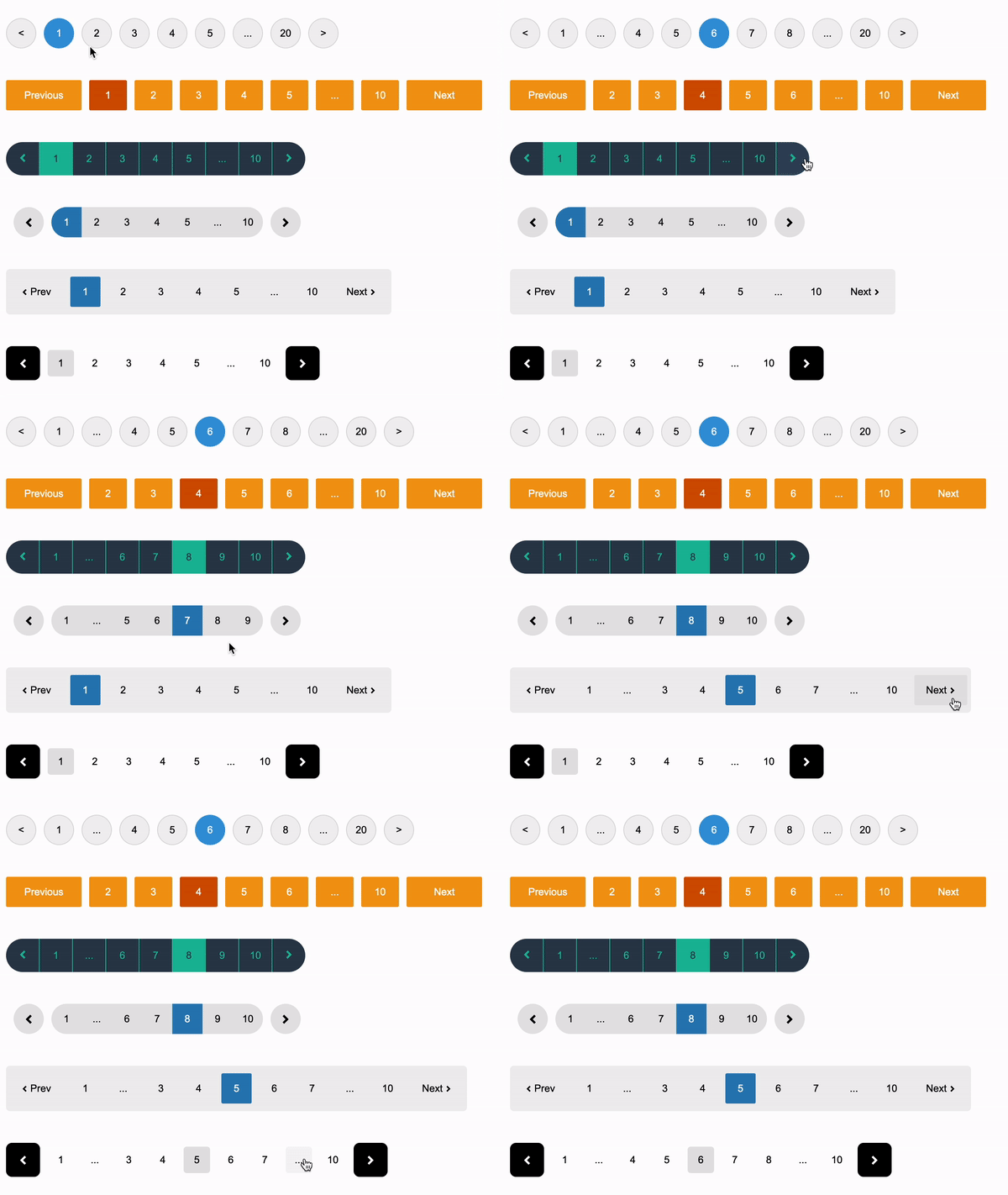 [](https://github.com/peshanghiwa/vue-awesome-paginate "Go to GitHub repo")
[](http://badge.fury.io/js/vue-awesome-paginate) [](http://badge.fury.io/js/vue-awesome-paginate) [](https://github.com/peshanghiwa/vue-awesome-paginate/blob/main/LICENSE)
Vue Awesome Paginate is a modern and powerfull vue js pagination library with a large set of various pagination components that are flexible, very lightweight, SEO friendly, customizable with pure CSS and very easy to use.
## Key Features
- All pagination functionalities are built in to the package with 0 dependants.
- Various different types of pagination components that you can enable or disable according to your needs, and what suits your website best.
- Complete customization support for every component using pure CSS.
- Complete RTL support.
- Search Engine Optimization friendly.
- Different localizations support.
- Package is built with typescript and vite with complete support for vue.js (3x) and nuxt.js (3.x)
# Table of Contents
- [**_Demo_**](#demo)
- [**_Requirements_**](#requirements)
- [**_Installation_**](#installation)
- [**_Vue.js_**](#vuejs)
- [**_Nuxt.js_**](#nuxtjs)
- [**_Usage_**](#usage)
- [**_API_**](#api)
- [**_Component Attributes_**](#Component-Attributes)
- [**_Class Name Attributes_**](#Class-Name-Attributes)
- [**_Slot Names_**](#Slot-Names)
- [**_Events_**](#Events)
- [**_Author_**](#author)
- [**_License_**](#license)
## Demo
This is a simple [**_Demo_**](https://codesandbox.io/s/vue-awesome-paginate-demo-gcg21i) environment for the package where you can use and test the package.
## Requirements
This package supports both vue.js and nuxt.js, you are required to use one of these versions:
- Vue.js 3.x
- Nuxt.js 3.x
## Installation
To use the package you must first add the it to your dependencies in your project.
```bash
$ npm i vue-awesome-paginate
```
Then you have to register the package in your project as well as import a necessary css file that comes with the package.
### Vue.js
main.js
```javascript
import { createApp } from "vue";
import App from "./App.vue";
// import the package
import VueAwesomePaginate from "vue-awesome-paginate";
// import the necessary css file
import "vue-awesome-paginate/dist/style.css";
// Register the package
createApp(App).use(VueAwesomePaginate).mount("#app");
```
### Nuxt.js
plugins/vue-awesome-paginate.js
```javascript
// import the package
import VueAwesomePaginate from "vue-awesome-paginate";
// import the necessary css file
import "vue-awesome-paginate/dist/style.css";
// Register the package
export default defineNuxtPlugin((nuxtApp) => {
nuxtApp.vueApp.use(VueAwesomePaginate);
});
```
## Usage
A complete vue-awesome-paginate component example with some custom CSS customization would be like this:
```html
```
##### Result of the above code:
[](https://github.com/peshanghiwa/vue-awesome-paginate "Go to GitHub repo")
[](http://badge.fury.io/js/vue-awesome-paginate) [](http://badge.fury.io/js/vue-awesome-paginate) [](https://github.com/peshanghiwa/vue-awesome-paginate/blob/main/LICENSE)
Vue Awesome Paginate is a modern and powerfull vue js pagination library with a large set of various pagination components that are flexible, very lightweight, SEO friendly, customizable with pure CSS and very easy to use.
## Key Features
- All pagination functionalities are built in to the package with 0 dependants.
- Various different types of pagination components that you can enable or disable according to your needs, and what suits your website best.
- Complete customization support for every component using pure CSS.
- Complete RTL support.
- Search Engine Optimization friendly.
- Different localizations support.
- Package is built with typescript and vite with complete support for vue.js (3x) and nuxt.js (3.x)
# Table of Contents
- [**_Demo_**](#demo)
- [**_Requirements_**](#requirements)
- [**_Installation_**](#installation)
- [**_Vue.js_**](#vuejs)
- [**_Nuxt.js_**](#nuxtjs)
- [**_Usage_**](#usage)
- [**_API_**](#api)
- [**_Component Attributes_**](#Component-Attributes)
- [**_Class Name Attributes_**](#Class-Name-Attributes)
- [**_Slot Names_**](#Slot-Names)
- [**_Events_**](#Events)
- [**_Author_**](#author)
- [**_License_**](#license)
## Demo
This is a simple [**_Demo_**](https://codesandbox.io/s/vue-awesome-paginate-demo-gcg21i) environment for the package where you can use and test the package.
## Requirements
This package supports both vue.js and nuxt.js, you are required to use one of these versions:
- Vue.js 3.x
- Nuxt.js 3.x
## Installation
To use the package you must first add the it to your dependencies in your project.
```bash
$ npm i vue-awesome-paginate
```
Then you have to register the package in your project as well as import a necessary css file that comes with the package.
### Vue.js
main.js
```javascript
import { createApp } from "vue";
import App from "./App.vue";
// import the package
import VueAwesomePaginate from "vue-awesome-paginate";
// import the necessary css file
import "vue-awesome-paginate/dist/style.css";
// Register the package
createApp(App).use(VueAwesomePaginate).mount("#app");
```
### Nuxt.js
plugins/vue-awesome-paginate.js
```javascript
// import the package
import VueAwesomePaginate from "vue-awesome-paginate";
// import the necessary css file
import "vue-awesome-paginate/dist/style.css";
// Register the package
export default defineNuxtPlugin((nuxtApp) => {
nuxtApp.vueApp.use(VueAwesomePaginate);
});
```
## Usage
A complete vue-awesome-paginate component example with some custom CSS customization would be like this:
```html
```
##### Result of the above code:
 ## Required Attributes
Total required attributes to build a full pagination for your website is only two attributes, the component will handle all the other functionalities and attributes by default
as simple as this example:
```html
```
##### Result of the above code:
## Required Attributes
Total required attributes to build a full pagination for your website is only two attributes, the component will handle all the other functionalities and attributes by default
as simple as this example:
```html
```
##### Result of the above code:
 ## Configurations
You have total control over your pagination component, you can configure every element's appearence, number and behavior.
Example: you can set items per single page, maximum pagination buttons to show and a click event handler.
```html
```
##### Result of the above code:
## Configurations
You have total control over your pagination component, you can configure every element's appearence, number and behavior.
Example: you can set items per single page, maximum pagination buttons to show and a click event handler.
```html
```
##### Result of the above code:
 ## (Show/Hide) or (Enable/Disable) breakpoint buttons
Breakpoint buttons are clickable and shown by default, if you click on them you will get a jump of max-pages-shown / 2 in the pagination
You can Disable/Enable or Hide/Show them through attributes
```html
```
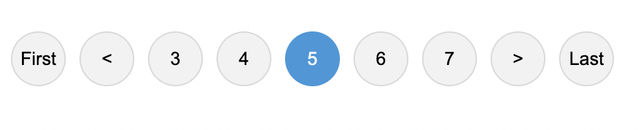
## Show Ending Buttons (First and Last Page Buttons)
You can hide/show Ending buttons to be able to navigate to first and last page of the pagination component
```html
```
##### Result of the above code:
## (Show/Hide) or (Enable/Disable) breakpoint buttons
Breakpoint buttons are clickable and shown by default, if you click on them you will get a jump of max-pages-shown / 2 in the pagination
You can Disable/Enable or Hide/Show them through attributes
```html
```
## Show Ending Buttons (First and Last Page Buttons)
You can hide/show Ending buttons to be able to navigate to first and last page of the pagination component
```html
```
##### Result of the above code:
 ## Hide Prev/Next buttons
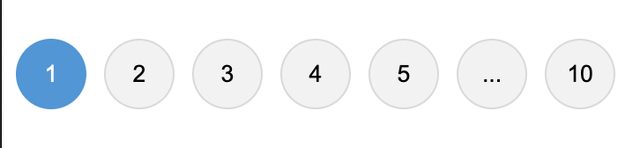
You can hide prev/next buttons in two ways
```html
```
##### Result of the above code:
## Hide Prev/Next buttons
You can hide prev/next buttons in two ways
```html
```
##### Result of the above code:
 ## Change buttons content
You can change the content inside the prev/next buttons in two ways:
1- Pass a string to **prev-button-content** or **next-button-content** attributes
```html
```
##### Result of the above code:
## Change buttons content
You can change the content inside the prev/next buttons in two ways:
1- Pass a string to **prev-button-content** or **next-button-content** attributes
```html
```
##### Result of the above code:
 2- Inject your own HTML content into the buttons through custom slots
```html
2- Inject your own HTML content into the buttons through custom slots
```html

 ```
##### Result of the above code:
```
##### Result of the above code:
 ## Custom Slots
**This 2nd method of injecting html through custom slots in to elements in the previous example is available for all the other controlling elements like breakpoint buttons and jump buttons etc...**
You can see all the slots in the slots table at API section
## Show Jump Buttons
Jump Buttons are extra layers on top of Prev/Next buttons, if you enable them they will appear at each ends of the component, you can customize and configure them just like any other elements of the component and if you click on them it will have the same behavior as clicking on breakppoint buttons which is jumping by (max-pages-show/2)
```html
```
##### Result of the above code:
## Custom Slots
**This 2nd method of injecting html through custom slots in to elements in the previous example is available for all the other controlling elements like breakpoint buttons and jump buttons etc...**
You can see all the slots in the slots table at API section
## Show Jump Buttons
Jump Buttons are extra layers on top of Prev/Next buttons, if you enable them they will appear at each ends of the component, you can customize and configure them just like any other elements of the component and if you click on them it will have the same behavior as clicking on breakppoint buttons which is jumping by (max-pages-show/2)
```html
```
##### Result of the above code:
 ## Make the component SEO friendly
Pagination components can have a great impact on SEO, it's important to make your pagination elements links, so that when crawlers crawl your page, they will be able to find the pagination elements and extract the links from them.
In order to achive this you can replace the button elements with anchor tag elements by changing **type** attribute to "link" and specify a **linkUrl** attribute to tell crawlers and search engines where this pagination element is pointing to.
**linkUrl** attribute must be a string url to where the pagination element is pointing to, and the string must include \[page\] placeholder, which will be replaced with the actual page number.
example:
```html
```
**Note:** Changing buttons to anchor tags won't affect the functionality or the behavior of the component, it's just a way to make the component SEO friendly. you will still have to handle the navigation logic yourself in **on-click** event attribute.
## RTL and Locale Support
There are complete supports for RTL and different localizations without using any other 3rd party libraries
```html
```
##### Result of the above code:
## Make the component SEO friendly
Pagination components can have a great impact on SEO, it's important to make your pagination elements links, so that when crawlers crawl your page, they will be able to find the pagination elements and extract the links from them.
In order to achive this you can replace the button elements with anchor tag elements by changing **type** attribute to "link" and specify a **linkUrl** attribute to tell crawlers and search engines where this pagination element is pointing to.
**linkUrl** attribute must be a string url to where the pagination element is pointing to, and the string must include \[page\] placeholder, which will be replaced with the actual page number.
example:
```html
```
**Note:** Changing buttons to anchor tags won't affect the functionality or the behavior of the component, it's just a way to make the component SEO friendly. you will still have to handle the navigation logic yourself in **on-click** event attribute.
## RTL and Locale Support
There are complete supports for RTL and different localizations without using any other 3rd party libraries
```html
```
##### Result of the above code:
 ## Custom Styles
By default pagination buttons have the default html styles, you can customize every element of the component through the default class names that are set for each element, or you can set your own class names for any element you want.
```html
```
##### Result of the above code:
## Custom Styles
By default pagination buttons have the default html styles, you can customize every element of the component through the default class names that are set for each element, or you can set your own class names for any element you want.
```html
```
##### Result of the above code:
 You don't necessarily need to set class names for the elements if you don't want to, you can just use their default class names that are available in the class names table in the API section.
**Important Note:** If the
================================================
FILE: src/VueAwesomePaginatePlugin.ts
================================================
// This is where the package installs.
import type { App } from "vue";
import { VueAwesomePaginate } from "./components";
export default {
install: (app: App) => {
app.component("VueAwesomePaginate", VueAwesomePaginate);
},
};
export { VueAwesomePaginate };
================================================
FILE: src/components/index.ts
================================================
export { default as VueAwesomePaginate } from "./vue-awesome-paginate.vue";
================================================
FILE: src/components/vue-awesome-paginate.vue
================================================
You don't necessarily need to set class names for the elements if you don't want to, you can just use their default class names that are available in the class names table in the API section.
**Important Note:** If the
================================================
FILE: src/VueAwesomePaginatePlugin.ts
================================================
// This is where the package installs.
import type { App } from "vue";
import { VueAwesomePaginate } from "./components";
export default {
install: (app: App) => {
app.component("VueAwesomePaginate", VueAwesomePaginate);
},
};
export { VueAwesomePaginate };
================================================
FILE: src/components/index.ts
================================================
export { default as VueAwesomePaginate } from "./vue-awesome-paginate.vue";
================================================
FILE: src/components/vue-awesome-paginate.vue
================================================
-
{{ firstPageContent }}
-
{{ backwardJumpButtonContent }}
-
{{ prevButtonContent }}
-
{{ isRtl ? NumbersLocale(totalPages) : NumbersLocale(1) }}
-
{{ startingBreakpointContent }}
-
{{ NumbersLocale(page) }}
-
{{ endingBreakpointButtonContent }}
-
{{ isRtl ? NumbersLocale(1) : NumbersLocale(totalPages) }}
-
{{ nextButtonContent }}
-
{{ forwardJumpButtonContent }}
-
{{ lastPageContent }}
================================================
FILE: src/env.d.ts
================================================
///
declare module "*.vue" {
import type { DefineComponent } from "vue";
// eslint-disable-next-line @typescript-eslint/no-explicit-any, @typescript-eslint/ban-types
const component: DefineComponent<{}, {}, any>;
export default component;
}
================================================
FILE: src/main.ts
================================================
import { createApp } from "vue";
import App from "./App.vue";
import VueAwesomePaginatePlugin from "./VueAwesomePaginatePlugin";
createApp(App).use(VueAwesomePaginatePlugin).mount("#app");
================================================
FILE: test/breakpoint-buttons.test.ts
================================================
/**
* @vitest-environment happy-dom
*/
import { describe, it, expect } from "vitest";
import { mount } from "@vue/test-utils";
import { ref } from "vue";
import VueAwesomePaginate from "../src/components/vue-awesome-paginate.vue";
describe("First and Last Buttons", () => {
it("should render the ending breakpoint button only when pagination is at the very beggining", () => {
const currentPage = ref(1);
const wrapper = mount(VueAwesomePaginate, {
propsData: {
totalItems: 100,
modelValue: currentPage,
},
});
expect(wrapper.find(".starting-breakpoint-button").exists()).toBeFalsy();
expect(wrapper.find(".ending-breakpoint-button").exists()).toBeTruthy();
});
it("should render the starting breakpoint button only when pagination is at the very end", () => {
const currentPage = ref(10);
const wrapper = mount(VueAwesomePaginate, {
propsData: {
totalItems: 100,
modelValue: currentPage,
},
});
expect(wrapper.find(".starting-breakpoint-button").exists()).toBeTruthy();
expect(wrapper.find(".ending-breakpoint-button").exists()).toBeFalsy();
});
it("should render both ending buttons when pagination is at the middle", () => {
const currentPage = ref(5);
const wrapper = mount(VueAwesomePaginate, {
propsData: {
totalItems: 100,
modelValue: currentPage,
},
});
expect(wrapper.find(".starting-breakpoint-button").exists()).toBeTruthy();
expect(wrapper.find(".ending-breakpoint-button").exists()).toBeTruthy();
});
});
================================================
FILE: test/first-last-buttons.test.ts
================================================
/**
* @vitest-environment happy-dom
*/
import { describe, it, expect } from "vitest";
import { mount } from "@vue/test-utils";
import { ref } from "vue";
import VueAwesomePaginate from "../src/components/vue-awesome-paginate.vue";
describe("First and Last Buttons", () => {
it("should render the last button only when pagination is at the very beggining", () => {
const currentPage = ref(1);
const wrapper = mount(VueAwesomePaginate, {
propsData: {
totalItems: 100,
modelValue: currentPage,
},
});
expect(wrapper.find(".first-button").exists()).toBeFalsy();
expect(wrapper.find(".last-button").exists()).toBeTruthy();
});
it("should render the first button only when pagination is at the very end", () => {
const currentPage = ref(10);
const wrapper = mount(VueAwesomePaginate, {
propsData: {
totalItems: 100,
modelValue: currentPage,
},
});
expect(wrapper.find(".first-button").exists()).toBeTruthy();
expect(wrapper.find(".last-button").exists()).toBeFalsy();
});
it("should render both ending buttons only when pagination is at the middle", () => {
const currentPage = ref(5);
const wrapper = mount(VueAwesomePaginate, {
propsData: {
totalItems: 100,
modelValue: currentPage,
},
});
expect(wrapper.find(".first-button").exists()).toBeTruthy();
expect(wrapper.find(".last-button").exists()).toBeTruthy();
});
it("should render both ending buttons only when pagination is at the middle", () => {
const currentPage = ref(5);
const wrapper = mount(VueAwesomePaginate, {
propsData: {
totalItems: 100,
modelValue: currentPage,
},
});
expect(wrapper.find(".first-button").exists()).toBeTruthy();
expect(wrapper.find(".last-button").exists()).toBeTruthy();
});
});
================================================
FILE: test/jump-buttons.test.ts
================================================
/**
* @vitest-environment happy-dom
*/
import { describe, it, expect } from "vitest";
import { mount } from "@vue/test-utils";
import { ref } from "vue";
import VueAwesomePaginate from "../src/components/vue-awesome-paginate.vue";
describe("Jump Buttons", () => {
it("should render the forward jump button only when page is 1", () => {
const currentPage = ref(1);
const wrapper = mount(VueAwesomePaginate, {
propsData: {
showJumpButtons: true,
totalItems: 100,
modelValue: currentPage,
},
});
expect(wrapper.find(".backward-jump-button").exists()).toBeFalsy();
expect(wrapper.find(".forward-jump-button").exists()).toBeTruthy();
});
it("should render the backward jump button only when page is the last one", () => {
const currentPage = ref(10);
const wrapper = mount(VueAwesomePaginate, {
propsData: {
showJumpButtons: true,
totalItems: 100,
modelValue: currentPage,
},
});
expect(wrapper.find(".backward-jump-button").exists()).toBeTruthy();
expect(wrapper.find(".forward-jump-button").exists()).toBeFalsy();
});
it("should render the both jump buttons", () => {
const currentPage = ref(5);
const wrapper = mount(VueAwesomePaginate, {
propsData: {
showJumpButtons: true,
totalItems: 100,
modelValue: currentPage,
},
});
expect(wrapper.find(".backward-jump-button").exists()).toBeTruthy();
expect(wrapper.find(".forward-jump-button").exists()).toBeTruthy();
});
it("should not render the jump buttons when disabled", () => {
const currentPage = ref(1);
const wrapper = mount(VueAwesomePaginate, {
propsData: {
showJumpButtons: false,
totalItems: 100,
modelValue: currentPage,
},
});
expect(wrapper.find(".backward-jump-button").exists()).toBeFalsy();
expect(wrapper.find(".forward-jump-button").exists()).toBeFalsy();
});
it("should not render the jump buttons when total-items / items-per-page is smaller than max-pages-shown", () => {
const currentPage = ref(1);
const wrapper = mount(VueAwesomePaginate, {
propsData: {
showJumpButtons: true,
totalItems: 50,
maxPagesShown: 5,
itemsPerPage: 10,
modelValue: currentPage,
},
});
expect(wrapper.find(".backward-jump-button").exists()).toBeFalsy();
expect(wrapper.find(".forward-jump-button").exists()).toBeFalsy();
});
});
================================================
FILE: test/navigation-buttons.test.ts
================================================
/**
* @vitest-environment happy-dom
*/
import { describe, it, expect } from "vitest";
import { mount } from "@vue/test-utils";
import { ref } from "vue";
import VueAwesomePaginate from "../src/components/vue-awesome-paginate.vue";
describe("Jump Buttons", () => {
it("should render navigation buttons under no configs", () => {
const currentPage = ref(1);
const wrapper = mount(VueAwesomePaginate, {
propsData: {
totalItems: 100,
modelValue: currentPage,
},
});
expect(wrapper.find(".back-button").exists()).toBeTruthy();
expect(wrapper.find(".next-button").exists()).toBeTruthy();
});
it("should not render navigation buttons when hidePrevNext is set to true", () => {
const currentPage = ref(1);
const wrapper = mount(VueAwesomePaginate, {
propsData: {
totalItems: 100,
hidePrevNext: true,
modelValue: currentPage,
},
});
expect(wrapper.find(".back-button").exists()).toBeFalsy();
expect(wrapper.find(".next-button").exists()).toBeFalsy();
});
it("should render the next navigation button only when hidePrevNextWhenEnds is set to true and current page is 1", () => {
const currentPage = ref(1);
const wrapper = mount(VueAwesomePaginate, {
propsData: {
totalItems: 100,
hidePrevNextWhenEnds: true,
modelValue: currentPage,
},
});
expect(wrapper.find(".back-button").exists()).toBeFalsy();
expect(wrapper.find(".next-button").exists()).toBeTruthy();
});
it("should render the back navigation button only when hidePrevNextWhenEnds is set to true and current page is last one", () => {
const currentPage = ref(10);
const wrapper = mount(VueAwesomePaginate, {
propsData: {
totalItems: 100,
hidePrevNextWhenEnds: true,
modelValue: currentPage,
},
});
expect(wrapper.find(".back-button").exists()).toBeTruthy();
expect(wrapper.find(".next-button").exists()).toBeFalsy();
});
it("should render both navigation buttons only when hidePrevNextWhenEnds is set to true and current page is in the middle", () => {
const currentPage = ref(5);
const wrapper = mount(VueAwesomePaginate, {
propsData: {
totalItems: 100,
hidePrevNextWhenEnds: true,
modelValue: currentPage,
},
});
expect(wrapper.find(".back-button").exists()).toBeTruthy();
expect(wrapper.find(".next-button").exists()).toBeTruthy();
});
});
================================================
FILE: test/numbers-buttons.test.ts
================================================
/**
* @vitest-environment happy-dom
*/
import { describe, it, expect } from "vitest";
import { mount } from "@vue/test-utils";
import { ref } from "vue";
import VueAwesomePaginate from "../src/components/vue-awesome-paginate.vue";
describe("First and Last Buttons", () => {
it("should render 5 number buttons by default when total items are more than or equal to 50", () => {
const currentPage = ref(1);
const wrapper = mount(VueAwesomePaginate, {
propsData: {
totalItems: 50,
modelValue: currentPage,
},
});
expect(wrapper.find(".number-buttons").exists()).toBeTruthy();
expect(wrapper.findAll(".number-buttons").length).toBe(5);
});
it("should render 3 number buttons when maxPagesShown is set to 3", () => {
const currentPage = ref(1);
const wrapper = mount(VueAwesomePaginate, {
propsData: {
totalItems: 50,
modelValue: currentPage,
maxPagesShown: 3,
},
});
expect(wrapper.find(".number-buttons").exists()).toBeTruthy();
expect(wrapper.findAll(".number-buttons").length).toBe(3);
});
});
================================================
FILE: tsconfig.json
================================================
{
"extends": "@vue/tsconfig/tsconfig.web.json",
"include": ["env.d.ts", "src/**/*", "src/**/*.vue"],
"compilerOptions": {
"strictNullChecks": false,
"baseUrl": ".",
"paths": {
"@/*": ["./src/*"]
}
},
"references": [
{
"path": "./tsconfig.vite-config.json"
}
]
}
================================================
FILE: tsconfig.vite-config.json
================================================
{
"extends": "@vue/tsconfig/tsconfig.node.json",
"include": ["vite.config.*"],
"compilerOptions": {
"composite": true,
"types": ["node", "vitest"]
}
}
================================================
FILE: vite.config.ts
================================================
import { defineConfig } from "vite";
import vue from "@vitejs/plugin-vue";
import typescript2 from "rollup-plugin-typescript2";
// https://vitejs.dev/config/
export default defineConfig({
plugins: [
vue(),
typescript2({
check: false,
include: ["src/components/*.vue"],
tsconfigOverride: {
compilerOptions: {
sourceMap: true,
declaration: true,
declarationMap: true,
},
exclude: ["vite.config.ts", "main.ts"],
},
}),
],
define: {
__VUE_PROD_HYDRATION_MISMATCH_DETAILS__: false,
},
build: {
cssCodeSplit: false,
lib: {
entry: "./src/VueAwesomePaginatePlugin.ts",
formats: ["es", "cjs"],
name: "VueAwesomePaginate",
fileName: (format) => (format === "es" ? "index.js" : "index.cjs"),
},
rollupOptions: {
external: ["vue"],
output: {
globals: {
vue: "Vue",
},
},
},
},
});