Repository: pmndrs/valtio
Branch: main
Commit: 383ccf185997
Files: 203
Total size: 429.7 KB
Directory structure:
gitextract_vdkwfl3k/
├── .codesandbox/
│ └── ci.json
├── .github/
│ ├── DISCUSSION_TEMPLATE/
│ │ └── bug-report.yml
│ ├── FUNDING.yml
│ ├── ISSUE_TEMPLATE/
│ │ ├── bug_report.md
│ │ └── config.yml
│ ├── pull_request_template.md
│ └── workflows/
│ ├── compressed-size.yml
│ ├── preview-release.yml
│ ├── publish.yml
│ ├── test-multiple-builds.yml
│ ├── test-multiple-versions.yml
│ ├── test-old-typescript.yml
│ └── test.yml
├── .gitignore
├── .prettierignore
├── CONTRIBUTING.md
├── LICENSE
├── README.md
├── docs/
│ ├── api/
│ │ ├── advanced/
│ │ │ ├── ref.mdx
│ │ │ ├── snapshot.mdx
│ │ │ ├── subscribe-ops.mdx
│ │ │ └── subscribe.mdx
│ │ ├── basic/
│ │ │ ├── proxy.mdx
│ │ │ └── useSnapshot.mdx
│ │ ├── hacks/
│ │ │ ├── getVersion.mdx
│ │ │ └── internals.mdx
│ │ └── utils/
│ │ ├── derive.mdx
│ │ ├── devtools.mdx
│ │ ├── proxyMap.mdx
│ │ ├── proxySet.mdx
│ │ ├── proxyWithHistory.mdx
│ │ ├── subscribeKey.mdx
│ │ ├── unstable_deepProxy.mdx
│ │ └── watch.mdx
│ ├── guides/
│ │ ├── async.mdx
│ │ ├── component-state.mdx
│ │ ├── computed-properties.mdx
│ │ └── migrating-to-v2.mdx
│ ├── how-tos/
│ │ ├── how-to-avoid-rerenders-manually.mdx
│ │ ├── how-to-easily-access-the-state-from-anywhere-in-the-application.mdx
│ │ ├── how-to-organize-actions.mdx
│ │ ├── how-to-persist-states.mdx
│ │ ├── how-to-reset-state.mdx
│ │ ├── how-to-split-and-compose-states.mdx
│ │ ├── how-to-update-values-inside-arrays.mdx
│ │ ├── how-to-use-with-context.mdx
│ │ ├── how-valtio-works.mdx
│ │ └── some-gotchas.mdx
│ ├── introduction/
│ │ └── getting-started.mdx
│ ├── introduction.mdx
│ ├── readme.md
│ └── resources/
│ ├── community.mdx
│ ├── learn.mdx
│ └── libraries.mdx
├── eslint.config.mjs
├── examples/
│ ├── README.md
│ ├── counter/
│ │ ├── index.html
│ │ ├── package.json
│ │ ├── src/
│ │ │ ├── App.tsx
│ │ │ ├── index.css
│ │ │ ├── main.tsx
│ │ │ ├── prism.css
│ │ │ └── vite-env.d.ts
│ │ ├── tsconfig.app.json
│ │ ├── tsconfig.json
│ │ ├── tsconfig.node.json
│ │ └── vite.config.ts
│ ├── editor-proxyWithHistory/
│ │ ├── index.html
│ │ ├── package.json
│ │ ├── src/
│ │ │ ├── App.tsx
│ │ │ ├── index.css
│ │ │ ├── main.tsx
│ │ │ └── vite-env.d.ts
│ │ ├── tsconfig.app.json
│ │ ├── tsconfig.json
│ │ ├── tsconfig.node.json
│ │ └── vite.config.ts
│ ├── photo-booth-vanillajs/
│ │ ├── index.html
│ │ ├── package.json
│ │ └── src/
│ │ ├── index.css
│ │ └── main.js
│ ├── starter/
│ │ ├── README.md
│ │ ├── index.html
│ │ ├── package.json
│ │ ├── src/
│ │ │ ├── index.css
│ │ │ ├── index.tsx
│ │ │ └── vite-env.d.ts
│ │ ├── tsconfig.json
│ │ └── vite.config.ts
│ ├── subscribe/
│ │ └── index.html
│ ├── todo/
│ │ ├── index.html
│ │ ├── package.json
│ │ ├── src/
│ │ │ ├── App.tsx
│ │ │ ├── index.css
│ │ │ ├── main.tsx
│ │ │ ├── prism.css
│ │ │ ├── store.ts
│ │ │ └── vite-env.d.ts
│ │ ├── tsconfig.app.json
│ │ ├── tsconfig.json
│ │ ├── tsconfig.node.json
│ │ └── vite.config.ts
│ └── todo-with-proxyMap/
│ ├── index.html
│ ├── package.json
│ ├── src/
│ │ ├── AddTodoInput.tsx
│ │ ├── App.tsx
│ │ ├── Filter.tsx
│ │ ├── TodoItem.tsx
│ │ ├── TodoList.tsx
│ │ ├── main.tsx
│ │ ├── react-app-env.d.ts
│ │ ├── store.ts
│ │ └── styles.css
│ ├── tsconfig.app.json
│ ├── tsconfig.json
│ ├── tsconfig.node.json
│ └── vite.config.ts
├── package.json
├── pnpm-workspace.yaml
├── rollup.config.mjs
├── src/
│ ├── index.ts
│ ├── react/
│ │ ├── utils/
│ │ │ └── useProxy.ts
│ │ └── utils.ts
│ ├── react.ts
│ ├── types.d.ts
│ ├── utils.ts
│ ├── vanilla/
│ │ ├── utils/
│ │ │ ├── deepClone.ts
│ │ │ ├── deepProxy.ts
│ │ │ ├── devtools.ts
│ │ │ ├── proxyMap.ts
│ │ │ ├── proxySet.ts
│ │ │ ├── subscribeKey.ts
│ │ │ └── watch.ts
│ │ └── utils.ts
│ └── vanilla.ts
├── tests/
│ ├── async.test.tsx
│ ├── basic.test.tsx
│ ├── class.test.tsx
│ ├── deepClone.test.tsx
│ ├── deepProxy.test.tsx
│ ├── devtools.test.tsx
│ ├── getter.test.tsx
│ ├── mapset.test.tsx
│ ├── memoryleaks.test.ts
│ ├── optimization.test.tsx
│ ├── performance.test.tsx
│ ├── proxyMap.bench.ts
│ ├── proxyMap.test.tsx
│ ├── proxySet.test.tsx
│ ├── ref.test.tsx
│ ├── setup.ts
│ ├── snapshot.test.ts
│ ├── subscribe.test.tsx
│ ├── useProxy.test.tsx
│ ├── utils.tsx
│ └── watch.test.tsx
├── tsconfig.json
├── vitest.config.mts
└── website/
├── .eslintrc.json
├── .gitignore
├── README.md
├── _utils/
│ ├── file_helpers.ts
│ └── index.ts
├── components/
│ ├── LandingPage/
│ │ ├── AnimatedShapes.tsx
│ │ ├── CodeExample.tsx
│ │ ├── GettingStarted.tsx
│ │ ├── state.ts
│ │ └── useFloatAnimation.tsx
│ ├── MDXRenderer/
│ │ ├── MDXRenderer.tsx
│ │ └── index.ts
│ ├── SEO/
│ │ ├── SEO.tsx
│ │ └── index.ts
│ ├── ToggleTheme/
│ │ ├── ToggleTheme.tsx
│ │ └── index.ts
│ └── layouts/
│ ├── BasicLayout/
│ │ ├── BasicLayout.tsx
│ │ └── index.ts
│ ├── DocLayout/
│ │ ├── DocLayout.tsx
│ │ └── index.ts
│ ├── Header/
│ │ ├── Header.tsx
│ │ └── index.ts
│ └── index.ts
├── hooks/
│ ├── index.ts
│ ├── useCodesandboxTheme.ts
│ ├── useIsomorphicLayoutEffect.ts
│ └── useTheme.ts
├── lib/
│ ├── mdx.ts
│ └── remarkCodeSandboxURLUpdater.ts
├── next-env.d.ts
├── next.config.js
├── package.json
├── pages/
│ ├── _app.tsx
│ ├── _document.tsx
│ ├── docs/
│ │ └── [...slug].tsx
│ └── index.tsx
├── postcss.config.js
├── state/
│ ├── index.ts
│ └── useThemeState.ts
├── styles/
│ ├── landing-page.css
│ ├── prism-theme.css
│ └── tailwind.css
├── tailwind.config.js
├── tsconfig.json
└── types.d.ts
================================================
FILE CONTENTS
================================================
================================================
FILE: .codesandbox/ci.json
================================================
{
"packages": ["dist"],
"sandboxes": [
"new",
"react-typescript-react-ts",
"simple-react-browserify-x9yni",
"simple-snowpack-react-o1gmx",
"react-parcel-onewf"
],
"node": "18"
}
================================================
FILE: .github/DISCUSSION_TEMPLATE/bug-report.yml
================================================
labels: ['bug']
body:
- type: markdown
attributes:
value: If you don't have a reproduction link, please choose a different category.
- type: textarea
attributes:
label: Bug Description
description: Describe the bug you encountered
validations:
required: true
- type: input
attributes:
label: Reproduction Link
description: A link to a [TypeScript Playground](https://www.typescriptlang.org/play), a [StackBlitz Project](https://stackblitz.com/) or something else with a minimal reproduction.
validations:
required: true
================================================
FILE: .github/FUNDING.yml
================================================
# These are supported funding model platforms
github: [dai-shi] # Replace with up to 4 GitHub Sponsors-enabled usernames e.g., [user1, user2]
patreon: # Replace with a single Patreon username
open_collective: # Replace with a single Open Collective username
ko_fi: # Replace with a single Ko-fi username
tidelift: # Replace with a single Tidelift platform-name/package-name e.g., npm/babel
community_bridge: # Replace with a single Community Bridge project-name e.g., cloud-foundry
liberapay: # Replace with a single Liberapay username
issuehunt: # Replace with a single IssueHunt username
otechie: # Replace with a single Otechie username
lfx_crowdfunding: # Replace with a single LFX Crowdfunding project-name e.g., cloud-foundry
custom: ['https://daishi.gumroad.com/l/learn-valtio'] # Replace with up to 4 custom sponsorship URLs e.g., ['link1', 'link2']
================================================
FILE: .github/ISSUE_TEMPLATE/bug_report.md
================================================
---
name: Assigned issue
about: This is to create a new issue that already has an assignee. Please open a new discussion otherwise.
title: ''
labels: ''
assignees: ''
---
================================================
FILE: .github/ISSUE_TEMPLATE/config.yml
================================================
blank_issues_enabled: false
contact_links:
- name: Bug Reports
url: https://github.com/pmndrs/valtio/discussions/new?category=bug-report
about: Please post bug reports here.
- name: Questions
url: https://github.com/pmndrs/valtio/discussions/new?category=q-a
about: Please post questions here.
- name: Other Discussions
url: https://github.com/pmndrs/valtio/discussions/new/choose
about: Please post ideas and general discussions here.
================================================
FILE: .github/pull_request_template.md
================================================
## Related Bug Reports or Discussions
Fixes #
## Summary
## Check List
- [ ] `pnpm run fix` for formatting and linting code and docs
================================================
FILE: .github/workflows/compressed-size.yml
================================================
name: Compressed Size
on: [pull_request]
jobs:
compressed_size:
runs-on: ubuntu-latest
steps:
- uses: actions/checkout@de0fac2e4500dabe0009e67214ff5f5447ce83dd # v6.0.2
- uses: pnpm/action-setup@41ff72655975bd51cab0327fa583b6e92b6d3061 # v4.2.0
- uses: actions/setup-node@6044e13b5dc448c55e2357c09f80417699197238 # v6.2.0
with:
node-version: 'lts/*'
cache: 'pnpm'
- uses: preactjs/compressed-size-action@49c7ff02f46adc39a83c24e91f6110ba8138a19d # v3
with:
pattern: './dist/**/*.{js,mjs}'
================================================
FILE: .github/workflows/preview-release.yml
================================================
name: Preview Release
on: [push, pull_request]
jobs:
preview_release:
runs-on: ubuntu-latest
steps:
- uses: actions/checkout@de0fac2e4500dabe0009e67214ff5f5447ce83dd # v6.0.2
- uses: pnpm/action-setup@41ff72655975bd51cab0327fa583b6e92b6d3061 # v4.2.0
- uses: actions/setup-node@6044e13b5dc448c55e2357c09f80417699197238 # v6.2.0
with:
node-version: 'lts/*'
cache: 'pnpm'
- run: pnpm install
- run: pnpm run build
- run: pnpm dlx pkg-pr-new publish './dist' --compact --template './examples/*'
================================================
FILE: .github/workflows/publish.yml
================================================
name: Publish
on:
release:
types: [published]
permissions:
id-token: write
contents: read
jobs:
publish:
runs-on: ubuntu-latest
steps:
- uses: actions/checkout@de0fac2e4500dabe0009e67214ff5f5447ce83dd # v6.0.2
- uses: pnpm/action-setup@41ff72655975bd51cab0327fa583b6e92b6d3061 # v4.2.0
- uses: actions/setup-node@6044e13b5dc448c55e2357c09f80417699197238 # v6.2.0
with:
node-version: 'lts/*'
registry-url: 'https://registry.npmjs.org'
cache: 'pnpm'
- run: pnpm install
- run: pnpm run build
- run: npm publish
working-directory: dist
================================================
FILE: .github/workflows/test-multiple-builds.yml
================================================
name: Test Multiple Builds
on:
push:
branches: [main]
pull_request:
types: [opened, synchronize]
jobs:
test_multiple_builds:
runs-on: ubuntu-latest
strategy:
fail-fast: false
matrix:
build: [cjs, esm]
env: [development] # [development, production]
steps:
- uses: actions/checkout@de0fac2e4500dabe0009e67214ff5f5447ce83dd # v6.0.2
- uses: pnpm/action-setup@41ff72655975bd51cab0327fa583b6e92b6d3061 # v4.2.0
- uses: actions/setup-node@6044e13b5dc448c55e2357c09f80417699197238 # v6.2.0
with:
node-version: 'lts/*'
cache: 'pnpm'
- run: pnpm install
- run: pnpm run build
- name: Patch for DEV-ONLY
if: ${{ matrix.env == 'development' }}
run: |
sed -i~ "s/it[.a-zA-Z]*('\[DEV-ONLY\]/it('/" tests/*.ts tests/*.tsx
sed -i~ "s/it[.a-zA-Z]*('\[PRD-ONLY\]/it.skip('/" tests/*.ts tests/*.tsx
- name: Patch for PRD-ONLY
if: ${{ matrix.env == 'production' }}
run: |
sed -i~ "s/it[.a-zA-Z]*('\[PRD-ONLY\]/it('/" tests/*.ts tests/*.tsx
sed -i~ "s/it[.a-zA-Z]*('\[DEV-ONLY\]/it.skip('/" tests/*.ts tests/*.tsx
- name: Patch for CJS
if: ${{ matrix.build == 'cjs' }}
run: |
sed -i~ "s/resolve('\.\/src\(.*\)\.ts')/resolve('\.\/dist\1.js')/" vitest.config.mts
- name: Patch for ESM
if: ${{ matrix.build == 'esm' }}
run: |
sed -i~ "s/resolve('\.\/src\(.*\)\.ts')/resolve('\.\/dist\/esm\1.mjs')/" vitest.config.mts
sed -i~ "1s/^/import.meta.env.MODE='${NODE_ENV}';/" tests/*.ts tests/*.tsx
env:
NODE_ENV: ${{ matrix.env }}
- name: Test ${{ matrix.build }} ${{ matrix.env }}
run: |
pnpm run test:spec
env:
NODE_ENV: ${{ matrix.env }}
================================================
FILE: .github/workflows/test-multiple-versions.yml
================================================
name: Test Multiple Versions
on:
push:
branches: [main]
pull_request:
types: [opened, synchronize]
jobs:
test_multiple_versions:
runs-on: ubuntu-latest
strategy:
fail-fast: false
matrix:
react:
- 18.0.0
- 18.1.0
- 18.2.0
- 18.3.1
- 19.0.0
- 19.1.0
- 19.2.0
- 19.3.0-canary-e0cc7202-20260227
- 0.0.0-experimental-e0cc7202-20260227
steps:
- uses: actions/checkout@de0fac2e4500dabe0009e67214ff5f5447ce83dd # v6.0.2
- uses: pnpm/action-setup@41ff72655975bd51cab0327fa583b6e92b6d3061 # v4.2.0
- uses: actions/setup-node@6044e13b5dc448c55e2357c09f80417699197238 # v6.2.0
with:
node-version: 'lts/*'
cache: 'pnpm'
- run: pnpm install
- name: Install legacy testing-library
if: ${{ startsWith(matrix.react, '16.') || startsWith(matrix.react, '17.') }}
run: pnpm add -D @testing-library/react@12.1.4
- name: Patch for React 16
if: ${{ startsWith(matrix.react, '16.') }}
run: |
sed -i~ '1s/^/import React from "react";/' tests/*.tsx
sed -i~ 's/"jsx": "react-jsx"/"jsx": "react"/' tsconfig.json
sed -i~ 's/import\.meta\.env[?]\.MODE/"DEVELOPMENT".toLowerCase()/' src/*.ts src/*/*.ts src/*/*/*.ts
- name: Test ${{ matrix.react }}
run: |
pnpm add -D react@${{ matrix.react }} react-dom@${{ matrix.react }}
pnpm run test:spec
================================================
FILE: .github/workflows/test-old-typescript.yml
================================================
name: Test Old TypeScript
on:
push:
branches: [main]
pull_request:
types: [opened, synchronize]
jobs:
test_old_typescript:
runs-on: ubuntu-latest
strategy:
fail-fast: false
matrix:
typescript:
- 5.9.3
- 5.8.3
- 5.7.3
- 5.6.3
- 5.5.4
- 5.4.5
- 5.3.3
- 5.2.2
- 5.1.6
- 5.0.4
- 4.9.5
- 4.8.4
- 4.7.4
- 4.6.4
- 4.5.5
steps:
- uses: actions/checkout@de0fac2e4500dabe0009e67214ff5f5447ce83dd # v6.0.2
- uses: pnpm/action-setup@41ff72655975bd51cab0327fa583b6e92b6d3061 # v4.2.0
- uses: actions/setup-node@6044e13b5dc448c55e2357c09f80417699197238 # v6.2.0
with:
node-version: 'lts/*'
cache: 'pnpm'
- run: pnpm install
- run: pnpm run build
- name: Patch for all TS
run: |
sed -i~ 's/"isolatedDeclarations": true,//' tsconfig.json
- name: Patch for v4/v3 TS
if: ${{ startsWith(matrix.typescript, '4.') || startsWith(matrix.typescript, '3.') }}
run: |
sed -i~ 's/"verbatimModuleSyntax": true,//' tsconfig.json
- name: Patch for Old TS
if: ${{ matrix.typescript == '5.5.4' || matrix.typescript == '5.4.5' || matrix.typescript == '5.3.3' || matrix.typescript == '5.2.2' || matrix.typescript == '5.1.6' || matrix.typescript == '5.0.4' || matrix.typescript == '4.9.5' || matrix.typescript == '4.8.4' || matrix.typescript == '4.7.4' || matrix.typescript == '4.6.4' || matrix.typescript == '4.5.5' }}
run: |
sed -i~ 's/"moduleResolution": "bundler",/"moduleResolution": "node",/' tsconfig.json
sed -i~ 's/"allowImportingTsExtensions": true,//' tsconfig.json
sed -i~ 's/"valtio": \["\.\/src\/index\.ts"\],/"valtio": [".\/dist\/index.d.ts"],/' tsconfig.json
sed -i~ 's/"valtio\/\*": \["\.\/src\/\*\.ts"\]/"valtio\/*": [".\/dist\/*.d.ts"]/' tsconfig.json
sed -i~ 's/"include": .*/"include": ["src\/types.d.ts", "dist\/**\/*", "tests\/**\/*"],/' tsconfig.json
- name: Patch for Older TS
if: ${{ matrix.typescript == '4.7.4' || matrix.typescript == '4.6.4' || matrix.typescript == '4.5.5' }}
run: |
pnpm json -I -f package.json -e "this.resolutions={}; this.resolutions['@types/node']='18.13.0';"
pnpm add -D @types/node@18.13.0
pnpm add -D vitest@3.2.4 @vitest/coverage-v8@3.2.4 @vitest/ui@3.2.4
- name: Install old TypeScript
run: pnpm add -D typescript@${{ matrix.typescript }}
- name: Test ${{ matrix.typescript }}
run: pnpm run test:types
================================================
FILE: .github/workflows/test.yml
================================================
name: Test
on:
push:
branches: [main]
pull_request:
types: [opened, synchronize]
jobs:
test:
runs-on: ubuntu-latest
steps:
- uses: actions/checkout@de0fac2e4500dabe0009e67214ff5f5447ce83dd # v6.0.2
- uses: pnpm/action-setup@41ff72655975bd51cab0327fa583b6e92b6d3061 # v4.2.0
- uses: actions/setup-node@6044e13b5dc448c55e2357c09f80417699197238 # v6.2.0
with:
node-version: 'lts/*'
cache: 'pnpm'
- run: pnpm install
- run: pnpm run test:format
- run: pnpm run test:types
- run: pnpm run test:lint
- run: pnpm run test:spec
- run: pnpm run build # we don't have any other workflows to test build
================================================
FILE: .gitignore
================================================
# dependencies
node_modules
.pnp
.pnp.js
# testing
coverage
# production
dist
build
# dotenv environment variables file
.env
.env.local
.env.development.local
.env.test.local
.env.production.local
# logs
npm-debug.log*
yarn-debug.log*
yarn-error.log*
# misc
.DS_Store
.idea
# examples
examples/**/*/package-lock.json
examples/**/*/yarn.lock
examples/**/*/pnpm-lock.yaml
examples/**/*/bun.lockb
================================================
FILE: .prettierignore
================================================
dist
pnpm-lock.yaml
================================================
FILE: CONTRIBUTING.md
================================================
# Contributing
## General Guideline
### Reporting Issues
If you have found what you think is a bug, please [start a discussion](https://github.com/pmndrs/valtio/discussions/new?category=bug-report).
For any usage questions, please [start a discussion](https://github.com/pmndrs/valtio/discussions/new?category=q-a).
### Suggesting New Features
If you are here to suggest a feature, first [start a discussion](https://github.com/pmndrs/valtio/discussions/new?category=ideas) if it does not already exist. From there, we will discuss use-cases for the feature and then finally discuss how it could be implemented.
### Committing
We are applying [conventional commit spec](https://www.conventionalcommits.org/en/v1.0.0/) here. In short, that means a commit has to be one of the following types:
Your commit type must be one of the following:
- **feat**: A new feature.
- **fix**: A bug fix.
- **refactor**: A code change that neither fixes a bug nor adds a feature.
- **chore**: Changes to the build process, configuration, dependencies, CI/CD pipelines, or other auxiliary tools and libraries.
- **docs**: Documentation-only changes.
- **test**: Adding missing or correcting existing tests.
If you are unfamiliar with the usage of conventional commits,
the short version is to simply specify the type as a first word,
and follow it with a colon and a space, then start your message
from a lowercase letter, like this:
```
feat: add a 'foo' type support
```
You can also specify the scope of the commit in the parentheses after a type:
```
fix(react): change the 'bar' parameter type
```
### Development
If you would like to contribute by fixing an open issue or developing a new feature you can use this suggested workflow:
#### General
1. Fork this repository.
2. Create a new feature branch based off the `main` branch.
3. Follow the [Core](#Core) and/or the [Documentation](#Documentation) guide below and come back to this once done.
4. Run `pnpm run fix:format` to format the code.
5. Git stage your required changes and commit (review the commit guidelines below).
6. Submit the PR for review.
##### Core
1. Run `pnpm install` to install dependencies.
2. Create failing tests for your fix or new feature in the [`tests`](./tests/) folder.
3. Implement your changes.
4. Run `pnpm run build` to build the library. _(Pro-tip: `pnpm run build-watch` runs the build in watch mode)_
5. Run the tests by running `pnpm run test` and ensure that they pass.
6. You can use `pnpm link` to sym-link this package and test it locally on your own project. Alternatively, you may use CodeSandbox CI's canary releases to test the changes in your own project. (requires a PR to be created first)
7. Follow step 4 and onwards from the [General](#General) guide above to bring it to the finish line.
### Pull Requests
Please try to keep your pull request focused in scope and avoid including unrelated commits.
After you have submitted your pull request, we'll try to get back to you as soon as possible. We may suggest some changes or request improvements, therefore, please check ✅ ["Allow edits from maintainers"](https://docs.github.com/en/pull-requests/collaborating-with-pull-requests/proposing-changes-to-your-work-with-pull-requests/creating-a-pull-request-from-a-fork) on your PR.
## Valtio-specific Guideline
##### Documentation
1. Navigate to the [`website`](./website/) folder. (e.g., `cd website`).
2. Run `pnpm install` to install dependencies in the `website` folder.
3. Run `pnpm run dev` to start the dev server.
4. Navigate to [`http://localhost:3000`](http://localhost:3000) to view the documents.
5. Navigate to the [`docs`](./docs/) folder and make necessary changes to the documents.
6. Add your changes to the documents and see them live reloaded in the browser.
7. Follow step 4 and onwards from the [General](#General) guide above to bring it to the finish line.
Thank you for contributing! :heart:
================================================
FILE: LICENSE
================================================
MIT License
Copyright (c) 2020 Poimandres
Permission is hereby granted, free of charge, to any person obtaining a copy
of this software and associated documentation files (the "Software"), to deal
in the Software without restriction, including without limitation the rights
to use, copy, modify, merge, publish, distribute, sublicense, and/or sell
copies of the Software, and to permit persons to whom the Software is
furnished to do so, subject to the following conditions:
The above copyright notice and this permission notice shall be included in all
copies or substantial portions of the Software.
THE SOFTWARE IS PROVIDED "AS IS", WITHOUT WARRANTY OF ANY KIND, EXPRESS OR
IMPLIED, INCLUDING BUT NOT LIMITED TO THE WARRANTIES OF MERCHANTABILITY,
FITNESS FOR A PARTICULAR PURPOSE AND NONINFRINGEMENT. IN NO EVENT SHALL THE
AUTHORS OR COPYRIGHT HOLDERS BE LIABLE FOR ANY CLAIM, DAMAGES OR OTHER
LIABILITY, WHETHER IN AN ACTION OF CONTRACT, TORT OR OTHERWISE, ARISING FROM,
OUT OF OR IN CONNECTION WITH THE SOFTWARE OR THE USE OR OTHER DEALINGS IN THE
SOFTWARE.
================================================
FILE: README.md
================================================
npm install valtio makes proxy-state simple
[](https://github.com/pmndrs/valtio/actions/workflows/test.yml?query=branch%3Amain)
[](https://bundlephobia.com/result?p=valtio)
[](https://www.npmjs.com/package/valtio)
[](https://www.npmjs.com/package/valtio)
[](https://discord.gg/poimandres)
#### Wrap your state object
Valtio turns the object you pass it into a self-aware proxy.
```jsx
import { proxy, useSnapshot } from 'valtio'
const state = proxy({ count: 0, text: 'hello' })
```
#### Mutate from anywhere
You can make changes to it in the same way you would to a normal js-object.
```jsx
setInterval(() => {
++state.count
}, 1000)
```
#### React via useSnapshot
Create a local snapshot that catches changes. Rule of thumb: read from snapshots in render function, otherwise use the source. The component will only re-render when the parts of the state you access have changed, it is render-optimized.
```jsx
// This will re-render on `state.count` change but not on `state.text` change
function Counter() {
const snap = useSnapshot(state)
return (
{snap.count}
)
}
```
Note for TypeScript users: Return type of useSnapshot can be too strict.
The `snap` variable returned by `useSnapshot` is a (deeply) read-only object.
Its type has `readonly` attribute, which may be too strict for some use cases.
To mitigate typing difficulties, you might want to loosen the type definition:
```ts
declare module 'valtio' {
function useSnapshot(p: T): T
}
```
See [#327](https://github.com/pmndrs/valtio/issues/327) for more information.
Note: useSnapshot returns a new proxy for render optimization.
Internally, `useSnapshot` calls `snapshot` in valtio/vanilla,
and wraps the snapshot object with another proxy to detect property access.
This feature is based on [proxy-compare](https://github.com/dai-shi/proxy-compare).
Two kinds of proxies are used for different purposes:
- `proxy()` from `valtio/vanilla` is for mutation tracking or write tracking.
- `createProxy()` from `proxy-compare` is for usage tracking or read tracking.
Use of this is for expert users.
Valtio tries best to handle `this` behavior
but it's hard to understand without familiarity.
```js
const state = proxy({
count: 0,
inc() {
++this.count
},
})
state.inc() // `this` points to `state` and it works fine
const snap = useSnapshot(state)
snap.inc() // `this` points to `snap` and it doesn't work because snapshot is frozen
```
To avoid this pitfall, the recommended pattern is not to use `this` and prefer arrow function.
```js
const state = proxy({
count: 0,
inc: () => {
++state.count
},
})
```
If you are new to this, it's highly recommended to use
[eslint-plugin-valtio](https://github.com/pmndrs/eslint-plugin-valtio).
#### Subscribe from anywhere
You can access state outside of your components and subscribe to changes.
```jsx
import { subscribe } from 'valtio'
// Subscribe to all state changes
const unsubscribe = subscribe(state, () =>
console.log('state has changed to', state),
)
// Unsubscribe by calling the result
unsubscribe()
```
You can also subscribe to a portion of state.
```jsx
const state = proxy({ obj: { foo: 'bar' }, arr: ['hello'] })
subscribe(state.obj, () => console.log('state.obj has changed to', state.obj))
state.obj.foo = 'baz'
subscribe(state.arr, () => console.log('state.arr has changed to', state.arr))
state.arr.push('world')
```
To subscribe to a primitive value of state, consider `subscribeKey` in utils.
```jsx
import { subscribeKey } from 'valtio/utils'
const state = proxy({ count: 0, text: 'hello' })
subscribeKey(state, 'count', (v) =>
console.log('state.count has changed to', v),
)
```
There is another util `watch` which might be convenient in some cases.
```jsx
import { watch } from 'valtio/utils'
const state = proxy({ count: 0 })
const stop = watch((get) => {
console.log('state has changed to', get(state)) // auto-subscribe on use
})
```
#### Suspend your components
Valtio is compatible with React 19 `use` hook. This eliminates all the async back-and-forth, you can access your data directly while the parent is responsible for fallback state and error handling.
```jsx
import { use } from 'react' // React 19
// import { use } from 'react18-use' // React 18
const state = proxy({ post: fetch(url).then((res) => res.json()) })
function Post() {
const snap = useSnapshot(state)
return
{use(snap.post).title}
}
function App() {
return (
waiting...}>
)
}
```
It still suffers from "de-opt", which prevents `useTransition` to work well. To mitigate it, there is a third-party library [use-valtio](https://github.com/valtiojs/use-valtio).
#### Holding objects in state without tracking them
This may be useful if you have large, nested objects with accessors that you don't want to proxy. `ref` allows you to keep these objects inside the state model.
See [#61](https://github.com/pmndrs/valtio/issues/61) and [#178](https://github.com/pmndrs/valtio/issues/178) for more information.
```js
import { proxy, ref } from 'valtio'
const state = proxy({
count: 0,
dom: ref(document.body),
})
```
#### Update transiently (for often occurring state-changes)
You can read state in a component without causing re-render.
```jsx
function Foo() {
const { count, text } = state
// ...
```
Or, you can have more control with subscribing in useEffect.
```jsx
function Foo() {
const total = useRef(0)
useEffect(() => subscribe(state.arr, () => {
total.current = state.arr.reduce((p, c) => p + c)
}), [])
// ...
```
#### Update synchronously
By default, state mutations are batched before triggering re-render.
Sometimes, we want to disable the batching.
The known use case of this is `` [#270](https://github.com/pmndrs/valtio/issues/270).
```jsx
function TextBox() {
const snap = useSnapshot(state, { sync: true })
return (
(state.text = e.target.value)} />
)
}
```
#### Dev tools
You can use [Redux DevTools Extension](https://github.com/reduxjs/redux-devtools) for plain objects and arrays.
```jsx
import { devtools } from 'valtio/utils'
const state = proxy({ count: 0, text: 'hello' })
const unsub = devtools(state, { name: 'state name', enabled: true })
```
Manipulating state with Redux DevTools
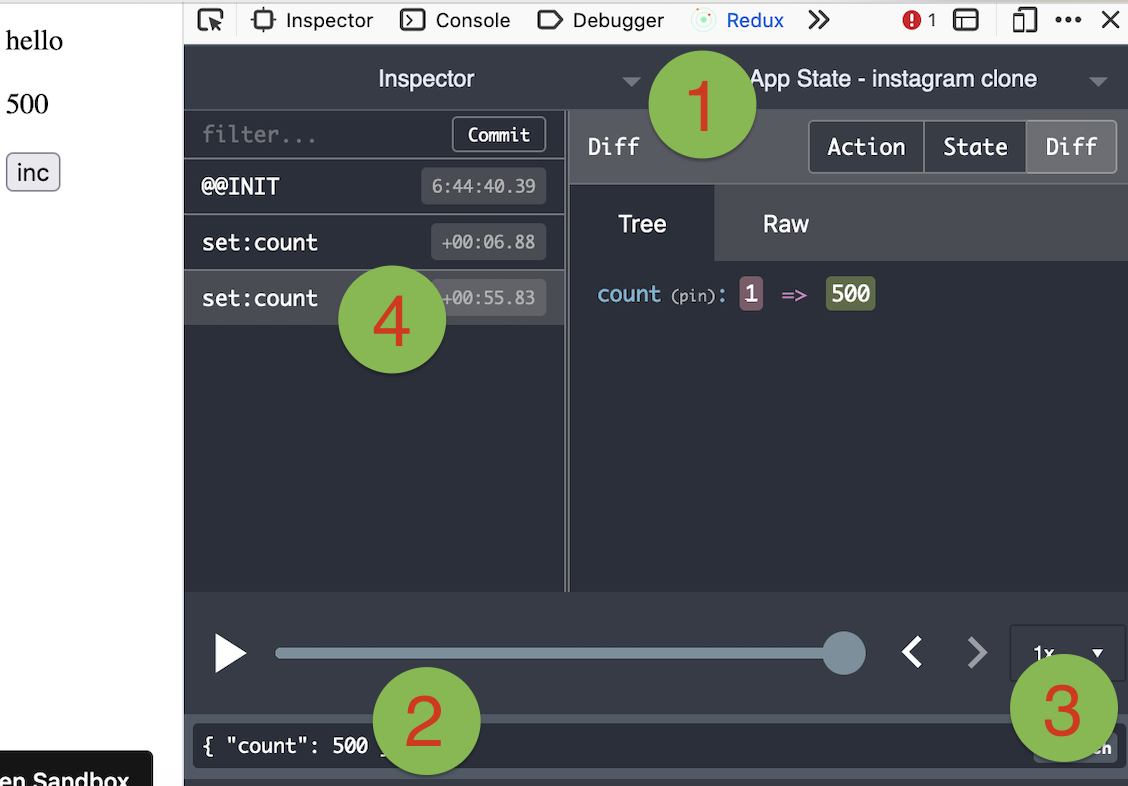
The screenshot below shows how to use Redux DevTools to manipulate state. First select the object from the instances drop down. Then type in a JSON object to dispatch. Then click "Dispatch". Notice how it changes the state.
#### Use it vanilla
Valtio is not tied to React, you can use it in vanilla-js.
```jsx
import { proxy, subscribe, snapshot } from 'valtio/vanilla'
// import { ... } from 'valtio/vanilla/utils'
const state = proxy({ count: 0, text: 'hello' })
subscribe(state, () => {
console.log('state is mutated')
const obj = snapshot(state) // A snapshot is an immutable object
})
```
#### `useProxy` util
While the separation of proxy state and its snapshot is important,
it's confusing for beginners.
We have a convenient util to improve developer experience. useProxy returns shallow proxy state and its snapshot, meaning you can only mutate on root level.
```js
import { useProxy } from 'valtio/utils'
const state = proxy({ count: 1 })
const Component = () => {
// useProxy returns a special proxy that can be used both in render and callbacks
// The special proxy has to be used directly in a function scope. You can't destructure it outside the scope.
const $state = useProxy(state)
return (
{$state.count}
)
}
```
#### Computed properties
You can define computed properties with object getters.
```js
const state = proxy({
count: 1,
get doubled() {
return this.count * 2
},
})
```
Consider it as an advanced usage, because the behavior of `this` is sometimes confusing.
For more information, check out [this guide](./docs/guides/computed-properties.mdx).
#### `proxySet` util
This is to create a proxy which mimic the native Set behavior. The API is the same as Set API
```js
import { proxySet } from 'valtio/utils'
const state = proxySet([1, 2, 3])
//can be used inside a proxy as well
//const state = proxy({
// count: 1,
// set: proxySet()
//})
state.add(4)
state.delete(1)
state.forEach((v) => console.log(v)) // 2,3,4
```
#### `proxyMap` util
This is to create a proxy which emulate the native Map behavior. The API is the same as Map API
```js
import { proxyMap } from 'valtio/utils'
const state = proxyMap([
['key', 'value'],
['key2', 'value2'],
])
state.set('key', 'value')
state.delete('key')
state.get('key') // ---> value
state.forEach((value, key) => console.log(key, value)) // ---> "key", "value", "key2", "value2"
```
#### Compatibility
Valtio v2 works with React 18 and up.
It only depends on `react` and works with any
renderers such as `react-dom`, `react-native`, `react-three-fiber`, and so on.
Valtio works on Node.js, Next.js and other frameworks.
Valtio also works without React. See [vanilla](#use-it-vanilla).
#### Plugins
- [eslint-plugin-valtio](https://github.com/pmndrs/eslint-plugin-valtio)
#### Recipes
Valtio is unopinionated about best practices.
The community is working on recipes.
- [How to organize actions](https://github.com/pmndrs/valtio/blob/main/docs/how-tos/how-to-organize-actions.mdx)
- [How to persist states](https://github.com/pmndrs/valtio/blob/main/docs/how-tos/how-to-persist-states.mdx)
- [How to use with context](https://github.com/pmndrs/valtio/blob/main/docs/how-tos/how-to-use-with-context.mdx)
- [How to split and compose states](https://github.com/pmndrs/valtio/blob/main/docs/how-tos/how-to-split-and-compose-states.mdx)
================================================
FILE: docs/api/advanced/ref.mdx
================================================
---
title: 'ref'
section: 'API'
subSection: 'Advanced'
description: 'Create a ref object'
---
# `ref`
## A `ref` allows unproxied state in a Valtio proxy
A `ref` is useful in the rare instances you need to nest an object in a `proxy` that is not wrapped in an inner proxy and, therefore, is not tracked.
```js
const store = proxy({
users: [
{ id: 1, name: 'Juho', uploads: ref([]) },
]
})
})
```
Once an object is wrapped in a `ref`, it should be mutated without reassigning the object or rewrapping in a new `ref`.
```js
// ✅ do mutate
store.users[0].uploads.push({ id: 1, name: 'Juho' })
// ✅ do reset
store.users[0].uploads.splice(0)
// ❌ don't reassign
store.users[0].uploads = []
```
A `ref` should also not be used as the only state in a proxy, making the proxy usage pointless.
## Codesandbox demo
https://codesandbox.io/s/valtio-file-load-demo-oo2yzn
================================================
FILE: docs/api/advanced/snapshot.mdx
================================================
---
title: 'snapshot'
section: 'API'
subSection: 'Advanced'
description: 'Create a snapshot of current state'
---
# `snapshot`
`snapshot` takes a proxy and returns an immutable object, unwrapped from the proxy.
Immutability is achieved by _efficiently_ deep copying & freezing the object (see the [Copy on Write](#copy-on-write) section for details).
Briefly, in sequential `snapshot` calls, when the values in the proxy have not changed, the previous snapshot's object reference is returned. This allows for shallow comparison in render functions, preventing spurious renders.
Snapshots also throw promises, making them work with React Suspense.
```js
import { proxy, snapshot } from 'valtio'
const store = proxy({ name: 'Mika' })
const snap1 = snapshot(store) // an efficient copy of the current store values, unproxied
const snap2 = snapshot(store)
console.log(snap1 === snap2) // true, no need to re-render
store.name = 'Hanna'
const snap3 = snapshot(store)
console.log(snap1 === snap3) // false, should re-render
```
## Copy on Write
Even though snapshots are a deep copy of the entire state, they use a lazy copy-on-write mechanism for updates, so in practice they are quick to maintain.
For example, if we have a nested object of:
```js
const author = proxy({
firstName: 'f',
lastName: 'l',
books: [{ title: 't1' }, { title: 't2' }],
})
const s1 = snapshot(author)
```
The first `snapshot` call creates four new instances:
- one for the author,
- one for the books array, and
- two for the book objects.
When we mutate the 2nd book, and take a new `snapshot`:
```js
author.books[1].title = 't2b'
const s2 = snapshot(author)
```
Then `s2` will have a new copy of the 2nd book, but reuse the existing snapshot of the unchanged 1st book.
```js
console.log(s1 === s2) // false
console.log(s1.books === s2.books) // false
console.log(s1.books[0] === s2.books[0]) // true
console.log(s1.books[1] === s2.books[1]) // false
```
Even though this example only reused one of the four existing snapshot instances, it shows that the cost of maintaining snapshots is based on the _depth_ of your state tree (which is typically low, like author to book to book reviews is three levels), and not the _breadth_ (1000s of books).
## Classes
Snapshots maintain the original objects' prototypes, so methods and getters work, and correctly evaluate against the snapshot's frozen state.
```js
import { proxy, snapshot } from 'valtio'
class Author {
firstName = 'f'
lastName = 'l'
fullName() {
return `${this.firstName} ${this.lastName}`
}
}
const state = proxy(new Author())
const snap = snapshot(state)
// the snapshot has the Author prototype
console.log(snap instanceof Author) // true
state.firstName = 'f2'
// Invocations use the snapshot's state, e.g. this is still 'f' because
// inside `fullName`, `this` will be the frozen snapshot instance and not
// the mutable state proxy
console.log(snap.fullName()) // 'f l'
```
Note that the results of getters and methods are not cached, and are re-evaluated on every call.
This should be fine, because the expectation is that they execute very quickly (faster than the overhead of caching them would be worth) and are also deterministic, so the return value is based only on the already-frozen snapshot state.
## Vanilla JavaScript
In VanillaJS, `snapshot` is not necessary to access proxied object values, inside or outside of subscribe. However, it is useful, for example, to keep a serializable list of un-proxied objects or check if objects have changed. It also resolves promises.
💡 Tip
If you are using valtio outside of react, import from `valtio/vanilla`
```js
import { proxy, snapshot } from 'valtio/vanilla'
```
================================================
FILE: docs/api/advanced/subscribe-ops.mdx
================================================
---
title: 'subscribe-ops'
section: 'API'
subSection: 'Advanced'
description: 'Fine-grained mutation tracking with operational transformations (Ops)'
---
# Subscribe Ops
By default, Valtio's `subscribe` notify you that _something_ has changed in the state proxy. However, you can opt-in to receiving **Ops** (Operations), which are detailed descriptions of exactly what was modified.
## What are Ops?
Ops are granular mutation records. When a proxy is updated, Valtio can generate a description of the change as a tuple.
### Op Types
- **`set`**: `[op: 'set', path: Path, value: unknown, prevValue: unknown]`
- Triggered when a property is assigned a new value.
- **`delete`**: `[op: 'delete', path: Path, prevValue: unknown]`
- Triggered when a property is deleted.
- **`resolve`**: `[op: 'resolve', path: Path, value: unknown]`
- Triggered when a promise in the state is fulfilled.
- **`reject`**: `[op: 'reject', path: Path, error: unknown]`
- Triggered when a promise in the state is rejected.
The `Path` is an array of strings or symbols representing the nested location of the property (e.g., `['user', 'profile', 'name']`).
## How to use Ops
The "ops" feature is an **opt-in** feature because it introduces a small performance overhead for tracking and allocating these operation objects.
### 1. Enabling Ops
You must explicitly enable op-tracking using the unstable API:
```javascript
import { unstable_enableOp } from 'valtio'
// Enable globally
unstable_enableOp(true)
```
### 2. Receiving Ops in `subscribe`
Once enabled, the `subscribe` callback receives an array of these operations as its first argument.
```javascript
import { proxy, subscribe, unstable_enableOp } from 'valtio'
unstable_enableOp(true)
const state = proxy({ count: 0, text: 'hello' })
subscribe(state, (ops) => {
ops.forEach((op) => {
const [action, path, value, prevValue] = op
console.log(`Action: ${action} at ${path.join('.')}`)
console.log(`New value:`, value)
console.log(`Previous value:`, prevValue)
})
})
state.count++
// Output:
// Action: set at count
// New value: 1
// Previous value: 0
```
> **Note**: If `unstable_enableOp(true)` is not called, the `ops` argument will be an empty array or `undefined`.
## Use Cases
While standard `subscribe` is sufficient for most React UI updates, Ops are useful for specific advanced scenarios:
1. **Network Synchronization**: Instead of sending the entire state over the wire, you can send only the `ops` (patches). This significantly reduces bandwidth consumption in distributed applications.
2. **Undo/Redo History**: Use the `prevValue` provided in `set` and `delete` ops to easily revert state changes.
3. **Audit Logs & Debugging**: Track a sequence of user-driven mutations for analytics or time-travel debugging.
4. **Devtools Integration**: Powering custom development tools that need to visualize state transitions.
## Performance Considerations
Enabling Ops has a small overhead cost. For every mutation, Valtio must:
- Detect the change type.
- Construct the `Path` array.
- Allocate the `Op` tuple.
In high-frequency update scenarios (e.g., animations, canvas interactions moving hundreds of objects per frame), this can lead to:
- Increased garbage collection (GC) pressure due to object allocations.
- A measurable drop in frame rates (FPS).
**Recommendation**: Only enable `unstable_enableOp` if your application actually consumes the granular `ops` data.
================================================
FILE: docs/api/advanced/subscribe.mdx
================================================
---
title: 'subscribe'
section: 'API'
subSection: 'Advanced'
description: 'Subscribe to a current state/object'
---
# `subscribe`
## Subscribe from anywhere
You can access state outside your components and subscribe to changes.
```jsx
import { proxy, subscribe } from 'valtio'
const state = proxy({ count: 0 })
// Subscribe to all changes to the state proxy (and its child proxies)
const unsubscribe = subscribe(state, () =>
console.log('state has changed to', state),
)
// Unsubscribe by calling the result
unsubscribe()
```
You can also subscribe to a portion of state.
```jsx
const state = proxy({ obj: { foo: 'bar' }, arr: ['hello'] })
subscribe(state.obj, () => console.log('state.obj has changed to', state.obj))
state.obj.foo = 'baz'
subscribe(state.arr, () => console.log('state.arr has changed to', state.arr))
state.arr.push('world')
```
## Codesandbox demo in VanillaJS
https://codesandbox.io/s/valtio-photo-booth-demo-forked-xp8hs?file=/src/main.js
## Advanced: Listening to "Ops"
The `subscribe` callback can also receive **Ops** (Operations), which are detailed records of exactly what changed (e.g., which property was set or deleted). This is useful for advanced scenarios like synchronization or undo/redo.
Because tracking these operations has a small performance cost, they are disabled by default. For more details on how to enable and use them, check out [Subscribe Ops](./subscribe-ops).
================================================
FILE: docs/api/basic/proxy.mdx
================================================
---
title: 'proxy'
section: 'API'
subSection: 'Basic'
description: 'Create a proxy object.'
---
# `proxy`
The `proxy` tracks changes to the original object and all nested objects, notifying listeners when an object is modified.
```js
import { proxy } from 'valtio'
const state = proxy({ count: 0, text: 'hello' })
```
## Mutate from anywhere
You can make changes to it in the same way you would to a normal js-object.
```js
setInterval(() => {
++state.count
}, 1000)
```
## Optimizations: noop and batching
Updates that set the value of a property to the same value are ignored. Subscribers will not be informed of a version change.
```js
const state = proxy({ count: 0 })
state.count = 0 // has no effect
```
Multiple changes in the same event loop tick will be batched together. Subscribers will be notified of a single version change.
```js
const state = proxy({ count: 0, text: 'hello' })
// subscribers will be notified once after both mutations
state.count = 1
state.text = 'world'
```
## Nested proxies
Proxies can be nested in other `proxy` objects and updated as a whole.
```jsx
import { proxy, useSnapshot } from 'valtio'
const personState = proxy({ name: 'Timo', role: 'admin' })
const authState = proxy({ status: 'loggedIn', user: personState })
authState.user.name = 'Nina'
```
## Promises in proxies
See [`async`](../../guides/async) for more details.
```jsx
import { proxy } from 'valtio'
const bombState = proxy({
explosion: new Promise((resolve) => setTimeout(() => resolve('Boom!'), 3000)),
})
```
## Gotchas
If you reassign the proxy to an entirely new object, it will stop working because you are replacing the proxied object with a new object reference.
```jsx
let state = proxy({ user: { name: 'Timo' } })
subscribe(state, () => {
console.log(state.user.name)
})
// will not notify subscribers
state = { user: { name: 'Nina' } }
// instead
let state = proxy({ user: { name: 'Timo' } })
subscribe(state, () => {
console.log(state.user.name) // logs "Nina"
})
// will notify subscribers
state.user.name = 'Nina'
```
Not everything can be proxied. Generally, you are safe if it is serializable. Classes can also be proxied. But avoid special objects.
```jsx
// these won't work - changes to these objects won't cause updates
// to store state that is unproxied see the docs on ref
const state = proxy({
chart: d3.select('#chart'),
component: React.createElement('div'),
map: new Map(), // see proxyMap
storage: localStorage,
})
// this will work
class User {
first = null
last = null
constructor(first, last) {
this.first = first
this.last = last
}
greet() {
return `Hi ${this.first}!`
}
get fullName() {
return `${this.first} ${this.last}`
}
}
const state = proxy(new User('Timo', 'Kivinen'))
```
================================================
FILE: docs/api/basic/useSnapshot.mdx
================================================
---
title: 'useSnapshot'
section: 'API'
subSection: 'Basic'
description: 'Create a local snapshot that catches changes.'
---
# `useSnapshot`
Create a local `snapshot` that catches changes.
Normally, Valtio's snapshots (created via `snapshot()`) are recreated on _any_ change to a proxy, or any of its child proxies.
However `useSnapshot` wraps the Valtio snapshot in an access-tracking proxy. This is to make sure your component is render optimized, i.e. it will only re-render if keys that it (or its child components) specifically accessed has changed, and not on every single change to the proxy.
## Usage
### Read from snapshots in render, use the proxy in callbacks
Snapshots are read-only to render the JSX from their consistent view of the data.
Mutations, and also any reads in callbacks that make mutations, need to be made via the proxy, so that the callback reads & writes the latest value.
```jsx
function Counter() {
const snap = useSnapshot(state)
return (
{snap.count}
)
}
```
### Parent/Child Components
If you have a parent component use `useSnapshot`, it can pass snapshots to child components and the parent & children will re-render when the snapshot changes.
For example:
```jsx
const state = proxy({
books: [
{ id: 1, title: 'b1' },
{ id: 2, title: 'b2' },
],
})
function AuthorView() {
const snap = useSnapshot(state)
return (
{snap.books.map((book) => (
))}
)
}
function BookView({ book }) {
// book is a snapshot
return
{book.title}
}
```
If book 2's title is changed, a new `snap` is created and the `AuthorView` and `BookView` components will re-render.
Note if `BookView` is `React.memo`d, the 1st `BookView` will not re-render, b/c the 1st `Book` snapshot will be the same instance, as only the 2nd `Book` was mutated (the root `Author` snapshot will also be updated since the list of `books` has changed).
### Child Components Making Mutations
The above approach works if `BookView` is read-only; if your child component needs to make mutations, then you'll need to pass the proxy:
```jsx
function AuthorView() {
const snap = useSnapshot(state)
return (
{snap.books.map((book, i) => (
))}
)
}
function BookView({ book }) {
// book is the proxy, so we can re-snap it + mutate it
const snap = useSnapshot(book)
return
book.updateTitle()}>{snap.title}
}
```
Or you can pass both the snapshot and proxy together, if you don't want to call `useSnapshot` in the child component:
```jsx
function AuthorView() {
const snap = useSnapshot(state)
return (
{snap.books.map((book, i) => (
))}
)
}
```
There should be no performance difference between these two approaches.
### Read only what you need
Every object inside your proxy also becomes a proxy (if you don't use `ref()`). So you can also use them to create
a local snapshot.
```jsx
function ProfileName() {
const snap = useSnapshot(state.profile)
return
{snap.name}
}
```
## Gotchas
Beware of replacing the child proxy with something else, breaking your `snapshot`. This will replace the reference of the proxy with what you assign it to which removes the proxy's traps. You can see an example below.
```js
console.log(state)
{
profile: {
name: 'valtio'
}
}
childState = state.profile
console.log(childState)
{
name: 'valtio'
}
state.profile.name = 'react'
console.log(childState)
{
name: 'react'
}
state.profile = { name: 'new name' }
console.log(childState)
{
name: 'react'
}
console.log(state)
{
profile: {
name: 'new name'
}
}
```
`useSnapshot()` depends on the original reference of the child proxy so if you replace it with a new one, the component
that is subscribed to the old proxy won't receive new updates because it is still subscribed to the old one.
In this case, we recommend one of the approaches below. In neither example do you need to worry about re-renders because it is render-optimized.
```jsx
const snap = useSnapshot(state)
return
```
## Dev Mode Debug Values
In dev mode, `useSnapshot` uses React's `useDebugValue` to output a list of fields that were accessed during rendering, i.e. which specific fields will trigger re-render when the tracking proxy changes.
!! There are two disclaimers to using the debug value
1. Due to the way `useSnapshot` uses a proxy to recorded accesses _after_ `useSnapshot` has returned, the fields listed in `useDebugValue` are technically from the _previous_ render.
2. Object getter and class getter calls are not included in the `useDebugValue` output, but don't worry, they are actually correctly tracked internally and correctly trigger re-renders when changed.
## Codesandbox demo
https://codesandbox.io/s/ping-pong-with-valtio-wb25s?file=/src/App.js
================================================
FILE: docs/api/hacks/getVersion.mdx
================================================
---
title: 'getVersion'
section: 'API'
subSection: 'Hacks'
description: ''
---
# `getVersion`
In Valtio, updates to proxied objects are tracked internally with a version number.
Every mutation to a proxy increases a global version number, and assigns the just mutated proxy, and any parent proxies (which automatically subscribe to their child proxies), to the latest version number.
This is how `snapshot` knows whether a new snapshot is necessary: has my proxy's version number changed since the last snapshot?
Given its importance to valtio's internal behavior, the `getVersion` helper can be used to check if a proxied object has been updated, but this is not typically useful or recommended to use in application code because `snapshot` and `useSnapshot` already handle version tracking internally.
```js
getVersion(proxyObject)
```
================================================
FILE: docs/api/hacks/internals.mdx
================================================
---
title: 'Internals'
section: 'API'
subSection: 'Hacks'
description: ''
---
Valtio exposes some internal capabilities.
This isn't for app developers. Use it at your own risk.
# `unstable_getInternalStates`
This function exposes the internal states. Modifying such states may result in wrong behaviors. You need to understand the [source code](https://github.com/pmndrs/valtio/blob/main/src/vanilla.ts) thoroughly to use it.
# `unstable_replaceInternalFunction`
This function exposes a way to replace some internal functions. It can easily break things. You need to understand the [source code](https://github.com/pmndrs/valtio/blob/main/src/vanilla.ts) thoroughly to use it.
================================================
FILE: docs/api/utils/derive.mdx
================================================
---
title: 'derive'
section: 'API'
subSection: 'Utils'
description: 'create a new proxy derived from others'
---
## `derive`
> **⚠️ Deprecated**
>
> This package is no longer maintained. Please migrate to
> [valtio-reactive](https://github.com/valtiojs/valtio-reactive).
## Installation
```bash
npm install derive-valtio
```
#### create a new proxy derived from others
You can subscribe to some proxies using `get` to create snapshots used to compute new values.
```js
import { derive } from 'derive-valtio'
// create a base proxy
const state = proxy({
count: 1,
})
// create a derived proxy
const derived = derive({
doubled: (get) => get(state).count * 2,
})
// alternatively, attach derived properties to an existing proxy
derive(
{
tripled: (get) => get(state).count * 3,
},
{
proxy: state,
},
)
```
## `underive`
## Stop evaluating
In some cases you may want to unsubscribe after deriving a proxy. To do so, use the `underive` util. You may also pass keys to indicate which properties you want to unsubscribe. If you specify `delete` option, it will delete the properties
and you can attach new derived properties.
```js
import { derive, underive } from 'derive-valtio'
const state = proxy({
count: 1,
})
const derivedState = derive({
doubled: (get) => get(state).count * 2,
})
underive(derivedState)
```
## Usage patterns
### Re-computes when unrelated properties change
With `derive`, the computation will occur if any property of the base proxy changes. Example:
```javascript
const baseProxy = proxy({
counter1: 0,
counter2: 0,
counter3: 0,
counter4: 0,
})
const countersOneAndTwoSelectors = derive({
sum: (get) => get(baseProxy).counter1 + get(baseProxy).counter2,
})
```
In this example if `baseProxy.counter3` or `baseProxy.counter4` are changed, `countersOneAndTwoSelectors` will re-compute all of the keys in it.
### `get` sub-objects due to update of unrelated proxies on parent proxy
As noted on this page, re-computation occurs when unrelated properties change. It is possible to use `get` on sub-objects. This has the benefit of not re-computing when properties of the parent object are updated. Example:
```javascript
const baseProxy = proxy({
counter1And2: {
counter1: 0,
counter2: 0,
},
counter3: 0,
counter4: 0,
})
const countersOneAndTwoSelectors = derive({
sum: (get) =>
get(baseProxy.counter1And2).counter1 + get(baseProxy.counter1And2).counter2,
})
```
Now even if `counter3` and `counter4` are updated, it will not cause re-computation of `countersOneAndTwoSelectors`.
================================================
FILE: docs/api/utils/devtools.mdx
================================================
---
title: 'devtools'
section: 'API'
subSection: 'Utils'
description: 'Use the Redux DevTools extension with Valtio'
---
# devtools
#### Dev tools
You can use [Redux DevTools Extension](https://github.com/reduxjs/redux-devtools) for plain objects and arrays.
```jsx
import { devtools } from 'valtio/utils'
const state = proxy({ count: 0, text: 'hello' })
const unsub = devtools(state, { name: 'state name', enabled: true })
```
Manipulating state with Redux DevTools
The screenshot below shows how to use Redux DevTools to manipulate state. First select the object from the instances drop down. Then type in a JSON object to dispatch. Then click "Dispatch". Notice how it changes the state.
#### Use it with vanilla JS
Valtio is not tied to React, you can use it in vanillaJS.
```jsx
import { proxy, subscribe, snapshot } from 'valtio/vanilla'
const state = proxy({ count: 0, text: 'hello' })
subscribe(state, () => {
console.log('state is mutated')
const obj = snapshot(state) // A snapshot is an immutable object
})
```
#### Use it with TypeScript
It's recommended to install and import types from `@redux-devtools/extension` to get types correctly.
```ts
import type {} from '@redux-devtools/extension'
import { devtools } from 'valtio/utils'
```
================================================
FILE: docs/api/utils/proxyMap.mdx
================================================
---
title: 'proxyMap'
section: 'API'
subSection: 'Utils'
description: ''
---
# `proxyMap`
## Reasoning
Native `Maps` store their data in internal slots which are not observable. This means that `valtio` cannot track changes to the data inside of a native `Map`. `proxyMap` is a utility that allows you to create a proxy that mimics the behavior of a `Map` while still allowing valtio to track changes to the data.
## When to use `proxyMap`
`proxyMap` is useful when you need the flexibility of a `Map` but still want to track changes to the data. It can be useful if you don't know the structure of the data you'll be working with and this data may have non-primitive values as keys (e.g. objects, arrays, etc.). In this case, you can use `proxyMap` to create a proxy that mimics the behavior of a `Map` while still allowing valtio to track changes to the data. If your data can be represented as a simple object, you should use `proxy` with a simple object instead. It is more performant and easier to use.
## Use a js Map with Valtio
This utility creates a proxy which mimics the native Map behavior. The API is the same as the Map API.
```js
import { proxyMap } from 'valtio/utils'
const state = proxyMap()
state.size // ---> 0
state.set(1, 'hello')
state.size // ---> 1
state.delete(1)
state.size // ---> 0
```
## Nesting
It can be used inside a `proxy` as well.
```js
import { proxyMap } from 'valtio/utils'
const state = proxy({
count: 1,
map: proxyMap(),
})
```
When using an object as a key, you can wrap it with `ref` so it's not proxied. This is useful if you want to preserve the key equality
```js
import { proxyMap } from 'valtio/utils'
// with ref
const key = ref({})
state.set(key, 'hello')
state.get(key) //hello
// without ref
const key = {}
state.set(key, 'value')
state.get(key) //undefined
```
## `isProxyMap`
If you want to check if an object is a proxyMap, you can use the `isProxyMap` function.
```js
import { proxy, ref } from 'valtio'
import { proxyMap, isProxyMap } from 'valtio/utils'
const state = proxy({
nativeMap: ref(new Map(/*...*/)),
proxyMap: proxyMap(),
})
isProxyMap(state.nativeMap) // false
isProxyMap(state.proxyMap) // true
```
## Codesandbox demo
https://codesandbox.io/s/github/pmndrs/valtio/tree/main/examples/todo-with-proxyMap
================================================
FILE: docs/api/utils/proxySet.mdx
================================================
---
title: 'proxySet'
section: 'API'
subSection: 'Utils'
description: ''
---
# `proxySet`
## Reasoning
Native `Sets` store their data in internal slots which are not observable. This means that `valtio` cannot track changes to the data inside of a native `Set`. `proxySet` is a utility that allows you to create a proxy that mimics the behavior of a `Set` while still allowing valtio to track changes to the data.
## When to use `proxySet`
`proxySet` is useful when you need the functionality of a `Set` but still want to track changes to the data. `proxySet` can be useful if you're wanting to store unique values or if you want to perform mathematical `Set` operations on the data, such as union, intersection, or difference. `proxySet` supports all of the new methods introduced to `Set`:
- `intersection`
- `union`
- `difference`
- `symmetricDifference`
- `isSubsetOf`
- `isSupersetOf`
- `isDisjointFrom`
You can see a full list of the methods supported by `proxySet` in the [MDN documentation](https://developer.mozilla.org/en-US/docs/Web/JavaScript/Reference/Global_Objects/Set).
If your data can be represented as a simple array or object, and you have no need for the additional functionality provided by `proxySet`, you should use `proxy` with a simple array or object instead. It is more performant and easier to use.
## Use a js `Set` with Valtio
This utility creates a proxy which mimics the native `Set` behavior. The API is the same as the native `Set` API.
```js
import { proxySet } from 'valtio/utils'
const state = proxySet([1, 2, 3])
state.add(4)
state.delete(1)
state.forEach((v) => console.log(v)) // ---> 2,3,4
```
## Nesting
It can be used inside a `proxy` as well.
```js
import { proxySet } from 'valtio/utils'
const state = proxy({
count: 1,
set: proxySet(),
})
```
## `isProxySet`
If you want to check if an object is a proxyMap, you can use the `isProxySet` function.
```js
import { proxy, ref } from 'valtio'
import { proxySet, isProxySet } from 'valtio/utils'
const state = proxy({
nativeSet: ref(new Set(/*...*/)),
proxySet: proxySet(),
})
isProxySet(state.nativeSet) // false
isProxySet(state.proxySet) // true
```
================================================
FILE: docs/api/utils/proxyWithHistory.mdx
================================================
---
title: 'proxyWithHistory'
section: 'API'
subSection: 'Utils'
description: ''
---
# `proxyWithHistory`
## Keep a history of snapshots
This is a utility function to create a proxy with snapshot history.
```js
import { proxyWithHistory } from 'valtio-history'
const state = proxyWithHistory({ count: 0 })
console.log(state.value) // ---> { count: 0 }
state.value.count += 1
console.log(state.value) // ---> { count: 1 }
state.undo()
console.log(state.value) // ---> { count: 0 }
state.redo()
console.log(state.value) // ---> { count: 1 }
```
## Codesandbox demo
https://codesandbox.io/s/valtio-history-example-v0-m353xc?file=/src/App.tsx
================================================
FILE: docs/api/utils/subscribeKey.mdx
================================================
---
title: 'subscribeKey'
section: 'API'
subSection: 'Utils'
description: ''
---
# `subscribeKey`
To subscribe to a primitive value in proxy state, consider `subscribeKey`.
```js
import { subscribeKey } from 'valtio/utils'
const state = proxy({ count: 0, text: 'hello' })
subscribeKey(state, 'count', (v) =>
console.log('state.count has changed to', v),
)
```
## Codesandbox demo
https://codesandbox.io/s/dynamic-ui-with-valtio-9gme46?file=/src/ComplexCounter.tsx
================================================
FILE: docs/api/utils/unstable_deepProxy.mdx
================================================
---
title: 'unstable_deepProxy'
section: 'API'
subSection: 'Utils'
description: ''
---
# `unstable_deepProxy`
You can use this utility to recursively go through an object and proxy all proxiable objects with the exception of anything marked with `ref()`. `Map`s will become `proxyMap`s and `Set`s will become `proxySet`s.
```js
import {
unstable_deepProxy as deepProxy,
isProxyMap,
isProxySet,
} from 'valtio/utils'
const obj = {
mySet: new Set(),
myMap: new Map(),
sub: {
foo: 'bar',
},
}
const clonedProxy = deepProxy(obj)
console.log(isProxyMap(clonedProxy.myMap)) // true
console.log(isProxySet(clonedProxy.mySet)) // true
```
================================================
FILE: docs/api/utils/watch.mdx
================================================
---
title: 'watch'
section: 'API'
subSection: 'Utils'
description: 'watch for changes.'
---
# `watch`
> **⚠️ Deprecated**
>
> This util is no longer maintained. Please migrate to
> [valtio-reactive](https://github.com/valtiojs/valtio-reactive).
## Subscription via a getter
This utility supports subscribing to multiple proxy objects (unlike `subscribe` which listens to only a single proxy). Proxy objects are subscribed with a `get` function passed to the callback.
Any changes to the proxy object (or its child proxies) will rerun the callback.
Also note the callback will run once immediately when `watch` is called, even if the proxies have not been yet mutated, to establish the initial subscriptions.
```js
import { proxy } from 'valtio'
import { watch } from 'valtio/utils'
const userState = proxy({ user: { name: 'Juuso' } })
const sessionState = proxy({ expired: false })
watch((get) => {
// `get` adds `sessionState` to this callback's watched proxies
get(sessionState)
const expired = sessionState.expired
// Or call it inline
const name = get(userState).user.name
console.log(`${name}'s session is ${expired ? 'expired' : 'valid'}`)
})
// 'Juuso's session is valid'
sessionState.expired = true
// 'Juuso's session is expired'
```
## Cleanup
You may return a cleanup function that runs both:
- Before each re-invocation of the callback (i.e. due to a watched proxy changing)
- When the `watch` itself is stopped (by calling the cleanup function returned by `watch`)
```js
watch((get) => {
const expired = get(sessionState).expired
const name = get(userState).user.name
console.log(`${name}'s session is ${expired ? 'expired' : 'valid'}`)
return () => {
if (expired) {
console.log('Cleaning up')
}
}
})
// Output from 1st immediate invocation of the callbcak
// 'Juuso's session is valid'
// Changing a dependency will invoke the cleanup callback first,
// but the captured `expired` is false, so we only see output from the
// 2nd invocation of the callback.
sessionState.expired = true
// 'Juuso's session is expired'
// Changing a dependency will again invoke the cleanup callback,
// and `expired` is true now, so we output from both our cleanup
// function as well as the 3rd invocation of the callback.
setTimeout(() => {
userState.user.name = 'Anonymous'
}, 200)
// 200ms -> 'Anonymous's session is expired'
// 'Cleaning up' logged
```
## Gotchas
If you remove the setTimeout in the example above, `'Juuso's session is expired'` will become `'Anonymous's session is expired'` and it will be logged twice. Valtio will batch updates by default. You may pass `{sync: true}` as a second argument to `watch` to disable batching.
## No usage tracking
`watch` currently does not implement the usage tracking of `useSnapshot`, so the callback will rerun anytime a watched proxy (or child proxy) has any fields mutated, regardless of the fields accessed within the `callback`'s code.
And the return value of `get` is just the proxy itself, not a snapshot.
This is because `watch` is a vanilla primitive built on top of `subscribe`. It is potentially possible for `watch`, or a new `watch`-like method, to implement usage tracking in the future, see [this discussion](https://github.com/pmndrs/valtio/discussions/640) if interested.
================================================
FILE: docs/guides/async.mdx
================================================
---
title: 'Async'
section: 'Advanced'
description: 'Working with promises and Suspense'
---
# `async`
## Promises
Promises may be values in a proxied object. They will be resolved in calls to `snapshot`.
```jsx
// vanillajs example
const countDiv: HTMLElement | null = document.getElementById('count')
if (countDiv) countDiv.innerText = '0'
const store = proxy({
count: new Promise((r) => setTimeout(() => r(1), 1000)),
})
subscribe(store, () => {
const value = snapshot(store).count
if (countDiv && typeof value === 'number') {
countDiv.innerText = String(value)
store.count = new Promise((r) => setTimeout(() => r(value + 1), 1000))
}
})
```
## Suspend your React components
Valtio is compatible with React 19 `use` hook. This eliminates all the async back-and-forth, you can access your data directly while the parent is responsible for fallback state and error handling.
```jsx
import { use } from 'react' // React 19
// import { use } from 'react18-use' // React 18
const state = proxy({ post: fetch(url).then((res) => res.json()) })
function Post() {
const snap = useSnapshot(state)
return
{use(snap.post).title}
}
function App() {
return (
)
}
```
It still suffers from "de-opt", which prevents `useTransition` to work well. To mitigate it, there is a third-party library [use-valtio](https://github.com/valtiojs/use-valtio).
## Codesandbox Pokemon fetch demo
https://codesandbox.io/s/valtio-pokemon-fetch-x1lkbj?file=/src/App.tsx
## Codesandbox auth demo
https://codesandbox.io/s/valtio-async-1pstl1?file=/src/App.tsx
================================================
FILE: docs/guides/component-state.mdx
================================================
---
title: 'Component State'
section: 'Advanced'
description: 'Isolate component state with useRef'
---
# Component State
To isolate component state for reusability, Valtio must live in the React lifecycle. You can wrap a `proxy` in a ref, passing it with props or context.
```jsx
import { createContext, useContext } from 'react'
import { proxy, useSnapshot } from 'valtio'
const MyContext = createContext()
const MyProvider = ({ children }) => {
const state = useRef(proxy({ count: 0 })).current
return {children}
}
const MyCounter = () => {
const state = useContext(MyContext)
const snap = useSnapshot(state)
return (
<>
{snap.count}
)
}
```
## Codesandbox example
https://codesandbox.io/s/valtio-component-ye5tbg?file=/src/App.tsx
## Alternatives
If you are not happy with `useRef` usage, consider:
- [use-constant](https://www.npmjs.com/package/use-constant)
- [bunshi](https://www.bunshi.org/recipes/valtio/)
- You may also create custom hooks wrapping useContext and optionally useSnapshot.
### Bunshi example
https://codesandbox.io/s/77r53c?file=/molecules.ts
================================================
FILE: docs/guides/computed-properties.mdx
================================================
---
title: 'Computed Properties'
section: 'Advanced'
description: 'Use object getters and setters'
---
# Computed Properties
In Valtio you can use object & class getters and setters to create computed properties.
ℹ️ Note
Getters in JavaScript are a more advanced feature of the language, so Valtio recommends using them with caution. That said, if you are a more advanced JavaScript programmer, they should work as you expect; see the "Note about using `this`" section below.
## Simple object getter
```js
const state = proxy({
count: 1,
get doubled() {
return this.count * 2
},
})
console.log(state.doubled) // 2
// Getter calls on the snapshot work as expected
const snap = snapshot(state)
console.log(snap.doubled) // 2
// When count changes in the state proxy
state.count = 10
// Then snapshot's computed property does not change
console.log(snap.doubled) // 2
```
When you call `state.doubled` on the `state` proxy, it is not cached, and will be re-calculated on every call (if you must cache this result, see the section below on `proxy-memoize`).
However, when you make a snapshot, calls to `snap.doubled` are effectively cached, because the value of an object getter is copied during the snapshot process.
ℹ️ Note
In the current implementation a computed property should only reference \*\*\_sibling\*\*\* properties, otherwise you'll encounter weird bugs. For example:
```js
const user = proxy({
name: 'John',
// OK - can reference sibling props via `this`
get greetingEn() {
return 'Hello ' + this.name
},
})
```
```js
const state = proxy({
// could be nested
user: {
name: 'John',
// OK - can reference sibling props via `this`
get greetingEn() {
return 'Hello ' + this.name
},
},
})
```
```js
const state = proxy({
user: {
name: 'John',
},
greetings: {
// WRONG - `this` points to `state.greetings`.
get greetingEn() {
return 'Hello ' + this.user.name
},
},
})
```
```js
const user = proxy({
name: 'John',
})
const greetings = proxy({
// WRONG - `this` points to `greetings`.
get greetingEn() {
return 'Hello ' + this.name
},
})
```
A workaround to it is to attach the related object as a property.
```js
const user = proxy({
name: 'John',
})
const greetings = proxy({
user, // attach the `user` proxy object
// OK - can reference user props via `this`
get greetingEn() {
return 'Hello ' + this.user.name
},
})
```
Another method would be to create a separate proxy and
synchronize with `subscribe`.
```js
const user = proxy({
name: 'John',
})
const greetings = proxy({
greetingEn: 'Hello ' + user.name,
})
subscribe(user, () => {
greetings.greetingEn = 'Hello ' + user.name
})
```
Or with `watch`.
```js
const user = proxy({
name: 'John',
})
const greetings = proxy({})
watch((get) => {
greetings.greetingEn = 'Hello ' + get(user).name
})
```
## Object getter and setter
Setters are also supported:
```js
const state = proxy({
count: 1,
get doubled() {
return state.count * 2
},
set doubled(newValue) {
state.count = newValue / 2
},
})
// Setter calls on the state work as expected
state.doubled = 4
console.log(state.count) // 2
// Getter calls on the snapshot work as expected
const snap = snapshot(state)
console.log(snap.doubled) // 4
// And setter calls on the snapshot fail as expected
// compile error: Cannot assign to 'doubled' because it is a read-only property.
// runtime error: TypeError: Cannot assign to read only property 'doubled' of object '#