Repository: pololu/pololu-led-strip-arduino
Branch: master
Commit: 8df96a1652a1
Files: 16
Total size: 66.4 KB
Directory structure:
gitextract_73ms1bqo/

├── .arduino-ci.yaml
├── .github/
│   ├── ISSUE_TEMPLATE/
│   │   ├── bug-report-or-feature-request.md
│   │   └── config.yml
│   └── workflows/
│       └── ci.yaml
├── .gitignore
├── .gitlab-ci.yml
├── LICENSE.txt
├── PololuLedStrip.cpp
├── PololuLedStrip.h
├── README.md
├── examples/
│   ├── LedStripColorTester/
│   │   └── LedStripColorTester.ino
│   ├── LedStripGradient/
│   │   └── LedStripGradient.ino
│   ├── LedStripRainbow/
│   │   └── LedStripRainbow.ino
│   └── LedStripXmas/
│       └── LedStripXmas.ino
├── keywords.txt
└── library.properties
================================================
FILE CONTENTS
================================================
================================================
FILE: .arduino-ci.yaml
================================================
skip_boards:
- arduino:samd:arduino_zero_native
- Intel:arc32:arduino_101
- esp8266:esp8266:huzzah
================================================
FILE: .github/ISSUE_TEMPLATE/bug-report-or-feature-request.md
================================================
---
name: Bug report or feature request
about: Did you find a specific bug in the code for this project? Do you want to request
a new feature? Please open an issue!
title: ''
labels: ''
assignees: ''
---
================================================
FILE: .github/ISSUE_TEMPLATE/config.yml
================================================
blank_issues_enabled: false
contact_links:
- name: Pololu Forum
url: https://forum.pololu.com/
about: Do you need help getting started? Can't get this code to work at all? Having problems with electronics? Please post on our forum!
================================================
FILE: .github/workflows/ci.yaml
================================================
name: "CI"
on:
pull_request:
push:
jobs:
ci:
runs-on: ubuntu-20.04
steps:
- name: Checkout this repository
uses: actions/checkout@v2.3.4
- name: Cache for arduino-ci
uses: actions/cache@v2.1.3
with:
path: |
~/.arduino15
key: ${{ runner.os }}-arduino
- name: Install nix
uses: cachix/install-nix-action@v12
- run: nix-shell -I nixpkgs=channel:nixpkgs-unstable -p arduino-ci --run "arduino-ci"
================================================
FILE: .gitignore
================================================
/docs/
/out/
================================================
FILE: .gitlab-ci.yml
================================================
image: $CI_REGISTRY_IMAGE/nixos/nix:2.3.6
stages:
- ci
ci:
stage: ci
tags:
- nix
script:
- nix-shell -I nixpkgs=channel:nixpkgs-unstable -p arduino-ci --run "arduino-ci"
================================================
FILE: LICENSE.txt
================================================
Copyright (c) 2012-2020 Pololu Corporation (www.pololu.com)
Permission is hereby granted, free of charge, to any person
obtaining a copy of this software and associated documentation
files (the "Software"), to deal in the Software without
restriction, including without limitation the rights to use,
copy, modify, merge, publish, distribute, sublicense, and/or sell
copies of the Software, and to permit persons to whom the
Software is furnished to do so, subject to the following
conditions:
The above copyright notice and this permission notice shall be
included in all copies or substantial portions of the Software.
THE SOFTWARE IS PROVIDED "AS IS", WITHOUT WARRANTY OF ANY KIND,
EXPRESS OR IMPLIED, INCLUDING BUT NOT LIMITED TO THE WARRANTIES
OF MERCHANTABILITY, FITNESS FOR A PARTICULAR PURPOSE AND
NONINFRINGEMENT. IN NO EVENT SHALL THE AUTHORS OR COPYRIGHT
HOLDERS BE LIABLE FOR ANY CLAIM, DAMAGES OR OTHER LIABILITY,
WHETHER IN AN ACTION OF CONTRACT, TORT OR OTHERWISE, ARISING
FROM, OUT OF OR IN CONNECTION WITH THE SOFTWARE OR THE USE OR
OTHER DEALINGS IN THE SOFTWARE.
================================================
FILE: PololuLedStrip.cpp
================================================
#include <PololuLedStrip.h>
bool PololuLedStripBase::interruptFriendly = false;
================================================
FILE: PololuLedStrip.h
================================================
#pragma once
#include <Arduino.h>
#if defined(__AVR__)
#include <avr/io.h>
#include <avr/interrupt.h>
#include <util/delay.h>
#define __enable_irq sei
#define __disable_irq cli
#if !(F_CPU == 8000000 || F_CPU == 12000000 || F_CPU == 16000000 || F_CPU == 20000000)
#error "On an AVR, this version of the PololuLedStrip library only supports 8, 12, 16, and 20 MHz."
#endif
#elif defined(__arm__)
#if !(F_CPU == 84000000)
#error "On an ARM, this version of the PololuLedStrip library only supports 84 MHz."
#endif
#endif
namespace Pololu
{
#ifndef _POLOLU_RGB_COLOR
#define _POLOLU_RGB_COLOR
typedef struct rgb_color
{
unsigned char red, green, blue;
rgb_color() {};
rgb_color(uint8_t r, uint8_t g, uint8_t b) : red(r), green(g), blue(b) {};
} rgb_color;
#endif
class PololuLedStripBase
{
public:
static bool interruptFriendly;
void virtual write(rgb_color *, unsigned int count) = 0;
};
template<unsigned char pin> class PololuLedStrip : public PololuLedStripBase
{
public:
void virtual write(rgb_color *, unsigned int count);
};
#if defined(__AVR_ATmega32U4__)
// ATmega32U4-based boards such as the Arduino Leonardo
const unsigned char pinBit[] =
{
2, 3, 1, 0, 4, 6, 7, 6, // Pins 0-7
4, 5, 6, 7, 6, 7, // Pins 8-13
3, 1, 2, 0, // Pins 14-17
7, 6, 5, 4, 1, 0, // Pins 18-23
4, 7, 4, 5, 6, 6, // Pins 24-29
};
const unsigned char pinAddr[] =
{
_SFR_IO_ADDR(PORTD),
_SFR_IO_ADDR(PORTD),
_SFR_IO_ADDR(PORTD),
_SFR_IO_ADDR(PORTD),
_SFR_IO_ADDR(PORTD),
_SFR_IO_ADDR(PORTC),
_SFR_IO_ADDR(PORTD),
_SFR_IO_ADDR(PORTE),
_SFR_IO_ADDR(PORTB),
_SFR_IO_ADDR(PORTB),
_SFR_IO_ADDR(PORTB),
_SFR_IO_ADDR(PORTB),
_SFR_IO_ADDR(PORTD),
_SFR_IO_ADDR(PORTC),
_SFR_IO_ADDR(PORTB),
_SFR_IO_ADDR(PORTB),
_SFR_IO_ADDR(PORTB),
_SFR_IO_ADDR(PORTB),
_SFR_IO_ADDR(PORTF),
_SFR_IO_ADDR(PORTF),
_SFR_IO_ADDR(PORTF),
_SFR_IO_ADDR(PORTF),
_SFR_IO_ADDR(PORTF),
_SFR_IO_ADDR(PORTF),
_SFR_IO_ADDR(PORTD),
_SFR_IO_ADDR(PORTD),
_SFR_IO_ADDR(PORTB),
_SFR_IO_ADDR(PORTB),
_SFR_IO_ADDR(PORTB),
_SFR_IO_ADDR(PORTD),
};
#elif defined(__AVR_ATmega328PB__) || defined(ARDUINO_AVR_A_STAR_328PB)
// ATmega328PB-based boards such as the A-Star 328PB Micro
const unsigned char pinBit[] =
{
0, 1, 2, 3, 4, 5, 6, 7, // PORTD
0, 1, 2, 3, 4, 5, // PORTB
0, 1, 2, 3, 4, 5, // PORTC
2, 3, 0, 1, // PORTE
6, // PORTC
};
const unsigned char pinAddr[] =
{
_SFR_IO_ADDR(PORTD),
_SFR_IO_ADDR(PORTD),
_SFR_IO_ADDR(PORTD),
_SFR_IO_ADDR(PORTD),
_SFR_IO_ADDR(PORTD),
_SFR_IO_ADDR(PORTD),
_SFR_IO_ADDR(PORTD),
_SFR_IO_ADDR(PORTD),
_SFR_IO_ADDR(PORTB),
_SFR_IO_ADDR(PORTB),
_SFR_IO_ADDR(PORTB),
_SFR_IO_ADDR(PORTB),
_SFR_IO_ADDR(PORTB),
_SFR_IO_ADDR(PORTB),
_SFR_IO_ADDR(PORTC),
_SFR_IO_ADDR(PORTC),
_SFR_IO_ADDR(PORTC),
_SFR_IO_ADDR(PORTC),
_SFR_IO_ADDR(PORTC),
_SFR_IO_ADDR(PORTC),
_SFR_IO_ADDR(PORTE),
_SFR_IO_ADDR(PORTE),
_SFR_IO_ADDR(PORTE),
_SFR_IO_ADDR(PORTE),
_SFR_IO_ADDR(PORTC),
};
#elif defined(__AVR__) && (!defined(NUM_DIGITAL_PINS) || NUM_DIGITAL_PINS == 20)
// ATmega168/328-based boards such as the Arduino Uno or Baby Orangutan B-328
const unsigned char pinBit[] =
{
0, 1, 2, 3, 4, 5, 6, 7, // PORTD
0, 1, 2, 3, 4, 5, // PORTB
0, 1, 2, 3, 4, 5, 6, // PORTC
};
const unsigned char pinAddr[] =
{
_SFR_IO_ADDR(PORTD),
_SFR_IO_ADDR(PORTD),
_SFR_IO_ADDR(PORTD),
_SFR_IO_ADDR(PORTD),
_SFR_IO_ADDR(PORTD),
_SFR_IO_ADDR(PORTD),
_SFR_IO_ADDR(PORTD),
_SFR_IO_ADDR(PORTD),
_SFR_IO_ADDR(PORTB),
_SFR_IO_ADDR(PORTB),
_SFR_IO_ADDR(PORTB),
_SFR_IO_ADDR(PORTB),
_SFR_IO_ADDR(PORTB),
_SFR_IO_ADDR(PORTB),
_SFR_IO_ADDR(PORTC),
_SFR_IO_ADDR(PORTC),
_SFR_IO_ADDR(PORTC),
_SFR_IO_ADDR(PORTC),
_SFR_IO_ADDR(PORTC),
_SFR_IO_ADDR(PORTC),
_SFR_IO_ADDR(PORTC),
};
#elif defined(__AVR__) && NUM_DIGITAL_PINS == 70
// ATmega2560-based boards such as the Arduino Mega 2560
const unsigned char pinBit[] =
{
0, 1, 4, 5, 5, 3, 3, 4, 5, 6,
4, 5, 6, 7, 1, 0, 1, 0, 3, 2,
1, 0, 0, 1, 2, 3, 4, 5, 6, 7,
7, 6, 5, 4, 3, 2, 1, 0, 7, 2,
1, 0, 7, 6, 5, 4, 3, 2, 1, 0,
3, 2, 1, 0, 0, 1, 2, 3, 4, 5,
6, 7, 0, 1, 2, 3, 4, 5, 6, 7,
};
const unsigned char pinAddr[] =
{
_SFR_IO_ADDR(PORTE),
_SFR_IO_ADDR(PORTE),
_SFR_IO_ADDR(PORTE),
_SFR_IO_ADDR(PORTE),
_SFR_IO_ADDR(PORTG),
_SFR_IO_ADDR(PORTE),
_SFR_IO_ADDR(PORTH),
_SFR_IO_ADDR(PORTH),
_SFR_IO_ADDR(PORTH),
_SFR_IO_ADDR(PORTH),
_SFR_IO_ADDR(PORTB),
_SFR_IO_ADDR(PORTB),
_SFR_IO_ADDR(PORTB),
_SFR_IO_ADDR(PORTB),
_SFR_IO_ADDR(PORTJ),
_SFR_IO_ADDR(PORTJ),
_SFR_IO_ADDR(PORTH),
_SFR_IO_ADDR(PORTH),
_SFR_IO_ADDR(PORTD),
_SFR_IO_ADDR(PORTD),
_SFR_IO_ADDR(PORTD),
_SFR_IO_ADDR(PORTD),
_SFR_IO_ADDR(PORTA),
_SFR_IO_ADDR(PORTA),
_SFR_IO_ADDR(PORTA),
_SFR_IO_ADDR(PORTA),
_SFR_IO_ADDR(PORTA),
_SFR_IO_ADDR(PORTA),
_SFR_IO_ADDR(PORTA),
_SFR_IO_ADDR(PORTA),
_SFR_IO_ADDR(PORTC),
_SFR_IO_ADDR(PORTC),
_SFR_IO_ADDR(PORTC),
_SFR_IO_ADDR(PORTC),
_SFR_IO_ADDR(PORTC),
_SFR_IO_ADDR(PORTC),
_SFR_IO_ADDR(PORTC),
_SFR_IO_ADDR(PORTC),
_SFR_IO_ADDR(PORTD),
_SFR_IO_ADDR(PORTG),
_SFR_IO_ADDR(PORTG),
_SFR_IO_ADDR(PORTG),
_SFR_IO_ADDR(PORTL),
_SFR_IO_ADDR(PORTL),
_SFR_IO_ADDR(PORTL),
_SFR_IO_ADDR(PORTL),
_SFR_IO_ADDR(PORTL),
_SFR_IO_ADDR(PORTL),
_SFR_IO_ADDR(PORTL),
_SFR_IO_ADDR(PORTL),
_SFR_IO_ADDR(PORTB),
_SFR_IO_ADDR(PORTB),
_SFR_IO_ADDR(PORTB),
_SFR_IO_ADDR(PORTB),
_SFR_IO_ADDR(PORTF),
_SFR_IO_ADDR(PORTF),
_SFR_IO_ADDR(PORTF),
_SFR_IO_ADDR(PORTF),
_SFR_IO_ADDR(PORTF),
_SFR_IO_ADDR(PORTF),
_SFR_IO_ADDR(PORTF),
_SFR_IO_ADDR(PORTF),
_SFR_IO_ADDR(PORTK),
_SFR_IO_ADDR(PORTK),
_SFR_IO_ADDR(PORTK),
_SFR_IO_ADDR(PORTK),
_SFR_IO_ADDR(PORTK),
_SFR_IO_ADDR(PORTK),
_SFR_IO_ADDR(PORTK),
_SFR_IO_ADDR(PORTK),
};
#endif
template<unsigned char pin> void __attribute__((aligned(16))) PololuLedStrip<pin>::write(rgb_color * colors, unsigned int count)
{
#if defined(__AVR__)
digitalWrite(pin, LOW);
pinMode(pin, OUTPUT);
#elif defined(__arm__)
Pio * port = g_APinDescription[pin].pPort;
uint32_t pinValue = g_APinDescription[pin].ulPin;
PIO_SetOutput(port, pinValue, LOW, 0, 0);
#endif
__disable_irq(); // Disable interrupts temporarily because we don't want our pulse timing to be messed up.
while (count--)
{
// Send a color to the LED strip.
// The assembly below also increments the 'colors' pointer,
// it will be pointing to the next color at the end of this loop.
#if defined(__AVR__)
asm volatile(
"ld __tmp_reg__, %a0+\n" // Advance pointer from red to green.
"ld __tmp_reg__, %a0\n" // Read the green component and leave the pointer pointing to green.
"rcall send_led_strip_byte%=\n" // Send green component.
"ld __tmp_reg__, -%a0\n" // Read the red component and leave the pointer at red.
"rcall send_led_strip_byte%=\n" // Send green component.
"ld __tmp_reg__, %a0+\n" // Advance pointer from red to green.
"ld __tmp_reg__, %a0+\n" // Advance pointer from green to blue.
"ld __tmp_reg__, %a0+\n" // Read the blue component and leave the pointer on the next color's red.
"rcall send_led_strip_byte%=\n" // Send blue component.
"rjmp led_strip_asm_end%=\n" // Jump past the assembly subroutines.
// send_led_strip_byte subroutine: Sends a byte to the LED strip.
"send_led_strip_byte%=:\n"
"rcall send_led_strip_bit%=\n" // Send most-significant bit (bit 7).
"rcall send_led_strip_bit%=\n"
"rcall send_led_strip_bit%=\n"
"rcall send_led_strip_bit%=\n"
"rcall send_led_strip_bit%=\n"
"rcall send_led_strip_bit%=\n"
"rcall send_led_strip_bit%=\n"
"rcall send_led_strip_bit%=\n" // Send least-significant bit (bit 0).
"ret\n"
// send_led_strip_bit subroutine: Sends single bit to the LED strip by
// driving the data line high for some time.
//
// Pin state each cycle High time Period
// 8 MHz 0: LHHHLLLLLLLLLLLLL 0.375 us 2.125 us
// 8 MHz 1: LHHHHHHHLLLLLLLLL 0.750 us 2.125 us
// 12 MHz 0: HHHHLLLLLLLLLLLLLLL 0.333 us 1.583 us
// 12 MHz 1: HHHHHHHHHHLLLLLLLLL 0.833 us 1.583 us
// 16 MHz 0: HHHHHHLLLLLLLLLLLLLLLL 0.375 us 1.375 us
// 16 MHz 1: HHHHHHHHHHHHHLLLLLLLLL 0.813 us 1.375 us
// 20 MHz 0: HHHHHHHHLLLLLLLLLLLLLLLLLL 0.400 us 1.300 us
// 20 MHz 1: HHHHHHHHHHHHHHHHHLLLLLLLLL 0.850 us 1.300 us
"send_led_strip_bit%=:\n"
#if F_CPU == 8000000
"rol __tmp_reg__\n" // Rotate left through carry.
#endif
"sbi %2, %3\n" // Drive the line high.
#if F_CPU != 8000000
"rol __tmp_reg__\n" // Rotate left through carry.
#endif
#if F_CPU == 16000000
"nop\n" "nop\n"
#elif F_CPU == 20000000
"nop\n" "nop\n" "nop\n" "nop\n"
#endif
"brcs .+2\n" "cbi %2, %3\n" // If the bit to send is 0, drive the line low now.
#if F_CPU == 8000000
"nop\n" "nop\n"
#elif F_CPU == 12000000
"nop\n" "nop\n" "nop\n" "nop\n"
#elif F_CPU == 16000000
"nop\n" "nop\n" "nop\n" "nop\n" "nop\n"
#elif F_CPU == 20000000
"nop\n" "nop\n" "nop\n" "nop\n" "nop\n"
"nop\n" "nop\n"
#endif
"brcc .+2\n" "cbi %2, %3\n" // If the bit to send is 1, drive the line low now.
"ret\n"
"led_strip_asm_end%=: "
: "=b" (colors)
: "0" (colors), // %a0 points to the next color to display
"I" (pinAddr[pin]), // %2 is the port register (e.g. PORTC)
"I" (pinBit[pin]) // %3 is the pin number (0-8)
);
#elif defined(__arm__)
asm volatile(
"ldrb r12, [%0, #1]\n" // Load green.
"lsls r12, r12, #24\n" // Put green in MSB of color register.
"ldrb r3, [%0, #0]\n" // Load red.
"lsls r3, r3, #16\n"
"orrs r12, r12, r3\n" // Put red in color register.
"ldrb r3, [%0, #2]\n" // Load blue.
"lsls r3, r3, #8\n"
"orrs r12, r12, r3\n" // Put blue in LSB of color register.
"rbit r12, r12\n" // Reverse the bits so we can use right rotations.
"adds %0, %0, #3\n" // Advance pointer to next color.
"mov r3, #24\n" // Initialize the loop counter register.
"send_led_strip_bit%=:\n"
"str %[val], %[set]\n" // Drive the line high.
"rrxs r12, r12\n" // Rotate right through carry.
"nop\n" "nop\n" "nop\n" "nop\n" "nop\n" "nop\n" "nop\n" "nop\n" "nop\n" "nop\n"
"nop\n" "nop\n" "nop\n" "nop\n" "nop\n" "nop\n" "nop\n" "nop\n" "nop\n" "nop\n"
"nop\n" "nop\n" "nop\n" "nop\n" "nop\n" "nop\n" "nop\n"
"it cc\n" "strcc %[val], %[clear]\n" // If the bit to send is 0, set the line low now.
"nop\n" "nop\n" "nop\n" "nop\n" "nop\n" "nop\n" "nop\n" "nop\n" "nop\n" "nop\n"
"nop\n" "nop\n" "nop\n" "nop\n" "nop\n" "nop\n" "nop\n" "nop\n" "nop\n" "nop\n"
"nop\n" "nop\n" "nop\n" "nop\n" "nop\n" "nop\n" "nop\n" "nop\n" "nop\n" "nop\n"
"nop\n" "nop\n" "nop\n" "nop\n" "nop\n" "nop\n"
"it cs\n" "strcs %[val], %[clear]\n" // If the bit to send is 1, set the line low now.
"nop\n" "nop\n" "nop\n" "nop\n" "nop\n" "nop\n" "nop\n" "nop\n" "nop\n" "nop\n"
"nop\n" "nop\n" "nop\n" "nop\n" "nop\n" "nop\n" "nop\n" "nop\n" "nop\n" "nop\n"
"sub r3, r3, #1\n" // Decrement the loop counter.
"cbz r3, led_strip_asm_end%=\n" // If we have sent 24 bits, go to the end.
"b send_led_strip_bit%=\n"
"led_strip_asm_end%=:\n"
: "=r" (colors)
: "0" (colors),
[set] "m" (port->PIO_SODR),
[clear] "m" (port->PIO_CODR),
[val] "r" (pinValue)
: "r3", "r12", "cc"
);
#endif
if (PololuLedStripBase::interruptFriendly)
{
// Experimentally on an AVR we found that one NOP is required after the SEI to actually let the
// interrupts fire.
__enable_irq();
asm volatile("nop\n");
__disable_irq();
}
}
__enable_irq(); // Re-enable interrupts now that we are done.
delayMicroseconds(80); // Send the reset signal.
}
}
using namespace Pololu;
================================================
FILE: README.md
================================================
# Arduino library for addressable RGB LED strips from Pololu
Version: 4.3.1<br>
Release date: 2021-01-12<br>
[www.pololu.com](https://www.pololu.com/)
[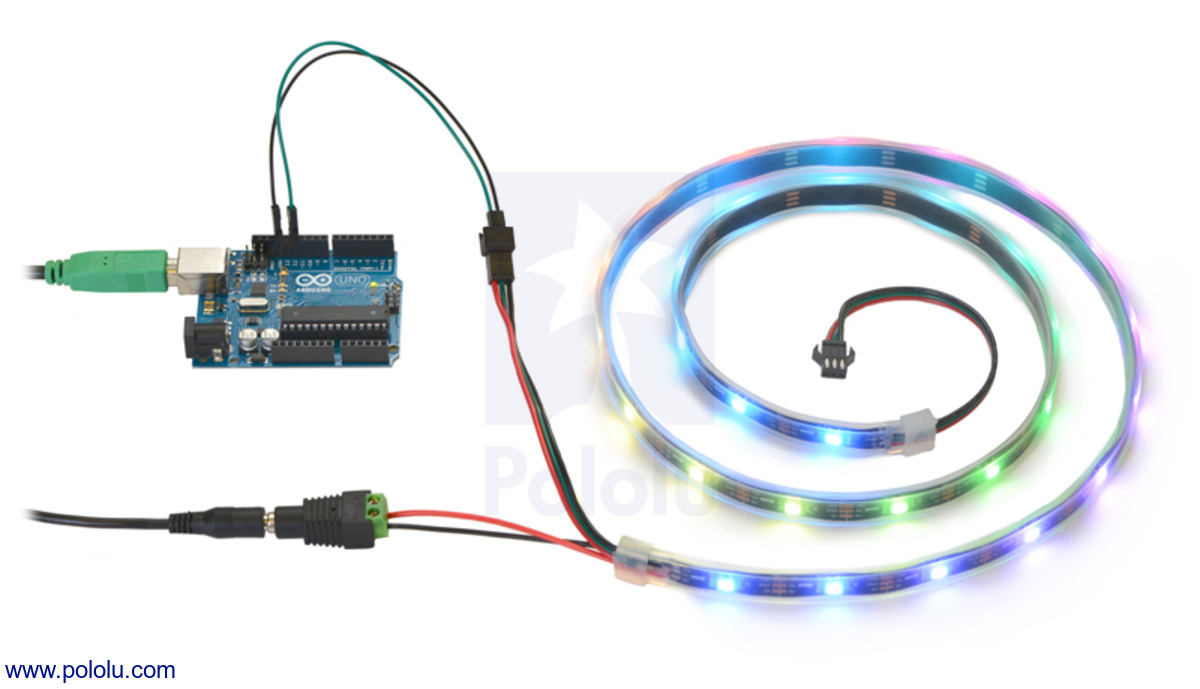](https://www.pololu.com/picture/view/0J4995)
## Summary
This is a library for the Arduino for controlling these addressable
RGB LED products from Pololu:
* [Addressable RGB 30-LED Strip, 5V, 1m (SK6812)](https://www.pololu.com/product/2526)
* [Addressable RGB 60-LED Strip, 5V, 2m (SK6812)](https://www.pololu.com/product/2527)
* [Addressable RGB 150-LED Strip, 5V, 5m (SK6812)](https://www.pololu.com/product/2528)
* [Addressable RGB 60-LED Strip, 5V, 1m (SK6812)](https://www.pololu.com/product/2529)
* [Addressable RGB 120-LED Strip, 5V, 2m (SK6812)](https://www.pololu.com/product/2530)
* [Addressable High-Density RGB 72-LED Strip, 5V, 0.5m (SK6812)](https://www.pololu.com/product/2531)
* [Addressable RGB 30-LED Strip, 5V, 1m (WS2812B)](https://www.pololu.com/product/2546)
* [Addressable RGB 60-LED Strip, 5V, 2m (WS2812B)](https://www.pololu.com/product/2547)
* [Addressable RGB 150-LED Strip, 5V, 5m (WS2812B)](https://www.pololu.com/product/2548)
* [Addressable RGB 60-LED Strip, 5V, 1m (WS2812B)](https://www.pololu.com/product/2549)
* [Addressable RGB 120-LED Strip, 5V, 2m (WS2812B)](https://www.pololu.com/product/2550)
* [Addressable High-Density RGB 72-LED Strip, 5V, 0.5m (WS2812B)](https://www.pololu.com/product/2551)
* [Addressable Through-Hole 5mm RGB LED with Diffused Lens, WS2811 Driver (10-Pack)](https://www.pololu.com/product/2535)
* [Addressable Through-Hole 8mm RGB LED with Diffused Lens, WS2811 Driver (10-Pack)](https://www.pololu.com/product/2536)
* [Adafruit 16 WS2812 LED NeoPixel Ring](https://www.pololu.com/product/2537)
* [Adafruit 24 WS2812 LED NeoPixel Ring](https://www.pololu.com/product/2538)
* [Adafruit 15 WS2812 LED NeoPixel 1/4-Ring](https://www.pololu.com/product/2539)
* [Adafruit 5×8 WS2812 LED NeoPixel Shield for Arduino](https://www.pololu.com/product/2772)
* [Addressable RGB 30-LED Strip, 5V, 1m (High-Speed TM1804)](https://www.pololu.com/product/2543)
* [Addressable RGB 60-LED Strip, 5V, 2m (High-Speed TM1804)](https://www.pololu.com/product/2544)
* [Addressable RGB 150-LED Strip, 5V, 5m (High-Speed TM1804)](https://www.pololu.com/product/2545)
This library is optimized for the SK6812 and WS2812B, so it transmits
colors in green-red-blue order.
If you have a WS2811 LED or a high-speed TM1804 LED strip, please note
that its red and green channels are swapped relative to the SK6812 and
WS2812B, so you will need to swap those channels in your code. You
might prefer to use
[version 2.1.0](https://github.com/pololu/pololu-led-strip-arduino/releases/tag/2.1.0)
of the library, which does not require you to swap red and green in
your code.
This version of the library does not support the older low-speed
TM1804 LED strips. If you want to control those, we recommend using
[version 1.2.0](https://github.com/pololu/pololu-led-strip-arduino/releases/tag/1.2.0),
which runs slower but can work with any of the low-speed TM1804 LED
strips, high-speed TM1804 strips, SK6812 strips, WS2812B strips, or
WS2811 LEDs.
This library allows complete control over the color of an arbitrary
number of LED strips with an arbitrary number of LEDs. Each LED can
be individually controlled, and LED strips can be chained together.
## Supported platforms
This library and the examples are designed to work with the Arduino
IDE versions 1.0 and 1.5 and probably will not work with earlier
versions.
This library currently supports any board based on the ATmega168,
ATmega328P, ATmega328PB, ATmega32U4, or ATmega2560 which runs at
8 MHz, 12 MHz, 16 MHz, or 20 MHz.
This includes the
[A-Star boards](https://www.pololu.com/category/149/a-star-programmable-controllers),
the [Arduino Uno](https://www.pololu.com/catalog/product/2191),
the older Arduino Duemilanovae,
the [Baby Orangutan B-328](https://www.pololu.com/catalog/product/1220),
the [Orangutan SV-328](https://www.pololu.com/catalog/product/1227),
the [Arduino Leonardo](https://www.pololu.com/catalog/product/2192),
the [Arduino Micro](https://www.pololu.com/product/2188),
and the [Arduino Mega](https://www.pololu.com/catalog/product/1699).
Not all pins on the Arduino Mega are supported (see below).
This library also supports the
[Arduino Due](https://www.pololu.com/catalog/product/2193), which is
based on the ATSAM3X8E.
## Getting started
### Hardware
The addressable RGB LED strips can be purchased on Pololu's website
using the links above.
The LED strip's input connector has two pins that should be connected
to the Arduino. The LED strip's ground will need to be connected to
one of the Arduino's GND pins, and the LED strip's signal input line
will be need to be connected to one of the Arduino's I/O lines. Our
example sketches assume the signal line is connected to pin 12. These
connections can be made using two
[Male-Female Premium Jumper Wires](https://www.pololu.com/catalog/category/67),
with the female ends plugging into the LED strip.
You will also need to connect a suitable power supply to the LED strip
using one of the power connectors. The power supply must be at the
right voltage and provide enough current to meet the LED strip's
requirements.
### Software
If you are using version 1.6.2 or later of the
[Arduino software (IDE)](https://www.arduino.cc/en/Main/Software), you can use
the Library Manager to install this library:
1. In the Arduino IDE, open the "Sketch" menu, select "Include Library", then
"Manage Libraries...".
2. Search for "PololuLedStrip".
3. Click the PololuLedStrip entry in the list.
4. Click "Install".
If this does not work, you can manually install the library:
1. Download the
[latest release archive from GitHub](https://github.com/pololu/pololu-led-strip-arduino/releases)
and decompress it.
2. Rename the folder "pololu-led-strip-arduino-xxxx" to "PololuLedStrip".
3. Drag the "PololuLedStrip" folder into the "libraries" directory inside your
Arduino sketchbook directory. You can view your sketchbook location by
opening the "File" menu and selecting "Preferences" in the Arduino IDE. If
there is not already a "libraries" folder in that location, you should make
the folder yourself.
4. After installing the library, restart the Arduino IDE.
## Examples
Several example sketches are available that show how to use the
library. You can access them from the Arduino IDE by opening the
"File" menu, selecting "Examples", and then selecting "PololuLedStrip". If
you cannot find these examples, the library was probably installed
incorrectly and you should retry the installation instructions above.
### LedStripGradient
This example code sketch lights up the LED strip with a moving
gradient pattern. You can open this example sketch by selecting
File->Examples->PololuLedStrip->LedStripGradient. Click the "Upload"
button to load it onto your board.
### LedStripRainbow
This example is like LedStripGradient, but makes a rainbow pattern
instead. You can open this example sketch by selecting
File->Examples->PololuLedStrip->LedStripRainbow. Click the "Upload"
button to load it onto your board.
### LedStripColorTester
This example code sketch allows you to type colors into the Serial
Monitor and see them on the LED strip. You can open this example by
selecting File->Examples->PololuLedStrip->LedStripColorTester. Click
the "Upload" button to load it onto your board. See the comments in
the code for more information on how to use it.
## Timing details
This library takes about 1.1 ms to update 30 LEDs (1 meter). The LED
strips use a high speed one-wire protocol with relatively strict
timing requirements, so this library disables interrupts to ensure
reliable color transmission. Unfortunately, disabling the interrupts
causes problems in other libraries that uses interrupts, such as the
`Serial` library and the functions like `millis()` that keep track of
time.
This library provides an `interruptFriendly` option that can let it
coexist with interrupt-based libraries. When this option is enabled,
the library will temporarily enable interrupts after each color is
sent, about every 36 microseconds. If you can keep all of your
interrupts short enough, then this option should allow this library to
work in conjunction with your interrupt-based libraries. However, if
you have an interrupt enabled that takes longer than about 38
microseconds for the SK6812, 5 microseconds for the WS2812B, or 8
microseconds for the TM1804, then this interrupt will sometimes cause
an extra long low pulse to emitted, which will be interpreted by the
LED strip as a reset command. This can cause visible flickering in
the LED strip. By default, many common Arduinos such as the Arduino
Uno have an interrupt that runs every millisecond and takes longer
than 8 microseconds. To turn on the `interruptFriendly` option,
add this line to your `setup()` function:
```c++
PololuLedStripBase::interruptFriendly = true;
```
Because the library disables interrupts by default, it can cause the
timekeeping functions of your Arduino to miss ticks. As a result, the
Arduino's time, which can be accessed from functions like `millis()`,
will appear to be running slower than usual. In our demo code, we get
around this by adding a 10 millisecond delay at the end of the `loop`
function; this ensures that the Arduino will only spend a minority of
its time updating the LED strip and therefore limits how much the
timekeeping will be affected.
## Documentation
### rgb_color
The library defines a type named `rgb_color` which can be used to
represent colors. The type is defined like this:
```c++
typedef struct rgb_color
{
unsigned char red, green, blue;
} rgb_color;
```
The fields `red`, `green`, and `blue` are numbers between 0 and 255
and represent the brightness of the red, green, and blue color
components respectively.
### PololuLedStrip<pin>
The libary defines a template class named `PololuLedStrip<pin>`. The
`pin` template parameter is an `unsigned char` and should be the
number of the Arduino pin that the LED strip's data input line is
connected to. For ATmega2560-based boards such as the Arduino Mega,
only the following pins are usable: 0–5, 10–13,
18–41, and 50–61 (ports A through G). This template class
inherits from the abstract class `PololuLedStripBase`, which is useful
if you want to have pointers to LED strip objects.
This class has no constructor except the default one. This class has
one function:
- `void write(rgb_color * colors, unsigned int count)` <br> Writes the
specified colors to the LED strip. The `colors` parameter should be
a pointer to an array of `rgb_color` structs in RAM. The `count`
parameter is the number of colors to write. The first color in the
array will be written to the LED closest to the data input
connector. To update all the LEDs in the LED strip, `count` should
be equal to or greater than the number of LEDs in the strip. If
`count` is less than the number of LEDs in the strip, then some LEDs
near the end of the strip will not be updated. This function
disables interrupts temporarily. This function pauses for over 10
us at the end before returning to allow the colors to take effect.
### PololuLedStripBase
- `static bool interruptFriendly;` <br> This option defaults to
`false`. Setting this to `true` changes the behavior of the `write`
function, making it enable interrupts after each color is sent,
about every 36 microseconds. See the discussion above.
## Chaining LED strips together
No special code is required to chain LED strips together. An X-meter
LED strip chained to a Y-meter LED strip can be controlled in exactly
the same way as a single (X+Y)-meter LED strip.
## Version history
* 4.3.1 (2021-01-12): Changed the `architectures` field in `library.properties` from `*` to `avr,sam`.
* 4.3.0 (2019-04-03): Added support for the ATmega328PB and 12 MHz AVRs.
* 4.2.0 (2017-03-20): Added a constructor for rgb_color that takes the three color values and changed the examples to use it. Added `keywords.txt`, which is used by the Arduino IDE for syntax highlighting.
* 4.1.1 (2017-01-16): Fixed library.properties "url" field.
* 4.1.0 (2016-11-03): Changed the reset time from 50 μs to 80 μs to support the SK6812.
* 4.0.0 (2016-08-22): Updated library to work with the Arduino Library Manager.
* 3.2.0 (2014-08-27): Added support for AVRs running at 8 MHz (thanks odewdney).
* 3.1.2 (2014-06-10): Fixed a bug in the HSV-to-RGB conversion in the LedStripRainbow example.
* 3.1.1 (2014-01-07): Changed the examples to use `uint16_t` instead of `byte` for `i`, making it easier to expand them beyond 254 LEDs.
* 3.1.0 (2013-12-19): Added the LedStripXmas example.
* 3.0.0 (2013-11-20): Switched the red and the green channels and increased the reset time so that this library will work nicely with the new WS2812 and WS2182B LED strips. The high-speed TM1804 LED strips still work if you switch red and green in your code.
* 2.1.0 (2013-11-11): Added the LedStripRainbow example.
* 2.0.0 (2013-10-07): Dropped support for the older, slower LED strips in order to make the library faster.
* 1.2.0 (2013-10-07): Changed the timing so that this library will work the new high-speed strips but also keep working with the old low-speed strips.
* 1.1.0 (2012-12-17): Added support for ATmega32U4-based boards such as the Arduino Leonardo. Added support for ARM-based boards such as the Arduino Due.
* 1.0.0 (2012-03-09): Original release.
================================================
FILE: examples/LedStripColorTester/LedStripColorTester.ino
================================================
/* LedStripColorTester: Example Arduino sketch that lets you
* type in a color on a PC and see it on the LED strip.
*
* To use this, you will need to plug an Addressable RGB LED
* strip from Pololu into pin 12. After uploading the sketch,
* select "Serial Monitor" from the "Tools" menu. In the input
* box, type a color and press enter.
*
* The format of the color should be "R,G,B!" where R, G, and B
* are numbers between 0 and 255 representing the brightnesses
* of the red, green, and blue components respectively.
*
* For example, to get green, you could type:
* 40,100,0!
*
* You can leave off the exclamation point if you change the
* Serial Monitor's line ending setting to be "Newline" instead
* of "No line ending".
*
* Please note that this sketch only transmits colors to the
* LED strip after it receives them from the computer, so if
* the LED strip loses power it will be off until you resend
* the color.
*/
#include <PololuLedStrip.h>
// Create an ledStrip object and specify the pin it will use.
PololuLedStrip<12> ledStrip;
// Create a buffer for holding the colors (3 bytes per color).
#define LED_COUNT 60
rgb_color colors[LED_COUNT];
void setup()
{
// Start up the serial port, for communication with the PC.
Serial.begin(115200);
Serial.println("Ready to receive colors.");
}
void loop()
{
// If any digit is received, we will go into integer parsing mode
// until all three calls to parseInt return an interger or time out.
if (Serial.available())
{
char c = Serial.peek();
if (!(c >= '0' && c <= '9'))
{
Serial.read(); // Discard non-digit character
}
else
{
// Read the color from the computer.
rgb_color color;
color.red = Serial.parseInt();
color.green = Serial.parseInt();
color.blue = Serial.parseInt();
// Update the colors buffer.
for(uint16_t i = 0; i < LED_COUNT; i++)
{
colors[i] = color;
}
// Write to the LED strip.
ledStrip.write(colors, LED_COUNT);
Serial.print("Showing color: ");
Serial.print(color.red);
Serial.print(",");
Serial.print(color.green);
Serial.print(",");
Serial.println(color.blue);
}
}
}
================================================
FILE: examples/LedStripGradient/LedStripGradient.ino
================================================
/* LedStripGradient: Example Arduino sketch that shows
* how to control an Addressable RGB LED Strip from Pololu.
*
* To use this, you will need to plug an Addressable RGB LED
* strip from Pololu into pin 12. After uploading the sketch,
* you should see a pattern on the LED strip that fades from
* green to pink and also moves along the strip.
*/
#include <PololuLedStrip.h>
// Create an ledStrip object and specify the pin it will use.
PololuLedStrip<12> ledStrip;
// Create a buffer for holding the colors (3 bytes per color).
#define LED_COUNT 60
rgb_color colors[LED_COUNT];
void setup()
{
}
void loop()
{
// Update the colors.
byte time = millis() >> 2;
for (uint16_t i = 0; i < LED_COUNT; i++)
{
byte x = time - 8*i;
colors[i] = rgb_color(x, 255 - x, x);
}
// Write the colors to the LED strip.
ledStrip.write(colors, LED_COUNT);
delay(10);
}
================================================
FILE: examples/LedStripRainbow/LedStripRainbow.ino
================================================
/* LedStripRainbow: Example Arduino sketch that shows
* how to make a moving rainbow pattern on an
* Addressable RGB LED Strip from Pololu.
*
* To use this, you will need to plug an Addressable RGB LED
* strip from Pololu into pin 12. After uploading the sketch,
* you should see a moving rainbow.
*/
#include <PololuLedStrip.h>
// Create an ledStrip object and specify the pin it will use.
PololuLedStrip<12> ledStrip;
// Create a buffer for holding the colors (3 bytes per color).
#define LED_COUNT 60
rgb_color colors[LED_COUNT];
void setup()
{
}
// Converts a color from HSV to RGB.
// h is hue, as a number between 0 and 360.
// s is the saturation, as a number between 0 and 255.
// v is the value, as a number between 0 and 255.
rgb_color hsvToRgb(uint16_t h, uint8_t s, uint8_t v)
{
uint8_t f = (h % 60) * 255 / 60;
uint8_t p = (255 - s) * (uint16_t)v / 255;
uint8_t q = (255 - f * (uint16_t)s / 255) * (uint16_t)v / 255;
uint8_t t = (255 - (255 - f) * (uint16_t)s / 255) * (uint16_t)v / 255;
uint8_t r = 0, g = 0, b = 0;
switch((h / 60) % 6){
case 0: r = v; g = t; b = p; break;
case 1: r = q; g = v; b = p; break;
case 2: r = p; g = v; b = t; break;
case 3: r = p; g = q; b = v; break;
case 4: r = t; g = p; b = v; break;
case 5: r = v; g = p; b = q; break;
}
return rgb_color(r, g, b);
}
void loop()
{
// Update the colors.
uint16_t time = millis() >> 2;
for(uint16_t i = 0; i < LED_COUNT; i++)
{
byte x = (time >> 2) - (i << 3);
colors[i] = hsvToRgb((uint32_t)x * 359 / 256, 255, 255);
}
// Write the colors to the LED strip.
ledStrip.write(colors, LED_COUNT);
delay(10);
}
================================================
FILE: examples/LedStripXmas/LedStripXmas.ino
================================================
/* LedStripXmas: A series of fun patterns for use with LED
* strips set up as a Christmas lighting display. You can see an
* earlier version of this code running in this youtube video:
* http://www.youtube.com/watch?v=VZRN0UrQSlc
* To use this, you will need to plug the signal wire of an
* Addressable RGB LED strip from Pololu into pin 12.
*
* You can optionally connect a switch between pin 3 and ground
* to control if the Arduino automatically cycles through the
* different patterns. When no switch is present or the switch
* is open, the patterns will cycle.
*
* You can also optionally connect a button between pin 2 and
* ground that displays the next pattern in the series each time
* it is pushed. This example requires the PololuLEDStrip
* library to be installed.
*
* NOTE: Timing is determined entirely by a counter incremented
* by the main loop, and the execution time of the main loop is
* dominated by the time it takes to write the LED colors array
* to the LED strips. Changing LED_COUNT will change the
* timing, so if you like the default timing and you have fewer
* than 509 LEDs, you might want to add an appropriate delay to
* the main loop. Timing is not done with the Arduino's system
* timer because that does not work properly when this program
* is running (the interrupts that maintain the system time must
* be disabled while the LED strips are being updated or else
* they will cause glitches on the LEDs).
*/
#ifdef __AVR__
#define HAS_EEPROM
#endif
#include <PololuLedStrip.h>
#ifdef HAS_EEPROM
#include <EEPROM.h>
#endif
// Create an ledStrip object on pin 12.
#define LED_SIGNAL_PIN 12
PololuLedStrip<LED_SIGNAL_PIN> ledStrip;
#define NEXT_PATTERN_BUTTON_PIN 2 // button between this pin and ground
#define AUTOCYCLE_SWITCH_PIN 3 // switch between this pin and ground
// Create a buffer for holding 509 colors.
// This takes 1527 bytes and uses up most of the 2KB RAM on an Uno,
// so we should be very sparing with additional RAM use and keep
// an eye out for possible stack overflow problems.
#define LED_COUNT 509
rgb_color colors[LED_COUNT];
#define NUM_STATES 7 // number of patterns to cycle through
// system timer, incremented by one every time through the main loop
unsigned int loopCount = 0;
unsigned int seed = 0; // used to initialize random number generator
// enumerate the possible patterns in the order they will cycle
enum Pattern {
WarmWhiteShimmer = 0,
RandomColorWalk = 1,
TraditionalColors = 2,
ColorExplosion = 3,
Gradient = 4,
BrightTwinkle = 5,
Collision = 6,
AllOff = 255
};
unsigned char pattern = AllOff;
unsigned int maxLoops; // go to next state when loopCount >= maxLoops
// initialization stuff
void setup()
{
// initialize the random number generator with a seed obtained by
// summing the voltages on the disconnected analog inputs
for (int i = 0; i < 8; i++)
{
seed += analogRead(i);
}
#ifdef HAS_EEPROM
seed += EEPROM.read(0); // get part of the seed from EEPROM
#endif
randomSeed(seed);
#ifdef HAS_EEPROM
// save a random number in EEPROM to be used for random seed
// generation the next time the program runs
EEPROM.write(0, random(256));
#endif
// optionally connect a switch between this pin and ground
// when the input is low, freeze the cycle at the current pattern
pinMode(AUTOCYCLE_SWITCH_PIN, INPUT_PULLUP);
// optionally connect a button between this pin and ground
// when the input goes low, advance to the next pattern in cycle
pinMode(NEXT_PATTERN_BUTTON_PIN, INPUT_PULLUP);
delay(10); // give pull-ups time raise the input voltage
}
// main loop
void loop()
{
handleNextPatternButton();
if (loopCount == 0)
{
// whenever timer resets, clear the LED colors array (all off)
for (int i = 0; i < LED_COUNT; i++)
{
colors[i] = rgb_color(0, 0, 0);
}
}
if (pattern == WarmWhiteShimmer || pattern == RandomColorWalk)
{
// for these two patterns, we want to make sure we get the same
// random sequence six times in a row (this provides smoother
// random fluctuations in brightness/color)
if (loopCount % 6 == 0)
{
seed = random(30000);
}
randomSeed(seed);
}
// call the appropriate pattern routine based on state; these
// routines just set the colors in the colors array
switch (pattern)
{
case WarmWhiteShimmer:
// warm white shimmer for 300 loopCounts, fading over last 70
maxLoops = 300;
warmWhiteShimmer(loopCount > maxLoops - 70);
break;
case RandomColorWalk:
// start with alternating red and green colors that randomly walk
// to other colors for 400 loopCounts, fading over last 80
maxLoops = 400;
randomColorWalk(loopCount == 0 ? 1 : 0, loopCount > maxLoops - 80);
break;
case TraditionalColors:
// repeating pattern of red, green, orange, blue, magenta that
// slowly moves for 400 loopCounts
maxLoops = 400;
traditionalColors();
break;
case ColorExplosion:
// bursts of random color that radiate outwards from random points
// for 630 loop counts; no burst generation for the last 70 counts
// of every 200 count cycle or over the over final 100 counts
// (this creates a repeating bloom/decay effect)
maxLoops = 630;
colorExplosion((loopCount % 200 > 130) || (loopCount > maxLoops - 100));
break;
case Gradient:
// red -> white -> green -> white -> red ... gradiant that scrolls
// across the strips for 250 counts; this pattern is overlaid with
// waves of dimness that also scroll (at twice the speed)
maxLoops = 250;
gradient();
delay(6); // add an extra 6ms delay to slow things down
break;
case BrightTwinkle:
// random LEDs light up brightly and fade away; it is a very similar
// algorithm to colorExplosion (just no radiating outward from the
// LEDs that light up); as time goes on, allow progressively more
// colors, halting generation of new twinkles for last 100 counts.
maxLoops = 1200;
if (loopCount < 400)
{
brightTwinkle(0, 1, 0); // only white for first 400 loopCounts
}
else if (loopCount < 650)
{
brightTwinkle(0, 2, 0); // white and red for next 250 counts
}
else if (loopCount < 900)
{
brightTwinkle(1, 2, 0); // red, and green for next 250 counts
}
else
{
// red, green, blue, cyan, magenta, yellow for the rest of the time
brightTwinkle(1, 6, loopCount > maxLoops - 100);
}
break;
case Collision:
// colors grow towards each other from the two ends of the strips,
// accelerating until they collide and the whole strip flashes
// white and fades; this repeats until the function indicates it
// is done by returning 1, at which point we stop keeping maxLoops
// just ahead of loopCount
if (!collision())
{
maxLoops = loopCount + 2;
}
break;
}
// update the LED strips with the colors in the colors array
ledStrip.write(colors, LED_COUNT);
loopCount++; // increment our loop counter/timer.
if (loopCount >= maxLoops && digitalRead(AUTOCYCLE_SWITCH_PIN))
{
// if the time is up for the current pattern and the optional hold
// switch is not grounding the AUTOCYCLE_SWITCH_PIN, clear the
// loop counter and advance to the next pattern in the cycle
loopCount = 0; // reset timer
pattern = ((unsigned char)(pattern+1))%NUM_STATES; // advance to next pattern
}
}
// This function detects if the optional next pattern button is pressed
// (connecting the pin to ground) and advances to the next pattern
// in the cycle if so. It also debounces the button.
void handleNextPatternButton()
{
if (digitalRead(NEXT_PATTERN_BUTTON_PIN) == 0)
{
// if optional button is pressed
while (digitalRead(NEXT_PATTERN_BUTTON_PIN) == 0)
{
// wait for button to be released
while (digitalRead(NEXT_PATTERN_BUTTON_PIN) == 0);
delay(10); // debounce the button
}
loopCount = 0; // reset timer
pattern = ((unsigned char)(pattern+1))%NUM_STATES; // advance to next pattern
}
}
// This function applies a random walk to val by increasing or
// decreasing it by changeAmount or by leaving it unchanged.
// val is a pointer to the byte to be randomly changed.
// The new value of val will always be within [0, maxVal].
// A walk direction of 0 decreases val and a walk direction of 1
// increases val. The directions argument specifies the number of
// possible walk directions to choose from, so when directions is 1, val
// will always decrease; when directions is 2, val will have a 50% chance
// of increasing and a 50% chance of decreasing; when directions is 3,
// val has an equal chance of increasing, decreasing, or staying the same.
void randomWalk(unsigned char *val, unsigned char maxVal, unsigned char changeAmount, unsigned char directions)
{
unsigned char walk = random(directions); // direction of random walk
if (walk == 0)
{
// decrease val by changeAmount down to a min of 0
if (*val >= changeAmount)
{
*val -= changeAmount;
}
else
{
*val = 0;
}
}
else if (walk == 1)
{
// increase val by changeAmount up to a max of maxVal
if (*val <= maxVal - changeAmount)
{
*val += changeAmount;
}
else
{
*val = maxVal;
}
}
}
// This function fades val by decreasing it by an amount proportional
// to its current value. The fadeTime argument determines the
// how quickly the value fades. The new value of val will be:
// val = val - val*2^(-fadeTime)
// So a smaller fadeTime value leads to a quicker fade.
// If val is greater than zero, val will always be decreased by
// at least 1.
// val is a pointer to the byte to be faded.
void fade(unsigned char *val, unsigned char fadeTime)
{
if (*val != 0)
{
unsigned char subAmt = *val >> fadeTime; // val * 2^-fadeTime
if (subAmt < 1)
subAmt = 1; // make sure we always decrease by at least 1
*val -= subAmt; // decrease value of byte pointed to by val
}
}
// ***** PATTERN WarmWhiteShimmer *****
// This function randomly increases or decreases the brightness of the
// even red LEDs by changeAmount, capped at maxBrightness. The green
// and blue LED values are set proportional to the red value so that
// the LED color is warm white. Each odd LED is set to a quarter the
// brightness of the preceding even LEDs. The dimOnly argument
// disables the random increase option when it is true, causing
// all the LEDs to get dimmer by changeAmount; this can be used for a
// fade-out effect.
void warmWhiteShimmer(unsigned char dimOnly)
{
const unsigned char maxBrightness = 120; // cap on LED brighness
const unsigned char changeAmount = 2; // size of random walk step
for (int i = 0; i < LED_COUNT; i += 2)
{
// randomly walk the brightness of every even LED
randomWalk(&colors[i].red, maxBrightness, changeAmount, dimOnly ? 1 : 2);
// warm white: red = x, green = 0.8x, blue = 0.125x
colors[i].green = colors[i].red*4/5; // green = 80% of red
colors[i].blue = colors[i].red >> 3; // blue = red/8
// every odd LED gets set to a quarter the brighness of the preceding even LED
if (i + 1 < LED_COUNT)
{
colors[i+1] = rgb_color(colors[i].red >> 2, colors[i].green >> 2, colors[i].blue >> 2);
}
}
}
// ***** PATTERN RandomColorWalk *****
// This function randomly changes the color of every seventh LED by
// randomly increasing or decreasing the red, green, and blue components
// by changeAmount (capped at maxBrightness) or leaving them unchanged.
// The two preceding and following LEDs are set to progressively dimmer
// versions of the central color. The initializeColors argument
// determines how the colors are initialized:
// 0: randomly walk the existing colors
// 1: set the LEDs to alternating red and green segments
// 2: set the LEDs to random colors
// When true, the dimOnly argument changes the random walk into a 100%
// chance of LEDs getting dimmer by changeAmount; this can be used for
// a fade-out effect.
void randomColorWalk(unsigned char initializeColors, unsigned char dimOnly)
{
const unsigned char maxBrightness = 180; // cap on LED brightness
const unsigned char changeAmount = 3; // size of random walk step
// pick a good starting point for our pattern so the entire strip
// is lit well (if we pick wrong, the last four LEDs could be off)
unsigned char start;
switch (LED_COUNT % 7)
{
case 0:
start = 3;
break;
case 1:
start = 0;
break;
case 2:
start = 1;
break;
default:
start = 2;
}
for (int i = start; i < LED_COUNT; i+=7)
{
if (initializeColors == 0)
{
// randomly walk existing colors of every seventh LED
// (neighboring LEDs to these will be dimmer versions of the same color)
randomWalk(&colors[i].red, maxBrightness, changeAmount, dimOnly ? 1 : 3);
randomWalk(&colors[i].green, maxBrightness, changeAmount, dimOnly ? 1 : 3);
randomWalk(&colors[i].blue, maxBrightness, changeAmount, dimOnly ? 1 : 3);
}
else if (initializeColors == 1)
{
// initialize LEDs to alternating red and green
if (i % 2)
{
colors[i] = rgb_color(maxBrightness, 0, 0);
}
else
{
colors[i] = rgb_color(0, maxBrightness, 0);
}
}
else
{
// initialize LEDs to a string of random colors
colors[i] = rgb_color(random(maxBrightness), random(maxBrightness), random(maxBrightness));
}
// set neighboring LEDs to be progressively dimmer versions of the color we just set
if (i >= 1)
{
colors[i-1] = rgb_color(colors[i].red >> 2, colors[i].green >> 2, colors[i].blue >> 2);
}
if (i >= 2)
{
colors[i-2] = rgb_color(colors[i].red >> 3, colors[i].green >> 3, colors[i].blue >> 3);
}
if (i + 1 < LED_COUNT)
{
colors[i+1] = colors[i-1];
}
if (i + 2 < LED_COUNT)
{
colors[i+2] = colors[i-2];
}
}
}
// ***** PATTERN TraditionalColors *****
// This function creates a repeating patern of traditional Christmas
// light colors: red, green, orange, blue, magenta.
// Every fourth LED is colored, and the pattern slowly moves by fading
// out the current set of lit LEDs while gradually brightening a new
// set shifted over one LED.
void traditionalColors()
{
// loop counts to leave strip initially dark
const unsigned char initialDarkCycles = 10;
// loop counts it takes to go from full off to fully bright
const unsigned char brighteningCycles = 20;
if (loopCount < initialDarkCycles) // leave strip fully off for 20 cycles
{
return;
}
// if LED_COUNT is not an exact multiple of our repeating pattern size,
// it will not wrap around properly, so we pick the closest LED count
// that is an exact multiple of the pattern period (20) and is not smaller
// than the actual LED count.
unsigned int extendedLEDCount = (((LED_COUNT-1)/20)+1)*20;
for (int i = 0; i < extendedLEDCount; i++)
{
unsigned char brightness = (loopCount - initialDarkCycles)%brighteningCycles + 1;
unsigned char cycle = (loopCount - initialDarkCycles)/brighteningCycles;
// transform i into a moving idx space that translates one step per
// brightening cycle and wraps around
unsigned int idx = (i + cycle)%extendedLEDCount;
if (idx < LED_COUNT) // if our transformed index exists
{
if (i % 4 == 0)
{
// if this is an LED that we are coloring, set the color based
// on the LED and the brightness based on where we are in the
// brightening cycle
switch ((i/4)%5)
{
case 0: // red
colors[idx].red = 200 * brightness/brighteningCycles;
colors[idx].green = 10 * brightness/brighteningCycles;
colors[idx].blue = 10 * brightness/brighteningCycles;
break;
case 1: // green
colors[idx].red = 10 * brightness/brighteningCycles;
colors[idx].green = 200 * brightness/brighteningCycles;
colors[idx].blue = 10 * brightness/brighteningCycles;
break;
case 2: // orange
colors[idx].red = 200 * brightness/brighteningCycles;
colors[idx].green = 120 * brightness/brighteningCycles;
colors[idx].blue = 0 * brightness/brighteningCycles;
break;
case 3: // blue
colors[idx].red = 10 * brightness/brighteningCycles;
colors[idx].green = 10 * brightness/brighteningCycles;
colors[idx].blue = 200 * brightness/brighteningCycles;
break;
case 4: // magenta
colors[idx].red = 200 * brightness/brighteningCycles;
colors[idx].green = 64 * brightness/brighteningCycles;
colors[idx].blue = 145 * brightness/brighteningCycles;
break;
}
}
else
{
// fade the 3/4 of LEDs that we are not currently brightening
fade(&colors[idx].red, 3);
fade(&colors[idx].green, 3);
fade(&colors[idx].blue, 3);
}
}
}
}
// Helper function for adjusting the colors for the BrightTwinkle
// and ColorExplosion patterns. Odd colors get brighter and even
// colors get dimmer.
void brightTwinkleColorAdjust(unsigned char *color)
{
if (*color == 255)
{
// if reached max brightness, set to an even value to start fade
*color = 254;
}
else if (*color % 2)
{
// if odd, approximately double the brightness
// you should only use odd values that are of the form 2^n-1,
// which then gets a new value of 2^(n+1)-1
// using other odd values will break things
*color = *color * 2 + 1;
}
else if (*color > 0)
{
fade(color, 4);
if (*color % 2)
{
(*color)--; // if faded color is odd, subtract one to keep it even
}
}
}
// Helper function for adjusting the colors for the ColorExplosion
// pattern. Odd colors get brighter and even colors get dimmer.
// The propChance argument determines the likelihood that neighboring
// LEDs are put into the brightening stage when the central LED color
// is 31 (chance is: 1 - 1/(propChance+1)). The neighboring LED colors
// are pointed to by leftColor and rightColor (it is not important that
// the leftColor LED actually be on the "left" in your setup).
void colorExplosionColorAdjust(unsigned char *color, unsigned char propChance,
unsigned char *leftColor, unsigned char *rightColor)
{
if (*color == 31 && random(propChance+1) != 0)
{
if (leftColor != 0 && *leftColor == 0)
{
*leftColor = 1; // if left LED exists and color is zero, propagate
}
if (rightColor != 0 && *rightColor == 0)
{
*rightColor = 1; // if right LED exists and color is zero, propagate
}
}
brightTwinkleColorAdjust(color);
}
// ***** PATTERN ColorExplosion *****
// This function creates bursts of expanding, overlapping colors by
// randomly picking LEDs to brighten and then fade away. As these LEDs
// brighten, they have a chance to trigger the same process in
// neighboring LEDs. The color of the burst is randomly chosen from
// among red, green, blue, and white. If a red burst meets a green
// burst, for example, the overlapping portion will be a shade of yellow
// or orange.
// When true, the noNewBursts argument changes prevents the generation
// of new bursts; this can be used for a fade-out effect.
// This function uses a very similar algorithm to the BrightTwinkle
// pattern. The main difference is that the random twinkling LEDs of
// the BrightTwinkle pattern do not propagate to neighboring LEDs.
void colorExplosion(unsigned char noNewBursts)
{
// adjust the colors of the first LED
colorExplosionColorAdjust(&colors[0].red, 9, (unsigned char*)0, &colors[1].red);
colorExplosionColorAdjust(&colors[0].green, 9, (unsigned char*)0, &colors[1].green);
colorExplosionColorAdjust(&colors[0].blue, 9, (unsigned char*)0, &colors[1].blue);
for (int i = 1; i < LED_COUNT - 1; i++)
{
// adjust the colors of second through second-to-last LEDs
colorExplosionColorAdjust(&colors[i].red, 9, &colors[i-1].red, &colors[i+1].red);
colorExplosionColorAdjust(&colors[i].green, 9, &colors[i-1].green, &colors[i+1].green);
colorExplosionColorAdjust(&colors[i].blue, 9, &colors[i-1].blue, &colors[i+1].blue);
}
// adjust the colors of the last LED
colorExplosionColorAdjust(&colors[LED_COUNT-1].red, 9, &colors[LED_COUNT-2].red, (unsigned char*)0);
colorExplosionColorAdjust(&colors[LED_COUNT-1].green, 9, &colors[LED_COUNT-2].green, (unsigned char*)0);
colorExplosionColorAdjust(&colors[LED_COUNT-1].blue, 9, &colors[LED_COUNT-2].blue, (unsigned char*)0);
if (!noNewBursts)
{
// if we are generating new bursts, randomly pick one new LED
// to light up
for (int i = 0; i < 1; i++)
{
int j = random(LED_COUNT); // randomly pick an LED
switch(random(7)) // randomly pick a color
{
// 2/7 chance we will spawn a red burst here (if LED has no red component)
case 0:
case 1:
if (colors[j].red == 0)
{
colors[j].red = 1;
}
break;
// 2/7 chance we will spawn a green burst here (if LED has no green component)
case 2:
case 3:
if (colors[j].green == 0)
{
colors[j].green = 1;
}
break;
// 2/7 chance we will spawn a white burst here (if LED is all off)
case 4:
case 5:
if ((colors[j].red == 0) && (colors[j].green == 0) && (colors[j].blue == 0))
{
colors[j] = rgb_color(1, 1, 1);
}
break;
// 1/7 chance we will spawn a blue burst here (if LED has no blue component)
case 6:
if (colors[j].blue == 0)
{
colors[j].blue = 1;
}
break;
default:
break;
}
}
}
}
// ***** PATTERN Gradient *****
// This function creates a scrolling color gradient that smoothly
// transforms from red to white to green back to white back to red.
// This pattern is overlaid with waves of brightness and dimness that
// scroll at twice the speed of the color gradient.
void gradient()
{
unsigned int j = 0;
// populate colors array with full-brightness gradient colors
// (since the array indices are a function of loopCount, the gradient
// colors scroll over time)
while (j < LED_COUNT)
{
// transition from red to green over 8 LEDs
for (int i = 0; i < 8; i++)
{
if (j >= LED_COUNT){ break; }
colors[(loopCount/2 + j + LED_COUNT)%LED_COUNT] = rgb_color(160 - 20*i, 20*i, (160 - 20*i)*20*i/160);
j++;
}
// transition from green to red over 8 LEDs
for (int i = 0; i < 8; i++)
{
if (j >= LED_COUNT){ break; }
colors[(loopCount/2 + j + LED_COUNT)%LED_COUNT] = rgb_color(20*i, 160 - 20*i, (160 - 20*i)*20*i/160);
j++;
}
}
// modify the colors array to overlay the waves of dimness
// (since the array indices are a function of loopCount, the waves
// of dimness scroll over time)
const unsigned char fullDarkLEDs = 10; // number of LEDs to leave fully off
const unsigned char fullBrightLEDs = 5; // number of LEDs to leave fully bright
const unsigned char cyclePeriod = 14 + fullDarkLEDs + fullBrightLEDs;
// if LED_COUNT is not an exact multiple of our repeating pattern size,
// it will not wrap around properly, so we pick the closest LED count
// that is an exact multiple of the pattern period (cyclePeriod) and is not
// smaller than the actual LED count.
unsigned int extendedLEDCount = (((LED_COUNT-1)/cyclePeriod)+1)*cyclePeriod;
j = 0;
while (j < extendedLEDCount)
{
unsigned int idx;
// progressively dim the LEDs
for (int i = 1; i < 8; i++)
{
idx = (j + loopCount) % extendedLEDCount;
if (j++ >= extendedLEDCount){ return; }
if (idx >= LED_COUNT){ continue; }
colors[idx].red >>= i;
colors[idx].green >>= i;
colors[idx].blue >>= i;
}
// turn off these LEDs
for (int i = 0; i < fullDarkLEDs; i++)
{
idx = (j + loopCount) % extendedLEDCount;
if (j++ >= extendedLEDCount){ return; }
if (idx >= LED_COUNT){ continue; }
colors[idx].red = 0;
colors[idx].green = 0;
colors[idx].blue = 0;
}
// progressively bring these LEDs back
for (int i = 0; i < 7; i++)
{
idx = (j + loopCount) % extendedLEDCount;
if (j++ >= extendedLEDCount){ return; }
if (idx >= LED_COUNT){ continue; }
colors[idx].red >>= (7 - i);
colors[idx].green >>= (7 - i);
colors[idx].blue >>= (7 - i);
}
// skip over these LEDs to leave them at full brightness
j += fullBrightLEDs;
}
}
// ***** PATTERN BrightTwinkle *****
// This function creates a sparkling/twinkling effect by randomly
// picking LEDs to brighten and then fade away. Possible colors are:
// white, red, green, blue, yellow, cyan, and magenta
// numColors is the number of colors to generate, and minColor
// indicates the starting point (white is 0, red is 1, ..., and
// magenta is 6), so colors generated are all of those from minColor
// to minColor+numColors-1. For example, calling brightTwinkle(2, 2, 0)
// will produce green and blue twinkles only.
// When true, the noNewBursts argument changes prevents the generation
// of new twinkles; this can be used for a fade-out effect.
// This function uses a very similar algorithm to the ColorExplosion
// pattern. The main difference is that the random twinkling LEDs of
// this BrightTwinkle pattern do not propagate to neighboring LEDs.
void brightTwinkle(unsigned char minColor, unsigned char numColors, unsigned char noNewBursts)
{
// Note: the colors themselves are used to encode additional state
// information. If the color is one less than a power of two
// (but not 255), the color will get approximately twice as bright.
// If the color is even, it will fade. The sequence goes as follows:
// * Randomly pick an LED.
// * Set the color(s) you want to flash to 1.
// * It will automatically grow through 3, 7, 15, 31, 63, 127, 255.
// * When it reaches 255, it gets set to 254, which starts the fade
// (the fade process always keeps the color even).
for (int i = 0; i < LED_COUNT; i++)
{
brightTwinkleColorAdjust(&colors[i].red);
brightTwinkleColorAdjust(&colors[i].green);
brightTwinkleColorAdjust(&colors[i].blue);
}
if (!noNewBursts)
{
// if we are generating new twinkles, randomly pick four new LEDs
// to light up
for (int i = 0; i < 4; i++)
{
int j = random(LED_COUNT);
if (colors[j].red == 0 && colors[j].green == 0 && colors[j].blue == 0)
{
// if the LED we picked is not already lit, pick a random
// color for it and seed it so that it will start getting
// brighter in that color
switch (random(numColors) + minColor)
{
case 0:
colors[j] = rgb_color(1, 1, 1); // white
break;
case 1:
colors[j] = rgb_color(1, 0, 0); // red
break;
case 2:
colors[j] = rgb_color(0, 1, 0); // green
break;
case 3:
colors[j] = rgb_color(0, 0, 1); // blue
break;
case 4:
colors[j] = rgb_color(1, 1, 0); // yellow
break;
case 5:
colors[j] = rgb_color(0, 1, 1); // cyan
break;
case 6:
colors[j] = rgb_color(1, 0, 1); // magenta
break;
default:
colors[j] = rgb_color(1, 1, 1); // white
}
}
}
}
}
// ***** PATTERN Collision *****
// This function spawns streams of color from each end of the strip
// that collide, at which point the entire strip flashes bright white
// briefly and then fades. Unlike the other patterns, this function
// maintains a lot of complicated state data and tells the main loop
// when it is done by returning 1 (a return value of 0 means it is
// still in progress).
unsigned char collision()
{
const unsigned char maxBrightness = 180; // max brightness for the colors
const unsigned char numCollisions = 5; // # of collisions before pattern ends
static unsigned char state = 0; // pattern state
static unsigned int count = 0; // counter used by pattern
if (loopCount == 0)
{
state = 0;
}
if (state % 3 == 0)
{
// initialization state
switch (state/3)
{
case 0: // first collision: red streams
colors[0] = rgb_color(maxBrightness, 0, 0);
break;
case 1: // second collision: green streams
colors[0] = rgb_color(0, maxBrightness, 0);
break;
case 2: // third collision: blue streams
colors[0] = rgb_color(0, 0, maxBrightness);
break;
case 3: // fourth collision: warm white streams
colors[0] = rgb_color(maxBrightness, maxBrightness*4/5, maxBrightness>>3);
break;
default: // fifth collision and beyond: random-color streams
colors[0] = rgb_color(random(maxBrightness), random(maxBrightness), random(maxBrightness));
}
// stream is led by two full-white LEDs
colors[1] = colors[2] = rgb_color(255, 255, 255);
// make other side of the strip a mirror image of this side
colors[LED_COUNT - 1] = colors[0];
colors[LED_COUNT - 2] = colors[1];
colors[LED_COUNT - 3] = colors[2];
state++; // advance to next state
count = 8; // pick the first value of count that results in a startIdx of 1 (see below)
return 0;
}
if (state % 3 == 1)
{
// stream-generation state; streams accelerate towards each other
unsigned int startIdx = count*(count + 1) >> 6;
unsigned int stopIdx = startIdx + (count >> 5);
count++;
if (startIdx < (LED_COUNT + 1)/2)
{
// if streams have not crossed the half-way point, keep them growing
for (int i = 0; i < startIdx-1; i++)
{
// start fading previously generated parts of the stream
fade(&colors[i].red, 5);
fade(&colors[i].green, 5);
fade(&colors[i].blue, 5);
fade(&colors[LED_COUNT - i - 1].red, 5);
fade(&colors[LED_COUNT - i - 1].green, 5);
fade(&colors[LED_COUNT - i - 1].blue, 5);
}
for (int i = startIdx; i <= stopIdx; i++)
{
// generate new parts of the stream
if (i >= (LED_COUNT + 1) / 2)
{
// anything past the halfway point is white
colors[i] = rgb_color(255, 255, 255);
}
else
{
colors[i] = colors[i-1];
}
// make other side of the strip a mirror image of this side
colors[LED_COUNT - i - 1] = colors[i];
}
// stream is led by two full-white LEDs
colors[stopIdx + 1] = colors[stopIdx + 2] = rgb_color(255, 255, 255);
// make other side of the strip a mirror image of this side
colors[LED_COUNT - stopIdx - 2] = colors[stopIdx + 1];
colors[LED_COUNT - stopIdx - 3] = colors[stopIdx + 2];
}
else
{
// streams have crossed the half-way point of the strip;
// flash the entire strip full-brightness white (ignores maxBrightness limits)
for (int i = 0; i < LED_COUNT; i++)
{
colors[i] = rgb_color(255, 255, 255);
}
state++; // advance to next state
}
return 0;
}
if (state % 3 == 2)
{
// fade state
if (colors[0].red == 0 && colors[0].green == 0 && colors[0].blue == 0)
{
// if first LED is fully off, advance to next state
state++;
// after numCollisions collisions, this pattern is done
return state == 3*numCollisions;
}
// fade the LEDs at different rates based on the state
for (int i = 0; i < LED_COUNT; i++)
{
switch (state/3)
{
case 0: // fade through green
fade(&colors[i].red, 3);
fade(&colors[i].green, 4);
fade(&colors[i].blue, 2);
break;
case 1: // fade through red
fade(&colors[i].red, 4);
fade(&colors[i].green, 3);
fade(&colors[i].blue, 2);
break;
case 2: // fade through yellow
fade(&colors[i].red, 4);
fade(&colors[i].green, 4);
fade(&colors[i].blue, 3);
break;
case 3: // fade through blue
fade(&colors[i].red, 3);
fade(&colors[i].green, 2);
fade(&colors[i].blue, 4);
break;
default: // stay white through entire fade
fade(&colors[i].red, 4);
fade(&colors[i].green, 4);
fade(&colors[i].blue, 4);
}
}
}
return 0;
}
================================================
FILE: keywords.txt
================================================
Pololu KEYWORD1
PololuLedStripBase KEYWORD1
PololuLedStrip KEYWORD1
rgb_color KEYWORD1
red LITERAL1
green LITERAL1
blue LITERAL1
write LITERAL1
interruptFriendly LITERAL1
================================================
FILE: library.properties
================================================
name=PololuLedStrip
version=4.3.1
author=Pololu
maintainer=Pololu <inbox@pololu.com>
sentence=Arduino library for addressable RGB LED strips from Pololu
paragraph=This library works with NeoPixels, WS2812B LEDs, and WS2811 LEDs.
category=Device Control
url=https://github.com/pololu/pololu-led-strip-arduino
architectures=avr,sam
gitextract_73ms1bqo/ ├── .arduino-ci.yaml ├── .github/ │ ├── ISSUE_TEMPLATE/ │ │ ├── bug-report-or-feature-request.md │ │ └── config.yml │ └── workflows/ │ └── ci.yaml ├── .gitignore ├── .gitlab-ci.yml ├── LICENSE.txt ├── PololuLedStrip.cpp ├── PololuLedStrip.h ├── README.md ├── examples/ │ ├── LedStripColorTester/ │ │ └── LedStripColorTester.ino │ ├── LedStripGradient/ │ │ └── LedStripGradient.ino │ ├── LedStripRainbow/ │ │ └── LedStripRainbow.ino │ └── LedStripXmas/ │ └── LedStripXmas.ino ├── keywords.txt └── library.properties
SYMBOL INDEX (2 symbols across 1 files)

FILE: PololuLedStrip.h
  type rgb_color (line 29) | struct rgb_color
  function PololuLedStrip (line 266) | __attribute__((aligned(16))) PololuLedStrip<pin>::write(rgb_color * colo...
Condensed preview — 16 files, each showing path, character count, and a content snippet. Download the .json file or copy for the full structured content (71K chars).
[
  {
    "path": ".arduino-ci.yaml",
    "chars": 105,
    "preview": "skip_boards:\n  - arduino:samd:arduino_zero_native\n  - Intel:arc32:arduino_101\n  - esp8266:esp8266:huzzah\n"
  },
  {
    "path": ".github/ISSUE_TEMPLATE/bug-report-or-feature-request.md",
    "chars": 209,
    "preview": "---\nname: Bug report or feature request\nabout: Did you find a specific bug in the code for this project? Do you want to "
  },
  {
    "path": ".github/ISSUE_TEMPLATE/config.yml",
    "chars": 242,
    "preview": "blank_issues_enabled: false\ncontact_links:\n  - name: Pololu Forum\n    url: https://forum.pololu.com/\n    about: Do you n"
  },
  {
    "path": ".github/workflows/ci.yaml",
    "chars": 472,
    "preview": "name: \"CI\"\non:\n  pull_request:\n  push:\njobs:\n  ci:\n    runs-on: ubuntu-20.04\n    steps:\n    - name: Checkout this reposi"
  },
  {
    "path": ".gitignore",
    "chars": 13,
    "preview": "/docs/\n/out/\n"
  },
  {
    "path": ".gitlab-ci.yml",
    "chars": 188,
    "preview": "image: $CI_REGISTRY_IMAGE/nixos/nix:2.3.6\n\nstages:\n  - ci\n\nci:\n  stage: ci\n  tags:\n    - nix\n  script:\n    - nix-shell -"
  },
  {
    "path": "LICENSE.txt",
    "chars": 1084,
    "preview": "Copyright (c) 2012-2020 Pololu Corporation (www.pololu.com)\n\nPermission is hereby granted, free of charge, to any person"
  },
  {
    "path": "PololuLedStrip.cpp",
    "chars": 80,
    "preview": "#include <PololuLedStrip.h>\n\nbool PololuLedStripBase::interruptFriendly = false;"
  },
  {
    "path": "PololuLedStrip.h",
    "chars": 13171,
    "preview": "#pragma once\n\n#include <Arduino.h>\n\n#if defined(__AVR__)\n#include <avr/io.h>\n#include <avr/interrupt.h>\n#include <util/d"
  },
  {
    "path": "README.md",
    "chars": 13783,
    "preview": "# Arduino library for addressable RGB LED strips from Pololu\n\nVersion: 4.3.1<br>\nRelease date: 2021-01-12<br>\n[www.polol"
  },
  {
    "path": "examples/LedStripColorTester/LedStripColorTester.ino",
    "chars": 2241,
    "preview": "/* LedStripColorTester: Example Arduino sketch that lets you\n * type in a color on a PC and see it on the LED strip.\n *\n"
  },
  {
    "path": "examples/LedStripGradient/LedStripGradient.ino",
    "chars": 889,
    "preview": "/* LedStripGradient: Example Arduino sketch that shows\n * how to control an Addressable RGB LED Strip from Pololu.\n *\n *"
  },
  {
    "path": "examples/LedStripRainbow/LedStripRainbow.ino",
    "chars": 1706,
    "preview": "/* LedStripRainbow: Example Arduino sketch that shows\n * how to make a moving rainbow pattern on an\n * Addressable RGB L"
  },
  {
    "path": "examples/LedStripXmas/LedStripXmas.ino",
    "chars": 33311,
    "preview": "/* LedStripXmas: A series of fun patterns for use with LED\n * strips set up as a Christmas lighting display.  You can se"
  },
  {
    "path": "keywords.txt",
    "chars": 182,
    "preview": "Pololu\tKEYWORD1\r\nPololuLedStripBase\tKEYWORD1\r\nPololuLedStrip\tKEYWORD1\r\nrgb_color\tKEYWORD1\r\n\r\nred\tLITERAL1\r\ngreen\tLITERAL"
  },
  {
    "path": "library.properties",
    "chars": 330,
    "preview": "name=PololuLedStrip\nversion=4.3.1\nauthor=Pololu\nmaintainer=Pololu <inbox@pololu.com>\nsentence=Arduino library for addres"
  }
]
About this extraction
This page contains the full source code of the pololu/pololu-led-strip-arduino GitHub repository, extracted and formatted as plain text for AI agents and large language models (LLMs). The extraction includes 16 files (66.4 KB), approximately 20.0k tokens, and a symbol index with 2 extracted functions, classes, methods, constants, and types. Use this with OpenClaw, Claude, ChatGPT, Cursor, Windsurf, or any other AI tool that accepts text input. You can copy the full output to your clipboard or download it as a .txt file.
Extracted by GitExtract — free GitHub repo to text converter for AI. Built by Nikandr Surkov.