# Git History CLI
Quickly browse the history of a file from any git repository.
> You need [node](https://nodejs.org/en/) to run this
```bash
$ npx git-file-history path/to/file.ext
```
or
```bash
$ npm install -g git-file-history
$ git-file-history path/to/file.ext
```
### Sponsors
Support this project by becoming a sponsor. Your logo will show up here with a link to your website. [[Become a sponsor](https://opencollective.com/git-history#sponsor)]
### Backers
Thank you to all our backers! 🙏 [[Become a backer](https://opencollective.com/git-history#backer)]
================================================
FILE: cli/server.js
================================================
const serve = require("koa-static");
const Koa = require("koa");
const pather = require("path");
const getCommits = require("./git");
const getPort = require("get-port");
const open = require("open");
const router = require("koa-router")();
const argv = require("yargs")
.usage("Usage: $0 [options]")
.describe("port", "Port number (default = 5000)")
.default("port", 5000).argv;
const sitePath = pather.join(__dirname, "site/");
router.get("/api/commits", async ctx => {
const query = ctx.query;
const { path, last = 10, before = null } = query;
const commits = await getCommits(path, last, before);
ctx.body = commits;
});
const app = new Koa();
app.use(router.routes());
app.use(serve(sitePath));
app.on("error", err => {
console.error("Server error", err);
console.error(
"Let us know of the error at https://github.com/pomber/git-history/issues"
);
});
module.exports = async function runServer(path) {
const port = await getPort({ port: argv.port });
app.listen(port);
console.log("Running at http://localhost:" + port);
open(`http://localhost:${port}/?path=${encodeURIComponent(path)}`);
};
================================================
FILE: craco.config.js
================================================
module.exports = {
webpack: {
configure: {
output: {
// I need "this" for workerize-loader
globalObject: "this"
}
}
}
};
================================================
FILE: license
================================================
MIT License
Copyright (c) 2019 Rodrigo Pombo
Permission is hereby granted, free of charge, to any person obtaining a copy
of this software and associated documentation files (the "Software"), to deal
in the Software without restriction, including without limitation the rights
to use, copy, modify, merge, publish, distribute, sublicense, and/or sell
copies of the Software, and to permit persons to whom the Software is
furnished to do so, subject to the following conditions:
The above copyright notice and this permission notice shall be included in all
copies or substantial portions of the Software.
THE SOFTWARE IS PROVIDED "AS IS", WITHOUT WARRANTY OF ANY KIND, EXPRESS OR
IMPLIED, INCLUDING BUT NOT LIMITED TO THE WARRANTIES OF MERCHANTABILITY,
FITNESS FOR A PARTICULAR PURPOSE AND NONINFRINGEMENT. IN NO EVENT SHALL THE
AUTHORS OR COPYRIGHT HOLDERS BE LIABLE FOR ANY CLAIM, DAMAGES OR OTHER
LIABILITY, WHETHER IN AN ACTION OF CONTRACT, TORT OR OTHERWISE, ARISING FROM,
OUT OF OR IN CONNECTION WITH THE SOFTWARE OR THE USE OR OTHER DEALINGS IN THE
SOFTWARE.
================================================
FILE: netlify.toml
================================================
[[redirects]]
from = "/*"
to = "/index.html"
status = 200
================================================
FILE: package.json
================================================
{
"name": "githistory-web",
"version": "1.0.1",
"repository": "pomber/git-history",
"private": true,
"dependencies": {
"@craco/craco": "^3.5.0",
"diff": "^4.0.1",
"js-base64": "^2.5.1",
"netlify-auth-providers": "^1.0.0-alpha5",
"opencollective-postinstall": "^2.0.2",
"prismjs": "^1.15.0",
"react": "^16.8.4",
"react-dom": "^16.8.4",
"react-scripts": "2.1.3",
"react-swipeable": "^4.3.2",
"react-use": "^5.2.2",
"rebound": "^0.1.0",
"workerize-loader": "^1.0.4"
},
"scripts": {
"start": "craco --openssl-legacy-provider start",
"build": "craco build",
"format": "prettier --write \"**/*.{js,jsx,md,json,html,css,yml}\" --ignore-path .gitignore",
"test-prettier": "prettier --check \"**/*.{js,jsx,md,json,html,css,yml}\" --ignore-path .gitignore",
"test-cra": "react-scripts test",
"test": "run-s test-prettier test-cra",
"eject": "react-scripts eject",
"postinstall": "opencollective-postinstall",
"storybook": "start-storybook -p 9009 -s public",
"build-storybook": "build-storybook -s public"
},
"eslintConfig": {
"extends": "react-app"
},
"browserslist": [
">0.2%",
"not dead",
"not ie <= 11",
"not op_mini all"
],
"devDependencies": {
"@babel/core": "^7.3.4",
"@storybook/addon-actions": "^4.1.13",
"@storybook/addon-links": "^4.1.13",
"@storybook/addons": "^4.1.13",
"@storybook/react": "^4.1.13",
"babel-loader": "8.0.4",
"npm-run-all": "^4.1.5",
"prettier": "^1.16.4"
},
"collective": {
"type": "opencollective",
"url": "https://opencollective.com/git-history"
}
}
================================================
FILE: public/index.html
================================================
Git History
================================================
FILE: public/manifest.json
================================================
{
"short_name": "Git History",
"name": "Git History",
"icons": [
{
"src": "favicon.ico",
"sizes": "64x64 32x32 24x24 16x16",
"type": "image/x-icon"
}
],
"start_url": ".",
"display": "standalone",
"theme_color": "#d6deeb",
"background_color": "#011627"
}
================================================
FILE: readme.md
================================================
# [Git History](https://githistory.xyz)
Quickly browse the history of files in any git repo:
1. Go to a file in **GitHub** (or **GitLab**, or **Bitbucket**)
1. Replace `github.com` with `github.githistory.xyz`
1. There's no step three
[Try it](https://github.githistory.xyz/babel/babel/blob/master/packages/babel-core/test/browserify.js)
> If you like this project consider [backing my open source work on Patreon!](https://patreon.com/pomber)
> And follow [@pomber](https://twitter.com/pomber) on twitter for updates.
## Extensions
### Browsers
You can also add an `Open in Git History` button to GitHub, GitLab and Bitbucket with the [Chrome](https://chrome.google.com/webstore/detail/github-history-browser-ex/laghnmifffncfonaoffcndocllegejnf) and [Firefox](https://addons.mozilla.org/firefox/addon/github-history/) extensions.
Or you can use a bookmarklet.
```javascript
javascript: (function() {
var url = window.location.href;
var regEx = /^(https?\:\/\/)(www\.)?(github|gitlab|bitbucket)\.(com|org)\/(.*)$/i;
if (regEx.test(url)) {
url = url.replace(regEx, "$1$3.githistory.xyz/$5");
window.open(url, "_blank");
} else {
alert("Not a Git File URL");
}
})();
```
### Local Repos
You can use Git History for local git repos with the [CLI](https://github.com/pomber/git-history/tree/master/cli) or with the [VS Code extension](https://marketplace.visualstudio.com/items?itemName=pomber.git-file-history).
## Support Git History
### Sponsors
Support this project by becoming a sponsor. Your logo will show up here with a link to your website. [[Become a sponsor](https://opencollective.com/git-history#sponsor)]
### Backers
Thank you to all our backers! 🙏 [[Become a backer](https://opencollective.com/git-history#backer)]
### Thanks
Browser testing via
### Credits
Based on these amazing projects:
- [Prism](https://github.com/PrismJS/prism) by [Lea Verou](https://twitter.com/leaverou)
- [jsdiff](https://github.com/kpdecker/jsdiff) by [Kevin Decker](https://twitter.com/kpdecker)
- [Night Owl](https://github.com/sdras/night-owl-vscode-theme) by [Sarah Drasner](https://twitter.com/sarah_edo)
## License
MIT
================================================
FILE: src/airframe/airframe.js
================================================
import easing from "./easing";
const MULTIPLY = "multiply";
/* eslint-disable */
function mergeResults(results, composite) {
const firstResult = results[0];
if (results.length < 2) {
return firstResult;
}
if (Array.isArray(firstResult)) {
return firstResult.map((_, i) => {
return mergeResults(results.map(result => result[i]), composite);
});
} else {
const merged = Object.assign({}, ...results);
if (composite === MULTIPLY) {
const opacities = results.map(x => x.opacity).filter(x => x != null);
if (opacities.length !== 0) {
merged.opacity = opacities.reduce((a, b) => a * b);
}
}
return merged;
}
}
const airframe = {
parallel: ({ children: fns }) => {
return (t, ...args) => {
const styles = fns.map(fn => fn(t, ...args));
const result = mergeResults(styles, MULTIPLY);
return result;
};
},
chain: ({ children: fns, durations }) => {
return (t, ...args) => {
let style = fns[0](0, ...args);
let lowerDuration = 0;
for (let i = 0; i < fns.length; i++) {
const fn = fns[i];
const thisDuration = durations[i];
const upperDuration = lowerDuration + thisDuration;
if (lowerDuration <= t && t <= upperDuration) {
const innerT = (t - lowerDuration) / thisDuration;
style = mergeResults([style, fn(innerT, ...args)]);
} else if (upperDuration < t) {
// merge the end of previous animation
style = mergeResults([style, fn(1, ...args)]);
} else if (t < lowerDuration) {
// merge the start of future animation
style = mergeResults([fn(0, ...args), style]);
}
lowerDuration = upperDuration;
}
return style;
};
},
delay: () => () => ({}),
tween: ({ from, to, ease = easing.linear }) => (t, targets) => {
const style = {};
Object.keys(from).forEach(key => {
const value = from[key] + (to[key] - from[key]) * ease(t);
if (key === "x") {
style["transform"] = `translateX(${value}px)`;
} else {
style[key] = value;
}
});
return style;
}
};
/* @jsx createAnimation */
export const Stagger = props => (t, targets) => {
const filter = target => !props.filter || props.filter(target);
const interval =
targets.filter(filter).length < 2
? 0
: props.interval / (targets.filter(filter).length - 1);
let i = 0;
return targets.map(target => {
// console.log(target, props.filter(target));
if (!filter(target)) {
return {};
}
const animation = (
{props.children[0]}
);
i++;
const result = animation(t, target);
// console.log("Stagger Result", t, result);
return result;
});
};
export function createAnimation(type, props, ...children) {
const allProps = Object.assign({ children }, props);
if (typeof type === "string") {
if (window.LOG === "verbose") {
return (t, ...args) => {
console.groupCollapsed(type, t);
const result = airframe[type](allProps)(t, ...args);
console.log(result);
console.groupEnd();
return result;
};
} else {
return airframe[type](allProps);
}
} else {
if (window.LOG === "verbose") {
return (t, ...args) => {
console.groupCollapsed(type.name, t);
const result = type(allProps)(t, ...args);
console.log(result);
console.groupEnd();
return result;
};
} else {
return type(allProps);
}
}
}
================================================
FILE: src/airframe/easing.js
================================================
export default {
// no easing, no acceleration
linear: function(t) {
return t;
},
// accelerating from zero velocity
easeInQuad: function(t) {
return t * t;
},
// decelerating to zero velocity
easeOutQuad: function(t) {
return t * (2 - t);
},
// acceleration until halfway, then deceleration
easeInOutQuad: function(t) {
return t < 0.5 ? 2 * t * t : -1 + (4 - 2 * t) * t;
},
// accelerating from zero velocity
easeInCubic: function(t) {
return t * t * t;
},
// decelerating to zero velocity
easeOutCubic: function(t) {
return --t * t * t + 1;
},
// acceleration until halfway, then deceleration
easeInOutCubic: function(t) {
return t < 0.5 ? 4 * t * t * t : (t - 1) * (2 * t - 2) * (2 * t - 2) + 1;
},
// accelerating from zero velocity
easeInQuart: function(t) {
return t * t * t * t;
},
// decelerating to zero velocity
easeOutQuart: function(t) {
return 1 - --t * t * t * t;
},
// acceleration until halfway, then deceleration
easeInOutQuart: function(t) {
return t < 0.5 ? 8 * t * t * t * t : 1 - 8 * --t * t * t * t;
},
// accelerating from zero velocity
easeInQuint: function(t) {
return t * t * t * t * t;
},
// decelerating to zero velocity
easeOutQuint: function(t) {
return 1 + --t * t * t * t * t;
},
// acceleration until halfway, then deceleration
easeInOutQuint: function(t) {
return t < 0.5 ? 16 * t * t * t * t * t : 1 + 16 * --t * t * t * t * t;
}
};
================================================
FILE: src/animation.js
================================================
/* eslint-disable */
import { createAnimation, Stagger } from "./airframe/airframe";
import easing from "./airframe/easing";
const dx = 250;
const offOpacity = 0.6;
/* @jsx createAnimation */
// window.LOG = "verbose";
const SlideToLeft = () => (
);
function ShrinkHeight() {
return (
);
}
const SlideFromRight = () => (
);
function GrowHeight() {
return (
);
}
function SwitchLines({ filterExit, filterEnter, filterFadeOut }) {
return (
!filterEnter(l) && !filterFadeOut(l)}>
);
}
export default (
line.left && !line.middle}
filterEnter={line => !line.left && line.middle}
filterFadeOut={line => false}
/>
line.middle && !line.right}
filterEnter={line => !line.middle && line.right}
filterFadeOut={line => !line.left && line.middle}
/>
);
================================================
FILE: src/app-helpers.js
================================================
import React, { useEffect } from "react";
export function Center({ children }) {
return (
Git History caught our eye with a beautiful way to tour the history of
a file in a GitHub repo. ... there’s nothing to download and install:
point Git History to a repository file URL to start traveling through
time. Great Scott!
Ahh you know when you need to browse your Git history but it takes a
while to find what you are looking for? Git History lets you browse
the history in no-time. Useful.
I love little apps like this that copy the URL structure of another
app, so you can replace just the TLD and it does something useful.
There's something really satisfying about browsing file history with
this timeline UI. It's super nice.
);
}
function Testimony({ link, avatar, name, children }) {
return (
));
================================================
FILE: src/use-virtual-children.js
================================================
import React from "react";
export default function useChildren({
items,
getRow,
getRowHeight,
height,
top,
data
}) {
const children = [];
const extraRender = 1000;
const topT = top - extraRender;
const bottomT = top + height + extraRender;
let h = 0;
let topPlaceHolderH = 0;
let bottomPlaceholderH = 0;
// This is the bottleneck
items.forEach((item, i) => {
const itemH = getRowHeight(item, i, data);
const nextH = h + itemH;
const isOverTop = nextH < topT;
const isUnderBottom = h > bottomT;
if (isOverTop) {
topPlaceHolderH += itemH;
} else if (isUnderBottom) {
bottomPlaceholderH += itemH;
} else {
children.push(getRow(item, i, data));
}
h = nextH;
});
children.unshift();
children.push();
return children;
}
================================================
FILE: src/utils.js
================================================
export function nextIndex(list, currentIndex) {
return Math.min(list.length - 1, Math.floor(currentIndex + 1));
}
export function prevIndex(list, currentIndex) {
return Math.max(0, Math.ceil(currentIndex - 1));
}
export function closestIndex(list, currentIndex) {
return Math.min(Math.max(0, Math.round(currentIndex)), list.length - 1);
}
export function getScrollTop(area, contentHeight, containerHeight, heights) {
const start = heights.slice(0, area.start).reduce((a, b) => a + b, 0);
const end =
start + heights.slice(area.start, area.end + 1).reduce((a, b) => a + b, 0);
const middle = (end + start) / 2;
const halfContainer = containerHeight / 2;
const bestTop =
end - start > containerHeight ? start : middle - halfContainer;
if (bestTop < 0) return 0;
if (bestTop + containerHeight > contentHeight) {
return contentHeight - containerHeight;
}
return bestTop;
}
================================================
FILE: src/utils.test.js
================================================
import { nextIndex, prevIndex } from "./utils";
describe("nextIndex", () => {
const fiveItems = [1, 2, 3, 4, 5];
test("works with middle index", () => {
expect(nextIndex(fiveItems, 2)).toBe(3);
});
test("works with last index", () => {
expect(nextIndex(fiveItems, 4)).toBe(4);
});
test("works with fractions", () => {
expect(nextIndex(fiveItems, 1.1)).toBe(2);
expect(nextIndex(fiveItems, 1.9)).toBe(2);
});
});
describe("prevIndex", () => {
const fiveItems = [1, 2, 3, 4, 5];
test("works with middle index", () => {
expect(prevIndex(fiveItems, 2)).toBe(1);
});
test("works with start index", () => {
expect(prevIndex(fiveItems, 0)).toBe(0);
});
test("works with fractions", () => {
expect(prevIndex(fiveItems, 1.1)).toBe(1);
expect(prevIndex(fiveItems, 1.9)).toBe(1);
});
});
================================================
FILE: vscode-ext/.gitignore
================================================
node_modules
site
================================================
FILE: vscode-ext/.vscode/launch.json
================================================
// A launch configuration that launches the extension inside a new window
// Use IntelliSense to learn about possible attributes.
// Hover to view descriptions of existing attributes.
// For more information, visit: https://go.microsoft.com/fwlink/?linkid=830387
{
"version": "0.2.0",
"configurations": [
{
"name": "Extension",
"type": "extensionHost",
"request": "launch",
"runtimeExecutable": "${execPath}",
"args": ["--extensionDevelopmentPath=${workspaceFolder}"]
},
{
"name": "Extension Tests",
"type": "extensionHost",
"request": "launch",
"runtimeExecutable": "${execPath}",
"args": [
"--extensionDevelopmentPath=${workspaceFolder}",
"--extensionTestsPath=${workspaceFolder}/test"
]
}
]
}
================================================
FILE: vscode-ext/extension.js
================================================
const vscode = require("vscode");
const path = require("path");
const fs = require("fs");
const getCommits = require("./git");
// this method is called when your extension is activated
// your extension is activated the very first time the command is executed
/**
* @param {vscode.ExtensionContext} context
*/
function activate(context) {
// The command has been defined in the package.json file
// Now provide the implementation of the command with registerCommand
// The commandId parameter must match the command field in package.json
let disposable = vscode.commands.registerCommand(
"extension.git-file-history",
function() {
// The code you place here will be executed every time your command is executed
try {
const currentPath = getCurrentPath();
if (!currentPath) {
vscode.window.showInformationMessage("No active file");
return;
}
const panel = vscode.window.createWebviewPanel(
"gfh",
`${path.basename(currentPath)} (Git History)`,
vscode.ViewColumn.One,
{
enableScripts: true,
retainContextWhenHidden: true,
localResourceRoots: [
vscode.Uri.file(path.join(context.extensionPath, "site"))
]
}
);
const indexPath = path.join(
context.extensionPath,
"site",
"index.html"
);
const index = fs.readFileSync(indexPath, "utf-8");
const newIndex = index
.replace(
"",
``
)
.replace(
"",
``
);
panel.webview.html = newIndex;
panel.webview.onDidReceiveMessage(
message => {
switch (message.command) {
case "commits":
const { path, last = 15, before = null } = message.params;
getCommits(path, last, before)
.then(commits => {
panel.webview.postMessage(commits);
})
.catch(console.error);
}
},
undefined,
context.subscriptions
);
} catch (e) {
console.error(e);
throw e;
}
}
);
context.subscriptions.push(disposable);
}
function getCurrentPath() {
return (
vscode.window.activeTextEditor &&
vscode.window.activeTextEditor.document &&
vscode.window.activeTextEditor.document.fileName
);
}
exports.activate = activate;
// this method is called when your extension is deactivated
function deactivate() {}
module.exports = {
activate,
deactivate
};
================================================
FILE: vscode-ext/git.js
================================================
const execa = require("execa");
const pather = require("path");
async function getCommits(path, last, before) {
const format = `{"hash":"%h","author":{"login":"%aN"},"date":"%ad"},`;
const { stdout } = await execa(
"git",
[
"log",
`--max-count=${before ? last + 1 : last}`,
`--pretty=format:${format}`,
"--date=iso",
`${before || "HEAD"}`,
"--",
pather.basename(path)
],
{ cwd: pather.dirname(path) }
);
const json = `[${stdout.slice(0, -1)}]`;
const messagesOutput = await execa(
"git",
[
"log",
`--max-count=${last}`,
`--pretty=format:%s`,
`${before || "HEAD"}`,
"--",
pather.basename(path)
],
{ cwd: pather.dirname(path) }
);
const messages = messagesOutput.stdout.replace('"', '\\"').split(/\r?\n/);
const result = JSON.parse(json).map((commit, i) => ({
...commit,
date: new Date(commit.date),
message: messages[i]
}));
return before ? result.slice(1) : result;
}
async function getContent(commit, path) {
const { stdout } = await execa(
"git",
["show", `${commit.hash}:./${pather.basename(path)}`],
{ cwd: pather.dirname(path) }
);
return stdout;
}
module.exports = async function(path, last, before) {
const commits = await getCommits(path, last, before);
await Promise.all(
commits.map(async commit => {
commit.content = await getContent(commit, path);
})
);
return commits;
};
================================================
FILE: vscode-ext/jsconfig.json
================================================
{
"compilerOptions": {
"module": "commonjs",
"target": "es6",
"checkJs": false /* Typecheck .js files. */,
"lib": ["es6"]
},
"exclude": ["node_modules"]
}
================================================
FILE: vscode-ext/package.json
================================================
{
"name": "git-file-history",
"displayName": "Git File History",
"description": "Modern, fast and intuitive tool for browsing the history and files in any git repository",
"version": "1.0.1",
"repository": "pomber/git-history",
"publisher": "pomber",
"license": "MIT",
"keywords": [
"git",
"history",
"log",
"file",
"commit",
"show"
],
"engines": {
"vscode": "^1.30.2"
},
"categories": [
"Other"
],
"icon": "images/icon.png",
"galleryBanner": {
"color": "#011627",
"theme": "dark"
},
"activationEvents": [
"onCommand:extension.git-file-history"
],
"main": "./extension.js",
"contributes": {
"commands": [
{
"command": "extension.git-file-history",
"title": "Git File History"
}
]
},
"scripts": {
"build-site": "cd .. && cross-env PUBLIC_URL=. REACT_APP_GIT_PROVIDER=vscode yarn build && rm -fr vscode-ext/site/ && cp -r build/ vscode-ext/site/",
"build": " yarn build-site",
"postinstall": "node ./node_modules/vscode/bin/install",
"test": "node ./node_modules/vscode/bin/test",
"vscode:prepublish": "yarn build"
},
"devDependencies": {
"@types/mocha": "^2.2.42",
"@types/node": "^10.12.21",
"cross-env": "^5.2.0",
"eslint": "^5.13.0",
"typescript": "^3.3.1",
"vscode": "^1.1.28"
},
"dependencies": {
"execa": "^1.0.0"
}
}
================================================
FILE: vscode-ext/readme.md
================================================
# Git File History
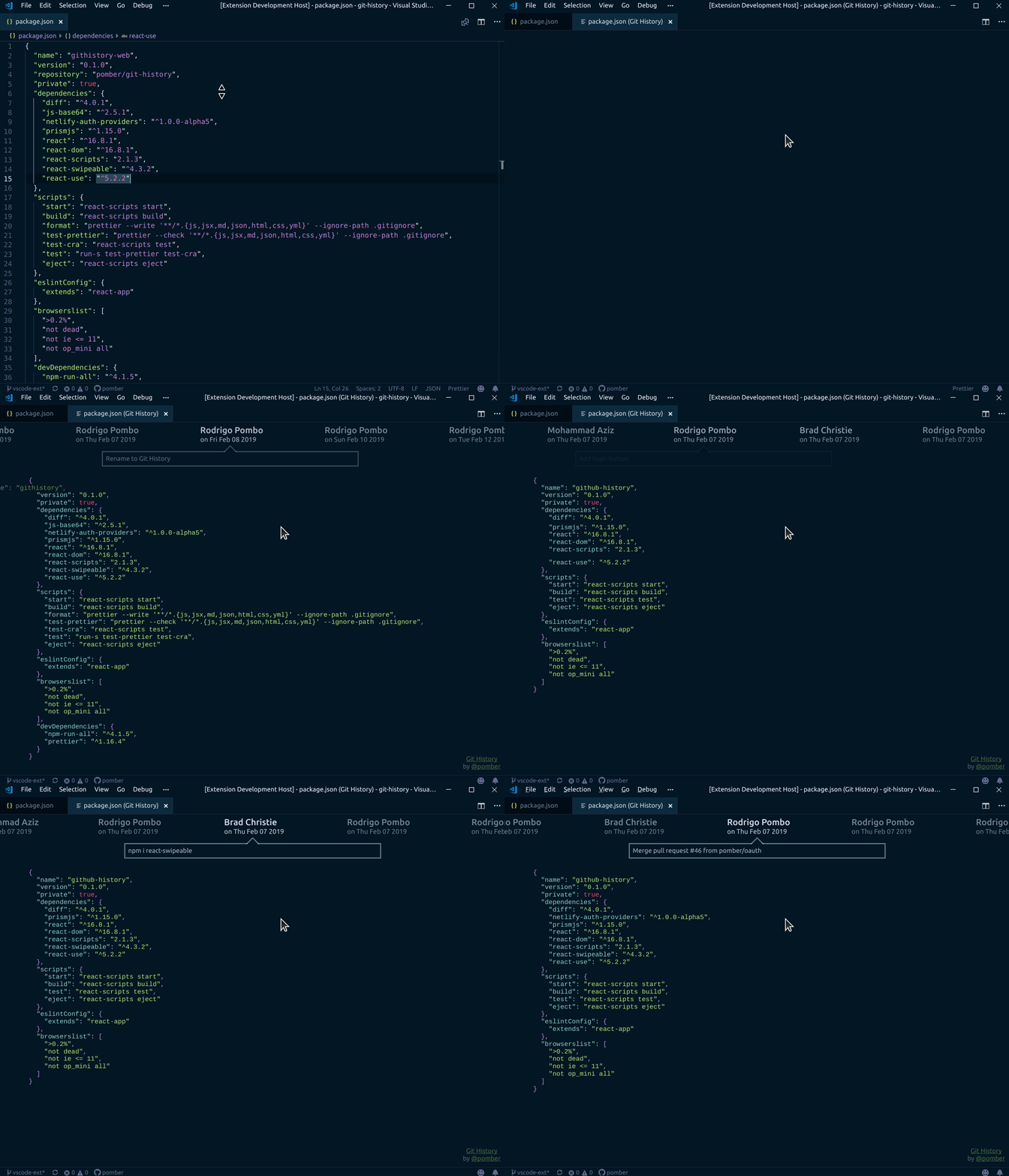
Quickly browse the history of a file from any git repository
### Sponsors
Support this project by becoming a sponsor. Your logo will show up here with a link to your website. [[Become a sponsor](https://opencollective.com/git-history#sponsor)]
### Backers
Thank you to all our backers! 🙏 [[Become a backer](https://opencollective.com/git-history#backer)]
================================================
FILE: vscode-ext/test/extension.test.js
================================================
/* global suite, test */
//
// Note: This example test is leveraging the Mocha test framework.
// Please refer to their documentation on https://mochajs.org/ for help.
//
// The module 'assert' provides assertion methods from node
const assert = require("assert");
// You can import and use all API from the 'vscode' module
// as well as import your extension to test it
// const vscode = require('vscode');
// const myExtension = require('../extension');
// Defines a Mocha test suite to group tests of similar kind together
suite("Extension Tests", function() {
// Defines a Mocha unit test
test("Something 1", function() {
assert.equal(-1, [1, 2, 3].indexOf(5));
assert.equal(-1, [1, 2, 3].indexOf(0));
});
});
================================================
FILE: vscode-ext/test/index.js
================================================
//
// PLEASE DO NOT MODIFY / DELETE UNLESS YOU KNOW WHAT YOU ARE DOING
//
// This file is providing the test runner to use when running extension tests.
// By default the test runner in use is Mocha based.
//
// You can provide your own test runner if you want to override it by exporting
// a function run(testRoot: string, clb: (error:Error) => void) that the extension
// host can call to run the tests. The test runner is expected to use console.log
// to report the results back to the caller. When the tests are finished, return
// a possible error to the callback or null if none.
const testRunner = require("vscode/lib/testrunner");
// You can directly control Mocha options by configuring the test runner below
// See https://github.com/mochajs/mocha/wiki/Using-mocha-programmatically#set-options
// for more info
testRunner.configure({
ui: "tdd", // the TDD UI is being used in extension.test.js (suite, test, etc.)
useColors: true // colored output from test results
});
module.exports = testRunner;
================================================
FILE: vscode-ext/test-git.js
================================================
#!/usr/bin/env node
// node test-git.js extension.js 2 94c91d9
const getCommits = require("./git");
const [, , path, last, before] = process.argv;
getCommits(path, last, before).then(cs =>
console.log(
cs
.map(c => {
return `${c.hash} ${c.date.toDateString()} ${c.message}`;
})
.join("\n")
)
);
================================================
FILE: vscode-ext/vsc-extension-quickstart.md
================================================
## What's in the folder
- This folder contains all of the files necessary for your extension.
- `package.json` - this is the manifest file in which you declare your extension and command.
- The sample plugin registers a command and defines its title and command name. With this information VS Code can show the command in the command palette. It doesn’t yet need to load the plugin.
- `extension.js` - this is the main file where you will provide the implementation of your command.
- The file exports one function, `activate`, which is called the very first time your extension is activated (in this case by executing the command). Inside the `activate` function we call `registerCommand`.
- We pass the function containing the implementation of the command as the second parameter to `registerCommand`.
## Get up and running straight away
- Press `F5` to open a new window with your extension loaded.
- Run your command from the command palette by pressing (`Ctrl+Shift+P` or `Cmd+Shift+P` on Mac) and typing `Git File History`.
- Set breakpoints in your code inside `extension.js` to debug your extension.
- Find output from your extension in the debug console.
## Make changes
- You can relaunch the extension from the debug toolbar after changing code in `extension.js`.
- You can also reload (`Ctrl+R` or `Cmd+R` on Mac) the VS Code window with your extension to load your changes.
## Explore the API
- You can open the full set of our API when you open the file `node_modules/vscode/vscode.d.ts`.
## Run tests
- Open the debug viewlet (`Ctrl+Shift+D` or `Cmd+Shift+D` on Mac) and from the launch configuration dropdown pick `Extension Tests`.
- Press `F5` to run the tests in a new window with your extension loaded.
- See the output of the test result in the debug console.
- Make changes to `test/extension.test.js` or create new test files inside the `test` folder.
- By convention, the test runner will only consider files matching the name pattern `**.test.js`.
- You can create folders inside the `test` folder to structure your tests any way you want.

 ### Backers
Thank you to all our backers! 🙏 [[Become a backer](https://opencollective.com/git-history#backer)]
### Backers
Thank you to all our backers! 🙏 [[Become a backer](https://opencollective.com/git-history#backer)]
 ================================================
FILE: cli/server.js
================================================
const serve = require("koa-static");
const Koa = require("koa");
const pather = require("path");
const getCommits = require("./git");
const getPort = require("get-port");
const open = require("open");
const router = require("koa-router")();
const argv = require("yargs")
.usage("Usage: $0
================================================
FILE: cli/server.js
================================================
const serve = require("koa-static");
const Koa = require("koa");
const pather = require("path");
const getCommits = require("./git");
const getPort = require("get-port");
const open = require("open");
const router = require("koa-router")();
const argv = require("yargs")
.usage("Usage: $0 


{name}
