Showing preview only (866K chars total). Download the full file or copy to clipboard to get everything.
Repository: postmanlabs/newman
Branch: develop
Commit: 942d1390f81e
Files: 223
Total size: 804.4 KB
Directory structure:
gitextract_6f7i_n3s/

├── .dockerignore
├── .editorconfig
├── .eslintrc
├── .gitattributes
├── .github/
│   ├── CONTRIBUTING.md
│   ├── ISSUE_TEMPLATE.md
│   ├── dependabot.yml
│   └── workflows/
│       ├── ci.yml
│       └── codeql-analysis.yml
├── .gitignore
├── .npmignore
├── .nycrc.js
├── CHANGELOG.yaml
├── LICENSE.md
├── MIGRATION.md
├── README.md
├── SECURITY.md
├── bin/
│   ├── newman.js
│   └── util.js
├── codecov.yml
├── docker/
│   ├── README.md
│   └── images/
│       ├── alpine/
│       │   ├── Dockerfile
│       │   └── README.md
│       └── ubuntu/
│           ├── Dockerfile
│           └── README.md
├── examples/
│   ├── find-unique-urls-in-run.js
│   ├── parallel-collection-runs.js
│   ├── read-collection-from-file.js
│   ├── reports/
│   │   ├── sample-collection-report.json
│   │   └── sample-collection-report.xml
│   ├── run-collections-in-directory.js
│   ├── sample-collection.json
│   ├── ssl-client-cert-list.json
│   └── v1.postman_collection.json
├── index.js
├── lib/
│   ├── config/
│   │   ├── index.js
│   │   ├── process-env.js
│   │   └── rc-file.js
│   ├── index.js
│   ├── node-version-check/
│   │   └── index.js
│   ├── print/
│   │   └── index.js
│   ├── reporters/
│   │   ├── cli/
│   │   │   ├── cli-utils-symbols.js
│   │   │   ├── cli-utils.js
│   │   │   └── index.js
│   │   ├── emojitrain.js
│   │   ├── json/
│   │   │   └── index.js
│   │   ├── junit/
│   │   │   └── index.js
│   │   └── progress.js
│   ├── run/
│   │   ├── export-file.js
│   │   ├── index.js
│   │   ├── options.js
│   │   ├── secure-fs.js
│   │   └── summary.js
│   └── util.js
├── npm/
│   ├── create-release.js
│   ├── docker-publish.sh
│   ├── server.js
│   ├── test-cli.js
│   ├── test-integration.js
│   ├── test-library.js
│   ├── test-lint.js
│   ├── test-system.js
│   └── test-unit.js
├── package.json
└── test/
    ├── .eslintrc
    ├── cli/
    │   ├── cli-reporter-failure-details.test.js
    │   ├── cli-reporter-no-success-assertsions.test.js
    │   ├── cli-reporter-show-timestamp.test.js
    │   ├── color-tty.test.js
    │   ├── export-environment.test.js
    │   ├── export-globals.test.js
    │   ├── iteration-count.test.js
    │   ├── run-options.test.js
    │   ├── shallow-junit-reporter.test.js
    │   ├── ssl-client-cert.test.js
    │   ├── suppress-exit-code.test.js
    │   ├── verbose.test.js
    │   └── working-directory.test.js
    ├── fixtures/
    │   ├── files/
    │   │   ├── outside.json
    │   │   ├── ssl-client-cert-config.json
    │   │   └── work-dir/
    │   │       └── test.json
    │   ├── overrides/
    │   │   ├── env.json
    │   │   ├── failing-collection.json
    │   │   └── pmcollection.json
    │   ├── run/
    │   │   ├── failed-request.json
    │   │   ├── nested-requests-fail-report-test.json
    │   │   ├── nested-requests-report-test.json
    │   │   ├── newman-report-test.json
    │   │   ├── response-bodies.json
    │   │   ├── simple-variables.json
    │   │   ├── single-file-inside.json
    │   │   ├── single-file-outside.json
    │   │   ├── single-get-request.json
    │   │   ├── single-request-failing.json
    │   │   ├── spaces/
    │   │   │   ├── data.json
    │   │   │   ├── simple-cookie-jar.json
    │   │   │   ├── simple-variables.json
    │   │   │   └── single-get-request.json
    │   │   ├── ssl-client-cert-list.json
    │   │   ├── ssl-client-cert.json
    │   │   ├── test-data.postman_data.json
    │   │   └── undefined-test-checks.json
    │   └── ssl/
    │       ├── SSL.md
    │       ├── ca.crt
    │       ├── ca.key
    │       ├── ca2.crt
    │       ├── ca2.key
    │       ├── ca3.crt
    │       ├── ca3.key
    │       ├── client.crt
    │       ├── client.csr
    │       ├── client.key
    │       ├── client.p12
    │       ├── client2.crt
    │       ├── client2.csr
    │       ├── client2.key
    │       ├── client3.crt
    │       ├── client3.csr
    │       ├── client3.key
    │       ├── config.cnf
    │       ├── generate-certificates.sh
    │       ├── server.crt
    │       ├── server.csr
    │       ├── server.key
    │       ├── server2.crt
    │       ├── server2.csr
    │       ├── server2.key
    │       ├── server3.crt
    │       ├── server3.csr
    │       ├── server3.key
    │       ├── sslClientCertList.json
    │       └── v3.ext
    ├── integration/
    │   ├── bom-and-encoding/
    │   │   ├── bom-in-collection-file.postman_collection.json
    │   │   ├── bom-in-environment-file.postman_collection.json
    │   │   ├── bom-in-environment-file.postman_environment.json
    │   │   ├── utf16-le-encoding-in-env.postman_collection.json
    │   │   └── utf16-le-encoding-in-env.postman_environment.json
    │   ├── case-insen-header-sandbox.postman_collection.json
    │   ├── clear-vars-sandbox.postman_collection.json
    │   ├── comma-test-csv/
    │   │   ├── comma-test-csv.postman_collection.json
    │   │   └── comma-test-csv.postman_data.csv
    │   ├── cookie-jar.postman_collection.json
    │   ├── crypto-md5.postman_collection.json
    │   ├── csv-with-bom/
    │   │   ├── csv-with-bom.postman_collection.json
    │   │   └── csv-with-bom.postman_data.csv
    │   ├── custom-http-method/
    │   │   ├── custom-http-method.postman_collection.json
    │   │   └── upload-file.csv
    │   ├── data-file-var-replacement/
    │   │   ├── data-file-var-replacement.postman_collection.json
    │   │   ├── data-file-var-replacement.postman_data.json
    │   │   └── data-file-var-replacement.postman_environment.json
    │   ├── disabled-and-duplicate-variables/
    │   │   ├── disabled-and-duplicates.postman_collection.json
    │   │   └── disabled-and-duplicates.postman_environment.json
    │   ├── distinct-random-int.postman_collection.json
    │   ├── dynamic-var-replacement.postman_collection.json
    │   ├── echo-v2.postman_collection.json
    │   ├── esc-formdata/
    │   │   ├── esc-formdata.postman_collection.json
    │   │   └── esc-formdata.postman_environment.json
    │   ├── globals-env-data-files/
    │   │   ├── globals-env-data-files.postman_collection.json
    │   │   ├── globals-env-data-files.postman_data.json
    │   │   ├── globals-env-data-files.postman_environment.json
    │   │   └── globals-env-data-files.postman_globals.json
    │   ├── hawk-auth-test.postman_collection.json
    │   ├── head-requests.postman_collection.json
    │   ├── helper.postman_collection.json
    │   ├── inherited-entities/
    │   │   ├── inherited-entities.postman_collection.json
    │   │   └── inherited-entities.postman_environment.json
    │   ├── multi-level-folders-v1.postman_collection.json
    │   ├── multi-level-folders-v2.postman_collection.json
    │   ├── multi-value-data.postman_collection.json
    │   ├── multiple-form-values.postman_collection.json
    │   ├── newman-gzip-test.postman_collection.json
    │   ├── oauth1-var-in-url-params.postman_collection.json
    │   ├── protocol-profile-behavior.postman_collection.json
    │   ├── prototype-check.postman_collection.json
    │   ├── redirect-test/
    │   │   ├── redirect-test.postman_collection.json
    │   │   ├── redirect-test.postman_config.json
    │   │   └── redirect-with-body.postman_collection.json
    │   ├── request-body-with-get.postman_collection.json
    │   ├── request-chaining-test.postman_collection.json
    │   ├── request-name-in-script.postman_collection.json
    │   ├── sandbox-libraries.postman_collection.json
    │   ├── semicolon-tests.postman_collection.json
    │   ├── set-next-request.postman_collection.json
    │   ├── slashed-variable-names/
    │   │   ├── slashed-variable-names.postman_collection.json
    │   │   └── slashed-variable-names.postman_environment.json
    │   ├── steph/
    │   │   ├── steph.postman_collection.json
    │   │   └── steph.postman_data.json
    │   ├── super-sandbox-test.postman_collection.json
    │   ├── tc4/
    │   │   ├── tc4.postman_collection.json
    │   │   └── upload-file.json
    │   ├── timeout/
    │   │   ├── timeout.postman_collection.json
    │   │   └── timeout.postman_config.json
    │   ├── v2-regression-tests/
    │   │   ├── v2-regression-tests.postman_collection.json
    │   │   ├── v2-regression-tests.postman_config.json
    │   │   └── v2-regression-tests.postman_environment.json
    │   ├── var-replacement.postman_collection.json
    │   └── whatwg-url.postman_collection.json
    ├── library/
    │   ├── cookie-jar.test.js
    │   ├── export-environment.test.js
    │   ├── export-globals.test.js
    │   ├── folder-variants.test.js
    │   ├── iteration-count.test.js
    │   ├── postman-api-key.test.js
    │   ├── requestAgents.test.js
    │   ├── run-options.test.js
    │   ├── shallow-junit-reporter.test.js
    │   ├── ssl-client-cert.test.js
    │   ├── suppress-exit-code.test.js
    │   └── working-directory.test.js
    ├── system/
    │   ├── dockerfile_rules.yml
    │   ├── dockerfiles.test.js
    │   ├── editorconfig.test.js
    │   ├── npm-publish.test.js
    │   └── repository.test.js
    └── unit/
        ├── cli-reporter-symbols.test.js
        ├── cli.test.js
        ├── defaultReporter.test.js
        ├── externalReporter.test.js
        ├── options.test.js
        ├── run-summary.test.js
        ├── run.test.js
        ├── secure-fs.test.js
        └── util.test.js
================================================
FILE CONTENTS
================================================
================================================
FILE: .dockerignore
================================================
# PLATFORM
# ========
# All exclusions that are specific to the NPM, GIT, IDE and Operating Systems.
# - Do not allow installed node modules to be committed. Doing `npm install -d` will bring them in root or other places.
node_modules
# - Do not commit any log file from anywhere
*.log
*.log.*
# - Prevent addition of OS specific file explorer files
Thumbs.db
.DS_Store
# Prevent IDE stuff
.idea
.vscode
# PROJECT
# =======
# Configuration pertaining to project specific repository structure.
# - Prevent Sublime text IDE files from being committed to repository
*.sublime-*
# - Allow sublime text project file to be committed in the development directory.
!/develop/*.sublime-project
# - Prevent CI output files from being Added
/out/
/newman/
# - Prevent diff backups from SourceTree from showing as commit.
*.BACKUP.*
*.BASE.*
*.LOCAL.*
*.REMOTE.*
*.orig
# Prevent unit test coverage reports from being added
.coverage
================================================
FILE: .editorconfig
================================================
# editorconfig.org
root = true
[*]
indent_style = space
indent_size = 4
end_of_line = lf
charset = utf-8
max_length = 120
trim_trailing_whitespace = true
insert_final_newline = true
[*.{json, yml, html, hbs}]
indent_size = 2
================================================
FILE: .eslintrc
================================================
{
"plugins": ["jsdoc", "lodash", "security"],
"env": {
"browser": false,
"node": true,
"es6": true
},
"globals": {},
"settings": {
"lodash": {
"pragma": "_"
}
},
"parserOptions": {
"ecmaVersion": 2018
},
"rules": {
// Possible Errors
"for-direction": "error",
"default-param-last": "error",
"function-call-argument-newline": "off",
"getter-return": "error",
"no-async-promise-executor": "error",
"no-await-in-loop": "error",
"no-compare-neg-zero": "error",
"no-cond-assign": "error",
"no-console": [
"error",
{
"allow": ["info", "warn", "error"]
}
],
"no-constant-condition": "error",
"no-control-regex": "error",
"no-constructor-return": "error",
"no-debugger": "error",
"no-dupe-args": "error",
"no-dupe-else-if": "error",
"no-dupe-keys": "error",
"no-duplicate-case": "error",
"no-empty": "error",
"no-empty-character-class": "error",
"no-ex-assign": "error",
"no-extra-boolean-cast": "error",
"no-extra-parens": "off",
"no-extra-semi": "error",
"no-func-assign": "error",
"no-import-assign": "error",
"no-inner-declarations": "error",
"no-invalid-regexp": "error",
"no-irregular-whitespace": "error",
"no-loss-of-precision": "error",
"no-misleading-character-class": "error",
"no-nonoctal-decimal-escape": "error",
"no-obj-calls": "error",
"no-prototype-builtins": "error",
"no-regex-spaces": "error",
"no-sparse-arrays": "error",
"no-template-curly-in-string": "error",
"no-unexpected-multiline": "error",
"no-unreachable": "error",
"no-unsafe-finally": "error",
"no-unsafe-negation": "error",
"no-unsafe-optional-chaining": "error",
"prefer-regex-literals": "error",
"require-atomic-updates": "error",
"require-unicode-regexp": "off",
"use-isnan": "error",
"valid-typeof": "error",
// Best Practices
"accessor-pairs": "error",
"array-callback-return": "off",
"block-scoped-var": "error",
"class-methods-use-this": "error",
"complexity": "off",
"consistent-return": "off",
"curly": "error",
"default-case": "error",
"default-case-last": "error",
"dot-location": ["error", "property"],
"dot-notation": "error",
"eqeqeq": "error",
"grouped-accessor-pairs": "warn",
"guard-for-in": "warn",
"id-denylist": "warn",
"max-classes-per-file": ["error", 1],
"max-lines-per-function": "off",
"no-alert": "error",
"no-caller": "error",
"no-case-declarations": "error",
"no-div-regex": "error",
"no-else-return": "error",
"no-empty-function": "error",
"no-empty-pattern": "error",
"no-eq-null": "error",
"no-eval": "error",
"no-extend-native": "error",
"no-extra-bind": "error",
"no-extra-label": "error",
"no-fallthrough": "error",
"no-floating-decimal": "error",
"no-global-assign": "error",
"no-implicit-coercion": "error",
"no-implicit-globals": "error",
"no-implied-eval": "error",
"no-invalid-this": "error",
"no-iterator": "error",
"no-labels": "error",
"no-lone-blocks": "error",
"no-loop-func": "error",
"no-magic-numbers": "off",
"no-multi-spaces": "error",
"no-multi-str": "error",
"no-new": "error",
"no-new-func": "error",
"no-new-wrappers": "error",
"no-octal": "error",
"no-octal-escape": "error",
"no-param-reassign": "off",
"no-promise-executor-return": "error",
"no-proto": "error",
"no-redeclare": "error",
"no-restricted-exports": "error",
"no-restricted-properties": "error",
"no-return-assign": "error",
"no-return-await": "error",
"no-script-url": "error",
"no-self-assign": "error",
"no-self-compare": "error",
"no-sequences": "error",
"no-setter-return": "error",
"no-throw-literal": "error",
"no-unmodified-loop-condition": "error",
"no-unreachable-loop": "error",
"no-unused-expressions": "off",
"no-unused-labels": "error",
"no-useless-call": "error",
"no-useless-concat": "error",
"no-useless-backreference": "error",
"no-useless-escape": "error",
"no-useless-return": "error",
"no-void": "error",
"no-warning-comments": "off",
"no-with": "error",
"prefer-named-capture-group": "off",
"prefer-exponentiation-operator": "warn",
"prefer-object-spread": "error",
"prefer-promise-reject-errors": "error",
"radix": "error",
"require-await": "error",
"vars-on-top": "off",
"wrap-iife": "error",
"yoda": "error",
// Strict Mode
"strict": "off",
// Variables
"init-declarations": "off",
"no-delete-var": "error",
"no-label-var": "error",
"no-restricted-globals": "error",
"no-shadow": "off",
"no-shadow-restricted-names": "error",
"no-undef": "error",
"no-undef-init": "error",
"no-undefined": "off",
"no-unused-vars": "error",
"no-use-before-define": "error",
// Node.js and CommonJS
"callback-return": "error",
"global-require": "off",
"handle-callback-err": "error",
"no-buffer-constructor": "error",
"no-mixed-requires": "off",
"no-new-require": "off",
"no-path-concat": "error",
"no-process-env": "error",
"no-process-exit": "off",
"no-restricted-modules": "error",
"no-sync": "off",
// Stylistic Issues
"array-bracket-newline": "off",
"array-bracket-spacing": "error",
"array-element-newline": "off",
"block-spacing": "error",
"brace-style": [
"error",
"stroustrup",
{
"allowSingleLine": true
}
],
"camelcase": "off",
"capitalized-comments": "off",
"comma-dangle": ["error", "never"],
"comma-spacing": [
"error",
{
"before": false,
"after": true
}
],
"comma-style": ["error", "last"],
"computed-property-spacing": "error",
"consistent-this": "off",
"eol-last": "error",
"func-call-spacing": "error",
"func-name-matching": "off",
"func-names": "off",
"func-style": "off",
"function-paren-newline": ["error", "never"],
"id-blacklist": "error",
"id-length": "off",
"id-match": "error",
"implicit-arrow-linebreak": ["error", "beside"],
"indent": [
"error",
4,
{
"VariableDeclarator": {
"var": 1,
"let": 1,
"const": 1
},
"SwitchCase": 1
}
],
"jsx-quotes": ["error", "prefer-single"],
"key-spacing": "error",
"keyword-spacing": "error",
"line-comment-position": "off",
"linebreak-style": ["error", "unix"],
"lines-around-comment": [
"error",
{
"beforeBlockComment": true,
"afterBlockComment": false,
"beforeLineComment": false,
"afterLineComment": false,
"allowBlockStart": true,
"allowBlockEnd": false,
"allowObjectStart": true,
"allowObjectEnd": false,
"allowArrayStart": true,
"allowArrayEnd": false
}
],
"lines-between-class-members": [
"error",
"always",
{
"exceptAfterSingleLine": true
}
],
"max-depth": "error",
"max-len": [
"error",
{
"code": 120
}
],
"max-lines": "off",
"max-nested-callbacks": "error",
"max-params": "off",
"max-statements": "off",
"max-statements-per-line": [
"error",
{
"max": 2
}
],
"multiline-comment-style": "off",
"multiline-ternary": "off",
"new-cap": "off",
"new-parens": "error",
"newline-per-chained-call": [
"error",
{
"ignoreChainWithDepth": 4
}
],
"no-array-constructor": "error",
"no-bitwise": "off",
"no-continue": "off",
"no-inline-comments": "off",
"no-lonely-if": "error",
"no-mixed-operators": "off",
"no-mixed-spaces-and-tabs": "error",
"no-multi-assign": "off",
"no-multiple-empty-lines": "error",
"no-negated-condition": "off",
"no-nested-ternary": "off",
"no-new-object": "error",
"no-plusplus": "off",
"no-restricted-syntax": "error",
"no-tabs": "error",
"no-ternary": "off",
"no-trailing-spaces": "error",
"no-underscore-dangle": "off",
"no-unneeded-ternary": "error",
"no-whitespace-before-property": "error",
"nonblock-statement-body-position": "error",
"object-curly-newline": "off",
"object-curly-spacing": ["error", "always"],
"object-property-newline": "off",
"one-var": ["error", "always"],
"one-var-declaration-per-line": "error",
"operator-assignment": "error",
"operator-linebreak": ["error", "after"],
"padded-blocks": ["error", "never"],
"padding-line-between-statements": [
"error",
{
"blankLine": "always",
"prev": "*",
"next": "return"
},
{
"blankLine": "always",
"prev": ["const", "let", "var"],
"next": "*"
},
{
"blankLine": "any",
"prev": ["const", "let", "var"],
"next": ["const", "let", "var"]
}
],
"quote-props": ["error", "as-needed"],
"quotes": ["error", "single"],
"semi": "error",
"semi-spacing": "error",
"semi-style": ["error", "last"],
"sort-keys": "off",
"sort-vars": "off",
"space-before-blocks": "error",
"space-before-function-paren": "error",
"space-in-parens": "error",
"space-infix-ops": "error",
"space-unary-ops": "error",
"spaced-comment": [
"error",
"always",
{
"block": {
"exceptions": ["!"]
}
}
],
"switch-colon-spacing": "error",
"template-tag-spacing": "error",
"unicode-bom": "error",
"wrap-regex": "error",
// ECMAScript 6
"arrow-body-style": ["error", "always"],
"arrow-parens": ["error", "always"],
"arrow-spacing": "error",
"constructor-super": "error",
"generator-star-spacing": "error",
"no-class-assign": "error",
"no-confusing-arrow": "error",
"no-const-assign": "error",
"no-dupe-class-members": "error",
"no-duplicate-imports": "error",
"no-new-symbol": "error",
"no-restricted-imports": "error",
"no-this-before-super": "error",
"no-useless-catch": "error",
"no-useless-computed-key": "error",
"no-useless-constructor": "error",
"no-useless-rename": "error",
"no-var": "off",
"object-shorthand": ["error", "consistent-as-needed"],
"prefer-arrow-callback": "off",
"prefer-const": "off",
"prefer-destructuring": "off",
"prefer-numeric-literals": "off",
"prefer-rest-params": "off",
"prefer-spread": "error",
"prefer-template": "off",
"require-yield": "error",
"rest-spread-spacing": "error",
"sort-imports": "off",
"symbol-description": "off",
"template-curly-spacing": "error",
"yield-star-spacing": "error",
// Lodash
"lodash/callback-binding": "error",
"lodash/collection-method-value": "off",
"lodash/collection-return": "error",
"lodash/no-double-unwrap": "error",
"lodash/no-extra-args": "error",
"lodash/no-unbound-this": "error",
"lodash/unwrap": "error",
"lodash/chain-style": ["error", "as-needed"],
"lodash/chaining": ["error", "always", 3],
"lodash/consistent-compose": ["error", "flow"],
"lodash/identity-shorthand": ["error", "always"],
"lodash/import-scope": "off",
"lodash/matches-prop-shorthand": ["error", "always"],
"lodash/matches-shorthand": ["error", "always", 3],
"lodash/no-commit": "error",
"lodash/path-style": ["error", "as-needed"],
"lodash/prefer-compact": "error",
"lodash/prefer-filter": ["off", 3],
"lodash/prefer-flat-map": "error",
"lodash/prefer-invoke-map": "error",
"lodash/prefer-map": "error",
"lodash/prefer-reject": ["error", 3],
"lodash/prefer-thru": "error",
"lodash/prefer-wrapper-method": "error",
"lodash/preferred-alias": "error",
"lodash/prop-shorthand": ["error", "always"],
"lodash/prefer-constant": "off",
"lodash/prefer-get": ["warn", 4],
"lodash/prefer-includes": [
"error",
{
"includeNative": true
}
],
"lodash/prefer-is-nil": "error",
"lodash/prefer-lodash-chain": "error",
"lodash/prefer-lodash-method": "off",
"lodash/prefer-lodash-typecheck": "off",
"lodash/prefer-matches": ["off", 3],
"lodash/prefer-noop": "off",
"lodash/prefer-over-quantifier": "warn",
"lodash/prefer-some": "off",
"lodash/prefer-startswith": "off",
"lodash/prefer-times": "off",
// JsDoc
"jsdoc/check-param-names": "error",
"jsdoc/check-tag-names": "off",
"jsdoc/check-types": "off",
"jsdoc/require-description-complete-sentence": "off",
"jsdoc/require-example": "off",
"jsdoc/require-hyphen-before-param-description": "off",
"jsdoc/require-param": "error",
"jsdoc/require-param-description": "error",
"jsdoc/require-param-type": "error",
"jsdoc/require-returns-description": "off",
"jsdoc/require-returns-type": "error",
// Security
"security/detect-unsafe-regex": "error",
"security/detect-buffer-noassert": "error",
"security/detect-child-process": "error",
"security/detect-disable-mustache-escape": "error",
"security/detect-eval-with-expression": "error",
"security/detect-no-csrf-before-method-override": "error",
"security/detect-non-literal-fs-filename": "off",
"security/detect-non-literal-regexp": "error",
"security/detect-non-literal-require": "off",
"security/detect-object-injection": "off",
"security/detect-possible-timing-attacks": "error",
"security/detect-pseudoRandomBytes": "error"
}
}
================================================
FILE: .gitattributes
================================================
# Set the default behavior
* text=auto
# JavaScript files will always have LF line endings
*.js text eol=lf
# JSON files always have LF line endings
*.json text eol=lf
================================================
FILE: .github/CONTRIBUTING.md
================================================
# Contributing to Postman Newman
- [Getting Started Quick](#getting-started-quick)
- [NPM Command Reference](#npm-command-reference)
- [`npm install`](#npm-install)
- [`npm test`](#npm-test)
- [`npm run test-system`](#npm-run-test-system)
- [`npm run test-lint`](#npm-run-test-lint)
- [`npm run test-unit`](#npm-run-test-unit)
- [`npm run test-integration`](#npm-run-test-integration)
- [Repository](#repository)
- [Structure](#structure)
- [Branching and Tagging Policy](#branching-and-tagging-policy)
- [Preferred IDE](#preferred-ide)
- [Commit Guidelines](#commit-guidelines)
- [Check for errors before committing](#check-for-errors-before-committing)
- [Atomic commits](#atomic-commits)
- [Clean commit message](#clean-commit-message)
- [Writing tests](#writing-tests)
- [Guidelines for sending a Pull Request](#guidelines-for-sending-a-pull-request)
- [Documentation guidelines](#documentation-guidelines)
- [The CI Platform](#the-ci-platform)
- [Ensuring your commits will not fail build](#ensuring-your-commits-will-not-fail-build)
- [Accessing build log on CI server](#accessing-build-log-on-ci-server)
- [Security](#security)
## Getting Started Quick
In order to contribute to this project, you should:
1. Clone this repository / your fork of this repository using `git`
2. If not on `develop`, switch to the `develop` branch with `git checkout develop`
3. Run `npm install` in the project directory
4. Make sure everything is working by running `npm test`.
5. Create a new feature branch from `develop` with `feature/your-feature-name`.
6. Make the necessary changes in line with the objective(s) of the pull request
7. You can debug newman locally by running `node ./bin/newman <command-name>`.
8. Ensure that you have added unit and integration tests for any new features added / bugs fixed
9. Run `npm test`. If any tests fail, resolve the issue with the code, and re-try
10. Once the tests pass, commit and push. **Do not** alter the `version` in `package.json`
11. Create a pull request to `develop`
## NPM Command Reference
### `npm install`
Installs all `dependencies` listed in `package.json`
### `npm test`
The script associated with `npm test` will run all tests that ensures that your commit does not break anything in the
repository. As such run `npm test` before you push. In addition to performing a few logging and pre-test configuration
actions, this test bootstrap script will also trigger the various sub test tasks, which include code lint checks, unit
and integration tests. At present, the following sub tests can be run on a standalone basis:
* `npm run test-system`: Runs system tests
* `npm run test-lint`: Performs code style checks, flagging inconsistencies and other miscellaneous anomalies
* `npm run test-unit`: Runs unit tests to verify the correctness of various methods used within the project
* `npm run test-integration`: Checks Newman sanity with a sample requests categorized by collection
* `npm run test-cli`: Runs CLI integration tests
* `npm run test-library`: Runs library integration tests
## Repository
### Structure
Directory | Summary
------------------------|-----------------------------------------------------------------------------------------------
`bin` | Contains scripts that wrap around all the other methods provided within the project
`examples` | A sample script to demonstrate collection file parsing within Newman
`lib` | Houses the core logic and configuration sets for Newman, including reporters, and the runtime
`npm` | All CI scripts (triggered by NPM run-script)
`test` | Contains all the test scripts for Newman
`test/unit` | Method wise tests for Newman
`test/system` | Erstwhile `infra` tests, checks for proper code structuring and division across the project
`test/integration` | Contains the integration test runner, validates Newman as a library
### Branching and Tagging Policy
This repository uses standard `git-flow` branch management policy/strategy. If you want to learn more on `git-flow`,
refer to [tutorial from Atlassian](https://www.atlassian.com/git/workflows#!workflow-gitflow) and more details at
[http://nvie.com/posts/a-successful-git-branching-model/](http://nvie.com/posts/a-successful-git-branching-model).
> Deletion of `main` and `develop`.
> Rebasing on `main` is blocked.
## Preferred IDE
It is advised to use an IDE that provides [EditorConfig](http://editorconfig.org) support via `.editorconfig` files,
either natively, or through plugins. In addition, the `.gitignore` file has been populated with entries to support
ignoring metadata / manifest files for various IDEs.
## Commit Guidelines
The following best practices, coupled with a pinch of common-sense will keep the repository clean and usable in future.
The idea is that everything that goes into the repository is not for an individual, but someone else who will be
directly or indirectly affected by it.
### Check for errors before committing
Checking for errors should be done for each commit whether it is being pushed to remote or not.
First, you don't want to submit any whitespace errors. Git provides an easy way to check for this before you commit,
run `git diff --check`, which identifies possible whitespace errors and lists them for you. If you run that command
before committing, you can tell if you're about to commit whitespace issues that may annoy other developers.
Secondly, you should ensure that your commit does not break builds. Run `npm test` on the repository to execute all
sanity and smoke tests. If any test fail, do not change the test to pass your commit. The tests were there with a
purpose. Discuss within your team to ensure that the changes that you do to test specs are valid. If you are adding a
new feature, accompanying them with new tests are a good practice.
### Atomic commits
Try to make each commit a logically separate change set. If you can, try to make your changes digestible don't code
for a whole weekend on five different issues and then submit them all as one massive commit on Monday. Even if you don't
commit during the weekend, use the staging area on Monday to split your work into at least one commit per issue, with a
useful message per commit. If some of the changes modify the same file, try to use `git add --patch` to partially stage
files. The project snapshot at the tip of the branch is identical whether you do one commit or five, as long as all the
changes are added at some point, so try to make things easier on your fellow developers when they have to review your
changes. This approach also makes it easier to pull out or revert one of the change sets if you need to later. There are
a number of useful Git tricks for rewriting history and interactively staging files use these tools to help craft a
clean and understandable history.
### Clean commit message
*More detailed explanation include your motivation for the change and contrast its implementation with previous
behavior this is a good guideline to follow.*
Getting in the habit of creating quality commit messages makes using and collaborating with Git a lot easier. As a
general rule, your messages should start with a single line that is no more than 50 characters and that describes
the change set concisely, followed by a blank line, followed by a more detailed explanation.
It's also a good idea to use the imperative present tense in these messages. In other words, use commands. Instead of
"I added tests for" or "Adding tests for," use "Add tests for."
You should see if your commit message answers the following questions:
Answer the following questions:
1. **Why is this change necessary?**
2. **How does it address the issue?**
3. **What side effects does this change have?**
The first question tells reviewers of your pull request what to expect in the commit, allowing them to more easily
identify and point out unrelated changes.
The second question describes, at a high level, what was done to affect change. If your change is obvious, you may be
able to omit addressing this question.
The third is the most important question to answer, as it can point out problems where you are making too many changes
in one commit or branch. One or two bullet points for related changes may be okay, but five or six are likely indicators
of a commit that is doing too many things.
A good commit message template
```
Short (50 chars or less) summary of changes with relevant project management issue ID.
More detailed explanatory text, if necessary. Wrap it to about 72 characters or so. In some contexts, the first line
is treated as the subject of an email and the rest of the text as the body. The blank line separating the summary from
the body is critical (unless you omit the body entirely); tools like rebase can get confused if you run the two
together.
Further paragraphs come after blank lines.
- Bullet points are okay, too
- Typically a hyphen or asterisk is used for the bullet, preceded by a single space, with blank lines in between, but
conventions vary here
```
Run `git log --no-merges` to see what a nicely formatted project-commit history looks like.
### Writing tests
Over the course of contributing to Newman, several new features will be added and discovered bugs / glitches will be
fixed. It is important to ensure that all of these changes are cross-checked via their respective tests. Two
important points in this context are `unit` and `integration` tests.
#### Unit tests
Unit tests are focused toward validating one method, and one method only. These tests are to be added to `test/unit`.
Each unit test file contains a `describe` block, which may or may not contain describe blocks within itself. Any given
describe block is meant to group together tests for one particular purpose or section of code.
All unit test files must conform to the following standard:
* The file name must end with `.test.js`
* The file must be named using lower case characters exclusively
* Should the first part of the file name need multiple words, they must be separated with dashes `(-)`.
Taking up the [existing test files](https://github.com/postmanlabs/newman/tree/feature/v3/test/unit) as an example, we
can see that all tests for cli options are grouped together in one file, while tests for the collection runner reside
in their own file.
Within each `describe` block, individual tests are denoted by distinct `it` blocks. Each `it` block will test exactly
one method, with a given set of parameters. Note that multiple `it` blocks can effectively map to one method, as a
method may need to be assessed for a variety of runtime conditions.
Within each `it` block, correctness checks for expected method behaviour are done using `expect` calls. For more on
`expect`, check out [Chai Expect](http://www.chaijs.com/api/bdd)
Lastly, the information provided within `describe` and `it` blocks should form a cogent sentence when combined.
For instance:
```javascript
describe('Logic tests', function () {
it('should throw an error if parameters are missing', function () {});
it('should pass when valid values are provided', function () {});
});
```
The result sentence derived by combining the descriptions in the `describe` and `it` blocks are:
**Logic tests** should throw an error if parameters are missing
**Logic tests** should pass when valid values are provided
#### Integration tests
Integration tests test Newman from the outside, and as a whole. As you might have already guessed, these tests don't
test one method at a time. With regard to Newman, each integration test consists of a postman collection, and optional
set of environment, data, and globals files.
All these files are arranged without any directory segregation, as can be seen in [test/integration](https://github.com/postmanlabs/newman/tree/feature/v3/test/integration).
Each of these file names should follow the convention outlined below:
* File names with multiple words must have `-` as a separator, not `_`.
* Under no circumstances do file names involve `camelCase`.
* The type of the file must be designated with `postman_{{type}}` in the file name, where `type` is one of `collection`,
`data`, `environment`, or `globals`. See examples below for clarity.
* All postman_collection files must be in the *V2* format.
* `.json` is a common file extension across all files, data files can have `.csv` as an extension as well.
For instance:
>
file-name.postman_collection.json
file-name.postman_environment.json
file-name.postman_globals.json
file-name.postman_data.json
file-name.postman_data.csv
## Guidelines for sending a Pull Request
Commit to `main` branch and `develop` branch is locked. As such, `git-flow` for feature completion and release will not
work. Thus, the last steps of feature completion in `git-flow` will happen as a Pull Request from website. Avoid
changing the `version` field in `package.json` for feature pull requests, as `version` bumps are handled separately.
1. Pull Request comment and commit comments should explicitly discuss what changes were made. The Pull Request reviewer
should not need to communicate out of scope of issue tracker and the pull request description in order to understand
what changes has been done.
2. Pull Requests with build failures will not be merged. Ensure that `npm test` passes on the `head` of your feature
branch. The same goes for pull requests with untested new features / resolved bugs.
3. Ensure that your feature branch has been tested and if it is associated with issues from corresponding issue-tracker,
the issue must be in a "resolved" state, implying that the issue has been fully tested, and accepted for inclusion.
4. Pull Requests with merge conflict are very difficult to review, and are at a higher likelihood of being rejected.
Ensure that the `head` of your feature branch is either already merged with `develop` or has no conflict when it is
merged with `develop`.
5. The turn around time to close a Pull Request is directly proportional to the delta of changes done - more the change
in files, more time it would take. As such, if you anticipate a feature branch to have a large delta on feature
completion, break it into sub-issues of the issue-tracker, test them, close them, and then send PR for that branch.
6. In addition, the turn around time for Pull Request would get affected if commit messages are unclear.
7. If you have deadlines to ensure feature completion, send Pull Request ahead of time. Better still, ensure that your
feature development time window accounts for PR acceptance time as well.
8. If you have mentioned issue tracker references in Pull Request description, the severity and priority of those issues
will be taken into account. Otherwise, no Pull Request will take priority over others already in queue - it is
first-pull first-merge!
## Documentation guidelines
Details on usage, sample use cases, licensing and current project status, and community support are to be specified
within `README.md`. All information related to contribution is to be added to `CONTRIBUTING.md`. More in depth
information on aspects like project architecture, design, and so on is to be added to the project [wiki](https://github.com/postmanlabs/newman/wiki)
## The CI Platform
The CI system is built as a bunch of bash scripts to execute a set of tasks. These scripts are meant to execute tasks
that can run on every local machine. In general, knowledge about these scripts are not necessary for development
**The scripts are to be only accessed using `npm run <script name>`.** This ensures that the execution point of the
scripts (`pwd`) is always the repository root.
### Ensuring your commits will not fail build
> `npm test`
The script associated with `npm test` will run all tests that ensures that your commit does not break anything in the
repository. As such run `npm test` before you push
### Security
Security concerns are always treated with high priority. Should you come across a security vulnerability, please report
it via email to <security@postman.com>. While reporting a potential security vulnerability, include all relevant
details, including but not limited to:
1. The project version(s) involved
2. The operating system(s) to which the bug is relevant
3. Bug description
Please **refrain** from publicly posting about the security vulnerability in **any** form, until it's corresponding fix
has been released
---
*Sections of this document use excerpts from various books and the Internet, among whom, [this](http://git-scm.com/book)
is a dominating influence.*
================================================
FILE: .github/ISSUE_TEMPLATE.md
================================================
<!--
Welcome to the Newman Issue tracker. Any feature requests / bug reports can be posted here.
Any security-related bugs should be reported directly to security@postman.com
This issue reporting template should guide you to effectively report issues for fastest resolution. Please provide all relevant details in the list below.
Version and environment information:
-->
1. Newman Version (can be found via `newman -v`):
2. OS details (type, version, and architecture):
3. Are you using Newman as a library, or via the CLI?
3. Did you encounter this recently, or has this bug always been there:
4. Expected behaviour:
5. Command / script used to run Newman:
6. Sample collection, and auxiliary files (minus the sensitive details):
7. Screenshots (if applicable):
<!--
Steps to reproduce the problem:
1. {{add step 1}}
2. {{add step 2}}
3. {{add step 3}}
-->
<!--
Before proceeding, please consider the following:
1. If this is a Postman Client App issue, go to https://github.com/postmanlabs/postman-app-support/issues/new
2. Report security issues directly to security@postman.com. Please refrain from publicly disclosing any details about security issues in any form, until a fix has been rolled out.
3. For Postman Cloud / personal information related issues, send an email to: [help@postman.com](mailto:help@postman.com)
4. Verify that you have checked the documentation at https://learning.postman.com/docs/running-collections/using-newman-cli, and searched through previously closed issues.
5. Please ensure that all supporting files (collections or screenshots) do not contain any sensitive information.
-->
================================================
FILE: .github/dependabot.yml
================================================
version: 2
updates:
- package-ecosystem: "npm"
directory: "/"
schedule:
interval: "weekly"
day: "saturday"
time: "03:14"
timezone: Asia/Calcutta
rebase-strategy: "disabled"
open-pull-requests-limit: 10
================================================
FILE: .github/workflows/ci.yml
================================================
name: CI
on:
push:
paths-ignore:
- "*.md"
pull_request:
branches: [$default-branch]
schedule:
- cron: "0 12 * * 0"
concurrency:
group: ${{ github.workflow }}-${{ github.ref }}
cancel-in-progress: true
jobs:
tests:
name: Tests
runs-on: ${{ matrix.os }}
strategy:
fail-fast: false
matrix:
node-version: [16, 18]
os: [ubuntu-latest, windows-latest]
steps:
- name: Checkout repository
uses: actions/checkout@v3
- name: Use Node.js ${{ matrix.node-version }}
uses: actions/setup-node@v3
with:
node-version: ${{ matrix.node-version }}
cache: "npm"
- name: Install
run: npm ci
- name: Run tests
run: npm run test
coverage:
name: Coverage
runs-on: ubuntu-latest
steps:
- name: Checkout repository
uses: actions/checkout@v3
- name: Use Node.js 20
uses: actions/setup-node@v3
with:
node-version: 20
cache: "npm"
- name: Install
run: npm ci
- name: Run unit tests
run: |
npm run test-unit
bash <(curl -s https://codecov.io/bash) -c -Z -f .coverage/coverage-final.json -F unit -t ${{ secrets.CODECOV_TOKEN }}
- name: Run integration tests
run: |
npm run test-integration
bash <(curl -s https://codecov.io/bash) -c -Z -f .coverage/coverage-final.json -F integration -t ${{ secrets.CODECOV_TOKEN }}
- name: Run CLI tests
run: |
npm run test-cli
bash <(curl -s https://codecov.io/bash) -c -Z -f .coverage/coverage-final.json -F cli -t ${{ secrets.CODECOV_TOKEN }}
- name: Run library tests
run: |
npm run test-library
bash <(curl -s https://codecov.io/bash) -c -Z -f .coverage/coverage-final.json -F library -t ${{ secrets.CODECOV_TOKEN }}
================================================
FILE: .github/workflows/codeql-analysis.yml
================================================
# For most projects, this workflow file will not need changing; you simply need
# to commit it to your repository.
#
# You may wish to alter this file to override the set of languages analyzed,
# or to provide custom queries or build logic.
#
# ******** NOTE ********
# We have attempted to detect the languages in your repository. Please check
# the `language` matrix defined below to confirm you have the correct set of
# supported CodeQL languages.
#
name: "CodeQL"
on:
push:
branches: [ develop, main, release/*.x ]
pull_request:
# The branches below must be a subset of the branches above
branches: [ "develop" ]
schedule:
- cron: '31 14 * * 2'
jobs:
analyze:
name: Analyze
runs-on: ubuntu-latest
permissions:
actions: read
contents: read
security-events: write
strategy:
fail-fast: false
matrix:
language: [ 'javascript' ]
# CodeQL supports [ 'cpp', 'csharp', 'go', 'java', 'javascript', 'python', 'ruby' ]
# Learn more about CodeQL language support at https://aka.ms/codeql-docs/language-support
steps:
- name: Checkout repository
uses: actions/checkout@v3
# Initializes the CodeQL tools for scanning.
- name: Initialize CodeQL
uses: github/codeql-action/init@v2
with:
languages: ${{ matrix.language }}
# If you wish to specify custom queries, you can do so here or in a config file.
# By default, queries listed here will override any specified in a config file.
# Prefix the list here with "+" to use these queries and those in the config file.
# Details on CodeQL's query packs refer to : https://docs.github.com/en/code-security/code-scanning/automatically-scanning-your-code-for-vulnerabilities-and-errors/configuring-code-scanning#using-queries-in-ql-packs
# queries: security-extended,security-and-quality
# Autobuild attempts to build any compiled languages (C/C++, C#, or Java).
# If this step fails, then you should remove it and run the build manually (see below)
- name: Autobuild
uses: github/codeql-action/autobuild@v2
# ℹ️ Command-line programs to run using the OS shell.
# 📚 See https://docs.github.com/en/actions/using-workflows/workflow-syntax-for-github-actions#jobsjob_idstepsrun
# If the Autobuild fails above, remove it and uncomment the following three lines.
# modify them (or add more) to build your code if your project, please refer to the EXAMPLE below for guidance.
# - run: |
# echo "Run, Build Application using script"
# ./location_of_script_within_repo/buildscript.sh
- name: Perform CodeQL Analysis
uses: github/codeql-action/analyze@v2
================================================
FILE: .gitignore
================================================
# PLATFORM
# ========
# All exclusions that are specific to the NPM, GIT, IDE and Operating Systems.
# - Do not allow installed node modules to be committed. Doing `npm install -d` will bring them in root or other places.
node_modules
# - Do not commit any log file from anywhere
*.log
*.log.*
# - Prevent addition of OS specific file explorer files
Thumbs.db
.DS_Store
# Prevent IDE stuff
.idea
.vscode
# PROJECT
# =======
# Configuration pertaining to project specific repository structure.
# - Prevent Sublime text IDE files from being committed to repository
*.sublime-*
# - Allow sublime text project file to be committed in the development directory.
!/develop/*.sublime-project
# - Prevent CI output files from being Added
/out/
/newman/
# - Prevent diff backups from SourceTree from showing as commit.
*.BACKUP.*
*.BASE.*
*.LOCAL.*
*.REMOTE.*
*.orig
# - Prevent unit test coverage reports from being committed to the repository
.coverage
.nyc_output
================================================
FILE: .npmignore
================================================
# PLATFORM
# ========
# All exclusions that are specific to the NPM, GIT, IDE and Operating Systems.
# - Do not allow installed node modules to be committed. Doing `npm install -d` will bring them in root or other places.
node_modules
# - Do not commit any log file from anywhere
*.log
*.log.*
# - Prevent addition of OS specific file explorer files
Thumbs.db
.DS_Store
# Prevent IDE stuff
.idea
.vscode
# PROJECT
# =======
# Configuration pertaining to project specific repository structure.
# - Prevent Sublime text IDE files from being committed to repository
*.sublime-*
# - Allow sublime text project file to be committed in the development directory.
!/develop/*.sublime-project
# - Prevent CI output files from being added
/out/
/newman/
# - Prevent diff backups from SourceTree from showing as commit.
*.BACKUP.*
*.BASE.*
*.LOCAL.*
*.REMOTE.*
*.orig
# - Prevent code coverage reports from being added
.coverage
.nyc_output
# - Prevent config and test files from being added
.git*
npm/
test/
examples/
codecov.yml
.eslintrc
.nycrc.js
.dockerignore
.editorconfig
.jsdoc-config.json
================================================
FILE: .nycrc.js
================================================
const TEST_TYPE = ((argv) => {
let match = argv[argv.length - 1].match(/npm\/test-(\w+).js/);
return match && match[1] || '';
})(process.argv);
function configOverrides (testType) {
switch (testType) {
case 'cli':
return {
statements: 80,
branches: 65,
functions: 85,
lines: 80
};
case 'integration':
return {
statements: 40,
branches: 20,
functions: 40,
lines: 40
};
case 'library':
return {
statements: 55,
branches: 40,
functions: 55,
lines: 55
};
case 'unit':
return {
statements: 70,
branches: 55,
functions: 80,
lines: 70
};
default:
return {}
}
}
module.exports = {
all: true,
'check-coverage': true,
'report-dir': '.coverage',
'temp-dir': '.nyc_output',
include: ['lib/**/*.js', 'bin/**/*.js'],
reporter: ['lcov', 'json', 'text', 'text-summary'],
...configOverrides(TEST_TYPE),
};
================================================
FILE: CHANGELOG.yaml
================================================
6.2.2:
date: 2026-01-16
chores:
- Update dependencies
6.2.1:
date: 2024-08-20
fixed bugs:
- Reverted GH-3263
6.2.0:
date: 2024-08-16
new features:
- GH-3263 Added support for HTTP/2
fixed bugs:
- GH-3231 Fixed a bug where JUnit reporter sets the wrong classname
chores:
- >-
GH-3258 Converted the deprecated `apikey` parameter in Postman API urls to
`x-api-key` header
- Updated dependencies
6.1.3:
date: 2024-06-10
chores:
- Updated dependencies
6.1.2:
date: 2024-03-14
fixed bugs:
- GH-3212 Fixed a bug where `--color off` was not respected in summary table
chores:
- Updated dependencies
6.1.1:
date: 2024-02-05
chores:
- Updated dependencies
6.1.0:
date: 2023-12-27
new features:
- |
GH-3183 Uses the latest Postman Runtime, which adds support for:
-> Skipping request execution via pm.execution.skipRequest()
-> Fetching execution location via using pm.execution.location
-> Atlassian's ASAP authentication
chores:
- GH-3183 Updated dependencies
6.0.0:
date: 2023-09-15
new features:
- |
GH-3146 Uses the latest Postman Runtime, which adds support for:
-> JWT authentication
-> NTLMv2 authentication
-> Promise execution in scripts
-> Stripping JSON comments in the raw mode body
-> ...and several improvements and bug fixes
- Multi-platform Docker images
fixed bugs:
- GH-3146 Fixed a bug where an invalid `folder` input used to exit silently
breaking changes:
- GH-3145 Dropped support for Node < v16
- GH-3148 Dropped support for deprecated docker images
chores:
- GH-3146 Updated dependencies
- GH-3146 Updated ESLint rules
- GH-3145 Migrate to GitHub Actions
5.3.2:
date: 2022-03-03
fixed bugs:
- Allow the process to exit naturally in CLI mode
chores:
- Updated dependencies
5.3.1:
date: 2022-01-10
chores:
- Updated dependencies
5.3.0:
date: 2021-09-07
new features:
- >-
GH-2806 Exposed the runner on newman and the runtime run object in start
event
- >-
Added ability to see request and responses in CLI reporter `--verbose`
mode. Also added ability to see additional meta such as header count,
cookie count and body mime-types in verbose mode.
chores:
- Updated dependencies
5.2.4:
date: 2021-06-24
chores:
- Updated dependencies
5.2.3:
date: 2021-05-03
chores:
- Updated dependencies
5.2.2:
date: 2021-01-03
chores:
- Updated dependencies
5.2.1:
date: 2020-11-02
chores:
- Updated dependencies
5.2.0:
date: 2020-09-01
new features:
- GH-2393 Added support for providing custom Cookie Jar
chores:
- Updated dependencies
5.1.2:
date: 2020-07-13
chores:
- Updated dependencies
5.1.1:
date: 2020-07-08
chores:
- Updated dependencies
5.1.0:
date: 2020-06-09
new features:
- >-
GH-2392 Added a new `requestAgents` option to define custom requesting
agents
chores:
- Updated dependencies
5.0.1:
date: 2020-05-18
fixed bugs:
- GH-2335 Improved error messages on file load error
chores:
- GH-2354 Updated dependencies
5.0.0:
date: 2020-04-08
new features:
- GH-2299 Uses next-generation URL processor
breaking changes:
- GH-2297 Dropped support for Node < v10
- GH-2251 Changed escape character for CSV to double-quotes
- GH-2303 Trimmed incoming CSV string to remove byte order mark
chores:
- >-
GH-2308 Updated .npmignore to prevent the addition of tests and config
files in the published package
- GH-2301 Updated nyc configuration
- GH-2298 Updated ESLint rules
- GH-2298 Updated dependencies
4.6.1:
date: 2020-04-06
chores:
- Updated dependencies
4.6.0:
date: 2020-02-24
new features:
- >-
GH-2235 Added a new option `--ssl-client-cert-list` to allow setting
different certificates for different URLs in the collection
- >-
GH-2208 Added a new option `--ssl-extra-ca-certs` to extend well known
"root" CAs with the extra certificates in the file
chores:
- GH-2209 Added `nyc` and `codecov` for test coverage
- GH-2236 Updated dependencies
4.5.7:
date: 2019-12-06
chores:
- Updated dependencies
4.5.6:
date: 2019-11-18
chores:
- Updated dependencies
4.5.5:
fixed bugs:
- Fixed a bug where runtime execution crashes on Node v12
- >-
GH-2062 Added warnings for "reporter not found" and "reporter could not be
loaded"
chores:
- Updated dependencies
4.5.4:
date: 2019-08-14
chores:
- Updated dependencies
4.5.3:
date: 2019-08-02
chores:
- Updated dependencies
4.5.2:
date: 2019-08-01
chores:
- Updated dependencies
4.5.1:
date: 2019-06-19
chores:
- Updated dependencies
4.5.0:
date: 2019-05-16
new features:
- Added support for the working directory using SecureFS
- Added --working-dir and --no-insecure-file-read CLI options
fixed bugs:
- >-
Fixed a bug that caused fetching collection from HTTPS URL crashes on Node
v12
chores:
- Updated dependencies
4.4.1:
date: 2019-03-25
chores:
- Updated dependencies
fixed bugs:
- >-
GH-1932 Removed classname from JUnit reports and add it to both passed and
failed tests
4.4.0:
date: 2019-02-20
chores:
- Updated dependencies
fixed bugs:
- >-
GH-1871 Trimmed incoming JSON string to remove byte order marks and other
such artifacts.
- Contextual help messages for newman -h
- Fixed JUnit report generation for nested requests/tests
- Corrected disabled variable behavior
new features:
- Added automatic (best guess) encoding detection of UTF-16LE and ISO-8859-1
- Added --verbose flag for detailed CLI output
4.3.1:
date: 2018-12-26
fixed bugs:
- >-
Added start timestamp, classname and failure message to JUnit reporter for
Azure DevOps
4.3.0:
date: 2018-12-26
new features:
- Added AJV to the script sandbox
fixed bugs:
- Respected form data field ordering
- >-
Fixed a bug that caused requests to fail when the URL protocol is not in
lowercase
4.2.3:
date: 2018-12-15
fixed bugs:
- GH-1823 Added missing skipped flag to assertion information aggregator
4.2.2:
date: 2018-11-07
fixed bugs:
- >-
GH-1784 Updated postman-runtime to v7.4.2, which fixes a hawk security
vulnerability
4.2.1:
date: 2018-11-04
fixed bugs:
- GH-1779 Updated postman-runtime to v7.4.1
4.2.0:
date: 2018-11-03
new features:
- >-
GH-1776 Introduced the generic postman/newman Docker image, bumped Node
version to 10
- GH-1731 Added support for custom HTTP verbs
docs:
- GH-1717 Updated Docker image documentation
chores:
- GH-1770 Shifted to Travis for Windows builds
- >-
GH-1769 Added .gitattributes to enforce consistent line endings for .js
files
- >-
GH-1743 Updated CLI reporter left padding to account for commander v2.19
changes
- Updated dependencies
4.1.0:
date: 2018-08-29
new features:
- GH-1654 Added ability to select multiple folders for collection run
chores:
- GH-1687 Added `newmanVersion` in collection run options
- GH-1684 Fixed flaky tests
- Updated Dependencies
4.0.2:
date: 2018-08-09
fixed bugs:
- >-
GH-1673 Fixed a bug that prevented request errors from showing up in CLI
reports
4.0.1:
date: 2018-08-08
fixed bugs:
- GH-1669 Deprecated support for the v1 Postman Collection format
- GH-1670 Throw proper error message for invalid --color values
4.0.0:
date: 2018-08-06
new features:
- GH-1633 Added ability to run collection via Postman API UID reference
breaking changes:
- GH-1605 Dropped support for Node < v6
- GH-1610 Dropped support for v2 CLI options
- GH-1660 Dropped support for the v1 Postman Collection format
- >-
GH-1616 Moved inbuilt HTML reporter to a standalone reporter:
https://github.com/postmanlabs/newman-reporter-html
- GH-1653 Updated `color` option behaviour, dropped support for --no-color
fixed bugs:
- GH-1609 Fixed CSV auto parse, to avoid parsing numbers inside quotes
- GH-1630 Updated default timeout values to Infinity
chores:
- GH-1623 Refactored Newman CLI
- GH-1608 Updated ESLint rules
- GH-1618 Reformatted README
- Updated Dependencies
3.10.0:
date: 2018-07-04
new features:
- GH-1596 Added --reporter-cli-no-banner option
- GH-1551 Bumped Alpine Docker image Node version to v8
- GH-1555 Added failure list to HTML reports
fixed bugs:
- GH-1612 Fixed JUnit reports for failed cases
- >-
GH-1576 Accounted for cases where the export path is a pre-existing
directory
- GH-1601 Reversed reporter lookup logic
- GH-1584 Improved timeout messaging in HTML reports
- GH-1594 Fixed a bug that caused reporter flags to break with `=`
- GH-1592 Added a link to the Alpine Docker image
- GH-1583 Capped JUnit timing precision to 3 decimal places
- GH-1563 Ensured that all exported variable files have a valid name
- GH-1578 Switched to cli-table3
- GH-1575 Fixed typo in directory collection runner example
- >-
GH-1553 Fixed a bug that caused HTML reports to incorrectly duplicate
requests across multiple iterations
3.9.4:
date: 2018-05-25
fixed bugs:
- GH-1390 Improved failure table reporting details
- GH-1389 Fixed no-assertions behavior for the CLI reporter
- GH-1428 Corrected help text for missing arguments
- GH-1397 Added postpublish script for automated Docker image pushing
- GH-1416 Corrected Postman API reference link
- Switched to a YAML changelog 1448
- GH-1443 Corrected error representation in JUnit reports
- >-
GH-1496 Removed wait spinner from CLI output when --disable-unicode is
present
- GH-1450 Added support for --no-success-assertions
- GH-1528 Made folder and request IDs unique in generated HTML reports
- Updated dependencies
3.9.3:
date: 2018-01-19
fixed bugs:
- Updated dependencies
- GH-1385 Fixed minor formatting issues in the readme.
- >-
GH-1368 Updated folder collection runner example to exclude package*.json
files
3.9.2:
date: 2018-01-11
fixed bugs:
- Updated dependencies
- >-
GH-1366 Replaced deprecated Slack community link in the readme with the
shiny new Postman community
- GH-1350 Added setNextRequest information to the CLI reporter
- >-
GH-1331 Fixed a bug that caused legacy arguments to be processed out of
order
3.9.1:
date: 2017-12-08
fixed bugs:
- GH-1326 Fixed folder option handling
- GH-1323 Updated documentation for --bail and options.bail
- GH-1325 Fixed typographical error in issue template
3.9.0:
date: 2017-12-05
new features:
- GH-1320 Extended --bail`` to work with afolder` option
- GH-1298 Improved help text for incorrect usage
- GH-1292 Added a name field to all applicable errors
- GH-1278 Migrated from argparse to commander
- GH-1277 Added support for a global timeout option
- GH-1275 Migrated from istanbul to nyc
- GH-1273 Tests now run on Node v8 as well
3.8.3:
date: 2017-10-04
fixed bugs:
- Updated dependencies
- >-
GH-1227 Added timeout-script to extend default sandbox script execution
timeouts
- GH-1206 Corrected failure table handle in non TTY environments
- GH-1218 Made JSON parsing more robust
3.8.2:
date: 2017-09-18
fixed bugs:
- Updated dependencies.
- >-
GH-1202 Fixed a bug that caused csv files with comma spaces to be
processed incorrectly.
- GH-1191 Corrected programmatic iterationData usage in README.
- GH-1197 Fixed broken link in parallel-collection-runs.js
3.8.1:
date: 2017-08-18
fixed bugs:
- GH-1173 Updated postman-runtime to v6.2.6
- GH-1172 Updated postman-collection to v2.1.1
3.8.0:
date: 2017-06-25
new features:
- GH-1142 Added support for global variable specification via the CLI
3.7.6:
date: 2017-06-19
fixed bugs:
- >-
Bumped postman-runtime to v6.2.5, which contains a critical cookie
handling bugfix.
- Updated other dependencies.
3.7.5:
date: 2017-06-10
fixed bugs:
- >-
GH-1110 Bumped Collection SDK to v2.0.2, which contains ProxyConfig
improvements.
- >-
GH-1115 Ensured that failed fetches from resource URLs result in a
non-zero exit code.
- >-
GH-1105 Fixed a backward compatibility bug related to Buffer construction
in the HTML reporter.
3.7.4:
date: 2017-06-29
fixed bugs:
- GH-1099 Corrected response.body reference in the HTML reporter
3.7.3:
date: 2017-06-28
fixed bugs:
- Updated dependencies.
- >-
GH-1098 Restored response.body in the data supplied to the HTML reporter
template.
3.7.2:
date: 2017-06-23
fixed bugs:
- >-
Updated postman-runtime to v6.2.1, which contains a critical bugfix for
authorization with variables
3.7.1:
date: 2017-06-19
fixed bugs:
- GH-1082 Updated postman-collection-transformer to v2.1.4
3.7.0:
date: 2017-06-19
new features:
- >-
GH-1080 Fixed a bug that caused empty results in response.json() and
response.text()
- >-
Support for second generation scripting sandbox with support for limited
require.
- Addition of assertion functions on request and response.
- Added momentjs to the sandbox.
- Added support for authorization mechanisms and IO events.
3.6.1:
date: 2017-06-09
fixed bugs:
- Updated dependencies
- GH-1026 Ensured that stdout is flushed on process.exit in CLI mode
- GH-1062 Fixed type error for failed requests in the HTML reporter
- >-
GH-1039 Updated JUnit reporter to add time attribute to testsuites and
testcase elements
3.6.0:
date: 2017-03-12
new features:
- Updated dependencies
- Introduced all new pm.* API.
3.5.2:
date: 2017-03-17
fixed bugs:
- >-
Update postman-runtime to v5.0.0, which uses CertificateList for client
side SSL
3.5.1:
date: 2017-03-14
fixed bugs:
- GH-949 Fixed a bug which caused some test results to not be displayed
- Merged aggregation partial into base HTML reporter template
- >-
Allowed options.iterationData to be specified as an array of objects in
programmatic usage
3.5.0:
date: 2017-03-07
new features:
- Added support for multi level folders in the cli, html and junit reporters
- >-
Updated postman-collection to v1.0.0, which contains helper methods for
dealing with multi-level folders
- Updated many other non-critical packages
3.4.3:
date: 2017-01-31
fixed bugs:
- >-
Updated postman-runtime to v4.0.3, which contains fixed bugs for URL
parameter encoding
- >-
Updated postman-collection to v0.5.11, which contains fixed bugs for UTF-8
encoded responses, and variables in URL hosts
3.4.2:
date: 2017-01-09
fixed bugs:
- GH-859 Fixed a bug in the CLI reporter for Newman programmatic usage
3.4.1:
date: 2017-01-06
fixed bugs:
- Fixed Buffer compatibility issue for Node v4
- HTML reporter works correctly for failed requests
3.4.0:
date: 2016-12-29
new features:
- >-
Updated postman-runtime to v4.0, which has a lot of memory usage
improvements
- HTML reporter now contains folder information
- Added --color option to force colored output in non-TTY environments
3.3.1:
date: 2016-12-14
fixed bugs:
- Added more details to the HTML reporter
- >-
Updated postman-collection to the latest version which contains a bugfix
for OAuth1 with realms
- Updated postman-runtime which has a few fixes for browser based workflows
3.3.0:
date: 2016-11-21
new features:
- Added options to provide client-side SSL certificates on the command line
- Updated the versions of postman-runtime and postman-collection libraries
3.2.0:
date: 2016-10-18
new features:
- Ensure that environment exports are consistent with the app
- Simplified the importing logic for environment and globals
3.1.2:
date: 2016-08-25
fixed bugs:
- >-
Updated postman-runtime, postman-collection and
postman-collection-transformer dependencies
3.1.1:
date: 2016-08-25
fixed bugs:
- Fixed a bug which caused HTML reporter statistics to be incorrect
- >-
Added an option --disable-unicode to forcibly disable unicode symbols in
the output
- >-
File based options in newman.run (environments, data, globals) can now be
specified as JSON objects as well
- >-
Updated to the latest version of Postman Runtime, which contains a number
of memory optimizations
- >-
Specifying an iteration data file now results in the correct number of
iteration runs
3.1.0:
date: 2016-08-25
new features:
- >-
GH-553 Fixed issue with environment and globals export format was using
wrong property names
- Fixed issue where --export-* CLI option did not work with no parameters
- Added support for postman.getResponseCookie in the script sandbox
- Prettified HTML report template
- >-
Added support for custom HTML report templates via
--reporter-html-template flag
- Added file upload support
- GH-547 Fixed a bug in the timeout request flag
- Updated runtime dependency to 2.4.4
- Fixed a bug that caused incorrect iterationCount detection
- Better error messages
- Fixed a bug that caused incorrect exports of environment and global values
- The export parameters now default to /newman/*
- >-
Added a new CLI option, --silent which ensures Newman does not write
anything to the terminal
3.0.1:
date: 2016-08-09
fixed bugs:
- Updated Postman Runtime to v2.4.1
- Newman now exits with a non-zero status code on test failures or errors
3.0.0:
date: 2016-08-09
fixed bugs:
- First stable release of Newman v3.0
- Added ability to suppress exit code on failures
- >-
Renamed the "--stop-on-error" option to "--bail", which ensures that
Newman stops on test failures or errors
3.0.0-rc.1:
date: 2016-08-08
initial release:
- Initial release of Newman v3. Migration Guide
================================================
FILE: LICENSE.md
================================================
Apache License
Version 2.0, January 2004
http://www.apache.org/licenses/
TERMS AND CONDITIONS FOR USE, REPRODUCTION, AND DISTRIBUTION
1. Definitions.
"License" shall mean the terms and conditions for use, reproduction,
and distribution as defined by Sections 1 through 9 of this document.
"Licensor" shall mean the copyright owner or entity authorized by
the copyright owner that is granting the License.
"Legal Entity" shall mean the union of the acting entity and all
other entities that control, are controlled by, or are under common
control with that entity. For the purposes of this definition,
"control" means (i) the power, direct or indirect, to cause the
direction or management of such entity, whether by contract or
otherwise, or (ii) ownership of fifty percent (50%) or more of the
outstanding shares, or (iii) beneficial ownership of such entity.
"You" (or "Your") shall mean an individual or Legal Entity
exercising permissions granted by this License.
"Source" form shall mean the preferred form for making modifications,
including but not limited to software source code, documentation
source, and configuration files.
"Object" form shall mean any form resulting from mechanical
transformation or translation of a Source form, including but
not limited to compiled object code, generated documentation,
and conversions to other media types.
"Work" shall mean the work of authorship, whether in Source or
Object form, made available under the License, as indicated by a
copyright notice that is included in or attached to the work
(an example is provided in the Appendix below).
"Derivative Works" shall mean any work, whether in Source or Object
form, that is based on (or derived from) the Work and for which the
editorial revisions, annotations, elaborations, or other modifications
represent, as a whole, an original work of authorship. For the purposes
of this License, Derivative Works shall not include works that remain
separable from, or merely link (or bind by name) to the interfaces of,
the Work and Derivative Works thereof.
"Contribution" shall mean any work of authorship, including
the original version of the Work and any modifications or additions
to that Work or Derivative Works thereof, that is intentionally
submitted to Licensor for inclusion in the Work by the copyright owner
or by an individual or Legal Entity authorized to submit on behalf of
the copyright owner. For the purposes of this definition, "submitted"
means any form of electronic, verbal, or written communication sent
to the Licensor or its representatives, including but not limited to
communication on electronic mailing lists, source code control systems,
and issue tracking systems that are managed by, or on behalf of, the
Licensor for the purpose of discussing and improving the Work, but
excluding communication that is conspicuously marked or otherwise
designated in writing by the copyright owner as "Not a Contribution."
"Contributor" shall mean Licensor and any individual or Legal Entity
on behalf of whom a Contribution has been received by Licensor and
subsequently incorporated within the Work.
2. Grant of Copyright License. Subject to the terms and conditions of
this License, each Contributor hereby grants to You a perpetual,
worldwide, non-exclusive, no-charge, royalty-free, irrevocable
copyright license to reproduce, prepare Derivative Works of,
publicly display, publicly perform, sublicense, and distribute the
Work and such Derivative Works in Source or Object form.
3. Grant of Patent License. Subject to the terms and conditions of
this License, each Contributor hereby grants to You a perpetual,
worldwide, non-exclusive, no-charge, royalty-free, irrevocable
(except as stated in this section) patent license to make, have made,
use, offer to sell, sell, import, and otherwise transfer the Work,
where such license applies only to those patent claims licensable
by such Contributor that are necessarily infringed by their
Contribution(s) alone or by combination of their Contribution(s)
with the Work to which such Contribution(s) was submitted. If You
institute patent litigation against any entity (including a
cross-claim or counterclaim in a lawsuit) alleging that the Work
or a Contribution incorporated within the Work constitutes direct
or contributory patent infringement, then any patent licenses
granted to You under this License for that Work shall terminate
as of the date such litigation is filed.
4. Redistribution. You may reproduce and distribute copies of the
Work or Derivative Works thereof in any medium, with or without
modifications, and in Source or Object form, provided that You
meet the following conditions:
(a) You must give any other recipients of the Work or
Derivative Works a copy of this License; and
(b) You must cause any modified files to carry prominent notices
stating that You changed the files; and
(c) You must retain, in the Source form of any Derivative Works
that You distribute, all copyright, patent, trademark, and
attribution notices from the Source form of the Work,
excluding those notices that do not pertain to any part of
the Derivative Works; and
(d) If the Work includes a "NOTICE" text file as part of its
distribution, then any Derivative Works that You distribute must
include a readable copy of the attribution notices contained
within such NOTICE file, excluding those notices that do not
pertain to any part of the Derivative Works, in at least one
of the following places: within a NOTICE text file distributed
as part of the Derivative Works; within the Source form or
documentation, if provided along with the Derivative Works; or,
within a display generated by the Derivative Works, if and
wherever such third-party notices normally appear. The contents
of the NOTICE file are for informational purposes only and
do not modify the License. You may add Your own attribution
notices within Derivative Works that You distribute, alongside
or as an addendum to the NOTICE text from the Work, provided
that such additional attribution notices cannot be construed
as modifying the License.
You may add Your own copyright statement to Your modifications and
may provide additional or different license terms and conditions
for use, reproduction, or distribution of Your modifications, or
for any such Derivative Works as a whole, provided Your use,
reproduction, and distribution of the Work otherwise complies with
the conditions stated in this License.
5. Submission of Contributions. Unless You explicitly state otherwise,
any Contribution intentionally submitted for inclusion in the Work
by You to the Licensor shall be under the terms and conditions of
this License, without any additional terms or conditions.
Notwithstanding the above, nothing herein shall supersede or modify
the terms of any separate license agreement you may have executed
with Licensor regarding such Contributions.
6. Trademarks. This License does not grant permission to use the trade
names, trademarks, service marks, or product names of the Licensor,
except as required for reasonable and customary use in describing the
origin of the Work and reproducing the content of the NOTICE file.
7. Disclaimer of Warranty. Unless required by applicable law or
agreed to in writing, Licensor provides the Work (and each
Contributor provides its Contributions) on an "AS IS" BASIS,
WITHOUT WARRANTIES OR CONDITIONS OF ANY KIND, either express or
implied, including, without limitation, any warranties or conditions
of TITLE, NON-INFRINGEMENT, MERCHANTABILITY, or FITNESS FOR A
PARTICULAR PURPOSE. You are solely responsible for determining the
appropriateness of using or redistributing the Work and assume any
risks associated with Your exercise of permissions under this License.
8. Limitation of Liability. In no event and under no legal theory,
whether in tort (including negligence), contract, or otherwise,
unless required by applicable law (such as deliberate and grossly
negligent acts) or agreed to in writing, shall any Contributor be
liable to You for damages, including any direct, indirect, special,
incidental, or consequential damages of any character arising as a
result of this License or out of the use or inability to use the
Work (including but not limited to damages for loss of goodwill,
work stoppage, computer failure or malfunction, or any and all
other commercial damages or losses), even if such Contributor
has been advised of the possibility of such damages.
9. Accepting Warranty or Additional Liability. While redistributing
the Work or Derivative Works thereof, You may choose to offer,
and charge a fee for, acceptance of support, warranty, indemnity,
or other liability obligations and/or rights consistent with this
License. However, in accepting such obligations, You may act only
on Your own behalf and on Your sole responsibility, not on behalf
of any other Contributor, and only if You agree to indemnify,
defend, and hold each Contributor harmless for any liability
incurred by, or claims asserted against, such Contributor by reason
of your accepting any such warranty or additional liability.
END OF TERMS AND CONDITIONS
APPENDIX: How to apply the Apache License to your work.
To apply the Apache License to your work, attach the following
boilerplate notice, with the fields enclosed by brackets "{}"
replaced with your own identifying information. (Don't include
the brackets!) The text should be enclosed in the appropriate
comment syntax for the file format. We also recommend that a
file or class name and description of purpose be included on the
same "printed page" as the copyright notice for easier
identification within third-party archives.
Copyright 2016 Postdot Technologies, Inc
Licensed under the Apache License, Version 2.0 (the "License");
you may not use this file except in compliance with the License.
You may obtain a copy of the License at
http://www.apache.org/licenses/LICENSE-2.0
Unless required by applicable law or agreed to in writing, software
distributed under the License is distributed on an "AS IS" BASIS,
WITHOUT WARRANTIES OR CONDITIONS OF ANY KIND, either express or implied.
See the License for the specific language governing permissions and
limitations under the License.
================================================
FILE: MIGRATION.md
================================================
# Newman
## Table of contents
1. [Updating to the latest version](#updating-to-the-latest-version)
2. [Migrating from V5 to V6](#migrating-from-v5-to-v6)
3. [Migrating from V4 to V5](#migrating-from-v4-to-v5)
4. [Migrating from V3 to V4](#migrating-from-v3-to-v4)
5. [Migrating from V2 to V3](#migrating-from-v2-to-v3)
## Updating to the latest version
If you're updating from an older version of Newman, make sure you read the rest of this document, to understand the changes.
#### 1. Update Newman
```console
$ npm update -g newman
```
#### 2. Check Installation
```console
$ newman --version # Should show the latest version of Newman
$ npm show newman version # Should show the same version as of above
```
---
## Migrating from V5 to V6
Newman v6.0 requires Node.js v16 or higher. Also, the runtime dependencies are upgraded to their latest versions.
### Upgrading Node.js
Newman v6 requires Node.js >= v16. [Install Node.js via package manager](https://nodejs.org/en/download/package-manager/).
### Latest Postman Runtime
Newman v6 uses the latest version of the Postman Runtime dependencies. This brings in several improvements and bug fixes.
Here are some of the notable additions:
* JWT authentication
* NTLMv2 authentication
* Promise execution in scripts
* Stripping JSON comments in the raw mode body
### Docker Images
Newman v6 drops support for deprecated `postman/newman_alpine33` and `postman/newman_ubuntu1404` Docker images.
The two available Docker images, `postman/newman:alpine` and `postman/newman:ubuntu` are upgraded to Node.js v16.
---
## Migrating from V4 to V5
Newman v5.0 drops support for Node v6 and v8. Also, the inbuilt URL and CSV processor are upgraded.
### Upgrading Node.js
Newman v5 requires Node.js >= v10. [Install Node.js via package manager](https://nodejs.org/en/download/package-manager/).
### Next-Generation URL Processor
Newman v5 introduces an improved URL processing system that fixes several limitations of the present URL processor around the aspects of parsing and encoding.
Know more about the changes in [this GitHub issue](https://github.com/postmanlabs/postman-app-support/issues/8154) and [this blog post](https://blog.postman.com/2020/04/06/introducing-the-next-generation-postman-url-processor/).
### CSV parser
The longstanding [disparity](https://github.com/postmanlabs/postman-app-support/issues/8024) between the Newman and Postman app's CSV parser is fixed.
#### Changed escape character to double-quotes
The default escape character is changed to `"` (double quote) from `\` (backslash).
##### V4 CSV input
```csv
id, name
"\"1\"", "foo \"bar\" baz"
```
##### V5 equivalent
```csv
id, name
"""1""", "foo ""bar"" baz"
```
#### Relaxed parsing
1. Preserve quotes inside unquoted field
2. Discard inconsistent columns count
3. Detect and exclude the byte order mark (BOM)
---
## Migrating from V3 to V4
Newman v4.0 drops support for Node v4 and dropped support for v2 CLI options. Also, the inbuilt HTML reporter has been moved to a standalone reporter.
### Upgrading Node.js
Newman v4 requires Node.js >= v6. [Install Node.js via package manager](https://nodejs.org/en/download/package-manager/).
### Discontinued CLI Options
Newman v4 drops support for all the deprecated v2 CLI options, check [V2 to V3 Migration Guide](#v2-to-v3-migration-guide).<br/>
For the complete list of supported options, see the [README](README.md)
#### --no-color
This option is dropped because of the changes made to the `color` option. See the section below for more details.
### Using `color` option
The behaviour of this option is changed in both CLI and Library. Unlike Newman v3.x, this option alone can be used to enable
or disable colored CLI output.
#### CLI
##### 1. Enabling colored output
###### V3 command
```console
$ newman run collection.json --color
```
###### V4 equivalent
```console
$ newman run collection.json --color on
```
##### 2. Disabling colored output
###### V3 command
```console
$ newman run collection.json --no-color
```
###### V4 equivalent
```console
$ newman run collection.json --color off
```
#### Library
##### 1. Enabling colored output
###### Using V3
```javascript
newman.run({
collection: 'collection.json',
reporters: ['cli'],
color: true
}, callback);
```
###### V4 equivalent
```javascript
newman.run({
collection: 'collection.json',
reporters: ['cli'],
color: 'on'
}, callback);
```
##### 2. Disabling colored output
###### Using V3
```javascript
newman.run({
collection: 'collection.json',
reporters: ['cli'],
noColor: true
}, callback);
```
###### V4 equivalent
```javascript
newman.run({
collection: 'collection.json',
reporters: ['cli'],
color: 'off'
}, callback);
```
**Note:**
The default behavior is to detect color support for the terminal and act accordingly.
This behavior can be modified by setting the color option to `on` or `off` respectively.
### Using HTML Reporter
The inbuilt HTML reporter has been moved to a standalone reporter. Install it with:
```console
$ npm install -g newman-reporter-html
```
Installation should be global if newman is installed globally, local otherwise. (Remove `-g` flag from the above command for a local installation.)
The complete installation and usage guide is available here: https://github.com/postmanlabs/newman-reporter-html
### Deprecated support for the v1 collection format
Newman >= v4 deprecates support for the v1 collection format.<br/>
Use the [Postman Native app](https://postman.com/downloads) to export collections in the v2 format.
### CSV auto parse
A [fix][pr1609] has been made to avoid parsing numbers inside quotes.<br/>
Example, `"000123"` will not be parsed to `123` like before.
Fixes issues: [#1100][i1100], [#1215][i1215] & [#1346][i1346]
### Default timeouts
All timeouts now have the default value of infinity. [#1630](pr1630)
[pr1609]: https://github.com/postmanlabs/newman/pull/1609
[pr1630]: https://github.com/postmanlabs/newman/pull/1630
[i1100]: https://github.com/postmanlabs/newman/issues/1100
[i1215]: https://github.com/postmanlabs/newman/issues/1215
[i1346]: https://github.com/postmanlabs/newman/issues/1346
---
## Migrating from V2 to V3
Newman v3.0 is a complete rewrite of Newman from the ground up, which works well with other Node libraries, and
allows flexibility for future features such as parallel collection runs, or performing parallel requests within the
same run. Above all, Newman now uses [Postman Runtime](https://github.com/postmanlabs/postman-runtime/) in order to
provide a consistent experience on Postman Apps and on CLI.
### General overview of features
1. Newman collection runs now happen with the `run` command. See sections below for more examples.
2. More informative terminal output with colourful details of what went wrong, and most importantly, where it went
wrong.
3. Ability to load environment, globals, collections as well as iteration data from urls.
4. Friendlier usage as a library. A lot of use-cases depend on the use of Newman as a Node library, and v3.0 is written
with a library-first mindset.
5. Internally things (by things, we usually mean code) have been better organised to allow faster implementation of
features.
### Changes since v2.x
Migrating to Newman v3.x for most simple use cases is a trivial affair. We have taken care to support older CLI options.
Which means, if you upgrade, it should just work! Having said that, we would soon discontinue the older CLI options and
you should start using the new ones. Furthermore, the new features are only available via the new CLI options.
Since Newman 3.x is a complete rewrite, expect it to have subtle behavioural differences when compared with Newman v2.x,
your reports will look a bit different, the CLI output is a complete overhaul, your collection runs will inherit all the
qualities of the new Postman Runtime (jQuery deprecation, discontinuation of DOM), etc. For a comprehensive list of
usage changes across Newman V2 and V3, look at the table provided below.
As such, if there is something specific that not working with respect to v2.x or any workaround that you were doing,
we will be glad to chat and find out if they can still be done. You can find us on our [Community Forum](https://community.postman.com).
### HTML, XML and other outputs are now "reporters"
Newman v3 adopts a "reporter" model and as such features that were previously part of Newman core has now been moved
into reporters. Consequently, the CLI options for these features are now accessible via `--reporter-*` options. You
might also notice that some of the functionalities of reporters have been reduced even though the reporter outputs have
become more detailed. This is to offload non-essential codebase away from Newman core and be later made pluggable into
external reporter plugins.
### --no-color is automated
Newman now automatically detects lack of colour support and as such this flag does not need to be explicitly provided
any more. However, `--no-color` is still available to force not to use colors in terminal output.
### Discontinued CLI Options
#### -S --noTestSymbols
This switch no longer has any effect. Newman v3 effectively handles unicode output on Windows Platform.
#### -p, --pretty
This switch used to render exported JSON files in newman v2 in a pretty format. Newman v3 always exports in pretty
format and as such, this switch is now not needed. If you want to use compressed export formats, run the exported files
through some JSON minifier.
## V2 to V3 Migration Guide
The following tables enumerate the options that have either been deprecated / discontinued, or renamed in Newman V3. The
V3 equivalents provided in the second column are intended for use with the `run` command (described below), and will not
work in V2 mode. The original options from V2, still work (without `run`, of course) however, but will be removed in the
next major Newman release.
In the V2 option status column, deprecated implies that the corresponding CLi option has been left for backward
compatibility and will be removed in the next major Newman release. A status of discontinued implies that the option is
no longer supported, or is implemented by default.
Options missing from the migration tables have been left as they were from Newman V2. For the complete list of supported
options, see [README.md](https://github.com/postmanlabs/newman/blob/release/3.x/README.md)
### CLI
#### Sample use cases
##### 1. A collection run with all basic options configured, excluding reporter actions
###### V2 command
```terminal
newman --collection collection.json --environment env.json --data data.csv --globals globals.json --number 2 --exportGlobals globalOut.json --exportEnvironment envOut.json --delay 10 --requestTimeout 5000 --noTestSymbols --tls --exitCode --whiteScreen --avoidRedirects --stopOnError
```
###### V3 equivalent
```terminal
newman run collection.json --environment env.json --iteration-data data.csv --globals globals.json --iteration-count 2 --export-globals globalOut.json --export-environment envOut.json --delay-request 10 --timeout-request 5000 --disable-unicode --suppress-exit-code --ignore-redirects --bail
```
##### 2. A collection run with various reporter tasks
###### V2 command
```terminal
newman --url https://a.com/collection.json --environment-url https://a.com/env.json --noColor --outputFile jsonOut.json --testReportFile xmlOut.xml --html htmlOutput.html --outputFileVerbose verboseOut.log
```
###### V3 equivalent
```terminal
newman run https://a.com/collection.json --environment https://a.com/env.json --reporters cli,html,json,junit --reporter-json-export jsonOut.json --reporter-junit-export xmlOut.xml --reporter-html-export htmlOutput.html
```
#### CLI migration table
| V2 CLI option | V3 equivalent | V2 option Status |
|---------------|---------------|------------------|
| -c --collection | N.A | Deprecated (Pass the collection file path without the collection flag) |
| -u --url | N.A | Deprecated (Pass the collection file URL without the collection flag) |
| --environment-url | N.A | Deprecated (Pass the environment file URL to -e --environment) |
| -f --folder | --folder | Deprecated. The V3 folder option has been reduced to --folder |
| -d --data | -d --iteration-data | Deprecated |
| -n --number | -n --iteration-count | Deprecated |
| -i --import | N.A | Deprecated |
| -p --pretty | N.A | Discontinued |
| -G --exportGlobals | --export-globals | Deprecated |
| -E --exportEnvironment | --export-environment | Deprecated |
| -y --delay | --delay-request | Deprecated |
| -r --requestTimeout | --timeout-request | Deprecated |
| -s --stopOnError | --bail | Deprecated |
| -j --noSummary | --reporter-cli-no-summary | Deprecated |
| -C --noColour | --no-color | Deprecated |
| -S --noTestSymbols | --disable-unicode | **Discontinued** |
| -l --tls | N.A | **Discontinued** |
| -x --exitCode | -x --suppress-exit-code | Deprecated (The V3 option takes no arguments, and forces an exit code of 0)|
| -w --whiteScreen | N.A | **Discontinued** |
| -o --outputFile | --reporter-json-export | Deprecated |
| -t --testReportFile | --reporter-junit-export | Deprecated |
| -H --html | --reporter-html-export | Deprecated |
| -O --outputFileVerbose | N.A | **Discontinued** |
| -R --avoidRedirects | --ignore-redirects | Deprecated |
### Library usage
#### Sample use cases
##### 1. A collection run with all basic options configured, excluding reporter actions
###### V2 command
```javascript
newman.execute({
collection: 'collection.json',
environment: 'env.json',
data: 'data.csv',
globals: 'globals.json',
number: 2,
exportGlobals: 'globalOut.json',
exportEnvironment: 'envOut.json',
delay: 10,
stopOnError: true,
requestTimeout: 5000,
noTestSymbols: true,
tls: true,
exitCode: true,
whiteScreen: true,
avoidRedirects: true
}, callback);
```
###### V3 equivalent
```javascript
newman.run({
collection: 'collection.json',
environment: 'env.json',
iterationData: 'data.csv',
globals: 'globals.json',
iterationCount: 2,
exportGlobals: 'globalOut.json',
exportEnvironment: 'envOut.json',
delayRequest: 10,
bail: true,
timeoutRequest: 5000,
disableUnicode: true,
suppressExitCode: true,
ignoreRedirects: true
}, callback);
```
##### 2 A collection run with various reporter tasks
###### V2 command
```javascript
newman.execute({
collection: 'https://a.com/collection.json',
environment: {
"id": "my-id",
"name": "testEnv",
"values": [
{
"key": "env",
"value": "env2",
},
{
"key": "data",
"value": "env2",
}
]
},
globals: [
{
key: "var1",
value: "/get",
enabled: true
},
{
key: "var2",
value: "Global Bar",
}
],
outputFile: 'jsonOut.json',
testReportFile: 'xmlOut.xml',
html: 'htmlOutput.html',
outputFileVerbose: 'verboseOut.log'
}, callback);
```
###### V3 equivalent
```javascript
newman.run({
collection: 'https://a.com/collection.json',
environment: {
"id": "my-id",
"name": "testEnv",
"values": [
{
"key": "env",
"value": "env2",
},
{
"key": "data",
"value": "env2",
}
]
},
iterationData: [ {a: 1}, {a: 2} ],
globals: [
{
key: "var1",
value: "/get",
enabled: true
},
{
key: "var2",
value: "Global Bar",
}
],
reporters: ['html', 'junit', 'json'],
reporter: {
html: {
export: 'htmlOutput.html'
},
junit: {
export: 'xmlOut.xml'
},
json: {
export: 'jsonOut.json'
}
}
}, callback);
```
#### Library migration table
| V2 `options` | V3 equivalent | V2 option Status |
|---------------|---------------|------------------|
| data | iterationData | Deprecated |
| number | iterationCount | Deprecated |
| delay | delayRequest | Deprecated |
| requestTimeout | timeoutRequest | Deprecated |
| noTestSymbols | disableUnicode | **Discontinued** |
| stopOnError | bail | Deprecated |
| exitCode | suppressExitCode | Deprecated |
| avoidRedirects | ignoreRedirects | Deprecated |
================================================
FILE: README.md
================================================
<a href="https://www.postman.com/"><img src="https://assets.getpostman.com/common-share/postman-logo-horizontal-320x132.png" /></a><br />
_Manage all of your organization's APIs in Postman, with the industry's most complete API development environment._
# newman <sub>_the cli companion for postman_</sub> [](https://github.com/postmanlabs/newman/actions/workflows/ci.yml) [](https://codecov.io/gh/postmanlabs/newman)
Newman is a command-line collection runner for Postman. It allows you to effortlessly run and test a Postman collection directly from the command-line. It is built with extensibility in mind so that you can easily integrate it with your continuous integration servers and build systems.
## Table of contents
1. [Getting Started](#getting-started)
2. [Usage](#usage)
1. [Using Newman CLI](#using-newman-cli)
2. [Using Newman as a Library](#using-newman-as-a-library)
3. [Using Reporters with Newman](#using-reporters-with-newman)
3. [Command Line Options](#command-line-options)
1. [newman-options](#newman-options)
2. [newman-run](#newman-run-collection-file-source-options)
3. [SSL](#ssl)
4. [Configuring Proxy](#configuring-proxy)
4. [API Reference](#api-reference)
1. [newman run](#newmanrunoptions-object--callback-function--run-eventemitter)
2. [Run summary object](#newmanruncallbackerror-object--summary-object)
3. [Events emitted during a collection run](#newmanrunevents)
5. [Reporters](#reporters)
1. [Configuring Reporters](#configuring-reporters)
2. [CLI Reporter](#cli-reporter)
3. [JSON Reporter](#json-reporter)
4. [JUnit Reporter](#junitxml-reporter)
5. [HTML Reporter](#html-reporter)
6. [External Reporters](#external-reporters)
1. [Using External Reporters](#using-external-reporters)
2. [Creating Your Own Reporter](#creating-your-own-reporter)
7. [File Uploads](#file-uploads)
8. [Using Newman with the Postman API](#using-newman-with-the-postman-api)
9. [Using Newman in Docker](#using-newman-in-docker)
10. [Using Socks Proxy](#using-socks-proxy)
11. [Migration Guide](#migration-guide)
12. [Compatibility](#compatibility)
13. [Contributing](#contributing)
14. [Community Support](#community-support)
15. [License](#license)
## Getting started
To run Newman, ensure that you have Node.js >= v16. [Install Node.js via package manager](https://nodejs.org/en/download/package-manager/).
### Installation
The easiest way to install Newman is using NPM. If you have Node.js installed, it is most likely that you have NPM installed as well.
```console
$ npm install -g newman
```
This installs Newman globally on your system allowing you to run it from anywhere. If you want to install it locally, Just remove the `-g` flag.
#### Using Homebrew
Install Newman globally on your system using Homebrew.
```console
$ brew install newman
```
[back to top](#table-of-contents)
## Usage
### Using Newman CLI
The `newman run` command allows you to specify a collection to be run. You can easily export your Postman
Collection as a json file from the [Postman App](https://www.postman.com/downloads/) and run it using Newman.
```console
$ newman run examples/sample-collection.json
```
If your collection file is available as an URL (such as from our [Cloud API service](https://api.getpostman.com)),
Newman can fetch your file and run it as well.
```console
$ newman run https://www.getpostman.com/collections/631643-f695cab7-6878-eb55-7943-ad88e1ccfd65-JsLv
```
For the complete list of options, refer the [Command Line Options](#command-line-options) section below.
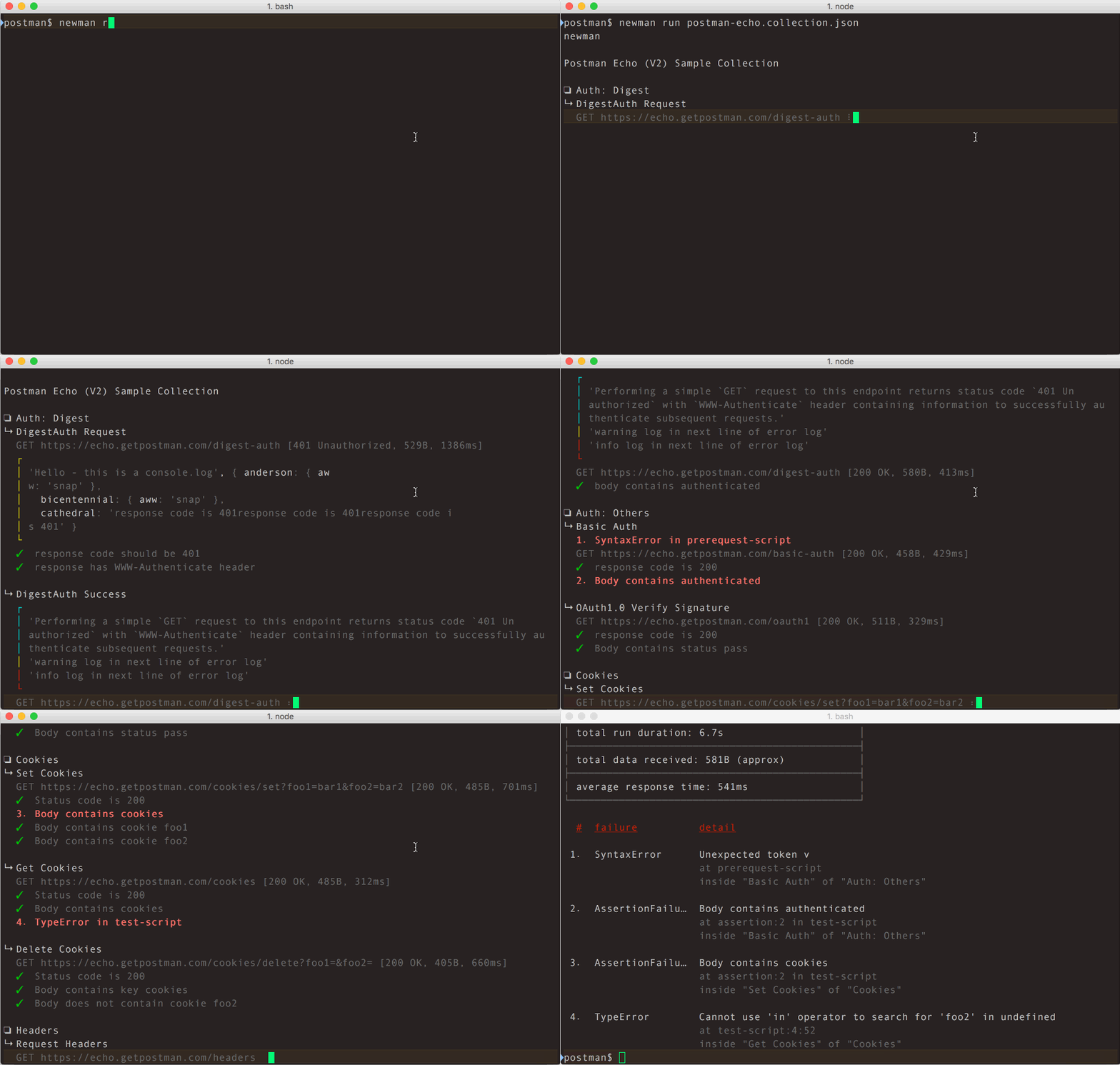
### Using Newman as a Library
Newman can be easily used within your JavaScript projects as a Node.js module. The entire set of Newman CLI functionality is available for programmatic use as well. The following example runs a collection by reading a JSON collection file stored on disk.
```javascript
const newman = require('newman'); // require newman in your project
// call newman.run to pass `options` object and wait for callback
newman.run({
collection: require('./sample-collection.json'),
reporters: 'cli'
}, function (err) {
if (err) { throw err; }
console.log('collection run complete!');
});
```
For the complete list of options, refer the [API Reference](#api-reference) section below.
### Using Reporters with Newman
Reporters provide information about the current collection run in a format that is easy to both: disseminate and assimilate.
Reporters can be configured using the `-r` or `--reporters` options. Inbuilt reporters in newman are: `cli`, `json`, `junit`, `progress` and `emojitrain`.
CLI reporter is enabled by default when Newman is used as a CLI, you do not need to specifically provide the same as part of reporters option. However, enabling one or more of the other reporters will result in no CLI output. Explicitly enable the CLI option in such a scenario. Check the example given below using the CLI and JSON reporters:
```console
$ newman run examples/sample-collection.json -r cli,json
```
For more details on [Reporters](#reporters) and writing your own [External Reporters](#external-reporters) refer to their corresponding sections below.
[back to top](#table-of-contents)
## Command Line Options
### `newman [options]`
- `-h`, `--help`<br />
Show command line help, including a list of options, and sample use cases.
- `-v`, `--version`<br />
Displays the current Newman version, taken from [package.json](https://github.com/postmanlabs/newman/blob/main/package.json)
### `newman run <collection-file-source> [options]`
- `-e <source>`, `--environment <source>`<br />
Specify an environment file path or URL. Environments provide a set of variables that one can use within collections.
[Read More](https://learning.postman.com/docs/postman/variables-and-environments/managing-environments/)
- `-g <source>`, `--globals <source>`<br />
Specify the file path or URL for global variables. Global variables are similar to environment variables but have a lower
precedence and can be overridden by environment variables having the same name.
- `-d <source>`, `--iteration-data <source>`<br />
Specify a data source file (JSON or CSV) to be used for iteration as a path to a file or as a URL.
[Read More](https://learning.postman.com/docs/postman/collection-runs/working-with-data-files/)
- `-n <number>`, `--iteration-count <number>`<br />
Specifies the number of times the collection has to be run when used in conjunction with iteration data file.
- `--folder <name>`<br />
Run requests within a particular folder/folders or specific requests in a collection. Multiple folders or requests can be specified by using
--folder multiple times, like so: --folder f1 --folder f2 --folder r1 --folder r2.
- `--working-dir <path>`<br />
Set the path of the working directory to use while reading files with relative paths. Default to current directory.
- `--no-insecure-file-read`<br />
Prevents reading of files situated outside of the working directory.
- `--export-environment <path>`<br />
The path to the file where Newman will output the final environment variables file before completing a run.
- `--export-globals <path>`<br />
The path to the file where Newman will output the final global variables file before completing a run.
- `--export-collection <path>`<br />
The path to the file where Newman will output the final collection file before completing a run.
- `--timeout <ms>`<br />
Specify the time (in milliseconds) to wait for the entire collection run to complete execution.
- `--timeout-request <ms>`<br />
Specify the time (in milliseconds) to wait for requests to return a response.
- `--timeout-script <ms>`<br />
Specify the time (in milliseconds) to wait for scripts to complete execution.
- `-k`, `--insecure`<br />
Disables SSL verification checks and allows self-signed SSL certificates.
- `--ignore-redirects`<br />
Prevents newman from automatically following 3XX redirect responses.
- `--delay-request`<br />
Specify the extent of delay between requests (milliseconds).
- `--cookie-jar <path>`<br />
Specify the file path for a JSON Cookie Jar. Uses [`tough-cookie`](https://github.com/salesforce/tough-cookie) to deserialize the file.
- `--export-cookie-jar <path>`<br />
The path to the file where Newman will output the final cookie jar file before completing a run. Uses `tough-cookie`'s serialize method.
- `--bail [optional modifiers]`<br />
Specify whether or not to stop a collection run on encountering the first test script error.<br />
Can optionally accept modifiers, currently include `folder` and `failure`.<br />
`folder` allows you to skip the entire collection run in case an invalid folder
was specified using the `--folder` option or an error was encountered in general.<br />
On the failure of a test, `failure` would gracefully stop a collection run after completing the current test script.
- `-x`, `--suppress-exit-code`<br />
Specify whether or not to override the default exit code for the current run.
- `--color <value>`<br />
Enable or Disable colored CLI output. The color value can be any of the three: `on`, `off` or `auto`*(default)*.<br/>
With `auto`, Newman attempts to automatically turn color on or off based on the color support in the terminal.
This behaviour can be modified by using the `on` or `off` value accordingly.
- `--disable-unicode`<br />
Specify whether or not to force the unicode disable option. When supplied, all symbols in the output will be replaced
by their plain text equivalents.
- `--global-var "<global-variable-name>=<global-variable-value>"`<br />
Allows the specification of global variables via the command line, in a key=value format. Multiple CLI global variables
can be added by using `--global-var` multiple times, like so: `--global-var "foo=bar" --global-var "alpha=beta"`.
- `--env-var "<environment-variable-name>=<environment-variable-value>"`<br />
Allows the specification of environment variables via the command line, in a key=value format. Multiple CLI environment variables
can be added by using `--env-var` multiple times, like so: `--env-var "foo=bar" --env-var "alpha=beta"`.
- `--verbose`<br />
Show detailed information of collection run and each request sent.
### SSL
#### Client Certificates
Client certificates are an alternative to traditional authentication mechanisms. These allow their users to make authenticated requests to a server, using a public certificate, and an optional private key that verifies certificate ownership. In some cases, the private key may also be protected by a secret passphrase, providing an additional layer of authentication security.
Newman supports SSL client certificates, via the following CLI options:
#### Using a single SSL client certificate
- `--ssl-client-cert`<br/>
The path to the public client certificate file.
- `--ssl-client-key`<br/>
The path to the private client key (optional).
- `--ssl-client-passphrase`<br/>
The secret passphrase used to protect the private client key (optional).
#### Using SSL client certificates configuration file (supports multiple certificates per run)
- `--ssl-client-cert-list`<br/>
The path to the SSL client certificate list configuration file (JSON format). See [examples/ssl-client-cert-list.json](https://github.com/postmanlabs/newman/blob/develop/examples/ssl-client-cert-list.json).
This option allows setting different SSL client certificate according to URL or hostname.
This option takes precedence over `--ssl-client-cert`, `--ssl-client-key` and `--ssl-client-passphrase` options. If there is no match for the URL in the list, these options are used as fallback.
#### Trusted CA
When it is not wanted to use the `--insecure` option, additionally trusted CA certificates can be provided like this:
- `--ssl-extra-ca-certs`<br/>
The path to the file, that holds one or more trusted CA certificates in PEM format
### Configuring Proxy
Newman can also be configured to work with proxy settings via the following environment variables:
* `HTTP_PROXY` / `http_proxy`
* `HTTPS_PROXY` / `https_proxy`
* `NO_PROXY` / `no_proxy`
For more details on using these variables, [refer here](https://github.com/postmanlabs/postman-request/blob/master/README.md#controlling-proxy-behaviour-using-environment-variables).
[back to top](#table-of-contents)
## API Reference
### newman.run(options: _object_ , callback: _function_) => run: EventEmitter
The `run` function executes a collection and returns the run result to a callback function provided as parameter. The
return of the `newman.run` function is a run instance, which emits run events that can be listened to.
| Parameter | Description |
|-----------|---------------|
| options | This is a required argument and it contains all information pertaining to running a collection.<br /><br />_Required_<br />Type: `object` |
| options.collection | The collection is a required property of the `options` argument. It accepts an object representation of a Postman Collection which should resemble the schema mentioned at [https://schema.getpostman.com/](https://schema.getpostman.com/). The value of this property could also be an instance of Collection Object from the [Postman Collection SDK](https://github.com/postmanlabs/postman-collection).<br /><br />As `string`, one can provide a URL where the Collection JSON can be found (e.g. [Postman Cloud API](https://api.getpostman.com/) service) or path to a local JSON file.<br /><br />_Required_<br />Type: `object\|string` [PostmanCollection](https://github.com/postmanlabs/postman-collection/wiki#Collection) |
| options.environment | One can optionally pass an environment file path or URL as `string` to this property and that will be used to read Postman Environment Variables from. This property also accepts environment variables as an `object`. Environment files exported from Postman App can be directly used here.<br /><br />_Optional_<br />Type: `object\|string` |
| options.envVar | One can optionally pass environment variables as an array of key-value string object pairs. It will be used to read Postman Environment Variables as well as overwrite environment variables from `options.environments`. <br /><br />_Optional_<br />Type: `array\|object` |
| options.globals | Postman Global Variables can be optionally passed on to a collection run in form of path to a file or URL. It also accepts variables as an `object`.<br /><br />_Optional_<br />Type: `object\|string` |
| options.globalVar | One can optionally pass global environment variables as an array of key-value string object pairs. It will be used to read Postman Global Environment Variables as well as overwrite global environment variables from `options.globals`. <br /><br />_Optional_<br />Type: `array\|object` |
| options.iterationCount | Specify the number of iterations to run on the collection. This is usually accompanied by providing a data file reference as `options.iterationData`.<br /><br />_Optional_<br />Type: `number`, Default value: `1` |
| options.iterationData | Path to the JSON or CSV file or URL to be used as data source when running multiple iterations on a collection.<br /><br />_Optional_<br />Type: `string` |
| options.folder | The name or ID of the folder/folders (ItemGroup) in the collection which would be run instead of the entire collection.<br /><br />_Optional_<br />Type: `string\|array` |
| options.workingDir | The path of the directory to be used as working directory.<br /><br />_Optional_<br />Type: `string`, Default value: `Current Directory` |
| options.insecureFileRead | Allow reading files outside of working directory.<br /><br />_Optional_<br />Type: `boolean`, Default value: `true` |
| options.timeout | Specify the time (in milliseconds) to wait for the entire collection run to complete execution.<br /><br />_Optional_<br />Type: `number`, Default value: `Infinity` |
| options.timeoutRequest | Specify the time (in milliseconds) to wait for requests to return a response.<br /><br />_Optional_<br />Type: `number`, Default value: `Infinity` |
| options.timeoutScript | Specify the time (in milliseconds) to wait for scripts to return a response.<br /><br />_Optional_<br />Type: `number`, Default value: `Infinity` |
| options.delayRequest | Specify the time (in milliseconds) to wait for between subsequent requests.<br /><br />_Optional_<br />Type: `number`, Default value: `0` |
| options.ignoreRedirects | This specifies whether newman would automatically follow 3xx responses from servers.<br /><br />_Optional_<br />Type: `boolean`, Default value: `false` |
| options.insecure | Disables SSL verification checks and allows self-signed SSL certificates.<br /><br />_Optional_<br />Type: `boolean`, Default value: `false` |
| options.bail | A switch to specify whether or not to gracefully stop a collection run (after completing the current test script) on encountering the first error. Takes additional modifiers as arguments to specify whether to end the run with an error for invalid name or path.<br /><br/>Available modifiers: `folder` and `failure`.<br />eg. `bail : ['folder']`<br /><br />_Optional_<br />Type: `boolean\|object`, Default value: `false` |
| options.suppressExitCode | If present, allows overriding the default exit code from the current collection run, useful for bypassing collection result failures. Takes no arguments.<br /><br />_Optional_<br />Type: `boolean`, Default value: `false` |
| options.reporters | Specify one reporter name as `string` or provide more than one reporter name as an `array`.<br /><br />Available reporters: `cli`, `json`, `junit`, `progress` and `emojitrain`.<br /><br />_Optional_<br />Type: `string\|array` |
| options.reporter | Specify options for the reporter(s) declared in `options.reporters`. <br /> e.g. `reporter : { junit : { export : './xmlResults.xml' } }` <br /> e.g. `reporter : { html : { export : './htmlResults.html', template: './customTemplate.hbs' } }` <br /><br />_Optional_<br />Type: `object` |
| options.color | Enable or Disable colored CLI output.<br/><br/>Available options: `on`, `off` and `auto`<br /><br />_Optional_<br />Type: `string`, Default value: `auto` |
| options.sslClientCert | The path to the public client certificate file.<br /><br />_Optional_<br />Type: `string` |
| options.sslClientKey | The path to the private client key file.<br /><br />_Optional_<br />Type: `string` |
| options.sslClientPassphrase | The secret client key passphrase.<br /><br />_Optional_<br />Type: `string` |
| options.sslClientCertList | The path to the client certificate configuration list file. This option takes precedence over `sslClientCert`, `sslClientKey` and `sslClientPassphrase`. When there is no match in this configuration list, `sslClientCert` is used as fallback.<br /><br />_Optional_<br />Type: `string\|array` |
| options.sslExtraCaCerts | The path to the file, that holds one or more trusted CA certificates in PEM format.<br /><br />_Optional_<br />Type: `string` |
| options.requestAgents | Specify the custom requesting agents to be used when performing HTTP and HTTPS requests respectively. Example: [Using Socks Proxy](#using-socks-proxy)<br /><br />_Optional_<br />Type: `object` |
| options.cookieJar | One can optionally pass a CookieJar file path as `string` to this property and that will be deserialized using [`tough-cookie`](https://github.com/salesforce/tough-cookie). This property also accepts a `tough-cookie` CookieJar instance.<br /><br />_Optional_<br />Type: `object\|string` |
| options.newmanVersion | The Newman version used for the collection run.<br /><br />_This will be set by Newman_ |
| callback | Upon completion of the run, this callback is executed with the `error`, `summary` argument.<br /><br />_Required_<br />Type: `function` |
### newman.run~callback(error: _object_ , summary: _object_)
The `callback` parameter of the `newman.run` function receives two arguments: (1) `error` and (2) `summary`
| Argument | Description |
|-----------|---------------|
| error | In case newman faces an error during the run, the error is passed on to this argument of callback. By default, only fatal errors, such as the ones caused by any fault inside Newman is passed on to this argument. However, setting `abortOnError:true` or `abortOnFailure:true` as part of run options will cause newman to treat collection script syntax errors and test failures as fatal errors and be passed down here while stopping the run abruptly at that point.<br /><br />Type: `object` |
| summary | The run summary will contain information pertaining to the run.<br /><br />Type: `object` |
| summary.error | An error object which if exists, contains an error message describing the message <br /><br />Type: `object` |
| summary.collection | This object contains information about the collection being run, it's requests, and their associated pre-request scripts and tests.<br /><br />Type: `object` |
| summary.environment | An object with environment variables used for the current run, and the usage status for each of those variables.<br /><br />Type: `object` |
| summary.globals | This object holds details about the globals used within the collection run namespace.<br /><br />Type: `object` |
| summary.run | A cumulative run summary object that provides information on .<br /><br />Type: `object` |
| summary.run.stats | An object which provides details about the total, failed, and pending counts for pre request scripts, tests, assertions, requests, and more.<br /><br />Type: `object` |
| summary.run.failures | An array of failure objects, with each element holding details, including the assertion that failed, and the request.<br /><br />Type: `array.<object>` |
| summary.run.executions | This object contains information about each request, along with it's associated activities within the scope of the current collection run.<br /><br />Type: `array.<object>` |
### newman.run~events
Newman triggers a whole bunch of events during the run.
```javascript
newman.run({
collection: require('./sample-collection.json'),
iterationData: [{ "var": "data", "var_beta": "other_val" }],
globals: {
"id": "5bfde907-2a1e-8c5a-2246-4aff74b74236",
"name": "test-env",
"values": [
{
"key": "alpha",
"value": "beta",
"type": "text",
"enabled": true
}
],
"timestamp": 1404119927461,
"_postman_variable_scope": "globals",
"_postman_exported_at": "2016-10-17T14:31:26.200Z",
"_postman_exported_using": "Postman/4.8.0"
},
globalVar: [
{ "key":"glboalSecret", "value":"globalSecretValue" },
{ "key":"globalAnotherSecret", "value":`${process.env.GLOBAL_ANOTHER_SECRET}`}
],
environment: {
"id": "4454509f-00c3-fd32-d56c-ac1537f31415",
"name": "test-env",
"values": [
{
"key": "foo",
"value": "bar",
"type": "text",
"enabled": true
}
],
"timestamp": 1404119927461,
"_postman_variable_scope": "environment",
"_postman_exported_at": "2016-10-17T14:26:34.940Z",
"_postman_exported_using": "Postman/4.8.0"
},
envVar: [
{ "key":"secret", "value":"secretValue" },
{ "key":"anotherSecret", "value":`${process.env.ANOTHER_SECRET}`}
],
}).on('start', function (err, args) { // on start of run, log to console
console.log('running a collection...');
}).on('done', function (err, summary) {
if (err || summary.error) {
console.error('collection run encountered an error.');
}
else {
console.log('collection run completed.');
}
});
```
All events receive two arguments (1) `error` and (2) `args`. The list below describes the properties of the second
argument object. [Learn more](https://github.com/postmanlabs/newman/wiki/Newman-Run-Events)
| Event | Description |
|-----------|---------------|
| start | The start of a collection run |
| beforeIteration | Before an iteration commences |
| beforeItem | Before an item execution begins (the set of prerequest->request->test) |
| beforePrerequest | Before `prerequest` script is execution starts |
| prerequest | After `prerequest` script execution completes |
| beforeRequest | Before an HTTP request is sent |
| request | After response of the request is received |
| beforeTest | Before `test` script is execution starts |
| test | After `test` script execution completes |
| beforeScript | Before any script (of type `test` or `prerequest`) is executed |
| script | After any script (of type `test` or `prerequest`) is executed |
| item | When an item (the whole set of prerequest->request->test) completes |
| iteration | After an iteration completes |
| assertion | This event is triggered for every test assertion done within `test` scripts |
| console | Every time a `console` function is called from within any script, this event is propagated |
| exception | When any asynchronous error happen in `scripts` this event is triggered |
| beforeDone | An event that is triggered prior to the completion of the run |
| done | This event is emitted when a collection run has completed, with or without errors |
[back to top](#table-of-contents)
## Reporters
### Configuring Reporters
- `-r <reporter-name>`, `--reporters <reporter-name>`<br />
Specify one reporter name as `string` or provide more than one reporter name as a comma separated list of reporter names. Available reporters are: `cli`, `json`, `junit`, `progress` and `emojitrain`.<br/><br/>
Spaces should **not** be used between reporter names / commas whilst specifying a comma separated list of reporters. For instance:<br/><br/>
:white_check_mark: `-r cli,json,junit`<br/>
:x: `-r cli , json,junit`
- `--reporter-{{reporter-name}}-{{reporter-option}}`<br />
When multiple reporters are provided, if one needs to specifically override or provide an option to one reporter, this
is achieved by prefixing the option with `--reporter-{{reporter-name}}-`.<br /><br />
For example, `... --reporters cli,json --reporter-cli-silent` would silence the CLI reporter only.
- `--reporter-{{reporter-options}}`<br />
If more than one reporter accepts the same option name, they can be provided using the common reporter option syntax.
<br /><br />
For example, `... --reporters cli,json --reporter-silent` passes the `silent: true` option to both JSON and CLI
reporter.
**Note:** Sample collection reports have been provided in [examples/reports](https://github.com/postmanlabs/newman/blob/develop/examples/reports).
### CLI Reporter
The built-in CLI reporter supports the following options, use them with appropriate argument switch prefix. For example, the
option `no-summary` can be passed as `--reporter-no-summary` or `--reporter-cli-no-summary`.
CLI reporter is enabled by default when Newman is used as a CLI, you do not need to specifically provide the same as part of `--reporters` option.
However, enabling one or more of the other reporters will result in no CLI output. Explicitly enable the CLI option in
such a scenario.
| CLI Option | Description |
|-------------|-------------------|
| `--reporter-cli-silent` | The CLI reporter is internally disabled and you see no output to terminal. |
| `--reporter-cli-show-timestamps` | This prints the local time for each request made. |
| `--reporter-cli-no-summary` | The statistical summary table is not shown. |
| `--reporter-cli-no-failures` | This prevents the run failures from being separately printed. |
| `--reporter-cli-no-assertions` | This turns off the output for request-wise assertions as they happen. |
| `--reporter-cli-no-success-assertions` | This turns off the output for successful assertions as they happen. |
| `--reporter-cli-no-console` | This turns off the output of `console.log` (and other console calls) from collection's scripts. |
| `--reporter-cli-no-banner` | This turns off the `newman` banner shown at the beginning of each collection run. |
### JSON Reporter
The built-in JSON reporter is useful in producing a comprehensive output of the run summary. It takes the path to the
file where to write the report. The content of this file is exactly the same as the `summary` parameter sent to the callback
when Newman is used as a library.
To enable JSON reporter, provide `--reporters json` as a CLI option.
| CLI Option | Description |
|-------------|-------------------|
| `--reporter-json-export <path>` | Specify a path where the output JSON file will be written to disk. If not specified, the file will be written to `newman/` in the current working directory. If the specified path does not exist, it will be created. However, if the specified path is a pre-existing directory, the report will be generated in that directory. |
### JUNIT/XML Reporter
The built-in JUnit reporter can output a summary of the collection run to a JUnit compatible XML file. To enable the JUNIT reporter, provide
`--reporters junit` as a CLI option.
| CLI Option | Description |
|-------------|-------------------|
| `--reporter-junit-export <path>` | Specify a path where the output XML file will be written to disk. If not specified, the file will be written to `newman/` in the current working directory. If the specified path does not exist, it will be created. However, if the specified path is a pre-existing directory, the report will be generated in that directory. |
### HTML Reporter
An external reporter, maintained by Postman, which can be installed via `npm install -g newman-reporter-html`. This reporter was part of the Newman project but was separated out into its own project in V4.
The complete installation and usage guide is available at [newman-reporter-html](https://github.com/postmanlabs/newman-reporter-html#readme). Once the HTML reporter is installed you can provide `--reporters html` as a CLI option.
[back to top](#table-of-contents)
## External Reporters
### Using External Reporters
Newman also supports external reporters, provided that the reporter works with Newman's event sequence. Working examples of
how Newman reporters work can be found in [lib/reporters](https://github.com/postmanlabs/newman/tree/develop/lib/reporters).
For instance, to use the [Newman HTML Reporter](https://github.com/postmanlabs/newman-reporter-html):
- Install the reporter package. Note that the name of the package is of the form `newman-reporter-<name>`. The installation should be global if Newman is installed globally, local otherwise. (Remove `-g` flag from the command below for a local installation.)
```console
$ npm install -g newman-reporter-html
```
- Use the installed reporter, either via the CLI, or programmatic usage. Here, the `newman-reporter` prefix is **not** required while specifying the reporter name in the options.<br/>
```console
$ newman run /path/to/collection.json -r cli,html
```
```javascript
const newman = require('newman');
newman.run({
collection: '/path/to/collection.json',
reporters: ['cli', 'html']
}, process.exit);
```
#### Community Maintained Reporters
Several members of the Postman community have created custom reporters offering different option to output the data coming from Newman. Listed below is a selection of these but more can be found [here](https://www.npmjs.com/search?q=newman-reporter) on NPM.
Once the custom reporter NPM package has been installed either globally or locally, this can be then used with Newman in the following ways:
```console
$ newman run /path/to/collection.json -r htmlextra,csv
```
```javascript
const newman = require('newman');
newman.run({
collection: '/path/to/collection.json',
reporters: ['htmlextra', 'csv']
}, process.exit);
```
- [allure](https://github.com/allure-framework/allure-js/tree/master/packages/newman-reporter-allure) -
This reporter allow to create fully-featured allure reports that can allow you to have easy to understand HTML reports with features like historical data, link tests to the JIRA and all other benefits of using [allure framework](https://allurereport.org/).
- [htmlextra](https://github.com/DannyDainton/newman-reporter-htmlextra) -
This is an updated version of the standard HTML reporter containing a more in-depth data output and a few helpful extras
- [csv](https://github.com/matt-ball/newman-reporter-csv) -
This reporter creates a `csv` file containing the high level summary of the Collection run
- [json-summary](https://github.com/spenceclark/newman-reporter-json-summary) -
A Newman JSON Reporter that strips the results down to a minimum
- [teamcity](https://github.com/leafle/newman-reporter-teamcity) -
A reporter built to be used with the [Team City](https://www.jetbrains.com/teamcity/) CI server
- [testrail](https://github.com/billylam/newman-reporter-testrail) -
A reporter built for [Test Rail](https://www.gurock.com/testrail/), the test case management tool
- [statsd](https://github.com/gsorry/newman-reporter-statsd) -
This reporter can be used to send the Collection run data to `statsd` and used on time series analytic tools like [Grafana](https://grafana.com/)
- [confluence](https://github.com/OmbraDiFenice/newman-reporter-confluence) -
Confluence reporter for Newman that uploads a Newman report on a Confluence page
- [influxdb](https://github.com/vs4vijay/newman-reporter-influxdb) -
This reporter sends the test results information to InfluxDB which can be used from [Grafana](https://grafana.com/) to build dashboards
### Creating Your Own Reporter
A custom reporter is a Node module with a name of the form `newman-reporter-<name>`. To create a custom reporter:
1. Navigate to a directory of your choice, and create a blank npm package with `npm init`.
2. Add an `index.js` file, that exports a function of the following form:
```javascript
function CustomNewmanReporter (emitter, reporterOptions, collectionRunOptions) {
// emitter is an event emitter that triggers the following events: https://github.com/postmanlabs/newman#newmanrunevents
// reporterOptions is an object of the reporter specific options. See usage examples below for more details.
// collectionRunOptions is an object of all the collection run options: https://github.com/postmanlabs/newman#newmanrunoptions-object--callback-function--run-eventemitter
}
module.exports = CustomNewmanReporter
```
3. To use your reporter locally, use the `npm pack` command to create a `.tgz` file. Once created, this can be installed using the `npm i -g newman-reporter-<name>.<version>.tgz` command.
Once you're happy with your reporter, it can be published to `npm` using `npm publish`. This will then be made available for other people to download.
Scoped reporter package names like `@myorg/newman-reporter-<name>` are also supported. Working reporter examples can be found in [lib/reporters](lib/reporters).
[back to top](#table-of-contents)
## File uploads
Newman also supports file uploads for request form data. The files must be present in the
current working directory. Your collection must also contain the filename in
the "src" attribute of the request.
In this collection, `sample-file.txt` should be present in the current working directory.
```json
{
"info": {
"name": "file-upload"
},
"item": [
{
"request": {
"url": "https://postman-echo.com/post",
"method": "POST",
"body": {
"mode": "formdata",
"formdata": [
{
"key": "file",
"type": "file",
"enabled": true,
"src": "sample-file.txt"
}
]
}
}
}
]
}
```
```console
$ ls
file-upload.postman_collection.json sample-file.txt
$ newman run file-upload.postman_collection.json
```
[back to top](#table-of-contents)
## Using Newman with the Postman API
1 [Generate an API key](https://learning.postman.com/docs/developer/intro-api/#generating-a-postman-api-key)<br/>
2 Fetch a list of your collections from: `https://api.getpostman.com/collections?apikey=$apiKey`<br/>
3 Get the collection link via it's `uid`: `https://api.getpostman.com/collections/$uid?apikey=$apiKey`<br/>
4 Obtain the environment URI from: `https://api.getpostman.com/environments?apikey=$apiKey`<br/>
5 Using the collection and environment URIs acquired in steps 3 and 4, run the collection as follows:
```console
$ newman run "https://api.getpostman.com/collections/$uid?apikey=$apiKey" \
--environment "https://api.getpostman.com/environments/$uid?apikey=$apiKey"
```
[back to top](#table-of-contents)
## Using Newman in Docker
To use Newman in Docker check our [docker documentation](https://learning.postman.com/docs/postman/collection-runs/newman-with-docker/).
## Using Socks Proxy
When using Newman as a library, you can pass a custom HTTP(S) agent which will be used for making the requests. Here's an example of how to setup socks proxy using a custom agent.
```js
const newman = require('newman');
const SocksProxyAgent = require('socks-proxy-agent');
const requestAgent = new SocksProxyAgent({ host: 'localhost', port: '1080' });
newman.run({
collection: require('./sample-collection.json'),
requestAgents: {
http: requestAgent, // agent used for HTTP requests
https: requestAgent, // agent used for HTTPS requests
}
}, function (err) {
if (err) { throw err; }
console.log('collection run complete!');
});
```
[back to top](#table-of-contents)
## Migration Guide
- [Newman v5 to v6 Migration Guide](MIGRATION.md)
- [Newman v5.x Documentation](https://github.com/postmanlabs/newman/blob/release/5.x/README.md)
## Compatibility
### NodeJS
| Newman | Node |
|:-----------------:|:----------:|
| v3.x | >= v4.x |
| v4.x | >= v6.x |
| v5.x | >= v10.x |
| v6.x | >= v16.x |
The current Node version compatibility can also be seen from the `engines.node` property in [package.json](https://github.com/postmanlabs/newman/blob/develop/package.json)
### File Encoding
Newman attempts to detect file encoding for files that are provided as
command line input. However, it mostly relies on NodeJS and the underlying
operating system to do the heavy lifting. Currently, `ASCII`, `UTF-8`, `UTF-16LE`
and `ISO-8859-1` are the only ones that are detection assisted.
[back to top](#table-of-contents)
## Contributing
Please take a moment to read our [contributing guide](.github/CONTRIBUTING.md) to learn about our development process.
Open an [issue](https://github.com/postmanlabs/newman/issues) first to discuss potential changes/additions.
## Community Support
<img src="https://avatars1.githubusercontent.com/u/3220138?v=3&s=120" align="right" />
If you are interested in talking to the Postman team and fellow Newman users, you can find us on our <a href="https://community.postman.com">Postman Community Forum</a>. Feel free to drop by and say hello. You'll find us posting about upcoming features and beta releases, answering technical support questions, and contemplating world peace.
Sign in using your Postman account to participate in the discussions and don't forget to take advantage of the <a href="https://community.postman.com/search?q=newman">search bar</a> - the answer to your question might already be waiting for you! Don’t want to log in? Then lurk on the sidelines and absorb all the knowledge.
## License
This software is licensed under Apache-2.0. Copyright Postdot Technologies, Inc. See the [LICENSE.md](LICENSE.md) file for more information.
[](https://postman.com)
================================================
FILE: SECURITY.md
================================================
# Security Policy
## Reporting a Vulnerability
If you've found a vulnerability in our service or website, or want additional information regarding how we manage security, please send an email to security@postman.com. We will review it and respond to you within 24 hours. Please use our [PGP public key](https://assets.getpostman.com/getpostman/documents/publickey.txt) to encrypt your communications with us.
If you are a security researcher, please go through the following points for reporting security issues.
- Mail to security@postman.com and express interest along with a short summary of the nature of issue you want to report.
- We will triage and add your email address to our internal security tracker.
- Subsequently you can report your security issues directly using the tracker.
> Read our [security reporting guidelines and policy](https://www.postman.com/vulnerability-reporting) for more details.
================================================
FILE: bin/newman.js
================================================
#!/usr/bin/env node
require('../lib/node-version-check'); // @note that this should not respect CLI --silent
const _ = require('lodash'),
waterfall = require('async/waterfall'),
{ Command } = require('commander'),
program = new Command(),
version = require('../package.json').version,
newman = require('../'),
util = require('./util');
program
.name('newman')
.addHelpCommand(false)
.version(version, '-v, --version');
// The `run` command allows you to specify a collection to be run with the provided options.
program
.command('run <collection>')
.description('Initiate a Postman Collection run from a given URL or path')
.usage('<collection> [options]')
.option('-e, --environment <path>', 'Specify a URL or path to a Postman Environment')
.option('-g, --globals <path>', 'Specify a URL or path to a file containing Postman Globals')
.option('-r, --reporters [reporters]', 'Specify the reporters to use for this run', util.cast.csvParse, ['cli'])
.option('-n, --iteration-count <n>', 'Define the number of iterations to run', util.cast.integer)
.option('-d, --iteration-data <path>', 'Specify a data file to use for iterations (either JSON or CSV)')
.option('--folder <path>',
'Specify the folder to run from a collection. Can be specified multiple times to run multiple folders',
util.cast.memoize, [])
.option('--global-var <value>',
'Allows the specification of global variables via the command line, in a key=value format',
util.cast.memoizeKeyVal, [])
.option('--env-var <value>',
'Allows the specification of environment variables via the command line, in a key=value format',
util.cast.memoizeKeyVal, [])
.option('--export-environment <path>', 'Exports the final environment to a file after completing the run')
.option('--export-globals <path>', 'Exports the final globals to a file after completing the run')
.option('--export-collection <path>', 'Exports the executed collection to a file after completing the run')
.option('--postman-api-key <apiKey>', 'API Key used to load the resources from the Postman API')
.option('--bail [modifiers]',
'Specify whether or not to gracefully stop a collection run on encountering an error' +
' and whether to end the run with an error based on the optional modifier', util.cast.csvParse)
.option('--ignore-redirects', 'Prevents Newman from automatically following 3XX redirect responses')
.option('-x , --suppress-exit-code', 'Specify whether or not to override the default exit code for the current run')
.option('--silent', 'Prevents Newman from showing output to CLI')
.option('--disable-unicode', 'Forces Unicode compliant symbols to be replaced by their plain text equivalents')
.option('--color <value>', 'Enable/Disable colored output (auto|on|off)', util.cast.colorOptions, 'auto')
.option('--delay-request [n]', 'Specify the extent of delay between requests (milliseconds)', util.cast.integer, 0)
.option('--timeout [n]', 'Specify a timeout for collection run (milliseconds)', util.cast.integer, 0)
.option('--timeout-request [n]', 'Specify a timeout for requests (milliseconds)', util.cast.integer, 0)
.option('--timeout-script [n]', 'Specify a timeout for scripts (milliseconds)', util.cast.integer, 0)
.option('--working-dir <path>', 'Specify the path to the working directory')
.option('--no-insecure-file-read', 'Prevents reading the files situated outside of the working directory')
.option('-k, --insecure', 'Disables SSL validations')
.option('--ssl-client-cert-list <path>', 'Specify the path to a client certificates configurations (JSON)')
.option('--ssl-client-cert <path>', 'Specify the path to a client certificate (PEM)')
.option('--ssl-client-key <path>', 'Specify the path to a client certificate private key')
.option('--ssl-client-passphrase <passphrase>', 'Specify the client certificate passphrase (for protected key)')
.option('--ssl-extra-ca-certs <path>', 'Specify additionally trusted CA certificates (PEM)')
.option('--cookie-jar <path>', 'Specify the path to a custom cookie jar (serialized tough-cookie JSON) ')
.option('--export-cookie-jar <path>', 'Exports the cookie jar to a file after completing the run')
.option('--verbose', 'Show detailed information of collection run and each request sent')
.action((collection, command) => {
let options = util.commanderToObject(command),
// parse custom reporter options
reporterOptions = util.parseNestedOptions(program._originalArgs, '--reporter-', options.reporters);
// Inject additional properties into the options object
options.collection = collection;
options.reporterOptions = reporterOptions._generic;
options.reporter = _.transform(_.omit(reporterOptions, '_generic'), (acc, value, key) => {
acc[key] = _.assignIn(value, reporterOptions._generic); // overrides reporter options with _generic
}, {});
newman.run(options, function (err, summary) {
const runError = err || summary.run.error || summary.run.failures.length;
if (err) {
console.error(`error: ${err.message || err}\n`);
err.friendly && console.error(` ${err.friendly}\n`);
}
runError && !_.get(options, 'suppressExitCode') && (process.exitCode = 1);
});
});
program.addHelpText('after', `
To get available options for a command:
newman <command> -h`);
// Warn on invalid command and then exits.
program.on('command:*', (command) => {
console.error(`error: invalid command \`${command}\`\n`);
program.help();
});
/**
* Starts the script execution.
* callback is required when this is required as a module in tests.
*
* @param {String[]} argv - Argument vector.
* @param {?Function} callback - The callback function invoked on the completion of execution.
*/
function run (argv, callback) {
waterfall([
(next) => {
// cache original argv, required to parse nested options later.
program._originalArgs = argv;
// omit custom nested options, otherwise commander will throw unknown options error
next(null, util.omitNestedOptions(argv, '--reporter-'));
},
(args, next) => {
let error = null;
try {
program.parse(args);
}
catch (err) {
error = err;
}
next(error);
},
(next) => {
// throw error if no argument is provided.
next(program.args.length ? null : new Error('no arguments provided'));
}
], (error) => {
// invoke callback if this is required as module, used in tests.
if (callback) { return callback(error); }
// in case of an error, log error message and print help message.
if (error) {
console.error(`error: ${error.message || error}\n`);
program.help();
}
});
}
// Run this script if this is a direct stdin.
!module.parent && run(process.argv);
// Export to allow debugging and testing.
module.exports = run;
================================================
FILE: bin/util.js
================================================
const _ = require('lodash');
module.exports = {
cast: {
/**
* Helper to coerce number like strings into integers.
* Perform safety checks, and return the result.
*
* @param {String} arg - The stringified number argument.
* @returns {Number} - The supplied argument, casted to an integer.
*/
integer: (arg) => {
const num = Number(arg);
if (!_.isSafeInteger(num) || num <= 0) {
throw new Error('The value must be a positive integer.');
}
return num.valueOf();
},
/**
* Helper for collecting argument passed multiple times.
*
* --folder f1 --folder f2
*
* @param {String} val - The argument value.
* @param {String[]} memo - The array that is populated by argument values.
* @returns {String[]} - The array of argument values collected.
*/
memoize: (val, memo) => {
memo.push(val);
return memo;
},
/**
* Helper for collecting argument passed multiple times as key=value.
*
* --global-var "foo=bar" --global-var "alpha=beta"
*
* @param {String} val - The argument value, passed as key=value.
* @param {Array} memo - The array that is populated by key value pairs.
* @returns {Array} - [{key, value}] - The object representation of the current CLI variable.
*/
memoizeKeyVal: (val, memo) => {
let arg,
eqIndex = val.indexOf('=');
// This is done instead of splitting by `=` to avoid chopping off `=` that could be present in the value
arg = eqIndex !== -1 ? {
key: val.slice(0, eqIndex),
value: val.slice(eqIndex + 1)
} : {
key: val,
value: undefined
};
memo.push(arg);
return memo;
},
/**
* Helper to coerce comma separated string to an array.
*
* eg. item1,item2
*
* @param {String} list - The comma separated string.
* @returns {String[]} - [item1, item2] - The array representation of the passed string.
*/
csvParse: (list) => {
return _.split(list, ',');
},
colorOptions: (value) => {
if (!(/^(auto|on|off)$/).test(value)) {
throw new Error(`invalid value \`${value}\` for --color. Expected: auto|on|off`);
}
return value;
}
},
/**
* Extract selected options in the provided command.
* Omits commander private variables and other objects.
*
* @param {Object} command - Commander.Command Instance
* @returns {Object} - Extracted options from command
*/
commanderToObject: (command) => {
return _.reduce(command, (result, value, key) => {
// Exclude command's private `_` variables and other objects
const validProp = !_.startsWith(key, '_') && !_.includes(['commands', 'options', 'parent'], key);
validProp && (result[key] = value);
return result;
}, {});
},
/**
* Remove nested options having the provided prefix from `process.argv`.
*
* @param {String[]} argv - Argument vector.
* @param {String} optionPrefix - Argument prefix to search for.
* @returns {String[]} - All arguments without prefixed options and their values
*/
omitNestedOptions: (argv, optionPrefix) => {
let args = [],
len,
i;
for (i = 0, len = argv.length; i < len; i++) {
if (!_.startsWith(argv[i], optionPrefix)) {
args.push(argv[i]);
continue;
}
// For prefixed args also omit its value, --prefix-arg value
if (argv[i + 1] && !_.startsWith(argv[i + 1], '-')) {
++i;
}
}
return args;
},
/**
* Parse nested options having the provided prefix from `process.argv`.
*
* @param {String[]} argv - Argument vector.
* @param {String} optionPrefix - Argument prefix to search for.
* @param {String[]} options - Selected options.
* @returns {Object} Parsed object with nested options.
*
* @example
* let argv = ['--reporters=json,html', '--reporter-html-template=template.hb', '--reporter-export=path'],
* options = ['json', 'html'];
* parseNestedOptions(argv, '--reporter-', options);
* //returns
* {
* _generic: { export: path },
* html: { template: template.hb },
* json: {}
* }
*
*/
parseNestedOptions: (argv, optionPrefix, options) => {
let args = [],
parsed = { _generic: {} },
name,
path,
len,
eqIndex,
i;
// Extract prefixed arguments from argv
for (i = 0, len = argv.length; i < len; i++) {
const arg = argv[i];
if (!_.startsWith(arg, optionPrefix)) { continue; } // skip non-prefixed args
eqIndex = arg.indexOf('=');
if (eqIndex !== -1) {
// Split the attribute if its like key=value
args.push(arg.slice(0, eqIndex), arg.slice(eqIndex + 1));
}
else if (argv[i + 1] && !_.startsWith(argv[i + 1], '-')) {
// Also push the next parameter if it's not an option.
args.push(arg, argv[++i]);
}
else {
args.push(arg);
}
}
// ensure that whatever option is provided a blank options object is forwarded
_.forEach(options, (option) => { parsed[option] = {}; });
// Parse nested options
for (i = 0, len = args.length; i < len; i++) {
const arg = args[i].replace(optionPrefix, '');
name = _.split(arg, '-', 1)[0]; // eg. `cli` in --reporter-cli-silent
// if we have a valid option, the path should be the <name>.camelCaseOfTheRest
// otherwise, we add it to the generic options.
path = _.includes(options, name) ?
[name, _.camelCase(arg.replace(name + '-', ''))].join('.') :
['_generic', _.camelCase(arg)].join('.');
// If the next arg is an option, set the current arg to true,
// otherwise set it to the next arg.
_.set(parsed, path, (!args[i + 1] || _.startsWith(args[i + 1], '-')) ? true : args[++i]);
}
return parsed;
}
};
================================================
FILE: codecov.yml
================================================
coverage:
range: 70..100 # green if 100+, red if 70-
status:
patch:
# coverage status for pull request diff
default:
target: 100 # any patch should be 100% covered
threshold: 1% # allow a little drop
project:
# coverage status for whole project
default:
target: auto # use coverage of base commit as target
threshold: 1% # allow a little drop
# coverage status for unit tests
unit:
target: 75
flags:
- unit
# coverage status for integration tests
integration:
target: 50
flags:
- integration
# coverage status for cli tests
cli:
target: 80
flags:
- cli
# coverage status for library tests
library:
target: 65
flags:
- library
parsers:
javascript:
enable_partials: yes # use partial line coverage
================================================
FILE: docker/README.md
================================================
<img src="https://s3.amazonaws.com/web-artefacts/cartoon-whale-8.gif+(400%C3%97225).png">
# newman-docker
This repository contains docker images for Newman.
<a href="https://github.com/postmanlabs/newman" target="_blank">Newman</a> is a command-line collection runner for
<a href="https://postman.com" target="_blank">Postman</a>. It allows you to effortlessly run and test a
<a href="https://learning.postman.com/docs/sending-requests/intro-to-collections" target="_blank">Postman Collections<a/> directly from the
command-line. It is built with extensibility in mind so that you can easily integrate it with your continuous
integration servers and build systems.
**New to Docker?** Docker allows you to package an application with all of its dependencies into a standardised unit for
software development. Visit
<a href="https://www.docker.com/whatisdocker" target="_blank">https://www.docker.com/whatisdocker</a> to read more about
how docker can drastically simplify development and deployment.
## There are two available Docker images for Newman
### postman/newman:alpine (lightweight):
* <a href="https://hub.docker.com/r/postman/newman/">DockerHub</a>
* <a href="https://github.com/postmanlabs/newman/tree/develop/docker/images/alpine">Documentation</a>
### postman/newman:ubuntu:
* <a href="https://hub.docker.com/r/postman/newman/">DockerHub</a>
* <a href="https://github.com/postmanlabs/newman/tree/develop/docker/images/ubuntu">Documentation</a>
## Using the docker image
The docker image for Newman is available for download from our docker hub. You must have Docker installed in your
system. Docker has extensive <a href="https://docs.docker.com/installation/" target="_blank">installation guideline for
popular operating systems</a>. Choose your operating system and follow the instructions.
> Ensure you that you have docker installed and running in your system before proceeding with next steps. A quick test
> to see if docker is installed correctly is to execute the command `docker run hello-world` and it should run without
> errors.
**Step 1:**
Pull the <a href="https://registry.hub.docker.com/u/postman/newman:ubuntu/" target="_blank">newman docker
image</a> from docker hub:
```terminal
docker pull postman/newman:ubuntu
```
**Step 2:**
Run newman commands on the image:
```terminal
docker run -t postman/newman:ubuntu run https://www.getpostman.com/collections/8a0c9bc08f062d12dcda
```
### Build the docker image from this repository
**Step 1:**
Clone this repository:
```terminal
git clone https://github.com/postmanlabs/newman.git
```
**Step 2:**
Build the image:
```terminal
docker build -t postman/newman:ubuntu --build-arg NEWMAN_VERSION="full semver version" .;
```
**Step 3:**
Run a collection using the newman image:
```terminal
docker run -t postman/newman:ubuntu run https://www.getpostman.com/collections/8a0c9bc08f062d12dcda
```
## Running local collection files
This docker image is designed to pick files from the `/etc/newman` directory within the image. You may mount the
directory of your collection files into that location and provide the file references in standard newman parameters.
```terminal
# Mount host collections folder ~/collections, onto /etc/newman on the docker image, so that newman
# has access to collections
docker run -v ~/collections:/etc/newman -t postman/newman:ubuntu run "HTTPBinNewmanTestNoEnv.json.postman_collection"
```
You are not required to mount a volume if you do not need to save newman report to the host, and your collection is
available online, unless your collection requires an environment(as environments cannot be passed as URLs).
To know more about mounting volumes, visit
<a href="https://docs.docker.com/userguide/dockervolumes/" target="_blank">docker documentation on shared data volumes</a>.
## Examples
Run a local collection, pass an environment to it, and save the JSON report on the host.
```terminal
docker run -v ~/collections:/etc/newman -t postman/newman:ubuntu \
run "HTTPBinNewmanTest.json.postman_collection" \
--environment="HTTPBinNewmanTestEnv.json.postman_environment" \
--reporters="json,cli" --reporter-json-export="newman-results.json"
```
<br />Run a remote collection, pass it a local environment, and save JUnit XML test report on the host
```terminal
docker run -v ~/collections:/etc/newman -t postman/newman:ubuntu \
run https://www.getpostman.com/collections/8a0c9bc08f062d12dcda \
--environment="HTTPBinNewmanTestEnv.json.postman_environment" \
--reporters="junit,cli" --reporter-junit-export="newman-report.xml"
```
<br />Use a script to run a collection and do something, for example deploy the build, if all the tests pass
```bash
#/bin/bash
# stop on first error
set -e;
function onExit {
if [ "$?" != "0" ]; then
echo "Tests failed";
# build failed, don't deploy
exit 1;
else
echo "Tests passed";
# deploy build
fi
}
# call onExit when the script exits
trap onExit EXIT;
docker run --entrypoint -t postman/newman:ubuntu run https://www.getpostman.com/collections/8a0c9bc08f062d12dcda --suppress-exit-code;
```
## Using Newman Docker images with custom reporters
Newman Docker images can also be used with custom Newman reporters, as follows:
```console
docker run -v "<collection-directory>:/etc/newman" --entrypoint /bin/<bash-or-sh> <image:tag> -c "npm i -g newman-reporter-<reporter-name>; newman run sample-collection.json -r <reporter-name>"
```
In the above example,
* `<collection-directory>` is the source directory for collections. This directory will also be used to write Newman reports.
* `<image>` is a combination of the image name (and optional tag). For instance, `postman/newman:ubuntu` or `postman/newman:alpine`
* `<reporter-name>` is the reporter that has to be installed and loaded for the `newman run ...`
### Alpine
Note that the entrypoint here is `/bin/sh`, and **not** `/bin/bash`
```console
docker run -v "~/collections:/etc/newman" --entrypoint /bin/sh postman/newman:alpine -c "npm i -g newman-reporter-html; newman run sample-collection.json -r html"
```
### Ubuntu
```console
docker run -v "~/collections:/etc/newman" --entrypoint /bin/bash postman/newman:ubuntu -c "npm i -g newman-reporter-html; newman run sample-collection.json -r html"
```
## Node version
All official Newman Docker images will be shipped with the current Node LTS (Long Term Support) version. To learn more
about the Node release schedule, see https://github.com/nodejs/Release#release-schedule. More details about individual
Docker images can be found in their individual READMEs in this folder.
[](https://postman.com)
================================================
FILE: docker/images/alpine/Dockerfile
================================================
FROM node:16-alpine
LABEL maintainer="Postman Labs <help@postman.com>"
ARG NEWMAN_VERSION
# Set environment variables
ENV LC_ALL="en_US.UTF-8" LANG="en_US.UTF-8" LANGUAGE="en_US.UTF-8" ALPINE_NODE_REPO="oznu/alpine-node"
# Bail out early if NODE_VERSION is not provided
RUN if [ ! $(echo $NEWMAN_VERSION | grep -oE "^[0-9]+\.[0-9]+\.[0-9]+$") ]; then \
echo "\033[0;31mA valid semver Newman version is required in the NEWMAN_VERSION build-arg\033[0m"; \
exit 1; \
fi && \
# Install Newman globally
npm install --global newman@${NEWMAN_VERSION};
# Set workdir to /etc/newman
# When running the image, mount the directory containing your collection to this location
#
# docker run -v <path to collections directory>:/etc/newman ...
#
# In case you mount your collections directory to a different location, you will need to give absolute paths to any
# collection, environment files you want to pass to newman, and if you want newman reports to be saved to your disk.
# Or you can change the workdir by using the -w or --workdir flag
WORKDIR /etc/newman
# Set newman as the default container command
# Now you can run the container via
#
# docker run -v /home/collections:/etc/newman -t postman/newman_alpine run YourCollection.json.postman_collection \
# -e YourEnvironment.postman_environment \
# -H newman_report.html
ENTRYPOINT ["newman"]
================================================
FILE: docker/images/alpine/README.md
================================================
# newman:alpine
This image runs newman on node v16 on Alpine
Build the image:
```terminal
docker build -t postman/newman:alpine --build-arg NEWMAN_VERSION="full semver version" .
```
Or get it from [Docker Hub](https://registry.hub.docker.com/u/postman/newman/):
```terminal
docker pull postman/newman:alpine
```
Then run it:
```terminal
docker --volume="/home/postman/collections:/etc/newman" -t postman/newman:alpine run JSONBlobCoreAPI.json.postman_collection -r json --reporter-json-export newman-report.json
```
For newman-docker to be able to use collections and environment files saved on the host machine, and to save reports generated by newman, a directory containing the collection and environment needs to be mounted on to the docker instance on run time, preferably at `/etc/newman`, which is the default working directory. If you mount to a different location, then:
- You can pass the full path to your collection and environment files to newman. For instance, if you mount to `/etc/newman`,
```terminal
docker --volume="/home/postman/collection:/etc/newman" -t postman/newman:alpine run JSONBlobCoreAPI.json.postman_collection" -r json --reporter-json-export newman-report.json
```
- You can change the working directory while running the image to the location you mounted to, using the `-w` or `--workdir` flag.
```terminal
docker run --volume="/home/postman/collections:/etc/newman" -t postman/newman:alpine run JSONBlobCoreAPI.json.postman_collection -r json --reporter-json-export newman-report.json
```
In case you don't need to save newman's report to the host, and your collection is available online and does not require any environment, then you can forgo mounting your collections directory and directly pass the collection URL to newman:
```terminal
docker run -t postman/newman:alpine run https://www.getpostman.com/collections/8a0c9bc08f062d12dcda
```
================================================
FILE: docker/images/ubuntu/Dockerfile
================================================
FROM ubuntu:22.04
LABEL maintainer="Postman Labs <help@postman.com>"
ARG NODE_MAJOR=16
ARG NEWMAN_VERSION
# Bail out early if NEWMAN_VERSION is not provided
RUN if [ ! $(echo $NEWMAN_VERSION | grep -oE "^[0-9]+\.[0-9]+\.[0-9]+$") ]; then \
echo "\033[0;31mA valid semver Newman version is required in the NEWMAN_VERSION build-arg\033[0m"; \
exit 1; \
fi
RUN apt-get update; \
# Download and import the Nodesource GPG key
apt-get install -y ca-certificates curl gnupg; \
mkdir -p /etc/apt/keyrings; \
curl -fsSL https://deb.nodesource.com/gpgkey/nodesource-repo.gpg.key \
| gpg --dearmor -o /etc/apt/keyrings/nodesource.gpg; \
# Create deb repository
echo "deb [signed-by=/etc/apt/keyrings/nodesource.gpg] https://deb.nodesource.com/node_$NODE_MAJOR.x nodistro main" \
| tee /etc/apt/sources.list.d/nodesource.list; \
# Run Update and Install
apt-get update; \
apt-get install nodejs -y; \
# Install Newman globally
npm install --global newman@${NEWMAN_VERSION};
# Set environment variables
ENV LC_ALL="en_US.UTF-8" LANG="en_US.UTF-8" LANGUAGE="en_US.UTF-8"
# Set workdir to /etc/newman
# When running the image, mount the directory containing your collection to this location
#
# docker run -v <path to collections directory>:/etc/newman ...
#
# In case you mount your collections directory to a different location, you will need to give absolute paths to any
# collection, environment files you want to pass to newman, and if you want newman reports to be saved to your disk.
# Or you can change the workdir by using the -w or --workdir flag
WORKDIR /etc/newman
# Set newman as the default container command
# Now you can run the container via
#
# docker run -v /home/collections:/etc/newman -t postman/newman_ubuntu run YourCollection.json.postman_collection \
# -e YourEnvironment.postman_environment \
# -H newman_report.html
ENTRYPOINT ["newman"]
================================================
FILE: docker/images/ubuntu/README.md
================================================
# newman:ubuntu
This image runs newman on node v16 on Ubuntu 22.04
Build the image,
```terminal
docker build -t postman/newman:ubuntu --build-arg NEWMAN_VERSION="full semver version" .
```
Or get it from [docker hub](https://registry.hub.docker.com/u/postman/newman:ubuntu/)
```terminal
docker pull postman/newman:ubuntu
```
Then run it
```terminal
docker --volume="/home/postman/collections:/etc/newman" -t postman/newman:ubuntu run JSONBlobCoreAPI.json.postman_collection -r json --reporter-json-export newman-report.json
```
For newman-docker to be able to use collections and environment files saved on the host machine, and to save reports generated by newman, a directory containing the collection and environment needs to be mounted on to the docker instance on run time, preferably at `/etc/newman`, which is the default working directory. If you mount to a different location, then
- You can either pass the full path to your collection and environment files to newman. For instance, if you mount to `/etc/newman`,
```terminal
docker --volume="/home/postman/collection:/etc/newman" -t postman/newman:ubuntu run JSONBlobCoreAPI.json.postman_collection -r json --reporter-json-export newman-report.json
```
- You can change the working directory while running the image to the location you mounted to, using the `-w` or `--workdir` flag.
```terminal
docker run --volume="/home/postman/collections:/etc/newman" -t postman/newman:ubuntu run JSONBlobCoreAPI.json.postman_collection -r json --reporter-json-export newman-report.json
```
In case you don't need to save newman's report to the host, and your collection is available online and it does not require any environment, then you can forgo mounting your collections directory, and directly pass the collection url to newman
```terminal
docker run -t postman/newman:ubuntu run https://www.getpostman.com/collections/8a0c9bc08f062d12dcda
```
================================================
FILE: examples/find-unique-urls-in-run.js
================================================
#!/usr/bin/env node
/**
* @fileOverview
* This sample code illustrates how to read a collection JSON file in NodeJS,run it using Newman and then log all the
* unique URLs that were requested.
*/
var newman = require('../'), // require('newman')
uniqueUrls = {}; // here we will maintain the unique URLs
// call newman.run to pass `options` object and listen to events
newman.run({ collection: require('./sample-collection.json') })
.on('start', function (err, args) {
if (err) { return; }
console.info(`Running ${args.cursor.length} request(s) and ${args.cursor.cycles} iteration(s)`);
})
.on('request', function (err, args) {
if (err) { return; }
var url = args.request.url.toString();
// store the URL string as key of the object so that we can quickly do hashing of unique URLs and add a counter
if (uniqueUrls[url]) {
uniqueUrls[url] += 1; // increment counter if the url was already called
}
else {
uniqueUrls[url] = 1; // otherwise start a new counter
}
})
.once('done', function (err) {
var urls = Object.keys(uniqueUrls); // get list of all unique urls as an array from the object hash
// now output the result to console
console.info(`The collection run completed ${err ? 'with' : 'without'} error(s).`);
console.info(`Total ${urls.length} unique URLs requested.`);
urls.forEach(function (url) {
console.info(`${uniqueUrls[url]}: ${url}`);
});
});
================================================
FILE: examples/parallel-collection-runs.js
================================================
/**
* @fileOverview A sample script to demonstrate parallel collection runs using async.
*/
var path = require('path'), // ensures that the path is consistent, regardless of where the script is run from
async = require('async'), // https://npmjs.org/package/async
newman = require('../'), // change to require('newman'), if using outside this repository
/**
* A set of collection run options for the paralle collection runs. For demonstrative purposes in this script, an
* identical set of options has been used. However, different options can be used, so as to actually run different
* collections, with their corresponding run options in parallel.
*
* @type {Object}
*/
options = {
collection: path.join(__dirname, 'sample-collection.json')
},
/**
* A collection runner function that runs a collection for a pre-determined options object.
*
* @param {Function} done - A callback function that marks the end of the current collection run, when called.
*/
parallelCollectionRun = function (done) {
newman.run(options, done);
};
// Runs the Postman sample collection thrice, in parallel.
async.parallel([
parallelCollectionRun,
parallelCollectionRun,
parallelCollectionRun
],
/**
* The
*
* @param {?Error} err - An Error instance / null that determines whether or not the parallel collection run
* succeeded.
* @param {Array} results - An array of collection run summary objects.
*/
function (err, results) {
err && console.error(err);
results.forEach(function (result) {
var failures = result.run.failures;
console.info(failures.length ? JSON.stringify(failures.failures, null, 2) :
`${result.collection.name} ran successfully.`);
});
});
================================================
FILE: examples/read-collection-from-file.js
================================================
#!/usr/bin/env node
/**
* @fileOverview
* This sample code illustrates how to read a collection JSON file in NodeJS and run it using Newman
*/
var newman = require('../'); // require('newman')
// call newman.run to pass `options` object and wait for callback
newman.run({
collection: require('./sample-collection.json'),
reporters: 'cli'
}, function (err) {
if (err) { throw err; }
console.info('collection run complete!');
});
================================================
FILE: examples/reports/sample-collection-report.json
================================================
{
"collection": {
"info": {
"id": "6d031f42-a134-4dba-86c5-ce154f352f33",
"name": "Sample Postman Collection",
"schema": "https://schema.getpostman.com/json/collection/v2.0.0/collection.json"
},
"item": [
{
"id": "17d87a3b-fdc8-4b18-9815-950a42d87f59",
"name": "A simple GET request",
"request": {
"url": "https://postman-echo.com/get?source=newman-sample-github-collection",
"method": "GET"
},
"event": [
{
"listen": "test",
"script": {
"type": "text/javascript",
"exec": [
"tests['response code is 200'] = (responseCode.code === 200);"
]
}
}
]
},
{
"id": "45805ccf-86f6-44d1-b1fa-18431f4025e5",
"name": "A simple POST request",
"request": {
"url": "https://postman-echo.com/post",
"method": "POST",
"header": [
{
"key": "Content-Type",
"value": "text/plain"
}
],
"body": {
"mode": "raw",
"raw": "Duis posuere augue vel cursus pharetra. In luctus a ex nec pretium..."
}
}
},
{
"id": "0d5736de-0cf1-46a9-b057-3997c275af4b",
"name": "A simple POST request with JSON body",
"request": {
"url": "https://postman-echo.com/post",
"method": "POST",
"header": [
{
"key": "Content-Type",
"value": "application/json"
}
],
"body": {
"mode": "raw",
"raw": "{\"text\":\"Duis posuere augue vel cursus pharetra. In luctus a ex nec pretium...\"}"
}
}
}
]
},
"environment": {
"values": []
},
"globals": {
"values": []
},
"run": {
"stats": {
"iterations": {
"total": 1,
"pending": 0,
"failed": 0
},
"items": {
"total": 3,
"pending": 0,
"failed": 0
},
"scripts": {
"total": 1,
"pending": 0,
"failed": 0
},
"prerequests": {
"total": 3,
"pending": 0,
"failed": 0
},
"requests": {
"total": 3,
"pending": 0,
"failed": 0
},
"tests": {
"total": 3,
"pending": 0,
"failed": 0
},
"assertions": {
"total": 1,
"pending": 0,
"failed": 0
},
"testScripts": {
"total": 1,
"pending": 0,
"failed": 0
},
"prerequestScripts": {
"total": 0,
"pending": 0,
"failed": 0
}
},
"timings": {
"responseAverage": 849,
"started": 1472134919325,
"completed": 1472134922455
},
"executions": [
{
"cursor": {
"position": 0,
"iteration": 0,
"length": 3,
"cycles": 1,
"empty": false,
"eof": false,
"bof": true,
"cr": false,
"ref": "25eb69fd-1b89-441c-8dfe-5471bf15d02e"
},
"item": {
"id": "17d87a3b-fdc8-4b18-9815-950a42d87f59",
"name": "A simple GET request",
"request": {
"url": "https://postman-echo.com/get?source=newman-sample-github-collection",
"method": "GET"
},
"event": [
{
"listen": "test",
"script": {
"type": "text/javascript",
"exec": [
"tests['response code is 200'] = (responseCode.code === 200);"
]
}
}
]
},
"request": {
"url": "https://postman-echo.com/get?source=newman-sample-github-collection",
"method": "GET",
"header": [
{
"key": "User-Agent",
"value": "PostmanRuntime/2.4.3"
},
{
"key": "Accept",
"value": "*/*"
},
{
"key": "Host",
"value": "postman-echo.com"
},
{
"key": "accept-encoding",
"value": "gzip, deflate"
}
],
"body": {},
"description": {}
},
"response": {
"status": "OK",
"code": 200,
"header": [
{
"key": "Access-Control-Allow-Credentials",
"value": ""
},
{
"key": "Access-Control-Allow-Headers",
"value": ""
},
{
"key": "Access-Control-Allow-Methods",
"value": ""
},
{
"key": "Access-Control-Allow-Origin",
"value": ""
},
{
"key": "Access-Control-Expose-Headers",
"value": ""
},
{
"key": "Content-Encoding",
"value": "gzip"
},
{
"key": "Content-Type",
"value": "application/json; charset=utf-8"
},
{
"key": "Date",
"value": "Thu, 25 Aug 2016 14:22:01 GMT"
},
{
"key": "ETag",
"value": "W/\"137-PVrRGQ6/XWPrd95mL9VLkA\""
},
{
"key": "Server",
"value": "nginx/1.8.1"
},
{
"key": "set-cookie",
"value": "sails.sid=s%3AKWkP8x3Zi5Dw8iEGxf4rtsVeadIVITil.kefDILpoX6Yda98kJa7ksUS8M5y1tUnu4S7yjKZN5Dg; Path=/; HttpOnly"
},
{
"key": "Vary",
"value": "Accept-Encoding"
},
{
"key": "Content-Length",
"value": "203"
},
{
"key": "Connection",
"value": "keep-alive"
}
],
"body": "{\"args\":{\"source\":\"newman-sample-github-collection\"},\"headers\":{\"host\":\"postman-echo.com\",\"accept\":\"*/*\",\"accept-encoding\":\"gzip, deflate\",\"user-agent\":\"PostmanRuntime/2.4.3\",\"x-forwarded-port\":\"443\",\"x-forwarded-proto\":\"https\"},\"url\":\"https://postman-echo.com/get?source=newman-sample-github-collection\"}",
"responseTime": 1965,
"responseSize": 311
},
"id": "17d87a3b-fdc8-4b18-9815-950a42d87f59",
"assertions": [
{
"assertion": "response code is 200"
}
]
},
{
"cursor": {
"ref": "5b16b008-5b98-4a0e-95ba-e5944936a61c",
"length": 3,
"cycles": 1,
"position": 1,
"iteration": 0
},
"item": {
"id": "45805ccf-86f6-44d1-b1fa-18431f4025e5",
"name": "A simple POST request",
"request": {
"url": "https://postman-echo.com/post",
"method": "POST",
"header": [
{
"key": "Content-Type",
"value": "text/plain"
}
],
"body": {
"mode": "raw",
"raw": "Duis posuere augue vel cursus pharetra. In luctus a ex nec pretium..."
}
}
},
"request": {
"url": "https://postman-echo.com/post",
"method": "POST",
"header": [
{
"key": "Content-Type",
"value": "text/plain"
},
{
"key": "User-Agent",
"value": "PostmanRuntime/2.4.3"
},
{
"key": "Accept",
"value": "*/*"
},
{
"key": "Host",
"value": "postman-echo.com"
},
{
"key": "cookie",
"value": "sails.sid=s%3AKWkP8x3Zi5Dw8iEGxf4rtsVeadIVITil.kefDILpoX6Yda98kJa7ksUS8M5y1tUnu4S7yjKZN5Dg"
},
{
"key": "accept-encoding",
"value": "gzip, deflate"
},
{
"key": "content-length",
"value": 69
}
],
"body": {
"mode": "raw",
"raw": "Duis posuere augue vel cursus pharetra. In luctus a ex nec pretium..."
},
"description": {}
},
"response": {
"status": "OK",
"code": 200,
"header": [
{
"key": "Access-Control-Allow-Credentials",
"value": ""
},
{
"key": "Access-Control-Allow-Headers",
"value": ""
},
{
"key": "Access-Control-Allow-Methods",
"value": ""
},
{
"key": "Access-Control-Allow-Origin",
"value": ""
},
{
"key": "Access-Control-Expose-Headers",
"value": ""
},
{
"key": "Content-Encoding",
"value": "gzip"
},
{
"key": "Content-Type",
"value": "application/json; charset=utf-8"
},
{
"key": "Date",
"value": "Thu, 25 Aug 2016 14:22:02 GMT"
},
{
"key": "ETag",
"value": "W/\"1ef-XCjjHFaJKcRm3YHSPLLNSQ\""
},
{
"key": "Server",
"value": "nginx/1.8.1"
},
{
"key": "Vary",
"value": "X-HTTP-Method-Override, Accept-Encoding"
},
{
"key": "Content-Length",
"value": "359"
},
{
"key": "Connection",
"value": "keep-alive"
}
],
"body": "{\"args\":{},\"data\":\"Duis posuere augue vel cursus pharetra. In luctus a ex nec pretium...\",\"files\":{},\"form\":{},\"headers\":{\"host\":\"postman-echo.com\",\"content-length\":\"69\",\"accept\":\"*/*\",\"accept-encoding\":\"gzip, deflate\",\"content-type\":\"text/plain\",\"cookie\":\"sails.sid=s%3AKWkP8x3Zi5Dw8iEGxf4rtsVeadIVITil.kefDILpoX6Yda98kJa7ksUS8M5y1tUnu4S7yjKZN5Dg\",\"user-agent\":\"PostmanRuntime/2.4.3\",\"x-forwarded-port\":\"443\",\"x-forwarded-proto\":\"https\"},\"json\":null,\"url\":\"https://postman-echo.com/post\"}",
"responseTime": 273,
"responseSize": 495
},
"id": "45805ccf-86f6-44d1-b1fa-18431f4025e5"
},
{
"cursor": {
"ref": "e6098562-1dfa-470c-a4ff-2e65636f7c27",
"length": 3,
"cycles": 1,
"position": 2,
"iteration": 0
},
"item": {
"id": "0d5736de-0cf1-46a9-b057-3997c275af4b",
"name": "A simple POST request with JSON body",
"request": {
"url": "https://postman-echo.com/post",
"method": "POST",
"header": [
{
"key": "Content-Type",
"value": "application/json"
}
],
"body": {
"mode": "raw",
"raw": "{\"text\":\"Duis posuere augue vel cursus pharetra. In luctus a ex nec pretium...\"}"
}
}
},
"request": {
"url": "https://postman-echo.com/post",
"method": "POST",
"header": [
{
"key": "Content-Type",
"value": "application/json"
},
{
"key": "User-Agent",
"value": "PostmanRuntime/2.4.3"
},
{
"key": "Accept",
"value": "*/*"
},
{
"key": "Host",
"value": "postman-echo.com"
},
{
"key": "cookie",
"value": "sails.sid=s%3AKWkP8x3Zi5Dw8iEGxf4rtsVeadIVITil.kefDILpoX6Yda98kJa7ksUS8M5y1tUnu4S7yjKZN5Dg"
},
{
"key": "accept-encoding",
"value": "gzip, deflate"
},
{
"key": "content-length",
"value": 80
}
],
"body": {
"mode": "raw",
"raw": "{\"text\":\"Duis posuere augue vel cursus pharetra. In luctus a ex nec pretium...\"}"
},
"description": {}
},
"response": {
"status": "OK",
"code": 200,
"header": [
{
"key": "Access-Control-Allow-Credentials",
"value": ""
},
{
"key": "Access-Control-Allow-Headers",
"value": ""
},
{
"key": "Access-Control-Allow-Methods",
"value": ""
},
{
"key": "Access-Control-Allow-Origin",
"value": ""
},
{
"key": "Access-Control-Expose-Headers",
"value": ""
},
{
"key": "Content-Encoding",
"value": "gzip"
},
{
"key": "Content-Type",
"value": "application/json; charset=utf-8"
},
{
"key": "Date",
"value": "Thu, 25 Aug 2016 14:22:02 GMT"
},
{
"key": "ETag",
"value": "W/\"24a-RFanBswLWTX2fy8gBq4Fug\""
},
{
"key": "Server",
"value": "nginx/1.8.1"
},
{
"key": "Vary",
"value": "X-HTTP-Method-Override, Accept-Encoding"
},
{
"key": "Content-Length",
"value": "366"
},
{
"key": "Connection",
"value": "keep-alive"
}
],
"body": "{\"args\":{},\"data\":{\"text\":\"Duis posuere augue vel cursus pharetra. In luctus a ex nec pretium...\"},\"files\":{},\"form\":{},\"headers\":{\"host\":\"postman-echo.com\",\"content-length\":\"80\",\"accept\":\"*/*\",\"accept-encoding\":\"gzip, deflate\",\"content-type\":\"application/json\",\"cookie\":\"sails.sid=s%3AKWkP8x3Zi5Dw8iEGxf4rtsVeadIVITil.kefDILpoX6Yda98kJa7ksUS8M5y1tUnu4S7yjKZN5Dg\",\"user-agent\":\"PostmanRuntime/2.4.3\",\"x-forwarded-port\":\"443\",\"x-forwarded-proto\":\"https\"},\"json\":{\"text\":\"Duis posuere augue vel cursus pharetra. In luctus a ex nec pretium...\"},\"url\":\"https://postman-echo.com/post\"}",
"responseTime": 309,
"responseSize": 586
},
"id": "0d5736de-0cf1-46a9-b057-3997c275af4b"
}
],
"transfers": {
"responseTotal": 928
},
"failures": [],
"error": null
}
}
================================================
FILE: examples/reports/sample-collection-report.xml
================================================
<?xml version="1.0" encoding="UTF-8"?>
<testsuites name="Sample Postman Collection">
<testsuite name="A simple GET request" id="17d87a3b-fdc8-4b18-9815-950a42d87f59" time="1965">
<testcase name="response code is 200"/>
</testsuite>
<testsuite name="A simple POST request" id="45805ccf-86f6-44d1-b1fa-18431f4025e5" time="273"/>
<testsuite name="A simple POST request with JSON body" id="0d5736de-0cf1-46a9-b057-3997c275af4b" time="309"/>
</testsuites>
================================================
FILE: examples/run-collections-in-directory.js
================================================
#!/usr/bin/env node
/**
* @fileOverview This sample code illustrates how one can read all collection files within a directory and run them
* in parallel.
*/
var newman = require('../'), // require('newman')
fs = require('fs');
fs.readdir('./examples', function (err, files) {
if (err) { throw err; }
// we filter all files with JSON file extension
files = files.filter(function (file) {
return (/^((?!(package(-lock)?))|.+)\.json/).test(file);
});
// now we iterate on each file name and call newman.run using each file name
files.forEach(function (file) {
newman.run({
// we load collection using require. for better validation and handling
// JSON.parse could be used
collection: require(`${__dirname}/${file}`)
}, function (err) {
// finally, when the collection executes, print the status
console.info(`${file}: ${err ? err.name : 'ok'}!`);
});
}); // the entire flow can be made more elegant using `async` module
});
================================================
FILE: examples/sample-collection.json
================================================
{
"info": {
"name": "Sample Postman Collection",
"schema": "https://schema.getpostman.com/json/collection/v2.0.0/collection.json",
"description": "A sample collection to demonstrate collections as a set of related requests"
},
"item": [{
"name": "A simple GET request",
"event": [{
"listen": "test",
"script": {
"type": "text/javascript",
"exec": [
"pm.test('expect response be 200', function () {",
" pm.response.to.be.ok",
"})",
"pm.test('expect response json contain args', function () {",
" pm.expect(pm.response.json().args).to.have.property('source')",
" .and.equal('newman-sample-github-collection')",
"})"
]
}
}],
"request": {
"url": "https://postman-echo.com/get?source=newman-sample-github-collection",
"method": "GET"
}
}, {
"name": "A simple POST request",
"request": {
"url": "https://postman-echo.com/post",
"method": "POST",
"header": [{
"key": "Content-Type",
"value": "text/plain"
}],
"body": {
"mode": "raw",
"raw": "Duis posuere augue vel cursus pharetra. In luctus a ex nec pretium..."
}
}
}, {
"name": "A simple POST request with JSON body",
"request": {
"url": "https://postman-echo.com/post",
"method": "POST",
"header": [{
"key": "Content-Type",
"value": "application/json"
}],
"body": {
"mode": "raw",
"raw": "{\"text\":\"Duis posuere augue vel cursus pharetra. In luctus a ex nec pretium...\"}"
}
}
}]
}
================================================
FILE: examples/ssl-client-cert-list.json
================================================
[
{
"name": "domain1",
"matches": ["https://test.domain1.com/*", "https://www.domain1/*"],
"key": {"src": "./client.domain1.key"},
"cert": {"src": "./client.domain1.crt"},
"passphrase": "changeme"
},
{
"name": "domain2",
"matches": ["https://domain2.com/*"],
"key": {"src": "./client.domain2.key"},
"cert": {"src": "./client.domain2.crt"},
"passphrase": "changeme"
}
]
================================================
FILE: examples/v1.postman_collection.json
================================================
{
"id": "c5f65caa-9e32-6546-ac10-9167d0996723",
"name": "Sample Postman Collection",
"description": "A sample collection to demonstrate collections as a set of related requests",
"order": [
"3845db20-6952-e442-f3b0-6211e2089b71",
"ec098f7c-4e22-2fe9-e5c5-26f13016be84",
"464bc62d-db90-7c58-1c28-ff0b5eac2f4f"
],
"folders": [],
"owner": "640245",
"hasRequests": true,
"requests": [
{
"id": "3845db20-6952-e442-f3b0-6211e2089b71",
"name": "A simple GET request",
"description": "",
"collectionId": "c5f65caa-9e32-6546-ac10-9167d0996723",
"method": "GET",
"headers": "",
"data": [],
"rawModeData": "",
"tests": "tests['response code is 200'] = (responseCode.code === 200);",
"preRequestScript": "",
"url": "https://postman-echo.com/get?source=newman-sample-github-collection"
},
{
"id": "464bc62d-db90-7c58-1c28-ff0b5eac2f4f",
"name": "A simple POST request with JSON body",
"description": "",
"collectionId": "c5f65caa-9e32-6546-ac10-9167d0996723",
"method": "POST",
"headers": "Content-Type: application/json",
"dataMode": "raw",
"data": [],
"rawModeData": "{\"text\":\"Duis posuere augue vel cursus pharetra. In luctus a ex nec pretium...\"}",
"url": "https://postman-echo.com/post"
},
{
"id": "ec098f7c-4e22-2fe9-e5c5-26f13016be84",
"name": "A simple POST request",
"description": "",
"collectionId": "c5f65caa-9e32-6546-ac10-9167d0996723",
"method": "POST",
"headers": "Content-Type: text/plain",
"dataMode": "raw",
"data": [],
"rawModeData": "Duis posuere augue vel cursus pharetra. In luctus a ex nec pretium...",
"url": "https://postman-echo.com/post"
}
]
}
================================================
FILE: index.js
================================================
/**!
* @license Copyright 2016 Postdot Technologies, Inc.
*
* Licensed under the Apache License, Version 2.0 (the "License");
* you may not use this file except in compliance with the License.
* You may obtain a copy of the License at
*
* http://www.apache.org/licenses/LICENSE-2.0
*
* Unless required by applicable law or agreed to in writing, software distributed under the License is distributed on
* an "AS IS" BASIS, WITHOUT WARRANTIES OR CONDITIONS OF ANY KIND, either express or implied.
* See the License for the specific language governing permissions and limitations under the License.
*/
module.exports = require('./lib');
================================================
FILE: lib/config/index.js
================================================
var _ = require('lodash'),
async = require('async'),
env = require('./process-env'),
rcfile = require('./rc-file');
/**
* Reads configuration from config file, environment variables and CLI arguments. The CLI arguments override environment
* variables and environment variables override the configuration read from a file.
*
* @param {Object} overrides - Configuration overrides (these usually come from the CLI).
* @param {Object} options - The wrapper object of settings used for selective configuration loading.
* @param {String} options.command - Command name. Used for loading the required options from the config file.
* @param {Boolean=} options.ignoreRcFile - If true, the RC file is ignored.
* @param {Boolean=} options.ignoreProcessEnvironment - If true, the process environment variables are ignored.
* @param {Object=} options.loaders - Custom loaders for specific configuration options.
* @param {Function} callback - Is called after merging values from the overrides with the values from the rc file and
* environment variables.
* @returns {*}
*/
module.exports.get = (overrides, options, callback) => {
!callback && _.isFunction(options) && (callback = options, options = {});
var loaders = options.loaders,
commonOptions = _.pick(overrides, ['postmanApiKey']);
async.waterfall([
// Load RC Files.
!options.ignoreRcFile ? rcfile.load : (cb) => {
return cb(null, {});
},
// Load Process Environment overrides
(fileOptions, cb) => {
fileOptions[options.command] && (fileOptions = fileOptions[options.command]);
return cb(null, _.merge(fileOptions, options.ignoreProcessEnvironment ? {} : env));
}
], (err, options) => {
if (err) {
return callback(err);
}
options = _.mergeWith({}, options, overrides, (dest, src) => {
// If the newer value is a null, do not override it.
return (src === null) ? dest : undefined;
});
if (_.isEmpty(loaders)) {
return callback(null, options);
}
// sanitize environment option
if (!options.environment) {
options.environment = {};
}
// sanitize globals option
if (!options.globals) {
options.globals = {};
}
async.mapValues(options, (value, name, cb) => {
return (value && _.isFunction(loaders[name])) ? loaders[name](value, commonOptions, cb) : cb(null, value);
}, callback);
});
};
================================================
FILE: lib/config/process-env.js
================================================
var envConfig = {}; // todo: read NEWMAN_* variables from process.env
module.exports = envConfig;
================================================
FILE: lib/config/rc-file.js
================================================
/* eslint-disable no-process-env */
var _ = require('lodash'),
fs = require('fs'),
join = require('path').join,
async = require('async'),
util = require('../util'),
liquidJSON = require('liquid-json'),
/**
* Name of the directory that contains the file denoted by FILE_NAME.
*
* @type {String}
*/
POSTMAN_CONFIG_DIR = 'postman',
/**
* Name of the file that contains Newman compliant confguration information.
*
* @type {String}
*/
FILE_NAME = 'newmanrc';
/**
* Configuration loader to acquire run settings from a file present in the home directory: POSTMAN_CONFIG_DIR/FILE_NAME.
*
* @param {Function} callback - The callback function invoked to mark the completion of the config loading routine.
* @returns {*}
*/
module.exports.load = (callback) => {
var iswin = (/^win/).test(process.platform),
home = iswin ? process.env.USERPROFILE : process.env.HOME,
configFiles = [];
!iswin && configFiles.push(join('/etc', POSTMAN_CONFIG_DIR, FILE_NAME));
home && configFiles.push(join(home, '.' + POSTMAN_CONFIG_DIR, FILE_NAME));
configFiles.push(join(process.cwd(), '.' + FILE_NAME));
async.mapSeries(configFiles, (path, cb) => {
fs.readFile(path, (err, data) => {
if (err) {
return cb(null, {}); // err masked to avoid overpopulating terminal with missing .newmanrc messages
}
data && data.toString && (data = data.toString(util.detectEncoding(data)).trim());
try {
return cb(null, liquidJSON.parse(data));
}
catch (e) {
return cb(_.set(e, 'help', `The file at ${path} contains invalid data.`));
}
});
}, (err, files) => {
if (err) {
return callback(err);
}
return callback(null, _.merge.apply(this, files));
});
};
================================================
FILE: lib/index.js
================================================
module.exports = {
run: require('./run')
};
================================================
FILE: lib/node-version-check/index.js
================================================
var semver = require('semver'),
colors = require('colors/safe'),
pkg = require('../../package.json'),
/**
* The required node version from package.json.
*
* @type {String}
* @readOnly
*/
requiredNodeVersion = pkg && pkg.engines && pkg.engines.node,
/**
* The current node version as detected from running process.
*
* @type {String}
* @readOnly
*/
currentNodeVersion = process && process.version;
// if either current or required version is not detected, we bail out
if (!(requiredNodeVersion && currentNodeVersion)) {
return;
}
// we check semver satisfaction and throw error on mismatch
if (!semver.satisfies(currentNodeVersion, requiredNodeVersion)) {
console.error([colors.red('newman:'), 'required node version', requiredNodeVersion].join(' '));
process.exit(1);
}
================================================
FILE: lib/print/index.js
================================================
var format = require('util').format,
cliUtils = require('../reporters/cli/cli-utils'),
SPC = ' ',
BS = '\b',
LF = '\n',
WAIT_FRAMES = (/^win/).test(process.platform) ?
['\u2015', '\\', '|', '/'] :
['⠄', '⠆', '⠇', '⠋', '⠙', '⠸', '⠰', '⠠', '⠰', '⠸', '⠙', '⠋', '⠇', '⠆'],
WAIT_FRAMES_SIZE = WAIT_FRAMES.length - 1,
WAIT_FRAMERATE = 100,
print;
/**
* Function that prints to stdout using standard NodeJS util.format, without end newline.
*
* @returns {print} - The result of context bound call to the run context, with all arguments passed.
* @chainable
*/
print = function () {
return print.print.apply(this, arguments);
};
/**
* Function that prints to stdout using standard NodeJS util.format, without end newline.
*
* @returns {print} - The updated print module wrapper, with unwait and unbuffer methods invoked.
* @chainable
*/
print.print = function () {
print.waiting && print.unwait();
print._buffer && print.unbuffer();
process.stdout.write(format.apply(this, arguments));
return print;
};
/**
* Print with a line feed at the end.
*
* @returns {print} - The updated print module wrapper, with unwait and unbuffer methods invoked.
* @chainable
*/
print.lf = function () {
print.waiting && print.unwait();
print._buffer && print.unbuffer();
process.stdout.write(format.apply(this, arguments) + LF);
return print;
};
// store the starting frame during wait
print._waitPosition = 0;
/**
* Draw a spinner until next print statement is received.
*
* @param {Function=} color - Optional color function from `colors` module.
* @returns {print} - The print module wrapper, with a key set as a setInterval label.
* @chainable
*/
print.wait = function (color) {
print.unwait();
if (cliUtils.noTTY()) {
return print;
}
process.stdout.write(SPC);
print.waiting = setInterval(function () {
process.stdout.write(BS +
(color ? color(WAIT_FRAMES[print._waitPosition++]) : WAIT_FRAMES[print._waitPosition++]));
(print._waitPosition > WAIT_FRAMES_SIZE) && (print._waitPosition = 0); // move frame
}, WAIT_FRAMERATE);
return print;
};
/**
* Stops a running spinner on CLI. It is automatically taken care of in most cases.
*
* @returns {print} - Returns the updated print module wrapper, with the cleared waiting label.
* @chainable
* @see print.wait
*/
print.unwait = function () {
if (print.waiting) {
print.waiting = clearInterval(print.waiting);
print._waitPosition = 0;
process.stdout.wr
gitextract_6f7i_n3s/
├── .dockerignore
├── .editorconfig
├── .eslintrc
├── .gitattributes
├── .github/
│ ├── CONTRIBUTING.md
│ ├── ISSUE_TEMPLATE.md
│ ├── dependabot.yml
│ └── workflows/
│ ├── ci.yml
│ └── codeql-analysis.yml
├── .gitignore
├── .npmignore
├── .nycrc.js
├── CHANGELOG.yaml
├── LICENSE.md
├── MIGRATION.md
├── README.md
├── SECURITY.md
├── bin/
│ ├── newman.js
│ └── util.js
├── codecov.yml
├── docker/
│ ├── README.md
│ └── images/
│ ├── alpine/
│ │ ├── Dockerfile
│ │ └── README.md
│ └── ubuntu/
│ ├── Dockerfile
│ └── README.md
├── examples/
│ ├── find-unique-urls-in-run.js
│ ├── parallel-collection-runs.js
│ ├── read-collection-from-file.js
│ ├── reports/
│ │ ├── sample-collection-report.json
│ │ └── sample-collection-report.xml
│ ├── run-collections-in-directory.js
│ ├── sample-collection.json
│ ├── ssl-client-cert-list.json
│ └── v1.postman_collection.json
├── index.js
├── lib/
│ ├── config/
│ │ ├── index.js
│ │ ├── process-env.js
│ │ └── rc-file.js
│ ├── index.js
│ ├── node-version-check/
│ │ └── index.js
│ ├── print/
│ │ └── index.js
│ ├── reporters/
│ │ ├── cli/
│ │ │ ├── cli-utils-symbols.js
│ │ │ ├── cli-utils.js
│ │ │ └── index.js
│ │ ├── emojitrain.js
│ │ ├── json/
│ │ │ └── index.js
│ │ ├── junit/
│ │ │ └── index.js
│ │ └── progress.js
│ ├── run/
│ │ ├── export-file.js
│ │ ├── index.js
│ │ ├── options.js
│ │ ├── secure-fs.js
│ │ └── summary.js
│ └── util.js
├── npm/
│ ├── create-release.js
│ ├── docker-publish.sh
│ ├── server.js
│ ├── test-cli.js
│ ├── test-integration.js
│ ├── test-library.js
│ ├── test-lint.js
│ ├── test-system.js
│ └── test-unit.js
├── package.json
└── test/
├── .eslintrc
├── cli/
│ ├── cli-reporter-failure-details.test.js
│ ├── cli-reporter-no-success-assertsions.test.js
│ ├── cli-reporter-show-timestamp.test.js
│ ├── color-tty.test.js
│ ├── export-environment.test.js
│ ├── export-globals.test.js
│ ├── iteration-count.test.js
│ ├── run-options.test.js
│ ├── shallow-junit-reporter.test.js
│ ├── ssl-client-cert.test.js
│ ├── suppress-exit-code.test.js
│ ├── verbose.test.js
│ └── working-directory.test.js
├── fixtures/
│ ├── files/
│ │ ├── outside.json
│ │ ├── ssl-client-cert-config.json
│ │ └── work-dir/
│ │ └── test.json
│ ├── overrides/
│ │ ├── env.json
│ │ ├── failing-collection.json
│ │ └── pmcollection.json
│ ├── run/
│ │ ├── failed-request.json
│ │ ├── nested-requests-fail-report-test.json
│ │ ├── nested-requests-report-test.json
│ │ ├── newman-report-test.json
│ │ ├── response-bodies.json
│ │ ├── simple-variables.json
│ │ ├── single-file-inside.json
│ │ ├── single-file-outside.json
│ │ ├── single-get-request.json
│ │ ├── single-request-failing.json
│ │ ├── spaces/
│ │ │ ├── data.json
│ │ │ ├── simple-cookie-jar.json
│ │ │ ├── simple-variables.json
│ │ │ └── single-get-request.json
│ │ ├── ssl-client-cert-list.json
│ │ ├── ssl-client-cert.json
│ │ ├── test-data.postman_data.json
│ │ └── undefined-test-checks.json
│ └── ssl/
│ ├── SSL.md
│ ├── ca.crt
│ ├── ca.key
│ ├── ca2.crt
│ ├── ca2.key
│ ├── ca3.crt
│ ├── ca3.key
│ ├── client.crt
│ ├── client.csr
│ ├── client.key
│ ├── client.p12
│ ├── client2.crt
│ ├── client2.csr
│ ├── client2.key
│ ├── client3.crt
│ ├── client3.csr
│ ├── client3.key
│ ├── config.cnf
│ ├── generate-certificates.sh
│ ├── server.crt
│ ├── server.csr
│ ├── server.key
│ ├── server2.crt
│ ├── server2.csr
│ ├── server2.key
│ ├── server3.crt
│ ├── server3.csr
│ ├── server3.key
│ ├── sslClientCertList.json
│ └── v3.ext
├── integration/
│ ├── bom-and-encoding/
│ │ ├── bom-in-collection-file.postman_collection.json
│ │ ├── bom-in-environment-file.postman_collection.json
│ │ ├── bom-in-environment-file.postman_environment.json
│ │ ├── utf16-le-encoding-in-env.postman_collection.json
│ │ └── utf16-le-encoding-in-env.postman_environment.json
│ ├── case-insen-header-sandbox.postman_collection.json
│ ├── clear-vars-sandbox.postman_collection.json
│ ├── comma-test-csv/
│ │ ├── comma-test-csv.postman_collection.json
│ │ └── comma-test-csv.postman_data.csv
│ ├── cookie-jar.postman_collection.json
│ ├── crypto-md5.postman_collection.json
│ ├── csv-with-bom/
│ │ ├── csv-with-bom.postman_collection.json
│ │ └── csv-with-bom.postman_data.csv
│ ├── custom-http-method/
│ │ ├── custom-http-method.postman_collection.json
│ │ └── upload-file.csv
│ ├── data-file-var-replacement/
│ │ ├── data-file-var-replacement.postman_collection.json
│ │ ├── data-file-var-replacement.postman_data.json
│ │ └── data-file-var-replacement.postman_environment.json
│ ├── disabled-and-duplicate-variables/
│ │ ├── disabled-and-duplicates.postman_collection.json
│ │ └── disabled-and-duplicates.postman_environment.json
│ ├── distinct-random-int.postman_collection.json
│ ├── dynamic-var-replacement.postman_collection.json
│ ├── echo-v2.postman_collection.json
│ ├── esc-formdata/
│ │ ├── esc-formdata.postman_collection.json
│ │ └── esc-formdata.postman_environment.json
│ ├── globals-env-data-files/
│ │ ├── globals-env-data-files.postman_collection.json
│ │ ├── globals-env-data-files.postman_data.json
│ │ ├── globals-env-data-files.postman_environment.json
│ │ └── globals-env-data-files.postman_globals.json
│ ├── hawk-auth-test.postman_collection.json
│ ├── head-requests.postman_collection.json
│ ├── helper.postman_collection.json
│ ├── inherited-entities/
│ │ ├── inherited-entities.postman_collection.json
│ │ └── inherited-entities.postman_environment.json
│ ├── multi-level-folders-v1.postman_collection.json
│ ├── multi-level-folders-v2.postman_collection.json
│ ├── multi-value-data.postman_collection.json
│ ├── multiple-form-values.postman_collection.json
│ ├── newman-gzip-test.postman_collection.json
│ ├── oauth1-var-in-url-params.postman_collection.json
│ ├── protocol-profile-behavior.postman_collection.json
│ ├── prototype-check.postman_collection.json
│ ├── redirect-test/
│ │ ├── redirect-test.postman_collection.json
│ │ ├── redirect-test.postman_config.json
│ │ └── redirect-with-body.postman_collection.json
│ ├── request-body-with-get.postman_collection.json
│ ├── request-chaining-test.postman_collection.json
│ ├── request-name-in-script.postman_collection.json
│ ├── sandbox-libraries.postman_collection.json
│ ├── semicolon-tests.postman_collection.json
│ ├── set-next-request.postman_collection.json
│ ├── slashed-variable-names/
│ │ ├── slashed-variable-names.postman_collection.json
│ │ └── slashed-variable-names.postman_environment.json
│ ├── steph/
│ │ ├── steph.postman_collection.json
│ │ └── steph.postman_data.json
│ ├── super-sandbox-test.postman_collection.json
│ ├── tc4/
│ │ ├── tc4.postman_collection.json
│ │ └── upload-file.json
│ ├── timeout/
│ │ ├── timeout.postman_collection.json
│ │ └── timeout.postman_config.json
│ ├── v2-regression-tests/
│ │ ├── v2-regression-tests.postman_collection.json
│ │ ├── v2-regression-tests.postman_config.json
│ │ └── v2-regression-tests.postman_environment.json
│ ├── var-replacement.postman_collection.json
│ └── whatwg-url.postman_collection.json
├── library/
│ ├── cookie-jar.test.js
│ ├── export-environment.test.js
│ ├── export-globals.test.js
│ ├── folder-variants.test.js
│ ├── iteration-count.test.js
│ ├── postman-api-key.test.js
│ ├── requestAgents.test.js
│ ├── run-options.test.js
│ ├── shallow-junit-reporter.test.js
│ ├── ssl-client-cert.test.js
│ ├── suppress-exit-code.test.js
│ └── working-directory.test.js
├── system/
│ ├── dockerfile_rules.yml
│ ├── dockerfiles.test.js
│ ├── editorconfig.test.js
│ ├── npm-publish.test.js
│ └── repository.test.js
└── unit/
├── cli-reporter-symbols.test.js
├── cli.test.js
├── defaultReporter.test.js
├── externalReporter.test.js
├── options.test.js
├── run-summary.test.js
├── run.test.js
├── secure-fs.test.js
└── util.test.js
SYMBOL INDEX (37 symbols across 18 files)

FILE: .nycrc.js
  constant TEST_TYPE (line 1) | const TEST_TYPE = ((argv) => {
  function configOverrides (line 7) | function configOverrides (testType) {

FILE: bin/newman.js
  function run (line 105) | function run (argv, callback) {

FILE: lib/reporters/cli/index.js
  method parseStatistics (line 428) | parseStatistics (stats, timings, transfers, options) {
  method parseFailures (line 519) | parseFailures (failures) {

FILE: lib/run/index.js
  method start (line 228) | start (err, cursor) {
  method console (line 242) | console (cursor, level) {
  method exception (line 258) | exception (cursor, err) {
  method assertion (line 265) | assertion (cursor, assertions) {
  method done (line 301) | done (err, cursor) {

FILE: lib/run/secure-fs.js
  constant PPERM_ERR (line 1) | const fs = require('fs'),
  constant FUNCTION (line 1) | const fs = require('fs'),
  constant DEPRECATED_SYNC_WRITE_STREAM (line 1) | const fs = require('fs'),
  constant EXPERIMENTAL_PROMISE (line 1) | const fs = require('fs'),
  function SecureFS (line 63) | function SecureFS (workingDir, insecureFileRead = false, fileWhitelist =...

FILE: lib/run/summary.js
  method attachReportingTrackers (line 209) | attachReportingTrackers (summary, emitter) {
  method attachTimingTrackers (line 267) | attachTimingTrackers (summary, emitter) {
  method attachStatisticTrackers (line 278) | attachStatisticTrackers (summary, emitter) {
  method attachRequestTracker (line 303) | attachRequestTracker (summary, emitter) {
  method attachFailureTrackers (line 362) | attachFailureTrackers (summary, emitter) {

FILE: npm/server.js
  function createRawEchoServer (line 20) | function createRawEchoServer () {
  function createRedirectServer (line 76) | function createRedirectServer () {

FILE: npm/test-cli.js
  constant SPEC_SOURCE_DIR (line 6) | const path = require('path'),

FILE: npm/test-integration.js
  constant LOCAL_TEST_ECHO_PORT (line 6) | const fs = require('fs'),
  constant LOCAL_TEST_REDIRECT_PORT (line 6) | const fs = require('fs'),
  constant SPEC_SOURCE_DIR (line 6) | const fs = require('fs'),

FILE: npm/test-library.js
  constant SPEC_SOURCE_DIR (line 6) | const path = require('path'),

FILE: npm/test-lint.js
  constant LINT_SOURCE_DIRS (line 6) | const colors = require('colors/safe'),

FILE: npm/test-system.js
  constant SPEC_SOURCE_DIR (line 6) | const path = require('path'),

FILE: npm/test-unit.js
  constant SPEC_SOURCE_DIR (line 6) | const path = require('path'),

FILE: test/cli/ssl-client-cert.test.js
  function createHttpsServerWithCerts (line 9) | function createHttpsServerWithCerts (certs) {

FILE: test/library/postman-api-key.test.js
  constant COLLECTION (line 1) | const fs = require('fs'),
  constant VARIABLE (line 1) | const fs = require('fs'),

FILE: test/library/ssl-client-cert.test.js
  function createHttpsServerWithCerts (line 11) | function createHttpsServerWithCerts (certs) {

FILE: test/system/editorconfig.test.js
  constant TAB_WIDTH (line 5) | const editorconfig = require('editorconfig'),

FILE: test/unit/secure-fs.test.js
  constant POSIX_WORKING_DIR (line 1) | const path = require('path'),
  constant WIN32_WORKING_DIR (line 1) | const path = require('path'),
Condensed preview — 223 files, each showing path, character count, and a content snippet. Download the .json file or copy for the full structured content (891K chars).
[
  {
    "path": ".dockerignore",
    "chars": 931,
    "preview": "# PLATFORM\n# ========\n# All exclusions that are specific to the NPM, GIT, IDE and Operating Systems.\n\n# - Do not allow i"
  },
  {
    "path": ".editorconfig",
    "chars": 227,
    "preview": "# editorconfig.org\nroot = true\n\n[*]\nindent_style = space\nindent_size = 4\nend_of_line = lf\ncharset = utf-8\nmax_length = 1"
  },
  {
    "path": ".eslintrc",
    "chars": 15859,
    "preview": "{\n    \"plugins\": [\"jsdoc\", \"lodash\", \"security\"],\n    \"env\": {\n        \"browser\": false,\n        \"node\": true,\n        \""
  },
  {
    "path": ".gitattributes",
    "chars": 170,
    "preview": "# Set the default behavior\n* text=auto\n\n# JavaScript files will always have LF line endings\n*.js text eol=lf\n\n# JSON fil"
  },
  {
    "path": ".github/CONTRIBUTING.md",
    "chars": 16851,
    "preview": "# Contributing to Postman Newman\n\n  - [Getting Started Quick](#getting-started-quick)\n  - [NPM Command Reference](#npm-c"
  },
  {
    "path": ".github/ISSUE_TEMPLATE.md",
    "chars": 1634,
    "preview": "<!--\nWelcome to the Newman Issue tracker. Any feature requests / bug reports can be posted here.\nAny security-related bu"
  },
  {
    "path": ".github/dependabot.yml",
    "chars": 244,
    "preview": "version: 2\nupdates:\n  - package-ecosystem: \"npm\"\n    directory: \"/\"\n    schedule:\n      interval: \"weekly\"\n      day: \"s"
  },
  {
    "path": ".github/workflows/ci.yml",
    "chars": 2246,
    "preview": "name: CI\n\non:\n    push:\n        paths-ignore:\n            - \"*.md\"\n    pull_request:\n        branches: [$default-branch]"
  },
  {
    "path": ".github/workflows/codeql-analysis.yml",
    "chars": 2731,
    "preview": "# For most projects, this workflow file will not need changing; you simply need\n# to commit it to your repository.\n#\n# Y"
  },
  {
    "path": ".gitignore",
    "chars": 968,
    "preview": "# PLATFORM\n# ========\n# All exclusions that are specific to the NPM, GIT, IDE and Operating Systems.\n\n# - Do not allow i"
  },
  {
    "path": ".npmignore",
    "chars": 1099,
    "preview": "# PLATFORM\n# ========\n# All exclusions that are specific to the NPM, GIT, IDE and Operating Systems.\n\n# - Do not allow i"
  },
  {
    "path": ".nycrc.js",
    "chars": 1240,
    "preview": "const TEST_TYPE = ((argv) => {\n    let match = argv[argv.length - 1].match(/npm\\/test-(\\w+).js/);\n\n    return match && m"
  },
  {
    "path": "CHANGELOG.yaml",
    "chars": 18577,
    "preview": "6.2.2:\n  date: 2026-01-16\n  chores:\n    - Update dependencies\n\n6.2.1:\n  date: 2024-08-20\n  fixed bugs:\n    - Reverted GH"
  },
  {
    "path": "LICENSE.md",
    "chars": 11357,
    "preview": "                                 Apache License\n                           Version 2.0, January 2004\n                   "
  },
  {
    "path": "MIGRATION.md",
    "chars": 16578,
    "preview": "# Newman\n\n## Table of contents\n\n1. [Updating to the latest version](#updating-to-the-latest-version)\n2. [Migrating from "
  },
  {
    "path": "README.md",
    "chars": 40968,
    "preview": "<a href=\"https://www.postman.com/\"><img src=\"https://assets.getpostman.com/common-share/postman-logo-horizontal-320x132."
  },
  {
    "path": "SECURITY.md",
    "chars": 919,
    "preview": "# Security Policy\n\n## Reporting a Vulnerability\n\nIf you've found a vulnerability in our service or website, or want addi"
  },
  {
    "path": "bin/newman.js",
    "chars": 7284,
    "preview": "#!/usr/bin/env node\n\nrequire('../lib/node-version-check'); // @note that this should not respect CLI --silent\n\nconst _ ="
  },
  {
    "path": "bin/util.js",
    "chars": 6712,
    "preview": "const _ = require('lodash');\n\nmodule.exports = {\n\n    cast: {\n        /**\n         * Helper to coerce number like string"
  },
  {
    "path": "codecov.yml",
    "chars": 959,
    "preview": "coverage:\n  range: 70..100         # green if 100+, red if 70-\n\n  status:\n    patch:\n      # coverage status for pull re"
  },
  {
    "path": "docker/README.md",
    "chars": 6763,
    "preview": "<img src=\"https://s3.amazonaws.com/web-artefacts/cartoon-whale-8.gif+(400%C3%97225).png\">\n\n# newman-docker\n\nThis reposit"
  },
  {
    "path": "docker/images/alpine/Dockerfile",
    "chars": 1515,
    "preview": "FROM node:16-alpine\nLABEL maintainer=\"Postman Labs <help@postman.com>\"\n\nARG NEWMAN_VERSION\n\n# Set environment variables\n"
  },
  {
    "path": "docker/images/alpine/README.md",
    "chars": 1896,
    "preview": "# newman:alpine\n\nThis image runs newman on node v16 on Alpine\n\nBuild the image:\n\n```terminal\ndocker build -t postman/new"
  },
  {
    "path": "docker/images/ubuntu/Dockerfile",
    "chars": 2082,
    "preview": "FROM ubuntu:22.04\nLABEL maintainer=\"Postman Labs <help@postman.com>\"\n\nARG NODE_MAJOR=16\nARG NEWMAN_VERSION\n\n# Bail out e"
  },
  {
    "path": "docker/images/ubuntu/README.md",
    "chars": 1915,
    "preview": "# newman:ubuntu\n\nThis image runs newman on node v16 on Ubuntu 22.04\n\nBuild the image,\n\n```terminal\ndocker build -t postm"
  },
  {
    "path": "examples/find-unique-urls-in-run.js",
    "chars": 1551,
    "preview": "#!/usr/bin/env node\n/**\n * @fileOverview\n * This sample code illustrates how to read a collection JSON file in NodeJS,ru"
  },
  {
    "path": "examples/parallel-collection-runs.js",
    "chars": 1804,
    "preview": "/**\n * @fileOverview A sample script to demonstrate parallel collection runs using async.\n */\nvar path = require('path')"
  },
  {
    "path": "examples/read-collection-from-file.js",
    "chars": 448,
    "preview": "#!/usr/bin/env node\n/**\n * @fileOverview\n * This sample code illustrates how to read a collection JSON file in NodeJS an"
  },
  {
    "path": "examples/reports/sample-collection-report.json",
    "chars": 15103,
    "preview": "{\n  \"collection\": {\n    \"info\": {\n      \"id\": \"6d031f42-a134-4dba-86c5-ce154f352f33\",\n      \"name\": \"Sample Postman Coll"
  },
  {
    "path": "examples/reports/sample-collection-report.xml",
    "chars": 462,
    "preview": "<?xml version=\"1.0\" encoding=\"UTF-8\"?>\n<testsuites name=\"Sample Postman Collection\">\n  <testsuite name=\"A simple GET req"
  },
  {
    "path": "examples/run-collections-in-directory.js",
    "chars": 1052,
    "preview": "#!/usr/bin/env node\n/**\n * @fileOverview This sample code illustrates how one can read all collection files within a dir"
  },
  {
    "path": "examples/sample-collection.json",
    "chars": 1670,
    "preview": "{\n  \"info\": {\n    \"name\": \"Sample Postman Collection\",\n    \"schema\": \"https://schema.getpostman.com/json/collection/v2.0"
  },
  {
    "path": "examples/ssl-client-cert-list.json",
    "chars": 465,
    "preview": "[\n    {\n        \"name\": \"domain1\",\n        \"matches\": [\"https://test.domain1.com/*\", \"https://www.domain1/*\"],\n        \""
  },
  {
    "path": "examples/v1.postman_collection.json",
    "chars": 1683,
    "preview": "{\n\t\"id\": \"c5f65caa-9e32-6546-ac10-9167d0996723\",\n\t\"name\": \"Sample Postman Collection\",\n\t\"description\": \"A sample collect"
  },
  {
    "path": "index.js",
    "chars": 649,
    "preview": "/**!\n * @license Copyright 2016 Postdot Technologies, Inc.\n *\n * Licensed under the Apache License, Version 2.0 (the \"Li"
  },
  {
    "path": "lib/config/index.js",
    "chars": 2569,
    "preview": "var _ = require('lodash'),\n    async = require('async'),\n\n    env = require('./process-env'),\n    rcfile = require('./rc"
  },
  {
    "path": "lib/config/process-env.js",
    "chars": 99,
    "preview": "var envConfig = {}; // todo: read NEWMAN_* variables from process.env\n\nmodule.exports = envConfig;\n"
  },
  {
    "path": "lib/config/rc-file.js",
    "chars": 1926,
    "preview": "/* eslint-disable no-process-env */\nvar _ = require('lodash'),\n    fs = require('fs'),\n    join = require('path').join,\n"
  },
  {
    "path": "lib/index.js",
    "chars": 48,
    "preview": "module.exports = {\n    run: require('./run')\n};\n"
  },
  {
    "path": "lib/node-version-check/index.js",
    "chars": 860,
    "preview": "var semver = require('semver'),\n    colors = require('colors/safe'),\n    pkg = require('../../package.json'),\n\n    /**\n "
  },
  {
    "path": "lib/print/index.js",
    "chars": 4243,
    "preview": "var format = require('util').format,\n    cliUtils = require('../reporters/cli/cli-utils'),\n    SPC = ' ',\n    BS = '\\b',"
  },
  {
    "path": "lib/reporters/cli/cli-utils-symbols.js",
    "chars": 1822,
    "preview": "var IS_WINDOWS = (/^win/).test(process.platform),\n    subsets,\n    symbols;\n\n/**\n * A set of symbol groups for use in di"
  },
  {
    "path": "lib/reporters/cli/cli-utils.js",
    "chars": 5638,
    "preview": "var inspect = require('util').inspect,\n    wrap = require('word-wrap'),\n    symbols = require('./cli-utils-symbols'),\n\n "
  },
  {
    "path": "lib/reporters/cli/index.js",
    "chars": 25380,
    "preview": "var _ = require('lodash'),\n    sdk = require('postman-collection'),\n    colors = require('colors/safe'),\n    Table = req"
  },
  {
    "path": "lib/reporters/emojitrain.js",
    "chars": 1088,
    "preview": "var SmileyReporter;\n\n/**\n * Fills your collection run (read life) with a bunch of Emojis 😀.\n *\n * @param {Object} newman"
  },
  {
    "path": "lib/reporters/json/index.js",
    "chars": 763,
    "preview": "var _ = require('lodash');\n\n/**\n * Reporter that simply dumps the summary object to file (default: newman-run-report.jso"
  },
  {
    "path": "lib/reporters/junit/index.js",
    "chars": 6535,
    "preview": "var _ = require('lodash'),\n    xml = require('xmlbuilder'),\n\n    util = require('../../util'),\n    JunitReporter,\n\n    /"
  },
  {
    "path": "lib/reporters/progress.js",
    "chars": 1043,
    "preview": "var progress = require('cli-progress'),\n    ProgressReporter;\n\n/**\n * Little reporter that generates a collection progre"
  },
  {
    "path": "lib/run/export-file.js",
    "chars": 4894,
    "preview": "var fs = require('fs'),\n    {\n        join: joinPath,\n        parse: parsePath,\n        resolve: resolvePath\n    } = req"
  },
  {
    "path": "lib/run/index.js",
    "chars": 20263,
    "preview": "var _ = require('lodash'),\n    EventEmitter = require('events'),\n    asyncEach = require('async/each'),\n    sdk = requir"
  },
  {
    "path": "lib/run/options.js",
    "chars": 15625,
    "preview": "var _ = require('lodash'),\n    fs = require('fs'),\n    async = require('async'),\n    Collection = require('postman-colle"
  },
  {
    "path": "lib/run/secure-fs.js",
    "chars": 6464,
    "preview": "const fs = require('fs'),\n    _ = require('lodash'),\n    path = require('path'),\n    util = require('util'),\n    Readabl"
  },
  {
    "path": "lib/run/summary.js",
    "chars": 14538,
    "preview": "var _ = require('lodash'),\n    sdk = require('postman-collection'),\n    SerialiseError = require('serialised-error'),\n  "
  },
  {
    "path": "lib/util.js",
    "chars": 10352,
    "preview": "var fs = require('fs'),\n    { Url } = require('postman-collection'),\n\n    _ = require('lodash'),\n    chardet = require('"
  },
  {
    "path": "npm/create-release.js",
    "chars": 1288,
    "preview": "#!/usr/bin/env node\n// -------------------------------------------------------------------------------------------------"
  },
  {
    "path": "npm/docker-publish.sh",
    "chars": 1912,
    "preview": "#!/bin/bash\n\n# Bail out on the first error\nset -e;\n\nLATEST=\"alpine\";\nRED=\"\\033[0;31m\";\nBLUE=\"\\033[0;34m\";\nNO_COLOUR=\"\\03"
  },
  {
    "path": "npm/server.js",
    "chars": 3218,
    "preview": "const net = require('net'),\n    http = require('http'),\n    enableServerDestroy = require('server-destroy');\n\n/**\n * Ech"
  },
  {
    "path": "npm/test-cli.js",
    "chars": 1627,
    "preview": "#!/usr/bin/env node\n// -------------------------------------------------------------------------------------------------"
  },
  {
    "path": "npm/test-integration.js",
    "chars": 6374,
    "preview": "#!/usr/bin/env node\n// -------------------------------------------------------------------------------------------------"
  },
  {
    "path": "npm/test-library.js",
    "chars": 1384,
    "preview": "#!/usr/bin/env node\n// -------------------------------------------------------------------------------------------------"
  },
  {
    "path": "npm/test-lint.js",
    "chars": 1282,
    "preview": "#!/usr/bin/env node\n// -------------------------------------------------------------------------------------------------"
  },
  {
    "path": "npm/test-system.js",
    "chars": 1708,
    "preview": "#!/usr/bin/env node\n// -------------------------------------------------------------------------------------------------"
  },
  {
    "path": "npm/test-unit.js",
    "chars": 1375,
    "preview": "#!/usr/bin/env node\n// -------------------------------------------------------------------------------------------------"
  },
  {
    "path": "package.json",
    "chars": 2675,
    "preview": "{\n  \"name\": \"newman\",\n  \"version\": \"6.2.2\",\n  \"description\": \"Command-line companion utility for Postman\",\n  \"author\": \""
  },
  {
    "path": "test/.eslintrc",
    "chars": 1100,
    "preview": "{\n    \"plugins\": [\n        \"mocha\"\n    ],\n    \"env\": {\n        \"mocha\": true,\n        \"browser\": true,\n        \"node\": t"
  },
  {
    "path": "test/cli/cli-reporter-failure-details.test.js",
    "chars": 812,
    "preview": "const expect = require('chai').expect;\n\ndescribe('CLI reporter failure details', function () {\n    it('should correctly "
  },
  {
    "path": "test/cli/cli-reporter-no-success-assertsions.test.js",
    "chars": 1038,
    "preview": "const expect = require('chai').expect;\n\n\ndescribe('CLI reporter no success assertions', function () {\n    const noSucces"
  },
  {
    "path": "test/cli/cli-reporter-show-timestamp.test.js",
    "chars": 599,
    "preview": "const expect = require('chai').expect;\n\ndescribe('CLI reporter logging timestamp', function () {\n    const timeRegex = /"
  },
  {
    "path": "test/cli/color-tty.test.js",
    "chars": 4692,
    "preview": "const fs = require('fs'),\n    expect = require('chai').expect;\n\ndescribe('CLI output', function () {\n    // eslint-disab"
  },
  {
    "path": "test/cli/export-environment.test.js",
    "chars": 5773,
    "preview": "const fs = require('fs'),\n    path = require('path'),\n\n    sh = require('shelljs'),\n    expect = require('chai').expect,"
  },
  {
    "path": "test/cli/export-globals.test.js",
    "chars": 5737,
    "preview": "const fs = require('fs'),\n    path = require('path'),\n\n    sh = require('shelljs'),\n    expect = require('chai').expect,"
  },
  {
    "path": "test/cli/iteration-count.test.js",
    "chars": 3359,
    "preview": "var fs = require('fs'),\n    path = require('path'),\n\n    _ = require('lodash'),\n    expect = require('chai').expect,\n\n\n "
  },
  {
    "path": "test/cli/run-options.test.js",
    "chars": 5872,
    "preview": "const expect = require('chai').expect,\n\n    newmanVersion = require('../../package.json').version;\n\ndescribe('CLI run op"
  },
  {
    "path": "test/cli/shallow-junit-reporter.test.js",
    "chars": 11127,
    "preview": "const fs = require('fs'),\n\n    _ = require('lodash'),\n    sh = require('shelljs'),\n    expect = require('chai').expect,\n"
  },
  {
    "path": "test/cli/ssl-client-cert.test.js",
    "chars": 6767,
    "preview": "const fs = require('fs'),\n    async = require('async'),\n    https = require('https'),\n    expect = require('chai').expec"
  },
  {
    "path": "test/cli/suppress-exit-code.test.js",
    "chars": 1374,
    "preview": "const expect = require('chai').expect;\n\ndescribe('newman run --suppress-exit-code', function () {\n    it('should accept "
  },
  {
    "path": "test/cli/verbose.test.js",
    "chars": 1104,
    "preview": "const _ = require('lodash'),\n    expect = require('chai').expect;\n\ndescribe('newman run --verbose', function () {\n    co"
  },
  {
    "path": "test/cli/working-directory.test.js",
    "chars": 1522,
    "preview": "const path = require('path'),\n    expect = require('chai').expect,\n\n    workingDir = path.resolve(__dirname, '../fixture"
  },
  {
    "path": "test/fixtures/files/outside.json",
    "chars": 24,
    "preview": "{\"some\": \"json-string\"}\n"
  },
  {
    "path": "test/fixtures/files/ssl-client-cert-config.json",
    "chars": 537,
    "preview": "[\n    {\n        \"name\": \"client1\",\n        \"matches\": [\"https://localhost:3001\", \"https://localhost:3001/*\"],\n        \"k"
  },
  {
    "path": "test/fixtures/files/work-dir/test.json",
    "chars": 24,
    "preview": "{\"some\": \"json-string\"}\n"
  },
  {
    "path": "test/fixtures/overrides/env.json",
    "chars": 318,
    "preview": "{\n\t\"id\": \"f32a8f2f-bba8-4362-984b-a4c4857bb7a3\",\n\t\"name\": \"envTest\",\n\t\"values\": [\n\t\t{\n\t\t\t\"key\": \"dummyVar\",\n\t\t\t\"value\": "
  },
  {
    "path": "test/fixtures/overrides/failing-collection.json",
    "chars": 996,
    "preview": "{\n\t\"info\": {\n\t\t\"_postman_id\": \"64e7cd23-3037-42f5-b36e-51ea6fb5f973\",\n\t\t\"name\": \"env var test\",\n\t\t\"schema\": \"https://sch"
  },
  {
    "path": "test/fixtures/overrides/pmcollection.json",
    "chars": 1005,
    "preview": "{\n\t\"info\": {\n\t\t\"_postman_id\": \"64e7cd23-3037-42f5-b36e-51ea6fb5f973\",\n\t\t\"name\": \"env var test\",\n\t\t\"schema\": \"https://sch"
  },
  {
    "path": "test/fixtures/run/failed-request.json",
    "chars": 407,
    "preview": "{\n\t\"variables\": [],\n\t\"info\": {\n\t\t\"name\": \"failed-request\",\n\t\t\"_postman_id\": \"2ed7ced1-d834-f473-7d28-aa3a1a7d825f\",\n\t\t\"d"
  },
  {
    "path": "test/fixtures/run/nested-requests-fail-report-test.json",
    "chars": 1496,
    "preview": "{\n\t\"info\": {\n\t\t\"_postman_id\": \"eb3db066-938a-4fe9-8d6d-d1d288b1c25c\",\n\t\t\"name\": \"Nested request in test with failing tes"
  },
  {
    "path": "test/fixtures/run/nested-requests-report-test.json",
    "chars": 1478,
    "preview": "{\n\t\"info\": {\n\t\t\"_postman_id\": \"eb3db066-938a-4fe9-8d6d-d1d288b1c25c\",\n\t\t\"name\": \"Nested request in test\",\n\t\t\"schema\": \"h"
  },
  {
    "path": "test/fixtures/run/newman-report-test.json",
    "chars": 1159,
    "preview": "{\n\t\"variables\": [],\n\t\"info\": {\n\t\t\"name\": \"assertion-error-test\",\n\t\t\"_postman_id\": \"bd90e43e-8e25-d630-9098-420853777b21\""
  },
  {
    "path": "test/fixtures/run/response-bodies.json",
    "chars": 1706,
    "preview": "{\n  \"info\": {\n    \"name\": \"A collection with \",\n    \"schema\": \"https://schema.getpostman.com/json/collection/v2.0.0/coll"
  },
  {
    "path": "test/fixtures/run/simple-variables.json",
    "chars": 138,
    "preview": "{\n  \"name\": \"globals\",\n  \"values\": [{\n    \"key\": \"var-1\",\n    \"value\": \"value-1\"\n  }, {\n    \"key\": \"var-2\",\n    \"value\":"
  },
  {
    "path": "test/fixtures/run/single-file-inside.json",
    "chars": 1514,
    "preview": "{\n  \"info\": {\n    \"name\": \"Example Collection with a single GET request\",\n    \"schema\": \"https://schema.getpostman.com/j"
  },
  {
    "path": "test/fixtures/run/single-file-outside.json",
    "chars": 1529,
    "preview": "{\n  \"info\": {\n    \"name\": \"Example Collection with a single GET request\",\n    \"schema\": \"https://schema.getpostman.com/j"
  },
  {
    "path": "test/fixtures/run/single-get-request.json",
    "chars": 540,
    "preview": "{\n  \"info\": {\n    \"name\": \"Example Collection with a single GET request\",\n    \"schema\": \"https://schema.getpostman.com/j"
  },
  {
    "path": "test/fixtures/run/single-request-failing.json",
    "chars": 693,
    "preview": "{\n  \"info\": {\n    \"name\": \"Example Collection with Failing Tests\",\n    \"description\": \"This collection is to illustrate "
  },
  {
    "path": "test/fixtures/run/spaces/data.json",
    "chars": 38,
    "preview": " [{\"key\":\"value\"}, {\"key\": \"value2\"}]\n"
  },
  {
    "path": "test/fixtures/run/spaces/simple-cookie-jar.json",
    "chars": 456,
    "preview": "{\n  \"version\": \"tough-cookie@4.1.3-postman.1\",\n  \"storeType\": \"MemoryCookieStore\",\n  \"allowSpecialUseDomain\": true,\n  \"r"
  },
  {
    "path": "test/fixtures/run/spaces/simple-variables.json",
    "chars": 177,
    "preview": " {\n  \"name\": \"globals\",\n  \"values\": [{\n    \"key\": \"var-1\",\n    \"type\": \"any\",\n    \"value\": \"value-1\"\n  }, {\n    \"key\": \""
  },
  {
    "path": "test/fixtures/run/spaces/single-get-request.json",
    "chars": 772,
    "preview": " {\n   \"info\": {\n     \"name\": \"Example Collection with a single GET request\",\n     \"schema\": \"https://schema.getpostman.c"
  },
  {
    "path": "test/fixtures/run/ssl-client-cert-list.json",
    "chars": 1752,
    "preview": "{\n  \"info\": {\n    \"_postman_id\": \"1f9d323c-5bb0-4885-87d0-ac5522f85d7d\",\n    \"name\": \"Client cert example\",\n    \"descrip"
  },
  {
    "path": "test/fixtures/run/ssl-client-cert.json",
    "chars": 990,
    "preview": "{\n  \"info\": {\n    \"_postman_id\": \"1aef0597-d937-47e1-a989-2733f6d9eecf\",\n    \"name\": \"Client cert example\",\n    \"descrip"
  },
  {
    "path": "test/fixtures/run/test-data.postman_data.json",
    "chars": 37,
    "preview": "[{\"key\":\"value\"}, {\"key\": \"value2\"}]\n"
  },
  {
    "path": "test/fixtures/run/undefined-test-checks.json",
    "chars": 937,
    "preview": "{\n\t\"variables\": [],\n\t\"info\": {\n\t\t\"name\": \"undefined-test-checks\",\n\t\t\"_postman_id\": \"2ed7ced1-d834-f473-7d28-aa3a1a7d825f"
  },
  {
    "path": "test/fixtures/ssl/SSL.md",
    "chars": 454,
    "preview": "# About these certificates/keys\n\nThese certs are merely used in unit tests. In case that a cert ever has to be regenerat"
  },
  {
    "path": "test/fixtures/ssl/ca.crt",
    "chars": 2191,
    "preview": "-----BEGIN CERTIFICATE-----\nMIIGJTCCBA2gAwIBAgIJANskintnrPWaMA0GCSqGSIb3DQEBCwUAMIGnMQswCQYD\nVQQGEwJJTjESMBAGA1UECAwJS2F"
  },
  {
    "path": "test/fixtures/ssl/ca.key",
    "chars": 3311,
    "preview": "-----BEGIN RSA PRIVATE KEY-----\nProc-Type: 4,ENCRYPTED\nDEK-Info: DES-EDE3-CBC,D31E02E0C1169C3B\n\nvnh9eYeTXMyAjRAEgRBF7geT"
  },
  {
    "path": "test/fixtures/ssl/ca2.crt",
    "chars": 1310,
    "preview": "-----BEGIN CERTIFICATE-----\nMIIDmTCCAoGgAwIBAgIJAJ5DOjshFAqCMA0GCSqGSIb3DQEBCwUAMGIxCzAJBgNV\nBAYTAkFVMQwwCgYDVQQIDANOU1c"
  },
  {
    "path": "test/fixtures/ssl/ca2.key",
    "chars": 1704,
    "preview": "-----BEGIN PRIVATE KEY-----\nMIIEvgIBADANBgkqhkiG9w0BAQEFAASCBKgwggSkAgEAAoIBAQDr/qtOyqmI4kMX\nKS8z6Nug260VcT3MgWzwprm0eTi"
  },
  {
    "path": "test/fixtures/ssl/ca3.crt",
    "chars": 1298,
    "preview": "-----BEGIN CERTIFICATE-----\nMIIDkjCCAnoCCQDVmzvauKidhzANBgkqhkiG9w0BAQsFADCBijELMAkGA1UEBhMC\nVVMxCzAJBgNVBAgMAkNBMQswCQY"
  },
  {
    "path": "test/fixtures/ssl/ca3.key",
    "chars": 1679,
    "preview": "-----BEGIN RSA PRIVATE KEY-----\nMIIEpAIBAAKCAQEA2c3B3urKLmkimxO9i1mueVqBzSMn+fygV87DwL8RO899S3SX\nO2ZtHECxLgCR3qRXUS2RwY5"
  },
  {
    "path": "test/fixtures/ssl/client.crt",
    "chars": 7515,
    "preview": "Certificate:\n    Data:\n        Version: 3 (0x2)\n        Serial Number: 2 (0x2)\n    Signature Algorithm: sha256WithRSAEnc"
  },
  {
    "path": "test/fixtures/ssl/client.csr",
    "chars": 1850,
    "preview": "-----BEGIN CERTIFICATE REQUEST-----\nMIIFHjCCAwYCAQAwgacxCzAJBgNVBAYTAklOMRIwEAYDVQQIDAlLYXJuYXRha2Ex\nEjAQBgNVBAcMCUJlbmd"
  },
  {
    "path": "test/fixtures/ssl/client.key",
    "chars": 3311,
    "preview": "-----BEGIN RSA PRIVATE KEY-----\nProc-Type: 4,ENCRYPTED\nDEK-Info: DES-EDE3-CBC,05DC011909D47B71\n\nhLVwvgtfXSYuCYLG/6yVLkko"
  },
  {
    "path": "test/fixtures/ssl/client2.crt",
    "chars": 1159,
    "preview": "-----BEGIN CERTIFICATE-----\nMIIDLDCCAhQCBhJxhSchCDANBgkqhkiG9w0BAQsFADBiMQswCQYDVQQGEwJBVTEM\nMAoGA1UECAwDTlNXMQ8wDQYDVQQ"
  },
  {
    "path": "test/fixtures/ssl/client2.csr",
    "chars": 997,
    "preview": "-----BEGIN CERTIFICATE REQUEST-----\nMIICpzCCAY8CAQAwYjELMAkGA1UEBhMCQVUxDDAKBgNVBAgMA05TVzEPMA0GA1UE\nBwwGU3lkbmV5MQ8wDQY"
  },
  {
    "path": "test/fixtures/ssl/client2.key",
    "chars": 1766,
    "preview": "-----BEGIN RSA PRIVATE KEY-----\nProc-Type: 4,ENCRYPTED\nDEK-Info: AES-256-CBC,0489A6417791B6C643DD22025AE8F938\n\nuE8ef9A/i"
  },
  {
    "path": "test/fixtures/ssl/client3.crt",
    "chars": 1659,
    "preview": "-----BEGIN CERTIFICATE-----\nMIIEmzCCA4OgAwIBAgIBATANBgkqhkiG9w0BAQsFADCBijELMAkGA1UEBhMCVVMx\nCzAJBgNVBAgMAkNBMQswCQYDVQQ"
  },
  {
    "path": "test/fixtures/ssl/client3.csr",
    "chars": 1098,
    "preview": "-----BEGIN CERTIFICATE REQUEST-----\nMIIC8zCCAdsCAQAwgYoxCzAJBgNVBAYTAlVTMQswCQYDVQQIDAJDQTELMAkGA1UE\nBwwCU0YxEDAOBgNVBAo"
  },
  {
    "path": "test/fixtures/ssl/client3.key",
    "chars": 1679,
    "preview": "-----BEGIN RSA PRIVATE KEY-----\nMIIEpAIBAAKCAQEAs3IzJMnbQjjSJCjE/Euuxq7RBZ316+M7v36VnmgYkAXwM86C\nkl8MSZYSSRE9ekxzsxQxNhs"
  },
  {
    "path": "test/fixtures/ssl/config.cnf",
    "chars": 556,
    "preview": "[ req ]\ndefault_bits           = 1024\ndays                   = 3650\ndistinguished_name     = req_distinguished_name\nattr"
  },
  {
    "path": "test/fixtures/ssl/generate-certificates.sh",
    "chars": 1603,
    "preview": "#!/usr/bin/env sh\n\n# generate/refresh certificates for server, ca and client\n\nSERVER='server3'\nCA='ca3'\nCLIENT='client3'"
  },
  {
    "path": "test/fixtures/ssl/server.crt",
    "chars": 7518,
    "preview": "Certificate:\n    Data:\n        Version: 3 (0x2)\n        Serial Number: 1 (0x1)\n    Signature Algorithm: sha256WithRSAEnc"
  },
  {
    "path": "test/fixtures/ssl/server.csr",
    "chars": 1789,
    "preview": "-----BEGIN CERTIFICATE REQUEST-----\nMIIE8DCCAtgCAQAwgaoxCzAJBgNVBAYTAklOMRIwEAYDVQQIDAlLYXJuYXRha2Ex\nEjAQBgNVBAcMCUJlbmd"
  },
  {
    "path": "test/fixtures/ssl/server.key",
    "chars": 3311,
    "preview": "-----BEGIN RSA PRIVATE KEY-----\nProc-Type: 4,ENCRYPTED\nDEK-Info: DES-EDE3-CBC,D785301B65FDBBAD\n\nfj5hlZgM15J5W6QEWQl1wt+4"
  },
  {
    "path": "test/fixtures/ssl/server2.crt",
    "chars": 1590,
    "preview": "-----BEGIN CERTIFICATE-----\nMIIEaTCCA1GgAwIBAgIGEnGFJyEJMA0GCSqGSIb3DQEBCwUAMGIxCzAJBgNVBAYT\nAkFVMQwwCgYDVQQIDANOU1cxDzA"
  },
  {
    "path": "test/fixtures/ssl/server2.csr",
    "chars": 1001,
    "preview": "-----BEGIN CERTIFICATE REQUEST-----\nMIICqTCCAZECAQAwZDELMAkGA1UEBhMCQVUxDDAKBgNVBAgMA05TVzEPMA0GA1UE\nBwwGU3lkbmV5MQ8wDQY"
  },
  {
    "path": "test/fixtures/ssl/server2.key",
    "chars": 1766,
    "preview": "-----BEGIN RSA PRIVATE KEY-----\nProc-Type: 4,ENCRYPTED\nDEK-Info: AES-256-CBC,7BEC18626B692265F7C18376151A14C3\n\nsAsNp1MhV"
  },
  {
    "path": "test/fixtures/ssl/server3.crt",
    "chars": 1659,
    "preview": "-----BEGIN CERTIFICATE-----\nMIIEmzCCA4OgAwIBAgIBATANBgkqhkiG9w0BAQsFADCBijELMAkGA1UEBhMCVVMx\nCzAJBgNVBAgMAkNBMQswCQYDVQQ"
  },
  {
    "path": "test/fixtures/ssl/server3.csr",
    "chars": 1098,
    "preview": "-----BEGIN CERTIFICATE REQUEST-----\nMIIC8zCCAdsCAQAwgYoxCzAJBgNVBAYTAlVTMQswCQYDVQQIDAJDQTELMAkGA1UE\nBwwCU0YxEDAOBgNVBAo"
  },
  {
    "path": "test/fixtures/ssl/server3.key",
    "chars": 1679,
    "preview": "-----BEGIN RSA PRIVATE KEY-----\nMIIEpAIBAAKCAQEAtj6Kynl45Ec7WU1XqSqsXXnh6qBB8Msf7outvZBN7+PD+pU0\nNGa9jLB+Gd5MJBRFOXomD2B"
  },
  {
    "path": "test/fixtures/ssl/sslClientCertList.json",
    "chars": 537,
    "preview": "[\n    {\n        \"name\": \"client1\",\n        \"matches\": [\"https://localhost:3001\", \"https://localhost:3001/*\"],\n        \"k"
  },
  {
    "path": "test/fixtures/ssl/v3.ext",
    "chars": 131,
    "preview": "basicConstraints=CA:FALSE\nnsComment = \"OpenSSL Generated Certificate\"\nsubjectKeyIdentifier=hash\nauthorityKeyIdentifier=k"
  },
  {
    "path": "test/integration/bom-and-encoding/bom-in-collection-file.postman_collection.json",
    "chars": 1671,
    "preview": "{\n  \"info\": {\n    \"name\": \"Sample Postman Collection\",\n    \"schema\": \"https://schema.getpostman.com/json/collection/v2."
  },
  {
    "path": "test/integration/bom-and-encoding/bom-in-environment-file.postman_collection.json",
    "chars": 770,
    "preview": "{\n  \"info\": {\n    \"name\": \"Example Collection with a single GET request\",\n    \"schema\": \"https://schema.getpostman.com/j"
  },
  {
    "path": "test/integration/bom-and-encoding/bom-in-environment-file.postman_environment.json",
    "chars": 488,
    "preview": "{\n  \"id\": \"043ddbc2-1fbb-242f-9c39-dc89e08d4a65\",\n  \"name\": \"Variable names with slashes\",\n  \"values\": [\n    {\n      \"k"
  },
  {
    "path": "test/integration/bom-and-encoding/utf16-le-encoding-in-env.postman_collection.json",
    "chars": 890,
    "preview": "{\n  \"info\": {\n    \"name\": \"Sample Postman Collection\",\n    \"schema\": \"https://schema.getpostman.com/json/collection/v2."
  },
  {
    "path": "test/integration/case-insen-header-sandbox.postman_collection.json",
    "chars": 977,
    "preview": "{\n  \"variables\": [],\n  \"info\": {\n    \"name\": \"Sandbox getResponseHeader method should be case insensitive\",\n    \"_postma"
  },
  {
    "path": "test/integration/clear-vars-sandbox.postman_collection.json",
    "chars": 3138,
    "preview": "{\n  \"variables\": [],\n  \"info\": {\n    \"name\": \"clearEnvironmentVariable and clearGlobalVariable should work\",\n    \"_postm"
  },
  {
    "path": "test/integration/comma-test-csv/comma-test-csv.postman_collection.json",
    "chars": 2188,
    "preview": "{\n\t\"info\": {\n\t\t\"_postman_id\": \"ac876a75-22ac-40cf-8abe-27ad079b6a5d\",\n\t\t\"name\": \"CSV parsing test\",\n\t\t\"schema\": \"https:/"
  },
  {
    "path": "test/integration/comma-test-csv/comma-test-csv.postman_data.csv",
    "chars": 299,
    "preview": "nameWithComma,nameWithDoubleQuotes,numberWithQuotes,numberWithoutQuotes,negativeNumberWithoutQuotes,nullValue,longNumber"
  },
  {
    "path": "test/integration/cookie-jar.postman_collection.json",
    "chars": 1218,
    "preview": "{\n\t\"variables\": [],\n\t\"info\": {\n\t\t\"name\": \"cookie-jar\",\n\t\t\"_postman_id\": \"6d4f33fe-5c73-f4e0-b3a2-7310ab6b05da\",\n\t\t\"descr"
  },
  {
    "path": "test/integration/crypto-md5.postman_collection.json",
    "chars": 1149,
    "preview": "{\n  \"variables\": [],\n  \"info\": {\n    \"name\": \"Crypto-MD5 should work in the sandbox\",\n    \"_postman_id\": \"4f085147-6c40-"
  },
  {
    "path": "test/integration/csv-with-bom/csv-with-bom.postman_collection.json",
    "chars": 574,
    "preview": "{\n  \"info\": {\n    \"name\": \"CSV with BOM\",\n    \"schema\": \"https://schema.getpostman.com/json/collection/v2.1.0/collection"
  },
  {
    "path": "test/integration/csv-with-bom/csv-with-bom.postman_data.csv",
    "chars": 33,
    "preview": "c1, c2, c3\n\"123\", foo \"bar\" baz\n"
  },
  {
    "path": "test/integration/custom-http-method/custom-http-method.postman_collection.json",
    "chars": 3196,
    "preview": "{\n\t\"info\": {\n\t\t\"_postman_id\": \"ace7fe4a-c765-48b6-b578-02aa634ad5d0\",\n\t\t\"name\": \"custom-http-method\",\n\t\t\"schema\": \"https"
  },
  {
    "path": "test/integration/custom-http-method/upload-file.csv",
    "chars": 20,
    "preview": "key,val\na,1\nb,2\nc,3\n"
  },
  {
    "path": "test/integration/data-file-var-replacement/data-file-var-replacement.postman_collection.json",
    "chars": 1762,
    "preview": "{\n  \"variables\": [],\n  \"info\": {\n    \"name\": \"{{variable}} works for data file values\",\n    \"_postman_id\": \"dd85194f-bdb"
  },
  {
    "path": "test/integration/data-file-var-replacement/data-file-var-replacement.postman_data.json",
    "chars": 44,
    "preview": "[{\"dataVar\":\"value1\"},{\"dataVar\":\"value2\"}]\n"
  },
  {
    "path": "test/integration/data-file-var-replacement/data-file-var-replacement.postman_environment.json",
    "chars": 397,
    "preview": "{\n\t\"id\": \"426c4896-2d5b-80b8-da5d-ac205502f3c0\",\n\t\"name\": \"testEnv\",\n\t\"values\": [\n\t\t{\n\t\t\t\"key\": \"envKey\",\n\t\t\t\"value\": \"s"
  },
  {
    "path": "test/integration/disabled-and-duplicate-variables/disabled-and-duplicates.postman_collection.json",
    "chars": 1362,
    "preview": "{\n\t\"info\": {\n\t\t\"_postman_id\": \"72ec18aa-a3cb-450d-ae88-4b6b59f69939\",\n\t\t\"name\": \"disabled-and-duplicates\",\n\t\t\"schema\": \""
  },
  {
    "path": "test/integration/disabled-and-duplicate-variables/disabled-and-duplicates.postman_environment.json",
    "chars": 472,
    "preview": "{\n\t\"id\": \"466fce1f-6998-4513-8001-74481c37a7ee\",\n\t\"name\": \"disabled-and-duplicates\",\n\t\"values\": [\n\t\t{\n\t\t\t\"key\": \"justDis"
  },
  {
    "path": "test/integration/distinct-random-int.postman_collection.json",
    "chars": 1607,
    "preview": "{\n  \"variables\": [],\n  \"info\": {\n    \"name\": \"Test that {{$randomInt}} gives different values across requests\",\n    \"_po"
  },
  {
    "path": "test/integration/dynamic-var-replacement.postman_collection.json",
    "chars": 2651,
    "preview": "{\n  \"variables\": [],\n  \"info\": {\n    \"name\": \"Dynamic variables (guid/timestamp/randomInt)\",\n    \"_postman_id\": \"9543b60"
  },
  {
    "path": "test/integration/echo-v2.postman_collection.json",
    "chars": 75415,
    "preview": "{\n  \"variables\": [],\n  \"info\": {\n    \"name\": \"Postman Echo (V2)\",\n    \"_postman_id\": \"2228fc32-fbaf-015d-0b93-692a80d620"
  },
  {
    "path": "test/integration/esc-formdata/esc-formdata.postman_collection.json",
    "chars": 1382,
    "preview": "{\n  \"variables\": [],\n  \"info\": {\n    \"name\": \"Escaped characters in the form body are sent correctly\",\n    \"_postman_id\""
  },
  {
    "path": "test/integration/esc-formdata/esc-formdata.postman_environment.json",
    "chars": 365,
    "preview": "{\n\t\"id\": \"e1e2f391-8c72-c7fe-89c7-d48761e90296\",\n\t\"name\": \"e1\",\n\t\"values\": [\n\t\t{\n\t\t\t\"key\": \"msg\",\n\t\t\t\"value\": \"hello\\\\kw"
  },
  {
    "path": "test/integration/globals-env-data-files/globals-env-data-files.postman_collection.json",
    "chars": 3406,
    "preview": "{\n  \"variables\": [],\n  \"info\": {\n    \"name\": \"globals+env+data tests\",\n    \"_postman_id\": \"dcc7e181-766f-e7ef-4b94-efbfe"
  },
  {
    "path": "test/integration/globals-env-data-files/globals-env-data-files.postman_data.json",
    "chars": 40,
    "preview": "[{\"dataVar\":\"dataValue\",\"data\":\"DATA\"}]\n"
  },
  {
    "path": "test/integration/globals-env-data-files/globals-env-data-files.postman_environment.json",
    "chars": 816,
    "preview": "{\n\t\"id\": \"426c4896-2d5b-80b8-da5d-ac205502f3c0\",\n\t\"name\": \"testEnv\",\n\t\"values\": [\n\t\t{\n\t\t\t\"key\": \"hKey\",\n\t\t\t\"value\": \"sam"
  },
  {
    "path": "test/integration/globals-env-data-files/globals-env-data-files.postman_globals.json",
    "chars": 809,
    "preview": "[\n\t{\n\t\t\"key\": \"full_global_url\",\n\t\t\"value\": \"https://postman-echo.com/get\",\n\t\t\"type\": \"text\",\n\t\t\"name\": \"full_global_url"
  },
  {
    "path": "test/integration/hawk-auth-test.postman_collection.json",
    "chars": 1703,
    "preview": "{\n  \"variables\": [],\n  \"info\": {\n    \"name\": \"hawkAuthTest\",\n    \"_postman_id\": \"d497d10e-e280-8c83-709a-a4d4ea12ad14\",\n"
  },
  {
    "path": "test/integration/head-requests.postman_collection.json",
    "chars": 2447,
    "preview": "{\n  \"variables\": [],\n  \"info\": {\n    \"name\": \"Head test\",\n    \"_postman_id\": \"9997428c-5951-3fd2-2a02-88bbe9d91c7f\",\n   "
  },
  {
    "path": "test/integration/helper.postman_collection.json",
    "chars": 2828,
    "preview": "{\n  \"variables\": [],\n  \"info\": {\n    \"name\": \"Helper Tests\",\n    \"_postman_id\": \"34783f86-4a67-d3bd-ba5b-148495fa2f72\",\n"
  },
  {
    "path": "test/integration/inherited-entities/inherited-entities.postman_collection.json",
    "chars": 5646,
    "preview": "{\n  \"variable\": [{\n      \"key\": \"collection-var\",\n      \"value\": \"collection level variable\"\n    },\n    {\n      \"key\": \""
  },
  {
    "path": "test/integration/inherited-entities/inherited-entities.postman_environment.json",
    "chars": 137,
    "preview": "{\n  \"values\": [{\n    \"key\": \"env-var\",\n    \"value\": \"environment value\"\n  }, {\n    \"key\": \"duplicate-var\",\n    \"value\": "
  },
  {
    "path": "test/integration/multi-level-folders-v1.postman_collection.json",
    "chars": 5405,
    "preview": "{\n  \"id\": \"e5f2e9cf-173b-c60a-7336-ac804a87d762\",\n  \"name\": \"multi-level-folders\",\n  \"description\": \"A simple V1 collect"
  },
  {
    "path": "test/integration/multi-level-folders-v2.postman_collection.json",
    "chars": 7082,
    "preview": "{\n  \"variables\": [],\n  \"info\": {\n    \"name\": \"multi-level-folders-v2\",\n    \"_postman_id\": \"e5f2e9cf-173b-c60a-7336-ac804"
  },
  {
    "path": "test/integration/multi-value-data.postman_collection.json",
    "chars": 1109,
    "preview": "{\n  \"variables\": [],\n  \"info\": {\n    \"name\": \"Mutli-valued formdata props\",\n    \"_postman_id\": \"bd279aba-66c1-a145-5acb-"
  },
  {
    "path": "test/integration/multiple-form-values.postman_collection.json",
    "chars": 2099,
    "preview": "{\n  \"variables\": [],\n  \"info\": {\n    \"name\": \"multipleFormValues\",\n    \"_postman_id\": \"8feefa71-aa26-c53a-c9bb-069cb688a"
  },
  {
    "path": "test/integration/newman-gzip-test.postman_collection.json",
    "chars": 888,
    "preview": "{\n  \"variables\": [],\n  \"info\": {\n    \"name\": \"gzip-encoded responses\",\n    \"_postman_id\": \"af5052df-c60d-be62-d098-65b00"
  },
  {
    "path": "test/integration/oauth1-var-in-url-params.postman_collection.json",
    "chars": 1723,
    "preview": "{\n  \"variables\": [],\n  \"info\": {\n    \"name\": \"oauth1-params-in-url\",\n    \"_postman_id\": \"3cd655fb-f1e6-e06f-73ad-03cf379"
  },
  {
    "path": "test/integration/protocol-profile-behavior.postman_collection.json",
    "chars": 12095,
    "preview": "{\n  \"info\": {\n    \"_postman_id\": \"5732ca26-4afb-4257-b793-f35ed4dcc46f\",\n    \"name\": \"protocol-profile-behavior\",\n    \"s"
  },
  {
    "path": "test/integration/prototype-check.postman_collection.json",
    "chars": 1967,
    "preview": "{\n\t\"variables\": [],\n\t\"info\": {\n\t\t\"name\": \"SugarJS and native prototypes work\",\n\t\t\"_postman_id\": \"8f31aeff-c5b5-5c42-9540"
  },
  {
    "path": "test/integration/redirect-test/redirect-test.postman_collection.json",
    "chars": 855,
    "preview": "{\n  \"variables\": [],\n  \"info\": {\n    \"name\": \"redirectTest\",\n    \"_postman_id\": \"be3bf661-9803-6712-5f8e-ff5fcf1ba5db\",\n"
  },
  {
    "path": "test/integration/redirect-test/redirect-test.postman_config.json",
    "chars": 47,
    "preview": "{\n  \"run\": {\n    \"ignoreRedirects\": true\n  }\n}\n"
  },
  {
    "path": "test/integration/redirect-test/redirect-with-body.postman_collection.json",
    "chars": 5591,
    "preview": "{\n  \"info\": {\n    \"_postman_id\": \"9f20bc41-541b-420c-a0dc-0e25d019e241\",\n    \"name\": \"redirect-with-body\",\n    \"schema\":"
  },
  {
    "path": "test/integration/request-body-with-get.postman_collection.json",
    "chars": 3398,
    "preview": "{\n  \"info\": {\n    \"_postman_id\": \"ecb63307-fc41-4180-a0f9-fc3d2abb5103\",\n    \"name\": \"request-body-with-get\",\n    \"schem"
  },
  {
    "path": "test/integration/request-chaining-test.postman_collection.json",
    "chars": 2048,
    "preview": "{\n\t\"variables\": [],\n\t\"info\": {\n\t\t\"name\": \"newman-github-929\",\n\t\t\"_postman_id\": \"23e746e4-669b-c32e-0be5-724a07423a82\",\n\t"
  },
  {
    "path": "test/integration/request-name-in-script.postman_collection.json",
    "chars": 1125,
    "preview": "{\n  \"variables\": [],\n  \"info\": {\n    \"name\": \"Request Name In Script\",\n    \"_postman_id\": \"ce3bf661-9803-6712-5f8e-ff5fc"
  },
  {
    "path": "test/integration/sandbox-libraries.postman_collection.json",
    "chars": 6242,
    "preview": "{\n  \"info\": {\n    \"_postman_id\": \"6ff067bf-fe1b-4acd-b519-bd8a1cceb911\",\n    \"name\": \"sandbox-libraries\",\n    \"schema\": "
  },
  {
    "path": "test/integration/semicolon-tests.postman_collection.json",
    "chars": 1356,
    "preview": "{\n  \"variables\": [],\n  \"info\": {\n    \"name\": \"Response headers with semicolons are handled correctly\",\n    \"_postman_id\""
  },
  {
    "path": "test/integration/set-next-request.postman_collection.json",
    "chars": 2825,
    "preview": "{\n  \"variables\": [],\n  \"info\": {\n    \"name\": \"NewmanSetNextRequest\",\n    \"_postman_id\": \"d6f7bb29-2258-4e1b-9576-b2315cf"
  },
  {
    "path": "test/integration/slashed-variable-names/slashed-variable-names.postman_collection.json",
    "chars": 1052,
    "preview": "{\n\t\"variables\": [],\n\t\"info\": {\n\t\t\"name\": \"slashed variable names\",\n\t\t\"_postman_id\": \"03ff9ad8-cdeb-c03b-ba1f-2076fe3faf5"
  },
  {
    "path": "test/integration/slashed-variable-names/slashed-variable-names.postman_environment.json",
    "chars": 487,
    "preview": "{\n  \"id\": \"043ddbc2-1fbb-242f-9c39-dc89e08d4a65\",\n  \"name\": \"Variable names with slashes\",\n  \"values\": [\n    {\n      \"ke"
  },
  {
    "path": "test/integration/steph/steph.postman_collection.json",
    "chars": 1243,
    "preview": "{\n  \"variables\": [],\n  \"info\": {\n    \"name\": \"Basic form data test\",\n    \"_postman_id\": \"b6a53b01-d54e-8501-e7da-74affff"
  },
  {
    "path": "test/integration/steph/steph.postman_data.json",
    "chars": 116,
    "preview": "[{\"first\": \"sampleFirstName1\", \"last\": \"sampleLastName1\"},{\"first\": \"sampleFirstName2\", \"last\": \"sampleLastName2\"}]\n"
  },
  {
    "path": "test/integration/super-sandbox-test.postman_collection.json",
    "chars": 9759,
    "preview": "{\n\t\"variables\": [],\n\t\"info\": {\n\t\t\"name\": \"Testing general sandbox functionality\",\n\t\t\"_postman_id\": \"5c94a9d9-b0de-2a5c-9"
  },
  {
    "path": "test/integration/tc4/tc4.postman_collection.json",
    "chars": 999,
    "preview": "{\n\t\"variables\": [],\n\t\"info\": {\n\t\t\"name\": \"Form data file upload\",\n\t\t\"_postman_id\": \"d1c476fc-b34c-149e-ac26-ffbcb13edc0e"
  },
  {
    "path": "test/integration/tc4/upload-file.json",
    "chars": 32,
    "preview": "{\n\t\"key1\":\"value1\",\n\t\"key2\": 2\n}"
  },
  {
    "path": "test/integration/timeout/timeout.postman_collection.json",
    "chars": 363,
    "preview": "{\n  \"item\": [{\n    \"event\": [{\n      \"listen\": \"test\",\n      \"script\": {\n        \"type\": \"text/javascript\",\n        \"exe"
  },
  {
    "path": "test/integration/timeout/timeout.postman_config.json",
    "chars": 94,
    "preview": "{\n  \"run\": {\n    \"timeout\": 10000,\n    \"timeoutRequest\": 3000,\n    \"timeoutScript\": 500\n  }\n}\n"
  },
  {
    "path": "test/integration/v2-regression-tests/v2-regression-tests.postman_collection.json",
    "chars": 2348,
    "preview": "{\n\t\"variables\": [],\n\t\"info\": {\n\t\t\"name\": \"regression_tests\",\n\t\t\"_postman_id\": \"925beee2-97e5-3122-5067-6bb31e07aad2\",\n\t\t"
  },
  {
    "path": "test/integration/v2-regression-tests/v2-regression-tests.postman_config.json",
    "chars": 40,
    "preview": "{\n  \"run\": {\n    \"insecure\": true\n  }\n}\n"
  },
  {
    "path": "test/integration/v2-regression-tests/v2-regression-tests.postman_environment.json",
    "chars": 528,
    "preview": "{\n\t\"id\": \"03975311-f395-4eb9-91d8-0a15906bdccc\",\n\t\"name\": \"regression-tests\",\n\t\"values\": [\n\t\t{\n\t\t\t\"key\": \"envKey\",\n\t\t\t\"v"
  },
  {
    "path": "test/integration/var-replacement.postman_collection.json",
    "chars": 1234,
    "preview": "{\n  \"variables\": [],\n  \"info\": {\n    \"name\": \"testCollection\",\n    \"_postman_id\": \"29199569-c73e-da26-69f3-c6e644b00e25\""
  },
  {
    "path": "test/integration/whatwg-url.postman_collection.json",
    "chars": 36521,
    "preview": "{\n  \"info\": {\n    \"name\": \"whatwg-url\",\n    \"schema\": \"https://schema.getpostman.com/json/collection/v2.1.0/collection.j"
  },
  {
    "path": "test/library/cookie-jar.test.js",
    "chars": 3625,
    "preview": "const path = require('path'),\n    fs = require('fs'),\n    sh = require('shelljs'),\n    expect = require('chai').expect,\n"
  },
  {
    "path": "test/library/export-environment.test.js",
    "chars": 6135,
    "preview": "const fs = require('fs'),\n    path = require('path'),\n\n    sh = require('shelljs'),\n    expect = require('chai').expect,"
  },
  {
    "path": "test/library/export-globals.test.js",
    "chars": 5836,
    "preview": "const fs = require('fs'),\n    path = require('path'),\n\n    sh = require('shelljs'),\n    expect = require('chai').expect,"
  },
  {
    "path": "test/library/folder-variants.test.js",
    "chars": 2531,
    "preview": "const expect = require('chai').expect,\n\n    newman = require('../../');\n\ndescribe('folder variants', function () {\n    v"
  },
  {
    "path": "test/library/iteration-count.test.js",
    "chars": 3637,
    "preview": "var fs = require('fs'),\n    path = require('path'),\n\n    _ = require('lodash'),\n    expect = require('chai').expect,\n\n  "
  }
]

// ... and 23 more files (download for full content)
About this extraction
This page contains the full source code of the postmanlabs/newman GitHub repository, extracted and formatted as plain text for AI agents and large language models (LLMs). The extraction includes 223 files (804.4 KB), approximately 221.6k tokens, and a symbol index with 37 extracted functions, classes, methods, constants, and types. Use this with OpenClaw, Claude, ChatGPT, Cursor, Windsurf, or any other AI tool that accepts text input. You can copy the full output to your clipboard or download it as a .txt file.
Extracted by GitExtract — free GitHub repo to text converter for AI. Built by Nikandr Surkov.