Showing preview only (543K chars total). Download the full file or copy to clipboard to get everything.
Repository: qazzxxx/cloudimgs
Branch: main
Commit: a2c69f035c26
Files: 62
Total size: 497.2 KB
Directory structure:
gitextract_9h9_xbii/

├── .dockerignore
├── .github/
│   └── workflows/
│       ├── docker-publish.yml
│       └── release.yml
├── .gitignore
├── .npmrc
├── Dockerfile
├── Dockerfile.gha
├── README.md
├── client/
│   ├── .npmrc
│   ├── package.json
│   ├── public/
│   │   ├── index.html
│   │   ├── manifest.json
│   │   └── text.md
│   └── src/
│       ├── App.js
│       ├── components/
│       │   ├── AlbumManager.js
│       │   ├── ApiDocs.js
│       │   ├── DirectorySelector.js
│       │   ├── FloatingToolbar.js
│       │   ├── ImageCompressor.js
│       │   ├── ImageCropperTool.js
│       │   ├── ImageDetailModal.js
│       │   ├── ImageEditModal.js
│       │   ├── ImageGallery.js
│       │   ├── Logo.js
│       │   ├── LogoWithText.js
│       │   ├── MapPage.js
│       │   ├── PasswordOverlay.js
│       │   ├── ScrollingBackground.js
│       │   ├── ShareView.js
│       │   ├── SvgToPngTool.js
│       │   ├── SvgToolModal.js
│       │   ├── ThemeSwitcher.js
│       │   ├── TrafficDashboard.js
│       │   └── UploadComponent.js
│       ├── index.js
│       └── utils/
│           ├── api.js
│           └── secureStorage.js
├── config.js
├── docker-compose.yml
├── docker-entrypoint.sh
├── env.example
├── package.json
├── server/
│   ├── db/
│   │   ├── database.js
│   │   ├── imageRepository.js
│   │   └── shareRepository.js
│   ├── index.js
│   ├── middleware/
│   │   ├── auth.js
│   │   └── upload.js
│   ├── routes/
│   │   ├── imageRoutes.js
│   │   ├── manageRoutes.js
│   │   ├── searchRoutes.js
│   │   ├── shareRoutes.js
│   │   ├── statsRoutes.js
│   │   ├── systemRoutes.js
│   │   └── uploadRoutes.js
│   ├── services/
│   │   ├── clipService.js
│   │   ├── metadataService.js
│   │   └── syncService.js
│   └── utils/
│       ├── albumUtils.js
│       ├── fileUtils.js
│       └── urlUtils.js
└── start.sh
================================================
FILE CONTENTS
================================================
================================================
FILE: .dockerignore
================================================
# Dependencies
node_modules
npm-debug.log*
yarn-debug.log*
yarn-error.log*
# Git
.git
.gitignore
.github
# Documentation
README.md
*.md
# Environment files
.env
.env.local
.env.development.local
.env.test.local
.env.production.local
# IDE
.vscode
.idea
*.swp
*.swo
# OS
.DS_Store
Thumbs.db
# Testing
coverage
.nyc_output
*.lcov
# Build outputs (exclude node_modules but keep build directory)
client/node_modules
client/coverage
# Logs
logs
*.log
# Uploads (will be created at runtime)
uploads
# Docker
Dockerfile*
docker-compose*
.dockerignore
# CI/CD
.github
.gitlab-ci.yml
.travis.yml
# Temporary files
*.tmp
*.temp
================================================
FILE: .github/workflows/docker-publish.yml
================================================
name: Docker Publish
on:
push:
branches:
- main
tags:
- "v*"
workflow_dispatch:
inputs:
version:
description: "Version to publish"
required: true
default: "latest"
registry:
description: "Registry to publish to"
required: true
default: "both"
type: choice
options:
- ghcr
- dockerhub
- both
platforms:
description: "Target platforms"
required: true
default: "linux/amd64,linux/arm64"
type: choice
options:
- linux/amd64
- linux/amd64,linux/arm64
concurrency:
group: docker-publish-${{ github.ref }}
cancel-in-progress: true
jobs:
publish:
runs-on: ubuntu-latest
permissions:
contents: read
packages: write
steps:
- name: Checkout code
uses: actions/checkout@v4
- name: Set up Docker Buildx
uses: docker/setup-buildx-action@v3
- name: Login to GitHub Container Registry
if: github.event.inputs.registry == 'ghcr' || github.event.inputs.registry == 'both' || github.event_name == 'push'
uses: docker/login-action@v3
with:
registry: ghcr.io
username: ${{ github.actor }}
password: ${{ secrets.PAT_TOKEN }}
- name: Login to Docker Hub
if: github.event.inputs.registry == 'dockerhub' || github.event.inputs.registry == 'both' || github.event_name == 'push'
uses: docker/login-action@v3
with:
username: ${{ secrets.DOCKER_USERNAME }}
password: ${{ secrets.DOCKER_PASSWORD }}
- name: Generate image names
id: image_names
run: |
OWNER=$(echo "${{ github.repository_owner }}" | tr '[:upper:]' '[:lower:]')
echo "ghcr_image=ghcr.io/$OWNER/cloudimgs" >> $GITHUB_OUTPUT
echo "dockerhub_image=${{ secrets.DOCKER_USERNAME }}/cloudimgs" >> $GITHUB_OUTPUT
echo "Debug info:"
echo "- Event: ${{ github.event_name }}"
echo "- Ref: ${{ github.ref }}"
echo "- Tag: ${{ github.ref_name }}"
echo "- SHA: ${{ github.sha }}"
- name: Extract metadata for GitHub Packages
id: meta-ghcr
if: github.event.inputs.registry == 'ghcr' || github.event.inputs.registry == 'both' || github.event_name == 'push'
uses: docker/metadata-action@v5
with:
images: ${{ steps.image_names.outputs.ghcr_image }}
tags: |
type=ref,event=branch
type=ref,event=pr
type=semver,pattern={{version}}
type=raw,value=latest,enable=${{ startsWith(github.ref, 'refs/tags/v') }}
- name: Extract metadata for Docker Hub
id: meta-dockerhub
if: github.event.inputs.registry == 'dockerhub' || github.event.inputs.registry == 'both' || github.event_name == 'push'
uses: docker/metadata-action@v5
with:
images: ${{ steps.image_names.outputs.dockerhub_image }}
tags: |
type=ref,event=branch
type=ref,event=pr
type=semver,pattern={{version}}
type=raw,value=latest,enable=${{ startsWith(github.ref, 'refs/tags/v') }}
- name: Build and push to GitHub Packages
if: github.event.inputs.registry == 'ghcr' || github.event.inputs.registry == 'both' || github.event_name == 'push'
uses: docker/build-push-action@v5
with:
context: .
file: ./Dockerfile.gha
push: true
tags: ${{ steps.meta-ghcr.outputs.tags }}
platforms: ${{ github.event.inputs.platforms || 'linux/amd64,linux/arm64' }}
build-args: |
NODE_OPTIONS=--max-old-space-size=4096
- name: Build and push to Docker Hub
if: github.event.inputs.registry == 'dockerhub' || github.event.inputs.registry == 'both' || github.event_name == 'push'
uses: docker/build-push-action@v5
with:
context: .
file: ./Dockerfile.gha
push: true
tags: ${{ steps.meta-dockerhub.outputs.tags }}
platforms: ${{ github.event.inputs.platforms || 'linux/amd64,linux/arm64' }}
build-args: |
NODE_OPTIONS=--max-old-space-size=4096
- name: Success notification
run: |
echo "✅ Docker images published successfully!"
if [[ "${{ github.event.inputs.registry }}" == "ghcr" || "${{ github.event.inputs.registry }}" == "both" || "${{ github.event_name }}" == "push" ]]; then
echo "GitHub Packages: ${{ steps.image_names.outputs.ghcr_image }}"
echo "Tags: ${{ steps.meta-ghcr.outputs.tags }}"
echo "Debug - GitHub Packages tags:"
echo "${{ steps.meta-ghcr.outputs.tags }}" | tr ',' '\n' | sed 's/^/ /'
fi
if [[ "${{ github.event.inputs.registry }}" == "dockerhub" || "${{ github.event.inputs.registry }}" == "both" || "${{ github.event_name }}" == "push" ]]; then
echo "Docker Hub: ${{ steps.image_names.outputs.dockerhub_image }}"
echo "Tags: ${{ steps.meta-dockerhub.outputs.tags }}"
echo "Debug - Docker Hub tags:"
echo "${{ steps.meta-dockerhub.outputs.tags }}" | tr ',' '\n' | sed 's/^/ /'
fi
================================================
FILE: .github/workflows/release.yml
================================================
name: Release
on:
push:
tags:
- "v*"
permissions:
contents: write
jobs:
release:
name: Create Release
runs-on: ubuntu-latest
steps:
- name: Checkout code
uses: actions/checkout@v4
with:
fetch-depth: 0
- name: Build Changelog
id: build_changelog
uses: mikepenz/release-changelog-builder-action@v5
with:
commitMode: true
configurationJson: |
{
"categories": [
{
"title": "## 🚀 Features",
"labels": ["feature", "feat"]
},
{
"title": "## 🐛 Fixes",
"labels": ["fix", "bug"]
},
{
"title": "## 📦 Chore",
"labels": ["chore"]
},
{
"title": "## 💬 Other",
"labels": []
}
],
"label_extractor": [
{
"pattern": "^(feat|fix|chore|bug|perf|refactor|test)(?:\\([^\\)]+\\))?: .+$",
"target": "$1"
}
],
"template": "#{{CHANGELOG}}",
"pr_template": "- #{{TITLE}} by @#{{AUTHOR}} in ##{{NUMBER}}",
"ignore_before": "v1.0.0"
}
env:
GITHUB_TOKEN: ${{ secrets.GITHUB_TOKEN }}
- name: Create Release
uses: softprops/action-gh-release@v2
with:
body: ${{ steps.build_changelog.outputs.changelog }}
================================================
FILE: .gitignore
================================================
# Dependencies
node_modules/
client/node_modules/
# Production builds
client/build/
dist/
# Environment variables
.env
.env.local
.env.development.local
.env.test.local
.env.production.local
# Logs
logs
*.log
npm-debug.log*
yarn-debug.log*
yarn-error.log*
# Runtime data
pids
*.pid
*.seed
*.pid.lock
# Coverage directory used by tools like istanbul
coverage/
*.lcov
# nyc test coverage
.nyc_output
# Dependency directories
jspm_packages/
# Optional npm cache directory
.npm
# Optional eslint cache
.eslintcache
# Microbundle cache
.rpt2_cache/
.rts2_cache_cjs/
.rts2_cache_es/
.rts2_cache_umd/
# Optional REPL history
.node_repl_history
# Output of 'npm pack'
*.tgz
# Yarn Integrity file
.yarn-integrity
# dotenv environment variables file
.env.test
# parcel-bundler cache (https://parceljs.org/)
.cache
.parcel-cache
# Next.js build output
.next
# Nuxt.js build / generate output
.nuxt
# Gatsby files
.cache/
/public
# Storybook build outputs
.out
.storybook-out
# Temporary folders
tmp/
temp/
# Editor directories and files
.vscode/
.idea/
*.swp
*.swo
*~
# OS generated files
.DS_Store
.DS_Store?
._*
.Spotlight-V100
.Trashes
ehthumbs.db
Thumbs.db
# Uploads directory
uploads/
================================================
FILE: .npmrc
================================================
# Ensure consistent behavior
audit=false
fund=false
progress=false
loglevel=error
================================================
FILE: Dockerfile
================================================
# 多阶段构建 - 构建阶段
FROM node:18-bookworm-slim AS builder
# 设置工作目录
WORKDIR /app
# 安装构建工具和依赖
RUN apt-get update && apt-get install -y --no-install-recommends \
git \
python3 \
make \
g++ \
&& rm -rf /var/lib/apt/lists/*
# 设置Node.js内存限制(避免OOM)
ENV NODE_OPTIONS="--max-old-space-size=2048"
# 禁用 Source Map 以减少内存占用和加快构建速度
ENV GENERATE_SOURCEMAP=false
# 禁用 ESLint 插件以避免构建期间的 Lint 错误中断
ENV DISABLE_ESLINT_PLUGIN=true
# 设置npm配置
ENV NPM_CONFIG_AUDIT=false
ENV NPM_CONFIG_FUND=false
ENV NPM_CONFIG_PROGRESS=false
ENV NPM_CONFIG_LOGLEVEL=warn
# 复制package.json文件
COPY package*.json ./
# 安装所有依赖(包括开发依赖,用于构建)
RUN npm install --no-audit --no-fund --prefer-offline --verbose --legacy-peer-deps
# 复制客户端package.json
COPY client/package*.json ./client/
# 安装客户端依赖(添加详细输出和错误处理)
RUN cd client && \
echo "=== Installing client dependencies ===" && \
npm install --no-audit --no-fund --prefer-offline --no-optional --verbose --legacy-peer-deps && \
echo "=== Client dependencies installed successfully ==="
# 复制源代码
COPY . .
# 显示构建环境信息
RUN echo "=== Build Environment Info ===" && \
node --version && \
npm --version && \
echo "=== Current Directory ===" && \
pwd && \
ls -la && \
echo "=== Client Directory ===" && \
ls -la client/
# 验证客户端依赖安装
RUN echo "=== Client Dependencies Check ===" && \
cd client && \
ls -la node_modules/ | head -10 && \
echo "=== React version ===" && \
npm list react && \
echo "=== React-scripts version ===" && \
npm list react-scripts
# 构建客户端(添加详细输出和错误处理)
RUN cd client && \
echo "=== Starting client build ===" && \
echo "=== Available memory ===" && \
free -h || echo "Memory info not available" && \
echo "=== Node options ===" && \
echo $NODE_OPTIONS && \
echo "=== NPM version ===" && \
npm --version && \
echo "=== Node version ===" && \
node --version && \
echo "=== Starting build process ===" && \
echo "=== Build environment ===" && \
echo "CI: $CI" && \
echo "NODE_ENV: $NODE_ENV" && \
echo "=== Running build command ===" && \
CI=false npm run build || (echo "Build failed with exit code $?" && echo "=== Build error details ===" && cat npm-debug.log* 2>/dev/null || echo "No npm debug log found" && exit 1)
# 清理开发依赖(优化镜像大小)
RUN npm prune --production
# 验证构建结果
RUN echo "=== Build Result ===" && \
ls -la client/build/ && \
echo "=== Build files count ===" && \
find client/build -type f | wc -l && \
echo "=== Main JS file size ===" && \
ls -lh client/build/static/js/ && \
echo "=== Build successful ==="
# 生产阶段
FROM node:18-bookworm-slim AS production
# 设置工作目录
WORKDIR /app
# 安装 gosu 和基础依赖
RUN apt-get update && apt-get install -y --no-install-recommends \
gosu \
&& rm -rf /var/lib/apt/lists/*
# 从构建阶段复制node_modules和应用文件
COPY --from=builder /app/node_modules ./node_modules
COPY --from=builder /app/package*.json ./
COPY --from=builder /app/server ./server
COPY --from=builder /app/config.js ./
COPY --from=builder /app/client/build ./client/build
# 创建上传目录
RUN mkdir -p uploads logs
# 验证文件复制
RUN echo "=== Production Image Verification ===" && \
ls -la client/build/ && \
echo "=== Node modules verification ===" && \
ls -la node_modules/ | head -10
# 暴露端口
EXPOSE 3001
# 设置环境变量
ENV NODE_ENV=production
ENV PORT=3001
ENV STORAGE_PATH=/app/uploads
ENV PUID=1000
ENV PGID=1000
ENV UMASK=002
# 设置 HuggingFace 镜像地址,解决国内下载模型超时问题
ENV HF_ENDPOINT=https://hf-mirror.com
# 复制入口脚本
COPY docker-entrypoint.sh /usr/local/bin/
RUN chmod +x /usr/local/bin/docker-entrypoint.sh
# 健康检查(使用环境变量 PORT)
HEALTHCHECK --interval=30s --timeout=3s --start-period=5s --retries=3 \
CMD node -e "require('http').get('http://localhost:' + (process.env.PORT || 3001) + '/api/health', (res) => { process.exit(res.statusCode === 200 ? 0 : 1) })"
# 使用入口脚本启动
ENTRYPOINT ["docker-entrypoint.sh"]
CMD ["npm", "start"]
================================================
FILE: Dockerfile.gha
================================================
# GitHub Actions 优化的 Dockerfile
FROM node:18-bookworm-slim AS builder
# 设置工作目录
WORKDIR /app
# 安装构建工具
RUN apt-get update && apt-get install -y --no-install-recommends \
git \
python3 \
make \
g++ \
&& rm -rf /var/lib/apt/lists/*
# 设置环境变量
ENV NODE_OPTIONS="--max-old-space-size=2048"
ENV CI=false
ENV NODE_ENV=production
# 禁用 Source Map 以减少内存占用和加快构建速度
ENV GENERATE_SOURCEMAP=false
# 禁用 ESLint 插件以避免构建期间的 Lint 错误中断
ENV DISABLE_ESLINT_PLUGIN=true
# 复制package.json文件
COPY package*.json ./
COPY client/package*.json ./client/
# 安装依赖
RUN npm install --no-audit --no-fund --prefer-offline --verbose --legacy-peer-deps
RUN cd client && npm install --no-audit --no-fund --prefer-offline --no-optional --verbose --legacy-peer-deps
# 复制源代码
COPY . .
# 调试:检查复制的文件
RUN echo "=== Checking copied files ===" && \
ls -la && \
echo "=== Client directory ===" && \
ls -la client/ && \
echo "=== Client public directory ===" && \
ls -la client/public/ && \
echo "=== Public directory contents ===" && \
find client/public -type f
# 构建客户端
RUN cd client && \
echo "=== Build environment ===" && \
node --version && \
npm --version && \
echo "NODE_OPTIONS: $NODE_OPTIONS" && \
echo "CI: $CI" && \
echo "NODE_ENV: $NODE_ENV" && \
echo "=== Starting build ===" && \
npm run build
# 清理开发依赖(优化镜像大小)
RUN npm prune --production
# 验证构建结果
RUN echo "=== Build verification ===" && \
ls -la client/build/ && \
echo "Build completed successfully"
# 生产阶段
FROM node:18-bookworm-slim AS production
# 设置工作目录
WORKDIR /app
# 安装 gosu 和基础依赖
RUN apt-get update && apt-get install -y --no-install-recommends \
gosu \
&& rm -rf /var/lib/apt/lists/*
# 从构建阶段复制node_modules和应用文件
COPY --from=builder /app/node_modules ./node_modules
COPY --from=builder /app/package*.json ./
COPY --from=builder /app/server ./server
COPY --from=builder /app/config.js ./
COPY --from=builder /app/client/build ./client/build
# 创建上传目录
RUN mkdir -p uploads logs
# 验证文件复制
RUN echo "=== Production Image Verification ===" && \
ls -la client/build/ && \
echo "=== Node modules verification ===" && \
ls -la node_modules/ | head -10
# 暴露端口
EXPOSE 3001
# 设置环境变量
ENV NODE_ENV=production
ENV PORT=3001
ENV STORAGE_PATH=/app/uploads
ENV PUID=1000
ENV PGID=1000
ENV UMASK=002
# 设置 HuggingFace 镜像地址,解决国内下载模型超时问题
ENV HF_ENDPOINT=https://hf-mirror.com
# 复制入口脚本
COPY docker-entrypoint.sh /usr/local/bin/
RUN chmod +x /usr/local/bin/docker-entrypoint.sh
# 健康检查(使用环境变量 PORT)
HEALTHCHECK --interval=30s --timeout=3s --start-period=5s --retries=3 \
CMD node -e "require('http').get('http://localhost:' + (process.env.PORT || 3001) + '/api/health', (res) => { process.exit(res.statusCode === 200 ? 0 : 1) })"
# 使用入口脚本启动
ENTRYPOINT ["docker-entrypoint.sh"]
CMD ["npm", "start"]
================================================
FILE: README.md
================================================
# 云图
> ☁️ **云端一隅,拾光深藏**
> 一个简单、开放且强大的自托管图像托管解决方案。
[](https://github.com/qazzxxx/cloudimgs/stargazers)
[](https://github.com/qazzxxx/cloudimgs/network/members)
[](https://github.com/qazzxxx/cloudimgs/releases)
---
## 📖 简介 | Introduction
项目的开始是用 **N8N处理相关流程** 时有很多图片处理的需求,找了很多开源项目有的比较老无人维护,有的需要购买PRO版本才能有更多的功能。以上种种原因吧,再加上自己也有NAS,所以写了一个比较自由开放的图床项目。
---
## 🖥️ 在线演示 | Demo
- **演示地址**:[https://yt.qazz.site](https://yt.qazz.site)
- **文档地址**:[https://ytdoc.qazz.site/](https://ytdoc.qazz.site/)
> [!NOTE]
> 此演示为 **纯静态 Mock 模式** 部署,图片数据随机加载,不涉及真实后端调用。
> - **访问密码**:`123456`
> - **说明**:上传、删除等操作仅演示UI交互,数据不会保存,部分功能不可用。真实环境下通过 `thumbhash` 生成缩略图,体验会更流畅。
---
## 🚀 功能特点 | Features
### 🛠️ 核心功能
- [x] **多格式支持**:支持上传各种格式图片及其他文件,支持全局上传。
- [x] **图片管理**:在线管理图片,瀑布流展示,批量圈选删除。
- [x] **相册分享**:支持相册分享功能。
- [x] **安全保护**:支持设置密钥,保护图片安全。
- [x] **目录管理**:支持多级子目录管理。
- [x] **移动适配**:完美适配移动端。
### ⚡️ 高级特性
- [x] **魔法搜索**:基于CLIP本地小模型,支持自然语言搜索(如搜“蓝天白云”)。
- [x] **流量看板**:直观展示流量使用情况。
- [x] **照片轨迹**:在地图上展示照片拍摄轨迹。
- [x] **性能优化**:集成 `thumbhash` 无感生成缩略图,大幅优化加载体验。
### 🔌 开放接口 (API)
- [x] **上传/管理**:支持Base64上传、SVG转PNG、拖拽上传、图片删除/列表等。
- [x] **图片处理**:支持实时 URL 参数处理(尺寸、质量、格式转换)。
- *示例*:`image.jpg?w=500&h=300&q=80&fmt=webp`
- [x] **随机图/指定图**:支持获取随机图片或指定参数的图片。
- [x] **生态集成**:支持 [PicGo 插件](https://github.com/qazzxxx/picgo-plugin-cloudimgs-uploader) 直接安装使用。
### 🎨 图片工具
- [x] **在线编辑**:内置图片编辑功能。
- [x] **格式转换**:支持 SVG 转 PNG。
- [x] **压缩工具**:自定义压缩质量和尺寸。
- [x] **一键分享**:支持一键复制图片链接。
---
## 🖼️ 软件预览 | Preview
<details open>
<summary><b>✨ 点击收起/展开截图</b></summary>
<br>
### 魔法搜索 & 主要界面
| 魔法搜索 (Magic Search) | 登录页面 (Login) |
| :---: | :---: |
|  |  |
| 图片管理 (Management) | 批量操作 (Batch Actions) |
| :---: | :---: |
|  |  |
### 功能展示
| 相册分享 (Share) | 整页上传 (Upload) |
| :---: | :---: |
|  |  |
| 轨迹地图 (Map) | 图片编辑 (Editor) |
| :---: | :---: |
|  |  |
| 开放接口 (API) | 移动端 (Mobile) |
| :---: | :---: |
|  |  |
</details>
---
## 🛠️ 快速部署 | Quick Start
推荐使用 **Docker Compose** 进行快速部署。
### `docker-compose.yml`
```yaml
services:
cloudimgs:
image: qazzxxx/cloudimgs:latest
container_name: cloudimgs-app
restart: unless-stopped
ports:
- "3001:3001"
volumes:
- ./uploads:/app/uploads:rw # 上传目录配置,明确读写权限
environment:
# 权限配置 (建议填写 NAS 用户真实 ID)
- PUID=1000 # id -u
- PGID=1000 # id -g
- UMASK=002
# 基础配置
- NODE_ENV=production
- PORT=3001
- STORAGE_PATH=/app/uploads
# 可选配置
# - MAX_FILE_SIZE=104857600 # 最大文件大小,默认 100MB
# - THUMBNAIL_WIDTH=0 # 瀑布流缩略图宽度(像素),默认 0 表示使用原图
# - PASSWORD=your_secure_password_here # 🔐 密码保护配置
# - ENABLE_MAGIC_SEARCH=true # ✨ 开启魔法搜索(使用本地CLIP小模型,占用内存较高)
```
### 🔐 环境变量说明
| 变量名 | 说明 | 示例 / 默认值 |
| :--- | :--- | :--- |
| `PASSWORD` | 设置访问密码,留空则无需密码 | `123456` |
| `ENABLE_MAGIC_SEARCH`| 是否开启 AI 魔法搜索 | `true` / `false` |
| `MAX_FILE_SIZE` | 最大上传文件限制 (Byte) | `104857600` (100MB) |
| `THUMBNAIL_WIDTH` | 列表缩略图宽度 (px) | `0` (原图) / `500` |
> **注意**:
> 1. 设置 `PASSWORD` 后,系统会自动启用登录保护。
> 2. 登录状态会保存在浏览器本地存储中。
---
## 📈 历史 Star | Star History
[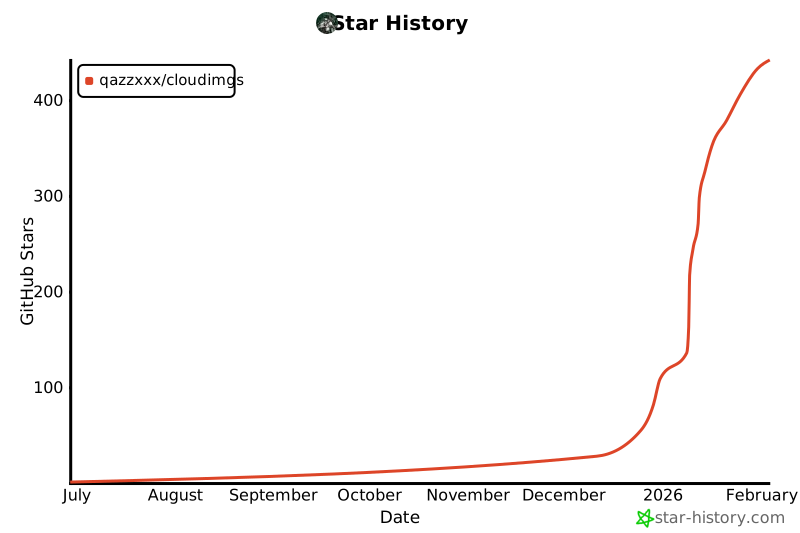](https://www.star-history.com/#qazzxxx/cloudimgs&type=date&legend=top-left)
================================================
FILE: client/.npmrc
================================================
legacy-peer-deps=true
================================================
FILE: client/package.json
================================================
{
"name": "cloudimgs-client",
"version": "1.2.3",
"private": true,
"dependencies": {
"@ant-design/icons": "^5.6.1",
"@testing-library/jest-dom": "^5.17.0",
"@testing-library/react": "^13.4.0",
"@testing-library/user-event": "^13.5.0",
"antd": "^6.0.0",
"axios": "^1.10.0",
"coordtransform": "^2.1.2",
"cropperjs": "^1.6.2",
"dayjs": "^1.11.13",
"echarts": "^6.0.0",
"echarts-for-react": "^3.0.6",
"konva": "^9.3.20",
"leaflet": "^1.9.4",
"leaflet-rotatedmarker": "^0.2.0",
"leaflet.markercluster": "^1.5.3",
"react": "^18.3.1",
"react-cropper": "^2.3.3",
"react-dom": "^18.3.1",
"react-easy-crop": "^5.0.1",
"react-filerobot-image-editor": "^4.9.1",
"react-konva": "^18.2.10",
"react-leaflet": "^4.2.1",
"react-leaflet-cluster": "^4.0.0",
"react-router-dom": "^6.20.1",
"react-scripts": "5.0.1",
"styled-components": "^5.3.11",
"thumbhash": "^0.1.1"
},
"scripts": {
"start": "react-scripts start",
"start:mock": "REACT_APP_MOCK=true react-scripts start",
"build": "CI=false react-scripts build",
"build:mock": "REACT_APP_MOCK=true react-scripts build",
"test": "react-scripts test",
"eject": "react-scripts eject"
},
"eslintConfig": {
"extends": [
"react-app",
"react-app/jest"
]
},
"browserslist": {
"production": [
">0.2%",
"not dead",
"not op_mini all"
],
"development": [
"last 1 chrome version",
"last 1 firefox version",
"last 1 safari version"
]
},
"proxy": "http://localhost:3001"
}
================================================
FILE: client/public/index.html
================================================
<!DOCTYPE html>
<html lang="zh-CN">
<head>
<meta charset="utf-8" />
<link rel="icon" href="%PUBLIC_URL%/favicon.svg" type="image/svg+xml" />
<link rel="icon" href="%PUBLIC_URL%/favicon.ico" sizes="any" />
<link rel="apple-touch-icon" href="%PUBLIC_URL%/icon-192.png" />
<link rel="manifest" href="%PUBLIC_URL%/manifest.json" />
<meta name="viewport" content="width=device-width, initial-scale=1" />
<meta name="theme-color" content="#1890ff" />
<meta
name="description"
content="云图 - 现代图床应用,支持图片上传、管理、预览和API接口"
/>
<meta name="keywords" content="图床,图片上传,图片管理,云存储,API" />
<meta name="author" content="云图 Team" />
<!-- Open Graph / Facebook -->
<meta property="og:type" content="website" />
<meta property="og:url" content="https://github.com/Qazzxxx/cloudimgs" />
<meta property="og:title" content="云图" />
<meta
property="og:description"
content="基于 Node.js + React + Ant Design 的现代化图床应用"
/>
<meta property="og:image" content="%PUBLIC_URL%/icon-512.png" />
<!-- Twitter -->
<meta property="twitter:card" content="summary_large_image" />
<meta
property="twitter:url"
content="https://github.com/Qazzxxx/cloudimgs"
/>
<meta property="twitter:title" content="云图" />
<meta
property="twitter:description"
content="基于 Node.js + React + Ant Design 的现代化图床应用"
/>
<meta property="twitter:image" content="%PUBLIC_URL%/icon-512.png" />
<title>云图 - 云端一隅,拾光深藏</title>
</head>
<body>
<noscript>You need to enable JavaScript to run this app.</noscript>
<div id="root"></div>
</body>
</html>
================================================
FILE: client/public/manifest.json
================================================
{
"short_name": "云图",
"name": "云图",
"description": "基于 Node.js + React + Ant Design 的现代化图床应用,支持图片上传、管理、预览和API接口",
"icons": [
{
"src": "favicon.svg",
"sizes": "any",
"type": "image/svg+xml",
"purpose": "any"
},
{
"src": "icon-192.png",
"type": "image/png",
"sizes": "192x192",
"purpose": "any maskable"
},
{
"src": "icon-512.png",
"type": "image/png",
"sizes": "512x512",
"purpose": "any maskable"
}
],
"start_url": ".",
"display": "standalone",
"theme_color": "#1890ff",
"background_color": "#ffffff",
"orientation": "portrait-primary",
"categories": ["productivity", "utilities"],
"lang": "zh-CN"
}
================================================
FILE: client/public/text.md
================================================
# 拒绝付费与臃肿!我为NAS党手撸了一个极简且强大的云图库——CloudImgs(云图)
大家好,我是 **云舟实验室**。
今天想和大家分享一个我最近开发的开源项目——**云图 (CloudImgs)**。
这是一个极简风格的自建图床/云图库,支持 **Docker 一键部署**,完美适配 **NAS** 环境,并且拥有超灵活的 **API 接口**。
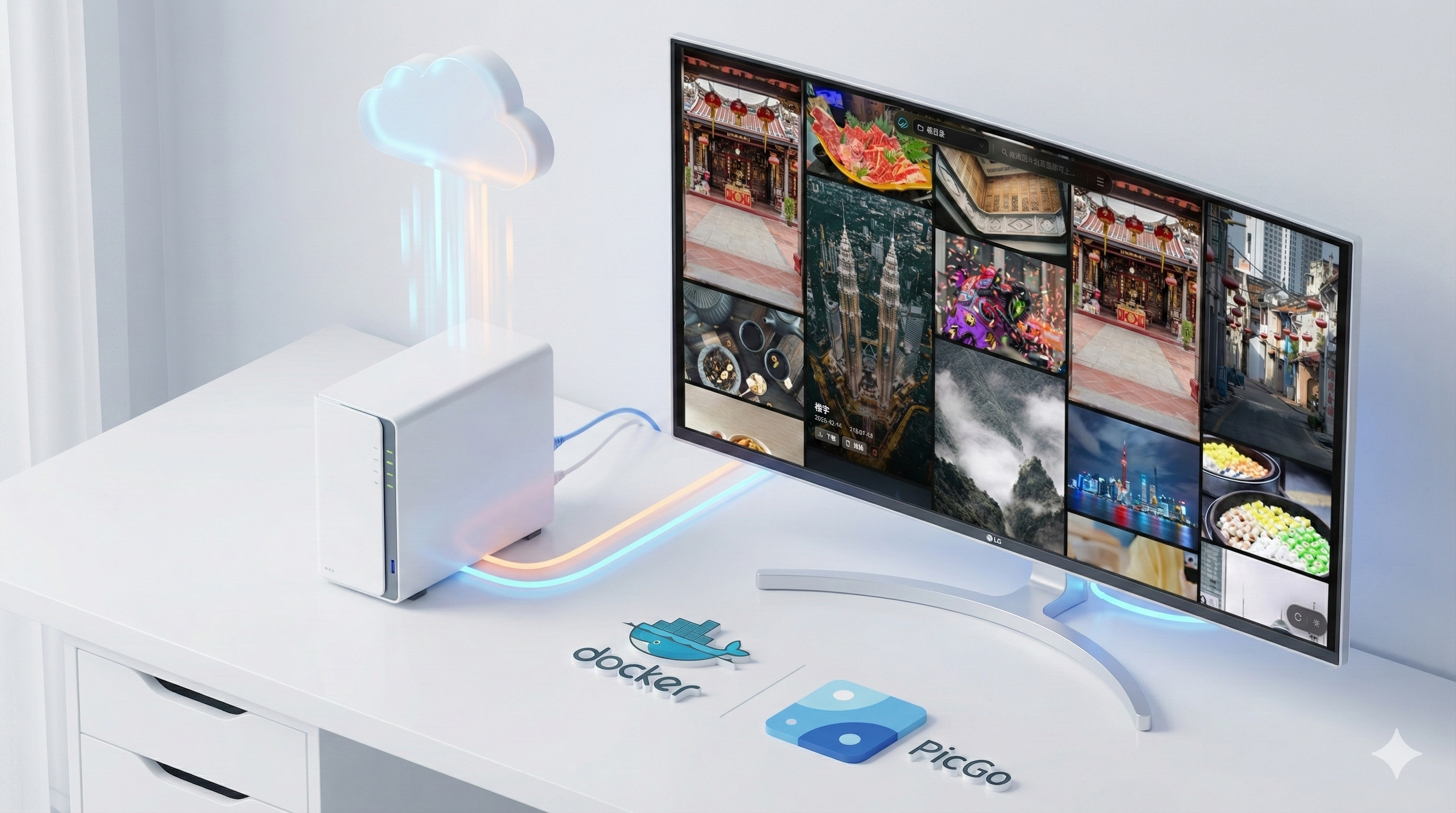
## 🛠️ 为什么要造这个轮子?
说实话,起初我并没有打算写个图床。
事情的起因是我在使用 **N8N** 处理自动化工作流时,遇到了大量的图片处理需求。我尝试寻找现有的开源解决方案,但结果并不理想:
* **太老旧**:很多曾经优秀的开源项目已经几年没更新了,UI 停留在十年前,代码维护也停滞了。
* **要付费**:好用一点的现代图床,往往需要购买 PRO 版本才能解锁高级功能(如图片压缩、格式转换等)。
* **功能过剩或不足**:有的太复杂,有的又太简陋,不支持 API 自动化调用。
既然我自己有 **NAS**,又懂一点代码,为什么不自己写一个呢?于是,**云图 (CloudImgs)** 诞生了。它主打**自由、开放、极简**,专为解决实际问题而来。
---
## 🖥️ 在线体验
先别急着看技术细节,大家可以直接上手体验一下 UI 和交互。
* **演示地址**:[https://yt.qazz.site](https://yt.qazz.site)
* **访问密码**:`123456`
> **⚠️ 注**:演示站为纯静态 Mock 模式,上传/删除仅演示 UI 交互,数据不保存。真实部署后,体验会更好(特别是缩略图加载)。
---
## ✨ 核心亮点:不仅仅是存图片
### 1. 颜值即正义:极简瀑布流 & 丝滑交互
我们抛弃了繁杂的后台界面,采用现代化的瀑布流布局。集成 **ThumbHash** 技术,在图片未完全加载时通过算法生成极小的占位哈希图,实现无感加载,告别“白屏”等待,视觉体验极佳。
### 2. 生产力工具:PicGo 插件无缝集成
对于写博客、Markdown 文档的朋友,图床的便捷性至关重要。云图**原生支持 PicGo**,我已经写好了对应的插件,安装即用。截图 -> 自动上传 -> 粘贴链接,一气呵成。
* [PicGo 插件地址](https://github.com/qazzxxx/picgo-plugin-cloudimgs-uploader)
### 3. 开发者福音:强大的实时处理 API
这是我最自豪的功能之一。云图不仅仅是存储,还是一个**即时的图片处理引擎**。你可以通过 URL 参数实时处理图片:
* **格式转换**:`image.jpg?fmt=webp` (自动转 WebP,节省带宽)
* **尺寸调整**:`image.jpg?w=500&h=300` (强制缩放)
* **质量压缩**:`image.jpg?q=80` (80% 质量压缩)
这就意味着,你上传一张 4K 原图,在不同设备上可以通过参数调用不同尺寸的缩略图,极大减轻前端压力。
### 4. 全能管理与安全
* **多级目录**:支持文件夹管理,井井有条。
* **隐私保护**:支持设置访问密钥,保护你的私有图片。
* **全格式支持**:不仅仅是 JPG/PNG,SVG 甚至其他文件格式也能传。
* **SVG 转 PNG**:专为设计师和前端优化的功能。
* **批量操作**:支持圈选批量删除,效率拉满。
---
## 📸 更多界面预览
**登录页面**:简洁大方,支持密码保护。
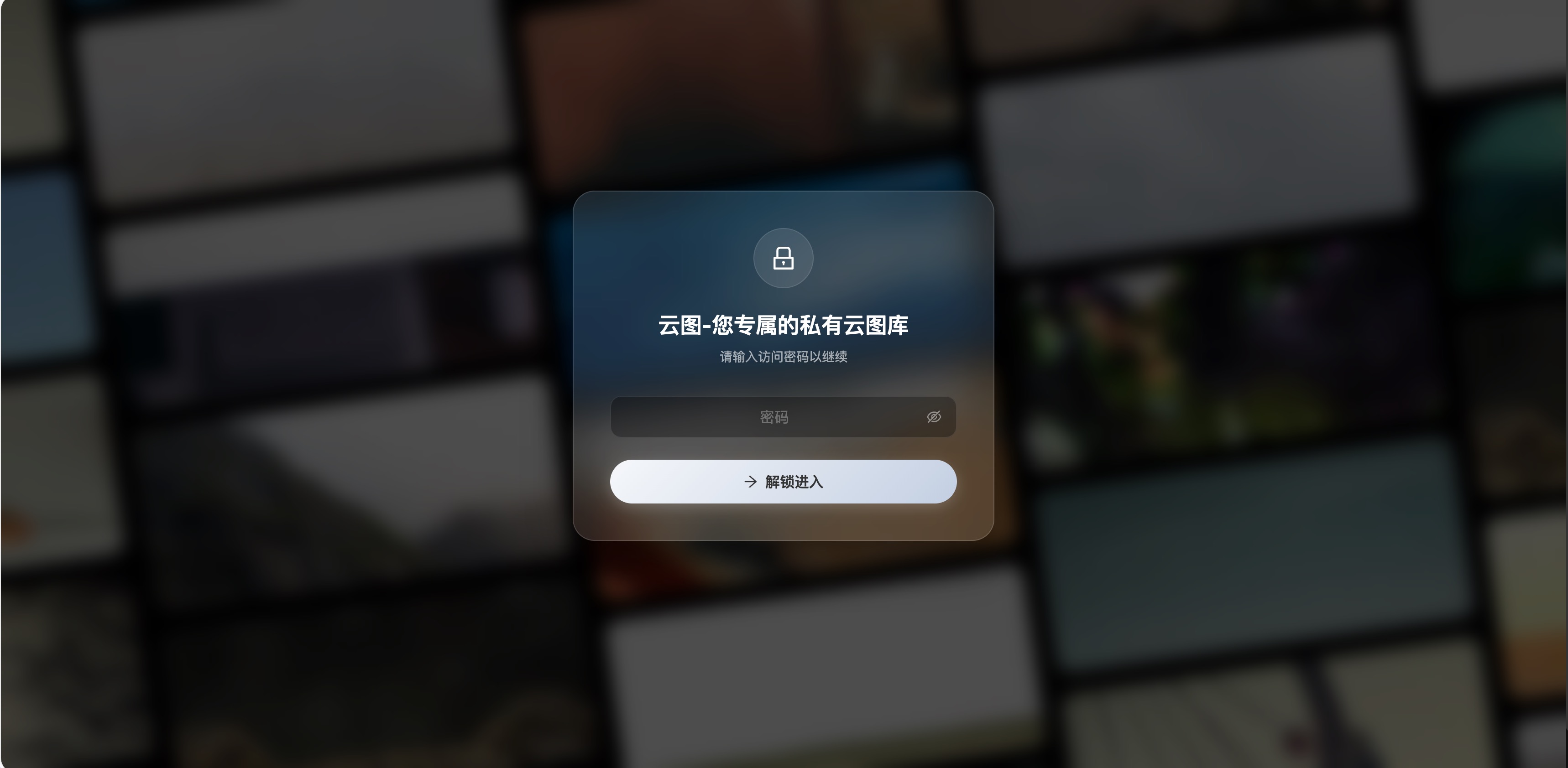
**瀑布流管理图片**:支持瀑布流展示管理图片。
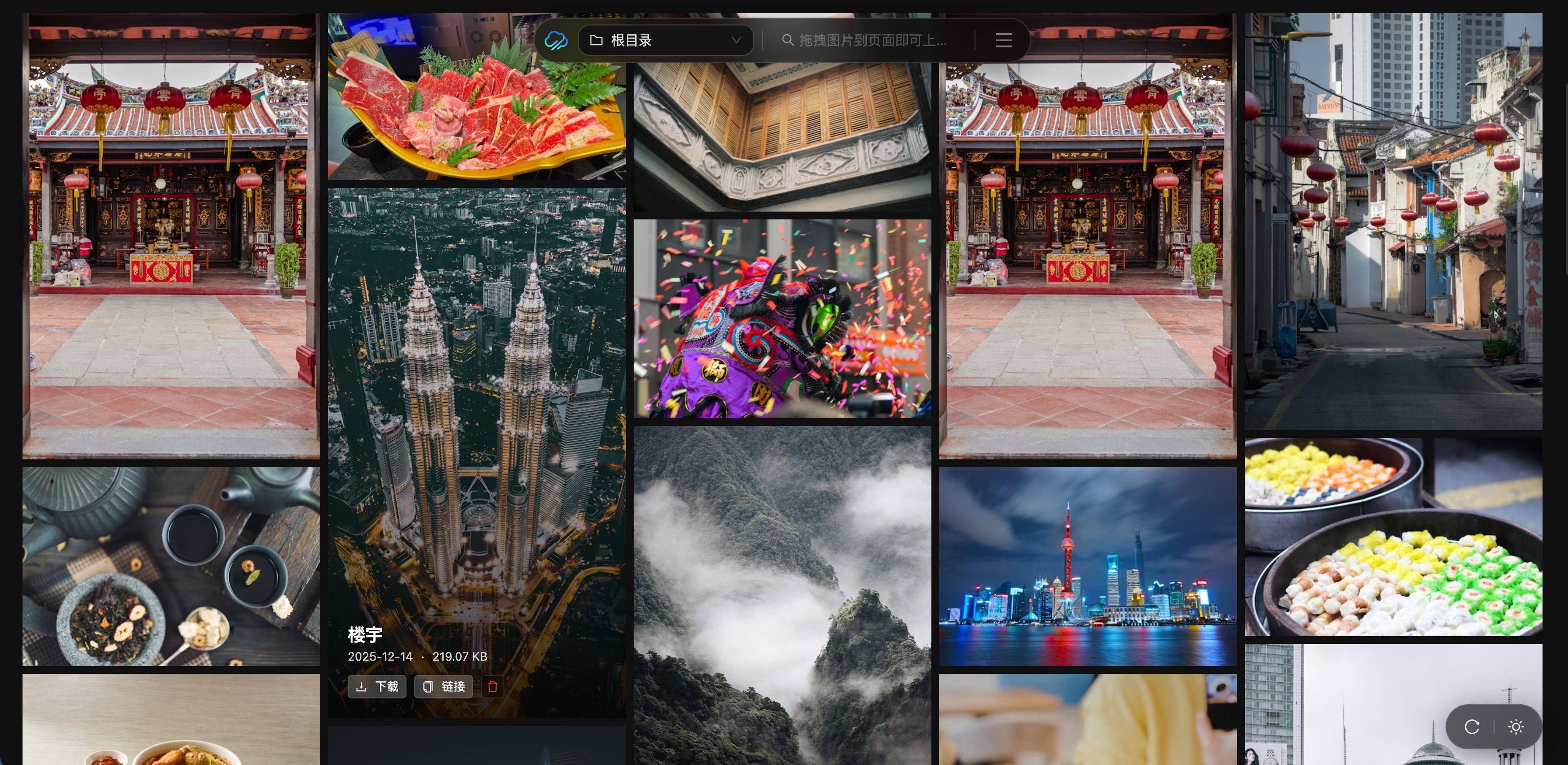
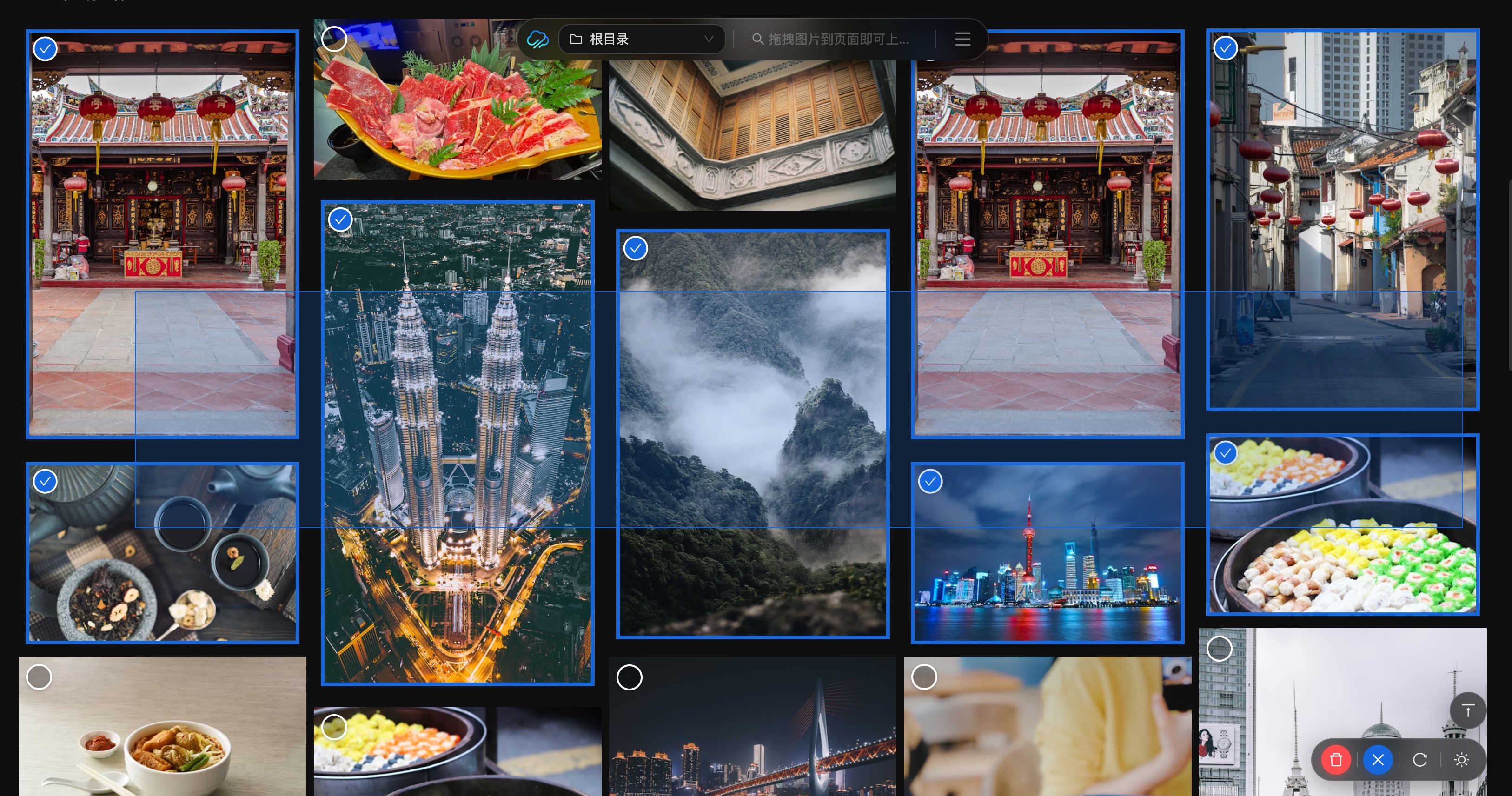
**批量操作**:支持圈选多图一键操作。
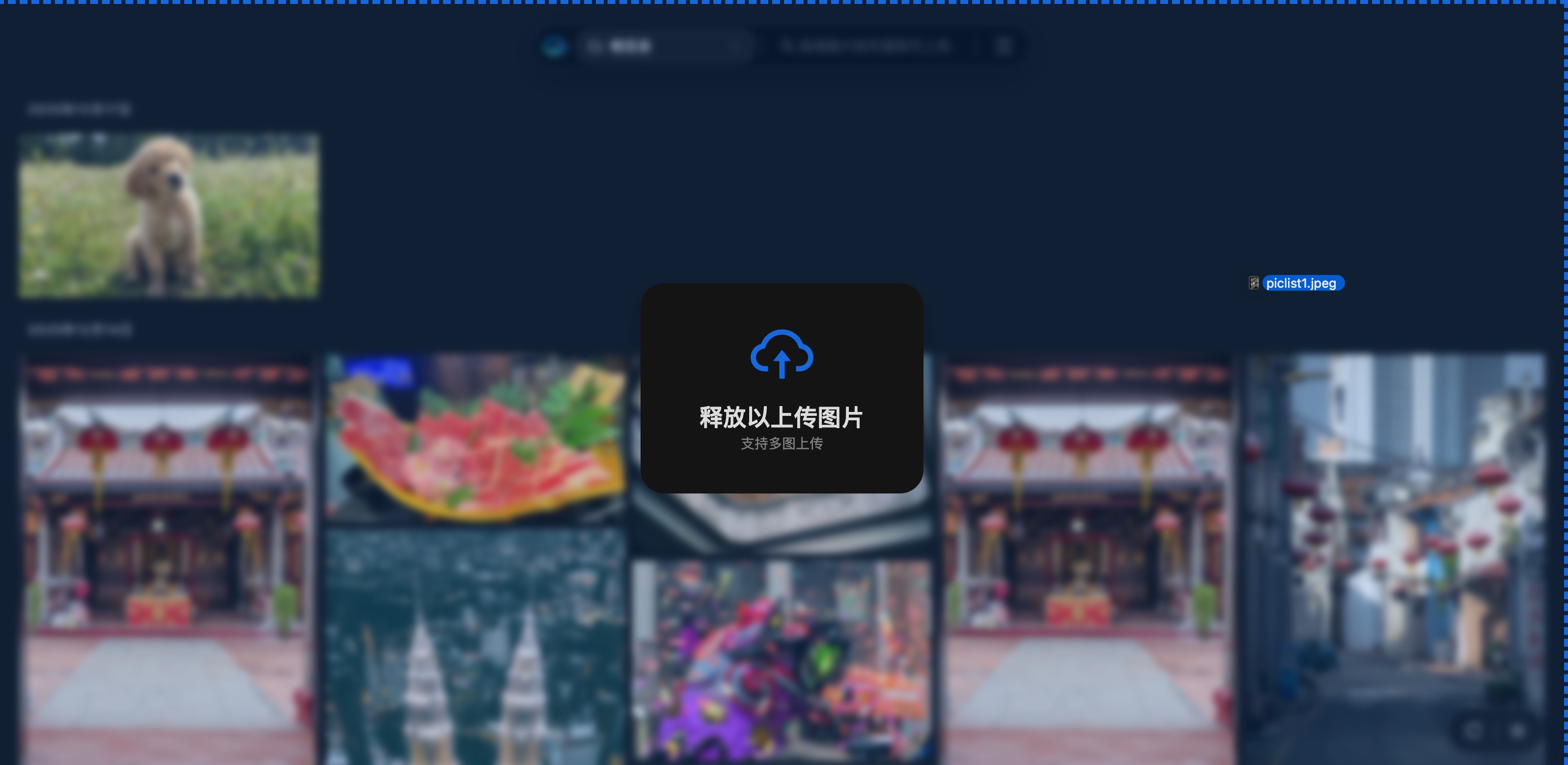
**整页上传**:支持多图拖拽一键上传。
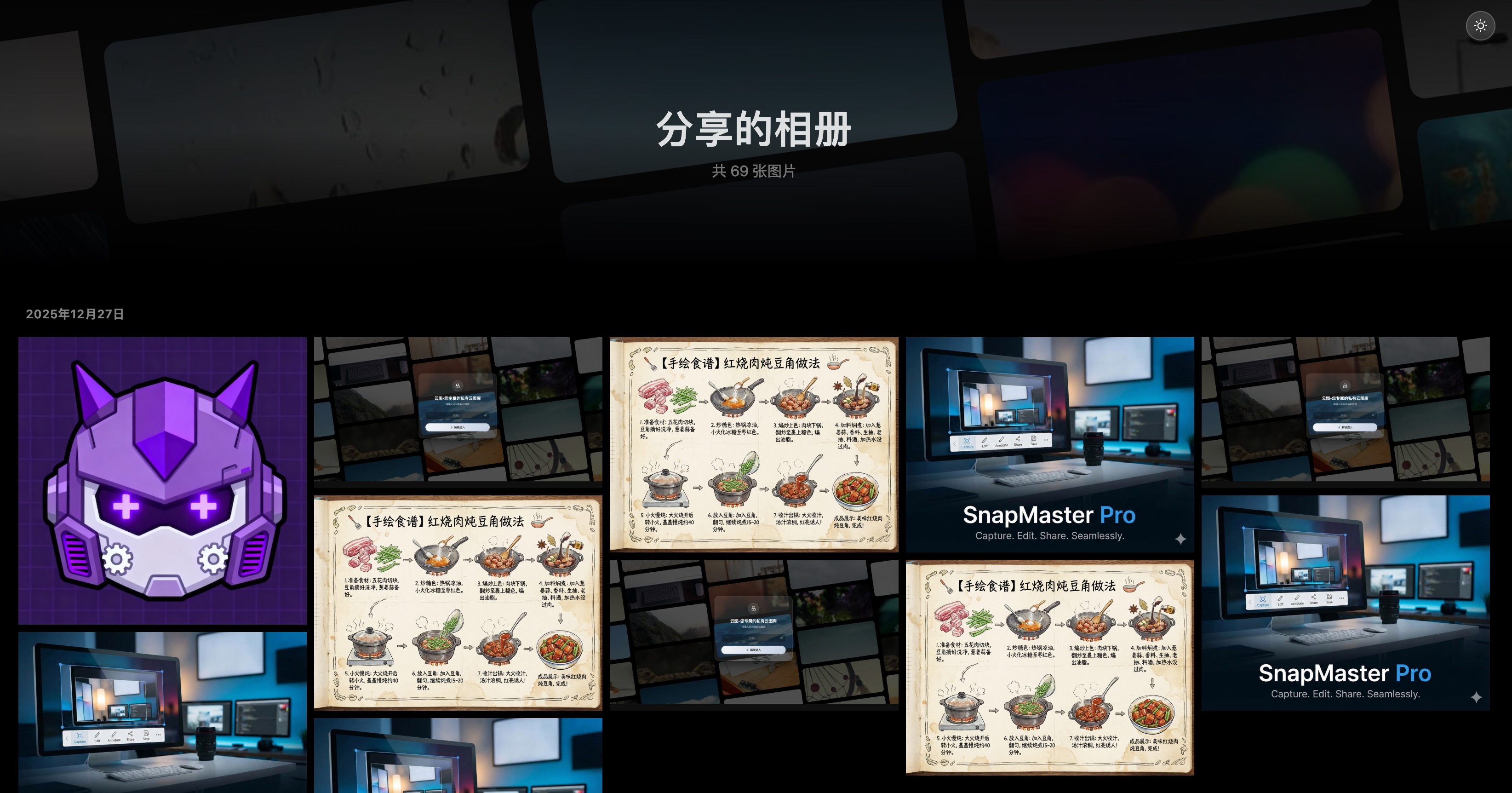
**相册分享**:一键生成分享链接,发给朋友。
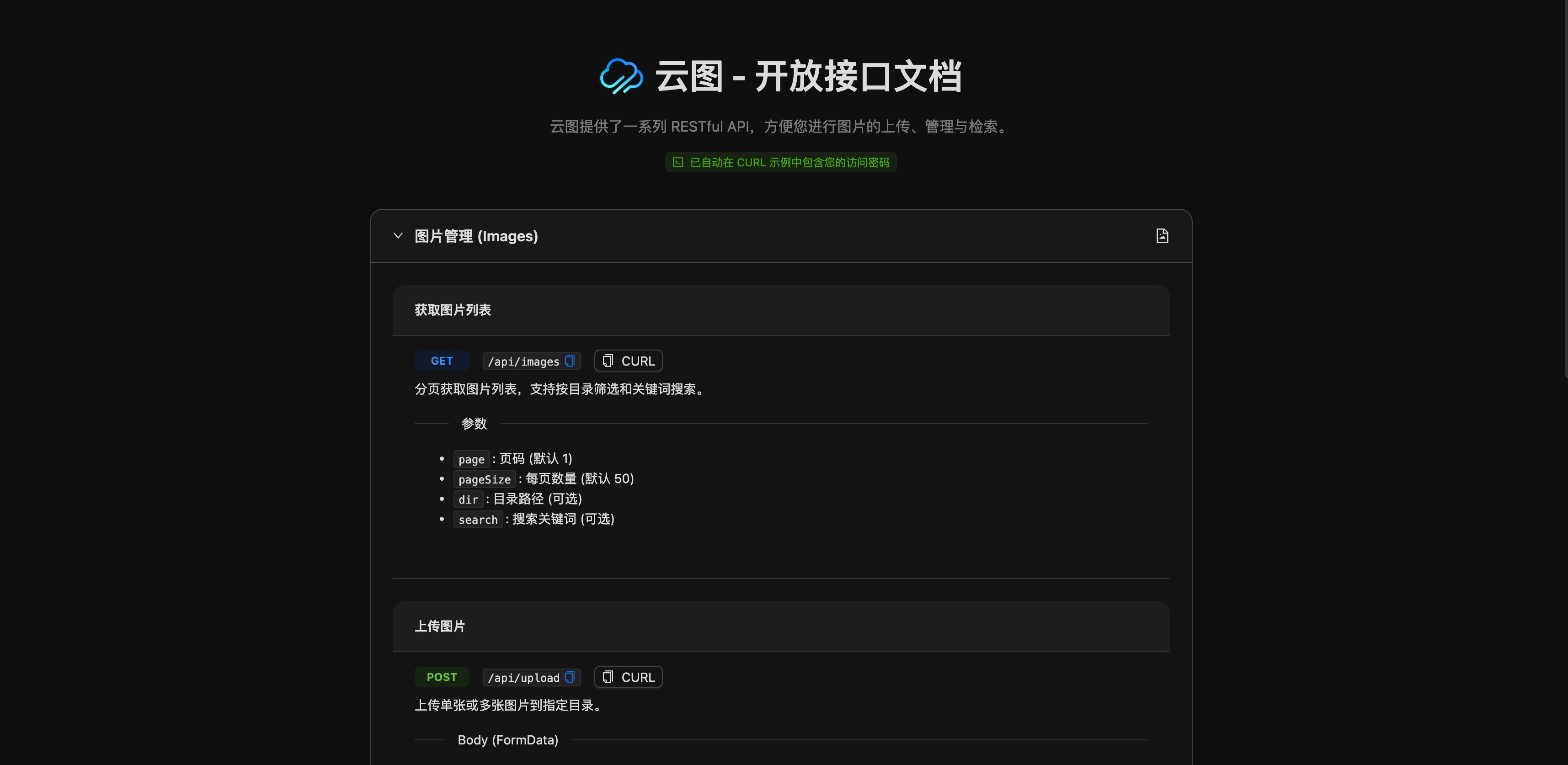
**开放API**:灵活调用开放API。
---
## 🚀 极速部署 (NAS/Docker)
作为 NAS 党,我深知部署难度的痛点。云图完全 Docker 化,只需要一个 `docker-compose.yml` 即可跑起来。
### 1. 创建 docker-compose.yml
```yaml
services:
cloudimgs:
image: qazzxxx/cloudimgs:latest
ports:
- "3001:3001"
volumes:
- ./uploads:/app/uploads:rw # 图片数据存储位置
restart: unless-stopped
container_name: cloudimgs-app
environment:
- PUID=1000 # 替换为你 NAS 用户的 UID (终端输入 id -u 查看)
- PGID=1000 # 替换为你 NAS 用户组的 GID (终端输入 id -g 查看)
- UMASK=002
- NODE_ENV=production
- PORT=3001
- STORAGE_PATH=/app/uploads
# 👇 如果需要密码访问,请取消下面这行的注释并修改密码
# - PASSWORD=your_secure_password_here
```
### 2. 启动服务
```bash
docker-compose up -d
```
启动后,访问 `http://ip:3001` 即可开始使用!
### 关于密码保护
如果你是在公网环境或者不想让别人随意查看,强烈建议在环境变量中配置 `PASSWORD`。配置后,访问系统需要输入密码,且状态会保存在本地浏览器中,既安全又不用频繁登录。
---
## 🔗 项目地址
开源不易,如果你觉得「云图」还不错,或者帮到了你的忙,希望能去 GitHub 点个 **Star ⭐️** 支持一下!这也是我持续维护的动力。
* **GitHub 项目地址**: [https://github.com/qazzxxx/cloudimgs](https://github.com/qazzxxx/cloudimgs)
* **PicGo 插件**: [https://github.com/qazzxxx/picgo-plugin-cloudimgs-uploader](https://github.com/qazzxxx/picgo-plugin-cloudimgs-uploader)
如果你在使用过程中遇到任何问题,欢迎在 GitHub 提 Issue 或在评论区留言,我会尽快回复大家!
---
**云舟实验室**
*专注分享好用的开源项目与技术折腾心得*
================================================
FILE: client/src/App.js
================================================
import React, { useState, useEffect } from "react";
import { ConfigProvider, theme, message, Spin, Grid, Modal } from "antd";
import FloatingToolbar from "./components/FloatingToolbar";
import ImageGallery from "./components/ImageGallery";
import PasswordOverlay from "./components/PasswordOverlay";
import LogoWithText from "./components/LogoWithText";
import api from "./utils/api";
import ApiDocs from "./components/ApiDocs";
import MapPage from "./components/MapPage";
import ShareView from "./components/ShareView";
import DirectorySelector from "./components/DirectorySelector";
import TrafficDashboard from './components/TrafficDashboard';
import { getPassword, clearPassword } from "./utils/secureStorage";
function App() {
const [currentTheme, setCurrentTheme] = useState("light");
const [isAuthenticated, setIsAuthenticated] = useState(false);
const [passwordRequired, setPasswordRequired] = useState(false);
const [authLoading, setAuthLoading] = useState(true);
const [refreshTrigger, setRefreshTrigger] = useState(0);
// Batch Mode State
const [isBatchMode, setIsBatchMode] = useState(false);
const [selectedItems, setSelectedItems] = useState(new Set());
// Batch Move State
const [moveModalVisible, setMoveModalVisible] = useState(false);
const [targetMoveDir, setTargetMoveDir] = useState("");
const [moving, setMoving] = useState(false);
// Simple router check
const isApiDocs = window.location.pathname === "/opendocs";
const isMapPage = window.location.pathname === "/map";
const isTrafficDashboard = window.location.pathname === "/traffic";
const isShareView = window.location.pathname.startsWith("/share");
const { useBreakpoint } = Grid;
const screens = useBreakpoint();
const isMobile = !screens.md;
useEffect(() => {
const savedTheme = localStorage.getItem("theme");
if (savedTheme) {
setCurrentTheme(savedTheme);
}
}, []);
const handleThemeChange = (theme) => {
setCurrentTheme(theme);
localStorage.setItem("theme", theme);
};
useEffect(() => {
const checkAuthStatus = async () => {
try {
setAuthLoading(true);
const response = await api.get("/auth/status");
const data = response.data;
if (data.data?.enabled || data.requiresPassword) {
setPasswordRequired(true);
const savedPassword = getPassword();
if (savedPassword) {
try {
await api.post("/auth/login", { password: savedPassword });
setIsAuthenticated(true);
} catch (e) {
clearPassword();
}
}
} else {
setIsAuthenticated(true);
}
} catch (error) {
console.error("Auth check failed:", error);
} finally {
setAuthLoading(false);
}
};
checkAuthStatus();
}, []);
const handleLoginSuccess = () => {
setIsAuthenticated(true);
message.success("欢迎回来");
};
const handleRefresh = () => {
setRefreshTrigger(prev => prev + 1);
};
const toggleBatchMode = () => {
setIsBatchMode(prev => !prev);
setSelectedItems(new Set());
};
const handleSelectionChange = (newSelection) => {
setSelectedItems(newSelection);
};
const handleBatchDelete = async () => {
if (selectedItems.size === 0) return;
try {
const hide = message.loading("正在删除...", 0);
// Execute deletions in parallel
const promises = Array.from(selectedItems).map(relPath =>
api.delete(`/images/${encodeURIComponent(relPath)}`)
);
await Promise.all(promises);
hide();
message.success(`成功删除 ${selectedItems.size} 张图片`);
// Reset state
setSelectedItems(new Set());
setIsBatchMode(false);
handleRefresh();
} catch (error) {
console.error("Batch delete error:", error);
message.error("部分图片删除失败,请重试");
handleRefresh(); // Refresh anyway to show what's left
}
};
const handleBatchMove = () => {
if (selectedItems.size === 0) return;
setTargetMoveDir(""); // Reset
setMoveModalVisible(true);
};
const confirmBatchMove = async () => {
if (selectedItems.size === 0) return;
setMoving(true);
try {
const res = await api.post("/batch/move", {
files: Array.from(selectedItems),
targetDir: targetMoveDir
});
if (res.data.success) {
message.success(res.data.message || "移动成功");
setMoveModalVisible(false);
setSelectedItems(new Set());
setIsBatchMode(false);
handleRefresh();
} else {
message.error(res.data.error || "移动失败");
}
} catch (e) {
message.error("移动失败,请重试");
} finally {
setMoving(false);
}
};
// Global styles for glassmorphism and background
const globalStyles = `
body {
margin: 0;
padding: 0;
background: ${currentTheme === 'dark' ? '#0f0f0f' : '#f5f7fa'};
transition: background 0.3s ease;
font-family: -apple-system, BlinkMacSystemFont, 'Segoe UI', Roboto, 'Helvetica Neue', Arial, sans-serif;
}
/* Custom Scrollbar */
::-webkit-scrollbar {
width: 8px;
height: 8px;
}
::-webkit-scrollbar-track {
background: transparent;
}
::-webkit-scrollbar-thumb {
background: ${currentTheme === 'dark' ? '#333' : '#ccc'};
border-radius: 4px;
}
::-webkit-scrollbar-thumb:hover {
background: ${currentTheme === 'dark' ? '#555' : '#999'};
}
/* Prevent dropdown scroll from affecting main page */
.directory-selector-dropdown .rc-virtual-list-holder {
overflow-y: auto !important;
overscroll-behavior: contain;
}
/* Force fix for Filerobot Image Editor Input Background */
.SfxInput-root {
background-color: ${currentTheme === 'dark' ? '#141414' : '#ffffff'} !important;
}
`;
return (
<ConfigProvider
theme={{
algorithm: currentTheme === "dark" ? theme.darkAlgorithm : theme.defaultAlgorithm,
token: {
colorPrimary: "#1677ff",
borderRadius: 12,
},
}}
>
<style>{globalStyles}</style>
{/* Main Content */}
<div style={{ position: "relative", minHeight: "100vh" }}>
{isApiDocs ? (
<ApiDocs />
) : isMapPage ? (
<MapPage />
) : isTrafficDashboard ? (
<TrafficDashboard />
) : isShareView ? (
<ShareView currentTheme={currentTheme} onThemeChange={handleThemeChange} />
) : authLoading ? (
<div style={{
display: "flex",
justifyContent: "center",
alignItems: "center",
height: "100vh",
flexDirection: "column",
gap: 20
}}>
<LogoWithText />
<Spin size="large" />
</div>
) : (
<>
{/* Waterfall Gallery */}
{/* Only render gallery if authenticated or if no password required,
OR render it but it might be empty if API blocks it.
We'll render it but PasswordOverlay will cover it. */}
<ImageGallery
api={api}
onRefresh={handleRefresh}
refreshTrigger={refreshTrigger}
isAuthenticated={!passwordRequired || isAuthenticated}
isBatchMode={isBatchMode}
selectedItems={selectedItems}
onSelectionChange={handleSelectionChange}
/>
{/* Password Overlay */}
{passwordRequired && !isAuthenticated && (
<PasswordOverlay
onLoginSuccess={handleLoginSuccess}
isMobile={isMobile}
/>
)}
{/* Floating Toolbar - Only show when authenticated */}
{(!passwordRequired || isAuthenticated) && (
<FloatingToolbar
onThemeChange={handleThemeChange}
currentTheme={currentTheme}
onRefresh={handleRefresh}
api={api}
isMobile={isMobile}
isBatchMode={isBatchMode}
toggleBatchMode={toggleBatchMode}
selectedCount={selectedItems.size}
onBatchDelete={handleBatchDelete}
onBatchMove={handleBatchMove}
/>
)}
{/* Batch Move Modal */}
<Modal
open={moveModalVisible}
title="移动到..."
onCancel={() => setMoveModalVisible(false)}
onOk={confirmBatchMove}
confirmLoading={moving}
okText="确认移动"
cancelText="取消"
destroyOnClose
>
<div style={{ padding: "20px 0" }}>
<p style={{ marginBottom: 12 }}>将选中的 {selectedItems.size} 张图片移动到:</p>
<DirectorySelector
value={targetMoveDir}
onChange={setTargetMoveDir}
api={api}
allowInput={true}
placeholder="选择或输入目标相册"
/>
</div>
</Modal>
</>
)}
</div>
</ConfigProvider>
);
}
export default App;
================================================
FILE: client/src/components/AlbumManager.js
================================================
import React, { useState, useEffect } from "react";
import {
Modal,
Typography,
Dropdown,
Button,
Space,
Input,
message,
Select,
Switch,
Empty,
Spin,
theme,
} from "antd";
import {
MoreOutlined,
DeleteOutlined,
EditOutlined,
ShareAltOutlined,
FolderOpenOutlined,
CopyOutlined,
FireOutlined,
StopOutlined,
PlusOutlined,
LockOutlined,
UnlockOutlined
} from "@ant-design/icons";
import dayjs from "dayjs";
const { Text } = Typography;
const { Option } = Select;
const CountdownTimer = ({ expireSeconds, createdAt }) => {
const [timeLeft, setTimeLeft] = useState("");
useEffect(() => {
if (!expireSeconds) return;
const calculateTimeLeft = () => {
const expireTime = dayjs(createdAt).add(expireSeconds, 'second');
const now = dayjs();
const diff = expireTime.diff(now, 'second');
if (diff <= 0) {
return "已过期";
}
const days = Math.floor(diff / (3600 * 24));
const hours = Math.floor((diff % (3600 * 24)) / 3600);
const minutes = Math.floor((diff % 3600) / 60);
let str = "";
if (days > 0) str += `${days}天 `;
if (hours > 0) str += `${hours}小时 `;
if (minutes > 0 || (days === 0 && hours === 0)) str += `${minutes}分`;
return str;
};
setTimeLeft(calculateTimeLeft());
const timer = setInterval(() => {
const str = calculateTimeLeft();
setTimeLeft(str);
if (str === "已过期") clearInterval(timer);
}, 60000); // Update every minute
return () => clearInterval(timer);
}, [expireSeconds, createdAt]);
if (!expireSeconds) return "永久有效";
return `剩余: ${timeLeft}`;
};
const AlbumManager = ({ visible, onClose, api, onSelectAlbum }) => {
const [albums, setAlbums] = useState([]);
const [loading, setLoading] = useState(true);
const [shareModalVisible, setShareModalVisible] = useState(false);
const [currentAlbum, setCurrentAlbum] = useState(null);
// ... (rest of state)
const [shareExpiry, setShareExpiry] = useState(3600 * 24); // 1 day
const [shareBurn, setShareBurn] = useState(false);
const [shareLink, setShareLink] = useState("");
const [generatingLink, setGeneratingLink] = useState(false);
const [shareList, setShareList] = useState([]);
const [loadingShares, setLoadingShares] = useState(false);
// Rename State
const [renameModalVisible, setRenameModalVisible] = useState(false);
const [renameValue, setRenameValue] = useState("");
// Create State
const [createModalVisible, setCreateModalVisible] = useState(false);
const [createValue, setCreateValue] = useState("");
// Password State
const [passwordModalVisible, setPasswordModalVisible] = useState(false);
const [passwordValue, setPasswordValue] = useState("");
const [isRemovingPassword, setIsRemovingPassword] = useState(false);
const { token } = theme.useToken();
const fetchAlbums = React.useCallback(async (abortSignal) => {
setLoading(true);
try {
const [dirRes, imgRes] = await Promise.all([
api.get("/directories", { signal: abortSignal }),
api.get("/images?pageSize=3", { signal: abortSignal }) // Fetch latest 3 images globally
]);
if (dirRes.data.success) {
const allAlbums = dirRes.data.data || [];
// Use the actual global latest images for the "All Images" cover
// Fallback to empty if image fetch failed (though Promise.all would fail commonly, but we can handle it)
const globalPreviews = imgRes.data?.success
? imgRes.data.data.map(img => img.url)
: [];
const allImagesAlbum = {
name: "全部图片",
path: "",
previews: globalPreviews,
mtime: new Date().toISOString(),
isSystem: true
};
// Order: [All Images, ...Real Albums]
// The "New Album" is rendered separately in the grid as the first item visually if we want,
// or we just prepend it here?
// In the render method: {albums.map...} matches `albums`.
// The render method ALSO renders a static "New Album" div BEFORE mapping albums.
// So `albums` should start with "All Images".
setAlbums([allImagesAlbum, ...allAlbums]);
}
} catch (e) {
// Ignore aborted requests
if (e.name === 'AbortError' || e.name === 'CanceledError') {
return;
}
console.error(e);
message.error("获取相册列表失败");
} finally {
setLoading(false);
}
}, [api]);
useEffect(() => {
if (visible && api) {
const abortController = new AbortController();
fetchAlbums(abortController.signal);
return () => {
abortController.abort();
};
}
}, [visible, api, fetchAlbums]);
const fetchShareList = async (path) => {
setLoadingShares(true);
try {
const url = `/share/list?path=${encodeURIComponent(path)}`;
const res = await api.get(url);
if (res.data.success) {
// Sort: Active first, then by createdAt desc
const list = res.data.data || [];
list.sort((a, b) => {
const aActive = a.status === 'active';
const bActive = b.status === 'active';
if (aActive && !bActive) return -1;
if (!aActive && bActive) return 1;
return b.createdAt - a.createdAt;
});
setShareList(list);
}
} catch (e) {
message.error("获取分享列表失败");
} finally {
setLoadingShares(false);
}
};
const handleShare = async () => {
if (!currentAlbum) return;
setGeneratingLink(true);
try {
const res = await api.post("/share/generate", {
path: currentAlbum.path,
expireSeconds: shareExpiry,
burnAfterReading: shareBurn,
});
if (res.data.success) {
const url = `${window.location.origin}/share?token=${encodeURIComponent(res.data.token)}`;
setShareLink(url);
// Refresh list
await fetchShareList(currentAlbum.path);
}
} catch (e) {
message.error("生成分享链接失败");
} finally {
setGeneratingLink(false);
}
};
const handleRevoke = async (signature) => {
try {
const res = await api.post("/share/revoke", {
path: currentAlbum.path,
signature
});
if (res.data.success) {
message.success("链接已作废");
fetchShareList(currentAlbum.path);
}
} catch (e) {
message.error("作废失败");
}
};
const handleDeleteShare = async (signature) => {
try {
const res = await api.delete("/share/delete", {
data: {
path: currentAlbum.path,
signature
}
});
if (res.data.success) {
message.success("删除成功");
fetchShareList(currentAlbum.path);
}
} catch (e) {
message.error("删除失败");
}
};
const handleCreate = async () => {
if (!createValue.trim()) return;
try {
// Use API to create directory
// Backend needs to support mkdir.
// Currently we don't have explicit mkdir API, but upload supports creating dir.
// Let's add a mkdir API or use a hack?
// Wait, server code `fs.ensureDirSync(dest)` in upload logic creates it.
// But we need a dedicated API.
// Let's check server/index.js if there is one.
// There isn't. I'll add one.
const res = await api.post("/directories", {
name: createValue.trim()
});
if (res.data.success) {
message.success("相册创建成功");
setCreateModalVisible(false);
setCreateValue("");
fetchAlbums();
}
} catch (e) {
message.error(e.response?.data?.error || "创建失败");
}
};
const handleRename = async () => {
if (!currentAlbum || !renameValue.trim()) return;
try {
// Assuming PUT /api/images works for renaming directories if supported by backend,
// actually backend usually supports renaming files.
// Checking server code: `PUT /api/images/*` supports `fs.rename`.
// It works for directories too if `oldFilePath` points to a directory.
// `safeJoin` works for dirs. `fs.pathExists` works. `fs.rename` works.
// So yes, we can rename directories!
const res = await api.put(`/images/${encodeURIComponent(currentAlbum.path)}`, {
newName: renameValue.trim(),
newDir: currentAlbum.path.split("/").slice(0, -1).join("/") // Keep parent dir
});
if (res.data.success) {
message.success("重命名成功");
setRenameModalVisible(false);
fetchAlbums();
}
} catch (e) {
message.error("重命名失败");
}
};
const handleSavePassword = async () => {
if (!currentAlbum) return;
try {
const res = await api.post("/album/password", {
dir: currentAlbum.path,
password: passwordValue
});
if (res.data.success) {
message.success(passwordValue ? "密码设置成功" : "密码已移除");
setPasswordModalVisible(false);
setPasswordValue("");
fetchAlbums(); // Refresh to update lock status
}
} catch (e) {
message.error("操作失败");
}
};
const handleDelete = async (album) => {
Modal.confirm({
title: "删除相册",
content: `确定要删除相册 "${album.name}" 及其所有内容吗?此操作不可恢复。`,
okText: "删除",
okType: "danger",
cancelText: "取消",
onOk: async () => {
try {
// DELETE /api/images/* works for directories too (fs.remove)
await api.delete(`/images/${encodeURIComponent(album.path)}`);
message.success("相册已删除");
fetchAlbums();
} catch (e) {
message.error("删除失败");
}
}
});
};
const copyToClipboard = (text) => {
navigator.clipboard.writeText(text).then(() => {
message.success("已复制到剪贴板");
});
};
return (
<Modal
open={visible}
onCancel={onClose}
afterClose={() => {
setAlbums([]);
setLoading(true);
}}
destroyOnClose
transitionName=""
maskTransitionName=""
title={<div style={{ fontSize: 20, fontWeight: 600 }}>相册管理</div>}
width={1000}
footer={null}
styles={{ body: { padding: 0, minHeight: 400, background: token.colorBgLayout } }}
>
<div
style={{ padding: "20px 32px", maxHeight: "60vh", overflowY: "auto", overflowX: "hidden" }}
>
{loading ? (
<div style={{ textAlign: "center", padding: 50 }}>
<Spin size="large" />
</div>
) : albums.length === 0 ? (
<Empty description="暂无相册" />
) : (
<div
style={{
display: "grid",
gridTemplateColumns: "repeat(auto-fill, minmax(240px, 1fr))",
gap: 24,
}}
>
{/* Create New Album Card */}
<div
style={{
borderRadius: 12,
border: `2px dashed ${token.colorBorder}`,
display: "flex",
flexDirection: "column",
alignItems: "center",
justifyContent: "center",
cursor: "pointer",
background: token.colorFillAlter,
transition: "all 0.3s",
margin: 24,
height: 200
}}
onClick={() => setCreateModalVisible(true)}
onMouseEnter={e => {
e.currentTarget.style.borderColor = token.colorPrimary;
e.currentTarget.style.color = token.colorPrimary;
}}
onMouseLeave={e => {
e.currentTarget.style.borderColor = token.colorBorder;
e.currentTarget.style.color = token.colorText;
}}
>
<PlusOutlined style={{ fontSize: 32, marginBottom: 12 }} />
<div style={{ fontSize: 16, fontWeight: 500 }}>新建相册</div>
</div>
{albums.map((album) => (
<AlbumCard
key={album.path}
album={album}
token={token}
isSystem={album.isSystem}
onOpen={() => {
onSelectAlbum(album.path);
onClose();
}}
onShare={() => {
setCurrentAlbum(album);
setShareLink("");
setShareModalVisible(true);
fetchShareList(album.path);
}}
onRename={() => {
setCurrentAlbum(album);
setRenameValue(album.name);
setRenameModalVisible(true);
}}
onSetPassword={() => {
setCurrentAlbum(album);
setPasswordValue("");
setIsRemovingPassword(!!album.locked);
setPasswordModalVisible(true);
}}
onDelete={() => handleDelete(album)}
/>
))}
</div>
)}
</div>
{/* Password Modal */}
<Modal
open={passwordModalVisible}
onOk={handleSavePassword}
onCancel={() => setPasswordModalVisible(false)}
title={isRemovingPassword ? "修改/移除密码" : "设置相册密码"}
okText="保存"
cancelText="取消"
>
<div style={{ marginBottom: 16 }}>
{isRemovingPassword ? "此相册已设置密码。输入新密码以修改,或留空以移除密码。" : "设置密码后,访问该相册将需要输入密码。"}
</div>
<Input.Password
value={passwordValue}
onChange={e => setPasswordValue(e.target.value)}
placeholder={isRemovingPassword ? "留空移除密码" : "输入密码"}
autoFocus
/>
</Modal>
{/* Share Modal */}
<Modal
open={shareModalVisible}
onCancel={() => setShareModalVisible(false)}
title={<div style={{ fontSize: 18, fontWeight: 600 }}>分享相册 - {currentAlbum?.name}</div>}
footer={null}
width={600}
centered
>
<div style={{ maxHeight: "60vh", overflowY: "auto", paddingRight: 4 }}>
<Space direction="vertical" style={{ width: "100%", marginTop: 12 }} size="middle">
<div>
<div style={{ fontSize: 14, fontWeight: 600, marginBottom: 12 }}>生成新链接</div>
<div style={{ background: token.colorFillAlter, padding: 16, borderRadius: 8 }}>
<div style={{ marginBottom: 16 }}>
<Text type="secondary" style={{ fontSize: 12 }}>有效期</Text>
<Select
style={{ width: "100%", marginTop: 4 }}
value={shareExpiry}
onChange={setShareExpiry}
>
<Option value={3600}>1 小时</Option>
<Option value={3600 * 24}>1 天</Option>
<Option value={3600 * 24 * 7}>7 天</Option>
<Option value={3600 * 24 * 30}>30 天</Option>
<Option value={0}>永久有效</Option>
</Select>
</div>
<div style={{ display: "flex", justifyContent: "space-between", alignItems: "center", marginBottom: 16 }}>
<Space>
<FireOutlined style={{ color: "#ff4d4f" }} />
<span style={{ fontSize: 14 }}>阅后即焚 (一次性访问)</span>
</Space>
<Switch checked={shareBurn} onChange={setShareBurn} />
</div>
<Button type="primary" block onClick={handleShare} loading={generatingLink} icon={<ShareAltOutlined />}>
生成并复制链接
</Button>
</div>
</div>
{/* Show newly generated link specifically if needed, but list updates automatically */}
{shareLink && (
<div style={{ marginTop: 8, padding: 8, background: "#f6ffed", border: "1px solid #b7eb8f", borderRadius: 4, textAlign: "center", color: "#52c41a" }}>
<CheckCircleIcon /> 新链接已生成并添加到列表
</div>
)}
{/* Active Shares List */}
<div style={{ borderTop: `1px solid ${token.colorBorderSecondary}`, paddingTop: 16, marginTop: 8 }}>
<div style={{ fontSize: 14, fontWeight: 600, marginBottom: 8 }}>分享列表</div>
{loadingShares ? (
<div style={{ textAlign: "center", padding: 20 }}><Spin /></div>
) : shareList.length === 0 ? (
<div style={{ padding: "20px 0", textAlign: "center", color: token.colorTextSecondary, background: token.colorFillAlter, borderRadius: 8 }}>
暂无分享记录
</div>
) : (
<div style={{ display: "flex", flexDirection: "column", gap: 8 }}>
{shareList.map((share, idx) => (
<div key={idx} style={{
border: `1px solid ${token.colorBorderSecondary}`,
borderRadius: 8,
padding: 12,
display: "flex",
justifyContent: "space-between",
alignItems: "center",
background: token.colorBgContainer
}}>
<div style={{ flex: 1, minWidth: 0, marginRight: 16 }}>
<div style={{ display: "flex", alignItems: "center", gap: 8, marginBottom: 4 }}>
{share.status === "revoked" ? (
<div style={{ color: "#ff4d4f", fontSize: 12, border: "1px solid #ff4d4f", padding: "0 4px", borderRadius: 4 }}>已作废</div>
) : share.status === "expired" ? (
<div style={{ color: "#d9d9d9", fontSize: 12, border: "1px solid #d9d9d9", padding: "0 4px", borderRadius: 4 }}>已过期</div>
) : share.status === "burned" ? (
<div style={{ color: "#d9d9d9", fontSize: 12, border: "1px solid #d9d9d9", padding: "0 4px", borderRadius: 4 }}>已焚毁</div>
) : share.burnAfterReading ? (
<div style={{ color: "#faad14", fontSize: 12, border: "1px solid #faad14", padding: "0 4px", borderRadius: 4 }}>阅后即焚</div>
) : (
<div style={{ color: "#52c41a", fontSize: 12, border: "1px solid #52c41a", padding: "0 4px", borderRadius: 4 }}>
<CountdownTimer expireSeconds={share.expireSeconds} createdAt={share.createdAt} />
</div>
)}
<div style={{ fontSize: 12, color: token.colorTextSecondary }}>
{dayjs(share.createdAt).format("MM-DD HH:mm")}
</div>
</div>
<div style={{ display: "flex", alignItems: "center", gap: 8 }}>
<Input
size="small"
value={`${window.location.origin}/share?token=${encodeURIComponent(share.token)}`}
readOnly
style={{ fontSize: 12, background: token.colorFillAlter, textDecoration: share.status !== 'active' ? 'line-through' : 'none', color: share.status !== 'active' ? token.colorTextDisabled : undefined }}
/>
<Button size="small" icon={<CopyOutlined />} onClick={() => copyToClipboard(`${window.location.origin}/share?token=${encodeURIComponent(share.token)}`)} disabled={share.status !== 'active'} />
</div>
</div>
<Space size="small">
{share.status === 'active' && (
<Button
danger
size="small"
type="text"
icon={<StopOutlined />}
onClick={() => handleRevoke(share.signature)}
>
作废
</Button>
)}
<Button
size="small"
type="text"
icon={<DeleteOutlined />}
onClick={() => handleDeleteShare(share.signature)}
>
删除
</Button>
</Space>
</div>
))}
</div>
)}
</div>
</Space>
</div>
</Modal>
{/* Rename Modal */}
<Modal
open={renameModalVisible}
onOk={handleRename}
onCancel={() => setRenameModalVisible(false)}
title="重命名相册"
>
<Input
value={renameValue}
onChange={e => setRenameValue(e.target.value)}
placeholder="输入新名称"
/>
</Modal>
{/* Create Modal */}
<Modal
open={createModalVisible}
onOk={handleCreate}
onCancel={() => setCreateModalVisible(false)}
title="新建相册"
>
<Input
value={createValue}
onChange={e => setCreateValue(e.target.value)}
placeholder="输入相册名称 (支持多级如 A/B)"
autoFocus
/>
</Modal>
</Modal>
);
};
const AlbumCard = React.memo(({ album, token, onOpen, onShare, onRename, onDelete, onSetPassword, isSystem }) => {
const [hover, setHover] = useState(false);
// Previews logic
const displayPreviews = React.useMemo(() => {
const previews = album.previews || [];
return [...previews].reverse().slice(0, 3);
}, [album.previews]);
return (
<div
style={{
position: "relative",
height: 200, // Match Create Card height
margin: 24, // Match Create Card margin
cursor: "pointer",
perspective: "1000px",
contain: "layout style"
}}
onMouseEnter={() => setHover(true)}
onMouseLeave={() => setHover(false)}
onClick={onOpen}
>
{/* Lock Overlay */}
{album.locked && (
<div style={{
position: "absolute",
top: 10,
right: 10,
zIndex: 20,
background: "rgba(0,0,0,0.6)",
color: "#fff",
padding: 6,
borderRadius: "50%",
display: "flex",
alignItems: "center",
justifyContent: "center"
}}>
<LockOutlined />
</div>
)}
{/* Stacked Images */}
<div style={{ position: "absolute", top: 0, left: 0, right: 0, bottom: 60, contain: "layout style" }}>
{album.locked ? (
<div style={{
height: "100%",
background: token.colorFillAlter,
borderRadius: 12,
display: "flex",
flexDirection: "column",
alignItems: "center",
justifyContent: "center",
border: `1px dashed ${token.colorBorder}`
}}>
<LockOutlined style={{ fontSize: 32, color: token.colorTextQuaternary, marginBottom: 8 }} />
<div style={{ color: token.colorTextQuaternary, fontSize: 13, fontWeight: 500 }}>私密相册</div>
</div>
) : displayPreviews.length > 0 ? (
displayPreviews.map((src, index) => {
// index 0 is bottom, index 2 is top
// We want top one to be index 0 in map if we reversed?
// Actually, let's just absolute position them.
// We need stable keys.
const offset = index * 4;
// 默认展开一定角度 (例如:5度,10px位移),悬浮时进一步展开
const rotate = hover ? (index - 1) * 15 : (index - 1) * 5;
const translateY = hover ? -20 : -5;
const translateX = hover ? (index - 1) * 30 : (index - 1) * 10;
const scale = 1 - index * 0.05;
const zIndex = 10 - index;
return (
<div
key={index}
style={{
position: "absolute",
top: offset,
left: offset,
right: offset,
bottom: offset,
borderRadius: 12,
background: token.colorBgContainer,
backgroundImage: `url(${src})`,
backgroundSize: "cover",
backgroundPosition: "center",
boxShadow: "0 4px 12px rgba(0,0,0,0.1)",
zIndex: zIndex,
transform: `translateY(${translateY}px) translateX(${translateX}px) rotate(${rotate}deg) scale(${scale})`,
transformOrigin: "bottom center",
// Performance: only transition transform, use GPU acceleration
transition: "transform 0.3s cubic-bezier(0.175, 0.885, 0.32, 1.275)",
willChange: hover ? "transform" : "auto",
backfaceVisibility: "hidden",
border: `2px solid ${token.colorBgContainer}`,
contain: "paint"
}}
/>
);
})
) : (
<div style={{
height: "100%",
background: token.colorFillAlter,
borderRadius: 12,
display: "flex",
alignItems: "center",
justifyContent: "center",
border: `1px dashed ${token.colorBorder}`
}}>
<FolderOpenOutlined style={{ fontSize: 32, color: token.colorTextQuaternary }} />
</div>
)}
</div>
{/* Info Area */}
<div style={{
position: "absolute",
bottom: 0,
left: 0,
right: 0,
height: 50,
display: "flex",
alignItems: "center",
justifyContent: "space-between",
padding: "0 8px"
}}>
<div style={{ flex: 1, minWidth: 0 }}>
<div style={{ fontWeight: 600, fontSize: 15, whiteSpace: "nowrap", overflow: "hidden", textOverflow: "ellipsis" }}>
{album.name}
</div>
<div style={{ fontSize: 12, color: token.colorTextSecondary }}>
{dayjs(album.mtime).format("YYYY-MM-DD")}
</div>
</div>
<Dropdown
menu={{
items: [
{ key: 'share', label: '分享相册', icon: <ShareAltOutlined />, onClick: (e) => { e.domEvent.stopPropagation(); onShare(); } },
!isSystem && { key: 'password', label: album.locked ? '管理密码' : '设置密码', icon: album.locked ? <UnlockOutlined /> : <LockOutlined />, onClick: (e) => { e.domEvent.stopPropagation(); onSetPassword(); } },
// System albums cannot be renamed or deleted
!isSystem && { key: 'rename', label: '重命名', icon: <EditOutlined />, onClick: (e) => { e.domEvent.stopPropagation(); onRename(); } },
!isSystem && { type: 'divider' },
!isSystem && { key: 'delete', label: '删除相册', icon: <DeleteOutlined />, danger: true, onClick: (e) => { e.domEvent.stopPropagation(); onDelete(); } },
].filter(Boolean)
}}
trigger={['click']}
>
<Button
type="text"
icon={<MoreOutlined />}
onClick={e => e.stopPropagation()}
/>
</Dropdown>
</div>
</div>
);
});
const CheckCircleIcon = () => (
<span style={{ marginRight: 6 }}>✓</span>
);
export default AlbumManager;
================================================
FILE: client/src/components/ApiDocs.js
================================================
import React from 'react';
import { Typography, Card, Collapse, Tag, Divider, theme, Button, message, Tooltip } from 'antd';
import {
FileImageOutlined,
FolderOutlined,
InfoCircleOutlined,
CopyOutlined,
CodeOutlined,
FileTextOutlined,
LockOutlined
} from '@ant-design/icons';
import { getPassword } from "../utils/secureStorage";
const { Title, Text, Paragraph } = Typography;
const { Panel } = Collapse;
const ApiDocs = () => {
const { token } = theme.useToken();
const origin = typeof window !== "undefined" ? window.location.origin : "";
const savedPassword = typeof window !== "undefined" ? (getPassword() || "") : "";
const containerStyle = {
maxWidth: 900,
margin: '0 auto',
padding: '40px 20px',
};
const endpointStyle = {
display: 'flex',
alignItems: 'center',
gap: 12,
marginBottom: 8,
flexWrap: 'wrap'
};
const methodTagStyle = (method) => {
return { minWidth: 60, textAlign: 'center', fontWeight: 'bold' };
};
const copyText = (text) => {
if (navigator.clipboard && window.isSecureContext) {
navigator.clipboard.writeText(text)
.then(() => message.success("已复制 CURL 命令"))
.catch(() => message.error("复制失败"));
return;
}
// Fallback
const input = document.createElement("input");
input.style.position = "fixed";
input.style.top = "-10000px";
document.body.appendChild(input);
input.value = text;
input.focus();
input.select();
try {
document.execCommand("copy");
message.success("已复制 CURL 命令");
} catch (e) {
message.error("复制失败");
} finally {
document.body.removeChild(input);
}
};
const buildCurl = (endpoint, method = 'GET', options = {}) => {
const fullUrl = `${origin}${endpoint}`;
const pwdHeader = savedPassword ? ` -H "X-Access-Password: ${savedPassword}"` : "";
const albumPwdHeader = options.albumPassword ? ` -H "X-Album-Password: ${options.albumPassword}"` : "";
let cmd = `curl -X ${method} "${fullUrl}"${pwdHeader}${albumPwdHeader}`;
if (method === 'POST') {
if (options.isMultipart) {
cmd += ` \\\n -F "${options.fileParam || 'image'}=@/path/to/file"`;
if (options.extraParams) {
options.extraParams.forEach(p => {
cmd += ` \\\n -F "${p.key}=${p.value}"`;
});
}
} else if (options.isJson) {
cmd += ` \\\n -H "Content-Type: application/json" \\\n -d '${JSON.stringify(options.body)}'`;
}
}
return cmd;
};
const CurlButton = ({ endpoint, method, options }) => (
<Tooltip title="复制 CURL 命令">
<Button
size="small"
icon={<CopyOutlined />}
onClick={(e) => {
e.stopPropagation();
copyText(buildCurl(endpoint, method, options));
}}
>
CURL
</Button>
</Tooltip>
);
return (
<div style={containerStyle}>
<div style={{ textAlign: 'center', marginBottom: 40 }}>
<Title level={1} style={{ display: 'flex', alignItems: 'center', justifyContent: 'center', gap: 12 }}>
<img
src="/favicon.svg"
alt="Logo"
style={{
width: 48,
height: 48,
objectFit: 'contain',
filter: theme.useToken().token.colorBgContainer === '#141414' ? 'brightness(1.2)' : 'none'
}}
/>
云图 - 开放接口文档
</Title>
<Paragraph type="secondary" style={{ fontSize: 16 }}>
云图提供了一系列 RESTful API,方便您进行图片的上传、管理与检索。
</Paragraph>
{savedPassword && (
<Tag color="success" icon={<CodeOutlined />}>
已自动在 CURL 示例中包含您的访问密码
</Tag>
)}
</div>
<Collapse defaultActiveKey={['1', '2', '3']} size="large">
<Panel
header={<div style={{ fontWeight: 600, fontSize: 16 }}>认证管理 (Authentication)</div>}
key="0"
extra={<LockOutlined />}
>
<Card type="inner" title="检查认证状态" bordered={false}>
<div style={endpointStyle}>
<Tag color="blue" style={methodTagStyle('GET')}>GET</Tag>
<Text code copyable>/api/auth/status</Text>
<CurlButton endpoint="/api/auth/status" method="GET" />
</div>
<Paragraph>
检查当前系统是否开启了密码保护。
</Paragraph>
</Card>
<Divider />
<Card type="inner" title="验证访问密码" bordered={false}>
<div style={endpointStyle}>
<Tag color="green" style={methodTagStyle('POST')}>POST</Tag>
<Text code copyable>/api/auth/login</Text>
<CurlButton
endpoint="/api/auth/login"
method="POST"
options={{
isJson: true,
body: { password: "your_password" }
}}
/>
</div>
<Paragraph>
验证系统访问密码。验证成功后,请在后续请求 Header 中携带 <Text code>X-Access-Password</Text>。
</Paragraph>
<Divider orientation="left" plain>Body (JSON)</Divider>
<ul>
<li><Text code>password</Text>: 访问密码</li>
</ul>
</Card>
</Panel>
<Panel
header={<div style={{ fontWeight: 600, fontSize: 16 }}>图片管理 (Images)</div>}
key="1"
extra={<FileImageOutlined />}
>
<Card type="inner" title="获取图片列表" bordered={false}>
<div style={endpointStyle}>
<Tag color="blue" style={methodTagStyle('GET')}>GET</Tag>
<Text code copyable>/api/images</Text>
<CurlButton endpoint="/api/images?page=1&pageSize=20" method="GET" />
</div>
<Paragraph>
分页获取图片列表,支持按目录筛选和关键词搜索。
</Paragraph>
<Divider orientation="left" plain>参数</Divider>
<ul>
<li><Text code>page</Text>: 页码 (默认 1)</li>
<li><Text code>pageSize</Text>: 每页数量 (默认 50)</li>
<li><Text code>dir</Text>: 目录路径 (可选)</li>
<li><Text code>search</Text>: 搜索关键词 (可选)</li>
</ul>
<Divider orientation="left" plain>Headers</Divider>
<ul>
<li><Text code>X-Album-Password</Text>: 相册访问密码 (如果访问的目录已加密)</li>
</ul>
</Card>
<Divider />
<Card type="inner" title="上传图片" bordered={false}>
<div style={endpointStyle}>
<Tag color="green" style={methodTagStyle('POST')}>POST</Tag>
<Text code copyable>/api/upload</Text>
<CurlButton
endpoint="/api/upload"
method="POST"
options={{ isMultipart: true, extraParams: [{ key: 'dir', value: 'uploads' }] }}
/>
</div>
<Paragraph>
上传单张或多张图片到指定目录。
</Paragraph>
<Divider orientation="left" plain>Body (FormData)</Divider>
<ul>
<li><Text code>image</Text>: 图片文件 (支持多文件)</li>
<li><Text code>dir</Text>: 目标目录 (可选,默认为根目录)</li>
</ul>
</Card>
<Divider />
<Card type="inner" title="获取随机图片" bordered={false}>
<div style={endpointStyle}>
<Tag color="blue" style={methodTagStyle('GET')}>GET</Tag>
<Text code copyable>/api/random</Text>
<CurlButton endpoint="/api/random?format=json" method="GET" />
</div>
<Paragraph>
随机获取一张图片。支持实时图像处理参数(缩放、格式转换等)。
</Paragraph>
<Divider orientation="left" plain>参数</Divider>
<ul>
<li><Text code>dir</Text>: 目录路径 (可选)</li>
<li><Text code>format</Text>: 返回格式,<Text code>json</Text> 返回元数据(包含 <Text code>fullUrl</Text>),否则直接返回图片流</li>
<li><Text code>w</Text>: 目标宽度 (可选)</li>
<li><Text code>h</Text>: 目标高度 (可选)</li>
<li><Text code>q</Text>: 图片质量,1-100 (可选)</li>
<li><Text code>fmt</Text>: 目标格式,支持 <Text code>webp</Text>, <Text code>avif</Text>, <Text code>jpg</Text>, <Text code>png</Text> (可选)</li>
</ul>
</Card>
<Divider />
<Card type="inner" title="上传图片 (Base64)" bordered={false}>
<div style={endpointStyle}>
<Tag color="green" style={methodTagStyle('POST')}>POST</Tag>
<Text code copyable>/api/upload-base64</Text>
<CurlButton
endpoint="/api/upload-base64"
method="POST"
options={{
isJson: true,
body: { base64Image: "data:image/png;base64,iVBORw0KGgo...", dir: "uploads", originalName: "test.png" }
}}
/>
</div>
<Paragraph>
通过 Base64 字符串上传图片。
</Paragraph>
<Divider orientation="left" plain>Body (JSON)</Divider>
<ul>
<li><Text code>base64Image</Text>: Base64 图片字符串 (包含 data URI scheme)</li>
<li><Text code>dir</Text>: 目标目录 (可选)</li>
<li><Text code>originalName</Text>: 原始文件名 (可选,用于保留扩展名)</li>
</ul>
</Card>
<Divider />
<Card type="inner" title="重命名/移动图片" bordered={false}>
<div style={endpointStyle}>
<Tag color="orange" style={methodTagStyle('PUT')}>PUT</Tag>
<Text code copyable>/api/images/:path</Text>
<CurlButton
endpoint="/api/images/example.jpg"
method="PUT"
options={{
isJson: true,
body: { newName: "new-name.jpg", newDir: "new/path" }
}}
/>
</div>
<Paragraph>
对图片进行重命名或移动到其他目录。
</Paragraph>
<Divider orientation="left" plain>Body (JSON)</Divider>
<ul>
<li><Text code>newName</Text>: 新文件名 (可选)</li>
<li><Text code>newDir</Text>: 新目录路径 (可选)</li>
</ul>
</Card>
<Divider />
<Card type="inner" title="删除图片" bordered={false}>
<div style={endpointStyle}>
<Tag color="red" style={methodTagStyle('DELETE')}>DELETE</Tag>
<Text code copyable>/api/images/:path</Text>
<CurlButton endpoint="/api/images/example.jpg" method="DELETE" />
</div>
<Paragraph>
删除指定路径的图片。
</Paragraph>
</Card>
</Panel>
<Panel
header={<div style={{ fontWeight: 600, fontSize: 16 }}>文件操作 (Files)</div>}
key="2"
extra={<FileTextOutlined />}
>
<Card type="inner" title="上传任意文件" bordered={false}>
<div style={endpointStyle}>
<Tag color="green" style={methodTagStyle('POST')}>POST</Tag>
<Text code copyable>/api/upload-file</Text>
<CurlButton
endpoint="/api/upload-file"
method="POST"
options={{
isMultipart: true,
fileParam: 'file',
extraParams: [{ key: 'dir', value: 'files' }, { key: 'filename', value: 'custom.ext' }]
}}
/>
</div>
<Paragraph>
上传任意类型文件,支持自动解析音视频时长。
</Paragraph>
<Divider orientation="left" plain>Body (FormData)</Divider>
<ul>
<li><Text code>file</Text>: 文件对象</li>
<li><Text code>dir</Text>: 目标目录</li>
<li><Text code>filename</Text>: 自定义文件名 (可选)</li>
</ul>
</Card>
</Panel>
<Panel
header={<div style={{ fontWeight: 600, fontSize: 16 }}>目录管理 (Directories)</div>}
key="3"
extra={<FolderOutlined />}
>
<Card type="inner" title="获取目录列表" bordered={false}>
<div style={endpointStyle}>
<Tag color="blue" style={methodTagStyle('GET')}>GET</Tag>
<Text code copyable>/api/dirs</Text>
<CurlButton endpoint="/api/dirs" method="GET" />
</div>
<Paragraph>
获取当前所有的图片目录结构。
</Paragraph>
</Card>
<Divider />
<Card type="inner" title="设置相册密码" bordered={false}>
<div style={endpointStyle}>
<Tag color="green" style={methodTagStyle('POST')}>POST</Tag>
<Text code copyable>/api/album/password</Text>
<CurlButton
endpoint="/api/album/password"
method="POST"
options={{
isJson: true,
body: { dir: "private-album", password: "123" }
}}
/>
</div>
<Paragraph>
设置或移除相册的访问密码。
</Paragraph>
<Divider orientation="left" plain>Body (JSON)</Divider>
<ul>
<li><Text code>dir</Text>: 目录路径</li>
<li><Text code>password</Text>: 新密码 (留空则移除密码)</li>
</ul>
</Card>
<Divider />
<Card type="inner" title="验证相册密码" bordered={false}>
<div style={endpointStyle}>
<Tag color="green" style={methodTagStyle('POST')}>POST</Tag>
<Text code copyable>/api/album/verify</Text>
<CurlButton
endpoint="/api/album/verify"
method="POST"
options={{
isJson: true,
body: { dir: "private-album", password: "123" }
}}
/>
</div>
<Paragraph>
验证相册密码是否正确。
</Paragraph>
<Divider orientation="left" plain>Body (JSON)</Divider>
<ul>
<li><Text code>dir</Text>: 目录路径</li>
<li><Text code>password</Text>: 待验证的密码</li>
</ul>
</Card>
</Panel>
<Panel
header={<div style={{ fontWeight: 600, fontSize: 16 }}>系统信息 (System)</div>}
key="4"
extra={<InfoCircleOutlined />}
>
<Card type="inner" title="获取存储状态" bordered={false}>
<div style={endpointStyle}>
<Tag color="blue" style={methodTagStyle('GET')}>GET</Tag>
<Text code copyable>/api/stats</Text>
<CurlButton endpoint="/api/stats" method="GET" />
</div>
<Paragraph>
获取服务器存储空间使用情况及图片总数统计。
</Paragraph>
</Card>
</Panel>
<Panel
header={<div style={{ fontWeight: 600, fontSize: 16 }}>工具接口 (Tools)</div>}
key="5"
extra={<CodeOutlined />}
>
<Card type="inner" title="图片处理" bordered={false}>
<div style={endpointStyle}>
<Tag color="green" style={methodTagStyle('POST')}>POST</Tag>
<Text code copyable>/api/process-image</Text>
<CurlButton
endpoint="/api/process-image"
method="POST"
options={{
isMultipart: true,
extraParams: [
{ key: 'width', value: '300' },
{ key: 'height', value: '300' },
{ key: 'dir', value: 'processed' }
]
}}
/>
</div>
<Paragraph>
上传并调整图片尺寸(保持纵横比缩放至目标尺寸)。
</Paragraph>
<Divider orientation="left" plain>Body (FormData)</Divider>
<ul>
<li><Text code>image</Text>: 图片文件</li>
<li><Text code>width</Text>: 目标宽度</li>
<li><Text code>height</Text>: 目标高度</li>
<li><Text code>dir</Text>: 存储目录 (可选)</li>
</ul>
</Card>
<Divider />
<Card type="inner" title="SVG 转 PNG" bordered={false}>
<div style={endpointStyle}>
<Tag color="green" style={methodTagStyle('POST')}>POST</Tag>
<Text code copyable>/api/svg2png</Text>
<CurlButton
endpoint="/api/svg2png"
method="POST"
options={{
isJson: true,
body: { svgCode: "<svg>...</svg>" }
}}
/>
</div>
<Paragraph>
将 SVG 代码转换为 PNG 图片流。
</Paragraph>
<Divider orientation="left" plain>Body (JSON)</Divider>
<ul>
<li><Text code>svgCode</Text>: SVG 源代码字符串</li>
</ul>
</Card>
</Panel>
</Collapse>
<div style={{ marginTop: 40, textAlign: 'center', color: token.colorTextSecondary }}>
<Text type="secondary">© 2025 Cloud Gallery API. All rights reserved.</Text>
</div>
</div>
);
};
export default ApiDocs;
================================================
FILE: client/src/components/DirectorySelector.js
================================================
import React, { useState, useEffect, useRef, useCallback } from "react";
import { Select, Input, Space, Typography, Divider, message } from "antd";
import { FolderOutlined, PlusOutlined, RightOutlined, DownOutlined } from "@ant-design/icons";
const { Option } = Select;
const { Text } = Typography;
const DirectorySelector = ({
value,
onChange,
placeholder = "选择或输入相册",
style = {},
allowClear = true,
showSearch = true,
size = "middle",
allowInput = true,
api,
refreshKey = 0,
}) => {
const [directories, setDirectories] = useState([]);
const [loading, setLoading] = useState(false);
const [createName, setCreateName] = useState("");
const [expandedPaths, setExpandedPaths] = useState([]);
const [isSearching, setIsSearching] = useState(false);
const inputRef = useRef(null);
// 获取相册列表
const fetchDirectories = useCallback(async () => {
setLoading(true);
try {
const response = await api.get("/directories?recursive=true");
if (response.data.success) {
setDirectories(response.data.data || []);
}
} catch (error) {
console.error("获取相册列表失败:", error);
} finally {
setLoading(false);
}
}, [api]);
useEffect(() => {
fetchDirectories();
}, [refreshKey, fetchDirectories]);
// Auto expand parents of the current value
useEffect(() => {
if (value && directories.length > 0) {
const parts = value.split("/");
if (parts.length > 1) {
const pathsToExpand = [];
let currentPath = "";
for (let i = 0; i < parts.length - 1; i++) {
currentPath = currentPath ? `${currentPath}/${parts[i]}` : parts[i];
pathsToExpand.push(currentPath);
}
setExpandedPaths(prev => Array.from(new Set([...prev, ...pathsToExpand])));
}
}
}, [value, directories]);
const handleSelectChange = (selectedValue) => {
if (onChange) {
onChange(selectedValue);
}
};
const handleInputChange = (e) => {
setCreateName(e.target.value);
};
const handleInputKeyPress = (e) => {
if (e.key === "Enter") {
addNewDirectory();
}
};
const handleSearch = (searchValue) => {
setIsSearching(!!searchValue);
};
const toggleExpand = (e, path) => {
e.stopPropagation(); // Prevent selection
setExpandedPaths(prev =>
prev.includes(path)
? prev.filter(p => p !== path)
: [...prev, path]
);
};
const addNewDirectory = async (e) => {
if (e) e.preventDefault?.();
const val = (createName || "").trim();
if (!val) return;
try {
const res = await api.post("/directories", { name: val });
if (res.data.success) {
message.success("相册创建成功");
await fetchDirectories();
if (onChange) {
// Use returned path if available, or input value
const newPath = res.data.data?.path || val;
onChange(newPath);
}
setCreateName("");
}
} catch (e) {
message.error(e.response?.data?.error || "创建失败");
}
setTimeout(() => {
inputRef.current?.focus();
}, 0);
};
return (
<Space direction="vertical" style={{ width: "100%" }}>
<Select
placeholder={placeholder}
value={value}
onChange={handleSelectChange}
style={{ width: "100%", ...style }}
allowClear={allowClear}
showSearch={showSearch}
size={size}
loading={loading}
onSearch={handleSearch}
optionLabelProp="label"
filterOption={(input, option) => {
if (!input) return true;
// Use search text from the dir name or path
const searchContent = option.searchValue || "";
return searchContent.toLowerCase().indexOf(input.toLowerCase()) >= 0;
}}
notFoundContent={loading ? "加载中..." : "暂无相册"}
popupClassName="directory-selector-dropdown"
dropdownRender={(menu) => (
<div>
{menu}
{allowInput && (
<>
<Divider style={{ margin: "8px 0" }} />
<div style={{ padding: "0 8px 8px" }}>
<Input
placeholder="输入新相册名称 (支持多级如 A/B)"
ref={inputRef}
value={createName}
onChange={handleInputChange}
onKeyDown={(e) => e.stopPropagation()}
onKeyPress={handleInputKeyPress}
size={size}
suffix={
<PlusOutlined
style={{ cursor: "pointer" }}
onClick={addNewDirectory}
/>
}
/>
</div>
</>
)}
</div>
)}
>
<Option value="" searchValue="全部图片" label="全部图片">
<Space>
<FolderOutlined />
<Text>全部图片</Text>
</Space>
</Option>
{directories.map((dir) => {
const parts = (dir.path || "").split("/").filter(Boolean);
const depth = parts.length - 1;
const isExpanded = expandedPaths.includes(dir.path);
const hasChildren = directories.some(d => d.path !== dir.path && d.path.startsWith(dir.path + '/'));
// Visibility check
let isVisible = true;
if (parts.length > 1 && !isSearching) {
let currentPath = "";
for (let i = 0; i < parts.length - 1; i++) {
currentPath = currentPath ? `${currentPath}/${parts[i]}` : parts[i];
if (!expandedPaths.includes(currentPath)) {
isVisible = false;
break;
}
}
}
if (!isVisible && !isSearching) return null;
return (
<Option key={dir.path} value={dir.path} searchValue={dir.name} label={dir.name}>
<div style={{ paddingLeft: depth * 16, display: 'flex', alignItems: 'center', justifyContent: 'space-between' }}>
<Space size={4}>
<FolderOutlined style={{ color: '#1890ff' }} />
<Text>{dir.name}</Text>
</Space>
{hasChildren && !isSearching && (
<div
onClick={(e) => toggleExpand(e, dir.path)}
style={{
padding: '0 4px',
cursor: 'pointer',
display: 'flex',
alignItems: 'center',
height: '100%',
marginLeft: '8px'
}}
>
{isExpanded ? <DownOutlined style={{ fontSize: 10, color: '#999' }} /> : <RightOutlined style={{ fontSize: 10, color: '#999' }} />}
</div>
)}
</div>
</Option>
);
})}
</Select>
</Space>
);
};
export default DirectorySelector;
================================================
FILE: client/src/components/FloatingToolbar.js
================================================
import React, { useState } from "react";
import {
Modal,
Tooltip,
theme,
Button,
FloatButton,
Popconfirm
} from "antd";
import {
CloudUploadOutlined,
ReloadOutlined,
SunOutlined,
MoonOutlined,
CheckSquareOutlined,
CloseOutlined,
DeleteOutlined,
DeliveredProcedureOutlined,
GlobalOutlined,
} from "@ant-design/icons";
import UploadComponent from "./UploadComponent";
const FloatingToolbar = ({
onThemeChange,
currentTheme,
onRefresh,
api,
isMobile,
isBatchMode,
toggleBatchMode,
selectedCount,
onBatchDelete,
onBatchMove,
}) => {
const [uploadVisible, setUploadVisible] = useState(false);
const { token } = theme.useToken();
// Infer dark mode
const isDarkMode = currentTheme === "dark";
const handleUploadSuccess = () => {
setUploadVisible(false);
if (onRefresh) {
onRefresh();
}
};
const buttonStyle = {
background: "transparent",
border: "none",
color: isDarkMode ? "rgba(255,255,255,0.85)" : "rgba(0,0,0,0.85)",
boxShadow: "none",
width: 32,
height: 32,
minWidth: 32,
fontSize: 16,
display: "flex",
alignItems: "center",
justifyContent: "center",
};
return (
<>
<div
style={{
position: "fixed",
right: 24,
bottom: 24,
display: "flex",
alignItems: "center",
gap: 6, // Reduced gap
background: isDarkMode ? "rgba(0, 0, 0, 0.6)" : "rgba(255, 255, 255, 0.6)",
backdropFilter: "blur(20px)",
WebkitBackdropFilter: "blur(20px)",
padding: "6px 10px", // Reduced padding
borderRadius: "100px",
boxShadow: isDarkMode
? "0 8px 32px rgba(0, 0, 0, 0.4)"
: "0 8px 32px rgba(0, 0, 0, 0.1)",
border: `1px solid ${isDarkMode ? "rgba(255, 255, 255, 0.1)" : "rgba(255, 255, 255, 0.4)"}`,
zIndex: 1000,
transition: "all 0.3s ease",
}}
>
{/* Batch Actions */}
{isBatchMode && selectedCount > 0 && (
<>
{/* Move Button */}
<Tooltip title="移动到相册" placement="top">
<Button
shape="circle"
icon={<DeliveredProcedureOutlined />}
type="primary"
size="middle"
onClick={onBatchMove}
style={{
...buttonStyle,
color: '#fff',
background: token.colorPrimary,
boxShadow: `0 2px 8px ${token.colorPrimary}50`
}}
className="toolbar-btn"
/>
</Tooltip>
<div style={{ width: 1, height: 16, background: isDarkMode ? "rgba(255,255,255,0.2)" : "rgba(0,0,0,0.1)" }} />
<Popconfirm
title={`确定删除选中的 ${selectedCount} 张图片?`}
onConfirm={onBatchDelete}
okText="是"
cancelText="否"
placement="topRight"
>
<Tooltip title="批量删除" placement="top">
<Button
shape="circle"
icon={<DeleteOutlined />}
danger
type="primary"
size="middle"
style={{
...buttonStyle,
color: '#fff',
background: '#ff4d4f',
boxShadow: '0 2px 8px rgba(255, 77, 79, 0.35)'
}}
className="toolbar-btn"
/>
</Tooltip>
</Popconfirm>
<div style={{ width: 1, height: 16, background: isDarkMode ? "rgba(255,255,255,0.2)" : "rgba(0,0,0,0.1)" }} />
</>
)}
{/* Batch Mode Toggle */}
<Tooltip title={isBatchMode ? "退出批量操作" : "批量操作"} placement="top">
<Button
shape="circle"
icon={isBatchMode ? <CloseOutlined /> : <CheckSquareOutlined />}
onClick={toggleBatchMode}
size="middle"
type={isBatchMode ? "primary" : "text"}
style={isBatchMode ? {
...buttonStyle,
color: '#fff',
background: token.colorPrimary,
boxShadow: `0 2px 8px ${token.colorPrimary}50`
} : buttonStyle}
className="toolbar-btn"
/>
</Tooltip>
<div style={{ width: 1, height: 16, background: isDarkMode ? "rgba(255,255,255,0.2)" : "rgba(0,0,0,0.1)" }} />
<Tooltip title="轨迹地图" placement="top">
<Button
shape="circle"
icon={<GlobalOutlined />}
onClick={() => window.location.href = '/map'}
size="middle"
type="text"
style={buttonStyle}
className="toolbar-btn"
/>
</Tooltip>
<div style={{ width: 1, height: 16, background: isDarkMode ? "rgba(255,255,255,0.2)" : "rgba(0,0,0,0.1)" }} />
<Tooltip title="刷新列表" placement="top">
<Button
shape="circle"
icon={<ReloadOutlined />}
onClick={onRefresh}
size="middle" // Reduced size
type="text"
style={buttonStyle}
className="toolbar-btn"
/>
</Tooltip>
<div style={{ width: 1, height: 16, background: isDarkMode ? "rgba(255,255,255,0.2)" : "rgba(0,0,0,0.1)" }} />
<Tooltip title={isDarkMode ? "切换亮色" : "切换暗色"} placement="top">
<Button
shape="circle"
icon={isDarkMode ? <SunOutlined /> : <MoonOutlined />}
onClick={() =>
onThemeChange(isDarkMode ? "light" : "dark")
}
size="middle" // Reduced size
type="text"
style={buttonStyle}
className="toolbar-btn"
/>
</Tooltip>
{isMobile && (
<>
<div style={{ width: 1, height: 16, background: isDarkMode ? "rgba(255,255,255,0.2)" : "rgba(0,0,0,0.1)" }} />
<Tooltip title="上传图片" placement="top">
<Button
shape="circle"
type="primary"
icon={<CloudUploadOutlined />}
onClick={() => setUploadVisible(true)}
size="middle"
className="upload-btn"
style={{
width: 32,
height: 32,
minWidth: 32,
fontSize: 16,
color: '#fff',
border: 'none',
boxShadow: '0 4px 10px rgba(0,0,0,0.2)',
display: "flex",
alignItems: "center",
justifyContent: "center",
}}
/>
</Tooltip>
</>
)}
</div>
<style>{`
.toolbar-btn {
transition: background-color 0.3s ease !important;
}
.toolbar-btn:hover {
background-color: ${isDarkMode ? "rgba(255,255,255,0.15)" : "rgba(0,0,0,0.06)"} !important;
}
.upload-btn {
background-color: ${token.colorPrimary} !important;
transition: filter 0.3s ease, transform 0.3s ease !important;
}
.upload-btn:hover {
filter: brightness(1.1);
transform: scale(1.05);
}
/* Custom style for BackTop to match glassmorphism */
.ant-float-btn-default {
background-color: ${isDarkMode ? "rgba(0, 0, 0, 0.6)" : "rgba(255, 255, 255, 0.6)"} !important;
backdrop-filter: blur(20px);
-webkit-backdrop-filter: blur(20px);
border: 1px solid ${isDarkMode ? "rgba(255, 255, 255, 0.1)" : "rgba(255, 255, 255, 0.4)"};
box-shadow: ${isDarkMode ? "0 8px 32px rgba(0, 0, 0, 0.4)" : "0 8px 32px rgba(0, 0, 0, 0.1)"} !important;
}
.ant-float-btn-default .ant-float-btn-icon {
color: ${isDarkMode ? "rgba(255,255,255,0.85)" : "rgba(0,0,0,0.85)"} !important;
}
.ant-float-btn-default:hover {
background-color: ${isDarkMode ? "rgba(0, 0, 0, 0.7)" : "rgba(255, 255, 255, 0.8)"} !important;
}
`}</style>
<FloatButton.BackTop
style={{
right: 24,
bottom: 80, // Positioned above the toolbar (approx 24 + 44 + 12 gap)
zIndex: 999
}}
/>
<Modal
open={uploadVisible}
title={null}
footer={null}
onCancel={() => setUploadVisible(false)}
width={isMobile ? "90%" : 600}
centered
modalRender={(modal) => (
<div style={{
background: isDarkMode ? "rgba(0,0,0,0.6)" : "rgba(255,255,255,0.7)",
backdropFilter: "blur(20px)",
WebkitBackdropFilter: "blur(20px)",
borderRadius: 24,
boxShadow: "0 8px 32px 0 rgba(0, 0, 0, 0.37)",
border: `1px solid ${isDarkMode ? "rgba(255, 255, 255, 0.1)" : "rgba(255, 255, 255, 0.4)"}`,
padding: 0,
overflow: 'hidden'
}}>
{modal}
</div>
)}
styles={{
content: {
background: 'transparent',
boxShadow: 'none',
padding: 0,
},
body: {
padding: 0,
}
}}
destroyOnClose
closeIcon={null}
>
<div style={{ position: 'relative' }}>
{/* Custom close button since we removed the default one */}
<Button
type="text"
shape="circle"
onClick={() => setUploadVisible(false)}
style={{
position: 'absolute',
right: 12,
top: 12,
zIndex: 10,
color: isDarkMode ? 'rgba(255,255,255,0.6)' : 'rgba(0,0,0,0.6)'
}}
>
✕
</Button>
<UploadComponent onUploadSuccess={handleUploadSuccess} api={api} isModal={true} />
</div>
</Modal>
</>
);
};
export default FloatingToolbar;
================================================
FILE: client/src/components/ImageCompressor.js
================================================
import React, { useState, useRef, useEffect } from "react";
import {
Card,
Typography,
Space,
Button,
Input,
message,
Row,
Col,
Slider,
Upload,
theme,
} from "antd";
import {
FileZipOutlined,
UploadOutlined,
DownloadOutlined,
CopyOutlined,
PictureOutlined,
} from "@ant-design/icons";
// import axios from "axios";
const { Title, Text } = Typography;
const { Dragger } = Upload;
const ImageCompressor = ({ onUploadSuccess, api }) => {
const {
token: { colorBorder, colorFillTertiary },
} = theme.useToken();
const [originalImage, setOriginalImage] = useState(null);
const [compressedImage, setCompressedImage] = useState(null);
const [isCompressing, setIsCompressing] = useState(false);
const [isUploading, setIsUploading] = useState(false);
const [uploadedUrl, setUploadedUrl] = useState("");
const [fileName, setFileName] = useState("");
const [originalSize, setOriginalSize] = useState(0);
const [compressedSize, setCompressedSize] = useState(0);
const [originalAspectRatio, setOriginalAspectRatio] = useState(1);
// 压缩参数
const [width, setWidth] = useState(800);
const [height, setHeight] = useState(600);
const [quality, setQuality] = useState(100);
const [maintainAspectRatio, setMaintainAspectRatio] = useState(true);
const canvasRef = useRef(null);
// 处理粘贴事件
const handlePaste = async (event) => {
const items = event.clipboardData?.items;
if (!items) return;
for (let i = 0; i < items.length; i++) {
const item = items[i];
if (item.type.startsWith("image/")) {
event.preventDefault();
const file = item.getAsFile();
if (file) {
await handlePastedImage(file);
}
break;
}
}
};
// 处理粘贴的图片
const handlePastedImage = async (file) => {
const isImage = file.type.startsWith("image/");
if (!isImage) {
message.error("只能上传图片文件!");
return;
}
const reader = new FileReader();
reader.onload = (e) => {
const img = new Image();
img.onload = () => {
// 设置原始图片信息
setOriginalImage(e.target.result);
setOriginalSize(file.size);
setFileName(`pasted-image-${Date.now()}`); // 生成文件名
// 设置默认尺寸为原始图片尺寸
setWidth(img.width);
setHeight(img.height);
setMaintainAspectRatio(true);
setOriginalAspectRatio(img.width / img.height);
message.success("图片粘贴成功!");
};
img.src = e.target.result;
};
reader.readAsDataURL(file);
};
// 添加全局粘贴事件监听
useEffect(() => {
const handleGlobalPaste = (event) => {
// 检查是否在输入框中,如果是则不处理粘贴
const target = event.target;
if (
target.tagName === "INPUT" ||
target.tagName === "TEXTAREA" ||
target.contentEditable === "true"
) {
return;
}
handlePaste(event);
};
document.addEventListener("paste", handleGlobalPaste);
return () => {
document.removeEventListener("paste", handleGlobalPaste);
};
}, []);
// 处理图片上传
const handleImageUpload = (file) => {
const isImage = file.type.startsWith("image/");
if (!isImage) {
message.error("只能上传图片文件!");
return false;
}
const reader = new FileReader();
reader.onload = (e) => {
const img = new Image();
img.onload = () => {
// 设置原始图片信息
setOriginalImage(e.target.result);
setOriginalSize(file.size);
setFileName(file.name.replace(/\.[^/.]+$/, "")); // 移除扩展名
// 设置默认尺寸为原始图片尺寸
setWidth(img.width);
setHeight(img.height);
setMaintainAspectRatio(true);
setOriginalAspectRatio(img.width / img.height);
// 保存原始图片引用
// originalImageRef.current = img; // This line is removed
message.success("图片上传成功!");
};
img.src = e.target.result;
};
reader.readAsDataURL(file);
return false; // 阻止默认上传行为
};
// 压缩图片
const compressImage = () => {
if (!originalImage || !canvasRef.current) {
message.error("请先上传图片");
return;
}
setIsCompressing(true);
try {
const canvas = canvasRef.current;
const ctx = canvas.getContext("2d");
const img = new Image();
img.onload = () => {
// 设置画布尺寸
canvas.width = width;
canvas.height = height;
// 清空画布(透明填充)
ctx.clearRect(0, 0, canvas.width, canvas.height);
// 提升缩放质量
ctx.imageSmoothingEnabled = true;
ctx.imageSmoothingQuality = "high";
// 计算缩放比例和居中坐标
const scale = Math.min(width / img.width, height / img.height);
// 如果目标尺寸比原图大,保持原图大小不放大
const drawWidth = scale > 1 ? img.width : img.width * scale;
const drawHeight = scale > 1 ? img.height : img.height * scale;
const offsetX = (width - drawWidth) / 2;
const offsetY = (height - drawHeight) / 2;
// 居中绘制图片,保持原图清晰度
ctx.drawImage(img, offsetX, offsetY, drawWidth, drawHeight);
// 转换为压缩后的图片(PNG,保留透明像素)
const compressedDataUrl = canvas.toDataURL("image/png");
setCompressedImage(compressedDataUrl);
// 计算压缩后的大小
const base64Length =
compressedDataUrl.length - "data:image/png;base64,".length;
const compressedBytes = Math.ceil(base64Length * 0.75);
setCompressedSize(compressedBytes);
message.success("图片压缩成功!");
};
img.src = originalImage;
} catch (error) {
console.error("压缩错误:", error);
message.error("压缩失败,请重试");
} finally {
setIsCompressing(false);
}
};
// 处理宽度变化
const handleWidthChange = (value) => {
setWidth(value);
if (maintainAspectRatio) {
setHeight(Math.round(value / originalAspectRatio));
}
};
// 处理高度变化
const handleHeightChange = (value) => {
setHeight(value);
if (maintainAspectRatio) {
setWidth(Math.round(value * originalAspectRatio));
}
};
// 切换宽高比锁定
const toggleAspectRatio = () => {
setMaintainAspectRatio(!maintainAspectRatio);
};
// 下载压缩后的图片
const downloadCompressedImage = () => {
if (!compressedImage) {
message.error("请先压缩图片");
return;
}
const link = document.createElement("a");
link.download = `${fileName}-compressed.png`;
link.href = compressedImage;
document.body.appendChild(link);
link.click();
document.body.removeChild(link);
message.success("压缩图片下载成功!");
};
// 上传压缩后的图片
const uploadCompressedImage = async () => {
if (!compressedImage) {
message.error("请先压缩图片");
return;
}
setIsUploading(true);
try {
// 将Data URL转换为Blob
const response = await fetch(compressedImage);
const blob = await response.blob();
// 创建FormData
const formData = new FormData();
formData.append("image", blob, `${fileName}-compressed.png`);
// 上传到服务器
const uploadResponse = await api.post("/upload", formData, {
headers: {
"Content-Type": "multipart/form-data",
},
});
if (uploadResponse.data.success) {
const imageUrl = `${window.location.origin}${uploadResponse.data.data.url}`;
setUploadedUrl(imageUrl);
message.success("压缩图片上传成功!");
if (onUploadSuccess) {
onUploadSuccess();
}
} else {
message.error(uploadResponse.data.error || "上传失败");
}
} catch (error) {
console.error("上传错误:", error);
message.error("上传失败,请重试");
} finally {
setIsUploading(false);
}
};
// 复制上传的URL
const copyUploadedUrl = () => {
if (!uploadedUrl) {
message.error("没有可复制的URL");
return;
}
navigator.clipboard.writeText(uploadedUrl).then(() => {
message.success("URL已复制到剪贴板");
});
};
// 格式化文件大小
const formatFileSize = (bytes) => {
if (bytes === 0) return "0 Bytes";
const k = 1024;
const sizes = ["Bytes", "KB", "MB", "GB"];
const i = Math.floor(Math.log(bytes) / Math.log(k));
return parseFloat((bytes / Math.pow(k, i)).toFixed(2)) + " " + sizes[i];
};
// 计算压缩率
const compressionRatio =
originalSize > 0
? (((originalSize - compressedSize) / originalSize) * 100).toFixed(1)
: 0;
return (
<div>
<Title level={2}>
<FileZipOutlined /> 图片压缩工具
</Title>
<Row gutter={[24, 24]} style={{ marginTop: 24 }}>
{/* 左侧:图片上传和参数设置 */}
<Col xs={24} lg={12}>
<Card title="图片上传" size="small" style={{ marginBottom: 16 }}>
<Dragger
accept="image/*"
beforeUpload={handleImageUpload}
showUploadList={false}
disabled={isCompressing}
>
{originalImage ? (
<div style={{ textAlign: "center" }}>
<img
src={originalImage}
alt="原始图片"
style={{
maxWidth: "100%",
maxHeight: "200px",
border: `1px solid ${colorBorder}`,
borderRadius: "4px",
}}
/>
<div style={{ marginTop: 8 }}>
<Text type="secondary">
原始大小: {formatFileSize(originalSize)}
</Text>
</div>
</div>
) : (
<div>
<PictureOutlined
style={{ fontSize: "48px", color: "#999" }}
/>
<p>点击或拖拽图片到此区域上传</p>
<p
style={{
color: "#1890ff",
fontSize: "12px",
marginTop: "8px",
}}
>
支持 Ctrl+V 粘贴图片
</p>
</div>
)}
</Dragger>
</Card>
{originalImage && (
<Card title="压缩参数" size="small">
<Space
direction="vertical"
style={{ width: "100%" }}
size="middle"
>
{/* 文件名 */}
<div>
<Text strong>文件名:</Text>
<Input
value={fileName}
onChange={(e) => setFileName(e.target.value)}
placeholder="输入文件名(不含扩展名)"
style={{ marginTop: 8 }}
addonAfter=".png"
/>
</div>
{/* 尺寸设置 */}
<div>
<Text strong>尺寸设置:</Text>
<div style={{ marginTop: 8 }}>
<Row gutter={8}>
<Col span={11}>
<Input
type="number"
placeholder="宽度"
value={width}
onChange={(e) =>
handleWidthChange(parseInt(e.target.value) || 0)
}
addonAfter="px"
/>
</Col>
<Col
span={2}
style={{ textAlign: "center", lineHeight: "32px" }}
>
×
</Col>
<Col span={11}>
<Input
type="number"
placeholder="高度"
value={height}
onChange={(e) =>
handleHeightChange(parseInt(e.target.value) || 0)
}
addonAfter="px"
/>
</Col>
</Row>
<Button
type={maintainAspectRatio ? "primary" : "default"}
size="small"
onClick={toggleAspectRatio}
style={{ marginTop: 8 }}
>
{maintainAspectRatio ? "锁定宽高比" : "解锁宽高比"}
</Button>
</div>
</div>
{/* 质量设置 */}
<div>
<Text strong>压缩质量:{quality}%</Text>
<Slider
min={1}
max={100}
value={quality}
onChange={setQuality}
style={{ marginTop: 8 }}
/>
</div>
{/* 压缩按钮 */}
<Button
type="primary"
onClick={compressImage}
loading={isCompressing}
icon={<FileZipOutlined />}
block
>
{isCompressing ? "压缩中..." : "开始压缩"}
</Button>
</Space>
</Card>
)}
</Col>
{/* 右侧:压缩结果预览 */}
<Col xs={24} lg={12}>
<Card title="压缩结果" size="small">
<Space direction="vertical" style={{ width: "100%" }} size="middle">
{compressedImage ? (
<>
<div style={{ textAlign: "center" }}>
<img
src={compressedImage}
alt="压缩后的图片"
style={{
maxWidth: "100%",
maxHeight: "300px",
border: `1px solid ${colorBorder}`,
borderRadius: "4px",
}}
/>
</div>
{/* 压缩信息 */}
<div
style={{
padding: "12px",
backgroundColor: colorFillTertiary,
borderRadius: "4px",
}}
>
<div>
<Text strong>压缩信息:</Text>
</div>
<div style={{ marginTop: 8 }}>
<Row gutter={16}>
<Col span={12}>
<Text type="secondary">原始大小:</Text>
<br />
<Text>{formatFileSize(originalSize)}</Text>
</Col>
<Col span={12}>
<Text type="secondary">压缩后大小:</Text>
<br />
<Text>{formatFileSize(compressedSize)}</Text>
</Col>
</Row>
<div style={{ marginTop: 8 }}>
<Text type="secondary">压缩率:</Text>
<Text style={{ color: "#52c41a", fontWeight: "bold" }}>
{compressionRatio}%
</Text>
</div>
</div>
</div>
<Space>
<Button
icon={<DownloadOutlined />}
onClick={downloadCompressedImage}
>
下载图片
</Button>
<Button
type="primary"
icon={<UploadOutlined />}
onClick={uploadCompressedImage}
loading={isUploading}
>
{isUploading ? "上传中..." : "上传到图床"}
</Button>
</Space>
</>
) : (
<div
style={{
textAlign: "center",
padding: "40px 20px",
color: "#999",
border: `2px dashed ${colorBorder}`,
borderRadius: "4px",
}}
>
<FileZipOutlined
style={{ fontSize: "48px", marginBottom: "16px" }}
/>
<div>压缩后的图片将在这里显示</div>
</div>
)}
</Space>
</Card>
</Col>
</Row>
{/* 上传结果 */}
{uploadedUrl && (
<Card title="上传结果" style={{ marginTop: 24 }} size="small">
<Space direction="vertical" style={{ width: "100%" }}>
<div>
<Text strong>图片URL:</Text>
<Text code style={{ wordBreak: "break-all" }}>
{uploadedUrl}
</Text>
</div>
<Space>
<Button icon={<CopyOutlined />} onClick={copyUploadedUrl}>
复制URL
</Button>
<Button type="link" href={uploadedUrl} target="_blank">
在新窗口打开
</Button>
</Space>
</Space>
</Card>
)}
{/* 隐藏的Canvas用于压缩 */}
<canvas ref={canvasRef} style={{ display: "none" }} />
{/* 使用说明 */}
<Card
title={
<span>
<FileZipOutlined style={{ marginRight: 8, color: "#1890ff" }} />
使用技巧
</span>
}
style={{ marginTop: 24 }}
size="small"
>
<Row gutter={[24, 16]}>
<Col xs={24} md={12}>
<div
style={{
padding: "16px",
backgroundColor: colorFillTertiary,
borderRadius: "8px",
border: `1px solid ${colorBorder}`,
height: "100%",
}}
>
<div
style={{
display: "flex",
alignItems: "center",
marginBottom: "12px",
color: "#1890ff",
fontWeight: "bold",
}}
>
<PictureOutlined style={{ marginRight: 8, fontSize: "16px" }} />
压缩参数说明
</div>
<ul
style={{
margin: 0,
paddingLeft: "20px",
lineHeight: "1.8",
}}
>
<li style={{ marginBottom: "8px" }}>
<Text strong>尺寸:</Text>设置压缩后的图片尺寸,支持锁定宽高比
</li>
<li style={{ marginBottom: "8px" }}>
<Text strong>宽高比:</Text>
解锁后可自由设置尺寸,图片居中显示,多余部分用透明像素填充,避免变形
</li>
<li style={{ marginBottom: "8px" }}>
<Text strong>质量:</Text>
1-100%,数值越高图片质量越好,文件越大
</li>
<li style={{ marginBottom: "8px" }}>
<Text strong>压缩率:</Text>显示压缩前后的大小对比
</li>
<li style={{ marginBottom: "8px" }}>
<Text strong>格式:</Text>压缩后统一为PNG格式,支持透明像素
</li>
<li style={{ marginBottom: "8px" }}>
<Text strong>清晰度保持:</Text>
设置大尺寸时保持原图清晰度,不进行放大,多余部分用透明填充
</li>
</ul>
</div>
</Col>
<Col xs={24} md={12}>
<div
style={{
padding: "16px",
backgroundColor: colorFillTertiary,
borderRadius: "8px",
border: `1px solid ${colorBorder}`,
height: "100%",
}}
>
<div
style={{
display: "flex",
alignItems: "center",
marginBottom: "12px",
color: "#52c41a",
fontWeight: "bold",
}}
>
<DownloadOutlined
style={{ marginRight: 8, fontSize: "16px" }}
/>
使用建议
</div>
<ul
style={{
margin: 0,
paddingLeft: "20px",
lineHeight: "1.8",
}}
>
<li style={{ marginBottom: "8px" }}>
<Text strong>网页使用:</Text>
建议质量70-80%,文件大小和质量的平衡点
</li>
<li style={{ marginBottom: "8px" }}>
<Text strong>移动端:</Text>建议尺寸不超过1200px,减少加载时间
</li>
<li style={{ marginBottom: "8px" }}>
<Text strong>宽高比:</Text>保持宽高比可以避免图片变形
</li>
<li style={{ marginBottom: "8px" }}>
<Text strong>透明填充:</Text>
解锁宽高比时,适合制作固定尺寸的图标或背景图
</li>
<li style={{ marginBottom: "8px" }}>
<Text strong>大尺寸设置:</Text>
设置比原图大的尺寸时,图片保持原清晰度,周围用透明背景填充
</li>
<li style={{ marginBottom: "8px" }}>
<Text strong>备份:</Text>压缩前建议备份原始图片
</li>
</ul>
</div>
</Col>
</Row>
</Card>
</div>
);
};
export default ImageCompressor;
================================================
FILE: client/src/components/ImageCropperTool.js
================================================
import React, { useRef, useState, useEffect } from "react";
import Cropper from "react-cropper";
import "cropperjs/dist/cropper.css";
import {
Card,
Typography,
Button,
Upload,
message,
Space,
Row,
Col,
Input,
} from "antd";
import {
UploadOutlined,
ScissorOutlined,
CopyOutlined,
RedoOutlined,
UndoOutlined,
ReloadOutlined,
SwapOutlined,
} from "@ant-design/icons";
const { Title, Text } = Typography;
const { Dragger } = Upload;
const ImageCropperTool = ({ api, onUploadSuccess }) => {
const cropperRef = useRef(null);
const [imageSrc, setImageSrc] = useState(null);
const [croppedImageUrl, setCroppedImageUrl] = useState(null);
const [isUploading, setIsUploading] = useState(false);
const [uploadedUrl, setUploadedUrl] = useState("");
const [fileName, setFileName] = useState("cropped-image");
const [rotate, setRotate] = useState(0);
const [cropData, setCropData] = useState(null);
const [cropBoxData, setCropBoxData] = useState(null);
const [imgData, setImgData] = useState(null);
// 处理粘贴事件
const handlePaste = async (event) => {
const items = event.clipboardData?.items;
if (!items) return;
for (let i = 0; i < items.length; i++) {
const item = items[i];
if (item.type.startsWith("image/")) {
event.preventDefault();
const file = item.getAsFile();
if (file) {
await handlePastedImage(file);
}
break;
}
}
};
// 处理粘贴的图片
const handlePastedImage = async (file) => {
const isImage = file.type.startsWith("image/");
if (!isImage) {
message.error("只能上传图片文件!");
return;
}
const reader = new FileReader();
reader.onload = (e) => {
setImageSrc(e.target.result);
setCroppedImageUrl(null);
setUploadedUrl("");
setFileName(`pasted-image-${Date.now()}`);
setRotate(0);
setTimeout(() => {
const cropper = cropperRef.current?.cropper;
if (cropper) {
cropper.reset();
// 获取画布数据并设置裁剪框为整张图片
const canvasData = cropper.getCanvasData();
cropper.setCropBoxData({
left: canvasData.left,
top: canvasData.top,
width: canvasData.width,
height: canvasData.height,
});
}
}, 100);
};
reader.readAsDataURL(file);
};
// 添加全局粘贴事件监听
useEffect(() => {
const handleGlobalPaste = (event) => {
// 检查是否在输入框中,如果是则不处理粘贴
const target = event.target;
if (
target.tagName === "INPUT" ||
target.tagName === "TEXTAREA" ||
target.contentEditable === "true"
) {
return;
}
handlePaste(event);
};
document.addEventListener("paste", handleGlobalPaste);
return () => {
document.removeEventListener("paste", handleGlobalPaste);
};
}, []);
const handleImageUpload = (file) => {
const isImage = file.type.startsWith("image/");
if (!isImage) {
message.error("只能上传图片文件!");
return false;
}
const reader = new FileReader();
reader.onload = (e) => {
setImageSrc(e.target.result);
setCroppedImageUrl(null);
setUploadedUrl("");
setFileName(file.name.replace(/\.[^/.]+$/, ""));
setRotate(0);
setTimeout(() => {
const cropper = cropperRef.current?.cropper;
if (cropper) {
cropper.reset();
// 获取画布数据并设置裁剪框为整张图片
const canvasData = cropper.getCanvasData();
cropper.setCropBoxData({
left: canvasData.left,
top: canvasData.top,
width: canvasData.width,
height: canvasData.height,
});
}
}, 100);
};
reader.readAsDataURL(file);
return false;
};
const handleCrop = () => {
const cropper = cropperRef.current?.cropper;
if (cropper && imageSrc) {
const croppedDataUrl = cropper.getCroppedCanvas()?.toDataURL();
setCroppedImageUrl(croppedDataUrl);
setCropBoxData(cropper.getCropBoxData());
setImgData(cropper.getData());
}
};
const uploadCroppedImage = async () => {
if (!croppedImageUrl) {
message.error("请先裁剪图片");
return;
}
setIsUploading(true);
try {
const res = await fetch(croppedImageUrl);
const blob = await res.blob();
const formData = new FormData();
formData.append("image", blob, fileName + ".png");
const uploadResponse = await api.post("/upload", formData, {
headers: { "Content-Type": "multipart/form-data" },
});
if (uploadResponse.data.success) {
const imageUrl = `${window.location.origin}${uploadResponse.data.data.url}`;
setUploadedUrl(imageUrl);
message.success("图片上传成功!");
if (onUploadSuccess) onUploadSuccess();
} else {
message.error(uploadResponse.data.error || "上传失败");
}
} catch (error) {
message.error("上传失败,请重试");
} finally {
setIsUploading(false);
}
};
const copyUploadedUrl = () => {
if (!uploadedUrl) {
message.error("没有可复制的URL");
return;
}
navigator.clipboard.writeText(uploadedUrl).then(() => {
message.success("URL已复制到剪贴板");
});
};
const handleRotate = (angle) => {
const cropper = cropperRef.current?.cropper;
if (cropper) {
cropper.rotate(angle);
setRotate((prev) => prev + angle);
}
};
const handleReset = () => {
const cropper = cropperRef.current?.cropper;
if (cropper) {
// 先清除状态,避免UI抖动
setCroppedImageUrl(null);
setCropBoxData(null);
setImgData(null);
setRotate(0);
// 使用更稳定的重置方法
try {
// 先重置到初始状态
cropper.reset();
// 等待DOM更新完成后再设置裁剪框
const resetCropBox = () => {
try {
const canvasData = cropper.getCanvasData();
if (canvasData && canvasData.width > 0 && canvasData.height > 0) {
cropper.setCropBoxData({
left: canvasData.left,
top: canvasData.top,
width: canvasData.width,
height: canvasData.height,
});
}
} catch (error) {
console.warn("设置裁剪框失败:", error);
}
};
// 使用多重检查确保重置完成
setTimeout(resetCropBox, 100);
setTimeout(resetCropBox, 200);
} catch (error) {
console.warn("重置失败:", error);
}
}
};
const handleFlipHorizontal = () => {
const cropper = cropperRef.current?.cropper;
if (cropper) {
cropper.scaleX(-cropper.getData().scaleX || -1);
}
};
const handleFlipVertical = () => {
const cropper = cropperRef.current?.cropper;
if (cropper) {
cropper.scaleY(-cropper.getData().scaleY || -1);
}
};
return (
<Card style={{ marginTop: 24 }}>
<Title level={3}>
<ScissorOutlined /> 图片裁剪
</Title>
<Row gutter={[24, 24]}>
<Col xs={24} lg={24}>
<Card title="图片上传" size="small" style={{ marginBottom: 16 }}>
<Dragger
accept="image/*"
beforeUpload={handleImageUpload}
showUploadList={false}
>
{imageSrc ? (
<div style={{ textAlign: "center" }}>
<img
src={imageSrc}
alt="原始图片"
style={{
maxWidth: "100%",
maxHeight: "200px",
border: "1px solid #eee",
borderRadius: 4,
}}
/>
</div>
) : (
<div>
<UploadOutlined style={{ fontSize: 48, color: "#999" }} />
<p>点击或拖拽图片到此区域上传</p>
<p
style={{
color: "#1890ff",
fontSize: "12px",
marginTop: "8px",
}}
>
支持 Ctrl+V 粘贴图片
</p>
</div>
)}
</Dragger>
</Card>
</Col>
</Row>
{/* 裁剪与预览区域 */}
{imageSrc && (
<>
<Row gutter={[24, 24]} style={{ marginTop: 0 }}>
<Col span={24}>
<Card title="裁剪与预览" size="small">
<div
style={{
display: "flex",
gap: 32,
alignItems: "flex-start",
flexWrap: "wrap",
}}
>
{/* 左侧裁剪区 */}
<div style={{ minWidth: 320, flex: 1, minHeight: 320 }}>
<div
style={{ height: 320, width: "100%", overflow: "hidden" }}
>
<Cropper
src={imageSrc}
style={{ height: 320, width: "100%" }}
initialAspectRatio={1}
aspectRatio={NaN} // 允许任意比例
guides={true}
ref={cropperRef}
viewMode={1}
dragMode="move"
background={true}
autoCropArea={1}
checkOrientation={false}
rotatable={true}
scalable={true}
zoomable={true}
crop={handleCrop}
ready={() => {
// 组件准备就绪时,确保裁剪框设置正确
const cropper = cropperRef.current?.cropper;
if (cropper) {
setTimeout(() => {
try {
const canvasData = cropper.getCanvasData();
if (canvasData) {
cropper.setCropBoxData({
left: canvasData.left,
top: canvasData.top,
width: canvasData.width,
height: canvasData.height,
});
}
} catch (error) {
console.warn("初始化裁剪框失败:", error);
}
}, 100);
}
}}
/>
</div>
{cropBoxData && imgData && (
<div
style={{
marginTop: 8,
background: "#222",
color: "#fff",
padding: "4px 8px",
borderRadius: 4,
fontSize: 14,
display: "inline-block",
}}
>
裁剪区域: {Math.round(imgData.width)} ×{" "}
{Math.round(imgData.height)} px
</div>
)}
</div>
{/* 右侧预览区 */}
<div
style={{
minWidth: 280,
maxWidth: 400,
flex: 1,
textAlign: "center",
}}
>
<div style={{ fontWeight: 500, marginBottom: 12 }}>
裁剪后预览
</div>
{croppedImageUrl ? (
<img
src={croppedImageUrl}
alt="裁剪后图片"
style={{
maxWidth: "100%",
maxHeight: 280,
border: "1px solid #eee",
borderRadius: 6,
background: "#fafafa",
boxShadow: "0 2px 8px rgba(0,0,0,0.1)",
}}
/>
) : (
<div
style={{
color: "#aaa",
height: 280,
lineHeight: "280px",
border: "1px dashed #eee",
borderRadius: 6,
background: "#fafafa",
}}
>
暂无预览
</div>
)}
<Button
type="primary"
style={{ marginTop: 12, width: "100%" }}
loading={isUploading}
onClick={uploadCroppedImage}
disabled={!croppedImageUrl}
>
上传到图床
</Button>
{uploadedUrl && (
<div style={{ marginTop: 8 }}>
<Input
value={uploadedUrl}
readOnly
style={{ width: "80%" }}
/>
<Button
icon={<CopyOutlined />}
onClick={copyUploadedUrl}
style={{ marginLeft: 8 }}
>
复制URL
</Button>
</div>
)}
</div>
</div>
</Card>
</Col>
</Row>
{/* 工具栏区域 */}
<Row style={{ marginTop: 16 }}>
<Col span={24}>
<Card size="small" bodyStyle={{ padding: 12 }}>
<Space size="large" align="center" wrap>
<span style={{ fontWeight: 500 }}>工具栏:</span>
<Button icon={<ReloadOutlined />} onClick={handleReset}>
重置
</Button>
<Button
icon={<UndoOutlined />}
onClick={() => handleRotate(-90)}
>
左转90°
</Button>
<Button
icon={<RedoOutlined />}
onClick={() => handleRotate(90)}
>
右转90°
</Button>
<Button
icon={<SwapOutlined />}
onClick={handleFlipHorizontal}
>
水平翻转
</Button>
<Button
icon={
<SwapOutlined style={{ transform: "rotate(90deg)" }} />
}
onClick={handleFlipVertical}
>
垂直翻转
</Button>
</Space>
</Card>
</Col>
</Row>
</>
)}
</Card>
);
};
export default ImageCropperTool;
================================================
FILE: client/src/components/ImageDetailModal.js
================================================
import React, { useState, useEffect, useRef } from "react";
import {
Modal,
Button,
Tooltip,
Input,
Space,
Typography,
message,
Popconfirm,
theme,
Grid,
Spin,
} from "antd";
import {
LeftOutlined,
RightOutlined,
CopyOutlined,
EditOutlined,
FolderOutlined,
DownloadOutlined,
DeleteOutlined,
EnvironmentOutlined,
CameraOutlined,
HistoryOutlined,
} from "@ant-design/icons";
import dayjs from "dayjs";
import { thumbHashToDataURL } from "thumbhash";
import DirectorySelector from "./DirectorySelector";
const { Title, Text } = Typography;
// Helper to convert base64 thumbhash to data URL
const getThumbHashUrl = (hash) => {
if (!hash) return null;
try {
const binary = Uint8Array.from(atob(hash), (c) => c.charCodeAt(0));
return thumbHashToDataURL(binary);
} catch (e) {
console.error("ThumbHash decode error:", e);
return null;
}
};
const encodePath = (path) => {
if (!path) return "";
return path.split('/').map(encodeURIComponent).join('/');
};
const formatFileSize = (bytes) => {
if (bytes === 0) return "0 Bytes";
const k = 1024;
const sizes = ["Bytes", "KB", "MB", "GB"];
const i = Math.floor(Math.log(bytes) / Math.log(k));
return parseFloat((bytes / Math.pow(k, i)).toFixed(2)) + " " + sizes[i];
};
// Helper: Format aperture
const formatFNumber = (val) => {
if (!val) return "";
const num = parseFloat(val);
return parseFloat(num.toFixed(1));
};
// Helper: Format exposure time
const formatExposureTime = (val) => {
if (!val) return "";
const num = parseFloat(val);
if (num >= 1) return parseFloat(num.toFixed(1)) + "s";
return `1/${Math.round(1 / num)}s`;
};
const ImageDetailModal = ({
visible,
onCancel,
file,
api,
onNext,
onPrev,
hasNext,
hasPrev,
onDelete,
onUpdate, // Callback when file is renamed or moved
}) => {
const {
token: { colorBgContainer, colorText, colorTextSecondary, colorPrimary },
} = theme.useToken();
const { useBreakpoint } = Grid;
const screens = useBreakpoint();
const isMobile = !screens.md;
const isDarkMode =
colorBgContainer === "#141414" ||
colorBgContainer === "#000000" ||
colorBgContainer === "#1f1f1f";
const [imageMeta, setImageMeta] = useState(null);
const [imgLoaded, setImgLoaded] = useState(false);
const [previewLocation, setPreviewLocation] = useState("");
const [isEditingName, setIsEditingName] = useState(false);
const [renameValue, setRenameValue] = useState("");
const [isEditingDir, setIsEditingDir] = useState(false);
const [dirValue, setDirValue] = useState("");
const [renaming, setRenaming] = useState(false);
const [moving, setMoving] = useState(false);
const videoRef = useRef(null);
const scrollLockRef = useRef(null);
const touchStartXRef = useRef(null);
const touchStartYRef = useRef(null);
const [zoom, setZoom] = useState(1);
const [position, setPosition] = useState({ x: 0, y: 0 });
const [isDragging, setIsDragging] = useState(false);
const [dragStart, setDragStart] = useState({ x: 0, y: 0 });
// Lock body scroll when modal is open
useEffect(() => {
if (visible) {
const scrollY = window.scrollY;
scrollLockRef.current = scrollY;
document.body.style.overflow = 'hidden';
document.body.style.position = 'fixed';
document.body.style.top = `-${scrollY}px`;
document.body.style.width = '100%';
} else {
const scrollY = scrollLockRef.current || 0;
document.body.style.overflow = '';
document.body.style.position = '';
document.body.style.top = '';
document.body.style.width = '';
window.scrollTo(0, scrollY);
}
return () => {
document.body.style.overflow = '';
document.body.style.position = '';
document.body.style.top = '';
document.body.style.width = '';
};
}, [visible]);
// Reset state when file changes
useEffect(() => {
if (file) {
setZoom(1);
setPosition({ x: 0, y: 0 });
setImgLoaded(false);
// ... existing reset logic
setImageMeta(null);
setPreviewLocation("");
setIsEditingName(false);
setIsEditingDir(false);
const ext = file.filename.includes(".")
? file.filename.substring(file.filename.lastIndexOf("."))
: "";
const base = ext ? file.filename.slice(0, -ext.length) : file.filename;
setRenameValue(base);
const currentDir =
file.relPath && file.relPath.includes("/")
? file.relPath.substring(0, file.relPath.lastIndexOf("/"))
: "";
setDirValue(currentDir);
// Fetch Meta
let active = true;
api
.get(`/images/meta/${encodePath(file.relPath)}`)
.then((res) => {
if (active && res.data && res.data.success) {
setImageMeta(res.data.data);
}
})
.catch(() => { });
return () => {
active = false;
};
}
}, [file, api]); // eslint-disable-line react-hooks/exhaustive-deps
const handleWheel = (e) => {
e.stopPropagation();
// 阻止默认滚动行为,避免页面滚动
// e.preventDefault(); // React synthetic event might not support this in all cases, better handle in container
const scaleAmount = -e.deltaY * 0.001;
setZoom((prevZoom) => {
const newZoom = prevZoom + scaleAmount;
return Math.max(1, Math.min(newZoom, 5)); // Limit zoom between 1x and 5x
});
};
const handleMouseDown = (e) => {
if (zoom > 1) {
setIsDragging(true);
setDragStart({ x: e.clientX - position.x, y: e.clientY - position.y });
e.preventDefault(); // Prevent default drag behavior
}
};
const handleMouseMove = (e) => {
if (isDragging && zoom > 1) {
setPosition({
x: e.clientX - dragStart.x,
y: e.clientY - dragStart.y,
});
}
};
const handleMouseUp = () => {
setIsDragging(false);
};
// Reset position if zoomed out to 1
useEffect(() => {
if (zoom === 1) {
setPosition({ x: 0, y: 0 });
}
}, [zoom]);
// Fetch Location
useEffect(() => {
if (!visible || !imageMeta?.exif?.latitude) {
setPreviewLocation("");
return;
}
const { latitude, longitude } = imageMeta.exif;
let active = true;
const fetchPreviewLoc = async () => {
try {
const geoRes = await fetch(
`https://nominatim.openstreetmap.org/reverse?format=json&lat=${latitude}&lon=${longitude}&zoom=10&accept-language=zh-CN`
);
const geoData = await geoRes.json();
if (active && geoData) {
const addr = geoData.address;
const parts = [];
if (addr.province) parts.push(addr.province);
if (addr.city && addr.city !== addr.province) parts.push(addr.city);
if (addr.district || addr.county)
parts.push(addr.district || addr.county);
if (addr.road || addr.street || addr.pedestrian)
parts.push(addr.road || addr.street || addr.pedestrian);
if (addr.house_number) parts.push(addr.house_number);
const name = geoData.display_name.split(",")[0];
if (name && !parts.includes(name)) {
parts.push(name);
}
let fullAddr = parts.join(" ");
if (!fullAddr) {
fullAddr = geoData.display_name;
}
setPreviewLocation(fullAddr);
}
} catch (e) { }
};
fetchPreviewLoc();
return () => {
active = false;
};
}, [visible, imageMeta]);
// Video Playback Control
useEffect(() => {
if (videoRef.current) {
if (visible) {
// Optionally reset and play when opened
videoRef.current.currentTime = 0;
videoRef.current.play().catch(() => { });
} else {
// Pause and reset when closed
videoRef.current.pause();
videoRef.current.currentTime = 0;
}
}
}, [visible]);
// Keyboard Navigation
useEffect(() => {
const handleKeyDown = (e) => {
if (!visible) return;
if (e.key === "ArrowRight" && hasNext) onNext();
if (e.key === "ArrowLeft" && hasPrev) onPrev();
};
window.addEventListener("keydown", handleKeyDown);
return () => window.removeEventListener("keydown", handleKeyDown);
}, [visible, hasNext, hasPrev, onNext, onPrev]);
const handleDownload = () => {
const link = document.createElement("a");
link.href = file.url;
link.download = file.filename;
document.body.appendChild(link);
link.click();
document.body.removeChild(link);
message.success("开始下载");
};
const copyToClipboard = (text) => {
if (navigator.clipboard && window.isSecureContext) {
navigator.clipboard
.writeText(text)
.then(() => message.success("链接已复制到剪贴板"))
.catch(() => message.error("复制失败"));
return;
}
const input = document.createElement("input");
input.style.position = "fixed";
input.style.top = "-10000px";
input.style.zIndex = "-999";
document.body.appendChild(input);
input.value = text;
input.focus();
input.select();
try {
document.execCommand("copy");
message.success("链接已复制到剪贴板");
} catch (e) {
message.error("复制失败");
} finally {
document.body.removeChild(input);
}
};
const handleRename = async () => {
const oldRel = file.relPath;
const ext = file.filename.includes(".")
? file.filename.substring(file.filename.lastIndexOf("."))
: "";
const newNameRaw = renameValue.trim();
if (!newNameRaw) return;
const hasExt = /\.[A-Za-z0-9]+$/.test(newNameRaw);
const newName = hasExt ? newNameRaw : `${newNameRaw}${ext}`;
try {
setRenaming(true);
const res = await api.put(`/images/${encodePath(oldRel)}`, {
newName,
});
if (res.data?.success) {
const updated = res.data.data;
message.success("重命名成功");
setIsEditingName(false);
if (onUpdate) onUpdate(updated);
}
} catch (e) {
message.error("重命名失败");
} finally {
setRenaming(false);
}
};
const handleMove = async () => {
const oldRel = file.relPath;
try {
setMoving(true);
const res = await api.post("/batch/move", {
files: [oldRel],
targetDir: dirValue || "",
});
if (res.data?.success) {
const { successCount = 0, failCount = 0 } = res.data;
if (successCount > 0 && failCount === 0) {
message.success("已移动到: " + (dirValue || "根目录"));
setIsEditingDir(false);
} else {
message.error(res.data?.error || "移动失败");
}
} else {
message.error(res.data?.error || "移动失败");
}
} catch (e) {
const errMsg = e?.response?.data?.error || e?.response?.data?.message || e?.message || "移动失败";
message.error(errMsg);
} finally {
setMoving(false);
}
};
const thumbUrl = React.useMemo(() => {
if (!file || !file.thumbhash) return null;
return getThumbHashUrl(file.thumbhash);
}, [file]);
const hasThumb = !!thumbUrl;
const isDarkBg = hasThumb || isDarkMode;
const isLight = !isDarkBg;
const textColor = hasThumb ? "#fff" : colorText;
const secondaryTextColor = hasThumb
? "rgba(255,255,255,0.75)"
: colorTextSecondary;
const tertiaryTextColor = hasThumb
? "rgba(255,255,255,0.5)"
: isDarkMode
? "rgba(255,255,255,0.45)"
: "rgba(0,0,0,0.45)";
const inputBg = hasThumb
? "rgba(255,255,255,0.15)"
: isDarkMode
? "rgba(255,255,255,0.1)"
: "rgba(0,0,0,0.06)";
if (!file) return null;
return (
<Modal
open={visible}
title={null}
footer={null}
onCancel={onCancel}
width="100vw"
style={{
top: 0,
margin: 0,
maxWidth: "100vw",
padding: 0,
}}
styles={{
body: {
padding: 0,
height: "100vh",
overflow: "hidden",
background: "#000",
},
content: {
padding: 0,
background: "#000",
boxShadow: "none",
height: "100vh",
overflow: "hidden",
borderRadius: 0,
},
wrapper: {
overflow: "hidden",
},
mask: {
touchAction: "none",
},
container: { padding: 0 }
}}
closeIcon={null}
>
<div
style={{
display: "flex",
height: "100vh",
position: "relative",
overflow: "hidden",
}}
>
{/* Close & Action Buttons */}
<div
style={{
position: "absolute",
top: 20,
right: isMobile ? 20 : 420,
zIndex: 1000,
display: "flex",
gap: 12,
}}
>
<Tooltip title="复制链接">
<Button
shape="circle"
icon={<CopyOutlined />}
onClick={(e) => {
e.stopPropagation();
e.preventDefault();
copyToClipboard(window.location.origin + file.url);
}}
onMouseDown={(e) => e.preventDefault()}
onTouchStart={(e) => {
e.stopPropagation();
e.preventDefault();
}}
onTouchEnd={(e) => {
e.stopPropagation();
e.preventDefault();
copyToClipboard(window.location.origin + file.url);
}}
style={{
background: "rgba(0,0,0,0.5)",
border: "1px solid rgba(255,255,255,0.2)",
color: "#fff",
width: 40,
height: 40,
}}
/>
</Tooltip>
<Button
shape="circle"
icon={<span style={{ fontSize: 24, lineHeight: 1 }}>×</span>}
onClick={(e) => {
e.stopPropagation();
e.preventDefault();
onCancel();
}}
onMouseDown={(e) => e.preventDefault()}
onTouchStart={(e) => {
e.stopPropagation();
e.preventDefault();
}}
onTouchEnd={(e) => {
e.stopPropagation();
e.preventDefault();
onCancel();
}}
style={{
background: "rgba(0,0,0,0.5)",
border: "1px solid rgba(255,255,255,0.2)",
color: "#fff",
width: 40,
height: 40,
}}
/>
</div>
{/* Left: Image Viewer */}
<div
style={{
flex: 1,
height: "100%",
overflow: "hidden",
position: "relative",
backgroundColor: "#0f0f0f",
display: "flex",
alignItems: "center",
justifyContent: "center",
}}
>
{/* Nav Buttons */}
{!isMobile && hasPrev && (
<Button
type="text"
icon={
<LeftOutlined
style={{ fontSize: 24, color: "rgba(255,255,255,0.8)" }}
/>
}
onClick={(e) => {
e.stopPropagation();
onPrev();
}}
style={{
position: "absolute",
left: 20,
zIndex: 100,
height: "100%",
width: 80,
background:
"linear-gradient(90deg, rgba(0,0,0,0.3) 0%, transparent 100%)",
border: "none",
opacity: 0,
transition: "opacity 0.3s",
}}
onMouseEnter={(e) => (e.currentTarget.style.opacity = 1)}
onMouseLeave={(e) => (e.currentTarget.style.opacity = 0)}
/>
)}
{!isMobile && hasNext && (
<Button
type="text"
icon={
<RightOutlined
style={{ fontSize: 24, color: "rgba(255,255,255,0.8)" }}
/>
}
onClick={(e) => {
e.stopPropagation();
onNext();
}}
style={{
position: "absolute",
right: 20,
zIndex: 100,
height: "100%",
width: 80,
background:
"linear-gradient(-90deg, rgba(0,0,0,0.3) 0%, transparent 100%)",
border: "none",
opacity: 0,
transition: "opacity 0.3s",
}}
onMouseEnter={(e) => (e.currentTarget.style.opacity = 1)}
onMouseLeave={(e) => (e.currentTarget.style.opacity = 0)}
/>
)}
<div
style={{
width: "100%",
height: "100%",
position: "relative",
display: "flex",
alignItems: "center",
justifyContent: "center",
overflow: "hidden", // Ensure zoomed image doesn't overflow container
cursor: zoom > 1 ? (isDragging ? "grabbing" : "grab") : "default",
}}
onWheel={handleWheel}
onMouseDown={handleMouseDown}
onMouseMove={handleMouseMove}
onMouseUp={handleMouseUp}
onMouseLeave={handleMouseUp}
onTouchStart={(e) => {
touchStartXRef.current = e.touches[0].clientX;
touchStartYRef.current = e.touches[0].clientY;
}}
onTouchEnd={(e) => {
if (touchStartXRef.current === null) return;
const dx = e.changedTouches[0].clientX - touchStartXRef.current;
const dy = e.changedTouches[0].clientY - touchStartYRef.current;
// 只有水平滑动幅度明显大于垂直时才切换(避免上下滑误触)
if (Math.abs(dx) > 50 && Math.abs(dx) > Math.abs(dy) * 1.5 && zoom === 1) {
if (dx < 0 && hasNext) {
onNext();
} else if (dx > 0 && hasPrev) {
onPrev();
}
}
touchStartXRef.current = null;
touchStartYRef.current = null;
}}
>
{/* Blurry Background */}
<div
style={{
position: "absolute",
top: 0,
right: 0,
bottom: 0,
left: 0,
backgroundImage: `url(${thumbUrl || file.url})`,
backgroundSize: "cover",
backgroundPosition: "center",
filter: "blur(40px) brightness(0.5)",
transform: "scale(1.2)",
zIndex: 0,
}}
/>
{/\.(mp4|webm)$/i.test(file.filename) ? (
<video
ref={videoRef}
controls
autoPlay
style={{
maxWidth: "100%",
maxHeight: "100%",
width: "auto",
height: "auto",
boxShadow: "0 20px 50px rgba(0,0,0,0.5)",
zIndex: 2,
outline: "none",
}}
src={file.url}
/>
) : (
<>
{!imgLoaded && (
<div
style={{
position: "absolute",
top: "50%",
left: "50%",
transform: "translate(-50%, -50%)",
zIndex: 3,
}}
>
<Spin size="large" />
</div>
)}
<img
key={file.url}
alt="preview"
onLoad={() => setImgLoaded(true)}
style={{
maxWidth: "100%",
maxHeight: "100%",
width: "auto",
height: "auto",
objectFit: "contain",
boxShadow: "0 20px 50px rgba(0,0,0,0.5)",
zIndex: 2,
transform: `scale(${zoom}) translate(${position.x / zoom}px, ${position.y / zoom}px)`,
transition: isDragging ? "none" : "transform 0.1s ease-out", // Smooth zoom, instant drag
pointerEvents: "none", // Let container handle events
opacity: imgLoaded ? 1 : 0,
}}
src={
// GIF 使用原始文件路径(保留完整动画),其他格式走 /api/images/(经过 sharp 处理)
/\.gif$/i.test(file.filename)
? file.url.replace(/^\/api\/images\//, "/api/files/")
: file.url
}
draggable={false}
/>
</>
)}
</div>
</div>
{/* Right: Info Sidebar */}
<div
style={{
width: isMobile ? "100%" : 360,
background: hasThumb
? `linear-gradient(to bottom, rgba(0,0,0,0.7), rgba(0,0,0,0.9)), url(${thumbUrl}) center/cover no-repeat`
: colorBgContainer,
color: textColor,
borderLeft: isDarkMode
? "1px solid rgba(255,255,255,0.1)"
: "none",
display: isMobile ? "none" : "flex",
flexDirection: "column",
zIndex: 20,
transition: "background 0.3s ease, color 0.3s ease",
}}
>
<div style={{ flex: 1, overflowY: "auto", padding: "32px 24px" }}>
{/* Header Section */}
<div style={{ marginBottom: 24 }}>
<div
style={{
display: "flex",
alignItems: "flex-start",
justifyContent: "space-between",
gap: 12,
}}
>
<Title
level={4}
style={{
margin: 0,
wordBreak: "break-all",
color: textColor,
fontSize: 18,
}}
>
{file.filename}
</Title>
<Button
type="text"
icon={
<EditOutlined style={{ color: secondaryTextColor }} />
}
onClick={() => setIsEditingName(!isEditingName)}
/>
</div>
{isEditingName && (
<div style={{ marginTop: 12, display: "flex", gap: 8 }}>
<Input
value={renameValue}
onChange={(e) => setRenameValue(e.target.value)}
onPressEnter={handleRename}
style={{
background: inputBg,
color: textColor,
border: "none",
}}
/>
<Button
type="primary"
ghost={!isLight}
loading={renaming}
onClick={handleRename}
>
保存
</Button>
</div>
)}
<div
style={{
marginTop: 8,
display: "flex",
alignItems: "center",
gap: 8,
}}
>
<FolderOutlined style={{ color: secondaryTextColor }} />
<Text style={{ fontSize: 13, color: secondaryTextColor }}>
{dirValue || "根目录"}
</Text>
<Button
type="link"
size="small"
onClick={() => setIsEditingDir(!isEditingDir)}
style={{
padding: 0,
height: "auto",
color: isLight ? colorPrimary : "rgba(255,255,255,0.8)",
}}
>
修改
</Button>
</div>
{isEditingDir && (
<div style={{ marginTop: 12, display: "flex", gap: 8 }}>
<div style={{ flex: 1 }}>
<DirectorySelector
value={dirValue}
onChange={setDirValue}
size="small"
api={api}
style={{
background: inputBg,
color: textColor,
border: "none",
}}
/>
</div>
<Button
type="primary"
ghost={!isLight}
size="small"
loading={moving}
onClick={handleMove}
>
保存
</Button>
</div>
)}
</div>
{/* Actions Row */}
<div style={{ display: "flex", gap: 12, marginBottom: 32 }}>
<Button
block
ghost
icon={<DownloadOutlined />}
onClick={handleDownload}
variant="outlined"
color="primary"
>
下载
</Button>
<Popconfirm
title="确定删除?"
onConfirm={() => onDelete && onDelete(file.relPath)}
okText="是"
cancelText="否"
>
<Button block ghost danger icon={<DeleteOutlined />} variant="outlined" color="danger">
删除
</Button>
</Popconfirm>
</div>
{/* Info Sections */}
<Space direction="vertical" size={24} style={{ width: "100%" }}>
{/* Basic Info */}
<div>
<div
style={{
fontSize: 12,
fontWeight: 600,
color: tertiaryTextColor,
textTransform: "uppercase",
marginBottom: 12,
}}
>
基本信息
</div>
<div
style={{
display: "grid",
gridTemplateColumns: "1fr 1fr",
gap: 12,
}}
>
<div>
<div
style={{
color: tertiaryTextColor,
fontSize: 12,
marginBottom: 2,
}}
>
文件大小
</div>
<div style={{ fontSize: 13, color: textColor }}>
{formatFileSize(file.size || 0)}
</div>
</div>
<div>
<div
style={{
color: tertiaryTextColor,
fontSize: 12,
marginBottom: 2,
}}
>
格式
</div>
<div style={{ fontSize: 13, color: textColor }}>
{file.filename.split(".").pop().toUpperCase()}
</div>
</div>
{imageMeta && (
<>
<div>
<div
style={{
color: tertiaryTextColor,
fontSize: 12,
marginBottom: 2,
}}
>
分辨率
</div>
<div style={{ fontSize: 13, color: textColor }}>
{imageMeta.width} × {imageMeta.height}
</div>
</div>
<div>
<div
style={{
color: tertiaryTextColor,
fontSize: 12,
marginBottom: 2,
}}
>
色彩空间
</div>
<div style={{ fontSize: 13, color: textColor }}>
{imageMeta.space || "-"}
</div>
</div>
</>
)}
<div>
<div
style={{
color: tertiaryTextColor,
fontSize: 12,
marginBottom: 2,
}}
>
上传时间
</div>
<div style={{ fontSize: 13, color: textColor }}>
{dayjs(file.uploadTime).format("YYYY-MM-DD")}
</div>
</div>
{previewLocation && (
<div style={{ gridColumn: "span 2" }}>
<div
style={{
color: tertiaryTextColor,
fontSize: 12,
marginBottom: 2,
}}
>
拍摄地点
</div>
<div
style={{
fontSize: 13,
color: textColor,
display: "flex",
alignItems: "center",
gap: 4,
marginBottom: 8,
}}
>
<EnvironmentOutlined /> {previewLocation}
</div>
{imageMeta && imageMeta.exif && imageMeta.exif.latitude && imageMeta.exif.longitude && (
<div style={{ position: "relative", height: 150, borderRadius: 8, overflow: "hidden", border: `1px solid ${isDarkMode ? "rgba(255,255,255,0.2)" : "rgba(0,0,0,0.1)"}` }}>
<iframe
title="Map Thumbnail"
width="100%"
height="200"
frameBorder="0"
scrolling="no"
marginHeight="0"
marginWidth="0"
src={`https://www.openstreetmap.org/export/embed.html?bbox=${imageMeta.exif.longitude - 0.01}%2C${imageMeta.exif.latitude - 0.01}%2C${imageMeta.exif.longitude + 0.01}%2C${imageMeta.exif.latitude + 0.01}&layer=mapnik&marker=${imageMeta.exif.latitude}%2C${imageMeta.exif.longitude}`}
style={{ border: 0 }}
/>
<div style={{
position: "absolute",
bottom: 0,
right: 0,
background: "rgba(255, 255, 255, 0.7)",
padding: "1px 4px",
fontSize: "9px",
color: "#000",
pointerEvents: "none",
borderTopLeftRadius: 4
}}>
© OSM
</div>
</div>
)}
</div>
)}
</div>
</div>
{/* EXIF Data */}
{imageMeta?.exif && (
<div>
<div
style={{
fontSize: 12,
fontWeight: 600,
color: tertiaryTextColor,
textTransform: "uppercase",
marginBottom: 12,
}}
>
拍摄参数
</div>
<Space
direction="vertical"
size={12}
style={{ width: "100%" }}
>
<div
style={{ display: "flex", alignItems: "center", gap: 12 }}
>
<CameraOutlined
style={{ fontSize: 16, color: tertiaryTextColor }}
/>
<div>
<div style={{ fontSize: 13, color: textColor }}>
{[imageMeta.exif.make, imageMeta.exif.model]
.filter(Boolean)
.join(" ")}
</div>
<div style={{ fontSize: 12, color: tertiaryTextColor }}>
相机
</div>
</div>
</div>
{imageMeta.exif.dateTimeOriginal && (
<div
style={{
display: "flex",
alignItems: "center",
gap: 12,
}}
>
<HistoryOutlined
style={{ fontSize: 16, color: tertiaryTextColor }}
/>
<div>
<div style={{ fontSize: 13, color: textColor }}>
{dayjs(imageMeta.exif.dateTimeOriginal).format(
"YYYY-MM-DD HH:mm:ss"
)}
</div>
<div style={{ fontSize: 12, color: tertiaryTextColor }}>
拍摄时间
</div>
</div>
</div>
)}
{imageMeta.exif.lensModel && (
<div
style={{
display: "flex",
alignItems: "center",
gap: 12,
}}
>
<span
style={{ fontSize: 16, color: tertiaryTextColor }}
>
◎
</span>
<div>
<div style={{ fontSize: 13, color: textColor }}>
{imageMeta.exif.lensModel}
</div>
<div
style={{ fontSize: 12, color: tertiaryTextColor }}
>
镜头
</div>
</div>
</div>
)}
<div style={{ display: "flex", gap: 24, marginTop: 4, flexWrap: "wrap" }}>
{imageMeta.exif.fNumber && (
<div>
<div
style={{
fontSize: 13,
fontWeight: 500,
color: textColor,
}}
>
f/{formatFNumber(imageMeta.exif.fNumber)}
</div>
<div
style={{ fontSize: 12, color: tertiaryTextColor }}
>
光圈
</div>
</div>
)}
{imageMeta.exif.exposureTime && (
<div>
<div
style={{
fontSize: 13,
fontWeight: 500,
color: textColor,
}}
>
{formatExposureTime(imageMeta.exif.exposureTime)}
</div>
<div
style={{ fontSize: 12, color: tertiaryTextColor }}
>
快门
</div>
</div>
)}
{imageMeta.exif.iso && (
<div>
<div
style={{
fontSize: 13,
fontWeight: 500,
color: textColor,
}}
>
{imageMeta.exif.iso}
</div>
<div
style={{ fontSize: 12, color: tertiaryTextColor }}
>
ISO
</div>
</div>
)}
</div>
</Space>
</div>
)}
</Space>
</div>
</div>
</div >
</Modal >
);
};
export default ImageDetailModal;
================================================
FILE: client/src/components/ImageEditModal.js
================================================
import React, { useMemo } from "react";
import { Modal, Button, theme as antdTheme } from "antd";
import FilerobotImageEditor from "react-filerobot-image-editor";
const ImageEditModal = ({
open,
file,
editorSaving,
onCancel,
onClose,
onOverwriteSave,
onSaveAs,
getEditorDefaults,
getCurrentImgDataFnRef,
theme,
}) => {
const { token } = antdTheme.useToken();
const isDarkMode = useMemo(() => {
if (theme === "dark" || theme === true) return true;
if (theme === "light" || theme === false) return false;
const bg = (token?.colorBgContainer || "").toLowerCase();
return bg === "#141414" || bg === "#000000" || bg === "#1f1f1f";
}, [theme, token?.colorBgContainer]);
const editorSource = useMemo(() => {
if (!file?.url) return null;
if (/^https?:\/\//i.test(file.url)) return file.url;
return `${window.location.origin}${file.url}`;
}, [file]);
const filerobotTheme = useMemo(() => {
const toRgba = (hex, alpha) => {
if (typeof hex !== "string") return undefined;
const h = hex.trim();
if (!h.startsWith("#")) return undefined;
const raw = h.slice(1);
const full =
raw.length === 3
? raw
.split("")
.map((c) => c + c)
.join("")
: raw;
if (full.length !== 6) return undefined;
const r = parseInt(full.slice(0, 2), 16);
const g = parseInt(full.slice(2, 4), 16);
const b = parseInt(full.slice(4, 6), 16);
if ([r, g, b].some((n) => Number.isNaN(n))) return undefined;
return `rgba(${r}, ${g}, ${b}, ${alpha})`;
};
const primary = token?.colorPrimary || "#1677ff";
const primaryActiveBg = toRgba(primary, isDarkMode ? 0.22 : 0.12) || "#ECF3FF";
if (!isDarkMode) {
return {
palette: {
"accent-primary": primary,
"accent-primary-active": primary,
"bg-primary-active": primaryActiveBg,
},
typography: { fontFamily: "Roboto, Arial" },
};
}
return {
palette: {
"accent-primary": primary,
"accent-primary-active": primary,
"bg-primary": token?.colorBgContainer || "#141414",
"bg-secondary": token?.colorBgContainer || "#141414",
"bg-stateless": token?.colorFillSecondary || "#1f1f1f",
"bg-hover": token?.colorBgLayout || "#1f1f1f",
"bg-primary-active": primaryActiveBg,
"txt-primary": token?.colorText || "rgba(255,255,255,0.85)",
"txt-secondary": token?.colorTextSecondary || "rgba(255,255,255,0.45)",
"icon-primary": token?.colorTextSecondary || "rgba(255,255,255,0.65)",
"borders-secondary": token?.colorBorder || "rgba(255,255,255,0.12)",
"borders-primary": token?.colorBorder || "rgba(255,255,255,0.12)",
"bg-active": token?.colorBgLayout || "#1f1f1f",
"light-shadow": "rgba(0, 0, 0, 0.6)",
},
typography: { fontFamily: "Roboto, Arial" },
};
}, [
isDarkMode,
token?.colorPrimary,
token?.colorBgContainer,
token?.colorFillSecondary,
token?.colorText,
token?.colorTextSecondary,
token?.colorBorder,
token?.colorBgLayout,
]);
const translations = {
name: "名称",
save: "保存",
saveAs: "另存为",
back: "返回",
loading: "加载中...",
resetOperations: "重置/删除全部操作",
changesLoseWarningHint: "如果点击“重置”按钮,您的更改将丢失。是否继续?",
discardChangesWarningHint: "如果关闭弹窗,您最后的更改将不会保存。",
cancel: "取消",
apply: "应用",
warning: "警告",
confirm: "确认",
discardChanges: "放弃更改",
undoTitle: "撤销上一步",
redoTitle: "重做上一步",
showImageTitle: "显示原图",
zoomInTitle: "放大",
zoomOutTitle: "缩小",
toggleZoomMenuTitle: "切换缩放菜单",
adjustTab: "调整",
finetuneTab: "微调",
filtersTab: "滤镜",
watermarkTab: "水印",
annotateTabLabel: "标注",
resize: "调整大小",
resizeTab: "调整大小",
imageName: "图片名称",
invalidImageError: "提供的图片无效",
uploadImageError: "上传图片时出错",
areNotImages: "不是图片",
isNotImage: "不是图片",
toBeUploaded: "待上传",
cropTool: "裁剪",
original: "原图",
custom: "自定义",
square: "方形",
landscape: "风景",
portrait: "人像",
ellipse: "椭圆",
classicTv: "传统电视",
cinemascope: "宽银幕",
arrowTool: "箭头",
blurTool: "模糊",
brightnessTool: "亮度",
contrastTool: "对比度",
ellipseTool: "椭圆",
unFlipX: "取消水平翻转",
flipX: "水平翻转",
unFlipY: "取消垂直翻转",
flipY: "垂直翻转",
hsvTool: "HSV",
hue: "色相",
brightness: "亮度",
saturation: "饱和度",
value: "明度",
imageTool: "图片",
importing: "导入中...",
addImage: "+ 添加图片",
uploadImage: "上传图片",
fromGallery: "从图库",
lineTool: "直线",
penTool: "画笔",
polygonTool: "多边形",
sides: "边数",
rectangleTool: "矩形",
cornerRadius: "圆角半径",
resizeWidthTitle: "宽度(像素)",
resizeHeightTitle: "高度(像素)",
toggleRatioLockTitle: "锁定/解锁比例",
resetSize: "重置为原始大小",
rotateTool: "旋转",
textTool: "文字",
textSpacings: "文字间距",
textAlignment: "文字对齐",
fontFamily: "字体",
size: "大小",
letterSpacing: "字间距",
lineHeight: "行高",
warmthTool: "色温",
addWatermark: "+ 添加水印",
addTextWatermark: "+ 添加文字水印",
addWatermarkTitle: "选择水印类型",
uploadWatermark: "上传水印",
addWatermarkAsText: "添加为文字",
padding: "内边距",
paddings: "内边距",
shadow: "阴影",
horizontal: "水平",
vertical: "垂直",
blur: "模糊",
opacity: "不透明度",
transparency: "透明度",
position: "位置",
stroke: "描边",
saveAsModalTitle: "另存为",
extension: "扩展名",
format: "格式",
nameIsRequired: "名称是必填项。",
quality: "质量",
imageDimensionsHoverTitle: "保存的图片尺寸 (宽 x 高)",
cropSizeLowerThanResizedWarning: "注意:选定的裁剪区域小于应用的调整大小,这可能会导致质量下降",
actualSize: "实际大小 (100%)",
fitSize: "适应屏幕",
addImageTitle: "选择要添加的图片...",
mutualizedFailedToLoadImg: "加载图片失败",
tabsMenu: "菜单",
download: "下载",
width: "宽度",
height: "高度",
plus: "+",
cropItemNoEffect: "此裁剪项无预览可用"
};
return (
<Modal
open={open}
footer={null}
onCancel={onCancel}
width="100vw"
style={{ top: 0, margin: 0, maxWidth: "100vw", padding: 0 }}
styles={{
body: { padding: 0, height: "100vh", overflow: "hidden" },
content: { padding: 0 },
container: { padding: 0 },
}}
closeIcon={null}
destroyOnClose
>
{editorSource && file && (
<div style={{ height: "100vh", position: "relative" }}>
<div
style={{
position: "absolute",
left: 16,
top: 16,
zIndex: 1000,
display: "flex",
flexDirection: "row",
gap: 12,
pointerEvents: "auto",
}}
>
<Button
type="primary"
disabled={editorSaving}
loading={editorSaving}
onClick={onOverwriteSave}
>
覆盖保存
</Button>
<Button disabled={editorSaving} onClick={onSaveAs}>
另存为上传
</Button>
</div>
<FilerobotImageEditor
source={editorSource}
onClose={onClose}
closeAfterSave={false}
language="zh"
translations={translations}
defaultSavedImageName={getEditorDefaults(file).baseName}
defaultSavedImageType={getEditorDefaults(file).type}
defaultSavedImageQuality={92}
savingPixelRatio={2}
previewPixelRatio={1}
getCurrentImgDataFnRef={getCurrentImgDataFnRef}
removeSaveButton={true}
theme={filerobotTheme}
/>
</div>
)}
</Modal>
);
};
export default ImageEditModal;
================================================
FILE: client/src/components/ImageGallery.js
================================================
import React, { useState, useEffect, useRef, useMemo, useCallback } from "react";
import {
Masonry,
Button,
Typography,
Modal,
message,
Popconfirm,
Tabs,
Input,
Empty,
Spin,
Grid,
theme,
Popover,
} from "antd";
import {
DeleteOutlined,
DownloadOutlined,
CopyOutlined,
EditOutlined,
SearchOutlined,
FolderOutlined,
MenuOutlined,
ApiOutlined,
CloudUploadOutlined,
EnvironmentOutlined,
CodeOutlined,
CheckOutlined,
CloseOutlined,
AreaChartOutlined,
ThunderboltOutlined,
} from "@ant-design/icons";
import { thumbHashToDataURL } from "thumbhash";
import DirectorySelector from "./DirectorySelector";
import SvgToolModal from "./SvgToolModal";
import AlbumManager from "./AlbumManager";
import ImageDetailModal from "./ImageDetailModal";
import ImageEditModal from "./ImageEditModal";
import dayjs from "dayjs";
const { Title, Text } = Typography;
const getCacheBustedUrl = (img, width = 0) => {
if (!img) return "";
let u = img.url;
if (!u) return "";
const t = img.mtime || (img.uploadTime ? new Date(img.uploadTime).getTime() : 0);
if (t) {
u += u.includes('?') ? `&t=${t}` : `?t=${t}`;
}
if (width > 0) {
u += u.includes('?') ? `&w=${width}` : `?w=${width}`;
}
return u;
};
// Helper to convert base64 thumbhash to data URL
const getThumbHashUrl = (hash) => {
if (!hash) return null;
try {
const binary = Uint8Array.from(atob(hash), c => c.charCodeAt(0));
return thumbHashToDataURL(binary);
} catch (e) {
console.error("ThumbHash decode error:", e);
return null;
}
};
const encodePath = (path) => {
if (!path) return "";
return path.split('/').map(encodeURIComponent).join('/');
};
const ImageItem = ({
image,
hoverKey,
setHoverKey,
handlePreview,
formatFileSize,
isMobile,
handleDownload,
onCopyClick,
handleDelete,
handleEdit,
hoverLocation,
isBatchMode,
isSelected,
onToggleSelect,
registerRef,
thumbnailWidth = 0
}) => {
const [loaded, setLoaded] = useState(false);
const videoRef = useRef(null);
const {
token: { colorBgContainer, colorPrimary },
} = theme.useToken();
useEffect(() => {
if (!videoRef.current) return;
const key = image.relPath || image.url || image.filename;
if (hoverKey === key) {
videoRef.current.currentTime = 0;
const playPromise = videoRef.current.play();
if (playPromise !== undefined) {
playPromise.catch(() => { });
}
} else {
videoRef.current.pause();
videoRef.current.currentTime = 0;
}
}, [hoverKey, image]);
return (
<div
ref={(node) => registerRef && registerRef(image.relPath, node)}
style={{
position: "relative",
overflow: "hidden",
borderRadius: "0px",
boxShadow: "0 2px 8px rgba(0,0,0,0.05)",
transition: "transform 0.3s ease",
background: colorBgContainer,
cursor: isBatchMode ? "default" : "zoom-in",
transform: isBatchMode && isSelected ? "scale(0.95)" : "scale(1)",
}}
onMouseEnter={() => {
if (!isBatchMode) {
setHoverKey(image.relPath || image.url || image.filename);
}
}}
onMouseLeave={() => {
if (!isBatchMode) {
setHoverKey(null);
}
}}
onClick={(e) => {
if (isBatchMode) {
e.stopPropagation();
onToggleSelect && onToggleSelect(image.relPath);
} else {
handlePreview(image);
}
}}
>
{/* Batch Selection Overlay */}
{isBatchMode && (
<>
<div style={{
position: 'absolute',
top: 8,
left: 8,
zIndex: 20,
pointerEvents: 'none',
}}>
<div style={{
width: 24,
height: 24,
borderRadius: '50%',
border: '2px solid #fff',
background: isSelected ? colorPrimary : 'rgba(0,0,0,0.3)',
display: 'flex',
alignItems: 'center',
justifyContent: 'center',
boxShadow: '0 2px 4px rgba(0,0,0,0.2)',
transition: 'background 0.2s'
}}>
{isSelected && <CheckOutlined style={{ color: '#fff', fontSize: 14 }} />}
</div>
</div>
{isSelected && (
<div style={{
position: "absolute",
top: 0,
left: 0,
right: 0,
bottom: 0,
border: `4px solid ${colorPrimary}`,
zIndex: 15,
pointerEvents: "none",
}} />
)}
</>
)}
<div
style={{
overflow: "hidden",
position: "relative",
// Use a simple div for background placeholder
background: "#f0f0f0",
}}
>
{/* ThumbHash Placeholder Layer */}
{image.thumbhash && (
<div
style={{
position: "absolute",
top: 0,
left: 0,
right: 0,
bottom: 0,
backgroundImage: `url(${getThumbHashUrl(image.thumbhash)})`,
backgroundSize: 'cover',
backgroundPosition: 'center',
filter: 'blur(5px)', // Optional: slight blur to smooth out artifacts
transform: 'scale(1.1)', // Prevent blur edges
opacity: loaded ? 0 : 1,
transition: "opacity 0.5s ease-out",
zIndex: 1,
}}
/>
)}
{/* Real Image/Video Layer */}
{(() => {
const isVideo = /\.(mp4|webm)$/i.test(image.filename);
const isGif = /\.gif$/i.test(image.filename);
// GIF 使用原始文件路径,保留完整动画(与详情页策略一致)
const gifSrc = image.url.replace(/^\/api\/images\//, "/api/files/");
if (isVideo) {
return (
<video
ref={videoRef}
src={getCacheBustedUrl(image)}
muted
loop
playsInline
preload="metadata"
style={{
width: "100%",
height: "100%",
display: "block",
objectFit: "cover",
transition: "transform 0.7s cubic-bezier(0.25, 0.46, 0.45, 0.94), opacity 0.5s ease-in",
transform:
hoverKey === (image.relPath || image.url || image.filename)
? "scale(1.05)"
: "scale(1)",
opacity: loaded ? 1 : 0,
position: "relative",
zIndex: 2,
}}
onLoadedData={() => setLoaded(true)}
/>
);
}
return (
<img
alt={image.filename}
src={isGif ? gifSrc : getCacheBustedUrl(image, thumbnailWidth)}
draggable={false}
loading="lazy"
onLoad={() => setLoaded(true)}
style={{
width: "100%",
display: "block",
transition: "transform 0.7s cubic-bezier(0.25, 0.46, 0.45, 0.94), opacity 0.5s ease-in",
transform:
hoverKey ===
(image.relPath || image.url || image.filename)
? "scale(1.05)"
: "scale(1)",
opacity: loaded ? 1 : 0, // Fade in when loaded
position: "relative",
zIndex: 2,
}}
/>
);
})()}
</div>
{/* Advanced Hover Overlay */}
{!isMobile && !isBatchMode && (
<div
style={{
position: "absolute",
top: 0,
left: 0,
right: 0,
bottom: 0,
background:
"linear-gradient(to top, rgba(0,0,0,0.85) 0%, rgba(0,0,0,0.4) 40%, rgba(0,0,0,0) 100%)",
opacity:
hoverKey === (image.relPath || image.url || image.filename)
? 1
: 0,
transition: "opacity 0.3s ease",
zIndex: 10,
display: "flex",
flexDirection: "column",
justifyContent: "flex-end",
padding: "20px",
pointerEvents: "none",
}}
>
<div
style={{
transform:
hoverKey === (image.relPath || image.url || image.filename)
? "translateY(0)"
: "translateY(10px)",
transition: "transform 0.3s ease",
pointerEvents: "auto",
}}
>
{/* Title / Filename */}
<div
style={{
color: "#fff",
fontSize: "18px",
fontWeight: 700,
marginBottom: "4px",
lineHeight: 1.2,
textShadow: "0 2px 4px rgba(0,0,0,0.3)",
wordBreak: "break-all",
}}
>
{image.filename.replace(/\.[^/.]+$/, "")}
</div>
{/* Metadata Row */}
<div
style={{
display: "flex",
alignItems: "center",
gap: "8px",
color: "rgba(255,255,255,0.8)",
fontSize: "12px",
marginBottom: "12px",
flexWrap: "wrap",
}}
>
<span>
{dayjs(image.uploadTime).format("YYYY-MM-DD")}
</span>
<span>·</span>
<span>{formatFileSize(image.size)}</span>
{hoverLocation && (
<>
<span>·</span>
<span style={{ display: 'flex', alignItems: 'center', gap: 4 }}>
<EnvironmentOutlined /> {hoverLocation}
</span>
</>
)}
</div>
{/* Action Buttons */}
<div style={{ display: "flex", gap: "8px" }}>
<Button
size="small"
type="text"
icon={<DownloadOutlined />}
onClick={(e) => {
e.stopPropagation();
handleDownload(image);
}}
style={{
color: "#fff",
background: "rgba(255,255,255,0.2)",
backdropFilter: "blur(4px)",
border: "1px solid rgba(255,255,255,0.1)",
borderRadius: "4px",
fontSize: "12px",
}}
>
下载
</Button>
<Button
size="small"
type="text"
icon={<CopyOutlined />}
onClick={(e) => {
e.stopPropagation();
onCopyClick(image);
}}
style={{
color: "#fff",
background: "rgba(255,255,255,0.2)",
backdropFilter: "blur(4px)",
border: "1px solid rgba(255,255,255,0.1)",
borderRadius: "4px",
fontSize: "12px",
}}
>
</Button>
{!(/\.(mp4|webm)$/i.test(image.filename)) && (
<Button
size="small"
type="text"
icon={<EditOutlined />}
onClick={(e) => {
e.stopPropagation();
handleEdit(image);
}}
style={{
color: "#fff",
background: "rgba(255,255,255,0.2)",
backdropFilter: "blur(4px)",
border: "1px solid rgba(255,255,255,0.1)",
borderRadius: "4px",
fontSize: "12px",
}}
>
</Button>
)}
<Popconfirm
title="确定删除?"
onConfirm={(e) => {
e.stopPropagation();
handleDelete(image.relPath);
}}
onCancel={(e) => {
e?.stopPropagation();
}}
okText="是"
cancelText="否"
>
<Button
size="small"
type="text"
danger
icon={<DeleteOutlined />}
onClick={(e) => e.stopPropagation()}
style={{
background: "rgba(0,0,0,0.4)",
backdropFilter: "blur(4px)",
border: "1px solid rgba(255,255,255,0.1)",
borderRadius: "4px",
fontSize: "12px",
}}
/>
</Popconfirm>
</div>
</div>
</div>
)}
</div>
);
};
const MagicIcon = ({ active }) => (
<div style={{ position: 'relative', width: 24, height: 24, display: 'flex', alignItems: 'center', justifyContent: 'center' }}>
<svg
width="24"
height="24"
viewBox="0 0 24 24"
fill="none"
xmlns="http://www.w3.org/2000/svg"
style={{
filter: active ? "drop-shadow(0 0 8px rgba(139, 92, 246, 0.5))" : "none",
transition: "all 0.5s ease"
}}
>
<defs>
<linearGradient id="star-gradient" x1="0" y1="0" x2="24" y2="24" gradientUnits="userSpaceOnUse">
<stop offset="0%" stopColor={active ? "#8B5CF6" : "#888"} />
<stop offset="100%" stopColor={active ? "#3B82F6" : "#888"} />
</linearGradient>
</defs>
{/* Main Star (Center-Left) */}
<path
d="M10 2L12 8L18 10L12 12L10 18L8 12L2 10L8 8L10 2Z"
fill="url(#star-gradient)"
className={active ? "gemini-star-main" : ""}
style={{ transformOrigin: "10px 10px", opacity: active ? 1 : 0.6 }}
/>
{/* Medium Star (Top-Right) */}
<path
d="M19 2L20 5L23 6L20 7L19 10L18 7L15 6L18 5L19 2Z"
fill="url(#star-gradient)"
className={active ? "gemini-star-medium" : ""}
style={{ transformOrigin: "19px 6px", opacity: active ? 0.9 : 0 }}
/>
{/* Small Star (Bottom-Right) */}
<path
d="M18 14L18.5 15.5L20 16L18.5 16.5L18 18L17.5 16.5L16 16L17.5 15.5L18 14Z"
fill="url(#star-gradient)"
className={active ? "gemini-star-small" : ""}
style={{ transformOrigin: "18px 16px", opacity: active ? 0.8 : 0 }}
/>
<style>
{`
@keyframes star-pulse {
0%, 100% { transform: scale(1); opacity: 1; }
50% { transform: scale(0.85); opacity: 0.85; }
}
@keyframes star-twinkle {
0%, 100% { transform: scale(1) rotate(0deg); opacity: 1; }
50% { transform: scale(0.6) rotate(15deg); opacity: 0.7; }
}
@keyframes star-float {
0%, 100% { transform: translateY(0); }
50% { transform: translateY(-1px); }
}
.gemini-star-main {
animation: ${active ? "star-pulse 3s ease-in-out infinite" : "none"};
}
.gemini-star-medium {
animation: ${active ? "star-twinkle 4s ease-in-out infinite" : "none"};
}
.gemini-star-small {
animation: ${active ? "star-twinkle 2.5s ease-in-out infinite 0.5s" : "none"};
}
/* Rotating Border Gradient Definition */
@property --angle {
syntax: '<angle>';
initial-value: 0deg;
inherits: false;
}
@keyframes spin-border {
from { --angle: 0deg; }
to { --angle: 360deg; }
}
.gemini-capsule-container {
position: relative;
z-index: 0;
/* Ensure no jumps: border is expanding OUTSIDE */
}
.gemini-capsule-container.active::before {
content: "";
position: absolute;
inset: -1.5px; /* 1.5px Border Thickness */
z-index: -1;
border-radius: 100px;
padding: 1.5px;
background: conic-gradient(from 180deg, #4285F4, #9B72CB, #D96570, #F49CBB, #FBBC05, #34A853, #4285F4) border-box;
-webkit-mask: linear-gradient(#fff 0 0) content-box, linear-gradient(#fff 0 0);
mask: linear-gradient(#fff 0 0) content-box, linear-gradient(#fff 0 0);
-webkit-mask-composite: xor;
mask-composite: exclude;
}
/* Fallback for browsers not supporting @property for smooth conic rotation */
/* We can use a simpler background rotation if needed, but modern browsers support this */
`}
</style>
</svg>
</div>
);
const ImageGallery = ({ onDelete, onRefresh, api, isAuthenticated, refreshTrigger, isBatchMode = false, selecte
gitextract_9h9_xbii/ ├── .dockerignore ├── .github/ │ └── workflows/ │ ├── docker-publish.yml │ └── release.yml ├── .gitignore ├── .npmrc ├── Dockerfile ├── Dockerfile.gha ├── README.md ├── client/ │ ├── .npmrc │ ├── package.json │ ├── public/ │ │ ├── index.html │ │ ├── manifest.json │ │ └── text.md │ └── src/ │ ├── App.js │ ├── components/ │ │ ├── AlbumManager.js │ │ ├── ApiDocs.js │ │ ├── DirectorySelector.js │ │ ├── FloatingToolbar.js │ │ ├── ImageCompressor.js │ │ ├── ImageCropperTool.js │ │ ├── ImageDetailModal.js │ │ ├── ImageEditModal.js │ │ ├── ImageGallery.js │ │ ├── Logo.js │ │ ├── LogoWithText.js │ │ ├── MapPage.js │ │ ├── PasswordOverlay.js │ │ ├── ScrollingBackground.js │ │ ├── ShareView.js │ │ ├── SvgToPngTool.js │ │ ├── SvgToolModal.js │ │ ├── ThemeSwitcher.js │ │ ├── TrafficDashboard.js │ │ └── UploadComponent.js │ ├── index.js │ └── utils/ │ ├── api.js │ └── secureStorage.js ├── config.js ├── docker-compose.yml ├── docker-entrypoint.sh ├── env.example ├── package.json ├── server/ │ ├── db/ │ │ ├── database.js │ │ ├── imageRepository.js │ │ └── shareRepository.js │ ├── index.js │ ├── middleware/ │ │ ├── auth.js │ │ └── upload.js │ ├── routes/ │ │ ├── imageRoutes.js │ │ ├── manageRoutes.js │ │ ├── searchRoutes.js │ │ ├── shareRoutes.js │ │ ├── statsRoutes.js │ │ ├── systemRoutes.js │ │ └── uploadRoutes.js │ ├── services/ │ │ ├── clipService.js │ │ ├── metadataService.js │ │ └── syncService.js │ └── utils/ │ ├── albumUtils.js │ ├── fileUtils.js │ └── urlUtils.js └── start.sh
SYMBOL INDEX (74 symbols across 19 files)

FILE: client/src/App.js
  function App (line 15) | function App() {

FILE: client/src/components/ImageGallery.js
  function refreshAfterEdit (line 947) | async function refreshAfterEdit(targetDir) {
  function fetchImages (line 1094) | async function fetchImages(

FILE: client/src/components/MapPage.js
  function MapPage (line 106) | function MapPage() {

FILE: client/src/components/ThemeSwitcher.js
  constant THEME_KEY (line 5) | const THEME_KEY = "theme";
  constant AUTO_KEY (line 6) | const AUTO_KEY = "themeAutoMode";

FILE: client/src/components/UploadComponent.js
  function sanitizeDir (line 24) | function sanitizeDir(input) {
  class ConcurrencyLimiter (line 33) | class ConcurrencyLimiter {
    method constructor (line 34) | constructor(limit) {
    method add (line 40) | add(task) {
    method next (line 47) | next() {

FILE: client/src/utils/secureStorage.js
  constant STORAGE_KEY (line 1) | const STORAGE_KEY = "cloudimgs_password";
  constant SALT (line 2) | const SALT = "cloudimgs-salt-2025";
  constant EXPIRATION_TIME (line 3) | const EXPIRATION_TIME = 24 * 60 * 60 * 1000;
  function xorCipher (line 5) | function xorCipher(input) {
  function setPassword (line 15) | function setPassword(plain) {
  function getPassword (line 33) | function getPassword() {
  function clearPassword (line 82) | function clearPassword() {

FILE: server/db/database.js
  function init (line 32) | function init() {

FILE: server/index.js
  constant PORT (line 20) | const PORT = config.server.port || 5000;
  constant STORAGE_PATH (line 71) | const STORAGE_PATH = config.storage.path;
  function cleanTrash (line 73) | async function cleanTrash() {

FILE: server/middleware/auth.js
  function requirePassword (line 3) | function requirePassword(req, res, next) {

FILE: server/middleware/upload.js
  constant STORAGE_PATH (line 7) | const STORAGE_PATH = config.storage.path;
  constant FORBIDDEN_EXTENSIONS (line 16) | const FORBIDDEN_EXTENSIONS = [
  constant FORBIDDEN_MIME_PREFIXES (line 20) | const FORBIDDEN_MIME_PREFIXES = [

FILE: server/routes/imageRoutes.js
  constant STORAGE_PATH (line 14) | const STORAGE_PATH = config.storage.path;
  function getDirectories (line 54) | async function getDirectories(dir) {
  function serveImage (line 263) | async function serveImage(req, res, relPath) {

FILE: server/routes/manageRoutes.js
  constant STORAGE_PATH (line 11) | const STORAGE_PATH = config.storage.path;
  function moveToTrash (line 67) | async function moveToTrash(filePath) {

FILE: server/routes/uploadRoutes.js
  constant STORAGE_PATH (line 15) | const STORAGE_PATH = config.storage.path;
  function getBaseUrl (line 17) | function getBaseUrl(req) {

FILE: server/services/clipService.js
  class ClipService (line 8) | class ClipService {
    method constructor (line 9) | constructor() {
    method getInstance (line 25) | static getInstance() {
    method getModels (line 32) | async getModels() {
    method normalize (line 92) | normalize(vector) {
    method getTextEmbedding (line 98) | async getTextEmbedding(text) {
    method getImageEmbedding (line 114) | async getImageEmbedding(imagePath) {
    method addToQueue (line 136) | addToQueue(image, priority = 'low') {
    method processQueue (line 154) | async processQueue() {
    method processImage (line 177) | async processImage(image) {
    method reindex (line 237) | async reindex() {
    method scanAll (line 254) | async scanAll() {
    method getTranslator (line 287) | async getTranslator() {
    method translate (line 313) | async translate(text) {
    method search (line 338) | async search(queryText, limit = 50) {

FILE: server/services/metadataService.js
  function parseImageMetadata (line 9) | async function parseImageMetadata(filePath) {
  function parseAudioDuration (line 23) | async function parseAudioDuration(filePath) {
  function parseVideoDuration (line 33) | async function parseVideoDuration(filePath) {
  function getFileMetadata (line 38) | async function getFileMetadata(filePath, relPath, existingStat = null) {
  constant EXT_AUDIO (line 148) | const EXT_AUDIO = ['.mp3', '.wav', '.ogg', '.m4a', '.flac'];
  constant EXT_VIDEO (line 149) | const EXT_VIDEO = ['.mp4', '.webm', '.mov', '.avi', '.mkv'];

FILE: server/services/syncService.js
  constant STORAGE_PATH (line 8) | const STORAGE_PATH = config.storage.path;
  constant CONFIG_DIR_NAME (line 9) | const CONFIG_DIR_NAME = "config";
  constant TRASH_DIR_NAME (line 10) | const TRASH_DIR_NAME = ".trash";
  constant LEGACY_CACHE_PATH (line 11) | const LEGACY_CACHE_PATH = path.join(STORAGE_PATH, CACHE_DIR_NAME, "img_m...
  function migrateFromLegacyJson (line 13) | async function migrateFromLegacyJson() {
  function getAllFiles (line 66) | async function getAllFiles(dir) {
  function syncFileSystem (line 97) | async function syncFileSystem() {

FILE: server/utils/albumUtils.js
  constant STORAGE_PATH (line 6) | const STORAGE_PATH = config.storage.path;
  function getAlbumPasswordPath (line 8) | async function getAlbumPasswordPath(dirPath) {
  function verifyAlbumPassword (line 13) | async function verifyAlbumPassword(dirPath, password) {
  function isAlbumLocked (line 26) | async function isAlbumLocked(dirPath) {
  function getAllLockedDirectories (line 37) | async function getAllLockedDirectories() {

FILE: server/utils/fileUtils.js
  constant CACHE_DIR_NAME (line 6) | const CACHE_DIR_NAME = ".cache";
  function safeJoin (line 8) | function safeJoin(base, target) {
  function sanitizeFilename (line 16) | function sanitizeFilename(filename) {
  function generateThumbHash (line 40) | async function generateThumbHash(filePath) {
  function getThumbHash (line 71) | async function getThumbHash(filePath) {
  function saveBase64Image (line 87) | async function saveBase64Image(base64Data, dir) {
  function downloadFromUrl (line 116) | async function downloadFromUrl(imageUrl) {

FILE: server/utils/urlUtils.js
  function formatImageResponse (line 9) | function formatImageResponse(req, image) {
Condensed preview — 62 files, each showing path, character count, and a content snippet. Download the .json file or copy for the full structured content (557K chars).
[
{
"path": ".dockerignore",
"chars": 630,
"preview": "# Dependencies\nnode_modules\nnpm-debug.log*\nyarn-debug.log*\nyarn-error.log*\n\n# Git\n.git\n.gitignore\n.github\n\n# Documentati"
},
{
"path": ".github/workflows/docker-publish.yml",
"chars": 5303,
"preview": "name: Docker Publish\n\non:\n push:\n branches:\n - main\n tags:\n - \"v*\"\n workflow_dispatch:\n inputs:\n "
},
{
"path": ".github/workflows/release.yml",
"chars": 1598,
"preview": "name: Release\n\non:\n push:\n tags:\n - \"v*\"\n\npermissions:\n contents: write\n\njobs:\n release:\n name: Create Rel"
},
{
"path": ".gitignore",
"chars": 1202,
"preview": "# Dependencies\nnode_modules/\nclient/node_modules/\n\n# Production builds\nclient/build/\ndist/\n\n# Environment variables\n.env"
},
{
"path": ".npmrc",
"chars": 82,
"preview": "# Ensure consistent behavior\naudit=false\nfund=false\nprogress=false\nloglevel=error "
},
{
"path": "Dockerfile",
"chars": 3915,
"preview": "# 多阶段构建 - 构建阶段\nFROM node:18-bookworm-slim AS builder\n\n# 设置工作目录\nWORKDIR /app\n\n# 安装构建工具和依赖\nRUN apt-get update && apt-get i"
},
{
"path": "Dockerfile.gha",
"chars": 2819,
"preview": "# GitHub Actions 优化的 Dockerfile\nFROM node:18-bookworm-slim AS builder\n\n# 设置工作目录\nWORKDIR /app\n\n# 安装构建工具\nRUN apt-get updat"
},
{
"path": "README.md",
"chars": 3873,
"preview": "# 云图\n\n> ☁️ **云端一隅,拾光深藏** \n> 一个简单、开放且强大的自托管图像托管解决方案。\n\n[\n\n大家好,我是 **云舟实验室**。\n\n今天想和大家分享一个我最近开发的开源项目——**云图 (CloudImgs)**。\n\n这是一个极简风格的自建"
},
{
"path": "client/src/App.js",
"chars": 9251,
"preview": "import React, { useState, useEffect } from \"react\";\nimport { ConfigProvider, theme, message, Spin, Grid, Modal } from \"a"
},
{
"path": "client/src/components/AlbumManager.js",
"chars": 27428,
"preview": "import React, { useState, useEffect } from \"react\";\nimport {\n Modal,\n Typography,\n Dropdown,\n Button,\n Space,\n Inp"
},
{
"path": "client/src/components/ApiDocs.js",
"chars": 16962,
"preview": "import React from 'react';\nimport { Typography, Card, Collapse, Tag, Divider, theme, Button, message, Tooltip } from 'an"
},
{
"path": "client/src/components/DirectorySelector.js",
"chars": 6984,
"preview": "import React, { useState, useEffect, useRef, useCallback } from \"react\";\nimport { Select, Input, Space, Typography, Divi"
},
{
"path": "client/src/components/FloatingToolbar.js",
"chars": 10425,
"preview": "import React, { useState } from \"react\";\nimport { \n Modal, \n Tooltip, \n theme, \n Button, \n FloatButton, \n Popconfi"
},
{
"path": "client/src/components/ImageCompressor.js",
"chars": 21035,
"preview": "import React, { useState, useRef, useEffect } from \"react\";\nimport {\n Card,\n Typography,\n Space,\n Button,\n Input,\n "
},
{
"path": "client/src/components/ImageCropperTool.js",
"chars": 15147,
"preview": "import React, { useRef, useState, useEffect } from \"react\";\nimport Cropper from \"react-cropper\";\nimport \"cropperjs/dist/"
},
{
"path": "client/src/components/ImageDetailModal.js",
"chars": 37631,
"preview": "import React, { useState, useEffect, useRef } from \"react\";\nimport {\n Modal,\n Button,\n Tooltip,\n Input,\n Space,\n T"
},
{
"path": "client/src/components/ImageEditModal.js",
"chars": 7721,
"preview": "import React, { useMemo } from \"react\";\nimport { Modal, Button, theme as antdTheme } from \"antd\";\nimport FilerobotImageE"
},
{
"path": "client/src/components/ImageGallery.js",
"chars": 78123,
"preview": "import React, { useState, useEffect, useRef, useMemo, useCallback } from \"react\";\nimport {\n Masonry,\n Button,\n Typogr"
},
{
"path": "client/src/components/Logo.js",
"chars": 1181,
"preview": "import React from \"react\";\n\nconst Logo = ({ size = 24, style = {} }) => {\n return (\n <svg\n xmlns=\"http://www.w3"
},
{
"path": "client/src/components/LogoWithText.js",
"chars": 775,
"preview": "import React from \"react\";\nimport { Typography } from \"antd\";\n\nconst { Title } = Typography;\n\nconst LogoWithText = ({\n "
},
{
"path": "client/src/components/MapPage.js",
"chars": 11483,
"preview": "import React, { useState, useEffect, useCallback } from 'react';\nimport { MapContainer, TileLayer, useMap } from 'react-"
},
{
"path": "client/src/components/PasswordOverlay.js",
"chars": 5004,
"preview": "import React, { useState } from \"react\";\nimport { Form, Input, Button, message, Typography } from \"antd\";\nimport { LockO"
},
{
"path": "client/src/components/ScrollingBackground.js",
"chars": 4090,
"preview": "import React, { useEffect, useState } from \"react\";\nimport api from \"../utils/api\";\n\nconst ScrollingBackground = ({ useP"
},
{
"path": "client/src/components/ShareView.js",
"chars": 36625,
"preview": "import React, { useState, useEffect, useMemo, useRef } from \"react\";\nimport { Masonry, Spin, Typography, Empty, message,"
},
{
"path": "client/src/components/SvgToPngTool.js",
"chars": 18613,
"preview": "import React, { useState, useRef, useEffect } from \"react\";\nimport {\n Card,\n Typography,\n Space,\n Button,\n Input,\n "
},
{
"path": "client/src/components/SvgToolModal.js",
"chars": 18556,
"preview": "import React, { useState, useRef, useEffect } from \"react\";\nimport { Modal, Button, Input, message, Upload, Space, Toolt"
},
{
"path": "client/src/components/ThemeSwitcher.js",
"chars": 3314,
"preview": "import React, { useState, useEffect } from \"react\";\nimport { Button, Dropdown } from \"antd\";\nimport { SunOutlined, MoonO"
},
{
"path": "client/src/components/TrafficDashboard.js",
"chars": 6367,
"preview": "import React, { useEffect, useState } from 'react';\nimport ReactECharts from 'echarts-for-react';\nimport { Card, Row, Co"
},
{
"path": "client/src/components/UploadComponent.js",
"chars": 22048,
"preview": "import React, { useState, useEffect } from \"react\";\nimport {\n Upload,\n Button,\n message,\n Card,\n Typography,\n Spac"
},
{
"path": "client/src/index.js",
"chars": 368,
"preview": "import React from \"react\";\nimport ReactDOM from \"react-dom/client\";\nimport App from \"./App\";\nimport { ConfigProvider } f"
},
{
"path": "client/src/utils/api.js",
"chars": 11341,
"preview": "import axios from \"axios\";\nimport { getPassword, clearPassword } from \"./secureStorage\";\n\nconst isMock = process.env.REA"
},
{
"path": "client/src/utils/secureStorage.js",
"chars": 2482,
"preview": "const STORAGE_KEY = \"cloudimgs_password\";\nconst SALT = \"cloudimgs-salt-2025\";\nconst EXPIRATION_TIME = 24 * 60 * 60 * 100"
},
{
"path": "config.js",
"chars": 2403,
"preview": "// 云图 配置文件\nmodule.exports = {\n // 上传配置\n upload: {\n // 允许的文件格式(扩展名)\n allowedExtensions: process.env.ALLOWED_EXTEN"
},
{
"path": "docker-compose.yml",
"chars": 527,
"preview": "version: \"3.8\"\n\nservices:\n cloudimgs:\n # 使用 GitHub Packages 镜像\n image: qazzxxx/cloudimgs:latest\n ports:\n "
},
{
"path": "docker-entrypoint.sh",
"chars": 975,
"preview": "#!/bin/sh\nset -e\n\n# 设置 umask\nUMASK=${UMASK:-0022}\numask \"$UMASK\"\n\n# 获取 PUID 和 PGID,默认为 1000\nPUID=${PUID:-1000}\nPGID=${PG"
},
{
"path": "env.example",
"chars": 340,
"preview": "# 服务器配置\nPORT=3001\nHOST=0.0.0.0\n\n# 存储配置\nSTORAGE_PATH=./uploads\n\n# 上传配置(可选,默认值在 config.js 中设置)\n# MAX_FILE_SIZE=104857600 "
},
{
"path": "package.json",
"chars": 1156,
"preview": "{\n \"name\": \"cloudimgs\",\n \"version\": \"1.2.3\",\n \"description\": \"A modern image hosting application with React frontend "
},
{
"path": "server/db/database.js",
"chars": 3080,
"preview": "const Database = require('better-sqlite3');\nconst path = require('path');\nconst fs = require('fs-extra');\nconst config ="
},
{
"path": "server/db/imageRepository.js",
"chars": 4488,
"preview": "const db = require('./database');\n\nconst insertImage = db.prepare(`\n INSERT INTO images (filename, rel_path, size, mtim"
},
{
"path": "server/db/shareRepository.js",
"chars": 1455,
"preview": "const db = require('./database');\nconst crypto = require('crypto');\n\nconst createShare = db.prepare(`\n INSERT INTO sh"
},
{
"path": "server/index.js",
"chars": 3201,
"preview": "require(\"dotenv\").config();\nconst express = require(\"express\");\nconst cors = require(\"cors\");\nconst path = require(\"path"
},
{
"path": "server/middleware/auth.js",
"chars": 534,
"preview": "const config = require('../../config');\n\nfunction requirePassword(req, res, next) {\n if (!config.security.password.en"
},
{
"path": "server/middleware/upload.js",
"chars": 4494,
"preview": "const multer = require('multer');\nconst path = require('path');\nconst fs = require('fs-extra');\nconst config = require('"
},
{
"path": "server/routes/imageRoutes.js",
"chars": 16956,
"preview": "const express = require('express');\nconst path = require('path');\nconst fs = require('fs-extra');\nconst mime = require('"
},
{
"path": "server/routes/manageRoutes.js",
"chars": 11409,
"preview": "const express = require('express');\nconst path = require('path');\nconst fs = require('fs-extra');\nconst config = require"
},
{
"path": "server/routes/searchRoutes.js",
"chars": 1710,
"preview": "const express = require('express');\nconst router = express.Router();\nconst clipService = require('../services/clipServic"
},
{
"path": "server/routes/shareRoutes.js",
"chars": 5572,
"preview": "const express = require('express');\nconst router = express.Router();\nconst shareRepository = require('../db/shareReposit"
},
{
"path": "server/routes/statsRoutes.js",
"chars": 1887,
"preview": "const express = require('express');\nconst router = express.Router();\nconst imageRepository = require('../db/imageReposit"
},
{
"path": "server/routes/systemRoutes.js",
"chars": 1713,
"preview": "const express = require('express');\nconst imageRepository = require('../db/imageRepository');\n\nconst router = express.Ro"
},
{
"path": "server/routes/uploadRoutes.js",
"chars": 14007,
"preview": "const express = require('express');\nconst path = require('path');\nconst fs = require('fs-extra');\nconst config = require"
},
{
"path": "server/services/clipService.js",
"chars": 12588,
"preview": "const config = require('../../config');\nconst db = require('../db/database');\nconst path = require('path');\nconst fs = r"
},
{
"path": "server/services/metadataService.js",
"chars": 5303,
"preview": "const exifr = require(\"exifr\");\nconst mm = require(\"music-metadata\");\nconst fs = require(\"fs-extra\");\nconst path = requi"
},
{
"path": "server/services/syncService.js",
"chars": 5454,
"preview": "const fs = require('fs-extra');\nconst path = require('path');\nconst config = require('../../config');\nconst imageReposit"
},
{
"path": "server/utils/albumUtils.js",
"chars": 2122,
"preview": "const path = require('path');\nconst fs = require('fs-extra');\nconst config = require('../../config');\nconst { safeJoin, "
},
{
"path": "server/utils/fileUtils.js",
"chars": 5483,
"preview": "const path = require('path');\nconst fs = require('fs-extra');\nconst sharp = require('sharp');\nconst config = require('.."
},
{
"path": "server/utils/urlUtils.js",
"chars": 1602,
"preview": "const path = require('path');\n\n/**\n * Formats an image object for JSON response, ensuring fullUrl is an absolute URL.\n *"
},
{
"path": "start.sh",
"chars": 489,
"preview": "#!/bin/bash\n\necho \"🚀 启动 云图 应用...\"\n\n# 检查 Node.js 是否安装\nif ! command -v node &> /dev/null; then\n echo \"❌ Node.js 未安装,请先安"
}
]
About this extraction
This page contains the full source code of the qazzxxx/cloudimgs GitHub repository, extracted and formatted as plain text for AI agents and large language models (LLMs). The extraction includes 62 files (497.2 KB), approximately 124.6k tokens, and a symbol index with 74 extracted functions, classes, methods, constants, and types. Use this with OpenClaw, Claude, ChatGPT, Cursor, Windsurf, or any other AI tool that accepts text input. You can copy the full output to your clipboard or download it as a .txt file.
Extracted by GitExtract — free GitHub repo to text converter for AI. Built by Nikandr Surkov.