Repository: reduxjs/redux-devtools
Branch: main
Commit: 48798a7a698e
Files: 874
Total size: 1.7 MB
Directory structure:
gitextract_iubpoav9/
├── .changeset/
│ └── config.json
├── .eslintignore
├── .gitattributes
├── .github/
│ ├── FUNDING.yml
│ └── workflows/
│ ├── CI.yml
│ └── release.yml
├── .gitignore
├── .prettierignore
├── .prettierrc
├── CODE_OF_CONDUCT.md
├── LICENSE.md
├── README.md
├── docs/
│ ├── Integrations/
│ │ └── Remote.md
│ └── Walkthrough.md
├── eslint.js.config.base.mjs
├── eslint.js.react.jest.config.base.mjs
├── eslint.ts.config.base.mjs
├── eslint.ts.jest.config.base.mjs
├── eslint.ts.react.config.base.mjs
├── eslint.ts.react.jest.config.base.mjs
├── extension/
│ ├── .gitignore
│ ├── CHANGELOG.md
│ ├── CODE_OF_CONDUCT.md
│ ├── LICENSE
│ ├── README.md
│ ├── babel.config.json
│ ├── build.mjs
│ ├── chrome/
│ │ └── manifest.json
│ ├── docs/
│ │ ├── API/
│ │ │ ├── Arguments.md
│ │ │ ├── Methods.md
│ │ │ └── README.md
│ │ ├── Architecture.md
│ │ ├── Articles.md
│ │ ├── Credits.md
│ │ ├── FAQ.md
│ │ ├── Features/
│ │ │ └── Trace.md
│ │ ├── Feedback.md
│ │ ├── Integrations.md
│ │ ├── README.md
│ │ ├── Recipes.md
│ │ ├── Troubleshooting.md
│ │ └── Videos.md
│ ├── edge/
│ │ └── manifest.json
│ ├── eslint.config.mjs
│ ├── firefox/
│ │ └── manifest.json
│ ├── jest.config.ts
│ ├── package.json
│ ├── src/
│ │ ├── app/
│ │ │ ├── Actions.tsx
│ │ │ └── App.tsx
│ │ ├── background/
│ │ │ ├── contextMenus.ts
│ │ │ ├── index.ts
│ │ │ ├── logging.ts
│ │ │ ├── openWindow.ts
│ │ │ └── store/
│ │ │ ├── apiMiddleware.ts
│ │ │ ├── backgroundReducer.ts
│ │ │ └── backgroundStore.ts
│ │ ├── chromeApiMock.ts
│ │ ├── contentScript/
│ │ │ └── index.ts
│ │ ├── devpanel/
│ │ │ ├── devpanel.pug
│ │ │ ├── index.tsx
│ │ │ └── store/
│ │ │ ├── panelReducer.ts
│ │ │ ├── panelStore.ts
│ │ │ └── panelSyncMiddleware.ts
│ │ ├── devtools/
│ │ │ ├── devtools.pug
│ │ │ └── index.ts
│ │ ├── options/
│ │ │ ├── AllowToRunGroup.tsx
│ │ │ ├── ContextMenuGroup.tsx
│ │ │ ├── EditorGroup.tsx
│ │ │ ├── FilterGroup.tsx
│ │ │ ├── MiscellaneousGroup.tsx
│ │ │ ├── Options.tsx
│ │ │ ├── index.tsx
│ │ │ ├── options.pug
│ │ │ └── syncOptions.ts
│ │ ├── pageScript/
│ │ │ ├── Monitor.ts
│ │ │ ├── api/
│ │ │ │ ├── filters.ts
│ │ │ │ ├── generateInstanceId.ts
│ │ │ │ ├── importState.ts
│ │ │ │ ├── index.ts
│ │ │ │ ├── notifyErrors.ts
│ │ │ │ └── openWindow.ts
│ │ │ ├── enhancerStore.ts
│ │ │ └── index.ts
│ │ ├── remote/
│ │ │ ├── index.tsx
│ │ │ └── remote.pug
│ │ └── style.pug
│ ├── test/
│ │ ├── .eslintrc
│ │ ├── __mocks__/
│ │ │ └── styleMock.js
│ │ ├── app/
│ │ │ ├── containers/
│ │ │ │ └── App.spec.jsx
│ │ │ └── inject/
│ │ │ ├── api.spec.js
│ │ │ └── enhancer.spec.js
│ │ ├── chrome/
│ │ │ └── extension.spec.js
│ │ ├── electron/
│ │ │ ├── devpanel.spec.js
│ │ │ └── fixture/
│ │ │ ├── index.html
│ │ │ ├── main.js
│ │ │ ├── package.json
│ │ │ ├── src/
│ │ │ │ └── renderer.js
│ │ │ └── webpack.config.js
│ │ ├── perf/
│ │ │ ├── data.js
│ │ │ └── send.spec.js
│ │ ├── setup.js
│ │ └── utils/
│ │ ├── e2e.js
│ │ └── inject.js
│ └── tsconfig.json
├── jest.config.js
├── package.json
├── packages/
│ ├── d3-state-visualizer/
│ │ ├── CHANGELOG.md
│ │ ├── LICENSE.md
│ │ ├── README.md
│ │ ├── eslint.config.js
│ │ ├── examples/
│ │ │ └── tree/
│ │ │ ├── CHANGELOG.md
│ │ │ ├── eslint.config.mjs
│ │ │ ├── index.html
│ │ │ ├── package.json
│ │ │ ├── src/
│ │ │ │ └── index.ts
│ │ │ └── tsconfig.json
│ │ ├── package.json
│ │ ├── src/
│ │ │ ├── charts/
│ │ │ │ ├── index.ts
│ │ │ │ └── tree/
│ │ │ │ ├── sortAndSerialize.ts
│ │ │ │ ├── tree.ts
│ │ │ │ └── utils.ts
│ │ │ └── index.ts
│ │ └── tsconfig.json
│ ├── d3tooltip/
│ │ ├── CHANGELOG.md
│ │ ├── LICENSE.md
│ │ ├── README.md
│ │ ├── eslint.config.js
│ │ ├── package.json
│ │ ├── src/
│ │ │ └── index.ts
│ │ └── tsconfig.json
│ ├── map2tree/
│ │ ├── CHANGELOG.md
│ │ ├── LICENSE.md
│ │ ├── README.md
│ │ ├── eslint.config.js
│ │ ├── jest.config.ts
│ │ ├── package.json
│ │ ├── src/
│ │ │ └── index.ts
│ │ ├── test/
│ │ │ └── map2tree.spec.ts
│ │ ├── tsconfig.json
│ │ └── tsconfig.test.json
│ ├── react-base16-styling/
│ │ ├── CHANGELOG.md
│ │ ├── LICENSE.md
│ │ ├── README.md
│ │ ├── eslint.config.js
│ │ ├── jest.config.ts
│ │ ├── package.json
│ │ ├── src/
│ │ │ ├── colorConverters.ts
│ │ │ ├── index.ts
│ │ │ ├── themes/
│ │ │ │ ├── apathy.ts
│ │ │ │ ├── ashes.ts
│ │ │ │ ├── atelier-dune.ts
│ │ │ │ ├── atelier-forest.ts
│ │ │ │ ├── atelier-heath.ts
│ │ │ │ ├── atelier-lakeside.ts
│ │ │ │ ├── atelier-seaside.ts
│ │ │ │ ├── bespin.ts
│ │ │ │ ├── brewer.ts
│ │ │ │ ├── bright.ts
│ │ │ │ ├── chalk.ts
│ │ │ │ ├── codeschool.ts
│ │ │ │ ├── colors.ts
│ │ │ │ ├── default.ts
│ │ │ │ ├── eighties.ts
│ │ │ │ ├── embers.ts
│ │ │ │ ├── flat.ts
│ │ │ │ ├── google.ts
│ │ │ │ ├── grayscale.ts
│ │ │ │ ├── greenscreen.ts
│ │ │ │ ├── harmonic.ts
│ │ │ │ ├── hopscotch.ts
│ │ │ │ ├── index.ts
│ │ │ │ ├── isotope.ts
│ │ │ │ ├── marrakesh.ts
│ │ │ │ ├── mocha.ts
│ │ │ │ ├── monokai.ts
│ │ │ │ ├── nicinabox.ts
│ │ │ │ ├── ocean.ts
│ │ │ │ ├── paraiso.ts
│ │ │ │ ├── pop.ts
│ │ │ │ ├── railscasts.ts
│ │ │ │ ├── shapeshifter.ts
│ │ │ │ ├── solarized.ts
│ │ │ │ ├── summerfruit.ts
│ │ │ │ ├── threezerotwofour.ts
│ │ │ │ ├── tomorrow.ts
│ │ │ │ ├── tube.ts
│ │ │ │ └── twilight.ts
│ │ │ └── types.ts
│ │ ├── test/
│ │ │ └── index.test.ts
│ │ ├── tsconfig.json
│ │ └── tsconfig.test.json
│ ├── react-dock/
│ │ ├── CHANGELOG.md
│ │ ├── LICENSE
│ │ ├── README.md
│ │ ├── demo/
│ │ │ ├── CHANGELOG.md
│ │ │ ├── eslint.config.mjs
│ │ │ ├── index.html
│ │ │ ├── package.json
│ │ │ ├── src/
│ │ │ │ ├── App.tsx
│ │ │ │ └── index.tsx
│ │ │ ├── tsconfig.app.json
│ │ │ ├── tsconfig.json
│ │ │ ├── tsconfig.node.json
│ │ │ └── vite.config.ts
│ │ ├── eslint.config.js
│ │ ├── package.json
│ │ ├── src/
│ │ │ ├── Dock.tsx
│ │ │ ├── autoprefix.ts
│ │ │ └── index.ts
│ │ ├── tsconfig.json
│ │ └── tsconfig.test.json
│ ├── react-json-tree/
│ │ ├── CHANGELOG.md
│ │ ├── LICENSE.md
│ │ ├── README.md
│ │ ├── eslint.config.js
│ │ ├── examples/
│ │ │ ├── CHANGELOG.md
│ │ │ ├── LICENSE
│ │ │ ├── README.md
│ │ │ ├── eslint.config.mjs
│ │ │ ├── index.html
│ │ │ ├── package.json
│ │ │ ├── src/
│ │ │ │ ├── App.tsx
│ │ │ │ └── index.tsx
│ │ │ ├── tsconfig.app.json
│ │ │ ├── tsconfig.json
│ │ │ ├── tsconfig.node.json
│ │ │ └── vite.config.ts
│ │ ├── jest.config.ts
│ │ ├── package.json
│ │ ├── src/
│ │ │ ├── ItemRange.tsx
│ │ │ ├── JSONArrayNode.tsx
│ │ │ ├── JSONArrow.tsx
│ │ │ ├── JSONIterableNode.tsx
│ │ │ ├── JSONNestedNode.tsx
│ │ │ ├── JSONNode.tsx
│ │ │ ├── JSONObjectNode.tsx
│ │ │ ├── JSONValueNode.tsx
│ │ │ ├── createStylingFromTheme.ts
│ │ │ ├── getCollectionEntries.ts
│ │ │ ├── index.tsx
│ │ │ ├── objType.ts
│ │ │ ├── themes/
│ │ │ │ └── solarized.ts
│ │ │ └── types.ts
│ │ ├── test/
│ │ │ └── objType.spec.ts
│ │ ├── tsconfig.json
│ │ └── tsconfig.test.json
│ ├── redux-devtools/
│ │ ├── CHANGELOG.md
│ │ ├── LICENSE.md
│ │ ├── README.md
│ │ ├── eslint.config.mjs
│ │ ├── examples/
│ │ │ ├── counter/
│ │ │ │ ├── CHANGELOG.md
│ │ │ │ ├── README.md
│ │ │ │ ├── eslint.config.mjs
│ │ │ │ ├── index.html
│ │ │ │ ├── package.json
│ │ │ │ ├── src/
│ │ │ │ │ ├── actions/
│ │ │ │ │ │ └── CounterActions.ts
│ │ │ │ │ ├── components/
│ │ │ │ │ │ └── Counter.tsx
│ │ │ │ │ ├── constants/
│ │ │ │ │ │ └── ActionTypes.ts
│ │ │ │ │ ├── containers/
│ │ │ │ │ │ ├── CounterApp.tsx
│ │ │ │ │ │ ├── DevTools.tsx
│ │ │ │ │ │ ├── Root.dev.tsx
│ │ │ │ │ │ ├── Root.prod.tsx
│ │ │ │ │ │ └── Root.ts
│ │ │ │ │ ├── index.tsx
│ │ │ │ │ ├── reducers/
│ │ │ │ │ │ ├── counter.ts
│ │ │ │ │ │ └── index.ts
│ │ │ │ │ └── store/
│ │ │ │ │ ├── configureStore.dev.ts
│ │ │ │ │ ├── configureStore.prod.ts
│ │ │ │ │ └── configureStore.ts
│ │ │ │ ├── tsconfig.json
│ │ │ │ ├── tsconfig.webpack.json
│ │ │ │ └── webpack.config.ts
│ │ │ └── todomvc/
│ │ │ ├── CHANGELOG.md
│ │ │ ├── README.md
│ │ │ ├── eslint.config.mjs
│ │ │ ├── index.html
│ │ │ ├── package.json
│ │ │ ├── src/
│ │ │ │ ├── actions/
│ │ │ │ │ └── TodoActions.ts
│ │ │ │ ├── components/
│ │ │ │ │ ├── Footer.tsx
│ │ │ │ │ ├── Header.tsx
│ │ │ │ │ ├── MainSection.tsx
│ │ │ │ │ ├── TodoItem.tsx
│ │ │ │ │ └── TodoTextInput.tsx
│ │ │ │ ├── constants/
│ │ │ │ │ ├── ActionTypes.ts
│ │ │ │ │ └── TodoFilters.ts
│ │ │ │ ├── containers/
│ │ │ │ │ ├── DevTools.tsx
│ │ │ │ │ ├── Root.dev.tsx
│ │ │ │ │ ├── Root.prod.tsx
│ │ │ │ │ ├── Root.ts
│ │ │ │ │ └── TodoApp.tsx
│ │ │ │ ├── index.tsx
│ │ │ │ ├── reducers/
│ │ │ │ │ ├── index.ts
│ │ │ │ │ └── todos.ts
│ │ │ │ └── store/
│ │ │ │ ├── configureStore.dev.ts
│ │ │ │ ├── configureStore.prod.ts
│ │ │ │ └── configureStore.ts
│ │ │ ├── tsconfig.json
│ │ │ ├── tsconfig.webpack.json
│ │ │ └── webpack.config.ts
│ │ ├── jest.config.ts
│ │ ├── package.json
│ │ ├── src/
│ │ │ ├── createDevTools.tsx
│ │ │ ├── index.ts
│ │ │ └── persistState.ts
│ │ ├── test/
│ │ │ ├── globalLocalStorage.d.ts
│ │ │ └── persistState.spec.ts
│ │ ├── tsconfig.json
│ │ └── tsconfig.test.json
│ ├── redux-devtools-app/
│ │ ├── CHANGELOG.md
│ │ ├── LICENSE.md
│ │ ├── README.md
│ │ ├── assets/
│ │ │ └── index.html
│ │ ├── babel.config.json
│ │ ├── buildUmd.mjs
│ │ ├── demo/
│ │ │ └── index.tsx
│ │ ├── eslint.config.mjs
│ │ ├── package.json
│ │ ├── src/
│ │ │ ├── actions/
│ │ │ │ └── index.ts
│ │ │ ├── components/
│ │ │ │ └── Settings/
│ │ │ │ └── Connection.tsx
│ │ │ ├── constants/
│ │ │ │ └── socketActionTypes.ts
│ │ │ ├── index.tsx
│ │ │ ├── middlewares/
│ │ │ │ └── api.ts
│ │ │ ├── reducers/
│ │ │ │ ├── connection.ts
│ │ │ │ ├── index.ts
│ │ │ │ └── socket.ts
│ │ │ ├── store/
│ │ │ │ └── configureStore.ts
│ │ │ └── utils/
│ │ │ └── monitorActions.ts
│ │ ├── tsconfig.demo.json
│ │ ├── tsconfig.json
│ │ ├── tsconfig.webpack.json
│ │ └── webpack.config.ts
│ ├── redux-devtools-app-core/
│ │ ├── CHANGELOG.md
│ │ ├── LICENSE.md
│ │ ├── README.md
│ │ ├── eslint.config.mjs
│ │ ├── jest.config.ts
│ │ ├── package.json
│ │ ├── src/
│ │ │ ├── actions/
│ │ │ │ └── index.ts
│ │ │ ├── components/
│ │ │ │ ├── BottomButtons.tsx
│ │ │ │ ├── Header.tsx
│ │ │ │ ├── InstanceSelector.tsx
│ │ │ │ ├── MonitorSelector.tsx
│ │ │ │ ├── Settings/
│ │ │ │ │ ├── StateTree.tsx
│ │ │ │ │ ├── Themes.tsx
│ │ │ │ │ └── index.tsx
│ │ │ │ ├── TopButtons.tsx
│ │ │ │ └── buttons/
│ │ │ │ ├── DispatcherButton.tsx
│ │ │ │ ├── ExportButton.tsx
│ │ │ │ ├── ImportButton.tsx
│ │ │ │ ├── LockButton.tsx
│ │ │ │ ├── PersistButton.tsx
│ │ │ │ ├── PrintButton.tsx
│ │ │ │ ├── RecordButton.tsx
│ │ │ │ ├── SliderButton.tsx
│ │ │ │ └── SyncButton.tsx
│ │ │ ├── constants/
│ │ │ │ ├── actionTypes.ts
│ │ │ │ └── dataTypes.ts
│ │ │ ├── containers/
│ │ │ │ ├── Actions.tsx
│ │ │ │ ├── App.tsx
│ │ │ │ ├── DevTools.tsx
│ │ │ │ └── monitors/
│ │ │ │ ├── ChartMonitorWrapper.tsx
│ │ │ │ ├── Dispatcher.tsx
│ │ │ │ ├── InspectorWrapper/
│ │ │ │ │ ├── ChartTab.tsx
│ │ │ │ │ ├── RawTab.tsx
│ │ │ │ │ ├── SubTabs.tsx
│ │ │ │ │ ├── VisualDiffTab.tsx
│ │ │ │ │ └── index.tsx
│ │ │ │ └── Slider.tsx
│ │ │ ├── index.tsx
│ │ │ ├── middlewares/
│ │ │ │ ├── exportState.ts
│ │ │ │ └── index.ts
│ │ │ ├── reducers/
│ │ │ │ ├── index.ts
│ │ │ │ ├── instances.ts
│ │ │ │ ├── monitor.ts
│ │ │ │ ├── notification.ts
│ │ │ │ ├── reports.ts
│ │ │ │ ├── section.ts
│ │ │ │ ├── stateTreeSettings.ts
│ │ │ │ └── theme.ts
│ │ │ └── utils/
│ │ │ ├── commitExcessActions.ts
│ │ │ ├── getMonitor.tsx
│ │ │ ├── parseJSON.ts
│ │ │ ├── stringifyJSON.ts
│ │ │ └── updateState.ts
│ │ ├── test/
│ │ │ ├── __mocks__/
│ │ │ │ └── styleMock.ts
│ │ │ ├── app.spec.tsx
│ │ │ └── setup.ts
│ │ ├── tsconfig.json
│ │ └── tsconfig.test.json
│ ├── redux-devtools-chart-monitor/
│ │ ├── CHANGELOG.md
│ │ ├── LICENSE.md
│ │ ├── README.md
│ │ ├── eslint.config.mjs
│ │ ├── package.json
│ │ ├── src/
│ │ │ ├── Chart.tsx
│ │ │ ├── ChartMonitor.tsx
│ │ │ ├── actions.ts
│ │ │ ├── index.ts
│ │ │ └── reducers.ts
│ │ └── tsconfig.json
│ ├── redux-devtools-cli/
│ │ ├── CHANGELOG.md
│ │ ├── LICENSE.md
│ │ ├── README.md
│ │ ├── app/
│ │ │ ├── electron.cjs
│ │ │ ├── index.html
│ │ │ └── package.json
│ │ ├── bin/
│ │ │ └── redux-devtools.js
│ │ ├── defaultDbOptions.json
│ │ ├── eslint.config.mjs
│ │ ├── jest.config.ts
│ │ ├── package.json
│ │ ├── src/
│ │ │ ├── api/
│ │ │ │ ├── schema.ts
│ │ │ │ └── schema_def.graphql
│ │ │ ├── bin/
│ │ │ │ ├── injectServer.ts
│ │ │ │ ├── openApp.ts
│ │ │ │ └── redux-devtools.ts
│ │ │ ├── db/
│ │ │ │ ├── connector.ts
│ │ │ │ ├── migrations/
│ │ │ │ │ └── index.ts
│ │ │ │ └── seeds/
│ │ │ │ └── index.ts
│ │ │ ├── index.ts
│ │ │ ├── options.ts
│ │ │ ├── routes.ts
│ │ │ └── store.ts
│ │ ├── test/
│ │ │ └── integration.spec.ts
│ │ ├── tsconfig.json
│ │ └── tsconfig.test.json
│ ├── redux-devtools-dock-monitor/
│ │ ├── CHANGELOG.md
│ │ ├── LICENSE.md
│ │ ├── README.md
│ │ ├── eslint.config.mjs
│ │ ├── package.json
│ │ ├── src/
│ │ │ ├── DockMonitor.tsx
│ │ │ ├── actions.ts
│ │ │ ├── constants.ts
│ │ │ ├── index.ts
│ │ │ └── reducers.ts
│ │ └── tsconfig.json
│ ├── redux-devtools-extension/
│ │ ├── CHANGELOG.md
│ │ ├── README.md
│ │ ├── eslint.config.mjs
│ │ ├── package.json
│ │ ├── src/
│ │ │ ├── developmentOnly.ts
│ │ │ ├── index.ts
│ │ │ ├── logOnly.ts
│ │ │ └── logOnlyInProduction.ts
│ │ └── tsconfig.json
│ ├── redux-devtools-inspector-monitor/
│ │ ├── CHANGELOG.md
│ │ ├── LICENSE.md
│ │ ├── README.md
│ │ ├── demo/
│ │ │ ├── CHANGELOG.md
│ │ │ ├── eslint.config.mjs
│ │ │ ├── index.html
│ │ │ ├── package.json
│ │ │ ├── src/
│ │ │ │ ├── DemoApp.tsx
│ │ │ │ ├── DevTools.tsx
│ │ │ │ ├── getOptions.ts
│ │ │ │ ├── index.tsx
│ │ │ │ └── reducers.ts
│ │ │ ├── tsconfig.json
│ │ │ ├── tsconfig.webpack.json
│ │ │ └── webpack.config.ts
│ │ ├── eslint.config.mjs
│ │ ├── package.json
│ │ ├── src/
│ │ │ ├── ActionList.tsx
│ │ │ ├── ActionListHeader.tsx
│ │ │ ├── ActionListRow.tsx
│ │ │ ├── ActionPreview.tsx
│ │ │ ├── ActionPreviewHeader.tsx
│ │ │ ├── DevtoolsInspector.tsx
│ │ │ ├── RightSlider.tsx
│ │ │ ├── createDiffPatcher.ts
│ │ │ ├── index.ts
│ │ │ ├── redux.ts
│ │ │ ├── tabs/
│ │ │ │ ├── ActionTab.tsx
│ │ │ │ ├── DiffTab.tsx
│ │ │ │ ├── JSONDiff.tsx
│ │ │ │ ├── StateTab.tsx
│ │ │ │ ├── getItemString.tsx
│ │ │ │ └── getJsonTreeTheme.ts
│ │ │ ├── themes/
│ │ │ │ ├── index.ts
│ │ │ │ └── inspector.ts
│ │ │ └── utils/
│ │ │ ├── getInspectedState.ts
│ │ │ ├── isIterable.ts
│ │ │ ├── selectorButtonStyles.ts
│ │ │ └── themes.ts
│ │ └── tsconfig.json
│ ├── redux-devtools-inspector-monitor-test-tab/
│ │ ├── CHANGELOG.md
│ │ ├── LICENSE.md
│ │ ├── README.md
│ │ ├── demo/
│ │ │ ├── CHANGELOG.md
│ │ │ ├── eslint.config.mjs
│ │ │ ├── index.html
│ │ │ ├── package.json
│ │ │ ├── src/
│ │ │ │ ├── DemoApp.tsx
│ │ │ │ ├── DevTools.tsx
│ │ │ │ ├── getOptions.ts
│ │ │ │ ├── index.tsx
│ │ │ │ └── reducers.ts
│ │ │ ├── tsconfig.json
│ │ │ ├── tsconfig.webpack.json
│ │ │ └── webpack.config.ts
│ │ ├── eslint.config.mjs
│ │ ├── jest.config.ts
│ │ ├── package.json
│ │ ├── src/
│ │ │ ├── TestGenerator.tsx
│ │ │ ├── index.tsx
│ │ │ ├── redux/
│ │ │ │ ├── ava/
│ │ │ │ │ ├── index.ts
│ │ │ │ │ └── template.ts
│ │ │ │ ├── jest/
│ │ │ │ │ ├── index.ts
│ │ │ │ │ └── template.ts
│ │ │ │ ├── mocha/
│ │ │ │ │ ├── index.ts
│ │ │ │ │ └── template.ts
│ │ │ │ └── tape/
│ │ │ │ ├── index.ts
│ │ │ │ └── template.ts
│ │ │ ├── templateForm.ts
│ │ │ ├── types.ts
│ │ │ └── vanilla/
│ │ │ ├── ava/
│ │ │ │ ├── index.ts
│ │ │ │ └── template.ts
│ │ │ ├── jest/
│ │ │ │ ├── index.ts
│ │ │ │ └── template.ts
│ │ │ ├── mocha/
│ │ │ │ ├── index.ts
│ │ │ │ └── template.ts
│ │ │ └── tape/
│ │ │ ├── index.ts
│ │ │ └── template.ts
│ │ ├── test/
│ │ │ ├── TestGenerator.spec.tsx
│ │ │ ├── __mocks__/
│ │ │ │ └── styleMock.ts
│ │ │ ├── __snapshots__/
│ │ │ │ └── TestGenerator.spec.tsx.snap
│ │ │ └── assertions.spec.ts
│ │ ├── tsconfig.json
│ │ └── tsconfig.test.json
│ ├── redux-devtools-inspector-monitor-trace-tab/
│ │ ├── CHANGELOG.md
│ │ ├── LICENSE.md
│ │ ├── README.md
│ │ ├── eslint.config.mjs
│ │ ├── jest.config.ts
│ │ ├── package.json
│ │ ├── src/
│ │ │ ├── StackTraceTab.tsx
│ │ │ ├── openFile.ts
│ │ │ ├── presets.ts
│ │ │ └── react-error-overlay/
│ │ │ ├── components/
│ │ │ │ ├── CodeBlock.tsx
│ │ │ │ └── Collapsible.tsx
│ │ │ ├── containers/
│ │ │ │ ├── StackFrame.tsx
│ │ │ │ ├── StackFrameCodeBlock.tsx
│ │ │ │ └── StackTrace.tsx
│ │ │ └── utils/
│ │ │ ├── dom/
│ │ │ │ ├── absolutifyCaret.ts
│ │ │ │ └── css.ts
│ │ │ ├── generateAnsiHTML.ts
│ │ │ ├── getLinesAround.ts
│ │ │ ├── getPrettyURL.ts
│ │ │ ├── getSourceMap.ts
│ │ │ ├── getStackFrames.ts
│ │ │ ├── isBultinErrorName.ts
│ │ │ ├── isInternalFile.ts
│ │ │ ├── mapper.ts
│ │ │ ├── parseCompileError.ts
│ │ │ ├── parser.ts
│ │ │ ├── stack-frame.ts
│ │ │ └── unmapper.ts
│ │ ├── test/
│ │ │ ├── StackTraceTab.spec.tsx
│ │ │ └── __snapshots__/
│ │ │ └── StackTraceTab.spec.tsx.snap
│ │ ├── tsconfig.json
│ │ └── tsconfig.test.json
│ ├── redux-devtools-instrument/
│ │ ├── CHANGELOG.md
│ │ ├── LICENSE.md
│ │ ├── README.md
│ │ ├── eslint.config.mjs
│ │ ├── jest.config.ts
│ │ ├── package.json
│ │ ├── src/
│ │ │ ├── getSymbolObservable.ts
│ │ │ └── instrument.ts
│ │ ├── test/
│ │ │ └── instrument.spec.ts
│ │ ├── tsconfig.json
│ │ └── tsconfig.test.json
│ ├── redux-devtools-log-monitor/
│ │ ├── CHANGELOG.md
│ │ ├── LICENSE.md
│ │ ├── README.md
│ │ ├── eslint.config.mjs
│ │ ├── package.json
│ │ ├── src/
│ │ │ ├── LogMonitor.tsx
│ │ │ ├── LogMonitorButton.tsx
│ │ │ ├── LogMonitorButtonBar.tsx
│ │ │ ├── LogMonitorEntry.tsx
│ │ │ ├── LogMonitorEntryAction.tsx
│ │ │ ├── LogMonitorEntryList.tsx
│ │ │ ├── actions.ts
│ │ │ ├── brighten.ts
│ │ │ ├── index.ts
│ │ │ └── reducers.ts
│ │ └── tsconfig.json
│ ├── redux-devtools-remote/
│ │ ├── CHANGELOG.md
│ │ ├── LICENSE.md
│ │ ├── README.md
│ │ ├── eslint.config.mjs
│ │ ├── package.json
│ │ ├── src/
│ │ │ ├── configureStore.ts
│ │ │ ├── constants.ts
│ │ │ ├── devTools.ts
│ │ │ └── index.ts
│ │ └── tsconfig.json
│ ├── redux-devtools-rtk-query-monitor/
│ │ ├── CHANGELOG.md
│ │ ├── LICENSE.md
│ │ ├── README.md
│ │ ├── demo/
│ │ │ ├── CHANGELOG.md
│ │ │ ├── eslint.config.mjs
│ │ │ ├── index.html
│ │ │ ├── package.json
│ │ │ ├── public/
│ │ │ │ └── mockServiceWorker.js
│ │ │ ├── src/
│ │ │ │ ├── App.tsx
│ │ │ │ ├── components/
│ │ │ │ │ └── ui/
│ │ │ │ │ ├── provider.tsx
│ │ │ │ │ └── toaster.tsx
│ │ │ │ ├── features/
│ │ │ │ │ ├── DevTools/
│ │ │ │ │ │ ├── DevTools.tsx
│ │ │ │ │ │ ├── DevToolsSelector.tsx
│ │ │ │ │ │ ├── config.ts
│ │ │ │ │ │ └── helpers.ts
│ │ │ │ │ ├── pokemon/
│ │ │ │ │ │ ├── Pokemon.tsx
│ │ │ │ │ │ └── PokemonView.tsx
│ │ │ │ │ └── posts/
│ │ │ │ │ ├── PostDetail.tsx
│ │ │ │ │ ├── PostsManager.tsx
│ │ │ │ │ └── PostsView.tsx
│ │ │ │ ├── index.css
│ │ │ │ ├── index.tsx
│ │ │ │ ├── mocks/
│ │ │ │ │ ├── browser.ts
│ │ │ │ │ └── db.ts
│ │ │ │ ├── pokemon.data.ts
│ │ │ │ ├── react-app-env.d.ts
│ │ │ │ ├── services/
│ │ │ │ │ ├── pokemon.ts
│ │ │ │ │ └── posts.ts
│ │ │ │ └── store.ts
│ │ │ ├── tsconfig.json
│ │ │ ├── tsconfig.webpack.json
│ │ │ └── webpack.config.ts
│ │ ├── eslint.config.mjs
│ │ ├── jest.config.ts
│ │ ├── package.json
│ │ ├── src/
│ │ │ ├── components/
│ │ │ │ ├── ArrowUpIcon.tsx
│ │ │ │ ├── NoRtkQueryApi.tsx
│ │ │ │ ├── QueryForm.tsx
│ │ │ │ ├── QueryList.tsx
│ │ │ │ ├── QueryPreviewActions.tsx
│ │ │ │ ├── QueryPreviewApi.tsx
│ │ │ │ ├── QueryPreviewData.tsx
│ │ │ │ ├── QueryPreviewHeader.tsx
│ │ │ │ ├── QueryPreviewInfo.tsx
│ │ │ │ ├── QueryPreviewSubscriptions.tsx
│ │ │ │ ├── QueryPreviewTags.tsx
│ │ │ │ ├── RegexIcon.tsx
│ │ │ │ ├── SortOrderButton.tsx
│ │ │ │ ├── TreeView.tsx
│ │ │ │ └── UList.tsx
│ │ │ ├── containers/
│ │ │ │ ├── QueryPreview.tsx
│ │ │ │ ├── RtkQueryInspector.tsx
│ │ │ │ ├── RtkQueryMonitor.tsx
│ │ │ │ └── mapProps.tsx
│ │ │ ├── index.ts
│ │ │ ├── monitor-config.ts
│ │ │ ├── reducers.ts
│ │ │ ├── selectors.ts
│ │ │ ├── styles/
│ │ │ │ ├── themes.ts
│ │ │ │ └── tree.tsx
│ │ │ ├── types.ts
│ │ │ └── utils/
│ │ │ ├── a11y.ts
│ │ │ ├── comparators.ts
│ │ │ ├── filters.ts
│ │ │ ├── formatters.ts
│ │ │ ├── isIterable.ts
│ │ │ ├── object.ts
│ │ │ ├── regexp.ts
│ │ │ ├── rtk-query.ts
│ │ │ ├── statistics.ts
│ │ │ └── tabs.ts
│ │ ├── test/
│ │ │ ├── __mocks__/
│ │ │ │ └── styleMock.ts
│ │ │ ├── devtools.mocks.tsx
│ │ │ ├── integration.spec.tsx
│ │ │ └── rtk-query.mocks.ts
│ │ ├── tsconfig.json
│ │ └── tsconfig.test.json
│ ├── redux-devtools-serialize/
│ │ ├── CHANGELOG.md
│ │ ├── README.md
│ │ ├── eslint.config.mjs
│ │ ├── jest.config.ts
│ │ ├── package.json
│ │ ├── src/
│ │ │ ├── constants/
│ │ │ │ └── options.ts
│ │ │ ├── helpers/
│ │ │ │ └── index.ts
│ │ │ ├── immutable/
│ │ │ │ ├── index.ts
│ │ │ │ └── serialize.ts
│ │ │ ├── index.ts
│ │ │ └── types.ts
│ │ ├── test/
│ │ │ ├── __snapshots__/
│ │ │ │ ├── helpers.spec.ts.snap
│ │ │ │ └── immutable.spec.ts.snap
│ │ │ ├── helpers.spec.ts
│ │ │ └── immutable.spec.ts
│ │ ├── tsconfig.json
│ │ └── tsconfig.test.json
│ ├── redux-devtools-slider-monitor/
│ │ ├── CHANGELOG.md
│ │ ├── LICENSE.md
│ │ ├── README.md
│ │ ├── eslint.config.mjs
│ │ ├── examples/
│ │ │ └── todomvc/
│ │ │ ├── CHANGELOG.md
│ │ │ ├── README.md
│ │ │ ├── eslint.config.mjs
│ │ │ ├── index.html
│ │ │ ├── package.json
│ │ │ ├── src/
│ │ │ │ ├── actions/
│ │ │ │ │ └── TodoActions.ts
│ │ │ │ ├── components/
│ │ │ │ │ ├── Footer.tsx
│ │ │ │ │ ├── Header.tsx
│ │ │ │ │ ├── MainSection.tsx
│ │ │ │ │ ├── TodoItem.tsx
│ │ │ │ │ └── TodoTextInput.tsx
│ │ │ │ ├── constants/
│ │ │ │ │ ├── ActionTypes.ts
│ │ │ │ │ └── TodoFilters.ts
│ │ │ │ ├── containers/
│ │ │ │ │ ├── DevTools.tsx
│ │ │ │ │ ├── Root.dev.tsx
│ │ │ │ │ ├── Root.prod.tsx
│ │ │ │ │ ├── Root.ts
│ │ │ │ │ └── TodoApp.tsx
│ │ │ │ ├── index.tsx
│ │ │ │ ├── reducers/
│ │ │ │ │ ├── index.ts
│ │ │ │ │ └── todos.ts
│ │ │ │ └── store/
│ │ │ │ ├── configureStore.dev.ts
│ │ │ │ ├── configureStore.prod.ts
│ │ │ │ └── configureStore.ts
│ │ │ ├── tsconfig.json
│ │ │ ├── tsconfig.webpack.json
│ │ │ └── webpack.config.ts
│ │ ├── package.json
│ │ ├── src/
│ │ │ ├── SliderButton.tsx
│ │ │ ├── SliderMonitor.tsx
│ │ │ ├── index.ts
│ │ │ └── reducers.ts
│ │ └── tsconfig.json
│ ├── redux-devtools-ui/
│ │ ├── .gitignore
│ │ ├── .storybook/
│ │ │ ├── main.ts
│ │ │ └── preview.tsx
│ │ ├── CHANGELOG.md
│ │ ├── README.md
│ │ ├── eslint.config.mjs
│ │ ├── fonts/
│ │ │ └── index.css
│ │ ├── jest.config.ts
│ │ ├── package.json
│ │ ├── src/
│ │ │ ├── Button/
│ │ │ │ ├── Button.stories.tsx
│ │ │ │ ├── Button.tsx
│ │ │ │ ├── index.ts
│ │ │ │ └── styles/
│ │ │ │ ├── common.ts
│ │ │ │ ├── default.ts
│ │ │ │ ├── index.ts
│ │ │ │ └── material.ts
│ │ │ ├── Container/
│ │ │ │ ├── index.tsx
│ │ │ │ └── styles/
│ │ │ │ └── index.ts
│ │ │ ├── ContextMenu/
│ │ │ │ ├── ContextMenu.stories.tsx
│ │ │ │ ├── ContextMenu.tsx
│ │ │ │ ├── data.ts
│ │ │ │ ├── index.ts
│ │ │ │ └── styles/
│ │ │ │ └── index.ts
│ │ │ ├── Dialog/
│ │ │ │ ├── Dialog.stories.tsx
│ │ │ │ ├── Dialog.tsx
│ │ │ │ ├── index.ts
│ │ │ │ └── styles/
│ │ │ │ ├── default.ts
│ │ │ │ ├── index.ts
│ │ │ │ └── material.ts
│ │ │ ├── Editor/
│ │ │ │ ├── Editor.stories.tsx
│ │ │ │ ├── Editor.tsx
│ │ │ │ ├── WithTabs.tsx
│ │ │ │ ├── index.ts
│ │ │ │ └── styles/
│ │ │ │ └── index.ts
│ │ │ ├── Form/
│ │ │ │ ├── Form.stories.tsx
│ │ │ │ ├── Form.tsx
│ │ │ │ ├── index.ts
│ │ │ │ ├── schema.ts
│ │ │ │ ├── styles/
│ │ │ │ │ └── index.ts
│ │ │ │ └── widgets.tsx
│ │ │ ├── Notification/
│ │ │ │ ├── Notification.stories.tsx
│ │ │ │ ├── Notification.tsx
│ │ │ │ ├── index.ts
│ │ │ │ └── styles/
│ │ │ │ └── index.ts
│ │ │ ├── SegmentedControl/
│ │ │ │ ├── SegmentedControl.stories.tsx
│ │ │ │ ├── SegmentedControl.tsx
│ │ │ │ ├── index.tsx
│ │ │ │ └── styles/
│ │ │ │ └── index.ts
│ │ │ ├── Select/
│ │ │ │ ├── Select.stories.tsx
│ │ │ │ ├── Select.tsx
│ │ │ │ ├── index.ts
│ │ │ │ └── options.ts
│ │ │ ├── Slider/
│ │ │ │ ├── Slider.stories.tsx
│ │ │ │ ├── Slider.tsx
│ │ │ │ ├── index.ts
│ │ │ │ └── styles/
│ │ │ │ ├── common.ts
│ │ │ │ ├── default.ts
│ │ │ │ ├── index.ts
│ │ │ │ └── material.ts
│ │ │ ├── Tabs/
│ │ │ │ ├── Tabs.stories.tsx
│ │ │ │ ├── Tabs.tsx
│ │ │ │ ├── TabsHeader.tsx
│ │ │ │ ├── data.tsx
│ │ │ │ ├── index.ts
│ │ │ │ └── styles/
│ │ │ │ ├── common.ts
│ │ │ │ ├── default.ts
│ │ │ │ ├── index.ts
│ │ │ │ └── material.ts
│ │ │ ├── Toolbar/
│ │ │ │ ├── Toolbar.stories.tsx
│ │ │ │ ├── index.ts
│ │ │ │ └── styles/
│ │ │ │ ├── Divider.ts
│ │ │ │ ├── Spacer.ts
│ │ │ │ └── Toolbar.ts
│ │ │ ├── colorSchemes/
│ │ │ │ ├── atom-one-dark.ts
│ │ │ │ ├── default.ts
│ │ │ │ ├── dracula.ts
│ │ │ │ ├── github.ts
│ │ │ │ ├── index.ts
│ │ │ │ ├── ir-black.ts
│ │ │ │ ├── macintosh.ts
│ │ │ │ ├── materia.ts
│ │ │ │ ├── oceanic-next.ts
│ │ │ │ ├── phd.ts
│ │ │ │ ├── pico.ts
│ │ │ │ ├── solar-flare.ts
│ │ │ │ ├── spacemacs.ts
│ │ │ │ ├── unikitty.ts
│ │ │ │ └── woodland.ts
│ │ │ ├── index.ts
│ │ │ ├── themes/
│ │ │ │ ├── default.ts
│ │ │ │ ├── index.ts
│ │ │ │ └── material.ts
│ │ │ └── utils/
│ │ │ ├── animations.ts
│ │ │ ├── autoPrefix.ts
│ │ │ ├── color.ts
│ │ │ ├── createStyledComponent.ts
│ │ │ ├── createThemedComponent.tsx
│ │ │ ├── invertColors.ts
│ │ │ └── theme.ts
│ │ ├── test/
│ │ │ ├── Button.test.tsx
│ │ │ ├── Container.test.tsx
│ │ │ ├── ContextMenu.test.tsx
│ │ │ ├── Dialog.test.tsx
│ │ │ ├── Editor.test.tsx
│ │ │ ├── Form.test.tsx
│ │ │ ├── Notification.test.tsx
│ │ │ ├── SegmentedControl.test.tsx
│ │ │ ├── Select.test.tsx
│ │ │ ├── Slider.test.tsx
│ │ │ ├── Tabs.test.tsx
│ │ │ ├── Toolbar.test.tsx
│ │ │ ├── __mocks__/
│ │ │ │ └── styleMock.ts
│ │ │ └── __snapshots__/
│ │ │ ├── Button.test.tsx.snap
│ │ │ ├── Container.test.tsx.snap
│ │ │ ├── ContextMenu.test.tsx.snap
│ │ │ ├── Dialog.test.tsx.snap
│ │ │ ├── Editor.test.tsx.snap
│ │ │ ├── Form.test.tsx.snap
│ │ │ ├── Notification.test.tsx.snap
│ │ │ ├── SegmentedControl.test.tsx.snap
│ │ │ ├── Select.test.tsx.snap
│ │ │ ├── Slider.test.tsx.snap
│ │ │ ├── Tabs.test.tsx.snap
│ │ │ └── Toolbar.test.tsx.snap
│ │ ├── tsconfig.json
│ │ └── tsconfig.test.json
│ └── redux-devtools-utils/
│ ├── CHANGELOG.md
│ ├── LICENSE.md
│ ├── eslint.config.mjs
│ ├── package.json
│ ├── src/
│ │ ├── catchErrors.ts
│ │ ├── filters.ts
│ │ ├── importState.ts
│ │ └── index.ts
│ └── tsconfig.json
├── patches/
│ ├── @dnd-kit__core.patch
│ ├── @dnd-kit__sortable.patch
│ └── redux-persist.patch
├── pnpm-workspace.yaml
├── renovate.json
├── tsconfig.base.json
├── tsconfig.esm.base.json
├── tsconfig.esm.react.base.json
└── tsconfig.react.base.json
================================================
FILE CONTENTS
================================================
================================================
FILE: .changeset/config.json
================================================
{
"$schema": "https://unpkg.com/@changesets/config@1.6.4/schema.json",
"changelog": "@changesets/cli/changelog",
"commit": false,
"linked": [],
"access": "public",
"baseBranch": "main",
"updateInternalDependencies": "patch",
"ignore": [],
"___experimentalUnsafeOptions_WILL_CHANGE_IN_PATCH": {
"onlyUpdatePeerDependentsWhenOutOfRange": true
}
}
================================================
FILE: .eslintignore
================================================
*.log
.idea
lib
dist
umd
build
coverage
node_modules
__snapshots__
storybook-static
.vscode/*
================================================
FILE: .gitattributes
================================================
* text=auto eol=lf
================================================
FILE: .github/FUNDING.yml
================================================
github: Methuselah96
open_collective: redux-devtools-extension
================================================
FILE: .github/workflows/CI.yml
================================================
name: CI
on:
push:
branches: [main]
pull_request:
branches: [main]
jobs:
build:
runs-on: 'ubuntu-24.04'
steps:
- uses: actions/checkout@v6
- uses: pnpm/action-setup@v5
- uses: actions/setup-node@v6
with:
node-version: 'lts/*'
cache: 'pnpm'
- name: Install dependencies
run: pnpm install
- name: Check formatting
run: pnpm run format:check
- name: Build
run: pnpm run build:all
- name: Lint
run: pnpm run lint:all
- run: sudo sysctl -w kernel.apparmor_restrict_unprivileged_userns=0
- name: Test
uses: coactions/setup-xvfb@v1
with:
run: pnpm run test:all
================================================
FILE: .github/workflows/release.yml
================================================
name: Release
on:
push:
branches:
- main
permissions: write-all
jobs:
release:
name: Release
runs-on: 'ubuntu-24.04'
steps:
- name: Checkout Repo
uses: actions/checkout@v6
with:
# This makes Actions fetch all Git history so that Changesets can generate changelogs with the correct commits
fetch-depth: 0
- uses: pnpm/action-setup@v5
- name: Setup Node.js
uses: actions/setup-node@v6
with:
node-version: 'lts/*'
cache: 'pnpm'
- name: Install Dependencies
run: pnpm install
- name: Create Release Pull Request or Publish to npm
id: changesets
uses: changesets/action@v1
with:
version: pnpm changeset version
publish: pnpm run release
env:
GITHUB_TOKEN: ${{ secrets.GITHUB_TOKEN }}
NPM_TOKEN: ${{ secrets.NPM_TOKEN }}
- name: Archive Chrome Extension
uses: actions/upload-artifact@v7
with:
name: chrome
path: extension/chrome/dist
- name: Archive Edge Extension
uses: actions/upload-artifact@v7
with:
name: edge
path: extension/edge/dist
- name: Archive Firefox Extension
uses: actions/upload-artifact@v7
with:
name: firefox
path: extension/firefox/dist
================================================
FILE: .gitignore
================================================
node_modules
*.log
.DS_Store
lib
dist
umd
build
coverage
.idea
.eslintcache
!packages/redux-devtools-slider-monitor/examples/todomvc/dist/index.html
.nx
*.tsbuildinfo
================================================
FILE: .prettierignore
================================================
*.log
.idea
lib
dist
umd
build
coverage
node_modules
__snapshots__
dev
**/demo/public/**
storybook-static
.vscode/*
pnpm-lock.yaml
================================================
FILE: .prettierrc
================================================
{
"singleQuote": true
}
================================================
FILE: CODE_OF_CONDUCT.md
================================================
# Contributor Code of Conduct
As contributors and maintainers of this project, we pledge to respect all people who contribute through reporting issues, posting feature requests, updating documentation, submitting pull requests or patches, and other activities.
We are committed to making participation in this project a harassment-free experience for everyone, regardless of level of experience, gender, gender identity and expression, sexual orientation, disability, personal appearance, body size, race, age, or religion.
Examples of unacceptable behavior by participants include the use of sexual language or imagery, derogatory comments or personal attacks, trolling, public or private harassment, insults, or other unprofessional conduct.
Project maintainers have the right and responsibility to remove, edit, or reject comments, commits, code, wiki edits, issues, and other contributions that are not aligned to this Code of Conduct. Project maintainers who do not follow the Code of Conduct may be removed from the project team.
Instances of abusive, harassing, or otherwise unacceptable behavior may be reported by opening an issue or contacting one or more of the project maintainers.
This Code of Conduct is adapted from the [Contributor Covenant](http://contributor-covenant.org), version 1.0.0, available at [http://contributor-covenant.org/version/1/0/0/](http://contributor-covenant.org/version/1/0/0/)
================================================
FILE: LICENSE.md
================================================
The MIT License (MIT)
Copyright (c) 2015-present Dan Abramov
Permission is hereby granted, free of charge, to any person obtaining a copy
of this software and associated documentation files (the "Software"), to deal
in the Software without restriction, including without limitation the rights
to use, copy, modify, merge, publish, distribute, sublicense, and/or sell
copies of the Software, and to permit persons to whom the Software is
furnished to do so, subject to the following conditions:
The above copyright notice and this permission notice shall be included in all
copies or substantial portions of the Software.
THE SOFTWARE IS PROVIDED "AS IS", WITHOUT WARRANTY OF ANY KIND, EXPRESS OR
IMPLIED, INCLUDING BUT NOT LIMITED TO THE WARRANTIES OF MERCHANTABILITY,
FITNESS FOR A PARTICULAR PURPOSE AND NONINFRINGEMENT. IN NO EVENT SHALL THE
AUTHORS OR COPYRIGHT HOLDERS BE LIABLE FOR ANY CLAIM, DAMAGES OR OTHER
LIABILITY, WHETHER IN AN ACTION OF CONTRACT, TORT OR OTHERWISE, ARISING FROM,
OUT OF OR IN CONNECTION WITH THE SOFTWARE OR THE USE OR OTHER DEALINGS IN THE
SOFTWARE.
================================================
FILE: README.md
================================================

[](https://github.com/reduxjs/redux-devtools/pulls)
[](#backers)
[](#sponsors)
# Redux DevTools
Developer Tools to power-up [Redux](https://redux.js.org/) development workflow or any other architecture which handles the state change (see [integrations](https://github.com/reduxjs/redux-devtools/blob/main/extension/docs/Integrations.md)).
It can be used as a browser extension (for [Chrome](https://chrome.google.com/webstore/detail/redux-devtools/lmhkpmbekcpmknklioeibfkpmmfibljd), [Edge](https://microsoftedge.microsoft.com/addons/detail/redux-devtools/nnkgneoiohoecpdiaponcejilbhhikei) and [Firefox](https://addons.mozilla.org/en-US/firefox/addon/reduxdevtools/)), as [a standalone app](https://github.com/reduxjs/redux-devtools/tree/main/packages/redux-devtools-app) or as [a React component](https://github.com/reduxjs/redux-devtools/tree/master/packages/redux-devtools) integrated in the client app.
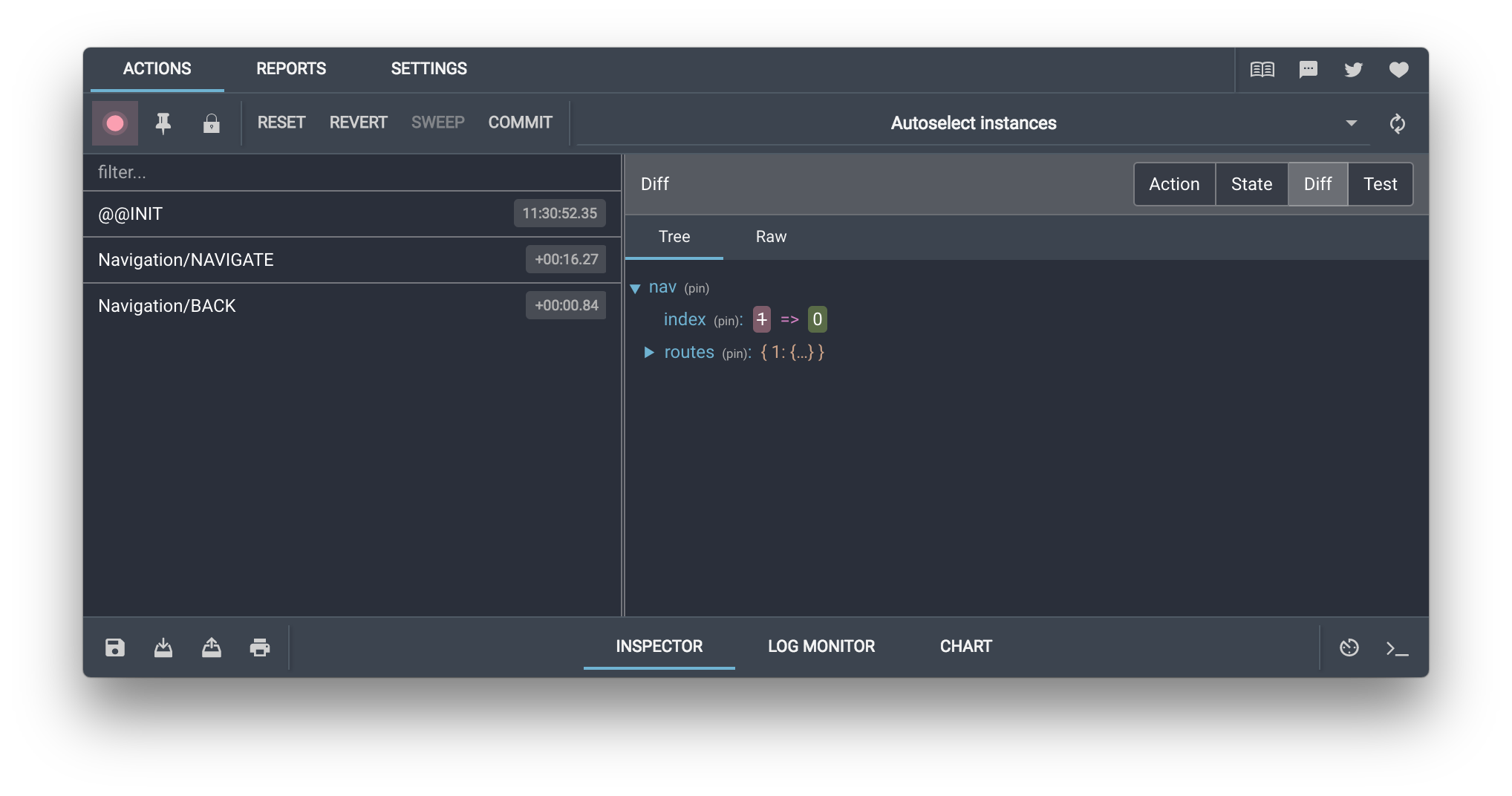
## Documentation
- [Browser Extension Installation and Configuration](https://github.com/reduxjs/redux-devtools/tree/main/extension#installation)
- [Manual Integration as a React Component](./docs/Walkthrough.md#manual-integration)
- [Extension Options (Arguments)](https://github.com/reduxjs/redux-devtools/blob/main/extension/docs/API/Arguments.md)
- [Extension Methods (Advanced API)](https://github.com/reduxjs/redux-devtools/blob/main/extension/docs/API/Methods.md)
- [Remote monitoring](./docs/Integrations/Remote.md)
- [Troubleshooting](https://github.com/reduxjs/redux-devtools/blob/main/extension/docs/Troubleshooting.md)
- [Recipes](https://github.com/reduxjs/redux-devtools/blob/main/extension/docs/Recipes.md)
- [FAQ](https://github.com/reduxjs/redux-devtools/blob/main/extension/docs/FAQ.md)
## Development
This is a monorepo powered by [pnpm](https://pnpm.io/). [Install pnpm](https://pnpm.io/installation) and run `pnpm install` to get started. Each package's dependencies need to be built before the package itself can be built. You can either build all the packages (i.e., `pnpm run build:all`) or use pnpm workspace commands to build only the packages necessary for the packages you're working on (i.e., `pnpm --filter "remotedev-redux-devtools-extension" build`).
## Backers
Support us with a monthly donation and help us continue our activities. [[Become a backer](https://opencollective.com/redux-devtools-extension#backer)]
## Sponsors
Become a sponsor and get your logo on our README on Github with a link to your site. [[Become a sponsor](https://opencollective.com/redux-devtools-extension#sponsor)]
### License
MIT
================================================
FILE: docs/Integrations/Remote.md
================================================
## Remote monitoring
By installing [`@redux-devtools/cli`](https://github.com/reduxjs/redux-devtools/tree/master/packages/redux-devtools-cli#usage), starting the server server and launching the Redux DevTools app (`redux-devtools --open`), you can connect any remote application, even not javascript. There are some integrations for javascript like [remote-redux-devtools](https://github.com/zalmoxisus/remote-redux-devtools) and [remotedev](https://github.com/zalmoxisus/remotedev), but the plan is to deprecate them and support it out of the box from the extension without a websocket server. It is more useful for non-js apps.
### WebSocket Clients
We're using [SocketCluster](http://socketcluster.io/) for realtime communication, which provides a fast and scalable webSocket layer and a minimal pub/sub system. You need to include one of [its clients](https://github.com/SocketCluster/client-drivers) in your app to communicate with RemotedevServer. Currently there are clients for [JavaScript (NodeJS)](https://github.com/SocketCluster/socketcluster-client), [Java](https://github.com/sacOO7/socketcluster-client-java), [Python](https://github.com/sacOO7/socketcluster-client-python), [C](https://github.com/sacOO7/socketcluster-client-C), [Objective-C](https://github.com/abpopov/SocketCluster-ios-client) and [.NET/C#](https://github.com/sacOO7/SocketclusterClientDotNet).
By default, the websocket server is running on `ws://localhost:8000/socketcluster/`.
### Messaging lifecycle
#### 1. Connecting to the WebSocket server
The client driver provides a way to connect to the server via websockets (see the docs for the selected client).
##### JavaScript
```js
var socket = socketCluster.connect({
hostname: 'localhost',
port: 8000,
});
```
##### Python
```py
socket = Socketcluster.socket("ws://localhost:8000/socketcluster/")
socket.connect()
```
> Note that JavaScript client composes the url from `hostname` and `port`, adding `/socketcluster/` path automatically. For other clients, you should specify that path. For example, for `ObjectiveC` it would be `self.client.initWithHost("localhost/socketcluster/", onPort: 8000, securely: false)`.
#### 2. Disconnecting and reconnecting
SocketCluster client handles reconnecting for you, but you still might want to know when the connection is established, or when it failed to connect.
##### JavaScript
```js
socket.on('connect', (status) => {
// Here will come the next step
});
socket.on('disconnect', (code) => {
console.warn('Socket disconnected with code', code);
});
socket.on('error', (error) => {
console.warn('Socket error', error);
});
```
##### Python
```py
def onconnect(socket):
// Here will call the next step
def ondisconnect(socket):
logging.info("on disconnect got called")
def onConnectError(socket, error):
logging.info("On connect error got called")
socket.setBasicListener(onconnect, ondisconnect, onConnectError)
```
#### 3. Authorizing and subscribing to the channel of events
We're not providing an authorizing mechanism yet. All you have to do is to emit a `login` event, and you'll get a `channelName` you should subscribe for, and watch for messages and events. Make sure to pass the `master` event, otherwise it should be a monitor, not a client app.
##### JavaScript
```js
socket.emit('login', 'master', (error, channelName) => {
if (error) {
console.log(error);
return;
}
channel = socket.subscribe(channelName);
channel.watch(handleMessages);
socket.on(channelName, handleMessages);
});
function handleMessages(message) {
// 5. Listening for monitor events
}
```
##### Python
```py
socket.emitack("login", "master", login)
def login(key, error, channelName):
socket.subscribe(channelName)
socket.onchannel(channelName, handleMessages)
socket.on(channelName, handleMessages)
def handleMessages(key, message):
// 5. Listening for monitor events
```
You could just emit the `login` event, and omit subscribing (and point `5` bellow) if you want only to log data, not to interact with te app.
#### 4. Sending the action and state to the monitor
To send your data to the monitor use `log` or `log-noid` channel. The latter will add the socket id to the message from the server side (useful when the message was sent before the connection was established).
The message object includes the following:
- `type` - usually should be `ACTION`. If you want to indicate that we're starting a new log (clear all actions emitted before and add `@@INIT`), use `INIT`. In case you have a lifted state similar to one provided by [`redux-devtools-instrument`](https://github.com/zalmoxisus/redux-devtools-instrument), use `STATE`.
- `action` - the action object. It is recommended to lift it in another object, and add `timestamp` to show when the action was fired off: `{ timestamp: Date.now(), action: { type: 'SOME_ACTION' } }`.
- `payload` - usually the state or lifted state object.
- `name` - name of the instance to be shown in the instances selector. If not provided, it will be equal to `instanceId`.
- `instanceId` - an id to identify the instance. If not provided, it will be the same as `id`. However, it is useful when having several instances (or stores) in the same connection. Also if the user will specify a constant value, it would allow to persist the state on app reload.
- `id` - socket connection id, which should be either `socket.id` or should not provided and use `log-noid` channel.
##### JavaScript
```js
const message = {
type: 'ACTION',
action: { action, timestamp: Date.now() },
payload: state,
id: socket.id,
instanceId: window.btoa(location.href),
name: document.title,
};
socket.emit(socket.id ? 'log' : 'log-noid', message);
```
##### Python
```py
class Message:
def __init__(self, action, state):
self.type = "ACTION"
self.action = action
self.payload = state
id: socket.id
socket.emit(socket.id if "log" else "log-noid", Message(action, state));
```
#### 5. Listening for monitor events
When a monitor action is emitted, you'll get an event on the subscribed function. The argument object includes a `type` key, which can be:
- `DISPATCH` - a monitor action dispatched on Redux DevTools monitor, like `{ type: 'DISPATCH', payload: { type: 'JUMP_TO_STATE', 'index': 2 }`. See [`redux-devtools-instrument`](https://github.com/zalmoxisus/redux-devtools-instrument/blob/master/src/instrument.js) for details. Additionally to that API, you'll get also a stringified `state` object when needed. So, for example, for time travelling (`JUMP_TO_STATE`) you can just parse and set the state (see the example). Usually implementing this type of actions would be enough.
- `ACTION` - the user requested to dispatch an action remotely like `{ type: 'ACTION', action: '{ type: \'INCREMENT_COUNTER\' }' }`. The `action` can be either a stringified javascript object which should be evalled or a function which arguments should be evalled like [here](https://github.com/zalmoxisus/remotedev-utils/blob/master/src/index.js#L62-L70).
- `START` - a monitor was opened. You could handle this event in order not to do extra tasks when the app is not monitored.
- `STOP` - a monitor was closed. You can take this as no need to send data to the monitor. I there are several monitors and one was closed, all others will send `START` event to acknowledge that we still have to send data.
See [`mobx-remotedev`](https://github.com/zalmoxisus/mobx-remotedev/blob/master/src/monitorActions.js) for an example of implementation without [`redux-devtools-instrument`](https://github.com/zalmoxisus/redux-devtools-instrument/blob/master/src/instrument.js).
##### JavaScript
```js
function handleMessages(message) {
if (message.type === 'DISPATCH' && message.payload.type === 'JUMP_TO_STATE') {
store.setState(JSON.parse(message.state));
}
}
```
##### Python
```py
def handleMessages(key, message):
if message.type === "DISPATCH" and message.payload.type === "JUMP_TO_STATE":
store.setState(json.loads(message.state));
```
================================================
FILE: docs/Walkthrough.md
================================================
# Walkthrough
## Browser Extension
If you don’t want to bother with installing Redux DevTools and integrating it into your project, consider using [Redux DevTools Extension](https://github.com/reduxjs/redux-devtools/tree/master/extension) for Chrome and Firefox. It provides access to the most popular monitors, is easy to configure to filter actions, and doesn’t require installing any packages.
## Manual Integration
If you want to have full control over where DevTools are displayed, or are developing a custom monitor, you will probably want to integrate them manually.
It’s more steps, but you will have full control over monitors and their configuration.
### Installation
```
npm install --save-dev @redux-devtools/core
```
You’ll also likely want to install some monitors:
```
npm install --save-dev @redux-devtools/log-monitor
npm install --save-dev @redux-devtools/dock-monitor
```
### Usage
#### Create a `DevTools` Component
Somewhere in your project, create a `DevTools` component by passing a `monitor` element to `createDevTools`. In the following example our `monitor` consists of [`LogMonitor`](https://github.com/gaearon/redux-devtools-log-monitor) docked within [`DockMonitor`](https://github.com/gaearon/redux-devtools-dock-monitor):
##### `containers/DevTools.js`
```js
import React from 'react';
// Exported from redux-devtools
import { createDevTools } from '@redux-devtools/core';
// Monitors are separate packages, and you can make a custom one
import LogMonitor from '@redux-devtools/log-monitor';
import DockMonitor from '@redux-devtools/dock-monitor';
// createDevTools takes a monitor and produces a DevTools component
const DevTools = createDevTools(
// Monitors are individually adjustable with props.
// Consult their repositories to learn about those props.
// Here, we put LogMonitor inside a DockMonitor.
// Note: DockMonitor is visible by default.
,
);
export default DevTools;
```
Note that you can use `LogMonitor` directly without wrapping it in `DockMonitor` if you’d like to display the DevTools UI somewhere right inside your application:
```js
// If you'd rather not use docking UI, use directly
const DevTools = createDevTools();
```
#### Use `DevTools.instrument()` Store Enhancer
The `DevTools` component you created with `createDevTools()` has a special static method called `instrument()`. It returns a [store enhancer](http://redux.js.org/docs/Glossary.html#store-enhancer) that you need to use in development.
A store enhancer is a function that enhances the behavior of `createStore()`. You can pass store enhancer as the last optional argument to `createStore()`. You probably already used another store enhancer—[`applyMiddleware()`](http://redux.js.org/docs/api/applyMiddleware.html). Unlike `applyMiddleware()`, you will need to be careful to only use `DevTools.instrument()` in development environment, and never in production.
The easiest way to apply several store enhancers in a row is to use the [`compose()`](http://redux.js.org/docs/api/compose.html) utility function that ships with Redux. It is the same `compose()` that you can find in Underscore and Lodash. In our case, we would use it to compose several store enhancers into one: `compose(applyMiddleware(m1, m2, m3), DevTools.instrument())`.
You can add additional options to it: `DevTools.instrument({ maxAge: 50, shouldCatchErrors: true })`. See [`redux-devtools-instrument`'s API](https://github.com/reduxjs/redux-devtools/tree/master/packages/redux-devtools-instrument#api) for more details.
It’s important that you should add `DevTools.instrument()` _after_ `applyMiddleware` in your `compose()` function arguments. This is because `applyMiddleware` is potentially asynchronous, but `DevTools.instrument()` expects all actions to be plain objects rather than actions interpreted by asynchronous middleware such as [redux-promise](https://github.com/acdlite/redux-promise) or [redux-thunk](https://github.com/gaearon/redux-thunk). So make sure `applyMiddleware()` goes first in the `compose()` call, and `DevTools.instrument()` goes after it.
##### `store/configureStore.js`
```js
import { createStore, applyMiddleware, compose } from 'redux';
import rootReducer from '../reducers';
import DevTools from '../containers/DevTools';
const enhancer = compose(
// Middleware you want to use in development:
applyMiddleware(d1, d2, d3),
// Required! Enable Redux DevTools with the monitors you chose
DevTools.instrument(),
);
export default function configureStore(initialState) {
// Note: only Redux >= 3.1.0 supports passing enhancer as third argument.
// See https://github.com/reactjs/redux/releases/tag/v3.1.0
const store = createStore(rootReducer, initialState, enhancer);
// Hot reload reducers (requires Webpack or Browserify HMR to be enabled)
if (module.hot) {
module.hot.accept('../reducers', () =>
store.replaceReducer(
require('../reducers') /*.default if you use Babel 6+ */,
),
);
}
return store;
}
```
If you’d like, you may add another store enhancer called `persistState()`. It ships with this package, and it lets you serialize whole sessions (including all dispatched actions and the state of the monitors) by a URL key. So if you visit `http://localhost:3000/?debug_session=reproducing_weird_bug`, do something in the app, then open `http://localhost:3000/?debug_session=some_other_feature`, and then go back to `http://localhost:3000/?debug_session=reproducing_weird_bug`, the state will be restored. The implementation of `persistState()` is fairly naïve but you can take it as an inspiration and build a proper UI for it if you feel like it!
```js
// ...
import { persistState } from '@redux-devtools/core';
const enhancer = compose(
// Middleware you want to use in development:
applyMiddleware(d1, d2, d3),
// Required! Enable Redux DevTools with the monitors you chose
DevTools.instrument(),
// Optional. Lets you write ?debug_session= in address bar to persist debug sessions
persistState(getDebugSessionKey()),
);
function getDebugSessionKey() {
// You can write custom logic here!
// By default we try to read the key from ?debug_session= in the address bar
const matches = window.location.href.match(/[?&]debug_session=([^&#]+)\b/);
return matches && matches.length > 0 ? matches[1] : null;
}
export default function configureStore(initialState) {
// ...
}
```
#### Exclude DevTools from Production Builds
Finally, to make sure we’re not pulling any DevTools-related code in the production builds, we will envify our code. You can use [`DefinePlugin`](https://github.com/webpack/docs/wiki/list-of-plugins#defineplugin) with Webpack, or [`envify`](https://github.com/zertosh/loose-envify) for Browserify.
The trick is to replace all occurrences of a constant like `process.env.NODE_ENV` into a string depending on the environment, and import and render `redux-devtools` only when `process.env.NODE_ENV` is not `'production'`. Then, if you have an Uglify step before production, Uglify will eliminate dead `if (false)` branches with `redux-devtools` imports.
With Webpack, you'll need two config files, one for development and one for production. Here's a snippet from an example production config:
##### `webpack.config.prod.js`
```js
// ...
plugins: [
new webpack.DefinePlugin({
'process.env.NODE_ENV': JSON.stringify('production')
})
],
// ...
```
If you are using ES6 modules with Webpack 1.x and Babel, you might try putting your `import` statement inside an `if (process.env.NODE_ENV !== 'production)` to exclude the DevTools package from your production bundle. However this ES6 specification forbids it, so this won’t compile. Instead, you can use a conditional CommonJS `require`. Babel will let it compile, and Uglify will eliminate the dead branches before Webpack creates a bundle. This is why we recommend creating a `configureStore.js` file that either directs you to `configureStore.dev.js` or `configureStore.prod.js` depending on the configuration. While it is a little bit more maintenance, the upside is that you can be sure you won’t pull any development dependencies into the production builds, and that you can easily enable different middleware (e.g. crash reporting, logging) in the production environment.
##### `store/configureStore.js`
```js
// Use DefinePlugin (Webpack) or loose-envify (Browserify)
// together with Uglify to strip the dev branch in prod build.
if (process.env.NODE_ENV === 'production') {
module.exports = require('./configureStore.prod');
} else {
module.exports = require('./configureStore.dev');
}
```
##### `store/configureStore.prod.js`
```js
import { createStore, applyMiddleware, compose } from 'redux';
import rootReducer from '../reducers';
// Middleware you want to use in production:
const enhancer = applyMiddleware(p1, p2, p3);
export default function configureStore(initialState) {
// Note: only Redux >= 3.1.0 supports passing enhancer as third argument.
// See https://github.com/rackt/redux/releases/tag/v3.1.0
return createStore(rootReducer, initialState, enhancer);
}
```
##### `store/configureStore.dev.js`
```js
import { createStore, applyMiddleware, compose } from 'redux';
import { persistState } from '@redux-devtools/core';
import rootReducer from '../reducers';
import DevTools from '../containers/DevTools';
const enhancer = compose(
// Middleware you want to use in development:
applyMiddleware(d1, d2, d3),
// Required! Enable Redux DevTools with the monitors you chose
DevTools.instrument(),
// Optional. Lets you write ?debug_session= in address bar to persist debug sessions
persistState(getDebugSessionKey()),
);
function getDebugSessionKey() {
// You can write custom logic here!
// By default we try to read the key from ?debug_session= in the address bar
const matches = window.location.href.match(/[?&]debug_session=([^&]+)\b/);
return matches && matches.length > 0 ? matches[1] : null;
}
export default function configureStore(initialState) {
// Note: only Redux >= 3.1.0 supports passing enhancer as third argument.
// See https://github.com/rackt/redux/releases/tag/v3.1.0
const store = createStore(rootReducer, initialState, enhancer);
// Hot reload reducers (requires Webpack or Browserify HMR to be enabled)
if (module.hot) {
module.hot.accept('../reducers', () =>
store.replaceReducer(
require('../reducers') /*.default if you use Babel 6+ */,
),
);
}
return store;
}
```
#### Render `` in Your App...
Finally, include the `DevTools` component in your page.
A naïve way to do this would be to render it right in your `index.js`:
##### `index.js`
```js
import React from 'react';
import { render } from 'react-dom';
import { Provider } from 'react-redux';
import configureStore from './store/configureStore';
import TodoApp from './containers/TodoApp';
// Don't do this! You’re bringing DevTools into the production bundle.
import DevTools from './containers/DevTools';
const store = configureStore();
render(
document.getElementById('app')
);
```
We recommend a different approach. Create a `Root.js` component that renders the root of your application (usually some component surrounded by a ``). Then use the same trick with conditional `require` statements to have two versions of it, one for development, and one for production:
##### `containers/Root.js`
```js
if (process.env.NODE_ENV === 'production') {
module.exports = require('./Root.prod');
} else {
module.exports = require('./Root.dev');
}
```
##### `containers/Root.dev.js`
```js
import React, { Component } from 'react';
import { Provider } from 'react-redux';
import TodoApp from './TodoApp';
import DevTools from './DevTools';
export default class Root extends Component {
render() {
const { store } = this.props;
return (
);
}
}
```
##### `containers/Root.prod.js`
```js
import React, { Component } from 'react';
import { Provider } from 'react-redux';
import TodoApp from './TodoApp';
export default class Root extends Component {
render() {
const { store } = this.props;
return (
);
}
}
```
#### ...Or Open Them in a New Window
When you use [`DockMonitor`](https://github.com/gaearon/redux-devtools-dock-monitor), you usually want to render `` at the root of your app. It will appear in a docked container above it. However, you can also render it anywhere else in your React component tree. To do this, you can remove `DockMonitor` and instead render `` inside some component of your app. Don’t forget to create two versions of this component to exclude `DevTools` in production!
However you don’t even have to render `` in the same window. For example, you may prefer to display it in a popup. In this case, you can remove `DockMonitor` from `DevTools.js` and just use the `LogMonitor`, and have some code like this:
##### `index.js`
```js
import React from 'react';
import { Provider } from 'react-redux';
import { render } from 'react-dom';
import configureStore from './store/configureStore';
import App from './containers/App';
const store = configureStore();
render(
,
document.getElementById('root'),
);
if (process.env.NODE_ENV !== 'production') {
const showDevTools = require('./showDevTools');
showDevTools(store);
}
```
##### `showDevTools.js`
```js
import React from 'react';
import { render } from 'react-dom';
import DevTools from './containers/DevTools';
export default function showDevTools(store) {
const popup = window.open(
null,
'Redux DevTools',
'menubar=no,location=no,resizable=yes,scrollbars=no,status=no',
);
// Reload in case it already exists
popup.location.reload();
setTimeout(() => {
popup.document.write('');
render(
,
popup.document.getElementById('react-devtools-root'),
);
}, 10);
}
```
Personal preferences vary, and whether to put the DevTools in a separate window, in a dock, or right inside you app’s user interface, is up to you. Make sure to check the documentation for the monitors you use and learn about the different props they support for customizing the appearance and the behavior.
Note that there are no useful props you can pass to the `DevTools` component other than the `store`. The `store` prop is needed if you don’t wrap `` in a ``—just like with any connected component. To adjust the monitors, you need to pass props to them inside `DevTools.js` itself inside the `createDevTools()` call when they are used.
### Gotchas
- **Your reducers have to be pure and free of side effects to work correctly with DevTools.** For example, even generating a random ID in reducer makes it impure and non-deterministic. Instead, do this in action creators.
- **Make sure to only apply `DevTools.instrument()` and render `` in development!** In production, this will be terribly slow because actions just accumulate forever. As described above, you need to use conditional `require`s and use `DefinePlugin` (Webpack) or `loose-envify` (Browserify) together with Uglify to remove the dead code. Here is [an example](https://github.com/erikras/react-redux-universal-hot-example/) that adds Redux DevTools handling the production case correctly.
- **It is important that `DevTools.instrument()` store enhancer should be added to your middleware stack _after_ `applyMiddleware` in the `compose`d functions, as `applyMiddleware` is potentially asynchronous.** Otherwise, DevTools won’t see the raw actions emitted by asynchronous middleware such as [redux-promise](https://github.com/acdlite/redux-promise) or [redux-thunk](https://github.com/gaearon/redux-thunk).
### What Next?
Now that you see the DevTools, you might want to learn what those buttons mean and how to use them. This usually depends on the monitor. You can begin by exploring the [LogMonitor](https://github.com/gaearon/redux-devtools-log-monitor) and [DockMonitor](https://github.com/gaearon/redux-devtools-dock-monitor) documentation, as they are the default monitors we suggest to use together. When you’re comfortable using them, you may want to create your own monitor for more exotic purposes, such as a [chart](https://github.com/romseguy/redux-devtools-chart-monitor) or a [diff](https://github.com/whetstone/redux-devtools-diff-monitor) monitor. Don’t forget to send a PR to feature your monitor at the front page!
================================================
FILE: eslint.js.config.base.mjs
================================================
import { defineConfig } from 'eslint/config';
import eslint from '@eslint/js';
import eslintConfigPrettier from 'eslint-config-prettier';
export default defineConfig([eslint.configs.recommended, eslintConfigPrettier]);
================================================
FILE: eslint.js.react.jest.config.base.mjs
================================================
import { defineConfig } from 'eslint/config';
import eslint from '@eslint/js';
import react from 'eslint-plugin-react';
import reactHooks from 'eslint-plugin-react-hooks';
import jest from 'eslint-plugin-jest';
import eslintConfigPrettier from 'eslint-config-prettier';
export default defineConfig([
{
files: ['test/**/*.js', 'test/**/*.jsx'],
...eslint.configs.recommended,
},
{
files: ['test/**/*.js', 'test/**/*.jsx'],
...react.configs.flat.recommended,
},
{
files: ['test/**/*.js', 'test/**/*.jsx'],
settings: {
react: {
version: 'detect',
},
},
},
{
files: ['test/**/*.js', 'test/**/*.jsx'],
...reactHooks.configs.flat.recommended,
},
{
files: ['test/**/*.js', 'test/**/*.jsx'],
...jest.configs['flat/recommended'],
},
{
files: ['test/**/*.js', 'test/**/*.jsx'],
...jest.configs['jest/style'],
},
{
files: ['test/**/*.js', 'test/**/*.jsx'],
...eslintConfigPrettier,
},
]);
================================================
FILE: eslint.ts.config.base.mjs
================================================
import { defineConfig } from 'eslint/config';
import eslint from '@eslint/js';
import tseslint from 'typescript-eslint';
import eslintConfigPrettier from 'eslint-config-prettier';
export default (tsconfigRootDir, files = ['**/*.ts'], project = true) =>
defineConfig([
{
files,
...eslint.configs.recommended,
},
...tseslint.configs.recommendedTypeChecked.map((config) => ({
files,
...config,
})),
...tseslint.configs.stylisticTypeChecked.map((config) => ({
files,
...config,
})),
{
files,
languageOptions: {
parserOptions: {
project,
tsconfigRootDir,
},
},
},
{
files,
...eslintConfigPrettier,
},
{
files,
rules: {
'@typescript-eslint/no-unsafe-return': 'off',
'@typescript-eslint/no-unsafe-assignment': 'off',
'@typescript-eslint/no-unsafe-call': 'off',
'@typescript-eslint/no-unsafe-member-access': 'off',
'@typescript-eslint/prefer-optional-chain': 'off',
'@typescript-eslint/no-base-to-string': 'off',
'@typescript-eslint/consistent-indexed-object-style': 'off',
'@typescript-eslint/prefer-nullish-coalescing': 'off',
'@typescript-eslint/consistent-type-definitions': 'off',
'@typescript-eslint/no-unused-vars': 'off',
'@typescript-eslint/no-explicit-any': 'off',
'@typescript-eslint/prefer-for-of': 'off',
'@typescript-eslint/non-nullable-type-assertion-style': 'off',
'@typescript-eslint/class-literal-property-style': 'off',
'@typescript-eslint/no-redundant-type-constituents': 'off',
'@typescript-eslint/prefer-string-starts-ends-with': 'off',
'@typescript-eslint/no-duplicate-type-constituents': 'off',
'@typescript-eslint/array-type': 'off',
'@typescript-eslint/prefer-function-type': 'off',
},
},
]);
================================================
FILE: eslint.ts.jest.config.base.mjs
================================================
import { defineConfig } from 'eslint/config';
import eslint from '@eslint/js';
import tseslint from 'typescript-eslint';
import jest from 'eslint-plugin-jest';
import eslintConfigPrettier from 'eslint-config-prettier';
export default (tsconfigRootDir) =>
defineConfig([
{
files: ['test/**/*.ts'],
...eslint.configs.recommended,
},
...tseslint.configs.recommendedTypeChecked.map((config) => ({
files: ['test/**/*.ts'],
...config,
})),
...tseslint.configs.stylisticTypeChecked.map((config) => ({
files: ['test/**/*.ts'],
...config,
})),
{
files: ['test/**/*.ts'],
languageOptions: {
parserOptions: {
project: ['./tsconfig.test.json'],
tsconfigRootDir,
},
},
},
{
files: ['test/**/*.ts'],
...jest.configs['flat/recommended'],
},
{
files: ['test/**/*.ts'],
...jest.configs['jest/style'],
},
{
files: ['test/**/*.ts'],
...eslintConfigPrettier,
},
{
files: ['test/**/*.ts'],
rules: {
'@typescript-eslint/no-unsafe-return': 'off',
'@typescript-eslint/no-unsafe-assignment': 'off',
'@typescript-eslint/no-unsafe-call': 'off',
'@typescript-eslint/no-unsafe-member-access': 'off',
'@typescript-eslint/prefer-optional-chain': 'off',
'@typescript-eslint/no-base-to-string': 'off',
'@typescript-eslint/consistent-indexed-object-style': 'off',
'@typescript-eslint/prefer-nullish-coalescing': 'off',
'@typescript-eslint/consistent-type-definitions': 'off',
'@typescript-eslint/no-unused-vars': 'off',
'@typescript-eslint/no-explicit-any': 'off',
'@typescript-eslint/prefer-for-of': 'off',
'@typescript-eslint/non-nullable-type-assertion-style': 'off',
'@typescript-eslint/class-literal-property-style': 'off',
'@typescript-eslint/no-redundant-type-constituents': 'off',
'@typescript-eslint/prefer-string-starts-ends-with': 'off',
'@typescript-eslint/no-duplicate-type-constituents': 'off',
'@typescript-eslint/array-type': 'off',
'@typescript-eslint/prefer-function-type': 'off',
},
},
]);
================================================
FILE: eslint.ts.react.config.base.mjs
================================================
import { defineConfig } from 'eslint/config';
import eslint from '@eslint/js';
import tseslint from 'typescript-eslint';
import react from 'eslint-plugin-react';
import reactHooks from 'eslint-plugin-react-hooks';
import eslintConfigPrettier from 'eslint-config-prettier';
export default (
tsconfigRootDir,
files = ['**/*.ts', '**/*.tsx'],
project = true,
) =>
defineConfig([
{
files,
...eslint.configs.recommended,
},
...tseslint.configs.recommendedTypeChecked.map((config) => ({
files,
...config,
})),
...tseslint.configs.stylisticTypeChecked.map((config) => ({
files,
...config,
})),
{
files,
languageOptions: {
parserOptions: {
project,
tsconfigRootDir,
},
},
},
{
files,
...react.configs.flat.recommended,
},
{
files,
settings: {
react: {
version: 'detect',
},
},
},
{
files,
...reactHooks.configs.flat.recommended,
},
{
files,
...eslintConfigPrettier,
},
{
files,
rules: {
'@typescript-eslint/no-unsafe-return': 'off',
'@typescript-eslint/no-unsafe-assignment': 'off',
'@typescript-eslint/no-unsafe-call': 'off',
'@typescript-eslint/no-unsafe-member-access': 'off',
'@typescript-eslint/no-misused-promises': [
'error',
{
checksVoidReturn: {
attributes: false,
},
},
],
'@typescript-eslint/prefer-optional-chain': 'off',
'@typescript-eslint/no-base-to-string': 'off',
'@typescript-eslint/consistent-indexed-object-style': 'off',
'@typescript-eslint/prefer-nullish-coalescing': 'off',
'@typescript-eslint/consistent-type-definitions': 'off',
'@typescript-eslint/no-unused-vars': 'off',
'@typescript-eslint/no-explicit-any': 'off',
'@typescript-eslint/prefer-for-of': 'off',
'@typescript-eslint/non-nullable-type-assertion-style': 'off',
'@typescript-eslint/class-literal-property-style': 'off',
'@typescript-eslint/no-redundant-type-constituents': 'off',
'@typescript-eslint/prefer-string-starts-ends-with': 'off',
'@typescript-eslint/no-duplicate-type-constituents': 'off',
'@typescript-eslint/array-type': 'off',
'@typescript-eslint/prefer-function-type': 'off',
'react/prop-types': 'off',
},
},
]);
================================================
FILE: eslint.ts.react.jest.config.base.mjs
================================================
import { defineConfig } from 'eslint/config';
import eslint from '@eslint/js';
import tseslint from 'typescript-eslint';
import react from 'eslint-plugin-react';
import reactHooks from 'eslint-plugin-react-hooks';
import jest from 'eslint-plugin-jest';
import eslintConfigPrettier from 'eslint-config-prettier';
export default (tsconfigRootDir) =>
defineConfig([
{
files: ['test/**/*.ts', 'test/**/*.tsx'],
...eslint.configs.recommended,
},
...tseslint.configs.recommendedTypeChecked.map((config) => ({
files: ['test/**/*.ts', 'test/**/*.tsx'],
...config,
})),
...tseslint.configs.stylisticTypeChecked.map((config) => ({
files: ['test/**/*.ts', 'test/**/*.tsx'],
...config,
})),
{
files: ['test/**/*.ts', 'test/**/*.tsx'],
languageOptions: {
parserOptions: {
project: ['./tsconfig.test.json'],
tsconfigRootDir,
},
},
},
{
files: ['test/**/*.ts', 'test/**/*.tsx'],
...react.configs.flat.recommended,
},
{
files: ['test/**/*.ts', 'test/**/*.tsx'],
settings: {
react: {
version: 'detect',
},
},
},
{
files: ['test/**/*.ts', 'test/**/*.tsx'],
...reactHooks.configs.flat.recommended,
},
{
files: ['test/**/*.ts', 'test/**/*.tsx'],
...jest.configs['flat/recommended'],
},
{
files: ['test/**/*.ts', 'test/**/*.tsx'],
...jest.configs['jest/style'],
},
{
files: ['test/**/*.ts', 'test/**/*.tsx'],
...eslintConfigPrettier,
},
{
files: ['test/**/*.ts', 'test/**/*.tsx'],
rules: {
'@typescript-eslint/no-unsafe-return': 'off',
'@typescript-eslint/no-unsafe-assignment': 'off',
'@typescript-eslint/no-unsafe-call': 'off',
'@typescript-eslint/no-unsafe-member-access': 'off',
'@typescript-eslint/prefer-optional-chain': 'off',
'@typescript-eslint/no-base-to-string': 'off',
'@typescript-eslint/consistent-indexed-object-style': 'off',
'@typescript-eslint/prefer-nullish-coalescing': 'off',
'@typescript-eslint/consistent-type-definitions': 'off',
'@typescript-eslint/no-unused-vars': 'off',
'@typescript-eslint/no-explicit-any': 'off',
'@typescript-eslint/prefer-for-of': 'off',
'@typescript-eslint/non-nullable-type-assertion-style': 'off',
'@typescript-eslint/class-literal-property-style': 'off',
'@typescript-eslint/no-redundant-type-constituents': 'off',
'@typescript-eslint/prefer-string-starts-ends-with': 'off',
'@typescript-eslint/no-duplicate-type-constituents': 'off',
'@typescript-eslint/array-type': 'off',
'@typescript-eslint/prefer-function-type': 'off',
},
},
]);
================================================
FILE: extension/.gitignore
================================================
node_modules
dist
================================================
FILE: extension/CHANGELOG.md
================================================
# remotedev-redux-devtools-extension
## 3.2.12
### Patch Changes
- Updated dependencies [3f90241]
- Updated dependencies [d61d31a]
- Updated dependencies [804e729]
- Updated dependencies [12849a4]
- Updated dependencies [804d6bd]
- Updated dependencies [6481386]
- @redux-devtools/instrument@3.0.0
- @redux-devtools/ui@3.0.0
- @redux-devtools/slider-monitor@7.0.0
- @redux-devtools/core@5.0.0
- @redux-devtools/app@8.0.0
- @redux-devtools/serialize@1.0.0
- @redux-devtools/utils@4.0.0
## 3.2.11
### Patch Changes
- Updated dependencies [6163276]
- @redux-devtools/app@7.0.0
- @redux-devtools/slider-monitor@6.0.0
- @redux-devtools/ui@2.0.0
## 3.2.10
### Patch Changes
- @redux-devtools/app@6.2.2
## 3.2.9
### Patch Changes
- Updated dependencies [91f21b2]
- @redux-devtools/core@4.1.1
- @redux-devtools/slider-monitor@5.1.1
- @redux-devtools/utils@3.1.1
- @redux-devtools/app@6.2.1
## 3.2.8
### Patch Changes
- Updated dependencies [6830118]
- react-json-tree@0.20.0
- @redux-devtools/app@6.2.0
- @redux-devtools/slider-monitor@6.0.0
- @redux-devtools/ui@1.4.0
- @redux-devtools/core@4.1.0
- @redux-devtools/utils@4.0.0
## 3.2.7
### Patch Changes
- b25bf13: Send state from background when monitor connects
## 3.2.6
### Patch Changes
- 50d7682: Fix DevTools from losing connection
## 3.2.5
### Patch Changes
- eb3ac09: Add logging to background service worker
## 3.2.4
### Patch Changes
- f1d6158: Fix mocking Chrome API for Electron
## 3.2.3
### Patch Changes
- fd9f950: Fix monitoring on opening panel
- e49708d: Fix manifest.json for Edge
## 3.2.1
### Patch Changes
- abd03a7: Fix: only send data to extension if DevTools are open
## 3.2.0
### Minor Changes
- 83b2c19: Upgrade to Manifest V3
## 3.1.11
### Patch Changes
- 73688e1: Fix releasing Firefox extension
## 3.1.10
### Patch Changes
- 2163bc3: Split large messages sent from background page to devpanel
## 3.1.9
### Patch Changes
- Updated dependencies [bbb1a40]
- react-json-tree@0.19.0
- @redux-devtools/slider-monitor@5.0.1
- @redux-devtools/ui@1.3.2
## 3.1.8
### Patch Changes
- 191d419: Convert d3 packages to ESM
- Updated dependencies [191d419]
- @redux-devtools/app@6.0.1
## 3.1.7
### Patch Changes
- Updated dependencies [5cfe3e5]
- Updated dependencies [decc035]
- @redux-devtools/app@6.0.0
- @redux-devtools/slider-monitor@5.0.0
- @redux-devtools/core@4.0.0
- @redux-devtools/utils@3.0.0
## 3.1.6
### Patch Changes
- Updated dependencies [158ba2c]
- @redux-devtools/app@5.0.0
## 3.1.5
### Patch Changes
- 65205f90: Replace Action with Action
- Updated dependencies [65205f90]
- @redux-devtools/app@4.0.1
- @redux-devtools/core@3.13.2
## 3.1.4
### Patch Changes
- Updated dependencies [e57bcb39]
- @redux-devtools/app@4.0.0
## 3.1.3
### Patch Changes
- bca76009: Fix missing CSS for code editor
## 3.1.2
### Patch Changes
- 64ed81b0: Fix extension in Firefox and Chrome Incognito
## 3.1.1
### Patch Changes
- d18525b5: Increase min-width of popup
- Updated dependencies [57751ff9]
- @redux-devtools/app@3.0.0
## 3.1.0
### Minor Changes
- d54adb76: Option to sort State Tree keys alphabetically
Option to disable collapsing of object keys
### Patch Changes
- @redux-devtools/app@2.2.2
## 3.0.19
### Patch Changes
- 450cde6e: Fix responsive layout
## 3.0.18
### Patch Changes
- Updated dependencies [81926f32]
- react-json-tree@0.18.0
- @redux-devtools/app@2.2.1
## 3.0.17
### Patch Changes
- 1aa6c4f7: Fix remounting root for devpanel
## 3.0.16
### Patch Changes
- 20ebf725: Remove source map from page wrap bundle
## 3.0.14
### Patch Changes
- 24f60a7a: bump min popup window width to 760px #1126 #1129
## 3.0.13
### Patch Changes
- Updated dependencies [8a7eae4]
- react-json-tree@0.17.0
- @redux-devtools/app@2.2.0
- @redux-devtools/slider-monitor@4.0.0
- @redux-devtools/ui@1.3.0
- @redux-devtools/core@3.13.0
- @redux-devtools/utils@2.0.0
## 3.0.12
### Patch Changes
- Updated dependencies [4891bf6]
- @redux-devtools/core@3.12.0
- @redux-devtools/slider-monitor@3.1.2
- @redux-devtools/utils@1.2.1
- @redux-devtools/app@2.1.4
## 3.0.11
### Patch Changes
- ab3c0e2: Avoid persisting the selected action index between sessions
- Updated dependencies [ab3c0e2]
- Updated dependencies [4c9a890]
- @redux-devtools/app@2.1.3
- react-json-tree@0.16.2
## 3.0.10
### Patch Changes
- 55cc37e: Fix filter to show state-controlled search value
- Updated dependencies [55cc37e]
- @redux-devtools/app@2.1.2
================================================
FILE: extension/CODE_OF_CONDUCT.md
================================================
# Contributor Covenant Code of Conduct
## Our Pledge
In the interest of fostering an open and welcoming environment, we as
contributors and maintainers pledge to making participation in our project and
our community a harassment-free experience for everyone, regardless of age, body
size, disability, ethnicity, sex characteristics, gender identity and expression,
level of experience, education, socio-economic status, nationality, personal
appearance, race, religion, or sexual identity and orientation.
## Our Standards
Examples of behavior that contributes to creating a positive environment
include:
- Using welcoming and inclusive language
- Being respectful of differing viewpoints and experiences
- Gracefully accepting constructive criticism
- Focusing on what is best for the community
- Showing empathy towards other community members
Examples of unacceptable behavior by participants include:
- The use of sexualized language or imagery and unwelcome sexual attention or
advances
- Trolling, insulting/derogatory comments, and personal or political attacks
- Public or private harassment
- Publishing others' private information, such as a physical or electronic
address, without explicit permission
- Other conduct which could reasonably be considered inappropriate in a
professional setting
## Our Responsibilities
Project maintainers are responsible for clarifying the standards of acceptable
behavior and are expected to take appropriate and fair corrective action in
response to any instances of unacceptable behavior.
Project maintainers have the right and responsibility to remove, edit, or
reject comments, commits, code, wiki edits, issues, and other contributions
that are not aligned to this Code of Conduct, or to ban temporarily or
permanently any contributor for other behaviors that they deem inappropriate,
threatening, offensive, or harmful.
## Scope
This Code of Conduct applies both within project spaces and in public spaces
when an individual is representing the project or its community. Examples of
representing a project or community include using an official project e-mail
address, posting via an official social media account, or acting as an appointed
representative at an online or offline event. Representation of a project may be
further defined and clarified by project maintainers.
## Attribution
This Code of Conduct is adapted from the [Contributor Covenant][homepage], version 1.4,
available at https://www.contributor-covenant.org/version/1/4/code-of-conduct.html
[homepage]: https://www.contributor-covenant.org
For answers to common questions about this code of conduct, see
https://www.contributor-covenant.org/faq
================================================
FILE: extension/LICENSE
================================================
The MIT License (MIT)
Copyright (c) 2015-present Mihail Diordiev
Permission is hereby granted, free of charge, to any person obtaining a copy
of this software and associated documentation files (the "Software"), to deal
in the Software without restriction, including without limitation the rights
to use, copy, modify, merge, publish, distribute, sublicense, and/or sell
copies of the Software, and to permit persons to whom the Software is
furnished to do so, subject to the following conditions:
The above copyright notice and this permission notice shall be included in all
copies or substantial portions of the Software.
THE SOFTWARE IS PROVIDED "AS IS", WITHOUT WARRANTY OF ANY KIND, EXPRESS OR
IMPLIED, INCLUDING BUT NOT LIMITED TO THE WARRANTIES OF MERCHANTABILITY,
FITNESS FOR A PARTICULAR PURPOSE AND NONINFRINGEMENT. IN NO EVENT SHALL THE
AUTHORS OR COPYRIGHT HOLDERS BE LIABLE FOR ANY CLAIM, DAMAGES OR OTHER
LIABILITY, WHETHER IN AN ACTION OF CONTRACT, TORT OR OTHERWISE, ARISING FROM,
OUT OF OR IN CONNECTION WITH THE SOFTWARE OR THE USE OR OTHER DEALINGS IN THE
SOFTWARE.
================================================
FILE: extension/README.md
================================================
# Redux DevTools Extension
[](https://gitter.im/zalmoxisus/redux-devtools-extension?utm_source=badge&utm_medium=badge&utm_campaign=pr-badge&utm_content=badge)
[](http://makeapullrequest.com)
[](#backers)
[](#sponsors)

## Installation
### 1. For Chrome
- from [Chrome Web Store](https://chrome.google.com/webstore/detail/redux-devtools/lmhkpmbekcpmknklioeibfkpmmfibljd);
- or download `extension.zip` from [last releases](https://github.com/zalmoxisus/redux-devtools-extension/releases), unzip, open `chrome://extensions` url and turn on developer mode from top left and then click; on `Load Unpacked` and select the extracted folder for use
- or build it with `npm i && npm run build:extension` and [load the extension's folder](https://developer.chrome.com/docs/extensions/get-started/tutorial/hello-world#load-unpacked) `./build/extension`;
- or run it in dev mode with `npm i && npm start` and [load the extension's folder](https://developer.chrome.com/docs/extensions/get-started/tutorial/hello-world#load-unpacked) `./dev`.
### 2. For Firefox
- from [Mozilla Add-ons](https://addons.mozilla.org/en-US/firefox/addon/reduxdevtools/);
- or build it with `npm i && npm run build:firefox` and [load the extension's folder](https://developer.mozilla.org/en-US/Add-ons/WebExtensions/Temporary_Installation_in_Firefox) `./build/firefox` (just select a file from inside the dir).
### 3. For Electron
- just specify `REDUX_DEVTOOLS` in [`electron-devtools-installer`](https://github.com/GPMDP/electron-devtools-installer).
### 4. For other browsers and non-browser environment
- use [`remote-redux-devtools`](https://github.com/zalmoxisus/remote-redux-devtools).
## Usage
> Note that starting from v2.7, `window.devToolsExtension` was renamed to `window.__REDUX_DEVTOOLS_EXTENSION__` / `window.__REDUX_DEVTOOLS_EXTENSION_COMPOSE__`.
## 1. With Redux
### 1.1 Basic store
For a basic [Redux store](https://redux.js.org/api/createstore#createstorereducer-preloadedstate-enhancer) simply add:
```diff
const store = createStore(
reducer, /* preloadedState, */
+ window.__REDUX_DEVTOOLS_EXTENSION__ && window.__REDUX_DEVTOOLS_EXTENSION__()
);
```
Note that [`preloadedState`](https://redux.js.org/api/createstore#createstorereducer-preloadedstate-enhancer) argument is optional in Redux's [`createStore`](https://redux.js.org/api/createstore#createstorereducer-preloadedstate-enhancer).
> For universal ("isomorphic") apps, prefix it with `typeof window !== 'undefined' &&`.
```js
const composeEnhancers =
(typeof window !== 'undefined' &&
window.__REDUX_DEVTOOLS_EXTENSION_COMPOSE__) ||
compose;
```
> For TypeScript use [`redux-devtools-extension` npm package](#13-use-redux-devtoolsextension-package-from-npm), which contains all the definitions, or just use `(window as any)` (see [Recipes](docs/Recipes.md#using-in-a-typescript-project) for an example).
```js
const composeEnhancers = (window as any).__REDUX_DEVTOOLS_EXTENSION_COMPOSE__ || compose;
```
In case ESLint is configured to not allow using the underscore dangle, wrap it like so:
```diff
+ /* eslint-disable no-underscore-dangle */
const store = createStore(
reducer, /* preloadedState, */
window.__REDUX_DEVTOOLS_EXTENSION__ && window.__REDUX_DEVTOOLS_EXTENSION__()
);
+ /* eslint-enable */
```
> **Note**: Passing enhancer as last argument requires **redux@>=3.1.0**. For older versions apply it like [here](https://github.com/zalmoxisus/redux-devtools-extension/blob/v0.4.2/examples/todomvc/store/configureStore.js) or [here](https://github.com/zalmoxisus/redux-devtools-extension/blob/v0.4.2/examples/counter/store/configureStore.js#L7-L12). Don't mix the old Redux API with the new one.
> You don't need to npm install [`redux-devtools`](https://github.com/gaearon/redux-devtools) when using the extension (that's a different lib).
### 1.2 Advanced store setup
If you setup your store with [middleware and enhancers](http://redux.js.org/docs/api/applyMiddleware.html), change:
```diff
import { createStore, applyMiddleware, compose } from 'redux';
+ const composeEnhancers = window.__REDUX_DEVTOOLS_EXTENSION_COMPOSE__ || compose;
+ const store = createStore(reducer, /* preloadedState, */ composeEnhancers(
- const store = createStore(reducer, /* preloadedState, */ compose(
applyMiddleware(...middleware)
));
```
> Note that when the extension is not installed, we’re using Redux compose here.
To specify [extension’s options](https://github.com/zalmoxisus/redux-devtools-extension/blob/master/docs/API/Arguments.md), use it like so:
```js
const composeEnhancers =
typeof window === 'object' && window.__REDUX_DEVTOOLS_EXTENSION_COMPOSE__
? window.__REDUX_DEVTOOLS_EXTENSION_COMPOSE__({
// Specify extension’s options like name, actionsDenylist, actionsCreators, serialize...
})
: compose;
const enhancer = composeEnhancers(
applyMiddleware(...middleware),
// other store enhancers if any
);
const store = createStore(reducer, enhancer);
```
> [See the post for more details](https://medium.com/@zalmoxis/improve-your-development-workflow-with-redux-devtools-extension-f0379227ff83).
### 1.3 Use `@redux-devtools/extension` package from npm
To make things easier, there's an npm package to install:
```
npm install --save @redux-devtools/extension
```
and to use like so:
```js
import { createStore, applyMiddleware } from 'redux';
import { composeWithDevTools } from '@redux-devtools/extension';
const store = createStore(
reducer,
composeWithDevTools(
applyMiddleware(...middleware),
// other store enhancers if any
),
);
```
To specify [extension’s options](https://github.com/zalmoxisus/redux-devtools-extension/blob/master/docs/API/Arguments.md#windowdevtoolsextensionconfig):
```js
import { createStore, applyMiddleware } from 'redux';
import { composeWithDevTools } from '@redux-devtools/extension';
const composeEnhancers = composeWithDevTools({
// Specify name here, actionsDenylist, actionsCreators and other options if needed
});
const store = createStore(
reducer,
/* preloadedState, */ composeEnhancers(
applyMiddleware(...middleware),
// other store enhancers if any
),
);
```
> There are just a [few lines of code](https://github.com/zalmoxisus/redux-devtools-extension/blob/master/npm-package/index.js) added to your bundle.
In case you don't include other enhancers and middlewares, just use `devToolsEnhancer`:
```js
import { createStore } from 'redux';
import { devToolsEnhancer } from '@redux-devtools/extension';
const store = createStore(
reducer,
/* preloadedState, */ devToolsEnhancer(),
// Specify name here, actionsDenylist, actionsCreators and other options if needed
);
```
### 1.4 Using in production
It's useful to include the extension in production as well. Usually you [can use it for development](https://medium.com/@zalmoxis/using-redux-devtools-in-production-4c5b56c5600f).
If you want to restrict it there, use `composeWithDevToolsLogOnlyInProduction` or `devToolsEnhancerLogOnlyInProduction`:
```js
import { createStore } from 'redux';
import { devToolsEnhancerLogOnlyInProduction } from '@redux-devtools/extension';
const store = createStore(
reducer,
/* preloadedState, */ devToolsEnhancerLogOnlyInProduction(),
// options like actionSanitizer, stateSanitizer
);
```
or with middlewares and enhancers:
```js
import { createStore, applyMiddleware } from 'redux';
import { composeWithDevToolsLogOnlyInProduction } from '@redux-devtools/extension';
const composeEnhancers = composeWithDevToolsLogOnlyInProduction({
// options like actionSanitizer, stateSanitizer
});
const store = createStore(
reducer,
/* preloadedState, */ composeEnhancers(
applyMiddleware(...middleware),
// other store enhancers if any
),
);
```
> You'll have to add `'process.env.NODE_ENV': JSON.stringify('production')` in your Webpack config for the production bundle ([to envify](https://github.com/gaearon/redux-devtools/blob/master/docs/Walkthrough.md#exclude-devtools-from-production-builds)). If you use `create-react-app`, [it already does it for you.](https://github.com/facebookincubator/create-react-app/blob/master/packages/react-scripts/config/webpack.config.prod.js#L253-L257)
If you're already checking `process.env.NODE_ENV` when creating the store, import `composeWithDevToolsLogOnly` or `devToolsEnhancerLogOnly` for production environment.
If you don’t want to allow the extension in production, just use `composeWithDevToolsDevelopmentOnly` or `devToolsEnhancerDevelopmentOnly`.
> See [the article](https://medium.com/@zalmoxis/using-redux-devtools-in-production-4c5b56c5600f) for more details.
### 1.5 For React Native, hybrid, desktop and server side Redux apps
For React Native we can use [`react-native-debugger`](https://github.com/jhen0409/react-native-debugger), which already included [the same API](https://github.com/jhen0409/react-native-debugger/blob/master/docs/redux-devtools-integration.md) with Redux DevTools Extension.
For most platforms, include [`Remote Redux DevTools`](https://github.com/zalmoxisus/remote-redux-devtools)'s store enhancer, and from the extension's context menu choose 'Open Remote DevTools' for remote monitoring.
## 2. Without Redux
See [integrations](docs/Integrations.md) and [the blog post](https://medium.com/@zalmoxis/redux-devtools-without-redux-or-how-to-have-a-predictable-state-with-any-architecture-61c5f5a7716f) for more details on how to use the extension with any architecture.
## Docs
- [Options (arguments)](docs/API/Arguments.md)
- [Methods (advanced API)](docs/API/Methods.md)
- [FAQ](docs/FAQ.md)
- Features
- [Trace actions calls](docs/Features/Trace.md)
- [Troubleshooting](docs/Troubleshooting.md)
- [Articles](docs/Articles.md)
- [Videos](docs/Videos.md)
- [Feedback](docs/Feedback.md)
## Demo
Live demos to use the extension with:
- [Counter](http://zalmoxisus.github.io/examples/counter/)
- [TodoMVC](http://zalmoxisus.github.io/examples/todomvc/)
- [Redux Form](http://redux-form.com/6.5.0/examples/simple/)
- [React Tetris](https://chvin.github.io/react-tetris/?lan=en)
- [Book Collection (Angular ngrx store)](https://ngrx.github.io/platform/example-app/)
Also see [`./examples` folder](https://github.com/zalmoxisus/redux-devtools-extension/tree/master/examples).
## Backers
Support us with a monthly donation and help us continue our activities. [[Become a backer](https://opencollective.com/redux-devtools-extension#backer)]
## Sponsors
Become a sponsor and get your logo on our README on Github with a link to your site. [[Become a sponsor](https://opencollective.com/redux-devtools-extension#sponsor)]
## License
MIT
## Created By
If you like this, follow [@mdiordiev](https://twitter.com/mdiordiev) on twitter.
================================================
FILE: extension/babel.config.json
================================================
{
"presets": [
["@babel/preset-env", { "targets": "defaults" }],
"@babel/preset-react",
"@babel/preset-typescript"
]
}
================================================
FILE: extension/build.mjs
================================================
import * as fs from 'node:fs';
import * as esbuild from 'esbuild';
import pug from 'pug';
const args = process.argv.slice(2);
const prod = !args.includes('--dev');
await esbuild.build({
bundle: true,
logLevel: 'info',
outdir: 'dist',
minify: prod,
sourcemap: !prod,
define: {
'process.env.NODE_ENV': prod ? '"production"' : '"development"',
'process.env.BABEL_ENV': prod ? '"production"' : '"development"',
},
entryPoints: [
{ out: 'background.bundle', in: 'src/background/index.ts' },
{ out: 'options.bundle', in: 'src/options/index.tsx' },
{ out: 'remote.bundle', in: 'src/remote/index.tsx' },
{ out: 'devpanel.bundle', in: 'src/devpanel/index.tsx' },
{ out: 'devtools.bundle', in: 'src/devtools/index.ts' },
{ out: 'content.bundle', in: 'src/contentScript/index.ts' },
{ out: 'page.bundle', in: 'src/pageScript/index.ts' },
],
loader: {
'.woff2': 'file',
},
});
console.log();
console.log('Creating HTML files...');
const htmlFiles = ['devpanel', 'devtools', 'options', 'remote'];
for (const htmlFile of htmlFiles) {
fs.writeFileSync(
`dist/${htmlFile}.html`,
pug.renderFile(`src/${htmlFile}/${htmlFile}.pug`),
);
}
console.log('Copying manifest.json...');
fs.copyFileSync('chrome/manifest.json', 'dist/manifest.json');
console.log('Copying assets...');
fs.cpSync('src/assets', 'dist', { recursive: true });
console.log('Copying dist for each browser...');
fs.cpSync('dist', 'chrome/dist', { recursive: true });
fs.copyFileSync('chrome/manifest.json', 'chrome/dist/manifest.json');
fs.cpSync('dist', 'edge/dist', { recursive: true });
fs.copyFileSync('edge/manifest.json', 'edge/dist/manifest.json');
fs.cpSync('dist', 'firefox/dist', { recursive: true });
fs.copyFileSync('firefox/manifest.json', 'firefox/dist/manifest.json');
================================================
FILE: extension/chrome/manifest.json
================================================
{
"version": "3.2.10",
"name": "Redux DevTools",
"description": "Redux DevTools for debugging application's state changes.",
"homepage_url": "https://github.com/reduxjs/redux-devtools",
"manifest_version": 3,
"action": {
"default_icon": "img/logo/gray.png",
"default_title": "Redux DevTools",
"default_popup": "devpanel.html#popup"
},
"commands": {
"devtools-window": {
"description": "DevTools window"
},
"devtools-remote": {
"description": "Remote DevTools"
},
"_execute_action": {
"suggested_key": {
"default": "Ctrl+Shift+E"
}
}
},
"icons": {
"16": "img/logo/16x16.png",
"48": "img/logo/48x48.png",
"128": "img/logo/128x128.png"
},
"options_ui": {
"page": "options.html"
},
"background": {
"service_worker": "background.bundle.js"
},
"content_scripts": [
{
"matches": [""],
"exclude_globs": ["https://www.google*"],
"js": ["content.bundle.js"],
"run_at": "document_start",
"all_frames": true
},
{
"matches": [""],
"exclude_globs": ["https://www.google*"],
"js": ["page.bundle.js"],
"run_at": "document_start",
"all_frames": true,
"world": "MAIN"
}
],
"devtools_page": "devtools.html",
"externally_connectable": {
"ids": ["*"]
},
"permissions": ["notifications", "contextMenus", "storage"],
"host_permissions": ["file:///*", "http://*/*", "https://*/*"],
"content_security_policy": {
"extension_pages": "script-src 'self'; object-src 'self'; style-src * 'unsafe-inline'; img-src 'self' data:;"
},
"update_url": "https://clients2.google.com/service/update2/crx",
"key": "MIIBIjANBgkqhkiG9w0BAQEFAAOCAQ8AMIIBCgKCAQEAsdJEPwY92xUACA9CcDBDBmbdbp8Ap3cKQ0DJTUuVQvqb4FQAv8RtKY3iUjGvdwuAcSJQIZwHXcP2aNDH3TiFik/NhRK2GRW8X3OZyTdkuDueABGP2KEX8q1WQDgjX/rPIinGYztUrvoICw/UerMPwNW62jwGoVU3YhAGf+15CgX2Y6a4tppnf/+1mPedKPidh0RsM+aJY98rX+r1SPAHPcGzMjocLkqcT75DZBXer8VQN14tOOzRCd6T6oy7qm7eWru8lJwcY66qMQvhk0osqEod2G3nA7aTWpmqPFS66VEiecP9PgZlp8gQdgZ3dFhA62exydlD55JuRhiMIR63yQIDAQAB"
}
================================================
FILE: extension/docs/API/Arguments.md
================================================
# Options
Use with
- `window.__REDUX_DEVTOOLS_EXTENSION__([options])`
- `window.__REDUX_DEVTOOLS_EXTENSION_COMPOSE__([options])()`
- `window.__REDUX_DEVTOOLS_EXTENSION__.connect([options])`
- `@redux-devtools/extension` npm package:
```js
import { composeWithDevTools } from '@redux-devtools/extension';
const composeEnhancers = composeWithDevTools(options);
const store = createStore(
reducer,
/* preloadedState, */ composeEnhancers(
applyMiddleware(...middleware),
// other store enhancers if any
),
);
```
The `options` object is optional, and can include any of the following.
### `name`
_string_ - the instance name to be shown on the monitor page. Default value is `document.title`. If not specified and there's no document title, it will consist of `tabId` and `instanceId`.
### `actionCreators`
_array_ or _object_ - action creators functions to be available in the Dispatcher. See [the example](https://github.com/zalmoxisus/redux-devtools-extension/commit/477e69d8649dfcdc9bf84dd45605dab7d9775c03).
### `latency`
_number (in ms)_ - if more than one action is dispatched in the indicated interval, all new actions will be collected and sent at once. It is the joint between performance and speed. When set to `0`, all actions will be sent instantly. Set it to a higher value when experiencing perf issues (also `maxAge` to a lower value). Default is `500 ms`.
### `maxAge`
_number_ (>1) - maximum allowed actions to be stored in the history tree. The oldest actions are removed once maxAge is reached. It's critical for performance. Default is `50`.
### `trace`
_boolean_ or _function_ - if set to `true`, will include stack trace for every dispatched action, so you can see it in trace tab jumping directly to that part of code ([more details](../Features/Trace.md)). You can use a function (with action object as argument) which should return `new Error().stack` string, getting the stack outside of reducers. Default to `false`.
### `traceLimit`
_number_ - maximum stack trace frames to be stored (in case `trace` option was provided as `true`). By default it's `10`. Note that, because extension's calls are excluded, the resulted frames could be 1 less. If `trace` option is a function, `traceLimit` will have no effect, as it's supposed to be handled there.
### `serialize`
_boolean_ or _object_ which contains:
- **options** `object or boolean`:
- `undefined` - will use regular `JSON.stringify` to send data (it's the fast mode).
- `false` - will handle also circular references.
- `true` - will handle also date, regex, undefined, primitives, error objects, symbols, maps, sets and functions.
- object, which contains `date`, `regex`, `undefined`, `nan`, `infinity`, `error`, `symbol`, `map`, `set` and `function` keys. For each of them you can indicate if to include (by setting as `true`). For `function` key you can also specify a custom function which handles serialization. See [`jsan`](https://github.com/kolodny/jsan) for more details. Example:
```js
const store = Redux.createStore(
reducer,
window.__REDUX_DEVTOOLS_EXTENSION__ &&
window.__REDUX_DEVTOOLS_EXTENSION__({
serialize: {
options: {
undefined: true,
function: function (fn) {
return fn.toString();
},
},
},
}),
);
```
- **replacer** `function(key, value)` - [JSON `replacer` function](https://developer.mozilla.org/en/docs/Web/JavaScript/Reference/Global_Objects/JSON/stringify#The_replacer_parameter) used for both actions and states stringify.
Example of usage with [mori data structures](https://github.com/swannodette/mori):
```js
const store = Redux.createStore(
reducer,
window.__REDUX_DEVTOOLS_EXTENSION__ &&
window.__REDUX_DEVTOOLS_EXTENSION__({
serialize: {
replacer: (key, value) =>
value && mori.isMap(value) ? mori.toJs(value) : value,
},
}),
);
```
In addition, you can specify a data type by adding a [`__serializedType__`](https://github.com/zalmoxisus/remotedev-serialize/blob/master/helpers/index.js#L4) key. So you can deserialize it back while importing or persisting data. Moreover, it will also [show a nice preview showing the provided custom type](https://cloud.githubusercontent.com/assets/7957859/21814330/a17d556a-d761-11e6-85ef-159dd12f36c5.png):
```js
const store = Redux.createStore(
reducer,
window.__REDUX_DEVTOOLS_EXTENSION__ &&
window.__REDUX_DEVTOOLS_EXTENSION__({
serialize: {
replacer: (key, value) => {
if (Immutable.List.isList(value)) {
// use your custom data type checker
return {
data: value.toArray(), // ImmutableJS custom method to get JS data as array
__serializedType__: 'ImmutableList', // mark you custom data type to show and retrieve back
};
}
},
},
}),
);
```
- **reviver** `function(key, value)` - [JSON `reviver` function](https://developer.mozilla.org/en/docs/Web/JavaScript/Reference/Global_Objects/JSON/parse#Using_the_reviver_parameter) used for parsing the imported actions and states. See [`remotedev-serialize`](https://github.com/zalmoxisus/remotedev-serialize/blob/master/immutable/serialize.js#L8-L41) as an example on how to serialize special data types and get them back:
```js
const store = Redux.createStore(
reducer,
window.__REDUX_DEVTOOLS_EXTENSION__ &&
window.__REDUX_DEVTOOLS_EXTENSION__({
serialize: {
reviver: (key, value) => {
if (
typeof value === 'object' &&
value !== null &&
'__serializedType__' in value
) {
switch (value.__serializedType__) {
case 'ImmutableList':
return Immutable.List(value.data);
}
}
},
},
}),
);
```
- **immutable** `object` - automatically serialize/deserialize immutablejs via [remotedev-serialize](https://github.com/zalmoxisus/remotedev-serialize). Just pass the Immutable library like so:
```js
import Immutable from 'immutable'; // https://facebook.github.io/immutable-js/
// ...
// Like above, only showing off compose this time. Reminder you might not want this in prod.
const composeEnhancers =
typeof window === 'object' &&
typeof window.__REDUX_DEVTOOLS_EXTENSION_COMPOSE__ !== 'undefined'
? window.__REDUX_DEVTOOLS_EXTENSION_COMPOSE__({
serialize: {
immutable: Immutable,
},
})
: compose;
```
It will support all ImmutableJS structures. You can even export them into a file and get them back. The only exception is `Record` class, for which you should pass in addition the references to your classes in `refs`.
- **refs** `array` - ImmutableJS `Record` classes used to make possible restore its instances back when importing, persisting... Example of usage:
```js
import Immutable from 'immutable';
// ...
const ABRecord = Immutable.Record({ a: 1, b: 2 });
const myRecord = new ABRecord({ b: 3 }); // used in the reducers
const store = createStore(
rootReducer,
window.__REDUX_DEVTOOLS_EXTENSION__ &&
window.__REDUX_DEVTOOLS_EXTENSION__({
serialize: {
immutable: Immutable,
refs: [ABRecord],
},
}),
);
```
Also you can specify alternative values right in the state object (in the initial state of the reducer) by adding `toJSON` function:
In the example bellow it will always send `{ component: '[React]' }`, regardless of the state's `component` value (useful when you don't want to send lots of unnecessary data):
```js
function component(
state = { component: null, toJSON: () => ({ component: '[React]' }) },
action,
) {
switch (action.type) {
case 'ADD_COMPONENT':
return { component: action.component };
default:
return state;
}
}
```
You could also alter the value. For example when state is `{ count: 1 }`, we'll send `{ counter: 10 }` (notice we don't have an arrow function this time to use the object's `this`):
```js
function counter(
state = {
count: 0,
toJSON: function () {
return { conter: this.count * 10 };
},
},
action,
) {
switch (action.type) {
case 'INCREMENT':
return { count: state.count + 1 };
default:
return state;
}
}
```
### `actionSanitizer` / `stateSanitizer`
- **actionSanitizer** (_function_) - function which takes `action` object and id number as arguments, and should return `action` object back. See the example bellow.
- **stateSanitizer** (_function_) - function which takes `state` object and index as arguments, and should return `state` object back.
Example of usage:
```js
const actionSanitizer = (action) =>
action.type === 'FILE_DOWNLOAD_SUCCESS' && action.data
? { ...action, data: '<>' }
: action;
const store = createStore(
rootReducer,
window.__REDUX_DEVTOOLS_EXTENSION__ &&
window.__REDUX_DEVTOOLS_EXTENSION__({
actionSanitizer,
stateSanitizer: (state) =>
state.data ? { ...state, data: '<>' } : state,
}),
);
```
### `actionsDenylist` / `actionsAllowlist`
_string or array of strings as regex_ - actions types to be hidden / shown in the monitors (while passed to the reducers). If `actionsAllowlist` specified, `actionsDenylist` is ignored.
Example:
```js
createStore(
reducer,
remotedev({
sendTo: 'http://localhost:8000',
actionsDenylist: 'SOME_ACTION',
// or actionsDenylist: ['SOME_ACTION', 'SOME_OTHER_ACTION']
// or just actionsDenylist: 'SOME_' to omit both
}),
);
```
### `predicate`
_function_ - called for every action before sending, takes `state` and `action` object, and returns `true` in case it allows sending the current data to the monitor. Use it as a more advanced version of `actionsDenylist`/`actionsAllowlist` parameters.
Example of usage:
```js
const store = createStore(
rootReducer,
window.__REDUX_DEVTOOLS_EXTENSION__ &&
window.__REDUX_DEVTOOLS_EXTENSION__({
predicate: (state, action) =>
state.dev.logLevel === VERBOSE && !action.forwarded,
}),
);
```
### `shouldRecordChanges`
_boolean_ - if specified as `false`, it will not record the changes till clicking on `Start recording` button. Default is `true`. Available only for Redux enhancer, for others use `autoPause`.
### `pauseActionType`
_string_ - if specified, whenever clicking on `Pause recording` button and there are actions in the history log, will add this action type. If not specified, will commit when paused. Available only for Redux enhancer. Default is `@@PAUSED`.
### `autoPause`
_boolean_ - auto pauses when the extension’s window is not opened, and so has zero impact on your app when not in use. Not available for Redux enhancer (as it already does it but storing the data to be sent). Default is `false`.
### `shouldStartLocked`
_boolean_ - if specified as `true`, it will not allow any non-monitor actions to be dispatched till clicking on `Unlock changes` button. Available only for Redux enhancer. Default is `false`.
### `shouldHotReload`
_boolean_ - if set to `false`, will not recompute the states on hot reloading (or on replacing the reducers). Available only for Redux enhancer. Default to `true`.
### `shouldCatchErrors`
_boolean_ - if specified as `true`, whenever there's an exception in reducers, the monitors will show the error message, and next actions will not be dispatched.
### `features`
If you want to restrict the extension, just specify the features you allow:
```js
const composeEnhancers = composeWithDevTools({
features: {
pause: true, // start/pause recording of dispatched actions
lock: true, // lock/unlock dispatching actions and side effects
persist: true, // persist states on page reloading
export: true, // export history of actions in a file
import: 'custom', // import history of actions from a file
jump: true, // jump back and forth (time travelling)
skip: true, // skip (cancel) actions
reorder: true, // drag and drop actions in the history list
dispatch: true, // dispatch custom actions or action creators
test: true, // generate tests for the selected actions
},
// other options like actionSanitizer, stateSanitizer
});
```
If not specified, all of the features are enabled. When set as an object, only those included as `true` will be allowed.
Note that except `true`/`false`, `import` and `export` can be set as `custom` (which is by default for Redux enhancer), meaning that the importing/exporting occurs on the client side. Otherwise, you'll get/set the data right from the monitor part.
================================================
FILE: extension/docs/API/Methods.md
================================================
## Communicate with the extension directly
> Note this is advanced API, which you usually don't need to use with Redux enhancer.
Use the following methods of `window.__REDUX_DEVTOOLS_EXTENSION__`:
- [connect](#connect)
- [disconnect](#disconnect)
- [send](#send)
- [listen](#listen)
- [open](#open)
- [notifyErrors](#notifyerrors)
### connect([options])
##### Arguments
- [`options`] _Object_ - [see the available options](Arguments.md).
##### Returns
_Object_ containing the following methods:
- `subscribe(listener)` - adds a change listener. It will be called any time an action is dispatched from the monitor. Returns a function to unsubscribe the current listener.
- `unsubscribe()` - unsubscribes all listeners.
- `send(action, state)` - sends a new action and state manually to be shown on the monitor. If action is `null` then we suppose we send `liftedState`.
- `init(state)` - sends the initial state to the monitor.
- `error(message)` - sends the error message to be shown in the extension's monitor.
Example of usage:
```js
const devTools = window.__REDUX_DEVTOOLS_EXTENSION__.connect(config);
devTools.subscribe((message) => {
if (message.type === 'DISPATCH' && message.state) {
console.log('DevTools requested to change the state to', message.state);
}
});
devTools.init({ value: 'initial state' });
devTools.send('change state', { value: 'state changed' });
```
See [redux enhancer's example](https://github.com/reduxjs/redux-devtools/blob/main/packages/redux-devtools-extension/src/logOnly.ts), [react example](https://github.com/zalmoxisus/redux-devtools-extension/blob/master/examples/react-counter-messaging/components/Counter.js) and [blog post](https://medium.com/@zalmoxis/redux-devtools-without-redux-or-how-to-have-a-predictable-state-with-any-architecture-61c5f5a7716f) for more details.
### disconnect()
Remove extensions listener and disconnect extensions background script connection. Usually just unsubscribing the listener inside the `connect` is enough.
### send(action, state, [options, instanceId])
Send a new action and state manually to be shown on the monitor. It's recommended to use [`connect`](connect), unless you want to hook into an already created instance.
##### Arguments
- `action` _String_ (action type) or _Object_ with required `type` key.
- `state` _any_ - usually object to expand.
- [`options`] _Object_ - [see the available options](Arguments.md).
- [`instanceId`] _String_ - instance id for which to include the log. If not specified and not present in the `options` object, will be the first available instance.
### listen(onMessage, instanceId)
Listen for messages dispatched for specific `instanceId`. For most cases it's better to use `subcribe` inside the [`connect`](connect).
##### Arguments
- `onMessage` _Function_ to call when there's an action from the monitor.
- `instanceId` _String_ - instance id for which to handle actions.
### open([position])
Open the extension's window. This should be conditional (usually you don't need to open extension's window automatically).
##### Arguments
- [`position`] _String_ - window position: `left`, `right`, `bottom`. Also can be `panel` to [open it in a Chrome panel](../FAQ.md#how-to-keep-devtools-window-focused-all-the-time-in-a-chrome-panel). Or `remote` to [open remote monitor](../FAQ.md#how-to-get-it-work-with-webworkers-react-native-hybrid-desktop-and-server-side-apps). By default is `left`.
### notifyErrors([onError])
When called, the extension will listen for uncaught exceptions on the page, and, if any, will show native notifications. Optionally, you can provide a function to be called when an exception occurs.
##### Arguments
- [`onError`] _Function_ to call when there's an exceptions.
================================================
FILE: extension/docs/API/README.md
================================================
# API Reference
- [Parameters](Arguments.md)
- [Methods](Methods.md)
================================================
FILE: extension/docs/Architecture.md
================================================
# Architecture Notes
This document exists to keep track of how the different parts of the Redux DevTools interact, since it's easy to forget how it all works together. This is intended for internal purposes and is just a collection of notes to myself.
## Entry Points
### Window
This is the default view that is shown in the Redux DevTools popup, the Chrome DevTools tab (if direct access to the background page is available), and new popup windows that are created. It has direct access to the background page via `chrome.runtime.getBackgroundPage`.
### DevPanel
This is the view that is shown in the Chrome DevTools tab if direct access to the background page is not available.
Initially this was the view that was always used for the Chrome DevTools tab, but when support to directly access the background page from the DevTools tab was added, [the Window View became the preferred view](https://github.com/zalmoxisus/redux-devtools-extension/pull/580).
### Remote
This does not interact with the other parts of the extension at all, it just renders the `App` component from `@redux-devtools/app`.
It can be triggered by hitting the "Remote" button in any of the other views, which calls `chrome.windows.create` and creates a new window.
### DevTools
This is the script that adds the Redux panel in the Chrome DevTools using `chrome.devtools.panels.create`.
It creates a Window View if it has direct access to the background page, otherwise it creates a DevPanel View.
Note that this used to always show the DevPanel View, but [started using the Window View by default](https://github.com/zalmoxisus/redux-devtools-extension/pull/580) once direct access to the background page was added to Chrome DevTools tabs.
### Content Script
Passes messages between the injected page script and the background page.
It listens for messages from the injected page script using `window.addEventListener('message', ...)`. It knows the message is from the injected page script if `message.source` is `'@devtools-page'`. See the Chrome DevTools docs where this approach [is documented](https://developer.chrome.com/docs/extensions/how-to/devtools/extend-devtools#evaluated-scripts-to-devtools).
It creates a connection to the background page using `chrome.runtime.connect` with the name `'tab'` when it receives the first message from the injected page script.
================================================
FILE: extension/docs/Articles.md
================================================
# Articles
- [Improve your development workflow with Redux DevTools Extension](https://medium.com/@zalmoxis/improve-your-development-workflow-with-redux-devtools-extension-f0379227ff83)
- [Using Redux DevTools in production](https://medium.com/@zalmoxis/using-redux-devtools-in-production-4c5b56c5600f)
- [Redux DevTools without Redux](https://medium.com/@zalmoxis/redux-devtools-without-redux-or-how-to-have-a-predictable-state-with-any-architecture-61c5f5a7716f)
================================================
FILE: extension/docs/Credits.md
================================================
# Credits
- Built using [Crossbuilder](https://github.com/zalmoxisus/crossbuilder) boilerplate.
- Includes [Dan Abramov](https://github.com/gaearon)'s [redux-devtools](https://github.com/gaearon/redux-devtools) and the following monitors:
- [Log Monitor](https://github.com/gaearon/redux-devtools-log-monitor)
- [Inspector](https://github.com/alexkuz/redux-devtools-inspector)
- [Dispatch](https://github.com/YoruNoHikage/redux-devtools-dispatch)
- [Slider](https://github.com/calesce/redux-slider-monitor)
- [Chart](https://github.com/romseguy/redux-devtools-chart-monitor)
- [The logo icon](https://github.com/reactjs/redux/issues/151) made by [Keith Yong](https://github.com/keithyong) .
- Examples from [Redux](https://github.com/rackt/redux/tree/master/examples).
================================================
FILE: extension/docs/FAQ.md
================================================
# Redux DevTools Extension FAQ
## Table of Contents
- [How to get it work](#how-to-get-it-work)
- [How to disable/enable it in production](#how-to-disable-it-in-production)
- [How to persist debug sessions across page reloads](#how-to-persist-debug-sessions-across-page-reloads)
- [How to open DevTools programmatically](#how-to-open-devtools-programmatically)
- [How to enable/disable errors notifying](#how-to-enabledisable-errors-notifying)
- [How to get it work with WebWorkers, React Native, hybrid, desktop and server side apps](#how-to-get-it-work-with-webworkers-react-native-hybrid-desktop-and-server-side-apps)
- [Keyboard shortcuts](#keyboard-shortcuts)
#### How to get it work
- Check the extension with [Counter](http://zalmoxisus.github.io/examples/counter/) or [TodoMVC](http://zalmoxisus.github.io/examples/todomvc/) demo.
- Reload the extension on the extensions page (`chrome://extensions/`).
- If something goes wrong, [open an issue](https://github.com/zalmoxisus/redux-devtools-extension/issues) or tweet me: [@mdiordiev](https://twitter.com/mdiordiev).
#### How to disable it in production
Usually you don't have to. See [the article for details on how to include it in production](https://medium.com/@zalmoxis/using-redux-devtools-in-production-4c5b56c5600f).
#### How to persist debug sessions across page reloads
Just click the `Persist` button or add `?debug_session=` to the url.
#### How to open DevTools programmatically
```js
window.__REDUX_DEVTOOLS_EXTENSION__.open();
```
Make sure to have it conditionally. Auto opening windows is a bad DX. See the [API](https://github.com/zalmoxisus/redux-devtools-extension/blob/master/docs/API/Methods.md#open) for details.
#### How to enable/disable errors notifying
Just find `Redux DevTools` on the extensions page (`chrome://extensions/`) and click the `Options` link to customize everything. The errors notifying is disabled by default. If enabled, it works only when the store enhancer is called (in order not to show notifications for any sites you visit). In case you want notifications for a non-redux app, init it explicitly by calling `window.__REDUX_DEVTOOLS_EXTENSION__.notifyErrors()` (probably you'll check if `window.__REDUX_DEVTOOLS_EXTENSION__` exists before calling it).
#### How to get it work with WebWorkers, React Native, hybrid, desktop and server side apps
It is not possible to inject extension's script there and to communicate directly. To solve this, use [Remote Redux DevTools](https://github.com/zalmoxisus/remote-redux-devtools). After including it inside the app, click `Remote` button for remote monitoring.
#### Keyboard shortcuts
To set/change the keyboard shortcuts, click "Keyboard shortcuts" button on the bottom of the extensions page (`chrome://extensions/`). By default only `Cmd` (`Ctrl`) + `Shift` + `E` is available, which will open the extension popup (only when the Redux store is available in the current page).
================================================
FILE: extension/docs/Features/Trace.md
================================================
## Trace actions calls

One of the features of Redux DevTools is to select an action in the history and see the callstack that triggered it. It aims to solve the problem of finding the source of events in the event list.
By default it's disabled as, depending of the use case, generating and serializing stack traces for every action can impact the performance. To enable it, set `trace` option to `true` as in [examples](https://github.com/zalmoxisus/redux-devtools-extension/commit/64717bb9b3534ff616d9db56c2be680627c7b09d). See [the API](../API/Arguments.md#trace) for more details.
For some edge cases where stack trace cannot be obtained with just `Error().stack`, you can pass a function as `trace` with your implementation. It's useful for cases where the stack is broken, like, for example, [when calling `setTimeout`](https://github.com/zalmoxisus/redux-devtools-instrument/blob/e7c05c98e7e9654cb7db92a2f56c6b5f3ff2452b/test/instrument.spec.js#L735-L737). It takes `action` object as argument and should return `stack` string. This way it can be also used to provide stack conditionally only for certain actions.
There's also an optional `traceLimit` parameter, which is `10` by default, to prevent consuming too much memory and serializing large stacks and also allows you to get larger stacks than limited by the browser (it will overpass default limit of `10` imposed by Chrome in `Error.stackTraceLimit`). If `trace` option is a function, `traceLimit` will have no effect, that should be handled there like so: `trace: () => new Error().stack.split('\n').slice(0, limit+1).join('\n')` (`+1` is needed for Chrome where's an extra 1st frame for `Error\n`).
Apart from opening resources in Chrome DevTools, as seen in the demo above, it can open the file (and jump to the line-column) right in your editor. Pretty useful for debugging, and also as an alternative when it's not possible to use openResource (for Firefox or when using the extension from window or for remote debugging). You can click Settings button and enable that, also adding the path to your project root directory to use. It works out of the box for VSCode, Atom, Webstorm/Phpstorm/IntelliJ, Sublime, Emacs, MacVim, Textmate on Mac and Windows. For Linux you can use [`atom-url-handler`](https://github.com/eclemens/atom-url-handler).
================================================
FILE: extension/docs/Feedback.md
================================================
# Feedback wanted
[File an issue](https://github.com/zalmoxisus/redux-devtools-extension/issues) or [submit a PR](https://github.com/zalmoxisus/redux-devtools-extension/pulls) if you have suggestions, rate us and leave a review on [Chrome Store](https://chrome.google.com/webstore/detail/redux-devtools/lmhkpmbekcpmknklioeibfkpmmfibljd/reviews), post feature requests and bug reports on [Product Pains](https://productpains.com/product/redux-devtools-extension), or ping me on Twitter as [@mdiordiev](https://twitter.com/mdiordiev).
================================================
FILE: extension/docs/Integrations.md
================================================
# Integrations for js and non-js frameworks
Mostly functional:
- [React](#react)
- [Angular](#angular)
- [Cycle](#cycle)
- [Ember](#ember)
- [Fable](#fable)
- [Freezer](#freezer)
- [Mobx](#mobx)
- [PureScript](#purescript)
- [Reductive](#reductive)
- [Aurelia](#aurelia)
In progress:
- [ClojureScript](#clojurescript)
- [Horizon](#horizon)
- [Python](#python)
- [Swift](#swift)
### [React](https://github.com/facebook/react)
#### Inspect React props
##### [`react-inspect-props`](https://github.com/lucasconstantino/react-inspect-props)
```js
import { compose, withState } from 'recompose';
import { inspectProps } from 'react-inspect-props';
compose(
withState('count', 'setCount', 0),
inspectProps('Counter inspector'),
)(Counter);
```
#### Inspect React states
##### [`remotedev-react-state`](https://github.com/jhen0409/remotedev-react-state)
```js
import connectToDevTools from 'remotedev-react-state'
componentWillMount() {
// Connect to devtools after setup initial state
connectToDevTools(this/*, options */)
}
```
#### Inspect React hooks (useState and useReducer)
##### [`reinspect`](https://github.com/troch/reinspect)
```js
import { useState } from 'reinspect';
export function CounterWithUseState({ id }) {
const [count, setCount] = useState(0, id);
// ...
}
```
### [Mobx](https://github.com/mobxjs/mobx)
#### [`mobx-remotedev`](https://github.com/zalmoxisus/mobx-remotedev)
```js
import remotedev from 'mobx-remotedev';
// or import remotedev from 'mobx-remotedev/lib/dev'
// in case you want to use it in production or don't have process.env.NODE_ENV === 'development'
const appStore = observable({
// ...
});
// Or
class appStore {
// ...
}
export default remotedev(appStore);
```
### [Angular](https://github.com/angular/angular)
#### [ng2-redux](https://github.com/angular-redux/ng2-redux)
```js
import { NgReduxModule, NgRedux, DevToolsExtension } from 'ng2-redux';
@NgModule({
/* ... */
imports: [ /* ... */, NgReduxModule ]
})export class AppModule {
constructor(
private ngRedux: NgRedux,
private devTools: DevToolsExtension) {
let enhancers = [];
// ... add whatever other enhancers you want.
// You probably only want to expose this tool in devMode.
if (__DEVMODE__ && devTools.isEnabled()) {
enhancers = [ ...enhancers, devTools.enhancer() ];
}
this.ngRedux.configureStore(
rootReducer,
initialState,
[],
enhancers);
}
}
```
For Angular 1 see [ng-redux](https://github.com/angular-redux/ng-redux).
#### [Angular @ngrx/store](https://ngrx.io/) + [`@ngrx/store-devtools`](https://ngrx.io/guide/store-devtools)
```js
import { StoreDevtoolsModule } from '@ngrx/store-devtools';
@NgModule({
imports: [
StoreModule.forRoot(rootReducer),
// Instrumentation must be imported after importing StoreModule (config is optional)
StoreDevtoolsModule.instrument({
maxAge: 5,
}),
],
})
export class AppModule {}
```
[`Example of integration`](https://github.com/ngrx/platform/tree/master/projects/example-app/) ([live demo](https://ngrx.github.io/platform/example-app/)).
### [Ember](http://emberjs.com/)
#### [`ember-redux`](https://github.com/ember-redux/ember-redux)
```js
//app/enhancers/index.js
import { compose } from 'redux';
var devtools = window.__REDUX_DEVTOOLS_EXTENSION__
? window.__REDUX_DEVTOOLS_EXTENSION__()
: (f) => f;
export default compose(devtools);
```
### [Cycle](https://github.com/cyclejs/cyclejs)
#### [`@culli/store`](https://github.com/milankinen/culli/tree/master/packages/store)
```js
import { run } from '@cycle/most-run';
import { makeDOMDriver as DOM } from '@cycle/dom';
import Store, { ReduxDevtools } from '@culli/store';
import App, { newId } from './App';
run(App, {
DOM: DOM('#app'),
Store: Store(
ReduxDevtools({
items: [
{ id: newId(), num: 0 },
{ id: newId(), num: 0 },
],
}),
),
});
```
### [Freezer](https://github.com/arqex/freezer)
#### [`freezer-redux-devtools`](https://github.com/arqex/freezer-redux-devtools)
```js
import React, { Component } from 'react';
import { supportChromeExtension } from 'freezer-redux-devtools/freezer-redux-middleware';
import Freezer from 'freezer-js';
// Our state is a freezer object
var State = new Freezer({ hello: 'world' });
// Enable the extension
supportChromeExtension(State);
```
### [Horizon](https://github.com/rethinkdb/horizon)
#### [`horizon-remotedev`](https://github.com/zalmoxisus/horizon-remotedev)
```js
// import hzRemotedev from 'horizon-remotedev';
// or import hzRemotedev from 'horizon-remotedev/lib/dev'
// in case you want to use it in production or don't have process.env.NODE_ENV === 'development'
//Setup Horizon connection
const horizon = Horizon();
// ...
// Specify the horizon instance to monitor
hzRemotedev(horizon('react_messages'));
```
### [Fable](https://github.com/fable-compiler/Fable)
#### [`fable-elmish/debugger`](https://github.com/fable-elmish/debugger)
```fsharp
open Elmish.Debug
Program.mkProgram init update view
|> Program.withDebugger // connect to a devtools monitor via Chrome extension if available
|> Program.run
```
or
```fsharp
open Elmish.Debug
Program.mkProgram init update view
|> Program.withDebuggerAt (Remote("localhost",8000)) // connect to a server running on localhost:8000
|> Program.run
```
### [PureScript](https://github.com/purescript/purescript)
#### [`purescript-react-redux`](https://github.com/ethul/purescript-react-redux)
[`Example of integration`](https://github.com/ethul/purescript-react-redux-example).
### [ClojureScript](https://github.com/clojure/clojurescript)
[`Example of integration`](http://gitlab.xet.ru:9999/publicpr/clojurescript-redux/tree/master#dev-setup)
### [Python](https://www.python.org/)
#### [`pyredux`](https://github.com/peterpeter5/pyredux)
[WIP](https://github.com/zalmoxisus/remotedev-server/issues/34)
### [Swift](https://github.com/apple/swift)
#### [`katanaMonitor`](https://github.com/bolismauro/katanaMonitor-lib-swift) for [`katana-swift`](https://github.com/BendingSpoons/katana-swift)
```swift
import KatanaMonitor
var middleware: [StoreMiddleware] = [
// other middleware
]
#if DEBUG
middleware.append(MonitorMiddleware.create(using: .defaultConfiguration))
#endif
```
### [Reductive](https://github.com/reasonml-community/reductive)
#### [`reductive-dev-tools`](https://github.com/ambientlight/reductive-dev-tools)
```reason
let storeEnhancer =
ReductiveDevTools.(
Connectors.reductiveEnhancer(
Extension.enhancerOptions(~name="MyApp", ()),
)
);
let storeCreator = storeEnhancer @@ Reductive.Store.create;
```
### [Aurelia](http://aurelia.io)
#### [`aurelia-store`](https://aurelia.io/docs/plugins/store)
```ts
import {Aurelia} from 'aurelia-framework';
import {initialState} from './state';
export function configure(aurelia: Aurelia) {
aurelia.use
.standardConfiguration()
.feature('resources');
...
aurelia.use.plugin('aurelia-store', {
initialState,
devToolsOptions: { // optional
... // see https://github.com/zalmoxisus/redux-devtools-extension/blob/master/docs/API/Arguments.md
},
});
aurelia.start().then(() => aurelia.setRoot());
}
```
================================================
FILE: extension/docs/README.md
================================================
# Documentation
- [Extension](/README.md)
- [Installation](/README.md#installation)
- [Usage](/README.md#usage)
- [Demo](/README.md#demo)
- [API Reference](/docs/API/README.md)
- [Options (arguments)](/docs/API/Arguments.md)
- [Methods (advanced API)](/docs/API/Methods.md)
- Features
- [Trace actions calls](/docs/Features/Trace.md)
- [Integrations](/docs/Integrations.md)
- [FAQ](/docs/FAQ.md)
- [Troubleshooting](/docs/Troubleshooting.md)
- [Recipes](/docs/Recipes.md)
- [Articles](/docs/Articles.md)
- [Videos](/docs/Videos.md)
- [Credits](/docs/Credits.md)
- [Support us](/README.md#backers)
- [Feedback](/docs/Feedback.md)
- [Change Log](https://github.com/zalmoxisus/redux-devtools-extension/releases)
================================================
FILE: extension/docs/Recipes.md
================================================
# Recipes
### Using in a typescript project
The recommended way is to use [`@redux-devtools/extension` npm package](/README.md#13-use-redux-devtools-extension-package-from-npm), which contains all typescript definitions. Or you can just use `window as any`:
```js
const store = createStore(
rootReducer,
initialState,
(window as any).__REDUX_DEVTOOLS_EXTENSION__ &&
(window as any).__REDUX_DEVTOOLS_EXTENSION__()
);
```
Note that you many need to set `no-any` to false in your `tslint.json` file.
Alternatively you can use type-guard in order to avoid
casting to any.
```typescript
import { createStore, StoreEnhancer } from 'redux';
// ...
type WindowWithDevTools = Window & {
__REDUX_DEVTOOLS_EXTENSION__: () => StoreEnhancer;
};
const isReduxDevtoolsExtenstionExist = (
arg: Window | WindowWithDevTools,
): arg is WindowWithDevTools => {
return '__REDUX_DEVTOOLS_EXTENSION__' in arg;
};
// ...
const store = createStore(
rootReducer,
initialState,
isReduxDevtoolsExtenstionExist(window)
? window.__REDUX_DEVTOOLS_EXTENSION__()
: undefined,
);
```
### Export from browser console or from application
```js
store.liftedStore.getState();
```
The extension is not sharing `store` object, so you should take care of that.
### Applying multiple times with different sets of options
We're [not allowing that from instrumentation part](https://github.com/reduxjs/redux-devtools/blob/main/packages/redux-devtools-extension/src/logOnly.ts), which can be used it like so:
```js
import { createStore, compose } from 'redux';
import { devToolsEnhancerLogOnly } from '@redux-devtools/extension';
const store = createStore(
reducer,
/* preloadedState, */ compose(
devToolsEnhancerLogOnly({
instaceID: 1,
name: 'Denylisted',
actionsDenylist: '...',
}),
devToolsEnhancerLogOnly({
instaceID: 2,
name: 'Allowlisted',
actionsAllowlist: '...',
}),
),
);
```
================================================
FILE: extension/docs/Troubleshooting.md
================================================
# Troubleshooting
### I just see empty log or "No store found"
Make sure you [applied the enhancer](https://github.com/zalmoxisus/redux-devtools-extension#2-use-with-redux). Note that passing enhancer as last argument requires redux@>=3.1.0. For older versions apply it like [here](https://github.com/zalmoxisus/redux-devtools-extension/blob/v0.4.2/examples/todomvc/store/configureStore.js) or [here](https://github.com/zalmoxisus/redux-devtools-extension/blob/v0.4.2/examples/counter/store/configureStore.js#L7-L12).
Don't mix the old Redux API with the new one. Pass enhancers and applyMiddleware as last createStore argument.
### Access file url (`file:///`)
If you develop on your local filesystem, make sure to allow Redux DevTools access to `file:///` URLs in the settings of this extension:
### It shows only the `@@INIT` action or moving back and forth doesn't update the state
Most likely you mutate the state. Check it by [adding `redux-immutable-state-invariant` middleware](https://github.com/zalmoxisus/redux-devtools-extension/blob/master/examples/counter/store/configureStore.js#L3).
Another cause could be that you are creating multiple stores, which means that the devtools get attached to one but the application uses another. See [https://github.com/reduxjs/redux-toolkit/issues/2753](this issue).
### @@INIT or REPLACE action resets the state of the app or last actions RE-APPLIED
`@@redux/REPLACE` (or `@@INIT`) is used internally when the application is hot reloaded. When you use `store.replaceReducer` the effect will be the same as for hot-reloading, where the extension is recomputing all the history again. To avoid that set [`shouldHotReload`](/docs/API/Arguments.md#shouldhotreload) parameter to `false`.
### It doesn't work with other store enhancers
Usually the extension's store enhancer should be last in the compose. When you're using [`window.__REDUX_DEVTOOLS_EXTENSION_COMPOSE__`](/README.md#12-advanced-store-setup) or [`composeWithDevTools`](/README.md#13-use-redux-devtools-extension-package-from-npm) helper you don't have to worry about the enhancers order. However some enhancers ([like `redux-batched-subscribe`](https://github.com/zalmoxisus/redux-devtools-extension/issues/261)) also have this requirement to be the last in the compose. In this case you can use it like so:
```js
const store = createStore(
reducer,
preloadedState,
compose(
// applyMiddleware(thunk),
window.__REDUX_DEVTOOLS_EXTENSION__
? window.__REDUX_DEVTOOLS_EXTENSION__()
: (noop) => noop,
batchedSubscribe(/* ... */),
),
);
```
Where `batchedSubscribe` is `redux-batched-subscribe` store enhancer.
### Excessive use of memory and CPU
That is happening due to serialization of some huge objects included in the state or action. The solution is to [sanitize them](/docs/API/Arguments.md#actionsanitizer--statesanitizer).
You can do that by including/omitting data containing specific values, having specific types... In the example below we're omitting parts of action and state objects with the key `data` (in case of action only when was dispatched action `FILE_DOWNLOAD_SUCCESS`):
```js
const actionSanitizer = (action) =>
action.type === 'FILE_DOWNLOAD_SUCCESS' && action.data
? { ...action, data: '<>' }
: action;
const store = createStore(
rootReducer,
window.__REDUX_DEVTOOLS_EXTENSION__ &&
window.__REDUX_DEVTOOLS_EXTENSION__({
actionSanitizer,
stateSanitizer: (state) =>
state.data ? { ...state, data: '<>' } : state,
}),
);
```
There's a more advanced [example on how to implement that for `ui-router`](https://github.com/zalmoxisus/redux-devtools-extension/issues/455#issuecomment-404538385).
The extension is in different process and cannot access the store object directly, unlike vanilla [`redux-devtools`](https://github.com/reduxjs/redux-devtools) which doesn't have this issue. In case sanitizing doesn't fit your use case, you might consider including it directly as a react component, so there will be no need to serialize the data, but it would add some complexity.
### It fails to serialize data when [passing synthetic events](https://github.com/zalmoxisus/redux-devtools-extension/issues/275) or [calling an action directly with `redux-actions`](https://github.com/zalmoxisus/redux-devtools-extension/issues/287)
React synthetic event cannot be reused for performance reason. So, it's not possible to serialize event objects you pass to action payloads.
1. The best solution is **not to pass the whole event object to reducers, but the data you need**:
```diff
function click(event) {
return {
type: ELEMENT_CLICKED,
- event: event
+ value: event.target.value
};
}
```
2. If you cannot pick data from the event object or, for some reason, you need the whole object, use `event.persist()` as suggested in [React Docs](https://facebook.github.io/react/docs/events.html#event-pooling), but it will consume RAM while not needed.
```diff
function increment(event) {
+ event.persist();
return {
type: ELEMENT_CLICKED,
event: event,
};
}
```
3. A workaround, to pass the whole object and at the same time not to persist it, is to override this key of the stringified payload in your action creator. Add a custom `toJSON` function right in the action object (which will be called by the extension before accessing the object):
```diff
function increment(event) {
return {
type: ELEMENT_CLICKED,
event: event,
+ toJSON: function (){
+ return { ...this, event: '[Event]' };
+ }
};
}
```
Note that it shouldn't be arrow function as we want to have access to the function's `this`.
As we don't have access to the original object, skipping and recomputing actions during hot reloading will not work in this case. We recommend to use the first solution whenever possible.
### Symbols or other unserializable data not shown
To get data which cannot be serialized by `JSON.stringify`, set [`serialize` parameter](/docs/API/Arguments.md#serialize):
```js
const store = Redux.createStore(
reducer,
window.__REDUX_DEVTOOLS_EXTENSION__ &&
window.__REDUX_DEVTOOLS_EXTENSION__({
serialize: true,
}),
);
```
It will handle also date, regex, undefined, error objects, symbols, maps, sets and functions.
================================================
FILE: extension/docs/Videos.md
================================================
# Videos
- [Debugging flux applications in production at React Europe 2016](https://youtu.be/YU8jQ2HtqH4)
- [Hot Reloading with Time Travel at React Europe 2015](https://youtu.be/xsSnOQynTHs)
- [Getting Started with Redux DevTools Extension](https://egghead.io/lessons/javascript-getting-started-with-redux-dev-tools)
- [React & Redux With ExpressJS](https://www.youtube.com/watch?v=6ygcbRpZFR4)
================================================
FILE: extension/edge/manifest.json
================================================
{
"version": "3.2.10",
"name": "Redux DevTools",
"description": "Redux DevTools for debugging application's state changes.",
"homepage_url": "https://github.com/reduxjs/redux-devtools",
"manifest_version": 3,
"action": {
"default_icon": "img/logo/gray.png",
"default_title": "Redux DevTools",
"default_popup": "devpanel.html#popup"
},
"commands": {
"devtools-window": {
"description": "DevTools window"
},
"devtools-remote": {
"description": "Remote DevTools"
},
"_execute_action": {
"suggested_key": {
"default": "Ctrl+Shift+E"
}
}
},
"icons": {
"16": "img/logo/16x16.png",
"48": "img/logo/48x48.png",
"128": "img/logo/128x128.png"
},
"options_ui": {
"page": "options.html"
},
"background": {
"service_worker": "background.bundle.js"
},
"content_scripts": [
{
"matches": [""],
"exclude_globs": ["https://www.google*"],
"js": ["content.bundle.js"],
"run_at": "document_start",
"all_frames": true
},
{
"matches": [""],
"exclude_globs": ["https://www.google*"],
"js": ["page.bundle.js"],
"run_at": "document_start",
"all_frames": true,
"world": "MAIN"
}
],
"devtools_page": "devtools.html",
"externally_connectable": {
"ids": ["*"]
},
"permissions": ["notifications", "contextMenus", "storage"],
"host_permissions": ["file:///*", "http://*/*", "https://*/*"],
"content_security_policy": {
"extension_pages": "script-src 'self'; object-src 'self'; style-src * 'unsafe-inline'; img-src 'self' data:;"
}
}
================================================
FILE: extension/eslint.config.mjs
================================================
import globals from 'globals';
import eslintJs from '../eslint.js.config.base.mjs';
import eslintTsReact from '../eslint.ts.react.config.base.mjs';
import eslintJsReactJest from '../eslint.js.react.jest.config.base.mjs';
export default [
...eslintJs,
...eslintTsReact(import.meta.dirname),
...eslintJsReactJest,
{
ignores: [
'chrome',
'dist',
'edge',
'examples',
'firefox',
'jest.config.ts',
'test/electron/fixture/dist',
],
},
{
files: ['build.mjs'],
languageOptions: {
globals: {
...globals.nodeBuiltin,
},
},
},
{
files: ['test/**/*.js', 'test/**/*.jsx'],
languageOptions: {
globals: {
...globals.browser,
...globals.node,
EUI: true,
},
},
},
];
================================================
FILE: extension/firefox/manifest.json
================================================
{
"version": "3.2.10",
"name": "Redux DevTools",
"manifest_version": 3,
"description": "Redux Developer Tools for debugging application state changes.",
"homepage_url": "https://github.com/reduxjs/redux-devtools",
"browser_specific_settings": {
"gecko": {
"id": "extension@redux.devtools"
}
},
"action": {
"default_icon": "img/logo/38x38.png",
"default_title": "Redux DevTools",
"default_popup": "devpanel.html#popup"
},
"commands": {
"devtools-window": {
"description": "DevTools window"
},
"devtools-remote": {
"description": "Remote DevTools"
}
},
"icons": {
"16": "img/logo/16x16.png",
"48": "img/logo/48x48.png",
"128": "img/logo/128x128.png"
},
"options_ui": {
"page": "options.html"
},
"background": {
"scripts": ["background.bundle.js"]
},
"content_scripts": [
{
"matches": [""],
"js": ["content.bundle.js"],
"run_at": "document_start",
"all_frames": true
},
{
"matches": [""],
"js": ["page.bundle.js"],
"run_at": "document_start",
"all_frames": true,
"world": "MAIN"
}
],
"devtools_page": "devtools.html",
"permissions": ["notifications", "contextMenus", "tabs", "storage"],
"host_permissions": ["file:///*", "http://*/*", "https://*/*"],
"content_security_policy": {
"extension_pages": "script-src 'self'; object-src 'self'; img-src 'self' data:;"
}
}
================================================
FILE: extension/jest.config.ts
================================================
import { createJsWithTsEsmPreset, type JestConfigWithTsJest } from 'ts-jest';
const presetConfig = createJsWithTsEsmPreset({
tsconfig: 'tsconfig.json',
});
const jestConfig: JestConfigWithTsJest = {
...presetConfig,
setupFilesAfterEnv: ['/test/setup.js'],
testPathIgnorePatterns: ['/examples'],
testEnvironment: 'jsdom',
moduleNameMapper: {
'^(\\.{1,2}/.*)\\.js$': '$1',
'\\.css$': '/test/__mocks__/styleMock.js',
},
};
export default jestConfig;
================================================
FILE: extension/package.json
================================================
{
"private": true,
"name": "remotedev-redux-devtools-extension",
"version": "3.2.12",
"description": "Redux Developer Tools for debugging application state changes.",
"homepage": "https://github.com/reduxjs/redux-devtools/tree/master/extension",
"license": "MIT",
"author": "Mihail Diordiev (https://github.com/zalmoxisus)",
"type": "module",
"repository": {
"type": "git",
"url": "https://github.com/reduxjs/redux-devtools.git"
},
"scripts": {
"build": "pnpm run build:extension && pnpm run type-check",
"build:extension": "node build.mjs",
"clean": "rimraf dist && rimraf chrome/dist && rimraf edge/dist && rimraf firefox/dist",
"test:app": "cross-env BABEL_ENV=test node --experimental-vm-modules node_modules/jest/bin/jest.js test/app",
"test:chrome": "cross-env SE_FORCE_BROWSER_DOWNLOAD=true node --experimental-vm-modules node_modules/jest/bin/jest.js test/chrome",
"build:test:electron:fixture": "webpack --config test/electron/fixture/webpack.config.js",
"test:electron": "pnpm run build:test:electron:fixture && node --experimental-vm-modules node_modules/jest/bin/jest.js test/electron",
"test": "pnpm run test:app && pnpm run test:chrome && pnpm run test:electron",
"lint": "eslint .",
"type-check": "tsc --noEmit"
},
"dependencies": {
"@emotion/react": "^11.14.0",
"@emotion/styled": "^11.14.1",
"@redux-devtools/app": "workspace:^",
"@redux-devtools/core": "workspace:^",
"@redux-devtools/instrument": "workspace:^",
"@redux-devtools/serialize": "workspace:^",
"@redux-devtools/slider-monitor": "workspace:^",
"@redux-devtools/ui": "workspace:^",
"@redux-devtools/utils": "workspace:^",
"@reduxjs/toolkit": "^2.11.2",
"@types/jsan": "^3.1.5",
"jsan": "^3.1.14",
"localforage": "^1.10.0",
"lodash-es": "^4.17.23",
"react": "^19.2.4",
"react-dom": "^19.2.4",
"react-icons": "^5.6.0",
"react-is": "^19.2.4",
"react-json-tree": "workspace:^",
"react-redux": "^9.2.0",
"redux": "^5.0.1",
"redux-persist": "^6.0.0"
},
"devDependencies": {
"@babel/core": "^7.29.0",
"@babel/preset-env": "^7.29.0",
"@babel/preset-react": "^7.28.5",
"@babel/preset-typescript": "^7.28.5",
"@babel/register": "^7.28.6",
"@jest/globals": "^30.3.0",
"@testing-library/dom": "^10.4.1",
"@testing-library/jest-dom": "^6.9.1",
"@testing-library/react": "^16.3.2",
"@types/chrome": "^0.1.37",
"@types/lodash-es": "^4.17.12",
"@types/react": "^19.2.14",
"@types/react-dom": "^19.2.3",
"chromedriver": "^146.0.3",
"cross-env": "^10.1.0",
"electron": "^41.0.2",
"esbuild": "^0.27.4",
"globals": "^17.4.0",
"immutable": "^5.1.5",
"jest": "^30.3.0",
"jest-environment-jsdom": "^30.3.0",
"pug": "^3.0.4",
"rimraf": "^6.1.3",
"selenium-webdriver": "^4.41.0",
"sinon-chrome": "^3.0.1",
"ts-jest": "^29.4.6",
"typescript": "~5.9.3",
"webpack": "^5.105.4",
"webpack-cli": "^7.0.0"
}
}
================================================
FILE: extension/src/app/Actions.tsx
================================================
import React, { Component } from 'react';
import { connect, ResolveThunks } from 'react-redux';
import { Button, Container, Divider, Toolbar } from '@redux-devtools/ui';
import {
DevTools,
Dispatcher,
DispatcherButton,
ExportButton,
getActiveInstance,
getReport,
ImportButton,
liftedDispatch,
MonitorSelector,
PrintButton,
SliderButton,
SliderMonitor,
StoreState,
TopButtons,
} from '@redux-devtools/app';
import { GoBroadcast } from 'react-icons/go';
import { MdOutlineWindow } from 'react-icons/md';
import type { Position } from '../pageScript/api/openWindow.js';
import type { SingleMessage } from '../background/store/apiMiddleware.js';
type StateProps = ReturnType;
type DispatchProps = ResolveThunks;
interface OwnProps {
readonly position: string;
}
type Props = StateProps & DispatchProps & OwnProps;
const isElectron = navigator.userAgent.includes('Electron');
async function sendMessage(message: SingleMessage) {
await chrome.runtime.sendMessage(message);
}
class Actions extends Component {
openWindow = async (position: Position) => {
await sendMessage({ type: 'OPEN', position });
};
openOptionsPage = async () => {
if (navigator.userAgent.includes('Firefox')) {
await sendMessage({ type: 'OPEN_OPTIONS' });
} else {
await chrome.runtime.openOptionsPage();
}
};
render() {
const {
monitor,
dispatcherIsOpen,
sliderIsOpen,
options,
liftedState,
liftedDispatch,
position,
stateTreeSettings,
} = this.props;
const { features } = options;
return (
{sliderIsOpen && options.connectionId && options.features.jump && (
)}
{dispatcherIsOpen &&
options.connectionId &&
options.features.dispatch && }
{features.export && }
{features.import && }
{position &&
(position !== '#popup' ||
navigator.userAgent.includes('Firefox')) && }
{features.jump && }
{features.dispatch && (
)}
{!isElectron && (
)}
{!isElectron && (
)}
);
}
}
const mapStateToProps = (state: StoreState) => {
const instances = state.instances;
const id = getActiveInstance(instances);
return {
liftedState: instances.states[id],
monitorState: state.monitor.monitorState,
options: instances.options[id],
monitor: state.monitor.selected,
dispatcherIsOpen: state.monitor.dispatcherIsOpen,
sliderIsOpen: state.monitor.sliderIsOpen,
reports: state.reports.data,
stateTreeSettings: state.stateTreeSettings,
};
};
const actionCreators = {
liftedDispatch,
getReport,
};
export default connect(mapStateToProps, actionCreators)(Actions);
================================================
FILE: extension/src/app/App.tsx
================================================
import React, { Component } from 'react';
import { connect, ResolveThunks } from 'react-redux';
import { Container, Notification } from '@redux-devtools/ui';
import {
clearNotification,
getActiveInstance,
Header,
Settings,
StoreState,
} from '@redux-devtools/app';
import Actions from './Actions.js';
type StateProps = ReturnType;
type DispatchProps = ResolveThunks;
interface OwnProps {
readonly position: string;
}
type Props = StateProps & DispatchProps & OwnProps;
class App extends Component {
render() {
const { position, options, section, theme, notification } = this.props;
if (!position && (!options || !options.features)) {
return (





 ## Sponsors
Become a sponsor and get your logo on our README on Github with a link to your site. [[Become a sponsor](https://opencollective.com/redux-devtools-extension#sponsor)]
## Sponsors
Become a sponsor and get your logo on our README on Github with a link to your site. [[Become a sponsor](https://opencollective.com/redux-devtools-extension#sponsor)]






















 ### License
MIT
================================================
FILE: docs/Integrations/Remote.md
================================================
## Remote monitoring
By installing [`@redux-devtools/cli`](https://github.com/reduxjs/redux-devtools/tree/master/packages/redux-devtools-cli#usage), starting the server server and launching the Redux DevTools app (`redux-devtools --open`), you can connect any remote application, even not javascript. There are some integrations for javascript like [remote-redux-devtools](https://github.com/zalmoxisus/remote-redux-devtools) and [remotedev](https://github.com/zalmoxisus/remotedev), but the plan is to deprecate them and support it out of the box from the extension without a websocket server. It is more useful for non-js apps.
### WebSocket Clients
We're using [SocketCluster](http://socketcluster.io/) for realtime communication, which provides a fast and scalable webSocket layer and a minimal pub/sub system. You need to include one of [its clients](https://github.com/SocketCluster/client-drivers) in your app to communicate with RemotedevServer. Currently there are clients for [JavaScript (NodeJS)](https://github.com/SocketCluster/socketcluster-client), [Java](https://github.com/sacOO7/socketcluster-client-java), [Python](https://github.com/sacOO7/socketcluster-client-python), [C](https://github.com/sacOO7/socketcluster-client-C), [Objective-C](https://github.com/abpopov/SocketCluster-ios-client) and [.NET/C#](https://github.com/sacOO7/SocketclusterClientDotNet).
By default, the websocket server is running on `ws://localhost:8000/socketcluster/`.
### Messaging lifecycle
#### 1. Connecting to the WebSocket server
The client driver provides a way to connect to the server via websockets (see the docs for the selected client).
##### JavaScript
```js
var socket = socketCluster.connect({
hostname: 'localhost',
port: 8000,
});
```
##### Python
```py
socket = Socketcluster.socket("ws://localhost:8000/socketcluster/")
socket.connect()
```
> Note that JavaScript client composes the url from `hostname` and `port`, adding `/socketcluster/` path automatically. For other clients, you should specify that path. For example, for `ObjectiveC` it would be `self.client.initWithHost("localhost/socketcluster/", onPort: 8000, securely: false)`.
#### 2. Disconnecting and reconnecting
SocketCluster client handles reconnecting for you, but you still might want to know when the connection is established, or when it failed to connect.
##### JavaScript
```js
socket.on('connect', (status) => {
// Here will come the next step
});
socket.on('disconnect', (code) => {
console.warn('Socket disconnected with code', code);
});
socket.on('error', (error) => {
console.warn('Socket error', error);
});
```
##### Python
```py
def onconnect(socket):
// Here will call the next step
def ondisconnect(socket):
logging.info("on disconnect got called")
def onConnectError(socket, error):
logging.info("On connect error got called")
socket.setBasicListener(onconnect, ondisconnect, onConnectError)
```
#### 3. Authorizing and subscribing to the channel of events
We're not providing an authorizing mechanism yet. All you have to do is to emit a `login` event, and you'll get a `channelName` you should subscribe for, and watch for messages and events. Make sure to pass the `master` event, otherwise it should be a monitor, not a client app.
##### JavaScript
```js
socket.emit('login', 'master', (error, channelName) => {
if (error) {
console.log(error);
return;
}
channel = socket.subscribe(channelName);
channel.watch(handleMessages);
socket.on(channelName, handleMessages);
});
function handleMessages(message) {
// 5. Listening for monitor events
}
```
##### Python
```py
socket.emitack("login", "master", login)
def login(key, error, channelName):
socket.subscribe(channelName)
socket.onchannel(channelName, handleMessages)
socket.on(channelName, handleMessages)
def handleMessages(key, message):
// 5. Listening for monitor events
```
You could just emit the `login` event, and omit subscribing (and point `5` bellow) if you want only to log data, not to interact with te app.
#### 4. Sending the action and state to the monitor
To send your data to the monitor use `log` or `log-noid` channel. The latter will add the socket id to the message from the server side (useful when the message was sent before the connection was established).
The message object includes the following:
- `type` - usually should be `ACTION`. If you want to indicate that we're starting a new log (clear all actions emitted before and add `@@INIT`), use `INIT`. In case you have a lifted state similar to one provided by [`redux-devtools-instrument`](https://github.com/zalmoxisus/redux-devtools-instrument), use `STATE`.
- `action` - the action object. It is recommended to lift it in another object, and add `timestamp` to show when the action was fired off: `{ timestamp: Date.now(), action: { type: 'SOME_ACTION' } }`.
- `payload` - usually the state or lifted state object.
- `name` - name of the instance to be shown in the instances selector. If not provided, it will be equal to `instanceId`.
- `instanceId` - an id to identify the instance. If not provided, it will be the same as `id`. However, it is useful when having several instances (or stores) in the same connection. Also if the user will specify a constant value, it would allow to persist the state on app reload.
- `id` - socket connection id, which should be either `socket.id` or should not provided and use `log-noid` channel.
##### JavaScript
```js
const message = {
type: 'ACTION',
action: { action, timestamp: Date.now() },
payload: state,
id: socket.id,
instanceId: window.btoa(location.href),
name: document.title,
};
socket.emit(socket.id ? 'log' : 'log-noid', message);
```
##### Python
```py
class Message:
def __init__(self, action, state):
self.type = "ACTION"
self.action = action
self.payload = state
id: socket.id
socket.emit(socket.id if "log" else "log-noid", Message(action, state));
```
#### 5. Listening for monitor events
When a monitor action is emitted, you'll get an event on the subscribed function. The argument object includes a `type` key, which can be:
- `DISPATCH` - a monitor action dispatched on Redux DevTools monitor, like `{ type: 'DISPATCH', payload: { type: 'JUMP_TO_STATE', 'index': 2 }`. See [`redux-devtools-instrument`](https://github.com/zalmoxisus/redux-devtools-instrument/blob/master/src/instrument.js) for details. Additionally to that API, you'll get also a stringified `state` object when needed. So, for example, for time travelling (`JUMP_TO_STATE`) you can just parse and set the state (see the example). Usually implementing this type of actions would be enough.
- `ACTION` - the user requested to dispatch an action remotely like `{ type: 'ACTION', action: '{ type: \'INCREMENT_COUNTER\' }' }`. The `action` can be either a stringified javascript object which should be evalled or a function which arguments should be evalled like [here](https://github.com/zalmoxisus/remotedev-utils/blob/master/src/index.js#L62-L70).
- `START` - a monitor was opened. You could handle this event in order not to do extra tasks when the app is not monitored.
- `STOP` - a monitor was closed. You can take this as no need to send data to the monitor. I there are several monitors and one was closed, all others will send `START` event to acknowledge that we still have to send data.
See [`mobx-remotedev`](https://github.com/zalmoxisus/mobx-remotedev/blob/master/src/monitorActions.js) for an example of implementation without [`redux-devtools-instrument`](https://github.com/zalmoxisus/redux-devtools-instrument/blob/master/src/instrument.js).
##### JavaScript
```js
function handleMessages(message) {
if (message.type === 'DISPATCH' && message.payload.type === 'JUMP_TO_STATE') {
store.setState(JSON.parse(message.state));
}
}
```
##### Python
```py
def handleMessages(key, message):
if message.type === "DISPATCH" and message.payload.type === "JUMP_TO_STATE":
store.setState(json.loads(message.state));
```
================================================
FILE: docs/Walkthrough.md
================================================
# Walkthrough
## Browser Extension
If you don’t want to bother with installing Redux DevTools and integrating it into your project, consider using [Redux DevTools Extension](https://github.com/reduxjs/redux-devtools/tree/master/extension) for Chrome and Firefox. It provides access to the most popular monitors, is easy to configure to filter actions, and doesn’t require installing any packages.
## Manual Integration
If you want to have full control over where DevTools are displayed, or are developing a custom monitor, you will probably want to integrate them manually.
It’s more steps, but you will have full control over monitors and their configuration.
### Installation
```
npm install --save-dev @redux-devtools/core
```
You’ll also likely want to install some monitors:
```
npm install --save-dev @redux-devtools/log-monitor
npm install --save-dev @redux-devtools/dock-monitor
```
### Usage
#### Create a `DevTools` Component
Somewhere in your project, create a `DevTools` component by passing a `monitor` element to `createDevTools`. In the following example our `monitor` consists of [`LogMonitor`](https://github.com/gaearon/redux-devtools-log-monitor) docked within [`DockMonitor`](https://github.com/gaearon/redux-devtools-dock-monitor):
##### `containers/DevTools.js`
```js
import React from 'react';
// Exported from redux-devtools
import { createDevTools } from '@redux-devtools/core';
// Monitors are separate packages, and you can make a custom one
import LogMonitor from '@redux-devtools/log-monitor';
import DockMonitor from '@redux-devtools/dock-monitor';
// createDevTools takes a monitor and produces a DevTools component
const DevTools = createDevTools(
// Monitors are individually adjustable with props.
// Consult their repositories to learn about those props.
// Here, we put LogMonitor inside a DockMonitor.
// Note: DockMonitor is visible by default.
### License
MIT
================================================
FILE: docs/Integrations/Remote.md
================================================
## Remote monitoring
By installing [`@redux-devtools/cli`](https://github.com/reduxjs/redux-devtools/tree/master/packages/redux-devtools-cli#usage), starting the server server and launching the Redux DevTools app (`redux-devtools --open`), you can connect any remote application, even not javascript. There are some integrations for javascript like [remote-redux-devtools](https://github.com/zalmoxisus/remote-redux-devtools) and [remotedev](https://github.com/zalmoxisus/remotedev), but the plan is to deprecate them and support it out of the box from the extension without a websocket server. It is more useful for non-js apps.
### WebSocket Clients
We're using [SocketCluster](http://socketcluster.io/) for realtime communication, which provides a fast and scalable webSocket layer and a minimal pub/sub system. You need to include one of [its clients](https://github.com/SocketCluster/client-drivers) in your app to communicate with RemotedevServer. Currently there are clients for [JavaScript (NodeJS)](https://github.com/SocketCluster/socketcluster-client), [Java](https://github.com/sacOO7/socketcluster-client-java), [Python](https://github.com/sacOO7/socketcluster-client-python), [C](https://github.com/sacOO7/socketcluster-client-C), [Objective-C](https://github.com/abpopov/SocketCluster-ios-client) and [.NET/C#](https://github.com/sacOO7/SocketclusterClientDotNet).
By default, the websocket server is running on `ws://localhost:8000/socketcluster/`.
### Messaging lifecycle
#### 1. Connecting to the WebSocket server
The client driver provides a way to connect to the server via websockets (see the docs for the selected client).
##### JavaScript
```js
var socket = socketCluster.connect({
hostname: 'localhost',
port: 8000,
});
```
##### Python
```py
socket = Socketcluster.socket("ws://localhost:8000/socketcluster/")
socket.connect()
```
> Note that JavaScript client composes the url from `hostname` and `port`, adding `/socketcluster/` path automatically. For other clients, you should specify that path. For example, for `ObjectiveC` it would be `self.client.initWithHost("localhost/socketcluster/", onPort: 8000, securely: false)`.
#### 2. Disconnecting and reconnecting
SocketCluster client handles reconnecting for you, but you still might want to know when the connection is established, or when it failed to connect.
##### JavaScript
```js
socket.on('connect', (status) => {
// Here will come the next step
});
socket.on('disconnect', (code) => {
console.warn('Socket disconnected with code', code);
});
socket.on('error', (error) => {
console.warn('Socket error', error);
});
```
##### Python
```py
def onconnect(socket):
// Here will call the next step
def ondisconnect(socket):
logging.info("on disconnect got called")
def onConnectError(socket, error):
logging.info("On connect error got called")
socket.setBasicListener(onconnect, ondisconnect, onConnectError)
```
#### 3. Authorizing and subscribing to the channel of events
We're not providing an authorizing mechanism yet. All you have to do is to emit a `login` event, and you'll get a `channelName` you should subscribe for, and watch for messages and events. Make sure to pass the `master` event, otherwise it should be a monitor, not a client app.
##### JavaScript
```js
socket.emit('login', 'master', (error, channelName) => {
if (error) {
console.log(error);
return;
}
channel = socket.subscribe(channelName);
channel.watch(handleMessages);
socket.on(channelName, handleMessages);
});
function handleMessages(message) {
// 5. Listening for monitor events
}
```
##### Python
```py
socket.emitack("login", "master", login)
def login(key, error, channelName):
socket.subscribe(channelName)
socket.onchannel(channelName, handleMessages)
socket.on(channelName, handleMessages)
def handleMessages(key, message):
// 5. Listening for monitor events
```
You could just emit the `login` event, and omit subscribing (and point `5` bellow) if you want only to log data, not to interact with te app.
#### 4. Sending the action and state to the monitor
To send your data to the monitor use `log` or `log-noid` channel. The latter will add the socket id to the message from the server side (useful when the message was sent before the connection was established).
The message object includes the following:
- `type` - usually should be `ACTION`. If you want to indicate that we're starting a new log (clear all actions emitted before and add `@@INIT`), use `INIT`. In case you have a lifted state similar to one provided by [`redux-devtools-instrument`](https://github.com/zalmoxisus/redux-devtools-instrument), use `STATE`.
- `action` - the action object. It is recommended to lift it in another object, and add `timestamp` to show when the action was fired off: `{ timestamp: Date.now(), action: { type: 'SOME_ACTION' } }`.
- `payload` - usually the state or lifted state object.
- `name` - name of the instance to be shown in the instances selector. If not provided, it will be equal to `instanceId`.
- `instanceId` - an id to identify the instance. If not provided, it will be the same as `id`. However, it is useful when having several instances (or stores) in the same connection. Also if the user will specify a constant value, it would allow to persist the state on app reload.
- `id` - socket connection id, which should be either `socket.id` or should not provided and use `log-noid` channel.
##### JavaScript
```js
const message = {
type: 'ACTION',
action: { action, timestamp: Date.now() },
payload: state,
id: socket.id,
instanceId: window.btoa(location.href),
name: document.title,
};
socket.emit(socket.id ? 'log' : 'log-noid', message);
```
##### Python
```py
class Message:
def __init__(self, action, state):
self.type = "ACTION"
self.action = action
self.payload = state
id: socket.id
socket.emit(socket.id if "log" else "log-noid", Message(action, state));
```
#### 5. Listening for monitor events
When a monitor action is emitted, you'll get an event on the subscribed function. The argument object includes a `type` key, which can be:
- `DISPATCH` - a monitor action dispatched on Redux DevTools monitor, like `{ type: 'DISPATCH', payload: { type: 'JUMP_TO_STATE', 'index': 2 }`. See [`redux-devtools-instrument`](https://github.com/zalmoxisus/redux-devtools-instrument/blob/master/src/instrument.js) for details. Additionally to that API, you'll get also a stringified `state` object when needed. So, for example, for time travelling (`JUMP_TO_STATE`) you can just parse and set the state (see the example). Usually implementing this type of actions would be enough.
- `ACTION` - the user requested to dispatch an action remotely like `{ type: 'ACTION', action: '{ type: \'INCREMENT_COUNTER\' }' }`. The `action` can be either a stringified javascript object which should be evalled or a function which arguments should be evalled like [here](https://github.com/zalmoxisus/remotedev-utils/blob/master/src/index.js#L62-L70).
- `START` - a monitor was opened. You could handle this event in order not to do extra tasks when the app is not monitored.
- `STOP` - a monitor was closed. You can take this as no need to send data to the monitor. I there are several monitors and one was closed, all others will send `START` event to acknowledge that we still have to send data.
See [`mobx-remotedev`](https://github.com/zalmoxisus/mobx-remotedev/blob/master/src/monitorActions.js) for an example of implementation without [`redux-devtools-instrument`](https://github.com/zalmoxisus/redux-devtools-instrument/blob/master/src/instrument.js).
##### JavaScript
```js
function handleMessages(message) {
if (message.type === 'DISPATCH' && message.payload.type === 'JUMP_TO_STATE') {
store.setState(JSON.parse(message.state));
}
}
```
##### Python
```py
def handleMessages(key, message):
if message.type === "DISPATCH" and message.payload.type === "JUMP_TO_STATE":
store.setState(json.loads(message.state));
```
================================================
FILE: docs/Walkthrough.md
================================================
# Walkthrough
## Browser Extension
If you don’t want to bother with installing Redux DevTools and integrating it into your project, consider using [Redux DevTools Extension](https://github.com/reduxjs/redux-devtools/tree/master/extension) for Chrome and Firefox. It provides access to the most popular monitors, is easy to configure to filter actions, and doesn’t require installing any packages.
## Manual Integration
If you want to have full control over where DevTools are displayed, or are developing a custom monitor, you will probably want to integrate them manually.
It’s more steps, but you will have full control over monitors and their configuration.
### Installation
```
npm install --save-dev @redux-devtools/core
```
You’ll also likely want to install some monitors:
```
npm install --save-dev @redux-devtools/log-monitor
npm install --save-dev @redux-devtools/dock-monitor
```
### Usage
#### Create a `DevTools` Component
Somewhere in your project, create a `DevTools` component by passing a `monitor` element to `createDevTools`. In the following example our `monitor` consists of [`LogMonitor`](https://github.com/gaearon/redux-devtools-log-monitor) docked within [`DockMonitor`](https://github.com/gaearon/redux-devtools-dock-monitor):
##### `containers/DevTools.js`
```js
import React from 'react';
// Exported from redux-devtools
import { createDevTools } from '@redux-devtools/core';
// Monitors are separate packages, and you can make a custom one
import LogMonitor from '@redux-devtools/log-monitor';
import DockMonitor from '@redux-devtools/dock-monitor';
// createDevTools takes a monitor and produces a DevTools component
const DevTools = createDevTools(
// Monitors are individually adjustable with props.
// Consult their repositories to learn about those props.
// Here, we put LogMonitor inside a DockMonitor.
// Note: DockMonitor is visible by default.
 ### It shows only the `@@INIT` action or moving back and forth doesn't update the state
Most likely you mutate the state. Check it by [adding `redux-immutable-state-invariant` middleware](https://github.com/zalmoxisus/redux-devtools-extension/blob/master/examples/counter/store/configureStore.js#L3).
Another cause could be that you are creating multiple stores, which means that the devtools get attached to one but the application uses another. See [https://github.com/reduxjs/redux-toolkit/issues/2753](this issue).
### @@INIT or REPLACE action resets the state of the app or last actions RE-APPLIED
`@@redux/REPLACE` (or `@@INIT`) is used internally when the application is hot reloaded. When you use `store.replaceReducer` the effect will be the same as for hot-reloading, where the extension is recomputing all the history again. To avoid that set [`shouldHotReload`](/docs/API/Arguments.md#shouldhotreload) parameter to `false`.
### It doesn't work with other store enhancers
Usually the extension's store enhancer should be last in the compose. When you're using [`window.__REDUX_DEVTOOLS_EXTENSION_COMPOSE__`](/README.md#12-advanced-store-setup) or [`composeWithDevTools`](/README.md#13-use-redux-devtools-extension-package-from-npm) helper you don't have to worry about the enhancers order. However some enhancers ([like `redux-batched-subscribe`](https://github.com/zalmoxisus/redux-devtools-extension/issues/261)) also have this requirement to be the last in the compose. In this case you can use it like so:
```js
const store = createStore(
reducer,
preloadedState,
compose(
// applyMiddleware(thunk),
window.__REDUX_DEVTOOLS_EXTENSION__
? window.__REDUX_DEVTOOLS_EXTENSION__()
: (noop) => noop,
batchedSubscribe(/* ... */),
),
);
```
Where `batchedSubscribe` is `redux-batched-subscribe` store enhancer.
### Excessive use of memory and CPU
That is happening due to serialization of some huge objects included in the state or action. The solution is to [sanitize them](/docs/API/Arguments.md#actionsanitizer--statesanitizer).
You can do that by including/omitting data containing specific values, having specific types... In the example below we're omitting parts of action and state objects with the key `data` (in case of action only when was dispatched action `FILE_DOWNLOAD_SUCCESS`):
```js
const actionSanitizer = (action) =>
action.type === 'FILE_DOWNLOAD_SUCCESS' && action.data
? { ...action, data: '<
### It shows only the `@@INIT` action or moving back and forth doesn't update the state
Most likely you mutate the state. Check it by [adding `redux-immutable-state-invariant` middleware](https://github.com/zalmoxisus/redux-devtools-extension/blob/master/examples/counter/store/configureStore.js#L3).
Another cause could be that you are creating multiple stores, which means that the devtools get attached to one but the application uses another. See [https://github.com/reduxjs/redux-toolkit/issues/2753](this issue).
### @@INIT or REPLACE action resets the state of the app or last actions RE-APPLIED
`@@redux/REPLACE` (or `@@INIT`) is used internally when the application is hot reloaded. When you use `store.replaceReducer` the effect will be the same as for hot-reloading, where the extension is recomputing all the history again. To avoid that set [`shouldHotReload`](/docs/API/Arguments.md#shouldhotreload) parameter to `false`.
### It doesn't work with other store enhancers
Usually the extension's store enhancer should be last in the compose. When you're using [`window.__REDUX_DEVTOOLS_EXTENSION_COMPOSE__`](/README.md#12-advanced-store-setup) or [`composeWithDevTools`](/README.md#13-use-redux-devtools-extension-package-from-npm) helper you don't have to worry about the enhancers order. However some enhancers ([like `redux-batched-subscribe`](https://github.com/zalmoxisus/redux-devtools-extension/issues/261)) also have this requirement to be the last in the compose. In this case you can use it like so:
```js
const store = createStore(
reducer,
preloadedState,
compose(
// applyMiddleware(thunk),
window.__REDUX_DEVTOOLS_EXTENSION__
? window.__REDUX_DEVTOOLS_EXTENSION__()
: (noop) => noop,
batchedSubscribe(/* ... */),
),
);
```
Where `batchedSubscribe` is `redux-batched-subscribe` store enhancer.
### Excessive use of memory and CPU
That is happening due to serialization of some huge objects included in the state or action. The solution is to [sanitize them](/docs/API/Arguments.md#actionsanitizer--statesanitizer).
You can do that by including/omitting data containing specific values, having specific types... In the example below we're omitting parts of action and state objects with the key `data` (in case of action only when was dispatched action `FILE_DOWNLOAD_SUCCESS`):
```js
const actionSanitizer = (action) =>
action.type === 'FILE_DOWNLOAD_SUCCESS' && action.data
? { ...action, data: '<