Showing preview only (762K chars total). Download the full file or copy to clipboard to get everything.
Repository: riversun/JSFrame.js
Branch: master
Commit: ec8a5c08f6cf
Files: 136
Total size: 711.8 KB
Directory structure:
gitextract_ljf3wg8j/

├── .gitattributes
├── .gitignore
├── .npmignore
├── LICENSE
├── README.md
├── lib/
│   └── jsframe.min.js.LICENSE.txt
├── package.json
├── public/
│   ├── examples/
│   │   ├── jaq/
│   │   │   ├── chatbot_ui.html
│   │   │   ├── event_handling.html
│   │   │   ├── iframe.html
│   │   │   ├── iframe_content01.html
│   │   │   ├── iframe_content02.html
│   │   │   ├── iframe_content03.html
│   │   │   ├── index.html
│   │   │   ├── modal.html
│   │   │   ├── position.html
│   │   │   ├── preset_material.html
│   │   │   ├── preset_win10.html
│   │   │   ├── preset_yosemite.html
│   │   │   ├── preset_yosemite_auto.html
│   │   │   ├── styling.html
│   │   │   ├── toast.html
│   │   │   ├── toast_simple.html
│   │   │   └── window_control.html
│   │   ├── v100/
│   │   │   ├── ex00/
│   │   │   │   ├── iframe.html
│   │   │   │   ├── iframe_content01.html
│   │   │   │   ├── iframe_content02.html
│   │   │   │   ├── index.html
│   │   │   │   ├── modal.html
│   │   │   │   ├── modify_content.html
│   │   │   │   ├── multi_window.html
│   │   │   │   ├── preset_style.html
│   │   │   │   └── preset_yosemite.html
│   │   │   ├── ex01/
│   │   │   │   ├── ex01.css
│   │   │   │   ├── ex01.js
│   │   │   │   └── index.html
│   │   │   ├── ex02/
│   │   │   │   ├── ex02.css
│   │   │   │   ├── ex02.js
│   │   │   │   ├── ex02_inner01.html
│   │   │   │   ├── ex02_inner02.html
│   │   │   │   ├── ex02_inner03.html
│   │   │   │   ├── ex02_inner04.html
│   │   │   │   ├── ex02_style.js
│   │   │   │   └── index.html
│   │   │   ├── ex03/
│   │   │   │   ├── ex03.css
│   │   │   │   ├── ex03.js
│   │   │   │   ├── ex03_style.js
│   │   │   │   └── index.html
│   │   │   ├── ex04/
│   │   │   │   ├── ex04.css
│   │   │   │   ├── ex04.js
│   │   │   │   ├── ex04_style.js
│   │   │   │   └── index.html
│   │   │   ├── ex05/
│   │   │   │   ├── ex05.css
│   │   │   │   ├── ex05.js
│   │   │   │   ├── ex05_inner.html
│   │   │   │   ├── ex05_style01.js
│   │   │   │   ├── ex05_style02.js
│   │   │   │   └── index.html
│   │   │   └── ex06/
│   │   │       ├── ex06.js
│   │   │       ├── ex06_style.js
│   │   │       └── index.html
│   │   ├── v150/
│   │   │   ├── chatbot_ui.html
│   │   │   ├── event_handling.html
│   │   │   ├── iframe.html
│   │   │   ├── iframe_content01.html
│   │   │   ├── iframe_content02.html
│   │   │   ├── iframe_content03.html
│   │   │   ├── modal.html
│   │   │   ├── position.html
│   │   │   ├── preset_material.html
│   │   │   ├── preset_win10.html
│   │   │   ├── preset_yosemite.html
│   │   │   ├── preset_yosemite_auto.html
│   │   │   ├── simple.html
│   │   │   ├── styling.html
│   │   │   ├── toast.html
│   │   │   ├── toast_simple.html
│   │   │   └── window_control.html
│   │   └── v160/
│   │       ├── alignment/
│   │       │   └── index.html
│   │       ├── alignment-not-fixed/
│   │       │   ├── index.html
│   │       │   └── lipsum.txt
│   │       ├── event-handling-like-click/
│   │       │   └── index.html
│   │       ├── event-handling-pos-size/
│   │       │   └── index.html
│   │       ├── fine-tune-resize-area/
│   │       │   └── index.html
│   │       ├── focus/
│   │       │   └── index.html
│   │       ├── iframe/
│   │       │   ├── iframe_content01.html
│   │       │   ├── iframe_content02.html
│   │       │   ├── iframe_content03.html
│   │       │   └── index.html
│   │       ├── live-inside-element/
│   │       │   └── index.html
│   │       ├── live-inside-element-with-contorl/
│   │       │   └── index.html
│   │       ├── position/
│   │       │   └── index.html
│   │       ├── preset-apr-yosemite/
│   │       │   └── index.html
│   │       ├── preset-window-control-cmd/
│   │       │   └── index.html
│   │       ├── preset-window-yosemite/
│   │       │   └── index.html
│   │       ├── preset-window-yosemite-desktop/
│   │       │   ├── index.html
│   │       │   └── yosemite-desktop.css
│   │       ├── simple/
│   │       │   └── index.html
│   │       ├── styling/
│   │       │   └── index.html
│   │       ├── styling-button-child-menu/
│   │       │   └── index.html
│   │       ├── styling-font-awesome-button/
│   │       │   └── index.html
│   │       ├── styling-image-button/
│   │       │   └── index.html
│   │       ├── styling-popup/
│   │       │   └── index.html
│   │       ├── styling-show-hide-buttons/
│   │       │   └── index.html
│   │       ├── styling-thick-title-bar/
│   │       │   └── index.html
│   │       ├── window-in-window/
│   │       │   └── index.html
│   │       └── window-order/
│   │           └── index.html
│   ├── index.css
│   ├── index.html
│   └── jsframe.js
├── src/
│   ├── CCommon.js
│   ├── JSFrame.css
│   ├── JSFrame.js
│   ├── appearance/
│   │   ├── CButtonAppearance.js
│   │   ├── CChildMenuAppearance.js
│   │   ├── CDomPartsBuilder.js
│   │   ├── CFrameAppearance.js
│   │   ├── CFrameComponent.js
│   │   └── CImageButtonAppearance.js
│   ├── index.js
│   ├── presets/
│   │   ├── appearance/
│   │   │   ├── PresetStyleMaterial.css
│   │   │   ├── PresetStyleMaterial.js
│   │   │   ├── PresetStylePopup.css
│   │   │   ├── PresetStylePopup.js
│   │   │   ├── PresetStyleRedstone.css
│   │   │   ├── PresetStyleRedstone.js
│   │   │   ├── PresetStyleToast.js
│   │   │   ├── PresetStyleYosemite.css
│   │   │   └── PresetStyleYosemite.js
│   │   └── window/
│   │       └── PresetWindowYosemite.js
│   └── utils/
│       ├── CSimpleLayoutAnimator.js
│       ├── CTimer.js
│       ├── Inherit.js
│       ├── ObjectAssigner.js
│       └── WindowEventHelper.js
└── webpack.config.js
================================================
FILE CONTENTS
================================================
================================================
FILE: .gitattributes
================================================
public/* linguist-documentation
================================================
FILE: .gitignore
================================================
# for Eclipse
.classpath
.project
.settings
# for IDEA
*.iml
*.ipr
*.iws
.idea/
# for build
target
build
# for mac
.DS_Store
/bin/
/node_modules/
================================================
FILE: .npmignore
================================================
src
test
public
gulpfile.js
node_modules
.DS_Store
.idea/
================================================
FILE: LICENSE
================================================
MIT License
Copyright (c) 2017 Tom Misawa
Permission is hereby granted, free of charge, to any person obtaining a copy
of this software and associated documentation files (the "Software"), to deal
in the Software without restriction, including without limitation the rights
to use, copy, modify, merge, publish, distribute, sublicense, and/or sell
copies of the Software, and to permit persons to whom the Software is
furnished to do so, subject to the following conditions:
The above copyright notice and this permission notice shall be included in all
copies or substantial portions of the Software.
THE SOFTWARE IS PROVIDED "AS IS", WITHOUT WARRANTY OF ANY KIND, EXPRESS OR
IMPLIED, INCLUDING BUT NOT LIMITED TO THE WARRANTIES OF MERCHANTABILITY,
FITNESS FOR A PARTICULAR PURPOSE AND NONINFRINGEMENT. IN NO EVENT SHALL THE
AUTHORS OR COPYRIGHT HOLDERS BE LIABLE FOR ANY CLAIM, DAMAGES OR OTHER
LIABILITY, WHETHER IN AN ACTION OF CONTRACT, TORT OR OTHERWISE, ARISING FROM,
OUT OF OR IN CONNECTION WITH THE SOFTWARE OR THE USE OR OTHER DEALINGS IN THE
SOFTWARE.
================================================
FILE: README.md
================================================
# Overview
[](https://badge.fury.io/js/jsframe.js)
[](https://www.jsdelivr.com/package/npm/jsframe.js)
[](https://opensource.org/licenses/MIT)
### What is '**JsFrame.js**' like?
It is an independent and lightweight multi-window library for javascript.
- You can create various floating windows (called **frame**) and popup windows.
- You can create [multi-window](https://riversun.github.io/jsframe/examples/v150/preset_win10.html) apps.
- You can create a [modal window](https://riversun.github.io/jsframe/examples/v150/modal.html).
- You can create a [toast](https://riversun.github.io/jsframe/examples/v150/toast.html).
It is licensed under [MIT](https://opensource.org/licenses/MIT) license.
# Resources
- [Examples](https://riversun.github.io/JSFrame.js/public/)
# Installing
## using npm
```shell
npm install jsframe.js --save
```
### Import JSFrame on Node.js based environment.
#### ES6
```javascript
import { JSFrame } from 'jsframe.js';
```
#### common-js
```javascript
const { JSFrame } = require('jsframe.js');
```
## using with script tag
```html
<script src="https://cdn.jsdelivr.net/npm/jsframe.js/lib/jsframe.min.js"></script>
```
# Quick Start
## Create window
Here's is basic example of JSFrame.js to show a simple window.
- Call the ```JSFrame.create``` method with initialization parameter to show a window
- Set html as a content of the window.Content could simply be some text or html.
- ```frame.show``` to show the window
```js
const jsFrame = new JSFrame();
//Create window
const frame = jsFrame.create({
title: 'Window',
left: 20, top: 20, width: 320, height: 220,
movable: true,//Enable to be moved by mouse
resizable: true,//Enable to be resized by mouse
html: '<div id="my_element" style="padding:10px;font-size:12px;color:darkgray;">Contents of window</div>'
});
```
**DEMO**
https://riversun.github.io/jsframe/examples/v150/simple.html
[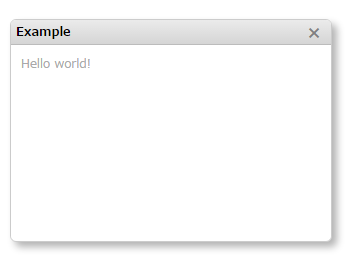](https://riversun.github.io/jsframe/examples/v150/simple.html)
**Tips**
- Get DOM element from contents:
```
frame.$([selector])
```
- Get the element which id is 'my_element'
```
const ele = frame.$('#my_element')
```
- Set window position
```
frame.setPosition(x,y,[anchor]);
```
If you specify an anchor, the location of the anchor will be the specified x,y coordinate.
Anchor values
'LEFT_TOP','CENTER_TOP','RIGHT_TOP','LEFT_CENTER','CENTER_CENTER','RIGHT_CENTER','LEFT_BOTTOM','CENTER_BOTTOM','RIGHT_BOTTOM'
- Set window content
```
frame.setHTML(`<div>Your content</div>`);
```
- Want to specify individual windows
You can give the window a unique window name.
```javascript
const windowName='my-example-window';
frame.setName(windowName);
```
and you can get the window by windowName
```javascript
const windowName='my-example-window';
const frame=jsFrame.getWindowByName(windowName);
```
- Want to check if a window already exists
You can use it in the following cases.
Show window if it exists, create new window if window is closed
```javascript
const windowName='my-example-window';
const windowExists=jsFrame.containsWindowName(windowName);
```
## Show specified URL as content of window
- Set ```url``` to the initialization parameter.
- The window contents will be shown as iframe.
- Set callback function which is called after loading a page as ```urlLoaded```
```js
const frame01 = jsFrame.create({
title: 'Window1',
left: 20, top: 20, width: 320, height: 160,
url: 'iframe_content01.html',//URL to display in iframe
//urlLoaded:Callback function called after loading iframe
urlLoaded: (frame) => {
//Called when the url finishes loading
}
});
frame01.show();
```
**DEMO**
https://riversun.github.io/jsframe/examples/v150/iframe.html
[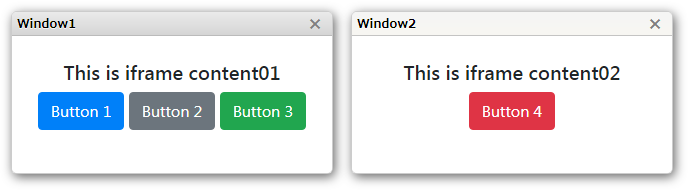](https://riversun.github.io/jsframe/examples/v150/iframe.html)
**Tips**
- You can also get DOM element in the page shown as window's content area specified by url(iframe) ,You can call like ```frame.$('#my_element')```.
## Show window as a modal window
- Call ```frame.showModal``` to show the window as a modal window.
- By specifying like ```showModal(callbackFunc)``` you can receive a callback when the modal window is closed.
```js
const modalFrame = jsFrame.create({
title: 'modal window',
left: 0, top: 0, width: 320, height: 220,
html: 'something'
});
//Show as a modal window
modalFrame.showModal(_frame => {
//Callback when modal window is closed.
});
```
**DEMO**
https://riversun.github.io/jsframe/examples/v150/modal.html
[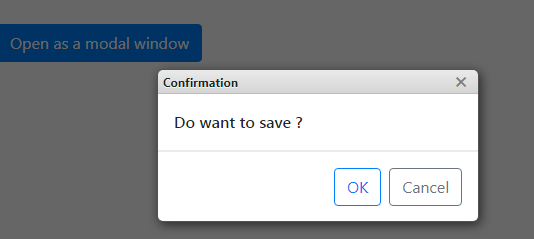](https://riversun.github.io/jsframe/examples/v150/modal.html)
## Styling
- JSFrame.js has the option where you can design the window appearance or apply style to certain elements and then apply styles to them as you want.
- You can specify style from preset or design it yourself.
- Set ```appearanceName``` to initialization parameter to select the window design called ```appearance```.
- Or if you want to design appearance from scratch, you can set ```appearance``` to initialization parameter.
**Style from preset**
```javascript
const frame01 = jsFrame.create({
title: 'Yosemite style',
left: 20, top: 20, width: 320, height: 220,
appearanceName: 'yosemite',//Now preset is selectable from 'yosemite','redstone','popup'
style: {
backgroundColor: 'rgba(255,255,255,0.9)',
},
html: '<div style="padding:10px;">Preset is selected by preset name</div>'
}).show();
```
**DEMO**
https://riversun.github.io/jsframe/examples/v150/styling.html
[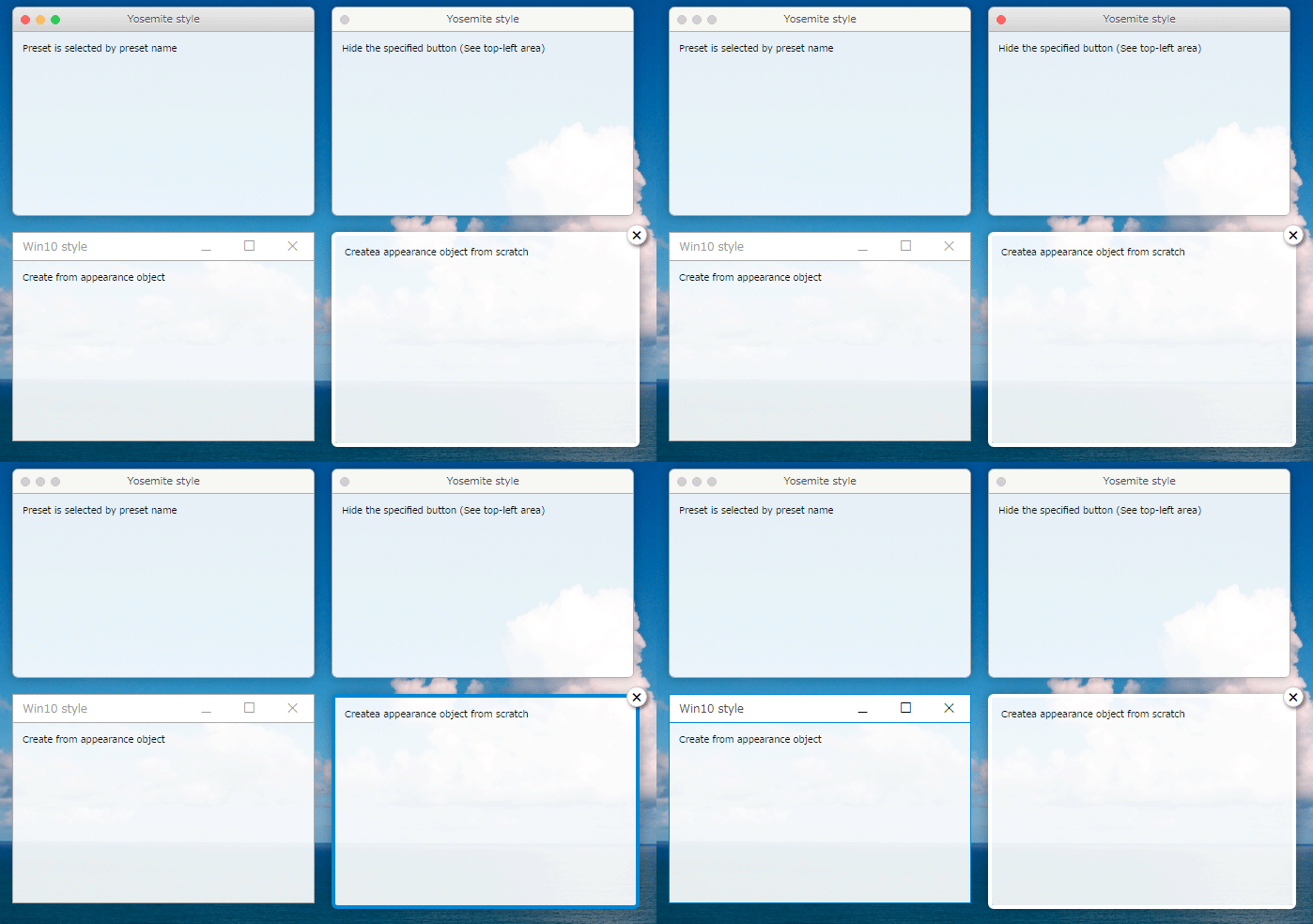](https://riversun.github.io/jsframe/examples/v150/styling.html)
## Event handling
- You can set an event handler (callback function) for the DOM element in the content specified by html or url.
- You can also set an event handler for buttons on the title bar.
- Call like ```frame.on(selector,'click',(_frame,event)=>{});``` to set click event handler functions.
```javascript
//Set click handler for DOM element specified as html or url in the initialization parameters.
frame.on('#bt_cancel', 'click', (_frame, evt) => {
});
//Event handler for buttons on the title bar.
frame.on('minimizeButton', 'click', (_frame, evt) => {
});
```
**DEMO**
https://riversun.github.io/jsframe/examples/v150/event_handling.html
[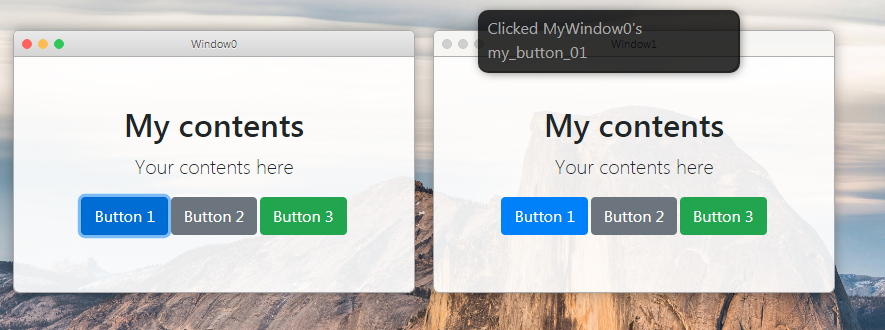](https://riversun.github.io/jsframe/examples/v150/event_handling.html
)
## Show toast messages.
- A toast provides simple message about an operation in a small popup. Toasts automatically disappear after the time specified by ```duration```.
- Call ```JSFrame.showToast``` to show a toast.
- You can customize the appearance and something.
**Simple toast**
```js
const jsFrame = new JSFrame();
jsFrame.showToast({
html: 'Default toast'
});
```
[](https://riversun.github.io/jsframe/examples/v150/toast.html)
**Specify the position**
```js
jsFrame.showToast({
align: 'center', html: 'Toast displayed in the center'
});
```
You can specify the position with ```align``` like below.
**align:'top'** =>Toast displayed at the top
**align:'center'** =>Toast displayed in the center
**align:'bottom'** =>Toast displayed at the bottom(default)
**Customize toast**
```js
jsFrame.showToast(
{
width: 260,
height: 100,
duration: 2000,//Duration(millis)
align: 'center',// alignment from 'top'/'center'/'bottom'(default)
style: {
borderRadius: '2px',
backgroundColor: 'rgba(0,124,255,0.8)',
},
html: '<span style="color:white;">Custom toast</span>',
closeButton: true,//Show close button
closeButtonColor: 'white'//Color of close button
});
```
**DEMO**
https://riversun.github.io/jsframe/examples/v150/toast.html
[](https://riversun.github.io/jsframe/examples/v150/toast.html)
## Settings for preset 'material'
You can use [font-awesome](https://fontawesome.com/icons?d=gallery&m=free) for titlebar icons.
[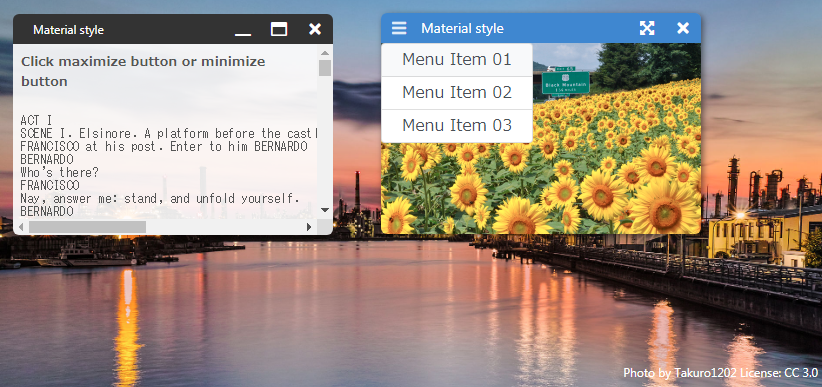](https://riversun.github.io/jsframe/examples/v150/preset_material.html)
For material, describe the settings using **appearanceParam** as below.
```js
{
name: `Win2`,
title: `Material style`,
left: 360, top: 40, width: 320, height: 220, minWidth: 200, minHeight: 110,
appearanceName: 'material',
appearanceParam: {
border: {
shadow: '2px 2px 10px rgba(0, 0, 0, 0.5)',
width: 0,
radius: 6,
},
titleBar: {
color: 'white',
background: '#4784d4',
leftMargin: 40,
height: 30,
fontSize: 14,
buttonWidth: 36,
buttonHeight: 16,
buttonColor: 'white',
buttons: [ // buttons on the right
{
//Set font-awesome fonts(https://fontawesome.com/icons?d=gallery&m=free)
fa: 'fas fa-times',//code of font-awesome
name: 'closeButton',
visible: true // visibility when window is created.
},
{
fa: 'fas fa-expand-arrows-alt',
name: 'maximizeButton',
visible: true
},
{
fa: 'fas fa-compress-arrows-alt',
name: 'minimizedButton',
visible: false
},
],
buttonsOnLeft: [ //buttons on the left
{
//Set font-awesome fonts(https://fontawesome.com/icons?d=gallery&m=free)
fa: 'fas fa-bars',
name: 'menu',
visible: true,
//html to show when this button is clicked.
childMenuHTML: '<div class="list-group">' +
' <div name="menu1" class="list-group-item list-group-item-action py-2">Menu Item 01</div>' +
' <div name="menu2" class="list-group-item list-group-item-action py-2">Menu Item 02</div>' +
' <div name="menu3" class="list-group-item list-group-item-action py-2">Menu Item 03</div>' +
'</div>',
childMenuWidth: 300
},
],
},
},
style: {
backgroundColor: 'rgba(0,0,0,0.8)',
overflow: 'hidden',
width: '100%',
},
html: 'something'
}
```
## Window operation
**Close window**
```js
frame.closeFrame();
```
**Hide Window**
```js
frame.hide();
```
**Focus window (and pull up to the front)**
```js
frame.requestFocus();
```
**Get window by name**
```js
var frame = jsFrame.getWindowByName('my-window');
```
## Window operation helper
Setting frame#setControl enables the mode to automatically change the window size when the button on the title bar is pressed.
```js
frame.setControl({
maximizeButton: 'maximizeButton',//Name of the button on framecomponent to maximize when pressed.
demaximizeButton: 'restoreButton',//Name of the button on framecomponent to de-maximize when pressed.
maximizeWithoutTitleBar: true,//If true,hide the title bar and maximize the content part.
restoreKey: 'Escape',//If maximizeWithoutTitleBar is true,de-maximize the window when the key specified here is pushed.
minimizeButton: 'minimizeButton',//Name of the button on framecomponent to minimize when pressed.
deminimizeButton: 'deminimizeButton',//Name of the button on framecomponent to de-minimize when pressed.
hideButton: 'closeButton',//Name of the button on framecomponent to hide when pressed.
animation: true,//If true,execute animation during window size changing
animationDuration: 150,//Duration of animation
});
```
**DEMO**
https://riversun.github.io/jsframe/examples/v150/window_control.html
### Handling events for window operation events.
```js
frame.control.on('maximized', (frame, info) => {
jsFrame.showToast({
text: 'Press "ESC" to minimize.', align: 'center'
});
});
```
<table>
<tr><td>EventType</td><td>Description</td></tr>
<tr><td>maximized</td><td>Called when maximazation is finished.</td></tr>
<tr><td>demaximized</td><td>Called when de-maximazation is finished.</td></tr>
<tr><td>minimized</td><td>Called when minimization is finished.</td></tr>
<tr><td>deminimized</td><td>Called when de-minimization is finished.</td></tr>
<tr><td>hid</td><td>Called when hiding is finished.</td></tr>
<tr><td>dehided</td><td>Called when de-hiding is finished.</td></tr>
</table>
### Do sizing operation manually
You can write window size operation manually like below
```js
frame.on('maximizeButton', 'click', (_frame, evt) => {
_frame.control.doMaximize({
hideTitleBar: false,
duration: 200,
restoreKey: 'Escape',
restoreDuration: 100,
callback: (frame, info) => {
frame.requestFocus();
},
restoreCallback: (frame, info) => {
jsFrame.showToast({
text: frame.getName() + ' ' + info.eventType
});
},
});
});
```
## JSFrame initialization parameters
```js
this.jsFrame = new JSFrame({
fixed:true,//(Default)If true, it will be fixed to the screen even if the contents (background) scrolls.
parentElement:document.body,//Set element to attach jsFrame.
horizontalAlign: 'right',// If 'right' is set, the anchor is set at the right edge.If you specify the position of frame with 'left' in this mode, Make the value negative.Default is 'left'
verticalAlign: 'bottom',//If 'bottom' is set, the anchor is set at the bottom edge.Default is 'bottom'
});
```
## Frame creation initialization parameters
```js
const frame = jsFrame.create(
{
name: 'my-window-name',//Window name.Unique name is required.
title: 'Window0',//Window title
left: 20,//x coordinate of the upper left corner of the window
top: 20,//y coordinate of the upper left corner of the window
width: 320,//width of the window
height: 220,//height of the window
minWidth: 160,//The minimum width of the window
minHeight: 100,//The minimum height of the window
movable: true,//true:You can move the window with mouse
resizable: true,//true:You can resize the window with mouse
appearance: appearanceObj,//Appearance object
appearanceName: 'yosemite',//Preset name of appearance(Not with 'appearance')
style: {//Style of the content.Can be specified just like inline style attribute.
backgroundColor: 'rgba(220,220,220,0.8)',//Ex.Background color of content(Opacity can be specified)
overflow: 'auto',//Ex.What to do when the drawing extends beyond the content area
},
html: 'Contents',//HTML shown in the content(Not with 'url')
url: 'content01.html',//The URL for contents.To be shown in iframe.
urlLoaded: (frame) = {}//Callback function when url is finished loading.
});
```
# using npm module with webpack
After install **jsframe.js** , you can use it like below.
```js
import {JSFrame} from 'jsframe';
```
You can add an alias in your webpack config like this:
```js
module.exports = {
...
resolve: {
alias: {
'jsframe': 'jsframe.js/dist/jsframe.min.js',
}
},
...
};
```
# Examples
All examples are included in the project. You can modify,customize example after cloning the project
```
git clone https://github.com/riversun/JSFrame.js.git
```
# Classese and Methods/Members
### org.riversun.JSFrame class
#### JSFrame is a frame builder and management class.
|Methods|Details|
|---|---|
|**CIfFrame** createFrame(left, top, width, height, **CFrameAppearance**)|create **CIFFrame** instance.CIfFrame is a kind of 'window' called frame.|
|**CFrameAppearance** createFrameAppearance()|create **CFrameAppearance** instance.<br>**CFrameAppearance** is a class for frame appearance.You can modify frame's looking as you like.|
<hr>
### CIfFrame class
#### CIfFrame is like a window.It's draggable and movable.You can design it.
|Methods|Details|
|---|---|
|CIfFrame setTitle(str)|Set caption in the title bar|
|CIfFrame setResizable(boolean)|Set whether the window can be resized|
|CIfFrame setMovable(boolean)|Set whether the window can be moved|
|CIfFrame setTitleBarClassName(classNameForDefault, classNameForFocused)|Set title bar style class name|
|Object getFrameView()|Get window content element.<br>It's just a 'div' element.So you can handle it as a 'div' element.<br>ex)<br>**frame.getFrameView().innerHTML='xxxx';**|
|Promise setUrl(url)|Open a page specified as *url* in the IFrame mode.<br>It returns Promise.If you want to execute something at the timing of opening url,use 'then' .<br>ex)<br>**frame.setUrl('http://something').then(function(){frame.show();});**|
|CIfFrame show()|Show frame|
|CIfFrame requestFocus()|Requests that this frame gets the focus.<br>Focus and the window comes to the forefront|
|CIfFrame setSize(width,height)|set size of frame|
|CIfFrame setPosition(x,y,anchor)|anchor is optional.<br>Default anchor is 'LEFT_TOP'<br>You can set followings for anchor.<br>'LEFT_TOP',<br>'CENTER_TOP',<br>'RIGHT_TOP',<br>'LEFT_CENTER',<br>'CENTER_CENTER',<br>'RIGHT_CENTER',<br>'LEFT_BOTTOM',<br>'CENTER_BOTTOM',<br>'RIGHT_BOTTOM'|
<hr>
### CFrameAppearance class
#### CFrameAppearance is a class for frame appearance.You can modify frame's looking as you like.
|Methods|Details|
|---|---|
|CFrameAppearance setUseIFrame(boolean)|If 'true' ,You can set CIfFrame 'IFrame mode' and you can use CIfFrame#setUrl method for opening specified url.|
|void onInitialize()|Since this callback method is called at frame initialization,Initialization processing such as adding frameComponent should be written here.|
|Members|Details|
|---|---|
|showTitleBar|true or false|
|showCloseButton|true or false<br>|
|titleBarCaptionFontSize|ex)'12px'|
|titleBarCaptionFontWeight|ex)'bold'|
|titleBarHeight|ex)'24px'|
|titleBarCaptionLeftMargin|ex)'10px'|
|titleBarColorDefault|Color for not focused state.<br>ex)'#dddddd'|
|titleBarColorFocused|Color for focused state.<br>ex)'white'|
|titleBarCaptionColorDefault|Color for not focused state.<br>ex)'black'|
|titleBarCaptionColorFocused|Color for focused state.<br>ex)'red'|
|titleBarBorderBottomDefault|Style for bottom of the title bar.<br>ex)'1px solid rgba(0,0,0,0.2)'|
|titleBarBorderBottomFocused|If null,'titleBarBorderBottomDefault' will be applied.|
|frameBorderRadius|Corner radius of the window.<br>ex)'6px'|
|frameBorderWidthDefault|Width of border line in the not focused state.<br>ex)'1px'|
|frameBorderWidthFocused|Width of border line in the focused state.<br>ex)'1px'|
|frameBorderColorDefault|Color of border line in the not focused state.<br>ex)'rgba(1, 1, 1, 0.2)'|
|frameBorderColorFocused|Color of border line in the focused state.<br>ex)'rgba(1, 1, 1, 0.2)'|
|frameBorderStyle|Border line style<br>ex)solid|
|frameBoxShadow|Shadow style of the frame<br>ex) '5px 5px 10px rgba(0, 0, 0, 0.3)'|
|frameBackgroundColor|Background color of the frame<br>ex)'white'|
<hr>
### V1.00 Examples (available for latest version)
## Example:Basic
**DEMO**
https://riversun.github.io/jsframe/examples/ex01/index.html
[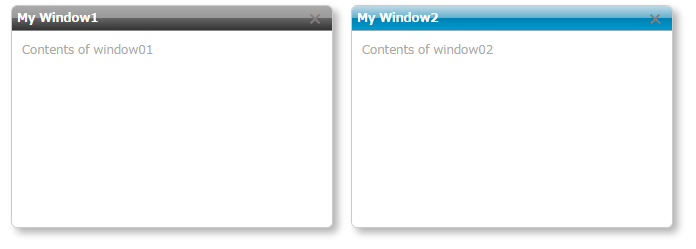](https://riversun.github.io/jsframe/examples/ex01/index.html)
## Example:Window with Iframe contents
**DEMO**
https://riversun.github.io/jsframe/examples/ex02/index.html
[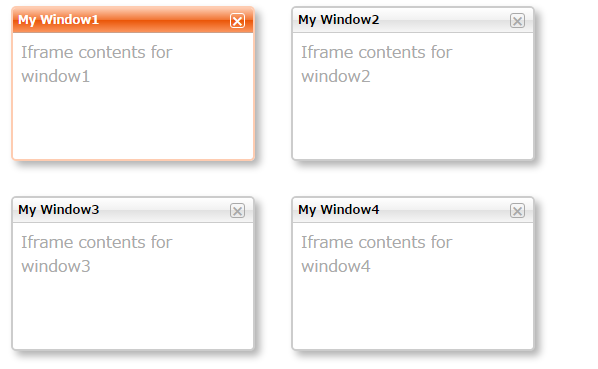](https://riversun.github.io/jsframe/examples/ex02/index.html)
## Example:OS X style
**DEMO**
https://riversun.github.io/jsframe/examples/ex03/index.html
[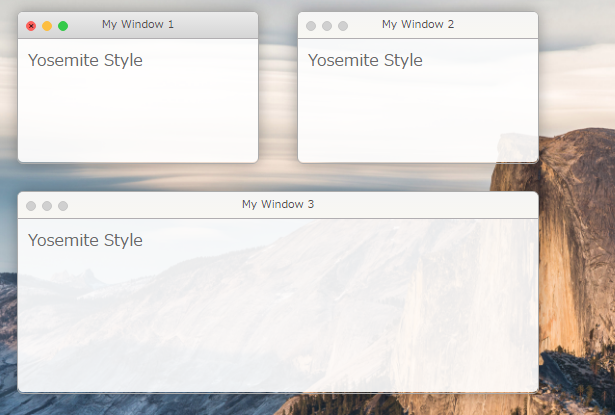](https://riversun.github.io/jsframe/examples/ex03/index.html)
## Example:Win style
**DEMO**
https://riversun.github.io/jsframe/examples/ex04/index.html
[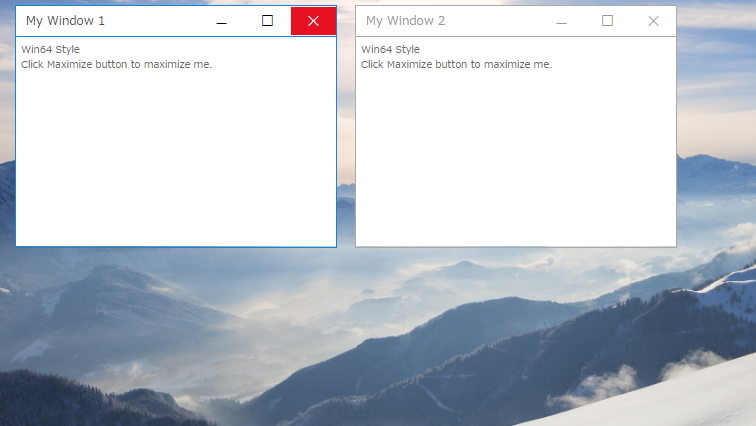](https://riversun.github.io/jsframe/examples/ex04/index.html)
## Example:Various styles
**DEMO**
https://riversun.github.io/jsframe/examples/ex05/index.html
[](https://riversun.github.io/jsframe/examples/ex05/index.html)
## Example:Animations #1
**DEMO**
https://riversun.github.io/jsframe/examples/ex06/index.html
[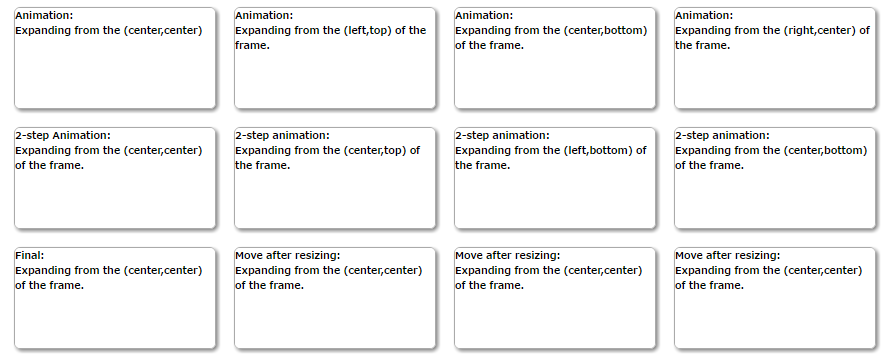](https://riversun.github.io/jsframe/examples/ex06/index.html)
### All assets moved from mysvn
================================================
FILE: lib/jsframe.min.js.LICENSE.txt
================================================
/*! event-emitter(https://github.com/riversun/event-emitter) v1.5.2 Copyright (c) 2020 riversun.org@gmail.com */
/*! event-listener-helper(https://github.com/riversun/event-listener-helper) v1.1.3 Copyright (c) 2020 riversun.org@gmail.com */
/*! jsframe v1.6.8 Copyright (c) 2007-2020 Tom Misawa */
/*! merge-deeply v2.1.1 Copyright (c) 2019-2020 riversun.org@gmail.com */
================================================
FILE: package.json
================================================
{
"name": "jsframe.js",
"version": "1.6.8",
"description": "It is an independent lightweight multi-window library for javascript.\r - Create various popup windows.\r - Styling the appearance flexibly.",
"main": "lib/jsframe.min.js",
"scripts": {
"start": "webpack-dev-server",
"build": "webpack --config webpack.config.js --mode development",
"release": "cross-env NODE_ENV=test webpack --config webpack.config.js --mode production",
"test": "echo \"Error: no test specified\" && exit 1"
},
"repository": {
"type": "git",
"url": "git+https://github.com/riversun/JSFrame.js.git"
},
"author": "Tom Misawa <riversun.org@gmail.com> (https://github.com/riversun)",
"license": "MIT",
"bugs": {
"url": "https://github.com/riversun/JSFrame.js/issues"
},
"keywords": [
"floating",
"popup",
"window",
"toast",
"js",
"ui"
],
"homepage": "https://github.com/riversun/JSFrame.js#readme",
"devDependencies": {
"@babel/core": "^7.19.6",
"@babel/preset-env": "^7.19.4",
"babel-loader": "^8.2.5",
"cross-env": "^7.0.3",
"css-loader": "^5.2.7",
"style-loader": "^2.0.0",
"webpack": "^5.74.0",
"webpack-cli": "^4.9.2",
"webpack-dev-server": "^4.8.1"
},
"dependencies": {
"@riversun/event-emitter": "^1.5.2",
"event-listener-helper": "^1.1.3",
"merge-deeply": "^2.1.1"
}
}
================================================
FILE: public/examples/jaq/chatbot_ui.html
================================================
<!DOCTYPE html>
<!--
Example of chatbot UI
-->
<html>
<head>
<title>JsFrame.js ChatBot UI Example</title>
<meta charset="utf-8">
<meta name="description" content="JSFrame chatbot UI example">
<link rel="stylesheet" href="https://use.fontawesome.com/releases/v5.6.3/css/all.css"
integrity="sha384-UHRtZLI+pbxtHCWp1t77Bi1L4ZtiqrqD80Kn4Z8NTSRyMA2Fd33n5dQ8lWUE00s/" crossorigin="anonymous">
<style type="text/css">
body {
font-family: -apple-system, BlinkMacSystemFont, "Segoe UI", Roboto, "Helvetica Neue", Arial, "Noto Sans", sans-serif, "Apple Color Emoji", "Segoe UI Emoji", "Segoe UI Symbol", "Noto Color Emoji";
}
.btn-chat {
box-shadow: 2px 3px 16px rgba(0, 0, 0, .6);
border-radius: 50%;
text-align: center;
vertical-align: middle;
position: fixed;
color: #fff;
background-color: #007bff;
border-color: #007bff;
transition: transform 0.2s linear, opacity 0.5s;
transform: scale(0.9);
opacity: 0;
}
.btn-on {
opacity: 1;
}
.btn-chat:hover {
color: #fff;
background-color: #0069d9;
border-color: #0062cc;
transform: scale(1.0);
}
</style>
</head>
<body style="overflow: hidden;background: url('https://upload.wikimedia.org/wikipedia/commons/thumb/c/cb/Tokyo_Tower_Afterglow_3.JPG/1280px-Tokyo_Tower_Afterglow_3.JPG') 50% no-repeat fixed; background-size: cover;">
<div style="color:#f5f5f5;text-shadow: 2px 2px 1px #333333;"><a
href="https://github.com/riversun/JSFrame.js">JSFrame.js</a> ChatBot UI Frame
</div>
<script src="../../jsframe.js"></script>
<script>
class ChatUI {
constructor() {
this.jsFrame = new JSFrame({
horizontalAlign: 'right',
verticalAlign: 'bottom',
});
this.initParam = {
btnRight: 20,
btnBottom: 20,
btnSize: 60,
btnFontSize: 25,
frmWidth: 300,
frmHeight: 500,
frmHeightMin: 300,
frmWidthMin: 200,
frmTitleHeight: 40,
};
this.frameName = 'chat_window';
this.buttonId = 'chat_wakeup';
}
/**
* Build chat start button
*/
buildChatButton() {
const p = this.initParam;
const btnRight = p.btnRight;
const btnBottom = p.btnBottom;
const btnSize = p.btnSize;
const btnFontSize = p.btnFontSize;
const showChatBtn = document.createElement('div')
showChatBtn.id = this.buttonId;
showChatBtn.className = 'btn-chat';
showChatBtn.innerHTML = '<i class="fas fa-comment-alt"></i>';
showChatBtn.onclick = this.showChatWindow.bind(this);
const style = showChatBtn.style;
style.right = btnRight + 'px';
style.bottom = btnBottom + 'px';
style.width = btnSize + 'px';
style.height = style.width;
style.lineHeight = style.width;
style.fontSize = btnFontSize + 'px';
document.body.appendChild(showChatBtn);
}
/**
* Makes the chat button visible or invisible.
* @param isVisible
*/
setChatButtonVisible(isVisible) {
const chatButton = document.querySelector(`#${this.buttonId}`);
if (isVisible) {
//chatButton.style.display = 'inline';
chatButton.classList.add('btn-on');
} else {
//chatButton.style.display = 'none';
chatButton.classList.remove('btn-on');
}
}
/*
* Create chat window
*/
buildChatWindow() {
const p = this.initParam;
const frmWidth = p.frmWidth;
const frmHeight = p.frmHeight;
const frmHeightMin = p.frmHeightMin;
const frmWidthMin = p.frmWidthMin;
const frmTitleHeight = p.frmTitleHeight;
const frmLeft = -(p.btnRight + frmWidth);
const frmTop = -(p.btnBottom + p.btnSize + frmHeight);
/**
* Coordinate(left,top) where the window is minimzied
* @type {{x: number, y: number}}
*/
const vanishingPoint = {
x: frmLeft + frmWidth,
y: frmTop + frmHeight - frmTitleHeight
};
//Create chat window
this.frame = this.jsFrame.create({
name: this.frameName,
title: `JSFrame Chat`,
left: frmLeft,
top: frmTop,
width: frmWidth,
height: frmHeight,
minWidth: frmWidthMin,
minHeight: frmHeightMin,
appearanceName: 'material',
appearanceParam: {
border: {
shadow: '2px 2px 10px rgba(0, 0, 0, 0.5)',
width: 0,
radius: 6,
},
titleBar: {
color: 'white',
background: '#4784d4',
leftMargin: 40,
height: frmTitleHeight,
fontSize: 14,
buttonWidth: 36,
buttonHeight: 16,
buttonColor: 'white',
buttons: [
{
fa: 'fas fa-times',
name: 'hideButton',
visible: true
},
],
buttonsOnLeft: [
{
fa: 'fas fa-comment-alt',
name: 'icon',
visible: true
},
],
},
},
style: {
backgroundColor: 'rgba(255,255,255,0.8)',
overflow: 'auto'
},
html: 'Chat UI Here',
//url: // Chat URL here
});
//Enable helper to act on window's common operations(maximization/minimization and something)
this.frame.setControl({
animation: true,
animationDuration: 200,
});
//Set click event when the close button is clicked
this.frame.on('hideButton', 'click', (_frame, evt) => {
_frame.control.doHide({
offset: vanishingPoint,
align: 'ABSOLUTE',
callback: (frame, info) => {
this.setChatButtonVisible(true);
}
})
});
//Minimize the window first to memory the initial window position and size.
this.frame.control.doHide({
silent: true,//means invisible action
duration: 0,
align: 'ABSOLUTE',//need to set the offset point where window is minimized
offset: vanishingPoint,
});
}
showChatWindow() {
const frame = this.jsFrame.getWindowByName(this.frameName);
//Open minimized window
frame.control.doDehide({
callback: (frame, info) => {
this.setChatButtonVisible(false);
}
});
}
build() {
this.buildChatButton();
this.buildChatWindow();
this.setChatButtonVisible(true);
}
}
new ChatUI().build();
</script>
</body>
</html>
================================================
FILE: public/examples/jaq/event_handling.html
================================================
<!DOCTYPE html>
<html>
<head>
<title>JsFrame.js preset style 'yosemite'</title>
<meta charset="utf-8">
<link rel="stylesheet" href="https://maxcdn.bootstrapcdn.com/bootstrap/4.0.0/css/bootstrap.min.css">
</head>
<body style="background: url('http://upload.wikimedia.org/wikipedia/commons/d/d6/Half_Dome_from_Glacier_Point%2C_Yosemite_NP_-_Diliff.jpg') 50% no-repeat fixed; background-size: cover;">
<script src="https://riversun.github.io/jsframe/jsframe.js"></script>
<script>
function start() {
const jsFrame = new JSFrame();
const frames = [];
const innerHTML = '<div class="container">' +
'<div class="py-5 text-center">\n' +
'<h2>My contents</h2>\n' +
'<p class="lead">コンテンツを記述します.</p>\n' +
'<div class="col-12 text-center">\n' +
'<button id="my_button_01" type="button" class="btn btn-primary">ボタン1</button>\n' +
'<button id="my_button_02" type="button" class="btn btn-secondary">ボタン2</button>\n' +
'<button id="my_button_03" type="button" class="btn btn-success">ボタン3</button>\n' +
'</div></div></div>'
for (let i = 0; i < 2; i++) {
const frame = jsFrame.create({
name: `MyWindow${i}`,
title: `Window${i}`,
left: 20 + 420 * i, top: 40, width: 400, height: 260,
minWidth: 160, minHeight: 100,
appearanceName: 'yosemite',
style: {
backgroundColor: 'rgba(255,255,255,0.9)',
overflow: 'auto'
},
html: innerHTML
});
//プリセットアピアランスのボタンを取得する
frame.on('minimizeButton', 'click', (_frame, evt) => {
const size = _frame.getSize();
_frame.setSize(size.width - 20, size.height - 20);
});
frame.on('zoomButton', 'click', (_frame, evt) => {
const size = _frame.getSize();
_frame.setSize(size.width + 20, size.height + 20);
});
frame.on('closeButton', 'click', (_frame, evt) => {
_frame.closeFrame();
});
const htmlButtonListener = (_frame, evt) => {
const jsFrame = new JSFrame();
jsFrame.showToast({
html: `${_frame.getName()}の${evt.target.id}がクリックされた`,
align:'top'
});
};
//HTML内の要素を取得する場合はセレクタ表記で
frame.on('#my_button_01', 'click', htmlButtonListener);
frame.on('#my_button_02', 'click', htmlButtonListener);
frame.on('#my_button_03', 'click', htmlButtonListener);
frame.show();
frames.push(frame);
}
frames[0].requestFocus();
}
start();
</script>
</body>
</html>
================================================
FILE: public/examples/jaq/iframe.html
================================================
<!DOCTYPE html>
<html>
<head>
<title>JsFrame.js example - Use IFrame</title>
<meta charset="utf-8">
<meta name="description" content="A javascript popup/floating window library.">
</head>
<body>
<script src="https://riversun.github.io/jsframe/jsframe.js"></script>
<script>
const jsFrame = new JSFrame();
function start() {
const frame01 = jsFrame.create({
title: 'ウィンドウ1',
name: 'window01',
left: 20, top: 20, width: 320, height: 160,
url: 'iframe_content01.html',//iframe内に表示するURL
//urlLoaded:iframe読み込み終了後に呼び出されるコールバック
urlLoaded: (frame) => {
frame.on('#my_button_01', 'click', (_frame, evt) => {
showToast(`${_frame.getName()}の${evt.target.id}がクリックされた`);
});
frame.on('#my_button_02', 'click', (_frame, evt) => {
_frame.closeFrame();
});
}
});
frame01.show();
const frame02 = jsFrame.create({
title: 'ウィンドウ2',
name: 'window02',
left: 360, top: 20, width: 320, height: 160,
});
//#setUrlメソッドを使ってiframe内に表示するURLを指定することも可能
//#setUrlはPromiseを返す、iframeのロードが終了するとコールバックされる
frame02.setUrl('iframe_content02.html').then((frame, evt) => {
frame.on('#my_button_04', 'click', (_frame, evt) => {
showToast(`${_frame.getName()}の${evt.target.id}がクリックされた`);
});
frame.show();
});
}
function showToast(str) {
jsFrame.showToast({
html: str, align: 'top'
});
}
start();
</script>
</body>
</html>
================================================
FILE: public/examples/jaq/iframe_content01.html
================================================
<html>
<head>
<meta http-equiv="Content-Type" content="text/html; charset=UTF-8">
<link rel="stylesheet" href="https://maxcdn.bootstrapcdn.com/bootstrap/4.0.0/css/bootstrap.min.css">
</head>
<body style="background:white">
<div class="col-12 text-center">
<br>
<h5>This is iframe content01</h5>
<button id="my_button_01" type="button" class="btn btn-primary">ボタン1</button>
<button id="my_button_02" type="button" class="btn btn-secondary">ボタン2</button>
<button id="my_button_03" type="button" class="btn btn-success">ボタン3</button>
</div>
</body>
</html>
================================================
FILE: public/examples/jaq/iframe_content02.html
================================================
<html>
<head>
<meta http-equiv="Content-Type" content="text/html; charset=UTF-8">
<link rel="stylesheet" href="https://maxcdn.bootstrapcdn.com/bootstrap/4.0.0/css/bootstrap.min.css">
</head>
<body style="background:white">
<div class="col-12 text-center">
<br>
<h5>This is iframe content02</h5>
<button id="my_button_04" type="button" class="btn btn-danger">ボタン4</button>
</div>
</body>
</html>
================================================
FILE: public/examples/jaq/iframe_content03.html
================================================
<html>
<head>
<meta http-equiv="Content-Type" content="text/html; charset=UTF-8">
</head>
<body style="color:#555555;background:rgba(255,255,255,0.9)">
<h5>Click maximize button or minimize button</h5>
<pre>
ACT I
SCENE I. Elsinore. A platform before the castle.
FRANCISCO at his post. Enter to him BERNARDO
BERNARDO
Who's there?
FRANCISCO
Nay, answer me: stand, and unfold yourself.
BERNARDO
Long live the king!
FRANCISCO
Bernardo?
BERNARDO
He.
FRANCISCO
You come most carefully upon your hour.
BERNARDO
'Tis now struck twelve; get thee to bed, Francisco.
FRANCISCO
For this relief much thanks: 'tis bitter cold,
And I am sick at heart.
BERNARDO
Have you had quiet guard?
FRANCISCO
Not a mouse stirring.
BERNARDO
Well, good night.
If you do meet Horatio and Marcellus,
The rivals of my watch, bid them make haste.
FRANCISCO
I think I hear them. Stand, ho! Who's there?
Enter HORATIO and MARCELLUS
HORATIO
Friends to this ground.
MARCELLUS
And liegemen to the Dane.
FRANCISCO
Give you good night.
MARCELLUS
O, farewell, honest soldier:
Who hath relieved you?
FRANCISCO
Bernardo has my place.
Give you good night.
Exit
MARCELLUS
Holla! Bernardo!
BERNARDO
Say,
What, is Horatio there?
HORATIO
A piece of him.
BERNARDO
Welcome, Horatio: welcome, good Marcellus.
MARCELLUS
What, has this thing appear'd again to-night?
BERNARDO
I have seen nothing.
MARCELLUS
Horatio says 'tis but our fantasy,
And will not let belief take hold of him
Touching this dreaded sight, twice seen of us:
Therefore I have entreated him along
With us to watch the minutes of this night;
That if again this apparition come,
He may approve our eyes and speak to it.
HORATIO
Tush, tush, 'twill not appear.
BERNARDO
Sit down awhile;
And let us once again assail your ears,
That are so fortified against our story
What we have two nights seen.
HORATIO
Well, sit we down,
And let us hear Bernardo speak of this.
BERNARDO
Last night of all,
When yond same star that's westward from the pole
Had made his course to illume that part of heaven
Where now it burns, Marcellus and myself,
The bell then beating one,--
Enter Ghost
MARCELLUS
Peace, break thee off; look, where it comes again!
BERNARDO
In the same figure, like the king that's dead.
MARCELLUS
Thou art a scholar; speak to it, Horatio.
BERNARDO
Looks it not like the king? mark it, Horatio.
HORATIO
Most like: it harrows me with fear and wonder.
BERNARDO
It would be spoke to.
MARCELLUS
Question it, Horatio.
HORATIO
What art thou that usurp'st this time of night,
Together with that fair and warlike form
In which the majesty of buried Denmark
Did sometimes march? by heaven I charge thee, speak!
MARCELLUS
It is offended.
BERNARDO
See, it stalks away!
HORATIO
Stay! speak, speak! I charge thee, speak!
Exit Ghost
MARCELLUS
'Tis gone, and will not answer.
BERNARDO
How now, Horatio! you tremble and look pale:
Is not this something more than fantasy?
What think you on't?
HORATIO
Before my God, I might not this believe
Without the sensible and true avouch
Of mine own eyes.
MARCELLUS
Is it not like the king?
HORATIO
As thou art to thyself:
Such was the very armour he had on
When he the ambitious Norway combated;
So frown'd he once, when, in an angry parle,
He smote the sledded Polacks on the ice.
'Tis strange.
MARCELLUS
Thus twice before, and jump at this dead hour,
With martial stalk hath he gone by our watch.
HORATIO
In what particular thought to work I know not;
But in the gross and scope of my opinion,
This bodes some strange eruption to our state.
MARCELLUS
Good now, sit down, and tell me, he that knows,
Why this same strict and most observant watch
So nightly toils the subject of the land,
And why such daily cast of brazen cannon,
And foreign mart for implements of war;
Why such impress of shipwrights, whose sore task
Does not divide the Sunday from the week;
What might be toward, that this sweaty haste
Doth make the night joint-labourer with the day:
Who is't that can inform me?
HORATIO
That can I;
At least, the whisper goes so. Our last king,
Whose image even but now appear'd to us,
Was, as you know, by Fortinbras of Norway,
Thereto prick'd on by a most emulate pride,
Dared to the combat; in which our valiant Hamlet--
For so this side of our known world esteem'd him--
Did slay this Fortinbras; who by a seal'd compact,
Well ratified by law and heraldry,
Did forfeit, with his life, all those his lands
Which he stood seized of, to the conqueror:
Against the which, a moiety competent
Was gaged by our king; which had return'd
To the inheritance of Fortinbras,
Had he been vanquisher; as, by the same covenant,
And carriage of the article design'd,
His fell to Hamlet. Now, sir, young Fortinbras,
Of unimproved mettle hot and full,
Hath in the skirts of Norway here and there
Shark'd up a list of lawless resolutes,
For food and diet, to some enterprise
That hath a stomach in't; which is no other--
As it doth well appear unto our state--
But to recover of us, by strong hand
And terms compulsatory, those foresaid lands
So by his father lost: and this, I take it,
Is the main motive of our preparations,
The source of this our watch and the chief head
Of this post-haste and romage in the land.
BERNARDO
I think it be no other but e'en so:
Well may it sort that this portentous figure
Comes armed through our watch; so like the king
That was and is the question of these wars.
HORATIO
A mote it is to trouble the mind's eye.
In the most high and palmy state of Rome,
A little ere the mightiest Julius fell,
The graves stood tenantless and the sheeted dead
Did squeak and gibber in the Roman streets:
As stars with trains of fire and dews of blood,
Disasters in the sun; and the moist star
Upon whose influence Neptune's empire stands
Was sick almost to doomsday with eclipse:
And even the like precurse of fierce events,
As harbingers preceding still the fates
And prologue to the omen coming on,
Have heaven and earth together demonstrated
Unto our climatures and countrymen.--
But soft, behold! lo, where it comes again!
Re-enter Ghost
I'll cross it, though it blast me. Stay, illusion!
If thou hast any sound, or use of voice,
Speak to me:
If there be any good thing to be done,
That may to thee do ease and grace to me,
Speak to me:
Cock crows
If thou art privy to thy country's fate,
Which, happily, foreknowing may avoid, O, speak!
Or if thou hast uphoarded in thy life
Extorted treasure in the womb of earth,
For which, they say, you spirits oft walk in death,
Speak of it: stay, and speak! Stop it, Marcellus.
MARCELLUS
Shall I strike at it with my partisan?
HORATIO
Do, if it will not stand.
BERNARDO
'Tis here!
HORATIO
'Tis here!
MARCELLUS
'Tis gone!
Exit Ghost
We do it wrong, being so majestical,
To offer it the show of violence;
For it is, as the air, invulnerable,
And our vain blows malicious mockery.
BERNARDO
It was about to speak, when the cock crew.
HORATIO
And then it started like a guilty thing
Upon a fearful summons. I have heard,
The cock, that is the trumpet to the morn,
Doth with his lofty and shrill-sounding throat
Awake the god of day; and, at his warning,
Whether in sea or fire, in earth or air,
The extravagant and erring spirit hies
To his confine: and of the truth herein
This present object made probation.
MARCELLUS
It faded on the crowing of the cock.
Some say that ever 'gainst that season comes
Wherein our Saviour's birth is celebrated,
The bird of dawning singeth all night long:
And then, they say, no spirit dares stir abroad;
The nights are wholesome; then no planets strike,
No fairy takes, nor witch hath power to charm,
So hallow'd and so gracious is the time.
HORATIO
So have I heard and do in part believe it.
But, look, the morn, in russet mantle clad,
Walks o'er the dew of yon high eastward hill:
Break we our watch up; and by my advice,
Let us impart what we have seen to-night
Unto young Hamlet; for, upon my life,
This spirit, dumb to us, will speak to him.
Do you consent we shall acquaint him with it,
As needful in our loves, fitting our duty?
MARCELLUS
Let's do't, I pray; and I this morning know
Where we shall find him most conveniently.
Exeunt
SCENE II. A room of state in the castle.
Enter KING CLAUDIUS, QUEEN GERTRUDE, HAMLET, POLONIUS, LAERTES, VOLTIMAND, CORNELIUS, Lords, and Attendants
KING CLAUDIUS
Though yet of Hamlet our dear brother's death
The memory be green, and that it us befitted
To bear our hearts in grief and our whole kingdom
To be contracted in one brow of woe,
Yet so far hath discretion fought with nature
That we with wisest sorrow think on him,
Together with remembrance of ourselves.
Therefore our sometime sister, now our queen,
The imperial jointress to this warlike state,
Have we, as 'twere with a defeated joy,--
With an auspicious and a dropping eye,
With mirth in funeral and with dirge in marriage,
In equal scale weighing delight and dole,--
Taken to wife: nor have we herein barr'd
Your better wisdoms, which have freely gone
With this affair along. For all, our thanks.
Now follows, that you know, young Fortinbras,
Holding a weak supposal of our worth,
Or thinking by our late dear brother's death
Our state to be disjoint and out of frame,
Colleagued with the dream of his advantage,
He hath not fail'd to pester us with message,
Importing the surrender of those lands
Lost by his father, with all bonds of law,
To our most valiant brother. So much for him.
Now for ourself and for this time of meeting:
Thus much the business is: we have here writ
To Norway, uncle of young Fortinbras,--
Who, impotent and bed-rid, scarcely hears
Of this his nephew's purpose,--to suppress
His further gait herein; in that the levies,
The lists and full proportions, are all made
Out of his subject: and we here dispatch
You, good Cornelius, and you, Voltimand,
For bearers of this greeting to old Norway;
Giving to you no further personal power
To business with the king, more than the scope
Of these delated articles allow.
Farewell, and let your haste commend your duty.
CORNELIUS VOLTIMAND
In that and all things will we show our duty.
KING CLAUDIUS
We doubt it nothing: heartily farewell.
Exeunt VOLTIMAND and CORNELIUS
And now, Laertes, what's the news with you?
You told us of some suit; what is't, Laertes?
You cannot speak of reason to the Dane,
And loose your voice: what wouldst thou beg, Laertes,
That shall not be my offer, not thy asking?
The head is not more native to the heart,
The hand more instrumental to the mouth,
Than is the throne of Denmark to thy father.
What wouldst thou have, Laertes?
LAERTES
My dread lord,
Your leave and favour to return to France;
From whence though willingly I came to Denmark,
To show my duty in your coronation,
Yet now, I must confess, that duty done,
My thoughts and wishes bend again toward France
And bow them to your gracious leave and pardon.
KING CLAUDIUS
Have you your father's leave? What says Polonius?
LORD POLONIUS
He hath, my lord, wrung from me my slow leave
By laboursome petition, and at last
Upon his will I seal'd my hard consent:
I do beseech you, give him leave to go.
KING CLAUDIUS
Take thy fair hour, Laertes; time be thine,
And thy best graces spend it at thy will!
But now, my cousin Hamlet, and my son,--
HAMLET
[Aside] A little more than kin, and less than kind.
KING CLAUDIUS
How is it that the clouds still hang on you?
HAMLET
Not so, my lord; I am too much i' the sun.
QUEEN GERTRUDE
Good Hamlet, cast thy nighted colour off,
And let thine eye look like a friend on Denmark.
Do not for ever with thy vailed lids
Seek for thy noble father in the dust:
Thou know'st 'tis common; all that lives must die,
Passing through nature to eternity.
HAMLET
Ay, madam, it is common.
QUEEN GERTRUDE
If it be,
Why seems it so particular with thee?
HAMLET
Seems, madam! nay it is; I know not 'seems.'
'Tis not alone my inky cloak, good mother,
Nor customary suits of solemn black,
Nor windy suspiration of forced breath,
No, nor the fruitful river in the eye,
Nor the dejected 'havior of the visage,
Together with all forms, moods, shapes of grief,
That can denote me truly: these indeed seem,
For they are actions that a man might play:
But I have that within which passeth show;
These but the trappings and the suits of woe.
KING CLAUDIUS
'Tis sweet and commendable in your nature, Hamlet,
To give these mourning duties to your father:
But, you must know, your father lost a father;
That father lost, lost his, and the survivor bound
In filial obligation for some term
To do obsequious sorrow: but to persever
In obstinate condolement is a course
Of impious stubbornness; 'tis unmanly grief;
It shows a will most incorrect to heaven,
A heart unfortified, a mind impatient,
An understanding simple and unschool'd:
For what we know must be and is as common
As any the most vulgar thing to sense,
Why should we in our peevish opposition
Take it to heart? Fie! 'tis a fault to heaven,
A fault against the dead, a fault to nature,
To reason most absurd: whose common theme
Is death of fathers, and who still hath cried,
From the first corse till he that died to-day,
'This must be so.' We pray you, throw to earth
This unprevailing woe, and think of us
As of a father: for let the world take note,
You are the most immediate to our throne;
And with no less nobility of love
Than that which dearest father bears his son,
Do I impart toward you. For your intent
In going back to school in Wittenberg,
It is most retrograde to our desire:
And we beseech you, bend you to remain
Here, in the cheer and comfort of our eye,
Our chiefest courtier, cousin, and our son.
</pre>
</body>
</html>
================================================
FILE: public/examples/jaq/index.html
================================================
<!DOCTYPE html>
<html>
<head>
<title>JsFrame.js example</title>
<meta charset="utf-8">
</head>
<body>
<script src="https://riversun.github.io/jsframe/jsframe.js"></script>
<script>
function start() {
const jsFrame = new JSFrame();
const frame = jsFrame.create({
title: 'ウィンドウ',
left: 20, top: 20, width: 320, height: 220,
movable: true,//マウスで移動可能
resizable: true,//マウスでリサイズ可能
html: '<div id="my_element" style="padding:10px;font-size:12px;color:darkgray;">Contents of window</div>'
});
//ウィンドウを表示する
frame.show();
setTimeout(() => {
//1秒後に中身を変更する
//$セレクタでフレーム内のコンテンツにアクセス可能
frame.$('#my_element').innerHTML = '<span style="color:red">Hello world</span>';
}, 1000);
}
start();
</script>
</body>
</html>
================================================
FILE: public/examples/jaq/modal.html
================================================
<!DOCTYPE html>
<html>
<head>
<title>JsFrame.js modal window</title>
<meta charset="utf-8">
<meta name="description" content="A javascript popup/floating window library.">
<link rel="stylesheet" href="https://maxcdn.bootstrapcdn.com/bootstrap/4.0.0/css/bootstrap.min.css">
</head>
<body>
<div>
Lorem ipsum dolor sit amet, consectetur adipiscing elit, sed do eiusmod tempor incididunt ut labore et dolore magna
aliqua. Ut enim ad minim veniam, quis nostrud exercitation ullamco laboris nisi ut aliquip ex ea commodo consequat.
</div>
<br>
<button id="bt_open" type="button" onclick="openModalWindow()" class="btn btn-primary">モーダルウィンドウを開く</button>
<script src="https://riversun.github.io/jsframe/jsframe.js"></script>
<script>
function openModalWindow() {
const jsFrame = new JSFrame();
const innerHTML = '<div class="modal-header">' +
'<h6 class="modal-title">変更を保存してよいですか?</h6>' +
'</div>' +
' <div class="modal-body">' +
'保存する場合はOKを押してください。保存しない場合はCancelを押してください。' +
'</div>' +
'<div class="modal-footer">' +
'<button id="bt_submit" type="button" class="btn btn-outline-primary">OK</button>' +
'<button id="bt_cancel" type="button" class="btn btn-outline-secondary">Cancel</button>' +
'</div>';
const modalFrame = jsFrame.create({
name: 'my-modal-window',
title: 'モーダルウィンドウ',
left: 0, top: 0, width: 320, height: 220,
movable: true,
resizable: true,
html: innerHTML
});
//画面の中心に配置する
modalFrame.setPosition(window.innerWidth / 2, window.innerHeight / 2, 'CENTER_BOTTOM');
//ボタンのクリックイベント処理
modalFrame.on('#bt_submit', 'click', (_frame, e) => {
_frame.extra = {
result: 'submitted'
}
_frame.closeFrame();
});
modalFrame.on('#bt_cancel', 'click', (frame, e) => {
//jsFrameオブジェクトからウィンドウを取得することも可能
var _frame = jsFrame.getWindowByName('my-modal-window');
_frame.extra = {
result: 'canceled'
}
_frame.closeFrame();
});
//モーダルウィンドウとして開く
modalFrame.showModal(_frame => {
//モーダルウィンドウが閉じられたときのコールバック
jsFrame.showToast({
html: `${_frame.getName()}が閉じられました.結果は${_frame.extra.result}`, align: 'center',duration:2000
});
});
}
</script>
</body>
</html>
================================================
FILE: public/examples/jaq/position.html
================================================
<!DOCTYPE html>
<html>
<head>
<title>JsFrame.js example Position</title>
<meta charset="utf-8">
<meta name="description" content="A javascript popup/floating window library.">
</head>
<body>
<script src="https://riversun.github.io/jsframe/jsframe.js"></script>
<script>
function start() {
const jsFrame = new JSFrame();
const frame01 = jsFrame.createFrame().setTitle("My window");
//サイズを指定する
frame01.setSize(320, 240);
//位置を指定する
const align = 'CENTER_CENTER';//アンカー
//(x,y)座標として画面の中央を指定、基準点(アンカー)をウィンドウの水平垂直の中心(CENTER_CENTER)にセット
const x = window.innerWidth / 2;
const y = window.innerHeight / 2;
frame01.setPosition(x, y, align);
frame01.setHTML('hello');
frame01.show();
}
start();
</script>
</body>
</html>
================================================
FILE: public/examples/jaq/preset_material.html
================================================
<!DOCTYPE html>
<!--
プリセット 'material'の利用方法
・タイトルバーアイコンを FontAwesomeにする方法(fontawesomeを活用)
・タイトルバーアイコンにメニューをつける方法(bootstrap.cssを活用)
-->
<html>
<head>
<title>JsFrame.js material</title>
<meta charset="utf-8">
<meta name="description" content="A javascript popup/floating window library.">
<link rel="stylesheet" href="https://maxcdn.bootstrapcdn.com/bootstrap/4.0.0/css/bootstrap.min.css">
<link rel="stylesheet" href="https://use.fontawesome.com/releases/v5.6.3/css/all.css"
integrity="sha384-UHRtZLI+pbxtHCWp1t77Bi1L4ZtiqrqD80Kn4Z8NTSRyMA2Fd33n5dQ8lWUE00s/" crossorigin="anonymous">
</head>
<body style="overflow: hidden;background: url('https://upload.wikimedia.org/wikipedia/commons/thumb/e/e0/Chidori_Canal.jpg/1920px-Chidori_Canal.jpg') 50% no-repeat fixed; background-size: cover;">
<div style="color:#f5f5f5;text-shadow: 2px 2px 1px #333333;"><a
href="https://github.com/riversun/JSFrame.js">JSFrame.js</a> Example : Preset style material
</div>
<div
style="font-size: 12px; color: white; position: fixed; right: 10px; bottom: 10px">
Photo by Takuro1202 License: CC 3.0
</div>
<script src="../../jsframe.js"></script>
<script>
window.alert = function (msg) {
jsFrame.showToast({
text: msg, align: 'center'
});
};
const jsFrame = new JSFrame({
//ウィンドウ生成の水平方向のアンカーを指定(left/right)
//'right'の場合は右端に固定される(右端のx座標が0で、左端にむかったマイナス方向で座標指定する)
horizontalAlign: 'left',
//ウィンドウ生成の垂直方向のアンカーを指定(top/bottom)
//'bottom'の場合は下端に固定される(下端のy座標が0で上端にむかったマイナス方向で座標指定する)
verticalAlign: 'top',
});
function createFrame01() {
const frame = jsFrame.create({
name: `Win`,
title: `Material style`,
left: 20, top: 40, width: 320, height: 220, minWidth: 200, minHeight: 110,
appearanceName: 'material',
appearanceParam: {
titleBar: {
color: 'white',
background: '#333333',
}
},
style: {
backgroundColor: 'rgba(255,255,255,0.8)',
overflow: 'auto'
},
url: 'iframe_content03.html',
}).show();
//#setControlメソッドを使うと、frame.control以下のメソッドが利用可能となる
//frame.controlはウィンドウの最大化、最小化などの操作を実施する
frame.setControl({
//最大化ボタンのFrameComponent名を指定する
maximizeButton: 'maximizeButton',
//最大化からの復帰ボタンのFrameComponent名を指定する
demaximizeButton: 'restoreButton',
//最小化ボタンのFrameComponent名を指定する
minimizeButton: 'minimizeButton',
//最小化からの復帰ボタンのFrameComponent名を指定する
deminimizeButton: 'deminimizeButton',
//非表示ボタンのFrameComponent名を指定する
//(非表示なのでcloseとは異なる)
hideButton: 'closeButton',
//ウィンドウ開閉時のアニメーション有効
animation: true,
//1アニメーションあたりの長さのデフォルト値(ミリ秒)
animationDuration: 150,
});
frame.control.on('hid', (frame, info) => {
frame.closeFrame();
});
//最大化した後に呼び出されるコールバック
frame.control.on('maximized', (frame, info) => {
jsFrame.showToast({
text: '最大化しました'
});
});
frame.control.on('demaximized', (frame, info) => {
});
frame.control.on('minimized', (frame, info) => {
});
frame.control.on('dminimized', (frame, info) => {
});
}
function createFrame02() {
const frame = jsFrame.create({
name: `Win2`,
title: `Material style`,
left: 360, top: 40, width: 320, height: 220, minWidth: 200, minHeight: 110,
appearanceName: 'material',
appearanceParam: {
border: {
shadow: '2px 2px 10px rgba(0, 0, 0, 0.5)',
width: 0,
radius: 6,
},
titleBar: {
color: 'white',
background: '#4784d4',
leftMargin: 40,
height: 30,
fontSize: 14,
buttonWidth: 36,
buttonHeight: 16,
buttonColor: 'white',
buttons: [
{
//Set font-awesome fonts(https://fontawesome.com/icons?d=gallery&m=free)
//Preset materialはFontAwesomeを使うことが可能
fa: 'fas fa-times',
name: 'closeButton',
visible: true
},
{
fa: 'fas fa-expand-arrows-alt',
name: 'maximizeButton',
visible: true
},
{
fa: 'fas fa-compress-arrows-alt',
name: 'minimizedButton',
visible: false
},
],
//左側からボタンを並べる場合は以下のとおり設定する
buttonsOnLeft: [
{
//Set font-awesome fonts(https://fontawesome.com/icons?d=gallery&m=free)
fa: 'fas fa-bars',
name: 'menu',
visible: true,
//ボタンを押下したときに表示するサブメニュー
childMenuHTML: '<div class="list-group">' +
' <div name="menu1" class="list-group-item list-group-item-action py-2">Menu Item 01</div>' +
' <div name="menu2" class="list-group-item list-group-item-action py-2">Menu Item 02</div>' +
' <div name="menu3" class="list-group-item list-group-item-action py-2">Menu Item 03</div>' +
'</div>',
childMenuWidth: 300
},
],
},
},
style: {
backgroundColor: 'rgba(255,255,255,0.8)',
overflow: 'auto'
},
url: 'iframe_content03.html',
}).show();
//#setControlメソッドを使うと、frame.control以下のメソッドが利用可能となる
//frame.controlはウィンドウの最大化、最小化などの操作を実施する
frame.setControl({
//最大化ボタンのFrameComponent名を指定する
maximizeButton: 'maximizeButton',
//最大化からの復帰ボタンのFrameComponent名を指定する
demaximizeButton: 'restoreButton',
//最小化ボタンのFrameComponent名を指定する
minimizeButton: 'minimizeButton',
//最小化からの復帰ボタンのFrameComponent名を指定する
deminimizeButton: 'deminimizeButton',
//非表示ボタンのFrameComponent名を指定する
//(非表示なのでcloseとは異なる)
hideButton: 'closeButton',
//ウィンドウ開閉時のアニメーション有効
animation: true,
//1アニメーションあたりの長さのデフォルト値(ミリ秒)
animationDuration: 150,
//最大化したときにタイトルバーを消す
maximizeWithoutTitleBar: true,
//最大化から復帰するときに ESCキーを押下する
restoreKey: 'Escape',
});
frame.control.on('hid', (frame, info) => {
frame.closeFrame();
});
//最大化した後に呼び出されるコールバック
frame.control.on('maximized', (frame, info) => {
jsFrame.showToast({
text: 'Press "ESC" to minimize.', align: 'center'
});
});
frame.control.on('demaximized', (frame, info) => {
});
frame.on('menu', 'click', (_frame, evt, info) => {
const name = evt.target.getAttribute('name');
if (name && name.startsWith('menu')) {
alert(name + ' clicked');
}
});
}
createFrame01();
createFrame02();
</script>
</body>
</html>
================================================
FILE: public/examples/jaq/preset_win10.html
================================================
<!DOCTYPE html>
<html>
<head>
<title>JsFrame.js yosemite</title>
<meta charset="utf-8">
<meta name="description" content="A javascript popup/floating window library.">
</head>
<body style="overflow: hidden;background: url('https://upload.wikimedia.org/wikipedia/commons/c/c5/Kurumayama_K%C5%8Dgen_Snow_Resort_2.jpg') 50% no-repeat fixed; background-size: cover;">
<script src="https://riversun.github.io/jsframe/jsframe.js"></script>
<script>
function start() {
const jsFrame = new JSFrame();
const frames = [];
for (let i = 0; i < 2; i++) {
const frame = jsFrame.create({
name: `Win${i}`,
title: `Win${i} - Win10 style`,
left: 20 + (320 + 20) * i, top: 50, width: 320, height: 220, minWidth: 200, minHeight: 110,
appearanceName: 'redstone',
style: {
backgroundColor: 'rgba(255,255,255,0.95)',
overflow: 'hidden'
},
html: '<div style="padding:10px;">Your contents here.</div>'
}).show();
frame.on('minimizeButton', 'click', (_frame, evt) => {
frame.hideFrameComponent('minimizeButton');
frame.showFrameComponent('deminimizeButton');
const force = true;
_frame.extra.__restore_info = {
org_left: _frame.getLeft(),
org_top: _frame.getTop(),
org_width: _frame.getWidth(),
org_height: _frame.getHeight()
};
_frame.setSize(_frame.getWidth(), 30, force);
_frame.setResizable(false);
});
frame.on('deminimizeButton', 'click', (_frame, evt) => {
_frame.showFrameComponent('minimizeButton');
_frame.hideFrameComponent('deminimizeButton');
const force = true;
_frame.setSize(_frame.extra.__restore_info.org_width, _frame.extra.__restore_info.org_height, force);
});
frame.on('maximizeButton', 'click', (_frame, evt) => {
_frame.extra.__restore_info = {
org_left: _frame.getLeft(),
org_top: _frame.getTop(),
org_width: _frame.getWidth(),
org_height: _frame.getHeight()
};
frame.hideFrameComponent('maximizeButton');
frame.showFrameComponent('restoreButton');
frame.setPosition(0, 0);
frame.setSize(window.innerWidth - 2, window.innerHeight - 2, true);
frame.setMovable(false);
frame.setResizable(false);
});
frame.on('restoreButton', 'click', (_frame, evt) => {
frame.setMovable(true);
frame.setResizable(true);
_frame.setPosition(_frame.extra.__restore_info.org_left, _frame.extra.__restore_info.org_top);
const force = true;
_frame.setSize(_frame.extra.__restore_info.org_width, _frame.extra.__restore_info.org_height, force);
_frame.showFrameComponent('maximizeButton');
_frame.hideFrameComponent('restoreButton');
});
frame.on('closeButton', 'click', (_frame, evt) => {
_frame.closeFrame();
});
frames.push(frame);
}
frames[0].requestFocus();
}
start();
</script>
<div style="color:white"><a href="https://github.com/riversun/JSFrame.js">JSFrame.js</a> Example : Preset style redstone
</div>
<div
style="font-size: 12px; color: white; position: fixed; right: 10px; bottom: 10px">
Photo by Ski Mania License: CC-BY-SA 4.0
</div>
</body>
</html>
================================================
FILE: public/examples/jaq/preset_yosemite.html
================================================
<!DOCTYPE html>
<html>
<head>
<title>JsFrame.js yosemite</title>
<meta charset="utf-8">
<meta name="description" content="A javascript popup/floating window library.">
</head>
<body style="background: url('http://upload.wikimedia.org/wikipedia/commons/d/d6/Half_Dome_from_Glacier_Point%2C_Yosemite_NP_-_Diliff.jpg') 50% no-repeat fixed; background-size: cover;">
<script src="https://riversun.github.io/jsframe/jsframe.js"></script>
<script>
function start() {
const jsFrame = new JSFrame();
const frames = [];
for (let i = 0; i < 3; i++) {
const frame = jsFrame.create({
name: `Win${i}`,
title: `Win${i} - Yosemite style`,
left: 20 + (320 + 20) * i, top: 50, width: 320, height: 220, minWidth: 200, minHeight: 110,
appearanceName: 'yosemite',
style: {
backgroundColor: 'rgba(255,255,255,0.8)',
},
html: '<div style="padding:10px;">Your contents here.</div>'
}).show();
//プリセットアピアランスのボタンを取得する
frame.on('minimizeButton', 'click', (_frame, evt) => {
const size = _frame.getSize();
_frame.setSize(size.width - 20, size.height - 20);
jsFrame.showToast({
align: 'top', html: `<span style="color:red">${_frame.getName()}</span>を小さくしました`
});
});
frame.on('zoomButton', 'click', (_frame, evt) => {
const size = _frame.getSize();
_frame.setSize(size.width + 20, size.height + 20);
jsFrame.showToast({
align: 'top', html: `<span style="color:red">${_frame.getName()}</span>を大きくしました`
});
});
frame.on('closeButton', 'click', (_frame, evt) => {
_frame.closeFrame();
jsFrame.showToast({
align: 'top', html: `<span style="color:red">${_frame.getName()}</span>を閉じました`
});
});
frames.push(frame);
}
frames[0].requestFocus();
}
start();
</script>
<div style="color:#666666"><a href="https://github.com/riversun/JSFrame.js">JSFrame.js</a> Example : Preset style
yosemite
</div>
<div style="font-size: 12px; color: white; position: fixed; right: 10px; bottom: 10px">
Photo by Tiago Fioreze License: CC-BY-SA 3.0
</div>
</body>
</html>
================================================
FILE: public/examples/jaq/preset_yosemite_auto.html
================================================
<!DOCTYPE html>
<html>
<head>
<title>JsFrame.js yosemite</title>
<meta charset="utf-8">
<meta name="description" content="A javascript popup/floating window library.">
</head>
<body style="background: url('http://upload.wikimedia.org/wikipedia/commons/d/d6/Half_Dome_from_Glacier_Point%2C_Yosemite_NP_-_Diliff.jpg') 50% no-repeat fixed; background-size: cover;">
<script src="../../jsframe.js"></script>
<script>
function start() {
const jsFrame = new JSFrame();
const frames = [];
for (let i = 0; i < 3; i++) {
const frame = jsFrame.create({
name: `Win${i}`,
title: `Win${i} - Yosemite style`,
left: 20 + (320 + 20) * i, top: 50, width: 320, height: 220, minWidth: 200, minHeight: 110,
appearanceName: 'yosemite',
style: {
backgroundColor: 'rgba(255,255,255,0.8)',
overflow:'auto'
},
html: '<div style="padding:10px;">Your contents here.</div>'
}).show();
frame.setControl({
styleDisplay:'inline',
maximizeButton: 'zoomButton',
demaximizeButton: 'dezoomButton',
minimizeButton: 'minimizeButton',
deminimizeButton: 'deminimizeButton',
hideButton: 'closeButton',
animation: true,
animationDuration: 150,
});
frame.control.on('hid', (frame, info) => {
frame.closeFrame();
});
frames.push(frame);
}
frames[0].requestFocus();
}
start();
</script>
<div style="color:#666666"><a href="https://github.com/riversun/JSFrame.js">JSFrame.js</a> Example : Preset style
yosemite
</div>
<div style="font-size: 12px; color: white; position: fixed; right: 10px; bottom: 10px">
Photo by Tiago Fioreze License: CC-BY-SA 3.0
</div>
</body>
</html>
================================================
FILE: public/examples/jaq/styling.html
================================================
<!DOCTYPE html>
<html>
<head>
<title>JsFrame.js example</title>
<meta charset="utf-8">
<meta name="description" content="A javascript popup/floating window library.">
</head>
<body style="background: url('https://upload.wikimedia.org/wikipedia/commons/e/e0/Clouds_over_the_Atlantic_Ocean.jpg') 50% no-repeat fixed; background-size: cover;">
<script src="https://riversun.github.io/jsframe/jsframe.js"></script>
<script>
function start() {
const jsFrame = new JSFrame();
//プリセットアピアランスをプリセット名で指定する
const frame01 = jsFrame.create({
title: 'Yosemite style',
left: 20, top: 20, width: 320, height: 220,
appearanceName: 'yosemite',//プリセット名は 'yosemite','redstone','popup'
style: {
backgroundColor: 'rgba(255,255,255,0.9)',
},
html: '<div style="padding:10px;">プリセット名で指定する</div>'
}).show();
const frame02 = jsFrame.create({
title: 'Yosemite style',
left: 360, top: 20, width: 320, height: 220,
appearanceName: 'yosemite',
style: {
backgroundColor: 'rgba(255,255,255,0.9)',
overflow: 'hidden'
},
html: '<div style="padding:10px;">指定したボタン(左上エリア)を非表示にする</div>'
}).show();
//指定したボタンを非表示にする
frame02.hideFrameComponent('minimizeButton');
frame02.hideFrameComponent('zoomButton');
const appearance4frame03 = jsFrame.createPresetStyle('redstone');
jsFrame.create({
title: 'Win10 style',
left: 20, top: 260, width: 320, height: 220,
style: {
backgroundColor: 'rgba(255,255,255,0.9)',
overflow: 'hidden'
},
appearance: appearance4frame03,
html: '<div style="padding:10px;">アピアランスオブジェクトから生成する</div>'
}).show();
//アピアランス(ウィンドウの見た目)オブジェクトを生成する
const appearance = jsFrame.createFrameAppearance();
jsFrame.create({
title: 'Popup style',
left: 360, top: 260, width: 320, height: 220,
style: {
backgroundColor: 'rgba(255,255,255,0.9)',
overflow: 'hidden'
},
appearance: populateOriginalStyle(appearance),
html: '<div style="padding:10px;height:100%">ゼロからアピアランスを自作する</div>'
}).show();
frame01.requestFocus();
}
/**
* オリジナルのアピアランスをセットする
* @param apr
* @returns {*}
*/
function populateOriginalStyle(apr) {
apr.titleBarCaptionFontSize = '12px';
apr.titleBarCaptionFontWeight = 'normal';
apr.titleBarCaptionLeftMargin = '10px';
apr.titleBarCaptionColorDefault = '#4d494d';
apr.titleBarCaptionColorFocused = '#4d494d';
apr.titleBarHeight = '0px';
apr.titleBarColorDefault = 'white';
apr.titleBarColorFocused = 'white';
apr.titleBarBorderBottomDefault = null;
apr.titleBarBorderBottomFocused = null;
apr.frameBorderRadius = '6px';
apr.frameBorderWidthDefault = '4px';
apr.frameBorderWidthFocused = '4px';
apr.frameBorderColorDefault = '#ffffff';
apr.frameBorderColorFocused = '#1883d7';
apr.frameBorderStyle = 'solid';
apr.frameBoxShadow = '0px 0px 20px rgba(0, 0, 0, 0.3)';
apr.frameBorderStyle = 'solid';
apr.frameBackgroundColor = 'white';
apr.frameComponents = [];
apr.frameHeightAdjust = 1;
apr.onInitialize = function () {
var partsBuilder = apr.getPartsBuilder();
var btApr = partsBuilder.buildTextButtonAppearance();
btApr.width = 20;
btApr.height = 20;
btApr.borderRadius = 10;
btApr.borderWidth = 1;
btApr.borderColorDefault = '#cccccc';
btApr.borderColorFocused = '#cccccc';
btApr.borderColorHovered = '#dddddd';
btApr.borderColorPressed = '#eeeeee';
btApr.borderStyleDefault = 'solid';
btApr.borderStyleFocused = btApr.borderStyleDefault;
btApr.borderStyleHovered = btApr.borderStyleDefault;
btApr.borderStylePressed = btApr.borderStyleDefault;
btApr.backgroundColorDefault = 'white';
btApr.backgroundColorFocused = 'white';
btApr.backgroundColorHovered = '#eeeeee';
btApr.backgroundColorPressed = '#dddddd';
btApr.backgroundBoxShadow = '2px 2px 5px rgba(0, 0, 0, 0.5)';
btApr.caption = '\u2716';
btApr.captionColorDefault = 'black';
btApr.captionColorFocused = 'black';
btApr.captionColorHovered = 'white';
btApr.captionColorPressed = 'white';
btApr.captionShiftYpx = 1;
btApr.captionFontRatio = 0.6;
var btEle = partsBuilder.buildTextButton(btApr);
var eleLeft = 10;
var eleTop = -12 - parseInt(apr.titleBarHeight);
var eleAlign = 'RIGHT_TOP';
// 'closeButton' is a special name
apr.addFrameComponent('closeButton', btEle, eleLeft, eleTop, eleAlign);
};
return apr;
}
start();
</script>
<div style="font-size: 12px; color: white; position: fixed; right: 10px; bottom: 10px">
Photo by Tiago Fioreze License: CC-BY-SA 3.0
</div>
</body>
</html>
================================================
FILE: public/examples/jaq/toast.html
================================================
<!DOCTYPE html>
<html>
<head>
<title>JsFrame.js modal window</title>
<meta charset="utf-8">
<meta name="description" content="A javascript popup/floating window library.">
<link rel="stylesheet" href="https://maxcdn.bootstrapcdn.com/bootstrap/4.0.0/css/bootstrap.min.css">
</head>
<body style="background: url('https://upload.wikimedia.org/wikipedia/commons/e/e0/Clouds_over_the_Atlantic_Ocean.jpg') 50% no-repeat fixed; background-size: cover;">
<br>
<div class="container-fluid">
<button type="button" onclick="showToast01()" class="m-1 btn btn-primary btn-sm">トースト(標準=下部)を表示</button>
<button type="button" onclick="showToast02()" class="m-1 btn btn-primary btn-sm">トースト(中央)を表示</button>
<button type="button" onclick="showToast03()" class="m-1 btn btn-primary btn-sm">トースト(上部)を表示</button>
<br>
<button type="button" onclick="showToast04()" class="m-1 btn btn-primary btn-sm">トースト(カスタム)を表示</button>
</div>
<script src="https://riversun.github.io/jsframe/jsframe.js"></script>
<script>
const jsFrame = new JSFrame();
function showToast01() {
jsFrame.showToast({
html: '標準トーストです',
});
}
function showToast02() {
jsFrame.showToast({
align: 'center', html: '中央トーストです'
});
}
function showToast03() {
jsFrame.showToast({
align: 'top', html: '上部トーストです',
});
}
function showToast04() {
jsFrame.showToast({
width: 260,
height: 100,
duration: 2000,//表示時間(millis)
align: 'center',// 表示位置 'top'/'center'/'bottom'(default)
style: {
borderRadius: '2px',
backgroundColor: 'rgba(0,124,255,0.8)',
},
html: '<span style="color:white;">カスタムトーストです</span>',
closeButton: true,//閉じるボタンを表示
closeButtonColor: 'white'//閉じるボタンの色
});
}
</script>
</body>
</html>
================================================
FILE: public/examples/jaq/toast_simple.html
================================================
<!DOCTYPE html>
<html>
<head>
<title>JsFrame.js JavaScript Toast</title>
<meta charset="utf-8">
</head>
<body>
<script src="https://riversun.github.io/jsframe/jsframe.js"></script>
<script>
const jsFrame = new JSFrame();
jsFrame.showToast({
html: 'This is a simple toast', align: 'top', duration: 2000
});
</script>
</body>
</html>
================================================
FILE: public/examples/jaq/window_control.html
================================================
<!DOCTYPE html>
<!--
ウィンドウのコントロール(最大化、最小化)を詳細にマニュアル設定するデモ
-->
<html>
<head>
<title>JsFrame.js yosemite</title>
<meta charset="utf-8">
<meta name="description" content="A javascript popup/floating window library.">
<link rel="stylesheet" href="https://maxcdn.bootstrapcdn.com/bootstrap/4.0.0/css/bootstrap.min.css">
<link rel="stylesheet" href="https://use.fontawesome.com/releases/v5.6.3/css/all.css"
integrity="sha384-UHRtZLI+pbxtHCWp1t77Bi1L4ZtiqrqD80Kn4Z8NTSRyMA2Fd33n5dQ8lWUE00s/" crossorigin="anonymous">
</head>
<body style="overflow: hidden;background: url('https://upload.wikimedia.org/wikipedia/commons/4/40/Mont_Blanc_depuis_Chamonix.JPG') 50% no-repeat fixed; background-size: cover;">
<div style="color:#f5f5f5;text-shadow: 2px 2px 1px #333333;"><a
href="https://github.com/riversun/JSFrame.js">JSFrame.js</a> Example : Preset style redstone
</div>
<div
style="font-size: 12px; color: white; position: fixed; right: 10px; bottom: 10px">
Photo by Aiguille License: CC0
</div>
<script src="../../jsframe.js"></script>
<script>
const jsFrame = new JSFrame({
//ウィンドウ生成の水平方向のアンカーを指定(left/right)
//'right'の場合は右端に固定される(右端のx座標が0で、左端にむかったマイナス方向で座標指定する)
horizontalAlign: 'left',
//ウィンドウ生成の垂直方向のアンカーを指定(top/bottom)
//'bottom'の場合は下端に固定される(下端のy座標が0で上端にむかったマイナス方向で座標指定する)
verticalAlign: 'top',
});
function rest() {
var frame = jsFrame.getWindowByName('Win0');
frame.control.doDehide();
}
function start() {
const frame = jsFrame.create({
name: `Win`,
title: `Win - Win10 style`,
left: 20, top: 40, width: 320, height: 220, minWidth: 200, minHeight: 110,
appearanceName: 'material',
style: {
backgroundColor: 'rgba(255,255,255,0.8)',
overflow: 'auto'
},
url: 'iframe_content03.html',
}).show();
//#setControlメソッドを使うと、frame.control以下のメソッドが利用可能となる
//frame.controlはウィンドウの最大化、最小化などの操作を実施する
frame.setControl({
//最大化ボタンのFrameComponent名を指定する
maximizeButton: 'maximizeButton',
//最大化からの復帰ボタンのFrameComponent名を指定する
demaximizeButton: 'restoreButton',
//最小化ボタンのFrameComponent名を指定する
minimizeButton: 'minimizeButton',
//最小化からの復帰ボタンのFrameComponent名を指定する
deminimizeButton: 'deminimizeButton',
//ウィンドウ開閉時のアニメーション有効
animation: true,
//1アニメーションあたりの長さのデフォルト値(ミリ秒)
animationDuration: 200,
});
//maximizedイベントを直接ハンドリングしたい場合
frame.control.on('maximized', (frame, info) => { //最大化した後に呼び出されるコールバック
});
//イベントはオーバーライドされる
frame.on('maximizeButton', 'click', (_frame, evt) => {
//ウィンドウを最大化する
_frame.control.doMaximize({
//true:最大化したときにタイトルバーを隠す
hideTitleBar: false,
//最大化するときのアニメーション時間
duration: 200,
//タイトルバーを隠すときはボタンで復帰できないので変わりにキー入力を使いたい場合はキーを指定できる
restoreKey: 'Escape',
//最大化から復帰するまでのアニメーション時間(タイトルバーを隠すときはここで指定可能)
restoreDuration: 100,
//ウィンドウを最大化終了を受け取るコールバック関数
callback: (frame, info) => {
// jsFrame.showToast({
// text: 'ESCキーを押すと復帰します', align: 'top', duration: 2000
// });
frame.requestFocus();
},
//最大化から戻ったときに呼び出されるコールバック(タイトルバーが無い場合)
restoreCallback: (frame, info) => {
jsFrame.showToast({
text: frame.getName() + ' ' + info.eventType
});
},
});
});
frame.on('restoreButton', 'click', (_frame, evt) => {
//ウィンドウを最大化状態から復帰する
_frame.control.doDemaximize(
{
//最大化から復帰するまでのアニメーション時間
duration: 200,
//ウィンドウを最大化から復帰した後のコールバックを受け取る関数
callback: (frame, info) => {
jsFrame.showToast({
text: frame.getName() + ' ' + info.eventType
});
}
});
});
frame.on('minimizeButton', 'click', (_frame, evt) => {
//'minimizeButton'が押されたときに、最小化したい場合
_frame.control.doMinimize({
duration: 200,
callback: (frame, info) => {
jsFrame.showToast({
text: frame.getName() + ' ' + info.eventType
});
}
});
});
frame.on('deminimizeButton', 'click', (_frame, evt) => {
_frame.control.doDeminimize({
duration: 200,//最小化状態から戻るときのアニメーション時間(ms)
//最小化状態から復帰を受け取るコールバック関数
callback: (frame, info) => {
jsFrame.showToast({
text: frame.getName() + ' ' + info.eventType
});
}
});
});
frame.on('closeButton', 'click', (_frame, evt) => {
//
//ウィンドウを非表示状態に遷移する
_frame.control.doHide({
duration: 100,
//非表示にするときのアニメーションの終点
align: 'CENTER_BOTTOM',
//非表示処理が終了したときのコールバックを受け取る関数
callback: (frame, info) => {
jsFrame.showToast({
text: frame.getName() + ' ' + info.eventType
});
//非表示にした後、ウィンドウを閉じる(削除する)
_frame.closeFrame();
}
})
});
}
start();
</script>
</body>
</html>
================================================
FILE: public/examples/v100/ex00/iframe.html
================================================
<!DOCTYPE html>
<html>
<head>
<!--
JSFrame Examples
Copyright 2007-2019 Tom Misawa, riversun.org@gmail.com
-->
<title>JsFrame.js example - Use IFrame</title>
<meta charset="utf-8">
<meta name="description" content="A javascript popup/floating window library.">
</head>
<body>
<div style="color:#666666">
<a href="https://github.com/riversun/JSFrame.js">JSFrame.js</a> Example : Quick start
</div>
<link href="ex02.css" rel="stylesheet" type="text/css"/>
<!-- for Internet explorer [begin] -->
<script src="https://www.promisejs.org/polyfills/promise-6.1.0.min.js"></script>
<!-- for Internet explorer [end] -->
<script src="../../jsframe.js"></script>
<script>
function start() {
const jsFrame = new JSFrame();
var frame01Style = jsFrame.createFrameAppearance().setUseIFrame(true);//useIframe as content view;
const frame01 = jsFrame.createFrame(20, 40, 320, 220, frame01Style)
.setTitle("Window1")
.setResizable(true)
.setMovable(true);
var frame02Style = jsFrame.createFrameAppearance().setUseIFrame(true);//useIframe as content view;
const frame02 = jsFrame.createFrame(360, 40, 320, 220, frame01Style)
.setTitle("Window2")
.setResizable(true)
.setMovable(true);
var urls = [
frame01.setUrl('iframe_content01.html'),
frame02.setUrl('iframe_content02.html'),
];
//Load urls.Wait until the content of iframe is loaded.
Promise.all(urls)
.then(function () {
//When All iframe pages loaded,show frame
frame01.show();
frame02.show();
//focus on frame01
frame01.requestFocus();
});
}
start();
</script>
</body>
</html>
================================================
FILE: public/examples/v100/ex00/iframe_content01.html
================================================
<html>
<head>
<meta http-equiv="Content-Type" content="text/html; charset=UTF-8">
</head>
<body style="background:white">
<div style="color:darkgray">Iframe contents for window1</div>
</body>
</html>
================================================
FILE: public/examples/v100/ex00/iframe_content02.html
================================================
<html>
<head>
<meta http-equiv="Content-Type" content="text/html; charset=UTF-8">
</head>
<body style="background:white">
<div style="color:darkgray">Iframe contents for window2</div>
</body>
</html>
================================================
FILE: public/examples/v100/ex00/index.html
================================================
<!DOCTYPE html>
<html>
<head>
<!--
JSFrame Examples
Copyright 2007-2019 Tom Misawa, riversun.org@gmail.com
-->
<title>JsFrame.js example</title>
<meta charset="utf-8">
<meta name="description" content="A javascript popup/floating window library.">
</head>
<body>
<div style="color:#666666">
<a href="https://github.com/riversun/JSFrame.js">JSFrame.js</a> Example : Quick start
</div>
<script src="../../jsframe.js"></script>
<script>
function start() {
const jsFrame = new JSFrame();
const frame01 = jsFrame.createFrame(20, 40, 320, 220)//create frame (left,top,width,height)
.setTitle("Window1")//window title
.setResizable(true)//if true,you can resize the window
.setMovable(true);//if true,you can drag and move the window
const innerHTML = '<div id="my_element" style="padding:10px;font-size:12px;color:darkgray;">Contents of window01</div>';
//set content
frame01.setHTML(innerHTML);
//show window
frame01.show();
}
start();
</script>
</body>
</html>
================================================
FILE: public/examples/v100/ex00/modal.html
================================================
<!DOCTYPE html>
<html>
<head>
<!--
JSFrame Examples
Copyright 2007-2019 Tom Misawa, riversun.org@gmail.com
-->
<title>JsFrame.js example</title>
<meta charset="utf-8">
<meta name="description" content="A javascript popup/floating window library.">
</head>
<body>
<div style="color:#666666">
<a href="https://github.com/riversun/JSFrame.js">JSFrame.js</a> Example : Quick start
</div>
<br>
<div>
Lorem ipsum dolor sit amet, consectetur adipiscing elit, sed do eiusmod tempor incididunt ut labore et dolore magna aliqua. Ut enim ad minim veniam, quis nostrud exercitation ullamco laboris nisi ut aliquip ex ea commodo consequat. Duis aute irure dolor in reprehenderit in voluptate velit esse cillum dolore eu fugiat nulla pariatur. Excepteur sint occaecat cupidatat non proident, sunt in culpa qui officia deserunt mollit anim id est laborum.
</div>
<script src="../../jsframe.js"></script>
<script>
function start() {
const jsFrame = new JSFrame();
const frame01 = jsFrame.createFrame(20, 40, 320, 220)//create frame (left,top,width,height)
.setTitle("Window1")//window title
.setResizable(true)//if true,you can resize the window
.setMovable(true);//if true,you can drag and move the window
const innerHTML = '<div id="my_element" style="padding:10px;font-size:12px;color:darkgray;">Contents of window01</div>';
//set content
frame01.setHTML(innerHTML);
//show window
frame01.showModal();
}
start();
</script>
</body>
</html>
================================================
FILE: public/examples/v100/ex00/modify_content.html
================================================
<!DOCTYPE html>
<html>
<head>
<!--
JSFrame Examples
Copyright 2007-2019 Tom Misawa, riversun.org@gmail.com
-->
<title>JsFrame.js example</title>
<meta charset="utf-8">
<meta name="description" content="A javascript popup/floating window library.">
</head>
<body>
<div style="color:#666666">
<a href="https://github.com/riversun/JSFrame.js">JSFrame.js</a> Example : Quick start
</div>
<script src="../../jsframe.js"></script>
<script>
function start() {
const jsFrame = new JSFrame();
const frame01 = jsFrame.createFrame(20, 40, 320, 220)
.setTitle("Window1")
.setResizable(true)
.setMovable(true);
const innerHTML = '<div id="my_element" style="padding:10px;font-size:12px;color:darkgray;">Contents of window01</div>';
frame01.setHTML(innerHTML);
frame01.show();
//get inner element by queryselector and change it.
frame01.$("#my_element").innerHTML = 'Hello World!';
}
start();
</script>
</body>
</html>
================================================
FILE: public/examples/v100/ex00/multi_window.html
================================================
<!DOCTYPE html>
<html>
<head>
<!--
JSFrame Examples
Copyright 2007-2019 Tom Misawa, riversun.org@gmail.com
-->
<title>JsFrame.js example</title>
<meta charset="utf-8">
<meta name="description" content="A javascript popup/floating window library.">
</head>
<body>
<div style="color:#666666">
<a href="https://github.com/riversun/JSFrame.js">JSFrame.js</a> Example : Quick start
</div>
<script src="../../jsframe.js"></script>
<script>
function start() {
const jsFrame = new JSFrame();
for (let i = 0; i < 3; i++) {
const frame = jsFrame.createFrame(20 + 260 * i, 40, 240, 220)//create frame (left,top,width,height)
.setTitle(`Window${i}`)
.setResizable(true)
.setMovable(true);
const innerHTML = `<div id="my_element" style="padding:10px;font-size:12px;color:darkgray;">Contents of window${i}</div>`;
frame.setHTML(innerHTML);
//show window
frame.show();
}
}
start();
</script>
</body>
</html>
================================================
FILE: public/examples/v100/ex00/preset_style.html
================================================
<!DOCTYPE html>
<html>
<head>
<!--
JSFrame Examples
Copyright 2007-2019 Tom Misawa, riversun.org@gmail.com
-->
<title>JsFrame.js example</title>
<meta charset="utf-8">
<meta name="description" content="A javascript popup/floating window library.">
</head>
<body>
<div style="color:#666666">
<a href="https://github.com/riversun/JSFrame.js">JSFrame.js</a> Example : Quick start
</div>
<script src="../../jsframe.js"></script>
<script>
function start() {
const jsFrame = new JSFrame();
const frame01Style = jsFrame.createPresetStyle('yosemite');
const frame01 = jsFrame.createFrame(20, 40, 320, 220, frame01Style)//create frame (left,top,width,height)
.setTitle("Window1")
.setResizable(true)
.setMovable(true);
frame01.setHTML(`<div id="my_element" style="padding:10px;font-size:12px;color:darkgray;">Contents of window01</div>`);
frame01.show();
{
const frame02Style = jsFrame.createPresetStyle('redstone');
const frame02 = jsFrame.createFrame(20 + (340 * 1), 40, 320, 220, frame02Style)//create frame (left,top,width,height)
.setTitle("Window2")
.setResizable(true)
.setMovable(true);
frame02.setHTML(`<div id="my_element" style="padding:10px;font-size:12px;color:darkgray;">Contents of window02</div>`);
frame02.show();
}
{
const frame03Style = jsFrame.createPresetStyle('popup');
const frame03 = jsFrame.createFrame(20 + (340 * 0), 40+(240*1), 320, 220, frame03Style)//create frame (left,top,width,height)
.setTitle("Window3")
.setResizable(true)
.setMovable(true);
frame03.setHTML(`<div id="my_element" style="padding:10px;font-size:12px;color:darkgray;">Contents of window03</div>`);
frame03.show();
}
frame01.requestFocus();
}
start();
</script>
</body>
</html>
================================================
FILE: public/examples/v100/ex00/preset_yosemite.html
================================================
<!DOCTYPE html>
<html>
<head>
<!--
JSFrame Examples
Copyright 2007-2019 Tom Misawa, riversun.org@gmail.com
-->
<title>JsFrame.js example</title>
<meta charset="utf-8">
<meta name="description" content="A javascript popup/floating window library.">
</head>
<body style="background: url('http://upload.wikimedia.org/wikipedia/commons/d/d6/Half_Dome_from_Glacier_Point%2C_Yosemite_NP_-_Diliff.jpg') 50% no-repeat fixed; background-size: cover;">
<div style="color:#666666">
<a href="https://github.com/riversun/JSFrame.js">JSFrame.js</a> Example:preset style 'yosemite'
</div>
<script src="../../jsframe.js"></script>
<script>
function start() {
const jsFrame = new JSFrame();
const frames = [];
for (let i = 0; i < 3; i++) {
const yosemiteStyle = jsFrame.createPresetStyle('yosemite');
const frame = jsFrame.createFrame(20 + 320 * i, 40, 300, 200, yosemiteStyle).setTitle(`Window${i}`)
const innerHTML = `<div id="my_element" style="padding:10px;font-size:12px;color:darkgray;">Contents of window${i}</div>`;
frame.setHTML(innerHTML);
frame.setMinFrameSize(160, 100);
frame.getFrameView().style.backgroundColor = "rgba(255,255,255,0.9)";
frame.on('minimizeButton', 'click', (frm) => {
console.log(frm)
const size = frm.getSize();
frm.setSize(size.width - 20, size.height - 20);
});
frame.on('zoomButton', 'click', (frm) => {
console.log(frm)
const size = frm.getSize();
frm.setSize(size.width + 20, size.height + 20);
});
frame.show();
frames.push(frame);
}
frames[0].requestFocus();
}
start();
</script>
</body>
</html>
================================================
FILE: public/examples/v100/ex01/ex01.css
================================================
/**
* JSFrame Examples
*
* Copyright 2007-2017 Tom Misawa, riversun.org@gmail.com
* Copyright 2007-2017 web2driver.com*/
/* CSS class name for JSFrame */
/* style for default(frame not focused) */
.jsFrame\.titlebar {
background: -moz-linear-gradient(top, #333333, #999999 50%, #aaaaaa 50%, #eeeeee);
background: -webkit-gradient(linear, left top, left bottom, from(#aaaaaa), color-stop(0.5, #999999), color-stop(0.5, #666666), to(#333333));
color: white;
font-size: 12px;
}
/* style for focused */
.jsFrame\.titlebar\.focused {
background: -moz-linear-gradient(top, #BFD9E5, #63B0CF 50%, #0080B3 50%, #09C);
background: -webkit-gradient(linear, left top, left bottom, from(#BFD9E5), color-stop(0.5, #63B0CF), color-stop(0.5, #0080B3), to(#09C));
color: white;
font-size: 12px;
}
================================================
FILE: public/examples/v100/ex01/ex01.js
================================================
/**
* JSFrame Examples
*
* Copyright 2007- Tom Misawa, riversun.org@gmail.com
* Copyright 2007- web2driver.com
*
* Permission is hereby granted, free of charge, to any person obtaining a copy of
* this software and associated documentation files (the "Software"), to deal in the
* Software without restriction, including without limitation the rights to use,
* copy, modify, merge, publish, distribute, sublicense, and/or sell copies of the
* Software, and to permit persons to whom the Software is furnished to do so,
* subject to the following conditions:
*
* The above copyright notice and this permission notice shall be included in all
* copies or substantial portions of the Software.
*
* THE SOFTWARE IS PROVIDED "AS IS", WITHOUT WARRANTY OF ANY KIND, EXPRESS OR IMPLIED,
* INCLUDING BUT NOT LIMITED TO THE WARRANTIES OF MERCHANTABILITY, FITNESS FOR A
* PARTICULAR PURPOSE AND NONINFRINGEMENT. IN NO EVENT SHALL THE AUTHORS OR
* COPYRIGHT HOLDERS BE LIABLE FOR ANY CLAIM, DAMAGES OR OTHER LIABILITY,
* WHETHER IN AN ACTION OF CONTRACT, TORT OR OTHERWISE, ARISING FROM, OUT OF OR
* IN CONNECTION WITH THE SOFTWARE OR THE USE OR OTHER DEALINGS IN THE SOFTWARE.
*
*/
var jsFrame = new JSFrame();
//frame1
//create appearance(kind of frame design)
var frmStyle1 = jsFrame.createFrameAppearance();
//create frame (left,top,width,height)
var frame01 = jsFrame.createFrame(20, 40, 320, 220, frmStyle1)
.setTitle("My Window1")
//if true,you can resize the window
.setResizable(true)
//if true,you can drag and move the window
.setMovable(true);
var viewOfFrm01 = frame01.getFrameView();
viewOfFrm01.innerHTML = '<div style="padding:10px;font-size:12px;color:darkgray">Contents of window01</div>';
//show window
frame01.show();
//frame2
var frmStyle2 = jsFrame.createFrameAppearance();
var frame02 = jsFrame.createFrame(360, 40, 320, 220, frmStyle2)
.setTitle("My Window2")
.setResizable(true)
.setMovable(true);
frame02.getFrameView().innerHTML =
'<div style="padding:10px;font-size:12px;color:darkgray">Contents of window02</div>';
frame02.show();
================================================
FILE: public/examples/v100/ex01/index.html
================================================
<!DOCTYPE html>
<html>
<head>
<!--
JSFrame Examples
Copyright 2007-2019 Tom Misawa, riversun.org@gmail.com
-->
<title>JsFrame.js example - Basic Frames</title>
<meta charset="utf-8">
<meta name="description" content="A javascript popup/floating window library.">
</head>
<body>
<link href="ex01.css" rel="stylesheet" type="text/css"/>
<!-- for Internet explorer [begin] -->
<script src="https://www.promisejs.org/polyfills/promise-6.1.0.min.js"></script>
<!-- for Internet explorer [end] -->
<script src="../../jsframe.js"></script>
<script src="ex01.js"></script>
<div style="color:#666666">
<a href="https://github.com/riversun/JSFrame.js">JSFrame.js</a> Example : Basic Frames. <b>Move by dragging and
resize
frames.</b></div>
</body>
</html>
================================================
FILE: public/examples/v100/ex02/ex02.css
================================================
/**
* JSFrame Examples
*
* Copyright 2007-2017 Tom Misawa, riversun.org@gmail.com
* Copyright 2007-2017 web2driver.com*/
/* original style for default state */
.ex02title {
/* by http://www.colorzilla.com/gradient-editor/ */
background: -moz-linear-gradient(top, #ffffff 0%, #f1f1f1 50%, #e1e1e1 51%, #f6f6f6 100%); /* FF3.6-15 */
background: -webkit-linear-gradient(top, #ffffff 0%, #f1f1f1 50%, #e1e1e1 51%, #f6f6f6 100%); /* Chrome10-25,Safari5.1-6 */
background: linear-gradient(to bottom, #ffffff 0%, #f1f1f1 50%, #e1e1e1 51%, #f6f6f6 100%); /* W3C, IE10+, FF16+, Chrome26+, Opera12+, Safari7+ */
color: black;
font-size: 12px;
}
/* original style for focused state */
.ex02title_focused {
/* by http://www.colorzilla.com/gradient-editor/ */
background: -moz-linear-gradient(top, #feccb1 0%, #f17432 50%, #ea5507 51%, #fb955e 100%); /* FF3.6-15 */
background: -webkit-linear-gradient(top, #feccb1 0%, #f17432 50%, #ea5507 51%, #fb955e 100%); /* Chrome10-25,Safari5.1-6 */
background: linear-gradient(to bottom, #feccb1 0%, #f17432 50%, #ea5507 51%, #fb955e 100%); /* W3C, IE10+, FF16+, Chrome26+, Opera12+, Safari7+ */
color: white;
font-size: 12px;
}
================================================
FILE: public/examples/v100/ex02/ex02.js
================================================
/**
* JSFrame Examples
*
* Copyright 2007- Tom Misawa, riversun.org@gmail.com
* Copyright 2007- web2driver.com
*
* Permission is hereby granted, free of charge, to any person obtaining a copy of
* this software and associated documentation files (the "Software"), to deal in the
* Software without restriction, including without limitation the rights to use,
* copy, modify, merge, publish, distribute, sublicense, and/or sell copies of the
* Software, and to permit persons to whom the Software is furnished to do so,
* subject to the following conditions:
*
* The above copyright notice and this permission notice shall be included in all
* copies or substantial portions of the Software.
*
* THE SOFTWARE IS PROVIDED "AS IS", WITHOUT WARRANTY OF ANY KIND, EXPRESS OR IMPLIED,
* INCLUDING BUT NOT LIMITED TO THE WARRANTIES OF MERCHANTABILITY, FITNESS FOR A
* PARTICULAR PURPOSE AND NONINFRINGEMENT. IN NO EVENT SHALL THE AUTHORS OR
* COPYRIGHT HOLDERS BE LIABLE FOR ANY CLAIM, DAMAGES OR OTHER LIABILITY,
* WHETHER IN AN ACTION OF CONTRACT, TORT OR OTHERWISE, ARISING FROM, OUT OF OR
* IN CONNECTION WITH THE SOFTWARE OR THE USE OR OTHER DEALINGS IN THE SOFTWARE.
*
*/
var jsFrame = new JSFrame();
//frame 1
var frmStyle1 = jsFrame.createFrameAppearance().setUseIFrame(true);//useIframe as content view;
//apply(override frame appearance) original style
frmStyle1 = getOriginalStyle01(frmStyle1);
var frame01 = jsFrame.createFrame(20, 40, 240, 150, frmStyle1);
//set title bar style specific class name of CSS([className for default],[className for focused])
frame01.setTitleBarClassName('ex02title', 'ex02title_focused');
frame01.setTitle("My Window1");
//frame 2
var frmStyle2 = jsFrame.createFrameAppearance().setUseIFrame(true);//useIframe as content view;
frmStyle2 = getOriginalStyle01(frmStyle2);
var frame02 = jsFrame.createFrame(300, 40, 240, 150, frmStyle2);
frame02.setTitleBarClassName('ex02title', 'ex02title_focused');
frame02.setTitle("My Window2");
//frame 3
var frmStyle3 = jsFrame.createFrameAppearance().setUseIFrame(true);//useIframe as content view;
frmStyle3 = getOriginalStyle01(frmStyle3);
var frame03 = jsFrame.createFrame(20, 230, 240, 150, frmStyle3);
frame03.setTitleBarClassName('ex02title', 'ex02title_focused');
frame03.setTitle("My Window3");
//frame 4
var frmStyle4 = jsFrame.createFrameAppearance().setUseIFrame(true);//useIframe as content view;
frmStyle4 = getOriginalStyle01(frmStyle4);
var frame04 = jsFrame.createFrame(300, 230, 240, 150, frmStyle4);
frame04.setTitleBarClassName('ex02title', 'ex02title_focused');
frame04.setTitle("My Window4");
var urls = [
frame01.setUrl('ex02_inner01.html'),
frame02.setUrl('ex02_inner02.html'),
frame03.setUrl('ex02_inner03.html'),
frame04.setUrl('ex02_inner04.html')
];
//Load urls.Wait until the content of iframe is loaded.
Promise.all(urls)
.then(function () {
//When All iframe pages loaded,show frame
frame01.show();
frame02.show();
frame03.show();
frame04.show();
//focus on frame01
frame01.requestFocus();
});
================================================
FILE: public/examples/v100/ex02/ex02_inner01.html
================================================
<html>
<head>
<meta http-equiv="Content-Type" content="text/html; charset=UTF-8">
</head>
<body>
<div style="color:darkgray">Iframe contents for window1</div>
</body>
</html>
================================================
FILE: public/examples/v100/ex02/ex02_inner02.html
================================================
<html>
<head>
<meta http-equiv="Content-Type" content="text/html; charset=UTF-8">
</head>
<body>
<div style="color:darkgray">Iframe contents for window2</div>
</body>
</html>
================================================
FILE: public/examples/v100/ex02/ex02_inner03.html
================================================
<html>
<head>
<meta http-equiv="Content-Type" content="text/html; charset=UTF-8">
</head>
<body>
<div style="color:darkgray">Iframe contents for window3</div>
</body>
</html>
================================================
FILE: public/examples/v100/ex02/ex02_inner04.html
================================================
<html>
<head>
<meta http-equiv="Content-Type" content="text/html; charset=UTF-8">
</head>
<body>
<div style="color:darkgray">Iframe contents for window4</div>
</body>
</html>
================================================
FILE: public/examples/v100/ex02/ex02_style.js
================================================
/**
* JSFrame Examples
*
* Copyright 2007- Tom Misawa, riversun.org@gmail.com
* Copyright 2007- web2driver.com
*
* Permission is hereby granted, free of charge, to any person obtaining a copy of
* this software and associated documentation files (the "Software"), to deal in the
* Software without restriction, including without limitation the rights to use,
* copy, modify, merge, publish, distribute, sublicense, and/or sell copies of the
* Software, and to permit persons to whom the Software is furnished to do so,
* subject to the following conditions:
*
* The above copyright notice and this permission notice shall be included in all
* copies or substantial portions of the Software.
*
* THE SOFTWARE IS PROVIDED "AS IS", WITHOUT WARRANTY OF ANY KIND, EXPRESS OR IMPLIED,
* INCLUDING BUT NOT LIMITED TO THE WARRANTIES OF MERCHANTABILITY, FITNESS FOR A
* PARTICULAR PURPOSE AND NONINFRINGEMENT. IN NO EVENT SHALL THE AUTHORS OR
* COPYRIGHT HOLDERS BE LIABLE FOR ANY CLAIM, DAMAGES OR OTHER LIABILITY,
* WHETHER IN AN ACTION OF CONTRACT, TORT OR OTHERWISE, ARISING FROM, OUT OF OR
* IN CONNECTION WITH THE SOFTWARE OR THE USE OR OTHER DEALINGS IN THE SOFTWARE.
*
*/
function getOriginalStyle01(frameAppearance) {
/**
* Whether to display the title bar in the header or not
*/
frameAppearance.showTitleBar = true;
/**
* Whether or not to display the default close button
*/
frameAppearance.showCloseButton = true;
/**
* Font size for caption of title bar
* ex) '14px'
*/
frameAppearance.titleBarCaptionFontSize = '';
/**
* Font weight for caption of title bar
* (Possible values) 'normal' 'bold' 'lighter' 'bolder' '100' '400' '700'...
*/
frameAppearance.titleBarCaptionFontWeight = 'bold';
/**
* Height of title bar
*/
frameAppearance.titleBarHeight = '24px';
/**
* The position from the left side of the caption.
* If this value is null, caption will be centered.
*/
frameAppearance.titleBarCaptionLeftMargin = '5px';
/**
* Caption color for default state
* ('default' means 'NOT focused')
*
* If empty,JsFrame will apply style in the CSS.
*/
frameAppearance.titleBarCaptionColorDefault = '';
/**
* Caption color for focused state
* If empty,JsFrame will apply style in the CSS.
*/
frameAppearance.titleBarCaptionColorFocused = '';
/**
* Title bar background color for default state.
* If empty,JsFrame will apply style in the CSS.
*/
frameAppearance.titleBarColorDefault = '';
/**
* Title bar background color for focused state
*/
frameAppearance.titleBarColorFocused = '';
/**
* Bottom style of title bar
*/
frameAppearance.titleBarBorderBottomDefault = '1px solid rgba(0,0,0,0.2)';
/**
* Frame's corner radius
*/
frameAppearance.frameBorderRadius = '5px';
/**
* Border width for default state
*/
frameAppearance.frameBorderWidthDefault = '2px';
/**
* Border width for focused state
*/
frameAppearance.frameBorderWidthFocused = '2px';
/**
* Border color for default state
*/
frameAppearance.frameBorderColorDefault = 'rgba(1, 1, 1, 0.2)';
/**
* Border color for focused state
*/
frameAppearance.frameBorderColorFocused = '#feccb1';
/**
* Border style
*/
frameAppearance.frameBorderStyle = 'solid';
/**
* Box shadow style of frame
*/
frameAppearance.frameBoxShadow = '5px 5px 10px rgba(0, 0, 0, 0.3)';
/**
* Back ground color of frame
*/
frameAppearance.frameBackgroundColor = 'white';
/**
* Array for frameComponents
* frameComponents are custom parts on the frame
*/
frameAppearance.frameComponents = new Array();
/**
* Since this callback method is called at frame initialization,
* Initialization processing such as adding frameComponent should be written here.
*/
frameAppearance.onInitialize = function () {
/**
*A child element of Frame named FrameComponent can be added to Frame.
* FrameComponent is attached to Frame and it moves with Frame.
* The close button is also one of FrameComponent.
* FrameComponent is created using DOM elements,
* but using partsBuilder makes it easy to create a FrameComponent
* that we often use such as close button.
*/
var partsBuilder = frameAppearance.getPartsBuilder();
/**
* Here we use partsBuilder to create a TextButton to be a close button
* that is a DOM element and will be added to frame as FrameComponent.
*
* First,
* Get appearance model for TextButton to specify styles.
*/
var btnAppearance = partsBuilder.buildTextButtonAppearance();
/**
* Width(Height) for text button
*/
btnAppearance.size = 13;
/**
* Corner radius
*/
btnAppearance.borderRadius = 2;
/**
* Border width
*/
btnAppearance.borderWidth = 1;
/**
* Border color for default state
*/
btnAppearance.borderColorDefault = 'darkgray';
/**
* Border color for focused state
*/
btnAppearance.borderColorFocused = 'white';
/**
* Border color for pressed state
*/
btnAppearance.borderColorPressed = 'tomato';
/**
* Border style for default state
*
* (Possible values)
* 'none' 'hidden' 'solid' 'double' 'groove' 'ridge' 'inset' 'outset' 'dashed' 'dotted'
*
*/
btnAppearance.borderStyleDefault = 'solid';
/**
* Border style for focused state
*/
btnAppearance.borderStyleFocused = 'solid';
/**
* Border style for pressed state
*/
btnAppearance.borderStylePressed = 'solid';
/**
* Background color for default state
*/
btnAppearance.backgroundColorDefault = 'transparent';
/**
* Background color for focused state
*/
btnAppearance.backgroundColorFocused = 'transparent';
/**
* Background color for pressed state
*/
btnAppearance.backgroundColorPressed = 'transparent';
/**
* Caption text example for 'x' cross mark.
*/
const crossMark0 = '\u274c';
const crossMark1 = '\u2716';
const crossMark2 = '\u274e';
const CROSS_MARK = '\u2573';
/**
* Caption text for text button
*/
btnAppearance.caption = CROSS_MARK;
/**
* Caption color for default state
*/
btnAppearance.captionColorDefault = 'darkgray';
/**
* Caption color for focused state
*/
btnAppearance.captionColorFocused = 'white';
/**
* Caption color for pressed state
*/
btnAppearance.captionColorPressed = 'tomato';
/**
* There are cases where the text does not come to the vertical center position within the element,
* adjust with this value
*/
btnAppearance.captionShiftYpx = 1;
/**
* Factor value of font size to 'btnAppearance.size'
*/
btnAppearance.captionFontRatio = 0.6;
/**
* Create textButton DOM element.
*/
var closeBtnEle = partsBuilder.buildTextButton(btnAppearance);
/**
* Specify where frameComponent is aligned in frame.
* In this example, the close button is placed on the upper right.
*
* (Possible values)
* 'LEFT_TOP' 'CENTER_TOP' 'RIGHT_TOP' 'LEFT_CENTER' 'CENTER_CENTER' 'RIGHT_CENTER' 'LEFT_BOTTOM' 'CENTER_BOTTOM' 'RIGHT_BOTTOM'
*/
var eleAlign = 'RIGHT_TOP';
/**
* Relative x,y positions from the snap position specified by alignment
*/
var x = -10;
var y = -20;
// 'closeButton' is a special name
frameAppearance.addFrameComponent('closeButton', closeBtnEle, x, y, eleAlign);
};
//
return frameAppearance;
}
================================================
FILE: public/examples/v100/ex02/index.html
================================================
<!DOCTYPE html>
<html>
<head>
<!--
JSFrame Examples
Copyright 2007-2019 Tom Misawa, riversun.org@gmail.com
-->
<title>JsFrame.js example - Use IFrame</title>
<meta charset="utf-8">
<meta name="description" content="A javascript popup/floating window library.">
</head>
<body>
<link href="ex02.css" rel="stylesheet" type="text/css"/>
<!-- for Internet explorer [begin] -->
<script src="https://www.promisejs.org/polyfills/promise-6.1.0.min.js"></script>
<!-- for Internet explorer [end] -->
<script src="../../jsframe.js"></script>
<script src="ex02_style.js"></script>
<script src="ex02.js"></script>
<div style="color:#666666"><a href="https://github.com/riversun/JSFrame.js">JSFrame.js</a> Example : Use IFrame for
contents and Customize frame design with script and CSS.
</div>
</body>
</html>
================================================
FILE: public/examples/v100/ex03/ex03.css
================================================
/**
* JSFrame Examples
*
* Copyright 2007-2017 Tom Misawa, riversun.org@gmail.com
* Copyright 2007-2017 web2driver.com*/
.ex03title_yosemite_style_default {
background: -webkit-gradient(linear, left top, left bottom, color-stop(0.0, #f5f5f5, color-stop(1.0, #f8f7f2)));
background: -webkit-linear-gradient(top, #f5f5f5, #f8f7f2);
background: -moz-linear-gradient(top, #f5f5f5, #f8f7f2);
background: linear-gradient(top, #f5f5f5, #f8f7f2);
border-top-left-radius: 6px;
border-top-right-radius: 6px;
}
.ex03title_yosemite_style_focused {
/* (c)2015 Johannes Jakob
Made with <3 in Germany */
background: -webkit-gradient(linear, left top, left bottom, color-stop(0.0, #ebebeb, color-stop(1.0, #d5d5d5)));
background: -webkit-linear-gradient(top, #ebebeb, #d5d5d5);
background: -moz-linear-gradient(top, #ebebeb, #d5d5d5);
background: linear-gradient(top, #ebebeb, #d5d5d5);
border-top-left-radius: 6px;
border-top-right-radius: 6px;
}
================================================
FILE: public/examples/v100/ex03/ex03.js
================================================
/**
* JSFrame Examples
*
* Copyright 2007- Tom Misawa, riversun.org@gmail.com
* Copyright 2007- web2driver.com
*
* Permission is hereby granted, free of charge, to any person obtaining a copy of
* this software and associated documentation files (the "Software"), to deal in the
* Software without restriction, including without limitation the rights to use,
* copy, modify, merge, publish, distribute, sublicense, and/or sell copies of the
* Software, and to permit persons to whom the Software is furnished to do so,
* subject to the following conditions:
*
* The above copyright notice and this permission notice shall be included in all
* copies or substantial portions of the Software.
*
* THE SOFTWARE IS PROVIDED "AS IS", WITHOUT WARRANTY OF ANY KIND, EXPRESS OR IMPLIED,
* INCLUDING BUT NOT LIMITED TO THE WARRANTIES OF MERCHANTABILITY, FITNESS FOR A
* PARTICULAR PURPOSE AND NONINFRINGEMENT. IN NO EVENT SHALL THE AUTHORS OR
* COPYRIGHT HOLDERS BE LIABLE FOR ANY CLAIM, DAMAGES OR OTHER LIABILITY,
* WHETHER IN AN ACTION OF CONTRACT, TORT OR OTHERWISE, ARISING FROM, OUT OF OR
* IN CONNECTION WITH THE SOFTWARE OR THE USE OR OTHER DEALINGS IN THE SOFTWARE.
*
*/
var jsFrame = new JSFrame();
var frame01 = jsFrame.createFrame(20, 40, 240, 150, getOriginalStyle_ex03_yosemite_style(jsFrame.createFrameAppearance()));
//(classNameForDefault, classNameForFocused)
frame01.setTitleBarClassName('ex03title_yosemite_style_default', 'ex03title_yosemite_style_focused');
frame01.setTitle('My Window 1');
frame01.getFrameView().style.backgroundColor = "rgba(255,255,255,0.9)";
frame01.getFrameView().innerHTML = '<div style="padding:10px;font-size:16px;color:dimgray;">Yosemite Style</div>';
frame01.show();
//Set callback for frameComponent
frame01.getFrameComponentElement('minimizeButton').onclick = function (e) {
//[TIPS]
//You know the object 'frame01' and 'this.parentObject' point the same object.
//But using 'this.parentObject' like below is strongly recommended instead of using 'frame01'
var frame = this.parentObject;
frame.setSize(200, 125);
};
frame01.getFrameComponentElement('zoomButton').onclick = function (e) {
var frame = this.parentObject;
frame.setSize(240, 150);
};
if (true) {
var frame02 = jsFrame.createFrame(300, 40, 240, 150, getOriginalStyle_ex03_yosemite_style(jsFrame.createFrameAppearance()));
//(classNameForDefault, classNameForFocused)
frame02.setTitleBarClassName('ex03title_yosemite_style_default', 'ex03title_yosemite_style_focused');
frame02.setTitle('My Window 2');
frame02.getFrameView().style.backgroundColor = "rgba(255,255,255,0.9)";
frame02.getFrameView().innerHTML = '<div style="padding:10px;font-size:16px;color:dimgray;">Yosemite Style</div>';
frame02.show();
//Set callback for frameComponent
frame02.getFrameComponentElement('minimizeButton').onclick = function (e) {
var frame = this.parentObject;
frame.setSize(200, 125);
};
frame02.getFrameComponentElement('zoomButton').onclick = function (e) {
var frame = this.parentObject;
frame.setSize(240, 150);
};
var frame03 = jsFrame.createFrame(20, 220, 520, 200, getOriginalStyle_ex03_yosemite_style(jsFrame.createFrameAppearance()));
//(classNameForDefault, classNameForFocused)
frame03.setTitleBarClassName('ex03title_yosemite_style_default', 'ex03title_yosemite_style_focused');
frame03.setTitle('My Window 3');
frame03.getFrameView().style.backgroundColor = "rgba(255,255,255,0.9)";
frame03.getFrameView().innerHTML = '<div style="padding:10px;font-size:16px;color:dimgray;">Yosemite Style</div>';
frame03.show();
//Set callback for frameComponent
frame03.getFrameComponentElement('minimizeButton').onclick = function (e) {
var frame = this.parentObject;
frame.setSize(200, 125);
};
frame03.getFrameComponentElement('zoomButton').onclick = function (e) {
var frame = this.parentObject;
frame.setSize(520, 200);
};
}
//focus on frame01
frame01.requestFocus();
================================================
FILE: public/examples/v100/ex03/ex03_style.js
================================================
/**
* JSFrame Examples
*
* Copyright 2007- Tom Misawa, riversun.org@gmail.com
* Copyright 2007- web2driver.com
*
* Permission is hereby granted, free of charge, to any person obtaining a copy of
* this software and associated documentation files (the "Software"), to deal in the
* Software without restriction, including without limitation the rights to use,
* copy, modify, merge, publish, distribute, sublicense, and/or sell copies of the
* Software, and to permit persons to whom the Software is furnished to do so,
* subject to the following conditions:
*
* The above copyright notice and this permission notice shall be included in all
* copies or substantial portions of the Software.
*
* THE SOFTWARE IS PROVIDED "AS IS", WITHOUT WARRANTY OF ANY KIND, EXPRESS OR IMPLIED,
* INCLUDING BUT NOT LIMITED TO THE WARRANTIES OF MERCHANTABILITY, FITNESS FOR A
* PARTICULAR PURPOSE AND NONINFRINGEMENT. IN NO EVENT SHALL THE AUTHORS OR
* COPYRIGHT HOLDERS BE LIABLE FOR ANY CLAIM, DAMAGES OR OTHER LIABILITY,
* WHETHER IN AN ACTION OF CONTRACT, TORT OR OTHERWISE, ARISING FROM, OUT OF OR
* IN CONNECTION WITH THE SOFTWARE OR THE USE OR OTHER DEALINGS IN THE SOFTWARE.
*
*/
function getOriginalStyle_ex03_yosemite_style(fApr) {
fApr.showTitleBar = true;
fApr.showCloseButton = true;
fApr.titleBarCaptionFontSize = '11px';
fApr.titleBarCaptionFontWeight = 'normal';
fApr.titleBarCaptionLeftMargin = null;
fApr.titleBarCaptionColorDefault = '#4d494d';
fApr.titleBarCaptionColorFocused = '#4d494d';
fApr.titleBarHeight = '26px';
fApr.titleBarColorDefault = '#f4f4f4';
fApr.titleBarColorFocused = '#f4f4f4';
fApr.titleBarBorderBottomDefault = '1px solid #b1aeb1';
fApr.titleBarBorderBottomFocused = fApr.titleBarBorderBottomDefault;
fApr.frameBorderRadius = '6px';
//border width
fApr.frameBorderWidthDefault = '1px';
fApr.frameBorderWidthFocused = '1px';
//border color
fApr.frameBorderColorDefault = '#acacac';
fApr.frameBorderColorFocused = '#acacac';
fApr.frameBorderStyle = 'solid';
//window shadow
fApr.frameBoxShadow = '0px 0px 20px rgba(0, 0, 0, 0.3)';
fApr.frameBackgroundColor = 'transparent';
fApr.frameComponents = new Array();
fApr.onInitialize = function () {
var partsBuilder = fApr.getPartsBuilder();
var img_data_close_hovered = 'data:image/png;base64,iVBORw0KGgoAAAANSUhEUgAAAAgAAAAICAYAAADED76LAAAAGXRFWHRTb2Z0d2FyZQBBZG9iZSBJbWFnZVJlYWR5ccllPAAAAFdJREFUeNpi/P//PwNeAFKgLCF6AIjnwMRAbJAYSI4FKnYHiJOBgjA1yUA8F24Ckq7/UDwHJsfEQACwwHSjGIuwLgXmBhWQ5N0Xr1OgGmBiDIyEvAkQYAB60iRIRtfWzQAAAABJRU5ErkJggg==';
var img_data_maximize_hovered = 'data:image/png;base64,iVBORw0KGgoAAAANSUhEUgAAAAgAAAAICAYAAADED76LAAAAGXRFWHRTb2Z0d2FyZQBBZG9iZSBJbWFnZVJlYWR5ccllPAAAADxJREFUeNpiYEACyhKiU0AYWYyJARX4QDFOBRiAEWokTJc0lH4KpbcQNIEBzZEPQJgkN7Cg8begKwAIMAC1EQhm4CX95QAAAABJRU5ErkJggg==';
var img_data_minimize_hovered = 'data:image/png;base64,iVBORw0KGgoAAAANSUhEUgAAAAgAAAAICAYAAADED76LAAAAGXRFWHRTb2Z0d2FyZQBBZG9iZSBJbWFnZVJlYWR5ccllPAAAAChJREFUeNpi/P//PwM+wMRAABBUwKIiKTYFSPvgkN9C0ARG2jsSIMAAWWAH8lrycVkAAAAASUVORK5CYII=';
var img_data_1dot_transparent = 'data:image/png;base64,iVBORw0KGgoAAAANSUhEUgAAAAEAAAABCAYAAAAfFcSJAAAAGXRFWHRTb2Z0d2FyZQBBZG9iZSBJbWFnZVJlYWR5ccllPAAAABBJREFUeNpi+P//PwNAgAEACPwC/tuiTRYAAAAASUVORK5CYII=';
var img_style = 'margin:0px;padding:0px;width:6px;height:6px';
var imageMaximize = document.createElement('img');
imageMaximize.src = img_data_maximize_hovered;
imageMaximize.setAttribute('style', img_style);
var imageMinimize = document.createElement('img');
imageMinimize.src = img_data_minimize_hovered;
imageMinimize.setAttribute('style', img_style);
var imageClose = document.createElement('img');
imageClose.src = img_data_close_hovered;
imageClose.setAttribute('style', img_style);
var imgTransparent = document.createElement('img');
imgTransparent.src = img_data_1dot_transparent;
imgTransparent.setAttribute('style', 'margin:0px;padding:0px;width:6px;height:6px');
{
//configure close button appearance[begin]//////////////
var cbApr = partsBuilder.buildTextButtonAppearance();
cbApr.size = 8;
cbApr.borderRadius = 4;
cbApr.borderWidth = 1;
cbApr.borderColorDefault = '#c6c6c6';
cbApr.borderColorFocused = '#fc615c';
cbApr.borderColorHovered = cbApr.borderColorFocused;
cbApr.borderColorPressed = '#e64842';
cbApr.borderStyleDefault = 'solid';
cbApr.borderStyleFocused = cbApr.borderStyleDefault;
cbApr.borderStyleHovered = cbApr.borderStyleDefault;
cbApr.borderStylePressed = cbApr.borderStyleDefault;
//background
cbApr.backgroundColorDefault = '#d0d0d0';
cbApr.backgroundColorFocused = '#fc615c';
cbApr.backgroundColorHovered = cbApr.backgroundColorFocused;
cbApr.backgroundColorPressed = cbApr.backgroundColorDefault;
cbApr.imageDefault = imgTransparent;
cbApr.imageHovered = imageClose;
cbApr.imagePressed = imageClose;
cbApr.imageFocused = imgTransparent;
var closeBtnEle = partsBuilder.buildButton(cbApr);
var eleLeft = 8;
var eleTop = -18;
var eleAlign = 'LEFT_TOP';
// 'closeButton' is a special name
fApr.addFrameComponent('closeButton', closeBtnEle, eleLeft, eleTop, eleAlign);
//configure close button appearance[end]//////////////
}
{
//configure minimize button appearance[begin]//////////////
const HYPHEN = '\u2013';
var mbApr = partsBuilder.buildTextButtonAppearance();
mbApr.size = 8;
mbApr.borderRadius = 4;
mbApr.borderWidth = 1;
mbApr.borderColorDefault = '#c6c6c6';
mbApr.borderColorFocused = '#fdbe40';
mbApr.borderColorHovered = mbApr.borderColorFocused;
mbApr.borderColorPressed = '#e1a12d';
mbApr.borderStyleDefault = 'solid';
mbApr.borderStyleFocused = mbApr.borderStyleDefault;
mbApr.borderStyleHovered = mbApr.borderStyleDefault;
mbApr.borderStylePressed = mbApr.borderStyleDefault;
//background
mbApr.backgroundColorDefault = '#d0d0d0';
mbApr.backgroundColorFocused = '#fdbe40';
mbApr.backgroundColorHovered = mbApr.backgroundColorFocused;
mbApr.backgroundColorPressed = mbApr.backgroundColorDefault;
mbApr.imageDefault = imgTransparent;
mbApr.imageHovered = imageMinimize;
mbApr.imagePressed = imageMinimize;
mbApr.imageFocused = imgTransparent;
var minimizeBtnEle = partsBuilder.buildButton(mbApr);
var eleLeft = 24;
var eleTop = -18;
var eleAlign = 'LEFT_TOP';
fApr.addFrameComponent('minimizeButton', minimizeBtnEle, eleLeft, eleTop, eleAlign);
//configure minimize button appearance[end]//////////////
}
{
//configure zoom button appearance[begin]//////////////
var zbApr = partsBuilder.buildTextButtonAppearance();
zbApr.size = 8;
zbApr.borderRadius = 4;
zbApr.borderWidth = 1;
zbApr.borderColorDefault = '#c6c6c6';
zbApr.borderColorFocused = '#34ca49';
zbApr.borderColorHovered = zbApr.borderColorFocused;
zbApr.borderColorPressed = '#00af38';
zbApr.borderStyleDefault = 'solid';
zbApr.borderStyleFocused = zbApr.borderStyleDefault;
zbApr.borderStyleHovered = zbApr.borderStyleDefault;
zbApr.borderStylePressed = zbApr.borderStyleDefault;
//background
zbApr.backgroundColorDefault = '#d0d0d0';
zbApr.backgroundColorFocused = '#34ca49';
zbApr.backgroundColorHovered = zbApr.backgroundColorFocused;
zbApr.backgroundColorPressed = zbApr.backgroundColorDefault;
//caption
zbApr.caption = null;
zbApr.imageDefault = imgTransparent;
zbApr.imageHovered = imageMaximize;
zbApr.imagePressed = imageMaximize;
zbApr.imageFocused = imgTransparent;
var zoomBtnEle = partsBuilder.buildButton(zbApr);
var eleLeft = 40;
var eleTop = -18;
var eleAlign = 'LEFT_TOP';
fApr.addFrameComponent('zoomButton', zoomBtnEle, eleLeft, eleTop, eleAlign);
//configure zoom button appearance[end]//////////////
}
};
//
return fApr;
}
================================================
FILE: public/examples/v100/ex03/index.html
================================================
<!DOCTYPE html>
<html>
<head>
<!--
JSFrame Examples
Copyright 2007-2019 Tom Misawa, riversun.org@gmail.com
-->
<title>JsFrame.js example - Yosemite Style</title>
<meta charset="utf-8">
<meta name="description" content="A javascript popup/floating window library.">
</head>
<body style="background: url('http://upload.wikimedia.org/wikipedia/commons/d/d6/Half_Dome_from_Glacier_Point%2C_Yosemite_NP_-_Diliff.jpg') 50% no-repeat fixed; background-size: cover;">
<link href="ex03.css" rel="stylesheet" type="text/css"/>
<!-- for Internet explorer [begin] -->
<script src="https://www.promisejs.org/polyfills/promise-6.1.0.min.js"></script>
<!-- for Internet explorer [end] -->
<script src="../../jsframe.js"></script>
<script src="ex03_style.js"></script>
<script src="ex03.js"></script>
<div style="color:#666666"><a href="https://github.com/riversun/JSFrame.js">JSFrame</a> Example : Yosemite Style. <b>Click
multiple buttons on the upper left.</b></div>
<div
style="font-size: 12px; color: white; position: fixed; right: 10px; bottom: 10px">
Photo by DAVID ILIFF. License: CC-BY-SA 3.0
</div>
</body>
</html>
================================================
FILE: public/examples/v100/ex04/ex04.css
================================================
.ex04title_default {
background: white;
border-top-left-radius: 0px;
border-top-right-radius: 0px;
}
.ex04title_focused {
background: white;
border-top-left-radius: 0px;
border-top-right-radius: 0px;
}
================================================
FILE: public/examples/v100/ex04/ex04.js
================================================
/**
* JSFrame Examples
*
* Copyright 2007- Tom Misawa, riversun.org@gmail.com
* Copyright 2007- web2driver.com
*
* Permission is hereby granted, free of charge, to any person obtaining a copy of
* this software and associated documentation files (the "Software"), to deal in the
* Software without restriction, including without limitation the rights to use,
* copy, modify, merge, publish, distribute, sublicense, and/or sell copies of the
* Software, and to permit persons to whom the Software is furnished to do so,
* subject to the following conditions:
*
* The above copyright notice and this permission notice shall be included in all
* copies or substantial portions of the Software.
*
* THE SOFTWARE IS PROVIDED "AS IS", WITHOUT WARRANTY OF ANY KIND, EXPRESS OR IMPLIED,
* INCLUDING BUT NOT LIMITED TO THE WARRANTIES OF MERCHANTABILITY, FITNESS FOR A
* PARTICULAR PURPOSE AND NONINFRINGEMENT. IN NO EVENT SHALL THE AUTHORS OR
* COPYRIGHT HOLDERS BE LIABLE FOR ANY CLAIM, DAMAGES OR OTHER LIABILITY,
* WHETHER IN AN ACTION OF CONTRACT, TORT OR OTHERWISE, ARISING FROM, OUT OF OR
* IN CONNECTION WITH THE SOFTWARE OR THE USE OR OTHER DEALINGS IN THE SOFTWARE.
*
*/
var jsFrame = new JSFrame();
function handleMaximizeWindow(e) {
var frame = this.parentObject;
var maximizeButtonEle = this;
frame._window_restoreInfo = {};
frame._window_restoreInfo.left = frame.getLeft();
frame._window_restoreInfo.top = frame.getTop();
frame._window_restoreInfo.width = frame.getWidth();
frame._window_restoreInfo.height = frame.getHeight();
maximizeButtonEle.style.visibility = 'hidden';
var restoreButtonEle = frame.getFrameComponentElement('restoreButton');
restoreButtonEle.style.visibility = 'visible';
frame.setPosition(0, 0);
frame.setSize(window.innerWidth, window.innerHeight);
frame.setMovable(false);
frame.setResizable(false);
}
function handleRestoreWindow(e) {
var frame = this.parentObject;
var restoreButtonEle = this;
restoreButtonEle.style.visibility = 'hidden';
var maximizeButton = frame.getFrameComponentElement('maximizeButton');
maximizeButton.style.visibility = 'visible';
frame.setMovable(true);
frame.setResizable(true);
frame.setPosition(frame._window_restoreInfo.left, frame._window_restoreInfo.top);
frame.setSize(frame._window_restoreInfo.width, frame._window_restoreInfo.height);
}
var frame01 = jsFrame.createFrame(20, 40, 320, 240, getOriginalStyle_ex04_win10_style(jsFrame.createFrameAppearance()));
frame01.setTitle("My Window 1").getFrameView().innerHTML =
'<div style="padding:5px;font-size:10px;color:dimgray;">Win64 Style<br/>Click Maximize button to maximize me.</div>';
frame01.setTitleBarClassName('ex04title_default','ex04title_focused');
frame01.show();
frame01.getFrameComponentElement('maximizeButton').onclick = handleMaximizeWindow;
frame01.getFrameComponentElement('restoreButton').onclick = handleRestoreWindow;
var frame02 = jsFrame.createFrame(360, 40, 320, 240, getOriginalStyle_ex04_win10_style(jsFrame.createFrameAppearance()));
frame02.setTitle("My Window 2").getFrameView().innerHTML =
'<div style="padding:5px;font-size:10px;color:dimgray;">Win64 Style<br/>Click Maximize button to maximize me.</div>';
frame02.setTitleBarClassName('ex04title_default','ex04title_focused');
frame02.show();
frame02.getFrameComponentElement('maximizeButton').onclick = handleMaximizeWindow;
frame02.getFrameComponentElement('restoreButton').onclick = handleRestoreWindow;
frame01.requestFocus();
================================================
FILE: public/examples/v100/ex04/ex04_style.js
================================================
/**
* JSFrame Examples
*
* Copyright 2007- Tom Misawa, riversun.org@gmail.com
* Copyright 2007- web2driver.com
*
* Permission is hereby granted, free of charge, to any person obtaining a copy of
* this software and associated documentation files (the "Software"), to deal in the
* Software without restriction, including without limitation the rights to use,
* copy, modify, merge, publish, distribute, sublicense, and/or sell copies of the
* Software, and to permit persons to whom the Software is furnished to do so,
* subject to the following conditions:
*
* The above copyright notice and this permission notice shall be included in all
* copies or substantial portions of the Software.
*
* THE SOFTWARE IS PROVIDED "AS IS", WITHOUT WARRANTY OF ANY KIND, EXPRESS OR IMPLIED,
* INCLUDING BUT NOT LIMITED TO THE WARRANTIES OF MERCHANTABILITY, FITNESS FOR A
* PARTICULAR PURPOSE AND NONINFRINGEMENT. IN NO EVENT SHALL THE AUTHORS OR
* COPYRIGHT HOLDERS BE LIABLE FOR ANY CLAIM, DAMAGES OR OTHER LIABILITY,
* WHETHER IN AN ACTION OF CONTRACT, TORT OR OTHERWISE, ARISING FROM, OUT OF OR
* IN CONNECTION WITH THE SOFTWARE OR THE USE OR OTHER DEALINGS IN THE SOFTWARE.
*
*/
function getOriginalStyle_ex04_win10_style(fApr) {
fApr.showTitleBar = true;
fApr.showCloseButton = true;
fApr.titleBarCaptionFontSize = '12px';
fApr.titleBarCaptionFontWeight = 'normal';
fApr.titleBarCaptionLeftMargin = '10px';
fApr.titleBarCaptionColorDefault = '#9b9a9b';
fApr.titleBarCaptionColorFocused = '#4d494d';
fApr.titleBarHeight = '30px';
fApr.titleBarColorDefault = 'white';
fApr.titleBarColorFocused = 'white';
fApr.titleBarBorderBottomDefault = 'solid 1px #aaaaaa';
fApr.titleBarBorderBottomFocused = 'solid 1px #1883d7';
fApr.frameBorderRadius = '0px';
//border width
fApr.frameBorderWidthDefault = '1px';
fApr.frameBorderWidthFocused = '1px';
//border color
fApr.frameBorderColorDefault = '#aaaaaa';
fApr.frameBorderColorFocused = '#1883d7';
fApr.frameBorderStyle = 'solid';
//window shadow
fApr.frameBoxShadow = null;
fApr.frameBackgroundColor = 'white';
fApr.frameComponents = new Array();
//adjustment value
fApr.frameHeightAdjust = 0;//default is 1
fApr.onInitialize = function () {
var partsBuilder = fApr.getPartsBuilder();
{
//configure close button appearance[begin]//////////////
const CROSS_MARK = '\u2573';
var cbApr = partsBuilder.buildTextButtonAppearance();
cbApr.width = 45;
cbApr.height = 28;
cbApr.borderRadius = 0;
cbApr.borderWidth = 0;
cbApr.borderColorDefault = '#c6c6c6';
cbApr.borderColorFocused = '#fc615c';
cbApr.borderColorHovered = cbApr.borderColorFocused;
cbApr.borderColorPressed = '#e64842';
cbApr.borderStyleDefault = 'solid';
cbApr.borderStyleFocused = cbApr.borderStyleDefault;
cbApr.borderStyleHovered = cbApr.borderStyleDefault;
cbApr.borderStylePressed = cbApr.borderStyleDefault;
//background
cbApr.backgroundColorDefault = 'white';
cbApr.backgroundColorFocused = 'white';
cbApr.backgroundColorHovered = '#e81123';
cbApr.backgroundColorPressed = '#f1707a';
//caption
cbApr.caption = CROSS_MARK;
cbApr.captionColorDefault = '#9b9a9b';
cbApr.captionColorFocused = 'black';
cbApr.captionColorHovered = 'white';
cbApr.captionColorPressed = 'white';
cbApr.captionShiftYpx = 1;
cbApr.captionFontRatio = 0.6;
var closeBtnEle = partsBuilder.buildTextButton(cbApr);
var eleLeft = 0;
var eleTop = -parseInt(fApr.titleBarHeight);
var eleAlign = 'RIGHT_TOP';
// 'closeButton' is a special name
fApr.addFrameComponent('closeButton', closeBtnEle, eleLeft, eleTop, eleAlign);
//configure close button appearance[end]//////////////
}
{
//configure close button appearance[begin]//////////////
const MAXIMIZE_MARK = '\u2610';
var maxApr = partsBuilder.buildTextButtonAppearance();
maxApr.width = 45;
maxApr.height = 28;
maxApr.borderRadius = 0;
maxApr.borderWidth = 0;
maxApr.borderColorDefault = '#c6c6c6';
maxApr.borderColorFocused = '#fc615c';
maxApr.borderColorHovered = maxApr.borderColorFocused;
maxApr.borderColorPressed = '#e64842';
maxApr.borderStyleDefault = 'solid';
maxApr.borderStyleFocused = maxApr.borderStyleDefault;
maxApr.borderStyleHovered = maxApr.borderStyleDefault;
maxApr.borderStylePressed = maxApr.borderStyleDefault;
//background
maxApr.backgroundColorDefault = 'white';
maxApr.backgroundColorFocused = 'white';
maxApr.backgroundColorHovered = '#e5e5e5';
maxApr.backgroundColorPressed = '#cccccc';
//caption
maxApr.caption = MAXIMIZE_MARK;
maxApr.captionColorDefault = '#9b9a9b';
maxApr.captionColorFocused = 'black';
maxApr.captionColorHovered = 'black';
maxApr.captionColorPressed = 'black';
maxApr.captionShiftYpx = 1;
maxApr.captionFontRatio = 0.55;
var maxBtnEle = partsBuilder.buildTextButton(maxApr);
var eleLeft = -46;
var eleTop = -parseInt(fApr.titleBarHeight);
var eleAlign = 'RIGHT_TOP';
// 'closeButton' is a special name
fApr.addFrameComponent('maximizeButton', maxBtnEle, eleLeft, eleTop, eleAlign);
//configure close button appearance[end]//////////////
}
{
//configure close button appearance[begin]//////////////
const MINIMIZE_MARK = '\uff3f';
var minApr = partsBuilder.buildTextButtonAppearance();
minApr.width = 45;
minApr.height = 28;
minApr.borderRadius = 0;
minApr.borderWidth = 0;
minApr.borderColorDefault = '#c6c6c6';
minApr.borderColorFocused = '#fc615c';
minApr.borderColorHovered = minApr.borderColorFocused;
minApr.borderColorPressed = '#e64842';
minApr.borderStyleDefault = 'solid';
minApr.borderStyleFocused = minApr.borderStyleDefault;
minApr.borderStyleHovered = minApr.borderStyleDefault;
minApr.borderStylePressed = minApr.borderStyleDefault;
//background
minApr.backgroundColorDefault = 'white';
minApr.backgroundColorFocused = 'white';
minApr.backgroundColorHovered = '#e5e5e5';
minApr.backgroundColorPressed = '#cccccc';
//caption
minApr.caption = MINIMIZE_MARK;
minApr.captionColorDefault = '#9b9a9b';
minApr.captionColorFocused = 'black';
minApr.captionColorHovered = 'black';
minApr.captionColorPressed = 'black';
minApr.captionShiftYpx = -2;
minApr.captionFontRatio = 0.3;
var minBtnEle = partsBuilder.buildTextButton(minApr);
var eleLeft = -92;
var eleTop = -parseInt(fApr.titleBarHeight);
var eleAlign = 'RIGHT_TOP';
// 'closeButton' is a special name
fApr.addFrameComponent('minimizeButton', minBtnEle, eleLeft, eleTop, eleAlign);
//configure close button appearance[end]//////////////
}
{
//configure close button appearance[begin]//////////////
const RESTORE_MARK = '\u274F';
var rbApr = partsBuilder.buildTextButtonAppearance();
rbApr.width = 45;
rbApr.height = 28;
rbApr.borderRadius = 0;
rbApr.borderWidth = 0;
rbApr.borderColorDefault = '#c6c6c6';
rbApr.borderColorFocused = '#fc615c';
rbApr.borderColorHovered = rbApr.borderColorFocused;
rbApr.borderColorPressed = '#e64842';
rbApr.borderStyleDefault = 'solid';
rbApr.borderStyleFocused = rbApr.borderStyleDefault;
rbApr.borderStyleHovered = rbApr.borderStyleDefault;
rbApr.borderStylePressed = rbApr.borderStyleDefault;
//background
rbApr.backgroundColorDefault = 'white';
rbApr.backgroundColorFocused = 'white';
rbApr.backgroundColorHovered = '#e5e5e5';
rbApr.backgroundColorPressed = '#cccccc';
//caption
rbApr.caption = RESTORE_MARK;
rbApr.captionColorDefault = '#9b9a9b';
rbApr.captionColorFocused = 'black';
rbApr.captionColorHovered = 'black';
rbApr.captionColorPressed = 'black';
rbApr.captionShiftYpx = 1;
rbApr.captionFontRatio = 0.55;
var restoreBtnEle = partsBuilder.buildTextButton(rbApr);
var eleLeft = -46;
var eleTop = -parseInt(fApr.titleBarHeight);
var eleAlign = 'RIGHT_TOP';
restoreBtnEle.style.visibility = 'hidden';
// 'closeButton' is a special name
fApr.addFrameComponent('restoreButton', restoreBtnEle, eleLeft, eleTop, eleAlign);
//configure close button appearance[end]//////////////
}
};
//
return fApr;
}
================================================
FILE: public/examples/v100/ex04/index.html
================================================
<!DOCTYPE html>
<html>
<head>
<!--
JSFrame Examples
Copyright 2007-2019 Tom Misawa, riversun.org@gmail.com
-->
<title>JsFrame.js example - Win style</title>
<meta charset="utf-8">
<meta name="description" content="A javascript popup/floating window library.">
</head>
<!-- hidden means hide scroll bar -->
<body style="overflow: hidden;background: url('https://upload.wikimedia.org/wikipedia/commons/c/c5/Kurumayama_K%C5%8Dgen_Snow_Resort_2.jpg') 50% no-repeat fixed; background-size: cover;">
<link href="ex04.css" rel="stylesheet" type="text/css"/>
<!-- for Internet explorer [begin] -->
<script src="https://www.promisejs.org/polyfills/promise-6.1.0.min.js"></script>
<!-- for Internet explorer [end] -->
<script src="../../jsframe.js"></script>
<script src="ex04_style.js"></script>
<script src="ex04.js"></script>
<div style="color:#f5f5f5;text-shadow: 2px 2px 1px #333333;">Example : Win64 Style</div>
<div
style="font-size: 12px; color: white; position: fixed; right: 10px; bottom: 10px">
Photo by Ski Mania License: CC-BY-SA 4.0
</div>
</body>
</html>
================================================
FILE: public/examples/v100/ex05/ex05.css
================================================
.ex05title_default {
background: white;
border-top-left-radius: 0px;
border-top-right-radius: 0px;
}
.ex05title_focused {
background: white;
border-top-left-radius: 0px;
border-top-right-radius: 0px;
}
================================================
FILE: public/examples/v100/ex05/ex05.js
================================================
/**
* JSFrame Examples
*
* Copyright 2007- Tom Misawa, riversun.org@gmail.com
* Copyright 2007- web2driver.com
*
* Permission is hereby granted, free of charge, to any person obtaining a copy of
* this software and associated documentation files (the "Software"), to deal in the
* Software without restriction, including without limitation the rights to use,
* copy, modify, merge, publish, distribute, sublicense, and/or sell copies of the
* Software, and to permit persons to whom the Software is furnished to do so,
* subject to the following conditions:
*
* The above copyright notice and this permission notice shall be included in all
* copies or substantial portions of the Software.
*
* THE SOFTWARE IS PROVIDED "AS IS", WITHOUT WARRANTY OF ANY KIND, EXPRESS OR IMPLIED,
* INCLUDING BUT NOT LIMITED TO THE WARRANTIES OF MERCHANTABILITY, FITNESS FOR A
* PARTICULAR PURPOSE AND NONINFRINGEMENT. IN NO EVENT SHALL THE AUTHORS OR
* COPYRIGHT HOLDERS BE LIABLE FOR ANY CLAIM, DAMAGES OR OTHER LIABILITY,
* WHETHER IN AN ACTION OF CONTRACT, TORT OR OTHERWISE, ARISING FROM, OUT OF OR
* IN CONNECTION WITH THE SOFTWARE OR THE USE OR OTHER DEALINGS IN THE SOFTWARE.
*
*/
var jsFrame = new JSFrame();
var frame01 = jsFrame.createFrame(20, 40, 320, 100, getOriginalStyle_ex05_01(jsFrame.createFrameAppearance()));
frame01.setTitleBarClassName('ex05title_default','ex05title_focused');
frame01.setTitle("").getFrameView().innerHTML =
'<div style="overflow:hidden;padding:15px;color:gray;font-size: 10px;top: 40%; margin-top: -1em;">' +
'Welcome to JsFrame.This is an example of JsFrame library.<br/>' +
'It consists of a thin title bar and a closing button on the edge.<br/>' +
'<a href="#" onclick="closeFrame01();return false;" style="color:#0077c9">Click to close</a></div>';
frame01.show();
//example for iframe
var frame02 = jsFrame.createFrame(360, 40, 320, 100, getOriginalStyle_ex05_02(jsFrame.createFrameAppearance().setUseIFrame(true)));
frame02.setTitle("");
frame02.setUrl('ex05_inner.html');
frame02.show();
frame01.requestFocus();
function closeFrame01() {
frame01.closeFrame();
}
function closeFrame02() {
frame02.closeFrame();
}
================================================
FILE: public/examples/v100/ex05/ex05_inner.html
================================================
<html>
<head>
<meta http-equiv="Content-Type" content="text/html; charset=UTF-8">
</head>
<body style="background-color: rgba(255,255,255,0.9)">
<div style="color:gray;font-size: 10px; position: absolute;top: 40%; margin-top: -1em;">
Welcome
to JsFrame.This is an example of JsFrame library.<br/>It consists of a
thin title bar and a closing button on the edge.<br/>
<!-- call parent's function -->
<a href="#" onclick="window.parent.closeFrame02();return false;" style="color:#0077c9">Click to close</a>
</div>
</body>
</html>
================================================
FILE: public/examples/v100/ex05/ex05_style01.js
================================================
/**
* JSFrame Examples
*
* Copyright 2007- Tom Misawa, riversun.org@gmail.com
* Copyright 2007- web2driver.com
*
* Permission is hereby granted, free of charge, to any person obtaining a copy of
* this software and associated documentation files (the "Software"), to deal in the
* Software without restriction, including without limitation the rights to use,
* copy, modify, merge, publish, distribute, sublicense, and/or sell copies of the
* Software, and to permit persons to whom the Software is furnished to do so,
* subject to the following conditions:
*
* The above copyright notice and this permission notice shall be included in all
* copies or substantial portions of the Software.
*
* THE SOFTWARE IS PROVIDED "AS IS", WITHOUT WARRANTY OF ANY KIND, EXPRESS OR IMPLIED,
* INCLUDING BUT NOT LIMITED TO THE WARRANTIES OF MERCHANTABILITY, FITNESS FOR A
* PARTICULAR PURPOSE AND NONINFRINGEMENT. IN NO EVENT SHALL THE AUTHORS OR
* COPYRIGHT HOLDERS BE LIABLE FOR ANY CLAIM, DAMAGES OR OTHER LIABILITY,
* WHETHER IN AN ACTION OF CONTRACT, TORT OR OTHERWISE, ARISING FROM, OUT OF OR
* IN CONNECTION WITH THE SOFTWARE OR THE USE OR OTHER DEALINGS IN THE SOFTWARE.
*
*/
function getOriginalStyle_ex05_01(fApr) {
fApr.showTitleBar = true;
fApr.showCloseButton = true;
fApr.titleBarCaptionFontSize = '12px';
fApr.titleBarCaptionFontWeight = 'normal';
fApr.titleBarCaptionLeftMargin = '10px';
fApr.titleBarCaptionColorDefault = '#4d494d';
fApr.titleBarCaptionColorFocused = '#4d494d';
fApr.titleBarHeight = '5px';
fApr.titleBarColorDefault = 'white';
fApr.titleBarColorFocused = 'white';
fApr.titleBarBorderBottomDefault = null;
fApr.titleBarBorderBottomFocused = null;
fApr.frameBorderRadius = '6px';
//border width
fApr.frameBorderWidthDefault = '1px';
fApr.frameBorderWidthFocused = '1px';
//border color
fApr.frameBorderColorDefault = '#aaaaaa';
fApr.frameBorderColorFocused = '#aaaaaa';
fApr.frameBorderStyle = 'solid';
//window shadow
fApr.frameBoxShadow = '2px 2px 5px rgba(0, 0, 0, 0.5)';
fApr.frameBackgroundColor = 'white';
fApr.frameComponents = new Array();
//adjustment value
fApr.frameHeightAdjust = 2;//default is 1
fApr.onInitialize = function () {
var partsBuilder = fApr.getPartsBuilder();
//configure close button appearance[begin]//////////////
const crossMark0 = '\u274c';
const crossMark1 = '\u2716';
const crossMark2 = '\u274e';
const CROSS_MARK = crossMark1;
var cbApr = partsBuilder.buildTextButtonAppearance();
cbApr.width = 20;
cbApr.height = 20;
cbApr.borderRadius = 10;
cbApr.borderWidth = 1;
cbApr.borderColorDefault = '#cccccc';
cbApr.borderColorFocused = '#cccccc';
cbApr.borderColorHovered = '#dddddd';
cbApr.borderColorPressed = '#eeeeee';
cbApr.borderStyleDefault = 'solid';
cbApr.borderStyleFocused = cbApr.borderStyleDefault;
cbApr.borderStyleHovered = cbApr.borderStyleDefault;
cbApr.borderStylePressed = cbApr.borderStyleDefault;
//background
cbApr.backgroundColorDefault = 'white';
cbApr.backgroundColorFocused = 'white';
cbApr.backgroundColorHovered = '#eeeeee';
cbApr.backgroundColorPressed = '#dddddd';
cbApr.backgroundBoxShadow = '2px 2px 5px rgba(0, 0, 0, 0.5)';
//caption
cbApr.caption = CROSS_MARK;
cbApr.captionColorDefault = '#black';
cbApr.captionColorFocused = 'black';
cbApr.captionColorHovered = 'white';
cbApr.captionColorPressed = 'white';
cbApr.captionShiftYpx = 1;
cbApr.captionFontRatio = 0.6;
var closeBtnEle = partsBuilder.buildTextButton(cbApr);
var eleLeft = 4;
var eleTop = -10 - parseInt(fApr.titleBarHeight);
var eleAlign = 'RIGHT_TOP';
// 'closeButton' is a special name
fApr.addFrameComponent('closeButton', closeBtnEle, eleLeft, eleTop, eleAlign);
//configure close button appearance[end]//////////////
};
//
return fApr;
}
================================================
FILE: public/examples/v100/ex05/ex05_style02.js
================================================
/**
* JSFrame Examples
*
* Copyright 2007- Tom Misawa, riversun.org@gmail.com
* Copyright 2007- web2driver.com
*
* Permission is hereby granted, free of charge, to any person obtaining a copy of
* this software and associated documentation files (the "Software"), to deal in the
* Software without restriction, including without limitation the rights to use,
* copy, modify, merge, publish, distribute, sublicense, and/or sell copies of the
* Software, and to permit persons to whom the Software is furnished to do so,
* subject to the following conditions:
*
* The above copyright notice and this permission notice shall be included in all
* copies or substantial portions of the Software.
*
* THE SOFTWARE IS PROVIDED "AS IS", WITHOUT WARRANTY OF ANY KIND, EXPRESS OR IMPLIED,
* INCLUDING BUT NOT LIMITED TO THE WARRANTIES OF MERCHANTABILITY, FITNESS FOR A
* PARTICULAR PURPOSE AND NONINFRINGEMENT. IN NO EVENT SHALL THE AUTHORS OR
* COPYRIGHT HOLDERS BE LIABLE FOR ANY CLAIM, DAMAGES OR OTHER LIABILITY,
* WHETHER IN AN ACTION OF CONTRACT, TORT OR OTHERWISE, ARISING FROM, OUT OF OR
* IN CONNECTION WITH THE SOFTWARE OR THE USE OR OTHER DEALINGS IN THE SOFTWARE.
*
*/
function getOriginalStyle_ex05_02(fApr) {
fApr.showTitleBar = false;
fApr.showCloseButton = false;
fApr.titleBarCaptionFontSize = '12px';
fApr.titleBarCaptionFontWeight = 'normal';
fApr.titleBarCaptionLeftMargin = '10px';
fApr.titleBarCaptionColorDefault = '#4d494d';
fApr.titleBarCaptionColorFocused = '#4d494d';
fApr.titleBarHeight = '5px';
fApr.titleBarColorDefault = 'white';
fApr.titleBarColorFocused = 'white';
fApr.titleBarBorderBottomDefault = null;
fApr.titleBarBorderBottomFocused = null;
fApr.frameBorderRadius = '6px';
//border width
fApr.frameBorderWidthDefault = '1px';
fApr.frameBorderWidthFocused = '1px';
//border color
fApr.frameBorderColorDefault = '#aaaaaa';
fApr.frameBorderColorFocused = '#aaaaaa';
fApr.frameBorderStyle = 'solid';
//window shadow
fApr.frameBoxShadow = '2px 2px 5px rgba(0, 0, 0, 0.5)';
fApr.frameBackgroundColor = 'white';
fApr.frameComponents = new Array();
return fApr;
}
================================================
FILE: public/examples/v100/ex05/index.html
================================================
<!DOCTYPE html>
<html>
<head>
<!--
JSFrame Examples
Copyright 2007-2019 Tom Misawa, riversun.org@gmail.com
-->
<title>JsFrame.js example - various window styles</title>
<meta charset="utf-8">
<meta name="description" content="A javascript popup/floating window library.">
</head>
<body>
<link href="ex05.css" rel="stylesheet" type="text/css"/>
<!-- for Internet explorer [begin] -->
<script src="https://www.promisejs.org/polyfills/promise-6.1.0.min.js"></script>
<!-- for Internet explorer [end] -->
<script src="../../jsframe.js"></script>
<script src="ex05_style01.js"></script>
<script src="ex05_style02.js"></script>
<script src="ex05.js"></script>
<div style="color:#333333;">Example : Various Styles</div>
</body>
</html>
================================================
FILE: public/examples/v100/ex06/ex06.js
================================================
var jsFrame = new JSFrame();
function createFrame01() {
var frame = jsFrame.createFrame(0, 0, 0, 0, getOriginalStyle_ex06_01(jsFrame.createFrameAppearance()));
return frame;
}
var frmWidth = 200;
var frmHeight = 100;
var marginWidth = 20;
var marginHeight = 20;
var offsetX = 20;
var offsetY = 50;
//Frame resizing animation
//placed (0,0)
var frame = createFrame01();
var animator = jsFrame.createAnimator();
animator.set(frame)
.setDuration(300)//set animation duration by millis.Default is 200millis.
.fromPosition(frmWidth / 2 + (0 * (frmWidth + marginWidth)) + offsetX, frmHeight / 2 + (0 * (frmHeight + marginHeight) + offsetY), 'CENTER_CENTER')//set starting position.
.fromWidth(0)//set starting width.If omitted, the original frame width is adopted.
.fromHeight(0)//set starting height.If omitted, the original frame height is adopted.
.toWidth(frmWidth)//set ending width.
.toHeight(frmHeight)//set ending height.
.start()//start animation.If target frame is not shown,show frame.
.then(function (animatorObj) {
var _frame = animatorObj.get();//get frame set to animator
_frame.getFrameView().innerHTML = "<b>Animation:<br>Expanding from the (center,center)</b>"
});
//placed (1,0)
jsFrame.createAnimator().set(createFrame01())
.fromPosition(0 + (1 * (frmWidth + marginWidth)) + offsetX, 0 + (0 * (frmHeight + marginHeight) + offsetY), 'LEFT_TOP')
.fromWidth(0)//set starting width.If omitted, the original frame width is adopted.
.fromHeight(0)//set starting height.If omitted, the original frame height is adopted.
.toWidth(frmWidth)
.toHeight(frmHeight)
.start(1 * 350) //start after 350millis later
.then(function (animatorObj) {
animatorObj.get().getFrameView().innerHTML = "<b>Animation:<br>Expanding from the (left,top) of the frame.</b>"
});
//placed (2,0)
jsFrame.createAnimator().set(createFrame01())
.fromPosition(frmWidth / 2 + (2 * (frmWidth + marginWidth)) + offsetX, frmHeight + (0 * (frmHeight + marginHeight) + offsetY), 'CENTER_BOTTOM')
.fromWidth(frmWidth)
.fromHeight(0)
.toWidth(frmWidth)
.toHeight(frmHeight)
.start(2 * 350) //start after waiting
.then(function (animatorObj) {
animatorObj.get().getFrameView().innerHTML = "<b>Animation:<br>Expanding from the (center,bottom) of the frame.</b>"
});
//placed (3,0)
jsFrame.createAnimator().set(createFrame01())
.fromPosition(frmWidth + (3 * (frmWidth + marginWidth)) + offsetX, frmHeight / 2 + (0 * (frmHeight + marginHeight) + offsetY), 'RIGHT_CENTER')
.fromWidth(0)
.fromHeight(frmHeight)
.toWidth(frmWidth)
.toHeight(frmHeight)
.start(3 * 350) //start after waiting
.then(function (animatorObj) {
animatorObj.get().getFrameView().innerHTML = "<b>Animation:<br>Expanding from the (right,center) of the frame.</b>"
});
//placed (0,1)
jsFrame.createAnimator().set(createFrame01())
.fromPosition(frmWidth / 2 + (0 * (frmWidth + marginWidth)) + offsetX, frmHeight / 2 + (1 * (frmHeight + marginHeight) + offsetY), 'CENTER_CENTER')
.fromWidth(0)
.fromHeight(0)
.toWidth(frmWidth)
.toHeight(0)
.start(4 * 350) //start after waiting
.then(function (animatorObj) {
return animatorObj.toHeight(frmHeight).start();
})
.then(function (animatorObj) {
animatorObj.get().getFrameView().innerHTML = "<b>2-step Animation:<br>Expanding from the (center,center) of the frame.</b>"
});
//placed (1,1)
jsFrame.createAnimator().set(createFrame01())
.fromPosition(frmWidth / 2 + (1 * (frmWidth + marginWidth)) + offsetX, 0 + (1 * (frmHeight + marginHeight) + offsetY), 'CENTER_TOP')
.toWidth(frmWidth)
.toHeight(0)
.start(4 * 350 + 1 * 500) //start after waiting
.then(function (animatorObj) {
return animatorObj.toHeight(frmHeight).start();
})
.then(function (animatorObj) {
animatorObj.get().getFrameView().innerHTML = "<b>2-step animation:<br>Expanding from the (center,top) of the frame.</b>"
});
//placed(2, 1)
jsFrame.createAnimator().set(createFrame01())
.fromPosition(0 + (2 * (frmWidth + marginWidth)) + offsetX, frmHeight + (1 * (frmHeight + marginHeight) + offsetY), 'LEFT_BOTTOM')
.toWidth(0)
.toHeight(frmHeight)
.start(4 * 350 + 2 * 500) //start after waiting
.then(function (animatorObj) {
return animatorObj.toWidth(frmWidth).start();
})
.then(function (animatorObj) {
animatorObj.get().getFrameView().innerHTML = "<b>2-step animation:<br>Expanding from the (left,bottom) of the frame.</b>"
});
//placed(3, 1)
jsFrame.createAnimator().set(createFrame01())
.fromPosition(frmWidth / 2 + (3 * (frmWidth + marginWidth)) + offsetX, frmHeight + (1 * (frmHeight + marginHeight) + offsetY), 'CENTER_BOTTOM')
.toWidth(0)
.toHeight(frmHeight)
.start(4 * 350 + 3 * 500) //start after waiting
.then(function (animatorObj) {
return animatorObj.toWidth(frmWidth).start();
})
.then(function (animatorObj) {
animatorObj.get().getFrameView().innerHTML = "<b>2-step animation:<br>Expanding from the (center,bottom) of the frame.</b>"
});
//To be placed (3,2)
jsFrame.createAnimator().set(createFrame01())
.fromPosition(frmWidth / 2 + (0 * (frmWidth + marginWidth)) + offsetX, frmHeight / 2 + (2 * (frmHeight + marginHeight) + offsetY), 'CENTER_CENTER')
.fromWidth(0)
.fromHeight(0)
.toWidth(frmWidth)
.toHeight(0)
.start(4 * 350 + 4 * 500) //start after waiting
.then(function (animatorObj) {
return animatorObj.toHeight(frmHeight).start();
})
.then(function (animatorObj) {
animatorObj.get().getFrameView().innerHTML = "<b>Move after resizing:<br>Expanding from the (center,center) of the frame.</b>";
return animatorObj
.setDuration(500)
.toX(frmWidth / 2 + (3 * (frmWidth + marginWidth)) + offsetX).start();
});
//To be placed (2,2)
jsFrame.createAnimator().set(createFrame01())
.fromPosition(frmWidth / 2 + (0 * (frmWidth + marginWidth)) + offsetX, frmHeight / 2 + (2 * (frmHeight + marginHeight) + offsetY), 'CENTER_CENTER')
.fromWidth(0)
.fromHeight(0)
.toWidth(frmWidth)
.toHeight(0)
.start(4 * 350 + 4 * 500 + 1 * 1000) //start after waiting
.then(function (animatorObj) {
return animatorObj.toHeight(frmHeight).start();
})
.then(function (animatorObj) {
animatorObj.get().getFrameView().innerHTML = "<b>Move after resizing:<br>Expanding from the (center,center) of the frame.</b>";
return animatorObj
.setDuration(400)
.toX(frmWidth / 2 + (2 * (frmWidth + marginWidth)) + offsetX).start();
});
//To be placed (1,2)
jsFrame.createAnimator().set(createFrame01())
.fromPosition(frmWidth / 2 + (0 * (frmWidth + marginWidth)) + offsetX, frmHeight / 2 + (2 * (frmHeight + marginHeight) + offsetY), 'CENTER_CENTER')
.fromWidth(0)
.fromHeight(0)
.toWidth(frmWidth)
.toHeight(0)
.start(4 * 350 + 4 * 500 + 2 * 1000) //start after waiting
.then(function (animatorObj) {
return animatorObj.toHeight(frmHeight).start();
})
.then(function (animatorObj) {
animatorObj.get().getFrameView().innerHTML = "<b>Move after resizing:<br>Expanding from the (center,center) of the frame.</b>";
return animatorObj
.setDuration(300)
.toX(frmWidth / 2 + (1 * (frmWidth + marginWidth)) + offsetX).start();
});
//placed (0,2)
jsFrame.createAnimator().set(createFrame01())
.fromPosition(frmWidth / 2 + (0 * (frmWidth + marginWidth)) + offsetX, frmHeight / 2 + (2 * (frmHeight + marginHeight) + offsetY), 'CENTER_CENTER')
.fromWidth(0)
.fromHeight(0)
.toWidth(frmWidth)
.toHeight(0)
.start(4 * 350 + 4 * 500 + 3 * 1000) //start after waiting
.then(function (animatorObj) {
return animatorObj.toHeight(frmHeight).start();
})
.then(function (animatorObj) {
animatorObj.get().getFrameView().innerHTML = "<b>Final:<br>Expanding from the (center,center) of the frame.</b>"
});
================================================
FILE: public/examples/v100/ex06/ex06_style.js
================================================
function getOriginalStyle_ex06_01(fApr) {
fApr.showTitleBar = false;
fApr.showCloseButton = false;
fApr.titleBarCaptionFontSize = '12px';
fApr.titleBarCaptionFontWeight = 'normal';
fApr.titleBarCaptionLeftMargin = '10px';
fApr.titleBarCaptionColorDefault = '#4d494d';
fApr.titleBarCaptionColorFocused = '#4d494d';
fApr.titleBarHeight = '5px';
fApr.titleBarColorDefault = 'white';
fApr.titleBarColorFocused = 'white';
fApr.titleBarBorderBottomDefault = null;
fApr.titleBarBorderBottomFocused = null;
fApr.frameBorderRadius = '6px';
//border width
fApr.frameBorderWidthDefault = '1px';
fApr.frameBorderWidthFocused = '1px';
//border color
fApr.frameBorderColorDefault = '#aaaaaa';
fApr.frameBorderColorFocused = '#aaaaaa';
fApr.frameBorderStyle = 'solid';
//window shadow
fApr.frameBoxShadow = '2px 2px 5px rgba(0, 0, 0, 0.5)';
fApr.frameBackgroundColor = 'white';
fApr.frameComponents = new Array();
//adjustment value
fApr.frameHeightAdjust =0;//10;// 2;//default is 1
return fApr;
}
================================================
FILE: public/examples/v100/ex06/index.html
================================================
<!DOCTYPE html>
<html>
<head>
<!--
JSFrame Examples
Copyright 2007-2019 Tom Misawa, riversun.org@gmail.com
-->
<title>JsFrame.js example - animations</title>
<meta charset="utf-8">
<meta name="description" content="A javascript popup/floating window library.">
</head>
<body style="overflow: hidden">
<script src="../../../jsframe.js"></script>
<script src="ex06_style.js"></script>
<script src="ex06.js"></script>
<div style="color:#333333;">Example : Animations #1</div>
</body>
</html>
================================================
FILE: public/examples/v150/chatbot_ui.html
================================================
<!DOCTYPE html>
<!--
Example of chatbot UI
-->
<html>
<head>
<title>JsFrame.js ChatBot UI Example</title>
<meta charset="utf-8">
<meta name="description" content="JSFrame chatbot UI example">
<link rel="stylesheet" href="https://use.fontawesome.com/releases/v5.6.3/css/all.css"
integrity="sha384-UHRtZLI+pbxtHCWp1t77Bi1L4ZtiqrqD80Kn4Z8NTSRyMA2Fd33n5dQ8lWUE00s/" crossorigin="anonymous">
<style type="text/css">
body {
font-family: -apple-system, BlinkMacSystemFont, "Segoe UI", Roboto, "Helvetica Neue", Arial, "Noto Sans", sans-serif, "Apple Color Emoji", "Segoe UI Emoji", "Segoe UI Symbol", "Noto Color Emoji";
}
.btn-chat {
box-shadow: 2px 3px 16px rgba(0, 0, 0, .6);
border-radius: 50%;
text-align: center;
vertical-align: middle;
position: fixed;
color: #fff;
background-color: #007bff;
border-color: #007bff;
transition: transform 0.2s linear, opacity 0.5s;
transform: scale(0.9);
opacity: 0;
}
.btn-on {
opacity: 1;
}
.btn-chat:hover {
color: #fff;
background-color: #0069d9;
border-color: #0062cc;
transform: scale(1.0);
}
</style>
</head>
<body style="overflow: hidden;background: url('https://upload.wikimedia.org/wikipedia/commons/thumb/c/cb/Tokyo_Tower_Afterglow_3.JPG/1280px-Tokyo_Tower_Afterglow_3.JPG') 50% no-repeat fixed; background-size: cover;">
<div style="color:#f5f5f5;text-shadow: 2px 2px 1px #333333;"><a
href="https://github.com/riversun/JSFrame.js">JSFrame.js</a> ChatBot UI Frame
</div>
<script src="../../jsframe.js"></script>
<script>
class ChatUI {
constructor() {
this.jsFrame = new JSFrame({
horizontalAlign: 'right',
verticalAlign: 'bottom',
});
this.initParam = {
btnRight: 20,
btnBottom: 20,
btnSize: 60,
btnFontSize: 25,
frmWidth: 300,
frmHeight: 500,
frmHeightMin: 300,
frmWidthMin: 200,
frmTitleHeight: 40,
};
this.frameName = 'chat_window';
this.buttonId = 'chat_wakeup';
}
/**
* Build chat start button
*/
buildChatButton() {
const p = this.initParam;
const btnRight = p.btnRight;
const btnBottom = p.btnBottom;
const btnSize = p.btnSize;
const btnFontSize = p.btnFontSize;
const showChatBtn = document.createElement('div')
showChatBtn.id = this.buttonId;
showChatBtn.className = 'btn-chat';
showChatBtn.innerHTML = '<i class="fas fa-comment-alt"></i>';
showChatBtn.onclick = this.showChatWindow.bind(this);
const style = showChatBtn.style;
style.right = btnRight + 'px';
style.bottom = btnBottom + 'px';
style.width = btnSize + 'px';
style.height = style.width;
style.lineHeight = style.width;
style.fontSize = btnFontSize + 'px';
document.body.appendChild(showChatBtn);
}
/**
* Makes the chat button visible or invisible.
* @param isVisible
*/
setChatButtonVisible(isVisible) {
const chatButton = document.querySelector(`#${this.buttonId}`);
if (isVisible) {
//chatButton.style.display = 'inline';
chatButton.classList.add('btn-on');
} else {
//chatButton.style.display = 'none';
chatButton.classList.remove('btn-on');
}
}
/*
* Create chat window
*/
buildChatWindow() {
const p = this.initParam;
const frmWidth = p.frmWidth;
const frmHeight = p.frmHeight;
const frmHeightMin = p.frmHeightMin;
const frmWidthMin = p.frmWidthMin;
const frmTitleHeight = p.frmTitleHeight;
const frmLeft = -(p.btnRight + frmWidth);
const frmTop = -(p.btnBottom + p.btnSize + frmHeight);
/**
* Coordinate(left,top) where the window is minimzied
* @type {{x: number, y: number}}
*/
const vanishingPoint = {
x: frmLeft + frmWidth,
y: frmTop + frmHeight - frmTitleHeight
};
//Create chat window
this.frame = this.jsFrame.create({
name: this.frameName,
title: `JSFrame Chat`,
left: frmLeft,
top: frmTop,
width: frmWidth,
height: frmHeight,
minWidth: frmWidthMin,
minHeight: frmHeightMin,
appearanceName: 'material',
appearanceParam: {
border: {
shadow: '2px 2px 10px rgba(0, 0, 0, 0.5)',
width: 0,
radius: 6,
},
titleBar: {
color: 'white',
background: '#4784d4',
leftMargin: 40,
height: frmTitleHeight,
fontSize: 14,
buttonWidth: 36,
buttonHeight: 16,
buttonColor: 'white',
buttons: [
{
fa: 'fas fa-times',
name: 'hideButton',
visible: true
},
],
buttonsOnLeft: [
{
fa: 'fas fa-comment-alt',
name: 'icon',
visible: true
},
],
},
},
style: {
backgroundColor: 'rgba(255,255,255,0.8)',
overflow: 'auto'
},
html: 'Chat UI Here',
//url: // Chat URL here
});
//Enable helper to act on window's common operations(maximization/minimization and something)
this.frame.setControl({
animation: true,
animationDuration: 200,
});
//Set click event when the close button is clicked
this.frame.on('hideButton', 'click', (_frame, evt) => {
_frame.control.doHide({
offset: vanishingPoint,
align: 'ABSOLUTE',
callback: (frame, info) => {
this.setChatButtonVisible(true);
}
})
});
//Minimize the window first to memory the initial window position and size.
this.frame.control.doHide({
silent: true,//means invisible action
duration: 0,
align: 'ABSOLUTE',//need to set the offset point where window is minimized
offset: vanishingPoint,
});
}
showChatWindow() {
const frame = this.jsFrame.getWindowByName(this.frameName);
//Open minimized window
frame.control.doDehide({
callback: (frame, info) => {
this.setChatButtonVisible(false);
}
});
}
build() {
this.buildChatButton();
this.buildChatWindow();
this.setChatButtonVisible(true);
}
}
new ChatUI().build();
</script>
</body>
</html>
================================================
FILE: public/examples/v150/event_handling.html
================================================
<!DOCTYPE html>
<html>
<head>
<title>JsFrame.js event handling</title>
<meta charset="utf-8">
<link rel="stylesheet" href="https://maxcdn.bootstrapcdn.com/bootstrap/4.0.0/css/bootstrap.min.css">
</head>
<body style="background: url('http://upload.wikimedia.org/wikipedia/commons/d/d6/Half_Dome_from_Glacier_Point%2C_Yosemite_NP_-_Diliff.jpg') 50% no-repeat fixed; background-size: cover;">
<script src="../../jsframe.js"></script>
<script>
function start() {
const jsFrame = new JSFrame();
const frames = [];
const innerHTML = '<div class="container">' +
'<div class="py-5 text-center">\n' +
'<h2>My contents</h2>\n' +
'<p class="lead">Your contents here</p>\n' +
'<div class="col-12 text-center">\n' +
'<button id="my_button_01" type="button" class="btn btn-primary">Button 1</button>\n' +
'<button id="my_button_02" type="button" class="btn btn-secondary">Button 2</button>\n' +
'<button id="my_button_03" type="button" class="btn btn-success">Button 3</button>\n' +
'</div></div></div>'
for (let i = 0; i < 2; i++) {
const frame = jsFrame.create({
name: `MyWindow${i}`,
title: `Window${i}`,
left: 20 + 420 * i, top: 40, width: 400, height: 260,
minWidth: 160, minHeight: 100,
appearanceName: 'yosemite',
style: {
backgroundColor: 'rgba(255,255,255,0.9)',
overflow: 'auto'
},
html: innerHTML
});
//set event listener
frame.on('minimizeButton', 'click', (_frame, evt) => {
const size = _frame.getSize();
_frame.setSize(size.width - 20, size.height - 20);
});
frame.on('zoomButton', 'click', (_frame, evt) => {
const size = _frame.getSize();
_frame.setSize(size.width + 20, size.height + 20);
});
frame.on('closeButton', 'click', (_frame, evt) => {
_frame.closeFrame();
});
const htmlButtonListener = (_frame, evt) => {
const jsFrame = new JSFrame();
jsFrame.showToast({
html: `Clicked ${_frame.getName()}'s ${evt.target.id}`,
align: 'top'
});
};
//You can get DOM element in the HTML by selector format
frame.on('#my_button_01', 'click', htmlButtonListener);
frame.on('#my_button_02', 'click', htmlButtonListener);
frame.on('#my_button_03', 'click', htmlButtonListener);
frame.show();
frames.push(frame);
}
frames[0].requestFocus();
}
start();
</script>
</body>
</html>
================================================
FILE: public/examples/v150/iframe.html
================================================
<!DOCTYPE html>
<html>
<head>
<title>JsFrame.js example - Use IFrame</title>
<meta charset="utf-8">
<meta name="description" content="A javascript popup/floating window library.">
</head>
<body>
<script src="../../jsframe.js"></script>
<script>
const jsFrame = new JSFrame();
function start() {
const frame01 = jsFrame.create({
title: 'Window1',
name: 'window01',
left: 20, top: 20, width: 320, height: 160,
url: 'iframe_content01.html',//URL to display in iframe
//urlLoaded:Callback function called after loading iframe
urlLoaded: (frame) => {
frame.on('#my_button_01', 'click', (_frame, evt) => {
showToast(`Clicked ${_frame.getName()}'s ${evt.target.id}`);
});
frame.on('#my_button_02', 'click', (_frame, evt) => {
_frame.closeFrame();
});
}
});
frame01.show();
const frame02 = jsFrame.create({
title: 'Window2',
name: 'window02',
left: 360, top: 20, width: 320, height: 160,
});
//You can also call #setUrl to show page specified by 'url' in iframe.
//#setUrl returns Promise.Promise will be resolved(you'll get callback) after loading iframe.
frame02.setUrl('iframe_content02.html').then((frame, evt) => {
frame.on('#my_button_04', 'click', (_frame, evt) => {
showToast(`Clicked ${_frame.getName()}'s ${evt.target.id}`);
});
frame.show();
});
const frame03 = jsFrame.create({
title: 'Window2',
name: 'window02',
left: 20, top: 200, width: 320, height: 160,
//When this option is enabled,
// transparent screens are displayed to realize smooth scrolling,
// so if there are buttons or the like, it may stop responding unless you click twice
smoothResizeOnIframe:true,
});
//You can also call #setUrl to show page specified by 'url' in iframe.
//#setUrl returns Promise.Promise will be resolved(you'll get callback) after loading iframe.
frame03.setUrl('iframe_content03.html').then((frame, evt) => {
frame.show();
});
}
function showToast(str) {
jsFrame.showToast({
html: str, align: 'top'
});
}
start();
</script>
</body>
</html>
================================================
FILE: public/examples/v150/iframe_content01.html
================================================
<html>
<head>
<meta http-equiv="Content-Type" content="text/html; charset=UTF-8">
<link rel="stylesheet" href="https://maxcdn.bootstrapcdn.com/bootstrap/4.0.0/css/bootstrap.min.css">
</head>
<body style="background:white">
<div class="col-12 text-center">
<br>
<h5>This is iframe content01</h5>
<button id="my_button_01" type="button" class="btn btn-primary">Button 1</button>
<button id="my_button_02" type="button" class="btn btn-secondary">Button 2</button>
<button id="my_button_03" type="button" class="btn btn-success">Button 3</button>
</div>
</body>
</html>
================================================
FILE: public/examples/v150/iframe_content02.html
================================================
<html>
<head>
<meta http-equiv="Content-Type" content="text/html; charset=UTF-8">
<link rel="stylesheet" href="https://maxcdn.bootstrapcdn.com/bootstrap/4.0.0/css/bootstrap.min.css">
</head>
<body style="background:white">
<div class="col-12 text-center">
<br>
<h5>This is iframe content02</h5>
<button id="my_button_04" type="button" class="btn btn-danger">Button 4</button>
</div>
</body>
</html>
================================================
FILE: public/examples/v150/iframe_content03.html
================================================
<html>
<head>
<meta http-equiv="Content-Type" content="text/html; charset=UTF-8">
</head>
<body style="color:#555555;background:rgba(255,255,255,0.9)">
<h5>Click maximize button or minimize button</h5>
<pre>
ACT I
SCENE I. Elsinore. A platform before the castle.
FRANCISCO at his post. Enter to him BERNARDO
BERNARDO
Who's there?
FRANCISCO
Nay, answer me: stand, and unfold yourself.
BERNARDO
Long live the king!
FRANCISCO
Bernardo?
BERNARDO
He.
FRANCISCO
You come most carefully upon your hour.
BERNARDO
'Tis now struck twelve; get thee to bed, Francisco.
FRANCISCO
For this relief much thanks: 'tis bitter cold,
And I am sick at heart.
BERNARDO
Have you had quiet guard?
FRANCISCO
Not a mouse stirring.
BERNARDO
Well, good night.
If you do meet Horatio and Marcellus,
The rivals of my watch, bid them make haste.
FRANCISCO
I think I hear them. Stand, ho! Who's there?
Enter HORATIO and MARCELLUS
HORATIO
Friends to this ground.
MARCELLUS
And liegemen to the Dane.
FRANCISCO
Give you good night.
MARCELLUS
O, farewell, honest soldier:
Who hath relieved you?
FRANCISCO
Bernardo has my place.
Give you good night.
Exit
MARCELLUS
Holla! Bernardo!
BERNARDO
Say,
What, is Horatio there?
HORATIO
A piece of him.
BERNARDO
Welcome, Horatio: welcome, good Marcellus.
MARCELLUS
What, has this thing appear'd again to-night?
BERNARDO
I have seen nothing.
MARCELLUS
Horatio says 'tis but our fantasy,
And will not let belief take hold of him
Touching this dreaded sight, twice seen of us:
Therefore I have entreated him along
With us to watch the minutes of this night;
That if again this apparition come,
He may approve our eyes and speak to it.
HORATIO
Tush, tush, 'twill not appear.
BERNARDO
Sit down awhile;
And let us once again assail your ears,
That are so fortified against our story
What we have two nights seen.
HORATIO
Well, sit we down,
And let us hear Bernardo speak of this.
BERNARDO
Last night of all,
When yond same star that's westward from the pole
Had made his course to illume that part of heaven
Where now it burns, Marcellus and myself,
The bell then beating one,--
Enter Ghost
MARCELLUS
Peace, break thee off; look, where it comes again!
BERNARDO
In the same figure, like the king that's dead.
MARCELLUS
Thou art a scholar; speak to it, Horatio.
BERNARDO
Looks it not like the king? mark it, Horatio.
HORATIO
Most like: it harrows me with fear and wonder.
BERNARDO
It would be spoke to.
MARCELLUS
Question it, Horatio.
HORATIO
What art thou that usurp'st this time of night,
Together with that fair and warlike form
In which the majesty of buried Denmark
Did sometimes march? by heaven I charge thee, speak!
MARCELLUS
It is offended.
BERNARDO
See, it stalks away!
HORATIO
Stay! speak, speak! I charge thee, speak!
Exit Ghost
MARCELLUS
'Tis gone, and will not answer.
BERNARDO
How now, Horatio! you tremble and look pale:
Is not this something more than fantasy?
What think you on't?
HORATIO
Before my God, I might not this believe
Without the sensible and true avouch
Of mine own eyes.
MARCELLUS
Is it not like the king?
HORATIO
As thou art to thyself:
Such was the very armour he had on
When he the ambitious Norway combated;
So frown'd he once, when, in an angry parle,
He smote the sledded Polacks on the ice.
'Tis strange.
MARCELLUS
Thus twice before, and jump at this dead hour,
With martial stalk hath he gone by our watch.
HORATIO
In what particular thought to work I know not;
But in the gross and scope of my opinion,
This bodes some strange eruption to our state.
MARCELLUS
Good now, sit down, and tell me, he that knows,
Why this same strict and most observant watch
So nightly toils the subject of the land,
And why such daily cast of brazen cannon,
And foreign mart for implements of war;
Why such impress of shipwrights, whose sore task
Does not divide the Sunday from the week;
What might be toward, that this sweaty haste
Doth make the night joint-labourer with the day:
Who is't that can inform me?
HORATIO
That can I;
At least, the whisper goes so. Our last king,
Whose image even but now appear'd to us,
Was, as you know, by Fortinbras of Norway,
Thereto prick'd on by a most emulate pride,
Dared to the combat; in which our valiant Hamlet--
For so this side of our known world esteem'd him--
Did slay this Fortinbras; who by a seal'd compact,
Well ratified by law and heraldry,
Did forfeit, with his life, all those his lands
Which he stood seized of, to the conqueror:
Against the which, a moiety competent
Was gaged by our king; which had return'd
To the inheritance of Fortinbras,
Had he been vanquisher; as, by the same covenant,
And carriage of the article design'd,
His fell to Hamlet. Now, sir, young Fortinbras,
Of unimproved mettle hot and full,
Hath in the skirts of Norway here and there
Shark'd up a list of lawless resolutes,
For food and diet, to some enterprise
That hath a stomach in't; which is no other--
As it doth well appear unto our state--
But to recover of us, by strong hand
And terms compulsatory, those foresaid lands
So by his father lost: and this, I take it,
Is the main motive of our preparations,
The source of this our watch and the chief head
Of this post-haste and romage in the land.
BERNARDO
I think it be no other but e'en so:
Well may it sort that this portentous figure
Comes armed through our watch; so like the king
That was and is the question of these wars.
HORATIO
A mote it is to trouble the mind's eye.
In the most high and palmy state of Rome,
A little ere the mightiest Julius fell,
The graves stood tenantless and the sheeted dead
Did squeak and gibber in the Roman streets:
As stars with trains of fire and dews of blood,
Disasters in the sun; and the moist star
Upon whose influence Neptune's empire stands
Was sick almost to doomsday with eclipse:
And even the like precurse of fierce events,
As harbingers preceding still the fates
And prologue to the omen coming on,
Have heaven and earth together demonstrated
Unto our climatures and countrymen.--
But soft, behold! lo, where it comes again!
Re-enter Ghost
I'll cross it, though it blast me. Stay, illusion!
If thou hast any sound, or use of voice,
Speak to me:
If there be any good thing to be done,
That may to thee do ease and grace to me,
Speak to me:
Cock crows
If thou art privy to thy country's fate,
Which, happily, foreknowing may avoid, O, speak!
Or if thou hast uphoarded in thy life
Extorted treasure in the womb of earth,
For which, they say, you spirits oft walk in death,
Speak of it: stay, and speak! Stop it, Marcellus.
MARCELLUS
Shall I strike at it with my partisan?
HORATIO
Do, if it will not stand.
BERNARDO
'Tis here!
HORATIO
'Tis here!
MARCELLUS
'Tis gone!
Exit Ghost
We do it wrong, being so majestical,
To offer it the show of violence;
For it is, as the air, invulnerable,
And our vain blows malicious mockery.
BERNARDO
It was about to speak, when the cock crew.
HORATIO
And then it started like a guilty thing
Upon a fearful summons. I have heard,
The cock, that is the trumpet to the morn,
Doth with his lofty and shrill-sounding throat
Awake the god of day; and, at his warning,
Whether in sea or fire, in earth or air,
The extravagant and erring spirit hies
To his confine: and of the truth herein
This present object made probation.
MARCELLUS
It faded on the crowing of the cock.
Some say that ever 'gainst that season comes
Wherein our Saviour's birth is celebrated,
The bird of dawning singeth all night long:
And then, they say, no spirit dares stir abroad;
The nights are wholesome; then no planets strike,
No fairy takes, nor witch hath power to charm,
So hallow'd and so gracious is the time.
HORATIO
So have I heard and do in part believe it.
But, look, the morn, in russet mantle clad,
Walks o'er the dew of yon high eastward hill:
Break we our watch up; and by my advice,
Let us impart what we have seen to-night
Unto young Hamlet; for, upon my life,
This spirit, dumb to us, will speak to him.
Do you consent we shall acquaint him with it,
As needful in our loves, fitting our duty?
MARCELLUS
Let's do't, I pray; and I this morning know
Where we shall find him most conveniently.
Exeunt
SCENE II. A room of state in the castle.
Enter KING CLAUDIUS, QUEEN GERTRUDE, HAMLET, POLONIUS, LAERTES, VOLTIMAND, CORNELIUS, Lords, and Attendants
KING CLAUDIUS
Though yet of Hamlet our dear brother's death
The memory be green, and that it us befitted
To bear our hearts in grief and our whole kingdom
To be contracted in one brow of woe,
Yet so far hath discretion fought with nature
That we with wisest sorrow think on him,
Together with remembrance of ourselves.
Therefore our sometime sister, now our queen,
The imperial jointress to this warlike state,
Have we, as 'twere with a defeated joy,--
With an auspicious and a dropping eye,
With mirth in funeral and with dirge in marriage,
In equal scale weighing delight and dole,--
Taken to wife: nor have we herein barr'd
Your better wisdoms, which have freely gone
With this affair along. For all, our thanks.
Now follows, that you know, young Fortinbras,
Holding a weak supposal of our worth,
Or thinking by our late dear brother's death
Our state to be disjoint and out of frame,
Colleagued with the dream of his advantage,
He hath not fail'd to pester us with message,
Importing the surrender of those lands
Lost by his father, with all bonds of law,
To our most valiant brother. So much for him.
Now for ourself and for this time of meeting:
Thus much the business is: we have here writ
To Norway, uncle of young Fortinbras,--
Who, impotent and bed-rid, scarcely hears
Of this his nephew's purpose,--to suppress
His further gait herein; in that the levies,
The lists and full proportions, are all made
Out of his subject: and we here dispatch
You, good Cornelius, and you, Voltimand,
For bearers of this greeting to old Norway;
Giving to you no further personal power
To business with the king, more than the scope
Of these delated articles allow.
Farewell, and let your haste commend your duty.
CORNELIUS VOLTIMAND
In that and all things will we show our duty.
KING CLAUDIUS
We doubt it nothing: heartily farewell.
Exeunt VOLTIMAND and CORNELIUS
And now, Laertes, what's the news with you?
You told us of some suit; what is't, Laertes?
You cannot speak of reason to the Dane,
And loose your voice: what wouldst thou beg, Laertes,
That shall not be my offer, not thy asking?
The head is not more native to the heart,
The hand more instrumental to the mouth,
Than is the throne of Denmark to thy father.
What wouldst thou have, Laertes?
LAERTES
My dread lord,
Your leave and favour to return to France;
From whence though willingly I came to Denmark,
To show my duty in your coronation,
Yet now, I must confess, that duty done,
My thoughts and wishes bend again toward France
And bow them to your gracious leave and pardon.
KING CLAUDIUS
Have you your father's leave? What says Polonius?
LORD POLONIUS
He hath, my lord, wrung from me my slow leave
By laboursome petition, and at last
Upon his will I seal'd my hard consent:
I do beseech you, give him leave to go.
KING CLAUDIUS
Take thy fair hour, Laertes; time be thine,
And thy best graces spend it at thy will!
But now, my cousin Hamlet, and my son,--
HAMLET
[Aside] A little more than kin, and less than kind.
KING CLAUDIUS
How is it that the clouds still hang on you?
HAMLET
Not so, my lord; I am too much i' the sun.
QUEEN GERTRUDE
Good Hamlet, cast thy nighted colour off,
And let thine eye look like a friend on Denmark.
Do not for ever with thy vailed lids
Seek for thy noble father in the dust:
Thou know'st 'tis common; all that lives must die,
Passing through nature to eternity.
HAMLET
Ay, madam, it is common.
QUEEN GERTRUDE
If it be,
Why seems it so particular with thee?
HAMLET
Seems, madam! nay it is; I know not 'seems.'
'Tis not alone my inky cloak, good mother,
Nor customary suits of solemn black,
Nor windy suspiration of forced breath,
No, nor the fruitful
gitextract_ljf3wg8j/ ├── .gitattributes ├── .gitignore ├── .npmignore ├── LICENSE ├── README.md ├── lib/ │ └── jsframe.min.js.LICENSE.txt ├── package.json ├── public/ │ ├── examples/ │ │ ├── jaq/ │ │ │ ├── chatbot_ui.html │ │ │ ├── event_handling.html │ │ │ ├── iframe.html │ │ │ ├── iframe_content01.html │ │ │ ├── iframe_content02.html │ │ │ ├── iframe_content03.html │ │ │ ├── index.html │ │ │ ├── modal.html │ │ │ ├── position.html │ │ │ ├── preset_material.html │ │ │ ├── preset_win10.html │ │ │ ├── preset_yosemite.html │ │ │ ├── preset_yosemite_auto.html │ │ │ ├── styling.html │ │ │ ├── toast.html │ │ │ ├── toast_simple.html │ │ │ └── window_control.html │ │ ├── v100/ │ │ │ ├── ex00/ │ │ │ │ ├── iframe.html │ │ │ │ ├── iframe_content01.html │ │ │ │ ├── iframe_content02.html │ │ │ │ ├── index.html │ │ │ │ ├── modal.html │ │ │ │ ├── modify_content.html │ │ │ │ ├── multi_window.html │ │ │ │ ├── preset_style.html │ │ │ │ └── preset_yosemite.html │ │ │ ├── ex01/ │ │ │ │ ├── ex01.css │ │ │ │ ├── ex01.js │ │ │ │ └── index.html │ │ │ ├── ex02/ │ │ │ │ ├── ex02.css │ │ │ │ ├── ex02.js │ │ │ │ ├── ex02_inner01.html │ │ │ │ ├── ex02_inner02.html │ │ │ │ ├── ex02_inner03.html │ │ │ │ ├── ex02_inner04.html │ │ │ │ ├── ex02_style.js │ │ │ │ └── index.html │ │ │ ├── ex03/ │ │ │ │ ├── ex03.css │ │ │ │ ├── ex03.js │ │ │ │ ├── ex03_style.js │ │ │ │ └── index.html │ │ │ ├── ex04/ │ │ │ │ ├── ex04.css │ │ │ │ ├── ex04.js │ │ │ │ ├── ex04_style.js │ │ │ │ └── index.html │ │ │ ├── ex05/ │ │ │ │ ├── ex05.css │ │ │ │ ├── ex05.js │ │ │ │ ├── ex05_inner.html │ │ │ │ ├── ex05_style01.js │ │ │ │ ├── ex05_style02.js │ │ │ │ └── index.html │ │ │ └── ex06/ │ │ │ ├── ex06.js │ │ │ ├── ex06_style.js │ │ │ └── index.html │ │ ├── v150/ │ │ │ ├── chatbot_ui.html │ │ │ ├── event_handling.html │ │ │ ├── iframe.html │ │ │ ├── iframe_content01.html │ │ │ ├── iframe_content02.html │ │ │ ├── iframe_content03.html │ │ │ ├── modal.html │ │ │ ├── position.html │ │ │ ├── preset_material.html │ │ │ ├── preset_win10.html │ │ │ ├── preset_yosemite.html │ │ │ ├── preset_yosemite_auto.html │ │ │ ├── simple.html │ │ │ ├── styling.html │ │ │ ├── toast.html │ │ │ ├── toast_simple.html │ │ │ └── window_control.html │ │ └── v160/ │ │ ├── alignment/ │ │ │ └── index.html │ │ ├── alignment-not-fixed/ │ │ │ ├── index.html │ │ │ └── lipsum.txt │ │ ├── event-handling-like-click/ │ │ │ └── index.html │ │ ├── event-handling-pos-size/ │ │ │ └── index.html │ │ ├── fine-tune-resize-area/ │ │ │ └── index.html │ │ ├── focus/ │ │ │ └── index.html │ │ ├── iframe/ │ │ │ ├── iframe_content01.html │ │ │ ├── iframe_content02.html │ │ │ ├── iframe_content03.html │ │ │ └── index.html │ │ ├── live-inside-element/ │ │ │ └── index.html │ │ ├── live-inside-element-with-contorl/ │ │ │ └── index.html │ │ ├── position/ │ │ │ └── index.html │ │ ├── preset-apr-yosemite/ │ │ │ └── index.html │ │ ├── preset-window-control-cmd/ │ │ │ └── index.html │ │ ├── preset-window-yosemite/ │ │ │ └── index.html │ │ ├── preset-window-yosemite-desktop/ │ │ │ ├── index.html │ │ │ └── yosemite-desktop.css │ │ ├── simple/ │ │ │ └── index.html │ │ ├── styling/ │ │ │ └── index.html │ │ ├── styling-button-child-menu/ │ │ │ └── index.html │ │ ├── styling-font-awesome-button/ │ │ │ └── index.html │ │ ├── styling-image-button/ │ │ │ └── index.html │ │ ├── styling-popup/ │ │ │ └── index.html │ │ ├── styling-show-hide-buttons/ │ │ │ └── index.html │ │ ├── styling-thick-title-bar/ │ │ │ └── index.html │ │ ├── window-in-window/ │ │ │ └── index.html │ │ └── window-order/ │ │ └── index.html │ ├── index.css │ ├── index.html │ └── jsframe.js ├── src/ │ ├── CCommon.js │ ├── JSFrame.css │ ├── JSFrame.js │ ├── appearance/ │ │ ├── CButtonAppearance.js │ │ ├── CChildMenuAppearance.js │ │ ├── CDomPartsBuilder.js │ │ ├── CFrameAppearance.js │ │ ├── CFrameComponent.js │ │ └── CImageButtonAppearance.js │ ├── index.js │ ├── presets/ │ │ ├── appearance/ │ │ │ ├── PresetStyleMaterial.css │ │ │ ├── PresetStyleMaterial.js │ │ │ ├── PresetStylePopup.css │ │ │ ├── PresetStylePopup.js │ │ │ ├── PresetStyleRedstone.css │ │ │ ├── PresetStyleRedstone.js │ │ │ ├── PresetStyleToast.js │ │ │ ├── PresetStyleYosemite.css │ │ │ └── PresetStyleYosemite.js │ │ └── window/ │ │ └── PresetWindowYosemite.js │ └── utils/ │ ├── CSimpleLayoutAnimator.js │ ├── CTimer.js │ ├── Inherit.js │ ├── ObjectAssigner.js │ └── WindowEventHelper.js └── webpack.config.js
SYMBOL INDEX (94 symbols across 28 files)

FILE: public/examples/v100/ex02/ex02_style.js
  function getOriginalStyle01 (line 25) | function getOriginalStyle01(frameAppearance) {

FILE: public/examples/v100/ex03/ex03_style.js
  function getOriginalStyle_ex03_yosemite_style (line 25) | function getOriginalStyle_ex03_yosemite_style(fApr) {

FILE: public/examples/v100/ex04/ex04.js
  function handleMaximizeWindow (line 28) | function handleMaximizeWindow(e) {
  function handleRestoreWindow (line 53) | function handleRestoreWindow(e) {

FILE: public/examples/v100/ex04/ex04_style.js
  function getOriginalStyle_ex04_win10_style (line 25) | function getOriginalStyle_ex04_win10_style(fApr) {

FILE: public/examples/v100/ex05/ex05.js
  function closeFrame01 (line 48) | function closeFrame01() {
  function closeFrame02 (line 52) | function closeFrame02() {

FILE: public/examples/v100/ex05/ex05_style01.js
  function getOriginalStyle_ex05_01 (line 26) | function getOriginalStyle_ex05_01(fApr) {

FILE: public/examples/v100/ex05/ex05_style02.js
  function getOriginalStyle_ex05_02 (line 25) | function getOriginalStyle_ex05_02(fApr) {

FILE: public/examples/v100/ex06/ex06.js
  function createFrame01 (line 3) | function createFrame01() {

FILE: public/examples/v100/ex06/ex06_style.js
  function getOriginalStyle_ex06_01 (line 1) | function getOriginalStyle_ex06_01(fApr) {

FILE: public/jsframe.js
  function r (line 2) | function r(n){if(t[n])return t[n].exports;var o=t[n]={i:n,l:!1,exports:{...
  function l (line 2) | function l(e){for(var t=-1,r=0;r<i.length;r++)if(i[r].identifier===e){t=...
  function s (line 2) | function s(e,t){for(var r={},n=[],o=0;o<e.length;o++){var a=e[o],s=t.bas...
  function d (line 2) | function d(e){var t=document.createElement("style"),n=e.attributes||{};i...
  function m (line 2) | function m(e,t,r,n){var o=r?"":n.media?"@media ".concat(n.media," {").co...
  function p (line 2) | function p(e,t,r){var n=r.css,o=r.media,a=r.sourceMap;if(o?e.setAttribut...
  function y (line 2) | function y(e,t){var r,n,o;if(t.singleton){var a=f++;r=h||(h=d(t)),n=m.bi...
  function r (line 4) | function r(n){if(t[n])return t[n].exports;var o=t[n]={i:n,l:!1,exports:{...
  function n (line 4) | function n(e){return function(e){if(Array.isArray(e))return i(e)}(e)||fu...
  function o (line 4) | function o(e,t){return function(e){if(Array.isArray(e))return e}(e)||fun...
  function a (line 4) | function a(e,t){if(e){if("string"==typeof e)return i(e,t);var r=Object.p...
  function i (line 4) | function i(e,t){(null==t||t>e.length)&&(t=e.length);for(var r=0,n=new Ar...
  function l (line 4) | function l(e){return(l="function"==typeof Symbol&&"symbol"==typeof Symbo...
  function s (line 4) | function s(e,t,r){var a=function(e){return e&&"object"===l(e)&&!Array.is...
  function d (line 4) | function d(e){var t=null,r=null,n=e.op;if(!n)throw Error('The initializa...
  function o (line 4) | function o(){this.fps=30,this.durationMillis=200,this.targetFrame=null,t...
  function v (line 4) | function v(){var e=new n;e.setIntervalMillis(b),e.setCallback((function(...
  function r (line 6) | function r(n){if(t[n])return t[n].exports;var o=t[n]={i:n,l:!1,exports:{...
  function n (line 6) | function n(e){return(n="function"==typeof Symbol&&"symbol"==typeof Symbo...
  function o (line 6) | function o(e,t){return function(e){if(Array.isArray(e))return e}(e)||fun...
  function a (line 6) | function a(e){if("undefined"==typeof Symbol||null==e[Symbol.iterator]){i...
  function i (line 6) | function i(e,t){if(e){if("string"==typeof e)return l(e,t);var r=Object.p...
  function l (line 6) | function l(e,t){(null==t||t>e.length)&&(t=e.length);for(var r=0,n=new Ar...
  function s (line 6) | function s(e,t){for(var r=0;r<t.length;r++){var n=t[r];n.enumerable=n.en...
  function e (line 6) | function e(){!function(e,t){if(!(e instanceof t))throw new TypeError("Ca...
  function r (line 6) | function r(){}
  function l (line 6) | function l(){}
  function s (line 6) | function s(e,t){var r=t.querySelectorAll("img");t.firstChild?t.insertBef...
  function n (line 6) | function n(e,t,r){return t in e?Object.defineProperty(e,t,{value:r,enume...
  function o (line 6) | function o(e){return e&&"object"===(void 0===e?"undefined":r(e))&&!Array...
  function h (line 6) | function h(e,t,r,n,o,a,i,l){var s=this;if(s.movable=!0,s.id=e,s.property...
  function f (line 6) | function f(e,t,r,n,o,a){var i=this;i.enablePullUp=!0,i.currentObject=nul...
  function y (line 6) | function y(e,t,r,n,a,i,l,s){var d=this;y.superConstructor.call(this,e,t,...
  function b (line 6) | function b(e,t,r,o,a,i){var l=t,s=r,d=o,c=a,m=i.zindex,p=this;this.jsFra...
  function g (line 6) | function g(e,t,r,n,o,a){g.superConstructor.call(this,e,t,r,n,o,a);var i=...
  function v (line 6) | function v(e,t,r,n,o,a,i,l){var s=this;v.superConstructor.call(this,e,t,...
  function C (line 6) | function C(e){var t,r=this,n=null;(r.isWindowManagerFixed=!0,e&&0==e.fix...
  function r (line 8) | function r(n){if(t[n])return t[n].exports;var o=t[n]={i:n,l:!1,exports:{...
  function n (line 8) | function n(e){if("undefined"==typeof Symbol||null==e[Symbol.iterator]){i...
  function o (line 8) | function o(e,t){(null==t||t>e.length)&&(t=e.length);for(var r=0,n=new Ar...
  function a (line 8) | function a(e,t){if(!(e instanceof t))throw new TypeError("Cannot call a ...
  function i (line 8) | function i(e,t){for(var r=0;r<t.length;r++){var n=t[r];n.enumerable=n.en...
  function l (line 8) | function l(e,t,r){return t&&i(e.prototype,t),r&&i(e,r),e}
  function e (line 8) | function e(t){if(a(this,e),this.onListeners=new Map,this.onlyListeners=n...
  function e (line 8) | function e(){a(this,e),this.listenerFuncs=[]}
  function e (line 8) | function e(){a(this,e),this.listenerFuncMap=new Map}
  function l (line 8) | function l(e){this.eventListenerHelper=new i,this.windowMode="default",t...
  function e (line 8) | function e(){var e=this;e._timerId=null,e._isRunning=!1,e._timerInterval...
  function a (line 8) | function a(){var e=this;this.showTitleBar=!0,this.showCloseButton=!0,thi...
  function n (line 8) | function n(){this.imageDefault=null,this.imageHovered=null,this.imagePre...
  function r (line 8) | function r(e,t,r,n,o,a){var i=this;i.id=e,i.x=r,i.y=n,i.frame=null,i._fo...
  function o (line 8) | function o(e,t,r){var n,o=e.getPartsBuilder(),i=0;for(var l in n=r?t.tit...
  function a (line 8) | function a(e){var t=document.createElement("canvas");t.height=1,t.width=...

FILE: src/JSFrame.js
  function CBeanFrame (line 65) | function CBeanFrame(beanId, left, top, width, height, zindex, w_border_w...
  function CCanvas (line 304) | function CCanvas(parentElement, canvasId, left, top, width, height) {
  function CFrame (line 607) | function CFrame(windowId, w_left, w_top, w_width, w_height, zindex, w_bo...
  function CIfFrame (line 1467) | function CIfFrame(windowId, left, top, width, height, appearance) {
  function CWindowManager (line 2500) | function CWindowManager(parentElement, canvasId, left, top, width, heigh...
  function CMarkerWindow (line 2709) | function CMarkerWindow(windowId, left, top, width, height, zindex, usage...
  function JSFrame (line 2741) | function JSFrame(model) {

FILE: src/appearance/CButtonAppearance.js
  function CTextButtonAppearance (line 1) | function CTextButtonAppearance() {

FILE: src/appearance/CChildMenuAppearance.js
  function CChildMenuAppearance (line 1) | function CChildMenuAppearance(model) {

FILE: src/appearance/CDomPartsBuilder.js
  function CDomPartsBuilder (line 11) | function CDomPartsBuilder() {
  function updateImage (line 381) | function updateImage(image, parentElement) {

FILE: src/appearance/CFrameAppearance.js
  function CFrameAppearance (line 9) | function CFrameAppearance() {

FILE: src/appearance/CFrameComponent.js
  function CFrameComponent (line 17) | function CFrameComponent(id, htmlElement, x, y, align, extra) {

FILE: src/appearance/CImageButtonAppearance.js
  function CImageButtonAppearance (line 6) | function CImageButtonAppearance() {

FILE: src/presets/appearance/PresetStyleMaterial.js
  function getStyle (line 5) | function getStyle(fApr, userParam) {
  function alignButtons (line 138) | function alignButtons(fApr, param, fromLeft) {
  function getSubColor (line 248) | function getSubColor(color) {

FILE: src/presets/appearance/PresetStylePopup.js
  function getStyle (line 3) | function getStyle(fApr) {

FILE: src/presets/appearance/PresetStyleRedstone.js
  function getStyle (line 3) | function getStyle(fApr) {

FILE: src/presets/appearance/PresetStyleToast.js
  function getStyle (line 1) | function getStyle(fApr) {

FILE: src/presets/appearance/PresetStyleYosemite.js
  function getStyle (line 4) | function getStyle(fApr, userParam) {

FILE: src/presets/window/PresetWindowYosemite.js
  function getPreset (line 3) | function getPreset(param) {

FILE: src/utils/CSimpleLayoutAnimator.js
  function CSimpleLayoutAnimator (line 9) | function CSimpleLayoutAnimator() {
  function loop (line 280) | function loop() {

FILE: src/utils/CTimer.js
  function CTimer (line 22) | function CTimer() {

FILE: src/utils/Inherit.js
  function inherit (line 7) | function inherit(subClass, baseClass) {

FILE: src/utils/ObjectAssigner.js
  function _defineProperty (line 15) | function _defineProperty(obj, key, value) {
  function isObject (line 29) | function isObject(item) {
  function objectAssign (line 37) | function objectAssign(target) {

FILE: src/utils/WindowEventHelper.js
  function WindowEventHelper (line 8) | function WindowEventHelper(model) {
Condensed preview — 136 files, each showing path, character count, and a content snippet. Download the .json file or copy for the full structured content (766K chars).
[
{
"path": ".gitattributes",
"chars": 32,
"preview": "public/* linguist-documentation\n"
},
{
"path": ".gitignore",
"chars": 152,
"preview": "# for Eclipse\n.classpath\n.project\n.settings\n\n# for IDEA\n*.iml\n*.ipr\n*.iws\n.idea/\n\n# for build\ntarget\nbuild\n\n# for mac\n."
},
{
"path": ".npmignore",
"chars": 58,
"preview": "src\ntest\npublic\ngulpfile.js\nnode_modules\n.DS_Store\n.idea/\n"
},
{
"path": "LICENSE",
"chars": 1067,
"preview": "MIT License\n\nCopyright (c) 2017 Tom Misawa\n\nPermission is hereby granted, free of charge, to any person obtaining a copy"
},
{
"path": "README.md",
"chars": 21139,
"preview": "# Overview\n[](https://badge.fury.io/js/jsframe.js)\n[ v1.5.2 Copyright (c) 2020 riversun.org@gmail.com */\n\n/*! ev"
},
{
"path": "package.json",
"chars": 1391,
"preview": "{\n \"name\": \"jsframe.js\",\n \"version\": \"1.6.8\",\n \"description\": \"It is an independent lightweight multi-window library "
},
{
"path": "public/examples/jaq/chatbot_ui.html",
"chars": 8043,
"preview": "<!DOCTYPE html>\n<!--\n Example of chatbot UI\n-->\n<html>\n<head>\n <title>JsFrame.js ChatBot UI Example</title>\n <m"
},
{
"path": "public/examples/jaq/event_handling.html",
"chars": 2877,
"preview": "<!DOCTYPE html>\n<html>\n<head>\n <title>JsFrame.js preset style 'yosemite'</title>\n <meta charset=\"utf-8\">\n <link"
},
{
"path": "public/examples/jaq/iframe.html",
"chars": 1700,
"preview": "<!DOCTYPE html>\n<html>\n<head>\n <title>JsFrame.js example - Use IFrame</title>\n <meta charset=\"utf-8\">\n <meta na"
},
{
"path": "public/examples/jaq/iframe_content01.html",
"chars": 584,
"preview": "<html>\n<head>\n <meta http-equiv=\"Content-Type\" content=\"text/html; charset=UTF-8\">\n <link rel=\"stylesheet\" href=\"h"
},
{
"path": "public/examples/jaq/iframe_content02.html",
"chars": 417,
"preview": "<html>\n<head>\n <meta http-equiv=\"Content-Type\" content=\"text/html; charset=UTF-8\">\n <link rel=\"stylesheet\" href=\"h"
},
{
"path": "public/examples/jaq/iframe_content03.html",
"chars": 13515,
"preview": "<html>\n<head>\n <meta http-equiv=\"Content-Type\" content=\"text/html; charset=UTF-8\">\n \n</head>\n<body style=\"color:#5"
},
{
"path": "public/examples/jaq/index.html",
"chars": 873,
"preview": "<!DOCTYPE html>\n<html>\n<head>\n <title>JsFrame.js example</title>\n <meta charset=\"utf-8\">\n</head>\n<body>\n<script sr"
},
{
"path": "public/examples/jaq/modal.html",
"chars": 2548,
"preview": "<!DOCTYPE html>\n<html>\n<head>\n <title>JsFrame.js modal window</title>\n <meta charset=\"utf-8\">\n <meta name=\"desc"
},
{
"path": "public/examples/jaq/position.html",
"chars": 838,
"preview": "<!DOCTYPE html>\n<html>\n<head>\n <title>JsFrame.js example Position</title>\n <meta charset=\"utf-8\">\n <meta name=\""
},
{
"path": "public/examples/jaq/preset_material.html",
"chars": 7952,
"preview": "<!DOCTYPE html>\n<!--\nプリセット 'material'の利用方法\n・タイトルバーアイコンを FontAwesomeにする方法(fontawesomeを活用)\n・タイトルバーアイコンにメニューをつける方法(bootstra"
},
{
"path": "public/examples/jaq/preset_win10.html",
"chars": 3841,
"preview": "<!DOCTYPE html>\n<html>\n<head>\n <title>JsFrame.js yosemite</title>\n <meta charset=\"utf-8\">\n <meta name=\"descript"
},
{
"path": "public/examples/jaq/preset_yosemite.html",
"chars": 2501,
"preview": "<!DOCTYPE html>\n<html>\n<head>\n <title>JsFrame.js yosemite</title>\n <meta charset=\"utf-8\">\n <meta name=\"descript"
},
{
"path": "public/examples/jaq/preset_yosemite_auto.html",
"chars": 1993,
"preview": "<!DOCTYPE html>\n<html>\n<head>\n <title>JsFrame.js yosemite</title>\n <meta charset=\"utf-8\">\n <meta name=\"descript"
},
{
"path": "public/examples/jaq/styling.html",
"chars": 5412,
"preview": "<!DOCTYPE html>\n<html>\n<head>\n <title>JsFrame.js example</title>\n <meta charset=\"utf-8\">\n <meta name=\"descripti"
},
{
"path": "public/examples/jaq/toast.html",
"chars": 1956,
"preview": "<!DOCTYPE html>\n<html>\n<head>\n <title>JsFrame.js modal window</title>\n <meta charset=\"utf-8\">\n <meta name=\"desc"
},
{
"path": "public/examples/jaq/toast_simple.html",
"chars": 359,
"preview": "<!DOCTYPE html>\n<html>\n<head>\n <title>JsFrame.js JavaScript Toast</title>\n <meta charset=\"utf-8\">\n</head>\n<body>\n<"
},
{
"path": "public/examples/jaq/window_control.html",
"chars": 5876,
"preview": "<!DOCTYPE html>\n<!--\nウィンドウのコントロール(最大化、最小化)を詳細にマニュアル設定するデモ\n-->\n<html>\n<head>\n <title>JsFrame.js yosemite</title>\n <"
},
{
"path": "public/examples/v100/ex00/iframe.html",
"chars": 1854,
"preview": "<!DOCTYPE html>\n<html>\n<head>\n <!--\n JSFrame Examples\n\n Copyright 2007-2019 Tom Misawa, riversun.org@gmail."
},
{
"path": "public/examples/v100/ex00/iframe_content01.html",
"chars": 205,
"preview": "<html>\n<head>\n <meta http-equiv=\"Content-Type\" content=\"text/html; charset=UTF-8\">\n</head>\n<body style=\"background:wh"
},
{
"path": "public/examples/v100/ex00/iframe_content02.html",
"chars": 205,
"preview": "<html>\n<head>\n <meta http-equiv=\"Content-Type\" content=\"text/html; charset=UTF-8\">\n</head>\n<body style=\"background:wh"
},
{
"path": "public/examples/v100/ex00/index.html",
"chars": 1108,
"preview": "<!DOCTYPE html>\n<html>\n<head>\n <!--\n JSFrame Examples\n Copyright 2007-2019 Tom Misawa, riversun.org@gmail.c"
},
{
"path": "public/examples/v100/ex00/modal.html",
"chars": 1581,
"preview": "<!DOCTYPE html>\n<html>\n<head>\n <!--\n JSFrame Examples\n Copyright 2007-2019 Tom Misawa, riversun.org@gmail.c"
},
{
"path": "public/examples/v100/ex00/modify_content.html",
"chars": 1055,
"preview": "<!DOCTYPE html>\n<html>\n<head>\n <!--\n JSFrame Examples\n Copyright 2007-2019 Tom Misawa, riversun.org@gmail.c"
},
{
"path": "public/examples/v100/ex00/multi_window.html",
"chars": 1080,
"preview": "<!DOCTYPE html>\n<html>\n<head>\n <!--\n JSFrame Examples\n Copyright 2007-2019 Tom Misawa, riversun.org@gmail.c"
},
{
"path": "public/examples/v100/ex00/preset_style.html",
"chars": 2034,
"preview": "<!DOCTYPE html>\n<html>\n<head>\n <!--\n JSFrame Examples\n Copyright 2007-2019 Tom Misawa, riversun.org@gmail.c"
},
{
"path": "public/examples/v100/ex00/preset_yosemite.html",
"chars": 1861,
"preview": "<!DOCTYPE html>\n<html>\n<head>\n <!--\n JSFrame Examples\n Copyright 2007-2019 Tom Misawa, riversun.org@gmail.c"
},
{
"path": "public/examples/v100/ex01/ex01.css",
"chars": 819,
"preview": "/**\n * JSFrame Examples\n *\n * Copyright 2007-2017 Tom Misawa, riversun.org@gmail.com\n * Copyright 2007-2017 web2driver.c"
},
{
"path": "public/examples/v100/ex01/ex01.js",
"chars": 2128,
"preview": "/**\n * JSFrame Examples\n *\n * Copyright 2007- Tom Misawa, riversun.org@gmail.com\n * Copyright 2007- web2driver.com\n *\n *"
},
{
"path": "public/examples/v100/ex01/index.html",
"chars": 796,
"preview": "<!DOCTYPE html>\n<html>\n<head>\n <!--\n JSFrame Examples\n\n Copyright 2007-2019 Tom Misawa, riversun.org@gmail."
},
{
"path": "public/examples/v100/ex02/ex02.css",
"chars": 1210,
"preview": "/**\n * JSFrame Examples\n *\n * Copyright 2007-2017 Tom Misawa, riversun.org@gmail.com\n * Copyright 2007-2017 web2driver.c"
},
{
"path": "public/examples/v100/ex02/ex02.js",
"chars": 3125,
"preview": "/**\n * JSFrame Examples\n *\n * Copyright 2007- Tom Misawa, riversun.org@gmail.com\n * Copyright 2007- web2driver.com\n *\n *"
},
{
"path": "public/examples/v100/ex02/ex02_inner01.html",
"chars": 180,
"preview": "<html>\n<head>\n <meta http-equiv=\"Content-Type\" content=\"text/html; charset=UTF-8\">\n</head>\n<body>\n<div style=\"color:d"
},
{
"path": "public/examples/v100/ex02/ex02_inner02.html",
"chars": 180,
"preview": "<html>\n<head>\n <meta http-equiv=\"Content-Type\" content=\"text/html; charset=UTF-8\">\n</head>\n<body>\n<div style=\"color:d"
},
{
"path": "public/examples/v100/ex02/ex02_inner03.html",
"chars": 180,
"preview": "<html>\n<head>\n <meta http-equiv=\"Content-Type\" content=\"text/html; charset=UTF-8\">\n</head>\n<body>\n<div style=\"color:d"
},
{
"path": "public/examples/v100/ex02/ex02_inner04.html",
"chars": 180,
"preview": "<html>\n<head>\n <meta http-equiv=\"Content-Type\" content=\"text/html; charset=UTF-8\">\n</head>\n<body>\n<div style=\"color:d"
},
{
"path": "public/examples/v100/ex02/ex02_style.js",
"chars": 8367,
"preview": "/**\n * JSFrame Examples\n *\n * Copyright 2007- Tom Misawa, riversun.org@gmail.com\n * Copyright 2007- web2driver.com\n *\n *"
},
{
"path": "public/examples/v100/ex02/index.html",
"chars": 840,
"preview": "<!DOCTYPE html>\n<html>\n<head>\n <!--\n JSFrame Examples\n\n Copyright 2007-2019 Tom Misawa, riversun.org@gmail."
},
{
"path": "public/examples/v100/ex03/ex03.css",
"chars": 997,
"preview": "/**\n * JSFrame Examples\n *\n * Copyright 2007-2017 Tom Misawa, riversun.org@gmail.com\n * Copyright 2007-2017 web2driver.c"
},
{
"path": "public/examples/v100/ex03/ex03.js",
"chars": 4070,
"preview": "/**\n * JSFrame Examples\n *\n * Copyright 2007- Tom Misawa, riversun.org@gmail.com\n * Copyright 2007- web2driver.com\n *\n *"
},
{
"path": "public/examples/v100/ex03/ex03_style.js",
"chars": 8912,
"preview": "/**\n * JSFrame Examples\n *\n * Copyright 2007- Tom Misawa, riversun.org@gmail.com\n * Copyright 2007- web2driver.com\n *\n *"
},
{
"path": "public/examples/v100/ex03/index.html",
"chars": 1164,
"preview": "<!DOCTYPE html>\n<html>\n<head>\n <!--\n JSFrame Examples\n\n Copyright 2007-2019 Tom Misawa, riversun.org@gmail."
},
{
"path": "public/examples/v100/ex04/ex04.css",
"chars": 227,
"preview": ".ex04title_default {\n background: white;\n border-top-left-radius: 0px;\n border-top-right-radius: 0px;\n}\n\n.ex04t"
},
{
"path": "public/examples/v100/ex04/ex04.js",
"chars": 3575,
"preview": "/**\n * JSFrame Examples\n *\n * Copyright 2007- Tom Misawa, riversun.org@gmail.com\n * Copyright 2007- web2driver.com\n *\n *"
},
{
"path": "public/examples/v100/ex04/ex04_style.js",
"chars": 9663,
"preview": "/**\n * JSFrame Examples\n *\n * Copyright 2007- Tom Misawa, riversun.org@gmail.com\n * Copyright 2007- web2driver.com\n *\n *"
},
{
"path": "public/examples/v100/ex04/index.html",
"chars": 1112,
"preview": "<!DOCTYPE html>\n<html>\n<head>\n <!--\n JSFrame Examples\n\n Copyright 2007-2019 Tom Misawa, riversun.org@gmail."
},
{
"path": "public/examples/v100/ex05/ex05.css",
"chars": 227,
"preview": ".ex05title_default {\n background: white;\n border-top-left-radius: 0px;\n border-top-right-radius: 0px;\n}\n\n.ex05t"
},
{
"path": "public/examples/v100/ex05/ex05.js",
"chars": 2199,
"preview": "/**\n * JSFrame Examples\n *\n * Copyright 2007- Tom Misawa, riversun.org@gmail.com\n * Copyright 2007- web2driver.com\n *\n *"
},
{
"path": "public/examples/v100/ex05/ex05_inner.html",
"chars": 552,
"preview": "<html>\n<head>\n <meta http-equiv=\"Content-Type\" content=\"text/html; charset=UTF-8\">\n</head>\n<body style=\"background-co"
},
{
"path": "public/examples/v100/ex05/ex05_style01.js",
"chars": 4196,
"preview": "/**\n * JSFrame Examples\n *\n * Copyright 2007- Tom Misawa, riversun.org@gmail.com\n * Copyright 2007- web2driver.com\n *\n *"
},
{
"path": "public/examples/v100/ex05/ex05_style02.js",
"chars": 2226,
"preview": "/**\n * JSFrame Examples\n *\n * Copyright 2007- Tom Misawa, riversun.org@gmail.com\n * Copyright 2007- web2driver.com\n *\n *"
},
{
"path": "public/examples/v100/ex05/index.html",
"chars": 768,
"preview": "<!DOCTYPE html>\n<html>\n<head>\n <!--\n JSFrame Examples\n\n Copyright 2007-2019 Tom Misawa, riversun.org@gmail."
},
{
"path": "public/examples/v100/ex06/ex06.js",
"chars": 8137,
"preview": "var jsFrame = new JSFrame();\n\nfunction createFrame01() {\n var frame = jsFrame.createFrame(0, 0, 0, 0, getOriginalStyl"
},
{
"path": "public/examples/v100/ex06/ex06_style.js",
"chars": 1111,
"preview": "function getOriginalStyle_ex06_01(fApr) {\n\n fApr.showTitleBar = false;\n fApr.showCloseButton = false;\n\n\n fApr.t"
},
{
"path": "public/examples/v100/ex06/index.html",
"chars": 526,
"preview": "<!DOCTYPE html>\n<html>\n<head>\n <!--\n JSFrame Examples\n\n Copyright 2007-2019 Tom Misawa, riversun.org@gmail."
},
{
"path": "public/examples/v150/chatbot_ui.html",
"chars": 8043,
"preview": "<!DOCTYPE html>\n<!--\n Example of chatbot UI\n-->\n<html>\n<head>\n <title>JsFrame.js ChatBot UI Example</title>\n <m"
},
{
"path": "public/examples/v150/event_handling.html",
"chars": 2889,
"preview": "<!DOCTYPE html>\n<html>\n<head>\n <title>JsFrame.js event handling</title>\n <meta charset=\"utf-8\">\n <link rel=\"sty"
},
{
"path": "public/examples/v150/iframe.html",
"chars": 2499,
"preview": "<!DOCTYPE html>\n<html>\n<head>\n <title>JsFrame.js example - Use IFrame</title>\n <meta charset=\"utf-8\">\n <meta na"
},
{
"path": "public/examples/v150/iframe_content01.html",
"chars": 596,
"preview": "<html>\n<head>\n <meta http-equiv=\"Content-Type\" content=\"text/html; charset=UTF-8\">\n <link rel=\"stylesheet\" href=\"h"
},
{
"path": "public/examples/v150/iframe_content02.html",
"chars": 421,
"preview": "<html>\n<head>\n <meta http-equiv=\"Content-Type\" content=\"text/html; charset=UTF-8\">\n <link rel=\"stylesheet\" href=\"h"
},
{
"path": "public/examples/v150/iframe_content03.html",
"chars": 13515,
"preview": "<html>\n<head>\n <meta http-equiv=\"Content-Type\" content=\"text/html; charset=UTF-8\">\n \n</head>\n<body style=\"color:#5"
},
{
"path": "public/examples/v150/modal.html",
"chars": 2552,
"preview": "<!DOCTYPE html>\n<html>\n<head>\n <title>JsFrame.js modal window</title>\n <meta charset=\"utf-8\">\n <meta name=\"desc"
},
{
"path": "public/examples/v150/position.html",
"chars": 772,
"preview": "<!DOCTYPE html>\n<html>\n<head>\n <title>JsFrame.js example Position</title>\n <meta charset=\"utf-8\">\n <meta name=\""
},
{
"path": "public/examples/v150/preset_material.html",
"chars": 6964,
"preview": "<!DOCTYPE html>\n<!--\n\nUsage for 'material' preset\n- title bar icon with font-awesome\n- menu on title bar icon with boots"
},
{
"path": "public/examples/v150/preset_win10.html",
"chars": 3812,
"preview": "<!DOCTYPE html>\n<html>\n<head>\n <title>JsFrame.js yosemite</title>\n <meta charset=\"utf-8\">\n <meta name=\"descript"
},
{
"path": "public/examples/v150/preset_yosemite.html",
"chars": 2420,
"preview": "<!DOCTYPE html>\n<html>\n<head>\n <title>JsFrame.js yosemite</title>\n <meta charset=\"utf-8\">\n <meta name=\"descript"
},
{
"path": "public/examples/v150/preset_yosemite_auto.html",
"chars": 1993,
"preview": "<!DOCTYPE html>\n<html>\n<head>\n <title>JsFrame.js yosemite</title>\n <meta charset=\"utf-8\">\n <meta name=\"descript"
},
{
"path": "public/examples/v150/simple.html",
"chars": 948,
"preview": "<!DOCTYPE html>\n<html>\n<head>\n <title>JsFrame.js example</title>\n <meta charset=\"utf-8\">\n</head>\n<body>\n<script sr"
},
{
"path": "public/examples/v150/styling.html",
"chars": 5564,
"preview": "<!DOCTYPE html>\n<html>\n<head>\n <title>JsFrame.js example</title>\n <meta charset=\"utf-8\">\n <meta name=\"descripti"
},
{
"path": "public/examples/v150/toast.html",
"chars": 2021,
"preview": "<!DOCTYPE html>\n<html>\n<head>\n <title>JsFrame.js toast</title>\n <meta charset=\"utf-8\">\n <meta name=\"description"
},
{
"path": "public/examples/v150/toast_simple.html",
"chars": 330,
"preview": "<!DOCTYPE html>\n<html>\n<head>\n <title>JsFrame.js JavaScript Toast</title>\n <meta charset=\"utf-8\">\n</head>\n<body>\n<"
},
{
"path": "public/examples/v150/window_control.html",
"chars": 4216,
"preview": "<!DOCTYPE html>\n<!--\n\n-->\n<html>\n<head>\n <title>JsFrame.js window control</title>\n <meta charset=\"utf-8\">\n <met"
},
{
"path": "public/examples/v160/alignment/index.html",
"chars": 1972,
"preview": "<!DOCTYPE html>\n<html lang=\"en\">\n<head>\n <meta charset=\"UTF-8\">\n <title>JsFrame.js example - Anchor of the window "
},
{
"path": "public/examples/v160/alignment-not-fixed/index.html",
"chars": 2160,
"preview": "<!DOCTYPE html>\n<html lang=\"en\">\n<head>\n <meta charset=\"UTF-8\">\n <title>JsFrame.js example - Fixed and Not-fixed w"
},
{
"path": "public/examples/v160/alignment-not-fixed/lipsum.txt",
"chars": 61712,
"preview": "Lorem ipsum dolor sit amet, consectetur adipiscing elit. Phasellus ultricies, justo non luctus feugiat, turpis sapien su"
},
{
"path": "public/examples/v160/event-handling-like-click/index.html",
"chars": 3009,
"preview": "<!DOCTYPE html>\n<html lang=\"en\">\n<head>\n <meta charset=\"UTF-8\">\n <title>JsFrame.js example - Handling of content c"
},
{
"path": "public/examples/v160/event-handling-pos-size/index.html",
"chars": 2335,
"preview": "<!DOCTYPE html>\n<html>\n<head>\n <title>JsFrame.js example - Handling move and resize events</title>\n <meta charset="
},
{
"path": "public/examples/v160/fine-tune-resize-area/index.html",
"chars": 3998,
"preview": "<!DOCTYPE html>\n<html lang=\"en\">\n<head>\n <meta charset=\"UTF-8\">\n <title>JsFrame.js example - Changing the resize a"
},
{
"path": "public/examples/v160/focus/index.html",
"chars": 3080,
"preview": "<!DOCTYPE html>\n<html lang=\"en\">\n<head>\n <meta charset=\"UTF-8\">\n <title>JsFrame.js example - Focus and blur(lost f"
},
{
"path": "public/examples/v160/iframe/iframe_content01.html",
"chars": 537,
"preview": "<html>\n<head>\n <meta http-equiv=\"Content-Type\" content=\"text/html; charset=UTF-8\">\n <link href='https://fonts.goog"
},
{
"path": "public/examples/v160/iframe/iframe_content02.html",
"chars": 388,
"preview": "<html>\n<head>\n <meta http-equiv=\"Content-Type\" content=\"text/html; charset=UTF-8\">\n <link href='https://fonts.goog"
},
{
"path": "public/examples/v160/iframe/iframe_content03.html",
"chars": 13646,
"preview": "<html>\n<head>\n <meta http-equiv=\"Content-Type\" content=\"text/html; charset=UTF-8\">\n <link href='https://fonts.goog"
},
{
"path": "public/examples/v160/iframe/index.html",
"chars": 3270,
"preview": "<!DOCTYPE html>\n<html>\n<head>\n <title>JsFrame.js example - Using an iframe for window content</title>\n <meta chars"
},
{
"path": "public/examples/v160/live-inside-element/index.html",
"chars": 2308,
"preview": "<!DOCTYPE html>\n<html lang=\"en\">\n<head>\n <meta charset=\"UTF-8\">\n <title>JsFrame.js example - Make the window live "
},
{
"path": "public/examples/v160/live-inside-element-with-contorl/index.html",
"chars": 4300,
"preview": "<!DOCTYPE html>\n<html lang=\"en\">\n<head>\n <meta charset=\"UTF-8\">\n <title>JsFrame.js example - Make maximized window"
},
{
"path": "public/examples/v160/position/index.html",
"chars": 1728,
"preview": "<!DOCTYPE html>\n<html lang=\"en\">\n<head>\n <meta charset=\"UTF-8\">\n <title>JsFrame.js example - Set window position a"
},
{
"path": "public/examples/v160/preset-apr-yosemite/index.html",
"chars": 3334,
"preview": "<!DOCTYPE html>\n<html lang=\"en\">\n<head>\n <meta charset=\"UTF-8\">\n <title>JsFrame.js example - Appearance Preset 'Yo"
},
{
"path": "public/examples/v160/preset-window-control-cmd/index.html",
"chars": 4109,
"preview": "<!DOCTYPE html>\n<html lang=\"en\">\n<head>\n <meta charset=\"UTF-8\">\n <title>JsFrame.js example - Window Control Comman"
},
{
"path": "public/examples/v160/preset-window-yosemite/index.html",
"chars": 4500,
"preview": "<!DOCTYPE html>\n<html lang=\"en\">\n<head>\n <meta charset=\"UTF-8\">\n <title>JsFrame.js example - \"Window Preset\" perfo"
},
{
"path": "public/examples/v160/preset-window-yosemite-desktop/index.html",
"chars": 5332,
"preview": "<!DOCTYPE html>\n<html lang=\"en\">\n<head>\n <meta charset=\"UTF-8\">\n <title>JsFrame.js example - Desktop on the web wi"
},
{
"path": "public/examples/v160/preset-window-yosemite-desktop/yosemite-desktop.css",
"chars": 1013,
"preview": "body {\n background: url('https://riversun.github.io/img/yosemite.jpg?') 100% repeat fixed;\n background-size: cover"
},
{
"path": "public/examples/v160/simple/index.html",
"chars": 1772,
"preview": "<!DOCTYPE html>\n<html>\n<head>\n <title>JsFrame.js example - Create a window with content written in HTML</title>\n <"
},
{
"path": "public/examples/v160/styling/index.html",
"chars": 5351,
"preview": "<!DOCTYPE html>\n<html lang=\"en\">\n<head>\n <meta charset=\"UTF-8\">\n <title>JsFrame.js example - Rounded button on the"
},
{
"path": "public/examples/v160/styling-button-child-menu/index.html",
"chars": 10437,
"preview": "<!DOCTYPE html>\n<html lang=\"en\">\n<head>\n <meta charset=\"UTF-8\">\n <title>JsFrame.js example - style: Child menu for"
},
{
"path": "public/examples/v160/styling-font-awesome-button/index.html",
"chars": 5897,
"preview": "<!DOCTYPE html>\n<html lang=\"en\">\n<head>\n <meta charset=\"UTF-8\">\n <title>JsFrame.js example - styling: Font Awesome"
},
{
"path": "public/examples/v160/styling-image-button/index.html",
"chars": 7874,
"preview": "<!DOCTYPE html>\n<html lang=\"en\">\n<head>\n <meta charset=\"UTF-8\">\n <title>JsFrame.js example - styling: Image button"
},
{
"path": "public/examples/v160/styling-popup/index.html",
"chars": 4736,
"preview": "<!DOCTYPE html>\n<html lang=\"en\">\n<head>\n <meta charset=\"UTF-8\">\n <title>JsFrame.js example - styling: popup style "
},
{
"path": "public/examples/v160/styling-show-hide-buttons/index.html",
"chars": 5474,
"preview": "<!DOCTYPE html>\n<html lang=\"en\">\n<head>\n <meta charset=\"UTF-8\">\n <title>JsFrame.js example - style: Show and hide "
},
{
"path": "public/examples/v160/styling-thick-title-bar/index.html",
"chars": 5537,
"preview": "<!DOCTYPE html>\n<html lang=\"en\">\n<head>\n <meta charset=\"UTF-8\">\n <title>JsFrame.js example - styling: thick title "
},
{
"path": "public/examples/v160/window-in-window/index.html",
"chars": 5964,
"preview": "<!DOCTYPE html>\n<html lang=\"en\">\n<head>\n <meta charset=\"UTF-8\">\n <title>JsFrame.js example - Create a window insid"
},
{
"path": "public/examples/v160/window-order/index.html",
"chars": 2131,
"preview": "<!DOCTYPE html>\n<html lang=\"en\">\n<head>\n <meta charset=\"UTF-8\">\n <title>JsFrame.js example - Window display order<"
},
{
"path": "public/index.css",
"chars": 2065,
"preview": "\nbody {\n margin: 8px;\n display: block;\n\n font-family: 'Roboto';\n font-weight: lighter;\n font-size: 16px;\n"
},
{
"path": "public/index.html",
"chars": 8634,
"preview": "<!DOCTYPE html>\n<html lang=\"en\">\n<head>\n <meta charset=\"UTF-8\">\n <title>Examples of JSFrame.js</title>\n <link h"
},
{
"path": "public/jsframe.js",
"chars": 116370,
"preview": "/*! jsframe v1.6.2 Copyright (c) 2007-2020 Tom Misawa */\n!function(e,t){if(\"object\"==typeof exports&&\"object\"==typeof mo"
},
{
"path": "src/CCommon.js",
"chars": 414,
"preview": "var CALIGN = {};\n\nCALIGN.LEFT_TOP = 'LEFT_TOP';\nCALIGN.HCENTER_TOP = 'CENTER_TOP';\nCALIGN.RIGHT_TOP = 'RIGHT_TOP';\nCALIG"
},
{
"path": "src/JSFrame.css",
"chars": 963,
"preview": ".jsframe-titlebar-default {\n background: -webkit-gradient(linear, left top, left bottom, color-stop(0.0, #f5f5f5, col"
},
{
"path": "src/JSFrame.js",
"chars": 95394,
"preview": "'use strict';\n\nrequire('./JSFrame.css');\nvar EventEmitter = require('@riversun/event-emitter');\nvar CALIGN = require('./"
},
{
"path": "src/appearance/CButtonAppearance.js",
"chars": 1126,
"preview": "function CTextButtonAppearance() {\n\n var crossMark0 = '\\u274c';\n\n this.size = 14;\n this.width = null;\n this.height ="
},
{
"path": "src/appearance/CChildMenuAppearance.js",
"chars": 276,
"preview": "function CChildMenuAppearance(model) {\n this.childMenuHTML = '';\n this.childMenuWidth = 0;\n this.childMenuAlign = 'LE"
},
{
"path": "src/appearance/CDomPartsBuilder.js",
"chars": 12227,
"preview": "var mergeDeeply = require('merge-deeply');\nvar CTextButtonAppearance = require('./CButtonAppearance.js');\nvar CImageButt"
},
{
"path": "src/appearance/CFrameAppearance.js",
"chars": 5145,
"preview": "var CDomPartsBuilder = require('./CDomPartsBuilder.js');\nvar CFrameComponent = require('./CFrameComponent.js');\n\n/**\n * "
},
{
"path": "src/appearance/CFrameComponent.js",
"chars": 4200,
"preview": "var CALIGN = require('../CCommon.js');\n/**\n * CFrameComponent class\n * <p>\n * Wrapped DOM element like 'div' to display "
},
{
"path": "src/appearance/CImageButtonAppearance.js",
"chars": 1443,
"preview": "var inherit = require('../utils/Inherit.js')\nvar CTextButtonAppearance = require('./CButtonAppearance.js');\n\ninherit(CIm"
},
{
"path": "src/index.js",
"chars": 107,
"preview": "//export { default as JSFrame } from './JSFrame.js';\nmodule.exports = {\n JSFrame: require('./JSFrame')\n}\n\n"
},
{
"path": "src/presets/appearance/PresetStyleMaterial.css",
"chars": 269,
"preview": ".jsframe-preset-style-material-default {\n background: black;\n border-top-left-radius: 6px;\n border-top-right-ra"
},
{
"path": "src/presets/appearance/PresetStyleMaterial.js",
"chars": 8008,
"preview": "require('./PresetStyleMaterial.css');\nvar ObjectAssigner = require('../../utils/ObjectAssigner.js');\n\n\nfunction getStyle"
},
{
"path": "src/presets/appearance/PresetStylePopup.css",
"chars": 261,
"preview": ".jsframe-preset-style-popup-default {\n background: white;\n border-top-left-radius: 0px;\n border-top-right-radiu"
},
{
"path": "src/presets/appearance/PresetStylePopup.js",
"chars": 3263,
"preview": "require('./PresetStylePopup.css');\n\nfunction getStyle(fApr) {\n\n\n fApr.showTitleBar = false;\n fApr.showCloseButton = tr"
},
{
"path": "src/presets/appearance/PresetStyleRedstone.css",
"chars": 267,
"preview": ".jsframe-preset-style-redstone-default {\n background: white;\n border-top-left-radius: 0px;\n border-top-right-ra"
},
{
"path": "src/presets/appearance/PresetStyleRedstone.js",
"chars": 9666,
"preview": "require('./PresetStyleRedstone.css');\n\nfunction getStyle(fApr) {\n\n fApr.showTitleBar = true;\n fApr.showCloseButton = t"
},
{
"path": "src/presets/appearance/PresetStyleToast.js",
"chars": 3175,
"preview": "function getStyle(fApr) {\n\n\n fApr.showTitleBar = false;\n fApr.showCloseButton = true;\n\n\n fApr.titleBarCaptionFontSize"
},
{
"path": "src/presets/appearance/PresetStyleYosemite.css",
"chars": 881,
"preview": ".jsframe-preset-style-yosemite-default {\n background: -webkit-gradient(linear, left top, left bottom, color-stop(0.0,"
},
{
"path": "src/presets/appearance/PresetStyleYosemite.js",
"chars": 9483,
"preview": "require('./PresetStyleYosemite.css');\nvar ObjectAssigner = require('../../utils/ObjectAssigner.js');\n\nfunction getStyle("
},
{
"path": "src/presets/window/PresetWindowYosemite.js",
"chars": 2242,
"preview": "var mergeDeeply = require('merge-deeply');\n\nfunction getPreset(param) {\n\n var result = {};\n result.appearanceName = 'y"
},
{
"path": "src/utils/CSimpleLayoutAnimator.js",
"chars": 7854,
"preview": "var CTimer = require('./CTimer.js');\n\n/**\n * CSimpleLayoutAnimator class\n * Class for moving animation · scaling animati"
},
{
"path": "src/utils/CTimer.js",
"chars": 1770,
"preview": "/**\n * CTimer class<br>\n *\n * How to use:\n * var timer = new CTimer();\n * var value = 0;\n *\n * timer.setCallback("
},
{
"path": "src/utils/Inherit.js",
"chars": 541,
"preview": "/**\n * Inheritance function\n *\n * @param subClass\n * @param baseClass\n */\nfunction inherit(subClass, baseClass) {\n\n fun"
},
{
"path": "src/utils/ObjectAssigner.js",
"chars": 1714,
"preview": "var _typeof =\n typeof Symbol === \"function\" && typeof Symbol.iterator === \"symbol\"\n ? function (obj) {\n "
},
{
"path": "src/utils/WindowEventHelper.js",
"chars": 27528,
"preview": "'use strict';\n\nvar CSimpleLayoutAnimator = require('./CSimpleLayoutAnimator.js');\nvar CALIGN = require('../CCommon.js');"
},
{
"path": "webpack.config.js",
"chars": 1937,
"preview": "const packageJson = require('./package.json');\nconst version = packageJson.version;\nconst path = require(\"path\");\nconst "
}
]
About this extraction
This page contains the full source code of the riversun/JSFrame.js GitHub repository, extracted and formatted as plain text for AI agents and large language models (LLMs). The extraction includes 136 files (711.8 KB), approximately 192.2k tokens, and a symbol index with 94 extracted functions, classes, methods, constants, and types. Use this with OpenClaw, Claude, ChatGPT, Cursor, Windsurf, or any other AI tool that accepts text input. You can copy the full output to your clipboard or download it as a .txt file.
Extracted by GitExtract — free GitHub repo to text converter for AI. Built by Nikandr Surkov.