Repository: rosshemsley/SublimeClangFormat
Branch: master
Commit: d88e2e0c4d77
Files: 10
Total size: 44.5 KB
Directory structure:
gitextract_zpzuhygf/

├── Default (Linux).sublime-keymap
├── Default (OSX).sublime-keymap
├── Default (Windows).sublime-keymap
├── LICENSE
├── Main.sublime-menu
├── README.md
├── clang_format.py
├── clang_format.sublime-commands
├── clang_format.sublime-settings
└── clang_format_custom.sublime-settings
================================================
FILE CONTENTS
================================================
================================================
FILE: Default (Linux).sublime-keymap
================================================
[
// TODO: figure out how to match multiple scopes.
{ "keys": ["ctrl+option+a"], "command": "clang_format",
"context":
[
{"key": "selector", "operator": "equal", "operand": "source.c++"}
],
},
{ "keys": ["ctrl+option+a"], "command": "clang_format",
"context":
[
{"key": "selector", "operator": "equal", "operand": "source.c"}
],
},
{ "keys": ["ctrl+option+a"], "command": "clang_format",
"context":
[
{"key": "selector", "operator": "equal", "operand": "source.js"}
]
},
// To run the clang formatter on the whole file without changing the
// chosen formatting style.
{ "keys": ["ctrl+e"], "command": "clang_format",
"args": {"whole_buffer": true}
}
]
================================================
FILE: Default (OSX).sublime-keymap
================================================
[
// TODO: figure out how to match multiple scopes.
{ "keys": ["super+option+a"], "command": "clang_format",
"context":
[
{"key": "selector", "operator": "equal", "operand": "source.c++"}
],
},
{ "keys": ["super+option+a"], "command": "clang_format",
"context":
[
{"key": "selector", "operator": "equal", "operand": "source.c"}
],
},
{ "keys": ["super+option+a"], "command": "clang_format",
"context":
[
{"key": "selector", "operator": "equal", "operand": "source.js"}
]
},
// To run the clang formatter on the whole file without changing the
// chosen formatting style.
{ "keys": ["super+e"], "command": "clang_format",
"args": {"whole_buffer": true}
}
]
================================================
FILE: Default (Windows).sublime-keymap
================================================
[
// TODO: figure out how to match multiple scopes.
{ "keys": ["ctrl+option+a"], "command": "clang_format",
"context":
[
{"key": "selector", "operator": "equal", "operand": "source.c++"}
],
},
{ "keys": ["ctrl+option+a"], "command": "clang_format",
"context":
[
{"key": "selector", "operator": "equal", "operand": "source.c"}
],
},
{ "keys": ["ctrl+option+a"], "command": "clang_format",
"context":
[
{"key": "selector", "operator": "equal", "operand": "source.js"}
]
},
// To run the clang formatter on the whole file in one shortcut.
{ "keys": ["ctrl+e"], "command": "clang_format",
"args": {"whole_buffer": "True"}
}
]
================================================
FILE: LICENSE
================================================
Copyright (c) Ross Hemsley
All rights reserved.
Developed by: Ross Hemsley
Permission is hereby granted, free of charge, to any person obtaining a copy of this software and associated documentation files (the "Software"), to deal with the Software without restriction, including without limitation the rights to use, copy, modify, merge, publish, distribute, sublicense, and/or sell copies of the Software, and to permit persons to whom the Software is furnished to do so, subject to the following conditions:
Redistributions of source code must retain the above copyright notice, this list of conditions and the following disclaimers.
Redistributions in binary form must reproduce the above copyright notice, this list of conditions and the following disclaimers in the documentation and/or other materials provided with the distribution.
Neither the names of <Name of Development Group, Name of Institution>, nor the names of its contributors may be used to endorse or promote products derived from this Software without specific prior written permission.
THE SOFTWARE IS PROVIDED "AS IS", WITHOUT WARRANTY OF ANY KIND, EXPRESS OR IMPLIED, INCLUDING BUT NOT LIMITED TO THE WARRANTIES OF MERCHANTABILITY, FITNESS FOR A PARTICULAR PURPOSE AND NONINFRINGEMENT. IN NO EVENT SHALL THE CONTRIBUTORS OR COPYRIGHT HOLDERS BE LIABLE FOR ANY CLAIM, DAMAGES OR OTHER LIABILITY, WHETHER IN AN ACTION OF CONTRACT, TORT OR OTHERWISE, ARISING FROM, OUT OF OR IN CONNECTION WITH THE SOFTWARE OR THE USE OR OTHER DEALINGS WITH THE SOFTWARE.
================================================
FILE: Main.sublime-menu
================================================
[
{
"id": "preferences",
"children":
[
{
"caption": "Package Settings",
"id": "package-settings",
"mnemonic": "P",
"children":
[
{
"caption": "Clang Format",
"children":
[
{
"caption": "Custom Style – Default",
"command": "open_file", "args":
{
"file": "${packages}/Clang Format/clang_format_custom.sublime-settings"
}
},
{
"caption": "Custom Style – User",
"command": "open_file", "args":
{
"file": "${packages}/User/clang_format_custom.sublime-settings"
}
},
{ "caption": "-" },
{
"caption": "Settings – Default",
"command": "open_file", "args":
{
"file": "${packages}/Clang Format/clang_format.sublime-settings"
}
},
{
"caption": "Settings – User",
"command": "open_file", "args":
{
"file": "${packages}/User/clang_format.sublime-settings"
}
},
{ "caption": "-" },
// Default Key mappings
{
"command": "open_file",
"id": "bindings",
"args": {
"file": "${packages}/Clang Format/Default (Windows).sublime-keymap",
"platform": "Windows"
},
"caption": "Key Bindings – Default"
},
{
"command": "open_file",
"args": {
"file": "${packages}/Clang Format/Default (OSX).sublime-keymap",
"platform": "OSX"
},
"caption": "Key Bindings – Default"
},
{
"command": "open_file",
"args": {
"file": "${packages}/Clang Format/Default (Linux).sublime-keymap",
"platform": "Linux"
},
"caption": "Key Bindings – Default"
},
// User Key mappings
{
"command": "open_file",
"args": {
"file": "${packages}/User/Default (Windows).sublime-keymap",
"platform": "Windows"
},
"caption": "Key Bindings – User"
},
{
"command": "open_file",
"args": {
"file": "${packages}/User/Default (OSX).sublime-keymap",
"platform": "OSX"
},
"caption": "Key Bindings – User"
},
{
"command": "open_file",
"args": {
"file": "${packages}/User/Default (Linux).sublime-keymap",
"platform": "Linux"
},
"caption": "Key Bindings – User"
}
]
}
]
}
]
}
]
================================================
FILE: README.md
================================================
Clang Format
============
[](https://packagecontrol.io/packages/Clang%20Format)
What it does
------------
Clang-format is a tool for formatting C++, built on LLVM. This is a
package that allows you to run it easily from within Sublime Text.
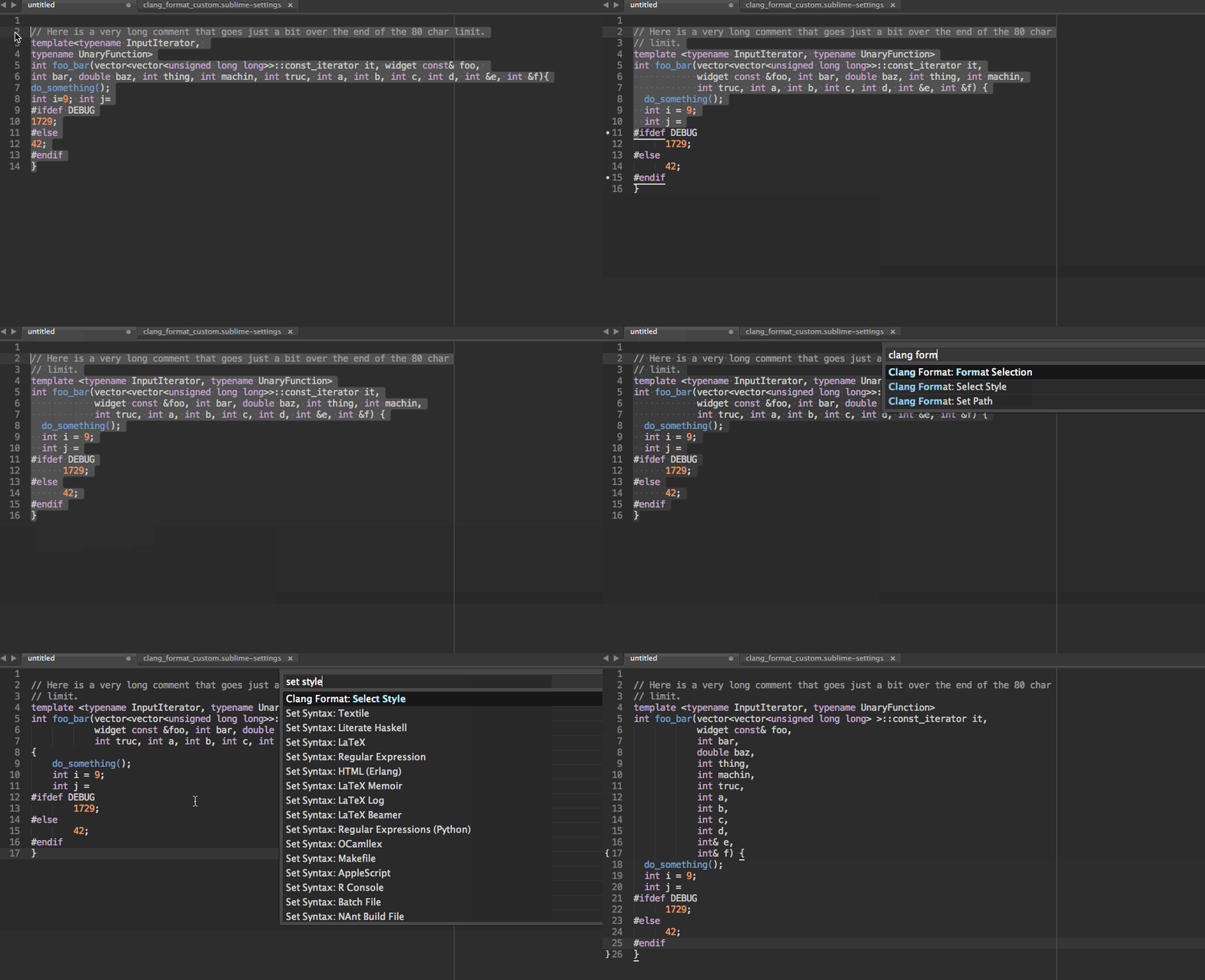
About
-----
In this package, we provide an alternative wrapper around clang-format
for use within Sublime Text 3. Whilst LLVM does provide a very simple plugin
to work with Sublime Text [here](https://llvm.org/svn/llvm-project/cfe/trunk/tools/clang-format/clang-format-sublime.py),
it doesn't really exploit any of the Sublime Text package functionality.
We add new features such as customising the style from a settings file,
selecting styles using the Command Palette, and easier installation.
Installing
----------
- Install `clang-format` in one of the following ways:
- Install using your package manager, e.g. `sudo apt-get install clang-format` or `sudo apt-get install clang-format-5.0`.
- Download the [entire LLVM toolchain](http://llvm.org/releases/)
and extract the `clang-format` binary. Just extract the `.tar.xz`
file and copy `bin/clang-format` into your PATH (e.g. `/usr/local/bin`).
- Install this package through Package Control in the usual way.
- Set the path to the clang-format binaries. You can do this from within Sublime
Text by choosing `Clang Format - Set Path` from the command palette. Hint:
the path should look something like this `[path/to/clang]/clang/bin/clang-format`.
If clang-format is in your system path, you shouldn't need to do anything.
Use
---
- Default shortcut is `super+option+a` on OSX and `option+cmd+a` otherwise.
This will apply clang-format to the selection.
- From the command palette, you can select the formatting type by using
`Clang Format: Select Style`. You will find the small number of defaults,
and also a new 'Custom' entry. Selecting this entry allows you to customise
the style through a settings file. You can access it from the main menu,
under `Package Settings`. In this file you can add custom rules, such
as `Allmen` style braces, and different indents. For examples see
http://clang.llvm.org/docs/ClangFormatStyleOptions.html.
- Settings for the 'Custom' format and others are available through the Sublime
Text preferences.
- It is possible to run the formatter on every save to a file, change settings
to `"format_on_save": true`.
- To run the formatter in one stroke, press `ctrl+e` for windows and linux
or `super+e` for OSX. You can always change the keybinding in the
keymap to your liking.
- To change settings on a per-package basis, add them under `ClangFormat` key,
example project.sublime-settings:
```json
{
"folders": [],
"settings": {
"ClangFormat": {
"format_on_save": true
}
}
}
```
If You Liked This
-----------------
- ... And want to contribute, PR's gladly accepted!
- Maybe you'll like my other plugin, [iOpener](https://github.com/rosshemsley/iOpener).
It lets you open files by path, with completion, history, and other goodies.
- Otherwise, why not pop on over and star this repo on GitHub?
Credits
-------
Thanks to the LLVM project for doing the hard work, including writing clang
format, and also the original Sublime Text plugin on which this package is
based.
Also thanks to [y0ssar1an](https://github.com/y0ssar1an), [Bendtherules](https://github.com/bendtherules)
and other contributors for their improvements!
Finally
--------
Why not go and watch the video that got me interested in clang-format in
the first place?
[The Care and Feeding of C++'s Dragons](http://channel9.msdn.com/Events/GoingNative/2013/The-Care-and-Feeding-of-C-s-Dragons)
================================================
FILE: clang_format.py
================================================
import sublime, sublime_plugin
import subprocess, os
# The styles available by default. We add one option: "Custom". This tells
# the plugin to look in an ST settings file to load the customised style.
styles = ["LLVM", "Google", "Chromium", "Mozilla", "WebKit", "Custom", "File"]
# Settings file locations.
settings_file = 'clang_format.sublime-settings'
custom_style_settings = 'clang_format_custom.sublime-settings'
# Hacky, but there doesn't seem to be a cleaner way to do this for now.
# We need to be able to load all these settings from the settings file.
all_settings = [
"BasedOnStyle", "AccessModifierOffset", "AlignAfterOpenBracket",
"AlignConsecutiveAssignments", "AlignConsecutiveDeclarations",
"AlignEscapedNewlinesLeft", "AlignOperands", "AlignTrailingComments",
"AllowAllParametersOfDeclarationOnNextLine",
"AllowShortBlocksOnASingleLine", "AllowShortCaseLabelsOnASingleLine",
"AllowShortFunctionsOnASingleLine", "AllowShortIfStatementsOnASingleLine",
"AllowShortLoopsOnASingleLine", "AlwaysBreakAfterDefinitionReturnType",
"AlwaysBreakAfterReturnType", "AlwaysBreakBeforeMultilineStrings",
"AlwaysBreakTemplateDeclarations", "BinPackArguments", "BinPackParameters",
"BraceWrapping", "BreakAfterJavaFieldAnnotations", "BreakBeforeBinaryOperators",
"BreakBeforeBraces", "BreakBeforeTernaryOperators",
"BreakConstructorInitializersBeforeComma", "ColumnLimit", "CommentPragmas",
"ConstructorInitializerAllOnOneLineOrOnePerLine",
"ConstructorInitializerIndentWidth", "ContinuationIndentWidth",
"Cpp11BracedListStyle", "DerivePointerAlignment", "DisableFormat",
"ExperimentalAutoDetectBinPacking", "ForEachMacros", "IncludeCategories",
"IndentCaseLabels", "IndentWidth", "IndentWrappedFunctionNames",
"KeepEmptyLinesAtTheStartOfBlocks", "Language", "MacroBlockBegin", "MacroBlockEnd",
"MaxEmptyLinesToKeep", "NamespaceIndentation", "ObjCBlockIndentWidth",
"ObjCSpaceAfterProperty", "ObjCSpaceBeforeProtocolList",
"PenaltyBreakBeforeFirstCallParameter", "PenaltyBreakComment",
"PenaltyBreakFirstLessLess", "PenaltyBreakString",
"PenaltyExcessCharacter", "PenaltyReturnTypeOnItsOwnLine", "PointerAlignment",
"SpaceAfterCStyleCast", "SpaceBeforeAssignmentOperators", "SpaceBeforeParens",
"SpaceInEmptyParentheses", "SpacesBeforeTrailingComments", "SpacesInAngles",
"SpacesInCStyleCastParentheses", "SpacesInContainerLiterals",
"SpacesInParentheses", "SpacesInSquareBrackets", "Standard", "SortIncludes",
"TabWidth", "UseTab"
]
st_encodings_trans = {
"UTF-8" : "utf-8",
"UTF-8 with BOM" : "utf-8-sig",
"UTF-16 LE" : "utf-16-le",
"UTF-16 LE with BOM" : "utf-16",
"UTF-16 BE" : "utf-16-be",
"UTF-16 BE with BOM" : "utf-16",
"Western (Windows 1252)" : "cp1252",
"Western (ISO 8859-1)" : "iso8859-1",
"Western (ISO 8859-3)" : "iso8859-3",
"Western (ISO 8859-15)" : "iso8859-15",
"Western (Mac Roman)" : "mac-roman",
"DOS (CP 437)" : "cp437",
"Arabic (Windows 1256)" : "cp1256",
"Arabic (ISO 8859-6)" : "iso8859-6",
"Baltic (Windows 1257)" : "cp1257",
"Baltic (ISO 8859-4)" : "iso8859-4",
"Celtic (ISO 8859-14)" : "iso8859-14",
"Central European (Windows 1250)" : "cp1250",
"Central European (ISO 8859-2)" : "iso8859-2",
"Cyrillic (Windows 1251)" : "cp1251",
"Cyrillic (Windows 866)" : "cp866",
"Cyrillic (ISO 8859-5)" : "iso8859-5",
"Cyrillic (KOI8-R)" : "koi8-r",
"Cyrillic (KOI8-U)" : "koi8-u",
"Estonian (ISO 8859-13)" : "iso8859-13",
"Greek (Windows 1253)" : "cp1253",
"Greek (ISO 8859-7)" : "iso8859-7",
"Hebrew (Windows 1255)" : "cp1255",
"Hebrew (ISO 8859-8)" : "iso8859-8",
"Nordic (ISO 8859-10)" : "iso8859-10",
"Romanian (ISO 8859-16)" : "iso8859-16",
"Turkish (Windows 1254)" : "cp1254",
"Turkish (ISO 8859-9)" : "iso8859-9",
"Vietnamese (Windows 1258)" : "cp1258",
"Hexadecimal" : None,
"Undefined" : None
}
# Check if we are running on a Windows operating system
os_is_windows = os.name == 'nt'
# The default name of the clang-format executable
default_binary = 'clang-format.exe' if os_is_windows else 'clang-format'
# This function taken from Stack Overflow response:
# http://stackoverflow.com/questions/377017/test-if-executable-exists-in-python
def which(program):
def is_exe(fpath):
return os.path.isfile(fpath) and os.access(fpath, os.X_OK)
fpath, fname = os.path.split(program)
if fpath:
if is_exe(program):
return program
else:
for path in os.environ["PATH"].split(os.pathsep):
path = path.strip('"')
exe_file = os.path.join(path, program)
if is_exe(exe_file):
return exe_file
return None
# Set the path to the binary in the settings file.
def set_path(path):
settings = sublime.load_settings(settings_file)
settings.set('binary', path)
sublime.save_settings(settings_file)
# Make sure the globals are updated.
load_settings()
# We avoid dependencies on yaml, since the output we need is very simple.
def dic_to_yaml_simple(d):
output = ""
n = len(d)
for k in d:
output += str(k)
output += ": "
if type(d[k]) is bool:
output += str(d[k]).lower()
elif type(d[k]) is dict:
output += "{" + dic_to_yaml_simple(d[k]) + "}"
else:
output += str(d[k])
n -= 1
if (n!=0):
output += ', '
return output
# We store a set of customised values in a sublime settings file, so that it is
# possible to very quickly customise the output.
# This function returns the correct customised style tag.
def load_custom():
custom_settings = sublime.load_settings(custom_style_settings)
keys = dict()
for v in all_settings:
result = custom_settings.get(v, None)
if result != None:
keys[v] = result
out = "-style={" + dic_to_yaml_simple(keys) + "}"
return out
# Display input panel to update the path.
def update_path():
load_settings()
w = sublime.active_window()
w.show_input_panel("Path to clang-format: ", binary, set_path, None, None)
# Check that the binary can be found and is executable.
def check_binary():
# If we couldn't find the binary.
if (which(binary) == None):
# Try to guess the correct setting.
if (which(default_binary) != None):
# Looks like clang-format is in the path, remember that.
set_path(default_binary)
return True
# We suggest setting a new path using an input panel.
msg = "The clang-format binary was not found. Set a new path?"
if sublime.ok_cancel_dialog(msg):
update_path()
return True
else:
return False
return True
# Load settings and put their values into global scope.
# Probably a nicer way of doing this, but it's simple enough and it works fine.
def load_settings():
# We set these globals.
global binary
global style
global format_on_save
global languages
settings_global = sublime.load_settings(settings_file)
settings_local = sublime.active_window().active_view().settings().get('ClangFormat', {})
load = lambda name, default: settings_local.get(name, settings_global.get(name, default))
# Load settings, with defaults.
binary = load('binary', default_binary)
style = load('style', styles[0])
format_on_save = load('format_on_save', False)
languages = load('languages', ['C', 'C++', 'C++11', 'JavaScript'])
def is_supported(lang):
load_settings()
return any((lang.endswith((l + '.tmLanguage', l + '.sublime-syntax')) for l in languages))
# Triggered when the user runs clang format.
class ClangFormatCommand(sublime_plugin.TextCommand):
def run(self, edit, whole_buffer=False):
load_settings()
if not check_binary():
return
sublime.status_message("Clang format (style: "+ style + ")." )
# The below code has been taken and tweaked from llvm.
encoding = st_encodings_trans[self.view.encoding()]
if encoding is None:
encoding = 'utf-8'
# We use 'file' not 'File' when passing to the binary.
# But all the other styles are in all caps.
_style = style
if style == "File":
_style = "file"
command = []
if style == "Custom":
command = [binary, load_custom()]
else:
command = [binary, '-style', _style]
regions = []
if whole_buffer:
regions = [sublime.Region(0, self.view.size())]
else:
regions = self.view.sel()
for region in regions:
region_offset = region.begin()
region_length = region.size()
view = sublime.active_window().active_view()
# If the command is run at the end of the line,
# Run the command on the whole line.
if view.classify(region_offset) & sublime.CLASS_LINE_END > 0:
region = view.line(region_offset)
region_offset = region.begin()
region_lenth = region.size()
command.extend(['-offset', str(region_offset),
'-length', str(region_length)])
# We only set the offset once, otherwise CF complains.
command.extend(['-assume-filename', str(self.view.file_name())] )
# TODO: Work out what this does.
# command.extend(['-output-replacements-xml'])
# Run CF, and set buf to its output.
buf = self.view.substr(sublime.Region(0, self.view.size()))
startupinfo = None
if os_is_windows:
startupinfo = subprocess.STARTUPINFO()
startupinfo.dwFlags |= subprocess.STARTF_USESHOWWINDOW
p = subprocess.Popen(command, stdout=subprocess.PIPE,
stderr=subprocess.PIPE, stdin=subprocess.PIPE,
startupinfo=startupinfo)
output, error = p.communicate(buf.encode(encoding))
# Display any errors returned by clang-format using a message box,
# instead of just printing them to the console. Also, we halt on all
# errors: e.g. We don't just settle for using using a default style.
if error:
# We don't want to do anything by default.
# If the error message tells us it is doing that, truncate it.
default_message = ", using LLVM style"
msg = error.decode("utf-8")
if msg.strip().endswith(default_message):
msg = msg[:-len(default_message)-1]
sublime.error_message("Clang format: " + msg)
# Don't do anything.
return
# If there were no errors, we replace the view with the outputted buf.
# Temporarily disable tabs to space so that tabs elsewhere in the file
# do not get modified if they were not part of the formatted selection
prev_tabs_to_spaces = self.view.settings().get('translate_tabs_to_spaces')
self.view.settings().set('translate_tabs_to_spaces', False)
self.view.replace(
edit, sublime.Region(0, self.view.size()),
output.decode(encoding))
# Re-enable previous tabs to space setting
self.view.settings().set('translate_tabs_to_spaces', prev_tabs_to_spaces)
# TODO: better semantics for re-positioning cursors!
# Hook for on-save event, to allow application of clang-format on save.
class clangFormatEventListener(sublime_plugin.EventListener):
def on_pre_save(self, view):
# Only do this for supported languages
syntax = view.settings().get('syntax')
if is_supported(syntax):
# Ensure that settings are up to date.
load_settings()
if format_on_save:
print("Auto-applying Clang Format on save.")
view.run_command("clang_format", {"whole_buffer": True})
# Called from the UI to update the path in the settings.
class clangFormatSetPathCommand(sublime_plugin.WindowCommand):
def run(self):
update_path()
# Called from the UI to set the current style.
class clangFormatSelectStyleCommand(sublime_plugin.WindowCommand):
def done(self, i):
settings = sublime.load_settings(settings_file)
settings.set("style", styles[i])
sublime.save_settings(settings_file)
def run(self):
load_settings()
active_window = sublime.active_window()
# Get current style
try:
sel = styles.index(style)
except ValueError:
sel = 0
active_window.show_quick_panel(styles, self.done, 0, sel)
================================================
FILE: clang_format.sublime-commands
================================================
[
{ "caption": "Clang Format: Select Style", "command": "clang_format_select_style" },
{ "caption": "Clang Format: Format Selection", "command": "clang_format" },
{ "caption": "Clang Format: Format File", "command": "clang_format", "args": {"whole_buffer": "True"} },
{ "caption": "Clang Format: Set Path", "command": "clang_format_set_path" }
]
================================================
FILE: clang_format.sublime-settings
================================================
{
// This is the path to the binary for clang-format. If it is in your path,
// it should just work out-of-the-box. Otherwise, you can set the full path,
// which will look like this:
// "binary": "/path/to/clang/bin/clang-format"
// Note that you can set this from within ST directly through the Command
// Palette.
"binary": "clang-format",
// We use the Google style by default. This can be selected from ST using
// the Command Palette. Choosing 'Custom' means that the settings will
// be loaded from the Sublime Text settings file (which is accessed
// from within ST through preferences. Choosing 'File' will look in the
// local directories from a clang-format settings file. See the clang-format
// documentation to see how this works.
"style": "Google",
// Setting this to true will run the formatter on every save. If you want to
// only enable this for a given project, try checking out the package
// "Project-Specific".
"format_on_save": false,
// If format_on_save is set to true, ClangFormat checks if the current file
// has its syntax set to a language in the list below. If it is in the list,
// then the file will be formatted by ClangFormat.
"languages": ["C", "C++", "C++11", "JavaScript", "Objective-C", "Objective-C++"]
}
================================================
FILE: clang_format_custom.sublime-settings
================================================
{
// All these settings have been taken from the clang-format manual,
// and can be customised form within Sublime Text settings files.
// Please note, the defaults set below are completely random values.
// Take a look at http://clang.llvm.org/docs/ClangFormatStyleOptions.html
// For examples.
// The style used for all options not specifically set in the configuration.
// Possible "values":
// LLVM
// Google
// Chromium
// Mozilla
// WebKit
"BasedOnStyle": "LLVM",
// The extra indent or outdent of access modifiers, e.g. "public":.
// "AccessModifierOffset": 2,
// If true, horizontally aligns arguments after an open bracket.
// This applies to round brackets (parentheses), angle brackets and square brackets.
// This will result in formattings like:
// Possible values:
// BAS_Align (in configuration: Align) Align parameters on the open bracket,
// e.g.:
// someLongFunction(argument1,
// argument2);
//
// BAS_DontAlign (in configuration: DontAlign) Don’t align, instead use
// ContinuationIndentWidth, e.g.:
// someLongFunction(argument1,
// argument2);
//
// BAS_AlwaysBreak (in configuration: AlwaysBreak) Always break after an
// open bracket, if the parameters don’t fit on a single line, e.g.:
// someLongFunction(
// argument1, argument2);
// "AlignAfterOpenBracket": true,
// If true, aligns consecutive assignments.
// This will align the assignment operators of consecutive lines.
// This will result in formattings like:
// int aaaa = 12;
// int b = 23;
// int ccc = 23;
// "AlignConsecutiveAssignments": true,
// If true, aligns consecutive declarations.
// This will align the declaration names of consecutive lines. This will result in formattings like
// int aaaa = 12;
// float b = 23;
// std::string ccc = 23;
// "AlignConsecutiveDeclarations": true,
// If true, aligns escaped newlines as far left as possible. Otherwise puts
// them into the right-most column.
// "AlignEscapedNewlinesLeft": true,
// If true, horizontally align operands of binary and ternary expressions.
// "AlignOperands": true,
// If true, aligns trailing comments.
// "AlignTrailingComments": true,
// Allow putting all parameters of a function declaration onto the next line
// even if BinPackParameters is false.
// "AllowAllParametersOfDeclarationOnNextLine": true,
// Allows contracting simple braced statements to a single line.
// E.g., this allows if (a) { return; } to be put on a single line.
// "AllowShortBlocksOnASingleLine": true,
// If true, short case labels will be contracted to a single line.
// "AllowShortCaseLabelsOnASingleLine": true,
// Dependent on the value, int f() { return 0; } can be put on a single
// line.
// Possible values:
// SFS_None (in "configuration": None) Never merge functions into a
// single line.
// SFS_Empty (in configuration: Empty) Only merge empty functions.
// SFS_Inline (in "configuration": Inline) Only merge functions defined
// inside a class.
// SFS_All (in "configuration": All) Merge all functions fitting on a
// single line.
// "AllowShortFunctionsOnASingleLine": "None",
// If true, if (a) return; can be put on a single line.
// "AllowShortIfStatementsOnASingleLine": false,
// If true, while (true) continue; can be put on a single line.
// "AllowShortLoopsOnASingleLine": true,
// The function definition return type breaking style to use.
// Possible values:
// DRTBS_None (in configuration: None) Break after return type automatically.
// PenaltyReturnTypeOnItsOwnLine is taken into account.
// DRTBS_All (in configuration: All) Always break after the return type.
// DRTBS_TopLevel (in configuration: TopLevel) Always break after the return types
// of top level functions.
// "AlwaysBreakAfterDefinitionReturnType": "None",
// "AlwaysBreakAfterReturnType": "None",
// If true, always break before multiline string literals.
// This flag is mean to make cases where there are multiple multiline
// strings in a file look more consistent. Thus, it will only take effect
// if wrapping the string at that point leads to it being indented
// ContinuationIndentWidth spaces from the start of the line.
// "AlwaysBreakBeforeMultilineStrings": true,
// If true, always break after the template<...> of a template declaration.
// "AlwaysBreakTemplateDeclarations": true,
// If false, a function call’s arguments will either be all on the same line
// or will have one line each.
// "BinPackArguments": true,
// If false, a function call’s or function definition’s parameters will
// either all be on the same line or will have one line each.
// "BinPackParameters": true,
// Control of individual brace wrapping cases.
// If BreakBeforeBraces is set to custom, use this to specify how each
// individual brace case should be handled. Otherwise, this is ignored.
// Nested configuration flags:
// bool AfterClass Wrap class definitions.
// bool AfterControlStatement Wrap control statements (if/for/while/switch/..).
// bool AfterEnum Wrap enum definitions.
// bool AfterFunction Wrap function definitions.
// bool AfterNamespace Wrap namespace definitions.
// bool AfterObjCDeclaration Wrap ObjC definitions (@autoreleasepool, interfaces, ..).
// bool AfterStruct Wrap struct definitions.
// bool AfterUnion Wrap union definitions.
// bool BeforeCatch Wrap before catch.
// bool BeforeElse Wrap before else.
// bool IndentBraces Indent the wrapped braces themselves.
// bool SplitEmptyFunction If false, empty function body can be put on a single line.
// bool SplitEmptyRecord If false, empty record (e.g. class, struct or union) body can be put on a single line.
// bool SplitEmptyNamespace If false, empty namespace body can be put on a single line.
"BraceWrapping":{
// "AfterClass": false,
// "AfterControlStatement": false,
// "AfterEnum": false,
// "AfterFunction": false,
// "AfterNamespace": false,
// "AfterObjCDeclaration": false,
// "AfterStruct": false,
// "AfterUnion": false,
// "BeforeCatch": false,
// "BeforeElse": false,
// "IndentBraces": false,
// "SplitEmptyFunction:" true,
// "SplitEmptyRecord": true,
// "SplitEmptyNamespace": true
},
// Break after each annotation on a field in Java files.
// "BreakAfterJavaFieldAnnotations": true,
// The way to wrap binary operators.
// Possible values:
// BOS_None (in configuration: None) Break after operators.
// BOS_NonAssignment (in configuration: NonAssignment) Break before operators that aren’t assignments.
// BOS_All (in configuration: All) Break before operators.
// "BreakBeforeBinaryOperators": "None",
// The brace breaking style to use.
// Possible "values":
// BS_Attach (in "configuration": Attach) Always attach braces to
// surrounding context.
// BS_Linux (in "configuration": Linux) Like Attach, but break before braces
// on function, namespace and class definitions.
// BS_Mozilla (in configuration: Mozilla) Like Attach, but break before
// braces on enum, function, and record definitions.
// BS_Stroustrup (in "configuration": Stroustrup) Like Attach, but break
// before function definitions.
// BS_Allman (in "configuration": Allman) Always break before braces.
// BS_GNU (in "configuration": GNU) Always break before braces and add an extra
// level of indentation to braces of control statements, not to those of
// class, function or other definitions.
// BS_WebKit (in configuration: WebKit) Like Attach, but break before functions.
// BS_Custom (in configuration: Custom) Configure each individual brace in
// BraceWrapping.
// "BreakBeforeBraces": "Attach",
// If true, ternary operators will be placed after line breaks.
// "BreakBeforeTernaryOperators": true,
// Always break constructor initializers before commas and align the commas
// with the colon.
// "BreakConstructorInitializersBeforeComma": true,
// The column limit. A column limit of 0 means that there is no column
// limit. In this case, clang-format will respect the input’s line breaking
// decisions within statements unless they contradict other rules.
// "ColumnLimit": 80,
// A regular expression that describes comments with special meaning, which
// should not be split into lines or otherwise changed.
// "CommentPragmas": "",
// If the constructor initializers don’t fit on a line, put each initializer
// on its own line.
// "ConstructorInitializerAllOnOneLineOrOnePerLine": true,
// The number of characters to use for indentation of constructor
// initializer lists.
// "ConstructorInitializerIndentWidth": 2,
// Indent width for line continuations.
// "ContinuationIndentWidth": 2,
// If true, format braced lists as best suited for C++11 braced lists.
// Important "differences": - No spaces inside the braced list. - No line
// break before the closing brace. - Indentation with the continuation
// indent, not with the block indent. Fundamentally, C++11 braced lists are
// formatted exactly like function calls would be formatted in their place.
// If the braced list follows a name (e.g. a type or variable name), clang-
// format formats as if the {} were the parentheses of a function call with
// that name. If there is no name, a zero-length name is assumed.
// "Cpp11BracedListStyle": true,
// If true, analyze the formatted file for the most common alignment of
// & and *. PointerAlignment is then used only as fallback.
// "DerivePointerAlignment": true,
// Disables formatting completely.
// "DisableFormat": false,
// If true, clang-format detects whether function calls and definitions are
// formatted with one parameter per line. Each call can be bin-packed, one-
// per-line or inconclusive. If it is inconclusive, e.g. completely on one
// line, but a decision needs to be made, clang-format analyzes whether
// there are other bin-packed cases in the input file and act accordingly.
// "NOTE": This is an experimental flag, that might go away or be renamed. Do
// not use this in config files, etc. Use at your own risk.
// "ExperimentalAutoDetectBinPacking": true,
// A vector of macros that should be interpreted as foreach loops instead of
// as function calls. These are expected to be macros of the "form":
// FOREACH(<variable-declaration>, ...)
// <loop-body>
// In the .clang-format configuration file, this can be configured like:
// ForEachMacros: ['RANGES_FOR', 'FOREACH']
// For example: BOOST_FOREACH.
// "ForEachMacros": "['RANGES_FOR', 'FOREACH']"
// Regular expressions denoting the different #include categories used for
// ordering #includes.
// These regular expressions are matched against the filename of an include
// (including the <> or “”) in order. The value belonging to the first
// matching regular expression is assigned and #includes are sorted first
// according to increasing category number and then alphabetically within
// each category.
// If none of the regular expressions match, UINT_MAX is assigned as
// category. The main header for a source file automatically gets
// category 0, so that it is kept at the beginning of the
// #includes (http://llvm.org/docs/CodingStandards.html#include-style).
// To configure this in the .clang-format file, use:
// IncludeCategories:
// - Regex: '^"(llvm|llvm-c|clang|clang-c)/'
// Priority: 2
// - Regex: '^(<|"(gtest|isl|json)/)'
// Priority: 3
// - Regex: '.\*'
// Priority: 1
// "IncludeCategories": "UINT_MAX"
// Indent case labels one level from the switch statement. When false, use
// the same indentation level as for the switch statement. Switch statement
// body is always indented one level more than case labels.
// "IndentCaseLabels": true,
// If true, indent when breaking function declarations which are not also
// definitions after the type.
// "IndentFunctionDeclarationAfterType": true,
// The number of columns to use for indentation.
// "IndentWidth": 2,
// Indent if a function definition or declaration is wrapped after the type.
// "IndentWrappedFunctionNames": true,
// If true, empty lines at the start of blocks are kept.
// "KeepEmptyLinesAtTheStartOfBlocks": true,
// Language, this format style is targeted at. Possible "values": LK_None
// (in "configuration": None) Do not use. LK_Cpp (in "configuration": Cpp)
// Should be used for C, C++, ObjectiveC, ObjectiveC++. LK_JavaScript (in
// "configuration": JavaScript) Should be used for JavaScript. LK_Proto (in
// "configuration": Proto) Should be used for Protocol Buffers
// ("https"://developers.google.com/protocol-buffers/).
// "Language": "Cpp",
// A regular expression matching macros that start a block.
// MacroBlockBegin: "*_MACRO_START"
// A regular expression matching macros that end a block.
// MacroBlockEnd: "*_MACRO_END",
// The maximum number of consecutive empty lines to keep.
// "MaxEmptyLinesToKeep": 2,
// The indentation used for namespaces.
// Possible "values":
// NI_None (in "configuration": None) Don’t indent in namespaces.
// NI_Inner (in "configuration": Inner) Indent only in inner namespaces
// (nested in other namespaces).
// NI_All (in "configuration": All) Indent in all namespaces.
// "NamespaceIndentation": "Inner",
// The number of characters to use for indentation of ObjC blocks.
// "ObjCBlockIndentWidth": 4,
// Add a space after @property in Objective-C, i.e. use @property (readonly)
// instead of @property(readonly).
// "ObjCSpaceAfterProperty": false,
// Add a space in front of an Objective-C protocol list, i.e. use Foo
// <Protocol> instead of Foo<Protocol>.
// "ObjCSpaceBeforeProtocolList": false,
// The penalty for breaking a function call after “call(”.
// "PenaltyBreakBeforeFirstCallParameter": 0,
// The penalty for each line break introduced inside a comment.
// "PenaltyBreakComment": 0,
// The penalty for breaking before the first <<.
// "PenaltyBreakFirstLessLess": 0,
// The penalty for each line break introduced inside a string literal.
// "PenaltyBreakString": 0,
// The penalty for each character outside of the column limit.
// "PenaltyExcessCharacter": 0,
// Penalty for putting the return type of a function onto its own line.
// "PenaltyReturnTypeOnItsOwnLine": 0,
// Pointer and reference alignment style.
// Possible values:
// PAS_Left (in configuration: Left) Align pointer to the left.
// PAS_Right (in configuration: Right) Align pointer to the right.
// PAS_Middle (in configuration: Middle) Align pointer in the middle.
// "PointerAlignment": "Left",
// If true, a space may be inserted after C style casts.
// "SpaceAfterCStyleCast": true,
// If false, spaces will be removed before assignment operators.
// "SpaceBeforeAssignmentOperators": true,
// Defines in which cases to put a space before opening parentheses.
// Possible "values":
// SBPO_Never (in "configuration": Never) Never put a space before opening
// parentheses.
// SBPO_ControlStatements (in "configuration": ControlStatements) Put a
// space before opening parentheses only after control statement keywords
// (for/if/while...).
// SBPO_Always (in "configuration": Always) Always put a space before
// opening parentheses, except when it’s prohibited by the syntax rules (in
// function- like macro definitions) or when determined by other style rules
// (after unary operators, opening parentheses, etc.)
// "SpaceBeforeParens": "ControlStatements",
// If true, spaces may be inserted into ‘()’.
// "SpaceInEmptyParentheses": true,
// The number of spaces before trailing line comments (//-comments). This
// does not affect trailing block comments (/**/-comments) as those commonly
// have different usage patterns and a number of special cases.
// "SpacesBeforeTrailingComments": 2,
// If true, spaces will be inserted after ‘<’ and before ‘>’ in template
// argument lists
// "SpacesInAngles": true,
// If true, spaces may be inserted into C style casts.
// "SpacesInCStyleCastParentheses": true,
// If true, spaces are inserted inside container literals (e.g. ObjC and
// Javascript array and dict literals).
// "SpacesInContainerLiterals": true,
// If true, spaces will be inserted after ‘(‘ and before ‘)’.
// "SpacesInParentheses": true,
// If true, spaces will be inserted after ‘[‘ and before ‘]’.
// "SpacesInSquareBrackets": true,
// Format compatible with this standard, e.g. use A<A<int> > instead of
// A<A<int>> for LS_Cpp03. Possible "values":
// LS_Cpp03 (in "configuration": Cpp03) Use C++03-compatible syntax.
// LS_Cpp11 (in "configuration": Cpp11) Use features of C++11 (e.g.
// A<A<int>> instead of A<A<int> >).
// LS_Auto (in "configuration": Auto) Automatic detection based on the input.
// "Standard": "Cpp03",
// The number of columns used for tab stops.
// "TabWidth": 2,
// The way to use tab characters in the resulting file.
// Possible "values":
// UT_Never (in "configuration": Never) Never use tab. UT_ForIndentation (in
// "configuration": ForIndentation) Use tabs only for indentation. UT_Always
// (in "configuration": Always) Use tabs whenever we need to fill whitespace
// that spans at least from one tab stop to the next one.
// "UseTab": "Never"
}
gitextract_zpzuhygf/ ├── Default (Linux).sublime-keymap ├── Default (OSX).sublime-keymap ├── Default (Windows).sublime-keymap ├── LICENSE ├── Main.sublime-menu ├── README.md ├── clang_format.py ├── clang_format.sublime-commands ├── clang_format.sublime-settings └── clang_format_custom.sublime-settings
SYMBOL INDEX (17 symbols across 1 files)

FILE: clang_format.py
  function which (line 98) | def which(program):
  function set_path (line 115) | def set_path(path):
  function dic_to_yaml_simple (line 124) | def dic_to_yaml_simple(d):
  function load_custom (line 145) | def load_custom():
  function update_path (line 158) | def update_path():
  function check_binary (line 165) | def check_binary():
  function load_settings (line 185) | def load_settings():
  function is_supported (line 201) | def is_supported(lang):
  class ClangFormatCommand (line 207) | class ClangFormatCommand(sublime_plugin.TextCommand):
    method run (line 208) | def run(self, edit, whole_buffer=False):
  class clangFormatEventListener (line 305) | class clangFormatEventListener(sublime_plugin.EventListener):
    method on_pre_save (line 306) | def on_pre_save(self, view):
  class clangFormatSetPathCommand (line 318) | class clangFormatSetPathCommand(sublime_plugin.WindowCommand):
    method run (line 319) | def run(self):
  class clangFormatSelectStyleCommand (line 324) | class clangFormatSelectStyleCommand(sublime_plugin.WindowCommand):
    method done (line 325) | def done(self, i):
    method run (line 330) | def run(self):
Condensed preview — 10 files, each showing path, character count, and a content snippet. Download the .json file or copy for the full structured content (48K chars).
[
{
"path": "Default (Linux).sublime-keymap",
"chars": 829,
"preview": "[\n // TODO: figure out how to match multiple scopes.\n { \"keys\": [\"ctrl+option+a\"], \"command\": \"clang_format\",\n "
},
{
"path": "Default (OSX).sublime-keymap",
"chars": 819,
"preview": "[\n // TODO: figure out how to match multiple scopes.\n { \"keys\": [\"super+option+a\"], \"command\": \"clang_format\",\n "
},
{
"path": "Default (Windows).sublime-keymap",
"chars": 788,
"preview": "[\n // TODO: figure out how to match multiple scopes.\n { \"keys\": [\"ctrl+option+a\"], \"command\": \"clang_format\",\n "
},
{
"path": "LICENSE",
"chars": 1540,
"preview": "Copyright (c) Ross Hemsley \nAll rights reserved.\n\nDeveloped by: Ross Hemsley\n\nPermission is hereby granted, fr"
},
{
"path": "Main.sublime-menu",
"chars": 4703,
"preview": "[ \n { \n \"id\": \"preferences\",\n \"children\":\n [\n {\n \"caption\": \"Pa"
},
{
"path": "README.md",
"chars": 3855,
"preview": "Clang Format\n============\n\n[. The extraction includes 10 files (44.5 KB), approximately 10.7k tokens, and a symbol index with 17 extracted functions, classes, methods, constants, and types. Use this with OpenClaw, Claude, ChatGPT, Cursor, Windsurf, or any other AI tool that accepts text input. You can copy the full output to your clipboard or download it as a .txt file.
Extracted by GitExtract — free GitHub repo to text converter for AI. Built by Nikandr Surkov.