Repository: rtshadow/biometrics
Branch: master
Commit: 6ed6d7348f88
Files: 13
Total size: 24.3 KB
Directory structure:
gitextract_uyx_0b11/

├── README.md
├── crossing_number.py
├── frequency.py
├── gabor.py
├── hough.py
├── normalization.py
├── orientation.py
├── poincare.py
├── segmentation.py
├── sobel.py
├── sobel_showcase.py
├── thining.py
└── utils.py
================================================
FILE CONTENTS
================================================
================================================
FILE: README.md
================================================
# Fingerprint recognition algorithms
Active development year: 2012
## Summary
Some implementations of fingerprint recognition algorithms developed for Biometric Methods course at University of Wrocław, Poland.
## Usage
### Prerequisites
* python 2.7
* python imaging library (PIL)
### How to use it
Simply do ```python filename.py --help``` to figure out how to execute ```filename``` algorithm
## Algorithms
### Poincaré Index
Finds singular points on fingerprint.
How it works (more detailed description [here](http://books.google.pl/books?id=1Wpx25D8qOwC&lpg=PA120&ots=9wRY0Rosb7&dq=poincare%20index%20fingerprint&hl=pl&pg=PA120#v=onepage&q=poincare%20index%20fingerprint&f=false)):
* divide image into blocks of ```block_size```
* for each block:
* calculate orientation of the fingerprint ridge in that block (i.e. what is the rigde slope / angle between a ridge and horizon)
* sum up the differences of angles (orientations) of the surrounding blocks
* there are 4 cases:
* sum is 180 (+- tolerance) - loop found
* sum is -180 (+- tolerance) - delta found
* sum is 360 (+- tolerance) - whorl found
The python script will mark the singularities with circles:
* red for loop
* green for delta
* blue for whorl
Example: ```python poincare.py images/ppf1.png 16 1 --smooth```
Images:
* Original
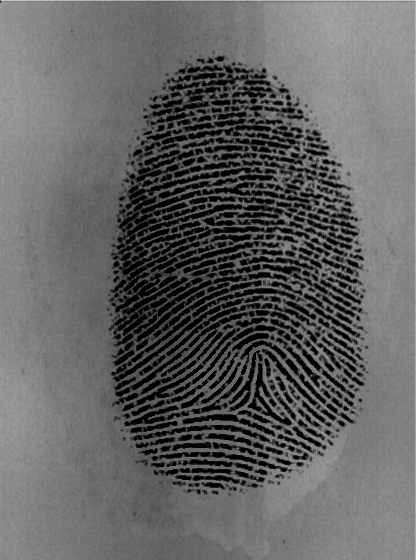
* With singular points marked by algorithm:
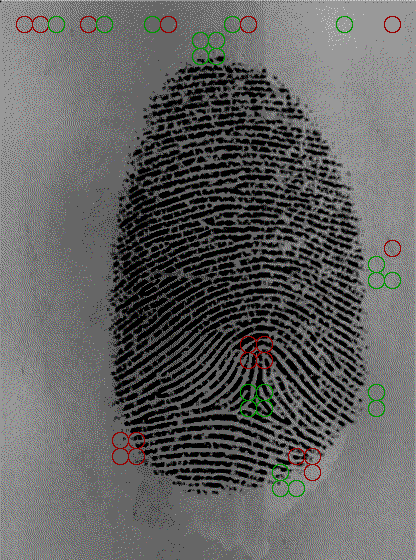
Note: algorithm marked singular points not only inside fingerprint itself, but on its edges and even outside. This is a result of usage of non-preprocessed image - if the image was enhanced (better contrast, background removed), then only singular points inside fingerprint would be marked.
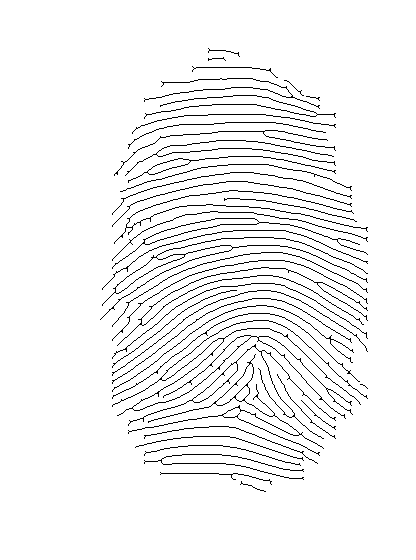
### Thinning (skeletonization)
How it [works] (http://bme.med.upatras.gr/improc/Morphological%20operators.htm#Thining)
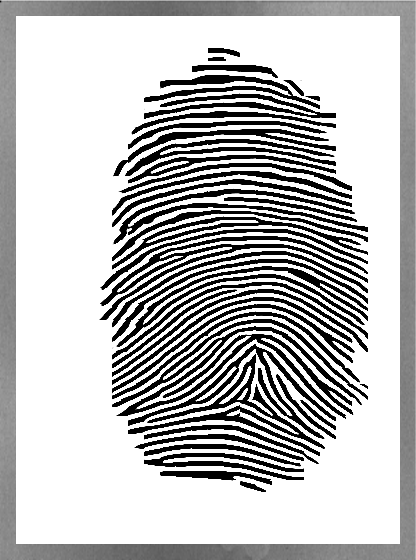
Example: ```python thining.py images/ppf1_enhanced.gif --save```
Images:
* Before
* After:
### Minutiae recognition (crossing number method)
Crossing number methods is a really simple way to detect ridge endings and ridge bifurcations.
First, you'll need thinned (skeleton) image (refer to previous section how to get it). Then the crossing number algorithm will look at 3x3 pixel blocks:
* if middle pixel is black (represents ridge):
* if pixel on boundary are crossed with the ridge once, then we've found ridge ending
* if pixel on boundary are crossed with the ridge three times, then we've found ridge bifurcation
Example: ```python crossing_number.py images/ppf1_enhanced_thinned.gif --save```
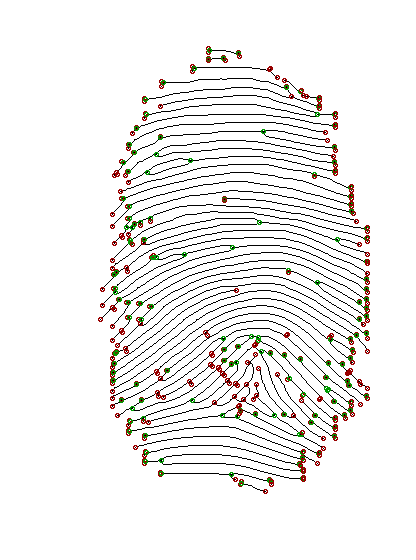
================================================
FILE: crossing_number.py
================================================
# Metody biometryczne
# Przemyslaw Pastuszka
from PIL import Image, ImageDraw
import utils
import argparse
import math
import os
cells = [(-1, -1), (-1, 0), (-1, 1), (0, 1), (1, 1), (1, 0), (1, -1), (0, -1), (-1, -1)]
def minutiae_at(pixels, i, j):
values = [pixels[i + k][j + l] for k, l in cells]
crossings = 0
for k in range(0, 8):
crossings += abs(values[k] - values[k + 1])
crossings /= 2
if pixels[i][j] == 1:
if crossings == 1:
return "ending"
if crossings == 3:
return "bifurcation"
return "none"
def calculate_minutiaes(im):
pixels = utils.load_image(im)
utils.apply_to_each_pixel(pixels, lambda x: 0.0 if x > 10 else 1.0)
(x, y) = im.size
result = im.convert("RGB")
draw = ImageDraw.Draw(result)
colors = {"ending" : (150, 0, 0), "bifurcation" : (0, 150, 0)}
ellipse_size = 2
for i in range(1, x - 1):
for j in range(1, y - 1):
minutiae = minutiae_at(pixels, i, j)
if minutiae != "none":
draw.ellipse([(i - ellipse_size, j - ellipse_size), (i + ellipse_size, j + ellipse_size)], outline = colors[minutiae])
del draw
return result
parser = argparse.ArgumentParser(description="Minutiae detection using crossing number method")
parser.add_argument("image", nargs=1, help = "Skeleton image")
parser.add_argument("--save", action='store_true', help = "Save result image as src_minutiae.gif")
args = parser.parse_args()
im = Image.open(args.image[0])
im = im.convert("L") # covert to grayscale
result = calculate_minutiaes(im)
result.show()
if args.save:
base_image_name = os.path.splitext(os.path.basename(args.image[0]))[0]
result.save(base_image_name + "_minutiae.gif", "GIF")
================================================
FILE: frequency.py
================================================
# Metody biometryczne
# Przemyslaw Pastuszka
from PIL import Image, ImageDraw
import utils
import argparse
import math
def points_on_line(line, W):
im = Image.new("L", (W, 3 * W), 100)
draw = ImageDraw.Draw(im)
draw.line([(0, line(0) + W), (W, line(W) + W)], fill=10)
im_load = im.load()
points = []
for x in range(0, W):
for y in range(0, 3 * W):
if im_load[x, y] == 10:
points.append((x, y - W))
del draw
del im
dist = lambda (x, y): (x - W / 2) ** 2 + (y - W / 2) ** 2
return sorted(points, cmp = lambda x, y: dist(x) < dist(y))[:W]
def vec_and_step(tang, W):
(begin, end) = utils.get_line_ends(0, 0, W, tang)
(x_vec, y_vec) = (end[0] - begin[0], end[1] - begin[1])
length = math.hypot(x_vec, y_vec)
(x_norm, y_norm) = (x_vec / length, y_vec / length)
step = length / W
return (x_norm, y_norm, step)
def block_frequency(i, j, W, angle, im_load):
tang = math.tan(angle)
ortho_tang = -1 / tang
(x_norm, y_norm, step) = vec_and_step(tang, W)
(x_corner, y_corner) = (0 if x_norm >= 0 else W, 0 if y_norm >= 0 else W)
grey_levels = []
for k in range(0, W):
line = lambda x: (x - x_norm * k * step - x_corner) * ortho_tang + y_norm * k * step + y_corner
points = points_on_line(line, W)
level = 0
for point in points:
level += im_load[point[0] + i * W, point[1] + j * W]
grey_levels.append(level)
treshold = 100
upward = False
last_level = 0
last_bottom = 0
count = 0.0
spaces = len(grey_levels)
for level in grey_levels:
if level < last_bottom:
last_bottom = level
if upward and level < last_level:
upward = False
if last_bottom + treshold < last_level:
count += 1
last_bottom = last_level
if level > last_level:
upward = True
last_level = level
return count / spaces if spaces > 0 else 0
def freq(im, W, angles):
(x, y) = im.size
im_load = im.load()
freqs = [[0] for i in range(0, x / W)]
for i in range(1, x / W - 1):
for j in range(1, y / W - 1):
freq = block_frequency(i, j, W, angles[i][j], im_load)
freqs[i].append(freq)
freqs[i].append(0)
freqs[0] = freqs[-1] = [0 for i in range(0, y / W)]
return freqs
def freq_img(im, W, angles):
(x, y) = im.size
freqs = freq(im, W, angles)
freq_img = im.copy()
for i in range(1, x / W - 1):
for j in range(1, y / W - 1):
box = (i * W, j * W, min(i * W + W, x), min(j * W + W, y))
freq_img.paste(freqs[i][j] * 255.0 * 1.2, box)
return freq_img
if __name__ == "__main__":
parser = argparse.ArgumentParser(description="Image frequency")
parser.add_argument("image", nargs=1, help = "Path to image")
parser.add_argument("block_size", nargs=1, help = "Block size")
parser.add_argument('--smooth', "-s", action='store_true', help = "Use Gauss for smoothing")
args = parser.parse_args()
im = Image.open(args.image[0])
im = im.convert("L") # covert to grayscale
im.show()
W = int(args.block_size[0])
f = lambda x, y: 2 * x * y
g = lambda x, y: x ** 2 - y ** 2
angles = utils.calculate_angles(im, W, f, g)
if args.smooth:
angles = utils.smooth_angles(angles)
freq_img = freq_img(im, W, angles)
freq_img.show()
================================================
FILE: gabor.py
================================================
# Metody biometryczne
# Przemyslaw Pastuszka
from PIL import Image, ImageDraw
import utils
import argparse
import math
import frequency
import os
def gabor_kernel(W, angle, freq):
cos = math.cos(angle)
sin = math.sin(angle)
yangle = lambda x, y: x * cos + y * sin
xangle = lambda x, y: -x * sin + y * cos
xsigma = ysigma = 4
return utils.kernel_from_function(W, lambda x, y:
math.exp(-(
(xangle(x, y) ** 2) / (xsigma ** 2) +
(yangle(x, y) ** 2) / (ysigma ** 2)) / 2) *
math.cos(2 * math.pi * freq * xangle(x, y)))
def gabor(im, W, angles):
(x, y) = im.size
im_load = im.load()
freqs = frequency.freq(im, W, angles)
print "computing local ridge frequency done"
gauss = utils.gauss_kernel(3)
utils.apply_kernel(freqs, gauss)
for i in range(1, x / W - 1):
for j in range(1, y / W - 1):
kernel = gabor_kernel(W, angles[i][j], freqs[i][j])
for k in range(0, W):
for l in range(0, W):
im_load[i * W + k, j * W + l] = utils.apply_kernel_at(
lambda x, y: im_load[x, y],
kernel,
i * W + k,
j * W + l)
return im
if __name__ == "__main__":
parser = argparse.ArgumentParser(description="Gabor filter applied")
parser.add_argument("image", nargs=1, help = "Path to image")
parser.add_argument("block_size", nargs=1, help = "Block size")
parser.add_argument("--save", action='store_true', help = "Save result image as src_image_enhanced.gif")
args = parser.parse_args()
im = Image.open(args.image[0])
im = im.convert("L") # covert to grayscale
im.show()
W = int(args.block_size[0])
f = lambda x, y: 2 * x * y
g = lambda x, y: x ** 2 - y ** 2
angles = utils.calculate_angles(im, W, f, g)
print "calculating orientation done"
angles = utils.smooth_angles(angles)
print "smoothing angles done"
result = gabor(im, W, angles)
result.show()
if args.save:
base_image_name = os.path.splitext(os.path.basename(args.image[0]))[0]
im.save(base_image_name + "_enhanced.gif", "GIF")
================================================
FILE: hough.py
================================================
# Metody biometryczne
# Przemyslaw Pastuszka
from PIL import Image, ImageDraw
import utils
import argparse
import math
def get_hough_image(im):
(x, y) = im.size
x *= 1.0
y *= 1.0
im_load = im.load()
result = Image.new("RGBA", im.size, 0)
draw = ImageDraw.Draw(result)
for i in range(0, im.size[0]):
for j in range(0, im.size[1]):
if im_load[i, j] > 220:
line = lambda t: (t, (-(i / x - 0.5) * (t / x) + (j / y - 0.5)) * x)
draw.line([line(0), line(x)], fill=(50, 0, 0, 10))
return result
if __name__ == "__main__":
parser = argparse.ArgumentParser(description="Hough transform")
parser.add_argument("image", nargs=1, help = "Path to image")
args = parser.parse_args()
im = Image.open(args.image[0])
im = im.convert("L") # covert to grayscale
im.show()
hough_img = get_hough_image(im)
hough_img.show()
================================================
FILE: normalization.py
================================================
# Metody biometryczne
# Przemyslaw Pastuszka
from PIL import Image, ImageStat
import argparse
from math import sqrt
# x - pixel value
# v0 - desired variance
# v - actual image variance
# m - actual image mean
# m0 - desired mean
def normalize_pixel(x, v0, v, m, m0):
dev_coeff = sqrt((v0 * ((x - m)**2)) / v)
if x > m:
return m0 + dev_coeff
return m0 - dev_coeff
def normalize(im, m0, v0):
stat = ImageStat.Stat(im)
m = stat.mean[0]
v = stat.stddev[0] ** 2
return im.point(lambda x: normalize_pixel(x, v0, v, m, m0)) # normalize each pixel
parser = argparse.ArgumentParser(description="Image normalization")
parser.add_argument("image", nargs=1, help = "Path to image")
parser.add_argument("mean", nargs=1, help = "desired mean")
parser.add_argument("variance", nargs=1, help = "desired variance (squared stdev)")
args = parser.parse_args()
im = Image.open(args.image[0])
im = im.convert("L") # covert to grayscale
im.show()
normalizedIm = normalize(im, float(args.mean[0]), float(args.variance[0]))
normalizedIm.show()
================================================
FILE: orientation.py
================================================
# Metody biometryczne
# Przemyslaw Pastuszka
from PIL import Image, ImageDraw
import utils
import argparse
parser = argparse.ArgumentParser(description="Rao's and Chinese algorithms")
parser.add_argument("image", nargs=1, help = "Path to image")
parser.add_argument("block_size", nargs=1, help = "Block size")
parser.add_argument('--smooth', "-s", action='store_true', help = "Use Gauss for smoothing")
parser.add_argument('--chinese', "-c", action='store_true', help = "Use Chinese alg. instead of Rao's")
args = parser.parse_args()
im = Image.open(args.image[0])
im = im.convert("L") # covert to grayscale
W = int(args.block_size[0])
f = lambda x, y: 2 * x * y
g = lambda x, y: x ** 2 - y ** 2
if args.chinese:
normalizator = 255.0
f = lambda x, y: 2 * x * y / (normalizator ** 2)
g = lambda x, y: ((x ** 2) * (y ** 2)) / (normalizator ** 4)
angles = utils.calculate_angles(im, W, f, g)
utils.draw_lines(im, angles, W).show()
if args.smooth:
smoothed_angles = utils.smooth_angles(angles)
utils.draw_lines(im, smoothed_angles, W).show()
================================================
FILE: poincare.py
================================================
# Metody biometryczne
# Przemyslaw Pastuszka
from PIL import Image, ImageDraw
import utils
import argparse
import math
import os
signum = lambda x: -1 if x < 0 else 1
cells = [(-1, -1), (-1, 0), (-1, 1), (0, 1), (1, 1), (1, 0), (1, -1), (0, -1), (-1, -1)]
def get_angle(left, right):
angle = left - right
if abs(angle) > 180:
angle = -1 * signum(angle) * (360 - abs(angle))
return angle
def poincare_index_at(i, j, angles, tolerance):
deg_angles = [math.degrees(angles[i - k][j - l]) % 180 for k, l in cells]
index = 0
for k in range(0, 8):
if abs(get_angle(deg_angles[k], deg_angles[k + 1])) > 90:
deg_angles[k + 1] += 180
index += get_angle(deg_angles[k], deg_angles[k + 1])
if 180 - tolerance <= index and index <= 180 + tolerance:
return "loop"
if -180 - tolerance <= index and index <= -180 + tolerance:
return "delta"
if 360 - tolerance <= index and index <= 360 + tolerance:
return "whorl"
return "none"
def calculate_singularities(im, angles, tolerance, W):
(x, y) = im.size
result = im.convert("RGB")
draw = ImageDraw.Draw(result)
colors = {"loop" : (150, 0, 0), "delta" : (0, 150, 0), "whorl": (0, 0, 150)}
for i in range(1, len(angles) - 1):
for j in range(1, len(angles[i]) - 1):
singularity = poincare_index_at(i, j, angles, tolerance)
if singularity != "none":
draw.ellipse([(i * W, j * W), ((i + 1) * W, (j + 1) * W)], outline = colors[singularity])
del draw
return result
parser = argparse.ArgumentParser(description="Singularities with Poincare index")
parser.add_argument("image", nargs=1, help = "Path to image")
parser.add_argument("block_size", nargs=1, help = "Block size")
parser.add_argument("tolerance", nargs=1, help = "Tolerance for Poincare index")
parser.add_argument('--smooth', "-s", action='store_true', help = "Use Gauss for smoothing")
parser.add_argument("--save", action='store_true', help = "Save result image as src_poincare.gif")
args = parser.parse_args()
im = Image.open(args.image[0])
im = im.convert("L") # covert to grayscale
W = int(args.block_size[0])
f = lambda x, y: 2 * x * y
g = lambda x, y: x ** 2 - y ** 2
angles = utils.calculate_angles(im, W, f, g)
if args.smooth:
angles = utils.smooth_angles(angles)
result = calculate_singularities(im, angles, int(args.tolerance[0]), W)
result.show()
if args.save:
base_image_name = os.path.splitext(os.path.basename(args.image[0]))[0]
result.save(base_image_name + "_poincare.gif", "GIF")
================================================
FILE: segmentation.py
================================================
# Metody biometryczne
# Przemyslaw Pastuszka
from PIL import Image, ImageStat
import argparse
from math import sqrt
def distance(x, y, W):
return 1 + sqrt((x - W) ** 2 + (y - W) ** 2)
def create_segmented_and_variance_images(im, W, threshold):
(x, y) = im.size
variance_image = im.copy()
segmented_image = im.copy()
for i in range(0, x, W):
for j in range(0, y, W):
box = (i, j, min(i + W, x), min(j + W, y))
block_stddev = ImageStat.Stat(im.crop(box)).stddev[0]
variance_image.paste(block_stddev, box)
if block_stddev < threshold:
segmented_image.paste(0, box) # make block black if rejected
return (segmented_image, variance_image)
parser = argparse.ArgumentParser(description="Image segmentation")
parser.add_argument("image", nargs=1, help = "Path to image")
parser.add_argument("block_size", nargs=1, help = "Block size")
parser.add_argument("threshold", nargs=1, help = "Treshold on stddev for accepting / rejecting blocks")
args = parser.parse_args()
im = Image.open(args.image[0])
im = im.convert("L") # covert to grayscale
im.show()
(segmented, variance) = create_segmented_and_variance_images(im, int(args.block_size[0]), int(args.threshold[0]))
segmented.show()
variance.show()
================================================
FILE: sobel.py
================================================
# Metody biometryczne
# Przemyslaw Pastuszka
from PIL import Image, ImageFilter
from math import sqrt
import utils
sobelOperator = [[-1, 0, 1], [-2, 0, 2], [-1, 0, 1]]
def merge_images(a, b, f):
result = a.copy()
result_load = result.load()
a_load = a.load()
b_load = b.load()
(x, y) = a.size
for i in range(0, x):
for j in range(0, y):
result_load[i, j] = f(a_load[i, j], b_load[i, j])
return result
def partial_sobels(im):
ySobel = im.filter(ImageFilter.Kernel((3, 3), utils.flatten(sobelOperator), 1))
xSobel = im.filter(ImageFilter.Kernel((3, 3), utils.flatten(utils.transpose(sobelOperator)), 1))
return (xSobel, ySobel)
def full_sobels(im):
(xSobel, ySobel) = partial_sobels(im)
sobel = merge_images(xSobel, ySobel, lambda x, y: sqrt(x**2 + y**2))
return (xSobel, ySobel, sobel)
================================================
FILE: sobel_showcase.py
================================================
# Metody biometryczne
# Przemyslaw Pastuszka
import sobel
import argparse
from PIL import Image
parser = argparse.ArgumentParser(description="Sobel filter")
parser.add_argument("image", nargs=1, help = "Path to image")
parser.add_argument('--showX', "-x", action='store_true', help = "Show Sobel filter for X coordinate")
parser.add_argument('--showY', "-y", action='store_true', help = "Show Sobel filter for Y coordinate")
args = parser.parse_args()
im = Image.open(args.image[0])
im = im.convert("L") # covert to grayscale
(xSobel, ySobel, fullSobel) = sobel.full_sobels(im)
if args.showX:
xSobel.show()
if args.showY:
ySobel.show()
fullSobel.show()
================================================
FILE: thining.py
================================================
# Metody biometryczne
# Przemyslaw Pastuszka
from PIL import Image, ImageDraw
import utils
import argparse
import math
import os
from utils import flatten, transpose
usage = False
def apply_structure(pixels, structure, result):
global usage
usage = False
def choose(old, new):
global usage
if new == result:
usage = True
return 0.0
return old
utils.apply_kernel_with_f(pixels, structure, choose)
return usage
def apply_all_structures(pixels, structures):
usage = False
for structure in structures:
usage |= apply_structure(pixels, structure, utils.flatten(structure).count(1))
return usage
def make_thin(im):
loaded = utils.load_image(im)
utils.apply_to_each_pixel(loaded, lambda x: 0.0 if x > 10 else 1.0)
print "loading phase done"
t1 = [[1, 1, 1], [0, 1, 0], [0.1, 0.1, 0.1]]
t2 = utils.transpose(t1)
t3 = reverse(t1)
t4 = utils.transpose(t3)
t5 = [[0, 1, 0], [0.1, 1, 1], [0.1, 0.1, 0]]
t7 = utils.transpose(t5)
t6 = reverse(t7)
t8 = reverse(t5)
thinners = [t1, t2, t3, t4, t5, t6, t7]
usage = True
while(usage):
usage = apply_all_structures(loaded, thinners)
print "single thining phase done"
print "thining done"
utils.apply_to_each_pixel(loaded, lambda x: 255.0 * (1 - x))
utils.load_pixels(im, loaded)
im.show()
def reverse(ls):
cpy = ls[:]
cpy.reverse()
return cpy
if __name__ == "__main__":
parser = argparse.ArgumentParser(description="Image thining")
parser.add_argument("image", nargs=1, help = "Path to image")
parser.add_argument("--save", action='store_true', help = "Save result image as src_image_thinned.gif")
args = parser.parse_args()
im = Image.open(args.image[0])
im = im.convert("L") # covert to grayscale
im.show()
make_thin(im)
if args.save:
base_image_name = os.path.splitext(os.path.basename(args.image[0]))[0]
im.save(base_image_name + "_thinned.gif", "GIF")
================================================
FILE: utils.py
================================================
# Metody biometryczne
# Przemyslaw Pastuszka
from PIL import Image, ImageDraw
import math
import sobel
import copy
def apply_kernel_at(get_value, kernel, i, j):
kernel_size = len(kernel)
result = 0
for k in range(0, kernel_size):
for l in range(0, kernel_size):
pixel = get_value(i + k - kernel_size / 2, j + l - kernel_size / 2)
result += pixel * kernel[k][l]
return result
def apply_to_each_pixel(pixels, f):
for i in range(0, len(pixels)):
for j in range(0, len(pixels[i])):
pixels[i][j] = f(pixels[i][j])
def calculate_angles(im, W, f, g):
(x, y) = im.size
im_load = im.load()
get_pixel = lambda x, y: im_load[x, y]
ySobel = sobel.sobelOperator
xSobel = transpose(sobel.sobelOperator)
result = [[] for i in range(1, x, W)]
for i in range(1, x, W):
for j in range(1, y, W):
nominator = 0
denominator = 0
for k in range(i, min(i + W , x - 1)):
for l in range(j, min(j + W, y - 1)):
Gx = apply_kernel_at(get_pixel, xSobel, k, l)
Gy = apply_kernel_at(get_pixel, ySobel, k, l)
nominator += f(Gx, Gy)
denominator += g(Gx, Gy)
angle = (math.pi + math.atan2(nominator, denominator)) / 2
result[(i - 1) / W].append(angle)
return result
def flatten(ls):
return reduce(lambda x, y: x + y, ls, [])
def transpose(ls):
return map(list, zip(*ls))
def gauss(x, y):
ssigma = 1.0
return (1 / (2 * math.pi * ssigma)) * math.exp(-(x * x + y * y) / (2 * ssigma))
def kernel_from_function(size, f):
kernel = [[] for i in range(0, size)]
for i in range(0, size):
for j in range(0, size):
kernel[i].append(f(i - size / 2, j - size / 2))
return kernel
def gauss_kernel(size):
return kernel_from_function(size, gauss)
def apply_kernel(pixels, kernel):
apply_kernel_with_f(pixels, kernel, lambda old, new: new)
def apply_kernel_with_f(pixels, kernel, f):
size = len(kernel)
for i in range(size / 2, len(pixels) - size / 2):
for j in range(size / 2, len(pixels[i]) - size / 2):
pixels[i][j] = f(pixels[i][j], apply_kernel_at(lambda x, y: pixels[x][y], kernel, i, j))
def smooth_angles(angles):
cos_angles = copy.deepcopy(angles)
sin_angles = copy.deepcopy(angles)
apply_to_each_pixel(cos_angles, lambda x: math.cos(2 * x))
apply_to_each_pixel(sin_angles, lambda x: math.sin(2 * x))
kernel = gauss_kernel(5)
apply_kernel(cos_angles, kernel)
apply_kernel(sin_angles, kernel)
for i in range(0, len(cos_angles)):
for j in range(0, len(cos_angles[i])):
cos_angles[i][j] = (math.atan2(sin_angles[i][j], cos_angles[i][j])) / 2
return cos_angles
def load_image(im):
(x, y) = im.size
im_load = im.load()
result = []
for i in range(0, x):
result.append([])
for j in range(0, y):
result[i].append(im_load[i, j])
return result
def load_pixels(im, pixels):
(x, y) = im.size
im_load = im.load()
for i in range(0, x):
for j in range(0, y):
im_load[i, j] = pixels[i][j]
def get_line_ends(i, j, W, tang):
if -1 <= tang and tang <= 1:
begin = (i, (-W/2) * tang + j + W/2)
end = (i + W, (W/2) * tang + j + W/2)
else:
begin = (i + W/2 + W/(2 * tang), j + W/2)
end = (i + W/2 - W/(2 * tang), j - W/2)
return (begin, end)
def draw_lines(im, angles, W):
(x, y) = im.size
result = im.convert("RGB")
draw = ImageDraw.Draw(result)
for i in range(1, x, W):
for j in range(1, y, W):
tang = math.tan(angles[(i - 1) / W][(j - 1) / W])
(begin, end) = get_line_ends(i, j, W, tang)
draw.line([begin, end], fill=150)
del draw
return result
gitextract_uyx_0b11/ ├── README.md ├── crossing_number.py ├── frequency.py ├── gabor.py ├── hough.py ├── normalization.py ├── orientation.py ├── poincare.py ├── segmentation.py ├── sobel.py ├── sobel_showcase.py ├── thining.py └── utils.py
SYMBOL INDEX (39 symbols across 10 files)

FILE: crossing_number.py
  function minutiae_at (line 12) | def minutiae_at(pixels, i, j):
  function calculate_minutiaes (line 27) | def calculate_minutiaes(im):

FILE: frequency.py
  function points_on_line (line 10) | def points_on_line(line, W):
  function vec_and_step (line 29) | def vec_and_step(tang, W):
  function block_frequency (line 38) | def block_frequency(i, j, W, angle, im_load):
  function freq (line 75) | def freq(im, W, angles):
  function freq_img (line 90) | def freq_img(im, W, angles):

FILE: gabor.py
  function gabor_kernel (line 11) | def gabor_kernel(W, angle, freq):
  function gabor (line 26) | def gabor(im, W, angles):

FILE: hough.py
  function get_hough_image (line 10) | def get_hough_image(im):

FILE: normalization.py
  function normalize_pixel (line 13) | def normalize_pixel(x, v0, v, m, m0):
  function normalize (line 19) | def normalize(im, m0, v0):

FILE: poincare.py
  function get_angle (line 14) | def get_angle(left, right):
  function poincare_index_at (line 20) | def poincare_index_at(i, j, angles, tolerance):
  function calculate_singularities (line 36) | def calculate_singularities(im, angles, tolerance, W):

FILE: segmentation.py
  function distance (line 8) | def distance(x, y, W):
  function create_segmented_and_variance_images (line 11) | def create_segmented_and_variance_images(im, W, threshold):

FILE: sobel.py
  function merge_images (line 10) | def merge_images(a, b, f):
  function partial_sobels (line 23) | def partial_sobels(im):
  function full_sobels (line 28) | def full_sobels(im):

FILE: thining.py
  function apply_structure (line 13) | def apply_structure(pixels, structure, result):
  function apply_all_structures (line 28) | def apply_all_structures(pixels, structures):
  function make_thin (line 35) | def make_thin(im):
  function reverse (line 62) | def reverse(ls):

FILE: utils.py
  function apply_kernel_at (line 9) | def apply_kernel_at(get_value, kernel, i, j):
  function apply_to_each_pixel (line 18) | def apply_to_each_pixel(pixels, f):
  function calculate_angles (line 23) | def calculate_angles(im, W, f, g):
  function flatten (line 48) | def flatten(ls):
  function transpose (line 51) | def transpose(ls):
  function gauss (line 54) | def gauss(x, y):
  function kernel_from_function (line 58) | def kernel_from_function(size, f):
  function gauss_kernel (line 65) | def gauss_kernel(size):
  function apply_kernel (line 68) | def apply_kernel(pixels, kernel):
  function apply_kernel_with_f (line 71) | def apply_kernel_with_f(pixels, kernel, f):
  function smooth_angles (line 77) | def smooth_angles(angles):
  function load_image (line 93) | def load_image(im):
  function load_pixels (line 105) | def load_pixels(im, pixels):
  function get_line_ends (line 113) | def get_line_ends(i, j, W, tang):
  function draw_lines (line 122) | def draw_lines(im, angles, W):
Condensed preview — 13 files, each showing path, character count, and a content snippet. Download the .json file or copy for the full structured content (26K chars).
[
  {
    "path": "README.md",
    "chars": 2990,
    "preview": "# Fingerprint recognition algorithms\n\nActive development year: 2012\n\n## Summary\nSome implementations of fingerprint reco"
  },
  {
    "path": "crossing_number.py",
    "chars": 1770,
    "preview": "# Metody biometryczne\n# Przemyslaw Pastuszka\n\nfrom PIL import Image, ImageDraw\nimport utils\nimport argparse\nimport math\n"
  },
  {
    "path": "frequency.py",
    "chars": 3476,
    "preview": "# Metody biometryczne\n# Przemyslaw Pastuszka\n\nfrom PIL import Image, ImageDraw\nimport utils\nimport argparse\nimport math\n"
  },
  {
    "path": "gabor.py",
    "chars": 2223,
    "preview": "# Metody biometryczne\n# Przemyslaw Pastuszka\n\nfrom PIL import Image, ImageDraw\nimport utils\nimport argparse\nimport math\n"
  },
  {
    "path": "hough.py",
    "chars": 929,
    "preview": "# Metody biometryczne\n# Przemyslaw Pastuszka\n\nfrom PIL import Image, ImageDraw\nimport utils\nimport argparse\nimport math\n"
  },
  {
    "path": "normalization.py",
    "chars": 1067,
    "preview": "# Metody biometryczne\n# Przemyslaw Pastuszka\n\nfrom PIL import Image, ImageStat\nimport argparse\nfrom math import sqrt\n\n# "
  },
  {
    "path": "orientation.py",
    "chars": 1067,
    "preview": "# Metody biometryczne\n# Przemyslaw Pastuszka\n\nfrom PIL import Image, ImageDraw\nimport utils\nimport argparse\n\nparser = ar"
  },
  {
    "path": "poincare.py",
    "chars": 2589,
    "preview": "# Metody biometryczne\n# Przemyslaw Pastuszka\n\nfrom PIL import Image, ImageDraw\nimport utils\nimport argparse\nimport math\n"
  },
  {
    "path": "segmentation.py",
    "chars": 1294,
    "preview": "# Metody biometryczne\n# Przemyslaw Pastuszka\n\nfrom PIL import Image, ImageStat\nimport argparse\nfrom math import sqrt\n\nde"
  },
  {
    "path": "sobel.py",
    "chars": 864,
    "preview": "# Metody biometryczne\n# Przemyslaw Pastuszka\n\nfrom PIL import Image, ImageFilter\nfrom math import sqrt\nimport utils\n\nsob"
  },
  {
    "path": "sobel_showcase.py",
    "chars": 667,
    "preview": "# Metody biometryczne\n# Przemyslaw Pastuszka\n\nimport sobel\nimport argparse\nfrom PIL import Image\n\nparser = argparse.Argu"
  },
  {
    "path": "thining.py",
    "chars": 2048,
    "preview": "# Metody biometryczne\n# Przemyslaw Pastuszka\n\nfrom PIL import Image, ImageDraw\nimport utils\nimport argparse\nimport math\n"
  },
  {
    "path": "utils.py",
    "chars": 3913,
    "preview": "# Metody biometryczne\n# Przemyslaw Pastuszka\n\nfrom PIL import Image, ImageDraw\nimport math\nimport sobel\nimport copy\n\ndef"
  }
]
About this extraction
This page contains the full source code of the rtshadow/biometrics GitHub repository, extracted and formatted as plain text for AI agents and large language models (LLMs). The extraction includes 13 files (24.3 KB), approximately 7.6k tokens, and a symbol index with 39 extracted functions, classes, methods, constants, and types. Use this with OpenClaw, Claude, ChatGPT, Cursor, Windsurf, or any other AI tool that accepts text input. You can copy the full output to your clipboard or download it as a .txt file.
Extracted by GitExtract — free GitHub repo to text converter for AI. Built by Nikandr Surkov.