Repository: sdlddr/Gooflow Branch: master Commit: d5e78a4bc938 Files: 3 Total size: 14.6 KB Directory structure: gitextract__yfo9yn4/ ├── README.md ├── README_EN.md └── undefined.js ================================================ FILE CONTENTS ================================================ ================================================ FILE: README.md ================================================ # GooFlow README: [English](https://github.com/sdlddr/GooFlow/blob/master/README_EN.md) | [中文](https://github.com/sdlddr/GooFlow/blob/master/README.md) ---- > 这是一个用来在WEB端构建流程图的在线流程设计器组件。可设计各种流程图、逻辑流图,数据流图,或是应用系统中需要走流程的功能实现。优秀的用户体验使得操作界面很容易上手,无论开者或用户都可轻松使用。并且兼容主流浏览器(ie9--ie edge,chrome,firefox)。 **Jax: 没想到吧,我又回来了!** GooFlow携全新的“私货”再次重装来袭!全新防侵权机制取代原JS挖矿,专治各种伸手党不服!加入新扩展接口及设定以适应更多领域场景要求。 1.3.10版本以后,所有功能开发完毕,今后将只有Bug修复才会更新。 GooFlow已转为闭源项目,github上不再提供clone和下载。试用版请访问gitee上的 [项目主页](https://gitee.com/gooflow/gooflow/) **Jquery版改为原生Js版!** <p>移除对Jquery的依赖;同时彻底放弃对IE8的支持,并移除没啥用的ajax载入数据方法接口。</p> ## 授权说明: ## GooFlow已转为闭源项目,当前托管页中所放版本仅为试用版,会让CPU无意义空转耗能,且含有定时弹出的广告,只能用于本地功能测试,切不可放入实际项目中使用;<br> 如要应用于软件开发项目中,只能使用纯净未有任何附加的正式版,并需要联系作者本人购买使用授权,谢谢。(无论正式版还是试用版,如果逃避购买授权而直接用于项目,擅自窃取用作谋利,即属严重侵权行为,与盗窃无异。产生的一切任何后果责任由侵权者自负。请各位只想免费吃白饭的伸手党做好向作者本人及自己的公司、客户负全责的觉悟。)<br> 联系方式:<br> 微信:18648945414<br> QQ: 115247126<br> 邮箱: fool-egg@163.com <br> 授权价格:Js原生版为 <b>¥5,600RMB/产品</b> ,Vue/React版为 <b>¥6,300RMB/产品</b> 。<br> 更多详细信息以官网为准:[https://gooflow.github.io](https://gooflow.github.io) ## 特点 ## * 跨领域:流程图设计器不止用在电信领域,在其它需要IT进行技术支持的领域中都有重大作用. * 页面顶部栏、左边侧边栏均可自定义; * 当左边的侧边栏设为不显示时,为只读状态,此时的视图区可当作是一个查看器而非编辑器。 * 当前最新版本已全部使用自定义的阿里巴巴矢量图标库,可不再需要一张用来显示图标样式的图片。 * 侧边工具栏除了基本和一些流程节点按钮外,还自定义新的节点按钮,自定义节点都可以有自有的图标、类型名称,定义后在使用可可在工作区内增加这些自定义节点。 * 顶部栏可显示流程图数据组的标题,也可提供一些常用操作按钮。 * 顶部栏的按钮,除了撤销、重做按钮外,其余按钮均可自定义点击事件。 * 可画直线、折线;折线还可以左右/上下移动其中段。 * 具有区域划分功能,能让用户更直观地了解哪些节点及其相互间的转换,是属于何种自定义区域内的。 * 具有标注功能,用橙红色标注某个结点或者转换线,一般用在展示流程进度时。 * 能直接双击结点、连线、分组区域中的文字进行编辑 * 在对结点、连线、分组区域的各种编辑操作,如新增/删除/修改名称/重设样式或大小/移动/标注时,均可捕捉到事件,并触发自定义事件,如果自定义事件执行的方法返回FALSE,则会阻止操作。 * 具有操作事务序列控制功能,在工作区内的各种有效操作都能记录到一个栈中,然后可以进行撤销(undo())或重做(redo()),像典型的C/S软件一样。 * 能将流程图以png图片的格式导出并下载(纯JS实现,但不支持IE9及以下浏览器) 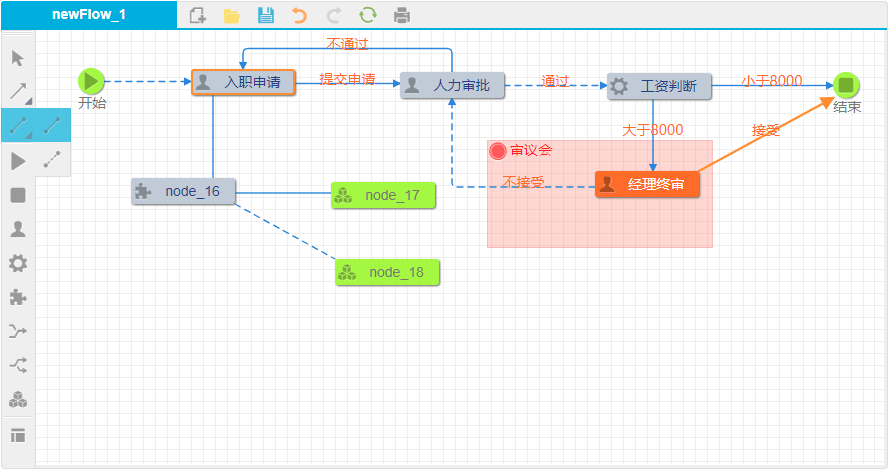 <br><br> ## 详细的使用方法: ## * [Js原生版API文档](https://gooflow.github.io/docs) * [Vue版API文档](https://gooflow.github.io/vueDoc) * [React版API文档](https://gooflow.github.io/reactDoc) ## 相关实例链接 ## * Js原生版实例展示(仅为依赖jQuery的最后一版):[点击进入](https://gooflow.github.io/#demo)<br> * Vue版例展示:[点击进入](https://gooflow.gitee.io/vue/#)<br> * React版例展示:[点击进入](https://gooflow.gitee.io/react/)<br> **更新历史:** - **1.5 for All:** <br> 重构部分元素和特效以优化性能;新增插槽类节点,让用户更能灵活自定义节点内部渲染内容。 - **1.4 for All:** <br> 修正一些Bug,优化目录结构;优化操作体验,移动泳道时可设置泳道内的节点/连线是否跟着移动。 - **1.4, 1.2 for Vue/React:** <br> 重大更新!折线可支持5条折线段;优化多选操作体验,去除单/多选切换;优化节点拖动操作体验。 - **1.3.12:** <br>重大更新!Jquery版改为Js原生版,移除对Jquery的依赖;同时彻底放弃对IE8的支持,并移除没啥用的ajax载入数据方法接口。 - **1.1.0 for Vue/React:** <br>重大更新!增加对通过拖拽来添加块状态元素的类似于Visio操作方式的支持。 - **1.3.11:** <br>重大更新!增加对通过拖拽来添加块状态元素的类似于Visio操作方式的支持。 - **1.0.0 for React:** <br>全新React组件版本重装来袭! - **1.0.0 for Vue:** <br>全新Vue组件版本重装来袭! - **1.3.10:** <br>增加移动块状元素时自动对齐并显示对齐辅助线的功能。 - **1.3.9:** <br>重大更新!增加缩略导航图的功能,包括拖动定位和实时滚动。增加用鼠标滚轮+Ctrl键控制绘图区缩放的功能。 - **1.3.9r1:** <br>重大更新!修正一些新发现的BUG;增加无向线段的支持,修改了虚线的设定方式;新增多选功能(只针对节点和连线),并能对多选的元素集合进行批量移动和删除。 - **1.3.8rp:** <br>修正一些新发现的BUG,全面提升正式版的运行效率;在试用版上使用新的防侵权机制取代原有的JS挖矿;将分组泳道支持单独从核心文件中抽离出来,形成一个独立的扩展功能块<code>GooFlow.group.min.js</code>;增加便笺元素(通过新功能块);新增自定义背景图类型节点,适应更多场景。 - **1.3.7:** <br>修正计算流程图实际宽高算法的一个小BUG;初始化时增加设置节点和泳道初始默认名前缀的属性。 - **1.3.6:** <br>修正有时选中元素时,focus事件被触发两次的问题;加入右建单击绘图区空白处时,触发blur事件的操作方式;新增快捷设置某个元素的扩展业务属性的接口;新增流程图载入后再对某元素另行修改颜色或文字颜色的接口。 - **1.3.5:** <br>功能更新!分组泳道增加了“牛奶”色;用户可对单个节点或连线自定义特殊的图形颜色和文字颜色;设计器增加了 ctrl+c 复制节点和 ctrl+v 粘贴节点功能。 - **1.3.4:** <br>重要更新!修正了一些事件响应、图片导出、绘图区缩放方面的Bug;增加了椭圆、菱形、平行四边形、胶囊形4种特殊形状的节点。 - **1.3.3:** <br>重要功能上线!新增对Bpmn2.0规范下XML格式的流程图数据的支持,可读取或输出Bpmn2.0规范的XML格式数据;允许用户以json文件或者Bpmn2.0规范的XML文件的方式下载流程图数据至本地。 进一步优化代码。 - **1.3.2:** <br>优化了代码结构和用户体验;加强内聚性,简化了流程另存为图片功能和打印功能的内部实现,摆脱了1.1至1.2版本中对第三方插件的依赖,导出结果更清晰,并能向后兼容到IE9;各部分的按钮都可以通过内置接口方法进行配置;节点数据新增”areaId”可选属性:表示其属于哪一个区域组(泳道)。总体还加入了对amd、cmd开发模式规范的支持。 - **1.3:** <br>修正一些影响用户体验和使用的BUG,增加灵活的对工作区所有操作按钮注释配置功能。 - **1.2.1:** <br>改善对IE8的支持;优化手动调整元素大小的精确度;增加对流程图打印预览或另存为PDF的功能。 - **1.2:** <br>重大更新版本!增加了对节点、连线、泳道块的右键事件和双击事件方法设定(可return false以阻止浏览器默认事件发生);增加虚线的绘制功能方法:应众多用户的要求增加了重要的流程图缩放功能接口!可缩放范围是从原始大小的50%至400%。(仅提供方法接口,具体操作缩放的页面组件元素用户另行选择绑定第三方的) - **1.1:** <br>进一步修正了BUG;增加了导出工作区内流程图为图片并让用户下载的功能,目前仅能支持IE10以上、IE edge、Chrome、FireFox、Safari浏览器,该功能需求载入新的GooFlow.export.js扩展包。 - **1.0.2:** <br>修正了当某节点原来为marked,选中再取消后marked标红样式消失的问题。 - **1.0:** <br>首个正式版本,相对于以前的试用版,进一步修正了BUG,可自定义颜色项更多,并且做到了不再有一张图片,所有图标均匀为矢量字体。 ================================================ FILE: README_EN.md ================================================ # GooFlow README: [English](https://github.com/sdlddr/GooFlow/blob/master/README_EN.md) | [中文](https://github.com/sdlddr/GooFlow/blob/master/README.md) ---- > This is an online process designer component used to build flowcharts on the WEB side. Various flow charts, logic flow diagrams, data flow diagrams, or functional implementations of processes that need to go through the process can be designed. The excellent user experience makes the interface easy to use, no matter the driver or the user can easily use. And compatible with mainstream browsers (ie9--ie edge, chrome, firefox). GooFlow has been converted to a closed source project, and clones and downloads are no longer available on github. For the trial version, please visit the [Repository Homepage](https://gitee.com/gooflow/gooflow) ## Authorization note: ## GooFlow has been converted to a closed source project. The version currently on the hosted page is only a trial version. It will make the CPU meaningless and idling, and it will contain timed pop-up ads. It can only be used for local function testing. In use; if it is to be applied to a software development project, it can only be used without any additional official version, and you need to contact the author to purchase the license. Thank you. (Whether the official version or the trial version, if you evade the purchase authorization and use it directly for the project, stealing it for profit is a serious infringement, and it is no different from the theft. The responsibility for any consequences arising from the infringer is at your own risk. Please only The party that wants to eat rice for free is fully aware of the responsibility of the author and his own company and customers.) <br> Contact:<br> WeChat: 18648945414<br> QQ: 115247126<br> E-mail: fool-egg@163.com <br> Authorized price: Js native edition is <b>¥5,600RMB/product</b> ,Vue/React edition is <b>¥6,300RMB/product</b> 。<br> More details are subject to the official website::[https://gooflow.xyz](https://gooflow.xyz) ## features ## * Cross-domain: The flowchart designer is not only used in the telecommunications field, but also plays a major role in other areas where IT is required for technical support. * The top bar and left side bar of the page can be customized; * When the left sidebar is set to not display, it is read-only, and the view area at this time can be regarded as a viewer instead of an editor. * The latest version of the Alibaba vector icon library has been used in the latest version, eliminating the need for an image to display the icon style. * In addition to the basic and some process node buttons, the side toolbar also customizes the new node button. The custom node can have its own icon and type name. After defining it, use Cocoa to add these custom nodes in the workspace. * The top bar shows the title of the flowchart data set, as well as some common action buttons. * The buttons in the top bar, in addition to the undo and redo buttons, can customize the click event. * You can draw straight lines and fold lines; the fold lines can also move the left and right/up and down segments. * It has a zoning function that allows users to more intuitively understand which nodes and their transitions are within the custom zone. * With the annotation function, a node or transition line is marked in orange red, which is generally used to show the progress of the process. * Can directly double-click the text in the node, connection, grouping area for editing * In various editing operations on nodes, connections, and grouping areas, such as adding/deleting/modifying names/resetting styles or size/moving/labeling, you can capture events and trigger custom events if The method that defines the execution of the event returns FALSE, which blocks the operation. * With operational transaction sequence control, various valid operations in the workspace can be recorded on a stack and then undo () or redo (redo), as with typical C/S software. * Can export and download the flowchart in png image format (pure JS implementation, but does not support IE9 and below) 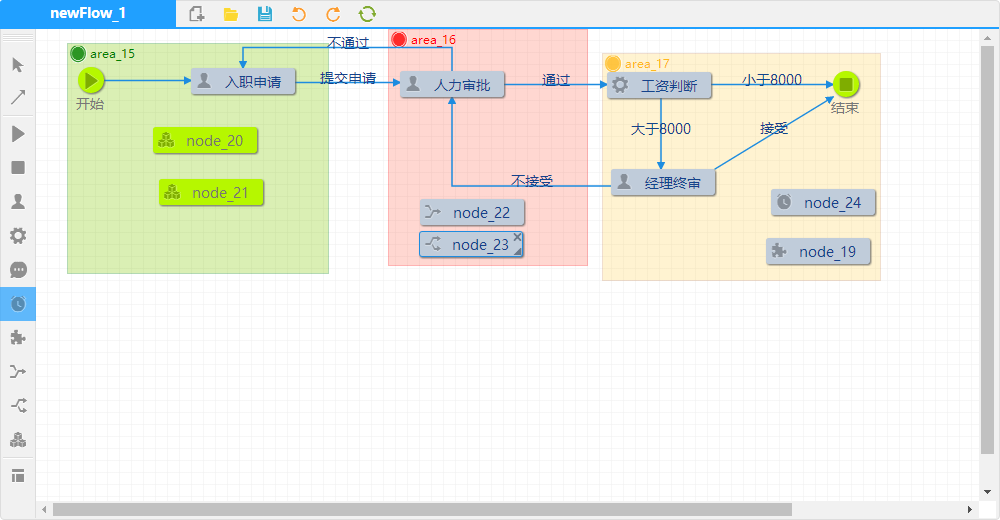 <br><br> ## Detail usage: ## * [Js native edition API documentation](https://gooflow.xyz/docs) * [Vue edition API documentation](https://gooflow.xyz/vueDoc) * [React edition API documentation](https://gooflow.xyz/reactDoc) ## Related example link ## * Js native edition of the example display (only rely on the last version of jQuery): [click to enter](https://gooflow.xyz/#demo)<br> * Vue edition of the show: [click to enter](https://gooflow.gitee.io/vue/#)<br> * React edition of the show: [click to enter](https://gooflow.gitee.io/react/)<br> *Updated History :** - **1.5 for All :** <br> Reconstruct some elements and special effects to optimize performance; The newly added slot type node allows users to more flexibly customize the internal rendering content of the node. - **1.4 for Lastest :** <br> The GooFlow of Vue3.x Edition is ready! - **1.4 for All :** <br> Fixed some bugs, optimizing directory structure; Optimize the operation experience. When moving a swimming lane, you can set whether the nodes/lines in the lane follow the movement. - **1.4, 1.2 for Vue/React :** <br> Important update! The polyline can support 5 polyline segments; optimize multi-selection operation experience, remove single/multiple selection switching; optimize node drag operation experience. - **1.3.12 :** <br> Important update! Getting rid of the dependency on Jquery and removing the Ajax method implemented through Jquery, IE8 is no longer supported. - **1.1.0 for Vue/React :** <br> Important update! Increase support for adding block elements by dragging and dropping like Visio. - **1.3.11 :** <br> Important update! Increase support for adding block elements by dragging and dropping like Visio. - **1.0.0 for React :** <br> New React Component Edition Reloading Attacks! - **1.0.0 for Vue :** <br> New Vue Component Edition Reloading Attacks! - **1.3.10 :** <br> Automatically aligns and displays the ability to align guides when moving a block element. - **1.3.9 :** <br> Important update! Add thumbnail navigation map features, including drag positioning and live scrolling. Add the mouse wheel +Ctrl key to control the zoom function of drawing area. - **1.3.9r1 :** <br> Important updates! Fixed some newly discovered bugs; increased support for segments, modified the way of setting for the dashed line; added multi-selection features (for nodes and connections only), and enabled bulk move and deletion of multi-selected collections of elements. - **1.3.8rp :** <br> Fixed some newly discovered bugs and improve the overall operating efficiency; use the new anti-infringement mechanism to replace the original JS mining on the trial version; separate the swimlane support from the core file and form a separate extension function block <code>GooFlow.group.min.js</code>; add note elements (via new function blocks); add custom background image type nodes to adapt to more scenes. - **1.3.7 :** <br> Minor and Small Bonus: Fixed a small BUG of the actual width and height algorithm of the calculation flow chart. When initializing, the property of setting the initial default name prefix of the node and the lane is added. - **1.3.6 :** <br> Enhanced functionality! Fixed the problem that the focus event is triggered twice when a element is selected. Adds the right-clicking the blank area of the drawing area to trigger the operation of the blur event. Adds an interface to set the extended service attribute of an element. After the flowchart loaded, user can use two new interfaces to modify the color or text color of an element. - **1.3.5 :** <br> Feature Update! Grouped lanes have added "milk" color; users can customize special graphics colors and text colors for individual nodes or lines; the designer adds <code>ctrl+c</code> keyword command to copy node and <code>ctrl+v</code> keyword command to paste node. - **1.3.4 :** <br> Important updates! Fixed some bugs in event response, image export, and drawing area scaling; added four special shape nodes: ellipse, rhombus, parallelogram, and capsule. - **1.3.3 :** <br> Important functions on line! New support for flowchart data of XML format under Bpmn2.0 specification is added, which can load or export XML data of Bpmn2.0 specification. Allowed users download flowchart data as a json file or Bpmn2.0's XML file. Further optimize the code. - **1.3.2 :** <br> Optimized the code structure and user experience; Strengthen cohesion, simplify the internal implementation of the process save as picture function and print function, got rid of the dependence on third-party plugins from version 1.1 to 1.2, and exports results more clearly. And could be backwards compatible to IE9; each part of the button could be configured through the built-in interface method; node data added "areaId" optional attribute: indicates which area group (lane) it belongs to. The overall also added support for amd, cmd development model specification. - **1.3 :** <br> Fixed some bugs that affect the user experience and usage, and add flexible annotation configuration functions for all operation buttons in the workspace. - **1.2.1 :** <br> Improved support for IE8; optimize the accuracy of manually resized elements; add functionality to print previews or save as PDFs. - **1.2 :** <br> Major update version! Added method for right-click events and double-click events for nodes, connections, and lane blocks (return false to prevent browser default events from occurring); Add dashed line drawing function method: should be requested by many users Added important flowchart zoom function interface! The scalable range is from 50% to 400% of the original size. (Only provide method interface, you can chooses to bind the third-party's operation element) - **1.1 :** <br> BUG has been further amended; the function of exporting the flow chart in the work area into a picture and allowing the user to download has been added. Currently only IE10, IE edge, Chrome, FireFox, Safari browsers can be supported, and this function needs to load new GooFlow.export.min.js extension package. - **1.0.2 :** <br> Fixed the problem that when a node was originally marked, the marked red mode disappeared after the selection and cancellation. - **1.0 :** <br> The initial official version. Compared with the previous trial version, the BUG has been further revised, more customizable color items are available, and there is no longer a single picture. All icons are evenly shaped as vector fonts. ================================================ FILE: undefined.js ================================================
gitextract__yfo9yn4/

├── README.md
├── README_EN.md
└── undefined.js
Condensed preview — 3 files, each showing path, character count, and a content snippet. Download the .json file or copy for the full structured content (20K chars).
[
  {
    "path": "README.md",
    "chars": 4300,
    "preview": "# GooFlow\n\nREADME: [English](https://github.com/sdlddr/GooFlow/blob/master/README_EN.md) | [中文](https://github.com/sdldd"
  },
  {
    "path": "README_EN.md",
    "chars": 10671,
    "preview": "# GooFlow\n\nREADME: [English](https://github.com/sdlddr/GooFlow/blob/master/README_EN.md) | [中文](https://github.com/sdldd"
  },
  {
    "path": "undefined.js",
    "chars": 1,
    "preview": "\n"
  }
]
About this extraction
This page contains the full source code of the sdlddr/Gooflow GitHub repository, extracted and formatted as plain text for AI agents and large language models (LLMs). The extraction includes 3 files (14.6 KB), approximately 5.2k tokens. Use this with OpenClaw, Claude, ChatGPT, Cursor, Windsurf, or any other AI tool that accepts text input. You can copy the full output to your clipboard or download it as a .txt file.
Extracted by GitExtract — free GitHub repo to text converter for AI. Built by Nikandr Surkov.