Repository: sfatihk/electron-tray-window
Branch: master
Commit: 03e561b52f96
Files: 9
Total size: 16.4 KB
Directory structure:
gitextract_s_3v73pl/
├── .gitignore
├── LICENSE
├── README.MD
├── examples/
│ ├── README.MD
│ ├── index.js
│ ├── package.json
│ └── resources/
│ └── index.html
├── package.json
└── src/
└── index.js
================================================
FILE CONTENTS
================================================
================================================
FILE: .gitignore
================================================
node_modules
================================================
FILE: LICENSE
================================================
MIT License
Copyright (c) 2018 Seyyid Fatih KOÇ
Permission is hereby granted, free of charge, to any person obtaining a copy
of this software and associated documentation files (the "Software"), to deal
in the Software without restriction, including without limitation the rights
to use, copy, modify, merge, publish, distribute, sublicense, and/or sell
copies of the Software, and to permit persons to whom the Software is
furnished to do so, subject to the following conditions:
The above copyright notice and this permission notice shall be included in all
copies or substantial portions of the Software.
THE SOFTWARE IS PROVIDED "AS IS", WITHOUT WARRANTY OF ANY KIND, EXPRESS OR
IMPLIED, INCLUDING BUT NOT LIMITED TO THE WARRANTIES OF MERCHANTABILITY,
FITNESS FOR A PARTICULAR PURPOSE AND NONINFRINGEMENT. IN NO EVENT SHALL THE
AUTHORS OR COPYRIGHT HOLDERS BE LIABLE FOR ANY CLAIM, DAMAGES OR OTHER
LIABILITY, WHETHER IN AN ACTION OF CONTRACT, TORT OR OTHERWISE, ARISING FROM,
OUT OF OR IN CONNECTION WITH THE SOFTWARE OR THE USE OR OTHER DEALINGS IN THE
SOFTWARE.
================================================
FILE: README.MD
================================================
[](https://www.npmjs.com/package/electron-tray-window)
[](https://github.com/sfatihk/electron-tray-window)
[](https://github.com/sfatihk/electron-tray-window)
[](https://github.com/sfatihk/electron-tray-window)
[](https://github.com/sfatihk/electron-tray-window)

Quickly create customizable menu/pop-up for your application in system tray.
---
Electron Tray Window, basically places the window near the tray icon. While these happening, you can customize window / tray or tracking the events.
## Preview [demo project](https://github.com/sfatihk/electron-tray-window/tree/master/examples)
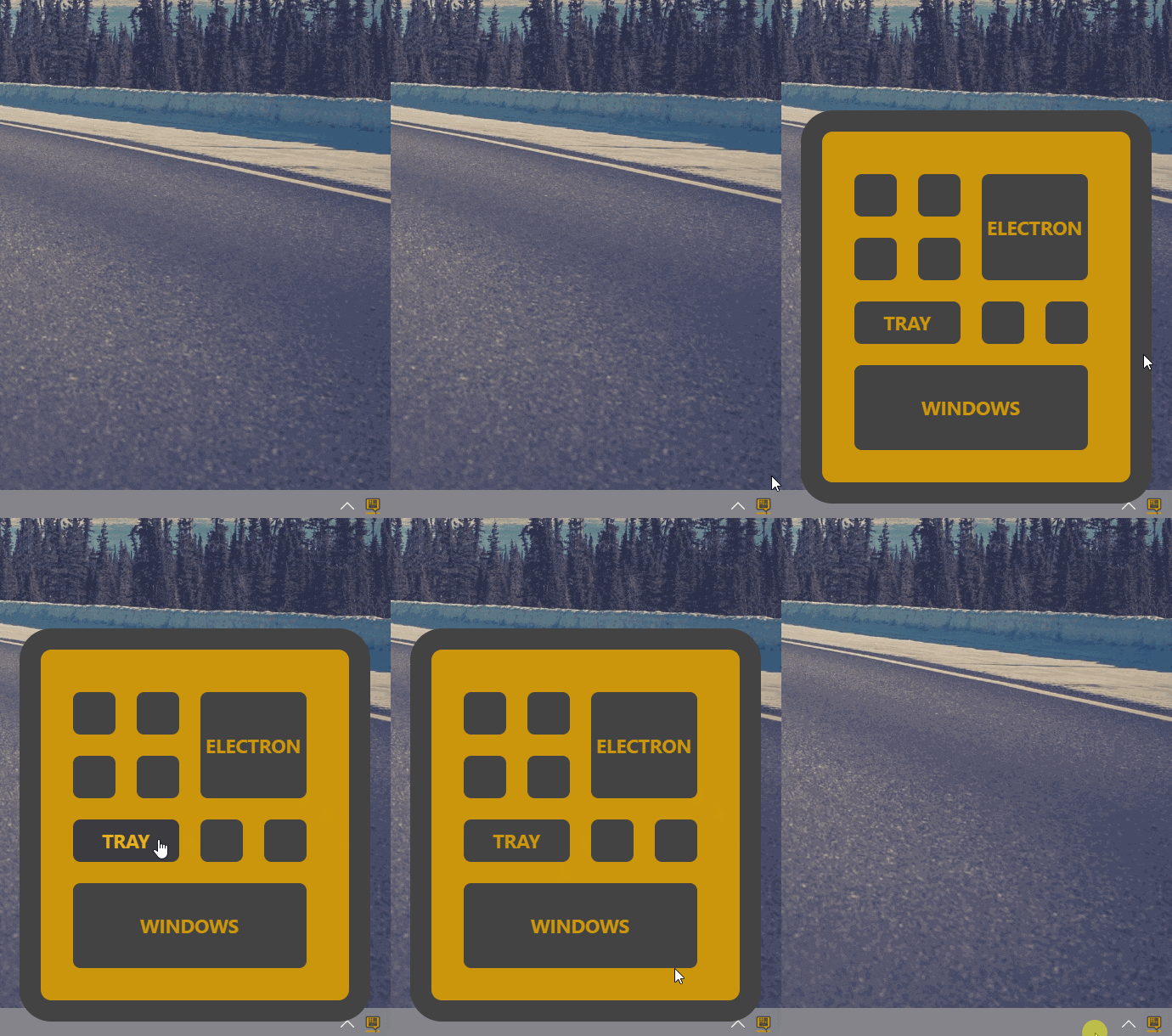
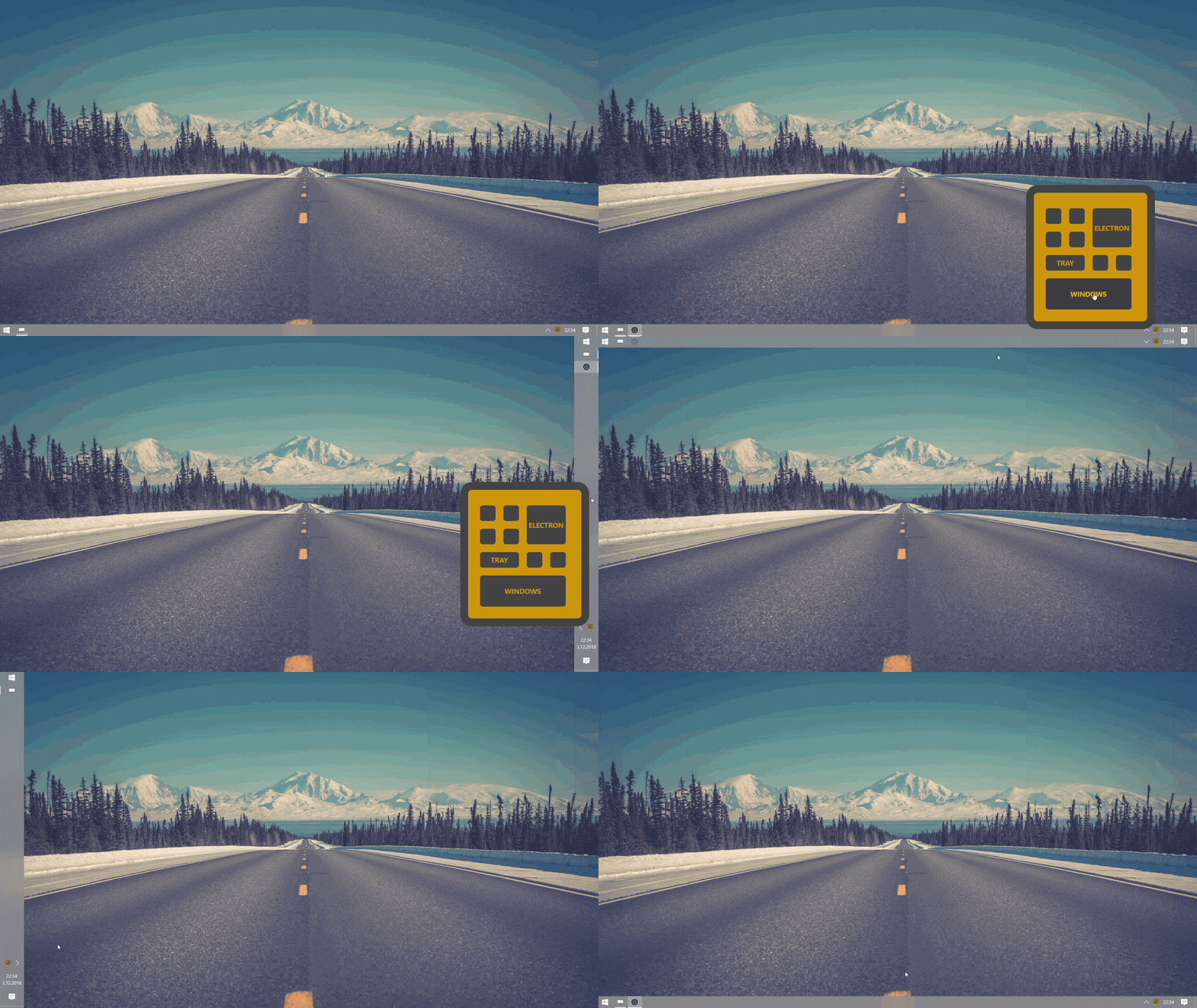 ## Install
```
npm install electron-tray-window
```
or
```
yarn add electron-tray-window
```
## Usage
```js
const trayWindow = require("electron-tray-window");
```
You can use different ways. "setOptions()" function accepts object value.
If you have already created tray or window outside **TrayWindow**, you can pass as arguments to **.setOptions()** function,
```js
//...
tray = new Tray(...);
window = new BrowserWindow(...);
window.loadUrl(...);
trayWindow.setOptions({tray: tray,window: window});
//...
```
or if you pass just tray icon path or window url, it prepare automatically.
```js
//...
trayWindow.setOptions({
trayIconPath: "...",
windowUrl: "..."
});
//...
```
By the way you can make different combines. But object must contains;
- **tray** or **trayIconPath**
- **window** or **windowUrl**
```js
//...
tray = new Tray(...);
trayWindow.setOptions({
tray: tray,
windowUrl: "..."
});
//...
window = new BrowserWindow(...);
trayWindow.setOptions({
trayIconPath: "...",
window: window
});
//...
```
## Other Functions
You can always change **TrayWindow** with setOptions() and you can use different functions after setOptions().
## .setTray( tray )
```js
//...
trayWindow.setOptions({...});
//...
differentTray = new Tray(...);
trayWindow.setTray(differentTray); //now, follows different tray
//..
```
## .setWindow( window )
```js
//...
trayWindow.setOptions({...});
//...
differentWindow = new BrowserWindow(...);
trayWindow.setWindow(differentWindow); //now, shows different window
//..
```
## .setWindowSize( object )
```js
//...
trayWindow.setOptions({...});
//...
differentWindow = new BrowserWindow(...);
trayWindow.setWindowSize({
width : 200, //optional
height : 300, //optional
margin_x : 10, //optional
margin_y : 10 //optional
});
//..
```
## Events
You can listen events. All event contains window and tray objects
```js
//...
const { ipcMain } = electron;
ipcMain.on("tray-window-ready", (e, a) => {
console.log("tray window is ready");
//console.log(e.window)
//console.log(e.tray)
});
ipcMain.on("tray-window-clicked", (e, a) => {
console.log("clicked the tray icon");
//console.log(e.window)
//console.log(e.tray)
});
ipcMain.on("tray-window-visible", (e, a) => {
console.log("tray window is visible now");
//console.log(e.window)
//console.log(e.tray)
});
ipcMain.on("tray-window-hidden", (e, a) => {
console.log("tray window is hidden now");
//console.log(e.window)
//console.log(e.tray)
});
//..
```
## Overview
### All parameters of setOptions()
| parameter | description | default |
| ------------ | ------------------------------------------------ | ------- |
| tray | Electron's tray object type | |
| trayIconPath | Image file path | |
| window | Electron's BrowserWindow object type | |
| windowUrl | Html etc. file path or website url | |
| width | Window width | 200px |
| height | Window height | 200px |
| margin_x | Vertical distance between window and tray icon | 0px |
| margin_y | Horizontal distance between window and tray icon | 0px |
| framed | Is it window framed? | false |
### Other functions
| function | description |
| ------------- | ----------------------------------------------------------------- |
| setTray | Electron's tray object type. |
| setWindow | Electron's BrowserWindow object type |
| setWindowSize | Object type. Optional arguments width, height, margin_x, margin_y |
### IPC (Inter-Process Communication) Events
| event | description |
| ------------------- | ------------------------ |
| tray-window-ready | when created TrayWindow. |
| tray-window-clicked | when clicked tray icon |
| tray-window-visible | when window show up |
| tray-window-hidden | when window close down |
### Default Window Properties
| properties | default in TrayWindow |
| ------------------------------------ | --------------------- |
| width | 200px |
| height | 300px |
| maxWidth | 200px |
| maxHeight | 300px |
| show | false |
| frame | false |
| fullscreenable | false |
| resizable | false |
| useContentSize | true |
| transparent | true |
| alwaysOnTop | true |
| webPreferences{backgroundThrottling} | false |
P.S. : if you use this way `setOptions({windowUrl:"..."})`, default window values uses.
================================================
FILE: examples/README.MD
================================================
## install dependencies
```npm install```
## then run the project
```npm start```
================================================
FILE: examples/index.js
================================================
const TrayWindow = require("electron-tray-window");
const { ipcMain, Tray, app, BrowserWindow } = require("electron");
const path = require("path");
app.on("ready", () => {
var timeout = 10;
if (process.platform === "linux") {
timeout = 200;
}
setTimeout(function () {
TrayWindow.setOptions({
trayIconPath: path.join("resources/icon.png"),
windowUrl: `file://${path.join(__dirname, "resources/index.html")}`,
width: 340,
height: 380,
});
}, timeout);
});
================================================
FILE: examples/package.json
================================================
{
"name": "examples",
"version": "1.0.0",
"description": "",
"main": "index.js",
"scripts": {
"test": "echo \"Error: no test specified\" && exit 1",
"start": "electron --enable-transparent-visuals ."
},
"author": "sfatihk ",
"license": "MIT",
"dependencies": {
"electron-tray-window": "^1.2.2"
}
}
================================================
FILE: examples/resources/index.html
================================================
Electron-Tray-Window Example
================================================
FILE: package.json
================================================
{
"name": "electron-tray-window",
"version": "1.2.7",
"description": "A package for generate custom tray windows with Electron.js",
"main": "src/index.js",
"files": [
"src"
],
"scripts": {
"test": "echo \"Error: no test specified\" && exit 1"
},
"repository": {
"type": "git",
"url": "git+https://github.com/sfatihk/electron-tray-window.git"
},
"keywords": [
"electron",
"tray",
"window",
"popup",
"menu"
],
"author": "Seyyid Fatih KOÇ",
"license": "MIT",
"bugs": {
"url": "https://github.com/sfatihk/electron-tray-window/issues"
},
"homepage": "https://github.com/sfatihk/electron-tray-window#readme",
"dependencies": {
"electron": "^3.0.10"
},
"peerDependencies": {
"electron": "^3.0.10"
}
}
================================================
FILE: src/index.js
================================================
const electron = require("electron");
const { BrowserWindow, ipcMain, Tray } = electron;
let tray = undefined;
let window = undefined;
//defaults
let width = 200;
let height = 300;
let margin_x = 0;
let margin_y = 0;
let framed = false;
function setOptions(options) {
if (!validation(options)) return;
init(options);
}
function validation(options) {
if (typeof options !== "object") {
console.log("tray-window can not create without any [options]!!!");
return false;
}
if (!options.tray && !options.trayIconPath) {
console.log(
"tray-window can not create without [tray] or [trayIconPath] parameters!!!"
);
return false;
}
if (!options.window && !options.windowUrl) {
console.log(
"tray-window can not create without [window] or [windowUrl] parameters!!!"
);
return false;
}
return true;
}
function init(options) {
setWindowSize(options);
options.tray ? setTray(options.tray) : createTray(options.trayIconPath);
options.window ? setWindow(options.window) : createWindow(options.windowUrl);
tray.on("click", function(event) {
ipcMain.emit("tray-window-clicked", { window: window, tray: tray });
toggleWindow();
});
setWindowAutoHide();
alignWindow();
ipcMain.emit("tray-window-ready", { window: window, tray: tray });
}
function setWindowSize(options) {
if (options.width) width = options.width;
if (options.height) height = options.height;
if (options.margin_x) margin_x = options.margin_x;
if (options.margin_y) margin_y = options.margin_y;
if (options.framed) framed = options.framed;
}
function createTray(trayIconPath) {
tray = new Tray(trayIconPath);
}
function setTray(newTray) {
tray = newTray;
}
function setWindow(newWindow) {
window = newWindow;
setWindowSize(window.getBounds());
}
function createWindow(windowUrl) {
window = undefined;
window = new BrowserWindow({
width: width,
height: height,
maxWidth: width,
maxHeight: height,
show: false,
frame: framed,
fullscreenable: false,
resizable: false,
useContentSize: true,
transparent: true,
alwaysOnTop: true,
webPreferences: {
backgroundThrottling: false
}
});
window.setMenu(null);
setWindowUrl(windowUrl);
return window;
}
function setWindowUrl(windowUrl) {
window.loadURL(windowUrl);
}
function setWindowAutoHide() {
window.hide();
window.on("blur", () => {
if (!window.webContents.isDevToolsOpened()) {
window.hide();
ipcMain.emit("tray-window-hidden", { window: window, tray: tray });
}
});
if (framed) {
window.on("close", function(event) {
event.preventDefault();
window.hide();
});
}
}
function toggleWindow() {
if (window.isVisible()) {
window.hide();
ipcMain.emit("tray-window-hidden", { window: window, tray: tray });
return;
}
showWindow();
ipcMain.emit("tray-window-visible", { window: window, tray: tray });
}
function alignWindow() {
const position = calculateWindowPosition();
window.setBounds({
width: width,
height: height,
x: position.x,
y: position.y
});
}
function showWindow() {
alignWindow();
window.show();
}
function calculateWindowPosition() {
const screenBounds = electron.screen.getPrimaryDisplay().size;
const trayBounds = tray.getBounds();
//where is the icon on the screen?
let trayPos = 4; // 1:top-left 2:top-right 3:bottom-left 4.bottom-right
trayPos = trayBounds.y > screenBounds.height / 2 ? trayPos : trayPos / 2;
trayPos = trayBounds.x > screenBounds.width / 2 ? trayPos : trayPos - 1;
let DEFAULT_MARGIN = { x: margin_x, y: margin_y };
//calculate the new window position
switch (trayPos) {
case 1: // for TOP - LEFT
x = Math.floor(trayBounds.x + DEFAULT_MARGIN.x + trayBounds.width / 2);
y = Math.floor(trayBounds.y + DEFAULT_MARGIN.y + trayBounds.height / 2);
break;
case 2: // for TOP - RIGHT
x = Math.floor(
trayBounds.x - width - DEFAULT_MARGIN.x + trayBounds.width / 2
);
y = Math.floor(trayBounds.y + DEFAULT_MARGIN.y + trayBounds.height / 2);
break;
case 3: // for BOTTOM - LEFT
x = Math.floor(trayBounds.x + DEFAULT_MARGIN.x + trayBounds.width / 2);
y = Math.floor(
trayBounds.y - height - DEFAULT_MARGIN.y + trayBounds.height / 2
);
break;
case 4: // for BOTTOM - RIGHT
x = Math.floor(
trayBounds.x - width - DEFAULT_MARGIN.x + trayBounds.width / 2
);
y = Math.floor(
trayBounds.y - height - DEFAULT_MARGIN.y + trayBounds.height / 2
);
break;
}
return { x: x, y: y };
}
module.exports = { setOptions, setTray, setWindow, setWindowSize };
## Install
```
npm install electron-tray-window
```
or
```
yarn add electron-tray-window
```
## Usage
```js
const trayWindow = require("electron-tray-window");
```
You can use different ways. "setOptions()" function accepts object value.
If you have already created tray or window outside **TrayWindow**, you can pass as arguments to **.setOptions()** function,
```js
//...
tray = new Tray(...);
window = new BrowserWindow(...);
window.loadUrl(...);
trayWindow.setOptions({tray: tray,window: window});
//...
```
or if you pass just tray icon path or window url, it prepare automatically.
```js
//...
trayWindow.setOptions({
trayIconPath: "...",
windowUrl: "..."
});
//...
```
By the way you can make different combines. But object must contains;
- **tray** or **trayIconPath**
- **window** or **windowUrl**
```js
//...
tray = new Tray(...);
trayWindow.setOptions({
tray: tray,
windowUrl: "..."
});
//...
window = new BrowserWindow(...);
trayWindow.setOptions({
trayIconPath: "...",
window: window
});
//...
```
## Other Functions
You can always change **TrayWindow** with setOptions() and you can use different functions after setOptions().
## .setTray( tray )
```js
//...
trayWindow.setOptions({...});
//...
differentTray = new Tray(...);
trayWindow.setTray(differentTray); //now, follows different tray
//..
```
## .setWindow( window )
```js
//...
trayWindow.setOptions({...});
//...
differentWindow = new BrowserWindow(...);
trayWindow.setWindow(differentWindow); //now, shows different window
//..
```
## .setWindowSize( object )
```js
//...
trayWindow.setOptions({...});
//...
differentWindow = new BrowserWindow(...);
trayWindow.setWindowSize({
width : 200, //optional
height : 300, //optional
margin_x : 10, //optional
margin_y : 10 //optional
});
//..
```
## Events
You can listen events. All event contains window and tray objects
```js
//...
const { ipcMain } = electron;
ipcMain.on("tray-window-ready", (e, a) => {
console.log("tray window is ready");
//console.log(e.window)
//console.log(e.tray)
});
ipcMain.on("tray-window-clicked", (e, a) => {
console.log("clicked the tray icon");
//console.log(e.window)
//console.log(e.tray)
});
ipcMain.on("tray-window-visible", (e, a) => {
console.log("tray window is visible now");
//console.log(e.window)
//console.log(e.tray)
});
ipcMain.on("tray-window-hidden", (e, a) => {
console.log("tray window is hidden now");
//console.log(e.window)
//console.log(e.tray)
});
//..
```
## Overview
### All parameters of setOptions()
| parameter | description | default |
| ------------ | ------------------------------------------------ | ------- |
| tray | Electron's tray object type | |
| trayIconPath | Image file path | |
| window | Electron's BrowserWindow object type | |
| windowUrl | Html etc. file path or website url | |
| width | Window width | 200px |
| height | Window height | 200px |
| margin_x | Vertical distance between window and tray icon | 0px |
| margin_y | Horizontal distance between window and tray icon | 0px |
| framed | Is it window framed? | false |
### Other functions
| function | description |
| ------------- | ----------------------------------------------------------------- |
| setTray | Electron's tray object type. |
| setWindow | Electron's BrowserWindow object type |
| setWindowSize | Object type. Optional arguments width, height, margin_x, margin_y |
### IPC (Inter-Process Communication) Events
| event | description |
| ------------------- | ------------------------ |
| tray-window-ready | when created TrayWindow. |
| tray-window-clicked | when clicked tray icon |
| tray-window-visible | when window show up |
| tray-window-hidden | when window close down |
### Default Window Properties
| properties | default in TrayWindow |
| ------------------------------------ | --------------------- |
| width | 200px |
| height | 300px |
| maxWidth | 200px |
| maxHeight | 300px |
| show | false |
| frame | false |
| fullscreenable | false |
| resizable | false |
| useContentSize | true |
| transparent | true |
| alwaysOnTop | true |
| webPreferences{backgroundThrottling} | false |
P.S. : if you use this way `setOptions({windowUrl:"..."})`, default window values uses.
================================================
FILE: examples/README.MD
================================================
## install dependencies
```npm install```
## then run the project
```npm start```
================================================
FILE: examples/index.js
================================================
const TrayWindow = require("electron-tray-window");
const { ipcMain, Tray, app, BrowserWindow } = require("electron");
const path = require("path");
app.on("ready", () => {
var timeout = 10;
if (process.platform === "linux") {
timeout = 200;
}
setTimeout(function () {
TrayWindow.setOptions({
trayIconPath: path.join("resources/icon.png"),
windowUrl: `file://${path.join(__dirname, "resources/index.html")}`,
width: 340,
height: 380,
});
}, timeout);
});
================================================
FILE: examples/package.json
================================================
{
"name": "examples",
"version": "1.0.0",
"description": "",
"main": "index.js",
"scripts": {
"test": "echo \"Error: no test specified\" && exit 1",
"start": "electron --enable-transparent-visuals ."
},
"author": "sfatihk ",
"license": "MIT",
"dependencies": {
"electron-tray-window": "^1.2.2"
}
}
================================================
FILE: examples/resources/index.html
================================================
Electron-Tray-Window Example
================================================
FILE: package.json
================================================
{
"name": "electron-tray-window",
"version": "1.2.7",
"description": "A package for generate custom tray windows with Electron.js",
"main": "src/index.js",
"files": [
"src"
],
"scripts": {
"test": "echo \"Error: no test specified\" && exit 1"
},
"repository": {
"type": "git",
"url": "git+https://github.com/sfatihk/electron-tray-window.git"
},
"keywords": [
"electron",
"tray",
"window",
"popup",
"menu"
],
"author": "Seyyid Fatih KOÇ",
"license": "MIT",
"bugs": {
"url": "https://github.com/sfatihk/electron-tray-window/issues"
},
"homepage": "https://github.com/sfatihk/electron-tray-window#readme",
"dependencies": {
"electron": "^3.0.10"
},
"peerDependencies": {
"electron": "^3.0.10"
}
}
================================================
FILE: src/index.js
================================================
const electron = require("electron");
const { BrowserWindow, ipcMain, Tray } = electron;
let tray = undefined;
let window = undefined;
//defaults
let width = 200;
let height = 300;
let margin_x = 0;
let margin_y = 0;
let framed = false;
function setOptions(options) {
if (!validation(options)) return;
init(options);
}
function validation(options) {
if (typeof options !== "object") {
console.log("tray-window can not create without any [options]!!!");
return false;
}
if (!options.tray && !options.trayIconPath) {
console.log(
"tray-window can not create without [tray] or [trayIconPath] parameters!!!"
);
return false;
}
if (!options.window && !options.windowUrl) {
console.log(
"tray-window can not create without [window] or [windowUrl] parameters!!!"
);
return false;
}
return true;
}
function init(options) {
setWindowSize(options);
options.tray ? setTray(options.tray) : createTray(options.trayIconPath);
options.window ? setWindow(options.window) : createWindow(options.windowUrl);
tray.on("click", function(event) {
ipcMain.emit("tray-window-clicked", { window: window, tray: tray });
toggleWindow();
});
setWindowAutoHide();
alignWindow();
ipcMain.emit("tray-window-ready", { window: window, tray: tray });
}
function setWindowSize(options) {
if (options.width) width = options.width;
if (options.height) height = options.height;
if (options.margin_x) margin_x = options.margin_x;
if (options.margin_y) margin_y = options.margin_y;
if (options.framed) framed = options.framed;
}
function createTray(trayIconPath) {
tray = new Tray(trayIconPath);
}
function setTray(newTray) {
tray = newTray;
}
function setWindow(newWindow) {
window = newWindow;
setWindowSize(window.getBounds());
}
function createWindow(windowUrl) {
window = undefined;
window = new BrowserWindow({
width: width,
height: height,
maxWidth: width,
maxHeight: height,
show: false,
frame: framed,
fullscreenable: false,
resizable: false,
useContentSize: true,
transparent: true,
alwaysOnTop: true,
webPreferences: {
backgroundThrottling: false
}
});
window.setMenu(null);
setWindowUrl(windowUrl);
return window;
}
function setWindowUrl(windowUrl) {
window.loadURL(windowUrl);
}
function setWindowAutoHide() {
window.hide();
window.on("blur", () => {
if (!window.webContents.isDevToolsOpened()) {
window.hide();
ipcMain.emit("tray-window-hidden", { window: window, tray: tray });
}
});
if (framed) {
window.on("close", function(event) {
event.preventDefault();
window.hide();
});
}
}
function toggleWindow() {
if (window.isVisible()) {
window.hide();
ipcMain.emit("tray-window-hidden", { window: window, tray: tray });
return;
}
showWindow();
ipcMain.emit("tray-window-visible", { window: window, tray: tray });
}
function alignWindow() {
const position = calculateWindowPosition();
window.setBounds({
width: width,
height: height,
x: position.x,
y: position.y
});
}
function showWindow() {
alignWindow();
window.show();
}
function calculateWindowPosition() {
const screenBounds = electron.screen.getPrimaryDisplay().size;
const trayBounds = tray.getBounds();
//where is the icon on the screen?
let trayPos = 4; // 1:top-left 2:top-right 3:bottom-left 4.bottom-right
trayPos = trayBounds.y > screenBounds.height / 2 ? trayPos : trayPos / 2;
trayPos = trayBounds.x > screenBounds.width / 2 ? trayPos : trayPos - 1;
let DEFAULT_MARGIN = { x: margin_x, y: margin_y };
//calculate the new window position
switch (trayPos) {
case 1: // for TOP - LEFT
x = Math.floor(trayBounds.x + DEFAULT_MARGIN.x + trayBounds.width / 2);
y = Math.floor(trayBounds.y + DEFAULT_MARGIN.y + trayBounds.height / 2);
break;
case 2: // for TOP - RIGHT
x = Math.floor(
trayBounds.x - width - DEFAULT_MARGIN.x + trayBounds.width / 2
);
y = Math.floor(trayBounds.y + DEFAULT_MARGIN.y + trayBounds.height / 2);
break;
case 3: // for BOTTOM - LEFT
x = Math.floor(trayBounds.x + DEFAULT_MARGIN.x + trayBounds.width / 2);
y = Math.floor(
trayBounds.y - height - DEFAULT_MARGIN.y + trayBounds.height / 2
);
break;
case 4: // for BOTTOM - RIGHT
x = Math.floor(
trayBounds.x - width - DEFAULT_MARGIN.x + trayBounds.width / 2
);
y = Math.floor(
trayBounds.y - height - DEFAULT_MARGIN.y + trayBounds.height / 2
);
break;
}
return { x: x, y: y };
}
module.exports = { setOptions, setTray, setWindow, setWindowSize };