Repository: shashi278/social-auth-kivy
Branch: master
Commit: 0dee71933953
Files: 32
Total size: 33.0 MB
Directory structure:
gitextract_31w1vpdd/
├── .github/
│ ├── ISSUE_TEMPLATE/
│ │ ├── bug_report.md
│ │ └── feature_request.md
│ └── workflows/
│ └── python-publish.yml
├── .gitignore
├── .travis.yml
├── LICENSE
├── README.md
├── demo/
│ ├── bin/
│ │ └── glogin__armeabi-v7a-0.1-armeabi-v7a-debug.apk
│ ├── intents.xml
│ └── main.py
├── docs/
│ ├── integrate-firebase-auth.md
│ ├── integrate-google-facebook-login.md
│ └── prerequisites.md
├── kivyauth/
│ ├── __init__.py
│ ├── android/
│ │ ├── __init__.py
│ │ ├── facebook_auth.py
│ │ ├── firebase_auth.py
│ │ ├── github_auth.py
│ │ ├── google_auth.py
│ │ └── twitter_auth.py
│ ├── desktop/
│ │ ├── __init__.py
│ │ ├── facebook_auth.py
│ │ ├── github_auth.py
│ │ ├── google_auth.py
│ │ ├── twitter_auth.py
│ │ └── utils.py
│ ├── facebook_auth.py
│ ├── github_auth.py
│ ├── google_auth.py
│ ├── twitter_auth.py
│ └── utils.py
└── setup.py
================================================
FILE CONTENTS
================================================
================================================
FILE: .github/ISSUE_TEMPLATE/bug_report.md
================================================
---
name: Bug report
about: Create a report to help us improve
title: ''
labels: ''
assignees: ''
---
**Describe the bug**
A clear and concise description of what the bug is.
**To Reproduce**
Steps to reproduce the behavior:
1. Go to '...'
2. Click on '....'
3. Scroll down to '....'
4. See error
**Expected behavior**
A clear and concise description of what you expected to happen.
**Screenshots**
If applicable, add screenshots to help explain your problem.
**Desktop (please complete the following information):**
- OS: [e.g. iOS]
**Smartphone (please complete the following information):**
- Device: [e.g. Samsung M30]
- OS: [e.g. Android 10]
**Additional context**
Add any other context about the problem here.
================================================
FILE: .github/ISSUE_TEMPLATE/feature_request.md
================================================
---
name: Feature request
about: Suggest an idea for this project
title: ''
labels: ''
assignees: ''
---
**Is your feature request related to a problem? Please describe.**
A clear and concise description of what the problem is. Ex. I'm always frustrated when [...]
**Describe the solution you'd like**
A clear and concise description of what you want to happen.
**Describe alternatives you've considered**
A clear and concise description of any alternative solutions or features you've considered.
**Additional context**
Add any other context or screenshots about the feature request here.
================================================
FILE: .github/workflows/python-publish.yml
================================================
# This workflow will upload a Python Package using Twine when a release is created
# For more information see: https://docs.github.com/en/actions/automating-builds-and-tests/building-and-testing-python#publishing-to-package-registries
# This workflow uses actions that are not certified by GitHub.
# They are provided by a third-party and are governed by
# separate terms of service, privacy policy, and support
# documentation.
name: Upload Python Package
on:
release:
types: [published]
permissions:
contents: read
jobs:
deploy:
runs-on: ubuntu-latest
steps:
- uses: actions/checkout@v3
- name: Set up Python
uses: actions/setup-python@v3
with:
python-version: '3.x'
- name: Install dependencies
run: |
python -m pip install --upgrade pip
pip install build
- name: Build package
run: python -m build
- name: Publish package
uses: pypa/gh-action-pypi-publish@27b31702a0e7fc50959f5ad993c78deac1bdfc29
with:
user: __token__
password: ${{ secrets.PYPI_API_TOKEN }}
================================================
FILE: .gitignore
================================================
# Byte-compiled / optimized / DLL files
__pycache__/
*.py[cod]
*$py.class
# C extensions
*.so
# Distribution / packaging
.Python
build/
develop-eggs/
dist/
downloads/
eggs/
.eggs/
lib/
lib64/
parts/
sdist/
var/
wheels/
pip-wheel-metadata/
share/python-wheels/
*.egg-info/
.installed.cfg
*.egg
MANIFEST
# PyInstaller
# Usually these files are written by a python script from a template
# before PyInstaller builds the exe, so as to inject date/other infos into it.
*.manifest
*.spec
# Installer logs
pip-log.txt
pip-delete-this-directory.txt
# Unit test / coverage reports
htmlcov/
.tox/
.nox/
.coverage
.coverage.*
.cache
nosetests.xml
coverage.xml
*.cover
*.py,cover
.hypothesis/
.pytest_cache/
# Translations
*.mo
*.pot
# Django stuff:
*.log
local_settings.py
db.sqlite3
db.sqlite3-journal
# Flask stuff:
instance/
.webassets-cache
# Scrapy stuff:
.scrapy
# Sphinx documentation
docs/_build/
# PyBuilder
target/
# Jupyter Notebook
.ipynb_checkpoints
# IPython
profile_default/
ipython_config.py
# pyenv
.python-version
# pipenv
# According to pypa/pipenv#598, it is recommended to include Pipfile.lock in version control.
# However, in case of collaboration, if having platform-specific dependencies or dependencies
# having no cross-platform support, pipenv may install dependencies that don't work, or not
# install all needed dependencies.
#Pipfile.lock
# PEP 582; used by e.g. github.com/David-OConnor/pyflow
__pypackages__/
# Celery stuff
celerybeat-schedule
celerybeat.pid
# SageMath parsed files
*.sage.py
# Environments
.env
.venv
env/
venv/
ENV/
env.bak/
venv.bak/
.buildozer
.vscode
# Spyder project settings
.spyderproject
.spyproject
# Rope project settings
.ropeproject
# mkdocs documentation
/site
# mypy
.mypy_cache/
.dmypy.json
dmypy.json
# Pyre type checker
.pyre/
================================================
FILE: .travis.yml
================================================
cache: pip
matrix:
fast_finish: true
include:
- name: Black
env: RUN=black
language: python
python: 3.7
os: linux
dist: bionic
install:
- pip install pycodestyle
script:
- pycodestyle kivyauth/android/__init__.py
after_failure:
- sleep 10;
- echo == End ==
deploy:
skip_existing: true
provider: pypi
user: __token__
password:
secure: HDX4vTR4+shTPAc2+SPOE5Z+/5eZkvlX0JtDY+UniEbdSUougWxS1Z+TxWSlQQyL1LE0wB3Wxt1EimBYPDgKu+AiIhSXkjonGvnD4txXTV1qolDOudNzWndu+yPc2AnZi8eWaRGE+s7cJjWVeW7ddCZGfCS2WycSLz3MtGXJfPOz4bB+UhAWc+uAj8VBu72ZeyU8QFRvYgCbeHVAhFcx4U1t6gju601/n3eoylJsUb4Dx/ssCARMplHjW81MvGCX7jbuBadB/mOoo7FdQ42PCzPtDIxeyORR8T6gKcWWga+IWswf8bWau//ry/walbWWqegIam7XeXQK8a1nDMqGGJ0Sn4J5jpJS8wVnmK6Dtw6VALtmPTUd+S7p1pnaDCvEF79zv33qowrVbe4hgHPsX+RWHVs1Vkv2MJ+WtUoDuQizeK7pi+DIpDkHXSZCZRSd2m1pDEz51DjDhKJVJfKmuypIaf2yRtiNpnJgtqfSC9Hk+ErcZW9C311oyFzHIvTlYjlQfepfl3cUImwBoj6FTIUPovLbnn6eXh6k45GltBLG5mOt8nWpFvhHDNf+kcCotyqxTpS46a5p0p4rpsURELSXLsCUely1g1xqEkXLWVeu793qBZweyahiAp9iH+gx+za8xjip5Rty5uUxITuPbv1ITU6nEshQKvbrNfwwALA=
distributions: sdist bdist_wheel
on:
tags: true
================================================
FILE: LICENSE
================================================
MIT License
Copyright (c) 2020 Shashi Ranjan
Permission is hereby granted, free of charge, to any person obtaining a copy
of this software and associated documentation files (the "Software"), to deal
in the Software without restriction, including without limitation the rights
to use, copy, modify, merge, publish, distribute, sublicense, and/or sell
copies of the Software, and to permit persons to whom the Software is
furnished to do so, subject to the following conditions:
The above copyright notice and this permission notice shall be included in all
copies or substantial portions of the Software.
THE SOFTWARE IS PROVIDED "AS IS", WITHOUT WARRANTY OF ANY KIND, EXPRESS OR
IMPLIED, INCLUDING BUT NOT LIMITED TO THE WARRANTIES OF MERCHANTABILITY,
FITNESS FOR A PARTICULAR PURPOSE AND NONINFRINGEMENT. IN NO EVENT SHALL THE
AUTHORS OR COPYRIGHT HOLDERS BE LIABLE FOR ANY CLAIM, DAMAGES OR OTHER
LIABILITY, WHETHER IN AN ACTION OF CONTRACT, TORT OR OTHERWISE, ARISING FROM,
OUT OF OR IN CONNECTION WITH THE SOFTWARE OR THE USE OR OTHER DEALINGS IN THE
SOFTWARE.
================================================
FILE: README.md
================================================
# KivyAuth
#### *Integrate Google, Facebook, Github & Twitter login in kivy applications*
[](https://travis-ci.org/github/shashi278/social-auth-kivy/) [](https://www.python.org/downloads/release/python-360/) [](https://pypi.org/project/KivyAuth/) [](https://github.com/shashi278/social-auth-kivy/blob/master/LICENSE) [](https://pypi.org/project/KivyAuth/#modal-close) [](https://pypi.org/project/KivyAuth/) []() []()
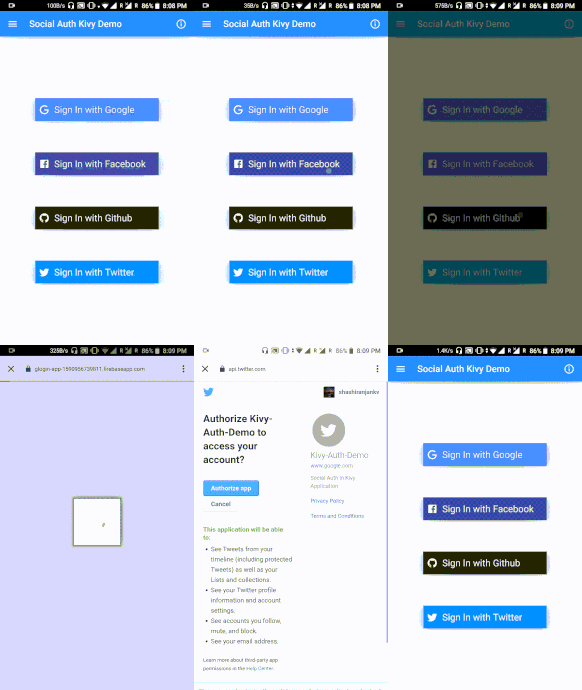
### KivyAuth on Android
 ##
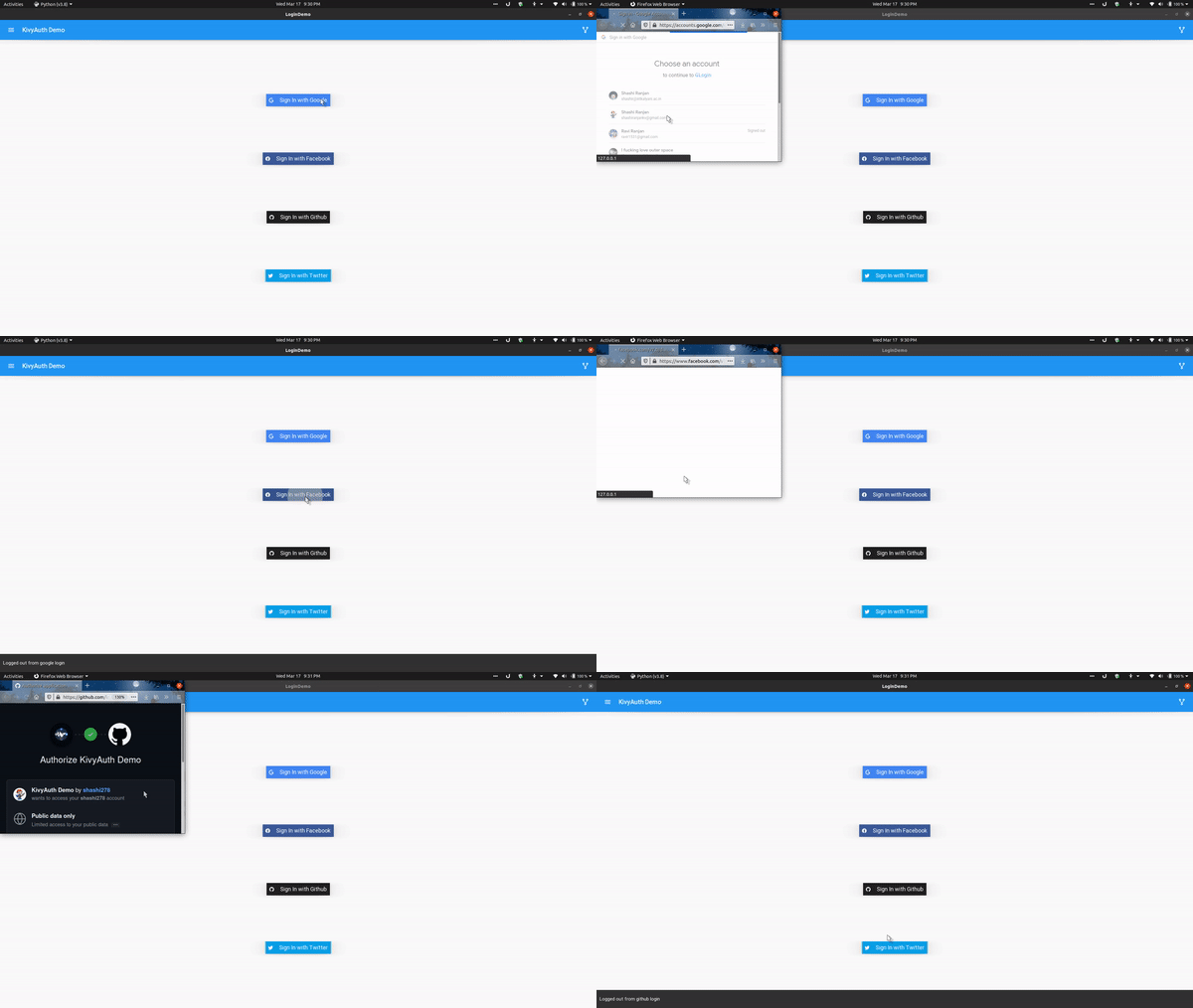
### KivyAuth on Desktop
### Run [demo](demo/) app on desktop:
* **Make Sure you've created OAuth apps and have their CLIENT_ID and CLIENT_SECRET handy before running demo application**
* Create an .env file in the app directory with below format:
```properties
GOOGLE_CLIENT_ID=
GOOGLE_CLIENT_SECRET=
FACEBOOK_CLIENT_ID=
FACEBOOK_CLIENT_SECRET=
GITHUB_CLIENT_ID=
GITHUB_CLIENT_SECRET=
```
##
## How to use
### Instruction for using KivyAuth on Desktop:
* pip install kivyauth==2.3.3
### Note for android:
Make sure you go through the [prerequisites](https://github.com/shashi278/social-auth-kivy/blob/master/docs/prerequisites.md)
for the login methods you're going to integrate in your application before moving further
#
The example below shows integrating google login. Similarly other login methods can also be used.
* Include necessary imports for google login
```python
from kivyauth.google_auth import initialize_google, login_google, logout_google
```
* Initialize google login inside your app's build method
```python
def build(self):
initialize_google(self.after_login, self.error_listener)
```
`after_login` is a function to be called upon successful login with `name`, `email`, and `photo url` of the user. So, create a success listener function which accepts three parameters and perform after-login stuffs(like updating UI, etc.). `error_listener` is called in case of any error and it doesn't accept any argument.
* You can also add auto-login( if the user is already logged in then directly move to after-login stuff) inside app's `on_start` method as below(mention only login providers you are using in your app):
```python
def on_start(self):
if auto_login(login_providers.google):
self.current_provider = login_providers.google
elif auto_login(login_providers.facebook):
self.current_provider = login_providers.facebook
elif auto_login(login_providers.github):
self.current_provider = login_providers.github
elif auto_login(login_providers.twitter):
self.current_provider = login_providers.twitter
```
* Next, call `login_google()` upon a button click to initiate login process.
* Similarly, to logout, call `logout_google` as
```python
logout_google(self.after_logout)
```
`after_logout` is a function to be called after user gets logged out. For example, to update UI.
* Make sure to include `kivyauth` as a requirement in the buildozer.spec file
```spec
requirements = python3,kivy,kivyauth==2.3.3
```
##
### TODO:
* Support iOS
##
### Changelog
#### v2.3.3
* Fixed werkzeug server not shutting down
#### v2.3.2
* Fixed crashing when user doesn't have a photo
#### v2.3.1 - KivyAuth cross-platform
* Kivyauth APIs are now platform-independent
* Desktop support for linux, win and possibly mac
#### v2.3 - KivyAuth cross-platform
* Desktop support added(in alpha)
* All android auths are inside `kivyauth.android` while those for desktops are inside `kivyauth.desktop`
#### v2.2
* Added Auto-login feature
* `login_providers` are now inside `kivyauth` rather than `kivyauth.providers`
#### v2.0
* Individual login providers are moved into respective folders
* Fix problem of not being able to use individual login methods
* Now it's relatively easier to use the library
### Other

**Contributing**: Contributions are more than welcome. Looking for contributions in making it cross-platform(specifically for iOS) and better documentation.
Feel free to ping me or raise an issue if you want to talk about this project or Kivy in general.
================================================
FILE: demo/bin/glogin__armeabi-v7a-0.1-armeabi-v7a-debug.apk
================================================
[File too large to display: 32.9 MB]
================================================
FILE: demo/intents.xml
================================================
================================================
FILE: demo/main.py
================================================
import os
from dotenv import load_dotenv
from kivy.lang.builder import Builder
from kivy.metrics import dp
from kivy.uix.image import AsyncImage
from kivy.uix.screenmanager import Screen
from kivy.uix.boxlayout import BoxLayout
from kivy import platform
from kivy.clock import Clock
from kivymd.app import MDApp
from kivymd.uix.button import MDRectangleFlatIconButton
from kivymd.uix.snackbar import Snackbar
from kivymd.uix.behaviors.elevation import CommonElevationBehavior
from kivyauth.google_auth import initialize_google, login_google, logout_google
from kivyauth.facebook_auth import initialize_fb, login_facebook, logout_facebook
from kivyauth.github_auth import initialize_github, login_github, logout_github
from kivyauth.twitter_auth import initialize_twitter, login_twitter, logout_twitter
from kivyauth.utils import stop_login
from kivyauth.utils import login_providers, auto_login
load_dotenv()
if platform == "android":
from android.runnable import run_on_ui_thread
from jnius import autoclass, cast
Toast = autoclass("android.widget.Toast")
String = autoclass("java.lang.String")
CharSequence = autoclass("java.lang.CharSequence")
Intent = autoclass("android.content.Intent")
Uri = autoclass("android.net.Uri")
NewRelic = autoclass("com.newrelic.agent.android.NewRelic")
LayoutParams = autoclass("android.view.WindowManager$LayoutParams")
AndroidColor = autoclass("android.graphics.Color")
PythonActivity = autoclass("org.kivy.android.PythonActivity")
context = PythonActivity.mActivity
@run_on_ui_thread
def show_toast(text):
t = Toast.makeText(
context, cast(CharSequence, String(text)), Toast.LENGTH_SHORT
)
t.show()
@run_on_ui_thread
def set_statusbar_color():
window = context.getWindow()
window.addFlags(LayoutParams.FLAG_DRAWS_SYSTEM_BAR_BACKGROUNDS)
window.setStatusBarColor(AndroidColor.TRANSPARENT)
kv = """
#:import Clock kivy.clock.Clock
#:import platform kivy.platform
ScreenManager:
LoginScreen:
id: login_screen
HomeScreen:
id: home_screen
:
name:"loginscreen"
BoxLayout:
orientation:"vertical"
MDTopAppBar:
title: "KivyAuth Demo"
elevation:9
opposite_colos: True
left_action_items: [['menu', lambda x: None]]
right_action_items: [['source-fork', lambda x: app.send_to_github()]]
BoxLayout:
orientation:"vertical"
Widget:
size_hint_y: None
height: dp(100)
LoginButton
text: "Sign In with Google"
icon: "google"
text_color: 1,1,1,1
can_color: 66/255, 133/255, 244/255, 1
release_action: app.gl_login
LoginButton
text: "Sign In with Facebook"
icon: "facebook"
text_color: 1,1,1,1
can_color: 59/255, 89/255, 152/255, 1
release_action: app.fb_login
LoginButton
text: "Sign In with Github"
icon: "github-circle" if platform == "android" else "github"
text_color: 1,1,1,1
can_color: 33/255, 31/255, 31/255, 1
release_action: app.git_login
LoginButton
text: "Sign In with Twitter"
icon: "twitter"
text_color: 1,1,1,1
can_color: 8/255, 160/255, 233/255, 1
release_action: app.twitter_login
Widget:
size_hint_y: None
height: dp(100)
:
text:""
icon: ""
text_color: [0,0,0,1]
can_color: 1,1,1,1
release_action: print
RectangleRaisedIconButton:
width: dp(270)
height: dp(50)
canvas.before:
Color:
rgba: root.can_color
Rectangle:
pos: self.pos
size: self.size
elevation: 8
icon: root.icon
text: root.text
font_size: dp(8) if platform == "android" else dp(18)
text_color: root.text_color
on_release:
if root.release_action: Clock.schedule_once(root.release_action, 0)
:
name:"homescreen"
BoxLayout:
id: main_box
orientation:"vertical"
MDTopAppBar:
id: user_name
title: ""
elevation: 9
opposite_colos: True
left_action_items: [['menu', lambda x: None]]
right_action_items: [['information-outline', lambda x: None]]
AnchorLayout:
id: user_photo
BoxLayout:
size_hint_y:None
height: dp(20)
padding: dp(5)
MDLabel:
id: user_email
halign: "center"
font_style: "Body1"
text: ""
AnchorLayout:
MDRaisedButton:
text: "LOGOUT"
md_bg_color: .9,.9,.9,1
theme_text_color: "Custom"
text_color: 0,0,0,1
on_release:
app.logout_()
:
orientation: "vertical"
size_hint_y: None
height: "90dp"
AnchorLayout:
MDSpinner:
size_hint: None, None
size: dp(30), dp(30)
pos_hint: {'center_x': .5, 'center_y': .5}
AnchorLayout:
MDLabel:
text: "Logging in..."
halign: "center"
"""
class Content(BoxLayout):
pass
class Content(BoxLayout):
pass
class LoginScreen(Screen):
pass
class RectangleRaisedIconButton(
MDRectangleFlatIconButton, CommonElevationBehavior
):
pass
class LoginDemo(MDApp):
current_provider = ""
def build(self):
initialize_google(
self.after_login,
self.error_listener,
os.getenv("GOOGLE_CLIENT_ID"),
os.getenv("GOOGLE_CLIENT_SECRET"),
)
initialize_fb(
self.after_login,
self.error_listener,
os.getenv("FACEBOOK_CLIENT_ID"),
os.getenv("FACEBOOK_CLIENT_SECRET"),
)
initialize_github(
self.after_login,
self.error_listener,
os.getenv("GITHUB_CLIENT_ID"),
os.getenv("GITHUB_CLIENT_SECRET"),
)
if platform == "android":
set_statusbar_color()
tmp = Builder.load_string(kv)
if platform != "android":
from kivymd.uix.dialog import MDDialog
from kivymd.uix.button import MDFlatButton
btn = MDFlatButton(text="CANCEL", text_color=self.theme_cls.primary_color)
btn.bind(on_release=lambda *args: (stop_login(), self.dialog.dismiss()))
self.dialog = MDDialog(
title="",
size_hint_x=None,
size_hint_y=None,
width="250dp",
type="custom",
auto_dismiss=False,
content_cls=Content(),
buttons=[btn],
)
return tmp
def on_start(self):
if platform == "android":
if auto_login(login_providers.google):
self.current_provider = login_providers.google
elif auto_login(login_providers.facebook):
self.current_provider = login_providers.facebook
elif auto_login(login_providers.github):
self.current_provider = login_providers.github
elif auto_login(login_providers.twitter):
self.current_provider = login_providers.twitter
primary_clr= [ 108/255, 52/255, 131/255 ]
hex_color= '#%02x%02x%02x' % (int(primary_clr[0]*200), int(primary_clr[1]*200), int(primary_clr[2]*200))
set_statusbar_color()
pass
def show_login_progress(self):
if platform != "android":
self.dialog.open()
def hide_login_progress(self):
if platform != "android":
self.dialog.dismiss()
def fb_login(self, *args):
login_facebook()
self.current_provider = login_providers.facebook
self.show_login_progress()
def gl_login(self, *args):
login_google()
self.current_provider = login_providers.google
self.show_login_progress()
def git_login(self, *args):
login_github()
self.current_provider = login_providers.github
self.show_login_progress()
def twitter_login(self, *args):
login_twitter()
self.current_provider = login_providers.twitter
self.show_login_progress()
def logout_(self):
if self.current_provider == login_providers.google:
logout_google(self.after_logout)
if self.current_provider == login_providers.facebook:
logout_facebook(self.after_logout)
if self.current_provider == login_providers.github:
logout_github(self.after_logout)
if self.current_provider == login_providers.twitter:
logout_twitter(self.after_logout)
def after_login(self, name, email, photo_uri):
self.hide_login_progress()
if platform == "android":
show_toast("Logged in using {}".format(self.current_provider))
else:
Snackbar(text="Logged in using {}".format(self.current_provider)).open()
self.root.current = "homescreen"
self.update_ui(name, email, photo_uri)
def after_logout(self):
self.update_ui("", "", "")
self.root.current = "loginscreen"
if platform == "android":
show_toast(text="Logged out from {} login".format(self.current_provider))
else:
Snackbar(
text="Logged out from {} login".format(self.current_provider)
).open()
def update_ui(self, name, email, photo_uri):
self.root.ids.home_screen.ids.user_photo.add_widget(
AsyncImage(
source=photo_uri, size_hint=(None, None), height=dp(60), width=dp(60)
)
)
self.root.ids.home_screen.ids.user_name.title = "Welcome, {}".format(name)
self.root.ids.home_screen.ids.user_email.text = (
"Your Email: {}".format(email)
if email
else "Your Email: Could not fetch email"
)
def error_listener(self):
if platform == "android":
show_toast("Error logging in.")
else:
Snackbar(text="Error logging in. Check connection or try again.").show()
Clock.schedule_once(lambda *args: self.hide_login_progress())
def send_to_github(self):
if platform == "android":
intent = Intent()
intent.setAction(Intent.ACTION_VIEW)
intent.setData(Uri.parse("https://github.com/shashi278/social-auth-kivy"))
context.startActivity(intent)
else:
import webbrowser
webbrowser.open("https://github.com/shashi278/social-auth-kivy")
if __name__ == "__main__":
LoginDemo().run()
================================================
FILE: docs/integrate-firebase-auth.md
================================================
### Integrate Github and Twitter Login in Kivy Applications
#### Firebase has been used to integrate Github and Twitter logins
##### Prerequisites
* Declare Firebase as a gradle dependency in your `buildozer.spec` file:
```spec
android.gradle_dependencies = com.google.firebase:firebase-auth:19.3.1
```
* For using firebase in kivy applications, we need to tweak few settings internally:
* Build your application once, doesn't matter if it crashes
* Then find *build.tmpl.gradle* inside *.buildozer/android/platform/build-armeabi-v7a/dists/app-name__armeabi-v7a/templates/* and change gradle plugin version from 3.1.4 to 3.5.2(I've already created a PR for the same in p4a. Hope they merge it) and add google-services plugin as it's required by firebase and apply the plugin:
```java
buildscript {
repositories {
//...
}
dependencies {
//make sure its 3.5.2 here instead of 3.1.4
classpath 'com.android.tools.build:gradle:3.5.2'
//google-services plugin, required by firebase
classpath 'com.google.gms:google-services:4.3.3'
}
}
//...
// At the bottom
apply plugin: 'com.google.gms.google-services'
```
* Make sure gradle version is set to latest(6.4.1) inside *gradle-wrapper.properties*(It's been updated in develop branch. If you're using master branch of p4a, you may need to update it manually). This file is located at: *.buildozer/android/platform/build-armeabi-v7a/dists/app-name__armeabi-v7a/gradle/wrapper/*
* Copy your *google-services.json* inside *.buildozer/android/platform/build-armeabi-v7a/dists/app-name__armeabi-v7a/*. Its required for firebase authentication.
##### Start Integrating
* Feel free to look at their [docs](https://firebase.google.com/docs/auth/android/start) for more.
* Add few required java classes for firebase authentication
```python
#----Firebase classes for Github and Twitter Login----#
FirebaseAuth= autoclass('com.google.firebase.auth.FirebaseAuth')
FirebaseApp = autoclass('com.google.firebase.FirebaseApp')
OAuthProvider = autoclass('com.google.firebase.auth.OAuthProvider')
FirebaseUser = autoclass('com.google.firebase.auth.FirebaseUser')
```
* We need to implement two java classes to handle success and failure while logging in.
```python
class OnSuccessListener(PythonJavaClass):
__javainterfaces__=['com/google/android/gms/tasks/OnSuccessListener']
__javacontext__= 'app'
@java_method('(Ljava/lang/Object;)V')
def onSuccess(self, result):
# User is signed in
# You may get user information like name,email, etc. now and perform after-login stuffs.
user = FirebaseAuth.getInstance().getCurrentUser()
# user.getDisplayName()
# user.getEmail()
# user.getPhotoUrl().toString()
class OnFailureListener(PythonJavaClass):
__javainterfaces__=['com/google/android/gms/tasks/OnFailureListener']
__javacontext__= 'app'
@java_method('(Ljava/lang/Exception;)V')
def onFailure(self, e):
#handle exception
```
* Next, get an instance of `FirebaseAuth` inside `build` method of your app:
```python
self.mAuth= FirebaseAuth.getInstance()
```
* Finally, add below codes to start login process inside a method to be called when user clicks the login button:
```python
provider = OAuthProvider.newBuilder("github.com") # "twitter.com" for twitter login
pendingResultTask = FirebaseAuth.getPendingAuthResult()
if pendingResultTask:
#There's something already here! Finish the sign-in for your user.
task= pendingResultTask.addOnSuccessListener(OnSuccessListener())
task= task.addOnFailureListener(OnFailureListener())
else:
#There's no pending result so you need to start the sign-in flow.
task= FirebaseAuth.startActivityForSignInWithProvider(context, provider.build())
task= task.addOnSuccessListener(OnSuccessListener())
task= task.addOnFailureListener(OnFailureListener())
```
================================================
FILE: docs/integrate-google-facebook-login.md
================================================
## Integrate Google and Facebook Login in Kivy Applications
##
### Google Login:
#### Prerequisite
* Declare Google Play services as a gradle dependency in your `buildozer.spec` file:
```spec
android.gradle_dependencies = com.google.android.gms:play-services-auth:18.0.0
```
#### Start Integrating
* Feel free to look at their [doc](https://developers.google.com/identity/sign-in/android/sign-in) for more info
* Add java classes required for google authentication in your `.py` file:
```python
#----Java Classes For Google Login----#
Gso= autoclass('com.google.android.gms.auth.api.signin.GoogleSignInOptions')
GsoBuilder= autoclass('com.google.android.gms.auth.api.signin.GoogleSignInOptions$Builder')
GSignIn= autoclass('com.google.android.gms.auth.api.signin.GoogleSignIn')
ApiException= autoclass('com.google.android.gms.common.api.ApiException')
```
* Create instance of `GoogleSignInClient` inside `build` method of your kivy App:
```python
gso= GsoBuilder(Gso.DEFAULT_SIGN_IN).requestEmail().build()
self.mGSignInClient= GSignIn.getClient(context, gso)
```
Make sure you've,
```python
PythonActivity= autoclass('org.kivy.android.PythonActivity')
context= PythonActivity.mActivity
```
* After the user signs in, you can get a `GoogleSignInAccount` object for the user in the activity's `onActivityResult` method.
For this, we need to bind our function we want to be called when `onActivityResult` gets called during authentication. We can
bind our function using bind function from android.activity as:
```python
from android.activity import bind as result_bind
# inside build method
result_bind(on_activity_result=activity_listener_google)
```
* Create your activity listener function:
```python
def activity_listener_google(request_code, result_code, data):
if request_code == RC_SIGN_IN:
task= GSignIn.getSignedInAccountFromIntent(data)
try:
account= task.getResult(ApiException)
if account:
#user is logged in
#Do stuffs you want after a user gets authenticated
#eg. update UI, change screen, etc.
else:
#unable to get account
except Exception as e:
#Error in signing in
```
`RC_SIGN_IN` is just a unique request code used to differentiate among different requests passed to `onActivityResult`. Define it an
integer constant.
* Finally, start sign in process when user clicks a button. Create a function in your `App` class to be called upon clicking login
button and include below codes:
```python
signInIntent= self.mGSignInClient.getSignInIntent()
context.startActivityForResult(signInIntent, RC_SIGN_IN)
```
##
### Facebook Login:
#### Prerequisite
* We'll be creating our own version of facebook login i.e. using python and kivy by following each step from their [doc](https://developers.facebook.com/docs/facebook-login/android/). So, open it in a new tab and follow it along-side.
#### Start Integrating
* Follow their instructions in step 1 and create an OAuth App. You may skip step 2.
* For step 3, add Facebook-login SDK as a gradle dependency in your `buildozer.spec` file:
```spec
android.gradle_dependencies = com.facebook.android:facebook-login:7.0.0
```
* For 4th step,
* Add `INTERNET` permission in `buildozer.spec` file
```spec
android.permissions = INTERNET
```
* Find `android.meta_data` in buildozer.spec file and make it to look like
```spec
android.meta_data = com.facebook.sdk.ApplicationId=fb
```
* Next, find `android.add_activities` in buildozer.spec file and add some activity classes
```spec
android.add_activites = com.facebook.FacebookActivity, com.facebook.CustomTabActivity
```
* Lastly, create an xml file in the same directory as `main.py`. Name it whatever you like and add this into that xml file
```xml
```
Now add this xml as an intent filter in the spec file
```spec
android.manifest.intent_filters = .xml
```
* Do as instructed in step 5 and 6
* Skip steps 7 and 8
* For next steps, we'll be implementing few java interfaces in python.
* Include few required java classes:
```python
#----Java Classes For Facebook Login----#
AccessToken= autoclass('com.facebook.AccessToken')
CallbackManagerFactory= autoclass('com.facebook.CallbackManager$Factory')
FacebookCallback= autoclass('com.facebook.FacebookCallback')
FacebookException= autoclass('com.facebook.FacebookException')
FacebookSdk= autoclass('com.facebook.FacebookSdk')
LoginManager= autoclass('com.facebook.login.LoginManager')
GraphRequest= autoclass('com.facebook.GraphRequest')
ImageRequest= autoclass('com.facebook.internal.ImageRequest')
```
* Now, to respond to a login result, you need to register a callback with `LoginManager`. Before that,
we need to implement `GraphJSONObjectCallback` class which will be used when login request succeeds and within which
we can get user information(like, name, email, etc.)
```python
class PythonGraphJSONObjectCallback(PythonJavaClass):
__javainterfaces__= ['com/facebook/GraphRequest$GraphJSONObjectCallback']
__javacontext__= 'app'
@java_method('(Lorg/json/JSONObject;Lcom/facebook/GraphResponse;)V')
def onCompleted(self, me, response):
if response.getError():
#handle error
else:
if AccessToken.isCurrentAccessTokenActive():
access_token= AccessToken.getCurrentAccessToken().getToken()
else:
access_token= ""
uri= ImageRequest.getProfilePictureUri(
me.optString("id"), #user id
100, #image height
100, #image width
access_token #access token
)
# user has been logged in. Get other info
# and do after login stuffs(like, updating UI, etc.)
```
* Next, we need to implement `FacebookCallback` class which will be registered with `LoginManager`.
```python
class PythonFacebookCallback(PythonJavaClass):
__javainterfaces__= ['com/facebook/FacebookCallback']
__javacontext__= 'app'
@java_method('(Ljava/lang/Object;)V')
def onSuccess(self, result):
request= GraphRequest.newMeRequest(
result.getAccessToken(),
PythonGraphJSONObjectCallback()
)
params= Bundle()
params.putString("fields", "last_name,first_name,email")
request.setParameters(params)
request.executeAsync()
@java_method('()V')
def onCancel(self):
#Login has been cancelled
@java_method('(Lcom/facebook/FacebookException;)V')
def onError(self, error):
#Error in logging in
```
* We then need o initialize Facebook SDK inside App's `build` method:
```python
FacebookSdk.sdkInitialize(context.getApplicationContext())
```
* And then register the callback with `LoginManager` inside `build` method:
```python
mCallbackManager = CallbackManagerFactory.create()
mFacebookCallback = PythonFacebookCallback()
self.mLoginMgr = LoginManager.getInstance()
self.mLoginMgr.registerCallback(mCallbackManager, mFacebookCallback)
```
* Finally, in your `onActivityResult` method, call `callbackManager.onActivityResult` to pass the login results to the `LoginManager` via `callbackManager`. For this we just need to add one more line to our `build` method:
```python
result_bind(on_activity_result=mCallbackManager.onActivityResult)
```
Make sure you've `result_bind` imported:
```python
from android.activity import bind as result_bind
```
* Finally, perform the actual login with required scopes upon clicking a button. Add below codes inside a function to be called upon a button's pressing/releasing event.
```python
self.mLoginMgr.logInWithReadPermissions(
cast(autoclass('android.app.Activity'),
context), Arrays.asList("email", "public_profile")
)
```
================================================
FILE: docs/prerequisites.md
================================================
### For Google Login
#
* Goto https://console.cloud.google.com/
* While on cloud console, head to `APIs & Services` > `Credentials` > Click on `+ Create Credentials` and select `OAuth client ID`
* On the following screen select `Android` under `Application Type` field and follow on-screen instructions to fill all the fields and create a client ID for Android.
* Declare Google Play services as a gradle dependency in your `buildozer.spec` file:
```spec
android.gradle_dependencies = com.google.android.gms:play-services-auth:18.0.0
```
* Add `INTERNET` permission in `buildozer.spec` file
```spec
android.permissions = INTERNET
```
#
### For Facebook Login
##
* You need to follow their [doc](https://developers.facebook.com/docs/facebook-login/android/) along-side. So open it up in a new tab.
* Follow their instruction in step 1 and create an OAuth App. You may skip step 2.
* For step 3, add Facebook-login SDK as a gradle dependency in your `buildozer.spec` file:
```spec
android.gradle_dependencies = com.facebook.android:facebook-login:7.0.0
```
* For 4th step,
* Add `INTERNET` permission in `buildozer.spec` file
```spec
android.permissions = INTERNET
```
* Copy your OAuth App ID and find `android.meta_data` in buildozer.spec file and make it to look like
```spec
android.meta_data = com.facebook.sdk.ApplicationId=fb
```
* Next, find `android.add_activities` in buildozer.spec file and add some activity classes
```spec
android.add_activites = com.facebook.FacebookActivity, com.facebook.CustomTabActivity
```
* Lastly, create an xml file in the same directory as `main.py`. Name it whatever you like and paste below text into that xml file
```xml
```
Now add this xml as an intent filter in the spec file
```spec
android.manifest.intent_filters = .xml
```
#
### For Firebase Login
##
* Make sure you've created OAuth apps for [Github](https://github.com/settings/applications/new) and/or [Twitter](https://developer.twitter.com/en/apps/create) logins before proceeding further.
* Go to [firebase console](https://console.firebase.google.com) and create a project for your application.
* Once you've created a project, add your android app into the project from the Project Overview screen and follow the on-screen instructions and finally download
the `google-services.json` file.
* Declare Firebase as a gradle dependency in your `buildozer.spec` file:
```spec
android.gradle_dependencies = com.google.firebase:firebase-auth:19.3.1
```
* Add `INTERNET` permission in `buildozer.spec` file
```spec
android.permissions = INTERNET
```
* Next, from your project's console head to the Authentication section and then switch to the Sign-in method tab and enable the sign-in methods you want for your
app.(For kivyauth you only need to enable Github and Twitter and follow on-screen instructions)
* Now you need to tweak few settings internally:
* Build your application once, doesn't matter if it crashes
* Then find ***build.tmpl.gradle*** inside *.buildozer/android/platform/python-for-android/pythonforandroid/bootstraps/common/build/templates* and change gradle plugin version
from 3.1.4 to 3.5.2 and add google-services plugin as it's required by firebase and apply the plugin:
```java
buildscript {
repositories {
//...
}
dependencies {
//make sure its 3.5.2 here instead of 3.1.4
classpath 'com.android.tools.build:gradle:3.5.2'
//google-services plugin, required by firebase
classpath 'com.google.gms:google-services:4.3.3'
}
}
//...
// At the bottom
apply plugin: 'com.google.gms.google-services'
```
* Paste your ***google-services.json*** inside *.buildozer/android/platform/python-for-android/pythonforandroid/bootstraps/common/build/*.
* Re-build your application
================================================
FILE: kivyauth/__init__.py
================================================
from kivy.logger import Logger
from kivy.utils import platform
__version__ = "2.3.3"
_log_message = "KivyAuth:" + f" {__version__}" + f' (installed at "{__file__}")'
__all__ = ("login_providers", "auto_login")
Logger.info(_log_message)
================================================
FILE: kivyauth/android/__init__.py
================================================
================================================
FILE: kivyauth/android/facebook_auth.py
================================================
from android.activity import bind as result_bind
from jnius import PythonJavaClass, autoclass, cast, java_method
from kivy.logger import Logger
CallbackManagerFactory = autoclass("com.facebook.CallbackManager$Factory")
FacebookSdk = autoclass("com.facebook.FacebookSdk")
LoginManager = autoclass("com.facebook.login.LoginManager")
AccessToken = autoclass("com.facebook.AccessToken")
GraphRequest = autoclass("com.facebook.GraphRequest")
ImageRequest = autoclass("com.facebook.internal.ImageRequest")
Bundle = autoclass("android.os.Bundle")
Arrays = autoclass("java.util.Arrays")
PythonActivity = autoclass("org.kivy.android.PythonActivity")
context = PythonActivity.mActivity
mLoginMgr = None
mList = None
__all__ = ("initialize_fb", "login_facebook", "logout_facebook")
class PythonGraphJSONObjectCallback(PythonJavaClass):
__javainterfaces__ = ["com/facebook/GraphRequest$GraphJSONObjectCallback"]
__javacontext__ = "app"
def __init__(self, complete_listener):
self.complete_listener = complete_listener
super().__init__()
@java_method("(Lorg/json/JSONObject;Lcom/facebook/GraphResponse;)V")
def onCompleted(self, me, response):
if response.getError():
# handle error
Logger.error("KivyAuth: Unable to retrieve profile info")
else:
if AccessToken.isCurrentAccessTokenActive():
access_token = AccessToken.getCurrentAccessToken().getToken()
else:
access_token = ""
uri = ImageRequest.getProfilePictureUri(
me.optString("id"), 200, 200, access_token
)
Logger.info(
"KivyAuth: Profile info retrieved successfully."
" Calling success listener."
)
self.complete_listener(
me.optString("first_name") + " " + me.optString("last_name"),
me.optString("email"),
uri.toString() if uri else '',
)
class PythonFacebookCallback(PythonJavaClass):
__javainterfaces__ = ["com/facebook/FacebookCallback"]
__javacontext__ = "app"
def __init__(self, success_listener, cancel_listener, error_listener):
self.success_listener = success_listener
self.cancel_listener = cancel_listener
self.error_listener = error_listener
@java_method("(Ljava/lang/Object;)V")
def onSuccess(self, result):
Logger.info("KivyAuth: Login success. Requesting profile info.")
request = GraphRequest.newMeRequest(
result.getAccessToken(),
PythonGraphJSONObjectCallback(self.success_listener),
)
params = Bundle()
params.putString("fields", "last_name,first_name,email")
request.setParameters(params)
request.executeAsync()
@java_method("()V")
def onCancel(self):
Logger.info("KivyAuth: Login Cancelled.")
self.cancel_listener()
@java_method("(Lcom/facebook/FacebookException;)V")
def onError(self, error):
Logger.error("KivyAuth: Error logging in.")
self.error_listener()
def initialize_fb(success_listener, error_listener, *args, **kwargs):
"""
Function to initialize facebook login.
Must be called inside `build` method of kivy App before actual login.
:param: `success_listener` - Function to be called on login success
:param: `error_listener` - Function to be called on login error
"""
FacebookSdk.sdkInitialize(context.getApplicationContext())
mCallbackManager = CallbackManagerFactory.create()
mFacebookCallback = PythonFacebookCallback(
success_listener, error_listener, error_listener
)
result_bind(on_activity_result=mCallbackManager.onActivityResult)
Logger.info("KivyAuth: Initialized facebook signin")
global mList
mList = [mCallbackManager, mFacebookCallback]
def login_facebook():
"""
Function to login using facebook
"""
Logger.info("KivyAuth: Initiated facebook login")
global mLoginMgr
mLoginMgr = LoginManager.getInstance()
mLoginMgr.registerCallback(*mList)
mLoginMgr.logInWithReadPermissions(
cast(autoclass("android.app.Activity"), context),
Arrays.asList("email", "public_profile"),
)
def auto_facebook():
"""
Auto login using Facebook. You may call it `on_start`.
"""
accessToken = AccessToken.getCurrentAccessToken()
if accessToken and not accessToken.isExpired():
login_facebook()
return True
def logout_facebook(after_logout):
"""
Logout from facebook login
:param: `after_logout` - Function to be called after logging out
"""
mLoginMgr.logOut()
after_logout()
Logger.info("KivyAuth: Logged out from facebook login")
================================================
FILE: kivyauth/android/firebase_auth.py
================================================
from android.activity import bind as result_bind
from jnius import PythonJavaClass, autoclass, java_method
from kivy.logger import Logger
FirebaseAuth = autoclass("com.google.firebase.auth.FirebaseAuth")
OAuthProvider = autoclass("com.google.firebase.auth.OAuthProvider")
PythonActivity = autoclass("org.kivy.android.PythonActivity")
context = PythonActivity.mActivity
event_success_listener = None
event_error_listener = None
class OnSuccessListener(PythonJavaClass):
__javainterfaces__ = ["com/google/android/gms/tasks/OnSuccessListener"]
__javacontext__ = "app"
def __init__(self, success_listener):
self.success_listener = success_listener
@java_method("(Ljava/lang/Object;)V")
def onSuccess(self, result):
# user is signed in
Logger.info("KivyAuth: Sign in successful using firebase.")
user = FirebaseAuth.getInstance().getCurrentUser()
_call_success(user)
class OnFailureListener(PythonJavaClass):
__javainterfaces__ = ["com/google/android/gms/tasks/OnFailureListener"]
__javacontext__ = "app"
def __init__(self, error_listener):
self.error_listener = error_listener
@java_method("(Ljava/lang/Exception;)V")
def onFailure(self, e):
# handle exception
Logger.info("KivyAuth: Sign in using firebase failed")
self.error_listener()
def _call_success(user):
event_success_listener(
user.getDisplayName(),
user.getEmail(),
user.getPhotoUrl().toString() if user.getPhotoUrl() else ''
)
def initialize_firebase(success_listener, error_listener):
"""
Function to initialize firebase login.
Must be called inside `build` method of kivy App before actual login.
:param: `success_listener` - Function to be called on login success
:param: `error_listener` - Function to be called on login error
"""
FirebaseAuth.getInstance()
Logger.info("KivyAuth: Initialized firebase auth")
global event_success_listener
event_success_listener = success_listener
global event_error_listener
event_error_listener = error_listener
def firebase_login(provider):
pendingResultTask = FirebaseAuth.getPendingAuthResult()
if pendingResultTask:
# There's something already here! Finish the sign-in for your user.
task = pendingResultTask.addOnSuccessListener(
OnSuccessListener(event_success_listener)
)
task = task.addOnFailureListener(OnFailureListener(event_error_listener))
else:
# There's no pending result so you need to start the sign-in flow.
task = FirebaseAuth.startActivityForSignInWithProvider(
context, provider.build()
)
task = task.addOnSuccessListener(OnSuccessListener(event_success_listener))
task = task.addOnFailureListener(OnFailureListener(event_error_listener))
def firebase_logout(after_logout):
Logger.info("KivyAuth: Initiated logout using firebase")
FirebaseAuth.getInstance().signOut()
after_logout()
Logger.info("KivyAuth: Logged out from firebase auth")
def auto_firebase():
user = FirebaseAuth.getInstance().getCurrentUser()
if user:
_call_success(user)
return True
def login_github():
"""
Function to login using github
"""
Logger.info("KivyAuth: Initiated github login")
provider = OAuthProvider.newBuilder("github.com")
firebase_login(provider)
def login_twitter():
"""
Function to login using twitter
"""
Logger.info("KivyAuth: Initiated twitter login")
provider = OAuthProvider.newBuilder("twitter.com")
firebase_login(provider)
def logout_twitter(after_logout):
"""
Logout from twitter login
:param: `after_logout` - Function to be called after logging out
"""
firebase_logout(after_logout)
def logout_github(after_logout):
"""
Logout from github login
:param: `after_logout` - Function to be called after logging out
"""
firebase_logout(after_logout)
================================================
FILE: kivyauth/android/github_auth.py
================================================
from kivy.logger import Logger
from kivyauth.android.firebase_auth import (
firebase_login,
firebase_logout,
initialize_firebase,
OAuthProvider,
auto_firebase as auto_github,
)
__all__ = ("initialize_github", "login_github", "logout_github")
def initialize_github(succes_listener, error_listener, *args, **kwargs):
initialize_firebase(succes_listener, error_listener)
def login_github():
"""
Function to login using github
"""
Logger.info("KivyAuth: Initiated github login")
provider = OAuthProvider.newBuilder("github.com")
firebase_login(provider)
def logout_github(after_logout):
"""
Logout from github login
:param: `after_logout` - Function to be called after logging out
"""
firebase_logout(after_logout)
================================================
FILE: kivyauth/android/google_auth.py
================================================
from android.activity import bind as result_bind
from jnius import autoclass
from kivy.clock import mainthread
from kivy.logger import Logger
Gso = autoclass("com.google.android.gms.auth.api.signin.GoogleSignInOptions")
GsoBuilder = autoclass(
"com.google.android.gms.auth.api.signin.GoogleSignInOptions$Builder"
)
GSignIn = autoclass("com.google.android.gms.auth.api.signin.GoogleSignIn")
ApiException = autoclass("com.google.android.gms.common.api.ApiException")
PythonActivity = autoclass("org.kivy.android.PythonActivity")
context = PythonActivity.mActivity
RC_SIGN_IN = 10122
mGSignInClient = None
event_success_listener = None
__all__ = ("initialize_google", "login_google", "logout_google")
class GoogleActivityListener:
def __init__(self, success_listener, error_listener):
self.success_listener = success_listener
self.error_listener = error_listener
def google_activity_listener(self, request_code, result_code, data):
if request_code == RC_SIGN_IN:
Logger.info("KivyAuth: google_activity_listener called.")
task = GSignIn.getSignedInAccountFromIntent(data)
try:
account = task.getResult(ApiException)
_call_success(account)
except Exception as e:
Logger.info("KivyAuth: Error signing in using Google. {}".format(e))
self.error_listener()
def _call_success(account):
if account:
Logger.info("KivyAuth: Google Login success. Calling success listener.")
event_success_listener(
account.getDisplayName(),
account.getEmail(),
account.getPhotoUrl().toString() if account.getPhotoUrl() else '',
)
return True
def initialize_google(success_listener, error_listener, *args, **kwargs):
"""
Function to initialize google login.
Must be called inside `build` method of kivy App before actual login.
:param: `success_listener` - Function to be called on login success
:param: `error_listener` - Function to be called on login error
"""
global event_success_listener
event_success_listener = success_listener
gso = GsoBuilder(Gso.DEFAULT_SIGN_IN).requestEmail().build()
global mGSignInClient
mGSignInClient = GSignIn.getClient(context, gso)
gal = GoogleActivityListener(success_listener, error_listener)
result_bind(on_activity_result=gal.google_activity_listener)
Logger.info("KivyAuth: Initialized google signin")
# @mainthread
def login_google():
"""
Function to login using google
"""
Logger.info("KivyAuth: Initiated google login")
signInIntent = mGSignInClient.getSignInIntent()
context.startActivityForResult(signInIntent, RC_SIGN_IN)
def auto_google():
"""
Auto login using Google. You may call it `on_start`.
"""
account = GSignIn.getLastSignedInAccount(context)
return _call_success(account)
def logout_google(after_logout):
"""
Logout from google login
:param: `after_logout` - Function to be called after logging out
"""
mGSignInClient.signOut()
after_logout()
Logger.info("KivyAuth: Logged out from google login")
================================================
FILE: kivyauth/android/twitter_auth.py
================================================
from kivy.logger import Logger
from kivyauth.android.firebase_auth import (
firebase_login,
firebase_logout,
initialize_firebase,
OAuthProvider,
auto_firebase as auto_twitter,
)
__all__ = ("initialize_twitter", "login_twitter", "logout_twitter")
def initialize_twitter(succes_listener, error_listener, *args, **kwargs):
initialize_firebase(succes_listener, error_listener)
def login_twitter():
"""
Function to login using twitter
"""
Logger.info("KivyAuth: Initiated twitter login")
provider = OAuthProvider.newBuilder("twitter.com")
firebase_login(provider)
def logout_twitter(after_logout):
"""
Logout from twitter login
:param: `after_logout` - Function to be called after logging out
"""
firebase_logout(after_logout)
================================================
FILE: kivyauth/desktop/__init__.py
================================================
================================================
FILE: kivyauth/desktop/facebook_auth.py
================================================
import requests
from oauthlib.oauth2 import WebApplicationClient
import json
import webbrowser
import random
from kivyauth.desktop.utils import (
request,
redirect,
is_connected,
start_server,
app,
_close_server_pls,
port,
stop_login,
)
from kivy.app import App
from kivy.clock import Clock
# facebook configuration
FACEBOOK_CLIENT_ID = ""
FACEBOOK_CLIENT_SECRET = ""
fb_authorization_endpoint = "https://www.facebook.com/v15.0/dialog/oauth?"
fb_token_endpoint = "https://graph.facebook.com/v15.0/oauth/access_token?"
fb_userinfo_endpoint = "https://graph.facebook.com/v15.0/me?"
client_facebook = None
event_success_listener = None
event_error_listener = None
__all__ = ("initialize_fb", "login_facebook", "logout_facebook")
def initialize_fb(success_listener, error_listener, client_id=None, client_secret=None):
a = App.get_running_app()
a.bind(on_stop=lambda *args: _close_server_pls(port))
global event_success_listener
event_success_listener = success_listener
global event_error_listener
event_error_listener = error_listener
global FACEBOOK_CLIENT_ID
FACEBOOK_CLIENT_ID = client_id
global FACEBOOK_CLIENT_SECRET
FACEBOOK_CLIENT_SECRET = client_secret
global client_facebook
client_facebook = WebApplicationClient(FACEBOOK_CLIENT_ID)
@app.route("/loginFacebook")
def loginFacebook():
st = "".join([random.choice("abcdefgh1234567") for _ in range(10)])
ds = "".join([random.choice("1234567890") for _ in range(10)])
request_uri = client_facebook.prepare_request_uri(
fb_authorization_endpoint,
redirect_uri=request.base_url + "/callbackFacebook",
scope=["email"],
state="{st=" + st + ",ds=" + ds + "}",
)
return redirect(request_uri)
@app.route("/loginFacebook/callbackFacebook")
def callbackFacebook():
code = request.args.get("code")
# prepare a request to get tokens
token_url, headers, body = client_facebook.prepare_token_request(
fb_token_endpoint,
client_id=FACEBOOK_CLIENT_ID,
client_secret=FACEBOOK_CLIENT_SECRET,
code=code,
redirect_url=request.base_url,
)
# send the request and get the response
token_response = requests.post(token_url, headers=headers, data=body)
# send the request and get the response
# app_token_response = requests.get(token_url, headers=headers, data=body)
headers = {
"Authorization": token_response.json()["access_token"]
+ " "
+ token_response.json()["token_type"]
}
request_uri = client_facebook.prepare_request_uri(
fb_userinfo_endpoint,
fields=["id", "name", "email", "picture"],
access_token=token_response.json()["access_token"],
)
# make the request and get the response
userinfo_response = requests.get(request_uri, headers=headers, data=None).json()
stop_login()
# parse the information
if userinfo_response.get("id"):
Clock.schedule_once(lambda *args: event_success_listener(
userinfo_response["name"],
userinfo_response["email"],
userinfo_response["picture"]["data"]["url"],
), 0)
return "
##
### KivyAuth on Desktop

### Run [demo](demo/) app on desktop:
* **Make Sure you've created OAuth apps and have their CLIENT_ID and CLIENT_SECRET handy before running demo application**
* Create an .env file in the app directory with below format:
```properties
GOOGLE_CLIENT_ID=
GOOGLE_CLIENT_SECRET=
FACEBOOK_CLIENT_ID=
FACEBOOK_CLIENT_SECRET=
GITHUB_CLIENT_ID=
GITHUB_CLIENT_SECRET=
```
##
## How to use
### Instruction for using KivyAuth on Desktop:
* pip install kivyauth==2.3.3
### Note for android:
Make sure you go through the [prerequisites](https://github.com/shashi278/social-auth-kivy/blob/master/docs/prerequisites.md)
for the login methods you're going to integrate in your application before moving further
#
The example below shows integrating google login. Similarly other login methods can also be used.
* Include necessary imports for google login
```python
from kivyauth.google_auth import initialize_google, login_google, logout_google
```
* Initialize google login inside your app's build method
```python
def build(self):
initialize_google(self.after_login, self.error_listener)
```
`after_login` is a function to be called upon successful login with `name`, `email`, and `photo url` of the user. So, create a success listener function which accepts three parameters and perform after-login stuffs(like updating UI, etc.). `error_listener` is called in case of any error and it doesn't accept any argument.
* You can also add auto-login( if the user is already logged in then directly move to after-login stuff) inside app's `on_start` method as below(mention only login providers you are using in your app):
```python
def on_start(self):
if auto_login(login_providers.google):
self.current_provider = login_providers.google
elif auto_login(login_providers.facebook):
self.current_provider = login_providers.facebook
elif auto_login(login_providers.github):
self.current_provider = login_providers.github
elif auto_login(login_providers.twitter):
self.current_provider = login_providers.twitter
```
* Next, call `login_google()` upon a button click to initiate login process.
* Similarly, to logout, call `logout_google` as
```python
logout_google(self.after_logout)
```
`after_logout` is a function to be called after user gets logged out. For example, to update UI.
* Make sure to include `kivyauth` as a requirement in the buildozer.spec file
```spec
requirements = python3,kivy,kivyauth==2.3.3
```
##
### TODO:
* Support iOS
##
### Changelog
#### v2.3.3
* Fixed werkzeug server not shutting down
#### v2.3.2
* Fixed crashing when user doesn't have a photo
#### v2.3.1 - KivyAuth cross-platform
* Kivyauth APIs are now platform-independent
* Desktop support for linux, win and possibly mac
#### v2.3 - KivyAuth cross-platform
* Desktop support added(in alpha)
* All android auths are inside `kivyauth.android` while those for desktops are inside `kivyauth.desktop`
#### v2.2
* Added Auto-login feature
* `login_providers` are now inside `kivyauth` rather than `kivyauth.providers`
#### v2.0
* Individual login providers are moved into respective folders
* Fix problem of not being able to use individual login methods
* Now it's relatively easier to use the library
### Other

**Contributing**: Contributions are more than welcome. Looking for contributions in making it cross-platform(specifically for iOS) and better documentation.
Feel free to ping me or raise an issue if you want to talk about this project or Kivy in general.
================================================
FILE: demo/bin/glogin__armeabi-v7a-0.1-armeabi-v7a-debug.apk
================================================
[File too large to display: 32.9 MB]
================================================
FILE: demo/intents.xml
================================================
================================================
FILE: demo/main.py
================================================
import os
from dotenv import load_dotenv
from kivy.lang.builder import Builder
from kivy.metrics import dp
from kivy.uix.image import AsyncImage
from kivy.uix.screenmanager import Screen
from kivy.uix.boxlayout import BoxLayout
from kivy import platform
from kivy.clock import Clock
from kivymd.app import MDApp
from kivymd.uix.button import MDRectangleFlatIconButton
from kivymd.uix.snackbar import Snackbar
from kivymd.uix.behaviors.elevation import CommonElevationBehavior
from kivyauth.google_auth import initialize_google, login_google, logout_google
from kivyauth.facebook_auth import initialize_fb, login_facebook, logout_facebook
from kivyauth.github_auth import initialize_github, login_github, logout_github
from kivyauth.twitter_auth import initialize_twitter, login_twitter, logout_twitter
from kivyauth.utils import stop_login
from kivyauth.utils import login_providers, auto_login
load_dotenv()
if platform == "android":
from android.runnable import run_on_ui_thread
from jnius import autoclass, cast
Toast = autoclass("android.widget.Toast")
String = autoclass("java.lang.String")
CharSequence = autoclass("java.lang.CharSequence")
Intent = autoclass("android.content.Intent")
Uri = autoclass("android.net.Uri")
NewRelic = autoclass("com.newrelic.agent.android.NewRelic")
LayoutParams = autoclass("android.view.WindowManager$LayoutParams")
AndroidColor = autoclass("android.graphics.Color")
PythonActivity = autoclass("org.kivy.android.PythonActivity")
context = PythonActivity.mActivity
@run_on_ui_thread
def show_toast(text):
t = Toast.makeText(
context, cast(CharSequence, String(text)), Toast.LENGTH_SHORT
)
t.show()
@run_on_ui_thread
def set_statusbar_color():
window = context.getWindow()
window.addFlags(LayoutParams.FLAG_DRAWS_SYSTEM_BAR_BACKGROUNDS)
window.setStatusBarColor(AndroidColor.TRANSPARENT)
kv = """
#:import Clock kivy.clock.Clock
#:import platform kivy.platform
ScreenManager:
LoginScreen:
id: login_screen
HomeScreen:
id: home_screen
:
name:"loginscreen"
BoxLayout:
orientation:"vertical"
MDTopAppBar:
title: "KivyAuth Demo"
elevation:9
opposite_colos: True
left_action_items: [['menu', lambda x: None]]
right_action_items: [['source-fork', lambda x: app.send_to_github()]]
BoxLayout:
orientation:"vertical"
Widget:
size_hint_y: None
height: dp(100)
LoginButton
text: "Sign In with Google"
icon: "google"
text_color: 1,1,1,1
can_color: 66/255, 133/255, 244/255, 1
release_action: app.gl_login
LoginButton
text: "Sign In with Facebook"
icon: "facebook"
text_color: 1,1,1,1
can_color: 59/255, 89/255, 152/255, 1
release_action: app.fb_login
LoginButton
text: "Sign In with Github"
icon: "github-circle" if platform == "android" else "github"
text_color: 1,1,1,1
can_color: 33/255, 31/255, 31/255, 1
release_action: app.git_login
LoginButton
text: "Sign In with Twitter"
icon: "twitter"
text_color: 1,1,1,1
can_color: 8/255, 160/255, 233/255, 1
release_action: app.twitter_login
Widget:
size_hint_y: None
height: dp(100)
:
text:""
icon: ""
text_color: [0,0,0,1]
can_color: 1,1,1,1
release_action: print
RectangleRaisedIconButton:
width: dp(270)
height: dp(50)
canvas.before:
Color:
rgba: root.can_color
Rectangle:
pos: self.pos
size: self.size
elevation: 8
icon: root.icon
text: root.text
font_size: dp(8) if platform == "android" else dp(18)
text_color: root.text_color
on_release:
if root.release_action: Clock.schedule_once(root.release_action, 0)
:
name:"homescreen"
BoxLayout:
id: main_box
orientation:"vertical"
MDTopAppBar:
id: user_name
title: ""
elevation: 9
opposite_colos: True
left_action_items: [['menu', lambda x: None]]
right_action_items: [['information-outline', lambda x: None]]
AnchorLayout:
id: user_photo
BoxLayout:
size_hint_y:None
height: dp(20)
padding: dp(5)
MDLabel:
id: user_email
halign: "center"
font_style: "Body1"
text: ""
AnchorLayout:
MDRaisedButton:
text: "LOGOUT"
md_bg_color: .9,.9,.9,1
theme_text_color: "Custom"
text_color: 0,0,0,1
on_release:
app.logout_()
:
orientation: "vertical"
size_hint_y: None
height: "90dp"
AnchorLayout:
MDSpinner:
size_hint: None, None
size: dp(30), dp(30)
pos_hint: {'center_x': .5, 'center_y': .5}
AnchorLayout:
MDLabel:
text: "Logging in..."
halign: "center"
"""
class Content(BoxLayout):
pass
class Content(BoxLayout):
pass
class LoginScreen(Screen):
pass
class RectangleRaisedIconButton(
MDRectangleFlatIconButton, CommonElevationBehavior
):
pass
class LoginDemo(MDApp):
current_provider = ""
def build(self):
initialize_google(
self.after_login,
self.error_listener,
os.getenv("GOOGLE_CLIENT_ID"),
os.getenv("GOOGLE_CLIENT_SECRET"),
)
initialize_fb(
self.after_login,
self.error_listener,
os.getenv("FACEBOOK_CLIENT_ID"),
os.getenv("FACEBOOK_CLIENT_SECRET"),
)
initialize_github(
self.after_login,
self.error_listener,
os.getenv("GITHUB_CLIENT_ID"),
os.getenv("GITHUB_CLIENT_SECRET"),
)
if platform == "android":
set_statusbar_color()
tmp = Builder.load_string(kv)
if platform != "android":
from kivymd.uix.dialog import MDDialog
from kivymd.uix.button import MDFlatButton
btn = MDFlatButton(text="CANCEL", text_color=self.theme_cls.primary_color)
btn.bind(on_release=lambda *args: (stop_login(), self.dialog.dismiss()))
self.dialog = MDDialog(
title="",
size_hint_x=None,
size_hint_y=None,
width="250dp",
type="custom",
auto_dismiss=False,
content_cls=Content(),
buttons=[btn],
)
return tmp
def on_start(self):
if platform == "android":
if auto_login(login_providers.google):
self.current_provider = login_providers.google
elif auto_login(login_providers.facebook):
self.current_provider = login_providers.facebook
elif auto_login(login_providers.github):
self.current_provider = login_providers.github
elif auto_login(login_providers.twitter):
self.current_provider = login_providers.twitter
primary_clr= [ 108/255, 52/255, 131/255 ]
hex_color= '#%02x%02x%02x' % (int(primary_clr[0]*200), int(primary_clr[1]*200), int(primary_clr[2]*200))
set_statusbar_color()
pass
def show_login_progress(self):
if platform != "android":
self.dialog.open()
def hide_login_progress(self):
if platform != "android":
self.dialog.dismiss()
def fb_login(self, *args):
login_facebook()
self.current_provider = login_providers.facebook
self.show_login_progress()
def gl_login(self, *args):
login_google()
self.current_provider = login_providers.google
self.show_login_progress()
def git_login(self, *args):
login_github()
self.current_provider = login_providers.github
self.show_login_progress()
def twitter_login(self, *args):
login_twitter()
self.current_provider = login_providers.twitter
self.show_login_progress()
def logout_(self):
if self.current_provider == login_providers.google:
logout_google(self.after_logout)
if self.current_provider == login_providers.facebook:
logout_facebook(self.after_logout)
if self.current_provider == login_providers.github:
logout_github(self.after_logout)
if self.current_provider == login_providers.twitter:
logout_twitter(self.after_logout)
def after_login(self, name, email, photo_uri):
self.hide_login_progress()
if platform == "android":
show_toast("Logged in using {}".format(self.current_provider))
else:
Snackbar(text="Logged in using {}".format(self.current_provider)).open()
self.root.current = "homescreen"
self.update_ui(name, email, photo_uri)
def after_logout(self):
self.update_ui("", "", "")
self.root.current = "loginscreen"
if platform == "android":
show_toast(text="Logged out from {} login".format(self.current_provider))
else:
Snackbar(
text="Logged out from {} login".format(self.current_provider)
).open()
def update_ui(self, name, email, photo_uri):
self.root.ids.home_screen.ids.user_photo.add_widget(
AsyncImage(
source=photo_uri, size_hint=(None, None), height=dp(60), width=dp(60)
)
)
self.root.ids.home_screen.ids.user_name.title = "Welcome, {}".format(name)
self.root.ids.home_screen.ids.user_email.text = (
"Your Email: {}".format(email)
if email
else "Your Email: Could not fetch email"
)
def error_listener(self):
if platform == "android":
show_toast("Error logging in.")
else:
Snackbar(text="Error logging in. Check connection or try again.").show()
Clock.schedule_once(lambda *args: self.hide_login_progress())
def send_to_github(self):
if platform == "android":
intent = Intent()
intent.setAction(Intent.ACTION_VIEW)
intent.setData(Uri.parse("https://github.com/shashi278/social-auth-kivy"))
context.startActivity(intent)
else:
import webbrowser
webbrowser.open("https://github.com/shashi278/social-auth-kivy")
if __name__ == "__main__":
LoginDemo().run()
================================================
FILE: docs/integrate-firebase-auth.md
================================================
### Integrate Github and Twitter Login in Kivy Applications
#### Firebase has been used to integrate Github and Twitter logins
##### Prerequisites
* Declare Firebase as a gradle dependency in your `buildozer.spec` file:
```spec
android.gradle_dependencies = com.google.firebase:firebase-auth:19.3.1
```
* For using firebase in kivy applications, we need to tweak few settings internally:
* Build your application once, doesn't matter if it crashes
* Then find *build.tmpl.gradle* inside *.buildozer/android/platform/build-armeabi-v7a/dists/app-name__armeabi-v7a/templates/* and change gradle plugin version from 3.1.4 to 3.5.2(I've already created a PR for the same in p4a. Hope they merge it) and add google-services plugin as it's required by firebase and apply the plugin:
```java
buildscript {
repositories {
//...
}
dependencies {
//make sure its 3.5.2 here instead of 3.1.4
classpath 'com.android.tools.build:gradle:3.5.2'
//google-services plugin, required by firebase
classpath 'com.google.gms:google-services:4.3.3'
}
}
//...
// At the bottom
apply plugin: 'com.google.gms.google-services'
```
* Make sure gradle version is set to latest(6.4.1) inside *gradle-wrapper.properties*(It's been updated in develop branch. If you're using master branch of p4a, you may need to update it manually). This file is located at: *.buildozer/android/platform/build-armeabi-v7a/dists/app-name__armeabi-v7a/gradle/wrapper/*
* Copy your *google-services.json* inside *.buildozer/android/platform/build-armeabi-v7a/dists/app-name__armeabi-v7a/*. Its required for firebase authentication.
##### Start Integrating
* Feel free to look at their [docs](https://firebase.google.com/docs/auth/android/start) for more.
* Add few required java classes for firebase authentication
```python
#----Firebase classes for Github and Twitter Login----#
FirebaseAuth= autoclass('com.google.firebase.auth.FirebaseAuth')
FirebaseApp = autoclass('com.google.firebase.FirebaseApp')
OAuthProvider = autoclass('com.google.firebase.auth.OAuthProvider')
FirebaseUser = autoclass('com.google.firebase.auth.FirebaseUser')
```
* We need to implement two java classes to handle success and failure while logging in.
```python
class OnSuccessListener(PythonJavaClass):
__javainterfaces__=['com/google/android/gms/tasks/OnSuccessListener']
__javacontext__= 'app'
@java_method('(Ljava/lang/Object;)V')
def onSuccess(self, result):
# User is signed in
# You may get user information like name,email, etc. now and perform after-login stuffs.
user = FirebaseAuth.getInstance().getCurrentUser()
# user.getDisplayName()
# user.getEmail()
# user.getPhotoUrl().toString()
class OnFailureListener(PythonJavaClass):
__javainterfaces__=['com/google/android/gms/tasks/OnFailureListener']
__javacontext__= 'app'
@java_method('(Ljava/lang/Exception;)V')
def onFailure(self, e):
#handle exception
```
* Next, get an instance of `FirebaseAuth` inside `build` method of your app:
```python
self.mAuth= FirebaseAuth.getInstance()
```
* Finally, add below codes to start login process inside a method to be called when user clicks the login button:
```python
provider = OAuthProvider.newBuilder("github.com") # "twitter.com" for twitter login
pendingResultTask = FirebaseAuth.getPendingAuthResult()
if pendingResultTask:
#There's something already here! Finish the sign-in for your user.
task= pendingResultTask.addOnSuccessListener(OnSuccessListener())
task= task.addOnFailureListener(OnFailureListener())
else:
#There's no pending result so you need to start the sign-in flow.
task= FirebaseAuth.startActivityForSignInWithProvider(context, provider.build())
task= task.addOnSuccessListener(OnSuccessListener())
task= task.addOnFailureListener(OnFailureListener())
```
================================================
FILE: docs/integrate-google-facebook-login.md
================================================
## Integrate Google and Facebook Login in Kivy Applications
##
### Google Login:
#### Prerequisite
* Declare Google Play services as a gradle dependency in your `buildozer.spec` file:
```spec
android.gradle_dependencies = com.google.android.gms:play-services-auth:18.0.0
```
#### Start Integrating
* Feel free to look at their [doc](https://developers.google.com/identity/sign-in/android/sign-in) for more info
* Add java classes required for google authentication in your `.py` file:
```python
#----Java Classes For Google Login----#
Gso= autoclass('com.google.android.gms.auth.api.signin.GoogleSignInOptions')
GsoBuilder= autoclass('com.google.android.gms.auth.api.signin.GoogleSignInOptions$Builder')
GSignIn= autoclass('com.google.android.gms.auth.api.signin.GoogleSignIn')
ApiException= autoclass('com.google.android.gms.common.api.ApiException')
```
* Create instance of `GoogleSignInClient` inside `build` method of your kivy App:
```python
gso= GsoBuilder(Gso.DEFAULT_SIGN_IN).requestEmail().build()
self.mGSignInClient= GSignIn.getClient(context, gso)
```
Make sure you've,
```python
PythonActivity= autoclass('org.kivy.android.PythonActivity')
context= PythonActivity.mActivity
```
* After the user signs in, you can get a `GoogleSignInAccount` object for the user in the activity's `onActivityResult` method.
For this, we need to bind our function we want to be called when `onActivityResult` gets called during authentication. We can
bind our function using bind function from android.activity as:
```python
from android.activity import bind as result_bind
# inside build method
result_bind(on_activity_result=activity_listener_google)
```
* Create your activity listener function:
```python
def activity_listener_google(request_code, result_code, data):
if request_code == RC_SIGN_IN:
task= GSignIn.getSignedInAccountFromIntent(data)
try:
account= task.getResult(ApiException)
if account:
#user is logged in
#Do stuffs you want after a user gets authenticated
#eg. update UI, change screen, etc.
else:
#unable to get account
except Exception as e:
#Error in signing in
```
`RC_SIGN_IN` is just a unique request code used to differentiate among different requests passed to `onActivityResult`. Define it an
integer constant.
* Finally, start sign in process when user clicks a button. Create a function in your `App` class to be called upon clicking login
button and include below codes:
```python
signInIntent= self.mGSignInClient.getSignInIntent()
context.startActivityForResult(signInIntent, RC_SIGN_IN)
```
##
### Facebook Login:
#### Prerequisite
* We'll be creating our own version of facebook login i.e. using python and kivy by following each step from their [doc](https://developers.facebook.com/docs/facebook-login/android/). So, open it in a new tab and follow it along-side.
#### Start Integrating
* Follow their instructions in step 1 and create an OAuth App. You may skip step 2.
* For step 3, add Facebook-login SDK as a gradle dependency in your `buildozer.spec` file:
```spec
android.gradle_dependencies = com.facebook.android:facebook-login:7.0.0
```
* For 4th step,
* Add `INTERNET` permission in `buildozer.spec` file
```spec
android.permissions = INTERNET
```
* Find `android.meta_data` in buildozer.spec file and make it to look like
```spec
android.meta_data = com.facebook.sdk.ApplicationId=fb
```
* Next, find `android.add_activities` in buildozer.spec file and add some activity classes
```spec
android.add_activites = com.facebook.FacebookActivity, com.facebook.CustomTabActivity
```
* Lastly, create an xml file in the same directory as `main.py`. Name it whatever you like and add this into that xml file
```xml
```
Now add this xml as an intent filter in the spec file
```spec
android.manifest.intent_filters = .xml
```
* Do as instructed in step 5 and 6
* Skip steps 7 and 8
* For next steps, we'll be implementing few java interfaces in python.
* Include few required java classes:
```python
#----Java Classes For Facebook Login----#
AccessToken= autoclass('com.facebook.AccessToken')
CallbackManagerFactory= autoclass('com.facebook.CallbackManager$Factory')
FacebookCallback= autoclass('com.facebook.FacebookCallback')
FacebookException= autoclass('com.facebook.FacebookException')
FacebookSdk= autoclass('com.facebook.FacebookSdk')
LoginManager= autoclass('com.facebook.login.LoginManager')
GraphRequest= autoclass('com.facebook.GraphRequest')
ImageRequest= autoclass('com.facebook.internal.ImageRequest')
```
* Now, to respond to a login result, you need to register a callback with `LoginManager`. Before that,
we need to implement `GraphJSONObjectCallback` class which will be used when login request succeeds and within which
we can get user information(like, name, email, etc.)
```python
class PythonGraphJSONObjectCallback(PythonJavaClass):
__javainterfaces__= ['com/facebook/GraphRequest$GraphJSONObjectCallback']
__javacontext__= 'app'
@java_method('(Lorg/json/JSONObject;Lcom/facebook/GraphResponse;)V')
def onCompleted(self, me, response):
if response.getError():
#handle error
else:
if AccessToken.isCurrentAccessTokenActive():
access_token= AccessToken.getCurrentAccessToken().getToken()
else:
access_token= ""
uri= ImageRequest.getProfilePictureUri(
me.optString("id"), #user id
100, #image height
100, #image width
access_token #access token
)
# user has been logged in. Get other info
# and do after login stuffs(like, updating UI, etc.)
```
* Next, we need to implement `FacebookCallback` class which will be registered with `LoginManager`.
```python
class PythonFacebookCallback(PythonJavaClass):
__javainterfaces__= ['com/facebook/FacebookCallback']
__javacontext__= 'app'
@java_method('(Ljava/lang/Object;)V')
def onSuccess(self, result):
request= GraphRequest.newMeRequest(
result.getAccessToken(),
PythonGraphJSONObjectCallback()
)
params= Bundle()
params.putString("fields", "last_name,first_name,email")
request.setParameters(params)
request.executeAsync()
@java_method('()V')
def onCancel(self):
#Login has been cancelled
@java_method('(Lcom/facebook/FacebookException;)V')
def onError(self, error):
#Error in logging in
```
* We then need o initialize Facebook SDK inside App's `build` method:
```python
FacebookSdk.sdkInitialize(context.getApplicationContext())
```
* And then register the callback with `LoginManager` inside `build` method:
```python
mCallbackManager = CallbackManagerFactory.create()
mFacebookCallback = PythonFacebookCallback()
self.mLoginMgr = LoginManager.getInstance()
self.mLoginMgr.registerCallback(mCallbackManager, mFacebookCallback)
```
* Finally, in your `onActivityResult` method, call `callbackManager.onActivityResult` to pass the login results to the `LoginManager` via `callbackManager`. For this we just need to add one more line to our `build` method:
```python
result_bind(on_activity_result=mCallbackManager.onActivityResult)
```
Make sure you've `result_bind` imported:
```python
from android.activity import bind as result_bind
```
* Finally, perform the actual login with required scopes upon clicking a button. Add below codes inside a function to be called upon a button's pressing/releasing event.
```python
self.mLoginMgr.logInWithReadPermissions(
cast(autoclass('android.app.Activity'),
context), Arrays.asList("email", "public_profile")
)
```
================================================
FILE: docs/prerequisites.md
================================================
### For Google Login
#
* Goto https://console.cloud.google.com/
* While on cloud console, head to `APIs & Services` > `Credentials` > Click on `+ Create Credentials` and select `OAuth client ID`
* On the following screen select `Android` under `Application Type` field and follow on-screen instructions to fill all the fields and create a client ID for Android.
* Declare Google Play services as a gradle dependency in your `buildozer.spec` file:
```spec
android.gradle_dependencies = com.google.android.gms:play-services-auth:18.0.0
```
* Add `INTERNET` permission in `buildozer.spec` file
```spec
android.permissions = INTERNET
```
#
### For Facebook Login
##
* You need to follow their [doc](https://developers.facebook.com/docs/facebook-login/android/) along-side. So open it up in a new tab.
* Follow their instruction in step 1 and create an OAuth App. You may skip step 2.
* For step 3, add Facebook-login SDK as a gradle dependency in your `buildozer.spec` file:
```spec
android.gradle_dependencies = com.facebook.android:facebook-login:7.0.0
```
* For 4th step,
* Add `INTERNET` permission in `buildozer.spec` file
```spec
android.permissions = INTERNET
```
* Copy your OAuth App ID and find `android.meta_data` in buildozer.spec file and make it to look like
```spec
android.meta_data = com.facebook.sdk.ApplicationId=fb
```
* Next, find `android.add_activities` in buildozer.spec file and add some activity classes
```spec
android.add_activites = com.facebook.FacebookActivity, com.facebook.CustomTabActivity
```
* Lastly, create an xml file in the same directory as `main.py`. Name it whatever you like and paste below text into that xml file
```xml
```
Now add this xml as an intent filter in the spec file
```spec
android.manifest.intent_filters = .xml
```
#
### For Firebase Login
##
* Make sure you've created OAuth apps for [Github](https://github.com/settings/applications/new) and/or [Twitter](https://developer.twitter.com/en/apps/create) logins before proceeding further.
* Go to [firebase console](https://console.firebase.google.com) and create a project for your application.
* Once you've created a project, add your android app into the project from the Project Overview screen and follow the on-screen instructions and finally download
the `google-services.json` file.
* Declare Firebase as a gradle dependency in your `buildozer.spec` file:
```spec
android.gradle_dependencies = com.google.firebase:firebase-auth:19.3.1
```
* Add `INTERNET` permission in `buildozer.spec` file
```spec
android.permissions = INTERNET
```
* Next, from your project's console head to the Authentication section and then switch to the Sign-in method tab and enable the sign-in methods you want for your
app.(For kivyauth you only need to enable Github and Twitter and follow on-screen instructions)
* Now you need to tweak few settings internally:
* Build your application once, doesn't matter if it crashes
* Then find ***build.tmpl.gradle*** inside *.buildozer/android/platform/python-for-android/pythonforandroid/bootstraps/common/build/templates* and change gradle plugin version
from 3.1.4 to 3.5.2 and add google-services plugin as it's required by firebase and apply the plugin:
```java
buildscript {
repositories {
//...
}
dependencies {
//make sure its 3.5.2 here instead of 3.1.4
classpath 'com.android.tools.build:gradle:3.5.2'
//google-services plugin, required by firebase
classpath 'com.google.gms:google-services:4.3.3'
}
}
//...
// At the bottom
apply plugin: 'com.google.gms.google-services'
```
* Paste your ***google-services.json*** inside *.buildozer/android/platform/python-for-android/pythonforandroid/bootstraps/common/build/*.
* Re-build your application
================================================
FILE: kivyauth/__init__.py
================================================
from kivy.logger import Logger
from kivy.utils import platform
__version__ = "2.3.3"
_log_message = "KivyAuth:" + f" {__version__}" + f' (installed at "{__file__}")'
__all__ = ("login_providers", "auto_login")
Logger.info(_log_message)
================================================
FILE: kivyauth/android/__init__.py
================================================
================================================
FILE: kivyauth/android/facebook_auth.py
================================================
from android.activity import bind as result_bind
from jnius import PythonJavaClass, autoclass, cast, java_method
from kivy.logger import Logger
CallbackManagerFactory = autoclass("com.facebook.CallbackManager$Factory")
FacebookSdk = autoclass("com.facebook.FacebookSdk")
LoginManager = autoclass("com.facebook.login.LoginManager")
AccessToken = autoclass("com.facebook.AccessToken")
GraphRequest = autoclass("com.facebook.GraphRequest")
ImageRequest = autoclass("com.facebook.internal.ImageRequest")
Bundle = autoclass("android.os.Bundle")
Arrays = autoclass("java.util.Arrays")
PythonActivity = autoclass("org.kivy.android.PythonActivity")
context = PythonActivity.mActivity
mLoginMgr = None
mList = None
__all__ = ("initialize_fb", "login_facebook", "logout_facebook")
class PythonGraphJSONObjectCallback(PythonJavaClass):
__javainterfaces__ = ["com/facebook/GraphRequest$GraphJSONObjectCallback"]
__javacontext__ = "app"
def __init__(self, complete_listener):
self.complete_listener = complete_listener
super().__init__()
@java_method("(Lorg/json/JSONObject;Lcom/facebook/GraphResponse;)V")
def onCompleted(self, me, response):
if response.getError():
# handle error
Logger.error("KivyAuth: Unable to retrieve profile info")
else:
if AccessToken.isCurrentAccessTokenActive():
access_token = AccessToken.getCurrentAccessToken().getToken()
else:
access_token = ""
uri = ImageRequest.getProfilePictureUri(
me.optString("id"), 200, 200, access_token
)
Logger.info(
"KivyAuth: Profile info retrieved successfully."
" Calling success listener."
)
self.complete_listener(
me.optString("first_name") + " " + me.optString("last_name"),
me.optString("email"),
uri.toString() if uri else '',
)
class PythonFacebookCallback(PythonJavaClass):
__javainterfaces__ = ["com/facebook/FacebookCallback"]
__javacontext__ = "app"
def __init__(self, success_listener, cancel_listener, error_listener):
self.success_listener = success_listener
self.cancel_listener = cancel_listener
self.error_listener = error_listener
@java_method("(Ljava/lang/Object;)V")
def onSuccess(self, result):
Logger.info("KivyAuth: Login success. Requesting profile info.")
request = GraphRequest.newMeRequest(
result.getAccessToken(),
PythonGraphJSONObjectCallback(self.success_listener),
)
params = Bundle()
params.putString("fields", "last_name,first_name,email")
request.setParameters(params)
request.executeAsync()
@java_method("()V")
def onCancel(self):
Logger.info("KivyAuth: Login Cancelled.")
self.cancel_listener()
@java_method("(Lcom/facebook/FacebookException;)V")
def onError(self, error):
Logger.error("KivyAuth: Error logging in.")
self.error_listener()
def initialize_fb(success_listener, error_listener, *args, **kwargs):
"""
Function to initialize facebook login.
Must be called inside `build` method of kivy App before actual login.
:param: `success_listener` - Function to be called on login success
:param: `error_listener` - Function to be called on login error
"""
FacebookSdk.sdkInitialize(context.getApplicationContext())
mCallbackManager = CallbackManagerFactory.create()
mFacebookCallback = PythonFacebookCallback(
success_listener, error_listener, error_listener
)
result_bind(on_activity_result=mCallbackManager.onActivityResult)
Logger.info("KivyAuth: Initialized facebook signin")
global mList
mList = [mCallbackManager, mFacebookCallback]
def login_facebook():
"""
Function to login using facebook
"""
Logger.info("KivyAuth: Initiated facebook login")
global mLoginMgr
mLoginMgr = LoginManager.getInstance()
mLoginMgr.registerCallback(*mList)
mLoginMgr.logInWithReadPermissions(
cast(autoclass("android.app.Activity"), context),
Arrays.asList("email", "public_profile"),
)
def auto_facebook():
"""
Auto login using Facebook. You may call it `on_start`.
"""
accessToken = AccessToken.getCurrentAccessToken()
if accessToken and not accessToken.isExpired():
login_facebook()
return True
def logout_facebook(after_logout):
"""
Logout from facebook login
:param: `after_logout` - Function to be called after logging out
"""
mLoginMgr.logOut()
after_logout()
Logger.info("KivyAuth: Logged out from facebook login")
================================================
FILE: kivyauth/android/firebase_auth.py
================================================
from android.activity import bind as result_bind
from jnius import PythonJavaClass, autoclass, java_method
from kivy.logger import Logger
FirebaseAuth = autoclass("com.google.firebase.auth.FirebaseAuth")
OAuthProvider = autoclass("com.google.firebase.auth.OAuthProvider")
PythonActivity = autoclass("org.kivy.android.PythonActivity")
context = PythonActivity.mActivity
event_success_listener = None
event_error_listener = None
class OnSuccessListener(PythonJavaClass):
__javainterfaces__ = ["com/google/android/gms/tasks/OnSuccessListener"]
__javacontext__ = "app"
def __init__(self, success_listener):
self.success_listener = success_listener
@java_method("(Ljava/lang/Object;)V")
def onSuccess(self, result):
# user is signed in
Logger.info("KivyAuth: Sign in successful using firebase.")
user = FirebaseAuth.getInstance().getCurrentUser()
_call_success(user)
class OnFailureListener(PythonJavaClass):
__javainterfaces__ = ["com/google/android/gms/tasks/OnFailureListener"]
__javacontext__ = "app"
def __init__(self, error_listener):
self.error_listener = error_listener
@java_method("(Ljava/lang/Exception;)V")
def onFailure(self, e):
# handle exception
Logger.info("KivyAuth: Sign in using firebase failed")
self.error_listener()
def _call_success(user):
event_success_listener(
user.getDisplayName(),
user.getEmail(),
user.getPhotoUrl().toString() if user.getPhotoUrl() else ''
)
def initialize_firebase(success_listener, error_listener):
"""
Function to initialize firebase login.
Must be called inside `build` method of kivy App before actual login.
:param: `success_listener` - Function to be called on login success
:param: `error_listener` - Function to be called on login error
"""
FirebaseAuth.getInstance()
Logger.info("KivyAuth: Initialized firebase auth")
global event_success_listener
event_success_listener = success_listener
global event_error_listener
event_error_listener = error_listener
def firebase_login(provider):
pendingResultTask = FirebaseAuth.getPendingAuthResult()
if pendingResultTask:
# There's something already here! Finish the sign-in for your user.
task = pendingResultTask.addOnSuccessListener(
OnSuccessListener(event_success_listener)
)
task = task.addOnFailureListener(OnFailureListener(event_error_listener))
else:
# There's no pending result so you need to start the sign-in flow.
task = FirebaseAuth.startActivityForSignInWithProvider(
context, provider.build()
)
task = task.addOnSuccessListener(OnSuccessListener(event_success_listener))
task = task.addOnFailureListener(OnFailureListener(event_error_listener))
def firebase_logout(after_logout):
Logger.info("KivyAuth: Initiated logout using firebase")
FirebaseAuth.getInstance().signOut()
after_logout()
Logger.info("KivyAuth: Logged out from firebase auth")
def auto_firebase():
user = FirebaseAuth.getInstance().getCurrentUser()
if user:
_call_success(user)
return True
def login_github():
"""
Function to login using github
"""
Logger.info("KivyAuth: Initiated github login")
provider = OAuthProvider.newBuilder("github.com")
firebase_login(provider)
def login_twitter():
"""
Function to login using twitter
"""
Logger.info("KivyAuth: Initiated twitter login")
provider = OAuthProvider.newBuilder("twitter.com")
firebase_login(provider)
def logout_twitter(after_logout):
"""
Logout from twitter login
:param: `after_logout` - Function to be called after logging out
"""
firebase_logout(after_logout)
def logout_github(after_logout):
"""
Logout from github login
:param: `after_logout` - Function to be called after logging out
"""
firebase_logout(after_logout)
================================================
FILE: kivyauth/android/github_auth.py
================================================
from kivy.logger import Logger
from kivyauth.android.firebase_auth import (
firebase_login,
firebase_logout,
initialize_firebase,
OAuthProvider,
auto_firebase as auto_github,
)
__all__ = ("initialize_github", "login_github", "logout_github")
def initialize_github(succes_listener, error_listener, *args, **kwargs):
initialize_firebase(succes_listener, error_listener)
def login_github():
"""
Function to login using github
"""
Logger.info("KivyAuth: Initiated github login")
provider = OAuthProvider.newBuilder("github.com")
firebase_login(provider)
def logout_github(after_logout):
"""
Logout from github login
:param: `after_logout` - Function to be called after logging out
"""
firebase_logout(after_logout)
================================================
FILE: kivyauth/android/google_auth.py
================================================
from android.activity import bind as result_bind
from jnius import autoclass
from kivy.clock import mainthread
from kivy.logger import Logger
Gso = autoclass("com.google.android.gms.auth.api.signin.GoogleSignInOptions")
GsoBuilder = autoclass(
"com.google.android.gms.auth.api.signin.GoogleSignInOptions$Builder"
)
GSignIn = autoclass("com.google.android.gms.auth.api.signin.GoogleSignIn")
ApiException = autoclass("com.google.android.gms.common.api.ApiException")
PythonActivity = autoclass("org.kivy.android.PythonActivity")
context = PythonActivity.mActivity
RC_SIGN_IN = 10122
mGSignInClient = None
event_success_listener = None
__all__ = ("initialize_google", "login_google", "logout_google")
class GoogleActivityListener:
def __init__(self, success_listener, error_listener):
self.success_listener = success_listener
self.error_listener = error_listener
def google_activity_listener(self, request_code, result_code, data):
if request_code == RC_SIGN_IN:
Logger.info("KivyAuth: google_activity_listener called.")
task = GSignIn.getSignedInAccountFromIntent(data)
try:
account = task.getResult(ApiException)
_call_success(account)
except Exception as e:
Logger.info("KivyAuth: Error signing in using Google. {}".format(e))
self.error_listener()
def _call_success(account):
if account:
Logger.info("KivyAuth: Google Login success. Calling success listener.")
event_success_listener(
account.getDisplayName(),
account.getEmail(),
account.getPhotoUrl().toString() if account.getPhotoUrl() else '',
)
return True
def initialize_google(success_listener, error_listener, *args, **kwargs):
"""
Function to initialize google login.
Must be called inside `build` method of kivy App before actual login.
:param: `success_listener` - Function to be called on login success
:param: `error_listener` - Function to be called on login error
"""
global event_success_listener
event_success_listener = success_listener
gso = GsoBuilder(Gso.DEFAULT_SIGN_IN).requestEmail().build()
global mGSignInClient
mGSignInClient = GSignIn.getClient(context, gso)
gal = GoogleActivityListener(success_listener, error_listener)
result_bind(on_activity_result=gal.google_activity_listener)
Logger.info("KivyAuth: Initialized google signin")
# @mainthread
def login_google():
"""
Function to login using google
"""
Logger.info("KivyAuth: Initiated google login")
signInIntent = mGSignInClient.getSignInIntent()
context.startActivityForResult(signInIntent, RC_SIGN_IN)
def auto_google():
"""
Auto login using Google. You may call it `on_start`.
"""
account = GSignIn.getLastSignedInAccount(context)
return _call_success(account)
def logout_google(after_logout):
"""
Logout from google login
:param: `after_logout` - Function to be called after logging out
"""
mGSignInClient.signOut()
after_logout()
Logger.info("KivyAuth: Logged out from google login")
================================================
FILE: kivyauth/android/twitter_auth.py
================================================
from kivy.logger import Logger
from kivyauth.android.firebase_auth import (
firebase_login,
firebase_logout,
initialize_firebase,
OAuthProvider,
auto_firebase as auto_twitter,
)
__all__ = ("initialize_twitter", "login_twitter", "logout_twitter")
def initialize_twitter(succes_listener, error_listener, *args, **kwargs):
initialize_firebase(succes_listener, error_listener)
def login_twitter():
"""
Function to login using twitter
"""
Logger.info("KivyAuth: Initiated twitter login")
provider = OAuthProvider.newBuilder("twitter.com")
firebase_login(provider)
def logout_twitter(after_logout):
"""
Logout from twitter login
:param: `after_logout` - Function to be called after logging out
"""
firebase_logout(after_logout)
================================================
FILE: kivyauth/desktop/__init__.py
================================================
================================================
FILE: kivyauth/desktop/facebook_auth.py
================================================
import requests
from oauthlib.oauth2 import WebApplicationClient
import json
import webbrowser
import random
from kivyauth.desktop.utils import (
request,
redirect,
is_connected,
start_server,
app,
_close_server_pls,
port,
stop_login,
)
from kivy.app import App
from kivy.clock import Clock
# facebook configuration
FACEBOOK_CLIENT_ID = ""
FACEBOOK_CLIENT_SECRET = ""
fb_authorization_endpoint = "https://www.facebook.com/v15.0/dialog/oauth?"
fb_token_endpoint = "https://graph.facebook.com/v15.0/oauth/access_token?"
fb_userinfo_endpoint = "https://graph.facebook.com/v15.0/me?"
client_facebook = None
event_success_listener = None
event_error_listener = None
__all__ = ("initialize_fb", "login_facebook", "logout_facebook")
def initialize_fb(success_listener, error_listener, client_id=None, client_secret=None):
a = App.get_running_app()
a.bind(on_stop=lambda *args: _close_server_pls(port))
global event_success_listener
event_success_listener = success_listener
global event_error_listener
event_error_listener = error_listener
global FACEBOOK_CLIENT_ID
FACEBOOK_CLIENT_ID = client_id
global FACEBOOK_CLIENT_SECRET
FACEBOOK_CLIENT_SECRET = client_secret
global client_facebook
client_facebook = WebApplicationClient(FACEBOOK_CLIENT_ID)
@app.route("/loginFacebook")
def loginFacebook():
st = "".join([random.choice("abcdefgh1234567") for _ in range(10)])
ds = "".join([random.choice("1234567890") for _ in range(10)])
request_uri = client_facebook.prepare_request_uri(
fb_authorization_endpoint,
redirect_uri=request.base_url + "/callbackFacebook",
scope=["email"],
state="{st=" + st + ",ds=" + ds + "}",
)
return redirect(request_uri)
@app.route("/loginFacebook/callbackFacebook")
def callbackFacebook():
code = request.args.get("code")
# prepare a request to get tokens
token_url, headers, body = client_facebook.prepare_token_request(
fb_token_endpoint,
client_id=FACEBOOK_CLIENT_ID,
client_secret=FACEBOOK_CLIENT_SECRET,
code=code,
redirect_url=request.base_url,
)
# send the request and get the response
token_response = requests.post(token_url, headers=headers, data=body)
# send the request and get the response
# app_token_response = requests.get(token_url, headers=headers, data=body)
headers = {
"Authorization": token_response.json()["access_token"]
+ " "
+ token_response.json()["token_type"]
}
request_uri = client_facebook.prepare_request_uri(
fb_userinfo_endpoint,
fields=["id", "name", "email", "picture"],
access_token=token_response.json()["access_token"],
)
# make the request and get the response
userinfo_response = requests.get(request_uri, headers=headers, data=None).json()
stop_login()
# parse the information
if userinfo_response.get("id"):
Clock.schedule_once(lambda *args: event_success_listener(
userinfo_response["name"],
userinfo_response["email"],
userinfo_response["picture"]["data"]["url"],
), 0)
return "Logged in using Facebook. Return back to the Kivy application
"
event_error_listener()
return "User Email not available or not verified"
def login_facebook():
if is_connected():
start_server(port)
webbrowser.open("https://127.0.0.1:{}/loginFacebook".format(port), 1, False)
else:
event_error_listener()
def logout_facebook(after_logout):
"""
Logout from facebook login
:param: `after_logout` - Function to be called after logging out
"""
after_logout()
================================================
FILE: kivyauth/desktop/github_auth.py
================================================
import requests
from oauthlib.oauth2 import WebApplicationClient
import json
import webbrowser
import random
import re
from kivyauth.desktop.utils import (
request,
redirect,
is_connected,
start_server,
app,
_close_server_pls,
port,
stop_login,
)
from kivy.app import App
from kivy.clock import Clock
# github configuration
GITHUB_CLIENT_ID = ""
GITHUB_CLIENT_SECRET = ""
git_authorization_endpoint = "https://github.com/login/oauth/authorize"
git_token_endpoint = "https://github.com/login/oauth/access_token"
git_userinfo_endpoint = "https://api.github.com/user"
client_github = None
event_success_listener = None
event_error_listener = None
__all__ = ("initialize_github", "login_github", "logout_github")
def initialize_github(
success_listener, error_listener, client_id=None, client_secret=None
):
a = App.get_running_app()
a.bind(on_stop=lambda *args: _close_server_pls(port))
global event_success_listener
event_success_listener = success_listener
global event_error_listener
event_error_listener = error_listener
global GITHUB_CLIENT_ID
GITHUB_CLIENT_ID = client_id
global GITHUB_CLIENT_SECRET
GITHUB_CLIENT_SECRET = client_secret
global client_github
client_github = WebApplicationClient(GITHUB_CLIENT_ID)
@app.route("/loginGithub")
def loginGithub():
request_uri = client_github.prepare_request_uri(
git_authorization_endpoint,
redirect_uri=request.base_url + "/callbackGithub",
scope=["read:user:email"],
state="".join([random.choice("abcdefghijklmnopqrstuvwxyz") for _ in range(20)]),
)
return redirect(request_uri)
@app.route("/loginGithub/callbackGithub")
def callbackGithub():
# Get authorization code Github sent back
code = request.args.get("code")
# prepare a request to get tokens
token_url, headers, body = client_github.prepare_token_request(
git_token_endpoint,
client_id=GITHUB_CLIENT_ID,
client_secret=GITHUB_CLIENT_SECRET,
code=code,
redirect_url=request.base_url,
state="".join([random.choice("abcdefghijklmnopqrstuvwxyz") for _ in range(20)]),
)
# send the request and get the response
token_response = requests.post(token_url, headers=headers, data=body)
# for some reason, token_response.json() is raising an error. So gotta do it manually
token_info = re.search(
"^access_token=(.*)&scope=.*&token_type=(.*)$", token_response.text
)
headers = {"Authorization": token_info.group(2) + " " + token_info.group(1)}
body = None
userinfo_response = requests.get(
git_userinfo_endpoint, headers=headers, data=body
).json()
stop_login()
# parse the information
if userinfo_response.get("id"):
Clock.schedule_once(lambda *args: event_success_listener(
userinfo_response["name"],
userinfo_response["email"],
userinfo_response["avatar_url"],
), 0)
return "Logged in using Github. Return back to the Kivy application
"
event_error_listener()
return "User Email not available or not verified"
def login_github():
if is_connected():
start_server(port)
webbrowser.open("https://127.0.0.1:{}/loginGithub".format(port), 1, False)
else:
event_error_listener()
def logout_github(after_logout):
"""
Logout from github login
:param: `after_logout` - Function to be called after logging out
"""
after_logout()
================================================
FILE: kivyauth/desktop/google_auth.py
================================================
import requests
from oauthlib.oauth2 import WebApplicationClient
import json
import webbrowser
from kivyauth.desktop.utils import (
request,
redirect,
is_connected,
start_server,
app,
_close_server_pls,
port,
stop_login,
)
from kivy.app import App
from kivy.clock import Clock
# google configurations
GOOGLE_CLIENT_ID = ""
GOOGLE_CLIENT_SECRET = ""
GOOGLE_DISCOVERY_URL = "https://accounts.google.com/.well-known/openid-configuration"
client_google = None
event_success_listener = None
event_error_listener = None
__all__ = ("initialize_google", "login_google", "logout_google")
def get_google_provider_cfg():
return requests.get(GOOGLE_DISCOVERY_URL).json()
def initialize_google(
success_listener, error_listener, client_id=None, client_secret=None
):
a = App.get_running_app()
a.bind(on_stop=lambda *args: _close_server_pls(port))
global event_success_listener
event_success_listener = success_listener
global event_error_listener
event_error_listener = error_listener
global GOOGLE_CLIENT_ID
GOOGLE_CLIENT_ID = client_id
global GOOGLE_CLIENT_SECRET
GOOGLE_CLIENT_SECRET = client_secret
global client_google
client_google = WebApplicationClient(GOOGLE_CLIENT_ID)
@app.route("/loginGoogle")
def loginGoogle():
# takeout auth endpoint url from google login
google_provider_cfg = get_google_provider_cfg()
authorization_endpoint = google_provider_cfg["authorization_endpoint"]
# construct the request uri
request_uri = client_google.prepare_request_uri(
authorization_endpoint,
redirect_uri=request.base_url + "/callbackGoogle",
scope=["openid", "email", "profile"],
)
return redirect(request_uri)
@app.route("/loginGoogle/callbackGoogle")
def callbackGoogle():
# Get authorization code Google sent back
code = request.args.get("code")
# Extract the URL to hit to get tokens
# that allows to ask things on behalf of a user
google_provider_cfg = get_google_provider_cfg()
token_endpoint = google_provider_cfg["token_endpoint"]
# prepare a request to get tokens
token_url, headers, body = client_google.prepare_token_request(
token_endpoint,
authorization_response=request.url,
redirect_url=request.base_url,
code=code,
)
# send the request and get the response
token_response = requests.post(
token_url,
headers=headers,
data=body,
auth=(GOOGLE_CLIENT_ID, GOOGLE_CLIENT_SECRET),
)
# parse the token response
client_google.parse_request_body_response(json.dumps(token_response.json()))
# Now we already have necessary tokens
# lets ask Google for required informations
userinfo_endpoint = google_provider_cfg["userinfo_endpoint"]
uri, headers, body = client_google.add_token(userinfo_endpoint)
userinfo_response = requests.get(uri, headers=headers, data=body).json()
stop_login()
# parse the information
if userinfo_response.get("email_verified"):
Clock.schedule_once(lambda *args: event_success_listener(
userinfo_response["name"],
userinfo_response["email"],
userinfo_response["picture"],
), 0)
return "Logged in using Google. Return back to the Kivy application
"
event_error_listener()
return "User Email not available or not verified"
def login_google():
if is_connected():
start_server(port)
webbrowser.open("https://127.0.0.1:{}/loginGoogle".format(port), 1, False)
else:
event_error_listener()
def logout_google(after_logout):
"""
Logout from google login
:param: `after_logout` - Function to be called after logging out
"""
after_logout()
================================================
FILE: kivyauth/desktop/twitter_auth.py
================================================
__all__ = ("initialize_twitter", "login_twitter", "logout_twitter")
def initialize_twitter(
success_listener, error_listener, client_id=None, client_secret=None
):
raise NotImplementedError
def login_twitter():
raise NotImplementedError
def logout_twitter():
raise NotImplementedError
# # twitter configuration
# TWITTER_CLIENT_ID = ""
# TWITTER_CLIENT_SECRET = ""
# tw_authorization_endpoint = "https://api.twitter.com/oauth/authorize"
# tw_token_endpoint = "https://api.twitter.com/oauth/access_token"
# tw_userinfo_endpoint = "https://api.twitter.com/user"
# tw_request_token_endpoint = "https://api.twitter.com/oauth/request_token"
# @app.route("/loginTwitter")
# def loginTwitter():
# # construct the request uri
# # request_uri = client_twitter.prepare_request_uri(
# # tw_authorization_endpoint,
# # redirect_uri=request.base_url + "/callbackTwitter",
# # )
# # return redirect(request_uri)
# resp = requests.post(
# tw_request_token_endpoint,
# {
# "oauth_callback": "https%3A%2F%2F127.0.0.1%3A9004%2FloginTwitter%2FcallbackTwitter"
# },
# )
# return resp.json()
# @app.route("/loginTwitter/callbackTwitter")
# def callbackTwitter():
# code = request.args.get("code")
# token_url, headers, body = client_twitter.prepare_token_request(
# tw_token_endpoint,
# client_id=TWITTER_CLIENT_ID,
# client_secret=TWITTER_CLIENT_SECRET,
# code=code,
# redirect_url=request.base_url,
# )
# # send the request and get the response
# token_response = requests.post(token_url, headers=headers, data=body)
# # for some reason, token_response.json() is raising an error. So gotta do it manually
# token_info = re.search(
# "^access_token=(.*)&scope=.*&token_type=(.*)$", token_response.text
# )
# uri = tw_userinfo_endpoint
# headers = {"Authorization": token_info.group(2) + " " + token_info.group(1)}
# body = None
# global userinfo_response
# userinfo_response = requests.get(uri, headers=headers, data=body).json()
# # parse the information
# if userinfo_response.get("id"):
# close_server()
# print(get_userinfo())
# print(get_userinfo())
# # return update_database(
# # tmp["id"], tmp["email"], tmp["picture"]["data"]["url"], tmp["name"]
# # )
# return "Success using twitter. Return to the app"
# return "User Email not available or not verified", 400
# if __name__ == "__main__":
# if is_connected():
# port = 9004
# start_server(port)
# webbrowser.open("https://127.0.0.1:{}/loginGoogle".format(port), 1, False)
# else:
# print("Could not connect. Check connection and try again")
================================================
FILE: kivyauth/desktop/utils.py
================================================
from flask import Flask, request, redirect
import requests
import os
import threading
import socket
import random
app = Flask("Local Server: KivyAuth Login")
app.secret_key = os.urandom(26)
PATH = os.path.dirname(__file__)
port = 9004
ran_num = random.randint(1111, 9999)
def _start_server(*args):
try:
app.run(host="127.0.0.1", port=port, ssl_context='adhoc')
except OSError as e:
print(e)
def start_server(port):
thread = threading.Thread(target=_start_server)
thread.start()
@app.route("/kill{}".format(ran_num))
def close_server(*args, **kwargs):
func = request.environ.get("werkzeug.server.shutdown")
if func is None:
raise RuntimeError("Not running with the Werkzeug Server")
func()
return ""
def stop_login(*args):
_close_server_pls(port)
def _close_server_pls(port, *args):
try:
requests.get("https://127.0.0.1:{}/kill{}".format(port, ran_num), verify=False)
except requests.exceptions.ConnectionError:
pass
def is_connected():
try:
socket.create_connection(("www.google.com", 80))
return True
except OSError:
pass
return False
================================================
FILE: kivyauth/facebook_auth.py
================================================
from kivy.utils import platform
if platform == "android":
from kivyauth.android.facebook_auth import (
initialize_fb,
login_facebook,
logout_facebook,
)
elif platform != "ios":
from kivyauth.desktop.facebook_auth import (
initialize_fb,
login_facebook,
logout_facebook,
)
================================================
FILE: kivyauth/github_auth.py
================================================
from kivy.utils import platform
if platform == "android":
from kivyauth.android.github_auth import (
initialize_github,
login_github,
logout_github,
)
elif platform != "ios":
from kivyauth.desktop.github_auth import (
initialize_github,
login_github,
logout_github,
)
================================================
FILE: kivyauth/google_auth.py
================================================
from kivy.utils import platform
if platform == "android":
from kivyauth.android.google_auth import (
initialize_google,
login_google,
logout_google,
)
elif platform != "ios":
from kivyauth.desktop.google_auth import (
initialize_google,
login_google,
logout_google,
)
================================================
FILE: kivyauth/twitter_auth.py
================================================
from kivy.utils import platform
if platform == "android":
from kivyauth.android.twitter_auth import (
initialize_twitter,
login_twitter,
logout_twitter,
)
elif platform != "ios":
from kivyauth.desktop.twitter_auth import (
initialize_twitter,
login_twitter,
logout_twitter,
)
================================================
FILE: kivyauth/utils.py
================================================
from kivy.utils import platform
if platform == "android":
def stop_login(*args):
pass
elif platform != "ios":
from kivyauth.desktop.utils import stop_login
class LoginProviders:
google = "google"
facebook = "facebook"
github = "github"
twitter = "twitter"
login_providers = LoginProviders()
def auto_login(provider):
"""
Auto login using a given provider. You may call it `on_start`.
:param: `provider` is one of `kivyauth.login_providers`
"""
if platform == "android":
if provider == login_providers.google:
from kivyauth.android.google_auth import auto_google
return auto_google()
if provider == login_providers.facebook:
from kivyauth.android.facebook_auth import auto_facebook
return auto_facebook()
if provider == login_providers.github:
from kivyauth.android.github_auth import auto_github
return auto_github()
if provider == login_providers.twitter:
from kivyauth.android.twitter_auth import auto_twitter
return auto_twitter()
else:
raise NotImplementedError("Not yet availabe for desktop")
================================================
FILE: setup.py
================================================
from setuptools import setup
import os, re
with open("README.md", "r") as fh:
long_description = fh.read()
def is_android():
if "ANDROID_BOOTLOGO" in os.environ:
return True
return False
def get_version() -> str:
"""Get __version__ from __init__.py file."""
version_file = os.path.join(os.path.dirname(__file__), "kivyauth", "__init__.py")
version_file_data = open(version_file, "rt", encoding="utf-8").read()
version_regex = r"(?<=^__version__ = ['\"])[^'\"]+(?=['\"]$)"
try:
version = re.findall(version_regex, version_file_data, re.M)[0]
return version
except IndexError:
raise ValueError(f"Unable to find version string in {version_file}.")
setup(
name="KivyAuth",
version=get_version(),
packages=["kivyauth"],
package_data={"kivyauth": ["*.py", "desktop/*", "android/*"],},
# metadata to display on PyPI
author="Shashi Ranjan",
author_email="shashiranjankv@gmail.com",
description="Integrate Google, Facebook, Github & Twitter login in kivy applications ",
long_description=long_description,
long_description_content_type="text/markdown",
keywords="social-login google-login facebook-login firebase-auth kivy-application kivy python",
url="https://github.com/shashi278/social-auth-kivy",
classifiers=[
"Programming Language :: Python :: 3",
"License :: OSI Approved :: MIT License",
"Operating System :: Android",
"Operating System :: Microsoft :: Windows",
"Operating System :: OS Independent"
],
install_requires=["kivy>=2.0.0", "oauthlib", "werkzeug==2.0.3", "flask==2.0.3", "requests"]
if not is_android()
else [],
python_requires=">=3.6",
)