Repository: simular-ai/Agent-S
Branch: main
Commit: 5caa76cb19c6
Files: 111
Total size: 836.5 KB
Directory structure:
gitextract_hb5rlc1i/
├── .github/
│ └── workflows/
│ └── lint.yml
├── .gitignore
├── LICENSE
├── README.md
├── WAA_setup.md
├── evaluation_sets/
│ ├── test_all.json
│ └── test_small_new.json
├── gui_agents/
│ ├── __init__.py
│ ├── s1/
│ │ ├── README.md
│ │ ├── WindowsAgentArena.md
│ │ ├── __init__.py
│ │ ├── aci/
│ │ │ ├── ACI.py
│ │ │ ├── LinuxOSACI.py
│ │ │ ├── MacOSACI.py
│ │ │ ├── WindowsOSACI.py
│ │ │ ├── __init__.py
│ │ │ └── windowsagentarena/
│ │ │ └── GroundingAgent.py
│ │ ├── cli_app.py
│ │ ├── core/
│ │ │ ├── AgentS.py
│ │ │ ├── BaseModule.py
│ │ │ ├── Knowledge.py
│ │ │ ├── Manager.py
│ │ │ ├── ProceduralMemory.py
│ │ │ ├── Worker.py
│ │ │ └── __init__.py
│ │ ├── mllm/
│ │ │ ├── MultimodalAgent.py
│ │ │ ├── MultimodalEngine.py
│ │ │ └── __init__.py
│ │ └── utils/
│ │ ├── __init__.py
│ │ ├── common_utils.py
│ │ ├── ocr_server.py
│ │ └── query_perplexica.py
│ ├── s2/
│ │ ├── WAA_setup.md
│ │ ├── __init__.py
│ │ ├── agents/
│ │ │ ├── __init__.py
│ │ │ ├── agent_s.py
│ │ │ ├── grounding.py
│ │ │ ├── manager.py
│ │ │ └── worker.py
│ │ ├── cli_app.py
│ │ ├── core/
│ │ │ ├── __init__.py
│ │ │ ├── engine.py
│ │ │ ├── knowledge.py
│ │ │ ├── mllm.py
│ │ │ └── module.py
│ │ ├── memory/
│ │ │ ├── __init__.py
│ │ │ └── procedural_memory.py
│ │ └── utils/
│ │ ├── __init__.py
│ │ ├── common_utils.py
│ │ └── query_perplexica.py
│ ├── s2_5/
│ │ ├── __init__.py
│ │ ├── agents/
│ │ │ ├── __init__.py
│ │ │ ├── agent_s.py
│ │ │ ├── grounding.py
│ │ │ └── worker.py
│ │ ├── cli_app.py
│ │ ├── core/
│ │ │ ├── __init__.py
│ │ │ ├── engine.py
│ │ │ ├── mllm.py
│ │ │ └── module.py
│ │ ├── memory/
│ │ │ ├── __init__.py
│ │ │ └── procedural_memory.py
│ │ └── utils/
│ │ ├── __init__.py
│ │ └── common_utils.py
│ ├── s3/
│ │ ├── __init__.py
│ │ ├── agents/
│ │ │ ├── __init__.py
│ │ │ ├── agent_s.py
│ │ │ ├── code_agent.py
│ │ │ ├── grounding.py
│ │ │ └── worker.py
│ │ ├── bbon/
│ │ │ ├── __init__.py
│ │ │ ├── behavior_narrator.py
│ │ │ └── comparative_judge.py
│ │ ├── cli_app.py
│ │ ├── core/
│ │ │ ├── __init__.py
│ │ │ ├── engine.py
│ │ │ ├── mllm.py
│ │ │ └── module.py
│ │ ├── memory/
│ │ │ ├── __init__.py
│ │ │ └── procedural_memory.py
│ │ └── utils/
│ │ ├── __init__.py
│ │ ├── common_utils.py
│ │ ├── formatters.py
│ │ └── local_env.py
│ └── utils.py
├── integrations/
│ └── openclaw/
│ ├── README.md
│ ├── SKILL.md
│ ├── agent_s_task
│ └── agent_s_wrapper.py
├── models.md
├── osworld_setup/
│ ├── s1/
│ │ ├── OSWorld.md
│ │ ├── lib_run_single.py
│ │ └── run.py
│ ├── s2/
│ │ ├── OSWorld.md
│ │ ├── lib_run_single.py
│ │ └── run.py
│ ├── s2_5/
│ │ ├── OSWorld.md
│ │ ├── lib_run_single.py
│ │ ├── lib_run_single_local.py
│ │ ├── run.py
│ │ └── run_local.py
│ └── s3/
│ ├── OSWorld.md
│ ├── bbon/
│ │ ├── generate_facts.py
│ │ ├── run_judge.py
│ │ └── utils.py
│ ├── lib_run_single.py
│ ├── run.py
│ ├── run.sh
│ └── run_local.py
├── requirements.txt
└── setup.py
================================================
FILE CONTENTS
================================================
================================================
FILE: .github/workflows/lint.yml
================================================
name: lint
on:
pull_request:
types: [opened, reopened, synchronize]
paths:
- "gui_agents/**"
- "tests/**"
- ".github/workflows/lint.yml"
push:
branches:
- main
paths:
- "gui_agents/**"
- "tests/**"
- ".github/workflows/lint.yml"
env:
SUPPORTED_PYTHON_VERSIONS: "3.11"
jobs:
build:
runs-on: ubuntu-latest
strategy:
fail-fast: false
matrix:
python-version: ["3.10", "3.11"]
steps:
- uses: actions/checkout@v3
- name: Set up Python ${{ matrix.python-version }}
uses: actions/setup-python@v4
with:
python-version: ${{ matrix.python-version }}
- name: Install dependencies
run: |
python -m pip install --upgrade pip
pip install -e .[dev]
- name: Run Linter
run: |
black --check gui_agents
================================================
FILE: .gitignore
================================================
# Byte-compiled / optimized / DLL files
__pycache__/
*.py[cod]
*$py.class
# C extensions
*.so
# Distribution / packaging
.Python
build/
develop-eggs/
dist/
downloads/
eggs/
.eggs/
lib/
lib64/
parts/
sdist/
var/
wheels/
share/python-wheels/
*.egg-info/
.installed.cfg
*.egg
MANIFEST
# PyInstaller
# Usually these files are written by a python script from a template
# before PyInstaller builds the exe, so as to inject date/other infos into it.
*.manifest
*.spec
# Installer logs
pip-log.txt
pip-delete-this-directory.txt
# Unit test / coverage reports
htmlcov/
.tox/
.nox/
.coverage
.coverage.*
.cache
nosetests.xml
coverage.xml
*.cover
*.py,cover
.hypothesis/
.pytest_cache/
cover/
# Translations
*.mo
*.pot
# Django stuff:
*.log
local_settings.py
db.sqlite3
db.sqlite3-journal
# Flask stuff:
instance/
.webassets-cache
# Scrapy stuff:
.scrapy
# Sphinx documentation
docs/_build/
# PyBuilder
.pybuilder/
target/
# Jupyter Notebook
.ipynb_checkpoints
# IPython
profile_default/
ipython_config.py
# pyenv
# For a library or package, you might want to ignore these files since the code is
# intended to run in multiple environments; otherwise, check them in:
# .python-version
# pipenv
# According to pypa/pipenv#598, it is recommended to include Pipfile.lock in version control.
# However, in case of collaboration, if having platform-specific dependencies or dependencies
# having no cross-platform support, pipenv may install dependencies that don't work, or not
# install all needed dependencies.
#Pipfile.lock
# poetry
# Similar to Pipfile.lock, it is generally recommended to include poetry.lock in version control.
# This is especially recommended for binary packages to ensure reproducibility, and is more
# commonly ignored for libraries.
# https://python-poetry.org/docs/basic-usage/#commit-your-poetrylock-file-to-version-control
#poetry.lock
# pdm
# Similar to Pipfile.lock, it is generally recommended to include pdm.lock in version control.
#pdm.lock
# pdm stores project-wide configurations in .pdm.toml, but it is recommended to not include it
# in version control.
# https://pdm.fming.dev/latest/usage/project/#working-with-version-control
.pdm.toml
.pdm-python
.pdm-build/
# PEP 582; used by e.g. github.com/David-OConnor/pyflow and github.com/pdm-project/pdm
__pypackages__/
# Celery stuff
celerybeat-schedule
celerybeat.pid
# SageMath parsed files
*.sage.py
# Environments
.env
.venv
env/
venv/
ENV/
env.bak/
venv.bak/
# Spyder project settings
.spyderproject
.spyproject
# Rope project settings
.ropeproject
# mkdocs documentation
/site
# mypy
.mypy_cache/
.dmypy.json
dmypy.json
# Pyre type checker
.pyre/
# pytype static type analyzer
.pytype/
# Cython debug symbols
cython_debug/
# PyCharm
# JetBrains specific template is maintained in a separate JetBrains.gitignore that can
# be found at https://github.com/github/gitignore/blob/main/Global/JetBrains.gitignore
# and can be added to the global gitignore or merged into this file. For a more nuclear
# option (not recommended) you can uncomment the following to ignore the entire idea folder.
#.idea/
logs/
.DS_Store
================================================
FILE: LICENSE
================================================
Apache License
Version 2.0, January 2004
http://www.apache.org/licenses/
TERMS AND CONDITIONS FOR USE, REPRODUCTION, AND DISTRIBUTION
1. Definitions.
"License" shall mean the terms and conditions for use, reproduction,
and distribution as defined by Sections 1 through 9 of this document.
"Licensor" shall mean the copyright owner or entity authorized by
the copyright owner that is granting the License.
"Legal Entity" shall mean the union of the acting entity and all
other entities that control, are controlled by, or are under common
control with that entity. For the purposes of this definition,
"control" means (i) the power, direct or indirect, to cause the
direction or management of such entity, whether by contract or
otherwise, or (ii) ownership of fifty percent (50%) or more of the
outstanding shares, or (iii) beneficial ownership of such entity.
"You" (or "Your") shall mean an individual or Legal Entity
exercising permissions granted by this License.
"Source" form shall mean the preferred form for making modifications,
including but not limited to software source code, documentation
source, and configuration files.
"Object" form shall mean any form resulting from mechanical
transformation or translation of a Source form, including but
not limited to compiled object code, generated documentation,
and conversions to other media types.
"Work" shall mean the work of authorship, whether in Source or
Object form, made available under the License, as indicated by a
copyright notice that is included in or attached to the work
(an example is provided in the Appendix below).
"Derivative Works" shall mean any work, whether in Source or Object
form, that is based on (or derived from) the Work and for which the
editorial revisions, annotations, elaborations, or other modifications
represent, as a whole, an original work of authorship. For the purposes
of this License, Derivative Works shall not include works that remain
separable from, or merely link (or bind by name) to the interfaces of,
the Work and Derivative Works thereof.
"Contribution" shall mean any work of authorship, including
the original version of the Work and any modifications or additions
to that Work or Derivative Works thereof, that is intentionally
submitted to Licensor for inclusion in the Work by the copyright owner
or by an individual or Legal Entity authorized to submit on behalf of
the copyright owner. For the purposes of this definition, "submitted"
means any form of electronic, verbal, or written communication sent
to the Licensor or its representatives, including but not limited to
communication on electronic mailing lists, source code control systems,
and issue tracking systems that are managed by, or on behalf of, the
Licensor for the purpose of discussing and improving the Work, but
excluding communication that is conspicuously marked or otherwise
designated in writing by the copyright owner as "Not a Contribution."
"Contributor" shall mean Licensor and any individual or Legal Entity
on behalf of whom a Contribution has been received by Licensor and
subsequently incorporated within the Work.
2. Grant of Copyright License. Subject to the terms and conditions of
this License, each Contributor hereby grants to You a perpetual,
worldwide, non-exclusive, no-charge, royalty-free, irrevocable
copyright license to reproduce, prepare Derivative Works of,
publicly display, publicly perform, sublicense, and distribute the
Work and such Derivative Works in Source or Object form.
3. Grant of Patent License. Subject to the terms and conditions of
this License, each Contributor hereby grants to You a perpetual,
worldwide, non-exclusive, no-charge, royalty-free, irrevocable
(except as stated in this section) patent license to make, have made,
use, offer to sell, sell, import, and otherwise transfer the Work,
where such license applies only to those patent claims licensable
by such Contributor that are necessarily infringed by their
Contribution(s) alone or by combination of their Contribution(s)
with the Work to which such Contribution(s) was submitted. If You
institute patent litigation against any entity (including a
cross-claim or counterclaim in a lawsuit) alleging that the Work
or a Contribution incorporated within the Work constitutes direct
or contributory patent infringement, then any patent licenses
granted to You under this License for that Work shall terminate
as of the date such litigation is filed.
4. Redistribution. You may reproduce and distribute copies of the
Work or Derivative Works thereof in any medium, with or without
modifications, and in Source or Object form, provided that You
meet the following conditions:
(a) You must give any other recipients of the Work or
Derivative Works a copy of this License; and
(b) You must cause any modified files to carry prominent notices
stating that You changed the files; and
(c) You must retain, in the Source form of any Derivative Works
that You distribute, all copyright, patent, trademark, and
attribution notices from the Source form of the Work,
excluding those notices that do not pertain to any part of
the Derivative Works; and
(d) If the Work includes a "NOTICE" text file as part of its
distribution, then any Derivative Works that You distribute must
include a readable copy of the attribution notices contained
within such NOTICE file, excluding those notices that do not
pertain to any part of the Derivative Works, in at least one
of the following places: within a NOTICE text file distributed
as part of the Derivative Works; within the Source form or
documentation, if provided along with the Derivative Works; or,
within a display generated by the Derivative Works, if and
wherever such third-party notices normally appear. The contents
of the NOTICE file are for informational purposes only and
do not modify the License. You may add Your own attribution
notices within Derivative Works that You distribute, alongside
or as an addendum to the NOTICE text from the Work, provided
that such additional attribution notices cannot be construed
as modifying the License.
You may add Your own copyright statement to Your modifications and
may provide additional or different license terms and conditions
for use, reproduction, or distribution of Your modifications, or
for any such Derivative Works as a whole, provided Your use,
reproduction, and distribution of the Work otherwise complies with
the conditions stated in this License.
5. Submission of Contributions. Unless You explicitly state otherwise,
any Contribution intentionally submitted for inclusion in the Work
by You to the Licensor shall be under the terms and conditions of
this License, without any additional terms or conditions.
Notwithstanding the above, nothing herein shall supersede or modify
the terms of any separate license agreement you may have executed
with Licensor regarding such Contributions.
6. Trademarks. This License does not grant permission to use the trade
names, trademarks, service marks, or product names of the Licensor,
except as required for reasonable and customary use in describing the
origin of the Work and reproducing the content of the NOTICE file.
7. Disclaimer of Warranty. Unless required by applicable law or
agreed to in writing, Licensor provides the Work (and each
Contributor provides its Contributions) on an "AS IS" BASIS,
WITHOUT WARRANTIES OR CONDITIONS OF ANY KIND, either express or
implied, including, without limitation, any warranties or conditions
of TITLE, NON-INFRINGEMENT, MERCHANTABILITY, or FITNESS FOR A
PARTICULAR PURPOSE. You are solely responsible for determining the
appropriateness of using or redistributing the Work and assume any
risks associated with Your exercise of permissions under this License.
8. Limitation of Liability. In no event and under no legal theory,
whether in tort (including negligence), contract, or otherwise,
unless required by applicable law (such as deliberate and grossly
negligent acts) or agreed to in writing, shall any Contributor be
liable to You for damages, including any direct, indirect, special,
incidental, or consequential damages of any character arising as a
result of this License or out of the use or inability to use the
Work (including but not limited to damages for loss of goodwill,
work stoppage, computer failure or malfunction, or any and all
other commercial damages or losses), even if such Contributor
has been advised of the possibility of such damages.
9. Accepting Warranty or Additional Liability. While redistributing
the Work or Derivative Works thereof, You may choose to offer,
and charge a fee for, acceptance of support, warranty, indemnity,
or other liability obligations and/or rights consistent with this
License. However, in accepting such obligations, You may act only
on Your own behalf and on Your sole responsibility, not on behalf
of any other Contributor, and only if You agree to indemnify,
defend, and hold each Contributor harmless for any liability
incurred by, or claims asserted against, such Contributor by reason
of your accepting any such warranty or additional liability.
END OF TERMS AND CONDITIONS
APPENDIX: How to apply the Apache License to your work.
To apply the Apache License to your work, attach the following
boilerplate notice, with the fields enclosed by brackets "[]"
replaced with your own identifying information. (Don't include
the brackets!) The text should be enclosed in the appropriate
comment syntax for the file format. We also recommend that a
file or class name and description of purpose be included on the
same "printed page" as the copyright notice for easier
identification within third-party archives.
Copyright [yyyy] [name of copyright owner]
Licensed under the Apache License, Version 2.0 (the "License");
you may not use this file except in compliance with the License.
You may obtain a copy of the License at
http://www.apache.org/licenses/LICENSE-2.0
Unless required by applicable law or agreed to in writing, software
distributed under the License is distributed on an "AS IS" BASIS,
WITHOUT WARRANTIES OR CONDITIONS OF ANY KIND, either express or implied.
See the License for the specific language governing permissions and
limitations under the License.
================================================
FILE: README.md
================================================
 Agent S:
Use Computer Like a Human
Agent S:
Use Computer Like a Human
🏆 Agent S3: First to Surpass Human Performance on OSWorld (72.60%)
🌐 [S3 blog]
📄 [S3 Paper]
🎥 [S3 Video]
🌐 [S2 blog]
📄 [S2 Paper (COLM 2025)]
🎥 [S2 Video]
🌐 [S1 blog]
📄 [S1 Paper (ICLR 2025)]
🎥 [S1 Video]




## 🥳 Updates
- [x] **2025/12/15**: Agent S3 is the **first** to surpass human-level performance on OSWorld with an impressive score of **72.60%**!
- [x] **2025/10/02**: Released Agent S3 and its [technical paper](https://arxiv.org/abs/2510.02250), setting a new SOTA of **69.9%** on OSWorld (approaching 72% human performance), with strong generalizability on WindowsAgentArena and AndroidWorld! It is also simpler, faster, and more flexible.
- [x] **2025/08/01**: Agent S2.5 is released (gui-agents v0.2.5): simpler, better, and faster! New SOTA on [OSWorld-Verified](https://os-world.github.io)!
- [x] **2025/07/07**: The [Agent S2 paper](https://arxiv.org/abs/2504.00906) is accepted to COLM 2025! See you in Montreal!
- [x] **2025/04/27**: The Agent S paper won the Best Paper Award 🏆 at ICLR 2025 Agentic AI for Science Workshop!
- [x] **2025/04/01**: Released the [Agent S2 paper](https://arxiv.org/abs/2504.00906) with new SOTA results on OSWorld, WindowsAgentArena, and AndroidWorld!
- [x] **2025/03/12**: Released Agent S2 along with v0.2.0 of [gui-agents](https://github.com/simular-ai/Agent-S), the new state-of-the-art for computer use agents (CUA), outperforming OpenAI's CUA/Operator and Anthropic's Claude 3.7 Sonnet Computer-Use!
- [x] **2025/01/22**: The [Agent S paper](https://arxiv.org/abs/2410.08164) is accepted to ICLR 2025!
- [x] **2025/01/21**: Released v0.1.2 of [gui-agents](https://github.com/simular-ai/Agent-S) library, with support for Linux and Windows!
- [x] **2024/12/05**: Released v0.1.0 of [gui-agents](https://github.com/simular-ai/Agent-S) library, allowing you to use Agent-S for Mac, OSWorld, and WindowsAgentArena with ease!
- [x] **2024/10/10**: Released the [Agent S paper](https://arxiv.org/abs/2410.08164) and codebase!
## Table of Contents
1. [💡 Introduction](#-introduction)
2. [🎯 Current Results](#-current-results)
3. [🛠️ Installation & Setup](#%EF%B8%8F-installation--setup)
4. [🚀 Usage](#-usage)
5. [🤝 Acknowledgements](#-acknowledgements)
6. [💬 Citation](#-citation)
## 💡 Introduction
Welcome to **Agent S**, an open-source framework designed to enable autonomous interaction with computers through Agent-Computer Interface. Our mission is to build intelligent GUI agents that can learn from past experiences and perform complex tasks autonomously on your computer.
Whether you're interested in AI, automation, or contributing to cutting-edge agent-based systems, we're excited to have you here!
## 🎯 Current Results

On OSWorld, Agent S3 alone reaches 66% in the 100-step setting, already exceeding the previous state of the art of 63.4% (GTA1 w/ GPT-5). With the addition of Behavior Best-of-N, performance climbs even higher to 72.6%, *surpassing* human-level performance on OSWorld (~72%)!
Agent S3 also demonstrates strong zero-shot generalization! On WindowsAgentArena, accuracy rises from 50.2% using only Agent S3 to 56.6% by selecting from 3 rollouts. Similarly on AndroidWorld, performance improves from 68.1% to 71.6%
## 🛠️ Installation & Setup
### Prerequisites
- **Single Monitor**: Our agent is designed for single monitor screens
- **Security**: The agent runs Python code to control your computer - use with care
- **Supported Platforms**: Linux, Mac, and Windows
### Installation
To install Agent S3 without cloning the repository, run
```bash
pip install gui-agents
```
If you would like to test Agent S3 while making changes, clone the repository and install using
```
pip install -e .
```
Don't forget to also `brew install tesseract`! Pytesseract requires this extra installation to work.
### API Configuration
#### Option 1: Environment Variables
Add to your `.bashrc` (Linux) or `.zshrc` (MacOS):
```bash
export OPENAI_API_KEY=
export ANTHROPIC_API_KEY=
export HF_TOKEN=
```
#### Option 2: Python Script
```python
import os
os.environ["OPENAI_API_KEY"] = ""
```
### Supported Models
We support Azure OpenAI, Anthropic, Gemini, Open Router, and vLLM inference. See [models.md](models.md) for details.
### Grounding Models (Required)
For optimal performance, we recommend [UI-TARS-1.5-7B](https://huggingface.co/ByteDance-Seed/UI-TARS-1.5-7B) hosted on Hugging Face Inference Endpoints or another provider. See [Hugging Face Inference Endpoints](https://huggingface.co/learn/cookbook/en/enterprise_dedicated_endpoints) for setup instructions.
## 🚀 Usage
> ⚡️ **Recommended Setup:**
> For the best configuration, we recommend using **OpenAI gpt-5-2025-08-07** as the main model, paired with **UI-TARS-1.5-7B** for grounding.
### CLI
Note, this is running Agent S3, our improved agent, without bBoN.
Run Agent S3 with the required parameters:
```bash
agent_s \
--provider openai \
--model gpt-5-2025-08-07 \
--ground_provider huggingface \
--ground_url http://localhost:8080 \
--ground_model ui-tars-1.5-7b \
--grounding_width 1920 \
--grounding_height 1080
```
#### Local Coding Environment (Optional)
For tasks that require code execution (e.g., data processing, file manipulation, system automation), you can enable the local coding environment:
```bash
agent_s \
--provider openai \
--model gpt-5-2025-08-07 \
--ground_provider huggingface \
--ground_url http://localhost:8080 \
--ground_model ui-tars-1.5-7b \
--grounding_width 1920 \
--grounding_height 1080 \
--enable_local_env
```
⚠️ **WARNING**: The local coding environment executes arbitrary Python and Bash code locally on your machine. Only use this feature in trusted environments and with trusted inputs.
#### Required Parameters
- **`--provider`**: Main generation model provider (e.g., openai, anthropic, etc.) - Default: "openai"
- **`--model`**: Main generation model name (e.g., gpt-5-2025-08-07) - Default: "gpt-5-2025-08-07"
- **`--ground_provider`**: The provider for the grounding model - **Required**
- **`--ground_url`**: The URL of the grounding model - **Required**
- **`--ground_model`**: The model name for the grounding model - **Required**
- **`--grounding_width`**: Width of the output coordinate resolution from the grounding model - **Required**
- **`--grounding_height`**: Height of the output coordinate resolution from the grounding model - **Required**
#### Optional Parameters
- **`--model_temperature`**: The temperature to fix all model calls to (necessary to set to 1.0 for models like o3 but can be left blank for other models)
#### Grounding Model Dimensions
The grounding width and height should match the output coordinate resolution of your grounding model:
- **UI-TARS-1.5-7B**: Use `--grounding_width 1920 --grounding_height 1080`
- **UI-TARS-72B**: Use `--grounding_width 1000 --grounding_height 1000`
#### Optional Parameters
- **`--model_url`**: Custom API URL for main generation model - Default: ""
- **`--model_api_key`**: API key for main generation model - Default: ""
- **`--ground_api_key`**: API key for grounding model endpoint - Default: ""
- **`--max_trajectory_length`**: Maximum number of image turns to keep in trajectory - Default: 8
- **`--enable_reflection`**: Enable reflection agent to assist the worker agent - Default: True
- **`--enable_local_env`**: Enable local coding environment for code execution (WARNING: Executes arbitrary code locally) - Default: False
#### Local Coding Environment Details
The local coding environment enables Agent S3 to execute Python and Bash code directly on your machine. This is particularly useful for:
- **Data Processing**: Manipulating spreadsheets, CSV files, or databases
- **File Operations**: Bulk file processing, content extraction, or file organization
- **System Automation**: Configuration changes, system setup, or automation scripts
- **Code Development**: Writing, editing, or executing code files
- **Text Processing**: Document manipulation, content editing, or formatting
When enabled, the agent can use the `call_code_agent` action to execute code blocks for tasks that can be completed through programming rather than GUI interaction.
**Requirements:**
- **Python**: The same Python interpreter used to run Agent S3 (automatically detected)
- **Bash**: Available at `/bin/bash` (standard on macOS and Linux)
- **System Permissions**: The agent runs with the same permissions as the user executing it
**Security Considerations:**
- The local environment executes arbitrary code with the same permissions as the user running the agent
- Only enable this feature in trusted environments
- Be cautious when the agent generates code for system-level operations
- Consider running in a sandboxed environment for untrusted tasks
- Bash scripts are executed with a 30-second timeout to prevent hanging processes
### `gui_agents` SDK
First, we import the necessary modules. `AgentS3` is the main agent class for Agent S3. `OSWorldACI` is our grounding agent that translates agent actions into executable python code.
```python
import pyautogui
import io
from gui_agents.s3.agents.agent_s import AgentS3
from gui_agents.s3.agents.grounding import OSWorldACI
from gui_agents.s3.utils.local_env import LocalEnv # Optional: for local coding environment
# Load in your API keys.
from dotenv import load_dotenv
load_dotenv()
current_platform = "linux" # "darwin", "windows"
```
Next, we define our engine parameters. `engine_params` is used for the main agent, and `engine_params_for_grounding` is for grounding. For `engine_params_for_grounding`, we support custom endpoints like HuggingFace TGI, vLLM, and Open Router.
```python
engine_params = {
"engine_type": provider,
"model": model,
"base_url": model_url, # Optional
"api_key": model_api_key, # Optional
"temperature": model_temperature # Optional
}
# Load the grounding engine from a custom endpoint
ground_provider = ""
ground_url = ""
ground_model = ""
ground_api_key = ""
# Set grounding dimensions based on your model's output coordinate resolution
# UI-TARS-1.5-7B: grounding_width=1920, grounding_height=1080
# UI-TARS-72B: grounding_width=1000, grounding_height=1000
grounding_width = 1920 # Width of output coordinate resolution
grounding_height = 1080 # Height of output coordinate resolution
engine_params_for_grounding = {
"engine_type": ground_provider,
"model": ground_model,
"base_url": ground_url,
"api_key": ground_api_key, # Optional
"grounding_width": grounding_width,
"grounding_height": grounding_height,
}
```
Then, we define our grounding agent and Agent S3.
```python
# Optional: Enable local coding environment
enable_local_env = False # Set to True to enable local code execution
local_env = LocalEnv() if enable_local_env else None
grounding_agent = OSWorldACI(
env=local_env, # Pass local_env for code execution capability
platform=current_platform,
engine_params_for_generation=engine_params,
engine_params_for_grounding=engine_params_for_grounding,
width=1920, # Optional: screen width
height=1080 # Optional: screen height
)
agent = AgentS3(
engine_params,
grounding_agent,
platform=current_platform,
max_trajectory_length=8, # Optional: maximum image turns to keep
enable_reflection=True # Optional: enable reflection agent
)
```
Finally, let's query the agent!
```python
# Get screenshot.
screenshot = pyautogui.screenshot()
buffered = io.BytesIO()
screenshot.save(buffered, format="PNG")
screenshot_bytes = buffered.getvalue()
obs = {
"screenshot": screenshot_bytes,
}
instruction = "Close VS Code"
info, action = agent.predict(instruction=instruction, observation=obs)
exec(action[0])
```
Refer to `gui_agents/s3/cli_app.py` for more details on how the inference loop works.
### OSWorld
To deploy Agent S3 in OSWorld, follow the [OSWorld Deployment instructions](osworld_setup/s3/OSWorld.md).
## 💬 Citations
If you find this codebase useful, please cite:
```
@misc{Agent-S3,
title={The Unreasonable Effectiveness of Scaling Agents for Computer Use},
author={Gonzalo Gonzalez-Pumariega and Vincent Tu and Chih-Lun Lee and Jiachen Yang and Ang Li and Xin Eric Wang},
year={2025},
eprint={2510.02250},
archivePrefix={arXiv},
primaryClass={cs.AI},
url={https://arxiv.org/abs/2510.02250},
}
@misc{Agent-S2,
title={Agent S2: A Compositional Generalist-Specialist Framework for Computer Use Agents},
author={Saaket Agashe and Kyle Wong and Vincent Tu and Jiachen Yang and Ang Li and Xin Eric Wang},
year={2025},
eprint={2504.00906},
archivePrefix={arXiv},
primaryClass={cs.AI},
url={https://arxiv.org/abs/2504.00906},
}
@inproceedings{Agent-S,
title={{Agent S: An Open Agentic Framework that Uses Computers Like a Human}},
author={Saaket Agashe and Jiuzhou Han and Shuyu Gan and Jiachen Yang and Ang Li and Xin Eric Wang},
booktitle={International Conference on Learning Representations (ICLR)},
year={2025},
url={https://arxiv.org/abs/2410.08164}
}
```
## Star History
[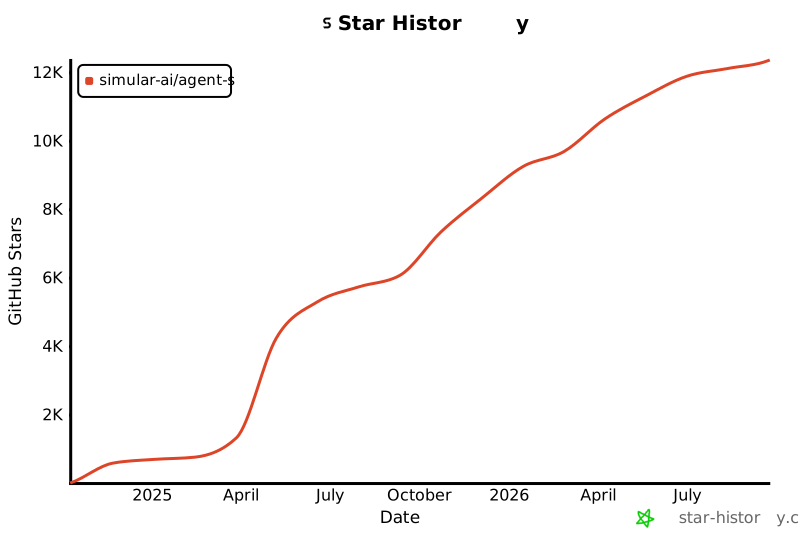](https://star-history.com/#simular-ai/Agent-S&Date)
================================================
FILE: WAA_setup.md
================================================
# Introduction
This is the WindowsAgentArena (WAA) setup with Agent S2.5 (and beyond). Why do we need a setup guide? Despite the thorough [README.md](https://github.com/microsoft/WindowsAgentArena?tab=readme-ov-file "https://github.com/microsoft/WindowsAgentArena?tab=readme-ov-file"), we have to include our code into their repository _and_ fix up a number of setup issues from the WAA environment. Sadly, this isn’t the most straightforward.
# Initial WAA Setup
The initial WAA setup is straightforward. Follow the [README.md](https://github.com/microsoft/WindowsAgentArena?tab=readme-ov-file "https://github.com/microsoft/WindowsAgentArena?tab=readme-ov-file") on their repository. After you’ve finished this, try running `run-local.sh`. This will start up an experiment with their default `Navi` agent. At this point, the environment is _sufficient to run evaluation_, but it’s incomplete and thus the evaluation won’t be exactly correct due to environment issues.

Figure 1: Bash script chain of execution.
While we’re at it, look to understand the following things:
- the entire README.md (especially the [Bring Your Own Agent guide](https://github.com/microsoft/WindowsAgentArena?tab=readme-ov-file#-byoa-bring-your-own-agent "https://github.com/microsoft/WindowsAgentArena?tab=readme-ov-file#-byoa-bring-your-own-agent"))
- the _long_ chain of bash scripts that start the run (Figure 1)
- the `run.py` to see how the agent/environment are instantiated and used together
- the folder structure of the repository and the purpose of each folder
# Fixing Setup Issues
By now, your WAA environment should be set up to run locally. There are two major problems:
- setup issues
- the VM persists across examples (it won’t reset after every example is completed which may make evaluation unfair)
Let’s tackle the first one: setup issues.
### Office Apps Aren’t Installed
The first issue I ran into was the office apps aren’t installed. Why is that? Turns out all apps installed in the VM during the initial setup stage install via the links from this [file](https://github.com/microsoft/WindowsAgentArena/blob/main/src/win-arena-container/vm/setup/tools_config.json "https://github.com/microsoft/WindowsAgentArena/blob/main/src/win-arena-container/vm/setup/tools_config.json") (`tools_config.json`). At the time of writing this, only the office links do not work. Try out all the links to make sure they work. If the links do not lead to a download (and some error occurs), then that app was not installed in the VM. What do we do? Two options:
- redo the entire initial setup stage (time consuming; ~**4** hours for me and even then, it would just not work a lot of the times; ideally, WAA is setup on Linux as I’ve had no issues so far with it)
- Enter the VM and install the apps manually (easier and faster)
We’ll do the second approach.
You can access the VM via `https://localhost:8006`. You can turn the VM on by `run-local.sh`. There’s probably a better/faster way to do it, but this doesn’t take too much time anyways (~**1-2** mins). After the VM has started, enter the VM (the agent may be trying to take actions, but you can either just override the action in `run.py` with `import time; time.sleep(10000)` [here](https://github.com/microsoft/WindowsAgentArena/blob/6d39ed88c545a0d40a7a02e39b928e278df7332b/src/win-arena-container/client/lib_run_single.py#L58 "https://github.com/microsoft/WindowsAgentArena/blob/6d39ed88c545a0d40a7a02e39b928e278df7332b/src/win-arena-container/client/lib_run_single.py#L58") or fight the agent for control of the VM!).
Inside the VM, navigate to their [download page](https://www.libreoffice.org/download/download-libreoffice/ "https://www.libreoffice.org/download/download-libreoffice/") and download the latest LibreOffice version. After it’s downloaded, complete the setup wizard and make sure to delete the downloaded `*.msi` file in the VM. Finally, test the download by opening up LibreOffice Writer and Calc.
### Google Chrome Pop-ups
In Google Chrome, there a couple unexpected pop-ups.

Figure 2: Pop-ups on Chrome.
Close all these pop-ups and [make Google Chrome your default web browser](https://support.google.com/chrome/answer/95417?hl=en&co=GENIE.Platform%3DDesktop#zippy=%2Cmac%2Cwindows "https://support.google.com/chrome/answer/95417?hl=en&co=GENIE.Platform%3DDesktop#zippy=%2Cmac%2Cwindows").
### VSCode Pop-ups
This isn’t as important, but there are a couple initial pop-ups in VSCode that you can close.
### Note: `set_cell_values`
_Important if you’re using_ `set_cell_values`
Agent S2.5 uses a special grounding function called `set_cell_values` that takes advantage of the `soffice` CLI and `unotools` [Python library](https://pypi.org/project/unotools/ "https://pypi.org/project/unotools/"). TL; DR, this function lets the agent set the cell values for a given spreadsheet and sheet.
For this function to work on WAA, the set up is a bit messy…
1. Connect into the VM
2. Open up a terminal and run `python --version`, you should see you’re using the GIMP Python which is `2.x`. This won’t let you use the `soffice` CLI or `import uno` in Python code.
3. In the `Desktop` directory within a terminal, do `pip freeze > requirements.txt` to save all the PYPI libraries from the GIMP Python to a `requirements.txt`.
4. Configuring Python path to LibreOffice’s Python
1. In the File Explorer, locate the `python.exe` file from LibreOffice. You can do this with `where python`. Copy this path.
2. In the Search bar in the bottom task bar inside the VM, search for “environment variables”.
3. Click on “Environment Variables” and click on “Path” under “System variables”. Paste the copied path from step (a) into there and ensure this path is _above_ the GIMP Python path so it takes precedence.
4. Reopen a terminal and run `soffice` to ensure it is now working. Create a temporary python file and ensure `import uno` works.
5. LibreOffice’s Python should be `3.10` or above. However, it does not come with pip. To install pip, download this [file](https://bootstrap.pypa.io/get-pip.py "https://bootstrap.pypa.io/get-pip.py") and execute `python get-pip.py` to install it. Ensure the `python` here is LibreOffice’s Python. Next, install `pip install -r requirements.txt` using the `requirements.txt` from step 3. This is to ensure LibreOffice’s Python has all the dependencies needed for evaluation (pyautogui, etc).
6. Clean up all installer files. Then, inside the [WAA repository code](https://github.com/microsoft/WindowsAgentArena/blob/6d39ed88c545a0d40a7a02e39b928e278df7332b/src/win-arena-container/client/desktop_env/controllers/python.py#L193 "https://github.com/microsoft/WindowsAgentArena/blob/6d39ed88c545a0d40a7a02e39b928e278df7332b/src/win-arena-container/client/desktop_env/controllers/python.py#L193"), change this line
`command_list = ["python", "-c", self.pkgs_prefix.format(command=command)]`
to:
`command_list = ["absolute/path/to/libreoffice/python", "-c", self.pkgs_prefix.format(command=command)]`
This ensures that the subprocess running in the flask server inside the VM will use that specific Python version.
### Double Checking…
Double check all apps can be used and no unexpected pop-ups or issues are in the way. Any apps you open make sure to close them upon finishing your clean-up. Make sure any installation files you have in `Downloads` are deleted (and removed from Recycle Bin) to keep the environment clean. At the end, this is our **golden image**. You may want to save a copy of this VM somewhere safe so that you can always copy it back into the WAA repository to be reused (refer to [this](https://github.com/microsoft/WindowsAgentArena/tree/main?tab=readme-ov-file#additional-notes "https://github.com/microsoft/WindowsAgentArena/tree/main?tab=readme-ov-file#additional-notes")).
# Set up Agent S2.5 with WAA Locally
Take the time to understand the [Agent-S repository](https://github.com/simular-ai/Agent-S "https://github.com/simular-ai/Agent-S").
1. Instead of following the [README.md](https://github.com/simular-ai/Agent-S/blob/main/README.md "https://github.com/simular-ai/Agent-S/blob/main/README.md") for Agent S2.5, you need to clone the repository then `pip install -r requirements.txt`
2. Move the S2.5 folder to the [mm_agents](https://github.com/microsoft/WindowsAgentArena/tree/main/src/win-arena-container/client/mm_agents "https://github.com/microsoft/WindowsAgentArena/tree/main/src/win-arena-container/client/mm_agents") folder in WAA. Follow the [Bring Your Own Agent guide](https://github.com/microsoft/WindowsAgentArena?tab=readme-ov-file#-byoa-bring-your-own-agent "https://github.com/microsoft/WindowsAgentArena?tab=readme-ov-file#-byoa-bring-your-own-agent").
1. You will need to move the `agent_s.py` file out to the `S2.5` folder and update all the relevant import statements
3. Make the necessary changes in `run.py` and `lib_run_single.py` to accommodate Agent S2.5 (replace the Navi Agent with Agent S2.5).
4. Test it by running the experiments! Don’t forget when you do `run-local.sh`, now you need to specify Agent S2.5 instead of the navi agent `agent="agent_s"`.
5. You may have some import errors and these libraries need to be installed inside the `winarena` container (I think). You can just add the pip install commands to the bash script where the error stems from (hacky).
# Agent S2.5 with WAA on Azure
1. Ensure you have:
1. a **clean copy** of the golden image
2. the correct Azure subscription (so you’re not using your own payment method)
2. Follow the Azure deployment in the [README.md](https://github.com/microsoft/WindowsAgentArena/blob/main/README.md "https://github.com/microsoft/WindowsAgentArena/blob/main/README.md").
3. Test it! If this works, then we have a resettable golden image and WAA can be ran in parallel, making evaluation much _much_ faster! Good luck!
================================================
FILE: evaluation_sets/test_all.json
================================================
{
"chrome": [
"bb5e4c0d-f964-439c-97b6-bdb9747de3f4",
"7b6c7e24-c58a-49fc-a5bb-d57b80e5b4c3",
"06fe7178-4491-4589-810f-2e2bc9502122",
"e1e75309-3ddb-4d09-92ec-de869c928143",
"35253b65-1c19-4304-8aa4-6884b8218fc0",
"2ad9387a-65d8-4e33-ad5b-7580065a27ca",
"7a5a7856-f1b6-42a4-ade9-1ca81ca0f263",
"44ee5668-ecd5-4366-a6ce-c1c9b8d4e938",
"2ae9ba84-3a0d-4d4c-8338-3a1478dc5fe3",
"480bcfea-d68f-4aaa-a0a9-2589ef319381",
"af630914-714e-4a24-a7bb-f9af687d3b91",
"3720f614-37fd-4d04-8a6b-76f54f8c222d",
"99146c54-4f37-4ab8-9327-5f3291665e1e",
"12086550-11c0-466b-b367-1d9e75b3910e",
"6766f2b8-8a72-417f-a9e5-56fcaa735837",
"93eabf48-6a27-4cb6-b963-7d5fe1e0d3a9",
"ae78f875-5b98-4907-bbb5-9c737fc68c03",
"3299584d-8f11-4457-bf4c-ce98f7600250",
"030eeff7-b492-4218-b312-701ec99ee0cc",
"9656a811-9b5b-4ddf-99c7-5117bcef0626",
"fc6d8143-9452-4171-9459-7f515143419a",
"a96b564e-dbe9-42c3-9ccf-b4498073438a",
"1704f00f-79e6-43a7-961b-cedd3724d5fd",
"f3b19d1e-2d48-44e9-b4e1-defcae1a0197",
"82bc8d6a-36eb-4d2d-8801-ef714fb1e55a",
"47543840-672a-467d-80df-8f7c3b9788c9",
"c1fa57f3-c3db-4596-8f09-020701085416",
"da46d875-6b82-4681-9284-653b0c7ae241",
"6c4c23a1-42a4-43cc-9db1-2f86ff3738cc",
"f79439ad-3ee8-4f99-a518-0eb60e5652b0",
"b7895e80-f4d1-4648-bee0-4eb45a6f1fa8",
"9f3f70fc-5afc-4958-a7b7-3bb4fcb01805",
"7f52cab9-535c-4835-ac8c-391ee64dc930",
"82279c77-8fc6-46f6-9622-3ba96f61b477",
"2888b4e6-5b47-4b57-8bf5-c73827890774",
"b4f95342-463e-4179-8c3f-193cd7241fb2",
"f5d96daf-83a8-4c86-9686-bada31fc66ab",
"121ba48f-9e17-48ce-9bc6-a4fb17a7ebba",
"368d9ba4-203c-40c1-9fa3-da2f1430ce63",
"59155008-fe71-45ec-8a8f-dc35497b6aa8",
"a728a36e-8bf1-4bb6-9a03-ef039a5233f0",
"b070486d-e161-459b-aa2b-ef442d973b92",
"0d8b7de3-e8de-4d86-b9fd-dd2dce58a217",
"9f935cce-0a9f-435f-8007-817732bfc0a5",
"f0b971a1-6831-4b9b-a50e-22a6e47f45ba",
"cabb3bae-cccb-41bd-9f5d-0f3a9fecd825"
],
"gimp": [
"7a4deb26-d57d-4ea9-9a73-630f66a7b568",
"554785e9-4523-4e7a-b8e1-8016f565f56a",
"77b8ab4d-994f-43ac-8930-8ca087d7c4b4",
"f4aec372-4fb0-4df5-a52b-79e0e2a5d6ce",
"d52d6308-ec58-42b7-a2c9-de80e4837b2b",
"2a729ded-3296-423d-aec4-7dd55ed5fbb3",
"b148e375-fe0b-4bec-90e7-38632b0d73c2",
"a746add2-cab0-4740-ac36-c3769d9bfb46",
"7b7617bd-57cc-468e-9c91-40c4ec2bcb3d",
"d16c99dc-2a1e-46f2-b350-d97c86c85c15",
"06ca5602-62ca-47f6-ad4f-da151cde54cc",
"e2dd0213-26db-4349-abe5-d5667bfd725c",
"f723c744-e62c-4ae6-98d1-750d3cd7d79d",
"72f83cdc-bf76-4531-9a1b-eb893a13f8aa",
"7767eef2-56a3-4cea-8c9f-48c070c7d65b",
"734d6579-c07d-47a8-9ae2-13339795476b",
"e19bd559-633b-4b02-940f-d946248f088e",
"38f48d40-764e-4e77-a7cf-51dfce880291",
"fbb548ca-c2a6-4601-9204-e39a2efc507b",
"5ca86c6f-f317-49d8-b6a7-b527541caae8",
"62f7fd55-0687-4a43-b6e1-3eda16fc6252",
"8ea73f6f-9689-42ad-8c60-195bbf06a7ba",
"58d3eeeb-e9d0-499f-962e-fd0db2a744d8",
"2e6f678f-472d-4c55-99cc-8e7c5c402a71",
"045bf3ff-9077-4b86-b483-a1040a949cff",
"dbbf4b99-2253-4b10-9274-45f246af2466"
],
"libreoffice_calc": [
"357ef137-7eeb-4c80-a3bb-0951f26a8aff",
"42e0a640-4f19-4b28-973d-729602b5a4a7",
"51719eea-10bc-4246-a428-ac7c433dd4b3",
"1954cced-e748-45c4-9c26-9855b97fbc5e",
"2bd59342-0664-4ccb-ba87-79379096cc08",
"3aaa4e37-dc91-482e-99af-132a612d40f3",
"1273e544-688f-496b-8d89-3e0f40aa0606",
"12382c62-0cd1-4bf2-bdc8-1d20bf9b2371",
"f9584479-3d0d-4c79-affa-9ad7afdd8850",
"535364ea-05bd-46ea-9937-9f55c68507e8",
"7e429b8d-a3f0-4ed0-9b58-08957d00b127",
"4f07fbe9-70de-4927-a4d5-bb28bc12c52c",
"04d9aeaf-7bed-4024-bedb-e10e6f00eb7f",
"0bf05a7d-b28b-44d2-955a-50b41e24012a",
"6054afcb-5bab-4702-90a0-b259b5d3217c",
"abed40dc-063f-4598-8ba5-9fe749c0615d",
"37608790-6147-45d0-9f20-1137bb35703d",
"26a8440e-c166-4c50-aef4-bfb77314b46b",
"d681960f-7bc3-4286-9913-a8812ba3261a",
"035f41ba-6653-43ab-aa63-c86d449d62e5",
"7efeb4b1-3d19-4762-b163-63328d66303b",
"1de60575-bb6e-4c3d-9e6a-2fa699f9f197",
"aa3a8974-2e85-438b-b29e-a64df44deb4b",
"51b11269-2ca8-4b2a-9163-f21758420e78",
"1e8df695-bd1b-45b3-b557-e7d599cf7597",
"ecb0df7a-4e8d-4a03-b162-053391d3afaf",
"8b1ce5f2-59d2-4dcc-b0b0-666a714b9a14",
"a01fbce3-2793-461f-ab86-43680ccbae25",
"0326d92d-d218-48a8-9ca1-981cd6d064c7",
"0a2e43bf-b26c-4631-a966-af9dfa12c9e5",
"4188d3a4-077d-46b7-9c86-23e1a036f6c1",
"347ef137-7eeb-4c80-a3bb-0951f26a8aff",
"eb03d19a-b88d-4de4-8a64-ca0ac66f426b",
"0cecd4f3-74de-457b-ba94-29ad6b5dafb6",
"1d17d234-e39d-4ed7-b46f-4417922a4e7c",
"4e6fcf72-daf3-439f-a232-c434ce416af6",
"01b269ae-2111-4a07-81fd-3fcd711993b0",
"21df9241-f8d7-4509-b7f1-37e501a823f7",
"a9f325aa-8c05-4e4f-8341-9e4358565f4f",
"6e99a1ad-07d2-4b66-a1ce-ece6d99c20a5",
"7a4e4bc8-922c-4c84-865c-25ba34136be1",
"4de54231-e4b5-49e3-b2ba-61a0bec721c0",
"30e3e107-1cfb-46ee-a755-2cd080d7ba6a",
"4172ea6e-6b77-4edb-a9cc-c0014bd1603b",
"1334ca3e-f9e3-4db8-9ca7-b4c653be7d17",
"3a7c8185-25c1-4941-bd7b-96e823c9f21f",
"21ab7b40-77c2-4ae6-8321-e00d3a086c73"
],
"libreoffice_impress": [
"5d901039-a89c-4bfb-967b-bf66f4df075e",
"550ce7e7-747b-495f-b122-acdc4d0b8e54",
"455d3c66-7dc6-4537-a39a-36d3e9119df7",
"af23762e-2bfd-4a1d-aada-20fa8de9ce07",
"c59742c0-4323-4b9d-8a02-723c251deaa0",
"ef9d12bd-bcee-4ba0-a40e-918400f43ddf",
"9ec204e4-f0a3-42f8-8458-b772a6797cab",
"0f84bef9-9790-432e-92b7-eece357603fb",
"ce88f674-ab7a-43da-9201-468d38539e4a",
"3b27600c-3668-4abd-8f84-7bcdebbccbdb",
"a097acff-6266-4291-9fbd-137af7ecd439",
"bf4e9888-f10f-47af-8dba-76413038b73c",
"21760ecb-8f62-40d2-8d85-0cee5725cb72",
"ac9bb6cb-1888-43ab-81e4-a98a547918cd",
"2cd43775-7085-45d8-89fa-9e35c0a915cf",
"358aa0a7-6677-453f-ae35-e440f004c31e",
"a669ef01-ded5-4099-9ea9-25e99b569840",
"73c99fb9-f828-43ce-b87a-01dc07faa224",
"15aece23-a215-4579-91b4-69eec72e18da",
"986fc832-6af2-417c-8845-9272b3a1528b",
"a434992a-89df-4577-925c-0c58b747f0f4",
"7dbc52a6-11e0-4c9a-a2cb-1e36cfda80d8",
"841b50aa-df53-47bd-a73a-22d3a9f73160",
"8979838c-54a5-4454-a2b8-3d135a1a5c8f",
"b8adbc24-cef2-4b15-99d5-ecbe7ff445eb",
"2b94c692-6abb-48ae-ab0b-b3e8a19cb340",
"9cf05d24-6bd9-4dae-8967-f67d88f5d38a",
"08aced46-45a2-48d7-993b-ed3fb5b32302",
"edb61b14-a854-4bf5-a075-c8075c11293a",
"c82632a4-56b6-4db4-9dd1-3820ee3388e4",
"39be0d19-634d-4475-8768-09c130f5425d",
"ac1b39ff-ee4d-4483-abce-c117e98942f0",
"f23acfd2-c485-4b7c-a1e7-d4303ddfe864",
"70bca0cc-c117-427e-b0be-4df7299ebeb6",
"af2d657a-e6b3-4c6a-9f67-9e3ed015974c",
"57667013-ea97-417c-9dce-2713091e6e2a",
"0a211154-fda0-48d0-9274-eaac4ce5486d",
"a53f80cd-4a90-4490-8310-097b011433f6",
"7ae48c60-f143-4119-b659-15b8f485eb9a",
"5cfb9197-e72b-454b-900e-c06b0c802b40",
"05dd4c1d-c489-4c85-8389-a7836c4f0567",
"5c1a6c3d-c1b3-47cb-9b01-8d1b7544ffa1",
"4ed5abd0-8b5d-47bd-839f-cacfa15ca37a",
"e4ef0baf-4b52-4590-a47e-d4d464cca2d7",
"ed43c15f-00cb-4054-9c95-62c880865d68",
"3161d64e-3120-47b4-aaad-6a764a92493b",
"04578141-1d42-4146-b9cf-6fab4ce5fd74"
],
"libreoffice_writer": [
"0810415c-bde4-4443-9047-d5f70165a697",
"0a0faba3-5580-44df-965d-f562a99b291c",
"0b17a146-2934-46c7-8727-73ff6b6483e8",
"0e47de2a-32e0-456c-a366-8c607ef7a9d2",
"0e763496-b6bb-4508-a427-fad0b6c3e195",
"3ef2b351-8a84-4ff2-8724-d86eae9b842e",
"4bcb1253-a636-4df4-8cb0-a35c04dfef31",
"66399b0d-8fda-4618-95c4-bfc6191617e9",
"6a33f9b9-0a56-4844-9c3f-96ec3ffb3ba2",
"6ada715d-3aae-4a32-a6a7-429b2e43fb93",
"6f81754e-285d-4ce0-b59e-af7edb02d108",
"72b810ef-4156-4d09-8f08-a0cf57e7cefe",
"8472fece-c7dd-4241-8d65-9b3cd1a0b568",
"88fe4b2d-3040-4c70-9a70-546a47764b48",
"936321ce-5236-426a-9a20-e0e3c5dc536f",
"adf5e2c3-64c7-4644-b7b6-d2f0167927e7",
"b21acd93-60fd-4127-8a43-2f5178f4a830",
"d53ff5ee-3b1a-431e-b2be-30ed2673079b",
"e246f6d8-78d7-44ac-b668-fcf47946cb50",
"e528b65e-1107-4b8c-8988-490e4fece599",
"ecc2413d-8a48-416e-a3a2-d30106ca36cb",
"f178a4a9-d090-4b56-bc4c-4b72a61a035d",
"bb8ccc78-479f-4a2f-a71e-d565e439436b"
],
"multi_apps": [
"2b9493d7-49b8-493a-a71b-56cd1f4d6908",
"2c9fc0de-3ee7-45e1-a5df-c86206ad78b5",
"2fe4b718-3bd7-46ec-bdce-b184f5653624",
"3680a5ee-6870-426a-a997-eba929a0d25c",
"46407397-a7d5-4c6b-92c6-dbe038b1457b",
"4e9f0faf-2ecc-4ae8-a804-28c9a75d1ddc",
"510f64c8-9bcc-4be1-8d30-638705850618",
"51f5801c-18b3-4f25-b0c3-02f85507a078",
"58565672-7bfe-48ab-b828-db349231de6b",
"78aed49a-a710-4321-a793-b611a7c5b56b",
"897e3b53-5d4d-444b-85cb-2cdc8a97d903",
"937087b6-f668-4ba6-9110-60682ee33441",
"a0b9dc9c-fc07-4a88-8c5d-5e3ecad91bcb",
"b52b40a5-ad70-4c53-b5b0-5650a8387052",
"c867c42d-a52d-4a24-8ae3-f75d256b5618",
"d9b7c649-c975-4f53-88f5-940b29c47247",
"e135df7c-7687-4ac0-a5f0-76b74438b53e",
"ee9a3c83-f437-4879-8918-be5efbb9fac7",
"f7dfbef3-7697-431c-883a-db8583a4e4f9",
"f8cfa149-d1c1-4215-8dac-4a0932bad3c2",
"6d72aad6-187a-4392-a4c4-ed87269c51cf",
"f918266a-b3e0-4914-865d-4faa564f1aef",
"da52d699-e8d2-4dc5-9191-a2199e0b6a9b",
"bc2b57f3-686d-4ec9-87ce-edf850b7e442",
"74d5859f-ed66-4d3e-aa0e-93d7a592ce41",
"b5062e3e-641c-4e3a-907b-ac864d2e7652",
"00fa164e-2612-4439-992e-157d019a8436",
"acb0f96b-e27c-44d8-b55f-7cb76609dfcd",
"69acbb55-d945-4927-a87b-8480e1a5bb7e",
"48d05431-6cd5-4e76-82eb-12b60d823f7d",
"68a25bd4-59c7-4f4d-975e-da0c8509c848",
"eb303e01-261e-4972-8c07-c9b4e7a4922a",
"0c825995-5b70-4526-b663-113f4c999dd2",
"c7c1e4c3-9e92-4eba-a4b8-689953975ea4",
"d1acdb87-bb67-4f30-84aa-990e56a09c92",
"deec51c9-3b1e-4b9e-993c-4776f20e8bb2",
"8e116af7-7db7-4e35-a68b-b0939c066c78",
"337d318b-aa07-4f4f-b763-89d9a2dd013f",
"82e3c869-49f6-4305-a7ce-f3e64a0618e7",
"185f29bd-5da0-40a6-b69c-ba7f4e0324ef",
"869de13e-bef9-4b91-ba51-f6708c40b096",
"2c1ebcd7-9c6d-4c9a-afad-900e381ecd5e",
"3a93cae4-ad3e-403e-8c12-65303b271818",
"1f18aa87-af6f-41ef-9853-cdb8f32ebdea",
"26150609-0da3-4a7d-8868-0faf9c5f01bb",
"9219480b-3aed-47fc-8bac-d2cffc5849f7",
"881deb30-9549-4583-a841-8270c65f2a17",
"7e287123-70ca-47b9-8521-47db09b69b14",
"e2392362-125e-4f76-a2ee-524b183a3412",
"5bc63fb9-276a-4439-a7c1-9dc76401737f",
"26660ad1-6ebb-4f59-8cba-a8432dfe8d38",
"a82b78bb-7fde-4cb3-94a4-035baf10bcf0",
"36037439-2044-4b50-b9d1-875b5a332143",
"716a6079-22da-47f1-ba73-c9d58f986a38",
"873cafdd-a581-47f6-8b33-b9696ddb7b05",
"a74b607e-6bb5-4ea8-8a7c-5d97c7bbcd2a",
"6f4073b8-d8ea-4ade-8a18-c5d1d5d5aa9a",
"da922383-bfa4-4cd3-bbad-6bebab3d7742",
"2373b66a-092d-44cb-bfd7-82e86e7a3b4d",
"81c425f5-78f3-4771-afd6-3d2973825947",
"bb83cab4-e5c7-42c7-a67b-e46068032b86",
"227d2f97-562b-4ccb-ae47-a5ec9e142fbb",
"b337d106-053f-4d37-8da0-7f9c4043a66b",
"20236825-b5df-46e7-89bf-62e1d640a897",
"8df7e444-8e06-4f93-8a1a-c5c974269d82",
"aad10cd7-9337-4b62-b704-a857848cedf2",
"02ce9a50-7af2-47ed-8596-af0c230501f8",
"4c26e3f3-3a14-4d86-b44a-d3cedebbb487",
"a503b07f-9119-456b-b75d-f5146737d24f",
"09a37c51-e625-49f4-a514-20a773797a8a",
"3e3fc409-bff3-4905-bf16-c968eee3f807",
"f5c13cdd-205c-4719-a562-348ae5cd1d91",
"5990457f-2adb-467b-a4af-5c857c92d762",
"415ef462-bed3-493a-ac36-ca8c6d23bf1b",
"7ff48d5b-2df2-49da-b500-a5150ffc7f18",
"9f3bb592-209d-43bc-bb47-d77d9df56504",
"dd60633f-2c72-42ba-8547-6f2c8cb0fdb0",
"ce2b64a2-ddc1-4f91-8c7d-a88be7121aac",
"3f05f3b9-29ba-4b6b-95aa-2204697ffc06",
"e1fc0df3-c8b9-4ee7-864c-d0b590d3aa56",
"f8369178-fafe-40c2-adc4-b9b08a125456",
"778efd0a-153f-4842-9214-f05fc176b877",
"47f7c0ce-a5fb-4100-a5e6-65cd0e7429e5",
"c2751594-0cd5-4088-be1b-b5f2f9ec97c4",
"788b3701-3ec9-4b67-b679-418bfa726c22",
"48c46dc7-fe04-4505-ade7-723cba1aa6f6",
"42d25c08-fb87-4927-8b65-93631280a26f",
"e8172110-ec08-421b-a6f5-842e6451911f",
"42f4d1c7-4521-4161-b646-0a8934e36081",
"3c8f201a-009d-4bbe-8b65-a6f8b35bb57f",
"d68204bf-11c1-4b13-b48b-d303c73d4bf6",
"91190194-f406-4cd6-b3f9-c43fac942b22",
"7f35355e-02a6-45b5-b140-f0be698bcf85",
"98e8e339-5f91-4ed2-b2b2-12647cb134f4",
"0e5303d4-8820-42f6-b18d-daf7e633de21",
"df67aebb-fb3a-44fd-b75b-51b6012df509",
"5df7b33a-9f77-4101-823e-02f863e1c1ae",
"aceb0368-56b8-4073-b70e-3dc9aee184e0",
"22a4636f-8179-4357-8e87-d1743ece1f81",
"236833a3-5704-47fc-888c-4f298f09f799",
"67890eb6-6ce5-4c00-9e3d-fb4972699b06"
],
"os": [
"94d95f96-9699-4208-98ba-3c3119edf9c2",
"bedcedc4-4d72-425e-ad62-21960b11fe0d",
"ec4e3f68-9ea4-4c18-a5c9-69f89d1178b3",
"a462a795-fdc7-4b23-b689-e8b6df786b78",
"f9be0997-4b7c-45c5-b05c-4612b44a6118",
"28cc3b7e-b194-4bc9-8353-d04c0f4d56d2",
"5ea617a3-0e86-4ba6-aab2-dac9aa2e8d57",
"e0df059f-28a6-4169-924f-b9623e7184cc",
"b6781586-6346-41cd-935a-a6b1487918fc",
"b3d4a89c-53f2-4d6b-8b6a-541fb5d205fa",
"3ce045a0-877b-42aa-8d2c-b4a863336ab8",
"fe41f596-a71b-4c2f-9b2f-9dcd40b568c3",
"a4d98375-215b-4a4d-aee9-3d4370fccc41",
"13584542-872b-42d8-b299-866967b5c3ef",
"23393935-50c7-4a86-aeea-2b78fd089c5c",
"5812b315-e7bd-4265-b51f-863c02174c28",
"c288e301-e626-4b98-a1ab-159dcb162af5",
"4783cc41-c03c-4e1b-89b4-50658f642bd5",
"5c1075ca-bb34-46a3-a7a0-029bd7463e79",
"5ced85fc-fa1a-4217-95fd-0fb530545ce2",
"37887e8c-da15-4192-923c-08fa390a176d",
"4127319a-8b79-4410-b58a-7a151e15f3d7",
"4d117223-a354-47fb-8b45-62ab1390a95f",
"6f56bf42-85b8-4fbb-8e06-6c44960184ba"
],
"thunderbird": [
"dfac9ee8-9bc4-4cdc-b465-4a4bfcd2f397",
"15c3b339-88f7-4a86-ab16-e71c58dcb01e",
"7b1e1ff9-bb85-49be-b01d-d6424be18cd0",
"9bc3cc16-074a-45ac-9bdc-b2a362e1daf3",
"3f28fe4f-5d9d-4994-a456-efd78cfae1a3",
"5203d847-2572-4150-912a-03f062254390",
"dd84e895-72fd-4023-a336-97689ded257c",
"9b7bc335-06b5-4cd3-9119-1a649c478509",
"d38192b0-17dc-4e1d-99c3-786d0117de77",
"a10b69e1-6034-4a2b-93e1-571d45194f75",
"3f49d2cc-f400-4e7d-90cc-9b18e401cc31",
"f201fbc3-44e6-46fc-bcaa-432f9815454c",
"10a730d5-d414-4b40-b479-684bed1ae522",
"a1af9f1c-50d5-4bc3-a51e-4d9b425ff638",
"08c73485-7c6d-4681-999d-919f5c32dcfa"
],
"vlc": [
"59f21cfb-0120-4326-b255-a5b827b38967",
"8ba5ae7a-5ae5-4eab-9fcc-5dd4fe3abf89",
"8f080098-ddb1-424c-b438-4e96e5e4786e",
"bba3381f-b5eb-4439-bd9e-80c22218d5a7",
"fba2c100-79e8-42df-ae74-b592418d54f4",
"efcf0d81-0835-4880-b2fd-d866e8bc2294",
"8d9fd4e2-6fdb-46b0-b9b9-02f06495c62f",
"aa4b5023-aef6-4ed9-bdc9-705f59ab9ad6",
"386dbd0e-0241-4a0a-b6a2-6704fba26b1c",
"9195653c-f4aa-453d-aa95-787f6ccfaae9",
"d06f0d4d-2cd5-4ede-8de9-598629438c6e",
"a5bbbcd5-b398-4c91-83d4-55e1e31bbb81",
"5ac2891a-eacd-4954-b339-98abba077adb",
"f3977615-2b45-4ac5-8bba-80c17dbe2a37",
"215dfd39-f493-4bc3-a027-8a97d72c61bf",
"cb130f0d-d36f-4302-9838-b3baf46139b6",
"7882ed6e-bece-4bf0-bada-c32dc1ddae72"
],
"vs_code": [
"0ed39f63-6049-43d4-ba4d-5fa2fe04a951",
"53ad5833-3455-407b-bbc6-45b4c79ab8fb",
"eabc805a-bfcf-4460-b250-ac92135819f6",
"982d12a5-beab-424f-8d38-d2a48429e511",
"4e60007a-f5be-4bfc-9723-c39affa0a6d3",
"e2b5e914-ffe1-44d2-8e92-58f8c5d92bb2",
"9439a27b-18ae-42d8-9778-5f68f891805e",
"ea98c5d7-3cf9-4f9b-8ad3-366b58e0fcae",
"930fdb3b-11a8-46fe-9bac-577332e2640e",
"276cc624-87ea-4f08-ab93-f770e3790175",
"9d425400-e9b2-4424-9a4b-d4c7abac4140",
"5e2d93d8-8ad0-4435-b150-1692aacaa994",
"6ed0a554-cbee-4b44-84ea-fd6c042f4fe1",
"ec71221e-ac43-46f9-89b8-ee7d80f7e1c5",
"70745df8-f2f5-42bd-8074-fbc10334fcc5",
"57242fad-77ca-454f-b71b-f187181a9f23",
"c6bf789c-ba3a-4209-971d-b63abf0ab733",
"0512bb38-d531-4acf-9e7e-0add90816068",
"847a96b6-df94-4927-97e6-8cc9ea66ced7",
"7aeae0e2-70ee-4705-821d-1bba5d5b2ddd",
"dcbe20e8-647f-4f1d-8696-f1c5bbb570e3",
"7c4cc09e-7a92-40dd-8338-b2286535c4ed",
"971cbb5b-3cbf-4ff7-9e24-b5c84fcebfa6"
]
}
================================================
FILE: evaluation_sets/test_small_new.json
================================================
{
"os": [
"5ea617a3-0e86-4ba6-aab2-dac9aa2e8d57",
"5812b315-e7bd-4265-b51f-863c02174c28",
"c288e301-e626-4b98-a1ab-159dcb162af5",
"4783cc41-c03c-4e1b-89b4-50658f642bd5",
"5c1075ca-bb34-46a3-a7a0-029bd7463e79",
"5ced85fc-fa1a-4217-95fd-0fb530545ce2"
],
"gimp": [
"a746add2-cab0-4740-ac36-c3769d9bfb46",
"7a4deb26-d57d-4ea9-9a73-630f66a7b568",
"d52d6308-ec58-42b7-a2c9-de80e4837b2b",
"2a729ded-3296-423d-aec4-7dd55ed5fbb3",
"d16c99dc-2a1e-46f2-b350-d97c86c85c15"
],
"chrome": [
"bb5e4c0d-f964-439c-97b6-bdb9747de3f4",
"7b6c7e24-c58a-49fc-a5bb-d57b80e5b4c3",
"35253b65-1c19-4304-8aa4-6884b8218fc0",
"a96b564e-dbe9-42c3-9ccf-b4498073438a",
"e1e75309-3ddb-4d09-92ec-de869c928143",
"82bc8d6a-36eb-4d2d-8801-ef714fb1e55a"
],
"thunderbird": [
"bb5e4c0d-f964-439c-97b6-bdb9747de3f4",
"7b6c7e24-c58a-49fc-a5bb-d57b80e5b4c3",
"2ad9387a-65d8-4e33-ad5b-7580065a27ca",
"480bcfea-d68f-4aaa-a0a9-2589ef319381",
"030eeff7-b492-4218-b312-701ec99ee0cc"
],
"vs_code": [
"0ed39f63-6049-43d4-ba4d-5fa2fe04a951",
"dcbe20e8-647f-4f1d-8696-f1c5bbb570e3",
"9439a27b-18ae-42d8-9778-5f68f891805e",
"7c4cc09e-7a92-40dd-8338-b2286535c4ed",
"9d425400-e9b2-4424-9a4b-d4c7abac4140"
],
"vlc": [
"59f21cfb-0120-4326-b255-a5b827b38967",
"8f080098-ddb1-424c-b438-4e96e5e4786e",
"5ac2891a-eacd-4954-b339-98abba077adb",
"f3977615-2b45-4ac5-8bba-80c17dbe2a37",
"215dfd39-f493-4bc3-a027-8a97d72c61bf"
],
"libreoffice_calc": [
"357ef137-7eeb-4c80-a3bb-0951f26a8aff",
"42e0a640-4f19-4b28-973d-729602b5a4a7",
"abed40dc-063f-4598-8ba5-9fe749c0615d",
"035f41ba-6653-43ab-aa63-c86d449d62e5",
"7efeb4b1-3d19-4762-b163-63328d66303b"
],
"libreoffice_impress": [
"5d901039-a89c-4bfb-967b-bf66f4df075e",
"550ce7e7-747b-495f-b122-acdc4d0b8e54",
"ac9bb6cb-1888-43ab-81e4-a98a547918cd",
"2cd43775-7085-45d8-89fa-9e35c0a915cf",
"358aa0a7-6677-453f-ae35-e440f004c31e",
"a669ef01-ded5-4099-9ea9-25e99b569840"
],
"libreoffice_writer": [
"0810415c-bde4-4443-9047-d5f70165a697",
"e246f6d8-78d7-44ac-b668-fcf47946cb50",
"d53ff5ee-3b1a-431e-b2be-30ed2673079b",
"b21acd93-60fd-4127-8a43-2f5178f4a830",
"0a0faba3-5580-44df-965d-f562a99b291c",
"adf5e2c3-64c7-4644-b7b6-d2f0167927e7"
],
"multi_apps": [
"a74b607e-6bb5-4ea8-8a7c-5d97c7bbcd2a",
"5990457f-2adb-467b-a4af-5c857c92d762",
"2b9493d7-49b8-493a-a71b-56cd1f4d6908",
"acb0f96b-e27c-44d8-b55f-7cb76609dfcd",
"c867c42d-a52d-4a24-8ae3-f75d256b5618",
"74d5859f-ed66-4d3e-aa0e-93d7a592ce41",
"b5062e3e-641c-4e3a-907b-ac864d2e7652",
"48d05431-6cd5-4e76-82eb-12b60d823f7d",
"eb303e01-261e-4972-8c07-c9b4e7a4922a",
"d1acdb87-bb67-4f30-84aa-990e56a09c92",
"deec51c9-3b1e-4b9e-993c-4776f20e8bb2",
"8e116af7-7db7-4e35-a68b-b0939c066c78",
"716a6079-22da-47f1-ba73-c9d58f986a38",
"46407397-a7d5-4c6b-92c6-dbe038b1457b",
"4e9f0faf-2ecc-4ae8-a804-28c9a75d1ddc",
"897e3b53-5d4d-444b-85cb-2cdc8a97d903"
]
}
================================================
FILE: gui_agents/__init__.py
================================================
================================================
FILE: gui_agents/s1/README.md
================================================
 Agent S:
Using Computers Like a Human
Agent S:
Using Computers Like a Human
🌐 [Website]
📄 [Paper]
🎥 [Video]
🗨️ [Discord]
## 🥳 Updates
- [x] **2025/01/22**: The [Agent S paper](https://arxiv.org/abs/2410.08164) is accepted to ICLR 2025!
- [x] **2025/01/21**: Released v0.1.2 of [gui-agents](https://github.com/simular-ai/Agent-S) library, with support for Linux and Windows!
- [x] **2024/12/05**: Released v0.1.0 of [gui-agents](https://github.com/simular-ai/Agent-S) library, allowing you to use Agent-S for Mac, OSWorld, and WindowsAgentArena with ease!
- [x] **2024/10/10**: Released [Agent S paper](https://arxiv.org/abs/2410.08164) and codebase!
## Table of Contents
1. [💡 Introduction](#-introduction)
2. [🎯 Current Results](#-current-results)
3. [🛠️ Installation](#%EF%B8%8F-installation)
4. [🚀 Usage](#-usage)
5. [🙌 Contributors](#-contributors)
6. [💬 Citation](#-citation)
## 💡 Introduction

Welcome to **Agent S**, an open-source framework designed to enable autonomous interaction with computers through Agent-Computer Interface. Our mission is to build intelligent GUI agents that can learn from past experiences and perform complex tasks autonomously on your computer.
Whether you're interested in AI, automation, or contributing to cutting-edge agent-based systems, we're excited to have you here!
## 🎯 Current Results

Results of Successful Rate (%) on the OSWorld full test set of all 369 test examples using Image + Accessibility Tree input.
## 🛠️ Installation & Setup
> ❗**Warning**❗: If you are on a Linux machine, creating a `conda` environment will interfere with `pyatspi`. As of now, there's no clean solution for this issue. Proceed through the installation without using `conda` or any virtual environment.
Clone the repository:
```
git clone https://github.com/simular-ai/Agent-S.git
```
Install the gui-agents package:
```
pip install gui-agents
```
Set your LLM API Keys and other environment variables. You can do this by adding the following line to your .bashrc (Linux), or .zshrc (MacOS) file.
```
export OPENAI_API_KEY=
```
Alternatively, you can set the environment variable in your Python script:
```
import os
os.environ["OPENAI_API_KEY"] = ""
```
We also support Azure OpenAI, Anthropic, and vLLM inference. For more information refer to [../../models.md](models.md).
### Setup Retrieval from Web using Perplexica
Agent S works best with web-knowledge retrieval. To enable this feature, you need to setup Perplexica:
1. Ensure Docker Desktop is installed and running on your system.
2. Navigate to the directory containing the project files.
```bash
cd Perplexica
git submodule update --init
```
3. Rename the `sample.config.toml` file to `config.toml`. For Docker setups, you need only fill in the following fields:
- `OPENAI`: Your OpenAI API key. **You only need to fill this if you wish to use OpenAI's models**.
- `OLLAMA`: Your Ollama API URL. You should enter it as `http://host.docker.internal:PORT_NUMBER`. If you installed Ollama on port 11434, use `http://host.docker.internal:11434`. For other ports, adjust accordingly. **You need to fill this if you wish to use Ollama's models instead of OpenAI's**.
- `GROQ`: Your Groq API key. **You only need to fill this if you wish to use Groq's hosted models**.
- `ANTHROPIC`: Your Anthropic API key. **You only need to fill this if you wish to use Anthropic models**.
**Note**: You can change these after starting Perplexica from the settings dialog.
- `SIMILARITY_MEASURE`: The similarity measure to use (This is filled by default; you can leave it as is if you are unsure about it.)
4. Ensure you are in the directory containing the `docker-compose.yaml` file and execute:
```bash
docker compose up -d
```
5. Next, export your Perplexica URL. This URL is used to interact with the Perplexica API backend. The port is given by the `config.toml` in your Perplexica directory.
```bash
export PERPLEXICA_URL=http://localhost:{port}/api/search
```
6. Our implementation of Agent S incorporates the Perplexica API to integrate a search engine capability, which allows for a more convenient and responsive user experience. If you want to tailor the API to your settings and specific requirements, you may modify the URL and the message of request parameters in `agent_s/query_perplexica.py`. For a comprehensive guide on configuring the Perplexica API, please refer to [Perplexica Search API Documentation](https://github.com/ItzCrazyKns/Perplexica/blob/master/docs/API/SEARCH.md)
For a more detailed setup and usage guide, please refer to the [Perplexica Repository](https://github.com/ItzCrazyKns/Perplexica.git).
### Setup Paddle-OCR Server
Switch to a new terminal where you will run Agent S. Set the OCR_SERVER_ADDRESS environment variable as shown below. For a better experience, add the following line directly to your .bashrc (Linux), or .zshrc (MacOS) file.
```
export OCR_SERVER_ADDRESS=http://localhost:8000/ocr/
```
Run the ocr_server.py file code to use OCR-based bounding boxes.
```
cd Agent-S
python gui_agents/utils/ocr_server.py
```
You can change the server address by editing the address in [gui_agents/s1/utils/ocr_server.py](utils/ocr_server.py) file.
> ❗**Warning**❗: The agent will directly run python code to control your computer. Please use with care.
## 🚀 Usage
### CLI
Run agent_s on your computer using:
```
agent_s1 --model gpt-4o
```
This will show a user query prompt where you can enter your query and interact with Agent S. You can use any model from the list of supported models in [models.md](../../models.md).
### `gui_agents` SDK
To deploy Agent S on MacOS or Windows:
```
import pyautogui
import io
from gui_agents.core.AgentS import GraphSearchAgent
import platform
if platform.system() == "Darwin":
from gui_agents.aci.MacOSACI import MacOSACI, UIElement
grounding_agent = MacOSACI()
elif platform.system() == "Windows":
from gui_agents.aci.WindowsOSACI import WindowsACI, UIElement
grounding_agent = WindowsACI()
elif platform.system() == "Linux":
from gui_agents.aci.LinuxOSACI import LinuxACI, UIElement
grounding_agent = LinuxACI()
else:
raise ValueError("Unsupported platform")
engine_params = {
"engine_type": "openai",
"model": "gpt-4o",
}
agent = GraphSearchAgent(
engine_params,
grounding_agent,
platform="ubuntu", # "macos", "windows"
action_space="pyautogui",
observation_type="mixed",
search_engine="Perplexica"
)
# Get screenshot.
screenshot = pyautogui.screenshot()
buffered = io.BytesIO()
screenshot.save(buffered, format="PNG")
screenshot_bytes = buffered.getvalue()
# Get accessibility tree.
acc_tree = UIElement.systemWideElement()
obs = {
"screenshot": screenshot_bytes,
"accessibility_tree": acc_tree,
}
instruction = "Close VS Code"
info, action = agent.predict(instruction=instruction, observation=obs)
exec(action[0])
```
Refer to `cli_app.py` for more details on how the inference loop works.
#### Downloading the Knowledege Base
Agent S2 uses a knowledge base that continually updates with new knowledge during inference. The knowledge base is initially downloaded when initializing `GraphSearchAgent`. The knowledge base is stored as assets under our [GitHub Releases](https://github.com/simular-ai/Agent-S/releases). The `GraphSearchAgent` initialization will only download the knowledge base for your specified platform and agent version (e.g s1, s2). If you'd like to download the knowledge base programmatically, you can use the following code:
```
download_kb_data(
version="s2",
release_tag="v0.2.2",
download_dir="kb_data",
platform="linux" # "darwin", "windows"
)
```
This will download Agent S2's knowledge base for Linux from release tag `v0.2.2` to the `kb_data` directory. Refer to our [GitHub Releases](https://github.com/simular-ai/Agent-S/releases) or release tags that include the knowledge bases.
### OSWorld
To deploy Agent S in OSWorld, follow the [OSWorld Deployment instructions](OSWorld.md).
### WindowsAgentArena
To deploy Agent S in WindowsAgentArena, follow the [WindowsAgentArena Deployment instructions](WindowsAgentArena.md).
## 🙌 Contributors
We’re grateful to all the [amazing people](https://github.com/simular-ai/Agent-S/graphs/contributors) who have contributed to this project. Thank you! 🙏
## 💬 Citation
```
@misc{agashe2024agentsopenagentic,
title={Agent S: An Open Agentic Framework that Uses Computers Like a Human},
author={Saaket Agashe and Jiuzhou Han and Shuyu Gan and Jiachen Yang and Ang Li and Xin Eric Wang},
year={2024},
eprint={2410.08164},
archivePrefix={arXiv},
primaryClass={cs.AI},
url={https://arxiv.org/abs/2410.08164},
}
```
================================================
FILE: gui_agents/s1/WindowsAgentArena.md
================================================
## Deploying Agent-S in WindowsAgentArena
> ⚠️ **Warning**: The refactored code has not be fully tested on WindowsAgentArena. To reproduce the results on WindowsAgentArena, please use commit 496a9fa of this repository.
1. To use the Agent S with WindowsAgentArena, follows the setup instructions at: https://github.com/microsoft/WindowsAgentArena.git. **Please use the development mode while preparing the image and running the client as instructed in https://github.com/microsoft/WindowsAgentArena/blob/main/docs/Development-Tips.md.**
2. To deploy our agent in the WindowsAgentArena, copy the agent_s folder in this repository to `WindowsAgentArena/src/win-arena-container/client/mm_agents`.
3. Change the name of the GraphSearchAgent.py file to agent.py to conform to the WindowsAgentArena Setup.
4. Copy the ocr_server.py file to client/folder `WindowsAgentArena/src/win-arena-container/client` folder
```
cd WindowsAgentArena/src/win-arena-container/client
cp mm_agents/agent_s/ocr_server.py .
```
5. Update the `start_client.sh` file in `WindowsAgentArena/src/win-arena-container` by adding the following line before Running the agent on line 75.
```
python ocr_server.py &
```
6. In the `src/win-arena-container/client/run.py` file import Agent S
```
from mm_agents.agent_s.agent import GraphSearchAgent
```
7. In the `src/win-arena-container/client/run.py` file, instantiate Agent S by adding the following lines after line 187 where the if condition for NAVI agent ends
```python
elif cfg_args["agent_name"] == "agent_s":
if cfg_args["som_origin"] in ["a11y"]:
som_config = None
elif cfg_args["som_origin"] in ["oss", "mixed-oss"]:
som_config = {
"pipeline": ["webparse", "groundingdino", "ocr"],
"groundingdino": {
"prompts": ["icon", "image"]
},
"ocr": {
"class_name": "TesseractOCR"
},
"webparse": {
"cdp_url": f"http://{args.emulator_ip}:9222"
}
}
if args.model.startswith("claude"):
engine_type = "anthropic"
elif args.model.startswith("gpt"):
engine_type = "openai"
else:
engine_type = "vllm"
engine_params = {
"engine_type": engine_type,
"model": args.model,
}
agent = GraphSearchAgent(
engine_params=engine_params,
experiment_type='windowsAgentArena',
temperature=args.temperature
)
```
8. Run Agent S on WindowsAgentArena by changing the following parameters in the `scripts/run-local.sh` file
```
agent="agent_s"
model="gpt-4o"
```
================================================
FILE: gui_agents/s1/__init__.py
================================================
================================================
FILE: gui_agents/s1/aci/ACI.py
================================================
import logging
from typing import Any, Dict, List
logger = logging.getLogger("desktopenv.agent")
def agent_action(func):
func.is_agent_action = True
return func
class ACI:
def __init__(self, top_app_only: bool = True, ocr: bool = False):
self.top_app_only = top_app_only
self.ocr = ocr
self.index_out_of_range_flag = False
self.notes: List[str] = []
self.clipboard = ""
self.nodes: List[Any] = []
def get_active_apps(self, obs: Dict) -> List[str]:
pass
def get_top_app(self):
pass
def preserve_nodes(self, tree: Any, exclude_roles: set = None) -> List[Dict]:
pass
def linearize_and_annotate_tree(
self, obs: Dict, show_all_elements: bool = False
) -> str:
pass
def find_element(self, element_id: int) -> Dict:
pass
================================================
FILE: gui_agents/s1/aci/LinuxOSACI.py
================================================
import base64
import logging
import os
import time
import xml.etree.ElementTree as ET
from typing import Dict, List, Optional, Tuple, Any, Sequence
import numpy as np
import requests
from gui_agents.s1.aci.ACI import ACI
from gui_agents.s1.utils.common_utils import box_iou
import platform
if platform.system() == "Linux":
import pyatspi
from pyatspi import Accessible, StateType, STATE_SHOWING
from pyatspi import Action as ATAction
from pyatspi import Component # , Document
from pyatspi import Text as ATText
from pyatspi import Value as ATValue
from pyatspi import Accessible, StateType
from lxml.etree import _Element
from typing import Optional, Dict, Any, List
import lxml.etree
import concurrent.futures
_accessibility_ns_map_ubuntu = {
"st": "https://accessibility.ubuntu.example.org/ns/state",
"attr": "https://accessibility.ubuntu.example.org/ns/attributes",
"cp": "https://accessibility.ubuntu.example.org/ns/component",
"doc": "https://accessibility.ubuntu.example.org/ns/document",
"docattr": "https://accessibility.ubuntu.example.org/ns/document/attributes",
"txt": "https://accessibility.ubuntu.example.org/ns/text",
"val": "https://accessibility.ubuntu.example.org/ns/value",
"act": "https://accessibility.ubuntu.example.org/ns/action",
}
MAX_DEPTH = 50
MAX_WIDTH = 1024
logger = logging.getLogger("desktopenv.agent")
# Agent action decorator
def agent_action(func):
func.is_agent_action = True
return func
class LinuxACI(ACI):
def __init__(self, top_app=None, vm_version="new", top_app_only=True, ocr=True):
self.active_apps = set()
self.top_app = top_app
self.top_app_only = (
top_app_only # Only include top app in the accessibility tree
)
self.ocr = ocr
self.index_out_of_range_flag = False
self.app_setup_code = f"""import subprocess;
import difflib;
import pyautogui;
pyautogui.press('escape');
time.sleep(0.5);
output = subprocess.check_output(['wmctrl', '-lx']);
output = output.decode('utf-8').splitlines();
window_titles = [line.split(None, 4)[2] for line in output];
closest_matches = difflib.get_close_matches('APP_NAME', window_titles, n=1, cutoff=0.1);
if closest_matches:
closest_match = closest_matches[0];
for line in output:
if closest_match in line:
window_id = line.split()[0]
break;
subprocess.run(['wmctrl', '-ia', window_id])
subprocess.run(['wmctrl', '-ir', window_id, '-b', 'add,maximized_vert,maximized_horz'])
"""
self.top_active_app = None
self.notes = []
self.clipboard = ""
# TODO: this is terrible, fix this
global state_ns, component_ns, attributes_ns, value_ns
if vm_version == "old":
state_ns = "uri:deskat:state.at-spi.gnome.org"
component_ns = "uri:deskat:component.at-spi.gnome.org"
else:
attributes_ns = "https://accessibility.windows.example.org/ns/attributes"
state_ns = "https://accessibility.ubuntu.example.org/ns/state"
component_ns = "https://accessibility.ubuntu.example.org/ns/component"
value_ns = "https://accessibility.ubuntu.example.org/ns/value"
def get_active_apps(self, obs: Dict) -> List[str]:
tree = ET.ElementTree(ET.fromstring(obs["accessibility_tree"]))
apps = []
exclude_list = ["gjs", "gnome-shell"]
for node in tree.iter():
# Keep applications and only those which have children
if (
node.tag.endswith("application")
and list(node)
and node.attrib.get("name", "") not in exclude_list
):
apps.append(node.attrib.get("name", "").replace("\\", ""))
return apps
def check_new_apps(self, old_apps, new_apps):
return new_apps - old_apps
def get_top_app(self, obs):
return self.top_app
def find_active_applications(self, tree):
# names of applications to keep TODO: soffice is a single application with all the isntances like impress, calc etc. being frames this will need to be dealt with separately
to_keep = ["gnome-shell"]
apps_with_active_tag = []
for application in list(tree.getroot()):
app_name = application.attrib.get("name")
for frame in application:
is_active = frame.attrib.get("{{{:}}}active".format(state_ns), "false")
if is_active == "true":
apps_with_active_tag.append(app_name)
if apps_with_active_tag:
to_keep.append(apps_with_active_tag[-1])
return to_keep
def filter_active_app(self, tree):
for application in list(tree.getroot()):
app_name = application.attrib.get("name")
for frame in application:
is_active = frame.attrib.get("{{{:}}}active".format(state_ns), "false")
if is_active == "true":
return app_name
return None
def filter_nodes(self, tree, show_all=False):
# created and populate a preserved nodes list which filters out unnecessary elements and keeps only those elements which are currently showing on the screen
# TODO: include offscreen elements and then scroll to them before clicking
preserved_nodes = []
exclude_tags = ["panel", "window", "filler", "frame", "separator", "scroll-bar"]
for node in tree.iter():
if node.tag not in exclude_tags:
if show_all:
if node.attrib.get(f"{{{state_ns}}}visible") == "true":
coords: Tuple[int, int] = eval(
node.get(
"{{{:}}}screencoord".format(component_ns), "(-1, -1)"
)
)
if coords[0] >= 0 and coords[1] >= 0:
preserved_nodes.append(node)
# if show_all is false, only show elements that are currently showing on screen
else:
if node.attrib.get(f"{{{state_ns}}}showing") == "true":
coords: Tuple[int, int] = eval(
node.get(
"{{{:}}}screencoord".format(component_ns), "(-1, -1)"
)
)
if coords[0] >= 0 and coords[1] >= 0:
preserved_nodes.append(node)
return preserved_nodes
def linearize_tree(self, preserved_nodes):
# TODO: Run an ablation to check if class and desc
# linearized_accessibility_tree = ["id\ttag\tname\ttext\tclass\tdescription"]
linearized_accessibility_tree = ["id\ttag\tname\ttext"]
for idx, node in enumerate(preserved_nodes):
if node.text:
text = (
node.text
if '"' not in node.text
else '"{:}"'.format(node.text.replace('"', '""'))
)
else:
text = '""'
linearized_accessibility_tree.append(
"{:}\t{:}\t{:}\t{:}".format(
idx,
node.tag,
node.get("name", ""),
text,
# node.get("{{{:}}}class".format(attributes_ns), ""),
# node.get("{{{:}}}description".format(attributes_ns), ""),
)
)
# returning list of linearized elements
return linearized_accessibility_tree
def extract_elements_from_screenshot(self, screenshot) -> Dict:
"""Uses paddle-ocr to extract elements with text from the screenshot. The elements will be added to the linearized accessibility tree downstream"""
# Convert screenshot to PIL image
def send_image_to_ocr(screenshot) -> Dict:
url = os.environ.get("OCR_SERVER_ADDRESS", "")
if url == "":
raise Exception("OCR SERVER ADDRESS NOT SET")
encoded_screenshot = base64.b64encode(screenshot).decode("utf-8")
data = {"img_bytes": encoded_screenshot}
print("Getting OCR response")
ocr_start = time.time()
response = requests.post(url, json=data)
print("Got OCR response in", time.time() - ocr_start)
if response.status_code == 200:
return response.json()
else:
return {
"error": f"Request failed with status code {response.status_code}",
"results": [],
}
return send_image_to_ocr(screenshot)["results"]
def add_ocr_elements(
self, screenshot, linearized_accessibility_tree, preserved_nodes
):
# Get the bounding boxes of the elements in the linearized accessibility tree
tree_bboxes = []
for node in preserved_nodes:
coordinates: Tuple[int, int] = eval(
node.get("{{{:}}}screencoord".format(component_ns), "(-1, -1)")
)
sizes: Tuple[int, int] = eval(
node.get("{{{:}}}size".format(component_ns), "(-1, -1)")
)
tree_bboxes.append(
[
coordinates[0],
coordinates[1],
coordinates[0] + sizes[0],
coordinates[1] + sizes[1],
]
)
# Use OCR to found boxes that might be missing from the accessibility tree
try:
ocr_bboxes = self.extract_elements_from_screenshot(screenshot)
except Exception as e:
print(f"Error: {e}")
ocr_bboxes = []
else:
# Check for intersection over union between the existing atree bounding boxes and the ocr bounding boxes, if ocr bounding boxes are new add them to the linearized accesibility tree
if (
len(ocr_bboxes) > 0
): # Only check IOUs and add if there are any bounding boxes returned by the ocr module
preserved_nodes_index = len(preserved_nodes)
for ind, (i, content, box) in enumerate(ocr_bboxes):
# x1, y1, x2, y2 = int(box.get('left', 0)), int(box['top']), int(), int(box['bottom'])
(
x1,
y1,
x2,
y2,
) = (
int(box.get("left", 0)),
int(box.get("top", 0)),
int(box.get("right", 0)),
int(box.get("bottom", 0)),
)
iou = box_iou(
np.array(tree_bboxes, dtype=np.float32),
np.array([[x1, y1, x2, y2]], dtype=np.float32),
).flatten()
if max(iou) < 0.1:
# Add the element to the linearized accessibility tree
# TODO: ocr detected elements should be classified for their tag, currently set to push button for the agent to think they are interactable
linearized_accessibility_tree.append(
f"{preserved_nodes_index}\tpush-button\t\t{content}\t\t"
)
# add to preserved node with the component_ns prefix node.get("{{{:}}}screencoord".format(component_ns), "(-1, -1)"
node = ET.Element(
"ocr_node",
attrib={
"text": content,
"{{{}}}screencoord".format(
component_ns
): "({},{})".format(x1, y1),
"{{{}}}size".format(component_ns): "({},{})".format(
x2 - x1, y2 - y1
),
},
)
preserved_nodes.append(node)
preserved_nodes_index += 1
return linearized_accessibility_tree, preserved_nodes
def linearize_and_annotate_tree(self, obs, show_all=False):
accessibility_tree = obs["accessibility_tree"]
screenshot = obs["screenshot"]
# convert the accessibility tree from a string representation to an xml tree
tree = ET.ElementTree(ET.fromstring(accessibility_tree))
# Get the applications to keep based on the active applications
to_keep = self.find_active_applications(tree)
self.top_app = to_keep[-1]
# Remove applications which are not included in the to_keep list
if not show_all:
for application in list(tree.getroot()):
if application.attrib.get("name", "") not in to_keep:
tree.getroot().remove(application)
# Save tree for debugging
with open("tree_raw.xml", "wb") as file:
tree.write(file, encoding="utf-8", xml_declaration=True)
# Filter out filler elements and overlapping elements
preserved_nodes = self.filter_nodes(tree, show_all)
assert len(preserved_nodes) > 0
# Linearize the tree as tsv
linearized_accessibility_tree = self.linearize_tree(preserved_nodes)
# Add OCR elements to the linearized accessibility tree to account for elements that are not in the accessibility tree
if self.ocr:
linearized_accessibility_tree, preserved_nodes = self.add_ocr_elements(
screenshot, linearized_accessibility_tree, preserved_nodes
)
# Convert accessibility tree to a string
linearized_accessibility_tree = "\n".join(linearized_accessibility_tree)
# TODO: side-effect, set in separate functions
self.nodes = preserved_nodes
return linearized_accessibility_tree
def find_element(self, element_id):
try:
selected_element = self.nodes[int(element_id)]
except:
print("The index of the selected element was out of range.")
selected_element = self.nodes[0]
self.index_out_of_range_flag = True
return selected_element
@agent_action
def click(
self,
element_id: int,
num_clicks: int = 1,
button_type: str = "left",
hold_keys: List = [],
):
"""Click on the element
Args:
element_id:int, ID of the element to click on
num_clicks:int, number of times to click the element
button_type:str, which mouse button to press can be "left", "middle", or "right"
hold_keys:List, list of keys to hold while clicking
"""
node = self.find_element(element_id)
coordinates: Tuple[int, int] = eval(
node.get("{{{:}}}screencoord".format(component_ns), "(-1, -1)")
)
sizes: Tuple[int, int] = eval(
node.get("{{{:}}}size".format(component_ns), "(-1, -1)")
)
# Calculate the center of the element
x = coordinates[0] + sizes[0] // 2
y = coordinates[1] + sizes[1] // 2
command = "import pyautogui; "
# TODO: specified duration?
for k in hold_keys:
command += f"pyautogui.keyDown({repr(k)}); "
command += f"""import pyautogui; pyautogui.click({x}, {y}, clicks={num_clicks}, button={repr(button_type)}); """
for k in hold_keys:
command += f"pyautogui.keyUp({repr(k)}); "
# Return pyautoguicode to click on the element
return command
@agent_action
def switch_applications(self, app_code):
"""Switch to a different application that is already open
Args:
app_code:str the code name of the application to switch to from the provided list of open applications
"""
return self.app_setup_code.replace("APP_NAME", app_code)
@agent_action
def type(
self,
element_id: int = None,
text: str = "",
overwrite: bool = False,
enter: bool = False,
):
"""Type text into the element
Args:
element_id:int ID of the element to type into. If not provided, typing will start at the current cursor location.
text:str the text to type
overwrite:bool Assign it to True if the text should overwrite the existing text, otherwise assign it to False. Using this argument clears all text in an element.
enter:bool Assign it to True if the enter key should be pressed after typing the text, otherwise assign it to False.
"""
try:
# Use the provided element_id or default to None
node = self.find_element(element_id) if element_id is not None else None
except:
node = None
if node is not None:
# If a node is found, retrieve its coordinates and size
coordinates = eval(
node.get("{{{:}}}screencoord".format(component_ns), "(-1, -1)")
)
sizes = eval(node.get("{{{:}}}size".format(component_ns), "(-1, -1)"))
# Calculate the center of the element
x = coordinates[0] + sizes[0] // 2
y = coordinates[1] + sizes[1] // 2
# Start typing at the center of the element
command = "import pyautogui; "
command += f"pyautogui.click({x}, {y}); "
if overwrite:
command += (
f"pyautogui.hotkey('ctrl', 'a'); pyautogui.press('backspace'); "
)
command += f"pyautogui.write({repr(text)}); "
if enter:
command += "pyautogui.press('enter'); "
else:
# If no element is found, start typing at the current cursor location
command = "import pyautogui; "
if overwrite:
command += (
f"pyautogui.hotkey('ctrl', 'a'); pyautogui.press('backspace'); "
)
command += f"pyautogui.write({repr(text)}); "
if enter:
command += "pyautogui.press('enter'); "
return command
@agent_action
def save_to_knowledge(self, text: List[str]):
"""Save facts, elements, texts, etc. to a long-term knowledge bank for reuse during this task. Can be used for copy-pasting text, saving elements, etc.
Args:
text:List[str] the text to save to the knowledge
"""
self.notes.extend(text)
return """WAIT"""
@agent_action
def drag_and_drop(self, drag_from_id: int, drop_on_id: int, hold_keys: List = []):
"""Drag element1 and drop it on element2.
Args:
drag_from_id:int ID of element to drag
drop_on_id:int ID of element to drop on
hold_keys:List list of keys to hold while dragging
"""
node1 = self.find_element(drag_from_id)
node2 = self.find_element(drop_on_id)
coordinates1 = eval(
node1.get("{{{:}}}screencoord".format(component_ns), "(-1, -1)")
)
sizes1 = eval(node1.get("{{{:}}}size".format(component_ns), "(-1, -1)"))
coordinates2 = eval(
node2.get("{{{:}}}screencoord".format(component_ns), "(-1, -1)")
)
sizes2 = eval(node2.get("{{{:}}}size".format(component_ns), "(-1, -1)"))
# Calculate the center of the element
x1 = coordinates1[0] + sizes1[0] // 2
y1 = coordinates1[1] + sizes1[1] // 2
x2 = coordinates2[0] + sizes2[0] // 2
y2 = coordinates2[1] + sizes2[1] // 2
command = "import pyautogui; "
command += f"pyautogui.moveTo({x1}, {y1}); "
# TODO: specified duration?
for k in hold_keys:
command += f"pyautogui.keyDown({repr(k)}); "
command += f"pyautogui.dragTo({x2}, {y2}, duration=1.); pyautogui.mouseUp(); "
for k in hold_keys:
command += f"pyautogui.keyUp({repr(k)}); "
# Return pyautoguicode to drag and drop the elements
return command
@agent_action
def scroll(self, element_id: int, clicks: int):
"""Scroll the element in the specified direction
Args:
element_id:int ID of the element to scroll in
clicks:int the number of clicks to scroll can be positive (up) or negative (down).
"""
try:
node = self.find_element(element_id)
except:
node = self.find_element(0)
# print(node.attrib)
coordinates = eval(
node.get("{{{:}}}screencoord".format(component_ns), "(-1, -1)")
)
sizes = eval(node.get("{{{:}}}size".format(component_ns), "(-1, -1)"))
# Calculate the center of the element
x = coordinates[0] + sizes[0] // 2
y = coordinates[1] + sizes[1] // 2
return (
f"import pyautogui; pyautogui.moveTo({x}, {y}); pyautogui.scroll({clicks})"
)
@agent_action
def hotkey(self, keys: List):
"""Press a hotkey combination
Args:
keys:List the keys to press in combination in a list format (e.g. ['ctrl', 'c'])
"""
# add quotes around the keys
keys = [f"'{key}'" for key in keys]
return f"import pyautogui; pyautogui.hotkey({', '.join(keys)})"
@agent_action
def hold_and_press(self, hold_keys: List, press_keys: List):
"""Hold a list of keys and press a list of keys
Args:
hold_keys:List, list of keys to hold
press_keys:List, list of keys to press in a sequence
"""
press_keys_str = "[" + ", ".join([f"'{key}'" for key in press_keys]) + "]"
command = "import pyautogui; "
for k in hold_keys:
command += f"pyautogui.keyDown({repr(k)}); "
command += f"pyautogui.press({press_keys_str}); "
for k in hold_keys:
command += f"pyautogui.keyUp({repr(k)}); "
return command
@agent_action
def wait(self, time: float):
"""Wait for a specified amount of time
Args:
time:float the amount of time to wait in seconds
"""
return f"""import time; time.sleep({time})"""
@agent_action
def done(self):
"""End the current task with a success"""
return """DONE"""
@agent_action
def fail(self):
"""End the current task with a failure"""
return """FAIL"""
def _create_atspi_node(
node: Accessible, depth: int = 0, flag: Optional[str] = None
) -> _Element:
node_name = node.name
attribute_dict: Dict[str, Any] = {"name": node_name}
# States
states: List[StateType] = node.getState().get_states()
for st in states:
state_name: str = StateType._enum_lookup[st]
state_name: str = state_name.split("_", maxsplit=1)[1].lower()
if len(state_name) == 0:
continue
attribute_dict[
"{{{:}}}{:}".format(_accessibility_ns_map_ubuntu["st"], state_name)
] = "true"
# Attributes
attributes: Dict[str, str] = node.get_attributes()
for attribute_name, attribute_value in attributes.items():
if len(attribute_name) == 0:
continue
attribute_dict[
"{{{:}}}{:}".format(_accessibility_ns_map_ubuntu["attr"], attribute_name)
] = attribute_value
# Component
if (
attribute_dict.get(
"{{{:}}}visible".format(_accessibility_ns_map_ubuntu["st"]), "false"
)
== "true"
and attribute_dict.get(
"{{{:}}}showing".format(_accessibility_ns_map_ubuntu["st"]), "false"
)
== "true"
):
try:
component: Component = node.queryComponent()
except NotImplementedError:
pass
else:
bbox: Sequence[int] = component.getExtents(pyatspi.XY_SCREEN)
attribute_dict[
"{{{:}}}screencoord".format(_accessibility_ns_map_ubuntu["cp"])
] = str(tuple(bbox[0:2]))
attribute_dict["{{{:}}}size".format(_accessibility_ns_map_ubuntu["cp"])] = (
str(tuple(bbox[2:]))
)
text = ""
# Text
try:
text_obj: ATText = node.queryText()
# only text shown on current screen is available
# attribute_dict["txt:text"] = text_obj.getText(0, text_obj.characterCount)
text: str = text_obj.getText(0, text_obj.characterCount)
# if flag=="thunderbird":
# appeared in thunderbird (uFFFC) (not only in thunderbird), "Object
# Replacement Character" in Unicode, "used as placeholder in text for
# an otherwise unspecified object; uFFFD is another "Replacement
# Character", just in case
text = text.replace("\ufffc", "").replace("\ufffd", "")
except NotImplementedError:
pass
# Image, Selection, Value, Action
try:
node.queryImage()
attribute_dict["image"] = "true"
except NotImplementedError:
pass
try:
node.querySelection()
attribute_dict["selection"] = "true"
except NotImplementedError:
pass
try:
value: ATValue = node.queryValue()
value_key = f"{{{_accessibility_ns_map_ubuntu['val']}}}"
for attr_name, attr_func in [
("value", lambda: value.currentValue),
("min", lambda: value.minimumValue),
("max", lambda: value.maximumValue),
("step", lambda: value.minimumIncrement),
]:
try:
attribute_dict[f"{value_key}{attr_name}"] = str(attr_func())
except:
pass
except NotImplementedError:
pass
try:
action: ATAction = node.queryAction()
for i in range(action.nActions):
action_name: str = action.getName(i).replace(" ", "-")
attribute_dict[
"{{{:}}}{:}_desc".format(
_accessibility_ns_map_ubuntu["act"], action_name
)
] = action.getDescription(i)
attribute_dict[
"{{{:}}}{:}_kb".format(_accessibility_ns_map_ubuntu["act"], action_name)
] = action.getKeyBinding(i)
except NotImplementedError:
pass
# Add from here if we need more attributes in the future...
raw_role_name: str = node.getRoleName().strip()
node_role_name = (raw_role_name or "unknown").replace(" ", "-")
if not flag:
if raw_role_name == "document spreadsheet":
flag = "calc"
if raw_role_name == "application" and node.name == "Thunderbird":
flag = "thunderbird"
xml_node = lxml.etree.Element(
node_role_name, attrib=attribute_dict, nsmap=_accessibility_ns_map_ubuntu
)
if len(text) > 0:
xml_node.text = text
if depth == MAX_DEPTH:
logger.warning("Max depth reached")
return xml_node
if flag == "calc" and node_role_name == "table":
# Maximum column: 1024 if ver<=7.3 else 16384
# Maximum row: 104 8576
# Maximun sheet: 1 0000
global libreoffice_version_tuple
MAXIMUN_COLUMN = 1024 if libreoffice_version_tuple < (7, 4) else 16384
MAX_ROW = 104_8576
index_base = 0
first_showing = False
column_base = None
for r in range(MAX_ROW):
for clm in range(column_base or 0, MAXIMUN_COLUMN):
child_node: Accessible = node[index_base + clm]
showing: bool = child_node.getState().contains(STATE_SHOWING)
if showing:
child_node: _Element = _create_atspi_node(
child_node, depth + 1, flag
)
if not first_showing:
column_base = clm
first_showing = True
xml_node.append(child_node)
elif first_showing and column_base is not None or clm >= 500:
break
if first_showing and clm == column_base or not first_showing and r >= 500:
break
index_base += MAXIMUN_COLUMN
return xml_node
else:
try:
for i, ch in enumerate(node):
if i == MAX_WIDTH:
logger.warning("Max width reached")
break
xml_node.append(_create_atspi_node(ch, depth + 1, flag))
except:
logger.warning(
"Error occurred during children traversing. Has Ignored. Node: %s",
lxml.etree.tostring(xml_node, encoding="unicode"),
)
return xml_node
class UIElement(object):
def __init__(self, node):
self.node = node
def getAttributeNames(self):
attributes = self.node.getAttributes()
@staticmethod
def systemWideElement():
# desktop = pyatspi.Registry.getDesktop(0)
# for app in desktop:
# for window in app:
# if window.getState().contains(pyatspi.STATE_ACTIVE):
# active_node = app
# return UIElement(active_node)
desktop: Accessible = pyatspi.Registry.getDesktop(0)
xml_node = lxml.etree.Element(
"desktop-frame", nsmap=_accessibility_ns_map_ubuntu
)
with concurrent.futures.ThreadPoolExecutor() as executor:
futures = [
executor.submit(_create_atspi_node, app_node, 1) for app_node in desktop
]
for future in concurrent.futures.as_completed(futures):
xml_tree = future.result()
xml_node.append(xml_tree)
return lxml.etree.tostring(xml_node, encoding="unicode")
@property
def states(self):
state_names = []
states: List[StateType] = self.node.getState().get_states()
for st in states:
state_name: str = StateType._enum_lookup[st]
state_names.append(state_name)
return state_names
@property
def attributes(self):
try:
attributes: List[str] = self.node.getAttributes()
attribute_dict = {}
for attrbt in attributes:
attribute_name: str
attribute_value: str
attribute_name, attribute_value = attrbt.split(":", maxsplit=1)
attribute_dict[attribute_name] = attribute_value
return attribute_dict
except NotImplementedError:
return None
@property
def component(self):
try:
component: Component = self.node.queryComponent()
return component
except NotImplementedError:
return None
@property
def value(self):
try:
value: ATValue = self.node.queryValue()
return value
except NotImplementedError:
return None
@property
def text(self):
try:
text_obj: ATText = self.node.queryText()
except NotImplementedError:
return ""
else:
text: str = text_obj.getText(0, text_obj.characterCount)
text = text.replace("\ufffc", "").replace("\ufffd", "")
return text
@property
def role(self):
return self.node.getRoleName()
def children(self):
"""Return list of children of the current node"""
return list(self.node)
def __repr__(self):
return "UIElement%s" % (self.node)
================================================
FILE: gui_agents/s1/aci/MacOSACI.py
================================================
import base64
import os
from typing import Any, Dict, List, Tuple
import numpy as np
import requests
import platform
from gui_agents.s1.utils.common_utils import box_iou
if platform.system() == "Darwin":
from AppKit import *
from ApplicationServices import (
AXUIElementCopyAttributeNames,
AXUIElementCopyAttributeValue,
AXUIElementCreateSystemWide,
)
from gui_agents.s1.aci.ACI import ACI, agent_action
def _normalize_key(key: str) -> str:
"""Convert 'cmd' to 'command' for pyautogui compatibility"""
return "command" if key == "cmd" else key
def list_apps_in_directories(directories):
apps = []
for directory in directories:
if os.path.exists(directory):
directory_apps = [
app for app in os.listdir(directory) if app.endswith(".app")
]
apps.extend(directory_apps)
return apps
class MacOSACI(ACI):
def __init__(self, top_app_only: bool = True, ocr: bool = False):
super().__init__(top_app_only=top_app_only, ocr=ocr)
# Directories to search for applications in MacOS
directories_to_search = ["/System/Applications", "/Applications"]
self.all_apps = list_apps_in_directories(directories_to_search)
def get_active_apps(self, obs: Dict) -> List[str]:
return UIElement.get_current_applications(obs)
def get_top_app(self, obs: Dict) -> str:
return UIElement.get_top_app(obs)
def preserve_nodes(self, tree, exclude_roles=None):
if exclude_roles is None:
exclude_roles = set()
preserved_nodes = []
# Inner function to recursively traverse the accessibility tree
def traverse_and_preserve(element):
role = element.attribute("AXRole")
if role not in exclude_roles:
# TODO: get coordinate values directly from interface
position = element.attribute("AXPosition")
size = element.attribute("AXSize")
if position and size:
pos_parts = position.__repr__().split().copy()
# Find the parts containing 'x:' and 'y:'
x_part = next(part for part in pos_parts if part.startswith("x:"))
y_part = next(part for part in pos_parts if part.startswith("y:"))
# Extract the numerical values after 'x:' and 'y:'
x = float(x_part.split(":")[1])
y = float(y_part.split(":")[1])
size_parts = size.__repr__().split().copy()
# Find the parts containing 'Width:' and 'Height:'
width_part = next(
part for part in size_parts if part.startswith("w:")
)
height_part = next(
part for part in size_parts if part.startswith("h:")
)
# Extract the numerical values after 'Width:' and 'Height:'
w = float(width_part.split(":")[1])
h = float(height_part.split(":")[1])
if x >= 0 and y >= 0 and w > 0 and h > 0:
preserved_nodes.append(
{
"position": (x, y),
"size": (w, h),
"title": str(element.attribute("AXTitle")),
"text": str(element.attribute("AXDescription"))
or str(element.attribute("AXValue")),
"role": str(element.attribute("AXRole")),
}
)
children = element.children()
if children:
for child_ref in children:
child_element = UIElement(child_ref)
traverse_and_preserve(child_element)
# Start traversing from the given element
traverse_and_preserve(tree)
return preserved_nodes
def extract_elements_from_screenshot(self, screenshot: bytes) -> Dict[str, Any]:
url = os.environ.get("OCR_SERVER_ADDRESS")
if not url:
raise EnvironmentError("OCR SERVER ADDRESS NOT SET")
encoded_screenshot = base64.b64encode(screenshot).decode("utf-8")
response = requests.post(url, json={"img_bytes": encoded_screenshot})
if response.status_code != 200:
return {
"error": f"Request failed with status code {response.status_code}",
"results": [],
}
return response.json()
def add_ocr_elements(
self,
screenshot,
linearized_accessibility_tree: List[str],
preserved_nodes: List[Dict],
) -> Tuple[List[str], List[Dict]]:
"""
Add OCR-detected elements to the accessibility tree if they don't overlap with existing elements
Uses optimized NumPy implementation
"""
# Convert preserved nodes to numpy array of bounding boxes
if preserved_nodes:
tree_bboxes = np.array(
[
[
node["position"][0],
node["position"][1],
node["position"][0] + node["size"][0],
node["position"][1] + node["size"][1],
]
for node in preserved_nodes
],
dtype=np.float32,
)
else:
tree_bboxes = np.empty((0, 4), dtype=np.float32)
try:
ocr_bboxes = self.extract_elements_from_screenshot(screenshot)
except Exception as e:
print(f"Error: {e}")
ocr_bboxes = []
else:
if ocr_bboxes:
preserved_nodes_index = len(preserved_nodes)
# Convert OCR boxes to numpy array
ocr_boxes_array = np.array(
[
[
int(box.get("left", 0)),
int(box.get("top", 0)),
int(box.get("right", 0)),
int(box.get("bottom", 0)),
]
for _, _, box in ocr_bboxes
],
dtype=np.float32,
)
# Calculate max IOUs efficiently
if len(tree_bboxes) > 0:
max_ious = box_iou(tree_bboxes, ocr_boxes_array).max(axis=0)
else:
max_ious = np.zeros(len(ocr_boxes_array))
# Process boxes with low IOU
for idx, ((_, content, box), max_iou) in enumerate(
zip(ocr_bboxes, max_ious)
):
if max_iou < 0.1:
x1 = int(box.get("left", 0))
y1 = int(box.get("top", 0))
x2 = int(box.get("right", 0))
y2 = int(box.get("bottom", 0))
linearized_accessibility_tree.append(
f"{preserved_nodes_index}\tAXButton\t\t{content}\t\t"
)
node = {
"position": (x1, y1),
"size": (x2 - x1, y2 - y1),
"title": "",
"text": content,
"role": "AXButton",
}
preserved_nodes.append(node)
preserved_nodes_index += 1
return linearized_accessibility_tree, preserved_nodes
def linearize_and_annotate_tree(
self, obs: Dict, show_all_elements: bool = False
) -> str:
accessibility_tree = obs["accessibility_tree"]
screenshot = obs["screenshot"]
self.top_app = (
NSWorkspace.sharedWorkspace().frontmostApplication().localizedName()
)
tree = UIElement(accessibility_tree.attribute("AXFocusedApplication"))
exclude_roles = ["AXGroup", "AXLayoutArea", "AXLayoutItem", "AXUnknown"]
preserved_nodes = self.preserve_nodes(tree, exclude_roles).copy()
tree_elements = ["id\trole\ttitle\ttext"]
for idx, node in enumerate(preserved_nodes):
tree_elements.append(
f"{idx}\t{node['role']}\t{node['title']}\t{node['text']}"
)
if self.ocr:
tree_elements, preserved_nodes = self.add_ocr_elements(
screenshot, tree_elements, preserved_nodes, "AXButton"
)
self.nodes = preserved_nodes
return "\n".join(tree_elements)
def find_element(self, element_id: int) -> Dict:
try:
return self.nodes[element_id]
except IndexError:
print("The index of the selected element was out of range.")
self.index_out_of_range_flag = True
return self.nodes[0]
@agent_action
def open(self, app_or_file_name: str):
"""Open an application or file
Args:
app_or_file_name:str, the name of the application or file to open
"""
return f"import pyautogui; import time; pyautogui.hotkey('command', 'space', interval=0.5); pyautogui.typewrite({repr(app_or_file_name)}); pyautogui.press('enter'); time.sleep(1.0)"
@agent_action
def switch_applications(self, app_or_file_name):
"""Switch to a different an application. Utility function to use instead of command+tab
Args:
app_or_file_name:str, the name of the application or file to switch to
"""
return f"import pyautogui; import time; pyautogui.hotkey('command', 'space', interval=0.5); pyautogui.typewrite({repr(app_or_file_name)}); pyautogui.press('enter'); time.sleep(1.0)"
@agent_action
def click(
self,
element_id: int,
num_clicks: int = 1,
button_type: str = "left",
hold_keys: List = [],
):
"""Click on the element
Args:
element_id:int, ID of the element to click on
num_clicks:int, number of times to click the element
button_type:str, which mouse button to press can be "left", "middle", or "right"
hold_keys:List, list of keys to hold while clicking
"""
node = self.find_element(element_id)
coordinates: Tuple[int, int] = node["position"]
sizes: Tuple[int, int] = node["size"]
# Calculate the center of the element
x = coordinates[0] + sizes[0] // 2
y = coordinates[1] + sizes[1] // 2
command = "import pyautogui; "
# Normalize any 'cmd' to 'command'
hold_keys = [_normalize_key(k) for k in hold_keys]
# TODO: specified duration?
for k in hold_keys:
command += f"pyautogui.keyDown({repr(k)}); "
command += f"""import pyautogui; pyautogui.click({x}, {y}, clicks={num_clicks}, button={repr(button_type)}); """
for k in hold_keys:
command += f"pyautogui.keyUp({repr(k)}); "
# Return pyautoguicode to click on the element
return command
@agent_action
def type(
self,
element_id: int = None,
text: str = "",
overwrite: bool = False,
enter: bool = False,
):
"""Type text into the element
Args:
element_id:int ID of the element to type into. If not provided, typing will start at the current cursor location.
text:str the text to type
overwrite:bool Assign it to True if the text should overwrite the existing text, otherwise assign it to False. Using this argument clears all text in an element.
enter:bool Assign it to True if the enter (return) key should be pressed after typing the text, otherwise assign it to False.
"""
try:
# Use the provided element_id or default to None
node = self.find_element(element_id) if element_id is not None else None
except:
node = None
if node is not None:
# If a node is found, retrieve its coordinates and size
coordinates = node["position"]
sizes = node["size"]
# Calculate the center of the element
x = coordinates[0] + sizes[0] // 2
y = coordinates[1] + sizes[1] // 2
# Start typing at the center of the element
command = "import pyautogui; "
command += f"pyautogui.click({x}, {y}); "
if overwrite:
# Use 'command' instead of 'cmd'
command += f"pyautogui.hotkey('command', 'a', interval=1); pyautogui.press('backspace'); "
command += f"pyautogui.write({repr(text)}); "
if enter:
command += "pyautogui.press('enter'); "
else:
# If no element is found, start typing at the current cursor location
command = "import pyautogui; "
if overwrite:
# Use 'command' instead of 'cmd'
command += f"pyautogui.hotkey('command', 'a', interval=1); pyautogui.press('backspace'); "
command += f"pyautogui.write({repr(text)}); "
if enter:
command += "pyautogui.press('enter'); "
return command
@agent_action
def save_to_knowledge(self, text: List[str]):
"""Save facts, elements, texts, etc. to a long-term knowledge for reuse during this task. Can be used for copy-pasting text, saving elements, etc. Use this instead of ctrl+c, ctrl+v.
Args:
text:List[str] the text to save to the knowledge
"""
self.notes.extend(text)
return """WAIT"""
@agent_action
def drag_and_drop(self, drag_from_id: int, drop_on_id: int, hold_keys: List = []):
"""Drag element1 and drop it on element2.
Args:
drag_from_id:int ID of element to drag
drop_on_id:int ID of element to drop on
hold_keys:List list of keys to hold while dragging
"""
node1 = self.find_element(drag_from_id)
node2 = self.find_element(drop_on_id)
coordinates1 = node1["position"]
sizes1 = node1["size"]
coordinates2 = node2["position"]
sizes2 = node2["size"]
# Calculate the center of the element
x1 = coordinates1[0] + sizes1[0] // 2
y1 = coordinates1[1] + sizes1[1] // 2
x2 = coordinates2[0] + sizes2[0] // 2
y2 = coordinates2[1] + sizes2[1] // 2
command = "import pyautogui; "
command += f"pyautogui.moveTo({x1}, {y1}); "
# TODO: specified duration?
for k in hold_keys:
command += f"pyautogui.keyDown({repr(k)}); "
command += f"pyautogui.dragTo({x2}, {y2}, duration=1.); pyautogui.mouseUp(); "
for k in hold_keys:
command += f"pyautogui.keyUp({repr(k)}); "
# Return pyautoguicode to drag and drop the elements
return command
@agent_action
def scroll(self, element_id: int, clicks: int):
"""Scroll in the specified direction inside the specified element
Args:
element_id:int ID of the element to scroll in
clicks:int the number of clicks to scroll can be positive (up) or negative (down).
"""
try:
node = self.find_element(element_id)
except:
node = self.find_element(0)
# print(node.attrib)
coordinates = node["position"]
sizes = node["size"]
# Calculate the center of the element
x = coordinates[0] + sizes[0] // 2
y = coordinates[1] + sizes[1] // 2
return (
f"import pyautogui; pyautogui.moveTo({x}, {y}); pyautogui.scroll({clicks})"
)
@agent_action
def hotkey(self, keys: List):
"""Press a hotkey combination
Args:
keys:List the keys to press in combination in a list format (e.g. ['shift', 'c'])
"""
# Normalize any 'cmd' to 'command'
keys = [_normalize_key(k) for k in keys]
# add quotes around the keys
keys = [f"'{key}'" for key in keys]
return f"import pyautogui; pyautogui.hotkey({', '.join(keys)}, interval=1)"
@agent_action
def hold_and_press(self, hold_keys: List, press_keys: List):
"""Hold a list of keys and press a list of keys
Args:
hold_keys:List, list of keys to hold
press_keys:List, list of keys to press in a sequence
"""
# Normalize any 'cmd' to 'command' in both lists
hold_keys = [_normalize_key(k) for k in hold_keys]
press_keys = [_normalize_key(k) for k in press_keys]
press_keys_str = "[" + ", ".join([f"'{key}'" for key in press_keys]) + "]"
command = "import pyautogui; "
for k in hold_keys:
command += f"pyautogui.keyDown({repr(k)}); "
command += f"pyautogui.press({press_keys_str}); "
for k in hold_keys:
command += f"pyautogui.keyUp({repr(k)}); "
return command
@agent_action
def wait(self, time: float):
"""Wait for a specified amount of time
Args:
time:float the amount of time to wait in seconds
"""
return f"""import time; time.sleep({time})"""
@agent_action
def done(self):
"""End the current task with a success"""
return """DONE"""
@agent_action
def fail(self):
"""End the current task with a failure"""
return """FAIL"""
class UIElement(object):
def __init__(self, ref=None):
self.ref = ref
def getAttributeNames(self):
error_code, attributeNames = AXUIElementCopyAttributeNames(self.ref, None)
return list(attributeNames)
def attribute(self, key: str):
error, value = AXUIElementCopyAttributeValue(self.ref, key, None)
return value
def children(self):
return self.attribute("AXChildren")
def systemWideElement():
ref = AXUIElementCreateSystemWide()
return UIElement(ref)
def role(self):
return self.attribute("AXRole")
def position(self):
pos = self.attribute("AXPosition")
if pos is None:
return None
pos_parts = pos.__repr__().split().copy()
# Find the parts containing 'x:' and 'y:'
x_part = next(part for part in pos_parts if part.startswith("x:"))
y_part = next(part for part in pos_parts if part.startswith("y:"))
# Extract the numerical values after 'x:' and 'y:'
x = float(x_part.split(":")[1])
y = float(y_part.split(":")[1])
return (x, y)
def size(self):
size = self.attribute("AXSize")
if size is None:
return None
size_parts = size.__repr__().split().copy()
# Find the parts containing 'Width:' and 'Height:'
width_part = next(part for part in size_parts if part.startswith("w:"))
height_part = next(part for part in size_parts if part.startswith("h:"))
# Extract the numerical values after 'Width:' and 'Height:'
w = float(width_part.split(":")[1])
h = float(height_part.split(":")[1])
return (w, h)
def isValid(self):
if self.position() is not None and self.size() is not None:
return True
def parse(self, element):
position = element.position(element)
size = element.size(element)
return {
"position": position,
"size": size,
"title": str(element.attribute("AXTitle")),
"text": str(element.attribute("AXDescription"))
or str(element.attribute("AXValue")),
"role": str(element.attribute("AXRole")),
}
@staticmethod
def get_current_applications(obs: Dict):
# Get the shared workspace instance
workspace = NSWorkspace.sharedWorkspace()
# Get a list of running applications
running_apps = workspace.runningApplications()
# Iterate through the list and print each application's name
current_apps = []
for app in running_apps:
if app.activationPolicy() == 0:
app_name = app.localizedName()
current_apps.append(app_name)
return current_apps
@staticmethod
def list_apps_in_directories():
directories_to_search = ["/System/Applications", "/Applications"]
apps = []
for directory in directories_to_search:
if os.path.exists(directory):
directory_apps = [
app for app in os.listdir(directory) if app.endswith(".app")
]
apps.extend(directory_apps)
return apps
@staticmethod
def get_top_app(obs: Dict):
return NSWorkspace.sharedWorkspace().frontmostApplication().localizedName()
def __repr__(self):
return "UIElement%s" % (self.ref)
================================================
FILE: gui_agents/s1/aci/WindowsOSACI.py
================================================
import base64
import os
import platform
from typing import Any, Dict, List, Tuple
import numpy as np
import psutil
import requests
from gui_agents.s1.utils.common_utils import box_iou
if platform.system() == "Windows":
import pywinauto
from pywinauto import Desktop
import win32gui
import win32process
from gui_agents.s1.aci.ACI import ACI, agent_action
# Helper functions
def _normalize_key(key: str) -> str:
"""Convert 'ctrl' to 'control' for pyautogui compatibility"""
return "ctrl" if key == "control" else key
def list_apps_in_directories():
directories_to_search = [
os.environ.get("PROGRAMFILES", "C:\\Program Files"),
os.environ.get("PROGRAMFILES(X86)", "C:\\Program Files (x86)"),
]
apps = []
for directory in directories_to_search:
if os.path.exists(directory):
for root, dirs, files in os.walk(directory):
for file in files:
if file.endswith(".exe"):
apps.append(file)
return apps
# WindowsACI Class
class WindowsACI(ACI):
def __init__(self, top_app_only: bool = True, ocr: bool = False):
super().__init__(top_app_only=top_app_only, ocr=ocr)
self.nodes = []
self.all_apps = list_apps_in_directories()
def get_active_apps(self, obs: Dict) -> List[str]:
return UIElement.get_current_applications(obs)
def get_top_app(self, obs: Dict) -> str:
return UIElement.get_top_app(obs)
def preserve_nodes(self, tree, exclude_roles=None):
if exclude_roles is None:
exclude_roles = set()
preserved_nodes = []
def traverse_and_preserve(element):
role = element.role()
if role not in exclude_roles:
position = element.position()
size = element.size()
if position and size:
x, y = position
w, h = size
if x >= 0 and y >= 0 and w > 0 and h > 0:
preserved_nodes.append(
{
"position": (x, y),
"size": (w, h),
"title": element.title(),
"text": element.text(),
"role": role,
}
)
children = element.children()
if children:
for child_element in children:
traverse_and_preserve(child_element)
traverse_and_preserve(tree)
return preserved_nodes
def extract_elements_from_screenshot(self, screenshot: bytes) -> Dict[str, Any]:
url = os.environ.get("OCR_SERVER_ADDRESS")
if not url:
raise EnvironmentError("OCR SERVER ADDRESS NOT SET")
encoded_screenshot = base64.b64encode(screenshot).decode("utf-8")
response = requests.post(url, json={"img_bytes": encoded_screenshot})
if response.status_code != 200:
return {
"error": f"Request failed with status code {response.status_code}",
"results": [],
}
return response.json()
def add_ocr_elements(
self,
screenshot,
linearized_accessibility_tree: List[str],
preserved_nodes: List[Dict],
) -> Tuple[List[str], List[Dict]]:
"""
Add OCR-detected elements to the accessibility tree if they don't overlap with existing elements
Uses optimized NumPy implementation
"""
# Convert preserved nodes to numpy array of bounding boxes
if preserved_nodes:
tree_bboxes = np.array(
[
[
node["position"][0],
node["position"][1],
node["position"][0] + node["size"][0],
node["position"][1] + node["size"][1],
]
for node in preserved_nodes
],
dtype=np.float32,
)
else:
tree_bboxes = np.empty((0, 4), dtype=np.float32)
try:
ocr_bboxes = self.extract_elements_from_screenshot(screenshot)
except Exception as e:
print(f"Error: {e}")
ocr_bboxes = []
else:
if ocr_bboxes:
preserved_nodes_index = len(preserved_nodes)
# Convert OCR boxes to numpy array
ocr_boxes_array = np.array(
[
[
int(box.get("left", 0)),
int(box.get("top", 0)),
int(box.get("right", 0)),
int(box.get("bottom", 0)),
]
for _, _, box in ocr_bboxes["results"]
],
dtype=np.float32,
)
# Calculate max IOUs efficiently
if len(tree_bboxes) > 0:
max_ious = box_iou(tree_bboxes, ocr_boxes_array).max(axis=0)
else:
max_ious = np.zeros(len(ocr_boxes_array))
# Process boxes with low IOU
for idx, ((_, content, box), max_iou) in enumerate(
zip(ocr_bboxes["results"], max_ious)
):
if max_iou < 0.1:
x1 = int(box.get("left", 0))
y1 = int(box.get("top", 0))
x2 = int(box.get("right", 0))
y2 = int(box.get("bottom", 0))
linearized_accessibility_tree.append(
f"{preserved_nodes_index}\tButton\t\t{content}\t\t"
)
node = {
"position": (x1, y1),
"size": (x2 - x1, y2 - y1),
"title": "",
"text": content,
"role": "Button",
}
preserved_nodes.append(node)
preserved_nodes_index += 1
return linearized_accessibility_tree, preserved_nodes
def linearize_and_annotate_tree(
self, obs: Dict, show_all_elements: bool = False
) -> str:
desktop = Desktop(backend="uia")
try:
tree = desktop.window(
handle=win32gui.GetForegroundWindow()
).wrapper_object()
except Exception as e:
print(f"Error accessing foreground window: {e}")
self.nodes = []
return ""
exclude_roles = ["Pane", "Group", "Unknown"]
preserved_nodes = self.preserve_nodes(UIElement(tree), exclude_roles).copy()
if not preserved_nodes and show_all_elements:
preserved_nodes = self.preserve_nodes(
UIElement(tree), exclude_roles=[]
).copy()
tree_elements = ["id\trole\ttitle\ttext"]
for idx, node in enumerate(preserved_nodes):
tree_elements.append(
f"{idx}\t{node['role']}\t{node['title']}\t{node['text']}"
)
if self.ocr:
screenshot = obs.get("screenshot", None)
if screenshot is not None:
# return tree_elements, preserved_nodes
tree_elements, preserved_nodes = self.add_ocr_elements(
screenshot, tree_elements, preserved_nodes
)
self.nodes = preserved_nodes
return "\n".join(tree_elements)
def find_element(self, element_id: int) -> Dict:
if not self.nodes:
print("No elements found in the accessibility tree.")
raise IndexError("No elements to select.")
try:
return self.nodes[element_id]
except IndexError:
print("The index of the selected element was out of range.")
self.index_out_of_range_flag = True
return self.nodes[0]
@agent_action
def open(self, app_or_file_name: str):
"""Open an application or file
Args:
app_or_file_name:str, the name of the application or file to open
"""
command = f"import pyautogui; import time; pyautogui.hotkey('win', 'r', interval=0.5); pyautogui.typewrite({repr(app_or_file_name)}); pyautogui.press('enter'); time.sleep(1.0)"
return command
@agent_action
def switch_applications(self, app_or_file_name):
"""Switch to a different application. Utility function to use instead of alt+tab
Args:
app_or_file_name:str, the name of the application or file to switch to
"""
command = f"import pyautogui; import time; pyautogui.hotkey('win', 'd', interval=0.5); pyautogui.typewrite({repr(app_or_file_name)}); pyautogui.press('enter'); time.sleep(1.0)"
return command
@agent_action
def click(
self,
element_id: int,
num_clicks: int = 1,
button_type: str = "left",
hold_keys: List = [],
):
"""Click on the element
Args:
element_id:int, ID of the element to click on
num_clicks:int, number of times to click the element
button_type:str, which mouse button to press can be "left", "middle", or "right"
hold_keys:List, list of keys to hold while clicking
"""
node = self.find_element(element_id)
coordinates: Tuple[int, int] = node["position"]
sizes: Tuple[int, int] = node["size"]
# Calculate the center of the element
x = int(coordinates[0] + sizes[0] // 2)
y = int(coordinates[1] + sizes[1] // 2)
command = "import pyautogui; "
# Normalize any 'ctrl' to 'control'
hold_keys = [_normalize_key(k) for k in hold_keys]
for k in hold_keys:
command += f"pyautogui.keyDown({repr(k)}); "
command += f"""pyautogui.click({x}, {y}, clicks={num_clicks}, button={repr(button_type)}); """
for k in hold_keys:
command += f"pyautogui.keyUp({repr(k)}); "
return command
@agent_action
def type(
self,
element_id: int = None,
text: str = "",
overwrite: bool = False,
enter: bool = False,
):
"""Type text into the element
Args:
element_id:int ID of the element to type into. If not provided, typing will start at the current cursor location.
text:str the text to type
overwrite:bool Assign it to True if the text should overwrite the existing text, otherwise assign it to False. Using this argument clears all text in an element.
enter:bool Assign it to True if the enter key should be pressed after typing the text, otherwise assign it to False.
"""
try:
node = self.find_element(element_id) if element_id is not None else None
except:
node = None
if node is not None:
coordinates = node["position"]
sizes = node["size"]
x = int(coordinates[0] + sizes[0] // 2)
y = int(coordinates[1] + sizes[1] // 2)
command = "import pyautogui; "
command += f"pyautogui.click({x}, {y}); "
if overwrite:
command += f"pyautogui.hotkey('ctrl', 'a', interval=0.5); pyautogui.press('backspace'); "
command += f"pyautogui.write({repr(text)}); "
if enter:
command += "pyautogui.press('enter'); "
else:
command = "import pyautogui; "
if overwrite:
command += f"pyautogui.hotkey('ctrl', 'a', interval=0.5); pyautogui.press('backspace'); "
command += f"pyautogui.write({repr(text)}); "
if enter:
command += "pyautogui.press('enter'); "
return command
@agent_action
def save_to_knowledge(self, text: List[str]):
"""Save facts, elements, texts, etc. to a long-term knowledge for reuse during this task. Can be used for copy-pasting text, saving elements, etc. Use this instead of ctrl+c, ctrl+v.
Args:
text:List[str] the text to save to the knowledge
"""
self.notes.extend(text)
return """WAIT"""
@agent_action
def drag_and_drop(self, drag_from_id: int, drop_on_id: int, hold_keys: List = []):
"""Drag element1 and drop it on element2.
Args:
drag_from_id:int ID of element to drag
drop_on_id:int ID of element to drop on
hold_keys:List list of keys to hold while dragging
"""
node1 = self.find_element(drag_from_id)
node2 = self.find_element(drop_on_id)
coordinates1 = node1["position"]
sizes1 = node1["size"]
coordinates2 = node2["position"]
sizes2 = node2["size"]
x1 = int(coordinates1[0] + sizes1[0] // 2)
y1 = int(coordinates1[1] + sizes1[1] // 2)
x2 = int(coordinates2[0] + sizes2[0] // 2)
y2 = int(coordinates2[1] + sizes2[1] // 2)
command = "import pyautogui; "
command += f"pyautogui.moveTo({x1}, {y1}); "
for k in hold_keys:
command += f"pyautogui.keyDown({repr(k)}); "
command += f"pyautogui.dragTo({x2}, {y2}, duration=1.0); pyautogui.mouseUp(); "
for k in hold_keys:
command += f"pyautogui.keyUp({repr(k)}); "
return command
@agent_action
def scroll(self, element_id: int, clicks: int):
"""Scroll in the specified direction inside the specified element
Args:
element_id:int ID of the element to scroll in
clicks:int the number of clicks to scroll can be positive (up) or negative (down).
"""
try:
node = self.find_element(element_id)
except:
node = self.find_element(0)
coordinates = node["position"]
sizes = node["size"]
x = int(coordinates[0] + sizes[0] // 2)
y = int(coordinates[1] + sizes[1] // 2)
command = (
f"import pyautogui; pyautogui.moveTo({x}, {y}); pyautogui.scroll({clicks})"
)
return command
@agent_action
def hotkey(self, keys: List[str]):
"""Press a hotkey combination
Args:
keys:List[str] the keys to press in combination in a list format (e.g. ['shift', 'c'])
"""
keys = [_normalize_key(k) for k in keys]
keys = [f"'{key}'" for key in keys]
command = f"import pyautogui; pyautogui.hotkey({', '.join(keys)}, interval=0.5)"
return command
@agent_action
def hold_and_press(self, hold_keys: List[str], press_keys: List[str]):
"""Hold a list of keys and press a list of keys
Args:
hold_keys:List[str], list of keys to hold
press_keys:List[str], list of keys to press in a sequence
"""
hold_keys = [_normalize_key(k) for k in hold_keys]
press_keys = [_normalize_key(k) for k in press_keys]
press_keys_str = "[" + ", ".join([f"'{key}'" for key in press_keys]) + "]"
command = "import pyautogui; "
for k in hold_keys:
command += f"pyautogui.keyDown({repr(k)}); "
command += f"pyautogui.press({press_keys_str}); "
for k in hold_keys:
command += f"pyautogui.keyUp({repr(k)}); "
return command
@agent_action
def wait(self, time: float):
"""Wait for a specified amount of time
Args:
time:float the amount of time to wait in seconds
"""
command = f"import time; time.sleep({time})"
return command
@agent_action
def done(self):
"""End the current task with a success"""
return """DONE"""
@agent_action
def fail(self):
"""End the current task with a failure"""
return """FAIL"""
# UIElement Class
class UIElement:
def __init__(self, element=None):
if isinstance(element, pywinauto.application.WindowSpecification):
self.element = element.wrapper_object()
else:
self.element = element # This should be a control wrapper
def get_attribute_names(self):
return list(self.element.element_info.get_properties().keys())
def attribute(self, key: str):
props = self.element.element_info.get_properties()
return props.get(key, None)
def children(self):
try:
return [UIElement(child) for child in self.element.children()]
except Exception as e:
print(f"Error accessing children: {e}")
return []
def role(self):
return self.element.element_info.control_type
def position(self):
rect = self.element.rectangle()
return (rect.left, rect.top)
def size(self):
rect = self.element.rectangle()
return (rect.width(), rect.height())
def title(self):
return self.element.element_info.name
def text(self):
return self.element.window_text()
def isValid(self):
return self.position() is not None and self.size() is not None
def parse(self):
position = self.position()
size = self.size()
return {
"position": position,
"size": size,
"title": self.title(),
"text": self.text(),
"role": self.role(),
}
@staticmethod
def get_current_applications(obs: Dict):
apps = []
for proc in psutil.process_iter(["pid", "name"]):
apps.append(proc.info["name"])
return apps
@staticmethod
def get_top_app(obs: Dict):
hwnd = win32gui.GetForegroundWindow()
_, pid = win32process.GetWindowThreadProcessId(hwnd)
for proc in psutil.process_iter(["pid", "name"]):
if proc.info["pid"] == pid:
return proc.info["name"]
return None
@staticmethod
def list_apps_in_directories():
return list_apps_in_directories()
@staticmethod
def systemWideElement():
desktop = Desktop(backend="uia")
return UIElement(desktop)
def __repr__(self):
return f"UIElement({self.element})"
================================================
FILE: gui_agents/s1/aci/__init__.py
================================================
================================================
FILE: gui_agents/s1/aci/windowsagentarena/GroundingAgent.py
================================================
import base64
import logging
import os
import time
import xml.etree.ElementTree as ET
from typing import Dict, List, Tuple
import numpy as np
import requests
from gui_agents.s1.utils.common_utils import box_iou
logger = logging.getLogger("desktopenv.agent")
state_ns = "uri:deskat:state.at-spi.gnome.org"
component_ns = "uri:deskat:component.at-spi.gnome.org"
# Agent action decorator
def agent_action(func):
func.is_agent_action = True
return func
class GroundingAgent:
def __init__(self, vm_version: str, top_app=None, top_app_only=True, ocr=True):
self.active_apps = set()
self.top_app = top_app
self.top_app_only = (
top_app_only # Only include top app in the accessibility tree
)
self.ocr = ocr
self.index_out_of_range_flag = False
self.app_setup_code = f"""import subprocess;
import difflib;
import pyautogui;
pyautogui.press('escape');
time.sleep(0.5);
output = subprocess.check_output(['wmctrl', '-lx']);
output = output.decode('utf-8').splitlines();
window_titles = [line.split(None, 4)[2] for line in output];
closest_matches = difflib.get_close_matches('APP_NAME', window_titles, n=1, cutoff=0.1);
if closest_matches:
closest_match = closest_matches[0];
for line in output:
if closest_match in line:
window_id = line.split()[0]
break;
subprocess.run(['wmctrl', '-ia', window_id])
subprocess.run(['wmctrl', '-ir', window_id, '-b', 'add,maximized_vert,maximized_horz'])
"""
self.top_active_app = None
self.notes = []
self.clipboard = ""
# TODO: this is terrible, fix this
# global state_ns, component_ns, attributes_ns, value_ns
# if vm_version == "old":
# state_ns = "uri:deskat:state.at-spi.gnome.org"
# component_ns = "uri:deskat:component.at-spi.gnome.org"
# elif vm_version == 'win':
# state_ns = "uri:deskat:state.at-spi.gnome.org"
# component_ns = "uri:deskat:component.at-spi.gnome.org"
# else:
# attributes_ns = "https://accessibility.windows.example.org/ns/attributes"
# state_ns = "https://accessibility.ubuntu.example.org/ns/state"
# component_ns = "https://accessibility.ubuntu.example.org/ns/component"
# value_ns = "https://accessibility.ubuntu.example.org/ns/value"
def get_current_applications(self, obs):
tree = ET.ElementTree(ET.fromstring(obs["accessibility_tree"]))
apps = []
root = tree.getroot()
for item in root:
apps.append(item.get("name", "").replace("\\", ""))
return apps
def check_new_apps(self, old_apps, new_apps):
return new_apps - old_apps
def find_active_applications(self, tree):
# names of applications to keep TODO: soffice is a single application with all the isntances like impress, calc etc. being frames this will need to be dealt with separately
to_keep = ["Program Manager"]
apps_with_active_tag = []
for application in list(tree.getroot()):
app_name = application.get("name")
for frame in application:
is_active = frame.attrib.get("{{{:}}}active".format(state_ns), "false")
if is_active == "true":
apps_with_active_tag.append(app_name)
print(apps_with_active_tag)
if apps_with_active_tag:
to_keep.append(apps_with_active_tag[-1])
return to_keep
def filter_active_app(self, tree):
for application in list(tree.getroot()):
app_name = application.attrib.get("name")
for frame in application:
is_active = frame.attrib.get("{{{:}}}active".format(state_ns), "false")
if is_active == "true":
return app_name
return None
def filter_nodes(self, tree, show_all=False):
# created and populate a preserved nodes list which filters out unnecessary elements and keeps only those elements which are currently showing on the screen
# TODO: include offscreen elements and then scroll to them before clicking
preserved_nodes = []
exclude_tags = ["panel", "window", "filler", "frame", "separator", "scroll-bar"]
for node in tree.iter():
if node.tag not in exclude_tags:
if show_all:
if node.attrib.get(f"{{{state_ns}}}enabled") == "true":
coords: Tuple[int, int] = eval(
node.get(
"{{{:}}}screencoord".format(component_ns), "(-1, -1)"
)
)
if coords[0] >= 0 and coords[1] >= 0:
preserved_nodes.append(node)
# if show_all is false, only show elements that are currently showing on screen
else:
if node.attrib.get(f"{{{state_ns}}}visible") == "true":
coords: Tuple[int, int] = eval(
node.get(
"{{{:}}}screencoord".format(component_ns), "(-1, -1)"
)
)
if coords[0] >= 0 and coords[1] >= 0:
preserved_nodes.append(node)
return preserved_nodes
def linearize_tree(self, preserved_nodes):
# TODO: Run an ablation to check if class and desc
# linearized_accessibility_tree = ["id\ttag\tname\ttext\tclass\tdescription"]
linearized_accessibility_tree = ["id\ttag\tname\ttext"]
for idx, node in enumerate(preserved_nodes):
if node.text:
text = (
node.text
if '"' not in node.text
else '"{:}"'.format(node.text.replace('"', '""'))
)
else:
text = '""'
linearized_accessibility_tree.append(
"{:}\t{:}\t{:}\t{:}".format(
idx,
node.tag,
node.get("name", ""),
text,
# node.get("{{{:}}}class".format(attributes_ns), ""),
# node.get("{{{:}}}description".format(attributes_ns), ""),
)
)
# returning list of linearized elements
return linearized_accessibility_tree
def extract_elements_from_screenshot(self, screenshot) -> Dict:
"""Uses paddle-ocr to extract elements with text from the screenshot. The elements will be added to the linearized accessibility tree downstream"""
# Convert screenshot to PIL image
def send_image_to_ocr(screenshot) -> Dict:
# url = os.environ.get("OCR_SERVER_ADDRESS", "")
url = "http://127.0.0.1:8083/ocr/"
if url == "":
raise Exception("OCR SERVER ADDRESS NOT SET")
encoded_screenshot = base64.b64encode(screenshot).decode("utf-8")
data = {"img_bytes": encoded_screenshot}
response = requests.post(url, json=data)
if response.status_code == 200:
return response.json()
else:
return {
"error": f"Request failed with status code {response.status_code}",
"results": [],
}
return send_image_to_ocr(screenshot)["results"]
def add_ocr_elements(
self, screenshot, linearized_accessibility_tree, preserved_nodes
):
# Get the bounding boxes of the elements in the linearized accessibility tree
tree_bboxes = []
for node in preserved_nodes:
coordinates: Tuple[int, int] = eval(
node.get("{{{:}}}screencoord".format(component_ns), "(-1, -1)")
)
sizes: Tuple[int, int] = eval(
node.get("{{{:}}}size".format(component_ns), "(-1, -1)")
)
tree_bboxes.append(
[
coordinates[0],
coordinates[1],
coordinates[0] + sizes[0],
coordinates[1] + sizes[1],
]
)
# Use OCR to found boxes that might be missing from the accessibility tree
try:
ocr_bboxes = self.extract_elements_from_screenshot(screenshot)
except Exception as e:
print(f"Error: {e}")
ocr_bboxes = []
else:
# Check for intersection over union between the existing atree bounding boxes and the ocr bounding boxes, if ocr bounding boxes are new add them to the linearized accesibility tree
if (
len(ocr_bboxes) > 0
): # Only check IOUs and add if there are any bounding boxes returned by the ocr module
preserved_nodes_index = len(preserved_nodes)
for ind, (i, content, box) in enumerate(ocr_bboxes):
# x1, y1, x2, y2 = int(box.get('left', 0)), int(box['top']), int(), int(box['bottom'])
(
x1,
y1,
x2,
y2,
) = (
int(box.get("left", 0)),
int(box.get("top", 0)),
int(box.get("right", 0)),
int(box.get("bottom", 0)),
)
iou = box_iou(
np.array(tree_bboxes, dtype=np.float32),
np.array([[x1, y1, x2, y2]], dtype=np.float32),
).flatten()
if max(iou) < 0.1:
# Add the element to the linearized accessibility tree
# TODO: ocr detected elements should be classified for their tag, currently set to push button for the agent to think they are interactable
linearized_accessibility_tree.append(
f"{preserved_nodes_index}\tpush-button\t\t{content}\t\t"
)
# add to preserved node with the component_ns prefix node.get("{{{:}}}screencoord".format(component_ns), "(-1, -1)"
node = ET.Element(
"ocr_node",
attrib={
"text": content,
"{{{}}}screencoord".format(
component_ns
): "({},{})".format(x1, y1),
"{{{}}}size".format(component_ns): "({},{})".format(
x2 - x1, y2 - y1
),
},
)
preserved_nodes.append(node)
preserved_nodes_index += 1
return linearized_accessibility_tree, preserved_nodes
def linearize_and_annotate_tree(self, obs, show_all=False):
accessibility_tree = obs["accessibility_tree"]
screenshot = obs["screenshot"]
# convert the accessibility tree from a string representation to an xml tree
tree = ET.ElementTree(ET.fromstring(accessibility_tree))
# Get the applications to keep based on the active applications
to_keep = self.find_active_applications(tree)
self.top_app = to_keep[-1]
# Remove applications which are not included in the to_keep list
if not show_all:
for application in list(tree.getroot()):
if application.attrib.get("name", "") not in to_keep:
tree.getroot().remove(application)
# Save tree for debugging
# from datetime import datetime
# with open(f"tree_raw_{datetime.now()}.xml", "wb") as file:
# tree.write(file, encoding="utf-8", xml_declaration=True)
# Filter out filler elements and overlapping elements
preserved_nodes = self.filter_nodes(tree, show_all)
assert len(preserved_nodes) > 0
# Linearize the tree as tsv
linearized_accessibility_tree = self.linearize_tree(preserved_nodes)
# Add OCR elements to the linearized accessibility tree to account for elements that are not in the accessibility tree
if self.ocr:
linearized_accessibility_tree, preserved_nodes = self.add_ocr_elements(
screenshot, linearized_accessibility_tree, preserved_nodes
)
# Convert accessibility tree to a string
linearized_accessibility_tree = "\n".join(linearized_accessibility_tree)
# TODO: side-effect, set in separate functions
self.nodes = preserved_nodes
return linearized_accessibility_tree
def find_element(self, element_id):
try:
selected_element = self.nodes[int(element_id)]
except:
print("The index of the selected element was out of range.")
selected_element = self.nodes[0]
self.index_out_of_range_flag = True
return selected_element
@agent_action
def click(
self,
element_id: int,
num_clicks: int = 1,
button_type: str = "left",
hold_keys: List = [],
):
"""Click on the element
Args:
element_id:int, ID of the element to click on
num_clicks:int, number of times to click the element
button_type:str, which mouse button to press can be "left", "middle", or "right"
hold_keys:List, list of keys to hold while clicking
"""
node = self.find_element(element_id)
coordinates: Tuple[int, int] = eval(
node.get("{{{:}}}screencoord".format(component_ns), "(-1, -1)")
)
sizes: Tuple[int, int] = eval(
node.get("{{{:}}}size".format(component_ns), "(-1, -1)")
)
# Calculate the center of the element
x = coordinates[0] + sizes[0] // 2
y = coordinates[1] + sizes[1] // 2
command = "import pyautogui; "
# TODO: specified duration?
for k in hold_keys:
command += f"pyautogui.keyDown({repr(k)}); "
command += f"""import pyautogui; pyautogui.click({x}, {y}, clicks={num_clicks}, button={repr(button_type)}); """
for k in hold_keys:
command += f"pyautogui.keyUp({repr(k)}); "
# Return pyautoguicode to click on the element
return command
@agent_action
def switch_window(self):
"""Switch to a different application that is already open"""
# return self.app_setup_code.replace("APP_NAME", app_code)
return f"import pyautogui; pyautogui.hotkey('alt', 'tab');"
@agent_action
def type(
self,
text: str,
element_id: int = None,
overwrite: bool = False,
enter: bool = False,
):
"""Type text into the element
Args:
text:str the text to type
element_id:int ID of the element to type into. If not provided, typing will start at the current cursor location.
overwrite:bool Assign it to True if the text should overwrite the existing text, otherwise assign it to False. Using this argument clears all text in an element.
enter:bool Assign it to True if the enter key should be pressed after typing the text, otherwise assign it to False.
"""
try:
# Use the provided element_id or default to None
node = self.find_element(element_id) if element_id is not None else None
except:
node = None
if node is not None:
# If a node is found, retrieve its coordinates and size
coordinates = eval(
node.get("{{{:}}}screencoord".format(component_ns), "(-1, -1)")
)
sizes = eval(node.get("{{{:}}}size".format(component_ns), "(-1, -1)"))
# Calculate the center of the element
x = coordinates[0] + sizes[0] // 2
y = coordinates[1] + sizes[1] // 2
# Start typing at the center of the element
command = "import pyautogui; "
command += f"pyautogui.click({x}, {y}); "
if overwrite:
command += (
f"pyautogui.hotkey('ctrl', 'a'); pyautogui.press('backspace'); "
)
command += f"pyautogui.write({repr(text)}); "
if enter:
command += "pyautogui.press('enter'); "
else:
# If no element is found, start typing at the current cursor location
command = "import pyautogui; "
if overwrite:
command += (
f"pyautogui.hotkey('ctrl', 'a'); pyautogui.press('backspace'); "
)
command += f"pyautogui.write({repr(text)}); "
if enter:
command += "pyautogui.press('enter'); "
return command
# if overwrite:
# return f"""import pyautogui; pyautogui.click({x}, {y}); pyautogui.hotkey("ctrl", "a"); pyautogui.press("backspace"); pyautogui.typewrite({repr(text)})"""
# else:
# return f"""import pyautogui; pyautogui.click({x}, {y}); pyautogui.hotkey("ctrl", "a"); pyautogui.press("backspace"); pyautogui.typewrite("{text}")"""
# @agent_action
# def type_and_enter(self, element_id:int, text:str, overwrite: bool = True):
# '''Type text into the element and press enter
# Args:
# element_id:int ID of the element to type into
# text:str the text to type into the element
# '''
# try:
# node = self.find_element(element_id)
# except:
# node = self.find_element(0)
# # print(node.attrib)
# coordinates = eval(
# node.get("{{{:}}}screencoord".format(component_ns), "(-1, -1)"))
# sizes = eval(node.get("{{{:}}}size".format(component_ns), "(-1, -1)"))
# # Calculate the center of the element
# x = coordinates[0] + sizes[0] // 2
# y = coordinates[1] + sizes[1] // 2
# # Return pyautoguicode to type into the element
# if overwrite:
# return f"""import pyautogui; pyautogui.click({x}, {y}); pyautogui.hotkey("ctrl", "a"); pyautogui.press("backspace"); pyautogui.typewrite({repr(text)}); pyautogui.press("enter")"""
# else:
# return f"""import pyautogui; pyautogui.click({x}, {y}); pyautogui.typewrite({repr(text)}); pyautogui.press("enter")"""
# @agent_action
# def copy_text(self, element_id:int):
# '''Copy the selected text, use instead of ctrl+c
# Args:
# element_id:int ID of the element to copy text from
# '''
# try:
# node = self.find_element(element_id)
# except:
# node = self.find_element(0)
# self.clipboard = node.text
# @agent_action
# def paste_text(self, element_id:int, overwrite: bool = True):
# '''Paste text from the clipboard into the element, use instead of ctrl+v
# Args:
# element_id:int ID of the element to copy text from
# overwrite:bool a boolean value to determine if the text should be pasted over the existing text or appended to it
# '''
# try:
# node = self.find_element(element_id)
# except:
# node = self.find_element(0)
# coordinates = eval(
# node.get("{{{:}}}screencoord".format(component_ns), "(-1, -1)"))
# sizes = eval(node.get("{{{:}}}size".format(component_ns), "(-1, -1)"))
# # Calculate the center of the element
# x = coordinates[0] + sizes[0] // 2
# y = coordinates[1] + sizes[1] // 2
# # Return pyautoguicode to paste into the element
# if overwrite:
# return f"""import pyautogui; pyautogui.click({x}, {y}); pyautogui.typewrite("{self.clipboard}");"""
# else:
# return f"""import pyautogui; pyautogui.click({x}, {y}); pyautogui.hotkey("ctrl", "a"); pyautogui.press("backspace"); pyautogui.typewrite("{self.clipboard}");"""
@agent_action
def save_to_knowledge(self, text: List[str]):
"""Save facts, elements, texts, etc. to a long-term knowledge bank for reuse during this task. Can be used for copy-pasting text, saving elements, etc.
Args:
text:List[str] the text to save to the knowledge
"""
self.notes.extend(text)
return """WAIT"""
@agent_action
def drag_and_drop(self, drag_from_id: int, drop_on_id: int, hold_keys: List = []):
"""Drag element1 and drop it on element2.
Args:
drag_from_id:int ID of element to drag
drop_on_id:int ID of element to drop on
hold_keys:List list of keys to hold while dragging
"""
node1 = self.find_element(drag_from_id)
node2 = self.find_element(drop_on_id)
coordinates1 = eval(
node1.get("{{{:}}}screencoord".format(component_ns), "(-1, -1)")
)
sizes1 = eval(node1.get("{{{:}}}size".format(component_ns), "(-1, -1)"))
coordinates2 = eval(
node2.get("{{{:}}}screencoord".format(component_ns), "(-1, -1)")
)
sizes2 = eval(node2.get("{{{:}}}size".format(component_ns), "(-1, -1)"))
# Calculate the center of the element
x1 = coordinates1[0] + sizes1[0] // 2
y1 = coordinates1[1] + sizes1[1] // 2
x2 = coordinates2[0] + sizes2[0] // 2
y2 = coordinates2[1] + sizes2[1] // 2
command = "import pyautogui; "
command += f"pyautogui.moveTo({x1}, {y1}); "
# TODO: specified duration?
for k in hold_keys:
command += f"pyautogui.keyDown({repr(k)}); "
command += f"pyautogui.dragTo({x2}, {y2}, duration=1.); pyautogui.mouseUp(); "
for k in hold_keys:
command += f"pyautogui.keyUp({repr(k)}); "
# Return pyautoguicode to drag and drop the elements
return command
@agent_action
def scroll(self, element_id: int, clicks: int):
"""Scroll the element in the specified direction
Args:
element_id:int ID of the element to scroll in
clicks:int the number of clicks to scroll can be positive (up) or negative (down).
"""
try:
node = self.find_element(element_id)
except:
node = self.find_element(0)
# print(node.attrib)
coordinates = eval(
node.get("{{{:}}}screencoord".format(component_ns), "(-1, -1)")
)
sizes = eval(node.get("{{{:}}}size".format(component_ns), "(-1, -1)"))
# Calculate the center of the element
x = coordinates[0] + sizes[0] // 2
y = coordinates[1] + sizes[1] // 2
return (
f"import pyautogui; pyautogui.moveTo({x}, {y}); pyautogui.scroll({clicks})"
)
@agent_action
def hotkey(self, keys: List):
"""Press a hotkey combination
Args:
keys:List the keys to press in combination in a list format (e.g. ['ctrl', 'c'])
"""
# add quotes around the keys
keys = [f"'{key}'" for key in keys]
return f"import pyautogui; pyautogui.hotkey({', '.join(keys)})"
@agent_action
def hold_and_press(self, hold_keys: List, press_keys: List):
"""Hold a list of keys and press a list of keys
Args:
hold_keys:List, list of keys to hold
press_keys:List, list of keys to press in a sequence
"""
press_keys_str = "[" + ", ".join([f"'{key}'" for key in press_keys]) + "]"
command = "import pyautogui; "
for k in hold_keys:
command += f"pyautogui.keyDown({repr(k)}); "
command += f"pyautogui.press({press_keys_str}); "
for k in hold_keys:
command += f"pyautogui.keyUp({repr(k)}); "
return command
@agent_action
def wait(self, time: float):
"""Wait for a specified amount of time
Args:
time:float the amount of time to wait in seconds
"""
return f"""import time; time.sleep({time})"""
@agent_action
def done(self):
"""End the current task with a success"""
return """DONE"""
@agent_action
def fail(self):
"""End the current task with a failure"""
return """FAIL"""
================================================
FILE: gui_agents/s1/cli_app.py
================================================
import argparse
import datetime
import io
import logging
import os
import platform
import signal
import sys
import time
import pyautogui
from gui_agents.s1.core.AgentS import GraphSearchAgent, UIAgent
current_platform = platform.system().lower()
# Global flag to track pause state for debugging
paused = False
def get_char():
"""Get a single character from stdin without pressing Enter"""
try:
# Import termios and tty on Unix-like systems
if platform.system() in ["Darwin", "Linux"]:
import termios
import tty
fd = sys.stdin.fileno()
old_settings = termios.tcgetattr(fd)
try:
tty.setraw(sys.stdin.fileno())
ch = sys.stdin.read(1)
finally:
termios.tcsetattr(fd, termios.TCSADRAIN, old_settings)
return ch
else:
# Windows fallback
import msvcrt
return msvcrt.getch().decode("utf-8", errors="ignore")
except:
return input() # Fallback for non-terminal environments
def signal_handler(signum, frame):
"""Handle Ctrl+C signal for debugging during agent execution"""
global paused
if not paused:
print("\n\n🔸 Agent-S Workflow Paused 🔸")
print("=" * 50)
print("Options:")
print(" • Press Ctrl+C again to quit")
print(" • Press Esc to resume workflow")
print("=" * 50)
paused = True
while paused:
try:
print("\n[PAUSED] Waiting for input... ", end="", flush=True)
char = get_char()
if ord(char) == 3: # Ctrl+C
print("\n\n🛑 Exiting Agent-S...")
sys.exit(0)
elif ord(char) == 27: # Esc
print("\n\n▶️ Resuming Agent-S workflow...")
paused = False
break
else:
print(f"\n Unknown command: '{char}' (ord: {ord(char)})")
except KeyboardInterrupt:
print("\n\n🛑 Exiting Agent-S...")
sys.exit(0)
else:
# Already paused, second Ctrl+C means quit
print("\n\n🛑 Exiting Agent-S...")
sys.exit(0)
# Set up signal handler for Ctrl+C
signal.signal(signal.SIGINT, signal_handler)
if current_platform == "darwin":
from gui_agents.s1.aci.MacOSACI import MacOSACI, UIElement
elif current_platform == "linux":
from gui_agents.s1.aci.LinuxOSACI import LinuxACI, UIElement
elif current_platform == "windows":
from gui_agents.s1.aci.WindowsOSACI import WindowsACI, UIElement
else:
raise ValueError(f"Unsupported platform: {current_platform}")
logger = logging.getLogger()
logger.setLevel(logging.DEBUG)
datetime_str: str = datetime.datetime.now().strftime("%Y%m%d@%H%M%S")
log_dir = "logs"
os.makedirs(log_dir, exist_ok=True)
file_handler = logging.FileHandler(
os.path.join("logs", "normal-{:}.log".format(datetime_str)), encoding="utf-8"
)
debug_handler = logging.FileHandler(
os.path.join("logs", "debug-{:}.log".format(datetime_str)), encoding="utf-8"
)
stdout_handler = logging.StreamHandler(sys.stdout)
sdebug_handler = logging.FileHandler(
os.path.join("logs", "sdebug-{:}.log".format(datetime_str)), encoding="utf-8"
)
file_handler.setLevel(logging.INFO)
debug_handler.setLevel(logging.DEBUG)
stdout_handler.setLevel(logging.INFO)
sdebug_handler.setLevel(logging.DEBUG)
formatter = logging.Formatter(
fmt="\x1b[1;33m[%(asctime)s \x1b[31m%(levelname)s \x1b[32m%(module)s/%(lineno)d-%(processName)s\x1b[1;33m] \x1b[0m%(message)s"
)
file_handler.setFormatter(formatter)
debug_handler.setFormatter(formatter)
stdout_handler.setFormatter(formatter)
sdebug_handler.setFormatter(formatter)
stdout_handler.addFilter(logging.Filter("desktopenv"))
sdebug_handler.addFilter(logging.Filter("desktopenv"))
logger.addHandler(file_handler)
logger.addHandler(debug_handler)
logger.addHandler(stdout_handler)
logger.addHandler(sdebug_handler)
platform_os = platform.system()
def show_permission_dialog(code: str, action_description: str):
"""Show a platform-specific permission dialog and return True if approved."""
if platform.system() == "Darwin":
result = os.system(
f'osascript -e \'display dialog "Do you want to execute this action?\n\n{code} which will try to {action_description}" with title "Action Permission" buttons {{"Cancel", "OK"}} default button "OK" cancel button "Cancel"\''
)
return result == 0
elif platform.system() == "Linux":
result = os.system(
f'zenity --question --title="Action Permission" --text="Do you want to execute this action?\n\n{code}" --width=400 --height=200'
)
return result == 0
return False
def run_agent(agent: UIAgent, instruction: str):
global paused
obs = {}
traj = "Task:\n" + instruction
subtask_traj = ""
for step in range(15):
# Check if we're in paused state and wait
while paused:
time.sleep(0.1)
obs["accessibility_tree"] = UIElement.systemWideElement()
# Get screen shot using pyautogui.
# Take a screenshot
screenshot = pyautogui.screenshot()
# Save the screenshot to a BytesIO object
buffered = io.BytesIO()
screenshot.save(buffered, format="PNG")
# Get the byte value of the screenshot
screenshot_bytes = buffered.getvalue()
# Convert to base64 string.
obs["screenshot"] = screenshot_bytes
# Check again for pause state before prediction
while paused:
time.sleep(0.1)
print(f"\n🔄 Step {step + 1}/15: Getting next action from agent...")
# Get next action code from the agent
info, code = agent.predict(instruction=instruction, observation=obs)
if "done" in code[0].lower() or "fail" in code[0].lower():
if platform.system() == "Darwin":
os.system(
f'osascript -e \'display dialog "Task Completed" with title "OpenACI Agent" buttons "OK" default button "OK"\''
)
elif platform.system() == "Linux":
os.system(
f'zenity --info --title="OpenACI Agent" --text="Task Completed" --width=200 --height=100'
)
agent.update_narrative_memory(traj)
break
if "next" in code[0].lower():
continue
if "wait" in code[0].lower():
print("⏳ Agent requested wait...")
time.sleep(5)
continue
else:
time.sleep(1.0)
print("EXECUTING CODE:", code[0])
# Check for pause state before execution
while paused:
time.sleep(0.1)
# Ask for permission before executing
exec(code[0])
time.sleep(1.0)
# Update task and subtask trajectories and optionally the episodic memory
traj += (
"\n\nReflection:\n"
+ str(info["reflection"])
+ "\n\n----------------------\n\nPlan:\n"
+ info["executor_plan"]
)
subtask_traj = agent.update_episodic_memory(info, subtask_traj)
def main():
parser = argparse.ArgumentParser(
description="Run GraphSearchAgent with specified model."
)
parser.add_argument(
"--model",
type=str,
default="gpt-4o-mini",
help="Specify the model to use (e.g., gpt-4o)",
)
args = parser.parse_args()
if current_platform == "Darwin":
grounding_agent = MacOSACI()
elif current_platform == "Windows":
grounding_agent = WindowsACI()
elif current_platform == "Linux":
grounding_agent = LinuxACI()
else:
raise ValueError("Unsupported platform")
while True:
query = input("Query: ")
if "gpt" in args.model:
engine_type = "openai"
elif "claude" in args.model:
engine_type = "anthropic"
engine_params = {
"engine_type": engine_type,
"model": args.model,
}
agent = GraphSearchAgent(
engine_params,
grounding_agent,
platform=current_platform,
action_space="pyautogui",
observation_type="mixed",
)
agent.reset()
# Run the agent on your own device
run_agent(agent, query)
response = input("Would you like to provide another query? (y/n): ")
if response.lower() != "y":
break
if __name__ == "__main__":
main()
================================================
FILE: gui_agents/s1/core/AgentS.py
================================================
import json
import logging
import os
from typing import Dict, List, Optional, Tuple
import platform
from gui_agents.s1.aci.ACI import ACI
from gui_agents.s1.core.Manager import Manager
from gui_agents.s1.core.Worker import Worker
from gui_agents.s1.utils.common_utils import Node
from gui_agents.utils import download_kb_data
logger = logging.getLogger("desktopenv.agent")
class UIAgent:
"""Base class for UI automation agents"""
def __init__(
self,
engine_params: Dict,
grounding_agent: ACI,
platform: str = platform.system().lower(),
action_space: str = "pyautogui",
observation_type: str = "a11y_tree",
search_engine: str = "perplexica",
):
"""Initialize UIAgent
Args:
engine_params: Configuration parameters for the LLM engine
grounding_agent: Instance of ACI class for UI interaction
platform: Operating system platform (macos, linux, windows)
action_space: Type of action space to use (pyautogui, aci)
observation_type: Type of observations to use (a11y_tree, mixed)
engine: Search engine to use (perplexica, LLM)
"""
self.engine_params = engine_params
self.grounding_agent = grounding_agent
self.platform = platform
self.action_space = action_space
self.observation_type = observation_type
self.engine = search_engine
def reset(self) -> None:
"""Reset agent state"""
pass
def predict(self, instruction: str, observation: Dict) -> Tuple[Dict, List[str]]:
"""Generate next action prediction
Args:
instruction: Natural language instruction
observation: Current UI state observation
Returns:
Tuple containing agent info dictionary and list of actions
"""
pass
def update_narrative_memory(self, trajectory: str) -> None:
"""Update narrative memory with task trajectory
Args:
trajectory: String containing task execution trajectory
"""
pass
def update_episodic_memory(self, meta_data: Dict, subtask_trajectory: str) -> str:
"""Update episodic memory with subtask trajectory
Args:
meta_data: Metadata about current subtask execution
subtask_trajectory: String containing subtask execution trajectory
Returns:
Updated subtask trajectory
"""
pass
class GraphSearchAgent(UIAgent):
"""Agent that uses hierarchical planning and directed acyclic graph modeling for UI automation"""
def __init__(
self,
engine_params: Dict,
grounding_agent: ACI,
platform: str = platform.system().lower(),
action_space: str = "pyatuogui",
observation_type: str = "mixed",
search_engine: Optional[str] = None,
memory_root_path: str = os.getcwd(),
memory_folder_name: str = "kb_s1",
kb_release_tag: str = "v0.2.2",
):
"""Initialize GraphSearchAgent
Args:
engine_params: Configuration parameters for the LLM engine
grounding_agent: Instance of ACI class for UI interaction
platform: Operating system platform (macos, ubuntu)
action_space: Type of action space to use (pyautogui, other)
observation_type: Type of observations to use (a11y_tree, screenshot, mixed)
search_engine: Search engine to use (LLM, perplexica)
memory_root_path: Path to memory directory. Defaults to current working directory.
memory_folder_name: Name of memory folder. Defaults to "kb_s2".
kb_release_tag: Release tag for knowledge base. Defaults to "v0.2.2".
"""
super().__init__(
engine_params,
grounding_agent,
platform,
action_space,
observation_type,
search_engine,
)
self.memory_root_path = memory_root_path
self.memory_folder_name = memory_folder_name
self.kb_release_tag = kb_release_tag
# Initialize agent's knowledge base on user's current working directory.
print("Downloading knowledge base initial Agent-S knowledge...")
self.local_kb_path = os.path.join(
self.memory_root_path, self.memory_folder_name
)
if not os.path.exists(self.local_kb_path):
download_kb_data(
version="s1",
release_tag=kb_release_tag,
download_dir=self.local_kb_path,
platform=self.platform,
)
print(
f"Successfully completed download of knowledge base for version s1, tag {self.kb_release_tag}, platform {self.platform}."
)
else:
print(
f"Path local_kb_path {self.local_kb_path} already exists. Skipping download."
)
print(
f"If you'd like to re-download the initial knowledge base, please delete the existing knowledge base at {self.local_kb_path}."
)
print(
"Note, the knowledge is continually updated during inference. Deleting the knowledge base will wipe out all experience gained since the last knowledge base download."
)
self.reset()
def reset(self) -> None:
"""Reset agent state and initialize components"""
# Initialize core components
self.planner = Manager(
self.engine_params,
self.grounding_agent,
platform=self.platform,
search_engine=self.engine,
local_kb_path=self.local_kb_path,
)
self.executor = Worker(
self.engine_params,
self.grounding_agent,
platform=self.platform,
local_kb_path=self.local_kb_path,
)
# Reset state variables
self.requires_replan: bool = True
self.needs_next_subtask: bool = True
self.step_count: int = 0
self.turn_count: int = 0
self.failure_feedback: str = ""
self.should_send_action: bool = False
self.completed_tasks: List[Node] = []
self.current_subtask: Optional[Node] = None
self.subtasks: List[Node] = []
self.search_query: str = ""
self.subtask_status: str = "Start"
def reset_executor_state(self) -> None:
"""Reset executor and step counter"""
self.executor.reset()
self.step_count = 0
def predict(self, instruction: str, observation: Dict) -> Tuple[Dict, List[str]]:
"""Predict next UI action sequence
Args:
instruction: Natural language instruction
observation: Current UI state observation Dictionary {"accessibility_tree": str, "screenshot": bytes}
info: Dictionary containing additional information.
Returns:
Tuple of (agent info dict, list of actions)
"""
# Initialize the three info dictionaries
planner_info = {}
executor_info = {}
evaluator_info = {
"obs_evaluator_response": "",
"num_input_tokens_evaluator": 0,
"num_output_tokens_evaluator": 0,
"evaluator_cost": 0.0,
}
actions = []
# If the DONE response by the executor is for a subtask, then the agent should continue with the next subtask without sending the action to the environment
while not self.should_send_action:
self.subtask_status = "In"
# if replan is true, generate a new plan. True at start, then true again after a failed plan
if self.requires_replan:
logger.info("(RE)PLANNING...")
# failure feedback is the reason for the failure of the previous plan
planner_info, self.subtasks = self.planner.get_action_queue(
instruction=instruction,
observation=observation,
failure_feedback=self.failure_feedback,
)
self.requires_replan = False
if "search_query" in planner_info:
self.search_query = planner_info["search_query"]
else:
self.search_query = ""
# use the exectuor to complete the topmost subtask
if self.needs_next_subtask:
logger.info("GETTING NEXT SUBTASK...")
self.current_subtask = self.subtasks.pop(0)
logger.info(f"NEXT SUBTASK: {self.current_subtask}")
self.needs_next_subtask = False
self.subtask_status = "Start"
# get the next action from the executor
executor_info, actions = self.executor.generate_next_action(
instruction=instruction,
search_query=self.search_query,
subtask=self.current_subtask.name,
subtask_info=self.current_subtask.info,
future_tasks=self.subtasks,
done_task=self.completed_tasks,
obs=observation,
)
self.step_count += 1
# set the should_send_action flag to True if the executor returns an action
self.should_send_action = True
if "FAIL" in actions:
self.requires_replan = True
# set the failure feedback to the evaluator feedback
self.failure_feedback = f"Completed subtasks: {self.completed_tasks}. The subtask {self.current_subtask} cannot be completed. Please try another approach. {executor_info['plan_code']}. Please replan."
self.needs_next_subtask = True
# reset the step count, executor, and evaluator
self.reset_executor_state()
# if more subtasks are remaining, we don't want to send DONE to the environment but move on to the next subtask
if self.subtasks:
self.should_send_action = False
elif "DONE" in actions:
self.requires_replan = False
self.completed_tasks.append(self.current_subtask)
self.needs_next_subtask = True
if self.subtasks:
self.should_send_action = False
self.subtask_status = "Done"
self.reset_executor_state()
self.turn_count += 1
# reset the should_send_action flag for next iteration
self.should_send_action = False
# concatenate the three info dictionaries
info = {
**{
k: v
for d in [planner_info or {}, executor_info or {}, evaluator_info or {}]
for k, v in d.items()
}
}
info.update(
{
"subtask": self.current_subtask.name,
"subtask_info": self.current_subtask.info,
"subtask_status": self.subtask_status,
}
)
return info, actions
def update_narrative_memory(self, trajectory: str) -> None:
"""Update narrative memory from task trajectory
Args:
trajectory: String containing task execution trajectory
"""
try:
reflection_path = os.path.join(
self.local_kb_path, self.platform, "narrative_memory.json"
)
try:
reflections = json.load(open(reflection_path))
except:
reflections = {}
if self.search_query not in reflections:
reflection = self.planner.summarize_narrative(trajectory)
reflections[self.search_query] = reflection
with open(reflection_path, "w") as f:
json.dump(reflections, f, indent=2)
except Exception as e:
logger.error(f"Failed to update narrative memory: {e}")
def update_episodic_memory(self, meta_data: Dict, subtask_trajectory: str) -> str:
"""Update episodic memory from subtask trajectory
Args:
meta_data: Metadata about current subtask execution
subtask_trajectory: String containing subtask execution trajectory
Returns:
Updated subtask trajectory
"""
subtask = meta_data["subtask"]
subtask_info = meta_data["subtask_info"]
subtask_status = meta_data["subtask_status"]
# Handle subtask trajectory
if subtask_status == "Start" or subtask_status == "Done":
# If it's a new subtask start, finalize the previous subtask trajectory if it exists
if subtask_trajectory:
subtask_trajectory += "\nSubtask Completed.\n"
subtask_key = subtask_trajectory.split(
"\n----------------------\n\nPlan:\n"
)[0]
try:
subtask_path = os.path.join(
self.local_kb_path, self.platform, "episodic_memory.json"
)
kb = json.load(open(subtask_path))
except:
kb = {}
if subtask_key not in kb.keys():
subtask_summarization = self.planner.summarize_episode(
subtask_trajectory
)
kb[subtask_key] = subtask_summarization
else:
subtask_summarization = kb[subtask_key]
logger.info("subtask_key: %s", subtask_key)
logger.info("subtask_summarization: %s", subtask_summarization)
with open(subtask_path, "w") as fout:
json.dump(kb, fout, indent=2)
# Reset for the next subtask
subtask_trajectory = ""
# Start a new subtask trajectory
subtask_trajectory = (
"Task:\n"
+ self.search_query
+ "\n\nSubtask: "
+ subtask
+ "\nSubtask Instruction: "
+ subtask_info
+ "\n----------------------\n\nPlan:\n"
+ meta_data["executor_plan"]
+ "\n"
)
elif subtask_status == "In":
# Continue appending to the current subtask trajectory if it's still ongoing
subtask_trajectory += (
"\n----------------------\n\nPlan:\n"
+ meta_data["executor_plan"]
+ "\n"
)
return subtask_trajectory
================================================
FILE: gui_agents/s1/core/BaseModule.py
================================================
from typing import Dict, Optional
from gui_agents.s1.mllm.MultimodalAgent import LMMAgent
class BaseModule:
def __init__(self, engine_params: Dict, platform: str):
self.engine_params = engine_params
self.platform = platform
def _create_agent(
self, system_prompt: str = None, engine_params: Optional[Dict] = None
) -> LMMAgent:
"""Create a new LMMAgent instance"""
agent = LMMAgent(engine_params or self.engine_params)
if system_prompt:
agent.add_system_prompt(system_prompt)
return agent
================================================
FILE: gui_agents/s1/core/Knowledge.py
================================================
import json
import os
from typing import Dict, Tuple
import numpy as np
from sklearn.metrics.pairwise import cosine_similarity
from gui_agents.s1.core.BaseModule import BaseModule
from gui_agents.s1.core.ProceduralMemory import PROCEDURAL_MEMORY
from gui_agents.s1.mllm.MultimodalEngine import OpenAIEmbeddingEngine
from gui_agents.s1.utils.common_utils import (
load_embeddings,
load_knowledge_base,
save_embeddings,
)
from gui_agents.s1.utils.query_perplexica import query_to_perplexica
class KnowledgeBase(BaseModule):
def __init__(
self,
local_kb_path: str,
platform: str,
engine_params: Dict,
use_image_for_search: bool = False,
):
super().__init__(engine_params, platform)
self.local_kb_path = local_kb_path
# initialize embedding engine
# TODO: Support other embedding engines
self.embedding_engine = OpenAIEmbeddingEngine(
api_key=(
engine_params["api_key"]
if "api_key" in engine_params
else os.getenv("OPENAI_API_KEY")
)
)
# Initialize paths for different memory types
self.episodic_memory_path = os.path.join(
self.local_kb_path, self.platform, "episodic_memory.json"
)
self.narrative_memory_path = os.path.join(
self.local_kb_path, self.platform, "narrative_memory.json"
)
self.embeddings_path = os.path.join(
self.local_kb_path, self.platform, "embeddings.pkl"
)
self.rag_module_system_prompt = PROCEDURAL_MEMORY.RAG_AGENT.replace(
"CURRENT_OS", self.platform
)
# All three agent share a generic RAG prompt that ask agent to provide information for UI automation in CURRENT_OS
self.query_formulator = self._create_agent(self.rag_module_system_prompt)
self.llm_search_agent = self._create_agent(self.rag_module_system_prompt)
self.knowledge_fusion_agent = self._create_agent(self.rag_module_system_prompt)
self.use_image_for_search = use_image_for_search
def retrieve_knowledge(
self, instruction: str, search_query: str, search_engine: str = "llm"
) -> Tuple[str, str]:
"""Retrieve knowledge using search engine
Args:
instruction (str): task instruction
observation (Dict): current observation
search_engine (str): search engine to use"""
# Use search engine to retrieve knowledge based on the formulated query
search_results = self._search(instruction, search_query, search_engine)
return search_query, search_results
def formulate_query(self, instruction: str, observation: Dict) -> str:
"""Formulate search query based on instruction and current state"""
query_path = os.path.join(
self.local_kb_path, self.platform, "formulate_query.json"
)
try:
with open(query_path, "r") as f:
formulate_query = json.load(f)
except:
formulate_query = {}
if instruction in formulate_query:
return formulate_query[instruction]
self.query_formulator.add_message(
f"The task is: {instruction}\n"
f"Accessibility tree of the current desktop UI state: {observation['linearized_accessibility_tree']}\n"
"To use google search to get some useful information, first carefully analyze "
"the accessibility tree of the current desktop UI state, then given the task "
"instruction, formulate a question that can be used to search on the Internet "
"for information in helping with the task execution.\n"
"The question should not be too general or too specific. Please ONLY provide "
"the question.\nQuestion:",
image_content=(
observation["screenshot"]
if self.use_image_for_search and "screenshot" in observation
else None
),
)
search_query = self.query_formulator.get_response().strip().replace('"', "")
print("search query: ", search_query)
formulate_query[instruction] = search_query
with open(query_path, "w") as f:
json.dump(formulate_query, f, indent=2)
return search_query
def _search(self, instruction: str, search_query: str, search_engine: str) -> str:
"""Execute search using specified engine"""
# Default to perplexica rag knowledge to see if the query exists
file = os.path.join(
self.local_kb_path, self.platform, f"{search_engine}_rag_knowledge.json"
)
try:
with open(file, "r") as f:
exist_search_results = json.load(f)
except:
exist_search_results = {}
if instruction in exist_search_results:
return exist_search_results[instruction]
if search_engine.lower() == "llm":
# Use LLM's internal knowledge like a search engine
self.llm_search_agent.add_message(search_query)
search_results = self.llm_search_agent.get_response()
elif search_engine.lower() == "perplexica":
# Use perplexica to search for the query
search_results = query_to_perplexica(search_query)
else:
raise ValueError(f"Unsupported search engine: {search_engine}")
exist_search_results[instruction] = search_results.strip()
with open(
os.path.join(
self.local_kb_path,
self.platform,
f"{search_engine}_rag_knowledge.json",
),
"w",
) as f:
json.dump(exist_search_results, f, indent=2)
return search_results
def retrieve_narrative_experience(self, instruction: str) -> Tuple[str, str]:
"""Retrieve narrative experience using embeddings"""
knowledge_base = load_knowledge_base(self.narrative_memory_path)
if not knowledge_base:
return "None", "None"
embeddings = load_embeddings(self.embeddings_path)
# Get or create instruction embedding
instruction_embedding = embeddings.get(instruction)
if instruction_embedding is None:
instruction_embedding = self.embedding_engine.get_embeddings(instruction)
embeddings[instruction] = instruction_embedding
# Get or create embeddings for knowledge base entries
candidate_embeddings = []
for key in knowledge_base:
candidate_embedding = embeddings.get(key)
if candidate_embedding is None:
candidate_embedding = self.embedding_engine.get_embeddings(key)
embeddings[key] = candidate_embedding
candidate_embeddings.append(candidate_embedding)
save_embeddings(self.embeddings_path, embeddings)
similarities = cosine_similarity(
instruction_embedding, np.vstack(candidate_embeddings)
)[0]
sorted_indices = np.argsort(similarities)[::-1]
keys = list(knowledge_base.keys())
idx = 1 if keys[sorted_indices[0]] == instruction else 0
return keys[sorted_indices[idx]], knowledge_base[keys[sorted_indices[idx]]]
def retrieve_episodic_experience(self, instruction: str) -> Tuple[str, str]:
"""Retrieve similar task experience using embeddings"""
knowledge_base = load_knowledge_base(self.episodic_memory_path)
if not knowledge_base:
return "None", "None"
embeddings = load_embeddings(self.embeddings_path)
# Get or create instruction embedding
instruction_embedding = embeddings.get(instruction)
if instruction_embedding is None:
instruction_embedding = self.embedding_engine.get_embeddings(instruction)
embeddings[instruction] = instruction_embedding
# Get or create embeddings for knowledge base entries
candidate_embeddings = []
for key in knowledge_base:
candidate_embedding = embeddings.get(key)
if candidate_embedding is None:
candidate_embedding = self.embedding_engine.get_embeddings(key)
embeddings[key] = candidate_embedding
candidate_embeddings.append(candidate_embedding)
save_embeddings(self.embeddings_path, embeddings)
similarities = cosine_similarity(
instruction_embedding, np.vstack(candidate_embeddings)
)[0]
sorted_indices = np.argsort(similarities)[::-1]
keys = list(knowledge_base.keys())
idx = 1 if keys[sorted_indices[0]] == instruction else 0
return keys[sorted_indices[idx]], knowledge_base[keys[sorted_indices[idx]]]
def knowledge_fusion(
self,
observation: Dict,
instruction: str,
web_knowledge: str,
similar_task: str,
experience: str,
) -> str:
"""Combine web knowledge with similar task experience"""
self.knowledge_fusion_agent.add_message(
f"Task: {instruction}\n"
f"Accessibility tree of the current desktop UI state: {observation['linearized_accessibility_tree']}\n"
f"**Web search result**:\n{web_knowledge}\n\n"
f"**Retrieved similar task experience**:\n"
f"Similar task:{similar_task}\n{experience}\n\n"
f"Based on the web search result and the retrieved similar task experience, "
f"if you think the similar task experience is indeed useful to the main task, "
f"integrate it with the web search result. Provide the final knowledge in a numbered list.",
image_content=(
observation["screenshot"]
if self.use_image_for_search and "screenshot" in observation
else None
),
)
return self.knowledge_fusion_agent.get_response()
================================================
FILE: gui_agents/s1/core/Manager.py
================================================
import logging
from collections import defaultdict
from typing import Dict, List, Optional, Tuple
import platform
from gui_agents.s1.aci.ACI import ACI
from gui_agents.s1.core.BaseModule import BaseModule
from gui_agents.s1.core.Knowledge import KnowledgeBase
from gui_agents.s1.core.ProceduralMemory import PROCEDURAL_MEMORY
from gui_agents.s1.utils.common_utils import (
Dag,
Node,
calculate_tokens,
call_llm_safe,
parse_dag,
)
logger = logging.getLogger("desktopenv.agent")
NUM_IMAGE_TOKEN = 1105 # Value set of screen of size 1920x1080 for openai vision
class Manager(BaseModule):
def __init__(
self,
engine_params: Dict,
grounding_agent: ACI,
local_kb_path: str,
search_engine: Optional[str] = None,
multi_round: bool = False,
platform: str = platform.system().lower(),
):
# TODO: move the prompt to Procedural Memory
super().__init__(engine_params, platform)
# Initialize the ACI
self.grounding_agent = grounding_agent
# Initialize the submodules of the Manager
self.generator_agent = self._create_agent(PROCEDURAL_MEMORY.MANAGER_PROMPT)
self.dag_translator_agent = self._create_agent(
PROCEDURAL_MEMORY.DAG_TRANSLATOR_PROMPT
)
self.narrative_summarization_agent = self._create_agent(
PROCEDURAL_MEMORY.TASK_SUMMARIZATION_PROMPT
)
self.episode_summarization_agent = self._create_agent(
PROCEDURAL_MEMORY.SUBTASK_SUMMARIZATION_PROMPT
)
self.local_kb_path = local_kb_path
self.knowledge_base = KnowledgeBase(self.local_kb_path, platform, engine_params)
self.planner_history = []
self.turn_count = 0
self.search_engine = search_engine
self.multi_round = multi_round
self.platform = platform
def summarize_episode(self, trajectory):
"""Summarize the episode experience for lifelong learning reflection
Args:
trajectory: str: The episode experience to be summarized
"""
# Create Reflection on whole trajectories for next round trial, keep earlier messages as exemplars
self.episode_summarization_agent.add_message(trajectory)
subtask_summarization = call_llm_safe(self.episode_summarization_agent)
self.episode_summarization_agent.add_message(subtask_summarization)
return subtask_summarization
def summarize_narrative(self, trajectory):
"""Summarize the narrative experience for lifelong learning reflection
Args:
trajectory: str: The narrative experience to be summarized
"""
# Create Reflection on whole trajectories for next round trial
self.narrative_summarization_agent.add_message(trajectory)
lifelong_learning_reflection = call_llm_safe(self.narrative_summarization_agent)
return lifelong_learning_reflection
def _generate_step_by_step_plan(
self, observation: Dict, instruction: str, failure_feedback: str = ""
) -> Tuple[Dict, str]:
agent = self.grounding_agent
self.active_apps = agent.get_active_apps(observation)
tree_input = agent.linearize_and_annotate_tree(observation)
observation["linearized_accessibility_tree"] = tree_input
# Perform Retrieval only at the first planning step
if self.turn_count == 0:
self.search_query = self.knowledge_base.formulate_query(
instruction, observation
)
retrieved_experience = ""
integrated_knowledge = ""
# Retrieve most similar narrative (task) experience
most_similar_task, retrieved_experience = (
self.knowledge_base.retrieve_narrative_experience(instruction)
)
logger.info(
"SIMILAR TASK EXPERIENCE: %s",
most_similar_task + "\n" + retrieved_experience.strip(),
)
# Retrieve knowledge from the web if search_engine is provided
if self.search_engine is not None:
retrieved_knowledge = self.knowledge_base.retrieve_knowledge(
instruction=instruction,
search_query=self.search_query,
search_engine=self.search_engine,
)
logger.info("RETRIEVED KNOWLEDGE: %s", retrieved_knowledge)
if retrieved_knowledge is not None:
# Fuse the retrieved knowledge and experience
integrated_knowledge = self.knowledge_base.knowledge_fusion(
observation=observation,
instruction=instruction,
web_knowledge=retrieved_knowledge,
similar_task=most_similar_task,
experience=retrieved_experience,
)
logger.info("INTEGRATED KNOWLEDGE: %s", integrated_knowledge)
integrated_knowledge = integrated_knowledge or retrieved_experience
# Add the integrated knowledge to the task instruction in the system prompt
if integrated_knowledge:
instruction += f"\nYou may refer to some retrieved knowledge if you think they are useful.{integrated_knowledge}"
self.generator_agent.add_system_prompt(
self.generator_agent.system_prompt.replace(
"TASK_DESCRIPTION", instruction
)
)
generator_message = (
f"Accessibility Tree: {tree_input}\n"
f"The clipboard contains: {agent.clipboard}."
f"The current open applications are {agent.get_active_apps(observation)}"
+ (
f" Previous plan failed at step: {failure_feedback}"
if failure_feedback
else ""
)
)
self.generator_agent.add_message(
generator_message, image_content=observation.get("screenshot", None)
)
logger.info("GENERATING HIGH LEVEL PLAN")
plan = call_llm_safe(self.generator_agent)
if plan == "":
raise Exception("Plan Generation Failed - Fix the Prompt")
logger.info("HIGH LEVEL STEP BY STEP PLAN: %s", plan)
self.generator_agent.add_message(plan)
self.planner_history.append(plan)
self.turn_count += 1
input_tokens, output_tokens = calculate_tokens(self.generator_agent.messages)
# Set Cost based on GPT-4o
cost = input_tokens * (0.0050 / 1000) + output_tokens * (0.0150 / 1000)
planner_info = {
"search_query": self.search_query,
"goal_plan": plan,
"num_input_tokens_plan": input_tokens,
"num_output_tokens_plan": output_tokens,
"goal_plan_cost": cost,
}
assert type(plan) == str
return planner_info, plan
def _generate_dag(self, instruction: str, plan: str) -> Tuple[Dict, Dag]:
# Add initial instruction and plan to the agent's message history
self.dag_translator_agent.add_message(
f"Instruction: {instruction}\nPlan: {plan}"
)
logger.info("GENERATING DAG")
# Generate DAG
dag_raw = call_llm_safe(self.dag_translator_agent)
dag = parse_dag(dag_raw)
logger.info("Generated DAG: %s", dag_raw)
self.dag_translator_agent.add_message(dag_raw)
input_tokens, output_tokens = calculate_tokens(
self.dag_translator_agent.messages
)
# Set Cost based on GPT-4o
cost = input_tokens * (0.0050 / 1000) + output_tokens * (0.0150 / 1000)
dag_info = {
"dag": dag_raw,
"num_input_tokens_dag": input_tokens,
"num_output_tokens_dag": output_tokens,
"dag_cost": cost,
}
assert type(dag) == Dag
return dag_info, dag
def _topological_sort(self, dag: Dag) -> List[Node]:
"""Topological sort of the DAG using DFS
dag: Dag: Object representation of the DAG with nodes and edges
"""
def dfs(node_name, visited, stack):
visited[node_name] = True
for neighbor in adj_list[node_name]:
if not visited[neighbor]:
dfs(neighbor, visited, stack)
stack.append(node_name)
# Convert edges to adjacency list
adj_list = defaultdict(list)
for u, v in dag.edges:
adj_list[u.name].append(v.name)
visited = {node.name: False for node in dag.nodes}
stack = []
for node in dag.nodes:
if not visited[node.name]:
dfs(node.name, visited, stack)
# Return the nodes in topologically sorted order
sorted_nodes = [
next(n for n in dag.nodes if n.name == name) for name in stack[::-1]
]
return sorted_nodes
def get_action_queue(
self,
instruction: str,
observation: Dict,
failure_feedback: str = None,
):
"""Generate the action list based on the instruction
instruction:str: Instruction for the task
"""
# Generate the high level plan
planner_info, plan = self._generate_step_by_step_plan(
observation, instruction, failure_feedback
)
# Generate the DAG
dag_info, dag = self._generate_dag(instruction, plan)
# Topological sort of the DAG
action_queue = self._topological_sort(dag)
planner_info.update(dag_info)
return planner_info, action_queue
================================================
FILE: gui_agents/s1/core/ProceduralMemory.py
================================================
import inspect
import textwrap
class PROCEDURAL_MEMORY:
@staticmethod
def construct_worker_procedural_memory(agent_class):
procedural_memory = textwrap.dedent(
f"""\
You are an expert in graphical user interfaces and Python code. You are responsible for executing the current subtask: `SUBTASK_DESCRIPTION` of the larger goal: `TASK_DESCRIPTION`.
IMPORTANT: ** The subtasks: ['DONE_TASKS'] have already been done. The future subtasks ['FUTURE_TASKS'] will be done in the future by me. You must only perform the current subtask: `SUBTASK_DESCRIPTION`. Do not try to do future subtasks. **
You are working in CURRENT_OS. You must only complete the subtask provided and not the larger goal.
You are provided with:
1. A simplified accessibility tree of the UI at the current time step.
2. A screenshot of the current time step.
3. The history of your previous interactions with the UI.
4. Access to the following class and methods to interact with the UI:
class Agent:
"""
)
for attr_name in dir(agent_class):
attr = getattr(agent_class, attr_name)
if callable(attr) and hasattr(attr, "is_agent_action"):
# Use inspect to get the full function signature
signature = inspect.signature(attr)
procedural_memory += f"""
def {attr_name}{signature}:
'''{attr.__doc__}'''
"""
procedural_memory += textwrap.dedent(
"""
Your response should be formatted like this:
(Previous action verification)
Carefully analyze based on the screenshot and the accessibility tree if the previous action was successful. If the previous action was not successful, provide a reason for the failure.
(Screenshot Analysis)
Closely examine and describe the current state of the desktop along with the currently open applications.
(Next Action)
Based on the current screenshot, the accessibility tree and the history of your previous interaction with the UI, decide on the next action in natural language to accomplish the given task.
(Grounded Action)
Translate the next action into code using the provided API methods. Format the code like this:
```python
agent.click(123, 1, "left")
```
Note for the code:
1. Only perform one action at a time.
2. Do not put anything other than python code in the block. You can only use one function call at a time. Do not put more than one function call in the block.
3. You must use only the available methods provided above to interact with the UI, do not invent new methods.
3. Only return one code block every time. There must be a single line of code in the code block.
4. Please only use the available methods provided above to interact with the UI.
5. If you think the task is already completed, you can return `agent.done()` in the code block.
6. If you think the task cannot be completed, you can return `agent.fail()` in the code block.
7. Do not do anything other than the exact specified task. Return with `agent.done()` immediately after the task is completed or `agent.fail()` if it cannot be completed.
8. Whenever possible use hot-keys or typing rather than mouse clicks.
9. My computer's password is 'password', feel free to use it when you need sudo rights
"""
)
return procedural_memory.strip()
# MANAGER_PROMPT = """You are a planning agent for solving GUI navigation tasks. You will be provided the initial configuration of a system including accessibility, screenshot and other information. You need to solve the following task: TASK_DESCRIPTION. You will describe in as much detail as possible the steps required to complete the task by a GUI agent. Please do not include any verification steps in your plan that is not your responsibility. IMPORTANT: Your plan should be as concize as possible and should not include any unnecessary steps. Do not fine-tune, or embellish anything or cause any side effects. Generate the plan that can be accomplished in the shortest time. Please take the current state into account when generating the plan. Please provide the plan in a step-by-step format and make sure you do not include anything that's already done in the GUI in your plan."""
# TODO: exploring this prompt
MANAGER_PROMPT = """You are a planning agent for solving GUI navigation tasks. You will be provided the initial configuration of a system including accessibility, screenshot and other information. You need to solve the following task: TASK_DESCRIPTION. You will describe in as much detail as possible the steps required to complete the task by a GUI agent. Please do not include any verification steps in your plan that is not your responsibility. IMPORTANT: Your plan should be as concize as possible and should not include any unnecessary steps. Do not fine-tune, or embellish anything or cause any side effects. Generate the plan that can be accomplished in the shortest time. Please take the current state into account when generating the plan. Please provide the plan in a step-by-step format and make sure you do not include anything that's already done in the GUI in your plan. You don't need to arrange the steps in order just list out everything that needs to be done. You may follow a dependency structure. Note that the execution agent that will complete your plan can't actually see everything thats visible to you."""
# NOTE: below prompt results in suboptimal initial plans
# MANAGER_PROMPT = """You are an expert planning agent for GUI tasks. You will be provided with an initial state of the system including accessibility, screenshot and other information and the final state represented by the task: TASK_DESCRIPTION. Tell me everything that needs to be done in order to reach the goal state. You don't need to arrange the steps in order just list out everything that needs to be done. You may follow a dependency structure."""
# USED IN OSWORLD EXPERIMENTS
RAG_AGENT_OSWORLD = """
Given a desktop computer task instruction, you are an agent which should provide useful information as requested, to help another agent follow the instruction and perform the task.
The domain of the desktop computer task is from [CURRENT_OS, VLC, LibreOffice, Chrome, Thunderbird, VS Code, GIMP].
The task is: TASK_DESCRIPTION
The simplified accessibility tree of the current computer UI is: ACCESSIBLITY_TREE
"""
RAG_AGENT = """
Given a desktop computer task instruction, you are an agent which should provide useful information as requested, to help another agent follow the instruction and perform the task in CURRENT_OS.
"""
# TODO: confirm this prompt
REFLECTION_ON_TRAJECTORY = """
You are a reflection agent designed to assist in task execution by analyzing a trajectory of task execution until this time step and providing feedback for the next step prediction.
You have access to the Task Description and Current Trajectory, and the image for each step. The most recent image is what happened after the latest action in the trajectory.
You should ONLY provide informative reflection feedback (potential mitigation alternatives) based on your expertise for the planning agent when you observe the abnormal trajectory (e.g., contain consecutive failures).
Otherwise, let the agent continue to proceed as planned.
Make sure to avoid providing any information about specific planning or actions and avoid generating repeated reflection feedbacks.
Assume the grounded action is correct, do not judge about it.
"""
TASK_SUMMARIZATION_PROMPT = """
You are a summarization agent designed to analyze a trajectory of desktop task execution.
You have access to the Task Description and Whole Trajectory including plan, verification and reflection at each step.
Your summarized information will be referred to by another agent when performing the tasks.
You should follow the below instructions:
1. If the task is successfully executed, you should summarize the successful plan based on the whole trajectory to finish the task.
2. Otherwise, provide the reasons why the task is failed and potential suggestions that may avoid this failure.
**ATTENTION**
1. Only extract the correct plan and do not provide redundant steps.
2. Do not contain grounded actions in the plan.
3. If there are the successfully used hot-keys, make sure to include them in the plan.
4. The suggestions are for another agent not human, so they must be doable through the agent's action.
5. Don't generate high-level suggestions (e.g., Implement Error Handling).
"""
# DAG_TRANSLATOR_PROMPT = """You are a plan to Dependency Graph conversion agent. You will be provided a plan and you will generate a directed acyclic graph in the specified format for the plan. Each node in your graph should contain two fields name and subinfo. name is a one line description of each subtask. subinfo is all available information about executing that subtask available in the step by step plan. Please do not remove or edit any information out of the subinfo. The graph must be a directed acyclic graph. The graph must be connected. Do not include any repeated or optional steps in the graph, any extra info must go in the subinfo.
# """
DAG_TRANSLATOR_PROMPT = """You are a plan to Dependency Graph conversion agent. Your task is to analyze a given plan and generate a structured JSON output representing the plan and its corresponding directed acyclic graph (DAG).
The output should be a valid JSON object wrapped in tags, with the following structure:
{
"dag": {
"nodes": [
{
"name": "Short name or brief description of the step",
"info": "Detailed information about executing this step"
}
],
"edges": [
[
{"name": "Name of the source node", "info": "Info of the source node"},
{"name": "Name of the target node", "info": "Info of the target node"}
]
]
}
}
Guidelines:
1. The "plan" field should contain the entire original plan as a string.
2. In the "dag" object:
a. Each node in the "nodes" array should contain 'name' and 'info' fields.
b. 'name' should be a concise, one-line description of the subtask.
c. 'info' should contain all available information about executing that subtask from the original plan. Do not remove or edit any information from the 'info' field.
3. The "edges" array should represent the connections between nodes, showing the order and dependencies of the steps.
4. The graph must be a directed acyclic graph (DAG) and must be connected.
5. Do not include repeated or optional steps in the graph. Any extra information should be incorporated into the 'info' field of the relevant node.
Analyze the given plan and provide the output in this JSON format within the tags. Ensure the JSON is valid and properly escaped.
"""
SUBTASK_SUMMARIZATION_PROMPT = """
You are a summarization agent designed to analyze a trajectory of desktop task execution.
You will summarize the correct plan and grounded actions based on the whole trajectory of a subtask, ensuring the summarized plan contains only correct and necessary steps.
**ATTENTION**
1. Summarize the correct plan and its corresponding grounded actions. Carefully filter out any repeated or incorrect steps based on the verification output in the trajectory. Only include the necessary steps for successfully completing the subtask.
2. ID Replacement in Grounded Actions:
When summarizing grounded actions, replace all actual IDs with placeholders element1_id, element2_id, etc., while maintaining the total number of parameters.
Ensure the placeholders (element1_id, element2_id, …) follow the order of appearance in the grounded actions.
3. Only generate grounded actions that are explicitly present in the trajectory. Do not introduce any grounded actions that do not exist in the trajectory.
4. For each step in the plan, provide a corresponding grounded action. Use the exact format:
Action: [Description of the correct action]
Grounded Action: [Grounded actions with element_id replacement]
5. Exclude any other details that are not necessary for completing the task.
"""
STATE_EVALUATOR_SYSTEM_PROMPT = """
You are an impartial evaluator to evaluate the completeness of the given desktop computer task, you are also an expert of accessibility tree, os environment and python programming.
The task is: TASK_DESCRIPTION, it is executed by a digital agent who can perform the task without knowing whether the task requirements are met.
As an evaluator, your task is to judge whether the task is finished and meets the task requirement.
You have access to the:
1. Task instruction.
2. The whole actions performed by the digital agent.
3. The accessibility tree at the first step and the last step.
4. The screenshot at the first step and the last step.
You are able to proceed your judgment process in the following ways based on the task instruction:
1. By comparing the difference in the accessibility trees of the UI, you should judge whether the task is complete given the task instruction.
2. If you cannot judge based on the observations, you can evalaute it by writing and running a python script to do a further examination. For example, you can use the 'subprocess' module to run the external command in a terminal to check whether an application has been installed.
You can also call the file system API to do the file check, etc. You can also try to interactive with the environment via other methods or interface you are familiared with.
**IMPORTANT**
1. If no python script is needed, you should provide your analysis and put the judgment at the end of the response in this format: Judgment: Yes/No
2. Otherwise, you should format your response into two parts as shown below:
```python
# your code script here
```
**ATTENTION**
1. You should only use scripts when you have to.
2. When you generate code script, only return one code block every time, the code block should contain the whole script you want to run. You must guarantee that the script is comprehensive and executable, make sure to print out the scripts' results for subsequent judgement.
Additionally, the comment of the code is **PROHIBITED**
3. You should strictly follow the response format mentioned above.
**SUBSEQUENCE**
If you have generated the python script, I will execute it and return the corresponding result to you (Started with "The output after executing the script is:..."). Then you should judge whether the task has been completed or not comprehensively based on the script and its result,
the task information, and the comparison of accessibility trees and screenshots. Provide your analysis and put the judgment at the end of the response in this format: Judgment: Yes/No
"""
OBS_EVALUATOR_SYSTEM_PROMPT = """
You are an impartial evaluator to evaluate the completeness of the given desktop computer task.
The task is: TASK_DESCRIPTION, it is executed by a digital agent who can perform the task without knowing whether the task requirements are met.
As an evaluator, your task is to judge whether the task is finished and meets the task requirement.
You have access to the task instruction, the whole actions performed by the digital agent, the accessibility tree of the UI and screenshot at the first time step and the last time step.
By comparing the difference in the accessibility trees of the UI, you should judge whether the task is complete given the task instruction.
Provide your analysis and put the judgment at the end of the response in this format:
Judgment: Yes/No
Only say Yes or No in the Judgment section. Do not provide any other information in the Judgment section.
"""
================================================
FILE: gui_agents/s1/core/Worker.py
================================================
import logging
import os
import re
from typing import Dict, List, Tuple
import platform
from gui_agents.s1.aci.ACI import ACI
from gui_agents.s1.core.BaseModule import BaseModule
from gui_agents.s1.core.Knowledge import KnowledgeBase
from gui_agents.s1.core.ProceduralMemory import PROCEDURAL_MEMORY
from gui_agents.s1.utils import common_utils
from gui_agents.s1.utils.common_utils import Node, calculate_tokens, call_llm_safe
logger = logging.getLogger("desktopenv.agent")
class Worker(BaseModule):
def __init__(
self,
engine_params: Dict,
grounding_agent: ACI,
local_kb_path: str,
platform: str = platform.system().lower(),
search_engine: str = "perplexica",
enable_reflection: bool = True,
use_subtask_experience: bool = True,
):
"""
Worker receives a subtask list and active subtask and generates the next action for the to execute.
Args:
engine_params: Dict
Parameters for the multimodal engine
grounding_agent: Agent
The grounding agent to use
local_kb_path: str
Path to knowledge base
search_engine: str
The search engine to use
enable_reflection: bool
Whether to enable reflection
use_subtask_experience: bool
Whether to use subtask experience
"""
super().__init__(engine_params, platform)
self.grounding_agent = grounding_agent
self.local_kb_path = local_kb_path
self.enable_reflection = enable_reflection
self.search_engine = search_engine
self.use_subtask_experience = use_subtask_experience
self.reset()
def flush_messages(self, n):
# After every max_trajectory_length trajectories, remove messages from the start except the system prompt
for agent in [self.generator_agent]:
if len(agent.messages) > 2 * n + 1:
# Remove the user message and assistant message, both are 1 because the elements will move back after 1 pop
agent.remove_message_at(1)
agent.remove_message_at(1)
def reset(self):
self.generator_agent = self._create_agent(
PROCEDURAL_MEMORY.construct_worker_procedural_memory(
type(self.grounding_agent)
).replace("CURRENT_OS", self.platform)
)
self.reflection_agent = self._create_agent(
PROCEDURAL_MEMORY.REFLECTION_ON_TRAJECTORY
)
self.knowledge_base = KnowledgeBase(
local_kb_path=self.local_kb_path,
platform=self.platform,
engine_params=self.engine_params,
)
self.turn_count = 0
self.planner_history = []
self.reflections = []
self.cost_this_turn = 0
self.tree_inputs = []
self.screenshot_inputs = []
# TODO: Experimental
def remove_ids_from_history(self):
for message in self.generator_agent.messages:
if message["role"] == "user":
for content in message["content"]:
if content["type"] == "text":
# Regex pattern to match lines that start with a number followed by spaces and remove the number
pattern = r"^\d+\s+"
# Apply the regex substitution on each line
processed_lines = [
re.sub(pattern, "", line)
for line in content["text"].splitlines()
]
# Join the processed lines back into a single string
result = "\n".join(processed_lines)
result = result.replace("id\t", "")
# replace message content
content["text"] = result
def generate_next_action(
self,
instruction: str,
search_query: str,
subtask: str,
subtask_info: str,
future_tasks: List[Node],
done_task: List[Node],
obs: Dict,
) -> Tuple[Dict, List]:
"""
Predict the next action(s) based on the current observation.
"""
# Provide the top_app to the Grounding Agent to remove all other applications from the tree. At t=0, top_app is None
agent = self.grounding_agent
self.active_apps = agent.get_active_apps(obs)
# Get RAG knowledge, only update system message at t=0
if self.turn_count == 0:
# TODO: uncomment and fix for subtask level RAG
if self.use_subtask_experience:
subtask_query_key = (
"Task:\n"
+ search_query
+ "\n\nSubtask: "
+ subtask
+ "\nSubtask Instruction: "
+ subtask_info
)
retrieved_similar_subtask, retrieved_subtask_experience = (
self.knowledge_base.retrieve_episodic_experience(subtask_query_key)
)
logger.info(
"SIMILAR SUBTASK EXPERIENCE: %s",
retrieved_similar_subtask
+ "\n"
+ retrieved_subtask_experience.strip(),
)
instruction += "\nYou may refer to some similar subtask experience if you think they are useful. {}".format(
retrieved_similar_subtask + "\n" + retrieved_subtask_experience
)
self.generator_agent.add_system_prompt(
self.generator_agent.system_prompt.replace(
"SUBTASK_DESCRIPTION", subtask
)
.replace("TASK_DESCRIPTION", instruction)
.replace("FUTURE_TASKS", ", ".join([f.name for f in future_tasks]))
.replace("DONE_TASKS", ",".join(d.name for d in done_task))
)
# Clear older messages - we keep full context. if you want to keep only the last n messages, you can use the flush_messages function
# self.flush_messages(3) # flushes generator messages
# Reflection generation
reflection = None
if self.enable_reflection and self.turn_count > 0:
# TODO: reuse planner history
self.reflection_agent.add_message(
"Task Description: "
+ subtask
+ " Instruction: "
+ subtask_info
+ "\n"
+ "Current Trajectory: "
+ "\n\n".join(self.planner_history)
+ "\n"
)
reflection = call_llm_safe(self.reflection_agent)
self.reflections.append(reflection)
self.reflection_agent.add_message(reflection)
logger.info("REFLECTION: %s", reflection)
# Plan Generation
tree_input = agent.linearize_and_annotate_tree(obs)
self.remove_ids_from_history()
# Bash terminal message.
generator_message = (
(
f"\nYou may use the reflection on the previous trajectory: {reflection}\n"
if reflection
else ""
)
+ f"Accessibility Tree: {tree_input}\n"
f"Text Buffer = [{','.join(agent.notes)}]. "
f"The current open applications are {agent.get_active_apps(obs)} and the active app is {agent.get_top_app(obs)}.\n"
)
print("ACTIVE APP IS: ", agent.get_top_app(obs))
# Only provide subinfo in the very first message to avoid over influence and redundancy
if self.turn_count == 0:
generator_message += f"Remeber only complete the subtask: {subtask}\n"
generator_message += f"You can use this extra information for completing the current subtask: {subtask_info}.\n"
logger.info("GENERATOR MESSAGE: %s", generator_message)
self.generator_agent.add_message(
generator_message, image_content=obs["screenshot"]
)
plan = call_llm_safe(self.generator_agent)
self.planner_history.append(plan)
logger.info("PLAN: %s", plan)
self.generator_agent.add_message(plan)
# Calculate input and output tokens
input_tokens, output_tokens = calculate_tokens(self.generator_agent.messages)
# Set Cost based on GPT-4o
cost = input_tokens * (0.0050 / 1000) + output_tokens * (0.0150 / 1000)
self.cost_this_turn += cost
logger.info("EXECTUOR COST: %s", self.cost_this_turn)
# Extract code block from the plan
plan_code = common_utils.parse_single_code_from_string(
plan.split("Grounded Action")[-1]
)
plan_code = common_utils.sanitize_code(plan_code)
plan_code = common_utils.extract_first_agent_function(plan_code)
exec_code = eval(plan_code)
# If agent selects an element that was out of range, it should not be executed just send a WAIT command.
# TODO: should provide this as code feedback to the agent?
if agent.index_out_of_range_flag:
plan_code = "agent.wait(1.0)"
exec_code = eval(plan_code)
agent.index_out_of_range_flag = False
executor_info = {
"current_subtask": subtask,
"current_subtask_info": subtask_info,
"executor_plan": plan,
"linearized_accessibility_tree": tree_input,
"plan_code": plan_code,
"reflection": reflection,
"num_input_tokens_executor": input_tokens,
"num_output_tokens_executor": output_tokens,
"executor_cost": cost,
}
self.turn_count += 1
self.tree_inputs.append(tree_input)
self.screenshot_inputs.append(obs["screenshot"])
return executor_info, [exec_code]
================================================
FILE: gui_agents/s1/core/__init__.py
================================================
================================================
FILE: gui_agents/s1/mllm/MultimodalAgent.py
================================================
# Author: Saaket Agashe
# Date: 2021-09-15
# License: MIT
import base64
import re
from gui_agents.s1.mllm.MultimodalEngine import (
LMMEngineAnthropic,
LMMEngineAzureOpenAI,
LMMEngineOpenAI,
LMMEnginevLLM,
)
data_type_map = {
"openai": {"image_url": "image_url"},
"anthropic": {"image_url": "image"},
}
class LMMAgent:
def __init__(self, engine_params=None, system_prompt=None, engine=None):
if engine is None:
if engine_params is not None:
engine_type = engine_params.get("engine_type")
if engine_type == "openai":
self.engine = LMMEngineOpenAI(**engine_params)
elif engine_type == "anthropic":
self.engine = LMMEngineAnthropic(**engine_params)
elif engine_type == "azure":
self.engine = LMMEngineAzureOpenAI(**engine_params)
elif engine_type == "vllm":
self.engine = LMMEnginevLLM(**engine_params)
else:
raise ValueError("engine_type must be either 'openai' or 'azure'")
else:
raise ValueError("engine_params must be provided")
else:
self.engine = engine
self.messages = [] # Empty messages
if system_prompt:
self.add_system_prompt(system_prompt)
else:
self.add_system_prompt("You are a helpful assistant.")
def encode_image(self, image_content):
# if image_content is a path to an image file, check type of the image_content to verify
if isinstance(image_content, str):
with open(image_content, "rb") as image_file:
return base64.b64encode(image_file.read()).decode("utf-8")
else:
return base64.b64encode(image_content).decode("utf-8")
def reset(
self,
):
self.messages = [
{
"role": "system",
"content": [{"type": "text", "text": self.system_prompt}],
}
]
def add_system_prompt(self, system_prompt):
self.system_prompt = system_prompt
if len(self.messages) > 0:
self.messages[0] = {
"role": "system",
"content": [{"type": "text", "text": self.system_prompt}],
}
else:
self.messages.append(
{
"role": "system",
"content": [{"type": "text", "text": self.system_prompt}],
}
)
def remove_message_at(self, index):
"""Remove a message at a given index"""
if index < len(self.messages):
self.messages.pop(index)
def replace_message_at(
self, index, text_content, image_content=None, image_detail="high"
):
"""Replace a message at a given index"""
if index < len(self.messages):
self.messages[index] = {
"role": self.messages[index]["role"],
"content": [{"type": "text", "text": text_content}],
}
if image_content:
base64_image = self.encode_image(image_content)
self.messages[index]["content"].append(
{
"type": "image_url",
"image_url": {
"url": f"data:image/png;base64,{base64_image}",
"detail": image_detail,
},
}
)
def add_message(
self, text_content, image_content=None, role=None, image_detail="high"
):
"""Add a new message to the list of messages"""
# API-style inference from OpenAI and AzureOpenAI
if isinstance(self.engine, (LMMEngineOpenAI, LMMEngineAzureOpenAI)):
# infer role from previous message
if role != "user":
if self.messages[-1]["role"] == "system":
role = "user"
elif self.messages[-1]["role"] == "user":
role = "assistant"
elif self.messages[-1]["role"] == "assistant":
role = "user"
message = {
"role": role,
"content": [{"type": "text", "text": text_content}],
}
if image_content:
# Check if image_content is a list or a single image
if isinstance(image_content, list):
# If image_content is a list of images, loop through each image
for image in image_content:
base64_image = self.encode_image(image)
message["content"].append(
{
"type": "image_url",
"image_url": {
"url": f"data:image/png;base64,{base64_image}",
"detail": image_detail,
},
}
)
else:
# If image_content is a single image, handle it directly
base64_image = self.encode_image(image_content)
message["content"].append(
{
"type": "image_url",
"image_url": {
"url": f"data:image/png;base64,{base64_image}",
"detail": image_detail,
},
}
)
self.messages.append(message)
# For API-style inference from Anthropic
elif isinstance(self.engine, LMMEngineAnthropic):
# infer role from previous message
if role != "user":
if self.messages[-1]["role"] == "system":
role = "user"
elif self.messages[-1]["role"] == "user":
role = "assistant"
elif self.messages[-1]["role"] == "assistant":
role = "user"
message = {
"role": role,
"content": [{"type": "text", "text": text_content}],
}
if image_content:
# Check if image_content is a list or a single image
if isinstance(image_content, list):
# If image_content is a list of images, loop through each image
for image in image_content:
base64_image = self.encode_image(image)
message["content"].append(
{
"type": "image",
"source": {
"type": "base64",
"media_type": "image/png",
"data": base64_image,
},
}
)
else:
# If image_content is a single image, handle it directly
base64_image = self.encode_image(image_content)
message["content"].append(
{
"type": "image",
"source": {
"type": "base64",
"media_type": "image/png",
"data": base64_image,
},
}
)
self.messages.append(message)
# Locally hosted vLLM model inference
elif isinstance(self.engine, LMMEnginevLLM):
# infer role from previous message
if role != "user":
if self.messages[-1]["role"] == "system":
role = "user"
elif self.messages[-1]["role"] == "user":
role = "assistant"
elif self.messages[-1]["role"] == "assistant":
role = "user"
message = {
"role": role,
"content": [{"type": "text", "text": text_content}],
}
if image_content:
# Check if image_content is a list or a single image
if isinstance(image_content, list):
# If image_content is a list of images, loop through each image
for image in image_content:
base64_image = self.encode_image(image)
message["content"].append(
{
"type": "image",
"image": f"data:image;base64,{base64_image}",
}
)
else:
# If image_content is a single image, handle it directly
base64_image = self.encode_image(image_content)
message["content"].append(
{"type": "image", "image": f"data:image;base64,{base64_image}"}
)
self.messages.append(message)
def get_response(
self,
user_message=None,
image=None,
messages=None,
temperature=0.0,
max_new_tokens=None,
**kwargs,
):
"""Generate the next response based on previous messages"""
if messages is None:
messages = self.messages
if user_message:
messages.append(
{"role": "user", "content": [{"type": "text", "text": user_message}]}
)
return self.engine.generate(
messages,
temperature=temperature,
max_new_tokens=max_new_tokens,
**kwargs,
)
================================================
FILE: gui_agents/s1/mllm/MultimodalEngine.py
================================================
# Author: Saaket Agashe
# Date: 2021-09-15
# License: MIT
import os
import re
from io import BytesIO
import backoff
import numpy as np
import openai
import requests
from anthropic import Anthropic
from openai import APIConnectionError, APIError, AzureOpenAI, OpenAI, RateLimitError
from PIL import Image
# TODO: Import only if module exists, else ignore
# from llava.model.builder import load_pretrained_model
# from llava.mm_utils import (
# process_images,
# tokenizer_image_token,
# get_model_name_from_path,
# KeywordsStoppingCriteria,
# )
# from llava.constants import (
# IMAGE_TOKEN_INDEX,
# DEFAULT_IMAGE_TOKEN,
# DEFAULT_IM_START_TOKEN,
# DEFAULT_IM_END_TOKEN,
# IMAGE_PLACEHOLDER,
# )
# from llava.conversation import conv_templates, SeparatorStyle
# from transformers import AutoModelForCausalLM, AutoTokenizer, BitsAndBytesConfig
def image_parser(args):
out = args.image_file.split(args.sep)
return out
def load_image(image_file):
if image_file.startswith("http") or image_file.startswith("https"):
response = requests.get(image_file)
image = Image.open(BytesIO(response.content)).convert("RGB")
else:
image = Image.open(image_file).convert("RGB")
return image
def load_images(image_files):
out = []
for image_file in image_files:
image = load_image(image_file)
out.append(image)
return out
class LMMEngine:
pass
class LMMEngineOpenAI(LMMEngine):
def __init__(self, api_key=None, model=None, rate_limit=-1, **kwargs):
assert model is not None, "model must be provided"
self.model = model
api_key = api_key or os.getenv("OPENAI_API_KEY")
if api_key is None:
raise ValueError(
"An API Key needs to be provided in either the api_key parameter or as an environment variable named OPENAI_API_KEY"
)
self.api_key = api_key
self.request_interval = 0 if rate_limit == -1 else 60.0 / rate_limit
self.llm_client = OpenAI(api_key=self.api_key)
@backoff.on_exception(
backoff.expo, (APIConnectionError, APIError, RateLimitError), max_time=60
)
def generate(self, messages, temperature=0.0, max_new_tokens=None, **kwargs):
"""Generate the next message based on previous messages"""
return (
self.llm_client.chat.completions.create(
model=self.model,
messages=messages,
max_tokens=max_new_tokens if max_new_tokens else 4096,
temperature=temperature,
**kwargs,
)
.choices[0]
.message.content
)
class LMMEngineAnthropic(LMMEngine):
def __init__(self, api_key=None, model=None, **kwargs):
assert model is not None, "model must be provided"
self.model = model
api_key = api_key or os.getenv("ANTHROPIC_API_KEY")
if api_key is None:
raise ValueError(
"An API Key needs to be provided in either the api_key parameter or as an environment variable named ANTHROPIC_API_KEY"
)
self.api_key = api_key
self.llm_client = Anthropic(api_key=self.api_key)
@backoff.on_exception(
backoff.expo, (APIConnectionError, APIError, RateLimitError), max_time=60
)
def generate(self, messages, temperature=0.0, max_new_tokens=None, **kwargs):
"""Generate the next message based on previous messages"""
return (
self.llm_client.messages.create(
system=messages[0]["content"][0]["text"],
model=self.model,
messages=messages[1:],
max_tokens=max_new_tokens if max_new_tokens else 4096,
temperature=temperature,
**kwargs,
)
.content[0]
.text
)
class OpenAIEmbeddingEngine(LMMEngine):
def __init__(
self,
api_key=None,
rate_limit: int = -1,
display_cost: bool = True,
):
"""Init an OpenAI Embedding engine
Args:
api_key (_type_, optional): Auth key from OpenAI. Defaults to None.
rate_limit (int, optional): Max number of requests per minute. Defaults to -1.
display_cost (bool, optional): Display cost of API call. Defaults to True.
"""
self.model = "text-embedding-3-small"
self.cost_per_thousand_tokens = 0.00002
api_key = api_key or os.getenv("OPENAI_API_KEY")
if api_key is None:
raise ValueError(
"An API Key needs to be provided in either the api_key parameter or as an environment variable named OPENAI_API_KEY"
)
self.api_key = api_key
self.display_cost = display_cost
self.request_interval = 0 if rate_limit == -1 else 60.0 / rate_limit
@backoff.on_exception(
backoff.expo,
(
APIError,
RateLimitError,
APIConnectionError,
),
)
def get_embeddings(self, text: str) -> np.ndarray:
client = OpenAI(api_key=self.api_key)
response = client.embeddings.create(model=self.model, input=text)
if self.display_cost:
total_tokens = response.usage.total_tokens
cost = self.cost_per_thousand_tokens * total_tokens / 1000
# print(f"Total cost for this embedding API call: {cost}")
return np.array([data.embedding for data in response.data])
class LMMEngineAzureOpenAI(LMMEngine):
def __init__(
self,
api_key=None,
azure_endpoint=None,
model=None,
api_version=None,
rate_limit=-1,
**kwargs
):
assert model is not None, "model must be provided"
self.model = model
assert api_version is not None, "api_version must be provided"
self.api_version = api_version
api_key = api_key or os.getenv("AZURE_OPENAI_API_KEY")
if api_key is None:
raise ValueError(
"An API Key needs to be provided in either the api_key parameter or as an environment variable named AZURE_OPENAI_API_KEY"
)
self.api_key = api_key
azure_endpoint = azure_endpoint or os.getenv("AZURE_OPENAI_API_BASE")
if azure_endpoint is None:
raise ValueError(
"An Azure API endpoint needs to be provided in either the azure_endpoint parameter or as an environment variable named AZURE_OPENAI_API_BASE"
)
self.azure_endpoint = azure_endpoint
self.request_interval = 0 if rate_limit == -1 else 60.0 / rate_limit
self.llm_client = AzureOpenAI(
azure_endpoint=self.azure_endpoint,
api_key=self.api_key,
api_version=self.api_version,
)
self.cost = 0.0
# @backoff.on_exception(backoff.expo, (APIConnectionError, APIError, RateLimitError), max_tries=10)
def generate(self, messages, temperature=0.0, max_new_tokens=None, **kwargs):
"""Generate the next message based on previous messages"""
completion = self.llm_client.chat.completions.create(
model=self.model,
messages=messages,
max_tokens=max_new_tokens if max_new_tokens else 4096,
temperature=temperature,
**kwargs,
)
total_tokens = completion.usage.total_tokens
self.cost += 0.02 * ((total_tokens + 500) / 1000)
return completion.choices[0].message.content
class LMMEnginevLLM(LMMEngine):
def __init__(
self, base_url=None, api_key=None, model=None, rate_limit=-1, **kwargs
):
assert model is not None, "model must be provided"
self.model = model
self.api_key = api_key
self.base_url = base_url or os.getenv("vLLM_ENDPOINT_URL")
if self.base_url is None:
raise ValueError(
"An endpoint URL needs to be provided in either the endpoint_url parameter or as an environment variable named vLLM_ENDPOINT_URL"
)
self.request_interval = 0 if rate_limit == -1 else 60.0 / rate_limit
self.llm_client = OpenAI(base_url=self.base_url, api_key=self.api_key)
# @backoff.on_exception(backoff.expo, (APIConnectionError, APIError, RateLimitError), max_tries=10)
# TODO: Default params chosen for the Qwen model
def generate(
self,
messages,
temperature=0.0,
top_p=0.8,
repetition_penalty=1.05,
max_new_tokens=512,
**kwargs
):
"""Generate the next message based on previous messages"""
completion = self.llm_client.chat.completions.create(
model=self.model,
messages=messages,
max_tokens=max_new_tokens if max_new_tokens else 4096,
temperature=temperature,
top_p=top_p,
extra_body={"repetition_penalty": repetition_penalty},
)
return completion.choices[0].message.content
================================================
FILE: gui_agents/s1/mllm/__init__.py
================================================
================================================
FILE: gui_agents/s1/utils/__init__.py
================================================
================================================
FILE: gui_agents/s1/utils/common_utils.py
================================================
import base64
import io
import json
import os
import pickle
import re
import tempfile
import time
import xml.etree.ElementTree as ET
from io import BytesIO
from typing import Dict, List, Tuple, Union
from xml.etree.ElementTree import Element
import numpy as np
import tiktoken
from PIL import Image, ImageDraw, ImageFont
from pydantic import BaseModel, ValidationError
def find_leaf_nodes(xlm_file_str):
if not xlm_file_str:
return []
root = ET.fromstring(xlm_file_str)
# Recursive function to traverse the XML tree and collect leaf nodes
def collect_leaf_nodes(node, leaf_nodes):
# If the node has no children, it is a leaf node, add it to the list
if not list(node):
leaf_nodes.append(node)
# If the node has children, recurse on each child
for child in node:
collect_leaf_nodes(child, leaf_nodes)
# List to hold all leaf nodes
leaf_nodes = []
collect_leaf_nodes(root, leaf_nodes)
return leaf_nodes
state_ns = "uri:deskat:state.at-spi.gnome.org"
component_ns = "uri:deskat:component.at-spi.gnome.org"
class Node(BaseModel):
name: str
info: str
class Dag(BaseModel):
nodes: List[Node]
edges: List[List[Node]]
NUM_IMAGE_TOKEN = 1105 # Value set of screen of size 1920x1080 for openai vision
def call_llm_safe(agent) -> Union[str, Dag]:
# Retry if fails
max_retries = 3 # Set the maximum number of retries
attempt = 0
response = ""
while attempt < max_retries:
try:
response = agent.get_response()
break # If successful, break out of the loop
except Exception as e:
attempt += 1
print(f"Attempt {attempt} failed: {e}")
if attempt == max_retries:
print("Max retries reached. Handling failure.")
time.sleep(1.0)
return response
def calculate_tokens(messages, num_image_token=NUM_IMAGE_TOKEN) -> Tuple[int, int]:
num_input_images = 0
output_message = messages[-1]
input_message = messages[:-1]
input_string = """"""
for message in input_message:
input_string += message["content"][0]["text"] + "\n"
if len(message["content"]) > 1:
num_input_images += 1
input_text_tokens = get_input_token_length(input_string)
input_image_tokens = num_image_token * num_input_images
output_tokens = get_input_token_length(output_message["content"][0]["text"])
return (input_text_tokens + input_image_tokens), output_tokens
def judge_node(node: Element, platform="ubuntu", check_image=False) -> bool:
keeps: bool = (
node.tag.startswith("document")
or node.tag.endswith("item")
or node.tag.endswith("button")
or node.tag.endswith("heading")
or node.tag.endswith("label")
or node.tag.endswith("scrollbar")
or node.tag.endswith("searchbox")
or node.tag.endswith("textbox")
or node.tag.endswith("link")
or node.tag.endswith("tabelement")
or node.tag.endswith("textfield")
or node.tag.endswith("textarea")
or node.tag.endswith("menu")
or node.tag.endswith("menu-item")
or node.tag
in {
"alert",
"canvas",
"check-box",
"combo-box",
"entry",
"icon",
"image",
"paragraph",
"scroll-bar",
"section",
"slider",
"static",
"table-cell",
"terminal",
"text",
"netuiribbontab",
"start",
"trayclockwclass",
"traydummysearchcontrol",
"uiimage",
"uiproperty",
"uiribboncommandbar",
}
)
keeps = (
keeps
and (
platform == "ubuntu"
and node.get("{{{:}}}showing".format(state_ns), "false") == "true"
and node.get("{{{:}}}visible".format(state_ns), "false") == "true"
or platform == "windows"
and node.get("{{{:}}}visible".format(state_ns), "false") == "true"
)
and (
node.get("name", "") != ""
or node.text is not None
and len(node.text) > 0
or check_image
and node.get("image", "false") == "true"
)
)
# and (node.get("{{{:}}}enabled".format(state_ns), "false") == "true" \
# or node.get("{{{:}}}editable".format(state_ns), "false") == "true" \
# or node.get("{{{:}}}expandable".format(state_ns), "false") == "true" \
# or node.get("{{{:}}}checkable".format(state_ns), "false") == "true"
# ) \
coordinates: Tuple[int, int] = eval(
node.get("{{{:}}}screencoord".format(component_ns), "(-1, -1)")
)
sizes: Tuple[int, int] = eval(
node.get("{{{:}}}size".format(component_ns), "(-1, -1)")
)
keeps = (
keeps
and coordinates[0] >= 0
and coordinates[1] >= 0
and sizes[0] > 0
and sizes[1] > 0
)
return keeps
def filter_nodes(root: Element, platform="ubuntu", check_image=False):
filtered_nodes = []
all_nodes = []
for node in root.iter():
all_nodes.append(node)
for node in root.iter():
if judge_node(node, platform, check_image):
filtered_nodes.append(node)
return filtered_nodes
def draw_bounding_boxes(nodes, image_file_content, down_sampling_ratio=1.0):
# Load the screenshot image
image_stream = io.BytesIO(image_file_content)
image = Image.open(image_stream)
if float(down_sampling_ratio) != 1.0:
image = image.resize(
(
int(image.size[0] * down_sampling_ratio),
int(image.size[1] * down_sampling_ratio),
)
)
draw = ImageDraw.Draw(image)
marks = []
drew_nodes = []
text_informations: List[str] = ["index\ttag\tname\ttext"]
try:
# Adjust the path to the font file you have or use a default one
font = ImageFont.truetype("arial.ttf", 15)
except IOError:
# Fallback to a basic font if the specified font can't be loaded
font = ImageFont.load_default()
index = 1
# Loop over all the visible nodes and draw their bounding boxes
for _node in nodes:
coords_str = _node.attrib.get(
"{uri:deskat:component.at-spi.gnome.org}screencoord"
)
size_str = _node.attrib.get("{uri:deskat:component.at-spi.gnome.org}size")
if coords_str and size_str:
try:
# Parse the coordinates and size from the strings
coords = tuple(map(int, coords_str.strip("()").split(", ")))
size = tuple(map(int, size_str.strip("()").split(", ")))
import copy
original_coords = copy.deepcopy(coords)
original_size = copy.deepcopy(size)
if float(down_sampling_ratio) != 1.0:
# Downsample the coordinates and size
coords = tuple(int(coord * down_sampling_ratio) for coord in coords)
size = tuple(int(s * down_sampling_ratio) for s in size)
# Check for negative sizes
if size[0] <= 0 or size[1] <= 0:
raise ValueError(f"Size must be positive, got: {size}")
# Calculate the bottom-right corner of the bounding box
bottom_right = (coords[0] + size[0], coords[1] + size[1])
# Check that bottom_right > coords (x1 >= x0, y1 >= y0)
if bottom_right[0] < coords[0] or bottom_right[1] < coords[1]:
raise ValueError(
f"Invalid coordinates or size, coords: {coords}, size: {size}"
)
# Check if the area only contains one color
cropped_image = image.crop((*coords, *bottom_right))
if len(set(list(cropped_image.getdata()))) == 1:
continue
# Draw rectangle on image
draw.rectangle([coords, bottom_right], outline="red", width=1)
# Draw index number at the bottom left of the bounding box with black background
text_position = (
coords[0],
bottom_right[1],
) # Adjust Y to be above the bottom right
text_bbox: Tuple[int, int, int, int] = draw.textbbox(
text_position, str(index), font=font, anchor="lb"
)
# offset: int = bottom_right[1]-text_bbox[3]
# text_bbox = (text_bbox[0], text_bbox[1]+offset, text_bbox[2], text_bbox[3]+offset)
# draw.rectangle([text_position, (text_position[0] + 25, text_position[1] + 18)], fill='black')
draw.rectangle(text_bbox, fill="black")
draw.text(
text_position, str(index), font=font, anchor="lb", fill="white"
)
# each mark is an x, y, w, h tuple
marks.append(
[
original_coords[0],
original_coords[1],
original_size[0],
original_size[1],
]
)
drew_nodes.append(_node)
if _node.text:
node_text = (
_node.text
if '"' not in _node.text
else '"{:}"'.format(_node.text.replace('"', '""'))
)
elif _node.get(
"{uri:deskat:uia.windows.microsoft.org}class", ""
).endswith("EditWrapper") and _node.get(
"{uri:deskat:value.at-spi.gnome.org}value"
):
node_text: str = _node.get(
"{uri:deskat:value.at-spi.gnome.org}value"
)
node_text = (
node_text
if '"' not in node_text
else '"{:}"'.format(node_text.replace('"', '""'))
)
else:
node_text = '""'
text_information: str = "{:d}\t{:}\t{:}\t{:}".format(
index, _node.tag, _node.get("name", ""), node_text
)
text_informations.append(text_information)
index += 1
except ValueError:
pass
output_image_stream = io.BytesIO()
image.save(output_image_stream, format="PNG")
image_content = output_image_stream.getvalue()
return marks, drew_nodes, "\n".join(text_informations), image_content
def print_nodes_with_indent(nodes, indent=0):
for node in nodes:
print(" " * indent, node.tag, node.attrib)
print_nodes_with_indent(node, indent + 2)
# Code based on https://github.com/xlang-ai/OSWorld/blob/main/mm_agents/agent.py
def encode_image(image_content):
return base64.b64encode(image_content).decode("utf-8")
def encoded_img_to_pil_img(data_str):
base64_str = data_str.replace("data:image/png;base64,", "")
image_data = base64.b64decode(base64_str)
image = Image.open(BytesIO(image_data))
return image
def save_to_tmp_img_file(data_str):
base64_str = data_str.replace("data:image/png;base64,", "")
image_data = base64.b64decode(base64_str)
image = Image.open(BytesIO(image_data))
tmp_img_path = os.path.join(tempfile.mkdtemp(), "tmp_img.png")
image.save(tmp_img_path)
return tmp_img_path
def linearize_accessibility_tree(accessibility_tree, platform="ubuntu", tag=False):
# leaf_nodes = find_leaf_nodes(accessibility_tree)
filtered_nodes = filter_nodes(ET.fromstring(accessibility_tree), platform)
linearized_accessibility_tree = [
"tag\tname\ttext\tposition (top-left x&y)\tsize (w&h)"
]
# Linearize the accessibility tree nodes into a table format
for node in filtered_nodes:
# linearized_accessibility_tree += node.tag + "\t"
# linearized_accessibility_tree += node.attrib.get('name') + "\t"
if node.text:
text = (
node.text
if '"' not in node.text
else '"{:}"'.format(node.text.replace('"', '""'))
)
elif node.get("{uri:deskat:uia.windows.microsoft.org}class", "").endswith(
"EditWrapper"
) and node.get("{uri:deskat:value.at-spi.gnome.org}value"):
text: str = node.get("{uri:deskat:value.at-spi.gnome.org}value")
text = text if '"' not in text else '"{:}"'.format(text.replace('"', '""'))
else:
text = '""'
# linearized_accessibility_tree += node.attrib.get(
# , "") + "\t"
# linearized_accessibility_tree += node.attrib.get('{uri:deskat:component.at-spi.gnome.org}size', "") + "\n"
linearized_accessibility_tree.append(
"{:}\t{:}\t{:}\t{:}\t{:}".format(
node.tag,
node.get("name", ""),
text,
node.get("{uri:deskat:component.at-spi.gnome.org}screencoord", ""),
node.get("{uri:deskat:component.at-spi.gnome.org}size", ""),
)
)
if tag:
linearized_accessibility_tree = tag_accessibility_tree(
linearized_accessibility_tree
)
return "\n".join(linearized_accessibility_tree)
def tag_accessibility_tree(linear_accessibility_tree):
# Add 'id' to the first line
linear_accessibility_tree[0] = "id\t" + linear_accessibility_tree[0]
# Start idx from 1 to correctly index into the list
for idx in range(1, len(linear_accessibility_tree)):
line = linear_accessibility_tree[idx]
linear_accessibility_tree[idx] = f"[{str(idx)}]\t" + line
return linear_accessibility_tree
def tag_screenshot(screenshot, accessibility_tree, platform="ubuntu"):
nodes = filter_nodes(
ET.fromstring(accessibility_tree), platform=platform, check_image=True
)
# Make tag screenshot
marks, drew_nodes, element_list, tagged_screenshot = draw_bounding_boxes(
nodes, screenshot
)
return marks, drew_nodes, tagged_screenshot, element_list
def parse_dag(text):
pattern = r"(.*?)"
match = re.search(pattern, text, re.DOTALL)
if match:
json_str = match.group(1)
try:
json_data = json.loads(json_str)
return Dag(**json_data["dag"])
except json.JSONDecodeError:
print("Error: Invalid JSON")
return None
except KeyError:
print("Error: 'dag' key not found in JSON")
return None
except ValidationError as e:
print(f"Error: Invalid data structure - {e}")
return None
else:
print("Error: JSON not found")
return None
def parse_subinfo(subinfo_string):
matches = re.findall(r"```json\s+(.*?)\s+```", subinfo_string, re.DOTALL)
if matches:
# Assuming there's only one match, parse the JSON string into a dictionary
try:
subinfo_dict = json.loads(matches[0])
return subinfo_dict
except json.JSONDecodeError as e:
print(f"Failed to parse JSON: {e}")
return {"error": e}
else:
return {
"error": "Subinfo generated in incorrect format. Please use the correct format."
}
def parse_actions_from_string(input_string):
if input_string.strip() in ["WAIT", "DONE", "FAIL"]:
return [input_string.strip()]
# Search for a JSON string within the input string
actions = []
matches = re.findall(r"```json\s+(.*?)\s+```", input_string, re.DOTALL)
if matches:
# Assuming there's only one match, parse the JSON string into a dictionary
try:
for match in matches:
action_dict = json.loads(match)
actions.append(action_dict)
return actions
except json.JSONDecodeError as e:
return f"Failed to parse JSON: {e}"
else:
matches = re.findall(r"```\s+(.*?)\s+```", input_string, re.DOTALL)
if matches:
# Assuming there's only one match, parse the JSON string into a dictionary
try:
for match in matches:
action_dict = json.loads(match)
actions.append(action_dict)
return actions
except json.JSONDecodeError as e:
return f"Failed to parse JSON: {e}"
else:
try:
action_dict = json.loads(input_string)
return [action_dict]
except json.JSONDecodeError:
raise ValueError("Invalid response format: " + input_string)
def parse_fixed_action_from_string(input_string):
pattern = r"```(?:\w+\s+)?(.*?)```"
matches = re.findall(pattern, input_string)
if matches:
# Assuming there's only one match, parse the JSON string into a dictionary
try:
for match in matches:
action = match
return action
except json.JSONDecodeError as e:
return f"Failed to parse JSON: {e}"
return "agent.wait()"
def parse_code_from_string(input_string):
input_string = "\n".join(
[line.strip() for line in input_string.split(";") if line.strip()]
)
if input_string.strip() in ["WAIT", "DONE", "FAIL"]:
return [input_string.strip()]
# This regular expression will match both ```code``` and ```python code```
# and capture the `code` part. It uses a non-greedy match for the content inside.
pattern = r"```(?:\w+\s+)?(.*?)```"
# Find all non-overlapping matches in the string
matches = re.findall(pattern, input_string, re.DOTALL)
# The regex above captures the content inside the triple backticks.
# The `re.DOTALL` flag allows the dot `.` to match newline characters as well,
# so the code inside backticks can span multiple lines.
# matches now contains all the captured code snippets
codes = []
for match in matches:
match = match.strip()
commands = [
"WAIT",
"DONE",
"FAIL",
] # fixme: updates this part when we have more commands
if match in commands:
codes.append(match.strip())
elif match.split("\n")[-1] in commands:
if len(match.split("\n")) > 1:
codes.append("\n".join(match.split("\n")[:-1]))
codes.append(match.split("\n")[-1])
else:
codes.append(match)
return codes
def parse_single_code_from_string(input_string):
input_string = input_string.strip()
if input_string.strip() in ["WAIT", "DONE", "FAIL"]:
return input_string.strip()
# This regular expression will match both ```code``` and ```python code```
# and capture the `code` part. It uses a non-greedy match for the content inside.
pattern = r"```(?:\w+\s+)?(.*?)```"
# Find all non-overlapping matches in the string
matches = re.findall(pattern, input_string, re.DOTALL)
# The regex above captures the content inside the triple backticks.
# The `re.DOTALL` flag allows the dot `.` to match newline characters as well,
# so the code inside backticks can span multiple lines.
# matches now contains all the captured code snippets
codes = []
for match in matches:
match = match.strip()
commands = [
"WAIT",
"DONE",
"FAIL",
] # fixme: updates this part when we have more commands
if match in commands:
codes.append(match.strip())
elif match.split("\n")[-1] in commands:
if len(match.split("\n")) > 1:
codes.append("\n".join(match.split("\n")[:-1]))
codes.append(match.split("\n")[-1])
else:
codes.append(match)
return codes[0]
def parse_action_from_fixed_code(action_string, linearized_accessibility_tree):
import re
def parse_action_from_agent_code(action_str):
# First, extract the code block within triple backticks
code_block_pattern = r"```(.*?)```"
code_block_match = re.search(code_block_pattern, action_str, re.DOTALL)
if not code_block_match:
raise ValueError("No code block found")
code_block = code_block_match.group(1).strip()
# Define a regex pattern to extract the action type and parameters
action_pattern = r"agent\.(\w+)\((.*?)\)"
match = re.match(action_pattern, code_block, re.IGNORECASE)
if match:
action_type = match.group(1)
params_str = match.group(2)
# Split the parameters by comma and strip any surrounding whitespace or quotes
params = [
param.strip().strip('"').strip("'") for param in params_str.split(",")
]
# Convert numeric parameters to integers
for i in range(len(params)):
try:
params[i] = int(params[i])
except ValueError:
pass
return action_type, params
else:
raise ValueError("Invalid action string format")
parsed_action = parse_action_from_agent_code(action_string)
action_type, params = parsed_action
code = ""
def get_position_from_tree(element_id):
element = linearized_accessibility_tree[element_id]
position_str, size_str = element.split("\t")[-2].replace("(", "").replace(
")", ""
), element.split("\t")[-1].replace("(", "").replace(")", "")
top_x_str, top_y_str = position_str.split(",")
top_x, top_y = int(top_x_str.strip()), int(top_y_str.strip())
size_x_str, size_y_str = size_str.split(",")
size_x, size_y = int(size_x_str.strip()), int(size_y_str.strip())
centroid_x, centroid_y = top_x + size_x // 2, top_y + size_y // 2
return centroid_x, centroid_y
if action_type == "left_click_element_by_id":
element_id = int(params[0])
centroid_x, centroid_y = get_position_from_tree(element_id)
code = f"""position = ({centroid_x}, {centroid_y}); pyautogui.click(position)
"""
elif action_type == "right_click_element_by_id":
element_id = int(params[0])
centroid_x, centroid_y = get_position_from_tree(element_id)
code = f"""
position = ({centroid_x}, {centroid_y}); pyautogui.click(position, button='right')
"""
elif action_type == "hover_over_element_by_id":
element_id = int(params[0])
centroid_x, centroid_y = get_position_from_tree(element_id)
code = (
f"""position = ({centroid_x}, {centroid_y}); pyautogui.moveTo(position)"""
)
elif action_type == "type_write_element_by_id":
element_id = int(params[0])
text = params[1]
centroid_x, centroid_y = get_position_from_tree(element_id)
code = f"""
position = ({centroid_x}, {centroid_y}); pyautogui.click(position); time.sleep(0.75); pyautogui.typewrite("{text}")"""
elif action_type == "press_key_combinations":
keys = params
keys_str = '", "'.join(keys)
code = f"""
pyautogui.hotkey("{keys_str}")
"""
elif action_type == "wait":
code = """WAIT"""
elif action_type == "done":
code = """DONE"""
elif action_type == "fail":
code = "FAIL"
return [code.strip()]
def parse_code_from_som_string(input_string, masks):
# parse the output string by masks
tag_vars = ""
for i, mask in enumerate(masks):
x, y, w, h = mask
tag_vars += (
"tag_"
+ str(i + 1)
+ "="
+ "({}, {})".format(int(x + w // 2), int(y + h // 2))
)
tag_vars += "\n"
actions = parse_code_from_string(input_string)
for i, action in enumerate(actions):
if action.strip() in ["WAIT", "DONE", "FAIL"]:
pass
else:
action = tag_vars + action
actions[i] = action
return actions
def box_iou(boxes1: np.ndarray, boxes2: np.ndarray) -> np.ndarray:
"""
Fast vectorized IOU implementation using only NumPy
boxes1: [N, 4] array of boxes
boxes2: [M, 4] array of boxes
Returns: [N, M] array of IOU values
"""
# Calculate areas of boxes1
area1 = (boxes1[:, 2] - boxes1[:, 0]) * (boxes1[:, 3] - boxes1[:, 1])
# Calculate areas of boxes2
area2 = (boxes2[:, 2] - boxes2[:, 0]) * (boxes2[:, 3] - boxes2[:, 1])
# Get intersections using broadcasting
lt = np.maximum(boxes1[:, None, :2], boxes2[None, :, :2]) # [N,M,2]
rb = np.minimum(boxes1[:, None, 2:], boxes2[None, :, 2:]) # [N,M,2]
# Calculate intersection areas
wh = np.clip(rb - lt, 0, None) # [N,M,2]
intersection = wh[:, :, 0] * wh[:, :, 1] # [N,M]
# Calculate union areas
union = area1[:, None] + area2[None, :] - intersection
# Calculate IOU
iou = np.where(union > 0, intersection / union, 0)
return iou
def calculate_iou(rect1, rect2):
"""
Calculate the Intersection over Union (IoU) of two rectangles using numpy.
Parameters:
rect1, rect2: Tuples containing the coordinates of the rectangles in the form (x_min, y_min, x_max, y_max)
Returns:
IoU: Intersection over Union value
"""
# Convert the coordinates to tensors
box1 = np.array([rect1], dtype=np.float32)
box2 = np.array([rect2], dtype=np.float32)
# Calculate IoU using numpy
iou = box_iou(box1, box2)
return iou
def text_cvt_orc_format_paddle(paddle_result):
texts = []
print("paddle_result: ", paddle_result)
for i, line in enumerate(paddle_result[0]):
points = np.array(line[0])
print("points: ", points)
location = {
"left": int(min(points[:, 0])),
"top": int(min(points[:, 1])),
"right": int(max(points[:, 0])),
"bottom": int(max(points[:, 1])),
}
print("location: ", location)
content = line[1][0]
texts.append((i, content, location))
return texts
def trim_accessibility_tree(linearized_accessibility_tree, max_tokens):
enc = tiktoken.encoding_for_model("gpt-4")
tokens = enc.encode(linearized_accessibility_tree)
if len(tokens) > max_tokens:
print("MAX TOKEN LENGTH OF ACCESSIBILITY TREE EXCEEDED")
linearized_accessibility_tree = enc.decode(tokens[:max_tokens])
linearized_accessibility_tree += "[...]\n"
return linearized_accessibility_tree
def get_input_token_length(input_string):
enc = tiktoken.encoding_for_model("gpt-4")
tokens = enc.encode(input_string)
return len(tokens)
def load_osworld_example(base_path: str, domain: str, id: int):
example_path = f"{base_path}/{domain}"
example_path = (
f"/Users/saaketagashe/Documents/OSWorld/evaluation_examples/examples/{domain}"
)
examples = os.listdir(example_path)
with open(example_path + "/" + examples[id], "r") as f:
example = json.load(f)
return example
def sanitize_code(code):
# This pattern captures the outermost double-quoted text
if "\n" in code:
pattern = r'(".*?")'
# Find all matches in the text
matches = re.findall(pattern, code, flags=re.DOTALL)
if matches:
# Replace the first occurrence only
first_match = matches[0]
code = code.replace(first_match, f'"""{first_match[1:-1]}"""', 1)
return code
def extract_first_agent_function(code_string):
# Regular expression pattern to match 'agent' functions with any arguments, including nested parentheses
pattern = r'agent\.[a-zA-Z_]+\((?:[^()\'"]|\'[^\']*\'|"[^"]*")*\)'
# Find all matches in the string
matches = re.findall(pattern, code_string)
# Return the first match if found, otherwise return None
return matches[0] if matches else None
def load_knowledge_base(kb_path: str) -> Dict:
try:
with open(kb_path, "r") as f:
return json.load(f)
except Exception as e:
print(f"Error loading knowledge base: {e}")
return {}
def load_embeddings(embeddings_path: str) -> Dict:
try:
with open(embeddings_path, "rb") as f:
return pickle.load(f)
except Exception as e:
print(f"Error loading embeddings: {e}")
return {}
def save_embeddings(embeddings_path: str, embeddings: Dict):
try:
with open(embeddings_path, "wb") as f:
pickle.dump(embeddings, f)
except Exception as e:
print(f"Error saving embeddings: {e}")
================================================
FILE: gui_agents/s1/utils/ocr_server.py
================================================
import base64
import gc
import io
import numpy as np
from fastapi import FastAPI
from paddleocr import PaddleOCR
from PIL import Image
from pydantic import BaseModel
app = FastAPI()
ocr_module = PaddleOCR(use_angle_cls=True, lang="en")
class ImageData(BaseModel):
img_bytes: bytes
def text_cvt_orc_format_paddle(paddle_result):
texts = []
print("paddle_result: ", paddle_result)
for i, line in enumerate(paddle_result[0]):
points = np.array(line[0])
print("points: ", points)
location = {
"left": int(min(points[:, 0])),
"top": int(min(points[:, 1])),
"right": int(max(points[:, 0])),
"bottom": int(max(points[:, 1])),
}
print("location: ", location)
content = line[1][0]
texts.append((i, content, location))
return texts
def ocr_results(screenshot):
screenshot_img = Image.open(io.BytesIO(screenshot))
result = ocr_module.ocr(np.array(screenshot_img), cls=True)
return text_cvt_orc_format_paddle(result)
@app.post("/ocr/")
async def read_image(image_data: ImageData):
image_bytes = base64.b64decode(image_data.img_bytes)
results = ocr_results(image_bytes)
# Explicitly delete unused variables and run garbage collector
del image_bytes
gc.collect()
return {"results": results}
if __name__ == "__main__":
import uvicorn
uvicorn.run(app, host="127.0.0.1", port=8000)
================================================
FILE: gui_agents/s1/utils/query_perplexica.py
================================================
import requests
import toml
import os
def query_to_perplexica(query):
# Retrieve the URL from an environment variable
url = os.getenv("PERPLEXICA_URL")
if not url:
raise ValueError(
"PERPLEXICA_URL environment variable not set. It may take the form: 'http://localhost:{port}/api/search'. The port number is set in the config.toml in the Perplexica directory."
)
# Request Message
message = {"focusMode": "webSearch", "query": query, "history": [["human", query]]}
response = requests.post(url, json=message)
if response.status_code == 200:
return response.json()["message"]
elif response.status_code == 400:
raise ValueError(
"The request is malformed or missing required fields, such as FocusModel or query"
)
else:
raise ValueError("Internal Server Error")
# Test Code
if __name__ == "__main__":
query = "What is Agent S?"
response = query_to_perplexica(query)
print(response)
================================================
FILE: gui_agents/s2/WAA_setup.md
================================================
# Introduction
This is the WindowsAgentArena (WAA) setup with Agent S2 (and beyond). Why do we need a setup guide? Despite the thorough [README.md](https://github.com/microsoft/WindowsAgentArena?tab=readme-ov-file "https://github.com/microsoft/WindowsAgentArena?tab=readme-ov-file"), we have to include our code into their repository _and_ fix up a number of setup issues from the WAA environment. Sadly, this isn’t the most straightforward.
# Initial WAA Setup
The initial WAA setup is straightforward. Follow the [README.md](https://github.com/microsoft/WindowsAgentArena?tab=readme-ov-file "https://github.com/microsoft/WindowsAgentArena?tab=readme-ov-file") on their repository. After you’ve finished this, try running `run-local.sh`. This will start up an experiment with their default `Navi` agent. At this point, the environment is _sufficient to run evaluation_, but it’s incomplete and thus the evaluation won’t be exactly correct due to environment issues.

Figure 1: Bash script chain of execution.
While we’re at it, look to understand the following things:
- the entire README.md (especially the [Bring Your Own Agent guide](https://github.com/microsoft/WindowsAgentArena?tab=readme-ov-file#-byoa-bring-your-own-agent "https://github.com/microsoft/WindowsAgentArena?tab=readme-ov-file#-byoa-bring-your-own-agent"))
- the _long_ chain of bash scripts that start the run (Figure 1)
- the `run.py` to see how the agent/environment are instantiated and used together
- the folder structure of the repository and the purpose of each folder
# Fixing Setup Issues
By now, your WAA environment should be set up to run locally. There are two major problems:
- setup issues
- the VM persists across examples (it won’t reset after every example is completed which may make evaluation unfair)
Let’s tackle the first one: setup issues.
### Office Apps Aren’t Installed
The first issue I ran into was the office apps aren’t installed. Why is that? Turns out all apps installed in the VM during the initial setup stage install via the links from this [file](https://github.com/microsoft/WindowsAgentArena/blob/main/src/win-arena-container/vm/setup/tools_config.json "https://github.com/microsoft/WindowsAgentArena/blob/main/src/win-arena-container/vm/setup/tools_config.json") (`tools_config.json`). At the time of writing this, only the office links do not work. Try out all the links to make sure they work. If the links do not lead to a download (and some error occurs), then that app was not installed in the VM. What do we do? Two options:
- redo the entire initial setup stage (time consuming; ~**4** hours for me and even then, it would just not work a lot of the times; ideally, WAA is setup on Linux as I’ve had no issues so far with it)
- Enter the VM and install the apps manually (easier and faster)
We’ll do the second approach.
You can access the VM via `https://localhost:8006`. You can turn the VM on by `run-local.sh`. There’s probably a better/faster way to do it, but this doesn’t take too much time anyways (~**1-2** mins). After the VM has started, enter the VM (the agent may be trying to take actions, but you can either just override the action in `run.py` with `import time; time.sleep(10000)` [here](https://github.com/microsoft/WindowsAgentArena/blob/6d39ed88c545a0d40a7a02e39b928e278df7332b/src/win-arena-container/client/lib_run_single.py#L58 "https://github.com/microsoft/WindowsAgentArena/blob/6d39ed88c545a0d40a7a02e39b928e278df7332b/src/win-arena-container/client/lib_run_single.py#L58") or fight the agent for control of the VM!).
Inside the VM, navigate to their [download page](https://www.libreoffice.org/download/download-libreoffice/ "https://www.libreoffice.org/download/download-libreoffice/") and download the latest LibreOffice version. After it’s downloaded, complete the setup wizard and make sure to delete the downloaded `*.msi` file in the VM. Finally, test the download by opening up LibreOffice Writer and Calc.
### Google Chrome Pop-ups
In Google Chrome, there a couple unexpected pop-ups.

Figure 2: Pop-ups on Chrome.
Close all these pop-ups and [make Google Chrome your default web browser](https://support.google.com/chrome/answer/95417?hl=en&co=GENIE.Platform%3DDesktop#zippy=%2Cmac%2Cwindows "https://support.google.com/chrome/answer/95417?hl=en&co=GENIE.Platform%3DDesktop#zippy=%2Cmac%2Cwindows").
### VSCode Pop-ups
This isn’t as important, but there are a couple initial pop-ups in VSCode that you can close.
### Note: `set_cell_values`
_Important if you’re using_ `set_cell_values`
Agent S2 uses a special grounding function called `set_cell_values` that takes advantage of the `soffice` CLI and `unotools` [Python library](https://pypi.org/project/unotools/ "https://pypi.org/project/unotools/"). TL; DR, this function lets the agent set the cell values for a given spreadsheet and sheet.
For this function to work on WAA, the set up is a bit messy…
1. Connect into the VM
2. Open up a terminal and run `python --version`, you should see you’re using the GIMP Python which is `2.x`. This won’t let you use the `soffice` CLI or `import uno` in Python code.
3. In the `Desktop` directory within a terminal, do `pip freeze > requirements.txt` to save all the PYPI libraries from the GIMP Python to a `requirements.txt`.
4. Configuring Python path to LibreOffice’s Python
1. In the File Explorer, locate the `python.exe` file from LibreOffice. You can do this with `where python`. Copy this path.
2. In the Search bar in the bottom task bar inside the VM, search for “environment variables”.
3. Click on “Environment Variables” and click on “Path” under “System variables”. Paste the copied path from step (a) into there and ensure this path is _above_ the GIMP Python path so it takes precedence.
4. Reopen a terminal and run `soffice` to ensure it is now working. Create a temporary python file and ensure `import uno` works.
5. LibreOffice’s Python should be `3.10` or above. However, it does not come with pip. To install pip, download this [file](https://bootstrap.pypa.io/get-pip.py "https://bootstrap.pypa.io/get-pip.py") and execute `python get-pip.py` to install it. Ensure the `python` here is LibreOffice’s Python. Next, install `pip install -r requirements.txt` using the `requirements.txt` from step 3. This is to ensure LibreOffice’s Python has all the dependencies needed for evaluation (pyautogui, etc).
6. Clean up all installer files. Then, inside the [WAA repository code](https://github.com/microsoft/WindowsAgentArena/blob/6d39ed88c545a0d40a7a02e39b928e278df7332b/src/win-arena-container/client/desktop_env/controllers/python.py#L193 "https://github.com/microsoft/WindowsAgentArena/blob/6d39ed88c545a0d40a7a02e39b928e278df7332b/src/win-arena-container/client/desktop_env/controllers/python.py#L193"), change this line
`command_list = ["python", "-c", self.pkgs_prefix.format(command=command)]`
to:
`command_list = ["absolute/path/to/libreoffice/python", "-c", self.pkgs_prefix.format(command=command)]`
This ensures that the subprocess running in the flask server inside the VM will use that specific Python version.
### Double Checking…
Double check all apps can be used and no unexpected pop-ups or issues are in the way. Any apps you open make sure to close them upon finishing your clean-up. Make sure any installation files you have in `Downloads` are deleted (and removed from Recycle Bin) to keep the environment clean. At the end, this is our **golden image**. You may want to save a copy of this VM somewhere safe so that you can always copy it back into the WAA repository to be reused (refer to [this](https://github.com/microsoft/WindowsAgentArena/tree/main?tab=readme-ov-file#additional-notes "https://github.com/microsoft/WindowsAgentArena/tree/main?tab=readme-ov-file#additional-notes")).
# Set up Agent S2 with WAA Locally
Take the time to understand the [Agent-S repository](https://github.com/simular-ai/Agent-S "https://github.com/simular-ai/Agent-S").
1. Instead of following the [README.md](https://github.com/simular-ai/Agent-S/blob/main/README.md "https://github.com/simular-ai/Agent-S/blob/main/README.md") for Agent S2, you need to clone the repository then `pip install -r requirements.txt`
2. Move the s2 folder to the [mm_agents](https://github.com/microsoft/WindowsAgentArena/tree/main/src/win-arena-container/client/mm_agents "https://github.com/microsoft/WindowsAgentArena/tree/main/src/win-arena-container/client/mm_agents") folder in WAA. Follow the [Bring Your Own Agent guide](https://github.com/microsoft/WindowsAgentArena?tab=readme-ov-file#-byoa-bring-your-own-agent "https://github.com/microsoft/WindowsAgentArena?tab=readme-ov-file#-byoa-bring-your-own-agent").
1. You will need to move the `agent_s.py` file out to the `s2` folder and update all the relevant import statements
3. Make the necessary changes in `run.py` and `lib_run_single.py` to accommodate Agent S2 (replace the Navi Agent with Agent S2).
4. Test it by running the experiments! Don’t forget when you do `run-local.sh`, now you need to specify Agent S2 instead of the navi agent `agent="agent_s"`.
5. You may have some import errors and these libraries need to be installed inside the `winarena` container (I think). You can just add the pip install commands to the bash script where the error stems from (hacky).
#### Perplexica
There may be a Perplexica issue. The Perplexica URL must be configured so that the agent in the `winarena` Docker container can communicate with `localhost:3001` which is the forwarded port from the Perplexica container. On Mac/Windows this can be fixed by changing the `PERPLEXICA_URL` to `http://host.docker.internal:3001/api/search` . On Linux, I just disabled it… I haven’t tried, but you can add `--add-host=host.docker.internal:host-gateway` as a flag to the docker command [here](https://github.com/microsoft/WindowsAgentArena/blob/6d39ed88c545a0d40a7a02e39b928e278df7332b/scripts/run.sh#L223 "https://github.com/microsoft/WindowsAgentArena/blob/6d39ed88c545a0d40a7a02e39b928e278df7332b/scripts/run.sh#L223") (run.sh). This may let you use `http://host.docker.internal:3001/api/search` as the `PERPLEXICA_URL`
# Agent S2 with WAA on Azure
1. Ensure you have:
1. a **clean copy** of the golden image
2. the correct Azure subscription (so you’re not using your own payment method)
2. Follow the Azure deployment in the [README.md](https://github.com/microsoft/WindowsAgentArena/blob/main/README.md "https://github.com/microsoft/WindowsAgentArena/blob/main/README.md").
3. Test it! If this works, then we have a resettable golden image and WAA can be ran in parallel, making evaluation much _much_ faster! Good luck!
================================================
FILE: gui_agents/s2/__init__.py
================================================
================================================
FILE: gui_agents/s2/agents/__init__.py
================================================
================================================
FILE: gui_agents/s2/agents/agent_s.py
================================================
import json
import logging
import os
import platform
from typing import Dict, List, Optional, Tuple
from gui_agents.s2.agents.grounding import ACI
from gui_agents.s2.agents.worker import Worker
from gui_agents.s2.agents.manager import Manager
from gui_agents.s2.utils.common_utils import Node
from gui_agents.utils import download_kb_data
from gui_agents.s2.core.engine import (
OpenAIEmbeddingEngine,
GeminiEmbeddingEngine,
AzureOpenAIEmbeddingEngine,
)
logger = logging.getLogger("desktopenv.agent")
class UIAgent:
"""Base class for UI automation agents"""
def __init__(
self,
engine_params: Dict,
grounding_agent: ACI,
platform: str = platform.system().lower(),
action_space: str = "pyautogui",
observation_type: str = "a11y_tree",
search_engine: str = "perplexica",
):
"""Initialize UIAgent
Args:
engine_params: Configuration parameters for the LLM engine
grounding_agent: Instance of ACI class for UI interaction
platform: Operating system platform (macos, linux, windows)
action_space: Type of action space to use (pyautogui, aci)
observation_type: Type of observations to use (a11y_tree, mixed)
engine: Search engine to use (perplexica, LLM)
"""
self.engine_params = engine_params
self.grounding_agent = grounding_agent
self.platform = platform
self.action_space = action_space
self.observation_type = observation_type
self.engine = search_engine
def reset(self) -> None:
"""Reset agent state"""
pass
def predict(self, instruction: str, observation: Dict) -> Tuple[Dict, List[str]]:
"""Generate next action prediction
Args:
instruction: Natural language instruction
observation: Current UI state observation
Returns:
Tuple containing agent info dictionary and list of actions
"""
pass
def update_narrative_memory(self, trajectory: str) -> None:
"""Update narrative memory with task trajectory
Args:
trajectory: String containing task execution trajectory
"""
pass
def update_episodic_memory(self, meta_data: Dict, subtask_trajectory: str) -> str:
"""Update episodic memory with subtask trajectory
Args:
meta_data: Metadata about current subtask execution
subtask_trajectory: String containing subtask execution trajectory
Returns:
Updated subtask trajectory
"""
pass
class AgentS2(UIAgent):
"""Agent that uses hierarchical planning and directed acyclic graph modeling for UI automation"""
def __init__(
self,
engine_params: Dict,
grounding_agent: ACI,
platform: str = platform.system().lower(),
action_space: str = "pyautogui",
observation_type: str = "mixed",
search_engine: Optional[str] = None,
memory_root_path: str = os.getcwd(),
use_default_kb: bool = False,
memory_folder_name: str = "kb_s2",
kb_release_tag: str = "v0.2.2",
embedding_engine_type: str = "openai",
embedding_engine_params: Dict = {},
):
"""Initialize AgentS2
Args:
engine_params: Configuration parameters for the LLM engine
grounding_agent: Instance of ACI class for UI interaction
platform: Operating system platform (darwin, linux, windows)
action_space: Type of action space to use (pyautogui, other)
observation_type: Type of observations to use (a11y_tree, screenshot, mixed)
search_engine: Search engine to use (LLM, perplexica)
use_default_kb: True to use the default OpenAI kb.
memory_root_path: Path to memory directory. Defaults to current working directory.
memory_folder_name: Name of memory folder. Defaults to "kb_s2".
kb_release_tag: Release tag for knowledge base. Defaults to "v0.2.2".
embedding_engine_type: Embedding engine to use for knowledge base. Defaults to "openai". Supports "openai" and "gemini".
embedding_engine_params: Parameters for embedding engine. Defaults to {}.
"""
super().__init__(
engine_params,
grounding_agent,
platform,
action_space,
observation_type,
search_engine,
)
self.memory_root_path = memory_root_path
self.memory_folder_name = memory_folder_name
self.kb_release_tag = kb_release_tag
# Initialize agent's knowledge base on user's current working directory.
self.local_kb_path = os.path.join(
self.memory_root_path, self.memory_folder_name
)
if use_default_kb:
if not os.path.exists(os.path.join(self.local_kb_path, self.platform)):
print("Downloading Agent S2's default knowledge base...")
download_kb_data(
version="s2",
release_tag=kb_release_tag,
download_dir=self.local_kb_path,
platform=self.platform,
)
print(
f"Successfully completed download of knowledge base for version s2, tag {self.kb_release_tag}, platform {self.platform}."
)
else:
print(
f"Path local_kb_path {self.local_kb_path} already exists. Skipping download."
)
print(
f"If you'd like to re-download the initial knowledge base, please delete the existing knowledge base at {self.local_kb_path}."
)
print(
"Note, the knowledge is continually updated during inference. Deleting the knowledge base will wipe out all experience gained since the last knowledge base download."
)
if embedding_engine_type == "openai":
self.embedding_engine = OpenAIEmbeddingEngine(**embedding_engine_params)
elif embedding_engine_type == "gemini":
self.embedding_engine = GeminiEmbeddingEngine(**embedding_engine_params)
elif embedding_engine_type == "azure":
self.embedding_engine = AzureOpenAIEmbeddingEngine(
**embedding_engine_params
)
self.reset()
def reset(self) -> None:
"""Reset agent state and initialize components"""
# Initialize core components
self.planner = Manager(
engine_params=self.engine_params,
grounding_agent=self.grounding_agent,
local_kb_path=self.local_kb_path,
embedding_engine=self.embedding_engine,
search_engine=self.engine,
platform=self.platform,
)
self.executor = Worker(
engine_params=self.engine_params,
grounding_agent=self.grounding_agent,
local_kb_path=self.local_kb_path,
embedding_engine=self.embedding_engine,
platform=self.platform,
)
# Reset state variables
self.requires_replan: bool = True
self.needs_next_subtask: bool = True
self.step_count: int = 0
self.turn_count: int = 0
self.failure_subtask: Optional[Node] = None
self.should_send_action: bool = False
self.completed_tasks: List[Node] = []
self.current_subtask: Optional[Node] = None
self.subtasks: List[Node] = []
self.search_query: str = ""
self.subtask_status: str = "Start"
def reset_executor_state(self) -> None:
"""Reset executor and step counter"""
self.executor.reset()
self.step_count = 0
def predict(self, instruction: str, observation: Dict) -> Tuple[Dict, List[str]]:
# Initialize the three info dictionaries
planner_info = {}
executor_info = {}
evaluator_info = {
"obs_evaluator_response": "",
"num_input_tokens_evaluator": 0,
"num_output_tokens_evaluator": 0,
"evaluator_cost": 0.0,
}
actions = []
# If the DONE response by the executor is for a subtask, then the agent should continue with the next subtask without sending the action to the environment
while not self.should_send_action:
self.subtask_status = "In"
# If replan is true, generate a new plan. True at start, after a failed plan, or after subtask completion
if self.requires_replan:
logger.info("(RE)PLANNING...")
planner_info, self.subtasks = self.planner.get_action_queue(
instruction=instruction,
observation=observation,
failed_subtask=self.failure_subtask,
completed_subtasks_list=self.completed_tasks,
remaining_subtasks_list=self.subtasks,
)
self.requires_replan = False
if "search_query" in planner_info:
self.search_query = planner_info["search_query"]
else:
self.search_query = ""
# use the exectuor to complete the topmost subtask
if self.needs_next_subtask:
logger.info("GETTING NEXT SUBTASK...")
# this can be empty if the DAG planner deems that all subtasks are completed
if len(self.subtasks) <= 0:
self.requires_replan = True
self.needs_next_subtask = True
self.failure_subtask = None
self.completed_tasks.append(self.current_subtask)
# reset executor state
self.reset_executor_state()
self.should_send_action = True
self.subtask_status = "Done"
executor_info = {
"executor_plan": "agent.done()",
"plan_code": "agent.done()",
"reflection": "agent.done()",
}
actions = ["DONE"]
break
self.current_subtask = self.subtasks.pop(0)
logger.info(f"NEXT SUBTASK: {self.current_subtask}")
self.needs_next_subtask = False
self.subtask_status = "Start"
# get the next action from the executor
executor_info, actions = self.executor.generate_next_action(
instruction=instruction,
search_query=self.search_query,
subtask=self.current_subtask.name,
subtask_info=self.current_subtask.info,
future_tasks=self.subtasks,
done_task=self.completed_tasks,
obs=observation,
)
self.step_count += 1
# set the should_send_action flag to True if the executor returns an action
self.should_send_action = True
# replan on failure
if "FAIL" in actions:
self.requires_replan = True
self.needs_next_subtask = True
# assign the failed subtask
self.failure_subtask = self.current_subtask
# reset the step count, executor, and evaluator
self.reset_executor_state()
# if more subtasks are remaining, we don't want to send DONE to the environment but move on to the next subtask
if self.subtasks:
self.should_send_action = False
# replan on subtask completion
elif "DONE" in actions:
self.requires_replan = True
self.needs_next_subtask = True
self.failure_subtask = None
self.completed_tasks.append(self.current_subtask)
# reset the step count, executor, and evaluator
self.reset_executor_state()
# if more subtasks are remaining, we don't want to send DONE to the environment but move on to the next subtask
if self.subtasks:
self.should_send_action = False
self.subtask_status = "Done"
self.turn_count += 1
# reset the should_send_action flag for next iteration
self.should_send_action = False
# concatenate the three info dictionaries
info = {
**{
k: v
for d in [planner_info or {}, executor_info or {}, evaluator_info or {}]
for k, v in d.items()
}
}
info.update(
{
"subtask": self.current_subtask.name,
"subtask_info": self.current_subtask.info,
"subtask_status": self.subtask_status,
}
)
return info, actions
def update_narrative_memory(self, trajectory: str) -> None:
"""Update narrative memory from task trajectory
Args:
trajectory: String containing task execution trajectory
"""
try:
reflection_path = os.path.join(
self.local_kb_path, self.platform, "narrative_memory.json"
)
try:
reflections = json.load(open(reflection_path))
except:
reflections = {}
if self.search_query not in reflections:
reflection = self.planner.summarize_narrative(trajectory)
reflections[self.search_query] = reflection
with open(reflection_path, "w") as f:
json.dump(reflections, f, indent=2)
except Exception as e:
logger.error(f"Failed to update narrative memory: {e}")
def update_episodic_memory(self, meta_data: Dict, subtask_trajectory: str) -> str:
"""Update episodic memory from subtask trajectory
Args:
meta_data: Metadata about current subtask execution
subtask_trajectory: String containing subtask execution trajectory
Returns:
Updated subtask trajectory
"""
subtask = meta_data["subtask"]
subtask_info = meta_data["subtask_info"]
subtask_status = meta_data["subtask_status"]
# Handle subtask trajectory
if subtask_status == "Start" or subtask_status == "Done":
# If it's a new subtask start, finalize the previous subtask trajectory if it exists
if subtask_trajectory:
subtask_trajectory += "\nSubtask Completed.\n"
subtask_key = subtask_trajectory.split(
"\n----------------------\n\nPlan:\n"
)[0]
try:
subtask_path = os.path.join(
self.local_kb_path, self.platform, "episodic_memory.json"
)
kb = json.load(open(subtask_path))
except:
kb = {}
if subtask_key not in kb.keys():
subtask_summarization = self.planner.summarize_episode(
subtask_trajectory
)
kb[subtask_key] = subtask_summarization
else:
subtask_summarization = kb[subtask_key]
logger.info("subtask_key: %s", subtask_key)
logger.info("subtask_summarization: %s", subtask_summarization)
with open(subtask_path, "w") as fout:
json.dump(kb, fout, indent=2)
# Reset for the next subtask
subtask_trajectory = ""
# Start a new subtask trajectory
subtask_trajectory = (
"Task:\n"
+ self.search_query
+ "\n\nSubtask: "
+ subtask
+ "\nSubtask Instruction: "
+ subtask_info
+ "\n----------------------\n\nPlan:\n"
+ meta_data["executor_plan"]
+ "\n"
)
elif subtask_status == "In":
# Continue appending to the current subtask trajectory if it's still ongoing
subtask_trajectory += (
"\n----------------------\n\nPlan:\n"
+ meta_data["executor_plan"]
+ "\n"
)
return subtask_trajectory
================================================
FILE: gui_agents/s2/agents/grounding.py
================================================
import ast
import re
from collections import defaultdict
from io import BytesIO
from typing import Any, Dict, List, Optional, Tuple, Union
import pytesseract
from PIL import Image
from pytesseract import Output
from gui_agents.s2.memory.procedural_memory import PROCEDURAL_MEMORY
from gui_agents.s2.core.mllm import LMMAgent
from gui_agents.s2.utils.common_utils import (
call_llm_safe,
parse_single_code_from_string,
)
class ACI:
def __init__(self):
self.notes: List[str] = []
# Agent action decorator
def agent_action(func):
func.is_agent_action = True
return func
UBUNTU_APP_SETUP = f"""import subprocess;
import difflib;
import pyautogui;
pyautogui.press('escape');
time.sleep(0.5);
output = subprocess.check_output(['wmctrl', '-lx']);
output = output.decode('utf-8').splitlines();
window_titles = [line.split(None, 4)[2] for line in output];
closest_matches = difflib.get_close_matches('APP_NAME', window_titles, n=1, cutoff=0.1);
if closest_matches:
closest_match = closest_matches[0];
for line in output:
if closest_match in line:
window_id = line.split()[0]
break;
subprocess.run(['wmctrl', '-ia', window_id])
subprocess.run(['wmctrl', '-ir', window_id, '-b', 'add,maximized_vert,maximized_horz'])
"""
SET_CELL_VALUES_CMD = """import uno
import subprocess
def identify_document_type(component):
if component.supportsService("com.sun.star.sheet.SpreadsheetDocument"):
return "Calc"
if component.supportsService("com.sun.star.text.TextDocument"):
return "Writer"
if component.supportsService("com.sun.star.sheet.PresentationDocument"):
return "Impress"
return None
def cell_ref_to_indices(cell_ref):
column_letters = ''.join(filter(str.isalpha, cell_ref))
row_number = ''.join(filter(str.isdigit, cell_ref))
col = sum((ord(char.upper()) - ord('A') + 1) * (26**idx) for idx, char in enumerate(reversed(column_letters))) - 1
row = int(row_number) - 1
return col, row
def set_cell_values(new_cell_values: dict[str, str], app_name: str = "Untitled 1", sheet_name: str = "Sheet1"):
new_cell_values_idx = {{}}
for k, v in new_cell_values.items():
try:
col, row = cell_ref_to_indices(k)
except:
col = row = None
if col is not None and row is not None:
new_cell_values_idx[(col, row)] = v
# Clean up previous TCP connections.
subprocess.run(
'echo \"password\" | sudo -S ss --kill --tcp state TIME-WAIT sport = :2002',
shell=True,
check=True,
text=True,
capture_output=True
)
# Dynamically allow soffice to listen on port 2002.
subprocess.run(
[
"soffice",
"--accept=socket,host=localhost,port=2002;urp;StarOffice.Service"
]
)
local_context = uno.getComponentContext()
resolver = local_context.ServiceManager.createInstanceWithContext(
"com.sun.star.bridge.UnoUrlResolver", local_context
)
context = resolver.resolve(
f"uno:socket,host=localhost,port=2002;urp;StarOffice.ComponentContext"
)
desktop = context.ServiceManager.createInstanceWithContext(
"com.sun.star.frame.Desktop", context
)
# Collect all LibreOffice-related opened windows.
documents = []
for i, component in enumerate(desktop.Components):
title = component.Title
doc_type = identify_document_type(component)
documents.append((i, component, title, doc_type))
# Find the LibreOffice Calc app and the sheet of interest.
spreadsheet = [doc for doc in documents if doc[3] == "Calc"]
selected_spreadsheet = [doc for doc in spreadsheet if doc[2] == app_name]
if spreadsheet:
try:
if selected_spreadsheet:
spreadsheet = selected_spreadsheet[0][1]
else:
spreadsheet = spreadsheet[0][1]
sheet = spreadsheet.Sheets.getByName(sheet_name)
except:
raise ValueError(f"Could not find sheet {{sheet_name}} in {{app_name}}.")
for (col, row), value in new_cell_values_idx.items():
cell = sheet.getCellByPosition(col, row)
# Set the cell value.
if isinstance(value, (int, float)):
cell.Value = value
elif isinstance(value, str):
if value.startswith("="):
cell.Formula = value
else:
cell.String = value
elif isinstance(value, bool):
cell.Value = 1 if value else 0
elif value is None:
cell.clearContents(0)
else:
raise ValueError(f"Unsupported cell value type: {{type(value)}}")
else:
raise ValueError(f"Could not find LibreOffice Calc app corresponding to {{app_name}}.")
set_cell_values(new_cell_values={cell_values}, app_name="{app_name}", sheet_name="{sheet_name}")
"""
# ACI primitives are parameterized by description, and coordinate generation uses a pretrained grounding model
class OSWorldACI(ACI):
def __init__(
self,
platform: str,
engine_params_for_generation: Dict,
engine_params_for_grounding: Dict,
width: int = 1920,
height: int = 1080,
):
self.platform = (
platform # Dictates how the switch_applications agent action works.
)
# Configure scaling
self.width = width
self.height = height
# Maintain state for save_to_knowledge
self.notes = []
# Coordinates used during ACI execution
self.coords1 = None
self.coords2 = None
# Configure the visual grounding model responsible for coordinate generation
self.grounding_model = LMMAgent(engine_params_for_grounding)
self.engine_params_for_grounding = engine_params_for_grounding
# Configure text grounding agent
self.text_span_agent = LMMAgent(
engine_params=engine_params_for_generation,
system_prompt=PROCEDURAL_MEMORY.PHRASE_TO_WORD_COORDS_PROMPT,
)
# Given the state and worker's referring expression, use the grounding model to generate (x,y)
def generate_coords(self, ref_expr: str, obs: Dict) -> List[int]:
# Reset the grounding model state
self.grounding_model.reset()
# Configure the context, UI-TARS demo does not use system prompt
prompt = f"Query:{ref_expr}\nOutput only the coordinate of one point in your response.\n"
self.grounding_model.add_message(
text_content=prompt, image_content=obs["screenshot"], put_text_last=True
)
# Generate and parse coordinates
response = call_llm_safe(self.grounding_model)
print("RAW GROUNDING MODEL RESPONSE:", response)
numericals = re.findall(r"\d+", response)
assert len(numericals) >= 2
return [int(numericals[0]), int(numericals[1])]
# Calls pytesseract to generate word level bounding boxes for text grounding
def get_ocr_elements(self, b64_image_data: str) -> Tuple[str, List]:
image = Image.open(BytesIO(b64_image_data))
image_data = pytesseract.image_to_data(image, output_type=Output.DICT)
# Clean text by removing leading and trailing spaces and non-alphabetical characters, but keeping punctuation
for i, word in enumerate(image_data["text"]):
image_data["text"][i] = re.sub(
r"^[^a-zA-Z\s.,!?;:\-\+]+|[^a-zA-Z\s.,!?;:\-\+]+$", "", word
)
ocr_elements = []
ocr_table = "Text Table:\nWord id\tText\n"
# Obtain the for each valid element
grouping_map = defaultdict(list)
ocr_id = 0
for i in range(len(image_data["text"])):
block_num = image_data["block_num"][i]
if image_data["text"][i]:
grouping_map[block_num].append(image_data["text"][i])
ocr_table += f"{ocr_id}\t{image_data['text'][i]}\n"
ocr_elements.append(
{
"id": ocr_id,
"text": image_data["text"][i],
"group_num": block_num,
"word_num": len(grouping_map[block_num]),
"left": image_data["left"][i],
"top": image_data["top"][i],
"width": image_data["width"][i],
"height": image_data["height"][i],
}
)
ocr_id += 1
return ocr_table, ocr_elements
# Given the state and worker's text phrase, generate the coords of the first/last word in the phrase
def generate_text_coords(
self, phrase: str, obs: Dict, alignment: str = ""
) -> List[int]:
ocr_table, ocr_elements = self.get_ocr_elements(obs["screenshot"])
alignment_prompt = ""
if alignment == "start":
alignment_prompt = "**Important**: Output the word id of the FIRST word in the provided phrase.\n"
elif alignment == "end":
alignment_prompt = "**Important**: Output the word id of the LAST word in the provided phrase.\n"
# Load LLM prompt
self.text_span_agent.reset()
self.text_span_agent.add_message(
alignment_prompt + "Phrase: " + phrase + "\n" + ocr_table, role="user"
)
self.text_span_agent.add_message(
"Screenshot:\n", image_content=obs["screenshot"], role="user"
)
# Obtain the target element
response = call_llm_safe(self.text_span_agent)
print("TEXT SPAN AGENT RESPONSE:", response)
numericals = re.findall(r"\d+", response)
if len(numericals) > 0:
text_id = int(numericals[-1])
else:
text_id = 0
elem = ocr_elements[text_id]
# Compute the element coordinates
if alignment == "start":
coords = [elem["left"], elem["top"] + (elem["height"] // 2)]
elif alignment == "end":
coords = [elem["left"] + elem["width"], elem["top"] + (elem["height"] // 2)]
else:
coords = [
elem["left"] + (elem["width"] // 2),
elem["top"] + (elem["height"] // 2),
]
return coords
# Takes a description based action and assigns the coordinates for any coordinate based action
# Raises an error if function can't be parsed
def assign_coordinates(self, plan: str, obs: Dict):
# Reset coords from previous action generation
self.coords1, self.coords2 = None, None
try:
# Extract the function name and args
action = parse_single_code_from_string(plan.split("Grounded Action")[-1])
function_name = re.match(r"(\w+\.\w+)\(", action).group(1)
args = self.parse_function_args(action)
except Exception as e:
raise RuntimeError(f"Error in parsing grounded action: {e}") from e
# arg0 is a description
if (
function_name in ["agent.click", "agent.type", "agent.scroll"]
and len(args) >= 1
and args[0] != None
):
self.coords1 = self.generate_coords(args[0], obs)
# arg0 and arg1 are descriptions
elif function_name == "agent.drag_and_drop" and len(args) >= 2:
self.coords1 = self.generate_coords(args[0], obs)
self.coords2 = self.generate_coords(args[1], obs)
# arg0 and arg1 are text phrases
elif function_name == "agent.highlight_text_span" and len(args) >= 2:
self.coords1 = self.generate_text_coords(args[0], obs, alignment="start")
self.coords2 = self.generate_text_coords(args[1], obs, alignment="end")
# Resize from grounding model dim into OSWorld dim (1920 * 1080)
def resize_coordinates(self, coordinates: List[int]) -> List[int]:
# User explicitly passes the grounding model dimensions
if {"grounding_width", "grounding_height"}.issubset(
self.engine_params_for_grounding
):
grounding_width = self.engine_params_for_grounding["grounding_width"]
grounding_height = self.engine_params_for_grounding["grounding_height"]
# Default to (1000, 1000), which is UI-TARS resizing
else:
grounding_width = 1000
grounding_height = 1000
return [
round(coordinates[0] * self.width / grounding_width),
round(coordinates[1] * self.height / grounding_height),
]
# Given a generated ACI function, returns a list of argument values, where descriptions are at the front of the list
def parse_function_args(self, function: str) -> List[str]:
tree = ast.parse(function)
call_node = tree.body[0].value
def safe_eval(node):
if isinstance(
node, ast.Constant
): # Handles literals like numbers, strings, etc.
return node.value
else:
return ast.unparse(node) # Return as a string if not a literal
positional_args = [safe_eval(arg) for arg in call_node.args]
keyword_args = {kw.arg: safe_eval(kw.value) for kw in call_node.keywords}
res = []
for key, val in keyword_args.items():
if "description" in key:
res.append(val)
for arg in positional_args:
res.append(arg)
return res
@agent_action
def click(
self,
element_description: str,
num_clicks: int = 1,
button_type: str = "left",
hold_keys: List = [],
):
"""Click on the element
Args:
element_description:str, a detailed descriptions of which element to click on. This description should be at least a full sentence.
num_clicks:int, number of times to click the element
button_type:str, which mouse button to press can be "left", "middle", or "right"
hold_keys:List, list of keys to hold while clicking
"""
x, y = self.resize_coordinates(self.coords1)
command = "import pyautogui; "
# TODO: specified duration?
for k in hold_keys:
command += f"pyautogui.keyDown({repr(k)}); "
command += f"""import pyautogui; pyautogui.click({x}, {y}, clicks={num_clicks}, button={repr(button_type)}); """
for k in hold_keys:
command += f"pyautogui.keyUp({repr(k)}); "
# Return pyautoguicode to click on the element
return command
@agent_action
def switch_applications(self, app_code):
"""Switch to a different application that is already open
Args:
app_code:str the code name of the application to switch to from the provided list of open applications
"""
if self.platform == "darwin":
return f"import pyautogui; import time; pyautogui.hotkey('command', 'space', interval=0.5); pyautogui.typewrite({repr(app_code)}); pyautogui.press('enter'); time.sleep(1.0)"
elif self.platform == "linux":
return UBUNTU_APP_SETUP.replace("APP_NAME", app_code)
elif self.platform == "windows":
return f"import pyautogui; import time; pyautogui.hotkey('win', 'd', interval=0.5); pyautogui.typewrite({repr(app_code)}); pyautogui.press('enter'); time.sleep(1.0)"
@agent_action
def open(self, app_or_filename: str):
"""Open any application or file with name app_or_filename. Use this action to open applications or files on the desktop, do not open manually.
Args:
app_or_filename:str, the name of the application or filename to open
"""
return f"import pyautogui; pyautogui.hotkey('win'); time.sleep(0.5); pyautogui.write({repr(app_or_filename)}); time.sleep(1.0); pyautogui.hotkey('enter'); time.sleep(0.5)"
@agent_action
def type(
self,
element_description: Optional[str] = None,
text: str = "",
overwrite: bool = False,
enter: bool = False,
):
"""Type text into a specific element
Args:
element_description:str, a detailed description of which element to enter text in. This description should be at least a full sentence.
text:str, the text to type
overwrite:bool, Assign it to True if the text should overwrite the existing text, otherwise assign it to False. Using this argument clears all text in an element.
enter:bool, Assign it to True if the enter key should be pressed after typing the text, otherwise assign it to False.
"""
if self.coords1 is not None:
# If a node is found, retrieve its coordinates and size
# Start typing at the center of the element
x, y = self.resize_coordinates(self.coords1)
command = "import pyautogui; "
command += f"pyautogui.click({x}, {y}); "
if overwrite:
command += (
f"pyautogui.hotkey('ctrl', 'a'); pyautogui.press('backspace'); "
)
command += f"pyautogui.write({repr(text)}); "
if enter:
command += "pyautogui.press('enter'); "
else:
# If no element is found, start typing at the current cursor location
command = "import pyautogui; "
if overwrite:
command += (
f"pyautogui.hotkey('ctrl', 'a'); pyautogui.press('backspace'); "
)
command += f"pyautogui.write({repr(text)}); "
if enter:
command += "pyautogui.press('enter'); "
return command
@agent_action
def save_to_knowledge(self, text: List[str]):
"""Save facts, elements, texts, etc. to a long-term knowledge bank for reuse during this task. Can be used for copy-pasting text, saving elements, etc.
Args:
text:List[str] the text to save to the knowledge
"""
self.notes.extend(text)
return """WAIT"""
@agent_action
def drag_and_drop(
self, starting_description: str, ending_description: str, hold_keys: List = []
):
"""Drag from the starting description to the ending description
Args:
starting_description:str, a very detailed description of where to start the drag action. This description should be at least a full sentence.
ending_description:str, a very detailed description of where to end the drag action. This description should be at least a full sentence.
hold_keys:List list of keys to hold while dragging
"""
x1, y1 = self.resize_coordinates(self.coords1)
x2, y2 = self.resize_coordinates(self.coords2)
command = "import pyautogui; "
command += f"pyautogui.moveTo({x1}, {y1}); "
# TODO: specified duration?
for k in hold_keys:
command += f"pyautogui.keyDown({repr(k)}); "
command += f"pyautogui.dragTo({x2}, {y2}, duration=1.); pyautogui.mouseUp(); "
for k in hold_keys:
command += f"pyautogui.keyUp({repr(k)}); "
# Return pyautoguicode to drag and drop the elements
return command
@agent_action
def highlight_text_span(self, starting_phrase: str, ending_phrase: str):
"""Highlight a text span between a provided starting phrase and ending phrase. Use this to highlight words, lines, and paragraphs.
Args:
starting_phrase:str, the phrase that denotes the start of the text span you want to highlight. If you only want to highlight one word, just pass in that single word.
ending_phrase:str, the phrase that denotes the end of the text span you want to highlight. If you only want to highlight one word, just pass in that single word.
"""
x1, y1 = self.coords1
x2, y2 = self.coords2
command = "import pyautogui; "
command += f"pyautogui.moveTo({x1}, {y1}); "
command += f"pyautogui.dragTo({x2}, {y2}, duration=1.); pyautogui.mouseUp(); "
# Return pyautoguicode to drag and drop the elements
return command
@agent_action
def set_cell_values(
self, cell_values: Dict[str, Any], app_name: str, sheet_name: str
):
"""Use this to set individual cell values in a spreadsheet. For example, setting A2 to "hello" would be done by passing {"A2": "hello"} as cell_values. The sheet must be opened before this command can be used.
Args:
cell_values: Dict[str, Any], A dictionary of cell values to set in the spreadsheet. The keys are the cell coordinates in the format "A1", "B2", etc.
Supported value types include: float, int, string, bool, formulas.
app_name: str, The name of the spreadsheet application. For example, "Some_sheet.xlsx".
sheet_name: str, The name of the sheet in the spreadsheet. For example, "Sheet1".
"""
return SET_CELL_VALUES_CMD.format(
cell_values=cell_values, app_name=app_name, sheet_name=sheet_name
)
@agent_action
def scroll(self, element_description: str, clicks: int, shift: bool = False):
"""Scroll the element in the specified direction
Args:
element_description:str, a very detailed description of which element to enter scroll in. This description should be at least a full sentence.
clicks:int, the number of clicks to scroll can be positive (up) or negative (down).
shift:bool, whether to use shift+scroll for horizontal scrolling
"""
x, y = self.resize_coordinates(self.coords1)
if shift:
return f"import pyautogui; import time; pyautogui.moveTo({x}, {y}); time.sleep(0.5); pyautogui.hscroll({clicks})"
else:
return f"import pyautogui; import time; pyautogui.moveTo({x}, {y}); time.sleep(0.5); pyautogui.vscroll({clicks})"
@agent_action
def hotkey(self, keys: List):
"""Press a hotkey combination
Args:
keys:List the keys to press in combination in a list format (e.g. ['ctrl', 'c'])
"""
# add quotes around the keys
keys = [f"'{key}'" for key in keys]
return f"import pyautogui; pyautogui.hotkey({', '.join(keys)})"
@agent_action
def hold_and_press(self, hold_keys: List, press_keys: List):
"""Hold a list of keys and press a list of keys
Args:
hold_keys:List, list of keys to hold
press_keys:List, list of keys to press in a sequence
"""
press_keys_str = "[" + ", ".join([f"'{key}'" for key in press_keys]) + "]"
command = "import pyautogui; "
for k in hold_keys:
command += f"pyautogui.keyDown({repr(k)}); "
command += f"pyautogui.press({press_keys_str}); "
for k in hold_keys:
command += f"pyautogui.keyUp({repr(k)}); "
return command
@agent_action
def wait(self, time: float):
"""Wait for a specified amount of time
Args:
time:float the amount of time to wait in seconds
"""
return f"""import time; time.sleep({time})"""
@agent_action
def done(
self,
return_value: Optional[Union[Dict, str, List, Tuple, int, float, bool]] = None,
):
"""End the current task with a success and the required return value"""
self.returned_info = return_value
return """DONE"""
@agent_action
def fail(self):
"""End the current task with a failure, and replan the whole task."""
return """FAIL"""
================================================
FILE: gui_agents/s2/agents/manager.py
================================================
import logging
import re
from collections import defaultdict
from typing import Dict, List, Optional, Tuple
import platform
from gui_agents.s2.agents.grounding import ACI
from gui_agents.s2.core.module import BaseModule
from gui_agents.s2.core.knowledge import KnowledgeBase
from gui_agents.s2.memory.procedural_memory import PROCEDURAL_MEMORY
from gui_agents.s2.core.engine import OpenAIEmbeddingEngine
from gui_agents.s2.utils.common_utils import (
Dag,
Node,
calculate_tokens,
call_llm_safe,
parse_dag,
)
logger = logging.getLogger("desktopenv.agent")
NUM_IMAGE_TOKEN = 1105 # Value set of screen of size 1920x1080 for openai vision
class Manager(BaseModule):
def __init__(
self,
engine_params: Dict,
grounding_agent: ACI,
local_kb_path: str,
embedding_engine,
search_engine: Optional[str] = None,
multi_round: bool = False,
platform: str = platform.system().lower(),
):
# TODO: move the prompt to Procedural Memory
super().__init__(engine_params, platform)
# Initialize the ACI
self.grounding_agent = grounding_agent
# Initialize the planner
sys_prompt = PROCEDURAL_MEMORY.COMBINED_MANAGER_PROMPT
self.generator_agent = self._create_agent(sys_prompt)
# Initialize the remaining modules
self.dag_translator_agent = self._create_agent(
PROCEDURAL_MEMORY.DAG_TRANSLATOR_PROMPT
)
self.narrative_summarization_agent = self._create_agent(
PROCEDURAL_MEMORY.TASK_SUMMARIZATION_PROMPT
)
self.episode_summarization_agent = self._create_agent(
PROCEDURAL_MEMORY.SUBTASK_SUMMARIZATION_PROMPT
)
self.local_kb_path = local_kb_path
self.embedding_engine = embedding_engine
self.knowledge_base = KnowledgeBase(
embedding_engine=self.embedding_engine,
local_kb_path=self.local_kb_path,
platform=platform,
engine_params=engine_params,
)
self.planner_history = []
self.turn_count = 0
self.search_engine = search_engine
self.multi_round = multi_round
def summarize_episode(self, trajectory):
"""Summarize the episode experience for lifelong learning reflection
Args:
trajectory: str: The episode experience to be summarized
"""
# Create Reflection on whole trajectories for next round trial, keep earlier messages as exemplars
self.episode_summarization_agent.add_message(trajectory, role="user")
subtask_summarization = call_llm_safe(self.episode_summarization_agent)
self.episode_summarization_agent.add_message(
subtask_summarization, role="assistant"
)
return subtask_summarization
def summarize_narrative(self, trajectory):
"""Summarize the narrative experience for lifelong learning reflection
Args:
trajectory: str: The narrative experience to be summarized
"""
# Create Reflection on whole trajectories for next round trial
self.narrative_summarization_agent.add_message(trajectory, role="user")
lifelong_learning_reflection = call_llm_safe(self.narrative_summarization_agent)
return lifelong_learning_reflection
def _generate_step_by_step_plan(
self,
observation: Dict,
instruction: str,
failed_subtask: Optional[Node] = None,
completed_subtasks_list: List[Node] = [],
remaining_subtasks_list: List[Node] = [],
) -> Tuple[Dict, str]:
agent = self.grounding_agent
# Converts a list of DAG Nodes into a natural langauge list
def format_subtask_list(subtasks: List[Node]) -> str:
res = ""
for idx, node in enumerate(subtasks):
res += f"{idx+1}. **{node.name}**:\n"
bullets = re.split(r"(?<=[.!?;]) +", node.info)
for bullet in bullets:
res += f" - {bullet}\n"
res += "\n"
return res
# Perform Retrieval only at the first planning step
if self.turn_count == 0:
self.search_query = self.knowledge_base.formulate_query(
instruction, observation
)
most_similar_task = ""
retrieved_experience = ""
integrated_knowledge = ""
# Retrieve most similar narrative (task) experience
most_similar_task, retrieved_experience = (
self.knowledge_base.retrieve_narrative_experience(instruction)
)
logger.info(
"SIMILAR TASK EXPERIENCE: %s",
most_similar_task + "\n" + retrieved_experience.strip(),
)
# Retrieve knowledge from the web if search_engine is provided
if self.search_engine is not None:
retrieved_knowledge = self.knowledge_base.retrieve_knowledge(
instruction=instruction,
search_query=self.search_query,
search_engine=self.search_engine,
)
logger.info("RETRIEVED KNOWLEDGE: %s", retrieved_knowledge)
if retrieved_knowledge is not None:
# Fuse the retrieved knowledge and experience
integrated_knowledge = self.knowledge_base.knowledge_fusion(
observation=observation,
instruction=instruction,
web_knowledge=retrieved_knowledge,
similar_task=most_similar_task,
experience=retrieved_experience,
)
logger.info("INTEGRATED KNOWLEDGE: %s", integrated_knowledge)
integrated_knowledge = integrated_knowledge or retrieved_experience
# Add the integrated knowledge to the task instruction in the system prompt
if integrated_knowledge:
instruction += f"\nYou may refer to some retrieved knowledge if you think they are useful.{integrated_knowledge}"
self.generator_agent.add_system_prompt(
self.generator_agent.system_prompt.replace(
"TASK_DESCRIPTION", instruction
)
)
# Re-plan on failure case
if failed_subtask:
generator_message = (
f"The subtask {failed_subtask} cannot be completed. Please generate a new plan for the remainder of the trajectory.\n\n"
f"Successfully Completed Subtasks:\n{format_subtask_list(completed_subtasks_list)}\n"
)
# Re-plan on subtask completion case
elif len(completed_subtasks_list) + len(remaining_subtasks_list) > 0:
generator_message = (
"The current trajectory and desktop state is provided. Please revise the plan for the following trajectory.\n\n"
f"Successfully Completed Subtasks:\n{format_subtask_list(completed_subtasks_list)}\n"
f"Future Remaining Subtasks:\n{format_subtask_list(remaining_subtasks_list)}\n"
)
# Initial plan case
else:
generator_message = "Please generate the initial plan for the task.\n"
logger.info("GENERATOR MESSAGE: %s", generator_message)
self.generator_agent.add_message(
generator_message,
image_content=observation.get("screenshot", None),
role="user",
)
logger.info("GENERATING HIGH LEVEL PLAN")
plan = call_llm_safe(self.generator_agent)
if plan == "":
raise Exception("Plan Generation Failed - Fix the Prompt")
logger.info("HIGH LEVEL STEP BY STEP PLAN: %s", plan)
self.generator_agent.add_message(plan, role="assistant")
self.planner_history.append(plan)
self.turn_count += 1
# Set Cost based on GPT-4o
input_tokens, output_tokens = calculate_tokens(self.generator_agent.messages)
cost = input_tokens * (0.0050 / 1000) + output_tokens * (0.0150 / 1000)
planner_info = {
"search_query": self.search_query,
"goal_plan": plan,
"num_input_tokens_plan": input_tokens,
"num_output_tokens_plan": output_tokens,
"goal_plan_cost": cost,
}
assert type(plan) == str
return planner_info, plan
def _generate_dag(self, instruction: str, plan: str) -> Tuple[Dict, Dag]:
# For the re-planning case, remove the prior input since this should only translate the new plan
self.dag_translator_agent.reset()
# Add initial instruction and plan to the agent's message history
self.dag_translator_agent.add_message(
f"Instruction: {instruction}\nPlan: {plan}", role="user"
)
logger.info("GENERATING DAG")
# Generate DAG
dag_raw = call_llm_safe(self.dag_translator_agent)
dag = parse_dag(dag_raw)
logger.info("Generated DAG: %s", dag_raw)
self.dag_translator_agent.add_message(dag_raw, role="assistant")
input_tokens, output_tokens = calculate_tokens(
self.dag_translator_agent.messages
)
# Set Cost based on GPT-4o
cost = input_tokens * (0.0050 / 1000) + output_tokens * (0.0150 / 1000)
dag_info = {
"dag": dag_raw,
"num_input_tokens_dag": input_tokens,
"num_output_tokens_dag": output_tokens,
"dag_cost": cost,
}
assert type(dag) == Dag
return dag_info, dag
def _topological_sort(self, dag: Dag) -> List[Node]:
"""Topological sort of the DAG using DFS
dag: Dag: Object representation of the DAG with nodes and edges
"""
def dfs(node_name, visited, stack):
visited[node_name] = True
for neighbor in adj_list[node_name]:
if not visited[neighbor]:
dfs(neighbor, visited, stack)
stack.append(node_name)
# Convert edges to adjacency list
adj_list = defaultdict(list)
for u, v in dag.edges:
adj_list[u.name].append(v.name)
visited = {node.name: False for node in dag.nodes}
stack = []
for node in dag.nodes:
if not visited[node.name]:
dfs(node.name, visited, stack)
# Return the nodes in topologically sorted order
sorted_nodes = [
next(n for n in dag.nodes if n.name == name) for name in stack[::-1]
]
return sorted_nodes
def get_action_queue(
self,
instruction: str,
observation: Dict,
failed_subtask: Optional[Node] = None,
completed_subtasks_list: List[Node] = [],
remaining_subtasks_list: List[Node] = [],
):
"""Generate the action list based on the instruction
instruction:str: Instruction for the task
"""
planner_info, plan = self._generate_step_by_step_plan(
observation,
instruction,
failed_subtask,
completed_subtasks_list,
remaining_subtasks_list,
)
# Generate the DAG
dag_info, dag = self._generate_dag(instruction, plan)
# Topological sort of the DAG
action_queue = self._topological_sort(dag)
planner_info.update(dag_info)
return planner_info, action_queue
================================================
FILE: gui_agents/s2/agents/worker.py
================================================
import logging
import re
import textwrap
from typing import Dict, List, Tuple
import platform
from gui_agents.s2.agents.grounding import ACI
from gui_agents.s2.core.module import BaseModule
from gui_agents.s2.core.knowledge import KnowledgeBase
from gui_agents.s2.memory.procedural_memory import PROCEDURAL_MEMORY
from gui_agents.s2.utils.common_utils import (
Node,
calculate_tokens,
call_llm_safe,
parse_single_code_from_string,
sanitize_code,
extract_first_agent_function,
)
logger = logging.getLogger("desktopenv.agent")
class Worker(BaseModule):
def __init__(
self,
engine_params: Dict,
grounding_agent: ACI,
local_kb_path: str,
embedding_engine,
platform: str = platform.system().lower(),
enable_reflection: bool = True,
use_subtask_experience: bool = True,
):
"""
Worker receives a subtask list and active subtask and generates the next action for the to execute.
Args:
engine_params: Dict
Parameters for the multimodal engine
grounding_agent: Agent
The grounding agent to use
local_kb_path: str
Path to knowledge base
platform: str
OS platform the agent runs on (darwin, linux, windows)
enable_reflection: bool
Whether to enable reflection
use_subtask_experience: bool
Whether to use subtask experience
"""
super().__init__(engine_params, platform)
self.grounding_agent = grounding_agent
self.local_kb_path = local_kb_path
self.embedding_engine = embedding_engine
self.enable_reflection = enable_reflection
self.use_subtask_experience = use_subtask_experience
self.reset()
def reset(self):
if self.platform != "linux":
skipped_actions = ["set_cell_values"]
else:
skipped_actions = []
sys_prompt = PROCEDURAL_MEMORY.construct_worker_procedural_memory(
type(self.grounding_agent), skipped_actions=skipped_actions
).replace("CURRENT_OS", self.platform)
self.generator_agent = self._create_agent(sys_prompt)
self.reflection_agent = self._create_agent(
PROCEDURAL_MEMORY.REFLECTION_ON_TRAJECTORY
)
self.knowledge_base = KnowledgeBase(
embedding_engine=self.embedding_engine,
local_kb_path=self.local_kb_path,
platform=self.platform,
engine_params=self.engine_params,
)
self.turn_count = 0
self.worker_history = []
self.reflections = []
self.cost_this_turn = 0
self.screenshot_inputs = []
self.planner_history = []
self.max_trajector_length = 8
def flush_messages(self):
# generator msgs are alternating [user, assistant], so 2 per round
if len(self.generator_agent.messages) > 2 * self.max_trajector_length + 1:
self.generator_agent.remove_message_at(1)
self.generator_agent.remove_message_at(1)
# reflector msgs are all [(user text, user image)], so 1 per round
if len(self.reflection_agent.messages) > self.max_trajector_length + 1:
self.reflection_agent.remove_message_at(1)
def generate_next_action(
self,
instruction: str,
search_query: str,
subtask: str,
subtask_info: Dict,
future_tasks: List[Node],
done_task: List[Node],
obs: Dict,
) -> Tuple[Dict, List]:
"""
Predict the next action(s) based on the current observation.
"""
# Provide the top_app to the Grounding Agent to remove all other applications from the tree. At t=0, top_app is None
agent = self.grounding_agent
# Get RAG knowledge, only update system message at t=0
if self.turn_count == 0:
if self.use_subtask_experience:
subtask_query_key = (
"Task:\n"
+ search_query
+ "\n\nSubtask: "
+ subtask
+ "\nSubtask Instruction: "
+ subtask_info
)
retrieved_similar_subtask, retrieved_subtask_experience = (
self.knowledge_base.retrieve_episodic_experience(subtask_query_key)
)
# Dirty fix to replace id with element description during subtask retrieval
pattern = r"\(\d+"
retrieved_subtask_experience = re.sub(
pattern, "(element_description", retrieved_subtask_experience
)
retrieved_subtask_experience = retrieved_subtask_experience.replace(
"_id", "_description"
)
logger.info(
"SIMILAR SUBTASK EXPERIENCE: %s",
retrieved_similar_subtask
+ "\n"
+ retrieved_subtask_experience.strip(),
)
instruction += "\nYou may refer to some similar subtask experience if you think they are useful. {}".format(
retrieved_similar_subtask + "\n" + retrieved_subtask_experience
)
self.generator_agent.add_system_prompt(
self.generator_agent.system_prompt.replace(
"SUBTASK_DESCRIPTION", subtask
)
.replace("TASK_DESCRIPTION", instruction)
.replace("FUTURE_TASKS", ", ".join([f.name for f in future_tasks]))
.replace("DONE_TASKS", ",".join(d.name for d in done_task))
)
# Reflection generation does not add its own response, it only gets the trajectory
reflection = None
if self.enable_reflection:
# Load the initial subtask info
if self.turn_count == 0:
text_content = textwrap.dedent(
f"""
Subtask Description: {subtask}
Subtask Information: {subtask_info}
Current Trajectory below:
"""
)
updated_sys_prompt = (
self.reflection_agent.system_prompt + "\n" + text_content
)
self.reflection_agent.add_system_prompt(updated_sys_prompt)
self.reflection_agent.add_message(
text_content="The initial screen is provided. No action has been taken yet.",
image_content=obs["screenshot"],
role="user",
)
# Load the latest action
else:
text_content = self.clean_worker_generation_for_reflection(
self.planner_history[-1]
)
self.reflection_agent.add_message(
text_content=text_content,
image_content=obs["screenshot"],
role="user",
)
reflection = call_llm_safe(self.reflection_agent)
self.reflections.append(reflection)
logger.info("REFLECTION: %s", reflection)
generator_message = (
f"\nYou may use this reflection on the previous action and overall trajectory: {reflection}\n"
if reflection and self.turn_count > 0
else ""
) + f"Text Buffer = [{','.join(agent.notes)}]."
# Only provide subinfo in the very first message to avoid over influence and redundancy
if self.turn_count == 0:
generator_message += f"Remember only complete the subtask: {subtask}\n"
generator_message += f"You can use this extra information for completing the current subtask: {subtask_info}.\n"
# logger.info("GENERATOR MESSAGE: %s", generator_message)
self.generator_agent.add_message(
generator_message, image_content=obs["screenshot"], role="user"
)
plan = call_llm_safe(self.generator_agent)
self.planner_history.append(plan)
logger.info("PLAN: %s", plan)
self.generator_agent.add_message(plan, role="assistant")
# Calculate input/output tokens and gpt-4o cost
input_tokens, output_tokens = calculate_tokens(self.generator_agent.messages)
cost = input_tokens * (0.0050 / 1000) + output_tokens * (0.0150 / 1000)
self.cost_this_turn += cost
logger.info("EXECTUOR COST: %s", self.cost_this_turn)
# Use the DescriptionBasedACI to convert agent_action("desc") into agent_action([x, y])
try:
agent.assign_coordinates(plan, obs)
plan_code = parse_single_code_from_string(plan.split("Grounded Action")[-1])
plan_code = sanitize_code(plan_code)
plan_code = extract_first_agent_function(plan_code)
exec_code = eval(plan_code)
except Exception as e:
logger.error("Error in parsing plan code: %s", e)
plan_code = "agent.wait(1.0)"
exec_code = eval(plan_code)
executor_info = {
"current_subtask": subtask,
"current_subtask_info": subtask_info,
"executor_plan": plan,
"plan_code": plan_code,
"reflection": reflection,
"num_input_tokens_executor": input_tokens,
"num_output_tokens_executor": output_tokens,
}
self.turn_count += 1
self.screenshot_inputs.append(obs["screenshot"])
self.flush_messages()
return executor_info, [exec_code]
# Removes the previous action verification, and removes any extraneous grounded actions
def clean_worker_generation_for_reflection(self, worker_generation: str) -> str:
# Remove the previous action verification
res = worker_generation[worker_generation.find("(Screenshot Analysis)") :]
action = extract_first_agent_function(worker_generation)
# Cut off extra grounded actions
res = res[: res.find("(Grounded Action)")]
res += f"(Grounded Action)\n```python\n{action}\n```\n"
return res
================================================
FILE: gui_agents/s2/cli_app.py
================================================
import argparse
import datetime
import io
import logging
import os
import platform
import pyautogui
import signal
import sys
import time
from PIL import Image
from gui_agents.s2.agents.grounding import OSWorldACI
from gui_agents.s2.agents.agent_s import AgentS2
current_platform = platform.system().lower()
# Global flag to track pause state for debugging
paused = False
def get_char():
"""Get a single character from stdin without pressing Enter"""
try:
# Import termios and tty on Unix-like systems
if platform.system() in ["Darwin", "Linux"]:
import termios
import tty
fd = sys.stdin.fileno()
old_settings = termios.tcgetattr(fd)
try:
tty.setraw(sys.stdin.fileno())
ch = sys.stdin.read(1)
finally:
termios.tcsetattr(fd, termios.TCSADRAIN, old_settings)
return ch
else:
# Windows fallback
import msvcrt
return msvcrt.getch().decode("utf-8", errors="ignore")
except:
return input() # Fallback for non-terminal environments
def signal_handler(signum, frame):
"""Handle Ctrl+C signal for debugging during agent execution"""
global paused
if not paused:
print("\n\n🔸 Agent-S Workflow Paused 🔸")
print("=" * 50)
print("Options:")
print(" • Press Ctrl+C again to quit")
print(" • Press Esc to resume workflow")
print("=" * 50)
paused = True
while paused:
try:
print("\n[PAUSED] Waiting for input... ", end="", flush=True)
char = get_char()
if ord(char) == 3: # Ctrl+C
print("\n\n🛑 Exiting Agent-S...")
sys.exit(0)
elif ord(char) == 27: # Esc
print("\n\n▶️ Resuming Agent-S workflow...")
paused = False
break
else:
print(f"\n Unknown command: '{char}' (ord: {ord(char)})")
except KeyboardInterrupt:
print("\n\n🛑 Exiting Agent-S...")
sys.exit(0)
else:
# Already paused, second Ctrl+C means quit
print("\n\n🛑 Exiting Agent-S...")
sys.exit(0)
# Set up signal handler for Ctrl+C
signal.signal(signal.SIGINT, signal_handler)
logger = logging.getLogger()
logger.setLevel(logging.DEBUG)
datetime_str: str = datetime.datetime.now().strftime("%Y%m%d@%H%M%S")
log_dir = "logs"
os.makedirs(log_dir, exist_ok=True)
file_handler = logging.FileHandler(
os.path.join("logs", "normal-{:}.log".format(datetime_str)), encoding="utf-8"
)
debug_handler = logging.FileHandler(
os.path.join("logs", "debug-{:}.log".format(datetime_str)), encoding="utf-8"
)
stdout_handler = logging.StreamHandler(sys.stdout)
sdebug_handler = logging.FileHandler(
os.path.join("logs", "sdebug-{:}.log".format(datetime_str)), encoding="utf-8"
)
file_handler.setLevel(logging.INFO)
debug_handler.setLevel(logging.DEBUG)
stdout_handler.setLevel(logging.INFO)
sdebug_handler.setLevel(logging.DEBUG)
formatter = logging.Formatter(
fmt="\x1b[1;33m[%(asctime)s \x1b[31m%(levelname)s \x1b[32m%(module)s/%(lineno)d-%(processName)s\x1b[1;33m] \x1b[0m%(message)s"
)
file_handler.setFormatter(formatter)
debug_handler.setFormatter(formatter)
stdout_handler.setFormatter(formatter)
sdebug_handler.setFormatter(formatter)
stdout_handler.addFilter(logging.Filter("desktopenv"))
sdebug_handler.addFilter(logging.Filter("desktopenv"))
logger.addHandler(file_handler)
logger.addHandler(debug_handler)
logger.addHandler(stdout_handler)
logger.addHandler(sdebug_handler)
platform_os = platform.system()
def show_permission_dialog(code: str, action_description: str):
"""Show a platform-specific permission dialog and return True if approved."""
if platform.system() == "Darwin":
result = os.system(
f'osascript -e \'display dialog "Do you want to execute this action?\n\n{code} which will try to {action_description}" with title "Action Permission" buttons {{"Cancel", "OK"}} default button "OK" cancel button "Cancel"\''
)
return result == 0
elif platform.system() == "Linux":
result = os.system(
f'zenity --question --title="Action Permission" --text="Do you want to execute this action?\n\n{code}" --width=400 --height=200'
)
return result == 0
return False
def scale_screen_dimensions(width: int, height: int, max_dim_size: int):
scale_factor = min(max_dim_size / width, max_dim_size / height, 1)
safe_width = int(width * scale_factor)
safe_height = int(height * scale_factor)
return safe_width, safe_height
def run_agent(agent, instruction: str, scaled_width: int, scaled_height: int):
global paused
obs = {}
traj = "Task:\n" + instruction
subtask_traj = ""
for step in range(15):
# Check if we're in paused state and wait
while paused:
time.sleep(0.1)
# Get screen shot using pyautogui
screenshot = pyautogui.screenshot()
screenshot = screenshot.resize((scaled_width, scaled_height), Image.LANCZOS)
# Save the screenshot to a BytesIO object
buffered = io.BytesIO()
screenshot.save(buffered, format="PNG")
# Get the byte value of the screenshot
screenshot_bytes = buffered.getvalue()
# Convert to base64 string.
obs["screenshot"] = screenshot_bytes
# Check again for pause state before prediction
while paused:
time.sleep(0.1)
print(f"\n🔄 Step {step + 1}/15: Getting next action from agent...")
# Get next action code from the agent
info, code = agent.predict(instruction=instruction, observation=obs)
if "done" in code[0].lower() or "fail" in code[0].lower():
if platform.system() == "Darwin":
os.system(
f'osascript -e \'display dialog "Task Completed" with title "OpenACI Agent" buttons "OK" default button "OK"\''
)
elif platform.system() == "Linux":
os.system(
f'zenity --info --title="OpenACI Agent" --text="Task Completed" --width=200 --height=100'
)
agent.update_narrative_memory(traj)
break
if "next" in code[0].lower():
continue
if "wait" in code[0].lower():
print("⏳ Agent requested wait...")
time.sleep(5)
continue
else:
time.sleep(1.0)
print("EXECUTING CODE:", code[0])
# Check for pause state before execution
while paused:
time.sleep(0.1)
# Ask for permission before executing
exec(code[0])
time.sleep(1.0)
# Update task and subtask trajectories and optionally the episodic memory
traj += (
"\n\nReflection:\n"
+ str(info["reflection"])
+ "\n\n----------------------\n\nPlan:\n"
+ info["executor_plan"]
)
subtask_traj = agent.update_episodic_memory(info, subtask_traj)
def main():
parser = argparse.ArgumentParser(description="Run AgentS2 with specified model.")
parser.add_argument(
"--provider",
type=str,
default="anthropic",
help="Specify the provider to use (e.g., openai, anthropic, etc.)",
)
parser.add_argument(
"--model",
type=str,
default="claude-3-7-sonnet-20250219",
help="Specify the model to use (e.g., gpt-4o)",
)
parser.add_argument(
"--model_url",
type=str,
default="",
help="The URL of the main generation model API.",
)
parser.add_argument(
"--model_api_key",
type=str,
default="",
help="The API key of the main generation model.",
)
# Grounding model config option 1: API based
parser.add_argument(
"--grounding_model_provider",
type=str,
default="anthropic",
help="Specify the provider to use for the grounding model (e.g., openai, anthropic, etc.)",
)
parser.add_argument(
"--grounding_model",
type=str,
default="claude-3-7-sonnet-20250219",
help="Specify the grounding model to use (e.g., claude-3-5-sonnet-20241022)",
)
parser.add_argument(
"--grounding_model_resize_width",
type=int,
default=1366,
help="Width of screenshot image after processor rescaling",
)
parser.add_argument(
"--grounding_model_resize_height",
type=int,
default=None,
help="Height of screenshot image after processor rescaling",
)
# Grounding model config option 2: Self-hosted endpoint based
parser.add_argument(
"--endpoint_provider",
type=str,
default="",
help="Specify the endpoint provider for your grounding model, only HuggingFace TGI support for now",
)
parser.add_argument(
"--endpoint_url",
type=str,
default="",
help="Specify the endpoint URL for your grounding model",
)
parser.add_argument(
"--endpoint_api_key",
type=str,
default="",
help="The API key of the grounding model.",
)
parser.add_argument(
"--embedding_engine_type",
type=str,
default="openai",
help="Specify the embedding engine type (supports openai, gemini)",
)
args = parser.parse_args()
assert (
args.grounding_model_provider and args.grounding_model
) or args.endpoint_url, "Error: No grounding model was provided. Either provide an API based model, or a self-hosted HuggingFace endpoint"
# Re-scales screenshot size to ensure it fits in UI-TARS context limit
screen_width, screen_height = pyautogui.size()
scaled_width, scaled_height = scale_screen_dimensions(
screen_width, screen_height, max_dim_size=2400
)
# Load the general engine params
engine_params = {
"engine_type": args.provider,
"model": args.model,
"base_url": args.model_url,
"api_key": args.model_api_key,
}
# Load the grounding engine from a HuggingFace TGI endpoint
if args.endpoint_url:
engine_params_for_grounding = {
"engine_type": args.endpoint_provider,
"base_url": args.endpoint_url,
"api_key": args.endpoint_api_key,
}
else:
grounding_height = args.grounding_model_resize_height
# If not provided, use the aspect ratio of the screen to compute the height
if grounding_height is None:
grounding_height = (
screen_height * args.grounding_model_resize_width / screen_width
)
engine_params_for_grounding = {
"engine_type": args.grounding_model_provider,
"model": args.grounding_model,
"grounding_width": args.grounding_model_resize_width,
"grounding_height": grounding_height,
}
grounding_agent = OSWorldACI(
platform=current_platform,
engine_params_for_generation=engine_params,
engine_params_for_grounding=engine_params_for_grounding,
width=screen_width,
height=screen_height,
)
agent = AgentS2(
engine_params,
grounding_agent,
platform=current_platform,
action_space="pyautogui",
observation_type="mixed",
search_engine=None,
embedding_engine_type=args.embedding_engine_type,
)
while True:
query = input("Query: ")
agent.reset()
# Run the agent on your own device
run_agent(agent, query, scaled_width, scaled_height)
response = input("Would you like to provide another query? (y/n): ")
if response.lower() != "y":
break
if __name__ == "__main__":
main()
================================================
FILE: gui_agents/s2/core/__init__.py
================================================
================================================
FILE: gui_agents/s2/core/engine.py
================================================
import os
import backoff
import numpy as np
from anthropic import Anthropic
from openai import (
AzureOpenAI,
APIConnectionError,
APIError,
AzureOpenAI,
OpenAI,
RateLimitError,
)
from google import genai
from google.genai import types
class LMMEngine:
pass
class OpenAIEmbeddingEngine(LMMEngine):
def __init__(
self,
embedding_model: str = "text-embedding-3-small",
api_key=None,
):
"""Init an OpenAI Embedding engine
Args:
embedding_model (str, optional): Model name. Defaults to "text-embedding-3-small".
api_key (_type_, optional): Auth key from OpenAI. Defaults to None.
"""
self.model = embedding_model
self.api_key = api_key
@backoff.on_exception(
backoff.expo,
(
APIError,
RateLimitError,
APIConnectionError,
),
)
def get_embeddings(self, text: str) -> np.ndarray:
api_key = self.api_key or os.getenv("OPENAI_API_KEY")
if api_key is None:
raise ValueError(
"An API Key needs to be provided in either the api_key parameter or as an environment variable named OPENAI_API_KEY"
)
client = OpenAI(api_key=api_key)
response = client.embeddings.create(model=self.model, input=text)
return np.array([data.embedding for data in response.data])
class GeminiEmbeddingEngine(LMMEngine):
def __init__(
self,
embedding_model: str = "text-embedding-004",
api_key=None,
):
"""Init an Gemini Embedding engine
Args:
embedding_model (str, optional): Model name. Defaults to "text-embedding-004".
api_key (_type_, optional): Auth key from Gemini. Defaults to None.
"""
self.model = embedding_model
self.api_key = api_key
@backoff.on_exception(
backoff.expo,
(
APIError,
RateLimitError,
APIConnectionError,
),
)
def get_embeddings(self, text: str) -> np.ndarray:
api_key = self.api_key or os.getenv("GEMINI_API_KEY")
if api_key is None:
raise ValueError(
"An API Key needs to be provided in either the api_key parameter or as an environment variable named GEMINI_API_KEY"
)
client = genai.Client(api_key=api_key)
result = client.models.embed_content(
model=self.model,
contents=text,
config=types.EmbedContentConfig(task_type="SEMANTIC_SIMILARITY"),
)
return np.array([i.values for i in result.embeddings])
class AzureOpenAIEmbeddingEngine(LMMEngine):
def __init__(
self,
embedding_model: str = "text-embedding-3-small",
api_key=None,
api_version=None,
endpoint_url=None,
):
"""Init an Azure OpenAI Embedding engine
Args:
embedding_model (str, optional): Model name. Defaults to "text-embedding-3-small".
api_key (_type_, optional): Auth key from Azure OpenAI. Defaults to None.
api_version (_type_, optional): API version. Defaults to None.
endpoint_url (_type_, optional): Endpoint URL. Defaults to None.
"""
self.model = embedding_model
self.api_key = api_key
self.api_version = api_version
self.endpoint_url = endpoint_url
@backoff.on_exception(
backoff.expo,
(
APIError,
RateLimitError,
APIConnectionError,
),
)
def get_embeddings(self, text: str) -> np.ndarray:
api_key = self.api_key or os.getenv("AZURE_OPENAI_API_KEY")
if api_key is None:
raise ValueError(
"An API Key needs to be provided in either the api_key parameter or as an environment variable named AZURE_OPENAI_API_KEY"
)
api_version = self.api_version or os.getenv("OPENAI_API_VERSION")
if api_version is None:
raise ValueError(
"An API Version needs to be provided in either the api_version parameter or as an environment variable named OPENAI_API_VERSION"
)
endpoint_url = self.endpoint_url or os.getenv("AZURE_OPENAI_ENDPOINT")
if endpoint_url is None:
raise ValueError(
"An Endpoint URL needs to be provided in either the endpoint_url parameter or as an environment variable named AZURE_OPENAI_ENDPOINT"
)
client = AzureOpenAI(
api_key=api_key,
api_version=api_version,
azure_endpoint=endpoint_url,
)
response = client.embeddings.create(input=text, model=self.model)
return np.array([data.embedding for data in response.data])
class LMMEngineOpenAI(LMMEngine):
def __init__(
self, base_url=None, api_key=None, model=None, rate_limit=-1, **kwargs
):
assert model is not None, "model must be provided"
self.model = model
self.base_url = base_url
self.api_key = api_key
self.request_interval = 0 if rate_limit == -1 else 60.0 / rate_limit
self.llm_client = None
@backoff.on_exception(
backoff.expo, (APIConnectionError, APIError, RateLimitError), max_time=60
)
def generate(self, messages, temperature=0.0, max_new_tokens=None, **kwargs):
api_key = self.api_key or os.getenv("OPENAI_API_KEY")
if api_key is None:
raise ValueError(
"An API Key needs to be provided in either the api_key parameter or as an environment variable named OPENAI_API_KEY"
)
if not self.llm_client:
if not self.base_url:
self.llm_client = OpenAI(api_key=api_key)
else:
self.llm_client = OpenAI(base_url=self.base_url, api_key=api_key)
return (
self.llm_client.chat.completions.create(
model=self.model,
messages=messages,
max_tokens=max_new_tokens if max_new_tokens else 4096,
temperature=temperature,
**kwargs,
)
.choices[0]
.message.content
)
class LMMEngineAnthropic(LMMEngine):
def __init__(
self, base_url=None, api_key=None, model=None, thinking=False, **kwargs
):
assert model is not None, "model must be provided"
self.model = model
self.thinking = thinking
self.api_key = api_key
self.llm_client = None
@backoff.on_exception(
backoff.expo, (APIConnectionError, APIError, RateLimitError), max_time=60
)
def generate(self, messages, temperature=0.0, max_new_tokens=None, **kwargs):
api_key = self.api_key or os.getenv("ANTHROPIC_API_KEY")
if api_key is None:
raise ValueError(
"An API Key needs to be provided in either the api_key parameter or as an environment variable named ANTHROPIC_API_KEY"
)
if not self.llm_client:
self.llm_client = Anthropic(api_key=api_key)
if self.thinking:
full_response = self.llm_client.messages.create(
system=messages[0]["content"][0]["text"],
model=self.model,
messages=messages[1:],
max_tokens=8192,
thinking={"type": "enabled", "budget_tokens": 4096},
**kwargs,
)
thoughts = full_response.content[0].thinking
print("CLAUDE 3.7 THOUGHTS:", thoughts)
return full_response.content[1].text
return (
self.llm_client.messages.create(
system=messages[0]["content"][0]["text"],
model=self.model,
messages=messages[1:],
max_tokens=max_new_tokens if max_new_tokens else 4096,
temperature=temperature,
**kwargs,
)
.content[0]
.text
)
class LMMEngineGemini(LMMEngine):
def __init__(
self, base_url=None, api_key=None, model=None, rate_limit=-1, **kwargs
):
assert model is not None, "model must be provided"
self.model = model
self.base_url = base_url
self.api_key = api_key
self.request_interval = 0 if rate_limit == -1 else 60.0 / rate_limit
self.llm_client = None
@backoff.on_exception(
backoff.expo, (APIConnectionError, APIError, RateLimitError), max_time=60
)
def generate(self, messages, temperature=0.0, max_new_tokens=None, **kwargs):
api_key = self.api_key or os.getenv("GEMINI_API_KEY")
if api_key is None:
raise ValueError(
"An API Key needs to be provided in either the api_key parameter or as an environment variable named GEMINI_API_KEY"
)
base_url = self.base_url or os.getenv("GEMINI_ENDPOINT_URL")
if base_url is None:
raise ValueError(
"An endpoint URL needs to be provided in either the endpoint_url parameter or as an environment variable named GEMINI_ENDPOINT_URL"
)
if not self.llm_client:
self.llm_client = OpenAI(base_url=base_url, api_key=api_key)
return (
self.llm_client.chat.completions.create(
model=self.model,
messages=messages,
max_tokens=max_new_tokens if max_new_tokens else 4096,
temperature=temperature,
**kwargs,
)
.choices[0]
.message.content
)
class LMMEngineOpenRouter(LMMEngine):
def __init__(
self, base_url=None, api_key=None, model=None, rate_limit=-1, **kwargs
):
assert model is not None, "model must be provided"
self.model = model
self.base_url = base_url
self.api_key = api_key
self.request_interval = 0 if rate_limit == -1 else 60.0 / rate_limit
self.llm_client = None
@backoff.on_exception(
backoff.expo, (APIConnectionError, APIError, RateLimitError), max_time=60
)
def generate(self, messages, temperature=0.0, max_new_tokens=None, **kwargs):
api_key = self.api_key or os.getenv("OPENROUTER_API_KEY")
if api_key is None:
raise ValueError(
"An API Key needs to be provided in either the api_key parameter or as an environment variable named OPENROUTER_API_KEY"
)
base_url = self.base_url or os.getenv("OPEN_ROUTER_ENDPOINT_URL")
if base_url is None:
raise ValueError(
"An endpoint URL needs to be provided in either the endpoint_url parameter or as an environment variable named OPEN_ROUTER_ENDPOINT_URL"
)
if not self.llm_client:
self.llm_client = OpenAI(base_url=base_url, api_key=api_key)
return (
self.llm_client.chat.completions.create(
model=self.model,
messages=messages,
max_tokens=max_new_tokens if max_new_tokens else 4096,
temperature=temperature,
**kwargs,
)
.choices[0]
.message.content
)
class LMMEngineAzureOpenAI(LMMEngine):
def __init__(
self,
base_url=None,
api_key=None,
azure_endpoint=None,
model=None,
api_version=None,
rate_limit=-1,
**kwargs
):
assert model is not None, "model must be provided"
self.model = model
self.api_version = api_version
self.api_key = api_key
self.azure_endpoint = azure_endpoint
self.request_interval = 0 if rate_limit == -1 else 60.0 / rate_limit
self.llm_client = None
self.cost = 0.0
@backoff.on_exception(
backoff.expo, (APIConnectionError, APIError, RateLimitError), max_time=60
)
def generate(self, messages, temperature=0.0, max_new_tokens=None, **kwargs):
api_key = self.api_key or os.getenv("AZURE_OPENAI_API_KEY")
if api_key is None:
raise ValueError(
"An API Key needs to be provided in either the api_key parameter or as an environment variable named AZURE_OPENAI_API_KEY"
)
api_version = self.api_version or os.getenv("OPENAI_API_VERSION")
if api_version is None:
raise ValueError(
"api_version must be provided either as a parameter or as an environment variable named OPENAI_API_VERSION"
)
azure_endpoint = self.azure_endpoint or os.getenv("AZURE_OPENAI_ENDPOINT")
if azure_endpoint is None:
raise ValueError(
"An Azure API endpoint needs to be provided in either the azure_endpoint parameter or as an environment variable named AZURE_OPENAI_ENDPOINT"
)
if not self.llm_client:
self.llm_client = AzureOpenAI(
azure_endpoint=azure_endpoint,
api_key=api_key,
api_version=api_version,
)
completion = self.llm_client.chat.completions.create(
model=self.model,
messages=messages,
max_tokens=max_new_tokens if max_new_tokens else 4096,
temperature=temperature,
**kwargs,
)
total_tokens = completion.usage.total_tokens
self.cost += 0.02 * ((total_tokens + 500) / 1000)
return completion.choices[0].message.content
class LMMEnginevLLM(LMMEngine):
def __init__(
self, base_url=None, api_key=None, model=None, rate_limit=-1, **kwargs
):
assert model is not None, "model must be provided"
self.model = model
self.api_key = api_key
self.base_url = base_url
self.request_interval = 0 if rate_limit == -1 else 60.0 / rate_limit
self.llm_client = None
@backoff.on_exception(
backoff.expo, (APIConnectionError, APIError, RateLimitError), max_time=60
)
def generate(
self,
messages,
temperature=0.0,
top_p=0.8,
repetition_penalty=1.05,
max_new_tokens=512,
**kwargs
):
api_key = self.api_key or os.getenv("vLLM_API_KEY")
if api_key is None:
raise ValueError(
"A vLLM API key needs to be provided in either the api_key parameter or as an environment variable named vLLM_API_KEY"
)
base_url = self.base_url or os.getenv("vLLM_ENDPOINT_URL")
if base_url is None:
raise ValueError(
"An endpoint URL needs to be provided in either the endpoint_url parameter or as an environment variable named vLLM_ENDPOINT_URL"
)
if not self.llm_client:
self.llm_client = OpenAI(base_url=base_url, api_key=api_key)
completion = self.llm_client.chat.completions.create(
model=self.model,
messages=messages,
max_tokens=max_new_tokens if max_new_tokens else 4096,
temperature=temperature,
top_p=top_p,
extra_body={"repetition_penalty": repetition_penalty},
)
return completion.choices[0].message.content
class LMMEngineHuggingFace(LMMEngine):
def __init__(self, base_url=None, api_key=None, rate_limit=-1, **kwargs):
self.base_url = base_url
self.api_key = api_key
self.request_interval = 0 if rate_limit == -1 else 60.0 / rate_limit
self.llm_client = None
@backoff.on_exception(
backoff.expo, (APIConnectionError, APIError, RateLimitError), max_time=60
)
def generate(self, messages, temperature=0.0, max_new_tokens=None, **kwargs):
api_key = self.api_key or os.getenv("HF_TOKEN")
if api_key is None:
raise ValueError(
"A HuggingFace token needs to be provided in either the api_key parameter or as an environment variable named HF_TOKEN"
)
base_url = self.base_url
if base_url is None:
raise ValueError(
"HuggingFace endpoint must be provided as base_url parameter."
)
if not self.llm_client:
self.llm_client = OpenAI(base_url=base_url, api_key=api_key)
return (
self.llm_client.chat.completions.create(
model="tgi",
messages=messages,
max_tokens=max_new_tokens if max_new_tokens else 4096,
temperature=temperature,
**kwargs,
)
.choices[0]
.message.content
)
class LMMEngineParasail(LMMEngine):
def __init__(self, api_key=None, model=None, rate_limit=-1, **kwargs):
assert model is not None, "Parasail model id must be provided"
self.model = model
self.api_key = api_key
self.request_interval = 0 if rate_limit == -1 else 60.0 / rate_limit
self.llm_client = None
@backoff.on_exception(
backoff.expo, (APIConnectionError, APIError, RateLimitError), max_time=60
)
def generate(self, messages, temperature=0.0, max_new_tokens=None, **kwargs):
api_key = self.api_key or os.getenv("PARASAIL_API_KEY")
if api_key is None:
raise ValueError(
"A Parasail API key needs to be provided in either the api_key parameter or as an environment variable named PARASAIL_API_KEY"
)
if not self.llm_client:
self.llm_client = OpenAI(
base_url="https://api.parasail.io/v1", api_key=api_key
)
return (
self.llm_client.chat.completions.create(
model=self.model,
messages=messages,
max_tokens=max_new_tokens if max_new_tokens else 4096,
temperature=temperature,
**kwargs,
)
.choices[0]
.message.content
)
================================================
FILE: gui_agents/s2/core/knowledge.py
================================================
import json
import os
from typing import Dict, Tuple
import numpy as np
from sklearn.metrics.pairwise import cosine_similarity
from gui_agents.s2.core.module import BaseModule
from gui_agents.s2.memory.procedural_memory import PROCEDURAL_MEMORY
from gui_agents.s2.utils.common_utils import (
call_llm_safe,
load_embeddings,
load_knowledge_base,
save_embeddings,
)
from gui_agents.s2.utils.query_perplexica import query_to_perplexica
class KnowledgeBase(BaseModule):
def __init__(
self,
embedding_engine,
local_kb_path: str,
platform: str,
engine_params: Dict,
save_knowledge: bool = True,
):
super().__init__(engine_params, platform)
self.local_kb_path = local_kb_path
# initialize embedding engine
self.embedding_engine = embedding_engine
# Initialize paths for different memory types
self.episodic_memory_path = os.path.join(
self.local_kb_path, self.platform, "episodic_memory.json"
)
self.narrative_memory_path = os.path.join(
self.local_kb_path, self.platform, "narrative_memory.json"
)
self.embeddings_path = os.path.join(
self.local_kb_path, self.platform, "embeddings.pkl"
)
# Initialize trajectory tracking
self.task_trajectory = ""
self.current_subtask_trajectory = ""
self.current_search_query = ""
self.rag_module_system_prompt = PROCEDURAL_MEMORY.RAG_AGENT.replace(
"CURRENT_OS", self.platform
)
# All three agents share a generic RAG prompt that asks the agent to provide information for UI automation in CURRENT_OS
self.query_formulator = self._create_agent(self.rag_module_system_prompt)
self.llm_search_agent = self._create_agent(self.rag_module_system_prompt)
self.knowledge_fusion_agent = self._create_agent(self.rag_module_system_prompt)
self.narrative_summarization_agent = self._create_agent(
PROCEDURAL_MEMORY.TASK_SUMMARIZATION_PROMPT
)
self.episode_summarization_agent = self._create_agent(
PROCEDURAL_MEMORY.SUBTASK_SUMMARIZATION_PROMPT
)
self.save_knowledge = save_knowledge
def retrieve_knowledge(
self, instruction: str, search_query: str, search_engine: str = "llm"
) -> Tuple[str, str]:
"""Retrieve knowledge using search engine
Args:
instruction (str): task instruction
observation (Dict): current observation
search_engine (str): search engine to use"""
# Use search engine to retrieve knowledge based on the formulated query
search_results = self._search(instruction, search_query, search_engine)
return search_query, search_results
def formulate_query(self, instruction: str, observation: Dict) -> str:
"""Formulate search query based on instruction and current state"""
query_path = os.path.join(
self.local_kb_path, self.platform, "formulate_query.json"
)
try:
with open(query_path, "r") as f:
formulate_query = json.load(f)
except:
formulate_query = {}
if instruction in formulate_query:
return formulate_query[instruction]
self.query_formulator.reset()
self.query_formulator.add_message(
f"The task is: {instruction}\n"
"To use google search to get some useful information, first carefully analyze "
"the screenshot of the current desktop UI state, then given the task "
"instruction, formulate a question that can be used to search on the Internet "
"for information in helping with the task execution.\n"
"The question should not be too general or too specific. Please ONLY provide "
"the question.\nQuestion:",
image_content=(
observation["screenshot"] if "screenshot" in observation else None
),
role="user",
)
search_query = self.query_formulator.get_response().strip().replace('"', "")
print("search query: ", search_query)
formulate_query[instruction] = search_query
with open(query_path, "w") as f:
json.dump(formulate_query, f, indent=2)
return search_query
def _search(self, instruction: str, search_query: str, search_engine: str) -> str:
"""Execute search using specified engine"""
# Default to perplexica rag knowledge to see if the query exists
file = os.path.join(
self.local_kb_path, self.platform, f"{search_engine}_rag_knowledge.json"
)
try:
with open(file, "r") as f:
exist_search_results = json.load(f)
except:
exist_search_results = {}
if instruction in exist_search_results:
return exist_search_results[instruction]
if search_engine.lower() == "llm":
self.llm_search_agent.reset()
# Use LLM's internal knowledge like a search engine
self.llm_search_agent.add_message(search_query, role="user")
search_results = self.llm_search_agent.get_response()
elif search_engine.lower() == "perplexica":
# Use perplexica to search for the query
search_results = query_to_perplexica(search_query)
else:
raise ValueError(f"Unsupported search engine: {search_engine}")
exist_search_results[instruction] = search_results.strip()
with open(
os.path.join(
self.local_kb_path,
self.platform,
f"{search_engine}_rag_knowledge.json",
),
"w",
) as f:
json.dump(exist_search_results, f, indent=2)
return search_results
def retrieve_narrative_experience(self, instruction: str) -> Tuple[str, str]:
"""Retrieve narrative experience using embeddings"""
knowledge_base = load_knowledge_base(self.narrative_memory_path)
if not knowledge_base:
return "None", "None"
embeddings = load_embeddings(self.embeddings_path)
# Get or create instruction embedding
instruction_embedding = embeddings.get(instruction)
if instruction_embedding is None:
instruction_embedding = self.embedding_engine.get_embeddings(instruction)
embeddings[instruction] = instruction_embedding
# Get or create embeddings for knowledge base entries
candidate_embeddings = []
for key in knowledge_base:
candidate_embedding = embeddings.get(key)
if candidate_embedding is None:
candidate_embedding = self.embedding_engine.get_embeddings(key)
embeddings[key] = candidate_embedding
candidate_embeddings.append(candidate_embedding)
save_embeddings(self.embeddings_path, embeddings)
similarities = cosine_similarity(
instruction_embedding, np.vstack(candidate_embeddings)
)[0]
sorted_indices = np.argsort(similarities)[::-1]
keys = list(knowledge_base.keys())
idx = 1 if keys[sorted_indices[0]] == instruction else 0
return keys[sorted_indices[idx]], knowledge_base[keys[sorted_indices[idx]]]
def retrieve_episodic_experience(self, instruction: str) -> Tuple[str, str]:
"""Retrieve similar task experience using embeddings"""
knowledge_base = load_knowledge_base(self.episodic_memory_path)
if not knowledge_base:
return "None", "None"
embeddings = load_embeddings(self.embeddings_path)
# Get or create instruction embedding
instruction_embedding = embeddings.get(instruction)
if instruction_embedding is None:
instruction_embedding = self.embedding_engine.get_embeddings(instruction)
embeddings[instruction] = instruction_embedding
# Get or create embeddings for knowledge base entries
candidate_embeddings = []
for key in knowledge_base:
candidate_embedding = embeddings.get(key)
if candidate_embedding is None:
candidate_embedding = self.embedding_engine.get_embeddings(key)
embeddings[key] = candidate_embedding
candidate_embeddings.append(candidate_embedding)
save_embeddings(self.embeddings_path, embeddings)
similarities = cosine_similarity(
instruction_embedding, np.vstack(candidate_embeddings)
)[0]
sorted_indices = np.argsort(similarities)[::-1]
keys = list(knowledge_base.keys())
idx = 1 if keys[sorted_indices[0]] == instruction else 0
return keys[sorted_indices[idx]], knowledge_base[keys[sorted_indices[idx]]]
def knowledge_fusion(
self,
observation: Dict,
instruction: str,
web_knowledge: str,
similar_task: str,
experience: str,
) -> str:
"""Combine web knowledge with similar task experience"""
self.knowledge_fusion_agent.reset()
self.knowledge_fusion_agent.add_message(
f"Task: {instruction}\n"
f"**Web search result**:\n{web_knowledge}\n\n"
f"**Retrieved similar task experience**:\n"
f"Similar task:{similar_task}\n{experience}\n\n"
f"Based on the web search result and the retrieved similar task experience, "
f"if you think the similar task experience is indeed useful to the main task, "
f"integrate it with the web search result. Provide the final knowledge in a numbered list.",
image_content=(
observation["screenshot"] if "screenshot" in observation else None
),
role="user",
)
return self.knowledge_fusion_agent.get_response()
def save_episodic_memory(self, subtask_key: str, subtask_traj: str) -> None:
"""Save episodic memory (subtask level knowledge).
Args:
subtask_key (str): Key identifying the subtask
subtask_traj (str): Trajectory/experience of the subtask
"""
if not self.save_knowledge:
return
try:
kb = load_knowledge_base(self.episodic_memory_path)
except:
kb = {}
if subtask_key not in kb:
subtask_summarization = self.summarize_episode(subtask_traj)
kb[subtask_key] = subtask_summarization
os.makedirs(os.path.dirname(self.episodic_memory_path), exist_ok=True)
with open(self.episodic_memory_path, "w") as fout:
json.dump(kb, fout, indent=2)
return kb.get(subtask_key)
def save_narrative_memory(self, task_key: str, task_traj: str) -> None:
"""Save narrative memory (task level knowledge).
Args:
task_key (str): Key identifying the task
task_traj (str): Full trajectory/experience of the task
"""
if not self.save_knowledge:
return
try:
kb = load_knowledge_base(self.narrative_memory_path)
except:
kb = {}
if task_key not in kb:
task_summarization = self.summarize_narrative(task_traj)
kb[task_key] = task_summarization
os.makedirs(os.path.dirname(self.narrative_memory_path), exist_ok=True)
with open(self.narrative_memory_path, "w") as fout:
json.dump(kb, fout, indent=2)
return kb.get(task_key)
def initialize_task_trajectory(self, instruction: str) -> None:
"""Initialize a new task trajectory.
Args:
instruction (str): The task instruction
"""
self.task_trajectory = f"Task:\n{instruction}"
self.current_search_query = ""
self.current_subtask_trajectory = ""
def update_task_trajectory(self, meta_data: Dict) -> None:
"""Update the task trajectory with new metadata.
Args:
meta_data (Dict): Metadata from the agent's prediction
"""
if not self.current_search_query and "search_query" in meta_data:
self.current_search_query = meta_data["search_query"]
self.task_trajectory += (
"\n\nReflection:\n"
+ str(meta_data["reflection"])
+ "\n\n----------------------\n\nPlan:\n"
+ meta_data["executor_plan"]
)
def handle_subtask_trajectory(self, meta_data: Dict) -> None:
"""Handle subtask trajectory updates based on subtask status.
Args:
meta_data (Dict): Metadata containing subtask information
Returns:
bool: Whether the subtask was completed
"""
subtask_status = meta_data["subtask_status"]
subtask = meta_data["subtask"]
subtask_info = meta_data["subtask_info"]
if subtask_status in ["Start", "Done"]:
# If there's an existing subtask trajectory, finalize it
if self.current_subtask_trajectory:
self.current_subtask_trajectory += "\nSubtask Completed.\n"
subtask_key = self.current_subtask_trajectory.split(
"\n----------------------\n\nPlan:\n"
)[0]
self.save_episodic_memory(subtask_key, self.current_subtask_trajectory)
self.current_subtask_trajectory = ""
return True
# Start new subtask trajectory
self.current_subtask_trajectory = (
f"Task:\n{self.current_search_query}\n\n"
f"Subtask: {subtask}\n"
f"Subtask Instruction: {subtask_info}\n"
f"----------------------\n\n"
f'Plan:\n{meta_data["executor_plan"]}\n'
)
return False
elif subtask_status == "In":
# Continue current subtask trajectory
self.current_subtask_trajectory += (
f'\n----------------------\n\nPlan:\n{meta_data["executor_plan"]}\n'
)
return False
def finalize_task(self) -> None:
"""Finalize the task by saving any remaining trajectories."""
# Save any remaining subtask trajectory
if self.current_subtask_trajectory:
self.current_subtask_trajectory += "\nSubtask Completed.\n"
subtask_key = self.current_subtask_trajectory.split(
"\n----------------------\n\nPlan:\n"
)[0]
self.save_episodic_memory(subtask_key, self.current_subtask_trajectory)
# Save the complete task trajectory
if self.task_trajectory and self.current_search_query:
self.save_narrative_memory(self.current_search_query, self.task_trajectory)
# Reset trajectories
self.task_trajectory = ""
self.current_subtask_trajectory = ""
self.current_search_query = ""
def summarize_episode(self, trajectory):
"""Summarize the episode experience for lifelong learning reflection
Args:
trajectory: str: The episode experience to be summarized
"""
# Create Reflection on whole trajectories for next round trial, keep earlier messages as exemplars
self.episode_summarization_agent.add_message(trajectory)
subtask_summarization = call_llm_safe(self.episode_summarization_agent)
self.episode_summarization_agent.add_message(subtask_summarization)
return subtask_summarization
def summarize_narrative(self, trajectory):
"""Summarize the narrative experience for lifelong learning reflection
Args:
trajectory: str: The narrative experience to be summarized
"""
# Create Reflection on whole trajectories for next round trial
self.narrative_summarization_agent.add_message(trajectory)
task_summarization = call_llm_safe(self.narrative_summarization_agent)
return task_summarization
================================================
FILE: gui_agents/s2/core/mllm.py
================================================
import base64
import numpy as np
from gui_agents.s2.core.engine import (
LMMEngineAnthropic,
LMMEngineAzureOpenAI,
LMMEngineHuggingFace,
LMMEngineOpenAI,
LMMEngineOpenRouter,
LMMEngineParasail,
LMMEnginevLLM,
LMMEngineGemini,
)
class LMMAgent:
def __init__(self, engine_params=None, system_prompt=None, engine=None):
if engine is None:
if engine_params is not None:
engine_type = engine_params.get("engine_type")
if engine_type == "openai":
self.engine = LMMEngineOpenAI(**engine_params)
elif engine_type == "anthropic":
self.engine = LMMEngineAnthropic(**engine_params)
elif engine_type == "azure":
self.engine = LMMEngineAzureOpenAI(**engine_params)
elif engine_type == "vllm":
self.engine = LMMEnginevLLM(**engine_params)
elif engine_type == "huggingface":
self.engine = LMMEngineHuggingFace(**engine_params)
elif engine_type == "gemini":
self.engine = LMMEngineGemini(**engine_params)
elif engine_type == "open_router":
self.engine = LMMEngineOpenRouter(**engine_params)
elif engine_type == "parasail":
self.engine = LMMEngineParasail(**engine_params)
else:
raise ValueError("engine_type is not supported")
else:
raise ValueError("engine_params must be provided")
else:
self.engine = engine
self.messages = [] # Empty messages
if system_prompt:
self.add_system_prompt(system_prompt)
else:
self.add_system_prompt("You are a helpful assistant.")
def encode_image(self, image_content):
# if image_content is a path to an image file, check type of the image_content to verify
if isinstance(image_content, str):
with open(image_content, "rb") as image_file:
return base64.b64encode(image_file.read()).decode("utf-8")
else:
return base64.b64encode(image_content).decode("utf-8")
def reset(
self,
):
self.messages = [
{
"role": "system",
"content": [{"type": "text", "text": self.system_prompt}],
}
]
def add_system_prompt(self, system_prompt):
self.system_prompt = system_prompt
if len(self.messages) > 0:
self.messages[0] = {
"role": "system",
"content": [{"type": "text", "text": self.system_prompt}],
}
else:
self.messages.append(
{
"role": "system",
"content": [{"type": "text", "text": self.system_prompt}],
}
)
def remove_message_at(self, index):
"""Remove a message at a given index"""
if index < len(self.messages):
self.messages.pop(index)
def replace_message_at(
self, index, text_content, image_content=None, image_detail="high"
):
"""Replace a message at a given index"""
if index < len(self.messages):
self.messages[index] = {
"role": self.messages[index]["role"],
"content": [{"type": "text", "text": text_content}],
}
if image_content:
base64_image = self.encode_image(image_content)
self.messages[index]["content"].append(
{
"type": "image_url",
"image_url": {
"url": f"data:image/png;base64,{base64_image}",
"detail": image_detail,
},
}
)
def add_message(
self,
text_content,
image_content=None,
role=None,
image_detail="high",
put_text_last=False,
):
"""Add a new message to the list of messages"""
# API-style inference from OpenAI and AzureOpenAI
if isinstance(
self.engine,
(
LMMEngineOpenAI,
LMMEngineAzureOpenAI,
LMMEngineHuggingFace,
LMMEngineGemini,
LMMEngineOpenRouter,
LMMEngineParasail,
),
):
# infer role from previous message
if role != "user":
if self.messages[-1]["role"] == "system":
role = "user"
elif self.messages[-1]["role"] == "user":
role = "assistant"
elif self.messages[-1]["role"] == "assistant":
role = "user"
message = {
"role": role,
"content": [{"type": "text", "text": text_content}],
}
if isinstance(image_content, np.ndarray) or image_content:
# Check if image_content is a list or a single image
if isinstance(image_content, list):
# If image_content is a list of images, loop through each image
for image in image_content:
base64_image = self.encode_image(image)
message["content"].append(
{
"type": "image_url",
"image_url": {
"url": f"data:image/png;base64,{base64_image}",
"detail": image_detail,
},
}
)
else:
# If image_content is a single image, handle it directly
base64_image = self.encode_image(image_content)
message["content"].append(
{
"type": "image_url",
"image_url": {
"url": f"data:image/png;base64,{base64_image}",
"detail": image_detail,
},
}
)
# Rotate text to be the last message if desired
if put_text_last:
text_content = message["content"].pop(0)
message["content"].append(text_content)
self.messages.append(message)
# For API-style inference from Anthropic
elif isinstance(self.engine, LMMEngineAnthropic):
# infer role from previous message
if role != "user":
if self.messages[-1]["role"] == "system":
role = "user"
elif self.messages[-1]["role"] == "user":
role = "assistant"
elif self.messages[-1]["role"] == "assistant":
role = "user"
message = {
"role": role,
"content": [{"type": "text", "text": text_content}],
}
if image_content:
# Check if image_content is a list or a single image
if isinstance(image_content, list):
# If image_content is a list of images, loop through each image
for image in image_content:
base64_image = self.encode_image(image)
message["content"].append(
{
"type": "image",
"source": {
"type": "base64",
"media_type": "image/png",
"data": base64_image,
},
}
)
else:
# If image_content is a single image, handle it directly
base64_image = self.encode_image(image_content)
message["content"].append(
{
"type": "image",
"source": {
"type": "base64",
"media_type": "image/png",
"data": base64_image,
},
}
)
self.messages.append(message)
# Locally hosted vLLM model inference
elif isinstance(self.engine, LMMEnginevLLM):
# infer role from previous message
if role != "user":
if self.messages[-1]["role"] == "system":
role = "user"
elif self.messages[-1]["role"] == "user":
role = "assistant"
elif self.messages[-1]["role"] == "assistant":
role = "user"
message = {
"role": role,
"content": [{"type": "text", "text": text_content}],
}
if image_content:
# Check if image_content is a list or a single image
if isinstance(image_content, list):
# If image_content is a list of images, loop through each image
for image in image_content:
base64_image = self.encode_image(image)
message["content"].append(
{
"type": "image_url",
"image_url": {
"url": f"data:image;base64,{base64_image}"
},
}
)
else:
# If image_content is a single image, handle it directly
base64_image = self.encode_image(image_content)
message["content"].append(
{
"type": "image_url",
"image_url": {"url": f"data:image;base64,{base64_image}"},
}
)
self.messages.append(message)
else:
raise ValueError("engine_type is not supported")
def get_response(
self,
user_message=None,
messages=None,
temperature=0.0,
max_new_tokens=None,
**kwargs,
):
"""Generate the next response based on previous messages"""
if messages is None:
messages = self.messages
if user_message:
messages.append(
{"role": "user", "content": [{"type": "text", "text": user_message}]}
)
return self.engine.generate(
messages,
temperature=temperature,
max_new_tokens=max_new_tokens,
**kwargs,
)
================================================
FILE: gui_agents/s2/core/module.py
================================================
from typing import Dict, Optional
from gui_agents.s2.core.mllm import LMMAgent
class BaseModule:
def __init__(self, engine_params: Dict, platform: str):
self.engine_params = engine_params
self.platform = platform
def _create_agent(
self, system_prompt: str = None, engine_params: Optional[Dict] = None
) -> LMMAgent:
"""Create a new LMMAgent instance"""
agent = LMMAgent(engine_params or self.engine_params)
if system_prompt:
agent.add_system_prompt(system_prompt)
return agent
================================================
FILE: gui_agents/s2/memory/__init__.py
================================================
================================================
FILE: gui_agents/s2/memory/procedural_memory.py
================================================
import inspect
import textwrap
class PROCEDURAL_MEMORY:
@staticmethod
def construct_worker_procedural_memory(agent_class, skipped_actions):
procedural_memory = textwrap.dedent(
f"""\
You are an expert in graphical user interfaces and Python code. You are responsible for executing the current subtask: `SUBTASK_DESCRIPTION` of the larger goal: `TASK_DESCRIPTION`.
IMPORTANT: ** The subtasks: ['DONE_TASKS'] have already been done. The future subtasks ['FUTURE_TASKS'] will be done in the future by me. You must only perform the current subtask: `SUBTASK_DESCRIPTION`. Do not try to do future subtasks. **
You are working in CURRENT_OS. You must only complete the subtask provided and not the larger goal.
You are provided with:
1. A screenshot of the current time step.
2. The history of your previous interactions with the UI.
3. Access to the following class and methods to interact with the UI:
class Agent:
"""
)
for attr_name in dir(agent_class):
if attr_name in skipped_actions:
continue
attr = getattr(agent_class, attr_name)
if callable(attr) and hasattr(attr, "is_agent_action"):
# Use inspect to get the full function signature
signature = inspect.signature(attr)
procedural_memory += f"""
def {attr_name}{signature}:
'''{attr.__doc__}'''
"""
procedural_memory += textwrap.dedent(
"""
Your response should be formatted like this:
(Previous action verification)
Carefully analyze based on the screenshot if the previous action was successful. If the previous action was not successful, provide a reason for the failure.
(Screenshot Analysis)
Closely examine and describe the current state of the desktop along with the currently open applications.
(Next Action)
Based on the current screenshot and the history of your previous interaction with the UI, decide on the next action in natural language to accomplish the given task.
(Grounded Action)
Translate the next action into code using the provided API methods. Format the code like this:
```python
agent.click("The menu button at the top right of the window", 1, "left")
```
Note for the code:
1. Only perform one action at a time.
2. Do not put anything other than python code in the block. You can only use one function call at a time. Do not put more than one function call in the block.
3. You must use only the available methods provided above to interact with the UI, do not invent new methods.
4. Only return one code block every time. There must be a single line of code in the code block.
5. If you think the task is already completed, return `agent.done()` in the code block.
6. If you think the task cannot be completed, return `agent.fail()` in the code block.
7. Do not do anything other than the exact specified task. Return with `agent.done()` immediately after the task is completed or `agent.fail()` if it cannot be completed.
8. Whenever possible, your grounded action should use hot-keys with the agent.hotkey() action instead of clicking or dragging.
9. My computer's password is 'password', feel free to use it when you need sudo rights.
10. Do not use the "command" + "tab" hotkey on MacOS.
"""
)
return procedural_memory.strip()
# Manager prompt that generalizes to initial planning, re-planning after subtask completion, and re-planning after failure
COMBINED_MANAGER_PROMPT = textwrap.dedent(
"""
You are an expert planning agent for solving GUI navigation tasks. You need to generate a plan for solving the following task: TASK_DESCRIPTION.
You are provided with:
1. The state of the computer screen through a desktop screenshot and other related information
2. (If available) A list of successfully completed subtasks
3. (If available) A list of future remaining subtasks
Your responsibilities:
1. Generate a new plan or revise the pre-existing plan to complete the task
2. Ensure the plan is concise and contains only necessary steps
3. Carefully observe and understand the current state of the computer before generating your plan
4. Avoid including steps in your plan that the task does not ask for
Below are important considerations when generating your plan:
1. Provide the plan in a step-by-step format with detailed descriptions for each subtask.
2. Do not repeat subtasks that have already been successfully completed. Only plan for the remainder of the main task.
3. Do not include verification steps in your planning. Steps that confirm or validate other subtasks should not be included.
4. Do not include optional steps in your planning. Your plan must be as concise as possible.
5. Do not include unnecessary steps in your planning. If you are unsure if a step is necessary, do not include it in your plan.
6. When revising an existing plan:
- If you feel the trajectory and future subtasks seem correct based on the current state of the desktop, you may re-use future subtasks.
- If you feel some future subtasks are not detailed enough, use your observations from the desktop screenshot to update these subtasks to be more detailed.
- If you feel some future subtasks are incorrect or unnecessary, feel free to modify or even remove them.
"""
)
# USED IN OSWORLD EXPERIMENTS
RAG_AGENT_OSWORLD = """
Given a desktop computer task instruction, you are an agent which should provide useful information as requested, to help another agent follow the instruction and perform the task.
The domain of the desktop computer task is from [CURRENT_OS, VLC, LibreOffice, Chrome, Thunderbird, VS Code, GIMP].
The task is: TASK_DESCRIPTION
The simplified accessibility tree of the current computer UI is: ACCESSIBLITY_TREE
"""
RAG_AGENT = """
Given a desktop computer task instruction, you are an agent which should provide useful information as requested, to help another agent follow the instruction and perform the task in CURRENT_OS.
"""
# For reflection agent, post-action verification mainly for cycle detection
REFLECTION_ON_TRAJECTORY = textwrap.dedent(
"""
You are a reflection agent designed to assist in subtask execution by reflecting on the trajectory of a subtask and providing feedback for what the next step should be.
You have access to the Subtask Description and the Current Trajectory of another computer agent. The Current Trajectory is a sequence of a desktop image, chain-of-thought reasoning, and a desktop action for each time step. The last image is the screen's display after the last action.
Your task is to generate a reflection. Your generated reflection must fall under one of the two cases listed below:
Case 1. The trajectory is not going according to plan. This is often due to the latest action not being executed correctly, or a cycle of actions being continually repeated with no progress being made. In this case, explicitly highlight why the current trajectory is incorrect, and encourage the computer agent to try a new action. However, DO NOT encourage a specific action in particular.
Case 2. The trajectory is going according to plan. In this case, simply tell the agent to continue proceeding as planned. DO NOT encourage a specific action in particular.
To be successful, you must follow the rules below:
- DO NOT suggest any specific future plans or actions. Your only goal is to provide a reflection, not an actual plan or action.
- Any response that falls under Case 1 should explain why the trajectory is not going according to plan. You should especially lookout for cycles of actions that are continually repeated with no progress.
- Any response that falls under Case 2 should be concise, since you just need to affirm the agent to continue with the current trajectory.
"""
)
TASK_SUMMARIZATION_PROMPT = """
You are a summarization agent designed to analyze a trajectory of desktop task execution.
You have access to the Task Description and Whole Trajectory including plan, verification and reflection at each step.
Your summarized information will be referred to by another agent when performing the tasks.
You should follow the below instructions:
1. If the task is successfully executed, you should summarize the successful plan based on the whole trajectory to finish the task.
2. Otherwise, provide the reasons why the task is failed and potential suggestions that may avoid this failure.
**ATTENTION**
1. Only extract the correct plan and do not provide redundant steps.
2. Do not contain grounded actions in the plan.
3. If there are the successfully used hot-keys, make sure to include them in the plan.
4. The suggestions are for another agent not human, so they must be doable through the agent's action.
5. Don't generate high-level suggestions (e.g., Implement Error Handling).
"""
DAG_TRANSLATOR_PROMPT = """You are a plan to Dependency Graph conversion agent. Your task is to analyze a given plan and generate a structured JSON output representing the plan and its corresponding directed acyclic graph (DAG).
The output should be a valid JSON object wrapped in tags, with the following structure:
{
"dag": {
"nodes": [
{
"name": "Short name or brief description of the step",
"info": "Detailed information about executing this step"
}
],
"edges": [
[
{"name": "Name of the source node", "info": "Info of the source node"},
{"name": "Name of the target node", "info": "Info of the target node"}
]
]
}
}
Important guidelines you must follow:
1. The "plan" field should contain the entire original plan as a string.
2. In the "dag" object:
a. Each node in the "nodes" array should contain 'name' and 'info' fields.
b. 'name' should be a concise, one-line description of the subtask.
c. 'info' should contain all available information about executing that subtask from the original plan. Do not remove or edit any information from the 'info' field.
3. The "edges" array should represent the connections between nodes, showing the order and dependencies of the steps.
4. If the plan only has one subtask, you MUST construct a graph with a SINGLE node. The "nodes" array should have that single subtask as a node, and the "edges" array should be empty.
5. The graph must be a directed acyclic graph (DAG) and must be connected.
6. Do not include completed subtasks in the graph. A completed subtask must not be included in a node or an edge.
7. Do not include repeated or optional steps in the graph. Any extra information should be incorporated into the 'info' field of the relevant node.
8. It is okay for the graph to have a single node and no edges, if the provided plan only has one subtask.
Analyze the given plan and provide the output in this JSON format within the tags. Ensure the JSON is valid and properly escaped.
"""
SUBTASK_SUMMARIZATION_PROMPT = textwrap.dedent(
"""
You are a summarization agent designed to analyze a trajectory of desktop task execution.
You will summarize the correct plan and grounded actions based on the whole trajectory of a subtask, ensuring the summarized plan contains only correct and necessary steps.
**ATTENTION**
1. Summarize the correct plan and its corresponding grounded actions. Carefully filter out any repeated or incorrect steps based on the verification output in the trajectory. Only include the necessary steps for successfully completing the subtask.
2. Description Replacement in Grounded Actions:
When summarizing grounded actions, the agent.click() and agent.drag_and_drop() grounded actions take a description string as an argument.
Replace these description strings with placeholders like \"element1_description\", \"element2_description\", etc., while maintaining the total number of parameters.
For example, agent.click(\"The menu button in the top row\", 1) should be converted into agent.click(\"element1_description\", 1)
Ensure the placeholders (\"element1_description\", \"element2_description\", ...) follow the order of appearance in the grounded actions.
3. Only generate grounded actions that are explicitly present in the trajectory. Do not introduce any grounded actions that do not exist in the trajectory.
4. For each step in the plan, provide a corresponding grounded action. Use the exact format:
Action: [Description of the correct action]
Grounded Action: [Grounded actions with the \"element1_description\" replacement when needed]
5. Exclude any other details that are not necessary for completing the task.
"""
)
STATE_EVALUATOR_SYSTEM_PROMPT = """
You are an impartial evaluator to evaluate the completeness of the given desktop computer task, you are also an expert of accessibility tree, os environment and python programming.
The task is: TASK_DESCRIPTION, it is executed by a digital agent who can perform the task without knowing whether the task requirements are met.
As an evaluator, your task is to judge whether the task is finished and meets the task requirement.
You have access to the:
1. Task instruction.
2. The whole actions performed by the digital agent.
3. The accessibility tree at the first step and the last step.
4. The screenshot at the first step and the last step.
You are able to proceed your judgment process in the following ways based on the task instruction:
1. By comparing the difference in the accessibility trees of the UI, you should judge whether the task is complete given the task instruction.
2. If you cannot judge based on the observations, you can evalaute it by writing and running a python script to do a further examination. For example, you can use the 'subprocess' module to run the external command in a terminal to check whether an application has been installed.
You can also call the file system API to do the file check, etc. You can also try to interactive with the environment via other methods or interface you are familiared with.
**IMPORTANT**
1. If no python script is needed, you should provide your analysis and put the judgment at the end of the response in this format: Judgment: Yes/No
2. Otherwise, you should format your response into two parts as shown below:
```python
# your code script here
```
**ATTENTION**
1. You should only use scripts when you have to.
2. When you generate code script, only return one code block every time, the code block should contain the whole script you want to run. You must guarantee that the script is comprehensive and executable, make sure to print out the scripts' results for subsequent judgement.
Additionally, the comment of the code is **PROHIBITED**
3. You should strictly follow the response format mentioned above.
**SUBSEQUENCE**
If you have generated the python script, I will execute it and return the corresponding result to you (Started with "The output after executing the script is:..."). Then you should judge whether the task has been completed or not comprehensively based on the script and its result,
the task information, and the comparison of accessibility trees and screenshots. Provide your analysis and put the judgment at the end of the response in this format: Judgment: Yes/No
"""
OBS_EVALUATOR_SYSTEM_PROMPT = """
You are an impartial evaluator to evaluate the completeness of the given desktop computer task.
The task is: TASK_DESCRIPTION, it is executed by a digital agent who can perform the task without knowing whether the task requirements are met.
As an evaluator, your task is to judge whether the task is finished and meets the task requirement.
You have access to the task instruction, the whole actions performed by the digital agent, the accessibility tree of the UI and screenshot at the first time step and the last time step.
By comparing the difference in the accessibility trees of the UI, you should judge whether the task is complete given the task instruction.
Provide your analysis and put the judgment at the end of the response in this format:
Judgment: Yes/No
Only say Yes or No in the Judgment section. Do not provide any other information in the Judgment section.
"""
PHRASE_TO_WORD_COORDS_PROMPT = textwrap.dedent(
"""
You are an expert in graphical user interfaces. Your task is to process a phrase of text, and identify the most relevant word on the computer screen.
You are provided with a phrase, a table with all the text on the screen, and a screenshot of the computer screen. You will identify the single word id that is best associated with the provided phrase.
This single word must be displayed on the computer screenshot, and its location on the screen should align with the provided phrase.
Each row in the text table provides 2 pieces of data in the following order. 1st is the unique word id. 2nd is the corresponding word.
To be successful, it is very important to follow all these rules:
1. First, think step by step and generate your reasoning about which word id to click on.
2. Then, output the unique word id. Remember, the word id is the 1st number in each row of the text table.
3. If there are multiple occurrences of the same word, use the surrounding context in the phrase to choose the correct one. Pay very close attention to punctuation and capitalization.
"""
)
================================================
FILE: gui_agents/s2/utils/__init__.py
================================================
================================================
FILE: gui_agents/s2/utils/common_utils.py
================================================
import json
import re
from typing import List
import time
import tiktoken
from typing import Tuple, List, Union, Dict
from pydantic import BaseModel, ValidationError
import pickle
class Node(BaseModel):
name: str
info: str
class Dag(BaseModel):
nodes: List[Node]
edges: List[List[Node]]
NUM_IMAGE_TOKEN = 1105 # Value set of screen of size 1920x1080 for openai vision
def call_llm_safe(agent) -> Union[str, Dag]:
# Retry if fails
max_retries = 3 # Set the maximum number of retries
attempt = 0
response = ""
while attempt < max_retries:
try:
response = agent.get_response()
break # If successful, break out of the loop
except Exception as e:
attempt += 1
print(f"Attempt {attempt} failed: {e}")
if attempt == max_retries:
print("Max retries reached. Handling failure.")
time.sleep(1.0)
return response
def calculate_tokens(messages, num_image_token=NUM_IMAGE_TOKEN) -> Tuple[int, int]:
num_input_images = 0
output_message = messages[-1]
input_message = messages[:-1]
input_string = """"""
for message in input_message:
input_string += message["content"][0]["text"] + "\n"
if len(message["content"]) > 1:
num_input_images += 1
input_text_tokens = get_input_token_length(input_string)
input_image_tokens = num_image_token * num_input_images
output_tokens = get_input_token_length(output_message["content"][0]["text"])
return (input_text_tokens + input_image_tokens), output_tokens
# Code based on https://github.com/xlang-ai/OSWorld/blob/main/mm_agents/agent.py
def parse_dag(text):
pattern = r"(.*?)"
match = re.search(pattern, text, re.DOTALL)
if match:
json_str = match.group(1)
try:
json_data = json.loads(json_str)
return Dag(**json_data["dag"])
except json.JSONDecodeError:
print("Error: Invalid JSON")
return None
except KeyError:
print("Error: 'dag' key not found in JSON")
return None
except ValidationError as e:
print(f"Error: Invalid data structure - {e}")
return None
else:
print("Error: JSON not found")
return None
def parse_dag(text):
"""
Try extracting JSON from … tags first;
if not found, try ```json … ``` Markdown fences.
"""
def _extract(pattern):
m = re.search(pattern, text, re.DOTALL)
return m.group(1).strip() if m else None
# 1) look for …
json_str = _extract(r"(.*?)")
# 2) fallback to ```json … ```
if json_str is None:
json_str = _extract(r"```json\s*(.*?)\s*```")
if json_str is None:
print("Error: JSON not found in either tags or ```json``` fence")
return None
try:
payload = json.loads(json_str)
except json.JSONDecodeError as e:
print(f"Error: Invalid JSON ({e})")
return None
if "dag" not in payload:
print("Error: 'dag' key not found in JSON")
return None
try:
return Dag(**payload["dag"])
except ValidationError as e:
print(f"Error: Invalid data structure - {e}")
return None
def parse_single_code_from_string(input_string):
input_string = input_string.strip()
if input_string.strip() in ["WAIT", "DONE", "FAIL"]:
return input_string.strip()
# This regular expression will match both ```code``` and ```python code```
# and capture the `code` part. It uses a non-greedy match for the content inside.
pattern = r"```(?:\w+\s+)?(.*?)```"
# Find all non-overlapping matches in the string
matches = re.findall(pattern, input_string, re.DOTALL)
# The regex above captures the content inside the triple backticks.
# The `re.DOTALL` flag allows the dot `.` to match newline characters as well,
# so the code inside backticks can span multiple lines.
# matches now contains all the captured code snippets
codes = []
for match in matches:
match = match.strip()
commands = [
"WAIT",
"DONE",
"FAIL",
] # fixme: updates this part when we have more commands
if match in commands:
codes.append(match.strip())
elif match.split("\n")[-1] in commands:
if len(match.split("\n")) > 1:
codes.append("\n".join(match.split("\n")[:-1]))
codes.append(match.split("\n")[-1])
else:
codes.append(match)
if len(codes) <= 0:
return "fail"
return codes[0]
def get_input_token_length(input_string):
enc = tiktoken.encoding_for_model("gpt-4")
tokens = enc.encode(input_string)
return len(tokens)
def sanitize_code(code):
# This pattern captures the outermost double-quoted text
if "\n" in code:
pattern = r'(".*?")'
# Find all matches in the text
matches = re.findall(pattern, code, flags=re.DOTALL)
if matches:
# Replace the first occurrence only
first_match = matches[0]
code = code.replace(first_match, f'"""{first_match[1:-1]}"""', 1)
return code
def extract_first_agent_function(code_string):
# Regular expression pattern to match 'agent' functions with any arguments, including nested parentheses
pattern = r'agent\.[a-zA-Z_]+\((?:[^()\'"]|\'[^\']*\'|"[^"]*")*\)'
# Find all matches in the string
matches = re.findall(pattern, code_string)
# Return the first match if found, otherwise return None
return matches[0] if matches else None
def load_knowledge_base(kb_path: str) -> Dict:
try:
with open(kb_path, "r") as f:
return json.load(f)
except Exception as e:
print(f"Error loading knowledge base: {e}")
return {}
def load_embeddings(embeddings_path: str) -> Dict:
try:
with open(embeddings_path, "rb") as f:
return pickle.load(f)
except Exception as e:
print(f"Error loading embeddings: {e}")
return {}
def save_embeddings(embeddings_path: str, embeddings: Dict):
try:
with open(embeddings_path, "wb") as f:
pickle.dump(embeddings, f)
except Exception as e:
print(f"Error saving embeddings: {e}")
================================================
FILE: gui_agents/s2/utils/query_perplexica.py
================================================
import requests
import os
def query_to_perplexica(query):
# Retrieve the URL from an environment variable
url = os.getenv("PERPLEXICA_URL")
if not url:
raise ValueError(
"PERPLEXICA_URL environment variable not set. It may take the form: 'http://localhost:{port}/api/search'. The port number is set in the config.toml in the Perplexica directory."
)
# Request Message
message = {"focusMode": "webSearch", "query": query, "history": [["human", query]]}
response = requests.post(url, json=message)
if response.status_code == 200:
return response.json()["message"]
elif response.status_code == 400:
raise ValueError(
"The request is malformed or missing required fields, such as FocusModel or query"
)
else:
raise ValueError("Internal Server Error")
# Test Code
if __name__ == "__main__":
query = "What is Agent S?"
response = query_to_perplexica(query)
print(response)
================================================
FILE: gui_agents/s2_5/__init__.py
================================================
================================================
FILE: gui_agents/s2_5/agents/__init__.py
================================================
================================================
FILE: gui_agents/s2_5/agents/agent_s.py
================================================
import logging
import platform
from typing import Dict, List, Tuple
from gui_agents.s2_5.agents.grounding import ACI
from gui_agents.s2_5.agents.worker import Worker
logger = logging.getLogger("desktopenv.agent")
class UIAgent:
"""Base class for UI automation agents"""
def __init__(
self,
engine_params: Dict,
grounding_agent: ACI,
platform: str = platform.system().lower(),
):
"""Initialize UIAgent
Args:
engine_params: Configuration parameters for the LLM engine
grounding_agent: Instance of ACI class for UI interaction
platform: Operating system platform (macos, linux, windows)
"""
self.engine_params = engine_params
self.grounding_agent = grounding_agent
self.platform = platform
def reset(self) -> None:
"""Reset agent state"""
pass
def predict(self, instruction: str, observation: Dict) -> Tuple[Dict, List[str]]:
"""Generate next action prediction
Args:
instruction: Natural language instruction
observation: Current UI state observation
Returns:
Tuple containing agent info dictionary and list of actions
"""
pass
class AgentS2_5(UIAgent):
"""Agent that uses no hierarchy for less inference time"""
def __init__(
self,
engine_params: Dict,
grounding_agent: ACI,
platform: str = platform.system().lower(),
max_trajectory_length: int = 8,
enable_reflection: bool = True,
):
"""Initialize a minimalist AgentS2 without hierarchy
Args:
engine_params: Configuration parameters for the LLM engine
grounding_agent: Instance of ACI class for UI interaction
platform: Operating system platform (darwin, linux, windows)
max_trajectory_length: Maximum number of image turns to keep
enable_reflection: Creates a reflection agent to assist the worker agent
"""
super().__init__(engine_params, grounding_agent, platform)
self.max_trajectory_length = max_trajectory_length
self.enable_reflection = enable_reflection
self.reset()
def reset(self) -> None:
"""Reset agent state and initialize components"""
self.executor = Worker(
engine_params=self.engine_params,
grounding_agent=self.grounding_agent,
platform=self.platform,
max_trajectory_length=self.max_trajectory_length,
enable_reflection=self.enable_reflection,
)
def predict(self, instruction: str, observation: Dict) -> Tuple[Dict, List[str]]:
# Initialize the three info dictionaries
executor_info, actions = self.executor.generate_next_action(
instruction=instruction, obs=observation
)
# concatenate the three info dictionaries
info = {**{k: v for d in [executor_info or {}] for k, v in d.items()}}
return info, actions
================================================
FILE: gui_agents/s2_5/agents/grounding.py
================================================
import ast
import re
from collections import defaultdict
from io import BytesIO
from typing import Any, Dict, List, Optional, Tuple, Union
import pytesseract
from PIL import Image
from pytesseract import Output
from gui_agents.s2_5.memory.procedural_memory import PROCEDURAL_MEMORY
from gui_agents.s2_5.core.mllm import LMMAgent
from gui_agents.s2_5.utils.common_utils import (
call_llm_safe,
parse_single_code_from_string,
)
class ACI:
def __init__(self):
self.notes: List[str] = []
# Agent action decorator
def agent_action(func):
func.is_agent_action = True
return func
UBUNTU_APP_SETUP = f"""import subprocess;
import difflib;
import pyautogui;
pyautogui.press('escape');
time.sleep(0.5);
output = subprocess.check_output(['wmctrl', '-lx']);
output = output.decode('utf-8').splitlines();
window_titles = [line.split(None, 4)[2] for line in output];
closest_matches = difflib.get_close_matches('APP_NAME', window_titles, n=1, cutoff=0.1);
if closest_matches:
closest_match = closest_matches[0];
for line in output:
if closest_match in line:
window_id = line.split()[0]
break;
subprocess.run(['wmctrl', '-ia', window_id])
subprocess.run(['wmctrl', '-ir', window_id, '-b', 'add,maximized_vert,maximized_horz'])
"""
SET_CELL_VALUES_CMD = """import uno
import subprocess
def identify_document_type(component):
if component.supportsService("com.sun.star.sheet.SpreadsheetDocument"):
return "Calc"
if component.supportsService("com.sun.star.text.TextDocument"):
return "Writer"
if component.supportsService("com.sun.star.sheet.PresentationDocument"):
return "Impress"
return None
def cell_ref_to_indices(cell_ref):
column_letters = ''.join(filter(str.isalpha, cell_ref))
row_number = ''.join(filter(str.isdigit, cell_ref))
col = sum((ord(char.upper()) - ord('A') + 1) * (26**idx) for idx, char in enumerate(reversed(column_letters))) - 1
row = int(row_number) - 1
return col, row
def set_cell_values(new_cell_values: dict[str, str], app_name: str = "Untitled 1", sheet_name: str = "Sheet1"):
new_cell_values_idx = {{}}
for k, v in new_cell_values.items():
try:
col, row = cell_ref_to_indices(k)
except:
col = row = None
if col is not None and row is not None:
new_cell_values_idx[(col, row)] = v
# Clean up previous TCP connections.
subprocess.run(
'echo \"osworld-public-evaluation\" | sudo -S ss --kill --tcp state TIME-WAIT sport = :2002',
shell=True,
check=True,
text=True,
capture_output=True
)
# Dynamically allow soffice to listen on port 2002.
subprocess.run(
[
"soffice",
"--accept=socket,host=localhost,port=2002;urp;StarOffice.Service"
]
)
local_context = uno.getComponentContext()
resolver = local_context.ServiceManager.createInstanceWithContext(
"com.sun.star.bridge.UnoUrlResolver", local_context
)
context = resolver.resolve(
f"uno:socket,host=localhost,port=2002;urp;StarOffice.ComponentContext"
)
desktop = context.ServiceManager.createInstanceWithContext(
"com.sun.star.frame.Desktop", context
)
# Collect all LibreOffice-related opened windows.
documents = []
for i, component in enumerate(desktop.Components):
title = component.Title
doc_type = identify_document_type(component)
documents.append((i, component, title, doc_type))
# Find the LibreOffice Calc app and the sheet of interest.
spreadsheet = [doc for doc in documents if doc[3] == "Calc"]
selected_spreadsheet = [doc for doc in spreadsheet if doc[2] == app_name]
if spreadsheet:
try:
if selected_spreadsheet:
spreadsheet = selected_spreadsheet[0][1]
else:
spreadsheet = spreadsheet[0][1]
sheet = spreadsheet.Sheets.getByName(sheet_name)
except:
raise ValueError(f"Could not find sheet {{sheet_name}} in {{app_name}}.")
for (col, row), value in new_cell_values_idx.items():
cell = sheet.getCellByPosition(col, row)
# Set the cell value.
if isinstance(value, (int, float)):
cell.Value = value
elif isinstance(value, str):
if value.startswith("="):
cell.Formula = value
else:
cell.String = value
elif isinstance(value, bool):
cell.Value = 1 if value else 0
elif value is None:
cell.clearContents(0)
else:
raise ValueError(f"Unsupported cell value type: {{type(value)}}")
else:
raise ValueError(f"Could not find LibreOffice Calc app corresponding to {{app_name}}.")
set_cell_values(new_cell_values={cell_values}, app_name="{app_name}", sheet_name="{sheet_name}")
"""
# ACI primitives are parameterized by description, and coordinate generation uses a pretrained grounding model
class OSWorldACI(ACI):
def __init__(
self,
platform: str,
engine_params_for_generation: Dict,
engine_params_for_grounding: Dict,
width: int = 1920,
height: int = 1080,
):
self.platform = (
platform # Dictates how the switch_applications agent action works.
)
# Configure scaling
self.width = width
self.height = height
# Maintain state for save_to_knowledge
self.notes = []
# Coordinates used during ACI execution
self.coords1 = None
self.coords2 = None
# Configure the visual grounding model responsible for coordinate generation
self.grounding_model = LMMAgent(engine_params_for_grounding)
self.engine_params_for_grounding = engine_params_for_grounding
# Configure text grounding agent
self.text_span_agent = LMMAgent(
engine_params=engine_params_for_generation,
system_prompt=PROCEDURAL_MEMORY.PHRASE_TO_WORD_COORDS_PROMPT,
)
# Given the state and worker's referring expression, use the grounding model to generate (x,y)
def generate_coords(self, ref_expr: str, obs: Dict) -> List[int]:
# Reset the grounding model state
self.grounding_model.reset()
# Configure the context, UI-TARS demo does not use system prompt
prompt = f"Query:{ref_expr}\nOutput only the coordinate of one point in your response.\n"
self.grounding_model.add_message(
text_content=prompt, image_content=obs["screenshot"], put_text_last=True
)
# Generate and parse coordinates
response = call_llm_safe(self.grounding_model)
print("RAW GROUNDING MODEL RESPONSE:", response)
numericals = re.findall(r"\d+", response)
assert len(numericals) >= 2
return [int(numericals[0]), int(numericals[1])]
# Calls pytesseract to generate word level bounding boxes for text grounding
def get_ocr_elements(self, b64_image_data: str) -> Tuple[str, List]:
image = Image.open(BytesIO(b64_image_data))
image_data = pytesseract.image_to_data(image, output_type=Output.DICT)
# Clean text by removing leading and trailing spaces and non-alphabetical characters, but keeping punctuation
for i, word in enumerate(image_data["text"]):
image_data["text"][i] = re.sub(
r"^[^a-zA-Z\s.,!?;:\-\+]+|[^a-zA-Z\s.,!?;:\-\+]+$", "", word
)
ocr_elements = []
ocr_table = "Text Table:\nWord id\tText\n"
# Obtain the for each valid element
grouping_map = defaultdict(list)
ocr_id = 0
for i in range(len(image_data["text"])):
block_num = image_data["block_num"][i]
if image_data["text"][i]:
grouping_map[block_num].append(image_data["text"][i])
ocr_table += f"{ocr_id}\t{image_data['text'][i]}\n"
ocr_elements.append(
{
"id": ocr_id,
"text": image_data["text"][i],
"group_num": block_num,
"word_num": len(grouping_map[block_num]),
"left": image_data["left"][i],
"top": image_data["top"][i],
"width": image_data["width"][i],
"height": image_data["height"][i],
}
)
ocr_id += 1
return ocr_table, ocr_elements
# Given the state and worker's text phrase, generate the coords of the first/last word in the phrase
def generate_text_coords(
self, phrase: str, obs: Dict, alignment: str = ""
) -> List[int]:
ocr_table, ocr_elements = self.get_ocr_elements(obs["screenshot"])
alignment_prompt = ""
if alignment == "start":
alignment_prompt = "**Important**: Output the word id of the FIRST word in the provided phrase.\n"
elif alignment == "end":
alignment_prompt = "**Important**: Output the word id of the LAST word in the provided phrase.\n"
# Load LLM prompt
self.text_span_agent.reset()
self.text_span_agent.add_message(
alignment_prompt + "Phrase: " + phrase + "\n" + ocr_table, role="user"
)
self.text_span_agent.add_message(
"Screenshot:\n", image_content=obs["screenshot"], role="user"
)
# Obtain the target element
response = call_llm_safe(self.text_span_agent)
print("TEXT SPAN AGENT RESPONSE:", response)
numericals = re.findall(r"\d+", response)
if len(numericals) > 0:
text_id = int(numericals[-1])
else:
text_id = 0
elem = ocr_elements[text_id]
# Compute the element coordinates
if alignment == "start":
coords = [elem["left"], elem["top"] + (elem["height"] // 2)]
elif alignment == "end":
coords = [elem["left"] + elem["width"], elem["top"] + (elem["height"] // 2)]
else:
coords = [
elem["left"] + (elem["width"] // 2),
elem["top"] + (elem["height"] // 2),
]
return coords
# Takes a description based action and assigns the coordinates for any coordinate based action
# Raises an error if function can't be parsed
def assign_coordinates(self, plan: str, obs: Dict):
# Reset coords from previous action generation
self.coords1, self.coords2 = None, None
try:
# Extract the function name and args
action = parse_single_code_from_string(plan.split("Grounded Action")[-1])
function_name = re.match(r"(\w+\.\w+)\(", action).group(1)
args = self.parse_function_args(action)
except Exception as e:
raise RuntimeError(f"Error in parsing grounded action: {e}") from e
# arg0 is a description
if (
function_name in ["agent.click", "agent.type", "agent.scroll"]
and len(args) >= 1
and args[0] != None
):
self.coords1 = self.generate_coords(args[0], obs)
# arg0 and arg1 are descriptions
elif function_name == "agent.drag_and_drop" and len(args) >= 2:
self.coords1 = self.generate_coords(args[0], obs)
self.coords2 = self.generate_coords(args[1], obs)
# arg0 and arg1 are text phrases
elif function_name == "agent.highlight_text_span" and len(args) >= 2:
self.coords1 = self.generate_text_coords(args[0], obs, alignment="start")
self.coords2 = self.generate_text_coords(args[1], obs, alignment="end")
# Resize from grounding model dim into OSWorld dim (1920 * 1080)
def resize_coordinates(self, coordinates: List[int]) -> List[int]:
grounding_width = self.engine_params_for_grounding["grounding_width"]
grounding_height = self.engine_params_for_grounding["grounding_height"]
return [
round(coordinates[0] * self.width / grounding_width),
round(coordinates[1] * self.height / grounding_height),
]
# Given a generated ACI function, returns a list of argument values, where descriptions are at the front of the list
def parse_function_args(self, function: str) -> List[str]:
tree = ast.parse(function)
call_node = tree.body[0].value
def safe_eval(node):
if isinstance(
node, ast.Constant
): # Handles literals like numbers, strings, etc.
return node.value
else:
return ast.unparse(node) # Return as a string if not a literal
positional_args = [safe_eval(arg) for arg in call_node.args]
keyword_args = {kw.arg: safe_eval(kw.value) for kw in call_node.keywords}
res = []
for key, val in keyword_args.items():
if "description" in key:
res.append(val)
for arg in positional_args:
res.append(arg)
return res
@agent_action
def click(
self,
element_description: str,
num_clicks: int = 1,
button_type: str = "left",
hold_keys: List = [],
):
"""Click on the element
Args:
element_description:str, a detailed descriptions of which element to click on. This description should be at least a full sentence.
num_clicks:int, number of times to click the element
button_type:str, which mouse button to press can be "left", "middle", or "right"
hold_keys:List, list of keys to hold while clicking
"""
x, y = self.resize_coordinates(self.coords1)
command = "import pyautogui; "
# TODO: specified duration?
for k in hold_keys:
command += f"pyautogui.keyDown({repr(k)}); "
command += f"""import pyautogui; pyautogui.click({x}, {y}, clicks={num_clicks}, button={repr(button_type)}); """
for k in hold_keys:
command += f"pyautogui.keyUp({repr(k)}); "
# Return pyautoguicode to click on the element
return command
@agent_action
def switch_applications(self, app_code):
"""Switch to a different application that is already open
Args:
app_code:str the code name of the application to switch to from the provided list of open applications
"""
if self.platform == "darwin":
return f"import pyautogui; import time; pyautogui.hotkey('command', 'space', interval=0.5); pyautogui.typewrite({repr(app_code)}); pyautogui.press('enter'); time.sleep(1.0)"
elif self.platform == "linux":
return UBUNTU_APP_SETUP.replace("APP_NAME", app_code)
elif self.platform == "windows":
return f"import pyautogui; import time; pyautogui.hotkey('win', 'd', interval=0.5); pyautogui.typewrite({repr(app_code)}); pyautogui.press('enter'); time.sleep(1.0)"
@agent_action
def open(self, app_or_filename: str):
"""Open any application or file with name app_or_filename. This action should be used on Linux/Darwin systems instead of opening the file manually. Do not use on Windows.
Args:
app_or_filename:str, the name of the application or filename to open
"""
if self.platform == "linux":
return f"import pyautogui; pyautogui.hotkey('win'); time.sleep(0.5); pyautogui.write({repr(app_or_filename)}); time.sleep(1.0); pyautogui.hotkey('enter'); time.sleep(0.5)"
elif self.platform == "darwin":
return f"import pyautogui; import time; pyautogui.hotkey('command', 'space', interval=0.5); pyautogui.typewrite({repr(app_or_filename)}); pyautogui.press('enter'); time.sleep(1.0)"
@agent_action
def type(
self,
element_description: Optional[str] = None,
text: str = "",
overwrite: bool = False,
enter: bool = False,
):
"""Type text into a specific element
Args:
element_description:str, a detailed description of which element to enter text in. This description should be at least a full sentence.
text:str, the text to type
overwrite:bool, Assign it to True if the text should overwrite the existing text, otherwise assign it to False. Using this argument clears all text in an element.
enter:bool, Assign it to True if the enter key should be pressed after typing the text, otherwise assign it to False.
"""
select_mod = "command" if self.platform == "darwin" else "ctrl"
if self.coords1 is not None:
# If a node is found, retrieve its coordinates and size
# Start typing at the center of the element
x, y = self.resize_coordinates(self.coords1)
command = "import pyautogui; "
command += f"pyautogui.click({x}, {y}); "
if overwrite:
command += (
f"pyautogui.hotkey({repr(select_mod)}, 'a'); "
"pyautogui.press('backspace'); "
)
command += f"pyautogui.write({repr(text)}); "
if enter:
command += "pyautogui.press('enter'); "
else:
# If no element is found, start typing at the current cursor location
command = "import pyautogui; "
if overwrite:
command += (
f"pyautogui.hotkey({repr(select_mod)}, 'a'); "
"pyautogui.press('backspace'); "
)
command += f"pyautogui.write({repr(text)}); "
if enter:
command += "pyautogui.press('enter'); "
return command
@agent_action
def save_to_knowledge(self, text: List[str]):
"""Save facts, elements, texts, etc. to a long-term knowledge bank for reuse during this task. Can be used for copy-pasting text, saving elements, etc.
Args:
text:List[str] the text to save to the knowledge
"""
self.notes.extend(text)
return """WAIT"""
@agent_action
def drag_and_drop(
self, starting_description: str, ending_description: str, hold_keys: List = []
):
"""Drag from the starting description to the ending description
Args:
starting_description:str, a very detailed description of where to start the drag action. This description should be at least a full sentence.
ending_description:str, a very detailed description of where to end the drag action. This description should be at least a full sentence.
hold_keys:List list of keys to hold while dragging
"""
x1, y1 = self.resize_coordinates(self.coords1)
x2, y2 = self.resize_coordinates(self.coords2)
command = "import pyautogui; "
command += f"pyautogui.moveTo({x1}, {y1}); "
# TODO: specified duration?
for k in hold_keys:
command += f"pyautogui.keyDown({repr(k)}); "
command += f"pyautogui.dragTo({x2}, {y2}, duration=1., button='left'); pyautogui.mouseUp(); "
for k in hold_keys:
command += f"pyautogui.keyUp({repr(k)}); "
# Return pyautoguicode to drag and drop the elements
return command
@agent_action
def highlight_text_span(
self, starting_phrase: str, ending_phrase: str, button: str = "left"
):
"""Highlight a text span between a provided starting phrase and ending phrase. Use this to highlight words, lines, and paragraphs.
Args:
starting_phrase:str, the phrase that denotes the start of the text span you want to highlight. If you only want to highlight one word, just pass in that single word.
ending_phrase:str, the phrase that denotes the end of the text span you want to highlight. If you only want to highlight one word, just pass in that single word.
button:str, the button to use to highlight the text span. Defaults to "left". Can be "left", "right", or "middle".
"""
x1, y1 = self.coords1
x2, y2 = self.coords2
command = "import pyautogui; "
command += f"pyautogui.moveTo({x1}, {y1}); "
command += f"pyautogui.dragTo({x2}, {y2}, duration=1., button='{button}'); pyautogui.mouseUp(); "
# Return pyautoguicode to drag and drop the elements
return command
@agent_action
def set_cell_values(
self, cell_values: Dict[str, Any], app_name: str, sheet_name: str
):
"""Use this to set individual cell values in a spreadsheet. For example, setting A2 to "hello" would be done by passing {"A2": "hello"} as cell_values. The sheet must be opened before this command can be used.
Args:
cell_values: Dict[str, Any], A dictionary of cell values to set in the spreadsheet. The keys are the cell coordinates in the format "A1", "B2", etc.
Supported value types include: float, int, string, bool, formulas.
app_name: str, The name of the spreadsheet application. For example, "Some_sheet.xlsx".
sheet_name: str, The name of the sheet in the spreadsheet. For example, "Sheet1".
"""
return SET_CELL_VALUES_CMD.format(
cell_values=cell_values, app_name=app_name, sheet_name=sheet_name
)
@agent_action
def scroll(self, element_description: str, clicks: int, shift: bool = False):
"""Scroll the element in the specified direction
Args:
element_description:str, a very detailed description of which element to enter scroll in. This description should be at least a full sentence.
clicks:int, the number of clicks to scroll can be positive (up) or negative (down).
shift:bool, whether to use shift+scroll for horizontal scrolling
"""
x, y = self.resize_coordinates(self.coords1)
if shift:
return f"import pyautogui; import time; pyautogui.moveTo({x}, {y}); time.sleep(0.5); pyautogui.hscroll({clicks})"
else:
return f"import pyautogui; import time; pyautogui.moveTo({x}, {y}); time.sleep(0.5); pyautogui.vscroll({clicks})"
@agent_action
def hotkey(self, keys: List):
"""Press a hotkey combination
Args:
keys:List the keys to press in combination in a list format (e.g. ['ctrl', 'c'])
"""
# add quotes around the keys
keys = [f"'{key}'" for key in keys]
return f"import pyautogui; pyautogui.hotkey({', '.join(keys)})"
@agent_action
def hold_and_press(self, hold_keys: List, press_keys: List):
"""Hold a list of keys and press a list of keys
Args:
hold_keys:List, list of keys to hold
press_keys:List, list of keys to press in a sequence
"""
press_keys_str = "[" + ", ".join([f"'{key}'" for key in press_keys]) + "]"
command = "import pyautogui; "
for k in hold_keys:
command += f"pyautogui.keyDown({repr(k)}); "
command += f"pyautogui.press({press_keys_str}); "
for k in hold_keys:
command += f"pyautogui.keyUp({repr(k)}); "
return command
@agent_action
def wait(self, time: float):
"""Wait for a specified amount of time
Args:
time:float the amount of time to wait in seconds
"""
return f"""import time; time.sleep({time})"""
@agent_action
def done(
self,
return_value: Optional[Union[Dict, str, List, Tuple, int, float, bool]] = None,
):
"""End the current task with a success and the required return value"""
self.returned_info = return_value
return """DONE"""
@agent_action
def fail(self):
"""End the current task with a failure, and replan the whole task."""
return """FAIL"""
# ACI that supports the worker-only mode: done() and fail() become task scoped instead
class OSWorldWorkerOnlyACI(OSWorldACI):
@agent_action
def done(
self,
):
"""End the current task with a success. Use this when you believe the entire task has been fully completed."""
return """DONE"""
@agent_action
def fail(self):
"""End the current task with a failure. Use this when you believe the entire task is impossible to complete."""
return """FAIL"""
================================================
FILE: gui_agents/s2_5/agents/worker.py
================================================
import logging
import textwrap
from typing import Dict, List, Tuple
from gui_agents.s2_5.agents.grounding import ACI
from gui_agents.s2_5.core.module import BaseModule
from gui_agents.s2_5.memory.procedural_memory import PROCEDURAL_MEMORY
from gui_agents.s2_5.utils.common_utils import (
call_llm_safe,
extract_first_agent_function,
parse_single_code_from_string,
sanitize_code,
split_thinking_response,
)
logger = logging.getLogger("desktopenv.agent")
class Worker(BaseModule):
def __init__(
self,
engine_params: Dict,
grounding_agent: ACI,
platform: str = "ubuntu",
max_trajectory_length: int = 8,
enable_reflection: bool = True,
):
"""
Worker receives the main task and generates actions, without the need of hierarchical planning
Args:
engine_params: Dict
Parameters for the multimodal engine
grounding_agent: Agent
The grounding agent to use
platform: str
OS platform the agent runs on (darwin, linux, windows)
max_trajectory_length: int
The amount of images turns to keep
enable_reflection: bool
Whether to enable reflection
"""
super().__init__(engine_params, platform)
self.grounding_agent = grounding_agent
self.max_trajectory_length = max_trajectory_length
self.enable_reflection = enable_reflection
self.temperature = engine_params.get("temperature", 0.0)
self.use_thinking = engine_params.get("model", "") in [
"claude-3-7-sonnet-20250219"
]
self.reset()
def reset(self):
if self.platform != "linux":
skipped_actions = ["set_cell_values"]
else:
skipped_actions = []
sys_prompt = PROCEDURAL_MEMORY.construct_simple_worker_procedural_memory(
type(self.grounding_agent), skipped_actions=skipped_actions
).replace("CURRENT_OS", self.platform)
self.generator_agent = self._create_agent(sys_prompt)
self.reflection_agent = self._create_agent(
PROCEDURAL_MEMORY.REFLECTION_ON_TRAJECTORY
)
self.turn_count = 0
self.worker_history = []
self.reflections = []
self.cost_this_turn = 0
self.screenshot_inputs = []
# Flushing strategy dependant on model context limits
def flush_messages(self):
engine_type = self.engine_params.get("engine_type", "")
# Flush strategy for long-context models: keep all text, only keep latest images
if engine_type in ["anthropic", "openai", "gemini"]:
max_images = self.max_trajectory_length
for agent in [self.generator_agent, self.reflection_agent]:
# keep latest k images
img_count = 0
for i in range(len(agent.messages) - 1, -1, -1):
for j in range(len(agent.messages[i]["content"])):
if "image" in agent.messages[i]["content"][j].get("type", ""):
img_count += 1
if img_count > max_images:
del agent.messages[i]["content"][j]
# Flush strategy for non-long-context models: drop full turns
else:
# generator msgs are alternating [user, assistant], so 2 per round
if len(self.generator_agent.messages) > 2 * self.max_trajectory_length + 1:
self.generator_agent.messages.pop(1)
self.generator_agent.messages.pop(1)
# reflector msgs are all [(user text, user image)], so 1 per round
if len(self.reflection_agent.messages) > self.max_trajectory_length + 1:
self.reflection_agent.messages.pop(1)
def generate_next_action(
self,
instruction: str,
obs: Dict,
) -> Tuple[Dict, List]:
"""
Predict the next action(s) based on the current observation.
"""
agent = self.grounding_agent
generator_message = (
""
if self.turn_count > 0
else "The initial screen is provided. No action has been taken yet."
)
# Load the task into the system prompt
if self.turn_count == 0:
self.generator_agent.add_system_prompt(
self.generator_agent.system_prompt.replace(
"TASK_DESCRIPTION", instruction
)
)
# Get the per-step reflection
reflection = None
reflection_thoughts = None
if self.enable_reflection:
# Load the initial message
if self.turn_count == 0:
text_content = textwrap.dedent(
f"""
Task Description: {instruction}
Current Trajectory below:
"""
)
updated_sys_prompt = (
self.reflection_agent.system_prompt + "\n" + text_content
)
self.reflection_agent.add_system_prompt(updated_sys_prompt)
self.reflection_agent.add_message(
text_content="The initial screen is provided. No action has been taken yet.",
image_content=obs["screenshot"],
role="user",
)
# Load the latest action
else:
self.reflection_agent.add_message(
text_content=self.worker_history[-1],
image_content=obs["screenshot"],
role="user",
)
full_reflection = call_llm_safe(
self.reflection_agent,
temperature=self.temperature,
use_thinking=self.use_thinking,
)
reflection, reflection_thoughts = split_thinking_response(
full_reflection
)
self.reflections.append(reflection)
generator_message += f"REFLECTION: You may use this reflection on the previous action and overall trajectory:\n{reflection}\n"
logger.info("REFLECTION: %s", reflection)
# Add finalized message to conversation
generator_message += f"\nCurrent Text Buffer = [{','.join(agent.notes)}]\n"
self.generator_agent.add_message(
generator_message, image_content=obs["screenshot"], role="user"
)
full_plan = call_llm_safe(
self.generator_agent,
temperature=self.temperature,
use_thinking=self.use_thinking,
)
plan, plan_thoughts = split_thinking_response(full_plan)
# NOTE: currently dropping thinking tokens from context
self.worker_history.append(plan)
logger.info("FULL PLAN:\n %s", full_plan)
self.generator_agent.add_message(plan, role="assistant")
# Use the grounding agent to convert agent_action("desc") into agent_action([x, y])
try:
agent.assign_coordinates(plan, obs)
plan_code = parse_single_code_from_string(plan.split("Grounded Action")[-1])
plan_code = sanitize_code(plan_code)
plan_code = extract_first_agent_function(plan_code)
exec_code = eval(plan_code)
except Exception as e:
logger.error("Error in parsing plan code: %s", e)
plan_code = "agent.wait(1.0)"
exec_code = eval(plan_code)
executor_info = {
"full_plan": full_plan,
"executor_plan": plan,
"plan_thoughts": plan_thoughts,
"plan_code": plan_code,
"reflection": reflection,
"reflection_thoughts": reflection_thoughts,
}
self.turn_count += 1
self.screenshot_inputs.append(obs["screenshot"])
self.flush_messages()
return executor_info, [exec_code]
================================================
FILE: gui_agents/s2_5/cli_app.py
================================================
import argparse
import datetime
import io
import logging
import os
import platform
import pyautogui
import signal
import sys
import time
from PIL import Image
from gui_agents.s2_5.agents.grounding import OSWorldACI
from gui_agents.s2_5.agents.agent_s import AgentS2_5
current_platform = platform.system().lower()
# Global flag to track pause state for debugging
paused = False
def get_char():
"""Get a single character from stdin without pressing Enter"""
try:
# Import termios and tty on Unix-like systems
if platform.system() in ["Darwin", "Linux"]:
import termios
import tty
fd = sys.stdin.fileno()
old_settings = termios.tcgetattr(fd)
try:
tty.setraw(sys.stdin.fileno())
ch = sys.stdin.read(1)
finally:
termios.tcsetattr(fd, termios.TCSADRAIN, old_settings)
return ch
else:
# Windows fallback
import msvcrt
return msvcrt.getch().decode("utf-8", errors="ignore")
except:
return input() # Fallback for non-terminal environments
def signal_handler(signum, frame):
"""Handle Ctrl+C signal for debugging during agent execution"""
global paused
if not paused:
print("\n\n🔸 Agent-S Workflow Paused 🔸")
print("=" * 50)
print("Options:")
print(" • Press Ctrl+C again to quit")
print(" • Press Esc to resume workflow")
print("=" * 50)
paused = True
while paused:
try:
print("\n[PAUSED] Waiting for input... ", end="", flush=True)
char = get_char()
if ord(char) == 3: # Ctrl+C
print("\n\n🛑 Exiting Agent-S...")
sys.exit(0)
elif ord(char) == 27: # Esc
print("\n\n▶️ Resuming Agent-S workflow...")
paused = False
break
else:
print(f"\n Unknown command: '{char}' (ord: {ord(char)})")
except KeyboardInterrupt:
print("\n\n🛑 Exiting Agent-S...")
sys.exit(0)
else:
# Already paused, second Ctrl+C means quit
print("\n\n🛑 Exiting Agent-S...")
sys.exit(0)
# Set up signal handler for Ctrl+C
signal.signal(signal.SIGINT, signal_handler)
logger = logging.getLogger()
logger.setLevel(logging.DEBUG)
datetime_str: str = datetime.datetime.now().strftime("%Y%m%d@%H%M%S")
log_dir = "logs"
os.makedirs(log_dir, exist_ok=True)
file_handler = logging.FileHandler(
os.path.join("logs", "normal-{:}.log".format(datetime_str)), encoding="utf-8"
)
debug_handler = logging.FileHandler(
os.path.join("logs", "debug-{:}.log".format(datetime_str)), encoding="utf-8"
)
stdout_handler = logging.StreamHandler(sys.stdout)
sdebug_handler = logging.FileHandler(
os.path.join("logs", "sdebug-{:}.log".format(datetime_str)), encoding="utf-8"
)
file_handler.setLevel(logging.INFO)
debug_handler.setLevel(logging.DEBUG)
stdout_handler.setLevel(logging.INFO)
sdebug_handler.setLevel(logging.DEBUG)
formatter = logging.Formatter(
fmt="\x1b[1;33m[%(asctime)s \x1b[31m%(levelname)s \x1b[32m%(module)s/%(lineno)d-%(processName)s\x1b[1;33m] \x1b[0m%(message)s"
)
file_handler.setFormatter(formatter)
debug_handler.setFormatter(formatter)
stdout_handler.setFormatter(formatter)
sdebug_handler.setFormatter(formatter)
stdout_handler.addFilter(logging.Filter("desktopenv"))
sdebug_handler.addFilter(logging.Filter("desktopenv"))
logger.addHandler(file_handler)
logger.addHandler(debug_handler)
logger.addHandler(stdout_handler)
logger.addHandler(sdebug_handler)
platform_os = platform.system()
def show_permission_dialog(code: str, action_description: str):
"""Show a platform-specific permission dialog and return True if approved."""
if platform.system() == "Darwin":
result = os.system(
f'osascript -e \'display dialog "Do you want to execute this action?\n\n{code} which will try to {action_description}" with title "Action Permission" buttons {{"Cancel", "OK"}} default button "OK" cancel button "Cancel"\''
)
return result == 0
elif platform.system() == "Linux":
result = os.system(
f'zenity --question --title="Action Permission" --text="Do you want to execute this action?\n\n{code}" --width=400 --height=200'
)
return result == 0
return False
def scale_screen_dimensions(width: int, height: int, max_dim_size: int):
scale_factor = min(max_dim_size / width, max_dim_size / height, 1)
safe_width = int(width * scale_factor)
safe_height = int(height * scale_factor)
return safe_width, safe_height
def run_agent(agent, instruction: str, scaled_width: int, scaled_height: int):
global paused
obs = {}
traj = "Task:\n" + instruction
subtask_traj = ""
for step in range(15):
# Check if we're in paused state and wait
while paused:
time.sleep(0.1)
# Get screen shot using pyautogui
screenshot = pyautogui.screenshot()
screenshot = screenshot.resize((scaled_width, scaled_height), Image.LANCZOS)
# Save the screenshot to a BytesIO object
buffered = io.BytesIO()
screenshot.save(buffered, format="PNG")
# Get the byte value of the screenshot
screenshot_bytes = buffered.getvalue()
# Convert to base64 string.
obs["screenshot"] = screenshot_bytes
# Check again for pause state before prediction
while paused:
time.sleep(0.1)
print(f"\n🔄 Step {step + 1}/15: Getting next action from agent...")
# Get next action code from the agent
info, code = agent.predict(instruction=instruction, observation=obs)
if "done" in code[0].lower() or "fail" in code[0].lower():
if platform.system() == "Darwin":
os.system(
f'osascript -e \'display dialog "Task Completed" with title "OpenACI Agent" buttons "OK" default button "OK"\''
)
elif platform.system() == "Linux":
os.system(
f'zenity --info --title="OpenACI Agent" --text="Task Completed" --width=200 --height=100'
)
break
if "next" in code[0].lower():
continue
if "wait" in code[0].lower():
print("⏳ Agent requested wait...")
time.sleep(5)
continue
else:
time.sleep(1.0)
print("EXECUTING CODE:", code[0])
# Check for pause state before execution
while paused:
time.sleep(0.1)
# Ask for permission before executing
exec(code[0])
time.sleep(1.0)
# Update task and subtask trajectories
if "reflection" in info and "executor_plan" in info:
traj += (
"\n\nReflection:\n"
+ str(info["reflection"])
+ "\n\n----------------------\n\nPlan:\n"
+ info["executor_plan"]
)
def main():
parser = argparse.ArgumentParser(description="Run AgentS2_5 with specified model.")
parser.add_argument(
"--provider",
type=str,
default="openai",
help="Specify the provider to use (e.g., openai, anthropic, etc.)",
)
parser.add_argument(
"--model",
type=str,
default="gpt-5-2025-08-07",
help="Specify the model to use (e.g., gpt-5-2025-08-07)",
)
parser.add_argument(
"--model_url",
type=str,
default="",
help="The URL of the main generation model API.",
)
parser.add_argument(
"--model_api_key",
type=str,
default="",
help="The API key of the main generation model.",
)
parser.add_argument(
"--model_temperature",
type=float,
default=None,
help="Temperature to fix the generation model at (e.g. o3 can only be run with 1.0)",
)
# Grounding model config: Self-hosted endpoint based (required)
parser.add_argument(
"--ground_provider",
type=str,
required=True,
help="The provider for the grounding model",
)
parser.add_argument(
"--ground_url",
type=str,
required=True,
help="The URL of the grounding model",
)
parser.add_argument(
"--ground_api_key",
type=str,
default="",
help="The API key of the grounding model.",
)
parser.add_argument(
"--ground_model",
type=str,
required=True,
help="The model name for the grounding model",
)
parser.add_argument(
"--grounding_width",
type=int,
required=True,
help="Width of screenshot image after processor rescaling",
)
parser.add_argument(
"--grounding_height",
type=int,
required=True,
help="Height of screenshot image after processor rescaling",
)
# AgentS2_5 specific arguments
parser.add_argument(
"--max_trajectory_length",
type=int,
default=8,
help="Maximum number of image turns to keep in trajectory",
)
parser.add_argument(
"--enable_reflection",
action="store_true",
default=True,
help="Enable reflection agent to assist the worker agent",
)
args = parser.parse_args()
# Re-scales screenshot size to ensure it fits in UI-TARS context limit
screen_width, screen_height = pyautogui.size()
scaled_width, scaled_height = scale_screen_dimensions(
screen_width, screen_height, max_dim_size=2400
)
# Load the general engine params
engine_params = {
"engine_type": args.provider,
"model": args.model,
"base_url": args.model_url,
"api_key": args.model_api_key,
"temperature": getattr(args, "model_temperature", None),
}
# Load the grounding engine from a custom endpoint
engine_params_for_grounding = {
"engine_type": args.ground_provider,
"model": args.ground_model,
"base_url": args.ground_url,
"api_key": args.ground_api_key,
"grounding_width": args.grounding_width,
"grounding_height": args.grounding_height,
}
grounding_agent = OSWorldACI(
platform=current_platform,
engine_params_for_generation=engine_params,
engine_params_for_grounding=engine_params_for_grounding,
width=screen_width,
height=screen_height,
)
agent = AgentS2_5(
engine_params,
grounding_agent,
platform=current_platform,
max_trajectory_length=args.max_trajectory_length,
enable_reflection=args.enable_reflection,
)
while True:
query = input("Query: ")
agent.reset()
# Run the agent on your own device
run_agent(agent, query, scaled_width, scaled_height)
response = input("Would you like to provide another query? (y/n): ")
if response.lower() != "y":
break
if __name__ == "__main__":
main()
================================================
FILE: gui_agents/s2_5/core/__init__.py
================================================
================================================
FILE: gui_agents/s2_5/core/engine.py
================================================
import os
import backoff
from anthropic import Anthropic
from openai import (
AzureOpenAI,
APIConnectionError,
APIError,
AzureOpenAI,
OpenAI,
RateLimitError,
)
class LMMEngine:
pass
class LMMEngineOpenAI(LMMEngine):
def __init__(
self,
base_url=None,
api_key=None,
model=None,
rate_limit=-1,
temperature=None,
organization=None,
**kwargs,
):
assert model is not None, "model must be provided"
self.model = model
self.base_url = base_url
self.api_key = api_key
self.organization = organization
self.request_interval = 0 if rate_limit == -1 else 60.0 / rate_limit
self.llm_client = None
self.temperature = temperature # Can force temperature to be the same (in the case of o3 requiring temperature to be 1)
@backoff.on_exception(
backoff.expo, (APIConnectionError, APIError, RateLimitError), max_time=60
)
def generate(self, messages, temperature=0.0, max_new_tokens=None, **kwargs):
api_key = self.api_key or os.getenv("OPENAI_API_KEY")
if api_key is None:
raise ValueError(
"An API Key needs to be provided in either the api_key parameter or as an environment variable named OPENAI_API_KEY"
)
organization = self.organization or os.getenv("OPENAI_ORG_ID")
if not self.llm_client:
if not self.base_url:
self.llm_client = OpenAI(api_key=api_key, organization=organization)
else:
self.llm_client = OpenAI(
base_url=self.base_url, api_key=api_key, organization=organization
)
return (
self.llm_client.chat.completions.create(
model=self.model,
messages=messages,
max_completion_tokens=max_new_tokens if max_new_tokens else 4096,
temperature=(
temperature if self.temperature is None else self.temperature
),
**kwargs,
)
.choices[0]
.message.content
)
class LMMEngineAnthropic(LMMEngine):
def __init__(
self,
base_url=None,
api_key=None,
model=None,
thinking=False,
temperature=None,
**kwargs,
):
assert model is not None, "model must be provided"
self.model = model
self.thinking = thinking
self.api_key = api_key
self.llm_client = None
self.temperature = temperature
@backoff.on_exception(
backoff.expo, (APIConnectionError, APIError, RateLimitError), max_time=60
)
def generate(self, messages, temperature=0.0, max_new_tokens=None, **kwargs):
api_key = self.api_key or os.getenv("ANTHROPIC_API_KEY")
if api_key is None:
raise ValueError(
"An API Key needs to be provided in either the api_key parameter or as an environment variable named ANTHROPIC_API_KEY"
)
if not self.llm_client:
self.llm_client = Anthropic(api_key=api_key)
# Use the instance temperature if not specified in the call
temp = self.temperature if temperature is None else temperature
if self.thinking:
full_response = self.llm_client.messages.create(
system=messages[0]["content"][0]["text"],
model=self.model,
messages=messages[1:],
max_tokens=8192,
thinking={"type": "enabled", "budget_tokens": 4096},
**kwargs,
)
thoughts = full_response.content[0].thinking
return full_response.content[1].text
return (
self.llm_client.messages.create(
system=messages[0]["content"][0]["text"],
model=self.model,
messages=messages[1:],
max_tokens=max_new_tokens if max_new_tokens else 4096,
temperature=temp,
**kwargs,
)
.content[0]
.text
)
@backoff.on_exception(
backoff.expo, (APIConnectionError, APIError, RateLimitError), max_time=60
)
# Compatible with Claude-3.7 Sonnet thinking mode
def generate_with_thinking(
self, messages, temperature=0.0, max_new_tokens=None, **kwargs
):
"""Generate the next message based on previous messages, and keeps the thinking tokens"""
full_response = self.llm_client.messages.create(
system=messages[0]["content"][0]["text"],
model=self.model,
messages=messages[1:],
max_tokens=8192,
thinking={"type": "enabled", "budget_tokens": 4096},
**kwargs,
)
thoughts = full_response.content[0].thinking
answer = full_response.content[1].text
full_response = (
f"\n{thoughts}\n\n\n\n{answer}\n\n"
)
return full_response
class LMMEngineGemini(LMMEngine):
def __init__(
self,
base_url=None,
api_key=None,
model=None,
rate_limit=-1,
temperature=None,
**kwargs,
):
assert model is not None, "model must be provided"
self.model = model
self.base_url = base_url
self.api_key = api_key
self.request_interval = 0 if rate_limit == -1 else 60.0 / rate_limit
self.llm_client = None
self.temperature = temperature
@backoff.on_exception(
backoff.expo, (APIConnectionError, APIError, RateLimitError), max_time=60
)
def generate(self, messages, temperature=0.0, max_new_tokens=None, **kwargs):
api_key = self.api_key or os.getenv("GEMINI_API_KEY")
if api_key is None:
raise ValueError(
"An API Key needs to be provided in either the api_key parameter or as an environment variable named GEMINI_API_KEY"
)
base_url = self.base_url or os.getenv("GEMINI_ENDPOINT_URL")
if base_url is None:
raise ValueError(
"An endpoint URL needs to be provided in either the endpoint_url parameter or as an environment variable named GEMINI_ENDPOINT_URL"
)
if not self.llm_client:
self.llm_client = OpenAI(base_url=base_url, api_key=api_key)
# Use the temperature passed to generate, otherwise use the instance's temperature, otherwise default to 0.0
temp = self.temperature if temperature is None else temperature
return (
self.llm_client.chat.completions.create(
model=self.model,
messages=messages,
max_tokens=max_new_tokens if max_new_tokens else 4096,
temperature=temp,
**kwargs,
)
.choices[0]
.message.content
)
class LMMEngineOpenRouter(LMMEngine):
def __init__(
self,
base_url=None,
api_key=None,
model=None,
rate_limit=-1,
temperature=None,
**kwargs,
):
assert model is not None, "model must be provided"
self.model = model
self.base_url = base_url
self.api_key = api_key
self.request_interval = 0 if rate_limit == -1 else 60.0 / rate_limit
self.llm_client = None
self.temperature = temperature
@backoff.on_exception(
backoff.expo, (APIConnectionError, APIError, RateLimitError), max_time=60
)
def generate(self, messages, temperature=0.0, max_new_tokens=None, **kwargs):
api_key = self.api_key or os.getenv("OPENROUTER_API_KEY")
if api_key is None:
raise ValueError(
"An API Key needs to be provided in either the api_key parameter or as an environment variable named OPENROUTER_API_KEY"
)
base_url = self.base_url or os.getenv("OPEN_ROUTER_ENDPOINT_URL")
if base_url is None:
raise ValueError(
"An endpoint URL needs to be provided in either the endpoint_url parameter or as an environment variable named OPEN_ROUTER_ENDPOINT_URL"
)
if not self.llm_client:
self.llm_client = OpenAI(base_url=base_url, api_key=api_key)
# Use self.temperature if set, otherwise use the temperature argument
temp = self.temperature if self.temperature is not None else temperature
return (
self.llm_client.chat.completions.create(
model=self.model,
messages=messages,
max_tokens=max_new_tokens if max_new_tokens else 4096,
temperature=temp,
**kwargs,
)
.choices[0]
.message.content
)
class LMMEngineAzureOpenAI(LMMEngine):
def __init__(
self,
base_url=None,
api_key=None,
azure_endpoint=None,
model=None,
api_version=None,
rate_limit=-1,
temperature=None,
**kwargs,
):
assert model is not None, "model must be provided"
self.model = model
self.api_version = api_version
self.api_key = api_key
self.azure_endpoint = azure_endpoint
self.request_interval = 0 if rate_limit == -1 else 60.0 / rate_limit
self.llm_client = None
self.cost = 0.0
self.temperature = temperature
@backoff.on_exception(
backoff.expo, (APIConnectionError, APIError, RateLimitError), max_time=60
)
def generate(self, messages, temperature=0.0, max_new_tokens=None, **kwargs):
api_key = self.api_key or os.getenv("AZURE_OPENAI_API_KEY")
if api_key is None:
raise ValueError(
"An API Key needs to be provided in either the api_key parameter or as an environment variable named AZURE_OPENAI_API_KEY"
)
api_version = self.api_version or os.getenv("OPENAI_API_VERSION")
if api_version is None:
raise ValueError(
"api_version must be provided either as a parameter or as an environment variable named OPENAI_API_VERSION"
)
azure_endpoint = self.azure_endpoint or os.getenv("AZURE_OPENAI_ENDPOINT")
if azure_endpoint is None:
raise ValueError(
"An Azure API endpoint needs to be provided in either the azure_endpoint parameter or as an environment variable named AZURE_OPENAI_ENDPOINT"
)
if not self.llm_client:
self.llm_client = AzureOpenAI(
azure_endpoint=azure_endpoint,
api_key=api_key,
api_version=api_version,
)
# Use self.temperature if set, otherwise use the temperature argument
temp = self.temperature if self.temperature is not None else temperature
completion = self.llm_client.chat.completions.create(
model=self.model,
messages=messages,
max_tokens=max_new_tokens if max_new_tokens else 4096,
temperature=temp,
**kwargs,
)
total_tokens = completion.usage.total_tokens
self.cost += 0.02 * ((total_tokens + 500) / 1000)
return completion.choices[0].message.content
class LMMEnginevLLM(LMMEngine):
def __init__(
self,
base_url=None,
api_key=None,
model=None,
rate_limit=-1,
temperature=None,
**kwargs,
):
assert model is not None, "model must be provided"
self.model = model
self.api_key = api_key
self.base_url = base_url
self.request_interval = 0 if rate_limit == -1 else 60.0 / rate_limit
self.llm_client = None
self.temperature = temperature
@backoff.on_exception(
backoff.expo, (APIConnectionError, APIError, RateLimitError), max_time=60
)
def generate(
self,
messages,
temperature=0.0,
top_p=0.8,
repetition_penalty=1.05,
max_new_tokens=512,
**kwargs,
):
api_key = self.api_key or os.getenv("vLLM_API_KEY")
if api_key is None:
raise ValueError(
"A vLLM API key needs to be provided in either the api_key parameter or as an environment variable named vLLM_API_KEY"
)
base_url = self.base_url or os.getenv("vLLM_ENDPOINT_URL")
if base_url is None:
raise ValueError(
"An endpoint URL needs to be provided in either the endpoint_url parameter or as an environment variable named vLLM_ENDPOINT_URL"
)
if not self.llm_client:
self.llm_client = OpenAI(base_url=base_url, api_key=api_key)
# Use self.temperature if set, otherwise use the temperature argument
temp = self.temperature if self.temperature is not None else temperature
completion = self.llm_client.chat.completions.create(
model=self.model,
messages=messages,
max_tokens=max_new_tokens if max_new_tokens else 4096,
temperature=temp,
top_p=top_p,
extra_body={"repetition_penalty": repetition_penalty},
)
return completion.choices[0].message.content
class LMMEngineHuggingFace(LMMEngine):
def __init__(self, base_url=None, api_key=None, rate_limit=-1, **kwargs):
self.base_url = base_url
self.api_key = api_key
self.request_interval = 0 if rate_limit == -1 else 60.0 / rate_limit
self.llm_client = None
@backoff.on_exception(
backoff.expo, (APIConnectionError, APIError, RateLimitError), max_time=60
)
def generate(self, messages, temperature=0.0, max_new_tokens=None, **kwargs):
api_key = self.api_key or os.getenv("HF_TOKEN")
if api_key is None:
raise ValueError(
"A HuggingFace token needs to be provided in either the api_key parameter or as an environment variable named HF_TOKEN"
)
base_url = self.base_url or os.getenv("HF_ENDPOINT_URL")
if base_url is None:
raise ValueError(
"HuggingFace endpoint must be provided as base_url parameter or as an environment variable named HF_ENDPOINT_URL."
)
if not self.llm_client:
self.llm_client = OpenAI(base_url=base_url, api_key=api_key)
return (
self.llm_client.chat.completions.create(
model="tgi",
messages=messages,
max_tokens=max_new_tokens if max_new_tokens else 4096,
temperature=temperature,
**kwargs,
)
.choices[0]
.message.content
)
class LMMEngineParasail(LMMEngine):
def __init__(
self, base_url=None, api_key=None, model=None, rate_limit=-1, **kwargs
):
assert model is not None, "Parasail model id must be provided"
self.base_url = base_url
self.model = model
self.api_key = api_key
self.request_interval = 0 if rate_limit == -1 else 60.0 / rate_limit
self.llm_client = None
@backoff.on_exception(
backoff.expo, (APIConnectionError, APIError, RateLimitError), max_time=60
)
def generate(self, messages, temperature=0.0, max_new_tokens=None, **kwargs):
api_key = self.api_key or os.getenv("PARASAIL_API_KEY")
if api_key is None:
raise ValueError(
"A Parasail API key needs to be provided in either the api_key parameter or as an environment variable named PARASAIL_API_KEY"
)
base_url = self.base_url
if base_url is None:
raise ValueError(
"Parasail endpoint must be provided as base_url parameter or as an environment variable named PARASAIL_ENDPOINT_URL"
)
if not self.llm_client:
self.llm_client = OpenAI(
base_url=base_url if base_url else "https://api.parasail.io/v1",
api_key=api_key,
)
return (
self.llm_client.chat.completions.create(
model=self.model,
messages=messages,
max_tokens=max_new_tokens if max_new_tokens else 4096,
temperature=temperature,
**kwargs,
)
.choices[0]
.message.content
)
================================================
FILE: gui_agents/s2_5/core/mllm.py
================================================
import base64
import numpy as np
from gui_agents.s2_5.core.engine import (
LMMEngineAnthropic,
LMMEngineAzureOpenAI,
LMMEngineHuggingFace,
LMMEngineOpenAI,
LMMEngineOpenRouter,
LMMEngineParasail,
LMMEnginevLLM,
LMMEngineGemini,
)
class LMMAgent:
def __init__(self, engine_params=None, system_prompt=None, engine=None):
if engine is None:
if engine_params is not None:
engine_type = engine_params.get("engine_type")
if engine_type == "openai":
self.engine = LMMEngineOpenAI(**engine_params)
elif engine_type == "anthropic":
self.engine = LMMEngineAnthropic(**engine_params)
elif engine_type == "azure":
self.engine = LMMEngineAzureOpenAI(**engine_params)
elif engine_type == "vllm":
self.engine = LMMEnginevLLM(**engine_params)
elif engine_type == "huggingface":
self.engine = LMMEngineHuggingFace(**engine_params)
elif engine_type == "gemini":
self.engine = LMMEngineGemini(**engine_params)
elif engine_type == "open_router":
self.engine = LMMEngineOpenRouter(**engine_params)
elif engine_type == "parasail":
self.engine = LMMEngineParasail(**engine_params)
else:
raise ValueError("engine_type is not supported")
else:
raise ValueError("engine_params must be provided")
else:
self.engine = engine
self.messages = [] # Empty messages
if system_prompt:
self.add_system_prompt(system_prompt)
else:
self.add_system_prompt("You are a helpful assistant.")
def encode_image(self, image_content):
# if image_content is a path to an image file, check type of the image_content to verify
if isinstance(image_content, str):
with open(image_content, "rb") as image_file:
return base64.b64encode(image_file.read()).decode("utf-8")
else:
return base64.b64encode(image_content).decode("utf-8")
def reset(
self,
):
self.messages = [
{
"role": "system",
"content": [{"type": "text", "text": self.system_prompt}],
}
]
def add_system_prompt(self, system_prompt):
self.system_prompt = system_prompt
if len(self.messages) > 0:
self.messages[0] = {
"role": "system",
"content": [{"type": "text", "text": self.system_prompt}],
}
else:
self.messages.append(
{
"role": "system",
"content": [{"type": "text", "text": self.system_prompt}],
}
)
def remove_message_at(self, index):
"""Remove a message at a given index"""
if index < len(self.messages):
self.messages.pop(index)
def replace_message_at(
self, index, text_content, image_content=None, image_detail="high"
):
"""Replace a message at a given index"""
if index < len(self.messages):
self.messages[index] = {
"role": self.messages[index]["role"],
"content": [{"type": "text", "text": text_content}],
}
if image_content:
base64_image = self.encode_image(image_content)
self.messages[index]["content"].append(
{
"type": "image_url",
"image_url": {
"url": f"data:image/png;base64,{base64_image}",
"detail": image_detail,
},
}
)
def add_message(
self,
text_content,
image_content=None,
role=None,
image_detail="high",
put_text_last=False,
):
"""Add a new message to the list of messages"""
# API-style inference from OpenAI and AzureOpenAI
if isinstance(
self.engine,
(
LMMEngineOpenAI,
LMMEngineAzureOpenAI,
LMMEngineHuggingFace,
LMMEngineGemini,
LMMEngineOpenRouter,
LMMEngineParasail,
),
):
# infer role from previous message
if role != "user":
if self.messages[-1]["role"] == "system":
role = "user"
elif self.messages[-1]["role"] == "user":
role = "assistant"
elif self.messages[-1]["role"] == "assistant":
role = "user"
message = {
"role": role,
"content": [{"type": "text", "text": text_content}],
}
if isinstance(image_content, np.ndarray) or image_content:
# Check if image_content is a list or a single image
if isinstance(image_content, list):
# If image_content is a list of images, loop through each image
for image in image_content:
base64_image = self.encode_image(image)
message["content"].append(
{
"type": "image_url",
"image_url": {
"url": f"data:image/png;base64,{base64_image}",
"detail": image_detail,
},
}
)
else:
# If image_content is a single image, handle it directly
base64_image = self.encode_image(image_content)
message["content"].append(
{
"type": "image_url",
"image_url": {
"url": f"data:image/png;base64,{base64_image}",
"detail": image_detail,
},
}
)
# Rotate text to be the last message if desired
if put_text_last:
text_content = message["content"].pop(0)
message["content"].append(text_content)
self.messages.append(message)
# For API-style inference from Anthropic
elif isinstance(self.engine, LMMEngineAnthropic):
# infer role from previous message
if role != "user":
if self.messages[-1]["role"] == "system":
role = "user"
elif self.messages[-1]["role"] == "user":
role = "assistant"
elif self.messages[-1]["role"] == "assistant":
role = "user"
message = {
"role": role,
"content": [{"type": "text", "text": text_content}],
}
if image_content:
# Check if image_content is a list or a single image
if isinstance(image_content, list):
# If image_content is a list of images, loop through each image
for image in image_content:
base64_image = self.encode_image(image)
message["content"].append(
{
"type": "image",
"source": {
"type": "base64",
"media_type": "image/png",
"data": base64_image,
},
}
)
else:
# If image_content is a single image, handle it directly
base64_image = self.encode_image(image_content)
message["content"].append(
{
"type": "image",
"source": {
"type": "base64",
"media_type": "image/png",
"data": base64_image,
},
}
)
self.messages.append(message)
# Locally hosted vLLM model inference
elif isinstance(self.engine, LMMEnginevLLM):
# infer role from previous message
if role != "user":
if self.messages[-1]["role"] == "system":
role = "user"
elif self.messages[-1]["role"] == "user":
role = "assistant"
elif self.messages[-1]["role"] == "assistant":
role = "user"
message = {
"role": role,
"content": [{"type": "text", "text": text_content}],
}
if image_content:
# Check if image_content is a list or a single image
if isinstance(image_content, list):
# If image_content is a list of images, loop through each image
for image in image_content:
base64_image = self.encode_image(image)
message["content"].append(
{
"type": "image_url",
"image_url": {
"url": f"data:image;base64,{base64_image}"
},
}
)
else:
# If image_content is a single image, handle it directly
base64_image = self.encode_image(image_content)
message["content"].append(
{
"type": "image_url",
"image_url": {"url": f"data:image;base64,{base64_image}"},
}
)
self.messages.append(message)
else:
raise ValueError("engine_type is not supported")
def get_response(
self,
user_message=None,
messages=None,
temperature=0.0,
max_new_tokens=None,
use_thinking=False,
**kwargs,
):
"""Generate the next response based on previous messages"""
if messages is None:
messages = self.messages
if user_message:
messages.append(
{"role": "user", "content": [{"type": "text", "text": user_message}]}
)
# Thinking enabled for Claude Sonnet 3.7 and Gemini 2.5 Pro
if use_thinking:
return self.engine.generate_with_thinking(
messages,
temperature=temperature,
max_new_tokens=max_new_tokens,
**kwargs,
)
# Regular generation
return self.engine.generate(
messages,
temperature=temperature,
max_new_tokens=max_new_tokens,
**kwargs,
)
================================================
FILE: gui_agents/s2_5/core/module.py
================================================
from typing import Dict, Optional
from gui_agents.s2_5.core.mllm import LMMAgent
class BaseModule:
def __init__(self, engine_params: Dict, platform: str):
self.engine_params = engine_params
self.platform = platform
def _create_agent(
self, system_prompt: str = None, engine_params: Optional[Dict] = None
) -> LMMAgent:
"""Create a new LMMAgent instance"""
agent = LMMAgent(engine_params or self.engine_params)
if system_prompt:
agent.add_system_prompt(system_prompt)
return agent
================================================
FILE: gui_agents/s2_5/memory/__init__.py
================================================
================================================
FILE: gui_agents/s2_5/memory/procedural_memory.py
================================================
import inspect
import textwrap
class PROCEDURAL_MEMORY:
@staticmethod
def construct_simple_worker_procedural_memory(agent_class, skipped_actions):
procedural_memory = textwrap.dedent(
f"""\
You are an expert in graphical user interfaces and Python code. You are responsible for executing the task: `TASK_DESCRIPTION`.
You are working in CURRENT_OS.
You are provided with:
1. A screenshot of the current time step.
2. The history of your previous interactions with the UI.
3. Access to the following class and methods to interact with the UI:
class Agent:
"""
)
for attr_name in dir(agent_class):
if attr_name in skipped_actions:
continue
attr = getattr(agent_class, attr_name)
if callable(attr) and hasattr(attr, "is_agent_action"):
# Use inspect to get the full function signature
signature = inspect.signature(attr)
procedural_memory += f"""
def {attr_name}{signature}:
'''{attr.__doc__}'''
"""
procedural_memory += textwrap.dedent(
"""
Your response should be formatted like this:
(Previous action verification)
Carefully analyze based on the screenshot if the previous action was successful. If the previous action was not successful, provide a reason for the failure.
(Screenshot Analysis)
Closely examine and describe the current state of the desktop along with the currently open applications.
(Next Action)
Based on the current screenshot and the history of your previous interaction with the UI, decide on the next action in natural language to accomplish the given task.
(Grounded Action)
Translate the next action into code using the provided API methods. Format the code like this:
```python
agent.click("The menu button at the top right of the window", 1, "left")
```
Note for the code:
1. Only perform one action at a time.
2. Do not put anything other than python code in the block. You can only use one function call at a time. Do not put more than one function call in the block.
3. You must use only the available methods provided above to interact with the UI, do not invent new methods.
4. Only return one code block every time. There must be a single line of code in the code block.
5. Do not do anything other than the exact specified task. Return with `agent.done()` immediately after the subtask is completed or `agent.fail()` if it cannot be completed.
6. Whenever possible, your grounded action should use hot-keys with the agent.hotkey() action instead of clicking or dragging.
7. My computer's password is 'osworld-public-evaluation', feel free to use it when you need sudo rights.
8. Generate agent.fail() as your grounded action if you get exhaustively stuck on the task and believe it is impossible.
9. Generate agent.done() as your grounded action when your believe the task is fully complete.
10. Do not use the "command" + "tab" hotkey on MacOS.
"""
)
return procedural_memory.strip()
# For reflection agent, post-action verification mainly for cycle detection
REFLECTION_ON_TRAJECTORY = textwrap.dedent(
"""
You are an expert computer use agent designed to reflect on the trajectory of a task and provide feedback on what has happened so far.
You have access to the Task Description and the Current Trajectory of another computer agent. The Current Trajectory is a sequence of a desktop image, chain-of-thought reasoning, and a desktop action for each time step. The last image is the screen's display after the last action.
Your task is to generate a reflection. Your generated reflection must fall under one of the cases listed below:
Case 1. The trajectory is not going according to plan. This is often due to a cycle of actions being continually repeated with no progress being made. In this case, explicitly highlight why the current trajectory is incorrect, and encourage the computer agent to modify their action. However, DO NOT encourage a specific action in particular.
Case 2. The trajectory is going according to plan. In this case, simply tell the agent to continue proceeding as planned. DO NOT encourage a specific action in particular.
Case 3. You believe the current task has been completed. In this case, tell the agent that the task has been successfully completed.
To be successful, you must follow the rules below:
- **Your output MUST be based on one of the case options above**.
- DO NOT suggest any specific future plans or actions. Your only goal is to provide a reflection, not an actual plan or action.
- Any response that falls under Case 1 should explain why the trajectory is not going according to plan. You should especially lookout for cycles of actions that are continually repeated with no progress.
- Any response that falls under Case 2 should be concise, since you just need to affirm the agent to continue with the current trajectory.
"""
)
PHRASE_TO_WORD_COORDS_PROMPT = textwrap.dedent(
"""
You are an expert in graphical user interfaces. Your task is to process a phrase of text, and identify the most relevant word on the computer screen.
You are provided with a phrase, a table with all the text on the screen, and a screenshot of the computer screen. You will identify the single word id that is best associated with the provided phrase.
This single word must be displayed on the computer screenshot, and its location on the screen should align with the provided phrase.
Each row in the text table provides 2 pieces of data in the following order. 1st is the unique word id. 2nd is the corresponding word.
To be successful, it is very important to follow all these rules:
1. First, think step by step and generate your reasoning about which word id to click on.
2. Then, output the unique word id. Remember, the word id is the 1st number in each row of the text table.
3. If there are multiple occurrences of the same word, use the surrounding context in the phrase to choose the correct one. Pay very close attention to punctuation and capitalization.
"""
)
================================================
FILE: gui_agents/s2_5/utils/__init__.py
================================================
================================================
FILE: gui_agents/s2_5/utils/common_utils.py
================================================
import re
import time
from typing import Tuple
def call_llm_safe(agent, temperature: float = 0.0, use_thinking: bool = False) -> str:
# Retry if fails
max_retries = 3 # Set the maximum number of retries
attempt = 0
response = ""
while attempt < max_retries:
try:
response = agent.get_response(
temperature=temperature, use_thinking=use_thinking
)
assert response is not None, "Response from agent should not be None"
print("Response success!")
break # If successful, break out of the loop
except Exception as e:
attempt += 1
print(f"Attempt {attempt} failed: {e}")
if attempt == max_retries:
print("Max retries reached. Handling failure.")
time.sleep(1.0)
return response if response is not None else ""
def split_thinking_response(full_response: str) -> Tuple[str, str]:
try:
# Extract thoughts section
thoughts_match = re.search(
r"(.*?)", full_response, re.DOTALL
)
thoughts = thoughts_match.group(1).strip()
# Extract answer section
answer_match = re.search(r"(.*?)", full_response, re.DOTALL)
answer = answer_match.group(1).strip()
return answer, thoughts
except Exception as e:
return full_response, ""
def parse_single_code_from_string(input_string):
input_string = input_string.strip()
if input_string.strip() in ["WAIT", "DONE", "FAIL"]:
return input_string.strip()
# This regular expression will match both ```code``` and ```python code```
# and capture the `code` part. It uses a non-greedy match for the content inside.
pattern = r"```(?:\w+\s+)?(.*?)```"
# Find all non-overlapping matches in the string
matches = re.findall(pattern, input_string, re.DOTALL)
# The regex above captures the content inside the triple backticks.
# The `re.DOTALL` flag allows the dot `.` to match newline characters as well,
# so the code inside backticks can span multiple lines.
# matches now contains all the captured code snippets
codes = []
for match in matches:
match = match.strip()
commands = [
"WAIT",
"DONE",
"FAIL",
] # fixme: updates this part when we have more commands
if match in commands:
codes.append(match.strip())
elif match.split("\n")[-1] in commands:
if len(match.split("\n")) > 1:
codes.append("\n".join(match.split("\n")[:-1]))
codes.append(match.split("\n")[-1])
else:
codes.append(match)
if len(codes) <= 0:
return "fail"
return codes[0]
def sanitize_code(code):
# This pattern captures the outermost double-quoted text
if "\n" in code:
pattern = r'(".*?")'
# Find all matches in the text
matches = re.findall(pattern, code, flags=re.DOTALL)
if matches:
# Replace the first occurrence only
first_match = matches[0]
code = code.replace(first_match, f'"""{first_match[1:-1]}"""', 1)
return code
def extract_first_agent_function(code_string):
# Regular expression pattern to match 'agent' functions with any arguments, including nested parentheses
pattern = r'agent\.[a-zA-Z_]+\((?:[^()\'"]|\'[^\']*\'|"[^"]*")*\)'
# Find all matches in the string
matches = re.findall(pattern, code_string)
# Return the first match if found, otherwise return None
return matches[0] if matches else None
================================================
FILE: gui_agents/s3/__init__.py
================================================
================================================
FILE: gui_agents/s3/agents/__init__.py
================================================
================================================
FILE: gui_agents/s3/agents/agent_s.py
================================================
import logging
import platform
from typing import Dict, List, Tuple
from gui_agents.s3.agents.grounding import ACI
from gui_agents.s3.agents.worker import Worker
logger = logging.getLogger("desktopenv.agent")
class UIAgent:
"""Base class for UI automation agents"""
def __init__(
self,
worker_engine_params: Dict,
grounding_agent: ACI,
platform: str = platform.system().lower(),
):
"""Initialize UIAgent
Args:
worker_engine_params: Configuration parameters for the worker LLM agent
grounding_agent: Instance of ACI class for UI interaction
platform: Operating system platform (macos, linux, windows)
"""
self.worker_engine_params = worker_engine_params
self.grounding_agent = grounding_agent
self.platform = platform
def reset(self) -> None:
"""Reset agent state"""
pass
def predict(self, instruction: str, observation: Dict) -> Tuple[Dict, List[str]]:
"""Generate next action prediction
Args:
instruction: Natural language instruction
observation: Current UI state observation
Returns:
Tuple containing agent info dictionary and list of actions
"""
pass
class AgentS3(UIAgent):
"""Agent that uses no hierarchy for less inference time"""
def __init__(
self,
worker_engine_params: Dict,
grounding_agent: ACI,
platform: str = platform.system().lower(),
max_trajectory_length: int = 8,
enable_reflection: bool = True,
):
"""Initialize a minimalist AgentS2 without hierarchy
Args:
worker_engine_params: Configuration parameters for the worker agent.
grounding_agent: Instance of ACI class for UI interaction
platform: Operating system platform (darwin, linux, windows)
max_trajectory_length: Maximum number of image turns to keep
enable_reflection: Creates a reflection agent to assist the worker agent
"""
super().__init__(worker_engine_params, grounding_agent, platform)
self.max_trajectory_length = max_trajectory_length
self.enable_reflection = enable_reflection
self.reset()
def reset(self) -> None:
"""Reset agent state and initialize components"""
self.executor = Worker(
worker_engine_params=self.worker_engine_params,
grounding_agent=self.grounding_agent,
platform=self.platform,
max_trajectory_length=self.max_trajectory_length,
enable_reflection=self.enable_reflection,
)
def predict(self, instruction: str, observation: Dict) -> Tuple[Dict, List[str]]:
# Initialize the three info dictionaries
executor_info, actions = self.executor.generate_next_action(
instruction=instruction, obs=observation
)
# concatenate the three info dictionaries
info = {**{k: v for d in [executor_info or {}] for k, v in d.items()}}
return info, actions
================================================
FILE: gui_agents/s3/agents/code_agent.py
================================================
import logging
from typing import Dict, List, Tuple, Optional
from gui_agents.s3.memory.procedural_memory import PROCEDURAL_MEMORY
from gui_agents.s3.utils.common_utils import call_llm_safe, split_thinking_response
from gui_agents.s3.core.mllm import LMMAgent
logger = logging.getLogger("desktopenv.agent")
def extract_code_block(action: str) -> Tuple[Optional[str], Optional[str]]:
"""Extract code and determine type from action string."""
if "```python" in action:
code_type = "python"
code = action.split("```python")[1].split("```")[0].strip()
elif "```bash" in action:
code_type = "bash"
code = action.split("```bash")[1].split("```")[0].strip()
elif "```" in action:
code_type = None
code = action.split("```")[1].split("```")[0].strip()
else:
code_type = None
code = None
logger.debug(
f"Extracted code block: type={code_type}, length={len(code) if code else 0}"
)
return code_type, code
def execute_code(code_type: str, code: str, env_controller) -> Dict:
"""Execute code based on its type."""
# Log the full code being executed (untruncated)
logger.info(f"CODING_AGENT_CODE_EXECUTION - Type: {code_type}\nCode:\n{code}")
try:
if code_type == "bash":
result = env_controller.run_bash_script(code, timeout=30)
elif code_type == "python":
result = env_controller.run_python_script(code)
else:
result = {"status": "error", "error": f"Unknown code type: {code_type}"}
return result
except Exception as e:
logger.error(f"Error executing {code_type} code: {e}")
return {"status": "error", "error": str(e)}
def format_result(result: Dict, step_count: int) -> str:
"""Format execution result into context string."""
if not result:
logger.warning(f"Step {step_count + 1}: No result returned from execution")
return f"""
Step {step_count + 1} Error:
Error: No result returned from execution
"""
status = result.get("status", "unknown")
return_code = result.get("returncode", result.get("return_code", -1))
# Handle different response structures for bash vs python
if "returncode" in result:
# Bash script response
output = result.get("output", "") # Contains both stdout and stderr merged
error = result.get("error", "") # Always empty for bash
else:
# Python script response
output = result.get("output", "") # stdout only
error = result.get("error", "") # stderr only
logger.debug(f"Step {step_count + 1}: Status={status}, Return Code={return_code}")
# Format with better structure for multi-line outputs
result_text = f"Step {step_count + 1} Result:\n"
result_text += f"Status: {status}\n"
result_text += f"Return Code: {return_code}\n"
if output:
result_text += f"Output:\n{output}\n"
if error:
result_text += f"Error:\n{error}\n"
return result_text
class CodeAgent:
"""A dedicated agent for executing code with a budget of steps."""
def __init__(self, engine_params: Dict, budget: int = 20):
"""Initialize the CodeAgent."""
if not engine_params:
raise ValueError("engine_params cannot be None or empty")
self.engine_params = engine_params
self.budget = budget
self.agent = None
logger.info(f"CodeAgent initialized with budget={budget}")
self.reset()
def reset(self):
"""Reset the code agent state."""
logger.debug("Resetting CodeAgent state")
self.agent = LMMAgent(
engine_params=self.engine_params,
system_prompt=PROCEDURAL_MEMORY.CODE_AGENT_PROMPT,
)
def execute(self, task_instruction: str, screenshot: str, env_controller) -> Dict:
"""Execute code for the given task with a budget of steps."""
if env_controller is None:
raise ValueError("env_controller is required for code execution")
print(f"\n🚀 STARTING CODE EXECUTION")
print("=" * 60)
print(f"Task: {task_instruction}")
print(f"Budget: {self.budget} steps")
print("=" * 60)
logger.info(f"Starting code execution for task: {task_instruction}")
logger.info(f"Budget: {self.budget} steps")
self.reset()
# Add initial task instruction and screenshot context as user message
context = (
f"Task: {task_instruction}\n\nCurrent screenshot is provided for context."
)
self.agent.add_message(context, image_content=screenshot, role="user")
step_count = 0
execution_history = []
while step_count < self.budget:
logger.info(f"Step {step_count + 1}/{self.budget}")
# Get assistant response (thoughts and code)
response = call_llm_safe(self.agent, temperature=1)
# Print to terminal for immediate visibility
print(f"\n🤖 CODING AGENT RESPONSE - Step {step_count + 1}/{self.budget}")
print("=" * 60)
print(response)
print("=" * 60)
# Log the latest message from the coding agent (untruncated)
logger.info(
f"CODING_AGENT_LATEST_MESSAGE - Step {step_count + 1}:\n{response}"
)
# Check if response is None or empty
if not response or response.strip() == "":
error_msg = f"Step {step_count + 1}: LLM returned empty response"
logger.error(error_msg)
raise RuntimeError(error_msg)
# Parse the response to extract action
action, thoughts = split_thinking_response(response)
execution_history.append(
{"step": step_count + 1, "action": action, "thoughts": thoughts}
)
# Check for completion signals
action_upper = action.upper().strip()
if action_upper == "DONE":
print(f"\n✅ TASK COMPLETED - Step {step_count + 1}")
print("=" * 60)
print("Agent signaled task completion")
print("=" * 60)
logger.info(f"Step {step_count + 1}: Task completed successfully")
completion_reason = "DONE"
break
elif action_upper == "FAIL":
print(f"\n❌ TASK FAILED - Step {step_count + 1}")
print("=" * 60)
print("Agent signaled task failure")
print("=" * 60)
logger.info(f"Step {step_count + 1}: Task failed by agent request")
completion_reason = "FAIL"
break
# Extract and execute code
code_type, code = extract_code_block(action)
if code:
result = execute_code(code_type, code, env_controller)
# Prepare formatted output and error for logging
output = result.get("output", "")
error = result.get("error", "")
message = result.get("message", "")
status = result.get("status", "")
# Print execution result to terminal for immediate visibility
print(f"\n⚡ CODE EXECUTION RESULT - Step {step_count + 1}")
print("-" * 50)
print(f"Status: {status}")
if output:
print(f"Output:\n{output}")
if error:
print(f"Error:\n{error}")
if message and not output and not error:
print(f"Message:\n{message}")
print("-" * 50)
log_lines = [
f"CODING_AGENT_EXECUTION_RESULT - Step {step_count + 1}:",
f"Status: {status}" if status else None,
]
if output:
log_lines.append(
"Output:\n" + ("-" * 40) + f"\n{output}\n" + ("-" * 40)
)
if error:
log_lines.append(
"Error:\n" + ("!" * 40) + f"\n{error}\n" + ("!" * 40)
)
if message and not output and not error:
log_lines.append(
"Message:\n" + ("-" * 40) + f"\n{message}\n" + ("-" * 40)
)
# Remove None entries and join
formatted_log = "\n".join([line for line in log_lines if line])
logger.info(formatted_log)
else:
print(f"\n⚠️ NO CODE BLOCK FOUND - Step {step_count + 1}")
print("-" * 50)
print("Action did not contain executable code")
print("-" * 50)
logger.warning(f"Step {step_count + 1}: No code block found in action")
result = {"status": "skipped", "message": "No code block found"}
logger.info(
f"CODING_AGENT_EXECUTION_RESULT - Step {step_count + 1}:\n"
f"Status: skipped\n"
f"Message:\n{'-' * 40}\n{result['message']}\n{'-' * 40}"
)
# Add assistant's thoughts and code to message history
self.agent.add_message(response, role="assistant")
# Process result and add formatted environment results as user message
result_context = format_result(result, step_count)
self.agent.add_message(result_context, role="user")
step_count += 1
# Handle budget exhaustion
if "completion_reason" not in locals():
print(f"\n⏰ BUDGET EXHAUSTED - {step_count} steps completed")
print("=" * 60)
print(f"Maximum budget of {self.budget} steps reached")
print("=" * 60)
logger.info(f"Budget exhausted after {step_count} steps")
completion_reason = f"BUDGET_EXHAUSTED_AFTER_{step_count}_STEPS"
# Generate final summary
logger.info("Generating execution summary")
summary = self._generate_summary(execution_history, task_instruction)
result = {
"task_instruction": task_instruction,
"completion_reason": completion_reason,
"summary": summary,
"execution_history": execution_history,
"steps_executed": step_count,
"budget": self.budget,
}
logger.info(f"Code execution completed: steps={step_count}")
return result
def _generate_summary(
self, execution_history: List[Dict], task_instruction: str
) -> str:
"""Generate summary of code execution session."""
if not execution_history:
logger.info("No execution history to summarize")
return "No actions were executed."
logger.info(f"Generated summary for {len(execution_history)} steps")
# Build detailed execution context for summary agent
execution_context = f"Task: {task_instruction}\n\nExecution Steps:\n"
for step in execution_history:
step_num = step["step"]
thoughts = step.get("thoughts", "")
action = step.get("action", "")
execution_context += f"\nStep {step_num}:\n"
if thoughts:
execution_context += f"Thoughts: {thoughts}\n"
execution_context += f"Code: {action}\n"
# Create summary prompt with same context as coding agent
summary_prompt = f"""
{execution_context}
Please provide a concise summary of the code execution session. Focus on:
1. The code logic implemented at each step
2. The outputs and results produced by each code execution
3. The progression of the solution approach
Do not make judgments about success or failure. Simply describe what was attempted and what resulted.
Keep the summary under 150 words and use clear, factual language.
"""
# Generate summary using LLM with dedicated summary system prompt
try:
summary_agent = LMMAgent(
engine_params=self.engine_params,
system_prompt=PROCEDURAL_MEMORY.CODE_SUMMARY_AGENT_PROMPT,
)
summary_agent.add_message(summary_prompt, role="user")
summary = call_llm_safe(summary_agent, temperature=1)
if not summary or summary.strip() == "":
summary = "Summary generation failed - no response from LLM"
logger.warning("Summary generation failed - empty response from LLM")
except Exception as e:
summary = f"Summary generation failed: {str(e)}"
logger.error(f"Error generating summary: {e}")
return summary
================================================
FILE: gui_agents/s3/agents/grounding.py
================================================
import re
from collections import defaultdict
from io import BytesIO
from typing import Any, Dict, List, Optional, Tuple
import pytesseract
from PIL import Image
from pytesseract import Output
from gui_agents.s3.memory.procedural_memory import PROCEDURAL_MEMORY
from gui_agents.s3.core.mllm import LMMAgent
from gui_agents.s3.utils.common_utils import call_llm_safe
from gui_agents.s3.agents.code_agent import CodeAgent
import logging
logger = logging.getLogger("desktopenv.agent")
class ACI:
def __init__(self):
self.notes: List[str] = []
# Agent action decorator
def agent_action(func):
func.is_agent_action = True
return func
UBUNTU_APP_SETUP = f"""import subprocess;
import difflib;
import pyautogui;
pyautogui.press('escape');
time.sleep(0.5);
output = subprocess.check_output(['wmctrl', '-lx']);
output = output.decode('utf-8').splitlines();
window_titles = [line.split(None, 4)[2] for line in output];
closest_matches = difflib.get_close_matches('APP_NAME', window_titles, n=1, cutoff=0.1);
if closest_matches:
closest_match = closest_matches[0];
for line in output:
if closest_match in line:
window_id = line.split()[0]
break;
subprocess.run(['wmctrl', '-ia', window_id])
subprocess.run(['wmctrl', '-ir', window_id, '-b', 'add,maximized_vert,maximized_horz'])
"""
SET_CELL_VALUES_CMD = """import uno
import subprocess
import unicodedata, json
def identify_document_type(component):
if component.supportsService("com.sun.star.sheet.SpreadsheetDocument"):
return "Calc"
if component.supportsService("com.sun.star.text.TextDocument"):
return "Writer"
if component.supportsService("com.sun.star.sheet.PresentationDocument"):
return "Impress"
return None
def _norm_name(s: str | None) -> str | None:
if s is None:
return None
if "\\\\u" in s or "\\\\U" in s or "\\\\x" in s:
try:
# json.loads handles all the escape forms safely
s = json.loads(f"{{s}}")
except Exception:
# fallback: best-effort
try:
s = s.encode("utf-8").decode("unicode_escape")
except Exception:
pass
# Normalize (NFC works well across platforms)
return unicodedata.normalize("NFC", s)
def cell_ref_to_indices(cell_ref):
column_letters = ''.join(filter(str.isalpha, cell_ref))
row_number = ''.join(filter(str.isdigit, cell_ref))
col = sum((ord(char.upper()) - ord('A') + 1) * (26**idx) for idx, char in enumerate(reversed(column_letters))) - 1
row = int(row_number) - 1
return col, row
def set_cell_values(new_cell_values: dict[str, str], app_name: str = "Untitled 1", sheet_name: str = "Sheet1"):
app_name = _norm_name(app_name)
sheet_name = _norm_name(sheet_name)
new_cell_values_idx = {{}}
for k, v in new_cell_values.items():
try:
col, row = cell_ref_to_indices(k)
except:
col = row = None
if col is not None and row is not None:
new_cell_values_idx[(col, row)] = v
# Clean up previous TCP connections.
subprocess.run(
'echo \"osworld-public-evaluation\" | sudo -S ss --kill --tcp state TIME-WAIT sport = :2002',
shell=True,
check=True,
text=True,
capture_output=True
)
# Dynamically allow soffice to listen on port 2002.
subprocess.run(
[
"soffice",
"--accept=socket,host=localhost,port=2002;urp;StarOffice.Service"
]
)
local_context = uno.getComponentContext()
resolver = local_context.ServiceManager.createInstanceWithContext(
"com.sun.star.bridge.UnoUrlResolver", local_context
)
context = resolver.resolve(
f"uno:socket,host=localhost,port=2002;urp;StarOffice.ComponentContext"
)
desktop = context.ServiceManager.createInstanceWithContext(
"com.sun.star.frame.Desktop", context
)
# Collect all LibreOffice-related opened windows.
documents = []
for i, component in enumerate(desktop.Components):
title = component.Title
doc_type = identify_document_type(component)
documents.append((i, component, title, doc_type))
# Find the LibreOffice Calc app and the sheet of interest.
spreadsheet = [doc for doc in documents if doc[3] == "Calc"]
selected_spreadsheet = [doc for doc in spreadsheet if doc[2] == app_name]
if spreadsheet:
try:
if selected_spreadsheet:
spreadsheet = selected_spreadsheet[0][1]
else:
spreadsheet = spreadsheet[0][1]
sheet = spreadsheet.Sheets.getByName(sheet_name)
except:
raise ValueError(f"Could not find sheet {{sheet_name}} in {{app_name}}.")
for (col, row), value in new_cell_values_idx.items():
cell = sheet.getCellByPosition(col, row)
# Set the cell value.
if isinstance(value, (int, float)):
cell.Value = value
elif isinstance(value, str):
if value.startswith("="):
cell.Formula = value
else:
cell.String = value
elif isinstance(value, bool):
cell.Value = 1 if value else 0
elif value is None:
cell.clearContents(0)
else:
raise ValueError(f"Unsupported cell value type: {{type(value)}}")
else:
raise ValueError(f"Could not find LibreOffice Calc app corresponding to {{app_name}}.")
set_cell_values(new_cell_values={cell_values}, app_name="{app_name}", sheet_name="{sheet_name}")
"""
# ACI primitives are parameterized by description, and coordinate generation uses a pretrained grounding model
class OSWorldACI(ACI):
def __init__(
self,
env,
platform: str,
engine_params_for_generation: Dict,
engine_params_for_grounding: Dict,
width: int = 1920,
height: int = 1080,
code_agent_budget: int = 20,
code_agent_engine_params: Dict = None,
):
super().__init__()
self.env = env
self.platform = (
platform # Dictates how the switch_applications agent action works.
)
# Configure scaling
self.width = width
self.height = height
# Maintain state for save_to_knowledge
self.notes = []
# Screenshot used during ACI execution
self.obs = None
# Configure the visual grounding model responsible for coordinate generation
self.grounding_model = LMMAgent(engine_params_for_grounding)
self.engine_params_for_grounding = engine_params_for_grounding
# Configure text grounding agent
self.text_span_agent = LMMAgent(
engine_params=engine_params_for_generation,
system_prompt=PROCEDURAL_MEMORY.PHRASE_TO_WORD_COORDS_PROMPT,
)
# Configure code agent
code_agent_engine_params = (
code_agent_engine_params or engine_params_for_generation
)
self.code_agent = CodeAgent(code_agent_engine_params, code_agent_budget)
# Store task instruction for code agent
self.current_task_instruction = None
self.last_code_agent_result = None
# Given the state and worker's referring expression, use the grounding model to generate (x,y)
def generate_coords(self, ref_expr: str, obs: Dict) -> List[int]:
# Reset the grounding model state
self.grounding_model.reset()
# Configure the context, UI-TARS demo does not use system prompt
prompt = f"Query:{ref_expr}\nOutput only the coordinate of one point in your response.\n"
self.grounding_model.add_message(
text_content=prompt, image_content=obs["screenshot"], put_text_last=True
)
# Generate and parse coordinates
response = call_llm_safe(self.grounding_model)
print("RAW GROUNDING MODEL RESPONSE:", response)
numericals = re.findall(r"\d+", response)
assert len(numericals) >= 2
return [int(numericals[0]), int(numericals[1])]
# Calls pytesseract to generate word level bounding boxes for text grounding
def get_ocr_elements(self, b64_image_data: str) -> Tuple[str, List]:
image = Image.open(BytesIO(b64_image_data))
image_data = pytesseract.image_to_data(image, output_type=Output.DICT)
# Clean text by removing leading and trailing spaces and non-alphabetical characters, but keeping punctuation
for i, word in enumerate(image_data["text"]):
image_data["text"][i] = re.sub(
r"^[^a-zA-Z\s.,!?;:\-\+]+|[^a-zA-Z\s.,!?;:\-\+]+$", "", word
)
ocr_elements = []
ocr_table = "Text Table:\nWord id\tText\n"
# Obtain the for each valid element
grouping_map = defaultdict(list)
ocr_id = 0
for i in range(len(image_data["text"])):
block_num = image_data["block_num"][i]
if image_data["text"][i]:
grouping_map[block_num].append(image_data["text"][i])
ocr_table += f"{ocr_id}\t{image_data['text'][i]}\n"
ocr_elements.append(
{
"id": ocr_id,
"text": image_data["text"][i],
"group_num": block_num,
"word_num": len(grouping_map[block_num]),
"left": image_data["left"][i],
"top": image_data["top"][i],
"width": image_data["width"][i],
"height": image_data["height"][i],
}
)
ocr_id += 1
return ocr_table, ocr_elements
# Given the state and worker's text phrase, generate the coords of the first/last word in the phrase
def generate_text_coords(
self, phrase: str, obs: Dict, alignment: str = ""
) -> List[int]:
ocr_table, ocr_elements = self.get_ocr_elements(obs["screenshot"])
alignment_prompt = ""
if alignment == "start":
alignment_prompt = "**Important**: Output the word id of the FIRST word in the provided phrase.\n"
elif alignment == "end":
alignment_prompt = "**Important**: Output the word id of the LAST word in the provided phrase.\n"
# Load LLM prompt
self.text_span_agent.reset()
self.text_span_agent.add_message(
alignment_prompt + "Phrase: " + phrase + "\n" + ocr_table, role="user"
)
self.text_span_agent.add_message(
"Screenshot:\n", image_content=obs["screenshot"], role="user"
)
# Obtain the target element
response = call_llm_safe(self.text_span_agent)
print("TEXT SPAN AGENT RESPONSE:", response)
numericals = re.findall(r"\d+", response)
if len(numericals) > 0:
text_id = int(numericals[-1])
else:
text_id = 0
elem = ocr_elements[text_id]
# Compute the element coordinates
if alignment == "start":
coords = [elem["left"], elem["top"] + (elem["height"] // 2)]
elif alignment == "end":
coords = [elem["left"] + elem["width"], elem["top"] + (elem["height"] // 2)]
else:
coords = [
elem["left"] + (elem["width"] // 2),
elem["top"] + (elem["height"] // 2),
]
return coords
def assign_screenshot(self, obs: Dict):
self.obs = obs
def set_task_instruction(self, task_instruction: str):
"""Set the current task instruction for the code agent."""
self.current_task_instruction = task_instruction
# Resize from grounding model dim into OSWorld dim (1920 * 1080)
def resize_coordinates(self, coordinates: List[int]) -> List[int]:
grounding_width = self.engine_params_for_grounding["grounding_width"]
grounding_height = self.engine_params_for_grounding["grounding_height"]
return [
round(coordinates[0] * self.width / grounding_width),
round(coordinates[1] * self.height / grounding_height),
]
@agent_action
def click(
self,
element_description: str,
num_clicks: int = 1,
button_type: str = "left",
hold_keys: List = [],
):
"""Click on the element
Args:
element_description:str, a detailed descriptions of which element to click on. This description should be at least a full sentence.
num_clicks:int, number of times to click the element
button_type:str, which mouse button to press can be "left", "middle", or "right"
hold_keys:List, list of keys to hold while clicking
"""
coords1 = self.generate_coords(element_description, self.obs)
x, y = self.resize_coordinates(coords1)
command = "import pyautogui; "
# TODO: specified duration?
for k in hold_keys:
command += f"pyautogui.keyDown({repr(k)}); "
command += f"""import pyautogui; pyautogui.click({x}, {y}, clicks={num_clicks}, button={repr(button_type)}); """
for k in hold_keys:
command += f"pyautogui.keyUp({repr(k)}); "
# Return pyautoguicode to click on the element
return command
@agent_action
def switch_applications(self, app_code):
"""Switch to a different application that is already open
Args:
app_code:str the code name of the application to switch to from the provided list of open applications
"""
if self.platform == "darwin":
return f"import pyautogui; import time; pyautogui.hotkey('command', 'space', interval=0.5); pyautogui.typewrite({repr(app_code)}); pyautogui.press('enter'); time.sleep(1.0)"
elif self.platform == "linux":
return UBUNTU_APP_SETUP.replace("APP_NAME", app_code)
elif self.platform == "windows":
return f"import pyautogui; import time; pyautogui.hotkey('win', 'd', interval=0.5); pyautogui.typewrite({repr(app_code)}); pyautogui.press('enter'); time.sleep(1.0)"
else:
assert (
False
), f"Unsupported platform: {self.platform}. Supported platforms are: darwin, linux, windows."
@agent_action
def open(self, app_or_filename: str):
"""Open any application or file with name app_or_filename. Use this action to open applications or files on the desktop, do not open manually.
Args:
app_or_filename:str, the name of the application or filename to open
"""
if self.platform == "linux":
return f"import pyautogui; pyautogui.hotkey('win'); time.sleep(0.5); pyautogui.write({repr(app_or_filename)}); time.sleep(1.0); pyautogui.hotkey('enter'); time.sleep(0.5)"
elif self.platform == "darwin":
return f"import pyautogui; import time; pyautogui.hotkey('command', 'space', interval=0.5); pyautogui.typewrite({repr(app_or_filename)}); pyautogui.press('enter'); time.sleep(1.0)"
elif self.platform == "windows":
return (
"import pyautogui; import time; "
"pyautogui.hotkey('win'); time.sleep(0.5); "
f"pyautogui.write({repr(app_or_filename)}); time.sleep(1.0); "
"pyautogui.press('enter'); time.sleep(0.5)"
)
else:
assert (
False
), f"Unsupported platform: {self.platform}. Supported platforms are: darwin, linux, windows."
@agent_action
def type(
self,
element_description: Optional[str] = None,
text: str = "",
overwrite: bool = False,
enter: bool = False,
):
"""Type text/unicode into a specific element
Args:
element_description:str, a detailed description of which element to enter text in. This description should be at least a full sentence.
text:str, the text to type
overwrite:bool, Assign it to True if the text should overwrite the existing text, otherwise assign it to False. Using this argument clears all text in an element.
enter:bool, Assign it to True if the enter key should be pressed after typing the text, otherwise assign it to False.
"""
command = "import pyautogui; "
command += (
"\ntry:\n"
" import pyperclip\n"
"except ImportError:\n"
" import subprocess\n"
" subprocess.run('echo \"osworld-public-evaluation\" | sudo -S apt-get install -y xclip xsel', shell=True, check=True)\n"
" subprocess.check_call([subprocess.sys.executable, '-m', 'pip', 'install', 'pyperclip'])\n"
" import pyperclip\n\n"
)
if element_description is not None:
coords1 = self.generate_coords(element_description, self.obs)
x, y = self.resize_coordinates(coords1)
command += f"pyautogui.click({x}, {y}); "
if overwrite:
command += (
f"pyautogui.hotkey({repr('command' if self.platform == 'darwin' else 'ctrl')}, 'a'); "
"pyautogui.press('backspace'); "
)
# Check if text contains Unicode characters that pyautogui.write() can't handle
has_unicode = any(ord(char) > 127 for char in text)
if has_unicode:
# Use clipboard method for Unicode characters
command += f"pyperclip.copy({repr(text)}); "
command += f"pyautogui.hotkey({repr('command' if self.platform == 'darwin' else 'ctrl')}, 'v'); "
else:
# Use regular pyautogui.write() for ASCII text
command += f"pyautogui.write({repr(text)}); "
if enter:
command += "pyautogui.press('enter'); "
return command
@agent_action
def save_to_knowledge(self, text: List[str]):
"""Save facts, elements, texts, etc. to a long-term knowledge bank for reuse during this task. Can be used for copy-pasting text, saving elements, etc.
Args:
text:List[str] the text to save to the knowledge
"""
self.notes.extend(text)
return """WAIT"""
@agent_action
def drag_and_drop(
self, starting_description: str, ending_description: str, hold_keys: List = []
):
"""Drag from the starting description to the ending description
Args:
starting_description:str, a very detailed description of where to start the drag action. This description should be at least a full sentence.
ending_description:str, a very detailed description of where to end the drag action. This description should be at least a full sentence.
hold_keys:List list of keys to hold while dragging
"""
coords1 = self.generate_coords(starting_description, self.obs)
coords2 = self.generate_coords(ending_description, self.obs)
x1, y1 = self.resize_coordinates(coords1)
x2, y2 = self.resize_coordinates(coords2)
command = "import pyautogui; "
command += f"pyautogui.moveTo({x1}, {y1}); "
# TODO: specified duration?
for k in hold_keys:
command += f"pyautogui.keyDown({repr(k)}); "
command += f"pyautogui.dragTo({x2}, {y2}, duration=1., button='left'); pyautogui.mouseUp(); "
for k in hold_keys:
command += f"pyautogui.keyUp({repr(k)}); "
# Return pyautoguicode to drag and drop the elements
return command
@agent_action
def highlight_text_span(
self, starting_phrase: str, ending_phrase: str, button: str = "left"
):
"""Highlight a text span between a provided starting phrase and ending phrase. Use this to highlight words, lines, and paragraphs.
Args:
starting_phrase:str, the phrase that denotes the start of the text span you want to highlight. If you only want to highlight one word, just pass in that single word.
ending_phrase:str, the phrase that denotes the end of the text span you want to highlight. If you only want to highlight one word, just pass in that single word.
button:str, the button to use to highlight the text span. Defaults to "left". Can be "left", "right", or "middle".
"""
coords1 = self.generate_text_coords(
starting_phrase, self.obs, alignment="start"
)
coords2 = self.generate_text_coords(ending_phrase, self.obs, alignment="end")
x1, y1 = coords1
x2, y2 = coords2
command = "import pyautogui; "
command += f"pyautogui.moveTo({x1}, {y1}); "
command += f"pyautogui.dragTo({x2}, {y2}, duration=1., button='{button}'); pyautogui.mouseUp(); "
# Return pyautoguicode to drag and drop the elements
return command
@agent_action
def set_cell_values(
self, cell_values: Dict[str, Any], app_name: str, sheet_name: str
):
"""Use this to set individual cell values in a spreadsheet. For example, setting A2 to "hello" would be done by passing {"A2": "hello"} as cell_values. The sheet must be opened before this command can be used.
Args:
cell_values: Dict[str, Any], A dictionary of cell values to set in the spreadsheet. The keys are the cell coordinates in the format "A1", "B2", etc.
Supported value types include: float, int, string, bool, formulas.
app_name: str, The name of the spreadsheet application. For example, "Some_sheet.xlsx".
sheet_name: str, The name of the sheet in the spreadsheet. For example, "Sheet1".
"""
return SET_CELL_VALUES_CMD.format(
cell_values=cell_values, app_name=app_name, sheet_name=sheet_name
)
@agent_action
def call_code_agent(self, task: str = None):
"""Call the code agent to execute code for tasks or subtasks that can be completed solely with coding.
Args:
task: str, the task or subtask to execute. If None, uses the current full task instruction.
**🚨 CRITICAL GUIDELINES:**
- **ONLY pass a task parameter for SPECIFIC subtasks** (e.g., "Calculate sum of column B", "Filter data by date")
- **NEVER pass a task parameter for full tasks** - let it default to the original task instruction
- **NEVER rephrase or modify the original task** - this prevents hallucination corruption
- **If unsure, omit the task parameter entirely** to use the original task instruction
Use this for tasks that can be fully accomplished through code execution, particularly for:
- Spreadsheet applications (LibreOffice Calc, Excel): data processing, filtering, sorting, calculations, formulas, data analysis
- Document editors (LibreOffice Writer, Word): text processing, content editing, formatting, document manipulation
- Code editors (VS Code, text editors): code editing, file processing, text manipulation, configuration
- Data analysis tools: statistical analysis, data transformation, reporting
- File management: bulk operations, file processing, content extraction
- System utilities: configuration, setup, automation
"""
logger.info("=" * 50)
logger.info("GROUNDING AGENT: Calling Code Agent")
logger.info("=" * 50)
# **CRITICAL**: Only use provided task for specific subtasks, otherwise use original task instruction
if task is not None:
# This is a subtask - use the provided task
task_to_execute = task
logger.info(f"Executing SUBTASK: {task_to_execute}")
else:
# This is a full task - use the original task instruction to prevent hallucination
task_to_execute = self.current_task_instruction
logger.info(f"Executing FULL TASK: {task_to_execute}")
if task_to_execute:
print("obs keys: ", self.obs.keys())
screenshot = self.obs.get("screenshot", "") if self.obs else ""
logger.info(f"Screenshot available: {'Yes' if screenshot else 'No'}")
logger.info("Executing code agent...")
result = self.code_agent.execute(
task_to_execute, screenshot, self.env.controller
)
# Store the result for the worker to access
self.last_code_agent_result = result
logger.info("Code agent execution completed")
logger.info(f"Result - Completion reason: {result['completion_reason']}")
logger.info(f"Steps executed: {result['steps_executed']}")
logger.info(f"Summary: {result['summary']}")
logger.info("=" * 50)
logger.info("GROUNDING AGENT: Code Agent Call Finished")
logger.info("=" * 50)
# Return code to be executed in the environment
return "import time; time.sleep(2.222)"
else:
logger.warning("No task instruction available for code agent call")
return "import time; time.sleep(1.111)"
@agent_action
def scroll(self, element_description: str, clicks: int, shift: bool = False):
"""Scroll the element in the specified direction
Args:
element_description:str, a very detailed description of which element to enter scroll in. This description should be at least a full sentence.
clicks:int, the number of clicks to scroll can be positive (up) or negative (down).
shift:bool, whether to use shift+scroll for horizontal scrolling
"""
coords1 = self.generate_coords(element_description, self.obs)
x, y = self.resize_coordinates(coords1)
if shift:
return f"import pyautogui; import time; pyautogui.moveTo({x}, {y}); time.sleep(0.5); pyautogui.hscroll({clicks})"
else:
return f"import pyautogui; import time; pyautogui.moveTo({x}, {y}); time.sleep(0.5); pyautogui.vscroll({clicks})"
@agent_action
def hotkey(self, keys: List):
"""Press a hotkey combination
Args:
keys:List the keys to press in combination in a list format (e.g. ['ctrl', 'c'])
"""
# add quotes around the keys
keys = [f"'{key}'" for key in keys]
return f"import pyautogui; pyautogui.hotkey({', '.join(keys)})"
@agent_action
def hold_and_press(self, hold_keys: List, press_keys: List):
"""Hold a list of keys and press a list of keys
Args:
hold_keys:List, list of keys to hold
press_keys:List, list of keys to press in a sequence
"""
press_keys_str = "[" + ", ".join([f"'{key}'" for key in press_keys]) + "]"
command = "import pyautogui; "
for k in hold_keys:
command += f"pyautogui.keyDown({repr(k)}); "
command += f"pyautogui.press({press_keys_str}); "
for k in hold_keys:
command += f"pyautogui.keyUp({repr(k)}); "
return command
@agent_action
def wait(self, time: float):
"""Wait for a specified amount of time
Args:
time:float the amount of time to wait in seconds
"""
return f"""import time; time.sleep({time})"""
@agent_action
def done(
self,
):
"""End the current task with a success. Use this when you believe the entire task has been fully completed."""
return """DONE"""
@agent_action
def fail(self):
"""End the current task with a failure. Use this when you believe the entire task is impossible to complete."""
return """FAIL"""
================================================
FILE: gui_agents/s3/agents/worker.py
================================================
from functools import partial
import logging
import textwrap
from typing import Dict, List, Tuple
from gui_agents.s3.agents.grounding import ACI
from gui_agents.s3.core.module import BaseModule
from gui_agents.s3.memory.procedural_memory import PROCEDURAL_MEMORY
from gui_agents.s3.utils.common_utils import (
call_llm_safe,
call_llm_formatted,
parse_code_from_string,
split_thinking_response,
create_pyautogui_code,
)
from gui_agents.s3.utils.formatters import (
SINGLE_ACTION_FORMATTER,
CODE_VALID_FORMATTER,
)
logger = logging.getLogger("desktopenv.agent")
class Worker(BaseModule):
def __init__(
self,
worker_engine_params: Dict,
grounding_agent: ACI,
platform: str = "ubuntu",
max_trajectory_length: int = 8,
enable_reflection: bool = True,
):
"""
Worker receives the main task and generates actions, without the need of hierarchical planning
Args:
worker_engine_params: Dict
Parameters for the worker agent
grounding_agent: Agent
The grounding agent to use
platform: str
OS platform the agent runs on (darwin, linux, windows)
max_trajectory_length: int
The amount of images turns to keep
enable_reflection: bool
Whether to enable reflection
"""
super().__init__(worker_engine_params, platform)
self.temperature = worker_engine_params.get("temperature", 0.0)
self.use_thinking = worker_engine_params.get("model", "") in [
"claude-opus-4-20250514",
"claude-sonnet-4-20250514",
"claude-3-7-sonnet-20250219",
"claude-sonnet-4-5-20250929",
"claude-opus-4-5-20251101",
]
self.grounding_agent = grounding_agent
self.max_trajectory_length = max_trajectory_length
self.enable_reflection = enable_reflection
self.reset()
def reset(self):
if self.platform != "linux":
skipped_actions = ["set_cell_values"]
else:
skipped_actions = []
# Hide code agent action entirely if no env/controller is available
if not getattr(self.grounding_agent, "env", None) or not getattr(
getattr(self.grounding_agent, "env", None), "controller", None
):
skipped_actions.append("call_code_agent")
sys_prompt = PROCEDURAL_MEMORY.construct_simple_worker_procedural_memory(
type(self.grounding_agent), skipped_actions=skipped_actions
).replace("CURRENT_OS", self.platform)
self.generator_agent = self._create_agent(sys_prompt)
self.reflection_agent = self._create_agent(
PROCEDURAL_MEMORY.REFLECTION_ON_TRAJECTORY
)
self.turn_count = 0
self.worker_history = []
self.reflections = []
self.cost_this_turn = 0
self.screenshot_inputs = []
def flush_messages(self):
"""Flush messages based on the model's context limits.
This method ensures that the agent's message history does not exceed the maximum trajectory length.
Side Effects:
- Modifies the messages of generator, reflection, and bon_judge agents to fit within the context limits.
"""
engine_type = self.engine_params.get("engine_type", "")
# Flush strategy for long-context models: keep all text, only keep latest images
if engine_type in ["anthropic", "openai", "gemini"]:
max_images = self.max_trajectory_length
for agent in [self.generator_agent, self.reflection_agent]:
if agent is None:
continue
# keep latest k images
img_count = 0
for i in range(len(agent.messages) - 1, -1, -1):
for j in range(len(agent.messages[i]["content"])):
if "image" in agent.messages[i]["content"][j].get("type", ""):
img_count += 1
if img_count > max_images:
del agent.messages[i]["content"][j]
# Flush strategy for non-long-context models: drop full turns
else:
# generator msgs are alternating [user, assistant], so 2 per round
if len(self.generator_agent.messages) > 2 * self.max_trajectory_length + 1:
self.generator_agent.messages.pop(1)
self.generator_agent.messages.pop(1)
# reflector msgs are all [(user text, user image)], so 1 per round
if len(self.reflection_agent.messages) > self.max_trajectory_length + 1:
self.reflection_agent.messages.pop(1)
def _generate_reflection(self, instruction: str, obs: Dict) -> Tuple[str, str]:
"""
Generate a reflection based on the current observation and instruction.
Args:
instruction (str): The task instruction.
obs (Dict): The current observation containing the screenshot.
Returns:
Optional[str, str]: The generated reflection text and thoughts, if any (turn_count > 0).
Side Effects:
- Updates reflection agent's history
- Generates reflection response with API call
"""
reflection = None
reflection_thoughts = None
if self.enable_reflection:
# Load the initial message
if self.turn_count == 0:
text_content = textwrap.dedent(
f"""
Task Description: {instruction}
Current Trajectory below:
"""
)
updated_sys_prompt = (
self.reflection_agent.system_prompt + "\n" + text_content
)
self.reflection_agent.add_system_prompt(updated_sys_prompt)
self.reflection_agent.add_message(
text_content="The initial screen is provided. No action has been taken yet.",
image_content=obs["screenshot"],
role="user",
)
# Load the latest action
else:
self.reflection_agent.add_message(
text_content=self.worker_history[-1],
image_content=obs["screenshot"],
role="user",
)
full_reflection = call_llm_safe(
self.reflection_agent,
temperature=self.temperature,
use_thinking=self.use_thinking,
)
reflection, reflection_thoughts = split_thinking_response(
full_reflection
)
self.reflections.append(reflection)
logger.info("REFLECTION THOUGHTS: %s", reflection_thoughts)
logger.info("REFLECTION: %s", reflection)
return reflection, reflection_thoughts
def generate_next_action(self, instruction: str, obs: Dict) -> Tuple[Dict, List]:
"""
Predict the next action(s) based on the current observation.
"""
self.grounding_agent.assign_screenshot(obs)
self.grounding_agent.set_task_instruction(instruction)
generator_message = (
""
if self.turn_count > 0
else "The initial screen is provided. No action has been taken yet."
)
# Load the task into the system prompt
if self.turn_count == 0:
prompt_with_instructions = self.generator_agent.system_prompt.replace(
"TASK_DESCRIPTION", instruction
)
self.generator_agent.add_system_prompt(prompt_with_instructions)
# Get the per-step reflection
reflection, reflection_thoughts = self._generate_reflection(instruction, obs)
if reflection:
generator_message += f"REFLECTION: You may use this reflection on the previous action and overall trajectory:\n{reflection}\n"
# Get the grounding agent's knowledge base buffer
generator_message += (
f"\nCurrent Text Buffer = [{','.join(self.grounding_agent.notes)}]\n"
)
# Add code agent result from previous step if available (from full task or subtask execution)
if (
hasattr(self.grounding_agent, "last_code_agent_result")
and self.grounding_agent.last_code_agent_result is not None
):
code_result = self.grounding_agent.last_code_agent_result
generator_message += f"\nCODE AGENT RESULT:\n"
generator_message += (
f"Task/Subtask Instruction: {code_result['task_instruction']}\n"
)
generator_message += f"Steps Completed: {code_result['steps_executed']}\n"
generator_message += f"Max Steps: {code_result['budget']}\n"
generator_message += (
f"Completion Reason: {code_result['completion_reason']}\n"
)
generator_message += f"Summary: {code_result['summary']}\n"
if code_result["execution_history"]:
generator_message += f"Execution History:\n"
for i, step in enumerate(code_result["execution_history"]):
action = step["action"]
# Format code snippets with proper backticks
if "```python" in action:
# Extract Python code and format it
code_start = action.find("```python") + 9
code_end = action.find("```", code_start)
if code_end != -1:
python_code = action[code_start:code_end].strip()
generator_message += (
f"Step {i+1}: \n```python\n{python_code}\n```\n"
)
else:
generator_message += f"Step {i+1}: \n{action}\n"
elif "```bash" in action:
# Extract Bash code and format it
code_start = action.find("```bash") + 7
code_end = action.find("```", code_start)
if code_end != -1:
bash_code = action[code_start:code_end].strip()
generator_message += (
f"Step {i+1}: \n```bash\n{bash_code}\n```\n"
)
else:
generator_message += f"Step {i+1}: \n{action}\n"
else:
generator_message += f"Step {i+1}: \n{action}\n"
generator_message += "\n"
# Log the code agent result section for debugging (truncated execution history)
log_message = f"\nCODE AGENT RESULT:\n"
log_message += (
f"Task/Subtask Instruction: {code_result['task_instruction']}\n"
)
log_message += f"Steps Completed: {code_result['steps_executed']}\n"
log_message += f"Max Steps: {code_result['budget']}\n"
log_message += f"Completion Reason: {code_result['completion_reason']}\n"
log_message += f"Summary: {code_result['summary']}\n"
if code_result["execution_history"]:
log_message += f"Execution History (truncated):\n"
# Only log first 3 steps and last 2 steps to keep logs manageable
total_steps = len(code_result["execution_history"])
for i, step in enumerate(code_result["execution_history"]):
if i < 3 or i >= total_steps - 2: # First 3 and last 2 steps
action = step["action"]
if "```python" in action:
code_start = action.find("```python") + 9
code_end = action.find("```", code_start)
if code_end != -1:
python_code = action[code_start:code_end].strip()
log_message += (
f"Step {i+1}: ```python\n{python_code}\n```\n"
)
else:
log_message += f"Step {i+1}: {action}\n"
elif "```bash" in action:
code_start = action.find("```bash") + 7
code_end = action.find("```", code_start)
if code_end != -1:
bash_code = action[code_start:code_end].strip()
log_message += (
f"Step {i+1}: ```bash\n{bash_code}\n```\n"
)
else:
log_message += f"Step {i+1}: {action}\n"
else:
log_message += f"Step {i+1}: {action}\n"
elif i == 3 and total_steps > 5:
log_message += f"... (truncated {total_steps - 5} steps) ...\n"
logger.info(
f"WORKER_CODE_AGENT_RESULT_SECTION - Step {self.turn_count + 1}: Code agent result added to generator message:\n{log_message}"
)
# Reset the code agent result after adding it to context
self.grounding_agent.last_code_agent_result = None
# Finalize the generator message
self.generator_agent.add_message(
generator_message, image_content=obs["screenshot"], role="user"
)
# Generate the plan and next action
format_checkers = [
SINGLE_ACTION_FORMATTER,
partial(CODE_VALID_FORMATTER, self.grounding_agent, obs),
]
plan = call_llm_formatted(
self.generator_agent,
format_checkers,
temperature=self.temperature,
use_thinking=self.use_thinking,
)
self.worker_history.append(plan)
self.generator_agent.add_message(plan, role="assistant")
logger.info("PLAN:\n %s", plan)
# Extract the next action from the plan
plan_code = parse_code_from_string(plan)
try:
assert plan_code, "Plan code should not be empty"
exec_code = create_pyautogui_code(self.grounding_agent, plan_code, obs)
except Exception as e:
logger.error(
f"Could not evaluate the following plan code:\n{plan_code}\nError: {e}"
)
exec_code = self.grounding_agent.wait(
1.333
) # Skip a turn if the code cannot be evaluated
executor_info = {
"plan": plan,
"plan_code": plan_code,
"exec_code": exec_code,
"reflection": reflection,
"reflection_thoughts": reflection_thoughts,
"code_agent_output": (
self.grounding_agent.last_code_agent_result
if hasattr(self.grounding_agent, "last_code_agent_result")
and self.grounding_agent.last_code_agent_result is not None
else None
),
}
self.turn_count += 1
self.screenshot_inputs.append(obs["screenshot"])
self.flush_messages()
return executor_info, [exec_code]
================================================
FILE: gui_agents/s3/bbon/__init__.py
================================================
================================================
FILE: gui_agents/s3/bbon/behavior_narrator.py
================================================
from gui_agents.s3.core.mllm import LMMAgent
from gui_agents.s3.memory.procedural_memory import PROCEDURAL_MEMORY
from gui_agents.s3.utils.common_utils import (
call_llm_formatted,
split_thinking_response,
compress_image,
)
from gui_agents.s3.utils.formatters import (
THOUGHTS_ANSWER_TAG_FORMATTER,
)
from PIL import Image, ImageDraw, ImageFont
from io import BytesIO
from typing import Dict
import base64
import cv2
import numpy as np
class BehaviorNarrator:
def __init__(self, engine_params):
self.judge_agent = LMMAgent(engine_params=engine_params)
@staticmethod
def extract_mouse_action(action: str) -> list[str]:
mouse_actions = []
for sub_action in action.split(";"):
sub_action = sub_action.strip()
if (
sub_action.startswith("pyautogui.click")
or sub_action.startswith("pyautogui.moveTo")
or sub_action.startswith("pyautogui.dragTo")
):
mouse_actions.append(sub_action)
return mouse_actions
@staticmethod
def mark_action(mouse_actions: list[str], img: Image):
draw = ImageDraw.Draw(img)
font = ImageFont.load_default(25)
drag_start_width, drag_start_height = None, None
for mouse_action in mouse_actions:
width, height = mouse_action.split("(")[1].strip(")").split(", ")[:2]
width, height = int(width), int(height)
# Clamp coordinates within bounds
width = max(0, min(img.width - 1, width))
height = max(0, min(img.height - 1, height))
def place_text(label, color):
bbox = draw.textbbox((0, 0), label, font=font)
text_w, text_h = (
bbox[2] - bbox[0],
bbox[3] - bbox[1],
) # Measure text size
offset_x, offset_y = -5, 5 # Default offset
if width + offset_x + text_w > img.width: # Out of bounds on right
offset_x = -text_w - 5
if height + offset_y + text_h > img.height: # Out of bounds on bottom
offset_y = -text_h - 5
if width + offset_x < 0: # Out of bounds on left
offset_x = 5
if height + offset_y < 0: # Out of bounds on top
offset_y = 5
draw.text(
(width + offset_x, height + offset_y), label, fill=color, font=font
)
if mouse_action.startswith("pyautogui.click"):
draw.circle((width, height), radius=3, fill=(255, 0, 0))
place_text("Click", (255, 0, 0))
if mouse_action.startswith("pyautogui.moveTo"):
draw.circle((width, height), radius=3, fill=(0, 0, 255))
place_text("MoveTo", (0, 0, 255))
drag_start_height, drag_start_width = height, width
if mouse_action.startswith("pyautogui.dragTo"):
draw.line(
[(drag_start_width, drag_start_height), (width, height)],
fill=(0, 255, 0),
width=2,
)
draw.circle((width, height), radius=3, fill=(0, 255, 0))
place_text("DragTo", (0, 255, 0))
@staticmethod
def get_mouse_action_representation(mouse_actions: list[str]) -> str:
"""
Returns a string representation of the mouse action for the given action.
"""
assert (
len(mouse_actions) <= 2
), f"Multiple mouse action types found: {mouse_actions}"
if len(mouse_actions) == 1:
action = mouse_actions[0]
if action.startswith("pyautogui.click"):
return "The red circle labeled 'Click' marks the position where the mouse was clicked."
elif action.startswith("pyautogui.moveTo"):
return "The blue circle labeled 'MoveTo' marks the position where the mouse was moved to."
else:
raise ValueError(f"Unknown single action type: {action}")
else:
assert mouse_actions[0].startswith("pyautogui.moveTo") and mouse_actions[
1
].startswith("pyautogui.dragTo")
return "The blue circle labeled 'MoveTo' marks the starting position of the mouse.\nThe green circle labeled 'DragTo' marks the ending position.\nThe green line illustrates the mouse's drag path."
@staticmethod
def get_zoomed_image(
image_bytes: bytes,
x: int,
y: int,
width: int = 300,
height: int = 300,
upscaling: bool = False,
scale: int = 4,
add_bounding_box: bool = False,
) -> bytes:
"""Returns a zoomed image centered around (x, y) coordinates.
Args:
image_bytes (bytes): The original image in bytes.
x (int): The x-coordinate of the center point.
y (int): The y-coordinate of the center point.
width (int): The width of the zoomed area.
height (int): The height of the zoomed area.
padding (int): Extra padding around the zoomed area.
upscaling (bool): Whether to upscale and enhance the zoomed image.
scale (int): The upscaling factor if upscaling is True.
add_bounding_box (bool): Whether to add a bounding box around the zoomed area in the original image.
Returns:
bytes: The zoomed image in bytes.
bytes: The original image with bounding box in bytes (if add_bounding_box is True). Otherwise, returns original bytes.
"""
# Find zoom dimensions
img = Image.open(BytesIO(image_bytes)).convert("RGB")
cx, cy = x - width // 2, y - height // 2 # Center coordinates
W, H = img.size
left = min(max(cx, 0), W - width)
top = min(max(cy, 0), H - height)
right = left + width
bottom = top + height
zoomed_img = img.crop((left, top, right, bottom))
# Add noticeable bounding box to original image
if add_bounding_box:
draw_img = img.copy()
draw = ImageDraw.Draw(draw_img)
draw.rectangle([left, top, right, bottom], outline="red", width=3)
original_with_box_bytes = compress_image(
image=draw_img
) # Compress to reduce size
else:
original_with_box_bytes = image_bytes
if upscaling:
# Upscale and enhance zoomed image
zoomed_img = cv2.cvtColor(
np.array(zoomed_img), cv2.COLOR_RGB2BGR
) # PIL -> OpenCV
zoomed_img = cv2.resize(
zoomed_img, None, fx=scale, fy=scale, interpolation=cv2.INTER_LANCZOS4
)
zoomed_img = cv2.fastNlMeansDenoisingColored(
zoomed_img, None, 5, 5, 7, 21
) # light denoise (helps with JPEG speckle)
zoomed_img = Image.fromarray(
cv2.cvtColor(zoomed_img, cv2.COLOR_BGR2RGB)
) # OpenCV -> PIL
zoomed_img_bytes = compress_image(image=zoomed_img) # Compress to reduce size
return zoomed_img_bytes, original_with_box_bytes
def judge(
self,
screenshot_num: int,
before_img_bytes: bytes,
after_img_bytes: bytes,
pyautogui_action: str,
) -> Dict[str, str]:
if pyautogui_action == "DONE":
return {
"fact_thoughts": "The agent has indicated that it is done with the task.",
"fact_answer": "The agent has indicated that it is done with the task.",
}
elif pyautogui_action == "FAIL":
return {
"fact_thoughts": "The agent has indicated that it is impossible to proceed further with the task.",
"fact_answer": "The agent has indicated that it is impossible to proceed further with the task.",
}
# Prepare ANNOTATED BEFORE image
mouse_actions = BehaviorNarrator.extract_mouse_action(pyautogui_action)
before_img = Image.open(BytesIO(before_img_bytes))
BehaviorNarrator.mark_action(mouse_actions, before_img)
out_buffer = BytesIO()
before_img.save(out_buffer, format="PNG")
marked_before_img_bytes = out_buffer.getvalue()
marked_before_img_message = {
"type": "image_url",
"image_url": {
"url": f"data:image/png;base64,{base64.b64encode(marked_before_img_bytes).decode('utf-8')}",
"detail": "high",
},
}
if mouse_actions:
coords = mouse_actions[-1].split("(")[1].strip(")").split(", ")
x, y = int(coords[0]), int(coords[1])
zoomed_after_img_bytes, marked_after_img_bytes = (
BehaviorNarrator.get_zoomed_image(
image_bytes=after_img_bytes,
x=x,
y=y,
width=300,
height=300,
scale=4,
upscaling=True,
add_bounding_box=True,
)
)
after_img_message = {
"type": "image_url",
"image_url": {
"url": f"data:image/png;base64,{base64.b64encode(marked_after_img_bytes).decode('utf-8')}",
"detail": "high",
},
}
zoomed_after_img_message = {
"type": "image_url",
"image_url": {
"url": f"data:image/png;base64,{base64.b64encode(zoomed_after_img_bytes).decode('utf-8')}",
"detail": "high",
},
}
else:
after_img_message = {
"type": "image_url",
"image_url": {
"url": f"data:image/png;base64,{base64.b64encode(after_img_bytes).decode('utf-8')}",
"detail": "high",
},
}
zoomed_after_img_message = None
fact_message = [
{
"role": "system",
"content": PROCEDURAL_MEMORY.BEHAVIOR_NARRATOR_SYSTEM_PROMPT,
}
]
fact_message_content = [
{"type": "text", "text": "BEFORE:"},
marked_before_img_message,
{"type": "text", "text": f"Agent Action: {pyautogui_action}"},
{"type": "text", "text": "AFTER:"},
after_img_message,
]
if zoomed_after_img_message:
fact_message_content += [
{"type": "text", "text": "ZOOMED AFTER:"},
zoomed_after_img_message,
]
fact_message += [{"role": "user", "content": fact_message_content}]
fact_response = call_llm_formatted(
self.judge_agent,
[THOUGHTS_ANSWER_TAG_FORMATTER],
messages=fact_message,
temperature=0.0,
)
fact_answer, fact_thoughts = split_thinking_response(fact_response)
result = {
"fact_thoughts": fact_thoughts,
"fact_answer": f"Fact Caption from Screenshot {screenshot_num}: {fact_answer}",
}
return result
================================================
FILE: gui_agents/s3/bbon/comparative_judge.py
================================================
import os
import base64
from typing import List, Tuple, Optional, List
from gui_agents.s3.core.mllm import LMMAgent
from gui_agents.s3.memory.procedural_memory import PROCEDURAL_MEMORY
from gui_agents.s3.utils.common_utils import call_llm_formatted, split_thinking_response
def get_final_screenshot_file(task_dir: str) -> str:
"""Get the final screenshot file name from a task directory."""
screenshot_files = []
for filename in os.listdir(task_dir):
if filename.startswith("step_") and filename.endswith(".png"):
screenshot_files.append(filename)
if not screenshot_files:
return "step_0.png" # fallback
# Sort by step number and get the last one
def extract_step_num(filename):
try:
return int(filename.split("_")[1].split(".")[0])
except:
return 0
screenshot_files.sort(key=extract_step_num)
return screenshot_files[-1]
def image_to_openai_message_format(
image_path: str, caption: str = ""
) -> Optional[dict]:
"""Convert an image file to OpenAI message format."""
if not os.path.exists(image_path):
return None
try:
with open(image_path, "rb") as image_file:
image_data = base64.b64encode(image_file.read()).decode("utf-8")
content = []
if caption:
content.append({"type": "text", "text": caption})
content.append(
{
"type": "image_url",
"image_url": {
"url": f"data:image/png;base64,{image_data}",
"detail": "high",
},
}
)
return {"role": "user", "content": content}
except Exception as e:
print(f"Error loading image {image_path}: {e}")
return None
class ComparativeJudge:
def __init__(self, engine_params):
self.judge_agent = LMMAgent(engine_params=engine_params)
def judge(
self,
task_description: str,
task: str,
result_dirs: List[str],
all_fact_captions: List[List[str]],
) -> Tuple[str, str, Optional[str]]:
"""
Fact captions + initial/final screenshots judging.
Pipeline: use provided fact captions → include initial/final screenshots → judge.
"""
num_trajectories = len(result_dirs)
system_prompt = PROCEDURAL_MEMORY.VLM_EVALUATOR_PROMPT_COMPARATIVE_BASELINE
system_prompt = system_prompt.replace(
"", task_description
)
system_prompt = system_prompt.replace(
"", str(num_trajectories)
)
messages = [{"role": "system", "content": system_prompt}]
for i, (result_dir, fact_captions) in enumerate(
zip(result_dirs, all_fact_captions)
):
task_dir = os.path.join(result_dir, task.split("/")[0], task.split("/")[1])
result_initial_screenshot = os.path.join(task_dir, "step_0.png")
result_final_screenshot = os.path.join(
task_dir, get_final_screenshot_file(task_dir)
)
initial_screenshot_message = image_to_openai_message_format(
result_initial_screenshot, caption=f"Initial screenshot of result{i+1}"
)
final_screenshot_message = image_to_openai_message_format(
result_final_screenshot, caption=f"Final screenshot of result{i+1}"
)
if (
initial_screenshot_message is not None
and final_screenshot_message is not None
):
messages.append(initial_screenshot_message)
messages.append(final_screenshot_message)
if fact_captions:
messages.append(
{
"role": "user",
"content": [
{
"type": "text",
"text": f"Fact captions for Trajectory {i+1}:",
}
]
+ [
{"type": "text", "text": caption}
for caption in fact_captions
],
}
)
messages.append(
{
"role": "user",
"content": [
{
"type": "text",
"text": f"Please evaluate the {num_trajectories} trajectories based on the criteria provided in the system prompt.",
}
],
}
)
response = call_llm_formatted(self.judge_agent, [], messages=messages)
answer, thoughts = split_thinking_response(response)
try:
judge_choice = int(answer)
if 1 <= judge_choice <= num_trajectories:
selected_trajectory = result_dirs[judge_choice - 1]
else:
selected_trajectory = None
except ValueError:
selected_trajectory = None
return answer, thoughts, selected_trajectory
================================================
FILE: gui_agents/s3/cli_app.py
================================================
import argparse
import datetime
import io
import logging
import os
import platform
import pyautogui
import signal
import sys
import time
from PIL import Image
from gui_agents.s3.agents.grounding import OSWorldACI
from gui_agents.s3.agents.agent_s import AgentS3
from gui_agents.s3.utils.local_env import LocalEnv
current_platform = platform.system().lower()
# Global flag to track pause state for debugging
paused = False
def get_char():
"""Get a single character from stdin without pressing Enter"""
try:
# Import termios and tty on Unix-like systems
if platform.system() in ["Darwin", "Linux"]:
import termios
import tty
fd = sys.stdin.fileno()
old_settings = termios.tcgetattr(fd)
try:
tty.setraw(sys.stdin.fileno())
ch = sys.stdin.read(1)
finally:
termios.tcsetattr(fd, termios.TCSADRAIN, old_settings)
return ch
else:
# Windows fallback
import msvcrt
return msvcrt.getch().decode("utf-8", errors="ignore")
except:
return input() # Fallback for non-terminal environments
def signal_handler(signum, frame):
"""Handle Ctrl+C signal for debugging during agent execution"""
global paused
if not paused:
print("\n\n🔸 Agent-S Workflow Paused 🔸")
print("=" * 50)
print("Options:")
print(" • Press Ctrl+C again to quit")
print(" • Press Esc to resume workflow")
print("=" * 50)
paused = True
while paused:
try:
print("\n[PAUSED] Waiting for input... ", end="", flush=True)
char = get_char()
if ord(char) == 3: # Ctrl+C
print("\n\n🛑 Exiting Agent-S...")
sys.exit(0)
elif ord(char) == 27: # Esc
print("\n\n▶️ Resuming Agent-S workflow...")
paused = False
break
else:
print(f"\n Unknown command: '{char}' (ord: {ord(char)})")
except KeyboardInterrupt:
print("\n\n🛑 Exiting Agent-S...")
sys.exit(0)
else:
# Already paused, second Ctrl+C means quit
print("\n\n🛑 Exiting Agent-S...")
sys.exit(0)
# Set up signal handler for Ctrl+C
signal.signal(signal.SIGINT, signal_handler)
logger = logging.getLogger()
logger.setLevel(logging.DEBUG)
datetime_str: str = datetime.datetime.now().strftime("%Y%m%d@%H%M%S")
log_dir = "logs"
os.makedirs(log_dir, exist_ok=True)
file_handler = logging.FileHandler(
os.path.join("logs", "normal-{:}.log".format(datetime_str)), encoding="utf-8"
)
debug_handler = logging.FileHandler(
os.path.join("logs", "debug-{:}.log".format(datetime_str)), encoding="utf-8"
)
stdout_handler = logging.StreamHandler(sys.stdout)
sdebug_handler = logging.FileHandler(
os.path.join("logs", "sdebug-{:}.log".format(datetime_str)), encoding="utf-8"
)
file_handler.setLevel(logging.INFO)
debug_handler.setLevel(logging.DEBUG)
stdout_handler.setLevel(logging.INFO)
sdebug_handler.setLevel(logging.DEBUG)
formatter = logging.Formatter(
fmt="\x1b[1;33m[%(asctime)s \x1b[31m%(levelname)s \x1b[32m%(module)s/%(lineno)d-%(processName)s\x1b[1;33m] \x1b[0m%(message)s"
)
file_handler.setFormatter(formatter)
debug_handler.setFormatter(formatter)
stdout_handler.setFormatter(formatter)
sdebug_handler.setFormatter(formatter)
stdout_handler.addFilter(logging.Filter("desktopenv"))
sdebug_handler.addFilter(logging.Filter("desktopenv"))
logger.addHandler(file_handler)
logger.addHandler(debug_handler)
logger.addHandler(stdout_handler)
logger.addHandler(sdebug_handler)
platform_os = platform.system()
def show_permission_dialog(code: str, action_description: str):
"""Show a platform-specific permission dialog and return True if approved."""
if platform.system() == "Darwin":
result = os.system(
f'osascript -e \'display dialog "Do you want to execute this action?\n\n{code} which will try to {action_description}" with title "Action Permission" buttons {{"Cancel", "OK"}} default button "OK" cancel button "Cancel"\''
)
return result == 0
elif platform.system() == "Linux":
result = os.system(
f'zenity --question --title="Action Permission" --text="Do you want to execute this action?\n\n{code}" --width=400 --height=200'
)
return result == 0
return False
def scale_screen_dimensions(width: int, height: int, max_dim_size: int):
scale_factor = min(max_dim_size / width, max_dim_size / height, 1)
safe_width = int(width * scale_factor)
safe_height = int(height * scale_factor)
return safe_width, safe_height
def run_agent(agent, instruction: str, scaled_width: int, scaled_height: int):
global paused
obs = {}
traj = "Task:\n" + instruction
subtask_traj = ""
for step in range(15):
# Check if we're in paused state and wait
while paused:
time.sleep(0.1)
# Get screen shot using pyautogui
screenshot = pyautogui.screenshot()
screenshot = screenshot.resize((scaled_width, scaled_height), Image.LANCZOS)
# Save the screenshot to a BytesIO object
buffered = io.BytesIO()
screenshot.save(buffered, format="PNG")
# Get the byte value of the screenshot
screenshot_bytes = buffered.getvalue()
# Convert to base64 string.
obs["screenshot"] = screenshot_bytes
# Check again for pause state before prediction
while paused:
time.sleep(0.1)
print(f"\n🔄 Step {step + 1}/15: Getting next action from agent...")
# Get next action code from the agent
info, code = agent.predict(instruction=instruction, observation=obs)
if "done" in code[0].lower() or "fail" in code[0].lower():
if platform.system() == "Darwin":
os.system(
f'osascript -e \'display dialog "Task Completed" with title "OpenACI Agent" buttons "OK" default button "OK"\''
)
elif platform.system() == "Linux":
os.system(
f'zenity --info --title="OpenACI Agent" --text="Task Completed" --width=200 --height=100'
)
break
if "next" in code[0].lower():
continue
if "wait" in code[0].lower():
print("⏳ Agent requested wait...")
time.sleep(5)
continue
else:
time.sleep(1.0)
print("EXECUTING CODE:", code[0])
# Check for pause state before execution
while paused:
time.sleep(0.1)
# Ask for permission before executing
exec(code[0])
time.sleep(1.0)
# Update task and subtask trajectories
if "reflection" in info and "executor_plan" in info:
traj += (
"\n\nReflection:\n"
+ str(info["reflection"])
+ "\n\n----------------------\n\nPlan:\n"
+ info["executor_plan"]
)
def main():
parser = argparse.ArgumentParser(description="Run AgentS3 with specified model.")
parser.add_argument(
"--provider",
type=str,
default="openai",
help="Specify the provider to use (e.g., openai, anthropic, etc.)",
)
parser.add_argument(
"--model",
type=str,
default="gpt-5-2025-08-07",
help="Specify the model to use (e.g., gpt-5-2025-08-07)",
)
parser.add_argument(
"--model_url",
type=str,
default="",
help="The URL of the main generation model API.",
)
parser.add_argument(
"--model_api_key",
type=str,
default="",
help="The API key of the main generation model.",
)
parser.add_argument(
"--model_temperature",
type=float,
default=None,
help="Temperature to fix the generation model at (e.g. o3 can only be run with 1.0)",
)
# Grounding model config: Self-hosted endpoint based (required)
parser.add_argument(
"--ground_provider",
type=str,
required=True,
help="The provider for the grounding model",
)
parser.add_argument(
"--ground_url",
type=str,
required=True,
help="The URL of the grounding model",
)
parser.add_argument(
"--ground_api_key",
type=str,
default="",
help="The API key of the grounding model.",
)
parser.add_argument(
"--ground_model",
type=str,
required=True,
help="The model name for the grounding model",
)
parser.add_argument(
"--grounding_width",
type=int,
required=True,
help="Width of screenshot image after processor rescaling",
)
parser.add_argument(
"--grounding_height",
type=int,
required=True,
help="Height of screenshot image after processor rescaling",
)
# AgentS3 specific arguments
parser.add_argument(
"--max_trajectory_length",
type=int,
default=8,
help="Maximum number of image turns to keep in trajectory",
)
parser.add_argument(
"--enable_reflection",
action="store_true",
default=True,
help="Enable reflection agent to assist the worker agent",
)
parser.add_argument(
"--enable_local_env",
action="store_true",
default=False,
help="Enable local coding environment for code execution (WARNING: Executes arbitrary code locally)",
)
parser.add_argument(
"--task",
type=str,
help="The task instruction for Agent-S3 to perform.",
)
args = parser.parse_args()
# Re-scales screenshot size to ensure it fits in UI-TARS context limit
screen_width, screen_height = pyautogui.size()
scaled_width, scaled_height = scale_screen_dimensions(
screen_width, screen_height, max_dim_size=2400
)
# Load the general engine params
engine_params = {
"engine_type": args.provider,
"model": args.model,
"base_url": args.model_url,
"api_key": args.model_api_key,
"temperature": getattr(args, "model_temperature", None),
}
# Load the grounding engine from a custom endpoint
engine_params_for_grounding = {
"engine_type": args.ground_provider,
"model": args.ground_model,
"base_url": args.ground_url,
"api_key": args.ground_api_key,
"grounding_width": args.grounding_width,
"grounding_height": args.grounding_height,
}
# Initialize environment based on user preference
local_env = None
if args.enable_local_env:
print(
"⚠️ WARNING: Local coding environment enabled. This will execute arbitrary code locally!"
)
local_env = LocalEnv()
grounding_agent = OSWorldACI(
env=local_env,
platform=current_platform,
engine_params_for_generation=engine_params,
engine_params_for_grounding=engine_params_for_grounding,
width=screen_width,
height=screen_height,
)
agent = AgentS3(
engine_params,
grounding_agent,
platform=current_platform,
max_trajectory_length=args.max_trajectory_length,
enable_reflection=args.enable_reflection,
)
task = args.task
# handle query from command line
if isinstance(task, str) and task.strip():
agent.reset()
run_agent(agent, task, scaled_width, scaled_height)
return
while True:
query = input("Query: ")
agent.reset()
# Run the agent on your own device
run_agent(agent, query, scaled_width, scaled_height)
response = input("Would you like to provide another query? (y/n): ")
if response.lower() != "y":
break
if __name__ == "__main__":
main()
================================================
FILE: gui_agents/s3/core/__init__.py
================================================
================================================
FILE: gui_agents/s3/core/engine.py
================================================
import os
import backoff
from anthropic import Anthropic
from openai import (
AzureOpenAI,
APIConnectionError,
APIError,
AzureOpenAI,
OpenAI,
RateLimitError,
)
class LMMEngine:
pass
class LMMEngineOpenAI(LMMEngine):
def __init__(
self,
base_url=None,
api_key=None,
model=None,
rate_limit=-1,
temperature=None,
organization=None,
**kwargs,
):
assert model is not None, "model must be provided"
self.model = model
self.base_url = base_url
self.api_key = api_key
self.organization = organization
self.request_interval = 0 if rate_limit == -1 else 60.0 / rate_limit
self.llm_client = None
self.temperature = temperature # Can force temperature to be the same (in the case of o3 requiring temperature to be 1)
@backoff.on_exception(
backoff.expo, (APIConnectionError, APIError, RateLimitError), max_time=60
)
def generate(self, messages, temperature=0.0, max_new_tokens=None, **kwargs):
api_key = self.api_key or os.getenv("OPENAI_API_KEY")
if api_key is None:
raise ValueError(
"An API Key needs to be provided in either the api_key parameter or as an environment variable named OPENAI_API_KEY"
)
organization = self.organization or os.getenv("OPENAI_ORG_ID")
if not self.llm_client:
if not self.base_url:
self.llm_client = OpenAI(api_key=api_key, organization=organization)
else:
self.llm_client = OpenAI(
base_url=self.base_url, api_key=api_key, organization=organization
)
return (
self.llm_client.chat.completions.create(
model=self.model,
messages=messages,
# max_completion_tokens=max_new_tokens if max_new_tokens else 4096,
temperature=(
temperature if self.temperature is None else self.temperature
),
**kwargs,
)
.choices[0]
.message.content
)
class LMMEngineAnthropic(LMMEngine):
def __init__(
self,
base_url=None,
api_key=None,
model=None,
thinking=False,
temperature=None,
**kwargs,
):
assert model is not None, "model must be provided"
self.model = model
self.thinking = thinking
self.api_key = api_key
self.llm_client = None
self.temperature = temperature
@backoff.on_exception(
backoff.expo, (APIConnectionError, APIError, RateLimitError), max_time=60
)
def generate(self, messages, temperature=0.0, max_new_tokens=None, **kwargs):
api_key = self.api_key or os.getenv("ANTHROPIC_API_KEY")
if api_key is None:
raise ValueError(
"An API Key needs to be provided in either the api_key parameter or as an environment variable named ANTHROPIC_API_KEY"
)
self.llm_client = Anthropic(api_key=api_key)
# Use the instance temperature if not specified in the call
temp = self.temperature if temperature is None else temperature
if self.thinking:
full_response = self.llm_client.messages.create(
system=messages[0]["content"][0]["text"],
model=self.model,
messages=messages[1:],
max_tokens=8192,
thinking={"type": "enabled", "budget_tokens": 4096},
**kwargs,
)
thoughts = full_response.content[0].thinking
return full_response.content[1].text
return (
self.llm_client.messages.create(
system=messages[0]["content"][0]["text"],
model=self.model,
messages=messages[1:],
max_tokens=max_new_tokens if max_new_tokens else 4096,
temperature=temp,
**kwargs,
)
.content[0]
.text
)
@backoff.on_exception(
backoff.expo, (APIConnectionError, APIError, RateLimitError), max_time=60
)
# Compatible with Claude-3.7 Sonnet thinking mode
def generate_with_thinking(
self, messages, temperature=0.0, max_new_tokens=None, **kwargs
):
"""Generate the next message based on previous messages, and keeps the thinking tokens"""
api_key = self.api_key or os.getenv("ANTHROPIC_API_KEY")
if api_key is None:
raise ValueError(
"An API Key needs to be provided in either the api_key parameter or as an environment variable named ANTHROPIC_API_KEY"
)
self.llm_client = Anthropic(api_key=api_key)
full_response = self.llm_client.messages.create(
system=messages[0]["content"][0]["text"],
model=self.model,
messages=messages[1:],
max_tokens=8192,
thinking={"type": "enabled", "budget_tokens": 4096},
**kwargs,
)
thoughts = full_response.content[0].thinking
answer = full_response.content[1].text
full_response = (
f"\n{thoughts}\n\n\n\n{answer}\n\n"
)
return full_response
class LMMEngineGemini(LMMEngine):
def __init__(
self,
base_url=None,
api_key=None,
model=None,
rate_limit=-1,
temperature=None,
**kwargs,
):
assert model is not None, "model must be provided"
self.model = model
self.base_url = base_url
self.api_key = api_key
self.request_interval = 0 if rate_limit == -1 else 60.0 / rate_limit
self.llm_client = None
self.temperature = temperature
@backoff.on_exception(
backoff.expo, (APIConnectionError, APIError, RateLimitError), max_time=60
)
def generate(self, messages, temperature=0.0, max_new_tokens=None, **kwargs):
api_key = self.api_key or os.getenv("GEMINI_API_KEY")
if api_key is None:
raise ValueError(
"An API Key needs to be provided in either the api_key parameter or as an environment variable named GEMINI_API_KEY"
)
base_url = self.base_url or os.getenv("GEMINI_ENDPOINT_URL")
if base_url is None:
raise ValueError(
"An endpoint URL needs to be provided in either the endpoint_url parameter or as an environment variable named GEMINI_ENDPOINT_URL"
)
if not self.llm_client:
self.llm_client = OpenAI(base_url=base_url, api_key=api_key)
# Use the temperature passed to generate, otherwise use the instance's temperature, otherwise default to 0.0
temp = self.temperature if temperature is None else temperature
return (
self.llm_client.chat.completions.create(
model=self.model,
messages=messages,
max_tokens=max_new_tokens if max_new_tokens else 4096,
temperature=temp,
**kwargs,
)
.choices[0]
.message.content
)
class LMMEngineOpenRouter(LMMEngine):
def __init__(
self,
base_url=None,
api_key=None,
model=None,
rate_limit=-1,
temperature=None,
**kwargs,
):
assert model is not None, "model must be provided"
self.model = model
self.base_url = base_url
self.api_key = api_key
self.request_interval = 0 if rate_limit == -1 else 60.0 / rate_limit
self.llm_client = None
self.temperature = temperature
@backoff.on_exception(
backoff.expo, (APIConnectionError, APIError, RateLimitError), max_time=60
)
def generate(self, messages, temperature=0.0, max_new_tokens=None, **kwargs):
api_key = self.api_key or os.getenv("OPENROUTER_API_KEY")
if api_key is None:
raise ValueError(
"An API Key needs to be provided in either the api_key parameter or as an environment variable named OPENROUTER_API_KEY"
)
base_url = self.base_url or os.getenv("OPEN_ROUTER_ENDPOINT_URL")
if base_url is None:
raise ValueError(
"An endpoint URL needs to be provided in either the endpoint_url parameter or as an environment variable named OPEN_ROUTER_ENDPOINT_URL"
)
if not self.llm_client:
self.llm_client = OpenAI(base_url=base_url, api_key=api_key)
# Use self.temperature if set, otherwise use the temperature argument
temp = self.temperature if self.temperature is not None else temperature
return (
self.llm_client.chat.completions.create(
model=self.model,
messages=messages,
max_tokens=max_new_tokens if max_new_tokens else 4096,
temperature=temp,
**kwargs,
)
.choices[0]
.message.content
)
class LMMEngineAzureOpenAI(LMMEngine):
def __init__(
self,
base_url=None,
api_key=None,
azure_endpoint=None,
model=None,
api_version=None,
rate_limit=-1,
temperature=None,
**kwargs,
):
assert model is not None, "model must be provided"
self.model = model
self.api_version = api_version
self.api_key = api_key
self.azure_endpoint = azure_endpoint
self.request_interval = 0 if rate_limit == -1 else 60.0 / rate_limit
self.llm_client = None
self.cost = 0.0
self.temperature = temperature
@backoff.on_exception(
backoff.expo, (APIConnectionError, APIError, RateLimitError), max_time=60
)
def generate(self, messages, temperature=0.0, max_new_tokens=None, **kwargs):
api_key = self.api_key or os.getenv("AZURE_OPENAI_API_KEY")
if api_key is None:
raise ValueError(
"An API Key needs to be provided in either the api_key parameter or as an environment variable named AZURE_OPENAI_API_KEY"
)
api_version = self.api_version or os.getenv("OPENAI_API_VERSION")
if api_version is None:
raise ValueError(
"api_version must be provided either as a parameter or as an environment variable named OPENAI_API_VERSION"
)
azure_endpoint = self.azure_endpoint or os.getenv("AZURE_OPENAI_ENDPOINT")
if azure_endpoint is None:
raise ValueError(
"An Azure API endpoint needs to be provided in either the azure_endpoint parameter or as an environment variable named AZURE_OPENAI_ENDPOINT"
)
if not self.llm_client:
self.llm_client = AzureOpenAI(
azure_endpoint=azure_endpoint,
api_key=api_key,
api_version=api_version,
)
# Use self.temperature if set, otherwise use the temperature argument
temp = self.temperature if self.temperature is not None else temperature
completion = self.llm_client.chat.completions.create(
model=self.model,
messages=messages,
max_tokens=max_new_tokens if max_new_tokens else 4096,
temperature=temp,
**kwargs,
)
total_tokens = completion.usage.total_tokens
self.cost += 0.02 * ((total_tokens + 500) / 1000)
return completion.choices[0].message.content
class LMMEnginevLLM(LMMEngine):
def __init__(
self,
base_url=None,
api_key=None,
model=None,
rate_limit=-1,
temperature=None,
**kwargs,
):
assert model is not None, "model must be provided"
self.model = model
self.api_key = api_key
self.base_url = base_url
self.request_interval = 0 if rate_limit == -1 else 60.0 / rate_limit
self.llm_client = None
self.temperature = temperature
@backoff.on_exception(
backoff.expo, (APIConnectionError, APIError, RateLimitError), max_time=60
)
def generate(
self,
messages,
temperature=0.0,
top_p=0.8,
repetition_penalty=1.05,
max_new_tokens=512,
**kwargs,
):
api_key = self.api_key or os.getenv("vLLM_API_KEY")
if api_key is None:
raise ValueError(
"A vLLM API key needs to be provided in either the api_key parameter or as an environment variable named vLLM_API_KEY"
)
base_url = self.base_url or os.getenv("vLLM_ENDPOINT_URL")
if base_url is None:
raise ValueError(
"An endpoint URL needs to be provided in either the endpoint_url parameter or as an environment variable named vLLM_ENDPOINT_URL"
)
if not self.llm_client:
self.llm_client = OpenAI(base_url=base_url, api_key=api_key)
# Use self.temperature if set, otherwise use the temperature argument
temp = self.temperature if self.temperature is not None else temperature
completion = self.llm_client.chat.completions.create(
model=self.model,
messages=messages,
max_tokens=max_new_tokens if max_new_tokens else 4096,
temperature=temp,
top_p=top_p,
extra_body={"repetition_penalty": repetition_penalty},
)
return completion.choices[0].message.content
class LMMEngineHuggingFace(LMMEngine):
def __init__(self, base_url=None, api_key=None, rate_limit=-1, **kwargs):
self.base_url = base_url
self.api_key = api_key
self.request_interval = 0 if rate_limit == -1 else 60.0 / rate_limit
self.llm_client = None
@backoff.on_exception(
backoff.expo, (APIConnectionError, APIError, RateLimitError), max_time=60
)
def generate(self, messages, temperature=0.0, max_new_tokens=None, **kwargs):
api_key = self.api_key or os.getenv("HF_TOKEN")
if api_key is None:
raise ValueError(
"A HuggingFace token needs to be provided in either the api_key parameter or as an environment variable named HF_TOKEN"
)
base_url = self.base_url or os.getenv("HF_ENDPOINT_URL")
if base_url is None:
raise ValueError(
"HuggingFace endpoint must be provided as base_url parameter or as an environment variable named HF_ENDPOINT_URL."
)
if not self.llm_client:
self.llm_client = OpenAI(base_url=base_url, api_key=api_key)
return (
self.llm_client.chat.completions.create(
model="tgi",
messages=messages,
max_tokens=max_new_tokens if max_new_tokens else 4096,
temperature=temperature,
**kwargs,
)
.choices[0]
.message.content
)
class LMMEngineParasail(LMMEngine):
def __init__(
self, base_url=None, api_key=None, model=None, rate_limit=-1, **kwargs
):
assert model is not None, "Parasail model id must be provided"
self.base_url = base_url
self.model = model
self.api_key = api_key
self.request_interval = 0 if rate_limit == -1 else 60.0 / rate_limit
self.llm_client = None
@backoff.on_exception(
backoff.expo, (APIConnectionError, APIError, RateLimitError), max_time=60
)
def generate(self, messages, temperature=0.0, max_new_tokens=None, **kwargs):
api_key = self.api_key or os.getenv("PARASAIL_API_KEY")
if api_key is None:
raise ValueError(
"A Parasail API key needs to be provided in either the api_key parameter or as an environment variable named PARASAIL_API_KEY"
)
base_url = self.base_url
if base_url is None:
raise ValueError(
"Parasail endpoint must be provided as base_url parameter or as an environment variable named PARASAIL_ENDPOINT_URL"
)
if not self.llm_client:
self.llm_client = OpenAI(
base_url=base_url if base_url else "https://api.parasail.io/v1",
api_key=api_key,
)
return (
self.llm_client.chat.completions.create(
model=self.model,
messages=messages,
max_tokens=max_new_tokens if max_new_tokens else 4096,
temperature=temperature,
**kwargs,
)
.choices[0]
.message.content
)
================================================
FILE: gui_agents/s3/core/mllm.py
================================================
import base64
import numpy as np
from gui_agents.s3.core.engine import (
LMMEngineAnthropic,
LMMEngineAzureOpenAI,
LMMEngineHuggingFace,
LMMEngineOpenAI,
LMMEngineOpenRouter,
LMMEngineParasail,
LMMEnginevLLM,
LMMEngineGemini,
)
class LMMAgent:
def __init__(self, engine_params=None, system_prompt=None, engine=None):
if engine is None:
if engine_params is not None:
engine_type = engine_params.get("engine_type")
if engine_type == "openai":
self.engine = LMMEngineOpenAI(**engine_params)
elif engine_type == "anthropic":
self.engine = LMMEngineAnthropic(**engine_params)
elif engine_type == "azure":
self.engine = LMMEngineAzureOpenAI(**engine_params)
elif engine_type == "vllm":
self.engine = LMMEnginevLLM(**engine_params)
elif engine_type == "huggingface":
self.engine = LMMEngineHuggingFace(**engine_params)
elif engine_type == "gemini":
self.engine = LMMEngineGemini(**engine_params)
elif engine_type == "open_router":
self.engine = LMMEngineOpenRouter(**engine_params)
elif engine_type == "parasail":
self.engine = LMMEngineParasail(**engine_params)
else:
raise ValueError(f"engine_type '{engine_type}' is not supported")
else:
raise ValueError("engine_params must be provided")
else:
self.engine = engine
self.messages = [] # Empty messages
if system_prompt:
self.add_system_prompt(system_prompt)
else:
self.add_system_prompt("You are a helpful assistant.")
def encode_image(self, image_content):
# if image_content is a path to an image file, check type of the image_content to verify
if isinstance(image_content, str):
with open(image_content, "rb") as image_file:
return base64.b64encode(image_file.read()).decode("utf-8")
else:
return base64.b64encode(image_content).decode("utf-8")
def reset(
self,
):
self.messages = [
{
"role": "system",
"content": [{"type": "text", "text": self.system_prompt}],
}
]
def add_system_prompt(self, system_prompt):
self.system_prompt = system_prompt
if len(self.messages) > 0:
self.messages[0] = {
"role": "system",
"content": [{"type": "text", "text": self.system_prompt}],
}
else:
self.messages.append(
{
"role": "system",
"content": [{"type": "text", "text": self.system_prompt}],
}
)
def remove_message_at(self, index):
"""Remove a message at a given index"""
if index < len(self.messages):
self.messages.pop(index)
def replace_message_at(
self, index, text_content, image_content=None, image_detail="high"
):
"""Replace a message at a given index"""
if index < len(self.messages):
self.messages[index] = {
"role": self.messages[index]["role"],
"content": [{"type": "text", "text": text_content}],
}
if image_content:
base64_image = self.encode_image(image_content)
self.messages[index]["content"].append(
{
"type": "image_url",
"image_url": {
"url": f"data:image/png;base64,{base64_image}",
"detail": image_detail,
},
}
)
def add_message(
self,
text_content,
image_content=None,
role=None,
image_detail="high",
put_text_last=False,
):
"""Add a new message to the list of messages"""
# API-style inference from OpenAI and AzureOpenAI
if isinstance(
self.engine,
(
LMMEngineOpenAI,
LMMEngineAzureOpenAI,
LMMEngineHuggingFace,
LMMEngineGemini,
LMMEngineOpenRouter,
LMMEngineParasail,
),
):
# infer role from previous message
if role != "user":
if self.messages[-1]["role"] == "system":
role = "user"
elif self.messages[-1]["role"] == "user":
role = "assistant"
elif self.messages[-1]["role"] == "assistant":
role = "user"
message = {
"role": role,
"content": [{"type": "text", "text": text_content}],
}
if isinstance(image_content, np.ndarray) or image_content:
# Check if image_content is a list or a single image
if isinstance(image_content, list):
# If image_content is a list of images, loop through each image
for image in image_content:
base64_image = self.encode_image(image)
message["content"].append(
{
"type": "image_url",
"image_url": {
"url": f"data:image/png;base64,{base64_image}",
"detail": image_detail,
},
}
)
else:
# If image_content is a single image, handle it directly
base64_image = self.encode_image(image_content)
message["content"].append(
{
"type": "image_url",
"image_url": {
"url": f"data:image/png;base64,{base64_image}",
"detail": image_detail,
},
}
)
# Rotate text to be the last message if desired
if put_text_last:
text_content = message["content"].pop(0)
message["content"].append(text_content)
self.messages.append(message)
# For API-style inference from Anthropic
elif isinstance(self.engine, LMMEngineAnthropic):
# infer role from previous message
if role != "user":
if self.messages[-1]["role"] == "system":
role = "user"
elif self.messages[-1]["role"] == "user":
role = "assistant"
elif self.messages[-1]["role"] == "assistant":
role = "user"
message = {
"role": role,
"content": [{"type": "text", "text": text_content}],
}
if image_content:
# Check if image_content is a list or a single image
if isinstance(image_content, list):
# If image_content is a list of images, loop through each image
for image in image_content:
base64_image = self.encode_image(image)
message["content"].append(
{
"type": "image",
"source": {
"type": "base64",
"media_type": "image/png",
"data": base64_image,
},
}
)
else:
# If image_content is a single image, handle it directly
base64_image = self.encode_image(image_content)
message["content"].append(
{
"type": "image",
"source": {
"type": "base64",
"media_type": "image/png",
"data": base64_image,
},
}
)
self.messages.append(message)
# Locally hosted vLLM model inference
elif isinstance(self.engine, LMMEnginevLLM):
# infer role from previous message
if role != "user":
if self.messages[-1]["role"] == "system":
role = "user"
elif self.messages[-1]["role"] == "user":
role = "assistant"
elif self.messages[-1]["role"] == "assistant":
role = "user"
message = {
"role": role,
"content": [{"type": "text", "text": text_content}],
}
if image_content:
# Check if image_content is a list or a single image
if isinstance(image_content, list):
# If image_content is a list of images, loop through each image
for image in image_content:
base64_image = self.encode_image(image)
message["content"].append(
{
"type": "image_url",
"image_url": {
"url": f"data:image;base64,{base64_image}"
},
}
)
else:
# If image_content is a single image, handle it directly
base64_image = self.encode_image(image_content)
message["content"].append(
{
"type": "image_url",
"image_url": {"url": f"data:image;base64,{base64_image}"},
}
)
self.messages.append(message)
else:
raise ValueError("engine_type is not supported")
def get_response(
self,
user_message=None,
messages=None,
temperature=0.0,
max_new_tokens=None,
use_thinking=False,
**kwargs,
):
"""Generate the next response based on previous messages"""
if messages is None:
messages = self.messages
if user_message:
messages.append(
{"role": "user", "content": [{"type": "text", "text": user_message}]}
)
# Regular generation
if use_thinking:
return self.engine.generate_with_thinking(
messages,
temperature=temperature,
max_new_tokens=max_new_tokens,
**kwargs,
)
return self.engine.generate(
messages,
temperature=temperature,
max_new_tokens=max_new_tokens,
**kwargs,
)
================================================
FILE: gui_agents/s3/core/module.py
================================================
from typing import Dict, Optional
from gui_agents.s3.core.mllm import LMMAgent
class BaseModule:
def __init__(self, engine_params: Dict, platform: str):
self.engine_params = engine_params
self.platform = platform
def _create_agent(
self, system_prompt: str = None, engine_params: Optional[Dict] = None
) -> LMMAgent:
"""Create a new LMMAgent instance"""
agent = LMMAgent(engine_params or self.engine_params)
if system_prompt:
agent.add_system_prompt(system_prompt)
return agent
================================================
FILE: gui_agents/s3/memory/__init__.py
================================================
================================================
FILE: gui_agents/s3/memory/procedural_memory.py
================================================
import inspect
import textwrap
class PROCEDURAL_MEMORY:
FORMATTING_FEEDBACK_PROMPT = textwrap.dedent(
"""
Your previous response was not formatted correctly. You must respond again to replace your previous response. Do not make reference to this message while fixing the response. Please address the following issues below to improve the previous response:
FORMATTING_FEEDBACK
"""
)
@staticmethod
def construct_simple_worker_procedural_memory(agent_class, skipped_actions):
procedural_memory = textwrap.dedent(
f"""\
You are an expert in graphical user interfaces and Python code. You are responsible for executing the task: `TASK_DESCRIPTION`.
You are working in CURRENT_OS.
# GUIDELINES
## Agent Usage Guidelines
You have access to both GUI and code agents. Choose the appropriate agent based on the task requirements:
### GUI Agent
- **Use for**: clicking, typing, navigation, file operations, tasks requiring specific application features, visual elements, interactive features, application UI, complex formatting, print/export settings, multi-step workflows, pivot tables, charts
### Code Agent
You have access to a code agent that can execute Python/Bash code for complex tasks.
Use code agent for:
- **ALL spreadsheet calculations**: sums, totals, averages, formulas, data filling, missing value calculations
- **ALL data manipulation tasks**: including calculations, data processing (filtering, sorting, replacing, cleanup), bulk operations (filling or transforming ranges), formatting changes (number/date/currency formats, styles), and large-scale data entry or editing
**Usage Strategy**:
- **Full Task**: Use `agent.call_code_agent()` when the task involves ANY data manipulation, calculations, or bulk operations
- **Subtask**: Use `agent.call_code_agent("specific subtask")` for focused data tasks
- **CRITICAL**: If calling the code agent for the full task, pass the original task instruction without rewording or modification
### Code Agent Result Interpretation
- The code agent runs Python/Bash code in the background (up to 20 steps), independently performing tasks like file modification, package installation, or system operations.
- After execution, you receive a report with:
* Steps completed (actual steps run)
* Max steps (step budget)
* Completion reason: DONE (success), FAIL (gave up), or BUDGET_EXHAUSTED (used all steps)
* Summary of work done
* Full execution history
- Interpretation:
* DONE: The code agent finished before using all steps, believing the task was completed through code.
* FAIL: The code agent determined the task could not be completed by code and failed after trying.
* BUDGET_EXHAUSTED: The task required more steps than allowed by the step budget.
### Code Agent Verification
- After the code agent modifies files, your job is to find and verify these files via GUI actions (e.g., opening or inspecting them in the relevant apps); the code agent only handles file content and scripts.
- ALWAYS verify code agent results with GUI actions before using agent.done(); NEVER trust code agent output alone. If verification or the code agent fails, use GUI actions to finish the task and only use agent.done() if results match expectations.
- **CRITICAL**: Files modified by code agent may not show changes in currently open applications - you MUST close and reopen the entire application. Reloading the page/file is insufficient.
# General Task Guidelines
- For formatting tasks, always use the code agent for proper formatting.
- **Never use the code agent for charts, graphs, pivot tables, or visual elements—always use the GUI for those.**
- If creating a new sheet with no name specified, use default sheet names (e.g., "Sheet1", "Sheet2", etc.).
- After opening or reopening applications, wait at least 3 seconds for full loading.
- Don't provide specific row/column numbers to the coding agent; let it infer the spreadsheet structure itself.
Never assume a task is done based on appearances-always ensure the specific requested action has been performed and verify the modification. If you haven't executed any actions, the task is not complete.
### END OF GUIDELINES
You are provided with:
1. A screenshot of the current time step.
2. The history of your previous interactions with the UI.
3. Access to the following class and methods to interact with the UI:
class Agent:
"""
)
for attr_name in dir(agent_class):
if attr_name in skipped_actions:
continue
attr = getattr(agent_class, attr_name)
if callable(attr) and hasattr(attr, "is_agent_action"):
# Use inspect to get the full function signature
signature = inspect.signature(attr)
procedural_memory += f"""
def {attr_name}{signature}:
'''{attr.__doc__}'''
"""
procedural_memory += textwrap.dedent(
"""
Your response should be formatted like this:
(Previous action verification)
Carefully analyze based on the screenshot if the previous action was successful. If the previous action was not successful, provide a reason for the failure.
(Screenshot Analysis)
Closely examine and describe the current state of the desktop along with the currently open applications.
(Next Action)
Based on the current screenshot and the history of your previous interaction with the UI, decide on the next action in natural language to accomplish the given task.
(Grounded Action)
Translate the next action into code using the provided API methods. Format the code like this:
```python
agent.click("The menu button at the top right of the window", 1, "left")
```
Note for the grounded action:
1. Only perform one action at a time.
2. Do not put anything other than python code in the block. You can only use one function call at a time. Do not put more than one function call in the block.
3. You must use only the available methods provided above to interact with the UI, do not invent new methods.
4. Only return one code block every time. There must be a single line of code in the code block.
5. Do not do anything other than the exact specified task. Return with `agent.done()` immediately after the subtask is completed or `agent.fail()` if it cannot be completed.
6. Whenever possible, your grounded action should use hot-keys with the agent.hotkey() action instead of clicking or dragging.
7. My computer's password is 'osworld-public-evaluation', feel free to use it when you need sudo rights.
8. Generate agent.fail() as your grounded action if you get exhaustively stuck on the task and believe it is impossible.
9. Generate agent.done() as your grounded action when your believe the task is fully complete.
10. Do not use the "command" + "tab" hotkey on MacOS.
11. Prefer hotkeys and application features over clicking on text elements when possible. Highlighting text is fine.
"""
)
return procedural_memory.strip()
# For reflection agent, post-action verification mainly for cycle detection
REFLECTION_ON_TRAJECTORY = textwrap.dedent(
"""
You are an expert computer use agent designed to reflect on the trajectory of a task and provide feedback on what has happened so far.
You have access to the Task Description and the Current Trajectory of another computer agent. The Current Trajectory is a sequence of a desktop image, chain-of-thought reasoning, and a desktop action for each time step. The last image is the screen's display after the last action.
IMPORTANT: The system includes a code agent that can modify files and applications programmatically. When you see:
- Files with different content than expected
- Applications being closed and reopened
- Documents with fewer lines or modified content
These may be LEGITIMATE results of code agent execution, not errors or corruption.
Your task is to generate a reflection. Your generated reflection must fall under one of the cases listed below:
Case 1. The trajectory is not going according to plan. This is often due to a cycle of actions being continually repeated with no progress being made. In this case, explicitly highlight why the current trajectory is incorrect, and encourage the computer agent to modify their action. However, DO NOT encourage a specific action in particular.
Case 2. The trajectory is going according to plan. In this case, simply tell the agent to continue proceeding as planned. DO NOT encourage a specific action in particular.
Case 3. You believe the current task has been completed. In this case, tell the agent that the task has been successfully completed.
To be successful, you must follow the rules below:
- **Your output MUST be based on one of the case options above**.
- DO NOT suggest any specific future plans or actions. Your only goal is to provide a reflection, not an actual plan or action.
- Any response that falls under Case 1 should explain why the trajectory is not going according to plan. You should especially lookout for cycles of actions that are continually repeated with no progress.
- Any response that falls under Case 2 should be concise, since you just need to affirm the agent to continue with the current trajectory.
- IMPORTANT: Do not assume file modifications or application restarts are errors - they may be legitimate code agent actions
- Consider whether observed changes align with the task requirements before determining if the trajectory is off-track
"""
)
PHRASE_TO_WORD_COORDS_PROMPT = textwrap.dedent(
"""
You are an expert in graphical user interfaces. Your task is to process a phrase of text, and identify the most relevant word on the computer screen.
You are provided with a phrase, a table with alxl the text on the screen, and a screenshot of the computer screen. You will identify the single word id that is best associated with the provided phrase.
This single word must be displayed on the computer screenshot, and its location on the screen should align with the provided phrase.
Each row in the text table provides 2 pieces of data in the following order. 1st is the unique word id. 2nd is the corresponding word.
To be successful, it is very important to follow all these rules:
1. First, think step by step and generate your reasoning about which word id to click on.
2. Then, output the unique word id. Remember, the word id is the 1st number in each row of the text table.
3. If there are multiple occurrences of the same word, use the surrounding context in the phrase to choose the correct one. Pay very close attention to punctuation and capitalization.
"""
)
CODE_AGENT_PROMPT = textwrap.dedent(
"""\
You are a code execution agent with a limited step budget to complete tasks.
# Core Guidelines:
- Execute Python/Bash code step-by-step to progress toward the goal
- Use sudo with: "echo osworld-public-evaluation | sudo -S [COMMANDS]"
- Username: "user"
- Print results and handle errors appropriately
- Code execution may not show immediately on screen
# CRITICAL: Incremental Step-by-Step Approach
- Break down complex tasks into small, self-contained steps
- Each step should contain a single, focused code snippet that advances toward the goal
- Code from each step does NOT persist to the next step - write complete, standalone snippets
- Example workflow:
* Step 1: Write code to locate/find the target file
* Step 2: Write code to **THOROUGHLY** inspect/read the file contents
* Step 3: Write code to modify the file based on findings
* Step 4: Write code to verify the changes
- If verification fails (the modification did not work as intended), return to Step 3 and rewrite the modification code. Repeat until verification succeeds.
- Do NOT write entire scripts in one step - focus on one small task per step
# CRITICAL: Data Format Guidelines
- Store dates as proper date objects, not text strings
- Store numbers as numeric values, not formatted text with symbols
- Preserve data types for calculations and evaluations
- When applying data validation to spreadsheet columns, limit the range to only the rows containing actual data, not entire columns
- When creating cross-sheet references, use cell references (e.g., =Sheet1!A1) instead of manually typing values
- When asked to create a new sheet and no specific name is provided, default to the default sheet name (e.g., "Sheet1", "Sheet2", etc.)
# CRITICAL: File Modification Strategy
- ALWAYS prioritize modifying existing open files IN PLACE rather than creating new files
- The screenshot context shows which file is currently open and should be modified
- For open documents (LibreOffice .docx/.xlsx, text editors, etc.), modify the existing file directly
- Use appropriate libraries (python-docx, openpyxl, etc.) to modify files in place
- CRITICAL: When modifying files, perform COMPLETE OVERWRITES, not appends
- For documents: replace all paragraphs/sheets with new content
- For text files: write the complete new content, overwriting the old
- Only create new files when explicitly required by the task
- Verify your reasoning aligns with the user's intent for the open file
# CRITICAL: Thorough File Inspection Guidelines
- **ALWAYS inspect file contents AND data types before and after modifications**
- Check cell values, formats, data types, number formats, decimal separators, and formatting properties
- For spreadsheets: inspect cell values, number formats, date formats, currency formats, and cell properties
- For documents: inspect text content, formatting, styles, and structural elements
- Verify that modifications actually changed the intended properties (not just values)
- Compare before/after states to ensure changes were applied correctly
# CRITICAL: Code-Based Task Solving
- You are responsible for writing EXECUTABLE CODE to solve the task programmatically
- Write Python/Bash scripts that process, filter, transform, or manipulate the data as required
# CRITICAL: Preserve Document Structure and Formatting
- When modifying documents/spreadsheets, PRESERVE the original structure, headers, and formatting
- NEVER modify column headers, row headers, document titles, or sheet names unless explicitly requested
- Maintain fonts, colors, borders, cell formatting, paragraph styles, etc.
- Only change the content/data, not the structure or visual presentation
- Use libraries that support formatting preservation (python-docx, openpyxl, etc.)
- The goal is to keep the document looking exactly the same, just with different content
- **For column reordering**: Preserve table position - reorder columns within the table without shifting the table itself
# CRITICAL: Final Step Requirement
- At the final step before completing the task (the step before you return DONE), you MUST print out the contents of any files you modified
- Use appropriate commands to display the final state of modified files:
* For text files: `cat filename` or `head -n 50 filename` for large files
* For Python files: `cat filename.py`
* For configuration files: `cat filename.conf`
* For any other file type: use appropriate viewing commands
- This ensures the user can see exactly what changes were made to the files
# CRITICAL: Verification Instructions
- When you complete a task that modifies files, you MUST provide clear verification instructions
- Include specific details about what the GUI agent should check:
* Which files were modified and their expected final state
* What the content should look like (number of lines, key data points, etc.)
* How to verify the changes are correct
* Whether the task is complete or if additional GUI actions are needed
- This helps the GUI agent understand what to expect and how to verify your work correctly
# Response Format:
You MUST respond using exactly this format:
Your step-by-step reasoning about what needs to be done and how to approach the current step.
Return EXACTLY ONE of the following options:
For Python code:
```python
your_python_code_here
```
For Bash commands:
```bash
your_bash_commands_here
```
For task completion:
DONE
For task failure:
FAIL
# Technical Notes:
- Wrap code in ONE block, identify language (python/bash)
- Python code runs line-by-line in interactive terminal (no __main__)
- Install missing packages as needed
- Ignore "sudo: /etc/sudoers.d is world writable" error
- After in-place modifications, close/reopen files via GUI to show changes
Focus on progress within your step budget.
"""
)
CODE_SUMMARY_AGENT_PROMPT = textwrap.dedent(
"""\
You are a code execution summarizer. Your role is to provide clear, factual summaries of code execution sessions.
Key responsibilities:
- Summarize the code logic and approach used at each step
- Describe the outputs and results produced by code execution
- Explain the progression of the solution approach
- Use neutral, objective language without making judgments about success or failure
- Focus on what was attempted and what resulted
- Keep summaries concise and well-structured
CRITICAL: Include verification instructions for the GUI agent
- If files were modified, provide specific verification guidance:
* What files were changed and their expected final state
* What the GUI agent should look for when verifying
* How to verify the changes are correct
* Whether the task appears complete or if additional GUI actions are needed
- This helps the GUI agent understand what to expect and verify your work properly
Always maintain a factual, non-judgmental tone.
"""
)
BEHAVIOR_NARRATOR_SYSTEM_PROMPT = textwrap.dedent(
"""\
You are an expert in computer usage responsible for analyzing what happened after a computer action is taken.
**Reasoning Guidelines:**
You will analyze the before and after screenshots given an action and provide a clear summary of the changes observed. Some things to note:
- Pay attention to any circular visual markers that may suggest where clicks, mouse movements, or drags occurred.
- Clicks will be marked with a red circle and labeled Click
- Moving the mouse without clicking will be marked with a blue circle and labeled MoveTo
- Drag and drops will have an initial blue circle labeled MoveTo, a green circle labeled DragTo, and a green line connecting the two circles.
- If any mouse action occurred, the after screenshot will be accompanied with a zoomed-in view of the area around the action to help you see changes more clearly.
- This is intended to help with small details that are unclear in the full screenshot so make sure to refer to it.
- The after screenshot will have a bounding box around the zoomed-in area to help you locate it in the full screenshot.
- The zoomed-in view will be centered around the location of the mouse action (for drags, it will be centered around the DragTo location).
- Focus on the changes that were induced by the action, rather than irrelevant details (e.g. the time change in the system clock).
- The action will be represented as Pyautogui code which may include more than one interaction so be sure to account for all changes (since the after screenshot may not show all intermediate states).
- Note that even if the action is expected to cause a change, it may have not. Never assume that the action was successful without clear evidence in the screenshots.
- Do not rely on the coordinates of the action to determine what changed; always refer to the visual marker as the true location of the action.
- Your response will be used to caption the differences between before and after screenshots so they must be extremely precise.
- Make sure to include the ... and ... opening and closing tags for parsing or your entire response will be invalidated.
Please format your response as follows below.
[Your detailed reasoning about the before screenshot and any visual markers, the action being taken, and the changes in the after screenshot and zoomed-in view (if present).]
[An unordered list of the relevant changes induced by the action]
"""
)
VLM_EVALUATOR_PROMPT_COMPARATIVE_BASELINE = textwrap.dedent(
"""\
You are a meticulous and impartial evaluator, tasked with judging sequences of OS desktop actions to determine which one better completes the user's request. Your evaluation must be strict, detailed, and adhere to the provided criteria.
**User Request:**
**Judge Guidelines:**
These guidelines are to help you evaluate both sequences of actions. These are strict guidelines and should not be deviated from.
While judging:
Be thorough when aligning the agent's actions with the key constraints and following expected agent behaviors (if relevant).
The agent is always expected to complete the task; key constraints take precedence over these guidelines which act as tie breakers.
Always double-check the agent's calculations for accuracy.
Explicitly state which rows and columns must be selected.
Always verify that exact values match the user's request.
Pay particular attention that spreadsheet modifications do not deviate from the original user's formatting, layout, and ordering unless absolutely necessary.
Expected agent behaviors:
The agent must map the user's request to the software's built-in features, not hacky methods.
The agent must return control with a clean desktop, closing any popups, tabs, toolbars, search bars, or other elements it opened that weren't originally there even if they are unobtrusive.
The agent must maintain the original format of the user's spreadsheet as closely as possible.
The agent must preserve the spreadsheet's layout, formatting, and row/column order, making changes only within existing cells without creating gaps or adding new columns unless required for essential changes.
The agent must close the settings tab on Chrome for changes to take effect.
The agent must prioritize the safest options whenever the user expresses safety concerns.
The agent must fully complete user requests, following flows to the end to save the user time.
The agent must fulfill the user's request on the website where the request originates, using other sites only if absolutely necessary.
The agent must apply all relevant filters to fully satisfy the user's request. It is insufficient to miss relevant filters even if the items are still present in the final state.
**Reasoning Structure:**
1. **Evaluate both sequences of actions against relevant judge guidelines.** Explicitly list EACH AND EVERY judge guidelines, whether they apply, and, if so, verify that they were met, partially met, or not met at all for both sequences.
2. **Reason about the differences between the two sequences.** Consider which sequence better meets the judge guidelines. If they both meet the guidelines equally, consider which sequence is more efficient, effective, or cleaner.
3. **Provide a brief justification for your decision, highlighting which judge guidelines were met and which were missed.**
**Reasoning Guidelines:**
- You will be provided results, each result is in the form of initial_screenshot, final_screenshot.
- You **must** refer to final_screenshot to understand what has changed from initial_screenshot to final_screenshot. These facts are accurate; **Do not assume what has changed or likely changed.**
- You can cite facts during reasoning, e.g., Fact 2, Facts 1-2, but **must** refer to fact captions for accurate changes.
- You **must** explicitly write out all justifications
- You **must** enclose all reasoning in tags and the final answer in tags
- The user prefers that the agent communicates when it is impossible to proceed rather than attempting to complete the task incorrectly.
- If at least one trajectory is deemed impossible to proceed, it should be chosen if the other trajectory doesn't satisfy the request either.
- You **must** explicitly state when either trajectory was deemed impossible to proceed.
- You **must** explicitly write out all reasoning and justifications
Which sequence of actions better completes the user request OR correctly notes the request is impossible? Please provide your evaluation in the following format:
[Your reasoning doing a comprehensive comparison of the two sequences, strictly following the structure in Reasoning Structure, adhering to the Reasoning Guidelines, and using the Reasoning Format.]
[The index of the better sequence, a single integer from 1 to ]
"""
)
================================================
FILE: gui_agents/s3/utils/__init__.py
================================================
================================================
FILE: gui_agents/s3/utils/common_utils.py
================================================
import re
import time
from io import BytesIO
from PIL import Image
from typing import Tuple, Dict
from gui_agents.s3.memory.procedural_memory import PROCEDURAL_MEMORY
import logging
logger = logging.getLogger("desktopenv.agent")
def create_pyautogui_code(agent, code: str, obs: Dict) -> str:
"""
Attempts to evaluate the code into a pyautogui code snippet with grounded actions using the observation screenshot.
Args:
agent (ACI): The grounding agent to use for evaluation.
code (str): The code string to evaluate.
obs (Dict): The current observation containing the screenshot.
Returns:
exec_code (str): The pyautogui code to execute the grounded action.
Raises:
Exception: If there is an error in evaluating the code.
"""
agent.assign_screenshot(obs) # Necessary for grounding
exec_code = eval(code)
return exec_code
def call_llm_safe(
agent, temperature: float = 0.0, use_thinking: bool = False, **kwargs
) -> str:
# Retry if fails
max_retries = 3 # Set the maximum number of retries
attempt = 0
response = ""
while attempt < max_retries:
try:
response = agent.get_response(
temperature=temperature, use_thinking=use_thinking, **kwargs
)
assert response is not None, "Response from agent should not be None"
print("Response success!")
break # If successful, break out of the loop
except Exception as e:
attempt += 1
print(f"Attempt {attempt} failed: {e}")
if attempt == max_retries:
print("Max retries reached. Handling failure.")
time.sleep(1.0)
return response if response is not None else ""
def call_llm_formatted(generator, format_checkers, **kwargs):
"""
Calls the generator agent's LLM and ensures correct formatting.
Args:
generator (ACI): The generator agent to call.
obs (Dict): The current observation containing the screenshot.
format_checkers (Callable): Functions that take the response and return a tuple of (success, feedback).
**kwargs: Additional keyword arguments for the LLM call.
Returns:
response (str): The formatted response from the generator agent.
"""
max_retries = 3 # Set the maximum number of retries
attempt = 0
response = ""
if kwargs.get("messages") is None:
messages = (
generator.messages.copy()
) # Copy messages to avoid modifying the original
else:
messages = kwargs["messages"]
del kwargs["messages"] # Remove messages from kwargs to avoid passing it twice
while attempt < max_retries:
response = call_llm_safe(generator, messages=messages, **kwargs)
# Prepare feedback messages for incorrect formatting
feedback_msgs = []
for format_checker in format_checkers:
success, feedback = format_checker(response)
if not success:
feedback_msgs.append(feedback)
if not feedback_msgs:
# logger.info(f"Response formatted correctly on attempt {attempt} for {generator.engine.model}")
break
logger.error(
f"Response formatting error on attempt {attempt} for {generator.engine.model}. Response: {response} {', '.join(feedback_msgs)}"
)
messages.append(
{
"role": "assistant",
"content": [{"type": "text", "text": response}],
}
)
logger.info(f"Bad response: {response}")
delimiter = "\n- "
formatting_feedback = f"- {delimiter.join(feedback_msgs)}"
messages.append(
{
"role": "user",
"content": [
{
"type": "text",
"text": PROCEDURAL_MEMORY.FORMATTING_FEEDBACK_PROMPT.replace(
"FORMATTING_FEEDBACK", formatting_feedback
),
}
],
}
)
logger.info("Feedback:\n%s", formatting_feedback)
attempt += 1
if attempt == max_retries:
logger.error(
"Max retries reached when formatting response. Handling failure."
)
time.sleep(1.0)
return response
def split_thinking_response(full_response: str) -> Tuple[str, str]:
try:
# Extract thoughts section
thoughts = full_response.split("")[-1].split("")[0].strip()
# Extract answer section
answer = full_response.split("")[-1].split("")[0].strip()
return answer, thoughts
except Exception as e:
return full_response, ""
def parse_code_from_string(input_string):
"""Parses a string to extract each line of code enclosed in triple backticks (```)
Args:
input_string (str): The input string containing code snippets.
Returns:
str: The last code snippet found in the input string, or an empty string if no code is found.
"""
input_string = input_string.strip()
# This regular expression will match both ```code``` and ```python code```
# and capture the `code` part. It uses a non-greedy match for the content inside.
pattern = r"```(?:\w+\s+)?(.*?)```"
# Find all non-overlapping matches in the string
matches = re.findall(pattern, input_string, re.DOTALL)
if len(matches) == 0:
# return []
return ""
relevant_code = matches[
-1
] # We only care about the last match given it is the grounded action
return relevant_code
def extract_agent_functions(code):
"""Extracts all agent function calls from the given code.
Args:
code (str): The code string to search for agent function calls.
Returns:
list: A list of all agent function calls found in the code.
"""
pattern = r"(agent\.\w+\(\s*.*\))" # Matches
return re.findall(pattern, code)
def compress_image(image_bytes: bytes = None, image: Image = None) -> bytes:
"""Compresses an image represented as bytes.
Compression involves resizing image into half its original size and saving to webp format.
Args:
image_bytes (bytes): The image data to compress.
Returns:
bytes: The compressed image data.
"""
if not image:
image = Image.open(BytesIO(image_bytes))
output = BytesIO()
image.save(output, format="WEBP")
compressed_image_bytes = output.getvalue()
return compressed_image_bytes
================================================
FILE: gui_agents/s3/utils/formatters.py
================================================
"""This file contains various formatting checks used to reprompt an agent for correctly formatted responses."""
from gui_agents.s3.utils.common_utils import (
extract_agent_functions,
parse_code_from_string,
create_pyautogui_code,
split_thinking_response,
)
single_action_check = (
lambda response: len(extract_agent_functions(parse_code_from_string(response))) == 1
)
single_action_error_msg = (
"Incorrect code: There must be a single agent action in the code response."
)
SINGLE_ACTION_FORMATTER = lambda response: (
single_action_check(response),
single_action_error_msg,
)
def _attempt_code_creation(agent, code, obs):
"""Attempts to create a pyautogui code snippet from the response code"""
try:
return create_pyautogui_code(agent, code, obs)
except Exception as e:
return None
code_valid_check = (
lambda agent, obs, response: _attempt_code_creation(
agent, parse_code_from_string(response), obs
)
is not None
)
code_valid_error_msg = "Incorrect code: The agent action must be a valid function and use valid parameters from the docstring list."
CODE_VALID_FORMATTER = lambda agent, obs, response: (
code_valid_check(agent, obs, response),
code_valid_error_msg,
)
thoughts_answer_tag_check = lambda response: split_thinking_response(response)[1] != ""
thoughts_answer_tag_error_msg = "Incorrect response: The response must contain both ... and ... tags."
THOUGHTS_ANSWER_TAG_FORMATTER = lambda response: (
thoughts_answer_tag_check(response),
thoughts_answer_tag_error_msg,
)
integer_answer_check = (
lambda response: split_thinking_response(response)[0].strip().isdigit()
)
integer_answer_error_msg = (
"Incorrect response: The ... tag must contain a single integer."
)
INTEGER_ANSWER_FORMATTER = lambda response: (
integer_answer_check(response),
integer_answer_error_msg,
)
================================================
FILE: gui_agents/s3/utils/local_env.py
================================================
import subprocess
import sys
from typing import Dict
class LocalController:
"""Minimal controller to execute bash and python code locally.
WARNING: Executing arbitrary code is dangerous. Only enable/use this in trusted
environments and with trusted inputs.
"""
def run_bash_script(self, code: str, timeout: int = 30) -> Dict:
try:
proc = subprocess.run(
["/bin/bash", "-lc", code],
capture_output=True,
text=True,
timeout=timeout,
)
output = (proc.stdout or "") + (proc.stderr or "")
print("BASH OUTPUT =======================================")
print(output)
print("BASH OUTPUT =======================================")
return {
"status": "ok" if proc.returncode == 0 else "error",
"returncode": proc.returncode,
"output": output,
"error": "",
}
except subprocess.TimeoutExpired as e:
return {
"status": "error",
"returncode": -1,
"output": e.stdout or "",
"error": f"TimeoutExpired: {str(e)}",
}
except Exception as e:
return {
"status": "error",
"returncode": -1,
"output": "",
"error": str(e),
}
def run_python_script(self, code: str) -> Dict:
try:
proc = subprocess.run(
[sys.executable, "-c", code],
capture_output=True,
text=True,
)
print("PYTHON OUTPUT =======================================")
print(proc.stdout or "")
print("PYTHON OUTPUT =======================================")
return {
"status": "ok" if proc.returncode == 0 else "error",
"return_code": proc.returncode,
"output": proc.stdout or "",
"error": proc.stderr or "",
}
except Exception as e:
return {
"status": "error",
"return_code": -1,
"output": "",
"error": str(e),
}
class LocalEnv:
"""Simple environment that provides a controller compatible with CodeAgent."""
def __init__(self):
self.controller = LocalController()
================================================
FILE: gui_agents/utils.py
================================================
"""General utility."""
import platform
import requests
import zipfile
import io
import os
def download_kb_data(
version="s2",
release_tag="v0.2.2",
download_dir="kb_data",
platform=platform.system().lower(),
):
"""Download and extract the appropriate KB ZIP file for the current OS.
Args:
version (str): Prefix in the asset name (e.g., "s1" or "s2")
release_tag (str): Tag of the release that has the assets (e.g., "v0.2.2")
download_dir (str): Where to extract the downloaded files
platform (str): OS (e.g., "windows", "darwin", "linux")
"""
# Detect OS
if platform not in ["windows", "darwin", "linux"]:
raise RuntimeError(f"Unsupported OS: {platform}")
# Build asset filename, e.g. "s1_windows.zip" or "s1_darwin.zip"
asset_name = f"{version}_{platform}.zip"
download_url = f"https://github.com/simular-ai/Agent-S/releases/download/{release_tag}/{asset_name}"
# Make sure our output directory exists
os.makedirs(download_dir, exist_ok=True)
print(f"Downloading {asset_name} from {download_url} ...")
response = requests.get(download_url)
if response.status_code != 200:
raise RuntimeError(
f"Failed to download {asset_name}. "
f"HTTP status: {response.status_code} - {response.reason}"
)
# Extract the ZIP in-memory
zip_data = io.BytesIO(response.content)
with zipfile.ZipFile(zip_data, "r") as zip_ref:
zip_ref.extractall(download_dir)
print(f"Extracted {asset_name} to ./{download_dir}")
================================================
FILE: integrations/openclaw/README.md
================================================
# Agent-S OpenClaw Integration
This integration enables [OpenClaw](https://github.com/openclaw/openclaw) to use [Agent-S](https://github.com/simular-ai/Agent-S) for autonomous GUI automation tasks.
## Overview
Agent-S is a powerful autonomous agent that can control your computer's graphical interface to complete complex tasks. This integration provides a simple wrapper that allows OpenClaw agents to invoke Agent-S for GUI automation.
## Prerequisites
### Required Software
1. **Agent-S**: Install the gui-agents package
```bash
pip install gui-agents
```
2. **Tesseract**: Required for OCR functionality
```bash
brew install tesseract # macOS
# or
sudo apt install tesseract-ocr # Linux
```
3. **OpenClaw**: This integration is designed to work with OpenClaw
### Required Environment Variables
You need at least one API key for your chosen provider:
- **`ANTHROPIC_API_KEY`**: For Claude models (Anthropic provider)
```bash
export ANTHROPIC_API_KEY="your-api-key-here"
```
- **`OPENAI_API_KEY`**: For GPT models (OpenAI provider)
```bash
export OPENAI_API_KEY="your-api-key-here"
```
- **`GEMINI_API_KEY`**: For Gemini models (Google provider)
```bash
export GEMINI_API_KEY="your-api-key-here"
```
By default, the wrapper uses Anthropic's Claude Sonnet 4.5. You can modify `agent_s_wrapper.py` to use a different provider and model.
### Grounding Model Configuration (Required)
Agent-S requires a grounding model for visual element detection. We recommend [UI-TARS-1.5-7B](https://huggingface.co/ByteDance-Seed/UI-TARS-1.5-7B):
- **`AGENT_S_GROUND_URL`** (Required): Grounding model endpoint URL
- **`AGENT_S_GROUND_MODEL`** (Required): Model name (default: "ui-tars-1.5-7b")
- **`AGENT_S_GROUNDING_WIDTH`** (Required): Output coordinate width (default: "1920")
- **`AGENT_S_GROUNDING_HEIGHT`** (Required): Output coordinate height (default: "1080")
- **`AGENT_S_GROUND_API_KEY`** (Optional): API key for grounding endpoint
Example configuration:
```bash
export AGENT_S_GROUND_URL="http://localhost:8080"
export AGENT_S_GROUND_API_KEY="your-grounding-api-key"
export AGENT_S_GROUND_MODEL="ui-tars-1.5-7b"
export AGENT_S_GROUNDING_WIDTH="1920"
export AGENT_S_GROUNDING_HEIGHT="1080"
```
See the [Agent-S documentation](https://github.com/simular-ai/Agent-S#grounding-models-required) for details on setting up grounding models.
## Installation
1. **Clone or copy this directory** to your OpenClaw skills folder:
```bash
cp -r integrations/openclaw ~/.openclaw/workspace/skills/agent-s
```
2. **Make scripts executable**:
```bash
chmod +x ~/.openclaw/workspace/skills/agent-s/agent_s_task
chmod +x ~/.openclaw/workspace/skills/agent-s/agent_s_wrapper.py
```
3. **Verify installation**:
```bash
which agent_s
# Should show the path to agent_s executable
```
## Usage
### From OpenClaw Agent
The OpenClaw agent can invoke Agent-S by reading the SKILL.md file and using the bash tool:
```bash
~/.openclaw/workspace/skills/agent-s/agent_s_task "Open Safari and go to google.com"
```
### From Command Line
You can test the integration directly:
```bash
# Basic usage
./agent_s_task "Open System Preferences"
# Using the Python wrapper with options
./agent_s_wrapper.py "Open TextEdit and type Hello World" --max-steps 10 --json
```
### Advanced Options
```bash
# Custom max steps
./agent_s_wrapper.py "complex task" --max-steps 30
# Disable reflection (faster but less accurate)
./agent_s_wrapper.py "simple task" --no-reflection
# Enable local code environment (WARNING: executes arbitrary code)
./agent_s_wrapper.py "task requiring code execution" --enable-local-env
# JSON output (for programmatic use)
./agent_s_wrapper.py "task" --json
```
## Testing
### Quick Test
Verify the integration works:
```bash
# Test 1: Check help
./agent_s_wrapper.py --help
# Test 2: Simple task (will actually execute)
./agent_s_task "Open Calculator"
```
### Testing with OpenClaw Agent
1. **Start OpenClaw**:
```bash
openclaw
```
2. **Ask your agent** to use Agent-S:
- "Can you use Agent-S to open the Calculator app?"
- "I need you to use the Agent-S skill to open Safari and navigate to github.com"
- "Read the Agent-S skill documentation and then use it to open System Preferences"
3. **Expected behavior**:
- Agent reads `SKILL.md` in the skills directory
- Agent executes `agent_s_task` command via bash tool
- Agent-S launches and completes the GUI task
- Results are returned to OpenClaw agent
### Verification Checklist
- [ ] `agent_s` executable is in PATH
- [ ] `ANTHROPIC_API_KEY` is set
- [ ] `AGENT_S_GROUND_URL` is set (grounding model endpoint)
- [ ] Scripts are executable
- [ ] OpenClaw agent can read skill files
- [ ] Test task executes successfully
## Configuration
All configuration is done via environment variables (see Prerequisites section above).
### Customizing the Provider and Model
By default, the wrapper uses Anthropic's Claude Sonnet 4.5. To use a different provider or model, modify the `agent_s_wrapper.py` file:
```python
# For OpenAI
cmd = [
agent_s_path,
"--provider", "openai",
"--model", "gpt-5-2025-08-07", # or other OpenAI models
...
]
# For Gemini
cmd = [
agent_s_path,
"--provider", "gemini",
"--model", "gemini-2.0-flash-exp", # or other Gemini models
...
]
```
See the [Agent-S models documentation](https://github.com/simular-ai/Agent-S/blob/main/models.md) for all supported providers and models.
### Logs
Agent-S logs are stored in: `~/workspace/Agent-S/logs/`
Check these logs if something goes wrong:
```bash
ls -lt ~/workspace/Agent-S/logs/ | head -5
tail -f ~/workspace/Agent-S/logs/debug-*.log
```
## Safety
- Agent-S has full GUI control access
- Only use for trusted automation tasks
- All actions are logged
- Can be paused with Ctrl+C and resumed with Esc
- Timeout: 10 minutes per task by default
## Troubleshooting
### Agent-S not found
Check that agent_s is in your PATH:
```bash
which agent_s
```
If not found, install gui-agents:
```bash
pip install gui-agents
```
### Permission errors
Ensure scripts are executable:
```bash
chmod +x ./agent_s_task
chmod +x ./agent_s_wrapper.py
```
### API errors
Check that your API key is set for your chosen provider:
```bash
# For Anthropic (default)
echo $ANTHROPIC_API_KEY
# For OpenAI
echo $OPENAI_API_KEY
# For Gemini
echo $GEMINI_API_KEY
```
If empty, add it to your shell profile (`~/.zshrc` or `~/.bashrc`):
```bash
export ANTHROPIC_API_KEY="your-key-here"
# or
export OPENAI_API_KEY="your-key-here"
# or
export GEMINI_API_KEY="your-key-here"
source ~/.zshrc # or ~/.bashrc
```
### Task failures
1. Check the logs in `~/workspace/Agent-S/logs/` for detailed error messages
2. Verify grounding configuration if using custom endpoint
3. Ensure task description is clear and specific
4. Try with `--no-reflection` for simpler tasks
### Grounding model issues
If you see errors about grounding:
- Verify `AGENT_S_GROUND_URL` is accessible
- Check `AGENT_S_GROUND_API_KEY` is correct
- Ensure grounding dimensions match your model's output resolution
## Files
- **`README.md`** - This file
- **`SKILL.md`** - Skill documentation for the OpenClaw agent
- **`agent_s_wrapper.py`** - Python wrapper for invoking Agent-S
- **`agent_s_task`** - Simple bash entry point for task execution
## Support
- **Agent-S**: https://github.com/simular-ai/Agent-S
- **OpenClaw**: https://github.com/openclaw/openclaw
- **Report issues**: Use the Agent-S repository issue tracker for integration-specific issues
## License
This integration follows the same license as Agent-S. See the main repository for details.
================================================
FILE: integrations/openclaw/SKILL.md
================================================
# Agent-S - Autonomous GUI Agent
Agent-S is a powerful autonomous agent that can control your computer's graphical interface to complete complex tasks. It combines vision and action understanding to interact with any GUI element.
## What It Does
Agent-S can:
- Navigate and interact with desktop applications
- Fill forms, click buttons, and manipulate GUI elements
- Complete multi-step workflows across different applications
- Take screenshots and understand visual interfaces
- Execute complex GUI automation tasks autonomously
## When to Use
Use Agent-S when you need to:
- Automate GUI-based tasks that don't have CLI alternatives
- Interact with desktop applications programmatically
- Complete workflows that require visual understanding
- Perform actions across multiple applications
- Test GUI interfaces
## How to Invoke
Call the Agent-S wrapper via bash from the OpenClaw skills directory:
```bash
./agent_s_task "task description"
```
Or if installed in the default OpenClaw skills location:
```bash
~/.openclaw/workspace/skills/agent-s/agent_s_task "task description"
```
**Note**: Agent-S tasks can take 2-5 minutes to complete (up to 15 steps by default). The wrapper will wait for completion.
## Parameters
- `task` (required): Natural language description of the GUI task to complete
- `max_steps` (optional): Maximum steps the agent can take (default: 15)
- `enable_reflection` (optional): Enable self-reflection for better performance (default: true)
## Examples
```python
# Basic navigation
agent_s_task(task="Open Finder and create a new folder called 'Reports'")
# Form filling
agent_s_task(task="Open TextEdit, create a new document, and type 'Hello World'")
# Multi-step workflows
agent_s_task(task="Open Chrome, search for 'Python tutorials', and bookmark the first result")
# Application interaction
agent_s_task(task="Open System Preferences and check the current display resolution")
```
## Technical Details
Agent-S uses:
- **Main Model**: Claude Sonnet 4.5 for reasoning and planning
- **Grounding Model**: UI-TARS-1.5-7B for visual grounding and coordinate extraction
- **Screen Resolution**: Automatically scaled to 2400px max dimension
- **Platform Support**: macOS, Linux, Windows
## Safety
- Agent-S has full GUI control - only use for trusted tasks
- The agent will pause on Ctrl+C and can be resumed with Esc
- Each action is logged to `~/workspace/Agent-S/logs/`
- Tasks timeout after 15 steps by default
## Configuration
Agent-S requires configuration via environment variables:
**Required:**
- `ANTHROPIC_API_KEY`: API key for Claude model
- `AGENT_S_GROUND_URL`: Grounding model endpoint URL
- `AGENT_S_GROUND_MODEL`: Grounding model name (default: ui-tars-1.5-7b)
- `AGENT_S_GROUNDING_WIDTH`: Output width (default: 1920)
- `AGENT_S_GROUNDING_HEIGHT`: Output height (default: 1080)
**Optional:**
- `AGENT_S_GROUND_API_KEY`: API key for grounding endpoint
See the README.md in this directory for detailed setup instructions.
## Limitations
- Cannot interact with system-level dialogs requiring admin approval
- Performance depends on screen resolution and GUI complexity
- Some applications may have accessibility restrictions
- Voice/audio commands are not supported
## Source
Agent-S GitHub: https://github.com/simular-ai/Agent-S
Installation: `pip install gui-agents`
================================================
FILE: integrations/openclaw/agent_s_task
================================================
#!/bin/bash
# Agent-S Task Executor for OpenClaw
# Usage: agent_s_task "task description"
TASK="$1"
if [ -z "$TASK" ]; then
echo "Error: Task description required"
echo "Usage: agent_s_task \"task description\""
exit 1
fi
# Execute the Python wrapper using relative path
SCRIPT_DIR="$(cd "$(dirname "$0")" && pwd)"
exec "$SCRIPT_DIR/agent_s_wrapper.py" "$TASK"
================================================
FILE: integrations/openclaw/agent_s_wrapper.py
================================================
#!/usr/bin/env python3
"""
Agent-S Wrapper for OpenClaw Integration
This script provides a simple interface for OpenClaw to invoke Agent-S
for GUI automation tasks.
"""
import argparse
import json
import subprocess
import sys
import os
import shutil
def run_agent_s(task, max_steps=15, enable_reflection=True, enable_local_env=False):
"""
Execute an Agent-S task and return the result.
Args:
task: Natural language task description
max_steps: Maximum number of steps (default: 15)
enable_reflection: Enable reflection agent (default: True)
enable_local_env: Enable local code execution (default: False, WARNING: executes arbitrary code)
Returns:
Dictionary with status and message
"""
# Path to agent_s executable - auto-detect or use environment variable
agent_s_path = os.environ.get("AGENT_S_PATH") or shutil.which("agent_s")
if not agent_s_path:
return {
"status": "error",
"message": "agent_s not found in PATH. Install with: pip install gui-agents",
"error": "agent_s executable not found"
}
# Build base command
cmd = [
agent_s_path,
"--provider", "anthropic",
"--model", "claude-sonnet-4-5",
"--model_temperature", "1.0",
"--max_trajectory_length", str(max_steps),
"--task", task,
]
# Add optional grounding configuration from environment variables
ground_url = os.environ.get("AGENT_S_GROUND_URL")
ground_api_key = os.environ.get("AGENT_S_GROUND_API_KEY")
ground_model = os.environ.get("AGENT_S_GROUND_MODEL", "ui-tars-1.5-7b")
grounding_width = os.environ.get("AGENT_S_GROUNDING_WIDTH", "1920")
grounding_height = os.environ.get("AGENT_S_GROUNDING_HEIGHT", "1080")
if ground_url:
cmd.extend(["--ground_provider", "huggingface"])
cmd.extend(["--ground_url", ground_url])
cmd.extend(["--ground_model", ground_model])
cmd.extend(["--grounding_width", grounding_width])
cmd.extend(["--grounding_height", grounding_height])
if ground_api_key:
cmd.extend(["--ground_api_key", ground_api_key])
if enable_reflection:
cmd.append("--enable_reflection")
if enable_local_env:
cmd.append("--enable_local_env")
try:
# Run Agent-S
print(f"Starting Agent-S with task: {task}", file=sys.stderr)
print(f"Command: {' '.join(cmd)}", file=sys.stderr)
# Agent-S can take 2-5 minutes for complex tasks (15 steps max)
# Don't capture output - let it stream to allow real-time GUI interaction
result = subprocess.run(
cmd,
capture_output=False, # Changed: let output stream
text=True,
timeout=600 # 10 minute timeout
)
if result.returncode == 0:
return {
"status": "success",
"message": f"Agent-S completed the task: {task}",
"logs_directory": os.path.expanduser("~/workspace/Agent-S/logs/"),
"note": "Output was streamed to terminal. Check logs for details."
}
else:
return {
"status": "error",
"message": f"Agent-S failed with return code {result.returncode}",
"logs_directory": os.path.expanduser("~/workspace/Agent-S/logs/"),
"note": "Check logs for error details."
}
except subprocess.TimeoutExpired:
return {
"status": "error",
"message": f"Agent-S timed out after 10 minutes for task: {task}",
"error": "Timeout expired"
}
except Exception as e:
return {
"status": "error",
"message": f"Failed to execute Agent-S: {str(e)}",
"error": str(e)
}
def main():
parser = argparse.ArgumentParser(
description="OpenClaw wrapper for Agent-S GUI automation"
)
parser.add_argument(
"task",
type=str,
help="Natural language description of the GUI task to perform"
)
parser.add_argument(
"--max-steps",
type=int,
default=15,
help="Maximum number of agent steps (default: 15)"
)
parser.add_argument(
"--enable-reflection",
action="store_true",
default=True,
help="Enable reflection agent for better performance"
)
parser.add_argument(
"--no-reflection",
action="store_false",
dest="enable_reflection",
help="Disable reflection agent"
)
parser.add_argument(
"--enable-local-env",
action="store_true",
default=False,
help="Enable local code execution (WARNING: executes arbitrary code)"
)
parser.add_argument(
"--json",
action="store_true",
help="Output result as JSON"
)
args = parser.parse_args()
# Execute Agent-S task
result = run_agent_s(
task=args.task,
max_steps=args.max_steps,
enable_reflection=args.enable_reflection,
enable_local_env=args.enable_local_env
)
# Output result
if args.json:
print(json.dumps(result, indent=2))
else:
if result["status"] == "success":
print(f"✓ {result['message']}")
if result.get("output"):
print(f"\nOutput:\n{result['output']}")
else:
print(f"✗ {result['message']}")
if result.get("error"):
print(f"\nError:\n{result['error']}", file=sys.stderr)
sys.exit(1)
if __name__ == "__main__":
main()
================================================
FILE: models.md
================================================
We support the following APIs for MLLM inference: OpenAI, Anthropic, Gemini, Azure OpenAI, vLLM for local models, and Open Router. To use these APIs, you need to set the corresponding environment variables:
1. OpenAI
```
export OPENAI_API_KEY=
```
2. Anthropic
```
export ANTHROPIC_API_KEY=
```
3. Gemini
```
export GEMINI_API_KEY=
export GEMINI_ENDPOINT_URL="https://generativelanguage.googleapis.com/v1beta/openai/"
```
4. OpenAI on Azure
```
export AZURE_OPENAI_API_BASE=
export AZURE_OPENAI_API_KEY=
```
5. vLLM for Local Models
```
export vLLM_ENDPOINT_URL=
```
Alternatively you can directly pass the API keys into the engine_params argument while instantating the agent.
6. Open Router
```
export OPENROUTER_API_KEY=
export OPEN_ROUTER_ENDPOINT_URL="https://openrouter.ai/api/v1"
```
```python
from gui_agents.s2_5.agents.agent_s import AgentS2_5
engine_params = {
"engine_type": 'openai', # Allowed Values: 'openai', 'anthropic', 'gemini', 'azure_openai', 'vllm', 'open_router'
"model": 'gpt-5-2025-08-07', # Allowed Values: Any Vision and Language Model from the supported APIs
}
agent = AgentS2_5(
engine_params,
grounding_agent,
platform=current_platform,
)
```
To use the underlying Multimodal Agent (LMMAgent) which wraps LLMs with message handling functionality, you can use the following code snippet:
```python
from gui_agents.s2_5.core.mllm import LMMAgent
engine_params = {
"engine_type": 'openai', # Allowed Values: 'openai', 'anthropic', 'gemini', 'azure_openai', 'vllm', 'open_router'
"model": 'gpt-5-2025-08-07', # Allowed Values: Any Vision and Language Model from the supported APIs
}
agent = LMMAgent(
engine_params=engine_params,
)
```
The `AgentS2_5` also utilizes this `LMMAgent` internally.
================================================
FILE: osworld_setup/s1/OSWorld.md
================================================
# Deplying Agent-S in OSWorld
# Step 1: Set up Agent S
Follow the [README.md](https://github.com/simular-ai/Agent-S/blob/main/gui_agents/s1/README.md) to set up Agent S.
# Step 2: Copying Over Run Files
If you haven't already, please follow the [OSWorld environment setup](https://github.com/xlang-ai/OSWorld/blob/main/README.md). We've provided the relevant OSWorld run files for evaluation in this `osworld_setup` folder. Please copy this over to your OSWorld folder.
We have set the latest Agent S to use the latest Ubuntu VM image from OSWorld. However, our experiments are based on the older version of the VM. To reproduce the results, set the vm_version argument to 'old' while instantiating the agent.
# Step 3: Best Practices
At this point, you will have set up the Agent-S and OSWorld environments and the VMWare Workstation Pro application. Below, we'll list some best practices, and common problems and their fixes.
---
```
from desktop_env.desktop_env import DesktopEnv
example = {
"id": "94d95f96-9699-4208-98ba-3c3119edf9c2",
"instruction": "I want to install Spotify on my current system. Could you please help me?",
"config": [
{
"type": "execute",
"parameters": {
"command": [
"python",
"-c",
"import pyautogui; import time; pyautogui.click(960, 540); time.sleep(0.5);"
]
}
}
],
"evaluator": {
"func": "check_include_exclude",
"result": {
"type": "vm_command_line",
"command": "which spotify"
},
"expected": {
"type": "rule",
"rules": {
"include": ["spotify"],
"exclude": ["not found"]
}
}
}
}
env = DesktopEnv(action_space="pyautogui")
obs = env.reset(task_config=example)
obs, reward, done, info = env.step("pyautogui.rightClick()")
```
The code above will boot up a VM and restart it. If, for whatever reason, running the starter code below leads to an infinitely long run time, cancel out of the VM.
You should then see:
```
parent/
Agent-S/
OSWorld/
vmware_vm_data/
Ubuntu0/
*.lck
*.vmem
...
...
UbuntuX/
```
If you happen to have any `*.lck` folder in your VM's folder, be sure to delete them. Every time you are powering on the VM from creating a new `DesktopEnv` instance, you need to
delete the `*.lck` folders first. If your VM is already powered on, and your session (in a Jupyter Notebook, for example) crashes, you can keep the `*.lck` files and just re-instantiate the `DesktopEnv` instance. I'd also suggest using just a single VM (as a VM takes up a lot of space!).
---
If even after rerunning the code and deleting the `*.lck` files don't work, then you should try passing in the `path_to_vm` explicitly to the `DesktopEnv` class.
```
env = DesktopEnv(action_space="pyautogui", headless=False, require_terminal=True, path_to_vm=)
```
Pass the absolute path to your VM's (Ubuntu0) `.vmx` file. This file is located here:
```
parent/
Agent-S/
OSWorld/
vmware_vm_data/
Ubuntu0/
*.lck
*.vmem
...
*.vmx
...
UbuntuX/
```
📌 **Note**: If you are testing on the `os` domain, there is an [issue](https://github.com/asweigart/pyautogui/issues/198#issuecomment-1465268536) with `pyautogui`. A *hacky* way to solve this is to, inside the VM, locate where the `pyautogui` module is installed and open the `__init__.py` located under the `pyautogui` folder and remove the "<" in the `set(...)` within the following function:
```
def isShiftCharacter(character):
"""
Returns True if the ``character`` is a keyboard key that would require the shift key to be held down, such as
uppercase letters or the symbols on the keyboard's number row.
"""
# NOTE TODO - This will be different for non-qwerty keyboards.
return character.isupper() or character in set('~!@#$%^&*()_+{}|:"<>?')
```
📌 **Note**: If in case, your VM encounters an issue with "The root file system on requires a manual fsck", reset the VM to the previous snapshot.
With these changes, you should be able to get up and running with VMWare, DesktopEnv, and OSWorld! 😊
================================================
FILE: osworld_setup/s1/lib_run_single.py
================================================
import datetime
import json
import logging
import os
import time
from wrapt_timeout_decorator import *
logger = logging.getLogger("desktopenv.experiment")
def run_single_example(
agent, env, example, max_steps, instruction, args, example_result_dir, scores
):
runtime_logger = setup_logger(example, example_result_dir)
agent.reset()
env.reset(task_config=example)
time.sleep(60) # Wait for the environment to be ready
obs = env._get_obs() # Get the initial observation
done = False
step_idx = 0
env.controller.start_recording()
while not done and step_idx < max_steps:
response, actions = agent.predict(instruction, obs)
for action in actions:
# Capture the timestamp before executing the action
action_timestamp = datetime.datetime.now().strftime("%Y%m%d@%H%M%S")
logger.info("Step %d: %s", step_idx + 1, action)
obs, reward, done, info = env.step(action, args.sleep_after_execution)
logger.info("Reward: %.2f", reward)
logger.info("Done: %s", done)
# Save screenshot and trajectory information
with open(
os.path.join(
example_result_dir, f"step_{step_idx + 1}_{action_timestamp}.png"
),
"wb",
) as _f:
_f.write(obs["screenshot"])
with open(os.path.join(example_result_dir, "traj.jsonl"), "a") as f:
f.write(
json.dumps(
{
"step_num": step_idx + 1,
"action_timestamp": action_timestamp,
"action": action,
"reward": reward,
"done": done,
"info": info,
"screenshot_file": f"step_{step_idx + 1}_{action_timestamp}.png",
}
)
)
f.write("\n")
if done:
logger.info("The episode is done.")
break
step_idx += 1
result = env.evaluate()
logger.info("Result: %.2f", result)
scores.append(result)
with open(
os.path.join(example_result_dir, "result.txt"), "w", encoding="utf-8"
) as f:
f.write(f"{result}\n")
env.controller.end_recording(os.path.join(example_result_dir, "recording.mp4"))
def setup_logger(example, example_result_dir):
runtime_logger = logging.getLogger(f"desktopenv.example.{example['id']}")
runtime_logger.setLevel(logging.DEBUG)
runtime_logger.addHandler(
logging.FileHandler(os.path.join(example_result_dir, "runtime.log"))
)
return runtime_logger
================================================
FILE: osworld_setup/s1/run.py
================================================
"""OSWorld's run.py with AgentS."""
"""Script to run end-to-end evaluation on the benchmark.
Utils and basic architecture credit to https://github.com/web-arena-x/webarena/blob/main/run.py.
"""
import argparse
import datetime
import json
import logging
import os
import sys
from gui_agents.s1.core.AgentS import GraphSearchAgent
from gui_agents.s1.aci.LinuxOSACI import LinuxACI
from tqdm import tqdm
import lib_run_single
from desktop_env.desktop_env import DesktopEnv
# import wandb
# Logger Configs {{{ #
logger = logging.getLogger()
logger.setLevel(logging.DEBUG)
datetime_str: str = datetime.datetime.now().strftime("%Y%m%d@%H%M%S")
file_handler = logging.FileHandler(
os.path.join("logs", "normal-{:}.log".format(datetime_str)), encoding="utf-8"
)
debug_handler = logging.FileHandler(
os.path.join("logs", "debug-{:}.log".format(datetime_str)), encoding="utf-8"
)
stdout_handler = logging.StreamHandler(sys.stdout)
sdebug_handler = logging.FileHandler(
os.path.join("logs", "sdebug-{:}.log".format(datetime_str)), encoding="utf-8"
)
file_handler.setLevel(logging.INFO)
debug_handler.setLevel(logging.DEBUG)
stdout_handler.setLevel(logging.INFO)
sdebug_handler.setLevel(logging.DEBUG)
formatter = logging.Formatter(
fmt="\x1b[1;33m[%(asctime)s \x1b[31m%(levelname)s \x1b[32m%(module)s/%(lineno)d-%(processName)s\x1b[1;33m] \x1b[0m%(message)s"
)
file_handler.setFormatter(formatter)
debug_handler.setFormatter(formatter)
stdout_handler.setFormatter(formatter)
sdebug_handler.setFormatter(formatter)
stdout_handler.addFilter(logging.Filter("desktopenv"))
sdebug_handler.addFilter(logging.Filter("desktopenv"))
logger.addHandler(file_handler)
logger.addHandler(debug_handler)
logger.addHandler(stdout_handler)
logger.addHandler(sdebug_handler)
# }}} Logger Configs #
logger = logging.getLogger("desktopenv.experiment")
def config() -> argparse.Namespace:
parser = argparse.ArgumentParser(
description="Run end-to-end evaluation on the benchmark"
)
# environment config
parser.add_argument("--path_to_vm", type=str, default=None)
parser.add_argument(
"--headless", action="store_true", help="Run in headless machine"
)
parser.add_argument(
"--action_space", type=str, default="pyautogui", help="Action type"
)
parser.add_argument(
"--observation_type",
choices=["screenshot", "a11y_tree", "screenshot_a11y_tree", "som"],
default="a11y_tree",
help="Observation type",
)
parser.add_argument("--screen_width", type=int, default=1920)
parser.add_argument("--screen_height", type=int, default=1080)
parser.add_argument("--sleep_after_execution", type=float, default=0.0)
parser.add_argument("--max_steps", type=int, default=15)
# agent config
parser.add_argument("--max_trajectory_length", type=int, default=3)
parser.add_argument(
"--test_config_base_dir", type=str, default="evaluation_examples"
)
# lm config
parser.add_argument("--model", type=str, default="gpt-4o")
parser.add_argument("--temperature", type=float, default=1.0)
parser.add_argument("--top_p", type=float, default=0.9)
parser.add_argument("--max_tokens", type=int, default=1500)
parser.add_argument("--stop_token", type=str, default=None)
# example config
parser.add_argument("--domain", type=str, default="all")
parser.add_argument(
"--test_all_meta_path", type=str, default="evaluation_examples/test_all.json"
)
# logging related
parser.add_argument("--result_dir", type=str, default="./results")
# NEW!
parser.add_argument("--huggingface_endpoint_url", type=str, required=True)
parser.add_argument("--kb_name", default="kb_s2", type=str)
args = parser.parse_args()
return args
def test(args: argparse.Namespace, test_all_meta: dict) -> None:
scores = []
max_steps = args.max_steps
# log args
logger.info("Args: %s", args)
# set wandb project
cfg_args = {
"path_to_vm": args.path_to_vm,
"headless": args.headless,
"action_space": args.action_space,
"observation_type": args.observation_type,
"screen_width": args.screen_width,
"screen_height": args.screen_height,
"sleep_after_execution": args.sleep_after_execution,
"max_steps": args.max_steps,
"max_trajectory_length": args.max_trajectory_length,
"model": args.model,
"temperature": args.temperature,
"top_p": args.top_p,
"max_tokens": args.max_tokens,
"stop_token": args.stop_token,
"result_dir": args.result_dir,
}
# NEW!
if args.model.startswith("claude"):
engine_type = "anthropic"
elif args.model.startswith("gpt"):
engine_type = "openai"
else:
engine_type = "vllm"
engine_params = {"engine_type": engine_type, "model": args.model}
# NEW!
grounding_agent = LinuxACI()
# NEW!
agent = GraphSearchAgent(
engine_params,
grounding_agent,
platform="linux",
action_space="pyautogui",
observation_type="mixed",
search_engine="Perplexica",
memory_root_path=os.getcwd(),
memory_folder_name=args.kb_name,
kb_release_tag="v0.2.2",
)
env = DesktopEnv(
path_to_vm=args.path_to_vm,
action_space=agent.action_space,
screen_size=(args.screen_width, args.screen_height),
headless=args.headless,
os_type="Ubuntu",
require_a11y_tree=args.observation_type
in ["a11y_tree", "screenshot_a11y_tree", "som"],
)
for domain in tqdm(test_all_meta, desc="Domain"):
for example_id in tqdm(test_all_meta[domain], desc="Example", leave=False):
config_file = os.path.join(
args.test_config_base_dir, f"examples/{domain}/{example_id}.json"
)
with open(config_file, "r", encoding="utf-8") as f:
example = json.load(f)
logger.info(f"[Domain]: {domain}")
logger.info(f"[Example ID]: {example_id}")
instruction = example["instruction"]
logger.info(f"[Instruction]: {instruction}")
# wandb each example config settings
cfg_args["instruction"] = instruction
cfg_args["start_time"] = datetime.datetime.now().strftime(
"%Y:%m:%d-%H:%M:%S"
)
# run.config.update(cfg_args)
example_result_dir = os.path.join(
args.result_dir,
args.action_space,
args.observation_type,
args.model,
domain,
example_id,
)
os.makedirs(example_result_dir, exist_ok=True)
# example start running
try:
lib_run_single.run_single_example(
agent,
env,
example,
max_steps,
instruction,
args,
example_result_dir,
scores,
)
except Exception as e:
logger.error(f"Exception in {domain}/{example_id}: {e}")
env.controller.end_recording(
os.path.join(example_result_dir, "recording.mp4")
)
with open(os.path.join(example_result_dir, "traj.jsonl"), "a") as f:
f.write(
json.dumps(
{"Error": f"Time limit exceeded in {domain}/{example_id}"}
)
)
f.write("\n")
env.close()
logger.info(f"Average score: {sum(scores) / len(scores)}")
def get_unfinished(
action_space, use_model, observation_type, result_dir, total_file_json
):
target_dir = os.path.join(result_dir, action_space, observation_type, use_model)
if not os.path.exists(target_dir):
return total_file_json
finished = {}
for domain in os.listdir(target_dir):
finished[domain] = []
domain_path = os.path.join(target_dir, domain)
if os.path.isdir(domain_path):
for example_id in os.listdir(domain_path):
if example_id == "onboard":
continue
example_path = os.path.join(domain_path, example_id)
if os.path.isdir(example_path):
if "result.txt" not in os.listdir(example_path):
# empty all files under example_id
for file in os.listdir(example_path):
os.remove(os.path.join(example_path, file))
else:
finished[domain].append(example_id)
if not finished:
return total_file_json
for domain, examples in finished.items():
if domain in total_file_json:
total_file_json[domain] = [
x for x in total_file_json[domain] if x not in examples
]
return total_file_json
def get_result(action_space, use_model, observation_type, result_dir, total_file_json):
target_dir = os.path.join(result_dir, action_space, observation_type, use_model)
if not os.path.exists(target_dir):
print("New experiment, no result yet.")
return None
all_result = []
for domain in os.listdir(target_dir):
domain_path = os.path.join(target_dir, domain)
if os.path.isdir(domain_path):
for example_id in os.listdir(domain_path):
example_path = os.path.join(domain_path, example_id)
if os.path.isdir(example_path):
if "result.txt" in os.listdir(example_path):
# empty all files under example_id
try:
all_result.append(
float(
open(
os.path.join(example_path, "result.txt"), "r"
).read()
)
)
except:
all_result.append(0.0)
if not all_result:
print("New experiment, no result yet.")
return None
else:
print("Current Success Rate:", sum(all_result) / len(all_result) * 100, "%")
return all_result
if __name__ == "__main__":
####### The complete version of the list of examples #######
os.environ["TOKENIZERS_PARALLELISM"] = "false"
args = config()
with open(args.test_all_meta_path, "r", encoding="utf-8") as f:
test_all_meta = json.load(f)
if args.domain != "all":
test_all_meta = {args.domain: test_all_meta[args.domain]}
test_file_list = get_unfinished(
args.action_space,
args.model,
args.observation_type,
args.result_dir,
test_all_meta,
)
left_info = ""
for domain in test_file_list:
left_info += f"{domain}: {len(test_file_list[domain])}\n"
logger.info(f"Left tasks:\n{left_info}")
get_result(
args.action_space,
args.model,
args.observation_type,
args.result_dir,
test_all_meta,
)
test(args, test_file_list)
================================================
FILE: osworld_setup/s2/OSWorld.md
================================================
# Deplying Agent S2 in OSWorld
# Step 1: Set up Agent S2
Follow the [README.md](https://github.com/simular-ai/Agent-S/blob/main/README.md) to set up Agent S2.
# Step 2: Copying Over Run Files
If you haven't already, please follow the [OSWorld environment setup](https://github.com/xlang-ai/OSWorld/blob/main/README.md). We've provided the relevant OSWorld run files for evaluation in this `osworld_setup` folder. Please copy this over to your OSWorld folder.
# Best Practices
At this point, you will have set up the Agent S2, the OSWorld environment, and the VMWare Workstation Pro application set up. Below, we'll list some best practices, and common problems and their fixes.
---
```
from desktop_env.desktop_env import DesktopEnv
example = {
"id": "94d95f96-9699-4208-98ba-3c3119edf9c2",
"instruction": "I want to install Spotify on my current system. Could you please help me?",
"config": [
{
"type": "execute",
"parameters": {
"command": [
"python",
"-c",
"import pyautogui; import time; pyautogui.click(960, 540); time.sleep(0.5);"
]
}
}
],
"evaluator": {
"func": "check_include_exclude",
"result": {
"type": "vm_command_line",
"command": "which spotify"
},
"expected": {
"type": "rule",
"rules": {
"include": ["spotify"],
"exclude": ["not found"]
}
}
}
}
env = DesktopEnv(action_space="pyautogui")
obs = env.reset(task_config=example)
obs, reward, done, info = env.step("pyautogui.rightClick()")
```
Note, this code is just for demonstrating how the OSWorld `DesktopEnv` is instantiated. If you're running OSWorld, this process is already part of their code base. The code above will boot up a VM and restart it. If, for whatever reason, running the starter code (or running OSWorld experiments) leads to an infinitely long run time, cancel out of the VM.
You should then see:
```
parent/
OSWorld/
vmware_vm_data/
Ubuntu0/
*.lck
*.vmem
...
...
UbuntuX/
```
If you happen to have any `*.lck` folder in your VM's folder, be sure to delete them. Every time you are powering on the VM from creating a new `DesktopEnv` instance, you need to
delete the `*.lck` folders first. If your VM is already powered on, and your session (in a Jupyter Notebook, for example) crashes, you can keep the `*.lck` files and just re-instantiate the `DesktopEnv` instance. I'd also suggest using just a single VM (as a VM takes up a lot of space!). Also, be sure to shut down the VM when you've finished using it. Deleting the `*.lck` files should be done after every time you power off the VM (though it seems to not be an issue from testing).
---
If even after rerunning the code and deleting the `*.lck` files don't work, then you should try passing in the `path_to_vm` explicitly to the `DesktopEnv` class.
```
env = DesktopEnv(action_space="pyautogui", headless=False, require_terminal=True, path_to_vm=)
```
Pass the absolute path to your VM's (Ubuntu0) `.vmx` file. This file is located here:
```
parent/
OSWorld/
vmware_vm_data/
Ubuntu0/
*.lck
*.vmem
...
*.vmx
...
UbuntuX/
```
📌 **Note**: If you are testing on the `os` domain, there is an [issue](https://github.com/asweigart/pyautogui/issues/198#issuecomment-1465268536) with `pyautogui`. A *hacky* way to solve this is to, inside the VM, locate where the `pyautogui` module is installed and open the `__init__.py` located under the `pyautogui` folder and remove the "<" in the `set(...)` within the following function:
```
def isShiftCharacter(character):
"""
Returns True if the ``character`` is a keyboard key that would require the shift key to be held down, such as
uppercase letters or the symbols on the keyboard's number row.
"""
# NOTE TODO - This will be different for non-qwerty keyboards.
return character.isupper() or character in set('~!@#$%^&*()_+{}|:"<>?')
```
📌 **Note**: If in case, your VM encounters an issue with "The root file system on requires a manual fsck", reset the VM to the previous snapshot.
📌 **Note**: OSWorld scripts will create the `DesktopEnv` instance which will create a VM for you with a specific snapshot (`snapshot_name` parameter in `DesktopEnv`). If you wish to create a new snapshot of the VM and use that for your experiments, be sure to specify the name of this snapshot where `DesktopEnv` is instantiated.
With these changes, you should be able to get up and running with VMWare, DesktopEnv, and OSWorld! 😊
================================================
FILE: osworld_setup/s2/lib_run_single.py
================================================
import datetime
import json
import logging
import os
import time
from wrapt_timeout_decorator import *
logger = logging.getLogger("desktopenv.experiment")
def run_single_example(
agent, env, example, max_steps, instruction, args, example_result_dir, scores
):
runtime_logger = setup_logger(example, example_result_dir)
agent.reset()
env.reset(task_config=example)
time.sleep(60) # Wait for the environment to be ready
obs = env._get_obs() # Get the initial observation
done = False
step_idx = 0
env.controller.start_recording()
while not done and step_idx < max_steps:
response, actions = agent.predict(instruction, obs)
for action in actions:
# Capture the timestamp before executing the action
action_timestamp = datetime.datetime.now().strftime("%Y%m%d@%H%M%S")
logger.info("Step %d: %s", step_idx + 1, action)
obs, reward, done, info = env.step(action, args.sleep_after_execution)
logger.info("Reward: %.2f", reward)
logger.info("Done: %s", done)
# Save screenshot and trajectory information
with open(
os.path.join(
example_result_dir, f"step_{step_idx + 1}_{action_timestamp}.png"
),
"wb",
) as _f:
_f.write(obs["screenshot"])
with open(os.path.join(example_result_dir, "traj.jsonl"), "a") as f:
f.write(
json.dumps(
{
"step_num": step_idx + 1,
"action_timestamp": action_timestamp,
"action": action,
"reward": reward,
"done": done,
"info": info,
"screenshot_file": f"step_{step_idx + 1}_{action_timestamp}.png",
}
)
)
f.write("\n")
if done:
logger.info("The episode is done.")
break
step_idx += 1
result = env.evaluate()
logger.info("Result: %.2f", result)
scores.append(result)
with open(
os.path.join(example_result_dir, "result.txt"), "w", encoding="utf-8"
) as f:
f.write(f"{result}\n")
env.controller.end_recording(os.path.join(example_result_dir, "recording.mp4"))
def setup_logger(example, example_result_dir):
runtime_logger = logging.getLogger(f"desktopenv.example.{example['id']}")
runtime_logger.setLevel(logging.DEBUG)
runtime_logger.addHandler(
logging.FileHandler(os.path.join(example_result_dir, "runtime.log"))
)
return runtime_logger
================================================
FILE: osworld_setup/s2/run.py
================================================
"""OSWorld's run.py with AgentS2."""
"""Script to run end-to-end evaluation on the benchmark.
Utils and basic architecture credit to https://github.com/web-arena-x/webarena/blob/main/run.py.
"""
import argparse
import datetime
import json
import logging
import os
import sys
from gui_agents.s2.agents.agent_s import AgentS2
from gui_agents.s2.agents.grounding import OSWorldACI
from tqdm import tqdm
import lib_run_single
from desktop_env.desktop_env import DesktopEnv
# Logger Configs {{{ #
logger = logging.getLogger()
logger.setLevel(logging.DEBUG)
datetime_str: str = datetime.datetime.now().strftime("%Y%m%d@%H%M%S")
file_handler = logging.FileHandler(
os.path.join("logs", "normal-{:}.log".format(datetime_str)), encoding="utf-8"
)
debug_handler = logging.FileHandler(
os.path.join("logs", "debug-{:}.log".format(datetime_str)), encoding="utf-8"
)
stdout_handler = logging.StreamHandler(sys.stdout)
sdebug_handler = logging.FileHandler(
os.path.join("logs", "sdebug-{:}.log".format(datetime_str)), encoding="utf-8"
)
file_handler.setLevel(logging.INFO)
debug_handler.setLevel(logging.DEBUG)
stdout_handler.setLevel(logging.INFO)
sdebug_handler.setLevel(logging.DEBUG)
formatter = logging.Formatter(
fmt="\x1b[1;33m[%(asctime)s \x1b[31m%(levelname)s \x1b[32m%(module)s/%(lineno)d-%(processName)s\x1b[1;33m] \x1b[0m%(message)s"
)
file_handler.setFormatter(formatter)
debug_handler.setFormatter(formatter)
stdout_handler.setFormatter(formatter)
sdebug_handler.setFormatter(formatter)
stdout_handler.addFilter(logging.Filter("desktopenv"))
sdebug_handler.addFilter(logging.Filter("desktopenv"))
logger.addHandler(file_handler)
logger.addHandler(debug_handler)
logger.addHandler(stdout_handler)
logger.addHandler(sdebug_handler)
# }}} Logger Configs #
logger = logging.getLogger("desktopenv.experiment")
def config() -> argparse.Namespace:
parser = argparse.ArgumentParser(
description="Run end-to-end evaluation on the benchmark"
)
# environment config
parser.add_argument("--path_to_vm", type=str, default=None)
parser.add_argument(
"--headless", action="store_true", help="Run in headless machine"
)
parser.add_argument(
"--action_space", type=str, default="pyautogui", help="Action type"
)
parser.add_argument(
"--observation_type",
choices=["screenshot", "a11y_tree", "screenshot_a11y_tree", "som"],
default="screenshot",
help="Observation type",
)
parser.add_argument("--screen_width", type=int, default=1920)
parser.add_argument("--screen_height", type=int, default=1080)
parser.add_argument("--sleep_after_execution", type=float, default=0.0)
parser.add_argument("--max_steps", type=int, default=15)
# agent config
parser.add_argument("--max_trajectory_length", type=int, default=3)
parser.add_argument(
"--test_config_base_dir", type=str, default="evaluation_examples"
)
# lm config
parser.add_argument("--model_provider", type=str, default="openai")
parser.add_argument("--model", type=str, default="gpt-4o")
parser.add_argument(
"--model_url",
type=str,
default="",
help="The URL of the main generation model API.",
)
parser.add_argument(
"--model_api_key",
type=str,
default="",
help="The API key of the main generation model.",
)
parser.add_argument("--temperature", type=float, default=1.0)
parser.add_argument("--top_p", type=float, default=0.9)
parser.add_argument("--max_tokens", type=int, default=1500)
parser.add_argument("--stop_token", type=str, default=None)
# example config
parser.add_argument("--domain", type=str, default="all")
parser.add_argument(
"--test_all_meta_path", type=str, default="evaluation_examples/test_all.json"
)
# logging related
parser.add_argument("--result_dir", type=str, default="./results")
# NEW!
# Configuration 1
parser.add_argument("--grounding_model_provider", type=str, default="anthropic")
parser.add_argument(
"--grounding_model", type=str, default="claude-3-7-sonnet-20250219"
)
parser.add_argument(
"--grounding_model_resize_width",
type=int,
default=1366,
help="Width of screenshot image after processor rescaling",
)
parser.add_argument(
"--grounding_model_resize_height",
type=int,
default=None,
help="Height of screenshot image after processor rescaling",
)
# Configuration 2
parser.add_argument("--endpoint_provider", type=str, default="")
parser.add_argument("--endpoint_url", type=str, default="")
parser.add_argument(
"--endpoint_api_key",
type=str,
default="",
help="The API key of the grounding model.",
)
parser.add_argument("--kb_name", default="kb_s2", type=str)
args = parser.parse_args()
return args
def test(args: argparse.Namespace, test_all_meta: dict) -> None:
scores = []
max_steps = args.max_steps
# log args
logger.info("Args: %s", args)
cfg_args = {
"path_to_vm": args.path_to_vm,
"headless": args.headless,
"action_space": args.action_space,
"observation_type": args.observation_type,
"screen_width": args.screen_width,
"screen_height": args.screen_height,
"sleep_after_execution": args.sleep_after_execution,
"max_steps": args.max_steps,
"max_trajectory_length": args.max_trajectory_length,
"model": args.model,
"temperature": args.temperature,
"top_p": args.top_p,
"max_tokens": args.max_tokens,
"stop_token": args.stop_token,
"result_dir": args.result_dir,
}
# NEW!
engine_params = {
"engine_type": args.model_provider,
"model": args.model,
"base_url": args.model_url,
"api_key": args.model_api_key,
}
if args.endpoint_url:
engine_params_for_grounding = {
"engine_type": args.endpoint_provider,
"base_url": args.endpoint_url,
"api_key": args.endpoint_api_key,
}
else:
grounding_height = args.grounding_model_resize_height
# If not provided, use the aspect ratio of the screen to compute the height
if grounding_height is None:
grounding_height = (
args.screen_height
* args.grounding_model_resize_width
/ args.screen_width
)
engine_params_for_grounding = {
"engine_type": args.grounding_model_provider,
"model": args.grounding_model,
"grounding_width": args.grounding_model_resize_width,
"grounding_height": grounding_height,
}
# NEW!
grounding_agent = OSWorldACI(
platform="linux",
engine_params_for_generation=engine_params,
engine_params_for_grounding=engine_params_for_grounding,
width=args.screen_width,
height=args.screen_height,
)
# NEW!
agent = AgentS2(
engine_params,
grounding_agent,
platform="linux",
action_space="pyautogui",
observation_type="mixed",
search_engine="Perplexica",
memory_root_path=os.getcwd(),
memory_folder_name=args.kb_name,
kb_release_tag="v0.2.2",
embedding_engine_type="openai",
)
env = DesktopEnv(
path_to_vm=args.path_to_vm,
action_space=agent.action_space,
screen_size=(args.screen_width, args.screen_height),
headless=args.headless,
require_a11y_tree=args.observation_type
in ["a11y_tree", "screenshot_a11y_tree", "som"],
)
for domain in tqdm(test_all_meta, desc="Domain"):
for example_id in tqdm(test_all_meta[domain], desc="Example", leave=False):
config_file = os.path.join(
args.test_config_base_dir, f"examples/{domain}/{example_id}.json"
)
with open(config_file, "r", encoding="utf-8") as f:
example = json.load(f)
logger.info(f"[Domain]: {domain}")
logger.info(f"[Example ID]: {example_id}")
instruction = example["instruction"]
logger.info(f"[Instruction]: {instruction}")
# wandb each example config settings
cfg_args["instruction"] = instruction
cfg_args["start_time"] = datetime.datetime.now().strftime(
"%Y:%m:%d-%H:%M:%S"
)
example_result_dir = os.path.join(
args.result_dir,
args.action_space,
args.observation_type,
args.model,
domain,
example_id,
)
os.makedirs(example_result_dir, exist_ok=True)
# example start running
try:
lib_run_single.run_single_example(
agent,
env,
example,
max_steps,
instruction,
args,
example_result_dir,
scores,
)
except Exception as e:
logger.error(f"Exception in {domain}/{example_id}: {e}")
env.controller.end_recording(
os.path.join(example_result_dir, "recording.mp4")
)
with open(os.path.join(example_result_dir, "traj.jsonl"), "a") as f:
f.write(
json.dumps(
{"Error": f"Time limit exceeded in {domain}/{example_id}"}
)
)
f.write("\n")
env.close()
logger.info(f"Average score: {sum(scores) / len(scores)}")
def get_unfinished(
action_space, use_model, observation_type, result_dir, total_file_json
):
target_dir = os.path.join(result_dir, action_space, observation_type, use_model)
if not os.path.exists(target_dir):
return total_file_json
finished = {}
for domain in os.listdir(target_dir):
finished[domain] = []
domain_path = os.path.join(target_dir, domain)
if os.path.isdir(domain_path):
for example_id in os.listdir(domain_path):
if example_id == "onboard":
continue
example_path = os.path.join(domain_path, example_id)
if os.path.isdir(example_path):
if "result.txt" not in os.listdir(example_path):
# empty all files under example_id
for file in os.listdir(example_path):
os.remove(os.path.join(example_path, file))
else:
finished[domain].append(example_id)
if not finished:
return total_file_json
for domain, examples in finished.items():
if domain in total_file_json:
total_file_json[domain] = [
x for x in total_file_json[domain] if x not in examples
]
return total_file_json
def get_result(action_space, use_model, observation_type, result_dir, total_file_json):
target_dir = os.path.join(result_dir, action_space, observation_type, use_model)
if not os.path.exists(target_dir):
print("New experiment, no result yet.")
return None
all_result = []
for domain in os.listdir(target_dir):
domain_path = os.path.join(target_dir, domain)
if os.path.isdir(domain_path):
for example_id in os.listdir(domain_path):
example_path = os.path.join(domain_path, example_id)
if os.path.isdir(example_path):
if "result.txt" in os.listdir(example_path):
# empty all files under example_id
try:
all_result.append(
float(
open(
os.path.join(example_path, "result.txt"), "r"
).read()
)
)
except:
all_result.append(0.0)
if not all_result:
print("New experiment, no result yet.")
return None
else:
print("Current Success Rate:", sum(all_result) / len(all_result) * 100, "%")
return all_result
if __name__ == "__main__":
####### The complete version of the list of examples #######
os.environ["TOKENIZERS_PARALLELISM"] = "false"
args = config()
with open(args.test_all_meta_path, "r", encoding="utf-8") as f:
test_all_meta = json.load(f)
if args.domain != "all":
test_all_meta = {args.domain: test_all_meta[args.domain]}
test_file_list = get_unfinished(
args.action_space,
args.model,
args.observation_type,
args.result_dir,
test_all_meta,
)
left_info = ""
for domain in test_file_list:
left_info += f"{domain}: {len(test_file_list[domain])}\n"
logger.info(f"Left tasks:\n{left_info}")
get_result(
args.action_space,
args.model,
args.observation_type,
args.result_dir,
test_all_meta,
)
test(args, test_file_list)
================================================
FILE: osworld_setup/s2_5/OSWorld.md
================================================
# Deplying Agent S2.5 in OSWorld
# Step 1: Set up Agent S2.5
Follow the [README.md](https://github.com/simular-ai/Agent-S/blob/main/README.md) to set up Agent S2.5.
# Step 2: Copying Over Run Files
If you haven't already, please follow the [OSWorld environment setup](https://github.com/xlang-ai/OSWorld/blob/main/README.md). We've provided the relevant OSWorld run files for evaluation in this `osworld_setup` folder. Please copy this over to your OSWorld folder. `run_local.py` and `lib_run_single_local.py` are for if you want to run locally on VMWare and `run.py` and `lib_run_single.py` are for if you want to run on AWS.
================================================
FILE: osworld_setup/s2_5/lib_run_single.py
================================================
import datetime
import json
import logging
import os
import time
from typing import *
from wrapt_timeout_decorator import *
logger = logging.getLogger("desktopenv.experiment")
def run_single_example(
agent, env, example, max_steps, instruction, args, example_result_dir, scores
):
runtime_logger = setup_logger(example, example_result_dir)
try:
agent.reset(runtime_logger)
except Exception as e:
agent.reset()
env.reset(task_config=example)
time.sleep(60) # Wait for the environment to be ready
obs = env._get_obs() # Get the initial observation
with open(os.path.join(example_result_dir, f"step_0.png"), "wb") as _f:
_f.write(obs["screenshot"])
with open(
os.path.join(example_result_dir, "instruction.txt"), "w", encoding="utf-8"
) as f:
f.write(instruction)
done = False
step_idx = 0
env.controller.start_recording()
while not done and step_idx < max_steps:
response, actions = agent.predict(instruction, obs)
for action in actions:
action_timestamp = datetime.datetime.now().strftime("%Y%m%d@%H%M%S")
logger.info("Step %d: %s", step_idx + 1, action)
obs, reward, done, info = env.step(action, args.sleep_after_execution)
logger.info("Reward: %.2f", reward)
logger.info("Done: %s", done)
# Save screenshot and trajectory information
with open(
os.path.join(
example_result_dir, f"step_{step_idx + 1}_{action_timestamp}.png"
),
"wb",
) as _f:
_f.write(obs["screenshot"])
response.update(
{
"step_num": step_idx + 1,
"action_timestamp": action_timestamp,
"action": action,
"reward": reward,
"done": done,
"info": info,
"screenshot_file": f"step_{step_idx + 1}_{action_timestamp}.png",
}
)
with open(os.path.join(example_result_dir, "traj.jsonl"), "a") as f:
f.write(json.dumps(response))
f.write("\n")
if done:
logger.info("The episode is done.")
break
step_idx += 1
result = env.evaluate()
logger.info("Result: %.2f", result)
scores.append(result)
with open(
os.path.join(example_result_dir, "result.txt"), "w", encoding="utf-8"
) as f:
f.write(f"{result}\n")
env.controller.end_recording(os.path.join(example_result_dir, "recording.mp4"))
def setup_logger(example, example_result_dir):
runtime_logger = logging.getLogger(f"desktopenv.example.{example['id']}")
runtime_logger.setLevel(logging.DEBUG)
runtime_logger.addHandler(
logging.FileHandler(os.path.join(example_result_dir, "runtime.log"))
)
return runtime_logger
================================================
FILE: osworld_setup/s2_5/lib_run_single_local.py
================================================
import datetime
import json
import logging
import os
import time
from typing import *
from wrapt_timeout_decorator import *
logger = logging.getLogger("desktopenv.experiment")
def run_single_example(
agent, env, example, max_steps, instruction, args, example_result_dir, scores
):
runtime_logger = setup_logger(example, example_result_dir)
try:
agent.reset(runtime_logger)
except Exception as e:
agent.reset()
env.reset(task_config=example)
time.sleep(60) # Wait for the environment to be ready
obs = env._get_obs() # Get the initial observation
with open(os.path.join(example_result_dir, f"step_0.png"), "wb") as _f:
_f.write(obs["screenshot"])
with open(
os.path.join(example_result_dir, "instruction.txt"), "w", encoding="utf-8"
) as f:
f.write(instruction)
done = False
step_idx = 0
env.controller.start_recording()
while not done and step_idx < max_steps:
time.sleep(0.5)
response, actions = agent.predict(instruction, obs)
for action in actions:
action_timestamp = datetime.datetime.now().strftime("%Y%m%d@%H%M%S")
logger.info("Step %d: %s", step_idx + 1, action)
obs, reward, done, info = env.step(action, args.sleep_after_execution)
logger.info("Reward: %.2f", reward)
logger.info("Done: %s", done)
# Save screenshot and trajectory information
with open(
os.path.join(
example_result_dir, f"step_{step_idx + 1}_{action_timestamp}.png"
),
"wb",
) as _f:
_f.write(obs["screenshot"])
response.update(
{
"step_num": step_idx + 1,
"action_timestamp": action_timestamp,
"action": action,
"reward": reward,
"done": done,
"info": info,
"screenshot_file": f"step_{step_idx + 1}_{action_timestamp}.png",
}
)
with open(os.path.join(example_result_dir, "traj.jsonl"), "a") as f:
f.write(json.dumps(response))
f.write("\n")
if done:
logger.info("The episode is done.")
break
step_idx += 1
result = env.evaluate()
logger.info("Result: %.2f", result)
scores.append(result)
with open(
os.path.join(example_result_dir, "result.txt"), "w", encoding="utf-8"
) as f:
f.write(f"{result}\n")
env.controller.end_recording(os.path.join(example_result_dir, "recording.mp4"))
def setup_logger(example, example_result_dir):
runtime_logger = logging.getLogger(f"desktopenv.example.{example['id']}")
runtime_logger.setLevel(logging.DEBUG)
runtime_logger.addHandler(
logging.FileHandler(os.path.join(example_result_dir, "runtime.log"))
)
return runtime_logger
================================================
FILE: osworld_setup/s2_5/run.py
================================================
"""OSWorld's run.py with AgentS2_5."""
import argparse
import datetime
import json
import logging
import os
import sys
import signal
import time
from multiprocessing import Process, Manager, current_process, Queue
import lib_run_single
from desktop_env.desktop_env import DesktopEnv
from dotenv import load_dotenv
load_dotenv()
# Logger Configs {{{ #
logger = logging.getLogger()
logger.setLevel(logging.DEBUG)
datetime_str: str = datetime.datetime.now().strftime("%Y%m%d@%H%M%S")
stdout_handler = logging.StreamHandler(sys.stdout)
stdout_handler.setLevel(logging.INFO)
formatter = logging.Formatter(
fmt="\x1b[1;33m[%(asctime)s \x1b[31m%(levelname)s \x1b[32m%(module)s/%(lineno)d-%(processName)s\x1b[1;33m] \x1b[0m%(message)s"
)
stdout_handler.setFormatter(formatter)
stdout_handler.addFilter(logging.Filter("desktopenv"))
logger.addHandler(stdout_handler)
# }}} Logger Configs #
logger = logging.getLogger("desktopenv.experiment")
# Global variables for signal handling
active_environments = []
processes = []
is_terminating = False
def distribute_tasks(test_all_meta: dict) -> list:
all_tasks = []
for domain, examples in test_all_meta.items():
for example_id in examples:
all_tasks.append((domain, example_id))
return all_tasks
def process_signal_handler(signum, frame, env_idx):
logger.info(f"Process {env_idx + 1} received signal {signum}. Shutting down...")
local_vars = frame.f_locals
active_environments = local_vars.get("active_environments", [])
for env in active_environments:
if env is not None:
try:
logger.info(f"Process {env_idx + 1} closing environment...")
env.close()
logger.info(f"Process {env_idx + 1} environment closed successfully")
except Exception as e:
logger.error(f"Process {env_idx + 1} error closing environment: {e}")
logger.info(f"Process {env_idx + 1} shutdown complete. Exiting.")
sys.exit(0)
def run_env_tasks(
task_queue: Queue,
args: argparse.Namespace,
shared_scores: list,
engine_params,
engine_params_for_grounding,
):
active_environments = []
env = None
try:
# Use IMAGE_ID_MAP for AWS provider to get snapshot_name
snapshot_name = None
region = getattr(args, "region", None)
if args.provider_name == "aws" and region is not None:
try:
from desktop_env.providers.aws.manager import IMAGE_ID_MAP
screen_size = (args.screen_width, args.screen_height)
snapshot_name = IMAGE_ID_MAP[region].get(
screen_size, IMAGE_ID_MAP[region][(1920, 1080)]
)
except Exception as e:
logger.error(f"Failed to get snapshot_name from IMAGE_ID_MAP: {e}")
snapshot_name = None
from gui_agents.s2_5.agents.agent_s import AgentS2_5
from gui_agents.s2_5.agents.grounding import OSWorldACI
grounding_agent = OSWorldACI(
platform="linux",
engine_params_for_generation=engine_params,
engine_params_for_grounding=engine_params_for_grounding,
width=args.screen_width,
height=args.screen_height,
)
agent = AgentS2_5(
engine_params,
grounding_agent,
platform="linux",
)
env = DesktopEnv(
path_to_vm=args.path_to_vm,
action_space=args.action_space,
provider_name=args.provider_name,
region=region,
snapshot_name=snapshot_name,
screen_size=(args.screen_width, args.screen_height),
headless=args.headless,
os_type="Ubuntu",
require_a11y_tree=args.observation_type
in ["a11y_tree", "screenshot_a11y_tree", "som"],
enable_proxy=True,
client_password=getattr(args, "client_password", ""),
)
active_environments.append(env)
logger.info(f"Process {current_process().name} started.")
while True:
try:
item = task_queue.get(timeout=5)
except Exception:
break
domain, example_id = item
try:
config_file = os.path.join(
args.test_config_base_dir, f"examples/{domain}/{example_id}.json"
)
with open(config_file, "r", encoding="utf-8") as f:
example = json.load(f)
instruction = example["instruction"]
example_result_dir = os.path.join(
args.result_dir,
args.action_space,
args.observation_type,
args.model,
domain,
example_id,
)
os.makedirs(example_result_dir, exist_ok=True)
logger.info(f"[{current_process().name}][Domain]: {domain}")
logger.info(f"[{current_process().name}][Example ID]: {example_id}")
logger.info(f"[{current_process().name}][Instruction]: {instruction}")
try:
lib_run_single.run_single_example(
agent,
env,
example,
args.max_steps,
instruction,
args,
example_result_dir,
shared_scores,
)
except Exception as e:
import traceback
logger.error(
f"Exception in {current_process().name} {domain}/{example_id}: {e}"
)
logger.error(traceback.format_exc())
try:
env.controller.end_recording(
os.path.join(example_result_dir, "recording.mp4")
)
except Exception as rec_e:
logger.error(f"Failed to end recording: {rec_e}")
with open(os.path.join(example_result_dir, "traj.jsonl"), "a") as f:
f.write(json.dumps({"Error": f"{domain}/{example_id} - {e}"}))
f.write("\n")
except Exception as e:
logger.error(f"Task-level error in {current_process().name}: {e}")
import traceback
logger.error(traceback.format_exc())
except Exception as e:
logger.error(f"Process-level error in {current_process().name}: {e}")
import traceback
logger.error(traceback.format_exc())
finally:
logger.info(f"{current_process().name} cleaning up environment...")
try:
if env:
env.close()
logger.info(f"{current_process().name} environment closed successfully")
except Exception as e:
logger.error(
f"{current_process().name} error during environment cleanup: {e}"
)
def signal_handler(signum, frame):
global is_terminating, active_environments, processes
if is_terminating:
return
is_terminating = True
logger.info(f"Received signal {signum}. Gracefully shutting down...")
for env in active_environments:
try:
logger.info(f"Closing environment...")
env.close()
logger.info(f"Environment closed successfully")
except Exception as e:
logger.error(f"Error closing environment: {e}")
for p in processes:
if p.is_alive():
try:
logger.info(f"Sending termination signal to process {p.name}...")
p.terminate()
except Exception as e:
logger.error(f"Error sending termination signal to process: {e}")
time.sleep(1)
for p in processes:
if p.is_alive():
try:
logger.info(f"Forcefully terminating process {p.name}...")
import signal as sig
os.kill(p.pid, sig.SIGKILL)
except Exception as e:
logger.error(f"Error forcefully terminating process: {e}")
logger.info("Shutdown complete. Exiting.")
sys.exit(0)
def config() -> argparse.Namespace:
parser = argparse.ArgumentParser(
description="Run end-to-end evaluation on the benchmark"
)
# environment config
parser.add_argument("--path_to_vm", type=str, default=None)
parser.add_argument(
"--provider_name",
type=str,
default="vmware",
help="Virtualization provider (vmware, docker, aws, azure, gcp, virtualbox)",
)
parser.add_argument(
"--headless", action="store_true", help="Run in headless machine"
)
parser.add_argument(
"--action_space", type=str, default="pyautogui", help="Action type"
)
parser.add_argument(
"--observation_type",
choices=["screenshot", "a11y_tree", "screenshot_a11y_tree", "som"],
default="screenshot",
help="Observation type",
)
parser.add_argument(
"--num_envs",
type=int,
default=1,
help="Number of environments to run in parallel",
)
parser.add_argument("--screen_width", type=int, default=1920)
parser.add_argument("--screen_height", type=int, default=1080)
parser.add_argument("--sleep_after_execution", type=float, default=1.0)
parser.add_argument("--max_steps", type=int, default=15)
parser.add_argument("--domain", type=str, default="all")
parser.add_argument(
"--test_all_meta_path", type=str, default="evaluation_examples/test_all.json"
)
parser.add_argument(
"--test_config_base_dir", type=str, default="evaluation_examples"
)
parser.add_argument("--result_dir", type=str, default="./results")
parser.add_argument(
"--region", type=str, default="us-east-1", help="AWS region for the VM"
)
parser.add_argument(
"--client_password", type=str, default="", help="Client password"
)
# agent config
parser.add_argument("--max_trajectory_length", type=int, default=8)
# lm config
parser.add_argument("--model_provider", type=str, default="openai")
parser.add_argument("--model", type=str, default="gpt-4o")
parser.add_argument(
"--model_url",
type=str,
default="",
help="The URL of the main generation model API.",
)
parser.add_argument(
"--model_api_key",
type=str,
default="",
help="The API key of the main generation model.",
)
parser.add_argument(
"--model_temperature",
type=float,
default=None,
help="Temperature to fix the generation model at (e.g. o3 can only be run with 1.0)",
)
# grounding model config
parser.add_argument(
"--ground_provider",
type=str,
required=True,
help="The provider for the grounding model",
)
parser.add_argument(
"--ground_url", type=str, required=True, help="The URL of the grounding model"
)
parser.add_argument(
"--ground_api_key",
type=str,
default="",
help="The API key of the grounding model.",
)
parser.add_argument(
"--ground_model",
type=str,
required=True,
help="The model name for the grounding model",
)
parser.add_argument(
"--grounding_width",
type=int,
required=True,
help="Width of screenshot image after processor rescaling",
)
parser.add_argument(
"--grounding_height",
type=int,
required=True,
help="Height of screenshot image after processor rescaling",
)
args = parser.parse_args()
return args
def test(args: argparse.Namespace, test_all_meta: dict) -> None:
global processes
logger.info("Args: %s", args)
all_tasks = distribute_tasks(test_all_meta)
logger.info(f"Total tasks: {len(all_tasks)}")
engine_params = {
"engine_type": args.model_provider,
"model": args.model,
"base_url": getattr(args, "model_url", ""),
"api_key": getattr(args, "model_api_key", ""),
"temperature": getattr(args, "model_temperature", None),
}
engine_params_for_grounding = {
"engine_type": args.ground_provider,
"model": args.ground_model,
"base_url": getattr(args, "ground_url", ""),
"api_key": getattr(args, "ground_api_key", ""),
"grounding_width": args.grounding_width,
"grounding_height": args.grounding_height,
}
with Manager() as manager:
shared_scores = manager.list()
task_queue = manager.Queue()
for item in all_tasks:
task_queue.put(item)
num_envs = args.num_envs
processes = []
for i in range(num_envs):
p = Process(
target=run_env_tasks,
args=(
task_queue,
args,
shared_scores,
engine_params,
engine_params_for_grounding,
),
name=f"EnvProcess-{i+1}",
)
p.daemon = True
p.start()
processes.append(p)
logger.info(f"Started process {p.name} with PID {p.pid}")
try:
while True:
alive_count = 0
for idx, p in enumerate(processes):
if not p.is_alive():
logger.warning(f"Process {p.name} died, restarting...")
new_p = Process(
target=run_env_tasks,
args=(
task_queue,
args,
shared_scores,
engine_params,
engine_params_for_grounding,
),
name=f"EnvProcess-Restart-{idx+1}",
)
new_p.daemon = True
new_p.start()
processes[idx] = new_p
logger.info(
f"Restarted process {new_p.name} with PID {new_p.pid}"
)
else:
alive_count += 1
if task_queue.empty():
logger.info("All tasks finished.")
break
if alive_count == 0:
logger.error("All processes died, exiting.")
break
time.sleep(5)
for p in processes:
p.join()
except KeyboardInterrupt:
logger.info(
"Main process received KeyboardInterrupt. Initiating graceful shutdown..."
)
raise
except Exception as e:
logger.error(
f"Unexpected error while waiting for processes: {e}", exc_info=True
)
for p in processes:
if p.is_alive():
try:
logger.info(f"Terminating process {p.name} due to error...")
p.terminate()
except Exception as term_e:
logger.error(f"Error terminating process {p.name}: {term_e}")
raise
scores = list(shared_scores)
logger.info(f"Average score: {sum(scores) / len(scores) if scores else 0}")
def get_unfinished(
action_space, use_model, observation_type, result_dir, total_file_json
):
target_dir = os.path.join(result_dir, action_space, observation_type, use_model)
if not os.path.exists(target_dir):
return total_file_json
finished = {}
for domain in os.listdir(target_dir):
finished[domain] = []
domain_path = os.path.join(target_dir, domain)
if os.path.isdir(domain_path):
for example_id in os.listdir(domain_path):
if example_id == "onboard":
continue
example_path = os.path.join(domain_path, example_id)
if os.path.isdir(example_path):
if "result.txt" not in os.listdir(example_path):
# empty all files under example_id
for file in os.listdir(example_path):
os.remove(os.path.join(example_path, file))
else:
finished[domain].append(example_id)
if not finished:
return total_file_json
for domain, examples in finished.items():
if domain in total_file_json:
total_file_json[domain] = [
x for x in total_file_json[domain] if x not in examples
]
return total_file_json
def get_result(action_space, use_model, observation_type, result_dir, total_file_json):
target_dir = os.path.join(result_dir, action_space, observation_type, use_model)
if not os.path.exists(target_dir):
print("New experiment, no result yet.")
return None
all_result = []
for domain in os.listdir(target_dir):
domain_path = os.path.join(target_dir, domain)
if os.path.isdir(domain_path):
for example_id in os.listdir(domain_path):
example_path = os.path.join(domain_path, example_id)
if os.path.isdir(example_path):
if "result.txt" in os.listdir(example_path):
# empty all files under example_id
try:
all_result.append(
float(
open(
os.path.join(example_path, "result.txt"), "r"
).read()
)
)
except:
all_result.append(0.0)
if not all_result:
print("New experiment, no result yet.")
return None
else:
print("Current Success Rate:", sum(all_result) / len(all_result) * 100, "%")
return all_result
if __name__ == "__main__":
signal.signal(signal.SIGINT, signal_handler)
signal.signal(signal.SIGTERM, signal_handler)
####### The complete version of the list of examples #######
os.environ["TOKENIZERS_PARALLELISM"] = "false"
args = config()
# save args to json in result_dir/action_space/observation_type/model/args.json
path_to_args = os.path.join(
args.result_dir,
args.action_space,
args.observation_type,
args.model,
"args.json",
)
os.makedirs(os.path.dirname(path_to_args), exist_ok=True)
with open(path_to_args, "w", encoding="utf-8") as f:
json.dump(vars(args), f, indent=4)
with open(args.test_all_meta_path, "r", encoding="utf-8") as f:
test_all_meta = json.load(f)
if args.domain != "all":
test_all_meta = {args.domain: test_all_meta[args.domain]}
test_file_list = get_unfinished(
args.action_space,
args.model,
args.observation_type,
args.result_dir,
test_all_meta,
)
left_info = ""
for domain in test_file_list:
left_info += f"{domain}: {len(test_file_list[domain])}\n"
logger.info(f"Left tasks:\n{left_info}")
get_result(
args.action_space,
args.model,
args.observation_type,
args.result_dir,
test_all_meta,
)
test(args, test_file_list)
================================================
FILE: osworld_setup/s2_5/run_local.py
================================================
"""Script to run end-to-end evaluation on the benchmark.
Utils and basic architecture credit to https://github.com/web-arena-x/webarena/blob/main/run.py.
"""
import argparse
import datetime
import json
import logging
import os
import sys
from tqdm import tqdm
import lib_run_single_local
from desktop_env.desktop_env import DesktopEnv
from gui_agents.s2_5.agents.agent_s import AgentS2_5
from gui_agents.s2_5.agents.grounding import OSWorldACI
from dotenv import load_dotenv
load_dotenv()
# Almost deprecated since it's not multi-env, use run_multienv_*.py instead
# Logger Configs {{{ #
logger = logging.getLogger()
logger.setLevel(logging.DEBUG)
datetime_str: str = datetime.datetime.now().strftime("%Y%m%d@%H%M%S")
file_handler = logging.FileHandler(
os.path.join("logs", "normal-{:}.log".format(datetime_str)), encoding="utf-8"
)
debug_handler = logging.FileHandler(
os.path.join("logs", "debug-{:}.log".format(datetime_str)), encoding="utf-8"
)
stdout_handler = logging.StreamHandler(sys.stdout)
sdebug_handler = logging.FileHandler(
os.path.join("logs", "sdebug-{:}.log".format(datetime_str)), encoding="utf-8"
)
file_handler.setLevel(logging.INFO)
debug_handler.setLevel(logging.DEBUG)
stdout_handler.setLevel(logging.INFO)
sdebug_handler.setLevel(logging.DEBUG)
formatter = logging.Formatter(
fmt="\x1b[1;33m[%(asctime)s \x1b[31m%(levelname)s \x1b[32m%(module)s/%(lineno)d-%(processName)s\x1b[1;33m] \x1b[0m%(message)s"
)
file_handler.setFormatter(formatter)
debug_handler.setFormatter(formatter)
stdout_handler.setFormatter(formatter)
sdebug_handler.setFormatter(formatter)
stdout_handler.addFilter(logging.Filter("desktopenv"))
sdebug_handler.addFilter(logging.Filter("desktopenv"))
logger.addHandler(file_handler)
logger.addHandler(debug_handler)
logger.addHandler(stdout_handler)
logger.addHandler(sdebug_handler)
# }}} Logger Configs #
logger = logging.getLogger("desktopenv.experiment")
def config() -> argparse.Namespace:
parser = argparse.ArgumentParser(
description="Run end-to-end evaluation on the benchmark"
)
# environment config
parser.add_argument("--path_to_vm", type=str, default=None)
parser.add_argument(
"--provider_name",
type=str,
default="vmware",
help="Virtualization provider (vmware, docker, aws, azure, gcp, virtualbox)",
)
parser.add_argument(
"--headless", action="store_true", help="Run in headless machine"
)
parser.add_argument(
"--action_space", type=str, default="pyautogui", help="Action type"
)
parser.add_argument(
"--observation_type",
choices=["screenshot", "a11y_tree", "screenshot_a11y_tree", "som"],
default="screenshot",
help="Observation type",
)
parser.add_argument("--screen_width", type=int, default=1920)
parser.add_argument("--screen_height", type=int, default=1080)
parser.add_argument("--sleep_after_execution", type=float, default=3.0)
parser.add_argument("--max_steps", type=int, default=15)
# agent config
parser.add_argument("--max_trajectory_length", type=int, default=3)
parser.add_argument(
"--test_config_base_dir", type=str, default="evaluation_examples"
)
# lm config
parser.add_argument("--model", type=str, default="gpt-4o")
parser.add_argument("--temperature", type=float, default=1.0)
# AgentS2 specific config
parser.add_argument("--model_provider", type=str, default="openai")
parser.add_argument(
"--model_url",
type=str,
default="",
help="The URL of the main generation model API.",
)
parser.add_argument(
"--model_api_key",
type=str,
default="",
help="The API key of the main generation model.",
)
parser.add_argument(
"--model_temperature",
type=float,
default=None,
help="Temperature to fix the generation model at (e.g. o3 can only be run with 1.0)",
)
# grounding model config
parser.add_argument(
"--ground_provider",
type=str,
required=True,
help="The provider for the grounding model",
)
parser.add_argument(
"--ground_url", type=str, required=True, help="The URL of the grounding model"
)
parser.add_argument(
"--ground_api_key",
type=str,
default="",
help="The API key of the grounding model.",
)
parser.add_argument(
"--ground_model",
type=str,
required=True,
help="The model name for the grounding model",
)
parser.add_argument(
"--grounding_width",
type=int,
required=True,
help="Width of screenshot image after processor rescaling",
)
parser.add_argument(
"--grounding_height",
type=int,
required=True,
help="Height of screenshot image after processor rescaling",
)
# example config
parser.add_argument("--domain", type=str, default="all")
parser.add_argument(
"--test_all_meta_path", type=str, default="evaluation_examples/test_all.json"
)
# logging related
parser.add_argument("--result_dir", type=str, default="./results")
args = parser.parse_args()
return args
def test(args: argparse.Namespace, test_all_meta: dict) -> None:
scores = []
max_steps = args.max_steps
# log args
logger.info("Args: %s", args)
# set wandb project
cfg_args = {
"path_to_vm": args.path_to_vm,
"provider_name": args.provider_name,
"headless": args.headless,
"action_space": args.action_space,
"observation_type": args.observation_type,
"screen_width": args.screen_width,
"screen_height": args.screen_height,
"sleep_after_execution": args.sleep_after_execution,
"max_steps": args.max_steps,
"max_trajectory_length": args.max_trajectory_length,
"model": args.model,
"temperature": args.temperature,
"result_dir": args.result_dir,
}
# AgentS2 configuration
engine_params = {
"engine_type": args.model_provider,
"model": args.model,
"base_url": getattr(args, "model_url", ""),
"api_key": getattr(args, "model_api_key", ""),
"temperature": getattr(args, "model_temperature", None),
}
engine_params_for_grounding = {
"engine_type": args.ground_provider,
"model": args.ground_model,
"base_url": getattr(args, "ground_url", ""),
"api_key": getattr(args, "ground_api_key", ""),
"grounding_width": args.grounding_width,
"grounding_height": args.grounding_height,
}
# Create grounding agent
grounding_agent = OSWorldACI(
platform="linux",
engine_params_for_generation=engine_params,
engine_params_for_grounding=engine_params_for_grounding,
width=args.screen_width,
height=args.screen_height,
)
# Create AgentS2 worker
agent = AgentS2_5(
engine_params,
grounding_agent,
platform="linux",
)
env = DesktopEnv(
provider_name=args.provider_name,
path_to_vm=args.path_to_vm,
action_space=args.action_space,
screen_size=(args.screen_width, args.screen_height),
headless=args.headless,
os_type="Ubuntu",
require_a11y_tree=args.observation_type
in ["a11y_tree", "screenshot_a11y_tree", "som"],
enable_proxy=True,
snapshot_name="signed_in_state_1",
)
for domain in tqdm(test_all_meta, desc="Domain"):
for example_id in tqdm(test_all_meta[domain], desc="Example", leave=False):
config_file = os.path.join(
args.test_config_base_dir, f"examples/{domain}/{example_id}.json"
)
with open(config_file, "r", encoding="utf-8") as f:
example = json.load(f)
logger.info(f"[Domain]: {domain}")
logger.info(f"[Example ID]: {example_id}")
instruction = example["instruction"]
logger.info(f"[Instruction]: {instruction}")
# wandb each example config settings
cfg_args["instruction"] = instruction
cfg_args["start_time"] = datetime.datetime.now().strftime(
"%Y:%m:%d-%H:%M:%S"
)
# run.config.update(cfg_args)
example_result_dir = os.path.join(
args.result_dir,
args.action_space,
args.observation_type,
args.model,
domain,
example_id,
)
os.makedirs(example_result_dir, exist_ok=True)
# example start running
try:
lib_run_single_local.run_single_example(
agent,
env,
example,
max_steps,
instruction,
args,
example_result_dir,
scores,
)
except Exception as e:
logger.error(f"Exception in {domain}/{example_id}: {e}")
# Only attempt to end recording if controller exists (not Docker provider)
if hasattr(env, "controller") and env.controller is not None:
env.controller.end_recording(
os.path.join(example_result_dir, "recording.mp4")
)
with open(os.path.join(example_result_dir, "traj.jsonl"), "a") as f:
f.write(
json.dumps(
{"Error": f"Time limit exceeded in {domain}/{example_id}"}
)
)
f.write("\n")
env.close()
logger.info(f"Average score: {sum(scores) / len(scores)}")
def get_unfinished(
action_space, use_model, observation_type, result_dir, total_file_json
):
target_dir = os.path.join(result_dir, action_space, observation_type, use_model)
if not os.path.exists(target_dir):
return total_file_json
finished = {}
for domain in os.listdir(target_dir):
finished[domain] = []
domain_path = os.path.join(target_dir, domain)
if os.path.isdir(domain_path):
for example_id in os.listdir(domain_path):
if example_id == "onboard":
continue
example_path = os.path.join(domain_path, example_id)
if os.path.isdir(example_path):
if "result.txt" not in os.listdir(example_path):
# empty all files under example_id
for file in os.listdir(example_path):
os.remove(os.path.join(example_path, file))
else:
finished[domain].append(example_id)
if not finished:
return total_file_json
for domain, examples in finished.items():
if domain in total_file_json:
total_file_json[domain] = [
x for x in total_file_json[domain] if x not in examples
]
return total_file_json
def get_result(action_space, use_model, observation_type, result_dir, total_file_json):
target_dir = os.path.join(result_dir, action_space, observation_type, use_model)
if not os.path.exists(target_dir):
print("New experiment, no result yet.")
return None
all_result = []
for domain in os.listdir(target_dir):
domain_path = os.path.join(target_dir, domain)
if os.path.isdir(domain_path):
for example_id in os.listdir(domain_path):
example_path = os.path.join(domain_path, example_id)
if os.path.isdir(example_path):
if "result.txt" in os.listdir(example_path):
# empty all files under example_id
try:
all_result.append(
float(
open(
os.path.join(example_path, "result.txt"), "r"
).read()
)
)
except:
all_result.append(0.0)
if not all_result:
print("New experiment, no result yet.")
return None
else:
print("Current Success Rate:", sum(all_result) / len(all_result) * 100, "%")
return all_result
if __name__ == "__main__":
####### The complete version of the list of examples #######
os.environ["TOKENIZERS_PARALLELISM"] = "false"
args = config()
# save args to json in result_dir/action_space/observation_type/model/args.json
path_to_args = os.path.join(
args.result_dir,
args.action_space,
args.observation_type,
args.model,
"args.json",
)
os.makedirs(os.path.dirname(path_to_args), exist_ok=True)
with open(path_to_args, "w", encoding="utf-8") as f:
json.dump(vars(args), f, indent=4)
with open(args.test_all_meta_path, "r", encoding="utf-8") as f:
test_all_meta = json.load(f)
if args.domain != "all":
test_all_meta = {args.domain: test_all_meta[args.domain]}
test_file_list = get_unfinished(
args.action_space,
args.model,
args.observation_type,
args.result_dir,
test_all_meta,
)
left_info = ""
for domain in test_file_list:
left_info += f"{domain}: {len(test_file_list[domain])}\n"
logger.info(f"Left tasks:\n{left_info}")
get_result(
args.action_space,
args.model,
args.observation_type,
args.result_dir,
test_all_meta,
)
test(args, test_file_list)
================================================
FILE: osworld_setup/s3/OSWorld.md
================================================
# Deplying Agent S3 in OSWorld
# Step 1: Set up Agent S3
Follow the [README.md](https://github.com/simular-ai/Agent-S/blob/main/README.md) to set up Agent S3.
# Step 2: Copying Over Run Files
If you haven't already, please follow the [OSWorld environment setup](https://github.com/xlang-ai/OSWorld/blob/main/README.md). We've provided the relevant OSWorld run files for evaluation in this `osworld_setup` folder. Please copy this over to your OSWorld folder. `run_local.py` is for if you want to run locally on VMWare and `run.py` and `lib_run_single.py` are for if you want to run on AWS. All run commands in order are provided in the `run.sh`. Copy over the files in `osworld_setup/s3/bbon` as well.
# Step 3: Switch the AMI
Switch image AMI for the AWS provider in `desktop_env/providers/aws/manager.py` is set to `"ami-0b505e9d0d99ba88c"`.
# Step 4: Generating Facts
After completing your OSWorld runs and having result directories, run `generate_facts.py` to generate fact captions for screenshot pairs:
```bash
python osworld_setup/s3/bbon/generate_facts.py \
--results-dirs \
results1/pyautogui/screenshot/gpt-5-2025-08-07 \
results2/pyautogui/screenshot/gpt-5-2025-08-07 \
--model "gpt-5-2025-08-07" \
--engine-type "openai" \
--temperature 1.0
```
This will populate your result directories with `fact_captions.jsonl` files containing behavioral descriptions of screenshot differences.
# Step 5: Run the Judge
Finally, run `run_judge.py` to evaluate the trajectories using the generated fact captions:
```bash
python osworld_setup/s3/bbon/run_judge.py \
--results-dirs \
results1/pyautogui/screenshot/gpt-5-2025-08-07 \
results2/pyautogui/screenshot/gpt-5-2025-08-07 \
--output-dir "judge_results" \
--examples-path "evaluation_examples/examples" \
--model "gpt-5-2025-08-07" \
--engine-type "openai" \
--temperature 1.0
```
This will:
- Compare trajectories across different result directories
- Use the facts to judge which trajectory performs better
- Generate evaluation results
- Save results to the specified output directory
The judge will create files like `BoN2.json`, `BoN3.json`, etc., showing the performance comparison as you add more trajectories.
================================================
FILE: osworld_setup/s3/bbon/generate_facts.py
================================================
import os
import json
import asyncio
import argparse
from typing import List, Optional
from dotenv import load_dotenv
from gui_agents.s3.bbon.behavior_narrator import BehaviorNarrator
from utils import get_new_tasks_classification
load_dotenv()
async def generate_single_fact_caption(
task_dir: str,
screenshot_files: List[str],
i: int,
judge: BehaviorNarrator,
trajectory_lines: List[str],
):
"""Generate a single fact caption for a screenshot pair."""
before_file = os.path.join(task_dir, screenshot_files[i])
after_file = os.path.join(task_dir, screenshot_files[i + 1])
# Load action from trajectory data if available
pyautogui_action = None
if i < len(trajectory_lines):
try:
data = json.loads(trajectory_lines[i])
pyautogui_action = data.get("exec_code")
except:
pass
if pyautogui_action is None:
raise ValueError(f"No pyautogui action found for step {i+1}")
# Read image bytes
try:
with open(before_file, "rb") as f:
before_bytes = f.read()
with open(after_file, "rb") as f:
after_bytes = f.read()
except Exception as e:
raise Exception(f"Error reading images: {e}")
# Generate fact caption using behavior narrator
result = await asyncio.to_thread(
judge.judge,
screenshot_num=i + 1,
before_img_bytes=before_bytes,
after_img_bytes=after_bytes,
pyautogui_action=pyautogui_action,
)
result["screenshot_num"] = i + 1
return result
async def generate_fact_captions_parallel(
task_dir: str,
judge: BehaviorNarrator,
step_semaphore: Optional[asyncio.Semaphore] = None,
):
"""Generate fact captions for a task directory when they don't exist (parallelized version)."""
print(f"Generating fact captions for {task_dir}...")
# Find all screenshot files
screenshot_files = []
for filename in os.listdir(task_dir):
if filename.startswith("step_") and filename.endswith(".png"):
screenshot_files.append(filename)
# Sort by step number
def extract_step_num(filename):
try:
return int(filename.split("_")[1].split(".")[0])
except:
return 0
screenshot_files.sort(key=extract_step_num)
if len(screenshot_files) < 2:
print(f"Not enough screenshots to generate fact captions in {task_dir}")
return []
# Load trajectory data once
trajectory_lines = []
trajectory_file = os.path.join(task_dir, "traj.jsonl")
if os.path.exists(trajectory_file):
try:
with open(trajectory_file, "r") as f:
trajectory_lines = f.readlines()
except:
pass
# Use shared semaphore to limit concurrent judge calls
if step_semaphore is None:
step_semaphore = asyncio.Semaphore(5) # Default limit
async def bounded_task(task_func, *args, **kwargs):
async with step_semaphore:
return await task_func(*args, **kwargs)
try:
# Create bounded tasks for parallel execution
bounded_tasks = [
bounded_task(
generate_single_fact_caption,
task_dir,
screenshot_files,
i,
judge,
trajectory_lines,
)
for i in range(len(screenshot_files) - 1)
]
results = await asyncio.gather(*bounded_tasks, return_exceptions=True)
except Exception as e:
print(f"Error in parallel execution: {e}")
return []
# Process results and save to file
fact_captions = []
successful_results = []
fact_captions_file = os.path.join(task_dir, "fact_captions.jsonl")
for i, result in enumerate(results):
if isinstance(result, Exception):
print(f"Error generating fact caption for step {i+1}: {result}")
continue
successful_results.append(result)
fact_caption = f"Fact Caption from Screenshot {result['screenshot_num']}: {result['fact_answer']}"
fact_captions.append(fact_caption)
# Save all results to file at once
if successful_results:
with open(fact_captions_file, "w") as f:
for result in successful_results:
f.write(json.dumps(result) + "\n")
print(f"Generated {len(fact_captions)} fact captions for {task_dir}")
return fact_captions
async def main(engine_params: dict, results_dirs: List[str]):
"""Main function to generate fact captions for multiple task directories.
Args:
engine_params: Engine parameters for BehaviorNarrator
results_dirs: List of results directories to analyze for task classification
"""
# Get task IDs automatically using get_new_tasks_classification
tasks_classification = get_new_tasks_classification(results_dirs)
task_ids = tasks_classification["variance"]
print(f"Found {len(task_ids)} variance tasks to process")
judge = BehaviorNarrator(engine_params=engine_params)
# Get concurrency settings from environment
per_step = int(os.getenv("DIFFCAP_PER_STEP_CONCURRENCY", "100"))
per_taskdir = int(os.getenv("DIFFCAP_PER_TASKDIR_CONCURRENCY", "4"))
# Build list of task directories to process
task_dirs = []
for task_id in task_ids:
domain, example_id = task_id.split("/")
# Check each results directory for this task
for results_dir in results_dirs:
task_dir = os.path.join(results_dir, domain, example_id)
try:
if "fact_captions.jsonl" in os.listdir(task_dir):
print(f"Fact captions already exist for {task_dir}")
continue
except FileNotFoundError:
continue
task_dirs.append(task_dir)
if not task_dirs:
print("No new task directories to process.")
return
print(f"Scheduling {len(task_dirs)} task directories...")
# Set up semaphores for concurrency control
shared_step_semaphore = asyncio.Semaphore(per_step)
taskdir_semaphore = asyncio.Semaphore(per_taskdir)
async def run_one(task_dir):
async with taskdir_semaphore:
print(f"Processing {task_dir}")
return await generate_fact_captions_parallel(
task_dir, judge, step_semaphore=shared_step_semaphore
)
# Execute all tasks in parallel
results = await asyncio.gather(
*[run_one(d) for d in task_dirs], return_exceptions=True
)
# Report results
failures = sum(1 for r in results if isinstance(r, Exception))
if failures:
print(
f"Completed with {failures} failures out of {len(task_dirs)} task directories."
)
else:
print("Completed all task directories successfully.")
if __name__ == "__main__":
parser = argparse.ArgumentParser(
description="Generate fact captions for OSWorld task directories"
)
parser.add_argument(
"--results-dirs",
nargs="+",
required=True,
help="List of results directories to analyze for task classification",
)
parser.add_argument(
"--model", default="gpt-5-2025-08-07", help="Model to use for generation"
)
parser.add_argument("--engine-type", default="openai", help="Engine type")
parser.add_argument(
"--temperature", type=float, default=1.0, help="Temperature for generation"
)
args = parser.parse_args()
# Engine parameters
engine_params = {
"model": args.model,
"engine_type": args.engine_type,
"temperature": args.temperature,
}
print(f"Results directories: {args.results_dirs}")
asyncio.run(main(engine_params, args.results_dirs))
================================================
FILE: osworld_setup/s3/bbon/run_judge.py
================================================
import json
import os
import asyncio
import argparse
import concurrent.futures
from typing import List, Tuple, Optional
from dotenv import load_dotenv
from tqdm.asyncio import tqdm_asyncio
load_dotenv()
from utils import (
get_new_tasks_classification,
evaluate_comparative_results,
load_task_instruction,
load_facts,
)
from gui_agents.s3.bbon.comparative_judge import ComparativeJudge
def run_judge(
task: str, task_instruction: str, result_dirs: List[str], judge: ComparativeJudge
) -> Tuple[str, str, Optional[str]]:
"""
Fact captions + initial/final screenshots judging.
Pipeline: load trajectories → load existing fact captions → include initial/final screenshots → judge.
"""
# 1. Use provided task instruction
# task_instruction is now a direct input parameter
# 2. Load fact captions for all trajectories
all_fact_captions = []
for result_dir in result_dirs:
task_dir = os.path.join(result_dir, task.split("/")[0], task.split("/")[1])
fact_captions = load_facts(task_dir)
all_fact_captions.append(fact_captions)
# 3. Use the new Judge class method
return judge.judge(task_instruction, task, result_dirs, all_fact_captions)
def evaluate_trajectories(
task: str, task_instruction: str, result_dirs: List[str], judge: ComparativeJudge
) -> Tuple[str, str, dict]:
"""Wrapper that runs fact-only MCQ judge and returns results."""
answer, thoughts, selected_trajectory = run_judge(
task, task_instruction, result_dirs, judge
)
record = {
"selected_trajectory": selected_trajectory,
"answer": answer,
"thoughts": thoughts,
}
print(f"✅ Added task {task} (MCQ fact-only)")
return answer, thoughts, record
asyncio.get_event_loop().set_default_executor(
concurrent.futures.ThreadPoolExecutor(max_workers=100)
)
async def run_async(
task: str, task_instruction: str, result_dirs: List[str], judge: ComparativeJudge
):
"""Async wrapper for fact-only MCQ evaluation."""
return await asyncio.to_thread(
evaluate_trajectories,
task=task,
task_instruction=task_instruction,
result_dirs=result_dirs,
judge=judge,
)
async def evaluate_and_save(
result_dirs: List[str],
output_file_path: str,
examples_path: str,
engine_params: dict,
):
"""Main evaluation function that processes tasks and saves results."""
res = get_new_tasks_classification(results_dirs=result_dirs)
for key in res:
print(f"{key}: {res[key]}")
optimal, minimum, expected_value = (
res["optimal"],
res["minimum"],
res["expected_value"],
)
print(f"optimal score: {optimal}, minimum score: {minimum}")
variance = res["variance"]
judge = ComparativeJudge(engine_params=engine_params)
# Load existing results
if os.path.exists(output_file_path):
with open(output_file_path, "r", encoding="utf-8") as f:
try:
data = json.load(f)
if not isinstance(data, dict):
data = {}
except json.JSONDecodeError:
data = {}
else:
data = {}
# Prepare async tasks only for tasks not yet in data
tasks = []
task_names = []
for task in variance:
if str(task) in data:
print(f"⚠️ Task {task} already exists in results — skipping.")
continue
# Load task instruction from examples path
task_instruction = load_task_instruction(task, examples_path)
if task_instruction is None:
print(f"⚠️ No task instruction found for {task}, skipping...")
continue
tasks.append(run_async(task, task_instruction, result_dirs, judge))
task_names.append(task)
# Run only new tasks
results = await tqdm_asyncio.gather(*tasks)
# Merge into existing results
for task, (ans, thoughts, record) in zip(task_names, results):
data[str(task)] = record
os.makedirs(os.path.dirname(output_file_path), exist_ok=True)
with open(output_file_path, "w") as f:
json.dump(data, f, indent=2)
res = evaluate_comparative_results(result_dirs, json_path=output_file_path)
gain, maximum_gain = res
data["score"] = {
"optimal": optimal,
"minimum": minimum,
"expected_value": expected_value,
"res": res,
"actual score": minimum + gain,
}
os.makedirs(os.path.dirname(output_file_path), exist_ok=True)
with open(output_file_path, "w") as f:
json.dump(data, f, indent=2)
return results
async def run_experiment(
shuffled_runs: List[str],
output_dir: str,
examples_path: str,
engine_params: dict,
start_round: int = 2,
max_rounds: int = None,
):
"""
Run fact-only experiments progressively: start_round vs start_round+1, etc.
"""
if max_rounds is None:
max_rounds = len(shuffled_runs)
os.makedirs(output_dir, exist_ok=True)
for i in range(start_round, max_rounds + 1): # start at start_round (default 2)
test_dirs = shuffled_runs[:i]
output_file_path = os.path.join(output_dir, f"BoN{i}.json")
print(f"Running fact-only experiment with {i} dirs → {output_file_path}")
await evaluate_and_save(
test_dirs, output_file_path, examples_path, engine_params
)
async def main(
shuffled_runs: List[str] = None,
output_dir: str = None,
examples_path: str = None,
engine_params: dict = None,
start_round: int = 2,
max_rounds: int = None,
):
"""Main function to run fact-only judge experiments.
Args:
shuffled_runs: List of result directory paths to compare
output_dir: Directory to save results
examples_path: Path to examples directory containing task instructions
engine_params: Engine parameters for the judge
start_round: Starting round number (default: 2)
max_rounds: Maximum number of rounds to run (default: len(shuffled_runs))
"""
if shuffled_runs is None:
print("Error: shuffled_runs must be provided")
return
if output_dir is None:
print("Error: output_dir must be provided")
return
if examples_path is None:
print("Error: examples_path must be provided")
return
if engine_params is None:
print("Error: engine_params must be provided")
return
await run_experiment(
shuffled_runs, output_dir, examples_path, engine_params, start_round, max_rounds
)
if __name__ == "__main__":
parser = argparse.ArgumentParser(
description="Run fact-only judge experiments on OSWorld task directories"
)
parser.add_argument(
"--results-dirs",
nargs="+",
required=True,
help="List of results directories to analyze",
)
parser.add_argument("--output-dir", required=True, help="Directory to save results")
parser.add_argument(
"--examples-path",
required=True,
help="Path to examples directory containing task instructions",
)
parser.add_argument(
"--start-round", type=int, default=2, help="Starting round number (default: 2)"
)
parser.add_argument(
"--max-rounds",
type=int,
default=None,
help="Maximum number of rounds to run (default: len(results_dirs))",
)
parser.add_argument(
"--model", default="gpt-5-2025-08-07", help="Model to use for judging"
)
parser.add_argument("--engine-type", default="openai", help="Engine type")
parser.add_argument(
"--temperature", type=float, default=1.0, help="Temperature for generation"
)
args = parser.parse_args()
# Engine parameters
engine_params = {
"model": args.model,
"engine_type": args.engine_type,
"temperature": args.temperature,
}
print(f"Results directories: {args.results_dirs}")
print(f"Output directory: {args.output_dir}")
print(f"Examples path: {args.examples_path}")
print(f"Start round: {args.start_round}")
print(f"Max rounds: {args.max_rounds}")
print(f"Engine params: {engine_params}")
# Run fact-only evaluation
asyncio.run(
main(
shuffled_runs=args.results_dirs,
output_dir=args.output_dir,
examples_path=args.examples_path,
engine_params=engine_params,
start_round=args.start_round,
max_rounds=args.max_rounds,
)
)
================================================
FILE: osworld_setup/s3/bbon/utils.py
================================================
import logging
import os
import re
import json
from PIL import Image
from typing import Optional, List
import base64
def image_to_openai_message_format(
image_path: str, caption: str = None
) -> Optional[dict]:
"""Convert an image file to OpenAI message format."""
if not os.path.exists(image_path):
print(f"Image file not found: {image_path}")
return None
try:
with open(image_path, "rb") as f:
image_bytes = f.read()
if not image_bytes:
print(f"Empty image file: {image_path}")
return None
base64_image = base64.b64encode(image_bytes).decode("utf-8")
if not base64_image:
print(f"Failed to encode image to base64: {image_path}")
return None
content = []
if caption:
content.append({"type": "text", "text": caption})
content.append(
{
"type": "image_url",
"image_url": {"url": f"data:image/png;base64,{base64_image}"},
}
)
return {"role": "user", "content": content}
except Exception as e:
print(f"Error processing image {image_path}: {e}")
return None
def load_facts(task_dir: str) -> List[str]:
"""Load existing facts from facts.jsonl file."""
fact_captions_file = os.path.join(task_dir, "fact_captions.jsonl")
if not os.path.exists(fact_captions_file):
print(f"fact_captions.jsonl not found at {fact_captions_file}")
return []
fact_captions = []
with open(fact_captions_file, "r") as f:
for line in f:
if line.strip():
data = json.loads(line)
if "fact_answer" in data:
fact_captions.append(data["fact_answer"])
return fact_captions
def load_task_instruction(task: str, examples_path: str) -> Optional[str]:
"""
Load task instruction from examples path.
Args:
task: Task ID in format "domain/example_id"
examples_path: Path to the examples directory (e.g., "/home/ubuntu/Simular/OSWorld/evaluation_examples/examples")
Returns:
Task instruction string or None if not found
"""
domain, example_id = task.split("/", 1)
# Construct path to the JSON file
json_file_path = os.path.join(examples_path, domain, f"{example_id}.json")
if not os.path.exists(json_file_path):
logging.warning(f"Example file not found: {json_file_path}")
return None
try:
with open(json_file_path, "r", encoding="utf-8") as f:
data = json.load(f)
# Extract instruction from the JSON
if "instruction" in data:
instruction = data["instruction"]
if instruction and instruction.strip():
return instruction.strip()
logging.warning(f"No 'instruction' key found in {json_file_path}")
return None
except Exception as e:
logging.warning(f"Error reading example file {json_file_path}: {e}")
return None
def get_final_screenshot_file(result_dir: str) -> str:
"""
Finds the screenshot file with the largest valid step index in the given directory.
Works with filenames like step_0.png, step_1_20250.png, step-2.png, etc.
Only considers .png files (case-insensitive).
If the highest index file is invalid/corrupted, it tries the next lower index.
Returns None if no valid matching files are found.
"""
# First, collect all valid step files with their indices
step_files = {}
pattern = re.compile(r"step[_\-]?(\d+)", re.IGNORECASE)
for fname in os.listdir(result_dir):
if not fname.lower().endswith(".png"):
continue
match = pattern.match(fname)
if match:
idx = int(match.group(1))
step_files[idx] = fname
if not step_files:
return None
# Sort indices in descending order (highest first)
sorted_indices = sorted(step_files.keys(), reverse=True)
# Try each file from highest to lowest index
for idx in sorted_indices:
fname = step_files[idx]
file_path = os.path.join(result_dir, fname)
# Check if file exists and is valid
if os.path.exists(file_path) and is_valid_image(file_path):
return fname
else:
print(
f"Invalid or corrupted image at step {idx}: {fname}, trying previous step..."
)
return None
def is_valid_image(file_path: str) -> bool:
"""
Check if an image file is valid by trying to open it with PIL.
Also checks if file is not empty.
"""
try:
# Check file size first (quick check)
if os.path.getsize(file_path) == 0:
return False
# Try to open and verify the image
with Image.open(file_path) as img:
img.verify() # This will raise an exception if image is corrupted
return True
except Exception as e:
print(f"Image validation failed for {file_path}: {e}")
return False
def get_new_tasks_classification(results_dirs: [str]):
# Step 1: collect domain/task_ids for each trajectory
tasks_per_dir = []
for results_dir in results_dirs:
domain_tasks = set()
for domain in os.listdir(results_dir):
domain_dir = os.path.join(results_dir, domain)
if not os.path.isdir(domain_dir):
continue
for task_id in os.listdir(domain_dir):
task_dir = os.path.join(domain_dir, task_id)
if os.path.isdir(task_dir):
domain_tasks.add(f"{domain}/{task_id}")
tasks_per_dir.append(domain_tasks)
# Step 2: find tasks common to all trajectories
common_tasks = set.intersection(*tasks_per_dir)
constant_tasks = []
variance_tasks = []
constant_tasks_scores = []
optimal_sum = 0.0
expected_value = 0.0
# Step 3: evaluate each common task
for domain_task in sorted(common_tasks):
domain, task_id = domain_task.split("/", 1)
results = []
for results_dir in results_dirs:
task_dir = os.path.join(results_dir, domain, task_id)
result_file = os.path.join(task_dir, "result.txt")
if os.path.isfile(result_file):
with open(result_file, "r") as f:
try:
val = float(f.read().strip())
results.append(val)
except ValueError:
continue
if not results: # skip if no valid results
logging.warning(f"No valid results for {domain_task}")
continue
# classification
if all(r == results[0] for r in results):
constant_tasks.append(domain_task)
constant_tasks_scores.append(results[0])
else:
variance_tasks.append(domain_task)
# accumulate min/optimal
# minimum_sum += min(results) #We incorrectly also counted the minimum sum of variance tasks, we should not do this
optimal_sum += max(results)
expected_value += sum(results) / len(results)
return {
"constant": constant_tasks, # We dont evaluate constant tasks
"variance": variance_tasks, # We evaluate variance tasks
"minimum": sum(
constant_tasks_scores
), # sum of constant tasks scores (easy + hard)
"optimal": optimal_sum, # If we get the best score, we get the optimal score
"expected_value": expected_value, # If we get the average score across all tasks for all trajectories, we get the expected value
}
def check_selected_trajectory(results_dirs: [str], selected_trajectory: str, task: str):
"""
results_dirs: list of directories in format results_dir//
selected_trajectory: the path of the selected trajectory
task: string in format "/"
Returns (selected_val, optimal_val)
"""
domain, task_id = task.split("/")
all_results = []
if not any(
os.path.commonpath([os.path.abspath(selected_trajectory), os.path.abspath(rd)])
== os.path.abspath(rd)
for rd in results_dirs
):
return None, None
for rd in results_dirs:
result_file = os.path.join(rd, domain, task_id, "result.txt")
if os.path.isfile(result_file):
try:
all_results.append(float(open(result_file).read().strip()))
except ValueError:
pass
selected_file = os.path.join(selected_trajectory, domain, task_id, "result.txt")
if not os.path.isfile(selected_file):
return None, max(all_results) if all_results else None
try:
selected_val = float(open(selected_file).read().strip())
except ValueError:
return None, max(all_results) if all_results else None
optimal_val = max(all_results) if all_results else selected_val
return selected_val, optimal_val
def evaluate_comparative_results(results_dirs: [str], json_path: str = None):
"""
Opens comparative_judge_results.json (default) or a given path,
evaluates each task, and returns results.
Args:
results_dirs: list of result directories
json_path: optional path to comparative_judge_results.json
Returns:
dict mapping task -> {"selected_val": float or None, "optimal_val": float or None}
"""
judge_score = 0
optimal_score = 0
if json_path is None:
json_path = "comparative_judge_results.json"
with open(json_path, "r") as f:
data = json.load(f)
results = {}
for task, info in data.items():
selected_trajectory = info.get("selected_trajectory")
if selected_trajectory:
selected_val, optimal_val = check_selected_trajectory(
results_dirs, selected_trajectory, task
)
if selected_val is not None and optimal_val is not None:
print(
f"task: {task}, selected_val: {selected_val}, optimal_val: {optimal_val}"
)
judge_score += selected_val
optimal_score += optimal_val
return judge_score, optimal_score
================================================
FILE: osworld_setup/s3/lib_run_single.py
================================================
import datetime
import json
import logging
import os
import time
from typing import *
from wrapt_timeout_decorator import *
logger = logging.getLogger("desktopenv.experiment")
def run_single_example(
agent, env, example, max_steps, instruction, args, example_result_dir, scores
):
runtime_logger = setup_logger(example, example_result_dir)
try:
agent.reset(runtime_logger)
except Exception as e:
agent.reset()
env.reset(task_config=example)
time.sleep(60) # Wait for the environment to be ready
obs = env._get_obs() # Get the initial observation
with open(os.path.join(example_result_dir, f"step_0.png"), "wb") as _f:
_f.write(obs["screenshot"])
with open(
os.path.join(example_result_dir, "instruction.txt"), "w", encoding="utf-8"
) as f:
f.write(instruction)
done = False
step_idx = 0
# env.controller.start_recording()
while not done and step_idx < max_steps:
response, actions = agent.predict(instruction, obs)
for action in actions:
action_timestamp = datetime.datetime.now().strftime("%Y%m%d@%H%M%S")
logger.info("Step %d: %s", step_idx + 1, action)
obs, reward, done, info = env.step(action, args.sleep_after_execution)
logger.info("Reward: %.2f", reward)
logger.info("Done: %s", done)
# Save screenshot and trajectory information
with open(
os.path.join(
example_result_dir, f"step_{step_idx + 1}_{action_timestamp}.png"
),
"wb",
) as _f:
_f.write(obs["screenshot"])
response.update(
{
"step_num": step_idx + 1,
"action_timestamp": action_timestamp,
"action": action,
"reward": reward,
"done": done,
"info": info,
"screenshot_file": f"step_{step_idx + 1}_{action_timestamp}.png",
}
)
with open(
os.path.join(example_result_dir, "traj.jsonl"), "a", encoding="utf-8"
) as f:
f.write(json.dumps(response, ensure_ascii=False))
f.write("\n")
if done:
logger.info("The episode is done.")
break
step_idx += 1
result = env.evaluate()
logger.info("Result: %.2f", result)
scores.append(result)
with open(
os.path.join(example_result_dir, "result.txt"), "w", encoding="utf-8"
) as f:
f.write(f"{result}\n")
# env.controller.end_recording(os.path.join(example_result_dir, "recording.mp4"))
def setup_logger(example, example_result_dir):
runtime_logger = logging.getLogger(f"desktopenv.example.{example['id']}")
runtime_logger.setLevel(logging.DEBUG)
runtime_logger.addHandler(
logging.FileHandler(os.path.join(example_result_dir, "runtime.log"))
)
return runtime_logger
================================================
FILE: osworld_setup/s3/run.py
================================================
"""OSWorld's run.py with AgentS2."""
"""Script to run end-to-end evaluation on the benchmark.
Utils and basic architecture credit to https://github.com/web-arena-x/webarena/blob/main/run.py.
"""
import argparse
import datetime
import json
import logging
import os
import sys
import signal
import time
from multiprocessing import Process, Manager, current_process, Queue
import lib_run_single
from desktop_env.desktop_env import DesktopEnv
from dotenv import load_dotenv
load_dotenv()
# Logger Configs {{{ #
logger = logging.getLogger()
logger.setLevel(logging.DEBUG)
datetime_str: str = datetime.datetime.now().strftime("%Y%m%d@%H%M%S")
stdout_handler = logging.StreamHandler(sys.stdout)
stdout_handler.setLevel(logging.INFO)
formatter = logging.Formatter(
fmt="\x1b[1;33m[%(asctime)s \x1b[31m%(levelname)s \x1b[32m%(module)s/%(lineno)d-%(processName)s\x1b[1;33m] \x1b[0m%(message)s"
)
stdout_handler.setFormatter(formatter)
stdout_handler.addFilter(logging.Filter("desktopenv"))
logger.addHandler(stdout_handler)
# }}} Logger Configs #
logger = logging.getLogger("desktopenv.experiment")
# Global variables for signal handling
active_environments = []
processes = []
is_terminating = False
def distribute_tasks(test_all_meta: dict) -> list:
all_tasks = []
for domain, examples in test_all_meta.items():
for example_id in examples:
all_tasks.append((domain, example_id))
return all_tasks
def process_signal_handler(signum, frame, env_idx):
logger.info(f"Process {env_idx + 1} received signal {signum}. Shutting down...")
local_vars = frame.f_locals
active_environments = local_vars.get("active_environments", [])
for env in active_environments:
if env is not None:
try:
logger.info(f"Process {env_idx + 1} closing environment...")
env.close()
logger.info(f"Process {env_idx + 1} environment closed successfully")
except Exception as e:
logger.error(f"Process {env_idx + 1} error closing environment: {e}")
logger.info(f"Process {env_idx + 1} shutdown complete. Exiting.")
sys.exit(0)
def run_env_tasks(
task_queue: Queue,
args: argparse.Namespace,
shared_scores: list,
engine_params,
engine_params_for_grounding,
):
active_environments = []
env = None
try:
# Use IMAGE_ID_MAP for AWS provider to get snapshot_name
snapshot_name = None
region = getattr(args, "region", None)
if args.provider_name == "aws" and region is not None:
try:
from desktop_env.providers.aws.manager import IMAGE_ID_MAP
screen_size = (args.screen_width, args.screen_height)
snapshot_name = IMAGE_ID_MAP[region].get(
screen_size, IMAGE_ID_MAP[region][(1920, 1080)]
)
except Exception as e:
logger.error(f"Failed to get snapshot_name from IMAGE_ID_MAP: {e}")
snapshot_name = None
from gui_agents.s3.agents.agent_s import AgentS3
from gui_agents.s3.agents.grounding import OSWorldACI
env = DesktopEnv(
path_to_vm=args.path_to_vm,
action_space=args.action_space,
provider_name=args.provider_name,
region=region,
snapshot_name=snapshot_name,
screen_size=(args.screen_width, args.screen_height),
headless=args.headless,
os_type="Ubuntu",
require_a11y_tree=args.observation_type
in ["a11y_tree", "screenshot_a11y_tree", "som"],
enable_proxy=True,
client_password=getattr(args, "client_password", ""),
)
grounding_agent = OSWorldACI(
env=env,
platform="linux",
engine_params_for_generation=engine_params,
engine_params_for_grounding=engine_params_for_grounding,
width=args.screen_width,
height=args.screen_height,
)
agent = AgentS3(
engine_params,
grounding_agent,
platform="linux",
)
active_environments.append(env)
logger.info(f"Process {current_process().name} started.")
while True:
try:
item = task_queue.get(timeout=5)
except Exception:
break
domain, example_id = item
try:
config_file = os.path.join(
args.test_config_base_dir, f"examples/{domain}/{example_id}.json"
)
with open(config_file, "r", encoding="utf-8") as f:
example = json.load(f)
instruction = example["instruction"]
example_result_dir = os.path.join(
args.result_dir,
args.action_space,
args.observation_type,
args.model,
domain,
example_id,
)
os.makedirs(example_result_dir, exist_ok=True)
logger.info(f"[{current_process().name}][Domain]: {domain}")
logger.info(f"[{current_process().name}][Example ID]: {example_id}")
logger.info(f"[{current_process().name}][Instruction]: {instruction}")
try:
lib_run_single.run_single_example(
agent,
env,
example,
args.max_steps,
instruction,
args,
example_result_dir,
shared_scores,
)
except Exception as e:
import traceback
logger.error(
f"Exception in {current_process().name} {domain}/{example_id}: {e}"
)
logger.error(traceback.format_exc())
try:
env.controller.end_recording(
os.path.join(example_result_dir, "recording.mp4")
)
except Exception as rec_e:
logger.error(f"Failed to end recording: {rec_e}")
with open(os.path.join(example_result_dir, "traj.jsonl"), "a") as f:
f.write(json.dumps({"Error": f"{domain}/{example_id} - {e}"}))
f.write("\n")
except Exception as e:
logger.error(f"Task-level error in {current_process().name}: {e}")
import traceback
logger.error(traceback.format_exc())
except Exception as e:
logger.error(f"Process-level error in {current_process().name}: {e}")
import traceback
logger.error(traceback.format_exc())
finally:
logger.info(f"{current_process().name} cleaning up environment...")
try:
if env:
env.close()
logger.info(f"{current_process().name} environment closed successfully")
except Exception as e:
logger.error(
f"{current_process().name} error during environment cleanup: {e}"
)
def signal_handler(signum, frame):
global is_terminating, active_environments, processes
if is_terminating:
return
is_terminating = True
logger.info(f"Received signal {signum}. Gracefully shutting down...")
for env in active_environments:
try:
logger.info(f"Closing environment...")
env.close()
logger.info(f"Environment closed successfully")
except Exception as e:
logger.error(f"Error closing environment: {e}")
for p in processes:
if p.is_alive():
try:
logger.info(f"Sending termination signal to process {p.name}...")
p.terminate()
except Exception as e:
logger.error(f"Error sending termination signal to process: {e}")
time.sleep(1)
for p in processes:
if p.is_alive():
try:
logger.info(f"Forcefully terminating process {p.name}...")
import signal as sig
os.kill(p.pid, sig.SIGKILL)
except Exception as e:
logger.error(f"Error forcefully terminating process: {e}")
logger.info("Shutdown complete. Exiting.")
sys.exit(0)
def config() -> argparse.Namespace:
parser = argparse.ArgumentParser(
description="Run end-to-end evaluation on the benchmark"
)
# environment config
parser.add_argument("--path_to_vm", type=str, default=None)
parser.add_argument(
"--provider_name",
type=str,
default="vmware",
help="Virtualization provider (vmware, docker, aws, azure, gcp, virtualbox)",
)
parser.add_argument(
"--headless", action="store_true", help="Run in headless machine"
)
parser.add_argument(
"--action_space", type=str, default="pyautogui", help="Action type"
)
parser.add_argument(
"--observation_type",
choices=["screenshot", "a11y_tree", "screenshot_a11y_tree", "som"],
default="screenshot",
help="Observation type",
)
parser.add_argument(
"--num_envs",
type=int,
default=1,
help="Number of environments to run in parallel",
)
parser.add_argument("--screen_width", type=int, default=1920)
parser.add_argument("--screen_height", type=int, default=1080)
parser.add_argument("--sleep_after_execution", type=float, default=1.0)
parser.add_argument("--max_steps", type=int, default=15)
parser.add_argument("--domain", type=str, default="all")
parser.add_argument(
"--test_all_meta_path", type=str, default="evaluation_examples/test_all.json"
)
parser.add_argument(
"--test_config_base_dir", type=str, default="evaluation_examples"
)
parser.add_argument("--result_dir", type=str, default="./results")
parser.add_argument(
"--region", type=str, default="us-east-1", help="AWS region for the VM"
)
parser.add_argument(
"--client_password", type=str, default="", help="Client password"
)
# agent config
parser.add_argument("--max_trajectory_length", type=int, default=8)
# lm config
parser.add_argument("--model_provider", type=str, default="openai")
parser.add_argument("--model", type=str, default="gpt-4o")
parser.add_argument(
"--model_url",
type=str,
default="",
help="The URL of the main generation model API.",
)
parser.add_argument(
"--model_api_key",
type=str,
default="",
help="The API key of the main generation model.",
)
parser.add_argument(
"--model_temperature",
type=float,
default=None,
help="Temperature to fix the generation model at (e.g. o3 can only be run with 1.0)",
)
# grounding model config
parser.add_argument(
"--ground_provider",
type=str,
required=True,
help="The provider for the grounding model",
)
parser.add_argument(
"--ground_url", type=str, required=True, help="The URL of the grounding model"
)
parser.add_argument(
"--ground_api_key",
type=str,
default="",
help="The API key of the grounding model.",
)
parser.add_argument(
"--ground_model",
type=str,
required=True,
help="The model name for the grounding model",
)
parser.add_argument(
"--grounding_width",
type=int,
required=True,
help="Width of screenshot image after processor rescaling",
)
parser.add_argument(
"--grounding_height",
type=int,
required=True,
help="Height of screenshot image after processor rescaling",
)
args = parser.parse_args()
return args
def test(args: argparse.Namespace, test_all_meta: dict) -> None:
global processes
logger.info("Args: %s", args)
all_tasks = distribute_tasks(test_all_meta)
logger.info(f"Total tasks: {len(all_tasks)}")
engine_params = {
"engine_type": args.model_provider,
"model": args.model,
"base_url": getattr(args, "model_url", ""),
"api_key": getattr(args, "model_api_key", ""),
"temperature": getattr(args, "model_temperature", None),
}
engine_params_for_grounding = {
"engine_type": args.ground_provider,
"model": args.ground_model,
"base_url": getattr(args, "ground_url", ""),
"api_key": getattr(args, "ground_api_key", ""),
"grounding_width": args.grounding_width,
"grounding_height": args.grounding_height,
}
with Manager() as manager:
shared_scores = manager.list()
task_queue = manager.Queue()
for item in all_tasks:
task_queue.put(item)
num_envs = args.num_envs
processes = []
for i in range(num_envs):
p = Process(
target=run_env_tasks,
args=(
task_queue,
args,
shared_scores,
engine_params,
engine_params_for_grounding,
),
name=f"EnvProcess-{i+1}",
)
p.daemon = True
p.start()
processes.append(p)
logger.info(f"Started process {p.name} with PID {p.pid}")
try:
while True:
alive_count = 0
for idx, p in enumerate(processes):
if not p.is_alive():
logger.warning(f"Process {p.name} died, restarting...")
new_p = Process(
target=run_env_tasks,
args=(
task_queue,
args,
shared_scores,
engine_params,
engine_params_for_grounding,
),
name=f"EnvProcess-Restart-{idx+1}",
)
new_p.daemon = True
new_p.start()
processes[idx] = new_p
logger.info(
f"Restarted process {new_p.name} with PID {new_p.pid}"
)
else:
alive_count += 1
if task_queue.empty():
logger.info("All tasks finished.")
break
if alive_count == 0:
logger.error("All processes died, exiting.")
break
time.sleep(5)
for p in processes:
p.join()
except KeyboardInterrupt:
logger.info(
"Main process received KeyboardInterrupt. Initiating graceful shutdown..."
)
raise
except Exception as e:
logger.error(
f"Unexpected error while waiting for processes: {e}", exc_info=True
)
for p in processes:
if p.is_alive():
try:
logger.info(f"Terminating process {p.name} due to error...")
p.terminate()
except Exception as term_e:
logger.error(f"Error terminating process {p.name}: {term_e}")
raise
scores = list(shared_scores)
logger.info(f"Average score: {sum(scores) / len(scores) if scores else 0}")
def get_unfinished(
action_space, use_model, observation_type, result_dir, total_file_json
):
target_dir = os.path.join(result_dir, action_space, observation_type, use_model)
if not os.path.exists(target_dir):
return total_file_json
finished = {}
for domain in os.listdir(target_dir):
finished[domain] = []
domain_path = os.path.join(target_dir, domain)
if os.path.isdir(domain_path):
for example_id in os.listdir(domain_path):
if example_id == "onboard":
continue
example_path = os.path.join(domain_path, example_id)
if os.path.isdir(example_path):
if "result.txt" not in os.listdir(example_path):
# empty all files under example_id
for file in os.listdir(example_path):
os.remove(os.path.join(example_path, file))
else:
finished[domain].append(example_id)
if not finished:
return total_file_json
for domain, examples in finished.items():
if domain in total_file_json:
total_file_json[domain] = [
x for x in total_file_json[domain] if x not in examples
]
return total_file_json
def get_result(action_space, use_model, observation_type, result_dir, total_file_json):
target_dir = os.path.join(result_dir, action_space, observation_type, use_model)
if not os.path.exists(target_dir):
print("New experiment, no result yet.")
return None
all_result = []
for domain in os.listdir(target_dir):
domain_path = os.path.join(target_dir, domain)
if os.path.isdir(domain_path):
for example_id in os.listdir(domain_path):
example_path = os.path.join(domain_path, example_id)
if os.path.isdir(example_path):
if "result.txt" in os.listdir(example_path):
# empty all files under example_id
try:
all_result.append(
float(
open(
os.path.join(example_path, "result.txt"), "r"
).read()
)
)
except:
all_result.append(0.0)
if not all_result:
print("New experiment, no result yet.")
return None
else:
print("Current Success Rate:", sum(all_result) / len(all_result) * 100, "%")
return all_result
if __name__ == "__main__":
signal.signal(signal.SIGINT, signal_handler)
signal.signal(signal.SIGTERM, signal_handler)
####### The complete version of the list of examples #######
os.environ["TOKENIZERS_PARALLELISM"] = "false"
args = config()
# save args to json in result_dir/action_space/observation_type/model/args.json
path_to_args = os.path.join(
args.result_dir,
args.action_space,
args.observation_type,
args.model,
"args.json",
)
os.makedirs(os.path.dirname(path_to_args), exist_ok=True)
with open(path_to_args, "w", encoding="utf-8") as f:
json.dump(vars(args), f, indent=4)
with open(args.test_all_meta_path, "r", encoding="utf-8") as f:
test_all_meta = json.load(f)
if args.domain != "all":
test_all_meta = {args.domain: test_all_meta[args.domain]}
test_file_list = get_unfinished(
args.action_space,
args.model,
args.observation_type,
args.result_dir,
test_all_meta,
)
left_info = ""
for domain in test_file_list:
left_info += f"{domain}: {len(test_file_list[domain])}\n"
logger.info(f"Left tasks:\n{left_info}")
get_result(
args.action_space,
args.model,
args.observation_type,
args.result_dir,
test_all_meta,
)
test(args, test_file_list)
================================================
FILE: osworld_setup/s3/run.sh
================================================
# Step 1: Complete 2 or more rollouts on either AWS or locally
python run.py \
--provider_name "aws" \
--headless \
--num_envs 10 \
--max_steps 100 \
--domain "all" \
--test_all_meta_path evaluation_examples/test_nogdrive.json \
--result_dir "results" \
--region "us-east-1" \
--model_provider "openai" \
--model "gpt-5-2025-08-07" \
--model_temperature 1.0 \
--ground_provider "huggingface" \
--ground_url "/v1" \
--grounding_width 1920 \
--grounding_height 1080 \
--sleep_after_execution 3
python run_local.py \
--path_to_vm "/Users/user/OSWorld/vmware_vm_data/Ubuntu0/Ubuntu0.vmx" \
--provider_name "vmware" \
--headless \
--max_steps 100 \
--domain "all" \
--test_all_meta_path evaluation_examples/test_nogdrive.json \
--result_dir "results" \
--model_provider "openai" \
--model "gpt-5-2025-08-07" \
--model_temperature 1.0 \
--ground_provider "huggingface" \
--ground_url "/v1" \
--grounding_width 1920 \
--grounding_height 1080
# Step 2: Generate Facts
python generate_facts.py \
--results-dirs \
results1/pyautogui/screenshot/gpt-5-2025-08-07 \
results2/pyautogui/screenshot/gpt-5-2025-08-07 \
--model "gpt-5-2025-08-07" \
--engine-type "openai" \
--temperature 1.0
# Step 3: Run the Judge. Make sure the order of the results-dirs is the same as the order above.
python run_judge.py \
--results-dirs \
results1/pyautogui/screenshot/gpt-5-2025-08-07 \
results2/pyautogui/screenshot/gpt-5-2025-08-07 \
--output-dir "judge_results" \
--examples-path "evaluation_examples/examples" \
--model "gpt-5-2025-08-07" \
--engine-type "openai" \
--temperature 1.0
================================================
FILE: osworld_setup/s3/run_local.py
================================================
"""Script to run end-to-end evaluation on the benchmark.
Utils and basic architecture credit to https://github.com/web-arena-x/webarena/blob/main/run.py.
"""
import argparse
import datetime
import json
import logging
import os
import sys
from tqdm import tqdm
import lib_run_single
from desktop_env.desktop_env import DesktopEnv
from gui_agents.s3.agents.agent_s import AgentS3
from gui_agents.s3.agents.grounding import OSWorldACI
from dotenv import load_dotenv
load_dotenv()
# Almost deprecated since it's not multi-env, use run_multienv_*.py instead
# Logger Configs {{{ #
logger = logging.getLogger()
logger.setLevel(logging.DEBUG)
datetime_str: str = datetime.datetime.now().strftime("%Y%m%d@%H%M%S")
file_handler = logging.FileHandler(
os.path.join("logs", "normal-{:}.log".format(datetime_str)), encoding="utf-8"
)
debug_handler = logging.FileHandler(
os.path.join("logs", "debug-{:}.log".format(datetime_str)), encoding="utf-8"
)
stdout_handler = logging.StreamHandler(sys.stdout)
sdebug_handler = logging.FileHandler(
os.path.join("logs", "sdebug-{:}.log".format(datetime_str)), encoding="utf-8"
)
file_handler.setLevel(logging.INFO)
debug_handler.setLevel(logging.DEBUG)
stdout_handler.setLevel(logging.INFO)
sdebug_handler.setLevel(logging.DEBUG)
formatter = logging.Formatter(
fmt="\x1b[1;33m[%(asctime)s \x1b[31m%(levelname)s \x1b[32m%(module)s/%(lineno)d-%(processName)s\x1b[1;33m] \x1b[0m%(message)s"
)
file_handler.setFormatter(formatter)
debug_handler.setFormatter(formatter)
stdout_handler.setFormatter(formatter)
sdebug_handler.setFormatter(formatter)
stdout_handler.addFilter(logging.Filter("desktopenv"))
sdebug_handler.addFilter(logging.Filter("desktopenv"))
logger.addHandler(file_handler)
logger.addHandler(debug_handler)
logger.addHandler(stdout_handler)
logger.addHandler(sdebug_handler)
# }}} Logger Configs #
logger = logging.getLogger("desktopenv.experiment")
def config() -> argparse.Namespace:
parser = argparse.ArgumentParser(
description="Run end-to-end evaluation on the benchmark"
)
# environment config
parser.add_argument("--path_to_vm", type=str, default=None)
parser.add_argument(
"--provider_name",
type=str,
default="vmware",
help="Virtualization provider (vmware, docker, aws, azure, gcp, virtualbox)",
)
parser.add_argument(
"--headless", action="store_true", help="Run in headless machine"
)
parser.add_argument(
"--action_space", type=str, default="pyautogui", help="Action type"
)
parser.add_argument(
"--observation_type",
choices=["screenshot", "a11y_tree", "screenshot_a11y_tree", "som"],
default="screenshot",
help="Observation type",
)
parser.add_argument("--screen_width", type=int, default=1920)
parser.add_argument("--screen_height", type=int, default=1080)
parser.add_argument("--sleep_after_execution", type=float, default=3.0)
parser.add_argument("--max_steps", type=int, default=15)
# agent config
parser.add_argument("--max_trajectory_length", type=int, default=3)
parser.add_argument(
"--test_config_base_dir", type=str, default="evaluation_examples"
)
# lm config
parser.add_argument("--model", type=str, default="gpt-4o")
parser.add_argument("--temperature", type=float, default=1.0)
# AgentS2 specific config
parser.add_argument("--model_provider", type=str, default="openai")
parser.add_argument(
"--model_url",
type=str,
default="",
help="The URL of the main generation model API.",
)
parser.add_argument(
"--model_api_key",
type=str,
default="",
help="The API key of the main generation model.",
)
parser.add_argument(
"--model_temperature",
type=float,
default=None,
help="Temperature to fix the generation model at (e.g. o3 can only be run with 1.0)",
)
# grounding model config
parser.add_argument(
"--ground_provider",
type=str,
required=True,
help="The provider for the grounding model",
)
parser.add_argument(
"--ground_url", type=str, required=True, help="The URL of the grounding model"
)
parser.add_argument(
"--ground_api_key",
type=str,
default="",
help="The API key of the grounding model.",
)
parser.add_argument(
"--ground_model",
type=str,
required=True,
help="The model name for the grounding model",
)
parser.add_argument(
"--grounding_width",
type=int,
required=True,
help="Width of screenshot image after processor rescaling",
)
parser.add_argument(
"--grounding_height",
type=int,
required=True,
help="Height of screenshot image after processor rescaling",
)
# example config
parser.add_argument("--domain", type=str, default="all")
parser.add_argument(
"--test_all_meta_path", type=str, default="evaluation_examples/test_all.json"
)
# logging related
parser.add_argument("--result_dir", type=str, default="./results")
args = parser.parse_args()
return args
def test(args: argparse.Namespace, test_all_meta: dict) -> None:
scores = []
max_steps = args.max_steps
# log args
logger.info("Args: %s", args)
# set wandb project
cfg_args = {
"path_to_vm": args.path_to_vm,
"provider_name": args.provider_name,
"headless": args.headless,
"action_space": args.action_space,
"observation_type": args.observation_type,
"screen_width": args.screen_width,
"screen_height": args.screen_height,
"sleep_after_execution": args.sleep_after_execution,
"max_steps": args.max_steps,
"max_trajectory_length": args.max_trajectory_length,
"model": args.model,
"temperature": args.temperature,
"result_dir": args.result_dir,
}
# AgentS2 configuration
engine_params = {
"engine_type": args.model_provider,
"model": args.model,
"base_url": getattr(args, "model_url", ""),
"api_key": getattr(args, "model_api_key", ""),
"temperature": getattr(args, "model_temperature", None),
}
engine_params_for_grounding = {
"engine_type": args.ground_provider,
"model": args.ground_model,
"base_url": getattr(args, "ground_url", ""),
"api_key": getattr(args, "ground_api_key", ""),
"grounding_width": args.grounding_width,
"grounding_height": args.grounding_height,
}
env = DesktopEnv(
provider_name=args.provider_name,
path_to_vm=args.path_to_vm,
action_space=args.action_space,
screen_size=(args.screen_width, args.screen_height),
headless=args.headless,
os_type="Ubuntu",
require_a11y_tree=args.observation_type
in ["a11y_tree", "screenshot_a11y_tree", "som"],
enable_proxy=True,
)
grounding_agent = OSWorldACI(
env=env,
platform="linux",
engine_params_for_generation=engine_params,
engine_params_for_grounding=engine_params_for_grounding,
width=args.screen_width,
height=args.screen_height,
)
agent = AgentS3(
engine_params,
grounding_agent,
platform="linux",
)
for domain in tqdm(test_all_meta, desc="Domain"):
for example_id in tqdm(test_all_meta[domain], desc="Example", leave=False):
config_file = os.path.join(
args.test_config_base_dir, f"examples/{domain}/{example_id}.json"
)
with open(config_file, "r", encoding="utf-8") as f:
example = json.load(f)
logger.info(f"[Domain]: {domain}")
logger.info(f"[Example ID]: {example_id}")
instruction = example["instruction"]
logger.info(f"[Instruction]: {instruction}")
# wandb each example config settings
cfg_args["instruction"] = instruction
cfg_args["start_time"] = datetime.datetime.now().strftime(
"%Y:%m:%d-%H:%M:%S"
)
# run.config.update(cfg_args)
example_result_dir = os.path.join(
args.result_dir,
args.action_space,
args.observation_type,
args.model,
domain,
example_id,
)
os.makedirs(example_result_dir, exist_ok=True)
# example start running
try:
lib_run_single.run_single_example(
agent,
env,
example,
max_steps,
instruction,
args,
example_result_dir,
scores,
)
except Exception as e:
logger.error(f"Exception in {domain}/{example_id}: {e}")
# Only attempt to end recording if controller exists (not Docker provider)
if hasattr(env, "controller") and env.controller is not None:
env.controller.end_recording(
os.path.join(example_result_dir, "recording.mp4")
)
with open(os.path.join(example_result_dir, "traj.jsonl"), "a") as f:
f.write(
json.dumps(
{"Error": f"Time limit exceeded in {domain}/{example_id}"}
)
)
f.write("\n")
env.close()
logger.info(f"Average score: {sum(scores) / len(scores)}")
def get_unfinished(
action_space, use_model, observation_type, result_dir, total_file_json
):
target_dir = os.path.join(result_dir, action_space, observation_type, use_model)
if not os.path.exists(target_dir):
return total_file_json
finished = {}
for domain in os.listdir(target_dir):
finished[domain] = []
domain_path = os.path.join(target_dir, domain)
if os.path.isdir(domain_path):
for example_id in os.listdir(domain_path):
if example_id == "onboard":
continue
example_path = os.path.join(domain_path, example_id)
if os.path.isdir(example_path):
if "result.txt" not in os.listdir(example_path):
# empty all files under example_id
for file in os.listdir(example_path):
os.remove(os.path.join(example_path, file))
else:
finished[domain].append(example_id)
if not finished:
return total_file_json
for domain, examples in finished.items():
if domain in total_file_json:
total_file_json[domain] = [
x for x in total_file_json[domain] if x not in examples
]
return total_file_json
def get_result(action_space, use_model, observation_type, result_dir, total_file_json):
target_dir = os.path.join(result_dir, action_space, observation_type, use_model)
if not os.path.exists(target_dir):
print("New experiment, no result yet.")
return None
all_result = []
for domain in os.listdir(target_dir):
domain_path = os.path.join(target_dir, domain)
if os.path.isdir(domain_path):
for example_id in os.listdir(domain_path):
example_path = os.path.join(domain_path, example_id)
if os.path.isdir(example_path):
if "result.txt" in os.listdir(example_path):
# empty all files under example_id
try:
all_result.append(
float(
open(
os.path.join(example_path, "result.txt"), "r"
).read()
)
)
except:
all_result.append(0.0)
if not all_result:
print("New experiment, no result yet.")
return None
else:
print("Current Success Rate:", sum(all_result) / len(all_result) * 100, "%")
return all_result
if __name__ == "__main__":
####### The complete version of the list of examples #######
os.environ["TOKENIZERS_PARALLELISM"] = "false"
args = config()
# save args to json in result_dir/action_space/observation_type/model/args.json
path_to_args = os.path.join(
args.result_dir,
args.action_space,
args.observation_type,
args.model,
"args.json",
)
os.makedirs(os.path.dirname(path_to_args), exist_ok=True)
with open(path_to_args, "w", encoding="utf-8") as f:
json.dump(vars(args), f, indent=4)
with open(args.test_all_meta_path, "r", encoding="utf-8") as f:
test_all_meta = json.load(f)
if args.domain != "all":
test_all_meta = {args.domain: test_all_meta[args.domain]}
test_file_list = get_unfinished(
args.action_space,
args.model,
args.observation_type,
args.result_dir,
test_all_meta,
)
left_info = ""
for domain in test_file_list:
left_info += f"{domain}: {len(test_file_list[domain])}\n"
logger.info(f"Left tasks:\n{left_info}")
get_result(
args.action_space,
args.model,
args.observation_type,
args.result_dir,
test_all_meta,
)
test(args, test_file_list)
================================================
FILE: requirements.txt
================================================
numpy
backoff
pandas
openai
anthropic
fastapi
uvicorn
paddleocr
paddlepaddle
together
scikit-learn
websockets
tiktoken
pyautogui
toml
black
pytesseract
google-genai
# Platform-specific dependencies
pyobjc; platform_system == "Darwin"
pywinauto; platform_system == "Windows"
pywin32; platform_system == "Windows"
================================================
FILE: setup.py
================================================
from setuptools import find_packages, setup
setup(
name="gui-agents",
version="0.3.2",
description="A library for creating general purpose GUI agents using multimodal LLMs.",
long_description=open("README.md", encoding="utf-8").read(),
long_description_content_type="text/markdown",
author="Simular AI",
author_email="eric@simular.ai",
packages=find_packages(),
install_requires=[
"numpy",
"backoff",
"pandas",
"openai",
"anthropic",
"fastapi",
"uvicorn",
"paddleocr",
"paddlepaddle",
"together",
"scikit-learn",
"websockets",
"tiktoken",
"selenium",
'pyobjc; platform_system == "Darwin"',
"pyautogui",
"toml",
"pytesseract",
"google-genai",
'pywinauto; platform_system == "Windows"', # Only for Windows
'pywin32; platform_system == "Windows"', # Only for Windows
],
extras_require={"dev": ["black"]}, # Code formatter for linting
entry_points={
"console_scripts": [
"agent_s=gui_agents.s3.cli_app:main",
],
},
classifiers=[
"Programming Language :: Python :: 3",
"Programming Language :: Python :: 3.9",
"License :: OSI Approved :: Apache Software License",
"Operating System :: Microsoft :: Windows",
"Operating System :: POSIX :: Linux",
"Operating System :: MacOS :: MacOS X",
"Topic :: Scientific/Engineering :: Artificial Intelligence",
],
keywords="ai, llm, gui, agent, multimodal",
project_urls={
"Source": "https://github.com/simular-ai/Agent-S",
"Bug Reports": "https://github.com/simular-ai/Agent-S/issues",
},
python_requires=">=3.9, <=3.12",
)