[
  {
    "path": ".github/workflows/build.yml",
    "content": "name: Build Browser and Desktop Apps\n\non:\n  workflow_dispatch:\n  push:\n    branches:\n      - main\n  pull_request:\n    branches:\n      - main\n\nenv:\n  NODE_VERSION: '20'\n\njobs:\n  detect-changes:\n    name: Detect Changed Paths\n    runs-on: ubuntu-latest\n    outputs:\n      browser: ${{ steps.filter.outputs.browser }}\n      desktop: ${{ steps.filter.outputs.desktop }}\n    steps:\n      - name: Checkout\n        uses: actions/checkout@v4\n        with:\n          fetch-depth: 0\n\n      - name: Filter changes\n        id: filter\n        uses: dorny/paths-filter@v3\n        with:\n          filters: |\n            browser:\n              - 'browser/**'\n            desktop:\n              - 'desktop/**'\n\n  build-browser:\n    name: Build Browser Bundle\n    needs: detect-changes\n    runs-on: ubuntu-latest\n    if: needs.detect-changes.outputs.browser == 'true'\n    defaults:\n      run:\n        working-directory: browser\n    steps:\n      - name: Checkout\n        uses: actions/checkout@v4\n\n      - name: Setup Node.js\n        uses: actions/setup-node@v4\n        with:\n          node-version: ${{ env.NODE_VERSION }}\n\n      - name: Install dependencies\n        run: npm install\n\n      - name: Build static site\n        run: npm run build\n\n      - name: Upload browser dist\n        uses: actions/upload-artifact@v4\n        with:\n          name: browser-dist\n          path: browser/dist\n          if-no-files-found: error\n\n  build-desktop:\n    name: Build Desktop Apps\n    needs: detect-changes\n    runs-on: ${{ matrix.os }}\n    if: needs.detect-changes.outputs.desktop == 'true'\n    strategy:\n      fail-fast: false\n      matrix:\n        include:\n          - os: ubuntu-latest\n            target: linux\n            build_script: build:linux\n            artifact_name: desktop-linux\n          - os: windows-latest\n            target: windows\n            build_script: build:win\n            artifact_name: desktop-windows\n    defaults:\n      run:\n        working-directory: desktop\n    env:\n      GH_TOKEN: ${{ secrets.GITHUB_TOKEN }}\n    steps:\n      - name: Checkout\n        uses: actions/checkout@v4\n\n      - name: Setup Node.js\n        uses: actions/setup-node@v4\n        with:\n          node-version: ${{ env.NODE_VERSION }}\n\n      - name: Install Linux build dependencies\n        if: matrix.os == 'ubuntu-latest'\n        run: |\n          sudo apt-get update\n          sudo apt-get install -y build-essential python3 libudev-dev rpm\n\n      - name: Install dependencies\n        run: npm install\n\n      - name: Build desktop package\n        run: npm run ${{ matrix.build_script }}\n\n      - name: Upload desktop artifacts\n        uses: actions/upload-artifact@v4\n        with:\n          name: ${{ matrix.artifact_name }}\n          path: desktop/dist\n          if-no-files-found: error"
  },
  {
    "path": ".github/workflows/issue-tracker.yml",
    "content": "name: Issue Tracker\n\non:\n  issues:\n    types: [opened, reopened, closed]\n\njobs:\n  track-issue:\n    name: Track Issue Updates\n    runs-on: ubuntu-latest\n\n    steps:\n      - name: Send Issue Data to API\n        env:\n          RAW_TITLE: ${{ github.event.issue.title }}\n          RAW_BODY: ${{ github.event.issue.body }}\n          RAW_LABELS: ${{ toJSON(github.event.issue.labels) }}\n          RAW_ASSIGNEES: ${{ toJSON(github.event.issue.assignees) }}\n          API_URL: ${{ secrets.ISSUE_TRACKER_API_URL }}\n          VERIFY_TOKEN: ${{ secrets.VERIFY_TOKEN }}\n        run: |\n          ISSUE_DATA=$(jq -n \\\n            --arg action \"${{ github.event.action }}\" \\\n            --arg id \"${{ github.event.issue.id }}\" \\\n            --arg num \"${{ github.event.issue.number }}\" \\\n            --arg title \"$RAW_TITLE\" \\\n            --arg body \"$RAW_BODY\" \\\n            --arg state \"${{ github.event.issue.state }}\" \\\n            --arg created_at \"${{ github.event.issue.created_at }}\" \\\n            --arg updated_at \"${{ github.event.issue.updated_at }}\" \\\n            --arg closed_at \"${{ github.event.issue.closed_at }}\" \\\n            --arg url \"${{ github.event.issue.html_url }}\" \\\n            --arg user_login \"${{ github.event.issue.user.login }}\" \\\n            --arg repository \"${{ github.repository }}\" \\\n            --argjson labels \"$RAW_LABELS\" \\\n            --argjson assignees \"$RAW_ASSIGNEES\" \\\n            '{\n              action: $action,\n              issue: {\n                id: ($id | tonumber),\n                number: ($num | tonumber),\n                title: $title,\n                body: $body,\n                state: $state,\n                created_at: $created_at,\n                updated_at: $updated_at,\n                closed_at: $closed_at,\n                url: $url,\n                user: { login: $user_login },\n                labels: $labels,\n                assignees: $assignees\n              },\n              repository: { name: $repository },\n            }')\n\n          RESPONSE=$(curl -s -w \"\\n%{http_code}\" -X POST \"$API_URL\" \\\n            -H \"Content-Type: application/json\" \\\n            -H \"Token: $VERIFY_TOKEN\" \\\n            -d \"$ISSUE_DATA\")\n\n          HTTP_CODE=$(echo \"$RESPONSE\" | tail -n1)\n\n          if [ \"$HTTP_CODE\" -ge 200 ] && [ \"$HTTP_CODE\" -lt 300 ]; then\n            echo \"Successfully sent issue data to API\"\n          else\n            echo \"Failed to send issue data to API\"\n            exit 1\n          fi\n"
  },
  {
    "path": ".github/workflows/release.yml",
    "content": "name: Create Tag and Release\n\non:\n  workflow_dispatch:\n    inputs:\n      prerelease:\n        description: 'Mark as pre-release'\n        required: false\n        type: boolean\n        default: false\n      draft:\n        description: 'Create as draft'\n        required: false\n        type: boolean\n        default: false\n\nenv:\n  NODE_VERSION: '20'\n\njobs:\n  create-tag:\n    name: Create Git Tag\n    runs-on: ubuntu-latest\n    outputs:\n      release_tag: ${{ steps.version.outputs.tag }}\n    steps:\n      - name: Checkout\n        uses: actions/checkout@v4\n        with:\n          fetch-depth: 0\n\n      - name: Read version from package.json\n        id: version\n        run: |\n          VERSION=$(jq -r .version desktop/package.json)\n          echo \"tag=v${VERSION}\" >> $GITHUB_OUTPUT\n\n      - name: Create and push tag\n        run: |\n          git config user.name \"github-actions[bot]\"\n          git config user.email \"github-actions[bot]@users.noreply.github.com\"\n          git tag -a ${{ steps.version.outputs.tag }} -m \"Release ${{ steps.version.outputs.tag }}\"\n          git push origin ${{ steps.version.outputs.tag }}\n\n  build-browser:\n    name: Build Browser Bundle\n    needs: create-tag\n    runs-on: ubuntu-latest\n    defaults:\n      run:\n        working-directory: browser\n    steps:\n      - name: Checkout\n        uses: actions/checkout@v4\n        with:\n          ref: ${{ needs.create-tag.outputs.release_tag }}\n\n      - name: Setup Node.js\n        uses: actions/setup-node@v4\n        with:\n          node-version: ${{ env.NODE_VERSION }}\n\n      - name: Install dependencies\n        run: npm install\n\n      - name: Build static site\n        run: npm run build\n\n      - name: Create browser archive\n        run: |\n           cd dist\n           zip -r ../nanokvm-usb-browser-${{ needs.create-tag.outputs.release_tag }}.zip .\n           cd ..\n\n      - name: Upload browser artifact\n        uses: actions/upload-artifact@v4\n        with:\n           name: browser-release\n           path: browser/nanokvm-usb-browser-${{ needs.create-tag.outputs.release_tag }}.zip\n           if-no-files-found: error\n\n  build-desktop:\n    name: Build Desktop Apps\n    needs: create-tag\n    runs-on: ${{ matrix.os }}\n    strategy:\n      fail-fast: false\n      matrix:\n        include:\n          - os: ubuntu-latest\n            target: linux\n            build_script: build:linux-full\n            artifact_name: desktop-linux\n          - os: windows-latest\n            target: windows\n            build_script: build:win-full\n            artifact_name: desktop-windows\n          - os: macos-latest\n            target: macos\n            build_script: build:mac-full\n            artifact_name: desktop-macos\n    defaults:\n      run:\n        working-directory: desktop\n    env:\n      GH_TOKEN: ${{ secrets.GITHUB_TOKEN }}\n      APPLE_ID: ${{ secrets.APPLE_ID }}\n      APPLE_APP_SPECIFIC_PASSWORD: ${{ secrets.APPLE_APP_SPECIFIC_PASSWORD }}\n      APPLE_TEAM_ID: ${{ secrets.APPLE_TEAM_ID }}\n    steps:\n      - name: Checkout\n        uses: actions/checkout@v4\n        with:\n          ref: ${{ needs.create-tag.outputs.release_tag }}\n\n      - name: Setup Node.js\n        uses: actions/setup-node@v4\n        with:\n          node-version: ${{ env.NODE_VERSION }}\n\n      - name: Install Linux build dependencies\n        if: matrix.os == 'ubuntu-latest'\n        run: |\n          sudo apt-get update\n          sudo apt-get install -y build-essential python3 libudev-dev rpm\n\n      - name: Import Code-Signing Certificates\n        if: startsWith(matrix.os, 'macos')\n        uses: apple-actions/import-codesign-certs@v3\n        with:\n          p12-file-base64: ${{ secrets.APPLE_CERTIFICATE }}\n          p12-password: ${{ secrets.APPLE_CERTIFICATE_PASSWORD }}\n\n      - name: Install dependencies\n        run: npm install\n\n      - name: Build desktop package\n        run: npm run ${{ matrix.build_script }}\n\n      - name: Upload desktop artifacts\n        uses: actions/upload-artifact@v4\n        with:\n          name: ${{ matrix.artifact_name }}\n          path: |\n            desktop/dist/*.exe\n            desktop/dist/*.AppImage\n            desktop/dist/*.deb\n            desktop/dist/*.rpm\n            desktop/dist/*.dmg\n            desktop/dist/*-mac.zip\n            desktop/dist/latest*.yml\n          if-no-files-found: error\n\n  create-release:\n    name: Create GitHub Release\n    needs: [create-tag, build-browser, build-desktop]\n    runs-on: ubuntu-latest\n    permissions:\n      contents: write\n    steps:\n      - name: Download all artifacts\n        uses: actions/download-artifact@v4\n        with:\n          path: release-artifacts\n\n      - name: Display structure of downloaded files\n        run: ls -R release-artifacts\n\n      - name: Create Release\n        uses: softprops/action-gh-release@v1\n        with:\n          tag_name: ${{ needs.create-tag.outputs.release_tag }}\n          name: ${{ needs.create-tag.outputs.release_tag }}\n          draft: ${{ inputs.draft }}\n          prerelease: ${{ inputs.prerelease }}\n          files: |\n            release-artifacts/**/*\n          generate_release_notes: true\n        env:\n          GITHUB_TOKEN: ${{ secrets.GITHUB_TOKEN }}"
  },
  {
    "path": ".gitignore",
    "content": "# Editor directories and files\n.vscode/*\n!.vscode/extensions.json\n.idea\n.DS_Store\n*.suo\n*.ntvs*\n*.njsproj\n*.sln\n*.sw?"
  },
  {
    "path": "Dockerfile",
    "content": "FROM node:24-alpine3.21 AS frontend\nWORKDIR /app\n\nCOPY browser browser\n\nRUN yarn global add http-server\n\nRUN cd browser && \\\n    yarn install && \\\n    yarn build\n\nFROM nginx:1.29.1-alpine   \n\nCOPY --from=frontend /app/browser/dist /usr/share/nginx/html\n\nRUN apk add tzdata\n\nCOPY nginx.conf /etc/nginx/nginx.conf\nCOPY --from=frontend /app/browser/dist /usr/share/nginx/html\nRUN ls -alh /usr/share/nginx/html\nEXPOSE 80\nENTRYPOINT [\"nginx\", \"-g\", \"daemon off;\"]"
  },
  {
    "path": "LICENSE",
    "content": "                    GNU GENERAL PUBLIC LICENSE\n                       Version 3, 29 June 2007\n\n Copyright (C) 2007 Free Software Foundation, Inc. <https://fsf.org/>\n Everyone is permitted to copy and distribute verbatim copies\n of this license document, but changing it is not allowed.\n\n                            Preamble\n\n  The GNU General Public License is a free, copyleft license for\nsoftware and other kinds of works.\n\n  The licenses for most software and other practical works are designed\nto take away your freedom to share and change the works.  By contrast,\nthe GNU General Public License is intended to guarantee your freedom to\nshare and change all versions of a program--to make sure it remains free\nsoftware for all its users.  We, the Free Software Foundation, use the\nGNU General Public License for most of our software; it applies also to\nany other work released this way by its authors.  You can apply it to\nyour programs, too.\n\n  When we speak of free software, we are referring to freedom, not\nprice.  Our General Public Licenses are designed to make sure that you\nhave the freedom to distribute copies of free software (and charge for\nthem if you wish), that you receive source code or can get it if you\nwant it, that you can change the software or use pieces of it in new\nfree programs, and that you know you can do these things.\n\n  To protect your rights, we need to prevent others from denying you\nthese rights or asking you to surrender the rights.  Therefore, you have\ncertain responsibilities if you distribute copies of the software, or if\nyou modify it: responsibilities to respect the freedom of others.\n\n  For example, if you distribute copies of such a program, whether\ngratis or for a fee, you must pass on to the recipients the same\nfreedoms that you received.  You must make sure that they, too, receive\nor can get the source code.  And you must show them these terms so they\nknow their rights.\n\n  Developers that use the GNU GPL protect your rights with two steps:\n(1) assert copyright on the software, and (2) offer you this License\ngiving you legal permission to copy, distribute and/or modify it.\n\n  For the developers' and authors' protection, the GPL clearly explains\nthat there is no warranty for this free software.  For both users' and\nauthors' sake, the GPL requires that modified versions be marked as\nchanged, so that their problems will not be attributed erroneously to\nauthors of previous versions.\n\n  Some devices are designed to deny users access to install or run\nmodified versions of the software inside them, although the manufacturer\ncan do so.  This is fundamentally incompatible with the aim of\nprotecting users' freedom to change the software.  The systematic\npattern of such abuse occurs in the area of products for individuals to\nuse, which is precisely where it is most unacceptable.  Therefore, we\nhave designed this version of the GPL to prohibit the practice for those\nproducts.  If such problems arise substantially in other domains, we\nstand ready to extend this provision to those domains in future versions\nof the GPL, as needed to protect the freedom of users.\n\n  Finally, every program is threatened constantly by software patents.\nStates should not allow patents to restrict development and use of\nsoftware on general-purpose computers, but in those that do, we wish to\navoid the special danger that patents applied to a free program could\nmake it effectively proprietary.  To prevent this, the GPL assures that\npatents cannot be used to render the program non-free.\n\n  The precise terms and conditions for copying, distribution and\nmodification follow.\n\n                       TERMS AND CONDITIONS\n\n  0. Definitions.\n\n  \"This License\" refers to version 3 of the GNU General Public License.\n\n  \"Copyright\" also means copyright-like laws that apply to other kinds of\nworks, such as semiconductor masks.\n\n  \"The Program\" refers to any copyrightable work licensed under this\nLicense.  Each licensee is addressed as \"you\".  \"Licensees\" and\n\"recipients\" may be individuals or organizations.\n\n  To \"modify\" a work means to copy from or adapt all or part of the work\nin a fashion requiring copyright permission, other than the making of an\nexact copy.  The resulting work is called a \"modified version\" of the\nearlier work or a work \"based on\" the earlier work.\n\n  A \"covered work\" means either the unmodified Program or a work based\non the Program.\n\n  To \"propagate\" a work means to do anything with it that, without\npermission, would make you directly or secondarily liable for\ninfringement under applicable copyright law, except executing it on a\ncomputer or modifying a private copy.  Propagation includes copying,\ndistribution (with or without modification), making available to the\npublic, and in some countries other activities as well.\n\n  To \"convey\" a work means any kind of propagation that enables other\nparties to make or receive copies.  Mere interaction with a user through\na computer network, with no transfer of a copy, is not conveying.\n\n  An interactive user interface displays \"Appropriate Legal Notices\"\nto the extent that it includes a convenient and prominently visible\nfeature that (1) displays an appropriate copyright notice, and (2)\ntells the user that there is no warranty for the work (except to the\nextent that warranties are provided), that licensees may convey the\nwork under this License, and how to view a copy of this License.  If\nthe interface presents a list of user commands or options, such as a\nmenu, a prominent item in the list meets this criterion.\n\n  1. Source Code.\n\n  The \"source code\" for a work means the preferred form of the work\nfor making modifications to it.  \"Object code\" means any non-source\nform of a work.\n\n  A \"Standard Interface\" means an interface that either is an official\nstandard defined by a recognized standards body, or, in the case of\ninterfaces specified for a particular programming language, one that\nis widely used among developers working in that language.\n\n  The \"System Libraries\" of an executable work include anything, other\nthan the work as a whole, that (a) is included in the normal form of\npackaging a Major Component, but which is not part of that Major\nComponent, and (b) serves only to enable use of the work with that\nMajor Component, or to implement a Standard Interface for which an\nimplementation is available to the public in source code form.  A\n\"Major Component\", in this context, means a major essential component\n(kernel, window system, and so on) of the specific operating system\n(if any) on which the executable work runs, or a compiler used to\nproduce the work, or an object code interpreter used to run it.\n\n  The \"Corresponding Source\" for a work in object code form means all\nthe source code needed to generate, install, and (for an executable\nwork) run the object code and to modify the work, including scripts to\ncontrol those activities.  However, it does not include the work's\nSystem Libraries, or general-purpose tools or generally available free\nprograms which are used unmodified in performing those activities but\nwhich are not part of the work.  For example, Corresponding Source\nincludes interface definition files associated with source files for\nthe work, and the source code for shared libraries and dynamically\nlinked subprograms that the work is specifically designed to require,\nsuch as by intimate data communication or control flow between those\nsubprograms and other parts of the work.\n\n  The Corresponding Source need not include anything that users\ncan regenerate automatically from other parts of the Corresponding\nSource.\n\n  The Corresponding Source for a work in source code form is that\nsame work.\n\n  2. Basic Permissions.\n\n  All rights granted under this License are granted for the term of\ncopyright on the Program, and are irrevocable provided the stated\nconditions are met.  This License explicitly affirms your unlimited\npermission to run the unmodified Program.  The output from running a\ncovered work is covered by this License only if the output, given its\ncontent, constitutes a covered work.  This License acknowledges your\nrights of fair use or other equivalent, as provided by copyright law.\n\n  You may make, run and propagate covered works that you do not\nconvey, without conditions so long as your license otherwise remains\nin force.  You may convey covered works to others for the sole purpose\nof having them make modifications exclusively for you, or provide you\nwith facilities for running those works, provided that you comply with\nthe terms of this License in conveying all material for which you do\nnot control copyright.  Those thus making or running the covered works\nfor you must do so exclusively on your behalf, under your direction\nand control, on terms that prohibit them from making any copies of\nyour copyrighted material outside their relationship with you.\n\n  Conveying under any other circumstances is permitted solely under\nthe conditions stated below.  Sublicensing is not allowed; section 10\nmakes it unnecessary.\n\n  3. Protecting Users' Legal Rights From Anti-Circumvention Law.\n\n  No covered work shall be deemed part of an effective technological\nmeasure under any applicable law fulfilling obligations under article\n11 of the WIPO copyright treaty adopted on 20 December 1996, or\nsimilar laws prohibiting or restricting circumvention of such\nmeasures.\n\n  When you convey a covered work, you waive any legal power to forbid\ncircumvention of technological measures to the extent such circumvention\nis effected by exercising rights under this License with respect to\nthe covered work, and you disclaim any intention to limit operation or\nmodification of the work as a means of enforcing, against the work's\nusers, your or third parties' legal rights to forbid circumvention of\ntechnological measures.\n\n  4. Conveying Verbatim Copies.\n\n  You may convey verbatim copies of the Program's source code as you\nreceive it, in any medium, provided that you conspicuously and\nappropriately publish on each copy an appropriate copyright notice;\nkeep intact all notices stating that this License and any\nnon-permissive terms added in accord with section 7 apply to the code;\nkeep intact all notices of the absence of any warranty; and give all\nrecipients a copy of this License along with the Program.\n\n  You may charge any price or no price for each copy that you convey,\nand you may offer support or warranty protection for a fee.\n\n  5. Conveying Modified Source Versions.\n\n  You may convey a work based on the Program, or the modifications to\nproduce it from the Program, in the form of source code under the\nterms of section 4, provided that you also meet all of these conditions:\n\n    a) The work must carry prominent notices stating that you modified\n    it, and giving a relevant date.\n\n    b) The work must carry prominent notices stating that it is\n    released under this License and any conditions added under section\n    7.  This requirement modifies the requirement in section 4 to\n    \"keep intact all notices\".\n\n    c) You must license the entire work, as a whole, under this\n    License to anyone who comes into possession of a copy.  This\n    License will therefore apply, along with any applicable section 7\n    additional terms, to the whole of the work, and all its parts,\n    regardless of how they are packaged.  This License gives no\n    permission to license the work in any other way, but it does not\n    invalidate such permission if you have separately received it.\n\n    d) If the work has interactive user interfaces, each must display\n    Appropriate Legal Notices; however, if the Program has interactive\n    interfaces that do not display Appropriate Legal Notices, your\n    work need not make them do so.\n\n  A compilation of a covered work with other separate and independent\nworks, which are not by their nature extensions of the covered work,\nand which are not combined with it such as to form a larger program,\nin or on a volume of a storage or distribution medium, is called an\n\"aggregate\" if the compilation and its resulting copyright are not\nused to limit the access or legal rights of the compilation's users\nbeyond what the individual works permit.  Inclusion of a covered work\nin an aggregate does not cause this License to apply to the other\nparts of the aggregate.\n\n  6. Conveying Non-Source Forms.\n\n  You may convey a covered work in object code form under the terms\nof sections 4 and 5, provided that you also convey the\nmachine-readable Corresponding Source under the terms of this License,\nin one of these ways:\n\n    a) Convey the object code in, or embodied in, a physical product\n    (including a physical distribution medium), accompanied by the\n    Corresponding Source fixed on a durable physical medium\n    customarily used for software interchange.\n\n    b) Convey the object code in, or embodied in, a physical product\n    (including a physical distribution medium), accompanied by a\n    written offer, valid for at least three years and valid for as\n    long as you offer spare parts or customer support for that product\n    model, to give anyone who possesses the object code either (1) a\n    copy of the Corresponding Source for all the software in the\n    product that is covered by this License, on a durable physical\n    medium customarily used for software interchange, for a price no\n    more than your reasonable cost of physically performing this\n    conveying of source, or (2) access to copy the\n    Corresponding Source from a network server at no charge.\n\n    c) Convey individual copies of the object code with a copy of the\n    written offer to provide the Corresponding Source.  This\n    alternative is allowed only occasionally and noncommercially, and\n    only if you received the object code with such an offer, in accord\n    with subsection 6b.\n\n    d) Convey the object code by offering access from a designated\n    place (gratis or for a charge), and offer equivalent access to the\n    Corresponding Source in the same way through the same place at no\n    further charge.  You need not require recipients to copy the\n    Corresponding Source along with the object code.  If the place to\n    copy the object code is a network server, the Corresponding Source\n    may be on a different server (operated by you or a third party)\n    that supports equivalent copying facilities, provided you maintain\n    clear directions next to the object code saying where to find the\n    Corresponding Source.  Regardless of what server hosts the\n    Corresponding Source, you remain obligated to ensure that it is\n    available for as long as needed to satisfy these requirements.\n\n    e) Convey the object code using peer-to-peer transmission, provided\n    you inform other peers where the object code and Corresponding\n    Source of the work are being offered to the general public at no\n    charge under subsection 6d.\n\n  A separable portion of the object code, whose source code is excluded\nfrom the Corresponding Source as a System Library, need not be\nincluded in conveying the object code work.\n\n  A \"User Product\" is either (1) a \"consumer product\", which means any\ntangible personal property which is normally used for personal, family,\nor household purposes, or (2) anything designed or sold for incorporation\ninto a dwelling.  In determining whether a product is a consumer product,\ndoubtful cases shall be resolved in favor of coverage.  For a particular\nproduct received by a particular user, \"normally used\" refers to a\ntypical or common use of that class of product, regardless of the status\nof the particular user or of the way in which the particular user\nactually uses, or expects or is expected to use, the product.  A product\nis a consumer product regardless of whether the product has substantial\ncommercial, industrial or non-consumer uses, unless such uses represent\nthe only significant mode of use of the product.\n\n  \"Installation Information\" for a User Product means any methods,\nprocedures, authorization keys, or other information required to install\nand execute modified versions of a covered work in that User Product from\na modified version of its Corresponding Source.  The information must\nsuffice to ensure that the continued functioning of the modified object\ncode is in no case prevented or interfered with solely because\nmodification has been made.\n\n  If you convey an object code work under this section in, or with, or\nspecifically for use in, a User Product, and the conveying occurs as\npart of a transaction in which the right of possession and use of the\nUser Product is transferred to the recipient in perpetuity or for a\nfixed term (regardless of how the transaction is characterized), the\nCorresponding Source conveyed under this section must be accompanied\nby the Installation Information.  But this requirement does not apply\nif neither you nor any third party retains the ability to install\nmodified object code on the User Product (for example, the work has\nbeen installed in ROM).\n\n  The requirement to provide Installation Information does not include a\nrequirement to continue to provide support service, warranty, or updates\nfor a work that has been modified or installed by the recipient, or for\nthe User Product in which it has been modified or installed.  Access to a\nnetwork may be denied when the modification itself materially and\nadversely affects the operation of the network or violates the rules and\nprotocols for communication across the network.\n\n  Corresponding Source conveyed, and Installation Information provided,\nin accord with this section must be in a format that is publicly\ndocumented (and with an implementation available to the public in\nsource code form), and must require no special password or key for\nunpacking, reading or copying.\n\n  7. Additional Terms.\n\n  \"Additional permissions\" are terms that supplement the terms of this\nLicense by making exceptions from one or more of its conditions.\nAdditional permissions that are applicable to the entire Program shall\nbe treated as though they were included in this License, to the extent\nthat they are valid under applicable law.  If additional permissions\napply only to part of the Program, that part may be used separately\nunder those permissions, but the entire Program remains governed by\nthis License without regard to the additional permissions.\n\n  When you convey a copy of a covered work, you may at your option\nremove any additional permissions from that copy, or from any part of\nit.  (Additional permissions may be written to require their own\nremoval in certain cases when you modify the work.)  You may place\nadditional permissions on material, added by you to a covered work,\nfor which you have or can give appropriate copyright permission.\n\n  Notwithstanding any other provision of this License, for material you\nadd to a covered work, you may (if authorized by the copyright holders of\nthat material) supplement the terms of this License with terms:\n\n    a) Disclaiming warranty or limiting liability differently from the\n    terms of sections 15 and 16 of this License; or\n\n    b) Requiring preservation of specified reasonable legal notices or\n    author attributions in that material or in the Appropriate Legal\n    Notices displayed by works containing it; or\n\n    c) Prohibiting misrepresentation of the origin of that material, or\n    requiring that modified versions of such material be marked in\n    reasonable ways as different from the original version; or\n\n    d) Limiting the use for publicity purposes of names of licensors or\n    authors of the material; or\n\n    e) Declining to grant rights under trademark law for use of some\n    trade names, trademarks, or service marks; or\n\n    f) Requiring indemnification of licensors and authors of that\n    material by anyone who conveys the material (or modified versions of\n    it) with contractual assumptions of liability to the recipient, for\n    any liability that these contractual assumptions directly impose on\n    those licensors and authors.\n\n  All other non-permissive additional terms are considered \"further\nrestrictions\" within the meaning of section 10.  If the Program as you\nreceived it, or any part of it, contains a notice stating that it is\ngoverned by this License along with a term that is a further\nrestriction, you may remove that term.  If a license document contains\na further restriction but permits relicensing or conveying under this\nLicense, you may add to a covered work material governed by the terms\nof that license document, provided that the further restriction does\nnot survive such relicensing or conveying.\n\n  If you add terms to a covered work in accord with this section, you\nmust place, in the relevant source files, a statement of the\nadditional terms that apply to those files, or a notice indicating\nwhere to find the applicable terms.\n\n  Additional terms, permissive or non-permissive, may be stated in the\nform of a separately written license, or stated as exceptions;\nthe above requirements apply either way.\n\n  8. Termination.\n\n  You may not propagate or modify a covered work except as expressly\nprovided under this License.  Any attempt otherwise to propagate or\nmodify it is void, and will automatically terminate your rights under\nthis License (including any patent licenses granted under the third\nparagraph of section 11).\n\n  However, if you cease all violation of this License, then your\nlicense from a particular copyright holder is reinstated (a)\nprovisionally, unless and until the copyright holder explicitly and\nfinally terminates your license, and (b) permanently, if the copyright\nholder fails to notify you of the violation by some reasonable means\nprior to 60 days after the cessation.\n\n  Moreover, your license from a particular copyright holder is\nreinstated permanently if the copyright holder notifies you of the\nviolation by some reasonable means, this is the first time you have\nreceived notice of violation of this License (for any work) from that\ncopyright holder, and you cure the violation prior to 30 days after\nyour receipt of the notice.\n\n  Termination of your rights under this section does not terminate the\nlicenses of parties who have received copies or rights from you under\nthis License.  If your rights have been terminated and not permanently\nreinstated, you do not qualify to receive new licenses for the same\nmaterial under section 10.\n\n  9. Acceptance Not Required for Having Copies.\n\n  You are not required to accept this License in order to receive or\nrun a copy of the Program.  Ancillary propagation of a covered work\noccurring solely as a consequence of using peer-to-peer transmission\nto receive a copy likewise does not require acceptance.  However,\nnothing other than this License grants you permission to propagate or\nmodify any covered work.  These actions infringe copyright if you do\nnot accept this License.  Therefore, by modifying or propagating a\ncovered work, you indicate your acceptance of this License to do so.\n\n  10. Automatic Licensing of Downstream Recipients.\n\n  Each time you convey a covered work, the recipient automatically\nreceives a license from the original licensors, to run, modify and\npropagate that work, subject to this License.  You are not responsible\nfor enforcing compliance by third parties with this License.\n\n  An \"entity transaction\" is a transaction transferring control of an\norganization, or substantially all assets of one, or subdividing an\norganization, or merging organizations.  If propagation of a covered\nwork results from an entity transaction, each party to that\ntransaction who receives a copy of the work also receives whatever\nlicenses to the work the party's predecessor in interest had or could\ngive under the previous paragraph, plus a right to possession of the\nCorresponding Source of the work from the predecessor in interest, if\nthe predecessor has it or can get it with reasonable efforts.\n\n  You may not impose any further restrictions on the exercise of the\nrights granted or affirmed under this License.  For example, you may\nnot impose a license fee, royalty, or other charge for exercise of\nrights granted under this License, and you may not initiate litigation\n(including a cross-claim or counterclaim in a lawsuit) alleging that\nany patent claim is infringed by making, using, selling, offering for\nsale, or importing the Program or any portion of it.\n\n  11. Patents.\n\n  A \"contributor\" is a copyright holder who authorizes use under this\nLicense of the Program or a work on which the Program is based.  The\nwork thus licensed is called the contributor's \"contributor version\".\n\n  A contributor's \"essential patent claims\" are all patent claims\nowned or controlled by the contributor, whether already acquired or\nhereafter acquired, that would be infringed by some manner, permitted\nby this License, of making, using, or selling its contributor version,\nbut do not include claims that would be infringed only as a\nconsequence of further modification of the contributor version.  For\npurposes of this definition, \"control\" includes the right to grant\npatent sublicenses in a manner consistent with the requirements of\nthis License.\n\n  Each contributor grants you a non-exclusive, worldwide, royalty-free\npatent license under the contributor's essential patent claims, to\nmake, use, sell, offer for sale, import and otherwise run, modify and\npropagate the contents of its contributor version.\n\n  In the following three paragraphs, a \"patent license\" is any express\nagreement or commitment, however denominated, not to enforce a patent\n(such as an express permission to practice a patent or covenant not to\nsue for patent infringement).  To \"grant\" such a patent license to a\nparty means to make such an agreement or commitment not to enforce a\npatent against the party.\n\n  If you convey a covered work, knowingly relying on a patent license,\nand the Corresponding Source of the work is not available for anyone\nto copy, free of charge and under the terms of this License, through a\npublicly available network server or other readily accessible means,\nthen you must either (1) cause the Corresponding Source to be so\navailable, or (2) arrange to deprive yourself of the benefit of the\npatent license for this particular work, or (3) arrange, in a manner\nconsistent with the requirements of this License, to extend the patent\nlicense to downstream recipients.  \"Knowingly relying\" means you have\nactual knowledge that, but for the patent license, your conveying the\ncovered work in a country, or your recipient's use of the covered work\nin a country, would infringe one or more identifiable patents in that\ncountry that you have reason to believe are valid.\n\n  If, pursuant to or in connection with a single transaction or\narrangement, you convey, or propagate by procuring conveyance of, a\ncovered work, and grant a patent license to some of the parties\nreceiving the covered work authorizing them to use, propagate, modify\nor convey a specific copy of the covered work, then the patent license\nyou grant is automatically extended to all recipients of the covered\nwork and works based on it.\n\n  A patent license is \"discriminatory\" if it does not include within\nthe scope of its coverage, prohibits the exercise of, or is\nconditioned on the non-exercise of one or more of the rights that are\nspecifically granted under this License.  You may not convey a covered\nwork if you are a party to an arrangement with a third party that is\nin the business of distributing software, under which you make payment\nto the third party based on the extent of your activity of conveying\nthe work, and under which the third party grants, to any of the\nparties who would receive the covered work from you, a discriminatory\npatent license (a) in connection with copies of the covered work\nconveyed by you (or copies made from those copies), or (b) primarily\nfor and in connection with specific products or compilations that\ncontain the covered work, unless you entered into that arrangement,\nor that patent license was granted, prior to 28 March 2007.\n\n  Nothing in this License shall be construed as excluding or limiting\nany implied license or other defenses to infringement that may\notherwise be available to you under applicable patent law.\n\n  12. No Surrender of Others' Freedom.\n\n  If conditions are imposed on you (whether by court order, agreement or\notherwise) that contradict the conditions of this License, they do not\nexcuse you from the conditions of this License.  If you cannot convey a\ncovered work so as to satisfy simultaneously your obligations under this\nLicense and any other pertinent obligations, then as a consequence you may\nnot convey it at all.  For example, if you agree to terms that obligate you\nto collect a royalty for further conveying from those to whom you convey\nthe Program, the only way you could satisfy both those terms and this\nLicense would be to refrain entirely from conveying the Program.\n\n  13. Use with the GNU Affero General Public License.\n\n  Notwithstanding any other provision of this License, you have\npermission to link or combine any covered work with a work licensed\nunder version 3 of the GNU Affero General Public License into a single\ncombined work, and to convey the resulting work.  The terms of this\nLicense will continue to apply to the part which is the covered work,\nbut the special requirements of the GNU Affero General Public License,\nsection 13, concerning interaction through a network will apply to the\ncombination as such.\n\n  14. Revised Versions of this License.\n\n  The Free Software Foundation may publish revised and/or new versions of\nthe GNU General Public License from time to time.  Such new versions will\nbe similar in spirit to the present version, but may differ in detail to\naddress new problems or concerns.\n\n  Each version is given a distinguishing version number.  If the\nProgram specifies that a certain numbered version of the GNU General\nPublic License \"or any later version\" applies to it, you have the\noption of following the terms and conditions either of that numbered\nversion or of any later version published by the Free Software\nFoundation.  If the Program does not specify a version number of the\nGNU General Public License, you may choose any version ever published\nby the Free Software Foundation.\n\n  If the Program specifies that a proxy can decide which future\nversions of the GNU General Public License can be used, that proxy's\npublic statement of acceptance of a version permanently authorizes you\nto choose that version for the Program.\n\n  Later license versions may give you additional or different\npermissions.  However, no additional obligations are imposed on any\nauthor or copyright holder as a result of your choosing to follow a\nlater version.\n\n  15. Disclaimer of Warranty.\n\n  THERE IS NO WARRANTY FOR THE PROGRAM, TO THE EXTENT PERMITTED BY\nAPPLICABLE LAW.  EXCEPT WHEN OTHERWISE STATED IN WRITING THE COPYRIGHT\nHOLDERS AND/OR OTHER PARTIES PROVIDE THE PROGRAM \"AS IS\" WITHOUT WARRANTY\nOF ANY KIND, EITHER EXPRESSED OR IMPLIED, INCLUDING, BUT NOT LIMITED TO,\nTHE IMPLIED WARRANTIES OF MERCHANTABILITY AND FITNESS FOR A PARTICULAR\nPURPOSE.  THE ENTIRE RISK AS TO THE QUALITY AND PERFORMANCE OF THE PROGRAM\nIS WITH YOU.  SHOULD THE PROGRAM PROVE DEFECTIVE, YOU ASSUME THE COST OF\nALL NECESSARY SERVICING, REPAIR OR CORRECTION.\n\n  16. Limitation of Liability.\n\n  IN NO EVENT UNLESS REQUIRED BY APPLICABLE LAW OR AGREED TO IN WRITING\nWILL ANY COPYRIGHT HOLDER, OR ANY OTHER PARTY WHO MODIFIES AND/OR CONVEYS\nTHE PROGRAM AS PERMITTED ABOVE, BE LIABLE TO YOU FOR DAMAGES, INCLUDING ANY\nGENERAL, SPECIAL, INCIDENTAL OR CONSEQUENTIAL DAMAGES ARISING OUT OF THE\nUSE OR INABILITY TO USE THE PROGRAM (INCLUDING BUT NOT LIMITED TO LOSS OF\nDATA OR DATA BEING RENDERED INACCURATE OR LOSSES SUSTAINED BY YOU OR THIRD\nPARTIES OR A FAILURE OF THE PROGRAM TO OPERATE WITH ANY OTHER PROGRAMS),\nEVEN IF SUCH HOLDER OR OTHER PARTY HAS BEEN ADVISED OF THE POSSIBILITY OF\nSUCH DAMAGES.\n\n  17. Interpretation of Sections 15 and 16.\n\n  If the disclaimer of warranty and limitation of liability provided\nabove cannot be given local legal effect according to their terms,\nreviewing courts shall apply local law that most closely approximates\nan absolute waiver of all civil liability in connection with the\nProgram, unless a warranty or assumption of liability accompanies a\ncopy of the Program in return for a fee.\n\n                     END OF TERMS AND CONDITIONS\n\n            How to Apply These Terms to Your New Programs\n\n  If you develop a new program, and you want it to be of the greatest\npossible use to the public, the best way to achieve this is to make it\nfree software which everyone can redistribute and change under these terms.\n\n  To do so, attach the following notices to the program.  It is safest\nto attach them to the start of each source file to most effectively\nstate the exclusion of warranty; and each file should have at least\nthe \"copyright\" line and a pointer to where the full notice is found.\n\n    <one line to give the program's name and a brief idea of what it does.>\n    Copyright (C) <year>  <name of author>\n\n    This program is free software: you can redistribute it and/or modify\n    it under the terms of the GNU General Public License as published by\n    the Free Software Foundation, either version 3 of the License, or\n    (at your option) any later version.\n\n    This program is distributed in the hope that it will be useful,\n    but WITHOUT ANY WARRANTY; without even the implied warranty of\n    MERCHANTABILITY or FITNESS FOR A PARTICULAR PURPOSE.  See the\n    GNU General Public License for more details.\n\n    You should have received a copy of the GNU General Public License\n    along with this program.  If not, see <https://www.gnu.org/licenses/>.\n\nAlso add information on how to contact you by electronic and paper mail.\n\n  If the program does terminal interaction, make it output a short\nnotice like this when it starts in an interactive mode:\n\n    <program>  Copyright (C) <year>  <name of author>\n    This program comes with ABSOLUTELY NO WARRANTY; for details type `show w'.\n    This is free software, and you are welcome to redistribute it\n    under certain conditions; type `show c' for details.\n\nThe hypothetical commands `show w' and `show c' should show the appropriate\nparts of the General Public License.  Of course, your program's commands\nmight be different; for a GUI interface, you would use an \"about box\".\n\n  You should also get your employer (if you work as a programmer) or school,\nif any, to sign a \"copyright disclaimer\" for the program, if necessary.\nFor more information on this, and how to apply and follow the GNU GPL, see\n<https://www.gnu.org/licenses/>.\n\n  The GNU General Public License does not permit incorporating your program\ninto proprietary programs.  If your program is a subroutine library, you\nmay consider it more useful to permit linking proprietary applications with\nthe library.  If this is what you want to do, use the GNU Lesser General\nPublic License instead of this License.  But first, please read\n<https://www.gnu.org/licenses/why-not-lgpl.html>.\n"
  },
  {
    "path": "README.md",
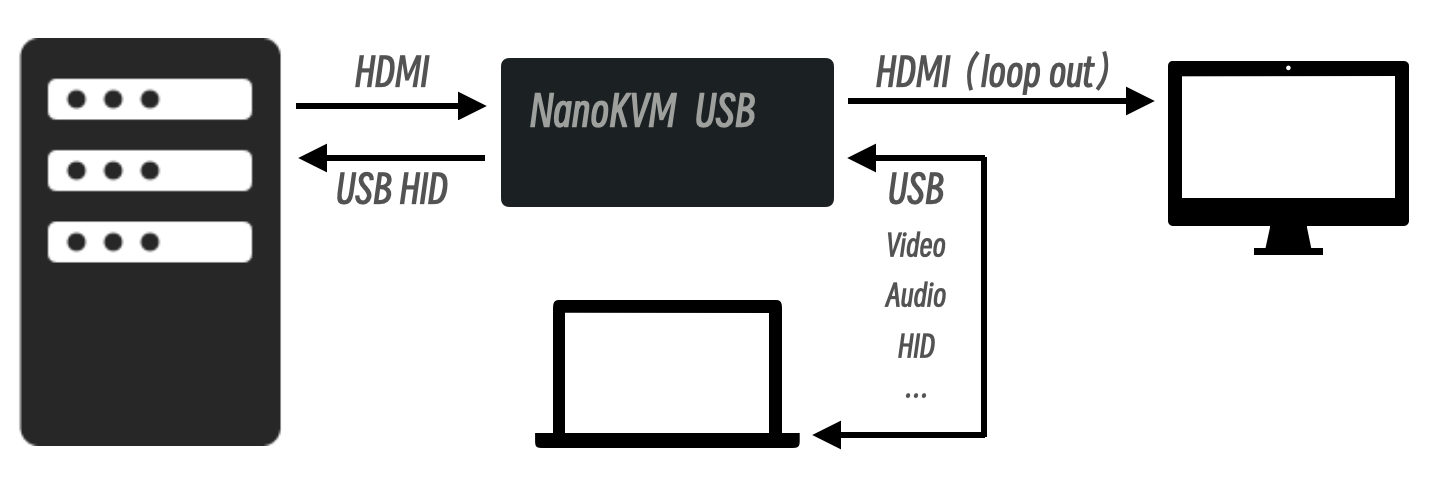
    "content": "# NanoKVM-USB\n\n<div align=\"center\">\n\n![NanoKVM-USB](https://wiki.sipeed.com/hardware/assets/NanoKVM/usb/NanoKVM-USB.png)\n\n</div>\n\n> Finger-sized 4K USB KVM for Server/SBCs\n\n## Introduction\n\nThe NanoKVM-USB is a convenient tool for operations and multi-device collaboration. It allows you to perform maintenance tasks without the need for a keyboard, mouse, or monitor. Using just a single computer and no additional software downloads, you can start graphical operations directly through the Chrome browser.\n\nNanoKVM-USB captures HDMI video signals and transmits them to the host via USB 3.0. Unlike typical USB capture cards, NanoKVM-USB also captures keyboard and mouse input from the host and sends it to the target machine in real-time, eliminating the need for traditional screen and peripheral connections. It also supports HDMI loop-out, with a maximum resolution of 4K@30Hz, making it easy to connect to a large display.\n\n![wiring](https://wiki.sipeed.com/hardware/assets/NanoKVM/usb/wiring.png)\n<br>\n\n## Technical Specifications\n\n| | NanoKVM-USB | Mini-KVM | KIWI-KVM |\n| --- | :---: | :---: | :---: |\n| HDMI Input | 4K@30fps / Pro 4K@60fps  | 1080P@60fps | 4K@30fps |\n| HDMI Loopout | 4K@30fps / Pro 4K@60fps | None | None |\n| USB Capture | 1080P@60fps / Pro 4K@60fps | 1080P@60fps | 1080P@60fps |\n| USB Interface | USB3.0 | USB2.0 | USB3.0 |\n| USB Switch | Yes | Yes | No |\n| Keyboard & Mouse | Yes | Yes | Yes |\n| Clipboard | Yes | Yes | Yes |\n| Software | No setup needed, works in Chrome | Host App required | Host App required |\n| Latency | 50-100ms | 50-100ms | 50-100ms |\n| Volume | 57x25x23mm | 61x13.5x53mm | 80x80x10mm |\n| Shell Material | Aluminum Alloy | Aluminum Alloy | Plastics |\n| Color | Black / Blue / Red | Black | Black |\n| Price | `$39.9/$49.9`, Pro `$59.9/$69.9` | `$89 / $109` | `$69 / $99` |\n\n<br>\n\n![interface](https://wiki.sipeed.com/hardware/assets/NanoKVM/usb/interface.jpg)\n\n> **Note:** For the best experience, please use a USB 3.0 cable to connect the device.\n\n## Resources\n\nWe offer two versions of the application: [Browser](https://github.com/sipeed/NanoKVM-USB/tree/main/browser) and [Desktop](https://github.com/sipeed/NanoKVM-USB/tree/main/desktop). Both are available on the [Releases page](https://github.com/sipeed/NanoKVM-USB/releases).\n\n### Browser Version\n\nAccess our online service at [usbkvm.sipeed.com](https://usbkvm.sipeed.com).\n\nFor self-deployment, download the `NanoKVM-USB-xxx-browser.zip` and serve it. Refer to the [Deployment Guide](https://wiki.sipeed.com/hardware/en/kvm/NanoKVM_USB/development.html) for details. If you are using Docker, simply run `docker-compose up -d`.\n\n\n> Please use the desktop Chrome browser.\n\n### Desktop Version\n\nDownload the appropriate package for your operating system and install it.\n\n> For Linux users, a permission error may occur when connecting to the serial port.  \n> To resolve this run the commands below matching your system, then log out and log back in or restart your system.\n> #### Debian\n> `sudo usermod -a -G dialout $USER`\n> #### Arch\n> `sudo usermod -a -G uucp $USER`\n## Where to Buy\n\n* [AliExpress Store]() (To be released)\n* [Taobao Store]() (To be released)\n* [Pre-sale Page](https://sipeed.com/nanokvm/usb)\n"
  },
  {
    "path": "browser/.editorconfig",
    "content": "root = true\n\n[*]\ncharset = utf-8\nindent_style = space\nindent_size = 2\nend_of_line = lf\ninsert_final_newline = true\ntrim_trailing_whitespace = true"
  },
  {
    "path": "browser/.gitignore",
    "content": "# Logs\nlogs\n*.log\nnpm-debug.log*\nyarn-debug.log*\nyarn-error.log*\npnpm-debug.log*\nlerna-debug.log*\n\nnode_modules\ndist\ndist-ssr\n*.local\n\n# Editor directories and files\n.vscode/*\n!.vscode/extensions.json\n.idea\n.DS_Store\n*.suo\n*.ntvs*\n*.njsproj\n*.sln\n*.sw?\n\n*.tsbuildinfo\nvite.config.js\n"
  },
  {
    "path": "browser/.prettierignore",
    "content": "*.hbs\n"
  },
  {
    "path": "browser/.prettierrc.yaml",
    "content": "singleQuote: true\ntrailingComma: none\nprintWidth: 100\ntabWidth: 2\nbracketSpacing: true\nimportOrder:\n  - ^(react/(.*)$)|^(react$)\n  - ^(next/(.*)$)|^(next$)\n  - <THIRD_PARTY_MODULES>\n  - ''\n  - ^types$\n  - ^@/(.*)$\n  - ''\n  - '^[./]'\nimportOrderSeparation: false\nimportOrderSortSpecifiers: true\nimportOrderBuiltinModulesToTop: true\nimportOrderParserPlugins:\n  - typescript\n  - jsx\n  - tsx\n  - decorators-legacy\nimportOrderMergeDuplicateImports: true\nimportOrderCombineTypeAndValueImports: true\nplugins:\n  - '@ianvs/prettier-plugin-sort-imports'\n  - prettier-plugin-tailwindcss\n"
  },
  {
    "path": "browser/README.md",
    "content": "# NanoKVM-USB Browser\n\nThis is the NanoKVM-USB browser version project.\n\nOnline website: [usbkvm.sipeed.com](https://usbkvm.sipeed.com).\n\n## Development\n\n```shell\ncd browser\npnpm install\npnpm dev\n```\n\n## Deployment\n\n1. Execute `pnpm build` to build the project.\n2. Execute `pnpm install -g http-server` to install http-server.\n3. Execute `cd dist` to change working directory to `dist/` .\n4. Execute `http-server -p 8080 -a localhost` to run the service.\n5. Open the Chrome browser and visit `http://localhost:8080`.\n\n### Deploy in Docker\n\n```shell\ngit clone https://github.com/sipeed/NanoKVM-USB.git\ncd NanoKVM-USB\ndocker-compose up -d\n```\n\nThen visit `http://localhost:9000` in your browser.\n"
  },
  {
    "path": "browser/eslint.config.js",
    "content": "import js from '@eslint/js';\nimport eslintConfigPrettier from 'eslint-config-prettier';\nimport reactHooksPlugin from 'eslint-plugin-react-hooks';\nimport reactRefreshPlugin from 'eslint-plugin-react-refresh';\nimport globals from 'globals';\nimport tseslint from 'typescript-eslint';\n\nexport default tseslint.config(\n  { ignores: ['dist', 'node_modules'] },\n  {\n    files: ['**/*.{ts,tsx}'],\n    extends: [js.configs.recommended, ...tseslint.configs.recommended, eslintConfigPrettier],\n    languageOptions: {\n      ecmaVersion: 2020,\n      globals: globals.browser\n    },\n    plugins: {\n      'react-hooks': reactHooksPlugin,\n      'react-refresh': reactRefreshPlugin\n    },\n    rules: {\n      ...reactHooksPlugin.configs.recommended.rules,\n      '@typescript-eslint/no-explicit-any': 'off',\n      'react-refresh/only-export-components': ['warn', { allowConstantExport: true }]\n    }\n  }\n);\n"
  },
  {
    "path": "browser/index.html",
    "content": "<!doctype html>\n<html lang=\"en\">\n  <head>\n    <meta charset=\"UTF-8\" />\n    <link rel=\"icon\" type=\"image/svg+xml\" href=\"/sipeed.ico\" />\n    <meta name=\"viewport\" content=\"width=device-width, initial-scale=1.0\" />\n    <title>NanoKVM-USB</title>\n  </head>\n  <body>\n    <div id=\"root\"></div>\n    <script type=\"module\" src=\"/src/main.tsx\"></script>\n  </body>\n</html>\n"
  },
  {
    "path": "browser/package.json",
    "content": "{\n  \"name\": \"nanokvm-usb\",\n  \"private\": true,\n  \"version\": \"1.0.0\",\n  \"type\": \"module\",\n  \"scripts\": {\n    \"dev\": \"vite\",\n    \"build\": \"tsc -b && vite build\",\n    \"lint\": \"eslint .\",\n    \"format\": \"prettier --write .\",\n    \"preview\": \"vite preview\"\n  },\n  \"dependencies\": {\n    \"@radix-ui/react-scroll-area\": \"^1.2.10\",\n    \"antd\": \"^5.29.3\",\n    \"clsx\": \"^2.1.1\",\n    \"i18next\": \"^24.0.5\",\n    \"jotai\": \"^2.10.3\",\n    \"lucide-react\": \"^0.562.0\",\n    \"react\": \"^18.3.1\",\n    \"react-dom\": \"^18.3.1\",\n    \"react-draggable\": \"^4.5.0\",\n    \"react-i18next\": \"^15.1.4\",\n    \"react-responsive\": \"^10.0.0\",\n    \"react-simple-keyboard\": \"^3.8.28\",\n    \"vaul\": \"^1.1.1\"\n  },\n  \"devDependencies\": {\n    \"@eslint/js\": \"^9.39.2\",\n    \"@ianvs/prettier-plugin-sort-imports\": \"^4.4.0\",\n    \"@types/react\": \"^18.3.12\",\n    \"@types/react-dom\": \"^18.3.1\",\n    \"@typescript-eslint/eslint-plugin\": \"^8.52.0\",\n    \"@typescript-eslint/parser\": \"^8.52.0\",\n    \"@vitejs/plugin-react\": \"^4.3.4\",\n    \"autoprefixer\": \"^10.4.20\",\n    \"eslint\": \"^9.39.2\",\n    \"eslint-config-prettier\": \"^9.1.2\",\n    \"eslint-plugin-react\": \"^7.37.5\",\n    \"eslint-plugin-react-hooks\": \"^5.2.0\",\n    \"eslint-plugin-react-refresh\": \"^0.4.26\",\n    \"globals\": \"^15.12.0\",\n    \"minimatch\": \"^9.0.6\",\n    \"postcss\": \"^8.4.49\",\n    \"prettier\": \"^3.4.1\",\n    \"prettier-plugin-tailwindcss\": \"^0.6.9\",\n    \"tailwindcss\": \"^3.4.18\",\n    \"typescript\": \"~5.6.2\",\n    \"typescript-eslint\": \"^8.15.0\",\n    \"vite\": \"^7.3.1\",\n    \"vite-tsconfig-paths\": \"^5.1.3\"\n  }\n}"
  },
  {
    "path": "browser/pnpm-workspace.yaml",
    "content": "overrides:\n  minimatch: ^9.0.6\n  ajv@<6.14.0: '>=6.14.0'\n  '@babel/helpers@<7.26.10': '>=7.26.10'\n  '@babel/runtime@<7.26.10': '>=7.26.10'\n  '@eslint/plugin-kit@<0.3.4': '>=0.3.4'\n  brace-expansion@>=1.0.0 <=1.1.11: '>=1.1.12'\n  brace-expansion@>=2.0.0 <=2.0.1: '>=2.0.2'\n  esbuild@<=0.24.2: '>=0.25.0'\n  vite@>=6.0.0 <6.0.12: '>=6.0.12'\n  vite@>=6.0.0 <6.0.13: '>=6.0.13'\n  vite@>=6.0.0 <6.0.14: '>=6.0.14'\n  vite@>=6.0.0 <6.0.15: '>=6.0.15'\n  vite@>=6.0.0 <=6.0.8: '>=6.0.9'\n  vite@>=6.0.0 <=6.1.5: '>=6.1.6'\n  vite@>=6.0.0 <=6.3.5: '>=6.3.6'\n  vite@>=6.0.0 <=6.4.0: '>=6.4.1'\n"
  },
  {
    "path": "browser/postcss.config.js",
    "content": "export default {\n  plugins: {\n    tailwindcss: {},\n    autoprefixer: {}\n  }\n};\n"
  },
  {
    "path": "browser/src/App.tsx",
    "content": "import { CSSProperties, useEffect, useMemo, useState } from 'react';\nimport { Alert, Result, Spin } from 'antd';\nimport clsx from 'clsx';\nimport { useAtom, useAtomValue, useSetAtom } from 'jotai';\nimport { useTranslation } from 'react-i18next';\nimport { useMediaQuery } from 'react-responsive';\n\nimport { DeviceModal } from '@/components/device-modal';\nimport { Keyboard } from '@/components/keyboard';\nimport { Menu } from '@/components/menu';\nimport { Mouse } from '@/components/mouse';\nimport { VirtualKeyboard } from '@/components/virtual-keyboard';\nimport {\n  resolutionAtom,\n  serialStateAtom,\n  videoRotationAtom,\n  videoScaleAtom,\n  videoStateAtom\n} from '@/jotai/device.ts';\nimport { isKeyboardEnableAtom } from '@/jotai/keyboard.ts';\nimport { mouseStyleAtom } from '@/jotai/mouse.ts';\nimport { device } from '@/libs/device';\nimport { camera } from '@/libs/media/camera';\nimport { checkPermission, requestCameraPermission } from '@/libs/media/permission.ts';\nimport * as storage from '@/libs/storage';\nimport type { Resolution } from '@/types.ts';\n\nconst App = () => {\n  const { t } = useTranslation();\n  const isBigScreen = useMediaQuery({ minWidth: 850 });\n\n  const mouseStyle = useAtomValue(mouseStyleAtom);\n  const videoScale = useAtomValue(videoScaleAtom);\n  const videoState = useAtomValue(videoStateAtom);\n  const serialState = useAtomValue(serialStateAtom);\n  const isKeyboardEnable = useAtomValue(isKeyboardEnableAtom);\n  const setResolution = useSetAtom(resolutionAtom);\n  const [videoRotation, setVideoRotation] = useAtom(videoRotationAtom);\n\n  const [isLoading, setIsLoading] = useState(true);\n  const [isCameraGranted, setIsCameraGranted] = useState(false);\n  const [shouldSwapDimensions, setShouldSwapDimensions] = useState(false);\n\n  useEffect(() => {\n    initResolution();\n    initRotation();\n\n    return () => {\n      camera.close();\n      device.serialPort.close();\n    };\n  }, []);\n\n  useEffect(() => {\n    setShouldSwapDimensions(videoRotation === 90 || videoRotation === 270);\n  }, [videoRotation]);\n\n  const videoStyle = useMemo(() => {\n    const baseStyle = {\n      transformOrigin: 'center',\n      maxWidth: shouldSwapDimensions ? '100vh' : '100%',\n      maxHeight: shouldSwapDimensions ? '100vw' : '100%'\n    };\n\n    if (videoScale === 0) {\n      return {\n        ...baseStyle,\n        width: shouldSwapDimensions ? '100vh' : '100%',\n        height: shouldSwapDimensions ? '100vw' : '100%',\n        objectFit: 'contain',\n        transform: `rotate(${videoRotation}deg)`\n      };\n    }\n\n    return {\n      ...baseStyle,\n      objectFit: 'scale-down',\n      transform: `scale(${videoScale}) rotate(${videoRotation}deg)`\n    };\n  }, [videoScale, videoRotation, shouldSwapDimensions]);\n\n  function initResolution() {\n    const resolution = storage.getVideoResolution();\n    if (resolution) {\n      setResolution(resolution);\n    }\n\n    requestPermission(resolution);\n  }\n\n  function initRotation() {\n    const rotation = storage.getVideoRotation();\n    if (rotation) {\n      setVideoRotation(rotation);\n    }\n  }\n\n  async function requestPermission(resolution?: Resolution) {\n    try {\n      const isGranted = await checkPermission('camera');\n      if (isGranted) {\n        setIsCameraGranted(true);\n        return;\n      }\n\n      const isSuccess = await requestCameraPermission(resolution);\n      setIsCameraGranted(isSuccess);\n    } catch (err: any) {\n      console.log('failed to request media permissions: ', err);\n    } finally {\n      setIsLoading(false);\n    }\n  }\n\n  if (isLoading) {\n    return <Spin size=\"large\" spinning={isLoading} tip={t('camera.tip')} fullscreen />;\n  }\n\n  if (!isCameraGranted) {\n    return (\n      <Result\n        status=\"info\"\n        title={t('camera.denied')}\n        extra={[<h2 className=\"text-xl text-white\">{t('camera.authorize')}</h2>]}\n      />\n    );\n  }\n\n  return (\n    <>\n      <DeviceModal />\n\n      {videoState === 'connected' && (\n        <>\n          <Menu />\n\n          {serialState === 'notSupported' && (\n            <Alert message={t('serial.notSupported')} type=\"warning\" banner closable />\n          )}\n\n          {serialState === 'connected' && (\n            <>\n              <Mouse />\n              {isKeyboardEnable && <Keyboard />}\n            </>\n          )}\n        </>\n      )}\n\n      <video\n        id=\"video\"\n        className={clsx(\n          'block select-none',\n          shouldSwapDimensions ? 'min-h-[640px] min-w-[360px]' : 'min-h-[360px] min-w-[640px]',\n          mouseStyle\n        )}\n        style={videoStyle as CSSProperties}\n        autoPlay\n        playsInline\n      />\n\n      <VirtualKeyboard isBigScreen={isBigScreen} />\n    </>\n  );\n};\n\nexport default App;\n"
  },
  {
    "path": "browser/src/assets/index.css",
    "content": "@layer tailwind-base, antd;\n\n@layer tailwind-base {\n  @tailwind base;\n}\n\n@tailwind components;\n@tailwind utilities;\n\nhtml,\nbody {\n  padding: 0;\n  margin: 0;\n  background: #000;\n}\n"
  },
  {
    "path": "browser/src/assets/keyboard.css",
    "content": ".keyboardContainer {\n  display: flex;\n  background-color: #e5e5e5;\n  justify-content: center;\n  margin: 0 auto;\n  border-radius: 0 5px;\n}\n\n.simple-keyboard.hg-theme-default {\n  display: inline-block;\n}\n\n.simple-keyboard-main.simple-keyboard {\n  width: 640px;\n  min-width: 640px;\n  background: none;\n}\n\n.simple-keyboard-main.simple-keyboard .hg-button {\n  box-shadow:\n    0 1px 3px 0 rgb(0 0 0 / 0.1),\n    0 1px 2px -1px rgb(0 0 0 / 0.1);\n}\n\n.simple-keyboard-main.simple-keyboard .hg-row:first-child {\n  margin-bottom: 10px;\n}\n\n.simple-keyboard-arrows.simple-keyboard {\n  align-self: flex-end;\n  background: none;\n}\n\n.simple-keyboard .hg-button.selectedButton {\n  background: rgba(5, 25, 70, 0.53);\n  color: white;\n}\n\n.simple-keyboard .hg-button.emptySpace {\n  pointer-events: none;\n  background: none;\n  border: none;\n  box-shadow: none;\n}\n\n.simple-keyboard-arrows .hg-row {\n  justify-content: center;\n}\n\n.simple-keyboard-arrows .hg-button {\n  width: 50px;\n  flex-grow: 0;\n  justify-content: center;\n  display: flex;\n  align-items: center;\n  box-shadow:\n    0 1px 3px 0 rgb(0 0 0 / 0.1),\n    0 1px 2px -1px rgb(0 0 0 / 0.1);\n}\n\n.controlArrows {\n  display: flex;\n  align-items: center;\n  justify-content: space-between;\n  flex-flow: column;\n}\n\n.simple-keyboard-control.simple-keyboard {\n  background: none;\n}\n\n.simple-keyboard-control.simple-keyboard .hg-row:first-child {\n  margin-bottom: 10px;\n}\n\n.simple-keyboard-control .hg-button {\n  width: 50px;\n  flex-grow: 0;\n  justify-content: center;\n  display: flex;\n  align-items: center;\n  font-size: 14px;\n  box-shadow:\n    0 1px 3px 0 rgb(0 0 0 / 0.1),\n    0 1px 2px -1px rgb(0 0 0 / 0.1);\n}\n\n.hg-button.hg-functionBtn.hg-button-space {\n  width: 250px;\n}\n\n.hg-layout-mac .hg-button.hg-functionBtn.hg-button-space {\n  width: 350px;\n}\n\n.simple-keyboard .hg-highlight {\n  background: rgb(37 99 235);\n  border-bottom: 1px solid #2563eb;\n  box-shadow:\n    0 1px 3px 0 rgb(37 99 235 / 0.1),\n    0 1px 2px -1px rgb(37 99 235 / 0.1);\n  color: white;\n}\n\n.simple-keyboard .hg-button.hg-double {\n  text-align: center;\n  font-size: 14px;\n  line-height: 16px;\n}\n\n.keyboard-header {\n  font-family:\n    -apple-system, BlinkMacSystemFont, 'Segoe UI', Roboto, 'Helvetica Neue', Arial, 'Noto Sans',\n    sans-serif, 'Apple Color Emoji', 'Segoe UI Emoji', 'Segoe UI Symbol', 'Noto Color Emoji';\n}\n"
  },
  {
    "path": "browser/src/components/device-modal/index.tsx",
    "content": "import { useEffect, useState } from 'react';\nimport { Modal } from 'antd';\nimport { useAtom, useSetAtom } from 'jotai';\nimport { useTranslation } from 'react-i18next';\n\nimport { serialStateAtom, videoDeviceIdAtom, videoStateAtom } from '@/jotai/device.ts';\nimport { camera } from '@/libs/media/camera.ts';\n\nimport { SerialPort } from './serial-port';\nimport { Video } from './video';\n\nexport const DeviceModal = () => {\n  const { t } = useTranslation();\n\n  const [videoState, setVideoState] = useAtom(videoStateAtom);\n  const [serialState, setSerialState] = useAtom(serialStateAtom);\n  const setVideoDeviceId = useSetAtom(videoDeviceIdAtom);\n\n  const [isOpen, setIsOpen] = useState(false);\n  const [errMsg, setErrMsg] = useState('');\n\n  useEffect(() => {\n    if (videoState === 'connected') {\n      if (serialState === 'notSupported' || serialState === 'connected') {\n        setIsOpen(false);\n        return;\n      }\n    }\n\n    setIsOpen(true);\n  }, [videoState, serialState]);\n\n  const disconnect = () => {\n    setSerialState('disconnected');\n    setVideoState('disconnected');\n    setVideoDeviceId('');\n\n    camera.close();\n  };\n\n  return (\n    <Modal open={isOpen} title={t('modal.title')} footer={null} closable={false} destroyOnHidden>\n      <div className=\"flex flex-col items-center justify-center space-y-5 py-10\">\n        <Video setErrMsg={setErrMsg} />\n        <SerialPort setErrMsg={setErrMsg} onDisconnect={disconnect} />\n\n        {errMsg && <span className=\"text-xs text-red-500\">{errMsg}</span>}\n      </div>\n    </Modal>\n  );\n};\n"
  },
  {
    "path": "browser/src/components/device-modal/serial-port.tsx",
    "content": "import { useEffect } from 'react';\nimport { Button } from 'antd';\nimport { useAtom } from 'jotai';\nimport { useTranslation } from 'react-i18next';\n\nimport { serialStateAtom } from '@/jotai/device.ts';\nimport { device } from '@/libs/device';\n\ntype SerialPortProps = {\n  onDisconnect: () => void;\n  setErrMsg: (msg: string) => void;\n};\n\nexport const SerialPort = ({ setErrMsg, onDisconnect }: SerialPortProps) => {\n  const { t } = useTranslation();\n\n  const [serialState, setSerialState] = useAtom(serialStateAtom);\n\n  useEffect(() => {\n    const isWebSerialSupported = 'serial' in navigator;\n    if (!isWebSerialSupported) {\n      setSerialState('notSupported');\n    }\n  }, [setSerialState]);\n\n  const selectSerialPort = async () => {\n    if (serialState === 'connecting') return;\n    setSerialState('connecting');\n    setErrMsg('');\n\n    try {\n      const port = await navigator.serial.requestPort();\n      await device.serialPort.init({ port, onDisconnect });\n\n      setSerialState('connected');\n    } catch (err) {\n      console.log(err);\n      setSerialState('disconnected');\n      setErrMsg(t('serial.failed'));\n    }\n  };\n\n  if (serialState === 'notSupported') {\n    return null;\n  }\n\n  return (\n    <Button\n      type={serialState === 'connected' ? 'primary' : 'default'}\n      className=\"w-[250px]\"\n      loading={serialState === 'connecting'}\n      onClick={selectSerialPort}\n    >\n      {t('modal.selectSerial')}\n    </Button>\n  );\n};\n"
  },
  {
    "path": "browser/src/components/device-modal/video.tsx",
    "content": "import { useEffect, useState } from 'react';\nimport { Select } from 'antd';\nimport { useAtom, useAtomValue } from 'jotai';\nimport { useTranslation } from 'react-i18next';\n\nimport { resolutionAtom, videoDeviceIdAtom, videoStateAtom } from '@/jotai/device.ts';\nimport { camera } from '@/libs/media/camera';\nimport * as storage from '@/libs/storage';\nimport type { MediaDevice } from '@/types';\n\ntype VideoProps = {\n  setErrMsg: (msg: string) => void;\n};\n\nexport const Video = ({ setErrMsg }: VideoProps) => {\n  const { t } = useTranslation();\n\n  const resolution = useAtomValue(resolutionAtom);\n  const [videoDeviceId, setVideoDeviceId] = useAtom(videoDeviceIdAtom);\n  const [videoState, setVideoState] = useAtom(videoStateAtom);\n\n  const [devices, setDevices] = useState<MediaDevice[]>([]);\n\n  useEffect(() => {\n    getDevices();\n  }, []);\n\n  async function getDevices() {\n    try {\n      const allDevices = await navigator.mediaDevices.enumerateDevices();\n      const videoDevices = allDevices.filter((device) => device.kind === 'videoinput');\n      const audioDevices = allDevices.filter((device) => device.kind === 'audioinput');\n\n      const mediaDevices = videoDevices.map((videoDevice) => {\n        const device: MediaDevice = {\n          videoId: videoDevice.deviceId,\n          videoName: videoDevice.label\n        };\n\n        if (videoDevice.groupId) {\n          const matchedAudioDevice = audioDevices.find(\n            (audioDevice) => audioDevice.groupId === videoDevice.groupId\n          );\n          if (matchedAudioDevice) {\n            device.audioId = matchedAudioDevice.deviceId;\n            device.audioName = matchedAudioDevice.label;\n          }\n        }\n\n        return device;\n      });\n\n      setDevices(mediaDevices);\n    } catch (err) {\n      console.log(err);\n      setErrMsg(t('camera.failed'));\n    }\n  }\n\n  async function selectVideo(videoId: string) {\n    if (videoState === 'connecting') return;\n\n    if (!videoId) {\n      setVideoDeviceId('');\n      return;\n    }\n\n    const device = devices.find((d) => d.videoId === videoId);\n    if (!device) {\n      return;\n    }\n\n    setVideoState('connecting');\n    setErrMsg('');\n\n    try {\n      await camera.open(videoId, resolution.width, resolution.height, device.audioId);\n    } catch (err) {\n      console.log(err);\n      setErrMsg(t('camera.failed'));\n    }\n\n    const video = document.getElementById('video') as HTMLVideoElement;\n    if (!video) return;\n\n    video.srcObject = camera.getStream();\n\n    setVideoState('connected');\n    setVideoDeviceId(videoId);\n    storage.setVideoDevice(videoId);\n  }\n\n  return (\n    <Select\n      value={videoDeviceId || undefined}\n      style={{ width: 250 }}\n      options={devices}\n      fieldNames={{\n        value: 'videoId',\n        label: 'videoName'\n      }}\n      allowClear={true}\n      loading={videoState === 'connecting'}\n      placeholder={t('modal.selectVideo')}\n      onChange={selectVideo}\n      onClick={getDevices}\n    />\n  );\n};\n"
  },
  {
    "path": "browser/src/components/keyboard/index.tsx",
    "content": "import { useEffect, useRef } from 'react';\nimport { useAtomValue } from 'jotai';\n\nimport { isKeyboardEnableAtom } from '@/jotai/keyboard';\nimport { getOperatingSystem } from '@/libs/browser';\nimport { device } from '@/libs/device';\nimport { KeyboardReport } from '@/libs/keyboard/keyboard.ts';\nimport { isModifier } from '@/libs/keyboard/keymap.ts';\n\ninterface AltGrState {\n  active: boolean;\n  ctrlLeftTimestamp: number;\n}\n\nconst ALTGR_THRESHOLD_MS = 10;\n\nexport const Keyboard = () => {\n  const os = getOperatingSystem();\n  const isKeyboardEnabled = useAtomValue(isKeyboardEnableAtom);\n\n  const keyboardRef = useRef(new KeyboardReport());\n  const pressedKeys = useRef(new Set<string>());\n  const altGrState = useRef<AltGrState | null>(null);\n  const isComposing = useRef(false);\n\n  useEffect(() => {\n    if (os === 'Windows' && !altGrState.current) {\n      altGrState.current = { active: false, ctrlLeftTimestamp: 0 };\n    }\n\n    if (!isKeyboardEnabled) {\n      releaseKeys();\n      return;\n    }\n\n    document.addEventListener('keydown', handleKeyDown);\n    document.addEventListener('keyup', handleKeyUp);\n    document.addEventListener('compositionstart', handleCompositionStart);\n    document.addEventListener('compositionend', handleCompositionEnd);\n    window.addEventListener('blur', handleBlur);\n    document.addEventListener('visibilitychange', handleVisibilityChange);\n\n    // Key down event\n    async function handleKeyDown(event: KeyboardEvent): Promise<void> {\n      if (!isKeyboardEnabled) return;\n\n      // Skip during IME composition\n      if (isComposing.current || event.isComposing) return;\n\n      event.preventDefault();\n      event.stopPropagation();\n\n      const code = normalizeKeyCode(event, os);\n      if (!code || pressedKeys.current.has(code)) {\n        return;\n      }\n\n      // When AltGr is pressed, browsers send ControlLeft followed immediately by AltRight\n      if (altGrState.current) {\n        if (code === 'ControlLeft') {\n          altGrState.current.ctrlLeftTimestamp = event.timeStamp;\n        } else if (code === 'AltRight') {\n          const timeDiff = event.timeStamp - altGrState.current.ctrlLeftTimestamp;\n          if (timeDiff < ALTGR_THRESHOLD_MS && pressedKeys.current.has('ControlLeft')) {\n            pressedKeys.current.delete('ControlLeft');\n            handleKeyEvent({ type: 'keyup', code: 'ControlLeft' });\n            altGrState.current.active = true;\n          }\n        }\n      }\n\n      pressedKeys.current.add(code);\n      await handleKeyEvent({ type: 'keydown', code });\n    }\n\n    // Key up event\n    async function handleKeyUp(event: KeyboardEvent): Promise<void> {\n      if (!isKeyboardEnabled) return;\n\n      if (isComposing.current || event.isComposing) return;\n\n      event.preventDefault();\n      event.stopPropagation();\n\n      const code = normalizeKeyCode(event, os);\n\n      // Handle AltGr state for Windows\n      if (altGrState.current?.active) {\n        if (code === 'ControlLeft') return;\n\n        if (code === 'AltRight') {\n          altGrState.current.active = false;\n        }\n      }\n\n      // Compatible with macOS's command key combinations\n      if (code === 'MetaLeft' || code === 'MetaRight') {\n        const keysToRelease: string[] = [];\n        pressedKeys.current.forEach((pressedCode) => {\n          if (!isModifier(pressedCode)) {\n            keysToRelease.push(pressedCode);\n          }\n        });\n\n        for (const key of keysToRelease) {\n          await handleKeyEvent({ type: 'keyup', code: key });\n          pressedKeys.current.delete(key);\n        }\n      }\n\n      pressedKeys.current.delete(code);\n      await handleKeyEvent({ type: 'keyup', code });\n    }\n\n    // Composition start event\n    function handleCompositionStart(): void {\n      isComposing.current = true;\n    }\n\n    // Composition end event\n    function handleCompositionEnd(): void {\n      isComposing.current = false;\n    }\n\n    // Release all keys when window loses focus\n    async function handleBlur(): Promise<void> {\n      await releaseKeys();\n    }\n\n    // Release all keys before window closes\n    async function handleVisibilityChange(): Promise<void> {\n      if (document.hidden) {\n        await releaseKeys();\n      }\n    }\n\n    // Release all keys\n    async function releaseKeys(): Promise<void> {\n      for (const code of pressedKeys.current) {\n        await handleKeyEvent({ type: 'keyup', code });\n      }\n\n      pressedKeys.current.clear();\n\n      // Reset AltGr state\n      if (altGrState.current) {\n        altGrState.current.active = false;\n        altGrState.current.ctrlLeftTimestamp = 0;\n      }\n\n      const report = keyboardRef.current.reset();\n      await device.sendKeyboardData(report);\n    }\n\n    return () => {\n      document.removeEventListener('keydown', handleKeyDown);\n      document.removeEventListener('keyup', handleKeyUp);\n      document.removeEventListener('compositionstart', handleCompositionStart);\n      document.removeEventListener('compositionend', handleCompositionEnd);\n      window.removeEventListener('blur', handleBlur);\n      document.removeEventListener('visibilitychange', handleVisibilityChange);\n\n      releaseKeys();\n    };\n  }, [isKeyboardEnabled]);\n\n  function normalizeKeyCode(event: KeyboardEvent, os?: string): string {\n    if (event.code) {\n      return event.code;\n    }\n\n    // Fallback: use event.key + event.location to determine the key\n    // event.location: 1 = left, 2 = right, 0 = standard (non-positional)\n    if (event.key === 'Shift') {\n      if (event.location === 0 && os === 'Windows') {\n        return 'ShiftRight';\n      }\n      return event.location === 2 ? 'ShiftRight' : 'ShiftLeft';\n    }\n\n    if (event.key === 'Control') {\n      return event.location === 2 ? 'ControlRight' : 'ControlLeft';\n    }\n    if (event.key === 'Alt') {\n      return event.location === 2 ? 'AltRight' : 'AltLeft';\n    }\n    if (event.key === 'Meta') {\n      return event.location === 2 ? 'MetaRight' : 'MetaLeft';\n    }\n\n    return event.code;\n  }\n\n  // Keyboard handler\n  async function handleKeyEvent(event: { type: 'keydown' | 'keyup'; code: string }): Promise<void> {\n    const kb = keyboardRef.current;\n    const report = event.type === 'keydown' ? kb.keyDown(event.code) : kb.keyUp(event.code);\n    await device.sendKeyboardData(report);\n  }\n\n  return <></>;\n};\n"
  },
  {
    "path": "browser/src/components/menu/audio/index.tsx",
    "content": "import { useEffect, useState } from 'react';\nimport { Button, Modal } from 'antd';\nimport { useSetAtom } from 'jotai';\nimport { VolumeOffIcon } from 'lucide-react';\nimport { useTranslation } from 'react-i18next';\n\nimport { videoDeviceIdAtom, videoStateAtom } from '@/jotai/device.ts';\nimport { camera } from '@/libs/media/camera.ts';\nimport { checkPermission, requestMicrophonePermission } from '@/libs/media/permission.ts';\n\nexport const Audio = () => {\n  const { t } = useTranslation();\n\n  const setVideoState = useSetAtom(videoStateAtom);\n  const setVideoDeviceId = useSetAtom(videoDeviceIdAtom);\n\n  const [isGranted, setIsGranted] = useState(false);\n  const [isModalOpen, setIsModalOpen] = useState(false);\n\n  useEffect(() => {\n    checkPermission('microphone').then((granted) => {\n      setIsGranted(granted);\n    });\n  }, []);\n\n  async function requestPermission() {\n    try {\n      const granted = await requestMicrophonePermission();\n      if (!granted) {\n        setIsModalOpen(true);\n        return;\n      }\n\n      setVideoDeviceId('');\n      setVideoState('disconnected');\n      setIsGranted(granted);\n\n      camera.close();\n    } catch (err: any) {\n      console.log('failed to request media permissions: ', err);\n    }\n  }\n\n  function closeModal() {\n    setIsModalOpen(false);\n  }\n\n  if (isGranted) {\n    return null;\n  }\n\n  return (\n    <>\n      <div\n        className=\"flex h-[28px] w-[28px] cursor-pointer items-center justify-center rounded text-neutral-300 hover:bg-neutral-700/70 hover:text-white\"\n        onClick={requestPermission}\n      >\n        <VolumeOffIcon size={18} />\n      </div>\n\n      <Modal open={isModalOpen} title={t('audio.tip')} footer={null} onCancel={closeModal}>\n        <div className=\"whitespace-pre-line py-5\">{t('audio.permission')}</div>\n        <a\n          href=\"https://wiki.sipeed.com/hardware/en/kvm/NanoKVM_USB/quick_start.html#Authorization\"\n          target=\"_blank\"\n        >\n          {t('audio.viewDoc')}\n        </a>\n\n        <div className=\"flex w-full justify-center pt-8\">\n          <Button type=\"primary\" className=\"min-w-20\" onClick={closeModal}>\n            {t('audio.ok')}\n          </Button>\n        </div>\n      </Modal>\n    </>\n  );\n};\n"
  },
  {
    "path": "browser/src/components/menu/fullscreen/index.tsx",
    "content": "import { useEffect, useState } from 'react';\nimport { MaximizeIcon, MinimizeIcon } from 'lucide-react';\n\nexport const Fullscreen = () => {\n  const [isFullscreen, setIsFullscreen] = useState(false);\n\n  useEffect(() => {\n    function onFullscreenChange() {\n      setIsFullscreen(!!document.fullscreenElement);\n    }\n\n    onFullscreenChange();\n\n    document.addEventListener('fullscreenchange', onFullscreenChange);\n\n    return () => {\n      document.removeEventListener('fullscreenchange', onFullscreenChange);\n    };\n  }, []);\n\n  function handleFullscreen() {\n    if (!document.fullscreenElement) {\n      const element = document.documentElement;\n      element.requestFullscreen().then();\n\n      // @ts-expect-error - https://developer.mozilla.org/en-US/docs/Web/API/Keyboard/lock\n      navigator.keyboard?.lock();\n    } else {\n      document.exitFullscreen().then();\n\n      // @ts-expect-error - https://developer.mozilla.org/en-US/docs/Web/API/Keyboard/unlock\n      navigator.keyboard?.unlock();\n    }\n  }\n\n  return (\n    <div\n      className=\"flex h-[28px] w-[28px] cursor-pointer items-center justify-center rounded text-neutral-300 hover:bg-neutral-700/70 hover:text-white\"\n      onClick={handleFullscreen}\n    >\n      {isFullscreen ? <MinimizeIcon size={18} /> : <MaximizeIcon size={18} />}\n    </div>\n  );\n};\n"
  },
  {
    "path": "browser/src/components/menu/index.tsx",
    "content": "import { useCallback, useEffect, useRef, useState } from 'react';\nimport { Divider } from 'antd';\nimport clsx from 'clsx';\nimport { useAtomValue } from 'jotai';\nimport { ChevronRightIcon, GripVerticalIcon, XIcon } from 'lucide-react';\nimport Draggable from 'react-draggable';\n\nimport { serialStateAtom } from '@/jotai/device.ts';\nimport * as storage from '@/libs/storage';\n\nimport { Audio } from './audio';\nimport { Fullscreen } from './fullscreen';\nimport { Keyboard } from './keyboard';\nimport { Mouse } from './mouse';\nimport { Recorder } from './recorder';\nimport { SerialPort } from './serial-port';\nimport { Settings } from './settings';\nimport { Video } from './video';\n\nexport const Menu = () => {\n  const serialState = useAtomValue(serialStateAtom);\n\n  const [isMenuOpen, setIsMenuOpen] = useState(true);\n  const [menuBounds, setMenuBounds] = useState({ left: 0, right: 0, top: 0, bottom: 0 });\n\n  const nodeRef = useRef<HTMLDivElement | null>(null);\n\n  const handleResize = useCallback(() => {\n    if (!nodeRef.current) return;\n\n    const elementRect = nodeRef.current.getBoundingClientRect();\n    const width = (window.innerWidth - elementRect.width) / 2;\n\n    setMenuBounds({\n      left: -width,\n      top: -10,\n      right: width,\n      bottom: window.innerHeight - elementRect.height - 10\n    });\n  }, []);\n\n  useEffect(() => {\n    const isOpen = storage.getIsMenuOpen();\n    setIsMenuOpen(isOpen);\n\n    window.addEventListener('resize', handleResize);\n\n    return () => {\n      window.removeEventListener('resize', handleResize);\n    };\n  }, [handleResize]);\n\n  useEffect(() => {\n    handleResize();\n  }, [isMenuOpen, serialState, handleResize]);\n\n  function toggleMenu() {\n    const isOpen = !isMenuOpen;\n\n    setIsMenuOpen(isOpen);\n    storage.setIsMenuOpen(isOpen);\n  }\n\n  return (\n    <Draggable\n      nodeRef={nodeRef}\n      bounds={menuBounds}\n      handle=\"strong\"\n      positionOffset={{ x: '-50%', y: '0%' }}\n    >\n      <div\n        ref={nodeRef}\n        className=\"fixed left-1/2 top-[10px] z-[1000] -translate-x-1/2 transition-opacity duration-300\"\n      >\n        {/* Menubar */}\n        <div className=\"sticky top-[10px] flex w-full justify-center\">\n          <div\n            className={clsx(\n              'h-[34px] items-center justify-between space-x-1.5 rounded bg-neutral-800/70 px-2',\n              isMenuOpen ? 'flex' : 'hidden'\n            )}\n          >\n            <strong>\n              <div className=\"flex h-[28px] cursor-move select-none items-center justify-center text-neutral-400\">\n                <GripVerticalIcon size={18} />\n              </div>\n            </strong>\n            <Divider type=\"vertical\" />\n\n            <Video />\n            <Audio />\n\n            {serialState === 'connected' && (\n              <>\n                <SerialPort />\n\n                <Divider type=\"vertical\" className=\"px-0.5\" />\n\n                <Keyboard />\n                <Mouse />\n              </>\n            )}\n\n            <Recorder />\n\n            <Divider type=\"vertical\" className=\"px-0.5\" />\n\n            <Settings />\n            <Fullscreen />\n            <div\n              className=\"flex h-[28px] w-[28px] cursor-pointer items-center justify-center rounded text-white hover:bg-neutral-700/70\"\n              onClick={toggleMenu}\n            >\n              <XIcon size={18} />\n            </div>\n          </div>\n\n          {/* Menubar expand button */}\n          {!isMenuOpen && (\n            <div className=\"flex items-center rounded-lg bg-neutral-800/50 p-1\">\n              <strong>\n                <div className=\"flex size-[26px] cursor-move select-none items-center justify-center text-neutral-400\">\n                  <GripVerticalIcon size={18} />\n                </div>\n              </strong>\n              <Divider type=\"vertical\" style={{ margin: '0 4px' }} />\n              <div\n                className=\"flex size-[26px] cursor-pointer items-center justify-center rounded text-neutral-400 hover:bg-neutral-700/70 hover:text-white\"\n                onClick={toggleMenu}\n              >\n                <ChevronRightIcon size={18} />\n              </div>\n            </div>\n          )}\n        </div>\n      </div>\n    </Draggable>\n  );\n};\n"
  },
  {
    "path": "browser/src/components/menu/keyboard/index.tsx",
    "content": "import { useState } from 'react';\nimport { Popover } from 'antd';\nimport { KeyboardIcon } from 'lucide-react';\n\nimport { Paste } from './paste.tsx';\nimport { Shortcuts } from './shortcuts';\nimport { VirtualKeyboard } from './virtual-keyboard.tsx';\n\nexport const Keyboard = () => {\n  const [isPopoverOpen, setIsPopoverOpen] = useState(false);\n\n  const content = (\n    <div className=\"flex flex-col space-y-0.5\">\n      <Paste />\n      <VirtualKeyboard />\n      <Shortcuts />\n    </div>\n  );\n\n  return (\n    <Popover\n      content={content}\n      placement=\"bottomLeft\"\n      trigger=\"click\"\n      arrow={false}\n      open={isPopoverOpen}\n      onOpenChange={setIsPopoverOpen}\n    >\n      <div className=\"flex h-[28px] w-[28px] cursor-pointer items-center justify-center rounded text-neutral-300 hover:bg-neutral-700/70 hover:text-white\">\n        <KeyboardIcon size={18} />\n      </div>\n    </Popover>\n  );\n};\n"
  },
  {
    "path": "browser/src/components/menu/keyboard/paste.tsx",
    "content": "import { useState } from 'react';\nimport { ClipboardIcon } from 'lucide-react';\nimport { useTranslation } from 'react-i18next';\n\nimport { device } from '@/libs/device';\nimport { CharCodes, ShiftChars } from '@/libs/keyboard/charCodes.ts';\nimport { getModifierBit } from '@/libs/keyboard/keymap.ts';\n\nexport const Paste = () => {\n  const { t } = useTranslation();\n  const [isLoading, setIsLoading] = useState(false);\n\n  async function paste(): Promise<void> {\n    if (isLoading) return;\n    setIsLoading(true);\n\n    try {\n      const text = await navigator.clipboard.readText();\n      if (!text) return;\n\n      for (const char of text) {\n        const ascii = char.charCodeAt(0);\n\n        const code = CharCodes[ascii];\n        if (!code) continue;\n\n        let modifier = 0;\n        if ((ascii >= 65 && ascii <= 90) || ShiftChars[ascii]) {\n          modifier |= getModifierBit('ShiftLeft');\n        }\n\n        await send(modifier, code);\n        await new Promise((r) => setTimeout(r, 50));\n        await send(0, 0);\n      }\n    } catch (e) {\n      console.log(e);\n    } finally {\n      setIsLoading(false);\n    }\n  }\n\n  async function send(modifier: number, code: number): Promise<void> {\n    const keys = [modifier, 0, code, 0, 0, 0, 0, 0];\n    await device.sendKeyboardData(keys);\n  }\n\n  return (\n    <div\n      className=\"flex h-[32px] cursor-pointer items-center space-x-2 rounded px-3 text-neutral-300 hover:bg-neutral-700/50\"\n      onClick={paste}\n    >\n      <ClipboardIcon size={16} />\n      <span>{t('keyboard.paste')}</span>\n    </div>\n  );\n};\n"
  },
  {
    "path": "browser/src/components/menu/keyboard/shortcuts/index.tsx",
    "content": "import { useEffect, useState } from 'react';\nimport { Divider, Popover } from 'antd';\nimport { CommandIcon } from 'lucide-react';\nimport { useTranslation } from 'react-i18next';\n\nimport { ScrollArea } from '@/components/ui/scroll-area';\nimport * as storage from '@/libs/storage';\n\nimport { Recorder } from './recorder.tsx';\nimport { Shortcut } from './shortcut.tsx';\nimport type { Shortcut as ShortcutInterface } from './types.ts';\n\nexport const Shortcuts = () => {\n  const { t } = useTranslation();\n\n  const [isOpen, setIsOpen] = useState(false);\n  const [isRecording, setIsRecording] = useState(false);\n  const [customShortcuts, setCustomShortcuts] = useState<ShortcutInterface[]>([]);\n\n  const defaultShortcuts: ShortcutInterface[] = [\n    {\n      keys: [\n        { code: 'MetaLeft', label: 'Win' },\n        { code: 'Tab', label: 'Tab' }\n      ]\n    },\n    {\n      keys: [\n        { code: 'ControlLeft', label: 'Ctrl' },\n        { code: 'AltLeft', label: 'Alt' },\n        { code: 'Delete', label: '⌫' }\n      ]\n    }\n  ];\n\n  useEffect(() => {\n    const shortcuts = storage.getShortcuts();\n    if (!shortcuts) return;\n    setCustomShortcuts(JSON.parse(shortcuts));\n  }, []);\n\n  function addShortcut(shortcut: ShortcutInterface): void {\n    const shortcuts = [...customShortcuts, shortcut];\n    setCustomShortcuts(shortcuts);\n    storage.setShortcuts(JSON.stringify(shortcuts));\n  }\n\n  function delShortcut(index: number): void {\n    const shortcuts = customShortcuts.filter((_, i) => i !== index);\n    setCustomShortcuts(shortcuts);\n    storage.setShortcuts(JSON.stringify(shortcuts));\n  }\n\n  function handleOpenChange(open: boolean): void {\n    if (open) {\n      setIsOpen(true);\n      return;\n    }\n    if (isRecording) {\n      return;\n    }\n    setIsOpen(false);\n  }\n\n  const content = (\n    <ScrollArea className=\"max-w-[400px] [&>[data-radix-scroll-area-viewport]]:max-h-[350px]\">\n      {/* custom shortcuts */}\n      {customShortcuts.length > 0 && (\n        <>\n          {customShortcuts.map((shortcut, index) => (\n            <Shortcut key={index} shortcut={shortcut}></Shortcut>\n          ))}\n\n          <Divider style={{ margin: '5px 0 5px 0' }} />\n        </>\n      )}\n\n      {/*  default shortcuts */}\n      {defaultShortcuts.map((shortcut, index) => (\n        <Shortcut key={index} shortcut={shortcut}></Shortcut>\n      ))}\n\n      <Divider style={{ margin: '5px 0 5px 0' }} />\n\n      <Recorder\n        shortcuts={customShortcuts}\n        addShortcut={addShortcut}\n        delShortcut={delShortcut}\n        setIsRecording={setIsRecording}\n      />\n    </ScrollArea>\n  );\n\n  return (\n    <Popover\n      content={content}\n      trigger=\"hover\"\n      placement=\"rightTop\"\n      align={{ offset: [14, 0] }}\n      open={isOpen}\n      onOpenChange={handleOpenChange}\n      arrow={false}\n    >\n      <div className=\"flex h-[32px] cursor-pointer items-center space-x-2 rounded px-3 text-neutral-300 hover:bg-neutral-700/50\">\n        <CommandIcon size={16} />\n        <span>{t('keyboard.shortcut.title')}</span>\n      </div>\n    </Popover>\n  );\n};\n"
  },
  {
    "path": "browser/src/components/menu/keyboard/shortcuts/recorder.tsx",
    "content": "import { useEffect, useRef, useState } from 'react';\nimport { Button, Divider, Input, InputRef, Modal } from 'antd';\nimport { useSetAtom } from 'jotai';\nimport { KeyboardIcon, Trash2Icon } from 'lucide-react';\nimport { useTranslation } from 'react-i18next';\n\nimport { Kbd, KbdGroup } from '@/components/ui/kbd.tsx';\nimport { ScrollArea } from '@/components/ui/scroll-area.tsx';\nimport { isKeyboardEnableAtom } from '@/jotai/keyboard.ts';\nimport { isModifier } from '@/libs/keyboard/keymap.ts';\n\nimport { KeyInfo, Shortcut } from './types.ts';\n\nconst MAX_KEYS = 6;\n\nconst SpecialKeyMap: Record<string, string> = {\n  Space: 'Space',\n  Backspace: '⌫',\n  Enter: '↵',\n  Tab: 'Tab',\n  CapsLock: 'Caps',\n  Escape: 'Esc',\n  ArrowUp: '↑',\n  ArrowDown: '↓',\n  ArrowLeft: '←',\n  ArrowRight: '→',\n  Delete: 'Del',\n  Insert: 'Ins',\n  Home: 'Home',\n  End: 'End',\n  PageUp: 'PgUp',\n  PageDown: 'PgDn'\n};\n\nconst PunctuationMap: Record<string, string> = {\n  Minus: '-',\n  Equal: '=',\n  BracketLeft: '[',\n  BracketRight: ']',\n  Backslash: '\\\\',\n  Semicolon: ';',\n  Quote: \"'\",\n  Backquote: '`',\n  Comma: ',',\n  Period: '.',\n  Slash: '/'\n};\n\ninterface RecorderProps {\n  shortcuts: Shortcut[];\n  addShortcut: (shortcut: Shortcut) => void;\n  delShortcut: (index: number) => void;\n  setIsRecording: (isRecording: boolean) => void;\n}\n\nexport const Recorder = ({\n  shortcuts,\n  addShortcut,\n  delShortcut,\n  setIsRecording\n}: RecorderProps) => {\n  const { t } = useTranslation();\n  const setIsKeyboardEnable = useSetAtom(isKeyboardEnableAtom);\n\n  const [isModalOpen, setIsModalOpen] = useState(false);\n  const [isFocused, setIsFocused] = useState(false);\n  const [shortcutLabel, setShortcutLabel] = useState('');\n\n  const inputRef = useRef<InputRef | null>(null);\n  const recordedKeysRef = useRef<KeyInfo[]>([]);\n\n  useEffect(() => {\n    setIsKeyboardEnable(!isModalOpen);\n    setIsRecording(isModalOpen);\n\n    if (!isModalOpen) return;\n\n    const timer = setTimeout(() => {\n      inputRef.current?.focus();\n    }, 100);\n\n    return () => {\n      clearTimeout(timer);\n    };\n  }, [isModalOpen]);\n\n  useEffect(() => {\n    if (!isFocused) return;\n\n    const handleKeyDown = (event: KeyboardEvent): void => {\n      event.preventDefault();\n      event.stopPropagation();\n\n      const { key, code } = event;\n\n      const isRecorded = recordedKeysRef.current.some((k) => k.code === code);\n      if (isRecorded) return;\n\n      if (recordedKeysRef.current.length >= MAX_KEYS) return;\n\n      const keyInfo: KeyInfo = {\n        code: code,\n        label: formatKeyDisplay(key, code)\n      };\n\n      setShortcutLabel((prev) => (prev ? `${prev} + ${keyInfo.label}` : keyInfo.label));\n      recordedKeysRef.current.push(keyInfo);\n    };\n\n    window.addEventListener('keydown', handleKeyDown);\n\n    return () => {\n      window.removeEventListener('keydown', handleKeyDown);\n    };\n  }, [isFocused]);\n\n  const formatKeyDisplay = (key: string, code: string): string => {\n    if (isModifier(code)) {\n      if (code.startsWith('Control')) {\n        return 'Ctrl';\n      }\n      if (code.startsWith('Shift')) {\n        return 'Shift';\n      }\n      if (code.startsWith('Alt')) {\n        return 'Alt';\n      }\n      if (code.startsWith('Meta')) {\n        return 'Win';\n      }\n    }\n\n    if (code.startsWith('Digit')) {\n      return code.replace('Digit', '');\n    }\n    if (code.startsWith('Key')) {\n      return code.replace('Key', '');\n    }\n    if (code.startsWith('Numpad')) {\n      const numpadKey = code.replace('Numpad', '');\n      return `Num${numpadKey}`;\n    }\n    if (code.startsWith('F') && /^F\\d+$/.test(code)) {\n      return code; // F1, F2, etc.\n    }\n\n    if (SpecialKeyMap[code]) {\n      return SpecialKeyMap[code];\n    }\n    if (PunctuationMap[code]) {\n      return PunctuationMap[code];\n    }\n\n    return key.toUpperCase();\n  };\n\n  function saveShortcut() {\n    if (recordedKeysRef.current.length > 0) {\n      addShortcut({ keys: recordedKeysRef.current });\n    }\n\n    clearShortcut();\n  }\n\n  function clearShortcut() {\n    setShortcutLabel('');\n    recordedKeysRef.current = [];\n  }\n\n  function closeModal() {\n    clearShortcut();\n    setIsModalOpen(false);\n  }\n\n  function toggleFullscreen() {\n    if (!document.fullscreenElement) {\n      document.documentElement.requestFullscreen();\n      // @ts-expect-error - https://developer.mozilla.org/en-US/docs/Web/API/Keyboard/lock\n      navigator.keyboard?.lock();\n    } else {\n      document.exitFullscreen();\n      // @ts-expect-error - https://developer.mozilla.org/en-US/docs/Web/API/Keyboard/unlock\n      navigator.keyboard?.unlock();\n    }\n  }\n\n  return (\n    <>\n      <div\n        className=\"flex h-[30px] cursor-pointer items-center space-x-1 rounded px-3 text-neutral-300 hover:bg-neutral-700/60\"\n        onClick={() => setIsModalOpen(true)}\n      >\n        <span>{t('keyboard.shortcut.custom')}</span>\n      </div>\n\n      <Modal\n        width={500}\n        title={t('keyboard.shortcut.title')}\n        keyboard={false}\n        footer={null}\n        open={isModalOpen}\n        onCancel={closeModal}\n      >\n        <div>\n          <span className=\"text-neutral-500\">{t('keyboard.shortcut.captureTips')}</span>\n          <a className=\"px-1 text-blue-500/80\" onClick={toggleFullscreen}>\n            {t('keyboard.shortcut.enterFullScreen')}\n          </a>\n        </div>\n\n        <div className=\"flex items-center space-x-0.5 py-6\">\n          <Input\n            ref={inputRef}\n            placeholder={t('keyboard.shortcut.capture')}\n            prefix={<KeyboardIcon size={16} className=\"text-neutral-500\" />}\n            value={shortcutLabel}\n            onFocus={() => setIsFocused(true)}\n            onBlur={() => setIsFocused(false)}\n          />\n\n          <Button onClick={clearShortcut}>{t('keyboard.shortcut.clear')}</Button>\n        </div>\n\n        <div className=\"flex w-full justify-center pb-3\">\n          <Button type=\"primary\" className=\"min-w-24\" onClick={saveShortcut}>\n            {t('keyboard.shortcut.save')}\n          </Button>\n        </div>\n\n        {shortcuts.length > 0 && (\n          <>\n            <Divider />\n\n            <ScrollArea className=\"[&>[data-radix-scroll-area-viewport]]:max-h-[300px]\">\n              {shortcuts.map((shortcut, index) => (\n                <div\n                  key={index}\n                  className=\"flex items-center justify-between rounded p-2 hover:bg-neutral-700/50\"\n                >\n                  <div className=\"flex items-center space-x-1\">\n                    {shortcut.keys.map((key, index) => (\n                      <KbdGroup key={index}>\n                        <Kbd>{key.label}</Kbd>\n                      </KbdGroup>\n                    ))}\n                  </div>\n\n                  <div\n                    className=\"flex size-[20px] cursor-pointer items-center justify-center rounded-sm text-neutral-500 hover:text-red-500\"\n                    onClick={() => delShortcut(index)}\n                  >\n                    <Trash2Icon size={16} />\n                  </div>\n                </div>\n              ))}\n            </ScrollArea>\n          </>\n        )}\n      </Modal>\n    </>\n  );\n};\n"
  },
  {
    "path": "browser/src/components/menu/keyboard/shortcuts/shortcut.tsx",
    "content": "import { useState } from 'react';\n\nimport { Kbd, KbdGroup } from '@/components/ui/kbd.tsx';\nimport { device } from '@/libs/device';\nimport { KeyboardReport } from '@/libs/keyboard/keyboard.ts';\n\nimport type { Shortcut as ShortcutInterface } from './types.ts';\n\ntype ShortcutProps = {\n  shortcut: ShortcutInterface;\n};\n\nexport const Shortcut = ({ shortcut }: ShortcutProps) => {\n  const [isLoading, setIsLoading] = useState(false);\n\n  async function handleClick(): Promise<void> {\n    if (isLoading) return;\n    setIsLoading(true);\n\n    try {\n      await sendShortcut();\n    } catch (err) {\n      console.log(err);\n    } finally {\n      setIsLoading(false);\n    }\n  }\n\n  async function sendShortcut(): Promise<void> {\n    const keyboard = new KeyboardReport();\n\n    for (const key of shortcut.keys) {\n      const report = keyboard.keyDown(key.code);\n      await device.sendKeyboardData(report);\n    }\n\n    const report = keyboard.reset();\n    await device.sendKeyboardData(report);\n  }\n\n  return (\n    <div\n      className=\"flex h-[32px] w-full cursor-pointer items-center space-x-1 rounded px-3 hover:bg-neutral-700/30\"\n      onClick={handleClick}\n    >\n      {shortcut.keys.map((key, index) => (\n        <KbdGroup key={index}>\n          <Kbd>{key.label}</Kbd>\n        </KbdGroup>\n      ))}\n    </div>\n  );\n};\n"
  },
  {
    "path": "browser/src/components/menu/keyboard/shortcuts/types.ts",
    "content": "export interface KeyInfo {\n  code: string;\n  label: string;\n}\n\nexport interface Shortcut {\n  keys: KeyInfo[];\n}\n"
  },
  {
    "path": "browser/src/components/menu/keyboard/virtual-keyboard.tsx",
    "content": "import { useSetAtom } from 'jotai';\nimport { KeyboardIcon } from 'lucide-react';\nimport { useTranslation } from 'react-i18next';\n\nimport { isKeyboardOpenAtom } from '@/jotai/keyboard.ts';\n\nexport const VirtualKeyboard = () => {\n  const { t } = useTranslation();\n  const setIsKeyboardOpen = useSetAtom(isKeyboardOpenAtom);\n\n  function toggleKeyboard() {\n    setIsKeyboardOpen((isKeyboardOpen) => !isKeyboardOpen);\n  }\n\n  return (\n    <div\n      className=\"flex h-[32px] cursor-pointer items-center space-x-2 rounded px-3 text-neutral-300 hover:bg-neutral-700/50\"\n      onClick={toggleKeyboard}\n    >\n      <KeyboardIcon size={16} />\n      <span>{t('keyboard.virtualKeyboard')}</span>\n    </div>\n  );\n};\n"
  },
  {
    "path": "browser/src/components/menu/mouse/direction.tsx",
    "content": "import { ReactElement } from 'react';\nimport { Popover } from 'antd';\nimport clsx from 'clsx';\nimport { useAtom } from 'jotai';\nimport { ArrowDownUpIcon } from 'lucide-react';\nimport { useTranslation } from 'react-i18next';\n\nimport { scrollDirectionAtom } from '@/jotai/mouse.ts';\nimport * as storage from '@/libs/storage';\n\nexport const Direction = (): ReactElement => {\n  const { t } = useTranslation();\n\n  const [scrollDirection, setScrollDirection] = useAtom(scrollDirectionAtom);\n\n  const directions = [\n    { name: t('mouse.scrollUp'), value: '-1' },\n    { name: t('mouse.scrollDown'), value: '1' }\n  ];\n\n  function update(direction: string): void {\n    const value = Number(direction);\n\n    setScrollDirection(value);\n    storage.setMouseScrollDirection(value);\n  }\n\n  const content = (\n    <>\n      {directions.map((direction) => (\n        <div\n          key={direction.value}\n          className={clsx(\n            'my-1 flex cursor-pointer items-center space-x-1 rounded py-1 pl-2 pr-5 hover:bg-neutral-700/50',\n            direction.value === scrollDirection.toString() ? 'text-blue-500' : 'text-neutral-300'\n          )}\n          onClick={() => update(direction.value)}\n        >\n          {direction.name}\n        </div>\n      ))}\n    </>\n  );\n\n  return (\n    <Popover content={content} placement=\"rightTop\" arrow={false} align={{ offset: [13, 0] }}>\n      <div className=\"flex h-[32px] cursor-pointer items-center space-x-2 rounded px-3 text-neutral-300 hover:bg-neutral-700/50\">\n        <ArrowDownUpIcon size={16} />\n        <span>{t('mouse.direction')}</span>\n      </div>\n    </Popover>\n  );\n};\n"
  },
  {
    "path": "browser/src/components/menu/mouse/index.tsx",
    "content": "import { useEffect, useState } from 'react';\nimport { Divider, Popover } from 'antd';\nimport { useAtom, useSetAtom } from 'jotai';\nimport { MouseIcon } from 'lucide-react';\n\nimport {\n  mouseJigglerModeAtom,\n  mouseModeAtom,\n  mouseStyleAtom,\n  scrollDirectionAtom,\n  scrollIntervalAtom\n} from '@/jotai/mouse.ts';\nimport { mouseJiggler } from '@/libs/mouse-jiggler';\nimport * as storage from '@/libs/storage';\n\nimport { Direction } from './direction.tsx';\nimport { Jiggler } from './jiggler.tsx';\nimport { Mode } from './mode.tsx';\nimport { Speed } from './speed.tsx';\nimport { Style } from './style.tsx';\n\nexport const Mouse = () => {\n  const [mouseStyle, setMouseStyle] = useAtom(mouseStyleAtom);\n  const [mouseMode, setMouseMode] = useAtom(mouseModeAtom);\n  const setScrollDirection = useSetAtom(scrollDirectionAtom);\n  const setScrollInterval = useSetAtom(scrollIntervalAtom);\n  const setMouseJigglerMode = useSetAtom(mouseJigglerModeAtom);\n\n  const [isPopoverOpen, setIsPopoverOpen] = useState(false);\n\n  useEffect(() => {\n    initMouse();\n  }, []);\n\n  function initMouse() {\n    const style = storage.getMouseStyle();\n    if (style && style !== mouseStyle) {\n      setMouseStyle(style);\n    }\n\n    const mode = storage.getMouseMode();\n    if (mode && mode !== mouseMode) {\n      setMouseMode(mode);\n    }\n\n    const direction = storage.getMouseScrollDirection();\n    if (direction) {\n      setScrollDirection(direction > 0 ? 1 : -1);\n    }\n\n    const interval = storage.getMouseScrollInterval();\n    if (interval) {\n      setScrollInterval(interval);\n    }\n\n    const jiggler = storage.getMouseJigglerMode();\n    mouseJiggler.setMode(jiggler);\n    setMouseJigglerMode(jiggler);\n  }\n\n  const content = (\n    <div className=\"flex flex-col space-y-0.5\">\n      <Style />\n      <Mode />\n      <Direction />\n      <Speed />\n\n      <Divider style={{ margin: '5px 0 5px 0' }} />\n      <Jiggler />\n    </div>\n  );\n\n  return (\n    <Popover\n      content={content}\n      placement=\"bottomLeft\"\n      trigger=\"click\"\n      arrow={false}\n      open={isPopoverOpen}\n      onOpenChange={setIsPopoverOpen}\n    >\n      <div className=\"flex h-[28px] w-[28px] cursor-pointer items-center justify-center rounded text-neutral-300 hover:bg-neutral-700/70 hover:text-white\">\n        <MouseIcon size={18} />\n      </div>\n    </Popover>\n  );\n};\n"
  },
  {
    "path": "browser/src/components/menu/mouse/jiggler.tsx",
    "content": "import { useEffect } from 'react';\nimport { Popover } from 'antd';\nimport clsx from 'clsx';\nimport { useAtom } from 'jotai';\nimport { MousePointerClickIcon } from 'lucide-react';\nimport { useTranslation } from 'react-i18next';\n\nimport { mouseJigglerModeAtom } from '@/jotai/mouse.ts';\nimport { mouseJiggler } from '@/libs/mouse-jiggler';\nimport * as storage from '@/libs/storage';\n\nexport const Jiggler = () => {\n  const { t } = useTranslation();\n  const [jigglerMode, setJigglerMode] = useAtom(mouseJigglerModeAtom);\n\n  const mouseJigglerModes: { name: string; value: 'enable' | 'disable' }[] = [\n    { name: t('mouse.jiggler.enable'), value: 'enable' },\n    { name: t('mouse.jiggler.disable'), value: 'disable' }\n  ];\n\n  function update(mode: 'enable' | 'disable'): void {\n    storage.setMouseJigglerMode(mode);\n    setJigglerMode(mode);\n  }\n\n  useEffect(() => {\n    mouseJiggler.setMode(jigglerMode);\n  }, [jigglerMode]);\n\n  const content = (\n    <>\n      {mouseJigglerModes.map((mode) => (\n        <div\n          key={mode.value}\n          className={clsx(\n            'my-1 flex cursor-pointer items-center space-x-1 rounded py-1 pl-2 pr-5 hover:bg-neutral-700/50',\n            mode.value === jigglerMode ? 'text-blue-500' : 'text-neutral-300'\n          )}\n          onClick={() => update(mode.value)}\n        >\n          {mode.name}\n        </div>\n      ))}\n    </>\n  );\n\n  return (\n    <Popover content={content} placement=\"rightTop\" arrow={false} align={{ offset: [13, 0] }}>\n      <div className=\"flex h-[32px] cursor-pointer items-center space-x-2 rounded px-3 text-neutral-300 hover:bg-neutral-700/50\">\n        <MousePointerClickIcon size={16} />\n        <span>{t('mouse.jiggler.title')}</span>\n      </div>\n    </Popover>\n  );\n};\n"
  },
  {
    "path": "browser/src/components/menu/mouse/mode.tsx",
    "content": "import { Popover } from 'antd';\nimport clsx from 'clsx';\nimport { useAtom } from 'jotai';\nimport { SquareMousePointerIcon } from 'lucide-react';\nimport { useTranslation } from 'react-i18next';\n\nimport { mouseModeAtom } from '@/jotai/mouse.ts';\nimport * as storage from '@/libs/storage';\n\nexport const Mode = () => {\n  const { t } = useTranslation();\n  const [mouseMode, setMouseMode] = useAtom(mouseModeAtom);\n\n  const mouseModes = [\n    { name: t('mouse.absolute'), value: 'absolute' },\n    { name: t('mouse.relative'), value: 'relative' }\n  ];\n\n  function update(mode: string) {\n    setMouseMode(mode);\n    storage.setMouseMode(mode);\n  }\n\n  const content = (\n    <>\n      {mouseModes.map((mode) => (\n        <div\n          key={mode.value}\n          className={clsx(\n            'my-1 flex cursor-pointer items-center space-x-1 rounded py-1 pl-2 pr-5 hover:bg-neutral-700/50',\n            mode.value === mouseMode ? 'text-blue-500' : 'text-neutral-300'\n          )}\n          onClick={() => update(mode.value)}\n        >\n          {mode.name}\n        </div>\n      ))}\n    </>\n  );\n\n  return (\n    <Popover content={content} placement=\"rightTop\" arrow={false} align={{ offset: [13, 0] }}>\n      <div className=\"flex h-[32px] cursor-pointer items-center space-x-2 rounded px-3 text-neutral-300 hover:bg-neutral-700/50\">\n        <SquareMousePointerIcon size={16} />\n        <span>{t('mouse.mode')}</span>\n      </div>\n    </Popover>\n  );\n};\n"
  },
  {
    "path": "browser/src/components/menu/mouse/speed.tsx",
    "content": "import { ReactElement, useEffect, useState } from 'react';\nimport { Popover, Slider } from 'antd';\nimport { useAtom } from 'jotai';\nimport { GaugeIcon } from 'lucide-react';\nimport { useTranslation } from 'react-i18next';\n\nimport { scrollIntervalAtom } from '@/jotai/mouse.ts';\nimport * as storage from '@/libs/storage';\n\nconst MAX_INTERVAL = 300;\n\nexport const Speed = (): ReactElement => {\n  const { t } = useTranslation();\n\n  const [scrollInterval, setScrollInterval] = useAtom(scrollIntervalAtom);\n\n  const [currentSpeed, setCurrentSpeed] = useState(100);\n\n  useEffect(() => {\n    const speed = interval2Speed(scrollInterval);\n    setCurrentSpeed(speed);\n  }, [scrollInterval]);\n\n  function update(speed: number): void {\n    const interval = speed2Interval(speed);\n    setScrollInterval(interval);\n    storage.setMouseScrollInterval(interval);\n  }\n\n  function interval2Speed(interval: number) {\n    if (interval === MAX_INTERVAL) {\n      return 0;\n    }\n    return ((MAX_INTERVAL - interval) * 100) / MAX_INTERVAL;\n  }\n\n  function speed2Interval(speed: number) {\n    return MAX_INTERVAL - speed * (MAX_INTERVAL / 100);\n  }\n\n  const content = (\n    <div className=\"h-[150px] w-[60px] py-3\">\n      <Slider\n        vertical\n        marks={{\n          0: <span>{t('mouse.slow')}</span>,\n          100: <span>{t('mouse.fast')}</span>\n        }}\n        range={false}\n        included={false}\n        step={10}\n        defaultValue={currentSpeed}\n        onChange={update}\n      />\n    </div>\n  );\n\n  return (\n    <Popover content={content} placement=\"rightTop\" arrow={false} align={{ offset: [13, 0] }}>\n      <div className=\"flex h-[32px] cursor-pointer items-center space-x-2 rounded px-3 text-neutral-300 hover:bg-neutral-700/50\">\n        <GaugeIcon size={16} />\n        <span>{t('mouse.speed')}</span>\n      </div>\n    </Popover>\n  );\n};\n"
  },
  {
    "path": "browser/src/components/menu/mouse/style.tsx",
    "content": "import { Popover } from 'antd';\nimport clsx from 'clsx';\nimport { useAtom } from 'jotai';\nimport { EyeOffIcon, HandIcon, MousePointerIcon, PlusIcon } from 'lucide-react';\nimport { useTranslation } from 'react-i18next';\n\nimport { mouseStyleAtom } from '@/jotai/mouse.ts';\nimport * as storage from '@/libs/storage';\n\nexport const Style = () => {\n  const { t } = useTranslation();\n\n  const [mouseStyle, setMouseStyle] = useAtom(mouseStyleAtom);\n\n  function updateStyle(style: string) {\n    setMouseStyle(style);\n    storage.setMouseStyle(style);\n  }\n\n  const mouseStyles = [\n    {\n      name: t('mouse.cursor.pointer'),\n      icon: <MousePointerIcon size={14} />,\n      value: 'cursor-default'\n    },\n    { name: t('mouse.cursor.grab'), icon: <HandIcon size={14} />, value: 'cursor-grab' },\n    { name: t('mouse.cursor.cell'), icon: <PlusIcon size={14} />, value: 'cursor-cell' },\n    { name: t('mouse.cursor.hide'), icon: <EyeOffIcon size={14} />, value: 'cursor-none' }\n  ];\n\n  const content = (\n    <>\n      {mouseStyles.map((style) => (\n        <div\n          key={style.value}\n          className={clsx(\n            'flex cursor-pointer select-none items-center space-x-1 rounded py-1 pl-3 pr-5 hover:bg-neutral-700/50',\n            style.value === mouseStyle ? 'text-blue-500' : 'text-neutral-300'\n          )}\n          onClick={() => updateStyle(style.value)}\n        >\n          <div className=\"flex h-[14px] w-[20px] items-end\">{style.icon}</div>\n          <span>{style.name}</span>\n        </div>\n      ))}\n    </>\n  );\n\n  return (\n    <Popover content={content} placement=\"rightTop\" arrow={false} align={{ offset: [13, 0] }}>\n      <div className=\"flex h-[32px] cursor-pointer items-center space-x-2 rounded px-3 text-neutral-300 hover:bg-neutral-700/50\">\n        <MousePointerIcon size={16} />\n        <span className=\"select-none text-sm\">{t('mouse.cursor.title')}</span>\n      </div>\n    </Popover>\n  );\n};\n"
  },
  {
    "path": "browser/src/components/menu/recorder/index.tsx",
    "content": "import { useEffect, useRef, useState } from 'react';\nimport { Video } from 'lucide-react';\n\nimport { camera } from '@/libs/media/camera';\n\nexport const Recorder = () => {\n  const [isRecording, setIsRecording] = useState(false);\n  const [elapsedMs, setElapsedMs] = useState(0);\n\n  const mediaRecorderRef = useRef<MediaRecorder>();\n  const fileWritableRef = useRef<FileSystemWritableFileStream | null>(null);\n  const timerRef = useRef<number | null>(null);\n  const startTimeRef = useRef<number>(0);\n\n  const stopTimer = () => {\n    if (timerRef.current !== null) {\n      window.clearInterval(timerRef.current);\n      timerRef.current = null;\n    }\n  };\n\n  const startTimer = () => {\n    stopTimer();\n    startTimeRef.current = Date.now();\n    setElapsedMs(0);\n    timerRef.current = window.setInterval(() => {\n      setElapsedMs(Date.now() - startTimeRef.current);\n    }, 1000);\n  };\n\n  useEffect(() => {\n    return () => {\n      stopTimer();\n    };\n  }, []);\n\n  const formatElapsed = (ms: number) => {\n    const totalSeconds = Math.floor(ms / 1000);\n    const minutes = Math.floor(totalSeconds / 60);\n    const seconds = totalSeconds % 60;\n    return `${String(minutes).padStart(2, '0')}:${String(seconds).padStart(2, '0')}`;\n  };\n\n  const handleStartRecording = async () => {\n    const stream = camera.getStream();\n    if (!stream) {\n      return;\n    }\n\n    try {\n      const handle = await (window as any).showSaveFilePicker({\n        suggestedName: `recording-${new Date().toISOString().slice(0, 19).replace(/:/g, '-')}.webm`,\n        types: [\n          {\n            description: 'Sipeed NanoKVM-USB Recorder',\n            accept: { 'video/webm': ['.webm'] }\n          }\n        ]\n      });\n\n      fileWritableRef.current = await handle.createWritable();\n\n      const recorder = new MediaRecorder(stream, {\n        mimeType: 'video/webm'\n      });\n\n      recorder.ondataavailable = async (event) => {\n        if (event.data && event.data.size > 0) {\n          if (fileWritableRef.current) {\n            await fileWritableRef.current.write(event.data);\n          } else {\n            recorder.stop();\n          }\n        }\n      };\n\n      recorder.onstop = async () => {\n        if (fileWritableRef.current) {\n          await fileWritableRef.current.close();\n          fileWritableRef.current = null;\n        }\n        stopTimer();\n        setElapsedMs(0);\n        setIsRecording(false);\n      };\n\n      recorder.start(1000);\n      mediaRecorderRef.current = recorder;\n      setIsRecording(true);\n      startTimer();\n    } catch (err) {\n      console.error(err);\n    }\n  };\n\n  const handleStopRecording = () => {\n    const recorder = mediaRecorderRef.current;\n    if (recorder && recorder.state !== 'inactive') {\n      recorder.stop();\n      stopTimer();\n      setElapsedMs(0);\n      setIsRecording(false);\n    }\n  };\n\n  if (isRecording) {\n    return (\n      <div\n        className=\"flex h-[28px] min-w-[28px] cursor-pointer items-center justify-center space-x-1 rounded px-1 text-white hover:bg-neutral-700/70\"\n        onClick={handleStopRecording}\n      >\n        <Video className=\"animate-pulse text-red-400\" size={18} />\n        <span className=\"text-xs text-red-300\">{formatElapsed(elapsedMs)}</span>\n      </div>\n    );\n  }\n\n  return (\n    <div\n      className=\"flex h-[28px] w-[28px] cursor-pointer items-center justify-center rounded text-neutral-300 hover:bg-neutral-700/70 hover:text-white\"\n      onClick={handleStartRecording}\n    >\n      <Video size={18} />\n    </div>\n  );\n};\n"
  },
  {
    "path": "browser/src/components/menu/serial-port/index.tsx",
    "content": "import { useState } from 'react';\nimport { CpuIcon, Loader2Icon } from 'lucide-react';\n\nimport { device } from '@/libs/device';\n\nexport const SerialPort = () => {\n  const [isLoading, setIsLoading] = useState(false);\n\n  async function selectSerial() {\n    if (isLoading) return;\n    setIsLoading(true);\n\n    try {\n      const port = await navigator.serial.requestPort();\n      await device.serialPort.init({ port });\n    } finally {\n      setIsLoading(false);\n    }\n  }\n\n  return (\n    <div className=\"flex items-center justify-center text-neutral-300\" onClick={selectSerial}>\n      <div className=\"flex h-[28px] w-[28px] cursor-pointer items-center justify-center rounded text-neutral-300 hover:bg-neutral-700/70 hover:text-white\">\n        {isLoading ? <Loader2Icon className=\"animate-spin\" size={18} /> : <CpuIcon size={18} />}\n      </div>\n    </div>\n  );\n};\n"
  },
  {
    "path": "browser/src/components/menu/settings/index.tsx",
    "content": "import { Popover } from 'antd';\nimport { BookIcon, DownloadIcon, SettingsIcon } from 'lucide-react';\nimport { useTranslation } from 'react-i18next';\n\nimport { Language } from './language.tsx';\n\nexport const Settings = () => {\n  const { t } = useTranslation();\n\n  function openPage(url: string) {\n    window.open(url, '_blank');\n  }\n\n  const content = (\n    <div className=\"flex flex-col space-y-0.5\">\n      <Language />\n\n      <div\n        className=\"flex h-[32px] cursor-pointer items-center space-x-2 rounded px-3 text-neutral-300 hover:bg-neutral-700/50\"\n        onClick={() => openPage('https://wiki.sipeed.com/nanokvmusb')}\n      >\n        <BookIcon size={16} />\n        <span>{t('settings.document')}</span>\n      </div>\n\n      <div\n        className=\"flex h-[32px] cursor-pointer items-center space-x-2 rounded px-3 text-neutral-300 hover:bg-neutral-700/50\"\n        onClick={() => openPage('https://github.com/sipeed/NanoKVM-USB/releases')}\n      >\n        <DownloadIcon size={16} />\n        <span>{t('settings.download')}</span>\n      </div>\n    </div>\n  );\n\n  return (\n    <Popover content={content} placement=\"bottomLeft\" trigger=\"click\" arrow={false}>\n      <div className=\"flex h-[28px] w-[28px] cursor-pointer items-center justify-center rounded text-neutral-300 hover:bg-neutral-700/50 hover:text-white\">\n        <SettingsIcon size={18} />\n      </div>\n    </Popover>\n  );\n};\n"
  },
  {
    "path": "browser/src/components/menu/settings/language.tsx",
    "content": "import { Popover } from 'antd';\nimport clsx from 'clsx';\nimport { LanguagesIcon } from 'lucide-react';\nimport { useTranslation } from 'react-i18next';\n\nimport languages from '@/i18n/languages.ts';\nimport { setLanguage } from '@/libs/storage';\n\nexport const Language = () => {\n  const { t, i18n } = useTranslation();\n\n  function changeLanguage(lng: string) {\n    if (i18n.language === lng) return;\n\n    i18n.changeLanguage(lng);\n    setLanguage(lng);\n  }\n\n  const content = (\n    <>\n      {languages.map((lng) => (\n        <div\n          key={lng.key}\n          className={clsx(\n            'flex cursor-pointer select-none items-center space-x-1 rounded px-5 py-1',\n            i18n.language === lng.key ? 'text-blue-500' : 'text-white hover:bg-neutral-700'\n          )}\n          onClick={() => changeLanguage(lng.key)}\n        >\n          {lng.name}\n        </div>\n      ))}\n    </>\n  );\n\n  return (\n    <Popover content={content} placement=\"rightTop\">\n      <div className=\"flex h-[32px] cursor-pointer items-center space-x-2 rounded px-3 text-neutral-300 hover:bg-neutral-700/50\">\n        <LanguagesIcon size={16} />\n        <span>{t('settings.language')}</span>\n      </div>\n    </Popover>\n  );\n};\n"
  },
  {
    "path": "browser/src/components/menu/video/device.tsx",
    "content": "import { useEffect, useState } from 'react';\nimport { Popover } from 'antd';\nimport clsx from 'clsx';\nimport { useAtom, useAtomValue } from 'jotai';\nimport { VideoIcon } from 'lucide-react';\nimport { useTranslation } from 'react-i18next';\n\nimport { resolutionAtom, videoDeviceIdAtom } from '@/jotai/device.ts';\nimport { camera } from '@/libs/media/camera';\nimport * as storage from '@/libs/storage';\nimport type { MediaDevice } from '@/types';\n\nexport const Device = () => {\n  const { t } = useTranslation();\n\n  const resolution = useAtomValue(resolutionAtom);\n  const [videoDeviceId, setVideoDeviceId] = useAtom(videoDeviceIdAtom);\n\n  const [devices, setDevices] = useState<MediaDevice[]>([]);\n  const [isLoading, setIsLoading] = useState(false);\n\n  useEffect(() => {\n    getDevices();\n  }, []);\n\n  async function getDevices() {\n    try {\n      const allDevices = await navigator.mediaDevices.enumerateDevices();\n      const videoDevices = allDevices.filter((device) => device.kind === 'videoinput');\n      const audioDevices = allDevices.filter((device) => device.kind === 'audioinput');\n\n      const mediaDevices = videoDevices.map((videoDevice) => {\n        const device: MediaDevice = {\n          videoId: videoDevice.deviceId,\n          videoName: videoDevice.label\n        };\n\n        if (videoDevice.groupId) {\n          const matchedAudioDevice = audioDevices.find(\n            (audioDevice) => audioDevice.groupId === videoDevice.groupId\n          );\n          if (matchedAudioDevice) {\n            device.audioId = matchedAudioDevice.deviceId;\n            device.audioName = matchedAudioDevice.label;\n          }\n        }\n\n        return device;\n      });\n\n      setDevices(mediaDevices);\n    } catch (err) {\n      console.log(err);\n    }\n  }\n\n  async function selectDevice(device: MediaDevice) {\n    if (isLoading) return;\n    setIsLoading(true);\n\n    try {\n      await camera.open(device.videoId, resolution.width, resolution.height, device.audioId);\n\n      const video = document.getElementById('video') as HTMLVideoElement;\n      if (!video) return;\n      video.srcObject = camera.getStream();\n\n      setVideoDeviceId(device.videoId);\n      storage.setVideoDevice(device.videoId);\n    } finally {\n      setIsLoading(false);\n    }\n  }\n\n  const content = (\n    <>\n      {devices.map((device) => (\n        <div\n          key={device.videoId}\n          className={clsx(\n            'max-w-[320px] cursor-pointer truncate rounded px-2 py-1.5 hover:bg-neutral-700/60',\n            device.videoId === videoDeviceId ? 'text-blue-500' : 'text-white'\n          )}\n          onClick={() => selectDevice(device)}\n        >\n          {device.videoName}\n        </div>\n      ))}\n    </>\n  );\n\n  return (\n    <Popover content={content} placement=\"rightTop\" arrow={false} align={{ offset: [13, 0] }}>\n      <div className=\"flex h-[32px] cursor-pointer items-center space-x-2 rounded px-3 text-neutral-300 hover:bg-neutral-700/50\">\n        <VideoIcon size={16} />\n        <span className=\"select-none text-sm\">{t('video.device')}</span>\n      </div>\n    </Popover>\n  );\n};\n"
  },
  {
    "path": "browser/src/components/menu/video/index.tsx",
    "content": "import { Popover } from 'antd';\nimport { MonitorIcon } from 'lucide-react';\n\nimport { Device } from './device.tsx';\nimport { Resolution } from './resolution.tsx';\nimport { Rotation } from './rotation.tsx';\nimport { Scale } from './scale.tsx';\n\nexport const Video = () => {\n  const content = (\n    <div className=\"flex flex-col space-y-0.5\">\n      <Resolution />\n      <Rotation />\n      <Scale />\n      <Device />\n    </div>\n  );\n\n  return (\n    <Popover content={content} placement=\"bottomLeft\" trigger=\"click\" arrow={false}>\n      <div className=\"flex h-[28px] w-[28px] cursor-pointer items-center justify-center rounded text-neutral-300 hover:bg-neutral-700/70 hover:text-white\">\n        <MonitorIcon size={18} />\n      </div>\n    </Popover>\n  );\n};\n"
  },
  {
    "path": "browser/src/components/menu/video/resolution.tsx",
    "content": "import { useEffect, useState } from 'react';\nimport { Button, Divider, InputNumber, Modal, Popover } from 'antd';\nimport clsx from 'clsx';\nimport { useAtom, useSetAtom } from 'jotai';\nimport { MonitorIcon, Trash2Icon } from 'lucide-react';\nimport { useTranslation } from 'react-i18next';\n\nimport { resolutionAtom } from '@/jotai/device.ts';\nimport { isKeyboardEnableAtom } from '@/jotai/keyboard.ts';\nimport { camera } from '@/libs/media/camera.ts';\nimport * as storage from '@/libs/storage';\nimport type { Resolution as VideoResolution } from '@/types';\n\nexport const Resolution = () => {\n  const { t } = useTranslation();\n  const setIsKeyboardEnable = useSetAtom(isKeyboardEnableAtom);\n  const [resolution, setResolution] = useAtom(resolutionAtom);\n\n  const [isOpen, setIsOpen] = useState(false);\n  const [width, setWidth] = useState(0);\n  const [height, setHeight] = useState(0);\n  const [customResolutions, setCustomResolutions] = useState<VideoResolution[]>([]);\n\n  const resolutions: VideoResolution[] = [\n    { width: 3840, height: 2160 },\n    { width: 2560, height: 1440 },\n    { width: 1920, height: 1080 },\n    { width: 1280, height: 720 },\n    { width: 800, height: 600 },\n    { width: 640, height: 480 }\n  ];\n\n  useEffect(() => {\n    const resolutions = storage.getCustomResolutions();\n    if (resolutions) {\n      setCustomResolutions(resolutions);\n    }\n  }, []);\n\n  useEffect(() => {\n    setIsKeyboardEnable(!isOpen);\n  }, [isOpen]);\n\n  function showModal() {\n    setWidth(0);\n    setHeight(0);\n    setIsOpen(true);\n  }\n\n  function submit() {\n    if (!width || !height || (width === resolution.width && height === resolution.height)) {\n      setIsOpen(false);\n      return;\n    }\n\n    let isExist = resolutions.some((r) => r.width === width && r.height === height);\n    if (isExist) return;\n    isExist = customResolutions.some((r) => r.width === width && r.height === height);\n    if (isExist) return;\n\n    setCustomResolutions([...customResolutions, { width, height }]);\n    storage.setCustomResolution(width, height);\n\n    updateResolution(width, height);\n  }\n\n  async function updateResolution(w: number, h: number) {\n    try {\n      await camera.updateResolution(w, h);\n    } catch (err) {\n      console.log(err);\n      return;\n    }\n\n    const video = document.getElementById('video') as HTMLVideoElement;\n    if (!video) return;\n    video.srcObject = camera.getStream();\n\n    setResolution({ width: w, height: h });\n    storage.setVideoResolution(w, h);\n    setIsOpen(false);\n  }\n\n  function removeCustomResolution(e: any) {\n    e.stopPropagation();\n\n    const isExist = customResolutions.some(\n      (r) => r.width === resolution.width && r.height === resolution.height\n    );\n    if (isExist) {\n      updateResolution(1920, 1080);\n    }\n\n    setCustomResolutions([]);\n    storage.removeCustomResolutions();\n  }\n\n  const content = (\n    <>\n      {/* resolution list */}\n      {resolutions.map((res) => (\n        <div\n          key={res.width}\n          className={clsx(\n            'flex cursor-pointer select-none items-center space-x-1 rounded px-4 py-1.5 hover:bg-neutral-700/60',\n            resolution.width === res.width && resolution.height === res.height\n              ? 'text-blue-500'\n              : 'text-white'\n          )}\n          onClick={() => updateResolution(res.width, res.height)}\n        >\n          <span className=\"flex w-[32px]\">{res.width}</span>\n          <span>x</span>\n          <span className=\"w-[32px]\">{res.height}</span>\n        </div>\n      ))}\n\n      <Divider style={{ margin: '5px 0 5px 0' }} />\n\n      {/* custom resolution */}\n      <div\n        className=\"flex cursor-pointer select-none items-center justify-between space-x-3 rounded px-4 py-1.5 text-sm hover:bg-neutral-700/60\"\n        onClick={showModal}\n      >\n        <span>{t('video.customResolution')}</span>\n        {customResolutions.length > 0 && (\n          <span className=\"hover:text-red-500\" onClick={removeCustomResolution}>\n            <Trash2Icon size={14} />\n          </span>\n        )}\n      </div>\n\n      {customResolutions.map((res) => (\n        <div\n          key={res.width}\n          className={clsx(\n            'flex cursor-pointer select-none items-center space-x-1 rounded px-4 py-1.5 hover:bg-neutral-700/60',\n            resolution.width === res.width && resolution.height === res.height\n              ? 'text-blue-500'\n              : 'text-white'\n          )}\n          onClick={() => updateResolution(res.width, res.height)}\n        >\n          <span className=\"flex w-[32px]\">{res.width}</span>\n          <span>x</span>\n          <span className=\"w-[32px]\">{res.height}</span>\n        </div>\n      ))}\n    </>\n  );\n\n  return (\n    <>\n      <Popover content={content} placement=\"rightTop\" arrow={false} align={{ offset: [13, 0] }}>\n        <div className=\"flex h-[32px] cursor-pointer items-center space-x-2 rounded px-3 text-neutral-300 hover:bg-neutral-700/50\">\n          <MonitorIcon size={16} />\n          <span className=\"select-none text-sm\">{t('video.resolution')}</span>\n        </div>\n      </Popover>\n\n      <Modal\n        open={isOpen}\n        title={t('video.custom.title')}\n        footer={null}\n        closable={false}\n        destroyOnHidden\n      >\n        <div className=\"flex flex-col items-center justify-center space-y-5 py-10\">\n          <div className=\"flex items-center space-x-5\">\n            <span className=\"text-sm\">{t('video.custom.width')}</span>\n            <InputNumber\n              min={1}\n              controls={false}\n              defaultValue={resolution.width}\n              onChange={(value) => setWidth(value || 0)}\n            />\n          </div>\n\n          <div className=\"flex items-center space-x-5\">\n            <span className=\"text-sm\">{t('video.custom.height')}</span>\n            <InputNumber\n              min={1}\n              controls={false}\n              defaultValue={resolution.height}\n              onChange={(value) => setHeight(value || 0)}\n            />\n          </div>\n\n          <div className=\"flex space-x-5\">\n            <Button type=\"primary\" className=\"w-20\" onClick={submit}>\n              {t('video.custom.confirm')}\n            </Button>\n            <Button type=\"default\" className=\"w-20\" onClick={() => setIsOpen(false)}>\n              {t('video.custom.cancel')}\n            </Button>\n          </div>\n        </div>\n      </Modal>\n    </>\n  );\n};\n"
  },
  {
    "path": "browser/src/components/menu/video/rotation.tsx",
    "content": "import { ReactElement } from 'react';\nimport { Popover } from 'antd';\nimport clsx from 'clsx';\nimport { useAtom } from 'jotai';\nimport { RatioIcon } from 'lucide-react';\nimport { useTranslation } from 'react-i18next';\n\nimport { videoRotationAtom } from '@/jotai/device.ts';\nimport * as storage from '@/libs/storage';\nimport { Rotation as VideoRotation } from '@/types.ts';\n\nconst RotationList: { label: string; value: VideoRotation }[] = [\n  { label: '0°', value: 0 },\n  { label: '90°', value: 90 },\n  { label: '180°', value: 180 },\n  { label: '270°', value: 270 }\n];\n\nexport const Rotation = (): ReactElement => {\n  const { t } = useTranslation();\n\n  const [videoRotation, setVideoRotation] = useAtom(videoRotationAtom);\n\n  function updateRotation(rotation: VideoRotation): void {\n    setVideoRotation(rotation);\n    storage.setVideoRotation(rotation);\n  }\n\n  const content = (\n    <>\n      {RotationList.map((item) => (\n        <div\n          key={item.value}\n          className={clsx(\n            'flex cursor-pointer select-none items-center space-x-0.5 rounded px-5 py-1.5 hover:bg-neutral-700/60',\n            item.value === videoRotation ? 'text-blue-500' : 'text-white'\n          )}\n          onClick={() => updateRotation(item.value)}\n        >\n          <span>{item.label}</span>\n        </div>\n      ))}\n    </>\n  );\n\n  return (\n    <Popover content={content} placement=\"rightTop\" arrow={false} align={{ offset: [13, 0] }}>\n      <div className=\"flex h-[32px] cursor-pointer items-center space-x-2 rounded px-3 text-neutral-300 hover:bg-neutral-700/50\">\n        <div className=\"flex size-[18px] items-center justify-center\">\n          <RatioIcon size={16} />\n        </div>\n        <span>{t('video.rotation')}</span>\n      </div>\n    </Popover>\n  );\n};\n"
  },
  {
    "path": "browser/src/components/menu/video/scale.tsx",
    "content": "import { ReactElement, useEffect } from 'react';\nimport { Popover } from 'antd';\nimport clsx from 'clsx';\nimport { useAtom } from 'jotai';\nimport { PercentIcon, ScalingIcon } from 'lucide-react';\nimport { useTranslation } from 'react-i18next';\n\nimport { videoScaleAtom } from '@/jotai/device.ts';\nimport * as storage from '@/libs/storage';\n\nexport const Scale = (): ReactElement => {\n  const { t } = useTranslation();\n\n  const [videoScale, setVideoScale] = useAtom(videoScaleAtom);\n\n  const ScaleList = [\n    { label: t('video.auto'), value: 0 },\n    { label: '200', value: 2 },\n    { label: '150', value: 1.5 },\n    { label: '100', value: 1 },\n    { label: '75', value: 0.75 },\n    { label: '50', value: 0.5 }\n  ];\n\n  useEffect(() => {\n    const scale = storage.getVideoScale();\n    if (scale) {\n      setVideoScale(scale);\n    }\n  }, []);\n\n  async function updateScale(scale: number): Promise<void> {\n    setVideoScale(scale);\n    storage.setVideoScale(scale);\n  }\n\n  const content = (\n    <>\n      {ScaleList.map((item) => (\n        <div\n          key={item.value}\n          className={clsx(\n            'flex cursor-pointer select-none items-center space-x-0.5 rounded px-5 py-1.5 hover:bg-neutral-700/60',\n            item.value === videoScale ? 'text-blue-500' : 'text-white'\n          )}\n          onClick={() => updateScale(item.value)}\n        >\n          <span>{item.label}</span>\n          {item.value > 0 && <PercentIcon size={12} />}\n        </div>\n      ))}\n    </>\n  );\n\n  return (\n    <Popover content={content} placement=\"rightTop\" arrow={false} align={{ offset: [13, 0] }}>\n      <div className=\"flex h-[32px] cursor-pointer items-center space-x-2 rounded px-3 text-neutral-300 hover:bg-neutral-700/50\">\n        <div className=\"flex size-[18px] items-center justify-center\">\n          <ScalingIcon size={16} />\n        </div>\n        <span>{t('video.scale')}</span>\n      </div>\n    </Popover>\n  );\n};\n"
  },
  {
    "path": "browser/src/components/mouse/absolute.tsx",
    "content": "import { useEffect, useRef } from 'react';\nimport { useAtomValue } from 'jotai';\nimport { useMediaQuery } from 'react-responsive';\n\nimport { createInitialTouchState, createTouchHandlers } from '@/components/mouse/touchpad.ts';\nimport { MouseAbsoluteEvent } from '@/components/mouse/types.ts';\nimport { scrollDirectionAtom, scrollIntervalAtom } from '@/jotai/mouse.ts';\nimport { device } from '@/libs/device';\nimport { MouseAbsoluteRelative } from '@/libs/mouse';\nimport { mouseJiggler } from '@/libs/mouse-jiggler';\n\nexport const Absolute = () => {\n  const isBigScreen = useMediaQuery({ minWidth: 650 });\n\n  const scrollDirection = useAtomValue(scrollDirectionAtom);\n  const scrollInterval = useAtomValue(scrollIntervalAtom);\n\n  const mouseRef = useRef(new MouseAbsoluteRelative());\n  const lastPosRef = useRef({ x: 0.5, y: 0.5 });\n  const lastScrollTimeRef = useRef(0);\n  const touchStateRef = useRef(createInitialTouchState());\n\n  useEffect(() => {\n    const screen = document.getElementById('video') as HTMLVideoElement;\n    if (!screen) return;\n\n    // Add mouse event listeners\n    screen.addEventListener('mousedown', handleMouseDown);\n    screen.addEventListener('mouseup', handleMouseUp);\n    screen.addEventListener('mousemove', handleMouseMove);\n    screen.addEventListener('wheel', handleWheel);\n    screen.addEventListener('click', disableEvent);\n    screen.addEventListener('contextmenu', disableEvent);\n\n    // Create touch handlers\n    const touchState = touchStateRef.current;\n    const touchHandlers = createTouchHandlers(touchState, {\n      scrollDirection,\n      scrollInterval,\n      getCoordinate,\n      handleMouseEvent,\n      disableEvent\n    });\n\n    // Add touch event listeners (only on big screens)\n    if (isBigScreen) {\n      screen.addEventListener('touchstart', touchHandlers.handleTouchStart);\n      screen.addEventListener('touchmove', touchHandlers.handleTouchMove);\n      screen.addEventListener('touchend', touchHandlers.handleTouchEnd);\n      screen.addEventListener('touchcancel', touchHandlers.handleTouchCancel);\n    }\n\n    // Mouse down event\n    function handleMouseDown(e: MouseEvent): void {\n      disableEvent(e);\n      handleMouseEvent({ type: 'mousedown', button: e.button });\n    }\n\n    // Mouse up event\n    function handleMouseUp(e: MouseEvent): void {\n      disableEvent(e);\n      handleMouseEvent({ type: 'mouseup', button: e.button });\n    }\n\n    // Mouse move event\n    function handleMouseMove(e: MouseEvent): void {\n      disableEvent(e);\n      const { x, y } = getCoordinate(e);\n      handleMouseEvent({ type: 'move', x, y });\n    }\n\n    // Mouse wheel event\n    function handleWheel(e: WheelEvent): void {\n      disableEvent(e);\n\n      if (Math.floor(e.deltaY) === 0) {\n        return;\n      }\n\n      const currentTime = Date.now();\n      if (currentTime - lastScrollTimeRef.current < scrollInterval) {\n        return;\n      }\n\n      const deltaY = (e.deltaY > 0 ? 1 : -1) * scrollDirection;\n      handleMouseEvent({ type: 'wheel', deltaY });\n      lastScrollTimeRef.current = currentTime;\n    }\n\n    // Calculate mouse coordinate\n    function getCoordinate(event: { clientX: number; clientY: number }): { x: number; y: number } {\n      const rect = screen.getBoundingClientRect();\n\n      const clientX = event.clientX;\n      const clientY = event.clientY;\n\n      if (!screen.videoWidth || !screen.videoHeight) {\n        const x = (clientX - rect.left) / rect.width;\n        const y = (clientY - rect.top) / rect.height;\n        return { x, y };\n      }\n\n      const videoRatio = screen.videoWidth / screen.videoHeight;\n      const elementRatio = rect.width / rect.height;\n\n      let renderedWidth = rect.width;\n      let renderedHeight = rect.height;\n      let offsetX = 0;\n      let offsetY = 0;\n\n      if (videoRatio > elementRatio) {\n        renderedHeight = rect.width / videoRatio;\n        offsetY = (rect.height - renderedHeight) / 2;\n      } else {\n        renderedWidth = rect.height * videoRatio;\n        offsetX = (rect.width - renderedWidth) / 2;\n      }\n\n      const x = (clientX - rect.left - offsetX) / renderedWidth;\n      const y = (clientY - rect.top - offsetY) / renderedHeight;\n      return { x, y };\n    }\n\n    return () => {\n      screen.removeEventListener('mousedown', handleMouseDown);\n      screen.removeEventListener('mouseup', handleMouseUp);\n      screen.removeEventListener('mousemove', handleMouseMove);\n      screen.removeEventListener('wheel', handleWheel);\n      screen.removeEventListener('click', disableEvent);\n      screen.removeEventListener('contextmenu', disableEvent);\n      screen.removeEventListener('touchstart', touchHandlers.handleTouchStart);\n      screen.removeEventListener('touchmove', touchHandlers.handleTouchMove);\n      screen.removeEventListener('touchend', touchHandlers.handleTouchEnd);\n      screen.removeEventListener('touchcancel', touchHandlers.handleTouchCancel);\n\n      touchHandlers.cleanup();\n    };\n  }, [isBigScreen, scrollDirection, scrollInterval]);\n\n  // Mouse event handler\n  async function handleMouseEvent(event: MouseAbsoluteEvent): Promise<void> {\n    let report: number[];\n    const mouse = mouseRef.current;\n\n    switch (event.type) {\n      case 'mousedown':\n        mouse.buttonDown(event.button);\n        report = mouse.buildButtonReport(lastPosRef.current.x, lastPosRef.current.y);\n        break;\n      case 'mouseup':\n        mouse.buttonUp(event.button);\n        report = mouse.buildButtonReport(lastPosRef.current.x, lastPosRef.current.y);\n        break;\n      case 'wheel':\n        report = mouse.buildReport(lastPosRef.current.x, lastPosRef.current.y, event.deltaY);\n        break;\n      case 'move':\n        report = mouse.buildReport(event.x, event.y);\n        lastPosRef.current = { x: event.x, y: event.y };\n        break;\n      default:\n        report = mouse.buildReport(lastPosRef.current.x, lastPosRef.current.y);\n        break;\n    }\n\n    await device.sendMouseData([0x02, ...report]);\n\n    mouseJiggler.moveEventCallback();\n  }\n\n  // Disable default events\n  function disableEvent(event: Event): void {\n    event.preventDefault();\n    event.stopPropagation();\n  }\n\n  return <></>;\n};\n"
  },
  {
    "path": "browser/src/components/mouse/index.tsx",
    "content": "import { useAtomValue } from 'jotai';\n\nimport { mouseModeAtom } from '@/jotai/mouse.ts';\n\nimport { Absolute } from './absolute.tsx';\nimport { Relative } from './relative.tsx';\n\nexport const Mouse = () => {\n  const mouseMode = useAtomValue(mouseModeAtom);\n\n  return <>{mouseMode === 'relative' ? <Relative /> : <Absolute />}</>;\n};\n"
  },
  {
    "path": "browser/src/components/mouse/relative.tsx",
    "content": "import { useEffect, useRef } from 'react';\nimport { message } from 'antd';\nimport { useAtomValue } from 'jotai';\nimport { useTranslation } from 'react-i18next';\n\nimport { MouseRelativeEvent } from '@/components/mouse/types.ts';\nimport { scrollDirectionAtom, scrollIntervalAtom } from '@/jotai/mouse.ts';\nimport { device } from '@/libs/device';\nimport { MouseReportRelative } from '@/libs/mouse';\nimport { mouseJiggler } from '@/libs/mouse-jiggler';\n\nexport const Relative = () => {\n  const { t } = useTranslation();\n  const [messageApi, contextHolder] = message.useMessage();\n\n  const scrollDirection = useAtomValue(scrollDirectionAtom);\n  const scrollInterval = useAtomValue(scrollIntervalAtom);\n\n  const mouseRef = useRef(new MouseReportRelative());\n  const isLockedRef = useRef(false);\n  const lastScrollTimeRef = useRef(0);\n\n  showMessage();\n\n  useEffect(() => {\n    const screen = document.getElementById('video');\n    if (!screen) return;\n\n    screen.addEventListener('click', handleClick);\n    screen.addEventListener('mousedown', handleMouseDown);\n    screen.addEventListener('mouseup', handleMouseUp);\n    screen.addEventListener('mousemove', handleMouseMove);\n    screen.addEventListener('wheel', handleMouseWheel);\n    screen.addEventListener('contextmenu', disableEvent);\n    document.addEventListener('pointerlockchange', handlePointerLockChange);\n\n    // Click to request pointer lock\n    function handleClick(event: MouseEvent): void {\n      disableEvent(event);\n\n      if (!isLockedRef.current) {\n        screen?.requestPointerLock();\n      }\n    }\n\n    // Mouse down event\n    function handleMouseDown(e: MouseEvent): void {\n      disableEvent(e);\n      handleMouseEvent({ type: 'mousedown', button: e.button });\n    }\n\n    // Mouse up event\n    function handleMouseUp(e: MouseEvent): void {\n      disableEvent(e);\n      handleMouseEvent({ type: 'mouseup', button: e.button });\n    }\n\n    // Mouse move event\n    function handleMouseMove(e: MouseEvent): void {\n      disableEvent(e);\n\n      const x = e.movementX || 0;\n      const y = e.movementY || 0;\n      if (x === 0 && y === 0) return;\n\n      const deltaX = Math.abs(x * window.devicePixelRatio) < 10 ? x * 2 : x;\n      const deltaY = Math.abs(y * window.devicePixelRatio) < 10 ? y * 2 : y;\n\n      handleMouseEvent({ type: 'move', deltaX, deltaY });\n    }\n\n    // Mouse wheel event\n    function handleMouseWheel(e: WheelEvent): void {\n      disableEvent(e);\n\n      if (Math.floor(e.deltaY) === 0) {\n        return;\n      }\n\n      const currentTime = Date.now();\n      if (currentTime - lastScrollTimeRef.current < scrollInterval) {\n        return;\n      }\n\n      const deltaY = (e.deltaY > 0 ? 1 : -1) * scrollDirection;\n      handleMouseEvent({ type: 'wheel', deltaY });\n      lastScrollTimeRef.current = currentTime;\n    }\n\n    // Pointer lock state change\n    function handlePointerLockChange(): void {\n      isLockedRef.current = document.pointerLockElement === screen;\n    }\n\n    return (): void => {\n      // Exit pointer lock when component unmounts\n      if (document.pointerLockElement === screen) {\n        document.exitPointerLock();\n      }\n\n      screen.removeEventListener('click', handleClick);\n      screen.removeEventListener('mousedown', handleMouseDown);\n      screen.removeEventListener('mouseup', handleMouseUp);\n      screen.removeEventListener('mousemove', handleMouseMove);\n      screen.removeEventListener('wheel', handleMouseWheel);\n      screen.removeEventListener('contextmenu', disableEvent);\n      document.removeEventListener('pointerlockchange', handlePointerLockChange);\n    };\n  }, [scrollDirection, scrollInterval]);\n\n  // Mouse handler\n  async function handleMouseEvent(event: MouseRelativeEvent): Promise<void> {\n    let report: number[];\n    const mouse = mouseRef.current;\n\n    switch (event.type) {\n      case 'mousedown':\n        mouse.buttonDown(event.button);\n        report = mouse.buildButtonReport();\n        break;\n      case 'mouseup':\n        mouse.buttonUp(event.button);\n        report = mouse.buildButtonReport();\n        break;\n      case 'wheel':\n        report = mouse.buildReport(0, 0, event.deltaY);\n        break;\n      case 'move':\n        report = mouse.buildReport(event.deltaX, event.deltaY);\n        break;\n      default:\n        report = mouse.buildReport(0, 0);\n        break;\n    }\n\n    await device.sendMouseData([0x01, ...report]);\n\n    mouseJiggler.moveEventCallback();\n  }\n\n  function showMessage(): void {\n    messageApi.open({\n      key: 'requestPointer',\n      type: 'info',\n      content: t('mouse.requestPointer'),\n      duration: 3,\n      style: {\n        marginTop: '40vh'\n      }\n    });\n  }\n\n  function disableEvent(event: Event): void {\n    event.preventDefault();\n    event.stopPropagation();\n  }\n\n  return <>{contextHolder}</>;\n};\n"
  },
  {
    "path": "browser/src/components/mouse/touchpad.ts",
    "content": "import { MouseButton } from './types';\nimport type { MouseAbsoluteEvent } from './types';\n\n// Touch event thresholds\nconst TAP_THRESHOLD = 8;\nconst DRAG_THRESHOLD = 10;\nconst VELOCITY_THRESHOLD = 0.3;\nconst LONG_PRESS_DELAY = 800;\n\nexport interface TouchHandlerOptions {\n  scrollDirection: number;\n  scrollInterval: number;\n  getCoordinate: (event: { clientX: number; clientY: number }) => { x: number; y: number };\n  handleMouseEvent: (event: MouseAbsoluteEvent) => void;\n  disableEvent: (event: Event) => void;\n}\n\nexport interface TouchState {\n  touchStartTime: number;\n  lastTouchY: number;\n  longPressTimer: ReturnType<typeof setTimeout> | null;\n  isLongPress: boolean;\n  hasMove: boolean;\n  isDragging: boolean;\n  pressedButton: MouseButton | null;\n  touchStartPos: { x: number; y: number };\n  lastScrollTime: number;\n}\n\nexport function createInitialTouchState(): TouchState {\n  return {\n    touchStartTime: 0,\n    lastTouchY: 0,\n    longPressTimer: null,\n    isLongPress: false,\n    hasMove: false,\n    isDragging: false,\n    pressedButton: null,\n    touchStartPos: { x: 0, y: 0 },\n    lastScrollTime: 0\n  };\n}\n\nexport function createTouchHandlers(state: TouchState, options: TouchHandlerOptions) {\n  const { scrollDirection, scrollInterval, getCoordinate, handleMouseEvent, disableEvent } =\n    options;\n\n  function handleTouchStart(e: TouchEvent): void {\n    disableEvent(e);\n\n    if (e.touches.length === 0) {\n      return;\n    }\n\n    const touch = e.touches[0];\n\n    // Reset states\n    state.touchStartTime = Date.now();\n    state.lastTouchY = touch.clientY;\n    state.isLongPress = false;\n    state.hasMove = false;\n    state.isDragging = false;\n    state.pressedButton = null;\n    state.touchStartPos = { x: touch.clientX, y: touch.clientY };\n\n    if (state.longPressTimer) {\n      clearTimeout(state.longPressTimer);\n    }\n\n    const { x, y } = getCoordinate(touch);\n    handleMouseEvent({ type: 'move', x, y });\n\n    if (e.touches.length > 1) {\n      return;\n    }\n\n    // Start long press timer\n    state.longPressTimer = setTimeout(() => {\n      state.isLongPress = true;\n      state.pressedButton = MouseButton.Right;\n      if (navigator.vibrate) {\n        navigator.vibrate(50);\n      }\n\n      handleMouseEvent({ type: 'mousedown', button: MouseButton.Right });\n    }, LONG_PRESS_DELAY);\n  }\n\n  function handleTouchMove(e: TouchEvent): void {\n    disableEvent(e);\n\n    if (e.touches.length === 0) {\n      return;\n    }\n    const touch = e.touches[0];\n\n    // Handle two-finger scroll first\n    if (e.touches.length > 1) {\n      const currentTime = Date.now();\n      if (currentTime - state.lastScrollTime < scrollInterval) {\n        return;\n      }\n\n      const deltaY = (touch.clientY - state.lastTouchY > 0 ? 1 : -1) * scrollDirection;\n      handleMouseEvent({ type: 'wheel', deltaY });\n\n      state.lastTouchY = touch.clientY;\n      state.lastScrollTime = currentTime;\n      return;\n    }\n\n    const deltaX = Math.abs(touch.clientX - state.touchStartPos.x);\n    const deltaY = Math.abs(touch.clientY - state.touchStartPos.y);\n    const distance = Math.sqrt(deltaX * deltaX + deltaY * deltaY);\n\n    const timeDelta = Date.now() - state.touchStartTime;\n    const velocity = timeDelta > 0 ? distance / timeDelta : 0;\n\n    const shouldStartDrag =\n      distance > DRAG_THRESHOLD || (distance > TAP_THRESHOLD && velocity > VELOCITY_THRESHOLD);\n\n    if (shouldStartDrag && !state.isDragging && !state.isLongPress) {\n      if (!state.hasMove) {\n        state.hasMove = true;\n      }\n\n      if (state.longPressTimer) {\n        clearTimeout(state.longPressTimer);\n        state.longPressTimer = null;\n      }\n\n      if (state.pressedButton === null) {\n        state.isDragging = true;\n        state.pressedButton = MouseButton.Left;\n        handleMouseEvent({ type: 'mousedown', button: MouseButton.Left });\n      }\n    }\n\n    if (distance > TAP_THRESHOLD && !state.hasMove) {\n      state.hasMove = true;\n    }\n\n    if (state.isDragging || state.isLongPress) {\n      const { x, y } = getCoordinate(touch);\n      handleMouseEvent({ type: 'move', x, y });\n    }\n  }\n\n  function handleTouchEnd(e: TouchEvent): void {\n    disableEvent(e);\n\n    if (state.longPressTimer) {\n      clearTimeout(state.longPressTimer);\n      state.longPressTimer = null;\n    }\n\n    if (!state.hasMove && !state.isLongPress) {\n      handleMouseEvent({ type: 'mousedown', button: MouseButton.Left });\n      setTimeout(() => {\n        handleMouseEvent({ type: 'mouseup', button: MouseButton.Left });\n      }, 50);\n    } else if (state.pressedButton !== null) {\n      handleMouseEvent({ type: 'mouseup', button: state.pressedButton });\n    }\n\n    resetTouchState();\n  }\n\n  function handleTouchCancel(e: TouchEvent): void {\n    disableEvent(e);\n\n    if (state.longPressTimer) {\n      clearTimeout(state.longPressTimer);\n      state.longPressTimer = null;\n    }\n\n    if (state.pressedButton !== null) {\n      handleMouseEvent({ type: 'mouseup', button: state.pressedButton });\n    }\n\n    resetTouchState();\n  }\n\n  function resetTouchState(): void {\n    state.isLongPress = false;\n    state.hasMove = false;\n    state.isDragging = false;\n    state.pressedButton = null;\n  }\n\n  function cleanup(): void {\n    if (state.longPressTimer) {\n      clearTimeout(state.longPressTimer);\n      state.longPressTimer = null;\n    }\n  }\n\n  return {\n    handleTouchStart,\n    handleTouchMove,\n    handleTouchEnd,\n    handleTouchCancel,\n    cleanup\n  };\n}\n"
  },
  {
    "path": "browser/src/components/mouse/types.ts",
    "content": "export enum MouseButton {\n  Left = 0,\n  Middle = 1,\n  Right = 2,\n  Back = 3,\n  Forward = 4\n}\n\ninterface MouseMoveAbsoluteEvent {\n  type: 'move';\n  x: number;\n  y: number;\n}\n\ninterface MouseMoveRelativeEvent {\n  type: 'move';\n  deltaX: number;\n  deltaY: number;\n}\n\ninterface MouseButtonEvent {\n  type: 'mousedown' | 'mouseup';\n  button: number;\n}\n\ninterface MouseWheelEvent {\n  type: 'wheel';\n  deltaY: number;\n}\n\nexport type MouseAbsoluteEvent = MouseMoveAbsoluteEvent | MouseButtonEvent | MouseWheelEvent;\n\nexport type MouseRelativeEvent = MouseMoveRelativeEvent | MouseButtonEvent | MouseWheelEvent;\n"
  },
  {
    "path": "browser/src/components/ui/kbd.tsx",
    "content": "import clsx from 'clsx';\n\nfunction Kbd({ className, ...props }: React.ComponentProps<'kbd'>) {\n  return (\n    <kbd\n      data-slot=\"kbd\"\n      className={clsx(\n        'pointer-events-none inline-flex h-5 w-fit min-w-9 select-none items-center justify-center gap-1 rounded border-b border-b-neutral-600 bg-neutral-700/70 px-1 font-sans text-xs font-medium text-neutral-300',\n        \"[&_svg:not([class*='size-'])]:size-3\",\n        '[[data-slot=tooltip-content]_&]:text-background [[data-slot=tooltip-content]_&]:bg-background/10',\n        className\n      )}\n      {...props}\n    />\n  );\n}\n\nfunction KbdGroup({ className, ...props }: React.ComponentProps<'div'>) {\n  return (\n    <kbd\n      data-slot=\"kbd-group\"\n      className={clsx('inline-flex items-center gap-1', className)}\n      {...props}\n    />\n  );\n}\n\nexport { Kbd, KbdGroup };\n"
  },
  {
    "path": "browser/src/components/ui/scroll-area.tsx",
    "content": "import * as React from 'react';\nimport * as ScrollAreaPrimitive from '@radix-ui/react-scroll-area';\nimport clsx from 'clsx';\n\nfunction ScrollArea({\n  className,\n  children,\n  ...props\n}: React.ComponentProps<typeof ScrollAreaPrimitive.Root>) {\n  return (\n    <ScrollAreaPrimitive.Root\n      data-slot=\"scroll-area\"\n      className={clsx('relative', className)}\n      {...props}\n    >\n      <ScrollAreaPrimitive.Viewport\n        data-slot=\"scroll-area-viewport\"\n        className=\"focus-visible:ring-ring/50 size-full rounded-[inherit] outline-none transition-[color,box-shadow] focus-visible:outline-1 focus-visible:ring-[3px]\"\n      >\n        {children}\n      </ScrollAreaPrimitive.Viewport>\n      <ScrollBar />\n      <ScrollAreaPrimitive.Corner />\n    </ScrollAreaPrimitive.Root>\n  );\n}\n\nfunction ScrollBar({\n  className,\n  orientation = 'vertical',\n  ...props\n}: React.ComponentProps<typeof ScrollAreaPrimitive.ScrollAreaScrollbar>) {\n  return (\n    <ScrollAreaPrimitive.ScrollAreaScrollbar\n      data-slot=\"scroll-area-scrollbar\"\n      orientation={orientation}\n      className={clsx(\n        'flex touch-none select-none p-px transition-colors',\n        orientation === 'vertical' && 'h-full w-2.5 border-l border-l-transparent',\n        orientation === 'horizontal' && 'h-2.5 flex-col border-t border-t-transparent',\n        className\n      )}\n      {...props}\n    >\n      <ScrollAreaPrimitive.ScrollAreaThumb\n        data-slot=\"scroll-area-thumb\"\n        className=\"bg-border relative flex-1 rounded-full bg-neutral-500/30\"\n      />\n    </ScrollAreaPrimitive.ScrollAreaScrollbar>\n  );\n}\n\nexport { ScrollArea, ScrollBar };\n"
  },
  {
    "path": "browser/src/components/virtual-keyboard/index.tsx",
    "content": "import { useRef, useState } from 'react';\nimport clsx from 'clsx';\nimport { useAtom } from 'jotai';\nimport { XIcon } from 'lucide-react';\nimport Keyboard, { KeyboardButtonTheme } from 'react-simple-keyboard';\nimport { Drawer } from 'vaul';\n\nimport 'react-simple-keyboard/build/css/index.css';\nimport '@/assets/keyboard.css';\n\nimport { isKeyboardOpenAtom } from '@/jotai/keyboard.ts';\nimport { device } from '@/libs/device';\nimport { KeyboardReport } from '@/libs/keyboard/keyboard.ts';\n\nimport {\n  doubleKeys,\n  keyboardArrowsOptions,\n  keyboardControlPadOptions,\n  keyboardOptions,\n  modifierKeys,\n  specialKeys\n} from './keys.ts';\n\ntype KeyboardProps = {\n  isBigScreen: boolean;\n};\n\nexport const VirtualKeyboard = ({ isBigScreen }: KeyboardProps) => {\n  const [isKeyboardOpen, setIsKeyboardOpen] = useAtom(isKeyboardOpenAtom);\n\n  const [activeModifierKeys, setActiveModifierKeys] = useState<string[]>([]);\n\n  const keyboardRef = useRef(new KeyboardReport());\n\n  // Key down event\n  async function onKeyPress(key: string): Promise<void> {\n    if (modifierKeys[key]) {\n      if (!activeModifierKeys.includes(key)) {\n        // Save modifier key\n        setActiveModifierKeys([...activeModifierKeys, key]);\n      } else {\n        // Press and release modifier keys\n        for (const modifierKey of activeModifierKeys) {\n          await handleKeyEvent({ type: 'keydown', key: modifierKey });\n        }\n        for (const modifierKey of activeModifierKeys) {\n          await handleKeyEvent({ type: 'keyup', key: modifierKey });\n        }\n        setActiveModifierKeys([]);\n      }\n      return;\n    }\n\n    for (const modifierKey of activeModifierKeys) {\n      await handleKeyEvent({ type: 'keydown', key: modifierKey });\n    }\n\n    await handleKeyEvent({ type: 'keydown', key });\n  }\n\n  // Key up event\n  async function onKeyReleased(key: string): Promise<void> {\n    // Skip modifier key\n    if (modifierKeys[key]) {\n      return;\n    }\n\n    for (const modifierKey of activeModifierKeys) {\n      await handleKeyEvent({ type: 'keyup', key: modifierKey });\n    }\n    await handleKeyEvent({ type: 'keyup', key });\n\n    setActiveModifierKeys([]);\n  }\n\n  async function handleKeyEvent(event: { type: 'keydown' | 'keyup'; key: string }): Promise<void> {\n    const code = specialKeys[event.key] ?? event.key;\n\n    const kb = keyboardRef.current;\n    const report = event.type === 'keydown' ? kb.keyDown(code) : kb.keyUp(code);\n\n    await device.sendKeyboardData(report);\n  }\n\n  function getButtonTheme(): KeyboardButtonTheme[] {\n    const theme = [{ class: 'hg-double', buttons: doubleKeys.join(' ') }];\n\n    if (activeModifierKeys.length > 0) {\n      const buttons = activeModifierKeys.join(' ');\n      theme.push({ class: 'hg-highlight', buttons });\n    }\n\n    return theme;\n  }\n\n  return (\n    <Drawer.Root open={isKeyboardOpen} onOpenChange={setIsKeyboardOpen} modal={false}>\n      <Drawer.Portal>\n        <Drawer.Content\n          className={clsx(\n            'fixed bottom-0 left-0 right-0 z-[999] mx-auto overflow-hidden rounded bg-white outline-none',\n            isBigScreen ? 'w-[820px]' : 'w-[650px]'\n          )}\n        >\n          {/* header */}\n          <div className=\"flex justify-end px-3 py-1\">\n            <div\n              className=\"flex h-[20px] w-[20px] cursor-pointer items-center justify-center rounded text-neutral-600 hover:bg-neutral-300 hover:text-white\"\n              onClick={() => setIsKeyboardOpen(false)}\n            >\n              <XIcon size={18} />\n            </div>\n          </div>\n\n          <div className=\"h-px flex-shrink-0 border-b bg-neutral-300\" />\n\n          <div data-vaul-no-drag className=\"keyboardContainer w-full\">\n            {/* main keyboard */}\n            <Keyboard\n              buttonTheme={getButtonTheme()}\n              onKeyPress={onKeyPress}\n              onKeyReleased={onKeyReleased}\n              layoutName=\"default\"\n              {...keyboardOptions}\n            />\n\n            {/* control keyboard */}\n            {isBigScreen && (\n              <div className=\"controlArrows\">\n                <Keyboard\n                  onKeyPress={onKeyPress}\n                  onKeyReleased={onKeyReleased}\n                  {...keyboardControlPadOptions}\n                />\n\n                <Keyboard\n                  onKeyPress={onKeyPress}\n                  onKeyReleased={onKeyReleased}\n                  {...keyboardArrowsOptions}\n                />\n              </div>\n            )}\n          </div>\n        </Drawer.Content>\n        <Drawer.Overlay />\n      </Drawer.Portal>\n    </Drawer.Root>\n  );\n};\n"
  },
  {
    "path": "browser/src/components/virtual-keyboard/keys.ts",
    "content": "// main keys\nexport const keyboardOptions = {\n  theme: 'simple-keyboard hg-theme-default',\n  baseClass: 'simple-keyboard-main',\n  layout: {\n    default: [\n      '{escape} F1 F2 F3 F4 F5 F6 F7 F8 F9 F10 F11 F12',\n      'Backquote Digit1 Digit2 Digit3 Digit4 Digit5 Digit6 Digit7 Digit8 Digit9 Digit0 Minus Equal {backspace}',\n      '{tab} KeyQ KeyW KeyE KeyR KeyT KeyY KeyU KeyI KeyO KeyP BracketLeft BracketRight Backslash',\n      '{capslock} KeyA KeyS KeyD KeyF KeyG KeyH KeyJ KeyK KeyL Semicolon Quote {enter}',\n      '{shiftleft} KeyZ KeyX KeyC KeyV KeyB KeyN KeyM Comma Period Slash {shiftright}',\n      '{controlleft} {winleft} {altleft} {space} {altright} {winright} {menu} {controlright}'\n    ],\n    mac: [\n      '{escape} F1 F2 F3 F4 F5 F6 F7 F8 F9 F10 F11 F12',\n      'Backquote Digit1 Digit2 Digit3 Digit4 Digit5 Digit6 Digit7 Digit8 Digit9 Digit0 Minus Equal {backspace}',\n      '{tab} KeyQ KeyW KeyE KeyR KeyT KeyY KeyU KeyI KeyO KeyP BracketLeft BracketRight Backslash',\n      '{capslock} KeyA KeyS KeyD KeyF KeyG KeyH KeyJ KeyK KeyL Semicolon Quote {enter}',\n      '{shiftleft} KeyZ KeyX KeyC KeyV KeyB KeyN KeyM Comma Period Slash {shiftright}',\n      '{controlleft} {altleft} {metaleft} {space} {metaright} {altright}'\n    ]\n  },\n  display: {\n    '{escape}': 'Esc',\n    Backquote: '~<br/>`',\n    Digit1: '!<br/>1',\n    Digit2: '@<br/>2',\n    Digit3: '#<br/>3',\n    Digit4: '$<br/>4',\n    Digit5: '%<br/>5',\n    Digit6: '^<br/>6',\n    Digit7: '&<br/>7',\n    Digit8: '*<br/>8',\n    Digit9: '(<br/>9',\n    Digit0: ')<br/>0',\n    Minus: '_<br/>-',\n    Equal: '+<br/>=',\n    '{backspace}': 'Backspace',\n\n    '{tab}': 'Tab',\n    KeyQ: 'Q',\n    KeyW: 'W',\n    KeyE: 'E',\n    KeyR: 'R',\n    KeyT: 'T',\n    KeyY: 'Y',\n    KeyU: 'U',\n    KeyI: 'I',\n    KeyO: 'O',\n    KeyP: 'P',\n    BracketLeft: '{<br/>[',\n    BracketRight: '}<br/>]',\n    Backslash: '|<br>\\\\',\n\n    '{capslock}': 'Caps',\n    KeyA: 'A',\n    KeyS: 'S',\n    KeyD: 'D',\n    KeyF: 'F',\n    KeyG: 'G',\n    KeyH: 'H',\n    KeyJ: 'J',\n    KeyK: 'K',\n    KeyL: 'L',\n    Semicolon: ':<br/>;',\n    Quote: '\"<br/>\\'',\n    '{enter}': 'Enter',\n\n    '{shiftleft}': 'Shift',\n    KeyZ: 'Z',\n    KeyX: 'X',\n    KeyC: 'C',\n    KeyV: 'V',\n    KeyB: 'B',\n    KeyN: 'N',\n    KeyM: 'M',\n    Comma: '<<br/>,',\n    Period: '><br/>.',\n    Slash: '?<br/>/',\n    '{shiftright}': 'Shift',\n\n    '{controlleft}': 'Ctrl',\n    '{altleft}': 'Alt',\n    '{metaleft}': 'Cmd',\n    '{winleft}': 'Win',\n    '{space}': 'Space',\n    '{metaright}': 'Cmd',\n    '{winright}': 'Win',\n    '{altright}': 'Alt',\n    '{menu}': 'Menu',\n    '{controlright}': 'Ctrl'\n  }\n};\n\n// control keys\nexport const keyboardControlPadOptions = {\n  theme: 'simple-keyboard hg-theme-default',\n  baseClass: 'simple-keyboard-control',\n  layout: {\n    default: [\n      '{prtscr} {scrolllock} {pause}',\n      '{insert} {home} {pageup}',\n      '{delete} {end} {pagedown}'\n    ]\n  },\n\n  display: {\n    '{prtscr}': 'PrtScr',\n    '{scrolllock}': 'Lock',\n    '{pause}': 'Pause',\n    '{insert}': 'Ins',\n    '{home}': 'Home',\n    '{pageup}': 'PgUp',\n    '{delete}': 'Del',\n    '{end}': 'End',\n    '{pagedown}': 'PgDn'\n  }\n};\n\n// arrow keys\nexport const keyboardArrowsOptions = {\n  theme: 'simple-keyboard hg-theme-default',\n  baseClass: 'simple-keyboard-arrows',\n  layout: {\n    default: ['{arrowup}', '{arrowleft} {arrowdown} {arrowright}']\n  }\n};\n\n// keys require special mapping\nexport const specialKeys: Record<string, string> = {\n  '{escape}': 'Escape',\n  '{backspace}': 'Backspace',\n  '{tab}': 'Tab',\n  '{capslock}': 'CapsLock',\n  '{enter}': 'Enter',\n  '{shiftleft}': 'ShiftLeft',\n  '{shiftright}': 'ShiftRight',\n  '{controlleft}': 'ControlLeft',\n  '{controlright}': 'ControlRight',\n  '{altleft}': 'AltLeft',\n  '{metaleft}': 'MetaLeft',\n  '{winleft}': 'WinLeft',\n  '{space}': 'Space',\n  '{metaright}': 'MetaRight',\n  '{winright}': 'WinRight',\n  '{altright}': 'AltRight',\n  '{prtscr}': 'PrintScreen',\n  '{scrolllock}': 'ScrollLock',\n  '{pause}': 'Pause',\n  '{insert}': 'Insert',\n  '{home}': 'Home',\n  '{pageup}': 'PageUp',\n  '{delete}': 'Delete',\n  '{end}': 'End',\n  '{pagedown}': 'PageDown',\n  '{arrowright}': 'ArrowRight',\n  '{arrowleft}': 'ArrowLeft',\n  '{arrowdown}': 'ArrowDown',\n  '{arrowup}': 'ArrowUp'\n};\n\n// modifier keys\nexport const modifierKeys: Record<string, string> = {\n  '{shiftleft}': 'ShiftLeft',\n  '{controlleft}': 'ControlLeft',\n  '{altleft}': 'AltLeft',\n  '{metaleft}': 'MetaLeft',\n  '{winleft}': 'WinLeft',\n  '{shiftright}': 'ShiftRight',\n  '{controlright}': 'ControlRight',\n  '{altright}': 'AltRight',\n  '{metaright}': 'MetaRight',\n  '{winright}': 'WinRight'\n};\n\n// double line display buttons\nexport const doubleKeys = [\n  'Backquote',\n  'Digit1',\n  'Digit2',\n  'Digit3',\n  'Digit4',\n  'Digit5',\n  'Digit6',\n  'Digit7',\n  'Digit8',\n  'Digit9',\n  'Digit0',\n  'Minus',\n  'Equal',\n  'BracketLeft',\n  'BracketRight',\n  'Backslash',\n  'Semicolon',\n  'Quote',\n  'Comma',\n  'Period',\n  'Slash'\n];\n"
  },
  {
    "path": "browser/src/i18n/index.ts",
    "content": "import i18n from 'i18next';\nimport type { Resource } from 'i18next';\nimport { initReactI18next } from 'react-i18next';\n\nimport { getLanguage } from '@/libs/storage';\n\nfunction getResources(): Resource {\n  const resources: Resource = {};\n\n  const modules: Record<string, Resource> = import.meta.glob('./locales/*.ts', { eager: true });\n\n  for (const path in modules) {\n    const moduleName = path.split('/').pop()?.replace('.ts', '');\n    if (moduleName) {\n      resources[moduleName] = modules[path].default;\n    }\n  }\n\n  return resources;\n}\n\nfunction getCurrentLanguage(): string {\n  const languages = Object.keys(resources);\n\n  const cookieLng = getLanguage();\n  if (cookieLng && languages.includes(cookieLng)) {\n    return cookieLng;\n  }\n\n  const navigatorLng = navigator.language.split('-')[0];\n  if (languages.includes(navigatorLng)) {\n    return navigatorLng;\n  }\n\n  return 'en';\n}\n\nconst resources = getResources();\nconst lng = getCurrentLanguage();\n\ni18n\n  .use(initReactI18next)\n  .init({\n    resources,\n    lng,\n    fallbackLng: 'en',\n    interpolation: {\n      escapeValue: false\n    }\n  })\n  .then();\n\nexport default i18n;\n"
  },
  {
    "path": "browser/src/i18n/languages.ts",
    "content": "const languages = [\n  { key: 'en', name: 'English' },\n  { key: 'ru', name: 'Русский' },\n  { key: 'zh', name: '简体中文' },\n  { key: 'zh_tw', name: '繁體中文' },\n  { key: 'de', name: 'Deutsch' },\n  { key: 'nl', name: 'Nederlands' },\n  { key: 'be', name: 'België' },\n  { key: 'ko', name: '한국어' },\n  { key: 'pt_br', name: 'Português (Brasil)' },\n  { key: 'pl', name: 'Polski' }\n];\n\nlanguages.sort((a, b) => a.name.localeCompare(b.name, 'en', { sensitivity: 'base' }));\n\nexport default languages;\n"
  },
  {
    "path": "browser/src/i18n/locales/be.ts",
    "content": "const be = {\n  translation: {\n    serial: {\n      notSupported:\n        'Seriële poort wordt niet ondersteund. Gebruik de desktop Chrome-browser om muis en klavier te gebruiken.',\n      failed: 'Verbinding met seriële poort mislukt. Probeer opnieuw'\n    },\n    camera: {\n      tip: 'Wachten op toelating...',\n      denied: 'Toelating geweigerd',\n      authorize:\n        'De externe desktop vereist cameratoegang. Geef toelating voor de camera in de browserinstellingen.',\n      failed: 'Kan geen verbinding maken met de camera. Probeer opnieuw.'\n    },\n    modal: {\n      title: 'Kies USB-apparaat',\n      selectVideo: 'Kies een video-invoerapparaat',\n      selectSerial: 'Kies serieel apparaat'\n    },\n    menu: {\n      serial: 'Serieel',\n      keyboard: 'Klavier',\n      mouse: 'Muis'\n    },\n    video: {\n      resolution: 'Resolutie',\n      scale: 'Schaal',\n      customResolution: 'Aangepast',\n      device: 'Toestel',\n      custom: {\n        title: 'Aangepaste resolutie',\n        width: 'Breedte',\n        height: 'Hoogte',\n        confirm: 'OK',\n        cancel: 'Annuleren'\n      }\n    },\n    keyboard: {\n      paste: 'Plakken',\n      virtualKeyboard: 'Virtueel klavier',\n      shortcut: {\n        title: 'Sneltoetsen',\n        ctrlAltDel: 'Ctrl + Alt + Delete',\n        ctrlD: 'Ctrl + D',\n        winTab: 'Win + Tab'\n      }\n    },\n    mouse: {\n      cursor: {\n        title: 'Muisaanwijzer',\n        pointer: 'Wijzer',\n        grab: 'Hand',\n        cell: 'Kruis',\n        hide: 'Verborgen'\n      },\n      mode: 'Muismodus',\n      absolute: 'Absolute modus',\n      relative: 'Relatieve modus',\n      direction: 'Scrollrichting',\n      scrollUp: 'Omhoog scrollen',\n      scrollDown: 'Omlaag scrollen',\n      requestPointer:\n        'Gebruik relatieve modus. Klik op het bureaublad om de muisaanwijzer vast te nemen.'\n    },\n    settings: {\n      language: 'Taal',\n      document: 'Document',\n      download: 'Download'\n    }\n  }\n};\n\nexport default be;\n"
  },
  {
    "path": "browser/src/i18n/locales/de.ts",
    "content": "const de = {\n  translation: {\n    serial: {\n      notSupported:\n        'Seriell nicht unterstützt. Bitte benutze den Desktop Chrome Browser um Maus und Tastatur zu verwenden.',\n      failed: 'Verbindung zu Seriell fehlgeschlagen. Bitte erneut versuchen'\n    },\n    camera: {\n      tip: 'Warten auf Berechtigung...',\n      denied: 'Berechtigung verweigert',\n      authorize:\n        'Der Remote-Desktop erfordert eine Kamerazulassung. Bitte autorisieren Sie die Kamera in den Browsereinstellungen.',\n      failed: 'Kamera konnte nicht verbunden werden. Bitte versuche es erneut.'\n    },\n    modal: {\n      title: 'USB-Gerät auswählen',\n      selectVideo: 'Bitte wähle ein Video-Eingabegerät aus',\n      selectSerial: 'Serielles Gerät auswählen'\n    },\n    menu: {\n      serial: 'Seriell',\n      keyboard: 'Tastatur',\n      mouse: 'Maus'\n    },\n    video: {\n      resolution: 'Auflösung',\n      scale: 'Skalierung',\n      customResolution: 'Benutzerdefiniert',\n      device: 'Gerät',\n      custom: {\n        title: 'Benutzerdefinierte Aufösung',\n        width: 'Breite',\n        height: 'Höhe',\n        confirm: 'Ok',\n        cancel: 'Abbrechen'\n      }\n    },\n    keyboard: {\n      paste: 'Einfügen',\n      virtualKeyboard: 'Virtuelle Tastatur',\n      shortcut: {\n        title: 'Tastenkürzel',\n        ctrlAltDel: 'Strg + Alt + Entfernen',\n        ctrlD: 'Strg + D',\n        winTab: 'Win + Tab'\n      }\n    },\n    mouse: {\n      cursor: {\n        title: 'Mauszeiger',\n        pointer: 'Zeiger',\n        grab: 'Hand',\n        cell: 'Kreuz',\n        hide: 'Versteckt'\n      },\n      mode: 'Mausmodus',\n      absolute: 'Absoluter Modus',\n      relative: 'Relativer Mode',\n      direction: 'Scrollrichtung',\n      scrollUp: 'Hochscrollen',\n      scrollDown: 'Runterscrollen',\n      speed: 'Scrollgeschwindigkeit',\n      fast: 'Schnell',\n      slow: 'Langsam',\n      requestPointer:\n        'Benutze relativen Modus. Bitte auf den Desktop klicken, um den Mauszeiger anzuzeigen.'\n    },\n    settings: {\n      language: 'Sprache',\n      document: 'Dokument',\n      download: 'Download'\n    }\n  }\n};\n\nexport default de;\n"
  },
  {
    "path": "browser/src/i18n/locales/en.ts",
    "content": "const en = {\n  translation: {\n    serial: {\n      notSupported:\n        'Serial not supported. Please use the desktop Chrome browser to enable mouse and keyboard.',\n      failed: 'Failed to connect serial. Please try again'\n    },\n    camera: {\n      tip: 'Waiting for authorization...',\n      denied: 'Permission Denied',\n      authorize:\n        'Remote desktop requires camera permission. Please authorize camera in browser settings.',\n      failed: 'Failed to connect camera. Please try again.'\n    },\n    modal: {\n      title: 'Select USB Device',\n      selectVideo: 'Please select a video input device',\n      selectSerial: 'Select serial device'\n    },\n    menu: {\n      serial: 'Serial',\n      keyboard: 'Keyboard',\n      mouse: 'Mouse'\n    },\n    video: {\n      resolution: 'Resolution',\n      scale: 'Scale',\n      auto: \"Auto\",\n      rotation: 'Rotation',\n      customResolution: 'Custom',\n      device: 'Device',\n      custom: {\n        title: 'Custom Resolution',\n        width: 'Width',\n        height: 'Height',\n        confirm: 'Ok',\n        cancel: 'Cancel'\n      }\n    },\n    audio: {\n      tip: 'Tip',\n      permission:\n        'Microphone access is required to connect your USB audio device. The operating system classifies USB inputs as microphones, so this permission is necessary.\\n\\nThis action is solely for device connectivity and does not enable audio recording.',\n      viewDoc: 'View document.',\n      ok: 'Ok'\n    },\n    keyboard: {\n      paste: 'Paste',\n      virtualKeyboard: 'Keyboard',\n      shortcut: {\n        title: 'Shortcuts',\n        custom: 'Custom',\n        capture: 'Click here to capture shortcut',\n        clear: 'Clear',\n        save: 'Save',\n        captureTips:\n          'Capturing system-level keys (such as the Windows key) requires full-screen permission.',\n        enterFullScreen: 'Toggle full-screen mode.'\n      }\n    },\n    mouse: {\n      cursor: {\n        title: 'Cursor',\n        pointer: 'Pointer',\n        grab: 'Grab',\n        cell: 'Cell',\n        hide: 'Hide'\n      },\n      mode: 'Mouse mode',\n      absolute: 'Absolute mode',\n      relative: 'Relative mode',\n      direction: 'Wheel direction',\n      scrollUp: 'Scroll up',\n      scrollDown: 'Scroll down',\n      speed: 'Wheel speed',\n      fast: 'Fast',\n      slow: 'Slow',\n      requestPointer: 'Using relative mode. Please click desktop to get mouse pointer.',\n      jiggler: {\n        title: 'Mouse Jiggler',\n        enable: 'Enable',\n        disable: 'Disable'\n      }\n    },\n    settings: {\n      language: 'Language',\n      document: 'Document',\n      download: 'Download'\n    }\n  }\n};\n\nexport default en;\n"
  },
  {
    "path": "browser/src/i18n/locales/ko.ts",
    "content": "const ko = {\n  translation: {\n    serial: {\n      notSupported:\n        '시리얼이 지원되지 않습니다. 마우스와 키보드를 사용하려면 Chrome 브라우저를 사용하세요.',\n      failed: '시리얼 연결에 실패했습니다. 다시 시도해 주세요.'\n    },\n    camera: {\n      tip: '권한을 기다리는 중...',\n      denied: '권한이 거부되었습니다.',\n      authorize:\n        'Target PC 연결에 카메라 권한이 필요합니다. 브라우저 설정에서 카메라 권한을 허용해 주세요.',\n      failed: '카메라 연결에 실패했습니다. 다시 시도해 주세요.'\n    },\n    modal: {\n      title: 'USB 장치 선택',\n      selectVideo: '비디오 입력 장치를 선택해 주세요.',\n      selectSerial: '시리얼 장치를 선택해 주세요.'\n    },\n    menu: {\n      serial: '시리얼',\n      keyboard: '키보드',\n      mouse: '마우스'\n    },\n    video: {\n      resolution: '해상도',\n      scale: '배율',\n      customResolution: '사용자 정의',\n      device: '장치',\n      custom: {\n        title: '사용자 정의 해상도',\n        width: '가로',\n        height: '세로',\n        confirm: '확인',\n        cancel: '취소'\n      }\n    },\n    keyboard: {\n      paste: '붙여넣기',\n      virtualKeyboard: '가상 키보드',\n      shortcut: {\n        ctrlAltDel: 'Ctrl + Alt + Delete',\n        ctrlD: 'Ctrl + D',\n        winTab: 'Win + Tab'\n      }\n    },\n    mouse: {\n      cursor: {\n        title: '커서 모양',\n        pointer: '포인터',\n        grab: '손',\n        cell: '플러스',\n        hide: '숨기기'\n      },\n      mode: '마우스 모드',\n      absolute: '절대 모드',\n      relative: '상대 모드',\n      direction: '휠 방향',\n      scrollUp: '위로 스크롤',\n      scrollDown: '아래로 스크롤',\n      speed: '휠 속도',\n      fast: '빠르게',\n      slow: '느리게',\n      requestPointer: '상대 모드를 사용 중입니다. 마우스 포인터를 가져오려면 스크린을 클릭하세요.'\n    },\n    settings: {\n      language: '언어',\n      document: '문서',\n      download: '다운로드'\n    }\n  }\n};\n\nexport default ko;\n"
  },
  {
    "path": "browser/src/i18n/locales/nl.ts",
    "content": "const nl = {\n  translation: {\n    serial: {\n      notSupported:\n        'Seriële poort wordt niet ondersteund. Gebruik de desktop Chrome-browser om muis en toetsenbord te gebruiken.',\n      failed: 'Verbinding met seriële poort mislukt. Probeer het opnieuw'\n    },\n    camera: {\n      tip: 'Wachten op toestemming...',\n      denied: 'Toestemming geweigerd',\n      authorize:\n        'De externe desktop vereist cameratoegang. Geef toestemming voor de camera in de browserinstellingen.',\n      failed: 'Kan geen verbinding maken met de camera. Probeer het opnieuw.'\n    },\n    modal: {\n      title: 'Selecteer USB-apparaat',\n      selectVideo: 'Selecteer een video-invoerapparaat',\n      selectSerial: 'Selecteer serieel apparaat'\n    },\n    menu: {\n      serial: 'Serieel',\n      keyboard: 'Toetsenbord',\n      mouse: 'Muis'\n    },\n    video: {\n      resolution: 'Resolutie',\n      scale: 'Schaal',\n      customResolution: 'Aangepast',\n      device: 'Apparaat',\n      custom: {\n        title: 'Aangepaste resolutie',\n        width: 'Breedte',\n        height: 'Hoogte',\n        confirm: 'OK',\n        cancel: 'Annuleren'\n      }\n    },\n    keyboard: {\n      paste: 'Plakken',\n      virtualKeyboard: 'Virtueel toetsenbord',\n      shortcut: {\n        title: 'Sneltoetsen',\n        ctrlAltDel: 'Ctrl + Alt + Delete',\n        ctrlD: 'Ctrl + D',\n        winTab: 'Win + Tab'\n      }\n    },\n    mouse: {\n      cursor: {\n        title: 'Muiscursor',\n        pointer: 'Aanwijzer',\n        grab: 'Hand',\n        cell: 'Kruis',\n        hide: 'Verborgen'\n      },\n      mode: 'Muismodus',\n      absolute: 'Absolute modus',\n      relative: 'Relatieve modus',\n      direction: 'Scrollrichting',\n      scrollUp: 'Omhoog scrollen',\n      scrollDown: 'Omlaag scrollen',\n      requestPointer:\n        'Gebruik relatieve modus. Klik op het bureaublad om de muisaanwijzer vast te leggen.'\n    },\n    settings: {\n      language: 'Taal',\n      document: 'Document',\n      download: 'Download'\n    }\n  }\n};\n\nexport default nl;\n"
  },
  {
    "path": "browser/src/i18n/locales/pl.ts",
    "content": "const pl = {\n  translation: {\n    serial: {\n      notSupported:\n        'Przeglądarka nie obsługuje portu szeregowego. Proszę użyć przeglądarki Chrome (desktop) aby włączyć obsługę myszy i klawiatury.',\n      failed: 'Nie udało połączyć się z portem szeregowym. Spróbuj ponownie.'\n    },\n    camera: {\n      tip: 'Oczekiwanie na autoryzację...',\n      denied: 'Brak uprawnień',\n      authorize:\n        'Zdalny pulpit wymaga uprawnienia dostępu do kamery. Zezwól na dostęp do kamery w ustawieniach przeglądarki.',\n      failed: 'Nie udało połączyć się z kamerą. Spróbuj ponownie.'\n    },\n    modal: {\n      title: 'Wybierz urządzenie USB',\n      selectVideo: 'Wybierz urządzenie wejścia wideo',\n      selectSerial: 'Wybierz urządzenie portu szeregowego'\n    },\n    menu: {\n      serial: 'Port szeregowy',\n      keyboard: 'Klawiatura',\n      mouse: 'Mysz'\n    },\n    video: {\n      resolution: 'Rozdzielczość',\n      customResolution: 'Niestandardowa',\n      device: 'Urządzenie',\n      custom: {\n        title: 'Niestandardowa rozdzielczość',\n        width: 'Szerokość',\n        height: 'Wysokość',\n        confirm: 'Ok',\n        cancel: 'Anuluj'\n      }\n    },\n    keyboard: {\n      paste: 'Wklej',\n      virtualKeyboard: 'Klawiatura',\n      shortcut: {\n        ctrlAltDel: 'Ctrl + Alt + Delete',\n        ctrlD: 'Ctrl + D',\n        winTab: 'Win + Tab'\n      }\n    },\n    mouse: {\n      cursor: {\n        title: 'Kursor',\n        pointer: 'Wskaźnik',\n        grab: 'Chwyć',\n        cell: 'Zaznacz',\n        hide: 'Ukryj'\n      },\n      mode: 'Tryb myszy',\n      absolute: 'Tryb absolutny',\n      relative: 'Tryb względny',\n      direction: 'Kierunek kółka przewijania',\n      scrollUp: 'Przewijanie w górę',\n      scrollDown: 'Przewijanie w dół',\n      speed: 'Szybkość kółka',\n      fast: 'Szybko',\n      slow: 'Powoli',\n      requestPointer:\n        'Użycie trybu względnego. Proszę kliknij na pulpicie aby aktywować wskaźnik myszy.'\n    },\n    settings: {\n      language: 'Język',\n      document: 'Dokumentacja',\n      download: 'Pobieranie'\n    }\n  }\n};\n\nexport default pl;\n"
  },
  {
    "path": "browser/src/i18n/locales/pt_br.ts",
    "content": "const pt_br = {\n  translation: {\n    serial: {\n      notSupported:\n        'Serial não suportado. Use o navegador Chrome para habilitar o mouse e teclado.',\n      failed: 'Falha ao se conectar na porta serial. Tente novamente'\n    },\n    camera: {\n      tip: 'Esperando autorização...',\n      denied: 'Permissão negada',\n      authorize:\n        'A área de trabalho remota requer permissão de uso da câmera. Por favor, conceda as permissões de câmera nos ajustes do navegador.',\n      failed: 'Falha ao se conectar à câmera. Tente novamente.'\n    },\n    modal: {\n      title: 'Selecione o dispositivo USB',\n      selectVideo: 'Selecione um dispositivo de vídeo de entrada',\n      selectSerial: 'Selecione um dispositivo serial'\n    },\n    menu: {\n      serial: 'Serial',\n      keyboard: 'Teclado',\n      mouse: 'Mouse'\n    },\n    video: {\n      resolution: 'Resolução',\n      customResolution: 'Personalizada',\n      device: 'Dispositivo',\n      custom: {\n        title: 'Resolução Personalizada',\n        width: 'Largura',\n        height: 'Altura',\n        confirm: 'Ok',\n        cancel: 'Cancelar'\n      }\n    },\n    keyboard: {\n      paste: 'Colar',\n      virtualKeyboard: 'Teclado Virtual',\n      shortcut: {\n        ctrlAltDel: 'Ctrl + Alt + Delete',\n        ctrlD: 'Ctrl + D',\n        winTab: 'Win + Tab'\n      }\n    },\n    mouse: {\n      cursor: {\n        title: 'Cursor',\n        pointer: 'Ponteiro',\n        grab: 'Mão',\n        cell: 'Célula',\n        hide: 'Esconder'\n      },\n      mode: 'Modo do mouse',\n      absolute: 'Modo absoluto',\n      relative: 'Modo relativo',\n      direction: 'Direção do scroll',\n      scrollUp: 'Scroll para cima',\n      scrollDown: 'Scroll para baixo',\n      speed: 'Velocidade do scroll',\n      fast: 'Rápido',\n      slow: 'Lento',\n      requestPointer:\n        'Usando modo relativo. Por favor, clique na área de trabalho para restaurar o ponteiro do mouse.'\n    },\n    settings: {\n      language: 'Linguagem',\n      document: 'Documentação',\n      download: 'Download'\n    }\n  }\n};\n\nexport default pt_br;\n"
  },
  {
    "path": "browser/src/i18n/locales/ru.ts",
    "content": "const ru = {\n  translation: {\n    serial: {\n      notSupported:\n        'Подключение к последовательному порту не поддерживается. Чтобы пользоваться мышью и клавиатурой, используйте браузер Chrome для настольных компьютеров.',\n      failed:\n        'Не удалось установить подключение к последовательному порту. Пожалуйста, попробуйте еще раз.'\n    },\n    camera: {\n      tip: 'Ожидание доступа...',\n      denied: 'Доступ отказан',\n      authorize:\n        'Для удаленного рабочего стола требуется доступ к камере. Пожалуйста, разрешите доступ к камере в настройках браузера.',\n      failed: 'Не удалось подключить камеру. Пожалуйста, попробуйте еще раз.'\n    },\n    modal: {\n      title: 'Выберите устройство USB',\n      selectVideo: 'Выбрать источник видео',\n      selectSerial: 'Выбрать последовательный порт'\n    },\n    menu: {\n      serial: 'Последовательный порт',\n      keyboard: 'Клавиатура',\n      mouse: 'Мышь'\n    },\n    video: {\n      resolution: 'Разрешение',\n      scale: 'Масштаб',\n      customResolution: 'Пользовательское',\n      device: 'Видеоустройство',\n      custom: {\n        title: 'Пользовательское разрешение',\n        width: 'Ширина',\n        height: 'Высота',\n        confirm: 'Ок',\n        cancel: 'Отмена'\n      }\n    },\n    keyboard: {\n      paste: 'Вставить текст',\n      virtualKeyboard: 'Виртуальная клавиатура',\n      shortcut: {\n        title: 'Сочетания клавиш',\n        ctrlAltDel: 'Ctrl + Alt + Delete',\n        ctrlD: 'Ctrl + D',\n        winTab: 'Win + Tab'\n      }\n    },\n    mouse: {\n      cursor: {\n        title: 'Курсор',\n        pointer: 'Указатель',\n        grab: 'Захват',\n        cell: 'Прицел',\n        hide: 'Скрытый'\n      },\n      mode: 'Режим мыши',\n      absolute: 'Абсолютное позиционирование',\n      relative: 'Относительное позиционирование',\n      direction: 'Направление прокрутки',\n      scrollUp: 'Обычное',\n      scrollDown: 'Инвертированное',\n      speed: 'Скорость прокрутки',\n      fast: 'Быстро',\n      slow: 'Медленно',\n      requestPointer:\n        'Используется относительное позиционирование мыши. Чтобы захватить курсор, щелкните по видео на экране'\n    },\n    settings: {\n      language: 'Язык приложения',\n      document: 'Документация',\n      download: 'Загрузить'\n    }\n  }\n};\n\nexport default ru;\n"
  },
  {
    "path": "browser/src/i18n/locales/zh.ts",
    "content": "const zh = {\n  translation: {\n    serial: {\n      notSupported: '当前浏览器不支持串口，无法使用键鼠。请使用桌面版 Chrome 浏览器。',\n      failed: '串口连接失败，请重试。'\n    },\n    camera: {\n      tip: '等待授权...',\n      denied: '权限不足',\n      authorize: '远程桌面需要获取摄像头权限，请在浏览器设置中允许使用摄像头。',\n      failed: '摄像头连接失败，请重试。'\n    },\n    modal: {\n      title: '选择 USB 设备',\n      selectVideo: '请选择视频输入设备',\n      selectSerial: '选择串口设备'\n    },\n    menu: {\n      serial: '串口',\n      keyboard: '键盘',\n      mouse: '鼠标'\n    },\n    video: {\n      resolution: '分辨率',\n      scale: '缩放',\n      auto: '自动',\n      rotation: '旋转',\n      customResolution: '自定义',\n      device: '设备',\n      custom: {\n        title: '自定义分辨率',\n        width: '宽度',\n        height: '高度',\n        confirm: '确定',\n        cancel: '取消'\n      }\n    },\n    audio: {\n      tip: '提示',\n      permission:\n        '网页需要麦克风权限来获取 USB 设备的音频信号。因为电脑系统会将 USB 音频输入设备识别为麦克风，而非扬声器。\\n\\n此操作仅用于设备连接，不会录制任何声音。',\n      viewDoc: '查看文档。',\n      ok: '确定'\n    },\n    keyboard: {\n      paste: '粘贴',\n      virtualKeyboard: '虚拟键盘',\n      shortcut: {\n        title: '快捷键',\n        custom: '自定义',\n        capture: '点击此处捕获快捷键',\n        clear: '清空',\n        save: '保存',\n        captureTips: '捕获系统级按键（如 Windows 键）需要全屏权限。',\n        enterFullScreen: '切换全屏模式。'\n      }\n    },\n    mouse: {\n      cursor: {\n        title: '鼠标指针',\n        pointer: '箭头',\n        grab: '抓取',\n        cell: '单元',\n        hide: '隐藏'\n      },\n      mode: '鼠标模式',\n      absolute: '绝对模式',\n      relative: '相对模式',\n      direction: '滚轮方向',\n      scrollUp: '向上',\n      scrollDown: '向下',\n      speed: '滚轮速度',\n      fast: '快',\n      slow: '慢',\n      requestPointer: '正在使用鼠标相对模式，请点击桌面获取鼠标指针。',\n      jiggler: {\n        title: '空闲晃动',\n        enable: '启用',\n        disable: '禁用'\n      }\n    },\n    settings: {\n      language: '语言',\n      document: '文档',\n      download: '下载'\n    }\n  }\n};\n\nexport default zh;\n"
  },
  {
    "path": "browser/src/i18n/locales/zh_tw.ts",
    "content": "const zh_tw = {\n  translation: {\n    serial: {\n      notSupported: '當前瀏覽器不支援序列埠，無法使用鍵鼠。請使用桌面版 Chrome 瀏覽器。',\n      failed: '序列埠連線失敗，請重試。'\n    },\n    camera: {\n      tip: '等待授權中...',\n      denied: '權限不足',\n      authorize: '遠端桌面需要取得攝影機權限，請在瀏覽器設定中允許使用攝影機。',\n      failed: '攝影機連線失敗，請重試。'\n    },\n    modal: {\n      title: '選擇 USB 裝置',\n      selectVideo: '請選擇視訊輸入裝置',\n      selectSerial: '選擇序列埠裝置'\n    },\n    menu: {\n      serial: '序列埠',\n      keyboard: '鍵盤',\n      mouse: '滑鼠'\n    },\n    video: {\n      resolution: '解析度',\n      customResolution: '自訂',\n      device: '裝置',\n      custom: {\n        title: '自訂解析度',\n        width: '寬度',\n        height: '高度',\n        confirm: '確定',\n        cancel: '取消'\n      }\n    },\n    keyboard: {\n      paste: '貼上',\n      virtualKeyboard: '虛擬鍵盤',\n      shortcut: {\n        ctrlAltDel: 'Ctrl + Alt + Delete',\n        ctrlD: 'Ctrl + D',\n        winTab: 'Win + Tab'\n      }\n    },\n    mouse: {\n      cursor: {\n        title: '滑鼠指標',\n        pointer: '箭頭',\n        grab: '抓取',\n        cell: '格線',\n        hide: '隱藏'\n      },\n      mode: '滑鼠模式',\n      absolute: '絕對模式',\n      relative: '相對模式',\n      direction: '滾輪方向',\n      scrollUp: '向上',\n      scrollDown: '向下',\n      speed: '滾輪速度',\n      fast: '快',\n      slow: '慢',\n      requestPointer: '正在使用滑鼠相對模式，請點擊桌面取得滑鼠指標。'\n    },\n    settings: {\n      language: '語言',\n      document: '文件',\n      download: '下載'\n    }\n  }\n};\n\nexport default zh_tw;\n"
  },
  {
    "path": "browser/src/jotai/device.ts",
    "content": "import { atom } from 'jotai';\n\nimport type { Resolution, Rotation } from '@/types.ts';\n\ntype VideoState = 'disconnected' | 'connecting' | 'connected';\ntype SerialState = 'notSupported' | 'disconnected' | 'connecting' | 'connected';\n\nexport const resolutionAtom = atom<Resolution>({\n  width: 1920,\n  height: 1080\n});\n\nexport const videoScaleAtom = atom<number>(1.0);\n\nexport const videoRotationAtom = atom<Rotation>(0);\n\nexport const videoDeviceIdAtom = atom('');\nexport const videoStateAtom = atom<VideoState>('disconnected');\n\nexport const serialStateAtom = atom<SerialState>('disconnected');\n"
  },
  {
    "path": "browser/src/jotai/keyboard.ts",
    "content": "import { atom } from 'jotai';\n\nexport const isKeyboardEnableAtom = atom(true);\n\nexport const isKeyboardOpenAtom = atom(false);\n"
  },
  {
    "path": "browser/src/jotai/mouse.ts",
    "content": "// mouse cursor style\nimport { atom } from 'jotai';\n\nexport const mouseStyleAtom = atom('cursor-default');\n\n// mouse mode: absolute or relative\nexport const mouseModeAtom = atom('absolute');\n\n// mouse scroll direction: 1 or -1\nexport const scrollDirectionAtom = atom(-1);\n\n// mouse scroll interval (unit: ms)\n// mouse scroll interval (unit: ms)\nexport const scrollIntervalAtom = atom(0);\n\n// mouse jiggler mode: enable or disable\nexport const mouseJigglerModeAtom = atom<'enable' | 'disable'>('disable');\n"
  },
  {
    "path": "browser/src/libs/browser/index.ts",
    "content": "export type System = 'Windows' | 'macOS' | 'Linux' | 'Unknown';\n\nexport interface BrowserInfo {\n  os: System;\n  isChrome: boolean;\n}\n\nexport function getOperatingSystem(): System {\n  if (typeof window === 'undefined') {\n    return 'Unknown';\n  }\n\n  if ('userAgentData' in navigator) {\n    // @ts-expect-error check userAgentData.platform\n    const platform = navigator.userAgentData?.platform?.toLowerCase();\n    if (platform) {\n      if (platform === 'windows') return 'Windows';\n      if (platform === 'macos') return 'macOS';\n      if (platform === 'linux' || platform === 'android') return 'Linux';\n    }\n  }\n\n  // Fallback to User Agent\n  const userAgent = navigator.userAgent;\n\n  if (/Win/i.test(userAgent)) return 'Windows';\n  if (/Mac|iPhone|iPod|iPad/i.test(userAgent)) return 'macOS';\n  if (/Linux|Android/i.test(userAgent)) return 'Linux';\n\n  return 'Unknown';\n}\n\nexport function isChromeBrowser(): boolean {\n  if (typeof window === 'undefined' || !window.navigator) {\n    return false;\n  }\n\n  if ('userAgentData' in navigator) {\n    // @ts-expect-error userAgentData.brands\n    return navigator.userAgentData?.brands?.some(\n      (brand: any) => brand.brand === 'Google Chrome' || brand.brand === 'Chromium'\n    );\n  }\n\n  const userAgent = navigator.userAgent;\n  const vendor = navigator.vendor;\n\n  return (\n    /Chrome|Chromium/.test(userAgent) &&\n    /Google Inc/.test(vendor) &&\n    !/Edg/.test(userAgent) &&\n    !/OPR/.test(userAgent)\n  );\n}\n\nexport function getBrowserInfo(): BrowserInfo {\n  return {\n    os: getOperatingSystem(),\n    isChrome: isChromeBrowser()\n  };\n}\n"
  },
  {
    "path": "browser/src/libs/device/index.ts",
    "content": "import { CmdEvent, CmdPacket, InfoPacket } from './proto.ts';\nimport { SerialPort } from './serial-port.ts';\n\nexport class Device {\n  addr: number;\n  serialPort: SerialPort;\n\n  constructor() {\n    this.addr = 0x00;\n    this.serialPort = new SerialPort();\n  }\n\n  async getInfo() {\n    const data = new CmdPacket(this.addr, CmdEvent.GET_INFO).encode();\n    await this.serialPort.write(data);\n\n    const rsp = await this.serialPort.read(14);\n    const rspPacket = new CmdPacket(-1, -1, rsp);\n    return new InfoPacket(rspPacket.DATA);\n  }\n\n  async sendKeyboardData(report: number[]): Promise<void> {\n    const cmdData = new CmdPacket(this.addr, CmdEvent.SEND_KB_GENERAL_DATA, report).encode();\n    await this.serialPort.write(cmdData);\n  }\n\n  async sendMouseData(report: number[]): Promise<void> {\n    if (report.length === 0) return;\n\n    const cmdEvent = report[0] === 0x01 ? CmdEvent.SEND_MS_REL_DATA : CmdEvent.SEND_MS_ABS_DATA;\n    const cmdData = new CmdPacket(this.addr, cmdEvent, report).encode();\n    await this.serialPort.write(cmdData);\n  }\n}\n\nexport const device = new Device();\n"
  },
  {
    "path": "browser/src/libs/device/proto.ts",
    "content": "export enum CmdEvent {\n  GET_INFO = 0x01,\n  SEND_KB_GENERAL_DATA = 0x02,\n  SEND_KB_MEDIA_DATA = 0x03,\n  SEND_MS_ABS_DATA = 0x04,\n  SEND_MS_REL_DATA = 0x05,\n  SEND_MY_HID_DATA = 0x06,\n  READ_MY_HID_DATA = 0x87,\n  GET_PARA_CFG = 0x08,\n  SET_PARA_CFG = 0x09,\n  GET_USB_STRING = 0x0a,\n  SET_USB_STRING = 0x0b,\n  SET_DEFAULT_CFG = 0x0c,\n  RESET = 0x0f\n}\n\nexport class CmdPacket {\n  readonly HEAD1: number = 0x57;\n  readonly HEAD2: number = 0xab;\n\n  ADDR: number = 0x00;\n  CMD: number = 0x00;\n  LEN: number = 0x00;\n  DATA: number[] = [];\n  SUM: number = 0x00;\n\n  constructor(addr: number = 0x00, cmd: number = 0x00, data: number[] = []) {\n    if (addr < 0 || cmd < 0) {\n      this.decode(data);\n      return;\n    }\n    this.save(addr, cmd, data);\n  }\n\n  encode(): number[] {\n    return [this.HEAD1, this.HEAD2, this.ADDR, this.CMD, this.LEN, ...this.DATA, this.SUM];\n  }\n\n  public decode(data: number[]): number {\n    const headerIndex = this.findHead(data);\n    if (headerIndex < 0) {\n      console.log('cannot find HEAD');\n      return -1;\n    }\n\n    if (data.length - headerIndex < 6) {\n      console.log('len error1');\n      return -1;\n    }\n\n    const addr = data[headerIndex + 2];\n    const cmd = data[headerIndex + 3];\n    const dataLen = data[headerIndex + 4];\n\n    if (data.length < headerIndex + 3 + dataLen + 1) {\n      console.log('len error2');\n      return -1;\n    }\n\n    let sum: number;\n    try {\n      sum = data[headerIndex + 5 + dataLen];\n    } catch {\n      console.log('len error3');\n      return -1;\n    }\n\n    let s = 0;\n    for (let i = headerIndex; i < headerIndex + 4 + dataLen; i++) {\n      s += data[i];\n    }\n\n    if ((s & 0xff) !== sum) {\n      // console.log(`sum error, sum${sum}, s${s & 0xff}`);\n      return -1;\n    }\n\n    this.ADDR = addr;\n    this.CMD = cmd;\n    this.LEN = dataLen;\n    this.DATA = data.slice(headerIndex + 5, headerIndex + 5 + this.LEN);\n    this.SUM = sum;\n    return 0;\n  }\n\n  private findHead(lst: number[]): number {\n    const subsequence = [this.HEAD1, this.HEAD2];\n    const subseqLen = subsequence.length;\n    for (let i = 0; i <= lst.length - subseqLen; i++) {\n      if (lst.slice(i, i + subseqLen).every((val, index) => val === subsequence[index])) {\n        return i;\n      }\n    }\n    return -1;\n  }\n\n  private save(addr: number, cmd: number, data: number[]): void {\n    this.ADDR = addr;\n    this.CMD = cmd;\n    this.DATA = data;\n    this.LEN = data.length;\n    this.SUM = this.HEAD1 + this.HEAD2 + this.ADDR + this.CMD + this.LEN;\n    for (const i of this.DATA) {\n      this.SUM += i;\n    }\n    this.SUM &= 0xff;\n  }\n}\n\nexport class InfoPacket {\n  CHIP_VERSION: string = 'V0.0';\n  IS_CONNECTED: boolean = false;\n  NUM_LOCK: boolean = false;\n  CAPS_LOCK: boolean = false;\n  SCROLL_LOCK: boolean = false;\n\n  constructor(data: number[]) {\n    if (data[0] < 0x30) {\n      throw new Error('version error');\n    }\n\n    const versionE = data[0] - 0x30;\n    const version = 1.0 + versionE / 10;\n    this.CHIP_VERSION = `V${version.toFixed(1)}`;\n\n    this.IS_CONNECTED = data[1] !== 0;\n\n    this.NUM_LOCK = getBit(data[2], 0) === 1;\n    this.CAPS_LOCK = getBit(data[2], 1) === 1;\n    this.SCROLL_LOCK = getBit(data[2], 2) === 1;\n  }\n}\n\nfunction getBit(number: number, bitPosition: number): number {\n  return (number >> bitPosition) & 1;\n}\n"
  },
  {
    "path": "browser/src/libs/device/serial-port.ts",
    "content": "import { isDisconnectError, raceWithTimeout } from './utils';\n\ntype WebSerialPort = {\n  open: (options: { baudRate: number }) => Promise<void>;\n  close: () => Promise<void>;\n  readable: ReadableStream<Uint8Array> | null;\n  writable: WritableStream<Uint8Array> | null;\n};\n\ntype Options = {\n  port: WebSerialPort;\n  baudRate?: number;\n  onDisconnect?: () => void;\n};\n\nexport class SerialPort {\n  readonly SERIAL_BAUD_RATE = 57600;\n  readonly READ_TIMEOUT = 500;\n  readonly CLEANUP_TIMEOUT = 1000;\n\n  private instance: WebSerialPort | null = null;\n  private reader: ReadableStreamDefaultReader<Uint8Array> | null = null;\n  private writer: WritableStreamDefaultWriter<Uint8Array> | null = null;\n  private onDisconnect?: () => void;\n\n  private disconnectHandler = (event: Event) => {\n    if (event.target === this.instance) {\n      this.handleDisconnect();\n    }\n  };\n\n  async init(options: Options): Promise<void> {\n    if (this.instance) {\n      await this.close();\n    }\n\n    try {\n      this.instance = options.port;\n      const baudRate = options.baudRate || this.SERIAL_BAUD_RATE;\n      await this.instance.open({ baudRate });\n    } catch (err) {\n      this.instance = null;\n      console.error('Error opening serial port:', err);\n      throw err;\n    }\n\n    if (!this.instance.readable || !this.instance.writable) {\n      this.instance = null;\n      throw new Error('Serial port streams not available');\n    }\n\n    this.reader = this.instance.readable.getReader();\n    this.writer = this.instance.writable.getWriter();\n\n    if (options.onDisconnect) {\n      this.onDisconnect = options.onDisconnect;\n    }\n\n    navigator.serial.addEventListener('disconnect', this.disconnectHandler);\n  }\n\n  private handleDisconnect(): void {\n    if (!this.instance) return;\n\n    this.releaseReader();\n    this.releaseWriter();\n\n    this.instance = null;\n\n    if (this.onDisconnect) {\n      this.onDisconnect();\n      this.onDisconnect = undefined;\n    }\n\n    navigator.serial.removeEventListener('disconnect', this.disconnectHandler);\n  }\n\n  private releaseReader(): void {\n    if (!this.reader) return;\n    try {\n      this.reader.releaseLock();\n    } catch {\n      // Lock already released\n    }\n    this.reader = null;\n  }\n\n  private releaseWriter(): void {\n    if (!this.writer) return;\n    try {\n      this.writer.releaseLock();\n    } catch {\n      // Lock already released\n    }\n    this.writer = null;\n  }\n\n  async write(data: number[]): Promise<void> {\n    if (!this.writer) {\n      throw new Error('Serial port not initialized');\n    }\n\n    try {\n      await this.writer.write(new Uint8Array(data));\n    } catch (err) {\n      if (isDisconnectError(err)) {\n        this.handleDisconnect();\n        throw new Error('Device disconnected');\n      }\n      throw err;\n    }\n  }\n\n  async read(minSize: number, delayAfterRead: number = 0): Promise<number[]> {\n    if (!this.reader) {\n      throw new Error('Serial port not initialized');\n    }\n\n    const result: number[] = [];\n    const startTime = Date.now();\n\n    try {\n      while (result.length < minSize) {\n        const remainingTime = this.READ_TIMEOUT - (Date.now() - startTime);\n        if (remainingTime <= 0) return [];\n\n        const response = await raceWithTimeout(this.reader.read(), remainingTime);\n        if (!response || response.done || !response.value) break;\n\n        result.push(...Array.from(response.value));\n      }\n\n      if (delayAfterRead > 0) {\n        await new Promise((resolve) => setTimeout(resolve, delayAfterRead));\n      }\n\n      return result;\n    } catch (err) {\n      if (isDisconnectError(err)) {\n        this.handleDisconnect();\n        throw new Error('Device disconnected');\n      }\n      throw err;\n    }\n  }\n\n  async close(): Promise<void> {\n    try {\n      if (this.reader) {\n        await raceWithTimeout(\n          this.reader.cancel().catch(() => {}),\n          this.CLEANUP_TIMEOUT\n        );\n        this.releaseReader();\n      }\n\n      if (this.writer) {\n        await raceWithTimeout(\n          this.writer.close().catch(() => {}),\n          this.CLEANUP_TIMEOUT\n        );\n        this.releaseWriter();\n      }\n\n      if (this.instance) {\n        await this.instance.close().catch(() => {});\n        this.instance = null;\n      }\n\n      navigator.serial.removeEventListener('disconnect', this.disconnectHandler);\n    } catch (err) {\n      console.error('Error during close:', err);\n    }\n  }\n}\n"
  },
  {
    "path": "browser/src/libs/device/utils.ts",
    "content": "export function raceWithTimeout<T>(promise: Promise<T>, ms: number): Promise<T | undefined> {\n  return Promise.race([\n    promise,\n    new Promise<undefined>((resolve) => setTimeout(() => resolve(undefined), ms))\n  ]);\n}\n\nexport function isDisconnectError(err: unknown): boolean {\n  if (!(err instanceof Error)) return false;\n\n  const { name, message = '' } = err;\n  const msg = message.toLowerCase();\n\n  return (\n    name === 'NetworkError' ||\n    name === 'InvalidStateError' ||\n    name === 'NotFoundError' ||\n    msg.includes('disconnected') ||\n    msg.includes('device has been lost') ||\n    msg.includes('the device has been closed')\n  );\n}\n"
  },
  {
    "path": "browser/src/libs/keyboard/charCodes.ts",
    "content": "export const CharCodes: Record<number, number> = {\n  48: 0x27, // 0\n  49: 0x1e, // 1\n  50: 0x1f, // 2\n  51: 0x20, // 3\n  52: 0x21, // 4\n  53: 0x22, // 5\n  54: 0x23, // 6\n  55: 0x24, // 7\n  56: 0x25, // 8\n  57: 0x26, // 9\n\n  65: 0x04, // A\n  66: 0x05, // B\n  67: 0x06, // C\n  68: 0x07, // D\n  69: 0x08, // E\n  70: 0x09, // F\n  71: 0x0a, // G\n  72: 0x0b, // H\n  73: 0x0c, // I\n  74: 0x0d, // J\n  75: 0x0e, // K\n  76: 0x0f, // L\n  77: 0x10, // M\n  78: 0x11, // N\n  79: 0x12, // O\n  80: 0x13, // P\n  81: 0x14, // Q\n  82: 0x15, // R\n  83: 0x16, // S\n  84: 0x17, // T\n  85: 0x18, // U\n  86: 0x19, // V\n  87: 0x1a, // W\n  88: 0x1b, // X\n  89: 0x1c, // Y\n  90: 0x1d, // Z\n\n  97: 0x04, // a\n  98: 0x05, // b\n  99: 0x06, // c\n  100: 0x07, // d\n  101: 0x08, // e\n  102: 0x09, // f\n  103: 0x0a, // g\n  104: 0x0b, // h\n  105: 0x0c, // i\n  106: 0x0d, // j\n  107: 0x0e, // k\n  108: 0x0f, // l\n  109: 0x10, // m\n  110: 0x11, // n\n  111: 0x12, // o\n  112: 0x13, // p\n  113: 0x14, // q\n  114: 0x15, // r\n  115: 0x16, // s\n  116: 0x17, // t\n  117: 0x18, // u\n  118: 0x19, // v\n  119: 0x1a, // w\n  120: 0x1b, // x\n  121: 0x1c, // y\n  122: 0x1d, // z\n\n  32: 0x2c, // Space\n  33: 0x1e, // !\n  34: 0x34, // \"\n  35: 0x20, // #\n  36: 0x21, // $\n  37: 0x22, // %\n  38: 0x24, // &\n  39: 0x34, // '\n  40: 0x26, // (\n  41: 0x27, // )\n  42: 0x25, // *\n  43: 0x2e, // +\n  44: 0x36, // ,\n  45: 0x2d, // -\n  46: 0x37, // .\n  47: 0x38, // /\n\n  9: 43, // Tab\n  10: 40, // Enter\n  58: 51, // :\n  59: 51, // ;\n  60: 54, // <\n  61: 46, // =\n  62: 55, // >\n  63: 56, // ?\n  64: 31, // @\n  91: 47, // [\n  92: 49, // \\\n  93: 48, // ]\n  94: 35, // ^\n  95: 45, // _\n  96: 53, // `\n  123: 47, // {\n  124: 49, // |\n  125: 48, // }\n  126: 53 // ~\n};\n\nexport const ShiftChars: Record<number, boolean> = {\n  33: true, // !\n  64: true, // @\n  35: true, // #\n  36: true, // $\n  37: true, // %\n  94: true, // ^\n  38: true, // &\n  42: true, // *\n  40: true, // (\n  41: true, // )\n  95: true, // _\n  43: true, // +\n  123: true, // {\n  124: true, // |\n  125: true, // }\n  58: true, // :\n  34: true, // \"\n  126: true, // ~\n  60: true, // <\n  62: true, // >\n  63: true // ?\n};\n"
  },
  {
    "path": "browser/src/libs/keyboard/keyboard.ts",
    "content": "import { getKeycode, getModifierBit, isModifier } from './keymap';\n\nconst MAX_KEYS = 6;\n\nexport class KeyboardReport {\n  private modifier: number = 0;\n  private pressedKeys: Map<string, number> = new Map();\n\n  keyDown(code: string): number[] {\n    if (isModifier(code)) {\n      this.modifier |= getModifierBit(code);\n    } else {\n      const keycode = getKeycode(code);\n      if (keycode !== undefined && this.pressedKeys.size < MAX_KEYS) {\n        this.pressedKeys.set(code, keycode);\n      }\n    }\n    return this.buildReport();\n  }\n\n  keyUp(code: string): number[] {\n    if (isModifier(code)) {\n      this.modifier &= ~getModifierBit(code);\n    } else {\n      this.pressedKeys.delete(code);\n    }\n    return this.buildReport();\n  }\n\n  reset(): number[] {\n    this.modifier = 0;\n    this.pressedKeys.clear();\n    return this.buildReport();\n  }\n\n  /**\n   * Build the 8-byte HID keyboard report\n   * Byte 0: Modifier keys bitmap\n   * Byte 1: Reserved (0x00)\n   * Bytes 2-7: Up to 6 keycodes\n   */\n  private buildReport(): number[] {\n    const report = [this.modifier, 0, 0, 0, 0, 0, 0, 0];\n\n    let i = 2;\n    for (const keycode of this.pressedKeys.values()) {\n      if (i >= 8) break;\n      report[i++] = keycode;\n    }\n\n    return report;\n  }\n\n  getModifier(): number {\n    return this.modifier;\n  }\n\n  getPressedKeyCount(): number {\n    return this.pressedKeys.size;\n  }\n}\n\nexport const keyboard = new KeyboardReport();\n"
  },
  {
    "path": "browser/src/libs/keyboard/keymap.ts",
    "content": "// Modifier key bit positions\nexport const ModifierBits = {\n  LeftCtrl: 1 << 0,\n  LeftShift: 1 << 1,\n  LeftAlt: 1 << 2,\n  LeftMeta: 1 << 3,\n  RightCtrl: 1 << 4,\n  RightShift: 1 << 5,\n  RightAlt: 1 << 6,\n  RightMeta: 1 << 7\n} as const;\n\n// Map event.code to HID modifier bit\nexport const ModifierMap: Record<string, number> = {\n  ControlLeft: ModifierBits.LeftCtrl,\n  ShiftLeft: ModifierBits.LeftShift,\n  AltLeft: ModifierBits.LeftAlt,\n  MetaLeft: ModifierBits.LeftMeta,\n  ControlRight: ModifierBits.RightCtrl,\n  ShiftRight: ModifierBits.RightShift,\n  AltRight: ModifierBits.RightAlt,\n  MetaRight: ModifierBits.RightMeta\n};\n\n// Map event.code to HID keycode\nexport const KeycodeMap: Record<string, number> = {\n  // Letters\n  KeyA: 0x04,\n  KeyB: 0x05,\n  KeyC: 0x06,\n  KeyD: 0x07,\n  KeyE: 0x08,\n  KeyF: 0x09,\n  KeyG: 0x0a,\n  KeyH: 0x0b,\n  KeyI: 0x0c,\n  KeyJ: 0x0d,\n  KeyK: 0x0e,\n  KeyL: 0x0f,\n  KeyM: 0x10,\n  KeyN: 0x11,\n  KeyO: 0x12,\n  KeyP: 0x13,\n  KeyQ: 0x14,\n  KeyR: 0x15,\n  KeyS: 0x16,\n  KeyT: 0x17,\n  KeyU: 0x18,\n  KeyV: 0x19,\n  KeyW: 0x1a,\n  KeyX: 0x1b,\n  KeyY: 0x1c,\n  KeyZ: 0x1d,\n\n  // Numbers\n  Digit1: 0x1e,\n  Digit2: 0x1f,\n  Digit3: 0x20,\n  Digit4: 0x21,\n  Digit5: 0x22,\n  Digit6: 0x23,\n  Digit7: 0x24,\n  Digit8: 0x25,\n  Digit9: 0x26,\n  Digit0: 0x27,\n\n  // Special keys\n  Enter: 0x28,\n  Escape: 0x29,\n  Backspace: 0x2a,\n  Tab: 0x2b,\n  Space: 0x2c,\n  Minus: 0x2d,\n  Equal: 0x2e,\n  BracketLeft: 0x2f,\n  BracketRight: 0x30,\n  Backslash: 0x31,\n  Semicolon: 0x33,\n  Quote: 0x34,\n  Backquote: 0x35,\n  Comma: 0x36,\n  Period: 0x37,\n  Slash: 0x38,\n  CapsLock: 0x39,\n\n  // Function keys\n  F1: 0x3a,\n  F2: 0x3b,\n  F3: 0x3c,\n  F4: 0x3d,\n  F5: 0x3e,\n  F6: 0x3f,\n  F7: 0x40,\n  F8: 0x41,\n  F9: 0x42,\n  F10: 0x43,\n  F11: 0x44,\n  F12: 0x45,\n\n  // Control keys\n  PrintScreen: 0x46,\n  ScrollLock: 0x47,\n  Pause: 0x48,\n  Insert: 0x49,\n  Home: 0x4a,\n  PageUp: 0x4b,\n  Delete: 0x4c,\n  End: 0x4d,\n  PageDown: 0x4e,\n\n  // Arrow keys\n  ArrowRight: 0x4f,\n  ArrowLeft: 0x50,\n  ArrowDown: 0x51,\n  ArrowUp: 0x52,\n\n  // Numpad\n  NumLock: 0x53,\n  NumpadDivide: 0x54,\n  NumpadMultiply: 0x55,\n  NumpadSubtract: 0x56,\n  NumpadAdd: 0x57,\n  NumpadEnter: 0x58,\n  Numpad1: 0x59,\n  Numpad2: 0x5a,\n  Numpad3: 0x5b,\n  Numpad4: 0x5c,\n  Numpad5: 0x5d,\n  Numpad6: 0x5e,\n  Numpad7: 0x5f,\n  Numpad8: 0x60,\n  Numpad9: 0x61,\n  Numpad0: 0x62,\n  NumpadDecimal: 0x63,\n\n  // International / Non-US keyboard keys\n  IntlBackslash: 0x64,\n  ContextMenu: 0x65,\n  Power: 0x66,\n  NumpadEqual: 0x67,\n\n  // Extended function keys\n  F13: 0x68,\n  F14: 0x69,\n  F15: 0x6a,\n  F16: 0x6b,\n  F17: 0x6c,\n  F18: 0x6d,\n  F19: 0x6e,\n  F20: 0x6f,\n  F21: 0x70,\n  F22: 0x71,\n  F23: 0x72,\n  F24: 0x73,\n\n  // System / Edit keys\n  Execute: 0x74,\n  Help: 0x75,\n  Props: 0x76,\n  Select: 0x77,\n  Stop: 0x78,\n  Again: 0x79,\n  Undo: 0x7a,\n  Cut: 0x7b,\n  Copy: 0x7c,\n  Paste: 0x7d,\n  Find: 0x7e,\n\n  // Media / Volume keys\n  AudioVolumeMute: 0x7f,\n  AudioVolumeUp: 0x80,\n  AudioVolumeDown: 0x81,\n  VolumeMute: 0x7f, // Alias\n  VolumeUp: 0x80, // Alias\n  VolumeDown: 0x81, // Alias\n\n  // Locking keys (for keyboards with physical lock keys)\n  LockingCapsLock: 0x82,\n  LockingNumLock: 0x83,\n  LockingScrollLock: 0x84,\n\n  // Numpad additional\n  NumpadComma: 0x85,\n  NumpadEqual2: 0x86, // AS/400 keyboard equal key\n\n  // International keys - Japanese\n  IntlRo: 0x87, // Japanese Ro key (ろ)\n  KanaMode: 0x88, // Katakana/Hiragana toggle\n  IntlYen: 0x89, // Japanese Yen (¥)\n  Convert: 0x8a, // Japanese Henkan (変換)\n  NonConvert: 0x8b, // Japanese Muhenkan (無変換)\n\n  // International keys - Additional Japanese\n  International6: 0x8c,\n  International7: 0x8d,\n  International8: 0x8e,\n  International9: 0x8f,\n\n  // Language keys - Korean/Japanese/Chinese\n  Lang1: 0x90, // Korean Hangul/English toggle\n  Lang2: 0x91, // Korean Hanja\n  Lang3: 0x92, // Japanese Katakana\n  Lang4: 0x93, // Japanese Hiragana\n  Lang5: 0x94, // Japanese Zenkaku/Hankaku\n  Lang6: 0x95,\n  Lang7: 0x96,\n  Lang8: 0x97,\n  Lang9: 0x98,\n\n  // ISO keyboard specific\n  IntlHash: 0x32, // Non-US # and ~ (ISO keyboards)\n\n  // Numpad extended\n  NumpadParenLeft: 0xb6,\n  NumpadParenRight: 0xb7,\n  NumpadBackspace: 0xbb,\n  NumpadMemoryStore: 0xd0,\n  NumpadMemoryRecall: 0xd1,\n  NumpadMemoryClear: 0xd2,\n  NumpadMemoryAdd: 0xd3,\n  NumpadMemorySubtract: 0xd4,\n  NumpadClear: 0xd8,\n  NumpadClearEntry: 0xd9,\n\n  // Additional browser/system keys\n  BrowserSearch: 0xf0,\n  BrowserHome: 0xf1,\n  BrowserBack: 0xf2,\n  BrowserForward: 0xf3,\n  BrowserStop: 0xf4,\n  BrowserRefresh: 0xf5,\n  BrowserFavorites: 0xf6,\n\n  // Media keys\n  MediaPlayPause: 0xe8,\n  MediaStop: 0xe9,\n  MediaTrackPrevious: 0xea,\n  MediaTrackNext: 0xeb,\n  Eject: 0xec,\n  MediaSelect: 0xed,\n\n  // Application launch keys\n  LaunchMail: 0xee,\n  LaunchApp1: 0xef,\n  LaunchApp2: 0xf0,\n\n  // Sleep/Wake keys\n  Sleep: 0xf8,\n  Wake: 0xf9,\n\n  // Accessibility keys\n  MediaRewind: 0xfa,\n  MediaFastForward: 0xfb,\n\n  // Modifier keys (HID Usage Page 0x07, codes 0xE0-0xE7)\n  ControlLeft: 0xe0,\n  ShiftLeft: 0xe1,\n  AltLeft: 0xe2,\n  MetaLeft: 0xe3,\n  WinLeft: 0xe3,\n  ControlRight: 0xe4,\n  ShiftRight: 0xe5,\n  AltRight: 0xe6,\n  MetaRight: 0xe7,\n  WinRight: 0xe7\n};\n\n// Check if code is a modifier key\nexport function isModifier(code: string): boolean {\n  return code in ModifierMap;\n}\n\n// Get modifier bit for code\nexport function getModifierBit(code: string): number {\n  return ModifierMap[code] ?? 0;\n}\n\n// Get keycode for code\nexport function getKeycode(code: string): number | undefined {\n  return KeycodeMap[code];\n}\n"
  },
  {
    "path": "browser/src/libs/media/camera.ts",
    "content": "import { checkPermission } from '@/libs/media/permission.ts';\n\nclass Camera {\n  id: string = '';\n  width: number = 1920;\n  height: number = 1080;\n  audioId: string = '';\n  stream: MediaStream | null = null;\n\n  public async open(id: string, width: number, height: number, audioId?: string) {\n    if (!id && !this.id) {\n      return;\n    }\n\n    this.close();\n\n    const video = {\n      deviceId: { exact: id },\n      width: { ideal: width },\n      height: { ideal: height },\n      frameRate: { ideal: 60 },\n      latency: { ideal: 0 },\n      resizeMode: 'none'\n    };\n\n    const isMicGranted = await checkPermission('microphone');\n    const audio =\n      isMicGranted && audioId\n        ? {\n            deviceId: { exact: audioId },\n            echoCancellation: false,\n            noiseSuppression: false,\n            autoGainControl: false,\n            sampleRate: 48000,\n            latency: 0\n          }\n        : false;\n\n    this.id = id;\n    this.width = width;\n    this.height = height;\n    if (audioId) this.audioId = audioId;\n\n    try {\n      this.stream = await navigator.mediaDevices.getUserMedia({ video, audio });\n    } catch {\n      this.stream = await navigator.mediaDevices.getUserMedia({ video, audio: false });\n    }\n  }\n\n  public async updateResolution(width: number, height: number) {\n    return this.open(this.id, width, height, this.audioId);\n  }\n\n  public close(): void {\n    if (this.stream) {\n      this.stream.getTracks().forEach((track) => track.stop());\n      this.stream = null;\n    }\n  }\n\n  public getStream(): MediaStream | null {\n    return this.stream;\n  }\n\n  public isOpen(): boolean {\n    return this.stream !== null;\n  }\n}\n\nexport const camera = new Camera();\n"
  },
  {
    "path": "browser/src/libs/media/permission.ts",
    "content": "import { Resolution } from '@/types.ts';\n\nexport async function checkPermission(device: 'camera' | 'microphone'): Promise<boolean> {\n  try {\n    const status = await navigator.permissions.query({\n      name: device as PermissionName\n    });\n\n    return status.state === 'granted';\n  } catch (error) {\n    console.error(error);\n    return false;\n  }\n}\n\nexport async function requestCameraPermission(resolution?: Resolution) {\n  try {\n    const stream = await navigator.mediaDevices.getUserMedia({\n      video: {\n        width: { ideal: resolution?.width || 1920 },\n        height: { ideal: resolution?.height || 1080 },\n        frameRate: { ideal: 60 }\n      }\n    });\n    stream.getTracks().forEach((track) => track.stop());\n    return true;\n  } catch (err: any) {\n    return !(err.name === 'NotAllowedError' || err.name === 'PermissionDeniedError');\n  }\n}\n\nexport async function requestMicrophonePermission() {\n  try {\n    const stream = await navigator.mediaDevices.getUserMedia({\n      audio: {\n        echoCancellation: false,\n        noiseSuppression: false,\n        autoGainControl: false,\n        sampleRate: 48000\n      }\n    });\n    stream.getTracks().forEach((track) => track.stop());\n    return true;\n  } catch (err: any) {\n    console.log('failed to request media permissions: ', err);\n    return !(err.name === 'NotAllowedError' || err.name === 'PermissionDeniedError');\n  }\n}\n"
  },
  {
    "path": "browser/src/libs/mouse/index.ts",
    "content": "// Maximum absolute coordinate value\nconst MAX_ABS_COORD = 4096;\n\n// Button bit positions\nconst MouseButtons = {\n  Left: 1 << 0,\n  Right: 1 << 1,\n  Middle: 1 << 2,\n  Back: 1 << 3,\n  Forward: 1 << 4\n} as const;\n\n// Map browser button index to HID bit\nfunction getMouseButtonBit(button: number): number {\n  switch (button) {\n    case 0:\n      return MouseButtons.Left;\n    case 1:\n      return MouseButtons.Middle;\n    case 2:\n      return MouseButtons.Right;\n    case 3:\n      return MouseButtons.Back;\n    case 4:\n      return MouseButtons.Forward;\n    default:\n      return 0;\n  }\n}\n\n/**\n * Relative Mouse Report (4 bytes)\n *\n * Byte 0: Buttons\n * Byte 1: X movement (-127 to 127)\n * Byte 2: Y movement (-127 to 127)\n * Byte 3: Wheel (-127 to 127)\n */\nexport class MouseReportRelative {\n  private buttons: number = 0;\n\n  buttonDown(button: number): void {\n    this.buttons |= getMouseButtonBit(button);\n  }\n\n  buttonUp(button: number): void {\n    this.buttons &= ~getMouseButtonBit(button);\n  }\n\n  /**\n   * Build relative mouse report\n   * @param deltaX X movement (-127 to 127)\n   * @param deltaY Y movement (-127 to 127)\n   * @param wheel Scroll wheel (-127 to 127, negative = down)\n   */\n  buildReport(deltaX: number, deltaY: number, wheel: number = 0): number[] {\n    const x = this.clamp(Math.round(deltaX), -127, 127) & 0xff;\n    const y = this.clamp(Math.round(deltaY), -127, 127) & 0xff;\n    const scroll = this.clamp(Math.round(wheel), -127, 127) & 0xff;\n    return [this.buttons, x, y, scroll];\n  }\n\n  /**\n   * Build button-only report (no movement)\n   */\n  buildButtonReport(): number[] {\n    return this.buildReport(0, 0, 0);\n  }\n\n  reset(): number[] {\n    this.buttons = 0;\n    return this.buildReport(0, 0, 0);\n  }\n\n  private clamp(value: number, min: number, max: number): number {\n    return Math.max(min, Math.min(max, value));\n  }\n}\n\n/**\n * Absolute Mouse Report (6 bytes)\n *\n * Byte 0: Buttons\n * Byte 1-2: X position (0 to 32767, Little Endian)\n * Byte 3-4: Y position (0 to 32767, Little Endian)\n * Byte 5: Wheel\n */\nexport class MouseAbsoluteRelative {\n  private buttons: number = 0;\n\n  buttonDown(button: number): void {\n    this.buttons |= getMouseButtonBit(button);\n  }\n\n  buttonUp(button: number): void {\n    this.buttons &= ~getMouseButtonBit(button);\n  }\n\n  /**\n   * Build absolute mouse report\n   * @param x X position (0.0 to 1.0, normalized)\n   * @param y Y position (0.0 to 1.0, normalized)\n   * @param wheel Scroll wheel (-127 to 127)\n   */\n  buildReport(x: number, y: number, wheel: number = 0): number[] {\n    // Convert normalized coordinates (0-1) to absolute coordinates (0-4096)\n    const xAbs = Math.floor(Math.max(0, Math.min(1, x)) * MAX_ABS_COORD);\n    const yAbs = Math.floor(Math.max(0, Math.min(1, y)) * MAX_ABS_COORD);\n\n    const x1 = xAbs & 0xff;\n    const x2 = (xAbs >> 8) & 0xff;\n    const y1 = yAbs & 0xff;\n    const y2 = (yAbs >> 8) & 0xff;\n    const scroll = this.clamp(Math.round(wheel), -127, 127) & 0xff;\n\n    return [this.buttons, x1, x2, y1, y2, scroll];\n  }\n\n  /**\n   * Build button-only report (keeps last position)\n   */\n  buildButtonReport(lastX: number, lastY: number): number[] {\n    return this.buildReport(lastX, lastY, 0);\n  }\n\n  reset(): number[] {\n    this.buttons = 0;\n    return this.buildReport(0, 0, 0);\n  }\n\n  private clamp(value: number, min: number, max: number): number {\n    return Math.max(min, Math.min(max, value));\n  }\n}\n"
  },
  {
    "path": "browser/src/libs/mouse-jiggler/index.ts",
    "content": "import { device } from '@/libs/device';\nimport { MouseReportRelative } from '@/libs/mouse';\n\nconst MOUSE_JIGGLER_INTERVAL = 15_000;\n\nclass MouseJiggler {\n  private lastMoveTime: number;\n  private timer: number | null;\n  private mode: 'enable' | 'disable';\n  private mouseReport: MouseReportRelative;\n\n  constructor() {\n    this.lastMoveTime = Date.now();\n    this.timer = null;\n    this.mode = 'disable';\n    this.mouseReport = new MouseReportRelative();\n  }\n\n  // enable or disable mouse jiggler\n  setMode(mode: 'enable' | 'disable'): void {\n    this.mode = mode;\n    if (mode === 'disable' && this.timer !== null) {\n      clearInterval(this.timer);\n      this.timer = null;\n    } else if (mode === 'enable' && this.timer === null) {\n      this.timer = setInterval(() => {\n        this.timeoutCallback();\n      }, MOUSE_JIGGLER_INTERVAL / 5);\n    }\n  }\n\n  // addEventListener to canvas on 'mousemove' event\n  moveEventCallback(): void {\n    if (this.mode === 'enable') {\n      this.lastMoveTime = Date.now();\n    }\n  }\n\n  timeoutCallback(): void {\n    if (Date.now() - this.lastMoveTime > MOUSE_JIGGLER_INTERVAL) {\n      this.lastMoveTime = Date.now() - 1_000;\n      this.sendJiggle();\n    }\n  }\n\n  async sendJiggle(): Promise<void> {\n    const report1 = this.mouseReport.buildReport(10, 10, 0);\n    const report2 = this.mouseReport.buildReport(-10, -10, 0);\n\n    await device.sendKeyboardData([0x01, ...report1]);\n    await device.sendKeyboardData([0x01, ...report2]);\n  }\n}\n\nexport const mouseJiggler = new MouseJiggler();\n"
  },
  {
    "path": "browser/src/libs/storage/index.ts",
    "content": "import type { Resolution, Rotation } from '@/types';\n\nconst LANGUAGE_KEY = 'nanokvm-usb-language';\nconst VIDEO_DEVICE_ID_KEY = 'nanokvm-usb-video-device-id';\nconst VIDEO_RESOLUTION_KEY = 'nanokvm-usb-video-resolution';\nconst CUSTOM_RESOLUTION_KEY = 'nanokvm-usb-custom-resolution';\nconst VIDEO_SCALE_KEY = 'nanokvm-usb-video-scale';\nconst VIDEO_ROTATION_KEY = 'nanokvm-usb-video-rotation';\nconst IS_MENU_OPEN_KEY = 'nanokvm-is-menu-open';\nconst MOUSE_STYLE_KEY = 'nanokvm-usb-mouse-style';\nconst MOUSE_MODE_KEY = 'nanokvm-usb-mouse-mode';\nconst MOUSE_SCROLL_DIRECTION_KEY = 'nanokvm-usb-mouse-scroll-direction';\nconst MOUSE_SCROLL_INTERVAL_KEY = 'nanokvm-usb-mouse-scroll-interval';\nconst MOUSE_JIGGLER_MODE_KEY = 'nanokvm-usb-mouse-jiggler-mode';\nconst KEYBOARD_SHORTCUT_KEY = 'nanokvm-usb-keyboard-shortcut';\n\nexport function getLanguage() {\n  return localStorage.getItem(LANGUAGE_KEY);\n}\n\nexport function setLanguage(language: string) {\n  localStorage.setItem(LANGUAGE_KEY, language);\n}\n\nexport function setVideoDevice(id: string) {\n  localStorage.setItem(VIDEO_DEVICE_ID_KEY, id);\n}\n\nexport function getVideoDevice() {\n  return localStorage.getItem(VIDEO_DEVICE_ID_KEY);\n}\n\nexport function setVideoResolution(width: number, height: number) {\n  localStorage.setItem(VIDEO_RESOLUTION_KEY, window.JSON.stringify({ width, height }));\n}\n\nexport function getVideoResolution() {\n  const resolution = localStorage.getItem(VIDEO_RESOLUTION_KEY);\n  if (!resolution) return;\n  return window.JSON.parse(resolution) as Resolution;\n}\n\nexport function getCustomResolutions() {\n  const resolution = localStorage.getItem(CUSTOM_RESOLUTION_KEY);\n  if (!resolution) return;\n  return window.JSON.parse(resolution) as Resolution[];\n}\n\nexport function setCustomResolution(width: number, height: number) {\n  const resolutions = getCustomResolutions();\n  if (resolutions?.some((r) => r.width === width && r.height === height)) {\n    return;\n  }\n\n  const data = resolutions ? [...resolutions, { width, height }] : [{ width, height }];\n  localStorage.setItem(CUSTOM_RESOLUTION_KEY, window.JSON.stringify(data));\n}\n\nexport function removeCustomResolutions() {\n  localStorage.removeItem(CUSTOM_RESOLUTION_KEY);\n}\n\nexport function getVideoScale(): number | null {\n  const scale = localStorage.getItem(VIDEO_SCALE_KEY);\n  if (scale && Number(scale)) {\n    return Number(scale);\n  }\n  return null;\n}\n\nexport function setVideoScale(scale: number): void {\n  localStorage.setItem(VIDEO_SCALE_KEY, String(scale));\n}\n\nexport function getVideoRotation(): Rotation | null {\n  const rotation = localStorage.getItem(VIDEO_ROTATION_KEY);\n  if (rotation) {\n    const value = Number(rotation);\n    if (value === 0 || value === 90 || value === 180 || value === 270) {\n      return value as Rotation;\n    }\n  }\n  return null;\n}\n\nexport function setVideoRotation(rotation: Rotation): void {\n  localStorage.setItem(VIDEO_ROTATION_KEY, String(rotation));\n}\n\nexport function getIsMenuOpen(): boolean {\n  const state = localStorage.getItem(IS_MENU_OPEN_KEY);\n  if (!state) {\n    return true;\n  }\n  return state === 'true';\n}\n\nexport function setIsMenuOpen(isOpen: boolean) {\n  localStorage.setItem(IS_MENU_OPEN_KEY, isOpen ? 'true' : 'false');\n}\n\nexport function getMouseStyle() {\n  return localStorage.getItem(MOUSE_STYLE_KEY);\n}\n\nexport function setMouseStyle(mouse: string) {\n  localStorage.setItem(MOUSE_STYLE_KEY, mouse);\n}\n\nexport function getMouseMode() {\n  return localStorage.getItem(MOUSE_MODE_KEY);\n}\n\nexport function setMouseMode(mouse: string) {\n  localStorage.setItem(MOUSE_MODE_KEY, mouse);\n}\n\nexport function getMouseScrollDirection(): number | null {\n  const direction = localStorage.getItem(MOUSE_SCROLL_DIRECTION_KEY);\n  if (direction && Number(direction)) {\n    return Number(direction);\n  }\n  return null;\n}\n\nexport function setMouseScrollDirection(direction: number): void {\n  localStorage.setItem(MOUSE_SCROLL_DIRECTION_KEY, String(direction));\n}\n\nexport function getMouseScrollInterval(): number | null {\n  const interval = localStorage.getItem(MOUSE_SCROLL_INTERVAL_KEY);\n  if (interval && Number(interval)) {\n    return Number(interval);\n  }\n  return null;\n}\n\nexport function setMouseScrollInterval(interval: number): void {\n  localStorage.setItem(MOUSE_SCROLL_INTERVAL_KEY, String(interval));\n}\n\nexport function getShortcuts(): string | null {\n  return localStorage.getItem(KEYBOARD_SHORTCUT_KEY);\n}\n\nexport function setShortcuts(shortcuts: string): void {\n  localStorage.setItem(KEYBOARD_SHORTCUT_KEY, shortcuts);\n}\n\nexport function getMouseJigglerMode(): 'enable' | 'disable' {\n  const jiggler = localStorage.getItem(MOUSE_JIGGLER_MODE_KEY);\n  return jiggler && jiggler === 'enable' ? 'enable' : 'disable';\n}\n\nexport function setMouseJigglerMode(jiggler: 'enable' | 'disable'): void {\n  localStorage.setItem(MOUSE_JIGGLER_MODE_KEY, jiggler);\n}\n"
  },
  {
    "path": "browser/src/main.tsx",
    "content": "import { StrictMode } from 'react';\nimport { ConfigProvider, theme } from 'antd';\nimport { createRoot } from 'react-dom/client';\n\nimport App from './App.tsx';\n\nimport './i18n';\nimport './assets/index.css';\n\ncreateRoot(document.getElementById('root')!).render(\n  <StrictMode>\n    <ConfigProvider theme={{ algorithm: theme.darkAlgorithm }}>\n      <div className=\"flex h-screen w-screen flex-col items-center justify-center overflow-hidden\">\n        <App />\n      </div>\n    </ConfigProvider>\n  </StrictMode>\n);\n"
  },
  {
    "path": "browser/src/types.ts",
    "content": "export type Resolution = {\n  width: number;\n  height: number;\n};\n\nexport type Rotation = 0 | 90 | 180 | 270;\n\nexport type MediaDevice = {\n  videoId: string;\n  videoName: string;\n  audioId?: string;\n  audioName?: string;\n};\n"
  },
  {
    "path": "browser/src/vite-env.d.ts",
    "content": "/// <reference types=\"vite/client\" />\ninterface Navigator {\n  serial?: Serial;\n}\n"
  },
  {
    "path": "browser/tailwind.config.js",
    "content": "/** @type {import('tailwindcss').Config} */\nexport default {\n  content: ['./index.html', './src/**/*.{js,ts,jsx,tsx}'],\n  theme: {\n    extend: {}\n  },\n  plugins: []\n};\n"
  },
  {
    "path": "browser/tsconfig.app.json",
    "content": "{\n  \"compilerOptions\": {\n    \"target\": \"ES2020\",\n    \"useDefineForClassFields\": true,\n    \"lib\": [\"ES2020\", \"DOM\", \"DOM.Iterable\"],\n    \"module\": \"ESNext\",\n    \"skipLibCheck\": true,\n\n    /* Bundler mode */\n    \"moduleResolution\": \"bundler\",\n    \"allowImportingTsExtensions\": true,\n    \"resolveJsonModule\": true,\n    \"isolatedModules\": true,\n    \"noEmit\": true,\n    \"jsx\": \"react-jsx\",\n\n    /* Linting */\n    \"strict\": true,\n    \"noUnusedLocals\": true,\n    \"noUnusedParameters\": true,\n    \"noFallthroughCasesInSwitch\": true,\n\n    \"baseUrl\": \".\",\n    \"paths\": {\n      \"@/*\": [\"./src/*\"]\n    }\n  },\n  \"include\": [\"src\"],\n  \"references\": [{ \"path\": \"./tsconfig.node.json\" }]\n}\n"
  },
  {
    "path": "browser/tsconfig.json",
    "content": "{\n  \"files\": [],\n  \"references\": [{ \"path\": \"./tsconfig.app.json\" }, { \"path\": \"./tsconfig.node.json\" }]\n}\n"
  },
  {
    "path": "browser/tsconfig.node.json",
    "content": "{\n  \"compilerOptions\": {\n    \"composite\": true,\n    \"skipLibCheck\": true,\n    \"module\": \"ESNext\",\n    \"moduleResolution\": \"bundler\",\n    \"allowSyntheticDefaultImports\": true,\n    \"strict\": true\n  },\n  \"include\": [\"vite.config.ts\"]\n}\n"
  },
  {
    "path": "browser/vite.config.d.ts",
    "content": "declare const _default: import('vite').UserConfig;\nexport default _default;\n"
  },
  {
    "path": "browser/vite.config.ts",
    "content": "import react from '@vitejs/plugin-react';\nimport { defineConfig } from 'vite';\nimport viteTsconfigPaths from 'vite-tsconfig-paths';\n\nexport default defineConfig({\n  plugins: [react(), viteTsconfigPaths()],\n  server: {\n    port: 3001\n  },\n  build: {\n    chunkSizeWarningLimit: 2048\n  }\n});\n"
  },
  {
    "path": "desktop/.editorconfig",
    "content": "root = true\n\n[*]\ncharset = utf-8\nindent_style = space\nindent_size = 2\nend_of_line = lf\ninsert_final_newline = true\ntrim_trailing_whitespace = true"
  },
  {
    "path": "desktop/.gitignore",
    "content": "node_modules\ndist\nout\n.DS_Store\n.eslintcache\n*.log*\n\n.idea\n.vscode\n"
  },
  {
    "path": "desktop/.npmrc",
    "content": "shamefully-hoist=true\n"
  },
  {
    "path": "desktop/.prettierignore",
    "content": "out\ndist\npnpm-lock.yaml\nLICENSE.md\ntsconfig.json\ntsconfig.*.json\n"
  },
  {
    "path": "desktop/.prettierrc.yaml",
    "content": "singleQuote: true\nsemi: false\nprintWidth: 100\ntrailingComma: none\nimportOrder:\n  - ^(react/(.*)$)|^(react$)\n  - ^(next/(.*)$)|^(next$)\n  - <THIRD_PARTY_MODULES>\n  - ''\n  - ^@common/(.*)$\n  - ^@renderer/(.*)$\n  - ''\n  - '^[./]'\nimportOrderSeparation: false\nimportOrderSortSpecifiers: true\nimportOrderBuiltinModulesToTop: true\nimportOrderParserPlugins:\n  - typescript\n  - jsx\n  - tsx\n  - decorators-legacy\nimportOrderMergeDuplicateImports: true\nimportOrderCombineTypeAndValueImports: true\nplugins:\n  - '@ianvs/prettier-plugin-sort-imports'\n  - prettier-plugin-tailwindcss\n"
  },
  {
    "path": "desktop/README.md",
    "content": "# NanoKVM-USB Desktop\n\nThis is the NanoKVM-USB desktop version project.\n\n## Development\n\n```shell\ncd desktop\npnpm install\npnpm start\n```\n\n## Compile\n\n```shell\n# For Windows\npnpm build:win\n\n# For MacOS\npnpm build:mac\n\n# For Linux\npnpm build:linux\n```\n"
  },
  {
    "path": "desktop/build/entitlements.mac.plist",
    "content": "<?xml version=\"1.0\" encoding=\"UTF-8\"?>\n<!DOCTYPE plist PUBLIC \"-//Apple//DTD PLIST 1.0//EN\" \"http://www.apple.com/DTDs/PropertyList-1.0.dtd\">\n<plist version=\"1.0\">\n  <dict>\n    <key>com.apple.security.cs.allow-jit</key>\n    <true/>\n    <key>com.apple.security.cs.allow-unsigned-executable-memory</key>\n    <true/>\n    <key>com.apple.security.cs.allow-dyld-environment-variables</key>\n    <true/>\n    <key>com.apple.security.device.camera</key>\n    <true/>\n    <key>com.apple.security.device.microphone</key>\n    <true/>\n    <key>com.apple.security.device.audio-input</key>\n    <true/>\n  </dict>\n</plist>\n"
  },
  {
    "path": "desktop/dev-app-update.yml",
    "content": "provider: github\nowner: sipeed\nrepo: NanoKVM-USB\nupdaterCacheDirName: nanokvm-usb-updater\n"
  },
  {
    "path": "desktop/electron-builder.yml",
    "content": "appId: com.sipeed.usbkvm\nproductName: NanoKVM-USB\n\ndirectories:\n  buildResources: build\n\nfiles:\n  - '!**/.vscode/*'\n  - '!src/*'\n  - '!electron.vite.config.{js,ts,mjs,cjs}'\n  - '!{.eslintignore,.eslintrc.cjs,.prettierignore,.prettierrc.yaml,dev-app-update.yml,CHANGELOG.md,README.md}'\n  - '!{.env,.env.*,.npmrc,pnpm-lock.yaml}'\n  - '!{tsconfig.json,tsconfig.node.json,tsconfig.web.json}'\n\nasarUnpack:\n  - resources/**\n\nwin:\n  executableName: NanoKVM-USB\n\nnsis:\n  oneClick: false\n  allowToChangeInstallationDirectory: true\n  artifactName: ${productName}-${version}-${os}-${arch}-setup.${ext}\n  shortcutName: ${productName}\n  uninstallDisplayName: ${productName}\n  createDesktopShortcut: true\n  createStartMenuShortcut: true\n\nmac:\n  entitlementsInherit: build/entitlements.mac.plist\n  extendInfo:\n    NSCameraUsageDescription: Application requests access to the device's camera.\n    NSMicrophoneUsageDescription: Application requests access to the device's microphone.\n    NSDocumentsFolderUsageDescription: Application requests access to the user's Documents folder.\n    NSDownloadsFolderUsageDescription: Application requests access to the user's Downloads folder.\n  hardenedRuntime: true\n  gatekeeperAssess: false\n  notarize: false\n\ndmg:\n  artifactName: ${productName}-${version}-${os}-${arch}.${ext}\n  sign: true\n\nlinux:\n  target:\n    - AppImage\n    - deb\n    - rpm\n  maintainer: sipeed.com\n  category: Utility\n  artifactName: '${productName}-${version}-${os}-${arch}.${ext}'\n\nnpmRebuild: false\n\nafterSign: './notarize.js'\n\npublish:\n  provider: github\n  owner: sipeed\n  repo: NanoKVM-USB\n"
  },
  {
    "path": "desktop/electron.vite.config.ts",
    "content": "import { resolve } from 'path'\nimport tailwindcss from '@tailwindcss/vite'\nimport react from '@vitejs/plugin-react'\nimport { defineConfig, externalizeDepsPlugin } from 'electron-vite'\n\nexport default defineConfig({\n  main: {\n    plugins: [externalizeDepsPlugin()]\n  },\n  preload: {\n    plugins: [externalizeDepsPlugin()]\n  },\n  renderer: {\n    resolve: {\n      alias: {\n        '@common': resolve('src/common'),\n        '@renderer': resolve('src/renderer/src')\n      }\n    },\n    plugins: [react(), tailwindcss()]\n  }\n})\n"
  },
  {
    "path": "desktop/eslint.config.mjs",
    "content": "import eslintConfigPrettier from '@electron-toolkit/eslint-config-prettier'\nimport tseslint from '@electron-toolkit/eslint-config-ts'\nimport eslintPluginReact from 'eslint-plugin-react'\nimport eslintPluginReactHooks from 'eslint-plugin-react-hooks'\nimport eslintPluginReactRefresh from 'eslint-plugin-react-refresh'\n\nexport default tseslint.config(\n  { ignores: ['**/node_modules', '**/dist', '**/out'] },\n  tseslint.configs.recommended,\n  eslintPluginReact.configs.flat.recommended,\n  eslintPluginReact.configs.flat['jsx-runtime'],\n  {\n    settings: {\n      react: {\n        version: 'detect'\n      }\n    }\n  },\n  {\n    files: ['**/*.{ts,tsx}'],\n    plugins: {\n      'react-hooks': eslintPluginReactHooks,\n      'react-refresh': eslintPluginReactRefresh\n    },\n    rules: {\n      ...eslintPluginReactHooks.configs.recommended.rules,\n      ...eslintPluginReactRefresh.configs.vite.rules,\n      '@typescript-eslint/explicit-function-return-type': 'warn',\n      '@typescript-eslint/no-explicit-any': 'warn',\n      'react-hooks/exhaustive-deps': 'warn'\n    }\n  },\n  {\n    files: ['**/*.js'],\n    rules: {\n      '@typescript-eslint/no-require-imports': 'off'\n    }\n  },\n  eslintConfigPrettier\n)\n"
  },
  {
    "path": "desktop/notarize.js",
    "content": "const { notarize } = require('@electron/notarize')\n\nexports.default = async function notarizing(context) {\n  const { electronPlatformName, appOutDir } = context\n  if (electronPlatformName !== 'darwin') {\n    return\n  }\n\n  const appName = context.packager.appInfo.productFilename\n\n  return await notarize({\n    appBundleId: 'com.sipeed.usbkvm',\n    appPath: `${appOutDir}/${appName}.app`,\n    teamId: process.env.APPLE_TEAM_ID,\n    appleId: process.env.APPLE_ID,\n    appleIdPassword: process.env.APPLE_APP_SPECIFIC_PASSWORD\n  })\n}\n"
  },
  {
    "path": "desktop/package.json",
    "content": "{\n  \"name\": \"nanokvm-usb\",\n  \"version\": \"1.1.4\",\n  \"description\": \"NanoKVM-USB Desktop\",\n  \"main\": \"./out/main/index.js\",\n  \"author\": \"sipeed.com\",\n  \"homepage\": \"https://github.com/sipeed/NanoKVM-USB\",\n  \"scripts\": {\n    \"format\": \"prettier --write .\",\n    \"lint\": \"eslint --cache .\",\n    \"typecheck:node\": \"tsc --noEmit -p tsconfig.node.json --composite false\",\n    \"typecheck:web\": \"tsc --noEmit -p tsconfig.web.json --composite false\",\n    \"typecheck\": \"npm run typecheck:node && npm run typecheck:web\",\n    \"start\": \"electron-vite preview\",\n    \"dev\": \"electron-vite dev\",\n    \"build\": \"npm run typecheck && electron-vite build\",\n    \"build:unpack\": \"npm run build && electron-builder --dir\",\n    \"build:win\": \"npm run build && electron-builder --win\",\n    \"build:mac\": \"electron-vite build && electron-builder --mac\",\n    \"build:linux\": \"electron-vite build && electron-builder --linux\",\n    \"build:win-full\": \"npm run build && electron-builder --win --x64 --arm64\",\n    \"build:mac-full\": \"electron-vite build && electron-builder --mac --x64 --arm64\",\n    \"build:linux-full\": \"electron-vite build && electron-builder --linux --x64 --arm64\"\n  },\n  \"dependencies\": {\n    \"@ant-design/icons\": \"^5.6.1\",\n    \"@electron-toolkit/preload\": \"^3.0.1\",\n    \"@electron-toolkit/utils\": \"^4.0.0\",\n    \"@radix-ui/react-scroll-area\": \"^1.2.10\",\n    \"@tailwindcss/vite\": \"^4.0.6\",\n    \"antd\": \"^5.29.3\",\n    \"clsx\": \"^2.1.1\",\n    \"electron-log\": \"^5.3.1\",\n    \"electron-updater\": \"^6.3.9\",\n    \"i18next\": \"^24.2.2\",\n    \"jotai\": \"^2.12.1\",\n    \"lucide-react\": \"^0.476.0\",\n    \"react-draggable\": \"^4.5.0\",\n    \"react-i18next\": \"^15.4.1\",\n    \"react-responsive\": \"^10.0.0\",\n    \"react-simple-keyboard\": \"^3.8.49\",\n    \"serialport\": \"^13.0.0\",\n    \"tailwindcss\": \"^4.0.6\",\n    \"vaul\": \"^1.1.2\"\n  },\n  \"devDependencies\": {\n    \"@electron-toolkit/eslint-config-prettier\": \"^3.0.0\",\n    \"@electron-toolkit/eslint-config-ts\": \"^3.0.0\",\n    \"@electron-toolkit/tsconfig\": \"^1.0.1\",\n    \"@electron/notarize\": \"^2.5.0\",\n    \"@ianvs/prettier-plugin-sort-imports\": \"^4.4.1\",\n    \"@types/node\": \"^22.13.4\",\n    \"@types/react\": \"^18.3.18\",\n    \"@types/react-dom\": \"^18.3.5\",\n    \"@vitejs/plugin-react\": \"^4.3.4\",\n    \"electron\": \"^35.7.5\",\n    \"electron-builder\": \"^26.7.0\",\n    \"electron-vite\": \"^4.0.1\",\n    \"eslint\": \"^9.39.2\",\n    \"eslint-plugin-react\": \"^7.37.5\",\n    \"eslint-plugin-react-hooks\": \"^5.2.0\",\n    \"eslint-plugin-react-refresh\": \"^0.4.26\",\n    \"prettier\": \"^3.5.1\",\n    \"prettier-plugin-tailwindcss\": \"^0.6.11\",\n    \"react\": \"^18.3.1\",\n    \"react-dom\": \"^18.3.1\",\n    \"typescript\": \"^5.7.3\",\n    \"vite\": \"^6.1.0\"\n  },\n  \"pnpm\": {\n    \"onlyBuiltDependencies\": [\n      \"electron\"\n    ],\n    \"overrides\": {\n      \"js-yaml\": \"^4.1.1\",\n      \"esbuild@<=0.24.2\": \">=0.25.0\",\n      \"vite@>=6.1.0 <6.1.2\": \">=6.1.2\",\n      \"vite@>=6.1.0 <6.1.3\": \">=6.1.3\",\n      \"vite@>=6.1.0 <6.1.5\": \">=6.1.5\",\n      \"@babel/runtime@<7.26.10\": \">=7.26.10\",\n      \"@babel/helpers@<7.26.10\": \">=7.26.10\",\n      \"vite@>=6.0.0 <=6.1.5\": \">=6.1.6\",\n      \"vite@>=6.1.0 <6.1.4\": \">=6.1.4\",\n      \"brace-expansion@>=1.0.0 <=1.1.11\": \">=1.1.12\",\n      \"brace-expansion@>=2.0.0 <=2.0.1\": \">=2.0.2\",\n      \"form-data@>=4.0.0 <4.0.4\": \">=4.0.4\",\n      \"@eslint/plugin-kit@<0.3.4\": \">=0.3.4\",\n      \"tmp@<=0.2.3\": \">=0.2.4\",\n      \"electron@<35.7.5\": \">=35.7.5\",\n      \"vite@>=6.0.0 <=6.3.5\": \">=6.3.6\",\n      \"vite@>=6.0.0 <=6.4.0\": \">=6.4.1\",\n      \"minimatch@<9.0.6\": \">=9.0.6\",\n      \"minimatch@>=10.0.0 <10.2.1\": \">=10.2.1\",\n      \"tar@<7.5.8\": \">=7.5.8\",\n      \"ajv@<6.14.0\": \">=6.14.0\",\n      \"lodash@<4.17.23\": \">=4.17.23\",\n      \"@isaacs/brace-expansion@<=5.0.0\": \">=5.0.1\"\n    }\n  }\n}"
  },
  {
    "path": "desktop/src/common/ipc-events.ts",
    "content": "export enum IpcEvents {\n  GET_APP_VERSION = 'get-app-version',\n  GET_PLATFORM = 'get-platform',\n  OPEN_EXTERNAL_RUL = 'open-external-url',\n  CHECK_MEDIA_PERMISSION = 'check-media-permission',\n  REQUEST_MEDIA_PERMISSION = 'request-media-permission',\n  SET_FULL_SCREEN = 'set-full-screen',\n\n  GET_SERIAL_PORTS = 'get-serial-ports',\n  OPEN_SERIAL_PORT = 'open-serial-port',\n  OPEN_SERIAL_PORT_RSP = 'open-serial-port-rsp',\n  CLOSE_SERIAL_PORT = 'close-serial-port',\n  SERIAL_PORT_DISCONNECTED = 'serial-port-disconnected',\n  SEND_KEYBOARD = 'send-keyboard',\n  SEND_MOUSE = 'send-mouse',\n\n  UPDATE_AVAILABLE = 'update-available',\n  UPDATE_NOT_AVAILABLE = 'update-not-available',\n  UPDATE_ERROR = 'update-error',\n  DOWNLOAD_PROGRESS = 'download-progress',\n  UPDATE_DOWNLOADED = 'update-downloaded',\n  CHECK_FOR_UPDATES = 'check-for-updates',\n  DOWNLOAD_UPDATE = 'download-update'\n}\n"
  },
  {
    "path": "desktop/src/main/device/index.ts",
    "content": "import { CmdEvent, CmdPacket, InfoPacket } from './proto'\nimport { SerialPort } from './serial-port'\n\nexport class Device {\n  addr: number\n  serialPort: SerialPort\n\n  constructor() {\n    this.addr = 0x00\n    this.serialPort = new SerialPort()\n  }\n\n  async getInfo(): Promise<InfoPacket> {\n    const data = new CmdPacket(this.addr, CmdEvent.GET_INFO).encode()\n    await this.serialPort.write(data)\n\n    const rsp = await this.serialPort.read(14)\n    const rspPacket = new CmdPacket(-1, -1, rsp)\n    return new InfoPacket(rspPacket.DATA)\n  }\n\n  async sendKeyboardData(report: number[]): Promise<void> {\n    const cmdData = new CmdPacket(this.addr, CmdEvent.SEND_KB_GENERAL_DATA, report).encode()\n    await this.serialPort.write(cmdData)\n  }\n\n  async sendMouseData(report: number[]): Promise<void> {\n    if (report.length === 0) return\n\n    const cmdEvent = report[0] === 0x01 ? CmdEvent.SEND_MS_REL_DATA : CmdEvent.SEND_MS_ABS_DATA\n    const cmdData = new CmdPacket(this.addr, cmdEvent, report).encode()\n    await this.serialPort.write(cmdData)\n  }\n}\n\nexport const device = new Device()\n"
  },
  {
    "path": "desktop/src/main/device/proto.ts",
    "content": "export enum CmdEvent {\n  GET_INFO = 0x01,\n  SEND_KB_GENERAL_DATA = 0x02,\n  SEND_KB_MEDIA_DATA = 0x03,\n  SEND_MS_ABS_DATA = 0x04,\n  SEND_MS_REL_DATA = 0x05,\n  SEND_MY_HID_DATA = 0x06,\n  READ_MY_HID_DATA = 0x87,\n  GET_PARA_CFG = 0x08,\n  SET_PARA_CFG = 0x09,\n  GET_USB_STRING = 0x0a,\n  SET_USB_STRING = 0x0b,\n  SET_DEFAULT_CFG = 0x0c,\n  RESET = 0x0f\n}\n\nexport class CmdPacket {\n  readonly HEAD1: number = 0x57\n  readonly HEAD2: number = 0xab\n\n  ADDR: number = 0x00\n  CMD: number = 0x00\n  LEN: number = 0x00\n  DATA: number[] = []\n  SUM: number = 0x00\n\n  constructor(addr: number = 0x00, cmd: number = 0x00, data: number[] = []) {\n    if (addr < 0 || cmd < 0) {\n      this.decode(data)\n      return\n    }\n    this.save(addr, cmd, data)\n  }\n\n  encode(): number[] {\n    return [this.HEAD1, this.HEAD2, this.ADDR, this.CMD, this.LEN, ...this.DATA, this.SUM]\n  }\n\n  public decode(data: number[]): number {\n    const headerIndex = this.findHead(data)\n    if (headerIndex < 0) {\n      console.log('cannot find HEAD')\n      return -1\n    }\n\n    if (data.length - headerIndex < 6) {\n      console.log('len error1')\n      return -1\n    }\n\n    const addr = data[headerIndex + 2]\n    const cmd = data[headerIndex + 3]\n    const dataLen = data[headerIndex + 4]\n\n    if (data.length < headerIndex + 3 + dataLen + 1) {\n      console.log('len error2')\n      return -1\n    }\n\n    let sum: number\n    try {\n      sum = data[headerIndex + 5 + dataLen]\n    } catch {\n      console.log('len error3')\n      return -1\n    }\n\n    let s = 0\n    for (let i = headerIndex; i < headerIndex + 4 + dataLen; i++) {\n      s += data[i]\n    }\n\n    if ((s & 0xff) !== sum) {\n      // console.log(`sum error, sum${sum}, s${s & 0xff}`);\n      return -1\n    }\n\n    this.ADDR = addr\n    this.CMD = cmd\n    this.LEN = dataLen\n    this.DATA = data.slice(headerIndex + 5, headerIndex + 5 + this.LEN)\n    this.SUM = sum\n    return 0\n  }\n\n  private findHead(lst: number[]): number {\n    const subsequence = [this.HEAD1, this.HEAD2]\n    const subseqLen = subsequence.length\n    for (let i = 0; i <= lst.length - subseqLen; i++) {\n      if (lst.slice(i, i + subseqLen).every((val, index) => val === subsequence[index])) {\n        return i\n      }\n    }\n    return -1\n  }\n\n  private save(addr: number, cmd: number, data: number[]): void {\n    this.ADDR = addr\n    this.CMD = cmd\n    this.DATA = data\n    this.LEN = data.length\n    this.SUM = this.HEAD1 + this.HEAD2 + this.ADDR + this.CMD + this.LEN\n    for (const i of this.DATA) {\n      this.SUM += i\n    }\n    this.SUM &= 0xff\n  }\n}\n\nexport class InfoPacket {\n  CHIP_VERSION: string = 'V0.0'\n  IS_CONNECTED: boolean = false\n  NUM_LOCK: boolean = false\n  CAPS_LOCK: boolean = false\n  SCROLL_LOCK: boolean = false\n\n  constructor(data: number[]) {\n    if (data[0] < 0x30) {\n      throw new Error('version error')\n    }\n\n    const versionE = data[0] - 0x30\n    const version = 1.0 + versionE / 10\n    this.CHIP_VERSION = `V${version.toFixed(1)}`\n\n    this.IS_CONNECTED = data[1] !== 0\n\n    this.NUM_LOCK = getBit(data[2], 0) === 1\n    this.CAPS_LOCK = getBit(data[2], 1) === 1\n    this.SCROLL_LOCK = getBit(data[2], 2) === 1\n  }\n}\n\nfunction getBit(number: number, bitPosition: number): number {\n  return (number >> bitPosition) & 1\n}\n"
  },
  {
    "path": "desktop/src/main/device/serial-port.ts",
    "content": "import { SerialPort as SP } from 'serialport'\n\ntype Options = {\n  path: string\n  baudRate?: number\n  onDisconnect?: () => void\n}\n\nexport class SerialPort {\n  readonly SERIAL_BAUD_RATE = 57600\n  readonly READ_TIMEOUT = 500\n\n  private port: SP | null\n  private onDisconnect?: () => void\n\n  constructor() {\n    this.port = null\n  }\n\n  async init(options: Options): Promise<void> {\n    try {\n      if (this.port?.isOpen) {\n        await this.close()\n        await new Promise((resolve) => setTimeout(resolve, 100))\n      }\n\n      const path = options.path\n      const baudRate = options.baudRate || this.SERIAL_BAUD_RATE\n\n      this.port = new SP({ path, baudRate }, (err) => {\n        if (err) {\n          console.error('Error opening port: ', err.message)\n          throw err\n        }\n      })\n\n      if (options.onDisconnect) {\n        this.onDisconnect = options.onDisconnect\n      }\n\n      this.port.on('close', () => {\n        console.warn('Serial port closed event received')\n        this.handleDisconnect()\n      })\n\n      this.port.on('error', (err) => {\n        console.error('Serial port error:', err)\n        if (this.isDisconnectError(err)) {\n          this.handleDisconnect()\n        }\n      })\n\n      this.port.on('data', () => {})\n    } catch (err) {\n      console.error('Error opening serial port:', err)\n      throw err\n    }\n  }\n\n  private handleDisconnect(): void {\n    if (this.port) {\n      this.port.removeAllListeners()\n      this.port = null\n    }\n\n    if (this.onDisconnect) {\n      this.onDisconnect()\n      this.onDisconnect = undefined\n    }\n  }\n\n  private isDisconnectError(err: Error): boolean {\n    const msg = err.message.toLowerCase()\n    return (\n      msg.includes('disconnected') ||\n      msg.includes('device has been lost') ||\n      msg.includes('has been closed') ||\n      msg.includes('no such device')\n    )\n  }\n\n  async write(data: number[]): Promise<void> {\n    if (!this.port?.isOpen) {\n      return\n    }\n\n    const uint8Array = new Uint8Array(data)\n    this.port.write(uint8Array)\n  }\n\n  async read(minSize: number, sleep: number = 0): Promise<number[]> {\n    if (!this.port?.isOpen) {\n      throw new Error('Serial port not initialized')\n    }\n\n    const result: number[] = []\n    const startTime = Date.now()\n\n    while (result.length < minSize) {\n      if (Date.now() - startTime > this.READ_TIMEOUT) {\n        return []\n      }\n\n      const { value, done } = await this.port.read()\n      if (done) {\n        break\n      }\n\n      const data = Array.from(value) as number[]\n      result.push(...data)\n    }\n\n    if (sleep > 0) {\n      await new Promise((resolve) => setTimeout(resolve, sleep))\n    }\n\n    return result\n  }\n\n  async close(): Promise<void> {\n    if (this.port?.isOpen) {\n      try {\n        this.port.removeAllListeners()\n\n        await new Promise<void>((resolve, reject) => {\n          this.port!.close((err) => {\n            if (err) {\n              console.error('close-serial-port error', err)\n              reject(err)\n            } else {\n              console.log('Serial port closed successfully')\n              resolve()\n            }\n          })\n        })\n\n        this.port = null\n      } catch (error) {\n        console.error('close-serial-port error', error)\n        throw error\n      }\n    } else {\n      console.log('Serial port is already closed or not initialized')\n    }\n  }\n}\n"
  },
  {
    "path": "desktop/src/main/events/app.ts",
    "content": "import { app, BrowserWindow, ipcMain, IpcMainInvokeEvent, shell, systemPreferences } from 'electron'\nimport type { IpcMainEvent, OpenExternalOptions } from 'electron'\n\nimport { IpcEvents } from '../../common/ipc-events'\n\nexport function registerApp(): void {\n  ipcMain.handle(IpcEvents.GET_APP_VERSION, getAppVersion)\n  ipcMain.handle(IpcEvents.GET_PLATFORM, getPlatform)\n  ipcMain.on(IpcEvents.OPEN_EXTERNAL_RUL, openExternalUrl)\n  ipcMain.handle(IpcEvents.CHECK_MEDIA_PERMISSION, checkMediaPermission)\n  ipcMain.handle(IpcEvents.REQUEST_MEDIA_PERMISSION, requestMediaPermission)\n  ipcMain.on(IpcEvents.SET_FULL_SCREEN, setFullScreen)\n}\n\nfunction getAppVersion(): string {\n  return app.getVersion()\n}\n\nfunction getPlatform(): string {\n  return process.platform\n}\n\nfunction openExternalUrl(_: IpcMainEvent, url: string, options?: OpenExternalOptions): void {\n  shell.openExternal(url, options).catch(console.error)\n}\n\nfunction checkMediaPermission(_: IpcMainInvokeEvent, media: 'camera' | 'microphone'): boolean {\n  const status = systemPreferences.getMediaAccessStatus(media)\n  return status === 'granted'\n}\n\nasync function requestMediaPermission(\n  _: IpcMainInvokeEvent,\n  media: 'camera' | 'microphone'\n): Promise<boolean> {\n  try {\n    const status = systemPreferences.getMediaAccessStatus(media)\n    if (status === 'granted') {\n      return true\n    }\n\n    return await systemPreferences.askForMediaAccess(media)\n  } catch (error) {\n    console.error('Error request permission:', error)\n    return false\n  }\n}\n\nfunction setFullScreen(e: IpcMainEvent, flag: boolean): void {\n  const win = BrowserWindow.fromWebContents(e.sender)\n  if (!win) return\n\n  win.setFullScreen(flag)\n}\n"
  },
  {
    "path": "desktop/src/main/events/index.ts",
    "content": "export * from './app'\nexport * from './serial-port'\nexport * from './updater'\n"
  },
  {
    "path": "desktop/src/main/events/serial-port.ts",
    "content": "import { ipcMain, IpcMainInvokeEvent } from 'electron'\nimport { SerialPort } from 'serialport'\n\nimport { IpcEvents } from '../../common/ipc-events'\nimport { device } from '../device'\n\nexport function registerSerialPort(): void {\n  ipcMain.handle(IpcEvents.GET_SERIAL_PORTS, getSerialPorts)\n  ipcMain.handle(IpcEvents.OPEN_SERIAL_PORT, openSerialPort)\n  ipcMain.handle(IpcEvents.CLOSE_SERIAL_PORT, closeSerialPort)\n  ipcMain.handle(IpcEvents.SEND_KEYBOARD, sendKeyboard)\n  ipcMain.handle(IpcEvents.SEND_MOUSE, sendMouse)\n}\n\nasync function getSerialPorts(): Promise<string[]> {\n  try {\n    const ports = await SerialPort.list()\n    const paths = ports.map((port) => port.path)\n\n    return paths.sort((a, b) => {\n      const aHasUSB = a.toLowerCase().includes('usb')\n      const bHasUSB = b.toLowerCase().includes('usb')\n\n      if (aHasUSB && !bHasUSB) return -1\n      if (!aHasUSB && bHasUSB) return 1\n      return a.localeCompare(b)\n    })\n  } catch (error) {\n    console.error('Error listing serial ports:', error)\n    return []\n  }\n}\n\nasync function openSerialPort(\n  e: IpcMainInvokeEvent,\n  path: string,\n  baudRate: number = 57600\n): Promise<boolean> {\n  try {\n    const onDisconnect = () => {\n      e.sender.send(IpcEvents.SERIAL_PORT_DISCONNECTED)\n    }\n\n    await device.serialPort.init({ path, baudRate, onDisconnect })\n\n    e.sender.send(IpcEvents.OPEN_SERIAL_PORT_RSP, '')\n    return true\n  } catch (error) {\n    console.error('Error opening serial port:', error)\n    const errorMsg = error instanceof Error ? error.message : 'Unknown error'\n    e.sender.send(IpcEvents.OPEN_SERIAL_PORT_RSP, errorMsg)\n    return false\n  }\n}\n\nasync function closeSerialPort(): Promise<boolean> {\n  try {\n    await device.serialPort.close()\n    return true\n  } catch (error) {\n    console.error('Error closing serial port:', error)\n    return false\n  }\n}\n\nasync function sendKeyboard(_: IpcMainInvokeEvent, report: number[]): Promise<void> {\n  try {\n    await device.sendKeyboardData(report)\n  } catch (error) {\n    console.error('Error sending keyboard data:', error)\n  }\n}\n\nasync function sendMouse(_: IpcMainInvokeEvent, report: number[]): Promise<void> {\n  try {\n    await device.sendMouseData(report)\n  } catch (error) {\n    console.error('Error sending mouse data:', error)\n  }\n}\n"
  },
  {
    "path": "desktop/src/main/events/updater.ts",
    "content": "import { BrowserWindow, ipcMain } from 'electron'\nimport { autoUpdater, UpdateInfo } from 'electron-updater'\n\nimport { IpcEvents } from '../../common/ipc-events'\n\nautoUpdater.autoDownload = false\nautoUpdater.forceDevUpdateConfig = true\n\nexport function registerUpdater(win: BrowserWindow): void {\n  autoUpdater.on('update-available', (info) => {\n    win.webContents.send(IpcEvents.UPDATE_AVAILABLE, info)\n  })\n\n  autoUpdater.on('update-not-available', () => {\n    win.webContents.send(IpcEvents.UPDATE_NOT_AVAILABLE)\n  })\n\n  autoUpdater.on('error', (err) => {\n    console.error(err)\n    win.webContents.send(IpcEvents.UPDATE_ERROR)\n  })\n\n  autoUpdater.on('download-progress', (progressObj) => {\n    const percent = Math.ceil(progressObj.percent)\n    win.webContents.send(IpcEvents.DOWNLOAD_PROGRESS, percent)\n  })\n\n  autoUpdater.on('update-downloaded', () => {\n    win.webContents.send(IpcEvents.UPDATE_DOWNLOADED)\n    setImmediate(() => autoUpdater.quitAndInstall())\n  })\n\n  ipcMain.handle(IpcEvents.CHECK_FOR_UPDATES, async (): Promise<UpdateInfo | undefined> => {\n    try {\n      const result = await autoUpdater.checkForUpdates()\n      return result?.updateInfo\n    } catch (e) {\n      console.error(e)\n      return\n    }\n  })\n\n  ipcMain.on(IpcEvents.DOWNLOAD_UPDATE, () => {\n    try {\n      autoUpdater.downloadUpdate()\n    } catch (e) {\n      console.error(e)\n    }\n  })\n}\n"
  },
  {
    "path": "desktop/src/main/index.ts",
    "content": "import { join } from 'path'\nimport { electronApp, is, optimizer } from '@electron-toolkit/utils'\nimport { app, BrowserWindow, session, shell } from 'electron'\nimport log from 'electron-log/main'\n\nimport icon from '../../resources/icon.png?asset'\nimport * as events from './events'\n\nconsole.error = log.error\n\nlet mainWindow: BrowserWindow\n\nfunction createWindow(): void {\n  mainWindow = new BrowserWindow({\n    width: 800,\n    height: 600,\n    show: false,\n    autoHideMenuBar: true,\n    ...(process.platform === 'linux' ? { icon } : {}),\n    webPreferences: {\n      preload: join(__dirname, '../preload/index.js'),\n      sandbox: false\n    }\n  })\n\n  mainWindow.on('ready-to-show', () => {\n    mainWindow.maximize()\n    mainWindow.show()\n  })\n\n  mainWindow.webContents.setWindowOpenHandler((details) => {\n    shell.openExternal(details.url)\n    return { action: 'deny' }\n  })\n\n  if (is.dev && process.env['ELECTRON_RENDERER_URL']) {\n    mainWindow.loadURL(process.env['ELECTRON_RENDERER_URL'])\n  } else {\n    mainWindow.loadFile(join(__dirname, '../renderer/index.html'))\n  }\n}\n\napp.whenReady().then(() => {\n  electronApp.setAppUserModelId('com.sipeed.usbkvm')\n\n  session.defaultSession.setPermissionRequestHandler((_, permission, callback) => {\n    const allowedPermissions = ['media', 'clipboard-read', 'pointerLock']\n    callback(allowedPermissions.includes(permission))\n  })\n\n  app.on('browser-window-created', (_, window) => {\n    optimizer.watchWindowShortcuts(window)\n  })\n\n  events.registerApp()\n  events.registerSerialPort()\n\n  createWindow()\n\n  events.registerUpdater(mainWindow)\n\n  app.on('activate', function () {\n    if (BrowserWindow.getAllWindows().length === 0) createWindow()\n  })\n})\n\napp.on('window-all-closed', () => {\n  if (process.platform !== 'darwin') {\n    app.quit()\n  }\n})\n"
  },
  {
    "path": "desktop/src/preload/index.d.ts",
    "content": "import { ElectronAPI } from '@electron-toolkit/preload'\n\ndeclare global {\n  interface Window {\n    electron: ElectronAPI\n    api: unknown\n  }\n}\n"
  },
  {
    "path": "desktop/src/preload/index.ts",
    "content": "import { electronAPI } from '@electron-toolkit/preload'\nimport { contextBridge } from 'electron'\n\n// Custom APIs for renderer\nconst api = {}\n\n// Use `contextBridge` APIs to expose Electron APIs to\n// renderer only if context isolation is enabled, otherwise\n// just add to the DOM global.\nif (process.contextIsolated) {\n  try {\n    contextBridge.exposeInMainWorld('electron', electronAPI)\n    contextBridge.exposeInMainWorld('api', api)\n  } catch (error) {\n    console.error(error)\n  }\n} else {\n  // @ts-ignore (define in dts)\n  window.electron = electronAPI\n  // @ts-ignore (define in dts)\n  window.api = api\n}\n"
  },
  {
    "path": "desktop/src/renderer/index.html",
    "content": "<!doctype html>\n<html lang=\"en\">\n  <head>\n    <meta charset=\"UTF-8\" />\n    <title>NanoKVM-USB</title>\n    <meta\n      http-equiv=\"Content-Security-Policy\"\n      content=\"default-src 'self'; script-src 'self'; style-src 'self' 'unsafe-inline'; img-src 'self' data:\"\n    />\n  </head>\n\n  <body>\n    <div id=\"root\"></div>\n    <script type=\"module\" src=\"/src/main.tsx\"></script>\n  </body>\n</html>\n"
  },
  {
    "path": "desktop/src/renderer/src/App.tsx",
    "content": "import { ReactElement, useEffect, useState } from 'react'\nimport { Result, Spin } from 'antd'\nimport clsx from 'clsx'\nimport { useAtomValue, useSetAtom } from 'jotai'\nimport { useTranslation } from 'react-i18next'\nimport { useMediaQuery } from 'react-responsive'\n\nimport { IpcEvents } from '@common/ipc-events'\nimport { Device } from '@renderer/components/device'\nimport { Keyboard } from '@renderer/components/keyboard'\nimport { Menu } from '@renderer/components/menu'\nimport { Mouse } from '@renderer/components/mouse'\nimport { VirtualKeyboard } from '@renderer/components/virtual-keyboard'\nimport {\n  resolutionAtom,\n  serialPortStateAtom,\n  videoScaleAtom,\n  videoStateAtom\n} from '@renderer/jotai/device'\nimport { isKeyboardEnableAtom } from '@renderer/jotai/keyboard'\nimport { mouseModeAtom, mouseStyleAtom } from '@renderer/jotai/mouse'\nimport { camera } from '@renderer/libs/media/camera'\nimport { requestCameraPermission } from '@renderer/libs/media/permission'\nimport { getVideoResolution } from '@renderer/libs/storage'\nimport type { Resolution } from '@renderer/types'\n\ntype State = 'loading' | 'success' | 'failed'\n\nconst App = (): ReactElement => {\n  const { t } = useTranslation()\n  const isBigScreen = useMediaQuery({ minWidth: 850 })\n\n  const videoScale = useAtomValue(videoScaleAtom)\n  const videoState = useAtomValue(videoStateAtom)\n  const serialPortState = useAtomValue(serialPortStateAtom)\n  const mouseMode = useAtomValue(mouseModeAtom)\n  const mouseStyle = useAtomValue(mouseStyleAtom)\n  const isKeyboardEnable = useAtomValue(isKeyboardEnableAtom)\n  const setResolution = useSetAtom(resolutionAtom)\n\n  const [state, setState] = useState<State>('loading')\n\n  useEffect(() => {\n    const resolution = getVideoResolution()\n    if (resolution) {\n      setResolution(resolution)\n    }\n\n    requestMediaPermissions(resolution)\n\n    return (): void => {\n      camera.close()\n      window.electron.ipcRenderer.invoke(IpcEvents.CLOSE_SERIAL_PORT)\n    }\n  }, [])\n\n  async function requestMediaPermissions(resolution?: Resolution): Promise<void> {\n    try {\n      const granted = await requestCameraPermission(resolution)\n      setState(granted ? 'success' : 'failed')\n    } catch (err) {\n      if (err instanceof Error && ['NotAllowedError', 'PermissionDeniedError'].includes(err.name)) {\n        setState('failed')\n      } else {\n        setState('success')\n      }\n    }\n  }\n\n  if (state === 'loading') {\n    return <Spin size=\"large\" spinning={true} tip={t('camera.tip')} fullscreen />\n  }\n\n  if (state === 'failed') {\n    return (\n      <Result\n        status=\"info\"\n        title={t('camera.denied')}\n        extra={[\n          <h2 key=\"desc\" className=\"text-xl text-white\">\n            {t('camera.authorize')}\n          </h2>\n        ]}\n      />\n    )\n  }\n\n  return (\n    <>\n      <Device />\n\n      {videoState === 'connected' && serialPortState === 'connected' && (\n        <>\n          <Menu />\n          <Mouse />\n          {isKeyboardEnable && <Keyboard />}\n        </>\n      )}\n\n      <video\n        id=\"video\"\n        className={clsx(\n          'block max-h-full min-h-[480px] max-w-full min-w-[640px] origin-center object-scale-down select-none',\n          videoState === 'connected' ? 'opacity-100' : 'opacity-0',\n          mouseMode === 'relative' ? 'cursor-none' : mouseStyle\n        )}\n        style={{ transform: `scale(${videoScale})` }}\n        autoPlay\n        playsInline\n      />\n\n      <VirtualKeyboard isBigScreen={isBigScreen} />\n    </>\n  )\n}\n\nexport default App\n"
  },
  {
    "path": "desktop/src/renderer/src/assets/styles/base.css",
    "content": "html,\nbody {\n  padding: 0;\n  margin: 0;\n  background: #000;\n}\n"
  },
  {
    "path": "desktop/src/renderer/src/assets/styles/keyboard.css",
    "content": ".keyboardContainer {\n  display: flex;\n  background-color: #e5e5e5;\n  justify-content: center;\n  margin: 0 auto;\n  border-radius: 0 5px;\n}\n\n.simple-keyboard.hg-theme-default {\n  display: inline-block;\n}\n\n.simple-keyboard-main.simple-keyboard {\n  width: 640px;\n  min-width: 640px;\n  background: none;\n}\n\n.simple-keyboard-main.simple-keyboard .hg-button {\n  box-shadow:\n    0 1px 3px 0 rgb(0 0 0 / 0.1),\n    0 1px 2px -1px rgb(0 0 0 / 0.1);\n}\n\n.simple-keyboard-main.simple-keyboard .hg-row:first-child {\n  margin-bottom: 10px;\n}\n\n.simple-keyboard-arrows.simple-keyboard {\n  align-self: flex-end;\n  background: none;\n}\n\n.simple-keyboard .hg-button.selectedButton {\n  background: rgba(5, 25, 70, 0.53);\n  color: white;\n}\n\n.simple-keyboard .hg-button.emptySpace {\n  pointer-events: none;\n  background: none;\n  border: none;\n  box-shadow: none;\n}\n\n.simple-keyboard-arrows .hg-row {\n  justify-content: center;\n}\n\n.simple-keyboard-arrows .hg-button {\n  width: 50px;\n  flex-grow: 0;\n  justify-content: center;\n  display: flex;\n  align-items: center;\n  box-shadow:\n    0 1px 3px 0 rgb(0 0 0 / 0.1),\n    0 1px 2px -1px rgb(0 0 0 / 0.1);\n}\n\n.controlArrows {\n  display: flex;\n  align-items: center;\n  justify-content: space-between;\n  flex-flow: column;\n}\n\n.simple-keyboard-control.simple-keyboard {\n  background: none;\n}\n\n.simple-keyboard-control.simple-keyboard .hg-row:first-child {\n  margin-bottom: 10px;\n}\n\n.simple-keyboard-control .hg-button {\n  width: 50px;\n  flex-grow: 0;\n  justify-content: center;\n  display: flex;\n  align-items: center;\n  font-size: 14px;\n  box-shadow:\n    0 1px 3px 0 rgb(0 0 0 / 0.1),\n    0 1px 2px -1px rgb(0 0 0 / 0.1);\n}\n\n.hg-button.hg-functionBtn.hg-button-space {\n  width: 250px;\n}\n\n.hg-layout-mac .hg-button.hg-functionBtn.hg-button-space {\n  width: 350px;\n}\n\n.simple-keyboard .hg-highlight {\n  background: rgb(37 99 235);\n  border-bottom: 1px solid #2563eb;\n  box-shadow:\n    0 1px 3px 0 rgb(37 99 235 / 0.1),\n    0 1px 2px -1px rgb(37 99 235 / 0.1);\n  color: white;\n}\n\n.simple-keyboard .hg-button.hg-double {\n  text-align: center;\n  font-size: 14px;\n  line-height: 16px;\n}\n\n.keyboard-header {\n  font-family:\n    -apple-system, BlinkMacSystemFont, 'Segoe UI', Roboto, 'Helvetica Neue', Arial, 'Noto Sans',\n    sans-serif, 'Apple Color Emoji', 'Segoe UI Emoji', 'Segoe UI Symbol', 'Noto Color Emoji';\n}\n"
  },
  {
    "path": "desktop/src/renderer/src/assets/styles/main.css",
    "content": "@import './base.css';\n\n@layer tailwind-base, antd;\n\n@layer tailwind-base {\n  @tailwind base;\n}\n\n@import 'tailwindcss';\n"
  },
  {
    "path": "desktop/src/renderer/src/components/device/connect.tsx",
    "content": "import { ReactElement, useState } from 'react'\nimport { Modal } from 'antd'\nimport { useTranslation } from 'react-i18next'\n\nimport { SerialPort } from './serial-port'\nimport { Video } from './video'\n\nexport const Connect = (): ReactElement => {\n  const { t } = useTranslation()\n\n  const [errMsg, setErrMsg] = useState('')\n\n  return (\n    <Modal open={true} title={t('modal.title')} footer={null} closable={false} destroyOnHidden>\n      <div className=\"flex flex-col items-center justify-center gap-3 py-10\">\n        <Video setMsg={setErrMsg} />\n        <SerialPort setMsg={setErrMsg} />\n\n        {errMsg && (\n          <div className=\"flex w-[280px]\">\n            <span className=\"text-xs text-red-500\">{errMsg}</span>\n          </div>\n        )}\n      </div>\n    </Modal>\n  )\n}\n"
  },
  {
    "path": "desktop/src/renderer/src/components/device/disconnect.tsx",
    "content": "import { ReactElement, useEffect } from 'react'\nimport { useSetAtom } from 'jotai'\n\nimport { IpcEvents } from '@common/ipc-events'\nimport {\n  serialPortAtom,\n  serialPortStateAtom,\n  videoDeviceIdAtom,\n  videoStateAtom\n} from '@renderer/jotai/device'\n\nexport const Disconnect = (): ReactElement => {\n  const setVideoState = useSetAtom(videoStateAtom)\n  const setVideoDeviceId = useSetAtom(videoDeviceIdAtom)\n  const setSerialPortState = useSetAtom(serialPortStateAtom)\n  const setSerialPort = useSetAtom(serialPortAtom)\n\n  useEffect(() => {\n    const rmListener = window.electron.ipcRenderer.on(IpcEvents.SERIAL_PORT_DISCONNECTED, () => {\n      setVideoState('disconnected')\n      setSerialPortState('disconnected')\n\n      setVideoDeviceId('')\n      setSerialPort('')\n    })\n\n    return () => {\n      rmListener()\n    }\n  }, [setSerialPort, setSerialPortState, setVideoDeviceId, setVideoState])\n\n  return <></>\n}\n"
  },
  {
    "path": "desktop/src/renderer/src/components/device/index.tsx",
    "content": "import { ReactElement, useEffect, useState } from 'react'\nimport { useAtomValue } from 'jotai'\n\nimport { serialPortStateAtom, videoStateAtom } from '@renderer/jotai/device'\n\nimport { Connect } from './connect'\nimport { Disconnect } from './disconnect'\n\nexport const Device = (): ReactElement => {\n  const videoState = useAtomValue(videoStateAtom)\n  const serialPortState = useAtomValue(serialPortStateAtom)\n\n  const [isConnected, setIsConnected] = useState(false)\n\n  useEffect(() => {\n    setIsConnected(videoState === 'connected' && serialPortState === 'connected')\n  }, [videoState, serialPortState])\n\n  return <>{isConnected ? <Disconnect /> : <Connect />}</>\n}\n"
  },
  {
    "path": "desktop/src/renderer/src/components/device/serial-port.tsx",
    "content": "import { ReactElement, useEffect, useState } from 'react'\nimport { Select } from 'antd'\nimport { useAtom } from 'jotai'\nimport { useTranslation } from 'react-i18next'\n\nimport { IpcEvents } from '@common/ipc-events'\nimport { baudRateAtom, serialPortAtom, serialPortStateAtom } from '@renderer/jotai/device'\nimport * as storage from '@renderer/libs/storage'\n\ntype Option = {\n  value: string\n  label: string\n}\n\ntype SerialPortProps = {\n  setMsg: (msg: string) => void\n}\n\nexport const SerialPort = ({ setMsg }: SerialPortProps): ReactElement => {\n  const { t } = useTranslation()\n\n  const [serialPort, setSerialPort] = useAtom(serialPortAtom)\n  const [serialPortState, setSerialPortState] = useAtom(serialPortStateAtom)\n  const [baudRate, setBaudRate] = useAtom(baudRateAtom)\n\n  const [options, setOptions] = useState<Option[]>([])\n  const [isFailed, setIsFailed] = useState(false)\n\n  useEffect(() => {\n    const savedBaudRate = storage.getBaudRate()\n    setBaudRate(savedBaudRate)\n\n    getSerialPorts(true)\n\n    const rmListener = window.electron.ipcRenderer.on(IpcEvents.OPEN_SERIAL_PORT_RSP, (_, err) => {\n      if (err === '') {\n        setSerialPortState('connected')\n      } else {\n        setIsFailed(true)\n        setSerialPort('')\n        setSerialPortState('disconnected')\n        storage.setSerialPort('')\n        setMsg(err)\n      }\n    })\n\n    return (): void => {\n      rmListener()\n    }\n  }, [])\n\n  async function getSerialPorts(autoOpen: boolean): Promise<void> {\n    const serialPorts = await window.electron.ipcRenderer.invoke(IpcEvents.GET_SERIAL_PORTS)\n    setOptions(serialPorts.map((sp: string) => ({ value: sp, label: sp })))\n\n    if (autoOpen) {\n      const port = storage.getSerialPort()\n      if (port && serialPorts.includes(port)) {\n        const savedBaudRate = storage.getBaudRate()\n        await selectSerialPort(port, savedBaudRate)\n      }\n    }\n  }\n\n  async function selectSerialPort(port: string, customBaudRate?: number): Promise<void> {\n    if (serialPortState === 'connecting') return\n    setSerialPortState('connecting')\n    setIsFailed(false)\n    setMsg('')\n\n    const rate = customBaudRate ?? baudRate\n    const success = await window.electron.ipcRenderer.invoke(IpcEvents.OPEN_SERIAL_PORT, port, rate)\n\n    if (success) {\n      setSerialPort(port)\n      storage.setSerialPort(port)\n    } else {\n      setSerialPortState('disconnected')\n    }\n  }\n\n  return (\n    <Select\n      value={serialPort || undefined}\n      style={{ width: 280 }}\n      options={options}\n      loading={serialPortState === 'connecting'}\n      status={isFailed ? 'error' : undefined}\n      placeholder={t('modal.selectSerial')}\n      onChange={(serialPort) => selectSerialPort(serialPort)}\n      onClick={() => getSerialPorts(false)}\n    />\n  )\n}\n"
  },
  {
    "path": "desktop/src/renderer/src/components/device/video.tsx",
    "content": "import { ReactElement, useEffect, useState } from 'react'\nimport { Select } from 'antd'\nimport { useAtom, useAtomValue } from 'jotai'\nimport { useTranslation } from 'react-i18next'\n\nimport { resolutionAtom, videoDeviceIdAtom, videoStateAtom } from '@renderer/jotai/device'\nimport { camera } from '@renderer/libs/media/camera'\nimport * as storage from '@renderer/libs/storage'\nimport type { MediaDevice } from '@renderer/types'\n\ntype VideoProps = {\n  setMsg: (msg: string) => void\n}\n\nexport const Video = ({ setMsg }: VideoProps): ReactElement => {\n  const { t } = useTranslation()\n\n  const resolution = useAtomValue(resolutionAtom)\n  const [videoState, setVideoState] = useAtom(videoStateAtom)\n  const [videoDeviceId, setVideoDeviceId] = useAtom(videoDeviceIdAtom)\n\n  const [devices, setDevices] = useState<MediaDevice[]>([])\n\n  useEffect(() => {\n    getDevices(true)\n  }, [])\n\n  async function getDevices(autoOpen: boolean): Promise<void> {\n    try {\n      const allDevices = await navigator.mediaDevices.enumerateDevices()\n      const videoDevices = allDevices.filter((device) => device.kind === 'videoinput')\n      const audioDevices = allDevices.filter((device) => device.kind === 'audioinput')\n\n      const mediaDevices = videoDevices.map((videoDevice) => {\n        const device: MediaDevice = {\n          videoId: videoDevice.deviceId,\n          videoName: videoDevice.label\n        }\n\n        if (videoDevice.groupId) {\n          const matchedAudioDevice = audioDevices.find(\n            (audioDevice) => audioDevice.groupId === videoDevice.groupId\n          )\n          if (matchedAudioDevice) {\n            device.audioId = matchedAudioDevice.deviceId\n            device.audioName = matchedAudioDevice.label\n          }\n        }\n\n        return device\n      })\n\n      setDevices(mediaDevices)\n\n      if (autoOpen) {\n        const videoId = storage.getVideoDevice()\n        if (!videoId) return\n        const device = mediaDevices.find((d) => d.videoId === videoId)\n        if (!device) return\n        await openCamera(device.videoId, device.audioId)\n      }\n    } catch (err) {\n      console.log(err)\n      setMsg(t('camera.failed'))\n    }\n  }\n\n  async function selectDevice(videoId: string): Promise<void> {\n    if (!videoId) {\n      setVideoDeviceId('')\n      return\n    }\n\n    if (videoState === 'connecting') return\n    setVideoState('connecting')\n    setMsg('')\n\n    const device = devices.find((d) => d.videoId === videoId)\n    if (!device) {\n      return\n    }\n\n    await openCamera(device.videoId, device.audioId)\n  }\n\n  async function openCamera(videoId: string, audioId?: string): Promise<void> {\n    try {\n      await camera.open(videoId, resolution.width, resolution.height, audioId)\n\n      const video = document.getElementById('video') as HTMLVideoElement\n      if (!video) return\n\n      video.srcObject = camera.getStream()\n\n      setVideoDeviceId(videoId)\n      storage.setVideoDevice(videoId)\n\n      setTimeout(() => {\n        setVideoState('connected')\n      }, 500)\n    } catch (err) {\n      const msg = err instanceof Error ? err.message : t('camera.failed')\n      setMsg(msg)\n    }\n  }\n\n  return (\n    <Select\n      value={videoDeviceId || undefined}\n      style={{ width: 280 }}\n      options={devices}\n      fieldNames={{\n        value: 'videoId',\n        label: 'videoName'\n      }}\n      allowClear={true}\n      loading={videoState === 'connecting'}\n      placeholder={t('modal.selectVideo')}\n      onChange={selectDevice}\n      onClick={() => getDevices(false)}\n    />\n  )\n}\n"
  },
  {
    "path": "desktop/src/renderer/src/components/keyboard/index.tsx",
    "content": "import { ReactElement, useEffect, useRef } from 'react'\nimport { useAtomValue } from 'jotai'\n\nimport { IpcEvents } from '@common/ipc-events'\nimport { isKeyboardEnableAtom } from '@renderer/jotai/keyboard'\nimport { KeyboardReport } from '@renderer/libs/keyboard/keyboard'\nimport { isModifier } from '@renderer/libs/keyboard/keymap'\n\ninterface AltGrState {\n  active: boolean\n  ctrlLeftTimestamp: number\n}\n\nconst ALTGR_THRESHOLD_MS = 10\n\nexport const Keyboard = (): ReactElement => {\n  const isKeyboardEnabled = useAtomValue(isKeyboardEnableAtom)\n\n  const keyboardRef = useRef(new KeyboardReport())\n  const pressedKeys = useRef(new Set<string>())\n  const altGrState = useRef<AltGrState | null>(null)\n  const isComposing = useRef(false)\n\n  useEffect(() => {\n    initAltGr()\n\n    if (!isKeyboardEnabled) {\n      releaseKeys()\n      return\n    }\n\n    document.addEventListener('keydown', handleKeyDown)\n    document.addEventListener('keyup', handleKeyUp)\n    document.addEventListener('compositionstart', handleCompositionStart)\n    document.addEventListener('compositionend', handleCompositionEnd)\n    window.addEventListener('blur', handleBlur)\n    document.addEventListener('visibilitychange', handleVisibilityChange)\n\n    // Key down event\n    async function handleKeyDown(event: KeyboardEvent): Promise<void> {\n      if (!isKeyboardEnabled) return\n\n      // Skip during IME composition\n      if (isComposing.current || event.isComposing) return\n\n      event.preventDefault()\n      event.stopPropagation()\n\n      // Fallback for Japanese keyboards with Microsoft IME where event.code is empty for right Shift\n      let code = event.code\n      if (!code && event.key === 'Shift') {\n        code = 'ShiftRight'\n      }\n      if (pressedKeys.current.has(code)) {\n        return\n      }\n\n      // When AltGr is pressed, browsers send ControlLeft followed immediately by AltRight\n      if (altGrState.current) {\n        if (code === 'ControlLeft') {\n          altGrState.current.ctrlLeftTimestamp = event.timeStamp\n        } else if (code === 'AltRight') {\n          const timeDiff = event.timeStamp - altGrState.current.ctrlLeftTimestamp\n          if (timeDiff < ALTGR_THRESHOLD_MS && pressedKeys.current.has('ControlLeft')) {\n            pressedKeys.current.delete('ControlLeft')\n            handleKeyEvent({ type: 'keyup', code: 'ControlLeft' })\n            altGrState.current.active = true\n          }\n        }\n      }\n\n      pressedKeys.current.add(code)\n      await handleKeyEvent({ type: 'keydown', code })\n    }\n\n    // Key up event\n    async function handleKeyUp(event: KeyboardEvent): Promise<void> {\n      if (!isKeyboardEnabled) return\n\n      if (isComposing.current || event.isComposing) return\n\n      event.preventDefault()\n      event.stopPropagation()\n\n      // Fallback for Japanese keyboards with Microsoft IME where event.code is empty for right Shift\n      let code = event.code\n      if (!code && event.key === 'Shift') {\n        code = 'ShiftRight'\n      }\n\n      // Handle AltGr state for Windows\n      if (altGrState.current?.active) {\n        if (code === 'ControlLeft') return\n\n        if (code === 'AltRight') {\n          altGrState.current.active = false\n        }\n      }\n\n      // Compatible with macOS's command key combinations\n      if (code === 'MetaLeft' || code === 'MetaRight') {\n        const keysToRelease: string[] = []\n        pressedKeys.current.forEach((pressedCode) => {\n          if (!isModifier(pressedCode)) {\n            keysToRelease.push(pressedCode)\n          }\n        })\n\n        for (const key of keysToRelease) {\n          await handleKeyEvent({ type: 'keyup', code: key })\n          pressedKeys.current.delete(key)\n        }\n      }\n\n      pressedKeys.current.delete(code)\n      await handleKeyEvent({ type: 'keyup', code })\n    }\n\n    // Composition start event\n    function handleCompositionStart(): void {\n      isComposing.current = true\n    }\n\n    // Composition end event\n    function handleCompositionEnd(): void {\n      isComposing.current = false\n    }\n\n    // Release all keys when window loses focus\n    async function handleBlur(): Promise<void> {\n      await releaseKeys()\n    }\n\n    // Release all keys before window closes\n    async function handleVisibilityChange(): Promise<void> {\n      if (document.hidden) {\n        await releaseKeys()\n      }\n    }\n\n    // Release all keys\n    async function releaseKeys(): Promise<void> {\n      for (const code of pressedKeys.current) {\n        await handleKeyEvent({ type: 'keyup', code })\n      }\n\n      pressedKeys.current.clear()\n\n      // Reset AltGr state\n      if (altGrState.current) {\n        altGrState.current.active = false\n        altGrState.current.ctrlLeftTimestamp = 0\n      }\n\n      const report = keyboardRef.current.reset()\n      await sendReport(report)\n    }\n\n    return () => {\n      document.removeEventListener('keydown', handleKeyDown)\n      document.removeEventListener('keyup', handleKeyUp)\n      document.removeEventListener('compositionstart', handleCompositionStart)\n      document.removeEventListener('compositionend', handleCompositionEnd)\n      window.removeEventListener('blur', handleBlur)\n      document.removeEventListener('visibilitychange', handleVisibilityChange)\n\n      releaseKeys()\n    }\n  }, [isKeyboardEnabled])\n\n  async function initAltGr(): Promise<void> {\n    const platform = await window.electron.ipcRenderer.invoke(IpcEvents.GET_PLATFORM)\n    const isWin = platform.toLowerCase().startsWith('win')\n    if (isWin && !altGrState.current) {\n      altGrState.current = { active: false, ctrlLeftTimestamp: 0 }\n    }\n  }\n\n  // Keyboard handler\n  async function handleKeyEvent(event: { type: 'keydown' | 'keyup'; code: string }): Promise<void> {\n    const kb = keyboardRef.current\n    const report = event.type === 'keydown' ? kb.keyDown(event.code) : kb.keyUp(event.code)\n    await sendReport(report)\n  }\n\n  async function sendReport(report: number[]): Promise<void> {\n    await window.electron.ipcRenderer.invoke(IpcEvents.SEND_KEYBOARD, report)\n  }\n\n  return <></>\n}\n"
  },
  {
    "path": "desktop/src/renderer/src/components/menu/audio/index.tsx",
    "content": "import { useEffect, useState } from 'react'\nimport { Button, Modal } from 'antd'\nimport { useSetAtom } from 'jotai'\nimport { VolumeOffIcon } from 'lucide-react'\nimport { useTranslation } from 'react-i18next'\n\nimport { videoDeviceIdAtom, videoStateAtom } from '@renderer/jotai/device'\nimport { camera } from '@renderer/libs/media/camera'\nimport { checkPermission, requestMicrophonePermission } from '@renderer/libs/media/permission'\n\nexport const Audio = () => {\n  const { t } = useTranslation()\n\n  const setVideoState = useSetAtom(videoStateAtom)\n  const setVideoDeviceId = useSetAtom(videoDeviceIdAtom)\n\n  const [isGranted, setIsGranted] = useState(false)\n  const [isModalOpen, setIsModalOpen] = useState(false)\n\n  useEffect(() => {\n    checkPermission('microphone').then((granted) => {\n      setIsGranted(granted)\n    })\n  }, [])\n\n  async function requestPermission(): Promise<void> {\n    try {\n      const granted = await requestMicrophonePermission()\n      if (!granted) {\n        setIsModalOpen(true)\n        return\n      }\n\n      setVideoDeviceId('')\n      setVideoState('disconnected')\n      setIsGranted(granted)\n\n      camera.close()\n    } catch (err: any) {\n      console.log('failed to request media permissions: ', err)\n    }\n  }\n\n  function closeModal(): void {\n    setIsModalOpen(false)\n  }\n\n  if (isGranted) {\n    return null\n  }\n\n  return (\n    <>\n      <div\n        className=\"flex h-[28px] w-[28px] cursor-pointer items-center justify-center rounded text-neutral-300 hover:bg-neutral-700/70 hover:text-white\"\n        onClick={requestPermission}\n      >\n        <VolumeOffIcon size={18} />\n      </div>\n\n      <Modal open={isModalOpen} title={t('audio.tip')} footer={null} onCancel={closeModal}>\n        <div className=\"py-5 whitespace-pre-line\">{t('audio.permission')}</div>\n        <a\n          href=\"https://wiki.sipeed.com/hardware/en/kvm/NanoKVM_USB/quick_start.html#Authorization\"\n          target=\"_blank\"\n          rel=\"noreferrer\"\n        >\n          {t('audio.viewDoc')}\n        </a>\n\n        <div className=\"flex w-full justify-center pt-8\">\n          <Button type=\"primary\" className=\"min-w-20\" onClick={closeModal}>\n            {t('audio.ok')}\n          </Button>\n        </div>\n      </Modal>\n    </>\n  )\n}\n"
  },
  {
    "path": "desktop/src/renderer/src/components/menu/index.tsx",
    "content": "import { ReactElement, useEffect, useRef, useState } from 'react'\nimport { Divider } from 'antd'\nimport clsx from 'clsx'\nimport { ChevronRightIcon, GripVerticalIcon, XIcon } from 'lucide-react'\nimport Draggable from 'react-draggable'\n\nimport * as storage from '@renderer/libs/storage'\n\nimport { Audio } from './audio'\nimport { Keyboard } from './keyboard'\nimport { Mouse } from './mouse'\nimport { Recorder } from './recorder'\nimport { SerialPort } from './serial-port'\nimport { Settings } from './settings'\nimport { Video } from './video'\n\nexport const Menu = (): ReactElement => {\n  const [isMenuOpen, setIsMenuOpen] = useState(true)\n  const [menuBounds, setMenuBounds] = useState({ left: 0, right: 0, top: 0, bottom: 0 })\n\n  const nodeRef = useRef<HTMLDivElement | null>(null)\n\n  const handleResize = (): void => {\n    if (!nodeRef.current) return\n\n    const elementRect = nodeRef.current.getBoundingClientRect()\n    const width = (window.innerWidth - elementRect.width) / 2\n\n    setMenuBounds({\n      left: -width,\n      top: -10,\n      right: width,\n      bottom: window.innerHeight - elementRect.height - 10\n    })\n  }\n\n  useEffect(() => {\n    const isOpen = storage.getIsMenuOpen()\n    setIsMenuOpen(isOpen)\n\n    handleResize()\n\n    window.addEventListener('resize', handleResize)\n\n    return () => {\n      window.removeEventListener('resize', handleResize)\n    }\n  }, [])\n\n  useEffect(() => {\n    handleResize()\n  }, [isMenuOpen])\n\n  function toggleMenu(): void {\n    setIsMenuOpen(!isMenuOpen)\n  }\n\n  return (\n    <Draggable\n      nodeRef={nodeRef}\n      bounds={menuBounds}\n      handle=\"strong\"\n      positionOffset={{ x: '-50%', y: '0%' }}\n    >\n      <div\n        ref={nodeRef}\n        className=\"fixed top-[10px] left-1/2 z-[1000] transition-opacity duration-300\"\n      >\n        {/* Menubar */}\n        <div className=\"sticky top-[10px] flex w-full justify-center\">\n          <div\n            className={clsx(\n              'h-[34px] items-center justify-between rounded bg-neutral-800/70 pr-2 pl-1 transition-all duration-300',\n              isMenuOpen ? 'flex' : 'hidden'\n            )}\n          >\n            <strong>\n              <div className=\"flex h-[28px] cursor-move items-center justify-center pl-1 text-neutral-400 select-none\">\n                <GripVerticalIcon size={18} />\n              </div>\n            </strong>\n            <Divider type=\"vertical\" />\n\n            <Video />\n            <Audio />\n            <SerialPort />\n            <Divider type=\"vertical\" className=\"px-0.5\" />\n\n            <Keyboard />\n            <Mouse />\n            <Recorder />\n\n            <Divider type=\"vertical\" className=\"px-0.5\" />\n\n            <Settings />\n            <div\n              className=\"flex h-[28px] cursor-pointer items-center justify-center rounded px-2 text-white hover:bg-neutral-700/70\"\n              onClick={toggleMenu}\n            >\n              <XIcon size={18} />\n            </div>\n          </div>\n\n          {/* Menubar expand button */}\n          {!isMenuOpen && (\n            <div className=\"flex items-center rounded-lg bg-neutral-800/50 p-1\">\n              <strong>\n                <div className=\"flex size-[26px] cursor-move items-center justify-center text-neutral-400 select-none\">\n                  <GripVerticalIcon size={18} />\n                </div>\n              </strong>\n              <Divider type=\"vertical\" style={{ margin: '0 4px' }} />\n              <div\n                className=\"flex size-[26px] cursor-pointer items-center justify-center rounded text-neutral-400 hover:bg-neutral-800/60 hover:text-white\"\n                onClick={toggleMenu}\n              >\n                <ChevronRightIcon size={18} />\n              </div>\n            </div>\n          )}\n        </div>\n      </div>\n    </Draggable>\n  )\n}\n"
  },
  {
    "path": "desktop/src/renderer/src/components/menu/keyboard/index.tsx",
    "content": "import { ReactElement, useState } from 'react'\nimport { Popover } from 'antd'\nimport { KeyboardIcon } from 'lucide-react'\n\nimport { Paste } from './paste'\nimport { Shortcuts } from './shortcuts'\nimport { VirtualKeyboard } from './virtual-keyboard'\n\nexport const Keyboard = (): ReactElement => {\n  const [isPopoverOpen, setIsPopoverOpen] = useState(false)\n\n  const content = (\n    <div className=\"flex flex-col space-y-1\">\n      <Paste />\n      <VirtualKeyboard />\n      <Shortcuts />\n    </div>\n  )\n\n  return (\n    <Popover\n      content={content}\n      placement=\"bottomLeft\"\n      trigger=\"click\"\n      arrow={false}\n      open={isPopoverOpen}\n      onOpenChange={setIsPopoverOpen}\n    >\n      <div className=\"flex h-[28px] w-[28px] cursor-pointer items-center justify-center rounded text-white hover:bg-neutral-700/70\">\n        <KeyboardIcon size={18} />\n      </div>\n    </Popover>\n  )\n}\n"
  },
  {
    "path": "desktop/src/renderer/src/components/menu/keyboard/paste.tsx",
    "content": "import { ReactElement, useState } from 'react'\nimport { ClipboardIcon } from 'lucide-react'\nimport { useTranslation } from 'react-i18next'\n\nimport { IpcEvents } from '@common/ipc-events'\nimport { CharCodes, ShiftChars } from '@renderer/libs/keyboard/charCodes'\nimport { getModifierBit } from '@renderer/libs/keyboard/keymap'\n\nexport const Paste = (): ReactElement => {\n  const { t } = useTranslation()\n  const [isLoading, setIsLoading] = useState(false)\n\n  async function paste(): Promise<void> {\n    if (isLoading) return\n    setIsLoading(true)\n\n    try {\n      const text = await navigator.clipboard.readText()\n      if (!text) return\n\n      for (const char of text) {\n        const ascii = char.charCodeAt(0)\n\n        const code = CharCodes[ascii]\n        if (!code) continue\n\n        let modifier = 0\n        if ((ascii >= 65 && ascii <= 90) || ShiftChars[ascii]) {\n          modifier |= getModifierBit('ShiftLeft')\n        }\n\n        await send(modifier, code)\n        await new Promise((r) => setTimeout(r, 100))\n        await send(0, 0)\n      }\n    } catch (e) {\n      console.log(e)\n    } finally {\n      setIsLoading(false)\n    }\n  }\n\n  async function send(modifier: number, code: number): Promise<void> {\n    const keys = [modifier, 0, code, 0, 0, 0, 0, 0]\n    await window.electron.ipcRenderer.invoke(IpcEvents.SEND_KEYBOARD, keys)\n  }\n\n  return (\n    <div\n      className=\"flex h-[30px] cursor-pointer items-center space-x-2 rounded px-3 text-neutral-300 hover:bg-neutral-700/50\"\n      onClick={paste}\n    >\n      <ClipboardIcon size={16} />\n      <span>{t('keyboard.paste')}</span>\n    </div>\n  )\n}\n"
  },
  {
    "path": "desktop/src/renderer/src/components/menu/keyboard/shortcuts/index.tsx",
    "content": "import { useEffect, useState } from 'react'\nimport { ScrollArea } from '@radix-ui/react-scroll-area'\nimport { Divider, Popover } from 'antd'\nimport { CommandIcon } from 'lucide-react'\nimport { useTranslation } from 'react-i18next'\n\nimport * as storage from '@renderer/libs/storage'\n\nimport { Recorder } from './recorder'\nimport { Shortcut } from './shortcut'\nimport type { Shortcut as ShortcutInterface } from './types'\n\nexport const Shortcuts = () => {\n  const { t } = useTranslation()\n\n  const [isOpen, setIsOpen] = useState(false)\n  const [isRecording, setIsRecording] = useState(false)\n  const [customShortcuts, setCustomShortcuts] = useState<ShortcutInterface[]>([])\n\n  const defaultShortcuts: ShortcutInterface[] = [\n    {\n      keys: [\n        { code: 'MetaLeft', label: 'Win' },\n        { code: 'Tab', label: 'Tab' }\n      ]\n    },\n    {\n      keys: [\n        { code: 'ControlLeft', label: 'Ctrl' },\n        { code: 'AltLeft', label: 'Alt' },\n        { code: 'Delete', label: '⌫' }\n      ]\n    }\n  ]\n\n  useEffect(() => {\n    const shortcuts = storage.getShortcuts()\n    if (!shortcuts) return\n    setCustomShortcuts(JSON.parse(shortcuts))\n  }, [])\n\n  function addShortcut(shortcut: ShortcutInterface): void {\n    const shortcuts = [...customShortcuts, shortcut]\n    setCustomShortcuts(shortcuts)\n    storage.setShortcuts(JSON.stringify(shortcuts))\n  }\n\n  function delShortcut(index: number): void {\n    const shortcuts = customShortcuts.filter((_, i) => i !== index)\n    setCustomShortcuts(shortcuts)\n    storage.setShortcuts(JSON.stringify(shortcuts))\n  }\n\n  function handleOpenChange(open: boolean): void {\n    if (open) {\n      setIsOpen(true)\n      return\n    }\n    if (isRecording) {\n      return\n    }\n    setIsOpen(false)\n  }\n\n  const content = (\n    <ScrollArea className=\"max-w-100 *:data-radix-scroll-area-viewport:max-h-87.5\">\n      {/* custom shortcuts */}\n      {customShortcuts.length > 0 && (\n        <>\n          {customShortcuts.map((shortcut, index) => (\n            <Shortcut key={index} shortcut={shortcut}></Shortcut>\n          ))}\n\n          <Divider style={{ margin: '5px 0 5px 0' }} />\n        </>\n      )}\n\n      {/*  default shortcuts */}\n      {defaultShortcuts.map((shortcut, index) => (\n        <Shortcut key={index} shortcut={shortcut}></Shortcut>\n      ))}\n\n      <Divider style={{ margin: '5px 0 5px 0' }} />\n\n      <Recorder\n        shortcuts={customShortcuts}\n        addShortcut={addShortcut}\n        delShortcut={delShortcut}\n        setIsRecording={setIsRecording}\n      />\n    </ScrollArea>\n  )\n\n  return (\n    <Popover\n      content={content}\n      trigger=\"hover\"\n      placement=\"rightTop\"\n      align={{ offset: [14, 0] }}\n      open={isOpen}\n      onOpenChange={handleOpenChange}\n      arrow={false}\n    >\n      <div className=\"flex h-8 cursor-pointer items-center space-x-2 rounded px-3 text-neutral-300 hover:bg-neutral-700/50\">\n        <CommandIcon size={16} />\n        <span>{t('keyboard.shortcut.title')}</span>\n      </div>\n    </Popover>\n  )\n}\n"
  },
  {
    "path": "desktop/src/renderer/src/components/menu/keyboard/shortcuts/recorder.tsx",
    "content": "import { useEffect, useRef, useState } from 'react'\nimport { ScrollArea } from '@radix-ui/react-scroll-area'\nimport { Button, Divider, Input, InputRef, Modal } from 'antd'\nimport { useSetAtom } from 'jotai'\nimport { KeyboardIcon, Trash2Icon } from 'lucide-react'\nimport { useTranslation } from 'react-i18next'\n\nimport { Kbd, KbdGroup } from '@renderer/components/ui/kbd'\nimport { isKeyboardEnableAtom } from '@renderer/jotai/keyboard'\nimport { isModifier } from '@renderer/libs/keyboard/keymap'\n\nimport { KeyInfo, Shortcut } from './types'\n\nconst MAX_KEYS = 6\n\nconst SpecialKeyMap: Record<string, string> = {\n  Space: 'Space',\n  Backspace: '⌫',\n  Enter: '↵',\n  Tab: 'Tab',\n  CapsLock: 'Caps',\n  Escape: 'Esc',\n  ArrowUp: '↑',\n  ArrowDown: '↓',\n  ArrowLeft: '←',\n  ArrowRight: '→',\n  Delete: 'Del',\n  Insert: 'Ins',\n  Home: 'Home',\n  End: 'End',\n  PageUp: 'PgUp',\n  PageDown: 'PgDn'\n}\n\nconst PunctuationMap: Record<string, string> = {\n  Minus: '-',\n  Equal: '=',\n  BracketLeft: '[',\n  BracketRight: ']',\n  Backslash: '\\\\',\n  Semicolon: ';',\n  Quote: \"'\",\n  Backquote: '`',\n  Comma: ',',\n  Period: '.',\n  Slash: '/'\n}\n\ninterface RecorderProps {\n  shortcuts: Shortcut[]\n  addShortcut: (shortcut: Shortcut) => void\n  delShortcut: (index: number) => void\n  setIsRecording: (isRecording: boolean) => void\n}\n\nexport const Recorder = ({\n  shortcuts,\n  addShortcut,\n  delShortcut,\n  setIsRecording\n}: RecorderProps) => {\n  const { t } = useTranslation()\n  const setIsKeyboardEnable = useSetAtom(isKeyboardEnableAtom)\n\n  const [isModalOpen, setIsModalOpen] = useState(false)\n  const [isFocused, setIsFocused] = useState(false)\n  const [shortcutLabel, setShortcutLabel] = useState('')\n\n  const inputRef = useRef<InputRef | null>(null)\n  const recordedKeysRef = useRef<KeyInfo[]>([])\n\n  useEffect(() => {\n    setIsKeyboardEnable(!isModalOpen)\n    setIsRecording(isModalOpen)\n\n    if (!isModalOpen) return\n\n    const timer = setTimeout(() => {\n      inputRef.current?.focus()\n    }, 100)\n\n    return () => {\n      clearTimeout(timer)\n    }\n  }, [isModalOpen])\n\n  useEffect(() => {\n    if (!isFocused) return\n\n    const handleKeyDown = (event: KeyboardEvent): void => {\n      event.preventDefault()\n      event.stopPropagation()\n\n      const { key, code } = event\n\n      const isRecorded = recordedKeysRef.current.some((k) => k.code === code)\n      if (isRecorded) return\n\n      if (recordedKeysRef.current.length >= MAX_KEYS) return\n\n      const keyInfo: KeyInfo = {\n        code: code,\n        label: formatKeyDisplay(key, code)\n      }\n\n      setShortcutLabel((prev) => (prev ? `${prev} + ${keyInfo.label}` : keyInfo.label))\n      recordedKeysRef.current.push(keyInfo)\n    }\n\n    window.addEventListener('keydown', handleKeyDown)\n\n    return () => {\n      window.removeEventListener('keydown', handleKeyDown)\n    }\n  }, [isFocused])\n\n  const formatKeyDisplay = (key: string, code: string): string => {\n    if (isModifier(code)) {\n      if (code.startsWith('Control')) {\n        return 'Ctrl'\n      }\n      if (code.startsWith('Shift')) {\n        return 'Shift'\n      }\n      if (code.startsWith('Alt')) {\n        return 'Alt'\n      }\n      if (code.startsWith('Meta')) {\n        return 'Win'\n      }\n    }\n\n    if (code.startsWith('Digit')) {\n      return code.replace('Digit', '')\n    }\n    if (code.startsWith('Key')) {\n      return code.replace('Key', '')\n    }\n    if (code.startsWith('Numpad')) {\n      const numpadKey = code.replace('Numpad', '')\n      return `Num${numpadKey}`\n    }\n    if (code.startsWith('F') && /^F\\d+$/.test(code)) {\n      return code // F1, F2, etc.\n    }\n\n    if (SpecialKeyMap[code]) {\n      return SpecialKeyMap[code]\n    }\n    if (PunctuationMap[code]) {\n      return PunctuationMap[code]\n    }\n\n    return key.toUpperCase()\n  }\n\n  function saveShortcut(): void {\n    if (recordedKeysRef.current.length > 0) {\n      addShortcut({ keys: recordedKeysRef.current })\n    }\n\n    clearShortcut()\n  }\n\n  function clearShortcut(): void {\n    setShortcutLabel('')\n    recordedKeysRef.current = []\n  }\n\n  function closeModal(): void {\n    clearShortcut()\n    setIsModalOpen(false)\n  }\n\n  return (\n    <>\n      <div\n        className=\"flex h-[30px] cursor-pointer items-center space-x-1 rounded px-3 text-neutral-300 hover:bg-neutral-700/60\"\n        onClick={() => setIsModalOpen(true)}\n      >\n        <span>{t('keyboard.shortcut.custom')}</span>\n      </div>\n\n      <Modal\n        width={500}\n        title={t('keyboard.shortcut.title')}\n        keyboard={false}\n        footer={null}\n        open={isModalOpen}\n        onCancel={closeModal}\n      >\n        <div className=\"flex items-center space-x-0.5 py-6\">\n          <Input\n            ref={inputRef}\n            placeholder={t('keyboard.shortcut.capture')}\n            prefix={<KeyboardIcon size={16} className=\"text-neutral-500\" />}\n            value={shortcutLabel}\n            onFocus={() => setIsFocused(true)}\n            onBlur={() => setIsFocused(false)}\n          />\n\n          <Button onClick={clearShortcut}>{t('keyboard.shortcut.clear')}</Button>\n        </div>\n\n        <div className=\"flex w-full justify-center pb-3\">\n          <Button type=\"primary\" className=\"min-w-24\" onClick={saveShortcut}>\n            {t('keyboard.shortcut.save')}\n          </Button>\n        </div>\n\n        {shortcuts.length > 0 && (\n          <>\n            <Divider />\n\n            <ScrollArea className=\"[&>[data-radix-scroll-area-viewport]]:max-h-[300px]\">\n              {shortcuts.map((shortcut, index) => (\n                <div\n                  key={index}\n                  className=\"flex items-center justify-between rounded p-2 hover:bg-neutral-700/50\"\n                >\n                  <div className=\"flex items-center space-x-1\">\n                    {shortcut.keys.map((key, index) => (\n                      <KbdGroup key={index}>\n                        <Kbd>{key.label}</Kbd>\n                      </KbdGroup>\n                    ))}\n                  </div>\n\n                  <div\n                    className=\"flex size-5 cursor-pointer items-center justify-center rounded-sm text-neutral-500 hover:text-red-500\"\n                    onClick={() => delShortcut(index)}\n                  >\n                    <Trash2Icon size={16} />\n                  </div>\n                </div>\n              ))}\n            </ScrollArea>\n          </>\n        )}\n      </Modal>\n    </>\n  )\n}\n"
  },
  {
    "path": "desktop/src/renderer/src/components/menu/keyboard/shortcuts/shortcut.tsx",
    "content": "import { useState } from 'react'\n\nimport { IpcEvents } from '@common/ipc-events'\nimport { Kbd, KbdGroup } from '@renderer/components/ui/kbd'\nimport { KeyboardReport } from '@renderer/libs/keyboard/keyboard'\n\nimport type { Shortcut as ShortcutInterface } from './types'\n\ntype ShortcutProps = {\n  shortcut: ShortcutInterface\n}\n\nexport const Shortcut = ({ shortcut }: ShortcutProps) => {\n  const [isLoading, setIsLoading] = useState(false)\n\n  async function handleClick(): Promise<void> {\n    if (isLoading) return\n    setIsLoading(true)\n\n    try {\n      await sendShortcut()\n    } catch (err) {\n      console.log(err)\n    } finally {\n      setIsLoading(false)\n    }\n  }\n\n  async function sendShortcut(): Promise<void> {\n    const keyboard = new KeyboardReport()\n\n    for (const key of shortcut.keys) {\n      const report = keyboard.keyDown(key.code)\n      await send(report)\n    }\n\n    const report = keyboard.reset()\n    await send(report)\n  }\n\n  async function send(report: number[]): Promise<void> {\n    await window.electron.ipcRenderer.invoke(IpcEvents.SEND_KEYBOARD, report)\n  }\n\n  return (\n    <div\n      className=\"flex h-8 w-full cursor-pointer items-center space-x-1 rounded px-3 hover:bg-neutral-700/30\"\n      onClick={handleClick}\n    >\n      {shortcut.keys.map((key, index) => (\n        <KbdGroup key={index}>\n          <Kbd>{key.label}</Kbd>\n        </KbdGroup>\n      ))}\n    </div>\n  )\n}\n"
  },
  {
    "path": "desktop/src/renderer/src/components/menu/keyboard/shortcuts/types.ts",
    "content": "export interface KeyInfo {\n  code: string\n  label: string\n}\n\nexport interface Shortcut {\n  keys: KeyInfo[]\n}\n"
  },
  {
    "path": "desktop/src/renderer/src/components/menu/keyboard/virtual-keyboard.tsx",
    "content": "import { ReactElement } from 'react'\nimport { useSetAtom } from 'jotai'\nimport { KeyboardIcon } from 'lucide-react'\nimport { useTranslation } from 'react-i18next'\n\nimport { isKeyboardOpenAtom } from '@renderer/jotai/keyboard'\n\nexport const VirtualKeyboard = (): ReactElement => {\n  const { t } = useTranslation()\n  const setIsKeyboardOpen = useSetAtom(isKeyboardOpenAtom)\n\n  return (\n    <div\n      className=\"flex h-[30px] cursor-pointer items-center space-x-2 rounded px-3 text-neutral-300 hover:bg-neutral-700/50\"\n      onClick={() => setIsKeyboardOpen(true)}\n    >\n      <KeyboardIcon size={16} />\n      <span>{t('keyboard.virtualKeyboard')}</span>\n    </div>\n  )\n}\n"
  },
  {
    "path": "desktop/src/renderer/src/components/menu/language/index.tsx",
    "content": "import { ReactElement } from 'react'\nimport { Popover } from 'antd'\nimport clsx from 'clsx'\nimport { LanguagesIcon } from 'lucide-react'\nimport { useTranslation } from 'react-i18next'\n\nimport languages from '@renderer/i18n/languages'\nimport { setLanguage } from '@renderer/libs/storage'\n\nexport const Language = (): ReactElement => {\n  const { i18n } = useTranslation()\n\n  function changeLanguage(lng: string): void {\n    if (i18n.language === lng) return\n\n    i18n.changeLanguage(lng)\n    setLanguage(lng)\n  }\n\n  const content = (\n    <>\n      {languages.map((lng) => (\n        <div\n          key={lng.key}\n          className={clsx(\n            'flex cursor-pointer items-center space-x-1 rounded px-5 py-1 select-none',\n            i18n.language === lng.key ? 'text-blue-500' : 'text-white hover:bg-neutral-700'\n          )}\n          onClick={() => changeLanguage(lng.key)}\n        >\n          {lng.name}\n        </div>\n      ))}\n    </>\n  )\n\n  return (\n    <Popover content={content} placement=\"bottomLeft\" trigger=\"click\" arrow>\n      <div className=\"flex h-[28px] cursor-pointer items-center justify-center rounded px-2 text-white hover:bg-neutral-600/60\">\n        <LanguagesIcon size={18} />\n      </div>\n    </Popover>\n  )\n}\n"
  },
  {
    "path": "desktop/src/renderer/src/components/menu/mouse/direction.tsx",
    "content": "import { ReactElement } from 'react'\nimport { Popover } from 'antd'\nimport clsx from 'clsx'\nimport { useAtom } from 'jotai'\nimport { ArrowDownUpIcon } from 'lucide-react'\nimport { useTranslation } from 'react-i18next'\n\nimport { scrollDirectionAtom } from '@renderer/jotai/mouse'\nimport * as storage from '@renderer/libs/storage'\n\nexport const Direction = (): ReactElement => {\n  const { t } = useTranslation()\n\n  const [scrollDirection, setScrollDirection] = useAtom(scrollDirectionAtom)\n\n  const directions = [\n    { name: t('mouse.scrollUp'), value: '1' },\n    { name: t('mouse.scrollDown'), value: '-1' }\n  ]\n\n  function update(direction: string): void {\n    const value = Number(direction)\n\n    setScrollDirection(value)\n    storage.setMouseScrollDirection(value)\n  }\n\n  const content = (\n    <>\n      {directions.map((direction) => (\n        <div\n          key={direction.value}\n          className={clsx(\n            'my-1 flex cursor-pointer items-center space-x-1 rounded py-1 pr-5 pl-2 hover:bg-neutral-700/60',\n            direction.value === scrollDirection.toString() ? 'text-blue-500' : 'text-neutral-300'\n          )}\n          onClick={() => update(direction.value)}\n        >\n          {direction.name}\n        </div>\n      ))}\n    </>\n  )\n\n  return (\n    <Popover content={content} placement=\"rightTop\" arrow={false} align={{ offset: [13, 0] }}>\n      <div className=\"flex h-[30px] cursor-pointer items-center space-x-2 rounded px-3 text-neutral-300 hover:bg-neutral-700/50\">\n        <ArrowDownUpIcon size={16} />\n        <span>{t('mouse.direction')}</span>\n      </div>\n    </Popover>\n  )\n}\n"
  },
  {
    "path": "desktop/src/renderer/src/components/menu/mouse/index.tsx",
    "content": "import { ReactElement, useEffect, useState } from 'react'\nimport { Divider, Popover } from 'antd'\nimport { useAtom, useSetAtom } from 'jotai'\nimport { MouseIcon } from 'lucide-react'\n\nimport {\n  mouseJigglerModeAtom,\n  mouseModeAtom,\n  mouseStyleAtom,\n  scrollDirectionAtom,\n  scrollIntervalAtom\n} from '@renderer/jotai/mouse'\nimport { mouseJiggler } from '@renderer/libs/mouse-jiggler'\nimport * as storage from '@renderer/libs/storage'\n\nimport { Direction } from './direction'\nimport { Jiggler } from './jiggler'\nimport { Mode } from './mode'\nimport { Speed } from './speed'\nimport { Style } from './style'\n\nexport const Mouse = (): ReactElement => {\n  const [mouseStyle, setMouseStyle] = useAtom(mouseStyleAtom)\n  const setMouseMode = useSetAtom(mouseModeAtom)\n  const setScrollDirection = useSetAtom(scrollDirectionAtom)\n  const setScrollInterval = useSetAtom(scrollIntervalAtom)\n  const setMouseJigglerMode = useSetAtom(mouseJigglerModeAtom)\n\n  const [isPopoverOpen, setIsPopoverOpen] = useState(false)\n\n  useEffect(() => {\n    const style = storage.getMouseStyle()\n    if (style && style !== mouseStyle) {\n      setMouseStyle(style)\n    }\n\n    const mode = storage.getMouseMode()\n    if (mode) {\n      setMouseMode(mode)\n    }\n\n    const direction = storage.getMouseScrollDirection()\n    if (direction) {\n      setScrollDirection(direction > 0 ? 1 : -1)\n    }\n\n    const interval = storage.getMouseScrollInterval()\n    if (interval) {\n      setScrollInterval(interval)\n    }\n    const jiggler = storage.getMouseJigglerMode()\n    mouseJiggler.setMode(jiggler)\n    setMouseJigglerMode(jiggler)\n  }, [])\n\n  const content = (\n    <div className=\"flex flex-col space-y-1\">\n      <Style />\n      <Mode />\n      <Direction />\n      <Speed />\n\n      <Divider style={{ margin: '6px 0', opacity: '0.5' }} />\n\n      <Jiggler />\n    </div>\n  )\n\n  return (\n    <Popover\n      content={content}\n      placement=\"bottomLeft\"\n      trigger=\"click\"\n      arrow={false}\n      open={isPopoverOpen}\n      onOpenChange={setIsPopoverOpen}\n    >\n      <div className=\"flex h-[28px] cursor-pointer items-center justify-center rounded px-2 text-white hover:bg-neutral-700/70\">\n        <MouseIcon size={18} />\n      </div>\n    </Popover>\n  )\n}\n"
  },
  {
    "path": "desktop/src/renderer/src/components/menu/mouse/jiggler.tsx",
    "content": "import { ReactElement, useEffect } from 'react'\nimport { Popover } from 'antd'\nimport clsx from 'clsx'\nimport { useAtom } from 'jotai'\nimport { MousePointerClickIcon } from 'lucide-react'\nimport { useTranslation } from 'react-i18next'\n\nimport { mouseJigglerModeAtom } from '@renderer/jotai/mouse'\nimport { mouseJiggler } from '@renderer/libs/mouse-jiggler'\nimport * as storage from '@renderer/libs/storage'\n\nexport const Jiggler = (): ReactElement => {\n  const { t } = useTranslation()\n  const [jigglerMode, setJigglerMode] = useAtom(mouseJigglerModeAtom)\n\n  const mouseJigglerModes: { name: string; value: 'enable' | 'disable' }[] = [\n    { name: t('mouse.jiggler.enable'), value: 'enable' },\n    { name: t('mouse.jiggler.disable'), value: 'disable' }\n  ]\n\n  function update(mode: 'enable' | 'disable'): void {\n    storage.setMouseJigglerMode(mode)\n    setJigglerMode(mode)\n  }\n\n  useEffect(() => {\n    mouseJiggler.setMode(jigglerMode)\n  }, [jigglerMode])\n\n  const content = (\n    <>\n      {mouseJigglerModes.map((mode) => (\n        <div\n          key={mode.value}\n          className={clsx(\n            'my-1 flex cursor-pointer items-center space-x-1 rounded py-1 pr-5 pl-2 hover:bg-neutral-700/50',\n            mode.value === jigglerMode ? 'text-blue-500' : 'text-neutral-300'\n          )}\n          onClick={() => update(mode.value)}\n        >\n          {mode.name}\n        </div>\n      ))}\n    </>\n  )\n  return (\n    <Popover content={content} placement=\"rightTop\" arrow={false} align={{ offset: [13, 0] }}>\n      <div className=\"flex h-[30px] cursor-pointer items-center space-x-2 rounded px-3 text-neutral-300 hover:bg-neutral-700/50\">\n        <MousePointerClickIcon size={16} />\n        <span>{t('mouse.jiggler.title')}</span>\n      </div>\n    </Popover>\n  )\n}\n"
  },
  {
    "path": "desktop/src/renderer/src/components/menu/mouse/mode.tsx",
    "content": "import { ReactElement } from 'react'\nimport { Popover } from 'antd'\nimport clsx from 'clsx'\nimport { useAtom } from 'jotai'\nimport { SquareMousePointerIcon } from 'lucide-react'\nimport { useTranslation } from 'react-i18next'\n\nimport { mouseModeAtom } from '@renderer/jotai/mouse'\nimport * as storage from '@renderer/libs/storage'\n\nexport const Mode = (): ReactElement => {\n  const { t } = useTranslation()\n\n  const [mouseMode, setMouseMode] = useAtom(mouseModeAtom)\n\n  const mouseModes = [\n    { name: t('mouse.absolute'), value: 'absolute' },\n    { name: t('mouse.relative'), value: 'relative' }\n  ]\n\n  function update(mode: string): void {\n    setMouseMode(mode)\n    storage.setMouseMode(mode)\n  }\n\n  const content = (\n    <>\n      {mouseModes.map((mode) => (\n        <div\n          key={mode.value}\n          className={clsx(\n            'my-1 flex cursor-pointer items-center space-x-1 rounded py-1 pr-5 pl-2 hover:bg-neutral-700/60',\n            mode.value === mouseMode ? 'text-blue-500' : 'text-neutral-300'\n          )}\n          onClick={() => update(mode.value)}\n        >\n          {mode.name}\n        </div>\n      ))}\n    </>\n  )\n\n  return (\n    <Popover content={content} placement=\"rightTop\" arrow={false} align={{ offset: [13, 0] }}>\n      <div className=\"flex h-[30px] cursor-pointer items-center space-x-2 rounded px-3 text-neutral-300 hover:bg-neutral-700/50\">\n        <SquareMousePointerIcon size={16} />\n        <span>{t('mouse.mode')}</span>\n      </div>\n    </Popover>\n  )\n}\n"
  },
  {
    "path": "desktop/src/renderer/src/components/menu/mouse/speed.tsx",
    "content": "import { ReactElement, useEffect, useState } from 'react'\nimport { Popover, Slider } from 'antd'\nimport { useAtom } from 'jotai'\nimport { GaugeIcon } from 'lucide-react'\nimport { useTranslation } from 'react-i18next'\n\nimport { scrollIntervalAtom } from '@renderer/jotai/mouse'\nimport * as storage from '@renderer/libs/storage'\n\nconst MAX_INTERVAL = 300\n\nexport const Speed = (): ReactElement => {\n  const { t } = useTranslation()\n\n  const [scrollInterval, setScrollInterval] = useAtom(scrollIntervalAtom)\n\n  const [currentSpeed, setCurrentSpeed] = useState(100)\n\n  useEffect(() => {\n    const speed = interval2Speed(scrollInterval)\n    setCurrentSpeed(speed)\n  }, [scrollInterval])\n\n  function update(speed: number): void {\n    const interval = speed2Interval(speed)\n    setScrollInterval(interval)\n    storage.setMouseScrollInterval(interval)\n  }\n\n  function interval2Speed(interval: number): number {\n    if (interval === MAX_INTERVAL) {\n      return 0\n    }\n    return ((MAX_INTERVAL - interval) * 100) / MAX_INTERVAL\n  }\n\n  function speed2Interval(speed: number): number {\n    return MAX_INTERVAL - speed * (MAX_INTERVAL / 100)\n  }\n\n  const content = (\n    <div className=\"h-[150px] w-[60px] py-3\">\n      <Slider\n        vertical\n        marks={{\n          0: <span>{t('mouse.slow')}</span>,\n          100: <span>{t('mouse.fast')}</span>\n        }}\n        range={false}\n        included={false}\n        step={10}\n        defaultValue={currentSpeed}\n        onChange={update}\n      />\n    </div>\n  )\n\n  return (\n    <Popover content={content} placement=\"rightTop\" arrow={false} align={{ offset: [13, 0] }}>\n      <div className=\"flex h-[30px] cursor-pointer items-center space-x-2 rounded px-3 text-neutral-300 hover:bg-neutral-700/50\">\n        <GaugeIcon size={16} />\n        <span>{t('mouse.speed')}</span>\n      </div>\n    </Popover>\n  )\n}\n"
  },
  {
    "path": "desktop/src/renderer/src/components/menu/mouse/style.tsx",
    "content": "import { ReactElement } from 'react'\nimport { Popover } from 'antd'\nimport clsx from 'clsx'\nimport { useAtom } from 'jotai'\nimport { EyeOffIcon, HandIcon, MousePointerIcon, PlusIcon } from 'lucide-react'\nimport { useTranslation } from 'react-i18next'\n\nimport { mouseStyleAtom } from '@renderer/jotai/mouse'\nimport * as storage from '@renderer/libs/storage'\n\nexport const Style = (): ReactElement => {\n  const { t } = useTranslation()\n  const [mouseStyle, setMouseStyle] = useAtom(mouseStyleAtom)\n\n  const mouseStyles = [\n    {\n      name: t('mouse.cursor.pointer'),\n      icon: <MousePointerIcon size={14} />,\n      value: 'cursor-default'\n    },\n    { name: t('mouse.cursor.grab'), icon: <HandIcon size={14} />, value: 'cursor-grab' },\n    { name: t('mouse.cursor.cell'), icon: <PlusIcon size={14} />, value: 'cursor-cell' },\n    { name: t('mouse.cursor.hide'), icon: <EyeOffIcon size={14} />, value: 'cursor-none' }\n  ]\n\n  function updateStyle(style: string): void {\n    setMouseStyle(style)\n    storage.setMouseStyle(style)\n  }\n\n  const content = (\n    <>\n      {mouseStyles.map((style) => (\n        <div\n          key={style.value}\n          className={clsx(\n            'flex cursor-pointer items-center space-x-1 rounded py-1 pr-5 pl-3 select-none hover:bg-neutral-700/60',\n            style.value === mouseStyle ? 'text-blue-500' : 'text-neutral-300'\n          )}\n          onClick={() => updateStyle(style.value)}\n        >\n          <div className=\"flex h-[14px] w-[20px] items-end\">{style.icon}</div>\n          <span>{style.name}</span>\n        </div>\n      ))}\n    </>\n  )\n\n  return (\n    <Popover content={content} placement=\"rightTop\" arrow={false} align={{ offset: [13, 0] }}>\n      <div className=\"flex h-[30px] cursor-pointer items-center space-x-2 rounded px-3 text-neutral-300 hover:bg-neutral-700/50\">\n        <MousePointerIcon size={16} />\n        <span className=\"text-sm select-none\">{t('mouse.cursor.title')}</span>\n      </div>\n    </Popover>\n  )\n}\n"
  },
  {
    "path": "desktop/src/renderer/src/components/menu/recorder/index.tsx",
    "content": "import { useEffect, useRef, useState } from 'react'\nimport { Video } from 'lucide-react'\n\nimport { camera } from '@renderer/libs/media/camera'\n\nexport const Recorder = () => {\n  const [isRecording, setIsRecording] = useState(false)\n  const [elapsedMs, setElapsedMs] = useState(0)\n\n  const mediaRecorderRef = useRef<MediaRecorder>()\n  const fileWritableRef = useRef<FileSystemWritableFileStream | null>(null)\n  const timerRef = useRef<number | null>(null)\n  const startTimeRef = useRef<number>(0)\n\n  const stopTimer = () => {\n    if (timerRef.current !== null) {\n      window.clearInterval(timerRef.current)\n      timerRef.current = null\n    }\n  }\n\n  const startTimer = () => {\n    stopTimer()\n    startTimeRef.current = Date.now()\n    setElapsedMs(0)\n    timerRef.current = window.setInterval(() => {\n      setElapsedMs(Date.now() - startTimeRef.current)\n    }, 1000)\n  }\n\n  useEffect(() => {\n    return () => {\n      stopTimer()\n    }\n  }, [])\n\n  const formatElapsed = (ms: number) => {\n    const totalSeconds = Math.floor(ms / 1000)\n    const minutes = Math.floor(totalSeconds / 60)\n    const seconds = totalSeconds % 60\n    return `${String(minutes).padStart(2, '0')}:${String(seconds).padStart(2, '0')}`\n  }\n\n  const handleStartRecording = async () => {\n    const stream = camera.getStream()\n    if (!stream) {\n      return\n    }\n\n    try {\n      const handle = await (window as any).showSaveFilePicker({\n        suggestedName: `recording-${new Date().toISOString().slice(0, 19).replace(/:/g, '-')}.webm`,\n        types: [\n          {\n            description: 'Sipeed NanoKVM-USB Recorder',\n            accept: { 'video/webm': ['.webm'] }\n          }\n        ]\n      })\n\n      const writable = await handle.createWritable()\n      fileWritableRef.current = writable\n\n      const recorder = new MediaRecorder(stream, {\n        mimeType: 'video/webm'\n      })\n\n      recorder.ondataavailable = async (event) => {\n        if (event.data && event.data.size > 0) {\n          if (fileWritableRef.current) {\n            await fileWritableRef.current.write(event.data)\n          } else {\n            recorder.stop()\n          }\n        }\n      }\n\n      recorder.onstop = async () => {\n        if (fileWritableRef.current) {\n          await fileWritableRef.current.close()\n          fileWritableRef.current = null\n        }\n        stopTimer()\n        setElapsedMs(0)\n        setIsRecording(false)\n      }\n\n      recorder.start(1000)\n      mediaRecorderRef.current = recorder\n      setIsRecording(true)\n      startTimer()\n    } catch (err) {\n      console.error(err)\n    }\n  }\n\n  const handleStopRecording = () => {\n    const recorder = mediaRecorderRef.current\n    if (recorder && recorder.state !== 'inactive') {\n      recorder.stop()\n      stopTimer()\n      setElapsedMs(0)\n      setIsRecording(false)\n    }\n  }\n\n  if (isRecording) {\n    return (\n      <div\n        className=\"flex h-[28px] min-w-[28px] cursor-pointer items-center justify-center space-x-1 rounded px-1 text-white hover:bg-neutral-700/70\"\n        onClick={handleStopRecording}\n      >\n        <Video className=\"animate-pulse text-red-400\" size={18} />\n        <span className=\"text-xs text-red-300\">{formatElapsed(elapsedMs)}</span>\n      </div>\n    )\n  }\n\n  return (\n    <div\n      className=\"flex h-[28px] cursor-pointer items-center justify-center rounded px-2 text-white hover:bg-neutral-700/70\"\n      onClick={handleStartRecording}\n    >\n      <Video size={18} />\n    </div>\n  )\n}\n"
  },
  {
    "path": "desktop/src/renderer/src/components/menu/serial-port/index.tsx",
    "content": "import { ReactElement, useEffect, useState } from 'react'\nimport { Divider, Popover, Select } from 'antd'\nimport clsx from 'clsx'\nimport { useAtom } from 'jotai'\nimport { CpuIcon, LoaderCircleIcon, RadioIcon } from 'lucide-react'\nimport { useTranslation } from 'react-i18next'\n\nimport { IpcEvents } from '@common/ipc-events'\nimport { ScrollArea } from '@renderer/components/ui/scroll-area'\nimport { baudRateAtom, serialPortAtom } from '@renderer/jotai/device'\nimport * as storage from '@renderer/libs/storage'\n\nconst baudRateOptions = [\n  { value: 1200, label: '1200' },\n  { value: 2400, label: '2400' },\n  { value: 4800, label: '4800' },\n  { value: 9600, label: '9600' },\n  { value: 14400, label: '14400' },\n  { value: 19200, label: '19200' },\n  { value: 38400, label: '38400' },\n  { value: 57600, label: '57600' },\n  { value: 115200, label: '115200' }\n]\n\nexport const SerialPort = (): ReactElement => {\n  const { t } = useTranslation()\n  const [serialPort, setSerialPort] = useAtom(serialPortAtom)\n  const [baudRate, setBaudRate] = useAtom(baudRateAtom)\n\n  const [connectingPort, setConnectingPort] = useState('')\n  const [serialPorts, setSerialPorts] = useState<string[]>([])\n  const [isBaudRateLoading, setIsBaudRateLoading] = useState(false)\n\n  useEffect(() => {\n    const savedBaudRate = storage.getBaudRate()\n    setBaudRate(savedBaudRate)\n\n    getSerialPorts()\n\n    const rmListener = window.electron.ipcRenderer.on(IpcEvents.OPEN_SERIAL_PORT_RSP, () => {\n      setConnectingPort('')\n    })\n\n    return (): void => {\n      rmListener()\n    }\n  }, [])\n\n  async function getSerialPorts(): Promise<void> {\n    const ports = await window.electron.ipcRenderer.invoke(IpcEvents.GET_SERIAL_PORTS)\n    setSerialPorts(ports)\n  }\n\n  async function openSerialPort(port: string, customBaudRate?: number): Promise<void> {\n    if (connectingPort) return\n    setConnectingPort(port)\n\n    const rate = customBaudRate ?? baudRate\n    const success = await window.electron.ipcRenderer.invoke(IpcEvents.OPEN_SERIAL_PORT, port, rate)\n    if (success) {\n      setSerialPort(port)\n      storage.setSerialPort(port)\n    }\n  }\n\n  async function closeSerialPort(): Promise<void> {\n    await window.electron.ipcRenderer.invoke(IpcEvents.CLOSE_SERIAL_PORT)\n    setSerialPort('')\n    storage.setSerialPort('')\n  }\n\n  async function handleBaudRateChange(newBaudRate: number): Promise<void> {\n    setBaudRate(newBaudRate)\n    storage.setBaudRate(newBaudRate)\n\n    if (serialPort) {\n      setIsBaudRateLoading(true)\n\n      await closeSerialPort()\n      await new Promise((r) => setTimeout(r, 500))\n      openSerialPort(serialPort, newBaudRate)\n\n      setIsBaudRateLoading(false)\n    }\n  }\n\n  const content = (\n    <div className=\"min-w-[200px] pt-2 pb-3\">\n      <div className=\"mb-1 px-3 text-sm text-neutral-500\">{t('menu.serialPort.device')}</div>\n      <ScrollArea className=\"[&>[data-radix-scroll-area-viewport]]:max-h-[250px]\">\n        {serialPorts.length === 0 ? (\n          <div className=\"p-3 text-sm text-neutral-500\">{t('menu.serialPort.noDeviceFound')}</div>\n        ) : (\n          serialPorts.map((port: string) => (\n            <div\n              key={port}\n              className={clsx(\n                'flex w-[230px] cursor-pointer items-center space-x-2 rounded px-3 py-2 hover:bg-neutral-700/50',\n                port === serialPort ? 'text-blue-500' : 'text-white'\n              )}\n              onClick={() => openSerialPort(port)}\n            >\n              {port === connectingPort ? (\n                <LoaderCircleIcon className=\"animate-spin\" size={16} />\n              ) : (\n                <RadioIcon size={16} />\n              )}\n              <span className=\"truncate\" title={port}>\n                {port}\n              </span>\n            </div>\n          ))\n        )}\n      </ScrollArea>\n\n      {serialPorts.length > 0 && (\n        <div className=\"px-3\">\n          <Divider style={{ margin: '20px 0', opacity: '0.5' }} />\n\n          <div className=\"mb-3 text-sm text-neutral-500\">{t('menu.serialPort.baudRate')}</div>\n          <Select\n            value={baudRate}\n            style={{ width: '100%' }}\n            loading={isBaudRateLoading}\n            options={baudRateOptions}\n            onChange={handleBaudRateChange}\n          />\n        </div>\n      )}\n    </div>\n  )\n\n  return (\n    <Popover content={content} placement=\"bottomLeft\" trigger=\"click\" arrow={false}>\n      <div\n        className={clsx(\n          'flex h-[28px] cursor-pointer items-center justify-center rounded px-2 text-white hover:bg-neutral-700/70'\n        )}\n        title={serialPort ? `${serialPort} @ ${baudRate}` : t('menu.serialPort.clickToSelect')}\n      >\n        <CpuIcon size={18} />\n      </div>\n    </Popover>\n  )\n}\n"
  },
  {
    "path": "desktop/src/renderer/src/components/menu/settings/about.tsx",
    "content": "import { ReactElement, useEffect, useState } from 'react'\nimport { GithubOutlined, XOutlined } from '@ant-design/icons'\nimport { Divider } from 'antd'\nimport { BookOpenIcon, MessageSquareIcon } from 'lucide-react'\nimport { useTranslation } from 'react-i18next'\n\nimport { IpcEvents } from '@common/ipc-events'\nimport icon from '@renderer/assets/images/icon.png'\n\nexport const About = (): ReactElement => {\n  const { t } = useTranslation()\n\n  const [version, setVersion] = useState('')\n\n  const communities = [\n    {\n      name: 'Document',\n      icon: <BookOpenIcon size={24} />,\n      url: 'https://wiki.sipeed.com/nanokvmusb'\n    },\n    {\n      name: 'GitHub',\n      icon: <GithubOutlined style={{ fontSize: '20px' }} width={24} height={24} />,\n      url: 'https://github.com/sipeed/NanoKVM-USB'\n    },\n    {\n      name: 'X',\n      icon: <XOutlined style={{ fontSize: '20px' }} width={24} height={24} />,\n      url: 'https://twitter.com/SipeedIO'\n    },\n    {\n      name: 'Discussion',\n      icon: <MessageSquareIcon size={24} />,\n      url: 'https://maixhub.com/discussion/nanokvm'\n    }\n  ]\n\n  useEffect(() => {\n    window.electron.ipcRenderer.invoke(IpcEvents.GET_APP_VERSION).then((ver) => {\n      setVersion(ver)\n    })\n  }, [])\n\n  function open(url: string): void {\n    window.electron.ipcRenderer.send(IpcEvents.OPEN_EXTERNAL_RUL, url)\n  }\n\n  return (\n    <>\n      <div className=\"text-base font-bold\">{t('settings.about.title')}</div>\n      <Divider />\n\n      <div className=\"pb-5 text-neutral-400\">{t('settings.about.version')}</div>\n      <div className=\"flex items-center space-x-5 pt-1 select-none\">\n        <img src={icon} className=\"pointer-events-none h-[64px] w-[64px]\" alt=\"maix\" />\n\n        <div className=\"flex flex-col space-y-1\">\n          <span className=\"text-settings-active-foreground text-sm font-bold\">NanoKVM-USB</span>\n          <span className=\"text-settings-foreground text-sm\">{version}</span>\n        </div>\n      </div>\n      <Divider />\n\n      <div className=\"pb-5 text-neutral-400\">{t('settings.about.community')}</div>\n      <div className=\"my-3 flex space-x-5\">\n        {communities.map((community) => (\n          <div\n            key={community.name}\n            className=\"flex h-20 w-20 cursor-pointer flex-col items-center justify-center space-y-2 rounded-lg text-neutral-300 outline outline-1 outline-neutral-700 hover:bg-neutral-800 hover:text-white focus:bg-neutral-800\"\n            onClick={() => open(community.url)}\n          >\n            {community.icon}\n            <span className=\"text-xs\">{community.name}</span>\n          </div>\n        ))}\n      </div>\n    </>\n  )\n}\n"
  },
  {
    "path": "desktop/src/renderer/src/components/menu/settings/appearance.tsx",
    "content": "import { ReactElement, useEffect, useState } from 'react'\nimport { Divider, Select, Switch } from 'antd'\nimport { LanguagesIcon } from 'lucide-react'\nimport { useTranslation } from 'react-i18next'\n\nimport languages from '@renderer/i18n/languages'\nimport { setLanguage } from '@renderer/libs/storage'\nimport * as storage from '@renderer/libs/storage'\n\nexport const Appearance = (): ReactElement => {\n  const { t, i18n } = useTranslation()\n\n  const [isMenuOpen, setIsMenuOpen] = useState(false)\n\n  const options = languages.map((language) => ({\n    value: language.key,\n    label: language.name\n  }))\n\n  useEffect(() => {\n    const isOpen = storage.getIsMenuOpen()\n    setIsMenuOpen(isOpen)\n  }, [])\n\n  function changeLanguage(value: string): void {\n    if (i18n.language === value) return\n\n    i18n.changeLanguage(value)\n    setLanguage(value)\n  }\n\n  function toggleMenu(): void {\n    const isOpen = !isMenuOpen\n\n    setIsMenuOpen(isOpen)\n    storage.setIsMenuOpen(isOpen)\n  }\n\n  return (\n    <>\n      <div className=\"text-base font-bold\">{t('settings.appearance.title')}</div>\n      <Divider />\n\n      {/* language */}\n      <div className=\"flex items-center justify-between pt-3\">\n        <div className=\"flex items-center space-x-1\">\n          <LanguagesIcon size={16} />\n          <span>{t('settings.appearance.language')}</span>\n        </div>\n\n        <Select\n          defaultValue={i18n.language}\n          style={{ width: 180 }}\n          options={options}\n          onSelect={changeLanguage}\n        />\n      </div>\n\n      {/* menu bar */}\n      <div className=\"flex items-center justify-between pt-6\">\n        <div className=\"flex flex-col\">\n          <span>{t('settings.appearance.menu')}</span>\n          <span className=\"text-xs text-neutral-500\">{t('settings.appearance.menuTips')}</span>\n        </div>\n\n        <Switch value={isMenuOpen} onChange={toggleMenu} />\n      </div>\n    </>\n  )\n}\n"
  },
  {
    "path": "desktop/src/renderer/src/components/menu/settings/index.tsx",
    "content": "import { ReactElement, useEffect, useState } from 'react'\nimport { Badge, Modal } from 'antd'\nimport clsx from 'clsx'\nimport {\n  BadgeInfoIcon,\n  CircleArrowUpIcon,\n  PaletteIcon,\n  RotateCcwIcon,\n  SettingsIcon\n} from 'lucide-react'\nimport { useTranslation } from 'react-i18next'\n\nimport { IpcEvents } from '@common/ipc-events'\nimport * as storage from '@renderer/libs/storage'\n\nimport { About } from './about'\nimport { Appearance } from './appearance'\nimport { Reset } from './reset'\nimport { Update } from './update'\n\nexport const Settings = (): ReactElement => {\n  const { t } = useTranslation()\n\n  const [isModalOpen, setIsModalOpen] = useState(false)\n  const [currentTab, setCurrentTab] = useState('appearance')\n  const [isUpdateAvailable, setIsUpdateAvailable] = useState(false)\n\n  useEffect(() => {\n    const skip = storage.getSkipUpdate()\n    if (skip) return\n\n    window.electron.ipcRenderer.invoke(IpcEvents.CHECK_FOR_UPDATES).then((info) => {\n      if (info?.version) {\n        setIsUpdateAvailable(true)\n      }\n    })\n  }, [])\n\n  const tabs = [\n    { id: 'appearance', icon: <PaletteIcon size={16} />, component: <Appearance /> },\n    { id: 'update', icon: <CircleArrowUpIcon size={16} />, component: <Update /> },\n    { id: 'reset', icon: <RotateCcwIcon size={16} />, component: <Reset /> },\n    { id: 'about', icon: <BadgeInfoIcon size={16} />, component: <About /> }\n  ]\n\n  function changeTab(tab: string): void {\n    setCurrentTab(tab)\n\n    if (isUpdateAvailable && tab === 'update') {\n      setIsUpdateAvailable(false)\n      storage.setSkipUpdate(true)\n    }\n  }\n\n  function closeModal(): void {\n    setIsModalOpen(false)\n    setCurrentTab('appearance')\n  }\n\n  return (\n    <>\n      <div\n        className=\"flex h-[28px] cursor-pointer items-center justify-center rounded px-2 text-white hover:bg-neutral-700/70\"\n        onClick={() => setIsModalOpen(true)}\n      >\n        <SettingsIcon size={18} />\n      </div>\n\n      <Modal\n        open={isModalOpen}\n        width={820}\n        footer={null}\n        styles={{ content: { padding: 0 } }}\n        onCancel={closeModal}\n        destroyOnHidden\n      >\n        <div className=\"flex min-h-[500px] rounded-lg outline-1 outline-neutral-700\">\n          <div className=\"flex flex-col space-y-1 rounded-l-lg bg-neutral-800 px-2 py-5 sm:w-1/5 md:w-1/4\">\n            <div className=\"hidden px-3 text-lg font-bold sm:block\">{t('settings.title')}</div>\n            <div className=\"pt-3\" />\n\n            {tabs.map((tab) => (\n              <div\n                key={tab.id}\n                className={clsx(\n                  'flex cursor-pointer items-center space-x-2 rounded-lg p-2 select-none sm:px-3',\n                  currentTab === tab.id ? 'bg-neutral-700/70' : 'hover:bg-neutral-700'\n                )}\n                onClick={() => changeTab(tab.id)}\n              >\n                <div className=\"h-[16px] w-[16px]\">{tab.icon}</div>\n\n                {isUpdateAvailable && tab.id === 'update' ? (\n                  <Badge dot color=\"blue\" offset={[6, 3]}>\n                    <span className=\"hidden truncate text-sm sm:block\">\n                      {t(`settings.${tab.id}.title`)}\n                    </span>\n                  </Badge>\n                ) : (\n                  <span className=\"hidden truncate text-sm sm:block\">\n                    {t(`settings.${tab.id}.title`)}\n                  </span>\n                )}\n              </div>\n            ))}\n          </div>\n\n          <div className=\"flex max-h-[700px] w-full flex-col items-center overflow-y-auto rounded-r-lg bg-neutral-900 px-3 sm:w-4/5 md:w-3/4\">\n            <div className=\"w-full max-w-[500px] py-10\">\n              <>{tabs.find((tab) => tab.id === currentTab)?.component}</>\n            </div>\n          </div>\n        </div>\n      </Modal>\n    </>\n  )\n}\n"
  },
  {
    "path": "desktop/src/renderer/src/components/menu/settings/reset.tsx",
    "content": "import { ReactElement, useState } from 'react'\nimport { Button, Modal } from 'antd'\nimport { useTranslation } from 'react-i18next'\n\nimport * as storage from '@renderer/libs/storage'\n\nexport const Reset = (): ReactElement => {\n  const { t } = useTranslation()\n  const [isConfirmModalOpen, setIsConfirmModalOpen] = useState(false)\n\n  function handleReset(): void {\n    setIsConfirmModalOpen(true)\n  }\n\n  function confirmReset(): void {\n    storage.clearAllSettings()\n    setIsConfirmModalOpen(false)\n    window.location.reload()\n  }\n\n  function cancelReset(): void {\n    setIsConfirmModalOpen(false)\n  }\n\n  return (\n    <>\n      <div className=\"space-y-6\">\n        <div>\n          <div className=\"text-xl font-bold\">{t('settings.reset.title')}</div>\n          <div className=\"pt-2 text-sm text-neutral-400\">{t('settings.reset.description')}</div>\n        </div>\n\n        <div className=\"w-full rounded-lg border border-red-600/30 bg-red-600/10 p-4\">\n          <div className=\"text-sm font-medium text-red-400\">{t('settings.reset.warning')}</div>\n          <div className=\"mt-2 text-xs text-red-300\">{t('settings.reset.warningDescription')}</div>\n        </div>\n\n        <div className=\"flex w-full justify-center\">\n          <Button type=\"primary\" danger onClick={handleReset} className=\"w-52\">\n            {t('settings.reset.button')}\n          </Button>\n        </div>\n      </div>\n\n      <Modal\n        title={t('settings.reset.confirmTitle')}\n        open={isConfirmModalOpen}\n        onOk={confirmReset}\n        onCancel={cancelReset}\n        okText={t('settings.reset.confirm')}\n        cancelText={t('settings.reset.cancel')}\n        okButtonProps={{ danger: true }}\n      >\n        <p>{t('settings.reset.confirmMessage')}</p>\n      </Modal>\n    </>\n  )\n}\n"
  },
  {
    "path": "desktop/src/renderer/src/components/menu/settings/update.tsx",
    "content": "import { ReactElement, useEffect, useState } from 'react'\nimport { LoadingOutlined, RocketOutlined, SmileOutlined } from '@ant-design/icons'\nimport { Button, Divider, Progress, Result, Spin } from 'antd'\nimport { useTranslation } from 'react-i18next'\n\nimport { IpcEvents } from '@common/ipc-events'\n\ntype Status = 'loading' | 'latest' | 'outdated' | 'downloading' | 'installing' | 'error'\n\nexport const Update = (): ReactElement => {\n  const { t } = useTranslation()\n\n  const [status, setStatus] = useState<Status>('loading')\n  const [currentVersion, setCurrentVersion] = useState('')\n  const [latestVersion, setLatestVersion] = useState('')\n  const [progress, setProgress] = useState(0)\n\n  useEffect(() => {\n    getVersion()\n\n    const rmUpdateAvailable = window.electron.ipcRenderer.on(\n      IpcEvents.UPDATE_AVAILABLE,\n      (_, info) => {\n        if (info?.version) {\n          setStatus('outdated')\n          setLatestVersion(info.version)\n        }\n      }\n    )\n\n    const rmUpdateNotAvailable = window.electron.ipcRenderer.on(\n      IpcEvents.UPDATE_NOT_AVAILABLE,\n      () => {\n        setStatus('latest')\n      }\n    )\n\n    const rmDownloadProgress = window.electron.ipcRenderer.on(\n      IpcEvents.DOWNLOAD_PROGRESS,\n      (_, percent) => {\n        setProgress(percent)\n        if (percent >= 100) {\n          setStatus('installing')\n        }\n      }\n    )\n\n    const rmUpdateDownloaded = window.electron.ipcRenderer.on(IpcEvents.UPDATE_DOWNLOADED, () => {\n      setStatus('installing')\n    })\n\n    const rmUpdateError = window.electron.ipcRenderer.on(IpcEvents.UPDATE_ERROR, () => {\n      setStatus('error')\n    })\n\n    return (): void => {\n      rmUpdateAvailable()\n      rmUpdateNotAvailable()\n      rmDownloadProgress()\n      rmUpdateDownloaded()\n      rmUpdateError()\n    }\n  }, [])\n\n  function getVersion(): void {\n    window.electron.ipcRenderer.invoke(IpcEvents.GET_APP_VERSION).then((version) => {\n      setCurrentVersion(version)\n    })\n\n    window.electron.ipcRenderer.invoke(IpcEvents.CHECK_FOR_UPDATES)\n  }\n\n  function update(): void {\n    window.electron.ipcRenderer.send(IpcEvents.DOWNLOAD_UPDATE)\n    setProgress(0)\n    setStatus('downloading')\n  }\n\n  return (\n    <>\n      <div className=\"text-base font-bold\">{t('settings.update.title')}</div>\n      <Divider />\n\n      {status === 'loading' && (\n        <div className=\"flex justify-center pt-24\">\n          <Spin indicator={<LoadingOutlined spin />} size=\"large\" />\n        </div>\n      )}\n\n      {status === 'latest' && (\n        <Result\n          status=\"success\"\n          icon={<SmileOutlined />}\n          title={currentVersion}\n          subTitle={t('settings.update.latest')}\n        />\n      )}\n\n      {status === 'outdated' && (\n        <Result\n          status=\"warning\"\n          icon={<RocketOutlined />}\n          title={`${currentVersion} -> ${latestVersion}`}\n          subTitle={t('settings.update.outdated')}\n          extra={[\n            <Button key=\"update\" type=\"primary\" onClick={update}>\n              {t('settings.update.confirm')}\n            </Button>\n          ]}\n        />\n      )}\n\n      {status === 'downloading' && (\n        <div className=\"flex flex-col items-center justify-center space-y-10 pt-24\">\n          <Progress\n            percent={progress}\n            percentPosition={{ align: 'end', type: 'inner' }}\n            size={[450, 20]}\n          />\n          <div />\n          <span className=\"text-blue-500/70\">{t('settings.update.downloading')}</span>\n        </div>\n      )}\n\n      {status === 'installing' && (\n        <div className=\"flex flex-col items-center justify-center space-y-10 pt-24\">\n          <Spin size=\"large\" />\n          <div />\n          <span className=\"text-blue-500/70\">{t('settings.update.installing')}</span>\n        </div>\n      )}\n\n      {status === 'error' && <Result subTitle={t('settings.update.failed')} />}\n    </>\n  )\n}\n"
  },
  {
    "path": "desktop/src/renderer/src/components/menu/video/device.tsx",
    "content": "import { ReactElement, useEffect, useState } from 'react'\nimport { Popover } from 'antd'\nimport clsx from 'clsx'\nimport { useAtom, useAtomValue } from 'jotai'\nimport { VideoIcon } from 'lucide-react'\nimport { useTranslation } from 'react-i18next'\n\nimport { resolutionAtom, videoDeviceIdAtom } from '@renderer/jotai/device'\nimport { camera } from '@renderer/libs/media/camera'\nimport * as storage from '@renderer/libs/storage'\nimport type { MediaDevice } from '@renderer/types'\n\nexport const Device = (): ReactElement => {\n  const { t } = useTranslation()\n  const resolution = useAtomValue(resolutionAtom)\n  const [videoDeviceId, setVideoDeviceId] = useAtom(videoDeviceIdAtom)\n\n  const [devices, setDevices] = useState<MediaDevice[]>([])\n  const [isLoading, setIsLoading] = useState(false)\n\n  useEffect(() => {\n    getDevices()\n  }, [])\n\n  async function getDevices(): Promise<void> {\n    try {\n      await navigator.mediaDevices.getUserMedia({ video: true })\n\n      const allDevices = await navigator.mediaDevices.enumerateDevices()\n      const videoDevices = allDevices.filter((device) => device.kind === 'videoinput')\n      const audioDevices = allDevices.filter((device) => device.kind === 'audioinput')\n\n      const mediaDevices = videoDevices.map((videoDevice) => {\n        const device: MediaDevice = {\n          videoId: videoDevice.deviceId,\n          videoName: videoDevice.label\n        }\n\n        if (videoDevice.groupId) {\n          const matchedAudioDevice = audioDevices.find(\n            (audioDevice) => audioDevice.groupId === videoDevice.groupId\n          )\n          if (matchedAudioDevice) {\n            device.audioId = matchedAudioDevice.deviceId\n            device.audioName = matchedAudioDevice.label\n          }\n        }\n\n        return device\n      })\n\n      setDevices(mediaDevices)\n    } catch (err) {\n      console.log(err)\n    }\n  }\n\n  async function selectDevice(device: MediaDevice): Promise<void> {\n    if (isLoading) return\n    setIsLoading(true)\n\n    try {\n      await camera.open(device.videoId, resolution.width, resolution.height, device.audioId)\n\n      const video = document.getElementById('video') as HTMLVideoElement\n      if (!video) return\n      video.srcObject = camera.getStream()\n\n      // Start playback explicitly\n      try {\n        await video.play()\n      } catch (err) {\n        console.error('video.play() failed:', err)\n      }\n\n      setVideoDeviceId(device.videoId)\n      storage.setVideoDevice(device.videoId)\n    } finally {\n      setIsLoading(false)\n    }\n  }\n\n  const content = (\n    <div className=\"max-h-[350px] overflow-y-auto\">\n      {devices.map((device) => (\n        <div\n          key={device.videoId}\n          className={clsx(\n            'cursor-pointer rounded px-2 py-1.5 hover:bg-neutral-700/60',\n            device.videoId === videoDeviceId ? 'text-blue-500' : 'text-white'\n          )}\n          onClick={() => selectDevice(device)}\n        >\n          {device.videoName}\n        </div>\n      ))}\n    </div>\n  )\n\n  return (\n    <Popover content={content} placement=\"rightTop\" arrow={false} align={{ offset: [13, 0] }}>\n      <div className=\"flex h-[30px] cursor-pointer items-center space-x-2 rounded px-3 text-neutral-300 hover:bg-neutral-700/50\">\n        <VideoIcon size={16} />\n        <span className=\"text-sm select-none\">{t('video.device')}</span>\n      </div>\n    </Popover>\n  )\n}\n"
  },
  {
    "path": "desktop/src/renderer/src/components/menu/video/index.tsx",
    "content": "import { ReactElement } from 'react'\nimport { Popover } from 'antd'\nimport { MonitorIcon } from 'lucide-react'\n\nimport { Device } from './device'\nimport { Resolution } from './resolution'\nimport { Scale } from './scale'\n\nexport const Video = (): ReactElement => {\n  const content = (\n    <div className=\"flex flex-col space-y-1\">\n      <Resolution />\n      <Scale />\n      <Device />\n    </div>\n  )\n\n  return (\n    <Popover content={content} placement=\"bottomLeft\" trigger=\"click\" arrow={false}>\n      <div className=\"flex h-[28px] cursor-pointer items-center justify-center rounded px-2 text-white hover:bg-neutral-700/70\">\n        <MonitorIcon size={18} />\n      </div>\n    </Popover>\n  )\n}\n"
  },
  {
    "path": "desktop/src/renderer/src/components/menu/video/resolution.tsx",
    "content": "import React, { ReactElement, useEffect, useState } from 'react'\nimport { Button, Divider, InputNumber, Modal, Popover } from 'antd'\nimport clsx from 'clsx'\nimport { useAtom, useSetAtom } from 'jotai'\nimport { RatioIcon, Trash2Icon } from 'lucide-react'\nimport { useTranslation } from 'react-i18next'\n\nimport { resolutionAtom } from '@renderer/jotai/device'\nimport { isKeyboardEnableAtom } from '@renderer/jotai/keyboard'\nimport { camera } from '@renderer/libs/media/camera'\nimport * as storage from '@renderer/libs/storage'\nimport type { Resolution as VideoResolution } from '@renderer/types'\n\nexport const Resolution = (): ReactElement => {\n  const { t } = useTranslation()\n\n  const [resolution, setResolution] = useAtom(resolutionAtom)\n  const setIsKeyboardEnable = useSetAtom(isKeyboardEnableAtom)\n\n  const [isOpen, setIsOpen] = useState(false)\n  const [width, setWidth] = useState(0)\n  const [height, setHeight] = useState(0)\n  const [customResolutions, setCustomResolutions] = useState<VideoResolution[]>([])\n\n  const resolutions: VideoResolution[] = [\n    { width: 3840, height: 2160 },\n    { width: 2560, height: 1440 },\n    { width: 1920, height: 1080 },\n    { width: 1280, height: 720 },\n    { width: 800, height: 600 },\n    { width: 640, height: 480 }\n  ]\n\n  useEffect(() => {\n    const resolutions = storage.getCustomResolutions()\n    if (resolutions) {\n      setCustomResolutions(resolutions)\n    }\n  }, [])\n\n  useEffect(() => {\n    setIsKeyboardEnable(!isOpen)\n  }, [isOpen])\n\n  function showModal(): void {\n    setWidth(0)\n    setHeight(0)\n    setIsOpen(true)\n  }\n\n  function submit(): void {\n    if (!width || !height || (width === resolution.width && height === resolution.height)) {\n      setIsOpen(false)\n      return\n    }\n\n    let isExist = resolutions.some((r) => r.width === width && r.height === height)\n    if (isExist) return\n    isExist = customResolutions.some((r) => r.width === width && r.height === height)\n    if (isExist) return\n\n    setCustomResolutions([...customResolutions, { width, height }])\n    storage.setCustomResolution(width, height)\n\n    updateResolution(width, height)\n  }\n\n  async function updateResolution(w: number, h: number): Promise<void> {\n    try {\n      await camera.updateResolution(w, h)\n    } catch (err) {\n      console.log(err)\n      return\n    }\n\n    const video = document.getElementById('video') as HTMLVideoElement\n    if (!video) return\n    video.srcObject = camera.getStream()\n\n    setResolution({ width: w, height: h })\n    storage.setVideoResolution(w, h)\n    setIsOpen(false)\n  }\n\n  function removeCustomResolution(e: React.MouseEvent<HTMLSpanElement, MouseEvent>): void {\n    e.stopPropagation()\n\n    const isExist = customResolutions.some(\n      (r) => r.width === resolution.width && r.height === resolution.height\n    )\n    if (isExist) {\n      updateResolution(1920, 1080)\n    }\n\n    setCustomResolutions([])\n    storage.removeCustomResolutions()\n  }\n\n  const content = (\n    <>\n      {resolutions.map((res) => (\n        <div\n          key={res.width}\n          className={clsx(\n            'flex cursor-pointer items-center space-x-1.5 rounded px-3 py-1.5 select-none hover:bg-neutral-700/60',\n            resolution.width === res.width && resolution.height === res.height\n              ? 'text-blue-500'\n              : 'text-white'\n          )}\n          onClick={() => updateResolution(res.width, res.height)}\n        >\n          <span className=\"w-[32px]\">{res.width}</span>\n          <span>x</span>\n          <span className=\"w-[32px]\">{res.height}</span>\n        </div>\n      ))}\n\n      <Divider style={{ margin: '5px 0 5px 0' }} />\n\n      <div\n        className=\"flex cursor-pointer items-center justify-between space-x-3 rounded px-3 py-1.5 text-sm select-none hover:bg-neutral-700/60\"\n        onClick={showModal}\n      >\n        <span>{t('video.customResolution')}</span>\n        {customResolutions.length > 0 && (\n          <span className=\"hover:text-red-500\" onClick={removeCustomResolution}>\n            <Trash2Icon size={16} />\n          </span>\n        )}\n      </div>\n\n      {customResolutions.map((res) => (\n        <div\n          key={res.width}\n          className={clsx(\n            'flex cursor-pointer items-center space-x-1 rounded px-3 py-1.5 select-none hover:bg-neutral-700/60',\n            resolution.width === res.width && resolution.height === res.height\n              ? 'text-blue-500'\n              : 'text-white'\n          )}\n          onClick={() => updateResolution(res.width, res.height)}\n        >\n          <span className=\"flex w-[32px]\">{res.width}</span>\n          <span>x</span>\n          <span className=\"w-[32px]\">{res.height}</span>\n        </div>\n      ))}\n    </>\n  )\n\n  return (\n    <>\n      <Popover content={content} placement=\"rightTop\" arrow={false} align={{ offset: [13, 0] }}>\n        <div className=\"flex h-[30px] cursor-pointer items-center space-x-2 rounded px-3 text-neutral-300 hover:bg-neutral-700/50\">\n          <RatioIcon size={16} />\n          <span className=\"text-sm select-none\">{t('video.resolution')}</span>\n        </div>\n      </Popover>\n\n      <Modal\n        open={isOpen}\n        title={t('video.custom.title')}\n        footer={null}\n        closable={false}\n        destroyOnHidden\n      >\n        <div className=\"flex flex-col items-center justify-center space-y-5 py-10\">\n          <div className=\"flex items-center space-x-5\">\n            <span className=\"text-sm\">{t('video.custom.width')}</span>\n            <InputNumber\n              min={1}\n              controls={false}\n              defaultValue={resolution.width}\n              onChange={(value) => setWidth(value || 0)}\n            />\n          </div>\n\n          <div className=\"flex items-center space-x-5\">\n            <span className=\"text-sm\">{t('video.custom.height')}</span>\n            <InputNumber\n              min={1}\n              controls={false}\n              defaultValue={resolution.height}\n              onChange={(value) => setHeight(value || 0)}\n            />\n          </div>\n\n          <div className=\"flex space-x-5\">\n            <Button type=\"primary\" className=\"w-20\" onClick={submit}>\n              {t('video.custom.confirm')}\n            </Button>\n            <Button type=\"default\" className=\"w-20\" onClick={() => setIsOpen(false)}>\n              {t('video.custom.cancel')}\n            </Button>\n          </div>\n        </div>\n      </Modal>\n    </>\n  )\n}\n"
  },
  {
    "path": "desktop/src/renderer/src/components/menu/video/scale.tsx",
    "content": "import { ReactElement, useEffect } from 'react'\nimport { Popover } from 'antd'\nimport clsx from 'clsx'\nimport { useAtom } from 'jotai'\nimport { PercentIcon, ScalingIcon } from 'lucide-react'\nimport { useTranslation } from 'react-i18next'\n\nimport { videoScaleAtom } from '@renderer/jotai/device'\nimport * as storage from '@renderer/libs/storage'\n\nconst ScaleList = [\n  { label: '200', value: 2 },\n  { label: '150', value: 1.5 },\n  { label: '100', value: 1 },\n  { label: '75', value: 0.75 },\n  { label: '50', value: 0.5 }\n]\n\nexport const Scale = (): ReactElement => {\n  const { t } = useTranslation()\n\n  const [videoScale, setVideoScale] = useAtom(videoScaleAtom)\n\n  useEffect(() => {\n    const scale = storage.getVideoScale()\n    if (scale) {\n      setVideoScale(scale)\n    }\n  }, [setVideoScale])\n\n  async function updateScale(scale: number): Promise<void> {\n    setVideoScale(scale)\n    storage.setVideoScale(scale)\n  }\n\n  const content = (\n    <>\n      {ScaleList.map((item) => (\n        <div\n          key={item.value}\n          className={clsx(\n            'flex cursor-pointer items-center space-x-0.5 rounded px-5 py-1.5 select-none hover:bg-neutral-700/60',\n            item.value === videoScale ? 'text-blue-500' : 'text-white'\n          )}\n          onClick={() => updateScale(item.value)}\n        >\n          <span>{item.label}</span>\n          <PercentIcon size={12} />\n        </div>\n      ))}\n    </>\n  )\n\n  return (\n    <Popover content={content} placement=\"rightTop\" arrow={false} align={{ offset: [13, 0] }}>\n      <div className=\"flex h-[30px] cursor-pointer items-center space-x-2 rounded px-3 text-neutral-300 hover:bg-neutral-700/50\">\n        <ScalingIcon size={16} />\n        <span>{t('video.scale')}</span>\n      </div>\n    </Popover>\n  )\n}\n"
  },
  {
    "path": "desktop/src/renderer/src/components/mouse/absolute.tsx",
    "content": "import { ReactElement, useEffect, useRef } from 'react'\nimport { useAtomValue } from 'jotai'\nimport { useMediaQuery } from 'react-responsive'\n\nimport { IpcEvents } from '@common/ipc-events'\nimport { scrollDirectionAtom, scrollIntervalAtom } from '@renderer/jotai/mouse'\nimport { MouseAbsoluteRelative } from '@renderer/libs/mouse'\nimport { mouseJiggler } from '@renderer/libs/mouse-jiggler'\n\nimport { createInitialTouchState, createTouchHandlers } from './touchpad'\nimport { MouseAbsoluteEvent } from './types'\n\nexport const Absolute = (): ReactElement => {\n  const isBigScreen = useMediaQuery({ minWidth: 650 })\n\n  const scrollDirection = useAtomValue(scrollDirectionAtom)\n  const scrollInterval = useAtomValue(scrollIntervalAtom)\n\n  const mouseRef = useRef(new MouseAbsoluteRelative())\n  const lastPosRef = useRef({ x: 0.5, y: 0.5 })\n  const lastScrollTimeRef = useRef(0)\n  const touchStateRef = useRef(createInitialTouchState())\n\n  useEffect(() => {\n    const screen = document.getElementById('video') as HTMLVideoElement\n    if (!screen) return\n\n    function getCoordinate(event: { clientX: number; clientY: number }): { x: number; y: number } {\n      const rect = screen.getBoundingClientRect()\n\n      const clientX = event.clientX\n      const clientY = event.clientY\n\n      if (!screen.videoWidth || !screen.videoHeight) {\n        const x = (clientX - rect.left) / rect.width\n        const y = (clientY - rect.top) / rect.height\n        return { x, y }\n      }\n\n      const videoRatio = screen.videoWidth / screen.videoHeight\n      const elementRatio = rect.width / rect.height\n\n      let renderedWidth = rect.width\n      let renderedHeight = rect.height\n      let offsetX = 0\n      let offsetY = 0\n\n      if (videoRatio > elementRatio) {\n        renderedHeight = rect.width / videoRatio\n        offsetY = (rect.height - renderedHeight) / 2\n      } else {\n        renderedWidth = rect.height * videoRatio\n        offsetX = (rect.width - renderedWidth) / 2\n      }\n\n      const x = (clientX - rect.left - offsetX) / renderedWidth\n      const y = (clientY - rect.top - offsetY) / renderedHeight\n      return { x, y }\n    }\n\n    // Disable default events\n    function disableEvent(event: Event): void {\n      event.preventDefault()\n      event.stopPropagation()\n    }\n\n    // Mouse event handler\n    function handleMouseEvent(event: MouseAbsoluteEvent): void {\n      let report: number[]\n      const mouse = mouseRef.current\n\n      switch (event.type) {\n        case 'mousedown':\n          mouse.buttonDown(event.button)\n          report = mouse.buildButtonReport(lastPosRef.current.x, lastPosRef.current.y)\n          break\n        case 'mouseup':\n          mouse.buttonUp(event.button)\n          report = mouse.buildButtonReport(lastPosRef.current.x, lastPosRef.current.y)\n          break\n        case 'wheel':\n          report = mouse.buildReport(lastPosRef.current.x, lastPosRef.current.y, event.deltaY)\n          break\n        case 'move':\n          report = mouse.buildReport(event.x, event.y)\n          lastPosRef.current = { x: event.x, y: event.y }\n          break\n        default:\n          report = mouse.buildReport(lastPosRef.current.x, lastPosRef.current.y)\n          break\n      }\n\n      window.electron.ipcRenderer.invoke(IpcEvents.SEND_MOUSE, [0x02, ...report])\n\n      mouseJiggler.moveEventCallback()\n    }\n\n    // Mouse down event\n    function handleMouseDown(e: MouseEvent): void {\n      disableEvent(e)\n      handleMouseEvent({ type: 'mousedown', button: e.button })\n    }\n\n    // Mouse up event\n    function handleMouseUp(e: MouseEvent): void {\n      disableEvent(e)\n      handleMouseEvent({ type: 'mouseup', button: e.button })\n    }\n\n    // Mouse move event\n    function handleMouseMove(e: MouseEvent): void {\n      disableEvent(e)\n      const { x, y } = getCoordinate(e)\n      handleMouseEvent({ type: 'move', x, y })\n    }\n\n    // Mouse wheel event\n    function handleWheel(e: WheelEvent): void {\n      disableEvent(e)\n\n      if (Math.floor(e.deltaY) === 0) {\n        return\n      }\n\n      const currentTime = Date.now()\n      if (currentTime - lastScrollTimeRef.current < scrollInterval) {\n        return\n      }\n\n      const deltaY = (e.deltaY > 0 ? 1 : -1) * scrollDirection\n      handleMouseEvent({ type: 'wheel', deltaY })\n      lastScrollTimeRef.current = currentTime\n    }\n\n    // Add mouse event listeners\n    screen.addEventListener('mousedown', handleMouseDown)\n    screen.addEventListener('mouseup', handleMouseUp)\n    screen.addEventListener('mousemove', handleMouseMove)\n    screen.addEventListener('wheel', handleWheel)\n    screen.addEventListener('click', disableEvent)\n    screen.addEventListener('contextmenu', disableEvent)\n\n    // Create touch handlers\n    const touchState = touchStateRef.current\n    const touchHandlers = createTouchHandlers(touchState, {\n      scrollDirection,\n      scrollInterval,\n      getCoordinate,\n      handleMouseEvent,\n      disableEvent\n    })\n\n    // Add touch event listeners (only on big screens)\n    if (isBigScreen) {\n      screen.addEventListener('touchstart', touchHandlers.handleTouchStart)\n      screen.addEventListener('touchmove', touchHandlers.handleTouchMove)\n      screen.addEventListener('touchend', touchHandlers.handleTouchEnd)\n      screen.addEventListener('touchcancel', touchHandlers.handleTouchCancel)\n    }\n\n    return () => {\n      screen.removeEventListener('mousedown', handleMouseDown)\n      screen.removeEventListener('mouseup', handleMouseUp)\n      screen.removeEventListener('mousemove', handleMouseMove)\n      screen.removeEventListener('wheel', handleWheel)\n      screen.removeEventListener('click', disableEvent)\n      screen.removeEventListener('contextmenu', disableEvent)\n      screen.removeEventListener('touchstart', touchHandlers.handleTouchStart)\n      screen.removeEventListener('touchmove', touchHandlers.handleTouchMove)\n      screen.removeEventListener('touchend', touchHandlers.handleTouchEnd)\n      screen.removeEventListener('touchcancel', touchHandlers.handleTouchCancel)\n\n      touchHandlers.cleanup()\n    }\n  }, [isBigScreen, scrollDirection, scrollInterval])\n\n  return <></>\n}\n"
  },
  {
    "path": "desktop/src/renderer/src/components/mouse/index.tsx",
    "content": "import { ReactElement } from 'react'\nimport { useAtomValue } from 'jotai'\n\nimport { mouseModeAtom } from '@renderer/jotai/mouse'\n\nimport { Absolute } from './absolute'\nimport { Relative } from './relative'\n\nexport const Mouse = (): ReactElement => {\n  const mouseMode = useAtomValue(mouseModeAtom)\n\n  return <>{mouseMode === 'relative' ? <Relative /> : <Absolute />}</>\n}\n"
  },
  {
    "path": "desktop/src/renderer/src/components/mouse/relative.tsx",
    "content": "import { ReactElement, useEffect, useRef } from 'react'\nimport { message } from 'antd'\nimport { useAtomValue } from 'jotai'\nimport { useTranslation } from 'react-i18next'\n\nimport { IpcEvents } from '@common/ipc-events'\nimport { scrollDirectionAtom, scrollIntervalAtom } from '@renderer/jotai/mouse'\nimport { MouseReportRelative } from '@renderer/libs/mouse'\nimport { mouseJiggler } from '@renderer/libs/mouse-jiggler'\n\nimport type { MouseRelativeEvent } from './types'\n\nexport const Relative = (): ReactElement => {\n  const { t } = useTranslation()\n  const [messageApi, contextHolder] = message.useMessage()\n\n  const scrollDirection = useAtomValue(scrollDirectionAtom)\n  const scrollInterval = useAtomValue(scrollIntervalAtom)\n\n  const mouseRef = useRef(new MouseReportRelative())\n  const isLockedRef = useRef(false)\n  const lastScrollTimeRef = useRef(0)\n\n  useEffect(() => {\n    const screen = document.getElementById('video')\n    if (!screen) return\n\n    showMessage()\n\n    screen.addEventListener('click', handleClick)\n    screen.addEventListener('mousedown', handleMouseDown)\n    screen.addEventListener('mouseup', handleMouseUp)\n    screen.addEventListener('mousemove', handleMouseMove)\n    screen.addEventListener('wheel', handleMouseWheel)\n    screen.addEventListener('contextmenu', disableEvent)\n    document.addEventListener('pointerlockchange', handlePointerLockChange)\n\n    // Click to request pointer lock\n    function handleClick(event: MouseEvent): void {\n      disableEvent(event)\n\n      if (!isLockedRef.current) {\n        screen?.requestPointerLock()\n      }\n    }\n\n    // Mouse down event\n    function handleMouseDown(e: MouseEvent): void {\n      disableEvent(e)\n      handleMouseEvent({ type: 'mousedown', button: e.button })\n    }\n\n    // Mouse up event\n    function handleMouseUp(e: MouseEvent): void {\n      disableEvent(e)\n      handleMouseEvent({ type: 'mouseup', button: e.button })\n    }\n\n    // Mouse move event\n    function handleMouseMove(e: MouseEvent): void {\n      disableEvent(e)\n\n      const x = e.movementX || 0\n      const y = e.movementY || 0\n      if (x === 0 && y === 0) return\n\n      const deltaX = Math.abs(x * window.devicePixelRatio) < 10 ? x * 2 : x\n      const deltaY = Math.abs(y * window.devicePixelRatio) < 10 ? y * 2 : y\n\n      handleMouseEvent({ type: 'move', deltaX, deltaY })\n    }\n\n    // Mouse wheel event\n    function handleMouseWheel(e: WheelEvent): void {\n      disableEvent(e)\n\n      if (Math.floor(e.deltaY) === 0) {\n        return\n      }\n\n      const currentTime = Date.now()\n      if (currentTime - lastScrollTimeRef.current < scrollInterval) {\n        return\n      }\n\n      const deltaY = (e.deltaY > 0 ? 1 : -1) * scrollDirection\n      handleMouseEvent({ type: 'wheel', deltaY })\n      lastScrollTimeRef.current = currentTime\n    }\n\n    // Pointer lock state change\n    function handlePointerLockChange(): void {\n      isLockedRef.current = document.pointerLockElement === screen\n    }\n\n    return (): void => {\n      // Exit pointer lock when component unmounts\n      if (document.pointerLockElement === screen) {\n        document.exitPointerLock()\n      }\n\n      screen.removeEventListener('click', handleClick)\n      screen.removeEventListener('mousedown', handleMouseDown)\n      screen.removeEventListener('mouseup', handleMouseUp)\n      screen.removeEventListener('mousemove', handleMouseMove)\n      screen.removeEventListener('wheel', handleMouseWheel)\n      screen.removeEventListener('contextmenu', disableEvent)\n      document.removeEventListener('pointerlockchange', handlePointerLockChange)\n    }\n  }, [scrollDirection, scrollInterval])\n\n  // Mouse handler\n  function handleMouseEvent(event: MouseRelativeEvent): void {\n    let report: number[]\n    const mouse = mouseRef.current\n\n    switch (event.type) {\n      case 'mousedown':\n        mouse.buttonDown(event.button)\n        report = mouse.buildButtonReport()\n        break\n      case 'mouseup':\n        mouse.buttonUp(event.button)\n        report = mouse.buildButtonReport()\n        break\n      case 'wheel':\n        report = mouse.buildReport(0, 0, event.deltaY)\n        break\n      case 'move':\n        report = mouse.buildReport(event.deltaX, event.deltaY)\n        break\n      default:\n        report = mouse.buildReport(0, 0)\n        break\n    }\n\n    window.electron.ipcRenderer.invoke(IpcEvents.SEND_MOUSE, [0x01, ...report])\n\n    mouseJiggler.moveEventCallback()\n  }\n\n  function showMessage(): void {\n    messageApi.open({\n      key: 'requestPointer',\n      type: 'info',\n      content: t('mouse.requestPointer'),\n      duration: 3,\n      style: {\n        marginTop: '40vh'\n      }\n    })\n  }\n\n  function disableEvent(event: Event): void {\n    event.preventDefault()\n    event.stopPropagation()\n  }\n\n  return <>{contextHolder}</>\n}\n"
  },
  {
    "path": "desktop/src/renderer/src/components/mouse/touchpad.ts",
    "content": "import { MouseButton } from './types'\nimport type { MouseAbsoluteEvent } from './types'\n\n// Touch event thresholds\nconst TAP_THRESHOLD = 8\nconst DRAG_THRESHOLD = 10\nconst VELOCITY_THRESHOLD = 0.3\nconst LONG_PRESS_DELAY = 800\n\nexport interface TouchHandlerOptions {\n  scrollDirection: number\n  scrollInterval: number\n  getCoordinate: (event: { clientX: number; clientY: number }) => { x: number; y: number }\n  handleMouseEvent: (event: MouseAbsoluteEvent) => void\n  disableEvent: (event: Event) => void\n}\n\nexport interface TouchState {\n  touchStartTime: number\n  lastTouchY: number\n  longPressTimer: ReturnType<typeof setTimeout> | null\n  isLongPress: boolean\n  hasMove: boolean\n  isDragging: boolean\n  pressedButton: MouseButton | null\n  touchStartPos: { x: number; y: number }\n  lastScrollTime: number\n}\n\nexport function createInitialTouchState(): TouchState {\n  return {\n    touchStartTime: 0,\n    lastTouchY: 0,\n    longPressTimer: null,\n    isLongPress: false,\n    hasMove: false,\n    isDragging: false,\n    pressedButton: null,\n    touchStartPos: { x: 0, y: 0 },\n    lastScrollTime: 0\n  }\n}\n\nexport function createTouchHandlers(state: TouchState, options: TouchHandlerOptions) {\n  const { scrollDirection, scrollInterval, getCoordinate, handleMouseEvent, disableEvent } = options\n\n  function handleTouchStart(e: TouchEvent): void {\n    disableEvent(e)\n\n    if (e.touches.length === 0) {\n      return\n    }\n\n    const touch = e.touches[0]\n\n    // Reset states\n    state.touchStartTime = Date.now()\n    state.lastTouchY = touch.clientY\n    state.isLongPress = false\n    state.hasMove = false\n    state.isDragging = false\n    state.pressedButton = null\n    state.touchStartPos = { x: touch.clientX, y: touch.clientY }\n\n    if (state.longPressTimer) {\n      clearTimeout(state.longPressTimer)\n    }\n\n    const { x, y } = getCoordinate(touch)\n    handleMouseEvent({ type: 'move', x, y })\n\n    if (e.touches.length > 1) {\n      return\n    }\n\n    // Start long press timer\n    state.longPressTimer = setTimeout(() => {\n      state.isLongPress = true\n      state.pressedButton = MouseButton.Right\n      if (navigator.vibrate) {\n        navigator.vibrate(50)\n      }\n\n      handleMouseEvent({ type: 'mousedown', button: MouseButton.Right })\n    }, LONG_PRESS_DELAY)\n  }\n\n  function handleTouchMove(e: TouchEvent): void {\n    disableEvent(e)\n\n    if (e.touches.length === 0) {\n      return\n    }\n    const touch = e.touches[0]\n\n    // Handle two-finger scroll first\n    if (e.touches.length > 1) {\n      const currentTime = Date.now()\n      if (currentTime - state.lastScrollTime < scrollInterval) {\n        return\n      }\n\n      const deltaY = (touch.clientY - state.lastTouchY > 0 ? 1 : -1) * scrollDirection\n      handleMouseEvent({ type: 'wheel', deltaY })\n\n      state.lastTouchY = touch.clientY\n      state.lastScrollTime = currentTime\n      return\n    }\n\n    const deltaX = Math.abs(touch.clientX - state.touchStartPos.x)\n    const deltaY = Math.abs(touch.clientY - state.touchStartPos.y)\n    const distance = Math.sqrt(deltaX * deltaX + deltaY * deltaY)\n\n    const timeDelta = Date.now() - state.touchStartTime\n    const velocity = timeDelta > 0 ? distance / timeDelta : 0\n\n    const shouldStartDrag =\n      distance > DRAG_THRESHOLD || (distance > TAP_THRESHOLD && velocity > VELOCITY_THRESHOLD)\n\n    if (shouldStartDrag && !state.isDragging && !state.isLongPress) {\n      if (!state.hasMove) {\n        state.hasMove = true\n      }\n\n      if (state.longPressTimer) {\n        clearTimeout(state.longPressTimer)\n        state.longPressTimer = null\n      }\n\n      if (state.pressedButton === null) {\n        state.isDragging = true\n        state.pressedButton = MouseButton.Left\n        handleMouseEvent({ type: 'mousedown', button: MouseButton.Left })\n      }\n    }\n\n    if (distance > TAP_THRESHOLD && !state.hasMove) {\n      state.hasMove = true\n    }\n\n    if (state.isDragging || state.isLongPress) {\n      const { x, y } = getCoordinate(touch)\n      handleMouseEvent({ type: 'move', x, y })\n    }\n  }\n\n  function handleTouchEnd(e: TouchEvent): void {\n    disableEvent(e)\n\n    if (state.longPressTimer) {\n      clearTimeout(state.longPressTimer)\n      state.longPressTimer = null\n    }\n\n    if (!state.hasMove && !state.isLongPress) {\n      handleMouseEvent({ type: 'mousedown', button: MouseButton.Left })\n      setTimeout(() => {\n        handleMouseEvent({ type: 'mouseup', button: MouseButton.Left })\n      }, 50)\n    } else if (state.pressedButton !== null) {\n      handleMouseEvent({ type: 'mouseup', button: state.pressedButton })\n    }\n\n    resetTouchState()\n  }\n\n  function handleTouchCancel(e: TouchEvent): void {\n    disableEvent(e)\n\n    if (state.longPressTimer) {\n      clearTimeout(state.longPressTimer)\n      state.longPressTimer = null\n    }\n\n    if (state.pressedButton !== null) {\n      handleMouseEvent({ type: 'mouseup', button: state.pressedButton })\n    }\n\n    resetTouchState()\n  }\n\n  function resetTouchState(): void {\n    state.isLongPress = false\n    state.hasMove = false\n    state.isDragging = false\n    state.pressedButton = null\n  }\n\n  function cleanup(): void {\n    if (state.longPressTimer) {\n      clearTimeout(state.longPressTimer)\n      state.longPressTimer = null\n    }\n  }\n\n  return {\n    handleTouchStart,\n    handleTouchMove,\n    handleTouchEnd,\n    handleTouchCancel,\n    cleanup\n  }\n}\n"
  },
  {
    "path": "desktop/src/renderer/src/components/mouse/types.ts",
    "content": "export enum MouseButton {\n  Left = 0,\n  Middle = 1,\n  Right = 2,\n  Back = 3,\n  Forward = 4\n}\n\ninterface MouseMoveAbsoluteEvent {\n  type: 'move'\n  x: number\n  y: number\n}\n\ninterface MouseMoveRelativeEvent {\n  type: 'move'\n  deltaX: number\n  deltaY: number\n}\n\ninterface MouseButtonEvent {\n  type: 'mousedown' | 'mouseup'\n  button: number\n}\n\ninterface MouseWheelEvent {\n  type: 'wheel'\n  deltaY: number\n}\n\nexport type MouseAbsoluteEvent = MouseMoveAbsoluteEvent | MouseButtonEvent | MouseWheelEvent\n\nexport type MouseRelativeEvent = MouseMoveRelativeEvent | MouseButtonEvent | MouseWheelEvent\n"
  },
  {
    "path": "desktop/src/renderer/src/components/ui/kbd.tsx",
    "content": "import clsx from 'clsx'\n\nfunction Kbd({ className, ...props }: React.ComponentProps<'kbd'>) {\n  return (\n    <kbd\n      data-slot=\"kbd\"\n      className={clsx(\n        'pointer-events-none inline-flex h-5 w-fit min-w-9 items-center justify-center gap-1 rounded border-b border-b-neutral-600 bg-neutral-700/70 px-1 font-sans text-xs font-medium text-neutral-300 select-none',\n        \"[&_svg:not([class*='size-'])]:size-3\",\n        '[[data-slot=tooltip-content]_&]:text-background [[data-slot=tooltip-content]_&]:bg-background/10',\n        className\n      )}\n      {...props}\n    />\n  )\n}\n\nfunction KbdGroup({ className, ...props }: React.ComponentProps<'div'>) {\n  return (\n    <kbd\n      data-slot=\"kbd-group\"\n      className={clsx('inline-flex items-center gap-1', className)}\n      {...props}\n    />\n  )\n}\n\nexport { Kbd, KbdGroup }\n"
  },
  {
    "path": "desktop/src/renderer/src/components/ui/scroll-area.tsx",
    "content": "import * as React from 'react'\nimport * as ScrollAreaPrimitive from '@radix-ui/react-scroll-area'\nimport clsx from 'clsx'\n\nfunction ScrollArea({\n  className,\n  children,\n  ...props\n}: React.ComponentProps<typeof ScrollAreaPrimitive.Root>) {\n  return (\n    <ScrollAreaPrimitive.Root\n      data-slot=\"scroll-area\"\n      className={clsx('relative', className)}\n      {...props}\n    >\n      <ScrollAreaPrimitive.Viewport\n        data-slot=\"scroll-area-viewport\"\n        className=\"focus-visible:ring-ring/50 size-full rounded-[inherit] transition-[color,box-shadow] outline-none focus-visible:ring-[3px] focus-visible:outline-1\"\n      >\n        {children}\n      </ScrollAreaPrimitive.Viewport>\n      <ScrollBar />\n      <ScrollAreaPrimitive.Corner />\n    </ScrollAreaPrimitive.Root>\n  )\n}\n\nfunction ScrollBar({\n  className,\n  orientation = 'vertical',\n  ...props\n}: React.ComponentProps<typeof ScrollAreaPrimitive.ScrollAreaScrollbar>) {\n  return (\n    <ScrollAreaPrimitive.ScrollAreaScrollbar\n      data-slot=\"scroll-area-scrollbar\"\n      orientation={orientation}\n      className={clsx(\n        'flex touch-none p-px transition-colors select-none',\n        orientation === 'vertical' && 'h-full w-2.5 border-l border-l-transparent',\n        orientation === 'horizontal' && 'h-2.5 flex-col border-t border-t-transparent',\n        className\n      )}\n      {...props}\n    >\n      <ScrollAreaPrimitive.ScrollAreaThumb\n        data-slot=\"scroll-area-thumb\"\n        className=\"bg-border relative flex-1 rounded-full bg-neutral-500/30\"\n      />\n    </ScrollAreaPrimitive.ScrollAreaScrollbar>\n  )\n}\n\nexport { ScrollArea, ScrollBar }\n"
  },
  {
    "path": "desktop/src/renderer/src/components/virtual-keyboard/index.tsx",
    "content": "import { ReactElement, useRef, useState } from 'react'\nimport clsx from 'clsx'\nimport { useAtom } from 'jotai'\nimport { XIcon } from 'lucide-react'\nimport Keyboard, { KeyboardButtonTheme } from 'react-simple-keyboard'\nimport { Drawer } from 'vaul'\n\nimport 'react-simple-keyboard/build/css/index.css'\nimport '@renderer/assets/styles/keyboard.css'\n\nimport { IpcEvents } from '@common/ipc-events'\nimport { isKeyboardOpenAtom } from '@renderer/jotai/keyboard'\nimport { KeyboardReport } from '@renderer/libs/keyboard/keyboard'\n\nimport {\n  doubleKeys,\n  keyboardArrowsOptions,\n  keyboardControlPadOptions,\n  keyboardOptions,\n  modifierKeys,\n  specialKeys\n} from './virtual-keys'\n\ninterface KeyboardProps {\n  isBigScreen: boolean\n}\n\nexport const VirtualKeyboard = ({ isBigScreen }: KeyboardProps): ReactElement => {\n  const [isKeyboardOpen, setIsKeyboardOpen] = useAtom(isKeyboardOpenAtom)\n\n  const [activeModifierKeys, setActiveModifierKeys] = useState<string[]>([])\n\n  const keyboardRef = useRef(new KeyboardReport())\n\n  // Key down event\n  async function onKeyPress(key: string): Promise<void> {\n    if (modifierKeys[key]) {\n      if (!activeModifierKeys.includes(key)) {\n        // Save modifier key\n        setActiveModifierKeys([...activeModifierKeys, key])\n      } else {\n        // Press and release modifier keys\n        for (const modifierKey of activeModifierKeys) {\n          await handleKeyEvent({ type: 'keydown', key: modifierKey })\n        }\n        for (const modifierKey of activeModifierKeys) {\n          await handleKeyEvent({ type: 'keyup', key: modifierKey })\n        }\n        setActiveModifierKeys([])\n      }\n      return\n    }\n\n    for (const modifierKey of activeModifierKeys) {\n      await handleKeyEvent({ type: 'keydown', key: modifierKey })\n    }\n\n    await handleKeyEvent({ type: 'keydown', key })\n  }\n\n  // Key up event\n  async function onKeyReleased(key: string): Promise<void> {\n    // Skip modifier key\n    if (modifierKeys[key]) {\n      return\n    }\n\n    for (const modifierKey of activeModifierKeys) {\n      await handleKeyEvent({ type: 'keyup', key: modifierKey })\n    }\n    await handleKeyEvent({ type: 'keyup', key })\n\n    setActiveModifierKeys([])\n  }\n\n  async function handleKeyEvent(event: { type: 'keydown' | 'keyup'; key: string }): Promise<void> {\n    const code = specialKeys[event.key] ?? event.key\n\n    const kb = keyboardRef.current\n    const report = event.type === 'keydown' ? kb.keyDown(code) : kb.keyUp(code)\n\n    await sendReport(report)\n  }\n\n  async function sendReport(report: number[]): Promise<void> {\n    await window.electron.ipcRenderer.invoke(IpcEvents.SEND_KEYBOARD, report)\n  }\n\n  function getButtonTheme(): KeyboardButtonTheme[] {\n    const theme = [{ class: 'hg-double', buttons: doubleKeys.join(' ') }]\n\n    if (activeModifierKeys.length > 0) {\n      const buttons = activeModifierKeys.join(' ')\n      theme.push({ class: 'hg-highlight', buttons })\n    }\n\n    return theme\n  }\n\n  return (\n    <Drawer.Root open={isKeyboardOpen} onOpenChange={setIsKeyboardOpen} modal={false}>\n      <Drawer.Portal>\n        <Drawer.Content\n          className={clsx(\n            'fixed right-0 bottom-0 left-0 z-[999] mx-auto overflow-hidden rounded bg-white outline-none',\n            isBigScreen ? 'w-[820px]' : 'w-[650px]'\n          )}\n        >\n          {/* header */}\n          <div className=\"flex justify-end px-3 py-1\">\n            <div\n              className=\"flex h-5 w-5 cursor-pointer items-center justify-center rounded text-neutral-600 hover:bg-neutral-300 hover:text-white\"\n              onClick={() => setIsKeyboardOpen(false)}\n            >\n              <XIcon size={18} />\n            </div>\n          </div>\n\n          <div data-vaul-no-drag className=\"keyboardContainer w-full\">\n            {/* main keyboard */}\n            <Keyboard\n              buttonTheme={getButtonTheme()}\n              onKeyPress={onKeyPress}\n              onKeyReleased={onKeyReleased}\n              layoutName=\"default\"\n              {...keyboardOptions}\n            />\n\n            {/* control keyboard */}\n            {isBigScreen && (\n              <div className=\"controlArrows\">\n                <Keyboard\n                  onKeyPress={onKeyPress}\n                  onKeyReleased={onKeyReleased}\n                  {...keyboardControlPadOptions}\n                />\n\n                <Keyboard\n                  onKeyPress={onKeyPress}\n                  onKeyReleased={onKeyReleased}\n                  {...keyboardArrowsOptions}\n                />\n              </div>\n            )}\n          </div>\n        </Drawer.Content>\n        <Drawer.Overlay />\n      </Drawer.Portal>\n    </Drawer.Root>\n  )\n}\n"
  },
  {
    "path": "desktop/src/renderer/src/components/virtual-keyboard/virtual-keys.ts",
    "content": "// main keys\nexport const keyboardOptions = {\n  theme: 'simple-keyboard hg-theme-default',\n  baseClass: 'simple-keyboard-main',\n  layout: {\n    default: [\n      '{escape} F1 F2 F3 F4 F5 F6 F7 F8 F9 F10 F11 F12',\n      'Backquote Digit1 Digit2 Digit3 Digit4 Digit5 Digit6 Digit7 Digit8 Digit9 Digit0 Minus Equal {backspace}',\n      '{tab} KeyQ KeyW KeyE KeyR KeyT KeyY KeyU KeyI KeyO KeyP BracketLeft BracketRight Backslash',\n      '{capslock} KeyA KeyS KeyD KeyF KeyG KeyH KeyJ KeyK KeyL Semicolon Quote {enter}',\n      '{shiftleft} KeyZ KeyX KeyC KeyV KeyB KeyN KeyM Comma Period Slash {shiftright}',\n      '{controlleft} {winleft} {altleft} {space} {altright} {winright} {menu} {controlright}'\n    ],\n    mac: [\n      '{escape} F1 F2 F3 F4 F5 F6 F7 F8 F9 F10 F11 F12',\n      'Backquote Digit1 Digit2 Digit3 Digit4 Digit5 Digit6 Digit7 Digit8 Digit9 Digit0 Minus Equal {backspace}',\n      '{tab} KeyQ KeyW KeyE KeyR KeyT KeyY KeyU KeyI KeyO KeyP BracketLeft BracketRight Backslash',\n      '{capslock} KeyA KeyS KeyD KeyF KeyG KeyH KeyJ KeyK KeyL Semicolon Quote {enter}',\n      '{shiftleft} KeyZ KeyX KeyC KeyV KeyB KeyN KeyM Comma Period Slash {shiftright}',\n      '{controlleft} {altleft} {metaleft} {space} {metaright} {altright}'\n    ]\n  },\n  display: {\n    '{escape}': 'Esc',\n    Backquote: '~<br/>`',\n    Digit1: '!<br/>1',\n    Digit2: '@<br/>2',\n    Digit3: '#<br/>3',\n    Digit4: '$<br/>4',\n    Digit5: '%<br/>5',\n    Digit6: '^<br/>6',\n    Digit7: '&<br/>7',\n    Digit8: '*<br/>8',\n    Digit9: '(<br/>9',\n    Digit0: ')<br/>0',\n    Minus: '_<br/>-',\n    Equal: '+<br/>=',\n    '{backspace}': 'Backspace',\n\n    '{tab}': 'Tab',\n    KeyQ: 'Q',\n    KeyW: 'W',\n    KeyE: 'E',\n    KeyR: 'R',\n    KeyT: 'T',\n    KeyY: 'Y',\n    KeyU: 'U',\n    KeyI: 'I',\n    KeyO: 'O',\n    KeyP: 'P',\n    BracketLeft: '{<br/>[',\n    BracketRight: '}<br/>]',\n    Backslash: '|<br>\\\\',\n\n    '{capslock}': 'Caps',\n    KeyA: 'A',\n    KeyS: 'S',\n    KeyD: 'D',\n    KeyF: 'F',\n    KeyG: 'G',\n    KeyH: 'H',\n    KeyJ: 'J',\n    KeyK: 'K',\n    KeyL: 'L',\n    Semicolon: ':<br/>;',\n    Quote: '\"<br/>\\'',\n    '{enter}': 'Enter',\n\n    '{shiftleft}': 'Shift',\n    KeyZ: 'Z',\n    KeyX: 'X',\n    KeyC: 'C',\n    KeyV: 'V',\n    KeyB: 'B',\n    KeyN: 'N',\n    KeyM: 'M',\n    Comma: '<<br/>,',\n    Period: '><br/>.',\n    Slash: '?<br/>/',\n    '{shiftright}': 'Shift',\n\n    '{controlleft}': 'Ctrl',\n    '{altleft}': 'Alt',\n    '{metaleft}': 'Cmd',\n    '{winleft}': 'Win',\n    '{space}': 'Space',\n    '{metaright}': 'Cmd',\n    '{winright}': 'Win',\n    '{altright}': 'Alt',\n    '{menu}': 'Menu',\n    '{controlright}': 'Ctrl'\n  }\n}\n\n// control keys\nexport const keyboardControlPadOptions = {\n  theme: 'simple-keyboard hg-theme-default',\n  baseClass: 'simple-keyboard-control',\n  layout: {\n    default: [\n      '{prtscr} {scrolllock} {pause}',\n      '{insert} {home} {pageup}',\n      '{delete} {end} {pagedown}'\n    ]\n  },\n\n  display: {\n    '{prtscr}': 'PrtScr',\n    '{scrolllock}': 'Lock',\n    '{pause}': 'Pause',\n    '{insert}': 'Ins',\n    '{home}': 'Home',\n    '{pageup}': 'PgUp',\n    '{delete}': 'Del',\n    '{end}': 'End',\n    '{pagedown}': 'PgDn'\n  }\n}\n\n// arrow keys\nexport const keyboardArrowsOptions = {\n  theme: 'simple-keyboard hg-theme-default',\n  baseClass: 'simple-keyboard-arrows',\n  layout: {\n    default: ['{arrowup}', '{arrowleft} {arrowdown} {arrowright}']\n  }\n}\n\n// keys require special mapping\nexport const specialKeys: Record<string, string> = {\n  '{escape}': 'Escape',\n  '{backspace}': 'Backspace',\n  '{tab}': 'Tab',\n  '{capslock}': 'CapsLock',\n  '{enter}': 'Enter',\n  '{shiftleft}': 'ShiftLeft',\n  '{shiftright}': 'ShiftRight',\n  '{controlleft}': 'ControlLeft',\n  '{controlright}': 'ControlRight',\n  '{altleft}': 'AltLeft',\n  '{metaleft}': 'MetaLeft',\n  '{winleft}': 'WinLeft',\n  '{space}': 'Space',\n  '{metaright}': 'MetaRight',\n  '{winright}': 'WinRight',\n  '{altright}': 'AltRight',\n  '{prtscr}': 'PrintScreen',\n  '{scrolllock}': 'ScrollLock',\n  '{pause}': 'Pause',\n  '{insert}': 'Insert',\n  '{home}': 'Home',\n  '{pageup}': 'PageUp',\n  '{delete}': 'Delete',\n  '{end}': 'End',\n  '{pagedown}': 'PageDown',\n  '{arrowright}': 'ArrowRight',\n  '{arrowleft}': 'ArrowLeft',\n  '{arrowdown}': 'ArrowDown',\n  '{arrowup}': 'ArrowUp'\n}\n\n// modifier keys\nexport const modifierKeys: Record<string, string> = {\n  '{shiftleft}': 'ShiftLeft',\n  '{controlleft}': 'ControlLeft',\n  '{altleft}': 'AltLeft',\n  '{metaleft}': 'MetaLeft',\n  '{winleft}': 'WinLeft',\n  '{shiftright}': 'ShiftRight',\n  '{controlright}': 'ControlRight',\n  '{altright}': 'AltRight',\n  '{metaright}': 'MetaRight',\n  '{winright}': 'WinRight'\n}\n\n// double line display buttons\nexport const doubleKeys = [\n  'Backquote',\n  'Digit1',\n  'Digit2',\n  'Digit3',\n  'Digit4',\n  'Digit5',\n  'Digit6',\n  'Digit7',\n  'Digit8',\n  'Digit9',\n  'Digit0',\n  'Minus',\n  'Equal',\n  'BracketLeft',\n  'BracketRight',\n  'Backslash',\n  'Semicolon',\n  'Quote',\n  'Comma',\n  'Period',\n  'Slash'\n]\n"
  },
  {
    "path": "desktop/src/renderer/src/env.d.ts",
    "content": "/// <reference types=\"vite/client\" />\n"
  },
  {
    "path": "desktop/src/renderer/src/i18n/index.ts",
    "content": "import i18n from 'i18next'\nimport type { Resource } from 'i18next'\nimport { initReactI18next } from 'react-i18next'\n\nimport { getLanguage } from '@renderer/libs/storage'\n\nfunction getResources(): Resource {\n  const resources: Resource = {}\n\n  const modules: Record<string, Resource> = import.meta.glob('./locales/*.ts', { eager: true })\n\n  for (const path in modules) {\n    const moduleName = path.split('/').pop()?.replace('.ts', '')\n    if (moduleName) {\n      resources[moduleName] = modules[path].default\n    }\n  }\n\n  return resources\n}\n\nfunction getCurrentLanguage(): string {\n  const languages = Object.keys(resources)\n\n  const cookieLng = getLanguage()\n  if (cookieLng && languages.includes(cookieLng)) {\n    return cookieLng\n  }\n\n  const navigatorLng = navigator.language.split('-')[0]\n  if (languages.includes(navigatorLng)) {\n    return navigatorLng\n  }\n\n  return 'en'\n}\n\nconst resources = getResources()\nconst lng = getCurrentLanguage()\n\ni18n\n  .use(initReactI18next)\n  .init({\n    resources,\n    lng,\n    fallbackLng: 'en',\n    interpolation: {\n      escapeValue: false\n    }\n  })\n  .then()\n\nexport default i18n\n"
  },
  {
    "path": "desktop/src/renderer/src/i18n/languages.ts",
    "content": "const languages = [\n  { key: 'en', name: 'English' },\n  { key: 'ru', name: 'Русский' },\n  { key: 'zh', name: '简体中文' },\n  { key: 'zh_tw', name: '繁體中文' },\n  { key: 'de', name: 'Deutsch' },\n  { key: 'nl', name: 'Nederlands' },\n  { key: 'be', name: 'België' },\n  { key: 'ko', name: '한국어' },\n  { key: 'ja', name: '日本語' },\n  { key: 'pt_br', name: 'Português (Brasil)' },\n  { key: 'pl', name: 'Polski' }\n]\n\nlanguages.sort((a, b) => a.name.localeCompare(b.name, 'en', { sensitivity: 'base' }))\n\nexport default languages\n"
  },
  {
    "path": "desktop/src/renderer/src/i18n/locales/be.ts",
    "content": "const be = {\n  translation: {\n    camera: {\n      tip: 'Wachten op toelating...',\n      denied: 'Toelating geweigerd',\n      authorize:\n        'De externe desktop vereist cameratoegang. Geef toelating voor de camera in de browserinstellingen.',\n      failed: 'Kan geen verbinding maken met de camera. Probeer opnieuw.'\n    },\n    modal: {\n      title: 'Kies USB-apparaat',\n      selectVideo: 'Selecteer een video-invoerapparaat',\n      selectSerial: 'Kies serieel apparaat',\n      selectBaudRate: 'Selecteer baudrate'\n    },\n    menu: {\n      serial: 'Serieel',\n      keyboard: 'Toetsenbord',\n      mouse: 'Muis',\n      serialPort: {\n        device: 'Serieel apparaat',\n        baudRate: 'Baudrate',\n        noDeviceFound: 'Geen seriële apparaten gevonden',\n        clickToSelect: 'Klik om seriële poort te selecteren'\n      }\n    },\n    video: {\n      resolution: 'Resolutie',\n      scale: 'Schaal',\n      customResolution: 'Aangepast',\n      device: 'Toestel',\n      custom: {\n        title: 'Aangepaste resolutie',\n        width: 'Breedte',\n        height: 'Hoogte',\n        confirm: 'OK',\n        cancel: 'Annuleren'\n      }\n    },\n    keyboard: {\n      paste: 'Plakken',\n      virtualKeyboard: 'Virtueel klavier',\n      shortcut: {\n        title: 'Sneltoetsen',\n        ctrlAltDel: 'Ctrl + Alt + Delete',\n        ctrlD: 'Ctrl + D',\n        winTab: 'Win + Tab'\n      }\n    },\n    mouse: {\n      cursor: {\n        title: 'Muisaanwijzer',\n        pointer: 'Wijzer',\n        grab: 'Hand',\n        cell: 'Kruis',\n        hide: 'Verborgen'\n      },\n      mode: 'Muismodus',\n      absolute: 'Absolute modus',\n      relative: 'Relatieve modus',\n      direction: 'Scrollrichting',\n      scrollUp: 'Omhoog scrollen',\n      scrollDown: 'Omlaag scrollen',\n      requestPointer:\n        'Gebruik relatieve modus. Klik op het bureaublad om de muisaanwijzer vast te nemen.'\n    },\n    settings: {\n      title: 'Instellingen',\n      appearance: {\n        title: 'Weergave',\n        language: 'Taal',\n        menu: 'Menubalk',\n        menuTips: 'Menubalk openen bij opstarten'\n      },\n      update: {\n        title: 'Controleren op updates',\n        latest: 'U hebt al de nieuwste versie.',\n        outdated: 'Er is een update beschikbaar. Wilt u nu updaten?',\n        downloading: 'Downloaden...',\n        installing: 'Installeren...',\n        failed: 'Update mislukt. Probeer opnieuw.',\n        confirm: 'Bevestigen',\n        cancel: 'Annuleren'\n      },\n      about: {\n        title: 'Over',\n        version: 'Versie',\n        community: 'Community'\n      },\n      reset: {\n        title: 'Instellingen resetten',\n        description: 'Alle applicatie-instellingen resetten naar standaardwaarden',\n        warning: 'Waarschuwing',\n        warningDescription:\n          'Deze actie kan niet ongedaan worden gemaakt. Alle aangepaste instellingen gaan verloren.',\n        button: 'Alle instellingen resetten',\n        confirmTitle: 'Reset bevestigen',\n        confirmMessage:\n          'Weet u zeker dat u alle instellingen wilt resetten? Deze actie kan niet ongedaan worden gemaakt.',\n        confirm: 'Reset',\n        cancel: 'Annuleren'\n      }\n    }\n  }\n}\n\nexport default be\n"
  },
  {
    "path": "desktop/src/renderer/src/i18n/locales/de.ts",
    "content": "const de = {\n  translation: {\n    camera: {\n      tip: 'Warten auf Berechtigung...',\n      denied: 'Berechtigung verweigert',\n      authorize:\n        'Der Remote-Desktop erfordert eine Kamerazulassung. Bitte autorisieren Sie die Kamera in den Browsereinstellungen.',\n      failed: 'Kamera konnte nicht verbunden werden. Bitte versuche es erneut.'\n    },\n    modal: {\n      title: 'USB-Gerät auswählen',\n      selectVideo: 'Bitte wählen Sie ein Video-Eingabegerät',\n      selectSerial: 'Serielles Gerät auswählen',\n      selectBaudRate: 'Bitte wählen Sie die Baudrate'\n    },\n    menu: {\n      serial: 'Seriell',\n      keyboard: 'Tastatur',\n      mouse: 'Maus',\n      serialPort: {\n        device: 'Serielles Gerät',\n        baudRate: 'Baudrate',\n        noDeviceFound: 'Keine seriellen Geräte gefunden',\n        clickToSelect: 'Klicken Sie, um seriellen Port auszuwählen'\n      }\n    },\n    video: {\n      resolution: 'Auflösung',\n      scale: 'Skalierung',\n      customResolution: 'Benutzerdefiniert',\n      device: 'Gerät',\n      custom: {\n        title: 'Benutzerdefinierte Aufösung',\n        width: 'Breite',\n        height: 'Höhe',\n        confirm: 'Ok',\n        cancel: 'Abbrechen'\n      }\n    },\n    keyboard: {\n      paste: 'Einfügen',\n      virtualKeyboard: 'Virtuelle Tastatur',\n      shortcut: {\n        title: 'Tastenkürzel',\n        ctrlAltDel: 'Strg + Alt + Entfernen',\n        ctrlD: 'Strg + D',\n        winTab: 'Win + Tab'\n      }\n    },\n    mouse: {\n      cursor: {\n        title: 'Mauszeiger',\n        pointer: 'Zeiger',\n        grab: 'Hand',\n        cell: 'Kreuz',\n        hide: 'Versteckt'\n      },\n      mode: 'Mausmodus',\n      absolute: 'Absoluter Modus',\n      relative: 'Relativer Mode',\n      direction: 'Scrollrichtung',\n      scrollUp: 'Hochscrollen',\n      scrollDown: 'Runterscrollen',\n      speed: 'Scrollgeschwindigkeit',\n      fast: 'Schnell',\n      slow: 'Langsam',\n      requestPointer:\n        'Benutze relativen Modus. Bitte auf den Desktop klicken, um den Mauszeiger anzuzeigen.'\n    },\n    settings: {\n      title: 'Einstellungen',\n      appearance: {\n        title: 'Aussehen',\n        language: 'Sprache',\n        menu: 'Menüleiste',\n        menuTips: 'Menüleiste beim Start öffnen'\n      },\n      update: {\n        title: 'Überprüfe auf Updates',\n        latest: 'Du hast bereits die neuste Version.',\n        outdated: 'Ein Update ist verfügbar. Möchtest du jetzt updaten?',\n        downloading: 'Wird heruntergeladen...',\n        installing: 'Wird installiert...',\n        failed: 'Update fehlgeschlagen. Bitte erneut versuchen.',\n        confirm: 'Bestätigen',\n        cancel: 'Abbrechen'\n      },\n      about: {\n        title: 'Über',\n        version: 'Version',\n        community: 'Community'\n      },\n      reset: {\n        title: 'Einstellungen zurücksetzen',\n        description: 'Alle Anwendungseinstellungen auf Standardwerte zurücksetzen',\n        warning: 'Warnung',\n        warningDescription:\n          'Diese Aktion kann nicht rückgängig gemacht werden. Alle benutzerdefinierten Einstellungen gehen verloren.',\n        button: 'Alle Einstellungen zurücksetzen',\n        confirmTitle: 'Zurücksetzen bestätigen',\n        confirmMessage:\n          'Sind Sie sicher, dass Sie alle Einstellungen zurücksetzen möchten? Diese Aktion kann nicht rückgängig gemacht werden.',\n        confirm: 'Zurücksetzen',\n        cancel: 'Abbrechen'\n      }\n    }\n  }\n}\n\nexport default de\n"
  },
  {
    "path": "desktop/src/renderer/src/i18n/locales/en.ts",
    "content": "const en = {\n  translation: {\n    camera: {\n      tip: 'Waiting for authorization...',\n      denied: 'Authorization failed',\n      authorize:\n        'Remote desktop requires camera permission. Please grant camera permission in the settings.',\n      failed: 'Failed to connect camera. Please try again.'\n    },\n    modal: {\n      title: 'Select USB Device',\n      selectVideo: 'Please select a video input device',\n      selectSerial: 'Please select serial device',\n      selectBaudRate: 'Please select baud rate'\n    },\n    menu: {\n      serial: 'Serial',\n      keyboard: 'Keyboard',\n      mouse: 'Mouse',\n      serialPort: {\n        device: 'Serial Device',\n        baudRate: 'Baud Rate',\n        noDeviceFound: 'No serial devices found',\n        clickToSelect: 'Click to select serial port'\n      }\n    },\n    video: {\n      resolution: 'Resolution',\n      scale: 'Scale',\n      customResolution: 'Custom',\n      device: 'Device',\n      custom: {\n        title: 'Custom Resolution',\n        width: 'Width',\n        height: 'Height',\n        confirm: 'Ok',\n        cancel: 'Cancel'\n      }\n    },\n    audio: {\n      tip: 'Tip',\n      permission:\n        'Microphone access is required to connect your USB audio device. The operating system classifies USB inputs as microphones, so this permission is necessary.\\n\\nThis action is solely for device connectivity and does not enable audio recording.',\n      viewDoc: 'View document.',\n      ok: 'Ok'\n    },\n    keyboard: {\n      paste: 'Paste',\n      virtualKeyboard: 'Keyboard',\n      shortcut: {\n        title: 'Shortcuts',\n        custom: 'Custom',\n        capture: 'Click here to capture shortcut',\n        clear: 'Clear',\n        save: 'Save'\n      }\n    },\n    mouse: {\n      cursor: {\n        title: 'Cursor',\n        pointer: 'Pointer',\n        grab: 'Grab',\n        cell: 'Cell',\n        hide: 'Hide'\n      },\n      mode: 'Mouse mode',\n      absolute: 'Absolute mode',\n      relative: 'Relative mode',\n      direction: 'Wheel direction',\n      scrollUp: 'Scroll up',\n      scrollDown: 'Scroll down',\n      speed: 'Wheel speed',\n      fast: 'Fast',\n      slow: 'Slow',\n      requestPointer: 'Using relative mode. Please click desktop to get mouse pointer.',\n      jiggler: {\n        title: 'Mouse Jiggler',\n        enable: 'Enable',\n        disable: 'Disable'\n      }\n    },\n    settings: {\n      title: 'Settings',\n      appearance: {\n        title: 'Appearance',\n        language: 'Language',\n        menu: 'Menu Bar',\n        menuTips: 'Open menu bar when launch'\n      },\n      update: {\n        title: 'Check for Updates',\n        latest: 'You already have the latest version.',\n        outdated: 'An update is available. Are you sure you want to update now?',\n        downloading: 'Downloading...',\n        installing: 'Installing...',\n        failed: 'Update failed. Please retry.',\n        confirm: 'Confirm',\n        cancel: 'Cancel'\n      },\n      about: {\n        title: 'About',\n        version: 'Version',\n        community: 'Community'\n      },\n      reset: {\n        title: 'Reset Settings',\n        description: 'Reset all application settings to default values',\n        warning: 'Warning',\n        warningDescription: 'This action cannot be undone. All your custom settings will be lost.',\n        button: 'Reset All Settings',\n        confirmTitle: 'Confirm Reset',\n        confirmMessage:\n          'Are you sure you want to reset all settings? This action cannot be undone.',\n        confirm: 'Reset',\n        cancel: 'Cancel'\n      }\n    }\n  }\n}\n\nexport default en\n"
  },
  {
    "path": "desktop/src/renderer/src/i18n/locales/ja.ts",
    "content": "const ja = {\n  translation: {\n    camera: {\n      tip: '認証を待っています...',\n      denied: '認証に失敗しました',\n      authorize:\n        'リモートデスクトップにはカメラの許可が必要です。設定でカメラの許可を与えてください。',\n      failed: 'カメラへの接続に失敗しました。もう一度お試しください。'\n    },\n    modal: {\n      title: 'USBデバイスを選択',\n      selectVideo: 'ビデオ入力デバイスを選択してください',\n      selectSerial: 'シリアルデバイスを選択してください',\n      selectBaudRate: 'ボーレートを選択してください'\n    },\n    menu: {\n      serial: 'シリアル',\n      keyboard: 'キーボード',\n      mouse: 'マウス',\n      serialPort: {\n        device: 'シリアルデバイス',\n        baudRate: 'ボーレート',\n        noDeviceFound: 'シリアルデバイスが見つかりません',\n        clickToSelect: 'クリックしてシリアルポートを選択'\n      }\n    },\n    video: {\n      resolution: '解像度',\n      scale: '拡大縮小',\n      customResolution: 'カスタム',\n      device: 'デバイス',\n      custom: {\n        title: 'カスタム解像度',\n        width: '幅',\n        height: '高さ',\n        confirm: 'OK',\n        cancel: 'キャンセル'\n      }\n    },\n    keyboard: {\n      paste: '貼り付け',\n      virtualKeyboard: 'キーボード',\n      shortcut: {\n        title: 'ショートカット',\n        custom: 'カスタム',\n        capture: 'ここをクリックしてショートカットをキャプチャ',\n        clear: 'クリア',\n        save: '保存'\n      }\n    },\n    mouse: {\n      cursor: {\n        title: 'カーソル',\n        pointer: 'ポインター',\n        grab: 'グラブ',\n        cell: 'セル',\n        hide: '非表示'\n      },\n      mode: 'マウスモード',\n      absolute: '絶対モード',\n      relative: '相対モード',\n      direction: 'ホイール方向',\n      scrollUp: '上にスクロール',\n      scrollDown: '下にスクロール',\n      speed: 'ホイール速度',\n      fast: '速い',\n      slow: '遅い',\n      requestPointer:\n        '相対モードを使用中です。マウスポインターを取得するにはデスクトップをクリックしてください。',\n      jiggler: {\n        title: 'マウスジグラー',\n        enable: '有効',\n        disable: '無効'\n      }\n    },\n    settings: {\n      title: '設定',\n      appearance: {\n        title: '外観',\n        language: '言語',\n        menu: 'メニューバー',\n        menuTips: '起動時にメニューバーを開く'\n      },\n      update: {\n        title: '更新を確認',\n        latest: '最新バージョンを使用しています。',\n        outdated: '更新が利用可能です。今すぐ更新しますか？',\n        downloading: 'ダウンロード中...',\n        installing: 'インストール中...',\n        failed: '更新に失敗しました。もう一度お試しください。',\n        confirm: '確認',\n        cancel: 'キャンセル'\n      },\n      about: {\n        title: 'バージョン情報',\n        version: 'バージョン',\n        community: 'コミュニティ'\n      },\n      reset: {\n        title: '設定をリセット',\n        description: 'すべてのアプリケーション設定をデフォルト値にリセットします',\n        warning: '警告',\n        warningDescription: 'この操作は元に戻せません。すべてのカスタム設定が失われます。',\n        button: 'すべての設定をリセット',\n        confirmTitle: 'リセットの確認',\n        confirmMessage: 'すべての設定をリセットしてもよろしいですか？この操作は元に戻せません。',\n        confirm: 'リセット',\n        cancel: 'キャンセル'\n      }\n    }\n  }\n}\n\nexport default ja\n"
  },
  {
    "path": "desktop/src/renderer/src/i18n/locales/ko.ts",
    "content": "const ko = {\n  translation: {\n    camera: {\n      tip: '권한을 기다리는 중...',\n      denied: '권한이 거부되었습니다.',\n      authorize: 'Target PC 연결에 카메라 권한이 필요합니다. 설정에서 카메라 권한을 허용해 주세요.',\n      failed: '카메라 연결에 실패했습니다. 다시 시도해 주세요.'\n    },\n    modal: {\n      title: 'USB 장치 선택',\n      selectVideo: '비디오 입력 장치를 선택해 주세요.',\n      selectSerial: '시리얼 장치를 선택해 주세요.'\n    },\n    menu: {\n      serial: '시리얼',\n      keyboard: '키보드',\n      mouse: '마우스'\n    },\n    video: {\n      resolution: '해상도',\n      scale: '배율',\n      customResolution: '사용자 정의',\n      device: '장치',\n      custom: {\n        title: '사용자 정의 해상도',\n        width: '가로',\n        height: '세로',\n        confirm: '확인',\n        cancel: '취소'\n      }\n    },\n    kekeyboard: {\n      paste: '붙여넣기',\n      virtualKeyboard: '가상 키보드',\n      shortcut: {\n        ctrlAltDel: 'Ctrl + Alt + Delete',\n        ctrlD: 'Ctrl + D',\n        winTab: 'Win + Tab'\n      }\n    },\n    mouse: {\n      cursor: {\n        title: '커서 모양',\n        pointer: '포인터',\n        grab: '손',\n        cell: '플러스',\n        hide: '숨기기'\n      },\n      mode: '마우스 모드',\n      absolute: '절대 모드',\n      relative: '상대 모드',\n      direction: '휠 방향',\n      scrollUp: '위로 스크롤',\n      scrollDown: '아래로 스크롤',\n      speed: '휠 속도',\n      fast: '빠르게',\n      slow: '느리게',\n      requestPointer: '상대 모드를 사용 중입니다. 마우스 포인터를 가져오려면 스크린을 클릭하세요.'\n    },\n    settings: {\n      title: '설정',\n      appearance: {\n        title: '화면 설정',\n        language: '언어',\n        menu: '메뉴 바',\n        menuTips: '시작 시 메뉴 바 열기'\n      },\n      update: {\n        title: '업데이트 확인',\n        latest: '최신 버전을 사용 중입니다.',\n        outdated: '업데이트가 가능합니다. 지금 업데이트하시겠습니까?',\n        downloading: '다운로드 중...',\n        installing: '설치 중...',\n        failed: '업데이트에 실패했습니다. 다시 시도해 주세요.',\n        confirm: '확인',\n        cancel: '취소'\n      },\n      about: {\n        title: '정보',\n        version: '버전',\n        community: '커뮤니티'\n      }\n    }\n  }\n}\n\nexport default ko\n"
  },
  {
    "path": "desktop/src/renderer/src/i18n/locales/nl.ts",
    "content": "const nl = {\n  translation: {\n    camera: {\n      tip: 'Wachten op toestemming...',\n      denied: 'Toestemming geweigerd',\n      authorize:\n        'De externe desktop vereist cameratoegang. Geef toestemming voor de camera in de browserinstellingen.',\n      failed: 'Kan geen verbinding maken met de camera. Probeer het opnieuw.'\n    },\n    modal: {\n      title: 'Selecteer USB-apparaat',\n      selectVideo: 'Selecteer een video-invoerapparaat',\n      selectSerial: 'Selecteer serieel apparaat',\n      selectBaudRate: 'Selecteer baudrate'\n    },\n    menu: {\n      serial: 'Serieel',\n      keyboard: 'Toetsenbord',\n      mouse: 'Muis',\n      serialPort: {\n        device: 'Serieel apparaat',\n        baudRate: 'Baudrate',\n        noDeviceFound: 'Geen seriële apparaten gevonden',\n        clickToSelect: 'Klik om seriële poort te selecteren'\n      }\n    },\n    video: {\n      resolution: 'Resolutie',\n      scale: 'Schaal',\n      customResolution: 'Aangepast',\n      device: 'Apparaat',\n      custom: {\n        title: 'Aangepaste resolutie',\n        width: 'Breedte',\n        height: 'Hoogte',\n        confirm: 'OK',\n        cancel: 'Annuleren'\n      }\n    },\n    keyboard: {\n      paste: 'Plakken',\n      virtualKeyboard: 'Virtueel toetsenbord',\n      shortcut: {\n        title: 'Sneltoetsen',\n        ctrlAltDel: 'Ctrl + Alt + Delete',\n        ctrlD: 'Ctrl + D',\n        winTab: 'Win + Tab'\n      }\n    },\n    mouse: {\n      cursor: {\n        title: 'Muiscursor',\n        pointer: 'Aanwijzer',\n        grab: 'Hand',\n        cell: 'Kruis',\n        hide: 'Verborgen'\n      },\n      mode: 'Muismodus',\n      absolute: 'Absolute modus',\n      relative: 'Relatieve modus',\n      direction: 'Scrollrichting',\n      scrollUp: 'Omhoog scrollen',\n      scrollDown: 'Omlaag scrollen',\n      requestPointer:\n        'Gebruik relatieve modus. Klik op het bureaublad om de muisaanwijzer vast te leggen.'\n    },\n    settings: {\n      title: 'Instellingen',\n      appearance: {\n        title: 'Uiterlijk',\n        language: 'Taal',\n        menu: 'Menubalk',\n        menuTips: 'Menubalk openen bij opstarten'\n      },\n      update: {\n        title: 'Controleren op updates',\n        latest: 'Je hebt al de nieuwste versie.',\n        outdated: 'Er is een update beschikbaar. Wil je nu updaten?',\n        downloading: 'Downloaden...',\n        installing: 'Installeren...',\n        failed: 'Update mislukt. Probeer het opnieuw.',\n        confirm: 'Bevestigen',\n        cancel: 'Annuleren'\n      },\n      about: {\n        title: 'Over',\n        version: 'Versie',\n        community: 'Community'\n      },\n      reset: {\n        title: 'Instellingen resetten',\n        description: 'Alle applicatie-instellingen resetten naar standaardwaarden',\n        warning: 'Waarschuwing',\n        warningDescription:\n          'Deze actie kan niet ongedaan worden gemaakt. Alle aangepaste instellingen gaan verloren.',\n        button: 'Alle instellingen resetten',\n        confirmTitle: 'Reset bevestigen',\n        confirmMessage:\n          'Weet je zeker dat je alle instellingen wilt resetten? Deze actie kan niet ongedaan worden gemaakt.',\n        confirm: 'Reset',\n        cancel: 'Annuleren'\n      }\n    }\n  }\n}\n\nexport default nl\n"
  },
  {
    "path": "desktop/src/renderer/src/i18n/locales/pl.ts",
    "content": "const pl = {\n  translation: {\n    camera: {\n      tip: 'Oczekiwanie na autoryzację...',\n      denied: 'Brak uprawnień',\n      authorize:\n        'Zdalny pulpit wymaga uprawnienia dostępu do kamery. Zezwól na dostęp do kamery w ustawieniach.',\n      failed: 'Nie udało połączyć się z kamerą. Spróbuj ponownie.'\n    },\n    modal: {\n      title: 'Wybierz urządzenie USB',\n      selectVideo: 'Wybierz urządzenie wejścia wideo',\n      selectSerial: 'Wybierz urządzenie portu szeregowego'\n    },\n    menu: {\n      serial: 'Port szeregowy',\n      keyboard: 'Klawiatura',\n      mouse: 'Mysz'\n    },\n    video: {\n      resolution: 'Rozdzielczość',\n      customResolution: 'Niestandardowa',\n      device: 'Urządzenie',\n      custom: {\n        title: 'Niestandardowa rozdzielczość',\n        width: 'Szerokość',\n        height: 'Wysokość',\n        confirm: 'Ok',\n        cancel: 'Anuluj'\n      }\n    },\n    keyboard: {\n      paste: 'Wklej',\n      virtualKeyboard: 'Klawiatura',\n      shortcut: {\n        ctrlAltDel: 'Ctrl + Alt + Delete',\n        ctrlD: 'Ctrl + D',\n        winTab: 'Win + Tab'\n      }\n    },\n    mouse: {\n      cursor: {\n        title: 'Kursor',\n        pointer: 'Wskaźnik',\n        grab: 'Chwyć',\n        cell: 'Zaznacz',\n        hide: 'Ukryj'\n      },\n      mode: 'Tryb myszy',\n      absolute: 'Tryb absolutny',\n      relative: 'Tryb względny',\n      direction: 'Kierunek kółka przewijania',\n      scrollUp: 'Przewijanie w górę',\n      scrollDown: 'Przewijanie w dół',\n      speed: 'Szybkość kółka',\n      fast: 'Szybko',\n      slow: 'Powoli',\n      requestPointer:\n        'Użycie trybu względnego. Proszę kliknij na pulpicie aby aktywować wskaźnik myszy.'\n    },\n    settings: {\n      title: 'Ustawienia',\n      appearance: {\n        title: 'Wygląd',\n        language: 'Język',\n        menu: 'Menu',\n        menuTips: 'Rozwiń menu przy starcie'\n      },\n      update: {\n        title: 'Sprawdź dostępność aktualizacji',\n        latest: 'Używana wersja jest najnowsza.',\n        outdated: 'Aktualizacja jest dostępna. Czy chcesz teraz wykonać aktualizację?',\n        downloading: 'Pobieranie...',\n        installing: 'Instalacja...',\n        failed: 'Aktualizacja nieudana. Spróbuj ponownie.',\n        confirm: 'Potwierdź',\n        cancel: 'Anuluj'\n      },\n      about: {\n        title: 'O aplikacji',\n        version: 'Wersja',\n        community: 'Społeczność'\n      }\n    }\n  }\n}\n\nexport default pl\n"
  },
  {
    "path": "desktop/src/renderer/src/i18n/locales/pt_br.ts",
    "content": "const pt_br = {\n  translation: {\n    camera: {\n      tip: 'Esperando autorização...',\n      denied: 'Falha na autorização',\n      authorize:\n        'A área de trabalho remota requer permissão de uso da câmera. Por favor, conceda as permissões de câmera nos ajustes.',\n      failed: 'Falha ao se conectar à câmera. Tente novamente.'\n    },\n    modal: {\n      title: 'Selecione o dispositivo USB',\n      selectVideo: 'Selecione um dispositivo de vídeo de entrada',\n      selectSerial: 'Selecione um dispositivo serial'\n    },\n    menu: {\n      serial: 'Serial',\n      keyboard: 'Teclado',\n      mouse: 'Mouse'\n    },\n    video: {\n      resolution: 'Resolução',\n      customResolution: 'Personalizada',\n      device: 'Dispositivo',\n      custom: {\n        title: 'Resolução Personalizada',\n        width: 'Largura',\n        height: 'Altura',\n        confirm: 'Ok',\n        cancel: 'Cancelar'\n      }\n    },\n    keyboard: {\n      paste: 'Colar',\n      virtualKeyboard: 'Teclado Virtual',\n      shortcut: {\n        ctrlAltDel: 'Ctrl + Alt + Delete',\n        ctrlD: 'Ctrl + D',\n        winTab: 'Win + Tab'\n      }\n    },\n    mouse: {\n      cursor: {\n        title: 'Cursor',\n        pointer: 'Ponteiro',\n        grab: 'Mão',\n        cell: 'Célula',\n        hide: 'Esconder'\n      },\n      mode: 'Modo do mouse',\n      absolute: 'Modo absoluto',\n      relative: 'Modo relativo',\n      direction: 'Direção do scroll',\n      scrollUp: 'Scroll para cima',\n      scrollDown: 'Scroll para baixo',\n      speed: 'Velocidade do scroll',\n      fast: 'Rápido',\n      slow: 'Lento',\n      requestPointer:\n        'Usando modo relativo. Por favor, clique na área de trabalho para restaurar o ponteiro do mouse.'\n    },\n    settings: {\n      title: 'Ajustes',\n      appearance: {\n        title: 'Aparência',\n        language: 'Linguagem',\n        menu: 'Barra de menu',\n        menuTips: 'Abrir a barra de menu quando iniciar'\n      },\n      update: {\n        title: 'Verificar atualizações',\n        latest: 'Você já tem a versão mais recente.',\n        outdated: 'Uma atualização está disponível. Deseja atualizar agora?',\n        downloading: 'Fazendo download...',\n        installing: 'Instalando...',\n        failed: 'Falha na atualização. Por favor, tente novamente.',\n        confirm: 'Confirmar',\n        cancel: 'Cancelar'\n      },\n      about: {\n        title: 'Sobre',\n        version: 'Versão',\n        community: 'Comunidade'\n      }\n    }\n  }\n}\n\nexport default pt_br\n"
  },
  {
    "path": "desktop/src/renderer/src/i18n/locales/ru.ts",
    "content": "const ru = {\n  translation: {\n    camera: {\n      tip: 'Ожидание доступа...',\n      denied: 'Доступ отказан',\n      authorize:\n        'Для удаленного рабочего стола требуется доступ к камере. Пожалуйста, разрешите доступ к камере в настройках браузера.',\n      failed: 'Не удалось подключить камеру. Пожалуйста, попробуйте еще раз.'\n    },\n    modal: {\n      title: 'Выбрать USB устройство',\n      selectVideo: 'Пожалуйста, выберите устройство видеовхода',\n      selectSerial: 'Выбрать последовательный порт',\n      selectBaudRate: 'Пожалуйста, выберите скорость передачи данных'\n    },\n    menu: {\n      serial: 'Последовательный порт',\n      keyboard: 'Клавиатура',\n      mouse: 'Мышь',\n      serialPort: {\n        device: 'Последовательное устройство',\n        baudRate: 'Скорость передачи',\n        noDeviceFound: 'Последовательные устройства не найдены',\n        clickToSelect: 'Нажмите, чтобы выбрать последовательный порт'\n      }\n    },\n    video: {\n      resolution: 'Разрешение',\n      scale: 'Масштаб',\n      customResolution: 'Пользовательское',\n      device: 'Видеоустройство',\n      custom: {\n        title: 'Пользовательское разрешение',\n        width: 'Ширина',\n        height: 'Высота',\n        confirm: 'Ок',\n        cancel: 'Отмена'\n      }\n    },\n    keyboard: {\n      paste: 'Вставить текст',\n      virtualKeyboard: 'Виртуальная клавиатура',\n      shortcut: {\n        title: 'Сочетания клавиш',\n        ctrlAltDel: 'Ctrl + Alt + Delete',\n        ctrlD: 'Ctrl + D',\n        winTab: 'Win + Tab'\n      }\n    },\n    mouse: {\n      cursor: {\n        title: 'Курсор',\n        pointer: 'Указатель',\n        grab: 'Захват',\n        cell: 'Прицел',\n        hide: 'Скрытый'\n      },\n      mode: 'Режим мыши',\n      absolute: 'Абсолютное позиционирование',\n      relative: 'Относительное позиционирование',\n      direction: 'Направление прокрутки',\n      scrollUp: 'Обычное',\n      scrollDown: 'Инвертированное',\n      speed: 'Скорость прокрутки',\n      fast: 'Быстро',\n      slow: 'Медленно',\n      requestPointer:\n        'Используется относительное позиционирование мыши. Чтобы захватить курсор, щелкните по видео на экране'\n    },\n    settings: {\n      title: 'Настройки',\n      appearance: {\n        title: 'Внешний вид',\n        language: 'Язык приложения',\n        menu: 'Панель меню',\n        menuTips: 'Открыть панель меню при запуске'\n      },\n      update: {\n        title: 'Проверить обновления',\n        latest: 'У вас уже последняя версия.',\n        outdated: 'Доступно обновление. Вы уверены, что хотите обновить?',\n        downloading: 'Загрузка...',\n        installing: 'Установка...',\n        failed: 'Обновление не удалось. Пожалуйста, попробуйте еще раз.',\n        confirm: 'Ок',\n        cancel: 'Отмена'\n      },\n      about: {\n        title: 'О системе NanoKVM-USB',\n        version: 'Версия',\n        community: 'Сообщество'\n      },\n      reset: {\n        title: 'Сброс настроек',\n        description: 'Сбросить все настройки приложения к значениям по умолчанию',\n        warning: 'Предупреждение',\n        warningDescription:\n          'Это действие нельзя отменить. Все пользовательские настройки будут потеряны.',\n        button: 'Сбросить все настройки',\n        confirmTitle: 'Подтвердить сброс',\n        confirmMessage:\n          'Вы уверены, что хотите сбросить все настройки? Это действие нельзя отменить.',\n        confirm: 'Сбросить',\n        cancel: 'Отмена'\n      }\n    }\n  }\n}\n\nexport default ru\n"
  },
  {
    "path": "desktop/src/renderer/src/i18n/locales/zh.ts",
    "content": "const zh = {\n  translation: {\n    camera: {\n      tip: '等待授权...',\n      denied: '权限不足',\n      authorize: '远程桌面需要获取摄像头权限，请在设置中授予访问权限。',\n      failed: '摄像头连接失败，请重试。'\n    },\n    modal: {\n      title: '选择 USB 设备',\n      selectVideo: '请选择视频输入设备',\n      selectSerial: '请选择串口设备',\n      selectBaudRate: '请选择波特率'\n    },\n    menu: {\n      serial: '串口',\n      keyboard: '键盘',\n      mouse: '鼠标',\n      serialPort: {\n        device: '串口设备',\n        baudRate: '波特率',\n        noDeviceFound: '未找到串口设备',\n        clickToSelect: '点击选择串口'\n      }\n    },\n    video: {\n      resolution: '分辨率',\n      scale: '缩放',\n      customResolution: '自定义',\n      device: '设备',\n      custom: {\n        title: '自定义分辨率',\n        width: '宽度',\n        height: '高度',\n        confirm: '确定',\n        cancel: '取消'\n      }\n    },\n    audio: {\n      tip: '提示',\n      permission:\n        '需要麦克风权限来获取 USB 设备的音频信号。因为电脑系统会将 USB 音频输入设备识别为麦克风，而非扬声器。\\n\\n此操作仅用于设备连接，不会录制任何声音。',\n      viewDoc: '查看文档。',\n      ok: '确定'\n    },\n    kkeyboard: {\n      paste: '粘贴',\n      virtualKeyboard: '虚拟键盘',\n      shortcut: {\n        title: '快捷键',\n        custom: '自定义',\n        capture: '点击此处捕获快捷键',\n        clear: '清空',\n        save: '保存'\n      }\n    },\n    mouse: {\n      cursor: {\n        title: '鼠标指针',\n        pointer: '箭头',\n        grab: '抓取',\n        cell: '单元',\n        hide: '隐藏'\n      },\n      mode: '鼠标模式',\n      absolute: '绝对模式',\n      relative: '相对模式',\n      direction: '滚轮方向',\n      scrollUp: '向上',\n      scrollDown: '向下',\n      speed: '滚轮速度',\n      fast: '快',\n      slow: '慢',\n      requestPointer: '正在使用鼠标相对模式，请点击桌面获取鼠标指针。',\n      jiggler: {\n        title: '空闲晃动',\n        enable: '启用',\n        disable: '禁用'\n      }\n    },\n    settings: {\n      title: '设置',\n      appearance: {\n        title: '外观',\n        language: '语言',\n        menu: '菜单栏',\n        menuTips: '启动时是否打开菜单栏'\n      },\n      update: {\n        title: '更新',\n        latest: '已经是最新版本。',\n        outdated: '有新的可用版本，确定要更新吗？',\n        downloading: '下载中...',\n        installing: '安装中...',\n        failed: '更新失败，请重试。',\n        confirm: '确认'\n      },\n      about: {\n        title: '关于',\n        version: '版本',\n        community: '社区'\n      },\n      reset: {\n        title: '重置设置',\n        description: '将所有应用程序设置重置为默认值',\n        warning: '警告',\n        warningDescription: '此操作无法撤销。所有自定义设置将丢失。',\n        button: '重置所有设置',\n        confirmTitle: '确认重置',\n        confirmMessage: '您确定要重置所有设置吗？此操作无法撤销。',\n        confirm: '重置',\n        cancel: '取消'\n      }\n    }\n  }\n}\n\nexport default zh\n"
  },
  {
    "path": "desktop/src/renderer/src/i18n/locales/zh_tw.ts",
    "content": "const zh_tw = {\n  translation: {\n    serial: {\n      notSupported: '當前瀏覽器不支援序列埠，無法使用鍵鼠。請使用桌面版 Chrome 瀏覽器。',\n      failed: '序列埠連線失敗，請重試。'\n    },\n    camera: {\n      tip: '等待授權中...',\n      denied: '權限不足',\n      authorize: '遠端桌面需要取得攝影機權限，請在瀏覽器設定中允許使用攝影機。',\n      failed: '攝影機連線失敗，請重試。'\n    },\n    modal: {\n      title: '選擇 USB 裝置',\n      selectVideo: '請選擇視訊輸入裝置',\n      selectSerial: '選擇序列埠裝置'\n    },\n    menu: {\n      serial: '序列埠',\n      keyboard: '鍵盤',\n      mouse: '滑鼠'\n    },\n    video: {\n      resolution: '解析度',\n      customResolution: '自訂',\n      device: '裝置',\n      custom: {\n        title: '自訂解析度',\n        width: '寬度',\n        height: '高度',\n        confirm: '確定',\n        cancel: '取消'\n      }\n    },\n    keyboard: {\n      paste: '貼上',\n      virtualKeyboard: '虛擬鍵盤',\n      shortcut: {\n        ctrlAltDel: 'Ctrl + Alt + Delete',\n        ctrlD: 'Ctrl + D',\n        winTab: 'Win + Tab'\n      }\n    },\n    mouse: {\n      cursor: {\n        title: '滑鼠指標',\n        pointer: '箭頭',\n        grab: '抓取',\n        cell: '格線',\n        hide: '隱藏'\n      },\n      mode: '滑鼠模式',\n      absolute: '絕對模式',\n      relative: '相對模式',\n      direction: '滾輪方向',\n      scrollUp: '向上',\n      scrollDown: '向下',\n      speed: '滾輪速度',\n      fast: '快',\n      slow: '慢',\n      requestPointer: '正在使用滑鼠相對模式，請點擊桌面取得滑鼠指標。'\n    },\n    settings: {\n      language: '語言',\n      document: '文件',\n      download: '下載'\n    }\n  }\n}\n\nexport default zh_tw\n"
  },
  {
    "path": "desktop/src/renderer/src/jotai/device.ts",
    "content": "import { atom } from 'jotai'\n\nimport { Resolution } from '@renderer/types'\n\ntype VideoState = 'disconnected' | 'connecting' | 'connected'\ntype SerialState = 'notSupported' | 'disconnected' | 'connecting' | 'connected'\n\nexport const resolutionAtom = atom<Resolution>({\n  width: 1920,\n  height: 1080\n})\n\nexport const videoScaleAtom = atom<number>(1.0)\n\nexport const videoDeviceIdAtom = atom('')\nexport const videoStateAtom = atom<VideoState>('disconnected')\n\nexport const serialPortAtom = atom('')\nexport const serialPortStateAtom = atom<SerialState>('disconnected')\nexport const baudRateAtom = atom(57600)\n"
  },
  {
    "path": "desktop/src/renderer/src/jotai/keyboard.ts",
    "content": "import { atom } from 'jotai'\n\nexport const isKeyboardEnableAtom = atom(true)\n\nexport const isKeyboardOpenAtom = atom(false)\n"
  },
  {
    "path": "desktop/src/renderer/src/jotai/mouse.ts",
    "content": "// mouse cursor style\nimport { atom } from 'jotai'\n\nexport const mouseStyleAtom = atom('cursor-default')\n\n// mouse mode: absolute or relative\nexport const mouseModeAtom = atom('absolute')\n\n// mouse scroll direction: 1 or -1\nexport const scrollDirectionAtom = atom(-1)\n\n// mouse scroll interval (unit: ms)\nexport const scrollIntervalAtom = atom(0)\n\n// mouse jiggler mode: enable or disable\nexport const mouseJigglerModeAtom = atom<'enable' | 'disable'>('disable')\n"
  },
  {
    "path": "desktop/src/renderer/src/libs/keyboard/charCodes.ts",
    "content": "export const CharCodes: Record<number, number> = {\n  48: 0x27, // 0\n  49: 0x1e, // 1\n  50: 0x1f, // 2\n  51: 0x20, // 3\n  52: 0x21, // 4\n  53: 0x22, // 5\n  54: 0x23, // 6\n  55: 0x24, // 7\n  56: 0x25, // 8\n  57: 0x26, // 9\n\n  65: 0x04, // A\n  66: 0x05, // B\n  67: 0x06, // C\n  68: 0x07, // D\n  69: 0x08, // E\n  70: 0x09, // F\n  71: 0x0a, // G\n  72: 0x0b, // H\n  73: 0x0c, // I\n  74: 0x0d, // J\n  75: 0x0e, // K\n  76: 0x0f, // L\n  77: 0x10, // M\n  78: 0x11, // N\n  79: 0x12, // O\n  80: 0x13, // P\n  81: 0x14, // Q\n  82: 0x15, // R\n  83: 0x16, // S\n  84: 0x17, // T\n  85: 0x18, // U\n  86: 0x19, // V\n  87: 0x1a, // W\n  88: 0x1b, // X\n  89: 0x1c, // Y\n  90: 0x1d, // Z\n\n  97: 0x04, // a\n  98: 0x05, // b\n  99: 0x06, // c\n  100: 0x07, // d\n  101: 0x08, // e\n  102: 0x09, // f\n  103: 0x0a, // g\n  104: 0x0b, // h\n  105: 0x0c, // i\n  106: 0x0d, // j\n  107: 0x0e, // k\n  108: 0x0f, // l\n  109: 0x10, // m\n  110: 0x11, // n\n  111: 0x12, // o\n  112: 0x13, // p\n  113: 0x14, // q\n  114: 0x15, // r\n  115: 0x16, // s\n  116: 0x17, // t\n  117: 0x18, // u\n  118: 0x19, // v\n  119: 0x1a, // w\n  120: 0x1b, // x\n  121: 0x1c, // y\n  122: 0x1d, // z\n\n  32: 0x2c, // Space\n  33: 0x1e, // !\n  34: 0x34, // \"\n  35: 0x20, // #\n  36: 0x21, // $\n  37: 0x22, // %\n  38: 0x24, // &\n  39: 0x34, // '\n  40: 0x26, // (\n  41: 0x27, // )\n  42: 0x25, // *\n  43: 0x2e, // +\n  44: 0x36, // ,\n  45: 0x2d, // -\n  46: 0x37, // .\n  47: 0x38, // /\n\n  9: 43, // Tab\n  10: 40, // Enter\n  58: 51, // :\n  59: 51, // ;\n  60: 54, // <\n  61: 46, // =\n  62: 55, // >\n  63: 56, // ?\n  64: 31, // @\n  91: 47, // [\n  92: 49, // \\\n  93: 48, // ]\n  94: 35, // ^\n  95: 45, // _\n  96: 53, // `\n  123: 47, // {\n  124: 49, // |\n  125: 48, // }\n  126: 53 // ~\n}\n\nexport const ShiftChars: Record<number, boolean> = {\n  33: true, // !\n  64: true, // @\n  35: true, // #\n  36: true, // $\n  37: true, // %\n  94: true, // ^\n  38: true, // &\n  42: true, // *\n  40: true, // (\n  41: true, // )\n  95: true, // _\n  43: true, // +\n  123: true, // {\n  124: true, // |\n  125: true, // }\n  58: true, // :\n  34: true, // \"\n  126: true, // ~\n  60: true, // <\n  62: true, // >\n  63: true // ?\n}\n"
  },
  {
    "path": "desktop/src/renderer/src/libs/keyboard/keyboard.ts",
    "content": "import { getKeycode, getModifierBit, isModifier } from './keymap'\n\nconst MAX_KEYS = 6\n\nexport class KeyboardReport {\n  private modifier: number = 0\n  private pressedKeys: Map<string, number> = new Map()\n\n  keyDown(code: string): number[] {\n    if (isModifier(code)) {\n      this.modifier |= getModifierBit(code)\n    } else {\n      const keycode = getKeycode(code)\n      if (keycode !== undefined && this.pressedKeys.size < MAX_KEYS) {\n        this.pressedKeys.set(code, keycode)\n      }\n    }\n    return this.buildReport()\n  }\n\n  keyUp(code: string): number[] {\n    if (isModifier(code)) {\n      this.modifier &= ~getModifierBit(code)\n    } else {\n      this.pressedKeys.delete(code)\n    }\n    return this.buildReport()\n  }\n\n  reset(): number[] {\n    this.modifier = 0\n    this.pressedKeys.clear()\n    return this.buildReport()\n  }\n\n  /**\n   * Build the 8-byte HID keyboard report\n   * Byte 0: Modifier keys bitmap\n   * Byte 1: Reserved (0x00)\n   * Bytes 2-7: Up to 6 keycodes\n   */\n  private buildReport(): number[] {\n    const report = [this.modifier, 0, 0, 0, 0, 0, 0, 0]\n\n    let i = 2\n    for (const keycode of this.pressedKeys.values()) {\n      if (i >= 8) break\n      report[i++] = keycode\n    }\n\n    return report\n  }\n\n  getModifier(): number {\n    return this.modifier\n  }\n\n  getPressedKeyCount(): number {\n    return this.pressedKeys.size\n  }\n}\n\nexport const keyboard = new KeyboardReport()\n"
  },
  {
    "path": "desktop/src/renderer/src/libs/keyboard/keymap.ts",
    "content": "// Modifier key bit positions\nexport const ModifierBits = {\n  LeftCtrl: 1 << 0,\n  LeftShift: 1 << 1,\n  LeftAlt: 1 << 2,\n  LeftMeta: 1 << 3,\n  RightCtrl: 1 << 4,\n  RightShift: 1 << 5,\n  RightAlt: 1 << 6,\n  RightMeta: 1 << 7\n} as const\n\n// Map event.code to HID modifier bit\nexport const ModifierMap: Record<string, number> = {\n  ControlLeft: ModifierBits.LeftCtrl,\n  ShiftLeft: ModifierBits.LeftShift,\n  AltLeft: ModifierBits.LeftAlt,\n  MetaLeft: ModifierBits.LeftMeta,\n  ControlRight: ModifierBits.RightCtrl,\n  ShiftRight: ModifierBits.RightShift,\n  AltRight: ModifierBits.RightAlt,\n  MetaRight: ModifierBits.RightMeta\n}\n\n// Map event.code to HID keycode\nexport const KeycodeMap: Record<string, number> = {\n  // Letters\n  KeyA: 0x04,\n  KeyB: 0x05,\n  KeyC: 0x06,\n  KeyD: 0x07,\n  KeyE: 0x08,\n  KeyF: 0x09,\n  KeyG: 0x0a,\n  KeyH: 0x0b,\n  KeyI: 0x0c,\n  KeyJ: 0x0d,\n  KeyK: 0x0e,\n  KeyL: 0x0f,\n  KeyM: 0x10,\n  KeyN: 0x11,\n  KeyO: 0x12,\n  KeyP: 0x13,\n  KeyQ: 0x14,\n  KeyR: 0x15,\n  KeyS: 0x16,\n  KeyT: 0x17,\n  KeyU: 0x18,\n  KeyV: 0x19,\n  KeyW: 0x1a,\n  KeyX: 0x1b,\n  KeyY: 0x1c,\n  KeyZ: 0x1d,\n\n  // Numbers\n  Digit1: 0x1e,\n  Digit2: 0x1f,\n  Digit3: 0x20,\n  Digit4: 0x21,\n  Digit5: 0x22,\n  Digit6: 0x23,\n  Digit7: 0x24,\n  Digit8: 0x25,\n  Digit9: 0x26,\n  Digit0: 0x27,\n\n  // Special keys\n  Enter: 0x28,\n  Escape: 0x29,\n  Backspace: 0x2a,\n  Tab: 0x2b,\n  Space: 0x2c,\n  Minus: 0x2d,\n  Equal: 0x2e,\n  BracketLeft: 0x2f,\n  BracketRight: 0x30,\n  Backslash: 0x31,\n  Semicolon: 0x33,\n  Quote: 0x34,\n  Backquote: 0x35,\n  Comma: 0x36,\n  Period: 0x37,\n  Slash: 0x38,\n  CapsLock: 0x39,\n\n  // Function keys\n  F1: 0x3a,\n  F2: 0x3b,\n  F3: 0x3c,\n  F4: 0x3d,\n  F5: 0x3e,\n  F6: 0x3f,\n  F7: 0x40,\n  F8: 0x41,\n  F9: 0x42,\n  F10: 0x43,\n  F11: 0x44,\n  F12: 0x45,\n\n  // Control keys\n  PrintScreen: 0x46,\n  ScrollLock: 0x47,\n  Pause: 0x48,\n  Insert: 0x49,\n  Home: 0x4a,\n  PageUp: 0x4b,\n  Delete: 0x4c,\n  End: 0x4d,\n  PageDown: 0x4e,\n\n  // Arrow keys\n  ArrowRight: 0x4f,\n  ArrowLeft: 0x50,\n  ArrowDown: 0x51,\n  ArrowUp: 0x52,\n\n  // Numpad\n  NumLock: 0x53,\n  NumpadDivide: 0x54,\n  NumpadMultiply: 0x55,\n  NumpadSubtract: 0x56,\n  NumpadAdd: 0x57,\n  NumpadEnter: 0x58,\n  Numpad1: 0x59,\n  Numpad2: 0x5a,\n  Numpad3: 0x5b,\n  Numpad4: 0x5c,\n  Numpad5: 0x5d,\n  Numpad6: 0x5e,\n  Numpad7: 0x5f,\n  Numpad8: 0x60,\n  Numpad9: 0x61,\n  Numpad0: 0x62,\n  NumpadDecimal: 0x63,\n\n  // International / Non-US keyboard keys\n  IntlBackslash: 0x64,\n  ContextMenu: 0x65,\n  Power: 0x66,\n  NumpadEqual: 0x67,\n\n  // Extended function keys\n  F13: 0x68,\n  F14: 0x69,\n  F15: 0x6a,\n  F16: 0x6b,\n  F17: 0x6c,\n  F18: 0x6d,\n  F19: 0x6e,\n  F20: 0x6f,\n  F21: 0x70,\n  F22: 0x71,\n  F23: 0x72,\n  F24: 0x73,\n\n  // System / Edit keys\n  Execute: 0x74,\n  Help: 0x75,\n  Props: 0x76,\n  Select: 0x77,\n  Stop: 0x78,\n  Again: 0x79,\n  Undo: 0x7a,\n  Cut: 0x7b,\n  Copy: 0x7c,\n  Paste: 0x7d,\n  Find: 0x7e,\n\n  // Media / Volume keys\n  AudioVolumeMute: 0x7f,\n  AudioVolumeUp: 0x80,\n  AudioVolumeDown: 0x81,\n  VolumeMute: 0x7f, // Alias\n  VolumeUp: 0x80, // Alias\n  VolumeDown: 0x81, // Alias\n\n  // Locking keys (for keyboards with physical lock keys)\n  LockingCapsLock: 0x82,\n  LockingNumLock: 0x83,\n  LockingScrollLock: 0x84,\n\n  // Numpad additional\n  NumpadComma: 0x85,\n  NumpadEqual2: 0x86, // AS/400 keyboard equal key\n\n  // International keys - Japanese\n  IntlRo: 0x87, // Japanese Ro key (ろ)\n  KanaMode: 0x88, // Katakana/Hiragana toggle\n  IntlYen: 0x89, // Japanese Yen (¥)\n  Convert: 0x8a, // Japanese Henkan (変換)\n  NonConvert: 0x8b, // Japanese Muhenkan (無変換)\n\n  // International keys - Additional Japanese\n  International6: 0x8c,\n  International7: 0x8d,\n  International8: 0x8e,\n  International9: 0x8f,\n\n  // Language keys - Korean/Japanese/Chinese\n  Lang1: 0x90, // Korean Hangul/English toggle\n  Lang2: 0x91, // Korean Hanja\n  Lang3: 0x92, // Japanese Katakana\n  Lang4: 0x93, // Japanese Hiragana\n  Lang5: 0x94, // Japanese Zenkaku/Hankaku\n  Lang6: 0x95,\n  Lang7: 0x96,\n  Lang8: 0x97,\n  Lang9: 0x98,\n\n  // ISO keyboard specific\n  IntlHash: 0x32, // Non-US # and ~ (ISO keyboards)\n\n  // Numpad extended\n  NumpadParenLeft: 0xb6,\n  NumpadParenRight: 0xb7,\n  NumpadBackspace: 0xbb,\n  NumpadMemoryStore: 0xd0,\n  NumpadMemoryRecall: 0xd1,\n  NumpadMemoryClear: 0xd2,\n  NumpadMemoryAdd: 0xd3,\n  NumpadMemorySubtract: 0xd4,\n  NumpadClear: 0xd8,\n  NumpadClearEntry: 0xd9,\n\n  // Additional browser/system keys\n  BrowserSearch: 0xf0,\n  BrowserHome: 0xf1,\n  BrowserBack: 0xf2,\n  BrowserForward: 0xf3,\n  BrowserStop: 0xf4,\n  BrowserRefresh: 0xf5,\n  BrowserFavorites: 0xf6,\n\n  // Media keys\n  MediaPlayPause: 0xe8,\n  MediaStop: 0xe9,\n  MediaTrackPrevious: 0xea,\n  MediaTrackNext: 0xeb,\n  Eject: 0xec,\n  MediaSelect: 0xed,\n\n  // Application launch keys\n  LaunchMail: 0xee,\n  LaunchApp1: 0xef,\n  LaunchApp2: 0xf0,\n\n  // Sleep/Wake keys\n  Sleep: 0xf8,\n  Wake: 0xf9,\n\n  // Accessibility keys\n  MediaRewind: 0xfa,\n  MediaFastForward: 0xfb,\n\n  // Modifier keys (HID Usage Page 0x07, codes 0xE0-0xE7)\n  ControlLeft: 0xe0,\n  ShiftLeft: 0xe1,\n  AltLeft: 0xe2,\n  MetaLeft: 0xe3,\n  WinLeft: 0xe3,\n  ControlRight: 0xe4,\n  ShiftRight: 0xe5,\n  AltRight: 0xe6,\n  MetaRight: 0xe7,\n  WinRight: 0xe7\n}\n\n// Check if code is a modifier key\nexport function isModifier(code: string): boolean {\n  return code in ModifierMap\n}\n\n// Get modifier bit for code\nexport function getModifierBit(code: string): number {\n  return ModifierMap[code] ?? 0\n}\n\n// Get keycode for code\nexport function getKeycode(code: string): number | undefined {\n  return KeycodeMap[code]\n}\n"
  },
  {
    "path": "desktop/src/renderer/src/libs/media/camera.ts",
    "content": "import { checkPermission } from '@renderer/libs/media/permission'\n\nclass Camera {\n  id: string = ''\n  width: number = 1920\n  height: number = 1080\n  audioId: string = ''\n  stream: MediaStream | null = null\n\n  public async open(id: string, width: number, height: number, audioId?: string): Promise<void> {\n    if (!id && !this.id) {\n      return\n    }\n\n    this.close()\n\n    const video = {\n      deviceId: { exact: id },\n      width: { ideal: width },\n      height: { ideal: height },\n      frameRate: { ideal: 60 },\n      latency: { ideal: 0 },\n      resizeMode: 'none'\n    }\n\n    const isMicGranted = await checkPermission('microphone')\n    const audio =\n      isMicGranted && audioId\n        ? {\n            deviceId: { exact: audioId },\n            echoCancellation: false,\n            noiseSuppression: false,\n            autoGainControl: false,\n            sampleRate: 48000,\n            latency: 0\n          }\n        : false\n\n    this.id = id\n    this.width = width\n    this.height = height\n    if (audioId) this.audioId = audioId\n\n    try {\n      this.stream = await navigator.mediaDevices.getUserMedia({ video, audio })\n    } catch {\n      this.stream = await navigator.mediaDevices.getUserMedia({ video, audio: false })\n    }\n  }\n\n  public async updateResolution(width: number, height: number): Promise<void> {\n    return this.open(this.id, width, height, this.audioId)\n  }\n\n  public close(): void {\n    if (this.stream) {\n      this.stream.getTracks().forEach((track) => track.stop())\n      this.stream = null\n    }\n  }\n\n  public getStream(): MediaStream | null {\n    return this.stream\n  }\n\n  public isOpen(): boolean {\n    return this.stream !== null\n  }\n}\n\nexport const camera = new Camera()\n"
  },
  {
    "path": "desktop/src/renderer/src/libs/media/permission.ts",
    "content": "import { IpcEvents } from '@common/ipc-events'\nimport type { Resolution } from '@renderer/types'\n\nexport async function checkPermission(device: 'camera' | 'microphone'): Promise<boolean> {\n  try {\n    const platform = await window.electron.ipcRenderer.invoke(IpcEvents.GET_PLATFORM)\n    if (platform === 'darwin') {\n      return await window.electron.ipcRenderer.invoke(IpcEvents.CHECK_MEDIA_PERMISSION, device)\n    }\n\n    const status = await navigator.permissions.query({\n      name: device as PermissionName\n    })\n    return status.state === 'granted'\n  } catch (error) {\n    console.error(error)\n    return false\n  }\n}\n\nexport async function requestCameraPermission(resolution?: Resolution): Promise<boolean> {\n  try {\n    const platform = await window.electron.ipcRenderer.invoke(IpcEvents.GET_PLATFORM)\n    if (platform === 'darwin') {\n      return await window.electron.ipcRenderer.invoke(IpcEvents.REQUEST_MEDIA_PERMISSION, 'camera')\n    }\n\n    const granted = await checkPermission('camera')\n    if (granted) {\n      return true\n    }\n\n    const stream = await navigator.mediaDevices.getUserMedia({\n      video: {\n        width: { ideal: resolution?.width || 1920 },\n        height: { ideal: resolution?.height || 1080 },\n        frameRate: { ideal: 60 }\n      }\n    })\n    stream.getTracks().forEach((track) => track.stop())\n    return true\n  } catch (err: any) {\n    return !(err.name === 'NotAllowedError' || err.name === 'PermissionDeniedError')\n  }\n}\n\nexport async function requestMicrophonePermission(): Promise<boolean> {\n  try {\n    const platform = await window.electron.ipcRenderer.invoke(IpcEvents.GET_PLATFORM)\n    if (platform === 'darwin') {\n      return await window.electron.ipcRenderer.invoke(\n        IpcEvents.REQUEST_MEDIA_PERMISSION,\n        'microphone'\n      )\n    }\n\n    const granted = await checkPermission('microphone')\n    if (granted) {\n      return true\n    }\n\n    const stream = await navigator.mediaDevices.getUserMedia({\n      audio: {\n        echoCancellation: false,\n        noiseSuppression: false,\n        autoGainControl: false,\n        sampleRate: 48000\n      }\n    })\n    stream.getTracks().forEach((track) => track.stop())\n    return true\n  } catch (err: any) {\n    return !(err.name === 'NotAllowedError' || err.name === 'PermissionDeniedError')\n  }\n}\n"
  },
  {
    "path": "desktop/src/renderer/src/libs/mouse/index.ts",
    "content": "// Maximum absolute coordinate value\nconst MAX_ABS_COORD = 4096\n\n// Button bit positions\nconst MouseButtons = {\n  Left: 1 << 0,\n  Right: 1 << 1,\n  Middle: 1 << 2,\n  Back: 1 << 3,\n  Forward: 1 << 4\n} as const\n\n// Map browser button index to HID bit\nfunction getMouseButtonBit(button: number): number {\n  switch (button) {\n    case 0:\n      return MouseButtons.Left\n    case 1:\n      return MouseButtons.Middle\n    case 2:\n      return MouseButtons.Right\n    case 3:\n      return MouseButtons.Back\n    case 4:\n      return MouseButtons.Forward\n    default:\n      return 0\n  }\n}\n\n/**\n * Relative Mouse Report (4 bytes)\n *\n * Byte 0: Buttons\n * Byte 1: X movement (-127 to 127)\n * Byte 2: Y movement (-127 to 127)\n * Byte 3: Wheel (-127 to 127)\n */\nexport class MouseReportRelative {\n  private buttons: number = 0\n\n  buttonDown(button: number): void {\n    this.buttons |= getMouseButtonBit(button)\n  }\n\n  buttonUp(button: number): void {\n    this.buttons &= ~getMouseButtonBit(button)\n  }\n\n  /**\n   * Build relative mouse report\n   * @param deltaX X movement (-127 to 127)\n   * @param deltaY Y movement (-127 to 127)\n   * @param wheel Scroll wheel (-127 to 127, negative = down)\n   */\n  buildReport(deltaX: number, deltaY: number, wheel: number = 0): number[] {\n    const x = this.clamp(Math.round(deltaX), -127, 127) & 0xff\n    const y = this.clamp(Math.round(deltaY), -127, 127) & 0xff\n    const scroll = this.clamp(Math.round(wheel), -127, 127) & 0xff\n    return [this.buttons, x, y, scroll]\n  }\n\n  /**\n   * Build button-only report (no movement)\n   */\n  buildButtonReport(): number[] {\n    return this.buildReport(0, 0, 0)\n  }\n\n  reset(): number[] {\n    this.buttons = 0\n    return this.buildReport(0, 0, 0)\n  }\n\n  private clamp(value: number, min: number, max: number): number {\n    return Math.max(min, Math.min(max, value))\n  }\n}\n\n/**\n * Absolute Mouse Report (6 bytes)\n *\n * Byte 0: Buttons\n * Byte 1-2: X position (0 to 32767, Little Endian)\n * Byte 3-4: Y position (0 to 32767, Little Endian)\n * Byte 5: Wheel\n */\nexport class MouseAbsoluteRelative {\n  private buttons: number = 0\n\n  buttonDown(button: number): void {\n    this.buttons |= getMouseButtonBit(button)\n  }\n\n  buttonUp(button: number): void {\n    this.buttons &= ~getMouseButtonBit(button)\n  }\n\n  /**\n   * Build absolute mouse report\n   * @param x X position (0.0 to 1.0, normalized)\n   * @param y Y position (0.0 to 1.0, normalized)\n   * @param wheel Scroll wheel (-127 to 127)\n   */\n  buildReport(x: number, y: number, wheel: number = 0): number[] {\n    // Convert normalized coordinates (0-1) to absolute coordinates (0-4096)\n    const xAbs = Math.floor(Math.max(0, Math.min(1, x)) * MAX_ABS_COORD)\n    const yAbs = Math.floor(Math.max(0, Math.min(1, y)) * MAX_ABS_COORD)\n\n    const x1 = xAbs & 0xff\n    const x2 = (xAbs >> 8) & 0xff\n    const y1 = yAbs & 0xff\n    const y2 = (yAbs >> 8) & 0xff\n    const scroll = this.clamp(Math.round(wheel), -127, 127) & 0xff\n\n    return [this.buttons, x1, x2, y1, y2, scroll]\n  }\n\n  /**\n   * Build button-only report (keeps last position)\n   */\n  buildButtonReport(lastX: number, lastY: number): number[] {\n    return this.buildReport(lastX, lastY, 0)\n  }\n\n  reset(): number[] {\n    this.buttons = 0\n    return this.buildReport(0, 0, 0)\n  }\n\n  private clamp(value: number, min: number, max: number): number {\n    return Math.max(min, Math.min(max, value))\n  }\n}\n"
  },
  {
    "path": "desktop/src/renderer/src/libs/mouse-jiggler/index.ts",
    "content": "import { IpcEvents } from '@common/ipc-events'\nimport { MouseReportRelative } from '@renderer/libs/mouse'\n\nconst MOUSE_JIGGLER_INTERVAL = 15_000\n\nclass MouseJiggler {\n  private lastMoveTime: number\n  private timer: NodeJS.Timeout | null\n  private mode: 'enable' | 'disable'\n  private mouseReport: MouseReportRelative\n\n  constructor() {\n    this.lastMoveTime = Date.now()\n    this.timer = null\n    this.mode = 'disable'\n    this.mouseReport = new MouseReportRelative()\n  }\n\n  // enable or disable mouse jiggler\n  setMode(mode: 'enable' | 'disable'): void {\n    this.mode = mode\n    if (mode === 'disable' && this.timer !== null) {\n      clearInterval(this.timer)\n      this.timer = null\n    } else if (mode === 'enable' && this.timer === null) {\n      this.timer = setInterval(() => {\n        this.timeoutCallback()\n      }, MOUSE_JIGGLER_INTERVAL / 5)\n    }\n  }\n\n  // addEventListener to canvas on 'mousemove' event\n  moveEventCallback(): void {\n    if (this.mode === 'enable') {\n      this.lastMoveTime = Date.now()\n    }\n  }\n\n  timeoutCallback(): void {\n    if (Date.now() - this.lastMoveTime > MOUSE_JIGGLER_INTERVAL) {\n      this.lastMoveTime = Date.now() - 1_000\n      this.sendJiggle()\n    }\n  }\n\n  async sendJiggle(): Promise<void> {\n    // Build reports directly using the report builder\n    const report1 = this.mouseReport.buildReport(10, 10, 0)\n    const report2 = this.mouseReport.buildReport(-10, -10, 0)\n\n    await window.electron.ipcRenderer.invoke(IpcEvents.SEND_MOUSE, [0x01, report1])\n    await window.electron.ipcRenderer.invoke(IpcEvents.SEND_MOUSE, [0x01, report2])\n  }\n}\n\nexport const mouseJiggler = new MouseJiggler()\n"
  },
  {
    "path": "desktop/src/renderer/src/libs/storage/expiry.ts",
    "content": "type ItemWithExpiry = {\n  value: string\n  expiry: number\n}\n\n// set the value with expiration time (unit: milliseconds)\nexport function setWithExpiry(key: string, value: string, ttl: number): void {\n  const now = new Date()\n\n  const item: ItemWithExpiry = {\n    value: value,\n    expiry: now.getTime() + ttl\n  }\n\n  localStorage.setItem(key, JSON.stringify(item))\n}\n\n// get the value with expiration time\nexport function getWithExpiry(key: string): string | null {\n  const itemStr = localStorage.getItem(key)\n  if (!itemStr) return null\n\n  const item: ItemWithExpiry = JSON.parse(itemStr)\n  const now = new Date()\n  if (now.getTime() > item.expiry) {\n    localStorage.removeItem(key)\n    return null\n  }\n\n  return item.value\n}\n"
  },
  {
    "path": "desktop/src/renderer/src/libs/storage/index.ts",
    "content": "import type { Resolution } from '@renderer/types'\n\nimport { getWithExpiry, setWithExpiry } from './expiry'\n\nconst LANGUAGE_KEY = 'nanokvm-usb-language'\nconst VIDEO_DEVICE_ID_KEY = 'nanokvm-usb-video-device-id'\nconst VIDEO_RESOLUTION_KEY = 'nanokvm-usb-video-resolution'\nconst VIDEO_SCALE_KEY = 'nanokvm-usb-video-scale'\nconst CUSTOM_RESOLUTION_KEY = 'nanokvm-usb-custom-resolution'\nconst SERIAL_PORT_KEY = 'nanokvm-serial-port'\nconst IS_MENU_OPEN_KEY = 'nanokvm-is-menu-open'\nconst MOUSE_STYLE_KEY = 'nanokvm-usb-mouse-style'\nconst MOUSE_MODE_KEY = 'nanokvm-usb-mouse-mode'\nconst MOUSE_SCROLL_DIRECTION_KEY = 'nanokvm-usb-mouse-scroll-direction'\nconst SKIP_UPDATE_KEY = 'nano-kvm-check-update'\nconst MOUSE_SCROLL_INTERVAL_KEY = 'nanokvm-usb-mouse-scroll-interval'\nconst BAUD_RATE_KEY = 'nanokvm-usb-baud-rate'\nconst MOUSE_JIGGLER_MODE_KEY = 'nanokvm-usb-mouse-jiggler-mode'\nconst KEYBOARD_SHORTCUT_KEY = 'nanokvm-usb-keyboard-shortcuts'\n\nexport function getLanguage(): string | null {\n  return localStorage.getItem(LANGUAGE_KEY)\n}\n\nexport function setLanguage(language: string): void {\n  localStorage.setItem(LANGUAGE_KEY, language)\n}\n\nexport function getVideoDevice(): string | null {\n  return localStorage.getItem(VIDEO_DEVICE_ID_KEY)\n}\n\nexport function setVideoDevice(id: string): void {\n  localStorage.setItem(VIDEO_DEVICE_ID_KEY, id)\n}\n\nexport function getVideoResolution(): Resolution | undefined {\n  const resolution = localStorage.getItem(VIDEO_RESOLUTION_KEY)\n  if (!resolution) {\n    return\n  }\n  return window.JSON.parse(resolution) as Resolution\n}\n\nexport function setVideoResolution(width: number, height: number): void {\n  localStorage.setItem(VIDEO_RESOLUTION_KEY, window.JSON.stringify({ width, height }))\n}\n\nexport function getCustomResolutions(): Resolution[] | undefined {\n  const resolution = localStorage.getItem(CUSTOM_RESOLUTION_KEY)\n  if (!resolution) return\n  return window.JSON.parse(resolution) as Resolution[]\n}\n\nexport function setCustomResolution(width: number, height: number): void {\n  const resolutions = getCustomResolutions()\n\n  if (resolutions?.some((r) => r.width === width && r.height === height)) {\n    return\n  }\n\n  const data = resolutions ? [...resolutions, { width, height }] : [{ width, height }]\n  localStorage.setItem(CUSTOM_RESOLUTION_KEY, window.JSON.stringify(data))\n}\n\nexport function removeCustomResolutions(): void {\n  localStorage.removeItem(CUSTOM_RESOLUTION_KEY)\n}\n\nexport function getVideoScale(): number | null {\n  const scale = localStorage.getItem(VIDEO_SCALE_KEY)\n  if (scale && Number(scale)) {\n    return Number(scale)\n  }\n  return null\n}\n\nexport function setVideoScale(scale: number): void {\n  localStorage.setItem(VIDEO_SCALE_KEY, String(scale))\n}\n\nexport function getSerialPort(): string | null {\n  return localStorage.getItem(SERIAL_PORT_KEY)\n}\n\nexport function setSerialPort(port: string): void {\n  localStorage.setItem(SERIAL_PORT_KEY, port)\n}\n\nexport function getBaudRate(): number {\n  const baudRate = localStorage.getItem(BAUD_RATE_KEY)\n  if (!baudRate) {\n    return 57600\n  }\n  return parseInt(baudRate, 10)\n}\n\nexport function setBaudRate(baudRate: number): void {\n  localStorage.setItem(BAUD_RATE_KEY, baudRate.toString())\n}\n\nexport function getIsMenuOpen(): boolean {\n  const state = localStorage.getItem(IS_MENU_OPEN_KEY)\n  if (!state) {\n    return true\n  }\n  return state === 'true'\n}\n\nexport function setIsMenuOpen(isOpen: boolean): void {\n  localStorage.setItem(IS_MENU_OPEN_KEY, isOpen ? 'true' : 'false')\n}\n\nexport function getMouseStyle(): string | null {\n  return localStorage.getItem(MOUSE_STYLE_KEY)\n}\n\nexport function setMouseStyle(mouse: string): void {\n  localStorage.setItem(MOUSE_STYLE_KEY, mouse)\n}\n\nexport function getMouseMode(): string | null {\n  return localStorage.getItem(MOUSE_MODE_KEY)\n}\n\nexport function setMouseMode(mouse: string): void {\n  localStorage.setItem(MOUSE_MODE_KEY, mouse)\n}\n\nexport function getMouseScrollDirection(): number | null {\n  const direction = localStorage.getItem(MOUSE_SCROLL_DIRECTION_KEY)\n  if (direction && Number(direction)) {\n    return Number(direction)\n  }\n  return null\n}\n\nexport function setMouseScrollDirection(direction: number): void {\n  localStorage.setItem(MOUSE_SCROLL_DIRECTION_KEY, String(direction))\n}\n\nexport function getMouseScrollInterval(): number | null {\n  const interval = localStorage.getItem(MOUSE_SCROLL_INTERVAL_KEY)\n  if (interval && Number(interval)) {\n    return Number(interval)\n  }\n  return null\n}\n\nexport function setMouseScrollInterval(interval: number): void {\n  localStorage.setItem(MOUSE_SCROLL_INTERVAL_KEY, String(interval))\n}\n\nexport function getSkipUpdate(): boolean {\n  const skip = getWithExpiry(SKIP_UPDATE_KEY)\n  return skip ? Boolean(skip) : false\n}\n\nexport function setSkipUpdate(skip: boolean): void {\n  const expiry = 3 * 24 * 60 * 60 * 1000\n  setWithExpiry(SKIP_UPDATE_KEY, String(skip), expiry)\n}\n\nexport function clearAllSettings(): void {\n  localStorage.removeItem(LANGUAGE_KEY)\n  localStorage.removeItem(VIDEO_DEVICE_ID_KEY)\n  localStorage.removeItem(VIDEO_RESOLUTION_KEY)\n  localStorage.removeItem(CUSTOM_RESOLUTION_KEY)\n  localStorage.removeItem(SERIAL_PORT_KEY)\n  localStorage.removeItem(IS_MENU_OPEN_KEY)\n  localStorage.removeItem(MOUSE_STYLE_KEY)\n  localStorage.removeItem(MOUSE_MODE_KEY)\n  localStorage.removeItem(MOUSE_SCROLL_DIRECTION_KEY)\n  localStorage.removeItem(SKIP_UPDATE_KEY)\n  localStorage.removeItem(MOUSE_SCROLL_INTERVAL_KEY)\n  localStorage.removeItem(BAUD_RATE_KEY)\n}\n\nexport function getMouseJigglerMode(): 'enable' | 'disable' {\n  const jiggler = localStorage.getItem(MOUSE_JIGGLER_MODE_KEY)\n  return jiggler && jiggler === 'enable' ? 'enable' : 'disable'\n}\n\nexport function setMouseJigglerMode(jiggler: 'enable' | 'disable'): void {\n  localStorage.setItem(MOUSE_JIGGLER_MODE_KEY, jiggler)\n}\n\nexport function getShortcuts(): string | null {\n  return localStorage.getItem(KEYBOARD_SHORTCUT_KEY)\n}\n\nexport function setShortcuts(shortcuts: string): void {\n  localStorage.setItem(KEYBOARD_SHORTCUT_KEY, shortcuts)\n}\n"
  },
  {
    "path": "desktop/src/renderer/src/main.tsx",
    "content": "import React from 'react'\nimport { ConfigProvider, theme } from 'antd'\nimport ReactDOM from 'react-dom/client'\n\nimport App from './App'\n\nimport './assets/styles/main.css'\nimport './i18n'\n\nReactDOM.createRoot(document.getElementById('root') as HTMLElement).render(\n  <React.StrictMode>\n    <ConfigProvider theme={{ algorithm: theme.darkAlgorithm }}>\n      <div className=\"flex h-screen w-screen flex-col items-center justify-center overflow-hidden\">\n        <App />\n      </div>\n    </ConfigProvider>\n  </React.StrictMode>\n)\n"
  },
  {
    "path": "desktop/src/renderer/src/types.ts",
    "content": "export type Resolution = {\n  width: number\n  height: number\n}\n\nexport type MediaDevice = {\n  videoId: string\n  videoName: string\n  audioId?: string\n  audioName?: string\n}\n"
  },
  {
    "path": "desktop/tsconfig.json",
    "content": "{\n  \"files\": [],\n  \"references\": [{ \"path\": \"./tsconfig.node.json\" }, { \"path\": \"./tsconfig.web.json\" }]\n}\n"
  },
  {
    "path": "desktop/tsconfig.node.json",
    "content": "{\n  \"extends\": \"@electron-toolkit/tsconfig/tsconfig.node.json\",\n  \"include\": [\n    \"electron.vite.config.*\",\n    \"src/common/**/*\",\n    \"src/main/**/*\",\n    \"src/preload/**/*\"\n  ],\n  \"compilerOptions\": {\n    \"composite\": true,\n    \"module\": \"ESNext\",\n    \"moduleResolution\": \"bundler\",\n    \"types\": [\n      \"electron-vite/node\"\n    ],\n  }\n}\n"
  },
  {
    "path": "desktop/tsconfig.web.json",
    "content": "{\n  \"extends\": \"@electron-toolkit/tsconfig/tsconfig.web.json\",\n  \"include\": [\n    \"src/common/**/*\",\n    \"src/renderer/src/env.d.ts\",\n    \"src/renderer/src/**/*\",\n    \"src/renderer/src/**/*.tsx\",\n    \"src/preload/*.d.ts\"\n  ],\n  \"compilerOptions\": {\n    \"composite\": true,\n    \"jsx\": \"react-jsx\",\n    \"baseUrl\": \".\",\n    \"paths\": {\n      \"@common/*\": [\n        \"src/common/*\"\n      ],\n      \"@renderer/*\": [\n        \"src/renderer/src/*\"\n      ]\n    }\n  }\n}\n"
  },
  {
    "path": "docker-compose.yml",
    "content": "services:\n  nanokvm-usb:\n    build:\n      context: ./\n      dockerfile: Dockerfile\n    image: sipeed/nanokvm-usb:latest\n    container_name: nanokvm-usb\n    ports:\n      - \"9000:80\"   "
  },
  {
    "path": "nginx.conf",
    "content": "worker_processes  1;\n\nerror_log /dev/stdout info;\n\nevents {\n    worker_connections 1024;\n}\n\nhttp {\n    include mime.types;\n    default_type application/octet-stream;\n    sendfile on;\n    keepalive_timeout 65;\n\n    server { \n        listen 80;\n        \n        root /usr/share/nginx/html;\n\n        add_header X-Frame-Options \"SAMEORIGIN\";\n        add_header X-XSS-Protection \"1; mode=block\";\n        add_header X-Content-Type-Options \"nosniff\";\n\n        index index.html;\n\n        charset utf-8;\n\n        location / {\n            try_files $uri $uri/ /index.html;\n        }\n\n        location = /robots.txt  { access_log off; log_not_found off; }\n        \n        location ~ /\\.(?!well-known).* {\n            deny all;\n        }\n    }\n}"
  }
]