Repository: specious/cloud9carousel
Branch: master
Commit: c25c4ccf21c0
Files: 4
Total size: 25.6 KB
Directory structure:
gitextract_bebdplpu/

├── README.md
├── bower.json
├── jquery.cloud9carousel.js
└── package.json
================================================
FILE CONTENTS
================================================
================================================
FILE: README.md
================================================
# Cloud 9 Carousel
A 3D perspective carousel for jQuery/Zepto focused on performance, based on the [original Cloud Carousel](https://github.com/specious/cloud9carousel/blob/32df63d07096911e3e48b5a721c4c46c1c6f74e8/jquery.cloud9carousel.js) by [Professor Cloud](#authors).
## Features
- Works with [jQuery](http://jquery.com/) and [Zepto](http://zeptojs.com/)
- Extremely fast
- [Easy to use](#basic-usage)
- *(optional)* Reflections (via [reflection.js](http://www.digitalia.be/software/reflectionjs-for-jquery))
- *(optional)* Mouse wheel support (via [mousewheel plugin](http://plugins.jquery.com/mousewheel/)) (see: [known issues](#known-issues))
- *(optional)* Rotate clicked item to front
- *(optional)* Auto-play
- Smooth animation via [requestAnimationFrame](https://developer.mozilla.org/docs/Web/API/window/requestAnimationFrame) with fixed-FPS fallback mode
- GPU acceleration through CSS transforms ([support](http://caniuse.com/transforms) detected automatically)
- Create multiple instances
- Items can be any HTML element
- Convenient [event callbacks](#event-callbacks)
## Demos
<a href="http://specious.github.io/cloud9carousel/species.html">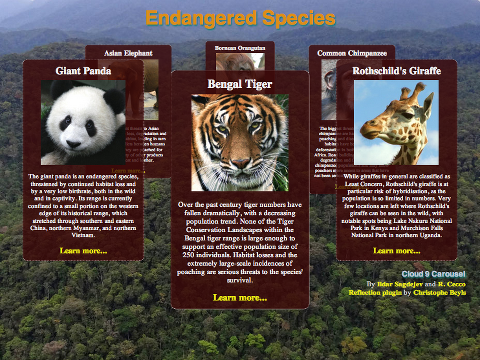</a>
<a href="http://specious.github.io/cloud9carousel/"></a>
<a href="http://specious.github.io/portfolio/demos/julemagne/">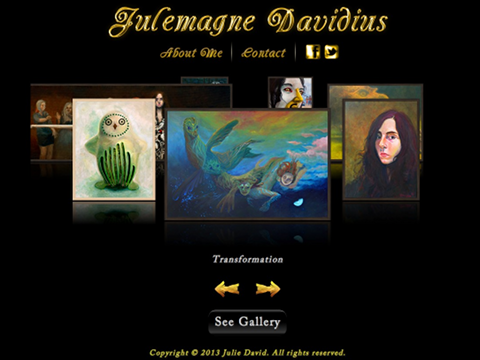</a>
<a href="https://jsfiddle.net/petrovnn/aj4xyfoc/"></a>
View the [examples](https://github.com/specious/cloud9carousel/tree/gh-pages) in the `gh-pages` branch.
## Dependencies
- [jQuery](https://github.com/jquery/jquery) 1.3.0 or later **or** [Zepto](https://github.com/madrobby/zepto) 1.1.1 or later
- Optional mirror effect using the [reflection.js plugin](http://www.digitalia.be/software/reflectionjs-for-jquery) by Christophe Beyls (jQuery only)
- Optional mouse wheel support via the [mousewheel plugin](http://plugins.jquery.com/mousewheel/) (jQuery only)
## Documentation
### Basic usage
HTML:
```html
<div id="carousel">
<img class="cloud9-item" src="images/1.png" alt="Item #1">
<img class="cloud9-item" src="images/2.png" alt="Item #2">
<img class="cloud9-item" src="images/3.png" alt="Item #3">
<img class="cloud9-item" src="images/4.png" alt="Item #4">
<img class="cloud9-item" src="images/5.png" alt="Item #5">
<img class="cloud9-item" src="images/6.png" alt="Item #6">
</div>
<div id="buttons">
<button class="left">
←
</button>
<button class="right">
→
</button>
</div>
```
CSS:
```css
#carousel .cloud9-item, #buttons button {
cursor: pointer;
}
```
JavaScript:
```js
$("#carousel").Cloud9Carousel( {
buttonLeft: $("#buttons > .left"),
buttonRight: $("#buttons > .right"),
autoPlay: 1,
bringToFront: true
} );
```
### Carousel options
You may pass these options to the carousel constructor. Some of these properties may be changed during runtime via the data handle.
<table>
<tr>
<th>Option</th>
<th>Description</th>
<th>Default</th>
</tr>
<tr>
<td>xOrigin</td>
<td>Center of the carousel (x coordinate)</td>
<td>(container width / 2)</td>
</tr>
<tr>
<td>yOrigin</td>
<td>Center of the carousel (y coordinate)</td>
<td>(container height / 10)</td>
</tr>
<tr>
<td>xRadius</td>
<td>Half the width of the carousel</td>
<td>(container width / 2.3)</td>
</tr>
<tr>
<td>yRadius</td>
<td>Half the height of the carousel</td>
<td>(container height / 6)</td>
</tr>
<tr>
<td>farScale</td>
<td>Scale of an item at its farthest point (range: 0 to 1)</td>
<td>0.5</td>
</tr>
<tr>
<td>mirror</td>
<td>See: <a href="#reflection-options">Reflection options</a></td>
<td>none</td>
</tr>
<tr>
<td>transforms</td>
<td>Use <a href="http://learn.shayhowe.com/advanced-html-css/css-transforms">native CSS transforms</a> if <a href="http://caniuse.com/transforms">support for them is detected</a></td>
<td>true</td>
</tr>
<tr>
<td>smooth</td>
<td>Use maximum effective frame rate via the <a href="https://developer.mozilla.org/docs/Web/API/window.requestAnimationFrame">requestAnimationFrame</a> API if <a href="http://caniuse.com/requestanimationframe">support is detected</a></td>
<td>true</td>
</tr>
<tr>
<td>fps</td>
<td>Frames per second (if smooth animation is turned off)</td>
<td>30</td>
</tr>
<tr>
<td>speed</td>
<td>Relative speed factor of the carousel. Any positive number: <b>1</b> is slow, <b>4</b> is medium, <b>10</b> is fast. Adjust to your liking</td>
<td>4</td>
</tr>
<tr>
<td>autoPlay</td>
<td>Automatically rotate the carousel by this many items periodically (positive number is clockwise). Auto-play is not performed while the mouse hovers over the carousel container. A value of <b>0</b> means auto-play is turned off. See: <b>autoPlayDelay</b></td>
<td>0</td>
</tr>
<tr>
<td>autoPlayDelay</td>
<td>Delay, in milliseconds, between auto-play spins</td>
<td>4000</td>
</tr>
<tr>
<td>mouseWheel</td>
<td>Spin the carousel using the mouse wheel. Requires a <code>"mousewheel"</code> event, provided by <a href="http://plugins.jquery.com/mousewheel/">this mousewheel plugin</a>. However, see: <a href="#known-issues">known issues</a></td>
<td>false</td>
</tr>
<tr>
<td>bringToFront</td>
<td>Clicking an item will rotate it to the front</td>
<td>false</td>
</tr>
<tr>
<td>buttonLeft</td>
<td>jQuery collection of element(s) intended to spin the carousel so as to bring the item to the left of the frontmost item to the front, i.e., spin it counterclockwise, when clicked. E.g., <code>$("#button-left")</code></td>
<td>none</td>
</tr>
<tr>
<td>buttonRight</td>
<td>jQuery collection of element(s) intended to spin the carousel so as to bring the item to the right of the frontmost item to the front, i.e., spin it clockwise, when clicked. E.g., <code>$("#button-right")</code></td>
<td>none</td>
</tr>
<tr>
<td>itemClass</td>
<td>Class attribute of the item elements inside the carousel container</td>
<td>"cloud9-item"</td>
</tr>
<tr>
<td>frontItemClass</td>
<td>Class attribute automatically added to the front-most item element</td>
<td>none</td>
</tr>
<tr>
<td>handle</td>
<td>The string handle you can use to interact with the carousel. E.g., <code>$("#carousel").data("carousel").go(1)</code></td>
<td>"carousel"</td>
</tr>
</table>
### Reflection options
After including [reflection.js](http://www.digitalia.be/software/reflectionjs-for-jquery) in your page, you may pass in options to configure the item reflections. For example:
```js
mirror: {
gap: 12, /* 12 pixel gap between item and reflection */
height: 0.2, /* 20% of item height */
opacity: 0.4 /* 40% opacity at the top */
}
```
*Note:* The **reflection.js** plugin does not work with **Zepto**, but [this unofficial fork](https://gist.github.com/specious/8912678) does!
<table>
<tr>
<th>Option</th>
<th>Description</th>
<th>Default</th>
</tr>
<tr>
<td>gap</td>
<td>Vertical gap in pixels between the bottom of the item (at full size) and the top of its reflection</td>
<td>2</td>
</tr>
<tr>
<td>height</td>
<td>The height of the reflection relative to the height of the item (range: 0 to 1)</td>
<td>1/3</td>
</tr>
<tr>
<td>opacity</td>
<td>Opacity of the reflection at its top (most visible part) (range: 0 to 1)</td>
<td>0.5</td>
</tr>
</table>
### Carousel methods
The following methods can be called on the carousel object after initialisation. For example:
```js
// Spin three items clockwise
$("#carousel").data("carousel").go( 3 );
```
Basic methods:
<table>
<tr>
<th>Method</th>
<th>Description</th>
<th>Arguments</th>
</tr>
<tr>
<td>go( count )</td>
<td>Spin the carousel</td>
<td><b>count</b>: Number of carousel items to rotate (<b>+</b> is clockwise, <b>-</b> is counterclockwise)</td>
</tr>
<tr>
<td>goTo( index )</td>
<td>Spin the carousel to a specific item</td>
<td><b>index</b>: Index of the carousel item to rotate to</td>
</tr>
<tr>
<td>nearestIndex()</td>
<td>Returns the 0-based index of the item nearest to the front <b>(integer)</b></td>
<td>none</td>
</tr>
<tr>
<td>nearestItem()</td>
<td>Returns a reference to the item object of the item that is nearest to the front <b>(Item object)</b></td>
<td>none</td>
</tr>
<tr>
<td>deactivate()</td>
<td>Disable the carousel (currently irreversible). You can use that in order to halt the carousel mechanism and free the carousel's elements from it. Then the elements can be manipulated without interference from the carousel plugin. See for <a href="http://www.julemagne.com/">example</a>, when you click to expand the gallery.</td>
<td>none</td>
</tr>
</table>
Advanced methods:
<table>
<tr>
<th>Method</th>
<th>Description</th>
<th>Arguments</th>
</tr>
<tr>
<td>itemsRotated()</td>
<td>Returns the interpolated number of items rotated from the initial zero position. In a carousel with 5 items that made three clockwise revolutions, the value will be <code>-15</code>. If the carousel then further spins half-way to the next item, then the value would be <code>-15.5</code> <b>(float)</b> </td>
<td>none</td>
</tr>
<tr>
<td>floatIndex()</td>
<td>Returns an interpolated value of the item "index" at the front of the carousel. If, for example, the carousel was 20% past item 2 toward the next item, then floatIndex() would return <code>2.2</code> <b>(float)</b></td>
<td>none</td>
</tr>
</table>
### Event callbacks
Callback functions may be passed to the carousel constructor along with the options. For example:
```js
// Hide carousel while items are loading
$("#carousel").css( 'visibility', 'hidden' ).Cloud9Carousel( {
bringToFront: true,
onLoaded: function( carousel ) {
// Show carousel
$(carousel).css( 'visibility', 'visible' );
alert( 'Carousel is ready!' );
},
onRendered: function( carousel ) {
var item = $(carousel).data("carousel").nearestItem();
console.log( "Item closest to the front: " + $(item).attr("alt") );
}
} );
```
<table>
<tr>
<th>Callback</th>
<th>Description</th>
</tr>
<tr>
<td>onLoaded</td>
<td>Fires once when the carousel has completely initialised</td>
</tr>
<tr>
<td>onRendered</td>
<td>Fires each time after a frame has finished calculating</td>
</tr>
<tr>
<td>onAnimationFinished</td>
<td>Fires when the carousel has finished spinning</td>
</tr>
</table>
## Further questions?
Please check [what's been asked](https://github.com/specious/cloud9carousel/issues?q=label:question). If not, take your time and [ask a good one](https://stackoverflow.com/help/how-to-ask).
## Authors
- Upgrades by [Ildar Sagdejev](http://specious.github.io)
- Forked from CloudCarousel v1.0.5 by [Professor Cloud](http://www.professorcloud.com) (R. Cecco)
## Known issues
- Due to lack of standartisation, "mousewheel" scrolling is extremely sensitive and unmanageable when using some track pads (such as on the MacBook Pro). Unfortunately, since there appears to be no way to know directly what type of device is triggering the mousewheel events, it is not trivial to somehow normalise or "tame" the input from the track pad without also affecting the "1 tick per click" behaviour of the standard mouse wheel. **darsain** has described the same phenomenon in [this discussion](https://github.com/darsain/sly/issues/67) at the sly.js project. Ideas are [appreciated](https://github.com/specious/cloud9carousel/issues/1).
## License
[MIT](http://en.wikipedia.org/wiki/MIT_License)
================================================
FILE: bower.json
================================================
{
"name": "cloud9carousel",
"version": "2.1.0",
"homepage": "http://specious.github.io/cloud9carousel/",
"authors": [
"Ildar Sagdejev <specious@gmail.com>"
],
"description": "A 3D perspective carousel using jQuery/Zepto focused on performance, based on the original CloudCarousel by Professor Cloud.",
"main": "jquery.cloud9carousel.js",
"moduleType": [
"globals"
],
"keywords": [
"jquery",
"zepto",
"carousel",
"3d",
"slider"
],
"license": "MIT",
"ignore": [
"**/.*"
]
}
================================================
FILE: jquery.cloud9carousel.js
================================================
/*
* Cloud 9 Carousel 2.2.0
*
* Pseudo-3D carousel plugin for jQuery/Zepto focused on performance.
*
* Based on the original CloudCarousel by R. Cecco.
*
* See the demo and download the latest version:
* http://specious.github.io/cloud9carousel/
*
* Copyright (c) 2017 by Ildar Sagdejev ( http://specious.github.io )
* Copyright (c) 2011 by R. Cecco ( http://www.professorcloud.com )
*
* MIT License
*
* Please retain this copyright header in all versions of the software
*
* Requires:
* - jQuery >= 1.3.0 or Zepto >= 1.1.1
*
* Optional (jQuery only):
* - Reflection support via reflection.js plugin by Christophe Beyls
* http://www.digitalia.be/software/reflectionjs-for-jquery
* - Mousewheel support via mousewheel plugin
* http://plugins.jquery.com/mousewheel/
*/
;(function($) {
//
// Detect CSS transform support
//
var transform = (function() {
var vendors = ['webkit', 'moz', 'ms'];
var style = document.createElement( "div" ).style;
var trans = 'transform' in style ? 'transform' : undefined;
for( var i = 0, count = vendors.length; i < count; i++ ) {
var prop = vendors[i] + 'Transform';
if( prop in style ) {
trans = prop;
break;
}
}
return trans;
})();
var Item = function( element, options ) {
element.item = this;
this.element = element;
if( element.tagName === 'IMG' ) {
this.fullWidth = element.width;
this.fullHeight = element.height;
} else {
element.style.display = "inline-block";
this.fullWidth = element.offsetWidth;
this.fullHeight = element.offsetHeight;
}
element.style.position = 'absolute';
if( options.mirror && this.element.tagName === 'IMG' ) {
// Wrap image in a div together with its generated reflection
this.reflection = $(element).reflect( options.mirror ).next()[0];
var $reflection = $(this.reflection);
this.reflection.fullHeight = $reflection.height();
$reflection.css( 'margin-top', options.mirror.gap + 'px' );
$reflection.css( 'width', '100%' );
element.style.width = "100%";
// The item element now contains the image and reflection
this.element = this.element.parentNode;
this.element.item = this;
this.element.alt = element.alt;
this.element.title = element.title;
}
if( transform && options.transforms )
this.element.style[transform + "Origin"] = "0 0";
this.moveTo = function( x, y, scale ) {
this.width = this.fullWidth * scale;
this.height = this.fullHeight * scale;
this.x = x;
this.y = y;
this.scale = scale;
var style = this.element.style;
style.zIndex = "" + (scale * 100) | 0;
if( transform && options.transforms ) {
style[transform] = "translate(" + x + "px, " + y + "px) scale(" + scale + ")";
} else {
// Manually resize the gap between the image and its reflection
if( options.mirror && this.element.tagName === 'IMG' )
this.reflection.style.marginTop = (options.mirror.gap * scale) + "px";
style.width = this.width + "px";
style.left = x + "px";
style.top = y + "px";
}
}
}
var time = !window.performance || !window.performance.now ?
function() { return +new Date() } :
function() { return performance.now() };
//
// Detect requestAnimationFrame() support
//
// Support legacy browsers:
// http://www.paulirish.com/2011/requestanimationframe-for-smart-animating/
//
var cancelFrame = window.cancelAnimationFrame || window.cancelRequestAnimationFrame;
var requestFrame = window.requestAnimationFrame;
(function() {
var vendors = ['webkit', 'moz', 'ms'];
for( var i = 0, count = vendors.length; i < count && !cancelFrame; i++ ) {
cancelFrame = window[vendors[i]+'CancelAnimationFrame'] || window[vendors[i]+'CancelRequestAnimationFrame'];
requestFrame = requestFrame && window[vendors[i]+'RequestAnimationFrame'];
}
}());
var Carousel = function( element, options ) {
var self = this;
var $container = $(element);
this.items = [];
this.xOrigin = (options.xOrigin === null) ? $container.width() * 0.5 : options.xOrigin;
this.yOrigin = (options.yOrigin === null) ? $container.height() * 0.1 : options.yOrigin;
this.xRadius = (options.xRadius === null) ? $container.width() / 2.3 : options.xRadius;
this.yRadius = (options.yRadius === null) ? $container.height() / 6 : options.yRadius;
this.farScale = options.farScale;
this.rotation = this.destRotation = Math.PI/2; // start with the first item positioned in front
this.speed = options.speed;
this.smooth = options.smooth;
this.fps = options.fps;
this.timer = 0;
this.autoPlayAmount = options.autoPlay;
this.autoPlayDelay = options.autoPlayDelay;
this.autoPlayTimer = 0;
this.frontItemClass = options.frontItemClass;
this.onLoaded = options.onLoaded;
this.onRendered = options.onRendered;
this.onAnimationFinished = options.onAnimationFinished;
this.itemOptions = {
transforms: options.transforms
}
if( options.mirror ) {
this.itemOptions.mirror = $.extend( { gap: 2 }, options.mirror );
}
$container.css( { position: 'relative', overflow: 'hidden' } );
// Rotation:
// * 0 : right
// * Pi/2 : front
// * Pi : left
// * 3 Pi/2 : back
this.renderItem = function( itemIndex, rotation ) {
var item = this.items[itemIndex];
var sin = Math.sin(rotation);
var farScale = this.farScale;
var scale = farScale + ((1-farScale) * (sin+1) * 0.5);
item.moveTo(
this.xOrigin + (scale * ((Math.cos(rotation) * this.xRadius) - (item.fullWidth * 0.5))),
this.yOrigin + (scale * sin * this.yRadius),
scale
);
return item;
}
this.render = function() {
var count = this.items.length;
var spacing = 2 * Math.PI / count;
var radians = this.rotation;
var nearest = this.nearestIndex();
for( var i = 0; i < count; i++ ) {
var item = this.renderItem( i, radians );
if( i === nearest )
$(item.element).addClass( this.frontItemClass );
else
$(item.element).removeClass( this.frontItemClass );
radians += spacing;
}
if( typeof this.onRendered === 'function' )
this.onRendered( this );
}
this.playFrame = function() {
var rem = self.destRotation - self.rotation;
var now = time();
var dt = (now - self.lastTime) * 0.002;
self.lastTime = now;
if( Math.abs(rem) < 0.003 ) {
self.rotation = self.destRotation;
self.pause();
if( typeof self.onAnimationFinished === 'function' )
self.onAnimationFinished();
} else {
// Asymptotically approach the destination
self.rotation = self.destRotation - rem / (1 + (self.speed * dt));
self.scheduleNextFrame();
}
self.render();
}
this.scheduleNextFrame = function() {
this.lastTime = time();
this.timer = this.smooth && cancelFrame ?
requestFrame( self.playFrame ) :
setTimeout( self.playFrame, 1000 / this.fps );
}
this.itemsRotated = function() {
return this.items.length * ((Math.PI/2) - this.rotation) / (2*Math.PI);
}
this.floatIndex = function() {
var count = this.items.length;
var floatIndex = this.itemsRotated() % count;
// Make sure float-index is positive
return (floatIndex < 0) ? floatIndex + count : floatIndex;
}
this.nearestIndex = function() {
return Math.round( this.floatIndex() ) % this.items.length;
}
this.nearestItem = function() {
return this.items[this.nearestIndex()];
}
this.play = function() {
if( this.timer === 0 )
this.scheduleNextFrame();
}
this.pause = function() {
this.smooth && cancelFrame ? cancelFrame( this.timer ) : clearTimeout( this.timer );
this.timer = 0;
}
//
// Spin the carousel by (+-) count items
//
this.go = function( count ) {
this.destRotation += (2 * Math.PI / this.items.length) * count;
this.play();
}
this.goTo = function( index ) {
var count = this.items.length;
// Find the shortest way to rotate item to front
var diff = index - (this.floatIndex() % count);
if( 2 * Math.abs(diff) > count )
diff -= (diff > 0) ? count : -count;
// Halt any rotation already in progress
this.destRotation = this.rotation;
// Spin the opposite way to bring item to front
this.go( -diff );
// Return rotational distance (in items) to the target
return diff;
}
this.deactivate = function() {
this.pause();
clearInterval( this.autoPlayTimer );
if( options.buttonLeft ) options.buttonLeft.unbind( 'click' );
if( options.buttonRight ) options.buttonRight.unbind( 'click' );
$container.unbind( '.cloud9' );
}
this.autoPlay = function() {
this.autoPlayTimer = setInterval(
function() { self.go( self.autoPlayAmount ) },
this.autoPlayDelay
);
}
this.enableAutoPlay = function() {
// Stop auto-play on mouse over
$container.bind( 'mouseover.cloud9', function() {
clearInterval( self.autoPlayTimer );
} );
// Resume auto-play when mouse leaves the container
$container.bind( 'mouseout.cloud9', function() {
self.autoPlay();
} );
this.autoPlay();
}
this.bindControls = function() {
if( options.buttonLeft ) {
options.buttonLeft.bind( 'click', function() {
self.go( -1 );
return false;
} );
}
if( options.buttonRight ) {
options.buttonRight.bind( 'click', function() {
self.go( 1 );
return false;
} );
}
if( options.mouseWheel ) {
$container.bind( 'mousewheel.cloud9', function( event, delta ) {
self.go( (delta > 0) ? 1 : -1 );
return false;
} );
}
if( options.bringToFront ) {
$container.bind( 'click.cloud9', function( event ) {
var hits = $(event.target).closest( '.' + options.itemClass );
if( hits.length !== 0 ) {
var diff = self.goTo( self.items.indexOf( hits[0].item ) );
// Suppress default browser action if the item isn't roughly in front
if( Math.abs(diff) > 0.5 )
event.preventDefault();
}
} );
}
}
var items = $container.find( '.' + options.itemClass );
this.finishInit = function() {
//
// Wait until all images have completely loaded
//
for( var i = 0; i < items.length; i++ ) {
var item = items[i];
if( (item.tagName === 'IMG') &&
((item.width === undefined) || ((item.complete !== undefined) && !item.complete)) )
return;
}
clearInterval( this.initTimer );
// Init items
for( i = 0; i < items.length; i++ )
this.items.push( new Item( items[i], this.itemOptions ) );
// Disable click-dragging of items
$container.bind( 'mousedown onselectstart', function() { return false } );
if( this.autoPlayAmount !== 0 ) this.enableAutoPlay();
this.bindControls();
this.render();
if( typeof this.onLoaded === 'function' )
this.onLoaded( this );
};
this.initTimer = setInterval( function() { self.finishInit() }, 50 );
}
//
// The jQuery plugin
//
$.fn.Cloud9Carousel = function( options ) {
return this.each( function() {
/* For full list of options see the README */
options = $.extend( {
xOrigin: null, // null: calculated automatically
yOrigin: null,
xRadius: null,
yRadius: null,
farScale: 0.5, // scale of the farthest item
transforms: true, // enable CSS transforms
smooth: true, // enable smooth animation via requestAnimationFrame()
fps: 30, // fixed frames per second (if smooth animation is off)
speed: 4, // positive number
autoPlay: 0, // [ 0: off | number of items (integer recommended, positive is clockwise) ]
autoPlayDelay: 4000,
bringToFront: false,
itemClass: 'cloud9-item',
frontItemClass: null,
handle: 'carousel'
}, options );
$(this).data( options.handle, new Carousel( this, options ) );
} );
}
})( window.jQuery || window.Zepto );
================================================
FILE: package.json
================================================
{
"name": "cloud9carousel",
"version": "2.2.0",
"title": "Cloud 9 Carousel",
"description": "3D perspective carousel for jQuery/Zepto with a focus on performance",
"homepage": "http://specious.github.io/cloud9carousel/",
"license": "MIT",
"keywords": [
"jquery-plugin",
"zepto-plugin",
"ui",
"carousel",
"ecosystem:jquery",
"ecosystem:zepto"
],
"author": "Ildar Sagdejev <specious@gmail.com> (http://specious.github.io/)",
"contributors": [
"Raffaele Cecco (http://www.professorcloud.com/)"
],
"repository": {
"type": "git",
"url": "specious/cloud9carousel"
},
"bugs": "https://github.com/specious/cloud9carousel/issues",
"dependencies": {
"jquery": ">=1.3"
},
"main": "jquery.cloud9carousel.js"
}
gitextract_bebdplpu/ ├── README.md ├── bower.json ├── jquery.cloud9carousel.js └── package.json
Condensed preview — 4 files, each showing path, character count, and a content snippet. Download the .json file or copy for the full structured content (27K chars).
[
  {
    "path": "README.md",
    "chars": 12237,
    "preview": "# Cloud 9 Carousel\n\nA 3D perspective carousel for jQuery/Zepto focused on performance, based on the [original Cloud Caro"
  },
  {
    "path": "bower.json",
    "chars": 531,
    "preview": "{\n  \"name\": \"cloud9carousel\",\n  \"version\": \"2.1.0\",\n  \"homepage\": \"http://specious.github.io/cloud9carousel/\",\n  \"author"
  },
  {
    "path": "jquery.cloud9carousel.js",
    "chars": 12704,
    "preview": "/*\n * Cloud 9 Carousel 2.2.0\n *\n * Pseudo-3D carousel plugin for jQuery/Zepto focused on performance.\n *\n * Based on the"
  },
  {
    "path": "package.json",
    "chars": 771,
    "preview": "{\n  \"name\": \"cloud9carousel\",\n  \"version\": \"2.2.0\",\n  \"title\": \"Cloud 9 Carousel\",\n  \"description\": \"3D perspective caro"
  }
]
About this extraction
This page contains the full source code of the specious/cloud9carousel GitHub repository, extracted and formatted as plain text for AI agents and large language models (LLMs). The extraction includes 4 files (25.6 KB), approximately 7.3k tokens. Use this with OpenClaw, Claude, ChatGPT, Cursor, Windsurf, or any other AI tool that accepts text input. You can copy the full output to your clipboard or download it as a .txt file.
Extracted by GitExtract — free GitHub repo to text converter for AI. Built by Nikandr Surkov.