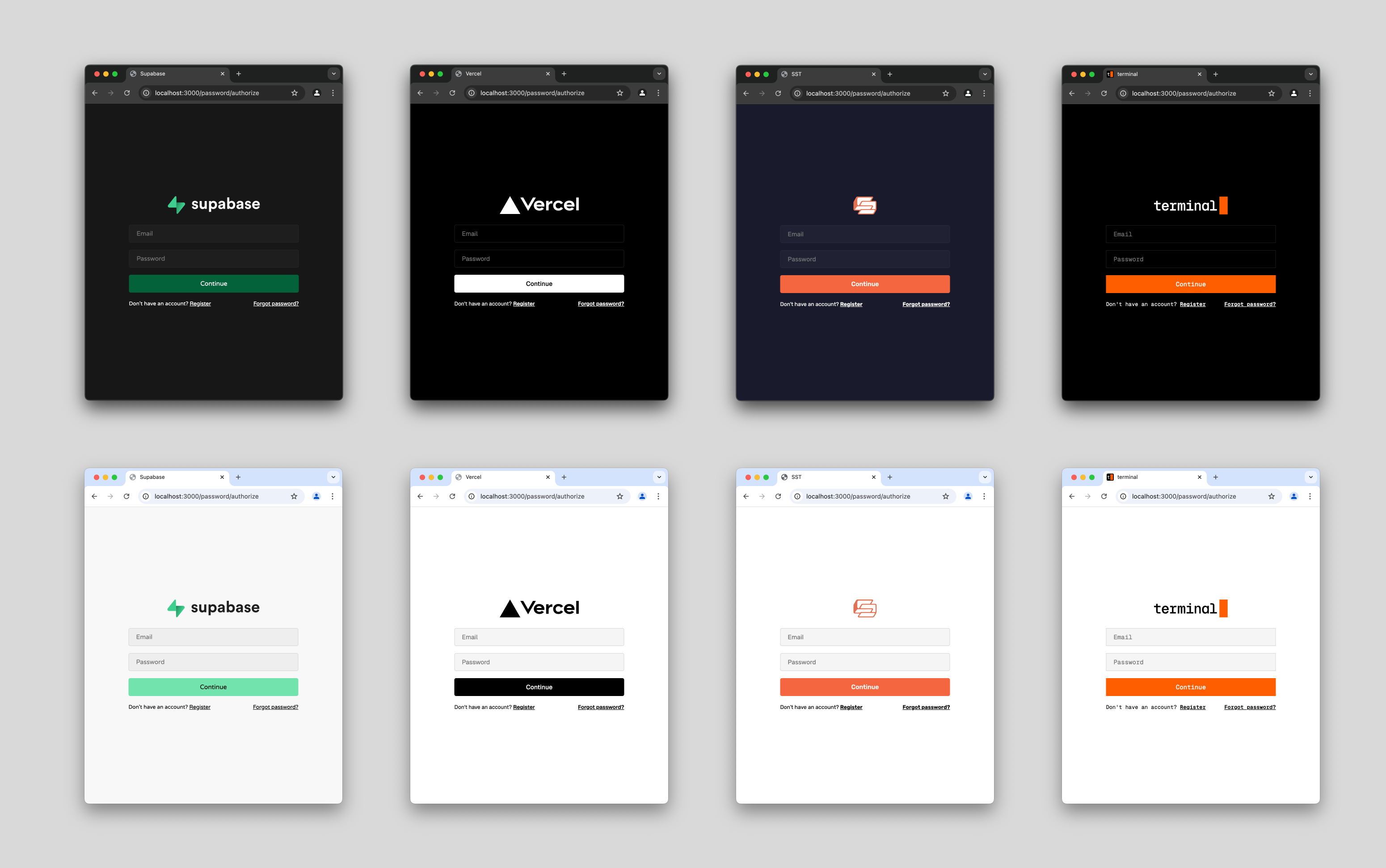
Repository: sst/openauth Branch: master Commit: 98dc59625e65 Files: 237 Total size: 577.6 KB Directory structure: gitextract_6_z9n4fm/ ├── .changeset/ │ ├── README.md │ ├── commit.cjs │ ├── config.json │ ├── popular-geese-reply.md │ ├── stupid-boats-play.md │ └── ten-pans-invent.md ├── .github/ │ ├── CODE_OF_CONDUCT │ └── workflows/ │ ├── docs.yml │ ├── format.yml │ ├── release.yml │ └── test.yml ├── .gitignore ├── .prettierrc ├── CNAME ├── LICENSE ├── README.md ├── bun.lockb ├── bunfig.toml ├── examples/ │ ├── .gitignore │ ├── README.md │ ├── client/ │ │ ├── astro/ │ │ │ ├── .gitignore │ │ │ ├── .vscode/ │ │ │ │ ├── extensions.json │ │ │ │ └── launch.json │ │ │ ├── README.md │ │ │ ├── astro.config.mjs │ │ │ ├── package.json │ │ │ ├── src/ │ │ │ │ ├── auth.ts │ │ │ │ ├── components/ │ │ │ │ │ └── Welcome.astro │ │ │ │ ├── env.d.ts │ │ │ │ ├── layouts/ │ │ │ │ │ └── Layout.astro │ │ │ │ ├── middleware.ts │ │ │ │ └── pages/ │ │ │ │ ├── callback.ts │ │ │ │ └── index.astro │ │ │ └── tsconfig.json │ │ ├── cloudflare-api/ │ │ │ ├── api.ts │ │ │ └── package.json │ │ ├── jwt-api/ │ │ │ ├── CHANGELOG.md │ │ │ ├── README.md │ │ │ ├── index.ts │ │ │ └── package.json │ │ ├── lambda-api/ │ │ │ ├── api.ts │ │ │ └── package.json │ │ ├── nextjs/ │ │ │ ├── .gitignore │ │ │ ├── CHANGELOG.md │ │ │ ├── README.md │ │ │ ├── app/ │ │ │ │ ├── actions.ts │ │ │ │ ├── api/ │ │ │ │ │ └── callback/ │ │ │ │ │ └── route.ts │ │ │ │ ├── auth.ts │ │ │ │ ├── globals.css │ │ │ │ ├── layout.tsx │ │ │ │ ├── page.module.css │ │ │ │ └── page.tsx │ │ │ ├── next.config.ts │ │ │ ├── package.json │ │ │ └── tsconfig.json │ │ ├── react/ │ │ │ ├── .gitignore │ │ │ ├── README.md │ │ │ ├── index.html │ │ │ ├── package.json │ │ │ ├── src/ │ │ │ │ ├── App.tsx │ │ │ │ ├── AuthContext.tsx │ │ │ │ ├── main.tsx │ │ │ │ └── vite-env.d.ts │ │ │ ├── tsconfig.app.json │ │ │ ├── tsconfig.json │ │ │ ├── tsconfig.node.json │ │ │ └── vite.config.ts │ │ └── sveltekit/ │ │ ├── .npmrc │ │ ├── package.json │ │ ├── src/ │ │ │ ├── app.d.ts │ │ │ ├── app.html │ │ │ ├── hooks.server.ts │ │ │ ├── lib/ │ │ │ │ └── auth.server.ts │ │ │ └── routes/ │ │ │ ├── +page.server.ts │ │ │ ├── +page.svelte │ │ │ └── callback/ │ │ │ └── +server.ts │ │ ├── svelte.config.js │ │ ├── tsconfig.json │ │ └── vite.config.ts │ ├── issuer/ │ │ ├── bun/ │ │ │ ├── .gitignore │ │ │ ├── issuer.ts │ │ │ └── package.json │ │ ├── cloudflare/ │ │ │ ├── issuer.ts │ │ │ ├── package.json │ │ │ ├── sst-env.d.ts │ │ │ └── sst.config.ts │ │ ├── custom-frontend/ │ │ │ ├── auth/ │ │ │ │ ├── issuer.ts │ │ │ │ └── package.json │ │ │ ├── frontend/ │ │ │ │ ├── frontend.tsx │ │ │ │ └── package.json │ │ │ └── package.json │ │ ├── lambda/ │ │ │ ├── issuer.ts │ │ │ ├── package.json │ │ │ ├── sst-env.d.ts │ │ │ └── sst.config.ts │ │ └── node/ │ │ ├── .gitignore │ │ ├── authorizer.ts │ │ └── package.json │ ├── quickstart/ │ │ ├── sst/ │ │ │ ├── .gitignore │ │ │ ├── README.md │ │ │ ├── app/ │ │ │ │ ├── actions.ts │ │ │ │ ├── api/ │ │ │ │ │ └── callback/ │ │ │ │ │ └── route.ts │ │ │ │ ├── auth.ts │ │ │ │ ├── globals.css │ │ │ │ ├── layout.tsx │ │ │ │ ├── page.module.css │ │ │ │ └── page.tsx │ │ │ ├── auth/ │ │ │ │ ├── index.ts │ │ │ │ └── subjects.ts │ │ │ ├── next.config.ts │ │ │ ├── package.json │ │ │ ├── sst-env.d.ts │ │ │ ├── sst.config.ts │ │ │ └── tsconfig.json │ │ └── standalone/ │ │ ├── .gitignore │ │ ├── README.md │ │ ├── app/ │ │ │ ├── actions.ts │ │ │ ├── api/ │ │ │ │ └── callback/ │ │ │ │ └── route.ts │ │ │ ├── auth.ts │ │ │ ├── globals.css │ │ │ ├── layout.tsx │ │ │ ├── page.module.css │ │ │ └── page.tsx │ │ ├── auth/ │ │ │ ├── index.ts │ │ │ └── subjects.ts │ │ ├── bun.lockb │ │ ├── next.config.ts │ │ ├── package.json │ │ └── tsconfig.json │ ├── subjects.ts │ └── tsconfig.json ├── package.json ├── packages/ │ └── openauth/ │ ├── CHANGELOG.md │ ├── bunfig.toml │ ├── package.json │ ├── script/ │ │ └── build.ts │ ├── src/ │ │ ├── client.ts │ │ ├── css.d.ts │ │ ├── error.ts │ │ ├── index.ts │ │ ├── issuer.ts │ │ ├── jwt.ts │ │ ├── keys.ts │ │ ├── pkce.ts │ │ ├── provider/ │ │ │ ├── apple.ts │ │ │ ├── arctic.ts │ │ │ ├── code.ts │ │ │ ├── cognito.ts │ │ │ ├── discord.ts │ │ │ ├── facebook.ts │ │ │ ├── github.ts │ │ │ ├── google.ts │ │ │ ├── index.ts │ │ │ ├── jumpcloud.ts │ │ │ ├── keycloak.ts │ │ │ ├── linkedin.ts │ │ │ ├── microsoft.ts │ │ │ ├── oauth2.ts │ │ │ ├── oidc.ts │ │ │ ├── password.ts │ │ │ ├── provider.ts │ │ │ ├── slack.ts │ │ │ ├── spotify.ts │ │ │ ├── twitch.ts │ │ │ ├── x.ts │ │ │ └── yahoo.ts │ │ ├── random.ts │ │ ├── storage/ │ │ │ ├── aws.ts │ │ │ ├── cloudflare.ts │ │ │ ├── dynamo.ts │ │ │ ├── memory.ts │ │ │ └── storage.ts │ │ ├── subject.ts │ │ ├── ui/ │ │ │ ├── base.tsx │ │ │ ├── code.tsx │ │ │ ├── form.tsx │ │ │ ├── icon.tsx │ │ │ ├── password.tsx │ │ │ ├── select.tsx │ │ │ ├── theme.ts │ │ │ └── ui.css │ │ └── util.ts │ ├── test/ │ │ ├── client.test.ts │ │ ├── issuer.test.ts │ │ ├── scrap.test.ts │ │ ├── storage.test.ts │ │ └── util.test.ts │ └── tsconfig.json ├── scripts/ │ └── format └── www/ ├── .gitignore ├── .vscode/ │ ├── extensions.json │ └── launch.json ├── README.md ├── astro.config.mjs ├── bun.lockb ├── config.ts ├── generate.ts ├── package.json ├── src/ │ ├── components/ │ │ ├── Hero.astro │ │ └── Lander.astro │ ├── content/ │ │ ├── config.ts │ │ └── docs/ │ │ ├── docs/ │ │ │ ├── client.mdx │ │ │ ├── index.mdx │ │ │ ├── issuer.mdx │ │ │ ├── provider/ │ │ │ │ ├── apple.mdx │ │ │ │ ├── code.mdx │ │ │ │ ├── cognito.mdx │ │ │ │ ├── discord.mdx │ │ │ │ ├── facebook.mdx │ │ │ │ ├── github.mdx │ │ │ │ ├── google.mdx │ │ │ │ ├── jumpcloud.mdx │ │ │ │ ├── keycloak.mdx │ │ │ │ ├── microsoft.mdx │ │ │ │ ├── oauth2.mdx │ │ │ │ ├── oidc.mdx │ │ │ │ ├── password.mdx │ │ │ │ ├── slack.mdx │ │ │ │ ├── spotify.mdx │ │ │ │ ├── twitch.mdx │ │ │ │ ├── x.mdx │ │ │ │ └── yahoo.mdx │ │ │ ├── start/ │ │ │ │ ├── sst.mdx │ │ │ │ └── standalone.mdx │ │ │ ├── storage/ │ │ │ │ ├── cloudflare.mdx │ │ │ │ ├── dynamo.mdx │ │ │ │ └── memory.mdx │ │ │ ├── subject.mdx │ │ │ └── ui/ │ │ │ ├── code.mdx │ │ │ ├── password.mdx │ │ │ ├── select.mdx │ │ │ └── theme.mdx │ │ └── index.mdx │ ├── custom.css │ ├── env.d.ts │ └── styles/ │ └── lander.css └── tsconfig.json ================================================ FILE CONTENTS ================================================ ================================================ FILE: .changeset/README.md ================================================ # Changesets Hello and welcome! This folder has been automatically generated by `@changesets/cli`, a build tool that works with multi-package repos, or single-package repos to help you version and publish your code. You can find the full documentation for it [in our repository](https://github.com/changesets/changesets) We have a quick list of common questions to get you started engaging with this project in [our documentation](https://github.com/changesets/changesets/blob/main/docs/common-questions.md) ================================================ FILE: .changeset/commit.cjs ================================================ /** @type {import('@changesets/types').CommitFunctions["getAddMessage"]} */ module.exports.getAddMessage = async (changeset) => { return changeset.summary; }; ================================================ FILE: .changeset/config.json ================================================ { "$schema": "https://unpkg.com/@changesets/config@3.0.4/schema.json", "changelog": "@changesets/cli/changelog", "commit": "./commit.cjs", "fixed": [["@openauthjs/openauth"]], "linked": [], "access": "public", "baseBranch": "master", "updateInternalDependencies": "patch", "ignore": ["@openauthjs/example-*"] } ================================================ FILE: .changeset/popular-geese-reply.md ================================================ --- "@openauthjs/openauth": patch --- update google icon to comply with branding guidelines ================================================ FILE: .changeset/stupid-boats-play.md ================================================ --- "@openauthjs/openauth": patch --- allow auth style autodetection ================================================ FILE: .changeset/ten-pans-invent.md ================================================ --- "@openauthjs/openauth": patch --- add linkedin adapter ================================================ FILE: .github/CODE_OF_CONDUCT ================================================ # Code of Conduct I don't typically set up a code of conduct for our projects but given this one is security related it will draw a very specific set of problems I want to avoid. There's only two rules 1. Reporting security issues If you find a security issue please report them to me directly on [X](https://twitter.com/thdxr) or [Bluesky](https://bsky.app/). Do not open a public issue or post publicly in case the issue can be exploited. Feel free to give us a window of time to respond before disclosing it publicly - that seems fair. 2. Reporting "security" issues A lot of things that seem to fall in that first category are not really security problems, just tradeoffs that were made in the design of OpenAuth. Security products attract a lot of binary opinions like "never use X". We reject this type of thinking entirely - security is a spectrum of usability and infinitely optimizing for "security" does not yield a good product. All discussions around the tradeoffs that were made must consider this - if you disagree with a decision you MUST articulate why the decision was probably made before you argue against it. Eg. "X seem to be used because of benefit [a] and their downside [b] is mitigated by [c] BUT I do not think this is enough because of [d]" We do not tolerate wasting the maintainers time and forcing them to articulate this nuance. If something is not clear of course you can ask for clarification. ================================================ FILE: .github/workflows/docs.yml ================================================ name: docs on: # Trigger the workflow every time you push to the `main` branch # Using a different branch name? Replace `main` with your branch’s name push: branches: [master] # Allows you to run this workflow manually from the Actions tab on GitHub. workflow_dispatch: # Allow this job to clone the repo and create a page deployment permissions: contents: read pages: write id-token: write jobs: build: runs-on: ubuntu-latest steps: - name: Checkout your repository using git uses: actions/checkout@v4 - name: Install, build, and upload your site uses: withastro/action@v3 with: path: www deploy: needs: build runs-on: ubuntu-latest environment: name: github-pages url: ${{ steps.deployment.outputs.page_url }} steps: - name: Deploy to GitHub Pages id: deployment uses: actions/deploy-pages@v4 with: path: www ================================================ FILE: .github/workflows/format.yml ================================================ name: format on: push: branches: [master] pull_request: workflow_dispatch: jobs: format: runs-on: ubuntu-latest permissions: contents: write pull-requests: write steps: - uses: actions/checkout@v4 with: ref: ${{ github.head_ref }} fetch-depth: 0 - uses: oven-sh/setup-bun@v2 - run: | git config --local user.email "github-actions[bot]@users.noreply.github.com" git config --local user.name "github-actions[bot]" ./scripts/format ================================================ FILE: .github/workflows/release.yml ================================================ name: release on: push: branches: - master permissions: contents: write pull-requests: write concurrency: ${{ github.workflow }}-${{ github.ref }} jobs: release: name: release runs-on: ubuntu-latest steps: - uses: actions/checkout@v3 - uses: oven-sh/setup-bun@v2 - run: bun install - id: changesets uses: changesets/action@v1 with: publish: bun run release env: GITHUB_TOKEN: ${{ secrets.GITHUB_TOKEN }} NPM_TOKEN: ${{ secrets.NPM_TOKEN }} ================================================ FILE: .github/workflows/test.yml ================================================ name: test on: push: branches: [master] pull_request: workflow_dispatch: jobs: test: runs-on: ubuntu-latest steps: - uses: actions/checkout@v4 - uses: oven-sh/setup-bun@v2 with: bun-version: latest - run: bun install - run: cd packages/openauth && bun run build - run: cd packages/openauth && bun test ================================================ FILE: .gitignore ================================================ /node_modules .sst .env dist persist.json .DS_Store notes .nvim.lua .svelte-kit ================================================ FILE: .prettierrc ================================================ { "semi": false, } ================================================ FILE: CNAME ================================================ openauth.js.org ================================================ FILE: LICENSE ================================================ MIT License Copyright (c) 2024 SST Permission is hereby granted, free of charge, to any person obtaining a copy of this software and associated documentation files (the "Software"), to deal in the Software without restriction, including without limitation the rights to use, copy, modify, merge, publish, distribute, sublicense, and/or sell copies of the Software, and to permit persons to whom the Software is furnished to do so, subject to the following conditions: The above copyright notice and this permission notice shall be included in all copies or substantial portions of the Software. THE SOFTWARE IS PROVIDED "AS IS", WITHOUT WARRANTY OF ANY KIND, EXPRESS OR IMPLIED, INCLUDING BUT NOT LIMITED TO THE WARRANTIES OF MERCHANTABILITY, FITNESS FOR A PARTICULAR PURPOSE AND NONINFRINGEMENT. IN NO EVENT SHALL THE AUTHORS OR COPYRIGHT HOLDERS BE LIABLE FOR ANY CLAIM, DAMAGES OR OTHER LIABILITY, WHETHER IN AN ACTION OF CONTRACT, TORT OR OTHERWISE, ARISING FROM, OUT OF OR IN CONNECTION WITH THE SOFTWARE OR THE USE OR OTHER DEALINGS IN THE SOFTWARE. ================================================ FILE: README.md ================================================

OpenAuth logo

Discord npm Build status

--- [OpenAuth](https://openauth.js.org) is a standards-based auth provider for web apps, mobile apps, single pages apps, APIs, or 3rd party clients. It is currently in beta. - **Universal**: You can deploy it as a standalone service or embed it into an existing application. It works with any framework or platform. - **Self-hosted**: It runs entirely on your infrastructure and can be deployed on Node.js, Bun, AWS Lambda, or Cloudflare Workers. - **Standards-based**: It implements the OAuth 2.0 spec and is based on web standards. So any OAuth client can use it. - **Customizable**: It comes with prebuilt themeable UI that you can customize or opt out of. OpenAuth themes ## Quick Start If you just want to get started as fast as possible you can jump straight into the [code examples](https://github.com/toolbeam/openauth/tree/master/examples) folder and copy paste away. There are also [SST components](https://sst.dev/docs/component/aws/auth) for deploying everything OpenAuth needs. ## Approach While there are many open source solutions for auth, almost all of them are libraries that are meant to be embedded into a single application. Centralized auth servers typically are delivered as SaaS services - eg Auth0 or Clerk. OpenAuth instead is a centralized auth server that runs on your own infrastructure and has been designed for ease of self hosting. It can be used to authenticate all of your applications - web apps, mobile apps, internal admin tools, etc. It adheres mostly to OAuth 2.0 specifications - which means anything that can speak OAuth can use it to receive access and refresh tokens. When a client initiates an authorization flow, OpenAuth will hand off to one of the configured providers - this can be third party identity providers like Google, GitHub, etc or built in flows like email/password or pin code. Because it follows these specifications it can even be used to issue credentials for third party applications - allowing you to implement "login with myapp" flows. OpenAuth very intentionally does not attempt to solve user management. We've found that this is a very difficult problem given the wide range of databases and drivers that are used in the JS ecosystem. Additionally it's quite hard to build data abstractions that work for every use case. Instead, once a user has identified themselves OpenAuth will invoke a callback where you can implement your own user lookup/creation logic. While OpenAuth tries to be mostly stateless, it does need to store a minimal amount of data (refresh tokens, password hashes, etc). However this has been reduced to a simple KV store with various implementations for zero overhead systems like Cloudflare KV and DynamoDB. You should never need to directly access any data that is stored in there. There is also a themeable UI that you can use to get going without implementing any designs yourself. This is built on top of a lower level system so you can copy paste the default UI and tweak it or opt out entirely and implement your own. Finally, OpenAuth is created by the maintainers of [SST](https://sst.dev) which is a tool to manage all the infrastructure for your app. It contains components for OpenAuth that make deploying it to AWS or Cloudflare as simple as it can get. ## Tutorial We'll show how to deploy the auth server and then a sample app that uses it. ### Auth server Start by importing the `issuer` function from the `@openauthjs/openauth` package. ```ts import { issuer } from "@openauthjs/openauth" ``` OpenAuth is built on top of [Hono](https://github.com/honojs/hono) which is a minimal web framework that can run anywhere. The `issuer` function creates a Hono app with all of the auth server implemented that you can then deploy to AWS Lambda, Cloudflare Workers, or in a container running under Node.js or Bun. The `issuer` function requires a few things: ```ts const app = issuer({ providers: { ... }, storage, subjects, success: async (ctx, value) => { ... } }) ``` First we need to define some providers that are enabled - these are either third party identity providers like Google, GitHub, etc or built in flows like email/password or pin code. You can also implement your own. Let's try the GitHub provider. ```ts import { GithubProvider } from "@openauthjs/openauth/provider/github" const app = issuer({ providers: { github: GithubProvider({ clientID: process.env.GITHUB_CLIENT_ID!, clientSecret: process.env.GITHUB_CLIENT_SECRET!, scopes: ["user:email"], }), }, ... }) ``` Providers take some configuration - since this is a third party identity provider there is no UI to worry about and all it needs is a client ID, secret and some scopes. Let's add the password provider which is a bit more complicated. ```ts import { PasswordProvider } from "@openauthjs/openauth/provider/password" const app = issuer({ providers: { github: ..., password: PasswordProvider(...), }, ... }) ``` The password provider is quite complicated as username/password involve a lot of flows so there are a lot of callbacks to implement. However you can opt into the default UI which has all of this already implemented for you. The only thing you have to specify is how to send a code for forgot password/email verification. In this case we'll log the code but you would send this over email. ```ts import { PasswordProvider } from "@openauthjs/openauth/provider/password" import { PasswordUI } from "@openauthjs/openauth/ui/password" const app = issuer({ providers: { github: ..., password: PasswordProvider( PasswordUI({ sendCode: async (email, code) => { console.log(email, code) }, }), ), }, ... }) ``` Next up is the `subjects` field. Subjects are what the access token generated at the end of the auth flow will map to. Under the hood, the access token is a JWT that contains this data. You will likely just have a single subject to start but you can define additional ones for different types of users. ```ts import { object, string } from "valibot" const subjects = createSubjects({ user: object({ userID: string(), // may want to add workspaceID here if doing a multi-tenant app workspaceID: string(), }), }) ``` Note we are using [valibot](https://github.com/fabian-hiller/valibot) to define the shape of the subject so it can be validated properly. You can use any validation library that is following the [standard-schema specification](https://github.com/standard-schema/standard-schema) - the next version of Zod will support this. You typically will want to place subjects in its own file as it can be imported by all of your apps. You can pass it to the issuer in the `subjects` field. ```ts import { subjects } from "./subjects.js" const app = issuer({ providers: { ... }, subjects, ... }) ``` Next we'll implement the `success` callback which receives the payload when a user successfully completes a provider flow. ```ts const app = issuer({ providers: { ... }, subjects, async success(ctx, value) { let userID if (value.provider === "password") { console.log(value.email) userID = ... // lookup user or create them } if (value.provider === "github") { console.log(value.tokenset.access) userID = ... // lookup user or create them } return ctx.subject("user", { userID, 'a workspace id' }) } }) ``` Note all of this is typesafe - based on the configured providers you will receive different properties in the `value` object. Also the `subject` method will only accept properties. Note - most callbacks in OpenAuth can return a `Response` object. In this case if something goes wrong, you can return a `Response.redirect("...")` sending them to a different place or rendering an error. Next we have the `storage` field which defines where things like refresh tokens and password hashes are stored. If on AWS we recommend DynamoDB, if on Cloudflare we recommend Cloudflare KV. We also have a MemoryStore used for testing. ```ts import { MemoryStorage } from "@openauthjs/openauth/storage/memory" const app = issuer({ providers: { ... }, subjects, async success(ctx, value) { ... }, storage: MemoryStorage(), }) ``` And now we are ready to deploy! Here's how you do that depending on your infrastructure. ```ts // Bun export default app // Cloudflare export default app // Lambda import { handle } from "hono/aws-lambda" export const handler = handle(app) // Node.js import { serve } from "@hono/node-server" serve(app) ``` You now have a centralized auth server. Test it out by visiting `/.well-known/oauth-authorization-server` - you can see a live example [here](https://auth.terminal.shop/.well-known/oauth-authorization-server). ### Auth client Since this is a standard OAuth server you can use any libraries for OAuth and it will work. OpenAuth does provide some light tooling for this although even a manual flow is pretty simple. You can create a client like this: ```ts import { createClient } from "@openauthjs/openauth/client" const client = createClient({ clientID: "my-client", issuer: "https://auth.myserver.com", // url to the OpenAuth server }) ``` #### SSR Sites If your frontend has a server component you can use the code flow. Redirect the user here ```ts const { url } = await client.authorize( , "code" ) ``` You can make up a `client_id` that represents your app. This will initiate the auth flow and user will be redirected to the `redirect_uri` you provided with a query parameter `code` which you can exchange for an access token. ```ts // the redirect_uri is the original redirect_uri you passed in and is used for verification const tokens = await client.exchange(query.get("code"), redirect_uri) console.log(tokens.access, tokens.refresh) ``` You likely want to store both the access token and refresh token in an HTTP only cookie so they are sent up with future requests. Then you can use the `client` to verify the tokens. ```ts const verified = await client.verify(subjects, cookies.get("access_token")!, { refresh: cookies.get("refresh_token") || undefined, }) console.log( verified.subject.type, verified.subject.properties, verified.refresh, verified.access, ) ``` Passing in the refresh token is optional but if you do, this function will automatically refresh the access token if it has expired. It will return a new access token and refresh token which you should set back into the cookies. #### SPA Sites, Mobile apps, etc In cases where you do not have a server, you can use the `token` flow with `pkce` on the frontend. ```ts const { challenge, url } = await client.authorize(, "code", { pkce: true }) localStorage.setItem("challenge", JSON.stringify(challenge)) location.href = url ``` When the auth flow is complete the user's browser will be redirected to the `redirect_uri` with a `code` query parameter. You can then exchange the code for access/refresh tokens. ```ts const challenge = JSON.parse(localStorage.getItem("challenge")) const exchanged = await client.exchange( query.get("code"), redirect_uri, challenge.verifier, ) if (exchanged.err) throw new Error("Invalid code") localStorage.setItem("access_token", exchanged.tokens.access) localStorage.setItem("refresh_token", exchanged.tokens.refresh) ``` Then when you make requests to your API you can include the access token in the `Authorization` header. ```ts const accessToken = localStorage.getItem("access_token") fetch("https://auth.example.com/api/user", { headers: { Authorization: `Bearer ${accessToken}`, }, }) ``` And then you can verify the access token on the server. ```ts const verified = await client.verify(subjects, accessToken) console.log(verified.subject) ``` --- OpenAuth is created by the maintainers of [SST](https://sst.dev). **Join our community** [Discord](https://sst.dev/discord) | [YouTube](https://www.youtube.com/c/sst-dev) | [X.com](https://x.com/SST_dev) ================================================ FILE: bunfig.toml ================================================ [install] exact = true ================================================ FILE: examples/.gitignore ================================================ # Based on https://raw.githubusercontent.com/github/gitignore/main/Node.gitignore # Logs logs _.log npm-debug.log_ yarn-debug.log* yarn-error.log* lerna-debug.log* .pnpm-debug.log* # Caches .cache # Diagnostic reports (https://nodejs.org/api/report.html) report.[0-9]_.[0-9]_.[0-9]_.[0-9]_.json # Runtime data pids _.pid _.seed *.pid.lock # Directory for instrumented libs generated by jscoverage/JSCover lib-cov # Coverage directory used by tools like istanbul coverage *.lcov # nyc test coverage .nyc_output # Grunt intermediate storage (https://gruntjs.com/creating-plugins#storing-task-files) .grunt # Bower dependency directory (https://bower.io/) bower_components # node-waf configuration .lock-wscript # Compiled binary addons (https://nodejs.org/api/addons.html) build/Release # Dependency directories node_modules/ jspm_packages/ # Snowpack dependency directory (https://snowpack.dev/) web_modules/ # TypeScript cache *.tsbuildinfo # Optional npm cache directory .npm # Optional eslint cache .eslintcache # Optional stylelint cache .stylelintcache # Microbundle cache .rpt2_cache/ .rts2_cache_cjs/ .rts2_cache_es/ .rts2_cache_umd/ # Optional REPL history .node_repl_history # Output of 'npm pack' *.tgz # Yarn Integrity file .yarn-integrity # dotenv environment variable files .env .env.development.local .env.test.local .env.production.local .env.local # parcel-bundler cache (https://parceljs.org/) .parcel-cache # Next.js build output .next out # Nuxt.js build / generate output .nuxt dist # Gatsby files # Comment in the public line in if your project uses Gatsby and not Next.js # https://nextjs.org/blog/next-9-1#public-directory-support # public # vuepress build output .vuepress/dist # vuepress v2.x temp and cache directory .temp # Docusaurus cache and generated files .docusaurus # Serverless directories .serverless/ # FuseBox cache .fusebox/ # DynamoDB Local files .dynamodb/ # TernJS port file .tern-port # Stores VSCode versions used for testing VSCode extensions .vscode-test # yarn v2 .yarn/cache .yarn/unplugged .yarn/build-state.yml .yarn/install-state.gz .pnp.* # IntelliJ based IDEs .idea # Finder (MacOS) folder config .DS_Store # sst .sst ================================================ FILE: examples/README.md ================================================ # Examples There are two sets of examples here, issuers and clients. Issuers are examples of setting up an OpenAuth server. The clients are examples of using OpenAuth in a client application and work with any of the issuer servers. The fastest way to play around is to use the bun issuer. You can bring it up with: ```shell $ bun run --hot ./issuer/bun/issuer.ts ``` You might have to install some workspace packages first, run this in the root: ```shell $ bun install $ cd packages/openauth $ bun run build ``` This will bring it up on port 3000. Then try one of the clients - for example the astro one. ``` $ cd client/astro $ bun dev ``` Now visit `http://localhost:4321` (the astro app) and experience the auth flow. Or head over to `http://localhost:3000/password/authorize` to try the password flow directly. ================================================ FILE: examples/client/astro/.gitignore ================================================ # build output dist/ # generated types .astro/ # dependencies node_modules/ # logs npm-debug.log* yarn-debug.log* yarn-error.log* pnpm-debug.log* # environment variables .env .env.production # macOS-specific files .DS_Store # jetbrains setting folder .idea/ ================================================ FILE: examples/client/astro/.vscode/extensions.json ================================================ { "recommendations": ["astro-build.astro-vscode"], "unwantedRecommendations": [] } ================================================ FILE: examples/client/astro/.vscode/launch.json ================================================ { "version": "0.2.0", "configurations": [ { "command": "./node_modules/.bin/astro dev", "name": "Development server", "request": "launch", "type": "node-terminal" } ] } ================================================ FILE: examples/client/astro/README.md ================================================ # OpenAuth Astro Client The files to note are - `src/auth.ts` - creates the client that is used to interact with the auth server - `src/middleware.ts` - middleware that runs to verify access tokens, refresh them if out of date, and redirect the user to the auth server if they are not logged in - `src/pages/callback.ts` - the callback endpoint that receives the auth code and exchanges it for an access/refresh token ================================================ FILE: examples/client/astro/astro.config.mjs ================================================ // @ts-check import { defineConfig } from "astro/config"; // https://astro.build/config export default defineConfig({ output: "server", server: { host: "0.0.0.0", }, }); ================================================ FILE: examples/client/astro/package.json ================================================ { "name": "@openauthjs/example-client-astro", "type": "module", "version": "0.0.0", "scripts": { "dev": "astro dev", "build": "astro build", "preview": "astro preview", "astro": "astro" }, "dependencies": { "@openauthjs/openauth": "workspace:*", "astro": "5.0.2" } } ================================================ FILE: examples/client/astro/src/auth.ts ================================================ import { createClient } from "@openauthjs/openauth/client" import type { APIContext } from "astro" export { subjects } from "../../../subjects" export const client = createClient({ clientID: "astro", issuer: "http://localhost:3000", }) export function setTokens(ctx: APIContext, access: string, refresh: string) { ctx.cookies.set("refresh_token", refresh, { httpOnly: true, sameSite: "lax", path: "/", maxAge: 34560000, }) ctx.cookies.set("access_token", access, { httpOnly: true, sameSite: "lax", path: "/", maxAge: 34560000, }) } ================================================ FILE: examples/client/astro/src/components/Welcome.astro ================================================ --- import astroLogo from '../assets/astro.svg'; import background from '../assets/background.svg'; --- ================================================ FILE: examples/client/astro/src/env.d.ts ================================================ import type { SubjectPayload } from "@openauthjs/openauth/subject" import { subjects } from "./auth" declare global { declare namespace App { interface Locals { subject?: SubjectPayload } } } ================================================ FILE: examples/client/astro/src/layouts/Layout.astro ================================================ Astro Basics ================================================ FILE: examples/client/astro/src/middleware.ts ================================================ import { defineMiddleware } from "astro:middleware" import { subjects } from "../../../subjects" import { client, setTokens } from "./auth" export const onRequest = defineMiddleware(async (ctx, next) => { if (ctx.routePattern === "/callback") { return next() } try { const accessToken = ctx.cookies.get("access_token") if (accessToken) { const refreshToken = ctx.cookies.get("refresh_token") const verified = await client.verify(subjects, accessToken.value, { refresh: refreshToken?.value, }) if (!verified.err) { if (verified.tokens) setTokens(ctx, verified.tokens.access, verified.tokens.refresh) ctx.locals.subject = verified.subject return next() } } } catch (e) {} const { url } = await client.authorize( new URL(ctx.request.url).origin + "/callback", "code", ) return Response.redirect(url, 302) }) ================================================ FILE: examples/client/astro/src/pages/callback.ts ================================================ import type { APIRoute } from "astro" import { client, setTokens } from "../auth" export const GET: APIRoute = async (ctx) => { const code = ctx.url.searchParams.get("code") try { const tokens = await client.exchange(code!, ctx.url.origin + "/callback") if (!tokens.err) { setTokens(ctx, tokens.tokens.access, tokens.tokens.refresh) } else { throw tokens.err } return ctx.redirect("/", 302) } catch (e) { return Response.json(e, { status: 400, }) } } ================================================ FILE: examples/client/astro/src/pages/index.astro ================================================ --- import Welcome from '../components/Welcome.astro'; import Layout from '../layouts/Layout.astro'; // Welcome to Astro! Wondering what to do next? Check out the Astro documentation at https://docs.astro.build // Don't want to use any of this? Delete everything in this file, the `assets`, `components`, and `layouts` directories, and start fresh. --- Hello {Astro.locals.subject?.properties.id} ================================================ FILE: examples/client/astro/tsconfig.json ================================================ { "extends": "astro/tsconfigs/strict", "include": [".astro/types.d.ts", "**/*"], "exclude": ["dist"] } ================================================ FILE: examples/client/cloudflare-api/api.ts ================================================ import type { Service } from "@cloudflare/workers-types" import { createClient } from "@openauthjs/openauth/client" import { subjects } from "../../subjects" interface Env { OPENAUTH_ISSUER: string Auth: Service CloudflareAuth: Service } export default { async fetch(request: Request, env: Env) { const client = createClient({ clientID: "cloudflare-api", // enables worker to worker communication if issuer is also a worker fetch: (input, init) => env.CloudflareAuth.fetch(input, init), issuer: env.OPENAUTH_ISSUER, }) const url = new URL(request.url) const redirectURI = url.origin + "/callback" switch (url.pathname) { case "/callback": try { const code = url.searchParams.get("code")! const exchanged = await client.exchange(code, redirectURI) if (exchanged.err) throw new Error("Invalid code") const response = new Response(null, { status: 302, headers: {} }) response.headers.set("Location", url.origin) setSession( response, exchanged.tokens.access, exchanged.tokens.refresh, ) return response } catch (e: any) { return new Response(e.toString()) } case "/authorize": return Response.redirect( await client.authorize(redirectURI, "code").then((v) => v.url), 302, ) case "/": const cookies = new URLSearchParams( request.headers.get("cookie")?.replaceAll("; ", "&"), ) const verified = await client.verify( subjects, cookies.get("access_token")!, { refresh: cookies.get("refresh_token") || undefined, }, ) if (verified.err) return Response.redirect(url.origin + "/authorize", 302) const resp = Response.json(verified.subject) if (verified.tokens) setSession(resp, verified.tokens.access, verified.tokens.refresh) return resp default: return new Response("Not found", { status: 404 }) } }, } function setSession(response: Response, access: string, refresh: string) { if (access) { response.headers.append( "Set-Cookie", `access_token=${access}; HttpOnly; SameSite=Strict; Path=/; Max-Age=2147483647`, ) } if (refresh) { response.headers.append( "Set-Cookie", `refresh_token=${refresh}; HttpOnly; SameSite=Strict; Path=/; Max-Age=2147483647`, ) } } ================================================ FILE: examples/client/cloudflare-api/package.json ================================================ { "name": "cloudflare-api", "version": "0.0.0", "private": true } ================================================ FILE: examples/client/jwt-api/CHANGELOG.md ================================================ # jwt-api ## 1.0.1 ### Patch Changes - Updated dependencies [8b5f490] - @openauthjs/openauth@0.2.4 ================================================ FILE: examples/client/jwt-api/README.md ================================================ # JWT API This simple API verifies the `Authorization` header using the OpenAuth client and returns the subject. Run it using. ```bash bun run --hot index.ts ``` Then visit `http://localhost:3001/` in your browser. This works with the [React Client](../react) example that makes a call to this API after the auth flow. ================================================ FILE: examples/client/jwt-api/index.ts ================================================ import { createClient } from "@openauthjs/openauth/client" import { subjects } from "../../subjects" const headers = { "Access-Control-Allow-Origin": "*", "Access-Control-Allow-Headers": "*", "Access-Control-Allow-Methods": "*", } const client = createClient({ clientID: "jwt-api", issuer: "http://localhost:3000", }) const server = Bun.serve({ port: 3001, async fetch(req) { const url = new URL(req.url) if (req.method === "OPTIONS") { return new Response(null, { headers }) } if (url.pathname === "/" && req.method === "GET") { const authHeader = req.headers.get("Authorization") if (!authHeader) { return new Response("401", { headers, status: 401 }) } const token = authHeader.split(" ")[1] const verified = await client.verify(subjects, token) if (verified.err) { return new Response("401", { headers, status: 401 }) } return new Response(verified.subject.properties.id, { headers }) } return new Response("404", { status: 404 }) }, }) console.log(`Listening on ${server.url}`) ================================================ FILE: examples/client/jwt-api/package.json ================================================ { "name": "@openauthjs/example-jwt-api", "version": "1.0.1", "description": "", "main": "index.js", "scripts": { "test": "echo \"Error: no test specified\" && exit 1" }, "keywords": [], "author": "", "license": "ISC", "dependencies": { "@openauthjs/openauth": "workspace:*" } } ================================================ FILE: examples/client/lambda-api/api.ts ================================================ import { Context, Hono } from "hono" import { getCookie, setCookie } from "hono/cookie" import { createClient } from "@openauthjs/openauth/client" import { handle } from "hono/aws-lambda" import { subjects } from "../../subjects" const client = createClient({ clientID: "lambda-api", }) const app = new Hono() .get("/authorize", async (c) => { const origin = new URL(c.req.url).origin const { url } = await client.authorize(origin + "/callback", "code") return c.redirect(url, 302) }) .get("/callback", async (c) => { const origin = new URL(c.req.url).origin try { const code = c.req.query("code") if (!code) throw new Error("Missing code") const exchanged = await client.exchange(code, origin + "/callback") if (exchanged.err) return new Response(exchanged.err.toString(), { status: 400, }) setSession(c, exchanged.tokens.access, exchanged.tokens.refresh) return c.redirect("/", 302) } catch (e: any) { return new Response(e.toString()) } }) .get("/", async (c) => { const access = getCookie(c, "access_token") const refresh = getCookie(c, "refresh_token") try { const verified = await client.verify(subjects, access!, { refresh, }) if (verified.err) throw new Error("Invalid access token") if (verified.tokens) setSession(c, verified.tokens.access, verified.tokens.refresh) return c.json(verified.subject) } catch (e) { console.error(e) return c.redirect("/authorize", 302) } }) export const handler = handle(app) function setSession(c: Context, accessToken?: string, refreshToken?: string) { if (accessToken) { setCookie(c, "access_token", accessToken, { httpOnly: true, sameSite: "Strict", path: "/", maxAge: 34560000, }) } if (refreshToken) { setCookie(c, "refresh_token", refreshToken, { httpOnly: true, sameSite: "Strict", path: "/", maxAge: 34560000, }) } } ================================================ FILE: examples/client/lambda-api/package.json ================================================ { "name": "lambda-api", "version": "0.0.0", "private": true } ================================================ FILE: examples/client/nextjs/.gitignore ================================================ # See https://help.github.com/articles/ignoring-files/ for more about ignoring files. # dependencies /node_modules /.pnp .pnp.* .yarn/* !.yarn/patches !.yarn/plugins !.yarn/releases !.yarn/versions # testing /coverage # next.js /.next/ /out/ # production /build # misc .DS_Store *.pem # debug npm-debug.log* yarn-debug.log* yarn-error.log* .pnpm-debug.log* # env files (can opt-in for committing if needed) .env* # vercel .vercel # typescript *.tsbuildinfo next-env.d.ts ================================================ FILE: examples/client/nextjs/CHANGELOG.md ================================================ # nextjs ## 0.1.6 ### Patch Changes - Updated dependencies [8b5f490] - @openauthjs/openauth@0.2.4 ## 0.1.5 ### Patch Changes - Updated dependencies [80238de] - @openauthjs/openauth@0.2.3 ## 0.1.4 ### Patch Changes - Updated dependencies [6da8647] - @openauthjs/openauth@0.2.2 ## 0.1.3 ### Patch Changes - Updated dependencies [83125f1] - @openauthjs/openauth@0.2.1 ## 0.1.2 ### Patch Changes - Updated dependencies [8c3f050] - Updated dependencies [0f93def] - @openauthjs/openauth@0.2.0 ## 0.1.1 ### Patch Changes - Updated dependencies [584728f] - Updated dependencies [41acdc2] - Updated dependencies [2aa531b] - @openauthjs/openauth@0.1.2 ================================================ FILE: examples/client/nextjs/README.md ================================================ This is a [Next.js](https://nextjs.org) project bootstrapped with [`create-next-app`](https://nextjs.org/docs/app/api-reference/cli/create-next-app). ## Getting Started Make sure your OpenAuth server is running at `http://localhost:3000`. Then start the development server: ```bash npm run dev # or yarn dev # or pnpm dev # or bun dev ``` Open [http://localhost:3001](http://localhost:3001) with your browser and click **Login with OpenAuth** to start the auth flow. ## Files - [`app/auth.ts`](app/auth.ts): OpenAuth client and helper to set tokens in cookies. - [`app/actions.ts`](app/actions.ts): Actions to get current logged in user, and to login and logout. - [`app/api/callback/route.ts`](app/api/callback/route.ts): Callback route for OpenAuth. - [`app/page.tsx`](app/page.tsx): Shows login and logout buttons and the current user. ================================================ FILE: examples/client/nextjs/app/actions.ts ================================================ "use server" import { redirect } from "next/navigation" import { headers as getHeaders, cookies as getCookies } from "next/headers" import { client, subjects, setTokens } from "./auth" export async function auth() { const cookies = await getCookies() const accessToken = cookies.get("access_token") const refreshToken = cookies.get("refresh_token") if (!accessToken) { return false } const verified = await client.verify(subjects, accessToken.value, { refresh: refreshToken?.value, }) if (verified.err) { return false } if (verified.tokens) { await setTokens(verified.tokens.access, verified.tokens.refresh) } return verified.subject } export async function login() { const cookies = await getCookies() const accessToken = cookies.get("access_token") const refreshToken = cookies.get("refresh_token") if (accessToken) { const verified = await client.verify(subjects, accessToken.value, { refresh: refreshToken?.value, }) if (!verified.err && verified.tokens) { await setTokens(verified.tokens.access, verified.tokens.refresh) redirect("/") } } const headers = await getHeaders() const host = headers.get("host") const protocol = host?.includes("localhost") ? "http" : "https" const { url } = await client.authorize( `${protocol}://${host}/api/callback`, "code", ) redirect(url) } export async function logout() { const cookies = await getCookies() cookies.delete("access_token") cookies.delete("refresh_token") redirect("/") } ================================================ FILE: examples/client/nextjs/app/api/callback/route.ts ================================================ import { client, setTokens } from "../../auth" import { type NextRequest, NextResponse } from "next/server" export async function GET(req: NextRequest) { const url = new URL(req.url) const code = url.searchParams.get("code") const exchanged = await client.exchange(code!, `${url.origin}/api/callback`) if (exchanged.err) return NextResponse.json(exchanged.err, { status: 400 }) await setTokens(exchanged.tokens.access, exchanged.tokens.refresh) return NextResponse.redirect(`${url.origin}/`) } ================================================ FILE: examples/client/nextjs/app/auth.ts ================================================ import { createClient } from "@openauthjs/openauth/client" import { cookies as getCookies } from "next/headers" export { subjects } from "../../../subjects" export const client = createClient({ clientID: "nextjs", issuer: "http://localhost:3000", }) export async function setTokens(access: string, refresh: string) { const cookies = await getCookies() cookies.set({ name: "access_token", value: access, httpOnly: true, sameSite: "lax", path: "/", maxAge: 34560000, }) cookies.set({ name: "refresh_token", value: refresh, httpOnly: true, sameSite: "lax", path: "/", maxAge: 34560000, }) } ================================================ FILE: examples/client/nextjs/app/globals.css ================================================ :root { --background: #ffffff; --foreground: #171717; } @media (prefers-color-scheme: dark) { :root { --background: #0a0a0a; --foreground: #ededed; } } html, body { max-width: 100vw; overflow-x: hidden; } body { color: var(--foreground); background: var(--background); font-family: Arial, Helvetica, sans-serif; -webkit-font-smoothing: antialiased; -moz-osx-font-smoothing: grayscale; } * { box-sizing: border-box; padding: 0; margin: 0; } a { color: inherit; text-decoration: none; } @media (prefers-color-scheme: dark) { html { color-scheme: dark; } } ================================================ FILE: examples/client/nextjs/app/layout.tsx ================================================ import type { Metadata } from "next" import { Geist, Geist_Mono } from "next/font/google" import "./globals.css" const geistSans = Geist({ variable: "--font-geist-sans", subsets: ["latin"], }) const geistMono = Geist_Mono({ variable: "--font-geist-mono", subsets: ["latin"], }) export const metadata: Metadata = { title: "Create Next App", description: "Generated by create next app", } export default function RootLayout({ children, }: Readonly<{ children: React.ReactNode }>) { return ( {children} ) } ================================================ FILE: examples/client/nextjs/app/page.module.css ================================================ .page { --gray-rgb: 0, 0, 0; --gray-alpha-200: rgba(var(--gray-rgb), 0.08); --gray-alpha-100: rgba(var(--gray-rgb), 0.05); --button-primary-hover: #383838; --button-secondary-hover: #f2f2f2; display: grid; grid-template-rows: 20px 1fr 20px; align-items: center; justify-items: center; min-height: 100svh; padding: 80px; gap: 64px; font-family: var(--font-geist-sans); } @media (prefers-color-scheme: dark) { .page { --gray-rgb: 255, 255, 255; --gray-alpha-200: rgba(var(--gray-rgb), 0.145); --gray-alpha-100: rgba(var(--gray-rgb), 0.06); --button-primary-hover: #ccc; --button-secondary-hover: #1a1a1a; } } .main { display: flex; flex-direction: column; gap: 32px; grid-row-start: 2; } .main ol { font-family: var(--font-geist-mono); padding-left: 0; margin: 0; font-size: 14px; line-height: 24px; letter-spacing: -0.01em; list-style-position: inside; } .main li:not(:last-of-type) { margin-bottom: 8px; } .main code { font-family: inherit; background: var(--gray-alpha-100); padding: 2px 4px; border-radius: 4px; font-weight: 600; } .ctas { display: flex; gap: 16px; } .ctas button { appearance: none; background: transparent; border-radius: 128px; height: 48px; padding: 0 20px; border: none; border: 1px solid transparent; transition: background 0.2s, color 0.2s, border-color 0.2s; cursor: pointer; display: flex; align-items: center; justify-content: center; font-size: 16px; line-height: 20px; font-weight: 500; } button.primary { background: var(--foreground); color: var(--background); gap: 8px; } button.secondary { border-color: var(--gray-alpha-200); min-width: 180px; } .footer { grid-row-start: 3; display: flex; gap: 24px; } .footer a { display: flex; align-items: center; gap: 8px; } .footer img { flex-shrink: 0; } /* Enable hover only on non-touch devices */ @media (hover: hover) and (pointer: fine) { a.primary:hover { background: var(--button-primary-hover); border-color: transparent; } a.secondary:hover { background: var(--button-secondary-hover); border-color: transparent; } .footer a:hover { text-decoration: underline; text-underline-offset: 4px; } } @media (max-width: 600px) { .page { padding: 32px; padding-bottom: 80px; } .main { align-items: center; } .main ol { text-align: center; } .ctas { flex-direction: column; } .ctas a { font-size: 14px; height: 40px; padding: 0 16px; } a.secondary { min-width: auto; } .footer { flex-wrap: wrap; align-items: center; justify-content: center; } } @media (prefers-color-scheme: dark) { .logo { filter: invert(); } } ================================================ FILE: examples/client/nextjs/app/page.tsx ================================================ import Image from "next/image" import { auth, login, logout } from "./actions" import styles from "./page.module.css" export default async function Home() { const subject = await auth() return (
Next.js logo
    {subject ? ( <>
  1. Logged in as {subject.properties.id}.
  2. And then check out app/page.tsx.
  3. ) : ( <>
  4. Login with your email and password.
  5. And then check out app/page.tsx.
  6. )}
{subject ? (
) : (
)}
) } ================================================ FILE: examples/client/nextjs/next.config.ts ================================================ import type { NextConfig } from "next" const nextConfig: NextConfig = { /* config options here */ } export default nextConfig ================================================ FILE: examples/client/nextjs/package.json ================================================ { "name": "@openauthjs/example-nextjs", "version": "0.1.6", "private": true, "scripts": { "dev": "next dev", "build": "next build", "start": "next start", "lint": "next lint" }, "dependencies": { "@openauthjs/openauth": "workspace:*", "next": "15.1.0", "react": "19.0.0", "react-dom": "19.0.0" }, "devDependencies": { "@types/node": "22.10.1", "@types/react": "19.0.1", "@types/react-dom": "19.0.2", "typescript": "5.6.3" } } ================================================ FILE: examples/client/nextjs/tsconfig.json ================================================ { "compilerOptions": { "target": "ES2017", "lib": ["dom", "dom.iterable", "esnext"], "allowJs": true, "skipLibCheck": true, "strict": true, "noEmit": true, "esModuleInterop": true, "module": "esnext", "moduleResolution": "bundler", "resolveJsonModule": true, "isolatedModules": true, "jsx": "preserve", "incremental": true, "plugins": [ { "name": "next" } ], "paths": { "@/*": ["./*"] } }, "include": ["next-env.d.ts", "**/*.ts", "**/*.tsx", ".next/types/**/*.ts"], "exclude": ["node_modules"] } ================================================ FILE: examples/client/react/.gitignore ================================================ # Logs logs *.log npm-debug.log* yarn-debug.log* yarn-error.log* pnpm-debug.log* lerna-debug.log* node_modules dist dist-ssr *.local # Editor directories and files .vscode/* !.vscode/extensions.json .idea .DS_Store *.suo *.ntvs* *.njsproj *.sln *.sw? ================================================ FILE: examples/client/react/README.md ================================================ # React SPA Auth This uses the token + pkce flow to authenticate a user. Start it using. ```bash bun run dev ``` Then visit `http://localhost:5173` in your browser. It needs the OpenAuth server running at `http://localhost:3000`. Start it from the `examples/` dir using. ```bash bun run --hot issuer/bun/issuer.ts ``` You might have to install some workspace packages first, run this in the root: ```bash $ bun install $ cd packages/openauth $ bun run build ``` And optionally a JWT API running to get the user subject on `http://localhost:3001`. Start it using. ```bash bun run --hot client/jwt-api/index.ts ``` ================================================ FILE: examples/client/react/index.html ================================================ Vite + React + TS
================================================ FILE: examples/client/react/package.json ================================================ { "name": "@openauthjs/example-react", "private": true, "version": "0.0.0", "type": "module", "scripts": { "dev": "vite", "build": "tsc -b && vite build", "lint": "eslint .", "preview": "vite preview" }, "dependencies": { "@openauthjs/openauth": "workspace:*", "react": "19.0.0", "react-dom": "19.0.0" }, "devDependencies": { "@eslint/js": "^9.15.0", "@types/react": "19.0.1", "@types/react-dom": "19.0.2", "@vitejs/plugin-react": "^4.3.4", "eslint": "^9.15.0", "eslint-plugin-react-hooks": "^5.0.0", "eslint-plugin-react-refresh": "^0.4.14", "globals": "^15.12.0", "typescript": "5.6.3", "typescript-eslint": "^8.15.0", "vite": "^6.0.1" } } ================================================ FILE: examples/client/react/src/App.tsx ================================================ import { useState } from "react" import { useAuth } from "./AuthContext" function App() { const auth = useAuth() const [status, setStatus] = useState("") async function callApi() { const res = await fetch("http://localhost:3001/", { headers: { Authorization: `Bearer ${await auth.getToken()}`, }, }) setStatus(res.ok ? "success" : "error") } return !auth.loaded ? (
Loading...
) : (
{auth.loggedIn ? (

Logged in {auth.userId && as {auth.userId}}

{status !== "" &&

API call: {status}

}
) : ( )}
) } export default App ================================================ FILE: examples/client/react/src/AuthContext.tsx ================================================ import { useRef, useState, ReactNode, useEffect, useContext, createContext, } from "react" import { createClient } from "@openauthjs/openauth/client" const client = createClient({ clientID: "react", issuer: "http://localhost:3000", }) interface AuthContextType { userId?: string loaded: boolean loggedIn: boolean logout: () => void login: () => Promise getToken: () => Promise } const AuthContext = createContext({} as AuthContextType) export function AuthProvider({ children }: { children: ReactNode }) { const initializing = useRef(true) const [loaded, setLoaded] = useState(false) const [loggedIn, setLoggedIn] = useState(false) const token = useRef(undefined) const [userId, setUserId] = useState() useEffect(() => { const hash = new URLSearchParams(location.search.slice(1)) const code = hash.get("code") const state = hash.get("state") if (!initializing.current) { return } initializing.current = false if (code && state) { callback(code, state) return } auth() }, []) async function auth() { const token = await refreshTokens() if (token) { await user() } setLoaded(true) } async function refreshTokens() { const refresh = localStorage.getItem("refresh") if (!refresh) return const next = await client.refresh(refresh, { access: token.current, }) if (next.err) return if (!next.tokens) return token.current localStorage.setItem("refresh", next.tokens.refresh) token.current = next.tokens.access return next.tokens.access } async function getToken() { const token = await refreshTokens() if (!token) { await login() return } return token } async function login() { const { challenge, url } = await client.authorize(location.origin, "code", { pkce: true, }) sessionStorage.setItem("challenge", JSON.stringify(challenge)) location.href = url } async function callback(code: string, state: string) { const challenge = JSON.parse(sessionStorage.getItem("challenge")!) if (code) { if (state === challenge.state && challenge.verifier) { const exchanged = await client.exchange( code!, location.origin, challenge.verifier, ) if (!exchanged.err) { token.current = exchanged.tokens?.access localStorage.setItem("refresh", exchanged.tokens.refresh) } } window.location.replace("/") } } async function user() { const res = await fetch("http://localhost:3001/", { headers: { Authorization: `Bearer ${token.current}`, }, }) if (res.ok) { setUserId(await res.text()) setLoggedIn(true) } } function logout() { localStorage.removeItem("refresh") token.current = undefined window.location.replace("/") } return ( {children} ) } export function useAuth() { return useContext(AuthContext) } ================================================ FILE: examples/client/react/src/main.tsx ================================================ import { StrictMode } from "react" import { createRoot } from "react-dom/client" import { AuthProvider } from "./AuthContext" import App from "./App" createRoot(document.getElementById("root")!).render( , ) ================================================ FILE: examples/client/react/src/vite-env.d.ts ================================================ /// ================================================ FILE: examples/client/react/tsconfig.app.json ================================================ { "compilerOptions": { "tsBuildInfoFile": "./node_modules/.tmp/tsconfig.app.tsbuildinfo", "target": "ES2020", "useDefineForClassFields": true, "lib": ["ES2020", "DOM", "DOM.Iterable"], "module": "ESNext", "skipLibCheck": true, /* Bundler mode */ "moduleResolution": "bundler", "allowImportingTsExtensions": true, "isolatedModules": true, "moduleDetection": "force", "noEmit": true, "jsx": "react-jsx", /* Linting */ "strict": true, "noUnusedLocals": true, "noUnusedParameters": true, "noFallthroughCasesInSwitch": true, "noUncheckedSideEffectImports": true }, "include": ["src"] } ================================================ FILE: examples/client/react/tsconfig.json ================================================ { "files": [], "references": [ { "path": "./tsconfig.app.json" }, { "path": "./tsconfig.node.json" } ] } ================================================ FILE: examples/client/react/tsconfig.node.json ================================================ { "compilerOptions": { "tsBuildInfoFile": "./node_modules/.tmp/tsconfig.node.tsbuildinfo", "target": "ES2022", "lib": ["ES2023"], "module": "ESNext", "skipLibCheck": true, /* Bundler mode */ "moduleResolution": "bundler", "allowImportingTsExtensions": true, "isolatedModules": true, "moduleDetection": "force", "noEmit": true, /* Linting */ "strict": true, "noUnusedLocals": true, "noUnusedParameters": true, "noFallthroughCasesInSwitch": true, "noUncheckedSideEffectImports": true }, "include": ["vite.config.ts"] } ================================================ FILE: examples/client/react/vite.config.ts ================================================ import { defineConfig } from "vite" import react from "@vitejs/plugin-react" // https://vite.dev/config/ export default defineConfig({ plugins: [react()], }) ================================================ FILE: examples/client/sveltekit/.npmrc ================================================ engine-strict=true ================================================ FILE: examples/client/sveltekit/package.json ================================================ { "name": "@openauthjs/example-client-sveltekit", "type": "module", "version": "0.0.0", "scripts": { "dev": "vite dev", "build": "vite build", "preview": "vite preview", "prepare": "svelte-kit sync || echo ''", "check": "svelte-kit sync && svelte-check --tsconfig ./tsconfig.json", "check:watch": "svelte-kit sync && svelte-check --tsconfig ./tsconfig.json --watch" }, "devDependencies": { "@openauthjs/openauth": "^0.4.3", "@sveltejs/adapter-auto": "^4.0.0", "@sveltejs/kit": "^2.16.0", "@sveltejs/vite-plugin-svelte": "^5.0.0", "svelte": "^5.0.0", "svelte-check": "^4.0.0", "typescript": "5.6.3", "valibot": "1.0.0-beta.15", "vite": "^6.0.1" } } ================================================ FILE: examples/client/sveltekit/src/app.d.ts ================================================ // See https://svelte.dev/docs/kit/types#app.d.ts // for information about these interfaces declare global { namespace App { // interface Error {} interface Locals { session: { id: string } } // interface PageData {} // interface PageState {} // interface Platform {} } } export {} ================================================ FILE: examples/client/sveltekit/src/app.html ================================================ %sveltekit.head%
%sveltekit.body%
================================================ FILE: examples/client/sveltekit/src/hooks.server.ts ================================================ import { redirect, type Handle } from "@sveltejs/kit" import { createAuthClient, setTokens } from "$lib/auth.server" import { subjects } from "../../../subjects" export const handle: Handle = async ({ event, resolve }) => { if (event.url.pathname === "/callback") { return resolve(event) } const client = createAuthClient(event) try { const accessToken = event.cookies.get("access_token") if (accessToken) { const refreshToken = event.cookies.get("refresh_token") const verified = await client.verify(subjects, accessToken, { refresh: refreshToken, }) if (!verified.err) { if (verified.tokens) setTokens(event, verified.tokens.access, verified.tokens.refresh) event.locals.session = verified.subject.properties return resolve(event) } } } catch (e) {} const { url } = await client.authorize(event.url.origin + "/callback", "code") return redirect(302, url) } ================================================ FILE: examples/client/sveltekit/src/lib/auth.server.ts ================================================ import { createClient } from "@openauthjs/openauth/client" import type { RequestEvent } from "@sveltejs/kit" export function createAuthClient(event: RequestEvent) { return createClient({ clientID: "openauth-sveltekit-example", issuer: "http://localhost:3000", fetch: event.fetch, }) } export function setTokens( event: RequestEvent, access: string, refresh: string, ) { event.cookies.set("refresh_token", refresh, { httpOnly: true, sameSite: "lax", path: "/", maxAge: 34560000, }) event.cookies.set("access_token", access, { httpOnly: true, sameSite: "lax", path: "/", maxAge: 34560000, }) } ================================================ FILE: examples/client/sveltekit/src/routes/+page.server.ts ================================================ export async function load(event) { return { subject: event.locals.session, } } ================================================ FILE: examples/client/sveltekit/src/routes/+page.svelte ================================================

Hello {data.subject.id}

================================================ FILE: examples/client/sveltekit/src/routes/callback/+server.ts ================================================ import { redirect } from "@sveltejs/kit" import { createAuthClient, setTokens } from "$lib/auth.server.js" export async function GET(event) { const code = event.url.searchParams.get("code") const authClient = createAuthClient(event) const tokens = await authClient.exchange( code!, event.url.origin + "/callback", ) if (!tokens.err) { setTokens(event, tokens.tokens.access, tokens.tokens.refresh) } else { throw tokens.err } return redirect(302, `/`) } ================================================ FILE: examples/client/sveltekit/svelte.config.js ================================================ import adapter from "@sveltejs/adapter-auto" import { vitePreprocess } from "@sveltejs/vite-plugin-svelte" /** @type {import('@sveltejs/kit').Config} */ const config = { // Consult https://svelte.dev/docs/kit/integrations // for more information about preprocessors preprocess: vitePreprocess(), kit: { // adapter-auto only supports some environments, see https://svelte.dev/docs/kit/adapter-auto for a list. // If your environment is not supported, or you settled on a specific environment, switch out the adapter. // See https://svelte.dev/docs/kit/adapters for more information about adapters. adapter: adapter(), }, } export default config ================================================ FILE: examples/client/sveltekit/tsconfig.json ================================================ { "extends": "./.svelte-kit/tsconfig.json", "compilerOptions": { "allowJs": true, "checkJs": true, "esModuleInterop": true, "forceConsistentCasingInFileNames": true, "resolveJsonModule": true, "skipLibCheck": true, "sourceMap": true, "strict": true, "moduleResolution": "bundler" } // Path aliases are handled by https://svelte.dev/docs/kit/configuration#alias // except $lib which is handled by https://svelte.dev/docs/kit/configuration#files // // If you want to overwrite includes/excludes, make sure to copy over the relevant includes/excludes // from the referenced tsconfig.json - TypeScript does not merge them in } ================================================ FILE: examples/client/sveltekit/vite.config.ts ================================================ import { sveltekit } from "@sveltejs/kit/vite" import { defineConfig } from "vite" export default defineConfig({ plugins: [sveltekit()], }) ================================================ FILE: examples/issuer/bun/.gitignore ================================================ persist.json ================================================ FILE: examples/issuer/bun/issuer.ts ================================================ import { issuer } from "@openauthjs/openauth" import { MemoryStorage } from "@openauthjs/openauth/storage/memory" import { PasswordProvider } from "@openauthjs/openauth/provider/password" import { PasswordUI } from "@openauthjs/openauth/ui/password" import { subjects } from "../../subjects.js" async function getUser(email: string) { // Get user from database // Return user ID return "123" } export default issuer({ subjects, storage: MemoryStorage({ persist: "./persist.json", }), providers: { password: PasswordProvider( PasswordUI({ sendCode: async (email, code) => { console.log(email, code) }, validatePassword: (password) => { if (password.length < 8) { return "Password must be at least 8 characters" } }, }), ), }, async allow() { return true }, success: async (ctx, value) => { if (value.provider === "password") { return ctx.subject("user", { id: await getUser(value.email), }) } throw new Error("Invalid provider") }, }) ================================================ FILE: examples/issuer/bun/package.json ================================================ { "name": "@openauthjs/example-issuer-bun", "version": "0.0.0", "dependencies": { "@openauthjs/openauth": "workspace:*" } } ================================================ FILE: examples/issuer/cloudflare/issuer.ts ================================================ import { issuer } from "@openauthjs/openauth" import { CloudflareStorage } from "@openauthjs/openauth/storage/cloudflare" import { type ExecutionContext, type KVNamespace, } from "@cloudflare/workers-types" import { subjects } from "../../subjects.js" import { PasswordProvider } from "@openauthjs/openauth/provider/password" import { PasswordUI } from "@openauthjs/openauth/ui/password" interface Env { CloudflareAuthKV: KVNamespace } async function getUser(email: string) { // Get user from database // Return user ID return "123" } export default { async fetch(request: Request, env: Env, ctx: ExecutionContext) { return issuer({ storage: CloudflareStorage({ namespace: env.CloudflareAuthKV, }), subjects, providers: { password: PasswordProvider( PasswordUI({ sendCode: async (email, code) => { console.log(email, code) }, }), ), }, success: async (ctx, value) => { if (value.provider === "password") { return ctx.subject("user", { id: await getUser(value.email), }) } throw new Error("Invalid provider") }, }).fetch(request, env, ctx) }, } ================================================ FILE: examples/issuer/cloudflare/package.json ================================================ { "name": "@openauthjs/example-issuer-cloudflare", "version": "0.0.0", "dependencies": { "@openauthjs/openauth": "workspace:*", "sst": "3.5.1" } } ================================================ FILE: examples/issuer/cloudflare/sst-env.d.ts ================================================ /* This file is auto-generated by SST. Do not edit. */ /* tslint:disable */ /* eslint-disable */ /* deno-fmt-ignore-file */ import "sst" export {} declare module "sst" { export interface Resource { CloudflareAuth: { type: "sst.cloudflare.Worker" url: string } CloudflareAuthKV: { type: "sst.cloudflare.Kv" } } } ================================================ FILE: examples/issuer/cloudflare/sst.config.ts ================================================ /// export default $config({ app(input) { return { name: "openauth-example-cloudflare", removal: input?.stage === "production" ? "retain" : "remove", home: "cloudflare", } }, async run() { // cloudflare const kv = new sst.cloudflare.Kv("CloudflareAuthKV") const auth = new sst.cloudflare.Worker("CloudflareAuth", { handler: "./issuer.ts", link: [kv], url: true, }) return { url: auth.url, } }, }) ================================================ FILE: examples/issuer/custom-frontend/auth/issuer.ts ================================================ import { issuer } from "@openauthjs/openauth" import { MemoryStorage } from "@openauthjs/openauth/storage/memory" import { CodeProvider } from "@openauthjs/openauth/provider/code" import { subjects } from "../../../subjects.js" async function getUser(email: string) { // Get user from database // Return user ID return "123" } export default issuer({ subjects, storage: MemoryStorage({ persist: "./persist.json", }), providers: { code: CodeProvider({ sendCode: async (claims, code) => { console.log(claims.email, code) }, async request(req, state, _form, error) { const url = new URL(`http://localhost:3001`) url.pathname = `/auth/${state.type}` if (error) url.searchParams.set("error", error.type) return new Response(null, { status: 302, headers: { Location: url.toString(), }, }) }, }), }, success: async (ctx, value) => { if (value.provider === "code") { return ctx.subject("user", { id: await getUser(value.claims.email), }) } throw new Error("Invalid provider") }, }) ================================================ FILE: examples/issuer/custom-frontend/auth/package.json ================================================ { "name": "@openauthjs/example-custom-frontend-issuer", "version": "0.0.0", "dependencies": { "@openauthjs/openauth": "workspace:*" } } ================================================ FILE: examples/issuer/custom-frontend/frontend/frontend.tsx ================================================ /** @jsx jsx */ /** @jsxImportSource hono/jsx */ import { Hono } from "hono" import { PropsWithChildren } from "hono/jsx" function Layout(props: PropsWithChildren) { return ( Issuer {props.children} ) } const app = new Hono() .get("/auth/start", async (c) => { return c.html(

Issuer

, ) }) .get("/auth/code", async (c) => { return c.html(

Issuer

, ) }) export default { port: 3001, fetch: app.fetch, } ================================================ FILE: examples/issuer/custom-frontend/frontend/package.json ================================================ { "name": "@openauthjs/example-custom-frontend", "scripts": { "dev": "bun run --hot frontend.tsx" } } ================================================ FILE: examples/issuer/custom-frontend/package.json ================================================ { "name": "custom-frontend", "version": "0.0.0", "private": true } ================================================ FILE: examples/issuer/lambda/issuer.ts ================================================ import { issuer } from "@openauthjs/openauth" import { handle } from "hono/aws-lambda" import { subjects } from "../../subjects.js" import { PasswordUI } from "@openauthjs/openauth/ui/password" import { PasswordProvider } from "@openauthjs/openauth/provider/password" async function getUser(email: string) { // Get user from database // Return user ID return "123" } const app = issuer({ subjects, providers: { password: PasswordProvider( PasswordUI({ sendCode: async (email, code) => { console.log(email, code) }, }), ), }, success: async (ctx, value) => { if (value.provider === "password") { return ctx.subject("user", { id: await getUser(value.email), }) } throw new Error("Invalid provider") }, }) // @ts-ignore export const handler = handle(app) ================================================ FILE: examples/issuer/lambda/package.json ================================================ { "name": "@openauthjs/example-issuer-aws", "version": "0.0.0", "dependencies": { "@openauthjs/openauth": "workspace:*", "sst": "3.5.1" } } ================================================ FILE: examples/issuer/lambda/sst-env.d.ts ================================================ /* This file is auto-generated by SST. Do not edit. */ /* tslint:disable */ /* eslint-disable */ /* deno-fmt-ignore-file */ import "sst" export {} declare module "sst" { export interface Resource {} } ================================================ FILE: examples/issuer/lambda/sst.config.ts ================================================ /// export default $config({ app(input) { return { name: "openauth-example-lambda", removal: input?.stage === "production" ? "retain" : "remove", home: "aws", } }, async run() { const auth = new sst.aws.Auth("Auth", { issuer: "./issuer.handler", }) }, }) ================================================ FILE: examples/issuer/node/.gitignore ================================================ persist.json ================================================ FILE: examples/issuer/node/authorizer.ts ================================================ import { issuer } from "@openauthjs/openauth" import { MemoryStorage } from "@openauthjs/openauth/storage/memory" import { PasswordUI } from "@openauthjs/openauth/ui/password" import { serve } from "@hono/node-server" import { subjects } from "../../subjects" import { PasswordProvider } from "@openauthjs/openauth/provider/password" async function getUser(email: string) { // Get user from database // Return user ID return "123" } const app = issuer({ subjects, storage: MemoryStorage({ persist: "./persist.json", }), providers: { password: PasswordProvider( PasswordUI({ sendCode: async (email, code) => { console.log(email, code) }, }), ), }, success: async (ctx, value) => { if (value.provider === "password") { return ctx.subject("user", { id: await getUser(value.email), }) } throw new Error("Invalid provider") }, }) serve(app) ================================================ FILE: examples/issuer/node/package.json ================================================ { "name": "node", "version": "0.0.0", "private": true } ================================================ FILE: examples/quickstart/sst/.gitignore ================================================ # See https://help.github.com/articles/ignoring-files/ for more about ignoring files. # dependencies /node_modules /.pnp .pnp.* .yarn/* !.yarn/patches !.yarn/plugins !.yarn/releases !.yarn/versions # testing /coverage # next.js /.next/ /out/ # production /build # misc .DS_Store *.pem # debug npm-debug.log* yarn-debug.log* yarn-error.log* .pnpm-debug.log* # env files (can opt-in for committing if needed) .env* # vercel .vercel # typescript *.tsbuildinfo next-env.d.ts # sst .sst # open-next .open-next ================================================ FILE: examples/quickstart/sst/README.md ================================================ This is a [Next.js](https://nextjs.org) project bootstrapped with [`create-next-app`](https://nextjs.org/docs/app/api-reference/cli/create-next-app). ## Getting Started First, run the development server: ```bash npm run dev # or yarn dev # or pnpm dev # or bun dev ``` Open [http://localhost:3000](http://localhost:3000) with your browser to see the result. You can start editing the page by modifying `app/page.tsx`. The page auto-updates as you edit the file. This project uses [`next/font`](https://nextjs.org/docs/app/building-your-application/optimizing/fonts) to automatically optimize and load [Geist](https://vercel.com/font), a new font family for Vercel. ## Learn More To learn more about Next.js, take a look at the following resources: - [Next.js Documentation](https://nextjs.org/docs) - learn about Next.js features and API. - [Learn Next.js](https://nextjs.org/learn) - an interactive Next.js tutorial. You can check out [the Next.js GitHub repository](https://github.com/vercel/next.js) - your feedback and contributions are welcome! ## Deploy on Vercel The easiest way to deploy your Next.js app is to use the [Vercel Platform](https://vercel.com/new?utm_medium=default-template&filter=next.js&utm_source=create-next-app&utm_campaign=create-next-app-readme) from the creators of Next.js. Check out our [Next.js deployment documentation](https://nextjs.org/docs/app/building-your-application/deploying) for more details. ================================================ FILE: examples/quickstart/sst/app/actions.ts ================================================ "use server" import { redirect } from "next/navigation" import { headers as getHeaders, cookies as getCookies } from "next/headers" import { subjects } from "../auth/subjects" import { client, setTokens } from "./auth" export async function auth() { const cookies = await getCookies() const accessToken = cookies.get("access_token") const refreshToken = cookies.get("refresh_token") if (!accessToken) { return false } const verified = await client.verify(subjects, accessToken.value, { refresh: refreshToken?.value, }) if (verified.err) { return false } if (verified.tokens) { await setTokens(verified.tokens.access, verified.tokens.refresh) } return verified.subject } export async function login() { const cookies = await getCookies() const accessToken = cookies.get("access_token") const refreshToken = cookies.get("refresh_token") if (accessToken) { const verified = await client.verify(subjects, accessToken.value, { refresh: refreshToken?.value, }) if (!verified.err && verified.tokens) { await setTokens(verified.tokens.access, verified.tokens.refresh) redirect("/") } } const headers = await getHeaders() const host = headers.get("host") const protocol = host?.includes("localhost") ? "http" : "https" const { url } = await client.authorize( `${protocol}://${host}/api/callback`, "code", ) redirect(url) } export async function logout() { const cookies = await getCookies() cookies.delete("access_token") cookies.delete("refresh_token") redirect("/") } ================================================ FILE: examples/quickstart/sst/app/api/callback/route.ts ================================================ import { client, setTokens } from "../../auth" import { type NextRequest, NextResponse } from "next/server" export async function GET(req: NextRequest) { const url = new URL(req.url) const code = url.searchParams.get("code") const exchanged = await client.exchange(code!, `${url.origin}/api/callback`) if (exchanged.err) return NextResponse.json(exchanged.err, { status: 400 }) await setTokens(exchanged.tokens.access, exchanged.tokens.refresh) return NextResponse.redirect(`${url.origin}/`) } ================================================ FILE: examples/quickstart/sst/app/auth.ts ================================================ import { Resource } from "sst" import { createClient } from "@openauthjs/openauth/client" import { cookies as getCookies } from "next/headers" export const client = createClient({ clientID: "nextjs", issuer: Resource.MyAuth.url, }) export async function setTokens(access: string, refresh: string) { const cookies = await getCookies() cookies.set({ name: "access_token", value: access, httpOnly: true, sameSite: "lax", path: "/", maxAge: 34560000, }) cookies.set({ name: "refresh_token", value: refresh, httpOnly: true, sameSite: "lax", path: "/", maxAge: 34560000, }) } ================================================ FILE: examples/quickstart/sst/app/globals.css ================================================ :root { --background: #ffffff; --foreground: #171717; } @media (prefers-color-scheme: dark) { :root { --background: #0a0a0a; --foreground: #ededed; } } html, body { max-width: 100vw; overflow-x: hidden; } body { color: var(--foreground); background: var(--background); font-family: Arial, Helvetica, sans-serif; -webkit-font-smoothing: antialiased; -moz-osx-font-smoothing: grayscale; } * { box-sizing: border-box; padding: 0; margin: 0; } a { color: inherit; text-decoration: none; } @media (prefers-color-scheme: dark) { html { color-scheme: dark; } } ================================================ FILE: examples/quickstart/sst/app/layout.tsx ================================================ import type { Metadata } from "next" import { Geist, Geist_Mono } from "next/font/google" import "./globals.css" const geistSans = Geist({ variable: "--font-geist-sans", subsets: ["latin"], }) const geistMono = Geist_Mono({ variable: "--font-geist-mono", subsets: ["latin"], }) export const metadata: Metadata = { title: "Create Next App", description: "Generated by create next app", } export default function RootLayout({ children, }: Readonly<{ children: React.ReactNode }>) { return ( {children} ) } ================================================ FILE: examples/quickstart/sst/app/page.module.css ================================================ .page { --gray-rgb: 0, 0, 0; --gray-alpha-200: rgba(var(--gray-rgb), 0.08); --gray-alpha-100: rgba(var(--gray-rgb), 0.05); --button-primary-hover: #383838; --button-secondary-hover: #f2f2f2; display: grid; grid-template-rows: 20px 1fr 20px; align-items: center; justify-items: center; min-height: 100svh; padding: 80px; gap: 64px; font-family: var(--font-geist-sans); } @media (prefers-color-scheme: dark) { .page { --gray-rgb: 255, 255, 255; --gray-alpha-200: rgba(var(--gray-rgb), 0.145); --gray-alpha-100: rgba(var(--gray-rgb), 0.06); --button-primary-hover: #ccc; --button-secondary-hover: #1a1a1a; } } .main { display: flex; flex-direction: column; gap: 32px; grid-row-start: 2; } .main ol { font-family: var(--font-geist-mono); padding-left: 0; margin: 0; font-size: 14px; line-height: 24px; letter-spacing: -0.01em; list-style-position: inside; } .main li:not(:last-of-type) { margin-bottom: 8px; } .main code { font-family: inherit; background: var(--gray-alpha-100); padding: 2px 4px; border-radius: 4px; font-weight: 600; } .ctas { display: flex; gap: 16px; } .ctas a { appearance: none; border-radius: 128px; height: 48px; padding: 0 20px; border: none; border: 1px solid transparent; transition: background 0.2s, color 0.2s, border-color 0.2s; cursor: pointer; display: flex; align-items: center; justify-content: center; font-size: 16px; line-height: 20px; font-weight: 500; } a.primary { background: var(--foreground); color: var(--background); gap: 8px; } a.secondary { border-color: var(--gray-alpha-200); min-width: 180px; } .footer { grid-row-start: 3; display: flex; gap: 24px; } .footer a { display: flex; align-items: center; gap: 8px; } .footer img { flex-shrink: 0; } /* Enable hover only on non-touch devices */ @media (hover: hover) and (pointer: fine) { a.primary:hover { background: var(--button-primary-hover); border-color: transparent; } a.secondary:hover { background: var(--button-secondary-hover); border-color: transparent; } .footer a:hover { text-decoration: underline; text-underline-offset: 4px; } } @media (max-width: 600px) { .page { padding: 32px; padding-bottom: 80px; } .main { align-items: center; } .main ol { text-align: center; } .ctas { flex-direction: column; } .ctas a { font-size: 14px; height: 40px; padding: 0 16px; } a.secondary { min-width: auto; } .footer { flex-wrap: wrap; align-items: center; justify-content: center; } } @media (prefers-color-scheme: dark) { .logo { filter: invert(); } } .ctas button { appearance: none; background: transparent; border-radius: 128px; height: 48px; padding: 0 20px; border: none; border: 1px solid transparent; transition: background 0.2s, color 0.2s, border-color 0.2s; cursor: pointer; display: flex; align-items: center; justify-content: center; font-size: 16px; line-height: 20px; font-weight: 500; } button.primary { background: var(--foreground); color: var(--background); gap: 8px; } button.secondary { border-color: var(--gray-alpha-200); min-width: 180px; } ================================================ FILE: examples/quickstart/sst/app/page.tsx ================================================ import Image from "next/image" import styles from "./page.module.css" import { auth, login, logout } from "./actions" export default async function Home() { const subject = await auth() return (
Next.js logo
    {subject ? ( <>
  1. Logged in as {subject.properties.id}.
  2. And then check out app/page.tsx.
  3. ) : ( <>
  4. Login with your email and password.
  5. And then check out app/page.tsx.
  6. )}
{subject ? (
) : (
)}
) } ================================================ FILE: examples/quickstart/sst/auth/index.ts ================================================ import { handle } from "hono/aws-lambda" import { issuer } from "@openauthjs/openauth" import { CodeUI } from "@openauthjs/openauth/ui/code" import { CodeProvider } from "@openauthjs/openauth/provider/code" import { MemoryStorage } from "@openauthjs/openauth/storage/memory" import { subjects } from "./subjects" async function getUser(email: string) { // Get user from database and return user ID return "123" } const app = issuer({ subjects, storage: MemoryStorage(), // Remove after setting custom domain allow: async () => true, providers: { code: CodeProvider( CodeUI({ sendCode: async (email, code) => { console.log(email, code) }, }), ), }, success: async (ctx, value) => { if (value.provider === "code") { return ctx.subject("user", { id: await getUser(value.claims.email), }) } throw new Error("Invalid provider") }, }) export const handler = handle(app) ================================================ FILE: examples/quickstart/sst/auth/subjects.ts ================================================ import { object, string } from "valibot" import { createSubjects } from "@openauthjs/openauth/subject" export const subjects = createSubjects({ user: object({ id: string(), }), }) ================================================ FILE: examples/quickstart/sst/next.config.ts ================================================ import type { NextConfig } from "next" const nextConfig: NextConfig = { /* config options here */ } export default nextConfig ================================================ FILE: examples/quickstart/sst/package.json ================================================ { "name": "oa-nextjs", "version": "0.1.0", "private": true, "scripts": { "build": "next build", "dev": "next dev", "lint": "next lint", "start": "next start" }, "dependencies": { "@openauthjs/openauth": "^0.3.2", "hono": "^4.6.16", "next": "15.1.4", "react": "^19.0.0", "react-dom": "^19.0.0", "sst": "latest", "valibot": "^1.0.0-beta.11" }, "devDependencies": { "@types/node": "^20", "@types/react": "^19", "@types/react-dom": "^19", "typescript": "^5" } } ================================================ FILE: examples/quickstart/sst/sst-env.d.ts ================================================ /* This file is auto-generated by SST. Do not edit. */ /* tslint:disable */ /* eslint-disable */ /* deno-fmt-ignore-file */ import "sst" export {} declare module "sst" { export interface Resource { MyAuth: { type: "sst.aws.Auth" url: string } MyWeb: { type: "sst.aws.Nextjs" url: string } } } ================================================ FILE: examples/quickstart/sst/sst.config.ts ================================================ /// export default $config({ app(input) { return { name: "oa-nextjs", removal: input?.stage === "production" ? "retain" : "remove", protect: ["production"].includes(input?.stage), home: "aws", } }, async run() { const auth = new sst.aws.Auth("MyAuth", { issuer: "auth/index.handler", }) new sst.aws.Nextjs("MyWeb", { link: [auth], }) }, }) ================================================ FILE: examples/quickstart/sst/tsconfig.json ================================================ { "compilerOptions": { "target": "ES2017", "lib": ["dom", "dom.iterable", "esnext"], "allowJs": true, "skipLibCheck": true, "strict": true, "noEmit": true, "esModuleInterop": true, "module": "esnext", "moduleResolution": "bundler", "resolveJsonModule": true, "isolatedModules": true, "jsx": "preserve", "incremental": true, "plugins": [ { "name": "next" } ], "paths": { "@/*": ["./*"] } }, "include": ["next-env.d.ts", "**/*.ts", "**/*.tsx", ".next/types/**/*.ts"], "exclude": ["node_modules", "sst.config.ts"] } ================================================ FILE: examples/quickstart/standalone/.gitignore ================================================ # See https://help.github.com/articles/ignoring-files/ for more about ignoring files. # dependencies /node_modules /.pnp .pnp.* .yarn/* !.yarn/patches !.yarn/plugins !.yarn/releases !.yarn/versions # testing /coverage # next.js /.next/ /out/ # production /build # misc .DS_Store *.pem # debug npm-debug.log* yarn-debug.log* yarn-error.log* .pnpm-debug.log* # env files (can opt-in for committing if needed) .env* # vercel .vercel # typescript *.tsbuildinfo next-env.d.ts ================================================ FILE: examples/quickstart/standalone/README.md ================================================ This is a [Next.js](https://nextjs.org) project bootstrapped with [`create-next-app`](https://nextjs.org/docs/app/api-reference/cli/create-next-app). ## Getting Started First, run the development server: ```bash npm run dev # or yarn dev # or pnpm dev # or bun dev ``` Open [http://localhost:3000](http://localhost:3000) with your browser to see the result. You can start editing the page by modifying `app/page.tsx`. The page auto-updates as you edit the file. This project uses [`next/font`](https://nextjs.org/docs/app/building-your-application/optimizing/fonts) to automatically optimize and load [Geist](https://vercel.com/font), a new font family for Vercel. ## Learn More To learn more about Next.js, take a look at the following resources: - [Next.js Documentation](https://nextjs.org/docs) - learn about Next.js features and API. - [Learn Next.js](https://nextjs.org/learn) - an interactive Next.js tutorial. You can check out [the Next.js GitHub repository](https://github.com/vercel/next.js) - your feedback and contributions are welcome! ## Deploy on Vercel The easiest way to deploy your Next.js app is to use the [Vercel Platform](https://vercel.com/new?utm_medium=default-template&filter=next.js&utm_source=create-next-app&utm_campaign=create-next-app-readme) from the creators of Next.js. Check out our [Next.js deployment documentation](https://nextjs.org/docs/app/building-your-application/deploying) for more details. ================================================ FILE: examples/quickstart/standalone/app/actions.ts ================================================ "use server" import { redirect } from "next/navigation" import { headers as getHeaders, cookies as getCookies } from "next/headers" import { subjects } from "../auth/subjects" import { client, setTokens } from "./auth" export async function auth() { const cookies = await getCookies() const accessToken = cookies.get("access_token") const refreshToken = cookies.get("refresh_token") if (!accessToken) { return false } const verified = await client.verify(subjects, accessToken.value, { refresh: refreshToken?.value, }) if (verified.err) { return false } if (verified.tokens) { await setTokens(verified.tokens.access, verified.tokens.refresh) } return verified.subject } export async function login() { const cookies = await getCookies() const accessToken = cookies.get("access_token") const refreshToken = cookies.get("refresh_token") if (accessToken) { const verified = await client.verify(subjects, accessToken.value, { refresh: refreshToken?.value, }) if (!verified.err && verified.tokens) { await setTokens(verified.tokens.access, verified.tokens.refresh) redirect("/") } } const headers = await getHeaders() const host = headers.get("host") const protocol = host?.includes("localhost") ? "http" : "https" const { url } = await client.authorize( `${protocol}://${host}/api/callback`, "code", ) redirect(url) } export async function logout() { const cookies = await getCookies() cookies.delete("access_token") cookies.delete("refresh_token") redirect("/") } ================================================ FILE: examples/quickstart/standalone/app/api/callback/route.ts ================================================ import { client, setTokens } from "../../auth" import { type NextRequest, NextResponse } from "next/server" export async function GET(req: NextRequest) { const url = new URL(req.url) const code = url.searchParams.get("code") const exchanged = await client.exchange(code!, `${url.origin}/api/callback`) if (exchanged.err) return NextResponse.json(exchanged.err, { status: 400 }) await setTokens(exchanged.tokens.access, exchanged.tokens.refresh) return NextResponse.redirect(`${url.origin}/`) } ================================================ FILE: examples/quickstart/standalone/app/auth.ts ================================================ import { createClient } from "@openauthjs/openauth/client" import { cookies as getCookies } from "next/headers" export const client = createClient({ clientID: "nextjs", issuer: "http://localhost:3001", }) export async function setTokens(access: string, refresh: string) { const cookies = await getCookies() cookies.set({ name: "access_token", value: access, httpOnly: true, sameSite: "lax", path: "/", maxAge: 34560000, }) cookies.set({ name: "refresh_token", value: refresh, httpOnly: true, sameSite: "lax", path: "/", maxAge: 34560000, }) } ================================================ FILE: examples/quickstart/standalone/app/globals.css ================================================ :root { --background: #ffffff; --foreground: #171717; } @media (prefers-color-scheme: dark) { :root { --background: #0a0a0a; --foreground: #ededed; } } html, body { max-width: 100vw; overflow-x: hidden; } body { color: var(--foreground); background: var(--background); font-family: Arial, Helvetica, sans-serif; -webkit-font-smoothing: antialiased; -moz-osx-font-smoothing: grayscale; } * { box-sizing: border-box; padding: 0; margin: 0; } a { color: inherit; text-decoration: none; } @media (prefers-color-scheme: dark) { html { color-scheme: dark; } } ================================================ FILE: examples/quickstart/standalone/app/layout.tsx ================================================ import type { Metadata } from "next" import { Geist, Geist_Mono } from "next/font/google" import "./globals.css" const geistSans = Geist({ variable: "--font-geist-sans", subsets: ["latin"], }) const geistMono = Geist_Mono({ variable: "--font-geist-mono", subsets: ["latin"], }) export const metadata: Metadata = { title: "Create Next App", description: "Generated by create next app", } export default function RootLayout({ children, }: Readonly<{ children: React.ReactNode }>) { return ( {children} ) } ================================================ FILE: examples/quickstart/standalone/app/page.module.css ================================================ .page { --gray-rgb: 0, 0, 0; --gray-alpha-200: rgba(var(--gray-rgb), 0.08); --gray-alpha-100: rgba(var(--gray-rgb), 0.05); --button-primary-hover: #383838; --button-secondary-hover: #f2f2f2; display: grid; grid-template-rows: 20px 1fr 20px; align-items: center; justify-items: center; min-height: 100svh; padding: 80px; gap: 64px; font-family: var(--font-geist-sans); } @media (prefers-color-scheme: dark) { .page { --gray-rgb: 255, 255, 255; --gray-alpha-200: rgba(var(--gray-rgb), 0.145); --gray-alpha-100: rgba(var(--gray-rgb), 0.06); --button-primary-hover: #ccc; --button-secondary-hover: #1a1a1a; } } .main { display: flex; flex-direction: column; gap: 32px; grid-row-start: 2; } .main ol { font-family: var(--font-geist-mono); padding-left: 0; margin: 0; font-size: 14px; line-height: 24px; letter-spacing: -0.01em; list-style-position: inside; } .main li:not(:last-of-type) { margin-bottom: 8px; } .main code { font-family: inherit; background: var(--gray-alpha-100); padding: 2px 4px; border-radius: 4px; font-weight: 600; } .ctas { display: flex; gap: 16px; } .ctas a { appearance: none; border-radius: 128px; height: 48px; padding: 0 20px; border: none; border: 1px solid transparent; transition: background 0.2s, color 0.2s, border-color 0.2s; cursor: pointer; display: flex; align-items: center; justify-content: center; font-size: 16px; line-height: 20px; font-weight: 500; } a.primary { background: var(--foreground); color: var(--background); gap: 8px; } a.secondary { border-color: var(--gray-alpha-200); min-width: 180px; } .footer { grid-row-start: 3; display: flex; gap: 24px; } .footer a { display: flex; align-items: center; gap: 8px; } .footer img { flex-shrink: 0; } /* Enable hover only on non-touch devices */ @media (hover: hover) and (pointer: fine) { a.primary:hover { background: var(--button-primary-hover); border-color: transparent; } a.secondary:hover { background: var(--button-secondary-hover); border-color: transparent; } .footer a:hover { text-decoration: underline; text-underline-offset: 4px; } } @media (max-width: 600px) { .page { padding: 32px; padding-bottom: 80px; } .main { align-items: center; } .main ol { text-align: center; } .ctas { flex-direction: column; } .ctas a { font-size: 14px; height: 40px; padding: 0 16px; } a.secondary { min-width: auto; } .footer { flex-wrap: wrap; align-items: center; justify-content: center; } } @media (prefers-color-scheme: dark) { .logo { filter: invert(); } } .ctas button { appearance: none; background: transparent; border-radius: 128px; height: 48px; padding: 0 20px; border: none; border: 1px solid transparent; transition: background 0.2s, color 0.2s, border-color 0.2s; cursor: pointer; display: flex; align-items: center; justify-content: center; font-size: 16px; line-height: 20px; font-weight: 500; } button.primary { background: var(--foreground); color: var(--background); gap: 8px; } button.secondary { border-color: var(--gray-alpha-200); min-width: 180px; } ================================================ FILE: examples/quickstart/standalone/app/page.tsx ================================================ import Image from "next/image" import styles from "./page.module.css" import { auth, login, logout } from "./actions" export default async function Home() { const subject = await auth() return (
Next.js logo
    {subject ? ( <>
  1. Logged in as {subject.properties.id}.
  2. And then check out app/page.tsx.
  3. ) : ( <>
  4. Login with your email and password.
  5. And then check out app/page.tsx.
  6. )}
{subject ? (
) : (
)}
) } ================================================ FILE: examples/quickstart/standalone/auth/index.ts ================================================ import { issuer } from "@openauthjs/openauth" import { CodeUI } from "@openauthjs/openauth/ui/code" import { CodeProvider } from "@openauthjs/openauth/provider/code" import { MemoryStorage } from "@openauthjs/openauth/storage/memory" import { subjects } from "./subjects" async function getUser(email: string) { // Get user from database and return user ID return "123" } export default issuer({ subjects, storage: MemoryStorage(), providers: { code: CodeProvider( CodeUI({ sendCode: async (email, code) => { console.log(email, code) }, }), ), }, success: async (ctx, value) => { if (value.provider === "code") { return ctx.subject("user", { id: await getUser(value.claims.email), }) } throw new Error("Invalid provider") }, }) ================================================ FILE: examples/quickstart/standalone/auth/subjects.ts ================================================ import { object, string } from "valibot" import { createSubjects } from "@openauthjs/openauth/subject" export const subjects = createSubjects({ user: object({ id: string(), }), }) ================================================ FILE: examples/quickstart/standalone/next.config.ts ================================================ import type { NextConfig } from "next" const nextConfig: NextConfig = { /* config options here */ } export default nextConfig ================================================ FILE: examples/quickstart/standalone/package.json ================================================ { "name": "oa-nextjs", "version": "0.1.0", "private": true, "scripts": { "dev": "next dev", "dev:auth": "PORT=3001 bun run --hot auth/index.ts", "build": "next build", "start": "next start", "lint": "next lint" }, "dependencies": { "@openauthjs/openauth": "^0.3.2", "next": "15.1.4", "react": "^19.0.0", "react-dom": "^19.0.0", "valibot": "^1.0.0-beta.11" }, "devDependencies": { "typescript": "^5", "@types/node": "^20", "@types/react": "^19", "@types/react-dom": "^19" } } ================================================ FILE: examples/quickstart/standalone/tsconfig.json ================================================ { "compilerOptions": { "target": "ES2017", "lib": ["dom", "dom.iterable", "esnext"], "allowJs": true, "skipLibCheck": true, "strict": true, "noEmit": true, "esModuleInterop": true, "module": "esnext", "moduleResolution": "bundler", "resolveJsonModule": true, "isolatedModules": true, "jsx": "preserve", "incremental": true, "plugins": [ { "name": "next" } ], "paths": { "@/*": ["./*"] } }, "include": ["next-env.d.ts", "**/*.ts", "**/*.tsx", ".next/types/**/*.ts"], "exclude": ["node_modules"] } ================================================ FILE: examples/subjects.ts ================================================ import { object, string } from "valibot" import { createSubjects } from "@openauthjs/openauth/subject" export const subjects = createSubjects({ user: object({ id: string(), }), }) ================================================ FILE: examples/tsconfig.json ================================================ { "extends": "@tsconfig/node22/tsconfig.json", "compilerOptions": { "module": "NodeNext", "moduleResolution": "Bundler", "strict": true, "jsx": "react-jsx", "jsxImportSource": "hono/jsx" } } ================================================ FILE: package.json ================================================ { "name": "openauthjs", "module": "index.ts", "type": "module", "workspaces": [ "packages/openauth", "examples/issuer/*", "examples/client/*" ], "scripts": { "release": "bun run --filter=\"@openauthjs/openauth\" build && changeset publish" }, "devDependencies": { "@tsconfig/node22": "22.0.0", "@types/bun": "latest" }, "dependencies": { "@changesets/cli": "2.27.10", "prettier": "3.4.2", "typescript": "5.6.3" }, "private": true } ================================================ FILE: packages/openauth/CHANGELOG.md ================================================ # @openauthjs/openauth ## 0.4.3 ### Patch Changes - ec8ca65: include expires_in for refresh response ## 0.4.2 ### Patch Changes - a03e510: fix for fetch timeout, wrap everything in lazy ## 0.4.1 ### Patch Changes - 33959c3: better logging on oidc wellknown errors ## 0.4.0 ### Minor Changes - 4e38fa6: feat: Return expires_in from /token endpoint - fcaafcf: Return signing alg from jwks.json endpoint ### Patch Changes - 9e3c2ac: Call password validation callback on password reset - dc40b02: Fix providers client id case from `clientId` to `clientID` ## 0.3.9 ### Patch Changes - 40f6033: enable logger by default - 3ce40fd: log dynamo error cause ## 0.3.8 ### Patch Changes - c75005b: retry failed dynamo calls ## 0.3.7 ### Patch Changes - 9036544: Add PKCE option to Oauth2Provider - 8f214e3: Import only hono type in util.ts - 4cd9e96: add provider logos for apple, x, facebook, microsoft and slack - 3e3c9e6: Add password validation callback - f46946c: Add use: sig to jwks. - 7d39e76: Add way to modify the dynamo ttl attribute name - 754d776: Supports forwarded protocol and forwarded port in the relative URL - 1b5525b: add ability to resend verification code during registration ## 0.3.6 ### Patch Changes - f7bd440: Adding a new default openauth theme ## 0.3.5 ### Patch Changes - b22fb30: fix: enable CORS on well-known routes ## 0.3.4 ### Patch Changes - 34ca2b0: remove catch all route so hono instance can be extended ## 0.3.3 ### Patch Changes - 9712422: fix: add charset meta tag to ui/base.tsx - 92e7170: Adds support for refresh token reuse interval and reuse detection Also fixes an issue with token invalidation, where removing keys while scanning may cause some refresh tokens to be skipped (depending on storage provider.) ## 0.3.2 ### Patch Changes - 03da3e0: fix issue with oidc adapter ## 0.3.1 ### Patch Changes - 8764ed4: support specify custom subject ## 0.3.0 ### Minor Changes - b2af22a: renamed authorizer -> issuer and adapter -> provider this should be a superficial change, but it's a breaking change previously you imported adapters like this: ```js import { PasswordAdapter } from "@openauth/openauth/adapter/password" ``` update it to this: ```js import { PasswordProvider } from "@openauth/openauth/provider/password" ``` for the authorizer, you import it like this: ```js import { authorizer } from "@openauth/openauth" ``` update it to this: ```js import { issuer } from "@openauth/openauth" ``` also subjects should be imported deeply like this: ```js import { createSubjects } from "@openauth/openauth" ``` update it to this: ```js import { createSubjects } from "@openauth/openauth/subject" ``` ## 0.2.7 ### Patch Changes - 3004802: refactor: export `AuthorizationState` for better reusability - 2975608: switching signing key algorithm to es256. generate seperate keys for symmetrical encryption. old keys will automatically be marked expired and not used - c92604b: Adds support for a custom DynamoDB endpoint which enables use of a amazon/dynamodb-local container. Usabe example: ```ts storage: DynamoStorage({ table: 'openauth-users', endpoint: 'http://localhost:8000', }), ``` ## 0.2.6 ### Patch Changes - ca0df5d: ui: support phone mode for code ui - d8d1580: Add slack adapter to the list of available adapters. - ce44ed6: fix for password adapter not redirecting to the right place after change password flow - 4940bef: fix: add `node:` prefix for built-in modules ## 0.2.5 ### Patch Changes - 8d6a243: fix: eliminate OTP bias and timing attack vulnerability - 873d1af: support specifying granular ttl for access/refresh token ## 0.2.4 ### Patch Changes - 8b5f490: feat: Add copy customization to Code UI component ## 0.2.3 ### Patch Changes - 80238de: return aud field when verifying token ## 0.2.2 ### Patch Changes - 6da8647: fix copy for code resend ## 0.2.1 ### Patch Changes - 83125f1: Remove predefined scopes from Spotify adapter to allow user-defined scopes ## 0.2.0 ### Minor Changes - 8c3f050: BREAKING CHANGE: `client.exchange` and `client.authorize` signatures have changed. `client.exchange` will now return an `{ err, tokens }` object. check `if (result.err)` for errors. `client.authorize` now accepts `pkce: true` as an option. it is now async and returns a promise with `{ challenge, url}`. the `challenge` contains the `state` and `verifier` if using `pkce` all exchanges have been updated to reflect this if you would like to reference ### Patch Changes - 0f93def: refactor: update storage adapters to use Date for expiry ## 0.1.2 ### Patch Changes - 584728f: Add common ColorScheme - 41acdc2: ui: missing copy in password.tsx - 2aa531b: Add GitHub Actions workflow for running tests ## 0.1.1 ### Patch Changes - 04cd031: if only single provider is configured, skip provider selection ## 0.1.0 ### Minor Changes - 3c8cdf8: BREAKING CHANGE: The api for `client` has changed. It no longer throws errors and instead returns an `err` field that you must check or ignore. All the examples have been updated to reflect this change. ## 0.0.26 ### Patch Changes - 5dd6aa4: feature: add twitter adapter ## 0.0.25 ### Patch Changes - 7e3fa38: feat(cognito): add CognitoAdapter - f496e3a: Set input autocomplete attribute in password UI ## 0.0.24 ### Patch Changes - f695881: feature: added apple adapter ## 0.0.23 ### Patch Changes - a585875: remove console.log - 079c514: feat: add JumpCloud ## 0.0.22 ### Patch Changes - d3391f4: do not import createClient from root - it causes some bundlers to include too much code ## 0.0.21 ### Patch Changes - acc2c5f: add tests for memory adapter and fixed issues with ttl - 7630c87: added facebook, discord, and keycloak adapter ## 0.0.20 ### Patch Changes - 1a0ff69: fix for theme not being applied ## 0.0.19 ### Patch Changes - 0864481: allow configuring storage through environment ## 0.0.18 ### Patch Changes - bbf90c5: fix type issues when using ui components ## 0.0.17 ### Patch Changes - f43e320: test - c10dfdd: test - c10dfdd: test - c10dfdd: test - 2d81677: test changeset ## 0.0.16 ### Patch Changes - 515635f: rename package ================================================ FILE: packages/openauth/bunfig.toml ================================================ [test] root = "./test" ================================================ FILE: packages/openauth/package.json ================================================ { "name": "@openauthjs/openauth", "version": "0.4.3", "type": "module", "scripts": { "build": "bun run script/build.ts", "test": "bun test" }, "sideEffects": false, "devDependencies": { "@cloudflare/workers-types": "4.20241205.0", "@tsconfig/node22": "22.0.0", "@types/node": "22.10.1", "arctic": "2.2.2", "hono": "4.6.9", "typescript": "5.6.3", "valibot": "1.0.0-beta.15" }, "exports": { ".": { "import": "./dist/esm/index.js", "types": "./dist/types/index.d.ts" }, "./*": { "import": "./dist/esm/*.js", "types": "./dist/types/*.d.ts" }, "./ui": { "import": "./dist/esm/ui/index.js", "types": "./dist/types/ui/index.d.ts" } }, "peerDependencies": { "arctic": "^2.2.2", "hono": "^4.0.0" }, "dependencies": { "@standard-schema/spec": "1.0.0-beta.3", "aws4fetch": "1.0.20", "jose": "5.9.6" }, "files": [ "src", "dist" ] } ================================================ FILE: packages/openauth/script/build.ts ================================================ import { Glob, $ } from "bun" import pkg from "../package.json" await $`rm -rf dist` const files = new Glob("./src/**/*.{ts,tsx}").scan() for await (const file of files) { await Bun.build({ format: "esm", outdir: "dist/esm", external: ["*"], root: "src", entrypoints: [file], }) } await Bun.build({ format: "esm", outdir: "dist/esm", external: [ ...Object.keys(pkg.dependencies), ...Object.keys(pkg.peerDependencies), ], root: "src", entrypoints: ["./src/ui/base.tsx"], }) await $`tsc --outDir dist/types --declaration --emitDeclarationOnly --declarationMap` ================================================ FILE: packages/openauth/src/client.ts ================================================ /** * Use the OpenAuth client kick off your OAuth flows, exchange tokens, refresh tokens, * and verify tokens. * * First, create a client. * * ```ts title="client.ts" * import { createClient } from "@openauthjs/openauth/client" * * const client = createClient({ * clientID: "my-client", * issuer: "https://auth.myserver.com" * }) * ``` * * Kick off the OAuth flow by calling `authorize`. * * ```ts * const redirect_uri = "https://myserver.com/callback" * * const { url } = await client.authorize( * redirect_uri, * "code" * ) * ``` * * When the user completes the flow, `exchange` the code for tokens. * * ```ts * const tokens = await client.exchange(query.get("code"), redirect_uri) * ``` * * And `verify` the tokens. * * ```ts * const verified = await client.verify(subjects, tokens.access) * ``` * * @packageDocumentation */ import { createLocalJWKSet, errors, JSONWebKeySet, jwtVerify, decodeJwt, } from "jose" import { SubjectSchema } from "./subject.js" import type { v1 } from "@standard-schema/spec" import { InvalidAccessTokenError, InvalidAuthorizationCodeError, InvalidRefreshTokenError, InvalidSubjectError, } from "./error.js" import { generatePKCE } from "./pkce.js" /** * The well-known information for an OAuth 2.0 authorization server. * @internal */ export interface WellKnown { /** * The URI to the JWKS endpoint. */ jwks_uri: string /** * The URI to the token endpoint. */ token_endpoint: string /** * The URI to the authorization endpoint. */ authorization_endpoint: string } /** * The tokens returned by the auth server. */ export interface Tokens { /** * The access token. */ access: string /** * The refresh token. */ refresh: string /** * The number of seconds until the access token expires. */ expiresIn: number } interface ResponseLike { json(): Promise ok: Response["ok"] } type FetchLike = (...args: any[]) => Promise /** * The challenge that you can use to verify the code. */ export type Challenge = { /** * The state that was sent to the redirect URI. */ state: string /** * The verifier that was sent to the redirect URI. */ verifier?: string } /** * Configure the client. */ export interface ClientInput { /** * The client ID. This is just a string to identify your app. * * If you have a web app and a mobile app, you want to use different client IDs both. * * @example * ```ts * { * clientID: "my-client" * } * ``` */ clientID: string /** * The URL of your OpenAuth server. * * @example * ```ts * { * issuer: "https://auth.myserver.com" * } * ``` */ issuer?: string /** * Optionally, override the internally used fetch function. * * This is useful if you are using a polyfilled fetch function in your application and you * want the client to use it too. */ fetch?: FetchLike } export interface AuthorizeOptions { /** * Enable the PKCE flow. This is for SPA apps. * * ```ts * { * pkce: true * } * ``` * * @default false */ pkce?: boolean /** * The provider you want to use for the OAuth flow. * * ```ts * { * provider: "google" * } * ``` * * If no provider is specified, the user is directed to a page where they can select from the * list of configured providers. * * If there's only one provider configured, the user will be redirected to that. */ provider?: string } export interface AuthorizeResult { /** * The challenge that you can use to verify the code. This is for the PKCE flow for SPA apps. * * This is an object that you _stringify_ and store it in session storage. * * ```ts * sessionStorage.setItem("challenge", JSON.stringify(challenge)) * ``` */ challenge: Challenge /** * The URL to redirect the user to. This starts the OAuth flow. * * For example, for SPA apps. * * ```ts * location.href = url * ``` */ url: string } /** * Returned when the exchange is successful. */ export interface ExchangeSuccess { /** * This is always `false` when the exchange is successful. */ err: false /** * The access and refresh tokens. */ tokens: Tokens } /** * Returned when the exchange fails. */ export interface ExchangeError { /** * The type of error that occurred. You can handle this by checking the type. * * @example * ```ts * import { InvalidAuthorizationCodeError } from "@openauthjs/openauth/error" * * console.log(err instanceof InvalidAuthorizationCodeError) *``` */ err: InvalidAuthorizationCodeError } export interface RefreshOptions { /** * Optionally, pass in the access token. */ access?: string } /** * Returned when the refresh is successful. */ export interface RefreshSuccess { /** * This is always `false` when the refresh is successful. */ err: false /** * Returns the refreshed tokens only if they've been refreshed. * * If they are still valid, this will be `undefined`. */ tokens?: Tokens } /** * Returned when the refresh fails. */ export interface RefreshError { /** * The type of error that occurred. You can handle this by checking the type. * * @example * ```ts * import { InvalidRefreshTokenError } from "@openauthjs/openauth/error" * * console.log(err instanceof InvalidRefreshTokenError) *``` */ err: InvalidRefreshTokenError | InvalidAccessTokenError } export interface VerifyOptions { /** * Optionally, pass in the refresh token. * * If passed in, this will automatically refresh the access token if it has expired. */ refresh?: string /** * @internal */ issuer?: string /** * @internal */ audience?: string /** * Optionally, override the internally used fetch function. * * This is useful if you are using a polyfilled fetch function in your application and you * want the client to use it too. */ fetch?: FetchLike } export interface VerifyResult { /** * This is always `undefined` when the verify is successful. */ err?: undefined /** * Returns the refreshed tokens only if they’ve been refreshed. * * If they are still valid, this will be undefined. */ tokens?: Tokens /** * @internal */ aud: string /** * The decoded subjects from the access token. * * Has the same shape as the subjects you defined when creating the issuer. */ subject: { [type in keyof T]: { type: type; properties: v1.InferOutput } }[keyof T] } /** * Returned when the verify call fails. */ export interface VerifyError { /** * The type of error that occurred. You can handle this by checking the type. * * @example * ```ts * import { InvalidRefreshTokenError } from "@openauthjs/openauth/error" * * console.log(err instanceof InvalidRefreshTokenError) *``` */ err: InvalidRefreshTokenError | InvalidAccessTokenError } /** * An instance of the OpenAuth client contains the following methods. */ export interface Client { /** * Start the autorization flow. For example, in SSR sites. * * ```ts * const { url } = await client.authorize(, "code") * ``` * * This takes a redirect URI and the type of flow you want to use. The redirect URI is the * location where the user will be redirected to after the flow is complete. * * Supports both the _code_ and _token_ flows. We recommend using the _code_ flow as it's more * secure. * * :::tip * This returns a URL to redirect the user to. This starts the OAuth flow. * ::: * * This returns a URL to the auth server. You can redirect the user to the URL to start the * OAuth flow. * * For SPA apps, we recommend using the PKCE flow. * * ```ts {4} * const { challenge, url } = await client.authorize( * , * "code", * { pkce: true } * ) * ``` * * This returns a redirect URL and a challenge that you need to use later to verify the code. */ authorize( redirectURI: string, response: "code" | "token", opts?: AuthorizeOptions, ): Promise /** * Exchange the code for access and refresh tokens. * * ```ts * const exchanged = await client.exchange(, ) * ``` * * You call this after the user has been redirected back to your app after the OAuth flow. * * :::tip * For SSR sites, the code is returned in the query parameter. * ::: * * So the code comes from the query parameter in the redirect URI. The redirect URI here is * the one that you passed in to the `authorize` call when starting the flow. * * :::tip * For SPA sites, the code is returned through the URL hash. * ::: * * If you used the PKCE flow for an SPA app, the code is returned as a part of the redirect URL * hash. * * ```ts {4} * const exchanged = await client.exchange( * , * , * * ) * ``` * * You also need to pass in the previously stored challenge verifier. * * This method returns the access and refresh tokens. Or if it fails, it returns an error that * you can handle depending on the error. * * ```ts * import { InvalidAuthorizationCodeError } from "@openauthjs/openauth/error" * * if (exchanged.err) { * if (exchanged.err instanceof InvalidAuthorizationCodeError) { * // handle invalid code error * } * else { * // handle other errors * } * } * * const { access, refresh } = exchanged.tokens * ``` */ exchange( code: string, redirectURI: string, verifier?: string, ): Promise /** * Refreshes the tokens if they have expired. This is used in an SPA app to maintain the * session, without logging the user out. * * ```ts * const next = await client.refresh() * ``` * * Can optionally take the access token as well. If passed in, this will skip the refresh * if the access token is still valid. * * ```ts * const next = await client.refresh(, { access: }) * ``` * * This returns the refreshed tokens only if they've been refreshed. * * ```ts * if (!next.err) { * // tokens are still valid * } * if (next.tokens) { * const { access, refresh } = next.tokens * } * ``` * * Or if it fails, it returns an error that you can handle depending on the error. * * ```ts * import { InvalidRefreshTokenError } from "@openauthjs/openauth/error" * * if (next.err) { * if (next.err instanceof InvalidRefreshTokenError) { * // handle invalid refresh token error * } * else { * // handle other errors * } * } * ``` */ refresh( refresh: string, opts?: RefreshOptions, ): Promise /** * Verify the token in the incoming request. * * This is typically used for SSR sites where the token is stored in an HTTP only cookie. And * is passed to the server on every request. * * ```ts * const verified = await client.verify(, ) * ``` * * This takes the subjects that you had previously defined when creating the issuer. * * :::tip * If the refresh token is passed in, it'll automatically refresh the access token. * ::: * * This can optionally take the refresh token as well. If passed in, it'll automatically * refresh the access token if it has expired. * * ```ts * const verified = await client.verify(, , { refresh: }) * ``` * * This returns the decoded subjects from the access token. And the tokens if they've been * refreshed. * * ```ts * // based on the subjects you defined earlier * console.log(verified.subject.properties.userID) * * if (verified.tokens) { * const { access, refresh } = verified.tokens * } * ``` * * Or if it fails, it returns an error that you can handle depending on the error. * * ```ts * import { InvalidRefreshTokenError } from "@openauthjs/openauth/error" * * if (verified.err) { * if (verified.err instanceof InvalidRefreshTokenError) { * // handle invalid refresh token error * } * else { * // handle other errors * } * } * ``` */ verify( subjects: T, token: string, options?: VerifyOptions, ): Promise | VerifyError> } /** * Create an OpenAuth client. * * @param input - Configure the client. */ export function createClient(input: ClientInput): Client { const jwksCache = new Map>() const issuerCache = new Map() const issuer = input.issuer || process.env.OPENAUTH_ISSUER if (!issuer) throw new Error("No issuer") const f = input.fetch ?? fetch async function getIssuer() { const cached = issuerCache.get(issuer!) if (cached) return cached const wellKnown = (await (f || fetch)( `${issuer}/.well-known/oauth-authorization-server`, ).then((r) => r.json())) as WellKnown issuerCache.set(issuer!, wellKnown) return wellKnown } async function getJWKS() { const wk = await getIssuer() const cached = jwksCache.get(issuer!) if (cached) return cached const keyset = (await (f || fetch)(wk.jwks_uri).then((r) => r.json(), )) as JSONWebKeySet const result = createLocalJWKSet(keyset) jwksCache.set(issuer!, result) return result } const result = { async authorize( redirectURI: string, response: "code" | "token", opts?: AuthorizeOptions, ) { const result = new URL(issuer + "/authorize") const challenge: Challenge = { state: crypto.randomUUID(), } result.searchParams.set("client_id", input.clientID) result.searchParams.set("redirect_uri", redirectURI) result.searchParams.set("response_type", response) result.searchParams.set("state", challenge.state) if (opts?.provider) result.searchParams.set("provider", opts.provider) if (opts?.pkce && response === "code") { const pkce = await generatePKCE() result.searchParams.set("code_challenge_method", "S256") result.searchParams.set("code_challenge", pkce.challenge) challenge.verifier = pkce.verifier } return { challenge, url: result.toString(), } }, /** * @deprecated use `authorize` instead, it will do pkce by default unless disabled with `opts.pkce = false` */ async pkce( redirectURI: string, opts?: { provider?: string }, ) { const result = new URL(issuer + "/authorize") if (opts?.provider) result.searchParams.set("provider", opts.provider) result.searchParams.set("client_id", input.clientID) result.searchParams.set("redirect_uri", redirectURI) result.searchParams.set("response_type", "code") const pkce = await generatePKCE() result.searchParams.set("code_challenge_method", "S256") result.searchParams.set("code_challenge", pkce.challenge) return [pkce.verifier, result.toString()] }, async exchange( code: string, redirectURI: string, verifier?: string, ): Promise { const tokens = await f(issuer + "/token", { method: "POST", headers: { "Content-Type": "application/x-www-form-urlencoded", }, body: new URLSearchParams({ code, redirect_uri: redirectURI, grant_type: "authorization_code", client_id: input.clientID, code_verifier: verifier || "", }).toString(), }) const json = (await tokens.json()) as any if (!tokens.ok) { return { err: new InvalidAuthorizationCodeError(), } } return { err: false, tokens: { access: json.access_token as string, refresh: json.refresh_token as string, expiresIn: json.expires_in as number, }, } }, async refresh( refresh: string, opts?: RefreshOptions, ): Promise { if (opts && opts.access) { const decoded = decodeJwt(opts.access) if (!decoded) { return { err: new InvalidAccessTokenError(), } } // allow 30s window for expiration if ((decoded.exp || 0) > Date.now() / 1000 + 30) { return { err: false, } } } const tokens = await f(issuer + "/token", { method: "POST", headers: { "Content-Type": "application/x-www-form-urlencoded", }, body: new URLSearchParams({ grant_type: "refresh_token", refresh_token: refresh, }).toString(), }) const json = (await tokens.json()) as any if (!tokens.ok) { return { err: new InvalidRefreshTokenError(), } } return { err: false, tokens: { access: json.access_token as string, refresh: json.refresh_token as string, expiresIn: json.expires_in as number, }, } }, async verify( subjects: T, token: string, options?: VerifyOptions, ): Promise | VerifyError> { const jwks = await getJWKS() try { const result = await jwtVerify<{ mode: "access" type: keyof T properties: v1.InferInput }>(token, jwks, { issuer, }) const validated = await subjects[result.payload.type][ "~standard" ].validate(result.payload.properties) if (!validated.issues && result.payload.mode === "access") return { aud: result.payload.aud as string, subject: { type: result.payload.type, properties: validated.value, } as any, } return { err: new InvalidSubjectError(), } } catch (e) { if (e instanceof errors.JWTExpired && options?.refresh) { const refreshed = await this.refresh(options.refresh) if (refreshed.err) return refreshed const verified = await result.verify( subjects, refreshed.tokens!.access, { refresh: refreshed.tokens!.refresh, issuer, fetch: options?.fetch, }, ) if (verified.err) return verified verified.tokens = refreshed.tokens return verified } return { err: new InvalidAccessTokenError(), } } }, } return result } ================================================ FILE: packages/openauth/src/css.d.ts ================================================ declare module "*.css" { const css: string export default css } ================================================ FILE: packages/openauth/src/error.ts ================================================ /** * A list of errors that can be thrown by OpenAuth. * * You can use these errors to check the type of error and handle it. For example. * * ```ts * import { InvalidAuthorizationCodeError } from "@openauthjs/openauth/error" * * if (err instanceof InvalidAuthorizationCodeError) { * // handle invalid code error * } * ``` * * @packageDocumentation */ /** * The OAuth server returned an error. */ export class OauthError extends Error { constructor( public error: | "invalid_request" | "invalid_grant" | "unauthorized_client" | "access_denied" | "unsupported_grant_type" | "server_error" | "temporarily_unavailable", public description: string, ) { super(error + " - " + description) } } /** * The `provider` needs to be passed in. */ export class MissingProviderError extends OauthError { constructor() { super( "invalid_request", "Must specify `provider` query parameter if `select` callback on issuer is not specified", ) } } /** * The given parameter is missing. */ export class MissingParameterError extends OauthError { constructor(public parameter: string) { super("invalid_request", "Missing parameter: " + parameter) } } /** * The given client is not authorized to use the redirect URI that was passed in. */ export class UnauthorizedClientError extends OauthError { constructor( public clientID: string, redirectURI: string, ) { super( "unauthorized_client", `Client ${clientID} is not authorized to use this redirect_uri: ${redirectURI}`, ) } } /** * The browser was in an unknown state. * * This can happen when certain cookies have expired. Or the browser was switched in the middle * of the authentication flow. */ export class UnknownStateError extends Error { constructor() { super( "The browser was in an unknown state. This could be because certain cookies expired or the browser was switched in the middle of an authentication flow.", ) } } /** * The given subject is invalid. */ export class InvalidSubjectError extends Error { constructor() { super("Invalid subject") } } /** * The given refresh token is invalid. */ export class InvalidRefreshTokenError extends Error { constructor() { super("Invalid refresh token") } } /** * The given access token is invalid. */ export class InvalidAccessTokenError extends Error { constructor() { super("Invalid access token") } } /** * The given authorization code is invalid. */ export class InvalidAuthorizationCodeError extends Error { constructor() { super("Invalid authorization code") } } ================================================ FILE: packages/openauth/src/index.ts ================================================ export { /** * @deprecated * Use `import { createClient } from "@openauthjs/openauth/client"` instead - it will tree shake better */ createClient, } from "./client.js" export { /** * @deprecated * Use `import { createSubjects } from "@openauthjs/openauth/subject"` instead - it will tree shake better */ createSubjects, } from "./subject.js" import { issuer } from "./issuer.js" export { /** * @deprecated * Use `import { issuer } from "@openauthjs/openauth"` instead, it was renamed */ issuer as authorizer, issuer, } ================================================ FILE: packages/openauth/src/issuer.ts ================================================ /** * The `issuer` create an OpentAuth server, a [Hono](https://hono.dev) app that's * designed to run anywhere. * * The `issuer` function requires a few things: * * ```ts title="issuer.ts" * import { issuer } from "@openauthjs/openauth" * * const app = issuer({ * providers: { ... }, * storage, * subjects, * success: async (ctx, value) => { ... } * }) * ``` * * #### Add providers * * You start by specifying the auth providers you are going to use. Let's say you want your users * to be able to authenticate with GitHub and with their email and password. * * ```ts title="issuer.ts" * import { GithubProvider } from "@openauthjs/openauth/provider/github" * import { PasswordProvider } from "@openauthjs/openauth/provider/password" * * const app = issuer({ * providers: { * github: GithubProvider({ * // ... * }), * password: PasswordProvider({ * // ... * }), * }, * }) * ``` * * #### Handle success * * The `success` callback receives the payload when a user completes a provider's auth flow. * * ```ts title="issuer.ts" * const app = issuer({ * providers: { ... }, * subjects, * async success(ctx, value) { * let userID * if (value.provider === "password") { * console.log(value.email) * userID = ... // lookup user or create them * } * if (value.provider === "github") { * console.log(value.tokenset.access) * userID = ... // lookup user or create them * } * return ctx.subject("user", { * userID * }) * } * }) * ``` * * Once complete, the `issuer` issues the access tokens that a client can use. The `ctx.subject` * call is what is placed in the access token as a JWT. * * #### Define subjects * * You define the shape of these in the `subjects` field. * * ```ts title="subjects.ts" * import { object, string } from "valibot" * import { createSubjects } from "@openauthjs/openauth/subject" * * const subjects = createSubjects({ * user: object({ * userID: string() * }) * }) * ``` * * It's good to place this in a separate file since this'll be used in your client apps as well. * * ```ts title="issuer.ts" * import { subjects } from "./subjects.js" * * const app = issuer({ * providers: { ... }, * subjects, * // ... * }) * ``` * * #### Deploy * * Since `issuer` is a Hono app, you can deploy it anywhere Hono supports. * * * * ```ts title="issuer.ts" * import { serve } from "@hono/node-server" * * serve(app) * ``` * * * ```ts title="issuer.ts" * import { handle } from "hono/aws-lambda" * * export const handler = handle(app) * ``` * * * ```ts title="issuer.ts" * export default app * ``` * * * ```ts title="issuer.ts" * export default app * ``` * * * * @packageDocumentation */ import { Provider, ProviderOptions } from "./provider/provider.js" import { SubjectPayload, SubjectSchema } from "./subject.js" import { Hono } from "hono/tiny" import { handle as awsHandle } from "hono/aws-lambda" import { Context } from "hono" import { deleteCookie, getCookie, setCookie } from "hono/cookie" import type { v1 } from "@standard-schema/spec" /** * Sets the subject payload in the JWT token and returns the response. * * ```ts * ctx.subject("user", { * userID * }) * ``` */ export interface OnSuccessResponder< T extends { type: string; properties: any }, > { /** * The `type` is the type of the subject, that was defined in the `subjects` field. * * The `properties` are the properties of the subject. This is the shape of the subject that * you defined in the `subjects` field. */ subject( type: Type, properties: Extract["properties"], opts?: { ttl?: { access?: number refresh?: number } subject?: string }, ): Promise } /** * @internal */ export interface AuthorizationState { redirect_uri: string response_type: string state: string client_id: string audience?: string pkce?: { challenge: string method: "S256" } } /** * @internal */ export type Prettify = { [K in keyof T]: T[K] } & {} import { MissingParameterError, OauthError, UnauthorizedClientError, UnknownStateError, } from "./error.js" import { compactDecrypt, CompactEncrypt, jwtVerify, SignJWT } from "jose" import { Storage, StorageAdapter } from "./storage/storage.js" import { encryptionKeys, legacySigningKeys, signingKeys } from "./keys.js" import { validatePKCE } from "./pkce.js" import { Select } from "./ui/select.js" import { setTheme, Theme } from "./ui/theme.js" import { getRelativeUrl, isDomainMatch, lazy } from "./util.js" import { DynamoStorage } from "./storage/dynamo.js" import { MemoryStorage } from "./storage/memory.js" import { cors } from "hono/cors" import { logger } from "hono/logger" /** @internal */ export const aws = awsHandle export interface IssuerInput< Providers extends Record>, Subjects extends SubjectSchema, Result = { [key in keyof Providers]: Prettify< { provider: key } & (Providers[key] extends Provider ? T : {}) > }[keyof Providers], > { /** * The shape of the subjects that you want to return. * * @example * * ```ts title="issuer.ts" * import { object, string } from "valibot" * import { createSubjects } from "@openauthjs/openauth/subject" * * issuer({ * subjects: createSubjects({ * user: object({ * userID: string() * }) * }) * // ... * }) * ``` */ subjects: Subjects /** * The storage adapter that you want to use. * * @example * ```ts title="issuer.ts" * import { DynamoStorage } from "@openauthjs/openauth/storage/dynamo" * * issuer({ * storage: DynamoStorage() * // ... * }) * ``` */ storage?: StorageAdapter /** * The providers that you want your OpenAuth server to support. * * @example * * ```ts title="issuer.ts" * import { GithubProvider } from "@openauthjs/openauth/provider/github" * * issuer({ * providers: { * github: GithubProvider() * } * }) * ``` * * The key is just a string that you can use to identify the provider. It's passed back to * the `success` callback. * * You can also specify multiple providers. * * ```ts * { * providers: { * github: GithubProvider(), * google: GoogleProvider() * } * } * ``` */ providers: Providers /** * The theme you want to use for the UI. * * This includes the UI the user sees when selecting a provider. And the `PasswordUI` and * `CodeUI` that are used by the `PasswordProvider` and `CodeProvider`. * * @example * ```ts title="issuer.ts" * import { THEME_SST } from "@openauthjs/openauth/ui/theme" * * issuer({ * theme: THEME_SST * // ... * }) * ``` * * Or define your own. * * ```ts title="issuer.ts" * import type { Theme } from "@openauthjs/openauth/ui/theme" * * const MY_THEME: Theme = { * // ... * } * * issuer({ * theme: MY_THEME * // ... * }) * ``` */ theme?: Theme /** * Set the TTL, in seconds, for access and refresh tokens. * * @example * ```ts * { * ttl: { * access: 60 * 60 * 24 * 30, * refresh: 60 * 60 * 24 * 365 * } * } * ``` */ ttl?: { /** * Interval in seconds where the access token is valid. * @default 30d */ access?: number /** * Interval in seconds where the refresh token is valid. * @default 1y */ refresh?: number /** * Interval in seconds where refresh token reuse is allowed. This helps mitigrate * concurrency issues. * @default 60s */ reuse?: number /** * Interval in seconds to retain refresh tokens for reuse detection. * @default 0s */ retention?: number } /** * Optionally, configure the UI that's displayed when the user visits the root URL of the * of the OpenAuth server. * * ```ts title="issuer.ts" * import { Select } from "@openauthjs/openauth/ui/select" * * issuer({ * select: Select({ * providers: { * github: { hide: true }, * google: { display: "Google" } * } * }) * // ... * }) * ``` * * @default Select() */ select?(providers: Record, req: Request): Promise /** * @internal */ start?(req: Request): Promise /** * The success callback that's called when the user completes the flow. * * This is called after the user has been redirected back to your app after the OAuth flow. * * @example * ```ts * { * success: async (ctx, value) => { * let userID * if (value.provider === "password") { * console.log(value.email) * userID = ... // lookup user or create them * } * if (value.provider === "github") { * console.log(value.tokenset.access) * userID = ... // lookup user or create them * } * return ctx.subject("user", { * userID * }) * }, * // ... * } * ``` */ success( response: OnSuccessResponder>, input: Result, req: Request, ): Promise /** * @internal */ error?(error: UnknownStateError, req: Request): Promise /** * Override the logic for whether a client request is allowed to call the issuer. * * By default, it uses the following: * * - Allow if the `redirectURI` is localhost. * - Compare `redirectURI` to the request's hostname or the `x-forwarded-host` header. If they * are from the same sub-domain level, then allow. * * @example * ```ts * { * allow: async (input, req) => { * // Allow all clients * return true * } * } * ``` */ allow?( input: { clientID: string redirectURI: string audience?: string }, req: Request, ): Promise } /** * Create an OpenAuth server, a Hono app. */ export function issuer< Providers extends Record>, Subjects extends SubjectSchema, Result = { [key in keyof Providers]: Prettify< { provider: key } & (Providers[key] extends Provider ? T : {}) > }[keyof Providers], >(input: IssuerInput) { const error = input.error ?? function (err) { return new Response(err.message, { status: 400, headers: { "Content-Type": "text/plain", }, }) } const ttlAccess = input.ttl?.access ?? 60 * 60 * 24 * 30 const ttlRefresh = input.ttl?.refresh ?? 60 * 60 * 24 * 365 const ttlRefreshReuse = input.ttl?.reuse ?? 60 const ttlRefreshRetention = input.ttl?.retention ?? 0 if (input.theme) { setTheme(input.theme) } const select = lazy(() => input.select ?? Select()) const allow = lazy( () => input.allow ?? (async (input: any, req: Request) => { const redir = new URL(input.redirectURI).hostname if (redir === "localhost" || redir === "127.0.0.1") { return true } const forwarded = req.headers.get("x-forwarded-host") const host = forwarded ? new URL(`https://${forwarded}`).hostname : new URL(req.url).hostname return isDomainMatch(redir, host) }), ) let storage = input.storage if (process.env.OPENAUTH_STORAGE) { const parsed = JSON.parse(process.env.OPENAUTH_STORAGE) if (parsed.type === "dynamo") storage = DynamoStorage(parsed.options) if (parsed.type === "memory") storage = MemoryStorage() if (parsed.type === "cloudflare") throw new Error( "Cloudflare storage cannot be configured through env because it requires bindings.", ) } if (!storage) throw new Error( "Store is not configured. Either set the `storage` option or set `OPENAUTH_STORAGE` environment variable.", ) const allSigning = lazy(() => Promise.all([signingKeys(storage), legacySigningKeys(storage)]).then( ([a, b]) => [...a, ...b], ), ) const allEncryption = lazy(() => encryptionKeys(storage)) const signingKey = lazy(() => allSigning().then((all) => all[0])) const encryptionKey = lazy(() => allEncryption().then((all) => all[0])) const auth: Omit, "name"> = { async success(ctx: Context, properties: any, successOpts) { return await input.success( { async subject(type, properties, subjectOpts) { const authorization = await getAuthorization(ctx) const subject = subjectOpts?.subject ? subjectOpts.subject : await resolveSubject(type, properties) await successOpts?.invalidate?.( await resolveSubject(type, properties), ) if (authorization.response_type === "token") { const location = new URL(authorization.redirect_uri) const tokens = await generateTokens(ctx, { subject, type: type as string, properties, clientID: authorization.client_id, ttl: { access: subjectOpts?.ttl?.access ?? ttlAccess, refresh: subjectOpts?.ttl?.refresh ?? ttlRefresh, }, }) location.hash = new URLSearchParams({ access_token: tokens.access, refresh_token: tokens.refresh, state: authorization.state || "", }).toString() await auth.unset(ctx, "authorization") return ctx.redirect(location.toString(), 302) } if (authorization.response_type === "code") { const code = crypto.randomUUID() await Storage.set( storage, ["oauth:code", code], { type, properties, subject, redirectURI: authorization.redirect_uri, clientID: authorization.client_id, pkce: authorization.pkce, ttl: { access: subjectOpts?.ttl?.access ?? ttlAccess, refresh: subjectOpts?.ttl?.refresh ?? ttlRefresh, }, }, 60, ) const location = new URL(authorization.redirect_uri) location.searchParams.set("code", code) location.searchParams.set("state", authorization.state || "") await auth.unset(ctx, "authorization") return ctx.redirect(location.toString(), 302) } throw new OauthError( "invalid_request", `Unsupported response_type: ${authorization.response_type}`, ) }, }, { provider: ctx.get("provider"), ...properties, }, ctx.req.raw, ) }, forward(ctx, response) { return ctx.newResponse( response.body, response.status as any, Object.fromEntries(response.headers.entries()), ) }, async set(ctx, key, maxAge, value) { setCookie(ctx, key, await encrypt(value), { maxAge, httpOnly: true, ...(ctx.req.url.startsWith("https://") ? { secure: true, sameSite: "None" } : {}), }) }, async get(ctx: Context, key: string) { const raw = getCookie(ctx, key) if (!raw) return return decrypt(raw).catch((ex) => { console.error("failed to decrypt", key, ex) }) }, async unset(ctx: Context, key: string) { deleteCookie(ctx, key) }, async invalidate(subject: string) { // Resolve the scan in case modifications interfere with iteration const keys = await Array.fromAsync( Storage.scan(this.storage, ["oauth:refresh", subject]), ) for (const [key] of keys) { await Storage.remove(this.storage, key) } }, storage, } async function getAuthorization(ctx: Context) { const match = (await auth.get(ctx, "authorization")) || ctx.get("authorization") if (!match) throw new UnknownStateError() return match as AuthorizationState } async function encrypt(value: any) { return await new CompactEncrypt( new TextEncoder().encode(JSON.stringify(value)), ) .setProtectedHeader({ alg: "RSA-OAEP-512", enc: "A256GCM" }) .encrypt(await encryptionKey().then((k) => k.public)) } async function resolveSubject(type: string, properties: any) { const jsonString = JSON.stringify(properties) const encoder = new TextEncoder() const data = encoder.encode(jsonString) const hashBuffer = await crypto.subtle.digest("SHA-1", data) const hashArray = Array.from(new Uint8Array(hashBuffer)) const hashHex = hashArray .map((b) => b.toString(16).padStart(2, "0")) .join("") return `${type}:${hashHex.slice(0, 16)}` } async function generateTokens( ctx: Context, value: { type: string properties: any subject: string clientID: string ttl: { access: number refresh: number } timeUsed?: number nextToken?: string }, opts?: { generateRefreshToken?: boolean }, ) { const refreshToken = value.nextToken ?? crypto.randomUUID() if (opts?.generateRefreshToken ?? true) { /** * Generate and store the next refresh token after the one we are currently returning. * Reserving these in advance avoids concurrency issues with multiple refreshes. * Similar treatment should be given to any other values that may have race conditions, * for example if a jti claim was added to the access token. */ const refreshValue = { ...value, nextToken: crypto.randomUUID(), } delete refreshValue.timeUsed await Storage.set( storage!, ["oauth:refresh", value.subject, refreshToken], refreshValue, value.ttl.refresh, ) } const accessTimeUsed = Math.floor((value.timeUsed ?? Date.now()) / 1000) return { access: await new SignJWT({ mode: "access", type: value.type, properties: value.properties, aud: value.clientID, iss: issuer(ctx), sub: value.subject, }) .setExpirationTime(Math.floor(accessTimeUsed + value.ttl.access)) .setProtectedHeader( await signingKey().then((k) => ({ alg: k.alg, kid: k.id, typ: "JWT", })), ) .sign(await signingKey().then((item) => item.private)), expiresIn: Math.floor( accessTimeUsed + value.ttl.access - Date.now() / 1000, ), refresh: [value.subject, refreshToken].join(":"), } } async function decrypt(value: string) { return JSON.parse( new TextDecoder().decode( await compactDecrypt( value, await encryptionKey().then((v) => v.private), ).then((value) => value.plaintext), ), ) } function issuer(ctx: Context) { return new URL(getRelativeUrl(ctx, "/")).origin } const app = new Hono<{ Variables: { authorization: AuthorizationState } }>().use(logger()) for (const [name, value] of Object.entries(input.providers)) { const route = new Hono() route.use(async (c, next) => { c.set("provider", name) await next() }) value.init(route, { name, ...auth, }) app.route(`/${name}`, route) } app.get( "/.well-known/jwks.json", cors({ origin: "*", allowHeaders: ["*"], allowMethods: ["GET"], credentials: false, }), async (c) => { const all = await allSigning() return c.json({ keys: all.map((item) => ({ ...item.jwk, alg: item.alg, exp: item.expired ? Math.floor(item.expired.getTime() / 1000) : undefined, })), }) }, ) app.get( "/.well-known/oauth-authorization-server", cors({ origin: "*", allowHeaders: ["*"], allowMethods: ["GET"], credentials: false, }), async (c) => { const iss = issuer(c) return c.json({ issuer: iss, authorization_endpoint: `${iss}/authorize`, token_endpoint: `${iss}/token`, jwks_uri: `${iss}/.well-known/jwks.json`, response_types_supported: ["code", "token"], }) }, ) app.post( "/token", cors({ origin: "*", allowHeaders: ["*"], allowMethods: ["POST"], credentials: false, }), async (c) => { const form = await c.req.formData() const grantType = form.get("grant_type") if (grantType === "authorization_code") { const code = form.get("code") if (!code) return c.json( { error: "invalid_request", error_description: "Missing code", }, 400, ) const key = ["oauth:code", code.toString()] const payload = await Storage.get<{ type: string properties: any clientID: string redirectURI: string subject: string ttl: { access: number refresh: number } pkce?: AuthorizationState["pkce"] }>(storage, key) if (!payload) { return c.json( { error: "invalid_grant", error_description: "Authorization code has been used or expired", }, 400, ) } if (payload.redirectURI !== form.get("redirect_uri")) { return c.json( { error: "invalid_redirect_uri", error_description: "Redirect URI mismatch", }, 400, ) } if (payload.clientID !== form.get("client_id")) { return c.json( { error: "unauthorized_client", error_description: "Client is not authorized to use this authorization code", }, 403, ) } if (payload.pkce) { const codeVerifier = form.get("code_verifier")?.toString() if (!codeVerifier) return c.json( { error: "invalid_grant", error_description: "Missing code_verifier", }, 400, ) if ( !(await validatePKCE( codeVerifier, payload.pkce.challenge, payload.pkce.method, )) ) { return c.json( { error: "invalid_grant", error_description: "Code verifier does not match", }, 400, ) } } const tokens = await generateTokens(c, payload) await Storage.remove(storage, key) return c.json({ access_token: tokens.access, expires_in: tokens.expiresIn, refresh_token: tokens.refresh, }) } if (grantType === "refresh_token") { const refreshToken = form.get("refresh_token") if (!refreshToken) return c.json( { error: "invalid_request", error_description: "Missing refresh_token", }, 400, ) const splits = refreshToken.toString().split(":") const token = splits.pop()! const subject = splits.join(":") const key = ["oauth:refresh", subject, token] const payload = await Storage.get<{ type: string properties: any clientID: string subject: string ttl: { access: number refresh: number } nextToken: string timeUsed?: number }>(storage, key) if (!payload) { return c.json( { error: "invalid_grant", error_description: "Refresh token has been used or expired", }, 400, ) } const generateRefreshToken = !payload.timeUsed if (ttlRefreshReuse <= 0) { // no reuse interval, remove the refresh token immediately await Storage.remove(storage, key) } else if (!payload.timeUsed) { payload.timeUsed = Date.now() await Storage.set( storage, key, payload, ttlRefreshReuse + ttlRefreshRetention, ) } else if (Date.now() > payload.timeUsed + ttlRefreshReuse * 1000) { // token was reused past the allowed interval await auth.invalidate(subject) return c.json( { error: "invalid_grant", error_description: "Refresh token has been used or expired", }, 400, ) } const tokens = await generateTokens(c, payload, { generateRefreshToken, }) return c.json({ access_token: tokens.access, refresh_token: tokens.refresh, expires_in: tokens.expiresIn, }) } if (grantType === "client_credentials") { const provider = form.get("provider") if (!provider) return c.json({ error: "missing `provider` form value" }, 400) const match = input.providers[provider.toString()] if (!match) return c.json({ error: "invalid `provider` query parameter" }, 400) if (!match.client) return c.json( { error: "this provider does not support client_credentials" }, 400, ) const clientID = form.get("client_id") const clientSecret = form.get("client_secret") if (!clientID) return c.json({ error: "missing `client_id` form value" }, 400) if (!clientSecret) return c.json({ error: "missing `client_secret` form value" }, 400) const response = await match.client({ clientID: clientID.toString(), clientSecret: clientSecret.toString(), params: Object.fromEntries(form) as Record, }) return input.success( { async subject(type, properties, opts) { const tokens = await generateTokens(c, { type: type as string, subject: opts?.subject || (await resolveSubject(type, properties)), properties, clientID: clientID.toString(), ttl: { access: opts?.ttl?.access ?? ttlAccess, refresh: opts?.ttl?.refresh ?? ttlRefresh, }, }) return c.json({ access_token: tokens.access, refresh_token: tokens.refresh, }) }, }, { provider: provider.toString(), ...response, }, c.req.raw, ) } throw new Error("Invalid grant_type") }, ) app.get("/authorize", async (c) => { const provider = c.req.query("provider") const response_type = c.req.query("response_type") const redirect_uri = c.req.query("redirect_uri") const state = c.req.query("state") const client_id = c.req.query("client_id") const audience = c.req.query("audience") const code_challenge = c.req.query("code_challenge") const code_challenge_method = c.req.query("code_challenge_method") const authorization: AuthorizationState = { response_type, redirect_uri, state, client_id, audience, pkce: code_challenge && code_challenge_method ? { challenge: code_challenge, method: code_challenge_method, } : undefined, } as AuthorizationState c.set("authorization", authorization) if (!redirect_uri) { return c.text("Missing redirect_uri", { status: 400 }) } if (!response_type) { throw new MissingParameterError("response_type") } if (!client_id) { throw new MissingParameterError("client_id") } if (input.start) { await input.start(c.req.raw) } if ( !(await allow()( { clientID: client_id, redirectURI: redirect_uri, audience, }, c.req.raw, )) ) throw new UnauthorizedClientError(client_id, redirect_uri) await auth.set(c, "authorization", 60 * 60 * 24, authorization) if (provider) return c.redirect(`/${provider}/authorize`) const providers = Object.keys(input.providers) if (providers.length === 1) return c.redirect(`/${providers[0]}/authorize`) return auth.forward( c, await select()( Object.fromEntries( Object.entries(input.providers).map(([key, value]) => [ key, value.type, ]), ), c.req.raw, ), ) }) app.get("/userinfo", async (c) => { const header = c.req.header("Authorization") if (!header) { return c.json( { error: "invalid_request", error_description: "Missing Authorization header", }, 400, ) } const [type, token] = header.split(" ") if (type !== "Bearer") { return c.json( { error: "invalid_request", error_description: "Missing or invalid Authorization header", }, 400, ) } if (!token) { return c.json( { error: "invalid_request", error_description: "Missing token", }, 400, ) } const result = await jwtVerify<{ mode: "access" type: keyof SubjectSchema properties: v1.InferInput }>(token, () => signingKey().then((item) => item.public), { issuer: issuer(c), }) const validated = await input.subjects[result.payload.type][ "~standard" ].validate(result.payload.properties) if (!validated.issues && result.payload.mode === "access") { return c.json(validated.value as SubjectSchema) } return c.json({ error: "invalid_token", error_description: "Invalid token", }) }) app.onError(async (err, c) => { console.error(err) if (err instanceof UnknownStateError) { return auth.forward(c, await error(err, c.req.raw)) } const authorization = await getAuthorization(c) const url = new URL(authorization.redirect_uri) const oauth = err instanceof OauthError ? err : new OauthError("server_error", err.message) url.searchParams.set("error", oauth.error) url.searchParams.set("error_description", oauth.description) return c.redirect(url.toString()) }) return app } ================================================ FILE: packages/openauth/src/jwt.ts ================================================ import { JWTPayload, jwtVerify, KeyLike, SignJWT } from "jose" export namespace jwt { export function create( payload: JWTPayload, algorithm: string, privateKey: KeyLike, ) { return new SignJWT(payload) .setProtectedHeader({ alg: algorithm, typ: "JWT", kid: "sst" }) .sign(privateKey) } export function verify(token: string, publicKey: KeyLike) { return jwtVerify(token, publicKey) } } ================================================ FILE: packages/openauth/src/keys.ts ================================================ import { exportJWK, exportPKCS8, exportSPKI, generateKeyPair, importPKCS8, importSPKI, JWK, KeyLike, } from "jose" import { Storage, StorageAdapter } from "./storage/storage.js" const signingAlg = "ES256" const encryptionAlg = "RSA-OAEP-512" interface SerializedKeyPair { id: string publicKey: string privateKey: string created: number alg: string expired?: number } export interface KeyPair { id: string alg: string public: KeyLike private: KeyLike created: Date expired?: Date jwk: JWK } /** * @deprecated use `signingKeys` instead */ export async function legacySigningKeys( storage: StorageAdapter, ): Promise { const alg = "RS512" const results = [] as KeyPair[] const scanner = Storage.scan(storage, ["oauth:key"]) for await (const [_key, value] of scanner) { const publicKey = await importSPKI(value.publicKey, alg, { extractable: true, }) const privateKey = await importPKCS8(value.privateKey, alg) const jwk = await exportJWK(publicKey) jwk.kid = value.id results.push({ id: value.id, alg, created: new Date(value.created), public: publicKey, private: privateKey, expired: new Date(1735858114000), jwk, }) } return results } export async function signingKeys(storage: StorageAdapter): Promise { const results = [] as KeyPair[] const scanner = Storage.scan(storage, ["signing:key"]) for await (const [_key, value] of scanner) { const publicKey = await importSPKI(value.publicKey, value.alg, { extractable: true, }) const privateKey = await importPKCS8(value.privateKey, value.alg) const jwk = await exportJWK(publicKey) jwk.kid = value.id jwk.use = "sig" results.push({ id: value.id, alg: signingAlg, created: new Date(value.created), expired: value.expired ? new Date(value.expired) : undefined, public: publicKey, private: privateKey, jwk, }) } results.sort((a, b) => b.created.getTime() - a.created.getTime()) if (results.filter((item) => !item.expired).length) return results const key = await generateKeyPair(signingAlg, { extractable: true, }) const serialized: SerializedKeyPair = { id: crypto.randomUUID(), publicKey: await exportSPKI(key.publicKey), privateKey: await exportPKCS8(key.privateKey), created: Date.now(), alg: signingAlg, } await Storage.set(storage, ["signing:key", serialized.id], serialized) return signingKeys(storage) } export async function encryptionKeys( storage: StorageAdapter, ): Promise { const results = [] as KeyPair[] const scanner = Storage.scan(storage, ["encryption:key"]) for await (const [_key, value] of scanner) { const publicKey = await importSPKI(value.publicKey, value.alg, { extractable: true, }) const privateKey = await importPKCS8(value.privateKey, value.alg) const jwk = await exportJWK(publicKey) jwk.kid = value.id results.push({ id: value.id, alg: encryptionAlg, created: new Date(value.created), expired: value.expired ? new Date(value.expired) : undefined, public: publicKey, private: privateKey, jwk, }) } results.sort((a, b) => b.created.getTime() - a.created.getTime()) if (results.filter((item) => !item.expired).length) return results const key = await generateKeyPair(encryptionAlg, { extractable: true, }) const serialized: SerializedKeyPair = { id: crypto.randomUUID(), publicKey: await exportSPKI(key.publicKey), privateKey: await exportPKCS8(key.privateKey), created: Date.now(), alg: encryptionAlg, } await Storage.set(storage, ["encryption:key", serialized.id], serialized) return encryptionKeys(storage) } ================================================ FILE: packages/openauth/src/pkce.ts ================================================ import { base64url } from "jose" function generateVerifier(length: number): string { const buffer = new Uint8Array(length) crypto.getRandomValues(buffer) return base64url.encode(buffer) } async function generateChallenge(verifier: string, method: "S256" | "plain") { if (method === "plain") return verifier const encoder = new TextEncoder() const data = encoder.encode(verifier) const hash = await crypto.subtle.digest("SHA-256", data) return base64url.encode(new Uint8Array(hash)) } export async function generatePKCE(length: number = 64) { if (length < 43 || length > 128) { throw new Error( "Code verifier length must be between 43 and 128 characters", ) } const verifier = generateVerifier(length) const challenge = await generateChallenge(verifier, "S256") return { verifier, challenge, method: "S256", } } export async function validatePKCE( verifier: string, challenge: string, method: "S256" | "plain" = "S256", ) { const generatedChallenge = await generateChallenge(verifier, method) // timing safe equals? return generatedChallenge === challenge } ================================================ FILE: packages/openauth/src/provider/apple.ts ================================================ /** * Use this provider to authenticate with Apple. Supports both OAuth2 and OIDC. * * #### Using OAuth * * ```ts {5-8} * import { AppleProvider } from "@openauthjs/openauth/provider/apple" * * export default issuer({ * providers: { * apple: AppleProvider({ * clientID: "1234567890", * clientSecret: "0987654321" * }) * } * }) * ``` * * #### Using OAuth with form_post response mode * * When requesting name or email scopes from Apple, you must use form_post response mode: * * ```ts {5-9} * import { AppleProvider } from "@openauthjs/openauth/provider/apple" * * export default issuer({ * providers: { * apple: AppleProvider({ * clientID: "1234567890", * clientSecret: "0987654321", * responseMode: "form_post" * }) * } * }) * ``` * * #### Using OIDC * * ```ts {5-7} * import { AppleOidcProvider } from "@openauthjs/openauth/provider/apple" * * export default issuer({ * providers: { * apple: AppleOidcProvider({ * clientID: "1234567890" * }) * } * }) * ``` * * @packageDocumentation */ import { Oauth2Provider, Oauth2WrappedConfig } from "./oauth2.js" import { OidcProvider, OidcWrappedConfig } from "./oidc.js" export interface AppleConfig extends Oauth2WrappedConfig { /** * The response mode to use for the authorization request. * Apple requires 'form_post' response mode when requesting name or email scopes. * @default "query" */ responseMode?: "query" | "form_post" } export interface AppleOidcConfig extends OidcWrappedConfig {} /** * Create an Apple OAuth2 provider. * * @param config - The config for the provider. * @example * ```ts * // Using default query response mode (GET callback) * AppleProvider({ * clientID: "1234567890", * clientSecret: "0987654321" * }) * * // Using form_post response mode (POST callback) * // Required when requesting name or email scope * AppleProvider({ * clientID: "1234567890", * clientSecret: "0987654321", * responseMode: "form_post", * scopes: ["name", "email"] * }) * ``` */ export function AppleProvider(config: AppleConfig) { const { responseMode, ...restConfig } = config const additionalQuery = responseMode === "form_post" ? { response_mode: "form_post", ...config.query } : config.query || {} return Oauth2Provider({ ...restConfig, type: "apple" as const, endpoint: { authorization: "https://appleid.apple.com/auth/authorize", token: "https://appleid.apple.com/auth/token", jwks: "https://appleid.apple.com/auth/keys", }, query: additionalQuery, }) } /** * Create an Apple OIDC provider. * * This is useful if you just want to verify the user's email address. * * @param config - The config for the provider. * @example * ```ts * AppleOidcProvider({ * clientID: "1234567890" * }) * ``` */ export function AppleOidcProvider(config: AppleOidcConfig) { return OidcProvider({ ...config, type: "apple" as const, issuer: "https://appleid.apple.com", }) } ================================================ FILE: packages/openauth/src/provider/arctic.ts ================================================ import type { OAuth2Tokens } from "arctic" import { Context } from "hono" import { Provider } from "./provider.js" import { OauthError } from "../error.js" import { getRelativeUrl } from "../util.js" export interface ArcticProviderOptions { scopes: string[] clientID: string clientSecret: string query?: Record } interface ProviderState { state: string } export function ArcticProvider( provider: new ( clientID: string, clientSecret: string, callback: string, ) => { createAuthorizationURL(state: string, scopes: string[]): URL validateAuthorizationCode(code: string): Promise refreshAccessToken(refreshToken: string): Promise }, config: ArcticProviderOptions, ): Provider<{ tokenset: OAuth2Tokens }> { function getClient(c: Context) { const callback = new URL(c.req.url) const pathname = callback.pathname.replace(/authorize.*$/, "callback") const url = getRelativeUrl(c, pathname) return new provider(config.clientID, config.clientSecret, url) } return { type: "arctic", init(routes, ctx) { routes.get("/authorize", async (c) => { const client = getClient(c) const state = crypto.randomUUID() await ctx.set(c, "provider", 60 * 10, { state, }) return c.redirect(client.createAuthorizationURL(state, config.scopes)) }) routes.get("/callback", async (c) => { const client = getClient(c) const provider = (await ctx.get(c, "provider")) as ProviderState if (!provider) return c.redirect("../authorize") const code = c.req.query("code") const state = c.req.query("state") if (!code) throw new Error("Missing code") if (state !== provider.state) throw new OauthError("invalid_request", "Invalid state") const tokens = await client.validateAuthorizationCode(code) return ctx.success(c, { tokenset: tokens, }) }) }, } } ================================================ FILE: packages/openauth/src/provider/code.ts ================================================ /** * Configures a provider that supports pin code authentication. This is usually paired with the * `CodeUI`. * * ```ts * import { CodeUI } from "@openauthjs/openauth/ui/code" * import { CodeProvider } from "@openauthjs/openauth/provider/code" * * export default issuer({ * providers: { * code: CodeProvider( * CodeUI({ * copy: { * code_info: "We'll send a pin code to your email" * }, * sendCode: (claims, code) => console.log(claims.email, code) * }) * ) * }, * // ... * }) * ``` * * You can customize the provider using. * * ```ts {7-9} * const ui = CodeUI({ * // ... * }) * * export default issuer({ * providers: { * code: CodeProvider( * { ...ui, length: 4 } * ) * }, * // ... * }) * ``` * * Behind the scenes, the `CodeProvider` expects callbacks that implements request handlers * that generate the UI for the following. * * ```ts * CodeProvider({ * // ... * request: (req, state, form, error) => Promise * }) * ``` * * This allows you to create your own UI. * * @packageDocumentation */ import { Context } from "hono" import { Provider } from "./provider.js" import { generateUnbiasedDigits, timingSafeCompare } from "../random.js" export interface CodeProviderConfig< Claims extends Record = Record, > { /** * The length of the pin code. * * @default 6 */ length?: number /** * The request handler to generate the UI for the code flow. * * Takes the standard [`Request`](https://developer.mozilla.org/en-US/docs/Web/API/Request) * and optionally [`FormData`](https://developer.mozilla.org/en-US/docs/Web/API/FormData) * ojects. * * Also passes in the current `state` of the flow and any `error` that occurred. * * Expects the [`Response`](https://developer.mozilla.org/en-US/docs/Web/API/Response) object * in return. */ request: ( req: Request, state: CodeProviderState, form?: FormData, error?: CodeProviderError, ) => Promise /** * Callback to send the pin code to the user. * * @example * ```ts * { * sendCode: async (claims, code) => { * // Send the code through the email or phone number based on the claims * } * } * ``` */ sendCode: (claims: Claims, code: string) => Promise } /** * The state of the code flow. * * | State | Description | * | ----- | ----------- | * | `start` | The user is asked to enter their email address or phone number to start the flow. | * | `code` | The user needs to enter the pin code to verify their _claim_. | */ export type CodeProviderState = | { type: "start" } | { type: "code" resend?: boolean code: string claims: Record } /** * The errors that can happen on the code flow. * * | Error | Description | * | ----- | ----------- | * | `invalid_code` | The code is invalid. | * | `invalid_claim` | The _claim_, email or phone number, is invalid. | */ export type CodeProviderError = | { type: "invalid_code" } | { type: "invalid_claim" key: string value: string } export function CodeProvider< Claims extends Record = Record, >(config: CodeProviderConfig): Provider<{ claims: Claims }> { const length = config.length || 6 function generate() { return generateUnbiasedDigits(length) } return { type: "code", init(routes, ctx) { async function transition( c: Context, next: CodeProviderState, fd?: FormData, err?: CodeProviderError, ) { await ctx.set(c, "provider", 60 * 60 * 24, next) const resp = ctx.forward( c, await config.request(c.req.raw, next, fd, err), ) return resp } routes.get("/authorize", async (c) => { const resp = await transition(c, { type: "start", }) return resp }) routes.post("/authorize", async (c) => { const code = generate() const fd = await c.req.formData() const state = await ctx.get(c, "provider") const action = fd.get("action")?.toString() if (action === "request" || action === "resend") { const claims = Object.fromEntries(fd) as Claims delete claims.action const err = await config.sendCode(claims, code) if (err) return transition(c, { type: "start" }, fd, err) return transition( c, { type: "code", resend: action === "resend", claims, code, }, fd, ) } if ( fd.get("action")?.toString() === "verify" && state.type === "code" ) { const fd = await c.req.formData() const compare = fd.get("code")?.toString() if ( !state.code || !compare || !timingSafeCompare(state.code, compare) ) { return transition( c, { ...state, resend: false, }, fd, { type: "invalid_code" }, ) } await ctx.unset(c, "provider") return ctx.forward( c, await ctx.success(c, { claims: state.claims as Claims }), ) } }) }, } } /** * @internal */ export type CodeProviderOptions = Parameters[0] ================================================ FILE: packages/openauth/src/provider/cognito.ts ================================================ /** * Use this provider to authenticate with a Cognito OAuth endpoint. * * ```ts {5-10} * import { CognitoProvider } from "@openauthjs/openauth/provider/cognito" * * export default issuer({ * providers: { * cognito: CognitoProvider({ * domain: "your-domain.auth.us-east-1.amazoncognito.com", * region: "us-east-1", * clientID: "1234567890", * clientSecret: "0987654321" * }) * } * }) * ``` * * @packageDocumentation */ import { Oauth2Provider, Oauth2WrappedConfig } from "./oauth2.js" export interface CognitoConfig extends Oauth2WrappedConfig { /** * The domain of the Cognito User Pool. * * @example * ```ts * { * domain: "your-domain.auth.us-east-1.amazoncognito.com" * } * ``` */ domain: string /** * The region the Cognito User Pool is in. * * @example * ```ts * { * region: "us-east-1" * } * ``` */ region: string } /** * Create a Cognito OAuth2 provider. * * @param config - The config for the provider. * @example * ```ts * CognitoProvider({ * domain: "your-domain.auth.us-east-1.amazoncognito.com", * region: "us-east-1", * clientID: "1234567890", * clientSecret: "0987654321" * }) * ``` */ export function CognitoProvider(config: CognitoConfig) { const domain = `${config.domain}.auth.${config.region}.amazoncognito.com` return Oauth2Provider({ type: "cognito", ...config, endpoint: { authorization: `https://${domain}/oauth2/authorize`, token: `https://${domain}/oauth2/token`, }, }) } ================================================ FILE: packages/openauth/src/provider/discord.ts ================================================ /** * Use this provider to authenticate with Discord. * * ```ts {5-8} * import { DiscordProvider } from "@openauthjs/openauth/provider/discord" * * export default issuer({ * providers: { * discord: DiscordProvider({ * clientID: "1234567890", * clientSecret: "0987654321" * }) * } * }) * ``` * * @packageDocumentation */ import { Oauth2Provider, Oauth2WrappedConfig } from "./oauth2.js" export interface DiscordConfig extends Oauth2WrappedConfig {} /** * Create a Discord OAuth2 provider. * * @param config - The config for the provider. * @example * ```ts * DiscordProvider({ * clientID: "1234567890", * clientSecret: "0987654321" * }) * ``` */ export function DiscordProvider(config: DiscordConfig) { return Oauth2Provider({ type: "discord", ...config, endpoint: { authorization: "https://discord.com/oauth2/authorize", token: "https://discord.com/api/oauth2/token", }, }) } ================================================ FILE: packages/openauth/src/provider/facebook.ts ================================================ /** * Use this provider to authenticate with Facebook. Supports both OAuth2 and OIDC. * * #### Using OAuth * * ```ts {5-8} * import { FacebookProvider } from "@openauthjs/openauth/provider/facebook" * * export default issuer({ * providers: { * facebook: FacebookProvider({ * clientID: "1234567890", * clientSecret: "0987654321" * }) * } * }) * ``` * * #### Using OIDC * * ```ts {5-7} * import { FacebookOidcProvider } from "@openauthjs/openauth/provider/facebook" * * export default issuer({ * providers: { * facebook: FacebookOidcProvider({ * clientID: "1234567890" * }) * } * }) * ``` * * @packageDocumentation */ import { Oauth2Provider, Oauth2WrappedConfig } from "./oauth2.js" import { OidcProvider, OidcWrappedConfig } from "./oidc.js" export interface FacebookConfig extends Oauth2WrappedConfig {} export interface FacebookOidcConfig extends OidcWrappedConfig {} /** * Create a Facebook OAuth2 provider. * * @param config - The config for the provider. * @example * ```ts * FacebookProvider({ * clientID: "1234567890", * clientSecret: "0987654321" * }) * ``` */ export function FacebookProvider(config: FacebookConfig) { return Oauth2Provider({ ...config, type: "facebook", endpoint: { authorization: "https://www.facebook.com/v12.0/dialog/oauth", token: "https://graph.facebook.com/v12.0/oauth/access_token", }, }) } /** * Create a Facebook OIDC provider. * * This is useful if you just want to verify the user's email address. * * @param config - The config for the provider. * @example * ```ts * FacebookOidcProvider({ * clientID: "1234567890" * }) * ``` */ export function FacebookOidcProvider(config: FacebookOidcConfig) { return OidcProvider({ ...config, type: "facebook", issuer: "https://graph.facebook.com", }) } ================================================ FILE: packages/openauth/src/provider/github.ts ================================================ /** * Use this provider to authenticate with Github. * * ```ts {5-8} * import { GithubProvider } from "@openauthjs/openauth/provider/github" * * export default issuer({ * providers: { * github: GithubProvider({ * clientID: "1234567890", * clientSecret: "0987654321" * }) * } * }) * ``` * * @packageDocumentation */ import { Oauth2Provider, Oauth2WrappedConfig } from "./oauth2.js" export interface GithubConfig extends Oauth2WrappedConfig {} /** * Create a Github OAuth2 provider. * * @param config - The config for the provider. * @example * ```ts * GithubProvider({ * clientID: "1234567890", * clientSecret: "0987654321" * }) * ``` */ export function GithubProvider(config: GithubConfig) { return Oauth2Provider({ ...config, type: "github", endpoint: { authorization: "https://github.com/login/oauth/authorize", token: "https://github.com/login/oauth/access_token", }, }) } ================================================ FILE: packages/openauth/src/provider/google.ts ================================================ /** * Use this provider to authenticate with Google. Supports both OAuth2 and OIDC. * * #### Using OAuth * * ```ts {5-8} * import { GoogleProvider } from "@openauthjs/openauth/provider/google" * * export default issuer({ * providers: { * google: GoogleProvider({ * clientID: "1234567890", * clientSecret: "0987654321" * }) * } * }) * ``` * * #### Using OIDC * * ```ts {5-7} * import { GoogleOidcProvider } from "@openauthjs/openauth/provider/google" * * export default issuer({ * providers: { * google: GoogleOidcProvider({ * clientID: "1234567890" * }) * } * }) * ``` * * @packageDocumentation */ import { Oauth2Provider, Oauth2WrappedConfig } from "./oauth2.js" import { OidcProvider, OidcWrappedConfig } from "./oidc.js" export interface GoogleConfig extends Oauth2WrappedConfig {} export interface GoogleOidcConfig extends OidcWrappedConfig {} /** * Create a Google OAuth2 provider. * * @param config - The config for the provider. * @example * ```ts * GoogleProvider({ * clientID: "1234567890", * clientSecret: "0987654321" * }) * ``` */ export function GoogleProvider(config: GoogleConfig) { return Oauth2Provider({ ...config, type: "google", endpoint: { authorization: "https://accounts.google.com/o/oauth2/v2/auth", token: "https://oauth2.googleapis.com/token", jwks: "https://www.googleapis.com/oauth2/v3/certs", }, }) } /** * Create a Google OIDC provider. * * This is useful if you just want to verify the user's email address. * * @param config - The config for the provider. * @example * ```ts * GoogleOidcProvider({ * clientID: "1234567890" * }) * ``` */ export function GoogleOidcProvider(config: GoogleOidcConfig) { return OidcProvider({ ...config, type: "google", issuer: "https://accounts.google.com", }) } ================================================ FILE: packages/openauth/src/provider/index.ts ================================================ export * from "./code.js" export type { Provider as Provider } from "./provider.js" export * from "./spotify.js" ================================================ FILE: packages/openauth/src/provider/jumpcloud.ts ================================================ /** * Use this provider to authenticate with JumpCloud. * * ```ts {5-8} * import { JumpCloudProvider } from "@openauthjs/openauth/provider/jumpcloud" * * export default issuer({ * providers: { * jumpcloud: JumpCloudProvider({ * clientID: "1234567890", * clientSecret: "0987654321" * }) * } * }) * ``` * * @packageDocumentation */ import { Oauth2Provider, Oauth2WrappedConfig } from "./oauth2.js" export interface JumpCloudConfig extends Oauth2WrappedConfig {} /** * Create a JumpCloud OAuth2 provider. * * @param config - The config for the provider. * @example * ```ts * JumpCloudProvider({ * clientID: "1234567890", * clientSecret: "0987654321" * }) * ``` */ export function JumpCloudProvider(config: JumpCloudConfig) { return Oauth2Provider({ type: "jumpcloud", ...config, endpoint: { authorization: "https://oauth.id.jumpcloud.com/oauth2/auth", token: "https://oauth.id.jumpcloud.com/oauth2/token", }, }) } ================================================ FILE: packages/openauth/src/provider/keycloak.ts ================================================ /** * Use this provider to authenticate with a Keycloak server. * * ```ts {5-10} * import { KeycloakProvider } from "@openauthjs/openauth/provider/keycloak" * * export default issuer({ * providers: { * keycloak: KeycloakProvider({ * baseUrl: "https://your-keycloak-domain", * realm: "your-realm", * clientID: "1234567890", * clientSecret: "0987654321" * }) * } * }) * ``` * * @packageDocumentation */ import { Oauth2Provider, Oauth2WrappedConfig } from "./oauth2.js" export interface KeycloakConfig extends Oauth2WrappedConfig { /** * The base URL of the Keycloak server. * * @example * ```ts * { * baseUrl: "https://your-keycloak-domain" * } * ``` */ baseUrl: string /** * The realm in the Keycloak server to authenticate against. * * A realm in Keycloak is like a tenant or namespace that manages a set of * users, credentials, roles, and groups. * * @example * ```ts * { * realm: "your-realm" * } * ``` */ realm: string } /** * Create a Keycloak OAuth2 provider. * * @param config - The config for the provider. * @example * ```ts * KeycloakProvider({ * baseUrl: "https://your-keycloak-domain", * realm: "your-realm", * clientID: "1234567890", * clientSecret: "0987654321" * }) * ``` */ export function KeycloakProvider(config: KeycloakConfig) { const baseConfig = { ...config, endpoint: { authorization: `${config.baseUrl}/realms/${config.realm}/protocol/openid-connect/auth`, token: `${config.baseUrl}/realms/${config.realm}/protocol/openid-connect/token`, }, } return Oauth2Provider(baseConfig) } ================================================ FILE: packages/openauth/src/provider/linkedin.ts ================================================ import { Oauth2Provider, type Oauth2WrappedConfig } from "./oauth2.js" export function LinkedInAdapter(config: Oauth2WrappedConfig) { return Oauth2Provider({ ...config, type: "linkedin", endpoint: { authorization: "https://www.linkedin.com/oauth/v2/authorization", token: "https://www.linkedin.com/oauth/v2/accessToken", }, }) } ================================================ FILE: packages/openauth/src/provider/microsoft.ts ================================================ /** * Use this provider to authenticate with Microsoft. Supports both OAuth2 and OIDC. * * #### Using OAuth * * ```ts {5-9} * import { MicrosoftProvider } from "@openauthjs/openauth/provider/microsoft" * * export default issuer({ * providers: { * microsoft: MicrosoftProvider({ * tenant: "1234567890", * clientID: "1234567890", * clientSecret: "0987654321" * }) * } * }) * ``` * * #### Using OIDC * * ```ts {5-7} * import { MicrosoftOidcProvider } from "@openauthjs/openauth/provider/microsoft" * * export default issuer({ * providers: { * microsoft: MicrosoftOidcProvider({ * clientID: "1234567890" * }) * } * }) * ``` * * @packageDocumentation */ import { Oauth2Provider, Oauth2WrappedConfig } from "./oauth2.js" import { OidcProvider, OidcWrappedConfig } from "./oidc.js" export interface MicrosoftConfig extends Oauth2WrappedConfig { /** * The tenant ID of the Microsoft account. * * This is usually the same as the client ID. * * @example * ```ts * { * tenant: "1234567890" * } * ``` */ tenant: string } export interface MicrosoftOidcConfig extends OidcWrappedConfig {} /** * Create a Microsoft OAuth2 provider. * * @param config - The config for the provider. * @example * ```ts * MicrosoftProvider({ * tenant: "1234567890", * clientID: "1234567890", * clientSecret: "0987654321" * }) * ``` */ export function MicrosoftProvider(config: MicrosoftConfig) { return Oauth2Provider({ ...config, type: "microsoft", endpoint: { authorization: `https://login.microsoftonline.com/${config?.tenant}/oauth2/v2.0/authorize`, token: `https://login.microsoftonline.com/${config?.tenant}/oauth2/v2.0/token`, }, }) } /** * Create a Microsoft OIDC provider. * * This is useful if you just want to verify the user's email address. * * @param config - The config for the provider. * @example * ```ts * MicrosoftOidcProvider({ * clientID: "1234567890" * }) * ``` */ export function MicrosoftOidcProvider(config: MicrosoftOidcConfig) { return OidcProvider({ ...config, type: "microsoft", issuer: "https://graph.microsoft.com/oidc/userinfo", }) } ================================================ FILE: packages/openauth/src/provider/oauth2.ts ================================================ /** * Use this to connect authentication providers that support OAuth 2.0. * * ```ts {5-12} * import { Oauth2Provider } from "@openauthjs/openauth/provider/oauth2" * * export default issuer({ * providers: { * oauth2: Oauth2Provider({ * clientID: "1234567890", * clientSecret: "0987654321", * endpoint: { * authorization: "https://auth.myserver.com/authorize", * token: "https://auth.myserver.com/token" * } * }) * } * }) * ``` * * * @packageDocumentation */ import { createRemoteJWKSet, jwtVerify } from "jose" import { OauthError } from "../error.js" import { generatePKCE } from "../pkce.js" import { getRelativeUrl } from "../util.js" import { Provider } from "./provider.js" export interface Oauth2Config { /** * @internal */ type?: string /** * The client ID. * * This is just a string to identify your app. * * @example * ```ts * { * clientID: "my-client" * } * ``` */ clientID: string /** * The client secret. * * This is a private key that's used to authenticate your app. It should be kept secret. * * @example * ```ts * { * clientSecret: "0987654321" * } * ``` */ clientSecret: string /** * The URLs of the authorization and token endpoints. * * @example * ```ts * { * endpoint: { * authorization: "https://auth.myserver.com/authorize", * token: "https://auth.myserver.com/token", * jwks: "https://auth.myserver.com/auth/keys" * } * } * ``` */ endpoint: { /** * The URL of the authorization endpoint. */ authorization: string /** * The URL of the token endpoint. */ token: string /** * The URL of the JWKS endpoint. */ jwks?: string } /** * A list of OAuth scopes that you want to request. * * @example * ```ts * { * scopes: ["email", "profile"] * } * ``` */ scopes: string[] /** * Whether to use PKCE (Proof Key for Code Exchange) for the authorization code flow. * Some providers like x.com require this. * @default false */ pkce?: boolean /** * Any additional parameters that you want to pass to the authorization endpoint. * @example * ```ts * { * query: { * access_type: "offline", * prompt: "consent" * } * } * ``` */ query?: Record } /** * @internal */ export type Oauth2WrappedConfig = Omit /** * @internal */ export interface Oauth2Token { access: string refresh: string expiry: number id?: Record raw: Record } interface ProviderState { state: string redirect: string codeVerifier?: string } export function Oauth2Provider( config: Oauth2Config, ): Provider<{ tokenset: Oauth2Token; clientID: string }> { const query = config.query || {} // Helper function to handle token exchange and response building async function handleCallbackLogic( c: any, ctx: any, provider: ProviderState, code: string | undefined, ) { if (!provider || !code) { return c.redirect(getRelativeUrl(c, "./authorize")) } const body = new URLSearchParams({ client_id: config.clientID, client_secret: config.clientSecret, code, grant_type: "authorization_code", redirect_uri: provider.redirect, ...(provider.codeVerifier ? { code_verifier: provider.codeVerifier } : {}), }) const json: any = await fetch(config.endpoint.token, { method: "POST", headers: { "Content-Type": "application/x-www-form-urlencoded", Accept: "application/json", }, body: body.toString(), }).then((r) => r.json()) if ("error" in json) { throw new OauthError(json.error, json.error_description) } let idTokenPayload: Record | null = null if (config.endpoint.jwks) { const jwksEndpoint = new URL(config.endpoint.jwks) // @ts-expect-error bun/node mismatch const jwks = createRemoteJWKSet(jwksEndpoint) const { payload } = await jwtVerify(json.id_token, jwks, { audience: config.clientID, }) idTokenPayload = payload } return ctx.success(c, { clientID: config.clientID, tokenset: { get access() { return json.access_token }, get refresh() { return json.refresh_token }, get expiry() { return json.expires_in }, get id() { if (!idTokenPayload) return null return idTokenPayload }, get raw() { return json }, }, }) } return { type: config.type || "oauth2", init(routes, ctx) { routes.get("/authorize", async (c) => { const state = crypto.randomUUID() const pkce = config.pkce ? await generatePKCE() : undefined await ctx.set(c, "provider", 60 * 10, { state, redirect: getRelativeUrl(c, "./callback"), codeVerifier: pkce?.verifier, }) const authorization = new URL(config.endpoint.authorization) authorization.searchParams.set("client_id", config.clientID) authorization.searchParams.set( "redirect_uri", getRelativeUrl(c, "./callback"), ) authorization.searchParams.set("response_type", "code") authorization.searchParams.set("state", state) authorization.searchParams.set("scope", config.scopes.join(" ")) if (pkce) { authorization.searchParams.set("code_challenge", pkce.challenge) authorization.searchParams.set("code_challenge_method", pkce.method) } for (const [key, value] of Object.entries(query)) { authorization.searchParams.set(key, value) } return c.redirect(authorization.toString()) }) routes.get("/callback", async (c) => { const provider = (await ctx.get(c, "provider")) as ProviderState const code = c.req.query("code") const state = c.req.query("state") const error = c.req.query("error") if (error) throw new OauthError( error.toString() as any, c.req.query("error_description")?.toString() || "", ) if ( !provider || !code || (provider.state && state !== provider.state) ) { return c.redirect(getRelativeUrl(c, "./authorize")) } return handleCallbackLogic(c, ctx, provider, code) }) routes.post("/callback", async (c) => { const provider = (await ctx.get(c, "provider")) as ProviderState // Handle form data from POST request const formData = await c.req.formData() const code = formData.get("code")?.toString() const state = formData.get("state")?.toString() const error = formData.get("error")?.toString() if (error) throw new OauthError( error as any, formData.get("error_description")?.toString() || "", ) if ( !provider || !code || (provider.state && state !== provider.state) ) { return c.redirect(getRelativeUrl(c, "./authorize")) } return handleCallbackLogic(c, ctx, provider, code) }) }, } } ================================================ FILE: packages/openauth/src/provider/oidc.ts ================================================ /** * Use this to connect authentication providers that support OIDC. * * ```ts {5-8} * import { OidcProvider } from "@openauthjs/openauth/provider/oidc" * * export default issuer({ * providers: { * oauth2: OidcProvider({ * clientId: "1234567890", * issuer: "https://auth.myserver.com" * }) * } * }) * ``` * * * @packageDocumentation */ import { createLocalJWKSet, JSONWebKeySet, jwtVerify } from "jose" import { WellKnown } from "../client.js" import { OauthError } from "../error.js" import { Provider } from "./provider.js" import { JWTPayload } from "hono/utils/jwt/types" import { getRelativeUrl, lazy } from "../util.js" export interface OidcConfig { /** * @internal */ type?: string /** * The client ID. * * This is just a string to identify your app. * * @example * ```ts * { * clientID: "my-client" * } * ``` */ clientID: string /** * The URL of your authorization server. * * @example * ```ts * { * issuer: "https://auth.myserver.com" * } * ``` */ issuer: string /** * A list of OIDC scopes that you want to request. * * @example * ```ts * { * scopes: ["openid", "profile", "email"] * } * ``` */ scopes?: string[] /** * Any additional parameters that you want to pass to the authorization endpoint. * @example * ```ts * { * query: { * prompt: "consent" * } * } * ``` */ query?: Record } /** * @internal */ export type OidcWrappedConfig = Omit interface ProviderState { state: string nonce: string redirect: string } /** * @internal */ export interface IdTokenResponse { idToken: string claims: Record raw: Record } export function OidcProvider( config: OidcConfig, ): Provider<{ id: JWTPayload; clientID: string }> { const query = config.query || {} const scopes = config.scopes || [] const wk = lazy(() => fetch(config.issuer + "/.well-known/openid-configuration").then( async (r) => { if (!r.ok) throw new Error(await r.text()) return r.json() as Promise }, ), ) const jwks = lazy(() => wk() .then((r) => r.jwks_uri) .then(async (uri) => { const r = await fetch(uri) if (!r.ok) throw new Error(await r.text()) return createLocalJWKSet((await r.json()) as JSONWebKeySet) }), ) return { type: config.type || "oidc", init(routes, ctx) { routes.get("/authorize", async (c) => { const provider: ProviderState = { state: crypto.randomUUID(), nonce: crypto.randomUUID(), redirect: getRelativeUrl(c, "./callback"), } await ctx.set(c, "provider", 60 * 10, provider) const authorization = new URL( await wk().then((r) => r.authorization_endpoint), ) authorization.searchParams.set("client_id", config.clientID) authorization.searchParams.set("response_type", "id_token") authorization.searchParams.set("response_mode", "form_post") authorization.searchParams.set("state", provider.state) authorization.searchParams.set("nonce", provider.nonce) authorization.searchParams.set("redirect_uri", provider.redirect) authorization.searchParams.set("scope", ["openid", ...scopes].join(" ")) for (const [key, value] of Object.entries(query)) { authorization.searchParams.set(key, value) } return c.redirect(authorization.toString()) }) routes.post("/callback", async (c) => { const provider = await ctx.get(c, "provider") if (!provider) return c.redirect(getRelativeUrl(c, "./authorize")) const body = await c.req.formData() const error = body.get("error") if (error) throw new OauthError( error.toString() as any, body.get("error_description")?.toString() || "", ) const idToken = body.get("id_token") if (!idToken) throw new OauthError("invalid_request", "Missing id_token") const result = await jwtVerify(idToken.toString(), await jwks(), { audience: config.clientID, }) if (result.payload.nonce !== provider.nonce) { throw new OauthError("invalid_request", "Invalid nonce") } return ctx.success(c, { id: result.payload, clientID: config.clientID, }) }) }, } } ================================================ FILE: packages/openauth/src/provider/password.ts ================================================ /** * Configures a provider that supports username and password authentication. This is usually * paired with the `PasswordUI`. * * ```ts * import { PasswordUI } from "@openauthjs/openauth/ui/password" * import { PasswordProvider } from "@openauthjs/openauth/provider/password" * * export default issuer({ * providers: { * password: PasswordProvider( * PasswordUI({ * copy: { * error_email_taken: "This email is already taken." * }, * sendCode: (email, code) => console.log(email, code) * }) * ) * }, * // ... * }) * ``` * * Behind the scenes, the `PasswordProvider` expects callbacks that implements request handlers * that generate the UI for the following. * * ```ts * PasswordProvider({ * // ... * login: (req, form, error) => Promise * register: (req, state, form, error) => Promise * change: (req, state, form, error) => Promise * }) * ``` * * This allows you to create your own UI for each of these screens. * * @packageDocumentation */ import { UnknownStateError } from "../error.js" import { Storage } from "../storage/storage.js" import { Provider } from "./provider.js" import { generateUnbiasedDigits, timingSafeCompare } from "../random.js" import { v1 } from "@standard-schema/spec" /** * @internal */ export interface PasswordHasher { hash(password: string): Promise verify(password: string, compare: T): Promise } export interface PasswordConfig { /** * @internal */ length?: number /** * @internal */ hasher?: PasswordHasher /** * The request handler to generate the UI for the login screen. * * Takes the standard [`Request`](https://developer.mozilla.org/en-US/docs/Web/API/Request) * and optionally [`FormData`](https://developer.mozilla.org/en-US/docs/Web/API/FormData) * ojects. * * In case of an error, this is called again with the `error`. * * Expects the [`Response`](https://developer.mozilla.org/en-US/docs/Web/API/Response) object * in return. */ login: ( req: Request, form?: FormData, error?: PasswordLoginError, ) => Promise /** * The request handler to generate the UI for the register screen. * * Takes the standard [`Request`](https://developer.mozilla.org/en-US/docs/Web/API/Request) * and optionally [`FormData`](https://developer.mozilla.org/en-US/docs/Web/API/FormData) * ojects. * * Also passes in the current `state` of the flow and any `error` that occurred. * * Expects the [`Response`](https://developer.mozilla.org/en-US/docs/Web/API/Response) object * in return. */ register: ( req: Request, state: PasswordRegisterState, form?: FormData, error?: PasswordRegisterError, ) => Promise /** * The request handler to generate the UI for the change password screen. * * Takes the standard [`Request`](https://developer.mozilla.org/en-US/docs/Web/API/Request) * and optionally [`FormData`](https://developer.mozilla.org/en-US/docs/Web/API/FormData) * ojects. * * Also passes in the current `state` of the flow and any `error` that occurred. * * Expects the [`Response`](https://developer.mozilla.org/en-US/docs/Web/API/Response) object * in return. */ change: ( req: Request, state: PasswordChangeState, form?: FormData, error?: PasswordChangeError, ) => Promise /** * Callback to send the confirmation pin code to the user. * * @example * ```ts * { * sendCode: async (email, code) => { * // Send an email with the code * } * } * ``` */ sendCode: (email: string, code: string) => Promise /** * Callback to validate the password on sign up and password reset. * * @example * ```ts * { * validatePassword: (password) => { * return password.length < 8 ? "Password must be at least 8 characters" : undefined * } * } * ``` */ validatePassword?: | v1.StandardSchema | ((password: string) => Promise | string | undefined) } /** * The states that can happen on the register screen. * * | State | Description | * | ----- | ----------- | * | `start` | The user is asked to enter their email address and password to start the flow. | * | `code` | The user needs to enter the pin code to verify their email. | */ export type PasswordRegisterState = | { type: "start" } | { type: "code" code: string email: string password: string } /** * The errors that can happen on the register screen. * * | Error | Description | * | ----- | ----------- | * | `email_taken` | The email is already taken. | * | `invalid_email` | The email is invalid. | * | `invalid_code` | The code is invalid. | * | `invalid_password` | The password is invalid. | * | `password_mismatch` | The passwords do not match. | */ export type PasswordRegisterError = | { type: "invalid_code" } | { type: "email_taken" } | { type: "invalid_email" } | { type: "invalid_password" } | { type: "password_mismatch" } | { type: "validation_error" message?: string } /** * The state of the password change flow. * * | State | Description | * | ----- | ----------- | * | `start` | The user is asked to enter their email address to start the flow. | * | `code` | The user needs to enter the pin code to verify their email. | * | `update` | The user is asked to enter their new password and confirm it. | */ export type PasswordChangeState = | { type: "start" redirect: string } | { type: "code" code: string email: string redirect: string } | { type: "update" redirect: string email: string } /** * The errors that can happen on the change password screen. * * | Error | Description | * | ----- | ----------- | * | `invalid_email` | The email is invalid. | * | `invalid_code` | The code is invalid. | * | `invalid_password` | The password is invalid. | * | `password_mismatch` | The passwords do not match. | */ export type PasswordChangeError = | { type: "invalid_email" } | { type: "invalid_code" } | { type: "invalid_password" } | { type: "password_mismatch" } | { type: "validation_error" message: string } /** * The errors that can happen on the login screen. * * | Error | Description | * | ----- | ----------- | * | `invalid_email` | The email is invalid. | * | `invalid_password` | The password is invalid. | */ export type PasswordLoginError = | { type: "invalid_password" } | { type: "invalid_email" } export function PasswordProvider( config: PasswordConfig, ): Provider<{ email: string }> { const hasher = config.hasher ?? ScryptHasher() function generate() { return generateUnbiasedDigits(6) } return { type: "password", init(routes, ctx) { routes.get("/authorize", async (c) => ctx.forward(c, await config.login(c.req.raw)), ) routes.post("/authorize", async (c) => { const fd = await c.req.formData() async function error(err: PasswordLoginError) { return ctx.forward(c, await config.login(c.req.raw, fd, err)) } const email = fd.get("email")?.toString()?.toLowerCase() if (!email) return error({ type: "invalid_email" }) const hash = await Storage.get(ctx.storage, [ "email", email, "password", ]) const password = fd.get("password")?.toString() if (!password || !hash || !(await hasher.verify(password, hash))) return error({ type: "invalid_password" }) return ctx.success( c, { email: email, }, { invalidate: async (subject) => { await Storage.set( ctx.storage, ["email", email, "subject"], subject, ) }, }, ) }) routes.get("/register", async (c) => { const state: PasswordRegisterState = { type: "start", } await ctx.set(c, "provider", 60 * 60 * 24, state) return ctx.forward(c, await config.register(c.req.raw, state)) }) routes.post("/register", async (c) => { const fd = await c.req.formData() const email = fd.get("email")?.toString()?.toLowerCase() const action = fd.get("action")?.toString() const provider = await ctx.get(c, "provider") async function transition( next: PasswordRegisterState, err?: PasswordRegisterError, ) { await ctx.set( c, "provider", 60 * 60 * 24, next, ) return ctx.forward(c, await config.register(c.req.raw, next, fd, err)) } if (action === "register" && provider.type === "start") { const password = fd.get("password")?.toString() const repeat = fd.get("repeat")?.toString() if (!email) return transition(provider, { type: "invalid_email" }) if (!password) return transition(provider, { type: "invalid_password" }) if (password !== repeat) return transition(provider, { type: "password_mismatch" }) if (config.validatePassword) { let validationError: string | undefined try { if (typeof config.validatePassword === "function") { validationError = await config.validatePassword(password) } else { const res = await config.validatePassword["~standard"].validate(password) if (res.issues?.length) { throw new Error( res.issues.map((issue) => issue.message).join(", "), ) } } } catch (error) { validationError = error instanceof Error ? error.message : undefined } if (validationError) return transition(provider, { type: "validation_error", message: validationError, }) } const existing = await Storage.get(ctx.storage, [ "email", email, "password", ]) if (existing) return transition(provider, { type: "email_taken" }) const code = generate() await config.sendCode(email, code) return transition({ type: "code", code, password: await hasher.hash(password), email, }) } if (action === "register" && provider.type === "code") { const code = generate() await config.sendCode(provider.email, code) return transition({ type: "code", code, password: provider.password, email: provider.email, }) } if (action === "verify" && provider.type === "code") { const code = fd.get("code")?.toString() if (!code || !timingSafeCompare(code, provider.code)) return transition(provider, { type: "invalid_code" }) const existing = await Storage.get(ctx.storage, [ "email", provider.email, "password", ]) if (existing) return transition({ type: "start" }, { type: "email_taken" }) await Storage.set( ctx.storage, ["email", provider.email, "password"], provider.password, ) return ctx.success(c, { email: provider.email, }) } return transition({ type: "start" }) }) routes.get("/change", async (c) => { let redirect = c.req.query("redirect_uri") || getRelativeUrl(c, "./authorize") const state: PasswordChangeState = { type: "start", redirect, } await ctx.set(c, "provider", 60 * 60 * 24, state) return ctx.forward(c, await config.change(c.req.raw, state)) }) routes.post("/change", async (c) => { const fd = await c.req.formData() const action = fd.get("action")?.toString() const provider = await ctx.get(c, "provider") if (!provider) throw new UnknownStateError() async function transition( next: PasswordChangeState, err?: PasswordChangeError, ) { await ctx.set(c, "provider", 60 * 60 * 24, next) return ctx.forward(c, await config.change(c.req.raw, next, fd, err)) } if (action === "code") { const email = fd.get("email")?.toString()?.toLowerCase() if (!email) return transition( { type: "start", redirect: provider.redirect }, { type: "invalid_email" }, ) const code = generate() await config.sendCode(email, code) return transition({ type: "code", code, email, redirect: provider.redirect, }) } if (action === "verify" && provider.type === "code") { const code = fd.get("code")?.toString() if (!code || !timingSafeCompare(code, provider.code)) return transition(provider, { type: "invalid_code" }) return transition({ type: "update", email: provider.email, redirect: provider.redirect, }) } if (action === "update" && provider.type === "update") { const existing = await Storage.get(ctx.storage, [ "email", provider.email, "password", ]) if (!existing) return c.redirect(provider.redirect, 302) const password = fd.get("password")?.toString() const repeat = fd.get("repeat")?.toString() if (!password) return transition(provider, { type: "invalid_password" }) if (password !== repeat) return transition(provider, { type: "password_mismatch" }) if (config.validatePassword) { let validationError: string | undefined try { if (typeof config.validatePassword === "function") { validationError = await config.validatePassword(password) } else { const res = await config.validatePassword["~standard"].validate(password) if (res.issues?.length) { throw new Error( res.issues.map((issue) => issue.message).join(", "), ) } } } catch (error) { validationError = error instanceof Error ? error.message : undefined } if (validationError) return transition(provider, { type: "validation_error", message: validationError, }) } await Storage.set( ctx.storage, ["email", provider.email, "password"], await hasher.hash(password), ) const subject = await Storage.get(ctx.storage, [ "email", provider.email, "subject", ]) if (subject) await ctx.invalidate(subject) return c.redirect(provider.redirect, 302) } return transition({ type: "start", redirect: provider.redirect }) }) }, } } import * as jose from "jose" import { TextEncoder } from "node:util" interface HashedPassword {} /** * @internal */ export function PBKDF2Hasher(opts?: { iterations?: number }): PasswordHasher<{ hash: string salt: string iterations: number }> { const iterations = opts?.iterations ?? 600000 return { async hash(password) { const encoder = new TextEncoder() const bytes = encoder.encode(password) const salt = crypto.getRandomValues(new Uint8Array(16)) const keyMaterial = await crypto.subtle.importKey( "raw", bytes, "PBKDF2", false, ["deriveBits"], ) const hash = await crypto.subtle.deriveBits( { name: "PBKDF2", hash: "SHA-256", salt: salt, iterations, }, keyMaterial, 256, ) const hashBase64 = jose.base64url.encode(new Uint8Array(hash)) const saltBase64 = jose.base64url.encode(salt) return { hash: hashBase64, salt: saltBase64, iterations, } }, async verify(password, compare) { const encoder = new TextEncoder() const passwordBytes = encoder.encode(password) const salt = jose.base64url.decode(compare.salt) const params = { name: "PBKDF2", hash: "SHA-256", salt, iterations: compare.iterations, } const keyMaterial = await crypto.subtle.importKey( "raw", passwordBytes, "PBKDF2", false, ["deriveBits"], ) const hash = await crypto.subtle.deriveBits(params, keyMaterial, 256) const hashBase64 = jose.base64url.encode(new Uint8Array(hash)) return hashBase64 === compare.hash }, } } import { timingSafeEqual, randomBytes, scrypt } from "node:crypto" import { getRelativeUrl } from "../util.js" /** * @internal */ export function ScryptHasher(opts?: { N?: number r?: number p?: number }): PasswordHasher<{ hash: string salt: string N: number r: number p: number }> { const N = opts?.N ?? 16384 const r = opts?.r ?? 8 const p = opts?.p ?? 1 return { async hash(password) { const salt = randomBytes(16) const keyLength = 32 // 256 bits const derivedKey = await new Promise((resolve, reject) => { scrypt(password, salt, keyLength, { N, r, p }, (err, derivedKey) => { if (err) reject(err) else resolve(derivedKey) }) }) const hashBase64 = derivedKey.toString("base64") const saltBase64 = salt.toString("base64") return { hash: hashBase64, salt: saltBase64, N, r, p, } }, async verify(password, compare) { const salt = Buffer.from(compare.salt, "base64") const keyLength = 32 // 256 bits const derivedKey = await new Promise((resolve, reject) => { scrypt( password, salt, keyLength, { N: compare.N, r: compare.r, p: compare.p }, (err, derivedKey) => { if (err) reject(err) else resolve(derivedKey) }, ) }) return timingSafeEqual(derivedKey, Buffer.from(compare.hash, "base64")) }, } } ================================================ FILE: packages/openauth/src/provider/provider.ts ================================================ import type { Context, Hono } from "hono" import { StorageAdapter } from "../storage/storage.js" export type ProviderRoute = Hono export interface Provider { type: string init: (route: ProviderRoute, options: ProviderOptions) => void client?: (input: { clientID: string clientSecret: string params: Record }) => Promise } export interface ProviderOptions { name: string success: ( ctx: Context, properties: Properties, opts?: { invalidate?: (subject: string) => Promise }, ) => Promise forward: (ctx: Context, response: Response) => Response set: (ctx: Context, key: string, maxAge: number, value: T) => Promise get: (ctx: Context, key: string) => Promise unset: (ctx: Context, key: string) => Promise invalidate: (subject: string) => Promise storage: StorageAdapter } export class ProviderError extends Error {} export class ProviderUnknownError extends ProviderError {} ================================================ FILE: packages/openauth/src/provider/slack.ts ================================================ /** * Use this provider to authenticate with Slack. * * ```ts {5-10} * import { SlackProvider } from "@openauthjs/openauth/provider/slack" * * export default issuer({ * providers: { * slack: SlackProvider({ * team: "T1234567890", * clientID: "1234567890", * clientSecret: "0987654321", * scopes: ["openid", "email", "profile"] * }) * } * }) * ``` * * @packageDocumentation */ import { Oauth2Provider, Oauth2WrappedConfig } from "./oauth2.js" export interface SlackConfig extends Oauth2WrappedConfig { /** * The workspace the user is intending to authenticate. * * If that workspace has been previously authenticated, the user will be signed in directly, * bypassing the consent screen. */ team: string /** * The scopes to request from the user. * * | Scope | Description | * |-|-| * | `email` | Grants permission to access the user's email address. | * | `profile` | Grants permission to access the user's profile information. | * | `openid` | Grants permission to use OpenID Connect to verify the user's identity. | */ scopes: ("email" | "profile" | "openid")[] } /** * Creates a [Slack OAuth2 provider](https://api.slack.com/authentication/sign-in-with-slack). * * @param {SlackConfig} config - The config for the provider. * @example * ```ts * SlackProvider({ * team: "T1234567890", * clientID: "1234567890", * clientSecret: "0987654321", * scopes: ["openid", "email", "profile"] * }) * ``` */ export function SlackProvider(config: SlackConfig) { return Oauth2Provider({ ...config, type: "slack", endpoint: { authorization: "https://slack.com/openid/connect/authorize", token: "https://slack.com/api/openid.connect.token", }, }) } ================================================ FILE: packages/openauth/src/provider/spotify.ts ================================================ /** * Use this provider to authenticate with Spotify. * * ```ts {5-8} * import { SpotifyProvider } from "@openauthjs/openauth/provider/spotify" * * export default issuer({ * providers: { * spotify: SpotifyProvider({ * clientID: "1234567890", * clientSecret: "0987654321" * }) * } * }) * ``` * * @packageDocumentation */ import { Oauth2Provider, type Oauth2WrappedConfig } from "./oauth2.js" export interface SpotifyConfig extends Oauth2WrappedConfig {} /** * Create a Spotify OAuth2 provider. * * @param config - The config for the provider. * @example * ```ts * SpotifyProvider({ * clientID: "1234567890", * clientSecret: "0987654321" * }) * ``` */ export function SpotifyProvider(config: SpotifyConfig) { return Oauth2Provider({ ...config, type: "spotify", endpoint: { authorization: "https://accounts.spotify.com/authorize", token: "https://accounts.spotify.com/api/token", }, }) } ================================================ FILE: packages/openauth/src/provider/twitch.ts ================================================ /** * Use this provider to authenticate with Twitch. * * ```ts {5-8} * import { TwitchProvider } from "@openauthjs/openauth/provider/twitch" * * export default issuer({ * providers: { * twitch: TwitchProvider({ * clientID: "1234567890", * clientSecret: "0987654321" * }) * } * }) * ``` * * @packageDocumentation */ import { Oauth2Provider, Oauth2WrappedConfig } from "./oauth2.js" export interface TwitchConfig extends Oauth2WrappedConfig {} /** * Create a Twitch OAuth2 provider. * * @param config - The config for the provider. * @example * ```ts * TwitchProvider({ * clientID: "1234567890", * clientSecret: "0987654321" * }) * ``` */ export function TwitchProvider(config: TwitchConfig) { return Oauth2Provider({ type: "twitch", ...config, endpoint: { authorization: "https://id.twitch.tv/oauth2/authorize", token: "https://id.twitch.tv/oauth2/token", }, }) } ================================================ FILE: packages/openauth/src/provider/x.ts ================================================ /** * Use this provider to authenticate with X.com. * * ```ts {5-8} * import { XProvider } from "@openauthjs/openauth/provider/x" * * export default issuer({ * providers: { * x: XProvider({ * clientID: "1234567890", * clientSecret: "0987654321" * }) * } * }) * ``` * * @packageDocumentation */ import { Oauth2Provider, Oauth2WrappedConfig } from "./oauth2.js" export interface XProviderConfig extends Oauth2WrappedConfig {} /** * Create a X.com OAuth2 provider. * * @param config - The config for the provider. * @example * ```ts * XProvider({ * clientID: "1234567890", * clientSecret: "0987654321" * }) * ``` */ export function XProvider(config: XProviderConfig) { return Oauth2Provider({ ...config, type: "x", endpoint: { authorization: "https://twitter.com/i/oauth2/authorize", token: "https://api.x.com/2/oauth2/token", }, pkce: true, }) } ================================================ FILE: packages/openauth/src/provider/yahoo.ts ================================================ /** * Use this provider to authenticate with Yahoo. * * ```ts {5-8} * import { YahooProvider } from "@openauthjs/openauth/provider/yahoo" * * export default issuer({ * providers: { * yahoo: YahooProvider({ * clientID: "1234567890", * clientSecret: "0987654321" * }) * } * }) * ``` * * @packageDocumentation */ import { Oauth2Provider, Oauth2WrappedConfig } from "./oauth2.js" export interface YahooConfig extends Oauth2WrappedConfig {} /** * Create a Yahoo OAuth2 provider. * * @param config - The config for the provider. * @example * ```ts * YahooProvider({ * clientID: "1234567890", * clientSecret: "0987654321" * }) * ``` */ export function YahooProvider(config: YahooConfig) { return Oauth2Provider({ ...config, type: "yahoo", endpoint: { authorization: "https://api.login.yahoo.com/oauth2/request_auth", token: "https://api.login.yahoo.com/oauth2/get_token", }, }) } ================================================ FILE: packages/openauth/src/random.ts ================================================ import { timingSafeEqual } from "node:crypto" export function generateUnbiasedDigits(length: number): string { const result: number[] = [] while (result.length < length) { const buffer = crypto.getRandomValues(new Uint8Array(length * 2)) for (const byte of buffer) { if (byte < 250 && result.length < length) { result.push(byte % 10) } } } return result.join("") } export function timingSafeCompare(a: string, b: string): boolean { if (typeof a !== "string" || typeof b !== "string") { return false } if (a.length !== b.length) { return false } return timingSafeEqual(Buffer.from(a), Buffer.from(b)) } ================================================ FILE: packages/openauth/src/storage/aws.ts ================================================ import { AwsClient } from "aws4fetch" interface EC2Credentials { AccessKeyId: string SecretAccessKey: string Token: string Expiration: string Type: string } let cachedCredentials: EC2Credentials | null = null async function getCredentials(url: string): Promise { if (cachedCredentials) { const currentTime = new Date() const fiveMinutesFromNow = new Date(currentTime.getTime() + 5 * 60000) const expirationTime = new Date(cachedCredentials.Expiration) if (expirationTime > fiveMinutesFromNow) { return cachedCredentials } } const credentials = (await fetch(url).then((res) => res.json(), )) as EC2Credentials cachedCredentials = credentials return credentials } export async function client(): Promise { if (process.env.AWS_ACCESS_KEY_ID && process.env.AWS_SECRET_ACCESS_KEY) { return new AwsClient({ accessKeyId: process.env.AWS_ACCESS_KEY_ID, secretAccessKey: process.env.AWS_SECRET_ACCESS_KEY, sessionToken: process.env.AWS_SESSION_TOKEN, region: process.env.AWS_REGION, }) } if (process.env.AWS_CONTAINER_CREDENTIALS_RELATIVE_URI) { const credentials = await getCredentials( "http://169.254.170.2" + process.env.AWS_CONTAINER_CREDENTIALS_RELATIVE_URI, ) return new AwsClient({ accessKeyId: credentials.AccessKeyId, secretAccessKey: credentials.SecretAccessKey, sessionToken: credentials.Token, region: process.env.AWS_REGION, }) } throw new Error("No AWS credentials found") } export type AwsOptions = Exclude< Parameters[1], null | undefined >["aws"] ================================================ FILE: packages/openauth/src/storage/cloudflare.ts ================================================ /** * Configure OpenAuth to use [Cloudflare KV](https://developers.cloudflare.com/kv/) as a * storage adapter. * * ```ts * import { CloudflareStorage } from "@openauthjs/openauth/storage/cloudflare" * * const storage = CloudflareStorage({ * namespace: "my-namespace" * }) * * * export default issuer({ * storage, * // ... * }) * ``` * * @packageDocumentation */ import type { KVNamespace } from "@cloudflare/workers-types" import { joinKey, splitKey, StorageAdapter } from "./storage.js" /** * Configure the Cloudflare KV store that's created. */ export interface CloudflareStorageOptions { namespace: KVNamespace } /** * Creates a Cloudflare KV store. * @param options - The config for the adapter. */ export function CloudflareStorage( options: CloudflareStorageOptions, ): StorageAdapter { return { async get(key: string[]) { const value = await options.namespace.get(joinKey(key), "json") if (!value) return return value as Record }, async set(key: string[], value: any, expiry?: Date) { await options.namespace.put(joinKey(key), JSON.stringify(value), { expirationTtl: expiry ? Math.max(Math.floor((expiry.getTime() - Date.now()) / 1000), 60) : undefined, }) }, async remove(key: string[]) { await options.namespace.delete(joinKey(key)) }, async *scan(prefix: string[]) { let cursor: string | undefined while (true) { const result = await options.namespace.list({ prefix: joinKey([...prefix, ""]), cursor, }) for (const key of result.keys) { const value = await options.namespace.get(key.name, "json") if (value !== null) { yield [splitKey(key.name), value] } } if (result.list_complete) { break } cursor = result.cursor } }, } } ================================================ FILE: packages/openauth/src/storage/dynamo.ts ================================================ /** * Configure OpenAuth to use [DynamoDB](https://aws.amazon.com/dynamodb/) as a storage adapter. * * ```ts * import { DynamoStorage } from "@openauthjs/openauth/storage/dynamo" * * const storage = DynamoStorage({ * table: "my-table", * pk: "pk", * sk: "sk" * }) * * export default issuer({ * storage, * // ... * }) * ``` * * @packageDocumentation */ import { client } from "./aws.js" import { joinKey, StorageAdapter } from "./storage.js" /** * Configure the DynamoDB table that's created. * * @example * ```ts * { * table: "my-table", * pk: "pk", * sk: "sk" * } * ``` */ export interface DynamoStorageOptions { /** * The name of the DynamoDB table. */ table: string /** * The primary key column name. * @default "pk" */ pk?: string /** * The sort key column name. * @default "sk" */ sk?: string /** * Endpoint URL for the DynamoDB service. Useful for local testing. * @default "https://dynamodb.{region}.amazonaws.com" */ endpoint?: string /** * The name of the time to live attribute. * @default "expiry" */ ttl?: string } /** * Creates a DynamoDB store. * @param options - The config for the adapter. */ export function DynamoStorage(options: DynamoStorageOptions): StorageAdapter { const pk = options.pk || "pk" const sk = options.sk || "sk" const ttl = options.ttl || "expiry" const tableName = options.table function parseKey(key: string[]) { if (key.length === 2) { return { pk: key[0], sk: key[1], } } return { pk: joinKey(key.slice(0, 2)), sk: joinKey(key.slice(2)), } } async function dynamo(action: string, payload: any) { const c = await client() const endpoint = options.endpoint || `https://dynamodb.${c.region}.amazonaws.com` const response = await c.fetch(endpoint, { method: "POST", headers: { "Content-Type": "application/x-amz-json-1.0", "X-Amz-Target": `DynamoDB_20120810.${action}`, }, body: JSON.stringify(payload), }) if (!response.ok) { throw new Error(`DynamoDB request failed: ${response.statusText}`) } return response.json() as Promise } return { async get(key: string[]) { const { pk: keyPk, sk: keySk } = parseKey(key) const params = { TableName: tableName, Key: { [pk]: { S: keyPk }, [sk]: { S: keySk }, }, } const result = await dynamo("GetItem", params) if (!result.Item) return if (result.Item[ttl] && result.Item[ttl].N < Date.now() / 1000) { return } return JSON.parse(result.Item.value.S) }, async set(key: string[], value: any, expiry?: Date) { const parsed = parseKey(key) const params = { TableName: tableName, Item: { [pk]: { S: parsed.pk }, [sk]: { S: parsed.sk }, ...(expiry ? { [ttl]: { N: Math.floor(expiry.getTime() / 1000).toString() }, } : {}), value: { S: JSON.stringify(value) }, }, } await dynamo("PutItem", params) }, async remove(key: string[]) { const { pk: keyPk, sk: keySk } = parseKey(key) const params = { TableName: tableName, Key: { [pk]: { S: keyPk }, [sk]: { S: keySk }, }, } await dynamo("DeleteItem", params) }, async *scan(prefix: string[]) { const prefixPk = prefix.length >= 2 ? joinKey(prefix.slice(0, 2)) : prefix[0] const prefixSk = prefix.length > 2 ? joinKey(prefix.slice(2)) : "" let lastEvaluatedKey = undefined const now = Date.now() / 1000 while (true) { const params = { TableName: tableName, ExclusiveStartKey: lastEvaluatedKey, KeyConditionExpression: prefixSk ? `#pk = :pk AND begins_with(#sk, :sk)` : `#pk = :pk`, ExpressionAttributeNames: { "#pk": pk, ...(prefixSk && { "#sk": sk }), }, ExpressionAttributeValues: { ":pk": { S: prefixPk }, ...(prefixSk && { ":sk": { S: prefixSk } }), }, } const result = await dynamo("Query", params) for (const item of result.Items || []) { if (item[ttl] && item[ttl].N < now) { continue } yield [[item[pk].S, item[sk].S], JSON.parse(item.value.S)] } if (!result.LastEvaluatedKey) break lastEvaluatedKey = result.LastEvaluatedKey } }, } } ================================================ FILE: packages/openauth/src/storage/memory.ts ================================================ /** * Configure OpenAuth to use a simple in-memory store. * * :::caution * This is not meant to be used in production. * ::: * * This is useful for testing and development. It's not meant to be used in production. * * ```ts * import { MemoryStorage } from "@openauthjs/openauth/storage/memory" * * const storage = MemoryStorage() * * export default issuer({ * storage, * // ... * }) * ``` * * Optionally, you can persist the store to a file. * * ```ts * MemoryStorage({ * persist: "./persist.json" * }) * ``` * * @packageDocumentation */ import { joinKey, splitKey, StorageAdapter } from "./storage.js" import { existsSync, readFileSync } from "node:fs" import { writeFile } from "node:fs/promises" /** * Configure the memory store. */ export interface MemoryStorageOptions { /** * Optionally, backup the store to a file. So it'll be persisted when the issuer restarts. * * @example * ```ts * { * persist: "./persist.json" * } * ``` */ persist?: string } export function MemoryStorage(input?: MemoryStorageOptions): StorageAdapter { const store = [] as [ string, { value: Record; expiry?: number }, ][] if (input?.persist) { if (existsSync(input.persist)) { const file = readFileSync(input?.persist) store.push(...JSON.parse(file.toString())) } } async function save() { if (!input?.persist) return const file = JSON.stringify(store) await writeFile(input.persist, file) } function search(key: string) { let left = 0 let right = store.length - 1 while (left <= right) { const mid = Math.floor((left + right) / 2) const comparison = key.localeCompare(store[mid][0]) if (comparison === 0) { return { found: true, index: mid } } else if (comparison < 0) { right = mid - 1 } else { left = mid + 1 } } return { found: false, index: left } } return { async get(key: string[]) { const match = search(joinKey(key)) if (!match.found) return undefined const entry = store[match.index][1] if (entry.expiry && Date.now() >= entry.expiry) { store.splice(match.index, 1) await save() return undefined } return entry.value }, async set(key: string[], value: any, expiry?: Date) { const joined = joinKey(key) const match = search(joined) // Handle both Date objects and TTL numbers while maintaining Date type in signature const entry = [ joined, { value, expiry: expiry ? expiry.getTime() : expiry, }, ] as (typeof store)[number] if (!match.found) { store.splice(match.index, 0, entry) } else { store[match.index] = entry } await save() }, async remove(key: string[]) { const joined = joinKey(key) const match = search(joined) if (match.found) { store.splice(match.index, 1) await save() } }, async *scan(prefix: string[]) { const now = Date.now() const prefixStr = joinKey(prefix) for (const [key, entry] of store) { if (!key.startsWith(prefixStr)) continue if (entry.expiry && now >= entry.expiry) continue yield [splitKey(key), entry.value] } }, } } ================================================ FILE: packages/openauth/src/storage/storage.ts ================================================ export interface StorageAdapter { get(key: string[]): Promise | undefined> remove(key: string[]): Promise set(key: string[], value: any, expiry?: Date): Promise scan(prefix: string[]): AsyncIterable<[string[], any]> } const SEPERATOR = String.fromCharCode(0x1f) export function joinKey(key: string[]) { return key.join(SEPERATOR) } export function splitKey(key: string) { return key.split(SEPERATOR) } export namespace Storage { function encode(key: string[]) { return key.map((k) => k.replaceAll(SEPERATOR, "")) } export function get(adapter: StorageAdapter, key: string[]) { return adapter.get(encode(key)) as Promise } export function set( adapter: StorageAdapter, key: string[], value: any, ttl?: number, ) { const expiry = ttl ? new Date(Date.now() + ttl * 1000) : undefined return adapter.set(encode(key), value, expiry) } export function remove(adapter: StorageAdapter, key: string[]) { return adapter.remove(encode(key)) } export function scan( adapter: StorageAdapter, key: string[], ): AsyncIterable<[string[], T]> { return adapter.scan(encode(key)) } } ================================================ FILE: packages/openauth/src/subject.ts ================================================ /** * Subjects are what the access token generated at the end of the auth flow will map to. Under * the hood, the access token is a JWT that contains this data. * * #### Define subjects * * ```ts title="subjects.ts" * import { object, string } from "valibot" * * const subjects = createSubjects({ * user: object({ * userID: string() * }) * }) * ``` * * We are using [valibot](https://github.com/fabian-hiller/valibot) here. You can use any * validation library that's following the * [standard-schema specification](https://github.com/standard-schema/standard-schema). * * :::tip * You typically want to place subjects in its own file so it can be imported by all of your apps. * ::: * * You can start with one subject. Later you can add more for different types of users. * * #### Set the subjects * * Then you can pass it to the `issuer`. * * ```ts title="issuer.ts" * import { subjects } from "./subjects" * * const app = issuer({ * providers: { ... }, * subjects, * // ... * }) * ``` * * #### Add the subject payload * * When your user completes the flow, you can add the subject payload in the `success` callback. * * ```ts title="issuer.ts" * const app = issuer({ * providers: { ... }, * subjects, * async success(ctx, value) { * let userID * if (value.provider === "password") { * console.log(value.email) * userID = ... // lookup user or create them * } * return ctx.subject("user", { * userID * }) * }, * // ... * }) * ``` * * Here we are looking up the userID from our database and adding it to the subject payload. * * :::caution * You should only store properties that won't change for the lifetime of the user. * ::: * * Since these will be stored in the access token, you should avoid storing information * that'll change often. For example, if you store the user's username, you'll need to * revoke the access token when the user changes their username. * * #### Decode the subject * * Now when your user logs in, you can use the OpenAuth client to decode the subject. For * example, in our SSR app we can do the following. * * ```ts title="app/page.tsx" * import { subjects } from "../subjects" * * const verified = await client.verify(subjects, cookies.get("access_token")!) * console.log(verified.subject.properties.userID) * ``` * * All this is typesafe based on the shape of the subjects you defined. * * @packageDocumentation */ import type { v1 } from "@standard-schema/spec" import { Prettify } from "./util.js" /** * Subject schema is a map of types that are used to define the subjects. */ export type SubjectSchema = Record /** @internal */ export type SubjectPayload = Prettify< { [type in keyof T & string]: { type: type properties: v1.InferOutput } }[keyof T & string] > /** * Create a subject schema. * * @example * ```ts * const subjects = createSubjects({ * user: object({ * userID: string() * }), * admin: object({ * workspaceID: string() * }) * }) * ``` * * This is using [valibot](https://github.com/fabian-hiller/valibot) to define the shape of the * subjects. You can use any validation library that's following the * [standard-schema specification](https://github.com/standard-schema/standard-schema). */ export function createSubjects( types: Schema, ): Schema { return { ...types } } ================================================ FILE: packages/openauth/src/ui/base.tsx ================================================ import { PropsWithChildren } from "hono/jsx" import css from "./ui.css" assert { type: "text" } import { getTheme } from "./theme.js" export function Layout( props: PropsWithChildren<{ size?: "small" }>, ) { const theme = getTheme() function get(key: "primary" | "background" | "logo", mode: "light" | "dark") { if (!theme) return if (!theme[key]) return if (typeof theme[key] === "string") return theme[key] return theme[key][mode] as string | undefined } const radius = (() => { if (theme?.radius === "none") return "0" if (theme?.radius === "sm") return "1" if (theme?.radius === "md") return "1.25" if (theme?.radius === "lg") return "1.5" if (theme?.radius === "full") return "1000000000001" return "1" })() const hasLogo = get("logo", "light") && get("logo", "dark") return ( {theme?.title || "OpenAuthJS"} {theme?.favicon ? ( ) : ( <> )} ================================================ FILE: www/src/content/config.ts ================================================ import { defineCollection } from "astro:content" import { docsSchema } from "@astrojs/starlight/schema" export const collections = { docs: defineCollection({ schema: docsSchema() }), } ================================================ FILE: www/src/content/docs/docs/client.mdx ================================================ --- title: Client editUrl: https://github.com/toolbeam/openauth/blob/master/packages/openauth/src/client.ts description: Reference doc for the OpenAuth client. --- import { Segment, Section, NestedTitle, InlineSection } from 'toolbeam-docs-theme/components' import { Tabs, TabItem } from '@astrojs/starlight/components'
Use the OpenAuth client kick off your OAuth flows, exchange tokens, refresh tokens, and verify tokens. First, create a client. ```ts title="client.ts" import { createClient } from "@openauthjs/openauth/client" const client = createClient({ clientID: "my-client", issuer: "https://auth.myserver.com" }) ``` Kick off the OAuth flow by calling `authorize`. ```ts const redirect_uri = "https://myserver.com/callback" const { url } = await client.authorize( redirect_uri, "code" ) ``` When the user completes the flow, `exchange` the code for tokens. ```ts const tokens = await client.exchange(query.get("code"), redirect_uri) ``` And `verify` the tokens. ```ts const verified = await client.verify(subjects, tokens.access) ```
--- ## Methods ### createClient
```ts createClient(input) ```
#### Parameters -

input [ClientInput](#clientinput)

Configure the client.
**Returns** [Client](#client) Create an OpenAuth client.
## Client An instance of the OpenAuth client contains the following methods. ### authorize
**Type** (redirectURI: string, response: code | token, opts?: [AuthorizeOptions](#authorizeoptions)) => Promise<[AuthorizeResult](#authorizeresult)>
Start the autorization flow. For example, in SSR sites. ```ts const { url } = await client.authorize(, "code") ``` This takes a redirect URI and the type of flow you want to use. The redirect URI is the location where the user will be redirected to after the flow is complete. Supports both the _code_ and _token_ flows. We recommend using the _code_ flow as it's more secure. :::tip This returns a URL to redirect the user to. This starts the OAuth flow. ::: This returns a URL to the auth server. You can redirect the user to the URL to start the OAuth flow. For SPA apps, we recommend using the PKCE flow. ```ts {4} const { challenge, url } = await client.authorize( , "code", { pkce: true } ) ``` This returns a redirect URL and a challenge that you need to use later to verify the code.
### exchange
**Type** (code: string, redirectURI: string, verifier?: string) => Promise<[ExchangeSuccess](#exchangesuccess) | [ExchangeError](#exchangeerror)>
Exchange the code for access and refresh tokens. ```ts const exchanged = await client.exchange(, ) ``` You call this after the user has been redirected back to your app after the OAuth flow. :::tip For SSR sites, the code is returned in the query parameter. ::: So the code comes from the query parameter in the redirect URI. The redirect URI here is the one that you passed in to the `authorize` call when starting the flow. :::tip For SPA sites, the code is returned through the URL hash. ::: If you used the PKCE flow for an SPA app, the code is returned as a part of the redirect URL hash. ```ts {4} const exchanged = await client.exchange( , , ) ``` You also need to pass in the previously stored challenge verifier. This method returns the access and refresh tokens. Or if it fails, it returns an error that you can handle depending on the error. ```ts import { InvalidAuthorizationCodeError } from "@openauthjs/openauth/error" if (exchanged.err) { if (exchanged.err instanceof InvalidAuthorizationCodeError) { // handle invalid code error } else { // handle other errors } } const { access, refresh } = exchanged.tokens ```
### refresh
**Type** (refresh: string, opts?: [RefreshOptions](#refreshoptions)) => Promise<[RefreshSuccess](#refreshsuccess) | [RefreshError](#refresherror)>
Refreshes the tokens if they have expired. This is used in an SPA app to maintain the session, without logging the user out. ```ts const next = await client.refresh() ``` Can optionally take the access token as well. If passed in, this will skip the refresh if the access token is still valid. ```ts const next = await client.refresh(, { access: }) ``` This returns the refreshed tokens only if they've been refreshed. ```ts if (!next.err) { // tokens are still valid } if (next.tokens) { const { access, refresh } = next.tokens } ``` Or if it fails, it returns an error that you can handle depending on the error. ```ts import { InvalidRefreshTokenError } from "@openauthjs/openauth/error" if (next.err) { if (next.err instanceof InvalidRefreshTokenError) { // handle invalid refresh token error } else { // handle other errors } } ```
### verify
**Type** (subjects: [SubjectSchema](/docs/subject#subjectschema), token: string, options?: [VerifyOptions](#verifyoptions)) => Promise<[VerifyError](#verifyerror) | [VerifyResult](#verifyresult)>
Verify the token in the incoming request. This is typically used for SSR sites where the token is stored in an HTTP only cookie. And is passed to the server on every request. ```ts const verified = await client.verify(, ) ``` This takes the subjects that you had previously defined when creating the issuer. :::tip If the refresh token is passed in, it'll automatically refresh the access token. ::: This can optionally take the refresh token as well. If passed in, it'll automatically refresh the access token if it has expired. ```ts const verified = await client.verify(, , { refresh: }) ``` This returns the decoded subjects from the access token. And the tokens if they've been refreshed. ```ts // based on the subjects you defined earlier console.log(verified.subject.properties.userID) if (verified.tokens) { const { access, refresh } = verified.tokens } ``` Or if it fails, it returns an error that you can handle depending on the error. ```ts import { InvalidRefreshTokenError } from "@openauthjs/openauth/error" if (verified.err) { if (verified.err instanceof InvalidRefreshTokenError) { // handle invalid refresh token error } else { // handle other errors } } ```
## AuthorizeOptions
-

[pkce?](#authorizeoptions.pkce) boolean

-

[provider?](#authorizeoptions.provider) string

pkce?
**Type** boolean
**Default** false Enable the PKCE flow. This is for SPA apps. ```ts { pkce: true } ```
provider?
**Type** string
The provider you want to use for the OAuth flow. ```ts { provider: "google" } ``` If no provider is specified, the user is directed to a page where they can select from the list of configured providers. If there's only one provider configured, the user will be redirected to that.
## AuthorizeResult
-

[challenge](#authorizeresult.challenge) [Challenge](#challenge)

-

[url](#authorizeresult.url) string

challenge
**Type** [Challenge](#challenge)
The challenge that you can use to verify the code. This is for the PKCE flow for SPA apps. This is an object that you _stringify_ and store it in session storage. ```ts sessionStorage.setItem("challenge", JSON.stringify(challenge)) ```
url
**Type** string
The URL to redirect the user to. This starts the OAuth flow. For example, for SPA apps. ```ts location.href = url ```
## Challenge
**Type** Object
The challenge that you can use to verify the code.
## ClientInput
-

[clientID](#clientinput.clientid) string

-

[fetch?](#clientinput.fetch) FetchLike

-

[issuer?](#clientinput.issuer) string

Configure the client.
clientID
**Type** string
The client ID. This is just a string to identify your app. If you have a web app and a mobile app, you want to use different client IDs both. ```ts { clientID: "my-client" } ```
fetch?
**Type** FetchLike
Optionally, override the internally used fetch function. This is useful if you are using a polyfilled fetch function in your application and you want the client to use it too.
issuer?
**Type** string
The URL of your OpenAuth server. ```ts { issuer: "https://auth.myserver.com" } ```
## ExchangeError
-

[err](#exchangeerror.err) [InvalidAuthorizationCodeError](/docs/issuer#invalidauthorizationcodeerror)

Returned when the exchange fails.
err
**Type** [InvalidAuthorizationCodeError](/docs/issuer#invalidauthorizationcodeerror)
The type of error that occurred. You can handle this by checking the type. ```ts import { InvalidAuthorizationCodeError } from "@openauthjs/openauth/error" console.log(err instanceof InvalidAuthorizationCodeError) ```
## ExchangeSuccess
-

[err](#exchangesuccess.err) false

-

[tokens](#exchangesuccess.tokens) [Tokens](#tokens)

Returned when the exchange is successful.
err
**Type** false
This is always `false` when the exchange is successful.
tokens
**Type** [Tokens](#tokens)
The access and refresh tokens.
## RefreshError
-

[err](#refresherror.err) [InvalidRefreshTokenError](/docs/issuer#invalidrefreshtokenerror) | [InvalidAccessTokenError](/docs/issuer#invalidaccesstokenerror)

Returned when the refresh fails.
err
**Type** [InvalidRefreshTokenError](/docs/issuer#invalidrefreshtokenerror) | [InvalidAccessTokenError](/docs/issuer#invalidaccesstokenerror)
The type of error that occurred. You can handle this by checking the type. ```ts import { InvalidRefreshTokenError } from "@openauthjs/openauth/error" console.log(err instanceof InvalidRefreshTokenError) ```
## RefreshOptions
-

[access?](#refreshoptions.access) string

access?
**Type** string
Optionally, pass in the access token.
## RefreshSuccess
-

[err](#refreshsuccess.err) false

-

[tokens?](#refreshsuccess.tokens) [Tokens](#tokens)

Returned when the refresh is successful.
err
**Type** false
This is always `false` when the refresh is successful.
tokens?
**Type** [Tokens](#tokens)
Returns the refreshed tokens only if they've been refreshed. If they are still valid, this will be `undefined`.
## Tokens
-

[access](#tokens.access) string

-

[expiresIn](#tokens.expiresin) number

-

[refresh](#tokens.refresh) string

The tokens returned by the auth server.
access
**Type** string
The access token.
expiresIn
**Type** number
The number of seconds until the access token expires.
refresh
**Type** string
The refresh token.
## VerifyError
-

[err](#verifyerror.err) [InvalidRefreshTokenError](/docs/issuer#invalidrefreshtokenerror) | [InvalidAccessTokenError](/docs/issuer#invalidaccesstokenerror)

Returned when the verify call fails.
err
**Type** [InvalidRefreshTokenError](/docs/issuer#invalidrefreshtokenerror) | [InvalidAccessTokenError](/docs/issuer#invalidaccesstokenerror)
The type of error that occurred. You can handle this by checking the type. ```ts import { InvalidRefreshTokenError } from "@openauthjs/openauth/error" console.log(err instanceof InvalidRefreshTokenError) ```
## VerifyOptions
-

[fetch?](#verifyoptions.fetch) FetchLike

-

[refresh?](#verifyoptions.refresh) string

fetch?
**Type** FetchLike
Optionally, override the internally used fetch function. This is useful if you are using a polyfilled fetch function in your application and you want the client to use it too.
refresh?
**Type** string
Optionally, pass in the refresh token. If passed in, this will automatically refresh the access token if it has expired.
## VerifyResult
-

[err?](#verifyresult.err) undefined

-

[subject](#verifyresult.subject) Subject

-

[tokens?](#verifyresult.tokens) [Tokens](#tokens)

err?
**Type** undefined
This is always `undefined` when the verify is successful.
subject
**Type** Subject
The decoded subjects from the access token. Has the same shape as the subjects you defined when creating the issuer.
tokens?
**Type** [Tokens](#tokens)
Returns the refreshed tokens only if they’ve been refreshed. If they are still valid, this will be undefined.
================================================ FILE: www/src/content/docs/docs/index.mdx ================================================ --- title: OpenAuth description: Introduction to OpenAuth. --- import { Image } from "astro:assets" import { Tabs, TabItem } from '@astrojs/starlight/components'; import themeDark from "./themes-dark.png" import themeLight from "./themes-light.png" [OpenAuth](/) is a standards-based auth provider for web apps, mobile apps, single pages apps, APIs, or 3rd party clients. It is currently in beta. - **Universal**: You can deploy it as a standalone service or embed it into an existing application. It works with any framework or platform. - **Self-hosted**: It runs entirely on your infrastructure and can be deployed on Node.js, Bun, AWS Lambda, or Cloudflare Workers. - **Standards-based**: It implements the OAuth 2.0 spec and is based on web standards. So any OAuth client can use it. - **Customizable**: It comes with prebuilt themeable UI that you can customize or opt out of. OpenAuth themes :::tip Check out the [launch video](https://www.youtube.com/watch?v=SSjNUuQ06tk) to learn more. ::: --- ## Get started If you just want to get started as fast as possible you can jump straight into the [code examples](https://github.com/openauthjs/openauthjs/tree/master/examples) folder and copy paste away. There are also [SST components](https://sst.dev/docs/component/aws/auth) for deploying everything OpenAuth needs. --- ## Approach While there are many open source solutions for auth, almost all of them are libraries that are meant to be embedded into a single application. Centralized auth servers typically are delivered as SaaS services - eg Auth0 or Clerk. OpenAuth instead is a centralized auth server that runs on your own infrastructure and has been designed for ease of self hosting. It can be used to authenticate all of your applications - web apps, mobile apps, internal admin tools, etc. It adheres mostly to OAuth 2.0 specifications - which means anything that can speak OAuth can use it to receive access and refresh tokens. When a client initiates an authorization flow, OpenAuth will hand off to one of the configured providers - this can be third party identity providers like Google, GitHub, etc or built in flows like email/password or pin code. Because it follows these specifications it can even be used to issue credentials for third party applications - allowing you to implement "login with myapp" flows. OpenAuth very intentionally does not attempt to solve user management. We've found that this is a very difficult problem given the wide range of databases and drivers that are used in the JS ecosystem. Additionally it's quite hard to build data abstractions that work for every use case. Instead, once a user has identified themselves OpenAuth will invoke a callback where you can implement your own user lookup/creation logic. While OpenAuth tries to be mostly stateless, it does need to store a minimal amount of data (refresh tokens, password hashes, etc). However this has been reduced to a simple KV store with various implementations for zero overhead systems like Cloudflare KV and DynamoDB. You should never need to directly access any data that is stored in there. There is also a themeable UI that you can use to get going without implementing any designs yourself. This is built on top of a lower level system so you can copy paste the default UI and tweak it or opt out entirely and implement your own. Finally, OpenAuth is created by the maintainers of [SST](https://sst.dev) which is a tool to manage all the infrastructure for your app. It contains components for OpenAuth that make deploying it to AWS or Cloudflare as simple as it can get. --- ## Overview We'll show how to deploy the OpenAuth server and then a sample app that uses it. --- ### Server Start by importing the `issuer` function from the `@openauthjs/openauth` package. ```ts import { issuer } from "@openauthjs/openauth" ``` OpenAuth is built on top of [Hono](https://github.com/honojs/hono) which is a minimal web framework that can run anywhere. The `issuer` function creates a Hono app with all of the auth server implemented that you can then deploy to AWS Lambda, Cloudflare Workers, or in a container running under Node.js or Bun. The `issuer` function requires a few things: ```ts title="issuer.ts" const app = issuer({ providers: { ... }, storage, subjects, success: async (ctx, value) => { ... } }) ``` First we need to define some providers that are enabled - these are either third party identity providers like Google, GitHub, etc or built in flows like email/password or pin code. You can also implement your own. Let's try the GitHub provider. ```ts title="issuer.ts" import { GithubProvider } from "@openauthjs/openauth/provider/github" const app = issuer({ providers: { github: GithubProvider({ clientID: process.env.GITHUB_CLIENT_ID!, clientSecret: process.env.GITHUB_CLIENT_SECRET!, scopes: ["user:email"], }), }, // ... }) ``` Providers take some configuration - since this is a third party identity provider there is no UI to worry about and all it needs is a client ID, secret and some scopes. Let's add the password provider which is a bit more complicated. ```ts title="issuer.ts" import { PasswordProvider } from "@openauthjs/openauth/provider/password" const app = issuer({ providers: { github: ..., password: PasswordProvider(...), }, // ... }) ``` The password provider is quite complicated as username/password involve a lot of flows so there are a lot of callbacks to implement. However you can opt into the default UI which has all of this already implemented for you. The only thing you have to specify is how to send a code for forgot password/email verification. In this case we'll log the code but you would send this over email. ```ts title="issuer.ts" import { PasswordProvider } from "@openauthjs/openauth/provider/password" import { PasswordUI } from "@openauthjs/openauth/ui/password" const app = issuer({ providers: { github: ..., password: PasswordProvider( PasswordUI({ sendCode: async (email, code) => { console.log(email, code) }, }), ), }, // ... }) ``` Next up is the `subjects` field. Subjects are what the access token generated at the end of the auth flow will map to. Under the hood, the access token is a JWT that contains this data. You will likely just have a single subject to start but you can define additional ones for different types of users. ```ts title="subjects.ts" import { object, string } from "valibot" const subjects = createSubjects({ user: object({ userID: string(), // may want to add workspaceID here if doing a multi-tenant app workspaceID: string(), }), }) ``` We are using Valibot here to define and validate the shape of the subject. You can use any validation library that follows the [standard-schema specification](https://github.com/standard-schema/standard-schema), including Zod `^3.24.0` and Valibot `^1.0.0`. See the full list of compatible libraries [here](https://standardschema.dev/#what-schema-libraries-implement-the-spec). You typically will want to place subjects in its own file as it can be imported by all of your apps. You can pass it to the issuer in the `subjects` field. ```ts title="issuer.ts" import { subjects } from "./subjects.js" const app = issuer({ providers: { ... }, subjects, ... }) ``` Next we'll implement the `success` callback which receives the payload when a user successfully completes a provider flow. ```ts title="issuer.ts" const app = issuer({ providers: { ... }, subjects, async success(ctx, value) { let userID if (value.provider === "password") { console.log(value.email) userID = ... // lookup user or create them } if (value.provider === "github") { console.log(value.tokenset.access) userID = ... // lookup user or create them } return ctx.subject("user", { userID, 'a workspace id' }) } }) ``` All of this is typesafe - based on the configured providers you will receive different properties in the `value` object. Also the `subject` method will only accept properties. Most callbacks in OpenAuth can return a `Response` object. In this case if something goes wrong, you can return a `Response.redirect("...")` sending them to a different place or rendering an error. Next we have the `storage` field which defines where things like refresh tokens and password hashes are stored. If on AWS we recommend DynamoDB, if on Cloudflare we recommend Cloudflare KV. We also have a MemoryStore used for testing. ```ts title="issuer.ts" import { MemoryStorage } from "@openauthjs/openauth/storage/memory" const app = issuer({ providers: { ... }, subjects, async success(ctx, value) { ... }, storage: MemoryStorage(), }) ``` And now we are ready to deploy! Here's how you do that depending on your infrastructure. ```ts title="issuer.ts" import { serve } from "@hono/node-server" serve(app) ``` ```ts title="issuer.ts" import { handle } from "hono/aws-lambda" export const handler = handle(app) ``` ```ts title="issuer.ts" export default app ``` ```ts title="issuer.ts" export default app ``` You now have a centralized OpenAuth server. Test it out by visiting `/.well-known/oauth-authorization-server` - you can see a live example [here](https://auth.terminal.shop/.well-known/oauth-authorization-server). --- ### Client Since this is a standard OAuth server you can use any libraries for OAuth and it will work. OpenAuth does provide some light tooling for this although even a manual flow is pretty simple. You can create a client like this: ```ts title="client.ts" import { createClient } from "@openauthjs/openauth/client" const client = createClient({ clientID: "my-client", issuer: "https://auth.myserver.com" // url to the OpenAuth server }) ``` #### SSR Sites If your frontend has a server component you can use the code flow. Redirect the user here ```ts const { url } = await client.authorize( , "code" ) ``` You can make up a `client_id` that represents your app. This will initiate the auth flow and user will be redirected to the `redirect_uri` you provided with a query parameter `code` which you can exchange for an access token. ```ts // the redirect_uri is the original redirect_uri you passed in and is used for verification const tokens = await client.exchange(query.get("code"), redirect_uri) console.log(tokens.access, tokens.refresh) ``` You likely want to store both the access token and refresh token in an HTTP only cookie so they are sent up with future requests. Then you can use the `client` to verify the tokens. ```ts const verified = await client.verify(subjects, cookies.get("access_token")!, { refresh: cookies.get("refresh_token") || undefined, }) console.log( verified.subject.type, verified.subject.properties, verified.refresh, verified.access, ) ``` Passing in the refresh token is optional but if you do, this function will automatically refresh the access token if it has expired. It will return a new access token and refresh token which you should set back into the cookies. #### SPA Sites, Mobile apps, etc In cases where you do not have a server, you can use the `token` flow with `pkce` on the frontend. ```ts const { challenge, url } = await client.authorize(, "code", { pkce: true }) localStorage.setItem("challenge", JSON.stringify(challenge)) location.href = url ``` When the auth flow is complete the user's browser will be redirected to the `redirect_uri` with a `code` query parameter. You can then exchange the code for access/refresh tokens. ```ts const challenge = JSON.parse(localStorage.getItem("challenge")) const exchanged = await client.exchange( query.get("code"), redirect_uri, challenge.verifier ) if (exchanged.err) throw new Error("Invalid code") localStorage.setItem("access_token", exchanged.tokens.access) localStorage.setItem("refresh_token", exchanged.tokens.refresh) ``` Then when you make requests to your API you can include the access token in the `Authorization` header. ```ts const accessToken = localStorage.getItem("access_token") fetch("https://auth.example.com/api/user", { headers: { Authorization: `Bearer ${accessToken}`, } }) ``` And then you can verify the access token on the server. ```ts const verified = await client.verify(subjects, accessToken) console.log(verified.subject) ``` ================================================ FILE: www/src/content/docs/docs/issuer.mdx ================================================ --- title: Issuer editUrl: https://github.com/toolbeam/openauth/blob/master/packages/openauth/src/issuer.ts description: Reference doc for the OpenAuth server. --- import { Segment, Section, NestedTitle, InlineSection } from 'toolbeam-docs-theme/components' import { Tabs, TabItem } from '@astrojs/starlight/components'
The `issuer` create an OpentAuth server, a [Hono](https://hono.dev) app that's designed to run anywhere. The `issuer` function requires a few things: ```ts title="issuer.ts" import { issuer } from "@openauthjs/openauth" const app = issuer({ providers: { ... }, storage, subjects, success: async (ctx, value) => { ... } }) ``` #### Add providers You start by specifying the auth providers you are going to use. Let's say you want your users to be able to authenticate with GitHub and with their email and password. ```ts title="issuer.ts" import { GithubProvider } from "@openauthjs/openauth/provider/github" import { PasswordProvider } from "@openauthjs/openauth/provider/password" const app = issuer({ providers: { github: GithubProvider({ // ... }), password: PasswordProvider({ // ... }), }, }) ``` #### Handle success The `success` callback receives the payload when a user completes a provider's auth flow. ```ts title="issuer.ts" const app = issuer({ providers: { ... }, subjects, async success(ctx, value) { let userID if (value.provider === "password") { console.log(value.email) userID = ... // lookup user or create them } if (value.provider === "github") { console.log(value.tokenset.access) userID = ... // lookup user or create them } return ctx.subject("user", { userID }) } }) ``` Once complete, the `issuer` issues the access tokens that a client can use. The `ctx.subject` call is what is placed in the access token as a JWT. #### Define subjects You define the shape of these in the `subjects` field. ```ts title="subjects.ts" import { object, string } from "valibot" import { createSubjects } from "@openauthjs/openauth/subject" const subjects = createSubjects({ user: object({ userID: string() }) }) ``` It's good to place this in a separate file since this'll be used in your client apps as well. ```ts title="issuer.ts" import { subjects } from "./subjects.js" const app = issuer({ providers: { ... }, subjects, // ... }) ``` #### Deploy Since `issuer` is a Hono app, you can deploy it anywhere Hono supports. ```ts title="issuer.ts" import { serve } from "@hono/node-server" serve(app) ``` ```ts title="issuer.ts" import { handle } from "hono/aws-lambda" export const handler = handle(app) ``` ```ts title="issuer.ts" export default app ``` ```ts title="issuer.ts" export default app ```
--- ## Methods ### issuer
```ts issuer(input) ```
#### Parameters -

input [IssuerInput](#issuerinput)

**Returns** Hono Create an OpenAuth server, a Hono app.
## IssuerInput
-

[providers](#issuerinput.providers) Record<string, Provider>

-

[storage?](#issuerinput.storage) StorageAdapter

-

[subjects](#issuerinput.subjects) [SubjectSchema](/docs/subject#subjectschema)

-

[theme?](#issuerinput.theme) [Theme](#theme)

-

[ttl?](#issuerinput.ttl) Object

-

[access?](#ttl.access) number

-

[refresh?](#ttl.refresh) number

-

[retention?](#ttl.retention) number

-

[reuse?](#ttl.reuse) number

-

[allow?](#issuerinput.allow) (input: { audience: string, clientID: string, redirectURI: string }, req: Request) => Promise<boolean>

-

[select?](#issuerinput.select) (providers: Record<string, string>, req: Request) => Promise<Response>

-

[success](#issuerinput.success) (response: [OnSuccessResponder](#onsuccessresponder), input: Result, req: Request) => Promise<Response>

providers
**Type** Record<string, Provider>
The providers that you want your OpenAuth server to support. ```ts title="issuer.ts" import { GithubProvider } from "@openauthjs/openauth/provider/github" issuer({ providers: { github: GithubProvider() } }) ``` The key is just a string that you can use to identify the provider. It's passed back to the `success` callback. You can also specify multiple providers. ```ts { providers: { github: GithubProvider(), google: GoogleProvider() } } ```
storage?
**Type** StorageAdapter
The storage adapter that you want to use. ```ts title="issuer.ts" import { DynamoStorage } from "@openauthjs/openauth/storage/dynamo" issuer({ storage: DynamoStorage() // ... }) ```
subjects
**Type** [SubjectSchema](/docs/subject#subjectschema)
The shape of the subjects that you want to return. ```ts title="issuer.ts" import { object, string } from "valibot" import { createSubjects } from "@openauthjs/openauth/subject" issuer({ subjects: createSubjects({ user: object({ userID: string() }) }) // ... }) ```
theme?
**Type** [Theme](#theme)
The theme you want to use for the UI. This includes the UI the user sees when selecting a provider. And the `PasswordUI` and `CodeUI` that are used by the `PasswordProvider` and `CodeProvider`. ```ts title="issuer.ts" import { THEME_SST } from "@openauthjs/openauth/ui/theme" issuer({ theme: THEME_SST // ... }) ``` Or define your own. ```ts title="issuer.ts" import type { Theme } from "@openauthjs/openauth/ui/theme" const MY_THEME: Theme = { // ... } issuer({ theme: MY_THEME // ... }) ```
ttl?
**Type** Object
Set the TTL, in seconds, for access and refresh tokens. ```ts { ttl: { access: 60 * 60 * 24 * 30, refresh: 60 * 60 * 24 * 365 } } ```
access?
**Type** number
**Default** 30d Interval in seconds where the access token is valid.
refresh?
**Type** number
**Default** 1y Interval in seconds where the refresh token is valid.
retention?
**Type** number
**Default** 0s Interval in seconds to retain refresh tokens for reuse detection.
reuse?
**Type** number
**Default** 60s Interval in seconds where refresh token reuse is allowed. This helps mitigrate concurrency issues.
allow?
**Type** (input: { audience: string, clientID: string, redirectURI: string }, req: Request) => Promise<boolean>
Override the logic for whether a client request is allowed to call the issuer. By default, it uses the following: - Allow if the `redirectURI` is localhost. - Compare `redirectURI` to the request's hostname or the `x-forwarded-host` header. If they are from the same sub-domain level, then allow. ```ts { allow: async (input, req) => { // Allow all clients return true } } ```
select?
**Type** (providers: Record<string, string>, req: Request) => Promise<Response>
**Default** Select() Optionally, configure the UI that's displayed when the user visits the root URL of the of the OpenAuth server. ```ts title="issuer.ts" import { Select } from "@openauthjs/openauth/ui/select" issuer({ select: Select({ providers: { github: { hide: true }, google: { display: "Google" } } }) // ... }) ```
success
**Type** (response: [OnSuccessResponder](#onsuccessresponder), input: Result, req: Request) => Promise<Response>
The success callback that's called when the user completes the flow. This is called after the user has been redirected back to your app after the OAuth flow. ```ts { success: async (ctx, value) => { let userID if (value.provider === "password") { console.log(value.email) userID = ... // lookup user or create them } if (value.provider === "github") { console.log(value.tokenset.access) userID = ... // lookup user or create them } return ctx.subject("user", { userID }) }, // ... } ```
## OnSuccessResponder
-

[subject](#onsuccessresponder.subject) (type: string, properties: any, opts?: { subject: string, ttl: { access: number, refresh: number } }) => Promise<Response>

Sets the subject payload in the JWT token and returns the response. ```ts ctx.subject("user", { userID }) ```
subject
**Type** (type: string, properties: any, opts?: { subject: string, ttl: { access: number, refresh: number } }) => Promise<Response>
The `type` is the type of the subject, that was defined in the `subjects` field. The `properties` are the properties of the subject. This is the shape of the subject that you defined in the `subjects` field.
## Errors
A list of errors that can be thrown by OpenAuth. You can use these errors to check the type of error and handle it. For example. ```ts import { InvalidAuthorizationCodeError } from "@openauthjs/openauth/error" if (err instanceof InvalidAuthorizationCodeError) { // handle invalid code error } ```
--- ### InvalidAccessTokenError The given access token is invalid. ### InvalidAuthorizationCodeError The given authorization code is invalid. ### InvalidRefreshTokenError The given refresh token is invalid. ### InvalidSubjectError The given subject is invalid. ### MissingParameterError The given parameter is missing. ### MissingProviderError The `provider` needs to be passed in. ### OauthError The OAuth server returned an error. ### UnauthorizedClientError The given client is not authorized to use the redirect URI that was passed in. ### UnknownStateError The browser was in an unknown state. This can happen when certain cookies have expired. Or the browser was switched in the middle of the authentication flow.
================================================ FILE: www/src/content/docs/docs/provider/apple.mdx ================================================ --- title: AppleProvider editUrl: https://github.com/toolbeam/openauth/blob/master/packages/openauth/src/provider/apple.ts description: Reference doc for the `AppleProvider`. --- import { Segment, Section, NestedTitle, InlineSection } from 'toolbeam-docs-theme/components' import { Tabs, TabItem } from '@astrojs/starlight/components'
Use this provider to authenticate with Apple. Supports both OAuth2 and OIDC. #### Using OAuth ```ts {5-8} import { AppleProvider } from "@openauthjs/openauth/provider/apple" export default issuer({ providers: { apple: AppleProvider({ clientID: "1234567890", clientSecret: "0987654321" }) } }) ``` #### Using OIDC ```ts {5-7} import { AppleOidcProvider } from "@openauthjs/openauth/provider/apple" export default issuer({ providers: { apple: AppleOidcProvider({ clientID: "1234567890" }) } }) ```
--- ## Methods ### AppleOidcProvider
```ts AppleOidcProvider(config) ```
#### Parameters -

config [AppleOidcConfig](/docs/provider/apple#appleoidcconfig)

The config for the provider.
**Returns** Provider Create an Apple OIDC provider. This is useful if you just want to verify the user's email address. ```ts AppleOidcProvider({ clientID: "1234567890" }) ```
### AppleProvider
```ts AppleProvider(config) ```
#### Parameters -

config [AppleConfig](/docs/provider/apple#appleconfig)

The config for the provider.
**Returns** Provider Create an Apple OAuth2 provider. ```ts AppleProvider({ clientID: "1234567890", clientSecret: "0987654321" }) ```
## AppleConfig
-

[clientID](#appleconfig.clientid) string

-

[clientSecret](#appleconfig.clientsecret) string

-

[pkce?](#appleconfig.pkce) boolean

-

[query?](#appleconfig.query) Record<string, string>

-

[scopes](#appleconfig.scopes) string[]

clientID
**Type** string
The client ID. This is just a string to identify your app. ```ts { clientID: "my-client" } ```
clientSecret
**Type** string
The client secret. This is a private key that's used to authenticate your app. It should be kept secret. ```ts { clientSecret: "0987654321" } ```
pkce?
**Type** boolean
**Default** false Whether to use PKCE (Proof Key for Code Exchange) for the authorization code flow. Some providers like x.com require this.
query?
**Type** Record<string, string>
Any additional parameters that you want to pass to the authorization endpoint. ```ts { query: { access_type: "offline", prompt: "consent" } } ```
scopes
**Type** string[]
A list of OAuth scopes that you want to request. ```ts { scopes: ["email", "profile"] } ```
## AppleOidcConfig
-

[clientID](#appleoidcconfig.clientid) string

-

[query?](#appleoidcconfig.query) Record<string, string>

-

[scopes?](#appleoidcconfig.scopes) string[]

clientID
**Type** string
The client ID. This is just a string to identify your app. ```ts { clientID: "my-client" } ```
query?
**Type** Record<string, string>
Any additional parameters that you want to pass to the authorization endpoint. ```ts { query: { prompt: "consent" } } ```
scopes?
**Type** string[]
A list of OIDC scopes that you want to request. ```ts { scopes: ["openid", "profile", "email"] } ```
================================================ FILE: www/src/content/docs/docs/provider/code.mdx ================================================ --- title: CodeProvider editUrl: https://github.com/toolbeam/openauth/blob/master/packages/openauth/src/provider/code.ts description: Reference doc for the `CodeProvider`. --- import { Segment, Section, NestedTitle, InlineSection } from 'toolbeam-docs-theme/components' import { Tabs, TabItem } from '@astrojs/starlight/components'
Configures a provider that supports pin code authentication. This is usually paired with the `CodeUI`. ```ts import { CodeUI } from "@openauthjs/openauth/ui/code" import { CodeProvider } from "@openauthjs/openauth/provider/code" export default issuer({ providers: { code: CodeProvider( CodeUI({ copy: { code_info: "We'll send a pin code to your email" }, sendCode: (claims, code) => console.log(claims.email, code) }) ) }, // ... }) ``` You can customize the provider using. ```ts {7-9} const ui = CodeUI({ // ... }) export default issuer({ providers: { code: CodeProvider( { ...ui, length: 4 } ) }, // ... }) ``` Behind the scenes, the `CodeProvider` expects callbacks that implements request handlers that generate the UI for the following. ```ts CodeProvider({ // ... request: (req, state, form, error) => Promise }) ``` This allows you to create your own UI.
--- ## Methods ### CodeProvider
```ts CodeProvider(config) ```
#### Parameters -

config [CodeProviderConfig](/docs/provider/code#codeproviderconfig)

**Returns** Provider
## CodeProviderConfig
-

[length?](#codeproviderconfig.length) number

-

[request](#codeproviderconfig.request) (req: Request, state: [CodeProviderState](/docs/provider/code#codeproviderstate), form?: FormData, error?: [CodeProviderError](/docs/provider/code#codeprovidererror)) => Promise<Response>

-

[sendCode](#codeproviderconfig.sendcode) (claims: Record<string, string>, code: string) => Promise<void | [CodeProviderError](/docs/provider/code#codeprovidererror)>

length?
**Type** number
**Default** 6 The length of the pin code.
request
**Type** (req: Request, state: [CodeProviderState](/docs/provider/code#codeproviderstate), form?: FormData, error?: [CodeProviderError](/docs/provider/code#codeprovidererror)) => Promise<Response>
The request handler to generate the UI for the code flow. Takes the standard [`Request`](https://developer.mozilla.org/en-US/docs/Web/API/Request) and optionally [`FormData`](https://developer.mozilla.org/en-US/docs/Web/API/FormData) ojects. Also passes in the current `state` of the flow and any `error` that occurred. Expects the [`Response`](https://developer.mozilla.org/en-US/docs/Web/API/Response) object in return.
sendCode
**Type** (claims: Record<string, string>, code: string) => Promise<void | [CodeProviderError](/docs/provider/code#codeprovidererror)>
Callback to send the pin code to the user. ```ts { sendCode: async (claims, code) => { // Send the code through the email or phone number based on the claims } } ```
## CodeProviderError
**Type** { type: invalid_code } | { key: string, type: invalid_claim, value: string }
The errors that can happen on the code flow. | Error | Description | | ----- | ----------- | | `invalid_code` | The code is invalid. | | `invalid_claim` | The _claim_, email or phone number, is invalid. |
## CodeProviderState
**Type** { type: start } | { claims: Record<string, string>, code: string, resend: boolean, type: code }
The state of the code flow. | State | Description | | ----- | ----------- | | `start` | The user is asked to enter their email address or phone number to start the flow. | | `code` | The user needs to enter the pin code to verify their _claim_. |
================================================ FILE: www/src/content/docs/docs/provider/cognito.mdx ================================================ --- title: CognitoProvider editUrl: https://github.com/toolbeam/openauth/blob/master/packages/openauth/src/provider/cognito.ts description: Reference doc for the `CognitoProvider`. --- import { Segment, Section, NestedTitle, InlineSection } from 'toolbeam-docs-theme/components' import { Tabs, TabItem } from '@astrojs/starlight/components'
Use this provider to authenticate with a Cognito OAuth endpoint. ```ts {5-10} import { CognitoProvider } from "@openauthjs/openauth/provider/cognito" export default issuer({ providers: { cognito: CognitoProvider({ domain: "your-domain.auth.us-east-1.amazoncognito.com", region: "us-east-1", clientID: "1234567890", clientSecret: "0987654321" }) } }) ```
--- ## Methods ### CognitoProvider
```ts CognitoProvider(config) ```
#### Parameters -

config [CognitoConfig](/docs/provider/cognito#cognitoconfig)

The config for the provider.
**Returns** Provider Create a Cognito OAuth2 provider. ```ts CognitoProvider({ domain: "your-domain.auth.us-east-1.amazoncognito.com", region: "us-east-1", clientID: "1234567890", clientSecret: "0987654321" }) ```
## CognitoConfig
-

[clientID](#cognitoconfig.clientid) string

-

[clientSecret](#cognitoconfig.clientsecret) string

-

[domain](#cognitoconfig.domain) string

-

[pkce?](#cognitoconfig.pkce) boolean

-

[query?](#cognitoconfig.query) Record<string, string>

-

[region](#cognitoconfig.region) string

-

[scopes](#cognitoconfig.scopes) string[]

clientID
**Type** string
The client ID. This is just a string to identify your app. ```ts { clientID: "my-client" } ```
clientSecret
**Type** string
The client secret. This is a private key that's used to authenticate your app. It should be kept secret. ```ts { clientSecret: "0987654321" } ```
domain
**Type** string
The domain of the Cognito User Pool. ```ts { domain: "your-domain.auth.us-east-1.amazoncognito.com" } ```
pkce?
**Type** boolean
**Default** false Whether to use PKCE (Proof Key for Code Exchange) for the authorization code flow. Some providers like x.com require this.
query?
**Type** Record<string, string>
Any additional parameters that you want to pass to the authorization endpoint. ```ts { query: { access_type: "offline", prompt: "consent" } } ```
region
**Type** string
The region the Cognito User Pool is in. ```ts { region: "us-east-1" } ```
scopes
**Type** string[]
A list of OAuth scopes that you want to request. ```ts { scopes: ["email", "profile"] } ```
================================================ FILE: www/src/content/docs/docs/provider/discord.mdx ================================================ --- title: DiscordProvider editUrl: https://github.com/toolbeam/openauth/blob/master/packages/openauth/src/provider/discord.ts description: Reference doc for the `DiscordProvider`. --- import { Segment, Section, NestedTitle, InlineSection } from 'toolbeam-docs-theme/components' import { Tabs, TabItem } from '@astrojs/starlight/components'
Use this provider to authenticate with Discord. ```ts {5-8} import { DiscordProvider } from "@openauthjs/openauth/provider/discord" export default issuer({ providers: { discord: DiscordProvider({ clientID: "1234567890", clientSecret: "0987654321" }) } }) ```
--- ## Methods ### DiscordProvider
```ts DiscordProvider(config) ```
#### Parameters -

config [DiscordConfig](/docs/provider/discord#discordconfig)

The config for the provider.
**Returns** Provider Create a Discord OAuth2 provider. ```ts DiscordProvider({ clientID: "1234567890", clientSecret: "0987654321" }) ```
## DiscordConfig
-

[clientID](#discordconfig.clientid) string

-

[clientSecret](#discordconfig.clientsecret) string

-

[pkce?](#discordconfig.pkce) boolean

-

[query?](#discordconfig.query) Record<string, string>

-

[scopes](#discordconfig.scopes) string[]

clientID
**Type** string
The client ID. This is just a string to identify your app. ```ts { clientID: "my-client" } ```
clientSecret
**Type** string
The client secret. This is a private key that's used to authenticate your app. It should be kept secret. ```ts { clientSecret: "0987654321" } ```
pkce?
**Type** boolean
**Default** false Whether to use PKCE (Proof Key for Code Exchange) for the authorization code flow. Some providers like x.com require this.
query?
**Type** Record<string, string>
Any additional parameters that you want to pass to the authorization endpoint. ```ts { query: { access_type: "offline", prompt: "consent" } } ```
scopes
**Type** string[]
A list of OAuth scopes that you want to request. ```ts { scopes: ["email", "profile"] } ```
================================================ FILE: www/src/content/docs/docs/provider/facebook.mdx ================================================ --- title: FacebookProvider editUrl: https://github.com/toolbeam/openauth/blob/master/packages/openauth/src/provider/facebook.ts description: Reference doc for the `FacebookProvider`. --- import { Segment, Section, NestedTitle, InlineSection } from 'toolbeam-docs-theme/components' import { Tabs, TabItem } from '@astrojs/starlight/components'
Use this provider to authenticate with Facebook. Supports both OAuth2 and OIDC. #### Using OAuth ```ts {5-8} import { FacebookProvider } from "@openauthjs/openauth/provider/facebook" export default issuer({ providers: { facebook: FacebookProvider({ clientID: "1234567890", clientSecret: "0987654321" }) } }) ``` #### Using OIDC ```ts {5-7} import { FacebookOidcProvider } from "@openauthjs/openauth/provider/facebook" export default issuer({ providers: { facebook: FacebookOidcProvider({ clientID: "1234567890" }) } }) ```
--- ## Methods ### FacebookOidcProvider
```ts FacebookOidcProvider(config) ```
#### Parameters -

config [FacebookOidcConfig](/docs/provider/facebook#facebookoidcconfig)

The config for the provider.
**Returns** Provider Create a Facebook OIDC provider. This is useful if you just want to verify the user's email address. ```ts FacebookOidcProvider({ clientID: "1234567890" }) ```
### FacebookProvider
```ts FacebookProvider(config) ```
#### Parameters -

config [FacebookConfig](/docs/provider/facebook#facebookconfig)

The config for the provider.
**Returns** Provider Create a Facebook OAuth2 provider. ```ts FacebookProvider({ clientID: "1234567890", clientSecret: "0987654321" }) ```
## FacebookConfig
-

[clientID](#facebookconfig.clientid) string

-

[clientSecret](#facebookconfig.clientsecret) string

-

[pkce?](#facebookconfig.pkce) boolean

-

[query?](#facebookconfig.query) Record<string, string>

-

[scopes](#facebookconfig.scopes) string[]

clientID
**Type** string
The client ID. This is just a string to identify your app. ```ts { clientID: "my-client" } ```
clientSecret
**Type** string
The client secret. This is a private key that's used to authenticate your app. It should be kept secret. ```ts { clientSecret: "0987654321" } ```
pkce?
**Type** boolean
**Default** false Whether to use PKCE (Proof Key for Code Exchange) for the authorization code flow. Some providers like x.com require this.
query?
**Type** Record<string, string>
Any additional parameters that you want to pass to the authorization endpoint. ```ts { query: { access_type: "offline", prompt: "consent" } } ```
scopes
**Type** string[]
A list of OAuth scopes that you want to request. ```ts { scopes: ["email", "profile"] } ```
## FacebookOidcConfig
-

[clientID](#facebookoidcconfig.clientid) string

-

[query?](#facebookoidcconfig.query) Record<string, string>

-

[scopes?](#facebookoidcconfig.scopes) string[]

clientID
**Type** string
The client ID. This is just a string to identify your app. ```ts { clientID: "my-client" } ```
query?
**Type** Record<string, string>
Any additional parameters that you want to pass to the authorization endpoint. ```ts { query: { prompt: "consent" } } ```
scopes?
**Type** string[]
A list of OIDC scopes that you want to request. ```ts { scopes: ["openid", "profile", "email"] } ```
================================================ FILE: www/src/content/docs/docs/provider/github.mdx ================================================ --- title: GithubProvider editUrl: https://github.com/toolbeam/openauth/blob/master/packages/openauth/src/provider/github.ts description: Reference doc for the `GithubProvider`. --- import { Segment, Section, NestedTitle, InlineSection } from 'toolbeam-docs-theme/components' import { Tabs, TabItem } from '@astrojs/starlight/components'
Use this provider to authenticate with Github. ```ts {5-8} import { GithubProvider } from "@openauthjs/openauth/provider/github" export default issuer({ providers: { github: GithubProvider({ clientID: "1234567890", clientSecret: "0987654321" }) } }) ```
--- ## Methods ### GithubProvider
```ts GithubProvider(config) ```
#### Parameters -

config [GithubConfig](/docs/provider/github#githubconfig)

The config for the provider.
**Returns** Provider Create a Github OAuth2 provider. ```ts GithubProvider({ clientID: "1234567890", clientSecret: "0987654321" }) ```
## GithubConfig
-

[clientID](#githubconfig.clientid) string

-

[clientSecret](#githubconfig.clientsecret) string

-

[pkce?](#githubconfig.pkce) boolean

-

[query?](#githubconfig.query) Record<string, string>

-

[scopes](#githubconfig.scopes) string[]

clientID
**Type** string
The client ID. This is just a string to identify your app. ```ts { clientID: "my-client" } ```
clientSecret
**Type** string
The client secret. This is a private key that's used to authenticate your app. It should be kept secret. ```ts { clientSecret: "0987654321" } ```
pkce?
**Type** boolean
**Default** false Whether to use PKCE (Proof Key for Code Exchange) for the authorization code flow. Some providers like x.com require this.
query?
**Type** Record<string, string>
Any additional parameters that you want to pass to the authorization endpoint. ```ts { query: { access_type: "offline", prompt: "consent" } } ```
scopes
**Type** string[]
A list of OAuth scopes that you want to request. ```ts { scopes: ["email", "profile"] } ```
================================================ FILE: www/src/content/docs/docs/provider/google.mdx ================================================ --- title: GoogleProvider editUrl: https://github.com/toolbeam/openauth/blob/master/packages/openauth/src/provider/google.ts description: Reference doc for the `GoogleProvider`. --- import { Segment, Section, NestedTitle, InlineSection } from 'toolbeam-docs-theme/components' import { Tabs, TabItem } from '@astrojs/starlight/components'
Use this provider to authenticate with Google. Supports both OAuth2 and OIDC. #### Using OAuth ```ts {5-8} import { GoogleProvider } from "@openauthjs/openauth/provider/google" export default issuer({ providers: { google: GoogleProvider({ clientID: "1234567890", clientSecret: "0987654321" }) } }) ``` #### Using OIDC ```ts {5-7} import { GoogleOidcProvider } from "@openauthjs/openauth/provider/google" export default issuer({ providers: { google: GoogleOidcProvider({ clientID: "1234567890" }) } }) ```
--- ## Methods ### GoogleOidcProvider
```ts GoogleOidcProvider(config) ```
#### Parameters -

config [GoogleOidcConfig](/docs/provider/google#googleoidcconfig)

The config for the provider.
**Returns** Provider Create a Google OIDC provider. This is useful if you just want to verify the user's email address. ```ts GoogleOidcProvider({ clientID: "1234567890" }) ```
### GoogleProvider
```ts GoogleProvider(config) ```
#### Parameters -

config [GoogleConfig](/docs/provider/google#googleconfig)

The config for the provider.
**Returns** Provider Create a Google OAuth2 provider. ```ts GoogleProvider({ clientID: "1234567890", clientSecret: "0987654321" }) ```
## GoogleConfig
-

[clientID](#googleconfig.clientid) string

-

[clientSecret](#googleconfig.clientsecret) string

-

[pkce?](#googleconfig.pkce) boolean

-

[query?](#googleconfig.query) Record<string, string>

-

[scopes](#googleconfig.scopes) string[]

clientID
**Type** string
The client ID. This is just a string to identify your app. ```ts { clientID: "my-client" } ```
clientSecret
**Type** string
The client secret. This is a private key that's used to authenticate your app. It should be kept secret. ```ts { clientSecret: "0987654321" } ```
pkce?
**Type** boolean
**Default** false Whether to use PKCE (Proof Key for Code Exchange) for the authorization code flow. Some providers like x.com require this.
query?
**Type** Record<string, string>
Any additional parameters that you want to pass to the authorization endpoint. ```ts { query: { access_type: "offline", prompt: "consent" } } ```
scopes
**Type** string[]
A list of OAuth scopes that you want to request. ```ts { scopes: ["email", "profile"] } ```
## GoogleOidcConfig
-

[clientID](#googleoidcconfig.clientid) string

-

[query?](#googleoidcconfig.query) Record<string, string>

-

[scopes?](#googleoidcconfig.scopes) string[]

clientID
**Type** string
The client ID. This is just a string to identify your app. ```ts { clientID: "my-client" } ```
query?
**Type** Record<string, string>
Any additional parameters that you want to pass to the authorization endpoint. ```ts { query: { prompt: "consent" } } ```
scopes?
**Type** string[]
A list of OIDC scopes that you want to request. ```ts { scopes: ["openid", "profile", "email"] } ```
================================================ FILE: www/src/content/docs/docs/provider/jumpcloud.mdx ================================================ --- title: JumpCloudProvider editUrl: https://github.com/toolbeam/openauth/blob/master/packages/openauth/src/provider/jumpcloud.ts description: Reference doc for the `JumpCloudProvider`. --- import { Segment, Section, NestedTitle, InlineSection } from 'toolbeam-docs-theme/components' import { Tabs, TabItem } from '@astrojs/starlight/components'
Use this provider to authenticate with JumpCloud. ```ts {5-8} import { JumpCloudProvider } from "@openauthjs/openauth/provider/jumpcloud" export default issuer({ providers: { jumpcloud: JumpCloudProvider({ clientID: "1234567890", clientSecret: "0987654321" }) } }) ```
--- ## Methods ### JumpCloudProvider
```ts JumpCloudProvider(config) ```
#### Parameters -

config [JumpCloudConfig](/docs/provider/jumpcloud#jumpcloudconfig)

The config for the provider.
**Returns** Provider Create a JumpCloud OAuth2 provider. ```ts JumpCloudProvider({ clientID: "1234567890", clientSecret: "0987654321" }) ```
## JumpCloudConfig
-

[clientID](#jumpcloudconfig.clientid) string

-

[clientSecret](#jumpcloudconfig.clientsecret) string

-

[pkce?](#jumpcloudconfig.pkce) boolean

-

[query?](#jumpcloudconfig.query) Record<string, string>

-

[scopes](#jumpcloudconfig.scopes) string[]

clientID
**Type** string
The client ID. This is just a string to identify your app. ```ts { clientID: "my-client" } ```
clientSecret
**Type** string
The client secret. This is a private key that's used to authenticate your app. It should be kept secret. ```ts { clientSecret: "0987654321" } ```
pkce?
**Type** boolean
**Default** false Whether to use PKCE (Proof Key for Code Exchange) for the authorization code flow. Some providers like x.com require this.
query?
**Type** Record<string, string>
Any additional parameters that you want to pass to the authorization endpoint. ```ts { query: { access_type: "offline", prompt: "consent" } } ```
scopes
**Type** string[]
A list of OAuth scopes that you want to request. ```ts { scopes: ["email", "profile"] } ```
================================================ FILE: www/src/content/docs/docs/provider/keycloak.mdx ================================================ --- title: KeycloakProvider editUrl: https://github.com/toolbeam/openauth/blob/master/packages/openauth/src/provider/keycloak.ts description: Reference doc for the `KeycloakProvider`. --- import { Segment, Section, NestedTitle, InlineSection } from 'toolbeam-docs-theme/components' import { Tabs, TabItem } from '@astrojs/starlight/components'
Use this provider to authenticate with a Keycloak server. ```ts {5-10} import { KeycloakProvider } from "@openauthjs/openauth/provider/keycloak" export default issuer({ providers: { keycloak: KeycloakProvider({ baseUrl: "https://your-keycloak-domain", realm: "your-realm", clientID: "1234567890", clientSecret: "0987654321" }) } }) ```
--- ## Methods ### KeycloakProvider
```ts KeycloakProvider(config) ```
#### Parameters -

config [KeycloakConfig](/docs/provider/keycloak#keycloakconfig)

The config for the provider.
**Returns** Provider Create a Keycloak OAuth2 provider. ```ts KeycloakProvider({ baseUrl: "https://your-keycloak-domain", realm: "your-realm", clientID: "1234567890", clientSecret: "0987654321" }) ```
## KeycloakConfig
-

[baseUrl](#keycloakconfig.baseurl) string

-

[clientID](#keycloakconfig.clientid) string

-

[clientSecret](#keycloakconfig.clientsecret) string

-

[pkce?](#keycloakconfig.pkce) boolean

-

[query?](#keycloakconfig.query) Record<string, string>

-

[realm](#keycloakconfig.realm) string

-

[scopes](#keycloakconfig.scopes) string[]

baseUrl
**Type** string
The base URL of the Keycloak server. ```ts { baseUrl: "https://your-keycloak-domain" } ```
clientID
**Type** string
The client ID. This is just a string to identify your app. ```ts { clientID: "my-client" } ```
clientSecret
**Type** string
The client secret. This is a private key that's used to authenticate your app. It should be kept secret. ```ts { clientSecret: "0987654321" } ```
pkce?
**Type** boolean
**Default** false Whether to use PKCE (Proof Key for Code Exchange) for the authorization code flow. Some providers like x.com require this.
query?
**Type** Record<string, string>
Any additional parameters that you want to pass to the authorization endpoint. ```ts { query: { access_type: "offline", prompt: "consent" } } ```
realm
**Type** string
The realm in the Keycloak server to authenticate against. A realm in Keycloak is like a tenant or namespace that manages a set of users, credentials, roles, and groups. ```ts { realm: "your-realm" } ```
scopes
**Type** string[]
A list of OAuth scopes that you want to request. ```ts { scopes: ["email", "profile"] } ```
================================================ FILE: www/src/content/docs/docs/provider/microsoft.mdx ================================================ --- title: MicrosoftProvider editUrl: https://github.com/toolbeam/openauth/blob/master/packages/openauth/src/provider/microsoft.ts description: Reference doc for the `MicrosoftProvider`. --- import { Segment, Section, NestedTitle, InlineSection } from 'toolbeam-docs-theme/components' import { Tabs, TabItem } from '@astrojs/starlight/components'
Use this provider to authenticate with Microsoft. Supports both OAuth2 and OIDC. #### Using OAuth ```ts {5-9} import { MicrosoftProvider } from "@openauthjs/openauth/provider/microsoft" export default issuer({ providers: { microsoft: MicrosoftProvider({ tenant: "1234567890", clientID: "1234567890", clientSecret: "0987654321" }) } }) ``` #### Using OIDC ```ts {5-7} import { MicrosoftOidcProvider } from "@openauthjs/openauth/provider/microsoft" export default issuer({ providers: { microsoft: MicrosoftOidcProvider({ clientID: "1234567890" }) } }) ```
--- ## Methods ### MicrosoftOidcProvider
```ts MicrosoftOidcProvider(config) ```
#### Parameters -

config [MicrosoftOidcConfig](/docs/provider/microsoft#microsoftoidcconfig)

The config for the provider.
**Returns** Provider Create a Microsoft OIDC provider. This is useful if you just want to verify the user's email address. ```ts MicrosoftOidcProvider({ clientID: "1234567890" }) ```
### MicrosoftProvider
```ts MicrosoftProvider(config) ```
#### Parameters -

config [MicrosoftConfig](/docs/provider/microsoft#microsoftconfig)

The config for the provider.
**Returns** Provider Create a Microsoft OAuth2 provider. ```ts MicrosoftProvider({ tenant: "1234567890", clientID: "1234567890", clientSecret: "0987654321" }) ```
## MicrosoftConfig
-

[clientID](#microsoftconfig.clientid) string

-

[clientSecret](#microsoftconfig.clientsecret) string

-

[pkce?](#microsoftconfig.pkce) boolean

-

[query?](#microsoftconfig.query) Record<string, string>

-

[scopes](#microsoftconfig.scopes) string[]

-

[tenant](#microsoftconfig.tenant) string

clientID
**Type** string
The client ID. This is just a string to identify your app. ```ts { clientID: "my-client" } ```
clientSecret
**Type** string
The client secret. This is a private key that's used to authenticate your app. It should be kept secret. ```ts { clientSecret: "0987654321" } ```
pkce?
**Type** boolean
**Default** false Whether to use PKCE (Proof Key for Code Exchange) for the authorization code flow. Some providers like x.com require this.
query?
**Type** Record<string, string>
Any additional parameters that you want to pass to the authorization endpoint. ```ts { query: { access_type: "offline", prompt: "consent" } } ```
scopes
**Type** string[]
A list of OAuth scopes that you want to request. ```ts { scopes: ["email", "profile"] } ```
tenant
**Type** string
The tenant ID of the Microsoft account. This is usually the same as the client ID. ```ts { tenant: "1234567890" } ```
## MicrosoftOidcConfig
-

[clientID](#microsoftoidcconfig.clientid) string

-

[query?](#microsoftoidcconfig.query) Record<string, string>

-

[scopes?](#microsoftoidcconfig.scopes) string[]

clientID
**Type** string
The client ID. This is just a string to identify your app. ```ts { clientID: "my-client" } ```
query?
**Type** Record<string, string>
Any additional parameters that you want to pass to the authorization endpoint. ```ts { query: { prompt: "consent" } } ```
scopes?
**Type** string[]
A list of OIDC scopes that you want to request. ```ts { scopes: ["openid", "profile", "email"] } ```
================================================ FILE: www/src/content/docs/docs/provider/oauth2.mdx ================================================ --- title: Oauth2Provider editUrl: https://github.com/toolbeam/openauth/blob/master/packages/openauth/src/provider/oauth2.ts description: Reference doc for the `Oauth2Provider`. --- import { Segment, Section, NestedTitle, InlineSection } from 'toolbeam-docs-theme/components' import { Tabs, TabItem } from '@astrojs/starlight/components'
Use this to connect authentication providers that support OAuth 2.0. ```ts {5-12} import { Oauth2Provider } from "@openauthjs/openauth/provider/oauth2" export default issuer({ providers: { oauth2: Oauth2Provider({ clientID: "1234567890", clientSecret: "0987654321", endpoint: { authorization: "https://auth.myserver.com/authorize", token: "https://auth.myserver.com/token" } }) } }) ```
--- ## Methods ### Oauth2Provider
```ts Oauth2Provider(config) ```
#### Parameters -

config [Oauth2Config](/docs/provider/oauth2#oauth2config)

**Returns** Provider
## Oauth2Config
-

[clientID](#oauth2config.clientid) string

-

[clientSecret](#oauth2config.clientsecret) string

-

[endpoint](#oauth2config.endpoint) Object

-

[authorization](#endpoint.authorization) string

-

[token](#endpoint.token) string

-

[pkce?](#oauth2config.pkce) boolean

-

[query?](#oauth2config.query) Record<string, string>

-

[scopes](#oauth2config.scopes) string[]

clientID
**Type** string
The client ID. This is just a string to identify your app. ```ts { clientID: "my-client" } ```
clientSecret
**Type** string
The client secret. This is a private key that's used to authenticate your app. It should be kept secret. ```ts { clientSecret: "0987654321" } ```
endpoint
**Type** Object
The URLs of the authorization and token endpoints. ```ts { endpoint: { authorization: "https://auth.myserver.com/authorize", token: "https://auth.myserver.com/token" } } ```
authorization
**Type** string
The URL of the authorization endpoint.
token
**Type** string
The URL of the token endpoint.
pkce?
**Type** boolean
**Default** false Whether to use PKCE (Proof Key for Code Exchange) for the authorization code flow. Some providers like x.com require this.
query?
**Type** Record<string, string>
Any additional parameters that you want to pass to the authorization endpoint. ```ts { query: { access_type: "offline", prompt: "consent" } } ```
scopes
**Type** string[]
A list of OAuth scopes that you want to request. ```ts { scopes: ["email", "profile"] } ```
================================================ FILE: www/src/content/docs/docs/provider/oidc.mdx ================================================ --- title: OidcProvider editUrl: https://github.com/toolbeam/openauth/blob/master/packages/openauth/src/provider/oidc.ts description: Reference doc for the `OidcProvider`. --- import { Segment, Section, NestedTitle, InlineSection } from 'toolbeam-docs-theme/components' import { Tabs, TabItem } from '@astrojs/starlight/components'
Use this to connect authentication providers that support OIDC. ```ts {5-8} import { OidcProvider } from "@openauthjs/openauth/provider/oidc" export default issuer({ providers: { oauth2: OidcProvider({ clientId: "1234567890", issuer: "https://auth.myserver.com" }) } }) ```
--- ## Methods ### OidcProvider
```ts OidcProvider(config) ```
#### Parameters -

config [OidcConfig](/docs/provider/oidc#oidcconfig)

**Returns** Provider
## OidcConfig
-

[clientID](#oidcconfig.clientid) string

-

[issuer](#oidcconfig.issuer) string

-

[query?](#oidcconfig.query) Record<string, string>

-

[scopes?](#oidcconfig.scopes) string[]

clientID
**Type** string
The client ID. This is just a string to identify your app. ```ts { clientID: "my-client" } ```
issuer
**Type** string
The URL of your authorization server. ```ts { issuer: "https://auth.myserver.com" } ```
query?
**Type** Record<string, string>
Any additional parameters that you want to pass to the authorization endpoint. ```ts { query: { prompt: "consent" } } ```
scopes?
**Type** string[]
A list of OIDC scopes that you want to request. ```ts { scopes: ["openid", "profile", "email"] } ```
================================================ FILE: www/src/content/docs/docs/provider/password.mdx ================================================ --- title: PasswordProvider editUrl: https://github.com/toolbeam/openauth/blob/master/packages/openauth/src/provider/password.ts description: Reference doc for the `PasswordProvider`. --- import { Segment, Section, NestedTitle, InlineSection } from 'toolbeam-docs-theme/components' import { Tabs, TabItem } from '@astrojs/starlight/components'
Configures a provider that supports username and password authentication. This is usually paired with the `PasswordUI`. ```ts import { PasswordUI } from "@openauthjs/openauth/ui/password" import { PasswordProvider } from "@openauthjs/openauth/provider/password" export default issuer({ providers: { password: PasswordProvider( PasswordUI({ copy: { error_email_taken: "This email is already taken." }, sendCode: (email, code) => console.log(email, code) }) ) }, // ... }) ``` Behind the scenes, the `PasswordProvider` expects callbacks that implements request handlers that generate the UI for the following. ```ts PasswordProvider({ // ... login: (req, form, error) => Promise register: (req, state, form, error) => Promise change: (req, state, form, error) => Promise }) ``` This allows you to create your own UI for each of these screens.
--- ## Methods ### PasswordProvider
```ts PasswordProvider(config) ```
#### Parameters -

config [PasswordConfig](/docs/provider/password#passwordconfig)

**Returns** Provider
## PasswordChangeError
**Type** { type: invalid_email } | { type: invalid_code } | { type: invalid_password } | { type: password_mismatch } | { message: string, type: validation_error }
The errors that can happen on the change password screen. | Error | Description | | ----- | ----------- | | `invalid_email` | The email is invalid. | | `invalid_code` | The code is invalid. | | `invalid_password` | The password is invalid. | | `password_mismatch` | The passwords do not match. |
## PasswordChangeState
**Type** { redirect: string, type: start } | { code: string, email: string, redirect: string, type: code } | { email: string, redirect: string, type: update }
The state of the password change flow. | State | Description | | ----- | ----------- | | `start` | The user is asked to enter their email address to start the flow. | | `code` | The user needs to enter the pin code to verify their email. | | `update` | The user is asked to enter their new password and confirm it. |
## PasswordConfig
-

[change](#passwordconfig.change) (req: Request, state: [PasswordChangeState](/docs/provider/password#passwordchangestate), form?: FormData, error?: [PasswordChangeError](/docs/provider/password#passwordchangeerror)) => Promise<Response>

-

[login](#passwordconfig.login) (req: Request, form?: FormData, error?: [PasswordLoginError](/docs/provider/password#passwordloginerror)) => Promise<Response>

-

[register](#passwordconfig.register) (req: Request, state: [PasswordRegisterState](/docs/provider/password#passwordregisterstate), form?: FormData, error?: [PasswordRegisterError](/docs/provider/password#passwordregistererror)) => Promise<Response>

-

[sendCode](#passwordconfig.sendcode) (email: string, code: string) => Promise<void>

-

[validatePassword?](#passwordconfig.validatepassword) [StandardSchema](https://github.com/standard-schema/standard-schema) | (password: string) => undefined | string | Promise<undefined | string>

change
**Type** (req: Request, state: [PasswordChangeState](/docs/provider/password#passwordchangestate), form?: FormData, error?: [PasswordChangeError](/docs/provider/password#passwordchangeerror)) => Promise<Response>
The request handler to generate the UI for the change password screen. Takes the standard [`Request`](https://developer.mozilla.org/en-US/docs/Web/API/Request) and optionally [`FormData`](https://developer.mozilla.org/en-US/docs/Web/API/FormData) ojects. Also passes in the current `state` of the flow and any `error` that occurred. Expects the [`Response`](https://developer.mozilla.org/en-US/docs/Web/API/Response) object in return.
login
**Type** (req: Request, form?: FormData, error?: [PasswordLoginError](/docs/provider/password#passwordloginerror)) => Promise<Response>
The request handler to generate the UI for the login screen. Takes the standard [`Request`](https://developer.mozilla.org/en-US/docs/Web/API/Request) and optionally [`FormData`](https://developer.mozilla.org/en-US/docs/Web/API/FormData) ojects. In case of an error, this is called again with the `error`. Expects the [`Response`](https://developer.mozilla.org/en-US/docs/Web/API/Response) object in return.
register
**Type** (req: Request, state: [PasswordRegisterState](/docs/provider/password#passwordregisterstate), form?: FormData, error?: [PasswordRegisterError](/docs/provider/password#passwordregistererror)) => Promise<Response>
The request handler to generate the UI for the register screen. Takes the standard [`Request`](https://developer.mozilla.org/en-US/docs/Web/API/Request) and optionally [`FormData`](https://developer.mozilla.org/en-US/docs/Web/API/FormData) ojects. Also passes in the current `state` of the flow and any `error` that occurred. Expects the [`Response`](https://developer.mozilla.org/en-US/docs/Web/API/Response) object in return.
sendCode
**Type** (email: string, code: string) => Promise<void>
Callback to send the confirmation pin code to the user. ```ts { sendCode: async (email, code) => { // Send an email with the code } } ```
validatePassword?
**Type** [StandardSchema](https://github.com/standard-schema/standard-schema) | (password: string) => undefined | string | Promise<undefined | string>
Callback to validate the password on sign up and password reset. ```ts { validatePassword: (password) => { return password.length < 8 ? "Password must be at least 8 characters" : undefined } } ```
## PasswordLoginError
**Type** { type: invalid_password } | { type: invalid_email }
The errors that can happen on the login screen. | Error | Description | | ----- | ----------- | | `invalid_email` | The email is invalid. | | `invalid_password` | The password is invalid. |
## PasswordRegisterError
**Type** { type: invalid_code } | { type: email_taken } | { type: invalid_email } | { type: invalid_password } | { type: password_mismatch } | { message: string, type: validation_error }
The errors that can happen on the register screen. | Error | Description | | ----- | ----------- | | `email_taken` | The email is already taken. | | `invalid_email` | The email is invalid. | | `invalid_code` | The code is invalid. | | `invalid_password` | The password is invalid. | | `password_mismatch` | The passwords do not match. |
## PasswordRegisterState
**Type** { type: start } | { code: string, email: string, password: string, type: code }
The states that can happen on the register screen. | State | Description | | ----- | ----------- | | `start` | The user is asked to enter their email address and password to start the flow. | | `code` | The user needs to enter the pin code to verify their email. |
================================================ FILE: www/src/content/docs/docs/provider/slack.mdx ================================================ --- title: SlackProvider editUrl: https://github.com/toolbeam/openauth/blob/master/packages/openauth/src/provider/slack.ts description: Reference doc for the `SlackProvider`. --- import { Segment, Section, NestedTitle, InlineSection } from 'toolbeam-docs-theme/components' import { Tabs, TabItem } from '@astrojs/starlight/components'
Use this provider to authenticate with Slack. ```ts {5-10} import { SlackProvider } from "@openauthjs/openauth/provider/slack" export default issuer({ providers: { slack: SlackProvider({ team: "T1234567890", clientID: "1234567890", clientSecret: "0987654321", scopes: ["openid", "email", "profile"] }) } }) ```
--- ## Methods ### SlackProvider
```ts SlackProvider(config) ```
#### Parameters -

config [SlackConfig](/docs/provider/slack#slackconfig)

The config for the provider.
**Returns** Provider Creates a [Slack OAuth2 provider](https://api.slack.com/authentication/sign-in-with-slack). ```ts SlackProvider({ team: "T1234567890", clientID: "1234567890", clientSecret: "0987654321", scopes: ["openid", "email", "profile"] }) ```
## SlackConfig
-

[clientID](#slackconfig.clientid) string

-

[clientSecret](#slackconfig.clientsecret) string

-

[pkce?](#slackconfig.pkce) boolean

-

[query?](#slackconfig.query) Record<string, string>

-

[scopes](#slackconfig.scopes) (email | profile | openid)[]

-

[team](#slackconfig.team) string

clientID
**Type** string
The client ID. This is just a string to identify your app. ```ts { clientID: "my-client" } ```
clientSecret
**Type** string
The client secret. This is a private key that's used to authenticate your app. It should be kept secret. ```ts { clientSecret: "0987654321" } ```
pkce?
**Type** boolean
**Default** false Whether to use PKCE (Proof Key for Code Exchange) for the authorization code flow. Some providers like x.com require this.
query?
**Type** Record<string, string>
Any additional parameters that you want to pass to the authorization endpoint. ```ts { query: { access_type: "offline", prompt: "consent" } } ```
scopes
**Type** (email | profile | openid)[]
The scopes to request from the user. | Scope | Description | |-|-| | `email` | Grants permission to access the user's email address. | | `profile` | Grants permission to access the user's profile information. | | `openid` | Grants permission to use OpenID Connect to verify the user's identity. |
team
**Type** string
The workspace the user is intending to authenticate. If that workspace has been previously authenticated, the user will be signed in directly, bypassing the consent screen.
================================================ FILE: www/src/content/docs/docs/provider/spotify.mdx ================================================ --- title: SpotifyProvider editUrl: https://github.com/toolbeam/openauth/blob/master/packages/openauth/src/provider/spotify.ts description: Reference doc for the `SpotifyProvider`. --- import { Segment, Section, NestedTitle, InlineSection } from 'toolbeam-docs-theme/components' import { Tabs, TabItem } from '@astrojs/starlight/components'
Use this provider to authenticate with Spotify. ```ts {5-8} import { SpotifyProvider } from "@openauthjs/openauth/provider/spotify" export default issuer({ providers: { spotify: SpotifyProvider({ clientID: "1234567890", clientSecret: "0987654321" }) } }) ```
--- ## Methods ### SpotifyProvider
```ts SpotifyProvider(config) ```
#### Parameters -

config [SpotifyConfig](/docs/provider/spotify#spotifyconfig)

The config for the provider.
**Returns** Provider Create a Spotify OAuth2 provider. ```ts SpotifyProvider({ clientID: "1234567890", clientSecret: "0987654321" }) ```
## SpotifyConfig
-

[clientID](#spotifyconfig.clientid) string

-

[clientSecret](#spotifyconfig.clientsecret) string

-

[pkce?](#spotifyconfig.pkce) boolean

-

[query?](#spotifyconfig.query) Record<string, string>

-

[scopes](#spotifyconfig.scopes) string[]

clientID
**Type** string
The client ID. This is just a string to identify your app. ```ts { clientID: "my-client" } ```
clientSecret
**Type** string
The client secret. This is a private key that's used to authenticate your app. It should be kept secret. ```ts { clientSecret: "0987654321" } ```
pkce?
**Type** boolean
**Default** false Whether to use PKCE (Proof Key for Code Exchange) for the authorization code flow. Some providers like x.com require this.
query?
**Type** Record<string, string>
Any additional parameters that you want to pass to the authorization endpoint. ```ts { query: { access_type: "offline", prompt: "consent" } } ```
scopes
**Type** string[]
A list of OAuth scopes that you want to request. ```ts { scopes: ["email", "profile"] } ```
================================================ FILE: www/src/content/docs/docs/provider/twitch.mdx ================================================ --- title: TwitchProvider editUrl: https://github.com/toolbeam/openauth/blob/master/packages/openauth/src/provider/twitch.ts description: Reference doc for the `TwitchProvider`. --- import { Segment, Section, NestedTitle, InlineSection } from 'toolbeam-docs-theme/components' import { Tabs, TabItem } from '@astrojs/starlight/components'
Use this provider to authenticate with Twitch. ```ts {5-8} import { TwitchProvider } from "@openauthjs/openauth/provider/twitch" export default issuer({ providers: { twitch: TwitchProvider({ clientID: "1234567890", clientSecret: "0987654321" }) } }) ```
--- ## Methods ### TwitchProvider
```ts TwitchProvider(config) ```
#### Parameters -

config [TwitchConfig](/docs/provider/twitch#twitchconfig)

The config for the provider.
**Returns** Provider Create a Twitch OAuth2 provider. ```ts TwitchProvider({ clientID: "1234567890", clientSecret: "0987654321" }) ```
## TwitchConfig
-

[clientID](#twitchconfig.clientid) string

-

[clientSecret](#twitchconfig.clientsecret) string

-

[pkce?](#twitchconfig.pkce) boolean

-

[query?](#twitchconfig.query) Record<string, string>

-

[scopes](#twitchconfig.scopes) string[]

clientID
**Type** string
The client ID. This is just a string to identify your app. ```ts { clientID: "my-client" } ```
clientSecret
**Type** string
The client secret. This is a private key that's used to authenticate your app. It should be kept secret. ```ts { clientSecret: "0987654321" } ```
pkce?
**Type** boolean
**Default** false Whether to use PKCE (Proof Key for Code Exchange) for the authorization code flow. Some providers like x.com require this.
query?
**Type** Record<string, string>
Any additional parameters that you want to pass to the authorization endpoint. ```ts { query: { access_type: "offline", prompt: "consent" } } ```
scopes
**Type** string[]
A list of OAuth scopes that you want to request. ```ts { scopes: ["email", "profile"] } ```
================================================ FILE: www/src/content/docs/docs/provider/x.mdx ================================================ --- title: XProvider editUrl: https://github.com/toolbeam/openauth/blob/master/packages/openauth/src/provider/x.ts description: Reference doc for the `XProvider`. --- import { Segment, Section, NestedTitle, InlineSection } from 'toolbeam-docs-theme/components' import { Tabs, TabItem } from '@astrojs/starlight/components'
Use this provider to authenticate with X.com. ```ts {5-8} import { XProvider } from "@openauthjs/openauth/provider/x" export default issuer({ providers: { x: XProvider({ clientID: "1234567890", clientSecret: "0987654321" }) } }) ```
--- ## Methods ### XProvider
```ts XProvider(config) ```
#### Parameters -

config [XProviderConfig](/docs/provider/x#xproviderconfig)

The config for the provider.
**Returns** Provider Create a X.com OAuth2 provider. ```ts XProvider({ clientID: "1234567890", clientSecret: "0987654321" }) ```
## XProviderConfig
-

[clientID](#xproviderconfig.clientid) string

-

[clientSecret](#xproviderconfig.clientsecret) string

-

[pkce?](#xproviderconfig.pkce) boolean

-

[query?](#xproviderconfig.query) Record<string, string>

-

[scopes](#xproviderconfig.scopes) string[]

clientID
**Type** string
The client ID. This is just a string to identify your app. ```ts { clientID: "my-client" } ```
clientSecret
**Type** string
The client secret. This is a private key that's used to authenticate your app. It should be kept secret. ```ts { clientSecret: "0987654321" } ```
pkce?
**Type** boolean
**Default** false Whether to use PKCE (Proof Key for Code Exchange) for the authorization code flow. Some providers like x.com require this.
query?
**Type** Record<string, string>
Any additional parameters that you want to pass to the authorization endpoint. ```ts { query: { access_type: "offline", prompt: "consent" } } ```
scopes
**Type** string[]
A list of OAuth scopes that you want to request. ```ts { scopes: ["email", "profile"] } ```
================================================ FILE: www/src/content/docs/docs/provider/yahoo.mdx ================================================ --- title: YahooProvider editUrl: https://github.com/toolbeam/openauth/blob/master/packages/openauth/src/provider/yahoo.ts description: Reference doc for the `YahooProvider`. --- import { Segment, Section, NestedTitle, InlineSection } from 'toolbeam-docs-theme/components' import { Tabs, TabItem } from '@astrojs/starlight/components'
Use this provider to authenticate with Yahoo. ```ts {5-8} import { YahooProvider } from "@openauthjs/openauth/provider/yahoo" export default issuer({ providers: { yahoo: YahooProvider({ clientID: "1234567890", clientSecret: "0987654321" }) } }) ```
--- ## Methods ### YahooProvider
```ts YahooProvider(config) ```
#### Parameters -

config [YahooConfig](/docs/provider/yahoo#yahooconfig)

The config for the provider.
**Returns** Provider Create a Yahoo OAuth2 provider. ```ts YahooProvider({ clientID: "1234567890", clientSecret: "0987654321" }) ```
## YahooConfig
-

[clientID](#yahooconfig.clientid) string

-

[clientSecret](#yahooconfig.clientsecret) string

-

[pkce?](#yahooconfig.pkce) boolean

-

[query?](#yahooconfig.query) Record<string, string>

-

[scopes](#yahooconfig.scopes) string[]

clientID
**Type** string
The client ID. This is just a string to identify your app. ```ts { clientID: "my-client" } ```
clientSecret
**Type** string
The client secret. This is a private key that's used to authenticate your app. It should be kept secret. ```ts { clientSecret: "0987654321" } ```
pkce?
**Type** boolean
**Default** false Whether to use PKCE (Proof Key for Code Exchange) for the authorization code flow. Some providers like x.com require this.
query?
**Type** Record<string, string>
Any additional parameters that you want to pass to the authorization endpoint. ```ts { query: { access_type: "offline", prompt: "consent" } } ```
scopes
**Type** string[]
A list of OAuth scopes that you want to request. ```ts { scopes: ["email", "profile"] } ```
================================================ FILE: www/src/content/docs/docs/start/sst.mdx ================================================ --- title: OpenAuth with SST and Next.js description: Add OpenAuth to your Next.js app and deploy it with SST. --- import { Image } from "astro:assets" import nextAppDark from "./nextjs-dark.png" import nextAppLight from "./nextjs-light.png" We are going to create a new Next.js app, add authentication to it with OpenAuth, and deploy it with SST. :::tip[View source] You can [view the source](https://github.com/openauthjs/openauth/tree/master/examples/quickstart/sst) of this example in our repo. ::: We are going to authenticate users by sending them a code to verify their email address. --- ## 1. Create a project Let's start by creating our Next.js app and starting it in dev mode. ```bash npx create-next-app@latest oa-nextjs cd oa-nextjs ``` We are picking **TypeScript** and not selecting **ESLint**. --- ##### Init SST Now let's initialize SST in our app. ```bash npx sst@latest init ``` Select the defaults and pick **AWS**. This'll create a `sst.config.ts` file in your project root. --- ## 2. Add OpenAuth server Next, let's add a directory for our OpenAuth server. ```bash mkdir auth ``` Add our OpenAuth server to a `auth/index.ts` file. ```ts title="auth/index.ts" import { handle } from "hono/aws-lambda" import { issuer } from "@openauthjs/openauth" import { CodeUI } from "@openauthjs/openauth/ui/code" import { CodeProvider } from "@openauthjs/openauth/provider/code" import { MemoryStorage } from "@openauthjs/openauth/storage/memory" import { subjects } from "./subjects" async function getUser(email: string) { // Get user from database and return user ID return "123" } const app = issuer({ subjects, storage: MemoryStorage(), // Remove after setting custom domain allow: async () => true, providers: { code: CodeProvider( CodeUI({ sendCode: async (email, code) => { console.log(email, code) }, }), ), }, success: async (ctx, value) => { if (value.provider === "code") { return ctx.subject("user", { id: await getUser(value.claims.email) }) } throw new Error("Invalid provider") }, }) export const handler = handle(app) ``` --- ##### Define subjects We are also going to define our subjects. Add the following to a `auth/subjects.ts` file. ```ts title="auth/subjects.ts" import { object, string } from "valibot" import { createSubjects } from "@openauthjs/openauth/subject" export const subjects = createSubjects({ user: object({ id: string(), }), }) ``` Let's install our dependencies. ```bash npm install @openauthjs/openauth valibot hono ``` --- ##### Add Auth component Now let's add this to our SST app. Replace the `run` function in `sst.config.ts` with the following. ```ts title="sst.config.ts" {6} const auth = new sst.aws.Auth("MyAuth", { issuer: "auth/index.handler", }); new sst.aws.Nextjs("MyWeb", { link: [auth] }); ``` This is defining our OpenAuth component and linking it to our Next.js app. --- ##### Start dev mode Run the following to start dev mode. This'll start SST, your Next.js app, and your OpenAuth server. ```bash npx sst dev ``` Once complete, it should give you the URL of your OpenAuth server. ```bash ✓ Complete MyAuth: https://fv62a3niazbkrazxheevotace40affnk.lambda-url.us-east-1.on.aws ``` Also click on **MyWeb** in the sidebar and open your Next.js app by going to `http://localhost:3000`. --- ## 3. Add OpenAuth client Next, let's add our OpenAuth client to our Next.js app. Add the following to `app/auth.ts`. ```ts title="app/auth.ts" {7} import { Resource } from "sst" import { createClient } from "@openauthjs/openauth/client" import { cookies as getCookies } from "next/headers" export const client = createClient({ clientID: "nextjs", issuer: Resource.MyAuth.url }) export async function setTokens(access: string, refresh: string) { const cookies = await getCookies() cookies.set({ name: "access_token", value: access, httpOnly: true, sameSite: "lax", path: "/", maxAge: 34560000, }) cookies.set({ name: "refresh_token", value: refresh, httpOnly: true, sameSite: "lax", path: "/", maxAge: 34560000, }) } ``` Here we are _linking_ to our auth server. And once the user is authenticated, we'll be saving their access and refresh tokens in _http only_ cookies. --- ##### Add auth actions Let's add the server actions that our Next.js app will need to authenticate users. Add the following to `app/actions.ts`. ```ts title="app/actions.ts" "use server" import { redirect } from "next/navigation" import { headers as getHeaders, cookies as getCookies } from "next/headers" import { subjects } from "../auth/subjects" import { client, setTokens } from "./auth" export async function auth() { const cookies = await getCookies() const accessToken = cookies.get("access_token") const refreshToken = cookies.get("refresh_token") if (!accessToken) { return false } const verified = await client.verify(subjects, accessToken.value, { refresh: refreshToken?.value, }) if (verified.err) { return false } if (verified.tokens) { await setTokens(verified.tokens.access, verified.tokens.refresh) } return verified.subject } export async function login() { const cookies = await getCookies() const accessToken = cookies.get("access_token") const refreshToken = cookies.get("refresh_token") if (accessToken) { const verified = await client.verify(subjects, accessToken.value, { refresh: refreshToken?.value, }) if (!verified.err && verified.tokens) { await setTokens(verified.tokens.access, verified.tokens.refresh) redirect("/") } } const headers = await getHeaders() const host = headers.get("host") const protocol = host?.includes("localhost") ? "http" : "https" const { url } = await client.authorize(`${protocol}://${host}/api/callback`, "code") redirect(url) } export async function logout() { const cookies = await getCookies() cookies.delete("access_token") cookies.delete("refresh_token") redirect("/") } ``` This is adding an `auth` action that checks if a user is authenticated, `login` that starts the OAuth flow, and `logout` that clears the session. --- ##### Add callback route When the OpenAuth flow is complete, users will be redirected back to our Next.js app. Let's add a callback route to handle this in `app/api/callback/route.ts`. ```ts title="app/api/callback/route.ts" import { client, setTokens } from "../../auth" import { type NextRequest, NextResponse } from "next/server" export async function GET(req: NextRequest) { const url = new URL(req.url) const code = url.searchParams.get("code") const exchanged = await client.exchange(code!, `${url.origin}/api/callback`) if (exchanged.err) return NextResponse.json(exchanged.err, { status: 400 }) await setTokens(exchanged.tokens.access, exchanged.tokens.refresh) return NextResponse.redirect(`${url.origin}/`) } ``` Once the user is authenticated, we redirect them to the root of our app. --- ## 4. Add auth to app Now we are ready to add authentication to our app. Replace the `` component in `app/page.tsx` with the following. ```tsx title="app/page.tsx" import { auth, login, logout } from "./actions" export default async function Home() { const subject = await auth() return (
Next.js logo
    {subject ? ( <>
  1. Logged in as {subject.properties.id}.
  2. And then check out app/page.tsx.
  3. ) : ( <>
  4. Login with your email and password.
  5. And then check out app/page.tsx.
  6. )}
{subject ? (
) : (
)}
) } ``` Let's also add these styles to `app/page.module.css`. ```css title="app/page.module.css" .ctas button { appearance: none; background: transparent; border-radius: 128px; height: 48px; padding: 0 20px; border: none; border: 1px solid transparent; transition: background 0.2s, color 0.2s, border-color 0.2s; cursor: pointer; display: flex; align-items: center; justify-content: center; font-size: 16px; line-height: 20px; font-weight: 500; } button.primary { background: var(--foreground); color: var(--background); gap: 8px; } button.secondary { border-color: var(--gray-alpha-200); min-width: 180px; } ``` --- ## 4. Test your app Head to `http://localhost:3000` and click the login button, you should be redirected to the OpenAuth server asking you to put in your email. If you check the **Functions** tab in your `sst dev` session, you'll see the code being console logged. You can use this code to login. Next.js app login with OpenAuth This should log you in and print your user ID. --- ## Deploy your app Now let's deploy your app to AWS. ```bash npx sst deploy --stage production ``` You can use any stage name here but it's good to create a new stage for production. ```bash ✓ Complete MyAuth: https://vp3honbl3od4gmo7mei37mchky0waxew.lambda-url.us-east-1.on.aws MyWeb: https://d2fjg1rqbqi95t.cloudfront.net ``` Congrats! Your app and your OpenAuth server should now be live! ================================================ FILE: www/src/content/docs/docs/start/standalone.mdx ================================================ --- title: OpenAuth with Next.js description: Use OpenAuth to add authentication to your Next.js app. --- import { Image } from "astro:assets" import nextAppDark from "./nextjs-dark.png" import nextAppLight from "./nextjs-light.png" We are going to create a new Next.js app and add authentication to it with OpenAuth. :::tip[View source] You can [view the source](https://github.com/openauthjs/openauth/tree/master/examples/quickstart/standalone) of this example in our repo. ::: We are going to authenticate users by sending them a code to verify their email address. --- ## 1. Create a project Let's start by creating our Next.js app and starting it in dev mode. ```bash bun create next-app oa-nextjs cd oa-nextjs bun dev ``` We are picking **TypeScript** and not selecting **ESLint**. This will start our Next.js app at `http://localhost:3000`. --- ## 2. Add OpenAuth server Next, let's add a directory for our OpenAuth server. ```bash mkdir auth ``` Add our OpenAuth server to a `auth/index.ts` file. ```ts title="auth/index.ts" import { issuer } from "@openauthjs/openauth" import { CodeUI } from "@openauthjs/openauth/ui/code" import { CodeProvider } from "@openauthjs/openauth/provider/code" import { MemoryStorage } from "@openauthjs/openauth/storage/memory" import { subjects } from "./subjects" async function getUser(email: string) { // Get user from database and return user ID return "123" } export default issuer({ subjects, storage: MemoryStorage(), providers: { code: CodeProvider( CodeUI({ sendCode: async (email, code) => { console.log(email, code) }, }), ), }, success: async (ctx, value) => { if (value.provider === "code") { return ctx.subject("user", { id: await getUser(value.claims.email) }) } throw new Error("Invalid provider") }, }) ``` --- ##### Define subjects We are also going to define our subjects. Add the following to a `auth/subjects.ts` file. ```ts title="auth/subjects.ts" import { object, string } from "valibot" import { createSubjects } from "@openauthjs/openauth/subject" export const subjects = createSubjects({ user: object({ id: string(), }), }) ``` Let's install our dependencies. ```bash bun add @openauthjs/openauth valibot ``` And add a script to start our auth server to `package.json`. ```js title="package.json" "dev:auth": "PORT=3001 bun run --hot auth/index.ts", ``` Now run the auth server in a separate terminal. ```bash bun dev:auth ``` This will start our auth server at `http://localhost:3001`. --- ## 3. Add OpenAuth client Next, let's add our OpenAuth client to our Next.js app. Add the following to `app/auth.ts`. ```ts title="app/auth.ts" import { createClient } from "@openauthjs/openauth/client" import { cookies as getCookies } from "next/headers" export const client = createClient({ clientID: "nextjs", issuer: "http://localhost:3001", }) export async function setTokens(access: string, refresh: string) { const cookies = await getCookies() cookies.set({ name: "access_token", value: access, httpOnly: true, sameSite: "lax", path: "/", maxAge: 34560000, }) cookies.set({ name: "refresh_token", value: refresh, httpOnly: true, sameSite: "lax", path: "/", maxAge: 34560000, }) } ``` Here we are assuming that our auth server is running at `http://localhost:3001`. Once the user is authenticated, we'll be saving their access and refresh tokens in _http only_ cookies. --- ##### Add auth actions Let's add the server actions that our Next.js app will need to authenticate users. Add the following to `app/actions.ts`. ```ts title="app/actions.ts" "use server" import { redirect } from "next/navigation" import { headers as getHeaders, cookies as getCookies } from "next/headers" import { subjects } from "../auth/subjects" import { client, setTokens } from "./auth" export async function auth() { const cookies = await getCookies() const accessToken = cookies.get("access_token") const refreshToken = cookies.get("refresh_token") if (!accessToken) { return false } const verified = await client.verify(subjects, accessToken.value, { refresh: refreshToken?.value, }) if (verified.err) { return false } if (verified.tokens) { await setTokens(verified.tokens.access, verified.tokens.refresh) } return verified.subject } export async function login() { const cookies = await getCookies() const accessToken = cookies.get("access_token") const refreshToken = cookies.get("refresh_token") if (accessToken) { const verified = await client.verify(subjects, accessToken.value, { refresh: refreshToken?.value, }) if (!verified.err && verified.tokens) { await setTokens(verified.tokens.access, verified.tokens.refresh) redirect("/") } } const headers = await getHeaders() const host = headers.get("host") const protocol = host?.includes("localhost") ? "http" : "https" const { url } = await client.authorize(`${protocol}://${host}/api/callback`, "code") redirect(url) } export async function logout() { const cookies = await getCookies() cookies.delete("access_token") cookies.delete("refresh_token") redirect("/") } ``` This is adding an `auth` action that checks if a user is authenticated, `login` that starts the OAuth flow, and `logout` that clears the session. --- ##### Add callback route When the OpenAuth flow is complete, users will be redirected back to our Next.js app. Let's add a callback route to handle this in `app/api/callback/route.ts`. ```ts title="app/api/callback/route.ts" import { client, setTokens } from "../../auth" import { type NextRequest, NextResponse } from "next/server" export async function GET(req: NextRequest) { const url = new URL(req.url) const code = url.searchParams.get("code") const exchanged = await client.exchange(code!, `${url.origin}/api/callback`) if (exchanged.err) return NextResponse.json(exchanged.err, { status: 400 }) await setTokens(exchanged.tokens.access, exchanged.tokens.refresh) return NextResponse.redirect(`${url.origin}/`) } ``` Once the user is authenticated, we redirect them to the root of our app. --- ## 4. Add auth to app Now we are ready to add authentication to our app. Replace the `` component in `app/page.tsx` with the following. ```tsx title="app/page.tsx" import { auth, login, logout } from "./actions" export default async function Home() { const subject = await auth() return (
Next.js logo
    {subject ? ( <>
  1. Logged in as {subject.properties.id}.
  2. And then check out app/page.tsx.
  3. ) : ( <>
  4. Login with your email and password.
  5. And then check out app/page.tsx.
  6. )}
{subject ? (
) : (
)}
) } ``` Let's also add these styles to `app/page.module.css`. ```css title="app/page.module.css" .ctas button { appearance: none; background: transparent; border-radius: 128px; height: 48px; padding: 0 20px; border: none; border: 1px solid transparent; transition: background 0.2s, color 0.2s, border-color 0.2s; cursor: pointer; display: flex; align-items: center; justify-content: center; font-size: 16px; line-height: 20px; font-weight: 500; } button.primary { background: var(--foreground); color: var(--background); gap: 8px; } button.secondary { border-color: var(--gray-alpha-200); min-width: 180px; } ``` --- ## 4. Test your app Head to `http://localhost:3000` and click the login button, you should be redirected to the OpenAuth server asking you to put in your email. If you check the terminal running the auth server, you'll see the code being console logged. You can use this code to login. Next.js app login with OpenAuth This should log you in and print your user ID. --- ## Deploy your app To are now ready to deploy your app and your OpenAuth server. A couple of changes you'll need to make. 1. Use a more persistent `storage` like [DynamoDB](https://aws.amazon.com/dynamodb/) or [Cloudflare KV](https://developers.cloudflare.com/kv/) in your `auth/index.ts`. 2. Instead of printing out the code, email that to the user. 3. Finally, in your `app/auth.ts`, use the deployed auth server URL instead of `http://localhost:3001`. You can also check out the [**SST quick start**](/docs/start/sst) for a fully deployed example. ================================================ FILE: www/src/content/docs/docs/storage/cloudflare.mdx ================================================ --- title: Cloudflare KV editUrl: https://github.com/toolbeam/openauth/blob/master/packages/openauth/src/storage/cloudflare.ts description: Reference doc for the Cloudflare KV storage adapter. --- import { Segment, Section, NestedTitle, InlineSection } from 'toolbeam-docs-theme/components' import { Tabs, TabItem } from '@astrojs/starlight/components'
Configure OpenAuth to use [Cloudflare KV](https://developers.cloudflare.com/kv/) as a storage adapter. ```ts import { CloudflareStorage } from "@openauthjs/openauth/storage/cloudflare" const storage = CloudflareStorage({ namespace: "my-namespace" }) export default issuer({ storage, // ... }) ```
--- ## Methods ### CloudflareStorage
```ts CloudflareStorage(options) ```
#### Parameters -

options [CloudflareStorageOptions](#cloudflarestorageoptions)

The config for the adapter.
**Returns** StorageAdapter Creates a Cloudflare KV store.
## CloudflareStorageOptions
-

[namespace](#cloudflarestorageoptions.namespace) KVNamespace

Configure the Cloudflare KV store that's created.
namespace
**Type** KVNamespace
================================================ FILE: www/src/content/docs/docs/storage/dynamo.mdx ================================================ --- title: DynamoDB editUrl: https://github.com/toolbeam/openauth/blob/master/packages/openauth/src/storage/dynamo.ts description: Reference doc for the DynamoDB storage adapter. --- import { Segment, Section, NestedTitle, InlineSection } from 'toolbeam-docs-theme/components' import { Tabs, TabItem } from '@astrojs/starlight/components'
Configure OpenAuth to use [DynamoDB](https://aws.amazon.com/dynamodb/) as a storage adapter. ```ts import { DynamoStorage } from "@openauthjs/openauth/storage/dynamo" const storage = DynamoStorage({ table: "my-table", pk: "pk", sk: "sk" }) export default issuer({ storage, // ... }) ```
--- ## Methods ### DynamoStorage
```ts DynamoStorage(options) ```
#### Parameters -

options [DynamoStorageOptions](#dynamostorageoptions)

The config for the adapter.
**Returns** StorageAdapter Creates a DynamoDB store.
## DynamoStorageOptions
-

[endpoint?](#dynamostorageoptions.endpoint) string

-

[pk?](#dynamostorageoptions.pk) string

-

[sk?](#dynamostorageoptions.sk) string

-

[table](#dynamostorageoptions.table) string

-

[ttl?](#dynamostorageoptions.ttl) string

Configure the DynamoDB table that's created. ```ts { table: "my-table", pk: "pk", sk: "sk" } ```
endpoint?
**Type** string
**Default** "https://dynamodb.{region}.amazonaws.com" Endpoint URL for the DynamoDB service. Useful for local testing.
pk?
**Type** string
**Default** "pk" The primary key column name.
sk?
**Type** string
**Default** "sk" The sort key column name.
table
**Type** string
The name of the DynamoDB table.
ttl?
**Type** string
**Default** "expiry" The name of the time to live attribute.
================================================ FILE: www/src/content/docs/docs/storage/memory.mdx ================================================ --- title: Memory editUrl: https://github.com/toolbeam/openauth/blob/master/packages/openauth/src/storage/memory.ts description: Reference doc for the Memory storage adapter. --- import { Segment, Section, NestedTitle, InlineSection } from 'toolbeam-docs-theme/components' import { Tabs, TabItem } from '@astrojs/starlight/components'
Configure OpenAuth to use a simple in-memory store. :::caution This is not meant to be used in production. ::: This is useful for testing and development. It's not meant to be used in production. ```ts import { MemoryStorage } from "@openauthjs/openauth/storage/memory" const storage = MemoryStorage() export default issuer({ storage, // ... }) ``` Optionally, you can persist the store to a file. ```ts MemoryStorage({ persist: "./persist.json" }) ```
--- ## Methods ### MemoryStorage
```ts MemoryStorage(input?) ```
#### Parameters -

input? [MemoryStorageOptions](#memorystorageoptions)

**Returns** StorageAdapter
## MemoryStorageOptions
-

[persist?](#memorystorageoptions.persist) string

Configure the memory store.
persist?
**Type** string
Optionally, backup the store to a file. So it'll be persisted when the issuer restarts. ```ts { persist: "./persist.json" } ```
================================================ FILE: www/src/content/docs/docs/subject.mdx ================================================ --- title: Subject editUrl: https://github.com/toolbeam/openauth/blob/master/packages/openauth/src/subject.ts description: Reference doc for creating subjects. --- import { Segment, Section, NestedTitle, InlineSection } from 'toolbeam-docs-theme/components' import { Tabs, TabItem } from '@astrojs/starlight/components'
Subjects are what the access token generated at the end of the auth flow will map to. Under the hood, the access token is a JWT that contains this data. #### Define subjects ```ts title="subjects.ts" import { object, string } from "valibot" const subjects = createSubjects({ user: object({ userID: string() }) }) ``` We are using [valibot](https://github.com/fabian-hiller/valibot) here. You can use any validation library that's following the [standard-schema specification](https://github.com/standard-schema/standard-schema). :::tip You typically want to place subjects in its own file so it can be imported by all of your apps. ::: You can start with one subject. Later you can add more for different types of users. #### Set the subjects Then you can pass it to the `issuer`. ```ts title="issuer.ts" import { subjects } from "./subjects" const app = issuer({ providers: { ... }, subjects, // ... }) ``` #### Add the subject payload When your user completes the flow, you can add the subject payload in the `success` callback. ```ts title="issuer.ts" const app = issuer({ providers: { ... }, subjects, async success(ctx, value) { let userID if (value.provider === "password") { console.log(value.email) userID = ... // lookup user or create them } return ctx.subject("user", { userID }) }, // ... }) ``` Here we are looking up the userID from our database and adding it to the subject payload. :::caution You should only store properties that won't change for the lifetime of the user. ::: Since these will be stored in the access token, you should avoid storing information that'll change often. For example, if you store the user's username, you'll need to revoke the access token when the user changes their username. #### Decode the subject Now when your user logs in, you can use the OpenAuth client to decode the subject. For example, in our SSR app we can do the following. ```ts title="app/page.tsx" import { subjects } from "../subjects" const verified = await client.verify(subjects, cookies.get("access_token")!) console.log(verified.subject.properties.userID) ``` All this is typesafe based on the shape of the subjects you defined.
--- ## Methods ### createSubjects
```ts createSubjects(types) ```
#### Parameters -

types [SubjectSchema](/docs/subject#subjectschema)

**Returns** [SubjectSchema](/docs/subject#subjectschema) Create a subject schema. ```ts const subjects = createSubjects({ user: object({ userID: string() }), admin: object({ workspaceID: string() }) }) ``` This is using [valibot](https://github.com/fabian-hiller/valibot) to define the shape of the subjects. You can use any validation library that's following the [standard-schema specification](https://github.com/standard-schema/standard-schema).
## SubjectSchema
**Type** Record<string, [v1.StandardSchema](https://github.com/standard-schema/standard-schema)>
Subject schema is a map of types that are used to define the subjects.
================================================ FILE: www/src/content/docs/docs/ui/code.mdx ================================================ --- title: CodeUI editUrl: https://github.com/toolbeam/openauth/blob/master/packages/openauth/src/ui/code.tsx description: Reference doc for the `CodeUI`. --- import { Segment, Section, NestedTitle, InlineSection } from 'toolbeam-docs-theme/components' import { Tabs, TabItem } from '@astrojs/starlight/components'
Configure the UI that's used by the Code provider. ```ts {1,7-12} import { CodeUI } from "@openauthjs/openauth/ui/code" import { CodeProvider } from "@openauthjs/openauth/provider/code" export default issuer({ providers: { code: CodeAdapter( CodeUI({ copy: { code_info: "We'll send a pin code to your email" }, sendCode: (claims, code) => console.log(claims.email, code) }) ) }, // ... }) ```
--- ## Methods ### CodeUI
```ts CodeUI(props) ```
#### Parameters -

props [CodeUIOptions](#codeuioptions)

Configure the UI.
**Returns** CodeProviderOptions Creates a UI for the Code provider flow.
## CodeUICopy
**Type** any
## CodeUIOptions
-

[copy?](#codeuioptions.copy) Object

-

[button_continue](#copy.button_continue) string

-

[code_didnt_get](#copy.code_didnt_get) string

-

[code_info](#copy.code_info) string

-

[code_invalid](#copy.code_invalid) string

-

[code_placeholder](#copy.code_placeholder) string

-

[code_resend](#copy.code_resend) string

-

[code_resent](#copy.code_resent) string

-

[code_sent](#copy.code_sent) string

-

[email_invalid](#copy.email_invalid) string

-

[email_placeholder](#copy.email_placeholder) string

-

[mode?](#codeuioptions.mode) email | phone

-

[sendCode](#codeuioptions.sendcode) (claims: Record<string, string>, code: string) => Promise<void>

Configure the password UI.
copy?
**Type** Object
Custom copy for the UI.
button_continue
**Type** string
**Default** Continue Copy for the continue button.
code_didnt_get
**Type** string
**Default** Didn't get code? Copy for the link to resend the code.
code_info
**Type** string
**Default** We'll send a pin code to your email. Copy informing that the pin code will be emailed.
code_invalid
**Type** string
**Default** Invalid code Error message when the code is invalid.
code_placeholder
**Type** string
**Default** Code Copy for the pin code input.
code_resend
**Type** string
**Default** Resend Copy for the resend button.
code_resent
**Type** string
**Default** Code resent to Copy for when the code was resent.
code_sent
**Type** string
**Default** Code sent to Copy for when the code was sent.
email_invalid
**Type** string
**Default** Email address is not valid Error message when the email is invalid.
email_placeholder
**Type** string
**Default** Email Copy for the email input.
mode?
**Type** email | phone
**Default** "email" The mode to use for the input.
sendCode
**Type** (claims: Record<string, string>, code: string) => Promise<void>
Callback to send the pin code to the user. The `claims` object contains the email or phone number of the user. You can send the code using this. ```ts async (claims, code) => { // Send the code via the claim } ```
================================================ FILE: www/src/content/docs/docs/ui/password.mdx ================================================ --- title: PasswordUI editUrl: https://github.com/toolbeam/openauth/blob/master/packages/openauth/src/ui/password.tsx description: Reference doc for the `PasswordUI`. --- import { Segment, Section, NestedTitle, InlineSection } from 'toolbeam-docs-theme/components' import { Tabs, TabItem } from '@astrojs/starlight/components'
Configure the UI that's used by the Password provider. ```ts {1,7-12} import { PasswordUI } from "@openauthjs/openauth/ui/password" import { PasswordProvider } from "@openauthjs/openauth/provider/password" export default issuer({ providers: { password: PasswordAdapter( PasswordUI({ copy: { error_email_taken: "This email is already taken." }, sendCode: (email, code) => console.log(email, code) }) ) }, // ... }) ```
--- ## Methods ### PasswordUI
```ts PasswordUI(input) ```
#### Parameters -

input [PasswordUIOptions](#passworduioptions)

Configure the UI.
**Returns** [PasswordConfig](/docs/provider/password#passwordconfig) Creates a UI for the Password provider flow.
## PasswordUIOptions
-

[copy?](#passworduioptions.copy) Object

-

[button_continue](#copy.button_continue) string

-

[change_prompt](#copy.change_prompt) string

-

[code_resend](#copy.code_resend) string

-

[code_return](#copy.code_return) string

-

[error_email_taken](#copy.error_email_taken) string

-

[error_invalid_code](#copy.error_invalid_code) string

-

[error_invalid_email](#copy.error_invalid_email) string

-

[error_invalid_password](#copy.error_invalid_password) string

-

[error_password_mismatch](#copy.error_password_mismatch) string

-

[error_validation_error](#copy.error_validation_error) string

-

[input_code](#copy.input_code) string

-

[input_email](#copy.input_email) string

-

[input_password](#copy.input_password) string

-

[input_repeat](#copy.input_repeat) string

-

[login](#copy.login) string

-

[login_description](#copy.login_description) string

-

[login_prompt](#copy.login_prompt) string

-

[login_title](#copy.login_title) string

-

[register](#copy.register) string

-

[register_description](#copy.register_description) string

-

[register_prompt](#copy.register_prompt) string

-

[register_title](#copy.register_title) string

-

[sendCode](#passworduioptions.sendcode) (email: string, code: string) => Promise<void>

-

[validatePassword?](#passworduioptions.validatepassword) [StandardSchema](https://github.com/standard-schema/standard-schema) | (password: string) => undefined | string | Promise<undefined | string>

Configure the password UI.
copy?
**Type** Object
Custom copy for the UI.
button_continue
**Type** string
**Default** Continue Copy for the continue button.
change_prompt
**Type** string
**Default** Forgot password? Copy for the forgot password link.
code_resend
**Type** string
**Default** Resend code Copy for the resend code button.
code_return
**Type** string
**Default** Back to Copy for the "Back to" link.
error_email_taken
**Type** string
**Default** There is already an account with this email. Error message when email is already taken.
error_invalid_code
**Type** string
**Default** Code is incorrect. Error message when the confirmation code is incorrect.
error_invalid_email
**Type** string
**Default** Email is not valid. Error message when the email is invalid.
error_invalid_password
**Type** string
**Default** Password is incorrect. Error message when the password is incorrect.
error_password_mismatch
**Type** string
**Default** Passwords do not match. Error message when the passwords do not match.
error_validation_error
**Type** string
**Default** Password does not meet requirements. Error message when the user enters a password that fails validation.
input_code
**Type** string
**Default** Code Copy for the code input.
input_email
**Type** string
**Default** Email Copy for the email input.
input_password
**Type** string
**Default** Password Copy for the password input.
input_repeat
**Type** string
**Default** Repeat password Copy for the repeat password input.
login
**Type** string
**Default** Login Copy for the login button.
login_description
**Type** string
**Default** Sign in with your email Description of the login page.
login_prompt
**Type** string
**Default** Already have an account? Copy for the login link.
login_title
**Type** string
**Default** Welcome to the app Title of the login page.
register
**Type** string
**Default** Register Copy for the register button.
register_description
**Type** string
**Default** Sign in with your email Description of the register page.
register_prompt
**Type** string
**Default** Don't have an account? Copy for the register link.
register_title
**Type** string
**Default** Welcome to the app Title of the register page.
sendCode
**Type** (email: string, code: string) => Promise<void>
Callback to send the confirmation pin code to the user. ```ts { sendCode: async (email, code) => { // Send an email with the code } } ```
validatePassword?
**Type** [StandardSchema](https://github.com/standard-schema/standard-schema) | (password: string) => undefined | string | Promise<undefined | string>
Callback to validate the password on sign up and password reset. ```ts { validatePassword: (password) => { return password.length < 8 ? "Password must be at least 8 characters" : undefined } } ```
================================================ FILE: www/src/content/docs/docs/ui/select.mdx ================================================ --- title: Select editUrl: https://github.com/toolbeam/openauth/blob/master/packages/openauth/src/ui/select.tsx description: Reference doc for the `Select` UI. --- import { Segment, Section, NestedTitle, InlineSection } from 'toolbeam-docs-theme/components' import { Tabs, TabItem } from '@astrojs/starlight/components'
The UI that's displayed when loading the root page of the OpenAuth server. You can configure which providers should be displayed in the select UI. ```ts import { Select } from "@openauthjs/openauth/ui/select" export default issuer({ select: Select({ providers: { github: { hide: true }, google: { display: "Google" } } }) // ... }) ```
--- ## Methods ### Select
```ts Select(props?) ```
#### Parameters -

props? [SelectProps](#selectprops)

**Returns** (providers: Record<string, string>, _req: Request) => Promise<Response>
## SelectProps
-

[providers?](#selectprops.providers) Record<string, Object>

-

[display?](#providers[].display) string

-

[hide?](#providers[].hide) boolean

providers?
**Type** Record<string, Object>
An object with all the providers and their config; where the key is the provider name. ```ts { github: { hide: true }, google: { display: "Google" } } ```
display?
**Type** string
The display name of the provider.
hide?
**Type** boolean
**Default** false Whether to hide the provider from the select UI.
================================================ FILE: www/src/content/docs/docs/ui/theme.mdx ================================================ --- title: Themes editUrl: https://github.com/toolbeam/openauth/blob/master/packages/openauth/src/ui/theme.ts description: Reference docs for themes. --- import { Segment, Section, NestedTitle, InlineSection } from 'toolbeam-docs-theme/components' import { Tabs, TabItem } from '@astrojs/starlight/components'
Use one of the built-in themes. ```ts import { THEME_SST } from "@openauthjs/openauth/ui/theme" export default issuer({ theme: THEME_SST, // ... }) ``` Or define your own. ```ts import type { Theme } from "@openauthjs/openauth/ui/theme" const MY_THEME: Theme = { title: "Acne", radius: "none", favicon: "https://www.example.com/favicon.svg", // ... } export default issuer({ theme: MY_THEME, // ... }) ```
--- ## Themes ### THEME_OPENAUTH **Default** ... Built-in default OpenAuth theme. ### THEME_SST **Default** ... Built-in theme based on [SST](https://sst.dev). ### THEME_SUPABASE **Default** ... Built-in theme based on [Supabase](https://supabase.com). ### THEME_TERMINAL **Default** ... Built-in theme based on [Terminal](https://terminal.shop). ### THEME_VERCEL **Default** ... Built-in theme based on [Vercel](https://vercel.com). ## ColorScheme
-

[dark](#colorscheme.dark) string

-

[light](#colorscheme.light) string

A type to define values for light and dark mode. ```ts { light: "#FFF", dark: "#000" } ```
dark
**Type** string
The value for dark mode.
light
**Type** string
The value for light mode.
## Theme
-

[background?](#theme.background) string | [ColorScheme](#colorscheme)

-

[css?](#theme.css) string

-

[favicon?](#theme.favicon) string

-

[font?](#theme.font) Object

-

[family?](#font.family) string

-

[scale?](#font.scale) string

-

[logo?](#theme.logo) string | [ColorScheme](#colorscheme)

-

[primary](#theme.primary) string | [ColorScheme](#colorscheme)

-

[radius?](#theme.radius) none | sm | md | lg | full

-

[title?](#theme.title) string

A type to define your custom theme.
background?
**Type** string | [ColorScheme](#colorscheme)
The background color of the theme. Takes a color or both light and dark colors. ```ts { background: "#FFF" } ```
css?
**Type** string
Custom CSS that's added to the page in a `