Repository: supermariofps/hatsune-miku-windows-linux-cursors
Branch: main
Commit: 471ff88156e9
Files: 106
Total size: 3.7 KB
Directory structure:
gitextract_ogqqcdac/

├── .github/
│   └── workflows/
│       └── release.yml
├── README.md
├── miku-cursor-linux/
│   ├── cursor.theme
│   ├── cursors/
│   │   ├── alias
│   │   ├── all-scroll
│   │   ├── arrow
│   │   ├── bd_double_arrow
│   │   ├── bottom_left_corner
│   │   ├── bottom_right_corner
│   │   ├── bottom_side
│   │   ├── circle
│   │   ├── closedhand
│   │   ├── cross
│   │   ├── crossed_circle
│   │   ├── crosshair
│   │   ├── default
│   │   ├── dnd-copy
│   │   ├── dnd-link
│   │   ├── dnd-move
│   │   ├── dnd-no-drop
│   │   ├── dnd-none
│   │   ├── dnd_ask
│   │   ├── dotbox
│   │   ├── dotbox_mask
│   │   ├── draft
│   │   ├── draped_box
│   │   ├── e-resize
│   │   ├── fleur
│   │   ├── forbidden
│   │   ├── grab
│   │   ├── grabbing
│   │   ├── hand
│   │   ├── hand1
│   │   ├── hand2
│   │   ├── help
│   │   ├── ibeam
│   │   ├── ibeam_(old)
│   │   ├── icon
│   │   ├── left_ptr
│   │   ├── left_ptr_help
│   │   ├── left_side
│   │   ├── link
│   │   ├── move
│   │   ├── n-resize
│   │   ├── ne-resize
│   │   ├── no-drop
│   │   ├── not-allowed
│   │   ├── openhand
│   │   ├── pointer
│   │   ├── pointing_hand
│   │   ├── progress
│   │   ├── question_arrow
│   │   ├── right_side
│   │   ├── s-resize
│   │   ├── se-resize
│   │   ├── size_all
│   │   ├── sw-resize
│   │   ├── tcross
│   │   ├── text
│   │   ├── text_(old)
│   │   ├── top_left_arrow
│   │   ├── top_left_corner
│   │   ├── top_right_corner
│   │   ├── top_side
│   │   ├── w-resize
│   │   ├── wait
│   │   ├── watch
│   │   ├── whats_this
│   │   ├── xterm
│   │   ├── zoom_in
│   │   └── zoom_out
│   └── index.theme
└── miku-cursor-windows/
    ├── Beam.ani
    ├── Beam_old.ani
    ├── Blinking Cursor.ani
    ├── Book Cursor.ani
    ├── Diagonal Resize 1.ani
    ├── Diagonal Resize 2.ani
    ├── Horizontal Resize.ani
    ├── Install.inf
    ├── Kotatsu Cursor.ani
    ├── Leekspin Cursor.ani
    ├── Move.ani
    ├── Precision Select.ani
    ├── README.txt
    ├── Singing Cursor.ani
    ├── Sleeping.ani
    ├── Unavailable.ani
    ├── Vertical Resize.ani
    ├── alias.ani
    ├── all-scroll.ani
    ├── ask.ani
    ├── beam.ani
    ├── circle.ani
    ├── copy.ani
    ├── crosshair.ani
    ├── dnd_ask.ani
    ├── dotbox.ani
    ├── grabbing.ani
    ├── hand1_.ani
    ├── hand2_.ani
    ├── handwriting.ani
    ├── handwritting.ani
    ├── progress.ani
    ├── zoom_in.ani
    └── zoom_out.ani
================================================
FILE CONTENTS
================================================
================================================
FILE: .github/workflows/release.yml
================================================
name: Release
on:
push:
tags:
- "v*.*.*"
permissions:
contents: write
jobs:
build:
runs-on: ubuntu-latest
steps:
- name: Checkout
uses: actions/checkout@v4
- name: Generate release
run: |
git archive --format=tar.xz --prefix=miku-cursor-linux/ HEAD:miku-cursor-linux/ -o miku-cursor-linux.tar.xz
git archive --format=zip --prefix=miku-cursor-windows/ HEAD:miku-cursor-windows/ -o miku-cursor-windows.zip
- name: Release
uses: softprops/action-gh-release@v2
with:
files: |
miku-cursor-linux.tar.xz
miku-cursor-windows.zip
================================================
FILE: README.md
================================================
# Hatsune Miku cursors for Windows/Linux!
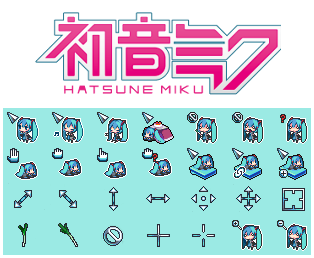
This cursor set is a modified version of a small Windows set created by [petit devil (ぷちでびる)](https://petitcan.blog.shinobi.jp) with a few original ones made by myself!
Thanks a lot to [@AshtakaOOf](https://github.com/AshtakaOOf) for [locating the original artist](https://github.com/supermariofps/hatsune-miku-windows-linux-cursors/issues/16)!
Hope you like it!
## Installation Instructions
You can download a ZIP of this repository by clicking the green _Code_ button above and selecting _Download ZIP_ or by cloning it.
### Linux
1. Copy the `miku-cursor-linux/` dir to `/usr/share/icons/` (system-wide) or `~/.local/share/icons/` (per-user).
2. [Select the theme through your DE's settings manager.](https://wiki.archlinux.org/title/Cursor_themes#Desktop_environments)
3. On KDE, the desktop and some apps may default back to a different cursor set that isn't the one you chose. To fix this, add the following to `/usr/share/icons/default/index.theme` or `~/.local/share/icons/default/index.theme`:
```ini
[Icon Theme]
Inherits=miku-cursor-linux
```
### Windows
1. Open the `miku-cursor-windows\` folder in the ZIP.
2. Right-click on `Install.inf` and select _Install_.
================================================
FILE: miku-cursor-linux/cursor.theme
================================================
[Icon Theme]
Name=Miku Cursor
Comment=Miku Cursors for Linux!
================================================
FILE: miku-cursor-linux/index.theme
================================================
[Icon Theme]
Name=Miku Cursor
Comment=Miku Cursors for Linux!
================================================
FILE: miku-cursor-windows/Install.inf
================================================
; Miku
[Version]
signature="$CHICAGO$"
[DefaultInstall]
CopyFiles = Scheme.Cur, Scheme.Txt
AddReg = Scheme.Reg
[DestinationDirs]
Scheme.Cur = 10,"%CUR_DIR%"
Scheme.Txt = 10,"%CUR_DIR%"
[Scheme.Reg]
HKCU,"Control Panel\Cursors\Schemes","%SCHEME_NAME%",,"%10%\%CUR_DIR%\%pointer%,%10%\%CUR_DIR%\%help%,%10%\%CUR_DIR%\%work%,%10%\%CUR_DIR%\%busy%,%10%\%CUR_DIR%\%cross%,%10%\%CUR_DIR%\%Text%,%10%\%CUR_DIR%\%Hand%,%10%\%CUR_DIR%\%unavailiable%,%10%\%CUR_DIR%\%Vert%,%10%\%CUR_DIR%\%Horz%,%10%\%CUR_DIR%\%Dgn1%,%10%\%CUR_DIR%\%Dgn2%,%10%\%CUR_DIR%\%move%,%10%\%CUR_DIR%\%alternate%,%10%\%CUR_DIR%\%link%"
; -- Common Information
[Scheme.Cur]
Blinking Cursor.ani
ask.ani
Singing Cursor.ani
Sleeping.ani
beam.ani
circle.ani
Horizontal Resize.ani
Vertical Resize.ani
Diagonal Resize 1.ani
Diagonal Resize 2.ani
Move.ani
hand2_.ani
Precision Select.ani
handwriting.ani
Book Cursor.ani
[Strings]
CUR_DIR = "Cursors\Miku"
SCHEME_NAME = "Miku"
pointer = "Blinking Cursor.ani"
help = "ask.ani"
work = "Singing Cursor.ani"
busy = "Sleeping.ani"
text = "beam.ani"
unavailiable = "circle.ani"
vert = "Vertical Resize.ani"
horz = "Horizontal Resize.ani"
dgn1 = "Diagonal Resize 1.ani"
dgn2 = "Diagonal Resize 2.ani"
move = "Move.ani"
link = "hand2_.ani"
cross = "Precision Select.ani"
hand = "handwriting.ani"
alternate = "Book Cursor.ani"
================================================
FILE: miku-cursor-windows/README.txt
================================================
Hello! Since Windows didn't allow much customization on the cursors,
I kept a few cursors from Linux and old ones in the folder if you still wish to use them instead!
gitextract_ogqqcdac/
├── .github/
│ └── workflows/
│ └── release.yml
├── README.md
├── miku-cursor-linux/
│ ├── cursor.theme
│ ├── cursors/
│ │ ├── alias
│ │ ├── all-scroll
│ │ ├── arrow
│ │ ├── bd_double_arrow
│ │ ├── bottom_left_corner
│ │ ├── bottom_right_corner
│ │ ├── bottom_side
│ │ ├── circle
│ │ ├── closedhand
│ │ ├── cross
│ │ ├── crossed_circle
│ │ ├── crosshair
│ │ ├── default
│ │ ├── dnd-copy
│ │ ├── dnd-link
│ │ ├── dnd-move
│ │ ├── dnd-no-drop
│ │ ├── dnd-none
│ │ ├── dnd_ask
│ │ ├── dotbox
│ │ ├── dotbox_mask
│ │ ├── draft
│ │ ├── draped_box
│ │ ├── e-resize
│ │ ├── fleur
│ │ ├── forbidden
│ │ ├── grab
│ │ ├── grabbing
│ │ ├── hand
│ │ ├── hand1
│ │ ├── hand2
│ │ ├── help
│ │ ├── ibeam
│ │ ├── ibeam_(old)
│ │ ├── icon
│ │ ├── left_ptr
│ │ ├── left_ptr_help
│ │ ├── left_side
│ │ ├── link
│ │ ├── move
│ │ ├── n-resize
│ │ ├── ne-resize
│ │ ├── no-drop
│ │ ├── not-allowed
│ │ ├── openhand
│ │ ├── pointer
│ │ ├── pointing_hand
│ │ ├── progress
│ │ ├── question_arrow
│ │ ├── right_side
│ │ ├── s-resize
│ │ ├── se-resize
│ │ ├── size_all
│ │ ├── sw-resize
│ │ ├── tcross
│ │ ├── text
│ │ ├── text_(old)
│ │ ├── top_left_arrow
│ │ ├── top_left_corner
│ │ ├── top_right_corner
│ │ ├── top_side
│ │ ├── w-resize
│ │ ├── wait
│ │ ├── watch
│ │ ├── whats_this
│ │ ├── xterm
│ │ ├── zoom_in
│ │ └── zoom_out
│ └── index.theme
└── miku-cursor-windows/
├── Beam.ani
├── Beam_old.ani
├── Blinking Cursor.ani
├── Book Cursor.ani
├── Diagonal Resize 1.ani
├── Diagonal Resize 2.ani
├── Horizontal Resize.ani
├── Install.inf
├── Kotatsu Cursor.ani
├── Leekspin Cursor.ani
├── Move.ani
├── Precision Select.ani
├── README.txt
├── Singing Cursor.ani
├── Sleeping.ani
├── Unavailable.ani
├── Vertical Resize.ani
├── alias.ani
├── all-scroll.ani
├── ask.ani
├── beam.ani
├── circle.ani
├── copy.ani
├── crosshair.ani
├── dnd_ask.ani
├── dotbox.ani
├── grabbing.ani
├── hand1_.ani
├── hand2_.ani
├── handwriting.ani
├── handwritting.ani
├── progress.ani
├── zoom_in.ani
└── zoom_out.ani
Condensed preview — 106 files, each showing path, character count, and a content snippet. Download the .json file or copy for the full structured content (4K chars).
[
{
"path": ".github/workflows/release.yml",
"chars": 652,
"preview": "name: Release\n\non:\n push:\n tags:\n - \"v*.*.*\"\n\npermissions:\n contents: write\n\njobs:\n build:\n runs-on: ubunt"
},
{
"path": "README.md",
"chars": 1329,
"preview": "# Hatsune Miku cursors for Windows/Linux!\n\n
About this extraction
This page contains the full source code of the supermariofps/hatsune-miku-windows-linux-cursors GitHub repository, extracted and formatted as plain text for AI agents and large language models (LLMs). The extraction includes 106 files (3.7 KB), approximately 2.3k tokens. Use this with OpenClaw, Claude, ChatGPT, Cursor, Windsurf, or any other AI tool that accepts text input. You can copy the full output to your clipboard or download it as a .txt file.
Extracted by GitExtract — free GitHub repo to text converter for AI. Built by Nikandr Surkov.