[
{
"path": "README.md",
"content": "\r\n \r\n  \r\n \r\n
\r\n\r\n\r\nMactype助手
\r\n\r\n\r\n  \r\n \r\n
  \r\n \r\n
  \r\n
\r\n  \r\n
\r\n  \r\n \r\n
  \r\n \r\n
\r\n\r\n\r\n 👉 增强浏览器网页文字清晰度 👈
\r\n 适用于 Linux,macOS,Windows 平台\r\n
\r\n
\r\n\r\nWindows 下的浏览器浏览网页时文字往往发虚,颜色很淡,看不清楚。**有了它可以让浏览器中显示的文字更加清晰**,支持 Chrome ,360 ,QQ ,Firfox ,Edge 等浏览器。\r\n\r\n现已升级到 2.0 版本,功能更加强大,支持自定义清晰度设置。\r\n\r\n## 🎨 效果演示\r\n\r\n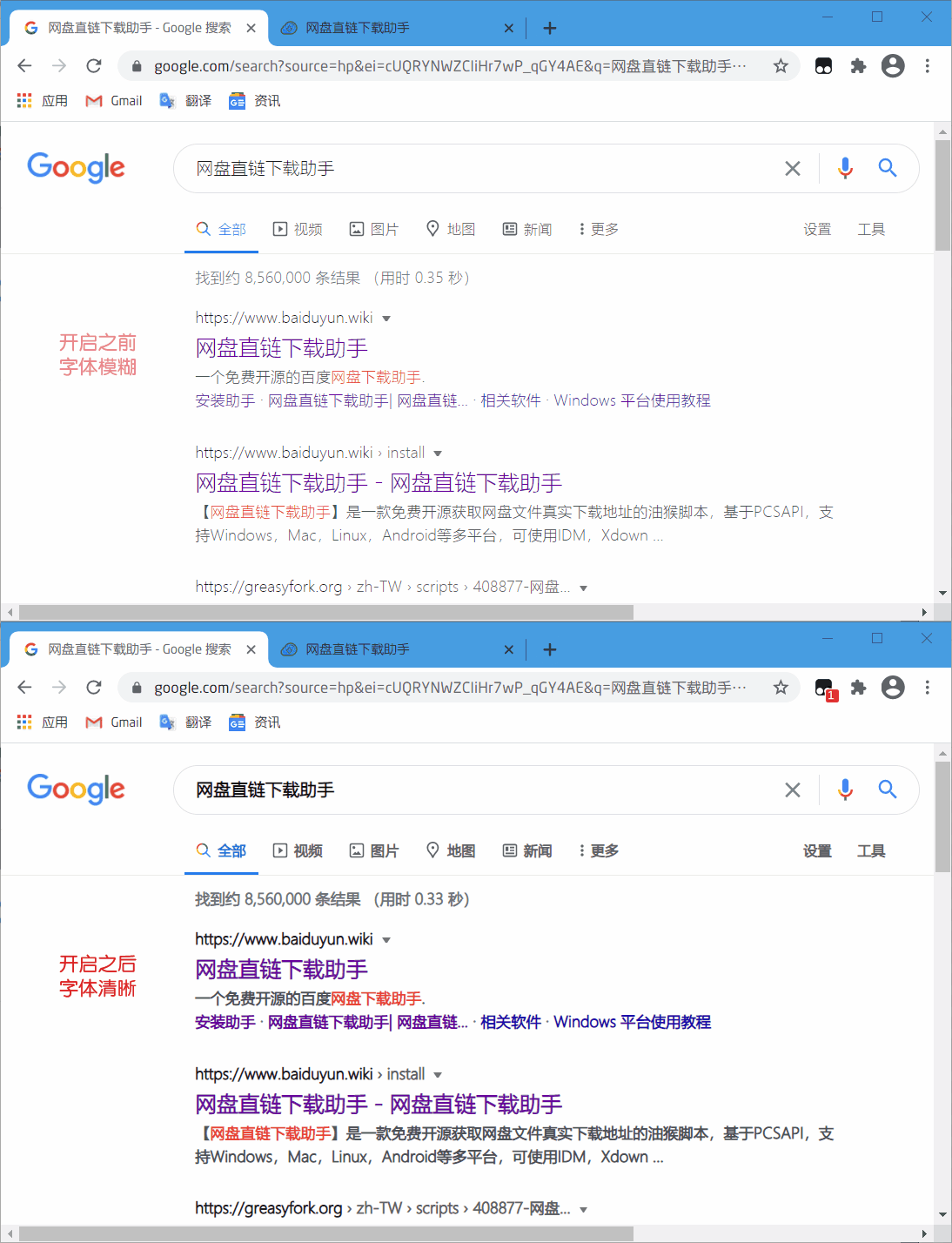\r\n\r\n## 💽 安装地址\r\n\r\n- **[安装地址(推荐)](https://www.youxiaohou.com/tool/install-mactype.html)**\r\n\r\n- **[English Version](https://github.com/syhyz1990/mactype/raw/master/mactype-en.user.js)**\r\n\r\n## 📝 更新日志\r\n\r\n**v2.2.0** 加载逻辑重构,修复部分网站不生效或闪动后生效的问题。\r\n\r\n**v2.1.7** 清晰度调节的最小间隔由 0.1 改为 0.05。\r\n\r\n**v2.1.5** 修复了弹出多个窗口的问题。\r\n\r\n**v2.1.4** 修复了在 Edge 浏览器下无效的问题。\r\n\r\n**v2.1.3** 修正了在部分网站上样式无法加载的问题。\r\n\r\n**v2.1.0** 修正了在弹窗框在百度搜索上样式错乱的问题,优化加载速度。\r\n\r\n**v2.0.6** 修复了一系列 BUG,优化了对部分单页面网页的显示效果。\r\n\r\n**v2.0.4** 支持自定义白名单功能,支持网站启用和禁用功能。\r\n\r\n**v2.0.3** 修复选择文字时文字发虚的问题。\r\n\r\n**v2.0.2** 修正百度等网站搜索后失效的问题。弹框样式失效后刷新页面即可。\r\n\r\n## 🎨 设置清晰度\r\n\r\n首次安装后会自动弹出设置清晰度选项,滑动滑块可自行调整,数值越大,文字显示越清晰,默认为0.8,调节到0时恢复原始效果。\r\n\r\n可以在助手设置中重新找到本弹框。\r\n\r\n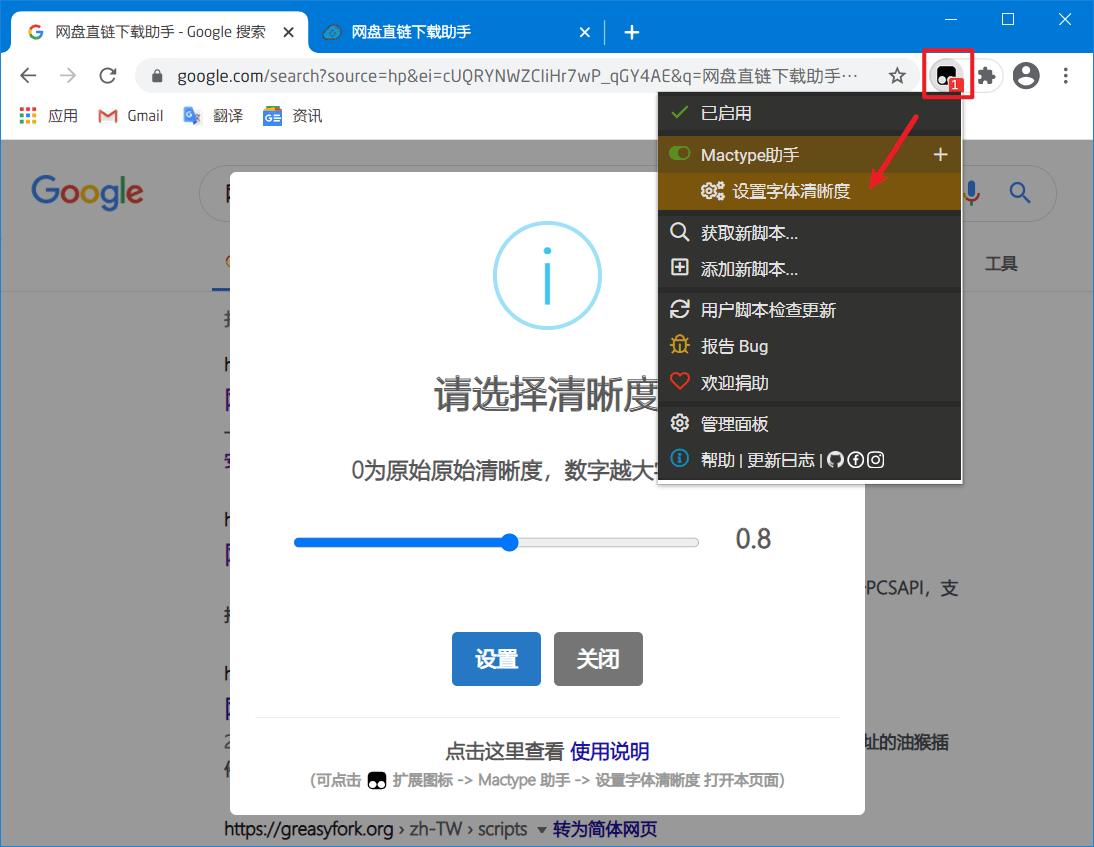\r\n\r\n## 💻 增强显示\r\n\r\n强烈建议配合 XHei 字体使用,效果极佳。 [字体下载地址](https://www.lanzoui.com/font)\r\n\r\n字体安装完成后在 Chrome 设置中搜索 “字体”,找到 `自定义字体`,将选项里的四个字体均设置为 `XHei Intel`\r\n\r\n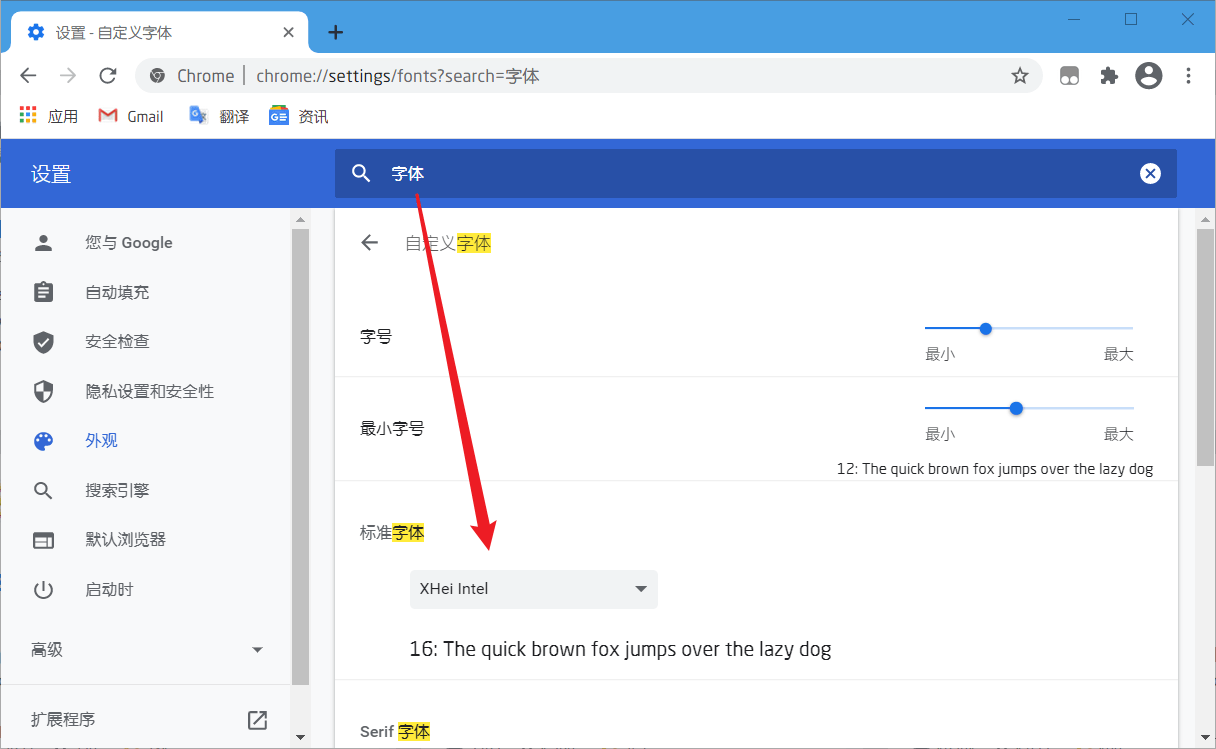\r\n\r\n## 👻 配合 Mactype\r\n\r\n若想实现在 Windows 其他软件也实现相同的渲染效果,例如微信,QQ,文件管理器等软件等,可以参考\r\n\r\n[让 Windows 实现 macOS 渲染效果](https://mp.weixin.qq.com/s/uCBoHZkJiFbd42RyRvQoUA)\r\n\r\n## 🐞 Bug 反馈\r\n\r\n如果您在使用过程中遇到问题,请 [点击这里](https://wj.qq.com/s2/8150559/6c08/) 或 [发送邮件](mailto:mail@youxiaohou.com) 进行反馈。\r\n"
},
{
"path": "mactype-en.user.js",
"content": "// ==UserScript==\n// @name Mactype Assistant\n// @namespace https://github.com/syhyz1990/mactype\n// @version 2.2.5\n// @description Workaround a blurry problem when browsing web pages in Chrome/360/QQ/Firefox/Edge when using MacType/\n// @author YouXiaoHou\n// @license MIT\n// @homepage https://www.youxiaohou.com/tool/install-mactype.html\n// @supportURL https://github.com/syhyz1990/mactype\n// @require https://registry.npmmirror.com/sweetalert2/10.16.6/files/dist/sweetalert2.min.js\n// @resource swalStyle https://registry.npmmirror.com/sweetalert2/10.16.6/files/dist/sweetalert2.min.css\n// @updateURL https://www.youxiaohou.com/mactype.user.js\n// @downloadURL https://www.youxiaohou.com/mactype.user.js\n// @match *://*/*\n// @run-at document-start\n// @grant GM_getValue\n// @grant GM_setValue\n// @grant GM_registerMenuCommand\n// @grant GM_getResourceText\n// @icon data:image/svg+xml;base64,PHN2ZyB4bWxucz0iaHR0cDovL3d3dy53My5vcmcvMjAwMC9zdmciIHZpZXdCb3g9IjAgMCAxMjggMTI4Ij48cGF0aCBkPSJNMTIwIDcuMWM0LjQgMCA4IDQuMSA4IDl2NzMuMmMwIDUtMy42IDktOCA5SDgwLjhsNy4yIDE2LjNjLjggMi4zIDAgNS0xLjYgNS45LS40LjUtMS4yLjUtMS42LjVINDMuNmMtMi40IDAtNC0xLjgtNC00LjUgMC0uOSAwLTEuNC40LTEuOGw3LjItMTYuM0g4Yy00LjQgMC04LTQuMS04LTlWMTYuMWMwLTUgMy42LTkgOC05aDExMnoiIGZpbGw9IiM0NDQiLz48cGF0aCBkPSJNMTAyLjMgMzQuN2ExNC4yOCAxNC4yOCAwIDAgMC02LjItNi4yYy0yLjctMS40LTUuMy0yLjItMTIuNi0yLjJINjkuMXY1NC42aDE0LjRjNy4zIDAgOS45LS44IDEyLjYtMi4yYTE1LjQyIDE1LjQyIDAgMCAwIDYuMi02LjJjMS40LTIuNyAyLjItNS4zIDIuMi0xMi42VjQ3LjNjMC03LjMtLjgtOS45LTIuMi0xMi42em0tOC43IDI4LjJjMCAyLjQtLjIgMy4zLS43IDQuMnMtMS4yIDEuNi0yLjEgMi4xYy0uOS40LTEuOC43LTQuMi43SDgwVjM3LjJoNi42YzIuNCAwIDMuMy4yIDQuMi43czEuNiAxLjIgMi4xIDIuMWMuNC45LjcgMS44LjcgNC4ydjE4Ljd6TTUwIDQ4LjFIMzYuM1YyNi4zSDI1LjR2NTQuNWgxMC45VjU5SDUwdjIxLjhoMTAuOVYyNi4zSDUwdjIxLjh6IiBmaWxsPSIjZmZmIi8+PC9zdmc+\n// ==/UserScript==\n\n(function () {\n 'use strict';\n\n let util = {\n getValue(name) {\n return GM_getValue(name);\n },\n\n setValue(name, value) {\n GM_setValue(name, value);\n },\n\n addStyle(id, tag, css) {\n tag = tag || 'style';\n let doc = document, styleDom = doc.getElementById(id);\n if (styleDom) return;\n let style = doc.createElement(tag);\n style.rel = 'stylesheet';\n style.id = id;\n tag === 'style' ? style.innerHTML = css : style.href = css;\n document.head.appendChild(style);\n },\n\n removeElementById(eleId) {\n let ele = document.getElementById(eleId);\n ele && ele.parentNode.removeChild(ele);\n }\n };\n\n let main = {\n /**\n * 配置默认值\n */\n initValue() {\n let value = [{\n name: 'current_val',\n value: 0\n }, {\n name: 'has_init',\n value: false\n }, {\n name: 'white_list',\n value: []\n }];\n\n value.forEach((v) => {\n util.getValue(v.name) === undefined && util.setValue(v.name, v.value);\n });\n },\n\n showSetting() {\n Swal.fire({\n title: 'Configuration',\n icon: 'info',\n input: 'range',\n showCancelButton: true,\n confirmButtonText: 'Save',\n cancelButtonText: 'Cancel',\n showCloseButton: true,\n inputLabel: 'Slide to modify the display',\n customClass: {\n popup: 'mactype-popup',\n },\n footer: '',\n inputAttributes: {\n min: 0,\n max: 1,\n step: 0.05\n },\n inputValue: util.getValue('current_val')\n }).then((res) => {\n util.setValue('has_init', true);\n if (res.isConfirmed) {\n util.setValue('current_val', res.value);\n this.changeStyle();\n }\n if (res.isDismissed && res.dismiss === \"cancel\") {\n util.setValue('current_val', 0);\n this.changeStyle();\n }\n });\n\n document.getElementById('swal2-input').addEventListener('change', (e) => {\n util.setValue('current_val', e.target.value);\n this.changeStyle();\n });\n },\n\n registerMenuCommand() {\n let whiteList = util.getValue('white_list');\n let host = location.host;\n if (whiteList.includes(host)) {\n GM_registerMenuCommand('💡 Current Website:❌', () => {\n let index = whiteList.indexOf(host);\n whiteList.splice(index, 1);\n util.setValue('white_list', whiteList);\n history.go(0);\n });\n } else {\n GM_registerMenuCommand('💡 Current Website:✔️', () => {\n whiteList.push(host);\n util.setValue('white_list', whiteList);\n history.go(0);\n });\n }\n GM_registerMenuCommand('⚙️ Settings', () => {\n this.showSetting();\n });\n },\n\n generateStyle() {\n let val = util.getValue('current_val');\n return `\n .mactype-popup { font-size: 14px!important }\n .swal2-range input { -webkit-appearance: auto!important; appearance: auto;!important }\n *:not(pre) { -webkit-text-stroke: ${val}px !important; text-stroke: ${val}px !important }\n ::selection { color: #fff;background: #338fff }\n `;\n },\n\n changeStyle() {\n document.getElementById('mactype-style').innerHTML = this.generateStyle();\n },\n\n addPluginStyle() {\n let style = this.generateStyle();\n\n if (document.head) {\n util.addStyle('swal-pub-style', 'style', GM_getResourceText('swalStyle'));\n util.addStyle('mactype-style', 'style', style);\n }\n const headObserver = new MutationObserver(() => {\n util.addStyle('swal-pub-style', 'style', GM_getResourceText('swalStyle'));\n util.addStyle('mactype-style', 'style', style);\n });\n headObserver.observe(document.head, {childList: true, subtree: true});\n },\n\n isTopWindow() {\n return window.self === window.top;\n },\n\n init() {\n this.initValue();\n this.isTopWindow() && !util.getValue('has_init') && this.showSetting();\n this.isTopWindow() && this.registerMenuCommand();\n if (util.getValue('white_list').includes(location.host)) return;\n this.addPluginStyle();\n }\n };\n main.init();\n})();\n"
},
{
"path": "mactype.user.js",
"content": "// ==UserScript==\r\n// @name Mactype助手\r\n// @namespace https://github.com/syhyz1990/mactype\r\n// @version 2.2.6\r\n// @description Windows下的浏览器浏览网页时文字往往发虚,颜色很淡,看不清楚。有了它可以让浏览器中显示的文字更加清晰,支持Chrome ,360 ,QQ ,Firfox ,Edge 等浏览器。\r\n// @author YouXiaoHou\r\n// @license MIT\r\n// @homepage https://www.youxiaohou.com/tool/install-mactype.html\r\n// @supportURL https://github.com/syhyz1990/mactype\r\n// @require https://unpkg.com/sweetalert2@10.16.6/dist/sweetalert2.min.js\r\n// @resource swalStyle https://unpkg.com/sweetalert2@10.16.6/dist/sweetalert2.min.css\r\n// @updateURL https://www.youxiaohou.com/mactype.user.js\r\n// @downloadURL https://www.youxiaohou.com/mactype.user.js\r\n// @match *://*/*\r\n// @run-at document-start\r\n// @grant GM_getValue\r\n// @grant GM_setValue\r\n// @grant GM_registerMenuCommand\r\n// @grant GM_getResourceText\r\n// @icon data:image/svg+xml;base64,PHN2ZyB4bWxucz0iaHR0cDovL3d3dy53My5vcmcvMjAwMC9zdmciIHZpZXdCb3g9IjAgMCAxMjggMTI4Ij48cGF0aCBkPSJNMTIwIDcuMWM0LjQgMCA4IDQuMSA4IDl2NzMuMmMwIDUtMy42IDktOCA5SDgwLjhsNy4yIDE2LjNjLjggMi4zIDAgNS0xLjYgNS45LS40LjUtMS4yLjUtMS42LjVINDMuNmMtMi40IDAtNC0xLjgtNC00LjUgMC0uOSAwLTEuNC40LTEuOGw3LjItMTYuM0g4Yy00LjQgMC04LTQuMS04LTlWMTYuMWMwLTUgMy42LTkgOC05aDExMnoiIGZpbGw9IiM0NDQiLz48cGF0aCBkPSJNMTAyLjMgMzQuN2ExNC4yOCAxNC4yOCAwIDAgMC02LjItNi4yYy0yLjctMS40LTUuMy0yLjItMTIuNi0yLjJINjkuMXY1NC42aDE0LjRjNy4zIDAgOS45LS44IDEyLjYtMi4yYTE1LjQyIDE1LjQyIDAgMCAwIDYuMi02LjJjMS40LTIuNyAyLjItNS4zIDIuMi0xMi42VjQ3LjNjMC03LjMtLjgtOS45LTIuMi0xMi42em0tOC43IDI4LjJjMCAyLjQtLjIgMy4zLS43IDQuMnMtMS4yIDEuNi0yLjEgMi4xYy0uOS40LTEuOC43LTQuMi43SDgwVjM3LjJoNi42YzIuNCAwIDMuMy4yIDQuMi43czEuNiAxLjIgMi4xIDIuMWMuNC45LjcgMS44LjcgNC4ydjE4Ljd6TTUwIDQ4LjFIMzYuM1YyNi4zSDI1LjR2NTQuNWgxMC45VjU5SDUwdjIxLjhoMTAuOVYyNi4zSDUwdjIxLjh6IiBmaWxsPSIjZmZmIi8+PC9zdmc+\r\n// ==/UserScript==\r\n\r\n(function () {\r\n 'use strict';\r\n\r\n let util = {\r\n getValue(name) {\r\n return GM_getValue(name);\r\n },\r\n\r\n setValue(name, value) {\r\n GM_setValue(name, value);\r\n },\r\n\r\n addStyle(id, tag, css) {\r\n tag = tag || 'style';\r\n let doc = document, styleDom = doc.getElementById(id);\r\n if (styleDom) return;\r\n let style = doc.createElement(tag);\r\n style.rel = 'stylesheet';\r\n style.id = id;\r\n tag === 'style' ? style.innerHTML = css : style.href = css;\r\n document.head.appendChild(style);\r\n },\r\n\r\n removeElementById(eleId) {\r\n let ele = document.getElementById(eleId);\r\n ele && ele.parentNode.removeChild(ele);\r\n }\r\n };\r\n\r\n let main = {\r\n /**\r\n * 配置默认值\r\n */\r\n initValue() {\r\n let value = [{\r\n name: 'current_val',\r\n value: 0\r\n }, {\r\n name: 'has_init',\r\n value: false\r\n }, {\r\n name: 'white_list',\r\n value: []\r\n }];\r\n\r\n value.forEach((v) => {\r\n util.getValue(v.name) === undefined && util.setValue(v.name, v.value);\r\n });\r\n },\r\n\r\n showSetting() {\r\n Swal.fire({\r\n title: '请选择清晰度',\r\n icon: 'info',\r\n input: 'range',\r\n showCancelButton: true,\r\n confirmButtonText: '保存',\r\n cancelButtonText: '还原',\r\n showCloseButton: true,\r\n inputLabel: '拖动滑块观察变化,数字越大字越清晰',\r\n customClass: {\r\n popup: 'mactype-popup',\r\n },\r\n footer: '',\r\n inputAttributes: {\r\n min: 0,\r\n max: 1,\r\n step: 0.05\r\n },\r\n inputValue: util.getValue('current_val')\r\n }).then((res) => {\r\n util.setValue('has_init', true);\r\n if (res.isConfirmed) {\r\n util.setValue('current_val', res.value);\r\n this.changeStyle();\r\n }\r\n if (res.isDismissed && res.dismiss === \"cancel\") {\r\n util.setValue('current_val', 0);\r\n this.changeStyle();\r\n }\r\n });\r\n\r\n document.getElementById('swal2-input').addEventListener('change', (e) => {\r\n util.setValue('current_val', e.target.value);\r\n this.changeStyle();\r\n });\r\n },\r\n\r\n registerMenuCommand() {\r\n let whiteList = util.getValue('white_list');\r\n let host = location.host;\r\n if (whiteList.includes(host)) {\r\n GM_registerMenuCommand('💡 当前网站:❌', () => {\r\n let index = whiteList.indexOf(host);\r\n whiteList.splice(index, 1);\r\n util.setValue('white_list', whiteList);\r\n history.go(0);\r\n });\r\n } else {\r\n GM_registerMenuCommand('💡 当前网站:✔️', () => {\r\n whiteList.push(host);\r\n util.setValue('white_list', whiteList);\r\n history.go(0);\r\n });\r\n }\r\n GM_registerMenuCommand('⚙️ 设置', () => {\r\n this.showSetting();\r\n });\r\n },\r\n\r\n generateStyle() {\r\n let val = util.getValue('current_val');\r\n return `\r\n .mactype-popup { font-size: 14px!important }\r\n .swal2-range input { -webkit-appearance: auto!important; appearance: auto;!important }\r\n *:not(pre) { -webkit-text-stroke: ${val}px !important; text-stroke: ${val}px !important }\r\n ::selection { color: #fff;background: #338fff }\r\n `;\r\n },\r\n\r\n changeStyle() {\r\n document.getElementById('mactype-style').innerHTML = this.generateStyle();\r\n },\r\n\r\n addPluginStyle() {\r\n let style = this.generateStyle();\r\n\r\n if (document.head) {\r\n util.addStyle('swal-pub-style', 'style', GM_getResourceText('swalStyle'));\r\n util.addStyle('mactype-style', 'style', style);\r\n }\r\n const headObserver = new MutationObserver(() => {\r\n util.addStyle('swal-pub-style', 'style', GM_getResourceText('swalStyle'));\r\n util.addStyle('mactype-style', 'style', style);\r\n });\r\n headObserver.observe(document.head, {childList: true, subtree: true});\r\n },\r\n\r\n isTopWindow() {\r\n return window.self === window.top;\r\n },\r\n\r\n init() {\r\n this.initValue();\r\n this.isTopWindow() && !util.getValue('has_init') && this.showSetting();\r\n this.isTopWindow() && this.registerMenuCommand();\r\n if (util.getValue('white_list').includes(location.host)) return;\r\n this.addPluginStyle();\r\n }\r\n };\r\n main.init();\r\n})();\r\n"
}
]