Repository: the-dagger/MLKitAndroid
Branch: master
Commit: cde20d858ff4
Files: 53
Total size: 80.3 KB
Directory structure:
gitextract_ynhdigv6/
├── .gitignore
├── README.md
├── app/
│ ├── .gitignore
│ ├── build.gradle
│ ├── proguard-rules.pro
│ ├── release/
│ │ └── output.json
│ └── src/
│ ├── androidTest/
│ │ └── java/
│ │ └── io/
│ │ └── github/
│ │ └── the_dagger/
│ │ └── mlkit/
│ │ └── ExampleInstrumentedTest.kt
│ ├── main/
│ │ ├── AndroidManifest.xml
│ │ ├── assets/
│ │ │ ├── optimized_graph.tflite
│ │ │ ├── pokedex.tflite
│ │ │ ├── pokedex_dep.tflite
│ │ │ └── pokelist.txt
│ │ ├── java/
│ │ │ └── io/
│ │ │ └── github/
│ │ │ └── the_dagger/
│ │ │ └── mlkit/
│ │ │ ├── activity/
│ │ │ │ ├── BarCodeReaderActivity.kt
│ │ │ │ ├── BaseCameraActivity.kt
│ │ │ │ ├── CardScannerActivity.kt
│ │ │ │ ├── FaceDetectionActivity.kt
│ │ │ │ ├── HomeActivity.kt
│ │ │ │ ├── ImageLabelActivity.kt
│ │ │ │ ├── LandmarkDetectorActivity.kt
│ │ │ │ └── PokemonDetectorActivity.kt
│ │ │ ├── adapter/
│ │ │ │ ├── FaceAdapter.kt
│ │ │ │ ├── HomeAdapter.kt
│ │ │ │ ├── ImageLabelAdapter.kt
│ │ │ │ └── PokemonAdapter.kt
│ │ │ └── model/
│ │ │ ├── PojoApi.kt
│ │ │ └── Pokemon.kt
│ │ └── res/
│ │ ├── drawable/
│ │ │ ├── ic_arrow_upward.xml
│ │ │ ├── ic_camera.xml
│ │ │ ├── ic_launcher_background.xml
│ │ │ └── ic_refresh.xml
│ │ ├── font/
│ │ │ └── roboto_medium.xml
│ │ ├── layout/
│ │ │ ├── activity_home.xml
│ │ │ ├── activity_main.xml
│ │ │ ├── face_row.xml
│ │ │ ├── item_row.xml
│ │ │ ├── item_row_home.xml
│ │ │ ├── layout_card_scanner.xml
│ │ │ ├── layout_image_label.xml
│ │ │ ├── layout_landmark.xml
│ │ │ └── layout_qr_code_reader.xml
│ │ └── values/
│ │ ├── colors.xml
│ │ ├── font_certs.xml
│ │ ├── preloaded_fonts.xml
│ │ ├── strings.xml
│ │ └── styles.xml
│ └── test/
│ └── java/
│ └── io/
│ └── github/
│ └── the_dagger/
│ └── mlkit/
│ └── ExampleUnitTest.kt
├── build.gradle
├── gradle/
│ └── wrapper/
│ ├── gradle-wrapper.jar
│ └── gradle-wrapper.properties
├── gradle.properties
├── gradlew
├── gradlew.bat
└── settings.gradle
================================================
FILE CONTENTS
================================================
================================================
FILE: .gitignore
================================================
# Built application files
*.apk
*.ap_
# Files for the ART/Dalvik VM
*.dex
# Java class files
*.class
# Generated files
bin/
gen/
out/
# Gradle files
.gradle/
build/
# Local configuration file (sdk path, etc)
local.properties
# Proguard folder generated by Eclipse
proguard/
# Log Files
*.log
# Android Studio Navigation editor temp files
.navigation/
# Android Studio captures folder
captures/
# Intellij
*.iml
.idea/
.idea/workspace.xml
# Keystore files
*.jks
# Mac
.DS_Store
# Other
.externalNativeBuild
google-services.json
================================================
FILE: README.md
================================================
# Firebase MLKit
A collection of real life apps built using [Firebase ML Kit](https://firebase.google.com/products/ml-kit/) APIs.
# Setup Instructions
1. Clone the project
2. Add it to your Firebase Console
3. Profit!
# Blogposts covering the making of this app
* [Creating a Google Lens clone using Firebase MLKit](https://medium.com/coding-blocks/google-lens-firebase-54d34d7e1505)
* [Creating a Credit Card Scanner using Firebase MLKit](https://medium.com/coding-blocks/creating-a-credit-card-scanner-using-firebase-mlkit-5345140f6a5c)
* [Creating a Barcode Scanner using Firebase MLKit](https://medium.com/coding-blocks/creating-a-qr-code-reader-using-firebase-mlkit-60bb882f95f9)
* [Identifying Places in a provided Image using Firebase MLKit](https://medium.com/coding-blocks/identifying-places-in-a-provided-image-using-firebase-mlkit-fe3c918756da)
* [Building “Pokédex” in Android using TensorFlow Lite and Firebase’s ML Kit](https://heartbeat.fritz.ai/building-pok%C3%A9dex-in-android-using-tensorflow-lite-and-firebase-cc780848395)
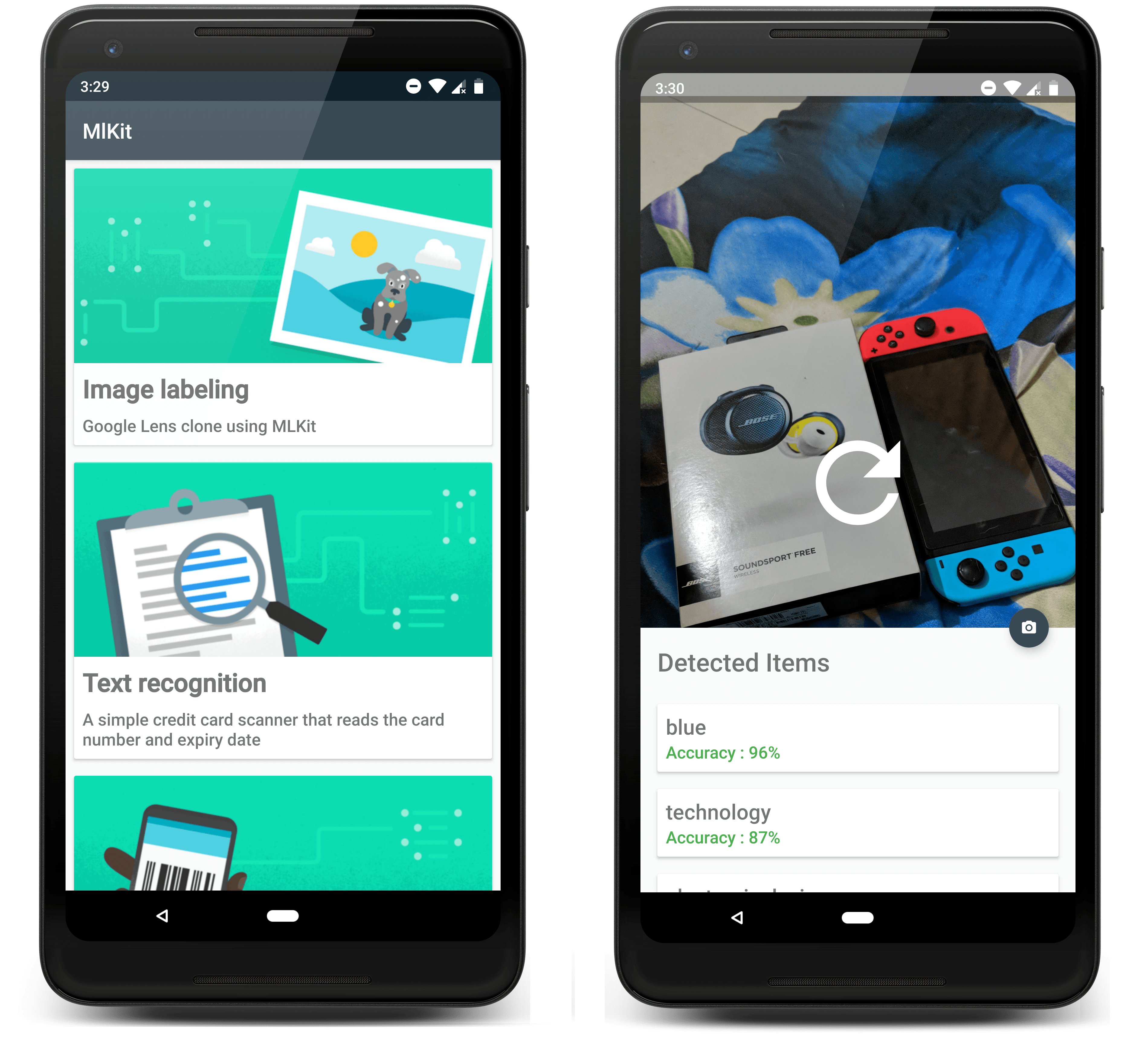
# Screenshots :
# Libraries
* [CameraKit Android](https://github.com/CameraKit/camerakit-android)
* [FAB Progress to show progress](https://github.com/JorgeCastilloPrz/FABProgressCircle)
* [Picking Image from camera/gallery](https://github.com/jkwiecien/EasyImage)
Built with ❤️ by [@the-dagger](https://github.com/the-dagger)
================================================
FILE: app/.gitignore
================================================
/build
================================================
FILE: app/build.gradle
================================================
apply plugin: 'com.android.application'
apply plugin: 'kotlin-android'
apply plugin: 'kotlin-android-extensions'
android {
compileSdkVersion 28
defaultConfig {
applicationId "io.github.the_dagger.mlkit"
minSdkVersion 21
targetSdkVersion 28
versionCode 1
versionName "1.0"
testInstrumentationRunner "android.support.test.runner.AndroidJUnitRunner"
aaptOptions {
noCompress "tflite"
}
}
buildTypes {
release {
minifyEnabled false
proguardFiles getDefaultProguardFile('proguard-android.txt'), 'proguard-rules.pro'
}
}
}
dependencies {
implementation fileTree(dir: 'libs', include: ['*.jar'])
implementation "org.jetbrains.kotlin:kotlin-stdlib-jdk7:$kotlin_version"
implementation 'com.android.support:appcompat-v7:28.0.0'
implementation 'com.android.support:exifinterface:28.0.0'
implementation 'com.android.support:support-media-compat:28.0.0'
implementation 'com.android.support:support-v4:28.0.0'
implementation 'com.android.support:design:28.0.0'
implementation 'com.android.support:cardview-v7:28.0.0'
implementation 'com.android.support.constraint:constraint-layout:1.1.3'
implementation 'com.google.firebase:firebase-ml-vision-image-label-model:15.0.0'
implementation "com.google.firebase:firebase-ml-model-interpreter:16.2.0"
implementation "com.google.firebase:firebase-ml-vision:17.0.0"
implementation 'com.google.firebase:firebase-core:16.0.3'
implementation 'com.google.firebase:firebase-crash:16.2.0'
testImplementation 'junit:junit:4.12'
androidTestImplementation 'com.android.support.test:runner:1.0.2'
androidTestImplementation 'com.android.support.test.espresso:espresso-core:3.0.2'
implementation 'com.wonderkiln:camerakit:0.13.1'
implementation 'com.github.jorgecastilloprz:fabprogresscircle:1.01@aar'
implementation 'com.github.jkwiecien:EasyImage:1.3.1'
}
apply plugin: 'com.google.gms.google-services'
================================================
FILE: app/proguard-rules.pro
================================================
# Add project specific ProGuard rules here.
# You can control the set of applied configuration files using the
# proguardFiles setting in build.gradle.
#
# For more details, see
# http://developer.android.com/guide/developing/tools/proguard.html
# If your project uses WebView with JS, uncomment the following
# and specify the fully qualified class name to the JavaScript interface
# class:
#-keepclassmembers class fqcn.of.javascript.interface.for.webview {
# public *;
#}
# Uncomment this to preserve the line number information for
# debugging stack traces.
#-keepattributes SourceFile,LineNumberTable
# If you keep the line number information, uncomment this to
# hide the original source file name.
#-renamesourcefileattribute SourceFile
================================================
FILE: app/release/output.json
================================================
[{"outputType":{"type":"APK"},"apkInfo":{"type":"MAIN","splits":[],"versionCode":1,"versionName":"1.0","enabled":true,"outputFile":"app-release.apk","fullName":"release","baseName":"release"},"path":"app-release.apk","properties":{}}]
================================================
FILE: app/src/androidTest/java/io/github/the_dagger/mlkit/ExampleInstrumentedTest.kt
================================================
package io.github.the_dagger.mlkit
import android.support.test.InstrumentationRegistry
import android.support.test.runner.AndroidJUnit4
import org.junit.Test
import org.junit.runner.RunWith
import org.junit.Assert.*
/**
* Instrumented test, which will execute on an Android device.
*
* See [testing documentation](http://d.android.com/tools/testing).
*/
@RunWith(AndroidJUnit4::class)
class ExampleInstrumentedTest {
@Test
fun useAppContext() {
// Context of the app under test.
val appContext = InstrumentationRegistry.getTargetContext()
assertEquals("io.github.the_dagger.mlkit", appContext.packageName)
}
}
================================================
FILE: app/src/main/AndroidManifest.xml
================================================
================================================
FILE: app/src/main/assets/pokelist.txt
================================================
"abra",
"aerodactyl",
"alakazam",
"arbok",
"arcanine",
"articuno",
"beedrill",
"bellsprout",
"blastoise",
"bulbasaur",
"butterfree",
"caterpie",
"chansey",
"charizard",
"charmander",
"charmeleon",
"clefable",
"clefairy",
"cloyster",
"cubone",
"dewgong",
"diglett",
"ditto",
"dodrio",
"doduo",
"dragonair",
"dragonite",
"dratini",
"drowzee",
"dugtrio",
"eevee",
"ekans",
"electabuzz",
"electrode",
"exeggcute",
"exeggutor",
"farfetchd",
"fearow",
"flareon",
"gastly",
"gengar",
"geodude",
"gloom",
"golbat",
"goldeen",
"golduck",
"golem",
"graveler",
"grimer",
"growlithe",
"gyarados",
"haunter",
"hitmonchan",
"hitmonlee",
"horsea",
"hypno",
"ivysaur",
"jigglypuff",
"jolteon",
"jynx",
"kabuto",
"kabutops",
"kadabra",
"kakuna",
"kangaskhan",
"kingler",
"koffing",
"krabby",
"lapras",
"lickitung",
"machamp",
"machoke",
"machop",
"magikarp",
"magmar",
"magnemite",
"magneton",
"mankey",
"marowak",
"meowth",
"metapod",
"mew",
"mewtwo",
"moltres",
"mrmime",
"muk",
"nidoking",
"nidoqueen",
"nidorina",
"nidorino",
"ninetales",
"oddish",
"omanyte",
"omastar",
"onix",
"paras",
"parasect",
"persian",
"pidgeot",
"pidgeotto",
"pidgey",
"pikachu",
"pinsir",
"poliwag",
"poliwhirl",
"poliwrath",
"ponyta",
"porygon",
"primeape",
"psyduck",
"raichu",
"rapidash",
"raticate",
"rattata",
"rhydon",
"rhyhorn",
"sandshrew",
"sandslash",
"scyther",
"seadra",
"seaking",
"seel",
"shellder",
"slowbro",
"slowpoke",
"snorlax",
"spearow",
"squirtle",
"starmie",
"staryu",
"tangela",
"tauros",
"tentacool",
"tentacruel",
"vaporeon",
"venomoth",
"venonat",
"venusaur",
"victreebel",
"vileplume",
"voltorb",
"vulpix",
"wartortle",
"weedle",
"weepinbell",
"weezing",
"wigglytuff",
"zapdos",
"zubat"
================================================
FILE: app/src/main/java/io/github/the_dagger/mlkit/activity/BarCodeReaderActivity.kt
================================================
package io.github.the_dagger.mlkit.activity
import android.graphics.Bitmap
import android.os.Bundle
import android.support.design.widget.BottomSheetBehavior
import android.view.View
import android.widget.Toast
import com.google.firebase.ml.vision.FirebaseVision
import com.google.firebase.ml.vision.barcode.FirebaseVisionBarcode
import com.google.firebase.ml.vision.barcode.FirebaseVisionBarcodeDetectorOptions
import com.google.firebase.ml.vision.common.FirebaseVisionImage
import io.github.the_dagger.mlkit.R
import kotlinx.android.synthetic.main.activity_main.*
import kotlinx.android.synthetic.main.layout_qr_code_reader.*
class BarCodeReaderActivity : BaseCameraActivity() {
override fun onCreate(savedInstanceState: Bundle?) {
super.onCreate(savedInstanceState)
setupBottomSheet(R.layout.layout_qr_code_reader)
}
override fun onClick(v: View) {
fabProgressCircle.show()
cameraView.captureImage { cameraKitImage ->
// Get the Bitmap from the captured shot
getQRCodeDetails(cameraKitImage.bitmap)
runOnUiThread {
showPreview()
imagePreview.setImageBitmap(cameraKitImage.bitmap)
}
}
}
private fun getQRCodeDetails(bitmap: Bitmap) {
val options = FirebaseVisionBarcodeDetectorOptions.Builder()
.setBarcodeFormats(
FirebaseVisionBarcode.FORMAT_ALL_FORMATS)
.build()
val detector = FirebaseVision.getInstance().getVisionBarcodeDetector(options)
val image = FirebaseVisionImage.fromBitmap(bitmap)
detector.detectInImage(image)
.addOnSuccessListener {
for (firebaseBarcode in it) {
codeData.text = firebaseBarcode.displayValue //Display contents inside the barcode
when (firebaseBarcode.valueType) {
//Handle the URL here
FirebaseVisionBarcode.TYPE_URL -> firebaseBarcode.url
// Handle the contact info here, i.e. address, name, phone, etc.
FirebaseVisionBarcode.TYPE_CONTACT_INFO -> firebaseBarcode.contactInfo
// Handle the wifi here, i.e. firebaseBarcode.wifi.ssid, etc.
FirebaseVisionBarcode.TYPE_WIFI -> firebaseBarcode.wifi
//Handle more type of Barcodes
}
}
}
.addOnFailureListener {
it.printStackTrace()
Toast.makeText(baseContext, "Sorry, something went wrong!", Toast.LENGTH_SHORT).show()
}
.addOnCompleteListener {
fabProgressCircle.hide()
sheetBehavior.state = BottomSheetBehavior.STATE_EXPANDED
}
}
}
================================================
FILE: app/src/main/java/io/github/the_dagger/mlkit/activity/BaseCameraActivity.kt
================================================
package io.github.the_dagger.mlkit.activity
import android.os.Bundle
import android.support.annotation.LayoutRes
import android.support.design.widget.BottomSheetBehavior
import android.support.design.widget.CoordinatorLayout
import android.support.v7.app.AppCompatActivity
import android.view.Gravity
import android.view.View
import io.github.the_dagger.mlkit.R
import kotlinx.android.synthetic.main.activity_main.*
abstract class BaseCameraActivity : AppCompatActivity(), View.OnClickListener {
lateinit var sheetBehavior: BottomSheetBehavior<*>
override fun onCreate(savedInstanceState: Bundle?) {
super.onCreate(savedInstanceState)
setContentView(R.layout.activity_main)
btnRetry.setOnClickListener {
if (cameraView.visibility == View.VISIBLE) showPreview() else hidePreview()
}
fab_take_photo.setOnClickListener(this)
}
fun setupBottomSheet(@LayoutRes id : Int){
//Using a ViewStub since changing the layout of an tag dynamically wasn't possible
stubView.layoutResource = id
val inflatedView = stubView.inflate()
//Set layout parameters for the inflated bottomsheet
val lparam = inflatedView.layoutParams as CoordinatorLayout.LayoutParams
lparam.behavior = BottomSheetBehavior()
inflatedView.layoutParams = lparam
sheetBehavior = BottomSheetBehavior.from(inflatedView)
sheetBehavior.peekHeight = 224
//Anchor the FAB to the end of inflated bottom sheet
val lp = fabProgressCircle.layoutParams as CoordinatorLayout.LayoutParams
lp.anchorId = inflatedView.id
lp.anchorGravity = Gravity.END
fabProgressCircle.layoutParams = lp
//Hide the fab as bottomSheet is expanded
sheetBehavior.setBottomSheetCallback(object : BottomSheetBehavior.BottomSheetCallback() {
override fun onStateChanged(bottomSheet: View, newState: Int) {}
override fun onSlide(bottomSheet: View, slideOffset: Float) {
fab_take_photo.animate().scaleX(1 - slideOffset).scaleY(1 - slideOffset).setDuration(0).start()
}
})
}
override fun onResume() {
super.onResume()
cameraView.start()
}
override fun onPause() {
cameraView.stop()
super.onPause()
}
protected fun showPreview() {
framePreview.visibility = View.VISIBLE
cameraView.visibility = View.GONE
}
protected fun hidePreview() {
framePreview.visibility = View.GONE
cameraView.visibility = View.VISIBLE
}
}
================================================
FILE: app/src/main/java/io/github/the_dagger/mlkit/activity/CardScannerActivity.kt
================================================
package io.github.the_dagger.mlkit.activity
import android.graphics.Bitmap
import android.os.Bundle
import android.support.design.widget.BottomSheetBehavior
import android.util.Log
import android.view.View
import android.widget.Toast
import com.google.firebase.ml.vision.FirebaseVision
import com.google.firebase.ml.vision.common.FirebaseVisionImage
import io.github.the_dagger.mlkit.R
import kotlinx.android.synthetic.main.activity_main.*
import kotlinx.android.synthetic.main.layout_card_scanner.*
class CardScannerActivity : BaseCameraActivity() {
override fun onCreate(savedInstanceState: Bundle?) {
super.onCreate(savedInstanceState)
setupBottomSheet(R.layout.layout_card_scanner)
}
override fun onClick(v: View?) {
fabProgressCircle.show()
cameraView.captureImage { cameraKitImage ->
// Get the Bitmap from the captured shot
getCardDetailsFromCloud(cameraKitImage.bitmap)
runOnUiThread {
showPreview()
imagePreview.setImageBitmap(cameraKitImage.bitmap)
}
}
}
private fun getCardDetailsFromCloud(bitmap: Bitmap) {
val image = FirebaseVisionImage.fromBitmap(bitmap)
val firebaseVisionTextDetector = FirebaseVision.getInstance().cloudTextRecognizer
firebaseVisionTextDetector.processImage(image)
.addOnSuccessListener {
Log.e("TAG", it.text)
val words = it.text.split("\n")
for (word in words) {
Log.e("TAG", word)
//REGEX for detecting a credit card
if (word.replace(" ", "").matches(Regex("^(?:4[0-9]{12}(?:[0-9]{3})?|[25][1-7][0-9]{14}|6(?:011|5[0-9][0-9])[0-9]{12}|3[47][0-9]{13}|3(?:0[0-5]|[68][0-9])[0-9]{11}|(?:2131|1800|35\\d{3})\\d{11})\$")))
tvCardNumber.text = word
//Find a better way to do this
if (word.contains("/")) {
for (year in word.split(" ")) {
if (year.contains("/"))
tvCardExpiry.text = year
}
}
}
sheetBehavior.state = BottomSheetBehavior.STATE_EXPANDED
}
.addOnFailureListener {
Toast.makeText(baseContext, "Sorry, something went wrong!", Toast.LENGTH_SHORT).show()
}
.addOnCompleteListener {
fabProgressCircle.hide()
}
}
}
================================================
FILE: app/src/main/java/io/github/the_dagger/mlkit/activity/FaceDetectionActivity.kt
================================================
package io.github.the_dagger.mlkit.activity
import android.graphics.Bitmap
import android.os.Bundle
import android.support.design.widget.BottomSheetBehavior
import android.support.v7.widget.LinearLayoutManager
import android.view.View
import android.widget.Toast
import com.google.firebase.ml.vision.FirebaseVision
import com.google.firebase.ml.vision.common.FirebaseVisionImage
import com.google.firebase.ml.vision.face.FirebaseVisionFace
import com.google.firebase.ml.vision.face.FirebaseVisionFaceDetector
import com.google.firebase.ml.vision.face.FirebaseVisionFaceDetectorOptions
import com.wonderkiln.camerakit.CameraKit
import io.github.the_dagger.mlkit.R
import io.github.the_dagger.mlkit.R.id.*
import io.github.the_dagger.mlkit.activity.BaseCameraActivity
import io.github.the_dagger.mlkit.adapter.FaceAdapter
import kotlinx.android.synthetic.main.activity_main.*
import kotlinx.android.synthetic.main.layout_image_label.*
class FaceDetectionActivity : BaseCameraActivity() {
private val detectedFaces = arrayListOf()
private val adapter = FaceAdapter(detectedFaces)
override fun onCreate(savedInstanceState: Bundle?) {
super.onCreate(savedInstanceState)
// cameraView.facing = CameraKit.Constants.FACING_FRONT
setupBottomSheet(R.layout.layout_image_label)
rvLabel.layoutManager = LinearLayoutManager(this)
rvLabel.adapter = adapter
}
private fun getFaceDetails(bitmap: Bitmap) {
val options: FirebaseVisionFaceDetectorOptions = FirebaseVisionFaceDetectorOptions.Builder()
.setLandmarkType(FirebaseVisionFaceDetectorOptions.ALL_LANDMARKS)
.setClassificationType(FirebaseVisionFaceDetectorOptions.ALL_CLASSIFICATIONS)
.setModeType(FirebaseVisionFaceDetectorOptions.FAST_MODE)
.build()
val image: FirebaseVisionImage = FirebaseVisionImage.fromBitmap(bitmap)
val faceDetector = FirebaseVision.getInstance().getVisionFaceDetector(options)
faceDetector.detectInImage(image)
.addOnSuccessListener {
detectedFaces.clear()
detectedFaces.addAll(it)
adapter.notifyDataSetChanged()
}
.addOnFailureListener {
Toast.makeText(this, "Sorry, an error occurred", Toast.LENGTH_SHORT).show()
}
.addOnCompleteListener {
sheetBehavior.state = BottomSheetBehavior.STATE_EXPANDED
fabProgressCircle.hide()
}
}
override fun onClick(v: View?) {
fabProgressCircle.show()
cameraView.captureImage { cameraKitImage ->
// Get the Bitmap from the captured shot
getFaceDetails(cameraKitImage.bitmap)
runOnUiThread {
showPreview()
imagePreview.setImageBitmap(cameraKitImage.bitmap)
}
}
}
}
================================================
FILE: app/src/main/java/io/github/the_dagger/mlkit/activity/HomeActivity.kt
================================================
package io.github.the_dagger.mlkit.activity
import android.support.v7.app.AppCompatActivity
import android.os.Bundle
import android.support.v7.widget.LinearLayoutManager
import io.github.the_dagger.mlkit.adapter.HomeAdapter
import io.github.the_dagger.mlkit.model.PojoApi
import io.github.the_dagger.mlkit.R
import kotlinx.android.synthetic.main.activity_home.*
class HomeActivity : AppCompatActivity() {
private val apiList by lazy {
ArrayList()
}
override fun onCreate(savedInstanceState: Bundle?) {
super.onCreate(savedInstanceState)
setContentView(R.layout.activity_home)
with(apiList) {
add(PojoApi(R.drawable.image_labelling, getString(R.string.title_labelling), getString(R.string.desc_labelling), 0))
add(PojoApi(R.drawable.text_recognition, getString(R.string.title_text), getString(R.string.desc_text), 1))
add(PojoApi(R.drawable.barcode_scanning, getString(R.string.title_barcode), getString(R.string.desc_barcode), 2))
add(PojoApi(R.drawable.landmark_identification, getString(R.string.title_landmark), getString(R.string.desc_landmark), 3))
add(PojoApi(R.drawable.face_detection, getString(R.string.title_face), getString(R.string.desc_face), 4))
}
rvHome.layoutManager = LinearLayoutManager(this)
rvHome.adapter = HomeAdapter(apiList)
}
}
================================================
FILE: app/src/main/java/io/github/the_dagger/mlkit/activity/ImageLabelActivity.kt
================================================
package io.github.the_dagger.mlkit.activity
import android.graphics.Bitmap
import android.os.Bundle
import android.support.design.widget.BottomSheetBehavior
import android.support.v7.widget.LinearLayoutManager
import android.view.View
import android.widget.Toast
import com.google.firebase.ml.vision.FirebaseVision
import com.google.firebase.ml.vision.common.FirebaseVisionImage
import io.github.the_dagger.mlkit.R
import io.github.the_dagger.mlkit.adapter.ImageLabelAdapter
import kotlinx.android.synthetic.main.activity_main.*
import kotlinx.android.synthetic.main.layout_image_label.*
class ImageLabelActivity : BaseCameraActivity() {
private var itemsList: ArrayList = ArrayList()
private lateinit var itemAdapter: ImageLabelAdapter
override fun onCreate(savedInstanceState: Bundle?) {
super.onCreate(savedInstanceState)
setupBottomSheet(R.layout.layout_image_label)
rvLabel.layoutManager = LinearLayoutManager(this)
}
private fun getLabelsFromDevice(bitmap: Bitmap) {
val image = FirebaseVisionImage.fromBitmap(bitmap)
val detector = FirebaseVision.getInstance().visionLabelDetector
itemsList.clear()
detector.detectInImage(image)
.addOnSuccessListener {
// Task completed successfully
fabProgressCircle.hide()
itemsList.addAll(it)
itemAdapter = ImageLabelAdapter(itemsList, false)
rvLabel.adapter = itemAdapter
sheetBehavior.setState(BottomSheetBehavior.STATE_EXPANDED)
}
.addOnFailureListener {
// Task failed with an exception
fabProgressCircle.hide()
Toast.makeText(baseContext,"Sorry, something went wrong!",Toast.LENGTH_SHORT).show()
}
}
private fun getLabelsFromClod(bitmap: Bitmap) {
val image = FirebaseVisionImage.fromBitmap(bitmap)
val detector = FirebaseVision.getInstance()
.visionCloudLabelDetector
itemsList.clear()
detector.detectInImage(image)
.addOnSuccessListener {
// Task completed successfully
fabProgressCircle.hide()
itemsList.addAll(it)
itemAdapter = ImageLabelAdapter(itemsList, true)
rvLabel.adapter = itemAdapter
sheetBehavior.setState(BottomSheetBehavior.STATE_EXPANDED)
}
.addOnFailureListener {
// Task failed with an exception
fabProgressCircle.hide()
Toast.makeText(baseContext,"Sorry, something went wrong!",Toast.LENGTH_SHORT).show()
}
}
override fun onClick(v: View?) {
fabProgressCircle.show()
cameraView.captureImage { cameraKitImage ->
// Get the Bitmap from the captured shot
getLabelsFromClod(cameraKitImage.bitmap)
runOnUiThread {
showPreview()
imagePreview.setImageBitmap(cameraKitImage.bitmap)
}
}
}
}
================================================
FILE: app/src/main/java/io/github/the_dagger/mlkit/activity/LandmarkDetectorActivity.kt
================================================
package io.github.the_dagger.mlkit.activity
import android.Manifest
import android.content.Intent
import android.content.pm.PackageManager
import android.graphics.Bitmap
import android.graphics.BitmapFactory
import android.os.Bundle
import android.support.design.widget.BottomSheetBehavior
import android.support.v4.app.ActivityCompat
import android.util.Log
import android.view.View
import android.widget.Toast
import com.google.firebase.ml.vision.FirebaseVision
import com.google.firebase.ml.vision.common.FirebaseVisionImage
import io.github.the_dagger.mlkit.R
import kotlinx.android.synthetic.main.activity_main.*
import kotlinx.android.synthetic.main.layout_landmark.*
import pl.aprilapps.easyphotopicker.DefaultCallback
import pl.aprilapps.easyphotopicker.EasyImage
import java.io.File
class LandmarkDetectorActivity : BaseCameraActivity() {
override fun onCreate(savedInstanceState: Bundle?) {
super.onCreate(savedInstanceState)
setupBottomSheet(R.layout.layout_landmark)
cameraView.visibility = View.GONE
if (ActivityCompat.checkSelfPermission(this, Manifest.permission.WRITE_EXTERNAL_STORAGE)
== PackageManager.PERMISSION_DENIED) {
ActivityCompat.requestPermissions(this, Array(1) { Manifest.permission.WRITE_EXTERNAL_STORAGE }, 12345)
fab_take_photo.setOnClickListener(null)
} else {
fab_take_photo.setOnClickListener(this)
}
}
override fun onClick(v: View?) {
//onClick attribute for the FloatingActionButton
startIntentForPicker()
}
private fun startIntentForPicker() {
EasyImage.openGallery(this, 0)
}
override fun onRequestPermissionsResult(requestCode: Int, permissions: Array, grantResults: IntArray) {
super.onRequestPermissionsResult(requestCode, permissions, grantResults)
if (requestCode == 12345) {
if (grantResults[0] == PackageManager.PERMISSION_GRANTED)
//The library requires write access to the External Storage,
//so ensure that the permission is granted
fab_take_photo.setOnClickListener(this)
}
}
override fun onActivityResult(requestCode: Int, resultCode: Int, data: Intent?) {
super.onActivityResult(requestCode, resultCode, data)
if (ActivityCompat.checkSelfPermission(this, Manifest.permission.WRITE_EXTERNAL_STORAGE)
== PackageManager.PERMISSION_GRANTED) {
EasyImage.handleActivityResult(requestCode, resultCode, data, this, object : DefaultCallback() {
override fun onImagePicked(imageFile: File?, source: EasyImage.ImageSource?, type: Int) {
val bitmap = BitmapFactory.decodeFile(imageFile?.path)
getLandmarkFromCloud(bitmap)
imagePreview.setImageBitmap(bitmap)
framePreview.visibility = View.VISIBLE
btnRetry.visibility = View.GONE
}
override fun onImagePickerError(e: Exception?, source: EasyImage.ImageSource?, type: Int) {
//Some error handling since no image was picked
}
})
}
}
private fun getLandmarkFromCloud(bitmap: Bitmap) {
val image = FirebaseVisionImage.fromBitmap(bitmap)
val detector = FirebaseVision.getInstance()
.visionCloudLandmarkDetector
detector.detectInImage(image)
.addOnCompleteListener {
Log.e("TAG", "completed")
for (firebaseVisionLandmarks in it.result) {
val landmark = firebaseVisionLandmarks.landmark
tvLocationName.text = landmark
for (location in firebaseVisionLandmarks.locations) {
val lat = location.latitude
val long = location.longitude
tvLatitude.text = lat.toString()
tvLongitude.text = long.toString()
}
tvAccuracy.text = (firebaseVisionLandmarks.confidence * 100).toInt().toString()
}
}
.addOnFailureListener {
Toast.makeText(this, "Something went wrong", Toast.LENGTH_SHORT).show()
}
.addOnCompleteListener {
sheetBehavior.state = BottomSheetBehavior.STATE_EXPANDED
}
}
}
================================================
FILE: app/src/main/java/io/github/the_dagger/mlkit/activity/PokemonDetectorActivity.kt
================================================
package io.github.the_dagger.mlkit.activity
import android.graphics.Bitmap
import android.os.Bundle
import android.support.design.widget.BottomSheetBehavior
import android.support.v7.widget.LinearLayoutManager
import android.view.View
import com.google.firebase.ml.custom.*
import com.google.firebase.ml.custom.model.FirebaseLocalModelSource
import io.github.the_dagger.mlkit.model.Pokemon
import io.github.the_dagger.mlkit.R
import io.github.the_dagger.mlkit.adapter.PokemonAdapter
import kotlinx.android.synthetic.main.activity_main.*
import kotlinx.android.synthetic.main.layout_image_label.*
import java.nio.ByteBuffer
import java.nio.ByteOrder
import com.google.firebase.ml.custom.FirebaseModelManager
import com.google.firebase.ml.custom.model.FirebaseCloudModelSource
class PokemonDetectorActivity : BaseCameraActivity() {
private val pokeArray: Array = arrayOf("abra", "aerodactyl", "alakazam", "arbok", "arcanine", "articuno", "beedrill", "bellsprout",
"blastoise", "bulbasaur", "butterfree", "caterpie", "chansey", "charizard", "charmander", "charmeleon", "clefable", "clefairy", "cloyster", "cubone", "dewgong",
"diglett", "ditto", "dodrio", "doduo", "dragonair", "dragonite", "dratini", "drowzee", "dugtrio", "eevee", "ekans", "electabuzz",
"electrode", "exeggcute", "exeggutor", "farfetchd", "fearow", "flareon", "gastly", "gengar", "geodude", "gloom",
"golbat", "goldeen", "golduck", "golem", "graveler", "grimer", "growlithe", "gyarados", "haunter", "hitmonchan",
"hitmonlee", "horsea", "hypno", "ivysaur", "jigglypuff", "jolteon", "jynx", "kabuto",
"kabutops", "kadabra", "kakuna", "kangaskhan", "kingler", "koffing", "krabby", "lapras", "lickitung", "machamp",
"machoke", "machop", "magikarp", "magmar", "magnemite", "magneton", "mankey", "marowak", "meowth", "metapod",
"mew", "mewtwo", "moltres", "mrmime", "muk", "nidoking", "nidoqueen", "nidorina", "nidorino", "ninetales",
"oddish", "omanyte", "omastar", "onix", "paras", "parasect", "persian", "pidgeot", "pidgeotto", "pidgey",
"pikachu", "pinsir", "poliwag", "poliwhirl", "poliwrath", "ponyta", "porygon", "primeape", "psyduck", "raichu",
"rapidash", "raticate", "rattata", "rhydon", "rhyhorn", "sandshrew", "sandslash", "scyther", "seadra",
"seaking", "seel", "shellder", "slowbro", "slowpoke", "snorlax", "spearow", "squirtle", "starmie", "staryu",
"tangela", "tauros", "tentacool", "tentacruel", "vaporeon", "venomoth", "venonat", "venusaur", "victreebel",
"vileplume", "voltorb", "vulpix", "wartortle", "weedle", "weepinbell", "weezing", "wigglytuff", "zapdos", "zubat")
companion object {
/** Dimensions of inputs. */
const val DIM_IMG_SIZE_X = 224
const val DIM_IMG_SIZE_Y = 224
const val DIM_BATCH_SIZE = 1
const val DIM_PIXEL_SIZE = 3
const val IMAGE_MEAN = 128
private const val IMAGE_STD = 128.0f
}
private val intValues = IntArray(DIM_IMG_SIZE_X * DIM_IMG_SIZE_Y)
private lateinit var imgData: ByteBuffer
private lateinit var fireBaseInterpreter: FirebaseModelInterpreter
private lateinit var inputOutputOptions: FirebaseModelInputOutputOptions
private lateinit var itemAdapter: PokemonAdapter
override fun onCreate(savedInstanceState: Bundle?) {
super.onCreate(savedInstanceState)
setupBottomSheet(R.layout.layout_image_label)
imgData = ByteBuffer.allocateDirect(
4 * DIM_BATCH_SIZE * DIM_IMG_SIZE_X * DIM_IMG_SIZE_Y * DIM_PIXEL_SIZE);
imgData.order(ByteOrder.nativeOrder())
rvLabel.layoutManager = LinearLayoutManager(this)
//Load a cloud model using the FirebaseCloudModelSource Builder class
val cloudSource = FirebaseCloudModelSource.Builder("pokedex")
.enableModelUpdates(true)
.build()
//Registering the cloud model loaded above with the ModelManager Singleton
FirebaseModelManager.getInstance().registerCloudModelSource(cloudSource)
//Load a local model using the FirebaseLocalModelSource Builder class
val fireBaseLocalModelSource = FirebaseLocalModelSource.Builder("pokedex")
.setAssetFilePath("pokedex.tflite")
.build()
//Registering the model loaded above with the ModelManager Singleton
FirebaseModelManager.getInstance().registerLocalModelSource(fireBaseLocalModelSource)
val firebaseModelOptions = FirebaseModelOptions.Builder()
.setLocalModelName("pokedex")
.setCloudModelName("pokedex")
.build()
fireBaseInterpreter = FirebaseModelInterpreter.getInstance(firebaseModelOptions)!!
//Input and Output options for the model
inputOutputOptions = FirebaseModelInputOutputOptions.Builder()
.setInputFormat(0, FirebaseModelDataType.FLOAT32, intArrayOf(1, 224, 224, 3))
.setOutputFormat(0, FirebaseModelDataType.FLOAT32, intArrayOf(1, 149))
.build()
}
override fun onClick(v: View?) {
fabProgressCircle.show()
cameraView.captureImage { cameraKitImage ->
// Get the Bitmap from the captured shot
val scaledBitmap = Bitmap.createScaledBitmap(cameraKitImage.bitmap, 224, 224, false)
getPokemonFromBitmap(scaledBitmap)
runOnUiThread {
showPreview()
imagePreview.setImageBitmap(cameraKitImage.bitmap)
}
}
}
private fun convertBitmapToByteBuffer(bitmap: Bitmap?): ByteBuffer {
//Clear the Bytebuffer for a new image
imgData.rewind()
bitmap?.getPixels(intValues, 0, bitmap.width, 0, 0, bitmap.width, bitmap.height)
// Convert the image to floating point.
var pixel = 0
for (i in 0 until DIM_IMG_SIZE_X) {
for (j in 0 until DIM_IMG_SIZE_Y) {
val currPixel = intValues[pixel++]
imgData.putFloat(((currPixel shr 16 and 0xFF) - IMAGE_MEAN) / IMAGE_STD)
imgData.putFloat(((currPixel shr 8 and 0xFF) - IMAGE_MEAN) / IMAGE_STD)
imgData.putFloat(((currPixel and 0xFF) - IMAGE_MEAN) / IMAGE_STD)
}
}
return imgData
}
private fun getPokemonFromBitmap(bitmap: Bitmap?) {
//Creating a FirebaseModelInput object that takes in the ByteBuffer as an input
val inputs = FirebaseModelInputs.Builder()
.add(convertBitmapToByteBuffer(bitmap))
.build()
//Provide the firebaseModelInput to the FirebaseInterpreter
fireBaseInterpreter.run(inputs, inputOutputOptions)
?.addOnSuccessListener {
val pokeList = mutableListOf()
/**
* Run a foreach loop through the output float array containing the probabilities
* corresponding to each label
* @see pokeArray to know what labels are supported
*/
it.getOutput>(0)[0].forEachIndexed { index, fl ->
//Only consider a pokemon when the accuracy is more than 30%
if (fl > .20)
pokeList.add(Pokemon(pokeArray[index], fl))
}
rvLabel.layoutManager = LinearLayoutManager(this)
fabProgressCircle.hide()
itemAdapter = PokemonAdapter(pokeList)
rvLabel.adapter = itemAdapter
sheetBehavior.setState(BottomSheetBehavior.STATE_EXPANDED)
}
?.addOnFailureListener {
it.printStackTrace()
fabProgressCircle.hide()
}
}
}
================================================
FILE: app/src/main/java/io/github/the_dagger/mlkit/adapter/FaceAdapter.kt
================================================
package io.github.the_dagger.mlkit.adapter
import android.support.v7.widget.RecyclerView
import android.view.LayoutInflater
import android.view.View
import android.view.ViewGroup
import com.google.firebase.ml.vision.face.FirebaseVisionFace
import io.github.the_dagger.mlkit.R
import kotlinx.android.synthetic.main.face_row.view.*
class FaceAdapter(private val faces: List) : RecyclerView.Adapter() {
override fun onCreateViewHolder(parent: ViewGroup, viewType: Int): FaceHolder {
return FaceHolder(LayoutInflater.from(parent.context).inflate(R.layout.face_row, parent, false))
}
override fun getItemCount() = faces.size
override fun onBindViewHolder(faceholder: FaceHolder, position: Int) {
val face = faces[position]
faceholder.itemView.smilingPro.text = face.smilingProbability.toString()
faceholder.itemView.leftEyeClose.text = face.leftEyeOpenProbability.toString()
faceholder.itemView.rightEyeClosed.text = face.rightEyeOpenProbability.toString()
}
class FaceHolder(itemView: View) : RecyclerView.ViewHolder(itemView)
}
================================================
FILE: app/src/main/java/io/github/the_dagger/mlkit/adapter/HomeAdapter.kt
================================================
package io.github.the_dagger.mlkit.adapter
import android.content.Context
import android.content.Intent
import android.support.v7.widget.RecyclerView
import android.view.LayoutInflater
import android.view.View
import android.view.ViewGroup
import android.widget.Toast
import io.github.the_dagger.mlkit.model.PojoApi
import io.github.the_dagger.mlkit.R
import io.github.the_dagger.mlkit.activity.*
import kotlinx.android.synthetic.main.item_row_home.view.*
class HomeAdapter(private val apiList: List) : RecyclerView.Adapter() {
private lateinit var context: Context
class HomeHolder(itemView: View) : RecyclerView.ViewHolder(itemView)
override fun onBindViewHolder(holder: HomeHolder, position: Int) {
val currItem = apiList[position]
with(holder.itemView) {
tViewApiName.text = currItem.title
tViewApiDesc.text = currItem.desc
iViewApi.setImageResource(currItem.imageId)
cViewHome.setOnClickListener {
when (currItem.id) {
0 -> context.startActivity(Intent(context, ImageLabelActivity::class.java))
1 -> context.startActivity(Intent(context, CardScannerActivity::class.java))
2 -> context.startActivity(Intent(context, BarCodeReaderActivity::class.java))
3 -> context.startActivity(Intent(context, LandmarkDetectorActivity::class.java))
4 -> context.startActivity(Intent(context, FaceDetectionActivity::class.java))
}
}
}
}
override fun onCreateViewHolder(parent: ViewGroup, viewType: Int): HomeHolder {
context = parent.context
return HomeHolder(LayoutInflater.from(context).inflate(R.layout.item_row_home, parent, false))
}
override fun getItemCount() = apiList.size
}
================================================
FILE: app/src/main/java/io/github/the_dagger/mlkit/adapter/ImageLabelAdapter.kt
================================================
package io.github.the_dagger.mlkit.adapter
import android.content.Context
import android.support.v4.content.ContextCompat
import android.support.v7.widget.RecyclerView
import android.view.LayoutInflater
import android.view.View
import android.view.ViewGroup
import com.google.firebase.ml.vision.cloud.label.FirebaseVisionCloudLabel
import com.google.firebase.ml.vision.label.FirebaseVisionLabel
import io.github.the_dagger.mlkit.R
import kotlinx.android.synthetic.main.item_row.view.*
class ImageLabelAdapter(private val firebaseVisionList: List, private val isCloud: Boolean) : RecyclerView.Adapter() {
lateinit var context: Context
inner class ItemHolder(itemView: View) : RecyclerView.ViewHolder(itemView) {
fun bindCloud(currentItem: FirebaseVisionCloudLabel) {
when {
currentItem.confidence > .70 -> itemView.itemAccuracy.setTextColor(ContextCompat.getColor(context, R.color.green))
currentItem.confidence < .30 -> itemView.itemAccuracy.setTextColor(ContextCompat.getColor(context, R.color.red))
else -> itemView.itemAccuracy.setTextColor(ContextCompat.getColor(context, R.color.orange))
}
itemView.itemName.text = currentItem.label
itemView.itemAccuracy.text = "Probability : ${(currentItem.confidence * 100).toInt()}%"
}
fun bindDevice(currentItem: FirebaseVisionLabel) {
when {
currentItem.confidence > .70 -> itemView.itemAccuracy.setTextColor(ContextCompat.getColor(context, R.color.green))
currentItem.confidence < .30 -> itemView.itemAccuracy.setTextColor(ContextCompat.getColor(context, R.color.red))
else -> itemView.itemAccuracy.setTextColor(ContextCompat.getColor(context, R.color.orange))
}
itemView.itemName.text = currentItem.label
itemView.itemAccuracy.text = "Probability : ${(currentItem.confidence * 100).toInt()}%"
}
}
override fun onBindViewHolder(holder: ItemHolder, position: Int) {
val currentItem = firebaseVisionList[position]
if (isCloud)
holder.bindCloud(currentItem as FirebaseVisionCloudLabel)
else
holder.bindDevice(currentItem as FirebaseVisionLabel)
}
override fun onCreateViewHolder(parent: ViewGroup, viewType: Int): ItemHolder {
context = parent.context
return ItemHolder(LayoutInflater.from(context).inflate(R.layout.item_row, parent, false))
}
override fun getItemCount() = firebaseVisionList.size
}
================================================
FILE: app/src/main/java/io/github/the_dagger/mlkit/adapter/PokemonAdapter.kt
================================================
package io.github.the_dagger.mlkit.adapter
import android.content.Context
import android.support.v4.content.ContextCompat
import android.support.v7.widget.RecyclerView
import android.view.LayoutInflater
import android.view.View
import android.view.ViewGroup
import io.github.the_dagger.mlkit.model.Pokemon
import io.github.the_dagger.mlkit.R
import kotlinx.android.synthetic.main.item_row.view.*
class PokemonAdapter(private val pokeList: List) : RecyclerView.Adapter() {
private lateinit var context: Context
class PokeHolder(itemView: View) : RecyclerView.ViewHolder(itemView)
override fun onCreateViewHolder(parent: ViewGroup, viewType: Int): PokeHolder {
context = parent.context
val view = LayoutInflater.from(parent.context).inflate(R.layout.item_row, parent, false)
return PokeHolder(view)
}
override fun getItemCount() = pokeList.size
override fun onBindViewHolder(holder: PokeHolder, position: Int) {
val currentItem = pokeList[position]
when {
currentItem.accuracy > .70 -> holder.itemView.itemAccuracy.setTextColor(ContextCompat.getColor(context, R.color.green))
currentItem.accuracy < .30 -> holder.itemView.itemAccuracy.setTextColor(ContextCompat.getColor(context, R.color.red))
else -> holder.itemView.itemAccuracy.setTextColor(ContextCompat.getColor(context, R.color.orange))
}
holder.itemView.itemName.text = currentItem.name
holder.itemView.itemAccuracy.text = "Probability : ${(currentItem.accuracy * 100).toInt()}%"
}
}
================================================
FILE: app/src/main/java/io/github/the_dagger/mlkit/model/PojoApi.kt
================================================
package io.github.the_dagger.mlkit.model
class PojoApi(val imageId: Int, val title: String, val desc: String, val id : Int)
================================================
FILE: app/src/main/java/io/github/the_dagger/mlkit/model/Pokemon.kt
================================================
package io.github.the_dagger.mlkit.model
data class Pokemon(val name: String, val accuracy: Float)
================================================
FILE: app/src/main/res/drawable/ic_arrow_upward.xml
================================================
================================================
FILE: app/src/main/res/drawable/ic_camera.xml
================================================
================================================
FILE: app/src/main/res/drawable/ic_launcher_background.xml
================================================
================================================
FILE: app/src/main/res/drawable/ic_refresh.xml
================================================
================================================
FILE: app/src/main/res/font/roboto_medium.xml
================================================
================================================
FILE: app/src/main/res/layout/activity_home.xml
================================================
================================================
FILE: app/src/main/res/layout/activity_main.xml
================================================
================================================
FILE: app/src/main/res/layout/face_row.xml
================================================
================================================
FILE: app/src/main/res/layout/item_row.xml
================================================
================================================
FILE: app/src/main/res/layout/item_row_home.xml
================================================
================================================
FILE: app/src/main/res/layout/layout_card_scanner.xml
================================================
================================================
FILE: app/src/main/res/layout/layout_image_label.xml
================================================
================================================
FILE: app/src/main/res/layout/layout_landmark.xml
================================================
================================================
FILE: app/src/main/res/layout/layout_qr_code_reader.xml
================================================
================================================
FILE: app/src/main/res/values/colors.xml
================================================
#384954
#10222b
#F0AD43
#4CAF50
#f44336
#FF9800
#58ADEA
================================================
FILE: app/src/main/res/values/font_certs.xml
================================================
- @array/com_google_android_gms_fonts_certs_dev
- @array/com_google_android_gms_fonts_certs_prod
-
MIIEqDCCA5CgAwIBAgIJANWFuGx90071MA0GCSqGSIb3DQEBBAUAMIGUMQswCQYDVQQGEwJVUzETMBEGA1UECBMKQ2FsaWZvcm5pYTEWMBQGA1UEBxMNTW91bnRhaW4gVmlldzEQMA4GA1UEChMHQW5kcm9pZDEQMA4GA1UECxMHQW5kcm9pZDEQMA4GA1UEAxMHQW5kcm9pZDEiMCAGCSqGSIb3DQEJARYTYW5kcm9pZEBhbmRyb2lkLmNvbTAeFw0wODA0MTUyMzM2NTZaFw0zNTA5MDEyMzM2NTZaMIGUMQswCQYDVQQGEwJVUzETMBEGA1UECBMKQ2FsaWZvcm5pYTEWMBQGA1UEBxMNTW91bnRhaW4gVmlldzEQMA4GA1UEChMHQW5kcm9pZDEQMA4GA1UECxMHQW5kcm9pZDEQMA4GA1UEAxMHQW5kcm9pZDEiMCAGCSqGSIb3DQEJARYTYW5kcm9pZEBhbmRyb2lkLmNvbTCCASAwDQYJKoZIhvcNAQEBBQADggENADCCAQgCggEBANbOLggKv+IxTdGNs8/TGFy0PTP6DHThvbbR24kT9ixcOd9W+EaBPWW+wPPKQmsHxajtWjmQwWfna8mZuSeJS48LIgAZlKkpFeVyxW0qMBujb8X8ETrWy550NaFtI6t9+u7hZeTfHwqNvacKhp1RbE6dBRGWynwMVX8XW8N1+UjFaq6GCJukT4qmpN2afb8sCjUigq0GuMwYXrFVee74bQgLHWGJwPmvmLHC69EH6kWr22ijx4OKXlSIx2xT1AsSHee70w5iDBiK4aph27yH3TxkXy9V89TDdexAcKk/cVHYNnDBapcavl7y0RiQ4biu8ymM8Ga/nmzhRKya6G0cGw8CAQOjgfwwgfkwHQYDVR0OBBYEFI0cxb6VTEM8YYY6FbBMvAPyT+CyMIHJBgNVHSMEgcEwgb6AFI0cxb6VTEM8YYY6FbBMvAPyT+CyoYGapIGXMIGUMQswCQYDVQQGEwJVUzETMBEGA1UECBMKQ2FsaWZvcm5pYTEWMBQGA1UEBxMNTW91bnRhaW4gVmlldzEQMA4GA1UEChMHQW5kcm9pZDEQMA4GA1UECxMHQW5kcm9pZDEQMA4GA1UEAxMHQW5kcm9pZDEiMCAGCSqGSIb3DQEJARYTYW5kcm9pZEBhbmRyb2lkLmNvbYIJANWFuGx90071MAwGA1UdEwQFMAMBAf8wDQYJKoZIhvcNAQEEBQADggEBABnTDPEF+3iSP0wNfdIjIz1AlnrPzgAIHVvXxunW7SBrDhEglQZBbKJEk5kT0mtKoOD1JMrSu1xuTKEBahWRbqHsXclaXjoBADb0kkjVEJu/Lh5hgYZnOjvlba8Ld7HCKePCVePoTJBdI4fvugnL8TsgK05aIskyY0hKI9L8KfqfGTl1lzOv2KoWD0KWwtAWPoGChZxmQ+nBli+gwYMzM1vAkP+aayLe0a1EQimlOalO762r0GXO0ks+UeXde2Z4e+8S/pf7pITEI/tP+MxJTALw9QUWEv9lKTk+jkbqxbsh8nfBUapfKqYn0eidpwq2AzVp3juYl7//fKnaPhJD9gs=
-
MIIEQzCCAyugAwIBAgIJAMLgh0ZkSjCNMA0GCSqGSIb3DQEBBAUAMHQxCzAJBgNVBAYTAlVTMRMwEQYDVQQIEwpDYWxpZm9ybmlhMRYwFAYDVQQHEw1Nb3VudGFpbiBWaWV3MRQwEgYDVQQKEwtHb29nbGUgSW5jLjEQMA4GA1UECxMHQW5kcm9pZDEQMA4GA1UEAxMHQW5kcm9pZDAeFw0wODA4MjEyMzEzMzRaFw0zNjAxMDcyMzEzMzRaMHQxCzAJBgNVBAYTAlVTMRMwEQYDVQQIEwpDYWxpZm9ybmlhMRYwFAYDVQQHEw1Nb3VudGFpbiBWaWV3MRQwEgYDVQQKEwtHb29nbGUgSW5jLjEQMA4GA1UECxMHQW5kcm9pZDEQMA4GA1UEAxMHQW5kcm9pZDCCASAwDQYJKoZIhvcNAQEBBQADggENADCCAQgCggEBAKtWLgDYO6IIrgqWbxJOKdoR8qtW0I9Y4sypEwPpt1TTcvZApxsdyxMJZ2JORland2qSGT2y5b+3JKkedxiLDmpHpDsz2WCbdxgxRczfey5YZnTJ4VZbH0xqWVW/8lGmPav5xVwnIiJS6HXk+BVKZF+JcWjAsb/GEuq/eFdpuzSqeYTcfi6idkyugwfYwXFU1+5fZKUaRKYCwkkFQVfcAs1fXA5V+++FGfvjJ/CxURaSxaBvGdGDhfXE28LWuT9ozCl5xw4Yq5OGazvV24mZVSoOO0yZ31j7kYvtwYK6NeADwbSxDdJEqO4k//0zOHKrUiGYXtqw/A0LFFtqoZKFjnkCAQOjgdkwgdYwHQYDVR0OBBYEFMd9jMIhF1Ylmn/Tgt9r45jk14alMIGmBgNVHSMEgZ4wgZuAFMd9jMIhF1Ylmn/Tgt9r45jk14aloXikdjB0MQswCQYDVQQGEwJVUzETMBEGA1UECBMKQ2FsaWZvcm5pYTEWMBQGA1UEBxMNTW91bnRhaW4gVmlldzEUMBIGA1UEChMLR29vZ2xlIEluYy4xEDAOBgNVBAsTB0FuZHJvaWQxEDAOBgNVBAMTB0FuZHJvaWSCCQDC4IdGZEowjTAMBgNVHRMEBTADAQH/MA0GCSqGSIb3DQEBBAUAA4IBAQBt0lLO74UwLDYKqs6Tm8/yzKkEu116FmH4rkaymUIE0P9KaMftGlMexFlaYjzmB2OxZyl6euNXEsQH8gjwyxCUKRJNexBiGcCEyj6z+a1fuHHvkiaai+KL8W1EyNmgjmyy8AW7P+LLlkR+ho5zEHatRbM/YAnqGcFh5iZBqpknHf1SKMXFh4dd239FJ1jWYfbMDMy3NS5CTMQ2XFI1MvcyUTdZPErjQfTbQe3aDQsQcafEQPD+nqActifKZ0Np0IS9L9kR/wbNvyz6ENwPiTrjV2KRkEjH78ZMcUQXg0L3BYHJ3lc69Vs5Ddf9uUGGMYldX3WfMBEmh/9iFBDAaTCK
================================================
FILE: app/src/main/res/values/preloaded_fonts.xml
================================================
- @font/roboto_medium
================================================
FILE: app/src/main/res/values/strings.xml
================================================
MlKit
Detected Items
A simple credit card scanner that reads the card number and expiry date
Load and run a custom TensorflowLite model
A simple QR code scanner
Google Lens clone using MLKit
Identify popular landmarks in an image
Text recognition
Custom Model
Barcode scanning
Image labeling
Landmark recognition
Location
Latitude
Longitude
Accuracy
Face Detection
================================================
FILE: app/src/main/res/values/styles.xml
================================================
================================================
FILE: app/src/test/java/io/github/the_dagger/mlkit/ExampleUnitTest.kt
================================================
package io.github.the_dagger.mlkit
import org.junit.Test
import org.junit.Assert.*
/**
* Example local unit test, which will execute on the development machine (host).
*
* See [testing documentation](http://d.android.com/tools/testing).
*/
class ExampleUnitTest {
@Test
fun addition_isCorrect() {
assertEquals(4, 2 + 2)
}
}
================================================
FILE: build.gradle
================================================
// Top-level build file where you can add configuration options common to all sub-projects/modules.
buildscript {
ext.kotlin_version = '1.2.70'
ext.mlkit_version = '16.0.0'
repositories {
google()
jcenter()
}
dependencies {
classpath 'com.android.tools.build:gradle:3.3.0-alpha10'
classpath "org.jetbrains.kotlin:kotlin-gradle-plugin:$kotlin_version"
// NOTE: Do not place your application dependencies here; they belong
// in the individual module build.gradle files
classpath 'com.google.gms:google-services:4.0.1'
}
}
allprojects {
repositories {
google()
jcenter()
maven { url "https://jitpack.io" }
}
}
task clean(type: Delete) {
delete rootProject.buildDir
}
================================================
FILE: gradle/wrapper/gradle-wrapper.properties
================================================
#Mon Sep 24 15:00:31 IST 2018
distributionBase=GRADLE_USER_HOME
distributionPath=wrapper/dists
zipStoreBase=GRADLE_USER_HOME
zipStorePath=wrapper/dists
distributionUrl=https\://services.gradle.org/distributions/gradle-4.10-all.zip
================================================
FILE: gradle.properties
================================================
# Project-wide Gradle settings.
# IDE (e.g. Android Studio) users:
# Gradle settings configured through the IDE *will override*
# any settings specified in this file.
# For more details on how to configure your build environment visit
# http://www.gradle.org/docs/current/userguide/build_environment.html
# Specifies the JVM arguments used for the daemon process.
# The setting is particularly useful for tweaking memory settings.
org.gradle.jvmargs=-Xmx1536m
# When configured, Gradle will run in incubating parallel mode.
# This option should only be used with decoupled projects. More details, visit
# http://www.gradle.org/docs/current/userguide/multi_project_builds.html#sec:decoupled_projects
# org.gradle.parallel=true
================================================
FILE: gradlew
================================================
#!/usr/bin/env sh
##############################################################################
##
## Gradle start up script for UN*X
##
##############################################################################
# Attempt to set APP_HOME
# Resolve links: $0 may be a link
PRG="$0"
# Need this for relative symlinks.
while [ -h "$PRG" ] ; do
ls=`ls -ld "$PRG"`
link=`expr "$ls" : '.*-> \(.*\)$'`
if expr "$link" : '/.*' > /dev/null; then
PRG="$link"
else
PRG=`dirname "$PRG"`"/$link"
fi
done
SAVED="`pwd`"
cd "`dirname \"$PRG\"`/" >/dev/null
APP_HOME="`pwd -P`"
cd "$SAVED" >/dev/null
APP_NAME="Gradle"
APP_BASE_NAME=`basename "$0"`
# Add default JVM options here. You can also use JAVA_OPTS and GRADLE_OPTS to pass JVM options to this script.
DEFAULT_JVM_OPTS=""
# Use the maximum available, or set MAX_FD != -1 to use that value.
MAX_FD="maximum"
warn () {
echo "$*"
}
die () {
echo
echo "$*"
echo
exit 1
}
# OS specific support (must be 'true' or 'false').
cygwin=false
msys=false
darwin=false
nonstop=false
case "`uname`" in
CYGWIN* )
cygwin=true
;;
Darwin* )
darwin=true
;;
MINGW* )
msys=true
;;
NONSTOP* )
nonstop=true
;;
esac
CLASSPATH=$APP_HOME/gradle/wrapper/gradle-wrapper.jar
# Determine the Java command to use to start the JVM.
if [ -n "$JAVA_HOME" ] ; then
if [ -x "$JAVA_HOME/jre/sh/java" ] ; then
# IBM's JDK on AIX uses strange locations for the executables
JAVACMD="$JAVA_HOME/jre/sh/java"
else
JAVACMD="$JAVA_HOME/bin/java"
fi
if [ ! -x "$JAVACMD" ] ; then
die "ERROR: JAVA_HOME is set to an invalid directory: $JAVA_HOME
Please set the JAVA_HOME variable in your environment to match the
location of your Java installation."
fi
else
JAVACMD="java"
which java >/dev/null 2>&1 || die "ERROR: JAVA_HOME is not set and no 'java' command could be found in your PATH.
Please set the JAVA_HOME variable in your environment to match the
location of your Java installation."
fi
# Increase the maximum file descriptors if we can.
if [ "$cygwin" = "false" -a "$darwin" = "false" -a "$nonstop" = "false" ] ; then
MAX_FD_LIMIT=`ulimit -H -n`
if [ $? -eq 0 ] ; then
if [ "$MAX_FD" = "maximum" -o "$MAX_FD" = "max" ] ; then
MAX_FD="$MAX_FD_LIMIT"
fi
ulimit -n $MAX_FD
if [ $? -ne 0 ] ; then
warn "Could not set maximum file descriptor limit: $MAX_FD"
fi
else
warn "Could not query maximum file descriptor limit: $MAX_FD_LIMIT"
fi
fi
# For Darwin, add options to specify how the application appears in the dock
if $darwin; then
GRADLE_OPTS="$GRADLE_OPTS \"-Xdock:name=$APP_NAME\" \"-Xdock:icon=$APP_HOME/media/gradle.icns\""
fi
# For Cygwin, switch paths to Windows format before running java
if $cygwin ; then
APP_HOME=`cygpath --path --mixed "$APP_HOME"`
CLASSPATH=`cygpath --path --mixed "$CLASSPATH"`
JAVACMD=`cygpath --unix "$JAVACMD"`
# We build the pattern for arguments to be converted via cygpath
ROOTDIRSRAW=`find -L / -maxdepth 1 -mindepth 1 -type d 2>/dev/null`
SEP=""
for dir in $ROOTDIRSRAW ; do
ROOTDIRS="$ROOTDIRS$SEP$dir"
SEP="|"
done
OURCYGPATTERN="(^($ROOTDIRS))"
# Add a user-defined pattern to the cygpath arguments
if [ "$GRADLE_CYGPATTERN" != "" ] ; then
OURCYGPATTERN="$OURCYGPATTERN|($GRADLE_CYGPATTERN)"
fi
# Now convert the arguments - kludge to limit ourselves to /bin/sh
i=0
for arg in "$@" ; do
CHECK=`echo "$arg"|egrep -c "$OURCYGPATTERN" -`
CHECK2=`echo "$arg"|egrep -c "^-"` ### Determine if an option
if [ $CHECK -ne 0 ] && [ $CHECK2 -eq 0 ] ; then ### Added a condition
eval `echo args$i`=`cygpath --path --ignore --mixed "$arg"`
else
eval `echo args$i`="\"$arg\""
fi
i=$((i+1))
done
case $i in
(0) set -- ;;
(1) set -- "$args0" ;;
(2) set -- "$args0" "$args1" ;;
(3) set -- "$args0" "$args1" "$args2" ;;
(4) set -- "$args0" "$args1" "$args2" "$args3" ;;
(5) set -- "$args0" "$args1" "$args2" "$args3" "$args4" ;;
(6) set -- "$args0" "$args1" "$args2" "$args3" "$args4" "$args5" ;;
(7) set -- "$args0" "$args1" "$args2" "$args3" "$args4" "$args5" "$args6" ;;
(8) set -- "$args0" "$args1" "$args2" "$args3" "$args4" "$args5" "$args6" "$args7" ;;
(9) set -- "$args0" "$args1" "$args2" "$args3" "$args4" "$args5" "$args6" "$args7" "$args8" ;;
esac
fi
# Escape application args
save () {
for i do printf %s\\n "$i" | sed "s/'/'\\\\''/g;1s/^/'/;\$s/\$/' \\\\/" ; done
echo " "
}
APP_ARGS=$(save "$@")
# Collect all arguments for the java command, following the shell quoting and substitution rules
eval set -- $DEFAULT_JVM_OPTS $JAVA_OPTS $GRADLE_OPTS "\"-Dorg.gradle.appname=$APP_BASE_NAME\"" -classpath "\"$CLASSPATH\"" org.gradle.wrapper.GradleWrapperMain "$APP_ARGS"
# by default we should be in the correct project dir, but when run from Finder on Mac, the cwd is wrong
if [ "$(uname)" = "Darwin" ] && [ "$HOME" = "$PWD" ]; then
cd "$(dirname "$0")"
fi
exec "$JAVACMD" "$@"
================================================
FILE: gradlew.bat
================================================
@if "%DEBUG%" == "" @echo off
@rem ##########################################################################
@rem
@rem Gradle startup script for Windows
@rem
@rem ##########################################################################
@rem Set local scope for the variables with windows NT shell
if "%OS%"=="Windows_NT" setlocal
set DIRNAME=%~dp0
if "%DIRNAME%" == "" set DIRNAME=.
set APP_BASE_NAME=%~n0
set APP_HOME=%DIRNAME%
@rem Add default JVM options here. You can also use JAVA_OPTS and GRADLE_OPTS to pass JVM options to this script.
set DEFAULT_JVM_OPTS=
@rem Find java.exe
if defined JAVA_HOME goto findJavaFromJavaHome
set JAVA_EXE=java.exe
%JAVA_EXE% -version >NUL 2>&1
if "%ERRORLEVEL%" == "0" goto init
echo.
echo ERROR: JAVA_HOME is not set and no 'java' command could be found in your PATH.
echo.
echo Please set the JAVA_HOME variable in your environment to match the
echo location of your Java installation.
goto fail
:findJavaFromJavaHome
set JAVA_HOME=%JAVA_HOME:"=%
set JAVA_EXE=%JAVA_HOME%/bin/java.exe
if exist "%JAVA_EXE%" goto init
echo.
echo ERROR: JAVA_HOME is set to an invalid directory: %JAVA_HOME%
echo.
echo Please set the JAVA_HOME variable in your environment to match the
echo location of your Java installation.
goto fail
:init
@rem Get command-line arguments, handling Windows variants
if not "%OS%" == "Windows_NT" goto win9xME_args
:win9xME_args
@rem Slurp the command line arguments.
set CMD_LINE_ARGS=
set _SKIP=2
:win9xME_args_slurp
if "x%~1" == "x" goto execute
set CMD_LINE_ARGS=%*
:execute
@rem Setup the command line
set CLASSPATH=%APP_HOME%\gradle\wrapper\gradle-wrapper.jar
@rem Execute Gradle
"%JAVA_EXE%" %DEFAULT_JVM_OPTS% %JAVA_OPTS% %GRADLE_OPTS% "-Dorg.gradle.appname=%APP_BASE_NAME%" -classpath "%CLASSPATH%" org.gradle.wrapper.GradleWrapperMain %CMD_LINE_ARGS%
:end
@rem End local scope for the variables with windows NT shell
if "%ERRORLEVEL%"=="0" goto mainEnd
:fail
rem Set variable GRADLE_EXIT_CONSOLE if you need the _script_ return code instead of
rem the _cmd.exe /c_ return code!
if not "" == "%GRADLE_EXIT_CONSOLE%" exit 1
exit /b 1
:mainEnd
if "%OS%"=="Windows_NT" endlocal
:omega
================================================
FILE: settings.gradle
================================================
include ':app'