Showing preview only (921K chars total). Download the full file or copy to clipboard to get everything.
Repository: upstash/context7
Branch: master
Commit: d93157965eb3
Files: 191
Total size: 867.4 KB
Directory structure:
gitextract_4fzwdzkg/

├── .changeset/
│   ├── README.md
│   ├── config.json
│   └── warm-eagles-fly.md
├── .claude-plugin/
│   └── marketplace.json
├── .github/
│   ├── ISSUE_TEMPLATE/
│   │   ├── bug_report.yml
│   │   ├── documentation.yml
│   │   └── feature_request.yml
│   ├── dependabot.yml
│   └── workflows/
│       ├── canary-release.yml
│       ├── changeset-check.yml
│       ├── ecr-deploy.yml
│       ├── mcp-registry.yml
│       ├── release.yml
│       └── test.yml
├── .gitignore
├── .prettierignore
├── LICENSE
├── README.md
├── SECURITY.md
├── docs/
│   ├── adding-libraries.mdx
│   ├── agentic-tools/
│   │   ├── ai-sdk/
│   │   │   ├── agents/
│   │   │   │   └── context7-agent.mdx
│   │   │   ├── getting-started.mdx
│   │   │   └── tools/
│   │   │       ├── query-docs.mdx
│   │   │       └── resolve-library-id.mdx
│   │   └── overview.mdx
│   ├── api-guide.mdx
│   ├── clients/
│   │   ├── claude-code.mdx
│   │   ├── cli.mdx
│   │   ├── cursor.mdx
│   │   └── opencode.mdx
│   ├── contact.mdx
│   ├── docs.json
│   ├── enterprise/
│   │   ├── deployment/
│   │   │   ├── docker.mdx
│   │   │   └── kubernetes.mdx
│   │   └── on-premise.mdx
│   ├── enterprise.mdx
│   ├── howto/
│   │   ├── api-keys.mdx
│   │   ├── chat-widget.mdx
│   │   ├── claiming-libraries.mdx
│   │   ├── oauth.mdx
│   │   ├── private-repositories.mdx
│   │   ├── teamspace.mdx
│   │   ├── usage.mdx
│   │   └── verification.mdx
│   ├── installation.mdx
│   ├── integrations/
│   │   └── code-rabbit.mdx
│   ├── openapi.json
│   ├── overview.mdx
│   ├── plans-pricing.mdx
│   ├── resources/
│   │   ├── all-clients.mdx
│   │   ├── developer.mdx
│   │   ├── security.mdx
│   │   └── troubleshooting.mdx
│   ├── sdks/
│   │   └── ts/
│   │       ├── commands/
│   │       │   ├── get-context.mdx
│   │       │   └── search-library.mdx
│   │       └── getting-started.mdx
│   ├── skills.mdx
│   └── tips.mdx
├── eslint.config.js
├── gemini-extension.json
├── i18n/
│   ├── README.ar.md
│   ├── README.de.md
│   ├── README.es.md
│   ├── README.fr.md
│   ├── README.id-ID.md
│   ├── README.it.md
│   ├── README.ja.md
│   ├── README.ko.md
│   ├── README.pt-BR.md
│   ├── README.ru.md
│   ├── README.tr.md
│   ├── README.uk.md
│   ├── README.vi.md
│   ├── README.zh-CN.md
│   └── README.zh-TW.md
├── package.json
├── packages/
│   ├── cli/
│   │   ├── .gitignore
│   │   ├── CHANGELOG.md
│   │   ├── README.md
│   │   ├── eslint.config.js
│   │   ├── package.json
│   │   ├── src/
│   │   │   ├── __tests__/
│   │   │   │   ├── auth-commands.test.ts
│   │   │   │   └── auth-utils.test.ts
│   │   │   ├── commands/
│   │   │   │   ├── auth.ts
│   │   │   │   ├── docs.ts
│   │   │   │   ├── generate.ts
│   │   │   │   ├── setup.ts
│   │   │   │   └── skill.ts
│   │   │   ├── constants.ts
│   │   │   ├── index.ts
│   │   │   ├── setup/
│   │   │   │   ├── agents.ts
│   │   │   │   ├── mcp-writer.ts
│   │   │   │   └── templates.ts
│   │   │   ├── types.ts
│   │   │   └── utils/
│   │   │       ├── api.ts
│   │   │       ├── auth.ts
│   │   │       ├── deps.ts
│   │   │       ├── github.ts
│   │   │       ├── ide.ts
│   │   │       ├── installer.ts
│   │   │       ├── logger.ts
│   │   │       ├── parse-input.ts
│   │   │       ├── prompts.ts
│   │   │       ├── selectOrInput.ts
│   │   │       └── tracking.ts
│   │   ├── tsconfig.json
│   │   ├── tsup.config.ts
│   │   └── vitest.config.ts
│   ├── mcp/
│   │   ├── .prettierignore
│   │   ├── CHANGELOG.md
│   │   ├── Dockerfile
│   │   ├── LICENSE
│   │   ├── README.md
│   │   ├── eslint.config.js
│   │   ├── mcpb/
│   │   │   ├── .mcpbignore
│   │   │   ├── context7.mcpb
│   │   │   └── manifest.json
│   │   ├── package.json
│   │   ├── prettier.config.mjs
│   │   ├── schema/
│   │   │   └── context7.json
│   │   ├── smithery.yaml
│   │   ├── src/
│   │   │   ├── index.ts
│   │   │   └── lib/
│   │   │       ├── api.ts
│   │   │       ├── constants.ts
│   │   │       ├── encryption.ts
│   │   │       ├── jwt.ts
│   │   │       ├── types.ts
│   │   │       └── utils.ts
│   │   └── tsconfig.json
│   ├── sdk/
│   │   ├── CHANGELOG.md
│   │   ├── LICENSE
│   │   ├── README.md
│   │   ├── eslint.config.js
│   │   ├── package.json
│   │   ├── prettier.config.mjs
│   │   ├── src/
│   │   │   ├── client.test.ts
│   │   │   ├── client.ts
│   │   │   ├── commands/
│   │   │   │   ├── command.ts
│   │   │   │   ├── get-context/
│   │   │   │   │   ├── index.test.ts
│   │   │   │   │   ├── index.ts
│   │   │   │   │   └── types.ts
│   │   │   │   ├── index.ts
│   │   │   │   ├── search-library/
│   │   │   │   │   ├── index.test.ts
│   │   │   │   │   ├── index.ts
│   │   │   │   │   └── types.ts
│   │   │   │   └── types.ts
│   │   │   ├── error/
│   │   │   │   └── index.ts
│   │   │   ├── http/
│   │   │   │   └── index.ts
│   │   │   └── utils/
│   │   │       ├── format.ts
│   │   │       └── test-utils.ts
│   │   ├── tsconfig.json
│   │   ├── tsup.config.ts
│   │   └── vitest.config.ts
│   └── tools-ai-sdk/
│       ├── CHANGELOG.md
│       ├── README.md
│       ├── eslint.config.js
│       ├── package.json
│       ├── src/
│       │   ├── agents/
│       │   │   ├── context7.ts
│       │   │   └── index.ts
│       │   ├── index.test.ts
│       │   ├── index.ts
│       │   ├── prompts/
│       │   │   ├── index.ts
│       │   │   └── system.ts
│       │   └── tools/
│       │       ├── index.ts
│       │       ├── query-docs.ts
│       │       ├── resolve-library-id.ts
│       │       └── types.ts
│       ├── tsconfig.json
│       ├── tsup.config.ts
│       └── vitest.config.ts
├── plugins/
│   ├── claude/
│   │   └── context7/
│   │       ├── .claude-plugin/
│   │       │   └── plugin.json
│   │       ├── README.md
│   │       ├── agents/
│   │       │   └── docs-researcher.md
│   │       ├── commands/
│   │       │   └── docs.md
│   │       └── skills/
│   │           └── context7-mcp/
│   │               └── SKILL.md
│   └── cursor/
│       └── context7/
│           ├── .cursor/
│           │   └── plugin.json
│           ├── README.md
│           ├── agents/
│           │   └── docs-researcher.md
│           ├── mcp.json
│           ├── rules/
│           │   └── use-context7.mdc
│           └── skills/
│               └── context7-mcp/
│                   └── SKILL.md
├── pnpm-workspace.yaml
├── prettier.config.mjs
├── server.json
├── skills/
│   ├── context7-cli/
│   │   ├── SKILL.md
│   │   └── references/
│   │       ├── docs.md
│   │       ├── setup.md
│   │       └── skills.md
│   ├── context7-mcp/
│   │   └── SKILL.md
│   └── find-docs/
│       └── SKILL.md
└── tsconfig.json
================================================
FILE CONTENTS
================================================
================================================
FILE: .changeset/README.md
================================================
# Changesets
Hello and welcome! This folder has been automatically generated by `@changesets/cli`, a build tool that works
with multi-package repos, or single-package repos to help you version and publish your code. You can
find the full documentation for it [in our repository](https://github.com/changesets/changesets)
We have a quick list of common questions to get you started engaging with this project in
[our documentation](https://github.com/changesets/changesets/blob/main/docs/common-questions.md)
================================================
FILE: .changeset/config.json
================================================
{
"$schema": "https://unpkg.com/@changesets/config@3.1.1/schema.json",
"changelog": "@changesets/cli/changelog",
"commit": false,
"fixed": [],
"linked": [],
"access": "public",
"baseBranch": "master",
"updateInternalDependencies": "patch",
"ignore": [],
"snapshot": {
"useCalculatedVersion": true,
"prereleaseTemplate": "{tag}-{datetime}"
}
}
================================================
FILE: .changeset/warm-eagles-fly.md
================================================
---
"ctx7": patch
---
Use ~/.agents/skills instead of ~/.config/agents/skills for global universal skill installs
================================================
FILE: .claude-plugin/marketplace.json
================================================
{
"name": "context7-marketplace",
"owner": {
"name": "Upstash"
},
"plugins": [
{
"name": "context7-plugin",
"source": "./plugins/claude/context7",
"description": "Up-to-date documentation lookup. Pull version-specific documentation and code examples directly from source repositories into your LLM context.",
"version": "1.0.0"
}
]
}
================================================
FILE: .github/ISSUE_TEMPLATE/bug_report.yml
================================================
name: Bug Report
description: Report a bug or issue with Context7 MCP
title: "[Bug]: "
labels: ["bug", "needs-triage"]
body:
- type: markdown
attributes:
value: |
Thanks for taking the time to report this issue! Please fill out the form below to help us investigate.
- type: dropdown
id: client
attributes:
label: MCP Client
description: Which MCP client are you using?
options:
- Cursor
- Claude Desktop
- Claude Code
- Windsurf
- VS Code
- Cline
- Zed
- Other (specify in description)
validations:
required: true
- type: input
id: version
attributes:
label: Context7 MCP Version
description: Which version of Context7 MCP are you using? (Check package.json or npm list)
placeholder: e.g., 1.0.21
validations:
required: true
- type: textarea
id: description
attributes:
label: Bug Description
description: A clear description of what the bug is
placeholder: When I try to...
validations:
required: true
- type: textarea
id: steps
attributes:
label: Steps to Reproduce
description: Steps to reproduce the behavior
placeholder: |
1. Install Context7 MCP via...
2. Run the command...
3. See error...
validations:
required: true
- type: textarea
id: expected
attributes:
label: Expected Behavior
description: What you expected to happen
validations:
required: true
- type: textarea
id: actual
attributes:
label: Actual Behavior
description: What actually happened
validations:
required: true
- type: textarea
id: logs
attributes:
label: Error Messages / Logs
description: Please copy and paste any relevant error messages or logs
render: shell
- type: dropdown
id: transport
attributes:
label: Transport Method
description: Which transport method are you using?
options:
- stdio (default)
- http
- SSE (deprecated)
validations:
required: true
- type: input
id: node-version
attributes:
label: Node.js Version
description: Output of `node --version`
placeholder: e.g., v20.10.0
- type: input
id: os
attributes:
label: Operating System
description: Which OS are you running?
placeholder: e.g., macOS 14.2, Windows 11, Ubuntu 22.04
- type: textarea
id: config
attributes:
label: Configuration
description: Your Context7 MCP configuration (remove any API keys!)
render: json
placeholder: |
{
"mcpServers": {
"context7": {
"command": "npx",
"args": ["-y", "@upstash/context7-mcp"]
}
}
}
- type: textarea
id: additional
attributes:
label: Additional Context
description: Any other context about the problem (proxy settings, firewalls, etc.)
================================================
FILE: .github/ISSUE_TEMPLATE/documentation.yml
================================================
name: Documentation Issue
description: Report incorrect or missing documentation
title: "[Docs]: "
labels: ["documentation"]
body:
- type: markdown
attributes:
value: |
Found an issue with Context7 documentation? Let us know!
- type: dropdown
id: doc-type
attributes:
label: Documentation Type
description: Where is the issue?
options:
- README
- Installation instructions
- API documentation
- Library-specific docs
- Configuration examples
validations:
required: true
- type: textarea
id: issue
attributes:
label: Issue Description
description: What's wrong or missing?
validations:
required: true
- type: input
id: location
attributes:
label: Documentation Location
description: Link or section name where the issue exists
placeholder: e.g., README.md line 45, or "Installation via Smithery" section
- type: textarea
id: suggestion
attributes:
label: Suggested Fix
description: How should it be corrected or what should be added?
- type: textarea
id: additional
attributes:
label: Additional Context
description: Any other relevant information
================================================
FILE: .github/ISSUE_TEMPLATE/feature_request.yml
================================================
name: Feature Request
description: Suggest a new feature or improvement
title: "[Feature]: "
labels: ["enhancement"]
body:
- type: markdown
attributes:
value: |
Thanks for suggesting a feature! We appreciate your input.
- type: textarea
id: problem
attributes:
label: Problem Description
description: Is your feature request related to a problem? Please describe.
placeholder: I'm frustrated when...
validations:
required: true
- type: textarea
id: solution
attributes:
label: Proposed Solution
description: Describe the solution you'd like
placeholder: I would like Context7 to...
validations:
required: true
- type: textarea
id: alternatives
attributes:
label: Alternatives Considered
description: Describe any alternative solutions or features you've considered
- type: dropdown
id: priority
attributes:
label: Priority
description: How important is this feature to you?
options:
- Nice to have
- Would improve my workflow
- Blocking my usage
validations:
required: true
- type: textarea
id: additional
attributes:
label: Additional Context
description: Add any other context, screenshots, or examples about the feature request
================================================
FILE: .github/dependabot.yml
================================================
version: 2
updates:
- package-ecosystem: npm
directory: /
schedule:
interval: monthly
- package-ecosystem: bun
directory: /
schedule:
interval: monthly
- package-ecosystem: docker
directory: /
schedule:
interval: monthly
- package-ecosystem: github-actions
directory: /
schedule:
interval: monthly
================================================
FILE: .github/workflows/canary-release.yml
================================================
name: Canary Release
on:
workflow_dispatch:
inputs:
branch:
description: "Branch to release from (defaults to current branch)"
required: false
type: string
jobs:
canary-release:
name: Canary Release
runs-on: ubuntu-latest
permissions:
contents: read
steps:
- name: Checkout Repo
uses: actions/checkout@v6
with:
ref: ${{ inputs.branch || github.ref }}
- name: Setup Node
uses: actions/setup-node@v4
with:
node-version: "20"
- name: Setup pnpm
uses: pnpm/action-setup@v4
with:
version: 10
- name: Configure npm authentication
run: |
echo "//registry.npmjs.org/:_authToken=${{ secrets.NPM_TOKEN }}" > ~/.npmrc
- name: Install Dependencies
run: pnpm install --frozen-lockfile
- name: Build all packages
run: pnpm build
- name: Publish Snapshot
run: pnpm release:snapshot
env:
NPM_TOKEN: ${{ secrets.NPM_TOKEN }}
================================================
FILE: .github/workflows/changeset-check.yml
================================================
name: Changeset Check
on:
pull_request:
types: [opened, synchronize, reopened, labeled, unlabeled]
jobs:
check:
name: Check for Changeset
runs-on: ubuntu-latest
steps:
- name: Checkout Repo
uses: actions/checkout@v6
with:
fetch-depth: 0
- name: Check for changeset
uses: actions/github-script@v7
with:
script: |
const { execSync } = require('child_process');
const labels = context.payload.pull_request.labels.map(l => l.name);
if (labels.includes('skip-changeset')) {
console.log('Skipping changeset check for PR with skip-changeset label');
return;
}
const baseSha = context.payload.pull_request.base.sha;
const headSha = context.payload.pull_request.head.sha;
const diff = execSync(
`git diff --name-only ${baseSha}...${headSha}`,
{ encoding: 'utf-8' }
);
const hasChangeset = diff
.split('\n')
.some(file => file.startsWith('.changeset/') && file.endsWith('.md') && !file.includes('README'));
if (!hasChangeset) {
core.setFailed(
'No changeset found. Please add a changeset using `pnpm changeset` or add the "skip-changeset" label if this PR doesn\'t need one (e.g., docs, CI changes).'
);
} else {
console.log('Changeset found!');
}
================================================
FILE: .github/workflows/ecr-deploy.yml
================================================
name: Deploy to AWS ECR
on:
workflow_dispatch:
inputs:
version:
description: "Docker image version tag (e.g., v0.0.22)"
required: true
type: string
jobs:
build-and-push:
runs-on: ubuntu-latest
steps:
- name: Checkout code
uses: actions/checkout@v6
- name: Configure AWS credentials
uses: aws-actions/configure-aws-credentials@v5
with:
aws-access-key-id: ${{ secrets.AWS_ACCESS_KEY_ID }}
aws-secret-access-key: ${{ secrets.AWS_SECRET_ACCESS_KEY }}
aws-region: ${{ secrets.AWS_REGION }}
- name: Login to Amazon ECR
id: login-ecr
uses: aws-actions/amazon-ecr-login@v2
- name: Set up QEMU
uses: docker/setup-qemu-action@v3
- name: Set up Docker Buildx
uses: docker/setup-buildx-action@v3
- name: Build and push Docker image
id: build-push
uses: docker/build-push-action@v6
with:
context: .
file: packages/mcp/Dockerfile
platforms: linux/amd64,linux/arm64
push: true
tags: |
${{ secrets.ECR_REGISTRY }}/${{ secrets.ECR_REPOSITORY }}:${{ inputs.version }}
cache-from: type=gha
cache-to: type=gha,mode=max
- name: Create GitHub Summary
run: |
echo "## Docker Image Deployed Successfully" >> $GITHUB_STEP_SUMMARY
echo "" >> $GITHUB_STEP_SUMMARY
echo "**Image Tag:** \`${{ inputs.version }}\`" >> $GITHUB_STEP_SUMMARY
echo "**Platforms:** \`linux/amd64\`, \`linux/arm64\`" >> $GITHUB_STEP_SUMMARY
echo "**Digest:** \`${{ steps.build-push.outputs.digest }}\`" >> $GITHUB_STEP_SUMMARY
echo "" >> $GITHUB_STEP_SUMMARY
echo "**Status:** ✅ Image pushed to AWS ECR" >> $GITHUB_STEP_SUMMARY
================================================
FILE: .github/workflows/mcp-registry.yml
================================================
name: Publish to MCP Registry
on:
workflow_dispatch:
inputs:
version:
description: "Version to publish (defaults to package.json version)"
required: false
type: string
jobs:
publish-mcp:
name: Publish to MCP Registry
runs-on: ubuntu-latest
permissions:
id-token: write # Required for OIDC authentication with MCP Registry
contents: read
steps:
- name: Checkout Repo
uses: actions/checkout@v6
- name: Setup Node
uses: actions/setup-node@v4
with:
node-version: lts/*
- name: Set version
run: |
if [ -n "${{ inputs.version }}" ]; then
VERSION="${{ inputs.version }}"
# Remove 'v' prefix if it exists
VERSION="${VERSION#v}"
else
VERSION=$(node -p "require('./packages/mcp/package.json').version")
fi
echo "VERSION=$VERSION" >> $GITHUB_ENV
echo "Publishing version: $VERSION"
- name: Update package version in server.json
run: |
echo $(jq --arg v "${{ env.VERSION }}" '.version = $v | .packages[0].version = $v' server.json) > server.json
- name: Validate server.json
run: npx mcp-registry-validator validate server.json
- name: Install MCP Publisher
run: |
curl -L "https://github.com/modelcontextprotocol/registry/releases/download/v1.4.0/mcp-publisher_$(uname -s | tr '[:upper:]' '[:lower:]')_$(uname -m | sed 's/x86_64/amd64/;s/aarch64/arm64/').tar.gz" | tar xz mcp-publisher
- name: Login to MCP Registry
run: ./mcp-publisher login github-oidc
- name: Publish to MCP Registry
run: ./mcp-publisher publish
================================================
FILE: .github/workflows/release.yml
================================================
name: Release
on:
push:
branches:
- master
concurrency: ${{ github.workflow }}-${{ github.ref }}
jobs:
release:
name: Release
runs-on: ubuntu-latest
permissions:
contents: write
pull-requests: write
steps:
- name: Checkout Repo
uses: actions/checkout@v6
- name: Setup Node
uses: actions/setup-node@v4
with:
node-version: "20"
- name: Setup pnpm
uses: pnpm/action-setup@v4
with:
version: 10
- name: Configure npm authentication
run: |
echo "//registry.npmjs.org/:_authToken=${{ secrets.NPM_TOKEN }}" > ~/.npmrc
- name: Install Dependencies
run: pnpm install --frozen-lockfile
- name: Build all packages
run: pnpm build
- name: Create Release PR or Publish
id: changesets
uses: changesets/action@v1
with:
publish: pnpm release
commit: "chore(release): version packages"
title: "chore(release): version packages"
env:
GITHUB_TOKEN: ${{ secrets.GITHUB_TOKEN }}
NPM_TOKEN: ${{ secrets.NPM_TOKEN }}
================================================
FILE: .github/workflows/test.yml
================================================
name: Test
on:
pull_request:
push:
branches: [master]
workflow_dispatch:
concurrency:
group: ${{ github.workflow }}-${{ github.ref }}
cancel-in-progress: true
jobs:
test:
runs-on: ubuntu-latest
steps:
- uses: actions/checkout@v6
- name: Setup Node
uses: actions/setup-node@v4
with:
node-version: "20"
- name: Setup pnpm
uses: pnpm/action-setup@v4
with:
version: 10
- name: Get pnpm store directory
id: pnpm-cache
shell: bash
run: |
echo "STORE_PATH=$(pnpm store path)" >> $GITHUB_OUTPUT
- name: Cache pnpm dependencies
uses: actions/cache@v5
with:
path: ${{ steps.pnpm-cache.outputs.STORE_PATH }}
key: ${{ runner.os }}-pnpm-store-${{ hashFiles('**/pnpm-lock.yaml') }}
restore-keys: |
${{ runner.os }}-pnpm-store-
- name: Install Dependencies
run: pnpm install --frozen-lockfile
- name: Lint
run: pnpm lint:check
- name: Format
run: pnpm format:check
- name: Build
run: pnpm build
- name: Typecheck
run: pnpm typecheck
- name: Test
run: pnpm test
env:
AWS_REGION: ${{ secrets.AWS_REGION }}
AWS_BEARER_TOKEN_BEDROCK: ${{ secrets.AWS_BEARER_TOKEN_BEDROCK }}
CONTEXT7_API_KEY: ${{ secrets.CONTEXT7_API_KEY }}
================================================
FILE: .gitignore
================================================
# Based on https://raw.githubusercontent.com/github/gitignore/main/Node.gitignore
# Logs
logs
_.log
npm-debug.log_
yarn-debug.log*
yarn-error.log*
lerna-debug.log*
.pnpm-debug.log*
# Caches
.cache
# Diagnostic reports (https://nodejs.org/api/report.html)
report.[0-9]_.[0-9]_.[0-9]_.[0-9]_.json
# Runtime data
pids
_.pid
_.seed
*.pid.lock
# Directory for instrumented libs generated by jscoverage/JSCover
lib-cov
# Coverage directory used by tools like istanbul
coverage
*.lcov
# nyc test coverage
.nyc_output
# Grunt intermediate storage (https://gruntjs.com/creating-plugins#storing-task-files)
.grunt
# Bower dependency directory (https://bower.io/)
bower_components
# node-waf configuration
.lock-wscript
# Compiled binary addons (https://nodejs.org/api/addons.html)
build/Release
# Dependency directories
node_modules/
jspm_packages/
# Snowpack dependency directory (https://snowpack.dev/)
web_modules/
# TypeScript cache
*.tsbuildinfo
# Optional npm cache directory
.npm
# Optional eslint cache
.eslintcache
# Optional stylelint cache
.stylelintcache
# Microbundle cache
.rpt2_cache/
.rts2_cache_cjs/
.rts2_cache_es/
.rts2_cache_umd/
# Optional REPL history
.node_repl_history
# Output of 'npm pack'
*.tgz
# Yarn Integrity file
.yarn-integrity
# dotenv environment variable files
.env
.env.development.local
.env.test.local
.env.production.local
.env.local
# parcel-bundler cache (https://parceljs.org/)
.parcel-cache
# Next.js build output
.next
out
# Nuxt.js build / generate output
.nuxt
dist
# Gatsby files
# Comment in the public line in if your project uses Gatsby and not Next.js
# https://nextjs.org/blog/next-9-1#public-directory-support
# public
# vuepress build output
.vuepress/dist
# vuepress v2.x temp and cache directory
.temp
# Docusaurus cache and generated files
.docusaurus
# Serverless directories
.serverless/
# FuseBox cache
.fusebox/
# DynamoDB Local files
.dynamodb/
# TernJS port file
.tern-port
# Stores VSCode versions used for testing VSCode extensions
.vscode-test
# yarn v2
.yarn/cache
.yarn/unplugged
.yarn/build-state.yml
.yarn/install-state.gz
.pnp.*
# IntelliJ based IDEs
.idea
.mcp.json
.cursor
!plugins/cursor/context7/.cursor
.opencode
.claude
.agents
# Finder (MacOS) folder config
.DS_Store
package-lock.json
prompt.txt
reports
reports-old
src/test/questions*
================================================
FILE: .prettierignore
================================================
# Dependencies
node_modules
# Lock files
pnpm-lock.yaml
package-lock.json
yarn.lock
bun.lockb
# Build outputs
dist
build
.next
out
# Logs
*.log
# Environment files
.env
.env.*
# IDE
.vscode
.idea
# Changesets
.changeset/*.md
# Documentation
docs
================================================
FILE: LICENSE
================================================
The MIT License (MIT)
Copyright (c) 2021 Upstash, Inc.
Permission is hereby granted, free of charge, to any person obtaining a copy
of this software and associated documentation files (the "Software"), to deal
in the Software without restriction, including without limitation the rights
to use, copy, modify, merge, publish, distribute, sublicense, and/or sell
copies of the Software, and to permit persons to whom the Software is
furnished to do so, subject to the following conditions:
The above copyright notice and this permission notice shall be included in all
copies or substantial portions of the Software.
THE SOFTWARE IS PROVIDED "AS IS", WITHOUT WARRANTY OF ANY KIND, EXPRESS OR
IMPLIED, INCLUDING BUT NOT LIMITED TO THE WARRANTIES OF MERCHANTABILITY,
FITNESS FOR A PARTICULAR PURPOSE AND NONINFRINGEMENT. IN NO EVENT SHALL THE
AUTHORS OR COPYRIGHT HOLDERS BE LIABLE FOR ANY CLAIM, DAMAGES OR OTHER
LIABILITY, WHETHER IN AN ACTION OF CONTRACT, TORT OR OTHERWISE, ARISING FROM,
OUT OF OR IN CONNECTION WITH THE SOFTWARE OR THE USE OR OTHER DEALINGS IN THE
SOFTWARE.
================================================
FILE: README.md
================================================

[](https://cursor.com/en/install-mcp?name=context7&config=eyJ1cmwiOiJodHRwczovL21jcC5jb250ZXh0Ny5jb20vbWNwIn0%3D)
# Context7 Platform - Up-to-date Code Docs For Any Prompt
[](https://context7.com) [](https://smithery.ai/server/@upstash/context7-mcp) [](https://www.npmjs.com/package/@upstash/context7-mcp) [](./LICENSE)
[](./i18n/README.zh-TW.md) [](./i18n/README.zh-CN.md) [](./i18n/README.ja.md) [](./i18n/README.ko.md) [](./i18n/README.es.md) [](./i18n/README.fr.md) [-purple>)](./i18n/README.pt-BR.md) [](./i18n/README.it.md) [](./i18n/README.id-ID.md) [](./i18n/README.de.md) [](./i18n/README.ru.md) [](./i18n/README.uk.md) [](./i18n/README.tr.md) [](./i18n/README.ar.md) [](./i18n/README.vi.md)
## ❌ Without Context7
LLMs rely on outdated or generic information about the libraries you use. You get:
- ❌ Code examples are outdated and based on year-old training data
- ❌ Hallucinated APIs that don't even exist
- ❌ Generic answers for old package versions
## ✅ With Context7
Context7 pulls up-to-date, version-specific documentation and code examples straight from the source — and places them directly into your prompt.
```txt
Create a Next.js middleware that checks for a valid JWT in cookies
and redirects unauthenticated users to `/login`. use context7
```
```txt
Configure a Cloudflare Worker script to cache
JSON API responses for five minutes. use context7
```
```txt
Show me the Supabase auth API for email/password sign-up.
```
Context7 fetches up-to-date code examples and documentation right into your LLM's context. No tab-switching, no hallucinated APIs that don't exist, no outdated code generation.
Works in two modes:
- **CLI + Skills** — installs a skill that guides your agent to fetch docs using `ctx7` CLI commands (no MCP required)
- **MCP** — registers a Context7 MCP server so your agent can call documentation tools natively
## Installation
> [!NOTE]
> **API Key Recommended**: Get a free API key at [context7.com/dashboard](https://context7.com/dashboard) for higher rate limits.
Set up Context7 for your coding agents with a single command:
```bash
npx ctx7 setup
```
Authenticates via OAuth, generates an API key, and installs the appropriate skill. You can choose between CLI + Skills or MCP mode. Use `--cursor`, `--claude`, or `--opencode` to target a specific agent.
**[Manual Installation / Other Clients →](https://context7.com/docs/resources/all-clients)**
## Important Tips
### Use Library Id
If you already know exactly which library you want to use, add its Context7 ID to your prompt. That way, Context7 can skip the library-matching step and directly retrieve docs.
```txt
Implement basic authentication with Supabase. use library /supabase/supabase for API and docs.
```
The slash syntax tells Context7 exactly which library to load docs for.
### Specify a Version
To get documentation for a specific library version, just mention the version in your prompt:
```txt
How do I set up Next.js 14 middleware? use context7
```
Context7 will automatically match the appropriate version.
### Add a Rule
If you installed via `ctx7 setup`, a skill is configured automatically that triggers Context7 for library-related questions. To set up a rule manually instead, add one to your coding agent:
- **Cursor**: `Cursor Settings > Rules`
- **Claude Code**: `CLAUDE.md`
- Or the equivalent in your coding agent
**Example rule:**
```txt
Always use Context7 when I need library/API documentation, code generation, setup or configuration steps without me having to explicitly ask.
```
## Available Tools
### CLI Commands
- `ctx7 library <name> <query>`: Searches the Context7 index by library name and returns matching libraries with their IDs.
- `ctx7 docs <libraryId> <query>`: Retrieves documentation for a library using a Context7-compatible library ID (e.g., `/mongodb/docs`, `/vercel/next.js`).
### MCP Tools
- `resolve-library-id`: Resolves a general library name into a Context7-compatible library ID.
- `query` (required): The user's question or task (used to rank results by relevance)
- `libraryName` (required): The name of the library to search for
- `query-docs`: Retrieves documentation for a library using a Context7-compatible library ID.
- `libraryId` (required): Exact Context7-compatible library ID (e.g., `/mongodb/docs`, `/vercel/next.js`)
- `query` (required): The question or task to get relevant documentation for
## More Documentation
- [CLI Reference](https://context7.com/docs/clients/cli) - Full CLI documentation
- [MCP Clients](https://context7.com/docs/resources/all-clients) - Manual MCP installation for 30+ clients
- [Adding Libraries](https://context7.com/docs/adding-libraries) - Submit your library to Context7
- [Troubleshooting](https://context7.com/docs/resources/troubleshooting) - Common issues and solutions
- [API Reference](https://context7.com/docs/api-guide) - REST API documentation
- [Developer Guide](https://context7.com/docs/resources/developer) - Run Context7 MCP locally
## Disclaimer
1- Context7 projects are community-contributed and while we strive to maintain high quality, we cannot guarantee the accuracy, completeness, or security of all library documentation. Projects listed in Context7 are developed and maintained by their respective owners, not by Context7. If you encounter any suspicious, inappropriate, or potentially harmful content, please use the "Report" button on the project page to notify us immediately. We take all reports seriously and will review flagged content promptly to maintain the integrity and safety of our platform. By using Context7, you acknowledge that you do so at your own discretion and risk.
2- This repository hosts the MCP server’s source code. The supporting components — API backend, parsing engine, and crawling engine — are private and not part of this repository.
## 🤝 Connect with Us
Stay updated and join our community:
- 📢 Follow us on [X](https://x.com/context7ai) for the latest news and updates
- 🌐 Visit our [Website](https://context7.com)
- 💬 Join our [Discord Community](https://upstash.com/discord)
## 📺 Context7 In Media
- [Better Stack: "Free Tool Makes Cursor 10x Smarter"](https://youtu.be/52FC3qObp9E)
- [Cole Medin: "This is Hands Down the BEST MCP Server for AI Coding Assistants"](https://www.youtube.com/watch?v=G7gK8H6u7Rs)
- [Income Stream Surfers: "Context7 + SequentialThinking MCPs: Is This AGI?"](https://www.youtube.com/watch?v=-ggvzyLpK6o)
- [Julian Goldie SEO: "Context7: New MCP AI Agent Update"](https://www.youtube.com/watch?v=CTZm6fBYisc)
- [JeredBlu: "Context 7 MCP: Get Documentation Instantly + VS Code Setup"](https://www.youtube.com/watch?v=-ls0D-rtET4)
- [Income Stream Surfers: "Context7: The New MCP Server That Will CHANGE AI Coding"](https://www.youtube.com/watch?v=PS-2Azb-C3M)
- [AICodeKing: "Context7 + Cline & RooCode: This MCP Server Makes CLINE 100X MORE EFFECTIVE!"](https://www.youtube.com/watch?v=qZfENAPMnyo)
- [Sean Kochel: "5 MCP Servers For Vibe Coding Glory (Just Plug-In & Go)"](https://www.youtube.com/watch?v=LqTQi8qexJM)
## ⭐ Star History
[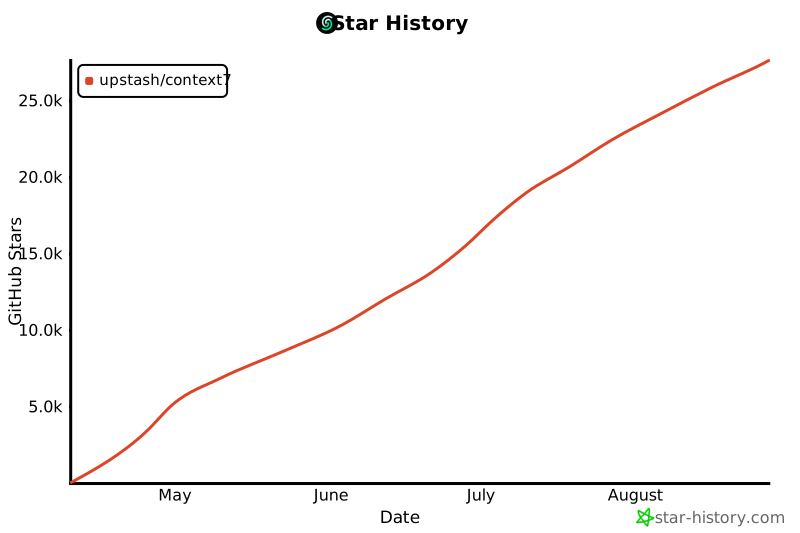](https://www.star-history.com/#upstash/context7&Date)
## 📄 License
MIT
================================================
FILE: SECURITY.md
================================================
# Security Policy
## Supported Versions
The following versions of Context7 MCP are currently supported with security updates:
| Version | Supported |
| ------- | ------------------ |
| 1.0.x | :white_check_mark: |
We recommend always using the latest version (`@upstash/context7-mcp@latest`) to ensure you have the most recent security patches and features.
## Reporting a Vulnerability
We take the security of Context7 seriously. If you discover a security vulnerability, please report it responsibly.
### How to Report
- Please use GitHub's [private vulnerability reporting](https://github.com/upstash/context7/security/advisories/new) feature to submit your report
- Alternatively, you can email security concerns to [context7@upstash.com](mailto:context7@upstash.com)
### What to Include
- A description of the vulnerability
- Steps to reproduce the issue
- Potential impact of the vulnerability
- Any suggested fixes (optional)
### What to Expect
- **Initial Response**: We aim to acknowledge your report within 48 hours
- **Status Updates**: You can expect updates on the progress every 5-7 business days
- **Resolution Timeline**: We strive to resolve critical vulnerabilities within 30 days
### After Reporting
- If the vulnerability is accepted, we will work on a fix and coordinate disclosure with you
- We will credit reporters in our release notes (unless you prefer to remain anonymous)
- If the report is declined, we will provide an explanation
### Please Do Not
- Disclose the vulnerability publicly before we have addressed it
- Exploit the vulnerability beyond what is necessary to demonstrate it
================================================
FILE: docs/adding-libraries.mdx
================================================
---
title: Library Owners
---
Context7 allows you to add your favorite libraries and frameworks so developers always receive current, trustworthy documentation inside their coding environment.
## Claiming Your Library
If you're the library owner, you can claim your library on Context7 to unlock a web-based admin panel for managing configuration. This allows you to:
- Edit settings through a user interface instead of committing file changes
- Invite team members to collaborate on configuration
- Add and manage multiple versions of your library documentation
- Get higher rate limits for refresh operations
**[Learn more about claiming libraries →](/howto/claiming-libraries)**
## Who Can Manage Configuration?
- **Library authors**: Claim ownership via `context7.json` and manage settings through the admin panel, or add configuration directly to your repository
- **Contributors**: Submit pull requests to add or update the configuration
## Quick Submission
The fastest way to add a library is through our web interface:
**[Submit a Library ->](https://context7.com/add-library?tab=github)**
1. Paste the GitHub repository URL.
2. (Optional) Adjust folders and exclusions.
3. Submit and let Context7 parse and index the documentation.
<Note>
For private repositories, see the [Private Repositories](/howto/private-repositories) guide.
Requires a Pro or Enterprise plan.
</Note>
## Advanced Configuration with `context7.json`
For more control over how Context7 parses and presents your library, you can add a `context7.json` file to the root of your repository. This file works similarly to `robots.txt` and tells Context7 how to handle your project.
### Configuration Fields
Here's an example `context7.json` file with all available options:
```json
{
"$schema": "https://context7.com/schema/context7.json",
"projectTitle": "Upstash Ratelimit",
"description": "Ratelimiting library based on Upstash Redis",
"folders": [],
"excludeFolders": ["src"],
"excludeFiles": [],
"rules": ["Use Upstash Redis as a database", "Use single region set up"],
"previousVersions": [
{
"tag": "v1.2.1"
}
]
}
```
<Note>
**Pro Tip**: Including the `$schema` field enables autocomplete, validation, and helpful tooltips
in modern code editors like VS Code, making it easier to create and maintain your configuration.
</Note>
## Field Descriptions
- **`projectTitle`** (string): Suggested display name for your project in Context7. Only used when the LLM cannot generate a name with high confidence.
- **`description`** (string): Suggested description for your project in Context7. Only used when the LLM cannot generate a description with high confidence.
- **`branch`** (string): The name of the git branch to parse. If not provided, the default branch will be used.
- **`folders`** (array): Specific folder paths to include when parsing. If empty, Context7 scans the entire repository. Root-level markdown files are always included.
- **`excludeFolders`** (array): Patterns to exclude from documentation parsing. Supports simple names, paths, and glob patterns (see Exclusion Patterns below).
- **`excludeFiles`** (array): Specific file names to exclude. Use only the filename, not the full path. Examples: `CHANGELOG.md`, license files, or non-documentation content.
- **`rules`** (array): Best practices or important guidelines that coding agents should follow when using your library. These appear as recommendations in the documentation context provided to coding agents.
- **`previousVersions`** (array): Information about previous versions of your library that should also be available in Context7.
- **`tag`**: The Git tag or version identifier
- **`branchVersions`** (array): Information about previous versions (branch-based) of your library that should also
be available in Context7.
- **`branch`**: The Git branch
### Exclusion Patterns
The `excludeFolders` parameter supports various pattern types for flexible exclusion:
- **Simple folder names**: `"node_modules"` - Excludes any folder named "node_modules" anywhere in the tree
- **Root-specific patterns**: `"./xyz"` - Excludes the folder only at repository root (e.g., excludes `/xyz` but not `/dist/xyz`)
- **Path patterns**: `"app-sdk/v2.3"` - Excludes specific paths and everything under them
- **Glob patterns**: `"*.test"`, `"temp*"` - Excludes folders matching the pattern
- **Globstar patterns**: `"**/dist"`, `"docs/**/internal"` - Advanced path matching
- **Complex patterns**: `"src/**/*.test.js"` - Exclude test files in the src directory
Examples:
- `"node_modules"` - Excludes all node_modules folders anywhere
- `"./build"` - Excludes the build folder only at root (not `src/build`)
- `"app-sdk/v2.3"` - Excludes the app-sdk/v2.3 path and all its contents
- `"*.test"` - Excludes folders ending with .test
- `"docs/**/internal"` - Excludes any "internal" folder under docs
- `"**/temp"` - Excludes any folder named "temp" anywhere
### Default Exclusions
If you don't specify `excludeFiles` or `excludeFolders` in your `context7.json` file, Context7 uses these default patterns:
#### Default Excluded Files
```
CHANGELOG.md, changelog.md, CHANGELOG.mdx, changelog.mdx
LICENSE.md, license.md
CODE_OF_CONDUCT.md, code_of_conduct.md
```
#### Default Excluded Folders
```
*archive*, *archived*, old, docs/old, *deprecated*, *legacy*
*previous*, *outdated*, *superseded*
i18n/zh*, i18n/es*, i18n/fr*, i18n/de*, i18n/ja*, i18n/ko*
i18n/ru*, i18n/pt*, i18n/it*, i18n/ar*, i18n/hi*, i18n/tr*
i18n/nl*, i18n/pl*, i18n/sv*, i18n/vi*, i18n/th*
zh-cn, zh-tw, zh-hk, zh-mo, zh-sg
```
These defaults help coding agents avoid irrelevant, outdated, and non-technical content.
## Need Help?
If you encounter issues or need assistance adding your project, please [open an issue](https://github.com/upstash/context7/issues/new/choose) or reach out to our community.
================================================
FILE: docs/agentic-tools/ai-sdk/agents/context7-agent.mdx
================================================
---
title: "Context7Agent"
sidebarTitle: "Context7Agent"
description: "Pre-built AI agent for documentation lookup workflows"
---
The `Context7Agent` class is a pre-configured AI agent that handles the complete documentation lookup workflow automatically. It combines both `resolveLibraryId` and `queryDocs` tools with an optimized system prompt.
## Usage
```typescript
import { Context7Agent } from "@upstash/context7-tools-ai-sdk";
import { anthropic } from "@ai-sdk/anthropic";
const agent = new Context7Agent({
model: anthropic("claude-sonnet-4-20250514"),
});
const { text } = await agent.generate({
prompt: "How do I use React Server Components?",
});
console.log(text);
```
## Configuration
```typescript
new Context7Agent(config?: Context7AgentConfig)
```
### Parameters
<ParamField path="config" type="Context7AgentConfig" optional>
Configuration options for the agent.
<Expandable title="properties">
<ParamField path="model" type="LanguageModel" optional>
Language model to use. Must be a LanguageModel instance from an AI SDK provider.
Examples:
- `anthropic('claude-sonnet-4-20250514')`
- `openai('gpt-5.2')`
- `google('gemini-1.5-pro')`
</ParamField>
<ParamField path="apiKey" type="string" optional>
Context7 API key. If not provided, uses the `CONTEXT7_API_KEY` environment variable.
</ParamField>
<ParamField path="system" type="string" optional>
Custom system prompt. Overrides the default `AGENT_PROMPT`.
</ParamField>
<ParamField path="stopWhen" type="StopCondition" optional default="stepCountIs(5)">
Condition for when the agent should stop. Defaults to stopping after 5 steps.
</ParamField>
</Expandable>
</ParamField>
### Returns
`Context7Agent` extends the AI SDK `Agent` class and provides `generate()` and `stream()` methods.
## Agent Workflow
The agent follows a structured multi-step workflow:
```mermaid
flowchart TD
A[User Query] --> B[Extract Library Name]
B --> C[Call resolveLibraryId]
C --> D{Results Found?}
D -->|Yes| E[Select Best Match]
D -->|No| F[Report No Results]
E --> G[Call queryDocs]
G --> H{Sufficient Context?}
H -->|Yes| I[Generate Response]
H -->|No| J[Fetch More Docs]
J --> H
I --> K[Return Answer with Examples]
```
### Step-by-Step
1. **Extract library name** - Identifies the library/framework from the user's query
2. **Resolve library** - Calls `resolveLibraryId` to find the Context7 library ID
3. **Select best match** - Analyzes results based on reputation, coverage, and relevance
4. **Fetch documentation** - Calls `queryDocs` with the selected library ID and user's query
5. **Query if needed** - Makes additional queries if initial context is insufficient
6. **Generate response** - Provides an answer with code examples from the documentation
## Examples
### Basic Usage
```typescript
import { Context7Agent } from "@upstash/context7-tools-ai-sdk";
import { anthropic } from "@ai-sdk/anthropic";
const agent = new Context7Agent({
model: anthropic("claude-sonnet-4-20250514"),
});
const { text } = await agent.generate({
prompt: "How do I set up authentication in Next.js?",
});
console.log(text);
```
### With OpenAI
```typescript
import { Context7Agent } from "@upstash/context7-tools-ai-sdk";
import { openai } from "@ai-sdk/openai";
const agent = new Context7Agent({
model: openai("gpt-5.2"),
});
const { text } = await agent.generate({
prompt: "Explain Tanstack Query's useQuery hook",
});
```
### Streaming Responses
```typescript
import { Context7Agent } from "@upstash/context7-tools-ai-sdk";
import { anthropic } from "@ai-sdk/anthropic";
const agent = new Context7Agent({
model: anthropic("claude-sonnet-4-20250514"),
});
const { textStream } = await agent.stream({
prompt: "How do I create a Supabase Edge Function?",
});
for await (const chunk of textStream) {
process.stdout.write(chunk);
}
```
### Custom Configuration
```typescript
import { Context7Agent } from "@upstash/context7-tools-ai-sdk";
import { anthropic } from "@ai-sdk/anthropic";
import { stepCountIs } from "ai";
const agent = new Context7Agent({
model: anthropic("claude-sonnet-4-20250514"),
apiKey: process.env.CONTEXT7_API_KEY,
stopWhen: stepCountIs(8), // Allow more steps for complex queries
});
```
### Custom System Prompt
```typescript
import { Context7Agent, AGENT_PROMPT } from "@upstash/context7-tools-ai-sdk";
import { openai } from "@ai-sdk/openai";
const agent = new Context7Agent({
model: openai("gpt-5.2"),
system: `${AGENT_PROMPT}
Additional instructions:
- Always include TypeScript examples
- Mention version compatibility when relevant
- Suggest related documentation topics`,
});
```
## Comparison: Agent vs Tools
| Feature | Context7Agent | Individual Tools |
| ------------- | -------------------- | -------------------- |
| Setup | Single configuration | Configure each tool |
| Workflow | Automatic multi-step | Manual orchestration |
| System prompt | Optimized default | You provide |
| Customization | Limited | Full control |
| Best for | Quick integration | Custom workflows |
### When to Use the Agent
- Rapid prototyping
- Standard documentation lookup use cases
- When you want sensible defaults
### When to Use Individual Tools
- Custom agentic workflows
- Integration with other tools
- Fine-grained control over the process
- Custom system prompts with specific behavior
## Related
- [resolveLibraryId](/agentic-tools/ai-sdk/tools/resolve-library-id) - The library search tool used by the agent
- [queryDocs](/agentic-tools/ai-sdk/tools/query-docs) - The documentation fetch tool used by the agent
- [Getting Started](/agentic-tools/ai-sdk/getting-started) - Overview of the AI SDK integration
================================================
FILE: docs/agentic-tools/ai-sdk/getting-started.mdx
================================================
---
title: "Getting Started"
sidebarTitle: "Getting Started"
description: "Add Context7 documentation tools to your Vercel AI SDK applications"
---
`@upstash/context7-tools-ai-sdk` provides [Vercel AI SDK](https://sdk.vercel.ai/) compatible tools and agents that give your AI applications access to up-to-date library documentation.
When building AI-powered applications with the Vercel AI SDK, your models often need accurate information about libraries and frameworks. Instead of relying on potentially outdated training data, Context7 tools let your AI fetch current documentation on-demand, ensuring responses include correct API usage, current best practices, and working code examples.
The package gives you two ways to integrate:
1. **Individual tools** (`resolveLibraryId` and `queryDocs`) that you add to your existing `generateText` or `streamText` calls
2. **A pre-built agent** (`Context7Agent`) that handles the entire documentation lookup workflow automatically
Both approaches work with any AI provider supported by the Vercel AI SDK, including OpenAI, Anthropic, Google, and others.
## Installation
<CodeGroup>
```bash npm
npm install @upstash/context7-tools-ai-sdk
```
```bash pnpm
pnpm add @upstash/context7-tools-ai-sdk
```
```bash yarn
yarn add @upstash/context7-tools-ai-sdk
```
```bash bun
bun add @upstash/context7-tools-ai-sdk
```
</CodeGroup>
## Prerequisites
You'll need:
1. A Context7 API key from the [Context7 Dashboard](https://context7.com/dashboard)
2. An AI provider SDK (e.g., `@ai-sdk/openai`, `@ai-sdk/anthropic`)
## Configuration
Set your Context7 API key as an environment variable:
```bash
CONTEXT7_API_KEY=ctx7sk-...
```
The tools and agents will automatically use this key.
## Quick Start
### Using Tools with generateText
The simplest way to add documentation lookup to your AI application:
```typescript
import { resolveLibraryId, queryDocs } from "@upstash/context7-tools-ai-sdk";
import { generateText, stepCountIs } from "ai";
import { openai } from "@ai-sdk/openai";
const { text } = await generateText({
model: openai("gpt-5.2"),
prompt: "How do I create a server action in Next.js?",
tools: {
resolveLibraryId: resolveLibraryId(),
queryDocs: queryDocs(),
},
stopWhen: stepCountIs(5),
});
console.log(text);
```
### Using the Context7 Agent
For a more streamlined experience, use the pre-configured agent:
```typescript
import { Context7Agent } from "@upstash/context7-tools-ai-sdk";
import { anthropic } from "@ai-sdk/anthropic";
const agent = new Context7Agent({
model: anthropic("claude-sonnet-4-20250514"),
});
const { text } = await agent.generate({
prompt: "How do I use React Server Components?",
});
console.log(text);
```
### Using Tools with streamText
For streaming responses:
```typescript
import { resolveLibraryId, queryDocs } from "@upstash/context7-tools-ai-sdk";
import { streamText, stepCountIs } from "ai";
import { openai } from "@ai-sdk/openai";
const { textStream } = streamText({
model: openai("gpt-5.2"),
prompt: "Explain how to use Tanstack Query for data fetching",
tools: {
resolveLibraryId: resolveLibraryId(),
queryDocs: queryDocs(),
},
stopWhen: stepCountIs(5),
});
for await (const chunk of textStream) {
process.stdout.write(chunk);
}
```
## Explicit Configuration
You can also pass the API key directly if needed:
```typescript
import { resolveLibraryId, queryDocs } from "@upstash/context7-tools-ai-sdk";
const tools = {
resolveLibraryId: resolveLibraryId({ apiKey: "your-api-key" }),
queryDocs: queryDocs({ apiKey: "your-api-key" }),
};
```
## How It Works
The tools follow a two-step workflow:
1. **`resolveLibraryId`** - Searches Context7's database to find the correct library ID for a given query (e.g., "react" → `/reactjs/react.dev`)
2. **`queryDocs`** - Fetches documentation for the resolved library using the user's query to retrieve relevant content
The AI model orchestrates these tools automatically based on the user's prompt, fetching relevant documentation before generating a response.
## Next Steps
<CardGroup cols={2}>
<Card
title="resolveLibraryId"
icon="magnifying-glass"
href="/agentic-tools/ai-sdk/tools/resolve-library-id"
>
Search for libraries and get Context7-compatible IDs
</Card>
<Card title="queryDocs" icon="book" href="/agentic-tools/ai-sdk/tools/query-docs">
Fetch documentation for a specific library
</Card>
<Card title="Context7Agent" icon="robot" href="/agentic-tools/ai-sdk/agents/context7-agent">
Use the pre-built documentation agent
</Card>
</CardGroup>
================================================
FILE: docs/agentic-tools/ai-sdk/tools/query-docs.mdx
================================================
---
title: "queryDocs"
sidebarTitle: "queryDocs"
description: "Fetch up-to-date documentation for a specific library"
---
The `queryDocs` tool fetches documentation for a library using its Context7-compatible library ID and a query. This tool is typically called after `resolveLibraryId` has identified the correct library.
## Usage
```typescript
import { resolveLibraryId, queryDocs } from "@upstash/context7-tools-ai-sdk";
import { generateText, stepCountIs } from "ai";
import { openai } from "@ai-sdk/openai";
const { text } = await generateText({
model: openai("gpt-5.2"),
prompt: "How do I use React Server Components?",
tools: {
resolveLibraryId: resolveLibraryId(),
queryDocs: queryDocs(),
},
stopWhen: stepCountIs(5),
});
```
## Configuration
```typescript
queryDocs(config?: Context7ToolsConfig)
```
### Parameters
<ParamField path="config" type="Context7ToolsConfig" optional>
Configuration options for the tool.
<Expandable title="properties">
<ParamField path="apiKey" type="string" optional>
Context7 API key. If not provided, uses the `CONTEXT7_API_KEY` environment variable.
</ParamField>
</Expandable>
</ParamField>
### Returns
Returns an AI SDK `tool` that can be used with `generateText`, `streamText`, or agents.
## Tool Behavior
When the AI model calls this tool, it:
1. Takes a library ID and query from the model
2. Fetches documentation from Context7's API
3. Returns the documentation content
### Input Schema
The tool accepts the following inputs from the AI model:
<ParamField path="libraryId" type="string" required>
Context7-compatible library ID (e.g., `/reactjs/react.dev`, `/vercel/next.js`)
</ParamField>
<ParamField path="query" type="string" required>
The question or task you need help with. Be specific and include relevant details. Good: "How to set up authentication with JWT in Express.js" or "React useEffect cleanup function examples". Bad: "auth" or "hooks".
</ParamField>
### Output Format
On success, the tool returns the documentation as plain text, formatted for easy consumption by the AI model:
```
# Server Components
Server Components let you write UI that can be rendered and optionally cached on the server.
## Example
\`\`\`tsx
async function ServerComponent() {
const data = await fetchData();
return <div>{data}</div>;
}
\`\`\`
---
# Using Server Components with Client Components
You can import Server Components into Client Components...
```
#### On Failure
```
No documentation found for library "/invalid/library". This might have happened because you used an invalid Context7-compatible library ID. Use 'resolveLibraryId' to get a valid ID.
```
## Examples
### Basic Usage with Both Tools
```typescript
import { resolveLibraryId, queryDocs } from "@upstash/context7-tools-ai-sdk";
import { generateText, stepCountIs } from "ai";
import { openai } from "@ai-sdk/openai";
const { text } = await generateText({
model: openai("gpt-5.2"),
prompt: "Show me how to set up routing in Next.js App Router",
tools: {
resolveLibraryId: resolveLibraryId(),
queryDocs: queryDocs(),
},
stopWhen: stepCountIs(5),
});
// The model will:
// 1. Call resolveLibraryId to get the library ID
// 2. Call queryDocs({ libraryId: "/vercel/next.js", query: "routing in App Router" })
// 3. Generate a response using the fetched documentation
```
### With Custom Configuration
```typescript
import { queryDocs } from "@upstash/context7-tools-ai-sdk";
const tool = queryDocs({
apiKey: process.env.CONTEXT7_API_KEY,
});
```
### Direct Library ID (Skip resolveLibraryId)
If the user provides a library ID directly, the model can skip the resolution step:
```typescript
import { queryDocs } from "@upstash/context7-tools-ai-sdk";
import { generateText, stepCountIs } from "ai";
import { openai } from "@ai-sdk/openai";
const { text } = await generateText({
model: openai("gpt-5.2"),
prompt: "Using /vercel/next.js, explain middleware",
tools: {
queryDocs: queryDocs(),
},
stopWhen: stepCountIs(3),
});
// The model recognizes the /org/project format and calls queryDocs directly
```
### Multi-Step Documentation Lookup
For comprehensive documentation, the model can make multiple queries:
```typescript
import { resolveLibraryId, queryDocs } from "@upstash/context7-tools-ai-sdk";
import { generateText, stepCountIs } from "ai";
import { anthropic } from "@ai-sdk/anthropic";
const { text } = await generateText({
model: anthropic("claude-sonnet-4-20250514"),
prompt: "Give me a comprehensive guide to Supabase authentication",
tools: {
resolveLibraryId: resolveLibraryId(),
queryDocs: queryDocs(),
},
stopWhen: stepCountIs(8), // Allow more steps for multiple queries
});
// The model may call queryDocs multiple times with different queries
// to gather comprehensive documentation
```
## Version-Specific Documentation
Library IDs can include version specifiers:
```typescript
// Latest version
"/vercel/next.js";
// Specific version
"/vercel/next.js/v14.3.0-canary.87";
```
The model can request documentation for specific versions when the user asks about a particular version.
## Related
- [resolveLibraryId](/agentic-tools/ai-sdk/tools/resolve-library-id) - Search for libraries and get their IDs
- [Context7Agent](/agentic-tools/ai-sdk/agents/context7-agent) - Pre-built agent that handles the full workflow
================================================
FILE: docs/agentic-tools/ai-sdk/tools/resolve-library-id.mdx
================================================
---
title: "resolveLibraryId"
sidebarTitle: "resolveLibraryId"
description: "Search for libraries and resolve them to Context7-compatible IDs"
---
The `resolveLibraryId` tool searches Context7's library database and returns matching results with their Context7-compatible library IDs. This is typically the first step in a documentation lookup workflow.
## Usage
```typescript
import { resolveLibraryId } from "@upstash/context7-tools-ai-sdk";
import { generateText, stepCountIs } from "ai";
import { openai } from "@ai-sdk/openai";
const { text } = await generateText({
model: openai("gpt-5.2"),
prompt: "Find documentation for React hooks",
tools: {
resolveLibraryId: resolveLibraryId(),
},
stopWhen: stepCountIs(3),
});
```
## Configuration
```typescript
resolveLibraryId(config?: Context7ToolsConfig)
```
### Parameters
<ParamField path="config" type="Context7ToolsConfig" optional>
Configuration options for the tool.
<Expandable title="properties">
<ParamField path="apiKey" type="string" optional>
Context7 API key. If not provided, uses the `CONTEXT7_API_KEY` environment variable.
</ParamField>
</Expandable>
</ParamField>
### Returns
Returns an AI SDK `tool` that can be used with `generateText`, `streamText`, or agents.
## Tool Behavior
When the AI model calls this tool, it:
1. Takes a `query` and `libraryName` parameter from the model
2. Searches Context7's database for matching libraries
3. Returns formatted results including:
- Library ID (e.g., `/reactjs/react.dev`)
- Title and description
- Number of code snippets available
- Source reputation score
- Available versions
### Input Schema
The tool accepts the following input from the AI model:
<ParamField path="query" type="string" required>
The user's original question or task. This is used to rank library results by relevance to what the user is trying to accomplish.
</ParamField>
<ParamField path="libraryName" type="string" required>
Library name to search for (e.g., "react", "next.js", "vue")
</ParamField>
### Output Format
On success, the tool returns the search results as plain text, formatted for easy consumption by the AI model:
```
- Title: React Documentation
- Context7-compatible library ID: /reactjs/react.dev
- Description: The library for web and native user interfaces
- Code Snippets: 1250
- Trust Score: High
- Benchmark Score: 98
- Versions: 19.0.0, 18.3.1, 18.2.0
----------
- Title: React Native
- Context7-compatible library ID: /facebook/react-native
- Description: A framework for building native applications using React
- Code Snippets: 890
- Trust Score: High
- Benchmark Score: 95
- Versions: 0.76.0, 0.75.4
```
On failure:
```
No libraries found matching "unknown-lib". Try a different search term or check the library name.
```
## Examples
### Basic Usage
```typescript
import { resolveLibraryId, queryDocs } from "@upstash/context7-tools-ai-sdk";
import { generateText, stepCountIs } from "ai";
import { openai } from "@ai-sdk/openai";
const { text, toolCalls } = await generateText({
model: openai("gpt-5.2"),
prompt: "What libraries are available for React?",
tools: {
resolveLibraryId: resolveLibraryId(),
queryDocs: queryDocs(),
},
stopWhen: stepCountIs(5),
});
// The model will call resolveLibraryId and receive a list of matching libraries
console.log(text);
```
### With Custom API Key
```typescript
import { resolveLibraryId } from "@upstash/context7-tools-ai-sdk";
const tool = resolveLibraryId({
apiKey: process.env.CONTEXT7_API_KEY,
});
```
### Inspecting Tool Calls
```typescript
import { resolveLibraryId } from "@upstash/context7-tools-ai-sdk";
import { generateText, stepCountIs } from "ai";
import { openai } from "@ai-sdk/openai";
const { toolCalls, toolResults } = await generateText({
model: openai("gpt-5.2"),
prompt: "Find the official Next.js documentation",
tools: {
resolveLibraryId: resolveLibraryId(),
},
stopWhen: stepCountIs(3),
});
// See what the model searched for
for (const call of toolCalls) {
console.log("Searched for:", call.args.libraryName);
}
// See the results
for (const result of toolResults) {
console.log("Found:", result.result);
}
```
## Selection Guidance
The tool's description instructs the AI model to select libraries based on:
1. **Name similarity** - Exact matches are prioritized
2. **Description relevance** - How well the description matches the query intent
3. **Documentation coverage** - Libraries with more code snippets are preferred
4. **Source reputation** - High/Medium reputation sources are more authoritative
5. **Benchmark score** - Quality indicator (100 is the highest)
## Related
- [queryDocs](/agentic-tools/ai-sdk/tools/query-docs) - Fetch documentation using the resolved library ID
- [Context7Agent](/agentic-tools/ai-sdk/agents/context7-agent) - Pre-built agent that handles the full workflow
================================================
FILE: docs/agentic-tools/overview.mdx
================================================
---
title: "Overview"
sidebarTitle: "Overview"
description: "Build AI agents with up-to-date library documentation"
---
# Agentic Tools
Context7 provides tools and integrations that give your AI agents access to accurate, up-to-date library documentation. Instead of relying on potentially outdated training data, your agents can fetch real-time documentation to answer questions and generate code.
## Why Agentic Tools?
AI agents often struggle with:
- **Outdated knowledge** - Training data becomes stale, leading to deprecated API usage
- **Hallucinated APIs** - Models confidently suggest methods that don't exist
- **Version mismatches** - Code examples from old versions that no longer work
Context7's agentic tools solve these problems by giving your agents direct access to current documentation during inference.
## Available Integrations
<CardGroup cols={1}>
<Card
title="Vercel AI SDK"
icon="wand-magic-sparkles"
href="/agentic-tools/ai-sdk/getting-started"
>
Add Context7 tools to your AI SDK workflows with `generateText`, `streamText`, or use the
pre-built `Context7Agent` for automatic documentation lookup.
</Card>
</CardGroup>
## How It Works
```mermaid
sequenceDiagram
participant User
participant Agent
participant Context7
participant Docs
User->>Agent: "How do I use React Server Components?"
Agent->>Context7: resolveLibraryId(query: "React Server Components", libraryName: "react")
Context7-->>Agent: Library ID: /reactjs/react.dev
Agent->>Context7: queryDocs(libraryId: "/reactjs/react.dev", query: "server components")
Context7->>Docs: Fetch latest documentation
Docs-->>Context7: Current docs with examples
Context7-->>Agent: Documentation content
Agent->>User: Answer with accurate, up-to-date code examples
```
## Use Cases
<AccordionGroup>
<Accordion title="Documentation-Aware Chatbots" icon="comments">
Build chatbots that answer framework questions with accurate, version-specific information:
```typescript
import { generateText, stepCountIs } from "ai";
import { openai } from "@ai-sdk/openai";
import { resolveLibraryId, queryDocs } from "@upstash/context7-tools-ai-sdk";
const { text } = await generateText({
model: openai("gpt-5.2"),
prompt: "How do I set up authentication in Next.js 15?",
tools: {
resolveLibraryId: resolveLibraryId(),
queryDocs: queryDocs(),
},
stopWhen: stepCountIs(5),
});
```
</Accordion>
<Accordion title="Code Generation Pipelines" icon="code">
Ensure generated code uses current APIs and best practices:
```typescript
import { Context7Agent } from "@upstash/context7-tools-ai-sdk";
import { anthropic } from "@ai-sdk/anthropic";
const agent = new Context7Agent({
model: anthropic("claude-sonnet-4-20250514"),
});
const { text } = await agent.generate({
prompt: "Generate a Supabase Edge Function that handles webhooks",
});
```
</Accordion>
<Accordion title="Code Review Agents" icon="magnifying-glass-chart">
Build code review agents that verify implementations against current API documentation:
```typescript
import { generateText, stepCountIs } from "ai";
import { anthropic } from "@ai-sdk/anthropic";
import { resolveLibraryId, queryDocs } from "@upstash/context7-tools-ai-sdk";
const codeToReview = `
const { data } = await supabase
.from('users')
.select('*')
.eq('id', userId)
.single();
`;
const { text } = await generateText({
model: anthropic("claude-sonnet-4-20250514"),
prompt: `Review this Supabase code for correctness and best practices:
${codeToReview}
Check against the latest Supabase documentation.`,
tools: {
resolveLibraryId: resolveLibraryId(),
queryDocs: queryDocs(),
},
stopWhen: stepCountIs(5),
});
// Agent fetches current Supabase docs to verify:
// - Correct method signatures
// - Deprecated patterns
// - Security best practices
// - Error handling recommendations
```
</Accordion>
</AccordionGroup>
================================================
FILE: docs/api-guide.mdx
================================================
---
title: API Guide
description: Authentication, rate limits, best practices, and integration guides for the Context7 API
---
## Authentication
All API requests require authentication using an API key. Include your API key in the `Authorization` header:
```bash
Authorization: Bearer CONTEXT7_API_KEY
```
Get your API key at [context7.com/dashboard](https://context7.com/dashboard). Learn more about [creating and managing API keys](/howto/api-keys).
## API Methods
Context7 provides two core API methods for retrieving documentation context.
### Search Library
Search for available libraries by name. Use this to find the correct library ID before fetching documentation.
**Endpoint:** `GET /api/v2/libs/search`
| Parameter | Type | Required | Description |
|-----------|------|----------|-------------|
| `query` | string | Yes | Your question or task (used for relevance ranking) |
| `libraryName` | string | Yes | Library name to search for (e.g., "react", "nextjs") |
**Response:** Returns an array of matching libraries:
```json
[
{
"id": "/facebook/react",
"name": "React",
"description": "A JavaScript library for building user interfaces",
"totalSnippets": 1250,
"trustScore": 95,
"benchmarkScore": 88,
"versions": ["v18.2.0", "v17.0.2"]
}
]
```
**Example:**
```bash
curl "https://context7.com/api/v2/libs/search?libraryName=react&query=hooks" \
-H "Authorization: Bearer CONTEXT7_API_KEY"
```
### Get Context
Retrieve documentation context for a specific library. Returns relevant documentation snippets based on your query.
**Endpoint:** `GET /api/v2/context`
| Parameter | Type | Required | Description |
|-----------|------|----------|-------------|
| `query` | string | Yes | Your question or task (used for relevance ranking) |
| `libraryId` | string | Yes | Library identifier from search (e.g., `/facebook/react`) |
| `type` | string | No | Response format: `json` (default) or `txt` |
**Response (JSON format):** Returns an array of documentation snippets:
```json
[
{
"title": "Using the Effect Hook",
"content": "The Effect Hook lets you perform side effects...",
"source": "react.dev/reference/react/useEffect"
}
]
```
**Response (Text format):** Returns plain text ready for LLM prompts.
**Example:**
```bash
# JSON format (default)
curl "https://context7.com/api/v2/context?libraryId=/facebook/react&query=useEffect" \
-H "Authorization: Bearer CONTEXT7_API_KEY"
# Text format
curl "https://context7.com/api/v2/context?libraryId=/facebook/react&query=useEffect&type=txt" \
-H "Authorization: Bearer CONTEXT7_API_KEY"
```
### Complete Workflow Example
```python
import requests
headers = {"Authorization": "Bearer CONTEXT7_API_KEY"}
# Step 1: Search for the library
search_response = requests.get(
"https://context7.com/api/v2/libs/search",
headers=headers,
params={"libraryName": "react", "query": "I need to manage state"}
)
libraries = search_response.json()
best_match = libraries[0]
print(f"Found: {best_match['name']} ({best_match['id']})")
# Step 2: Get documentation context
context_response = requests.get(
"https://context7.com/api/v2/context",
headers=headers,
params={"libraryId": best_match["id"], "query": "How do I use useState?"}
)
docs = context_response.json()
for doc in docs:
print(f"Title: {doc['title']}")
print(f"Content: {doc['content'][:200]}...")
```
<Info>
For TypeScript SDK usage with additional features, see [Search Library](/sdks/ts/commands/search-library) and [Get Context](/sdks/ts/commands/get-context).
</Info>
## Rate Limits
- **Without API key**: Low rate limits and no custom configuration
- **With API key**: Higher limits based on your plan
- View current usage and reset windows in the [dashboard](https://context7.com/dashboard).
When you exceed rate limits, the API returns a `429` status code:
```json
{
"error": "Too many requests",
"status": 429
}
```
## Best Practices
### Be Specific with Queries
Use detailed, natural language queries for better results:
```bash
# Good - specific question
curl "https://context7.com/api/v2/context?libraryId=/vercel/next.js&query=How%20to%20implement%20authentication%20with%20middleware" \
-H "Authorization: Bearer CONTEXT7_API_KEY"
# Less optimal - vague query
curl "https://context7.com/api/v2/context?libraryId=/vercel/next.js&query=auth" \
-H "Authorization: Bearer CONTEXT7_API_KEY"
```
### Cache Responses
Store documentation locally to reduce API calls and improve performance. Documentation updates are relatively infrequent, so caching for several hours or days is usually appropriate.
### Handle Rate Limits
Implement exponential backoff for rate limit errors:
```python
import time
import requests
def fetch_with_retry(url, headers, max_retries=3):
for attempt in range(max_retries):
response = requests.get(url, headers=headers)
if response.status_code == 429:
# Wait before retrying with exponential backoff
time.sleep(2 ** attempt)
continue
return response
raise Exception("Max retries exceeded")
```
### Use Specific Versions
Specify exact versions for consistent results across deployments:
```bash
# Pin to a specific version
curl "https://context7.com/api/v2/context?libraryId=/vercel/next.js/v15.1.8&query=app%20router" \
-H "Authorization: Bearer CONTEXT7_API_KEY"
```
## Error Handling
The Context7 API uses standard HTTP status codes:
| Code | Description | Action |
| ---- | ----------------------------------------- | -------------------------------------------- |
| 200 | Success | Process the response normally |
| 202 | Accepted - Library not finalized | Wait and retry later |
| 301 | Moved - Library redirected | Use the new library ID from `redirectUrl` |
| 400 | Bad Request - Invalid parameters | Check query parameters |
| 401 | Unauthorized - Invalid API key | Check your API key format (starts with `ctx7sk`) |
| 403 | Forbidden - Access denied | Check library access permissions |
| 404 | Not Found - Library doesn't exist | Verify the library ID |
| 422 | Unprocessable - Library too large/no code | Try a different library |
| 429 | Too Many Requests - Rate limit exceeded | Wait for `Retry-After` header, then retry |
| 500 | Internal Server Error | Retry with backoff |
| 503 | Service Unavailable - Search failed | Retry later |
### Error Response Format
All errors return a JSON object with these fields:
```json
{
"error": "library_not_found",
"message": "Library \"/owner/repo\" not found."
}
```
## SDK and Libraries
For TypeScript SDK installation and usage, see the [Getting Started guide](/sdks/ts/getting-started).
================================================
FILE: docs/clients/claude-code.mdx
================================================
---
title: Claude Code
description: Using Context7 with Claude Code
---
Context7 integrates with Claude Code to provide current library documentation instead of relying on training data. Claude Code supports skills, agents, and commands that make documentation lookups more powerful.
## Installation
Run the setup command to configure Context7 for Claude Code:
```bash
npx ctx7 setup --claude
```
This flow authenticates via OAuth, generates an API key, and installs the appropriate skill. You can choose between CLI or MCP mode.
<Tip>
If you're setting up Claude Code on a remote server, headless VM, or over SSH, use an existing API key instead:
```bash
npx ctx7 setup --claude --api-key YOUR_API_KEY
```
The default OAuth flow redirects back to `localhost`, which only works when the browser can reach the same machine that's running `ctx7 setup`.
</Tip>
Create or manage API keys in the [Context7 dashboard](https://context7.com/dashboard). For manual MCP installation or other configuration options, see [All MCP Clients](/resources/all-clients).
---
## Using Context7
With `ctx7 setup`, a skill is installed that triggers automatically when you ask about libraries — no need to say "use context7". You can also invoke it explicitly:
```
use context7 to show me how to set up middleware in Next.js 15
use context7 for Prisma query examples with relations
use context7 for the Supabase syntax for row-level security
```
If you know the library ID, use it directly to skip resolution:
```
use context7 with /supabase/supabase for authentication docs
use context7 with /vercel/next.js for app router setup
```
<Tip>
With the [Context7 plugin](#the-context7-plugin) installed, you get additional agents and commands on top of the skill.
</Tip>
---
## The Context7 Plugin
The full Context7 plugin for Claude Code includes more than just the MCP server:
<CardGroup cols={2}>
<Card title="MCP Server" icon="server">
The tools for fetching documentation (`resolve-library-id`, `query-docs`)
</Card>
<Card title="Skills" icon="sparkles">
Auto-triggers documentation lookups when you ask about libraries
</Card>
<Card title="Agents" icon="robot">
A `docs-researcher` agent for focused lookups that keep context lean
</Card>
<Card title="Commands" icon="terminal">
`/context7:docs` for manual documentation queries
</Card>
</CardGroup>
### Installing the Plugin
The plugin is available from the Context7 marketplace. Run these commands in Claude Code:
```
/plugin marketplace add upstash/context7
/plugin install context7-plugin@context7-marketplace
```
This adds the Context7 marketplace and installs the plugin with skills, agents, and commands.
### Skills
#### Documentation Lookup Skill
This skill triggers automatically when you ask about libraries, frameworks, or need code examples. You don't need to type "use context7" — the skill recognizes when documentation would help.
<AccordionGroup>
<Accordion title="What triggers the skill">
- Setup questions: "How do I configure Next.js middleware?"
- Code generation: "Write a Prisma query for user relations"
- API references: "What are the Supabase auth methods?"
- Framework mentions: React, Vue, Svelte, Express, Tailwind, etc.
</Accordion>
<Accordion title="How it works">
1. **Resolve**: Finds the library ID using `resolve-library-id` with your question as context
2. **Select**: Picks the best match based on name accuracy and quality scores
3. **Fetch**: Calls `query-docs` with the library ID and your specific question
4. **Return**: Provides code examples and explanations from current documentation
</Accordion>
</AccordionGroup>
### Agents
#### docs-researcher Agent
When you're in the middle of a long task and don't want documentation tool calls cluttering your context, spawn the `docs-researcher` agent. It runs in a separate context and returns just the answer.
<Tabs>
<Tab title="When to Use" icon="question">
- You need docs but want to keep your main context clean
- You're working on something complex and context is getting long
- You want a focused answer without side effects
</Tab>
<Tab title="Examples" icon="code">
```
spawn docs-researcher to look up React hooks documentation
spawn docs-researcher: how do I set up Prisma with PostgreSQL?
spawn docs-researcher to find Tailwind CSS grid utilities
```
</Tab>
</Tabs>
The agent uses the same tools (`resolve-library-id` and `query-docs`) but runs on a lighter model (Sonnet) to keep things fast.
#### When to Use Agents vs Inline Tools
| Scenario | Use |
|----------|-----|
| Deep into a task with long context | Agent |
| Want to avoid context bloat | Agent |
| Context is short | Inline tools |
| Want docs visible in conversation | Inline tools |
### Commands
#### /context7:docs
Manual command for documentation lookups.
**Format:**
```
/context7:docs <library> [query]
```
**Examples:**
<Tabs>
<Tab title="Basic" icon="search">
```
/context7:docs react hooks
/context7:docs next.js authentication
/context7:docs prisma relations
```
</Tab>
<Tab title="With Library ID" icon="link">
```
/context7:docs /vercel/next.js app router
/context7:docs /supabase/supabase row level security
```
Using a library ID directly skips the resolution step.
</Tab>
</Tabs>
**When to use:**
- You know exactly which library and topic you need
- You want a quick lookup without explaining your full context
- You're testing what documentation is available
================================================
FILE: docs/clients/cli.mdx
================================================
---
title: CLI
description: The ctx7 CLI — fetch library documentation, manage skills, and configure Context7 MCP from your terminal
---
The `ctx7` CLI is the command-line interface for Context7. It does three things:
- **Fetch library documentation** — resolve any library by name and query its up-to-date docs directly in your terminal, without opening a browser
- **Manage AI coding skills** — install, search, generate, and remove skills from the Context7 registry
- **Configure Context7 MCP** — set up the MCP server for Claude Code, Cursor, or OpenCode with a single command
The CLI is useful both as a standalone tool (fetching docs while you code) and as a setup utility (wiring up Context7 for your AI coding agent).
## Installation
Requires Node.js 18 or later.
<Tabs>
<Tab title="npx (no install)">
Run ctx7 directly without installing anything. Useful for one-off commands or trying it out.
```bash
npx ctx7 --help
npx ctx7 library react
```
</Tab>
<Tab title="Global install">
Install globally for faster access — no `npx` prefix needed on every command.
```bash
npm install -g ctx7
# Verify installation
ctx7 --version
```
</Tab>
</Tabs>
---
## Query Library Documentation
Fetching docs is a two-step process: first resolve the library name to get its Context7 ID, then use that ID to query documentation.
### Step 1 — ctx7 library
Searches the Context7 index by name and returns matching libraries. Pass a `query` describing what you're trying to do — this ranks results by relevance and helps when a library name is ambiguous or shared across multiple packages.
```bash
ctx7 library react "How to clean up useEffect with async operations"
ctx7 library nextjs "How to set up app router with middleware"
ctx7 library prisma "How to define one-to-many relations with cascade delete"
```
Each result includes:
| Field | Description |
|-------|-------------|
| **Library ID** | The identifier to pass to `ctx7 docs` (format: `/org/project`) |
| **Code Snippets** | Number of indexed code examples — higher means more documentation coverage |
| **Source Reputation** | Authority indicator: High, Medium, Low, or Unknown |
| **Benchmark Score** | Quality score from 0 to 100 |
| **Versions** | Version-specific IDs when available (format: `/org/project/version`) |
When multiple results come back, the best match is usually the one with the closest name, highest snippet count, and strongest reputation. If you need docs for a specific version, pick the matching version ID from the list.
```bash
# Fetch docs for a specific version
ctx7 docs /vercel/next.js/v14.3.0-canary.87 "How to set up app router"
# Output as JSON for scripting
ctx7 library react "How to use hooks for state management" --json | jq '.[0].id'
```
### Step 2 — ctx7 docs
Takes a library ID and a natural-language question, and returns relevant code snippets and explanations from the indexed documentation.
```bash
ctx7 docs /facebook/react "How to clean up useEffect with async operations"
ctx7 docs /vercel/next.js "How to add middleware that redirects unauthenticated users"
ctx7 docs /prisma/prisma "How to define one-to-many relations with cascade delete"
```
<Note>
Library IDs always start with `/`. Running `ctx7 docs react "hooks"` will fail — always use the full ID returned by `ctx7 library` in Step 1.
</Note>
Queries work best when they're specific. Describe what you're trying to accomplish rather than using single keywords — `"How to set up authentication with JWT in Express.js"` returns much better results than `"auth"`.
The output contains two types of content: **code snippets** (titled, with language-tagged blocks) and **info snippets** (prose explanations with breadcrumb context). Both are formatted for readability in the terminal.
```bash
# Output as structured JSON
ctx7 docs /facebook/react "How to use hooks for state management" --json
# Pipe to other tools — output is clean when not in a TTY (no spinners or colors)
ctx7 docs /facebook/react "How to use hooks for state management" | head -50
ctx7 docs /vercel/next.js "How to add middleware for route protection" | grep -A 10 "middleware"
```
---
## Setup
Configure Context7 for your AI coding agent. On first run, prompts you to choose between two modes:
- **MCP server** — registers the Context7 MCP server in your agent's config so it can call `resolve-library-id` and `get-library-docs` tools natively
- **CLI + Skills** — installs a `docs` skill that guides your agent to fetch up-to-date library docs using `ctx7` CLI commands (no MCP required)
### ctx7 setup
```bash
# Interactive — prompts for mode, then agent/install target
ctx7 setup
# Skip the mode prompt
ctx7 setup --mcp # MCP server mode
ctx7 setup --cli # CLI + Skills mode
# Target a specific agent (MCP mode)
ctx7 setup --claude
ctx7 setup --cursor
ctx7 setup --opencode
# Target a specific install location (CLI + Skills mode)
ctx7 setup --cli --claude # Claude Code (~/.claude/skills)
ctx7 setup --cli --cursor # Cursor (~/.cursor/skills)
ctx7 setup --cli --universal # Universal (~/.agents/skills)
ctx7 setup --cli --antigravity # Antigravity (~/.config/agent/skills)
# Configure for current project only (default is global)
ctx7 setup --project
# Skip confirmation prompts
ctx7 setup --yes
```
**Authentication options:**
```bash
# Use an existing API key (works for both MCP and CLI + Skills mode)
ctx7 setup --api-key YOUR_API_KEY
# Use OAuth endpoint — MCP mode only (IDE handles the auth flow)
ctx7 setup --oauth
```
Without `--api-key` or `--oauth`, setup opens a browser for OAuth login. MCP mode additionally generates a new API key after login. `--oauth` is MCP-only — use it when an IDE handles the auth flow on your behalf.
**What gets written — MCP mode:**
| File | Purpose |
|------|---------|
| `.mcp.json` / `.cursor/mcp.json` / `.opencode.json` | MCP server entry |
| Agent rules directory | Rule file — instructs the agent to use Context7 for library docs |
| Agent skills directory | `context7-mcp` skill |
**What gets written — CLI + Skills mode:**
| File | Purpose |
|------|---------|
| Agent skills directory | `docs` skill — guides the agent to use `ctx7 library` and `ctx7 docs` commands |
---
## Authentication
Most commands work without authentication. Log in to unlock skill generation and higher rate limits on documentation commands.
### Commands
```bash
# Log in (opens browser for OAuth)
ctx7 login
# Log in without opening the browser (prints URL instead)
ctx7 login --no-browser
# Check current login status
ctx7 whoami
# Log out
ctx7 logout
```
### API Key
Set an API key via environment variable to skip interactive login entirely — useful for CI or scripting:
```bash
export CONTEXT7_API_KEY=your_key
```
### When is authentication required?
| Feature | Required |
|---------|----------|
| `ctx7 library` / `ctx7 docs` | No — login gives higher rate limits |
| `ctx7 skills install / search / suggest / list / remove` | No |
| `ctx7 skills generate` | Yes |
| `ctx7 setup` | Yes — unless `--api-key` is passed (`--oauth` also skips login for MCP mode) |
---
## Skills
Manage AI coding skills from the Context7 registry. See [Skills](/skills) for a full explanation of what skills are, the registry, trust scores, and skill file structure.
### ctx7 skills install
Install skills from any GitHub repository. Repository format is `/owner/repo`.
```bash
# Interactive — pick from a list
ctx7 skills install /anthropics/skills
# Install a specific skill by name
ctx7 skills install /anthropics/skills pdf
# Install all skills without prompting
ctx7 skills install /anthropics/skills --all
```
**Target a specific AI coding assistant:**
```bash
ctx7 skills install /anthropics/skills pdf --claude # Claude Code
ctx7 skills install /anthropics/skills pdf --cursor # Cursor
ctx7 skills install /anthropics/skills pdf --universal # Universal (.agents/skills/)
ctx7 skills install /anthropics/skills pdf --antigravity
```
**Install globally** (available across all projects):
```bash
ctx7 skills install /anthropics/skills pdf --global
ctx7 skills install /anthropics/skills --all --global
```
<Note>
When installing to multiple clients, the skill files are created in your primary client's directory and symlinked to the others.
</Note>
Alias: `ctx7 si /anthropics/skills pdf`
### ctx7 skills search
Find skills across all indexed repositories by keyword. Shows an interactive list — select to install directly.
```bash
ctx7 skills search pdf
ctx7 skills search typescript testing
ctx7 skills search react nextjs
```
Alias: `ctx7 ss pdf`
### ctx7 skills suggest
Auto-detects your project dependencies and recommends relevant skills from the registry.
```bash
# Scan current project
ctx7 skills suggest
# Target a specific client
ctx7 skills suggest --claude
ctx7 skills suggest --cursor
# Install suggestions globally
ctx7 skills suggest --global
```
Scans: `package.json`, `requirements.txt`, `pyproject.toml`, `Cargo.toml`, `go.mod`, `Gemfile`.
Alias: `ctx7 ssg`
### ctx7 skills generate
Generate a custom skill tailored to your stack using AI. **Requires login.**
```bash
ctx7 skills generate
# Generate and install to a specific client
ctx7 skills generate --claude
ctx7 skills generate --cursor
ctx7 skills generate --universal
# Generate as a global skill
ctx7 skills generate --global
```
**Generation flow:**
1. Describe the expertise you want (e.g., "OAuth authentication with NextAuth.js")
2. Select relevant libraries from search results
3. Answer 3 clarifying questions to focus the skill
4. Review the generated skill and request changes if needed
5. Choose where to install it
<Tip>
Describe best practices and constraints, not step-by-step tutorials. "TypeScript strict mode patterns" generates a more useful skill than "how to write TypeScript."
</Tip>
**Weekly limits:** Free accounts get 6 generations/week, Pro accounts get 10.
Aliases: `ctx7 skills gen`, `ctx7 skills g`
### ctx7 skills list
View skills installed in your project or globally.
```bash
ctx7 skills list # All detected clients
ctx7 skills list --claude
ctx7 skills list --cursor
ctx7 skills list --global
```
### ctx7 skills info
Preview all available skills in a repository without installing.
```bash
ctx7 skills info /anthropics/skills
```
### ctx7 skills remove
Uninstall a skill by name.
```bash
ctx7 skills remove pdf
ctx7 skills remove pdf --claude
ctx7 skills remove pdf --global
```
Aliases: `ctx7 skills rm`, `ctx7 skills delete`
---
## Shortcuts
| Shortcut | Full command |
|----------|-------------|
| `ctx7 si` | `ctx7 skills install` |
| `ctx7 ss` | `ctx7 skills search` |
| `ctx7 ssg` | `ctx7 skills suggest` |
| `ctx7 skills i` | `ctx7 skills install` |
| `ctx7 skills s` | `ctx7 skills search` |
| `ctx7 skills ls` | `ctx7 skills list` |
| `ctx7 skills rm` | `ctx7 skills remove` |
| `ctx7 skills gen` | `ctx7 skills generate` |
| `ctx7 skills g` | `ctx7 skills generate` |
---
## Telemetry
The CLI collects anonymous usage data to help improve the product. To disable:
```bash
# For a single command
CTX7_TELEMETRY_DISABLED=1 ctx7 skills search pdf
# Permanently — add to ~/.bashrc or ~/.zshrc
export CTX7_TELEMETRY_DISABLED=1
```
---
## Next Steps
<CardGroup cols={2}>
<Card title="Browse Skills" icon="magnifying-glass" href="https://context7.com/skills">
Explore the skills registry
</Card>
<Card title="Skills Guide" icon="book" href="/skills">
Learn about skill file structure, trust scores, and the registry
</Card>
<Card title="Claude Code" icon="terminal" href="/clients/claude-code">
Set up Context7 in Claude Code
</Card>
<Card title="All Clients" icon="grid" href="/resources/all-clients">
Installation for every supported editor
</Card>
</CardGroup>
================================================
FILE: docs/clients/cursor.mdx
================================================
---
title: Cursor
description: Using Context7 with Cursor
---
Context7 brings up-to-date library documentation directly into Cursor. Instead of getting outdated code examples from training data, you get current documentation from source repositories.
## Installation
Run the setup command to configure Context7 for Cursor:
```bash
npx ctx7 setup --cursor
```
Authenticates via OAuth, generates an API key, and installs the appropriate skill. You can choose between CLI or MCP mode.
For manual MCP installation or other configuration options, see [All MCP Clients](/resources/all-clients).
---
## Setting Up Rules
With `ctx7 setup`, a skill is installed that triggers Context7 automatically. If you prefer to use a rule instead, add one in Cursor.
<Tabs>
<Tab title="Cursor Settings" icon="settings">
<Steps>
<Step title="Open Settings">
Go to `Cursor` → `Settings...` → `Cursor Settings` → `Rules and Commands`. You can also press `Cmd+Shift+P` (or `Ctrl+Shift+P` on Windows/Linux) and type "Cursor Settings".
<Frame>
<img src="/images/clients/cursor/rules.png" alt="Cursor Rules and Commands" />
</Frame>
</Step>
<Step title="Add the Rule">
```
Always use Context7 MCP when I ask about library documentation,
API references, or need code examples from external packages.
```
</Step>
</Steps>
</Tab>
<Tab title=".cursorrules File" icon="file">
Create a `.cursorrules` file in your project root:
```
# Context7 Integration
When the user asks about:
- Library APIs or documentation
- Framework setup or configuration
- Code examples for external packages
- How to use a specific library feature
Automatically use Context7 MCP to fetch current documentation. Don't rely on training data for library-specific code.
```
This makes Context7 part of your project's standard workflow and can be version-controlled.
</Tab>
</Tabs>
---
## Using Context7
Add "use context7" to your prompts to fetch current documentation:
```
use context7 to show me how to set up middleware in Next.js 15
use context7 for Prisma query examples with relations
use context7 for the Supabase syntax for row-level security
```
If you know the library ID, use it directly to skip resolution:
```
use context7 with /supabase/supabase for authentication docs
use context7 with /vercel/next.js for app router setup
```
---
## Tips
<AccordionGroup>
<Accordion title="Project vs Global Config">
Use **global config** (`~/.cursor/mcp.json`) when:
- You want Context7 available in all projects
- You're using a personal API key
Use **project config** (`.cursor/mcp.json`) when:
- The project has specific Context7 requirements
- You want to share the setup with teammates
- Different projects need different API keys
</Accordion>
<Accordion title="Combining with Cursor Composer">
Context7 works well with Cursor's Composer feature. When you're building something that involves external libraries:
1. Start with a prompt that mentions the libraries you need
2. Context7 fetches the relevant docs
3. Composer uses those docs to generate accurate code
This is especially useful for newer library versions that might not be in Cursor's training data.
</Accordion>
<Accordion title="Getting Better Results">
- Be specific about what you're trying to do, not just which library
- Mention versions when they matter
- If the first result isn't right, ask for a different part of the docs
```
# Good
How do I handle file uploads with the Supabase Storage API?
# Less specific
How does Supabase storage work?
```
</Accordion>
</AccordionGroup>
================================================
FILE: docs/clients/opencode.mdx
================================================
---
title: OpenCode
description: Using Context7 with OpenCode
---
Context7 integrates with [OpenCode](https://opencode.ai/) to provide current library documentation instead of relying on training data. Get accurate, up-to-date code examples directly in your coding sessions.
<Info>
For more details on MCP server configuration in OpenCode, see the [OpenCode MCP documentation](https://opencode.ai/docs/mcp-servers/).
</Info>
## Installation
Run the setup command to configure Context7 for OpenCode:
```bash
npx ctx7 setup --opencode
```
Authenticates via OAuth, generates an API key, and installs the appropriate skill. You can choose between CLI or MCP mode.
For manual MCP installation or other configuration options, see [All MCP Clients](/resources/all-clients).
---
## Using Context7
With `ctx7 setup`, a skill is installed that triggers automatically when you ask about libraries. You can also invoke it explicitly:
```
use context7 to show me how to set up middleware in Next.js 15
use context7 for Prisma query examples with relations
use context7 for the Supabase syntax for row-level security
```
If you know the library ID, use it directly to skip resolution:
```
use context7 with /supabase/supabase for authentication docs
use context7 with /vercel/next.js for app router setup
```
You can also add instructions to your `AGENTS.md` file:
```markdown AGENTS.md
When you need to search docs, use Context7.
```
---
## Tips
<AccordionGroup>
<Accordion title="Getting Better Results">
- Be specific about what you're trying to do, not just which library
- Mention versions when they matter
- If the first result isn't right, ask for a different part of the docs
```
# Good
How do I handle file uploads with the Supabase Storage API?
# Less specific
How does Supabase storage work?
```
</Accordion>
<Accordion title="Project-Level Configuration">
You can place your `opencode.json` in your project directory to have project-specific configurations. This is useful when:
- Different projects need different API keys
- You want to share the config with your team via version control
- A project requires specific Context7 settings
</Accordion>
</AccordionGroup>
================================================
FILE: docs/contact.mdx
================================================
---
title: Contact
url: https://context7.com/contact
---
================================================
FILE: docs/docs.json
================================================
{
"$schema": "https://mintlify.com/docs.json",
"theme": "mint",
"name": "Context7 MCP",
"description": "Up-to-date code docs for any prompt.",
"colors": {
"primary": "#10B981",
"light": "#ECFDF5",
"dark": "#064E3B"
},
"contextual": {
"options": [
"copy",
"view",
"chatgpt",
"claude"
]
},
"navigation": {
"groups": [
{
"group": "Overview",
"pages": [
"overview",
"installation",
"plans-pricing",
"clients/cli",
"adding-libraries",
"api-guide",
"skills",
"tips"
]
},
{
"group": "How To",
"pages": [
{
"group": "Authentication",
"pages": [
"howto/api-keys",
"howto/oauth"
]
},
"howto/claiming-libraries",
"howto/chat-widget",
"howto/verification",
"howto/private-repositories",
"howto/teamspace",
"howto/usage"
]
},
{
"group": "Enterprise",
"pages": [
"enterprise",
{
"group": "On-Premise",
"pages": [
"enterprise/on-premise",
{
"group": "Deployment",
"pages": [
"enterprise/deployment/docker",
"enterprise/deployment/kubernetes"
]
}
]
},
"resources/security"
]
},
{
"group": "Clients",
"pages": [
"clients/claude-code",
"clients/cursor",
"clients/opencode",
"resources/all-clients"
]
},
{
"group": "SDKs",
"pages": [
{
"group": "TypeScript",
"pages": [
"sdks/ts/getting-started",
{
"group": "Commands",
"pages": [
"sdks/ts/commands/search-library",
"sdks/ts/commands/get-context"
]
}
]
}
]
},
{
"group": "Agentic Tools",
"pages": [
"agentic-tools/overview",
{
"group": "Vercel AI SDK",
"pages": [
"agentic-tools/ai-sdk/getting-started",
{
"group": "Tools",
"pages": [
"agentic-tools/ai-sdk/tools/resolve-library-id",
"agentic-tools/ai-sdk/tools/query-docs"
]
},
{
"group": "Agents",
"pages": [
"agentic-tools/ai-sdk/agents/context7-agent"
]
}
]
}
]
},
{
"group": "API Reference",
"openapi": "openapi.json"
},
{
"group": "Integrations",
"pages": [
"integrations/code-rabbit"
]
},
{
"group": "Resources",
"pages": [
"resources/developer",
"resources/security",
"resources/troubleshooting"
]
}
]
},
"api": {
"playground": {
"display": "simple"
}
},
"logo": {
"light": "/public/logo/logo.svg",
"dark": "/public/logo/logo-dark.svg",
"href": "https://context7.com"
},
"favicon": "/public/favicon.ico",
"navbar": {
"links": [
{
"label": "Contact",
"href": "https://context7.com/contact"
},
{
"label": "GitHub",
"href": "https://github.com/upstash/context7"
}
],
"primary": {
"type": "button",
"label": "Dashboard",
"href": "https://context7.com"
}
},
"footer": {
"socials": {
"x": "https://x.com/context7ai",
"github": "https://github.com/upstash/context7",
"discord": "https://upstash.com/discord"
},
"links": [
{
"header": "Resources",
"items": [
{
"label": "Website",
"href": "https://context7.com"
},
{
"label": "Submit a Library",
"href": "https://context7.com/add-library"
},
{
"label": "Dashboard",
"href": "https://context7.com/dashboard"
}
]
},
{
"header": "Community",
"items": [
{
"label": "GitHub",
"href": "https://github.com/upstash/context7"
},
{
"label": "Discord",
"href": "https://upstash.com/discord"
},
{
"label": "Twitter",
"href": "https://x.com/context7ai"
}
]
}
]
}
}
================================================
FILE: docs/enterprise/deployment/docker.mdx
================================================
---
title: "Docker Deployment"
sidebarTitle: "Docker"
---
Deploy Context7 On-Premise with Docker Compose. This guide assumes you have completed the [On-Premise setup](/enterprise/on-premise) and have a valid license key.
## Prerequisites
- Docker and Docker Compose installed
- Context7 license key
## Registry Authentication
Context7 Enterprise images are hosted on `ghcr.io` and require authentication. Log in using your license key:
```bash
LICENSE_KEY="<your-license-key>"
TOKEN=$(curl -s -H "Authorization: Bearer $LICENSE_KEY" \
https://context7.com/api/v1/license/registry-token | jq -r '.token')
docker login ghcr.io -u x-access-token -p $TOKEN
```
Docker stores these credentials locally. `docker compose` will use them automatically when pulling the image. You can also pull manually:
```bash
docker pull ghcr.io/context7/enterprise:latest
```
## Docker Compose
Create a `docker-compose.yml`:
```yaml
services:
context7:
image: ghcr.io/context7/enterprise:latest
container_name: context7
restart: unless-stopped
ports:
- "3000:3000"
volumes:
- context7-data:/data
environment:
- LICENSE_KEY=${LICENSE_KEY}
volumes:
context7-data:
driver: local
```
<Warning>
The `context7-data` volume is critical. It stores your SQLite database (configuration, credentials, indexed libraries) and all vector embeddings. Without a persistent volume, all data is lost when the container restarts or is recreated. Never run without a volume mount in production.
</Warning>
Create a `.env` file in the same directory:
```bash
LICENSE_KEY=ctx7sk-...
```
Start the service:
```bash
docker compose up -d
```
Once the container is running, open `http://localhost:3000` in your browser to complete the setup wizard.
## Operations
### Updating
If your registry login has expired, re-authenticate first:
```bash
LICENSE_KEY="<your-license-key>"
TOKEN=$(curl -s -H "Authorization: Bearer $LICENSE_KEY" \
https://context7.com/api/v1/license/registry-token | jq -r '.token')
docker login ghcr.io -u x-access-token -p $TOKEN
```
Then pull the latest image and restart the container:
```bash
docker compose pull
docker compose up -d
```
Data persists in the named Docker volume across updates.
### Health Check
```bash
curl http://localhost:3000/api/health
```
Example response:
```json
{
"status": "healthy",
"version": "1.0.0",
"setup": "complete",
"license": "configured",
"licenseInfo": {
"valid": true,
"teamSize": 10,
"expiresAt": "2026-06-01T00:00:00.000Z"
},
"repos_parsed": 5,
"uptime": 3600,
"connectivity": {
"llm": "configured",
"llm_provider": "openai",
"embedding": "configured",
"embedding_provider": "openai",
"github": "configured",
"gitlab": "not configured"
}
}
```
## Connecting AI Clients
Once deployed, point your MCP clients to your deployment URL. See [Connecting Your AI Client](/enterprise/on-premise#connecting-your-ai-client) for client-specific instructions.
================================================
FILE: docs/enterprise/deployment/kubernetes.mdx
================================================
---
title: "Kubernetes Deployment"
sidebarTitle: "Kubernetes"
---
Deploy Context7 On-Premise on Kubernetes using raw manifests. This guide assumes you have completed the [On-Premise setup](/enterprise/on-premise) and have a valid license key.
## Prerequisites
- Kubernetes cluster (v1.24+)
- `kubectl` configured for your cluster
- A StorageClass that supports `ReadWriteOnce` volumes
- Context7 license key
## Registry Authentication
Context7 Enterprise images are hosted on `ghcr.io` and require authentication. Create an image pull secret using your license key:
```bash
LICENSE_KEY="<your-license-key>"
# Get a registry token from Context7
TOKEN=$(curl -s -H "Authorization: Bearer $LICENSE_KEY" \
https://context7.com/api/v1/license/registry-token | jq -r '.token')
# Create the namespace and secrets
kubectl create namespace context7
kubectl create secret docker-registry context7-registry \
--namespace context7 \
--docker-server=ghcr.io \
--docker-username=x-access-token \
--docker-password="$TOKEN" \
--dry-run=client -o yaml | kubectl apply -f -
kubectl create secret generic context7-config \
--namespace context7 \
--from-literal=LICENSE_KEY="$LICENSE_KEY" \
--dry-run=client -o yaml | kubectl apply -f -
```
## Manifests
Context7 Enterprise runs as a single-replica StatefulSet with persistent storage. The manifests below define the core resources: a StatefulSet for the application, a Service for internal routing, and an Ingress for external access.
### StatefulSet
Context7 uses SQLite and LanceDB for local storage, which require a persistent volume. This means it must run as a **StatefulSet with a single replica** since SQLite does not support concurrent writers.
```yaml statefulset.yaml
apiVersion: apps/v1
kind: StatefulSet
metadata:
name: context7
namespace: context7
spec:
serviceName: context7
replicas: 1
selector:
matchLabels:
app: context7
template:
metadata:
labels:
app: context7
spec:
imagePullSecrets:
- name: context7-registry
terminationGracePeriodSeconds: 60
containers:
- name: context7
image: ghcr.io/context7/enterprise:latest
imagePullPolicy: Always
ports:
- containerPort: 3000
name: http
env:
- name: LICENSE_KEY
valueFrom:
secretKeyRef:
name: context7-config
key: LICENSE_KEY
volumeMounts:
- name: data
mountPath: /data
resources:
requests:
cpu: "1"
memory: "2Gi"
limits:
cpu: "4"
memory: "8Gi"
startupProbe:
httpGet:
path: /api/health
port: http
initialDelaySeconds: 5
periodSeconds: 5
failureThreshold: 12
livenessProbe:
httpGet:
path: /api/health
port: http
periodSeconds: 30
timeoutSeconds: 5
failureThreshold: 3
readinessProbe:
httpGet:
path: /api/health
port: http
periodSeconds: 10
timeoutSeconds: 5
failureThreshold: 3
volumeClaimTemplates:
- metadata:
name: data
spec:
# storageClassName: gp3 # Set this if your cluster has no default StorageClass
accessModes: ["ReadWriteOnce"]
resources:
requests:
storage: 10Gi
```
<Note>
**Storage class:** If your cluster does not have a default StorageClass, the PVC will stay in `Pending` and the pod won't start. Uncomment `storageClassName` and set it to a StorageClass available in your cluster (e.g. `gp3` on AWS EKS, `standard` on GKE, `default` on AKS). Run `kubectl get sc` to see available options.
</Note>
<Note>
**Resource sizing:** The defaults above (1 CPU / 2 GiB request) work for light usage. If you are parsing many large repositories concurrently, increase the limits. Parsing is CPU and memory intensive due to LLM calls and vector indexing.
</Note>
<Warning>
Do not set `replicas` higher than 1. Context7 uses SQLite which only supports a single writer. Running multiple replicas will cause database lock errors.
</Warning>
### Service
```yaml service.yaml
apiVersion: v1
kind: Service
metadata:
name: context7
namespace: context7
spec:
selector:
app: context7
ports:
- port: 3000
targetPort: http
protocol: TCP
name: http
type: ClusterIP
```
### Ingress
```yaml ingress.yaml
apiVersion: networking.k8s.io/v1
kind: Ingress
metadata:
name: context7
namespace: context7
annotations:
nginx.ingress.kubernetes.io/proxy-body-size: "50m"
spec:
ingressClassName: nginx
tls:
- hosts:
- context7.internal.yourcompany.com
secretName: context7-tls
rules:
- host: context7.internal.yourcompany.com
http:
paths:
- path: /
pathType: Prefix
backend:
service:
name: context7
port:
number: 3000
```
Replace `context7.internal.yourcompany.com` with your actual hostname and `context7-tls` with your TLS secret.
## Apply Everything
After creating the namespace and secrets in the [Registry Authentication](#registry-authentication) step, apply the manifests:
```bash
kubectl apply -f statefulset.yaml
kubectl apply -f service.yaml
kubectl apply -f ingress.yaml
```
Verify the pod is running:
```bash
kubectl get pods -n context7
kubectl logs -n context7 context7-0
```
Once the pod is ready, open your Ingress hostname in a browser to complete the setup wizard.
## Networking Requirements
Context7 requires outbound connectivity to the following:
| Destination | Purpose |
|---|---|
| `ghcr.io` | Container image pulls (`imagePullPolicy: Always`) |
| `context7.com` | License validation |
| Your LLM provider (e.g. `api.openai.com`) | AI inference and embeddings |
| `github.com` / `gitlab.com` | Repository cloning |
If you use NetworkPolicies, ensure egress to these endpoints is allowed:
```yaml networkpolicy.yaml
apiVersion: networking.k8s.io/v1
kind: NetworkPolicy
metadata:
name: context7-egress
namespace: context7
spec:
podSelector:
matchLabels:
app: context7
policyTypes:
- Egress
egress:
- {} # Allow all egress (simplest)
```
For stricter policies, allow egress on port 443 to the specific domains listed above, and ensure egress to `kube-dns` on port 53 (UDP/TCP) is permitted for DNS resolution.
## Operations
### Updating
Pull the latest image and restart:
```bash
kubectl rollout restart statefulset/context7 -n context7
```
To pin a specific version:
```bash
kubectl set image statefulset/context7 \
context7=ghcr.io/context7/enterprise:1.2.0 \
-n context7
```
If your registry token has expired, refresh it before restarting:
```bash
LICENSE_KEY="<your-license-key>"
TOKEN=$(curl -s -H "Authorization: Bearer $LICENSE_KEY" \
https://context7.com/api/v1/license/registry-token | jq -r '.token')
kubectl create secret docker-registry context7-registry \
--namespace context7 \
--docker-server=ghcr.io \
--docker-username=x-access-token \
--docker-password="$TOKEN" \
--dry-run=client -o yaml | kubectl apply -f -
```
### Health Monitoring
The `/api/health` endpoint returns structured JSON with license status, connectivity, and parsed repo count. Point your monitoring stack at it:
```bash
kubectl exec -n context7 context7-0 -- \
wget -qO- http://localhost:3000/api/health
```
Example response:
```json
{
"status": "healthy",
"version": "1.0.0",
"setup": "complete",
"license": "configured",
"licenseInfo": {
"valid": true,
"teamSize": 10,
"expiresAt": "2026-06-01T00:00:00.000Z"
},
"repos_parsed": 5,
"uptime": 3600,
"connectivity": {
"llm": "configured",
"llm_provider": "openai",
"embedding": "configured",
"embedding_provider": "openai",
"github": "configured",
"gitlab": "not configured"
}
}
```
### Logs
```bash
# Follow logs
kubectl logs -f -n context7 context7-0
# Check license and startup status
kubectl logs -n context7 context7-0 | head -20
```
## Troubleshooting
### Pod is in CrashLoopBackOff
Context7 validates your license key on startup. If the key is missing, invalid, or expired, the server exits immediately before the health endpoint is available. This means Kubernetes will report `CrashLoopBackOff` rather than a failed probe.
Check the logs first:
```bash
kubectl logs -n context7 context7-0
```
Look for `[license]` messages in the first few lines. Common causes:
- **Missing or incorrect `LICENSE_KEY`** in the `context7-config` secret
- **No outbound connectivity** to `context7.com` for license validation
- **Expired license**: contact [context7@upstash.com](mailto:context7@upstash.com) to renew
<Note>
The startup probe only comes into play after the license is validated. If the pod is crash-looping, the issue is always upstream of the probe. Check logs, not probe events.
</Note>
## Connecting AI Clients
Once deployed, point your MCP clients to your Ingress URL. See [Connecting Your AI Client](/enterprise/on-premise#connecting-your-ai-client) for client-specific instructions. Replace `localhost:3000` with your Kubernetes Ingress hostname.
================================================
FILE: docs/enterprise/on-premise.mdx
================================================
---
title: "On-Premise Deployment"
sidebarTitle: "Getting Started"
---
Context7 On-Premise lets you run the full Context7 stack inside your own infrastructure. Your code, documentation, and embeddings never leave your environment.
## What's Included
- Full Context7 parsing and indexing pipeline
- Local vector storage (no external vector DB required)
- Built-in MCP server. Works with any MCP-compatible AI client
- Web UI for managing indexed libraries and configuration
- REST API compatible with the public Context7 API
- Private GitHub and GitLab repository ingestion
<Frame>

</Frame>
## Setup
<Steps>
<Step title="Request a trial">
Go to [context7.com/plans](https://context7.com/plans) and click **On-Premise Trial**. Fill out the request form. No credit card required. You'll receive a 30-day full-featured license key via email once approved.
</Step>
<Step title="Deploy">
Follow the deployment guide for your platform:
<CardGroup cols={2}>
<Card title="Docker" icon="docker" href="/enterprise/deployment/docker">
Deploy with Docker Compose
</Card>
<Card title="Kubernetes" icon="dharmachakra" href="/enterprise/deployment/kubernetes">
Deploy on Kubernetes with raw manifests
</Card>
</CardGroup>
</Step>
<Step title="Complete the setup wizard">
Open `http://localhost:3000` in your browser. On first launch, the setup wizard guides you through configuring:
1. **AI Provider** - Choose OpenAI, Anthropic, Gemini, or a custom OpenAI-compatible endpoint. Enter your API key and model name.
2. **Embedding Provider** - Use the same provider as your LLM, or configure a separate one for embeddings.
3. **Git Tokens** - Add a GitHub and/or GitLab token for the platforms you use.
All configuration is stored locally in the embedded database and can be updated later from the Settings page.
</Step>
<Step title="Ingest your first repository">
From the dashboard, click **Add Repository** and enter a GitHub or GitLab URL. Once ingestion completes, your private docs are ready to query.
You can also add libraries via the REST API:
```bash
curl -X POST http://localhost:3000/api/parse \
-H "Content-Type: application/json" \
-d '{"url": "https://github.com/your-org/your-repo"}'
```
</Step>
</Steps>
## Connecting Your AI Client
Point your MCP client at your deployment URL. Replace `https://context7.internal.yourcompany.com` with your actual host.
### Claude Code
```bash
claude mcp add --scope user --transport http context7 https://context7.internal.yourcompany.com/mcp
```
### Cursor
Add to `~/.cursor/mcp.json`:
```json
{
"mcpServers": {
"context7": {
"url": "https://context7.internal.yourcompany.com/mcp"
}
}
}
```
### Opencode
```json
{
"mcp": {
"context7": {
"type": "remote",
"url": "https://context7.internal.yourcompany.com/mcp",
"enabled": true
}
}
}
```
For other clients, see [All Clients](/resources/all-clients).
## Configuration
### Environment Variables
These are set in your `docker-compose.yml` or `.env` file before starting the container.
| Variable | Required | Description |
|---|---|---|
| `LICENSE_KEY` | Yes | License key issued by Upstash |
| `PORT` | No | HTTP port (default: `3000`) |
| `DATA_DIR` | No | Data directory inside the container (default: `./data`) |
<Note>
AI provider keys, model settings, and git tokens are **not** set via environment variables. They are configured through the setup wizard and can be updated anytime from the Settings page in the web UI.
</Note>
### AI Provider Settings
Configured via the **Settings** page in the web UI.
| Setting | Description |
|---|---|
| LLM Provider | `openai`, `anthropic`, `gemini`, or custom |
| LLM API Key | API key for your chosen provider |
| LLM Model | Model name (e.g. `gpt-4o`, `claude-sonnet-4-5`, `gemini-2.5-flash`) |
| LLM Base URL | Custom OpenAI-compatible endpoint (for local models or proxies) |
#### Examples
<Tabs>
<Tab title="OpenRouter">
```
Provider: custom
Base URL: https://openrouter.ai/api/v1
Model: openai/gpt-4o
API Key: sk-or-v1-...
```
</Tab>
<Tab title="Local Model (Ollama, vLLM)">
```
Provider: custom
Base URL: http://host.docker.internal:11434/v1
Model: llama3.2
API Key: ollama
```
</Tab>
</Tabs>
### Embedding Settings
By default, Context7 uses the same provider as your LLM for generating embeddings. You can configure a separate embedding provider if needed.
| Setting | Description |
|---|---|
| Embedding Provider | `openai` or `gemini` |
| Embedding API Key | Separate API key for embeddings (falls back to LLM API key) |
| Embedding Model | Embedding model name (e.g. `text-embedding-3-small`) |
| Embedding Base URL | Custom embedding endpoint |
### Git Access Tokens
Configured via the **Settings** page in the web UI.
| Setting | Description |
|---|---|
| GitHub Token | GitHub Personal Access Token. Required for GitHub repositories |
| GitLab Token | GitLab token. Required for GitLab repositories |
You only need tokens for the platforms you use. If you only parse GitLab repos, you don't need a GitHub token, and vice versa. Create tokens with `repo` scope (GitHub) or `read_repository` scope (GitLab) for private repository access.
## Access Control
Admin credentials are set during first login (default: `admin` / `admin`). Change these immediately after setup via **Settings > Change Credentials**.
The Settings page lets you control which operations are available without authentication.
| Permission | Default | Description |
|---|---|---|
| Allow anonymous parse | Off | Allow unauthenticated users to trigger parsing |
| Allow anonymous refresh | Off | Allow unauthenticated users to refresh libraries |
| Allow anonymous delete | Off | Allow unauthenticated users to delete libraries |
| Allow anonymous support bundle | Off | Allow unauthenticated support bundle downloads |
When a permission is off, the operation requires admin login. The MCP endpoint and search API are always publicly accessible.
## Web UI
Open your deployment URL in a browser to access the dashboard. From here you can:
- Add and remove libraries
- Trigger re-indexing
- Monitor parsing status and logs
- Update AI provider settings, git tokens, and permissions
- Test MCP connectivity
- Change admin credentials
## Operations
For updating, health checks, and other operational tasks, see the deployment guide for your platform:
- [Docker Operations](/enterprise/deployment/docker#operations)
- [Kubernetes Operations](/enterprise/deployment/kubernetes#operations)
## Support
For license issues, upgrade requests, or deployment questions, contact [context7@upstash.com](mailto:context7@upstash.com).
================================================
FILE: docs/enterprise.mdx
================================================
---
title: Enterprise
sidebarTitle: Overview
---
Context7 Enterprise converts your internal documentation into structured, high-quality context optimized for LLMs — enabling human developers, coding agents, and engineering leaders to build faster and operate with clarity.
## Core Use Cases
### Assist Human Developers
Cut onboarding time and reduce internal support load.
- Faster onboarding and fewer interruptions
- Immediate API/service reference inside IDEs
- Always-up-to-date documentation context
- Reduced Slack/Teams dependency
### Power Coding Agents With Correct Documentation
Let your agents write correct code on the first try.
- Supply agents with accurate repo + docs context
- Reduce hallucinations and incorrect API calls
- Enable autonomous generation, refactoring, and analysis
- Feed structured context into LangGraph/agent frameworks
### Engineering Management & Knowledge Governance
One source of truth. Zero stale docs.
- Enforce documentation and context rules across projects
- Automatically parse APIs, RST/Sphinx, MDX, OpenAPI
- Detect outdated or inconsistent sections
- Maintain a single source of truth across engineering
## Enterprise Features
- **SOC 2 certified** cloud infrastructure
- **SSO** (SAML / OIDC)
- Unlimited seats and teamspaces
- Custom volume expansions and high-usage plans
- Private GitHub / GitLab / Bitbucket repository ingestion
- Professional support with response time SLA
- Self-hosted deployment options available
## Security & Compliance
Context7 runs on **SOC 2 Type II** compliant infrastructure provided by [Upstash](https://upstash.com). Key security highlights include:
- **Privacy-first architecture** — your original prompts and code never leave your AI assistant. Only MCP-formulated search queries reach the Context7 API, and sensitive data is stripped before transmission.
- **Encryption** at rest and in transit (TLS 1.2+)
- **VPC isolation**, RBAC, DDoS protection, and 24/7 monitoring
- **API key security** — cryptographically generated, hashed, encrypted, and rate-limited
- **Enterprise SSO** — supports SAML 2.0, OAuth 2.0, and OpenID Connect (OIDC)
- **GDPR compliant** with data access, deletion, and portability rights
- Data stored in the US and EU with cross-border transfers following GDPR and EU-U.S. Data Privacy Framework
- **ISO 27001** certification in progress
- Open-source MCP server — publicly auditable at [github.com/upstash/context7](https://github.com/upstash/context7)
Enterprise customers can also disable query storage, use their own LLM provider for code extraction and private library ranking, and limit context retrieval to privately indexed documentation only.
For full details, see the [Security](/resources/security) page and the [Upstash Trust Center](https://trust.upstash.com/).
## Quality & Safety
Context7 is built with retrieval quality and trust at its core:
- **Benchmark-driven retrieval** — a library benchmark system generates developer-style questions and measures how effectively each library answers them. Scores are publicly visible and help prioritize better-performing libraries during retrieval.
- **Trust scores** — every library receives a trust score based on repository signals (stars, activity, account age) and website signals (TLS, domain authority, backlinks). This ensures reliable, well-established libraries are surfaced first.
- **Deduplication** — exact match checking and cosine similarity filtering remove redundant code snippets and overlapping documentation content.
- **Version-aware parsing** — a version analyzer detects multi-version documentation structures, ensuring only current docs are stored by default while older versions remain accessible.
- **Prompt injection protection** — a two-pass detection pipeline combining complementary stages blocks malicious documentation content while minimizing false positives. Pipelines are regularly updated to address evolving attack methods.
- **Minimal data ingestion** — Context7 does not ingest user code, conversation history, or other sensitive data.
For more details, see the [Quality and Safety in Context7](https://upstash.com/blog/context7-quality-and-safety) blog post.
## Pricing
For pricing details and custom plans, [contact us](mailto:context7@upstash.com).
## About Upstash
Context7 is built by [Upstash](https://upstash.com), a serverless data platform powering 80,000+ active databases worldwide. Upstash delivers managed Redis, Vector, Queue, and Search services — processing 850+ billion requests per month with 99.99%+ uptime. Backed by Andreessen Horowitz (a16z) and headquartered in California, Upstash brings deep distributed systems expertise. Context7 follows the same engineering, reliability, and security standards.
## Contact
<CardGroup cols={2}>
<Card title="Email" icon="envelope" href="mailto:context7@upstash.com">
context7@upstash.com
</Card>
<Card title="Website" icon="globe" href="https://context7.com">
context7.com
</Card>
</CardGroup>
================================================
FILE: docs/howto/api-keys.mdx
================================================
---
title: API Keys
description: Create and manage API keys for Context7 authentication
---
API keys authenticate your requests to Context7's documentation services.
## Managing API Keys

### Creating API Keys
Generate a new API key in four simple steps:
1. **Click "Create API Key"** in the API Keys card
2. **Enter a name** (optional but recommended)
- Use descriptive names like "Cursor", "Claude", "VS Code", or "Windsurf"
- This helps you identify keys later
3. **Copy the key immediately**
- Keys are shown only once for security
- Format: `ctx7sk-**********************`
4. **Use in your requests or add to your MCP configuration**:
```bash
curl "https://context7.com/api/v2/context?libraryId=/vercel/next.js&query=routing" \
-H "Authorization: Bearer YOUR_API_KEY"
```
<Warning>Store your API key securely. You won't be able to see it again after creation.</Warning>
### Revoking Keys
Remove API keys you no longer need:
1. **Click the delete button** next to the key
2. **Confirm deletion** in the modal
3. **Key deactivates immediately** - all requests using it will fail
<Note>
Revoking a key is permanent and cannot be undone. Update any applications using the key before
revoking.
</Note>
================================================
FILE: docs/howto/chat-widget.mdx
================================================
---
title: Chat Widget
description: Embed an AI-powered chat assistant on your documentation site
---
Add an AI chat widget to your documentation site so visitors can ask questions and get instant answers powered by your library's documentation on Context7.
The widget is a lightweight JavaScript snippet that renders a floating chat button. When clicked, it opens a chat panel where users can ask questions about your library and receive AI-generated answers grounded in your documentation.
<Note>The chat widget is available to library owners who have [claimed their library](/howto/claiming-libraries).</Note>
## How It Works
1. A visitor clicks the chat bubble on your site
2. They type a question about your library
3. The widget searches your library's documentation on Context7
4. An AI model generates an answer using the relevant documentation
5. The response streams back in real time with markdown formatting
## Setup
<Steps>
<Step title="Claim Your Library">
You must be a verified owner of the library on Context7. If you haven't claimed it yet, follow the [Claim Your Library](/howto/claiming-libraries) guide.
</Step>
<Step title="Enable the Widget">
Navigate to your library's admin page:
```
https://context7.com/{owner}/{repo}/admin
```
Open the **Chat** tab and toggle **Widget enabled** on.
</Step>
<Step title="Add Allowed Domains">
Add the domains where the widget will be embedded. The widget will only work on domains you explicitly allow.
Examples:
- `docs.example.com` — exact domain match
- `*.example.com` — matches all subdomains (e.g., `docs.example.com`, `blog.example.com`)
- `example.com` — matches the root domain only
<Warning>
The widget will not work on any external site until you add at least one allowed domain.
</Warning>
</Step>
<Step title="Save Settings">
Click **Save** to persist your widget configuration.
</Step>
<Step title="Add the Script Tag">
Copy the embed code from the admin panel and add it to your site's HTML:
```html
<script
src="https://context7.com/widget.js"
data-library="/owner/repo"
></script>
```
Place this tag in your root layout or HTML file so the widget loads on every page. The script loads asynchronously and does not block page rendering.
</Step>
</Steps>
## Adding with AI
You can use an AI coding assistant to add the widget automatically. Copy the following prompt and paste it into Claude Code, Cursor, or any AI coding assistant. Replace `/owner/repo` with your library identifier. The assistant will detect your framework and place the script tag in the correct location.
```
Add the Context7 chat widget to my documentation site. This is a lightweight
JavaScript widget that adds an AI-powered chat assistant to any webpage. It
loads asynchronously and renders a floating chat button.
The widget is loaded via a script tag:
<script src="https://context7.com/widget.js" data-library="/owner/repo"></script>
Detect which framework this project uses and add the widget accordingly. Place
it in the root layout or HTML file so it loads on every page.
Optional attributes: data-color (hex color, default #059669), data-position
(bottom-right or bottom-left), data-placeholder (input placeholder text).
```
## Framework Examples
<Tabs>
<Tab title="Next.js">
Use the `next/script` component in your root layout so the widget loads on every page:
```tsx app/layout.tsx
import Script from "next/script";
export default function RootLayout({ children }) {
return (
<html lang="en">
<body>
{children}
<Script
src="https://context7.com/widget.js"
data-library="/owner/repo"
strategy="afterInteractive"
/>
</body>
</html>
);
}
```
</Tab>
<Tab title="Docusaurus">
Add the script to the `scripts` array in your Docusaurus config:
```js docusaurus.config.js
export default {
// ...other config
scripts: [
{
src: "https://context7.com/widget.js",
"data-library": "/owner/repo",
async: true,
},
],
};
```
</Tab>
</Tabs>
## Customization
The widget supports optional attributes for customization:
| Attribute | Description | Default |
| -------------------- | -------------------------------------- | -------------------- |
| `data-library` | Your library identifier (required) | — |
| `data-color` | Brand color for the widget (hex code) | `#059669` |
| `data-position` | Widget position on the page | `bottom-right` |
| `data-placeholder` | Placeholder text in the input field | `Ask about the docs...` |
### Examples
**Custom color and position:**
```html
<script
src="https://context7.com/widget.js"
data-library="/vercel/next.js"
data-color="#0070F3"
data-position="bottom-left"
></script>
```
**Custom placeholder text:**
```html
<script
src="https://context7.com/widget.js"
data-library="/vercel/next.js"
data-placeholder="Ask me anything about Next.js..."
></script>
```
### Position Options
| Value | Description |
| -------------- | --------------------------------- |
| `bottom-right` | Fixed to the bottom-right corner |
| `bottom-left` | Fixed to the bottom-left corner |
## Domain Configuration
### Allowed Domains
You can configure up to **20 allowed domains** per library. The widget validates the requesting origin against this list on every chat request.
| Pattern | Matches |
| ------------------ | --------------------------------------------------- |
| `docs.example.com` | Only `docs.example.com` |
| `*.example.com` | Any subdomain: `docs.example.com`, `blog.example.com`, and `example.com` itself |
| `example.com` | Only the root domain `example.com` |
<Note>
Domain validation is enforced server-side. Requests from domains not in your allowed list are rejected with a 403 error.
</Note>
### Adding and Removing Domains
Manage domains from the **Chat** tab on your library's admin page:
1. Click **Add domain** to add a new entry
2. Enter the domain (e.g., `docs.example.com` or `*.example.com`)
3. Click **Save** to apply changes
To remove a domain, click the trash icon next to it and save.
================================================
FILE: docs/howto/claiming-libraries.mdx
================================================
---
title: Claim Your Library
description: Verify ownership and manage your library's configuration via the admin panel
---
As a library owner, you can claim your library on Context7 to unlock advanced configuration options through a web-based admin panel. This gives you full control over how your documentation is parsed and presented to developers.
<Note>Library claiming is available for Git repositories, websites, and llms.txt sources.</Note>
## Why Claim Your Library?
Claiming ownership provides several benefits:
- **Web-based configuration**: Edit settings through a user-friendly interface instead of committing changes
- **Teamspace management**: All project members can manage the library configuration
- **Version management**: Add and manage multiple versions of your library documentation
- **Usage analytics**: View metrics on how developers use your library's documentation
- **Higher refresh limits**: Get higher rate limits for refresh operations to better manage your content
- **Apply for verification**: Only owners can apply for the verified badge. [Learn more about verification](/howto/verification)
## Claiming Process
<Steps>
<Step title="Navigate to the Admin Page">
You can access the admin page in two ways:
**From the Dashboard:**
Find your library in the dashboard and click the "Manage" button to open the admin configuration page.
<Frame>
<img src="/images/dashboard/admin/library-manage-button.png" alt="Manage button on library card" />
</Frame>
**Via Direct URL:**
Go directly to your library's admin page at:
```
https://context7.com/{owner}/{repo}/admin
```
For example: `https://context7.com/vercel/next.js/admin`
</Step>
<Step title="Open the Claim Modal">
If you haven't claimed the library yet, you'll see a "Claim Library" button in the header. Click it to open the claiming modal.
<Frame>
<img src="/images/dashboard/admin/claim-library-button.png" alt="Claim Library button" />
</Frame>
</Step>
<Step title="Get Your Public Key">
In the claiming modal, you'll see a generated `context7.json` configuration with your unique public key:
<Frame>
<img src="/images/dashboard/admin/claim-modal.png" alt="Claim library modal" />
</Frame>
The modal provides a JSON snippet like this:
```json
{
"url": "https://context7.com/vercel/next.js",
"public_key": "pk_abc123xyz..."
}
```
Click "Copy" to copy the configuration to your clipboard.
</Step>
<Step title="Host the context7.json File">
<Tabs>
<Tab title="Git Repository">
Create a `context7.json` file in the **root** of your repository with the copied content:
```json
{
"url": "https://context7.com/vercel/next.js",
"public_key": "pk_abc123xyz..."
}
```
<Warning>
The `url` must exactly match your library's URL on Context7, and the `public_key` must match the key shown in the modal.
</Warning>
Commit and push the file to your repository's default branch.
</Tab>
<Tab title="Website / llms.txt">
Host the `context7.json` file anywhere under your library's base URL so it is publicly reachable. For example:
```
https://docs.example.com/mylib/context7.json
```
The file must contain the copied content:
```json
{
"url": "https://context7.com/websites/mylib",
"public_key": "pk_abc123xyz..."
}
```
<Warning>
The `url` must exactly match your library's URL on Context7, and the `public_key` must match the key shown in the modal.
</Warning>
Once the file is live, paste the full URL to your hosted `context7.json` into the input field shown in the modal.
</Tab>
</Tabs>
</Step>
<Step title="Verify Ownership">
Click "Claim Library". Context7 will fetch your `context7.json`, verify the URL and public key, and grant you access to the admin panel.
</Step>
</Steps>
## Admin Panel Overview
After claiming your library, the admin page shows a full configuration editor with five main tabs:
- **Configuration**: Edit all library settings
- **Chat**: Embed an AI chat assistant on your documentation site
- **Benchmark**: Evaluation of the quality of your library's documentation
- **Metrics**: View usage statistics
- **Versions**: Manage different versions and tags of your library
## Configuration Fields
### Basic Information
These fields are available for all library types.
| Field | Description | Limits |
| ----------------- | --------------------------------------------------------------------------------------------------------- | ------------------ |
| **Project Title** | Display name for your library in Context7. Used when the LLM cannot generate a name with high confidence. | Max 100 characters |
| **Description** | Brief description of your library's purpose. | Max 500 characters |
### Source Settings
<Tabs>
<Tab title="Git Repository">
| Field | Description | Limits |
| ---------------------- | ----------------------------------------------------------------------------------------- | ------------------------------- |
| **Branch** | Git branch to parse. Leave empty for default branch. | Max 100 characters |
| **Folders to Include** | Specific folder paths to include when parsing. Leave empty to scan the entire repository. | Max 50 folders, 255 chars each |
| **Folders to Exclude** | Folder paths or patterns to exclude from parsing. Supports glob patterns. | Max 50 patterns, 255 chars each |
| **Files to Exclude** | Specific file names to exclude (filename only, not full path). | Max 100 files, 255 chars each |
#### Exclusion Pattern Examples
The exclusion fields support various pattern types:
```
node_modules → Excludes any folder named "node_modules" anywhere
./build → Excludes "build" only at repository root
**/dist → Excludes any "dist" folder anywhere (globstar)
docs/**/internal → Excludes "internal" folders under docs
*.test → Excludes folders ending with .test
```
<Note>
`excludeFiles` only accepts filenames, not paths. Use `CHANGELOG.md` instead of
`docs/CHANGELOG.md`.
</Note>
</Tab>
<Tab title="Website">
| Field | Description | Limits |
| ---------------------------- | ------------------------------------------------------------------------------------------------ | ------------------------------- |
| **Base URL** | The root URL to crawl for documentation. | Max 100 characters |
| **Display URL** | Optional URL shown to users instead of the base URL. | Max 500 characters |
| **Keep Hash (URL Fragments)**| Whether to treat URLs with different hash fragments as distinct pages. Disabled by default. | Boolean |
| **Keep Query Parameters** | Whether to treat URLs with different query strings as distinct pages. Enabled by default. | Boolean |
| **Exclude URLs** | URL patterns to exclude from crawling. Supports wildcards. | Max 100 patterns |
</Tab>
</Tabs>
### AI Instructions
| Field | Description | Limits |
| ---------------- | ------------------------------------------------------------------------------- | ---------------------------- |
| **Custom Rules** | Best practices and guidelines for AI coding assistants when using your library. | Max 50 rules, 255 chars each |
Example rules:
- "Always use TypeScript for better type safety"
- "Import components from the main package, not internal paths"
- "Use environment variables for API keys, never hardcode them"
### Advanced Settings
Available for Git repositories and websites.
| Field | Description | Limits |
| ------------------------------------ | ---------------------------------------------------------------------------------------------------------------------------------------------- | ------- |
| **Skip Automatic Version Detection** | By default, outdated library versions are automatically detected and excluded from indexing. Enable to include all versions regardless of age. | Boolean |
| **Redirect URL** | Redirect users to a different library. Leave empty to disable. | Max 500 characters |
| **Disallow Indexing** | Opt-out from Context7. When enabled, documentation content is removed and the library becomes inaccessible. | Boolean |
## Managing Versions
The Versions tab lets you configure previous versions of your library that should be available in Context7.
<Frame>
<img src="/images/dashboard/admin/managing-versions.png" alt="Versions tab" />
</Frame>
You can add versions using either:
- **Git tags**: Reference a specific release tag (e.g., `v1.2.0`)
- **Git branches**: Reference a branch for version-specific documentation (e.g., `release-1.x`)
| Limit | Value |
| ---------------- | ----------------- |
| Maximum versions | 20 |
| Tag/branch name | Max 50 characters |
## Library Metrics
The Metrics tab provides insights into how developers are using your library through Context7.
<Frame>
<img src="/images/dashboard/admin/library-metrics.png" alt="Metrics tab" />
</Frame>
### Usage Statistics
At the top of the metrics page, you'll see key usage numbers:
| Metric | Description |
| ---------------------- | --------------------------------------------------------------------- |
| **Page Views** | Number of times your library page was viewed on Context7 |
| **API Requests (TXT)** | Documentation requests via the REST API |
| **MCP Requests** | Documentation requests via the MCP server (from AI coding assistants) |
The metrics page also includes a usage chart showing trends over time, topic queries showing what developers ask about, and country distribution of requests.
<Note>All team members can view and edit library settings. See [Teamspace Management](/howto/teamspace) for role details.</Note>
## Removing Ownership
<Steps>
<Step title="Go to the Admin Page">
Navigate to your library's admin page at `https://context7.com/admin/{owner}/{repo}`.
</Step>
<Step title="Open the Ownership Menu">Click the ownership menu in the header area.</Step>
<Step title="Remove Ownership">Select "Remove Ownership" and confirm the action.</Step>
</Steps>
<Warning>
Removing ownership keeps the admin configuration intact. Another user can claim the library and
inherit the existing settings.
</Warning>
## Troubleshooting
### "context7.json not found"
Ensure the file is:
- Named exactly `context7.json` (lowercase)
- Located in the repository root, not a subdirectory
- Committed and pushed to the default branch
### "URL mismatch"
The `url` field in your `context7.json` must exactly match:
```
https://context7.com/{owner}/{repo}
```
Check for typos, case sensitivity, and trailing slashes.
### "Public key mismatch"
The `public_key` in your file must match the key shown in the claiming modal. Copy the entire key including the `pk_` prefix.
### Changes not appearing
After saving configuration changes, you may need to:
- Manually trigger a refresh from the library page
- Clear any cached documentation on your end
================================================
FILE: docs/howto/oauth.mdx
================================================
---
title: OAuth
description: Authenticate with Context7 MCP server using OAuth 2.0
---
<Note>
OAuth is only available for remote HTTP connections. For local MCP connections using stdio
transport, use [API key authentication](/howto/api-keys) instead.
</Note>
Context7 MCP server supports OAuth 2.0 authentication for MCP clients that implement the [MCP OAuth specification](https://modelcontextprotocol.io/specification/2025-03-26/basic/authorization).
## Why Use OAuth?
| Feature | OAuth | API Keys |
| -------------------------- | ----- | -------- |
| No manual key management | ✅ | ❌ |
| Automatic token refresh | ✅ | ❌ |
| Works with stdio transport | ❌ | ✅ |
## Configuration
To use OAuth, change the endpoint from `/mcp` to `/mcp/oauth` in your client configuration:
```diff
- "url": "https://mcp.context7.com/mcp"
+ "url": "https://mcp.context7.com/mcp/oauth"
```
## How It Works
1. Your MCP client connects to the OAuth endpoint
2. You're redirected to Context7 to sign in
3. After signing in, you're redirected back to your client
4. Your client automatically handles token refresh
<Warning>
**Authentication required after setup.** Most clients won't authenticate automatically. After adding the OAuth endpoint, you'll need to explicitly authenticate through your client's MCP settings. For example, in Claude Code run `/mcp`, select the server, and choose "Authenticate".
</Warning>
## Client Support
OAuth authentication requires your MCP client to support the [MCP OAuth specification](https://modelcontextprotocol.io/specification/2025-03-26/basic/authorization). If your client doesn't support OAuth, use [API key authentication](/howto/api-keys) instead.
================================================
FILE: docs/howto/private-repositories.mdx
================================================
---
title: Add Private Repositories
description: Add and manage private repository documentation
---
Add your private GitHub, GitLab, or Bitbucket repositories to Context7 to make your internal documentation available to AI coding assistants.

## Adding Private Repositories
Follow these steps to add a private repository:
1. Go to the [Add Library](https://context7.com/add-library) page
2. **Connect your account**
- Choose GitHub, GitLab, or Bitbucket
- Authorize Context7 to access your repositories
3. **Select a repository** from your account
4. **Submit** for parsing
<Note>You must have a Pro or Enterprise plan to add private repositories.</Note>
## Repository Management
### Refreshing Documentation
Keep your private documentation up to date:
1. **Click "Refresh"** next to the repository
2. Context7 re-parses the repository
3. **You're only charged for changed content** - cached pages are free
**When to refresh**:
- After major documentation updates
- After releasing new features
- When you notice outdated information
<Tip>Refresh private repos only after significant documentation changes to minimize costs.</Tip>
### Removing Repositories
To remove a private repository:
1. **Click "Remove"** next to the repository
2. **Confirm deletion** in the modal
3. Repository documentation becomes unavailable immediately
<Warning>
This action is permanent. The repository will no longer be accessible via the API.
</Warning>
## Permissions
Access to private repository management is restricted by role. Only Owners and Admins can add, refresh, or remove private repositories. Developers can view repository documentation but cannot manage repositories.
See [Teamspace Management](/howto/teamspace#roles) for the complete permissions table.
## Configuration
### Using `context7.json`
Add a `context7.json` file to your repository root for better control over parsing:
```json
{
"$schema": "https://context7.com/schema/context7.json",
"projectTitle": "Your Project Name",
"description": "Brief description of your project",
"folders": ["docs", "guides"],
"excludeFolders": ["tests", "dist", "node_modules"],
"excludeFiles": ["CHANGELOG.md"],
"rules": ["Always validate user input", "Use TypeScript strict mode"]
}
```
See the [Adding Libraries](/adding-libraries) page for complete configuration options.
================================================
FILE: docs/howto/teamspace.mdx
================================================
---
title: Manage Your Teamspace
description: Invite members and manage teamspace permissions
---
Add team members, assign roles, and manage access to your Context7 dashboard from the [members tab](https://context7.com/dashboard?tab=members).

## Creating a Teamspace

1. Click "Create a teamspace" from the top left dropdown
2. Enter teamspace name
<Note>You must have a Pro or Enterprise plan to create a teamspace. Only the teamspace owner needs a paid plan — invited members don't need their own subscription. Once added, all members automatically benefit from the team's Pro or Enterprise limits.</Note>
## Roles
| Permission | Owner | Admin | Developer |
| --------------------- | ----- | ----- | --------- |
| View dashboard | ✓ | ✓ | ✓ |
| Create API keys | ✓ | ✓ | ✓ |
| Manage team members | ✓ | ✓ | ✗ |
| Manage library access | ✓ | ✓ | ✗ |
| Manage private repos | ✓ | ✓ | ✗ |
| Rename teamspace | ✓ | ✗ | ✗ |
| Delete teamspace | ✓ | ✗ | ✗ |
## Inviting Members
1. Enter member email
2. Select role (Developer or Admin)
3. Click "Add"
4. Member receives an invitation email
5. Once they sign in, they are automatically added to the teamspace
<Note>The invitation will remain pending until they sign in.</Note>
## Teamspace Settings
If you are the owner of the teamspace, you can rename or delete the teamspace under the overview tab.

<Warning>Deleting a teamspace is permanent. All members lose access immediately.</Warning>
## Limits
| Plan | Max Members |
| ---------- | ----------------- |
| Free | 1 (personal only) |
| Pro | 10 |
| Enterprise | Unlimited |
================================================
FILE: docs/howto/usage.mdx
================================================
---
title: Monitor Usage
description: Monitor your Context7 API usage and track costs
---
Track your Context7 usage with real-time metrics from the Overview tab.

## Metrics Overview
Context7 tracks four key metrics to help you understand your usage patterns:
### Search & Query Requests
The total number of API calls made to Context7:
- **Search Requests**: Library search queries
- **Query Requests**: Documentation retrieval calls
### Query Tokens
The total number of tokens returned in API responses. This reflects how much documentation content you've retrieved.
<Tip>Search requests, Query requests, and Query tokens do not affect cost.</Tip>
### Parsing Tokens
The total tokens processed when parsing private repository documentation (Pro and Enterprise only).
**How it works**:
- Charged when adding a new private repository
- Charged for changed content when refreshing
- No charge for cached content when refreshing
**Cost**: $25 per 1M tokens
### Total Cost
Your monthly cost in USD (Pro and Enterprise only).
**Calculation**:
```
Total Cost = Parsing Cost + Teamspace Cost
Parsing Cost = (Parsing Tokens / 1,000,000) × $25
Teamspace Cost = Number of Members × $7
```
**Example**:
- Teamspace: 4 members
- Parsing: 800K tokens this month
- Cost: (800K / 1M × $25) + (4 × $7) = $20 + $28 = **$48**
Hover over the Total Cost to see the detailed breakdown.
## Reporting Periods
**Free Plan**: Metrics display daily usage (resets every 24 hours)
**Pro & Enterprise Plans**: Metrics display monthly usage (resets on your billing date)
================================================
FILE: docs/howto/verification.mdx
================================================
---
title: Library Verification
description: Get your library verified to increase visibility and build trust with developers
---
Verified libraries receive a special badge that signals quality and trustworthiness to developers. Verification helps your library rank higher in search results and gives users confidence that your documentation is reliable.
<Note>Only library owners can apply for verification. You must [claim your library](/howto/claiming-libraries) before applying.</Note>
## Why Get Verified?
Verification provides several benefits for your library:
- **Higher search ranking**: Verified libraries are prioritized in search results and recommendations
- **Trust badge**: A verified badge is displayed on your library page, building confidence with users
- **Increased visibility**: Verified libraries appear more prominently across Context7
- **Broader access**: Teamspaces can restrict their library access to "verified only" - without verification, your library won't be accessible to these users
## Verification Badge
Once verified, your library displays a green checkmark badge next to its name:
<Frame>
<img src="/images/howto/verification/verification-badge.png" alt="Verified badge on library" />
</Frame>
This badge appears on:
- Your library's main page
- Search results
- Library listings and tables
- Skills associated with your library
## How to Get Verified
There are two paths to verification:
### Automatic Verification
Libraries are automatically verified when they meet certain quality thresholds:
- **High trust score**: Libraries with a trust score of 9 or above. Trust score is calculated based on the GitHub organization/user profile, considering factors like total stars, number of repositories, account age, recent activity, followers, and profile completeness.
- **Top 100 libraries**: Most-used libraries by API requests
- **Top 100 skills**: Libraries with the most-installed skills
Automatic verification is checked daily. If your library qualifies, it will be verified automatically without any action required.
### Manual Verification
If your library doesn't qualify for automatic verification, you can apply manually:
<Steps>
<Step title="Claim Your Library">
You must be a verified owner of the library. See [Claim Your Library](/howto/claiming-libraries) for instructions.
</Step>
<Step title="Go to the Admin Page">
Navigate to your library's admin page at:
```
https://context7.com/{owner}/{repo}/admin
```
</Step>
<Step title="Apply for Verification">
If your library is not yet verified, you'll see a banner at the top of the configuration page with an "Apply for Verification" button. Click it to start the process.
<Frame>
<img src="/images/howto/verification/apply-button.png" alt="Apply for Verification button" />
</Frame>
</Step>
<Step title="Instant Quality Check">
When you initiate a verification request, Context7 automatically checks a set of quality criteria. If your library meets **any one** of the following criteria, it is verified instantly — no form required:
- **Trust score above 7**: Calculated from your GitHub organization/user profile, including stars, repository count, account age, recent activity, followers, and profile completeness.
- **250+ GitHub stars** *(repositories only)*: Indicates a strong and established community.
- **Top 1% by popularity ranking**: Your library is among the most in-demand sources indexed on Context7.
- **200+ referring domains** *(websites and llms.txt sources only)*: Your source is cited or linked to by more than 200 unique external domains, demonstrating broad recognition across the web.
If any of these thresholds are met, verification is granted immediately.
</Step>
<Step title="Complete the Application">
If none of the quality thresholds are met, you'll be prompted to fill out the verification application form:
| Field | Description | Required |
| --- | --- | --- |
| **Website/Docs URL** | Link to your library's official website or documentation | Yes |
| **Library Description** | Brief description of what your library does | Yes |
| **Developer Value** | How your library helps developers | No |
<Frame>
<img src="/images/howto/verification/apply-modal.png" alt="Verification application modal" />
</Frame>
</Step>
<Step title="Submit for Review">
Click "Submit Application" to send your request. Your application will be reviewed immediately.
</Step>
</Steps>
## Verification Requirements
To be approved for manual verification, your library should:
- **Be a legitimate project**: Real libraries with actual users and documentation
- **Have quality documentation**: Well-organized, up-to-date documentation that helps developers
- **Be actively maintained**: Regular updates and responsive to issues
- **Follow best practices**: Clear README, proper licensing, and good code organization
<Note>
Verification is free and always will be. We verify libraries based on quality, not payment.
</Note>
## Verification Status
You can check your library's verification status on the admin page:
| Status | Description |
| --- | --- |
| **Verified** | Green badge displayed, full verification benefits |
| **Not Verified** | No badge, apply to get verified |
## Skills and Verification
Skills inherit the verification status of their parent library. When your library is verified:
- All skills associated with your library display the verified badge
- Skills rank higher in skill search results
## FAQ
### How long does manual verification take?
If your library meets one of the quality thresholds, verification is instant. Otherwise, your application is reviewed immediately after submission. If it's not automatically accepted, you can [open a GitHub issue](https://github.com/upstash/context7/issues/new/choose) to request a manual review.
### Can verification be revoked?
Yes, in rare cases. Verification may be revoked if:
- The library becomes abandoned or unmaintained
- Documentation quality significantly degrades
- The library violates Context7's terms of service
### Does verification cost anything?
No. Verification is completely free and based solely on library quality.
### I was automatically verified. Can I lose it?
Automatic verification is recalculated daily. If your library no longer meets the automatic criteria, you'll retain your verification status but may need to apply manually if it's ever revoked.
### My library is popular but not verified. Why?
Automatic verification considers multiple factors including trust score, usage statistics, and skill installs. When you apply manually, Context7 also checks quality criterias like GitHub stars, popularity ranking, and referring domains. If you believe your library meets any of these thresholds, please apply manually and the check will run immediately.
## Need Help?
If you have questions about verification or encounter issues with the application process:
- [Open a GitHub issue](https://github.com/upstash/context7/issues/new/choose)
- Join our [Discord community](https://upstash.com/discord)
- Contact us at [support@context7.com](mailto:support@context7.com)
================================================
FILE: docs/installation.mdx
================================================
---
title: Installation
url: https://github.com/upstash/context7#installation
---
================================================
FILE: docs/integrations/code-rabbit.mdx
================================================
---
title: CodeRabbit
sidebarTitle: CodeRabbit
description: AI-powered code review tool
---
[CodeRabbit](https://coderabbit.ai) is an AI-powered code review tool that automatically reviews pull requests. By connecting Context7 as an MCP server, CodeRabbit can access up-to-date library documentation during reviews, helping it verify implementations against the latest API references and best practices.
## Setup
<Steps>
<Step title="Navigate to MCP Servers">
Go to your [CodeRabbit dashboard](https://app.coderabbit.ai) and navigate to **Integrations** → **MCP Servers**.

</Step>
<Step title="Add Context7">
Click the **Add** button next to **Context7** MCP server.
Add the following header for higher rate limits:
| Header | Value |
|--------|-------|
| `CONTEXT7_API_KEY` | Your API key from the [Context7 dashboard](https://context7.com/dashboard) |
```json
{
"CONTEXT7_API_KEY": "YOUR_API_KEY"
}
```

</Step>
<Step title="Connect">
Click the **Connect** button to connect the server.

</Step>
<Step title="Enable for Public Repos">
To use Context7 with public repositories, go to **Organization Settings** → **Configuration** → **Knowledge Base**. In the MCP section, select **Enabled** instead of **Auto** and click **Apply Changes**.

</Step>
</Steps>
## Usage Guidance
In the **Usage Guidance** field, you can instruct CodeRabbit on how to use Context7 during reviews. For example:
```
Use Context7 to look up documentation for any libraries used in the code being reviewed.
Verify that API usage matches the latest documentation and flag any deprecated patterns.
```
## How It Works
Once connected, CodeRabbit will query Context7 for relevant library documentation when reviewing pull requests. This helps CodeRabbit:
- Verify correct API usage against the latest documentation
- Identify deprecated methods or patterns
- Suggest improvements based on library best practices
- Provide more accurate and informed review comments
================================================
FILE: docs/openapi.json
================================================
{
"openapi": "3.0.0",
"info": {
"title": "Context7 Public API",
"description": "The Context7 Public API provides programmatic access to library documentation and search functionality. Get up-to-date documentation and code examples for any library.",
"version": "2.0.0",
"contact": {
"name": "Context7 Support",
"url": "https://context7.com",
"email": "support@context7.com"
}
},
"servers": [
{
"url": "https://context7.com/api",
"description": "Production server"
}
],
"paths": {
"/v2/libs/search": {
"get": {
"summary": "Search for libraries",
"description": "Search for libraries by name with intelligent LLM-powered ranking based on your query context.",
"operationId": "searchLibraries",
"tags": ["Search"],
"parameters": [
{
"$ref": "#/components/parameters/LibraryNameParam"
},
{
"$ref": "#/components/parameters/QueryParam"
}
],
"responses": {
"200": {
"description": "Search results ranked by relevance",
"content": {
"application/json": {
"schema": {
"$ref": "#/components/schemas/SearchResponse"
},
"example": {
"results": [
{
"id": "/facebook/react",
"title": "React",
"description": "A JavaScript library for building user interfaces",
"branch": "main",
"lastUpdateDate": "2025-01-15T10:30:00.000Z",
"state": "finalized",
"totalTokens": 500000,
"totalSnippets": 2500,
"stars": 220000,
"trustScore": 10,
"benchmarkScore": 95.5,
"versions": ["v18.2.0", "v17.0.2"]
}
]
}
}
}
},
"400": {
"$ref": "#/components/responses/BadRequestError"
},
"401": {
"$ref": "#/components/responses/UnauthorizedError"
},
"429": {
"$ref": "#/components/responses/RateLimitError"
},
"500": {
"$ref": "#/components/responses/InternalServerError"
},
"503": {
"$ref": "#/components/responses/ServiceUnavailableError"
}
},
"security": [
{},
{
"bearerAuth": []
}
]
}
},
"/v2/context": {
"get": {
"summary": "Get documentation context",
"description": "Retrieve intelligent, LLM-reranked documentation context for natural language queries. Returns the most relevant code snippets and documentation for your specific question.",
"operationId": "getContext",
"tags": ["Context"],
"parameters": [
{
"$ref": "#/components/parameters/LibraryIdParam"
},
{
"$ref": "#/components/parameters/QueryParam"
},
{
"$ref": "#/components/parameters/TypeParam"
}
],
"responses": {
"200": {
"description": "Documentation context",
"content": {
"application/json": {
"schema": {
"$ref": "#/components/schemas/ContextResponse"
},
"example": {
"codeSnippets": [
{
"codeTitle": "Middleware Authentication Example",
"codeDescription": "Shows how to implement authentication checks in Next.js middleware",
"codeLanguage": "typescript",
"codeTokens": 150,
"codeId": "https://github.com/vercel/next.js/blob/canary/docs/middleware.mdx#_snippet_0",
"pageTitle": "Middleware",
"codeList": [
{
"language": "typescript",
"code": "import { NextResponse } from 'next/server'\nimport type { NextRequest } from 'next/server'\n\nexport function middleware(request: NextRequest) {\n const token = request.cookies.get('token')\n if (!token) {\n return NextResponse.redirect(new URL('/login', request.url))\n }\n return NextResponse.next()\n}"
}
]
}
],
"infoSnippets": [
{
"pageId": "https://github.com/vercel/next.js/blob/canary/docs/middleware.mdx",
"breadcrumb": "Routing > Middleware",
"content": "Middleware allows you to run code before a request is completed...",
"contentTokens": 200
}
]
}
},
"text/plain": {
"schema": {
"type": "string"
},
"example": "### Middleware Authentication Example\n\nSource: https://github.com/vercel/next.js/blob/canary/docs/middleware.mdx\n\nShows how to implement authentication checks in Next.js middleware\n\n```typescript\nimport { NextResponse } from 'next/server'\n...\n```"
}
}
},
"400": {
"$ref": "#/components/responses/BadRequestError"
},
"403": {
"$ref": "#/components/responses/ForbiddenError"
},
"404": {
"$ref": "#/components/responses/NotFoundError"
},
"202": {
"$ref": "#/components/responses/AcceptedError"
},
"301": {
"$ref": "#/components/responses/RedirectError"
},
"422": {
"$ref": "#/components/responses/UnprocessableEntityError"
},
"401": {
"$ref": "#/components/responses/UnauthorizedError"
},
"429": {
"$ref": "#/components/responses/RateLimitError"
},
"500": {
"$ref": "#/components/responses/InternalServerError"
}
},
"security": [
{},
{
"bearerAuth": []
}
]
}
},
"/v2/add/repo/github": {
"post": {
"summary": "Add a GitHub repository",
"description": "Submit a GitHub repository for documentation processing. Supports private repos via a gitToken or by connecting your GitHub account at https://context7.com/add-library.",
"operationId": "addGitHubRepo",
"tags": ["Add Library"],
"requestBody": {
"required": true,
"content": {
"application/json": {
"schema": {
"$ref": "#/components/schemas/AddRepoRequest"
},
"example": {
"docsRepoUrl": "https://github.com/vercel/next.js"
}
}
}
},
"responses": {
"200": {
"$ref": "#/components/responses/AddLibrarySuccess"
},
"400": {
"$ref": "#/components/responses/BadRequestError"
},
"401": {
"$ref": "#/components/responses/UnauthorizedError"
},
"403": {
"$ref": "#/components/responses/ForbiddenError"
},
"404": {
"$ref": "#/components/responses/NotFoundError"
},
"409": {
"$ref": "#/components/responses/DuplicateError"
},
"429": {
"$ref": "#/components/responses/RateLimitError"
},
"500": {
"$ref": "#/components/responses/InternalServerError"
},
"504": {
"$ref": "#/components/responses/GatewayTimeoutError"
}
},
"security": [
{
"bearerAuth": []
}
]
}
},
"/v2/add/repo/gitlab": {
"post": {
"summary": "Add a GitLab repository",
"description": "Submit a GitLab repository for documentation processing. Supports private repos via a gitToken or by connecting your GitLab account at https://context7.com/add-library.",
"operationId": "addGitLabRepo",
"tags": ["Add Library"],
"requestBody": {
"required": true,
"content": {
"application/json": {
"schema": {
"$ref": "#/components/schemas/AddRepoRequest"
},
"example": {
"docsRepoUrl": "https://gitlab.com/owner/repo"
}
}
}
},
"responses": {
"200": {
"$ref": "#/components/responses/AddLibrarySuccess"
},
"400": {
"$ref": "#/components/responses/BadRequestError"
},
"401": {
"$ref": "#/components/responses/UnauthorizedError"
},
"403": {
"$ref": "#/components/responses/ForbiddenError"
},
"404": {
"$ref": "#/components/responses/NotFoundError"
},
"409": {
"$ref": "#/components/responses/DuplicateError"
},
"429": {
"$ref": "#/components/responses/RateLimitError"
},
"500": {
"$ref": "#/components/responses/InternalServerError"
},
"504": {
"$ref": "#/components/responses/GatewayTimeoutError"
}
},
"security": [
{
"bearerAuth": []
}
]
}
},
"/v2/add/repo/bitbucket": {
"post": {
"summary": "Add a Bitbucket repository",
"description": "Submit a Bitbucket repository for documentation processing. Supports private repos via a gitToken or by connecting your Bitbucket account at https://context7.com/add-library.",
"operationId": "addBitbucketRepo",
"tags": ["Add Library"],
"requestBody": {
"required": true,
"content": {
"application/json": {
"schema": {
"$ref": "#/components/schemas/AddRepoRequest"
},
"example": {
"docsRepoUrl": "https://bitbucket.org/owner/repo"
}
}
}
},
"responses": {
"200": {
"$ref": "#/components/responses/AddLibrarySuccess"
},
"400": {
"$ref": "#/components/responses/BadRequestError"
},
"401": {
"$ref": "#/components/responses/UnauthorizedError"
},
"403": {
"$ref": "#/components/responses/ForbiddenError"
},
"404": {
"$ref": "#/components/responses/NotFoundError"
},
"409": {
"$ref": "#/components/responses/DuplicateError"
},
"429": {
"$ref": "#/components/responses/RateLimitError"
},
"500": {
"$ref": "#/components/responses/InternalServerError"
},
"504": {
"$ref": "#/components/responses/GatewayTimeoutError"
}
},
"security": [
{
"bearerAuth": []
}
]
}
},
"/v2/add/repo/git": {
"post": {
"summary": "Add from other Git providers",
"description": "Submit a repository from any Git provider not covered by the dedicated GitHub, GitLab, or Bitbucket endpoints. Supports Gitea, Forgejo, Codeberg, self-hosted GitLab, and other Git servers. For private repos, provide a personal access token via the gitToken field.",
"operationId": "addGitRepo",
"tags": ["Add Library"],
"requestBody": {
"required": true,
"content": {
"application/json": {
"schema": {
"type": "object",
"required": ["docsRepoUrl"],
"properties": {
"docsRepoUrl": {
"type": "string",
"format": "uri",
"description": "The Git repository URL"
},
"gitToken": {
"type": "string",
"description": "Personal access token for private repositories"
},
"private": {
"type": "boolean",
"description": "Whether the repository is private"
},
"skipBenchmark": {
"type": "boolean",
"description": "Skip benchmark quality scoring after parsing"
},
"skipContextGeneration": {
"type": "boolean",
"description": "Skip automatic default context generation"
},
"skipVersionFiltering": {
"type": "boolean",
"description": "Skip filtering out version-specific documentation pages"
}
}
},
"example": {
"docsRepoUrl": "https://codeberg.org/owner/repo"
}
}
}
},
"responses": {
"200": {
"$ref": "#/components/responses/AddLibrarySuccess"
},
"400": {
"$ref": "#/components/responses/BadRequestError"
},
"401": {
"$ref": "#/components/responses/UnauthorizedError"
},
"403": {
"$ref": "#/components/responses/ForbiddenError"
},
"404": {
"$ref": "#/components/responses/NotFoundError"
},
"409": {
"$ref": "#/components/responses/DuplicateError"
},
"429": {
"$ref": "#/components/responses/RateLimitError"
},
"500": {
"$ref": "#/components/responses/InternalServerError"
},
"504": {
"$ref": "#/components/responses/GatewayTimeoutError"
}
},
"security": [
{
"bearerAuth": []
}
]
}
},
"/v2/add/openapi": {
"post": {
"summary": "Add an OpenAPI specification by URL",
"description": "Submit an OpenAPI specification URL for documentation processing.",
"operationId": "addOpenApi",
"tags": [
"Add Library"
],
"requestBody": {
"required": true,
"content": {
"application/json": {
"schema": {
"type": "object",
"required": [
"openApiUrl"
],
"properties": {
"openApiUrl": {
"type": "string",
"format": "uri",
"description": "URL pointing to an OpenAPI specification (JSON or YAML)"
}
}
},
"example": {
"openApiUrl": "https://api.example.com/openapi.json"
}
}
}
},
"responses": {
"200": {
"$ref": "#/components/responses/AddLibrarySuccess"
},
"400": {
"$ref": "#/components/responses/BadRequestError"
},
"401": {
"$ref": "#/components/responses/UnauthorizedError"
},
"429": {
"$ref": "#/components/responses/RateLimitError"
},
"500": {
"$ref": "#/components/responses/InternalServerError"
},
"504": {
"$ref": "#/components/responses/GatewayTimeoutError"
}
},
"security": [
{
"bearerAuth": []
}
]
}
},
"/v2/add/llmstxt": {
"post": {
"summary": "Add an llms.txt file",
"description": "Submit an llms.txt file URL for documentation processing.",
"operationId": "addLlmsTxt",
"tags": [
"Add Library"
],
"requestBody": {
"required": true,
"content": {
"application/json": {
"schema": {
"type": "object",
"required": [
"llmstxtUrl"
],
"properties": {
"llmstxtUrl": {
"type": "string",
"format": "uri",
"description": "URL pointing to an llms.txt, llms-full.txt, or llms-small.txt file"
}
}
},
"example": {
"llmstxtUrl": "https://docs.example.com/llms.txt"
}
}
}
},
"responses": {
"200": {
"$ref": "#/components/responses/AddLibrarySuccess"
},
"400": {
"$ref": "#/components/responses/BadRequestError"
},
"401": {
"$ref": "#/components/responses/UnauthorizedError"
},
"429": {
"$ref": "#/components/responses/RateLimitError"
},
"500": {
"$ref": "#/components/responses/InternalServerError"
},
"504": {
"$ref": "#/components/responses/GatewayTimeoutError"
}
},
"security": [
{
"bearerAuth": []
}
]
}
},
"/v2/add/website": {
"post": {
"summary": "Add a website",
"description": "Submit a website URL for documentation processing.",
"operationId": "addWebsite",
"tags": [
"Add Library"
],
"requestBody": {
"required": true,
"content": {
"application/json": {
"schema": {
"type": "object",
"required": [
"websiteUrl"
],
"properties": {
"websiteUrl": {
"type": "string",
"format": "uri",
"description": "The website URL to process"
},
"websiteBaseUrl": {
"type": "string",
"format": "uri",
"description": "Base URL to limit crawling scope. Only pages starting with this URL will be indexed."
}
}
},
"example": {
"websiteUrl": "https://docs.example.com"
}
}
}
},
"responses": {
"200": {
"$ref": "#/components/responses/AddLibrarySuccess"
},
"400": {
"$ref": "#/components/responses/BadRequestError"
},
"401": {
"$ref": "#/components/responses/UnauthorizedError"
},
"422": {
"$ref": "#/components/responses/UnprocessableEntityError"
},
"429": {
"$ref": "#/components/responses/RateLimitError"
},
"500": {
"$ref": "#/components/responses/InternalServerError"
},
"504": {
"$ref": "#/components/responses/GatewayTimeoutError"
}
},
"security": [
{
"bearerAuth": []
}
]
}
},
"/v2/add/openapi-upload": {
"post": {
"summary": "Upload an OpenAPI specification file",
"description": "Upload an OpenAPI specification file (JSON or YAML) for documentation processing. Requires a team project. File size limit is 10MB.",
"operationId": "addOpenApiUpload",
"tags": ["Add Library"],
"requestBody": {
"required": true,
"content": {
"multipart/form-data": {
"schema": {
"type": "object",
"required": ["openapiFile"],
"properties": {
"openapiFile": {
"type": "string",
"format": "binary",
"description": "The OpenAPI specification file (.json, .yaml, or .yml)"
},
"libraryTitle": {
"type": "string",
"description": "Custom title for the library"
},
"description": {
"type": "string",
"description": "Description of the library"
},
"skipBenchmark": {
"type": "string",
"enum": ["true"],
"description": "Set to 'true' to skip benchmark quality scoring"
},
"force": {
"type": "string",
"enum": ["true"],
"description": "Set to 'true' to force reprocessing"
}
}
}
}
}
},
"responses": {
"200": {
"$ref": "#/components/responses/AddLibrarySuccess"
},
"400": {
"$ref": "#/components/responses/BadRequestError"
},
"401": {
"$ref": "#/components/responses/UnauthorizedError"
},
"403": {
"$ref": "#/components/responses/ForbiddenError"
},
"404": {
"$ref": "#/components/responses/NotFoundError"
},
"409": {
"$ref": "#/components/responses/DuplicateError"
},
"429": {
"$ref": "#/components/responses/RateLimitError"
},
"500": {
"$ref": "#/components/responses/InternalServerError"
},
"504": {
"$ref": "#/components/responses/GatewayTimeoutError"
}
},
"security": [
{
"bearerAuth": []
}
]
}
},
"/v1/refresh": {
"post": {
"summary": "Refresh a library",
"description": "Trigger a refresh of an existing library to fetch the latest documentation. Library owners have dedicated refresh limits.",
"operationId": "refreshLibrary",
"tags": ["Refresh"],
"requestBody": {
"required": true,
"content": {
"application/json": {
"schema": {
"type": "object",
"required": ["libraryName"],
"properties": {
"libraryName": {
"type": "string",
"description": "Library identifier in `/owner/repo` format"
},
"branch": {
"type": "string",
"description": "Optional branch name to refresh"
},
"gitToken": {
"type": "string",
"description": "Optional Git access token for refreshing private repositories. If not provided, the stored OAuth token will be used."
}
}
},
"example": {
"libraryName": "/vercel/next.js"
}
}
}
},
"responses": {
"200": {
"description": "Refresh started successfully",
"content": {
"application/json": {
"schema": {
"type": "object",
"properties": {
"message": {
"type": "string"
}
},
"required": ["message"]
},
"example": {
"message": "Refresh started successfully"
}
}
}
},
"400": {
"$ref": "#/components/responses/BadRequestError"
},
"401": {
"$ref": "#/components/responses/UnauthorizedError"
},
"403": {
"$ref": "#/components/responses/ForbiddenError"
},
"404": {
"$ref": "#/components/responses/NotFoundError"
},
"429": {
"$ref": "#/components/responses/RateLimitError"
},
"500": {
"$ref": "#/components/responses/InternalServerError"
}
},
"security": [
{
"bearerAuth": []
}
]
}
}
},
"components": {
"securitySchemes": {
"bearerAuth": {
"type": "http",
"scheme": "bearer",
"description": "Get your API key at [context7.com/dashboard](https://context7.com/dashboard). Treat your API key like a password and store it securely."
}
},
"parameters": {
"LibraryNameParam": {
"name": "libraryName",
"in": "query",
"description": "Library name to search for (e.g., 'react', 'nextjs', 'express')",
"required": true,
"schema": {
"type": "string",
"minLength": 1,
"maxLength": 500
},
"example": "react"
},
"QueryParam": {
"name": "query",
"in": "query",
"description": "User's original question or task - used for intelligent relevance ranking",
"required": true,
"schema": {
"type": "string",
"minLength": 1,
"maxLength": 500
},
"example": "How to manage state with hooks"
},
"LibraryIdParam": {
"name": "libraryId",
"in": "query",
"description": "Context7-compatible library ID in format `/owner/repo`, `/owner/repo/version`, or `/owner/repo@version`",
"required": true,
"schema": {
"type": "string",
"minLength": 1,
"maxLength": 500,
"pattern": "^/[^/]+/[^/]+([/@][^/]+)?$"
},
"examples": {
"basic": {
"summary": "Basic library ID",
"value": "/vercel/next.js"
},
"withVersion": {
"summary": "With specific version (slash)",
"value": "/vercel/next.js/v14.3.0"
},
"withVersionAt": {
"summary": "With specific version (@ syntax)",
"value": "/vercel/next.js@v14.3.0"
}
}
},
"TypeParam": {
"name": "type",
"in": "query",
"description": "Response format type",
"required": false,
"schema": {
"type": "string",
"enum": ["json", "txt"],
"default": "txt"
},
"example": "json"
}
},
"schemas": {
"Library": {
"type": "object",
"description": "Library metadata",
"properties": {
"id": {
"type": "string",
"description": "Library ID in format `/owner/repo`",
"example": "/vercel/next.js"
},
"title": {
"type": "string",
"description": "Display name of the library",
"example": "Next.js"
},
"description": {
"type": "string",
"description": "Short description",
"example": "The React Framework"
},
"branch": {
"type": "string",
"description": "Git branch being tracked",
"example": "canary"
},
"lastUpdateDate": {
"type": "string",
"format": "date-time",
"description": "ISO 8601 timestamp of last update",
"example": "2025-01-15T10:30:00.000Z"
},
"state": {
"type": "string",
"enum": ["finalized", "initial", "processing", "error", "delete"],
"description": "Processing state of the library",
"example": "finalized"
},
"totalTokens": {
"type": "integer",
"description": "Total tokens in documentation",
"example": 607822
},
"totalSnippets": {
"type": "integer",
"description": "Number of code snippets",
"example": 3629
},
"stars": {
"type": "integer",
"description": "GitHub stars count",
"example": 131745
},
"trustScore": {
"type": "integer",
"description": "Source reputation score (0-10)",
"minimum": 0,
"maximum": 10,
"example": 10
},
"benchmarkScore": {
"type": "number",
"description": "Quality indicator score (0-100)",
"minimum": 0,
"maximum": 100,
"example": 95.5
},
"versions": {
"type": "array",
"description": "Available version tags",
"items": {
"type": "string"
},
"example": ["v15.1.8", "v14.3.0"]
}
}
},
"SearchResponse": {
"type": "object",
"description": "Search results response",
"properties": {
"results": {
"type": "array",
"description": "Array of matching libraries ranked by relevance",
"items": {
"$ref": "#/components/schemas/Library"
}
}
},
"required": ["results"]
},
"CodeSnippet": {
"type": "object",
"description": "A code snippet from library documentation",
"properties": {
"codeTitle": {
"type": "string",
"description": "Title of the code snippet"
},
"codeDescription": {
"type": "string",
"description": "Description of what the code does"
},
"codeLanguage": {
"type": "string",
"description": "Primary programming language"
},
"codeTokens": {
"type": "integer",
"description": "Token count for the snippet"
},
"codeId": {
"type": "string",
"description": "URL to source location"
},
"pageTitle": {
"type": "string",
"description": "Title of the documentation page"
},
"codeList": {
"type": "array",
"description": "Code examples in different languages",
"items": {
"$ref": "#/components/schemas/CodeExample"
}
}
},
"required": [
"codeTitle",
"codeDescription",
"codeLanguage",
"codeTokens",
"codeId",
"pageTitle",
"codeList"
]
},
"CodeExample": {
"type": "object",
"description": "A single code example",
"properties": {
"language": {
"type": "string",
"description": "Programming language"
},
"code": {
"type": "string",
"description": "The actual code content"
}
},
"required": ["language", "code"]
},
"InfoSnippet": {
"type": "object",
"description": "A documentation snippet",
"properties": {
"pageId": {
"type": "string",
"description": "URL to source page"
},
"breadcrumb": {
"type": "string",
"description": "Navigation breadcrumb path"
},
"content": {
"type": "string",
"description": "The documentation content"
},
"contentTokens": {
"type": "integer",
"description": "Token count for the content"
}
},
"required": ["content", "contentTokens"]
},
"ContextResponse": {
"type": "object",
"description": "Documentation context response",
"properties": {
"codeSnippets": {
"type": "array",
"description": "Relevant code snippets",
"items": {
"$ref": "#/components/schemas/CodeSnippet"
}
},
"infoSnippets": {
"type": "array",
"description": "Relevant documentation snippets",
"items": {
"$ref": "#/components/schemas/InfoSnippet"
}
},
"rules": {
"type": "object",
"description": "Optional library-specific rules and guidelines",
"properties": {
"global": {
"type": "array",
"description": "Global team rules",
"items": {
"type": "string"
}
},
"libraryOwn": {
"type": "array",
"description": "Rules defined by the library owner",
"items": {
"type": "string"
}
},
"libraryTeam": {
"type": "array",
"description": "Library-specific rules from the team",
"items": {
"type": "string"
}
}
}
}
},
"required": ["codeSnippets", "infoSnippets"]
},
"Error": {
"type": "object",
"description": "Standard error response",
"properties": {
"error": {
"type": "string",
"description": "Error code identifier"
},
"message": {
"type": "string",
"description": "Human-readable error message"
}
},
"required": ["error", "message"]
},
"AddRepoRequest": {
"type": "object",
"description": "Request body for adding a Git repository",
"required": ["docsRepoUrl"],
"properties": {
"docsRepoUrl": {
"type": "string",
"format": "uri",
"description": "The repository URL"
},
"gitToken": {
"type": "string",
"description": "Personal access token for private repositories. If not provided, the token from your OAuth connection at https://context7.com/add-library is used."
},
"private": {
"type": "boolean",
"description": "Whether the repository is private"
},
"skipBenchmark": {
"type": "boolean",
"description": "Skip benchmark quality scoring after parsing"
},
"skipContextGeneration": {
"type": "boolean",
"description": "Skip automatic default context
gitextract_4fzwdzkg/ ├── .changeset/ │ ├── README.md │ ├── config.json │ └── warm-eagles-fly.md ├── .claude-plugin/ │ └── marketplace.json ├── .github/ │ ├── ISSUE_TEMPLATE/ │ │ ├── bug_report.yml │ │ ├── documentation.yml │ │ └── feature_request.yml │ ├── dependabot.yml │ └── workflows/ │ ├── canary-release.yml │ ├── changeset-check.yml │ ├── ecr-deploy.yml │ ├── mcp-registry.yml │ ├── release.yml │ └── test.yml ├── .gitignore ├── .prettierignore ├── LICENSE ├── README.md ├── SECURITY.md ├── docs/ │ ├── adding-libraries.mdx │ ├── agentic-tools/ │ │ ├── ai-sdk/ │ │ │ ├── agents/ │ │ │ │ └── context7-agent.mdx │ │ │ ├── getting-started.mdx │ │ │ └── tools/ │ │ │ ├── query-docs.mdx │ │ │ └── resolve-library-id.mdx │ │ └── overview.mdx │ ├── api-guide.mdx │ ├── clients/ │ │ ├── claude-code.mdx │ │ ├── cli.mdx │ │ ├── cursor.mdx │ │ └── opencode.mdx │ ├── contact.mdx │ ├── docs.json │ ├── enterprise/ │ │ ├── deployment/ │ │ │ ├── docker.mdx │ │ │ └── kubernetes.mdx │ │ └── on-premise.mdx │ ├── enterprise.mdx │ ├── howto/ │ │ ├── api-keys.mdx │ │ ├── chat-widget.mdx │ │ ├── claiming-libraries.mdx │ │ ├── oauth.mdx │ │ ├── private-repositories.mdx │ │ ├── teamspace.mdx │ │ ├── usage.mdx │ │ └── verification.mdx │ ├── installation.mdx │ ├── integrations/ │ │ └── code-rabbit.mdx │ ├── openapi.json │ ├── overview.mdx │ ├── plans-pricing.mdx │ ├── resources/ │ │ ├── all-clients.mdx │ │ ├── developer.mdx │ │ ├── security.mdx │ │ └── troubleshooting.mdx │ ├── sdks/ │ │ └── ts/ │ │ ├── commands/ │ │ │ ├── get-context.mdx │ │ │ └── search-library.mdx │ │ └── getting-started.mdx │ ├── skills.mdx │ └── tips.mdx ├── eslint.config.js ├── gemini-extension.json ├── i18n/ │ ├── README.ar.md │ ├── README.de.md │ ├── README.es.md │ ├── README.fr.md │ ├── README.id-ID.md │ ├── README.it.md │ ├── README.ja.md │ ├── README.ko.md │ ├── README.pt-BR.md │ ├── README.ru.md │ ├── README.tr.md │ ├── README.uk.md │ ├── README.vi.md │ ├── README.zh-CN.md │ └── README.zh-TW.md ├── package.json ├── packages/ │ ├── cli/ │ │ ├── .gitignore │ │ ├── CHANGELOG.md │ │ ├── README.md │ │ ├── eslint.config.js │ │ ├── package.json │ │ ├── src/ │ │ │ ├── __tests__/ │ │ │ │ ├── auth-commands.test.ts │ │ │ │ └── auth-utils.test.ts │ │ │ ├── commands/ │ │ │ │ ├── auth.ts │ │ │ │ ├── docs.ts │ │ │ │ ├── generate.ts │ │ │ │ ├── setup.ts │ │ │ │ └── skill.ts │ │ │ ├── constants.ts │ │ │ ├── index.ts │ │ │ ├── setup/ │ │ │ │ ├── agents.ts │ │ │ │ ├── mcp-writer.ts │ │ │ │ └── templates.ts │ │ │ ├── types.ts │ │ │ └── utils/ │ │ │ ├── api.ts │ │ │ ├── auth.ts │ │ │ ├── deps.ts │ │ │ ├── github.ts │ │ │ ├── ide.ts │ │ │ ├── installer.ts │ │ │ ├── logger.ts │ │ │ ├── parse-input.ts │ │ │ ├── prompts.ts │ │ │ ├── selectOrInput.ts │ │ │ └── tracking.ts │ │ ├── tsconfig.json │ │ ├── tsup.config.ts │ │ └── vitest.config.ts │ ├── mcp/ │ │ ├── .prettierignore │ │ ├── CHANGELOG.md │ │ ├── Dockerfile │ │ ├── LICENSE │ │ ├── README.md │ │ ├── eslint.config.js │ │ ├── mcpb/ │ │ │ ├── .mcpbignore │ │ │ ├── context7.mcpb │ │ │ └── manifest.json │ │ ├── package.json │ │ ├── prettier.config.mjs │ │ ├── schema/ │ │ │ └── context7.json │ │ ├── smithery.yaml │ │ ├── src/ │ │ │ ├── index.ts │ │ │ └── lib/ │ │ │ ├── api.ts │ │ │ ├── constants.ts │ │ │ ├── encryption.ts │ │ │ ├── jwt.ts │ │ │ ├── types.ts │ │ │ └── utils.ts │ │ └── tsconfig.json │ ├── sdk/ │ │ ├── CHANGELOG.md │ │ ├── LICENSE │ │ ├── README.md │ │ ├── eslint.config.js │ │ ├── package.json │ │ ├── prettier.config.mjs │ │ ├── src/ │ │ │ ├── client.test.ts │ │ │ ├── client.ts │ │ │ ├── commands/ │ │ │ │ ├── command.ts │ │ │ │ ├── get-context/ │ │ │ │ │ ├── index.test.ts │ │ │ │ │ ├── index.ts │ │ │ │ │ └── types.ts │ │ │ │ ├── index.ts │ │ │ │ ├── search-library/ │ │ │ │ │ ├── index.test.ts │ │ │ │ │ ├── index.ts │ │ │ │ │ └── types.ts │ │ │ │ └── types.ts │ │ │ ├── error/ │ │ │ │ └── index.ts │ │ │ ├── http/ │ │ │ │ └── index.ts │ │ │ └── utils/ │ │ │ ├── format.ts │ │ │ └── test-utils.ts │ │ ├── tsconfig.json │ │ ├── tsup.config.ts │ │ └── vitest.config.ts │ └── tools-ai-sdk/ │ ├── CHANGELOG.md │ ├── README.md │ ├── eslint.config.js │ ├── package.json │ ├── src/ │ │ ├── agents/ │ │ │ ├── context7.ts │ │ │ └── index.ts │ │ ├── index.test.ts │ │ ├── index.ts │ │ ├── prompts/ │ │ │ ├── index.ts │ │ │ └── system.ts │ │ └── tools/ │ │ ├── index.ts │ │ ├── query-docs.ts │ │ ├── resolve-library-id.ts │ │ └── types.ts │ ├── tsconfig.json │ ├── tsup.config.ts │ └── vitest.config.ts ├── plugins/ │ ├── claude/ │ │ └── context7/ │ │ ├── .claude-plugin/ │ │ │ └── plugin.json │ │ ├── README.md │ │ ├── agents/ │ │ │ └── docs-researcher.md │ │ ├── commands/ │ │ │ └── docs.md │ │ └── skills/ │ │ └── context7-mcp/ │ │ └── SKILL.md │ └── cursor/ │ └── context7/ │ ├── .cursor/ │ │ └── plugin.json │ ├── README.md │ ├── agents/ │ │ └── docs-researcher.md │ ├── mcp.json │ ├── rules/ │ │ └── use-context7.mdc │ └── skills/ │ └── context7-mcp/ │ └── SKILL.md ├── pnpm-workspace.yaml ├── prettier.config.mjs ├── server.json ├── skills/ │ ├── context7-cli/ │ │ ├── SKILL.md │ │ └── references/ │ │ ├── docs.md │ │ ├── setup.md │ │ └── skills.md │ ├── context7-mcp/ │ │ └── SKILL.md │ └── find-docs/ │ └── SKILL.md └── tsconfig.json
SYMBOL INDEX (292 symbols across 46 files)

FILE: packages/cli/src/__tests__/auth-commands.test.ts
  function runCommand (line 77) | async function runCommand(...args: string[]): Promise<void> {

FILE: packages/cli/src/__tests__/auth-utils.test.ts
  constant CREDENTIALS_PATH (line 36) | const CREDENTIALS_PATH = "/fake-home/.context7/credentials.json";
  constant CONFIG_DIR_PATH (line 37) | const CONFIG_DIR_PATH = "/fake-home/.context7";
  function httpGet (line 361) | async function httpGet(url: string): Promise<void> {
  function closeAndWait (line 373) | function closeAndWait(closeFn: () => void): Promise<void> {

FILE: packages/cli/src/commands/auth.ts
  function setAuthBaseUrl (line 22) | function setAuthBaseUrl(url: string): void {
  function registerAuthCommands (line 26) | function registerAuthCommands(program: Command): void {
  function performLogin (line 50) | async function performLogin(openBrowser = true): Promise<string | null> {
  function loginCommand (line 117) | async function loginCommand(options: { browser: boolean }): Promise<void> {
  function logoutCommand (line 135) | function logoutCommand(): void {
  function whoamiCommand (line 144) | async function whoamiCommand(): Promise<void> {
  type WhoamiResponse (line 172) | interface WhoamiResponse {
  function fetchWhoami (line 179) | async function fetchWhoami(accessToken: string): Promise<WhoamiResponse> {

FILE: packages/cli/src/commands/docs.ts
  function getReputationLabel (line 13) | function getReputationLabel(score: number | undefined): "High" | "Medium...
  function getAccessToken (line 20) | function getAccessToken(): string | undefined {
  function formatLibraryResult (line 26) | function formatLibraryResult(lib: LibrarySearchResult, index: number): s...
  function resolveCommand (line 51) | async function resolveCommand(
  function queryCommand (line 116) | async function queryCommand(
  function registerDocsCommands (line 208) | function registerDocsCommands(program: Command): void {

FILE: packages/cli/src/commands/generate.ts
  type QueryLogEntry (line 32) | interface QueryLogEntry {
  function registerGenerateCommand (line 38) | function registerGenerateCommand(skillCommand: Command): void {
  function generateCommand (line 56) | async function generateCommand(options: GenerateOptions): Promise<void> {

FILE: packages/cli/src/commands/setup.ts
  type Scope (line 34) | type Scope = "global" | "project";
  type SetupMode (line 35) | type SetupMode = "mcp" | "cli";
  type SetupOptions (line 37) | interface SetupOptions {
  constant CHECKBOX_THEME (line 51) | const CHECKBOX_THEME = {
  function getSelectedAgents (line 58) | function getSelectedAgents(options: SetupOptions): SetupAgent[] {
  function registerSetupCommand (line 66) | function registerSetupCommand(program: Command): void {
  function authenticateAndGenerateKey (line 86) | async function authenticateAndGenerateKey(): Promise<string | null> {
  function resolveAuth (line 120) | async function resolveAuth(options: SetupOptions): Promise<AuthOptions |...
  function resolveMode (line 129) | async function resolveMode(options: SetupOptions): Promise<SetupMode> {
  function resolveCliAuth (line 154) | async function resolveCliAuth(apiKey?: string): Promise<void> {
  function isAlreadyConfigured (line 172) | async function isAlreadyConfigured(agentName: SetupAgent, scope: Scope):...
  function promptAgents (line 185) | async function promptAgents(scope: Scope, mode: SetupMode): Promise<Setu...
  function resolveAgents (line 222) | async function resolveAgents(
  function setupAgent (line 243) | async function setupAgent(
  function setupMcp (line 331) | async function setupMcp(agents: SetupAgent[], options: SetupOptions, sco...
  function setupCli (line 368) | async function setupCli(options: SetupOptions): Promise<void> {
  function setupCommand (line 416) | async function setupCommand(options: SetupOptions): Promise<void> {

FILE: packages/cli/src/commands/skill.ts
  function logInstallSummary (line 58) | function logInstallSummary(
  function registerSkillCommands (line 88) | function registerSkillCommands(program: Command): void {
  function registerSkillAliases (line 169) | function registerSkillAliases(program: Command): void {
  function installCommand (line 206) | async function installCommand(
  function searchCommand (line 429) | async function searchCommand(query: string): Promise<void> {
  function listCommand (line 607) | async function listCommand(options: ListOptions): Promise<void> {
  function removeCommand (line 673) | async function removeCommand(name: string, options: RemoveOptions): Prom...
  function infoCommand (line 699) | async function infoCommand(input: string): Promise<void> {
  function suggestCommand (line 743) | async function suggestCommand(options: SuggestOptions): Promise<void> {

FILE: packages/cli/src/constants.ts
  constant VERSION (line 8) | const VERSION: string = pkg.version;
  constant NAME (line 9) | const NAME: string = pkg.name;
  constant CLI_CLIENT_ID (line 10) | const CLI_CLIENT_ID = "2veBSofhicRBguUT";

FILE: packages/cli/src/setup/agents.ts
  type SetupAgent (line 5) | type SetupAgent = "claude" | "cursor" | "opencode";
  type AuthMode (line 6) | type AuthMode = "oauth" | "api-key";
  type AuthOptions (line 8) | interface AuthOptions {
  constant SETUP_AGENT_NAMES (line 13) | const SETUP_AGENT_NAMES: Record<SetupAgent, string> = {
  constant AUTH_MODE_LABELS (line 19) | const AUTH_MODE_LABELS: Record<AuthMode, string> = {
  constant MCP_BASE_URL (line 24) | const MCP_BASE_URL = "https://mcp.context7.com";
  type AgentConfig (line 26) | interface AgentConfig {
  function mcpUrl (line 51) | function mcpUrl(auth: AuthOptions): string {
  function withHeaders (line 55) | function withHeaders(base: Record<string, unknown>, auth: AuthOptions): ...
  function getAgent (line 145) | function getAgent(name: SetupAgent): AgentConfig {
  constant ALL_AGENT_NAMES (line 149) | const ALL_AGENT_NAMES: SetupAgent[] = Object.keys(agents) as SetupAgent[];
  function pathExists (line 151) | async function pathExists(p: string): Promise<boolean> {
  function detectAgents (line 160) | async function detectAgents(scope: "project" | "global"): Promise<SetupA...

FILE: packages/cli/src/setup/mcp-writer.ts
  function readJsonConfig (line 4) | async function readJsonConfig(filePath: string): Promise<Record<string, ...
  function mergeServerEntry (line 18) | function mergeServerEntry(
  function mergeInstructions (line 42) | function mergeInstructions(
  function writeJsonConfig (line 51) | async function writeJsonConfig(

FILE: packages/cli/src/setup/templates.ts
  constant RULE_CONTENT (line 1) | const RULE_CONTENT = `---

FILE: packages/cli/src/types.ts
  type SkillFile (line 1) | interface SkillFile {
  type Skill (line 6) | interface Skill {
  type SkillSearchResult (line 14) | interface SkillSearchResult extends Skill {
  type ListSkillsResponse (line 18) | interface ListSkillsResponse {
  type SingleSkillResponse (line 26) | interface SingleSkillResponse extends Skill {
  type SearchResponse (line 32) | interface SearchResponse {
  type DownloadResponse (line 38) | interface DownloadResponse {
  type LibrarySearchResult (line 45) | interface LibrarySearchResult {
  type LibrarySearchResponse (line 58) | interface LibrarySearchResponse {
  type SkillQuestion (line 66) | interface SkillQuestion {
  type SkillQuestionsResponse (line 72) | interface SkillQuestionsResponse {
  type SkillAnswer (line 78) | interface SkillAnswer {
  type LibraryInput (line 83) | interface LibraryInput {
  type StructuredGenerateInput (line 88) | interface StructuredGenerateInput {
  type ToolResultSnippet (line 96) | interface ToolResultSnippet {
  type ProgressEvent (line 101) | interface ProgressEvent {
  type ToolResultEvent (line 106) | interface ToolResultEvent {
  type CompleteEvent (line 114) | interface CompleteEvent {
  type ErrorEvent (line 120) | interface ErrorEvent {
  type GenerateStreamEvent (line 125) | type GenerateStreamEvent = ProgressEvent | ToolResultEvent | CompleteEve...
  type IDE (line 127) | type IDE = "claude" | "cursor" | "antigravity" | "universal";
  type Scope (line 129) | type Scope = "project" | "global";
  type IDEOptions (line 131) | interface IDEOptions {
  type ScopeOptions (line 138) | interface ScopeOptions {
  type AddOptions (line 142) | type AddOptions = IDEOptions & ScopeOptions & { all?: boolean; yes?: boo...
  type SuggestOptions (line 143) | type SuggestOptions = IDEOptions & ScopeOptions;
  type ListOptions (line 144) | type ListOptions = IDEOptions & ScopeOptions;
  type RemoveOptions (line 145) | type RemoveOptions = IDEOptions & ScopeOptions;
  type GenerateOptions (line 146) | type GenerateOptions = IDEOptions &
  type InstallTargets (line 152) | interface InstallTargets {
  constant IDE_PATHS (line 157) | const IDE_PATHS: Record<IDE, string> = {
  constant IDE_GLOBAL_PATHS (line 164) | const IDE_GLOBAL_PATHS: Record<IDE, string> = {
  constant IDE_NAMES (line 171) | const IDE_NAMES: Record<IDE, string> = {
  constant UNIVERSAL_SKILLS_PATH (line 180) | const UNIVERSAL_SKILLS_PATH = ".agents/skills";
  constant UNIVERSAL_SKILLS_GLOBAL_PATH (line 181) | const UNIVERSAL_SKILLS_GLOBAL_PATH = ".agents/skills";
  constant UNIVERSAL_AGENTS_LABEL (line 184) | const UNIVERSAL_AGENTS_LABEL = "Amp, Codex, Gemini CLI, GitHub Copilot, ...
  constant VENDOR_SPECIFIC_AGENTS (line 187) | const VENDOR_SPECIFIC_AGENTS: IDE[] = ["claude", "cursor", "antigravity"];
  type C7Config (line 189) | interface C7Config {
  constant DEFAULT_CONFIG (line 194) | const DEFAULT_CONFIG: C7Config = {
  type SuggestSkill (line 200) | interface SuggestSkill extends SkillSearchResult {
  type SuggestResponse (line 204) | interface SuggestResponse {
  type SkillQuotaResponse (line 210) | interface SkillQuotaResponse {
  type CodeExample (line 220) | interface CodeExample {
  type CodeSnippet (line 225) | interface CodeSnippet {
  type InfoSnippet (line 235) | interface InfoSnippet {
  type ContextResponse (line 242) | interface ContextResponse {

FILE: packages/cli/src/utils/api.ts
  function getBaseUrl (line 19) | function getBaseUrl(): string {
  function setBaseUrl (line 23) | function setBaseUrl(url: string): void {
  function listProjectSkills (line 27) | async function listProjectSkills(project: string): Promise<ListSkillsRes...
  function getSkill (line 33) | async function getSkill(project: string, skillName: string): Promise<Sin...
  function searchSkills (line 39) | async function searchSkills(query: string): Promise<SearchResponse> {
  function suggestSkills (line 45) | async function suggestSkills(
  function downloadSkill (line 61) | async function downloadSkill(project: string, skillName: string): Promis...
  type GenerateSkillResponse (line 88) | interface GenerateSkillResponse {
  function searchLibraries (line 94) | async function searchLibraries(
  function getSkillQuota (line 107) | async function getSkillQuota(accessToken: string): Promise<SkillQuotaRes...
  function getSkillQuestions (line 127) | async function getSkillQuestions(
  function generateSkillStructured (line 154) | async function generateSkillStructured(
  function handleGenerateResponse (line 174) | async function handleGenerateResponse(
  function getAuthHeaders (line 255) | function getAuthHeaders(accessToken?: string): Record<string, string> {
  function resolveLibrary (line 271) | async function resolveLibrary(
  type GetContextOptions (line 300) | interface GetContextOptions {
  function getLibraryContext (line 304) | async function getLibraryContext(

FILE: packages/cli/src/utils/auth.ts
  constant CONFIG_DIR (line 9) | const CONFIG_DIR = path.join(os.homedir(), ".context7");
  constant CREDENTIALS_FILE (line 10) | const CREDENTIALS_FILE = path.join(CONFIG_DIR, "credentials.json");
  type TokenData (line 12) | interface TokenData {
  type PKCEChallenge (line 21) | interface PKCEChallenge {
  function generatePKCE (line 26) | function generatePKCE(): PKCEChallenge {
  function generateState (line 32) | function generateState(): string {
  function ensureConfigDir (line 36) | function ensureConfigDir(): void {
  function saveTokens (line 42) | function saveTokens(tokens: TokenData): void {
  function loadTokens (line 52) | function loadTokens(): TokenData | null {
  function clearTokens (line 64) | function clearTokens(): boolean {
  function isTokenExpired (line 72) | function isTokenExpired(tokens: TokenData): boolean {
  function refreshAccessToken (line 79) | async function refreshAccessToken(refreshToken: string): Promise<TokenDa...
  function getValidAccessToken (line 102) | async function getValidAccessToken(): Promise<string | null> {
  type CallbackResult (line 123) | interface CallbackResult {
  constant CALLBACK_PORT (line 129) | const CALLBACK_PORT = 52417;
  function createCallbackServer (line 131) | function createCallbackServer(expectedState: string): {
  function successPage (line 219) | function successPage(): string {
  function escapeHtml (line 237) | function escapeHtml(text: string): string {
  function errorPage (line 246) | function errorPage(message: string): string {
  type TokenErrorResponse (line 266) | interface TokenErrorResponse {
  function exchangeCodeForTokens (line 271) | async function exchangeCodeForTokens(
  function buildAuthorizationUrl (line 298) | function buildAuthorizationUrl(

FILE: packages/cli/src/utils/deps.ts
  function readFileOrNull (line 4) | async function readFileOrNull(path: string): Promise<string | null> {
  function isSkippedLocally (line 13) | function isSkippedLocally(name: string): boolean {
  function parsePackageJson (line 17) | async function parsePackageJson(cwd: string): Promise<string[]> {
  function parseRequirementsTxt (line 38) | async function parseRequirementsTxt(cwd: string): Promise<string[]> {
  function parsePyprojectToml (line 54) | async function parsePyprojectToml(cwd: string): Promise<string[]> {
  function detectProjectDependencies (line 94) | async function detectProjectDependencies(cwd: string): Promise<string[]> {

FILE: packages/cli/src/utils/github.ts
  constant GITHUB_API (line 3) | const GITHUB_API = "https://api.github.com";
  constant GITHUB_RAW (line 4) | const GITHUB_RAW = "https://raw.githubusercontent.com";
  type GitHubTreeItem (line 6) | interface GitHubTreeItem {
  type GitHubTreeResponse (line 15) | interface GitHubTreeResponse {
  function parseGitHubUrl (line 22) | function parseGitHubUrl(url: string): {
  function downloadSkillFromGitHub (line 82) | async function downloadSkillFromGitHub(

FILE: packages/cli/src/utils/ide.ts
  function getSelectedIdes (line 29) | function getSelectedIdes(options: IDEOptions): IDE[] {
  function hasExplicitIdeOption (line 38) | function hasExplicitIdeOption(options: IDEOptions): boolean {
  function detectVendorSpecificAgents (line 43) | async function detectVendorSpecificAgents(scope: Scope): Promise<IDE[]> {
  function getUniversalDir (line 59) | function getUniversalDir(scope: Scope): string {
  function promptForInstallTargets (line 66) | async function promptForInstallTargets(
  function promptForSingleTarget (line 182) | async function promptForSingleTarget(
  function getTargetDirs (line 249) | function getTargetDirs(targets: InstallTargets): string[] {
  function getTargetDirFromSelection (line 271) | function getTargetDirFromSelection(ide: IDE, scope: Scope): string {

FILE: packages/cli/src/utils/installer.ts
  function installSkillFiles (line 6) | async function installSkillFiles(
  function symlinkSkill (line 28) | async function symlinkSkill(

FILE: packages/cli/src/utils/parse-input.ts
  type ParsedSkillInput (line 1) | interface ParsedSkillInput {
  function parseSkillInput (line 9) | function parseSkillInput(input: string): ParsedSkillInput | null {

FILE: packages/cli/src/utils/prompts.ts
  type CheckboxConfig (line 5) | type CheckboxConfig<T> = Parameters<typeof checkbox<T>>[0];
  type CheckboxChoice (line 6) | type CheckboxChoice<T> = Exclude<CheckboxConfig<T>["choices"][number], S...
  function terminalLink (line 11) | function terminalLink(text: string, url: string, color?: (s: string) => ...
  function formatPopularity (line 20) | function formatPopularity(count: number | undefined): string {
  function formatInstallRange (line 40) | function formatInstallRange(count: number | undefined): string {
  function formatTrust (line 52) | function formatTrust(score: number | undefined): string {
  function getTrustLabel (line 62) | function getTrustLabel(score: number | undefined): string {
  type CheckboxWithHoverOptions (line 68) | interface CheckboxWithHoverOptions<T> {
  function checkboxWithHover (line 73) | async function checkboxWithHover<T>(

FILE: packages/cli/src/utils/selectOrInput.ts
  type SelectOrInputConfig (line 13) | interface SelectOrInputConfig {
  function reorderOptions (line 19) | function reorderOptions(options: string[], recommendedIndex: number): st...

FILE: packages/cli/src/utils/tracking.ts
  function trackEvent (line 3) | function trackEvent(event: string, data?: Record<string, unknown>): void {

FILE: packages/mcp/src/index.ts
  constant DEFAULT_PORT (line 17) | const DEFAULT_PORT = 3000;
  constant TRANSPORT_TYPE (line 43) | const TRANSPORT_TYPE = (cliOptions.transport || "stdio") as "stdio" | "h...
  constant CLI_PORT (line 62) | const CLI_PORT = (() => {
  function getClientContext (line 76) | function getClientContext(): ClientContext {
  function getClientIp (line 96) | function getClientIp(req: express.Request): string | undefined {
  function main (line 267) | async function main() {

FILE: packages/mcp/src/lib/api.ts
  function parseErrorResponse (line 14) | async function parseErrorResponse(response: Response, apiKey?: string): ...
  constant PROXY_URL (line 39) | const PROXY_URL: string | null =
  constant CUSTOM_CA_CERTS (line 46) | const CUSTOM_CA_CERTS: string | undefined = process.env.NODE_EXTRA_CA_CE...
  function loadCustomCACerts (line 48) | function loadCustomCACerts(): Buffer | undefined {
  function searchLibraries (line 89) | async function searchLibraries(
  function fetchLibraryContext (line 122) | async function fetchLibraryContext(

FILE: packages/mcp/src/lib/constants.ts
  constant SERVER_VERSION (line 8) | const SERVER_VERSION: string = pkg.version;
  constant CONTEXT7_BASE_URL (line 10) | const CONTEXT7_BASE_URL = "https://context7.com";
  constant MCP_RESOURCE_URL (line 11) | const MCP_RESOURCE_URL = "https://mcp.context7.com";
  constant CLERK_DOMAIN (line 13) | const CLERK_DOMAIN = "clerk.context7.com";
  constant CONTEXT7_API_BASE_URL (line 14) | const CONTEXT7_API_BASE_URL = process.env.CONTEXT7_API_URL || `${CONTEXT...
  constant RESOURCE_URL (line 15) | const RESOURCE_URL = process.env.RESOURCE_URL || MCP_RESOURCE_URL;
  constant AUTH_SERVER_URL (line 16) | const AUTH_SERVER_URL = process.env.AUTH_SERVER_URL || CONTEXT7_BASE_URL;

FILE: packages/mcp/src/lib/encryption.ts
  constant DEFAULT_ENCRYPTION_KEY (line 4) | const DEFAULT_ENCRYPTION_KEY = "000102030405060708090a0b0c0d0e0f10111213...
  constant ENCRYPTION_KEY (line 5) | const ENCRYPTION_KEY = process.env.CLIENT_IP_ENCRYPTION_KEY || DEFAULT_E...
  constant ALGORITHM (line 6) | const ALGORITHM = "aes-256-cbc";
  function validateEncryptionKey (line 8) | function validateEncryptionKey(key: string): boolean {
  function encryptClientIp (line 13) | function encryptClientIp(clientIp: string): string {
  type ClientContext (line 31) | interface ClientContext {
  function generateHeaders (line 45) | function generateHeaders(context: ClientContext): Record<string, string> {

FILE: packages/mcp/src/lib/jwt.ts
  constant JWKS_URL (line 4) | const JWKS_URL = `https://${CLERK_DOMAIN}/.well-known/jwks.json`;
  constant ISSUER (line 5) | const ISSUER = `https://${CLERK_DOMAIN}`;
  type JWTValidationResult (line 9) | interface JWTValidationResult {
  function isJWT (line 14) | function isJWT(token: string): boolean {
  function validateJWT (line 19) | async function validateJWT(token: string): Promise<JWTValidationResult> {

FILE: packages/mcp/src/lib/types.ts
  type SearchResult (line 1) | interface SearchResult {
  type SearchResponse (line 17) | interface SearchResponse {
  type DocumentState (line 24) | type DocumentState = "initial" | "finalized" | "error" | "delete";
  type ContextRequest (line 26) | type ContextRequest = {
  type ContextResponse (line 31) | type ContextResponse = {

FILE: packages/mcp/src/lib/utils.ts
  function getSourceReputationLabel (line 8) | function getSourceReputationLabel(
  function formatSearchResult (line 24) | function formatSearchResult(result: SearchResult): string {
  function formatSearchResults (line 66) | function formatSearchResults(searchResponse: SearchResponse): string {
  function extractClientInfoFromUserAgent (line 89) | function extractClientInfoFromUserAgent(

FILE: packages/sdk/src/client.ts
  constant DEFAULT_BASE_URL (line 12) | const DEFAULT_BASE_URL = "https://context7.com/api";
  constant API_KEY_PREFIX (line 13) | const API_KEY_PREFIX = "ctx7sk";
  class Context7 (line 18) | class Context7 {
    method constructor (line 21) | constructor(config: Context7Config = {}) {
    method searchLibrary (line 81) | async searchLibrary(
    method getContext (line 124) | async getContext(

FILE: packages/sdk/src/commands/command.ts
  type EndpointVariants (line 5) | type EndpointVariants = (typeof _ENDPOINTS)[number];
  type CommandRequest (line 7) | interface CommandRequest {
  class Command (line 13) | class Command<TResult> {
    method constructor (line 17) | constructor(request: CommandRequest, endpoint: EndpointVariants | stri...
    method exec (line 25) | public async exec(client: Requester): Promise<TResult> {

FILE: packages/sdk/src/commands/get-context/index.ts
  constant DEFAULT_TYPE (line 8) | const DEFAULT_TYPE = "json";
  class GetContextCommand (line 10) | class GetContextCommand extends Command<Documentation[] | string> {
    method constructor (line 13) | constructor(query: string, libraryId: string, options?: GetContextOpti...
    method exec (line 27) | public override async exec(client: Requester): Promise<Documentation[]...

FILE: packages/sdk/src/commands/get-context/types.ts
  type ApiCodeSnippet (line 1) | interface ApiCodeSnippet {
  type ApiInfoSnippet (line 11) | interface ApiInfoSnippet {
  type ApiContextJsonResponse (line 18) | interface ApiContextJsonResponse {

FILE: packages/sdk/src/commands/search-library/index.ts
  constant DEFAULT_TYPE (line 8) | const DEFAULT_TYPE = "json";
  class SearchLibraryCommand (line 10) | class SearchLibraryCommand extends Command<Library[] | string> {
    method constructor (line 13) | constructor(query: string, libraryName: string, options?: SearchLibrar...
    method exec (line 28) | public override async exec(client: Requester): Promise<Library[] | str...

FILE: packages/sdk/src/commands/search-library/types.ts
  type ApiSearchResult (line 1) | interface ApiSearchResult {
  type ApiSearchResponse (line 11) | interface ApiSearchResponse {

FILE: packages/sdk/src/commands/types.ts
  type Context7Config (line 1) | interface Context7Config {
  type Library (line 8) | interface Library {
  type Documentation (line 28) | interface Documentation {
  type GetContextOptions (line 37) | interface GetContextOptions {
  type SearchLibraryOptions (line 47) | interface SearchLibraryOptions {
  type QueryParams (line 57) | type QueryParams = Record<string, string | number | boolean | undefined>;

FILE: packages/sdk/src/error/index.ts
  class Context7Error (line 1) | class Context7Error extends Error {
    method constructor (line 2) | constructor(message: string) {

FILE: packages/sdk/src/http/index.ts
  type CacheSetting (line 3) | type CacheSetting =
  type Context7Request (line 12) | type Context7Request = {
  type TxtResponseHeaders (line 28) | type TxtResponseHeaders = {
  type Context7Response (line 37) | type Context7Response<TResult> = {
  type Requester (line 42) | type Requester = {
  type RetryConfig (line 46) | type RetryConfig =
  type RequesterConfig (line 66) | type RequesterConfig = {
  type HttpClientConfig (line 79) | type HttpClientConfig = {
  class HttpClient (line 86) | class HttpClient implements Requester {
    method constructor (line 99) | public constructor(config: HttpClientConfig) {
    method request (line 124) | public async request<TResult>(req: Context7Request): Promise<Context7R...
    method extractTxtResponseHeaders (line 188) | private extractTxtResponseHeaders(headers: Headers): TxtResponseHeader...

FILE: packages/sdk/src/utils/format.ts
  function formatCodeSnippet (line 4) | function formatCodeSnippet(snippet: ApiCodeSnippet): Documentation {
  function formatInfoSnippet (line 20) | function formatInfoSnippet(snippet: ApiInfoSnippet): Documentation {
  function formatLibrary (line 28) | function formatLibrary(r: {
  function getTrustScoreLabel (line 51) | function getTrustScoreLabel(trustScore?: number): "High" | "Medium" | "L...
  function formatLibraryAsText (line 61) | function formatLibraryAsText(library: Library): string {
  function formatLibrariesAsText (line 88) | function formatLibrariesAsText(libraries: Library[]): string {

FILE: packages/sdk/src/utils/test-utils.ts
  function newHttpClient (line 3) | function newHttpClient(): HttpClient {

FILE: packages/tools-ai-sdk/src/agents/context7.ts
  type Context7AgentConfig (line 8) | interface Context7AgentConfig extends ToolLoopAgentSettings<never, ToolS...
  class Context7Agent (line 38) | class Context7Agent extends ToolLoopAgent<never, ToolSet> {
    method constructor (line 39) | constructor(config: Context7AgentConfig) {

FILE: packages/tools-ai-sdk/src/prompts/system.ts
  constant SYSTEM_PROMPT (line 8) | const SYSTEM_PROMPT = `You are a documentation search assistant powered ...
  constant AGENT_PROMPT (line 20) | const AGENT_PROMPT = `You are a documentation search assistant powered b...
  constant RESOLVE_LIBRARY_ID_DESCRIPTION (line 52) | const RESOLVE_LIBRARY_ID_DESCRIPTION = `Resolves a package/product name ...
  constant QUERY_DOCS_DESCRIPTION (line 78) | const QUERY_DOCS_DESCRIPTION = `Retrieves and queries up-to-date documen...

FILE: packages/tools-ai-sdk/src/tools/query-docs.ts
  function queryDocs (line 33) | function queryDocs(config: Context7ToolsConfig = {}) {

FILE: packages/tools-ai-sdk/src/tools/resolve-library-id.ts
  function resolveLibraryId (line 33) | function resolveLibraryId(config: Context7ToolsConfig = {}) {

FILE: packages/tools-ai-sdk/src/tools/types.ts
  type Context7ToolsConfig (line 4) | interface Context7ToolsConfig {

FILE: packages/tools-ai-sdk/tsup.config.ts
  method esbuildOptions (line 11) | esbuildOptions(options) {
Condensed preview — 191 files, each showing path, character count, and a content snippet. Download the .json file or copy for the full structured content (947K chars).
[
{
"path": ".changeset/README.md",
"chars": 510,
"preview": "# Changesets\n\nHello and welcome! This folder has been automatically generated by `@changesets/cli`, a build tool that wo"
},
{
"path": ".changeset/config.json",
"chars": 373,
"preview": "{\n \"$schema\": \"https://unpkg.com/@changesets/config@3.1.1/schema.json\",\n \"changelog\": \"@changesets/cli/changelog\",\n \""
},
{
"path": ".changeset/warm-eagles-fly.md",
"chars": 115,
"preview": "---\n\"ctx7\": patch\n---\n\nUse ~/.agents/skills instead of ~/.config/agents/skills for global universal skill installs\n"
},
{
"path": ".claude-plugin/marketplace.json",
"chars": 380,
"preview": "{\n \"name\": \"context7-marketplace\",\n \"owner\": {\n \"name\": \"Upstash\"\n },\n \"plugins\": [\n {\n \"name\": \"context7"
},
{
"path": ".github/ISSUE_TEMPLATE/bug_report.yml",
"chars": 3058,
"preview": "name: Bug Report\ndescription: Report a bug or issue with Context7 MCP\ntitle: \"[Bug]: \"\nlabels: [\"bug\", \"needs-triage\"]\nb"
},
{
"path": ".github/ISSUE_TEMPLATE/documentation.yml",
"chars": 1254,
"preview": "name: Documentation Issue\ndescription: Report incorrect or missing documentation\ntitle: \"[Docs]: \"\nlabels: [\"documentati"
},
{
"path": ".github/ISSUE_TEMPLATE/feature_request.yml",
"chars": 1338,
"preview": "name: Feature Request\ndescription: Suggest a new feature or improvement\ntitle: \"[Feature]: \"\nlabels: [\"enhancement\"]\nbod"
},
{
"path": ".github/dependabot.yml",
"chars": 362,
"preview": "version: 2\nupdates:\n - package-ecosystem: npm\n directory: /\n schedule:\n interval: monthly\n - package-ecosys"
},
{
"path": ".github/workflows/canary-release.yml",
"chars": 1056,
"preview": "name: Canary Release\n\non:\n workflow_dispatch:\n inputs:\n branch:\n description: \"Branch to release from (d"
},
{
"path": ".github/workflows/changeset-check.yml",
"chars": 1516,
"preview": "name: Changeset Check\n\non:\n pull_request:\n types: [opened, synchronize, reopened, labeled, unlabeled]\n\njobs:\n check"
},
{
"path": ".github/workflows/ecr-deploy.yml",
"chars": 1842,
"preview": "name: Deploy to AWS ECR\n\non:\n workflow_dispatch:\n inputs:\n version:\n description: \"Docker image version "
},
{
"path": ".github/workflows/mcp-registry.yml",
"chars": 1728,
"preview": "name: Publish to MCP Registry\n\non:\n workflow_dispatch:\n inputs:\n version:\n description: \"Version to publ"
},
{
"path": ".github/workflows/release.yml",
"chars": 1162,
"preview": "name: Release\n\non:\n push:\n branches:\n - master\n\nconcurrency: ${{ github.workflow }}-${{ github.ref }}\n\njobs:\n "
},
{
"path": ".github/workflows/test.yml",
"chars": 1438,
"preview": "name: Test\n\non:\n pull_request:\n push:\n branches: [master]\n workflow_dispatch:\n\nconcurrency:\n group: ${{ github.wo"
},
{
"path": ".gitignore",
"chars": 2382,
"preview": "# Based on https://raw.githubusercontent.com/github/gitignore/main/Node.gitignore\n\n# Logs\n\nlogs\n_.log\nnpm-debug.log_\nyar"
},
{
"path": ".prettierignore",
"chars": 253,
"preview": "# Dependencies\nnode_modules\n\n# Lock files\npnpm-lock.yaml\npackage-lock.json\nyarn.lock\nbun.lockb\n\n# Build outputs\ndist\nbui"
},
{
"path": "LICENSE",
"chars": 1079,
"preview": "The MIT License (MIT)\n\nCopyright (c) 2021 Upstash, Inc.\n\nPermission is hereby granted, free of charge, to any person obt"
},
{
"path": "README.md",
"chars": 8769,
"preview": "\n\n[](ht"
},
{
"path": "i18n/README.de.md",
"chars": 12702,
"preview": "# Context7 MCP - Aktuelle Dokumentation für jeden Prompt\n\n[](https:"
},
{
"path": "i18n/README.ko.md",
"chars": 8438,
"preview": "\n\n[\n\n[\n\n[ - query up-to-date library documentation and manage AI coding skills.\n\n"
},
{
"path": "packages/cli/eslint.config.js",
"chars": 1388,
"preview": "import { defineConfig } from \"eslint/config\";\nimport tseslint from \"typescript-eslint\";\nimport eslintPluginPrettier from"
},
{
"path": "packages/cli/package.json",
"chars": 1561,
"preview": "{\n \"name\": \"ctx7\",\n \"version\": \"0.3.7\",\n \"description\": \"Context7 CLI - Manage AI coding skills and documentation con"
},
{
"path": "packages/cli/src/__tests__/auth-commands.test.ts",
"chars": 8910,
"preview": "import { describe, test, expect, vi, beforeEach, afterEach } from \"vitest\";\nimport { Command } from \"commander\";\n\nconst "
},
{
"path": "packages/cli/src/__tests__/auth-utils.test.ts",
"chars": 13586,
"preview": "import { describe, test, expect, vi, beforeEach, afterEach } from \"vitest\";\nimport * as crypto from \"crypto\";\n\nvi.mock(\""
},
{
"path": "packages/cli/src/commands/auth.ts",
"chars": 5026,
"preview": "import { Command } from \"commander\";\nimport pc from \"picocolors\";\nimport ora from \"ora\";\nimport open from \"open\";\nimport"
},
{
"path": "packages/cli/src/commands/docs.ts",
"chars": 6944,
"preview": "import { Command } from \"commander\";\nimport pc from \"picocolors\";\nimport ora from \"ora\";\n\nimport { resolveLibrary, getLi"
},
{
"path": "packages/cli/src/commands/generate.ts",
"chars": 17971,
"preview": "import { Command } from \"commander\";\nimport pc from \"picocolors\";\nimport ora from \"ora\";\nimport { mkdir, writeFile, read"
},
{
"path": "packages/cli/src/commands/setup.ts",
"chars": 13215,
"preview": "import { Command } from \"commander\";\nimport pc from \"picocolors\";\nimport ora from \"ora\";\nimport { select } from \"@inquir"
},
{
"path": "packages/cli/src/commands/skill.ts",
"chars": 31036,
"preview": "import { Command } from \"commander\";\nimport pc from \"picocolors\";\nimport ora from \"ora\";\nimport { readdir, rm } from \"fs"
},
{
"path": "packages/cli/src/constants.ts",
"chars": 385,
"preview": "import { readFileSync } from \"fs\";\nimport { fileURLToPath } from \"url\";\nimport { dirname, join } from \"path\";\n\nconst __d"
},
{
"path": "packages/cli/src/index.ts",
"chars": 2677,
"preview": "import { Command } from \"commander\";\nimport pc from \"picocolors\";\nimport figlet from \"figlet\";\nimport { registerSkillCom"
},
{
"path": "packages/cli/src/setup/agents.ts",
"chars": 4853,
"preview": "import { access } from \"fs/promises\";\nimport { join } from \"path\";\nimport { homedir } from \"os\";\n\nexport type SetupAgent"
},
{
"path": "packages/cli/src/setup/mcp-writer.ts",
"chars": 1492,
"preview": "import { readFile, writeFile, mkdir } from \"fs/promises\";\nimport { dirname } from \"path\";\n\nexport async function readJso"
},
{
"path": "packages/cli/src/setup/templates.ts",
"chars": 640,
"preview": "export const RULE_CONTENT = `---\nalwaysApply: true\n---\n\nWhen working with libraries, frameworks, or APIs — use Context7 "
},
{
"path": "packages/cli/src/types.ts",
"chars": 5251,
"preview": "export interface SkillFile {\n path: string;\n content: string;\n}\n\nexport interface Skill {\n name: string;\n descriptio"
},
{
"path": "packages/cli/src/utils/api.ts",
"chars": 9660,
"preview": "import type {\n ListSkillsResponse,\n SingleSkillResponse,\n SearchResponse,\n SuggestResponse,\n DownloadResponse,\n Li"
},
{
"path": "packages/cli/src/utils/auth.ts",
"chars": 9281,
"preview": "import * as crypto from \"crypto\";\nimport * as http from \"http\";\nimport * as fs from \"fs\";\nimport * as path from \"path\";\n"
},
{
"path": "packages/cli/src/utils/deps.ts",
"chars": 2867,
"preview": "import { readFile } from \"fs/promises\";\nimport { join } from \"path\";\n\nasync function readFileOrNull(path: string): Promi"
},
{
"path": "packages/cli/src/utils/github.ts",
"chars": 4163,
"preview": "import type { SkillFile, Skill } from \"../types.js\";\n\nconst GITHUB_API = \"https://api.github.com\";\nconst GITHUB_RAW = \"h"
},
{
"path": "packages/cli/src/utils/ide.ts",
"chars": 7907,
"preview": "import pc from \"picocolors\";\nimport { select, confirm } from \"@inquirer/prompts\";\nimport { access } from \"fs/promises\";\n"
},
{
"path": "packages/cli/src/utils/installer.ts",
"chars": 1245,
"preview": "import { mkdir, writeFile, rm, symlink, lstat } from \"fs/promises\";\nimport { join, resolve, dirname } from \"path\";\n\nimpo"
},
{
"path": "packages/cli/src/utils/logger.ts",
"chars": 609,
"preview": "import pc from \"picocolors\";\n\nexport const log = {\n info: (message: string) => console.log(pc.cyan(message)),\n success"
},
{
"path": "packages/cli/src/utils/parse-input.ts",
"chars": 634,
"preview": "export interface ParsedSkillInput {\n type: \"repo\" | \"url\";\n owner: string;\n repo: string;\n branch?: string;\n path?:"
},
{
"path": "packages/cli/src/utils/prompts.ts",
"chars": 4114,
"preview": "import pc from \"picocolors\";\nimport { checkbox, type Separator } from \"@inquirer/prompts\";\nimport readline from \"readlin"
},
{
"path": "packages/cli/src/utils/selectOrInput.ts",
"chars": 3156,
"preview": "import {\n createPrompt,\n useState,\n useKeypress,\n usePrefix,\n isEnterKey,\n isUpKey,\n isDownKey,\n} from \"@inquirer"
},
{
"path": "packages/cli/src/utils/tracking.ts",
"chars": 360,
"preview": "import { getBaseUrl } from \"./api.js\";\n\nexport function trackEvent(event: string, data?: Record<string, unknown>): void "
},
{
"path": "packages/cli/tsconfig.json",
"chars": 478,
"preview": "{\n \"compilerOptions\": {\n \"target\": \"ES2022\",\n \"module\": \"ESNext\",\n \"moduleResolution\": \"bundler\",\n \"lib\": ["
},
{
"path": "packages/cli/tsup.config.ts",
"chars": 352,
"preview": "import { defineConfig } from \"tsup\";\n\nexport default defineConfig({\n entry: [\"src/index.ts\"],\n format: [\"esm\"],\n dts:"
},
{
"path": "packages/cli/vitest.config.ts",
"chars": 175,
"preview": "import { defineConfig } from \"vitest/config\";\n\nexport default defineConfig({\n test: {\n globals: true,\n environmen"
},
{
"path": "packages/mcp/.prettierignore",
"chars": 97,
"preview": "# Dependencies\nnode_modules\n\n# Build outputs\ndist\n\n# Logs\n*.log\n\n# Environment files\n.env\n.env.*\n"
},
{
"path": "packages/mcp/CHANGELOG.md",
"chars": 2854,
"preview": "# @upstash/context7-mcp\n\n## 2.1.5\n\n### Patch Changes\n\n- 2070cb1: Support NODE_EXTRA_CA_CERTS for enterprise MITM proxies"
},
{
"path": "packages/mcp/Dockerfile",
"chars": 867,
"preview": "# ----- Build Stage -----\nFROM node:lts-alpine AS builder\nRUN corepack enable pnpm\nWORKDIR /app\n\n# Copy monorepo config "
},
{
"path": "packages/mcp/LICENSE",
"chars": 1079,
"preview": "The MIT License (MIT)\n\nCopyright (c) 2021 Upstash, Inc.\n\nPermission is hereby granted, free of charge, to any person obt"
},
{
"path": "packages/mcp/README.md",
"chars": 43595,
"preview": "\n\n[\nsrc/\n*.ts\n\n# Config files\neslint.config.js\nprettier.config.mjs\nsmithery.yaml\ntsconfig.jso"
},
{
"path": "packages/mcp/mcpb/manifest.json",
"chars": 1540,
"preview": "{\n \"manifest_version\": \"0.3\",\n \"name\": \"context7\",\n \"display_name\": \"Context7\",\n \"version\": \"2.1.0\",\n \"description\""
},
{
"path": "packages/mcp/package.json",
"chars": 1721,
"preview": "{\n \"name\": \"@upstash/context7-mcp\",\n \"version\": \"2.1.5\",\n \"mcpName\": \"io.github.upstash/context7\",\n \"description\": \""
},
{
"path": "packages/mcp/prettier.config.mjs",
"chars": 213,
"preview": "/**\n * @type {import('prettier').Config}\n */\nconst config = {\n endOfLine: \"lf\",\n singleQuote: false,\n tabWidth: 2,\n "
},
{
"path": "packages/mcp/schema/context7.json",
"chars": 4345,
"preview": "{\n \"$schema\": \"http://json-schema.org/draft-07/schema#\",\n \"$id\": \"https://context7.com/schema/context7.json\",\n \"title"
},
{
"path": "packages/mcp/smithery.yaml",
"chars": 266,
"preview": "# Smithery configuration file: https://smithery.ai/docs/config#smitheryyaml\n\nstartCommand:\n type: http\n configSchema:\n"
},
{
"path": "packages/mcp/src/index.ts",
"chars": 17313,
"preview": "#!/usr/bin/env node\n\nimport { McpServer } from \"@modelcontextprotocol/sdk/server/mcp.js\";\nimport { StdioServerTransport "
},
{
"path": "packages/mcp/src/lib/api.ts",
"chars": 5352,
"preview": "import { SearchResponse, ContextRequest, ContextResponse } from \"./types.js\";\nimport { ClientContext, generateHeaders } "
},
{
"path": "packages/mcp/src/lib/constants.ts",
"chars": 715,
"preview": "import { readFileSync } from \"fs\";\nimport { fileURLToPath } from \"url\";\nimport { dirname, join } from \"path\";\n\nconst __d"
},
{
"path": "packages/mcp/src/lib/encryption.ts",
"chars": 2132,
"preview": "import { createCipheriv, randomBytes } from \"crypto\";\nimport { SERVER_VERSION } from \"./constants.js\";\n\nconst DEFAULT_EN"
},
{
"path": "packages/mcp/src/lib/jwt.ts",
"chars": 1085,
"preview": "import * as jose from \"jose\";\nimport { CLERK_DOMAIN } from \"./constants.js\";\n\nconst JWKS_URL = `https://${CLERK_DOMAIN}/"
},
{
"path": "packages/mcp/src/lib/types.ts",
"chars": 692,
"preview": "export interface SearchResult {\n id: string;\n title: string;\n description: string;\n branch: string;\n lastUpdateDate"
},
{
"path": "packages/mcp/src/lib/utils.ts",
"chars": 3382,
"preview": "import { SearchResponse, SearchResult } from \"./types.js\";\n\n/**\n * Maps numeric source reputation score to an interpreta"
},
{
"path": "packages/mcp/tsconfig.json",
"chars": 265,
"preview": "{\n \"extends\": \"../../tsconfig.json\",\n \"compilerOptions\": {\n \"module\": \"NodeNext\",\n \"moduleResolution\": \"NodeNext"
},
{
"path": "packages/sdk/CHANGELOG.md",
"chars": 1137,
"preview": "# @upstash/context7-sdk\n\n## 0.3.0\n\n### Minor Changes\n\n- 9412e62: feat: Change SDK default response type from \"txt\" to \"j"
},
{
"path": "packages/sdk/LICENSE",
"chars": 1079,
"preview": "The MIT License (MIT)\n\nCopyright (c) 2021 Upstash, Inc.\n\nPermission is hereby granted, free of charge, to any person obt"
},
{
"path": "packages/sdk/README.md",
"chars": 2085,
"preview": "# Upstash Context7 SDK\n\n> ⚠️ **Work in Progress**: This SDK is currently under active development. The API is subject to"
},
{
"path": "packages/sdk/eslint.config.js",
"chars": 1350,
"preview": "import { defineConfig } from \"eslint/config\";\nimport tseslint from \"typescript-eslint\";\nimport eslintPluginPrettier from"
},
{
"path": "packages/sdk/package.json",
"chars": 1217,
"preview": "{\n \"name\": \"@upstash/context7-sdk\",\n \"version\": \"0.3.0\",\n \"description\": \"JavaScript/TypeScript SDK for Context7\",\n "
},
{
"path": "packages/sdk/prettier.config.mjs",
"chars": 213,
"preview": "/**\n * @type {import('prettier').Config}\n */\nconst config = {\n endOfLine: \"lf\",\n singleQuote: false,\n tabWidth: 2,\n "
},
{
"path": "packages/sdk/src/client.test.ts",
"chars": 6174,
"preview": "import { describe, test, expect } from \"vitest\";\nimport { Context7 } from \"./client\";\nimport { Context7Error } from \"@er"
},
{
"path": "packages/sdk/src/client.ts",
"chars": 3625,
"preview": "import type {\n Context7Config,\n GetContextOptions,\n SearchLibraryOptions,\n Library,\n Documentation,\n} from \"@comman"
},
{
"path": "packages/sdk/src/commands/command.ts",
"chars": 1013,
"preview": "import type { Requester } from \"@http\";\n\nexport const _ENDPOINTS = [\"v2/libs/search\", \"v2/context\"];\n\nexport type Endpoi"
},
{
"path": "packages/sdk/src/commands/get-context/index.test.ts",
"chars": 2235,
"preview": "import { describe, test, expect } from \"vitest\";\nimport { GetContextCommand } from \"./index\";\nimport { newHttpClient } f"
},
{
"path": "packages/sdk/src/commands/get-context/index.ts",
"chars": 1655,
"preview": "import { Command } from \"@commands/command\";\nimport type { GetContextOptions, Documentation } from \"@commands/types\";\nim"
},
{
"path": "packages/sdk/src/commands/get-context/types.ts",
"chars": 457,
"preview": "export interface ApiCodeSnippet {\n codeTitle: string;\n codeDescription: string;\n codeLanguage: string;\n codeList: { "
},
{
"path": "packages/sdk/src/commands/index.ts",
"chars": 65,
"preview": "export * from \"./get-context\";\nexport * from \"./search-library\";\n"
},
{
"path": "packages/sdk/src/commands/search-library/index.test.ts",
"chars": 1634,
"preview": "import { describe, test, expect } from \"vitest\";\nimport { SearchLibraryCommand } from \"./index\";\nimport { newHttpClient "
},
{
"path": "packages/sdk/src/commands/search-library/index.ts",
"chars": 1483,
"preview": "import { Command } from \"@commands/command\";\nimport type { Library, SearchLibraryOptions } from \"@commands/types\";\nimpor"
},
{
"path": "packages/sdk/src/commands/search-library/types.ts",
"chars": 260,
"preview": "export interface ApiSearchResult {\n id: string;\n title: string;\n description: string;\n versions?: string[];\n totalS"
},
{
"path": "packages/sdk/src/commands/types.ts",
"chars": 1382,
"preview": "export interface Context7Config {\n apiKey?: string;\n}\n\n/**\n * A library available in Context7\n */\nexport interface Libr"
},
{
"path": "packages/sdk/src/error/index.ts",
"chars": 135,
"preview": "export class Context7Error extends Error {\n constructor(message: string) {\n super(message);\n this.name = \"Context"
},
{
"path": "packages/sdk/src/http/index.ts",
"chars": 5410,
"preview": "import { Context7Error } from \"@error\";\n\ntype CacheSetting =\n | \"default\"\n | \"force-cache\"\n | \"no-cache\"\n | \"no-stor"
},
{
"path": "packages/sdk/src/utils/format.ts",
"chars": 2527,
"preview": "import type { Documentation, Library } from \"@commands/types\";\nimport type { ApiCodeSnippet, ApiInfoSnippet } from \"@com"
},
{
"path": "packages/sdk/src/utils/test-utils.ts",
"chars": 561,
"preview": "import { HttpClient } from \"@http\";\n\nexport function newHttpClient(): HttpClient {\n const apiKey = process.env.CONTEXT7"
},
{
"path": "packages/sdk/tsconfig.json",
"chars": 690,
"preview": "{\n \"compilerOptions\": {\n \"lib\": [\"ESNext\"],\n \"module\": \"esnext\",\n \"target\": \"esnext\",\n \"moduleResolution\": "
},
{
"path": "packages/sdk/tsup.config.ts",
"chars": 156,
"preview": "import { defineConfig } from \"tsup\";\n\nexport default defineConfig({\n entry: [\"./src/client.ts\"],\n format: [\"cjs\", \"esm"
},
{
"path": "packages/sdk/vitest.config.ts",
"chars": 591,
"preview": "import { defineConfig } from \"vitest/config\";\nimport path from \"path\";\nimport dotenv from \"dotenv\";\n\ndotenv.config({ pat"
},
{
"path": "packages/tools-ai-sdk/CHANGELOG.md",
"chars": 1250,
"preview": "# @upstash/context7-tools-ai-sdk\n\n## 0.2.2\n\n### Patch Changes\n\n- 02148ff: Bump zod from 3.x to 4.x\n\n## 0.2.1\n\n### Patch "
},
{
"path": "packages/tools-ai-sdk/README.md",
"chars": 2335,
"preview": "# Upstash Context7 AI SDK\n\n`@upstash/context7-tools-ai-sdk` provides [Vercel AI SDK](https://ai-sdk.dev/) compatible too"
},
{
"path": "packages/tools-ai-sdk/eslint.config.js",
"chars": 1350,
"preview": "import { defineConfig } from \"eslint/config\";\nimport tseslint from \"typescript-eslint\";\nimport eslintPluginPrettier from"
},
{
"path": "packages/tools-ai-sdk/package.json",
"chars": 1565,
"preview": "{\n \"name\": \"@upstash/context7-tools-ai-sdk\",\n \"version\": \"0.2.2\",\n \"description\": \"Context7 tools for Vercel AI SDK\","
},
{
"path": "packages/tools-ai-sdk/src/agents/context7.ts",
"chars": 1653,
"preview": "import { ToolLoopAgent, type ToolLoopAgentSettings, type ToolSet, stepCountIs } from \"ai\";\nimport { resolveLibraryId, qu"
},
{
"path": "packages/tools-ai-sdk/src/agents/index.ts",
"chars": 70,
"preview": "export { Context7Agent, type Context7AgentConfig } from \"./context7\";\n"
},
{
"path": "packages/tools-ai-sdk/src/index.test.ts",
"chars": 7865,
"preview": "import { describe, test, expect } from \"vitest\";\nimport { generateText, stepCountIs, tool } from \"ai\";\nimport { createAm"
},
{
"path": "packages/tools-ai-sdk/src/index.ts",
"chars": 449,
"preview": "// Agents\nexport { Context7Agent, type Context7AgentConfig } from \"@agents\";\n\n// Tools\nexport { resolveLibraryId, queryD"
},
{
"path": "packages/tools-ai-sdk/src/prompts/index.ts",
"chars": 121,
"preview": "export {\n SYSTEM_PROMPT,\n AGENT_PROMPT,\n RESOLVE_LIBRARY_ID_DESCRIPTION,\n QUERY_DOCS_DESCRIPTION,\n} from \"./system\";"
},
{
"path": "packages/tools-ai-sdk/src/prompts/system.ts",
"chars": 3930,
"preview": "/**\n * System prompts for Context7 AI SDK agents\n */\n\n/**\n * Basic documentation assistant prompt\n */\nexport const SYSTE"
},
{
"path": "packages/tools-ai-sdk/src/tools/index.ts",
"chars": 151,
"preview": "export { resolveLibraryId } from \"./resolve-library-id\";\nexport { queryDocs } from \"./query-docs\";\nexport type { Context"
},
{
"path": "packages/tools-ai-sdk/src/tools/query-docs.ts",
"chars": 2794,
"preview": "import { tool } from \"ai\";\nimport { z } from \"zod\";\nimport { Context7 } from \"@upstash/context7-sdk\";\nimport type { Cont"
},
{
"path": "packages/tools-ai-sdk/src/tools/resolve-library-id.ts",
"chars": 2426,
"preview": "import { tool } from \"ai\";\nimport { z } from \"zod\";\nimport { Context7 } from \"@upstash/context7-sdk\";\nimport { RESOLVE_L"
},
{
"path": "packages/tools-ai-sdk/src/tools/types.ts",
"chars": 204,
"preview": "/**\n * Configuration for Context7 tools\n */\nexport interface Context7ToolsConfig {\n /**\n * Context7 API key. If not p"
},
{
"path": "packages/tools-ai-sdk/tsconfig.json",
"chars": 724,
"preview": "{\n \"compilerOptions\": {\n \"lib\": [\"ESNext\"],\n \"module\": \"esnext\",\n \"target\": \"esnext\",\n \"moduleResolution\": "
},
{
"path": "packages/tools-ai-sdk/tsup.config.ts",
"chars": 395,
"preview": "import { defineConfig } from \"tsup\";\n\nexport default defineConfig({\n entry: {\n index: \"./src/index.ts\",\n agent: \""
},
{
"path": "packages/tools-ai-sdk/vitest.config.ts",
"chars": 530,
"preview": "import { defineConfig } from \"vitest/config\";\nimport path from \"path\";\nimport { config } from \"dotenv\";\n\nconfig({ path: "
},
{
"path": "plugins/claude/context7/.claude-plugin/plugin.json",
"chars": 269,
"preview": "{\n \"name\": \"context7-plugin\",\n \"description\": \"Upstash Context7 MCP server for up-to-date documentation lookup. Pull v"
},
{
"path": "plugins/claude/context7/README.md",
"chars": 2017,
"preview": "# Context7 Plugin for Claude Code\n\nContext7 solves a common problem with AI coding assistants: outdated training data an"
},
{
"path": "plugins/claude/context7/agents/docs-researcher.md",
"chars": 1737,
"preview": "---\nname: docs-researcher\ndescription: Lightweight agent for fetching library documentation without cluttering your main"
},
{
"path": "plugins/claude/context7/commands/docs.md",
"chars": 1148,
"preview": "---\ndescription: Look up documentation for any library\nargument-hint: <library> [query]\n---\n\n# /context7:docs\n\nFetches u"
},
{
"path": "plugins/claude/context7/skills/context7-mcp/SKILL.md",
"chars": 2124,
"preview": "---\nname: context7-mcp\ndescription: This skill should be used when the user asks about libraries, frameworks, API refere"
},
{
"path": "plugins/cursor/context7/.cursor/plugin.json",
"chars": 529,
"preview": "{\n \"name\": \"context7\",\n \"version\": \"1.0.0\",\n \"description\": \"Upstash Context7 MCP server for up-to-date documentation"
},
{
"path": "plugins/cursor/context7/README.md",
"chars": 1719,
"preview": "# Context7 Plugin for Cursor\n\nContext7 solves a common problem with AI coding assistants: outdated training data and hal"
},
{
"path": "plugins/cursor/context7/agents/docs-researcher.md",
"chars": 1723,
"preview": "---\nname: docs-researcher\ndescription: Lightweight agent for fetching library documentation without cluttering your main"
},
{
"path": "plugins/cursor/context7/mcp.json",
"chars": 72,
"preview": "{\n \"context7\": {\n \"url\": \"https://mcp.context7.com/mcp/oauth\"\n }\n}\n"
},
{
"path": "plugins/cursor/context7/rules/use-context7.mdc",
"chars": 961,
"preview": "---\ndescription: Use Context7 MCP to fetch up-to-date documentation when unsure about library APIs, syntax, or behavior "
},
{
"path": "plugins/cursor/context7/skills/context7-mcp/SKILL.md",
"chars": 2124,
"preview": "---\nname: context7-mcp\ndescription: This skill should be used when the user asks about libraries, frameworks, API refere"
},
{
"path": "pnpm-workspace.yaml",
"chars": 27,
"preview": "packages:\n - \"packages/*\"\n"
},
{
"path": "prettier.config.mjs",
"chars": 213,
"preview": "/**\n * @type {import('prettier').Config}\n */\nconst config = {\n endOfLine: \"lf\",\n singleQuote: false,\n tabWidth: 2,\n "
},
{
"path": "server.json",
"chars": 1770,
"preview": "{\n \"$schema\": \"https://static.modelcontextprotocol.io/schemas/2025-12-11/server.schema.json\",\n \"name\": \"io.github.upst"
},
{
"path": "skills/context7-cli/SKILL.md",
"chars": 2925,
"preview": "---\nname: context7-cli\ndescription: Use the ctx7 CLI to fetch library documentation, manage AI coding skills, and config"
},
{
"path": "skills/context7-cli/references/docs.md",
"chars": 5105,
"preview": "# Documentation Commands\n\nRetrieves and queries up-to-date documentation and code examples from Context7 for any program"
},
{
"path": "skills/context7-cli/references/setup.md",
"chars": 2050,
"preview": "# Setup\n\n## ctx7 setup\n\nOne-time command to configure Context7 for your AI coding agent. Prompts for mode on first run:\n"
},
{
"path": "skills/context7-cli/references/skills.md",
"chars": 3781,
"preview": "# Skills Commands\n\nManage AI coding skills from the Context7 registry. Skills are Markdown files that teach AI coding ag"
},
{
"path": "skills/context7-mcp/SKILL.md",
"chars": 2124,
"preview": "---\nname: context7-mcp\ndescription: This skill should be used when the user asks about libraries, frameworks, API refere"
},
{
"path": "skills/find-docs/SKILL.md",
"chars": 6354,
"preview": "---\nname: find-docs\ndescription: >-\n Retrieves authoritative, up-to-date technical documentation, API references,\n con"
},
{
"path": "tsconfig.json",
"chars": 304,
"preview": "{\n \"compilerOptions\": {\n \"target\": \"ES2022\",\n \"lib\": [\"ES2022\"],\n \"moduleResolution\": \"Node16\",\n \"module\": "
}
]
// ... and 1 more files (download for full content)
About this extraction
This page contains the full source code of the upstash/context7 GitHub repository, extracted and formatted as plain text for AI agents and large language models (LLMs). The extraction includes 191 files (867.4 KB), approximately 240.2k tokens, and a symbol index with 292 extracted functions, classes, methods, constants, and types. Use this with OpenClaw, Claude, ChatGPT, Cursor, Windsurf, or any other AI tool that accepts text input. You can copy the full output to your clipboard or download it as a .txt file.
Extracted by GitExtract — free GitHub repo to text converter for AI. Built by Nikandr Surkov.