
Repository: upstash/rag-chat-component
Branch: master
Commit: 39ea46043b05
Files: 54
Total size: 51.4 KB
Directory structure:
gitextract_f7i5d7d5/
├── .gitignore
├── .prettierrc
├── LICENSE
├── README.md
├── bun.lockb
├── components.json
├── examples/
│ └── nextjs/
│ ├── .eslintrc.json
│ ├── .gitignore
│ ├── README.md
│ ├── app/
│ │ ├── components/
│ │ │ ├── chat.tsx
│ │ │ ├── features.tsx
│ │ │ ├── footer.tsx
│ │ │ └── header.tsx
│ │ ├── globals.css
│ │ ├── layout.tsx
│ │ └── page.tsx
│ ├── next.config.ts
│ ├── package.json
│ ├── postcss.config.mjs
│ ├── prettier.config.js
│ ├── tailwind.config.ts
│ ├── tsconfig.json
│ └── vercel.json
├── index.ts
├── package.json
├── playground/
│ ├── .gitignore
│ ├── README.md
│ ├── eslint.config.mjs
│ ├── next.config.ts
│ ├── package.json
│ ├── postcss.config.mjs
│ ├── src/
│ │ └── app/
│ │ ├── globals.css
│ │ ├── layout.tsx
│ │ └── page.tsx
│ ├── tailwind.config.ts
│ └── tsconfig.json
├── postcss.config.mjs
├── src/
│ ├── client/
│ │ ├── components/
│ │ │ ├── chat-component.tsx
│ │ │ ├── lib/
│ │ │ │ └── utils.ts
│ │ │ ├── styles.css
│ │ │ └── ui/
│ │ │ ├── button.tsx
│ │ │ └── scroll-area.tsx
│ │ └── index.ts
│ └── server/
│ ├── actions/
│ │ ├── chat.ts
│ │ └── history.ts
│ ├── constants.ts
│ ├── index.ts
│ └── lib/
│ ├── history/
│ │ ├── get-client.ts
│ │ ├── in-memory.ts
│ │ └── redis.ts
│ └── types.ts
├── tailwind.config.ts
├── tsconfig.json
└── tsup.config.ts
================================================
FILE CONTENTS
================================================
================================================
FILE: .gitignore
================================================
# Based on https://raw.githubusercontent.com/github/gitignore/main/Node.gitignore
# Logs
logs
_.log
npm-debug.log_
yarn-debug.log*
yarn-error.log*
lerna-debug.log*
.pnpm-debug.log*
# Caches
.cache
# Diagnostic reports (https://nodejs.org/api/report.html)
report.[0-9]_.[0-9]_.[0-9]_.[0-9]_.json
# Runtime data
pids
_.pid
_.seed
*.pid.lock
# Directory for instrumented libs generated by jscoverage/JSCover
lib-cov
# Coverage directory used by tools like istanbul
coverage
*.lcov
# nyc test coverage
.nyc_output
# Grunt intermediate storage (https://gruntjs.com/creating-plugins#storing-task-files)
.grunt
# Bower dependency directory (https://bower.io/)
bower_components
# node-waf configuration
.lock-wscript
# Compiled binary addons (https://nodejs.org/api/addons.html)
build/Release
# Dependency directories
node_modules/
jspm_packages/
# Snowpack dependency directory (https://snowpack.dev/)
web_modules/
# TypeScript cache
*.tsbuildinfo
# Optional npm cache directory
.npm
# Optional eslint cache
.eslintcache
# Optional stylelint cache
.stylelintcache
# Microbundle cache
.rpt2_cache/
.rts2_cache_cjs/
.rts2_cache_es/
.rts2_cache_umd/
# Optional REPL history
.node_repl_history
# Output of 'npm pack'
*.tgz
# Yarn Integrity file
.yarn-integrity
# dotenv environment variable files
.env
.env.development.local
.env.test.local
.env.production.local
.env.local
# parcel-bundler cache (https://parceljs.org/)
.parcel-cache
# Next.js build output
.next
out
# Nuxt.js build / generate output
.nuxt
dist
# Gatsby files
# Comment in the public line in if your project uses Gatsby and not Next.js
# https://nextjs.org/blog/next-9-1#public-directory-support
# public
# vuepress build output
.vuepress/dist
# vuepress v2.x temp and cache directory
.temp
# Docusaurus cache and generated files
.docusaurus
# Serverless directories
.serverless/
# FuseBox cache
.fusebox/
# DynamoDB Local files
.dynamodb/
# TernJS port file
.tern-port
# Stores VSCode versions used for testing VSCode extensions
.vscode-test
# yarn v2
.yarn/cache
.yarn/unplugged
.yarn/build-state.yml
.yarn/install-state.gz
.pnp.*
# IntelliJ based IDEs
.idea
# Finder (MacOS) folder config
.DS_Store
================================================
FILE: .prettierrc
================================================
{
"arrowParens": "always",
"bracketSameLine": false,
"bracketSpacing": true,
"semi": true,
"singleQuote": false,
"jsxSingleQuote": false,
"trailingComma": "all",
"singleAttributePerLine": false,
"importOrderSeparation": true,
"importOrderSortSpecifiers": true,
"importOrderBuiltinModulesToTop": true,
"tailwindFunctions": ["clsx"],
"plugins": ["prettier-plugin-tailwindcss"]
}
================================================
FILE: LICENSE
================================================
MIT License
Copyright (c) 2024 Upstash
Permission is hereby granted, free of charge, to any person obtaining a copy
of this software and associated documentation files (the "Software"), to deal
in the Software without restriction, including without limitation the rights
to use, copy, modify, merge, publish, distribute, sublicense, and/or sell
copies of the Software, and to permit persons to whom the Software is
furnished to do so, subject to the following conditions:
The above copyright notice and this permission notice shall be included in all
copies or substantial portions of the Software.
THE SOFTWARE IS PROVIDED "AS IS", WITHOUT WARRANTY OF ANY KIND, EXPRESS OR
IMPLIED, INCLUDING BUT NOT LIMITED TO THE WARRANTIES OF MERCHANTABILITY,
FITNESS FOR A PARTICULAR PURPOSE AND NONINFRINGEMENT. IN NO EVENT SHALL THE
AUTHORS OR COPYRIGHT HOLDERS BE LIABLE FOR ANY CLAIM, DAMAGES OR OTHER
LIABILITY, WHETHER IN AN ACTION OF CONTRACT, TORT OR OTHERWISE, ARISING FROM,
OUT OF OR IN CONNECTION WITH THE SOFTWARE OR THE USE OR OTHER DEALINGS IN THE
SOFTWARE.
================================================
FILE: README.md
================================================
# RAG Chat Component
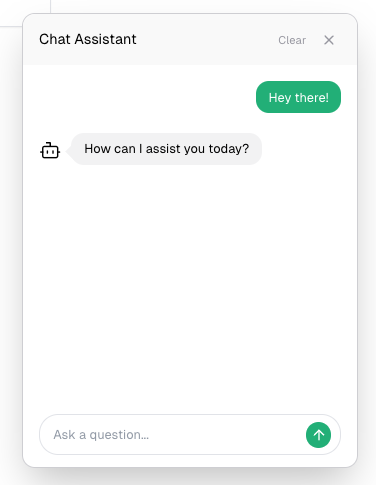
A customizable Reach chat component that combines Upstash Vector for similarity search, Together AI for LLM, and Vercel AI SDK for streaming responses. This ready-to-use component provides an out of the box solution for adding RAG-Powered chat interfaces to your Next.js application.
Closed State
Open State
## Features
⚡ Streaming responses support
💻 Server actions
📱 Responsive design
🔍 Real-time context retrieval
💾 Persistent chat history
🎨 Fully customizable UI components
🎨 Dark/light mode support
## Installation
```bash
# Using npm
npm install @upstash/rag-chat-component
# Using pnpm
pnpm add @upstash/rag-chat-component
# Using yarn
yarn add @upstash/rag-chat-component
```
## Quick Start
### 1. Environment Variables
Create an Upstash Vector database and set up the environment variables as below. If you don't have an account, you can start by going to [Upstash Console](https://console.upstash.com).
Choose an embedding model when creating an index in Upstash Vector.
```
UPSTASH_VECTOR_REST_URL=
UPSTASH_VECTOR_REST_TOKEN=
# Optional for persistent chat history
UPSTASH_REDIS_REST_URL=
UPSTASH_REDIS_REST_TOKEN=
OPENAI_API_KEY=
TOGETHER_API_KEY=
# Optional
TOGETHER_MODEL=
```
### 2. Configure Styles
In your `tailwind.config.ts` file, add the configuration below:
```ts
import type { Config } from "tailwindcss";
export default {
content: ["./node_modules/@upstash/rag-chat-component/**/*.{js,mjs}"],
} satisfies Config;
```
### 3. Implementation
The RAG Chat Component can be integrated into your application using two straightforward approaches. Choose the method that best fits your project structure:
#### 1. Using a Dedicated Component File (Recommended)
Create a seperate component file with the `use client` directive, then import and use it anywhere in your application.
```jsx
// components/chat.tsx
"use client";
import { ChatComponent } from "@upstash/rag-chat-component";
export const Chat = () => {
return ;
};
```
```jsx
// page.tsx
import { Chat } from "./components/chat";
export default function Home() {
return (
<>
Home
>
);
}
```
#### 2. Direct Integration in Client Components
Alternatively, import and use the **ChatComponent** directly in your client-side pages.
```jsx
// page.tsx
"use client";
import { ChatComponent } from "@upstash/rag-chat-component";
export default function Home() {
return (
<>
Home
>
);
}
```
### 4. Choosing Chat Model
It's possible to choose one of the [together.ai](https://www.together.ai/) models for the chat.
Default model is `meta-llama/Meta-Llama-3.1-8B-Instruct-Turbo`. You can configure it in the environment variables.
```
TOGETHER_MODEL="deepseek-ai/DeepSeek-V3"
```
### 5. Additional Notes
If you're deploying on Vercel and experiencing timeout issues, you can increase the function execution time limit by adding the following configuration to your `vercel.json`:
```
{
"functions": {
"app/**/*": {
"maxDuration": 30
}
}
}
```
This extends the function timeout to 30 seconds, allowing more time for RAG operations to complete on serverless functions.
## Adding Content
You can add content to your RAG Chat component in several ways:
1. Using Upstash Vector SDK
Upstash has Vector SDKs in JS and Python. You can use those SDK to insert data to your Vector index.
[Vector JS SDK](https://github.com/upstash/vector-js)
[Vector Python SDK](https://github.com/upstash/vector-py)
For other languages you can use [Vector REST API](https://upstash.com/docs/vector/api/get-started).
2. Using Upstash Vector UI
For testing purpose, you can add your data directly through the Upstash Vector Console:
1. Navigate to [Upstash Console](http://console.upstash.com/vector).
2. Go to details page of the Vector database.
3. Navigate to **Data Browser Tab**.
4. Here, you can upsert data or upload a PDF.
3. docs2vector tool
If you are planning to insert your documentation (markdown files) to your Vector index, then you can use [docs2vector](https://github.com/upstash/docs2vector/) tool.
## Development
You can use the playground for development, by basically running the command in the root.
```bash
bun run playground
```
## Roadmap
- Integration with [QStash](https://upstash.com/docs/qstash/overall/getstarted) for infinite timout for serverless functions
## Contributing
We welcome contributions! Please see our contributing guidelines for more details.
## License
MIT License - see the LICENSE file for details.
================================================
FILE: components.json
================================================
{
"$schema": "https://ui.shadcn.com/schema.json",
"style": "default",
"rsc": true,
"tsx": true,
"tailwind": {
"config": "tailwind.config.ts",
"css": "src/app/globals.css",
"baseColor": "slate",
"cssVariables": true,
"prefix": ""
},
"aliases": {
"components": "@/components",
"utils": "@/lib/utils"
}
}
================================================
FILE: examples/nextjs/.eslintrc.json
================================================
{
"extends": ["next/core-web-vitals", "next/typescript"]
}
================================================
FILE: examples/nextjs/.gitignore
================================================
# See https://help.github.com/articles/ignoring-files/ for more about ignoring files.
# dependencies
/node_modules
/.pnp
.pnp.*
.yarn/*
!.yarn/patches
!.yarn/plugins
!.yarn/releases
!.yarn/versions
# testing
/coverage
# next.js
/.next/
/out/
# production
/build
# misc
.DS_Store
*.pem
# debug
npm-debug.log*
yarn-debug.log*
yarn-error.log*
# env files (can opt-in for committing if needed)
.env*
# vercel
.vercel
# typescript
*.tsbuildinfo
next-env.d.ts
================================================
FILE: examples/nextjs/README.md
================================================
This is a [Next.js](https://nextjs.org) project bootstrapped with [`create-next-app`](https://nextjs.org/docs/app/api-reference/cli/create-next-app).
## Getting Started
First, run the development server:
```bash
npm run dev
# or
yarn dev
# or
pnpm dev
# or
bun dev
```
Open [http://localhost:3000](http://localhost:3000) with your browser to see the result.
You can start editing the page by modifying `app/page.tsx`. The page auto-updates as you edit the file.
This project uses [`next/font`](https://nextjs.org/docs/app/building-your-application/optimizing/fonts) to automatically optimize and load [Geist](https://vercel.com/font), a new font family for Vercel.
## Learn More
To learn more about Next.js, take a look at the following resources:
- [Next.js Documentation](https://nextjs.org/docs) - learn about Next.js features and API.
- [Learn Next.js](https://nextjs.org/learn) - an interactive Next.js tutorial.
You can check out [the Next.js GitHub repository](https://github.com/vercel/next.js) - your feedback and contributions are welcome!
## Deploy on Vercel
The easiest way to deploy your Next.js app is to use the [Vercel Platform](https://vercel.com/new?utm_medium=default-template&filter=next.js&utm_source=create-next-app&utm_campaign=create-next-app-readme) from the creators of Next.js.
Check out our [Next.js deployment documentation](https://nextjs.org/docs/app/building-your-application/deploying) for more details.
================================================
FILE: examples/nextjs/app/components/chat.tsx
================================================
"use client";
import { ChatComponent } from "@upstash/rag-chat-component";
export const Chat = () => {
return ;
};
================================================
FILE: examples/nextjs/app/components/features.tsx
================================================
export default function Features() {
return (