Repository: vaniacer/sshto
Branch: master
Commit: 1eb51f406049
Files: 5
Total size: 37.2 KB
Directory structure:
gitextract_10rhdvse/
├── .github/
│ └── FUNDING.yml
├── .gitignore
├── LICENSE.md
├── README.md
└── sshto
================================================
FILE CONTENTS
================================================
================================================
FILE: .github/FUNDING.yml
================================================
custom: ['paypal.me/sshto']
================================================
FILE: .gitignore
================================================
.idea
/install.sh
================================================
FILE: LICENSE.md
================================================
License: MIT
Permission is hereby granted, free of charge, to any person obtaining a copy
of this software and associated documentation files (the "Software"), to deal
in the Software without restriction, including without limitation the rights
to use, copy, modify, merge, publish, distribute, sublicense, and/or sell
copies of the Software, and to permit persons to whom the Software is
furnished to do so, subject to the following conditions:
The above copyright notice and this permission notice shall be included in all
copies or substantial portions of the Software.
THE SOFTWARE IS PROVIDED "AS IS", WITHOUT WARRANTY OF ANY KIND, EXPRESS OR
IMPLIED, INCLUDING BUT NOT LIMITED TO THE WARRANTIES OF MERCHANTABILITY,
FITNESS FOR A PARTICULAR PURPOSE AND NONINFRINGEMENT. IN NO EVENT SHALL THE
AUTHORS OR COPYRIGHT HOLDERS BE LIABLE FOR ANY CLAIM, DAMAGES OR OTHER
LIABILITY, WHETHER IN AN ACTION OF CONTRACT, TORT OR OTHERWISE, ARISING FROM,
OUT OF OR IN CONNECTION WITH THE SOFTWARE OR THE USE OR OTHER DEALINGS IN THE
SOFTWARE.
================================================
FILE: README.md
================================================
# sshto
 [](https://twitter.com/Vaniacer)
[](https://paypal.me/sshto?locale.x=en_US) Feel free to support the project!)
Small bash script that builds a menu (via dialog) from your ~/.ssh/config.
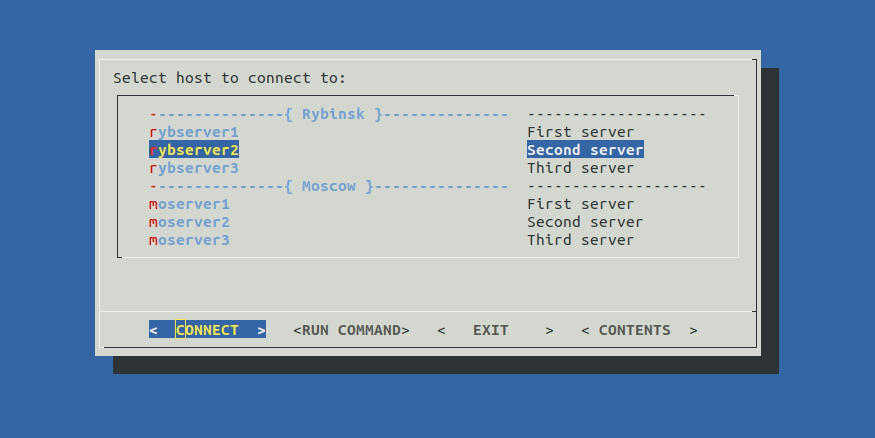
Allows you to connect to your servers or run commands from menu. Available commands:
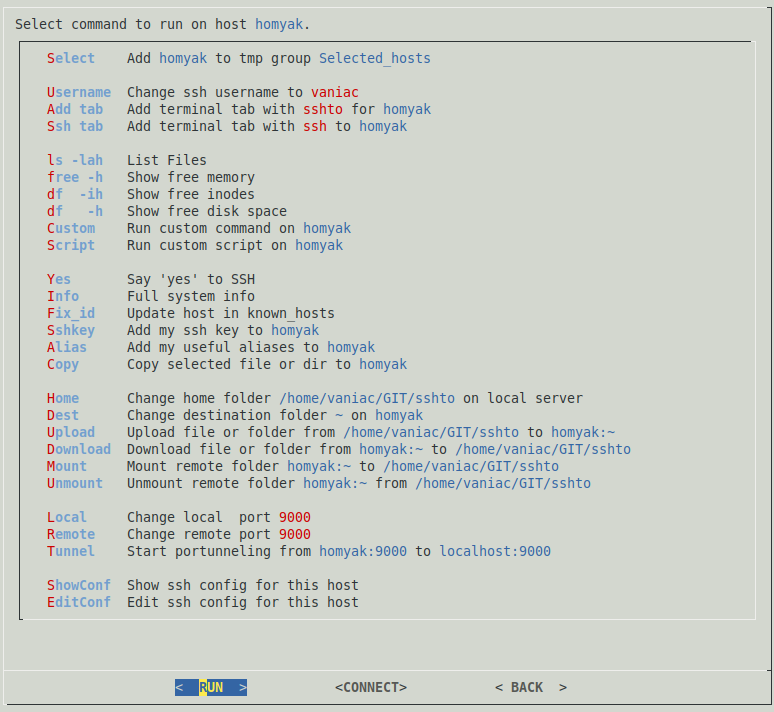
Your commands can be easily added to this list. Just edit this part of the script:
[](https://twitter.com/Vaniacer)
[](https://paypal.me/sshto?locale.x=en_US) Feel free to support the project!)
Small bash script that builds a menu (via dialog) from your ~/.ssh/config.

Allows you to connect to your servers or run commands from menu. Available commands:

Your commands can be easily added to this list. Just edit this part of the script:
cmdlist=(
    #Command#    #Description#
    "${slct[@]}" #De/Select command
    "Username"   "Change ssh username to \Z1$GUEST\Z0"
    "Add tab"    "Add terminal tab with \Z1sshto\Z0 for \Z4$target\Z0"
    "Ssh tab"    "Add terminal tab with \Z1ssh\Z0 to \Z4$target\Z0"
    ''           ''
    "ls -lah"    "List Files"
    "free -h"    "Show free memory"
    "df  -ih"    "Show free inodes"
    "df   -h"    "Show free disk space"
    "Custom"     "Run custom command on \Z4$target\Z0"
    "Script"     "Run custom script on \Z4$target\Z0"
    ''           ''
    'Yes'        "Say 'yes' to SSH"
    "Info"       "Full system info"
    'Fix_id'     "Update host in known_hosts"
    "Sshkey"     "Add my ssh key to \Z4$target\Z0"
    "Alias"      "Add my useful aliases to \Z4$target\Z0"
    "Copy"       "Copy selected file or dir to \Z4$target\Z0"
    ''           ''
    "Home"       "Change home folder \Z4$home\Z0 on local server"
    "Dest"       "Change destination folder \Z4$DEST\Z0 on \Z4$target\Z0"
    "Upload"     "Upload file or folder from \Z4$home\Z0 to \Z4$target:${DEST}\Z0"
    "Download"   "Download file or folder from \Z4$target:${DEST}\Z0 to \Z4$home\Z0"
    "Mount"      "Mount remote folder \Z4$target:$DEST\Z0 to \Z4$home\Z0"
    "Unmount"    "Unmount remote folder \Z4$target:$DEST\Z0 from \Z4$home\Z0"
    ''           ''
    "Local"      "Change local  port \Z1$LOCAL\Z0"
    "Remote"     "Change remote port \Z1$REMOTE\Z0"
    "Tunnel"     "Start portunneling from \Z4$target:$REMOTE\Z0 to \Z4localhost:$LOCAL\Z0"
    ''           ''
    "ShowConf"   "Show ssh config for this host"
    "EditConf"   "Edit ssh config for this host"
)
First collumn - command, second - description.
Simple commands like `ls -la` could be added as is.
A list of commands or a complicated logic should be added via function.
Empty values(`''`) could be used as a delimiter.
You can quick jump to the selected server via CONNECT button.
To close ssh session press CTRL+D or run `exit` command, it'll bring you back to sshto commands section.
Optional hosts description could be added like this:
Host server1 #Description, it could be more than one word
HostName 192.168.0.1
Port 22
User admin
Optional start menu delimiters '---{ Group Name }---' could be added like this:
#Host DUMMY #Group Name#
If you are unhappy with this 'DUMMY' group name template, or you actually have a host named 'dummy',
you can change this template by ajusting this variable `group_id=dummy`.
All these additions won't break your *ssh configs* coz they are considered as comments.
------
~/.ssh/config example:
#Host DUMMY #Rybinsk#

Host rybserver1 #First server
HostName localhost

Host rybserver2 #Second server
HostName localhost

Host rybserver3 #Third server
HostName localhost

#Host DUMMY #Moscow#

Host moserver1 #First server
HostName localhost

Host moserver2 #Second server
HostName localhost

Host moserver3 #Third server
HostName localhost
Script greps data from multiple config files via pattername `config*` in `~/.ssh` dir.
So you can split config to multiple files and use them with Include directive, example:
Include config_moscow
Include config_rybinsk
Include config*
All preset variables and functions could be tweaked via `~/.sshtorc` config file:
echo "REMOTE=9000 # Remote port for tunneling." >> ~/.sshtorc
You can customize dialog itself a bit by creating and editing its config file:
dialog --create-rc ~/.dialogrc
nano ~/.dialogrc
If you don't have dialog and don't want(or can't) to install it, there is a dialog-less version of sshto
in my new project [bashui](https://github.com/vaniacer/bashui) here is how it looks:


Try it [bashui-sshto](https://github.com/vaniacer/bashui/blob/master/demo_sshto)!
# How to install
Clone\download this project, go to it's folder and run:
sudo cp sshto /usr/bin/

#and to unistall
sudo rm /usr/bin/sshto
See how it works at asciinema
 Tom Lawrens video guide about ssh config and sshto
[](https://twitter.com/Vaniacer)
[](https://paypal.me/sshto?locale.x=en_US) Feel free to support the project!)
================================================
FILE: sshto
================================================
#!/usr/bin/env bash
#--------------------------{ Default values }---------------------------------------------------------------------------
OPT=$1 # Options.
sshdir=~/.ssh # Ssh configfiles folder
KEY="$sshdir/id_rsa.pub" # SSH key to use in command Sshkey(Add my ssh key to host).
REMOTE=8080 # Remote port for tunneling.
LOCAL=18080 # Local port for tunneling.
GUEST=$USER # Alternative username to login with.
DEST='~' # Destination folder on target server to download\upload files and sshfs mount.
TIME=60 # Timer for tunneling command. Tunnel will be closed after 60 seconds, but it will stay open if used.
EDITOR=nano # SSH confile editor.
LSEXIT=true # Perform ls on exit true|false.
home=$PWD # Destination folder on local server to download\upload files and sshfs mount.
sshfsopt= # Sshfs options if needed
group_id=dummy # Group separator identification template, 'dummy' by default, don't ask why, historically)
rsyncopt='-Pgzortl' # Upload/download rsync options
knwhosts="$sshdir"/known_hosts # Path to known_hosts file.
confile=~/.sshtorc # Path to config file, have to be chmod'ed to 600.
tmpfile=/tmp/sshtorc-${USER} # Path to tmp file to save selected context.
sshto_script[0]=~ # Path to sshto script
sshto_script[1]=.sshto_script # Sshto script filename
sshto_script[2]="${sshto_script[0]}/${sshto_script[1]}" # Sshto script full
#------------------------{ Add some tabs }------------------------------------------------------------------------------
tabbed(){ target=$target gnome-terminal --title=$target --tab -qe "${1/_target_/$target}"; } # Terminal command for tabs
#------------------------{ Add your commands to this lists }------------------------------------------------------------
cmdlist_renew(){
cmdlist=(
#Command# #Description#
"${slct[@]}" #De/Select command
"Username" "Change ssh username to \Z1$GUEST\Z0"
"Add tab" "Add terminal tab with \Z1sshto\Z0 for \Z4$target\Z0"
"Ssh tab" "Add terminal tab with \Z1ssh\Z0 to \Z4$target\Z0"
'' ''
"ls -lah" "List Files"
"free -h" "Show free memory"
"df -ih" "Show free inodes"
"df -h" "Show free disk space"
"Custom" "Run custom command on \Z4$target\Z0"
"Script" "Run custom script on \Z4$target\Z0"
'' ''
'Yes' "Say 'yes' to SSH"
"Info" "Full system info"
'Fix_id' "Update host in known_hosts"
"Sshkey" "Add my ssh key to \Z4$target\Z0"
"Alias" "Add my useful aliases to \Z4$target\Z0"
"Copy" "Copy selected file or dir to \Z4$target\Z0"
'' ''
"Home" "Change home folder \Z4$home\Z0 on local server"
"Dest" "Change destination folder \Z4$DEST\Z0 on \Z4$target\Z0"
"Upload" "Upload file or folder from \Z4$home\Z0 to \Z4$target:${DEST}\Z0"
"Download" "Download file or folder from \Z4$target:${DEST}\Z0 to \Z4$home\Z0"
"Mount" "Mount remote folder \Z4$target:$DEST\Z0 to \Z4$home\Z0"
"Unmount" "Unmount remote folder \Z4$target:$DEST\Z0 from \Z4$home\Z0"
'' ''
"Local" "Change local port \Z1$LOCAL\Z0"
"Remote" "Change remote port \Z1$REMOTE\Z0"
"Tunnel" "Start portunneling from \Z4$target:$REMOTE\Z0 to \Z4localhost:$LOCAL\Z0"
'' ''
"ShowConf" "Show ssh config for this host"
"EditConf" "Edit ssh config for this host"
)
cmdlist_group=(
#Command# #Description#
"${slct_grp[@]}" #De/Select command
"Username" "Change ssh username to \Z1$GUEST\Z0"
"Add tabs" "Add terminal tabs with \Z1sshto\Z0 for hosts in \Z4$group\Z0 group"
"Ssh tabs" "Add terminal tabs with \Z1ssh\Z0 to hosts from \Z4$group\Z0 group"
'' ''
"ls -la" "List Files"
"free -h" "Show free memory"
"df -ih" "Show free inodes"
"df -h" "Show free disk space"
"Custom" "Run custom command on \Z4$group\Z0"
"Script" "Run custom script on \Z4$group\Z0"
'' ''
'Yes' "Say 'yes' to SSH"
'Fix_id' "Update hosts in known_hosts"
"Info" "Full system info"
"Alias" "Add my useful aliases to \Z4$group\Z0"
"Copy" "Copy selected file or dir to \Z4$group\Z0"
'' ''
"Home" "Change home folder \Z4$home\Z0 on local server"
"Dest" "Change destination folder \Z4$DEST\Z0 on \Z4$group\Z0"
"Upload" "Upload file or folder from \Z4$home\Z0 to \Z4$group:${DEST}\Z0"
'' ''
"EditConf" "Edit ssh config for this group"
)
}
#--------------------------------------------------------------------+--------------------------------------------------
#Color picker, usage: printf ${BLD}${CUR}${RED}${BBLU}"Hello!)"${DEF}|
#-------------------------+--------------------------------+---------+
# Text color | Background color | |
#-----------+-------------+--------------+-----------------+ |
# Base color|Lighter shade| Base color | Lighter shade | |
#-----------+-------------+--------------+-----------------+ |
BLK='\e[30m'; blk='\e[90m'; BBLK='\e[40m'; bblk='\e[100m' #| Black |
RED='\e[31m'; red='\e[91m'; BRED='\e[41m'; bred='\e[101m' #| Red |
GRN='\e[32m'; grn='\e[92m'; BGRN='\e[42m'; bgrn='\e[102m' #| Green |
YLW='\e[33m'; ylw='\e[93m'; BYLW='\e[43m'; bylw='\e[103m' #| Yellow |
BLU='\e[34m'; blu='\e[94m'; BBLU='\e[44m'; bblu='\e[104m' #| Blue |
MGN='\e[35m'; mgn='\e[95m'; BMGN='\e[45m'; bmgn='\e[105m' #| Magenta |
CYN='\e[36m'; cyn='\e[96m'; BCYN='\e[46m'; bcyn='\e[106m' #| Cyan |
WHT='\e[37m'; wht='\e[97m'; BWHT='\e[47m'; bwht='\e[107m' #| White |
#----------------------------------------------------------+---------+
# Effects |
#--------------------------------------------------------------------+
DEF='\e[0m' #Default color and effects |
BLD='\e[1m' #Bold\brighter |
DIM='\e[2m' #Dim\darker |
CUR='\e[3m' #Italic font |
UND='\e[4m' #Underline |
INV='\e[7m' #Inverted |
COF='\e[?25l' #Cursor Off |
CON='\e[?25h' #Cursor On |
#--------------------------------------------------------------------+
# Text positioning, usage: XY 10 10 'Hello World!' |
XY(){ printf "\e[$2;${1}H$3"; } #|
# Print line, usage: line - 10 | line -= 20 | line 'Hello World!' 20 |
line(){ printf -v _L %$2s; printf -- "${_L// /$1}"; } #|
# Create sequence like {0..(X-1)}, usage: que 10 |
que(){ printf -v _N %$1s; _N=(${_N// / 1}); printf "${!_N[*]}"; } #|
#------------{ Check that dialog and gawk are installed }------------+
install_help="
${BLD}sshto$DEF requires that the package '${GRN}%b$DEF' is installed.
Type this into the terminal and press return:
${BLD}%b$DEF
Then run ${BLD}sshto$DEF again
"
how_to_install(){
local package=$1
which yum &> /dev/null && installer="yum -y install $package"
which brew &> /dev/null && installer="brew install $package"
which apt-get &> /dev/null && installer="apt-get install -y $package"
printf -- "$install_help" "$package" "$installer"
[[ $2 ]] && exit $2
}
for package in dialog gawk; { which $package &> /dev/null || how_to_install $package 1; }
#------------------------{check bash version }--------------------------------------------------------------------------
tversion=4.2
cversion=${BASH_VERSINFO[0]}.${BASH_VERSINFO[1]}
gawk '{if($1>$2){exit 1}}' <<< "$tversion $cversion" || {
printf "\nBASH version ${BLD}$tversion+$DEF required to run ${BLD}sshto$DEF, your is - $BLD$BASH_VERSION$DEF\n"
exit 1
}
#------------------------{ Waiting animation }--------------------------------------------------------------------------
cursor () {
case $1 in
on) stty echo; printf "$CON";;
off) stty -echo; printf "$COF";;
esac
}
x=$[COLUMNS/2-3]
y=$[ LINES/2-3]
sand=( ⠁ ⠂ ⠄ ' ' )
# { small digits }
sd=(₀ ₁ ₂ ₃ ₄ ₅ ₆ ₇ ₈ ₉)
bs='⠴⠷⠦' # bottom sand pile
ts='⠖' # top sand pile
WAIT(){
clear; cursor off; i=0; start=$SECONDS
XY $[x-1] $y $UND$BLD$RED' '$DEF # _______
XY $[x-1] $[y+1] $RED'╲'$DIM$UND' '$DEF$red'╱'$DEF # ╲_____╱
XY $x $[y+2] $BLU'( '$BLD$WHT'•'$BLD$BLU')'$DEF # ( •)
XY $x $[y+3] $BLU' ╲'$YLW"$ts"$BLD$BLU'╱'$DEF # ╲⠖╱
XY $x $[y+4] $BLU" ╱$YLW${sand[$i]}$BLD$BLU╲"$DEF # ╱⠂╲
XY $x $[y+5] $BLU'('$YLW"$bs"$BLD$BLU')'$DEF # (⠴⠷⠦)
XY $[x-1] $[y+6] $RED'╱'$RED'‾‾‾‾‾'$BLD$RED'╲'$DEF # ╱‾‾‾‾‾╲
XY $[x-1] $[y+7] $DIM$RED'‾‾‾‾‾‾‾'$DEF # ‾‾‾‾‾‾‾
( while true; do sleep 0.07
printf -v counter "%03d" $[SECONDS-start]
small="${sd[${counter:0:1}]}${sd[${counter:1:1}]}${sd[${counter:2:1}]}"
XY $[x-1] $[y+1] $RED'╲'$DIM$UND" $small "$DEF$red'╱'$DEF
XY $x $[y+4] $BLU" ╱$YLW${sand[$i]}$BLD$BLU╲"$DEF
((i++)); (($i==${#sand[@]})) && i=0;
done ) & waiter=$!
}
GO() { [[ -e /proc/$waiter ]] && kill $waiter; cursor on; clear; }
check_confile(){
[[ -e $confile ]] || return
[[ $(stat -c "%a %U %G" "$confile") == "600 $USER $USER" ]] && . "$confile"
}
#------------------------{ Pause function }-----------------------------------------------------------------------------
pause(){
local mess=${1:-'press any key to continue'}
printf "\n$COF$BLD$mess\n"
read -srn1
printf "\n$DEF$CON"
}
#------------------------{ Yes to ssh }---------------------------------------------------------------------------------
ssh_yes(){
local hostname=${hostnames["$target"]}
local fprint=($(ssh-keyscan -H "$hostname" 2>/dev/null))
grep -q "${fprint[2]}" "$knwhosts" || echo "${fprint[@]}" >> "$knwhosts"
}
fix_id(){
local hostname=${hostnames["$target"]}
local address=$(dig +short $hostname)
ssh-keygen -f "$knwhosts" -R "$hostname"
ssh-keygen -f "$knwhosts" -R "$address"
ssh_yes
}
#------------------------{ System Info commands }-----------------------------------------------------------------------
system_info(){
ssh $SSH_OPT $target "
printf '\n${BLD}Hostname:${DEF}\n'
hostname
printf '\n${BLD}Interfaces:${DEF}\n'
ip a
printf '\n${BLD}Memory:${DEF}\n'
LANG=Us free --si -h
printf '\n${BLD}CPU:${DEF}\n'
lscpu
printf '\n${BLD}Disk:${DEF}\n'
df -h; echo; df -ih; echo; lsblk
printf '\n${BLD}Software:${DEF}\n'
uname -a; echo
[[ -e /usr/bin/lsb_release ]] && { lsb_release -a; echo; }
[[ -e /usr/bin/java ]] && { java -version; echo; }
[[ -e /usr/bin/psql ]] && { psql -V ; echo; }
[[ -e /usr/sbin/nginx ]] && { nginx -v ; echo; }
printf '${BLD}Logged in Users:${DEF}\n'
who
printf '\n${BLD}Port usage info:${DEF}\n'
netstat -tulpn 2> /dev/null
printf '\n${BLD}Processes:${DEF}\n'
top -bcn1 | head -n30
"
}
#------------------------{ Show\Edit ssh config }-----------------------------------------------------------------------
show_conf(){ clear; ssh -G $target; pause; }
edit_conf(){
local new_group search=$target new_filename group_list name confs data
[[ $group ]] && search="$group_id[[:space:]]*#$group#"
[[ $group =~ Selected_hosts|Filtered_hosts ]] && {
dialog --yesno 'Save this group as permanent config file?' 5 45 || return
new_group=$(D "RUN" '' "BACK" '' --inputbox "Set new group(file) name:" 8 80 "$new_group")
case $new_group:$? in
'':0) return;;
*:0) new_filename=~/.ssh/config_"${new_group// /_}"
new_filename=${new_filename,,}
[[ -f $new_filename ]] && {
dialog --defaultno --yesno 'File exists, overwrite?' 5 45 || return
}
data="#Host DUMMY #$new_group#"
group_list=("${selected_list[@]:2}")
for ((i=0; i<${#group_list[@]}; i+=2)); do
name="${group_list[$i]}"
data+="$(
echo; echo
gawk -vname="$name" '
BEGIN{IGNORECASE=1}
{
if ($1 == "host" && $2 == name){start=1}
if (start){if ($0 ~ /^#|^$/){exit}; print }
}
' $CONFILES
)"
done
echo "$data" > "$new_filename"
return;;
*:*) return;;
esac
}
confs=($(grep -rilE "Host[[:space:]]*$search" $CONFILES)) || { clear; echo 'Config file not found'; pause; return; }
$EDITOR "${confs[@]}"
}
#------------------------{ SSH to target server }-----------------------------------------------------------------------
go_to_target(){ clear; ssh $SSH_OPT $target || pause; }
#------------------------{ Add aliases }--------------------------------------------------------------------------------
add_aliases(){
scp $SSH_OPT ~/.bash_aliases $target:~
ssh $SSH_OPT $target "grep '. ~/.bash_aliases' .bashrc || echo '. ~/.bash_aliases' >> .bashrc"
}
#------------------------{ Run function on a group of servers }---------------------------------------------------------
group_run(){
local func group_list data
func="$1"
group_list=("${list[@]:2}")
SSH_OPT_CUR="$SSH_OPT"
SSH_OPT="$SSH_OPT -o ConnectTimeout=10 -o BatchMode=true"
case $func in tabbed*)
for ((i=0; i<${#group_list[@]}; i+=2)); do
target="${group_list[$i]}"
tabbed "${2/_target_/$target}"
done
return;;
esac
WAIT
data=$(
for ((i=0; i<${#group_list[@]}; i+=2)); do
target="${group_list[$i]}"
[[ $target =~ ^-+.*-+$ ]] && continue
(
code="$BLD$GRN"
data=$($func 2>&1 | sed ':a;N;$!ba;s/\n/\\n/g'; exit ${PIPESTATUS[0]}) || code="$BLD$RED"
echo "$code----{ $target }----$DEF\\n${data:-Command did not output anything.}\\n"
) &
done
)
GO; printf -- '%b' "$(sort -Vk2 <<< "$data")"
SSH_OPT="$SSH_OPT_CUR"
}
#------------------------{ Run command/script }-------------------------------------------------------------------------
run_command(){ ssh $SSH_OPT $target $command; }
run_script (){
scp -r $SSH_OPT "${sshto_script[2]}" $target:~/ || return 1
ssh $SSH_OPT "$target" "~/${sshto_script[1]}"
}
#------------------------{ Add ssh key }--------------------------------------------------------------------------------
add_sshkey(){ clear; ssh_yes > /dev/null; ssh-copy-id -i $KEY $SSH_OPT $target; }
#------------------------{ Tunnelling command}--------------------------------------------------------------------------
portunneling(){ ssh $SSH_OPT $target -f -L 127.0.0.1:$LOCAL:127.0.0.1:$REMOTE sleep $TIME; }
#------------------------{ Exit function }------------------------------------------------------------------------------
bye(){
printf "\n$DEF$CON"
clear
$LSEXIT || exit 0
lsopts='--color=auto'
[[ $(uname -s) == "Darwin" ]] && lsopts='-G'
ls $lsopts
exit 0
}; trap bye INT
#============================>-{ Dialog functions }-<===================================================================
do='--output-fd 1 --colors --no-collapse' # dialog common options
eb='--extra-button' # extra
hb='--help-button' # buttons
cl='--cancel-label' # and
el='--extra-label' # short
hl='--help-label' # label
ol='--ok-label' # names
# Dialog buttons order and exit codes
#
# 0 3 1 2
D(){ # dialog creator
local opts=()
[[ $1 ]] && opts+=("$ol" "$1")
[[ $2 ]] && opts+=("$el" "$2" "$eb")
[[ $3 ]] && opts+=("$cl" "$3")
[[ $4 ]] && opts+=("$hl" "$4" "$hb")
shift 4
dialog "${opts[@]}" $do "$@"
}
#------------------------{ Change alternative username }----------------------------------------------------------------
username(){
new_user=$(D "CHANGE" '' "BACK" '' --max-input 20 --inputbox 'Change alternative username' 10 30 $GUEST)
case $new_user:$? in
*:0) GUEST=${new_user:-$GUEST}; SSH_OPT="-oUser=$GUEST"; USERNOTE="Username changed to \Z2$GUEST\Z0.";;
*:*) return;;
esac
}
#------------------------{ Create custom command/script }---------------------------------------------------------------
custom(){
local runner=
[[ $group ]] && runner='group_run'
new_command=$(D "RUN" '' "BACK" '' --inputbox "Write down your command here:" 8 120 "$new_command")
case $new_command:$? in
'':0) custom;;
*:0) command=$new_command; clear; $runner run_command; pause;;
*:*) return;;
esac
}
script(){
[[ -f ${sshto_script[2]} ]] || {
echo -e '#!/bin/bash\necho "Running sshto script"' > "${sshto_script[2]}"
chmod +x "${sshto_script[2]}"
}
script_text=$(cat "${sshto_script[2]}")
D "RUN" "EDIT" '' "BACK" --msgbox "$script_text" 40 120
case $? in
0) [[ $script_text ]] || script; clear; $runner run_script; pause;;
3) $EDITOR "${sshto_script[2]}"; script;;
2) second_dialog;;
esac
}
#------------------------{ Change local port for tunnelling }-----------------------------------------------------------
local_port(){
new_local=$(D "CHANGE" '' "BACK" '' --max-input 5 --inputbox 'Change local port' 10 30 $LOCAL)
LOCAL=${new_local:-$LOCAL}
}
#------------------------{ Change remote port for tunnelling }----------------------------------------------------------
remote_port(){
new_remote=$(D "CHANGE" '' "BACK" '' --max-input 5 --inputbox 'Change remote port' 10 30 $REMOTE)
REMOTE=${new_remote:-$REMOTE}
}
#------------------------{ Upload\Download and mount dialogs }----------------------------------------------------------
downpath(){
new_path=$(D "CHANGE" '' "BACK" '' --max-input 100 --inputbox 'Change download folder' 10 50 $DEST)
DEST=${new_path:-$DEST}
dfilelist=
}
homepath(){
new_path=$(D "CHANGE" '' "BACK" '' --max-input 100 --inputbox 'Change home folder' 10 50 $home)
home=${new_path:-$home}
}
uploader(){
printf "Uploading $BLD$ufilename$DEF\n"
rsync $rsyncopt --rsh="ssh $SSH_OPT" $ufilename $target:"$DEST/"
}
mountdest(){
which sshfs &> /dev/null || { clear; how_to_install sshfs; pause; return; }
clear; sshfs $sshfsopt "$target":"$DEST" "$home" || pause
}
unmountdest(){ mount | grep -q "$home" && umount "$home"; }
copy_files(){
local runner=
[[ $group ]] && runner='group_run'
ufilename=$(D "COPY" '' "BACK" '' --fselect $PWD/ 10 80)
case $ufilename:$? in
$PWD|$PWD/:0) return;;
*:0) clear; $runner uploader; pause;;
*:*) return;;
esac ; copy_files
}
upload(){
local runner=
[[ $group ]] && runner='group_run'
ufilelist=( $(ls -sh1 $home | awk '{print $2,$1}') )
ufilename=$(D "UPLOAD" '' "BACK" '' --menu "Select file\folder to upload:" 0 0 0 "${ufilelist[@]:2}")
case $? in
0) [[ $ufilename ]] || upload
clear; $runner uploader; pause;;
*) return;;
esac; upload
}
download(){
[[ $dfilelist ]] || {
WAIT
dfilelist=$(ssh $SSH_OPT $target ls -sh1 $DEST 2>&1) \
&& dfilelist=( $(awk '{print $2,$1}' <<< "$dfilelist") ) \
|| {
clear
echo "$dfilelist"
pause
dfilelist=
second_dialog
}
GO
}
dfilename=$(D "DOWNLOAD" '' "BACK" '' --menu "Select file\folder to download:" 0 0 0 "${dfilelist[@]:2}")
case $? in
0) [[ $dfilename ]] || download
clear
printf "Downloading $BLD$dfilename$DEF\n"
rsync $rsyncopt --rsh="ssh $SSH_OPT" $target:"$DEST/$dfilename" . || pause;;
*) return;;
esac; download
}
#------------------------{ Switch menu mode to contents view or full list }---------------------------------------------
save_tmp(){ echo "$1" > "$tmpfile"; chmod 600 "$tmpfile"; }
new_list(){
list=(); match=
for item in "${selected_list[@]}" "${filtered_list[@]}" "${fullist[@]}"; {
case $item:$match in
*{\ *\ }*:1) break ;;
*{\ $filter\ }*:*) match=1;;
esac
[[ $match ]] && list+=( "$item" )
}
[[ $filter =~ Selected ]] && return
[[ ${list[*]} ]] && save_tmp "filter='$filter'" || { list=( "${fullist[@]}" ); rm "$tmpfile"; }
}
contents_menu(){
local filter_tmp=$filter selected= filtered=
[[ ${selected_list[@]} ]] && selected='Selected_hosts'
[[ ${filtered_list[@]} ]] && filtered='Filtered_hosts'
local btns=('SELECT' 'RUN COMMAND' 'RELOAD' 'BACK')
filter=$(D "${btns[@]}" --no-items --menu "Select list of hosts:" 0 0 0 "All" $selected $filtered "${content[@]}" '' "$qcmd" "$qbut1")
case $filter:$? in
"":[03]) contents_menu;;
"$qcmd":[03]) contents_menu;;
"$qbut1":[03]) filter_items 'first_dialog';;
All:0) list=( "${selected_list[@]}" "${fullist[@]}" )
save_tmp "filter=";;
*:3) second_dialog "$filter" ;;
*:2) filter=$filter_tmp;;
*:1) restart; contents_menu;;
*:0) new_list;;
esac ; first_dialog
}
# Dialog buttons order and exit codes
#
# 0 3 1 2
#------------------------{ Selector }-----------------------------------------------------------------------------------
declare -A slctd_hosts
declare -A slctd_groups
gen_selected_list(){
local k
selected_list=('-----------{ Selected_hosts }-----------' '_LINE_')
for k in "${!slctd_hosts[@]}"; { selected_list+=("$k" "${slctd_hosts[$k]}"); }
}
slct_dslct(){
local desc k v
# remove from selection
[[ ${slctd_hosts[$target]} && $1 != "select" ]] && {
unset slctd_hosts[$target]
gen_selected_list
((${#selected_list[@]}==2)) && unset selected_list
return
}
[[ $1 == "deselect" ]] && return
# add to selection
for ((k=0,v=1; kdesclength)) && desclength=${#desc}
hostnames["$name"]=$hostname #Create host:hostname pairs in hostnames array
fullist+=("$name" "$desc") #Add Host and Description to the list
done < <(gawk '
BEGIN{IGNORECASE=1}
/Host /{
strt=1
host=$2
desc=gensub(/^.*Host .* #(.*)/, "\\1", "g", $0)
desc=gensub(/(.*)#.*/, "\\1", "g", desc)
next
}
strt && host == "'"$group_id"'"{
print "group_name", "dummy", desc
strt=0
}
strt && /HostName /{
hostname=$2
print host, hostname, desc
strt=0
}' $CONFILES)
descline=$(line - $desclength)
list=( "${fullist[@]}" "${quick_butt[@]}" )
N=${#fullist[@]}
qcmd='-----------{ Quick commands }-----------'
qbut1='1 Filter items'
quick_butt=(
'' ''
"$qcmd" "$descline"
"$qbut1" "Create list of hosts filtered by pattern"
)
}
#--{ Go baby, GO!) }--
check_confile; restart
[[ -e $tmpfile ]] && . "$tmpfile"
[[ $filter ]] && new_list
[[ $target ]] || first_dialog
[[ $OPT =~ name ]] && { echo $target; exit; }
[[ $target ]] && second_dialog
bye #:)
Tom Lawrens video guide about ssh config and sshto
[](https://twitter.com/Vaniacer)
[](https://paypal.me/sshto?locale.x=en_US) Feel free to support the project!)
================================================
FILE: sshto
================================================
#!/usr/bin/env bash
#--------------------------{ Default values }---------------------------------------------------------------------------
OPT=$1 # Options.
sshdir=~/.ssh # Ssh configfiles folder
KEY="$sshdir/id_rsa.pub" # SSH key to use in command Sshkey(Add my ssh key to host).
REMOTE=8080 # Remote port for tunneling.
LOCAL=18080 # Local port for tunneling.
GUEST=$USER # Alternative username to login with.
DEST='~' # Destination folder on target server to download\upload files and sshfs mount.
TIME=60 # Timer for tunneling command. Tunnel will be closed after 60 seconds, but it will stay open if used.
EDITOR=nano # SSH confile editor.
LSEXIT=true # Perform ls on exit true|false.
home=$PWD # Destination folder on local server to download\upload files and sshfs mount.
sshfsopt= # Sshfs options if needed
group_id=dummy # Group separator identification template, 'dummy' by default, don't ask why, historically)
rsyncopt='-Pgzortl' # Upload/download rsync options
knwhosts="$sshdir"/known_hosts # Path to known_hosts file.
confile=~/.sshtorc # Path to config file, have to be chmod'ed to 600.
tmpfile=/tmp/sshtorc-${USER} # Path to tmp file to save selected context.
sshto_script[0]=~ # Path to sshto script
sshto_script[1]=.sshto_script # Sshto script filename
sshto_script[2]="${sshto_script[0]}/${sshto_script[1]}" # Sshto script full
#------------------------{ Add some tabs }------------------------------------------------------------------------------
tabbed(){ target=$target gnome-terminal --title=$target --tab -qe "${1/_target_/$target}"; } # Terminal command for tabs
#------------------------{ Add your commands to this lists }------------------------------------------------------------
cmdlist_renew(){
cmdlist=(
#Command# #Description#
"${slct[@]}" #De/Select command
"Username" "Change ssh username to \Z1$GUEST\Z0"
"Add tab" "Add terminal tab with \Z1sshto\Z0 for \Z4$target\Z0"
"Ssh tab" "Add terminal tab with \Z1ssh\Z0 to \Z4$target\Z0"
'' ''
"ls -lah" "List Files"
"free -h" "Show free memory"
"df -ih" "Show free inodes"
"df -h" "Show free disk space"
"Custom" "Run custom command on \Z4$target\Z0"
"Script" "Run custom script on \Z4$target\Z0"
'' ''
'Yes' "Say 'yes' to SSH"
"Info" "Full system info"
'Fix_id' "Update host in known_hosts"
"Sshkey" "Add my ssh key to \Z4$target\Z0"
"Alias" "Add my useful aliases to \Z4$target\Z0"
"Copy" "Copy selected file or dir to \Z4$target\Z0"
'' ''
"Home" "Change home folder \Z4$home\Z0 on local server"
"Dest" "Change destination folder \Z4$DEST\Z0 on \Z4$target\Z0"
"Upload" "Upload file or folder from \Z4$home\Z0 to \Z4$target:${DEST}\Z0"
"Download" "Download file or folder from \Z4$target:${DEST}\Z0 to \Z4$home\Z0"
"Mount" "Mount remote folder \Z4$target:$DEST\Z0 to \Z4$home\Z0"
"Unmount" "Unmount remote folder \Z4$target:$DEST\Z0 from \Z4$home\Z0"
'' ''
"Local" "Change local port \Z1$LOCAL\Z0"
"Remote" "Change remote port \Z1$REMOTE\Z0"
"Tunnel" "Start portunneling from \Z4$target:$REMOTE\Z0 to \Z4localhost:$LOCAL\Z0"
'' ''
"ShowConf" "Show ssh config for this host"
"EditConf" "Edit ssh config for this host"
)
cmdlist_group=(
#Command# #Description#
"${slct_grp[@]}" #De/Select command
"Username" "Change ssh username to \Z1$GUEST\Z0"
"Add tabs" "Add terminal tabs with \Z1sshto\Z0 for hosts in \Z4$group\Z0 group"
"Ssh tabs" "Add terminal tabs with \Z1ssh\Z0 to hosts from \Z4$group\Z0 group"
'' ''
"ls -la" "List Files"
"free -h" "Show free memory"
"df -ih" "Show free inodes"
"df -h" "Show free disk space"
"Custom" "Run custom command on \Z4$group\Z0"
"Script" "Run custom script on \Z4$group\Z0"
'' ''
'Yes' "Say 'yes' to SSH"
'Fix_id' "Update hosts in known_hosts"
"Info" "Full system info"
"Alias" "Add my useful aliases to \Z4$group\Z0"
"Copy" "Copy selected file or dir to \Z4$group\Z0"
'' ''
"Home" "Change home folder \Z4$home\Z0 on local server"
"Dest" "Change destination folder \Z4$DEST\Z0 on \Z4$group\Z0"
"Upload" "Upload file or folder from \Z4$home\Z0 to \Z4$group:${DEST}\Z0"
'' ''
"EditConf" "Edit ssh config for this group"
)
}
#--------------------------------------------------------------------+--------------------------------------------------
#Color picker, usage: printf ${BLD}${CUR}${RED}${BBLU}"Hello!)"${DEF}|
#-------------------------+--------------------------------+---------+
# Text color | Background color | |
#-----------+-------------+--------------+-----------------+ |
# Base color|Lighter shade| Base color | Lighter shade | |
#-----------+-------------+--------------+-----------------+ |
BLK='\e[30m'; blk='\e[90m'; BBLK='\e[40m'; bblk='\e[100m' #| Black |
RED='\e[31m'; red='\e[91m'; BRED='\e[41m'; bred='\e[101m' #| Red |
GRN='\e[32m'; grn='\e[92m'; BGRN='\e[42m'; bgrn='\e[102m' #| Green |
YLW='\e[33m'; ylw='\e[93m'; BYLW='\e[43m'; bylw='\e[103m' #| Yellow |
BLU='\e[34m'; blu='\e[94m'; BBLU='\e[44m'; bblu='\e[104m' #| Blue |
MGN='\e[35m'; mgn='\e[95m'; BMGN='\e[45m'; bmgn='\e[105m' #| Magenta |
CYN='\e[36m'; cyn='\e[96m'; BCYN='\e[46m'; bcyn='\e[106m' #| Cyan |
WHT='\e[37m'; wht='\e[97m'; BWHT='\e[47m'; bwht='\e[107m' #| White |
#----------------------------------------------------------+---------+
# Effects |
#--------------------------------------------------------------------+
DEF='\e[0m' #Default color and effects |
BLD='\e[1m' #Bold\brighter |
DIM='\e[2m' #Dim\darker |
CUR='\e[3m' #Italic font |
UND='\e[4m' #Underline |
INV='\e[7m' #Inverted |
COF='\e[?25l' #Cursor Off |
CON='\e[?25h' #Cursor On |
#--------------------------------------------------------------------+
# Text positioning, usage: XY 10 10 'Hello World!' |
XY(){ printf "\e[$2;${1}H$3"; } #|
# Print line, usage: line - 10 | line -= 20 | line 'Hello World!' 20 |
line(){ printf -v _L %$2s; printf -- "${_L// /$1}"; } #|
# Create sequence like {0..(X-1)}, usage: que 10 |
que(){ printf -v _N %$1s; _N=(${_N// / 1}); printf "${!_N[*]}"; } #|
#------------{ Check that dialog and gawk are installed }------------+
install_help="
${BLD}sshto$DEF requires that the package '${GRN}%b$DEF' is installed.
Type this into the terminal and press return:
${BLD}%b$DEF
Then run ${BLD}sshto$DEF again
"
how_to_install(){
local package=$1
which yum &> /dev/null && installer="yum -y install $package"
which brew &> /dev/null && installer="brew install $package"
which apt-get &> /dev/null && installer="apt-get install -y $package"
printf -- "$install_help" "$package" "$installer"
[[ $2 ]] && exit $2
}
for package in dialog gawk; { which $package &> /dev/null || how_to_install $package 1; }
#------------------------{check bash version }--------------------------------------------------------------------------
tversion=4.2
cversion=${BASH_VERSINFO[0]}.${BASH_VERSINFO[1]}
gawk '{if($1>$2){exit 1}}' <<< "$tversion $cversion" || {
printf "\nBASH version ${BLD}$tversion+$DEF required to run ${BLD}sshto$DEF, your is - $BLD$BASH_VERSION$DEF\n"
exit 1
}
#------------------------{ Waiting animation }--------------------------------------------------------------------------
cursor () {
case $1 in
on) stty echo; printf "$CON";;
off) stty -echo; printf "$COF";;
esac
}
x=$[COLUMNS/2-3]
y=$[ LINES/2-3]
sand=( ⠁ ⠂ ⠄ ' ' )
# { small digits }
sd=(₀ ₁ ₂ ₃ ₄ ₅ ₆ ₇ ₈ ₉)
bs='⠴⠷⠦' # bottom sand pile
ts='⠖' # top sand pile
WAIT(){
clear; cursor off; i=0; start=$SECONDS
XY $[x-1] $y $UND$BLD$RED' '$DEF # _______
XY $[x-1] $[y+1] $RED'╲'$DIM$UND' '$DEF$red'╱'$DEF # ╲_____╱
XY $x $[y+2] $BLU'( '$BLD$WHT'•'$BLD$BLU')'$DEF # ( •)
XY $x $[y+3] $BLU' ╲'$YLW"$ts"$BLD$BLU'╱'$DEF # ╲⠖╱
XY $x $[y+4] $BLU" ╱$YLW${sand[$i]}$BLD$BLU╲"$DEF # ╱⠂╲
XY $x $[y+5] $BLU'('$YLW"$bs"$BLD$BLU')'$DEF # (⠴⠷⠦)
XY $[x-1] $[y+6] $RED'╱'$RED'‾‾‾‾‾'$BLD$RED'╲'$DEF # ╱‾‾‾‾‾╲
XY $[x-1] $[y+7] $DIM$RED'‾‾‾‾‾‾‾'$DEF # ‾‾‾‾‾‾‾
( while true; do sleep 0.07
printf -v counter "%03d" $[SECONDS-start]
small="${sd[${counter:0:1}]}${sd[${counter:1:1}]}${sd[${counter:2:1}]}"
XY $[x-1] $[y+1] $RED'╲'$DIM$UND" $small "$DEF$red'╱'$DEF
XY $x $[y+4] $BLU" ╱$YLW${sand[$i]}$BLD$BLU╲"$DEF
((i++)); (($i==${#sand[@]})) && i=0;
done ) & waiter=$!
}
GO() { [[ -e /proc/$waiter ]] && kill $waiter; cursor on; clear; }
check_confile(){
[[ -e $confile ]] || return
[[ $(stat -c "%a %U %G" "$confile") == "600 $USER $USER" ]] && . "$confile"
}
#------------------------{ Pause function }-----------------------------------------------------------------------------
pause(){
local mess=${1:-'press any key to continue'}
printf "\n$COF$BLD$mess\n"
read -srn1
printf "\n$DEF$CON"
}
#------------------------{ Yes to ssh }---------------------------------------------------------------------------------
ssh_yes(){
local hostname=${hostnames["$target"]}
local fprint=($(ssh-keyscan -H "$hostname" 2>/dev/null))
grep -q "${fprint[2]}" "$knwhosts" || echo "${fprint[@]}" >> "$knwhosts"
}
fix_id(){
local hostname=${hostnames["$target"]}
local address=$(dig +short $hostname)
ssh-keygen -f "$knwhosts" -R "$hostname"
ssh-keygen -f "$knwhosts" -R "$address"
ssh_yes
}
#------------------------{ System Info commands }-----------------------------------------------------------------------
system_info(){
ssh $SSH_OPT $target "
printf '\n${BLD}Hostname:${DEF}\n'
hostname
printf '\n${BLD}Interfaces:${DEF}\n'
ip a
printf '\n${BLD}Memory:${DEF}\n'
LANG=Us free --si -h
printf '\n${BLD}CPU:${DEF}\n'
lscpu
printf '\n${BLD}Disk:${DEF}\n'
df -h; echo; df -ih; echo; lsblk
printf '\n${BLD}Software:${DEF}\n'
uname -a; echo
[[ -e /usr/bin/lsb_release ]] && { lsb_release -a; echo; }
[[ -e /usr/bin/java ]] && { java -version; echo; }
[[ -e /usr/bin/psql ]] && { psql -V ; echo; }
[[ -e /usr/sbin/nginx ]] && { nginx -v ; echo; }
printf '${BLD}Logged in Users:${DEF}\n'
who
printf '\n${BLD}Port usage info:${DEF}\n'
netstat -tulpn 2> /dev/null
printf '\n${BLD}Processes:${DEF}\n'
top -bcn1 | head -n30
"
}
#------------------------{ Show\Edit ssh config }-----------------------------------------------------------------------
show_conf(){ clear; ssh -G $target; pause; }
edit_conf(){
local new_group search=$target new_filename group_list name confs data
[[ $group ]] && search="$group_id[[:space:]]*#$group#"
[[ $group =~ Selected_hosts|Filtered_hosts ]] && {
dialog --yesno 'Save this group as permanent config file?' 5 45 || return
new_group=$(D "RUN" '' "BACK" '' --inputbox "Set new group(file) name:" 8 80 "$new_group")
case $new_group:$? in
'':0) return;;
*:0) new_filename=~/.ssh/config_"${new_group// /_}"
new_filename=${new_filename,,}
[[ -f $new_filename ]] && {
dialog --defaultno --yesno 'File exists, overwrite?' 5 45 || return
}
data="#Host DUMMY #$new_group#"
group_list=("${selected_list[@]:2}")
for ((i=0; i<${#group_list[@]}; i+=2)); do
name="${group_list[$i]}"
data+="$(
echo; echo
gawk -vname="$name" '
BEGIN{IGNORECASE=1}
{
if ($1 == "host" && $2 == name){start=1}
if (start){if ($0 ~ /^#|^$/){exit}; print }
}
' $CONFILES
)"
done
echo "$data" > "$new_filename"
return;;
*:*) return;;
esac
}
confs=($(grep -rilE "Host[[:space:]]*$search" $CONFILES)) || { clear; echo 'Config file not found'; pause; return; }
$EDITOR "${confs[@]}"
}
#------------------------{ SSH to target server }-----------------------------------------------------------------------
go_to_target(){ clear; ssh $SSH_OPT $target || pause; }
#------------------------{ Add aliases }--------------------------------------------------------------------------------
add_aliases(){
scp $SSH_OPT ~/.bash_aliases $target:~
ssh $SSH_OPT $target "grep '. ~/.bash_aliases' .bashrc || echo '. ~/.bash_aliases' >> .bashrc"
}
#------------------------{ Run function on a group of servers }---------------------------------------------------------
group_run(){
local func group_list data
func="$1"
group_list=("${list[@]:2}")
SSH_OPT_CUR="$SSH_OPT"
SSH_OPT="$SSH_OPT -o ConnectTimeout=10 -o BatchMode=true"
case $func in tabbed*)
for ((i=0; i<${#group_list[@]}; i+=2)); do
target="${group_list[$i]}"
tabbed "${2/_target_/$target}"
done
return;;
esac
WAIT
data=$(
for ((i=0; i<${#group_list[@]}; i+=2)); do
target="${group_list[$i]}"
[[ $target =~ ^-+.*-+$ ]] && continue
(
code="$BLD$GRN"
data=$($func 2>&1 | sed ':a;N;$!ba;s/\n/\\n/g'; exit ${PIPESTATUS[0]}) || code="$BLD$RED"
echo "$code----{ $target }----$DEF\\n${data:-Command did not output anything.}\\n"
) &
done
)
GO; printf -- '%b' "$(sort -Vk2 <<< "$data")"
SSH_OPT="$SSH_OPT_CUR"
}
#------------------------{ Run command/script }-------------------------------------------------------------------------
run_command(){ ssh $SSH_OPT $target $command; }
run_script (){
scp -r $SSH_OPT "${sshto_script[2]}" $target:~/ || return 1
ssh $SSH_OPT "$target" "~/${sshto_script[1]}"
}
#------------------------{ Add ssh key }--------------------------------------------------------------------------------
add_sshkey(){ clear; ssh_yes > /dev/null; ssh-copy-id -i $KEY $SSH_OPT $target; }
#------------------------{ Tunnelling command}--------------------------------------------------------------------------
portunneling(){ ssh $SSH_OPT $target -f -L 127.0.0.1:$LOCAL:127.0.0.1:$REMOTE sleep $TIME; }
#------------------------{ Exit function }------------------------------------------------------------------------------
bye(){
printf "\n$DEF$CON"
clear
$LSEXIT || exit 0
lsopts='--color=auto'
[[ $(uname -s) == "Darwin" ]] && lsopts='-G'
ls $lsopts
exit 0
}; trap bye INT
#============================>-{ Dialog functions }-<===================================================================
do='--output-fd 1 --colors --no-collapse' # dialog common options
eb='--extra-button' # extra
hb='--help-button' # buttons
cl='--cancel-label' # and
el='--extra-label' # short
hl='--help-label' # label
ol='--ok-label' # names
# Dialog buttons order and exit codes
#
# 0 3 1 2
D(){ # dialog creator
local opts=()
[[ $1 ]] && opts+=("$ol" "$1")
[[ $2 ]] && opts+=("$el" "$2" "$eb")
[[ $3 ]] && opts+=("$cl" "$3")
[[ $4 ]] && opts+=("$hl" "$4" "$hb")
shift 4
dialog "${opts[@]}" $do "$@"
}
#------------------------{ Change alternative username }----------------------------------------------------------------
username(){
new_user=$(D "CHANGE" '' "BACK" '' --max-input 20 --inputbox 'Change alternative username' 10 30 $GUEST)
case $new_user:$? in
*:0) GUEST=${new_user:-$GUEST}; SSH_OPT="-oUser=$GUEST"; USERNOTE="Username changed to \Z2$GUEST\Z0.";;
*:*) return;;
esac
}
#------------------------{ Create custom command/script }---------------------------------------------------------------
custom(){
local runner=
[[ $group ]] && runner='group_run'
new_command=$(D "RUN" '' "BACK" '' --inputbox "Write down your command here:" 8 120 "$new_command")
case $new_command:$? in
'':0) custom;;
*:0) command=$new_command; clear; $runner run_command; pause;;
*:*) return;;
esac
}
script(){
[[ -f ${sshto_script[2]} ]] || {
echo -e '#!/bin/bash\necho "Running sshto script"' > "${sshto_script[2]}"
chmod +x "${sshto_script[2]}"
}
script_text=$(cat "${sshto_script[2]}")
D "RUN" "EDIT" '' "BACK" --msgbox "$script_text" 40 120
case $? in
0) [[ $script_text ]] || script; clear; $runner run_script; pause;;
3) $EDITOR "${sshto_script[2]}"; script;;
2) second_dialog;;
esac
}
#------------------------{ Change local port for tunnelling }-----------------------------------------------------------
local_port(){
new_local=$(D "CHANGE" '' "BACK" '' --max-input 5 --inputbox 'Change local port' 10 30 $LOCAL)
LOCAL=${new_local:-$LOCAL}
}
#------------------------{ Change remote port for tunnelling }----------------------------------------------------------
remote_port(){
new_remote=$(D "CHANGE" '' "BACK" '' --max-input 5 --inputbox 'Change remote port' 10 30 $REMOTE)
REMOTE=${new_remote:-$REMOTE}
}
#------------------------{ Upload\Download and mount dialogs }----------------------------------------------------------
downpath(){
new_path=$(D "CHANGE" '' "BACK" '' --max-input 100 --inputbox 'Change download folder' 10 50 $DEST)
DEST=${new_path:-$DEST}
dfilelist=
}
homepath(){
new_path=$(D "CHANGE" '' "BACK" '' --max-input 100 --inputbox 'Change home folder' 10 50 $home)
home=${new_path:-$home}
}
uploader(){
printf "Uploading $BLD$ufilename$DEF\n"
rsync $rsyncopt --rsh="ssh $SSH_OPT" $ufilename $target:"$DEST/"
}
mountdest(){
which sshfs &> /dev/null || { clear; how_to_install sshfs; pause; return; }
clear; sshfs $sshfsopt "$target":"$DEST" "$home" || pause
}
unmountdest(){ mount | grep -q "$home" && umount "$home"; }
copy_files(){
local runner=
[[ $group ]] && runner='group_run'
ufilename=$(D "COPY" '' "BACK" '' --fselect $PWD/ 10 80)
case $ufilename:$? in
$PWD|$PWD/:0) return;;
*:0) clear; $runner uploader; pause;;
*:*) return;;
esac ; copy_files
}
upload(){
local runner=
[[ $group ]] && runner='group_run'
ufilelist=( $(ls -sh1 $home | awk '{print $2,$1}') )
ufilename=$(D "UPLOAD" '' "BACK" '' --menu "Select file\folder to upload:" 0 0 0 "${ufilelist[@]:2}")
case $? in
0) [[ $ufilename ]] || upload
clear; $runner uploader; pause;;
*) return;;
esac; upload
}
download(){
[[ $dfilelist ]] || {
WAIT
dfilelist=$(ssh $SSH_OPT $target ls -sh1 $DEST 2>&1) \
&& dfilelist=( $(awk '{print $2,$1}' <<< "$dfilelist") ) \
|| {
clear
echo "$dfilelist"
pause
dfilelist=
second_dialog
}
GO
}
dfilename=$(D "DOWNLOAD" '' "BACK" '' --menu "Select file\folder to download:" 0 0 0 "${dfilelist[@]:2}")
case $? in
0) [[ $dfilename ]] || download
clear
printf "Downloading $BLD$dfilename$DEF\n"
rsync $rsyncopt --rsh="ssh $SSH_OPT" $target:"$DEST/$dfilename" . || pause;;
*) return;;
esac; download
}
#------------------------{ Switch menu mode to contents view or full list }---------------------------------------------
save_tmp(){ echo "$1" > "$tmpfile"; chmod 600 "$tmpfile"; }
new_list(){
list=(); match=
for item in "${selected_list[@]}" "${filtered_list[@]}" "${fullist[@]}"; {
case $item:$match in
*{\ *\ }*:1) break ;;
*{\ $filter\ }*:*) match=1;;
esac
[[ $match ]] && list+=( "$item" )
}
[[ $filter =~ Selected ]] && return
[[ ${list[*]} ]] && save_tmp "filter='$filter'" || { list=( "${fullist[@]}" ); rm "$tmpfile"; }
}
contents_menu(){
local filter_tmp=$filter selected= filtered=
[[ ${selected_list[@]} ]] && selected='Selected_hosts'
[[ ${filtered_list[@]} ]] && filtered='Filtered_hosts'
local btns=('SELECT' 'RUN COMMAND' 'RELOAD' 'BACK')
filter=$(D "${btns[@]}" --no-items --menu "Select list of hosts:" 0 0 0 "All" $selected $filtered "${content[@]}" '' "$qcmd" "$qbut1")
case $filter:$? in
"":[03]) contents_menu;;
"$qcmd":[03]) contents_menu;;
"$qbut1":[03]) filter_items 'first_dialog';;
All:0) list=( "${selected_list[@]}" "${fullist[@]}" )
save_tmp "filter=";;
*:3) second_dialog "$filter" ;;
*:2) filter=$filter_tmp;;
*:1) restart; contents_menu;;
*:0) new_list;;
esac ; first_dialog
}
# Dialog buttons order and exit codes
#
# 0 3 1 2
#------------------------{ Selector }-----------------------------------------------------------------------------------
declare -A slctd_hosts
declare -A slctd_groups
gen_selected_list(){
local k
selected_list=('-----------{ Selected_hosts }-----------' '_LINE_')
for k in "${!slctd_hosts[@]}"; { selected_list+=("$k" "${slctd_hosts[$k]}"); }
}
slct_dslct(){
local desc k v
# remove from selection
[[ ${slctd_hosts[$target]} && $1 != "select" ]] && {
unset slctd_hosts[$target]
gen_selected_list
((${#selected_list[@]}==2)) && unset selected_list
return
}
[[ $1 == "deselect" ]] && return
# add to selection
for ((k=0,v=1; kdesclength)) && desclength=${#desc}
hostnames["$name"]=$hostname #Create host:hostname pairs in hostnames array
fullist+=("$name" "$desc") #Add Host and Description to the list
done < <(gawk '
BEGIN{IGNORECASE=1}
/Host /{
strt=1
host=$2
desc=gensub(/^.*Host .* #(.*)/, "\\1", "g", $0)
desc=gensub(/(.*)#.*/, "\\1", "g", desc)
next
}
strt && host == "'"$group_id"'"{
print "group_name", "dummy", desc
strt=0
}
strt && /HostName /{
hostname=$2
print host, hostname, desc
strt=0
}' $CONFILES)
descline=$(line - $desclength)
list=( "${fullist[@]}" "${quick_butt[@]}" )
N=${#fullist[@]}
qcmd='-----------{ Quick commands }-----------'
qbut1='1 Filter items'
quick_butt=(
'' ''
"$qcmd" "$descline"
"$qbut1" "Create list of hosts filtered by pattern"
)
}
#--{ Go baby, GO!) }--
check_confile; restart
[[ -e $tmpfile ]] && . "$tmpfile"
[[ $filter ]] && new_list
[[ $target ]] || first_dialog
[[ $OPT =~ name ]] && { echo $target; exit; }
[[ $target ]] && second_dialog
bye #:)