 [](https://github.com/vega/altair/actions?query=workflow%3Abuild)
[](https://www.mypy-lang.org)
[](https://joss.theoj.org/papers/10.21105/joss.01057)
[](https://pypi.org/project/altair)
**Vega-Altair** is a declarative statistical visualization library for Python. With Vega-Altair, you can spend more time understanding your data and its meaning. Vega-Altair's
API is simple, friendly and consistent and built on top of the powerful
[Vega-Lite](https://github.com/vega/vega-lite) JSON specification. This elegant
simplicity produces beautiful and effective visualizations with a minimal amount of code.
*Vega-Altair was originally developed by [Jake Vanderplas](https://github.com/jakevdp) and [Brian
Granger](https://github.com/ellisonbg) in close collaboration with the [UW
Interactive Data Lab](https://idl.cs.washington.edu/).*
*The Vega-Altair open source project is not affiliated with Altair Engineering, Inc.*
## Documentation
See [Vega-Altair's Documentation Site](https://altair-viz.github.io) as well as the [Tutorial Notebooks](https://github.com/altair-viz/altair_notebooks). You can
run the notebooks directly in your browser by clicking on one of the following badges:
[](https://beta.mybinder.org/v2/gh/altair-viz/altair_notebooks/master)
[](https://colab.research.google.com/github/altair-viz/altair_notebooks/blob/master/notebooks/Index.ipynb)
## Example
Here is an example using Vega-Altair to quickly visualize and display a dataset with the native Vega-Lite renderer in the JupyterLab:
```python
import altair as alt
# load a simple dataset as a pandas DataFrame
from altair.datasets import data
cars = data.cars()
alt.Chart(cars).mark_point().encode(
x='Horsepower',
y='Miles_per_Gallon',
color='Origin',
)
```
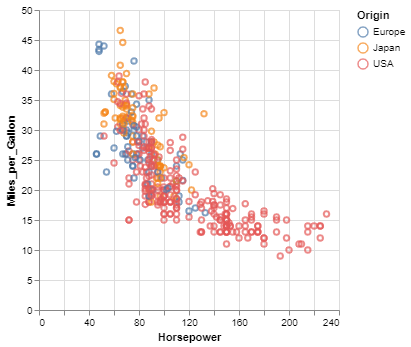
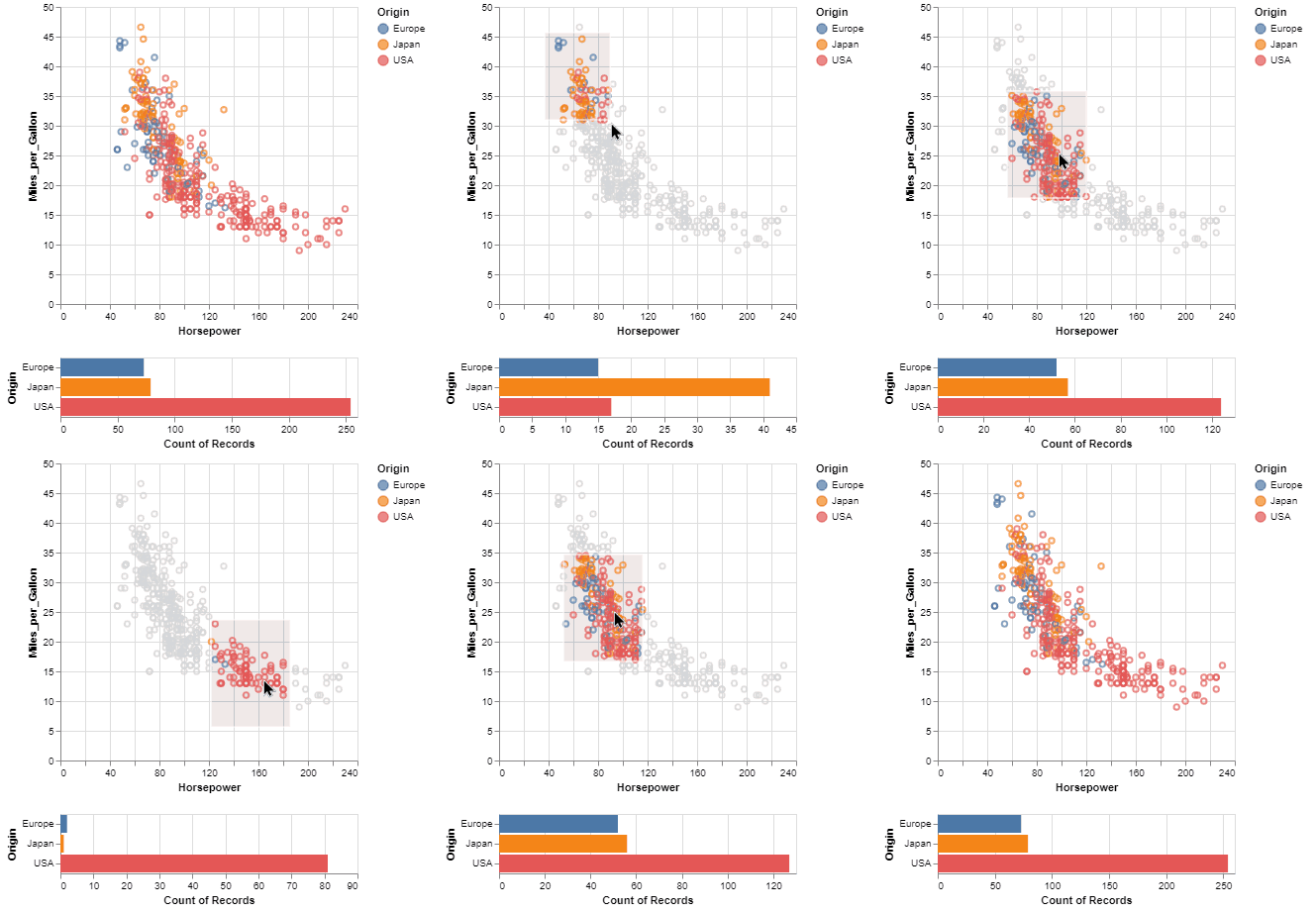
One of the unique features of Vega-Altair, inherited from Vega-Lite, is a declarative grammar of not just visualization, but _interaction_.
With a few modifications to the example above we can create a linked histogram that is filtered based on a selection of the scatter plot.
```python
import altair as alt
from altair.datasets import data
source = data.cars()
brush = alt.selection_interval()
points = alt.Chart(source).mark_point().encode(
x='Horsepower',
y='Miles_per_Gallon',
color=alt.when(brush).then("Origin").otherwise(alt.value("lightgray"))
).add_params(
brush
)
bars = alt.Chart(source).mark_bar().encode(
y='Origin',
color='Origin',
x='count(Origin)'
).transform_filter(
brush
)
points & bars
```
## Features
* Carefully-designed, declarative Python API.
* Auto-generated internal Python API that guarantees visualizations are type-checked and
in full conformance with the [Vega-Lite](https://github.com/vega/vega-lite)
specification.
* Display visualizations in JupyterLab, Jupyter Notebook, Visual Studio Code, on GitHub and
[nbviewer](https://nbviewer.jupyter.org/), and many more.
* Export visualizations to various formats such as PNG/SVG images, stand-alone HTML pages and the
[Online Vega-Lite Editor](https://vega.github.io/editor/#/).
* Serialize visualizations as JSON files.
## Installation
Vega-Altair can be installed with:
```bash
pip install altair
```
If you are using the conda package manager, the equivalent is:
```bash
conda install altair -c conda-forge
```
For full installation instructions, please see [the documentation](https://altair-viz.github.io/getting_started/installation.html).
## Getting Help
If you have a question that is not addressed in the documentation,
you can post it on [StackOverflow](https://stackoverflow.com/questions/tagged/altair) using the `altair` tag.
For bugs and feature requests, please open a [Github Issue](https://github.com/vega/altair/issues).
## Development
[](https://github.com/astral-sh/uv)
[](https://github.com/astral-sh/ruff)
[](https://github.com/pytest-dev/pytest)
For information on how to contribute your developments back to the Vega-Altair repository, see
[`CONTRIBUTING.md`](https://github.com/vega/altair/blob/main/CONTRIBUTING.md)
## Citing Vega-Altair
[](https://joss.theoj.org/papers/10.21105/joss.01057)
If you use Vega-Altair in academic work, please consider citing https://joss.theoj.org/papers/10.21105/joss.01057 as
```bib
@article{VanderPlas2018,
doi = {10.21105/joss.01057},
url = {https://doi.org/10.21105/joss.01057},
year = {2018},
publisher = {The Open Journal},
volume = {3},
number = {32},
pages = {1057},
author = {Jacob VanderPlas and Brian Granger and Jeffrey Heer and Dominik Moritz and Kanit Wongsuphasawat and Arvind Satyanarayan and Eitan Lees and Ilia Timofeev and Ben Welsh and Scott Sievert},
title = {Altair: Interactive Statistical Visualizations for Python},
journal = {Journal of Open Source Software}
}
```
Please additionally consider citing the [Vega-Lite](https://vega.github.io/vega-lite/) project, which Vega-Altair is based on: https://dl.acm.org/doi/10.1109/TVCG.2016.2599030
```bib
@article{Satyanarayan2017,
author={Satyanarayan, Arvind and Moritz, Dominik and Wongsuphasawat, Kanit and Heer, Jeffrey},
title={Vega-Lite: A Grammar of Interactive Graphics},
journal={IEEE transactions on visualization and computer graphics},
year={2017},
volume={23},
number={1},
pages={341-350},
publisher={IEEE}
}
```
================================================
FILE: RELEASING.md
================================================
1. Check all [Vega project](https://github.com/orgs/vega/repositories?type=source) versions are up-to-date. See [NOTES_FOR_MAINTAINERS.md](NOTES_FOR_MAINTAINERS.md)
2. Make sure to have [set up your environment](CONTRIBUTING.md#setting-up-your-environment).
Update your environment with the latest dependencies:
uv sync --all-extras
3. Make certain your branch is in sync with head, and that you have no uncommitted modifications. If you work on a fork, replace `origin` with `upstream`:
git checkout main
git pull origin main
git status # Should show "nothing to commit, working tree clean"
4. Do a [clean doc build](CONTRIBUTING.md#building-the-documentation-locally):
Navigate to http://localhost:8000 and ensure it looks OK (particularly
do a visual scan of the gallery thumbnails).
5. Create a new release branch:
git switch -c version_6.0.0
6. Update version to, e.g. 6.0.0:
- in ``altair/__init__.py``
- in ``doc/conf.py``
7. Commit changes and push:
git add . -u
git commit -m "chore: Bump version to 6.0.0"
git push
8. Merge release branch into main, make sure that all required checks pass
9. Switch to main, If you work on a fork, replace `origin` with `upstream`:
git switch main
git pull origin main
10. Build a source distribution and universal wheel,
publish to PyPI (Requires correct PyPI owner permissions and [UV_PUBLISH_TOKEN](https://docs.astral.sh/uv/configuration/environment/#uv_publish_token)):
uv run task publish
11. Build and publish docs (Requires write-access to [altair-viz/altair-viz.github.io](https://github.com/altair-viz/altair-viz.github.io)):
uv run task doc-publish-clean-build
12. On main, tag the release. If you work on a fork, replace `origin` with `upstream`:
git tag -a v6.0.0 -m "Version 6.0.0 release"
git push origin v6.0.0
13. Create a new branch:
git switch -c maint_6.1.0dev
14. Update version and add 'dev' suffix, e.g. 6.1.0dev:
- in ``altair/__init__.py``
- in ``doc/conf.py``
15. Commit changes and push:
git add . -u
git commit -m "chore: Bump version to 6.1.0dev"
git push
16. Merge maintenance branch into main
17. Double-check that a conda-forge pull request is generated from the updated
pip package by the conda-forge bot (may take up to several hours):
https://github.com/conda-forge/altair-feedstock/pulls
18. Publish a new release in https://github.com/vega/altair/releases/
================================================
FILE: altair/__init__.py
================================================
# ruff: noqa
__version__ = "6.1.0dev"
# The content of __all__ is automatically written by
# tools/update_init_file.py. Do not modify directly.
__all__ = [
"Aggregate",
"AggregateOp",
"AggregateTransform",
"AggregatedFieldDef",
"Align",
"AllSortString",
"AltairDeprecationWarning",
"Angle",
"AngleDatum",
"AngleValue",
"AnyMark",
"AnyMarkConfig",
"AreaConfig",
"ArgmaxDef",
"ArgminDef",
"AutoSizeParams",
"AutosizeType",
"Axis",
"AxisConfig",
"AxisOrient",
"AxisResolveMap",
"BBox",
"BarConfig",
"BaseTitleNoValueRefs",
"Baseline",
"Bin",
"BinExtent",
"BinParams",
"BinTransform",
"BindCheckbox",
"BindDirect",
"BindInput",
"BindRadioSelect",
"BindRange",
"Binding",
"BinnedTimeUnit",
"Blend",
"BoxPlot",
"BoxPlotConfig",
"BoxPlotDef",
"BrushConfig",
"CalculateTransform",
"Categorical",
"ChainedWhen",
"Chart",
"ChartDataType",
"Color",
"ColorDatum",
"ColorDef",
"ColorName",
"ColorScheme",
"ColorValue",
"Column",
"CompositeMark",
"CompositeMarkDef",
"CompositionConfig",
"ConcatChart",
"ConcatSpecGenericSpec",
"ConditionalAxisColor",
"ConditionalAxisLabelAlign",
"ConditionalAxisLabelBaseline",
"ConditionalAxisLabelFontStyle",
"ConditionalAxisLabelFontWeight",
"ConditionalAxisNumber",
"ConditionalAxisNumberArray",
"ConditionalAxisPropertyAlignnull",
"ConditionalAxisPropertyColornull",
"ConditionalAxisPropertyFontStylenull",
"ConditionalAxisPropertyFontWeightnull",
"ConditionalAxisPropertyTextBaselinenull",
"ConditionalAxisPropertynumberArraynull",
"ConditionalAxisPropertynumbernull",
"ConditionalAxisPropertystringnull",
"ConditionalAxisString",
"ConditionalMarkPropFieldOrDatumDef",
"ConditionalMarkPropFieldOrDatumDefTypeForShape",
"ConditionalParameterMarkPropFieldOrDatumDef",
"ConditionalParameterMarkPropFieldOrDatumDefTypeForShape",
"ConditionalParameterStringFieldDef",
"ConditionalParameterValueDefGradientstringnullExprRef",
"ConditionalParameterValueDefTextExprRef",
"ConditionalParameterValueDefnumber",
"ConditionalParameterValueDefnumberArrayExprRef",
"ConditionalParameterValueDefnumberExprRef",
"ConditionalParameterValueDefstringExprRef",
"ConditionalParameterValueDefstringnullExprRef",
"ConditionalPredicateMarkPropFieldOrDatumDef",
"ConditionalPredicateMarkPropFieldOrDatumDefTypeForShape",
"ConditionalPredicateStringFieldDef",
"ConditionalPredicateValueDefAlignnullExprRef",
"ConditionalPredicateValueDefColornullExprRef",
"ConditionalPredicateValueDefFontStylenullExprRef",
"ConditionalPredicateValueDefFontWeightnullExprRef",
"ConditionalPredicateValueDefGradientstringnullExprRef",
"ConditionalPredicateValueDefTextBaselinenullExprRef",
"ConditionalPredicateValueDefTextExprRef",
"ConditionalPredicateValueDefnumber",
"ConditionalPredicateValueDefnumberArrayExprRef",
"ConditionalPredicateValueDefnumberArraynullExprRef",
"ConditionalPredicateValueDefnumberExprRef",
"ConditionalPredicateValueDefnumbernullExprRef",
"ConditionalPredicateValueDefstringExprRef",
"ConditionalPredicateValueDefstringnullExprRef",
"ConditionalStringFieldDef",
"ConditionalValueDefGradientstringnullExprRef",
"ConditionalValueDefTextExprRef",
"ConditionalValueDefnumber",
"ConditionalValueDefnumberArrayExprRef",
"ConditionalValueDefnumberExprRef",
"ConditionalValueDefstringExprRef",
"ConditionalValueDefstringnullExprRef",
"Config",
"CsvDataFormat",
"Cursor",
"Cyclical",
"Data",
"DataFormat",
"DataSource",
"DataType",
"Datasets",
"DateTime",
"DatumChannelMixin",
"DatumDef",
"Day",
"DensityTransform",
"DerivedStream",
"Description",
"DescriptionValue",
"Detail",
"Dict",
"DictInlineDataset",
"DictSelectionInit",
"DictSelectionInitInterval",
"Diverging",
"DomainUnionWith",
"DsvDataFormat",
"Element",
"Encoding",
"EncodingSortField",
"ErrorBand",
"ErrorBandConfig",
"ErrorBandDef",
"ErrorBar",
"ErrorBarConfig",
"ErrorBarDef",
"ErrorBarExtent",
"EventStream",
"EventType",
"Expr",
"ExprRef",
"ExtentTransform",
"Facet",
"FacetChart",
"FacetEncodingFieldDef",
"FacetFieldDef",
"FacetMapping",
"FacetSpec",
"FacetedEncoding",
"FacetedUnitSpec",
"Feature",
"FeatureCollection",
"FeatureGeometryGeoJsonProperties",
"Field",
"FieldChannelMixin",
"FieldDefWithoutScale",
"FieldEqualPredicate",
"FieldGTEPredicate",
"FieldGTPredicate",
"FieldLTEPredicate",
"FieldLTPredicate",
"FieldName",
"FieldOneOfPredicate",
"FieldOrDatumDefWithConditionDatumDefGradientstringnull",
"FieldOrDatumDefWithConditionDatumDefnumber",
"FieldOrDatumDefWithConditionDatumDefnumberArray",
"FieldOrDatumDefWithConditionDatumDefstringnull",
"FieldOrDatumDefWithConditionMarkPropFieldDefGradientstringnull",
"FieldOrDatumDefWithConditionMarkPropFieldDefTypeForShapestringnull",
"FieldOrDatumDefWithConditionMarkPropFieldDefnumber",
"FieldOrDatumDefWithConditionMarkPropFieldDefnumberArray",
"FieldOrDatumDefWithConditionStringDatumDefText",
"FieldOrDatumDefWithConditionStringFieldDefText",
"FieldOrDatumDefWithConditionStringFieldDefstring",
"FieldRange",
"FieldRangePredicate",
"FieldValidPredicate",
"Fill",
"FillDatum",
"FillOpacity",
"FillOpacityDatum",
"FillOpacityValue",
"FillValue",
"FilterTransform",
"Fit",
"FlattenTransform",
"FoldTransform",
"FontStyle",
"FontWeight",
"Format",
"FormatConfig",
"Generator",
"GenericUnitSpecEncodingAnyMark",
"GeoJsonFeature",
"GeoJsonFeatureCollection",
"GeoJsonProperties",
"Geometry",
"GeometryCollection",
"Gradient",
"GradientStop",
"GraticuleGenerator",
"GraticuleParams",
"HConcatChart",
"HConcatSpecGenericSpec",
"Header",
"HeaderConfig",
"HexColor",
"Href",
"HrefValue",
"Impute",
"ImputeMethod",
"ImputeParams",
"ImputeSequence",
"ImputeTransform",
"InlineData",
"InlineDataset",
"Interpolate",
"IntervalSelectionConfig",
"IntervalSelectionConfigWithoutType",
"JoinAggregateFieldDef",
"JoinAggregateTransform",
"JsonDataFormat",
"JupyterChart",
"Key",
"LabelOverlap",
"LatLongDef",
"LatLongFieldDef",
"Latitude",
"Latitude2",
"Latitude2Datum",
"Latitude2Value",
"LatitudeDatum",
"LayerChart",
"LayerRepeatMapping",
"LayerRepeatSpec",
"LayerSpec",
"LayoutAlign",
"Legend",
"LegendBinding",
"LegendConfig",
"LegendOrient",
"LegendResolveMap",
"LegendStreamBinding",
"LineConfig",
"LineString",
"LinearGradient",
"LocalMultiTimeUnit",
"LocalSingleTimeUnit",
"Locale",
"LoessTransform",
"LogicalAndPredicate",
"LogicalNotPredicate",
"LogicalOrPredicate",
"Longitude",
"Longitude2",
"Longitude2Datum",
"Longitude2Value",
"LongitudeDatum",
"LookupData",
"LookupSelection",
"LookupTransform",
"Mark",
"MarkConfig",
"MarkDef",
"MarkInvalidDataMode",
"MarkPropDefGradientstringnull",
"MarkPropDefnumber",
"MarkPropDefnumberArray",
"MarkPropDefstringnullTypeForShape",
"MarkType",
"MaxRowsError",
"MergedStream",
"Month",
"MultiLineString",
"MultiPoint",
"MultiPolygon",
"MultiTimeUnit",
"NamedData",
"NonArgAggregateOp",
"NonLayerRepeatSpec",
"NonNormalizedSpec",
"NumberLocale",
"NumericArrayMarkPropDef",
"NumericMarkPropDef",
"OffsetDef",
"Opacity",
"OpacityDatum",
"OpacityValue",
"Order",
"OrderFieldDef",
"OrderOnlyDef",
"OrderValue",
"OrderValueDef",
"Orient",
"Orientation",
"OverlayMarkDef",
"Padding",
"Parameter",
"ParameterExpression",
"ParameterExtent",
"ParameterName",
"ParameterPredicate",
"Parse",
"ParseValue",
"PivotTransform",
"Point",
"PointSelectionConfig",
"PointSelectionConfigWithoutType",
"PolarDef",
"Polygon",
"Position",
"Position2Def",
"PositionDatumDef",
"PositionDatumDefBase",
"PositionDef",
"PositionFieldDef",
"PositionFieldDefBase",
"PositionValueDef",
"Predicate",
"PredicateComposition",
"PrimitiveValue",
"Projection",
"ProjectionConfig",
"ProjectionType",
"QuantileTransform",
"RadialGradient",
"Radius",
"Radius2",
"Radius2Datum",
"Radius2Value",
"RadiusDatum",
"RadiusValue",
"RangeConfig",
"RangeEnum",
"RangeRaw",
"RangeRawArray",
"RangeScheme",
"RectConfig",
"RegressionTransform",
"RelativeBandSize",
"RepeatChart",
"RepeatMapping",
"RepeatRef",
"RepeatSpec",
"Resolve",
"ResolveMode",
"Root",
"Row",
"RowColLayoutAlign",
"RowColboolean",
"RowColnumber",
"RowColumnEncodingFieldDef",
"SCHEMA_URL",
"SCHEMA_VERSION",
"SampleTransform",
"Scale",
"ScaleBinParams",
"ScaleBins",
"ScaleConfig",
"ScaleDatumDef",
"ScaleFieldDef",
"ScaleInterpolateEnum",
"ScaleInterpolateParams",
"ScaleInvalidDataConfig",
"ScaleInvalidDataShowAsValueangle",
"ScaleInvalidDataShowAsValuecolor",
"ScaleInvalidDataShowAsValuefill",
"ScaleInvalidDataShowAsValuefillOpacity",
"ScaleInvalidDataShowAsValueopacity",
"ScaleInvalidDataShowAsValueradius",
"ScaleInvalidDataShowAsValueshape",
"ScaleInvalidDataShowAsValuesize",
"ScaleInvalidDataShowAsValuestroke",
"ScaleInvalidDataShowAsValuestrokeDash",
"ScaleInvalidDataShowAsValuestrokeOpacity",
"ScaleInvalidDataShowAsValuestrokeWidth",
"ScaleInvalidDataShowAsValuetheta",
"ScaleInvalidDataShowAsValuetime",
"ScaleInvalidDataShowAsValuex",
"ScaleInvalidDataShowAsValuexOffset",
"ScaleInvalidDataShowAsValuey",
"ScaleInvalidDataShowAsValueyOffset",
"ScaleInvalidDataShowAsangle",
"ScaleInvalidDataShowAscolor",
"ScaleInvalidDataShowAsfill",
"ScaleInvalidDataShowAsfillOpacity",
"ScaleInvalidDataShowAsopacity",
"ScaleInvalidDataShowAsradius",
"ScaleInvalidDataShowAsshape",
"ScaleInvalidDataShowAssize",
"ScaleInvalidDataShowAsstroke",
"ScaleInvalidDataShowAsstrokeDash",
"ScaleInvalidDataShowAsstrokeOpacity",
"ScaleInvalidDataShowAsstrokeWidth",
"ScaleInvalidDataShowAstheta",
"ScaleInvalidDataShowAstime",
"ScaleInvalidDataShowAsx",
"ScaleInvalidDataShowAsxOffset",
"ScaleInvalidDataShowAsy",
"ScaleInvalidDataShowAsyOffset",
"ScaleResolveMap",
"ScaleType",
"SchemaBase",
"SchemeParams",
"SecondaryFieldDef",
"SelectionConfig",
"SelectionExpression",
"SelectionInit",
"SelectionInitInterval",
"SelectionInitIntervalMapping",
"SelectionInitMapping",
"SelectionParameter",
"SelectionPredicateComposition",
"SelectionResolution",
"SelectionType",
"SequenceGenerator",
"SequenceParams",
"SequentialMultiHue",
"SequentialSingleHue",
"Shape",
"ShapeDatum",
"ShapeDef",
"ShapeValue",
"SharedEncoding",
"SingleDefUnitChannel",
"SingleTimeUnit",
"Size",
"SizeDatum",
"SizeValue",
"Sort",
"SortArray",
"SortByChannel",
"SortByChannelDesc",
"SortByEncoding",
"SortField",
"SortOrder",
"Spec",
"SphereGenerator",
"StackOffset",
"StackTransform",
"StandardType",
"Step",
"StepFor",
"Stream",
"StringFieldDef",
"StringFieldDefWithCondition",
"StringValueDefWithCondition",
"Stroke",
"StrokeCap",
"StrokeDash",
"StrokeDashDatum",
"StrokeDashValue",
"StrokeDatum",
"StrokeJoin",
"StrokeOpacity",
"StrokeOpacityDatum",
"StrokeOpacityValue",
"StrokeValue",
"StrokeWidth",
"StrokeWidthDatum",
"StrokeWidthValue",
"StyleConfigIndex",
"SymbolShape",
"TOPLEVEL_ONLY_KEYS",
"Text",
"TextBaseline",
"TextDatum",
"TextDef",
"TextDirection",
"TextValue",
"Then",
"Theta",
"Theta2",
"Theta2Datum",
"Theta2Value",
"ThetaDatum",
"ThetaValue",
"TickConfig",
"TickCount",
"Time",
"TimeDef",
"TimeFieldDef",
"TimeFormatSpecifier",
"TimeInterval",
"TimeIntervalStep",
"TimeLocale",
"TimeUnit",
"TimeUnitParams",
"TimeUnitTransform",
"TimeUnitTransformParams",
"Title",
"TitleAnchor",
"TitleConfig",
"TitleFrame",
"TitleOrient",
"TitleParams",
"Tooltip",
"TooltipContent",
"TooltipValue",
"TopLevelConcatSpec",
"TopLevelFacetSpec",
"TopLevelHConcatSpec",
"TopLevelLayerSpec",
"TopLevelMixin",
"TopLevelParameter",
"TopLevelRepeatSpec",
"TopLevelSelectionParameter",
"TopLevelSpec",
"TopLevelUnitSpec",
"TopLevelVConcatSpec",
"TopoDataFormat",
"Transform",
"Type",
"TypeForShape",
"TypedFieldDef",
"URI",
"Undefined",
"UnitSpec",
"UnitSpecWithFrame",
"Url",
"UrlData",
"UrlValue",
"UtcMultiTimeUnit",
"UtcSingleTimeUnit",
"VConcatChart",
"VConcatSpecGenericSpec",
"VEGAEMBED_VERSION",
"VEGALITE_VERSION",
"VEGA_VERSION",
"ValueChannelMixin",
"ValueDefWithConditionMarkPropFieldOrDatumDefGradientstringnull",
"ValueDefWithConditionMarkPropFieldOrDatumDefTypeForShapestringnull",
"ValueDefWithConditionMarkPropFieldOrDatumDefnumber",
"ValueDefWithConditionMarkPropFieldOrDatumDefnumberArray",
"ValueDefWithConditionMarkPropFieldOrDatumDefstringnull",
"ValueDefWithConditionStringFieldDefText",
"ValueDefnumber",
"ValueDefnumberwidthheightExprRef",
"VariableParameter",
"Vector10string",
"Vector12string",
"Vector2DateTime",
"Vector2Vector2number",
"Vector2boolean",
"Vector2number",
"Vector2string",
"Vector3number",
"Vector7string",
"VegaLite",
"VegaLiteSchema",
"ViewBackground",
"ViewConfig",
"When",
"WindowEventType",
"WindowFieldDef",
"WindowOnlyOp",
"WindowTransform",
"X",
"X2",
"X2Datum",
"X2Value",
"XDatum",
"XError",
"XError2",
"XError2Value",
"XErrorValue",
"XOffset",
"XOffsetDatum",
"XOffsetValue",
"XValue",
"Y",
"Y2",
"Y2Datum",
"Y2Value",
"YDatum",
"YError",
"YError2",
"YError2Value",
"YErrorValue",
"YOffset",
"YOffsetDatum",
"YOffsetValue",
"YValue",
"api",
"binding",
"binding_checkbox",
"binding_radio",
"binding_range",
"binding_select",
"channels",
"check_fields_and_encodings",
"compiler",
"concat",
"condition",
"core",
"data",
"data_transformers",
"datasets",
"datum",
"default_data_transformer",
"display",
"expr",
"graticule",
"hconcat",
"jupyter",
"layer",
"limit_rows",
"load_ipython_extension",
"load_schema",
"mixins",
"param",
"parse_shorthand",
"renderers",
"repeat",
"sample",
"schema",
"selection_interval",
"selection_point",
"sequence",
"sphere",
"theme",
"to_csv",
"to_json",
"to_values",
"topo_feature",
"typing",
"utils",
"v6",
"value",
"vconcat",
"vegalite",
"vegalite_compilers",
"when",
"with_property_setters",
]
def __dir__():
return __all__
from altair.vegalite import *
from altair.vegalite.v6.schema.core import Dict
from altair.jupyter import JupyterChart
from altair.expr import expr
from altair.utils import AltairDeprecationWarning, parse_shorthand, Undefined
from altair import datasets, theme, typing
def load_ipython_extension(ipython):
from altair._magics import vegalite
ipython.register_magic_function(vegalite, "cell")
def __getattr__(name: str):
from altair.utils.deprecation import deprecated_warn
if name == "themes":
deprecated_warn(
"Most cases require only the following change:\n\n"
" # Deprecated\n"
" alt.themes.enable('quartz')\n\n"
" # Updated\n"
" alt.theme.enable('quartz')\n\n"
"If your code registers a theme, make the following change:\n\n"
" # Deprecated\n"
" def custom_theme():\n"
" return {'height': 400, 'width': 700}\n"
" alt.themes.register('theme_name', custom_theme)\n"
" alt.themes.enable('theme_name')\n\n"
" # Updated\n"
" @alt.theme.register('theme_name', enable=True)\n"
" def custom_theme():\n"
" return alt.theme.ThemeConfig(\n"
" {'height': 400, 'width': 700}\n"
" )\n\n"
"See the updated User Guide for further details:\n"
" https://altair-viz.github.io/user_guide/api.html#theme\n"
" https://altair-viz.github.io/user_guide/customization.html#chart-themes",
version="5.5.0",
alternative="altair.theme",
stacklevel=3,
action="once",
)
return theme._themes
else:
msg = f"module {__name__!r} has no attribute {name!r}"
raise AttributeError(msg)
================================================
FILE: altair/_magics.py
================================================
"""Magic functions for rendering vega-lite specifications."""
from __future__ import annotations
import json
import warnings
from importlib.util import find_spec
from typing import Any
from IPython.core import magic_arguments
from narwhals.stable.v1.dependencies import is_pandas_dataframe
from altair.vegalite import v6 as vegalite_v6
__all__ = ["vegalite"]
RENDERERS = {
"vega-lite": {
"6": vegalite_v6.VegaLite,
},
}
TRANSFORMERS = {
"vega-lite": {
"6": vegalite_v6.data_transformers,
},
}
def _prepare_data(data, data_transformers):
"""Convert input data to data for use within schema."""
if data is None or isinstance(data, dict):
return data
elif is_pandas_dataframe(data):
if func := data_transformers.get():
data = func(data)
return data
elif isinstance(data, str):
return {"url": data}
else:
warnings.warn(f"data of type {type(data)} not recognized", stacklevel=1)
return data
def _get_variable(name: str) -> Any:
"""Get a variable from the notebook namespace."""
from IPython.core.getipython import get_ipython
if ip := get_ipython():
if name not in ip.user_ns:
msg = f"argument '{name}' does not match the name of any defined variable"
raise NameError(msg)
return ip.user_ns[name]
else:
msg = (
"Magic command must be run within an IPython "
"environment, in which get_ipython() is defined."
)
raise ValueError(msg)
@magic_arguments.magic_arguments()
@magic_arguments.argument(
"data",
nargs="?",
help="local variablename of a pandas DataFrame to be used as the dataset",
)
@magic_arguments.argument("-v", "--version", dest="version", default="v6")
@magic_arguments.argument("-j", "--json", dest="json", action="store_true")
def vegalite(line, cell) -> vegalite_v6.VegaLite:
"""
Cell magic for displaying vega-lite visualizations in CoLab.
%%vegalite [dataframe] [--json] [--version='v6']
Visualize the contents of the cell using Vega-Lite, optionally
specifying a pandas DataFrame object to be used as the dataset.
if --json is passed, then input is parsed as json rather than yaml.
"""
args = magic_arguments.parse_argstring(vegalite, line)
existing_versions = {"v6": "6"}
version = existing_versions[args.version]
assert version in RENDERERS["vega-lite"]
VegaLite = RENDERERS["vega-lite"][version]
data_transformers = TRANSFORMERS["vega-lite"][version]
if args.json:
spec = json.loads(cell)
elif not find_spec("yaml"):
try:
spec = json.loads(cell)
except json.JSONDecodeError as err:
msg = (
"%%vegalite: spec is not valid JSON. "
"Install pyyaml to parse spec as yaml"
)
raise ValueError(msg) from err
else:
import yaml
spec = yaml.load(cell, Loader=yaml.SafeLoader)
if args.data is not None:
data = _get_variable(args.data)
spec["data"] = _prepare_data(data, data_transformers)
return VegaLite(spec)
================================================
FILE: altair/datasets/__init__.py
================================================
"""
Load example datasets *remotely* from `vega-datasets`_.
Provides **70+** datasets, used throughout our `Example Gallery`_.
You can learn more about each dataset at `datapackage.md`_.
Examples
--------
**Primary Interface - Data Object**::
from altair.datasets import data
# Load with default engine (pandas)
cars_df = data.cars()
# Load with specific engine
cars_polars = data.cars(engine="polars")
cars_pyarrow = data.cars(engine="pyarrow")
# Get URL
cars_url = data.cars.url
# Set default engine for all datasets
data.set_default_engine("polars")
movies_df = data.movies() # Uses polars engine
# List available datasets
available_datasets = data.list_datasets()
**Expert Interface - Loader**::
from altair.datasets import Loader
load = Loader.from_backend("polars")
load("penguins")
load.url("penguins")
This method also provides *precise* Tab completions on the returned object::
load("cars").
[](https://github.com/vega/altair/actions?query=workflow%3Abuild)
[](https://www.mypy-lang.org)
[](https://joss.theoj.org/papers/10.21105/joss.01057)
[](https://pypi.org/project/altair)
**Vega-Altair** is a declarative statistical visualization library for Python. With Vega-Altair, you can spend more time understanding your data and its meaning. Vega-Altair's
API is simple, friendly and consistent and built on top of the powerful
[Vega-Lite](https://github.com/vega/vega-lite) JSON specification. This elegant
simplicity produces beautiful and effective visualizations with a minimal amount of code.
*Vega-Altair was originally developed by [Jake Vanderplas](https://github.com/jakevdp) and [Brian
Granger](https://github.com/ellisonbg) in close collaboration with the [UW
Interactive Data Lab](https://idl.cs.washington.edu/).*
*The Vega-Altair open source project is not affiliated with Altair Engineering, Inc.*
## Documentation
See [Vega-Altair's Documentation Site](https://altair-viz.github.io) as well as the [Tutorial Notebooks](https://github.com/altair-viz/altair_notebooks). You can
run the notebooks directly in your browser by clicking on one of the following badges:
[](https://beta.mybinder.org/v2/gh/altair-viz/altair_notebooks/master)
[](https://colab.research.google.com/github/altair-viz/altair_notebooks/blob/master/notebooks/Index.ipynb)
## Example
Here is an example using Vega-Altair to quickly visualize and display a dataset with the native Vega-Lite renderer in the JupyterLab:
```python
import altair as alt
# load a simple dataset as a pandas DataFrame
from altair.datasets import data
cars = data.cars()
alt.Chart(cars).mark_point().encode(
x='Horsepower',
y='Miles_per_Gallon',
color='Origin',
)
```

One of the unique features of Vega-Altair, inherited from Vega-Lite, is a declarative grammar of not just visualization, but _interaction_.
With a few modifications to the example above we can create a linked histogram that is filtered based on a selection of the scatter plot.
```python
import altair as alt
from altair.datasets import data
source = data.cars()
brush = alt.selection_interval()
points = alt.Chart(source).mark_point().encode(
x='Horsepower',
y='Miles_per_Gallon',
color=alt.when(brush).then("Origin").otherwise(alt.value("lightgray"))
).add_params(
brush
)
bars = alt.Chart(source).mark_bar().encode(
y='Origin',
color='Origin',
x='count(Origin)'
).transform_filter(
brush
)
points & bars
```

## Features
* Carefully-designed, declarative Python API.
* Auto-generated internal Python API that guarantees visualizations are type-checked and
in full conformance with the [Vega-Lite](https://github.com/vega/vega-lite)
specification.
* Display visualizations in JupyterLab, Jupyter Notebook, Visual Studio Code, on GitHub and
[nbviewer](https://nbviewer.jupyter.org/), and many more.
* Export visualizations to various formats such as PNG/SVG images, stand-alone HTML pages and the
[Online Vega-Lite Editor](https://vega.github.io/editor/#/).
* Serialize visualizations as JSON files.
## Installation
Vega-Altair can be installed with:
```bash
pip install altair
```
If you are using the conda package manager, the equivalent is:
```bash
conda install altair -c conda-forge
```
For full installation instructions, please see [the documentation](https://altair-viz.github.io/getting_started/installation.html).
## Getting Help
If you have a question that is not addressed in the documentation,
you can post it on [StackOverflow](https://stackoverflow.com/questions/tagged/altair) using the `altair` tag.
For bugs and feature requests, please open a [Github Issue](https://github.com/vega/altair/issues).
## Development
[](https://github.com/astral-sh/uv)
[](https://github.com/astral-sh/ruff)
[](https://github.com/pytest-dev/pytest)
For information on how to contribute your developments back to the Vega-Altair repository, see
[`CONTRIBUTING.md`](https://github.com/vega/altair/blob/main/CONTRIBUTING.md)
## Citing Vega-Altair
[](https://joss.theoj.org/papers/10.21105/joss.01057)
If you use Vega-Altair in academic work, please consider citing https://joss.theoj.org/papers/10.21105/joss.01057 as
```bib
@article{VanderPlas2018,
doi = {10.21105/joss.01057},
url = {https://doi.org/10.21105/joss.01057},
year = {2018},
publisher = {The Open Journal},
volume = {3},
number = {32},
pages = {1057},
author = {Jacob VanderPlas and Brian Granger and Jeffrey Heer and Dominik Moritz and Kanit Wongsuphasawat and Arvind Satyanarayan and Eitan Lees and Ilia Timofeev and Ben Welsh and Scott Sievert},
title = {Altair: Interactive Statistical Visualizations for Python},
journal = {Journal of Open Source Software}
}
```
Please additionally consider citing the [Vega-Lite](https://vega.github.io/vega-lite/) project, which Vega-Altair is based on: https://dl.acm.org/doi/10.1109/TVCG.2016.2599030
```bib
@article{Satyanarayan2017,
author={Satyanarayan, Arvind and Moritz, Dominik and Wongsuphasawat, Kanit and Heer, Jeffrey},
title={Vega-Lite: A Grammar of Interactive Graphics},
journal={IEEE transactions on visualization and computer graphics},
year={2017},
volume={23},
number={1},
pages={341-350},
publisher={IEEE}
}
```
================================================
FILE: RELEASING.md
================================================
1. Check all [Vega project](https://github.com/orgs/vega/repositories?type=source) versions are up-to-date. See [NOTES_FOR_MAINTAINERS.md](NOTES_FOR_MAINTAINERS.md)
2. Make sure to have [set up your environment](CONTRIBUTING.md#setting-up-your-environment).
Update your environment with the latest dependencies:
uv sync --all-extras
3. Make certain your branch is in sync with head, and that you have no uncommitted modifications. If you work on a fork, replace `origin` with `upstream`:
git checkout main
git pull origin main
git status # Should show "nothing to commit, working tree clean"
4. Do a [clean doc build](CONTRIBUTING.md#building-the-documentation-locally):
Navigate to http://localhost:8000 and ensure it looks OK (particularly
do a visual scan of the gallery thumbnails).
5. Create a new release branch:
git switch -c version_6.0.0
6. Update version to, e.g. 6.0.0:
- in ``altair/__init__.py``
- in ``doc/conf.py``
7. Commit changes and push:
git add . -u
git commit -m "chore: Bump version to 6.0.0"
git push
8. Merge release branch into main, make sure that all required checks pass
9. Switch to main, If you work on a fork, replace `origin` with `upstream`:
git switch main
git pull origin main
10. Build a source distribution and universal wheel,
publish to PyPI (Requires correct PyPI owner permissions and [UV_PUBLISH_TOKEN](https://docs.astral.sh/uv/configuration/environment/#uv_publish_token)):
uv run task publish
11. Build and publish docs (Requires write-access to [altair-viz/altair-viz.github.io](https://github.com/altair-viz/altair-viz.github.io)):
uv run task doc-publish-clean-build
12. On main, tag the release. If you work on a fork, replace `origin` with `upstream`:
git tag -a v6.0.0 -m "Version 6.0.0 release"
git push origin v6.0.0
13. Create a new branch:
git switch -c maint_6.1.0dev
14. Update version and add 'dev' suffix, e.g. 6.1.0dev:
- in ``altair/__init__.py``
- in ``doc/conf.py``
15. Commit changes and push:
git add . -u
git commit -m "chore: Bump version to 6.1.0dev"
git push
16. Merge maintenance branch into main
17. Double-check that a conda-forge pull request is generated from the updated
pip package by the conda-forge bot (may take up to several hours):
https://github.com/conda-forge/altair-feedstock/pulls
18. Publish a new release in https://github.com/vega/altair/releases/
================================================
FILE: altair/__init__.py
================================================
# ruff: noqa
__version__ = "6.1.0dev"
# The content of __all__ is automatically written by
# tools/update_init_file.py. Do not modify directly.
__all__ = [
"Aggregate",
"AggregateOp",
"AggregateTransform",
"AggregatedFieldDef",
"Align",
"AllSortString",
"AltairDeprecationWarning",
"Angle",
"AngleDatum",
"AngleValue",
"AnyMark",
"AnyMarkConfig",
"AreaConfig",
"ArgmaxDef",
"ArgminDef",
"AutoSizeParams",
"AutosizeType",
"Axis",
"AxisConfig",
"AxisOrient",
"AxisResolveMap",
"BBox",
"BarConfig",
"BaseTitleNoValueRefs",
"Baseline",
"Bin",
"BinExtent",
"BinParams",
"BinTransform",
"BindCheckbox",
"BindDirect",
"BindInput",
"BindRadioSelect",
"BindRange",
"Binding",
"BinnedTimeUnit",
"Blend",
"BoxPlot",
"BoxPlotConfig",
"BoxPlotDef",
"BrushConfig",
"CalculateTransform",
"Categorical",
"ChainedWhen",
"Chart",
"ChartDataType",
"Color",
"ColorDatum",
"ColorDef",
"ColorName",
"ColorScheme",
"ColorValue",
"Column",
"CompositeMark",
"CompositeMarkDef",
"CompositionConfig",
"ConcatChart",
"ConcatSpecGenericSpec",
"ConditionalAxisColor",
"ConditionalAxisLabelAlign",
"ConditionalAxisLabelBaseline",
"ConditionalAxisLabelFontStyle",
"ConditionalAxisLabelFontWeight",
"ConditionalAxisNumber",
"ConditionalAxisNumberArray",
"ConditionalAxisPropertyAlignnull",
"ConditionalAxisPropertyColornull",
"ConditionalAxisPropertyFontStylenull",
"ConditionalAxisPropertyFontWeightnull",
"ConditionalAxisPropertyTextBaselinenull",
"ConditionalAxisPropertynumberArraynull",
"ConditionalAxisPropertynumbernull",
"ConditionalAxisPropertystringnull",
"ConditionalAxisString",
"ConditionalMarkPropFieldOrDatumDef",
"ConditionalMarkPropFieldOrDatumDefTypeForShape",
"ConditionalParameterMarkPropFieldOrDatumDef",
"ConditionalParameterMarkPropFieldOrDatumDefTypeForShape",
"ConditionalParameterStringFieldDef",
"ConditionalParameterValueDefGradientstringnullExprRef",
"ConditionalParameterValueDefTextExprRef",
"ConditionalParameterValueDefnumber",
"ConditionalParameterValueDefnumberArrayExprRef",
"ConditionalParameterValueDefnumberExprRef",
"ConditionalParameterValueDefstringExprRef",
"ConditionalParameterValueDefstringnullExprRef",
"ConditionalPredicateMarkPropFieldOrDatumDef",
"ConditionalPredicateMarkPropFieldOrDatumDefTypeForShape",
"ConditionalPredicateStringFieldDef",
"ConditionalPredicateValueDefAlignnullExprRef",
"ConditionalPredicateValueDefColornullExprRef",
"ConditionalPredicateValueDefFontStylenullExprRef",
"ConditionalPredicateValueDefFontWeightnullExprRef",
"ConditionalPredicateValueDefGradientstringnullExprRef",
"ConditionalPredicateValueDefTextBaselinenullExprRef",
"ConditionalPredicateValueDefTextExprRef",
"ConditionalPredicateValueDefnumber",
"ConditionalPredicateValueDefnumberArrayExprRef",
"ConditionalPredicateValueDefnumberArraynullExprRef",
"ConditionalPredicateValueDefnumberExprRef",
"ConditionalPredicateValueDefnumbernullExprRef",
"ConditionalPredicateValueDefstringExprRef",
"ConditionalPredicateValueDefstringnullExprRef",
"ConditionalStringFieldDef",
"ConditionalValueDefGradientstringnullExprRef",
"ConditionalValueDefTextExprRef",
"ConditionalValueDefnumber",
"ConditionalValueDefnumberArrayExprRef",
"ConditionalValueDefnumberExprRef",
"ConditionalValueDefstringExprRef",
"ConditionalValueDefstringnullExprRef",
"Config",
"CsvDataFormat",
"Cursor",
"Cyclical",
"Data",
"DataFormat",
"DataSource",
"DataType",
"Datasets",
"DateTime",
"DatumChannelMixin",
"DatumDef",
"Day",
"DensityTransform",
"DerivedStream",
"Description",
"DescriptionValue",
"Detail",
"Dict",
"DictInlineDataset",
"DictSelectionInit",
"DictSelectionInitInterval",
"Diverging",
"DomainUnionWith",
"DsvDataFormat",
"Element",
"Encoding",
"EncodingSortField",
"ErrorBand",
"ErrorBandConfig",
"ErrorBandDef",
"ErrorBar",
"ErrorBarConfig",
"ErrorBarDef",
"ErrorBarExtent",
"EventStream",
"EventType",
"Expr",
"ExprRef",
"ExtentTransform",
"Facet",
"FacetChart",
"FacetEncodingFieldDef",
"FacetFieldDef",
"FacetMapping",
"FacetSpec",
"FacetedEncoding",
"FacetedUnitSpec",
"Feature",
"FeatureCollection",
"FeatureGeometryGeoJsonProperties",
"Field",
"FieldChannelMixin",
"FieldDefWithoutScale",
"FieldEqualPredicate",
"FieldGTEPredicate",
"FieldGTPredicate",
"FieldLTEPredicate",
"FieldLTPredicate",
"FieldName",
"FieldOneOfPredicate",
"FieldOrDatumDefWithConditionDatumDefGradientstringnull",
"FieldOrDatumDefWithConditionDatumDefnumber",
"FieldOrDatumDefWithConditionDatumDefnumberArray",
"FieldOrDatumDefWithConditionDatumDefstringnull",
"FieldOrDatumDefWithConditionMarkPropFieldDefGradientstringnull",
"FieldOrDatumDefWithConditionMarkPropFieldDefTypeForShapestringnull",
"FieldOrDatumDefWithConditionMarkPropFieldDefnumber",
"FieldOrDatumDefWithConditionMarkPropFieldDefnumberArray",
"FieldOrDatumDefWithConditionStringDatumDefText",
"FieldOrDatumDefWithConditionStringFieldDefText",
"FieldOrDatumDefWithConditionStringFieldDefstring",
"FieldRange",
"FieldRangePredicate",
"FieldValidPredicate",
"Fill",
"FillDatum",
"FillOpacity",
"FillOpacityDatum",
"FillOpacityValue",
"FillValue",
"FilterTransform",
"Fit",
"FlattenTransform",
"FoldTransform",
"FontStyle",
"FontWeight",
"Format",
"FormatConfig",
"Generator",
"GenericUnitSpecEncodingAnyMark",
"GeoJsonFeature",
"GeoJsonFeatureCollection",
"GeoJsonProperties",
"Geometry",
"GeometryCollection",
"Gradient",
"GradientStop",
"GraticuleGenerator",
"GraticuleParams",
"HConcatChart",
"HConcatSpecGenericSpec",
"Header",
"HeaderConfig",
"HexColor",
"Href",
"HrefValue",
"Impute",
"ImputeMethod",
"ImputeParams",
"ImputeSequence",
"ImputeTransform",
"InlineData",
"InlineDataset",
"Interpolate",
"IntervalSelectionConfig",
"IntervalSelectionConfigWithoutType",
"JoinAggregateFieldDef",
"JoinAggregateTransform",
"JsonDataFormat",
"JupyterChart",
"Key",
"LabelOverlap",
"LatLongDef",
"LatLongFieldDef",
"Latitude",
"Latitude2",
"Latitude2Datum",
"Latitude2Value",
"LatitudeDatum",
"LayerChart",
"LayerRepeatMapping",
"LayerRepeatSpec",
"LayerSpec",
"LayoutAlign",
"Legend",
"LegendBinding",
"LegendConfig",
"LegendOrient",
"LegendResolveMap",
"LegendStreamBinding",
"LineConfig",
"LineString",
"LinearGradient",
"LocalMultiTimeUnit",
"LocalSingleTimeUnit",
"Locale",
"LoessTransform",
"LogicalAndPredicate",
"LogicalNotPredicate",
"LogicalOrPredicate",
"Longitude",
"Longitude2",
"Longitude2Datum",
"Longitude2Value",
"LongitudeDatum",
"LookupData",
"LookupSelection",
"LookupTransform",
"Mark",
"MarkConfig",
"MarkDef",
"MarkInvalidDataMode",
"MarkPropDefGradientstringnull",
"MarkPropDefnumber",
"MarkPropDefnumberArray",
"MarkPropDefstringnullTypeForShape",
"MarkType",
"MaxRowsError",
"MergedStream",
"Month",
"MultiLineString",
"MultiPoint",
"MultiPolygon",
"MultiTimeUnit",
"NamedData",
"NonArgAggregateOp",
"NonLayerRepeatSpec",
"NonNormalizedSpec",
"NumberLocale",
"NumericArrayMarkPropDef",
"NumericMarkPropDef",
"OffsetDef",
"Opacity",
"OpacityDatum",
"OpacityValue",
"Order",
"OrderFieldDef",
"OrderOnlyDef",
"OrderValue",
"OrderValueDef",
"Orient",
"Orientation",
"OverlayMarkDef",
"Padding",
"Parameter",
"ParameterExpression",
"ParameterExtent",
"ParameterName",
"ParameterPredicate",
"Parse",
"ParseValue",
"PivotTransform",
"Point",
"PointSelectionConfig",
"PointSelectionConfigWithoutType",
"PolarDef",
"Polygon",
"Position",
"Position2Def",
"PositionDatumDef",
"PositionDatumDefBase",
"PositionDef",
"PositionFieldDef",
"PositionFieldDefBase",
"PositionValueDef",
"Predicate",
"PredicateComposition",
"PrimitiveValue",
"Projection",
"ProjectionConfig",
"ProjectionType",
"QuantileTransform",
"RadialGradient",
"Radius",
"Radius2",
"Radius2Datum",
"Radius2Value",
"RadiusDatum",
"RadiusValue",
"RangeConfig",
"RangeEnum",
"RangeRaw",
"RangeRawArray",
"RangeScheme",
"RectConfig",
"RegressionTransform",
"RelativeBandSize",
"RepeatChart",
"RepeatMapping",
"RepeatRef",
"RepeatSpec",
"Resolve",
"ResolveMode",
"Root",
"Row",
"RowColLayoutAlign",
"RowColboolean",
"RowColnumber",
"RowColumnEncodingFieldDef",
"SCHEMA_URL",
"SCHEMA_VERSION",
"SampleTransform",
"Scale",
"ScaleBinParams",
"ScaleBins",
"ScaleConfig",
"ScaleDatumDef",
"ScaleFieldDef",
"ScaleInterpolateEnum",
"ScaleInterpolateParams",
"ScaleInvalidDataConfig",
"ScaleInvalidDataShowAsValueangle",
"ScaleInvalidDataShowAsValuecolor",
"ScaleInvalidDataShowAsValuefill",
"ScaleInvalidDataShowAsValuefillOpacity",
"ScaleInvalidDataShowAsValueopacity",
"ScaleInvalidDataShowAsValueradius",
"ScaleInvalidDataShowAsValueshape",
"ScaleInvalidDataShowAsValuesize",
"ScaleInvalidDataShowAsValuestroke",
"ScaleInvalidDataShowAsValuestrokeDash",
"ScaleInvalidDataShowAsValuestrokeOpacity",
"ScaleInvalidDataShowAsValuestrokeWidth",
"ScaleInvalidDataShowAsValuetheta",
"ScaleInvalidDataShowAsValuetime",
"ScaleInvalidDataShowAsValuex",
"ScaleInvalidDataShowAsValuexOffset",
"ScaleInvalidDataShowAsValuey",
"ScaleInvalidDataShowAsValueyOffset",
"ScaleInvalidDataShowAsangle",
"ScaleInvalidDataShowAscolor",
"ScaleInvalidDataShowAsfill",
"ScaleInvalidDataShowAsfillOpacity",
"ScaleInvalidDataShowAsopacity",
"ScaleInvalidDataShowAsradius",
"ScaleInvalidDataShowAsshape",
"ScaleInvalidDataShowAssize",
"ScaleInvalidDataShowAsstroke",
"ScaleInvalidDataShowAsstrokeDash",
"ScaleInvalidDataShowAsstrokeOpacity",
"ScaleInvalidDataShowAsstrokeWidth",
"ScaleInvalidDataShowAstheta",
"ScaleInvalidDataShowAstime",
"ScaleInvalidDataShowAsx",
"ScaleInvalidDataShowAsxOffset",
"ScaleInvalidDataShowAsy",
"ScaleInvalidDataShowAsyOffset",
"ScaleResolveMap",
"ScaleType",
"SchemaBase",
"SchemeParams",
"SecondaryFieldDef",
"SelectionConfig",
"SelectionExpression",
"SelectionInit",
"SelectionInitInterval",
"SelectionInitIntervalMapping",
"SelectionInitMapping",
"SelectionParameter",
"SelectionPredicateComposition",
"SelectionResolution",
"SelectionType",
"SequenceGenerator",
"SequenceParams",
"SequentialMultiHue",
"SequentialSingleHue",
"Shape",
"ShapeDatum",
"ShapeDef",
"ShapeValue",
"SharedEncoding",
"SingleDefUnitChannel",
"SingleTimeUnit",
"Size",
"SizeDatum",
"SizeValue",
"Sort",
"SortArray",
"SortByChannel",
"SortByChannelDesc",
"SortByEncoding",
"SortField",
"SortOrder",
"Spec",
"SphereGenerator",
"StackOffset",
"StackTransform",
"StandardType",
"Step",
"StepFor",
"Stream",
"StringFieldDef",
"StringFieldDefWithCondition",
"StringValueDefWithCondition",
"Stroke",
"StrokeCap",
"StrokeDash",
"StrokeDashDatum",
"StrokeDashValue",
"StrokeDatum",
"StrokeJoin",
"StrokeOpacity",
"StrokeOpacityDatum",
"StrokeOpacityValue",
"StrokeValue",
"StrokeWidth",
"StrokeWidthDatum",
"StrokeWidthValue",
"StyleConfigIndex",
"SymbolShape",
"TOPLEVEL_ONLY_KEYS",
"Text",
"TextBaseline",
"TextDatum",
"TextDef",
"TextDirection",
"TextValue",
"Then",
"Theta",
"Theta2",
"Theta2Datum",
"Theta2Value",
"ThetaDatum",
"ThetaValue",
"TickConfig",
"TickCount",
"Time",
"TimeDef",
"TimeFieldDef",
"TimeFormatSpecifier",
"TimeInterval",
"TimeIntervalStep",
"TimeLocale",
"TimeUnit",
"TimeUnitParams",
"TimeUnitTransform",
"TimeUnitTransformParams",
"Title",
"TitleAnchor",
"TitleConfig",
"TitleFrame",
"TitleOrient",
"TitleParams",
"Tooltip",
"TooltipContent",
"TooltipValue",
"TopLevelConcatSpec",
"TopLevelFacetSpec",
"TopLevelHConcatSpec",
"TopLevelLayerSpec",
"TopLevelMixin",
"TopLevelParameter",
"TopLevelRepeatSpec",
"TopLevelSelectionParameter",
"TopLevelSpec",
"TopLevelUnitSpec",
"TopLevelVConcatSpec",
"TopoDataFormat",
"Transform",
"Type",
"TypeForShape",
"TypedFieldDef",
"URI",
"Undefined",
"UnitSpec",
"UnitSpecWithFrame",
"Url",
"UrlData",
"UrlValue",
"UtcMultiTimeUnit",
"UtcSingleTimeUnit",
"VConcatChart",
"VConcatSpecGenericSpec",
"VEGAEMBED_VERSION",
"VEGALITE_VERSION",
"VEGA_VERSION",
"ValueChannelMixin",
"ValueDefWithConditionMarkPropFieldOrDatumDefGradientstringnull",
"ValueDefWithConditionMarkPropFieldOrDatumDefTypeForShapestringnull",
"ValueDefWithConditionMarkPropFieldOrDatumDefnumber",
"ValueDefWithConditionMarkPropFieldOrDatumDefnumberArray",
"ValueDefWithConditionMarkPropFieldOrDatumDefstringnull",
"ValueDefWithConditionStringFieldDefText",
"ValueDefnumber",
"ValueDefnumberwidthheightExprRef",
"VariableParameter",
"Vector10string",
"Vector12string",
"Vector2DateTime",
"Vector2Vector2number",
"Vector2boolean",
"Vector2number",
"Vector2string",
"Vector3number",
"Vector7string",
"VegaLite",
"VegaLiteSchema",
"ViewBackground",
"ViewConfig",
"When",
"WindowEventType",
"WindowFieldDef",
"WindowOnlyOp",
"WindowTransform",
"X",
"X2",
"X2Datum",
"X2Value",
"XDatum",
"XError",
"XError2",
"XError2Value",
"XErrorValue",
"XOffset",
"XOffsetDatum",
"XOffsetValue",
"XValue",
"Y",
"Y2",
"Y2Datum",
"Y2Value",
"YDatum",
"YError",
"YError2",
"YError2Value",
"YErrorValue",
"YOffset",
"YOffsetDatum",
"YOffsetValue",
"YValue",
"api",
"binding",
"binding_checkbox",
"binding_radio",
"binding_range",
"binding_select",
"channels",
"check_fields_and_encodings",
"compiler",
"concat",
"condition",
"core",
"data",
"data_transformers",
"datasets",
"datum",
"default_data_transformer",
"display",
"expr",
"graticule",
"hconcat",
"jupyter",
"layer",
"limit_rows",
"load_ipython_extension",
"load_schema",
"mixins",
"param",
"parse_shorthand",
"renderers",
"repeat",
"sample",
"schema",
"selection_interval",
"selection_point",
"sequence",
"sphere",
"theme",
"to_csv",
"to_json",
"to_values",
"topo_feature",
"typing",
"utils",
"v6",
"value",
"vconcat",
"vegalite",
"vegalite_compilers",
"when",
"with_property_setters",
]
def __dir__():
return __all__
from altair.vegalite import *
from altair.vegalite.v6.schema.core import Dict
from altair.jupyter import JupyterChart
from altair.expr import expr
from altair.utils import AltairDeprecationWarning, parse_shorthand, Undefined
from altair import datasets, theme, typing
def load_ipython_extension(ipython):
from altair._magics import vegalite
ipython.register_magic_function(vegalite, "cell")
def __getattr__(name: str):
from altair.utils.deprecation import deprecated_warn
if name == "themes":
deprecated_warn(
"Most cases require only the following change:\n\n"
" # Deprecated\n"
" alt.themes.enable('quartz')\n\n"
" # Updated\n"
" alt.theme.enable('quartz')\n\n"
"If your code registers a theme, make the following change:\n\n"
" # Deprecated\n"
" def custom_theme():\n"
" return {'height': 400, 'width': 700}\n"
" alt.themes.register('theme_name', custom_theme)\n"
" alt.themes.enable('theme_name')\n\n"
" # Updated\n"
" @alt.theme.register('theme_name', enable=True)\n"
" def custom_theme():\n"
" return alt.theme.ThemeConfig(\n"
" {'height': 400, 'width': 700}\n"
" )\n\n"
"See the updated User Guide for further details:\n"
" https://altair-viz.github.io/user_guide/api.html#theme\n"
" https://altair-viz.github.io/user_guide/customization.html#chart-themes",
version="5.5.0",
alternative="altair.theme",
stacklevel=3,
action="once",
)
return theme._themes
else:
msg = f"module {__name__!r} has no attribute {name!r}"
raise AttributeError(msg)
================================================
FILE: altair/_magics.py
================================================
"""Magic functions for rendering vega-lite specifications."""
from __future__ import annotations
import json
import warnings
from importlib.util import find_spec
from typing import Any
from IPython.core import magic_arguments
from narwhals.stable.v1.dependencies import is_pandas_dataframe
from altair.vegalite import v6 as vegalite_v6
__all__ = ["vegalite"]
RENDERERS = {
"vega-lite": {
"6": vegalite_v6.VegaLite,
},
}
TRANSFORMERS = {
"vega-lite": {
"6": vegalite_v6.data_transformers,
},
}
def _prepare_data(data, data_transformers):
"""Convert input data to data for use within schema."""
if data is None or isinstance(data, dict):
return data
elif is_pandas_dataframe(data):
if func := data_transformers.get():
data = func(data)
return data
elif isinstance(data, str):
return {"url": data}
else:
warnings.warn(f"data of type {type(data)} not recognized", stacklevel=1)
return data
def _get_variable(name: str) -> Any:
"""Get a variable from the notebook namespace."""
from IPython.core.getipython import get_ipython
if ip := get_ipython():
if name not in ip.user_ns:
msg = f"argument '{name}' does not match the name of any defined variable"
raise NameError(msg)
return ip.user_ns[name]
else:
msg = (
"Magic command must be run within an IPython "
"environment, in which get_ipython() is defined."
)
raise ValueError(msg)
@magic_arguments.magic_arguments()
@magic_arguments.argument(
"data",
nargs="?",
help="local variablename of a pandas DataFrame to be used as the dataset",
)
@magic_arguments.argument("-v", "--version", dest="version", default="v6")
@magic_arguments.argument("-j", "--json", dest="json", action="store_true")
def vegalite(line, cell) -> vegalite_v6.VegaLite:
"""
Cell magic for displaying vega-lite visualizations in CoLab.
%%vegalite [dataframe] [--json] [--version='v6']
Visualize the contents of the cell using Vega-Lite, optionally
specifying a pandas DataFrame object to be used as the dataset.
if --json is passed, then input is parsed as json rather than yaml.
"""
args = magic_arguments.parse_argstring(vegalite, line)
existing_versions = {"v6": "6"}
version = existing_versions[args.version]
assert version in RENDERERS["vega-lite"]
VegaLite = RENDERERS["vega-lite"][version]
data_transformers = TRANSFORMERS["vega-lite"][version]
if args.json:
spec = json.loads(cell)
elif not find_spec("yaml"):
try:
spec = json.loads(cell)
except json.JSONDecodeError as err:
msg = (
"%%vegalite: spec is not valid JSON. "
"Install pyyaml to parse spec as yaml"
)
raise ValueError(msg) from err
else:
import yaml
spec = yaml.load(cell, Loader=yaml.SafeLoader)
if args.data is not None:
data = _get_variable(args.data)
spec["data"] = _prepare_data(data, data_transformers)
return VegaLite(spec)
================================================
FILE: altair/datasets/__init__.py
================================================
"""
Load example datasets *remotely* from `vega-datasets`_.
Provides **70+** datasets, used throughout our `Example Gallery`_.
You can learn more about each dataset at `datapackage.md`_.
Examples
--------
**Primary Interface - Data Object**::
from altair.datasets import data
# Load with default engine (pandas)
cars_df = data.cars()
# Load with specific engine
cars_polars = data.cars(engine="polars")
cars_pyarrow = data.cars(engine="pyarrow")
# Get URL
cars_url = data.cars.url
# Set default engine for all datasets
data.set_default_engine("polars")
movies_df = data.movies() # Uses polars engine
# List available datasets
available_datasets = data.list_datasets()
**Expert Interface - Loader**::
from altair.datasets import Loader
load = Loader.from_backend("polars")
load("penguins")
load.url("penguins")
This method also provides *precise* Tab completions on the returned object::
load("cars").'
+ '
'
);
}
const reembed = async () => {
if (finalize != null) {
finalize();
}
model.set("local_tz", Intl.DateTimeFormat().resolvedOptions().timeZone);
let spec = structuredClone(model.get("spec"));
if (spec == null) {
// Remove any existing chart and return
while (el.firstChild) {
el.removeChild(el.lastChild);
}
model.save_changes();
return;
}
let embedOptions = structuredClone(model.get("embed_options")) ?? undefined;
let api;
try {
api = await vegaEmbed(el, spec, embedOptions);
} catch (error) {
showError(error)
return;
}
finalize = api.finalize;
// Debounce config
const wait = model.get("debounce_wait") ?? 10;
const debounceOpts = {leading: false, trailing: true};
if (model.get("max_wait") ?? true) {
debounceOpts["maxWait"] = wait;
}
const initialSelections = {};
for (const selectionName of Object.keys(model.get("_vl_selections"))) {
const storeName = `${selectionName}_store`;
const selectionHandler = (_, value) => {
const newSelections = cleanJson(model.get("_vl_selections") ?? {});
const store = cleanJson(api.view.data(storeName) ?? []);
newSelections[selectionName] = {value, store};
model.set("_vl_selections", newSelections);
model.save_changes();
};
api.view.addSignalListener(selectionName, lodashDebounce(selectionHandler, wait, debounceOpts));
initialSelections[selectionName] = {
value: cleanJson(api.view.signal(selectionName) ?? {}),
store: cleanJson(api.view.data(storeName) ?? [])
}
}
model.set("_vl_selections", initialSelections);
const initialParams = {};
for (const paramName of Object.keys(model.get("_params"))) {
const paramHandler = (_, value) => {
const newParams = JSON.parse(JSON.stringify(model.get("_params"))) || {};
newParams[paramName] = value;
model.set("_params", newParams);
model.save_changes();
};
api.view.addSignalListener(paramName, lodashDebounce(paramHandler, wait, debounceOpts));
initialParams[paramName] = api.view.signal(paramName) ?? null
}
model.set("_params", initialParams);
model.save_changes();
// Param change callback
model.on('change:_params', async (new_params) => {
for (const [param, value] of Object.entries(new_params.changed ? new_params.changed._params : new_params)) {
api.view.signal(param, value);
}
await api.view.runAsync();
});
// Add signal/data listeners
for (const watch of model.get("_js_watch_plan") ?? []) {
if (watch.namespace === "data") {
const dataHandler = (_, value) => {
model.set("_js_to_py_updates", [{
namespace: "data",
name: watch.name,
scope: watch.scope,
value: cleanJson(value)
}]);
model.save_changes();
};
addDataListener(api.view, watch.name, watch.scope, lodashDebounce(dataHandler, wait, debounceOpts))
} else if (watch.namespace === "signal") {
const signalHandler = (_, value) => {
model.set("_js_to_py_updates", [{
namespace: "signal",
name: watch.name,
scope: watch.scope,
value: cleanJson(value)
}]);
model.save_changes();
};
addSignalListener(api.view, watch.name, watch.scope, lodashDebounce(signalHandler, wait, debounceOpts))
}
}
// Add signal/data updaters
model.on('change:_py_to_js_updates', async (updates) => {
const py_to_js_updates = updates.changed ? updates.changed._py_to_js_updates : updates;
for (const update of py_to_js_updates ?? []) {
if (update.namespace === "signal") {
setSignalValue(api.view, update.name, update.scope, update.value);
} else if (update.namespace === "data") {
setDataValue(api.view, update.name, update.scope, update.value);
}
}
await api.view.runAsync();
});
}
model.on('change:spec', reembed);
model.on('change:embed_options', reembed);
model.on('change:debounce_wait', reembed);
model.on('change:max_wait', reembed);
await reembed();
}
function cleanJson(data) {
return JSON.parse(JSON.stringify(data))
}
function getNestedRuntime(view, scope) {
var runtime = view._runtime;
for (const index of scope) {
runtime = runtime.subcontext[index];
}
return runtime
}
function lookupSignalOp(view, name, scope) {
let parent_runtime = getNestedRuntime(view, scope);
return parent_runtime.signals[name] ?? null;
}
function dataRef(view, name, scope) {
let parent_runtime = getNestedRuntime(view, scope);
return parent_runtime.data[name];
}
export function setSignalValue(view, name, scope, value) {
let signal_op = lookupSignalOp(view, name, scope);
view.update(signal_op, value);
}
export function setDataValue(view, name, scope, value) {
let dataset = dataRef(view, name, scope);
let changeset = view.changeset().remove(() => true).insert(value)
dataset.modified = true;
view.pulse(dataset.input, changeset);
}
export function addSignalListener(view, name, scope, handler) {
let signal_op = lookupSignalOp(view, name, scope);
return addOperatorListener(
view,
name,
signal_op,
handler,
);
}
export function addDataListener(view, name, scope, handler) {
let dataset = dataRef(view, name, scope).values;
return addOperatorListener(
view,
name,
dataset,
handler,
);
}
// Private helpers from Vega for dealing with nested signals/data
function findOperatorHandler(op, handler) {
const h = (op._targets || [])
.filter(op => op._update && op._update.handler === handler);
return h.length ? h[0] : null;
}
function addOperatorListener(view, name, op, handler) {
let h = findOperatorHandler(op, handler);
if (!h) {
h = trap(view, () => handler(name, op.value));
h.handler = handler;
view.on(op, null, h);
}
return view;
}
function trap(view, fn) {
return !fn ? null : function() {
try {
fn.apply(this, arguments);
} catch (error) {
view.error(error);
}
};
}
export default { render }
================================================
FILE: altair/jupyter/jupyter_chart.py
================================================
from __future__ import annotations
import json
import pathlib
from typing import Any
import anywidget
import traitlets
import altair as alt
from altair import TopLevelSpec
from altair.utils._vegafusion_data import (
compile_to_vegafusion_chart_state,
using_vegafusion,
)
from altair.utils.selection import IndexSelection, IntervalSelection, PointSelection
_here = pathlib.Path(__file__).parent
class Params(traitlets.HasTraits):
"""Traitlet class storing a JupyterChart's params."""
def __init__(self, trait_values):
super().__init__()
for key, value in trait_values.items():
if isinstance(value, (int, float)):
traitlet_type = traitlets.Float()
elif isinstance(value, str):
traitlet_type = traitlets.Unicode()
elif isinstance(value, list):
traitlet_type = traitlets.List()
elif isinstance(value, dict):
traitlet_type = traitlets.Dict()
else:
traitlet_type = traitlets.Any()
# Add the new trait.
self.add_traits(**{key: traitlet_type})
# Set the trait's value.
setattr(self, key, value)
def __repr__(self):
return f"Params({self.trait_values()})"
class Selections(traitlets.HasTraits):
"""Traitlet class storing a JupyterChart's selections."""
def __init__(self, trait_values):
super().__init__()
for key, value in trait_values.items():
if isinstance(value, IndexSelection):
traitlet_type = traitlets.Instance(IndexSelection)
elif isinstance(value, PointSelection):
traitlet_type = traitlets.Instance(PointSelection)
elif isinstance(value, IntervalSelection):
traitlet_type = traitlets.Instance(IntervalSelection)
else:
msg = f"Unexpected selection type: {type(value)}"
raise ValueError(msg)
# Add the new trait.
self.add_traits(**{key: traitlet_type})
# Set the trait's value.
setattr(self, key, value)
# Make read-only
self.observe(self._make_read_only, names=key)
def __repr__(self):
return f"Selections({self.trait_values()})"
def _make_read_only(self, change):
"""Work around to make traits read-only, but still allow us to change them internally."""
if change["name"] in self.traits() and change["old"] != change["new"]:
self._set_value(change["name"], change["old"])
msg = (
"Selections may not be set from Python.\n"
f"Attempted to set select: {change['name']}"
)
raise ValueError(msg)
def _set_value(self, key, value):
self.unobserve(self._make_read_only, names=key)
setattr(self, key, value)
self.observe(self._make_read_only, names=key)
def load_js_src() -> str:
return (_here / "js" / "index.js").read_text()
class JupyterChart(anywidget.AnyWidget):
_esm = load_js_src()
_css = r"""
.vega-embed {
/* Make sure action menu isn't cut off */
overflow: visible;
}
"""
# Public traitlets
chart = traitlets.Instance(TopLevelSpec, allow_none=True)
spec = traitlets.Dict(allow_none=True).tag(sync=True)
debounce_wait = traitlets.Float(default_value=10).tag(sync=True)
max_wait = traitlets.Bool(default_value=True).tag(sync=True)
local_tz = traitlets.Unicode(default_value=None, allow_none=True).tag(sync=True)
debug = traitlets.Bool(default_value=False)
embed_options = traitlets.Dict(default_value=None, allow_none=True).tag(sync=True)
# Internal selection traitlets
_selection_types = traitlets.Dict()
_vl_selections = traitlets.Dict().tag(sync=True)
# Internal param traitlets
_params = traitlets.Dict().tag(sync=True)
# Internal comm traitlets for VegaFusion support
_chart_state = traitlets.Any(allow_none=True)
_js_watch_plan = traitlets.Any(allow_none=True).tag(sync=True)
_js_to_py_updates = traitlets.Any(allow_none=True).tag(sync=True)
_py_to_js_updates = traitlets.Any(allow_none=True).tag(sync=True)
# Track whether charts are configured for offline use
_is_offline = False
@classmethod
def enable_offline(cls, offline: bool = True):
"""
Configure JupyterChart's offline behavior.
Parameters
----------
offline: bool
If True, configure JupyterChart to operate in offline mode where JavaScript
dependencies are loaded from vl-convert.
If False, configure it to operate in online mode where JavaScript dependencies
are loaded from CDN dynamically. This is the default behavior.
"""
from altair.utils._importers import import_vl_convert, vl_version_for_vl_convert
if offline:
if cls._is_offline:
# Already offline
return
vlc = import_vl_convert()
src_lines = load_js_src().split("\n")
# Remove leading lines with only whitespace, comments, or imports
while src_lines and (
len(src_lines[0].strip()) == 0
or src_lines[0].startswith("import")
or src_lines[0].startswith("//")
):
src_lines.pop(0)
src = "\n".join(src_lines)
# vl-convert's javascript_bundle function creates a self-contained JavaScript bundle
# for JavaScript snippets that import from a small set of dependencies that
# vl-convert includes. To see the available imports and their imported names, run
# import vl_convert as vlc
# help(vlc.javascript_bundle)
bundled_src = vlc.javascript_bundle(
src, vl_version=vl_version_for_vl_convert()
)
cls._esm = bundled_src
cls._is_offline = True
else:
cls._esm = load_js_src()
cls._is_offline = False
def __init__(
self,
chart: TopLevelSpec,
debounce_wait: int = 10,
max_wait: bool = True,
debug: bool = False,
embed_options: dict | None = None,
**kwargs: Any,
):
"""
Jupyter Widget for displaying and updating Altair Charts, and retrieving selection and parameter values.
Parameters
----------
chart: Chart
Altair Chart instance
debounce_wait: int
Debouncing wait time in milliseconds. Updates will be sent from the client to the kernel
after debounce_wait milliseconds of no chart interactions.
max_wait: bool
If True (default), updates will be sent from the client to the kernel every debounce_wait
milliseconds even if there are ongoing chart interactions. If False, updates will not be
sent until chart interactions have completed.
debug: bool
If True, debug messages will be printed
embed_options: dict
Options to pass to vega-embed.
See https://github.com/vega/vega-embed?tab=readme-ov-file#options
"""
self.params = Params({})
self.selections = Selections({})
super().__init__(
chart=chart,
debounce_wait=debounce_wait,
max_wait=max_wait,
debug=debug,
embed_options=embed_options,
**kwargs,
)
@traitlets.observe("chart")
def _on_change_chart(self, change): # noqa: C901
"""Updates the JupyterChart's internal state when the wrapped Chart instance changes."""
new_chart = change.new
selection_watches = []
selection_types = {}
initial_params = {}
initial_vl_selections = {}
empty_selections = {}
if new_chart is None:
with self.hold_sync():
self.spec = None
self._selection_types = selection_types
self._vl_selections = initial_vl_selections
self._params = initial_params
return
params = getattr(new_chart, "params", [])
if params is not alt.Undefined:
for param in new_chart.params:
if isinstance(param.name, alt.ParameterName):
clean_name = param.name.to_json().strip('"')
else:
clean_name = param.name
select = getattr(param, "select", alt.Undefined)
if select != alt.Undefined:
if not isinstance(select, dict):
select = select.to_dict()
select_type = select["type"]
if select_type == "point":
if not (
select.get("fields", None) or select.get("encodings", None)
):
# Point selection with no associated fields or encodings specified.
# This is an index-based selection
selection_types[clean_name] = "index"
empty_selections[clean_name] = IndexSelection(
name=clean_name, value=[], store=[]
)
else:
selection_types[clean_name] = "point"
empty_selections[clean_name] = PointSelection(
name=clean_name, value=[], store=[]
)
elif select_type == "interval":
selection_types[clean_name] = "interval"
empty_selections[clean_name] = IntervalSelection(
name=clean_name, value={}, store=[]
)
else:
msg = f"Unexpected selection type {select.type}"
raise ValueError(msg)
selection_watches.append(clean_name)
initial_vl_selections[clean_name] = {"value": None, "store": []}
else:
clean_value = param.value if param.value != alt.Undefined else None
initial_params[clean_name] = clean_value
# Handle the params generated by transforms
for param_name in collect_transform_params(new_chart):
initial_params[param_name] = None
# Setup params
self.params = Params(initial_params)
def on_param_traitlet_changed(param_change):
new_params = dict(self._params)
new_params[param_change["name"]] = param_change["new"]
self._params = new_params
self.params.observe(on_param_traitlet_changed)
# Setup selections
self.selections = Selections(empty_selections)
# Update properties all together
with self.hold_sync():
if using_vegafusion():
if self.local_tz is None:
self.spec = None
def on_local_tz_change(change):
self._init_with_vegafusion(change["new"])
self.observe(on_local_tz_change, ["local_tz"])
else:
self._init_with_vegafusion(self.local_tz)
else:
self.spec = new_chart.to_dict()
self._selection_types = selection_types
self._vl_selections = initial_vl_selections
self._params = initial_params
def _init_with_vegafusion(self, local_tz: str):
if self.chart is not None:
vegalite_spec = self.chart.to_dict(context={"pre_transform": False})
with self.hold_sync():
self._chart_state = compile_to_vegafusion_chart_state(
vegalite_spec, local_tz
)
self._js_watch_plan = self._chart_state.get_watch_plan()[
"client_to_server"
]
self.spec = self._chart_state.get_transformed_spec()
# Callback to update chart state and send updates back to client
def on_js_to_py_updates(change):
if self.debug:
updates_str = json.dumps(change["new"], indent=2)
print(
f"JavaScript to Python VegaFusion updates:\n {updates_str}"
)
updates = self._chart_state.update(change["new"])
if self.debug:
updates_str = json.dumps(updates, indent=2)
print(
f"Python to JavaScript VegaFusion updates:\n {updates_str}"
)
self._py_to_js_updates = updates
self.observe(on_js_to_py_updates, ["_js_to_py_updates"])
@traitlets.observe("_params")
def _on_change_params(self, change):
for param_name, value in change.new.items():
setattr(self.params, param_name, value)
@traitlets.observe("_vl_selections")
def _on_change_selections(self, change):
"""Updates the JupyterChart's public selections traitlet in response to changes that the JavaScript logic makes to the internal _selections traitlet."""
for selection_name, selection_dict in change.new.items():
value = selection_dict["value"]
store = selection_dict["store"]
selection_type = self._selection_types[selection_name]
if selection_type == "index":
self.selections._set_value(
selection_name,
IndexSelection.from_vega(selection_name, signal=value, store=store),
)
elif selection_type == "point":
self.selections._set_value(
selection_name,
PointSelection.from_vega(selection_name, signal=value, store=store),
)
elif selection_type == "interval":
self.selections._set_value(
selection_name,
IntervalSelection.from_vega(
selection_name, signal=value, store=store
),
)
def collect_transform_params(chart: TopLevelSpec) -> set[str]:
"""
Collect the names of params that are defined by transforms.
Parameters
----------
chart: Chart from which to extract transform params
Returns
-------
set of param names
"""
transform_params = set()
# Handle recursive case
for prop in ("layer", "concat", "hconcat", "vconcat"):
for child in getattr(chart, prop, []):
transform_params.update(collect_transform_params(child))
# Handle chart's own transforms
transforms = getattr(chart, "transform", [])
transforms = transforms if transforms != alt.Undefined else []
for tx in transforms:
if hasattr(tx, "param"):
transform_params.add(tx.param)
return transform_params
================================================
FILE: altair/py.typed
================================================
================================================
FILE: altair/theme.py
================================================
"""Customizing chart configuration defaults."""
from __future__ import annotations
from typing import TYPE_CHECKING, Any
from typing import overload as _overload
from altair.vegalite.v6.schema._config import (
AreaConfigKwds,
AutoSizeParamsKwds,
AxisConfigKwds,
AxisResolveMapKwds,
BarConfigKwds,
BindCheckboxKwds,
BindDirectKwds,
BindInputKwds,
BindRadioSelectKwds,
BindRangeKwds,
BoxPlotConfigKwds,
BrushConfigKwds,
CompositionConfigKwds,
ConfigKwds,
DateTimeKwds,
DerivedStreamKwds,
ErrorBandConfigKwds,
ErrorBarConfigKwds,
FeatureGeometryGeoJsonPropertiesKwds,
FormatConfigKwds,
GeoJsonFeatureCollectionKwds,
GeoJsonFeatureKwds,
GeometryCollectionKwds,
GradientStopKwds,
HeaderConfigKwds,
IntervalSelectionConfigKwds,
IntervalSelectionConfigWithoutTypeKwds,
LegendConfigKwds,
LegendResolveMapKwds,
LegendStreamBindingKwds,
LinearGradientKwds,
LineConfigKwds,
LineStringKwds,
LocaleKwds,
MarkConfigKwds,
MergedStreamKwds,
MultiLineStringKwds,
MultiPointKwds,
MultiPolygonKwds,
NumberLocaleKwds,
OverlayMarkDefKwds,
PaddingKwds,
PointKwds,
PointSelectionConfigKwds,
PointSelectionConfigWithoutTypeKwds,
PolygonKwds,
ProjectionConfigKwds,
ProjectionKwds,
RadialGradientKwds,
RangeConfigKwds,
RectConfigKwds,
ResolveKwds,
RowColKwds,
ScaleConfigKwds,
ScaleInvalidDataConfigKwds,
ScaleResolveMapKwds,
SelectionConfigKwds,
StepKwds,
StyleConfigIndexKwds,
ThemeConfig,
TickConfigKwds,
TimeIntervalStepKwds,
TimeLocaleKwds,
TitleConfigKwds,
TitleParamsKwds,
TooltipContentKwds,
TopLevelSelectionParameterKwds,
VariableParameterKwds,
ViewBackgroundKwds,
ViewConfigKwds,
)
from altair.vegalite.v6.theme import themes as _themes
if TYPE_CHECKING:
import sys
from collections.abc import Callable
from typing import Any, Literal
if sys.version_info >= (3, 11):
from typing import LiteralString
else:
from typing_extensions import LiteralString
from altair.utils.plugin_registry import Plugin
__all__ = [
"AreaConfigKwds",
"AutoSizeParamsKwds",
"AxisConfigKwds",
"AxisResolveMapKwds",
"BarConfigKwds",
"BindCheckboxKwds",
"BindDirectKwds",
"BindInputKwds",
"BindRadioSelectKwds",
"BindRangeKwds",
"BoxPlotConfigKwds",
"BrushConfigKwds",
"CompositionConfigKwds",
"ConfigKwds",
"DateTimeKwds",
"DerivedStreamKwds",
"ErrorBandConfigKwds",
"ErrorBarConfigKwds",
"FeatureGeometryGeoJsonPropertiesKwds",
"FormatConfigKwds",
"GeoJsonFeatureCollectionKwds",
"GeoJsonFeatureKwds",
"GeometryCollectionKwds",
"GradientStopKwds",
"HeaderConfigKwds",
"IntervalSelectionConfigKwds",
"IntervalSelectionConfigWithoutTypeKwds",
"LegendConfigKwds",
"LegendResolveMapKwds",
"LegendStreamBindingKwds",
"LineConfigKwds",
"LineStringKwds",
"LinearGradientKwds",
"LocaleKwds",
"MarkConfigKwds",
"MergedStreamKwds",
"MultiLineStringKwds",
"MultiPointKwds",
"MultiPolygonKwds",
"NumberLocaleKwds",
"OverlayMarkDefKwds",
"PaddingKwds",
"PointKwds",
"PointSelectionConfigKwds",
"PointSelectionConfigWithoutTypeKwds",
"PolygonKwds",
"ProjectionConfigKwds",
"ProjectionKwds",
"RadialGradientKwds",
"RangeConfigKwds",
"RectConfigKwds",
"ResolveKwds",
"RowColKwds",
"ScaleConfigKwds",
"ScaleInvalidDataConfigKwds",
"ScaleResolveMapKwds",
"SelectionConfigKwds",
"StepKwds",
"StyleConfigIndexKwds",
"ThemeConfig",
"TickConfigKwds",
"TimeIntervalStepKwds",
"TimeLocaleKwds",
"TitleConfigKwds",
"TitleParamsKwds",
"TooltipContentKwds",
"TopLevelSelectionParameterKwds",
"VariableParameterKwds",
"ViewBackgroundKwds",
"ViewConfigKwds",
"active",
"enable",
"get",
"names",
"options",
"register",
"unregister",
]
def register(
name: LiteralString, *, enable: bool
) -> Callable[[Plugin[ThemeConfig]], Plugin[ThemeConfig]]:
"""
Decorator for registering a theme function.
Parameters
----------
name
Unique name assigned in registry.
enable
Auto-enable the wrapped theme.
Examples
--------
Register and enable a theme::
import altair as alt
from altair import theme
@theme.register("param_font_size", enable=True)
def custom_theme() -> theme.ThemeConfig:
sizes = 12, 14, 16, 18, 20
return {
"autosize": {"contains": "content", "resize": True},
"background": "#F3F2F1",
"config": {
"axisX": {"labelFontSize": sizes[1], "titleFontSize": sizes[1]},
"axisY": {"labelFontSize": sizes[1], "titleFontSize": sizes[1]},
"font": "'Lato', 'Segoe UI', Tahoma, Verdana, sans-serif",
"headerColumn": {"labelFontSize": sizes[1]},
"headerFacet": {"labelFontSize": sizes[1]},
"headerRow": {"labelFontSize": sizes[1]},
"legend": {"labelFontSize": sizes[0], "titleFontSize": sizes[1]},
"text": {"fontSize": sizes[0]},
"title": {"fontSize": sizes[-1]},
},
"height": {"step": 28},
"width": 350,
}
We can then see the ``name`` parameter displayed when checking::
theme.active
"param_font_size"
Until another theme has been enabled, all charts will use defaults set in ``custom_theme()``::
from altair.datasets import data
source = data.stocks()
lines = (
alt.Chart(source, title=alt.Title("Stocks"))
.mark_line()
.encode(x="date:T", y="price:Q", color="symbol:N")
)
lines.interactive(bind_y=False)
"""
# HACK: See for `LiteralString` requirement in `name`
# https://github.com/vega/altair/pull/3526#discussion_r1743350127
def decorate(func: Plugin[ThemeConfig], /) -> Plugin[ThemeConfig]:
_register(name, func)
if enable:
_themes.enable(name)
return func
return decorate
def unregister(name: LiteralString) -> Plugin[ThemeConfig]:
"""
Remove and return a previously registered theme.
Parameters
----------
name
Unique name assigned during ``alt.theme.register``.
Raises
------
TypeError
When ``name`` has not been registered.
"""
plugin = _register(name, None)
if plugin is None:
msg = (
f"Found no theme named {name!r} in registry.\n"
f"Registered themes:\n"
f"{names()!r}"
)
raise TypeError(msg)
else:
return plugin
enable = _themes.enable
get = _themes.get
names = _themes.names
active: str
"""Return the name of the currently active theme."""
options: dict[str, Any]
"""Return the current themes options dictionary."""
def __dir__() -> list[str]:
return __all__
@_overload
def __getattr__(name: Literal["active"]) -> str: ... # type: ignore[misc]
@_overload
def __getattr__(name: Literal["options"]) -> dict[str, Any]: ... # type: ignore[misc]
def __getattr__(name: str) -> Any:
if name == "active":
return _themes.active
elif name == "options":
return _themes.options
else:
msg = f"module {__name__!r} has no attribute {name!r}"
raise AttributeError(msg)
def _register(
name: LiteralString, fn: Plugin[ThemeConfig] | None, /
) -> Plugin[ThemeConfig] | None:
if fn is None:
return _themes._plugins.pop(name, None)
elif _themes.plugin_type(fn):
_themes._plugins[name] = fn
return fn
else:
msg = f"{type(fn).__name__!r} is not a callable theme\n\n{fn!r}"
raise TypeError(msg)
================================================
FILE: altair/typing/__init__.py
================================================
"""Public types to ease integrating with `altair`."""
from __future__ import annotations
__all__ = [
"ChannelAngle",
"ChannelColor",
"ChannelColumn",
"ChannelDescription",
"ChannelDetail",
"ChannelFacet",
"ChannelFill",
"ChannelFillOpacity",
"ChannelHref",
"ChannelKey",
"ChannelLatitude",
"ChannelLatitude2",
"ChannelLongitude",
"ChannelLongitude2",
"ChannelOpacity",
"ChannelOrder",
"ChannelRadius",
"ChannelRadius2",
"ChannelRow",
"ChannelShape",
"ChannelSize",
"ChannelStroke",
"ChannelStrokeDash",
"ChannelStrokeOpacity",
"ChannelStrokeWidth",
"ChannelText",
"ChannelTheta",
"ChannelTheta2",
"ChannelTooltip",
"ChannelUrl",
"ChannelX",
"ChannelX2",
"ChannelXError",
"ChannelXError2",
"ChannelXOffset",
"ChannelY",
"ChannelY2",
"ChannelYError",
"ChannelYError2",
"ChannelYOffset",
"ChartType",
"EncodeKwds",
"Optional",
"is_chart_type",
]
from altair.utils.schemapi import Optional
from altair.vegalite.v6.api import ChartType, is_chart_type
from altair.vegalite.v6.schema.channels import (
ChannelAngle,
ChannelColor,
ChannelColumn,
ChannelDescription,
ChannelDetail,
ChannelFacet,
ChannelFill,
ChannelFillOpacity,
ChannelHref,
ChannelKey,
ChannelLatitude,
ChannelLatitude2,
ChannelLongitude,
ChannelLongitude2,
ChannelOpacity,
ChannelOrder,
ChannelRadius,
ChannelRadius2,
ChannelRow,
ChannelShape,
ChannelSize,
ChannelStroke,
ChannelStrokeDash,
ChannelStrokeOpacity,
ChannelStrokeWidth,
ChannelText,
ChannelTheta,
ChannelTheta2,
ChannelTooltip,
ChannelUrl,
ChannelX,
ChannelX2,
ChannelXError,
ChannelXError2,
ChannelXOffset,
ChannelY,
ChannelY2,
ChannelYError,
ChannelYError2,
ChannelYOffset,
EncodeKwds,
)
================================================
FILE: altair/utils/__init__.py
================================================
from .core import (
SHORTHAND_KEYS,
display_traceback,
infer_encoding_types,
infer_vegalite_type_for_pandas,
parse_shorthand,
sanitize_narwhals_dataframe,
sanitize_pandas_dataframe,
update_nested,
use_signature,
use_signature_func,
)
from .deprecation import AltairDeprecationWarning, deprecated, deprecated_warn
from .html import spec_to_html
from .plugin_registry import PluginRegistry
from .schemapi import (
VERSIONS,
Optional,
SchemaBase,
SchemaLike,
Undefined,
is_undefined,
)
__all__ = (
"SHORTHAND_KEYS",
"VERSIONS",
"AltairDeprecationWarning",
"Optional",
"PluginRegistry",
"SchemaBase",
"SchemaLike",
"Undefined",
"deprecated",
"deprecated_warn",
"display_traceback",
"infer_encoding_types",
"infer_vegalite_type_for_pandas",
"is_undefined",
"parse_shorthand",
"sanitize_narwhals_dataframe",
"sanitize_pandas_dataframe",
"spec_to_html",
"update_nested",
"use_signature",
"use_signature_func",
)
================================================
FILE: altair/utils/_dfi_types.py
================================================
# DataFrame Interchange Protocol Types
# Copied from https://data-apis.org/dataframe-protocol/latest/API.html,
# changed ABCs to Protocols, and subset the type hints to only those that are
# relevant for Altair.
#
# These classes are only for use in type signatures
from __future__ import annotations
import enum
from typing import TYPE_CHECKING, Any, Protocol
if TYPE_CHECKING:
from collections.abc import Iterable
class DtypeKind(enum.IntEnum):
"""
Integer enum for data types.
Attributes
----------
INT : int
Matches to signed integer data type.
UINT : int
Matches to unsigned integer data type.
FLOAT : int
Matches to floating point data type.
BOOL : int
Matches to boolean data type.
STRING : int
Matches to string data type (UTF-8 encoded).
DATETIME : int
Matches to datetime data type.
CATEGORICAL : int
Matches to categorical data type.
"""
INT = 0
UINT = 1
FLOAT = 2
BOOL = 20
STRING = 21 # UTF-8
DATETIME = 22
CATEGORICAL = 23
# Type hint of first element would actually be DtypeKind but can't use that
# as other libraries won't use an instance of our own Enum in this module but have
# their own. Type checkers will raise an error on that even though the enums
# are identical.
class Column(Protocol):
@property
def dtype(self) -> tuple[Any, int, str, str]:
"""
Dtype description as a tuple ``(kind, bit-width, format string, endianness)``.
Bit-width : the number of bits as an integer
Format string : data type description format string in Apache Arrow C
Data Interface format.
Endianness : current only native endianness (``=``) is supported
Notes
-----
- Kind specifiers are aligned with DLPack where possible (hence the
jump to 20, leave enough room for future extension)
- Masks must be specified as boolean with either bit width 1 (for bit
masks) or 8 (for byte masks).
- Dtype width in bits was preferred over bytes
- Endianness isn't too useful, but included now in case in the future
we need to support non-native endianness
- Went with Apache Arrow format strings over NumPy format strings
because they're more complete from a dataframe perspective
- Format strings are mostly useful for datetime specification, and
for categoricals.
- For categoricals, the format string describes the type of the
categorical in the data buffer. In case of a separate encoding of
the categorical (e.g. an integer to string mapping), this can
be derived from ``self.describe_categorical``.
- Data types not included: complex, Arrow-style null, binary, decimal,
and nested (list, struct, map, union) dtypes.
"""
...
# Have to use a generic Any return type as not all libraries who implement
# the dataframe interchange protocol implement the TypedDict that is usually
# returned here in the same way. As TypedDicts are invariant, even a slight change
# will lead to an error by a type checker. See PR in which this code was added
# for details.
@property
def describe_categorical(self) -> Any:
"""
If the dtype is categorical, there are two options.
- There are only values in the data buffer.
- There is a separate non-categorical Column encoding categorical values.
Raises TypeError if the dtype is not categorical
Returns the dictionary with description on how to interpret the data buffer:
- "is_ordered" : bool, whether the ordering of dictionary indices is
semantically meaningful.
- "is_dictionary" : bool, whether a mapping of
categorical values to other objects exists
- "categories" : Column representing the (implicit) mapping of indices to
category values (e.g. an array of cat1, cat2, ...).
None if not a dictionary-style categorical.
TBD: are there any other in-memory representations that are needed?
"""
...
class DataFrame(Protocol):
"""
A data frame class, with only the methods required by the interchange protocol defined.
A "data frame" represents an ordered collection of named columns.
A column's "name" must be a unique string.
Columns may be accessed by name or by position.
This could be a public data frame class, or an object with the methods and
attributes defined on this DataFrame class could be returned from the
``__dataframe__`` method of a public data frame class in a library adhering
to the dataframe interchange protocol specification.
"""
def __dataframe__(
self, nan_as_null: bool = False, allow_copy: bool = True
) -> DataFrame:
"""
Construct a new exchange object, potentially changing the parameters.
``nan_as_null`` is a keyword intended for the consumer to tell the
producer to overwrite null values in the data with ``NaN``.
It is intended for cases where the consumer does not support the bit
mask or byte mask that is the producer's native representation.
``allow_copy`` is a keyword that defines whether or not the library is
allowed to make a copy of the data. For example, copying data would be
necessary if a library supports strided buffers, given that this protocol
specifies contiguous buffers.
"""
...
def column_names(self) -> Iterable[str]:
"""Return an iterator yielding the column names."""
...
def get_column_by_name(self, name: str) -> Column:
"""Return the column whose name is the indicated name."""
...
def get_chunks(self, n_chunks: int | None = None) -> Iterable[DataFrame]:
"""
Return an iterator yielding the chunks.
By default (None), yields the chunks that the data is stored as by the
producer. If given, ``n_chunks`` must be a multiple of
``self.num_chunks()``, meaning the producer must subdivide each chunk
before yielding it.
Note that the producer must ensure that all columns are chunked the
same way.
"""
...
================================================
FILE: altair/utils/_importers.py
================================================
from __future__ import annotations
from importlib.metadata import version as importlib_version
from typing import TYPE_CHECKING
from packaging.version import Version
from altair.utils.schemapi import VERSIONS
if TYPE_CHECKING:
from types import ModuleType
def import_vegafusion() -> ModuleType:
min_version = VERSIONS["vegafusion"]
try:
version = importlib_version("vegafusion")
if Version(version) < Version(min_version):
msg = (
f"The vegafusion package must be version {min_version} or greater. "
f"Found version {version}"
)
raise RuntimeError(msg)
import vegafusion as vf
return vf
except ImportError as err:
msg = (
'The "vegafusion" data transformer and chart.transformed_data feature requires\n'
f"version {min_version} or greater of the 'vegafusion' package.\n"
"This can be installed with pip using:\n"
f' pip install "vegafusion>={min_version}"\n'
"or conda:\n"
f' conda install -c conda-forge "vegafusion>={min_version}"\n\n'
f"ImportError: {err.args[0]}"
)
raise ImportError(msg) from err
def import_vl_convert() -> ModuleType:
min_version = VERSIONS["vl-convert-python"]
try:
version = importlib_version("vl-convert-python")
if Version(version) < Version(min_version):
msg = (
f"The vl-convert-python package must be version {min_version} or greater. "
f"Found version {version}"
)
raise RuntimeError(msg)
import vl_convert as vlc
return vlc
except ImportError as err:
msg = (
f"The vl-convert Vega-Lite compiler and file export feature requires\n"
f"version {min_version} or greater of the 'vl-convert-python' package. \n"
f"This can be installed with pip using:\n"
f' pip install "vl-convert-python>={min_version}"\n'
"or conda:\n"
f' conda install -c conda-forge "vl-convert-python>={min_version}"\n\n'
f"ImportError: {err.args[0]}"
)
raise ImportError(msg) from err
def vl_version_for_vl_convert() -> str:
from altair.vegalite import SCHEMA_VERSION
# Compute VlConvert's vl_version string (of the form 'v5_2')
# from SCHEMA_VERSION (of the form 'v5.2.0')
return "_".join(SCHEMA_VERSION.split(".")[:2])
def import_pyarrow_interchange() -> ModuleType:
min_version = "11.0.0"
try:
version = importlib_version("pyarrow")
if Version(version) < Version(min_version):
msg = (
f"The pyarrow package must be version {min_version} or greater. "
f"Found version {version}"
)
raise RuntimeError(msg)
import pyarrow.interchange as pi
return pi
except ImportError as err:
msg = (
f"Usage of the DataFrame Interchange Protocol requires\n"
f"version {min_version} or greater of the pyarrow package. \n"
f"This can be installed with pip using:\n"
f' pip install "pyarrow>={min_version}"\n'
"or conda:\n"
f' conda install -c conda-forge "pyarrow>={min_version}"\n\n'
f"ImportError: {err.args[0]}"
)
raise ImportError(msg) from err
def pyarrow_available() -> bool:
try:
import_pyarrow_interchange()
return True
except (ImportError, RuntimeError):
return False
================================================
FILE: altair/utils/_show.py
================================================
from __future__ import annotations
import webbrowser
from http.server import BaseHTTPRequestHandler, HTTPServer
from typing import TYPE_CHECKING
if TYPE_CHECKING:
from collections.abc import Iterable
def open_html_in_browser(
html: str | bytes,
using: str | Iterable[str] | None = None,
port: int | None = None,
) -> None:
"""
Display an html document in a web browser without creating a temp file.
Instantiates a simple http server and uses the webbrowser module to
open the server's URL
Parameters
----------
html: str
HTML string to display
using: str or iterable of str
Name of the web browser to open (e.g. "chrome", "firefox", etc.).
If an iterable, choose the first browser available on the system.
If none, choose the system default browser.
port: int
Port to use. Defaults to a random port
"""
# Encode html to bytes
html_bytes = html.encode("utf8") if isinstance(html, str) else html
browser = None
if using is None:
browser = webbrowser.get(None)
else:
# normalize using to an iterable
if isinstance(using, str):
using = [using]
for browser_key in using:
try:
browser = webbrowser.get(browser_key)
if browser is not None:
break
except webbrowser.Error:
pass
if browser is None:
raise ValueError("Failed to locate a browser with name in " + str(using))
class OneShotRequestHandler(BaseHTTPRequestHandler):
def do_GET(self) -> None:
self.send_response(200)
self.send_header("Content-type", "text/html")
self.end_headers()
bufferSize = 1024 * 1024
for i in range(0, len(html_bytes), bufferSize):
self.wfile.write(html_bytes[i : i + bufferSize])
def log_message(self, format, *args):
# Silence stderr logging
pass
# Use specified port if provided, otherwise choose a random port (port value of 0)
server = HTTPServer(
("127.0.0.1", port if port is not None else 0), OneShotRequestHandler
)
browser.open(f"http://127.0.0.1:{server.server_port}")
server.handle_request()
================================================
FILE: altair/utils/_transformed_data.py
================================================
from __future__ import annotations
from typing import TYPE_CHECKING, Any, overload
from altair import (
Chart,
ConcatChart,
ConcatSpecGenericSpec,
FacetChart,
FacetedUnitSpec,
FacetSpec,
HConcatChart,
HConcatSpecGenericSpec,
LayerChart,
LayerSpec,
NonNormalizedSpec,
TopLevelConcatSpec,
TopLevelFacetSpec,
TopLevelHConcatSpec,
TopLevelLayerSpec,
TopLevelUnitSpec,
TopLevelVConcatSpec,
UnitSpec,
UnitSpecWithFrame,
VConcatChart,
VConcatSpecGenericSpec,
data_transformers,
)
from altair.utils._vegafusion_data import get_inline_tables, import_vegafusion
from altair.utils.schemapi import Undefined
if TYPE_CHECKING:
from collections.abc import Iterable
from typing import TypeAlias
from altair.typing import ChartType
from altair.utils.core import DataFrameLike
Scope: TypeAlias = tuple[int, ...]
FacetMapping: TypeAlias = dict[tuple[str, Scope], tuple[str, Scope]]
# For the transformed_data functionality, the chart classes in the values
# can be considered equivalent to the chart class in the key.
_chart_class_mapping = {
Chart: (
Chart,
TopLevelUnitSpec,
FacetedUnitSpec,
UnitSpec,
UnitSpecWithFrame,
NonNormalizedSpec,
),
LayerChart: (LayerChart, TopLevelLayerSpec, LayerSpec),
ConcatChart: (ConcatChart, TopLevelConcatSpec, ConcatSpecGenericSpec),
HConcatChart: (HConcatChart, TopLevelHConcatSpec, HConcatSpecGenericSpec),
VConcatChart: (VConcatChart, TopLevelVConcatSpec, VConcatSpecGenericSpec),
FacetChart: (FacetChart, TopLevelFacetSpec, FacetSpec),
}
@overload
def transformed_data(
chart: Chart | FacetChart,
row_limit: int | None = None,
exclude: Iterable[str] | None = None,
) -> DataFrameLike | None: ...
@overload
def transformed_data(
chart: LayerChart | HConcatChart | VConcatChart | ConcatChart,
row_limit: int | None = None,
exclude: Iterable[str] | None = None,
) -> list[DataFrameLike]: ...
def transformed_data(chart, row_limit=None, exclude=None):
"""
Evaluate a Chart's transforms.
Evaluate the data transforms associated with a Chart and return the
transformed data as one or more DataFrames
Parameters
----------
chart : Chart, FacetChart, LayerChart, HConcatChart, VConcatChart, or ConcatChart
Altair chart to evaluate transforms on
row_limit : int (optional)
Maximum number of rows to return for each DataFrame. None (default) for unlimited
exclude : iterable of str
Set of the names of charts to exclude
Returns
-------
DataFrame or list of DataFrames or None
If input chart is a Chart or Facet Chart, returns a DataFrame of the
transformed data. Otherwise, returns a list of DataFrames of the
transformed data
"""
vf = import_vegafusion()
# Add mark if none is specified to satisfy Vega-Lite
if isinstance(chart, Chart) and chart.mark == Undefined:
chart = chart.mark_point()
# Deep copy chart so that we can rename marks without affecting caller
chart = chart.copy(deep=True)
# Ensure that all views are named so that we can look them up in the
# resulting Vega specification
chart_names = name_views(chart, 0, exclude=exclude)
# Compile to Vega and extract inline DataFrames
with data_transformers.enable("vegafusion"):
vega_spec = chart.to_dict(format="vega", context={"pre_transform": False})
inline_datasets = get_inline_tables(vega_spec)
# Build mapping from mark names to vega datasets
facet_mapping = get_facet_mapping(vega_spec)
dataset_mapping = get_datasets_for_view_names(vega_spec, chart_names, facet_mapping)
# Build a list of vega dataset names that corresponds to the order
# of the chart components
dataset_names = []
for chart_name in chart_names:
if chart_name in dataset_mapping:
dataset_names.append(dataset_mapping[chart_name])
else:
msg = "Failed to locate all datasets"
raise ValueError(msg)
# Extract transformed datasets with VegaFusion
datasets, _ = vf.runtime.pre_transform_datasets(
vega_spec,
dataset_names,
row_limit=row_limit,
inline_datasets=inline_datasets,
)
if isinstance(chart, (Chart, FacetChart)):
# Return DataFrame (or None if it was excluded) if input was a simple Chart
if not datasets:
return None
else:
return datasets[0]
else:
# Otherwise return the list of DataFrames
return datasets
# The equivalent classes from _chart_class_mapping should also be added
# to the type hints below for `chart` as the function would also work for them.
# However, this was not possible so far as mypy then complains about
# "Overloaded function signatures 1 and 2 overlap with incompatible return types [misc]"
# This might be due to the complex type hierarchy of the chart classes.
# See also https://github.com/python/mypy/issues/5119
# and https://github.com/python/mypy/issues/4020 which show that mypy might not have
# a very consistent behavior for overloaded functions.
# The same error appeared when trying it with Protocols for the concat and layer charts.
# This function is only used internally and so we accept this inconsistency for now.
def _assign_chart_name(chart: ChartType) -> None:
"""Assign a name to a chart if it doesn't have one."""
if chart.name in {None, Undefined}:
# Use hash-based naming for Altair Chart objects
if hasattr(chart, "_get_view_hash_name"):
chart.name = chart._get_view_hash_name()
else:
# For Vega-Lite schema objects (UnitSpec, FacetedUnitSpec, etc.),
# use simple naming since these are already unique by design
chart_type = chart.__class__.__name__.lower()
# Clean up the type name for readability
chart_type = (
chart_type.replace("spec", "")
.replace("generic", "")
.replace("concat", "")
)
chart_type = chart_type.removesuffix("_")
# Use object ID for uniqueness - these objects are already unique
chart.name = f"view_{chart_type}_{id(chart):x}"
def _get_subcharts(chart: ChartType) -> list[Any]:
"""Get the subcharts for a composite chart."""
if isinstance(chart, _chart_class_mapping[LayerChart]):
return chart.layer
elif isinstance(chart, _chart_class_mapping[HConcatChart]):
return chart.hconcat
elif isinstance(chart, _chart_class_mapping[VConcatChart]):
return chart.vconcat
elif isinstance(chart, _chart_class_mapping[ConcatChart]):
return chart.concat
else:
msg = (
"transformed_data accepts an instance of "
"Chart, FacetChart, LayerChart, HConcatChart, VConcatChart, or ConcatChart\n"
f"Received value of type: {type(chart)}"
)
raise ValueError(msg)
def name_views(
chart: ChartType, i: int = 0, exclude: Iterable[str] | None = None
) -> list[str]:
"""
Name unnamed chart views.
Name unnamed charts views so that we can look them up later in
the compiled Vega spec.
Note: This function mutates the input chart by applying names to
unnamed views.
Parameters
----------
chart : Chart, FacetChart, LayerChart, HConcatChart, VConcatChart, or ConcatChart
Altair chart to apply names to
i : int (default 0)
Starting chart index
exclude : iterable of str
Names of charts to exclude
Returns
-------
list of str
List of the names of the charts and subcharts
"""
exclude = set(exclude) if exclude is not None else set()
# Handle simple charts (Chart and FacetChart)
if isinstance(
chart, (_chart_class_mapping[Chart], _chart_class_mapping[FacetChart])
):
if chart.name not in exclude:
_assign_chart_name(chart)
return [chart.name]
return []
# Handle composite charts
subcharts = _get_subcharts(chart)
chart_names: list[str] = []
for subchart in subcharts:
for name in name_views(subchart, i=i + len(chart_names), exclude=exclude):
chart_names.append(name)
return chart_names
def get_group_mark_for_scope(
vega_spec: dict[str, Any], scope: Scope
) -> dict[str, Any] | None:
"""
Get the group mark at a particular scope.
Parameters
----------
vega_spec : dict
Top-level Vega specification dictionary
scope : tuple of int
Scope tuple. If empty, the original Vega specification is returned.
Otherwise, the nested group mark at the scope specified is returned.
Returns
-------
dict or None
Top-level Vega spec (if scope is empty)
or group mark (if scope is non-empty)
or None (if group mark at scope does not exist)
Examples
--------
>>> spec = {
... "marks": [
... {"type": "group", "marks": [{"type": "symbol"}]},
... {"type": "group", "marks": [{"type": "rect"}]},
... ]
... }
>>> get_group_mark_for_scope(spec, (1,))
{'type': 'group', 'marks': [{'type': 'rect'}]}
"""
group = vega_spec
# Find group at scope
for scope_value in scope:
group_index = 0
child_group = None
for mark in group.get("marks", []):
if mark.get("type") == "group":
if group_index == scope_value:
child_group = mark
break
group_index += 1
if child_group is None:
return None
group = child_group
return group
def get_datasets_for_scope(vega_spec: dict[str, Any], scope: Scope) -> list[str]:
"""
Get the names of the datasets that are defined at a given scope.
Parameters
----------
vega_spec : dict
Top-level Vega specification
scope : tuple of int
Scope tuple. If empty, the names of top-level datasets are returned
Otherwise, the names of the datasets defined in the nested group mark
at the specified scope are returned.
Returns
-------
list of str
List of the names of the datasets defined at the specified scope
Examples
--------
>>> spec = {
... "data": [{"name": "data1"}],
... "marks": [
... {
... "type": "group",
... "data": [{"name": "data2"}],
... "marks": [{"type": "symbol"}],
... },
... {
... "type": "group",
... "data": [
... {"name": "data3"},
... {"name": "data4"},
... ],
... "marks": [{"type": "rect"}],
... },
... ],
... }
>>> get_datasets_for_scope(spec, ())
['data1']
>>> get_datasets_for_scope(spec, (0,))
['data2']
>>> get_datasets_for_scope(spec, (1,))
['data3', 'data4']
Returns empty when no group mark exists at scope
>>> get_datasets_for_scope(spec, (1, 3))
[]
"""
group = get_group_mark_for_scope(vega_spec, scope) or {}
# get datasets from group
datasets = []
for dataset in group.get("data", []):
datasets.append(dataset["name"])
# Add facet dataset
facet_dataset = group.get("from", {}).get("facet", {}).get("name", None)
if facet_dataset:
datasets.append(facet_dataset)
return datasets
def get_definition_scope_for_data_reference(
vega_spec: dict[str, Any], data_name: str, usage_scope: Scope
) -> Scope | None:
"""
Return the scope that a dataset is defined at, for a given usage scope.
Parameters
----------
vega_spec: dict
Top-level Vega specification
data_name: str
The name of a dataset reference
usage_scope: tuple of int
The scope that the dataset is referenced in
Returns
-------
tuple of int
The scope where the referenced dataset is defined,
or None if no such dataset is found
Examples
--------
>>> spec = {
... "data": [{"name": "data1"}],
... "marks": [
... {
... "type": "group",
... "data": [{"name": "data2"}],
... "marks": [
... {
... "type": "symbol",
... "encode": {
... "update": {
... "x": {"field": "x", "data": "data1"},
... "y": {"field": "y", "data": "data2"},
... }
... },
... }
... ],
... }
... ],
... }
data1 is referenced at scope [0] and defined at scope []
>>> get_definition_scope_for_data_reference(spec, "data1", (0,))
()
data2 is referenced at scope [0] and defined at scope [0]
>>> get_definition_scope_for_data_reference(spec, "data2", (0,))
(0,)
If data2 is not visible at scope [] (the top level),
because it's defined in scope [0]
>>> repr(get_definition_scope_for_data_reference(spec, "data2", ()))
'None'
"""
for i in reversed(range(len(usage_scope) + 1)):
scope = usage_scope[:i]
datasets = get_datasets_for_scope(vega_spec, scope)
if data_name in datasets:
return scope
return None
def get_facet_mapping(group: dict[str, Any], scope: Scope = ()) -> FacetMapping:
"""
Create mapping from facet definitions to source datasets.
Parameters
----------
group : dict
Top-level Vega spec or nested group mark
scope : tuple of int
Scope of the group dictionary within a top-level Vega spec
Returns
-------
dict
Dictionary from (facet_name, facet_scope) to (dataset_name, dataset_scope)
Examples
--------
>>> spec = {
... "data": [{"name": "data1"}],
... "marks": [
... {
... "type": "group",
... "from": {
... "facet": {
... "name": "facet1",
... "data": "data1",
... "groupby": ["colA"],
... }
... },
... }
... ],
... }
>>> get_facet_mapping(spec)
{('facet1', (0,)): ('data1', ())}
"""
facet_mapping = {}
group_index = 0
mark_group = get_group_mark_for_scope(group, scope) or {}
for mark in mark_group.get("marks", []):
if mark.get("type", None) == "group":
# Get facet for this group
group_scope = (*scope, group_index)
facet = mark.get("from", {}).get("facet", None)
if facet is not None:
facet_name = facet.get("name", None)
facet_data = facet.get("data", None)
if facet_name is not None and facet_data is not None:
definition_scope = get_definition_scope_for_data_reference(
group, facet_data, scope
)
if definition_scope is not None:
facet_mapping[facet_name, group_scope] = (
facet_data,
definition_scope,
)
# Handle children recursively
child_mapping = get_facet_mapping(group, scope=group_scope)
facet_mapping.update(child_mapping)
group_index += 1
return facet_mapping
def get_from_facet_mapping(
scoped_dataset: tuple[str, Scope], facet_mapping: FacetMapping
) -> tuple[str, Scope]:
"""
Apply facet mapping to a scoped dataset.
Parameters
----------
scoped_dataset : (str, tuple of int)
A dataset name and scope tuple
facet_mapping : dict from (str, tuple of int) to (str, tuple of int)
The facet mapping produced by get_facet_mapping
Returns
-------
(str, tuple of int)
Dataset name and scope tuple that has been mapped as many times as possible
Examples
--------
Facet mapping as produced by get_facet_mapping
>>> facet_mapping = {
... ("facet1", (0,)): ("data1", ()),
... ("facet2", (0, 1)): ("facet1", (0,)),
... }
>>> get_from_facet_mapping(("facet2", (0, 1)), facet_mapping)
('data1', ())
"""
while scoped_dataset in facet_mapping:
scoped_dataset = facet_mapping[scoped_dataset]
return scoped_dataset
def get_datasets_for_view_names(
group: dict[str, Any],
vl_chart_names: list[str],
facet_mapping: FacetMapping,
scope: Scope = (),
) -> dict[str, tuple[str, Scope]]:
"""
Get the Vega datasets that correspond to the provided Altair view names.
Parameters
----------
group : dict
Top-level Vega spec or nested group mark
vl_chart_names : list of str
List of the Vega-Lite
facet_mapping : dict from (str, tuple of int) to (str, tuple of int)
The facet mapping produced by get_facet_mapping
scope : tuple of int
Scope of the group dictionary within a top-level Vega spec
Returns
-------
dict from str to (str, tuple of int)
Dict from Altair view names to scoped datasets
"""
datasets = {}
group_index = 0
mark_group = get_group_mark_for_scope(group, scope) or {}
for mark in mark_group.get("marks", []):
for vl_chart_name in vl_chart_names:
if mark.get("name", "") == f"{vl_chart_name}_cell":
data_name = mark.get("from", {}).get("facet", None).get("data", None)
scoped_data_name = (data_name, scope)
datasets[vl_chart_name] = get_from_facet_mapping(
scoped_data_name, facet_mapping
)
break
name = mark.get("name", "")
if mark.get("type", "") == "group":
group_data_names = get_datasets_for_view_names(
group, vl_chart_names, facet_mapping, scope=(*scope, group_index)
)
for k, v in group_data_names.items():
datasets.setdefault(k, v)
group_index += 1
else:
for vl_chart_name in vl_chart_names:
if name.startswith(vl_chart_name) and name.endswith("_marks"):
data_name = mark.get("from", {}).get("data", None)
scoped_data = get_definition_scope_for_data_reference(
group, data_name, scope
)
if scoped_data is not None:
datasets[vl_chart_name] = get_from_facet_mapping(
(data_name, scoped_data), facet_mapping
)
break
return datasets
================================================
FILE: altair/utils/_vegafusion_data.py
================================================
from __future__ import annotations
import uuid
from importlib.metadata import version as importlib_version
from typing import TYPE_CHECKING, Any, Final, TypedDict, overload
from weakref import WeakValueDictionary
from narwhals.stable.v1.dependencies import is_into_dataframe
from packaging.version import Version
from altair.utils._importers import import_vegafusion
from altair.utils.core import DataFrameLike
from altair.utils.data import (
DataType,
MaxRowsError,
SupportsGeoInterface,
ToValuesReturnType,
)
from altair.vegalite.data import default_data_transformer
if TYPE_CHECKING:
import sys
from collections.abc import Callable, MutableMapping
from narwhals.stable.v1.typing import IntoDataFrame
from vegafusion.runtime import ChartState
if sys.version_info >= (3, 13):
from typing import TypeIs
else:
from typing_extensions import TypeIs
# Temporary storage for dataframes that have been extracted
# from charts by the vegafusion data transformer. Use a WeakValueDictionary
# rather than a dict so that the Python interpreter is free to garbage
# collect the stored DataFrames.
extracted_inline_tables: MutableMapping[str, DataFrameLike] = WeakValueDictionary()
# Special URL prefix that VegaFusion uses to denote that a
# dataset in a Vega spec corresponds to an entry in the `inline_datasets`
# kwarg of vf.runtime.pre_transform_spec().
VEGAFUSION_PREFIX: Final = "vegafusion+dataset://"
try:
VEGAFUSION_VERSION: Version | None = Version(importlib_version("vegafusion"))
except ImportError:
VEGAFUSION_VERSION = None
if VEGAFUSION_VERSION and Version("2.0.0a0") <= VEGAFUSION_VERSION:
def is_supported_by_vf(data: Any) -> TypeIs[DataFrameLike]:
# Test whether VegaFusion supports the data type
# VegaFusion v2 support narwhals-compatible DataFrames
return isinstance(data, DataFrameLike) or is_into_dataframe(data)
else:
def is_supported_by_vf(data: Any) -> TypeIs[DataFrameLike]:
return isinstance(data, DataFrameLike)
class _ToVegaFusionReturnUrlDict(TypedDict):
url: str
_VegaFusionReturnType = _ToVegaFusionReturnUrlDict | ToValuesReturnType
@overload
def vegafusion_data_transformer(
data: None = ..., max_rows: int = ...
) -> Callable[..., Any]: ...
@overload
def vegafusion_data_transformer(
data: DataFrameLike, max_rows: int = ...
) -> ToValuesReturnType: ...
@overload
def vegafusion_data_transformer(
data: dict | IntoDataFrame | SupportsGeoInterface, max_rows: int = ...
) -> _VegaFusionReturnType: ...
def vegafusion_data_transformer(
data: DataType | None = None, max_rows: int = 100000
) -> Callable[..., Any] | _VegaFusionReturnType:
"""VegaFusion Data Transformer."""
if data is None:
return vegafusion_data_transformer
if is_supported_by_vf(data) and not isinstance(data, SupportsGeoInterface):
table_name = f"table_{uuid.uuid4()}".replace("-", "_")
extracted_inline_tables[table_name] = data
return {"url": VEGAFUSION_PREFIX + table_name}
else:
# Use default transformer for geo interface objects
# # (e.g. a geopandas GeoDataFrame)
# Or if we don't recognize data type
return default_data_transformer(data)
def get_inline_table_names(vega_spec: dict[str, Any]) -> set[str]:
"""
Get a set of the inline datasets names in the provided Vega spec.
Inline datasets are encoded as URLs that start with the table://
prefix.
Parameters
----------
vega_spec: dict
A Vega specification dict
Returns
-------
set of str
Set of the names of the inline datasets that are referenced
in the specification.
Examples
--------
>>> spec = {
... "data": [
... {"name": "foo", "url": "https://path/to/file.csv"},
... {"name": "bar", "url": "vegafusion+dataset://inline_dataset_123"},
... ]
... }
>>> get_inline_table_names(spec)
{'inline_dataset_123'}
"""
table_names = set()
# Process datasets
for data in vega_spec.get("data", []):
url = data.get("url", "")
if url.startswith(VEGAFUSION_PREFIX):
name = url[len(VEGAFUSION_PREFIX) :]
table_names.add(name)
# Recursively process child marks, which may have their own datasets
for mark in vega_spec.get("marks", []):
table_names.update(get_inline_table_names(mark))
return table_names
def get_inline_tables(vega_spec: dict[str, Any]) -> dict[str, DataFrameLike]:
"""
Get the inline tables referenced by a Vega specification.
Note: This function should only be called on a Vega spec that corresponds
to a chart that was processed by the vegafusion_data_transformer.
Furthermore, this function may only be called once per spec because
the returned dataframes are deleted from internal storage.
Parameters
----------
vega_spec: dict
A Vega specification dict
Returns
-------
dict from str to dataframe
dict from inline dataset name to dataframe object
"""
inline_names = get_inline_table_names(vega_spec)
# exclude named dataset that was provided by the user,
# or dataframes that have been deleted.
table_names = inline_names.intersection(extracted_inline_tables)
return {k: extracted_inline_tables.pop(k) for k in table_names}
def compile_to_vegafusion_chart_state(
vegalite_spec: dict[str, Any], local_tz: str
) -> ChartState:
"""
Compile a Vega-Lite spec to a VegaFusion ChartState.
Note: This function should only be called on a Vega-Lite spec
that was generated with the "vegafusion" data transformer enabled.
In particular, this spec may contain references to extract datasets
using table:// prefixed URLs.
Parameters
----------
vegalite_spec: dict
A Vega-Lite spec that was generated from an Altair chart with
the "vegafusion" data transformer enabled
local_tz: str
Local timezone name (e.g. 'America/New_York')
Returns
-------
ChartState
A VegaFusion ChartState object
"""
# Local import to avoid circular ImportError
from altair import data_transformers, vegalite_compilers
vf = import_vegafusion()
# Compile Vega-Lite spec to Vega
compiler = vegalite_compilers.get()
if compiler is None:
msg = "No active vega-lite compiler plugin found"
raise ValueError(msg)
vega_spec = compiler(vegalite_spec)
# Retrieve dict of inline tables referenced by the spec
inline_tables = get_inline_tables(vega_spec)
# Pre-evaluate transforms in vega spec with vegafusion
row_limit = data_transformers.options.get("max_rows", None)
chart_state = vf.runtime.new_chart_state(
vega_spec,
local_tz=local_tz,
inline_datasets=inline_tables,
row_limit=row_limit,
)
# Check from row limit warning and convert to MaxRowsError
handle_row_limit_exceeded(row_limit, chart_state.get_warnings())
return chart_state
def compile_with_vegafusion(vegalite_spec: dict[str, Any]) -> dict[str, Any]:
"""
Compile a Vega-Lite spec to Vega and pre-transform with VegaFusion.
Note: This function should only be called on a Vega-Lite spec
that was generated with the "vegafusion" data transformer enabled.
In particular, this spec may contain references to extract datasets
using table:// prefixed URLs.
Parameters
----------
vegalite_spec: dict
A Vega-Lite spec that was generated from an Altair chart with
the "vegafusion" data transformer enabled
Returns
-------
dict
A Vega spec that has been pre-transformed by VegaFusion
"""
# Local import to avoid circular ImportError
from altair import data_transformers, vegalite_compilers
vf = import_vegafusion()
# Compile Vega-Lite spec to Vega
compiler = vegalite_compilers.get()
if compiler is None:
msg = "No active vega-lite compiler plugin found"
raise ValueError(msg)
vega_spec = compiler(vegalite_spec)
# Retrieve dict of inline tables referenced by the spec
inline_tables = get_inline_tables(vega_spec)
# Pre-evaluate transforms in vega spec with vegafusion
row_limit = data_transformers.options.get("max_rows", None)
transformed_vega_spec, warnings = vf.runtime.pre_transform_spec(
vega_spec,
vf.get_local_tz(),
inline_datasets=inline_tables,
row_limit=row_limit,
)
# Check from row limit warning and convert to MaxRowsError
handle_row_limit_exceeded(row_limit, warnings)
return transformed_vega_spec
def handle_row_limit_exceeded(row_limit: int | None, warnings: list):
for warning in warnings:
if warning.get("type") == "RowLimitExceeded":
msg = (
"The number of dataset rows after filtering and aggregation exceeds\n"
f"the current limit of {row_limit}. Try adding an aggregation to reduce\n"
"the size of the dataset that must be loaded into the browser. Or, disable\n"
"the limit by calling alt.data_transformers.disable_max_rows(). Note that\n"
"disabling this limit may cause the browser to freeze or crash."
)
raise MaxRowsError(msg)
def using_vegafusion() -> bool:
"""Check whether the vegafusion data transformer is enabled."""
# Local import to avoid circular ImportError
from altair import data_transformers
return data_transformers.active == "vegafusion"
================================================
FILE: altair/utils/compiler.py
================================================
from collections.abc import Callable
from typing import Any
from altair.utils import PluginRegistry
# ==============================================================================
# Vega-Lite to Vega compiler registry
# ==============================================================================
VegaLiteCompilerType = Callable[[dict[str, Any]], dict[str, Any]]
class VegaLiteCompilerRegistry(PluginRegistry[VegaLiteCompilerType, dict[str, Any]]):
pass
================================================
FILE: altair/utils/core.py
================================================
"""Utility routines."""
from __future__ import annotations
import itertools
import json
import re
import sys
import traceback
import warnings
from collections.abc import Callable, Iterator, Mapping, MutableMapping
from copy import deepcopy
from itertools import groupby
from operator import itemgetter
from typing import (
TYPE_CHECKING,
Any,
Concatenate,
Literal,
ParamSpec,
TypeVar,
cast,
overload,
)
import jsonschema
import narwhals.stable.v1 as nw
from narwhals.stable.v1.dependencies import is_pandas_dataframe, is_polars_dataframe
from narwhals.stable.v1.typing import IntoDataFrame
from altair.utils.schemapi import SchemaBase, SchemaLike, Undefined
if sys.version_info >= (3, 12):
from typing import Protocol, TypeAliasType, runtime_checkable
else:
from typing_extensions import Protocol, TypeAliasType, runtime_checkable
if TYPE_CHECKING:
import pandas as pd
from narwhals.stable.v1.typing import IntoExpr
from altair.utils._dfi_types import DataFrame as DfiDataFrame
from altair.vegalite.v6.schema._typing import StandardType_T as InferredVegaLiteType
_PandasDataFrameT = TypeVar("_PandasDataFrameT", bound="pd.DataFrame")
TIntoDataFrame = TypeVar("TIntoDataFrame", bound=IntoDataFrame)
T = TypeVar("T")
P = ParamSpec("P")
R = TypeVar("R")
WrapsFunc = TypeAliasType("WrapsFunc", Callable[..., R], type_params=(R,))
WrappedFunc = TypeAliasType("WrappedFunc", Callable[P, R], type_params=(P, R))
# NOTE: Requires stringized form to avoid `< (3, 11)` issues
# See: https://github.com/vega/altair/actions/runs/10667859416/job/29567290871?pr=3565
WrapsMethod = TypeAliasType(
"WrapsMethod", "Callable[Concatenate[T, ...], R]", type_params=(T, R)
)
WrappedMethod = TypeAliasType(
"WrappedMethod", Callable[Concatenate[T, P], R], type_params=(T, P, R)
)
@runtime_checkable
class DataFrameLike(Protocol):
def __dataframe__(
self, nan_as_null: bool = False, allow_copy: bool = True
) -> DfiDataFrame: ...
TYPECODE_MAP = {
"ordinal": "O",
"nominal": "N",
"quantitative": "Q",
"temporal": "T",
"geojson": "G",
}
INV_TYPECODE_MAP = {v: k for k, v in TYPECODE_MAP.items()}
# aggregates from vega-lite version 4.6.0
AGGREGATES = [
"argmax",
"argmin",
"average",
"count",
"distinct",
"max",
"mean",
"median",
"min",
"missing",
"product",
"q1",
"q3",
"ci0",
"ci1",
"stderr",
"stdev",
"stdevp",
"sum",
"valid",
"values",
"variance",
"variancep",
"exponential",
"exponentialb",
]
# window aggregates from vega-lite version 4.6.0
WINDOW_AGGREGATES = [
"row_number",
"rank",
"dense_rank",
"percent_rank",
"cume_dist",
"ntile",
"lag",
"lead",
"first_value",
"last_value",
"nth_value",
]
# timeUnits from vega-lite version 4.17.0
TIMEUNITS = [
"year",
"quarter",
"month",
"week",
"day",
"dayofyear",
"date",
"hours",
"minutes",
"seconds",
"milliseconds",
"yearquarter",
"yearquartermonth",
"yearmonth",
"yearmonthdate",
"yearmonthdatehours",
"yearmonthdatehoursminutes",
"yearmonthdatehoursminutesseconds",
"yearweek",
"yearweekday",
"yearweekdayhours",
"yearweekdayhoursminutes",
"yearweekdayhoursminutesseconds",
"yeardayofyear",
"quartermonth",
"monthdate",
"monthdatehours",
"monthdatehoursminutes",
"monthdatehoursminutesseconds",
"weekday",
"weeksdayhours",
"weekdayhours",
"weekdayhoursminutes",
"weekdayhoursminutesseconds",
"dayhours",
"dayhoursminutes",
"dayhoursminutesseconds",
"hoursminutes",
"hoursminutesseconds",
"minutesseconds",
"secondsmilliseconds",
"utcyear",
"utcquarter",
"utcmonth",
"utcweek",
"utcday",
"utcdayofyear",
"utcdate",
"utchours",
"utcminutes",
"utcseconds",
"utcmilliseconds",
"utcyearquarter",
"utcyearquartermonth",
"utcyearmonth",
"utcyearmonthdate",
"utcyearmonthdatehours",
"utcyearmonthdatehoursminutes",
"utcyearmonthdatehoursminutesseconds",
"utcyearweek",
"utcyearweekday",
"utcyearweekdayhours",
"utcyearweekdayhoursminutes",
"utcyearweekdayhoursminutesseconds",
"utcyeardayofyear",
"utcquartermonth",
"utcmonthdate",
"utcmonthdatehours",
"utcmonthdatehoursminutes",
"utcmonthdatehoursminutesseconds",
"utcweekday",
"utcweekdayhours",
"utcweekdayhoursminutes",
"utcweekdayhoursminutesseconds",
"utcdayhours",
"utcdayhoursminutes",
"utcdayhoursminutesseconds",
"utchoursminutes",
"utchoursminutesseconds",
"utcminutesseconds",
"utcsecondsmilliseconds",
]
VALID_TYPECODES = list(itertools.chain(iter(TYPECODE_MAP), iter(INV_TYPECODE_MAP)))
SHORTHAND_UNITS = {
"field": "(?PJavaScript Error: ' + error.message + '
' + "This usually means there's a typo in your chart specification. " + "See the javascript console for the full traceback.
" + '