Repository: vonahi-security/leprechaun
Branch: master
Commit: e56b31d226fc
Files: 3
Total size: 12.1 KB
Directory structure:
gitextract_036ojz3j/

├── LICENSE.md
├── README.md
└── leprechaun.rb
================================================
FILE CONTENTS
================================================
================================================
FILE: LICENSE.md
================================================
MIT License
Copyright (c) 2019 Vonahi Security
Permission is hereby granted, free of charge, to any person obtaining a copy
of this software and associated documentation files (the "Software"), to deal
in the Software without restriction, including without limitation the rights
to use, copy, modify, merge, publish, distribute, sublicense, and/or sell
copies of the Software, and to permit persons to whom the Software is
furnished to do so, subject to the following conditions:
The above copyright notice and this permission notice shall be included in all
copies or substantial portions of the Software.
THE SOFTWARE IS PROVIDED "AS IS", WITHOUT WARRANTY OF ANY KIND, EXPRESS OR
IMPLIED, INCLUDING BUT NOT LIMITED TO THE WARRANTIES OF MERCHANTABILITY,
FITNESS FOR A PARTICULAR PURPOSE AND NONINFRINGEMENT. IN NO EVENT SHALL THE
AUTHORS OR COPYRIGHT HOLDERS BE LIABLE FOR ANY CLAIM, DAMAGES OR OTHER
LIABILITY, WHETHER IN AN ACTION OF CONTRACT, TORT OR OTHERWISE, ARISING FROM,
OUT OF OR IN CONNECTION WITH THE SOFTWARE OR THE USE OR OTHER DEALINGS IN THE
SOFTWARE.
================================================
FILE: README.md
================================================
# Leprechaun
```
.-----.
/ V \
|__...__|
|_....._|
.-' ___ '-.
\_.-`. .`-._/
__ .--. _ (|\ (_) /|)
.-;.-"-.-;`_;-, ( \_=_/ )
.(_( `)-;___),-;_), _(_ _)_
(.( `\.-._)-.( ). ) /` ||'-'|| `\
,(_`'--;.__\ _).;--'`_) _ /_/ (_>o<_) \_\
// )`--..__ ``` _( o )'(';,)\_//| || : || |\\
\;' ````` `\\ '.\\--' |`"""""""`|//
/ ':.___// \___,___/\_(
| '---'| |__|__|
; Leprechaun ; ;""|"";
\ / [] | []
'. #vonahisec .' .' / \ '.
'-,.__ __.,-' `--' `--'
(___/`````````\___)
```
The purpose of this tool is to help penetration testers identify potentially valuable targets on the internal network environment. By aggregating netstat routes from multiple hosts, you can easily figure out what's going on within.
## Getting Started
These instructions will get you a copy of the project up and running on your local machine for development and testing purposes. See deployment for notes on how to deploy the project on a live system.
### Prerequisites
You'll need a few Ruby gems to get started - if you don't have them already, that is.
```
gem install 'securerandom'
gem install 'terminal-table'
gem install 'getopt'
```
Lastly, make sure you have Graphviz installed. You can install that with the following command:
`apt install graphviz -y`
### Tool help menu
If you run the script without any arguments, you'll see the following help menu:
```
[root:vonahisec-kali:~/scripts/leprechaun]# ./leprechaun.rb
-------------------------------------------------------------
Leprechaun v1.0 - Alton Johnson (@altonjx)
-------------------------------------------------------------
Usage: ./leprechaun.rb -f /path/to/netstat_results.txt -p <port>
-f File containing the output of netstat results
-p Port you're interested in. e.g., 80. Specify "all", "common", or separate ports with commas
-e The type of destination IP addresses you want to see connections to (e.g. external/internal/all)
Example: ./leprechaun.rb -f netstat_output.txt -p 80
Example: ./leprechaun.rb -f netstat_output.txt -p all
Example: ./leprechaun.rb -f netstat_output.txt -p common
Example: ./leprechaun.rb -f netstat_output.txt -p 80,443 -t external
```
### Example outputs
```
+--------------+-----------------------------+----------------------------------+
| Server | Number of connected clients | Highest traffic destination port |
+--------------+-----------------------------+----------------------------------+
| 192.12.70.71 | 4 | 80/tcp (4 clients) |
| 192.12.70.18 | 2 | 443/tcp (2 clients) |
| 192.12.70.45 | 1 | 445/tcp (1 clients) |
+--------------+-----------------------------+----------------------------------+
```
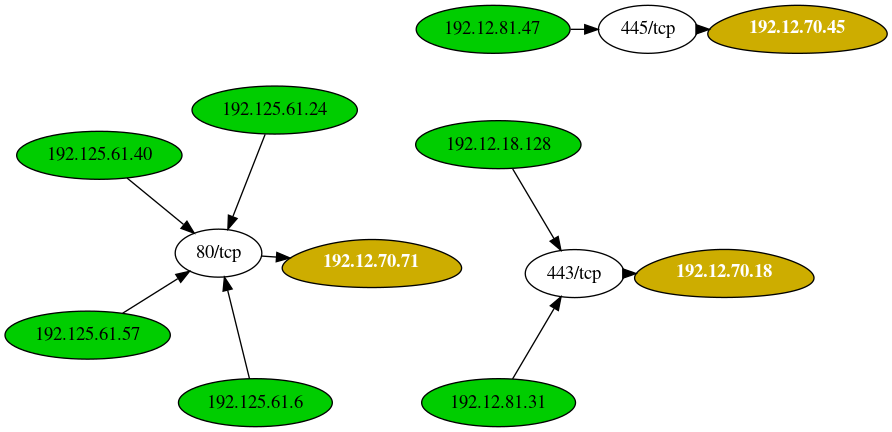
## Additional References
Blog post: https://blog.vonahi.io/post-exploitation-with-leprechaun/
LinkedIn Article: https://www.linkedin.com/pulse/finding-gaps-your-network-segmentation-using-johnson-oscp-osce/
## Authors
* **Alton Johnson** - *Creator* - [Twitter](https://www.twitter.com/altonjx) - [LinkedIn](https://www.linkedin.com/in/altonjx) - [GitHub](https://www.github.com/altjx)
## License
This project is licensed under the MIT License - see the [LICENSE.md](LICENSE.md) file for details
## Acknowledgments & Credits
* Josh Stone - Influenced by Routehunter
================================================
FILE: leprechaun.rb
================================================
#!/usr/bin/env ruby
#
# This tool was intended to be used during post-exploitation.
# Essentially, once you have elevated privileges, you can run a recursive netstat
# using tools such as winexe, smbexec, psexec, whatever., and parse it here.
#
# See the GitHub or blog page for more information.
#
# Author; Alton Johnson (@altonjx)
# Company: Vonahi Security (@vonahi_security)
# Created: Octgober 22, 2021
# Version: 1.1
#
begin
['securerandom', 'terminal-table', 'getopt/std', 'ipaddr'].each(&method(:require))
rescue StandardError
puts ' [*] Looks like a few gems are missing. Installing the gems.'
`gem install getopt terminal-table ipaddr`
puts ' [*] Finished. Please re-run this script.'
end
def help
puts "\n " + '-' * 61
puts " \e[1;34mLeprechaun v1.1 - Alton Johnson (@altonjx)\e[0;00m"
puts ' ' + '-' * 61
puts "\n Usage: #{$0} -f /path/to/netstat_results.txt -p <port>"
puts "\n -f\tFile containing the output of netstat results."
puts " -p\tPort you're interested in. e.g., 80. Specify \"all\", \"common\", or separate ports with commas"
puts " -t\tThe type of destination IP addresses you want to see connections to (e.g. external/internal/all)."
puts "\n Example: #{$0} -f netstat_output.txt -p 80"
puts " Example: #{$0} -f netstat_output.txt -p all"
puts " Example: #{$0} -f netstat_output.txt -p common"
puts " Example: #{$0} -f netstat_output.txt -p 80,443 -t external"
puts "\n"
exit
end
PRIVATE_IPS = [
IPAddr.new('10.0.0.0/8'),
IPAddr.new('172.16.0.0/12'),
IPAddr.new('192.168.0.0/16')
].freeze
class Leprechaun
def initialize(netstat_results, ports, ip_type)
@servers = {}
@clients = {}
@dest_port_mappings = []
@source_port_mappings = []
@ip_type = ip_type
@data = File.open(netstat_results).read.split("\n")
@ports = if ports.include? ','
ports.split(',')
else
ports
end
@digraph = "digraph {\n"
@digraph += "\toverlap = false;\n\n"
@digraph_headers = "\t# Servers and clients are defined here.\n"
@digraph_data = "\t# Connections are defined here.\n"
end
def private_ip?(ip_address)
ip_address = IPAddr.new(ip_address) if ip_address.is_a?(String)
PRIVATE_IPS.any? { |private_ip| private_ip.include?(ip_address) }
end
def parse_data
@data.each do |line|
routes = line.scan(/\b(?:[0-9]{1,3}\.){3}[0-9]{1,3}:\d+\b/)
next if routes.empty? || routes.nil?
begin
source_ip = routes[0].split(':')[0] # source IP address
source_port = routes[0].split(':')[1] # source port
dest_ip = routes[1].split(':')[0] # destination IP address
dest_port = routes[1].split(':')[1] # destination port
rescue StandardError
next
end
next if dest_ip == '0.0.0.0'
next unless line.include? 'ESTABLISHED'
# Skip depending on type of traffic the user wants.
if @ip_type == 'internal'
next unless private_ip? dest_ip
elsif @ip_type == 'external'
next if private_ip? dest_ip
end
protocol = (line.downcase.include?('tcp') ? 'tcp' : 'udp')
well_known = [17, 21, 22, 23, 25, 53, 69, 80, 81, 86, 110, 123, 135, 139, 143, 161, 389, 443, 445, 587, 636, 1311, 1433, 1434, 1720, 2301,
2381, 3306, 3389, 4443, 47_001, 5060, 5061, 5432, 5500, 5900, 5901, 5985, 5986, 7080, 8080, 8081, 8082, 8089, 8000, 8180, 8443]
next if @ports.include?('common') && !(well_known.include? dest_port.to_i)
next if !@ports.include?('all') && !@ports.include?('common') && !(@ports.include? dest_port)
if @servers[dest_ip].nil? # avoid adding duplicate connections
server_hex = SecureRandom.hex(2)
@servers[dest_ip] = { hex: '', ports: {}, client_count: 0 }
@servers[dest_ip][:hex] = "s#{server_hex}"
@digraph_headers += "\t#{@servers[dest_ip][:hex]} [label = < <b>#{dest_ip}</b> >, fillcolor=gold3, fontcolor=white, style=filled, shape=egg];\n"
end
if @servers[dest_ip][:ports]["#{dest_port}/#{protocol}"].nil?
port_hex = SecureRandom.hex(2)
@servers[dest_ip][:ports]["#{dest_port}/#{protocol}"] = { clients: [], client_count: 0, hex: "p#{port_hex}" }
@digraph_headers += "\tp#{port_hex} [label = \"#{dest_port}/#{protocol}\"];\n"
end
unless @servers[dest_ip][:ports]["#{dest_port}/#{protocol}"][:clients].include? source_ip
@servers[dest_ip][:ports]["#{dest_port}/#{protocol}"][:clients] << source_ip # add source IP
@servers[dest_ip][:ports]["#{dest_port}/#{protocol}"][:client_count] += 1
@servers[dest_ip][:client_count] += 1
end
if @clients[source_ip].nil? # avoid adding duplicate connections
client_hex = SecureRandom.hex(2)
@clients[source_ip] = "c#{client_hex}"
@digraph_headers += "\t#{@clients[source_ip]} [label = \"#{source_ip}\", fillcolor=green3, style=filled];\n"
end
if @dest_port_mappings.include? [dest_ip, "#{dest_port}/#{protocol}"]
unless @source_port_mappings.include? [source_ip, "#{dest_port}/#{protocol}"]
@digraph_data += "\t#{@clients[source_ip]} -> \"#{@servers[dest_ip][:ports]["#{dest_port}/#{protocol}"][:hex]}\";\n"
@source_port_mappings << [source_ip, "#{dest_port}/#{protocol}"]
end
else
@dest_port_mappings << [dest_ip, "#{dest_port}/#{protocol}"]
@source_port_mappings << [source_ip, "#{dest_port}/#{protocol}"]
@digraph_data += "\t#{@clients[source_ip]} -> \"#{@servers[dest_ip][:ports]["#{dest_port}/#{protocol}"][:hex]}\" -> #{@servers[dest_ip][:hex]};\n"
end
end
@digraph += "#{@digraph_headers}\n #{@digraph_data}"
@digraph += '}'
end
def print_table
# Most connected clients.
headers = ['Server', 'Number of connected clients', 'Highest traffic destination port']
data = [] # server IP address, connected clients, connected ports
@servers.each do |ip, server_values|
connected_clients = server_values[:client_count]
ports = [] # port, # of connected clients
server_values[:ports].each do |port, port_values|
ports << [port, port_values[:client_count]]
end
ports.sort { |a, b| a[1] <=> b[1] }
data << [ip, connected_clients, ports[0]]
end
data = data.sort { |a, b| a[1] <=> b[1] }.reverse
table = Terminal::Table.new do |t|
t.add_row headers
t.add_separator
data.each do |line|
t.add_row [line[0], line[1], "#{line[2][0]} (#{line[2][1]} connections)"]
end
end
puts table
end
def write_to_file
File.open('data.dot', 'w') { |f| f.write(@digraph) }
tmp_file = SecureRandom.hex(6)
`sfdp -Tpng data.dot -o leprechaun_#{tmp_file}.png -Grankdir=LR; rm data.dot`
puts "\n [*] Completed! Graph output file located at: ./leprechaun_#{tmp_file}.png\n\n"
end
end
if $0 == __FILE__
help if ARGV.length == 0
opt = Getopt::Std.getopts('f:p:t:')
raise 'Please specify a netstat output file (-f) as well as a port (-p).' unless opt['f'] && opt['p']
opt['t'] = 'all' if opt['t'].nil?
# Check if file exists first.
raise 'The file provided with -f does not exist. Please select a valid file.' unless File.exist? opt['f']
lep = Leprechaun.new(opt['f'], opt['p'], opt['t'])
lep.parse_data
lep.write_to_file
lep.print_table
end
gitextract_036ojz3j/ ├── LICENSE.md ├── README.md └── leprechaun.rb
SYMBOL INDEX (7 symbols across 1 files)

FILE: leprechaun.rb
  function help (line 22) | def help
  class Leprechaun (line 42) | class Leprechaun
    method initialize (line 43) | def initialize(netstat_results, ports, ip_type)
    method private_ip? (line 61) | def private_ip?(ip_address)
    method parse_data (line 66) | def parse_data
    method print_table (line 130) | def print_table
    method write_to_file (line 154) | def write_to_file
Condensed preview — 3 files, each showing path, character count, and a content snippet. Download the .json file or copy for the full structured content (13K chars).
[
  {
    "path": "LICENSE.md",
    "chars": 1072,
    "preview": "MIT License\n\nCopyright (c) 2019 Vonahi Security\n\nPermission is hereby granted, free of charge, to any person obtaining a"
  },
  {
    "path": "README.md",
    "chars": 3922,
    "preview": "# Leprechaun\n\n```\n                                       .-----.  \n                                      /   V   \\ \n    "
  },
  {
    "path": "leprechaun.rb",
    "chars": 7363,
    "preview": "#!/usr/bin/env ruby\n#\n# This tool was intended to be used during post-exploitation.\n# Essentially, once you have elevate"
  }
]
About this extraction
This page contains the full source code of the vonahi-security/leprechaun GitHub repository, extracted and formatted as plain text for AI agents and large language models (LLMs). The extraction includes 3 files (12.1 KB), approximately 3.6k tokens, and a symbol index with 7 extracted functions, classes, methods, constants, and types. Use this with OpenClaw, Claude, ChatGPT, Cursor, Windsurf, or any other AI tool that accepts text input. You can copy the full output to your clipboard or download it as a .txt file.
Extracted by GitExtract — free GitHub repo to text converter for AI. Built by Nikandr Surkov.