Repository: weibeld/k1s
Branch: master
Commit: a0de05b107e8
Files: 5
Total size: 18.3 KB
Directory structure:
gitextract_415vfu1y/

├── .github/
│   └── workflows/
│       └── release.yml
├── LICENSE
├── README.md
├── assets/
│   └── screencast-1.cast
└── k1s
================================================
FILE CONTENTS
================================================
================================================
FILE: .github/workflows/release.yml
================================================
name: release
on:
release:
types: [published]
jobs:
main:
runs-on: ubuntu-latest
env:
ARCHIVE_NAME: ${{ github.event.repository.name }}-${{ github.event.release.tag_name }}
steps:
- name: download-source
run: curl -sL "${{ github.event.release.tarball_url }}" >"$ARCHIVE_NAME".tar.gz
- name: unzip-source
run: mkdir "$ARCHIVE_NAME" && tar -xzf "$ARCHIVE_NAME".tar.gz -C "$ARCHIVE_NAME" --strip-components 1
- name: check-version
run: '[[ $("$ARCHIVE_NAME"/k1s -v) = "${{ github.event.release.tag_name }}" ]]'
- name: clean-source
run: rm -rf "$ARCHIVE_NAME"/{.github,assets}
- name: create-archive
run: tar -czf "$ARCHIVE_NAME".tar.gz "$ARCHIVE_NAME"
- name: create-checksum
id: create-checksum
run: |
sha256sum "$ARCHIVE_NAME".tar.gz >checksum.txt
echo "::set-output name=checksum::$(cut -d ' ' -f 1 checksum.txt)"
- name: upload-archive
id: upload-archive
uses: actions/upload-release-asset@v1
with:
upload_url: ${{ github.event.release.upload_url }}
asset_path: ${{ env.ARCHIVE_NAME }}.tar.gz
asset_name: ${{ env.ARCHIVE_NAME }}.tar.gz
asset_content_type: application/gzip
env:
GITHUB_TOKEN: ${{ secrets.GITHUB_TOKEN }}
- name: upload-checksum
id: upload-checksum
uses: actions/upload-release-asset@v1
with:
upload_url: ${{ github.event.release.upload_url }}
asset_path: checksum.txt
asset_name: checksum.txt
asset_content_type: text/plain
env:
GITHUB_TOKEN: ${{ secrets.GITHUB_TOKEN }}
- name: trigger-formula-upgrade
run: |
curl -s -X POST \
-H "Authorization: Bearer ${{ secrets.PERSONAL_ACCESS_TOKEN }}" \
-H "Accept: application/vnd.github.v3+json" \
https://api.github.com/repos/weibeld/homebrew-tap/dispatches \
-d '
{
"event_type": "upgrade-formula",
"client_payload": {
"formula": "k1s",
"url": "${{ steps.upload-archive.outputs.browser_download_url }}",
"sha256": "${{ steps.create-checksum.outputs.checksum }}"
}
}
'
- if: failure()
name: abort
run: |
curl -s -X DELETE \
-H "Authorization: Bearer ${{ secrets.GITHUB_TOKEN }}" \
-H "Accept: application/vnd.github.v3+json" \
https://api.github.com/repos/${{ github.event.repository.full_name }}/releases/${{ github.event.release.id }}
curl -s -X DELETE \
-H "Authorization: Bearer ${{ secrets.GITHUB_TOKEN }}" \
-H "Accept: application/vnd.github.v3+json" \
https://api.github.com/repos/${{ github.event.repository.full_name }}/git/refs/tags/${{ github.event.release.tag_name }}
================================================
FILE: LICENSE
================================================
MIT License
Copyright (c) 2020 Daniel Weibel
Permission is hereby granted, free of charge, to any person obtaining a copy
of this software and associated documentation files (the "Software"), to deal
in the Software without restriction, including without limitation the rights
to use, copy, modify, merge, publish, distribute, sublicense, and/or sell
copies of the Software, and to permit persons to whom the Software is
furnished to do so, subject to the following conditions:
The above copyright notice and this permission notice shall be included in all
copies or substantial portions of the Software.
THE SOFTWARE IS PROVIDED "AS IS", WITHOUT WARRANTY OF ANY KIND, EXPRESS OR
IMPLIED, INCLUDING BUT NOT LIMITED TO THE WARRANTIES OF MERCHANTABILITY,
FITNESS FOR A PARTICULAR PURPOSE AND NONINFRINGEMENT. IN NO EVENT SHALL THE
AUTHORS OR COPYRIGHT HOLDERS BE LIABLE FOR ANY CLAIM, DAMAGES OR OTHER
LIABILITY, WHETHER IN AN ACTION OF CONTRACT, TORT OR OTHERWISE, ARISING FROM,
OUT OF OR IN CONNECTION WITH THE SOFTWARE OR THE USE OR OTHER DEALINGS IN THE
SOFTWARE.
================================================
FILE: README.md
================================================
# k1s: The world's simplest Kubernetes dashboard
A minimalistic Kubernetes dashboard implemented with 50 lines of Bash code.
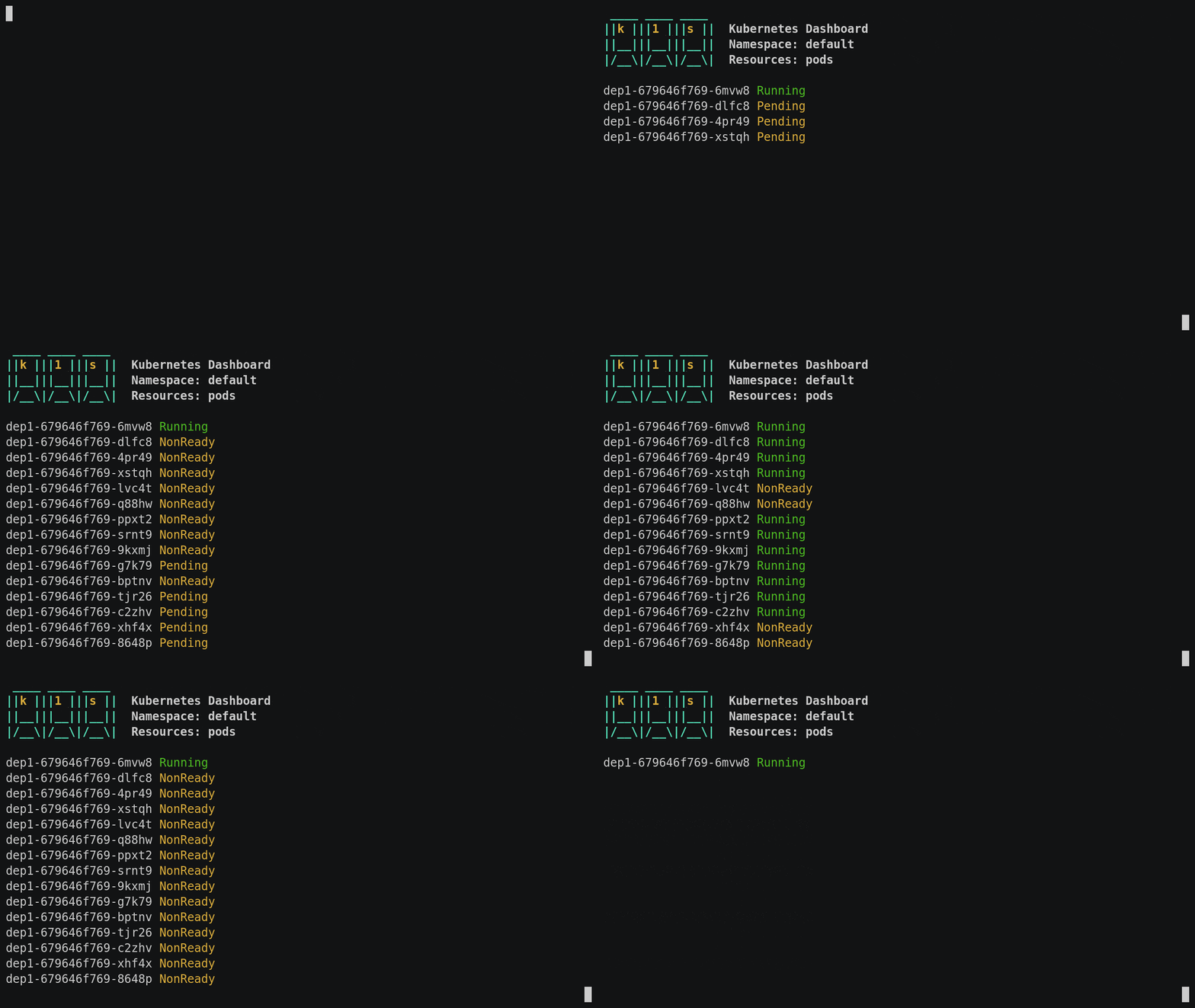
## Contents
1. [Introduction](#introduction)
1. [Installation](#installation)
1. [Usage](#usage)
1. [Examples](#examples)
## Introduction
### What is it?
A minimalistic Kubernetes dashboard showing the current state of Kubernetes resources of a specific type in real-time. The entire tool consists merely of a Bash script with about 50 lines of code.
### What is it not?
It's not a production-grade dashboard with many features. It's mainly intended for educational purposes.
### How does it work?
With a lot of highly condensed Bash scripting. [This article](https://itnext.io/the-worlds-simplest-kubernetes-dashboard-k1s-4246e03191df) explains how it works in detail.
## Installation
### On macOS
```bash
brew install weibeld/tap/k1s
```
### On other systems
Simply download the [`k1s`](k1s) script, make it executable, and move it to any directory in your `PATH`.
For example:
```bash
wget https://raw.githubusercontent.com/weibeld/k1s/master/k1s
chmod +x k1s
mv k1s /usr/local/bin
```
### Dependencies
The `k1s` script depends on the following tools:
#### [`jq`](https://stedolan.github.io/jq/)
| OS | Installation |
|-------|---------------------------|
| macOS | `brew install jq` |
| Linux | `sudo apt-get install jq` |
#### [`watch`](https://linux.die.net/man/1/watch)
| OS | Installation |
|-------|----------------------------|
| macOS | `brew install watch` |
| Linux | — _(installed by default)_ |
#### [`curl`](https://curl.haxx.se/)
| OS | Installation |
|-------|----------------------------|
| macOS | — _(installed by default)_ |
| Linux | sudo apt-get install curl |
#### [`kubectl`](https://kubernetes.io/docs/tasks/tools/install-kubectl/)
| OS | Installation |
|-------|---------------------------------------------------------------------|
| macOS | `brew install kubernetes-cli` |
| Linux | _See https://kubernetes.io/docs/tasks/tools/install-kubectl-linux/_ |
## Usage
k1s runs directly on your local machine and it uses the usual [kubeconfig](https://kubernetes.io/docs/concepts/configuration/organize-cluster-access-kubeconfig/) configuration on your machine. That means, it connects to the same cluster that also `kubectl` connects to by default.
The command-line interface is as follows:
```bash
k1s [<namespace>] [<resource-type>]
```
Both arguments are optional. The default values are:
| Argument | Default value |
|-------------------|---------------|
| `<namespace>` | `default` |
| `<resource-type>` | `pods` |
The `<namespace>` argument may be set to any valid namespace in the cluster. In addition, `<namespace>` may be set to `-` to imply "all namespaces" for namespaced resource types and "no namespace" for non-namespaced resource types (e.g. ClusterRoles).
> You can find out which resource types are namespaced or non-namespaced with `kubectl api-resources --namespaced=true|false`.
The `<resource-type>` argument may be set to any valid resource type name (including their singular, plural and short forms).
> You can list all supported resource type names with `kubectl api-resources`.
To exit the dashboard, type _Ctrl-C_.
## Examples
Below is an example usage scenario for k1s. It uses multiple instances of k1s for observing what's going on under the hood when scaling a Deployment:
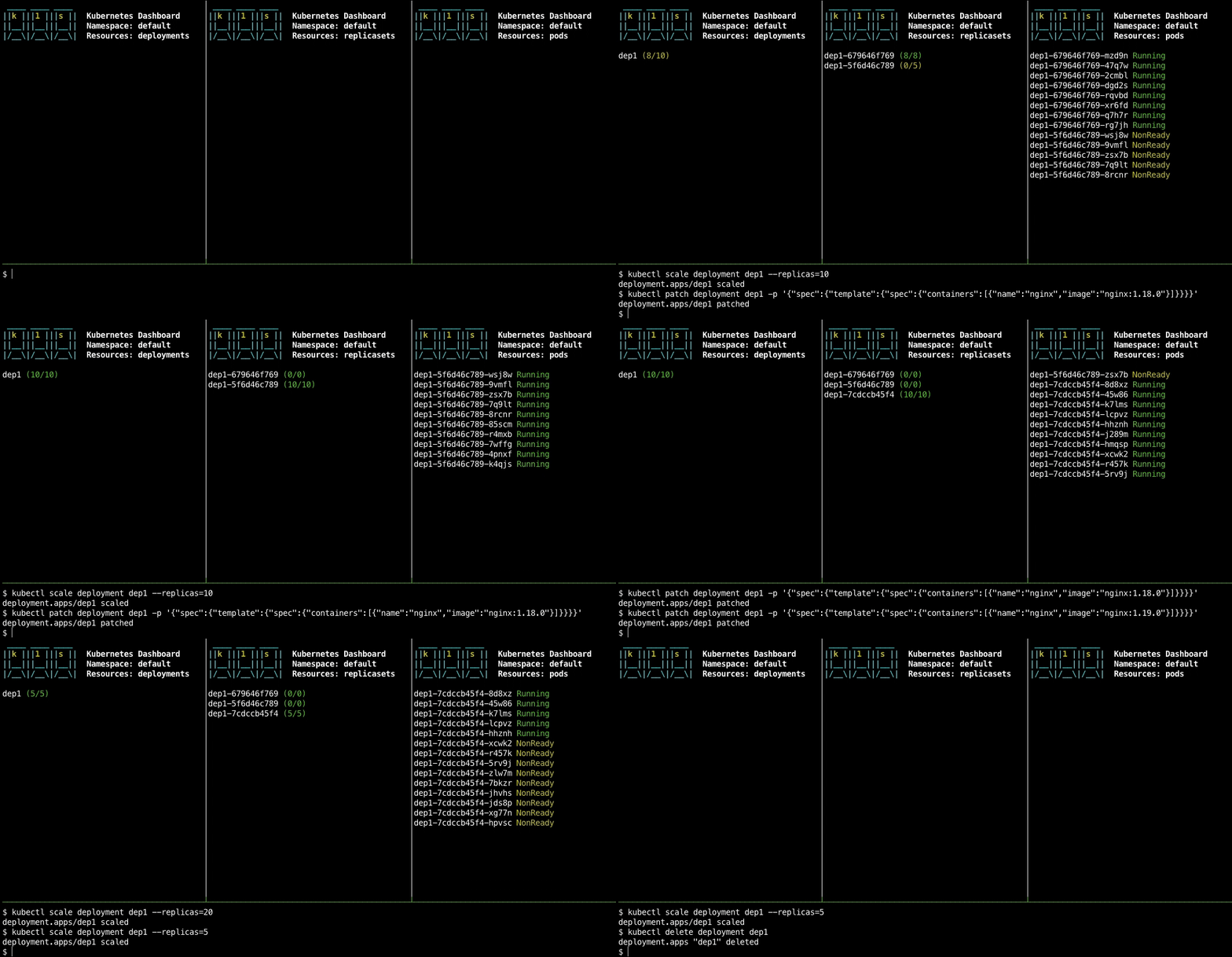
> Note how during the rolling update, you can observe how the replica count of the Deployment always stays within a certain range. You can influence this range with the [`maxSurge` and `maxUnavailable`](https://kubernetes.io/docs/concepts/workloads/controllers/deployment/#rolling-update-deployment) settings in the Deployment specification.
To recreate the above example, launch three instances of k1s in separate terminal windows (or in different [tmux](https://github.com/tmux/tmux/wiki) panes, as shown above):
```bash
k1s default deployments
```
```bash
k1s default replicasets
```
```bash
k1s default pods
```
Then, create a Deployment:
```bash
kubectl create deployment dep1 --image=nginx
```
Scale the Deployment:
```bash
kubectl scale deployment dep1 --replicas=10
```
Patch the Deployment with a new container image, which causes a rolling update:
```bash
kubectl patch deployment dep1 -p '{"spec":{"template":{"spec":{"containers":[{"name":"nginx","image":"nginx:1.19.0"}]}}}}'
```
> You can also manually edit the Deployment with `kubectl edit deployment dep1`.
Finally, delete the Deployment:
```bash
kubectl delete deployment dep1
```
### Advanced usage scenarios
Here's a list of more advanced usage scenarios contributed by users of k1s:
- [**mjbright/k1s-scenarios**](https://github.com/mjbright/k1s-scenarios) by Mike Bright
> If you want to have your work added, file an issue, or directly make a pull request with your link added to this list.
================================================
FILE: assets/screencast-1.cast
================================================
{"version": 2, "width": 84, "height": 21, "timestamp": 1593185131, "env": {"SHELL": "/usr/local/bin/bash", "TERM": "xterm-256color-italic"}}
[0.657895, "o", "$ "]
[1.101685, "o", "k"]
[1.235786, "o", "1"]
[1.496861, "o", "s "]
[1.897668, "o", "\r\n"]
[1.91724, "o", "Loading."]
[2.030647, "o", "."]
[2.138282, "o", "."]
[2.243864, "o", "."]
[2.348929, "o", "."]
[2.57038, "o", "\u001b[?1049h\u001b[1;23r\u001b(B\u001b[m\u001b[4l\u001b[?7h\u001b[39;49m\u001b[39;49m\u001b(B\u001b[m\u001b[H\u001b[2J\u001b(B\u001b[0;1m\u001b[36m ____ ____ ____\r\u001b[2d||\u001b[33mk\u001b[36m |||\u001b[33m1\u001b[36m |||\u001b[33ms\u001b[36m || \u001b[39;49mKubernetes Dashboard\r\u001b[3d\u001b[36m||__|||__|||__|| \u001b[39;49mNamespace: default\r\u001b[4d\u001b[36m|/__\\|/__\\|/__\\| \u001b[39;49mResources: pods\u001b[23;84H\u001b(B\u001b[m"]
[3.026397, "o", "\r\u001b[6ddep1-679646f769-6mvw8 \u001b[32mRunning\u001b[23;84H\u001b[39;49m\u001b(B\u001b[m"]
[4.847726, "o", "\r\u001b[7ddep1-679646f769-dlfc8 \u001b[33mPending\r\u001b[8d\u001b[39;49mdep1-679646f769-4pr49 \u001b[33mPending\u001b[23;84H"]
[4.848158, "o", "\u001b[39;49m\u001b(B\u001b[m"]
[4.957132, "o", "\r\u001b[9ddep1-679646f769-xstqh \u001b[33mPending\u001b[23;84H\u001b[39;49m\u001b(B\u001b[m"]
[5.069276, "o", "\u001b[7;23H\u001b[33mNonReady\u001b[9;23HNonReady\u001b[23;84H\u001b[39;49m\u001b(B\u001b[m"]
[5.180257, "o", "\r\u001b[10ddep1-679646f769-lvc4t \u001b[33mPending\r\u001b[11d\u001b[39;49mdep1-679646f769-q88hw \u001b[33mPending\u001b[23;84H\u001b[39;49m\u001b(B\u001b[m"]
[5.291331, "o", "\r\u001b[12ddep1-679646f769-ppxt2 \u001b[33mPending\u001b[23;84H\u001b[39;49m\u001b(B\u001b[m"]
[5.398926, "o", "\u001b[8;23H\u001b[33mNonReady\r\u001b[13d\u001b[39;49mdep1-679646f769-srnt9 \u001b[33mPending\u001b[23;84H\u001b[39;49m\u001b(B\u001b[m"]
[5.51378, "o", "\r\u001b[14ddep1-679646f769-9kxmj \u001b[33mPending\r\u001b[15d"]
[5.514223, "o", "\u001b[39;49mdep1-679646f769-g7k79 \u001b[33mPending\u001b[23;84H\u001b[39;49m\u001b(B\u001b[m"]
[5.629058, "o", "\u001b[10;23H\u001b[33mNonReady\u001b[23;84H\u001b[39;49m\u001b(B\u001b[m"]
[5.741583, "o", "\r\u001b[16ddep1-679646f769-bptnv \u001b[33mPending\u001b[23;84H\u001b[39;49m\u001b(B\u001b[m"]
[5.853425, "o", "\r\u001b[17ddep1-679646f769-tjr26 \u001b[33mPending\u001b[23;84H"]
[5.853706, "o", "\u001b[39;49m\u001b(B\u001b[m"]
[5.965097, "o", "\r\u001b[18d"]
[5.965282, "o", "dep1-679646f769-c2zhv \u001b[33mPending\r\u001b[19d\u001b[39;49mdep1-679646f769-xhf4x \u001b[33mPending\u001b[23;84H\u001b[39;49m\u001b(B\u001b[m"]
[6.07627, "o", "\u001b[13;23H\u001b[33mNonReady\r\u001b[20d\u001b[39;49mdep1-679646f769-8648p \u001b[33mPending\u001b[23;84H\u001b[39;49m\u001b(B\u001b[m"]
[6.184427, "o", "\u001b[11;23H\u001b[33mNonReady\u001b[23;84H\u001b[39;49m\u001b(B\u001b[m"]
[6.293423, "o", "\u001b[12;23H"]
[6.293573, "o", "\u001b[33mNonReady\u001b[23;84H\u001b[39;49m\u001b(B\u001b[m"]
[6.520265, "o", "\u001b[14;23H\u001b[33mNonReady\u001b[23;84H\u001b[39;49m\u001b(B\u001b[m"]
[6.629172, "o", "\u001b[16;23H\u001b[33mNonReady\u001b[23;84H\u001b[39;49m\u001b(B\u001b[m"]
[6.772947, "o", "\u001b[15;23H\u001b[33mNonReady\u001b[23;84H\u001b[39;49m\u001b(B\u001b[m"]
[6.889021, "o", "\u001b[18;23H\u001b[33mNonReady\u001b[23;84H\u001b[39;49m\u001b(B\u001b[m"]
[7.004074, "o", "\u001b[17;23H\u001b[33mNonReady\u001b[23;84H\u001b[39;49m\u001b(B\u001b[m"]
[7.114631, "o", "\u001b[19;23H\u001b[33mNonReady\u001b[23;84H\u001b[39;49m\u001b(B\u001b[m"]
[7.223945, "o", "\u001b[20;23H\u001b[33mNonReady\u001b[23;84H\u001b[39;49m\u001b(B\u001b[m"]
[8.23783, "o", "\u001b[7;23H\u001b[32mRunning\u001b[39;49m\u001b(B\u001b[m\u001b[K\u001b[9;23H"]
[8.23801, "o", "\u001b[32mRunning\u001b[39;49m\u001b(B\u001b[m\u001b[K\u001b[23;84H"]
[8.39273, "o", "\u001b[12;23H\u001b[32mRunning\u001b[39;49m\u001b(B\u001b[m\u001b[K\u001b[23;84H"]
[8.505807, "o", "\u001b[14;23H\u001b[32mRunning\u001b[39;49m\u001b(B\u001b[m\u001b[K\u001b[15;23H"]
[8.506057, "o", "\u001b[32mRunning\u001b[39;49m\u001b(B\u001b[m\u001b[K\u001b[23;84H"]
[8.642491, "o", "\u001b[13;23H\u001b[32mRunning\u001b[39;49m\u001b(B\u001b[m\u001b[K\u001b[23;84H"]
[8.757216, "o", "\u001b[8;23H\u001b[32mRunning\u001b[39;49m\u001b(B\u001b[m\u001b[K\u001b[23;84H"]
[9.098919, "o", "\u001b[16;23H\u001b[32mRunning\u001b[39;49m\u001b(B\u001b[m\u001b[K\u001b[23;84H"]
[9.21307, "o", "\u001b[18;23H\u001b[32mRunning\u001b[39;49m\u001b(B\u001b[m\u001b[K\u001b[23;84H"]
[9.322855, "o", "\u001b[17;23H\u001b[32mRunning\u001b[39;49m\u001b(B\u001b[m\u001b[K\u001b[23;84H"]
[9.541535, "o", "\u001b[10;23H\u001b[32mRunning\u001b[39;49m\u001b(B\u001b[m\u001b[K\u001b[20;23H\u001b[32mRunning\u001b[39;49m\u001b(B\u001b[m\u001b[K\u001b[23;84H"]
[9.771465, "o", "\u001b[11;23H\u001b[32mRunning\u001b[39;49m\u001b(B\u001b[m\u001b[K\u001b[23;84H"]
[9.883156, "o", "\u001b[19;23H\u001b[32mRunning\u001b[39;49m\u001b(B\u001b[m\u001b[K\u001b[23;84H"]
[12.566988, "o", "\u001b[13;23H\u001b[33mNonReady\u001b[20;23HNonReady\u001b[23;84H\u001b[39;49m\u001b(B\u001b[m"]
[12.682312, "o", "\u001b[11;23H\u001b[33mNonReady\u001b[23;84H\u001b[39;49m\u001b(B\u001b[m"]
[12.797111, "o", "\u001b[19;23H\u001b[33mNonReady\u001b[23;84H\u001b[39;49m\u001b(B\u001b[m"]
[13.018158, "o", "\u001b[16;23H\u001b[33mNonReady\u001b[18;23H"]
[13.01841, "o", "NonReady\u001b[23;84H\u001b[39;49m\u001b(B\u001b[m"]
[13.128622, "o", "\u001b[12;23H\u001b[33mNonReady\u001b[23;84H\u001b[39;49m\u001b(B\u001b[m"]
[13.239701, "o", "\u001b[14;23H\u001b[33mNonReady\u001b[23;84H\u001b[39;49m\u001b(B\u001b[m"]
[13.348012, "o", "\u001b[10;23H\u001b[33mNonReady\u001b[23;84H\u001b[39;49m\u001b(B\u001b[m"]
[13.45917, "o", "\u001b[7;23H\u001b[33mNonReady\u001b[23;84H\u001b[39;49m\u001b(B\u001b[m"]
[13.571527, "o", "\u001b[9;23H\u001b[33mNonReady\u001b[15;23HNonReady\u001b[23;84H\u001b[39;49m\u001b(B\u001b[m"]
[13.684304, "o", "\u001b[17;23H\u001b[33mNonReady\u001b[23;84H\u001b[39;49m\u001b(B\u001b[m"]
[13.796256, "o", "\u001b[8;23H\u001b[33mNonReady\u001b[23;84H\u001b[39;49m\u001b(B\u001b[m"]
[13.909609, "o", "\r\u001b[20d\u001b[J\u001b[23;84H"]
[14.12678, "o", "\r\u001b[11d"]
[14.127052, "o", "\u001b[M\u001b[23;84H"]
[14.23544, "o", "\r\u001b[15d"]
[14.235671, "o", "\u001b[M\u001b[23;84H"]
[14.343304, "o", "\r\u001b[12d"]
[14.343614, "o", "\u001b[M\u001b[23;84H"]
[14.796269, "o", "\r\u001b[15d"]
[14.796494, "o", "\u001b[M\u001b[23;84H"]
[14.911517, "o", "\r\u001b[15d\u001b[J\u001b[23;84H"]
[15.569182, "o", "\r\u001b[11d"]
[15.569546, "o", "\u001b[M\u001b[23;84H"]
[16.129254, "o", "\r\u001b[11d"]
[16.129508, "o", "\u001b[M\u001b[23;84H"]
[16.800396, "o", "\r\u001b[9d"]
[16.800663, "o", "\u001b[M\u001b[23;84H"]
[17.914649, "o", "\r\u001b[8d"]
[17.91496, "o", "\u001b[M\u001b[23;84H"]
[19.708182, "o", "\r\u001b[8d"]
[19.708397, "o", "\u001b[M\u001b[23;84H"]
[19.931705, "o", "\r\u001b[8d\u001b[M\u001b[23;84H"]
[20.042911, "o", "\r\u001b[7d"]
[20.043268, "o", "\u001b[M\u001b[23;84H"]
[20.271227, "o", "\r\u001b[7d\u001b[J\u001b[23;84H"]
================================================
FILE: k1s
================================================
#!/bin/bash
[[ "$1" = -v || "$1" = --version ]] && { echo "0.1.2"; exit; }
for d in jq watch curl kubectl; do which "$d" >/dev/null || { echo "Missing dependency: $d"; exit 1; }; done
ns=${1:-default}; res=${2:-pods}
c() { echo -e "\033[$1m"; }
cc() { echo -e "\033[$1;1m"; }
printf Loading && while true; do printf . && sleep 0.1; done &
set -o pipefail
path=$(kubectl get "$res" "$([[ "$ns" = - ]] && echo --all-namespaces || echo -n=$ns)" -v 6 2>&1 >/dev/null | grep GET | tail -n 1 | sed -n 's#.*https://[^/]*\([a-z0-9/.-]*\).*#\1#p')
pid=$?
kill -9 "$!" && wait "$!" 2>/dev/null
[[ "$pid" -ne 0 ]] && echo -e "\nInvalid resource type: $res" && exit 1
[[ $(echo -n "${path//[^\/]}" | wc -c) -lt 5 ]] && ns=-
res=${path##*/}
exec 3< <(kubectl proxy -p 0)
port=$(head -n 1 <&3 | sed 's/.*:\([0-9]\{4,5\}\).*/\1/')
file=$(mktemp)
cat <<EOF >"$file"
$(cc 36) ____ ____ ____
||$(cc 33)k$(cc 36) |||$(cc 33)1$(cc 36) |||$(cc 33)s$(cc 36) || $(cc 0)Kubernetes Dashboard$(cc 36)
||__|||__|||__|| $(cc 0)Namespace: $ns$(cc 36)
|/__\|/__\|/__\| $(cc 0)Resources: $res$(c 0)
EOF
curl -N -s "http://localhost:$port$path?watch=true" |
while read -r event; do
name=$(jq -r '.object.metadata.name' <<<"$event")
case "$res" in
pods)
phase=$(jq -r '.object.status.phase' <<<"$event")
is_ready=$(jq -r 'if .object.status | has("conditions") then .object.status.conditions[] | if select(.type=="Ready").status=="True" then "1" else "" end else "" end' <<<"$event")
is_scheduled=$(jq -r 'if .object.status | has("conditions") then .object.status.conditions[] | if select(.type=="PodScheduled").status=="True" then "1" else "" end else "" end' <<<"$event")
[[ "$is_scheduled" && ! "$is_ready" ]] && info=NonReady || info=$phase
[[ "$info" = Running ]] && info=$(c 32)$info$(c 0) || info=$(c 33)$info$(c 0) ;;
deployments|replicasets|statefulsets)
spec=$(jq -r '.object.spec.replicas' <<<"$event")
stat=$(jq -r '.object.status.readyReplicas // 0' <<<"$event")
[[ "$stat" = "$spec" ]] && info="$(c 32)($stat/$spec)$(c 0)" || info="$(c 33)($stat/$spec)$(c 0)"
[[ "$stat" = "0" ]] && info="$(c 31)($stat/$spec)$(c 0)" ;;
esac
case $(jq -r .type <<<"$event") in
ADDED) echo "$name $info" >>"$file" ;;
MODIFIED) sed -i.bkp "s/^$name .*$/$name ${info//\//\\/}/" "$file" ;;
DELETED) sed -i.bkp "/^$name .*$/d" "$file";;
esac
done &
watch -ctn 0.1 cat "$file"
gitextract_415vfu1y/ ├── .github/ │ └── workflows/ │ └── release.yml ├── LICENSE ├── README.md ├── assets/ │ └── screencast-1.cast └── k1s
Condensed preview — 5 files, each showing path, character count, and a content snippet. Download the .json file or copy for the full structured content (20K chars).
[
  {
    "path": ".github/workflows/release.yml",
    "chars": 2972,
    "preview": "name: release\non:\n  release:\n    types: [published]\njobs:\n  main:\n    runs-on: ubuntu-latest\n    env:\n      ARCHIVE_NAME"
  },
  {
    "path": "LICENSE",
    "chars": 1070,
    "preview": "MIT License\n\nCopyright (c) 2020 Daniel Weibel\n\nPermission is hereby granted, free of charge, to any person obtaining a c"
  },
  {
    "path": "README.md",
    "chars": 5256,
    "preview": "# k1s: The world's simplest Kubernetes dashboard\n\nA minimalistic Kubernetes dashboard implemented with 50 lines of Bash "
  },
  {
    "path": "assets/screencast-1.cast",
    "chars": 6961,
    "preview": "{\"version\": 2, \"width\": 84, \"height\": 21, \"timestamp\": 1593185131, \"env\": {\"SHELL\": \"/usr/local/bin/bash\", \"TERM\": \"xter"
  },
  {
    "path": "k1s",
    "chars": 2450,
    "preview": "#!/bin/bash\n\n[[ \"$1\" = -v || \"$1\" = --version ]] && { echo \"0.1.2\"; exit; }\nfor d in jq watch curl kubectl; do which \"$d"
  }
]
About this extraction
This page contains the full source code of the weibeld/k1s GitHub repository, extracted and formatted as plain text for AI agents and large language models (LLMs). The extraction includes 5 files (18.3 KB), approximately 7.0k tokens. Use this with OpenClaw, Claude, ChatGPT, Cursor, Windsurf, or any other AI tool that accepts text input. You can copy the full output to your clipboard or download it as a .txt file.
Extracted by GitExtract — free GitHub repo to text converter for AI. Built by Nikandr Surkov.