Repository: whitelok/watermark-remover
Branch: master
Commit: b193253fb60c
Files: 2
Total size: 1.7 KB
Directory structure:
gitextract_ef8tau41/
├── .gitignore
└── README.md
================================================
FILE CONTENTS
================================================
================================================
FILE: .gitignore
================================================
.idea/*
.idea
paper/*
paper
.DS_Store
*~
__pycache__
__pycache__/*
================================================
FILE: README.md
================================================
# Watermark Remover Automatically
**IMPORTANT !!!**
**THANKS FOR SOMEONE SUGGESTION, THIS REPO WILL NOT PROVIDE ANY CODE ANY MORE**
**WHAT HAD YOU DONE WITH MY CODE IS NO RELATIONSHIP WITH ME**
---
## Tips
**Please run with Python 3.6.5**
## Result
### Result with demo images
### Result with pratical images
## Docker runtime [**Recommendation**]
- docker pull whitelok/watermark-remover:v1.0
## Install
1. `cd watermark-remover; pip3 install -r requirements.txt`
2. Install opencv Python3 binding.(If you need, I can share one to you)
## Usage
### Demo
1. `bash train.sh` for training the watermark and alpha saving in result folder and remove watermark from original image.
### Tips
- Training tips
1. if the watermark free result is not good enough, you can change `--iters` (refer to train.sh)
2. if the training process is too long to wait, you can change `--watermark_threshold` (refer to train.sh)
3. if you get tk_inter error, you can change `--save_result` (refer to train.sh)
### Customer
1. Put all watermarked images into one folder
2. python3 main_solver.pyc --path [watermarked images folder]
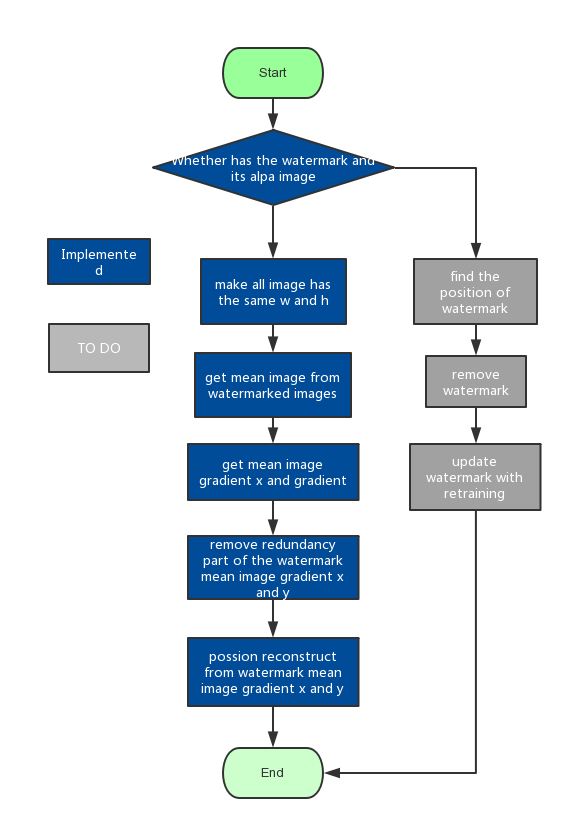
## Progress and Implemented function