Repository: williamsmj/resume.md
Branch: main
Commit: 92afc0159ffa
Files: 10
Total size: 25.5 KB
Directory structure:
gitextract_zx4oaoa_/

├── .github/
│   └── workflows/
│       ├── build.yml
│       └── release.yml
├── LICENSE
├── README.md
├── example/
│   └── resume.html
├── pyproject.toml
└── src/
    └── resume_markdown/
        ├── __init__.py
        ├── __main__.py
        ├── resume.css
        └── resume.md
================================================
FILE CONTENTS
================================================
================================================
FILE: .github/workflows/build.yml
================================================
name: build
on:
workflow_dispatch:
pull_request:
push:
branches: [main]
paths-ignore:
- 'example/**'
jobs:
build:
if: github.repository == 'mikepqr/resume-markdown'
runs-on: ${{ matrix.os }}
strategy:
fail-fast: false
matrix:
# os: [ubuntu-latest, macos-latest, windows-latest]
os: [ubuntu-latest, windows-latest]
steps:
- name: Check out repo
uses: actions/checkout@v4
- name: Set up uv
uses: astral-sh/setup-uv@v5
- name: Install package
run: uv tool install .
- name: Initialize resume templates
run: resume-markdown init
- name: Install mscorefonts (Linux)
if: runner.os == 'Linux'
run: |
echo "ttf-mscorefonts-installer msttcorefonts/accepted-mscorefonts-eula select true" | sudo debconf-set-selections
sudo apt-get update
sudo apt-get install -y --no-install-recommends ttf-mscorefonts-installer fontconfig
sudo fc-cache -f -v
- name: Make resume
run: resume-markdown --debug build
- name: Rename output (Unix)
if: runner.os != 'Windows'
shell: bash
run: |
mv resume.pdf resume_${{ runner.os }}.pdf
mv resume.html resume_${{ runner.os }}.html
- name: Rename output (Windows)
if: runner.os == 'Windows'
shell: pwsh
run: |
Move-Item resume.pdf resume_Windows.pdf
Move-Item resume.html resume_Windows.html
- name: Upload artifacts
uses: actions/upload-artifact@v4
with:
name: resume-${{ runner.os }}
path: |
*.pdf
*.html
update-examples:
if: github.event_name == 'push' && github.ref == 'refs/heads/main'
runs-on: ubuntu-latest
needs: build
steps:
- name: Check out repo
uses: actions/checkout@v4
- name: Install ImageMagick
run: sudo apt-get update && sudo apt-get install -y imagemagick
- name: Download Windows artifacts
uses: actions/download-artifact@v4
with:
name: resume-Windows
path: artifacts
- name: Update example files
run: |
mv artifacts/resume_Windows.pdf example/resume.pdf
mv artifacts/resume_Windows.html example/resume.html
convert -density 300 example/resume.pdf[0] -background white -alpha remove \
-crop 2550x1176+0+0 +repage \
\( -size 2550x196 gradient:none-white \) \
-gravity South -composite \
-resize 1300x600 example/resume.png
- name: Commit changes
run: |
git config user.name "github-actions[bot]"
git config user.email "github-actions[bot]@users.noreply.github.com"
git add example/resume.pdf example/resume.html example/resume.png
git diff --staged --quiet || git commit -m "Update example outputs"
git push
================================================
FILE: .github/workflows/release.yml
================================================
name: Publish to PyPI
on:
release:
types: [published]
jobs:
build:
name: Build distribution
runs-on: ubuntu-latest
steps:
- uses: actions/checkout@v4
- name: Set up Python
uses: actions/setup-python@v5
with:
python-version: "3.x"
- name: Install build dependencies
run: python -m pip install --upgrade build
- name: Build package
run: python -m build
- name: Upload distributions
uses: actions/upload-artifact@v4
with:
name: release-dists
path: dist/
publish:
name: Publish to PyPI
runs-on: ubuntu-latest
needs: build
environment:
name: pypi
url: https://pypi.org/p/resume-markdown
permissions:
id-token: write # IMPORTANT: mandatory for trusted publishing
steps:
- name: Download distributions
uses: actions/download-artifact@v4
with:
name: release-dists
path: dist/
- name: Publish to PyPI
uses: pypa/gh-action-pypi-publish@release/v1
================================================
FILE: LICENSE
================================================
MIT License
Copyright (c) 2020 Mike Lee Williams
Permission is hereby granted, free of charge, to any person obtaining a copy
of this software and associated documentation files (the "Software"), to deal
in the Software without restriction, including without limitation the rights
to use, copy, modify, merge, publish, distribute, sublicense, and/or sell
copies of the Software, and to permit persons to whom the Software is
furnished to do so, subject to the following conditions:
The above copyright notice and this permission notice shall be included in all
copies or substantial portions of the Software.
THE SOFTWARE IS PROVIDED "AS IS", WITHOUT WARRANTY OF ANY KIND, EXPRESS OR
IMPLIED, INCLUDING BUT NOT LIMITED TO THE WARRANTIES OF MERCHANTABILITY,
FITNESS FOR A PARTICULAR PURPOSE AND NONINFRINGEMENT. IN NO EVENT SHALL THE
AUTHORS OR COPYRIGHT HOLDERS BE LIABLE FOR ANY CLAIM, DAMAGES OR OTHER
LIABILITY, WHETHER IN AN ACTION OF CONTRACT, TORT OR OTHERWISE, ARISING FROM,
OUT OF OR IN CONNECTION WITH THE SOFTWARE OR THE USE OR OTHER DEALINGS IN THE
SOFTWARE.
================================================
FILE: README.md
================================================
# resume-markdown
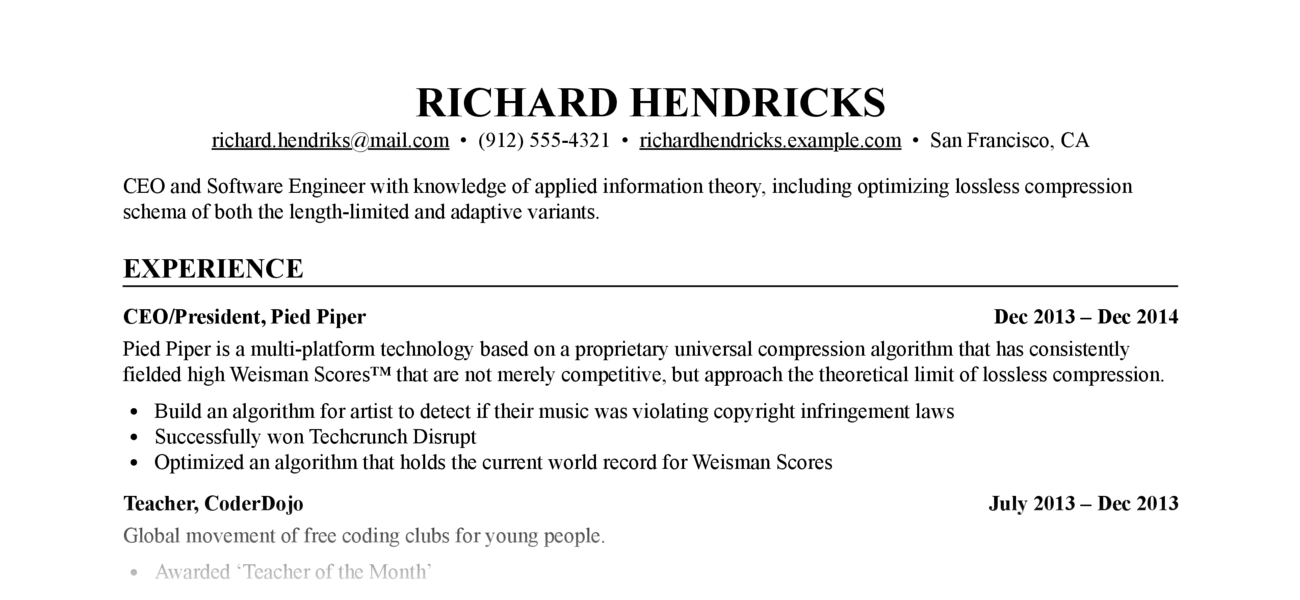
Write your resume in
[Markdown](https://raw.githubusercontent.com/mikepqr/resume-markdown/main/src/resume_markdown/resume.md),
style it with [CSS](src/resume_markdown/resume.css), output to [`resume.html`](example/resume.html) and
[`resume.pdf`](example/resume.pdf).
## Prerequisites
- Python ≥ 3.9 or `uv`
- Optional, required for PDF output: Google Chrome or Chromium
## Installation
### Using uv
Run directly without installing:
```bash
uvx resume-markdown
```
Or install once:
```bash
uv tool install resume-markdown
```
### Using pip
```bash
pip install resume-markdown
```
## Usage
### Quick start
1. Create template files in your current directory:
```bash
resume-markdown init
# or with uvx: uvx resume-markdown init
```
This creates [`resume.md`](src/resume_markdown/resume.md) and [`resume.css`](src/resume_markdown/resume.css) in the current directory.
2. Edit your copy of `resume.md` with your resume content (the placeholder text is taken
with thanks from the [JSON Resume Project](https://jsonresume.org/themes/))
3. Build HTML and PDF output:
```bash
resume-markdown build
# or with uvx: uvx resume-markdown build
```
### Build options
- Use `--no-html` or `--no-pdf` to disable HTML or PDF output:
```bash
resume-markdown build --no-pdf
```
- Use `--chrome-path=/path/to/chrome` if the tool cannot find your Chrome
or Chromium executable (needed for PDF output)
```bash
resume-markdown build --chrome-path=/path/to/chrome
```
- Specify a custom input file:
```bash
resume-markdown build myresume.md
```
## Customization
Edit [`resume.css`](src/resume_markdown/resume.css) to change the appearance of your resume. The
default style is extremely generic, which is perhaps what you want in a resume,
but CSS gives you a lot of flexibility. See, e.g. [The Tech Resume
Inside-Out](https://www.thetechinterview.com/) for good advice about what a
resume should look like (and what it should say).
Change the appearance of the PDF version (without affecting the HTML version) by
adding rules under the `@media print` CSS selector.
Change the margins and paper size of the PDF version by editing the [`@page` CSS
rule](https://developer.mozilla.org/en-US/docs/Web/CSS/%40page/size).
================================================
FILE: example/resume.html
================================================
<html lang="en">
<head>
<meta charset="UTF-8">
<title>Richard Hendricks</title>
<style>
body {
color: #000000;
background: #EEEEEE;
font: 1.1em "Times New Roman";
line-height: 1.2;
margin: 40px 0;
}
#resume {
margin: 0 auto;
max-width: 800px;
padding: 40px 60px;
background: #FFFFFF;
border: 1px solid #CCCCCC;
box-shadow: 2px 2px 4px #AAAAAA;
-webkit-box-shadow: 2px 2px 4px #AAAAAA;
}
h1 {
text-transform: uppercase;
text-align: center;
font-size: 200%;
margin: 0;
padding: 0;
}
h2 {
border-bottom: 1px solid #000000;
text-transform: uppercase;
font-size: 130%;
margin: 1em 0 0 0;
padding: 0;
}
h3 {
font-size: 100%;
margin: 0.8em 0 0.3em 0;
padding: 0;
display: flex;
justify-content: space-between;
}
p {
margin: 0 0 0.5em 0;
padding: 0;
}
ul {
padding: 0;
margin: 0 1.5em;
}
/* ul immediately after h1 = contact list */
h1 + ul {
text-align: center;
margin: 0;
padding: 0;
}
h1 + ul > li {
display: inline;
white-space: pre;
list-style-type: none;
}
h1 + ul > li:after {
content: " \2022 ";
}
h1 + ul > li:last-child:after {
content: "";
}
/* p immediately after contact list = summary */
h1 + ul + p {
margin: 1em 0;
}
@media print {
body {
font-size: 10pt;
margin: 0;
padding: 0;
background: none;
}
#resume {
margin: 0;
padding: 0;
border: 0px;
background: none;
box-shadow: none;
-webkit-box-shadow: none;
}
/* Do not underline abbr tags in PDF */
abbr {
text-decoration: none;
font-variant: none;
}
/* Make links black in PDF */
/* Move this outside the print block to apply this in HTML too */
a, a:link, a:visited, a:hover {
color: #000000;
text-decoration: underline;
}
}
@page {
/* Change margins and paper size of PDF */
/* https://developer.mozilla.org/en-US/docs/Web/CSS/@page */
size: letter;
margin: 0.5in 0.8in;
}
@media screen and (max-width: 800px) {
body {
font-size: 16pt;
margin: 0;
padding: 0;
background: #FFFFFF !important;
}
#resume {
margin: 0;
padding: 1em;
border: 0px;
background: none;
box-shadow: none;
-webkit-box-shadow: none;
}
}
</style>
</head>
<body>
<div id="resume">
<!-- The (first) h1 will be used as the <title> of the HTML page -->
<h1>Richard Hendricks</h1>
<!-- The unordered list immediately after the h1 will be formatted on a single
line. It is intended to be used for contact details -->
<ul>
<li><a href="mailto:richard.hendriks@mail.com">richard.hendriks@mail.com</a></li>
<li>(912) 555-4321</li>
<li><a href="http://richardhendricks.example.com">richardhendricks.example.com</a></li>
<li>San Francisco, CA</li>
</ul>
<!-- The paragraph after the h1 and ul and before the first h2 is optional. It
is intended to be used for a short summary. -->
<p>CEO and Software Engineer with knowledge of applied information theory,
including optimizing lossless compression schema of both the length-limited and
adaptive variants.</p>
<h2>Experience</h2>
<!-- You have to wrap the "left" and "right" half of these headings in spans by
hand -->
<h3><span>CEO/President, Pied Piper</span> <span>Dec 2013 – Dec 2014</span></h3>
<p>Pied Piper is a multi-platform technology based on a proprietary universal
compression algorithm that has consistently fielded high Weisman Scores™ that
are not merely competitive, but approach the theoretical limit of lossless
compression.</p>
<ul>
<li>Build an algorithm for artist to detect if their music was violating
copyright infringement laws</li>
<li>Successfully won Techcrunch Disrupt</li>
<li>Optimized an algorithm that holds the current world record for Weisman Scores</li>
</ul>
<h3><span>Teacher, CoderDojo</span> <span>July 2013 – Dec 2013</span></h3>
<p>Global movement of free coding clubs for young people.</p>
<ul>
<li>Awarded ‘Teacher of the Month’</li>
</ul>
<h2>Projects</h2>
<h3><span>Miss Direction</span> <span>Aug 2016</span></h3>
<p>A mapping engine that misguides you:</p>
<ul>
<li>Won award at AIHacks 2016</li>
<li>Built by all women team of newbie programmers</li>
<li>Using modern technologies such as GoogleMaps, Chrome Extension and Javascript</li>
</ul>
<h2>Education</h2>
<h3><span>University of Oklahoma, BA Information Technology</span> <span>2011 – 2014</span></h3>
<ul>
<li>GPA 4.0</li>
<li>DB1101 - Basic SQL</li>
<li>CS2011 - Java Introduction</li>
</ul>
<h2>Skills</h2>
<ul>
<li>Web development: HTML, CSS, JavaScript</li>
<li>Compression: Mpeg, MP4, GIF</li>
</ul></div>
</body>
</html>
================================================
FILE: pyproject.toml
================================================
[build-system]
requires = ["hatchling"]
build-backend = "hatchling.build"
[project]
name = "resume-markdown"
version = "1.0.1"
description = "Convert Markdown resumes to HTML and PDF"
readme = "README.md"
license = {text = "MIT"}
authors = [
{name = "Mike Lee Williams", email = "mike@mike.place"}
]
requires-python = ">=3.9"
dependencies = [
"markdown>=3.0",
]
classifiers = [
"Development Status :: 5 - Production/Stable",
"Intended Audience :: End Users/Desktop",
"License :: OSI Approved :: MIT License",
"Programming Language :: Python :: 3",
"Programming Language :: Python :: 3.9",
"Programming Language :: Python :: 3.10",
"Programming Language :: Python :: 3.11",
"Programming Language :: Python :: 3.12",
"Topic :: Text Processing :: Markup :: Markdown",
]
[project.urls]
Homepage = "https://github.com/mikepqr/resume-markdown"
Repository = "https://github.com/mikepqr/resume-markdown"
Issues = "https://github.com/mikepqr/resume-markdown/issues"
[project.scripts]
resume-markdown = "resume_markdown:main"
================================================
FILE: src/resume_markdown/__init__.py
================================================
"""Convert Markdown resumes to HTML and PDF."""
__version__ = "1.0.1"
from resume_markdown.__main__ import main
__all__ = ["main"]
================================================
FILE: src/resume_markdown/__main__.py
================================================
#!/usr/bin/env python3
import argparse
import base64
import itertools
import logging
import os
import re
import shutil
import subprocess
import sys
import tempfile
from importlib.resources import files
import markdown
preamble = """\
<html lang="en">
<head>
<meta charset="UTF-8">
<title>{title}</title>
<style>
{css}
</style>
</head>
<body>
<div id="resume">
"""
postamble = """\
</div>
</body>
</html>
"""
CHROME_GUESSES_MACOS = (
"/Applications/Chromium.app/Contents/MacOS/Chromium",
"/Applications/Google Chrome Canary.app/Contents/MacOS/Google Chrome Canary",
"/Applications/Google Chrome.app/Contents/MacOS/Google Chrome",
)
# https://stackoverflow.com/a/40674915/409879
CHROME_GUESSES_WINDOWS = (
# Windows 10
os.path.expandvars(r"%ProgramFiles(x86)%\Google\Chrome\Application\chrome.exe"),
os.path.expandvars(r"%ProgramFiles%\Google\Chrome\Application\chrome.exe"),
os.path.expandvars(r"%LocalAppData%\Google\Chrome\Application\chrome.exe"),
# Windows 7
r"C:\Program Files (x86)\Google\Chrome\Application\chrome.exe",
r"C:\Program Files\Google\Chrome\Application\chrome.exe",
# Vista
r"C:\Users\UserName\AppDataLocal\Google\Chrome",
# XP
r"C:\Documents and Settings\UserName\Local Settings\Application Data\Google\Chrome",
)
# https://unix.stackexchange.com/a/439956/20079
CHROME_GUESSES_LINUX = [
"/".join((path, executable))
for path, executable in itertools.product(
(
"/usr/local/sbin",
"/usr/local/bin",
"/usr/sbin",
"/usr/bin",
"/sbin",
"/bin",
"/opt/google/chrome",
),
("google-chrome", "chrome", "chromium", "chromium-browser"),
)
]
def guess_chrome_path() -> str:
if sys.platform == "darwin":
guesses = CHROME_GUESSES_MACOS
elif sys.platform == "win32":
guesses = CHROME_GUESSES_WINDOWS
else:
guesses = CHROME_GUESSES_LINUX
for guess in guesses:
if os.path.exists(guess):
logging.info("Found Chrome or Chromium at " + guess)
return guess
raise ValueError("Could not find Chrome. Please set --chrome-path.")
def title(md: str) -> str:
"""
Return the contents of the first markdown heading in md, which we
assume to be the title of the document.
"""
for line in md.splitlines():
if re.match("^#[^#]", line): # starts with exactly one '#'
return line.lstrip("#").strip()
raise ValueError(
"Cannot find any lines that look like markdown h1 headings to use as the title"
)
def make_html(md: str, prefix: str = "resume") -> str:
"""
Compile md to HTML and prepend/append preamble/postamble.
Insert <prefix>.css if it exists.
"""
try:
with open(prefix + ".css") as cssfp:
css = cssfp.read()
except FileNotFoundError:
print(prefix + ".css not found. Output will by unstyled.")
css = ""
return "".join(
(
preamble.format(title=title(md), css=css),
markdown.markdown(md, extensions=["smarty", "abbr"]),
postamble,
)
)
def init_resume(directory: str = ".") -> None:
"""
Write template resume.md and resume.css files to the specified directory.
"""
package_files = files("resume_markdown")
for filename in ["resume.md", "resume.css"]:
dest_path = os.path.join(directory, filename)
if os.path.exists(dest_path):
logging.warning(f"{dest_path} already exists, skipping")
continue
template_content = (package_files / filename).read_text(encoding="utf-8")
with open(dest_path, "w", encoding="utf-8") as f:
f.write(template_content)
logging.info(f"Wrote {dest_path}")
def write_pdf(html: str, prefix: str = "resume", chrome: str = "") -> None:
"""
Write html to prefix.pdf
"""
chrome = chrome or guess_chrome_path()
html64 = base64.b64encode(html.encode("utf-8"))
options = [
"--no-sandbox",
"--headless",
"--print-to-pdf-no-header",
# Keep both versions of this option for backwards compatibility
# https://developer.chrome.com/docs/chromium/new-headless.
"--no-pdf-header-footer",
"--enable-logging=stderr",
"--log-level=2",
"--in-process-gpu",
"--disable-gpu",
]
# Ideally we'd use tempfile.TemporaryDirectory here. We can't because
# attempts to delete the tmpdir fail on Windows because Chrome creates a
# file the python process does not have permission to delete. See
# https://github.com/puppeteer/puppeteer/issues/2778,
# https://github.com/puppeteer/puppeteer/issues/298, and
# https://bugs.python.org/issue26660. If we ever drop Python 3.9 support we
# can use TemporaryDirectory with ignore_cleanup_errors=True as a context
# manager.
tmpdir = tempfile.mkdtemp(prefix="resume.md_")
options.append(f"--crash-dumps-dir={tmpdir}")
options.append(f"--user-data-dir={tmpdir}")
try:
subprocess.run(
[
chrome,
*options,
f"--print-to-pdf={prefix}.pdf",
"data:text/html;base64," + html64.decode("utf-8"),
],
check=True,
)
logging.info(f"Wrote {prefix}.pdf")
except subprocess.CalledProcessError as exc:
if exc.returncode == -6:
logging.warning(
"Chrome died with <Signals.SIGABRT: 6> "
f"but you may find {prefix}.pdf was created successfully."
)
else:
raise exc
finally:
shutil.rmtree(tmpdir, ignore_errors=True)
if os.path.isdir(tmpdir):
logging.debug(f"Could not delete {tmpdir}")
def main():
parser = argparse.ArgumentParser(
description="Convert Markdown resumes to HTML and PDF"
)
parser.add_argument("-q", "--quiet", action="store_true")
parser.add_argument("--debug", action="store_true")
subparsers = parser.add_subparsers(dest="command", help="Available commands")
# init command
init_parser = subparsers.add_parser(
"init",
help="Create resume.md and resume.css template files"
)
# build command
build_parser = subparsers.add_parser(
"build",
help="Build HTML and PDF from Markdown resume"
)
build_parser.add_argument(
"file",
help="markdown input file [resume.md]",
default="resume.md",
nargs="?",
)
build_parser.add_argument(
"--no-html",
help="Do not write html output",
action="store_true",
)
build_parser.add_argument(
"--no-pdf",
help="Do not write pdf output",
action="store_true",
)
build_parser.add_argument(
"--chrome-path",
help="Path to Chrome or Chromium executable",
)
args = parser.parse_args()
if args.quiet:
logging.basicConfig(level=logging.WARN, format="%(message)s")
elif args.debug:
logging.basicConfig(level=logging.DEBUG, format="%(message)s")
else:
logging.basicConfig(level=logging.INFO, format="%(message)s")
if args.command == "init":
init_resume()
elif args.command == "build":
prefix, _ = os.path.splitext(os.path.abspath(args.file))
with open(args.file, encoding="utf-8") as mdfp:
md = mdfp.read()
html = make_html(md, prefix=prefix)
if not args.no_html:
with open(prefix + ".html", "w", encoding="utf-8") as htmlfp:
htmlfp.write(html)
logging.info(f"Wrote {htmlfp.name}")
if not args.no_pdf:
write_pdf(html, prefix=prefix, chrome=args.chrome_path)
else:
parser.print_help()
if __name__ == "__main__":
main()
================================================
FILE: src/resume_markdown/resume.css
================================================
body {
color: #000000;
background: #EEEEEE;
font: 1.1em "Times New Roman";
line-height: 1.2;
margin: 40px 0;
}
#resume {
margin: 0 auto;
max-width: 800px;
padding: 40px 60px;
background: #FFFFFF;
border: 1px solid #CCCCCC;
box-shadow: 2px 2px 4px #AAAAAA;
-webkit-box-shadow: 2px 2px 4px #AAAAAA;
}
h1 {
text-transform: uppercase;
text-align: center;
font-size: 200%;
margin: 0;
padding: 0;
}
h2 {
border-bottom: 1px solid #000000;
text-transform: uppercase;
font-size: 130%;
margin: 1em 0 0 0;
padding: 0;
}
h3 {
font-size: 100%;
margin: 0.8em 0 0.3em 0;
padding: 0;
display: flex;
justify-content: space-between;
}
p {
margin: 0 0 0.5em 0;
padding: 0;
}
ul {
padding: 0;
margin: 0 1.5em;
}
/* ul immediately after h1 = contact list */
h1 + ul {
text-align: center;
margin: 0;
padding: 0;
}
h1 + ul > li {
display: inline;
white-space: pre;
list-style-type: none;
}
h1 + ul > li:after {
content: " \2022 ";
}
h1 + ul > li:last-child:after {
content: "";
}
/* p immediately after contact list = summary */
h1 + ul + p {
margin: 1em 0;
}
@media print {
body {
font-size: 10pt;
margin: 0;
padding: 0;
background: none;
}
#resume {
margin: 0;
padding: 0;
border: 0px;
background: none;
box-shadow: none;
-webkit-box-shadow: none;
}
/* Do not underline abbr tags in PDF */
abbr {
text-decoration: none;
font-variant: none;
}
/* Make links black in PDF */
/* Move this outside the print block to apply this in HTML too */
a, a:link, a:visited, a:hover {
color: #000000;
text-decoration: underline;
}
}
@page {
/* Change margins and paper size of PDF */
/* https://developer.mozilla.org/en-US/docs/Web/CSS/@page */
size: letter;
margin: 0.5in 0.8in;
}
@media screen and (max-width: 800px) {
body {
font-size: 16pt;
margin: 0;
padding: 0;
background: #FFFFFF !important;
}
#resume {
margin: 0;
padding: 1em;
border: 0px;
background: none;
box-shadow: none;
-webkit-box-shadow: none;
}
}
================================================
FILE: src/resume_markdown/resume.md
================================================
<!-- The (first) h1 will be used as the <title> of the HTML page -->
# Richard Hendricks
<!-- The unordered list immediately after the h1 will be formatted on a single
line. It is intended to be used for contact details -->
- <richard.hendriks@mail.com>
- (912) 555-4321
- [richardhendricks.example.com](http://richardhendricks.example.com)
- San Francisco, CA
<!-- The paragraph after the h1 and ul and before the first h2 is optional. It
is intended to be used for a short summary. -->
CEO and Software Engineer with knowledge of applied information theory,
including optimizing lossless compression schema of both the length-limited and
adaptive variants.
## Experience
<!-- You have to wrap the "left" and "right" half of these headings in spans by
hand -->
### <span>CEO/President, Pied Piper</span> <span>Dec 2013 -- Dec 2014</span>
Pied Piper is a multi-platform technology based on a proprietary universal
compression algorithm that has consistently fielded high Weisman Scores™ that
are not merely competitive, but approach the theoretical limit of lossless
compression.
- Build an algorithm for artist to detect if their music was violating
copyright infringement laws
- Successfully won Techcrunch Disrupt
- Optimized an algorithm that holds the current world record for Weisman Scores
### <span>Teacher, CoderDojo</span> <span>July 2013 -- Dec 2013</span>
Global movement of free coding clubs for young people.
- Awarded 'Teacher of the Month'
## Projects
### <span>Miss Direction</span> <span>Aug 2016</span>
A mapping engine that misguides you:
- Won award at AIHacks 2016
- Built by all women team of newbie programmers
- Using modern technologies such as GoogleMaps, Chrome Extension and Javascript
## Education
### <span>University of Oklahoma, BA Information Technology</span> <span>2011 -- 2014</span>
- GPA 4.0
- DB1101 - Basic SQL
- CS2011 - Java Introduction
## Skills
- Web development: HTML, CSS, JavaScript
- Compression: Mpeg, MP4, GIF
gitextract_zx4oaoa_/
├── .github/
│ └── workflows/
│ ├── build.yml
│ └── release.yml
├── LICENSE
├── README.md
├── example/
│ └── resume.html
├── pyproject.toml
└── src/
└── resume_markdown/
├── __init__.py
├── __main__.py
├── resume.css
└── resume.md
SYMBOL INDEX (6 symbols across 1 files)

FILE: src/resume_markdown/__main__.py
  function guess_chrome_path (line 74) | def guess_chrome_path() -> str:
  function title (line 88) | def title(md: str) -> str:
  function make_html (line 101) | def make_html(md: str, prefix: str = "resume") -> str:
  function init_resume (line 122) | def init_resume(directory: str = ".") -> None:
  function write_pdf (line 140) | def write_pdf(html: str, prefix: str = "resume", chrome: str = "") -> None:
  function main (line 196) | def main():
Condensed preview — 10 files, each showing path, character count, and a content snippet. Download the .json file or copy for the full structured content (28K chars).
[
{
"path": ".github/workflows/build.yml",
"chars": 2925,
"preview": "name: build\n\non:\n workflow_dispatch:\n pull_request:\n push:\n branches: [main]\n paths-ignore:\n "
},
{
"path": ".github/workflows/release.yml",
"chars": 1032,
"preview": "name: Publish to PyPI\n\non:\n release:\n types: [published]\n\njobs:\n build:\n name: Build distribution\n runs-on: u"
},
{
"path": "LICENSE",
"chars": 1074,
"preview": "MIT License\n\nCopyright (c) 2020 Mike Lee Williams\n\nPermission is hereby granted, free of charge, to any person obtaining"
},
{
"path": "README.md",
"chars": 2408,
"preview": "# resume-markdown\n\n\n\nWrite y"
},
{
"path": "example/resume.html",
"chars": 5230,
"preview": "<html lang=\"en\">\r\n<head>\r\n<meta charset=\"UTF-8\">\r\n<title>Richard Hendricks</title>\r\n<style>\r\nbody {\r\n color: #000000;"
},
{
"path": "pyproject.toml",
"chars": 1063,
"preview": "[build-system]\nrequires = [\"hatchling\"]\nbuild-backend = \"hatchling.build\"\n\n[project]\nname = \"resume-markdown\"\nversion = "
},
{
"path": "src/resume_markdown/__init__.py",
"chars": 134,
"preview": "\"\"\"Convert Markdown resumes to HTML and PDF.\"\"\"\n\n__version__ = \"1.0.1\"\n\nfrom resume_markdown.__main__ import main\n\n__all"
},
{
"path": "src/resume_markdown/__main__.py",
"chars": 7903,
"preview": "#!/usr/bin/env python3\nimport argparse\nimport base64\nimport itertools\nimport logging\nimport os\nimport re\nimport shutil\ni"
},
{
"path": "src/resume_markdown/resume.css",
"chars": 2322,
"preview": "body {\n color: #000000;\n background: #EEEEEE;\n font: 1.1em \"Times New Roman\";\n line-height: 1.2;\n margin:"
},
{
"path": "src/resume_markdown/resume.md",
"chars": 2004,
"preview": "<!-- The (first) h1 will be used as the <title> of the HTML page -->\n# Richard Hendricks\n\n<!-- The unordered list immedi"
}
]
About this extraction
This page contains the full source code of the williamsmj/resume.md GitHub repository, extracted and formatted as plain text for AI agents and large language models (LLMs). The extraction includes 10 files (25.5 KB), approximately 7.1k tokens, and a symbol index with 6 extracted functions, classes, methods, constants, and types. Use this with OpenClaw, Claude, ChatGPT, Cursor, Windsurf, or any other AI tool that accepts text input. You can copy the full output to your clipboard or download it as a .txt file.
Extracted by GitExtract — free GitHub repo to text converter for AI. Built by Nikandr Surkov.