Repository: wukongdaily/armbian-installer
Branch: master
Commit: f56fad0e02b6
Files: 61
Total size: 91.4 KB
Directory structure:
gitextract_3eajae6_/
├── .github/
│ ├── FUNDING.yml
│ └── workflows/
│ ├── build-custom.yml
│ ├── build-esiropenwrt.yml
│ ├── build-ezopwrt.yml
│ ├── build-haos.yml
│ ├── build-imm.yml
│ ├── build-istoreos-24.10.1.yml
│ └── build.yml
├── .gitignore
├── LICENSE
├── README.md
├── autobuild/
│ ├── autobuild.sh
│ └── info.md
├── build.sh
├── custom.sh
├── debugBuild.sh
├── esir.sh
├── ezopwrt.sh
├── haos.sh
├── imm.sh
├── info.md
├── istoreos.sh
└── supportFiles/
├── 99-dhcp-en.network
├── build.sh
├── custom/
│ ├── build.sh
│ ├── ddd
│ ├── grub.cfg
│ ├── info.md
│ └── isolinux.cfg
├── ddd
├── esirplayground/
│ ├── build.sh
│ ├── ddd
│ ├── grub.cfg
│ ├── info.md
│ └── isolinux.cfg
├── ezopwrt/
│ ├── build.sh
│ ├── ddd
│ ├── grub.cfg
│ ├── info.md
│ └── isolinux.cfg
├── grub-standalone.cfg
├── grub.cfg
├── haos/
│ ├── build.sh
│ ├── ddd
│ ├── grub.cfg
│ ├── info.md
│ └── isolinux.cfg
├── immortalwrt/
│ ├── build.sh
│ ├── ddd
│ ├── grub.cfg
│ ├── info.md
│ └── isolinux.cfg
├── installChroot.sh
├── isolinux.cfg
├── istoreos/
│ ├── build.sh
│ ├── ddd
│ ├── grub.cfg
│ ├── info.md
│ └── isolinux.cfg
├── override.conf
└── sources.list
================================================
FILE CONTENTS
================================================
================================================
FILE: .github/FUNDING.yml
================================================
custom: https://wkdaily.cpolar.top/01
================================================
FILE: .github/workflows/build-custom.yml
================================================
name: "Build Custom OpenWrt Installer ISO"
on:
workflow_dispatch:
inputs:
download_url:
description: '请输入下载地址(扩展名 .img.gz/.img.xz/.img.zip)'
required: true
default: 'https://default.example.com/file.img.gz'
jobs:
build-release:
name: "Build and Release"
runs-on: "ubuntu-22.04"
steps:
- name: "Checking out git repository"
uses: actions/checkout@v2
- name: Set executable permissions
run: |
chmod +x "${{ github.workspace }}/custom.sh"
chmod +x "${{ github.workspace }}/supportFiles/custom/build.sh"
- name: Validate Download URL
run: |
DEFAULT_URL="https://default.example.com/file.img.gz"
USER_INPUT_URL="${{ github.event.inputs.download_url }}"
if [[ "$USER_INPUT_URL" == "$DEFAULT_URL" ]]; then
echo "❌ 错误:请修改默认下载地址!当前地址为无效占位符。"
exit 1
fi
if [[ ! "$USER_INPUT_URL" =~ ^https?://.+\.[gG][zZ]$|^https?://.+\.[xX][zZ]$|^https?://.+\.[zZ][iI][pP]$ ]]; then
echo "❌ 错误:地址需以 http(s) 开头且扩展名为 .gz/.xz/.zip"
echo "当前输入:$USER_INPUT_URL"
exit 1
fi
- name: "Build Image"
run: |
download_url="${{ github.event.inputs.download_url }}"
./custom.sh "$download_url"
- name: "Publish"
uses: softprops/action-gh-release@v2.2.1
with:
tag_name: "Custom-Installer-x86_64-ISO"
body_path: "${{ github.workspace }}/supportFiles/custom/info.md"
files: |
output/custom-installer-x86_64.iso
token: "${{ secrets.GITHUB_TOKEN }}"
================================================
FILE: .github/workflows/build-esiropenwrt.yml
================================================
name: "Build eSirOpenWrt Installer ISO"
on:
workflow_dispatch:
jobs:
build-release:
name: "Build and Release"
runs-on: "ubuntu-22.04"
steps:
- name: "Get Date"
run: |
echo "DATESTAMP=$(date +'%Y-%m-%d')" >> $GITHUB_ENV
- name: "Checking out git repository"
uses: actions/checkout@v2
- name: Set executable permissions
run: |
chmod +x ${{ github.workspace }}/esir.sh
chmod +x ${{ github.workspace }}/supportFiles/esirplayground/build.sh
- name: "Build Image"
run: |
./esir.sh
- name: "Publish"
uses: softprops/action-gh-release@v2.2.1
with:
tag_name: "eSirOpenWrt-Installer-x86_64-ISO"
body_path: ${{ github.workspace }}/supportFiles/esirplayground/info.md
files: |
output/esiropenwrt-installer-x86_64.iso
token: ${{ secrets.GITHUB_TOKEN }}
env:
GITHUB_TOKEN: ${{ secrets.GITHUB_TOKEN }}
================================================
FILE: .github/workflows/build-ezopwrt.yml
================================================
name: "Build EzOpWrt Installer ISO"
on:
workflow_dispatch:
jobs:
build-release:
name: "Build and Release"
runs-on: "ubuntu-22.04"
steps:
- name: "Get Date"
run: |
echo "DATESTAMP=$(date +'%Y-%m-%d')" >> $GITHUB_ENV
- name: "Checking out git repository"
uses: actions/checkout@v2
- name: Set executable permissions
run: |
chmod +x ${{ github.workspace }}/ezopwrt.sh
chmod +x ${{ github.workspace }}/supportFiles/ezopwrt/build.sh
- name: "Build Image"
run: |
./ezopwrt.sh
- name: "Publish"
uses: softprops/action-gh-release@v2.2.1
with:
tag_name: "EzOpWrt-Installer-x86_64-ISO"
body_path: ${{ github.workspace }}/supportFiles/ezopwrt/info.md
files: |
output/ezopwrt-installer-x86_64.iso
token: ${{ secrets.GITHUB_TOKEN }}
env:
GITHUB_TOKEN: ${{ secrets.GITHUB_TOKEN }}
================================================
FILE: .github/workflows/build-haos.yml
================================================
name: "Build HAOS Installer ISO"
on:
workflow_dispatch:
inputs:
download_url:
description: '请输入haos下载地址(扩展名 .img.gz/.img.xz/.img.zip)'
required: true
default: 'https://github.com/home-assistant/operating-system/releases/download/15.0/haos_generic-x86-64-15.0.img.xz'
jobs:
build-release:
name: "Build and Release"
runs-on: "ubuntu-22.04"
steps:
- name: "Checking out git repository"
uses: actions/checkout@v2
- name: Set executable permissions
run: |
chmod +x "${{ github.workspace }}/haos.sh"
chmod +x "${{ github.workspace }}/supportFiles/haos/build.sh"
- name: Validate Download URL
run: |
USER_INPUT_URL="${{ github.event.inputs.download_url }}"
if [[ ! "$USER_INPUT_URL" =~ ^https?://.+\.[gG][zZ]$|^https?://.+\.[xX][zZ]$|^https?://.+\.[zZ][iI][pP]$ ]]; then
echo "❌ 错误:地址需以 http(s) 开头且扩展名为 .gz/.xz/.zip"
echo "当前输入:$USER_INPUT_URL"
exit 1
fi
- name: "Build Image"
run: |
download_url="${{ github.event.inputs.download_url }}"
./haos.sh "$download_url"
- name: "Publish"
uses: softprops/action-gh-release@v2.2.1
with:
tag_name: "HAOS-Installer-x86_64-ISO"
body_path: "${{ github.workspace }}/supportFiles/haos/info.md"
files: |
output/haos-installer-x86_64.iso
token: "${{ secrets.GITHUB_TOKEN }}"
================================================
FILE: .github/workflows/build-imm.yml
================================================
name: "Build ImmortalWrt Installer ISO"
on:
workflow_dispatch:
jobs:
build-release:
name: "Build and Release"
runs-on: "ubuntu-22.04"
steps:
- name: "Get Date"
run: |
echo "DATESTAMP=$(date +'%Y-%m-%d')" >> $GITHUB_ENV
- name: "Checking out git repository"
uses: actions/checkout@v2
- name: Set executable permissions
run: |
chmod +x ${{ github.workspace }}/imm.sh
chmod +x ${{ github.workspace }}/supportFiles/immortalwrt/build.sh
- name: "Build Image"
run: |
./imm.sh
- name: "Publish"
uses: softprops/action-gh-release@v2.2.1
with:
tag_name: "ImmortalWrt-Installer-x86_64-ISO"
body_path: ${{ github.workspace }}/supportFiles/immortalwrt/info.md
files: |
output/immortalwrt-installer-x86_64.iso
token: ${{ secrets.GITHUB_TOKEN }}
env:
GITHUB_TOKEN: ${{ secrets.GITHUB_TOKEN }}
================================================
FILE: .github/workflows/build-istoreos-24.10.1.yml
================================================
name: "Build iStoreOS 24.10.1 Installer ISO"
on:
workflow_dispatch:
jobs:
build-release:
name: "Build and Release"
runs-on: "ubuntu-22.04"
steps:
- name: "Checking out git repository"
uses: actions/checkout@v2
- name: Set executable permissions
run: |
chmod +x ${{ github.workspace }}/istoreos.sh
chmod +x ${{ github.workspace }}/supportFiles/istoreos/build.sh
- name: "Build iStoreOS Installer ISO"
run: |
./istoreos.sh
- name: "Publish"
uses: softprops/action-gh-release@v2.2.1
with:
tag_name: "iStoreOS-Installer-x86_64-ISO"
body_path: ${{ github.workspace }}/supportFiles/istoreos/info.md
files: |
output/istoreos-installer-x86_64.iso
token: ${{ secrets.GITHUB_TOKEN }}
env:
GITHUB_TOKEN: ${{ secrets.GITHUB_TOKEN }}
================================================
FILE: .github/workflows/build.yml
================================================
name: "Build Armbian Installer ISO"
on:
workflow_dispatch:
inputs:
version_type:
description: "版本类型"
required: true
default: "standard"
type: choice
options:
- "standard"
- "debian12_minimal"
- "ubuntu24_minimal"
- "homeassistant_debian12_minimal"
jobs:
build-release:
runs-on: ubuntu-22.04
env:
VERSION_TYPE: ${{ github.event.inputs.version_type }}
steps:
- uses: actions/checkout@v4
- name: Build Image
run: ./build.sh
- name: "Prepare Release Assets"
run: |
# 根据版本类型重命名ISO文件
if [ "$VERSION_TYPE" = "debian12_minimal" ]; then
mv output/armbian-installer-x86_64-standard.iso output/armbian-installer-x86_64-debian12_minimal.iso
fi
if [ "$VERSION_TYPE" = "ubuntu24_minimal" ]; then
mv output/armbian-installer-x86_64-standard.iso output/armbian-installer-x86_64-ubuntu24_minimal.iso
fi
if [ "$VERSION_TYPE" = "homeassistant_debian12_minimal" ]; then
mv output/armbian-installer-x86_64-standard.iso output/armbian-installer-x86_64-homeassistant_debian12_minimal.iso
fi
- name: "Publish"
uses: softprops/action-gh-release@v2.2.1
with:
tag_name: "Armbian-Installer-x86_64-ISO"
body_path: ${{ github.workspace }}/info.md
files: |
output/armbian-installer-x86_64-${{ github.event.inputs.version_type }}.iso
token: ${{ secrets.GITHUB_TOKEN }}
================================================
FILE: .gitignore
================================================
**/output
================================================
FILE: LICENSE
================================================
MIT License
Copyright (c) 2021 Daniel William Powers
Permission is hereby granted, free of charge, to any person obtaining a copy
of this software and associated documentation files (the "Software"), to deal
in the Software without restriction, including without limitation the rights
to use, copy, modify, merge, publish, distribute, sublicense, and/or sell
copies of the Software, and to permit persons to whom the Software is
furnished to do so, subject to the following conditions:
The above copyright notice and this permission notice shall be included in all
copies or substantial portions of the Software.
THE SOFTWARE IS PROVIDED "AS IS", WITHOUT WARRANTY OF ANY KIND, EXPRESS OR
IMPLIED, INCLUDING BUT NOT LIMITED TO THE WARRANTIES OF MERCHANTABILITY,
FITNESS FOR A PARTICULAR PURPOSE AND NONINFRINGEMENT. IN NO EVENT SHALL THE
AUTHORS OR COPYRIGHT HOLDERS BE LIABLE FOR ANY CLAIM, DAMAGES OR OTHER
LIABILITY, WHETHER IN AN ACTION OF CONTRACT, TORT OR OTHERWISE, ARISING FROM,
OUT OF OR IN CONNECTION WITH THE SOFTWARE OR THE USE OR OTHER DEALINGS IN THE
SOFTWARE.
================================================
FILE: README.md
================================================
# img-installer
它是一个基于Debian Live系统的img镜像安装器。采用github action构建打包。目前实现了在x86-64设备上 快速安装armbian和openwrt的功能。

## 背景解读
- 嵌入式设备的系统通常采用img格式,一般出现在ARM设备中,安装方式通常是线刷、烧录SD卡等方式。
- 但近年来,openwrt 和 armbian 也逐渐兼容适配通用型x86-64设备,随着软路由和NAS虚拟机逐渐普及。
- 显然针对ARM设备的烧录方法 不太适合x86-64设备(含虚拟机)。无论是借助PE还是借助dd 都需要传递固件文件。显得低效和复杂。
- 如何让openwrt/armbian 等小众x86-64的Linux系统 像安装普通系统一样简单呢 希望本项目给你一个满意的答案。
## 使用方式
[图文教学](https://club.fnnas.com/forum.php?mod=viewthread&tid=26293)
1. 虚拟机使用:各种虚拟机直接选择iso即可
2. 物理机使用:建议将iso放入ventoy的U盘中
3. https://www.ventoy.net/cn/download.html
4. 视频教学:[](https://youtu.be/6FWyACrNQIg)
[](https://www.bilibili.com/video/BV1DQXVYFENr)
- 【第一集 ESXI虚拟机 和 物理机使用】https://youtu.be/6FWyACrNQIg 【B站】https://www.bilibili.com/video/BV1DQXVYFENr
- 【第二集 飞牛NAS】https://youtu.be/RRBFc58SwXQ 【B站】https://www.bilibili.com/video/BV1gPXCYyEc2
- 【第三集 Hyper-V、绿联NAS虚拟机、飞牛虚拟机使用教程】 https://www.bilibili.com/video/BV1BoZVYsE7b
- 【第四集 PVE虚拟机里如何使用img安装器】https://www.bilibili.com/video/BV1Rx5Qz4EZB
6. 具体的操作方法是:在安装器所在系统里输入 `ddd` 命令 方可调出安装菜单

## 项目说明和相关Feature
1. 此项目生成的ISO同时 支持物理机 和 虚拟机的安装
2. 此项目生成的安装器用于各种常见的img格式嵌入式系统:`OpenWrt`、`Armbian`、`HAOS`、`LibreELEC`等
3. 其中OpenWrt分为istoreos、immortalwrt、EzOpWrt、eSirOpenWrt 安装器。实际上安装任意一种即可,因为换固件可在网页里随时换。
4. istoreos 在虚拟机上并没有安装器,因此本项目算是一种补充。(物理机安装istoreos就可以忽略本项目了)
5. armbian 安装器 目前构建2种 一种是minimal 一种是标准版 较低配置的x86-64设备建议使用minimal 比如(wyse3040瘦客户机)
6. HAOS可自定义下载地址,默认构建HAOS 15.0 `haos_generic-x86-64-15.0.img.xz`
7. 支持自定义openwrt镜像生成iso安装器,其中openwrt镜像的压缩包格式是`img.gz` `img.zip` `img.xz`三种
## ISO自动制作流程
本项目也是基于开源项目[debian-live](https://github.com/dpowers86/debian-live)制作.因此我的代码也是全程开源 MIT协议不变。
1. 首先构建一个debian live系统 该系统带EFI引导。
2. 在该系统内融入我们需要的img镜像和自己制作的dd写盘脚本。一起打包到filesystem.squashfs文件系统中。该过程包含了压缩,从而保证了最终的体积较小。
3. 最后将新的squashfs文件和相关文件一起打包为ISO
## 项目参考
- https://willhaley.com/blog/custom-debian-live-environment/
- https://github.com/dpowers86/debian-live
- https://github.com/sirpdboy/openwrt/releases
- https://github.com/esirplayground
## Star History
[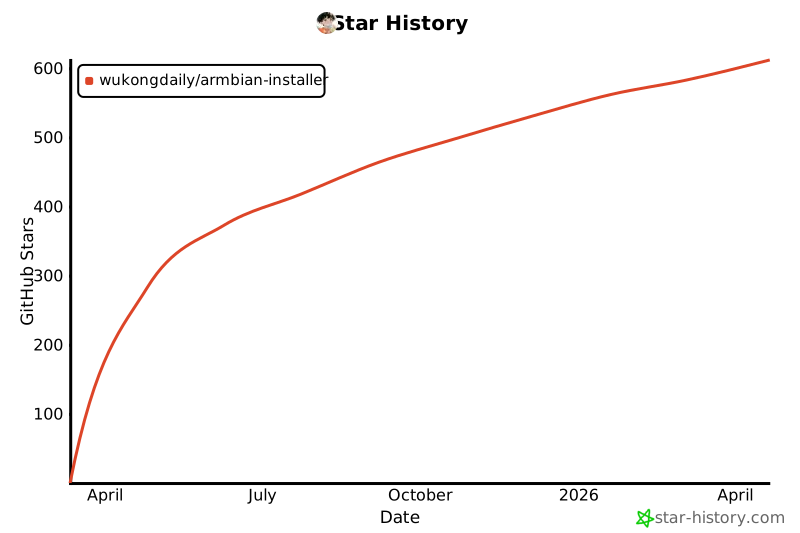](https://star-history.com/#wukongdaily/armbian-installer&Date)
## ❤️赞助作者 ⬇️⬇️
#### 项目开发不易 感谢您的支持鼓励。
[](https://wkdaily.cpolar.cn/01)
================================================
FILE: autobuild/autobuild.sh
================================================
#!/bin/bash
# 接受从AutoBuildImmortalWrt Action 过来的固件 制作为ISO
mkdir -p imm
RECEIVE_FILE="$1"
filename=$(basename "$RECEIVE_FILE") # 提取文件名
OUTPUT_PATH="imm/$filename"
mv $RECEIVE_FILE $OUTPUT_PATH
echo "保存路径: $OUTPUT_PATH"
echo "✅ 验证文件类型!"
file "$OUTPUT_PATH"
# 根据扩展名解压
extension="${filename##*.}" # 获取文件扩展名
case $extension in
gz)
echo "gz正在解压$OUTPUT_PATH"
gunzip -f "$OUTPUT_PATH" || true
final_name=$(find imm -name '*.img' -print -quit)
mv "$final_name" "imm/custom.img"
;;
zip)
echo "zip正在解压$OUTPUT_PATH"
unzip -j -o "$OUTPUT_PATH" -d imm/ # -j 忽略目录结构
final_name=$(find imm -name '*.img' -print -quit)
mv "$final_name" "imm/custom.img"
;;
xz)
echo "xz正在解压$OUTPUT_PATH"
xz -d --keep "$OUTPUT_PATH" # 保留原文件
final_name="${OUTPUT_PATH%.*}"
mv "$final_name" "imm/custom.img"
;;
*)
echo "❌ 不支持的压缩格式: $extension"
exit 1
;;
esac
# 检查最终文件
if [ -f "imm/custom.img" ]; then
echo "✅ 解压成功"
ls -lh imm/
echo "✅ 准备合成 自定义OpenWrt 安装器"
else
echo "❌ 错误:最终文件 imm/custom.img 不存在"
exit 1
fi
mkdir -p output
docker run --privileged --rm \
-v $(pwd)/output:/output \
-v $(pwd)/supportFiles:/supportFiles:ro \
-v $(pwd)/imm/custom.img:/mnt/custom.img \
debian:buster \
/supportFiles/custom/build.sh
================================================
FILE: autobuild/info.md
================================================
[](https://wkdaily.cpolar.top/archives/1)
#### 格式ISO: 此文件是通过AutoBuildImmortalWrt项目构建的
#### 适用范围:所有虚拟机和物理机通用 皆可引导 用于安装ImmortalWrt
#### 使用方法:
- 虚拟机使用:各种虚拟机直接选择iso 作为开机引导即可
- 物理机使用:建议将iso放入ventoy的U盘中
#### 运行ISO的中的debian live系统 大概10几秒后 输入命令 `ddd` 即可调用安装菜单
 #### 安装后 默认情况 若没有更改 则固件信息如下
- 用户名root 密码 无
- 该固件刷入【单网口设备】默认采用DHCP模式,自动获得ip。类似NAS的做法 可在上一级路由器查询,若是虚拟机则输入 `ip a` 查看
- 该固件刷入【多网口设备】默认WAN口采用DHCP模式,LAN 口ip为 `192.168.100.1 `其中eth0为WAN 其余网口均为LAN
#### 为什么这样设计
- 因为很多人在第一次刷入固件后 都做了很多重复的工作 要编辑`/etc/config/network` 不适合手残党和新手。而且我觉得每次这样修改有点傻 千年不变的糟糕用户体验要变一变 为什么不去web页面里修改呢 有界面操作更简单啊
- 【单网口】设备直接就是自动获得ip 则不需要你每次都在命令行里修改了。尤其在虚拟机里,ip a 就能查看ip 用此ip就能访问。web页面在修改任何东西 都很简单了。尤其旁路用户 进web页再设置
- 【多网口】设备用 192.168.100.1 访问web ui
================================================
FILE: build.sh
================================================
#!/bin/bash
mkdir -p armbian
# 读取环境变量 (带默认值)
VERSION_TYPE="${VERSION_TYPE:-standard}"
if [ "$VERSION_TYPE" = "debian12_minimal" ]; then
echo "构建debian12_minimal-armbian..."
FILE_NAME="Armbian_25.2.1_Uefi-x86_bookworm_current_6.12.13_minimal.img.xz"
elif [ "$VERSION_TYPE" = "ubuntu24_minimal" ]; then
echo "构建ubuntu24_minimal-armbian..."
FILE_NAME="Armbian_25.2.1_Uefi-x86_noble_current_6.12.13_minimal.img.xz"
elif [ "$VERSION_TYPE" = "homeassistant_debian12_minimal" ]; then
echo "构建homeassistant全家桶版armbian..."
FILE_NAME="Armbian_25.2.3_Uefi-x86_bookworm_current_6.12.17-homeassistant_minimal.img.xz"
else
echo "构建standard-armbian..."
FILE_NAME="Armbian_25.2.1_Uefi-x86_noble_current_6.12.13.img.xz"
fi
REPO="wukongdaily/img-installer"
TAG="2025-03-12"
OUTPUT_PATH="armbian/armbian.img.xz"
DOWNLOAD_URL=$(curl -s https://api.github.com/repos/$REPO/releases/tags/$TAG | jq -r '.assets[] | select(.name == "'"$FILE_NAME"'") | .browser_download_url')
if [[ -z "$DOWNLOAD_URL" ]]; then
echo "错误:未找到文件 $FILE_NAME"
exit 1
fi
echo "下载地址: $DOWNLOAD_URL"
echo "下载文件: $FILE_NAME -> $OUTPUT_PATH"
curl -L -o "$OUTPUT_PATH" "$DOWNLOAD_URL"
if [[ $? -eq 0 ]]; then
echo "下载armbian成功!"
file armbian/armbian.img.xz
echo "正在解压为:armbian.img"
xz -d armbian/armbian.img.xz
ls -lh armbian/
echo "准备合成 armbian 安装器"
else
echo "下载失败!"
exit 1
fi
mkdir -p output
docker run --privileged --rm \
-v $(pwd)/output:/output \
-v $(pwd)/supportFiles:/supportFiles:ro \
-v $(pwd)/armbian/armbian.img:/mnt/armbian.img \
debian:buster \
/supportFiles/build.sh
================================================
FILE: custom.sh
================================================
#!/bin/bash
set -euo pipefail
# 校验参数是否存在
if [ -z "$1" ]; then
echo "❌ 错误:未提供下载地址!"
exit 1
fi
mkdir -p imm
DOWNLOAD_URL="$1"
filename=$(basename "$DOWNLOAD_URL") # 从 URL 提取文件名
OUTPUT_PATH="imm/$filename"
echo "下载地址: $DOWNLOAD_URL"
echo "保存路径: $OUTPUT_PATH"
# 下载文件
if ! curl -k -L -o "$OUTPUT_PATH" "$DOWNLOAD_URL"; then
echo "❌ 下载失败!"
exit 1
fi
echo "✅ 下载成功!"
file "$OUTPUT_PATH"
# 根据扩展名解压
extension="${filename##*.}" # 获取文件扩展名
case $extension in
gz)
echo "gz正在解压$OUTPUT_PATH"
gunzip -f "$OUTPUT_PATH" || true
final_name=$(find imm -name '*.img' -print -quit)
mv "$final_name" "imm/custom.img"
;;
zip)
echo "zip正在解压$OUTPUT_PATH"
unzip -j -o "$OUTPUT_PATH" -d imm/ # -j 忽略目录结构
final_name=$(find imm -name '*.img' -print -quit)
mv "$final_name" "imm/custom.img"
;;
xz)
echo "xz正在解压$OUTPUT_PATH"
xz -d --keep "$OUTPUT_PATH" # 保留原文件
final_name="${OUTPUT_PATH%.*}"
mv "$final_name" "imm/custom.img"
;;
*)
echo "❌ 不支持的压缩格式: $extension"
exit 1
;;
esac
# 检查最终文件
if [ -f "imm/custom.img" ]; then
echo "✅ 解压成功"
ls -lh imm/
echo "✅ 准备合成 自定义OpenWrt 安装器"
else
echo "❌ 错误:最终文件 imm/custom.img 不存在"
exit 1
fi
mkdir -p output
docker run --privileged --rm \
-v $(pwd)/output:/output \
-v $(pwd)/supportFiles:/supportFiles:ro \
-v $(pwd)/imm/custom.img:/mnt/custom.img \
debian:buster \
/supportFiles/custom/build.sh
================================================
FILE: debugBuild.sh
================================================
#!/bin/bash
mkdir -p output
docker run --privileged -it --rm -v $(pwd)/output:/output -v $(pwd)/supportFiles:/supportFiles:ro -w /supportFiles debian:buster
================================================
FILE: esir.sh
================================================
#!/bin/bash
REPO="wkccd/esirOpenWrt"
TAG=$(curl -sL "https://api.github.com/repos/$REPO/releases/latest" | jq -r '.tag_name // empty')
[ -z "$TAG" ] && TAG=$(curl -sL "https://api.github.com/repos/$REPO/tags" | jq -r '.[0].name')
echo "最新TAG: $TAG"
# 获取该 Tag 下所有以 .img.gz 结尾的文件
DOWNLOAD_URLS=$(curl -sL "https://api.github.com/repos/$REPO/releases/tags/$TAG" \
| jq -r '.assets[] | select(.name | endswith("img.gz")) | .browser_download_url')
# 保存位置
mkdir -p imm
OUTPUT_PATH="imm/esiropenwrt.img.gz"
if [ -z "$DOWNLOAD_URLS" ]; then
echo "Error: No .img.gz files found under tag $TAG"
exit 1
fi
FIRST_DOWNLOAD_URL=$(echo "$DOWNLOAD_URLS" | head -n1)
echo "下载地址: $FIRST_DOWNLOAD_URL"
curl -L -o "$OUTPUT_PATH" "$FIRST_DOWNLOAD_URL"
if [[ $? -eq 0 ]]; then
echo "下载esiropenwrt成功!"
file imm/esiropenwrt.img.gz
echo "正在解压为:esiropenwrt.img"
gzip -d imm/esiropenwrt.img.gz
ls -lh imm/
echo "准备合成 eSirOpenWrt 安装器"
else
echo "下载失败!"
exit 1
fi
mkdir -p output
docker run --privileged --rm \
-v $(pwd)/output:/output \
-v $(pwd)/supportFiles:/supportFiles:ro \
-v $(pwd)/imm/esiropenwrt.img:/mnt/esiropenwrt.img \
debian:buster \
/supportFiles/esirplayground/build.sh
================================================
FILE: ezopwrt.sh
================================================
#!/bin/bash
REPO="sirpdboy/openwrt"
TAG=$(curl -sL "https://api.github.com/repos/$REPO/releases/latest" | jq -r '.tag_name // empty')
[ -z "$TAG" ] && TAG=$(curl -sL "https://api.github.com/repos/$REPO/tags" | jq -r '.[0].name')
echo "最新TAG: $TAG"
# 获取该 Tag 下所有以 .img.gz 结尾的文件
DOWNLOAD_URLS=$(curl -sL "https://api.github.com/repos/$REPO/releases/tags/$TAG" \
| jq -r '.assets[] | select(.name | endswith("img.gz")) | .browser_download_url')
# 保存位置
mkdir -p imm
OUTPUT_PATH="imm/ezopwrt.img.gz"
if [ -z "$DOWNLOAD_URLS" ]; then
echo "Error: No .img.gz files found under tag $TAG"
exit 1
fi
FIRST_DOWNLOAD_URL=$(echo "$DOWNLOAD_URLS" | head -n1)
echo "下载地址: $FIRST_DOWNLOAD_URL"
curl -L -o "$OUTPUT_PATH" "$FIRST_DOWNLOAD_URL"
if [[ $? -eq 0 ]]; then
echo "下载ezopwrt成功!"
file imm/ezopwrt.img.gz
echo "正在解压为:ezopwrt.img"
gzip -d imm/ezopwrt.img.gz
ls -lh imm/
echo "准备合成 EzOpWrt 安装器"
else
echo "下载失败!"
exit 1
fi
mkdir -p output
docker run --privileged --rm \
-v $(pwd)/output:/output \
-v $(pwd)/supportFiles:/supportFiles:ro \
-v $(pwd)/imm/ezopwrt.img:/mnt/ezopwrt.img \
debian:buster \
/supportFiles/ezopwrt/build.sh
================================================
FILE: haos.sh
================================================
#!/bin/bash
set -euo pipefail
# 校验参数是否存在
if [ -z "$1" ]; then
echo "❌ 错误:未提供下载地址!"
exit 1
fi
mkdir -p imm
DOWNLOAD_URL="$1"
filename=$(basename "$DOWNLOAD_URL") # 从 URL 提取文件名
OUTPUT_PATH="imm/$filename"
echo "下载地址: $DOWNLOAD_URL"
echo "保存路径: $OUTPUT_PATH"
# 下载文件
if ! curl -k -L -o "$OUTPUT_PATH" "$DOWNLOAD_URL"; then
echo "❌ 下载失败!"
exit 1
fi
echo "✅ 下载成功!"
file "$OUTPUT_PATH"
# 根据扩展名解压
extension="${filename##*.}" # 获取文件扩展名
case $extension in
gz)
echo "gz正在解压$OUTPUT_PATH"
gunzip -f "$OUTPUT_PATH" || true
final_name=$(find imm -name '*.img' -print -quit)
mv "$final_name" "imm/haos.img"
;;
zip)
echo "zip正在解压$OUTPUT_PATH"
unzip -j -o "$OUTPUT_PATH" -d imm/ # -j 忽略目录结构
final_name=$(find imm -name '*.img' -print -quit)
mv "$final_name" "imm/haos.img"
;;
xz)
echo "xz正在解压$OUTPUT_PATH"
xz -d --keep "$OUTPUT_PATH" # 保留原文件
final_name="${OUTPUT_PATH%.*}"
mv "$final_name" "imm/haos.img"
;;
*)
echo "❌ 不支持的压缩格式: $extension"
exit 1
;;
esac
# 检查最终文件
if [ -f "imm/haos.img" ]; then
echo "✅ 解压成功"
ls -lh imm/
echo "✅ 准备合成 自定义HAOS 安装器"
else
echo "❌ 错误:最终文件 imm/haos.img 不存在"
exit 1
fi
mkdir -p output
docker run --privileged --rm \
-v $(pwd)/output:/output \
-v $(pwd)/supportFiles:/supportFiles:ro \
-v $(pwd)/imm/haos.img:/mnt/haos.img \
debian:buster \
/supportFiles/haos/build.sh
================================================
FILE: imm.sh
================================================
#!/bin/bash
mkdir -p imm
#https://github.com/wukongdaily/AutoBuildImmortalWrt/releases/download/Autobuild-x86-64/immortalwrt-24.10.0-x86-64-generic-squashfs-combined-efi.img.gz
REPO="wukongdaily/AutoBuildImmortalWrt"
TAG="img-installer"
FILE_NAME="immortalwrt-24.10.2-x86-64-generic-squashfs-combined-efi.img.gz"
OUTPUT_PATH="imm/immortalwrt.img.gz"
DOWNLOAD_URL=$(curl -s https://api.github.com/repos/$REPO/releases/tags/$TAG | jq -r '.assets[] | select(.name == "'"$FILE_NAME"'") | .browser_download_url')
# 此处可以替换op固件下载地址,但必须是 直链才可以,网盘那种地址是不行滴。举3个例子
# 原版OpenWrt
# DOWNLOAD_URL="https://downloads.openwrt.org/releases/24.10.0/targets/x86/64/openwrt-24.10.0-x86-64-generic-squashfs-combined-efi.img.gz"
# 原版immortalwrt
# DOWNLOAD_URL="https://downloads.immortalwrt.org/releases/24.10.0/targets/x86/64/immortalwrt-24.10.0-x86-64-generic-squashfs-combined-efi.img.gz"
# 原版KWRT
# DOWNLOAD_URL="https://dl.openwrt.ai/releases/24.10/targets/x86/64/kwrt-03.08.2025-x86-64-generic-squashfs-combined-efi.img.gz"
if [[ -z "$DOWNLOAD_URL" ]]; then
echo "错误:未找到文件 $FILE_NAME"
exit 1
fi
echo "下载地址: $DOWNLOAD_URL"
echo "下载文件: $FILE_NAME -> $OUTPUT_PATH"
curl -L -o "$OUTPUT_PATH" "$DOWNLOAD_URL"
if [[ $? -eq 0 ]]; then
echo "下载immortalwrt-24.10.1成功!"
file imm/immortalwrt.img.gz
echo "正在解压为:immortalwrt.img"
gzip -d imm/immortalwrt.img.gz
ls -lh imm/
echo "准备合成 immortalwrt 安装器"
else
echo "下载失败!"
exit 1
fi
mkdir -p output
docker run --privileged --rm \
-v $(pwd)/output:/output \
-v $(pwd)/supportFiles:/supportFiles:ro \
-v $(pwd)/imm/immortalwrt.img:/mnt/immortalwrt.img \
debian:buster \
/supportFiles/immortalwrt/build.sh
================================================
FILE: info.md
================================================
[](https://wkdaily.cpolar.top/archives/1)
#### 适用范围:所有虚拟机和物理机
#### 此安装器本身的Debian Live系统SSH用户名:root 密码:1234
#### 安装器中的Armbian系统
#### web地址:插好网线 详见屏幕信息
#### ssh默认用户名 `root` 密码:1234
#### Armbian镜像出处:https://github.com/wukongdaily/armbian-installer/releases/tag/2025-03-12
================================================
FILE: istoreos.sh
================================================
#!/bin/bash
mkdir -p openwrt
REPO="wukongdaily/img-installer"
TAG="2025-03-12"
FILE_NAME="istoreos-24.10.1-2025060614-x86-64-squashfs-combined-efi.img.gz"
OUTPUT_PATH="openwrt/istoreos.img.gz"
DOWNLOAD_URL=$(curl -s https://api.github.com/repos/$REPO/releases/tags/$TAG | jq -r '.assets[] | select(.name == "'"$FILE_NAME"'") | .browser_download_url')
if [[ -z "$DOWNLOAD_URL" ]]; then
echo "错误:未找到文件 $FILE_NAME"
exit 1
fi
echo "下载地址: $DOWNLOAD_URL"
echo "下载文件: $FILE_NAME -> $OUTPUT_PATH"
curl -L -o "$OUTPUT_PATH" "$DOWNLOAD_URL"
if [[ $? -eq 0 ]]; then
echo "下载istoreos成功!"
echo "正在解压为:istoreos.img"
gzip -d openwrt/istoreos.img.gz
ls -lh openwrt/
echo "准备合成 istoreos 安装器"
else
echo "下载失败!"
exit 1
fi
mkdir -p output
docker run --privileged --rm \
-v $(pwd)/output:/output \
-v $(pwd)/supportFiles:/supportFiles:ro \
-v $(pwd)/openwrt/istoreos.img:/mnt/istoreos.img \
debian:buster \
/supportFiles/istoreos/build.sh
================================================
FILE: supportFiles/99-dhcp-en.network
================================================
[Match]
Name=e*
[Network]
DHCP=yes
[DHCP]
ClientIdentifier=mac
================================================
FILE: supportFiles/build.sh
================================================
#!/bin/bash
# Based from https://willhaley.com/blog/custom-debian-live-environment/
set -e
echo "🔧 修复 buster 的源..."
cat > /etc/apt/sources.list < /etc/apt/apt.conf.d/99no-check-valid-until
apt-get update
echo "🚀 开始执行 build.sh ..."
echo Install required tools
apt-get update
apt-get -y install debootstrap squashfs-tools xorriso isolinux syslinux-efi grub-pc-bin grub-efi-amd64-bin mtools dosfstools parted
echo Create directory where we will make the image
mkdir -p $HOME/LIVE_BOOT
echo Install Debian
debootstrap --arch=amd64 --variant=minbase buster $HOME/LIVE_BOOT/chroot http://archive.debian.org/debian/
echo Copy supporting documents into the chroot
cp -v /supportFiles/installChroot.sh $HOME/LIVE_BOOT/chroot/installChroot.sh
cp -v /supportFiles/ddd $HOME/LIVE_BOOT/chroot/usr/bin/ddd
chmod +x $HOME/LIVE_BOOT/chroot/usr/bin/ddd
cp -v /supportFiles/sources.list $HOME/LIVE_BOOT/chroot/etc/apt/sources.list
echo Mounting dev / proc / sys
mount -t proc none $HOME/LIVE_BOOT/chroot/proc
mount -o bind /dev $HOME/LIVE_BOOT/chroot/dev
mount -o bind /sys $HOME/LIVE_BOOT/chroot/sys
echo Run install script inside chroot
chroot $HOME/LIVE_BOOT/chroot /installChroot.sh
echo Cleanup chroot
rm -v $HOME/LIVE_BOOT/chroot/installChroot.sh
mv -v $HOME/LIVE_BOOT/chroot/packages.txt /output/packages.txt
echo Copy in systemd-networkd config
cp -v /supportFiles/99-dhcp-en.network $HOME/LIVE_BOOT/chroot/etc/systemd/network/99-dhcp-en.network
chown -v root:root $HOME/LIVE_BOOT/chroot/etc/systemd/network/99-dhcp-en.network
chmod -v 644 $HOME/LIVE_BOOT/chroot/etc/systemd/network/99-dhcp-en.network
echo Enable autologin
mkdir -p -v $HOME/LIVE_BOOT/chroot/etc/systemd/system/getty@tty1.service.d/
cp -v /supportFiles/override.conf $HOME/LIVE_BOOT/chroot/etc/systemd/system/getty@tty1.service.d/override.conf
echo Unmounting dev / proc / sys
umount $HOME/LIVE_BOOT/chroot/proc
umount $HOME/LIVE_BOOT/chroot/dev
umount $HOME/LIVE_BOOT/chroot/sys
echo Create directories that will contain files for our live environment files and scratch files.
mkdir -p $HOME/LIVE_BOOT/{staging/{EFI/boot,boot/grub/x86_64-efi,isolinux,live},tmp}
echo Compress the chroot environment into a Squash filesystem.
cp /mnt/armbian.img ${HOME}/LIVE_BOOT/chroot/mnt/
ls ${HOME}/LIVE_BOOT/chroot/mnt/
mksquashfs $HOME/LIVE_BOOT/chroot $HOME/LIVE_BOOT/staging/live/filesystem.squashfs -e boot
echo Copy kernel and initrd
cp -v $HOME/LIVE_BOOT/chroot/boot/vmlinuz-* $HOME/LIVE_BOOT/staging/live/vmlinuz
cp -v $HOME/LIVE_BOOT/chroot/boot/initrd.img-* $HOME/LIVE_BOOT/staging/live/initrd
echo Copy boot config files
cp -v /supportFiles/isolinux.cfg $HOME/LIVE_BOOT/staging/isolinux/isolinux.cfg
cp -v /supportFiles/grub.cfg $HOME/LIVE_BOOT/staging/boot/grub/grub.cfg
cp -v /supportFiles/grub-standalone.cfg $HOME/LIVE_BOOT/tmp/grub-standalone.cfg
touch $HOME/LIVE_BOOT/staging/DEBIAN_CUSTOM
echo Copy boot images
cp -v /usr/lib/ISOLINUX/isolinux.bin "${HOME}/LIVE_BOOT/staging/isolinux/"
cp -v /usr/lib/syslinux/modules/bios/* "${HOME}/LIVE_BOOT/staging/isolinux/"
cp -v -r /usr/lib/grub/x86_64-efi/* "${HOME}/LIVE_BOOT/staging/boot/grub/x86_64-efi/"
echo Make UEFI grub files
grub-mkstandalone --format=x86_64-efi --output=$HOME/LIVE_BOOT/tmp/bootx64.efi --locales="" --fonts="" "boot/grub/grub.cfg=$HOME/LIVE_BOOT/tmp/grub-standalone.cfg"
cd $HOME/LIVE_BOOT/staging/EFI/boot
SIZE=`expr $(stat --format=%s $HOME/LIVE_BOOT/tmp/bootx64.efi) + 65536`
dd if=/dev/zero of=efiboot.img bs=$SIZE count=1
/sbin/mkfs.vfat efiboot.img
mmd -i efiboot.img efi efi/boot
mcopy -vi efiboot.img $HOME/LIVE_BOOT/tmp/bootx64.efi ::efi/boot/
echo Build ISO
xorriso \
-as mkisofs \
-iso-level 3 \
-o "${HOME}/LIVE_BOOT/debian-custom.iso" \
-full-iso9660-filenames \
-volid "DEBIAN_CUSTOM" \
-isohybrid-mbr /usr/lib/ISOLINUX/isohdpfx.bin \
-eltorito-boot \
isolinux/isolinux.bin \
-no-emul-boot \
-boot-load-size 4 \
-boot-info-table \
--eltorito-catalog isolinux/isolinux.cat \
-eltorito-alt-boot \
-e /EFI/boot/efiboot.img \
-no-emul-boot \
-isohybrid-gpt-basdat \
-append_partition 2 0xef ${HOME}/LIVE_BOOT/staging/EFI/boot/efiboot.img \
"${HOME}/LIVE_BOOT/staging"
echo Copy output
cp -v $HOME/LIVE_BOOT/debian-custom.iso /output/armbian-installer-x86_64-standard.iso
chmod -v 666 /output/armbian-installer-x86_64-standard.iso
ls -lah /output
================================================
FILE: supportFiles/custom/build.sh
================================================
#!/bin/bash
# Based from https://willhaley.com/blog/custom-debian-live-environment/
set -e
echo "🔧 修复 buster 的源..."
cat > /etc/apt/sources.list < /etc/apt/apt.conf.d/99no-check-valid-until
apt-get update
echo "🚀 开始执行 build.sh ..."
echo Install required tools
apt-get update
apt-get -y install debootstrap squashfs-tools xorriso isolinux syslinux-efi grub-pc-bin grub-efi-amd64-bin mtools dosfstools parted
echo Create directory where we will make the image
mkdir -p $HOME/LIVE_BOOT
echo Install Debian
debootstrap --arch=amd64 --variant=minbase buster $HOME/LIVE_BOOT/chroot http://archive.debian.org/debian/
echo Copy supporting documents into the chroot
cp -v /supportFiles/installChroot.sh $HOME/LIVE_BOOT/chroot/installChroot.sh
cp -v /supportFiles/custom/ddd $HOME/LIVE_BOOT/chroot/usr/bin/ddd
chmod +x $HOME/LIVE_BOOT/chroot/usr/bin/ddd
cp -v /supportFiles/sources.list $HOME/LIVE_BOOT/chroot/etc/apt/sources.list
echo Mounting dev / proc / sys
mount -t proc none $HOME/LIVE_BOOT/chroot/proc
mount -o bind /dev $HOME/LIVE_BOOT/chroot/dev
mount -o bind /sys $HOME/LIVE_BOOT/chroot/sys
echo Run install script inside chroot
chroot $HOME/LIVE_BOOT/chroot /installChroot.sh
echo Cleanup chroot
rm -v $HOME/LIVE_BOOT/chroot/installChroot.sh
mv -v $HOME/LIVE_BOOT/chroot/packages.txt /output/packages.txt
echo Copy in systemd-networkd config
cp -v /supportFiles/99-dhcp-en.network $HOME/LIVE_BOOT/chroot/etc/systemd/network/99-dhcp-en.network
chown -v root:root $HOME/LIVE_BOOT/chroot/etc/systemd/network/99-dhcp-en.network
chmod -v 644 $HOME/LIVE_BOOT/chroot/etc/systemd/network/99-dhcp-en.network
echo Enable autologin
mkdir -p -v $HOME/LIVE_BOOT/chroot/etc/systemd/system/getty@tty1.service.d/
cp -v /supportFiles/override.conf $HOME/LIVE_BOOT/chroot/etc/systemd/system/getty@tty1.service.d/override.conf
echo Unmounting dev / proc / sys
umount $HOME/LIVE_BOOT/chroot/proc
umount $HOME/LIVE_BOOT/chroot/dev
umount $HOME/LIVE_BOOT/chroot/sys
echo Create directories that will contain files for our live environment files and scratch files.
mkdir -p $HOME/LIVE_BOOT/{staging/{EFI/boot,boot/grub/x86_64-efi,isolinux,live},tmp}
echo Compress the chroot environment into a Squash filesystem.
cp /mnt/custom.img ${HOME}/LIVE_BOOT/chroot/mnt/
ls ${HOME}/LIVE_BOOT/chroot/mnt/
mksquashfs $HOME/LIVE_BOOT/chroot $HOME/LIVE_BOOT/staging/live/filesystem.squashfs -e boot
echo Copy kernel and initrd
cp -v $HOME/LIVE_BOOT/chroot/boot/vmlinuz-* $HOME/LIVE_BOOT/staging/live/vmlinuz
cp -v $HOME/LIVE_BOOT/chroot/boot/initrd.img-* $HOME/LIVE_BOOT/staging/live/initrd
echo Copy boot config files
cp -v /supportFiles/custom/isolinux.cfg $HOME/LIVE_BOOT/staging/isolinux/isolinux.cfg
cp -v /supportFiles/custom/grub.cfg $HOME/LIVE_BOOT/staging/boot/grub/grub.cfg
cp -v /supportFiles/grub-standalone.cfg $HOME/LIVE_BOOT/tmp/grub-standalone.cfg
touch $HOME/LIVE_BOOT/staging/DEBIAN_CUSTOM
echo Copy boot images
cp -v /usr/lib/ISOLINUX/isolinux.bin "${HOME}/LIVE_BOOT/staging/isolinux/"
cp -v /usr/lib/syslinux/modules/bios/* "${HOME}/LIVE_BOOT/staging/isolinux/"
cp -v -r /usr/lib/grub/x86_64-efi/* "${HOME}/LIVE_BOOT/staging/boot/grub/x86_64-efi/"
echo Make UEFI grub files
grub-mkstandalone --format=x86_64-efi --output=$HOME/LIVE_BOOT/tmp/bootx64.efi --locales="" --fonts="" "boot/grub/grub.cfg=$HOME/LIVE_BOOT/tmp/grub-standalone.cfg"
cd $HOME/LIVE_BOOT/staging/EFI/boot
SIZE=`expr $(stat --format=%s $HOME/LIVE_BOOT/tmp/bootx64.efi) + 65536`
dd if=/dev/zero of=efiboot.img bs=$SIZE count=1
/sbin/mkfs.vfat efiboot.img
mmd -i efiboot.img efi efi/boot
mcopy -vi efiboot.img $HOME/LIVE_BOOT/tmp/bootx64.efi ::efi/boot/
echo Build ISO
xorriso \
-as mkisofs \
-iso-level 3 \
-o "${HOME}/LIVE_BOOT/debian-custom.iso" \
-full-iso9660-filenames \
-volid "DEBIAN_CUSTOM" \
-isohybrid-mbr /usr/lib/ISOLINUX/isohdpfx.bin \
-eltorito-boot \
isolinux/isolinux.bin \
-no-emul-boot \
-boot-load-size 4 \
-boot-info-table \
--eltorito-catalog isolinux/isolinux.cat \
-eltorito-alt-boot \
-e /EFI/boot/efiboot.img \
-no-emul-boot \
-isohybrid-gpt-basdat \
-append_partition 2 0xef ${HOME}/LIVE_BOOT/staging/EFI/boot/efiboot.img \
"${HOME}/LIVE_BOOT/staging"
echo Copy output
cp -v $HOME/LIVE_BOOT/debian-custom.iso /output/custom-installer-x86_64.iso
chmod -v 666 /output/custom-installer-x86_64.iso
ls -lah /output
================================================
FILE: supportFiles/custom/ddd
================================================
#!/bin/bash
show_menu() {
clear
echo "=========================================="
echo " Custom OpenWrt Installer by wukongdaily"
echo "=========================================="
echo "1. Install Custom OpenWrt"
echo "0. Quit"
echo "====================================="
}
detect_disk() {
# Get all available disks
local disks=($(lsblk -d -n -o NAME,RO,TYPE | awk '$3 == "disk" && $2 == "0" {print "/dev/"$1}'))
# Error handling
if [ ${#disks[@]} -eq 0 ]; then
echo "Error: No available disk devices detected!" >&2
exit 1
fi
# Display disk list with sizes
echo "Available disks:" >&2
for i in "${!disks[@]}"; do
size=$(lsblk -d -n -b -o SIZE ${disks[i]} | awk '{printf "%.2f GB", $1/1000000000}')
printf "%2d. %-12s %8s\n" $((i+1)) "${disks[i]}" "$size" >&2
done
# User selection logic
while true; do
read -p "Select target disk number (1-${#disks[@]}): " choice
if [[ "$choice" =~ ^[0-9]+$ ]] && (( choice >= 1 && choice <= ${#disks[@]} )); then
selected_disk="${disks[choice-1]}"
echo "[Security Notice] Selected disk: $selected_disk" >&2
echo "$selected_disk"
return
else
echo "Invalid input. Please enter a valid number between 1-${#disks[@]}"
fi
done
}
confirm_danger() {
local target_disk=$1
local image_file=$2
echo "!! DANGEROUS OPERATION CONFIRMATION !!"
echo "──────────────────────────────────────"
echo "Target device: $target_disk"
echo "Image file: $image_file"
echo "──────────────────────────────────────"
echo "This will ERASE ALL DATA on $target_disk!"
read -p "Confirm write operation? (Type uppercase YES to proceed): " confirm
if [ "$confirm" != "YES" ]; then
echo "Operation cancelled"
exit 0
fi
}
install_system() {
local image_name=$1
local image_file="/mnt/$image_name"
local target_disk
# Get user-selected disk
target_disk=$(detect_disk)
# Display disk information
echo -e "\nDisk Information:"
fdisk -l "$target_disk" | grep Disk | head -1
# Check image file existence
if [ ! -f "$image_file" ]; then
echo -e "\nError: Image file $image_file not found!"
echo "Please:"
echo "1. Place the image file in /mnt directory"
echo "2. Verify file permissions"
exit 1
fi
# Final confirmation
confirm_danger "$target_disk" "$image_file"
echo -e "\nStarting system write... (Press Ctrl+C to cancel)"
sleep 2
# Perform write operation
dd if="$image_file" of="$target_disk" bs=4M conv=fsync status=progress
echo "──────────────────────────────────────"
echo "Custom OpenWrt installed successfully:"
}
while true; do
show_menu
read -p "Enter your choice [0-1]: " choice
case $choice in
1)
install_system "custom.img"
break
;;
0)
echo "Exiting installer"
exit 0
;;
*)
echo "Invalid option, please try again"
sleep 2
;;
esac
done
================================================
FILE: supportFiles/custom/grub.cfg
================================================
search --set=root --file /DEBIAN_CUSTOM
set default="0"
set timeout=5
# If X has issues finding screens, experiment with/without nomodeset.
# Load EFI video drivers. This device is EFI so keep the
# video mode while booting the linux kernel.
insmod efi_gop
insmod font
if loadfont ${prefix}/fonts/unicode.pf2
then
insmod gfxterm
set gfxmode=auto
set gfxpayload=keep
terminal_output gfxterm
fi
menuentry "Custom OpenWrt x86-UEFI Installer [EFI/GRUB]" {
linux ($root)/live/vmlinuz boot=live
initrd ($root)/live/initrd
}
================================================
FILE: supportFiles/custom/info.md
================================================
[](https://wkdaily.cpolar.top/archives/1)
#### 适用范围:所有虚拟机和物理机
#### 安装器中的Custom OpenWrt
#### 固件地址:
#### 用户名: 密码:
#### 默认软件包大小:
================================================
FILE: supportFiles/custom/isolinux.cfg
================================================
UI vesamenu.c32
MENU TITLE Boot Menu
DEFAULT linux
TIMEOUT 50
MENU RESOLUTION 640 480
MENU COLOR border 30;44 #40ffffff #a0000000 std
MENU COLOR title 1;36;44 #9033ccff #a0000000 std
MENU COLOR sel 7;37;40 #e0ffffff #20ffffff all
MENU COLOR unsel 37;44 #50ffffff #a0000000 std
MENU COLOR help 37;40 #c0ffffff #a0000000 std
MENU COLOR timeout_msg 37;40 #80ffffff #00000000 std
MENU COLOR timeout 1;37;40 #c0ffffff #00000000 std
MENU COLOR msg07 37;40 #90ffffff #a0000000 std
MENU COLOR tabmsg 31;40 #30ffffff #00000000 std
LABEL linux
MENU LABEL Custom OpenWrt Installer
MENU DEFAULT
KERNEL /live/vmlinuz
APPEND initrd=/live/initrd boot=live
================================================
FILE: supportFiles/ddd
================================================
#!/bin/bash
show_menu() {
clear
echo "====================================="
echo " Armbian x86-UEFI Installer by wukongdaily"
echo "====================================="
echo "1. Install Armbian x86-UEFI"
echo "0. Quit"
echo "====================================="
}
detect_disk() {
# Get all available disks
local disks=($(lsblk -d -n -o NAME,RO,TYPE | awk '$3 == "disk" && $2 == "0" {print "/dev/"$1}'))
# Error handling
if [ ${#disks[@]} -eq 0 ]; then
echo "Error: No available disk devices detected!" >&2
exit 1
fi
# Display disk list with sizes
echo "Available disks:" >&2
for i in "${!disks[@]}"; do
size=$(lsblk -d -n -b -o SIZE ${disks[i]} | awk '{printf "%.2f GB", $1/1000000000}')
printf "%2d. %-12s %8s\n" $((i+1)) "${disks[i]}" "$size" >&2
done
# User selection logic
while true; do
read -p "Select target disk number (1-${#disks[@]}): " choice
if [[ "$choice" =~ ^[0-9]+$ ]] && (( choice >= 1 && choice <= ${#disks[@]} )); then
selected_disk="${disks[choice-1]}"
echo "[Security Notice] Selected disk: $selected_disk" >&2
echo "$selected_disk"
return
else
echo "Invalid input. Please enter a valid number between 1-${#disks[@]}"
fi
done
}
confirm_danger() {
local target_disk=$1
local image_file=$2
echo "!! DANGEROUS OPERATION CONFIRMATION !!"
echo "──────────────────────────────────────"
echo "Target device: $target_disk"
echo "Image file: $image_file"
echo "──────────────────────────────────────"
echo "This will ERASE ALL DATA on $target_disk!"
read -p "Confirm write operation? (Type uppercase YES to proceed): " confirm
if [ "$confirm" != "YES" ]; then
echo "Operation cancelled"
exit 0
fi
}
install_system() {
local image_name=$1
local image_file="/mnt/$image_name"
local target_disk
# Get user-selected disk
target_disk=$(detect_disk)
# Display disk information
echo -e "\nDisk Information:"
fdisk -l "$target_disk" | grep Disk | head -1
# Check image file existence
if [ ! -f "$image_file" ]; then
echo -e "\nError: Image file $image_file not found!"
echo "Please:"
echo "1. Place the image file in /mnt directory"
echo "2. Verify file permissions"
exit 1
fi
# Final confirmation
confirm_danger "$target_disk" "$image_file"
echo -e "\nStarting system write... (Press Ctrl+C to cancel)"
sleep 2
# Perform write operation
dd if="$image_file" of="$target_disk" bs=4M conv=fsync status=progress
echo "──────────────────────────────────────"
echo "Armbian installed successfully:"
}
while true; do
show_menu
read -p "Enter your choice [0-1]: " choice
case $choice in
1)
install_system "armbian.img"
break
;;
0)
echo "Exiting installer"
exit 0
;;
*)
echo "Invalid option, please try again"
sleep 2
;;
esac
done
================================================
FILE: supportFiles/esirplayground/build.sh
================================================
#!/bin/bash
# Based from https://willhaley.com/blog/custom-debian-live-environment/
set -e
echo "🔧 修复 buster 的源..."
cat > /etc/apt/sources.list < /etc/apt/apt.conf.d/99no-check-valid-until
apt-get update
echo "🚀 开始执行 build.sh ..."
echo Install required tools
apt-get update
apt-get -y install debootstrap squashfs-tools xorriso isolinux syslinux-efi grub-pc-bin grub-efi-amd64-bin mtools dosfstools parted
echo Create directory where we will make the image
mkdir -p $HOME/LIVE_BOOT
echo Install Debian
debootstrap --arch=amd64 --variant=minbase buster $HOME/LIVE_BOOT/chroot http://archive.debian.org/debian/
echo Copy supporting documents into the chroot
cp -v /supportFiles/installChroot.sh $HOME/LIVE_BOOT/chroot/installChroot.sh
cp -v /supportFiles/esirplayground/ddd $HOME/LIVE_BOOT/chroot/usr/bin/ddd
chmod +x $HOME/LIVE_BOOT/chroot/usr/bin/ddd
cp -v /supportFiles/sources.list $HOME/LIVE_BOOT/chroot/etc/apt/sources.list
echo Mounting dev / proc / sys
mount -t proc none $HOME/LIVE_BOOT/chroot/proc
mount -o bind /dev $HOME/LIVE_BOOT/chroot/dev
mount -o bind /sys $HOME/LIVE_BOOT/chroot/sys
echo Run install script inside chroot
chroot $HOME/LIVE_BOOT/chroot /installChroot.sh
echo Cleanup chroot
rm -v $HOME/LIVE_BOOT/chroot/installChroot.sh
mv -v $HOME/LIVE_BOOT/chroot/packages.txt /output/packages.txt
echo Copy in systemd-networkd config
cp -v /supportFiles/99-dhcp-en.network $HOME/LIVE_BOOT/chroot/etc/systemd/network/99-dhcp-en.network
chown -v root:root $HOME/LIVE_BOOT/chroot/etc/systemd/network/99-dhcp-en.network
chmod -v 644 $HOME/LIVE_BOOT/chroot/etc/systemd/network/99-dhcp-en.network
echo Enable autologin
mkdir -p -v $HOME/LIVE_BOOT/chroot/etc/systemd/system/getty@tty1.service.d/
cp -v /supportFiles/override.conf $HOME/LIVE_BOOT/chroot/etc/systemd/system/getty@tty1.service.d/override.conf
echo Unmounting dev / proc / sys
umount $HOME/LIVE_BOOT/chroot/proc
umount $HOME/LIVE_BOOT/chroot/dev
umount $HOME/LIVE_BOOT/chroot/sys
echo Create directories that will contain files for our live environment files and scratch files.
mkdir -p $HOME/LIVE_BOOT/{staging/{EFI/boot,boot/grub/x86_64-efi,isolinux,live},tmp}
echo Compress the chroot environment into a Squash filesystem.
cp /mnt/esiropenwrt.img ${HOME}/LIVE_BOOT/chroot/mnt/
ls ${HOME}/LIVE_BOOT/chroot/mnt/
mksquashfs $HOME/LIVE_BOOT/chroot $HOME/LIVE_BOOT/staging/live/filesystem.squashfs -e boot
echo Copy kernel and initrd
cp -v $HOME/LIVE_BOOT/chroot/boot/vmlinuz-* $HOME/LIVE_BOOT/staging/live/vmlinuz
cp -v $HOME/LIVE_BOOT/chroot/boot/initrd.img-* $HOME/LIVE_BOOT/staging/live/initrd
echo Copy boot config files
cp -v /supportFiles/esirplayground/isolinux.cfg $HOME/LIVE_BOOT/staging/isolinux/isolinux.cfg
cp -v /supportFiles/esirplayground/grub.cfg $HOME/LIVE_BOOT/staging/boot/grub/grub.cfg
cp -v /supportFiles/grub-standalone.cfg $HOME/LIVE_BOOT/tmp/grub-standalone.cfg
touch $HOME/LIVE_BOOT/staging/DEBIAN_CUSTOM
echo Copy boot images
cp -v /usr/lib/ISOLINUX/isolinux.bin "${HOME}/LIVE_BOOT/staging/isolinux/"
cp -v /usr/lib/syslinux/modules/bios/* "${HOME}/LIVE_BOOT/staging/isolinux/"
cp -v -r /usr/lib/grub/x86_64-efi/* "${HOME}/LIVE_BOOT/staging/boot/grub/x86_64-efi/"
echo Make UEFI grub files
grub-mkstandalone --format=x86_64-efi --output=$HOME/LIVE_BOOT/tmp/bootx64.efi --locales="" --fonts="" "boot/grub/grub.cfg=$HOME/LIVE_BOOT/tmp/grub-standalone.cfg"
cd $HOME/LIVE_BOOT/staging/EFI/boot
SIZE=`expr $(stat --format=%s $HOME/LIVE_BOOT/tmp/bootx64.efi) + 65536`
dd if=/dev/zero of=efiboot.img bs=$SIZE count=1
/sbin/mkfs.vfat efiboot.img
mmd -i efiboot.img efi efi/boot
mcopy -vi efiboot.img $HOME/LIVE_BOOT/tmp/bootx64.efi ::efi/boot/
echo Build ISO
xorriso \
-as mkisofs \
-iso-level 3 \
-o "${HOME}/LIVE_BOOT/debian-custom.iso" \
-full-iso9660-filenames \
-volid "DEBIAN_CUSTOM" \
-isohybrid-mbr /usr/lib/ISOLINUX/isohdpfx.bin \
-eltorito-boot \
isolinux/isolinux.bin \
-no-emul-boot \
-boot-load-size 4 \
-boot-info-table \
--eltorito-catalog isolinux/isolinux.cat \
-eltorito-alt-boot \
-e /EFI/boot/efiboot.img \
-no-emul-boot \
-isohybrid-gpt-basdat \
-append_partition 2 0xef ${HOME}/LIVE_BOOT/staging/EFI/boot/efiboot.img \
"${HOME}/LIVE_BOOT/staging"
echo Copy output
cp -v $HOME/LIVE_BOOT/debian-custom.iso /output/esiropenwrt-installer-x86_64.iso
chmod -v 666 /output/esiropenwrt-installer-x86_64.iso
ls -lah /output
================================================
FILE: supportFiles/esirplayground/ddd
================================================
#!/bin/bash
show_menu() {
clear
echo "====================================================="
echo " eSirPlayGround OpenWrt Installer by wukongdaily"
echo "====================================================="
echo "1. Install eSirPlayGround OpenWrt GDQ"
echo "0. Quit"
echo "====================================================="
}
detect_disk() {
# Get all available disks
local disks=($(lsblk -d -n -o NAME,RO,TYPE | awk '$3 == "disk" && $2 == "0" {print "/dev/"$1}'))
# Error handling
if [ ${#disks[@]} -eq 0 ]; then
echo "Error: No available disk devices detected!" >&2
exit 1
fi
# Display disk list with sizes
echo "Available disks:" >&2
for i in "${!disks[@]}"; do
size=$(lsblk -d -n -b -o SIZE ${disks[i]} | awk '{printf "%.2f GB", $1/1000000000}')
printf "%2d. %-12s %8s\n" $((i+1)) "${disks[i]}" "$size" >&2
done
# User selection logic
while true; do
read -p "Select target disk number (1-${#disks[@]}): " choice
if [[ "$choice" =~ ^[0-9]+$ ]] && (( choice >= 1 && choice <= ${#disks[@]} )); then
selected_disk="${disks[choice-1]}"
echo "[Security Notice] Selected disk: $selected_disk" >&2
echo "$selected_disk"
return
else
echo "Invalid input. Please enter a valid number between 1-${#disks[@]}"
fi
done
}
confirm_danger() {
local target_disk=$1
local image_file=$2
echo "!! DANGEROUS OPERATION CONFIRMATION !!"
echo "──────────────────────────────────────"
echo "Target device: $target_disk"
echo "Image file: $image_file"
echo "──────────────────────────────────────"
echo "This will ERASE ALL DATA on $target_disk!"
read -p "Confirm write operation? (Type uppercase YES to proceed): " confirm
if [ "$confirm" != "YES" ]; then
echo "Operation cancelled"
exit 0
fi
}
install_system() {
local image_name=$1
local image_file="/mnt/$image_name"
local target_disk
# Get user-selected disk
target_disk=$(detect_disk)
# Display disk information
echo -e "\nDisk Information:"
fdisk -l "$target_disk" | grep Disk | head -1
# Check image file existence
if [ ! -f "$image_file" ]; then
echo -e "\nError: Image file $image_file not found!"
echo "Please:"
echo "1. Place the image file in /mnt directory"
echo "2. Verify file permissions"
exit 1
fi
# Final confirmation
confirm_danger "$target_disk" "$image_file"
echo -e "\nStarting system write... (Press Ctrl+C to cancel)"
sleep 2
# Perform write operation
dd if="$image_file" of="$target_disk" bs=4M conv=fsync status=progress
echo "──────────────────────────────────────"
echo "eSirOpenWrt installed successfully:"
}
while true; do
show_menu
read -p "Enter your choice [0-1]: " choice
case $choice in
1)
install_system "esiropenwrt.img"
break
;;
0)
echo "Exiting installer"
exit 0
;;
*)
echo "Invalid option, please try again"
sleep 2
;;
esac
done
================================================
FILE: supportFiles/esirplayground/grub.cfg
================================================
search --set=root --file /DEBIAN_CUSTOM
set default="0"
set timeout=5
# If X has issues finding screens, experiment with/without nomodeset.
# Load EFI video drivers. This device is EFI so keep the
# video mode while booting the linux kernel.
insmod efi_gop
insmod font
if loadfont ${prefix}/fonts/unicode.pf2
then
insmod gfxterm
set gfxmode=auto
set gfxpayload=keep
terminal_output gfxterm
fi
menuentry "eSirPlayGround OpenWrt x86-UEFI Installer [EFI/GRUB]" {
linux ($root)/live/vmlinuz boot=live
initrd ($root)/live/initrd
}
================================================
FILE: supportFiles/esirplayground/info.md
================================================
[](https://wkdaily.cpolar.top/archives/1)
#### 适用范围:所有虚拟机和物理机
#### 安装器中的openwrt-gdq-version-v1.2025.-x86-64-generic-squashfs-uefi.img.gz
#### 固件地址 `192.168.5.1`
#### 用户名 `root` 密码:无
#### 默认软件包大小 1GB
#### 内核版本6.6.73
#### Luci 版本24.10.0 firewall4
- 固件出处:https://t.me/esirplayground
================================================
FILE: supportFiles/esirplayground/isolinux.cfg
================================================
UI vesamenu.c32
MENU TITLE Boot Menu
DEFAULT linux
TIMEOUT 50
MENU RESOLUTION 640 480
MENU COLOR border 30;44 #40ffffff #a0000000 std
MENU COLOR title 1;36;44 #9033ccff #a0000000 std
MENU COLOR sel 7;37;40 #e0ffffff #20ffffff all
MENU COLOR unsel 37;44 #50ffffff #a0000000 std
MENU COLOR help 37;40 #c0ffffff #a0000000 std
MENU COLOR timeout_msg 37;40 #80ffffff #00000000 std
MENU COLOR timeout 1;37;40 #c0ffffff #00000000 std
MENU COLOR msg07 37;40 #90ffffff #a0000000 std
MENU COLOR tabmsg 31;40 #30ffffff #00000000 std
LABEL linux
MENU LABEL eSirPlayGround OpenWrt Installer
MENU DEFAULT
KERNEL /live/vmlinuz
APPEND initrd=/live/initrd boot=live
================================================
FILE: supportFiles/ezopwrt/build.sh
================================================
#!/bin/bash
# Based from https://willhaley.com/blog/custom-debian-live-environment/
set -e
echo "🔧 修复 buster 的源..."
cat > /etc/apt/sources.list < /etc/apt/apt.conf.d/99no-check-valid-until
apt-get update
echo "🚀 开始执行 build.sh ..."
echo Install required tools
apt-get update
apt-get -y install debootstrap squashfs-tools xorriso isolinux syslinux-efi grub-pc-bin grub-efi-amd64-bin mtools dosfstools parted
echo Create directory where we will make the image
mkdir -p $HOME/LIVE_BOOT
echo Install Debian
debootstrap --arch=amd64 --variant=minbase buster $HOME/LIVE_BOOT/chroot http://archive.debian.org/debian/
echo Copy supporting documents into the chroot
cp -v /supportFiles/installChroot.sh $HOME/LIVE_BOOT/chroot/installChroot.sh
cp -v /supportFiles/ezopwrt/ddd $HOME/LIVE_BOOT/chroot/usr/bin/ddd
chmod +x $HOME/LIVE_BOOT/chroot/usr/bin/ddd
cp -v /supportFiles/sources.list $HOME/LIVE_BOOT/chroot/etc/apt/sources.list
echo Mounting dev / proc / sys
mount -t proc none $HOME/LIVE_BOOT/chroot/proc
mount -o bind /dev $HOME/LIVE_BOOT/chroot/dev
mount -o bind /sys $HOME/LIVE_BOOT/chroot/sys
echo Run install script inside chroot
chroot $HOME/LIVE_BOOT/chroot /installChroot.sh
echo Cleanup chroot
rm -v $HOME/LIVE_BOOT/chroot/installChroot.sh
mv -v $HOME/LIVE_BOOT/chroot/packages.txt /output/packages.txt
echo Copy in systemd-networkd config
cp -v /supportFiles/99-dhcp-en.network $HOME/LIVE_BOOT/chroot/etc/systemd/network/99-dhcp-en.network
chown -v root:root $HOME/LIVE_BOOT/chroot/etc/systemd/network/99-dhcp-en.network
chmod -v 644 $HOME/LIVE_BOOT/chroot/etc/systemd/network/99-dhcp-en.network
echo Enable autologin
mkdir -p -v $HOME/LIVE_BOOT/chroot/etc/systemd/system/getty@tty1.service.d/
cp -v /supportFiles/override.conf $HOME/LIVE_BOOT/chroot/etc/systemd/system/getty@tty1.service.d/override.conf
echo Unmounting dev / proc / sys
umount $HOME/LIVE_BOOT/chroot/proc
umount $HOME/LIVE_BOOT/chroot/dev
umount $HOME/LIVE_BOOT/chroot/sys
echo Create directories that will contain files for our live environment files and scratch files.
mkdir -p $HOME/LIVE_BOOT/{staging/{EFI/boot,boot/grub/x86_64-efi,isolinux,live},tmp}
echo Compress the chroot environment into a Squash filesystem.
cp /mnt/ezopwrt.img ${HOME}/LIVE_BOOT/chroot/mnt/
ls ${HOME}/LIVE_BOOT/chroot/mnt/
mksquashfs $HOME/LIVE_BOOT/chroot $HOME/LIVE_BOOT/staging/live/filesystem.squashfs -e boot
echo Copy kernel and initrd
cp -v $HOME/LIVE_BOOT/chroot/boot/vmlinuz-* $HOME/LIVE_BOOT/staging/live/vmlinuz
cp -v $HOME/LIVE_BOOT/chroot/boot/initrd.img-* $HOME/LIVE_BOOT/staging/live/initrd
echo Copy boot config files
cp -v /supportFiles/ezopwrt/isolinux.cfg $HOME/LIVE_BOOT/staging/isolinux/isolinux.cfg
cp -v /supportFiles/ezopwrt/grub.cfg $HOME/LIVE_BOOT/staging/boot/grub/grub.cfg
cp -v /supportFiles/grub-standalone.cfg $HOME/LIVE_BOOT/tmp/grub-standalone.cfg
touch $HOME/LIVE_BOOT/staging/DEBIAN_CUSTOM
echo Copy boot images
cp -v /usr/lib/ISOLINUX/isolinux.bin "${HOME}/LIVE_BOOT/staging/isolinux/"
cp -v /usr/lib/syslinux/modules/bios/* "${HOME}/LIVE_BOOT/staging/isolinux/"
cp -v -r /usr/lib/grub/x86_64-efi/* "${HOME}/LIVE_BOOT/staging/boot/grub/x86_64-efi/"
echo Make UEFI grub files
grub-mkstandalone --format=x86_64-efi --output=$HOME/LIVE_BOOT/tmp/bootx64.efi --locales="" --fonts="" "boot/grub/grub.cfg=$HOME/LIVE_BOOT/tmp/grub-standalone.cfg"
cd $HOME/LIVE_BOOT/staging/EFI/boot
SIZE=`expr $(stat --format=%s $HOME/LIVE_BOOT/tmp/bootx64.efi) + 65536`
dd if=/dev/zero of=efiboot.img bs=$SIZE count=1
/sbin/mkfs.vfat efiboot.img
mmd -i efiboot.img efi efi/boot
mcopy -vi efiboot.img $HOME/LIVE_BOOT/tmp/bootx64.efi ::efi/boot/
echo Build ISO
xorriso \
-as mkisofs \
-iso-level 3 \
-o "${HOME}/LIVE_BOOT/debian-custom.iso" \
-full-iso9660-filenames \
-volid "DEBIAN_CUSTOM" \
-isohybrid-mbr /usr/lib/ISOLINUX/isohdpfx.bin \
-eltorito-boot \
isolinux/isolinux.bin \
-no-emul-boot \
-boot-load-size 4 \
-boot-info-table \
--eltorito-catalog isolinux/isolinux.cat \
-eltorito-alt-boot \
-e /EFI/boot/efiboot.img \
-no-emul-boot \
-isohybrid-gpt-basdat \
-append_partition 2 0xef ${HOME}/LIVE_BOOT/staging/EFI/boot/efiboot.img \
"${HOME}/LIVE_BOOT/staging"
echo Copy output
cp -v $HOME/LIVE_BOOT/debian-custom.iso /output/ezopwrt-installer-x86_64.iso
chmod -v 666 /output/ezopwrt-installer-x86_64.iso
ls -lah /output
================================================
FILE: supportFiles/ezopwrt/ddd
================================================
#!/bin/bash
show_menu() {
clear
echo "====================================="
echo " EzOpWrt Installer by wukongdaily"
echo "====================================="
echo "1. Install EzOpWrt Vip-Super"
echo "0. Quit"
echo "====================================="
}
detect_disk() {
# Get all available disks
local disks=($(lsblk -d -n -o NAME,RO,TYPE | awk '$3 == "disk" && $2 == "0" {print "/dev/"$1}'))
# Error handling
if [ ${#disks[@]} -eq 0 ]; then
echo "Error: No available disk devices detected!" >&2
exit 1
fi
# Display disk list with sizes
echo "Available disks:" >&2
for i in "${!disks[@]}"; do
size=$(lsblk -d -n -b -o SIZE ${disks[i]} | awk '{printf "%.2f GB", $1/1000000000}')
printf "%2d. %-12s %8s\n" $((i+1)) "${disks[i]}" "$size" >&2
done
# User selection logic
while true; do
read -p "Select target disk number (1-${#disks[@]}): " choice
if [[ "$choice" =~ ^[0-9]+$ ]] && (( choice >= 1 && choice <= ${#disks[@]} )); then
selected_disk="${disks[choice-1]}"
echo "[Security Notice] Selected disk: $selected_disk" >&2
echo "$selected_disk"
return
else
echo "Invalid input. Please enter a valid number between 1-${#disks[@]}"
fi
done
}
confirm_danger() {
local target_disk=$1
local image_file=$2
echo "!! DANGEROUS OPERATION CONFIRMATION !!"
echo "──────────────────────────────────────"
echo "Target device: $target_disk"
echo "Image file: $image_file"
echo "──────────────────────────────────────"
echo "This will ERASE ALL DATA on $target_disk!"
read -p "Confirm write operation? (Type uppercase YES to proceed): " confirm
if [ "$confirm" != "YES" ]; then
echo "Operation cancelled"
exit 0
fi
}
install_system() {
local image_name=$1
local image_file="/mnt/$image_name"
local target_disk
# Get user-selected disk
target_disk=$(detect_disk)
# Display disk information
echo -e "\nDisk Information:"
fdisk -l "$target_disk" | grep Disk | head -1
# Check image file existence
if [ ! -f "$image_file" ]; then
echo -e "\nError: Image file $image_file not found!"
echo "Please:"
echo "1. Place the image file in /mnt directory"
echo "2. Verify file permissions"
exit 1
fi
# Final confirmation
confirm_danger "$target_disk" "$image_file"
echo -e "\nStarting system write... (Press Ctrl+C to cancel)"
sleep 2
# Perform write operation
dd if="$image_file" of="$target_disk" bs=4M conv=fsync status=progress
echo "──────────────────────────────────────"
echo "EzOpWrt installed successfully:"
}
while true; do
show_menu
read -p "Enter your choice [0-1]: " choice
case $choice in
1)
install_system "ezopwrt.img"
break
;;
0)
echo "Exiting installer"
exit 0
;;
*)
echo "Invalid option, please try again"
sleep 2
;;
esac
done
================================================
FILE: supportFiles/ezopwrt/grub.cfg
================================================
search --set=root --file /DEBIAN_CUSTOM
set default="0"
set timeout=5
# If X has issues finding screens, experiment with/without nomodeset.
# Load EFI video drivers. This device is EFI so keep the
# video mode while booting the linux kernel.
insmod efi_gop
insmod font
if loadfont ${prefix}/fonts/unicode.pf2
then
insmod gfxterm
set gfxmode=auto
set gfxpayload=keep
terminal_output gfxterm
fi
menuentry "EzOpWrt x86-UEFI Installer [EFI/GRUB]" {
linux ($root)/live/vmlinuz boot=live
initrd ($root)/live/initrd
}
================================================
FILE: supportFiles/ezopwrt/info.md
================================================
[](https://wkdaily.cpolar.top/archives/1)
#### 适用范围:所有虚拟机和物理机
#### 安装器中的EzOpWrt Vip-Super 24.10
#### 固件地址 `192.168.10.1`
#### 用户名 `root` 密码:无
#### 默认软件包大小 2GB
- 固件出处:https://github.com/sirpdboy/openwrt/releases/
================================================
FILE: supportFiles/ezopwrt/isolinux.cfg
================================================
UI vesamenu.c32
MENU TITLE Boot Menu
DEFAULT linux
TIMEOUT 50
MENU RESOLUTION 640 480
MENU COLOR border 30;44 #40ffffff #a0000000 std
MENU COLOR title 1;36;44 #9033ccff #a0000000 std
MENU COLOR sel 7;37;40 #e0ffffff #20ffffff all
MENU COLOR unsel 37;44 #50ffffff #a0000000 std
MENU COLOR help 37;40 #c0ffffff #a0000000 std
MENU COLOR timeout_msg 37;40 #80ffffff #00000000 std
MENU COLOR timeout 1;37;40 #c0ffffff #00000000 std
MENU COLOR msg07 37;40 #90ffffff #a0000000 std
MENU COLOR tabmsg 31;40 #30ffffff #00000000 std
LABEL linux
MENU LABEL EzOpWrt Vip-Super Installer
MENU DEFAULT
KERNEL /live/vmlinuz
APPEND initrd=/live/initrd boot=live
================================================
FILE: supportFiles/grub-standalone.cfg
================================================
search --set=root --file /DEBIAN_CUSTOM
set prefix=($root)/boot/grub/
configfile /boot/grub/grub.cfg
================================================
FILE: supportFiles/grub.cfg
================================================
search --set=root --file /DEBIAN_CUSTOM
set default="0"
set timeout=5
# If X has issues finding screens, experiment with/without nomodeset.
# Load EFI video drivers. This device is EFI so keep the
# video mode while booting the linux kernel.
insmod efi_gop
insmod font
if loadfont ${prefix}/fonts/unicode.pf2
then
insmod gfxterm
set gfxmode=auto
set gfxpayload=keep
terminal_output gfxterm
fi
menuentry "Armbian x86-UEFI Installer [EFI/GRUB]" {
linux ($root)/live/vmlinuz boot=live
initrd ($root)/live/initrd
}
================================================
FILE: supportFiles/haos/build.sh
================================================
#!/bin/bash
# Based from https://willhaley.com/blog/custom-debian-live-environment/
set -e
echo "🔧 修复 buster 的源..."
cat > /etc/apt/sources.list < /etc/apt/apt.conf.d/99no-check-valid-until
apt-get update
echo "🚀 开始执行 build.sh ..."
echo Install required tools
apt-get update
apt-get -y install debootstrap squashfs-tools xorriso isolinux syslinux-efi grub-pc-bin grub-efi-amd64-bin mtools dosfstools parted
echo Create directory where we will make the image
mkdir -p $HOME/LIVE_BOOT
echo Install Debian
debootstrap --arch=amd64 --variant=minbase buster $HOME/LIVE_BOOT/chroot http://archive.debian.org/debian/
echo Copy supporting documents into the chroot
cp -v /supportFiles/installChroot.sh $HOME/LIVE_BOOT/chroot/installChroot.sh
cp -v /supportFiles/haos/ddd $HOME/LIVE_BOOT/chroot/usr/bin/ddd
chmod +x $HOME/LIVE_BOOT/chroot/usr/bin/ddd
cp -v /supportFiles/sources.list $HOME/LIVE_BOOT/chroot/etc/apt/sources.list
echo Mounting dev / proc / sys
mount -t proc none $HOME/LIVE_BOOT/chroot/proc
mount -o bind /dev $HOME/LIVE_BOOT/chroot/dev
mount -o bind /sys $HOME/LIVE_BOOT/chroot/sys
echo Run install script inside chroot
chroot $HOME/LIVE_BOOT/chroot /installChroot.sh
echo Cleanup chroot
rm -v $HOME/LIVE_BOOT/chroot/installChroot.sh
mv -v $HOME/LIVE_BOOT/chroot/packages.txt /output/packages.txt
echo Copy in systemd-networkd config
cp -v /supportFiles/99-dhcp-en.network $HOME/LIVE_BOOT/chroot/etc/systemd/network/99-dhcp-en.network
chown -v root:root $HOME/LIVE_BOOT/chroot/etc/systemd/network/99-dhcp-en.network
chmod -v 644 $HOME/LIVE_BOOT/chroot/etc/systemd/network/99-dhcp-en.network
echo Enable autologin
mkdir -p -v $HOME/LIVE_BOOT/chroot/etc/systemd/system/getty@tty1.service.d/
cp -v /supportFiles/override.conf $HOME/LIVE_BOOT/chroot/etc/systemd/system/getty@tty1.service.d/override.conf
echo Unmounting dev / proc / sys
umount $HOME/LIVE_BOOT/chroot/proc
umount $HOME/LIVE_BOOT/chroot/dev
umount $HOME/LIVE_BOOT/chroot/sys
echo Create directories that will contain files for our live environment files and scratch files.
mkdir -p $HOME/LIVE_BOOT/{staging/{EFI/boot,boot/grub/x86_64-efi,isolinux,live},tmp}
echo Compress the chroot environment into a Squash filesystem.
cp /mnt/haos.img ${HOME}/LIVE_BOOT/chroot/mnt/
ls ${HOME}/LIVE_BOOT/chroot/mnt/
mksquashfs $HOME/LIVE_BOOT/chroot $HOME/LIVE_BOOT/staging/live/filesystem.squashfs -e boot
echo Copy kernel and initrd
cp -v $HOME/LIVE_BOOT/chroot/boot/vmlinuz-* $HOME/LIVE_BOOT/staging/live/vmlinuz
cp -v $HOME/LIVE_BOOT/chroot/boot/initrd.img-* $HOME/LIVE_BOOT/staging/live/initrd
echo Copy boot config files
cp -v /supportFiles/haos/isolinux.cfg $HOME/LIVE_BOOT/staging/isolinux/isolinux.cfg
cp -v /supportFiles/haos/grub.cfg $HOME/LIVE_BOOT/staging/boot/grub/grub.cfg
cp -v /supportFiles/grub-standalone.cfg $HOME/LIVE_BOOT/tmp/grub-standalone.cfg
touch $HOME/LIVE_BOOT/staging/DEBIAN_CUSTOM
echo Copy boot images
cp -v /usr/lib/ISOLINUX/isolinux.bin "${HOME}/LIVE_BOOT/staging/isolinux/"
cp -v /usr/lib/syslinux/modules/bios/* "${HOME}/LIVE_BOOT/staging/isolinux/"
cp -v -r /usr/lib/grub/x86_64-efi/* "${HOME}/LIVE_BOOT/staging/boot/grub/x86_64-efi/"
echo Make UEFI grub files
grub-mkstandalone --format=x86_64-efi --output=$HOME/LIVE_BOOT/tmp/bootx64.efi --locales="" --fonts="" "boot/grub/grub.cfg=$HOME/LIVE_BOOT/tmp/grub-standalone.cfg"
cd $HOME/LIVE_BOOT/staging/EFI/boot
SIZE=`expr $(stat --format=%s $HOME/LIVE_BOOT/tmp/bootx64.efi) + 65536`
dd if=/dev/zero of=efiboot.img bs=$SIZE count=1
/sbin/mkfs.vfat efiboot.img
mmd -i efiboot.img efi efi/boot
mcopy -vi efiboot.img $HOME/LIVE_BOOT/tmp/bootx64.efi ::efi/boot/
echo Build ISO
xorriso \
-as mkisofs \
-iso-level 3 \
-o "${HOME}/LIVE_BOOT/debian-custom.iso" \
-full-iso9660-filenames \
-volid "DEBIAN_CUSTOM" \
-isohybrid-mbr /usr/lib/ISOLINUX/isohdpfx.bin \
-eltorito-boot \
isolinux/isolinux.bin \
-no-emul-boot \
-boot-load-size 4 \
-boot-info-table \
--eltorito-catalog isolinux/isolinux.cat \
-eltorito-alt-boot \
-e /EFI/boot/efiboot.img \
-no-emul-boot \
-isohybrid-gpt-basdat \
-append_partition 2 0xef ${HOME}/LIVE_BOOT/staging/EFI/boot/efiboot.img \
"${HOME}/LIVE_BOOT/staging"
echo Copy output
cp -v $HOME/LIVE_BOOT/debian-custom.iso /output/haos-installer-x86_64.iso
chmod -v 666 /output/haos-installer-x86_64.iso
ls -lah /output
================================================
FILE: supportFiles/haos/ddd
================================================
#!/bin/bash
show_menu() {
clear
echo "=========================================="
echo " HAOS Installer by wukongdaily"
echo "=========================================="
echo "1. Install HAOS"
echo "0. Quit"
echo "====================================="
}
detect_disk() {
# Get all available disks
local disks=($(lsblk -d -n -o NAME,RO,TYPE | awk '$3 == "disk" && $2 == "0" {print "/dev/"$1}'))
# Error handling
if [ ${#disks[@]} -eq 0 ]; then
echo "Error: No available disk devices detected!" >&2
exit 1
fi
# Display disk list with sizes
echo "Available disks:" >&2
for i in "${!disks[@]}"; do
size=$(lsblk -d -n -b -o SIZE ${disks[i]} | awk '{printf "%.2f GB", $1/1000000000}')
printf "%2d. %-12s %8s\n" $((i+1)) "${disks[i]}" "$size" >&2
done
# User selection logic
while true; do
read -p "Select target disk number (1-${#disks[@]}): " choice
if [[ "$choice" =~ ^[0-9]+$ ]] && (( choice >= 1 && choice <= ${#disks[@]} )); then
selected_disk="${disks[choice-1]}"
echo "[Security Notice] Selected disk: $selected_disk" >&2
echo "$selected_disk"
return
else
echo "Invalid input. Please enter a valid number between 1-${#disks[@]}"
fi
done
}
confirm_danger() {
local target_disk=$1
local image_file=$2
echo "!! DANGEROUS OPERATION CONFIRMATION !!"
echo "──────────────────────────────────────"
echo "Target device: $target_disk"
echo "Image file: $image_file"
echo "──────────────────────────────────────"
echo "This will ERASE ALL DATA on $target_disk!"
read -p "Confirm write operation? (Type uppercase YES to proceed): " confirm
if [ "$confirm" != "YES" ]; then
echo "Operation cancelled"
exit 0
fi
}
install_system() {
local image_name=$1
local image_file="/mnt/$image_name"
local target_disk
# Get user-selected disk
target_disk=$(detect_disk)
# Display disk information
echo -e "\nDisk Information:"
fdisk -l "$target_disk" | grep Disk | head -1
# Check image file existence
if [ ! -f "$image_file" ]; then
echo -e "\nError: Image file $image_file not found!"
echo "Please:"
echo "1. Place the image file in /mnt directory"
echo "2. Verify file permissions"
exit 1
fi
# Final confirmation
confirm_danger "$target_disk" "$image_file"
echo -e "\nStarting system write... (Press Ctrl+C to cancel)"
sleep 2
# Perform write operation
dd if="$image_file" of="$target_disk" bs=4M conv=fsync status=progress
echo "──────────────────────────────────────"
echo "HAOS installed successfully:"
}
while true; do
show_menu
read -p "Enter your choice [0-1]: " choice
case $choice in
1)
install_system "haos.img"
break
;;
0)
echo "Exiting installer"
exit 0
;;
*)
echo "Invalid option, please try again"
sleep 2
;;
esac
done
================================================
FILE: supportFiles/haos/grub.cfg
================================================
search --set=root --file /DEBIAN_CUSTOM
set default="0"
set timeout=5
# If X has issues finding screens, experiment with/without nomodeset.
# Load EFI video drivers. This device is EFI so keep the
# video mode while booting the linux kernel.
insmod efi_gop
insmod font
if loadfont ${prefix}/fonts/unicode.pf2
then
insmod gfxterm
set gfxmode=auto
set gfxpayload=keep
terminal_output gfxterm
fi
menuentry "HAOS x86-UEFI Installer [EFI/GRUB]" {
linux ($root)/live/vmlinuz boot=live
initrd ($root)/live/initrd
}
================================================
FILE: supportFiles/haos/info.md
================================================
[](https://wkdaily.cpolar.top/archives/1)
#### 适用范围:所有虚拟机和物理机
#### 安装器中的haos-installer-x86_64.iso 用于快速安装HAOS
#### 默认版本15.0 haos_generic-x86-64-15.0.img.xz
#### 出处:https://github.com/home-assistant/operating-system/releases/
#### 安装后 默认情况 若没有更改 则固件信息如下
- 用户名root 密码 无
- 该固件刷入【单网口设备】默认采用DHCP模式,自动获得ip。类似NAS的做法 可在上一级路由器查询,若是虚拟机则输入 `ip a` 查看
- 该固件刷入【多网口设备】默认WAN口采用DHCP模式,LAN 口ip为 `192.168.100.1 `其中eth0为WAN 其余网口均为LAN
#### 为什么这样设计
- 因为很多人在第一次刷入固件后 都做了很多重复的工作 要编辑`/etc/config/network` 不适合手残党和新手。而且我觉得每次这样修改有点傻 千年不变的糟糕用户体验要变一变 为什么不去web页面里修改呢 有界面操作更简单啊
- 【单网口】设备直接就是自动获得ip 则不需要你每次都在命令行里修改了。尤其在虚拟机里,ip a 就能查看ip 用此ip就能访问。web页面在修改任何东西 都很简单了。尤其旁路用户 进web页再设置
- 【多网口】设备用 192.168.100.1 访问web ui
================================================
FILE: build.sh
================================================
#!/bin/bash
mkdir -p armbian
# 读取环境变量 (带默认值)
VERSION_TYPE="${VERSION_TYPE:-standard}"
if [ "$VERSION_TYPE" = "debian12_minimal" ]; then
echo "构建debian12_minimal-armbian..."
FILE_NAME="Armbian_25.2.1_Uefi-x86_bookworm_current_6.12.13_minimal.img.xz"
elif [ "$VERSION_TYPE" = "ubuntu24_minimal" ]; then
echo "构建ubuntu24_minimal-armbian..."
FILE_NAME="Armbian_25.2.1_Uefi-x86_noble_current_6.12.13_minimal.img.xz"
elif [ "$VERSION_TYPE" = "homeassistant_debian12_minimal" ]; then
echo "构建homeassistant全家桶版armbian..."
FILE_NAME="Armbian_25.2.3_Uefi-x86_bookworm_current_6.12.17-homeassistant_minimal.img.xz"
else
echo "构建standard-armbian..."
FILE_NAME="Armbian_25.2.1_Uefi-x86_noble_current_6.12.13.img.xz"
fi
REPO="wukongdaily/img-installer"
TAG="2025-03-12"
OUTPUT_PATH="armbian/armbian.img.xz"
DOWNLOAD_URL=$(curl -s https://api.github.com/repos/$REPO/releases/tags/$TAG | jq -r '.assets[] | select(.name == "'"$FILE_NAME"'") | .browser_download_url')
if [[ -z "$DOWNLOAD_URL" ]]; then
echo "错误:未找到文件 $FILE_NAME"
exit 1
fi
echo "下载地址: $DOWNLOAD_URL"
echo "下载文件: $FILE_NAME -> $OUTPUT_PATH"
curl -L -o "$OUTPUT_PATH" "$DOWNLOAD_URL"
if [[ $? -eq 0 ]]; then
echo "下载armbian成功!"
file armbian/armbian.img.xz
echo "正在解压为:armbian.img"
xz -d armbian/armbian.img.xz
ls -lh armbian/
echo "准备合成 armbian 安装器"
else
echo "下载失败!"
exit 1
fi
mkdir -p output
docker run --privileged --rm \
-v $(pwd)/output:/output \
-v $(pwd)/supportFiles:/supportFiles:ro \
-v $(pwd)/armbian/armbian.img:/mnt/armbian.img \
debian:buster \
/supportFiles/build.sh
================================================
FILE: custom.sh
================================================
#!/bin/bash
set -euo pipefail
# 校验参数是否存在
if [ -z "$1" ]; then
echo "❌ 错误:未提供下载地址!"
exit 1
fi
mkdir -p imm
DOWNLOAD_URL="$1"
filename=$(basename "$DOWNLOAD_URL") # 从 URL 提取文件名
OUTPUT_PATH="imm/$filename"
echo "下载地址: $DOWNLOAD_URL"
echo "保存路径: $OUTPUT_PATH"
# 下载文件
if ! curl -k -L -o "$OUTPUT_PATH" "$DOWNLOAD_URL"; then
echo "❌ 下载失败!"
exit 1
fi
echo "✅ 下载成功!"
file "$OUTPUT_PATH"
# 根据扩展名解压
extension="${filename##*.}" # 获取文件扩展名
case $extension in
gz)
echo "gz正在解压$OUTPUT_PATH"
gunzip -f "$OUTPUT_PATH" || true
final_name=$(find imm -name '*.img' -print -quit)
mv "$final_name" "imm/custom.img"
;;
zip)
echo "zip正在解压$OUTPUT_PATH"
unzip -j -o "$OUTPUT_PATH" -d imm/ # -j 忽略目录结构
final_name=$(find imm -name '*.img' -print -quit)
mv "$final_name" "imm/custom.img"
;;
xz)
echo "xz正在解压$OUTPUT_PATH"
xz -d --keep "$OUTPUT_PATH" # 保留原文件
final_name="${OUTPUT_PATH%.*}"
mv "$final_name" "imm/custom.img"
;;
*)
echo "❌ 不支持的压缩格式: $extension"
exit 1
;;
esac
# 检查最终文件
if [ -f "imm/custom.img" ]; then
echo "✅ 解压成功"
ls -lh imm/
echo "✅ 准备合成 自定义OpenWrt 安装器"
else
echo "❌ 错误:最终文件 imm/custom.img 不存在"
exit 1
fi
mkdir -p output
docker run --privileged --rm \
-v $(pwd)/output:/output \
-v $(pwd)/supportFiles:/supportFiles:ro \
-v $(pwd)/imm/custom.img:/mnt/custom.img \
debian:buster \
/supportFiles/custom/build.sh
================================================
FILE: debugBuild.sh
================================================
#!/bin/bash
mkdir -p output
docker run --privileged -it --rm -v $(pwd)/output:/output -v $(pwd)/supportFiles:/supportFiles:ro -w /supportFiles debian:buster
================================================
FILE: esir.sh
================================================
#!/bin/bash
REPO="wkccd/esirOpenWrt"
TAG=$(curl -sL "https://api.github.com/repos/$REPO/releases/latest" | jq -r '.tag_name // empty')
[ -z "$TAG" ] && TAG=$(curl -sL "https://api.github.com/repos/$REPO/tags" | jq -r '.[0].name')
echo "最新TAG: $TAG"
# 获取该 Tag 下所有以 .img.gz 结尾的文件
DOWNLOAD_URLS=$(curl -sL "https://api.github.com/repos/$REPO/releases/tags/$TAG" \
| jq -r '.assets[] | select(.name | endswith("img.gz")) | .browser_download_url')
# 保存位置
mkdir -p imm
OUTPUT_PATH="imm/esiropenwrt.img.gz"
if [ -z "$DOWNLOAD_URLS" ]; then
echo "Error: No .img.gz files found under tag $TAG"
exit 1
fi
FIRST_DOWNLOAD_URL=$(echo "$DOWNLOAD_URLS" | head -n1)
echo "下载地址: $FIRST_DOWNLOAD_URL"
curl -L -o "$OUTPUT_PATH" "$FIRST_DOWNLOAD_URL"
if [[ $? -eq 0 ]]; then
echo "下载esiropenwrt成功!"
file imm/esiropenwrt.img.gz
echo "正在解压为:esiropenwrt.img"
gzip -d imm/esiropenwrt.img.gz
ls -lh imm/
echo "准备合成 eSirOpenWrt 安装器"
else
echo "下载失败!"
exit 1
fi
mkdir -p output
docker run --privileged --rm \
-v $(pwd)/output:/output \
-v $(pwd)/supportFiles:/supportFiles:ro \
-v $(pwd)/imm/esiropenwrt.img:/mnt/esiropenwrt.img \
debian:buster \
/supportFiles/esirplayground/build.sh
================================================
FILE: ezopwrt.sh
================================================
#!/bin/bash
REPO="sirpdboy/openwrt"
TAG=$(curl -sL "https://api.github.com/repos/$REPO/releases/latest" | jq -r '.tag_name // empty')
[ -z "$TAG" ] && TAG=$(curl -sL "https://api.github.com/repos/$REPO/tags" | jq -r '.[0].name')
echo "最新TAG: $TAG"
# 获取该 Tag 下所有以 .img.gz 结尾的文件
DOWNLOAD_URLS=$(curl -sL "https://api.github.com/repos/$REPO/releases/tags/$TAG" \
| jq -r '.assets[] | select(.name | endswith("img.gz")) | .browser_download_url')
# 保存位置
mkdir -p imm
OUTPUT_PATH="imm/ezopwrt.img.gz"
if [ -z "$DOWNLOAD_URLS" ]; then
echo "Error: No .img.gz files found under tag $TAG"
exit 1
fi
FIRST_DOWNLOAD_URL=$(echo "$DOWNLOAD_URLS" | head -n1)
echo "下载地址: $FIRST_DOWNLOAD_URL"
curl -L -o "$OUTPUT_PATH" "$FIRST_DOWNLOAD_URL"
if [[ $? -eq 0 ]]; then
echo "下载ezopwrt成功!"
file imm/ezopwrt.img.gz
echo "正在解压为:ezopwrt.img"
gzip -d imm/ezopwrt.img.gz
ls -lh imm/
echo "准备合成 EzOpWrt 安装器"
else
echo "下载失败!"
exit 1
fi
mkdir -p output
docker run --privileged --rm \
-v $(pwd)/output:/output \
-v $(pwd)/supportFiles:/supportFiles:ro \
-v $(pwd)/imm/ezopwrt.img:/mnt/ezopwrt.img \
debian:buster \
/supportFiles/ezopwrt/build.sh
================================================
FILE: haos.sh
================================================
#!/bin/bash
set -euo pipefail
# 校验参数是否存在
if [ -z "$1" ]; then
echo "❌ 错误:未提供下载地址!"
exit 1
fi
mkdir -p imm
DOWNLOAD_URL="$1"
filename=$(basename "$DOWNLOAD_URL") # 从 URL 提取文件名
OUTPUT_PATH="imm/$filename"
echo "下载地址: $DOWNLOAD_URL"
echo "保存路径: $OUTPUT_PATH"
# 下载文件
if ! curl -k -L -o "$OUTPUT_PATH" "$DOWNLOAD_URL"; then
echo "❌ 下载失败!"
exit 1
fi
echo "✅ 下载成功!"
file "$OUTPUT_PATH"
# 根据扩展名解压
extension="${filename##*.}" # 获取文件扩展名
case $extension in
gz)
echo "gz正在解压$OUTPUT_PATH"
gunzip -f "$OUTPUT_PATH" || true
final_name=$(find imm -name '*.img' -print -quit)
mv "$final_name" "imm/haos.img"
;;
zip)
echo "zip正在解压$OUTPUT_PATH"
unzip -j -o "$OUTPUT_PATH" -d imm/ # -j 忽略目录结构
final_name=$(find imm -name '*.img' -print -quit)
mv "$final_name" "imm/haos.img"
;;
xz)
echo "xz正在解压$OUTPUT_PATH"
xz -d --keep "$OUTPUT_PATH" # 保留原文件
final_name="${OUTPUT_PATH%.*}"
mv "$final_name" "imm/haos.img"
;;
*)
echo "❌ 不支持的压缩格式: $extension"
exit 1
;;
esac
# 检查最终文件
if [ -f "imm/haos.img" ]; then
echo "✅ 解压成功"
ls -lh imm/
echo "✅ 准备合成 自定义HAOS 安装器"
else
echo "❌ 错误:最终文件 imm/haos.img 不存在"
exit 1
fi
mkdir -p output
docker run --privileged --rm \
-v $(pwd)/output:/output \
-v $(pwd)/supportFiles:/supportFiles:ro \
-v $(pwd)/imm/haos.img:/mnt/haos.img \
debian:buster \
/supportFiles/haos/build.sh
================================================
FILE: imm.sh
================================================
#!/bin/bash
mkdir -p imm
#https://github.com/wukongdaily/AutoBuildImmortalWrt/releases/download/Autobuild-x86-64/immortalwrt-24.10.0-x86-64-generic-squashfs-combined-efi.img.gz
REPO="wukongdaily/AutoBuildImmortalWrt"
TAG="img-installer"
FILE_NAME="immortalwrt-24.10.2-x86-64-generic-squashfs-combined-efi.img.gz"
OUTPUT_PATH="imm/immortalwrt.img.gz"
DOWNLOAD_URL=$(curl -s https://api.github.com/repos/$REPO/releases/tags/$TAG | jq -r '.assets[] | select(.name == "'"$FILE_NAME"'") | .browser_download_url')
# 此处可以替换op固件下载地址,但必须是 直链才可以,网盘那种地址是不行滴。举3个例子
# 原版OpenWrt
# DOWNLOAD_URL="https://downloads.openwrt.org/releases/24.10.0/targets/x86/64/openwrt-24.10.0-x86-64-generic-squashfs-combined-efi.img.gz"
# 原版immortalwrt
# DOWNLOAD_URL="https://downloads.immortalwrt.org/releases/24.10.0/targets/x86/64/immortalwrt-24.10.0-x86-64-generic-squashfs-combined-efi.img.gz"
# 原版KWRT
# DOWNLOAD_URL="https://dl.openwrt.ai/releases/24.10/targets/x86/64/kwrt-03.08.2025-x86-64-generic-squashfs-combined-efi.img.gz"
if [[ -z "$DOWNLOAD_URL" ]]; then
echo "错误:未找到文件 $FILE_NAME"
exit 1
fi
echo "下载地址: $DOWNLOAD_URL"
echo "下载文件: $FILE_NAME -> $OUTPUT_PATH"
curl -L -o "$OUTPUT_PATH" "$DOWNLOAD_URL"
if [[ $? -eq 0 ]]; then
echo "下载immortalwrt-24.10.1成功!"
file imm/immortalwrt.img.gz
echo "正在解压为:immortalwrt.img"
gzip -d imm/immortalwrt.img.gz
ls -lh imm/
echo "准备合成 immortalwrt 安装器"
else
echo "下载失败!"
exit 1
fi
mkdir -p output
docker run --privileged --rm \
-v $(pwd)/output:/output \
-v $(pwd)/supportFiles:/supportFiles:ro \
-v $(pwd)/imm/immortalwrt.img:/mnt/immortalwrt.img \
debian:buster \
/supportFiles/immortalwrt/build.sh
================================================
FILE: info.md
================================================
[](https://wkdaily.cpolar.top/archives/1)
#### 适用范围:所有虚拟机和物理机
#### 此安装器本身的Debian Live系统SSH用户名:root 密码:1234
#### 安装器中的Armbian系统
#### web地址:插好网线 详见屏幕信息
#### ssh默认用户名 `root` 密码:1234
#### Armbian镜像出处:https://github.com/wukongdaily/armbian-installer/releases/tag/2025-03-12
================================================
FILE: istoreos.sh
================================================
#!/bin/bash
mkdir -p openwrt
REPO="wukongdaily/img-installer"
TAG="2025-03-12"
FILE_NAME="istoreos-24.10.1-2025060614-x86-64-squashfs-combined-efi.img.gz"
OUTPUT_PATH="openwrt/istoreos.img.gz"
DOWNLOAD_URL=$(curl -s https://api.github.com/repos/$REPO/releases/tags/$TAG | jq -r '.assets[] | select(.name == "'"$FILE_NAME"'") | .browser_download_url')
if [[ -z "$DOWNLOAD_URL" ]]; then
echo "错误:未找到文件 $FILE_NAME"
exit 1
fi
echo "下载地址: $DOWNLOAD_URL"
echo "下载文件: $FILE_NAME -> $OUTPUT_PATH"
curl -L -o "$OUTPUT_PATH" "$DOWNLOAD_URL"
if [[ $? -eq 0 ]]; then
echo "下载istoreos成功!"
echo "正在解压为:istoreos.img"
gzip -d openwrt/istoreos.img.gz
ls -lh openwrt/
echo "准备合成 istoreos 安装器"
else
echo "下载失败!"
exit 1
fi
mkdir -p output
docker run --privileged --rm \
-v $(pwd)/output:/output \
-v $(pwd)/supportFiles:/supportFiles:ro \
-v $(pwd)/openwrt/istoreos.img:/mnt/istoreos.img \
debian:buster \
/supportFiles/istoreos/build.sh
================================================
FILE: supportFiles/99-dhcp-en.network
================================================
[Match]
Name=e*
[Network]
DHCP=yes
[DHCP]
ClientIdentifier=mac
================================================
FILE: supportFiles/build.sh
================================================
#!/bin/bash
# Based from https://willhaley.com/blog/custom-debian-live-environment/
set -e
echo "🔧 修复 buster 的源..."
cat > /etc/apt/sources.list < /etc/apt/apt.conf.d/99no-check-valid-until
apt-get update
echo "🚀 开始执行 build.sh ..."
echo Install required tools
apt-get update
apt-get -y install debootstrap squashfs-tools xorriso isolinux syslinux-efi grub-pc-bin grub-efi-amd64-bin mtools dosfstools parted
echo Create directory where we will make the image
mkdir -p $HOME/LIVE_BOOT
echo Install Debian
debootstrap --arch=amd64 --variant=minbase buster $HOME/LIVE_BOOT/chroot http://archive.debian.org/debian/
echo Copy supporting documents into the chroot
cp -v /supportFiles/installChroot.sh $HOME/LIVE_BOOT/chroot/installChroot.sh
cp -v /supportFiles/ddd $HOME/LIVE_BOOT/chroot/usr/bin/ddd
chmod +x $HOME/LIVE_BOOT/chroot/usr/bin/ddd
cp -v /supportFiles/sources.list $HOME/LIVE_BOOT/chroot/etc/apt/sources.list
echo Mounting dev / proc / sys
mount -t proc none $HOME/LIVE_BOOT/chroot/proc
mount -o bind /dev $HOME/LIVE_BOOT/chroot/dev
mount -o bind /sys $HOME/LIVE_BOOT/chroot/sys
echo Run install script inside chroot
chroot $HOME/LIVE_BOOT/chroot /installChroot.sh
echo Cleanup chroot
rm -v $HOME/LIVE_BOOT/chroot/installChroot.sh
mv -v $HOME/LIVE_BOOT/chroot/packages.txt /output/packages.txt
echo Copy in systemd-networkd config
cp -v /supportFiles/99-dhcp-en.network $HOME/LIVE_BOOT/chroot/etc/systemd/network/99-dhcp-en.network
chown -v root:root $HOME/LIVE_BOOT/chroot/etc/systemd/network/99-dhcp-en.network
chmod -v 644 $HOME/LIVE_BOOT/chroot/etc/systemd/network/99-dhcp-en.network
echo Enable autologin
mkdir -p -v $HOME/LIVE_BOOT/chroot/etc/systemd/system/getty@tty1.service.d/
cp -v /supportFiles/override.conf $HOME/LIVE_BOOT/chroot/etc/systemd/system/getty@tty1.service.d/override.conf
echo Unmounting dev / proc / sys
umount $HOME/LIVE_BOOT/chroot/proc
umount $HOME/LIVE_BOOT/chroot/dev
umount $HOME/LIVE_BOOT/chroot/sys
echo Create directories that will contain files for our live environment files and scratch files.
mkdir -p $HOME/LIVE_BOOT/{staging/{EFI/boot,boot/grub/x86_64-efi,isolinux,live},tmp}
echo Compress the chroot environment into a Squash filesystem.
cp /mnt/armbian.img ${HOME}/LIVE_BOOT/chroot/mnt/
ls ${HOME}/LIVE_BOOT/chroot/mnt/
mksquashfs $HOME/LIVE_BOOT/chroot $HOME/LIVE_BOOT/staging/live/filesystem.squashfs -e boot
echo Copy kernel and initrd
cp -v $HOME/LIVE_BOOT/chroot/boot/vmlinuz-* $HOME/LIVE_BOOT/staging/live/vmlinuz
cp -v $HOME/LIVE_BOOT/chroot/boot/initrd.img-* $HOME/LIVE_BOOT/staging/live/initrd
echo Copy boot config files
cp -v /supportFiles/isolinux.cfg $HOME/LIVE_BOOT/staging/isolinux/isolinux.cfg
cp -v /supportFiles/grub.cfg $HOME/LIVE_BOOT/staging/boot/grub/grub.cfg
cp -v /supportFiles/grub-standalone.cfg $HOME/LIVE_BOOT/tmp/grub-standalone.cfg
touch $HOME/LIVE_BOOT/staging/DEBIAN_CUSTOM
echo Copy boot images
cp -v /usr/lib/ISOLINUX/isolinux.bin "${HOME}/LIVE_BOOT/staging/isolinux/"
cp -v /usr/lib/syslinux/modules/bios/* "${HOME}/LIVE_BOOT/staging/isolinux/"
cp -v -r /usr/lib/grub/x86_64-efi/* "${HOME}/LIVE_BOOT/staging/boot/grub/x86_64-efi/"
echo Make UEFI grub files
grub-mkstandalone --format=x86_64-efi --output=$HOME/LIVE_BOOT/tmp/bootx64.efi --locales="" --fonts="" "boot/grub/grub.cfg=$HOME/LIVE_BOOT/tmp/grub-standalone.cfg"
cd $HOME/LIVE_BOOT/staging/EFI/boot
SIZE=`expr $(stat --format=%s $HOME/LIVE_BOOT/tmp/bootx64.efi) + 65536`
dd if=/dev/zero of=efiboot.img bs=$SIZE count=1
/sbin/mkfs.vfat efiboot.img
mmd -i efiboot.img efi efi/boot
mcopy -vi efiboot.img $HOME/LIVE_BOOT/tmp/bootx64.efi ::efi/boot/
echo Build ISO
xorriso \
-as mkisofs \
-iso-level 3 \
-o "${HOME}/LIVE_BOOT/debian-custom.iso" \
-full-iso9660-filenames \
-volid "DEBIAN_CUSTOM" \
-isohybrid-mbr /usr/lib/ISOLINUX/isohdpfx.bin \
-eltorito-boot \
isolinux/isolinux.bin \
-no-emul-boot \
-boot-load-size 4 \
-boot-info-table \
--eltorito-catalog isolinux/isolinux.cat \
-eltorito-alt-boot \
-e /EFI/boot/efiboot.img \
-no-emul-boot \
-isohybrid-gpt-basdat \
-append_partition 2 0xef ${HOME}/LIVE_BOOT/staging/EFI/boot/efiboot.img \
"${HOME}/LIVE_BOOT/staging"
echo Copy output
cp -v $HOME/LIVE_BOOT/debian-custom.iso /output/armbian-installer-x86_64-standard.iso
chmod -v 666 /output/armbian-installer-x86_64-standard.iso
ls -lah /output
================================================
FILE: supportFiles/custom/build.sh
================================================
#!/bin/bash
# Based from https://willhaley.com/blog/custom-debian-live-environment/
set -e
echo "🔧 修复 buster 的源..."
cat > /etc/apt/sources.list < /etc/apt/apt.conf.d/99no-check-valid-until
apt-get update
echo "🚀 开始执行 build.sh ..."
echo Install required tools
apt-get update
apt-get -y install debootstrap squashfs-tools xorriso isolinux syslinux-efi grub-pc-bin grub-efi-amd64-bin mtools dosfstools parted
echo Create directory where we will make the image
mkdir -p $HOME/LIVE_BOOT
echo Install Debian
debootstrap --arch=amd64 --variant=minbase buster $HOME/LIVE_BOOT/chroot http://archive.debian.org/debian/
echo Copy supporting documents into the chroot
cp -v /supportFiles/installChroot.sh $HOME/LIVE_BOOT/chroot/installChroot.sh
cp -v /supportFiles/custom/ddd $HOME/LIVE_BOOT/chroot/usr/bin/ddd
chmod +x $HOME/LIVE_BOOT/chroot/usr/bin/ddd
cp -v /supportFiles/sources.list $HOME/LIVE_BOOT/chroot/etc/apt/sources.list
echo Mounting dev / proc / sys
mount -t proc none $HOME/LIVE_BOOT/chroot/proc
mount -o bind /dev $HOME/LIVE_BOOT/chroot/dev
mount -o bind /sys $HOME/LIVE_BOOT/chroot/sys
echo Run install script inside chroot
chroot $HOME/LIVE_BOOT/chroot /installChroot.sh
echo Cleanup chroot
rm -v $HOME/LIVE_BOOT/chroot/installChroot.sh
mv -v $HOME/LIVE_BOOT/chroot/packages.txt /output/packages.txt
echo Copy in systemd-networkd config
cp -v /supportFiles/99-dhcp-en.network $HOME/LIVE_BOOT/chroot/etc/systemd/network/99-dhcp-en.network
chown -v root:root $HOME/LIVE_BOOT/chroot/etc/systemd/network/99-dhcp-en.network
chmod -v 644 $HOME/LIVE_BOOT/chroot/etc/systemd/network/99-dhcp-en.network
echo Enable autologin
mkdir -p -v $HOME/LIVE_BOOT/chroot/etc/systemd/system/getty@tty1.service.d/
cp -v /supportFiles/override.conf $HOME/LIVE_BOOT/chroot/etc/systemd/system/getty@tty1.service.d/override.conf
echo Unmounting dev / proc / sys
umount $HOME/LIVE_BOOT/chroot/proc
umount $HOME/LIVE_BOOT/chroot/dev
umount $HOME/LIVE_BOOT/chroot/sys
echo Create directories that will contain files for our live environment files and scratch files.
mkdir -p $HOME/LIVE_BOOT/{staging/{EFI/boot,boot/grub/x86_64-efi,isolinux,live},tmp}
echo Compress the chroot environment into a Squash filesystem.
cp /mnt/custom.img ${HOME}/LIVE_BOOT/chroot/mnt/
ls ${HOME}/LIVE_BOOT/chroot/mnt/
mksquashfs $HOME/LIVE_BOOT/chroot $HOME/LIVE_BOOT/staging/live/filesystem.squashfs -e boot
echo Copy kernel and initrd
cp -v $HOME/LIVE_BOOT/chroot/boot/vmlinuz-* $HOME/LIVE_BOOT/staging/live/vmlinuz
cp -v $HOME/LIVE_BOOT/chroot/boot/initrd.img-* $HOME/LIVE_BOOT/staging/live/initrd
echo Copy boot config files
cp -v /supportFiles/custom/isolinux.cfg $HOME/LIVE_BOOT/staging/isolinux/isolinux.cfg
cp -v /supportFiles/custom/grub.cfg $HOME/LIVE_BOOT/staging/boot/grub/grub.cfg
cp -v /supportFiles/grub-standalone.cfg $HOME/LIVE_BOOT/tmp/grub-standalone.cfg
touch $HOME/LIVE_BOOT/staging/DEBIAN_CUSTOM
echo Copy boot images
cp -v /usr/lib/ISOLINUX/isolinux.bin "${HOME}/LIVE_BOOT/staging/isolinux/"
cp -v /usr/lib/syslinux/modules/bios/* "${HOME}/LIVE_BOOT/staging/isolinux/"
cp -v -r /usr/lib/grub/x86_64-efi/* "${HOME}/LIVE_BOOT/staging/boot/grub/x86_64-efi/"
echo Make UEFI grub files
grub-mkstandalone --format=x86_64-efi --output=$HOME/LIVE_BOOT/tmp/bootx64.efi --locales="" --fonts="" "boot/grub/grub.cfg=$HOME/LIVE_BOOT/tmp/grub-standalone.cfg"
cd $HOME/LIVE_BOOT/staging/EFI/boot
SIZE=`expr $(stat --format=%s $HOME/LIVE_BOOT/tmp/bootx64.efi) + 65536`
dd if=/dev/zero of=efiboot.img bs=$SIZE count=1
/sbin/mkfs.vfat efiboot.img
mmd -i efiboot.img efi efi/boot
mcopy -vi efiboot.img $HOME/LIVE_BOOT/tmp/bootx64.efi ::efi/boot/
echo Build ISO
xorriso \
-as mkisofs \
-iso-level 3 \
-o "${HOME}/LIVE_BOOT/debian-custom.iso" \
-full-iso9660-filenames \
-volid "DEBIAN_CUSTOM" \
-isohybrid-mbr /usr/lib/ISOLINUX/isohdpfx.bin \
-eltorito-boot \
isolinux/isolinux.bin \
-no-emul-boot \
-boot-load-size 4 \
-boot-info-table \
--eltorito-catalog isolinux/isolinux.cat \
-eltorito-alt-boot \
-e /EFI/boot/efiboot.img \
-no-emul-boot \
-isohybrid-gpt-basdat \
-append_partition 2 0xef ${HOME}/LIVE_BOOT/staging/EFI/boot/efiboot.img \
"${HOME}/LIVE_BOOT/staging"
echo Copy output
cp -v $HOME/LIVE_BOOT/debian-custom.iso /output/custom-installer-x86_64.iso
chmod -v 666 /output/custom-installer-x86_64.iso
ls -lah /output
================================================
FILE: supportFiles/custom/ddd
================================================
#!/bin/bash
show_menu() {
clear
echo "=========================================="
echo " Custom OpenWrt Installer by wukongdaily"
echo "=========================================="
echo "1. Install Custom OpenWrt"
echo "0. Quit"
echo "====================================="
}
detect_disk() {
# Get all available disks
local disks=($(lsblk -d -n -o NAME,RO,TYPE | awk '$3 == "disk" && $2 == "0" {print "/dev/"$1}'))
# Error handling
if [ ${#disks[@]} -eq 0 ]; then
echo "Error: No available disk devices detected!" >&2
exit 1
fi
# Display disk list with sizes
echo "Available disks:" >&2
for i in "${!disks[@]}"; do
size=$(lsblk -d -n -b -o SIZE ${disks[i]} | awk '{printf "%.2f GB", $1/1000000000}')
printf "%2d. %-12s %8s\n" $((i+1)) "${disks[i]}" "$size" >&2
done
# User selection logic
while true; do
read -p "Select target disk number (1-${#disks[@]}): " choice
if [[ "$choice" =~ ^[0-9]+$ ]] && (( choice >= 1 && choice <= ${#disks[@]} )); then
selected_disk="${disks[choice-1]}"
echo "[Security Notice] Selected disk: $selected_disk" >&2
echo "$selected_disk"
return
else
echo "Invalid input. Please enter a valid number between 1-${#disks[@]}"
fi
done
}
confirm_danger() {
local target_disk=$1
local image_file=$2
echo "!! DANGEROUS OPERATION CONFIRMATION !!"
echo "──────────────────────────────────────"
echo "Target device: $target_disk"
echo "Image file: $image_file"
echo "──────────────────────────────────────"
echo "This will ERASE ALL DATA on $target_disk!"
read -p "Confirm write operation? (Type uppercase YES to proceed): " confirm
if [ "$confirm" != "YES" ]; then
echo "Operation cancelled"
exit 0
fi
}
install_system() {
local image_name=$1
local image_file="/mnt/$image_name"
local target_disk
# Get user-selected disk
target_disk=$(detect_disk)
# Display disk information
echo -e "\nDisk Information:"
fdisk -l "$target_disk" | grep Disk | head -1
# Check image file existence
if [ ! -f "$image_file" ]; then
echo -e "\nError: Image file $image_file not found!"
echo "Please:"
echo "1. Place the image file in /mnt directory"
echo "2. Verify file permissions"
exit 1
fi
# Final confirmation
confirm_danger "$target_disk" "$image_file"
echo -e "\nStarting system write... (Press Ctrl+C to cancel)"
sleep 2
# Perform write operation
dd if="$image_file" of="$target_disk" bs=4M conv=fsync status=progress
echo "──────────────────────────────────────"
echo "Custom OpenWrt installed successfully:"
}
while true; do
show_menu
read -p "Enter your choice [0-1]: " choice
case $choice in
1)
install_system "custom.img"
break
;;
0)
echo "Exiting installer"
exit 0
;;
*)
echo "Invalid option, please try again"
sleep 2
;;
esac
done
================================================
FILE: supportFiles/custom/grub.cfg
================================================
search --set=root --file /DEBIAN_CUSTOM
set default="0"
set timeout=5
# If X has issues finding screens, experiment with/without nomodeset.
# Load EFI video drivers. This device is EFI so keep the
# video mode while booting the linux kernel.
insmod efi_gop
insmod font
if loadfont ${prefix}/fonts/unicode.pf2
then
insmod gfxterm
set gfxmode=auto
set gfxpayload=keep
terminal_output gfxterm
fi
menuentry "Custom OpenWrt x86-UEFI Installer [EFI/GRUB]" {
linux ($root)/live/vmlinuz boot=live
initrd ($root)/live/initrd
}
================================================
FILE: supportFiles/custom/info.md
================================================
[](https://wkdaily.cpolar.top/archives/1)
#### 适用范围:所有虚拟机和物理机
#### 安装器中的Custom OpenWrt
#### 固件地址:
#### 用户名: 密码:
#### 默认软件包大小:
================================================
FILE: supportFiles/custom/isolinux.cfg
================================================
UI vesamenu.c32
MENU TITLE Boot Menu
DEFAULT linux
TIMEOUT 50
MENU RESOLUTION 640 480
MENU COLOR border 30;44 #40ffffff #a0000000 std
MENU COLOR title 1;36;44 #9033ccff #a0000000 std
MENU COLOR sel 7;37;40 #e0ffffff #20ffffff all
MENU COLOR unsel 37;44 #50ffffff #a0000000 std
MENU COLOR help 37;40 #c0ffffff #a0000000 std
MENU COLOR timeout_msg 37;40 #80ffffff #00000000 std
MENU COLOR timeout 1;37;40 #c0ffffff #00000000 std
MENU COLOR msg07 37;40 #90ffffff #a0000000 std
MENU COLOR tabmsg 31;40 #30ffffff #00000000 std
LABEL linux
MENU LABEL Custom OpenWrt Installer
MENU DEFAULT
KERNEL /live/vmlinuz
APPEND initrd=/live/initrd boot=live
================================================
FILE: supportFiles/ddd
================================================
#!/bin/bash
show_menu() {
clear
echo "====================================="
echo " Armbian x86-UEFI Installer by wukongdaily"
echo "====================================="
echo "1. Install Armbian x86-UEFI"
echo "0. Quit"
echo "====================================="
}
detect_disk() {
# Get all available disks
local disks=($(lsblk -d -n -o NAME,RO,TYPE | awk '$3 == "disk" && $2 == "0" {print "/dev/"$1}'))
# Error handling
if [ ${#disks[@]} -eq 0 ]; then
echo "Error: No available disk devices detected!" >&2
exit 1
fi
# Display disk list with sizes
echo "Available disks:" >&2
for i in "${!disks[@]}"; do
size=$(lsblk -d -n -b -o SIZE ${disks[i]} | awk '{printf "%.2f GB", $1/1000000000}')
printf "%2d. %-12s %8s\n" $((i+1)) "${disks[i]}" "$size" >&2
done
# User selection logic
while true; do
read -p "Select target disk number (1-${#disks[@]}): " choice
if [[ "$choice" =~ ^[0-9]+$ ]] && (( choice >= 1 && choice <= ${#disks[@]} )); then
selected_disk="${disks[choice-1]}"
echo "[Security Notice] Selected disk: $selected_disk" >&2
echo "$selected_disk"
return
else
echo "Invalid input. Please enter a valid number between 1-${#disks[@]}"
fi
done
}
confirm_danger() {
local target_disk=$1
local image_file=$2
echo "!! DANGEROUS OPERATION CONFIRMATION !!"
echo "──────────────────────────────────────"
echo "Target device: $target_disk"
echo "Image file: $image_file"
echo "──────────────────────────────────────"
echo "This will ERASE ALL DATA on $target_disk!"
read -p "Confirm write operation? (Type uppercase YES to proceed): " confirm
if [ "$confirm" != "YES" ]; then
echo "Operation cancelled"
exit 0
fi
}
install_system() {
local image_name=$1
local image_file="/mnt/$image_name"
local target_disk
# Get user-selected disk
target_disk=$(detect_disk)
# Display disk information
echo -e "\nDisk Information:"
fdisk -l "$target_disk" | grep Disk | head -1
# Check image file existence
if [ ! -f "$image_file" ]; then
echo -e "\nError: Image file $image_file not found!"
echo "Please:"
echo "1. Place the image file in /mnt directory"
echo "2. Verify file permissions"
exit 1
fi
# Final confirmation
confirm_danger "$target_disk" "$image_file"
echo -e "\nStarting system write... (Press Ctrl+C to cancel)"
sleep 2
# Perform write operation
dd if="$image_file" of="$target_disk" bs=4M conv=fsync status=progress
echo "──────────────────────────────────────"
echo "Armbian installed successfully:"
}
while true; do
show_menu
read -p "Enter your choice [0-1]: " choice
case $choice in
1)
install_system "armbian.img"
break
;;
0)
echo "Exiting installer"
exit 0
;;
*)
echo "Invalid option, please try again"
sleep 2
;;
esac
done
================================================
FILE: supportFiles/esirplayground/build.sh
================================================
#!/bin/bash
# Based from https://willhaley.com/blog/custom-debian-live-environment/
set -e
echo "🔧 修复 buster 的源..."
cat > /etc/apt/sources.list < /etc/apt/apt.conf.d/99no-check-valid-until
apt-get update
echo "🚀 开始执行 build.sh ..."
echo Install required tools
apt-get update
apt-get -y install debootstrap squashfs-tools xorriso isolinux syslinux-efi grub-pc-bin grub-efi-amd64-bin mtools dosfstools parted
echo Create directory where we will make the image
mkdir -p $HOME/LIVE_BOOT
echo Install Debian
debootstrap --arch=amd64 --variant=minbase buster $HOME/LIVE_BOOT/chroot http://archive.debian.org/debian/
echo Copy supporting documents into the chroot
cp -v /supportFiles/installChroot.sh $HOME/LIVE_BOOT/chroot/installChroot.sh
cp -v /supportFiles/esirplayground/ddd $HOME/LIVE_BOOT/chroot/usr/bin/ddd
chmod +x $HOME/LIVE_BOOT/chroot/usr/bin/ddd
cp -v /supportFiles/sources.list $HOME/LIVE_BOOT/chroot/etc/apt/sources.list
echo Mounting dev / proc / sys
mount -t proc none $HOME/LIVE_BOOT/chroot/proc
mount -o bind /dev $HOME/LIVE_BOOT/chroot/dev
mount -o bind /sys $HOME/LIVE_BOOT/chroot/sys
echo Run install script inside chroot
chroot $HOME/LIVE_BOOT/chroot /installChroot.sh
echo Cleanup chroot
rm -v $HOME/LIVE_BOOT/chroot/installChroot.sh
mv -v $HOME/LIVE_BOOT/chroot/packages.txt /output/packages.txt
echo Copy in systemd-networkd config
cp -v /supportFiles/99-dhcp-en.network $HOME/LIVE_BOOT/chroot/etc/systemd/network/99-dhcp-en.network
chown -v root:root $HOME/LIVE_BOOT/chroot/etc/systemd/network/99-dhcp-en.network
chmod -v 644 $HOME/LIVE_BOOT/chroot/etc/systemd/network/99-dhcp-en.network
echo Enable autologin
mkdir -p -v $HOME/LIVE_BOOT/chroot/etc/systemd/system/getty@tty1.service.d/
cp -v /supportFiles/override.conf $HOME/LIVE_BOOT/chroot/etc/systemd/system/getty@tty1.service.d/override.conf
echo Unmounting dev / proc / sys
umount $HOME/LIVE_BOOT/chroot/proc
umount $HOME/LIVE_BOOT/chroot/dev
umount $HOME/LIVE_BOOT/chroot/sys
echo Create directories that will contain files for our live environment files and scratch files.
mkdir -p $HOME/LIVE_BOOT/{staging/{EFI/boot,boot/grub/x86_64-efi,isolinux,live},tmp}
echo Compress the chroot environment into a Squash filesystem.
cp /mnt/esiropenwrt.img ${HOME}/LIVE_BOOT/chroot/mnt/
ls ${HOME}/LIVE_BOOT/chroot/mnt/
mksquashfs $HOME/LIVE_BOOT/chroot $HOME/LIVE_BOOT/staging/live/filesystem.squashfs -e boot
echo Copy kernel and initrd
cp -v $HOME/LIVE_BOOT/chroot/boot/vmlinuz-* $HOME/LIVE_BOOT/staging/live/vmlinuz
cp -v $HOME/LIVE_BOOT/chroot/boot/initrd.img-* $HOME/LIVE_BOOT/staging/live/initrd
echo Copy boot config files
cp -v /supportFiles/esirplayground/isolinux.cfg $HOME/LIVE_BOOT/staging/isolinux/isolinux.cfg
cp -v /supportFiles/esirplayground/grub.cfg $HOME/LIVE_BOOT/staging/boot/grub/grub.cfg
cp -v /supportFiles/grub-standalone.cfg $HOME/LIVE_BOOT/tmp/grub-standalone.cfg
touch $HOME/LIVE_BOOT/staging/DEBIAN_CUSTOM
echo Copy boot images
cp -v /usr/lib/ISOLINUX/isolinux.bin "${HOME}/LIVE_BOOT/staging/isolinux/"
cp -v /usr/lib/syslinux/modules/bios/* "${HOME}/LIVE_BOOT/staging/isolinux/"
cp -v -r /usr/lib/grub/x86_64-efi/* "${HOME}/LIVE_BOOT/staging/boot/grub/x86_64-efi/"
echo Make UEFI grub files
grub-mkstandalone --format=x86_64-efi --output=$HOME/LIVE_BOOT/tmp/bootx64.efi --locales="" --fonts="" "boot/grub/grub.cfg=$HOME/LIVE_BOOT/tmp/grub-standalone.cfg"
cd $HOME/LIVE_BOOT/staging/EFI/boot
SIZE=`expr $(stat --format=%s $HOME/LIVE_BOOT/tmp/bootx64.efi) + 65536`
dd if=/dev/zero of=efiboot.img bs=$SIZE count=1
/sbin/mkfs.vfat efiboot.img
mmd -i efiboot.img efi efi/boot
mcopy -vi efiboot.img $HOME/LIVE_BOOT/tmp/bootx64.efi ::efi/boot/
echo Build ISO
xorriso \
-as mkisofs \
-iso-level 3 \
-o "${HOME}/LIVE_BOOT/debian-custom.iso" \
-full-iso9660-filenames \
-volid "DEBIAN_CUSTOM" \
-isohybrid-mbr /usr/lib/ISOLINUX/isohdpfx.bin \
-eltorito-boot \
isolinux/isolinux.bin \
-no-emul-boot \
-boot-load-size 4 \
-boot-info-table \
--eltorito-catalog isolinux/isolinux.cat \
-eltorito-alt-boot \
-e /EFI/boot/efiboot.img \
-no-emul-boot \
-isohybrid-gpt-basdat \
-append_partition 2 0xef ${HOME}/LIVE_BOOT/staging/EFI/boot/efiboot.img \
"${HOME}/LIVE_BOOT/staging"
echo Copy output
cp -v $HOME/LIVE_BOOT/debian-custom.iso /output/esiropenwrt-installer-x86_64.iso
chmod -v 666 /output/esiropenwrt-installer-x86_64.iso
ls -lah /output
================================================
FILE: supportFiles/esirplayground/ddd
================================================
#!/bin/bash
show_menu() {
clear
echo "====================================================="
echo " eSirPlayGround OpenWrt Installer by wukongdaily"
echo "====================================================="
echo "1. Install eSirPlayGround OpenWrt GDQ"
echo "0. Quit"
echo "====================================================="
}
detect_disk() {
# Get all available disks
local disks=($(lsblk -d -n -o NAME,RO,TYPE | awk '$3 == "disk" && $2 == "0" {print "/dev/"$1}'))
# Error handling
if [ ${#disks[@]} -eq 0 ]; then
echo "Error: No available disk devices detected!" >&2
exit 1
fi
# Display disk list with sizes
echo "Available disks:" >&2
for i in "${!disks[@]}"; do
size=$(lsblk -d -n -b -o SIZE ${disks[i]} | awk '{printf "%.2f GB", $1/1000000000}')
printf "%2d. %-12s %8s\n" $((i+1)) "${disks[i]}" "$size" >&2
done
# User selection logic
while true; do
read -p "Select target disk number (1-${#disks[@]}): " choice
if [[ "$choice" =~ ^[0-9]+$ ]] && (( choice >= 1 && choice <= ${#disks[@]} )); then
selected_disk="${disks[choice-1]}"
echo "[Security Notice] Selected disk: $selected_disk" >&2
echo "$selected_disk"
return
else
echo "Invalid input. Please enter a valid number between 1-${#disks[@]}"
fi
done
}
confirm_danger() {
local target_disk=$1
local image_file=$2
echo "!! DANGEROUS OPERATION CONFIRMATION !!"
echo "──────────────────────────────────────"
echo "Target device: $target_disk"
echo "Image file: $image_file"
echo "──────────────────────────────────────"
echo "This will ERASE ALL DATA on $target_disk!"
read -p "Confirm write operation? (Type uppercase YES to proceed): " confirm
if [ "$confirm" != "YES" ]; then
echo "Operation cancelled"
exit 0
fi
}
install_system() {
local image_name=$1
local image_file="/mnt/$image_name"
local target_disk
# Get user-selected disk
target_disk=$(detect_disk)
# Display disk information
echo -e "\nDisk Information:"
fdisk -l "$target_disk" | grep Disk | head -1
# Check image file existence
if [ ! -f "$image_file" ]; then
echo -e "\nError: Image file $image_file not found!"
echo "Please:"
echo "1. Place the image file in /mnt directory"
echo "2. Verify file permissions"
exit 1
fi
# Final confirmation
confirm_danger "$target_disk" "$image_file"
echo -e "\nStarting system write... (Press Ctrl+C to cancel)"
sleep 2
# Perform write operation
dd if="$image_file" of="$target_disk" bs=4M conv=fsync status=progress
echo "──────────────────────────────────────"
echo "eSirOpenWrt installed successfully:"
}
while true; do
show_menu
read -p "Enter your choice [0-1]: " choice
case $choice in
1)
install_system "esiropenwrt.img"
break
;;
0)
echo "Exiting installer"
exit 0
;;
*)
echo "Invalid option, please try again"
sleep 2
;;
esac
done
================================================
FILE: supportFiles/esirplayground/grub.cfg
================================================
search --set=root --file /DEBIAN_CUSTOM
set default="0"
set timeout=5
# If X has issues finding screens, experiment with/without nomodeset.
# Load EFI video drivers. This device is EFI so keep the
# video mode while booting the linux kernel.
insmod efi_gop
insmod font
if loadfont ${prefix}/fonts/unicode.pf2
then
insmod gfxterm
set gfxmode=auto
set gfxpayload=keep
terminal_output gfxterm
fi
menuentry "eSirPlayGround OpenWrt x86-UEFI Installer [EFI/GRUB]" {
linux ($root)/live/vmlinuz boot=live
initrd ($root)/live/initrd
}
================================================
FILE: supportFiles/esirplayground/info.md
================================================
[](https://wkdaily.cpolar.top/archives/1)
#### 适用范围:所有虚拟机和物理机
#### 安装器中的openwrt-gdq-version-v1.2025.-x86-64-generic-squashfs-uefi.img.gz
#### 固件地址 `192.168.5.1`
#### 用户名 `root` 密码:无
#### 默认软件包大小 1GB
#### 内核版本6.6.73
#### Luci 版本24.10.0 firewall4
- 固件出处:https://t.me/esirplayground
================================================
FILE: supportFiles/esirplayground/isolinux.cfg
================================================
UI vesamenu.c32
MENU TITLE Boot Menu
DEFAULT linux
TIMEOUT 50
MENU RESOLUTION 640 480
MENU COLOR border 30;44 #40ffffff #a0000000 std
MENU COLOR title 1;36;44 #9033ccff #a0000000 std
MENU COLOR sel 7;37;40 #e0ffffff #20ffffff all
MENU COLOR unsel 37;44 #50ffffff #a0000000 std
MENU COLOR help 37;40 #c0ffffff #a0000000 std
MENU COLOR timeout_msg 37;40 #80ffffff #00000000 std
MENU COLOR timeout 1;37;40 #c0ffffff #00000000 std
MENU COLOR msg07 37;40 #90ffffff #a0000000 std
MENU COLOR tabmsg 31;40 #30ffffff #00000000 std
LABEL linux
MENU LABEL eSirPlayGround OpenWrt Installer
MENU DEFAULT
KERNEL /live/vmlinuz
APPEND initrd=/live/initrd boot=live
================================================
FILE: supportFiles/ezopwrt/build.sh
================================================
#!/bin/bash
# Based from https://willhaley.com/blog/custom-debian-live-environment/
set -e
echo "🔧 修复 buster 的源..."
cat > /etc/apt/sources.list < /etc/apt/apt.conf.d/99no-check-valid-until
apt-get update
echo "🚀 开始执行 build.sh ..."
echo Install required tools
apt-get update
apt-get -y install debootstrap squashfs-tools xorriso isolinux syslinux-efi grub-pc-bin grub-efi-amd64-bin mtools dosfstools parted
echo Create directory where we will make the image
mkdir -p $HOME/LIVE_BOOT
echo Install Debian
debootstrap --arch=amd64 --variant=minbase buster $HOME/LIVE_BOOT/chroot http://archive.debian.org/debian/
echo Copy supporting documents into the chroot
cp -v /supportFiles/installChroot.sh $HOME/LIVE_BOOT/chroot/installChroot.sh
cp -v /supportFiles/ezopwrt/ddd $HOME/LIVE_BOOT/chroot/usr/bin/ddd
chmod +x $HOME/LIVE_BOOT/chroot/usr/bin/ddd
cp -v /supportFiles/sources.list $HOME/LIVE_BOOT/chroot/etc/apt/sources.list
echo Mounting dev / proc / sys
mount -t proc none $HOME/LIVE_BOOT/chroot/proc
mount -o bind /dev $HOME/LIVE_BOOT/chroot/dev
mount -o bind /sys $HOME/LIVE_BOOT/chroot/sys
echo Run install script inside chroot
chroot $HOME/LIVE_BOOT/chroot /installChroot.sh
echo Cleanup chroot
rm -v $HOME/LIVE_BOOT/chroot/installChroot.sh
mv -v $HOME/LIVE_BOOT/chroot/packages.txt /output/packages.txt
echo Copy in systemd-networkd config
cp -v /supportFiles/99-dhcp-en.network $HOME/LIVE_BOOT/chroot/etc/systemd/network/99-dhcp-en.network
chown -v root:root $HOME/LIVE_BOOT/chroot/etc/systemd/network/99-dhcp-en.network
chmod -v 644 $HOME/LIVE_BOOT/chroot/etc/systemd/network/99-dhcp-en.network
echo Enable autologin
mkdir -p -v $HOME/LIVE_BOOT/chroot/etc/systemd/system/getty@tty1.service.d/
cp -v /supportFiles/override.conf $HOME/LIVE_BOOT/chroot/etc/systemd/system/getty@tty1.service.d/override.conf
echo Unmounting dev / proc / sys
umount $HOME/LIVE_BOOT/chroot/proc
umount $HOME/LIVE_BOOT/chroot/dev
umount $HOME/LIVE_BOOT/chroot/sys
echo Create directories that will contain files for our live environment files and scratch files.
mkdir -p $HOME/LIVE_BOOT/{staging/{EFI/boot,boot/grub/x86_64-efi,isolinux,live},tmp}
echo Compress the chroot environment into a Squash filesystem.
cp /mnt/ezopwrt.img ${HOME}/LIVE_BOOT/chroot/mnt/
ls ${HOME}/LIVE_BOOT/chroot/mnt/
mksquashfs $HOME/LIVE_BOOT/chroot $HOME/LIVE_BOOT/staging/live/filesystem.squashfs -e boot
echo Copy kernel and initrd
cp -v $HOME/LIVE_BOOT/chroot/boot/vmlinuz-* $HOME/LIVE_BOOT/staging/live/vmlinuz
cp -v $HOME/LIVE_BOOT/chroot/boot/initrd.img-* $HOME/LIVE_BOOT/staging/live/initrd
echo Copy boot config files
cp -v /supportFiles/ezopwrt/isolinux.cfg $HOME/LIVE_BOOT/staging/isolinux/isolinux.cfg
cp -v /supportFiles/ezopwrt/grub.cfg $HOME/LIVE_BOOT/staging/boot/grub/grub.cfg
cp -v /supportFiles/grub-standalone.cfg $HOME/LIVE_BOOT/tmp/grub-standalone.cfg
touch $HOME/LIVE_BOOT/staging/DEBIAN_CUSTOM
echo Copy boot images
cp -v /usr/lib/ISOLINUX/isolinux.bin "${HOME}/LIVE_BOOT/staging/isolinux/"
cp -v /usr/lib/syslinux/modules/bios/* "${HOME}/LIVE_BOOT/staging/isolinux/"
cp -v -r /usr/lib/grub/x86_64-efi/* "${HOME}/LIVE_BOOT/staging/boot/grub/x86_64-efi/"
echo Make UEFI grub files
grub-mkstandalone --format=x86_64-efi --output=$HOME/LIVE_BOOT/tmp/bootx64.efi --locales="" --fonts="" "boot/grub/grub.cfg=$HOME/LIVE_BOOT/tmp/grub-standalone.cfg"
cd $HOME/LIVE_BOOT/staging/EFI/boot
SIZE=`expr $(stat --format=%s $HOME/LIVE_BOOT/tmp/bootx64.efi) + 65536`
dd if=/dev/zero of=efiboot.img bs=$SIZE count=1
/sbin/mkfs.vfat efiboot.img
mmd -i efiboot.img efi efi/boot
mcopy -vi efiboot.img $HOME/LIVE_BOOT/tmp/bootx64.efi ::efi/boot/
echo Build ISO
xorriso \
-as mkisofs \
-iso-level 3 \
-o "${HOME}/LIVE_BOOT/debian-custom.iso" \
-full-iso9660-filenames \
-volid "DEBIAN_CUSTOM" \
-isohybrid-mbr /usr/lib/ISOLINUX/isohdpfx.bin \
-eltorito-boot \
isolinux/isolinux.bin \
-no-emul-boot \
-boot-load-size 4 \
-boot-info-table \
--eltorito-catalog isolinux/isolinux.cat \
-eltorito-alt-boot \
-e /EFI/boot/efiboot.img \
-no-emul-boot \
-isohybrid-gpt-basdat \
-append_partition 2 0xef ${HOME}/LIVE_BOOT/staging/EFI/boot/efiboot.img \
"${HOME}/LIVE_BOOT/staging"
echo Copy output
cp -v $HOME/LIVE_BOOT/debian-custom.iso /output/ezopwrt-installer-x86_64.iso
chmod -v 666 /output/ezopwrt-installer-x86_64.iso
ls -lah /output
================================================
FILE: supportFiles/ezopwrt/ddd
================================================
#!/bin/bash
show_menu() {
clear
echo "====================================="
echo " EzOpWrt Installer by wukongdaily"
echo "====================================="
echo "1. Install EzOpWrt Vip-Super"
echo "0. Quit"
echo "====================================="
}
detect_disk() {
# Get all available disks
local disks=($(lsblk -d -n -o NAME,RO,TYPE | awk '$3 == "disk" && $2 == "0" {print "/dev/"$1}'))
# Error handling
if [ ${#disks[@]} -eq 0 ]; then
echo "Error: No available disk devices detected!" >&2
exit 1
fi
# Display disk list with sizes
echo "Available disks:" >&2
for i in "${!disks[@]}"; do
size=$(lsblk -d -n -b -o SIZE ${disks[i]} | awk '{printf "%.2f GB", $1/1000000000}')
printf "%2d. %-12s %8s\n" $((i+1)) "${disks[i]}" "$size" >&2
done
# User selection logic
while true; do
read -p "Select target disk number (1-${#disks[@]}): " choice
if [[ "$choice" =~ ^[0-9]+$ ]] && (( choice >= 1 && choice <= ${#disks[@]} )); then
selected_disk="${disks[choice-1]}"
echo "[Security Notice] Selected disk: $selected_disk" >&2
echo "$selected_disk"
return
else
echo "Invalid input. Please enter a valid number between 1-${#disks[@]}"
fi
done
}
confirm_danger() {
local target_disk=$1
local image_file=$2
echo "!! DANGEROUS OPERATION CONFIRMATION !!"
echo "──────────────────────────────────────"
echo "Target device: $target_disk"
echo "Image file: $image_file"
echo "──────────────────────────────────────"
echo "This will ERASE ALL DATA on $target_disk!"
read -p "Confirm write operation? (Type uppercase YES to proceed): " confirm
if [ "$confirm" != "YES" ]; then
echo "Operation cancelled"
exit 0
fi
}
install_system() {
local image_name=$1
local image_file="/mnt/$image_name"
local target_disk
# Get user-selected disk
target_disk=$(detect_disk)
# Display disk information
echo -e "\nDisk Information:"
fdisk -l "$target_disk" | grep Disk | head -1
# Check image file existence
if [ ! -f "$image_file" ]; then
echo -e "\nError: Image file $image_file not found!"
echo "Please:"
echo "1. Place the image file in /mnt directory"
echo "2. Verify file permissions"
exit 1
fi
# Final confirmation
confirm_danger "$target_disk" "$image_file"
echo -e "\nStarting system write... (Press Ctrl+C to cancel)"
sleep 2
# Perform write operation
dd if="$image_file" of="$target_disk" bs=4M conv=fsync status=progress
echo "──────────────────────────────────────"
echo "EzOpWrt installed successfully:"
}
while true; do
show_menu
read -p "Enter your choice [0-1]: " choice
case $choice in
1)
install_system "ezopwrt.img"
break
;;
0)
echo "Exiting installer"
exit 0
;;
*)
echo "Invalid option, please try again"
sleep 2
;;
esac
done
================================================
FILE: supportFiles/ezopwrt/grub.cfg
================================================
search --set=root --file /DEBIAN_CUSTOM
set default="0"
set timeout=5
# If X has issues finding screens, experiment with/without nomodeset.
# Load EFI video drivers. This device is EFI so keep the
# video mode while booting the linux kernel.
insmod efi_gop
insmod font
if loadfont ${prefix}/fonts/unicode.pf2
then
insmod gfxterm
set gfxmode=auto
set gfxpayload=keep
terminal_output gfxterm
fi
menuentry "EzOpWrt x86-UEFI Installer [EFI/GRUB]" {
linux ($root)/live/vmlinuz boot=live
initrd ($root)/live/initrd
}
================================================
FILE: supportFiles/ezopwrt/info.md
================================================
[](https://wkdaily.cpolar.top/archives/1)
#### 适用范围:所有虚拟机和物理机
#### 安装器中的EzOpWrt Vip-Super 24.10
#### 固件地址 `192.168.10.1`
#### 用户名 `root` 密码:无
#### 默认软件包大小 2GB
- 固件出处:https://github.com/sirpdboy/openwrt/releases/
================================================
FILE: supportFiles/ezopwrt/isolinux.cfg
================================================
UI vesamenu.c32
MENU TITLE Boot Menu
DEFAULT linux
TIMEOUT 50
MENU RESOLUTION 640 480
MENU COLOR border 30;44 #40ffffff #a0000000 std
MENU COLOR title 1;36;44 #9033ccff #a0000000 std
MENU COLOR sel 7;37;40 #e0ffffff #20ffffff all
MENU COLOR unsel 37;44 #50ffffff #a0000000 std
MENU COLOR help 37;40 #c0ffffff #a0000000 std
MENU COLOR timeout_msg 37;40 #80ffffff #00000000 std
MENU COLOR timeout 1;37;40 #c0ffffff #00000000 std
MENU COLOR msg07 37;40 #90ffffff #a0000000 std
MENU COLOR tabmsg 31;40 #30ffffff #00000000 std
LABEL linux
MENU LABEL EzOpWrt Vip-Super Installer
MENU DEFAULT
KERNEL /live/vmlinuz
APPEND initrd=/live/initrd boot=live
================================================
FILE: supportFiles/grub-standalone.cfg
================================================
search --set=root --file /DEBIAN_CUSTOM
set prefix=($root)/boot/grub/
configfile /boot/grub/grub.cfg
================================================
FILE: supportFiles/grub.cfg
================================================
search --set=root --file /DEBIAN_CUSTOM
set default="0"
set timeout=5
# If X has issues finding screens, experiment with/without nomodeset.
# Load EFI video drivers. This device is EFI so keep the
# video mode while booting the linux kernel.
insmod efi_gop
insmod font
if loadfont ${prefix}/fonts/unicode.pf2
then
insmod gfxterm
set gfxmode=auto
set gfxpayload=keep
terminal_output gfxterm
fi
menuentry "Armbian x86-UEFI Installer [EFI/GRUB]" {
linux ($root)/live/vmlinuz boot=live
initrd ($root)/live/initrd
}
================================================
FILE: supportFiles/haos/build.sh
================================================
#!/bin/bash
# Based from https://willhaley.com/blog/custom-debian-live-environment/
set -e
echo "🔧 修复 buster 的源..."
cat > /etc/apt/sources.list < /etc/apt/apt.conf.d/99no-check-valid-until
apt-get update
echo "🚀 开始执行 build.sh ..."
echo Install required tools
apt-get update
apt-get -y install debootstrap squashfs-tools xorriso isolinux syslinux-efi grub-pc-bin grub-efi-amd64-bin mtools dosfstools parted
echo Create directory where we will make the image
mkdir -p $HOME/LIVE_BOOT
echo Install Debian
debootstrap --arch=amd64 --variant=minbase buster $HOME/LIVE_BOOT/chroot http://archive.debian.org/debian/
echo Copy supporting documents into the chroot
cp -v /supportFiles/installChroot.sh $HOME/LIVE_BOOT/chroot/installChroot.sh
cp -v /supportFiles/haos/ddd $HOME/LIVE_BOOT/chroot/usr/bin/ddd
chmod +x $HOME/LIVE_BOOT/chroot/usr/bin/ddd
cp -v /supportFiles/sources.list $HOME/LIVE_BOOT/chroot/etc/apt/sources.list
echo Mounting dev / proc / sys
mount -t proc none $HOME/LIVE_BOOT/chroot/proc
mount -o bind /dev $HOME/LIVE_BOOT/chroot/dev
mount -o bind /sys $HOME/LIVE_BOOT/chroot/sys
echo Run install script inside chroot
chroot $HOME/LIVE_BOOT/chroot /installChroot.sh
echo Cleanup chroot
rm -v $HOME/LIVE_BOOT/chroot/installChroot.sh
mv -v $HOME/LIVE_BOOT/chroot/packages.txt /output/packages.txt
echo Copy in systemd-networkd config
cp -v /supportFiles/99-dhcp-en.network $HOME/LIVE_BOOT/chroot/etc/systemd/network/99-dhcp-en.network
chown -v root:root $HOME/LIVE_BOOT/chroot/etc/systemd/network/99-dhcp-en.network
chmod -v 644 $HOME/LIVE_BOOT/chroot/etc/systemd/network/99-dhcp-en.network
echo Enable autologin
mkdir -p -v $HOME/LIVE_BOOT/chroot/etc/systemd/system/getty@tty1.service.d/
cp -v /supportFiles/override.conf $HOME/LIVE_BOOT/chroot/etc/systemd/system/getty@tty1.service.d/override.conf
echo Unmounting dev / proc / sys
umount $HOME/LIVE_BOOT/chroot/proc
umount $HOME/LIVE_BOOT/chroot/dev
umount $HOME/LIVE_BOOT/chroot/sys
echo Create directories that will contain files for our live environment files and scratch files.
mkdir -p $HOME/LIVE_BOOT/{staging/{EFI/boot,boot/grub/x86_64-efi,isolinux,live},tmp}
echo Compress the chroot environment into a Squash filesystem.
cp /mnt/haos.img ${HOME}/LIVE_BOOT/chroot/mnt/
ls ${HOME}/LIVE_BOOT/chroot/mnt/
mksquashfs $HOME/LIVE_BOOT/chroot $HOME/LIVE_BOOT/staging/live/filesystem.squashfs -e boot
echo Copy kernel and initrd
cp -v $HOME/LIVE_BOOT/chroot/boot/vmlinuz-* $HOME/LIVE_BOOT/staging/live/vmlinuz
cp -v $HOME/LIVE_BOOT/chroot/boot/initrd.img-* $HOME/LIVE_BOOT/staging/live/initrd
echo Copy boot config files
cp -v /supportFiles/haos/isolinux.cfg $HOME/LIVE_BOOT/staging/isolinux/isolinux.cfg
cp -v /supportFiles/haos/grub.cfg $HOME/LIVE_BOOT/staging/boot/grub/grub.cfg
cp -v /supportFiles/grub-standalone.cfg $HOME/LIVE_BOOT/tmp/grub-standalone.cfg
touch $HOME/LIVE_BOOT/staging/DEBIAN_CUSTOM
echo Copy boot images
cp -v /usr/lib/ISOLINUX/isolinux.bin "${HOME}/LIVE_BOOT/staging/isolinux/"
cp -v /usr/lib/syslinux/modules/bios/* "${HOME}/LIVE_BOOT/staging/isolinux/"
cp -v -r /usr/lib/grub/x86_64-efi/* "${HOME}/LIVE_BOOT/staging/boot/grub/x86_64-efi/"
echo Make UEFI grub files
grub-mkstandalone --format=x86_64-efi --output=$HOME/LIVE_BOOT/tmp/bootx64.efi --locales="" --fonts="" "boot/grub/grub.cfg=$HOME/LIVE_BOOT/tmp/grub-standalone.cfg"
cd $HOME/LIVE_BOOT/staging/EFI/boot
SIZE=`expr $(stat --format=%s $HOME/LIVE_BOOT/tmp/bootx64.efi) + 65536`
dd if=/dev/zero of=efiboot.img bs=$SIZE count=1
/sbin/mkfs.vfat efiboot.img
mmd -i efiboot.img efi efi/boot
mcopy -vi efiboot.img $HOME/LIVE_BOOT/tmp/bootx64.efi ::efi/boot/
echo Build ISO
xorriso \
-as mkisofs \
-iso-level 3 \
-o "${HOME}/LIVE_BOOT/debian-custom.iso" \
-full-iso9660-filenames \
-volid "DEBIAN_CUSTOM" \
-isohybrid-mbr /usr/lib/ISOLINUX/isohdpfx.bin \
-eltorito-boot \
isolinux/isolinux.bin \
-no-emul-boot \
-boot-load-size 4 \
-boot-info-table \
--eltorito-catalog isolinux/isolinux.cat \
-eltorito-alt-boot \
-e /EFI/boot/efiboot.img \
-no-emul-boot \
-isohybrid-gpt-basdat \
-append_partition 2 0xef ${HOME}/LIVE_BOOT/staging/EFI/boot/efiboot.img \
"${HOME}/LIVE_BOOT/staging"
echo Copy output
cp -v $HOME/LIVE_BOOT/debian-custom.iso /output/haos-installer-x86_64.iso
chmod -v 666 /output/haos-installer-x86_64.iso
ls -lah /output
================================================
FILE: supportFiles/haos/ddd
================================================
#!/bin/bash
show_menu() {
clear
echo "=========================================="
echo " HAOS Installer by wukongdaily"
echo "=========================================="
echo "1. Install HAOS"
echo "0. Quit"
echo "====================================="
}
detect_disk() {
# Get all available disks
local disks=($(lsblk -d -n -o NAME,RO,TYPE | awk '$3 == "disk" && $2 == "0" {print "/dev/"$1}'))
# Error handling
if [ ${#disks[@]} -eq 0 ]; then
echo "Error: No available disk devices detected!" >&2
exit 1
fi
# Display disk list with sizes
echo "Available disks:" >&2
for i in "${!disks[@]}"; do
size=$(lsblk -d -n -b -o SIZE ${disks[i]} | awk '{printf "%.2f GB", $1/1000000000}')
printf "%2d. %-12s %8s\n" $((i+1)) "${disks[i]}" "$size" >&2
done
# User selection logic
while true; do
read -p "Select target disk number (1-${#disks[@]}): " choice
if [[ "$choice" =~ ^[0-9]+$ ]] && (( choice >= 1 && choice <= ${#disks[@]} )); then
selected_disk="${disks[choice-1]}"
echo "[Security Notice] Selected disk: $selected_disk" >&2
echo "$selected_disk"
return
else
echo "Invalid input. Please enter a valid number between 1-${#disks[@]}"
fi
done
}
confirm_danger() {
local target_disk=$1
local image_file=$2
echo "!! DANGEROUS OPERATION CONFIRMATION !!"
echo "──────────────────────────────────────"
echo "Target device: $target_disk"
echo "Image file: $image_file"
echo "──────────────────────────────────────"
echo "This will ERASE ALL DATA on $target_disk!"
read -p "Confirm write operation? (Type uppercase YES to proceed): " confirm
if [ "$confirm" != "YES" ]; then
echo "Operation cancelled"
exit 0
fi
}
install_system() {
local image_name=$1
local image_file="/mnt/$image_name"
local target_disk
# Get user-selected disk
target_disk=$(detect_disk)
# Display disk information
echo -e "\nDisk Information:"
fdisk -l "$target_disk" | grep Disk | head -1
# Check image file existence
if [ ! -f "$image_file" ]; then
echo -e "\nError: Image file $image_file not found!"
echo "Please:"
echo "1. Place the image file in /mnt directory"
echo "2. Verify file permissions"
exit 1
fi
# Final confirmation
confirm_danger "$target_disk" "$image_file"
echo -e "\nStarting system write... (Press Ctrl+C to cancel)"
sleep 2
# Perform write operation
dd if="$image_file" of="$target_disk" bs=4M conv=fsync status=progress
echo "──────────────────────────────────────"
echo "HAOS installed successfully:"
}
while true; do
show_menu
read -p "Enter your choice [0-1]: " choice
case $choice in
1)
install_system "haos.img"
break
;;
0)
echo "Exiting installer"
exit 0
;;
*)
echo "Invalid option, please try again"
sleep 2
;;
esac
done
================================================
FILE: supportFiles/haos/grub.cfg
================================================
search --set=root --file /DEBIAN_CUSTOM
set default="0"
set timeout=5
# If X has issues finding screens, experiment with/without nomodeset.
# Load EFI video drivers. This device is EFI so keep the
# video mode while booting the linux kernel.
insmod efi_gop
insmod font
if loadfont ${prefix}/fonts/unicode.pf2
then
insmod gfxterm
set gfxmode=auto
set gfxpayload=keep
terminal_output gfxterm
fi
menuentry "HAOS x86-UEFI Installer [EFI/GRUB]" {
linux ($root)/live/vmlinuz boot=live
initrd ($root)/live/initrd
}
================================================
FILE: supportFiles/haos/info.md
================================================
[](https://wkdaily.cpolar.top/archives/1)
#### 适用范围:所有虚拟机和物理机
#### 安装器中的haos-installer-x86_64.iso 用于快速安装HAOS
#### 默认版本15.0 haos_generic-x86-64-15.0.img.xz
#### 出处:https://github.com/home-assistant/operating-system/releases/

 ================================================
FILE: supportFiles/haos/isolinux.cfg
================================================
UI vesamenu.c32
MENU TITLE Boot Menu
DEFAULT linux
TIMEOUT 50
MENU RESOLUTION 640 480
MENU COLOR border 30;44 #40ffffff #a0000000 std
MENU COLOR title 1;36;44 #9033ccff #a0000000 std
MENU COLOR sel 7;37;40 #e0ffffff #20ffffff all
MENU COLOR unsel 37;44 #50ffffff #a0000000 std
MENU COLOR help 37;40 #c0ffffff #a0000000 std
MENU COLOR timeout_msg 37;40 #80ffffff #00000000 std
MENU COLOR timeout 1;37;40 #c0ffffff #00000000 std
MENU COLOR msg07 37;40 #90ffffff #a0000000 std
MENU COLOR tabmsg 31;40 #30ffffff #00000000 std
LABEL linux
MENU LABEL HAOS Installer
MENU DEFAULT
KERNEL /live/vmlinuz
APPEND initrd=/live/initrd boot=live
================================================
FILE: supportFiles/immortalwrt/build.sh
================================================
#!/bin/bash
# Based from https://willhaley.com/blog/custom-debian-live-environment/
set -e
echo "🔧 修复 buster 的源..."
cat > /etc/apt/sources.list < /etc/apt/apt.conf.d/99no-check-valid-until
apt-get update
echo "🚀 开始执行 build.sh ..."
echo Install required tools
apt-get update
apt-get -y install debootstrap squashfs-tools xorriso isolinux syslinux-efi grub-pc-bin grub-efi-amd64-bin mtools dosfstools parted
echo Create directory where we will make the image
mkdir -p $HOME/LIVE_BOOT
echo Install Debian
debootstrap --arch=amd64 --variant=minbase buster $HOME/LIVE_BOOT/chroot http://archive.debian.org/debian/
echo Copy supporting documents into the chroot
cp -v /supportFiles/installChroot.sh $HOME/LIVE_BOOT/chroot/installChroot.sh
cp -v /supportFiles/immortalwrt/ddd $HOME/LIVE_BOOT/chroot/usr/bin/ddd
chmod +x $HOME/LIVE_BOOT/chroot/usr/bin/ddd
cp -v /supportFiles/sources.list $HOME/LIVE_BOOT/chroot/etc/apt/sources.list
echo Mounting dev / proc / sys
mount -t proc none $HOME/LIVE_BOOT/chroot/proc
mount -o bind /dev $HOME/LIVE_BOOT/chroot/dev
mount -o bind /sys $HOME/LIVE_BOOT/chroot/sys
echo Run install script inside chroot
chroot $HOME/LIVE_BOOT/chroot /installChroot.sh
echo Cleanup chroot
rm -v $HOME/LIVE_BOOT/chroot/installChroot.sh
mv -v $HOME/LIVE_BOOT/chroot/packages.txt /output/packages.txt
echo Copy in systemd-networkd config
cp -v /supportFiles/99-dhcp-en.network $HOME/LIVE_BOOT/chroot/etc/systemd/network/99-dhcp-en.network
chown -v root:root $HOME/LIVE_BOOT/chroot/etc/systemd/network/99-dhcp-en.network
chmod -v 644 $HOME/LIVE_BOOT/chroot/etc/systemd/network/99-dhcp-en.network
echo Enable autologin
mkdir -p -v $HOME/LIVE_BOOT/chroot/etc/systemd/system/getty@tty1.service.d/
cp -v /supportFiles/override.conf $HOME/LIVE_BOOT/chroot/etc/systemd/system/getty@tty1.service.d/override.conf
echo Unmounting dev / proc / sys
umount $HOME/LIVE_BOOT/chroot/proc
umount $HOME/LIVE_BOOT/chroot/dev
umount $HOME/LIVE_BOOT/chroot/sys
echo Create directories that will contain files for our live environment files and scratch files.
mkdir -p $HOME/LIVE_BOOT/{staging/{EFI/boot,boot/grub/x86_64-efi,isolinux,live},tmp}
echo Compress the chroot environment into a Squash filesystem.
cp /mnt/immortalwrt.img ${HOME}/LIVE_BOOT/chroot/mnt/
ls ${HOME}/LIVE_BOOT/chroot/mnt/
mksquashfs $HOME/LIVE_BOOT/chroot $HOME/LIVE_BOOT/staging/live/filesystem.squashfs -e boot
echo Copy kernel and initrd
cp -v $HOME/LIVE_BOOT/chroot/boot/vmlinuz-* $HOME/LIVE_BOOT/staging/live/vmlinuz
cp -v $HOME/LIVE_BOOT/chroot/boot/initrd.img-* $HOME/LIVE_BOOT/staging/live/initrd
echo Copy boot config files
cp -v /supportFiles/immortalwrt/isolinux.cfg $HOME/LIVE_BOOT/staging/isolinux/isolinux.cfg
cp -v /supportFiles/immortalwrt/grub.cfg $HOME/LIVE_BOOT/staging/boot/grub/grub.cfg
cp -v /supportFiles/grub-standalone.cfg $HOME/LIVE_BOOT/tmp/grub-standalone.cfg
touch $HOME/LIVE_BOOT/staging/DEBIAN_CUSTOM
echo Copy boot images
cp -v /usr/lib/ISOLINUX/isolinux.bin "${HOME}/LIVE_BOOT/staging/isolinux/"
cp -v /usr/lib/syslinux/modules/bios/* "${HOME}/LIVE_BOOT/staging/isolinux/"
cp -v -r /usr/lib/grub/x86_64-efi/* "${HOME}/LIVE_BOOT/staging/boot/grub/x86_64-efi/"
echo Make UEFI grub files
grub-mkstandalone --format=x86_64-efi --output=$HOME/LIVE_BOOT/tmp/bootx64.efi --locales="" --fonts="" "boot/grub/grub.cfg=$HOME/LIVE_BOOT/tmp/grub-standalone.cfg"
cd $HOME/LIVE_BOOT/staging/EFI/boot
SIZE=`expr $(stat --format=%s $HOME/LIVE_BOOT/tmp/bootx64.efi) + 65536`
dd if=/dev/zero of=efiboot.img bs=$SIZE count=1
/sbin/mkfs.vfat efiboot.img
mmd -i efiboot.img efi efi/boot
mcopy -vi efiboot.img $HOME/LIVE_BOOT/tmp/bootx64.efi ::efi/boot/
echo Build ISO
xorriso \
-as mkisofs \
-iso-level 3 \
-o "${HOME}/LIVE_BOOT/debian-custom.iso" \
-full-iso9660-filenames \
-volid "DEBIAN_CUSTOM" \
-isohybrid-mbr /usr/lib/ISOLINUX/isohdpfx.bin \
-eltorito-boot \
isolinux/isolinux.bin \
-no-emul-boot \
-boot-load-size 4 \
-boot-info-table \
--eltorito-catalog isolinux/isolinux.cat \
-eltorito-alt-boot \
-e /EFI/boot/efiboot.img \
-no-emul-boot \
-isohybrid-gpt-basdat \
-append_partition 2 0xef ${HOME}/LIVE_BOOT/staging/EFI/boot/efiboot.img \
"${HOME}/LIVE_BOOT/staging"
echo Copy output
cp -v $HOME/LIVE_BOOT/debian-custom.iso /output/immortalwrt-installer-x86_64.iso
chmod -v 666 /output/immortalwrt-installer-x86_64.iso
ls -lah /output
================================================
FILE: supportFiles/immortalwrt/ddd
================================================
#!/bin/bash
show_menu() {
clear
echo "====================================="
echo " Immortalwrt Installer by wukongdaily"
echo "====================================="
echo "1. Install Immortalwrt 24.10.1 (1GB)"
echo "0. Quit"
echo "====================================="
}
detect_disk() {
# Get all available disks
local disks=($(lsblk -d -n -o NAME,RO,TYPE | awk '$3 == "disk" && $2 == "0" {print "/dev/"$1}'))
# Error handling
if [ ${#disks[@]} -eq 0 ]; then
echo "Error: No available disk devices detected!" >&2
exit 1
fi
# Display disk list with sizes
echo "Available disks:" >&2
for i in "${!disks[@]}"; do
size=$(lsblk -d -n -b -o SIZE ${disks[i]} | awk '{printf "%.2f GB", $1/1000000000}')
printf "%2d. %-12s %8s\n" $((i+1)) "${disks[i]}" "$size" >&2
done
# User selection logic
while true; do
read -p "Select target disk number (1-${#disks[@]}): " choice
if [[ "$choice" =~ ^[0-9]+$ ]] && (( choice >= 1 && choice <= ${#disks[@]} )); then
selected_disk="${disks[choice-1]}"
echo "[Security Notice] Selected disk: $selected_disk" >&2
echo "$selected_disk"
return
else
echo "Invalid input. Please enter a valid number between 1-${#disks[@]}"
fi
done
}
confirm_danger() {
local target_disk=$1
local image_file=$2
echo "!! DANGEROUS OPERATION CONFIRMATION !!"
echo "──────────────────────────────────────"
echo "Target device: $target_disk"
echo "Image file: $image_file"
echo "──────────────────────────────────────"
echo "This will ERASE ALL DATA on $target_disk!"
read -p "Confirm write operation? (Type uppercase YES to proceed): " confirm
if [ "$confirm" != "YES" ]; then
echo "Operation cancelled"
exit 0
fi
}
install_system() {
local image_name=$1
local image_file="/mnt/$image_name"
local target_disk
# Get user-selected disk
target_disk=$(detect_disk)
# Display disk information
echo -e "\nDisk Information:"
fdisk -l "$target_disk" | grep Disk | head -1
# Check image file existence
if [ ! -f "$image_file" ]; then
echo -e "\nError: Image file $image_file not found!"
echo "Please:"
echo "1. Place the image file in /mnt directory"
echo "2. Verify file permissions"
exit 1
fi
# Final confirmation
confirm_danger "$target_disk" "$image_file"
echo -e "\nStarting system write... (Press Ctrl+C to cancel)"
sleep 2
# Perform write operation
dd if="$image_file" of="$target_disk" bs=4M conv=fsync status=progress
echo "──────────────────────────────────────"
echo "Immortalwrt installed successfully:"
}
while true; do
show_menu
read -p "Enter your choice [0-1]: " choice
case $choice in
1)
install_system "immortalwrt.img"
break
;;
0)
echo "Exiting installer"
exit 0
;;
*)
echo "Invalid option, please try again"
sleep 2
;;
esac
done
================================================
FILE: supportFiles/immortalwrt/grub.cfg
================================================
search --set=root --file /DEBIAN_CUSTOM
set default="0"
set timeout=5
# If X has issues finding screens, experiment with/without nomodeset.
# Load EFI video drivers. This device is EFI so keep the
# video mode while booting the linux kernel.
insmod efi_gop
insmod font
if loadfont ${prefix}/fonts/unicode.pf2
then
insmod gfxterm
set gfxmode=auto
set gfxpayload=keep
terminal_output gfxterm
fi
menuentry "ImmortalWrt x86-UEFI Installer [EFI/GRUB]" {
linux ($root)/live/vmlinuz boot=live
initrd ($root)/live/initrd
}
================================================
FILE: supportFiles/immortalwrt/info.md
================================================
[](https://wkdaily.cpolar.top/archives/1)
#### 适用范围:所有虚拟机和物理机
#### 安装器中的Immortalwrt 24.10.2 x86-64-efi
#### 固件地址 `192.168.100.1`
#### 用户名 `root` 密码:无
#### 默认软件包大小 1GB
#### 默认带docker
#### 下列属性刷机前必读
- 该固件刷入【单网口设备】默认采用DHCP模式,自动获得ip。类似NAS的做法
- 该固件刷入【多网口设备】默认WAN口采用DHCP模式,LAN 口ip为 192.168.100.1
- 其中eth0为WAN 其余网口均为LAN (自动将剩余其他网口桥接 无需手动)
- 默认情况下 只要你知道wan口分配的ip 就能访问web页
- immortalwrt终端中使用 `ip a` 可查看网口信息
================================================
FILE: supportFiles/immortalwrt/isolinux.cfg
================================================
UI vesamenu.c32
MENU TITLE Boot Menu
DEFAULT linux
TIMEOUT 50
MENU RESOLUTION 640 480
MENU COLOR border 30;44 #40ffffff #a0000000 std
MENU COLOR title 1;36;44 #9033ccff #a0000000 std
MENU COLOR sel 7;37;40 #e0ffffff #20ffffff all
MENU COLOR unsel 37;44 #50ffffff #a0000000 std
MENU COLOR help 37;40 #c0ffffff #a0000000 std
MENU COLOR timeout_msg 37;40 #80ffffff #00000000 std
MENU COLOR timeout 1;37;40 #c0ffffff #00000000 std
MENU COLOR msg07 37;40 #90ffffff #a0000000 std
MENU COLOR tabmsg 31;40 #30ffffff #00000000 std
LABEL linux
MENU LABEL ImmortalWrt 24.10 Installer
MENU DEFAULT
KERNEL /live/vmlinuz
APPEND initrd=/live/initrd boot=live
================================================
FILE: supportFiles/installChroot.sh
================================================
#!/bin/bash
# This shell script is executed inside the chroot
echo 'Acquire::Check-Valid-Until "false";' > /etc/apt/apt.conf.d/99no-check-valid-until
echo Set hostname
echo "installer" > /etc/hostname
# Set as non-interactive so apt does not prompt for user input
export DEBIAN_FRONTEND=noninteractive
echo Install security updates and apt-utils
apt-get update
apt-get -y install apt || true
apt-get -y upgrade
echo Set locale
apt-get -y install locales
sed -i -e 's/# en_US.UTF-8 UTF-8/en_US.UTF-8 UTF-8/' /etc/locale.gen
dpkg-reconfigure --frontend=noninteractive locales
update-locale LANG=en_US.UTF-8
echo Install packages
apt-get install -y --no-install-recommends linux-image-amd64 live-boot systemd-sysv
apt-get install -y parted openssh-server bash-completion cifs-utils curl dbus dosfstools firmware-linux-free gddrescue gdisk iputils-ping isc-dhcp-client less nfs-common ntfs-3g openssh-client open-vm-tools procps vim wimtools wget
echo Clean apt post-install
apt-get clean
echo Enable systemd-networkd as network manager
systemctl enable systemd-networkd
echo Set resolv.conf to use systemd-resolved
rm /etc/resolv.conf
ln -sf /run/systemd/resolve/stub-resolv.conf /etc/resolv.conf
echo "PermitRootLogin yes" >> /etc/ssh/sshd_config
echo "PermitEmptyPasswords yes" >> /etc/ssh/sshd_config
echo "root:1234" | chpasswd
systemctl enable ssh
echo Remove machine-id
rm /etc/machine-id
echo List installed packages
dpkg --get-selections|tee /packages.txt
================================================
FILE: supportFiles/isolinux.cfg
================================================
UI vesamenu.c32
MENU TITLE Boot Menu
DEFAULT linux
TIMEOUT 50
MENU RESOLUTION 640 480
MENU COLOR border 30;44 #40ffffff #a0000000 std
MENU COLOR title 1;36;44 #9033ccff #a0000000 std
MENU COLOR sel 7;37;40 #e0ffffff #20ffffff all
MENU COLOR unsel 37;44 #50ffffff #a0000000 std
MENU COLOR help 37;40 #c0ffffff #a0000000 std
MENU COLOR timeout_msg 37;40 #80ffffff #00000000 std
MENU COLOR timeout 1;37;40 #c0ffffff #00000000 std
MENU COLOR msg07 37;40 #90ffffff #a0000000 std
MENU COLOR tabmsg 31;40 #30ffffff #00000000 std
LABEL linux
MENU LABEL Armbian Installer
MENU DEFAULT
KERNEL /live/vmlinuz
APPEND initrd=/live/initrd boot=live
================================================
FILE: supportFiles/istoreos/build.sh
================================================
#!/bin/bash
# Based from https://willhaley.com/blog/custom-debian-live-environment/
set -e
echo "🔧 修复 buster 的源..."
cat > /etc/apt/sources.list < /etc/apt/apt.conf.d/99no-check-valid-until
apt-get update
echo "🚀 开始执行 build.sh ..."
echo Install required tools
apt-get update
apt-get -y install debootstrap squashfs-tools xorriso isolinux syslinux-efi grub-pc-bin grub-efi-amd64-bin mtools dosfstools parted
echo Create directory where we will make the image
mkdir -p $HOME/LIVE_BOOT
echo Install Debian
debootstrap --arch=amd64 --variant=minbase buster $HOME/LIVE_BOOT/chroot http://archive.debian.org/debian/
echo Copy supporting documents into the chroot
cp -v /supportFiles/installChroot.sh $HOME/LIVE_BOOT/chroot/installChroot.sh
cp -v /supportFiles/istoreos/ddd $HOME/LIVE_BOOT/chroot/usr/bin/ddd
chmod +x $HOME/LIVE_BOOT/chroot/usr/bin/ddd
cp -v /supportFiles/sources.list $HOME/LIVE_BOOT/chroot/etc/apt/sources.list
echo Mounting dev / proc / sys
mount -t proc none $HOME/LIVE_BOOT/chroot/proc
mount -o bind /dev $HOME/LIVE_BOOT/chroot/dev
mount -o bind /sys $HOME/LIVE_BOOT/chroot/sys
echo Run install script inside chroot
chroot $HOME/LIVE_BOOT/chroot /installChroot.sh
echo Cleanup chroot
rm -v $HOME/LIVE_BOOT/chroot/installChroot.sh
mv -v $HOME/LIVE_BOOT/chroot/packages.txt /output/packages.txt
echo Copy in systemd-networkd config
cp -v /supportFiles/99-dhcp-en.network $HOME/LIVE_BOOT/chroot/etc/systemd/network/99-dhcp-en.network
chown -v root:root $HOME/LIVE_BOOT/chroot/etc/systemd/network/99-dhcp-en.network
chmod -v 644 $HOME/LIVE_BOOT/chroot/etc/systemd/network/99-dhcp-en.network
echo Enable autologin
mkdir -p -v $HOME/LIVE_BOOT/chroot/etc/systemd/system/getty@tty1.service.d/
cp -v /supportFiles/override.conf $HOME/LIVE_BOOT/chroot/etc/systemd/system/getty@tty1.service.d/override.conf
echo Unmounting dev / proc / sys
umount $HOME/LIVE_BOOT/chroot/proc
umount $HOME/LIVE_BOOT/chroot/dev
umount $HOME/LIVE_BOOT/chroot/sys
echo Create directories that will contain files for our live environment files and scratch files.
mkdir -p $HOME/LIVE_BOOT/{staging/{EFI/boot,boot/grub/x86_64-efi,isolinux,live},tmp}
echo Compress the chroot environment into a Squash filesystem.
cp /mnt/istoreos.img ${HOME}/LIVE_BOOT/chroot/mnt/
ls ${HOME}/LIVE_BOOT/chroot/mnt/
mksquashfs $HOME/LIVE_BOOT/chroot $HOME/LIVE_BOOT/staging/live/filesystem.squashfs -e boot
echo Copy kernel and initrd
cp -v $HOME/LIVE_BOOT/chroot/boot/vmlinuz-* $HOME/LIVE_BOOT/staging/live/vmlinuz
cp -v $HOME/LIVE_BOOT/chroot/boot/initrd.img-* $HOME/LIVE_BOOT/staging/live/initrd
echo Copy boot config files
cp -v /supportFiles/istoreos/isolinux.cfg $HOME/LIVE_BOOT/staging/isolinux/isolinux.cfg
cp -v /supportFiles/istoreos/grub.cfg $HOME/LIVE_BOOT/staging/boot/grub/grub.cfg
cp -v /supportFiles/grub-standalone.cfg $HOME/LIVE_BOOT/tmp/grub-standalone.cfg
touch $HOME/LIVE_BOOT/staging/DEBIAN_CUSTOM
echo Copy boot images
cp -v /usr/lib/ISOLINUX/isolinux.bin "${HOME}/LIVE_BOOT/staging/isolinux/"
cp -v /usr/lib/syslinux/modules/bios/* "${HOME}/LIVE_BOOT/staging/isolinux/"
cp -v -r /usr/lib/grub/x86_64-efi/* "${HOME}/LIVE_BOOT/staging/boot/grub/x86_64-efi/"
echo Make UEFI grub files
grub-mkstandalone --format=x86_64-efi --output=$HOME/LIVE_BOOT/tmp/bootx64.efi --locales="" --fonts="" "boot/grub/grub.cfg=$HOME/LIVE_BOOT/tmp/grub-standalone.cfg"
cd $HOME/LIVE_BOOT/staging/EFI/boot
SIZE=`expr $(stat --format=%s $HOME/LIVE_BOOT/tmp/bootx64.efi) + 65536`
dd if=/dev/zero of=efiboot.img bs=$SIZE count=1
/sbin/mkfs.vfat efiboot.img
mmd -i efiboot.img efi efi/boot
mcopy -vi efiboot.img $HOME/LIVE_BOOT/tmp/bootx64.efi ::efi/boot/
echo Build ISO
xorriso \
-as mkisofs \
-iso-level 3 \
-o "${HOME}/LIVE_BOOT/debian-custom.iso" \
-full-iso9660-filenames \
-volid "DEBIAN_CUSTOM" \
-isohybrid-mbr /usr/lib/ISOLINUX/isohdpfx.bin \
-eltorito-boot \
isolinux/isolinux.bin \
-no-emul-boot \
-boot-load-size 4 \
-boot-info-table \
--eltorito-catalog isolinux/isolinux.cat \
-eltorito-alt-boot \
-e /EFI/boot/efiboot.img \
-no-emul-boot \
-isohybrid-gpt-basdat \
-append_partition 2 0xef ${HOME}/LIVE_BOOT/staging/EFI/boot/efiboot.img \
"${HOME}/LIVE_BOOT/staging"
echo Copy output
cp -v $HOME/LIVE_BOOT/debian-custom.iso /output/istoreos-installer-x86_64.iso
chmod -v 666 /output/istoreos-installer-x86_64.iso
ls -lah /output
================================================
FILE: supportFiles/istoreos/ddd
================================================
#!/bin/bash
show_menu() {
clear
echo "================================================="
echo " iStoreOS Installer for all virtual machine"
echo " by wukongdaily"
echo "================================================="
echo "1. Install iStoreOS"
echo "0. Quit"
echo "================================================="
}
detect_disk() {
# Get all available disks
local disks=($(lsblk -d -n -o NAME,RO,TYPE | awk '$3 == "disk" && $2 == "0" {print "/dev/"$1}'))
# Error handling
if [ ${#disks[@]} -eq 0 ]; then
echo "Error: No available disk devices detected!" >&2
exit 1
fi
# Display disk list with sizes
echo "Available disks:" >&2
for i in "${!disks[@]}"; do
size=$(lsblk -d -n -b -o SIZE ${disks[i]} | awk '{printf "%.2f GB", $1/1000000000}')
printf "%2d. %-12s %8s\n" $((i+1)) "${disks[i]}" "$size" >&2
done
# User selection logic
while true; do
read -p "Select target disk number (1-${#disks[@]}): " choice
if [[ "$choice" =~ ^[0-9]+$ ]] && (( choice >= 1 && choice <= ${#disks[@]} )); then
selected_disk="${disks[choice-1]}"
echo "[Security Notice] Selected disk: $selected_disk" >&2
echo "$selected_disk"
return
else
echo "Invalid input. Please enter a valid number between 1-${#disks[@]}"
fi
done
}
confirm_danger() {
local target_disk=$1
local image_file=$2
echo "!! DANGEROUS OPERATION CONFIRMATION !!"
echo "──────────────────────────────────────"
echo "Target device: $target_disk"
echo "Image file: $image_file"
echo "──────────────────────────────────────"
echo "This will ERASE ALL DATA on $target_disk!"
read -p "Confirm write operation? (Type uppercase YES to proceed): " confirm
if [ "$confirm" != "YES" ]; then
echo "Operation cancelled"
exit 0
fi
}
install_system() {
local image_name=$1
local image_file="/mnt/$image_name"
local target_disk
# Get user-selected disk
target_disk=$(detect_disk)
# Display disk information
echo -e "\nDisk Information:"
fdisk -l "$target_disk" | grep Disk | head -1
# Check image file existence
if [ ! -f "$image_file" ]; then
echo -e "\nError: Image file $image_file not found!"
echo "Please:"
echo "1. Place the image file in /mnt directory"
echo "2. Verify file permissions"
exit 1
fi
# Final confirmation
confirm_danger "$target_disk" "$image_file"
echo -e "\nStarting system write... (Press Ctrl+C to cancel)"
sleep 2
# Perform write operation
dd if="$image_file" of="$target_disk" bs=4M conv=fsync status=progress
echo "──────────────────────────────────────"
echo "iStoreOS installed successfully:"
}
while true; do
show_menu
read -p "Enter your choice [0-1]: " choice
case $choice in
1)
install_system "istoreos.img"
break
;;
0)
echo "Exiting installer"
exit 0
;;
*)
echo "Invalid option, please try again"
sleep 2
;;
esac
done
================================================
FILE: supportFiles/istoreos/grub.cfg
================================================
search --set=root --file /DEBIAN_CUSTOM
set default="0"
set timeout=5
# If X has issues finding screens, experiment with/without nomodeset.
# Load EFI video drivers. This device is EFI so keep the
# video mode while booting the linux kernel.
insmod efi_gop
insmod font
if loadfont ${prefix}/fonts/unicode.pf2
then
insmod gfxterm
set gfxmode=auto
set gfxpayload=keep
terminal_output gfxterm
fi
menuentry "iStoreOS x86-UEFI Installer [EFI/GRUB]" {
linux ($root)/live/vmlinuz boot=live
initrd ($root)/live/initrd
}
================================================
FILE: supportFiles/istoreos/info.md
================================================
[](https://wkdaily.cpolar.top/archives/1)
#### 适用范围:所有虚拟机和物理机
#### 安装器中的iStoreOS
#### 固件地址 `192.168.100.1`
#### 用户名 `root` 密码:password
#### 默认软件包大小 2GB
#### 默认带docker
#### 下列属性刷机前必读
- 该固件刷入【单网口设备】默认采用DHCP模式,自动获得ip。类似NAS的做法
- 该固件刷入【多网口设备】默认WAN口采用DHCP模式,LAN 口ip为 192.168.100.1
- 其中eth0为WAN 其余网口均为LAN (自动将剩余其他网口桥接 无需手动)
- iStoreOS终端中使用 `quickstart` 可查看网口信息
- 默认情况下 只要你知道wan口分配的ip 就能访问web页 前提是你在`quickstart` 中启用了 `ALLOW WAN ACCESS`
- 出处:https://fw0.koolcenter.com/iStoreOS/x86_64_efi/istoreos-22.03.7-2024122712-x86-64-squashfs-combined-efi.img.gz
================================================
FILE: supportFiles/istoreos/isolinux.cfg
================================================
UI vesamenu.c32
MENU TITLE Boot Menu
DEFAULT linux
TIMEOUT 50
MENU RESOLUTION 640 480
MENU COLOR border 30;44 #40ffffff #a0000000 std
MENU COLOR title 1;36;44 #9033ccff #a0000000 std
MENU COLOR sel 7;37;40 #e0ffffff #20ffffff all
MENU COLOR unsel 37;44 #50ffffff #a0000000 std
MENU COLOR help 37;40 #c0ffffff #a0000000 std
MENU COLOR timeout_msg 37;40 #80ffffff #00000000 std
MENU COLOR timeout 1;37;40 #c0ffffff #00000000 std
MENU COLOR msg07 37;40 #90ffffff #a0000000 std
MENU COLOR tabmsg 31;40 #30ffffff #00000000 std
LABEL linux
MENU LABEL iStoreOS Installer for Virtual Machine
MENU DEFAULT
KERNEL /live/vmlinuz
APPEND initrd=/live/initrd boot=live
================================================
FILE: supportFiles/override.conf
================================================
[Service]
ExecStart=
ExecStart=-/sbin/agetty --autologin root --noclear %I $TERM
================================================
FILE: supportFiles/sources.list
================================================
deb http://archive.debian.org/debian buster main contrib non-free
deb-src http://archive.debian.org/debian buster main contrib non-free
deb http://archive.debian.org/debian-security buster/updates main
deb-src http://archive.debian.org/debian-security buster/updates main
================================================
FILE: supportFiles/haos/isolinux.cfg
================================================
UI vesamenu.c32
MENU TITLE Boot Menu
DEFAULT linux
TIMEOUT 50
MENU RESOLUTION 640 480
MENU COLOR border 30;44 #40ffffff #a0000000 std
MENU COLOR title 1;36;44 #9033ccff #a0000000 std
MENU COLOR sel 7;37;40 #e0ffffff #20ffffff all
MENU COLOR unsel 37;44 #50ffffff #a0000000 std
MENU COLOR help 37;40 #c0ffffff #a0000000 std
MENU COLOR timeout_msg 37;40 #80ffffff #00000000 std
MENU COLOR timeout 1;37;40 #c0ffffff #00000000 std
MENU COLOR msg07 37;40 #90ffffff #a0000000 std
MENU COLOR tabmsg 31;40 #30ffffff #00000000 std
LABEL linux
MENU LABEL HAOS Installer
MENU DEFAULT
KERNEL /live/vmlinuz
APPEND initrd=/live/initrd boot=live
================================================
FILE: supportFiles/immortalwrt/build.sh
================================================
#!/bin/bash
# Based from https://willhaley.com/blog/custom-debian-live-environment/
set -e
echo "🔧 修复 buster 的源..."
cat > /etc/apt/sources.list < /etc/apt/apt.conf.d/99no-check-valid-until
apt-get update
echo "🚀 开始执行 build.sh ..."
echo Install required tools
apt-get update
apt-get -y install debootstrap squashfs-tools xorriso isolinux syslinux-efi grub-pc-bin grub-efi-amd64-bin mtools dosfstools parted
echo Create directory where we will make the image
mkdir -p $HOME/LIVE_BOOT
echo Install Debian
debootstrap --arch=amd64 --variant=minbase buster $HOME/LIVE_BOOT/chroot http://archive.debian.org/debian/
echo Copy supporting documents into the chroot
cp -v /supportFiles/installChroot.sh $HOME/LIVE_BOOT/chroot/installChroot.sh
cp -v /supportFiles/immortalwrt/ddd $HOME/LIVE_BOOT/chroot/usr/bin/ddd
chmod +x $HOME/LIVE_BOOT/chroot/usr/bin/ddd
cp -v /supportFiles/sources.list $HOME/LIVE_BOOT/chroot/etc/apt/sources.list
echo Mounting dev / proc / sys
mount -t proc none $HOME/LIVE_BOOT/chroot/proc
mount -o bind /dev $HOME/LIVE_BOOT/chroot/dev
mount -o bind /sys $HOME/LIVE_BOOT/chroot/sys
echo Run install script inside chroot
chroot $HOME/LIVE_BOOT/chroot /installChroot.sh
echo Cleanup chroot
rm -v $HOME/LIVE_BOOT/chroot/installChroot.sh
mv -v $HOME/LIVE_BOOT/chroot/packages.txt /output/packages.txt
echo Copy in systemd-networkd config
cp -v /supportFiles/99-dhcp-en.network $HOME/LIVE_BOOT/chroot/etc/systemd/network/99-dhcp-en.network
chown -v root:root $HOME/LIVE_BOOT/chroot/etc/systemd/network/99-dhcp-en.network
chmod -v 644 $HOME/LIVE_BOOT/chroot/etc/systemd/network/99-dhcp-en.network
echo Enable autologin
mkdir -p -v $HOME/LIVE_BOOT/chroot/etc/systemd/system/getty@tty1.service.d/
cp -v /supportFiles/override.conf $HOME/LIVE_BOOT/chroot/etc/systemd/system/getty@tty1.service.d/override.conf
echo Unmounting dev / proc / sys
umount $HOME/LIVE_BOOT/chroot/proc
umount $HOME/LIVE_BOOT/chroot/dev
umount $HOME/LIVE_BOOT/chroot/sys
echo Create directories that will contain files for our live environment files and scratch files.
mkdir -p $HOME/LIVE_BOOT/{staging/{EFI/boot,boot/grub/x86_64-efi,isolinux,live},tmp}
echo Compress the chroot environment into a Squash filesystem.
cp /mnt/immortalwrt.img ${HOME}/LIVE_BOOT/chroot/mnt/
ls ${HOME}/LIVE_BOOT/chroot/mnt/
mksquashfs $HOME/LIVE_BOOT/chroot $HOME/LIVE_BOOT/staging/live/filesystem.squashfs -e boot
echo Copy kernel and initrd
cp -v $HOME/LIVE_BOOT/chroot/boot/vmlinuz-* $HOME/LIVE_BOOT/staging/live/vmlinuz
cp -v $HOME/LIVE_BOOT/chroot/boot/initrd.img-* $HOME/LIVE_BOOT/staging/live/initrd
echo Copy boot config files
cp -v /supportFiles/immortalwrt/isolinux.cfg $HOME/LIVE_BOOT/staging/isolinux/isolinux.cfg
cp -v /supportFiles/immortalwrt/grub.cfg $HOME/LIVE_BOOT/staging/boot/grub/grub.cfg
cp -v /supportFiles/grub-standalone.cfg $HOME/LIVE_BOOT/tmp/grub-standalone.cfg
touch $HOME/LIVE_BOOT/staging/DEBIAN_CUSTOM
echo Copy boot images
cp -v /usr/lib/ISOLINUX/isolinux.bin "${HOME}/LIVE_BOOT/staging/isolinux/"
cp -v /usr/lib/syslinux/modules/bios/* "${HOME}/LIVE_BOOT/staging/isolinux/"
cp -v -r /usr/lib/grub/x86_64-efi/* "${HOME}/LIVE_BOOT/staging/boot/grub/x86_64-efi/"
echo Make UEFI grub files
grub-mkstandalone --format=x86_64-efi --output=$HOME/LIVE_BOOT/tmp/bootx64.efi --locales="" --fonts="" "boot/grub/grub.cfg=$HOME/LIVE_BOOT/tmp/grub-standalone.cfg"
cd $HOME/LIVE_BOOT/staging/EFI/boot
SIZE=`expr $(stat --format=%s $HOME/LIVE_BOOT/tmp/bootx64.efi) + 65536`
dd if=/dev/zero of=efiboot.img bs=$SIZE count=1
/sbin/mkfs.vfat efiboot.img
mmd -i efiboot.img efi efi/boot
mcopy -vi efiboot.img $HOME/LIVE_BOOT/tmp/bootx64.efi ::efi/boot/
echo Build ISO
xorriso \
-as mkisofs \
-iso-level 3 \
-o "${HOME}/LIVE_BOOT/debian-custom.iso" \
-full-iso9660-filenames \
-volid "DEBIAN_CUSTOM" \
-isohybrid-mbr /usr/lib/ISOLINUX/isohdpfx.bin \
-eltorito-boot \
isolinux/isolinux.bin \
-no-emul-boot \
-boot-load-size 4 \
-boot-info-table \
--eltorito-catalog isolinux/isolinux.cat \
-eltorito-alt-boot \
-e /EFI/boot/efiboot.img \
-no-emul-boot \
-isohybrid-gpt-basdat \
-append_partition 2 0xef ${HOME}/LIVE_BOOT/staging/EFI/boot/efiboot.img \
"${HOME}/LIVE_BOOT/staging"
echo Copy output
cp -v $HOME/LIVE_BOOT/debian-custom.iso /output/immortalwrt-installer-x86_64.iso
chmod -v 666 /output/immortalwrt-installer-x86_64.iso
ls -lah /output
================================================
FILE: supportFiles/immortalwrt/ddd
================================================
#!/bin/bash
show_menu() {
clear
echo "====================================="
echo " Immortalwrt Installer by wukongdaily"
echo "====================================="
echo "1. Install Immortalwrt 24.10.1 (1GB)"
echo "0. Quit"
echo "====================================="
}
detect_disk() {
# Get all available disks
local disks=($(lsblk -d -n -o NAME,RO,TYPE | awk '$3 == "disk" && $2 == "0" {print "/dev/"$1}'))
# Error handling
if [ ${#disks[@]} -eq 0 ]; then
echo "Error: No available disk devices detected!" >&2
exit 1
fi
# Display disk list with sizes
echo "Available disks:" >&2
for i in "${!disks[@]}"; do
size=$(lsblk -d -n -b -o SIZE ${disks[i]} | awk '{printf "%.2f GB", $1/1000000000}')
printf "%2d. %-12s %8s\n" $((i+1)) "${disks[i]}" "$size" >&2
done
# User selection logic
while true; do
read -p "Select target disk number (1-${#disks[@]}): " choice
if [[ "$choice" =~ ^[0-9]+$ ]] && (( choice >= 1 && choice <= ${#disks[@]} )); then
selected_disk="${disks[choice-1]}"
echo "[Security Notice] Selected disk: $selected_disk" >&2
echo "$selected_disk"
return
else
echo "Invalid input. Please enter a valid number between 1-${#disks[@]}"
fi
done
}
confirm_danger() {
local target_disk=$1
local image_file=$2
echo "!! DANGEROUS OPERATION CONFIRMATION !!"
echo "──────────────────────────────────────"
echo "Target device: $target_disk"
echo "Image file: $image_file"
echo "──────────────────────────────────────"
echo "This will ERASE ALL DATA on $target_disk!"
read -p "Confirm write operation? (Type uppercase YES to proceed): " confirm
if [ "$confirm" != "YES" ]; then
echo "Operation cancelled"
exit 0
fi
}
install_system() {
local image_name=$1
local image_file="/mnt/$image_name"
local target_disk
# Get user-selected disk
target_disk=$(detect_disk)
# Display disk information
echo -e "\nDisk Information:"
fdisk -l "$target_disk" | grep Disk | head -1
# Check image file existence
if [ ! -f "$image_file" ]; then
echo -e "\nError: Image file $image_file not found!"
echo "Please:"
echo "1. Place the image file in /mnt directory"
echo "2. Verify file permissions"
exit 1
fi
# Final confirmation
confirm_danger "$target_disk" "$image_file"
echo -e "\nStarting system write... (Press Ctrl+C to cancel)"
sleep 2
# Perform write operation
dd if="$image_file" of="$target_disk" bs=4M conv=fsync status=progress
echo "──────────────────────────────────────"
echo "Immortalwrt installed successfully:"
}
while true; do
show_menu
read -p "Enter your choice [0-1]: " choice
case $choice in
1)
install_system "immortalwrt.img"
break
;;
0)
echo "Exiting installer"
exit 0
;;
*)
echo "Invalid option, please try again"
sleep 2
;;
esac
done
================================================
FILE: supportFiles/immortalwrt/grub.cfg
================================================
search --set=root --file /DEBIAN_CUSTOM
set default="0"
set timeout=5
# If X has issues finding screens, experiment with/without nomodeset.
# Load EFI video drivers. This device is EFI so keep the
# video mode while booting the linux kernel.
insmod efi_gop
insmod font
if loadfont ${prefix}/fonts/unicode.pf2
then
insmod gfxterm
set gfxmode=auto
set gfxpayload=keep
terminal_output gfxterm
fi
menuentry "ImmortalWrt x86-UEFI Installer [EFI/GRUB]" {
linux ($root)/live/vmlinuz boot=live
initrd ($root)/live/initrd
}
================================================
FILE: supportFiles/immortalwrt/info.md
================================================
[](https://wkdaily.cpolar.top/archives/1)
#### 适用范围:所有虚拟机和物理机
#### 安装器中的Immortalwrt 24.10.2 x86-64-efi
#### 固件地址 `192.168.100.1`
#### 用户名 `root` 密码:无
#### 默认软件包大小 1GB
#### 默认带docker
#### 下列属性刷机前必读
- 该固件刷入【单网口设备】默认采用DHCP模式,自动获得ip。类似NAS的做法
- 该固件刷入【多网口设备】默认WAN口采用DHCP模式,LAN 口ip为 192.168.100.1
- 其中eth0为WAN 其余网口均为LAN (自动将剩余其他网口桥接 无需手动)
- 默认情况下 只要你知道wan口分配的ip 就能访问web页
- immortalwrt终端中使用 `ip a` 可查看网口信息
================================================
FILE: supportFiles/immortalwrt/isolinux.cfg
================================================
UI vesamenu.c32
MENU TITLE Boot Menu
DEFAULT linux
TIMEOUT 50
MENU RESOLUTION 640 480
MENU COLOR border 30;44 #40ffffff #a0000000 std
MENU COLOR title 1;36;44 #9033ccff #a0000000 std
MENU COLOR sel 7;37;40 #e0ffffff #20ffffff all
MENU COLOR unsel 37;44 #50ffffff #a0000000 std
MENU COLOR help 37;40 #c0ffffff #a0000000 std
MENU COLOR timeout_msg 37;40 #80ffffff #00000000 std
MENU COLOR timeout 1;37;40 #c0ffffff #00000000 std
MENU COLOR msg07 37;40 #90ffffff #a0000000 std
MENU COLOR tabmsg 31;40 #30ffffff #00000000 std
LABEL linux
MENU LABEL ImmortalWrt 24.10 Installer
MENU DEFAULT
KERNEL /live/vmlinuz
APPEND initrd=/live/initrd boot=live
================================================
FILE: supportFiles/installChroot.sh
================================================
#!/bin/bash
# This shell script is executed inside the chroot
echo 'Acquire::Check-Valid-Until "false";' > /etc/apt/apt.conf.d/99no-check-valid-until
echo Set hostname
echo "installer" > /etc/hostname
# Set as non-interactive so apt does not prompt for user input
export DEBIAN_FRONTEND=noninteractive
echo Install security updates and apt-utils
apt-get update
apt-get -y install apt || true
apt-get -y upgrade
echo Set locale
apt-get -y install locales
sed -i -e 's/# en_US.UTF-8 UTF-8/en_US.UTF-8 UTF-8/' /etc/locale.gen
dpkg-reconfigure --frontend=noninteractive locales
update-locale LANG=en_US.UTF-8
echo Install packages
apt-get install -y --no-install-recommends linux-image-amd64 live-boot systemd-sysv
apt-get install -y parted openssh-server bash-completion cifs-utils curl dbus dosfstools firmware-linux-free gddrescue gdisk iputils-ping isc-dhcp-client less nfs-common ntfs-3g openssh-client open-vm-tools procps vim wimtools wget
echo Clean apt post-install
apt-get clean
echo Enable systemd-networkd as network manager
systemctl enable systemd-networkd
echo Set resolv.conf to use systemd-resolved
rm /etc/resolv.conf
ln -sf /run/systemd/resolve/stub-resolv.conf /etc/resolv.conf
echo "PermitRootLogin yes" >> /etc/ssh/sshd_config
echo "PermitEmptyPasswords yes" >> /etc/ssh/sshd_config
echo "root:1234" | chpasswd
systemctl enable ssh
echo Remove machine-id
rm /etc/machine-id
echo List installed packages
dpkg --get-selections|tee /packages.txt
================================================
FILE: supportFiles/isolinux.cfg
================================================
UI vesamenu.c32
MENU TITLE Boot Menu
DEFAULT linux
TIMEOUT 50
MENU RESOLUTION 640 480
MENU COLOR border 30;44 #40ffffff #a0000000 std
MENU COLOR title 1;36;44 #9033ccff #a0000000 std
MENU COLOR sel 7;37;40 #e0ffffff #20ffffff all
MENU COLOR unsel 37;44 #50ffffff #a0000000 std
MENU COLOR help 37;40 #c0ffffff #a0000000 std
MENU COLOR timeout_msg 37;40 #80ffffff #00000000 std
MENU COLOR timeout 1;37;40 #c0ffffff #00000000 std
MENU COLOR msg07 37;40 #90ffffff #a0000000 std
MENU COLOR tabmsg 31;40 #30ffffff #00000000 std
LABEL linux
MENU LABEL Armbian Installer
MENU DEFAULT
KERNEL /live/vmlinuz
APPEND initrd=/live/initrd boot=live
================================================
FILE: supportFiles/istoreos/build.sh
================================================
#!/bin/bash
# Based from https://willhaley.com/blog/custom-debian-live-environment/
set -e
echo "🔧 修复 buster 的源..."
cat > /etc/apt/sources.list < /etc/apt/apt.conf.d/99no-check-valid-until
apt-get update
echo "🚀 开始执行 build.sh ..."
echo Install required tools
apt-get update
apt-get -y install debootstrap squashfs-tools xorriso isolinux syslinux-efi grub-pc-bin grub-efi-amd64-bin mtools dosfstools parted
echo Create directory where we will make the image
mkdir -p $HOME/LIVE_BOOT
echo Install Debian
debootstrap --arch=amd64 --variant=minbase buster $HOME/LIVE_BOOT/chroot http://archive.debian.org/debian/
echo Copy supporting documents into the chroot
cp -v /supportFiles/installChroot.sh $HOME/LIVE_BOOT/chroot/installChroot.sh
cp -v /supportFiles/istoreos/ddd $HOME/LIVE_BOOT/chroot/usr/bin/ddd
chmod +x $HOME/LIVE_BOOT/chroot/usr/bin/ddd
cp -v /supportFiles/sources.list $HOME/LIVE_BOOT/chroot/etc/apt/sources.list
echo Mounting dev / proc / sys
mount -t proc none $HOME/LIVE_BOOT/chroot/proc
mount -o bind /dev $HOME/LIVE_BOOT/chroot/dev
mount -o bind /sys $HOME/LIVE_BOOT/chroot/sys
echo Run install script inside chroot
chroot $HOME/LIVE_BOOT/chroot /installChroot.sh
echo Cleanup chroot
rm -v $HOME/LIVE_BOOT/chroot/installChroot.sh
mv -v $HOME/LIVE_BOOT/chroot/packages.txt /output/packages.txt
echo Copy in systemd-networkd config
cp -v /supportFiles/99-dhcp-en.network $HOME/LIVE_BOOT/chroot/etc/systemd/network/99-dhcp-en.network
chown -v root:root $HOME/LIVE_BOOT/chroot/etc/systemd/network/99-dhcp-en.network
chmod -v 644 $HOME/LIVE_BOOT/chroot/etc/systemd/network/99-dhcp-en.network
echo Enable autologin
mkdir -p -v $HOME/LIVE_BOOT/chroot/etc/systemd/system/getty@tty1.service.d/
cp -v /supportFiles/override.conf $HOME/LIVE_BOOT/chroot/etc/systemd/system/getty@tty1.service.d/override.conf
echo Unmounting dev / proc / sys
umount $HOME/LIVE_BOOT/chroot/proc
umount $HOME/LIVE_BOOT/chroot/dev
umount $HOME/LIVE_BOOT/chroot/sys
echo Create directories that will contain files for our live environment files and scratch files.
mkdir -p $HOME/LIVE_BOOT/{staging/{EFI/boot,boot/grub/x86_64-efi,isolinux,live},tmp}
echo Compress the chroot environment into a Squash filesystem.
cp /mnt/istoreos.img ${HOME}/LIVE_BOOT/chroot/mnt/
ls ${HOME}/LIVE_BOOT/chroot/mnt/
mksquashfs $HOME/LIVE_BOOT/chroot $HOME/LIVE_BOOT/staging/live/filesystem.squashfs -e boot
echo Copy kernel and initrd
cp -v $HOME/LIVE_BOOT/chroot/boot/vmlinuz-* $HOME/LIVE_BOOT/staging/live/vmlinuz
cp -v $HOME/LIVE_BOOT/chroot/boot/initrd.img-* $HOME/LIVE_BOOT/staging/live/initrd
echo Copy boot config files
cp -v /supportFiles/istoreos/isolinux.cfg $HOME/LIVE_BOOT/staging/isolinux/isolinux.cfg
cp -v /supportFiles/istoreos/grub.cfg $HOME/LIVE_BOOT/staging/boot/grub/grub.cfg
cp -v /supportFiles/grub-standalone.cfg $HOME/LIVE_BOOT/tmp/grub-standalone.cfg
touch $HOME/LIVE_BOOT/staging/DEBIAN_CUSTOM
echo Copy boot images
cp -v /usr/lib/ISOLINUX/isolinux.bin "${HOME}/LIVE_BOOT/staging/isolinux/"
cp -v /usr/lib/syslinux/modules/bios/* "${HOME}/LIVE_BOOT/staging/isolinux/"
cp -v -r /usr/lib/grub/x86_64-efi/* "${HOME}/LIVE_BOOT/staging/boot/grub/x86_64-efi/"
echo Make UEFI grub files
grub-mkstandalone --format=x86_64-efi --output=$HOME/LIVE_BOOT/tmp/bootx64.efi --locales="" --fonts="" "boot/grub/grub.cfg=$HOME/LIVE_BOOT/tmp/grub-standalone.cfg"
cd $HOME/LIVE_BOOT/staging/EFI/boot
SIZE=`expr $(stat --format=%s $HOME/LIVE_BOOT/tmp/bootx64.efi) + 65536`
dd if=/dev/zero of=efiboot.img bs=$SIZE count=1
/sbin/mkfs.vfat efiboot.img
mmd -i efiboot.img efi efi/boot
mcopy -vi efiboot.img $HOME/LIVE_BOOT/tmp/bootx64.efi ::efi/boot/
echo Build ISO
xorriso \
-as mkisofs \
-iso-level 3 \
-o "${HOME}/LIVE_BOOT/debian-custom.iso" \
-full-iso9660-filenames \
-volid "DEBIAN_CUSTOM" \
-isohybrid-mbr /usr/lib/ISOLINUX/isohdpfx.bin \
-eltorito-boot \
isolinux/isolinux.bin \
-no-emul-boot \
-boot-load-size 4 \
-boot-info-table \
--eltorito-catalog isolinux/isolinux.cat \
-eltorito-alt-boot \
-e /EFI/boot/efiboot.img \
-no-emul-boot \
-isohybrid-gpt-basdat \
-append_partition 2 0xef ${HOME}/LIVE_BOOT/staging/EFI/boot/efiboot.img \
"${HOME}/LIVE_BOOT/staging"
echo Copy output
cp -v $HOME/LIVE_BOOT/debian-custom.iso /output/istoreos-installer-x86_64.iso
chmod -v 666 /output/istoreos-installer-x86_64.iso
ls -lah /output
================================================
FILE: supportFiles/istoreos/ddd
================================================
#!/bin/bash
show_menu() {
clear
echo "================================================="
echo " iStoreOS Installer for all virtual machine"
echo " by wukongdaily"
echo "================================================="
echo "1. Install iStoreOS"
echo "0. Quit"
echo "================================================="
}
detect_disk() {
# Get all available disks
local disks=($(lsblk -d -n -o NAME,RO,TYPE | awk '$3 == "disk" && $2 == "0" {print "/dev/"$1}'))
# Error handling
if [ ${#disks[@]} -eq 0 ]; then
echo "Error: No available disk devices detected!" >&2
exit 1
fi
# Display disk list with sizes
echo "Available disks:" >&2
for i in "${!disks[@]}"; do
size=$(lsblk -d -n -b -o SIZE ${disks[i]} | awk '{printf "%.2f GB", $1/1000000000}')
printf "%2d. %-12s %8s\n" $((i+1)) "${disks[i]}" "$size" >&2
done
# User selection logic
while true; do
read -p "Select target disk number (1-${#disks[@]}): " choice
if [[ "$choice" =~ ^[0-9]+$ ]] && (( choice >= 1 && choice <= ${#disks[@]} )); then
selected_disk="${disks[choice-1]}"
echo "[Security Notice] Selected disk: $selected_disk" >&2
echo "$selected_disk"
return
else
echo "Invalid input. Please enter a valid number between 1-${#disks[@]}"
fi
done
}
confirm_danger() {
local target_disk=$1
local image_file=$2
echo "!! DANGEROUS OPERATION CONFIRMATION !!"
echo "──────────────────────────────────────"
echo "Target device: $target_disk"
echo "Image file: $image_file"
echo "──────────────────────────────────────"
echo "This will ERASE ALL DATA on $target_disk!"
read -p "Confirm write operation? (Type uppercase YES to proceed): " confirm
if [ "$confirm" != "YES" ]; then
echo "Operation cancelled"
exit 0
fi
}
install_system() {
local image_name=$1
local image_file="/mnt/$image_name"
local target_disk
# Get user-selected disk
target_disk=$(detect_disk)
# Display disk information
echo -e "\nDisk Information:"
fdisk -l "$target_disk" | grep Disk | head -1
# Check image file existence
if [ ! -f "$image_file" ]; then
echo -e "\nError: Image file $image_file not found!"
echo "Please:"
echo "1. Place the image file in /mnt directory"
echo "2. Verify file permissions"
exit 1
fi
# Final confirmation
confirm_danger "$target_disk" "$image_file"
echo -e "\nStarting system write... (Press Ctrl+C to cancel)"
sleep 2
# Perform write operation
dd if="$image_file" of="$target_disk" bs=4M conv=fsync status=progress
echo "──────────────────────────────────────"
echo "iStoreOS installed successfully:"
}
while true; do
show_menu
read -p "Enter your choice [0-1]: " choice
case $choice in
1)
install_system "istoreos.img"
break
;;
0)
echo "Exiting installer"
exit 0
;;
*)
echo "Invalid option, please try again"
sleep 2
;;
esac
done
================================================
FILE: supportFiles/istoreos/grub.cfg
================================================
search --set=root --file /DEBIAN_CUSTOM
set default="0"
set timeout=5
# If X has issues finding screens, experiment with/without nomodeset.
# Load EFI video drivers. This device is EFI so keep the
# video mode while booting the linux kernel.
insmod efi_gop
insmod font
if loadfont ${prefix}/fonts/unicode.pf2
then
insmod gfxterm
set gfxmode=auto
set gfxpayload=keep
terminal_output gfxterm
fi
menuentry "iStoreOS x86-UEFI Installer [EFI/GRUB]" {
linux ($root)/live/vmlinuz boot=live
initrd ($root)/live/initrd
}
================================================
FILE: supportFiles/istoreos/info.md
================================================
[](https://wkdaily.cpolar.top/archives/1)
#### 适用范围:所有虚拟机和物理机
#### 安装器中的iStoreOS
#### 固件地址 `192.168.100.1`
#### 用户名 `root` 密码:password
#### 默认软件包大小 2GB
#### 默认带docker
#### 下列属性刷机前必读
- 该固件刷入【单网口设备】默认采用DHCP模式,自动获得ip。类似NAS的做法
- 该固件刷入【多网口设备】默认WAN口采用DHCP模式,LAN 口ip为 192.168.100.1
- 其中eth0为WAN 其余网口均为LAN (自动将剩余其他网口桥接 无需手动)
- iStoreOS终端中使用 `quickstart` 可查看网口信息
- 默认情况下 只要你知道wan口分配的ip 就能访问web页 前提是你在`quickstart` 中启用了 `ALLOW WAN ACCESS`
- 出处:https://fw0.koolcenter.com/iStoreOS/x86_64_efi/istoreos-22.03.7-2024122712-x86-64-squashfs-combined-efi.img.gz
================================================
FILE: supportFiles/istoreos/isolinux.cfg
================================================
UI vesamenu.c32
MENU TITLE Boot Menu
DEFAULT linux
TIMEOUT 50
MENU RESOLUTION 640 480
MENU COLOR border 30;44 #40ffffff #a0000000 std
MENU COLOR title 1;36;44 #9033ccff #a0000000 std
MENU COLOR sel 7;37;40 #e0ffffff #20ffffff all
MENU COLOR unsel 37;44 #50ffffff #a0000000 std
MENU COLOR help 37;40 #c0ffffff #a0000000 std
MENU COLOR timeout_msg 37;40 #80ffffff #00000000 std
MENU COLOR timeout 1;37;40 #c0ffffff #00000000 std
MENU COLOR msg07 37;40 #90ffffff #a0000000 std
MENU COLOR tabmsg 31;40 #30ffffff #00000000 std
LABEL linux
MENU LABEL iStoreOS Installer for Virtual Machine
MENU DEFAULT
KERNEL /live/vmlinuz
APPEND initrd=/live/initrd boot=live
================================================
FILE: supportFiles/override.conf
================================================
[Service]
ExecStart=
ExecStart=-/sbin/agetty --autologin root --noclear %I $TERM
================================================
FILE: supportFiles/sources.list
================================================
deb http://archive.debian.org/debian buster main contrib non-free
deb-src http://archive.debian.org/debian buster main contrib non-free
deb http://archive.debian.org/debian-security buster/updates main
deb-src http://archive.debian.org/debian-security buster/updates main