Repository: wulabing/Xray_onekey
Branch: main
Commit: 6a2166b3db9c
Files: 14
Total size: 43.0 KB
Directory structure:
gitextract_amk7dkqt/

├── .github/
│   ├── FUNDING.yml
│   └── ISSUE_TEMPLATE/
│       └── bug_report.md
├── LICENSE
├── README.MD
├── README_FA.MD
├── basic/
│   └── nginx.repo
├── binary/
│   └── jq
├── config/
│   ├── web.conf
│   ├── xray_tls_ws_mix-rprx-vision.json
│   └── xray_xtls-rprx-vision.json
├── install.sh
└── ss_whitelist/
    ├── README.md
    ├── compose.yaml
    └── nginx.conf
================================================
FILE CONTENTS
================================================
================================================
FILE: .github/FUNDING.yml
================================================
github: [wulabing]
================================================
FILE: .github/ISSUE_TEMPLATE/bug_report.md
================================================
---
name: Bug Report
about: 使用这个模板来反馈 BUG
title: "[BUG]"
labels: ''
assignees: ''
---
感谢你向 Xray_onekey 提交 issue!
<!--
选项勾选方式为:
[ ] ==> [x]
-->
在提交之前,请确认:
- [ ] 如果你可以自己 debug 并解决的话,提交 PR 吧!
- [ ] 我已经在 [issues](https://github.com/wulabing/Xray_onekey/issues) 中找过我要提出的问题;
- [ ] 我已经使用最新版本的脚本测试过,问题依旧存在;
- [ ] 我已经仔细看过脚本报错提示并无法自行解决问题。
请注意,如果你没有遵照此 Issue Template 填写内容,我们将看心情关闭这个 issue。
------------------------------------------------------------------
<!--
请附上任何可以帮助我们解决这个问题的信息。
-->
### 服务运行情况
请运行命令 `service xray status` 并粘贴输出:
```
在此处粘贴输出内容
```
请运行命令 `service nginx status` 并粘贴输出:
```
在此处粘贴输出内容
```
### 环境 Environment
* 服务器提供商及服务器操作系统
……
* 是否全新安装
……
* 如果不是全新安装,有无安装其他软件(宝塔,Nginx等)
……
* 其他可以补充的信息
……
### 说明 Description
<!--
请详细、清晰地表达你要提出的论述,例如这个问题如何影响到你?你想实现什么功能?
-->
```
在此处粘贴说明内容
```
### 重现问题的具体步骤
1. ...
2. ...
3. ...
**我预期会发生……?**
<!-- **Expected behavior:** [What you expected to happen] -->
**实际上发生了什么?**
<!-- **Actual behavior:** [What actually happened] -->
### 可能的解决方案 Possible Solution
<!-- 此项非必须,但是如果你有想法的话欢迎提出。 -->
### 更多信息 More Information
================================================
FILE: LICENSE
================================================
MIT License
Copyright (c) 2022 wulabing
Permission is hereby granted, free of charge, to any person obtaining a copy
of this software and associated documentation files (the "Software"), to deal
in the Software without restriction, including without limitation the rights
to use, copy, modify, merge, publish, distribute, sublicense, and/or sell
copies of the Software, and to permit persons to whom the Software is
furnished to do so, subject to the following conditions:
The above copyright notice and this permission notice shall be included in all
copies or substantial portions of the Software.
THE SOFTWARE IS PROVIDED "AS IS", WITHOUT WARRANTY OF ANY KIND, EXPRESS OR
IMPLIED, INCLUDING BUT NOT LIMITED TO THE WARRANTIES OF MERCHANTABILITY,
FITNESS FOR A PARTICULAR PURPOSE AND NONINFRINGEMENT. IN NO EVENT SHALL THE
AUTHORS OR COPYRIGHT HOLDERS BE LIABLE FOR ANY CLAIM, DAMAGES OR OTHER
LIABILITY, WHETHER IN AN ACTION OF CONTRACT, TORT OR OTHERWISE, ARISING FROM,
OUT OF OR IN CONNECTION WITH THE SOFTWARE OR THE USE OR OTHER DEALINGS IN THE
SOFTWARE.
================================================
FILE: README.MD
================================================
## Xray 基于 Nginx 的 VLESS + XTLS 一键安装脚本 <img src="https://raw.githubusercontent.com/wulabing/Xray_onekey/main/image/project_xray.jpg" alt="Project_Xray" width="122" height="30" align="bottom" />
> 感谢 JetBrains 提供的非商业开源软件开发授权!
> Thanks for non-commercial open source development authorization by JetBrains!
## 由于 Nginx 前置导致的嵌套 tls 可能会出现连接阻断 目前更推荐使用 reality ,建议移步到以下地址
https://github.com/wulabing/xray_docker
### Telegram 群组
* Telegram 交流群:https://t.me/wulabing_v2ray
* Telegram 更新公告频道:https://t.me/wulabing_channel
### 准备工作
* 准备一个域名,并将 A 记录添加好;
* 安装好 `wget`。
### 导入链接规范
https://github.com/XTLS/Xray-core/issues/91
> 截至 2021-2-24 仅有 V2RayN 4.12+ 及 V2RayNG 1.5.8+ 支持链接及二维码导入,其他客户端请手动填入配置信息。
### 安装/更新方式(Nginx 前置)
支持配置方式
- VLESS + TCP + TLS + Nginx + WebSocket
```
wget -N --no-check-certificate -q -O install.sh "https://raw.githubusercontent.com/wulabing/Xray_onekey/nginx_forward/install.sh" && chmod +x install.sh && bash install.sh
```
### 安装/更新方式(Xray 前置)
支持配置方式
- VLESS + TCP + XTLS / TLS + Nginx
- VLESS + TCP + XTLS / TLS + Nginx 及 VLESS + TCP + TLS + Nginx + WebSocket 回落并存模式
```
wget -N --no-check-certificate -q -O install.sh "https://raw.githubusercontent.com/wulabing/Xray_onekey/main/install.sh" && chmod +x install.sh && bash install.sh
```
### 注意事项
* 如果你不了解脚本中各项设置的具体含义,除域名外,请使用脚本提供的默认值;
* 使用本脚本需要你拥有 Linux 基础及使用经验,了解计算机网络部分知识,计算机基础操作;
* 目前支持 Debian 9+ / Ubuntu 18.04+ / Centos7+ / Oracle Linux 7+;
* 群主仅提供极其有限的支持,如有问题可以询问群友。
### 鸣谢
* 本脚本中 README Project_Xray 项目图片由 Blitzcrank Telegram:@Blitz_crank 提供 在此感谢Blitzcrank
* 本脚本中 MTProxyTLS 基于 https://github.com/sunpma/mtp 二次修改 在此感谢 sunpma;
* 本脚本中 锐速 4 合 1 脚本原项目引用 https://www.94ish.me/1635.html 在此感谢;
* 本脚本中 锐速 4 合 1 脚本修改版项目引用 https://github.com/ylx2016/Linux-NetSpeed 在此感谢 ylx2016;
* 本脚本中 配置文件及部分逻辑参考 https://github.com/jiuqi9997/xray-yes 在此感谢 玖柒;
* 本脚本中 二维码 API 部分参考 https://github.com/mack-a/v2ray-agent 在此感谢 mack-a。
### 启动方式
启动 Xray:`systemctl start xray`
停止 Xray:`systemctl stop xray`
启动 Nginx:`systemctl start nginx`
停止 Nginx:`systemctl stop nginx`
### 相关目录
Web 目录:`/www/xray_web`
Xray 服务端配置:`/usr/local/etc/xray/config.json`
Nginx 目录: `/etc/nginx`
证书文件: `/ssl/xray.key`(私钥)和 `/ssl/xray.crt`(证书公钥)
### 捐赠
您可以使用我的 搬瓦工 AFF 购买 VPS
https://bandwagonhost.com/aff.php?aff=63939
您可以使用我的 JustMySocks AFF 购买搬瓦工提供的代理
https://justmysocks.net/members/aff.php?aff=17621
您可以使用我的 DMIT AFF 购买 VPS
https://www.dmit.io/aff.php?aff=3957
您可以使用我的 Vultr AFF 创建新的 Vultr 账号并使用
https://www.vultr.com/?ref=6881279
您可以通过 USDT 支持我,感谢您的支持
TRC20:TFannfnajNGYsMTuVDcXfZXXPbcaxAEffa
## Stargazers over time
[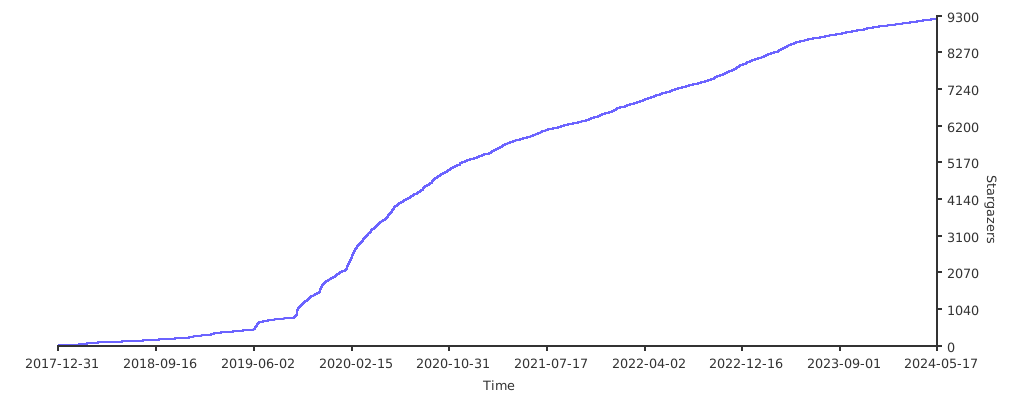](https://starchart.cc/wulabing/Xray_onekey)
================================================
FILE: README_FA.MD
================================================
## اسکریپت نصب Xray مبتنی بر Nginx برای ساختار VLESS + XTLS با یک کلیک <img src="https://raw.githubusercontent.com/wulabing/Xray_onekey/main/image/project_xray.jpg" alt="Project_Xray" width="122" height="30" align="bottom" />
> با تشکر از JetBrains برای مجوز توسعه نرم افزار منبع باز غیر تجاری!
>از مجوز توسعه منبع باز غیر تجاری توسط JetBrains سپاسگزاریم!
### با توجه به احتمال مسدود شدن xtls، پیشنهاد می شود از نسخه پیشین Nginx استفاده کنید
### گروه تلگرام
* گروه ارتباطی تلگرام: https://t.me/wulabing_v2ray
* کانال اطلاعیه آپدیت تلگرام:https://t.me/wulabing_channel
### آماده سازی
* یک نام دامنه آماده کنید و رکورد A را اضافه کنید
* نصب کردن wget
### مشخصات لینک وارد کردن
https://github.com/XTLS/Xray-core/issues/91
> As of 2021-2-24, only V2RayN 4.12+ and V2RayNG 1.5.8+ support link and QR code import. For other clients, please fill in the configuration information manually.
### روش نصب و بروزرسانی (Nginx front)
پیکربندی قابل پشتیبان
- VLESS + TCP + TLS + Nginx + WebSocket
```
wget -N --no-check-certificate -q -O install.sh "https://raw.githubusercontent.com/wulabing/Xray_onekey/nginx_forward/install.sh" && chmod +x install.sh && bash install.sh
```
### روش نصب و بروزرسانی (Xray front)
پیکربندی قابل پشتیبانی
- VLESS + TCP + XTLS / TLS + Nginx
- VLESS + TCP + XTLS / TLS + Nginx 及 VLESS + TCP + TLS + Nginx + WebSocket 回落并存模式
```
wget -N --no-check-certificate -q -O install.sh "https://raw.githubusercontent.com/wulabing/Xray_onekey/main/install.sh" && chmod +x install.sh && bash install.sh
```
### موارد احتیاط
* اگر معنای خاص هر یک از تنظیمات در اسکریپت را نمیدانید، به جز نام دامنه، لطفاً از مقدار پیشفرض ارائه شده توسط اسکریپت استفاده کنید.
* برای استفاده از این اسکریپت، باید پایه و تجربه لینوکس، مقداری دانش در مورد شبکه های کامپیوتری و عملیات اولیه کامپیوتر داشته باشید.
* در حال حاضر از Debian 9+ / Ubuntu 18.04+ / Centos7+ / Oracle Linux 7+ پشتیبانی می کند.
* مالک گروه فقط پشتیبانی بسیار محدودی را ارائه می دهد، اگر سؤالی دارید، می توانید از اعضای گروه بپرسید.
### با تشکر
* 本脚本中 README Project_Xray 项目图片由 Blitzcrank Telegram:@Blitz_crank 提供 在此感谢Blitzcrank
* 本脚本中 MTProxyTLS 基于 https://github.com/sunpma/mtp 二次修改 在此感谢 sunpma;
* 本脚本中 锐速 4 合 1 脚本原项目引用 https://www.94ish.me/1635.html 在此感谢;
* 本脚本中 锐速 4 合 1 脚本修改版项目引用 https://github.com/ylx2016/Linux-NetSpeed 在此感谢 ylx2016;
* 本脚本中 配置文件及部分逻辑参考 https://github.com/jiuqi9997/xray-yes 在此感谢 玖柒;
* 本脚本中 二维码 API 部分参考 https://github.com/mack-a/v2ray-agent 在此感谢 mack-a。
### روش شروع و توقف سرویس
start Xray:`systemctl start xray`
stop Xray:`systemctl stop xray`
start Nginx:`systemctl start nginx`
stop Nginx:`systemctl stop nginx`
### قسمت های که پروژه استفاده می کند
Web دایرکتوری:`/www/xray_web`
Xray پیکربندی سرور:`/usr/local/etc/xray/config.json`
Nginx دایرکتوری: `/etc/nginx`
certs: `/ssl/xray.key`(私钥)和 `/ssl/xray.crt`(证书公钥)
### حمایت کردن
با خرید vps
https://bandwagonhost.com/aff.php?aff=63939
با خرید پروکسی
https://justmysocks.net/members/aff.php?aff=17621
با خرید vps
https://www.dmit.io/aff.php?aff=3957
با ایجاد حساب در vultr
https://www.vultr.com/?ref=6881279
حمایت با رمزارز
TRC20:TFannfnajNGYsMTuVDcXfZXXPbcaxAEffa
## Stargazers over time
[](https://starchart.cc/wulabing/Xray_onekey)
================================================
FILE: basic/nginx.repo
================================================
[nginx-stable]
name=nginx stable repo
baseurl=http://nginx.org/packages/centos/$releasever/$basearch/
gpgcheck=1
enabled=1
gpgkey=https://nginx.org/keys/nginx_signing.key
module_hotfixes=true
================================================
FILE: config/web.conf
================================================
server
{
listen 80;
listen [::]:80;
server_name xxx;
return 301 https://$http_host$request_uri;
access_log /dev/null;
error_log /dev/null;
}
server
{
listen 127.0.0.1:60000 proxy_protocol;
listen 127.0.0.1:60001 http2 proxy_protocol;
server_name xxx;
index index.html index.htm index.php default.php default.htm default.html;
root /www/xray_web;
add_header Strict-Transport-Security "max-age=63072000" always;
location ~ .*\.(gif|jpg|jpeg|png|bmp|swf)$
{
expires 30d;
error_log off;
}
location ~ .*\.(js|css)?$
{
expires 12h;
error_log off;
}
}
================================================
FILE: config/xray_tls_ws_mix-rprx-vision.json
================================================
{
"log": {
"access": "/var/log/xray/access.log",
"error": "/var/log/xray/error.log",
"loglevel": "warning"
},
"inbounds": [
{
"port": 443,
"protocol": "vless",
"settings": {
"clients": [
{
"id": "xx",
"flow": "xtls-rprx-vision"
}
],
"decryption": "none",
"fallbacks": [
{
"dest": 60000,
"alpn": "",
"xver": 1
},
{
"dest": 60001,
"alpn": "h2",
"xver": 1
},
{
"dest": 60002,
"path": "/wulabing",
"xver": 1
}
]
},
"streamSettings": {
"network": "tcp",
"security": "tls",
"xtlsSettings": {
"minVersion": "1.2",
"certificates": [
{
"certificateFile": "/usr/local/etc/xray/self_signed_cert.pem",
"keyFile": "/usr/local/etc/xray/self_signed_key.pem"
},
{
"certificateFile": "/ssl/xray.crt",
"keyFile": "/ssl/xray.key"
}
]
}
},
"sniffing": {
"enabled": true,
"destOverride": [
"http",
"tls"
]
}
},
{
"port": 60002,
"listen": "127.0.0.1",
"protocol": "vless",
"settings": {
"clients": [
{
"id": "xx"
}
],
"decryption": "none"
},
"streamSettings": {
"network": "ws",
"security": "none",
"wsSettings": {
"acceptProxyProtocol": true,
"path": "xx"
}
}
}
],
"outbounds": [
{
"protocol": "freedom"
}
]
}
================================================
FILE: config/xray_xtls-rprx-vision.json
================================================
{
"log": {
"access": "/var/log/xray/access.log",
"error": "/var/log/xray/error.log",
"loglevel": "warning"
},
"inbounds": [
{
"port": 443,
"protocol": "vless",
"settings": {
"clients": [
{
"id": "xx",
"flow": "xtls-rprx-vision"
}
],
"decryption": "none",
"fallbacks": [
{
"dest": 60000,
"alpn": "",
"xver": 1
},
{
"dest": 60001,
"alpn": "h2",
"xver": 1
}
]
},
"streamSettings": {
"network": "tcp",
"security": "tls",
"xtlsSettings": {
"minVersion": "1.2",
"certificates": [
{
"certificateFile": "/usr/local/etc/xray/self_signed_cert.pem",
"keyFile": "/usr/local/etc/xray/self_signed_key.pem"
},
{
"certificateFile": "/ssl/xray.crt",
"keyFile": "/ssl/xray.key"
}
]
}
},
"sniffing": {
"enabled": true,
"destOverride": [
"http",
"tls"
]
}
}
],
"outbounds": [
{
"protocol": "freedom"
}
]
}
================================================
FILE: install.sh
================================================
#!/usr/bin/env bash
#====================================================
# System Request:Debian 9+/Ubuntu 18.04+/Centos 7+
# Author: wulabing
# Dscription: Xray onekey Management
# email: admin@wulabing.com
#====================================================
export PATH=/usr/local/sbin:/usr/local/bin:/usr/sbin:/usr/bin:/sbin:/bin
stty erase ^?
cd "$(
cd "$(dirname "$0")" || exit
pwd
)" || exit
# 字体颜色配置
Green="\033[32m"
Red="\033[31m"
Yellow="\033[33m"
Blue="\033[36m"
Font="\033[0m"
GreenBG="\033[42;37m"
RedBG="\033[41;37m"
OK="${Green}[OK]${Font}"
ERROR="${Red}[ERROR]${Font}"
# 变量
shell_version="1.3.11"
github_branch="main"
xray_conf_dir="/usr/local/etc/xray"
website_dir="/www/xray_web/"
xray_access_log="/var/log/xray/access.log"
xray_error_log="/var/log/xray/error.log"
cert_dir="/usr/local/etc/xray"
domain_tmp_dir="/usr/local/etc/xray"
cert_group="nobody"
random_num=$((RANDOM % 12 + 4))
VERSION=$(echo "${VERSION}" | awk -F "[()]" '{print $2}')
WS_PATH="/$(head -n 10 /dev/urandom | md5sum | head -c ${random_num})/"
function shell_mode_check() {
if [ -f ${xray_conf_dir}/config.json ]; then
if [ "$(grep -c "wsSettings" ${xray_conf_dir}/config.json)" -ge 1 ]; then
shell_mode="ws"
else
shell_mode="tcp"
fi
else
shell_mode="None"
fi
}
function print_ok() {
echo -e "${OK} ${Blue} $1 ${Font}"
}
function print_error() {
echo -e "${ERROR} ${RedBG} $1 ${Font}"
}
function is_root() {
if [[ 0 == "$UID" ]]; then
print_ok "当前用户是 root 用户,开始安装流程"
else
print_error "当前用户不是 root 用户,请切换到 root 用户后重新执行脚本"
exit 1
fi
}
judge() {
if [[ 0 -eq $? ]]; then
print_ok "$1 完成"
sleep 1
else
print_error "$1 失败"
exit 1
fi
}
function system_check() {
source '/etc/os-release'
if [[ "${ID}" == "centos" && ${VERSION_ID} -ge 7 ]]; then
print_ok "当前系统为 Centos ${VERSION_ID} ${VERSION}"
INS="yum install -y"
${INS} wget
wget -N -P /etc/yum.repos.d/ https://raw.githubusercontent.com/wulabing/Xray_onekey/${github_branch}/basic/nginx.repo
elif [[ "${ID}" == "ol" ]]; then
print_ok "当前系统为 Oracle Linux ${VERSION_ID} ${VERSION}"
INS="yum install -y"
wget -N -P /etc/yum.repos.d/ https://raw.githubusercontent.com/wulabing/Xray_onekey/${github_branch}/basic/nginx.repo
elif [[ "${ID}" == "debian" && ${VERSION_ID} -ge 9 ]]; then
print_ok "当前系统为 Debian ${VERSION_ID} ${VERSION}"
INS="apt install -y"
# 清除可能的遗留问题
rm -f /etc/apt/sources.list.d/nginx.list
# nginx 安装预处理
$INS curl gnupg2 ca-certificates lsb-release debian-archive-keyring
curl https://nginx.org/keys/nginx_signing.key | gpg --dearmor \
| tee /usr/share/keyrings/nginx-archive-keyring.gpg >/dev/null
echo "deb [signed-by=/usr/share/keyrings/nginx-archive-keyring.gpg] \
http://nginx.org/packages/debian `lsb_release -cs` nginx" \
| tee /etc/apt/sources.list.d/nginx.list
echo -e "Package: *\nPin: origin nginx.org\nPin: release o=nginx\nPin-Priority: 900\n" \
| tee /etc/apt/preferences.d/99nginx
apt update
elif [[ "${ID}" == "ubuntu" && $(echo "${VERSION_ID}" | cut -d '.' -f1) -ge 18 ]]; then
print_ok "当前系统为 Ubuntu ${VERSION_ID} ${UBUNTU_CODENAME}"
INS="apt install -y"
# 清除可能的遗留问题
rm -f /etc/apt/sources.list.d/nginx.list
# nginx 安装预处理
$INS curl gnupg2 ca-certificates lsb-release ubuntu-keyring
curl https://nginx.org/keys/nginx_signing.key | gpg --dearmor \
| tee /usr/share/keyrings/nginx-archive-keyring.gpg >/dev/null
echo "deb [signed-by=/usr/share/keyrings/nginx-archive-keyring.gpg] \
http://nginx.org/packages/ubuntu `lsb_release -cs` nginx" \
| tee /etc/apt/sources.list.d/nginx.list
echo -e "Package: *\nPin: origin nginx.org\nPin: release o=nginx\nPin-Priority: 900\n" \
| tee /etc/apt/preferences.d/99nginx
apt update
else
print_error "当前系统为 ${ID} ${VERSION_ID} 不在支持的系统列表内"
exit 1
fi
if [[ $(grep "nogroup" /etc/group) ]]; then
cert_group="nogroup"
fi
$INS dbus
# 关闭各类防火墙
systemctl stop firewalld
systemctl disable firewalld
systemctl stop nftables
systemctl disable nftables
systemctl stop ufw
systemctl disable ufw
}
function nginx_install() {
if ! command -v nginx >/dev/null 2>&1; then
${INS} nginx
judge "Nginx 安装"
else
print_ok "Nginx 已存在"
fi
# 遗留问题处理
mkdir -p /etc/nginx/conf.d >/dev/null 2>&1
}
function dependency_install() {
${INS} lsof tar
judge "安装 lsof tar"
if [[ "${ID}" == "centos" || "${ID}" == "ol" ]]; then
${INS} crontabs
else
${INS} cron
fi
judge "安装 crontab"
if [[ "${ID}" == "centos" || "${ID}" == "ol" ]]; then
touch /var/spool/cron/root && chmod 600 /var/spool/cron/root
systemctl start crond && systemctl enable crond
else
touch /var/spool/cron/crontabs/root && chmod 600 /var/spool/cron/crontabs/root
systemctl start cron && systemctl enable cron
fi
judge "crontab 自启动配置 "
${INS} unzip
judge "安装 unzip"
${INS} curl
judge "安装 curl"
# upgrade systemd
${INS} systemd
judge "安装/升级 systemd"
# Nginx 后置 无需编译 不再需要
# if [[ "${ID}" == "centos" || "${ID}" == "ol" ]]; then
# yum -y groupinstall "Development tools"
# else
# ${INS} build-essential
# fi
# judge "编译工具包 安装"
if [[ "${ID}" == "centos" ]]; then
${INS} pcre pcre-devel zlib-devel epel-release openssl openssl-devel
elif [[ "${ID}" == "ol" ]]; then
${INS} pcre pcre-devel zlib-devel openssl openssl-devel
# Oracle Linux 不同日期版本的 VERSION_ID 比较乱 直接暴力处理。如出现问题或有更好的方案,请提交 Issue。
yum-config-manager --enable ol7_developer_EPEL >/dev/null 2>&1
yum-config-manager --enable ol8_developer_EPEL >/dev/null 2>&1
else
${INS} libpcre3 libpcre3-dev zlib1g-dev openssl libssl-dev
fi
${INS} jq
if ! command -v jq; then
wget -P /usr/bin https://raw.githubusercontent.com/wulabing/Xray_onekey/${github_branch}/binary/jq && chmod +x /usr/bin/jq
judge "安装 jq"
fi
# 防止部分系统xray的默认bin目录缺失
mkdir /usr/local/bin >/dev/null 2>&1
}
function basic_optimization() {
# 最大文件打开数
sed -i '/^\*\ *soft\ *nofile\ *[[:digit:]]*/d' /etc/security/limits.conf
sed -i '/^\*\ *hard\ *nofile\ *[[:digit:]]*/d' /etc/security/limits.conf
echo '* soft nofile 65536' >>/etc/security/limits.conf
echo '* hard nofile 65536' >>/etc/security/limits.conf
# RedHat 系发行版关闭 SELinux
if [[ "${ID}" == "centos" || "${ID}" == "ol" ]]; then
sed -i 's/^SELINUX=.*/SELINUX=disabled/' /etc/selinux/config
setenforce 0
fi
}
function domain_check() {
read -rp "请输入你的域名信息(eg: www.wulabing.com):" domain
domain_ip=$(curl -sm8 ipget.net/?ip="${domain}")
print_ok "正在获取 IP 地址信息,请耐心等待"
wgcfv4_status=$(curl -s4m8 https://www.cloudflare.com/cdn-cgi/trace -k | grep warp | cut -d= -f2)
wgcfv6_status=$(curl -s6m8 https://www.cloudflare.com/cdn-cgi/trace -k | grep warp | cut -d= -f2)
if [[ ${wgcfv4_status} =~ "on"|"plus" ]] || [[ ${wgcfv6_status} =~ "on"|"plus" ]]; then
# 关闭wgcf-warp,以防误判VPS IP情况
wg-quick down wgcf >/dev/null 2>&1
print_ok "已关闭 wgcf-warp"
fi
local_ipv4=$(curl -4 ip.sb)
local_ipv6=$(curl -6 ip.sb)
if [[ -z ${local_ipv4} && -n ${local_ipv6} ]]; then
# 纯IPv6 VPS,自动添加DNS64服务器以备acme.sh申请证书使用
echo -e nameserver 2a01:4f8:c2c:123f::1 > /etc/resolv.conf
print_ok "识别为 IPv6 Only 的 VPS,自动添加 DNS64 服务器"
fi
echo -e "域名通过 DNS 解析的 IP 地址:${domain_ip}"
echo -e "本机公网 IPv4 地址: ${local_ipv4}"
echo -e "本机公网 IPv6 地址: ${local_ipv6}"
sleep 2
if [[ ${domain_ip} == "${local_ipv4}" ]]; then
print_ok "域名通过 DNS 解析的 IP 地址与 本机 IPv4 地址匹配"
sleep 2
elif [[ ${domain_ip} == "${local_ipv6}" ]]; then
print_ok "域名通过 DNS 解析的 IP 地址与 本机 IPv6 地址匹配"
sleep 2
else
print_error "请确保域名添加了正确的 A / AAAA 记录,否则将无法正常使用 xray"
print_error "域名通过 DNS 解析的 IP 地址与 本机 IPv4 / IPv6 地址不匹配,是否继续安装?(y/n)" && read -r install
case $install in
[yY][eE][sS] | [yY])
print_ok "继续安装"
sleep 2
;;
*)
print_error "安装终止"
exit 2
;;
esac
fi
}
function port_exist_check() {
if [[ 0 -eq $(lsof -i:"$1" | grep -i -c "listen") ]]; then
print_ok "$1 端口未被占用"
sleep 1
else
print_error "检测到 $1 端口被占用,以下为 $1 端口占用信息"
lsof -i:"$1"
print_error "5s 后将尝试自动 kill 占用进程"
sleep 5
lsof -i:"$1" | awk '{print $2}' | grep -v "PID" | xargs kill -9
print_ok "kill 完成"
sleep 1
fi
}
function update_sh() {
ol_version=$(curl -L -s https://raw.githubusercontent.com/wulabing/Xray_onekey/${github_branch}/install.sh | grep "shell_version=" | head -1 | awk -F '=|"' '{print $3}')
if [[ "$shell_version" != "$(echo -e "$shell_version\n$ol_version" | sort -rV | head -1)" ]]; then
print_ok "存在新版本,是否更新 [Y/N]?"
read -r update_confirm
case $update_confirm in
[yY][eE][sS] | [yY])
wget -N --no-check-certificate https://raw.githubusercontent.com/wulabing/Xray_onekey/${github_branch}/install.sh
print_ok "更新完成"
print_ok "您可以通过 bash $0 执行本程序"
exit 0
;;
*) ;;
esac
else
print_ok "当前版本为最新版本"
print_ok "您可以通过 bash $0 执行本程序"
fi
}
function xray_tmp_config_file_check_and_use() {
if [[ -s ${xray_conf_dir}/config_tmp.json ]]; then
mv -f ${xray_conf_dir}/config_tmp.json ${xray_conf_dir}/config.json
else
print_error "xray 配置文件修改异常"
fi
}
function modify_UUID() {
[ -z "$UUID" ] && UUID=$(cat /proc/sys/kernel/random/uuid)
cat ${xray_conf_dir}/config.json | jq 'setpath(["inbounds",0,"settings","clients",0,"id"];"'${UUID}'")' >${xray_conf_dir}/config_tmp.json
xray_tmp_config_file_check_and_use
judge "Xray TCP UUID 修改"
}
function modify_UUID_ws() {
cat ${xray_conf_dir}/config.json | jq 'setpath(["inbounds",1,"settings","clients",0,"id"];"'${UUID}'")' >${xray_conf_dir}/config_tmp.json
xray_tmp_config_file_check_and_use
judge "Xray ws UUID 修改"
}
function modify_fallback_ws() {
cat ${xray_conf_dir}/config.json | jq 'setpath(["inbounds",0,"settings","fallbacks",2,"path"];"'${WS_PATH}'")' >${xray_conf_dir}/config_tmp.json
xray_tmp_config_file_check_and_use
judge "Xray fallback_ws 修改"
}
function modify_ws() {
cat ${xray_conf_dir}/config.json | jq 'setpath(["inbounds",1,"streamSettings","wsSettings","path"];"'${WS_PATH}'")' >${xray_conf_dir}/config_tmp.json
xray_tmp_config_file_check_and_use
judge "Xray ws 修改"
}
function configure_nginx() {
nginx_conf="/etc/nginx/conf.d/${domain}.conf"
cd /etc/nginx/conf.d/ && rm -f ${domain}.conf && wget -O ${domain}.conf https://raw.githubusercontent.com/wulabing/Xray_onekey/${github_branch}/config/web.conf
sed -i "s/xxx/${domain}/g" ${nginx_conf}
judge "Nginx 配置 修改"
systemctl enable nginx
systemctl restart nginx
}
function modify_port() {
read -rp "请输入端口号(默认:443):" PORT
[ -z "$PORT" ] && PORT="443"
if [[ $PORT -le 0 ]] || [[ $PORT -gt 65535 ]]; then
print_error "请输入 0-65535 之间的值"
exit 1
fi
port_exist_check $PORT
cat ${xray_conf_dir}/config.json | jq 'setpath(["inbounds",0,"port"];'${PORT}')' >${xray_conf_dir}/config_tmp.json
xray_tmp_config_file_check_and_use
judge "Xray 端口 修改"
}
function configure_xray() {
cd /usr/local/etc/xray && rm -f config.json && wget -O config.json https://raw.githubusercontent.com/wulabing/Xray_onekey/${github_branch}/config/xray_xtls-rprx-vision.json
modify_UUID
modify_port
}
function configure_xray_ws() {
cd /usr/local/etc/xray && rm -f config.json && wget -O config.json https://raw.githubusercontent.com/wulabing/Xray_onekey/${github_branch}/config/xray_tls_ws_mix-rprx-vision.json
modify_UUID
modify_UUID_ws
modify_port
modify_fallback_ws
modify_ws
}
function xray_install() {
print_ok "安装 Xray"
curl -L https://github.com/XTLS/Xray-install/raw/main/install-release.sh | bash -s -- install
judge "Xray 安装"
# 用于生成 Xray 的导入链接
echo $domain >$domain_tmp_dir/domain
judge "域名记录"
}
function ssl_install() {
# 使用 Nginx 配合签发 无需安装相关依赖
# if [[ "${ID}" == "centos" || "${ID}" == "ol" ]]; then
# ${INS} socat nc
# else
# ${INS} socat netcat
# fi
# judge "安装 SSL 证书生成脚本依赖"
curl -L https://get.acme.sh | bash
judge "安装 SSL 证书生成脚本"
}
function acme() {
"$HOME"/.acme.sh/acme.sh --set-default-ca --server letsencrypt
sed -i "6s/^/#/" "$nginx_conf"
sed -i "6a\\\troot $website_dir;" "$nginx_conf"
systemctl restart nginx
if "$HOME"/.acme.sh/acme.sh --issue --insecure -d "${domain}" --webroot "$website_dir" -k ec-256 --force; then
print_ok "SSL 证书生成成功"
sleep 2
if "$HOME"/.acme.sh/acme.sh --installcert -d "${domain}" --fullchainpath /ssl/xray.crt --keypath /ssl/xray.key --reloadcmd "systemctl restart xray" --ecc --force; then
print_ok "SSL 证书配置成功"
sleep 2
if [[ -n $(type -P wgcf) && -n $(type -P wg-quick) ]]; then
wg-quick up wgcf >/dev/null 2>&1
print_ok "已启动 wgcf-warp"
fi
fi
elif "$HOME"/.acme.sh/acme.sh --issue --insecure -d "${domain}" --webroot "$website_dir" -k ec-256 --force --listen-v6; then
print_ok "SSL 证书生成成功"
sleep 2
if "$HOME"/.acme.sh/acme.sh --installcert -d "${domain}" --fullchainpath /ssl/xray.crt --keypath /ssl/xray.key --reloadcmd "systemctl restart xray" --ecc --force; then
print_ok "SSL 证书配置成功"
sleep 2
if [[ -n $(type -P wgcf) && -n $(type -P wg-quick) ]]; then
wg-quick up wgcf >/dev/null 2>&1
print_ok "已启动 wgcf-warp"
fi
fi
else
print_error "SSL 证书生成失败"
rm -rf "$HOME/.acme.sh/${domain}_ecc"
if [[ -n $(type -P wgcf) && -n $(type -P wg-quick) ]]; then
wg-quick up wgcf >/dev/null 2>&1
print_ok "已启动 wgcf-warp"
fi
exit 1
fi
sed -i "7d" "$nginx_conf"
sed -i "6s/#//" "$nginx_conf"
}
function ssl_judge_and_install() {
mkdir -p /ssl >/dev/null 2>&1
if [[ -f "/ssl/xray.key" || -f "/ssl/xray.crt" ]]; then
print_ok "/ssl 目录下证书文件已存在"
print_ok "是否删除 /ssl 目录下的证书文件 [Y/N]?"
read -r ssl_delete
case $ssl_delete in
[yY][eE][sS] | [yY])
rm -rf /ssl/*
print_ok "已删除"
;;
*) ;;
esac
fi
if [[ -f "/ssl/xray.key" || -f "/ssl/xray.crt" ]]; then
echo "证书文件已存在"
elif [[ -f "$HOME/.acme.sh/${domain}_ecc/${domain}.key" && -f "$HOME/.acme.sh/${domain}_ecc/${domain}.cer" ]]; then
echo "证书文件已存在"
"$HOME"/.acme.sh/acme.sh --installcert -d "${domain}" --fullchainpath /ssl/xray.crt --keypath /ssl/xray.key --ecc
judge "证书启用"
else
mkdir /ssl
cp -a $cert_dir/self_signed_cert.pem /ssl/xray.crt
cp -a $cert_dir/self_signed_key.pem /ssl/xray.key
ssl_install
acme
fi
# Xray 默认以 nobody 用户运行,证书权限适配
chown -R nobody.$cert_group /ssl/*
}
function generate_certificate() {
if [[ -z ${local_ipv4} && -n ${local_ipv6} ]]; then
signedcert=$(xray tls cert -domain="$local_ipv6" -name="$local_ipv6" -org="$local_ipv6" -expire=87600h)
else
signedcert=$(xray tls cert -domain="$local_ipv4" -name="$local_ipv4" -org="$local_ipv4" -expire=87600h)
fi
echo $signedcert | jq '.certificate[]' | sed 's/\"//g' | tee $cert_dir/self_signed_cert.pem
echo $signedcert | jq '.key[]' | sed 's/\"//g' >$cert_dir/self_signed_key.pem
openssl x509 -in $cert_dir/self_signed_cert.pem -noout || (print_error "生成自签名证书失败" && exit 1)
print_ok "生成自签名证书成功"
chown nobody.$cert_group $cert_dir/self_signed_cert.pem
chown nobody.$cert_group $cert_dir/self_signed_key.pem
}
function configure_web() {
rm -rf /www/xray_web
mkdir -p /www/xray_web
print_ok "是否配置伪装网页?[Y/N]"
read -r webpage
case $webpage in
[yY][eE][sS] | [yY])
wget -O web.tar.gz https://raw.githubusercontent.com/wulabing/Xray_onekey/main/basic/web.tar.gz
tar xzf web.tar.gz -C /www/xray_web
judge "站点伪装"
rm -f web.tar.gz
;;
*) ;;
esac
}
function xray_uninstall() {
curl -L https://github.com/XTLS/Xray-install/raw/main/install-release.sh | bash -s -- remove --purge
rm -rf $website_dir
print_ok "是否卸载nginx [Y/N]?"
read -r uninstall_nginx
case $uninstall_nginx in
[yY][eE][sS] | [yY])
if [[ "${ID}" == "centos" || "${ID}" == "ol" ]]; then
yum remove nginx -y
else
apt purge nginx -y
fi
;;
*) ;;
esac
print_ok "是否卸载acme.sh [Y/N]?"
read -r uninstall_acme
case $uninstall_acme in
[yY][eE][sS] | [yY])
"$HOME"/.acme.sh/acme.sh --uninstall
rm -rf /root/.acme.sh
rm -rf /ssl/
;;
*) ;;
esac
print_ok "卸载完成"
exit 0
}
function restart_all() {
systemctl restart nginx
judge "Nginx 启动"
systemctl restart xray
judge "Xray 启动"
}
function vless_xtls-rprx-vision_link() {
UUID=$(cat ${xray_conf_dir}/config.json | jq .inbounds[0].settings.clients[0].id | tr -d '"')
PORT=$(cat ${xray_conf_dir}/config.json | jq .inbounds[0].port)
FLOW=$(cat ${xray_conf_dir}/config.json | jq .inbounds[0].settings.clients[0].flow | tr -d '"')
DOMAIN=$(cat ${domain_tmp_dir}/domain)
print_ok "URL 链接 (VLESS + TCP + TLS)"
print_ok "vless://$UUID@$DOMAIN:$PORT?security=tls&flow=$FLOW#TLS_wulabing-$DOMAIN"
print_ok "URL 链接 (VLESS + TCP + XTLS)"
print_ok "vless://$UUID@$DOMAIN:$PORT?security=xtls&flow=$FLOW#XTLS_wulabing-$DOMAIN"
print_ok "-------------------------------------------------"
print_ok "URL 二维码 (VLESS + TCP + TLS) (请在浏览器中访问)"
print_ok "https://api.qrserver.com/v1/create-qr-code/?size=400x400&data=vless://$UUID@$DOMAIN:$PORT?security=tls%26flow=$FLOW%23TLS_wulabing-$DOMAIN"
print_ok "URL 二维码 (VLESS + TCP + XTLS) (请在浏览器中访问)"
print_ok "https://api.qrserver.com/v1/create-qr-code/?size=400x400&data=vless://$UUID@$DOMAIN:$PORT?security=xtls%26flow=$FLOW%23XTLS_wulabing-$DOMAIN"
}
function vless_xtls-rprx-vision_information() {
UUID=$(cat ${xray_conf_dir}/config.json | jq .inbounds[0].settings.clients[0].id | tr -d '"')
PORT=$(cat ${xray_conf_dir}/config.json | jq .inbounds[0].port)
FLOW=$(cat ${xray_conf_dir}/config.json | jq .inbounds[0].settings.clients[0].flow | tr -d '"')
DOMAIN=$(cat ${domain_tmp_dir}/domain)
echo -e "${Red} Xray 配置信息 ${Font}"
echo -e "${Red} 地址(address):${Font} $DOMAIN"
echo -e "${Red} 端口(port):${Font} $PORT"
echo -e "${Red} 用户 ID(UUID):${Font} $UUID"
echo -e "${Red} 流控(flow):${Font} $FLOW"
echo -e "${Red} 加密方式(security):${Font} none "
echo -e "${Red} 传输协议(network):${Font} tcp "
echo -e "${Red} 伪装类型(type):${Font} none "
echo -e "${Red} 底层传输安全:${Font} xtls 或 tls"
}
function ws_information() {
UUID=$(cat ${xray_conf_dir}/config.json | jq .inbounds[0].settings.clients[0].id | tr -d '"')
PORT=$(cat ${xray_conf_dir}/config.json | jq .inbounds[0].port)
FLOW=$(cat ${xray_conf_dir}/config.json | jq .inbounds[0].settings.clients[0].flow | tr -d '"')
WS_PATH=$(cat ${xray_conf_dir}/config.json | jq .inbounds[0].settings.fallbacks[2].path | tr -d '"')
DOMAIN=$(cat ${domain_tmp_dir}/domain)
echo -e "${Red} Xray 配置信息 ${Font}"
echo -e "${Red} 地址(address):${Font} $DOMAIN"
echo -e "${Red} 端口(port):${Font} $PORT"
echo -e "${Red} 用户 ID(UUID):${Font} $UUID"
echo -e "${Red} 加密方式(security):${Font} none "
echo -e "${Red} 传输协议(network):${Font} ws "
echo -e "${Red} 伪装类型(type):${Font} none "
echo -e "${Red} 路径(path):${Font} $WS_PATH "
echo -e "${Red} 底层传输安全:${Font} tls "
}
function ws_link() {
UUID=$(cat ${xray_conf_dir}/config.json | jq .inbounds[0].settings.clients[0].id | tr -d '"')
PORT=$(cat ${xray_conf_dir}/config.json | jq .inbounds[0].port)
FLOW=$(cat ${xray_conf_dir}/config.json | jq .inbounds[0].settings.clients[0].flow | tr -d '"')
WS_PATH=$(cat ${xray_conf_dir}/config.json | jq .inbounds[0].settings.fallbacks[2].path | tr -d '"')
WS_PATH_WITHOUT_SLASH=$(echo $WS_PATH | tr -d '/')
DOMAIN=$(cat ${domain_tmp_dir}/domain)
print_ok "URL 链接 (VLESS + TCP + TLS)"
print_ok "vless://$UUID@$DOMAIN:$PORT?security=tls#TLS_wulabing-$DOMAIN"
print_ok "URL 链接 (VLESS + TCP + XTLS)"
print_ok "vless://$UUID@$DOMAIN:$PORT?security=xtls&flow=$FLOW#XTLS_wulabing-$DOMAIN"
print_ok "URL 链接 (VLESS + WebSocket + TLS)"
print_ok "vless://$UUID@$DOMAIN:$PORT?type=ws&security=tls&path=%2f${WS_PATH_WITHOUT_SLASH}%2f#WS_TLS_wulabing-$DOMAIN"
print_ok "-------------------------------------------------"
print_ok "URL 二维码 (VLESS + TCP + TLS) (请在浏览器中访问)"
print_ok "https://api.qrserver.com/v1/create-qr-code/?size=400x400&data=vless://$UUID@$DOMAIN:$PORT?security=tls%23TLS_wulabing-$DOMAIN"
print_ok "URL 二维码 (VLESS + TCP + XTLS) (请在浏览器中访问)"
print_ok "https://api.qrserver.com/v1/create-qr-code/?size=400x400&data=vless://$UUID@$DOMAIN:$PORT?security=xtls%26flow=$FLOW%23XTLS_wulabing-$DOMAIN"
print_ok "URL 二维码 (VLESS + WebSocket + TLS) (请在浏览器中访问)"
print_ok "https://api.qrserver.com/v1/create-qr-code/?size=400x400&data=vless://$UUID@$DOMAIN:$PORT?type=ws%26security=tls%26path=%2f${WS_PATH_WITHOUT_SLASH}%2f%23WS_TLS_wulabing-$DOMAIN"
}
function basic_information() {
print_ok "VLESS+TCP+XTLS+Nginx 安装成功"
vless_xtls-rprx-vision_information
vless_xtls-rprx-vision_link
}
function basic_ws_information() {
print_ok "VLESS+TCP+TLS+Nginx with WebSocket 混合模式 安装成功"
ws_information
print_ok "————————————————————————"
vless_xtls-rprx-vision_information
ws_link
}
function show_access_log() {
[ -f ${xray_access_log} ] && tail -f ${xray_access_log} || echo -e "${RedBG}log 文件不存在${Font}"
}
function show_error_log() {
[ -f ${xray_error_log} ] && tail -f ${xray_error_log} || echo -e "${RedBG}log 文件不存在${Font}"
}
function bbr_boost_sh() {
[ -f "tcp.sh" ] && rm -rf ./tcp.sh
wget -N --no-check-certificate "https://raw.githubusercontent.com/ylx2016/Linux-NetSpeed/master/tcp.sh" && chmod +x tcp.sh && ./tcp.sh
}
function mtproxy_sh() {
wget -N --no-check-certificate "https://github.com/wulabing/mtp/raw/master/mtproxy.sh" && chmod +x mtproxy.sh && bash mtproxy.sh
}
function install_xray() {
is_root
system_check
dependency_install
basic_optimization
domain_check
port_exist_check 80
xray_install
configure_xray
nginx_install
configure_nginx
configure_web
generate_certificate
ssl_judge_and_install
restart_all
basic_information
}
function install_xray_ws() {
is_root
system_check
dependency_install
basic_optimization
domain_check
port_exist_check 80
xray_install
configure_xray_ws
nginx_install
configure_nginx
configure_web
generate_certificate
ssl_judge_and_install
restart_all
basic_ws_information
}
menu() {
update_sh
shell_mode_check
echo -e "\t Xray 安装管理脚本 ${Red}[${shell_version}]${Font}"
echo -e "\t---authored by wulabing---"
echo -e "\thttps://github.com/wulabing\n"
echo -e "当前已安装版本:${shell_mode}"
echo -e "—————————————— 安装向导 ——————————————"""
echo -e "${Green}0.${Font} 升级 脚本"
echo -e "${Green}1.${Font} 安装 Xray (VLESS + TCP + XTLS / TLS + Nginx)"
echo -e "${Green}2.${Font} 安装 Xray (VLESS + TCP + XTLS / TLS + Nginx 及 VLESS + TCP + TLS + Nginx + WebSocket 回落并存模式)"
echo -e "—————————————— 配置变更 ——————————————"
echo -e "${Green}11.${Font} 变更 UUID"
echo -e "${Green}13.${Font} 变更 连接端口"
echo -e "${Green}14.${Font} 变更 WebSocket PATH"
echo -e "—————————————— 查看信息 ——————————————"
echo -e "${Green}21.${Font} 查看 实时访问日志"
echo -e "${Green}22.${Font} 查看 实时错误日志"
echo -e "${Green}23.${Font} 查看 Xray 配置链接"
# echo -e "${Green}23.${Font} 查看 V2Ray 配置信息"
echo -e "—————————————— 其他选项 ——————————————"
echo -e "${Green}31.${Font} 安装 4 合 1 BBR、锐速安装脚本"
echo -e "${Yellow}32.${Font} 安装 MTproxy (不推荐使用,请相关用户关闭或卸载)"
echo -e "${Green}33.${Font} 卸载 Xray"
echo -e "${Green}34.${Font} 更新 Xray-core"
echo -e "${Green}35.${Font} 安装 Xray-core 测试版 (Pre)"
echo -e "${Green}36.${Font} 手动更新 SSL 证书"
echo -e "${Green}40.${Font} 退出"
read -rp "请输入数字:" menu_num
case $menu_num in
0)
update_sh
;;
1)
install_xray
;;
2)
install_xray_ws
;;
11)
read -rp "请输入 UUID:" UUID
if [[ ${shell_mode} == "tcp" ]]; then
modify_UUID
elif [[ ${shell_mode} == "ws" ]]; then
modify_UUID
modify_UUID_ws
fi
restart_all
;;
13)
modify_port
restart_all
;;
14)
if [[ ${shell_mode} == "ws" ]]; then
read -rp "请输入路径(示例:/wulabing/ 要求两侧都包含 /):" WS_PATH
modify_fallback_ws
modify_ws
restart_all
else
print_error "当前模式不是 Websocket 模式"
fi
;;
21)
tail -f $xray_access_log
;;
22)
tail -f $xray_error_log
;;
23)
if [[ -f $xray_conf_dir/config.json ]]; then
if [[ ${shell_mode} == "tcp" ]]; then
basic_information
elif [[ ${shell_mode} == "ws" ]]; then
basic_ws_information
fi
else
print_error "xray 配置文件不存在"
fi
;;
31)
bbr_boost_sh
;;
32)
mtproxy_sh
;;
33)
source '/etc/os-release'
xray_uninstall
;;
34)
bash -c "$(curl -L https://github.com/XTLS/Xray-install/raw/main/install-release.sh)" - install
restart_all
;;
35)
bash -c "$(curl -L https://github.com/XTLS/Xray-install/raw/main/install-release.sh)" - install --beta
restart_all
;;
36)
"/root/.acme.sh"/acme.sh --cron --home "/root/.acme.sh"
restart_all
;;
40)
exit 0
;;
*)
print_error "请输入正确的数字"
;;
esac
}
menu "$@"
================================================
FILE: ss_whitelist/README.md
================================================
## ss-openresty 白名单
> 请注意该内容依然属于测试内容,相关的技术框架已经全部说明,具体内容可以查阅相关文档
这是一个 ss 的基于 openresty(nginx) 的白名单实现
* 使用 `docker-compose` 启动
* 利用 `ngx_http_auth_basic_module` 进行访问验证
* 利用 `ngx_http_access_module` 实现IP白名单控制
* 利用 `ngx_stream_proxy_module` 实现四层反向代理
* 利用 `lua` 进行配置调整及应用
通过浏览器访问代理的IP地址,并通过用户名密码验证,即可添加当前访问IP至白名单
不需要签发证书,ss 使用 `ss-libev` 版本
无教程,具体需要的内容可以查看 docker-compose.yml 中的 volume 部分,包括 nginx 配置文件,模板也在 ss_whitelist 文件夹中,在对应文件夹需要创建一个 allow.list 空文件
## 优势
* 不再需要 tls / tls 隧道,TCP直连。
* 没有签发证书的繁琐流程
* 应该大概也许可能 能够最大程度上保证 端口/IP 不被封禁
## 原理
目前对 ss 类协议的主要探测方式为大量IP进行主动探测,并对端口进行封禁
经过 **少量** 测试发现,使用白名单限制ss端口访问来源可以很大程度上规避端口封禁
> 我们相信防火墙可以通过伪造来源IP的方式来访问服务端,并进行重放攻击,ss-AEAD 本身的抗重放应该足以应对这种情况
大部分代理使用场景都是在固定场所,在一定时间内有相对固定的 IP,因此在大部分情况下,通过白名单限制访问 ss 的 IP 来源方式相对可行
## 使用方法
* 访问 IP/auth (eg: http://1.1.1.1/auth) 输入鉴权信息,添加当前 IP 地址进入白名单
* 访问 /purge 清空白名单信息
* 务必将 allow.list 的权限设置为 666 及以上
* 适配 ARM 架构机器,可以在 Oracle ARM 上使用
================================================
FILE: ss_whitelist/compose.yaml
================================================
services:
ipv6nat:
image: robbertkl/ipv6nat
container_name: ipv6nat
restart: unless-stopped
network_mode: host
privileged: true
volumes:
- /var/run/docker.sock:/var/run/docker.sock:ro
- /lib/modules:/lib/modules:ro
shadowsocks:
image: shadowsocks/shadowsocks-libev:edge
expose:
- 8388
- 8388/udp
environment:
- METHOD=chacha20-ietf-poly1305
- PASSWORD=replace with your password,Better to replace with UUID,no quote!!
- DNS_ADDRS=8.8.8.8,1.1.1.1 # for ipv4
# - DNS_ADDRS=2001:4860:4860::8888,2001:4860:4860::8844 # for ipv6
# - ARGS= -s ::0 #for ipv6
restart: always
networks:
- backend
depends_on:
- ipv6nat
openresty:
image: openresty/openresty:alpine
ports:
- "80:80"
- "443:443"
- "7777:7777"
- "7777:7777/udp"
volumes:
- ./nginx.conf:/usr/local/openresty/nginx/conf/nginx.conf
- ./allow.list:/usr/local/openresty/nginx/conf/allow.list
- ./auth:/etc/openresty/auth
restart: always
networks:
- backend
depends_on:
- ipv6nat
- shadowsocks
networks:
backend:
enable_ipv6: true
driver: bridge
ipam:
driver: default
config:
- subnet: fd00:cafe:face::/48
================================================
FILE: ss_whitelist/nginx.conf
================================================
user root;
# This number should be, at maximum, the number of CPU cores on your system.
worker_processes auto;
worker_rlimit_nofile 655350;
pcre_jit on;
#error_log logs/error.log;
pid logs/nginx.pid;
events {
use epoll;
worker_connections 60000;
multi_accept on;
}
stream {
preread_timeout 120s;
proxy_connect_timeout 30s;
proxy_protocol_timeout 30s;
proxy_buffer_size 64k;
proxy_timeout 120s;
tcp_nodelay on;
proxy_next_upstream on;
proxy_socket_keepalive on;
log_format proxy '$remote_addr [$time_local] '
'$protocol $status $bytes_sent $bytes_received '
'$session_time "$upstream_addr" "$upstream_bytes_sent"'
'"$upstream_bytes_received" "$upstream_connect_time"';
upstream ss {
server shadowsocks:8388;
}
server {
listen 7777;
# listen 7777 udp;
listen [::]:7777 ipv6only=on;
# listen [::]:7777 udp ipv6only=on;
include allow.list;
deny all;
proxy_pass ss;
}
}
http {
include mime.types;
default_type application/octet-stream;
reset_timedout_connection on;
client_header_timeout 15;
client_body_timeout 10;
send_timeout 15;
keepalive_timeout 30;
keepalive_requests 30;
log_format main '$remote_addr - $remote_user [$time_local] "$request" '
'$status $body_bytes_sent "$http_referer" '
'"$http_user_agent" "$http_x_forwarded_for"';
client_body_buffer_size 128k;
client_max_body_size 10m;
proxy_read_timeout 180s;
gzip on;
gzip_min_length 10240;
gzip_proxied expired no-cache no-store private auth;
gzip_types text/plain text/css text/xml text/javascript application/x-javascript application/xml;
gzip_disable "msie6";
sendfile on;
tcp_nodelay on;
tcp_nopush on;
server_tokens off;
error_page 404 /404.html;
error_page 500 502 503 504 /50x.html;
server{
listen 80;
listen [::]:80 ipv6only=on;
charset utf-8;
charset_types text/xml application/json;
location / {
default_type "application/json";
return 401 '{"code":401,"status":"Unauthorized","server":"openresty","info":"Please log in again or clear cookies."}';
access_log off;
}
location = /auth {
default_type "application/json";
auth_basic "Please enter your username and password";
auth_basic_user_file /etc/openresty/auth;
proxy_set_header X-Real-IP $remote_addr;
proxy_set_header X-Forwarded-For $proxy_add_x_forwarded_for;
content_by_lua_block {
clientIP=ngx.var.remote_addr
headers=ngx.req.get_headers()
file = io.open("/usr/local/openresty/nginx/conf/allow.list","a+")
io.input(file)
io.output(file)
for line in file:lines() do
if string.find(line,clientIP) then
m = string.find(line,clientIP)
ngx.status = 202
ngx.print('{"code":202,"status":"Accepted","ip":"'..clientIP..'","server":"openresty","info":"Current IP already exists, no operation."}')
ngx.exit(202)
for k, v in pairs(headers) do
ngx.print(k..":"..v.."\n")
end
end
end
if m == nil then
io.write("allow "..clientIP..";\n")
ngx.print('{"code":200,"status":"OK","ip":"'..clientIP..'","server":"openresty","info":"Current IP added to whitelist."}')
end
io.close(file)
os.execute("/usr/local/openresty/nginx/sbin/nginx -s reload")
}
}
location = /purge {
default_type 'application/json';
auth_basic "Please enter your username and password";
auth_basic_user_file /etc/openresty/auth;
content_by_lua_block {
file = io.open("/usr/local/openresty/nginx/conf/allow.list","w+")
ngx.print('{"code":200,"status":"OK","server":"openresty","info":"IP list has been cleared."}')
io.close(file)
os.execute("/usr/local/openresty/nginx/sbin/nginx -s reload")
}
}
}
}
gitextract_amk7dkqt/
├── .github/
│ ├── FUNDING.yml
│ └── ISSUE_TEMPLATE/
│ └── bug_report.md
├── LICENSE
├── README.MD
├── README_FA.MD
├── basic/
│ └── nginx.repo
├── binary/
│ └── jq
├── config/
│ ├── web.conf
│ ├── xray_tls_ws_mix-rprx-vision.json
│ └── xray_xtls-rprx-vision.json
├── install.sh
└── ss_whitelist/
├── README.md
├── compose.yaml
└── nginx.conf
Condensed preview — 14 files, each showing path, character count, and a content snippet. Download the .json file or copy for the full structured content (47K chars).
[
  {
    "path": ".github/FUNDING.yml",
    "chars": 18,
    "preview": "github: [wulabing]"
  },
  {
    "path": ".github/ISSUE_TEMPLATE/bug_report.md",
    "chars": 1076,
    "preview": "---\nname: Bug Report\nabout: 使用这个模板来反馈 BUG\ntitle: \"[BUG]\"\nlabels: ''\nassignees: ''\n\n---\n\n感谢你向 Xray_onekey 提交 issue!\n\n<!--"
  },
  {
    "path": "LICENSE",
    "chars": 1065,
    "preview": "MIT License\n\nCopyright (c) 2022 wulabing\n\nPermission is hereby granted, free of charge, to any person obtaining a copy\no"
  },
  {
    "path": "README.MD",
    "chars": 2706,
    "preview": "\n## Xray 基于 Nginx 的 VLESS + XTLS 一键安装脚本 <img src=\"https://raw.githubusercontent.com/wulabing/Xray_onekey/main/image/proj"
  },
  {
    "path": "README_FA.MD",
    "chars": 3290,
    "preview": "\n## اسکریپت نصب Xray مبتنی بر Nginx برای ساختار VLESS + XTLS با یک کلیک <img src=\"https://raw.githubusercontent.com/wula"
  },
  {
    "path": "basic/nginx.repo",
    "chars": 191,
    "preview": "[nginx-stable]\nname=nginx stable repo\nbaseurl=http://nginx.org/packages/centos/$releasever/$basearch/\ngpgcheck=1\nenabled"
  },
  {
    "path": "config/web.conf",
    "chars": 763,
    "preview": "server\n{\n        listen 80;\n        listen [::]:80;\n        server_name xxx;\n        return 301 https://$http_host$reque"
  },
  {
    "path": "config/xray_tls_ws_mix-rprx-vision.json",
    "chars": 1835,
    "preview": "{\n  \"log\": {\n    \"access\": \"/var/log/xray/access.log\",\n    \"error\": \"/var/log/xray/error.log\",\n    \"loglevel\": \"warning\""
  },
  {
    "path": "config/xray_xtls-rprx-vision.json",
    "chars": 1285,
    "preview": "{\n  \"log\": {\n    \"access\": \"/var/log/xray/access.log\",\n    \"error\": \"/var/log/xray/error.log\",\n    \"loglevel\": \"warning\""
  },
  {
    "path": "install.sh",
    "chars": 25018,
    "preview": "#!/usr/bin/env bash\n\n#====================================================\n#\tSystem Request:Debian 9+/Ubuntu 18.04+/Cent"
  },
  {
    "path": "ss_whitelist/README.md",
    "chars": 915,
    "preview": "## ss-openresty 白名单\n\n> 请注意该内容依然属于测试内容,相关的技术框架已经全部说明,具体内容可以查阅相关文档\n\n这是一个 ss 的基于 openresty(nginx) 的白名单实现\n* 使用 `docker-compo"
  },
  {
    "path": "ss_whitelist/compose.yaml",
    "chars": 1297,
    "preview": "services:\n  ipv6nat:\n    image: robbertkl/ipv6nat\n    container_name: ipv6nat\n    restart: unless-stopped\n    network_mo"
  },
  {
    "path": "ss_whitelist/nginx.conf",
    "chars": 4563,
    "preview": "user  root;\n# This number should be, at maximum, the number of CPU cores on your system.\nworker_processes auto;\nworker_r"
  }
]

// ... and 1 more files (download for full content)
About this extraction
This page contains the full source code of the wulabing/Xray_onekey GitHub repository, extracted and formatted as plain text for AI agents and large language models (LLMs). The extraction includes 14 files (43.0 KB), approximately 15.1k tokens. Use this with OpenClaw, Claude, ChatGPT, Cursor, Windsurf, or any other AI tool that accepts text input. You can copy the full output to your clipboard or download it as a .txt file.
Extracted by GitExtract — free GitHub repo to text converter for AI. Built by Nikandr Surkov.