Repository: xero/glitchlock
Branch: master
Commit: 3ea6af7a7640
Files: 2
Total size: 4.7 KB
Directory structure:
gitextract_31ryorvm/

├── README.md
└── glitchlock
================================================
FILE CONTENTS
================================================
================================================
FILE: README.md
================================================
```
┏━┓┳ o┏┓┓┏━┓┳ ┳┳ ┏━┓┏━┓┳┏
┃ ┳┃ ┃ ┃ ┃ ┃━┫┃ ┃ ┃┃ ┣┻┓
┇━┛┇━┛┇ ┇ ┗━┛┇ ┻┇━┛┛━┛┗━┛┇ ┛
```
glitchlock: a glitch art themed randomized lockscreen. powered by i3lock-color.
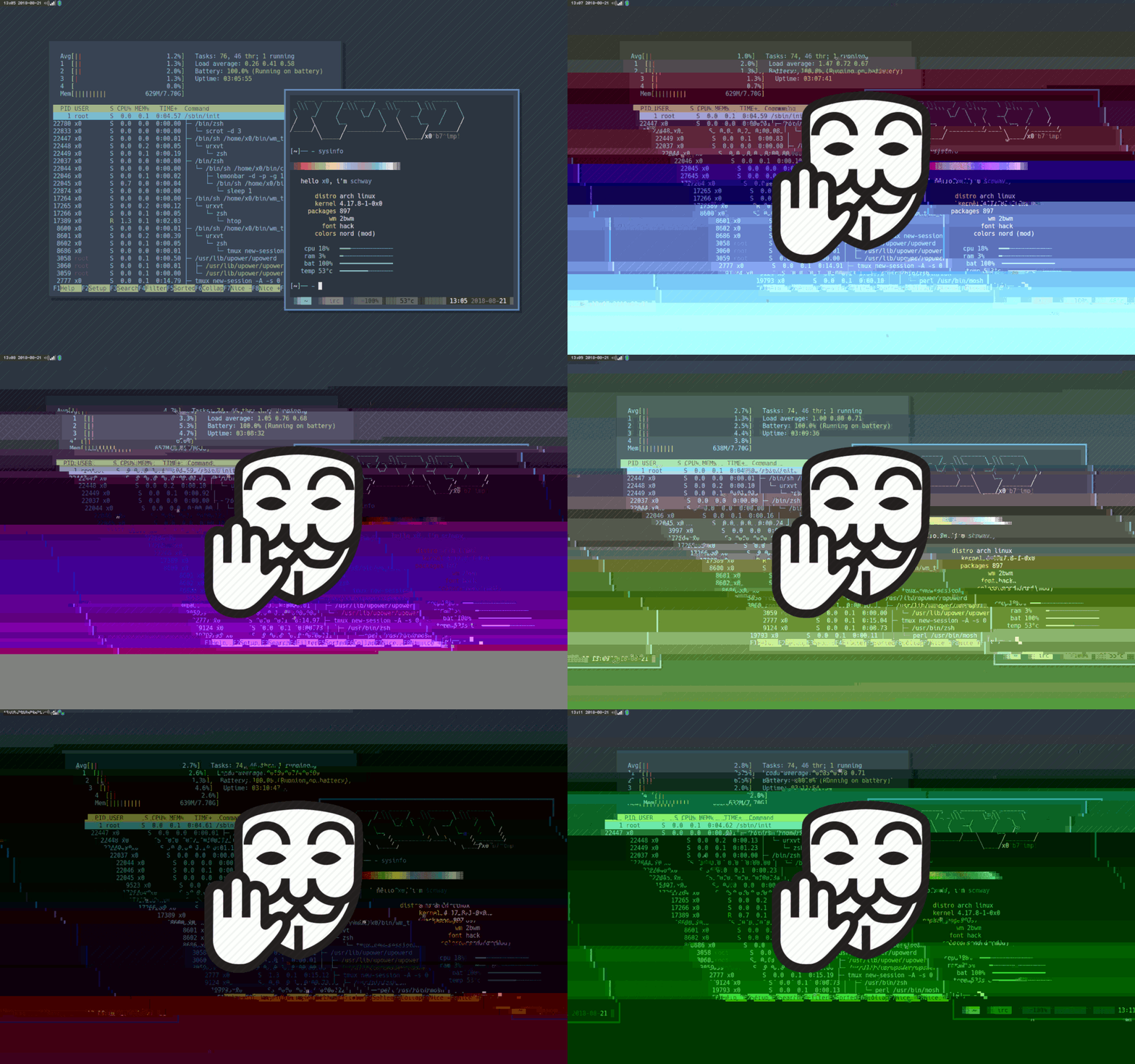
(note, the lock screen is **NOT** animated. this gif is meant to showcase it's random output)
## table of contents
* [about](#about)
* [how it works](#how-it-works)
* [security](#security)
* [requirements](#requirements)
* [customize](#customize)
* [more](#more)
* [license](#license)
### about
i do [glitch art](https://lab.x-e.ro/glitches) for fun. i was messing around w/ one of my shell scripts and thought: this would make a cool lockscreen! after a bit of research and refactoring here we are.
### how it works
the script takes a screenshot, corrupts it, then optionally overlays an image (one for each display) then uses that image as the background for the lockscreen.
### security
this lockscreen has the potential for information leakage, since it uses a screenshot of your active screen. i made this for fun and personal use, please take care and weigh your opsec and personal threat model before deciding to use this.
an example workaround would be setting up your screen very nicely w/o any secret info in it and taking a screenshot. then replace [line #9](https://github.com/xero/glitchlock/blob/master/glitchlock#L9) in the script (`scrot /tmp/lock.png`) with a command to {move,copy} your pre-setup screenshot into place (e.g. `cp ~/lib/img/lock.png /tmp/lock.png`) then let the script randomly glitch that image out everytime.
### requirements
* i3lock-color
* the "ricing" fork of the lockscreen application
* https://github.com/PandorasFox/i3lock-color
* scrot
* the premiere nix screen shot tool
* https://github.com/dreamer/scrot
* imagemagick
* image manipulation toolkit
* https://github.com/ImageMagick/ImageMagick
if you're using [arch](https://www.archlinux.org) they can all be installed from the extra, community, and aur repos:
`yay -S i3lock-color-git scrot imagemagick`
\* [yay](https://github.com/Jguer/yay) is an aur helper that wraps [pacman](https://www.archlinux.org/pacman/).
### customize
if called alone, the script will take a screenshot and glitch it. but you can optionally pass an environment variable named `GLITCHICON` to the app and it will center that image on each display and overlay it on the glitched image.
an example of calling the script on `MOD4+ESC` using [sxhkd](https://github.com/baskerville/sxhkd)
```
# lockscreen
mod4 + Escape
GLITCHICON=~/src/glitchlock/stop.png ~/bin/glitchlock
```
### more
* https://0w.nz
* https://x-e.ro
* https://nixers.net
* https://git.io/.files
* https://reddit.com/r/unixporn
## license

[kopimi](https://kopimi.com)! in the spirit of _freedom of information_, i encourage you to fork, modify, change, share, or do whatever you like with this project! `^c^v`
================================================
FILE: glitchlock
================================================
#!/bin/bash
# ┏━┓┳ o┏┓┓┏━┓┳ ┳┳ ┏━┓┏━┓┳┏
# ┃ ┳┃ ┃ ┃ ┃ ┃━┫┃ ┃ ┃┃ ┣┻┓
# ┇━┛┇━┛┇ ┇ ┗━┛┇ ┻┇━┛┛━┛┗━┛┇ ┛
#
# author: xero <x@xero.nu> http://xero.nu
# requires: i3lock-color, imagemagick, scrot
scrot /tmp/lock.png
magick /tmp/lock.png /tmp/lock.jpg
file=/tmp/lock.jpg
function datamosh() {
fileSize=$(wc -c < "$file")
headerSize=1000
skip=$(shuf -i "$headerSize"-"$fileSize" -n 1)
count=$(shuf -i 1-10 -n 1)
for i in $(seq 1 $count);do byteStr=$byteStr'\x'$(shuf -i 0-255 -n 1); done;
printf $byteStr | dd of="$file" bs=1 seek=$skip count=$count conv=notrunc >/dev/null 2>&1
}
steps=$(shuf -i 40-70 -n 1)
for i in $(seq 1 $steps);do datamosh "$file"; done
GLITCHICON=${GLITCHICON:=""}
PARAM=(--bar-indicator --bar-orientation horizontal --bar-direction 1 --redraw-thread -t "" \
--bar-step 50 --bar-total-width 250 --bar-base-width 50 --bar-max-height 100 --bar-periodic-step 50 \
--bar-color 00000077 --keyhl-color 00666666 --ringver-color cc87875f --wrong-color ffff0000 \
--verif-text="" --wrong-text="" --noinput-text="" )
LOCK=()
while read LINE
do
if [[ "$LINE" =~ ([0-9]+)x([0-9]+)\+([0-9]+)\+([0-9]+) ]]; then
W=${BASH_REMATCH[1]}
H=${BASH_REMATCH[2]}
Xoff=${BASH_REMATCH[3]}
Yoff=${BASH_REMATCH[4]}
if [ ! -z "$GLITCHICON" ]; then
IW=`identify -ping -format '%w' $GLITCHICON`
IH=`identify -ping -format '%h' $GLITCHICON`
MIDXi=$(($W / 2 + $Xoff - $IW / 2))
MIDYi=$(($H / 2 + $Yoff - $IH / 2))
LOCK+=($GLITCHICON -geometry +$MIDXi+$MIDYi -composite)
fi
fi
done <<<"$(xrandr)"
magick /tmp/lock.jpg /tmp/lock.png >/dev/null 2>&1
rm /tmp/lock.jpg
file=/tmp/lock.png
magick "$file" "${LOCK[@]}" "$file"
i3lock -n "${PARAM[@]}" -i "$file" > /dev/null 2>&1
gitextract_31ryorvm/ ├── README.md └── glitchlock
Condensed preview — 2 files, each showing path, character count, and a content snippet. Download the .json file or copy for the full structured content (5K chars).
[
  {
    "path": "README.md",
    "chars": 3100,
    "preview": "```\n ┏━┓┳  o┏┓┓┏━┓┳ ┳┳  ┏━┓┏━┓┳┏ \n ┃ ┳┃  ┃ ┃ ┃  ┃━┫┃  ┃ ┃┃  ┣┻┓\n ┇━┛┇━┛┇ ┇ ┗━┛┇ ┻┇━┛┛━┛┗━┛┇ ┛\n\n```\n\nglitchlock: a glitch"
  },
  {
    "path": "glitchlock",
    "chars": 1708,
    "preview": "#!/bin/bash\n# ┏━┓┳  o┏┓┓┏━┓┳ ┳┳  ┏━┓┏━┓┳┏ \n# ┃ ┳┃  ┃ ┃ ┃  ┃━┫┃  ┃ ┃┃  ┣┻┓\n# ┇━┛┇━┛┇ ┇ ┗━┛┇ ┻┇━┛┛━┛┗━┛┇ ┛\n#\n# author: xer"
  }
]
About this extraction
This page contains the full source code of the xero/glitchlock GitHub repository, extracted and formatted as plain text for AI agents and large language models (LLMs). The extraction includes 2 files (4.7 KB), approximately 1.8k tokens. Use this with OpenClaw, Claude, ChatGPT, Cursor, Windsurf, or any other AI tool that accepts text input. You can copy the full output to your clipboard or download it as a .txt file.
Extracted by GitExtract — free GitHub repo to text converter for AI. Built by Nikandr Surkov.