Repository: yuaotian/go-cursor-help
Branch: master
Commit: 444e334027c1
Files: 12
Total size: 369.2 KB
Directory structure:
gitextract_anthe1ep/
├── .github/
│ └── workflows/
│ └── auto-tag-release.yml
├── .gitignore
├── LICENSE
├── README.md
├── README_CN.md
├── README_JP.md
└── scripts/
├── hook/
│ ├── cursor_hook.js
│ ├── inject_hook_unix.sh
│ └── inject_hook_win.ps1
└── run/
├── cursor_linux_id_modifier.sh
├── cursor_mac_id_modifier.sh
└── cursor_win_id_modifier.ps1
================================================
FILE CONTENTS
================================================
================================================
FILE: .github/workflows/auto-tag-release.yml
================================================
# This workflow requires Ubuntu 22.04 or 24.04
name: Auto Tag & Release
on:
push:
branches:
- master
- main
tags:
- "v*"
paths-ignore:
- "**.md"
- "LICENSE"
- ".gitignore"
workflow_call: {}
permissions:
contents: write
packages: write
actions: write
jobs:
pre_job:
runs-on: ubuntu-22.04
outputs:
should_skip: ${{ steps.skip_check.outputs.should_skip }}
steps:
- id: skip_check
uses: fkirc/skip-duplicate-actions@v5.3.0
with:
cancel_others: "true"
concurrent_skipping: "same_content"
auto-tag-release:
needs: pre_job
if: |
needs.pre_job.outputs.should_skip != 'true' ||
startsWith(github.ref, 'refs/tags/v')
runs-on: ubuntu-22.04
timeout-minutes: 15
outputs:
version: ${{ steps.get_latest_tag.outputs.version }}
concurrency:
group: ${{ github.workflow }}-${{ github.ref }}
cancel-in-progress: true
steps:
- name: Checkout
uses: actions/checkout@v3
with:
fetch-depth: 0
lfs: true
submodules: recursive
- name: Setup Go
uses: actions/setup-go@v3
with:
go-version: "1.21"
check-latest: true
cache: true
- name: Cache
uses: actions/cache@v3
with:
path: |
~/.cache/go-build
~/go/pkg/mod
~/.cache/git
key: ${{ runner.os }}-build-${{ hashFiles('**/go.sum') }}
restore-keys: |
${{ runner.os }}-build-
${{ runner.os }}-
# 只在非tag推送时执行自动打tag
- name: Get latest tag
if: ${{ !startsWith(github.ref, 'refs/tags/v') }}
id: get_latest_tag
run: |
set -euo pipefail
git fetch --tags --force || {
echo "::error::Failed to fetch tags"
exit 1
}
latest_tag=$(git tag -l 'v*' --sort=-v:refname | head -n 1)
if [ -z "$latest_tag" ]; then
new_version="v0.1.0"
else
major=$(echo $latest_tag | cut -d. -f1)
minor=$(echo $latest_tag | cut -d. -f2)
patch=$(echo $latest_tag | cut -d. -f3)
new_patch=$((patch + 1))
new_version="$major.$minor.$new_patch"
fi
echo "version=$new_version" >> "$GITHUB_OUTPUT"
echo "Generated version: $new_version"
- name: Validate version
if: ${{ !startsWith(github.ref, 'refs/tags/v') }}
run: |
set -euo pipefail
new_tag="${{ steps.get_latest_tag.outputs.version }}"
echo "Validating version: $new_tag"
if [[ ! $new_tag =~ ^v[0-9]+\.[0-9]+\.[0-9]+$ ]]; then
echo "::error::Invalid version format: $new_tag"
exit 1
fi
major=$(echo $new_tag | cut -d. -f1 | tr -d 'v')
minor=$(echo $new_tag | cut -d. -f2)
patch=$(echo $new_tag | cut -d. -f3)
if [[ $major -gt 99 || $minor -gt 99 || $patch -gt 999 ]]; then
echo "::error::Version numbers out of valid range"
exit 1
fi
echo "Version validation passed"
- name: Create new tag
if: ${{ !startsWith(github.ref, 'refs/tags/v') }}
env:
GITHUB_TOKEN: ${{ secrets.GITHUB_TOKEN }}
run: |
new_tag=${{ steps.get_latest_tag.outputs.version }}
git config --global user.name 'github-actions[bot]'
git config --global user.email 'github-actions[bot]@users.noreply.github.com'
git tag -a $new_tag -m "Release $new_tag"
git push origin $new_tag
# 在 Run GoReleaser 之前添加配置检查步骤
- name: Check GoReleaser config
run: |
if [ ! -f ".goreleaser.yml" ] && [ ! -f ".goreleaser.yaml" ]; then
echo "::error::GoReleaser configuration file not found"
exit 1
fi
# 添加依赖检查步骤
- name: Check Dependencies
run: |
go mod verify
go mod download
# 如果使用 vendor 模式,则执行以下命令
if [ -d "vendor" ]; then
go mod vendor
fi
# 添加构建环境准备步骤
- name: Prepare Build Environment
run: |
echo "Building version: ${VERSION:-development}"
echo "GOOS=${GOOS:-$(go env GOOS)}" >> $GITHUB_ENV
echo "GOARCH=${GOARCH:-$(go env GOARCH)}" >> $GITHUB_ENV
echo "GO111MODULE=on" >> $GITHUB_ENV
# 添加清理步骤
- name: Cleanup workspace
run: |
rm -rf /tmp/go/
rm -rf .cache/
rm -rf dist/
git clean -fdx
git status
# 修改 GoReleaser 步骤
- name: Run GoReleaser
if: ${{ startsWith(github.ref, 'refs/tags/v') || (success() && steps.get_latest_tag.outputs.version != '') }}
uses: goreleaser/goreleaser-action@v3
with:
distribution: goreleaser
version: latest
args: release --clean --timeout 60m
env:
GITHUB_TOKEN: ${{ secrets.GITHUB_TOKEN }}
VERSION: ${{ steps.get_latest_tag.outputs.version }}
CGO_ENABLED: 0
GOPATH: /tmp/go
GOROOT: ${{ env.GOROOT }}
GOCACHE: /tmp/.cache/go-build
GOMODCACHE: /tmp/go/pkg/mod
GORELEASER_DEBUG: 1
GORELEASER_CURRENT_TAG: ${{ steps.get_latest_tag.outputs.version }}
# 添加额外的构建信息
BUILD_TIME: ${{ steps.get_latest_tag.outputs.version }}
BUILD_COMMIT: ${{ github.sha }}
# 优化 vendor 同步步骤
- name: Sync vendor directory
run: |
echo "Syncing vendor directory..."
go mod tidy
go mod vendor
go mod verify
# 验证 vendor 目录
if [ -d "vendor" ]; then
echo "Verifying vendor directory..."
go mod verify
# 检查是否有未跟踪的文件
if [ -n "$(git status --porcelain vendor/)" ]; then
echo "Warning: Vendor directory has uncommitted changes"
git status vendor/
fi
fi
# 添加错误检查步骤
- name: Check GoReleaser Output
if: failure()
run: |
echo "::group::GoReleaser Debug Info"
cat dist/artifacts.json || true
echo "::endgroup::"
echo "::group::GoReleaser Config"
cat .goreleaser.yml
echo "::endgroup::"
echo "::group::Environment Info"
go version
go env
echo "::endgroup::"
- name: Set Release Version
if: startsWith(github.ref, 'refs/tags/v')
run: |
echo "VERSION=${GITHUB_REF#refs/tags/}" >> $GITHUB_ENV
# 改进验证步骤
- name: Verify Release
if: ${{ startsWith(github.ref, 'refs/tags/v') || (success() && steps.get_latest_tag.outputs.version != '') }}
run: |
echo "Verifying release artifacts..."
if [ ! -d "dist" ]; then
echo "::error::Release artifacts not found"
exit 1
fi
# 验证生成的二进制文件
for file in dist/cursor-id-modifier_*; do
if [ -f "$file" ]; then
echo "Verifying: $file"
if [[ "$file" == *.exe ]]; then
# Windows 二进制文件检查
if ! [ -x "$file" ]; then
echo "::error::$file is not executable"
exit 1
fi
else
# Unix 二进制文件检查
if ! [ -x "$file" ]; then
echo "::error::$file is not executable"
exit 1
fi
fi
fi
done
- name: Notify on failure
if: failure()
run: |
echo "::error::Release process failed"
# 修改构建摘要步骤
- name: Build Summary
if: always()
run: |
echo "## Build Summary" >> $GITHUB_STEP_SUMMARY
echo "- Go Version: $(go version)" >> $GITHUB_STEP_SUMMARY
echo "- Release Version: ${VERSION:-N/A}" >> $GITHUB_STEP_SUMMARY
echo "- GPG Signing: Disabled" >> $GITHUB_STEP_SUMMARY
echo "- Build Status: ${{ job.status }}" >> $GITHUB_STEP_SUMMARY
if [ -d "dist" ]; then
echo "### Generated Artifacts" >> $GITHUB_STEP_SUMMARY
ls -lh dist/ | awk '{print "- "$9" ("$5")"}' >> $GITHUB_STEP_SUMMARY
fi
================================================
FILE: .gitignore
================================================
# Compiled binary
/cursor-id-modifier
/cursor-id-modifier.exe
# Build output directories
bin/
dist/
# Go specific
go.sum
go/
.cache/
# IDE and editor files
.vscode/
.idea/
*.swp
*.swo
# OS specific
.DS_Store
Thumbs.db
# Build and release artifacts
releases/
*.syso
*.exe
*.exe~
*.dll
*.so
*.dylib
# Test files
*.test
*.out
coverage.txt
# Temporary files
*.tmp
*~
*.bak
*.log
.cunzhi*/
.sanshu*/
docs/
================================================
FILE: LICENSE
================================================
MIT License
Copyright (c) 2024 dacrab
Permission is hereby granted, free of charge, to any person obtaining a copy
of this software and associated documentation files (the "Software"), to deal
in the Software without restriction, including without limitation the rights
to use, copy, modify, merge, publish, distribute, sublicense, and/or sell
copies of the Software, and to permit persons to whom the Software is
furnished to do so, subject to the following conditions:
The above copyright notice and this permission notice shall be included in all
copies or substantial portions of the Software.
THE SOFTWARE IS PROVIDED "AS IS", WITHOUT WARRANTY OF ANY KIND, EXPRESS OR
IMPLIED, INCLUDING BUT NOT LIMITED TO THE WARRANTIES OF MERCHANTABILITY,
FITNESS FOR A PARTICULAR PURPOSE AND NONINFRINGEMENT. IN NO EVENT SHALL THE
AUTHORS OR COPYRIGHT HOLDERS BE LIABLE FOR ANY CLAIM, DAMAGES OR OTHER
LIABILITY, WHETHER IN AN ACTION OF CONTRACT, TORT OR OTHERWISE, ARISING FROM,
OUT OF OR IN CONNECTION WITH THE SOFTWARE OR THE USE OR OTHER DEALINGS IN THE
SOFTWARE.
================================================
FILE: README.md
================================================
# 🚀 Cursor Free Trial Reset Tool
[](https://github.com/yuaotian/go-cursor-help/releases/latest)
[](https://github.com/yuaotian/go-cursor-help/blob/master/LICENSE)
[](https://github.com/yuaotian/go-cursor-help/stargazers)
[🌟 English](README.md) | [🌏 中文](README_CN.md) | [🌏 日本語](README_JP.md)

## ⚡️ [Flash Sale] Cursor Pro High‑Credit Accounts



> 💡 Get **$20 ~ $40+** usage value for only **$15**! | 📖 [Official Pricing Reference](https://cursor.com/cn/docs/account/pricing)
### 🗓️ MONTHLY PLAN (STANDARD)
> 🚀 **Cursor Pro Monthly** | 💰 **Price: $15** (Official: $20~$40+)
| 📋 Specs | 📅 Validity | 🛡️ Warranty |
| :---: | :---: | :---: |
| Standard Pro features. Good for daily usage. | ~30 Days | 7-Day Warranty (Pro-rated refund) |
**(⚠️ Best value for steady developers)**
---
| Type | Plan | 💰 Price | 📊 Official | 💎 Total Value / Note |
|:---:|:---|:---:|:---:|:---|
| **🚀 Pro** | **Cursor Pro Monthly** 🗓️ `STANDARD` | $15 | $20~$40+ | **Standard Pro features** (7-Day Warranty, Pro-rated refund) |
| **🎯 Limited** | **7-Day Pass $100** 🏷️ | $30 | $100 | 7-Day Exclusive $100 Credit, Official Billing, Daily Support |
| **🎯 Limited** | **7-Day Pass $500** 💎 | $150 | $500 | 7-Day Exclusive $500 Credit, High-Intensity Dev |
| **🎯 Limited** | **7-Day Pass $1000** 🔥 | $350 | $1000 | 7-Day Exclusive $1000 Credit, Ultra-High Intensity |
| **🆕 Basic** | **Cursor Trial Acct** | **$5** /each | — | Guaranteed working, Bulk discount |
| **🆕 Basic** | **Gemini 3.0 Pro** 💎 | $50 | — | 1-Year Sub, Stable Google Acct, 3-Day Warranty |
> ℹ️ **Value Note**: Member plan total value = Base Credits + Rewards + Overdraft (monthly resets apply).
📋 Product Details (Click to expand)
---
#### 🏷️ 7-Day Business Pass Series Details
> **⚠️ Important: The 7-Day Pass is valid for exactly 7 days (from delivery). Account auto-deleted upon expiration!**
| Version | Credit | Price | Description |
|:---|:---|:---|:---|
| **$100 Pass** | $100 | **¥210** / $30 | 7-Day Exclusive $100 Credit, Official Billing, Daily Support |
| **$500 Pass** | $500 | **¥1050** / $150 | 7-Day Exclusive $500 Credit, Best for High-Intensity Dev |
| **$1000 Pass** | $1000 | **¥2450** / $350 | 7-Day Exclusive $1000 Credit, Ultra-High Intensity Dev |
| General Info | Content |
|:---|:---|
| **Service** | Cursor Official Business Member - 7-Day Weekly Pass |
| **Official Benefits** | Private Exclusive Official Account, Full Access, No Speed Limit |
| **Usage Limits** | Official usage-based billing, stops when credits depleted. BYO Network Accelerator required |
---
#### 💳 Cursor Trial Account Details
| Item | Description |
|:---|:---|
| **Delivery Format** | `Account ---- Cursor Password ---- Email Password ---- Long-term cookies` |
| **Warranty** | Check within **1 hour** of receipt. No support after timeout |
| **Login URL** | cursor.com (Direct Login) |
---
#### 💎 Gemini 3.0 Pro Details
| Item | Description |
|:---|:---|
| **Description** | 3-Day Warranty. Super stable Google accounts (6mo-1yr+). Quality far exceeds temporary email accounts. Suitable even for GCP |
| **Account Format** | `Account----Password----Recovery Email----2FA` |
| **Instructions** | ① Immediately bind your own recovery email, password, and phone number after login ② **Important**: Keep using the same IP address for the first 3 days |
---
| ⚠️ **Before You Buy** | 📱 **Contact** |
|:---|:---|
| 💎 Legit top-up, private account |

[@yuaotian](https://t.me/yuaotian) |
| ⏱️ Valid 25–30 days \| 💻 Recommended ≤3 devices |

`JavaRookie666` |
| 🛡️ 7-day warranty (replacement / pro-rated refund) | |
---
### 📢 Advertising Space
> 🔥 **Ad Space Available** - Contact for partnership opportunities
>
> 📧 Contact: Telegram [@yuaotian](https://t.me/yuaotian) | WeChat: `JavaRookie666`
---
Global Users
**macOS**
```bash
curl -fsSL https://raw.githubusercontent.com/yuaotian/go-cursor-help/refs/heads/master/scripts/run/cursor_mac_id_modifier.sh -o ./cursor_mac_id_modifier.sh && sudo bash ./cursor_mac_id_modifier.sh && rm ./cursor_mac_id_modifier.sh
```
**Linux**
```bash
curl -fsSL https://raw.githubusercontent.com/yuaotian/go-cursor-help/refs/heads/master/scripts/run/cursor_linux_id_modifier.sh | sudo bash
```
> **Note for Linux users:** The script attempts to find your Cursor installation by checking common paths (`/usr/bin`, `/usr/local/bin`, `$HOME/.local/bin`, `/opt/cursor`, `/snap/bin`), using the `which cursor` command, and searching within `/usr`, `/opt`, and `$HOME/.local`. If Cursor is installed elsewhere or not found via these methods, the script may fail. Ensure Cursor is accessible via one of these standard locations or methods.
**Windows**
```powershell
irm https://raw.githubusercontent.com/yuaotian/go-cursor-help/refs/heads/master/scripts/run/cursor_win_id_modifier.ps1 | iex
```
**Tip (Windows):** If you suspect a cached old script (mirror/proxy cache), append a timestamp query parameter to bypass cache:
```powershell
irm "https://raw.githubusercontent.com/yuaotian/go-cursor-help/refs/heads/master/scripts/run/cursor_win_id_modifier.ps1?$(Get-Date -Format yyyyMMddHHmmss)" | iex
```
China Users (Recommended)
**macOS**
```bash
curl -fsSL https://wget.la/https://raw.githubusercontent.com/yuaotian/go-cursor-help/refs/heads/master/scripts/run/cursor_mac_id_modifier.sh -o ./cursor_mac_id_modifier.sh && sudo bash ./cursor_mac_id_modifier.sh && rm ./cursor_mac_id_modifier.sh
```
**Linux**
```bash
curl -fsSL https://wget.la/https://raw.githubusercontent.com/yuaotian/go-cursor-help/refs/heads/master/scripts/run/cursor_linux_id_modifier.sh | sudo bash
```
**Windows**
```powershell
irm https://wget.la/https://raw.githubusercontent.com/yuaotian/go-cursor-help/refs/heads/master/scripts/run/cursor_win_id_modifier.ps1 | iex
```
**Tip (Windows):** If the mirror caches old content, append `?$(Get-Date -Format yyyyMMddHHmmss)` to the URL:
```powershell
irm "https://wget.la/https://raw.githubusercontent.com/yuaotian/go-cursor-help/refs/heads/master/scripts/run/cursor_win_id_modifier.ps1?$(Get-Date -Format yyyyMMddHHmmss)" | iex
```

Windows Terminal Run and Configuration
#### How to Open Administrator Terminal in Windows:
##### Method 1: Using Win + X Shortcut
```md
1. Press Win + X key combination
2. Select one of these options from the menu:
- "Windows PowerShell (Administrator)"
- "Windows Terminal (Administrator)"
- "Terminal (Administrator)"
(Options may vary depending on Windows version)
```
##### Method 2: Using Win + R Run Command
```md
1. Press Win + R key combination
2. Type powershell or pwsh in the Run dialog
3. Press Ctrl + Shift + Enter to run as administrator
or type in the opened window: Start-Process pwsh -Verb RunAs
4. Enter the reset script in the administrator terminal:
irm https://wget.la/https://raw.githubusercontent.com/yuaotian/go-cursor-help/refs/heads/master/scripts/run/cursor_win_id_modifier.ps1 | iex
```
For the enhanced version:
```powershell
irm https://wget.la/https://raw.githubusercontent.com/yuaotian/go-cursor-help/refs/heads/master/scripts/run/cursor_win_id_modifier.ps1 | iex
```
##### Method 3: Using Search
>
>
>Type pwsh in the search box, right-click and select "Run as administrator"
>
Enter the reset script in the administrator terminal:
```powershell
irm https://wget.la/https://raw.githubusercontent.com/yuaotian/go-cursor-help/refs/heads/master/scripts/run/cursor_win_id_modifier.ps1 | iex
```
For the enhanced version:
```powershell
irm https://wget.la/https://raw.githubusercontent.com/yuaotian/go-cursor-help/refs/heads/master/scripts/run/cursor_win_id_modifier.ps1 | iex
```
### 🔧 PowerShell Installation Guide
If PowerShell is not installed on your system, you can install it using one of these methods:
#### Method 1: Install via Winget (Recommended)
1. Open Command Prompt or PowerShell
2. Run the following command:
```powershell
winget install --id Microsoft.PowerShell --source winget
```
#### Method 2: Manual Installation
1. Download the installer for your system:
- [PowerShell-7.4.6-win-x64.msi](https://github.com/PowerShell/PowerShell/releases/download/v7.4.6/PowerShell-7.4.6-win-x64.msi) (64-bit systems)
- [PowerShell-7.4.6-win-x86.msi](https://github.com/PowerShell/PowerShell/releases/download/v7.4.6/PowerShell-7.4.6-win-x86.msi) (32-bit systems)
- [PowerShell-7.4.6-win-arm64.msi](https://github.com/PowerShell/PowerShell/releases/download/v7.4.6/PowerShell-7.4.6-win-arm64.msi) (ARM64 systems)
2. Double-click the downloaded installer and follow the installation prompts
> 💡 If you encounter any issues, please refer to the [Microsoft Official Installation Guide](https://learn.microsoft.com/en-us/powershell/scripting/install/installing-powershell-on-windows)
#### Windows 安装特性:
- 🔍 Automatically detects and uses PowerShell 7 if available
- 🛡️ Requests administrator privileges via UAC prompt
- 📝 Falls back to Windows PowerShell if PS7 isn't found
- 💡 Provides manual instructions if elevation fails
That's it! The script will:
1. ✨ Install the tool automatically
2. 🔄 Reset your Cursor trial immediately
### 📦 Manual Installation
> Download the appropriate file for your system from [releases](https://github.com/yuaotian/go-cursor-help/releases/latest)
Windows Packages
- 64-bit: `cursor-id-modifier_windows_x64.exe`
- 32-bit: `cursor-id-modifier_windows_x86.exe`
macOS Packages
- Intel: `cursor-id-modifier_darwin_x64_intel`
- M1/M2: `cursor-id-modifier_darwin_arm64_apple_silicon`
Linux Packages
- 64-bit: `cursor-id-modifier_linux_x64`
- 32-bit: `cursor-id-modifier_linux_x86`
- ARM64: `cursor-id-modifier_linux_arm64`
### 🔧 Technical Details
Configuration Files
The program modifies Cursor's `storage.json` config file located at:
- Windows: `%APPDATA%\Cursor\User\globalStorage\storage.json`
- macOS: `~/Library/Application Support/Cursor/User/globalStorage/storage.json`
- Linux: `~/.config/Cursor/User/globalStorage/storage.json`
Modified Fields
The tool generates new unique identifiers for:
- `telemetry.machineId`
- `telemetry.macMachineId`
- `telemetry.devDeviceId`
- `telemetry.sqmId`
Manual Auto-Update Disable
Windows users can manually disable the auto-update feature:
1. Close all Cursor processes
2. Delete directory: `C:\Users\username\AppData\Local\cursor-updater`
3. Create a file with the same name: `cursor-updater` (without extension)
macOS/Linux users can try to locate similar `cursor-updater` directory in their system and perform the same operation.
Safety Features
- ✅ Safe process termination
- ✅ Atomic file operations
- ✅ Error handling and recovery
Registry Modification Notice
> ⚠️ **Important: This tool modifies the Windows Registry**
#### Modified Registry
- Path: `Computer\HKEY_LOCAL_MACHINE\SOFTWARE\Microsoft\Cryptography`
- Key: `MachineGuid`
#### Potential Impact
Modifying this registry key may affect:
- Windows system's unique device identification
- Device recognition and authorization status of certain software
- System features based on hardware identification
#### Safety Measures
1. Automatic Backup
- Original value is automatically backed up before modification
- Backup location: `%APPDATA%\Cursor\User\globalStorage\backups`
- Backup file format: `MachineGuid.backup_YYYYMMDD_HHMMSS`
2. Manual Recovery Steps
- Open Registry Editor (regedit)
- Navigate to: `Computer\HKEY_LOCAL_MACHINE\SOFTWARE\Microsoft\Cryptography`
- Right-click on `MachineGuid`
- Select "Modify"
- Paste the value from backup file
#### Important Notes
- Verify backup file existence before modification
- Use backup file to restore original value if needed
- Administrator privileges required for registry modification
---
### 📚 Recommended Reading
- [Cursor Issues Collection and Solutions](https://mp.weixin.qq.com/s/pnJrH7Ifx4WZvseeP1fcEA)
- [AI Universal Development Assistant Prompt Guide](https://mp.weixin.qq.com/s/PRPz-qVkFJSgkuEKkTdzwg)
---
## 💬 Feedback & Suggestions
We value your feedback on the new enhanced script! If you've tried the `cursor_win_id_modifier.ps1` script, please share your experience:
- 🐛 **Bug Reports**: Found any issues? Let us know!
- 💡 **Feature Suggestions**: Have ideas for improvements?
- ⭐ **Success Stories**: Share how the tool helped you!
- 🔧 **Technical Feedback**: Performance, compatibility, or usability insights
Your feedback helps us improve the tool for everyone. Feel free to open an issue or contribute to the project!
---
## Support
If you find this helpful, consider buying me a spicy gluten snack (Latiao) as appreciation~ 💁☕️
微信赞赏

要到饭咧?啊咧?啊咧?不给也没事~ 请随意打赏
|
支付宝赞赏

如果觉得有帮助,来包辣条犒劳一下吧~
|
Alipay

1 Latiao = 1 AI thought cycle
|
WeChat

二维码7天内(3月6日前前)有效,过期请加微信或者公众号`煎饼果子卷AI`
|
### 💳 Payment Methods (Donate / Remove Ads)
- 🪙 **USDT (Tether)**
- 🔴 TRC-20 (Tron): `TFbJnoY5Lep5ZrDwBbT8rV1i8xR4ZhX53k`
- 🟡 Polygon / BSC / Arbitrum: `0x44f8925b9f93b3d6da8d5ad26a3516e3e652cc88`
- 🟦 **Litecoin (LTC)**: `LVrigKxtWfPymMRtRqL3z2eZxfncR3dPV7`
---
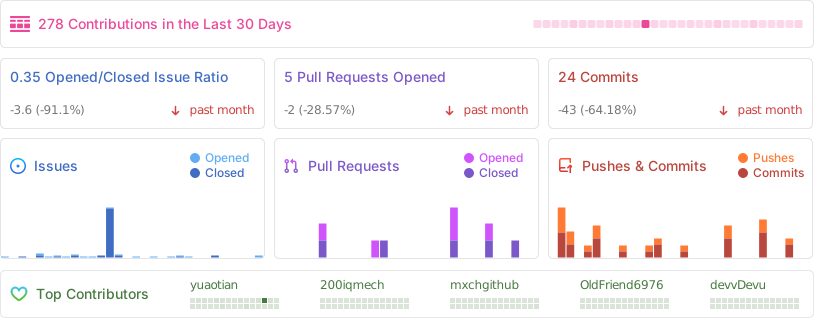
## ⭐ Project Stats
[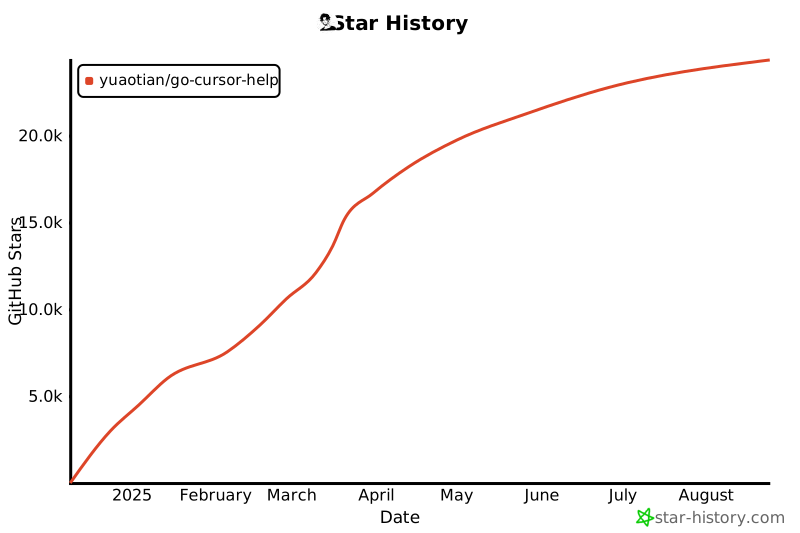](https://star-history.com/#yuaotian/go-cursor-help&Date)
## 📄 License
MIT License
Copyright (c) 2024
Permission is hereby granted, free of charge, to any person obtaining a copy
of this software and associated documentation files (the "Software"), to deal
in the Software without restriction, including without limitation the rights
to use, copy, modify, merge, publish, distribute, sublicense, and/or sell
copies of the Software, and to permit persons to whom the Software is
furnished to do so, subject to the following conditions:
The above copyright notice and this permission notice shall be included in all
copies or substantial portions of the Software.
================================================
FILE: README_CN.md
================================================
# 🚀 Cursor 免费试用重置工具
[](https://github.com/yuaotian/go-cursor-help/releases/latest)
[](https://github.com/yuaotian/go-cursor-help/blob/master/LICENSE)
[](https://github.com/yuaotian/go-cursor-help/stargazers)
[🌟 English](README.md) | [🌏 中文](README_CN.md) | [🌏 日本語](README_JP.md)
## ⚡️【限时特惠】Cursor 高额度成品号



> 💡 仅需 **¥105** 即可获得 **$20 ~ $40** 使用价值! | 📖 [官网定价参考](https://cursor.com/cn/docs/account/pricing)
#### 🗓️ 月付套餐(标准版)
> 🚀 **Cursor Pro 月付** | 💰 **售价: ¥105 / $15**(官方: $20~$40)
| 📋 规格 | 📅 有效期 | 🛡️ 质保 |
| :---: | :---: | :---: |
| 标准 Pro 功能,满足日常开发需求 | ~30天 | 7天质保(支持按天退款) |
**(⚠️ 稳定开发者的最佳选择)**
| 类型 | 套餐 | 💰 售价 | 📊 官方价 | 💎 总价值 / 说明 |
|:---:|:---|:---:|:---:|:---|
| **🚀 Pro** | **Cursor Pro 月付** �️ `标准` | **¥105** / $15 | $20~$40 | **标准 Pro 功能**(7天质保,支持按天退款) |
| **🎯 限定** | **7天周卡 $100** 🏷️ | **¥210** / $30 | $100 | 7天独享 $100 额度,官方计费,按天售后 |
| **🎯 限定** | **7天周卡 $500** 💎 | **¥1050** / $150 | $500 | 7天独享 $500 额度,适合高强度开发 |
| **🎯 限定** | **7天周卡 $1000** 🔥 | **¥2450** / $350 | $1000 | 7天独享 $1000 额度,超高强度开发 |
| **🆕 基础** | **Cursor 试用号** | **$5** /个 | — | 保证可用,批量优惠 |
| **🆕 基础** | **Gemini 3.0 Pro** 💎 | **¥350** / $50 | — | 一年订阅,稳定谷歌老号,质保3天 |
> ℹ️ **价值说明**:会员套餐总价值 = Base Credits(基础额度)+ Rewards(奖励)+ Overdraft(透支),每月重置。
📋 各产品详细说明(点击展开)
---
#### 🏷️ 7天商业版周卡系列详情
> **⚠️ 重要提醒:7天周卡系列有效期为7天整(从发货时间起算),到期自动删号!**
| 版本 | 额度 | 售价 | 说明 |
|:---|:---|:---|:---|
| **$100版** | $100 | **¥210** / $30 | 7天独享 $100 额度,官方计费,按天售后 |
| **$500版** | $500 | **¥1050** / $150 | 7天独享 $500 额度,高强度开发首选 |
| **$1000版** | $1000 | **¥2450** / $350 | 7天独享 $1000 额度,超高强度开发 |
| 通用说明 | 内容 |
|:---|:---|
| **服务内容** | Cursor 官网商业版会员 - 7天周卡 |
| **官方权益** | 个人独享官方账号,全功能开放,无限速 |
| **使用限制** | 官方按量计费,额度用完即止。需自备网络加速工具 |
---
#### 💳 Cursor 试用号详情
| 项目 | 说明 |
|:---|:---|
| **发货格式** | `账号 ---- Cursor密码 ---- 邮箱密码 ---- 长效cookies` |
| **质保说明** | 质保到手,请在 **1小时内** 检查并反馈,超时不提供售后 |
| **登录地址** | cursor.com(直登账号) |
---
#### 💎 Gemini 3.0 Pro 详情
| 项目 | 说明 |
|:---|:---|
| **商品描述** | 质保三天,超级稳定的谷歌号注册(6月-1年以上),品质远超市面短效邮箱,开GCP都没问题 |
| **账号格式** | `账号----密码----辅助邮箱----2fa` |
| **使用须知** | ① 登录后第一时间绑定自己的辅助邮箱、密码及手机号 ② **切忌**:三天内尽量保持使用同一个IP登录 |
---
| ⚠️ **购买须知** | 📱 **联系方式** |
|:---|:---|
| 💎 正规真金充值,独享账号 |
[@yuaotian](https://t.me/yuaotian) |
| ⏱️ 有效期 25–30 天 \| 💻 建议 ≤3 台设备 |
`JavaRookie666` |
| 🛡️ 7天质保(换号 / 按天退款) | |
---
### 📢 招聘广告位
> 🔥 **广告位招租** - 欢迎联系洽谈合作
>
> 📧 联系方式:Telegram [@yuaotian](https://t.me/yuaotian) | WeChat: `JavaRookie666`
---
|
**Windows** ✅
- x64 & x86
|
**macOS** ✅
- Intel & M-series
|
**Linux** ✅
- x64 & ARM64
|
### 🚀 一键解决方案
国内用户(推荐)
**macOS**
```bash
curl -fsSL https://wget.la/https://raw.githubusercontent.com/yuaotian/go-cursor-help/refs/heads/master/scripts/run/cursor_mac_id_modifier.sh -o ./cursor_mac_id_modifier.sh && sudo bash ./cursor_mac_id_modifier.sh && rm ./cursor_mac_id_modifier.sh
```
**Linux**
```bash
curl -fsSL https://wget.la/https://raw.githubusercontent.com/yuaotian/go-cursor-help/refs/heads/master/scripts/run/cursor_linux_id_modifier.sh | sudo bash
```
> **Linux 用户请注意:** 该脚本通过检查常用路径(`/usr/bin`, `/usr/local/bin`, `$HOME/.local/bin`, `/opt/cursor`, `/snap/bin`)、使用 `which cursor` 命令以及在 `/usr`、`/opt` 和 `$HOME/.local` 目录内搜索,来尝试定位您的 Cursor 安装。如果 Cursor 安装在其他位置或通过这些方法无法找到,脚本可能会失败。请确保可以通过这些标准位置或方法之一访问到 Cursor。
**Windows**
```powershell
irm https://wget.la/https://raw.githubusercontent.com/yuaotian/go-cursor-help/refs/heads/master/scripts/run/cursor_win_id_modifier.ps1 | iex
```
**缓存提示(Windows):** 如果镜像/代理缓存导致拉到旧脚本,可在 URL 末尾追加时间戳参数绕缓存(推荐 raw + 时间戳):
```powershell
irm "https://raw.githubusercontent.com/yuaotian/go-cursor-help/refs/heads/master/scripts/run/cursor_win_id_modifier.ps1?$(Get-Date -Format yyyyMMddHHmmss)" | iex
```
如果必须继续使用 `wget.la` 镜像,同样可以在镜像 URL 末尾追加时间戳参数:
```powershell
irm "https://wget.la/https://raw.githubusercontent.com/yuaotian/go-cursor-help/refs/heads/master/scripts/run/cursor_win_id_modifier.ps1?$(Get-Date -Format yyyyMMddHHmmss)" | iex
```
Windows 管理员终端运行和手动安装
#### Windows 系统打开管理员终端的方法:
##### 方法一:使用 Win + X 快捷键
```md
1. 按下 Win + X 组合键
2. 在弹出的菜单中选择以下任一选项:
- "Windows PowerShell (管理员)"
- "Windows Terminal (管理员)"
- "终端(管理员)"
(具体选项因Windows版本而异)
```
##### 方法二:使用 Win + R 运行命令
```md
1. 按下 Win + R 组合键
2. 在运行框中输入 powershell 或 pwsh
3. 按 Ctrl + Shift + Enter 以管理员身份运行
或在打开的窗口中输入: Start-Process pwsh -Verb RunAs
4. 在管理员终端中输入以下重置脚本:
irm https://wget.la/https://raw.githubusercontent.com/yuaotian/go-cursor-help/refs/heads/master/scripts/run/cursor_win_id_modifier.ps1 | iex
```
增强版脚本:
```powershell
irm https://wget.la/https://raw.githubusercontent.com/yuaotian/go-cursor-help/refs/heads/master/scripts/run/cursor_win_id_modifier.ps1 | iex
```
##### 方法三:通过搜索启动
>
>
>在搜索框中输入 pwsh,右键选择"以管理员身份运行"
>
在管理员终端中输入重置脚本:
```powershell
irm https://wget.la/https://raw.githubusercontent.com/yuaotian/go-cursor-help/refs/heads/master/scripts/run/cursor_win_id_modifier.ps1 | iex
```
增强版脚本:
```powershell
irm https://wget.la/https://raw.githubusercontent.com/yuaotian/go-cursor-help/refs/heads/master/scripts/run/cursor_win_id_modifier.ps1 | iex
```
### 🔧 PowerShell 安装指南
如果您的系统没有安装 PowerShell,可以通过以下方法安装:
#### 方法一:使用 Winget 安装(推荐)
1. 打开命令提示符或 PowerShell
2. 运行以下命令:
```powershell
winget install --id Microsoft.PowerShell --source winget
```
#### 方法二:手动下载安装
1. 下载对应系统的安装包:
- [PowerShell-7.4.6-win-x64.msi](https://github.com/PowerShell/PowerShell/releases/download/v7.4.6/PowerShell-7.4.6-win-x64.msi) (64位系统)
- [PowerShell-7.4.6-win-x86.msi](https://github.com/PowerShell/PowerShell/releases/download/v7.4.6/PowerShell-7.4.6-win-x86.msi) (32位系统)
- [PowerShell-7.4.6-win-arm64.msi](https://github.com/PowerShell/PowerShell/releases/download/v7.4.6/PowerShell-7.4.6-win-arm64.msi) (ARM64系统)
2. 双击下载的安装包,按提示完成安装
> 💡 如果仍然遇到问题,可以参考 [Microsoft 官方安装指南](https://learn.microsoft.com/zh-cn/powershell/scripting/install/installing-powershell-on-windows)
#### Windows 安装特性:
- 🔍 自动检测并使用 PowerShell 7(如果可用)
- 🛡️ 通过 UAC 提示请求管理员权限
- 📝 如果没有 PS7 则使用 Windows PowerShell
- 💡 如果提权失败会提供手动说明
完成后,脚本将:
1. ✨ 自动安装工具
2. 🔄 立即重置 Cursor 试用期
### 📦 手动安装
> 从 [releases](https://github.com/yuaotian/go-cursor-help/releases/latest) 下载适合您系统的文件
Windows 安装包
- 64 位: `cursor-id-modifier_windows_x64.exe`
- 32 位: `cursor-id-modifier_windows_x86.exe`
macOS 安装包
- Intel: `cursor-id-modifier_darwin_x64_intel`
- M1/M2: `cursor-id-modifier_darwin_arm64_apple_silicon`
Linux 安装包
- 64 位: `cursor-id-modifier_linux_x64`
- 32 位: `cursor-id-modifier_linux_x86`
- ARM64: `cursor-id-modifier_linux_arm64`
### 🔧 技术细节
注册表修改说明
> ⚠️ **重要提示:本工具会修改系统注册表**
#### 修改内容
- 路径:`计算机\HKEY_LOCAL_MACHINE\SOFTWARE\Microsoft\Cryptography`
- 项目:`MachineGuid`
#### 潜在影响
修改此注册表项可能会影响:
- Windows 系统对设备的唯一标识
- 某些软件的设备识别和授权状态
- 基于硬件标识的系统功能
#### 安全措施
1. 自动备份
- 每次修改前会自动备份原始值
- 备份保存在:`%APPDATA%\Cursor\User\globalStorage\backups`
- 备份文件格式:`MachineGuid.backup_YYYYMMDD_HHMMSS`
2. 手动恢复方法
- 打开注册表编辑器(regedit)
- 定位到:`计算机\HKEY_LOCAL_MACHINE\SOFTWARE\Microsoft\Cryptography`
- 右键点击 `MachineGuid`
- 选择"修改"
- 粘贴备份文件中的值
#### 注意事项
- 建议在修改前先确认备份文件的存在
- 如遇问题可通过备份文件恢复原始值
- 必须以管理员权限运行才能修改注册表
配置文件
程序修改 Cursor 的`storage.json`配置文件,位于:
- Windows: `%APPDATA%\Cursor\User\globalStorage\`
- macOS: `~/Library/Application Support/Cursor/User/globalStorage/`
- Linux: `~/.config/Cursor/User/globalStorage/`
修改字段
工具会生成新的唯一标识符:
- `telemetry.machineId`
- `telemetry.macMachineId`
- `telemetry.devDeviceId`
- `telemetry.sqmId`
手动禁用自动更新
Windows 用户可以手动禁用自动更新功能:
1. 关闭所有 Cursor 进程
2. 删除目录:`C:\Users\用户名\AppData\Local\cursor-updater`
3. 创建同名文件:`cursor-updater`(不带扩展名)
Linux用户可以尝试在系统中找到类似的`cursor-updater`目录进行相同操作。
MacOS用户按照以下步骤操作:
```bash
# 注意:经测试,此方法仅适用于0.45.11及以下版本,不支持0.46.*版本
# 关闭所有 Cursor 进程
pkill -f "Cursor"
# 备份app-update.yml并创建空的只读文件代替原文件
cd /Applications/Cursor.app/Contents/Resources
mv app-update.yml app-update.yml.bak
touch app-update.yml
chmod 444 app-update.yml
# 打开Cursor设置,将更新模式设置为"无",该步骤必须执行,否则Cursor依然会自动检查更新
# 步骤:Settings -> Application -> Update, 将Mode设置为none
# 注意: cursor-updater修改方法可能已失效。但为了以防万一,还是删除更新目录并创建阻止文件
rm -rf ~/Library/Application\ Support/Caches/cursor-updater
touch ~/Library/Application\ Support/Caches/cursor-updater
```
安全特性
- ✅ 安全的进程终止
- ✅ 原子文件操作
- ✅ 错误处理和恢复
重置 Cursor 免费试用
### 使用 `cursor_free_trial_reset.sh` 脚本
#### macOS
```bash
curl -fsSL https://raw.githubusercontent.com/yuaotian/go-cursor-help/refs/heads/master/scripts/run/cursor_free_trial_reset.sh -o ./cursor_free_trial_reset.sh && sudo bash ./cursor_free_trial_reset.sh && rm ./cursor_free_trial_reset.sh
```
#### Linux
```bash
curl -fsSL https://raw.githubusercontent.com/yuaotian/go-cursor-help/refs/heads/master/scripts/run/cursor_free_trial_reset.sh | sudo bash
```
#### Windows
```powershell
irm https://raw.githubusercontent.com/yuaotian/go-cursor-help/refs/heads/master/scripts/run/cursor_free_trial_reset.sh | iex
```
## 联系方式
个人微信

微信:JavaRookie666
|
微信交流群
二维码7天内(3月6日前)有效,过期请加微信或者公众号`煎饼果子卷AI`
|
公众号

获取更多AI开发资源
|
微信赞赏
要到饭咧?啊咧?啊咧?不给也没事~ 请随意打赏
|
支付宝赞赏
如果觉得有帮助,来包辣条犒劳一下吧~
|
### 💳 付款方式(捐赠)
- 🪙 **USDT(泰达币)**
- 🔴 TRC-20(波场):`TFbJnoY5Lep5ZrDwBbT8rV1i8xR4ZhX53k`
- 🟡 Polygon / BSC / Arbitrum:`0x44f8925b9f93b3d6da8d5ad26a3516e3e652cc88`
- 🟦 **莱特币(LTC)**:`LVrigKxtWfPymMRtRqL3z2eZxfncR3dPV7`
---
### 📚 推荐阅读
- [Cursor 异常问题收集和解决方案](https://mp.weixin.qq.com/s/pnJrH7Ifx4WZvseeP1fcEA)
- [AI 通用开发助手提示词指南](https://mp.weixin.qq.com/s/PRPz-qVkFJSgkuEKkTdzwg)
---
## 💬 反馈与建议
我们非常重视您对新增强脚本的反馈!如果您已经尝试了 `cursor_win_id_modifier.ps1` 脚本,请分享您的使用体验:
- 🐛 **错误报告**:发现任何问题?请告诉我们!
- 💡 **功能建议**:有改进想法?
- ⭐ **成功案例**:分享工具如何帮助到您!
- 🔧 **技术反馈**:性能、兼容性或易用性方面的见解
您的反馈帮助我们为所有人改进工具。欢迎提交issue或为项目做出贡献!
---
## ⭐ 项目统计
[](https://star-history.com/#yuaotian/go-cursor-help&Date)

## 📄 许可证
MIT 许可证
Copyright (c) 2024
Permission is hereby granted, free of charge, to any person obtaining a copy
of this software and associated documentation files (the "Software"), to deal
in the Software without restriction, including without limitation the rights
to use, copy, modify, merge, publish, distribute, sublicense, and/or sell
copies of the Software, and to permit persons to whom the Software is
furnished to do so, subject to the following conditions:
The above copyright notice and this permission notice shall be included in all
copies or substantial portions of the Software.
================================================
FILE: README_JP.md
================================================
# 🚀 Cursor 無料試用リセットツール
[](https://github.com/yuaotian/go-cursor-help/releases/latest)
[](https://github.com/yuaotian/go-cursor-help/blob/master/LICENSE)
[](https://github.com/yuaotian/go-cursor-help/stargazers)
[🌟 English](README.md) | [🌏 中文](README_CN.md) | [🌏 日本語](README_JP.md)

## ⚡️【フラッシュセール】Cursor 高クレジットアカウント



> 💡 わずか **$15** で **$20 ~ $40** の利用価値を獲得! | 📖 [公式料金参考](https://cursor.com/cn/docs/account/pricing)
### 🗓️ 月額プラン(スタンダード)
> 🚀 **Cursor Pro 月額** | 💰 **価格: $15**(公式: $20~$40)
| 📋 スペック | 📅 有効期間 | 🛡️ 保証 |
| :---: | :---: | :---: |
| 標準Pro機能。日常開発に最適。 | ~30日間 | 7日間保証(日割り返金可) |
**(⚠️ 安定した開発者に最適)**
---
| タイプ | プラン | 💰 価格 | 📊 公式価格 | 💎 総価値 / 説明 |
|:---:|:---|:---:|:---:|:---|
| **🚀 Pro** | **Cursor Pro 月額** 🗓️ `スタンダード` | $15 | $20~$40 | **標準Pro機能**(7日間保証、日割り返金可) |
| **🎯 限定** | **7日間パス $100** 🏷️ | **¥210** / $30 | $100 | 7日間専用 $100 クレジット、公式課金、日割りサポート |
| **🎯 限定** | **7日間パス $500** 💎 | **¥1050** / $150 | $500 | 7日間専用 $500 クレジット、高強度開発向け |
| **🎯 限定** | **7日間パス $1000** 🔥 | **¥2450** / $350 | $1000 | 7日間専用 $1000 クレジット、超高強度開発 |
| **🆕 基本** | **Cursor 試用アカウント** | **$5** /個 | — | 動作保証、大量購入割引 |
| **🆕 基本** | **Gemini 3.0 Pro** 💎 | **¥350** / $50 | — | 1年サブスク、安定Google垢、3日間保証 |
> ℹ️ **価値説明**:会員プラン総価値 = Base Credits(基本枠)+ Rewards(報酬)+ Overdraft(超過分)、月次リセットあり。
📋 各製品の詳細説明(クリックで展開)
---
#### 🗓️ Cursor Pro 月額詳細
| 項目 | 説明 |
|:---|:---|
| **商品名** | Cursor Pro 月額プラン |
| **価格** | $15(公式: $20) |
| **スペック** | 標準Pro機能。日常開発に最適。 |
| **有効期間** | ~30日間 |
| **保証** | 7日間保証(日割り返金可) |
**(⚠️ 安定した開発者に最適)**
---
#### 🏷️ 7天商業版周卡系列详情
> **⚠️ 重要提醒:7天周卡系列有效期为7天整(从发货时间起算),到期自动删号!**
| 版本 | 额度 | 售价 | 说明 |
|:---|:---|:---|:---|
| **$100版** | $100 | **¥210** / $30 | 7天独享 $100 额度,官方计费,按天售后 |
| **$500版** | $500 | **¥1050** / $150 | 7天独享 $500 额度,高强度开发首选 |
| **$1000版** | $1000 | **¥2450** / $350 | 7天独享 $1000 额度,超高强度开发 |
| 通用说明 | 内容 |
|:---|:---|
| **服务内容** | Cursor 官网商业版会员 - 7天周卡 |
| **官方权益** | 個人独享公式账号,全機能開放,無限速 |
| **使用限制** | 官方按量計費,額度用完即止。需自備網絡加速工具 |
---
#### 💳 Cursor 試用アカウント詳細
| 項目 | 説明 |
|:---|:---|
| **納品形式** | `アカウント ---- Cursorパスワード ---- メールパスワード ---- 長期Cookie` |
| **保証について** | 受け取り後 **1時間以内** に確認してください。時間を過ぎた場合はサポート対象外 |
| **ログインアドレス** | cursor.com(直接ログイン) |
---
#### 💎 Gemini 3.0 Pro 詳細
| 項目 | 説明 |
|:---|:---|
| **商品説明** | 3日間保証。超安定したGoogleアカウント(6ヶ月-1年以上)。品質は短期メールアドレスを大幅に上回る。GCP開設にも使える高品質 |
| **アカウント形式** | `アカウント----パスワード----予備メール----2FA` |
| **使用上の注意** | ① ログイン後すぐに自身の予備メール、パスワード、電話番号を紐付け ② **重要**:最初の3日間は同じIPアドレスでログインを維持 |
---
| ⚠️ **購入前に** | 📱 **連絡先** |
|:---|:---|
| 💎 正規チャージ、専用アカウント |
[@yuaotian](https://t.me/yuaotian) |
| ⏱️ 有効期間 25〜30日 \| 💻 推奨 ≤3台 |
`JavaRookie666` |
| 🛡️ 7日保証(交換 / 日割り返金) | |
---
### 📢 広告スペース
> 🔥 **広告枠募集中** - パートナーシップのお問い合わせ歓迎
>
> 📧 連絡先: Telegram [@yuaotian](https://t.me/yuaotian) | WeChat: `JavaRookie666`
---
📦 バージョン履歴とダウンロード
### 🌟 最新バージョン
[完全なバージョン履歴を見る]([CursorHistoryDown.md](https://github.com/oslook/cursor-ai-downloads?tab=readme-ov-file))
⚠️ **Cursorの一般的な解決策**
> 1. Cursorを閉じ、アカウントからログアウトし、公式サイトの設定からアカウントを削除します(IPノードを更新:日本、シンガポール、アメリカ、香港など、低遅延を優先。必須ではありませんが条件が整えば変更してください。Windowsユーザーの場合はDNSキャッシュの更新をお勧めします:`ipconfig /flushdns`)
> Cursor公式サイトで現在のアカウントを削除します
> 手順:ユーザーアイコン->設定->左下のAdvanced▼->Delete Account
>
> 2. マシンコードリセットスクリプトを実行します。下記のスクリプトアドレスを参照してください。
>
> 3. アカウントを再登録し、ログインして、Cursorを開くと、正常に使用できるようになります。
>
> 4. 代替案:ステップ[**3**]の後でもまだ使用できない場合、またはアカウント登録に失敗したり、アカウントを削除できないなどの問題が発生した場合、これは通常、ブラウザがターゲットサイトに識別または制限されている(リスク管理)ことを意味します。この場合、Edge、Google Chrome、Firefoxなど別のブラウザを試してみてください(または、ブラウザのフィンガープリント情報を変更またはランダム化できるブラウザの使用を検討してください)。
---
⚠️ **MACアドレス変更警告**
>
> Macユーザーの皆様へ: このスクリプトにはMACアドレス変更機能が含まれています。以下の操作が行われます:
> - ネットワークインターフェースのMACアドレスを変更します
> - 変更前に元のMACアドレスをバックアップします
> - この変更により一時的にネットワーク接続が影響を受ける可能性があります
> - 実行中にこのステップをスキップすることができます
>
🔒 自動更新機能の無効化
> Cursorがサポートされていない新しいバージョンに自動的に更新されるのを防ぐために、自動更新機能を無効にすることができます。
#### 方法1: 組み込みスクリプトを使用する(推奨)
リセットツールを実行するとき、スクリプトは自動更新を無効にするかどうかを尋ねます:
```text
[質問] Cursorの自動更新機能を無効にしますか?
0) いいえ - デフォルト設定を維持(Enterキーを押す)
1) はい - 自動更新を無効にする
```
`1`を選択して無効化操作を自動的に完了します。
#### 方法2: 手動で無効化
**Windows:**
1. すべてのCursorプロセスを閉じます
2. ディレクトリを削除します: `%LOCALAPPDATA%\cursor-updater`
3. 同じ名前のファイルを作成します(拡張子なし)
**macOS:**
```bash
# 注意: テスト済みでは、この方法はバージョン0.45.11およびそれ以前のバージョンでのみ機能します。
# Cursorを閉じます
pkill -f "Cursor"
# app-update.ymlを空の読み取り専用ファイルに置き換えます
cd /Applications/Cursor.app/Contents/Resources
mv app-update.yml app-update.yml.bak
touch app-update.yml
chmod 444 app-update.yml
# 設定 -> アプリケーション -> 更新、モードをnoneに設定します。
# これを行わないと、Cursorは更新をチェックし続けます。
# 注意: cursor-updaterの変更方法はもはや有効ではないかもしれません
# いずれにせよ、更新ディレクトリを削除し、ブロックファイルを作成します
rm -rf ~/Library/Application\ Support/Caches/cursor-updater
touch ~/Library/Application\ Support/Caches/cursor-updater
```
**Linux:**
```bash
# Cursorを閉じます
pkill -f "Cursor"
# 更新ディレクトリを削除し、ブロックファイルを作成します
rm -rf ~/.config/cursor-updater
touch ~/.config/cursor-updater
```
> ⚠️ **注意:** 自動更新を無効にした後、新しいバージョンを手動でダウンロードしてインストールする必要があります。新しいバージョンが互換性があることを確認した後に更新することをお勧めします。
---
### 📝 説明
> これらのメッセージのいずれかに遭遇した場合:
#### 問題1: 試用アカウント制限 
```text
Too many free trial accounts used on this machine.
Please upgrade to pro. We have this limit in place
to prevent abuse. Please let us know if you believe
this is a mistake.
```
#### 問題2: APIキー制限 
```text
[New Issue]
Composer relies on custom models that cannot be billed to an API key.
Please disable API keys and use a Pro or Business subscription.
Request ID: xxxxxxxx-xxxx-xxxx-xxxx-xxxxxxxxxxxx
```
#### 問題3: 試用リクエスト制限
> これは、VIP無料試用期間中に使用制限に達したことを示しています:
```text
You've reached your trial request limit.
```
#### 問題4: Claude 3.7 高負荷 
```text
High Load
We're experiencing high demand for Claude 3.7 Sonnet right now. Please upgrade to Pro, or switch to the
'default' model, Claude 3.5 sonnet, another model, or try again in a few moments.
```
#### 解決策 : Cursorを完全にアンインストールして再インストールする(APIキーの問題)
1. [Geek.exeアンインストーラー[無料]](https://geekuninstaller.com/download)をダウンロードします
2. Cursorアプリを完全にアンインストールします
3. Cursorアプリを再インストールします
4. 解決策1を続行します
> 一時的な解決策:
#### 解決策1: クイックリセット(推奨)
1. Cursorアプリケーションを閉じます
2. マシンコードリセットスクリプトを実行します(以下のインストール手順を参照)
3. Cursorを再度開いて使用を続けます
#### 解決策2: アカウントの切り替え
1. ファイル -> Cursor設定 -> サインアウト
2. Cursorを閉じます
3. マシンコードリセットスクリプトを実行します
4. 新しいアカウントでログインします
#### 解決策3: ネットワークの最適化
上記の解決策が機能しない場合は、次のことを試してください:
- 低遅延ノードに切り替えます(推奨地域:日本、シンガポール、米国、香港)
- ネットワークの安定性を確保します
- ブラウザのキャッシュをクリアして再試行します
#### 解決策4: Claude 3.7 アクセス問題(高負荷)
Claude 3.7 Sonnetの"High Load"メッセージが表示された場合、これはCursorが特定の時間帯に無料試用アカウントの3.7モデルの使用を制限していることを示しています。次のことを試してください:
1. Gmailで作成した新しいアカウントに切り替えます。異なるIPアドレスを使用して接続することをお勧めします
2. 非ピーク時間帯にアクセスを試みます(通常、5-10 AMまたは3-7 PMの間に制限が少ないです)
3. Proにアップグレードしてアクセスを保証します
4. Claude 3.5 Sonnetを代替オプションとして使用します
> 注意: Cursorがリソース配分ポリシーを調整するにつれて、これらのアクセスパターンは変更される可能性があります。
### 💻 システムサポート
|
**Windows** ✅
- x64 (64ビット)
- x86 (32ビット)
|
**macOS** ✅
- Intel (x64)
- Apple Silicon (M1/M2)
|
**Linux** ✅
- x64 (64ビット)
- x86 (32ビット)
- ARM64
|
### 🚀 ワンクリックソリューション
グローバルユーザー
**macOS**
```bash
# 方法2
curl -fsSL https://raw.githubusercontent.com/yuaotian/go-cursor-help/refs/heads/master/scripts/run/cursor_mac_id_modifier.sh -o ./cursor_mac_id_modifier.sh && sudo bash ./cursor_mac_id_modifier.sh && rm ./cursor_mac_id_modifier.sh
```
**Linux**
```bash
curl -fsSL https://raw.githubusercontent.com/yuaotian/go-cursor-help/refs/heads/master/scripts/run/cursor_linux_id_modifier.sh | sudo bash
```
**Windows**
```powershell
irm https://raw.githubusercontent.com/yuaotian/go-cursor-help/refs/heads/master/scripts/run/cursor_win_id_modifier.ps1 | iex
```
**Windows (強化版)**
```powershell
irm https://raw.githubusercontent.com/yuaotian/go-cursor-help/refs/heads/master/scripts/run/cursor_win_id_modifier.ps1 | iex
```
> デュアルモード操作とトライアルリセット機能を備えた強化版Cursorマシンコード修正ツール
**キャッシュ回避(Windows):** ミラー/プロキシのキャッシュで古いスクリプトが取得される場合、URL 末尾にタイムスタンプのクエリを付けて回避できます(GitHub raw + タイムスタンプ推奨):
```powershell
irm "https://raw.githubusercontent.com/yuaotian/go-cursor-help/refs/heads/master/scripts/run/cursor_win_id_modifier.ps1?$(Get-Date -Format yyyyMMddHHmmss)" | iex
```
`wget.la` などのミラーを使う場合も同様に、URL 末尾へタイムスタンプを追加できます:
```powershell
irm "https://wget.la/https://raw.githubusercontent.com/yuaotian/go-cursor-help/refs/heads/master/scripts/run/cursor_win_id_modifier.ps1?$(Get-Date -Format yyyyMMddHHmmss)" | iex
```
中国ユーザー(推奨)
**macOS**
```bash
curl -fsSL https://wget.la/https://raw.githubusercontent.com/yuaotian/go-cursor-help/refs/heads/master/scripts/run/cursor_mac_id_modifier.sh -o ./cursor_mac_id_modifier.sh && sudo bash ./cursor_mac_id_modifier.sh && rm ./cursor_mac_id_modifier.sh
```
**Linux**
```bash
curl -fsSL https://wget.la/https://raw.githubusercontent.com/yuaotian/go-cursor-help/refs/heads/master/scripts/run/cursor_linux_id_modifier.sh | sudo bash
```
> **Linuxユーザーへの注意:** スクリプトは、一般的なパス(`/usr/bin`, `/usr/local/bin`, `$HOME/.local/bin`, `/opt/cursor`, `/snap/bin`)の確認、`which cursor` コマンドの使用、および `/usr`、`/opt`、`$HOME/.local` ディレクトリ内の検索によって、Cursor のインストールを見つけようとします。Cursorが他の場所にインストールされているか、これらの方法で見つからない場合、スクリプトは失敗する可能性があります。これらの標準的な場所または方法のいずれかを通じてCursorにアクセスできることを確認してください。
**Windows**
```powershell
irm https://wget.la/https://raw.githubusercontent.com/yuaotian/go-cursor-help/refs/heads/master/scripts/run/cursor_win_id_modifier.ps1 | iex
```
**Windows (強化版)**
```powershell
irm https://wget.la/https://raw.githubusercontent.com/yuaotian/go-cursor-help/refs/heads/master/scripts/run/cursor_win_id_modifier.ps1 | iex
```
> デュアルモード操作とトライアルリセット機能を備えた強化版Cursorマシンコード修正ツール
Windowsターミナルの実行と構成
#### Windowsで管理者ターミナルを開く方法:
##### 方法1: Win + Xショートカットを使用する
```md
1. Win + Xキーの組み合わせを押します
2. メニューから次のオプションのいずれかを選択します:
- "Windows PowerShell (管理者)"
- "Windows Terminal (管理者)"
- "ターミナル (管理者)"
(Windowsのバージョンによってオプションが異なる場合があります)
```
##### 方法2: Win + R実行コマンドを使用する
```md
1. Win + Rキーの組み合わせを押します
2. 実行ダイアログにpowershellまたはpwshと入力します
3. Ctrl + Shift + Enterを押して管理者として実行します
または開いたウィンドウに次のように入力します: Start-Process pwsh -Verb RunAs
4. 管理者ターミナルにリセットスクリプトを入力します:
irm https://wget.la/https://raw.githubusercontent.com/yuaotian/go-cursor-help/refs/heads/master/scripts/run/cursor_win_id_modifier.ps1 | iex
```
強化版スクリプト:
```powershell
irm https://wget.la/https://raw.githubusercontent.com/yuaotian/go-cursor-help/refs/heads/master/scripts/run/cursor_win_id_modifier.ps1 | iex
```
##### 方法3: 検索を使用する
>
>
>検索ボックスにpwshと入力し、右クリックして「管理者として実行」を選択します
>
管理者ターミナルにリセットスクリプトを入力します:
```powershell
irm https://wget.la/https://raw.githubusercontent.com/yuaotian/go-cursor-help/refs/heads/master/scripts/run/cursor_win_id_modifier.ps1 | iex
```
強化版スクリプト:
```powershell
irm https://wget.la/https://raw.githubusercontent.com/yuaotian/go-cursor-help/refs/heads/master/scripts/run/cursor_win_id_modifier.ps1 | iex
```
### 🔧 PowerShellインストールガイド
システムにPowerShellがインストールされていない場合は、次の方法でインストールできます:
#### 方法1: Wingetを使用してインストール(推奨)
1. コマンドプロンプトまたはPowerShellを開きます
2. 次のコマンドを実行します:
```powershell
winget install --id Microsoft.PowerShell --source winget
```
#### 方法2: 手動でインストール
1. システムに適したインストーラーをダウンロードします:
- [PowerShell-7.4.6-win-x64.msi](https://github.com/PowerShell/PowerShell/releases/download/v7.4.6/PowerShell-7.4.6-win-x64.msi)(64ビットシステム用)
- [PowerShell-7.4.6-win-x86.msi](https://github.com/PowerShell/PowerShell/releases/download/v7.4.6/PowerShell-7.4.6-win-x86.msi)(32ビットシステム用)
- [PowerShell-7.4.6-win-arm64.msi](https://github.com/PowerShell/PowerShell/releases/download/v7.4.6/PowerShell-7.4.6-win-arm64.msi)(ARM64システム用)
2. ダウンロードしたインストーラーをダブルクリックし、インストールの指示に従います
> 💡 問題が発生した場合は、[Microsoft公式インストールガイド](https://learn.microsoft.com/ja-jp/powershell/scripting/install/installing-powershell-on-windows)を参照してください
#### Windowsインストール機能:
- 🔍 PowerShell 7が利用可能な場合は自動的に検出して使用します
- 🛡️ UACプロンプトを介して管理者権限を要求します
- 📝 PS7が見つからない場合はWindows PowerShellにフォールバックします
- 💡 権限昇格に失敗した場合は手動の指示を提供します
これで完了です!スクリプトは次のことを行います:
1. ✨ ツールを自動的にインストールします
2. 🔄 Cursorの試用期間を即座にリセットします
### 📦 手動インストール
> [リリース](https://github.com/yuaotian/go-cursor-help/releases/latest)からシステムに適したファイルをダウンロードします
Windowsパッケージ
- 64ビット: `cursor-id-modifier_windows_x64.exe`
- 32ビット: `cursor-id-modifier_windows_x86.exe`
macOSパッケージ
- Intel: `cursor-id-modifier_darwin_x64_intel`
- M1/M2: `cursor-id-modifier_darwin_arm64_apple_silicon`
Linuxパッケージ
- 64ビット: `cursor-id-modifier_linux_x64`
- 32ビット: `cursor-id-modifier_linux_x86`
- ARM64: `cursor-id-modifier_linux_arm64`
### 🔧 技術的詳細
構成ファイル
プログラムはCursorの`storage.json`構成ファイルを変更します。場所は次のとおりです:
- Windows: `%APPDATA%\Cursor\User\globalStorage\storage.json`
- macOS: `~/Library/Application Support/Cursor/User/globalStorage/storage.json`
- Linux: `~/.config/Cursor/User/globalStorage/storage.json`
変更されたフィールド
ツールは次の新しい一意の識別子を生成します:
- `telemetry.machineId`
- `telemetry.macMachineId`
- `telemetry.devDeviceId`
- `telemetry.sqmId`
手動自動更新無効化
Windowsユーザーは自動更新機能を手動で無効にすることができます:
1. すべてのCursorプロセスを閉じます
2. ディレクトリを削除します: `C:\Users\username\AppData\Local\cursor-updater`
3. 同じ名前のファイルを作成します: `cursor-updater`(拡張子なし)
macOS/Linuxユーザーはシステム内で同様の`cursor-updater`ディレクトリを見つけて同じ操作を行うことができます。
安全機能
- ✅ 安全なプロセス終了
- ✅ アトミックファイル操作
- ✅ エラーハンドリングとリカバリ
レジストリ変更通知
> ⚠️ **重要: このツールはWindowsレジストリを変更します**
#### 変更されたレジストリ
- パス: `コンピュータ\HKEY_LOCAL_MACHINE\SOFTWARE\Microsoft\Cryptography`
- キー: `MachineGuid`
#### 潜在的な影響
このレジストリキーを変更すると、次のことに影響を与える可能性があります:
- Windowsシステムの一意のデバイス識別
- 特定のソフトウェアのデバイス認識と認証状態
- ハードウェア識別に基づくシステム機能
#### 安全対策
1. 自動バックアップ
- 変更前に元の値が自動的にバックアップされます
- バックアップ場所: `%APPDATA%\Cursor\User\globalStorage\backups`
- バックアップファイル形式: `MachineGuid.backup_YYYYMMDD_HHMMSS`
2. 手動復元手順
- レジストリエディタ(regedit)を開きます
- 次の場所に移動します: `コンピュータ\HKEY_LOCAL_MACHINE\SOFTWARE\Microsoft\Cryptography`
- `MachineGuid`を右クリックします
- 「修正」を選択します
- バックアップファイルの値を貼り付けます
#### 重要な注意事項
- 変更前にバックアップファイルの存在を確認します
- 必要に応じてバックアップファイルを使用して元の値を復元します
- レジストリの変更には管理者権限が必要です
---
### 📚 推奨読書
- [Cursorの問題収集と解決策](https://mp.weixin.qq.com/s/pnJrH7Ifx4WZvseeP1fcEA)
- [AIユニバーサル開発アシスタントプロンプトガイド](https://mp.weixin.qq.com/s/PRPz-qVkFJSgkuEKkTdzwg)
---
## サポート
このツールが役立つと感じた場合、スパイシーグルテンのおやつ(Latiao)を買っていただけると嬉しいです~ 💁☕️
WeChat Pay
要到饭咧?啊咧?啊咧?不给也没事~ 请随意打赏
|
Alipay
如果觉得有帮助,来包辣条犒劳一下吧~
|
Alipay
1 Latiao = 1 AI thought cycle
|
WeChat
二维码7天内(3月6日前前)有效,过期请加微信或者公众号`煎饼果子卷AI`
|
### 💳 お支払い方法(寄付 / 広告削除)
- 🪙 **USDT(Tether)**
- 🔴 TRC-20(Tron):`TFbJnoY5Lep5ZrDwBbT8rV1i8xR4ZhX53k`
- 🟡 Polygon / BSC / Arbitrum:`0x44f8925b9f93b3d6da8d5ad26a3516e3e652cc88`
- 🟦 **Litecoin(LTC)**:`LVrigKxtWfPymMRtRqL3z2eZxfncR3dPV7`
---
## 💬 フィードバック&提案
新しい強化スクリプトに関するフィードバックをお待ちしています!`cursor_win_id_modifier.ps1` スクリプトをお試しいただいた方は、ぜひご体験をお聞かせください:
- 🐛 **バグレポート**:問題を発見されましたか?お知らせください!
- 💡 **機能提案**:改善のアイデアはありますか?
- ⭐ **成功事例**:ツールがどのようにお役に立ったかお聞かせください!
- 🔧 **技術的フィードバック**:パフォーマンス、互換性、使いやすさに関するご意見
皆様のフィードバックは、すべてのユーザーのためにツールを改善するのに役立ちます。お気軽にissueを開いたり、プロジェクトに貢献してください!
---
## ⭐ プロジェクト統計
[](https://star-history.com/#yuaotian/go-cursor-help&Date)

## 📄 ライセンス
MITライセンス
Copyright (c) 2024
Permission is hereby granted, free of charge, to any person obtaining a copy
of this software and associated documentation files (the "Software"), to deal
in the Software without restriction, including without limitation the rights
to use, copy, modify, merge, publish, distribute, sublicense, and/or sell
copies of the Software, and to permit persons to whom the Software is
furnished to do so, subject to the following conditions:
The above copyright notice and this permission notice shall be included in all
copies or substantial portions of the Software.
================================================
FILE: scripts/hook/cursor_hook.js
================================================
/**
* Cursor 设备标识符 Hook 模块
*
* 🎯 功能:从底层拦截所有设备标识符的生成,实现一劳永逸的机器码修改
*
* 🔧 Hook 点:
* 1. child_process.execSync - 拦截 REG.exe 查询 MachineGuid
* 2. crypto.createHash - 拦截 SHA256 哈希计算
* 3. @vscode/deviceid - 拦截 devDeviceId 获取
* 4. @vscode/windows-registry - 拦截注册表读取
* 5. os.networkInterfaces - 拦截 MAC 地址获取
* 6. fs.writeFileSync/writeFile - 拦截 storage.json 写入,保护 telemetry 字段
*
* 📦 使用方式:
* 将此代码注入到 main.js 文件顶部(Sentry 初始化之后)
*
* ⚙️ 配置方式:
* 1. 环境变量:CURSOR_MACHINE_ID, CURSOR_MAC_MACHINE_ID, CURSOR_DEV_DEVICE_ID, CURSOR_SQM_ID
* 2. 配置文件:~/.cursor_ids.json
* 3. 自动生成:如果没有配置,则自动生成并持久化
*/
// ==================== 配置区域 ====================
// 使用 var 确保在 ES Module 环境中也能正常工作
var __cursor_hook_config__ = {
// 是否启用 Hook(设置为 false 可临时禁用)
enabled: true,
// 是否输出调试日志(设置为 true 可查看详细日志)
debug: false,
// 配置文件路径(相对于用户目录)
configFileName: '.cursor_ids.json',
// 标记:防止重复注入
injected: false
};
// ==================== Hook 实现 ====================
// 使用 IIFE 确保代码立即执行
(function() {
'use strict';
// 防止重复注入
if (globalThis.__cursor_patched__ || __cursor_hook_config__.injected) {
return;
}
globalThis.__cursor_patched__ = true;
__cursor_hook_config__.injected = true;
// 调试日志函数
const log = (...args) => {
if (__cursor_hook_config__.debug) {
console.log('[CursorHook]', ...args);
}
};
// ==================== ID 生成和管理 ====================
// 生成 UUID v4
const generateUUID = () => {
return 'xxxxxxxx-xxxx-4xxx-yxxx-xxxxxxxxxxxx'.replace(/[xy]/g, (c) => {
const r = Math.random() * 16 | 0;
const v = c === 'x' ? r : (r & 0x3 | 0x8);
return v.toString(16);
});
};
// 生成 64 位十六进制字符串(用于 machineId)
const generateHex64 = () => {
let hex = '';
for (let i = 0; i < 64; i++) {
hex += Math.floor(Math.random() * 16).toString(16);
}
return hex;
};
// 生成 MAC 地址格式的字符串
const generateMacAddress = () => {
const hex = '0123456789ABCDEF';
let mac = '';
for (let i = 0; i < 6; i++) {
if (i > 0) mac += ':';
mac += hex[Math.floor(Math.random() * 16)];
mac += hex[Math.floor(Math.random() * 16)];
}
return mac;
};
// 加载或生成 ID 配置
// 注意:该 Hook 由脚本注入的 Loader 通过 CommonJS(require) 方式加载,
// 为避免出现 import.meta 等仅 ESM 支持的语法导致 Cursor 启动期解析失败,这里保持纯 CommonJS 写法。
const loadOrGenerateIds = () => {
const fs = require('fs');
const path = require('path');
const os = require('os');
const configPath = path.join(os.homedir(), __cursor_hook_config__.configFileName);
let ids = null;
// 尝试从环境变量读取
if (process.env.CURSOR_MACHINE_ID) {
ids = {
machineId: process.env.CURSOR_MACHINE_ID,
// machineGuid 用于模拟注册表 MachineGuid/IOPlatformUUID
machineGuid: process.env.CURSOR_MACHINE_GUID || generateUUID(),
macMachineId: process.env.CURSOR_MAC_MACHINE_ID || generateHex64(),
devDeviceId: process.env.CURSOR_DEV_DEVICE_ID || generateUUID(),
sqmId: process.env.CURSOR_SQM_ID || `{${generateUUID().toUpperCase()}}`,
macAddress: process.env.CURSOR_MAC_ADDRESS || generateMacAddress(),
sessionId: process.env.CURSOR_SESSION_ID || generateUUID(),
firstSessionDate: process.env.CURSOR_FIRST_SESSION_DATE || new Date().toISOString()
};
log('从环境变量加载 ID 配置');
return ids;
}
// 尝试从配置文件读取
try {
if (fs.existsSync(configPath)) {
const content = fs.readFileSync(configPath, 'utf8');
ids = JSON.parse(content);
// 补全缺失字段,保持向后兼容
let updated = false;
// 🔧 补齐核心 ID 字段(用于 Hook 与 storage.json 保护)
if (!ids.machineId || typeof ids.machineId !== 'string') {
ids.machineId = generateHex64();
updated = true;
}
if (!ids.macMachineId || typeof ids.macMachineId !== 'string') {
ids.macMachineId = generateHex64();
updated = true;
}
if (!ids.devDeviceId || typeof ids.devDeviceId !== 'string') {
ids.devDeviceId = generateUUID();
updated = true;
}
if (!ids.sqmId || typeof ids.sqmId !== 'string') {
ids.sqmId = `{${generateUUID().toUpperCase()}}`;
updated = true;
}
if (!ids.machineGuid) {
ids.machineGuid = generateUUID();
updated = true;
}
if (!ids.macAddress) {
ids.macAddress = generateMacAddress();
updated = true;
}
if (!ids.sessionId) {
ids.sessionId = generateUUID();
updated = true;
}
if (!ids.firstSessionDate) {
ids.firstSessionDate = new Date().toISOString();
updated = true;
}
if (updated) {
try {
fs.writeFileSync(configPath, JSON.stringify(ids, null, 2), 'utf8');
log('已补全并更新 ID 配置:', configPath);
} catch (e) {
log('补全配置文件失败:', e.message);
}
}
log('从配置文件加载 ID 配置:', configPath);
return ids;
}
} catch (e) {
log('读取配置文件失败:', e.message);
}
// 生成新的 ID
ids = {
machineId: generateHex64(),
machineGuid: generateUUID(),
macMachineId: generateHex64(),
devDeviceId: generateUUID(),
sqmId: `{${generateUUID().toUpperCase()}}`,
macAddress: generateMacAddress(),
sessionId: generateUUID(),
firstSessionDate: new Date().toISOString(),
createdAt: new Date().toISOString()
};
// 保存到配置文件
try {
fs.writeFileSync(configPath, JSON.stringify(ids, null, 2), 'utf8');
log('已生成并保存新的 ID 配置:', configPath);
} catch (e) {
log('保存配置文件失败:', e.message);
}
return ids;
};
// 加载 ID 配置
const __cursor_ids__ = loadOrGenerateIds();
// 统一获取 MachineGuid,缺失时回退到 machineId 的前 36 位
const getMachineGuid = () => __cursor_ids__.machineGuid || __cursor_ids__.machineId.substring(0, 36);
log('当前 ID 配置:', __cursor_ids__);
// ==================== Module Hook ====================
const Module = require('module');
const originalRequire = Module.prototype.require;
// 缓存已 Hook 的模块
const hookedModules = new Map();
Module.prototype.require = function(id) {
// 兼容 node: 前缀
const normalizedId = (typeof id === 'string' && id.startsWith('node:')) ? id.slice(5) : id;
const result = originalRequire.apply(this, arguments);
// 如果已经 Hook 过,直接返回缓存
if (hookedModules.has(normalizedId)) {
return hookedModules.get(normalizedId);
}
let hooked = result;
// Hook child_process 模块
if (normalizedId === 'child_process') {
hooked = hookChildProcess(result);
}
// Hook os 模块
else if (normalizedId === 'os') {
hooked = hookOs(result);
}
// Hook fs 模块 (新增:保护 storage.json)
else if (normalizedId === 'fs') {
hooked = hookFs(result);
}
// Hook crypto 模块
else if (normalizedId === 'crypto') {
hooked = hookCrypto(result);
}
// Hook @vscode/deviceid 模块
else if (normalizedId === '@vscode/deviceid') {
hooked = hookDeviceId(result);
}
// Hook @vscode/windows-registry 模块
else if (normalizedId === '@vscode/windows-registry') {
hooked = hookWindowsRegistry(result);
}
// 缓存 Hook 结果
if (hooked !== result) {
hookedModules.set(normalizedId, hooked);
log(`已 Hook 模块: ${normalizedId}`);
}
return hooked;
};
// ==================== child_process Hook ====================
function hookChildProcess(cp) {
const originalExecSync = cp.execSync;
const originalExecFileSync = cp.execFileSync;
cp.execSync = function(command, options) {
const cmdStr = String(command).toLowerCase();
// 拦截 MachineGuid 查询
if (cmdStr.includes('reg') && cmdStr.includes('machineguid')) {
log('拦截 MachineGuid 查询');
// 返回格式化的注册表输出
return Buffer.from(`\r\n MachineGuid REG_SZ ${getMachineGuid()}\r\n`);
}
// 拦截 ioreg 命令 (macOS)
if (cmdStr.includes('ioreg') && cmdStr.includes('ioplatformexpertdevice')) {
log('拦截 IOPlatformUUID 查询');
return Buffer.from(`"IOPlatformUUID" = "${getMachineGuid().toUpperCase()}"`);
}
// 拦截 machine-id 读取 (Linux)
if (cmdStr.includes('machine-id') || cmdStr.includes('hostname')) {
log('拦截 machine-id 查询');
return Buffer.from(__cursor_ids__.machineId.substring(0, 32));
}
return originalExecSync.apply(this, arguments);
};
// 兼容 execFileSync(部分版本会直接调用可执行文件)
if (typeof originalExecFileSync === 'function') {
cp.execFileSync = function(file, args, options) {
const cmdStr = [file].concat(args || []).join(' ').toLowerCase();
if (cmdStr.includes('reg') && cmdStr.includes('machineguid')) {
log('拦截 MachineGuid 查询(execFileSync)');
return Buffer.from(`\r\n MachineGuid REG_SZ ${getMachineGuid()}\r\n`);
}
if (cmdStr.includes('ioreg') && cmdStr.includes('ioplatformexpertdevice')) {
log('拦截 IOPlatformUUID 查询(execFileSync)');
return Buffer.from(`"IOPlatformUUID" = "${getMachineGuid().toUpperCase()}"`);
}
if (cmdStr.includes('machine-id') || cmdStr.includes('hostname')) {
log('拦截 machine-id 查询(execFileSync)');
return Buffer.from(__cursor_ids__.machineId.substring(0, 32));
}
return originalExecFileSync.apply(this, arguments);
};
}
return cp;
}
// ==================== os Hook ====================
function hookOs(os) {
const originalNetworkInterfaces = os.networkInterfaces;
os.networkInterfaces = function() {
log('拦截 networkInterfaces 调用');
// 返回虚拟的网络接口,使用固定的 MAC 地址
return {
'Ethernet': [{
address: '192.168.1.100',
netmask: '255.255.255.0',
family: 'IPv4',
mac: __cursor_ids__.macAddress || '00:00:00:00:00:00',
internal: false
}]
};
};
return os;
}
// ==================== fs Hook (新增) ====================
// 🔧 拦截 storage.json 写入操作,保护 telemetry 字段不被覆盖
// 需要保护的 telemetry 字段列表
const PROTECTED_TELEMETRY_KEYS = [
'telemetry.machineId',
'telemetry.macMachineId',
'telemetry.devDeviceId',
'telemetry.sqmId'
];
// 规范化 filePath(兼容 string/Buffer/URL 等)
function normalizeFilePath(filePath) {
try {
if (filePath === undefined || filePath === null) return '';
if (typeof filePath === 'string') return filePath;
if (Buffer.isBuffer(filePath)) return filePath.toString('utf8');
// WHATWG URL (fs 支持 URL 对象)
if (typeof filePath === 'object' && typeof filePath.href === 'string') {
// 优先将 file:// URL 转为本地路径,避免传递 "file:///..." 字符串导致 existsSync/readFileSync 失败
if (typeof filePath.protocol === 'string' && filePath.protocol === 'file:') {
try {
const url = require('url');
if (url && typeof url.fileURLToPath === 'function') {
return url.fileURLToPath(filePath);
}
} catch (_) {
// ignore
}
}
return filePath.href;
}
return String(filePath);
} catch (_) {
return '';
}
}
function previewValue(value) {
try {
const s = String(value);
return s.length > 16 ? s.slice(0, 16) + '...' : s;
} catch (_) {
return '';
}
}
// 将写入内容转为 utf8 文本,并提供回写为“同类类型”的包装器
function coerceContentToUtf8Text(content) {
try {
if (typeof content === 'string') {
return { text: content, wrap: (s) => s };
}
if (Buffer.isBuffer(content)) {
return { text: content.toString('utf8'), wrap: (s) => Buffer.from(s, 'utf8') };
}
// TypedArray / DataView
if (content && typeof content === 'object') {
if (content instanceof Uint8Array) {
// Buffer 也属于 Uint8Array,但已在上面处理
const buf = Buffer.from(content);
return { text: buf.toString('utf8'), wrap: (s) => new Uint8Array(Buffer.from(s, 'utf8')) };
}
if (typeof ArrayBuffer !== 'undefined' && content instanceof ArrayBuffer) {
const buf = Buffer.from(content);
return { text: buf.toString('utf8'), wrap: (s) => Buffer.from(s, 'utf8') };
}
if (typeof ArrayBuffer !== 'undefined' && typeof ArrayBuffer.isView === 'function' && ArrayBuffer.isView(content)) {
const buf = Buffer.from(content.buffer, content.byteOffset, content.byteLength);
return { text: buf.toString('utf8'), wrap: (s) => Buffer.from(s, 'utf8') };
}
}
} catch (_) {
// ignore
}
return null;
}
// 检查路径是否为 storage.json
function isStorageJsonPath(filePath) {
const raw = normalizeFilePath(filePath);
if (!raw) return false;
const normalized = raw.replace(/\\/g, '/').toLowerCase();
return normalized.includes('globalstorage/storage.json');
}
// 保护 storage.json 中的 telemetry 字段
function protectStorageJson(content, filePath) {
if (!isStorageJsonPath(filePath)) return content;
try {
const fs = require('fs');
const coerced = coerceContentToUtf8Text(content);
if (!coerced) return content;
let newData;
try {
newData = JSON.parse(coerced.text);
} catch (_) {
return content;
}
// 如果写入的内容不是有效的 JSON 对象,直接返回
if (typeof newData !== 'object' || newData === null) {
return content;
}
// 保护值优先级:
// 1) __cursor_ids__(Hook 配置/环境变量/自动生成)
// 2) 现有 storage.json 中已存在的值
// 3) 本次写入值(最低)
const protectedValues = {
'telemetry.machineId': __cursor_ids__ && __cursor_ids__.machineId,
'telemetry.macMachineId': __cursor_ids__ && __cursor_ids__.macMachineId,
'telemetry.devDeviceId': __cursor_ids__ && __cursor_ids__.devDeviceId,
'telemetry.sqmId': __cursor_ids__ && __cursor_ids__.sqmId
};
// 仅当 Hook 配置不完整时,才读取旧文件值作为二级兜底
let existingProtected = {};
const needExisting = PROTECTED_TELEMETRY_KEYS.some((k) => !(typeof protectedValues[k] === 'string' && protectedValues[k]));
if (needExisting) {
try {
if (fs.existsSync(filePath)) {
const existingText = fs.readFileSync(filePath, 'utf8');
const existing = JSON.parse(existingText);
if (existing && typeof existing === 'object') {
for (const key of PROTECTED_TELEMETRY_KEYS) {
if (typeof existing[key] === 'string' && existing[key]) {
existingProtected[key] = existing[key];
}
}
}
}
} catch (_) {
// ignore
}
}
let modified = false;
for (const key of PROTECTED_TELEMETRY_KEYS) {
const fromIds = protectedValues[key];
const desired = (typeof fromIds === 'string' && fromIds) ? fromIds
: (typeof existingProtected[key] === 'string' && existingProtected[key]) ? existingProtected[key]
: undefined;
if (desired === undefined) {
continue;
}
// 方案B:无论写入内容是否包含该字段,都确保最终值稳定(缺失则补齐)
if (newData[key] !== desired) {
log(`[fs Hook] 固定 ${key}: ${previewValue(newData[key])} -> ${previewValue(desired)}`);
newData[key] = desired;
modified = true;
}
}
if (modified) {
log('[fs Hook] storage.json telemetry 字段已保护');
const nextText = JSON.stringify(newData, null, '\t');
return coerced.wrap(nextText);
}
} catch (e) {
const msg = e && e.message ? e.message : String(e);
log('[fs Hook] 处理 storage.json 失败:', msg);
}
return content;
}
function hookFs(fsModule) {
const originalWriteFileSync = fsModule.writeFileSync;
const originalWriteFile = fsModule.writeFile;
const originalAppendFileSync = fsModule.appendFileSync;
const originalAppendFile = fsModule.appendFile;
const originalCreateWriteStream = fsModule.createWriteStream;
const originalOpenSync = fsModule.openSync;
const originalOpen = fsModule.open;
const originalCloseSync = fsModule.closeSync;
const originalClose = fsModule.close;
// fd 追踪:覆盖 open/close 路径(仅用于 storage.json)
const storageJsonFds = new Map();
let inFdFix = false;
const fixStorageJsonFile = (filePath) => {
if (inFdFix) return;
inFdFix = true;
try {
const current = fsModule.readFileSync(filePath, 'utf8');
const next = protectStorageJson(current, filePath);
if (typeof next === 'string' && next !== current) {
originalWriteFileSync.call(fsModule, filePath, next, 'utf8');
log('[fs Hook] close-fix: storage.json telemetry 字段已重新保护');
}
} catch (e) {
const msg = e && e.message ? e.message : String(e);
log('[fs Hook] close-fix 失败:', msg);
} finally {
inFdFix = false;
}
};
// Hook writeFileSync
fsModule.writeFileSync = function(filePath, data, options) {
const protectedData = protectStorageJson(data, filePath);
return originalWriteFileSync.call(this, filePath, protectedData, options);
};
// Hook writeFile (异步版本)
fsModule.writeFile = function(filePath, data, options, callback) {
// 处理参数重载: writeFile(path, data, callback) 或 writeFile(path, data, options, callback)
if (typeof options === 'function') {
callback = options;
options = undefined;
}
const protectedData = protectStorageJson(data, filePath);
return originalWriteFile.call(this, filePath, protectedData, options, callback);
};
// Hook promises API (fs.promises.writeFile)
if (fsModule.promises) {
const originalPromisesWriteFile = fsModule.promises.writeFile;
fsModule.promises.writeFile = async function(filePath, data, options) {
const protectedData = protectStorageJson(data, filePath);
return originalPromisesWriteFile.call(this, filePath, protectedData, options);
};
if (typeof fsModule.promises.appendFile === 'function') {
const originalPromisesAppendFile = fsModule.promises.appendFile;
fsModule.promises.appendFile = async function(filePath, data, options) {
const protectedData = protectStorageJson(data, filePath);
return originalPromisesAppendFile.call(this, filePath, protectedData, options);
};
}
}
// Hook appendFileSync
if (typeof originalAppendFileSync === 'function') {
fsModule.appendFileSync = function(filePath, data, options) {
const protectedData = protectStorageJson(data, filePath);
return originalAppendFileSync.call(this, filePath, protectedData, options);
};
}
// Hook appendFile (异步版本)
if (typeof originalAppendFile === 'function') {
fsModule.appendFile = function(filePath, data, options, callback) {
if (typeof options === 'function') {
callback = options;
options = undefined;
}
const protectedData = protectStorageJson(data, filePath);
return originalAppendFile.call(this, filePath, protectedData, options, callback);
};
}
// Hook createWriteStream(仅对 storage.json:保持原生 WriteStream,但 close 后做补救性修正)
if (typeof originalCreateWriteStream === 'function') {
fsModule.createWriteStream = function(filePath, options) {
const stream = originalCreateWriteStream.apply(this, arguments);
if (isStorageJsonPath(filePath) && stream && typeof stream.on === 'function') {
stream.on('close', () => {
try {
fixStorageJsonFile(filePath);
} catch (_) {
// ignore
}
});
}
return stream;
};
}
// Hook open/openSync:追踪 storage.json 的 fd
if (typeof originalOpenSync === 'function') {
fsModule.openSync = function(filePath) {
const fd = originalOpenSync.apply(this, arguments);
try {
if (!inFdFix && isStorageJsonPath(filePath)) {
storageJsonFds.set(fd, filePath);
}
} catch (_) {
// ignore
}
return fd;
};
}
if (typeof originalOpen === 'function') {
fsModule.open = function(filePath, flags, mode, callback) {
if (typeof mode === 'function') {
callback = mode;
mode = undefined;
}
const wrapped = function(err, fd) {
try {
if (!err && !inFdFix && isStorageJsonPath(filePath)) {
storageJsonFds.set(fd, filePath);
}
} catch (_) {
// ignore
}
if (typeof callback === 'function') {
return callback.apply(this, arguments);
}
};
if (mode === undefined) {
return originalOpen.call(this, filePath, flags, wrapped);
}
return originalOpen.call(this, filePath, flags, mode, wrapped);
};
}
// Hook close/closeSync:关闭后再做一次“落盘后修正”(覆盖 fd 写入路径)
if (typeof originalCloseSync === 'function') {
fsModule.closeSync = function(fd) {
const filePath = storageJsonFds.get(fd);
const ret = originalCloseSync.apply(this, arguments);
if (filePath !== undefined) {
storageJsonFds.delete(fd);
fixStorageJsonFile(filePath);
}
return ret;
};
}
if (typeof originalClose === 'function') {
fsModule.close = function(fd, callback) {
const filePath = storageJsonFds.get(fd);
const wrapped = function(err) {
try {
if (!err && filePath !== undefined) {
storageJsonFds.delete(fd);
fixStorageJsonFile(filePath);
}
} catch (_) {
// ignore
}
if (typeof callback === 'function') {
return callback.apply(this, arguments);
}
};
return originalClose.call(this, fd, wrapped);
};
}
log('[fs Hook] 已启用 storage.json 写入保护');
return fsModule;
}
// ==================== crypto Hook ====================
function hookCrypto(crypto) {
const originalCreateHash = crypto.createHash;
const originalRandomUUID = crypto.randomUUID;
// Hook createHash - 用于拦截 machineId 的 SHA256 计算
crypto.createHash = function(algorithm) {
const hash = originalCreateHash.apply(this, arguments);
if (algorithm.toLowerCase() === 'sha256') {
const originalUpdate = hash.update.bind(hash);
const originalDigest = hash.digest.bind(hash);
let inputData = '';
hash.update = function(data, encoding) {
inputData += String(data);
return originalUpdate(data, encoding);
};
hash.digest = function(encoding) {
// 检查是否是 machineId 相关的哈希计算
if (inputData.includes('MachineGuid') ||
inputData.includes('IOPlatformUUID') ||
inputData.length === 32 ||
inputData.length === 36) {
log('拦截 SHA256 哈希计算,返回固定 machineId');
if (encoding === 'hex') {
return __cursor_ids__.machineId;
}
return Buffer.from(__cursor_ids__.machineId, 'hex');
}
return originalDigest(encoding);
};
}
return hash;
};
// Hook randomUUID - 用于拦截 devDeviceId 生成
if (originalRandomUUID) {
let uuidCallCount = 0;
crypto.randomUUID = function() {
uuidCallCount++;
// 第一次调用返回固定的 devDeviceId
if (uuidCallCount <= 2) {
log('拦截 randomUUID 调用,返回固定 devDeviceId');
return __cursor_ids__.devDeviceId;
}
return originalRandomUUID.apply(this, arguments);
};
}
return crypto;
}
// ==================== @vscode/deviceid Hook ====================
function hookDeviceId(deviceIdModule) {
log('Hook @vscode/deviceid 模块');
return {
...deviceIdModule,
getDeviceId: async function() {
log('拦截 getDeviceId 调用');
return __cursor_ids__.devDeviceId;
}
};
}
// ==================== @vscode/windows-registry Hook ====================
function hookWindowsRegistry(registryModule) {
log('Hook @vscode/windows-registry 模块');
const originalGetStringRegKey = registryModule.GetStringRegKey;
return {
...registryModule,
GetStringRegKey: function(hive, path, name) {
const pathStr = (typeof path === 'string') ? path : '';
// 拦截 MachineId 读取
if (name === 'MachineId' || pathStr.includes('SQMClient')) {
log('拦截注册表 MachineId/SQMClient 读取');
return __cursor_ids__.sqmId;
}
// 拦截 MachineGuid 读取
if (name === 'MachineGuid' || pathStr.includes('Cryptography')) {
log('拦截注册表 MachineGuid 读取');
return getMachineGuid();
}
if (typeof originalGetStringRegKey === 'function') {
return originalGetStringRegKey.apply(this, arguments) || '';
}
return '';
}
};
}
// ==================== 动态 import Hook ====================
// Cursor 使用动态 import() 加载模块,我们需要 Hook 这些模块
// 由于 ES Module 的限制,我们通过 Hook 全局对象来实现
// 存储已 Hook 的动态导入模块
const hookedDynamicModules = new Map();
// Hook crypto 模块的动态导入
const hookDynamicCrypto = (cryptoModule) => {
if (hookedDynamicModules.has('crypto')) {
return hookedDynamicModules.get('crypto');
}
const hooked = { ...cryptoModule };
// Hook createHash
if (cryptoModule.createHash) {
const originalCreateHash = cryptoModule.createHash;
hooked.createHash = function(algorithm) {
const hash = originalCreateHash.apply(this, arguments);
if (algorithm.toLowerCase() === 'sha256') {
const originalDigest = hash.digest.bind(hash);
let inputData = '';
const originalUpdate = hash.update.bind(hash);
hash.update = function(data, encoding) {
inputData += String(data);
return originalUpdate(data, encoding);
};
hash.digest = function(encoding) {
// 检测 machineId 相关的哈希
if (inputData.includes('MachineGuid') ||
inputData.includes('IOPlatformUUID') ||
(inputData.length >= 32 && inputData.length <= 40)) {
log('动态导入: 拦截 SHA256 哈希');
return encoding === 'hex' ? __cursor_ids__.machineId : Buffer.from(__cursor_ids__.machineId, 'hex');
}
return originalDigest(encoding);
};
}
return hash;
};
}
hookedDynamicModules.set('crypto', hooked);
return hooked;
};
// Hook @vscode/deviceid 模块的动态导入
const hookDynamicDeviceId = (deviceIdModule) => {
if (hookedDynamicModules.has('@vscode/deviceid')) {
return hookedDynamicModules.get('@vscode/deviceid');
}
const hooked = {
...deviceIdModule,
getDeviceId: async () => {
log('动态导入: 拦截 getDeviceId');
return __cursor_ids__.devDeviceId;
}
};
hookedDynamicModules.set('@vscode/deviceid', hooked);
return hooked;
};
// Hook @vscode/windows-registry 模块的动态导入
const hookDynamicWindowsRegistry = (registryModule) => {
if (hookedDynamicModules.has('@vscode/windows-registry')) {
return hookedDynamicModules.get('@vscode/windows-registry');
}
const originalGetStringRegKey = registryModule.GetStringRegKey;
const hooked = {
...registryModule,
GetStringRegKey: function(hive, path, name) {
const pathStr = (typeof path === 'string') ? path : '';
if (name === 'MachineId' || pathStr.includes('SQMClient')) {
log('动态导入: 拦截 SQMClient');
return __cursor_ids__.sqmId;
}
if (name === 'MachineGuid' || pathStr.includes('Cryptography')) {
log('动态导入: 拦截 MachineGuid');
return getMachineGuid();
}
if (typeof originalGetStringRegKey === 'function') {
return originalGetStringRegKey.apply(this, arguments) || '';
}
return '';
}
};
hookedDynamicModules.set('@vscode/windows-registry', hooked);
return hooked;
};
// Hook fs 模块的动态导入 (新增:保护 storage.json)
const hookDynamicFs = (fsModule) => {
if (hookedDynamicModules.has('fs')) {
return hookedDynamicModules.get('fs');
}
const hooked = { ...fsModule };
const originalWriteFileSync = fsModule.writeFileSync;
const originalWriteFile = fsModule.writeFile;
const originalAppendFileSync = fsModule.appendFileSync;
const originalAppendFile = fsModule.appendFile;
const originalCreateWriteStream = fsModule.createWriteStream;
const originalOpenSync = fsModule.openSync;
const originalOpen = fsModule.open;
const originalCloseSync = fsModule.closeSync;
const originalClose = fsModule.close;
const storageJsonFds = new Map();
let inFdFix = false;
const fixStorageJsonFile = (filePath) => {
if (inFdFix) return;
inFdFix = true;
try {
const current = fsModule.readFileSync(filePath, 'utf8');
const next = protectStorageJson(current, filePath);
if (typeof next === 'string' && next !== current) {
originalWriteFileSync.call(fsModule, filePath, next, 'utf8');
log('动态导入: close-fix storage.json telemetry 字段已重新保护');
}
} catch (e) {
const msg = e && e.message ? e.message : String(e);
log('动态导入: close-fix 失败:', msg);
} finally {
inFdFix = false;
}
};
hooked.writeFileSync = function(filePath, data, options) {
const protectedData = protectStorageJson(data, filePath);
return originalWriteFileSync.call(this, filePath, protectedData, options);
};
hooked.writeFile = function(filePath, data, options, callback) {
if (typeof options === 'function') {
callback = options;
options = undefined;
}
const protectedData = protectStorageJson(data, filePath);
return originalWriteFile.call(this, filePath, protectedData, options, callback);
};
// Hook promises API
if (fsModule.promises) {
const originalPromisesWriteFile = fsModule.promises.writeFile;
hooked.promises = {
...fsModule.promises,
writeFile: async function(filePath, data, options) {
const protectedData = protectStorageJson(data, filePath);
return originalPromisesWriteFile.call(this, filePath, protectedData, options);
}
};
if (typeof fsModule.promises.appendFile === 'function') {
const originalPromisesAppendFile = fsModule.promises.appendFile;
hooked.promises.appendFile = async function(filePath, data, options) {
const protectedData = protectStorageJson(data, filePath);
return originalPromisesAppendFile.call(this, filePath, protectedData, options);
};
}
}
if (typeof originalAppendFileSync === 'function') {
hooked.appendFileSync = function(filePath, data, options) {
const protectedData = protectStorageJson(data, filePath);
return originalAppendFileSync.call(this, filePath, protectedData, options);
};
}
if (typeof originalAppendFile === 'function') {
hooked.appendFile = function(filePath, data, options, callback) {
if (typeof options === 'function') {
callback = options;
options = undefined;
}
const protectedData = protectStorageJson(data, filePath);
return originalAppendFile.call(this, filePath, protectedData, options, callback);
};
}
if (typeof originalCreateWriteStream === 'function') {
hooked.createWriteStream = function(filePath, options) {
const stream = originalCreateWriteStream.apply(this, arguments);
if (isStorageJsonPath(filePath) && stream && typeof stream.on === 'function') {
stream.on('close', () => {
try {
fixStorageJsonFile(filePath);
} catch (_) {
// ignore
}
});
}
return stream;
};
}
if (typeof originalOpenSync === 'function') {
hooked.openSync = function(filePath) {
const fd = originalOpenSync.apply(this, arguments);
try {
if (!inFdFix && isStorageJsonPath(filePath)) {
storageJsonFds.set(fd, filePath);
}
} catch (_) {
// ignore
}
return fd;
};
}
if (typeof originalOpen === 'function') {
hooked.open = function(filePath, flags, mode, callback) {
if (typeof mode === 'function') {
callback = mode;
mode = undefined;
}
const wrapped = function(err, fd) {
try {
if (!err && !inFdFix && isStorageJsonPath(filePath)) {
storageJsonFds.set(fd, filePath);
}
} catch (_) {
// ignore
}
if (typeof callback === 'function') {
return callback.apply(this, arguments);
}
};
if (mode === undefined) {
return originalOpen.call(this, filePath, flags, wrapped);
}
return originalOpen.call(this, filePath, flags, mode, wrapped);
};
}
if (typeof originalCloseSync === 'function') {
hooked.closeSync = function(fd) {
const filePath = storageJsonFds.get(fd);
const ret = originalCloseSync.apply(this, arguments);
if (filePath !== undefined) {
storageJsonFds.delete(fd);
fixStorageJsonFile(filePath);
}
return ret;
};
}
if (typeof originalClose === 'function') {
hooked.close = function(fd, callback) {
const filePath = storageJsonFds.get(fd);
const wrapped = function(err) {
try {
if (!err && filePath !== undefined) {
storageJsonFds.delete(fd);
fixStorageJsonFile(filePath);
}
} catch (_) {
// ignore
}
if (typeof callback === 'function') {
return callback.apply(this, arguments);
}
};
return originalClose.call(this, fd, wrapped);
};
}
log('动态导入: 已 Hook fs 模块');
hookedDynamicModules.set('fs', hooked);
return hooked;
};
// 将 Hook 函数暴露到全局,供后续使用
globalThis.__cursor_hook_dynamic__ = {
crypto: hookDynamicCrypto,
deviceId: hookDynamicDeviceId,
windowsRegistry: hookDynamicWindowsRegistry,
fs: hookDynamicFs, // 新增 fs Hook
ids: __cursor_ids__
};
log('Cursor Hook 初始化完成');
log('machineId:', __cursor_ids__.machineId.substring(0, 16) + '...');
log('machineGuid:', getMachineGuid().substring(0, 16) + '...');
log('devDeviceId:', __cursor_ids__.devDeviceId);
log('sqmId:', __cursor_ids__.sqmId);
})();
// ==================== 导出配置(供外部使用) ====================
if (typeof module !== 'undefined' && module.exports) {
module.exports = { __cursor_hook_config__ };
}
// ==================== ES Module 兼容性 ====================
// 如果在 ES Module 环境中,也暴露配置
if (typeof globalThis !== 'undefined') {
globalThis.__cursor_hook_config__ = __cursor_hook_config__;
}
================================================
FILE: scripts/hook/inject_hook_unix.sh
================================================
#!/bin/bash
# ========================================
# Cursor Hook 注入脚本 (macOS/Linux)
# ========================================
#
# 🎯 功能:将 cursor_hook.js 注入到 Cursor 的 main.js 文件顶部
#
# 📦 使用方式:
# chmod +x inject_hook_unix.sh
# ./inject_hook_unix.sh
#
# 参数:
# --rollback 回滚到原始版本
# --force 强制重新注入
# --debug 启用调试模式
#
# ========================================
set -e
# 颜色定义
RED='\033[0;31m'
GREEN='\033[0;32m'
YELLOW='\033[1;33m'
BLUE='\033[0;34m'
NC='\033[0m'
# 参数解析
ROLLBACK=false
FORCE=false
DEBUG=false
for arg in "$@"; do
case $arg in
--rollback) ROLLBACK=true ;;
--force) FORCE=true ;;
--debug) DEBUG=true ;;
esac
done
# 日志函数
log_info() { echo -e "${GREEN}[INFO]${NC} $1"; }
log_warn() { echo -e "${YELLOW}[WARN]${NC} $1"; }
log_error() { echo -e "${RED}[ERROR]${NC} $1"; }
log_debug() { if $DEBUG; then echo -e "${BLUE}[DEBUG]${NC} $1"; fi; }
# 获取脚本所在目录
SCRIPT_DIR="$(cd "$(dirname "${BASH_SOURCE[0]}")" && pwd)"
HOOK_SCRIPT="$SCRIPT_DIR/cursor_hook.js"
# 获取 Cursor main.js 路径
get_cursor_path() {
local paths=()
if [[ "$OSTYPE" == "darwin"* ]]; then
# macOS
paths=(
"/Applications/Cursor.app/Contents/Resources/app/out/main.js"
"$HOME/Applications/Cursor.app/Contents/Resources/app/out/main.js"
)
else
# Linux
paths=(
"/opt/Cursor/resources/app/out/main.js"
"/usr/share/cursor/resources/app/out/main.js"
"$HOME/.local/share/cursor/resources/app/out/main.js"
"/snap/cursor/current/resources/app/out/main.js"
)
fi
for path in "${paths[@]}"; do
if [[ -f "$path" ]]; then
echo "$path"
return 0
fi
done
return 1
}
# 检查是否已注入
check_already_injected() {
local main_js="$1"
grep -q "__cursor_patched__" "$main_js" 2>/dev/null
}
# 备份原始文件
backup_main_js() {
local main_js="$1"
local backup_dir="$(dirname "$main_js")/backups"
mkdir -p "$backup_dir"
local timestamp=$(date +%Y%m%d_%H%M%S)
local backup_path="$backup_dir/main.js.backup_$timestamp"
local original_backup="$backup_dir/main.js.original"
# 创建原始备份(如果不存在)
if [[ ! -f "$original_backup" ]]; then
cp "$main_js" "$original_backup"
log_info "已创建原始备份: $original_backup"
fi
cp "$main_js" "$backup_path"
log_info "已创建时间戳备份: $backup_path"
echo "$original_backup"
}
# 回滚到原始版本
restore_main_js() {
local main_js="$1"
local backup_dir="$(dirname "$main_js")/backups"
local original_backup="$backup_dir/main.js.original"
if [[ -f "$original_backup" ]]; then
cp "$original_backup" "$main_js"
log_info "已回滚到原始版本"
return 0
else
log_error "未找到原始备份文件"
return 1
fi
}
# 关闭 Cursor 进程
stop_cursor_process() {
if [[ "$OSTYPE" == "darwin"* ]]; then
# macOS
pkill -x "Cursor" 2>/dev/null || true
pkill -x "Cursor Helper" 2>/dev/null || true
else
# Linux
pkill -f "cursor" 2>/dev/null || true
fi
sleep 2
log_info "Cursor 进程已关闭"
}
# 注入 Hook 代码
inject_hook() {
local main_js="$1"
local hook_script="$2"
# 读取 Hook 脚本内容
local hook_content=$(cat "$hook_script")
# 创建临时文件
local temp_file=$(mktemp)
# 读取 main.js 并注入 Hook
# 在版权声明之后注入
awk -v hook="$hook_content" '
/^\*\// && !injected {
print
print ""
print "// ========== Cursor Hook 注入开始 =========="
print hook
print "// ========== Cursor Hook 注入结束 =========="
print ""
injected = 1
next
}
{ print }
' "$main_js" > "$temp_file"
# 替换原文件
mv "$temp_file" "$main_js"
return 0
}
# 主函数
main() {
echo ""
echo -e "${BLUE}========================================${NC}"
echo -e "${BLUE} Cursor Hook 注入工具 (Unix) ${NC}"
echo -e "${BLUE}========================================${NC}"
echo ""
# 获取 Cursor main.js 路径
local main_js
main_js=$(get_cursor_path) || {
log_error "未找到 Cursor 安装路径"
log_error "请确保 Cursor 已正确安装"
exit 1
}
log_info "找到 Cursor main.js: $main_js"
# 回滚模式
if $ROLLBACK; then
log_info "执行回滚操作..."
stop_cursor_process
if restore_main_js "$main_js"; then
log_info "回滚成功!"
else
log_error "回滚失败!"
exit 1
fi
exit 0
fi
# 检查是否已注入
if check_already_injected "$main_js" && ! $FORCE; then
log_warn "Hook 已经注入,无需重复操作"
log_info "如需强制重新注入,请使用 --force 参数"
exit 0
fi
# 检查 Hook 脚本是否存在
if [[ ! -f "$HOOK_SCRIPT" ]]; then
log_error "未找到 cursor_hook.js 文件"
log_error "请确保 cursor_hook.js 与此脚本在同一目录"
exit 1
fi
log_info "找到 Hook 脚本: $HOOK_SCRIPT"
# 关闭 Cursor 进程
stop_cursor_process
# 备份原始文件
log_info "正在备份原始文件..."
backup_main_js "$main_js"
# 注入 Hook 代码
log_info "正在注入 Hook 代码..."
if inject_hook "$main_js" "$HOOK_SCRIPT"; then
log_info "Hook 注入成功!"
else
log_error "Hook 注入失败!"
log_warn "正在回滚..."
restore_main_js "$main_js"
exit 1
fi
echo ""
echo -e "${GREEN}========================================${NC}"
echo -e "${GREEN} ✅ Hook 注入完成! ${NC}"
echo -e "${GREEN}========================================${NC}"
echo ""
log_info "现在可以启动 Cursor 了"
log_info "ID 配置文件位置: ~/.cursor_ids.json"
echo ""
echo -e "${YELLOW}提示:${NC}"
echo " - 如需回滚,请运行: ./inject_hook_unix.sh --rollback"
echo " - 如需强制重新注入,请运行: ./inject_hook_unix.sh --force"
echo " - 如需启用调试日志,请运行: ./inject_hook_unix.sh --debug"
echo ""
}
# 执行主函数
main
================================================
FILE: scripts/hook/inject_hook_win.ps1
================================================
# ========================================
# Cursor Hook 注入脚本 (Windows)
# ========================================
#
# 🎯 功能:将 cursor_hook.js 注入到 Cursor 的 main.js 文件顶部
#
# 📦 使用方式:
# 1. 以管理员权限运行 PowerShell
# 2. 执行: .\inject_hook_win.ps1
#
# ⚠️ 注意事项:
# - 会自动备份原始 main.js 文件
# - 支持回滚到原始版本
# - Cursor 更新后需要重新注入
#
# ========================================
param(
[switch]$Rollback, # 回滚到原始版本
[switch]$Force, # 强制重新注入
[switch]$Debug # 启用调试模式
)
# 颜色定义
$RED = "`e[31m"
$GREEN = "`e[32m"
$YELLOW = "`e[33m"
$BLUE = "`e[34m"
$NC = "`e[0m"
# 日志函数
function Write-Log {
param([string]$Message, [string]$Level = "INFO")
$timestamp = Get-Date -Format "yyyy-MM-dd HH:mm:ss"
switch ($Level) {
"INFO" { Write-Host "$GREEN[INFO]$NC $Message" }
"WARN" { Write-Host "$YELLOW[WARN]$NC $Message" }
"ERROR" { Write-Host "$RED[ERROR]$NC $Message" }
"DEBUG" { if ($Debug) { Write-Host "$BLUE[DEBUG]$NC $Message" } }
}
}
# 获取 Cursor 安装路径
function Get-CursorPath {
$possiblePaths = @(
"$env:LOCALAPPDATA\Programs\cursor\resources\app\out\main.js",
"$env:LOCALAPPDATA\Programs\Cursor\resources\app\out\main.js",
"C:\Program Files\Cursor\resources\app\out\main.js",
"C:\Program Files (x86)\Cursor\resources\app\out\main.js"
)
foreach ($path in $possiblePaths) {
if (Test-Path $path) {
return $path
}
}
return $null
}
# 获取 Hook 脚本路径
function Get-HookScriptPath {
$scriptDir = Split-Path -Parent $MyInvocation.MyCommand.Path
$hookPath = Join-Path $scriptDir "cursor_hook.js"
if (Test-Path $hookPath) {
return $hookPath
}
# 尝试从当前目录查找
$currentDir = Get-Location
$hookPath = Join-Path $currentDir "cursor_hook.js"
if (Test-Path $hookPath) {
return $hookPath
}
return $null
}
# 检查是否已注入
function Test-AlreadyInjected {
param([string]$MainJsPath)
$content = Get-Content $MainJsPath -Raw -Encoding UTF8
return $content -match "__cursor_patched__"
}
# 备份原始文件
function Backup-MainJs {
param([string]$MainJsPath)
$backupDir = Join-Path (Split-Path -Parent $MainJsPath) "backups"
if (-not (Test-Path $backupDir)) {
New-Item -ItemType Directory -Path $backupDir -Force | Out-Null
}
$timestamp = Get-Date -Format "yyyyMMdd_HHmmss"
$backupPath = Join-Path $backupDir "main.js.backup_$timestamp"
# 检查是否有原始备份
$originalBackup = Join-Path $backupDir "main.js.original"
if (-not (Test-Path $originalBackup)) {
Copy-Item $MainJsPath $originalBackup -Force
Write-Log "已创建原始备份: $originalBackup"
}
Copy-Item $MainJsPath $backupPath -Force
Write-Log "已创建时间戳备份: $backupPath"
return $originalBackup
}
# 回滚到原始版本
function Restore-MainJs {
param([string]$MainJsPath)
$backupDir = Join-Path (Split-Path -Parent $MainJsPath) "backups"
$originalBackup = Join-Path $backupDir "main.js.original"
if (Test-Path $originalBackup) {
Copy-Item $originalBackup $MainJsPath -Force
Write-Log "已回滚到原始版本" "INFO"
return $true
} else {
Write-Log "未找到原始备份文件" "ERROR"
return $false
}
}
# 注入 Hook 代码
function Inject-Hook {
param(
[string]$MainJsPath,
[string]$HookScriptPath
)
# 读取 Hook 脚本内容
$hookContent = Get-Content $HookScriptPath -Raw -Encoding UTF8
# 读取 main.js 内容
$mainContent = Get-Content $MainJsPath -Raw -Encoding UTF8
# 查找注入点:在 Sentry 初始化代码之后
# Sentry 初始化代码特征: _sentryDebugIds
$sentryPattern = '(?<=\}\(\);)\s*(?=var\s+\w+\s*=\s*function)'
if ($mainContent -match $sentryPattern) {
# 在 Sentry 初始化之后注入
$injectionPoint = $mainContent.IndexOf('}();') + 4
$newContent = $mainContent.Substring(0, $injectionPoint) + "`n`n// ========== Cursor Hook 注入开始 ==========`n" + $hookContent + "`n// ========== Cursor Hook 注入结束 ==========`n`n" + $mainContent.Substring($injectionPoint)
} else {
# 如果找不到 Sentry,直接在文件开头注入(在版权声明之后)
$copyrightEnd = $mainContent.IndexOf('*/') + 2
if ($copyrightEnd -gt 2) {
$newContent = $mainContent.Substring(0, $copyrightEnd) + "`n`n// ========== Cursor Hook 注入开始 ==========`n" + $hookContent + "`n// ========== Cursor Hook 注入结束 ==========`n`n" + $mainContent.Substring($copyrightEnd)
} else {
$newContent = "// ========== Cursor Hook 注入开始 ==========`n" + $hookContent + "`n// ========== Cursor Hook 注入结束 ==========`n`n" + $mainContent
}
}
# 写入修改后的内容
Set-Content -Path $MainJsPath -Value $newContent -Encoding UTF8 -NoNewline
return $true
}
# 关闭 Cursor 进程
function Stop-CursorProcess {
$cursorProcesses = Get-Process -Name "Cursor*" -ErrorAction SilentlyContinue
if ($cursorProcesses) {
Write-Log "发现 Cursor 进程正在运行,正在关闭..."
$cursorProcesses | Stop-Process -Force
Start-Sleep -Seconds 2
Write-Log "Cursor 进程已关闭"
}
}
# 主函数
function Main {
Write-Host ""
Write-Host "$BLUE========================================$NC"
Write-Host "$BLUE Cursor Hook 注入工具 (Windows) $NC"
Write-Host "$BLUE========================================$NC"
Write-Host ""
# 获取 Cursor main.js 路径
$mainJsPath = Get-CursorPath
if (-not $mainJsPath) {
Write-Log "未找到 Cursor 安装路径" "ERROR"
Write-Log "请确保 Cursor 已正确安装" "ERROR"
exit 1
}
Write-Log "找到 Cursor main.js: $mainJsPath"
# 回滚模式
if ($Rollback) {
Write-Log "执行回滚操作..."
Stop-CursorProcess
if (Restore-MainJs -MainJsPath $mainJsPath) {
Write-Log "回滚成功!" "INFO"
} else {
Write-Log "回滚失败!" "ERROR"
exit 1
}
exit 0
}
# 检查是否已注入
if ((Test-AlreadyInjected -MainJsPath $mainJsPath) -and -not $Force) {
Write-Log "Hook 已经注入,无需重复操作" "WARN"
Write-Log "如需强制重新注入,请使用 -Force 参数" "INFO"
exit 0
}
# 获取 Hook 脚本路径
$hookScriptPath = Get-HookScriptPath
if (-not $hookScriptPath) {
Write-Log "未找到 cursor_hook.js 文件" "ERROR"
Write-Log "请确保 cursor_hook.js 与此脚本在同一目录" "ERROR"
exit 1
}
Write-Log "找到 Hook 脚本: $hookScriptPath"
# 关闭 Cursor 进程
Stop-CursorProcess
# 备份原始文件
Write-Log "正在备份原始文件..."
$backupPath = Backup-MainJs -MainJsPath $mainJsPath
# 注入 Hook 代码
Write-Log "正在注入 Hook 代码..."
try {
if (Inject-Hook -MainJsPath $mainJsPath -HookScriptPath $hookScriptPath) {
Write-Log "Hook 注入成功!" "INFO"
} else {
Write-Log "Hook 注入失败!" "ERROR"
exit 1
}
} catch {
Write-Log "注入过程中发生错误: $_" "ERROR"
Write-Log "正在回滚..." "WARN"
Restore-MainJs -MainJsPath $mainJsPath
exit 1
}
Write-Host ""
Write-Host "$GREEN========================================$NC"
Write-Host "$GREEN ✅ Hook 注入完成! $NC"
Write-Host "$GREEN========================================$NC"
Write-Host ""
Write-Log "现在可以启动 Cursor 了"
Write-Log "ID 配置文件位置: $env:USERPROFILE\.cursor_ids.json"
Write-Host ""
Write-Host "$YELLOW提示:$NC"
Write-Host " - 如需回滚,请运行: .\inject_hook_win.ps1 -Rollback"
Write-Host " - 如需强制重新注入,请运行: .\inject_hook_win.ps1 -Force"
Write-Host " - 如需启用调试日志,请运行: .\inject_hook_win.ps1 -Debug"
Write-Host ""
}
# 执行主函数
Main
================================================
FILE: scripts/run/cursor_linux_id_modifier.sh
================================================
#!/bin/bash
# 设置错误处理
set -e
# 定义日志文件路径
LOG_FILE="/tmp/cursor_linux_id_modifier.log"
# 初始化日志文件
initialize_log() {
echo "========== Cursor ID 修改工具日志开始 $(date) ==========" > "$LOG_FILE"
chmod 644 "$LOG_FILE"
}
# 颜色定义
RED='\033[0;31m'
GREEN='\033[0;32m'
YELLOW='\033[1;33m'
BLUE='\033[0;34m'
NC='\033[0m' # No Color
# 显式禁用时,关闭 TTY UI(resize/clear/Logo),避免部分环境乱码/花屏
if [ -n "${CURSOR_NO_TTY_UI:-}" ]; then
CURSOR_NO_TTY_UI=1
fi
# UI/颜色开关:遵循 NO_COLOR 标准,并支持 CURSOR_NO_TTY_UI(禁用花哨 TTY UI)
if [ -n "${NO_COLOR:-}" ] || [ -n "${CURSOR_NO_COLOR:-}" ] || [ -n "${CURSOR_NO_TTY_UI:-}" ]; then
RED=''
GREEN=''
YELLOW=''
BLUE=''
NC=''
fi
# 启动时尝试调整终端窗口大小为 120x40(列x行);不支持/失败时静默忽略,避免影响脚本主流程
try_resize_terminal_window() {
local target_cols=120
local target_rows=40
# 可通过 CURSOR_NO_TTY_UI 显式禁用所有终端控制输出(避免部分环境乱码/花屏)
if [ -n "${CURSOR_NO_TTY_UI:-}" ]; then
return 0
fi
# 仅在交互终端中尝试,避免输出被重定向时出现乱码
if [ ! -t 1 ]; then
return 0
fi
case "${TERM:-}" in
""|dumb)
return 0
;;
esac
# 终端类型检测:仅对常见 xterm 体系终端尝试窗口调整(GNOME Terminal/Konsole/xterm/Terminator 等通常为 xterm*)
case "${TERM:-}" in
xterm*|screen*|tmux*|rxvt*|alacritty*|kitty*|foot*|wezterm*)
;;
*)
return 0
;;
esac
# 优先通过 xterm 窗口控制序列调整;在 tmux/screen 下需要 passthrough 包装
if [ -n "${TMUX:-}" ]; then
printf '\033Ptmux;\033\033[8;%d;%dt\033\\' "$target_rows" "$target_cols" 2>/dev/null || true
elif [ -n "${STY:-}" ]; then
printf '\033P\033[8;%d;%dt\033\\' "$target_rows" "$target_cols" 2>/dev/null || true
else
printf '\033[8;%d;%dt' "$target_rows" "$target_cols" 2>/dev/null || true
fi
return 0
}
# 日志函数 - 同时输出到终端和日志文件
log_info() {
echo -e "${GREEN}[INFO]${NC} $1"
echo "[INFO] $(date '+%Y-%m-%d %H:%M:%S') $1" >> "$LOG_FILE"
}
log_warn() {
echo -e "${YELLOW}[WARN]${NC} $1"
echo "[WARN] $(date '+%Y-%m-%d %H:%M:%S') $1" >> "$LOG_FILE"
}
log_error() {
echo -e "${RED}[ERROR]${NC} $1"
echo "[ERROR] $(date '+%Y-%m-%d %H:%M:%S') $1" >> "$LOG_FILE"
}
log_debug() {
echo -e "${BLUE}[DEBUG]${NC} $1"
echo "[DEBUG] $(date '+%Y-%m-%d %H:%M:%S') $1" >> "$LOG_FILE"
}
# 记录命令输出到日志文件
log_cmd_output() {
local cmd="$1"
local msg="$2"
echo "[CMD] $(date '+%Y-%m-%d %H:%M:%S') 执行命令: $cmd" >> "$LOG_FILE"
echo "[CMD] $msg:" >> "$LOG_FILE"
eval "$cmd" 2>&1 | tee -a "$LOG_FILE"
echo "" >> "$LOG_FILE"
}
# sed -i 兼容封装:优先原地编辑;不支持/失败时回退到临时文件替换,提升跨发行版兼容性
sed_inplace() {
local expr="$1"
local file="$2"
# GNU sed / BusyBox sed:通常支持 sed -i
if sed -i "$expr" "$file" 2>/dev/null; then
return 0
fi
# BSD sed:需要提供 -i '' 形式(少数环境可能出现)
if sed -i '' "$expr" "$file" 2>/dev/null; then
return 0
fi
# 最后兜底:临时文件替换(避免不同 sed 的 -i 语义差异)
local temp_file
temp_file=$(mktemp) || return 1
if sed "$expr" "$file" > "$temp_file"; then
cat "$temp_file" > "$file"
rm -f "$temp_file"
return 0
fi
rm -f "$temp_file"
return 1
}
# 路径解析兼容:优先 realpath;缺失时回退到 readlink -f / python3 / cd+pwd(避免命令缺失触发 set -e)
resolve_path() {
local target="$1"
if command -v realpath >/dev/null 2>&1; then
realpath "$target" 2>/dev/null && return 0
fi
if command -v readlink >/dev/null 2>&1; then
readlink -f "$target" 2>/dev/null && return 0
fi
if command -v python3 >/dev/null 2>&1; then
python3 -c 'import os,sys; print(os.path.realpath(sys.argv[1]))' "$target" 2>/dev/null && return 0
fi
# 最后兜底:不解析符号链接,仅尽量返回绝对路径
if [ -d "$target" ]; then
(cd "$target" 2>/dev/null && pwd -P) && return 0
fi
local dir
dir=$(dirname "$target")
(cd "$dir" 2>/dev/null && printf "%s/%s\n" "$(pwd -P)" "$(basename "$target")") && return 0
echo "$target"
return 0
}
# 获取当前用户
get_current_user() {
# sudo 场景:优先以 SUDO_USER 作为目标用户(Cursor 通常运行在该用户下)
if [ "$EUID" -eq 0 ] && [ -n "${SUDO_USER:-}" ]; then
echo "$SUDO_USER"
return 0
fi
# 普通/直跑 root 场景:使用当前有效用户
if command -v id >/dev/null 2>&1; then
id -un 2>/dev/null && return 0
fi
echo "${USER:-}"
}
# 获取指定用户的 Home 目录(兼容 sudo/root/容器等场景)
get_user_home_dir() {
local user="$1"
local home=""
if command -v getent >/dev/null 2>&1; then
home=$(getent passwd "$user" 2>/dev/null | awk -F: '{print $6}' | head -n 1)
fi
if [ -z "$home" ] && [ -f /etc/passwd ]; then
home=$(awk -F: -v u="$user" '$1==u {print $6; exit}' /etc/passwd 2>/dev/null)
fi
if [ -z "$home" ]; then
home=$(eval echo "~$user" 2>/dev/null)
fi
# 兜底:无法解析时使用当前环境 HOME
if [ -z "$home" ] || [[ "$home" == "~"* ]]; then
home="${HOME:-}"
fi
echo "$home"
}
# 获取指定用户的主组(chown 需要 user:group;不同发行版 id 参数/输出可能存在差异)
get_user_primary_group() {
local user="$1"
local group=""
local gid=""
# 优先:直接获取主组名(最简洁)
if command -v id >/dev/null 2>&1; then
group=$(id -gn "$user" 2>/dev/null | tr -d '\r\n') || true
if [ -n "$group" ]; then
echo "$group"
return 0
fi
# 回退:先取 gid,再映射为组名(映射失败则直接返回 gid,chown 同样可用)
gid=$(id -g "$user" 2>/dev/null | tr -d '\r\n') || true
fi
if [ -n "$gid" ]; then
if command -v getent >/dev/null 2>&1; then
group=$(getent group "$gid" 2>/dev/null | awk -F: '{print $1}' | head -n 1) || true
fi
if [ -z "$group" ] && [ -f /etc/group ]; then
group=$(awk -F: -v g="$gid" '$3==g {print $1; exit}' /etc/group 2>/dev/null) || true
fi
if [ -n "$group" ]; then
echo "$group"
return 0
fi
echo "$gid"
return 0
fi
# 最后兜底:返回用户本身(少数系统允许 user:user)
echo "$user"
return 0
}
CURRENT_USER=$(get_current_user)
if [ -z "$CURRENT_USER" ]; then
log_error "无法获取用户名"
exit 1
fi
# 🎯 统一“目标用户/目标 Home”:后续所有 Cursor 用户数据路径均基于该 Home
TARGET_HOME=$(get_user_home_dir "$CURRENT_USER")
if [ -z "$TARGET_HOME" ]; then
log_error "无法解析目标用户 Home 目录: $CURRENT_USER"
exit 1
fi
log_info "目标用户: $CURRENT_USER"
log_info "目标用户 Home: $TARGET_HOME"
# 🎯 统一“目标用户主组”:chown 时不再依赖 id -g -n 的兼容性
CURRENT_GROUP=$(get_user_primary_group "$CURRENT_USER")
if [ -z "$CURRENT_GROUP" ]; then
CURRENT_GROUP="$CURRENT_USER"
log_warn "无法解析目标用户主组,已回退为: $CURRENT_GROUP(后续 chown 可能失败)"
else
log_info "目标用户主组: $CURRENT_GROUP"
fi
# 定义Linux下的Cursor路径
CURSOR_CONFIG_DIR="$TARGET_HOME/.config/Cursor"
STORAGE_FILE="$CURSOR_CONFIG_DIR/User/globalStorage/storage.json"
BACKUP_DIR="$CURSOR_CONFIG_DIR/User/globalStorage/backups"
# 共享ID(用于配置与JS注入保持一致)
CURSOR_ID_MACHINE_ID=""
CURSOR_ID_MACHINE_GUID=""
CURSOR_ID_MAC_MACHINE_ID=""
CURSOR_ID_DEVICE_ID=""
CURSOR_ID_SQM_ID=""
CURSOR_ID_FIRST_SESSION_DATE=""
CURSOR_ID_SESSION_ID=""
CURSOR_ID_MAC_ADDRESS="00:11:22:33:44:55"
# --- 新增:安装相关变量 ---
APPIMAGE_SEARCH_DIR="/opt/CursorInstall" # AppImage 搜索目录,可按需修改
APPIMAGE_PATTERN="Cursor-*.AppImage" # AppImage 文件名模式
INSTALL_DIR="/opt/Cursor" # Cursor 最终安装目录
ICON_PATH="/usr/share/icons/cursor.png"
DESKTOP_FILE="/usr/share/applications/cursor-cursor.desktop"
# --- 结束:安装相关变量 ---
# 可能的Cursor二进制路径 - 添加了标准安装路径
CURSOR_BIN_PATHS=(
"/usr/bin/cursor"
"/usr/local/bin/cursor"
"$INSTALL_DIR/cursor" # 添加标准安装路径
"$TARGET_HOME/.local/bin/cursor"
"/snap/bin/cursor"
)
# 找到Cursor安装路径
find_cursor_path() {
log_info "查找Cursor安装路径..."
for path in "${CURSOR_BIN_PATHS[@]}"; do
if [ -f "$path" ] && [ -x "$path" ]; then # 确保文件存在且可执行
log_info "找到Cursor安装路径: $path"
CURSOR_PATH="$path"
return 0
fi
done
# 尝试通过which命令定位
if command -v cursor &> /dev/null; then
# 兼容修复:部分发行版没有 which;command -v 已可直接返回路径
CURSOR_PATH=$(command -v cursor)
log_info "通过 command -v 找到 Cursor: $CURSOR_PATH"
return 0
fi
# 尝试查找可能的安装路径 (限制搜索范围和类型)
# 兼容修复:find 的 -executable 在 BusyBox 等环境可能不可用,且 find 报错返回非0会触发 set -e;这里统一兜底处理
local cursor_paths=""
# 优先:使用 -executable(若受支持)
cursor_paths=$(find /usr /opt "$TARGET_HOME/.local" -type f -name "cursor" -executable 2>/dev/null || true)
# 回退:不依赖 -executable,改用 shell 过滤可执行
if [ -z "$cursor_paths" ]; then
cursor_paths=$(find /usr /opt "$TARGET_HOME/.local" -type f -name "cursor" 2>/dev/null || true)
cursor_paths=$(echo "$cursor_paths" | while IFS= read -r p; do [ -n "$p" ] && [ -x "$p" ] && echo "$p"; done)
fi
# 额外兜底:标准安装路径优先
if [ -x "$INSTALL_DIR/cursor" ]; then
cursor_paths="$INSTALL_DIR/cursor"$'\n'"$cursor_paths"
fi
if [ -n "$cursor_paths" ]; then
# 优先选择标准安装路径
local standard_path=$(echo "$cursor_paths" | grep "$INSTALL_DIR/cursor" | head -1)
if [ -n "$standard_path" ]; then
CURSOR_PATH="$standard_path"
else
CURSOR_PATH=$(echo "$cursor_paths" | head -1)
fi
log_info "通过查找找到Cursor: $CURSOR_PATH"
return 0
fi
log_warn "未找到Cursor可执行文件"
return 1
}
# 查找并定位Cursor资源文件目录
find_cursor_resources() {
log_info "查找Cursor资源目录..."
# 可能的资源目录路径 - 添加了标准安装目录
local resource_paths=(
"$INSTALL_DIR" # 添加标准安装路径
"/usr/lib/cursor"
"/usr/share/cursor"
"$TARGET_HOME/.local/share/cursor"
)
for path in "${resource_paths[@]}"; do
if [ -d "$path/resources" ]; then # 检查是否存在 resources 子目录
log_info "找到Cursor资源目录: $path"
CURSOR_RESOURCES="$path"
return 0
fi
if [ -d "$path/app" ]; then # 有些版本可能直接是 app 目录
log_info "找到Cursor资源目录 (app): $path"
CURSOR_RESOURCES="$path"
return 0
fi
done
# 如果有CURSOR_PATH,尝试从它推断
if [ -n "$CURSOR_PATH" ]; then
local base_dir=$(dirname "$CURSOR_PATH")
# 检查常见的相对路径
if [ -d "$base_dir/resources" ]; then
CURSOR_RESOURCES="$base_dir"
log_info "通过二进制路径找到资源目录: $CURSOR_RESOURCES"
return 0
elif [ -d "$base_dir/../resources" ]; then # 例如在 bin 目录内
CURSOR_RESOURCES=$(resolve_path "$base_dir/..")
log_info "通过二进制路径找到资源目录: $CURSOR_RESOURCES"
return 0
elif [ -d "$base_dir/../lib/cursor/resources" ]; then # 另一种常见结构
CURSOR_RESOURCES=$(resolve_path "$base_dir/../lib/cursor")
log_info "通过二进制路径找到资源目录: $CURSOR_RESOURCES"
return 0
fi
fi
log_warn "未找到Cursor资源目录"
return 1
}
# 检查权限
check_permissions() {
if [ "$EUID" -ne 0 ]; then
log_error "请使用 sudo 运行此脚本 (安装和修改系统文件需要权限)"
echo "示例: sudo $0"
exit 1
fi
}
# --- 新增/重构:从本地 AppImage 安装 Cursor ---
install_cursor_appimage() {
log_info "开始尝试从本地 AppImage 安装 Cursor..."
local found_appimage_path=""
# 确保搜索目录存在
mkdir -p "$APPIMAGE_SEARCH_DIR"
# 查找 AppImage 文件
find_appimage() {
# 兼容修复:find 参数在不同实现中可能有差异,且 find 非0 会触发 set -e;这里统一兜底为成功返回
found_appimage_path=$(find "$APPIMAGE_SEARCH_DIR" -maxdepth 1 -name "$APPIMAGE_PATTERN" -print -quit 2>/dev/null || true)
if [ -z "$found_appimage_path" ]; then
return 1
else
return 0
fi
}
if ! find_appimage; then
log_warn "在 '$APPIMAGE_SEARCH_DIR' 目录下未找到 '$APPIMAGE_PATTERN' 文件。"
# --- 新增:添加文件名格式提醒 ---
log_info "请确保 AppImage 文件名格式类似: Cursor-版本号-架构.AppImage (例如: Cursor-1.0.6-aarch64.AppImage 或 Cursor-x.y.z-x86_64.AppImage)"
# --- 结束:添加文件名格式提醒 ---
# 等待用户放置文件
read -p $"请将 Cursor AppImage 文件放入 '$APPIMAGE_SEARCH_DIR' 目录,然后按 Enter 键继续..."
# 再次查找
if ! find_appimage; then
log_error "在 '$APPIMAGE_SEARCH_DIR' 中仍然找不到 '$APPIMAGE_PATTERN' 文件。安装中止。"
return 1
fi
fi
log_info "找到 AppImage 文件: $found_appimage_path"
local appimage_filename=$(basename "$found_appimage_path")
# 进入搜索目录操作,避免路径问题
local current_dir=$(pwd)
cd "$APPIMAGE_SEARCH_DIR" || { log_error "无法进入目录: $APPIMAGE_SEARCH_DIR"; return 1; }
log_info "设置 '$appimage_filename' 可执行权限..."
chmod +x "$appimage_filename" || {
log_error "设置可执行权限失败: $appimage_filename"
cd "$current_dir"
return 1
}
log_info "解压 AppImage 文件 '$appimage_filename'..."
# 创建临时解压目录
local extract_dir="squashfs-root"
rm -rf "$extract_dir" # 清理旧的解压目录(如果存在)
# 执行解压,将输出重定向避免干扰
if ./"$appimage_filename" --appimage-extract > /dev/null; then
log_info "AppImage 解压成功到 '$extract_dir'"
else
log_error "解压 AppImage 失败: $appimage_filename"
rm -rf "$extract_dir" # 清理失败的解压
cd "$current_dir"
return 1
fi
# 检查解压后的预期目录结构
local cursor_source_dir=""
if [ -d "$extract_dir/usr/share/cursor" ]; then
cursor_source_dir="$extract_dir/usr/share/cursor"
elif [ -d "$extract_dir" ]; then # 有些 AppImage 可能直接在根目录
# 进一步检查是否存在关键文件/目录
if [ -f "$extract_dir/cursor" ] && [ -d "$extract_dir/resources" ]; then
cursor_source_dir="$extract_dir"
fi
fi
if [ -z "$cursor_source_dir" ]; then
log_error "解压后的目录 '$extract_dir' 中未找到预期的 Cursor 文件结构 (例如 'usr/share/cursor' 或直接包含 'cursor' 和 'resources')。"
rm -rf "$extract_dir"
cd "$current_dir"
return 1
fi
log_info "找到 Cursor 源文件在: $cursor_source_dir"
log_info "安装 Cursor 到 '$INSTALL_DIR'..."
# 如果安装目录已存在,先删除 (确保全新安装)
if [ -d "$INSTALL_DIR" ]; then
log_warn "发现已存在的安装目录 '$INSTALL_DIR',将先移除..."
rm -rf "$INSTALL_DIR" || { log_error "移除旧安装目录失败: $INSTALL_DIR"; cd "$current_dir"; return 1; }
fi
# 创建安装目录的父目录(如果需要)并设置权限
mkdir -p "$(dirname "$INSTALL_DIR")"
# 移动解压后的内容到安装目录
if mv "$cursor_source_dir" "$INSTALL_DIR"; then
log_info "成功将文件移动到 '$INSTALL_DIR'"
# 确保安装目录及其内容归属当前用户(如果需要)
chown -R "$CURRENT_USER":"$CURRENT_GROUP" "$INSTALL_DIR" || log_warn "设置 '$INSTALL_DIR' 文件所有权失败,可能需要手动调整"
chmod -R u+rwX,go+rX,go-w "$INSTALL_DIR" || log_warn "设置 '$INSTALL_DIR' 文件权限失败,可能需要手动调整"
else
log_error "移动文件到安装目录 '$INSTALL_DIR' 失败"
rm -rf "$extract_dir" # 确保清理
rm -rf "$INSTALL_DIR" # 清理部分移动的文件
cd "$current_dir"
return 1
fi
# 处理图标和桌面快捷方式 (从脚本执行的原始目录查找)
cd "$current_dir" # 返回原始目录查找图标等文件
local icon_source="./cursor.png"
local desktop_source="./cursor-cursor.desktop"
if [ -f "$icon_source" ]; then
log_info "安装图标..."
mkdir -p "$(dirname "$ICON_PATH")"
cp "$icon_source" "$ICON_PATH" || log_warn "无法复制图标文件 '$icon_source' 到 '$ICON_PATH'"
chmod 644 "$ICON_PATH" || log_warn "设置图标文件权限失败: $ICON_PATH"
else
log_warn "图标文件 '$icon_source' 在脚本当前目录不存在,跳过图标安装。"
log_warn "请将 'cursor.png' 文件放置在脚本目录 '$current_dir' 下并重新运行安装(如果需要图标)。"
fi
if [ -f "$desktop_source" ]; then
log_info "安装桌面快捷方式..."
mkdir -p "$(dirname "$DESKTOP_FILE")"
cp "$desktop_source" "$DESKTOP_FILE" || log_warn "无法创建桌面快捷方式 '$desktop_source' 到 '$DESKTOP_FILE'"
chmod 644 "$DESKTOP_FILE" || log_warn "设置桌面文件权限失败: $DESKTOP_FILE"
# 更新桌面数据库
log_info "更新桌面数据库..."
update-desktop-database "$(dirname "$DESKTOP_FILE")" &> /dev/null || log_warn "无法更新桌面数据库,快捷方式可能不会立即显示"
else
log_warn "桌面文件 '$desktop_source' 在脚本当前目录不存在,跳过快捷方式安装。"
log_warn "请将 'cursor-cursor.desktop' 文件放置在脚本目录 '$current_dir' 下并重新运行安装(如果需要快捷方式)。"
fi
# 创建符号链接到 /usr/local/bin
log_info "创建命令行启动链接..."
ln -sf "$INSTALL_DIR/cursor" /usr/local/bin/cursor || log_warn "无法创建命令行链接 '/usr/local/bin/cursor'"
# 清理临时文件
log_info "清理临时文件..."
cd "$APPIMAGE_SEARCH_DIR" # 返回搜索目录清理
rm -rf "$extract_dir"
log_info "正在删除原始 AppImage 文件: $found_appimage_path"
rm -f "$appimage_filename" # 删除 AppImage 文件
cd "$current_dir" # 确保返回最终目录
log_info "Cursor 安装成功!安装目录: $INSTALL_DIR"
return 0
}
# --- 结束:安装函数 ---
# 检查并关闭 Cursor 进程
# 获取 Cursor 相关进程 PID(兼容 pgrep/ps 多种实现)
get_cursor_pids() {
local self_pid="$$"
local pids=""
# 优先使用 pgrep(更稳定):仅按进程名匹配,避免误匹配到脚本命令行(例如 sudo bash ...cursor_linux_id_modifier.sh)
if command -v pgrep >/dev/null 2>&1; then
pids=$(pgrep -i "cursor" 2>/dev/null || true)
if [ -z "$pids" ]; then
pids=$(pgrep "cursor" 2>/dev/null || true)
fi
if [ -z "$pids" ]; then
pids=$(pgrep "Cursor" 2>/dev/null || true)
fi
if [ -n "$pids" ]; then
echo "$pids" | awk -v self="$self_pid" '$1 ~ /^[0-9]+$/ && $1 != self {print $1}' | sort -u
return 0
fi
fi
# 回退:兼容不同 ps 实现(BusyBox 可能不支持 aux / -ef)
if ps aux >/dev/null 2>&1; then
ps aux 2>/dev/null \
| grep -i '[c]ursor' \
| grep -v "cursor_linux_id_modifier.sh" \
| awk '{print $2}' \
| awk -v self="$self_pid" '$1 ~ /^[0-9]+$/ && $1 != self {print $1}' \
| sort -u
return 0
fi
if ps -ef >/dev/null 2>&1; then
ps -ef 2>/dev/null \
| grep -i '[c]ursor' \
| grep -v "cursor_linux_id_modifier.sh" \
| awk '{print $2}' \
| awk -v self="$self_pid" '$1 ~ /^[0-9]+$/ && $1 != self {print $1}' \
| sort -u
return 0
fi
ps 2>/dev/null \
| grep -i '[c]ursor' \
| grep -v "cursor_linux_id_modifier.sh" \
| awk '{print $1}' \
| awk -v self="$self_pid" '$1 ~ /^[0-9]+$/ && $1 != self {print $1}' \
| sort -u
return 0
}
# 打印 Cursor 相关进程详情(用于排障;不依赖固定列结构)
print_cursor_process_details() {
log_debug "正在获取 Cursor 进程详细信息:"
if ps aux >/dev/null 2>&1; then
ps aux 2>/dev/null | grep -i '[c]ursor' | grep -v "cursor_linux_id_modifier.sh" || true
return 0
fi
if ps -ef >/dev/null 2>&1; then
ps -ef 2>/dev/null | grep -i '[c]ursor' | grep -v "cursor_linux_id_modifier.sh" || true
return 0
fi
ps 2>/dev/null | grep -i '[c]ursor' | grep -v "cursor_linux_id_modifier.sh" || true
return 0
}
check_and_kill_cursor() {
log_info "检查 Cursor 进程..."
local attempt=1
local max_attempts=5
while [ $attempt -le $max_attempts ]; do
# 跨发行版兼容:优先 pgrep,其次兼容 ps aux/ps -ef/ps 的 PID 列差异
local cursor_pids_raw
cursor_pids_raw=$(get_cursor_pids || true)
# 将换行分隔的 PID 列表转换为空格分隔,便于传给 kill(避免依赖 xargs)
CURSOR_PIDS=$(echo "$cursor_pids_raw" | tr '\n' ' ' | sed 's/[[:space:]][[:space:]]*/ /g; s/^ //; s/ $//' || true)
if [ -z "$CURSOR_PIDS" ]; then
log_info "未发现运行中的 Cursor 进程"
return 0
fi
log_warn "发现 Cursor 进程正在运行: $CURSOR_PIDS"
print_cursor_process_details
log_warn "尝试关闭 Cursor 进程..."
if [ $attempt -eq $max_attempts ]; then
log_warn "尝试强制终止进程..."
kill -9 $CURSOR_PIDS 2>/dev/null || true
else
kill $CURSOR_PIDS 2>/dev/null || true
fi
sleep 1
# 再次检查进程是否还在运行
if [ -z "$(get_cursor_pids | head -n 1)" ]; then
log_info "Cursor 进程已成功关闭"
return 0
fi
log_warn "等待进程关闭,尝试 $attempt/$max_attempts..."
((attempt++))
done
log_error "在 $max_attempts 次尝试后仍无法关闭 Cursor 进程"
print_cursor_process_details
log_error "请手动关闭进程后重试"
exit 1
}
# 备份配置文件
backup_config() {
if [ ! -f "$STORAGE_FILE" ]; then
log_warn "配置文件 '$STORAGE_FILE' 不存在,跳过备份"
return 0
fi
mkdir -p "$BACKUP_DIR"
local backup_file="$BACKUP_DIR/storage.json.backup_$(date +%Y%m%d_%H%M%S)"
if cp "$STORAGE_FILE" "$backup_file"; then
chmod 644 "$backup_file"
# 确保备份文件归属正确用户
chown "$CURRENT_USER":"$CURRENT_GROUP" "$backup_file" || log_warn "设置备份文件所有权失败: $backup_file"
log_info "配置已备份到: $backup_file"
else
log_error "备份失败: $STORAGE_FILE"
exit 1
fi
return 0 # 明确返回成功
}
# 生成随机 ID
generate_hex_bytes() {
local bytes="$1"
# 优先使用 openssl
if command -v openssl >/dev/null 2>&1; then
openssl rand -hex "$bytes"
return 0
fi
# 兜底:/dev/urandom + od(多数发行版可用)
if [ -r /dev/urandom ] && command -v od >/dev/null 2>&1; then
# 使用更通用的 od 参数写法,兼容更多发行版实现
od -An -N "$bytes" -t x1 /dev/urandom | tr -d ' \n'
return 0
fi
# 最后兜底:如果 python3 可用
if command -v python3 >/dev/null 2>&1; then
python3 -c 'import os, sys; print(os.urandom(int(sys.argv[1])).hex())' "$bytes"
return 0
fi
log_error "缺少 openssl/od/python3,无法生成随机数(bytes=$bytes)"
return 1
}
generate_random_id() {
# 生成32字节(64个十六进制字符)的随机数
generate_hex_bytes 32
}
# 生成随机 UUID
generate_uuid() {
# 在Linux上使用uuidgen生成UUID
if command -v uuidgen &> /dev/null; then
uuidgen | tr '[:upper:]' '[:lower:]'
else
# 备选方案:使用/proc/sys/kernel/random/uuid
if [ -f /proc/sys/kernel/random/uuid ]; then
cat /proc/sys/kernel/random/uuid
else
# 最后备选方案:使用随机 16 bytes 并格式化(避免 sed 捕获组超 9 的兼容性问题)
local hex
hex=$(generate_hex_bytes 16) || return 1
echo "${hex:0:8}-${hex:8:4}-${hex:12:4}-${hex:16:4}-${hex:20:12}"
fi
fi
}
# 规范化 machineId(确保为十六进制字符串)
normalize_machine_id() {
local raw="$1"
local cleaned
cleaned=$(echo "$raw" | tr -d '-' | tr '[:upper:]' '[:lower:]')
if [[ "$cleaned" =~ ^[0-9a-f]{32,}$ ]]; then
echo "$cleaned"
return 0
fi
return 1
}
# 从现有配置读取ID(用于JS注入保持一致)
load_ids_from_storage() {
if [ ! -f "$STORAGE_FILE" ]; then
return 1
fi
if ! command -v python3 >/dev/null 2>&1; then
log_warn "未检测到 python3,无法从现有配置读取 ID"
return 1
fi
local output
output=$(python3 - "$STORAGE_FILE" <<'PY'
import json, sys
path = sys.argv[1]
with open(path, "r", encoding="utf-8") as f:
data = json.load(f)
def pick(keys):
for k in keys:
v = data.get(k)
if isinstance(v, str) and v:
return v
return ""
items = {
"machineId": pick(["telemetry.machineId", "machineId"]),
"macMachineId": pick(["telemetry.macMachineId"]),
"devDeviceId": pick(["telemetry.devDeviceId", "deviceId"]),
"sqmId": pick(["telemetry.sqmId"]),
"firstSessionDate": pick(["telemetry.firstSessionDate"]),
}
for k, v in items.items():
print(f"{k}={v}")
PY
)
if [ $? -ne 0 ] || [ -z "$output" ]; then
return 1
fi
while IFS='=' read -r key value; do
case "$key" in
machineId) CURSOR_ID_MACHINE_ID="$value" ;;
macMachineId) CURSOR_ID_MAC_MACHINE_ID="$value" ;;
devDeviceId) CURSOR_ID_DEVICE_ID="$value" ;;
sqmId) CURSOR_ID_SQM_ID="$value" ;;
firstSessionDate) CURSOR_ID_FIRST_SESSION_DATE="$value" ;;
esac
done <<< "$output"
if [ -n "$CURSOR_ID_MACHINE_ID" ]; then
local normalized
if normalized=$(normalize_machine_id "$CURSOR_ID_MACHINE_ID"); then
if [ "$normalized" != "$CURSOR_ID_MACHINE_ID" ]; then
log_warn "machineId 非标准格式,JS 注入将使用去除连字符后的值"
fi
CURSOR_ID_MACHINE_ID="$normalized"
else
log_warn "machineId 无法识别为十六进制,JS 注入将改用新值"
CURSOR_ID_MACHINE_ID=""
fi
fi
CURSOR_ID_SESSION_ID=$(generate_uuid)
CURSOR_ID_MAC_ADDRESS="${CURSOR_ID_MAC_ADDRESS:-00:11:22:33:44:55}"
if [ -n "$CURSOR_ID_MACHINE_ID" ] && [ -n "$CURSOR_ID_MAC_MACHINE_ID" ] && [ -n "$CURSOR_ID_DEVICE_ID" ] && [ -n "$CURSOR_ID_SQM_ID" ]; then
return 0
fi
return 1
}
# 仅用于JS注入的ID生成(不写配置)
generate_ids_for_js_only() {
CURSOR_ID_MACHINE_ID=$(generate_random_id)
CURSOR_ID_MACHINE_GUID=$(generate_uuid)
CURSOR_ID_MAC_MACHINE_ID=$(generate_random_id)
CURSOR_ID_DEVICE_ID=$(generate_uuid)
CURSOR_ID_SQM_ID="{$(generate_uuid | tr '[:lower:]' '[:upper:]')}"
CURSOR_ID_FIRST_SESSION_DATE=$(date -u +"%Y-%m-%dT%H:%M:%S.000Z")
CURSOR_ID_SESSION_ID=$(generate_uuid)
CURSOR_ID_MAC_ADDRESS="${CURSOR_ID_MAC_ADDRESS:-00:11:22:33:44:55}"
}
# 修改现有文件
modify_or_add_config() {
local key="$1"
local value="$2"
local file="$3"
if [ ! -f "$file" ]; then
log_error "配置文件不存在: $file"
return 1
fi
# 确保文件对当前执行用户(root)可写
chmod u+w "$file" || {
log_error "无法修改文件权限(写): $file"
return 1
}
# 创建临时文件
local temp_file=$(mktemp)
# 检查key是否存在
if grep -q "\"$key\":[[:space:]]*\"[^\"]*\"" "$file"; then
# key存在,执行替换 (更精确的匹配)
sed "s/\\(\"$key\"\\):[[:space:]]*\"[^\"]*\"/\\1: \"$value\"/" "$file" > "$temp_file" || {
log_error "修改配置失败 (替换): $key in $file"
rm -f "$temp_file"
chmod u-w "$file" # 恢复权限
return 1
}
log_debug "已替换 key '$key' 在文件 '$file' 中"
elif grep -q "}" "$file"; then
# key不存在, 在最后一个 '}' 前添加新的key-value对
# 注意:这种方式比较脆弱,如果 JSON 格式不标准或最后一行不是 '}' 会失败
# 🔧 兼容修复:不依赖 GNU sed 的 \n 替换扩展;同时避免在 `}` 独占一行时生成无效 JSON
if tail -n 1 "$file" | grep -Eq '^[[:space:]]*}[[:space:]]*$'; then
# 多行 JSON:在最后一个 `}` 前插入新行,并为上一条属性补上逗号
awk -v key="$key" -v value="$value" '
{ lines[NR] = $0 }
END {
brace = 0
for (i = NR; i >= 1; i--) {
if (lines[i] ~ /^[[:space:]]*}[[:space:]]*$/) { brace = i; break }
}
if (brace == 0) { exit 2 }
prev = 0
for (i = brace - 1; i >= 1; i--) {
if (lines[i] !~ /^[[:space:]]*$/) { prev = i; break }
}
if (prev > 0) {
line = lines[prev]
sub(/[[:space:]]*$/, "", line)
if (line !~ /{$/ && line !~ /,$/) {
lines[prev] = line ","
} else {
lines[prev] = line
}
}
insert_line = " \"" key "\": \"" value "\""
for (i = 1; i <= NR; i++) {
if (i == brace) { print insert_line }
print lines[i]
}
}
' "$file" > "$temp_file" || {
log_error "添加配置失败 (注入): $key to $file"
rm -f "$temp_file"
chmod u-w "$file" # 恢复权限
return 1
}
else
# 单行 JSON:直接在末尾 `}` 前插入键值(避免依赖 sed 的 \\n 扩展)
sed "s/}[[:space:]]*$/,\"$key\": \"$value\"}/" "$file" > "$temp_file" || {
log_error "添加配置失败 (注入): $key to $file"
rm -f "$temp_file"
chmod u-w "$file" # 恢复权限
return 1
}
fi
log_debug "已添加 key '$key' 到文件 '$file' 中"
else
log_error "无法确定如何添加配置: $key to $file (文件结构可能不标准)"
rm -f "$temp_file"
chmod u-w "$file" # 恢复权限
return 1
fi
# 检查临时文件是否有效
if [ ! -s "$temp_file" ]; then
log_error "修改或添加配置后生成的临时文件为空: $key in $file"
rm -f "$temp_file"
chmod u-w "$file" # 恢复权限
return 1
fi
# 使用 cat 替换原文件内容
cat "$temp_file" > "$file" || {
log_error "无法写入更新后的配置到文件: $file"
rm -f "$temp_file"
# 尝试恢复权限(如果失败也无大碍)
chmod u-w "$file" || true
return 1
}
rm -f "$temp_file"
# 设置所有者和基础权限(root执行时目标文件是用户家目录下的)
chown "$CURRENT_USER":"$CURRENT_GROUP" "$file" || log_warn "设置文件所有权失败: $file"
chmod 644 "$file" || log_warn "设置文件权限失败: $file" # 用户读写,组和其他读
return 0
}
# 生成新的配置
generate_new_config() {
echo
log_warn "机器码重置选项"
# 使用菜单选择函数询问用户是否重置机器码
set +e
# 默认选择“重置”,满足“默认应全部处理”的需求
select_menu_option "是否需要重置机器码? (默认:重置并同步修改配置文件):" "不重置 - 仅修改js文件即可|重置 - 同时修改配置文件和机器码" 1
reset_choice=$?
set -e
# 记录日志以便调试
echo "[INPUT_DEBUG] 机器码重置选项选择: $reset_choice" >> "$LOG_FILE"
# 确保配置文件目录存在
mkdir -p "$(dirname "$STORAGE_FILE")"
chown "$CURRENT_USER":"$CURRENT_GROUP" "$(dirname "$STORAGE_FILE")" || log_warn "设置配置目录所有权失败: $(dirname "$STORAGE_FILE")"
chmod 755 "$(dirname "$STORAGE_FILE")" || log_warn "设置配置目录权限失败: $(dirname "$STORAGE_FILE")"
# 处理用户选择 - 索引0对应"不重置"选项,索引1对应"重置"选项
if [ "$reset_choice" = "1" ]; then
log_info "您选择了重置机器码"
# 检查配置文件是否存在
if [ -f "$STORAGE_FILE" ]; then
log_info "发现已有配置文件: $STORAGE_FILE"
# 备份现有配置
if ! backup_config; then # 如果备份失败,不继续修改
log_error "配置文件备份失败,中止机器码重置。"
return 1 # 返回错误状态
fi
# 生成并设置新的设备ID
local new_device_id=$(generate_uuid)
local new_machine_id=$(generate_random_id)
# 🔧 新增: serviceMachineId (用于 storage.serviceMachineId)
local new_service_machine_id=$(generate_uuid)
# 🔧 新增: firstSessionDate (重置首次会话日期)
local new_first_session_date=$(date -u +"%Y-%m-%dT%H:%M:%S.000Z")
# 🔧 新增: macMachineId 和 sqmId
local new_mac_machine_id=$(generate_random_id)
local new_sqm_id="{$(generate_uuid | tr '[:lower:]' '[:upper:]')}"
CURSOR_ID_MACHINE_ID="$new_machine_id"
CURSOR_ID_MAC_MACHINE_ID="$new_mac_machine_id"
CURSOR_ID_DEVICE_ID="$new_device_id"
CURSOR_ID_SQM_ID="$new_sqm_id"
CURSOR_ID_FIRST_SESSION_DATE="$new_first_session_date"
CURSOR_ID_SESSION_ID=$(generate_uuid)
CURSOR_ID_MAC_ADDRESS="${CURSOR_ID_MAC_ADDRESS:-00:11:22:33:44:55}"
log_info "正在设置新的设备和机器ID..."
log_debug "新设备ID: $new_device_id"
log_debug "新机器ID: $new_machine_id"
log_debug "新serviceMachineId: $new_service_machine_id"
log_debug "新firstSessionDate: $new_first_session_date"
# 修改配置文件
# 🔧 修复: 添加 storage.serviceMachineId, telemetry.firstSessionDate, telemetry.macMachineId, telemetry.sqmId
local config_success=true
modify_or_add_config "deviceId" "$new_device_id" "$STORAGE_FILE" || config_success=false
modify_or_add_config "machineId" "$new_machine_id" "$STORAGE_FILE" || config_success=false
modify_or_add_config "telemetry.machineId" "$new_machine_id" "$STORAGE_FILE" || config_success=false
modify_or_add_config "telemetry.macMachineId" "$new_mac_machine_id" "$STORAGE_FILE" || config_success=false
modify_or_add_config "telemetry.devDeviceId" "$new_device_id" "$STORAGE_FILE" || config_success=false
modify_or_add_config "telemetry.sqmId" "$new_sqm_id" "$STORAGE_FILE" || config_success=false
modify_or_add_config "storage.serviceMachineId" "$new_service_machine_id" "$STORAGE_FILE" || config_success=false
modify_or_add_config "telemetry.firstSessionDate" "$new_first_session_date" "$STORAGE_FILE" || config_success=false
if [ "$config_success" = true ]; then
log_info "配置文件中的所有标识符修改成功"
log_info "📋 [详情] 已更新以下标识符:"
echo " 🔹 deviceId: ${new_device_id:0:16}..."
echo " 🔹 machineId: ${new_machine_id:0:16}..."
echo " 🔹 macMachineId: ${new_mac_machine_id:0:16}..."
echo " 🔹 sqmId: $new_sqm_id"
echo " 🔹 serviceMachineId: $new_service_machine_id"
echo " 🔹 firstSessionDate: $new_first_session_date"
# 🔧 新增: 修改 machineid 文件
log_info "🔧 [machineid] 正在修改 machineid 文件..."
local machineid_file_path="$CURSOR_CONFIG_DIR/machineid"
if [ -f "$machineid_file_path" ]; then
# 备份原始 machineid 文件
local machineid_backup="$BACKUP_DIR/machineid.backup_$(date +%Y%m%d_%H%M%S)"
cp "$machineid_file_path" "$machineid_backup" 2>/dev/null && \
log_info "💾 [备份] machineid 文件已备份: $machineid_backup"
fi
# 写入新的 serviceMachineId 到 machineid 文件
if echo -n "$new_service_machine_id" > "$machineid_file_path" 2>/dev/null; then
log_info "✅ [machineid] machineid 文件修改成功: $new_service_machine_id"
# 设置 machineid 文件为只读
chmod 444 "$machineid_file_path" 2>/dev/null && \
log_info "🔒 [保护] machineid 文件已设置为只读"
else
log_warn "⚠️ [machineid] machineid 文件修改失败"
log_info "💡 [提示] 可手动修改文件: $machineid_file_path"
fi
# 🔧 新增: 修改 .updaterId 文件(更新器设备标识符)
log_info "🔧 [updaterId] 正在修改 .updaterId 文件..."
local updater_id_file_path="$CURSOR_CONFIG_DIR/.updaterId"
if [ -f "$updater_id_file_path" ]; then
# 备份原始 .updaterId 文件
local updater_id_backup="$BACKUP_DIR/.updaterId.backup_$(date +%Y%m%d_%H%M%S)"
cp "$updater_id_file_path" "$updater_id_backup" 2>/dev/null && \
log_info "💾 [备份] .updaterId 文件已备份: $updater_id_backup"
fi
# 生成新的 updaterId(UUID格式)
local new_updater_id=$(generate_uuid)
if echo -n "$new_updater_id" > "$updater_id_file_path" 2>/dev/null; then
log_info "✅ [updaterId] .updaterId 文件修改成功: $new_updater_id"
# 设置 .updaterId 文件为只读
chmod 444 "$updater_id_file_path" 2>/dev/null && \
log_info "🔒 [保护] .updaterId 文件已设置为只读"
else
log_warn "⚠️ [updaterId] .updaterId 文件修改失败"
log_info "💡 [提示] 可手动修改文件: $updater_id_file_path"
fi
else
log_error "配置文件中的部分标识符修改失败"
# 注意:即使失败,备份仍在,但配置文件可能已部分修改
return 1 # 返回错误状态
fi
else
log_warn "未找到配置文件 '$STORAGE_FILE',无法重置机器码。如果这是首次安装,这是正常的。"
# 即使文件不存在,也认为此步骤(不执行)是"成功"的,允许继续
fi
else
log_info "您选择了不重置机器码,将仅修改js文件"
# 检查配置文件是否存在并备份(如果存在)
if [ -f "$STORAGE_FILE" ]; then
log_info "发现已有配置文件: $STORAGE_FILE"
if ! backup_config; then
log_error "配置文件备份失败,中止操作。"
return 1 # 返回错误状态
fi
if load_ids_from_storage; then
log_info "已从现有配置读取 ID,JS 注入将保持一致"
else
log_warn "无法从现有配置读取 ID,JS 注入将使用新生成的 ID(不会修改配置)"
generate_ids_for_js_only
fi
else
log_warn "未找到配置文件 '$STORAGE_FILE',跳过备份。"
log_warn "无法读取现有ID,JS 注入将使用新生成的 ID(不会修改配置)"
generate_ids_for_js_only
fi
fi
echo
log_info "配置处理完成"
return 0 # 明确返回成功
}
# 查找Cursor的JS文件
find_cursor_js_files() {
log_info "查找Cursor的JS文件..."
local js_files=()
local found=false
# 确保 CURSOR_RESOURCES 已设置
if [ -z "$CURSOR_RESOURCES" ] || [ ! -d "$CURSOR_RESOURCES" ]; then
log_error "Cursor 资源目录未找到或无效 ($CURSOR_RESOURCES),无法查找 JS 文件。"
return 1
fi
log_debug "在资源目录中搜索JS文件: $CURSOR_RESOURCES"
# 在资源目录中递归搜索特定JS文件
# 注意:这些模式可能需要根据 Cursor 版本更新
local js_patterns=(
"resources/app/out/vs/workbench/api/node/extensionHostProcess.js"
"resources/app/out/main.js"
"resources/app/out/vs/code/electron-utility/sharedProcess/sharedProcessMain.js"
"resources/app/out/vs/code/node/cliProcessMain.js"
# 添加其他可能的路径模式
"app/out/vs/workbench/api/node/extensionHostProcess.js" # 如果资源目录是 app 的父目录
"app/out/main.js"
"app/out/vs/code/electron-utility/sharedProcess/sharedProcessMain.js"
"app/out/vs/code/node/cliProcessMain.js"
)
for pattern in "${js_patterns[@]}"; do
# 使用 find 在 CURSOR_RESOURCES 下查找完整路径
# 兼容修复:find 遇到错误返回非0可能触发 set -e,这里统一兜底为成功返回
local files=$(find "$CURSOR_RESOURCES" -path "*/$pattern" -type f 2>/dev/null || true)
if [ -n "$files" ]; then
while IFS= read -r file; do
# 检查文件是否已添加
if [[ ! " ${js_files[@]} " =~ " ${file} " ]]; then
log_info "找到JS文件: $file"
js_files+=("$file")
found=true
fi
done <<< "$files"
fi
done
# 如果还没找到,尝试更通用的搜索(可能误报)
if [ "$found" = false ]; then
log_warn "在标准路径模式中未找到JS文件,尝试在资源目录 '$CURSOR_RESOURCES' 中进行更广泛的搜索..."
# 查找包含特定关键字的 JS 文件
local files=$(find "$CURSOR_RESOURCES" -name "*.js" -type f -exec grep -lE 'IOPlatformUUID|x-cursor-checksum|getMachineId' {} \; 2>/dev/null || true)
if [ -n "$files" ]; then
while IFS= read -r file; do
if [[ ! " ${js_files[@]} " =~ " ${file} " ]]; then
log_info "通过关键字找到可能的JS文件: $file"
js_files+=("$file")
found=true
fi
done <<< "$files"
else
log_warn "在资源目录 '$CURSOR_RESOURCES' 中通过关键字也未能找到 JS 文件。"
fi
fi
if [ "$found" = false ]; then
log_error "在资源目录 '$CURSOR_RESOURCES' 中未找到任何可修改的JS文件。"
log_error "请检查 Cursor 安装是否完整,或脚本中的 JS 路径模式是否需要更新。"
return 1
fi
# 去重(理论上上面的检查已经处理,但以防万一)
IFS=" " read -r -a CURSOR_JS_FILES <<< "$(echo "${js_files[@]}" | tr ' ' '\n' | sort -u | tr '\n' ' ')"
log_info "找到 ${#CURSOR_JS_FILES[@]} 个唯一的JS文件需要处理。"
return 0
}
# 修改Cursor的JS文件
# 🔧 修改Cursor内核JS文件实现设备识别绕过(增强版三重方案)
# 方案A: someValue占位符替换 - 稳定锚点,不依赖混淆后的函数名
# 方案B: b6 定点重写 - 机器码源函数直接返回固定值
# 方案C: Loader Stub + 外置 Hook - 主/共享进程仅加载外置 Hook 文件
modify_cursor_js_files() {
log_info "🔧 [内核修改] 开始修改Cursor内核JS文件实现设备识别绕过..."
log_info "💡 [方案] 使用增强版三重方案:占位符替换 + b6 定点重写 + Loader Stub + 外置 Hook"
# 先查找需要修改的JS文件
if ! find_cursor_js_files; then
return 1
fi
if [ ${#CURSOR_JS_FILES[@]} -eq 0 ]; then
log_error "JS 文件列表为空,无法继续修改。"
return 1
fi
# 生成或复用设备标识符(优先使用配置中读取的值)
local machine_id="${CURSOR_ID_MACHINE_ID:-}"
local machine_guid="${CURSOR_ID_MACHINE_GUID:-}"
local device_id="${CURSOR_ID_DEVICE_ID:-}"
local mac_machine_id="${CURSOR_ID_MAC_MACHINE_ID:-}"
local sqm_id="${CURSOR_ID_SQM_ID:-}"
local session_id="${CURSOR_ID_SESSION_ID:-}"
local first_session_date="${CURSOR_ID_FIRST_SESSION_DATE:-}"
local mac_address="${CURSOR_ID_MAC_ADDRESS:-00:11:22:33:44:55}"
local ids_missing=false
if [ -z "$machine_id" ]; then
machine_id=$(generate_random_id)
ids_missing=true
fi
if [ -z "$machine_guid" ]; then
machine_guid=$(generate_uuid)
ids_missing=true
fi
if [ -z "$device_id" ]; then
device_id=$(generate_uuid)
ids_missing=true
fi
if [ -z "$mac_machine_id" ]; then
mac_machine_id=$(generate_random_id)
ids_missing=true
fi
if [ -z "$sqm_id" ]; then
sqm_id="{$(generate_uuid | tr '[:lower:]' '[:upper:]')}"
ids_missing=true
fi
if [ -z "$session_id" ]; then
session_id=$(generate_uuid)
ids_missing=true
fi
if [ -z "$first_session_date" ]; then
first_session_date=$(date -u +"%Y-%m-%dT%H:%M:%S.000Z")
ids_missing=true
fi
if [ "$ids_missing" = true ]; then
log_warn "部分 ID 未从配置获取,已生成新值用于 JS 注入"
else
log_info "已使用配置中的设备标识符进行 JS 注入"
fi
CURSOR_ID_MACHINE_ID="$machine_id"
CURSOR_ID_MACHINE_GUID="$machine_guid"
CURSOR_ID_DEVICE_ID="$device_id"
CURSOR_ID_MAC_MACHINE_ID="$mac_machine_id"
CURSOR_ID_SQM_ID="$sqm_id"
CURSOR_ID_SESSION_ID="$session_id"
CURSOR_ID_FIRST_SESSION_DATE="$first_session_date"
CURSOR_ID_MAC_ADDRESS="$mac_address"
log_info "🔑 [准备] 设备标识符已就绪"
log_info " machineId: ${machine_id:0:16}..."
log_info " machineGuid: ${machine_guid:0:16}..."
log_info " deviceId: ${device_id:0:16}..."
log_info " macMachineId: ${mac_machine_id:0:16}..."
log_info " sqmId: $sqm_id"
# 每次执行都删除旧配置并重新生成,确保获得新的设备标识符
local ids_config_path="$TARGET_HOME/.cursor_ids.json"
if [ -f "$ids_config_path" ]; then
rm -f "$ids_config_path"
log_info "🗑️ [清理] 已删除旧的 ID 配置文件"
fi
cat > "$ids_config_path" << EOF
{
"machineId": "$machine_id",
"machineGuid": "$machine_guid",
"macMachineId": "$mac_machine_id",
"devDeviceId": "$device_id",
"sqmId": "$sqm_id",
"macAddress": "$mac_address",
"sessionId": "$session_id",
"firstSessionDate": "$first_session_date",
"createdAt": "$first_session_date"
}
EOF
chown "$CURRENT_USER":"$CURRENT_GROUP" "$ids_config_path" 2>/dev/null || true
log_info "💾 [保存] 新的 ID 配置已保存到: $ids_config_path"
# 部署外置 Hook 文件(供 Loader Stub 加载,支持多域名备用下载)
local hook_target_path="$TARGET_HOME/.cursor_hook.js"
local script_dir
script_dir="$(cd "$(dirname "${BASH_SOURCE[0]}")" && pwd)"
local hook_source_path="$script_dir/../hook/cursor_hook.js"
local hook_download_urls=(
"https://wget.la/https://raw.githubusercontent.com/yuaotian/go-cursor-help/refs/heads/master/scripts/hook/cursor_hook.js"
"https://down.npee.cn/?https://raw.githubusercontent.com/yuaotian/go-cursor-help/refs/heads/master/scripts/hook/cursor_hook.js"
"https://xget.xi-xu.me/gh/yuaotian/go-cursor-help/refs/heads/master/scripts/hook/cursor_hook.js"
"https://gh-proxy.com/https://raw.githubusercontent.com/yuaotian/go-cursor-help/refs/heads/master/scripts/hook/cursor_hook.js"
"https://gh.chjina.com/https://raw.githubusercontent.com/yuaotian/go-cursor-help/refs/heads/master/scripts/hook/cursor_hook.js"
)
# 支持通过环境变量覆盖下载节点(逗号分隔)
if [ -n "$CURSOR_HOOK_DOWNLOAD_URLS" ]; then
IFS=',' read -r -a hook_download_urls <<< "$CURSOR_HOOK_DOWNLOAD_URLS"
log_info "ℹ️ [Hook] 检测到自定义下载节点列表,将优先使用"
fi
if [ -f "$hook_source_path" ]; then
if cp "$hook_source_path" "$hook_target_path"; then
chown "$CURRENT_USER":"$CURRENT_GROUP" "$hook_target_path" 2>/dev/null || true
log_info "✅ [Hook] 外置 Hook 已部署: $hook_target_path"
else
log_warn "⚠️ [Hook] 本地 Hook 复制失败,尝试在线下载..."
fi
fi
if [ ! -f "$hook_target_path" ]; then
log_info "ℹ️ [Hook] 正在下载外置 Hook,用于设备标识拦截..."
local hook_downloaded=false
local total_urls=${#hook_download_urls[@]}
if [ "$total_urls" -eq 0 ]; then
log_warn "⚠️ [Hook] 下载节点列表为空,跳过在线下载"
elif command -v curl >/dev/null 2>&1; then
local index=0
for url in "${hook_download_urls[@]}"; do
index=$((index + 1))
log_info "⏳ [Hook] ($index/$total_urls) 当前下载节点: $url"
# 兼容修复:部分 curl 版本可能不支持 --progress-bar,失败时回退为基础参数
if curl -fL --progress-bar "$url" -o "$hook_target_path"; then
chown "$CURRENT_USER":"$CURRENT_GROUP" "$hook_target_path" 2>/dev/null || true
log_info "✅ [Hook] 外置 Hook 已在线下载: $hook_target_path"
hook_downloaded=true
break
fi
rm -f "$hook_target_path"
log_warn "⚠️ [Hook] curl 下载失败,尝试回退参数重试: $url"
if curl -fL "$url" -o "$hook_target_path"; then
chown "$CURRENT_USER":"$CURRENT_GROUP" "$hook_target_path" 2>/dev/null || true
log_info "✅ [Hook] 外置 Hook 已在线下载: $hook_target_path"
hook_downloaded=true
break
fi
rm -f "$hook_target_path"
log_warn "⚠️ [Hook] 外置 Hook 下载失败: $url"
done
elif command -v wget >/dev/null 2>&1; then
local index=0
for url in "${hook_download_urls[@]}"; do
index=$((index + 1))
log_info "⏳ [Hook] ($index/$total_urls) 当前下载节点: $url"
# 兼容修复:BusyBox/精简版 wget 可能不支持 --progress=bar:force,失败时回退为基础参数
if wget --progress=bar:force -O "$hook_target_path" "$url"; then
chown "$CURRENT_USER":"$CURRENT_GROUP" "$hook_target_path" 2>/dev/null || true
log_info "✅ [Hook] 外置 Hook 已在线下载: $hook_target_path"
hook_downloaded=true
break
fi
rm -f "$hook_target_path"
log_warn "⚠️ [Hook] wget 下载失败,尝试回退参数重试: $url"
if wget -O "$hook_target_path" "$url"; then
chown "$CURRENT_USER":"$CURRENT_GROUP" "$hook_target_path" 2>/dev/null || true
log_info "✅ [Hook] 外置 Hook 已在线下载: $hook_target_path"
hook_downloaded=true
break
fi
rm -f "$hook_target_path"
log_warn "⚠️ [Hook] 外置 Hook 下载失败: $url"
done
else
log_warn "⚠️ [Hook] 未检测到 curl/wget,无法在线下载 Hook"
fi
if [ "$hook_downloaded" != true ] && [ ! -f "$hook_target_path" ]; then
log_warn "⚠️ [Hook] 外置 Hook 全部下载失败"
fi
fi
local modified_count=0
local file_modification_status=()
# 处理每个文件:创建原始备份或从原始备份恢复
for file in "${CURSOR_JS_FILES[@]}"; do
log_info "📝 [处理] 正在处理: $(basename "$file")"
if [ ! -f "$file" ]; then
log_error "文件不存在: $file,跳过处理。"
file_modification_status+=("'$(basename "$file")': Not Found")
continue
fi
# 创建备份目录
local backup_dir="$(dirname "$file")/backups"
mkdir -p "$backup_dir" 2>/dev/null || true
local file_name=$(basename "$file")
local original_backup="$backup_dir/$file_name.original"
# 如果原始备份不存在,先创建
if [ ! -f "$original_backup" ]; then
# 检查当前文件是否已被修改过
if grep -q "__cursor_patched__" "$file" 2>/dev/null; then
log_warn "⚠️ [警告] 文件已被修改但无原始备份,将使用当前版本作为基础"
fi
cp "$file" "$original_backup"
chown "$CURRENT_USER":"$CURRENT_GROUP" "$original_backup" 2>/dev/null || true
chmod 444 "$original_backup" 2>/dev/null || true
log_info "✅ [备份] 原始备份创建成功: $file_name"
else
# 从原始备份恢复,确保每次都是干净的注入
log_info "🔄 [恢复] 从原始备份恢复: $file_name"
cp "$original_backup" "$file"
fi
# 创建时间戳备份(记录每次修改前的状态)
local backup_file="$backup_dir/$file_name.backup_$(date +%Y%m%d_%H%M%S)"
if ! cp "$file" "$backup_file"; then
log_error "无法创建文件备份: $file"
file_modification_status+=("'$(basename "$file")': Backup Failed")
continue
fi
chown "$CURRENT_USER":"$CURRENT_GROUP" "$backup_file" 2>/dev/null || true
chmod 444 "$backup_file" 2>/dev/null || true
chmod u+w "$file" || {
log_error "无法修改文件权限(写): $file"
file_modification_status+=("'$(basename "$file")': Permission Error")
continue
}
local replaced=false
# ========== 方法A: someValue占位符替换(稳定锚点) ==========
# 重要说明:
# 当前 Cursor 的 main.js 中占位符通常是以字符串字面量形式出现,例如:
# this.machineId="someValue.machineId"
# 如果直接把 someValue.machineId 替换成 "\"<真实值>\"",会形成 ""<真实值>"" 导致 JS 语法错误。
# 因此这里优先替换完整的字符串字面量(包含外层引号),再兜底替换不带引号的占位符。
if grep -q 'someValue\.machineId' "$file"; then
sed_inplace "s/\"someValue\.machineId\"/\"${machine_id}\"/g" "$file"
sed_inplace "s/'someValue\.machineId'/\"${machine_id}\"/g" "$file"
sed_inplace "s/someValue\.machineId/\"${machine_id}\"/g" "$file"
log_info " ✓ [方案A] 替换 someValue.machineId"
replaced=true
fi
if grep -q 'someValue\.macMachineId' "$file"; then
sed_inplace "s/\"someValue\.macMachineId\"/\"${mac_machine_id}\"/g" "$file"
sed_inplace "s/'someValue\.macMachineId'/\"${mac_machine_id}\"/g" "$file"
sed_inplace "s/someValue\.macMachineId/\"${mac_machine_id}\"/g" "$file"
log_info " ✓ [方案A] 替换 someValue.macMachineId"
replaced=true
fi
if grep -q 'someValue\.devDeviceId' "$file"; then
sed_inplace "s/\"someValue\.devDeviceId\"/\"${device_id}\"/g" "$file"
sed_inplace "s/'someValue\.devDeviceId'/\"${device_id}\"/g" "$file"
sed_inplace "s/someValue\.devDeviceId/\"${device_id}\"/g" "$file"
log_info " ✓ [方案A] 替换 someValue.devDeviceId"
replaced=true
fi
if grep -q 'someValue\.sqmId' "$file"; then
sed_inplace "s/\"someValue\.sqmId\"/\"${sqm_id}\"/g" "$file"
sed_inplace "s/'someValue\.sqmId'/\"${sqm_id}\"/g" "$file"
sed_inplace "s/someValue\.sqmId/\"${sqm_id}\"/g" "$file"
log_info " ✓ [方案A] 替换 someValue.sqmId"
replaced=true
fi
if grep -q 'someValue\.sessionId' "$file"; then
sed_inplace "s/\"someValue\.sessionId\"/\"${session_id}\"/g" "$file"
sed_inplace "s/'someValue\.sessionId'/\"${session_id}\"/g" "$file"
sed_inplace "s/someValue\.sessionId/\"${session_id}\"/g" "$file"
log_info " ✓ [方案A] 替换 someValue.sessionId"
replaced=true
fi
if grep -q 'someValue\.firstSessionDate' "$file"; then
sed_inplace "s/\"someValue\.firstSessionDate\"/\"${first_session_date}\"/g" "$file"
sed_inplace "s/'someValue\.firstSessionDate'/\"${first_session_date}\"/g" "$file"
sed_inplace "s/someValue\.firstSessionDate/\"${first_session_date}\"/g" "$file"
log_info " ✓ [方案A] 替换 someValue.firstSessionDate"
replaced=true
fi
# ========== 方法B: b6 定点重写(机器码源函数,仅 main.js) ==========
local b6_patched=false
if [ "$(basename "$file")" = "main.js" ]; then
if command -v python3 >/dev/null 2>&1; then
local b6_result
b6_result=$(python3 - "$file" "$machine_guid" "$machine_id" <<'PY'
# 🔧 修复:使用标准 4 空格缩进,避免 IndentationError
import re, sys
def diag(msg):
print(f"[方案B][诊断] {msg}", file=sys.stderr)
path, machine_guid, machine_id = sys.argv[1], sys.argv[2], sys.argv[3]
with open(path, "r", encoding="utf-8") as f:
data = f.read()
# ✅ 1+3 融合:限定 out-build/vs/base/node/id.js 模块内做特征匹配 + 花括号配对定位函数边界
marker = "out-build/vs/base/node/id.js"
marker_index = data.find(marker)
if marker_index < 0:
print("NOT_FOUND")
diag(f"未找到模块标记: {marker}")
raise SystemExit(0)
window_end = min(len(data), marker_index + 200000)
window = data[marker_index:window_end]
def find_matching_brace(text, open_index, max_scan=20000):
limit = min(len(text), open_index + max_scan)
depth = 1
in_single = in_double = in_template = False
in_line_comment = in_block_comment = False
escape = False
i = open_index + 1
while i < limit:
ch = text[i]
nxt = text[i + 1] if i + 1 < limit else ""
if in_line_comment:
if ch == "\n":
in_line_comment = False
i += 1
continue
if in_block_comment:
if ch == "*" and nxt == "/":
in_block_comment = False
i += 2
continue
i += 1
continue
if in_single:
if escape:
escape = False
elif ch == "\\":
escape = True
elif ch == "'":
in_single = False
i += 1
continue
if in_double:
if escape:
escape = False
elif ch == "\\":
escape = True
elif ch == '"':
in_double = False
i += 1
continue
if in_template:
if escape:
escape = False
elif ch == "\\":
escape = True
elif ch == "`":
in_template = False
i += 1
continue
if ch == "/" and nxt == "/":
in_line_comment = True
i += 2
continue
if ch == "/" and nxt == "*":
in_block_comment = True
i += 2
continue
if ch == "'":
in_single = True
i += 1
continue
if ch == '"':
in_double = True
i += 1
continue
if ch == "`":
in_template = True
i += 1
continue
if ch == "{":
depth += 1
elif ch == "}":
depth -= 1
if depth == 0:
return i
i += 1
return None
# 🔧 修复:避免 raw string + 单引号 + ['"] 字符组导致的语法错误;同时修正正则转义,提升 b6 特征匹配命中率
hash_re = re.compile(r"""createHash\(["']sha256["']\)""")
sig_re = re.compile(r'^async function (\w+)\((\w+)\)')
hash_matches = list(hash_re.finditer(window))
diag(f"marker_index={marker_index} window_len={len(window)} sha256_createHash={len(hash_matches)}")
for idx, hm in enumerate(hash_matches, start=1):
hash_pos = hm.start()
func_start = window.rfind("async function", 0, hash_pos)
if func_start < 0:
if idx <= 3:
diag(f"候选#{idx}: 未找到 async function 起点")
continue
open_brace = window.find("{", func_start)
if open_brace < 0:
if idx <= 3:
diag(f"候选#{idx}: 未找到函数起始花括号")
continue
end_brace = find_matching_brace(window, open_brace, max_scan=20000)
if end_brace is None:
if idx <= 3:
diag(f"候选#{idx}: 花括号配对失败(扫描上限内未闭合)")
continue
func_text = window[func_start:end_brace + 1]
if len(func_text) > 8000:
if idx <= 3:
diag(f"候选#{idx}: 函数体过长 len={len(func_text)},已跳过")
continue
sm = sig_re.match(func_text)
if not sm:
if idx <= 3:
diag(f"候选#{idx}: 未解析到函数签名(async function name(param))")
continue
name, param = sm.group(1), sm.group(2)
# 特征校验:sha256 + hex digest + return param ? raw : hash
has_digest = re.search(r"""\.digest\(["']hex["']\)""", func_text) is not None
has_return = re.search(r'return\s+' + re.escape(param) + r'\?\w+:\w+\}', func_text) is not None
if idx <= 3:
diag(f"候选#{idx}: {name}({param}) len={len(func_text)} digest={has_digest} return={has_return}")
if not has_digest:
continue
if not has_return:
continue
replacement = f'async function {name}({param}){{return {param}?"{machine_guid}":"{machine_id}";}}'
abs_start = marker_index + func_start
abs_end = marker_index + end_brace
new_data = data[:abs_start] + replacement + data[abs_end + 1:]
with open(path, "w", encoding="utf-8") as f:
f.write(new_data)
diag(f"命中并重写: {name}({param}) len={len(func_text)}")
print("PATCHED")
break
else:
diag("未找到满足特征的候选函数")
print("NOT_FOUND")
PY
)
if [ "$b6_result" = "PATCHED" ]; then
log_info " ✓ [方案B] 已重写 b6 特征函数"
b6_patched=true
else
log_warn "⚠️ [方案B] 未定位到 b6 特征函数"
fi
else
log_warn "⚠️ [方案B] 未检测到 python3,跳过 b6 定点重写"
fi
fi
# ========== 方法C: Loader Stub 注入 ==========
local inject_code='// ========== Cursor Hook Loader 开始 ==========
;(async function(){/*__cursor_patched__*/
"use strict";
if(globalThis.__cursor_hook_loaded__)return;
globalThis.__cursor_hook_loaded__=true;
try{
// 兼容 ESM/CJS:避免使用 import.meta(仅 ESM 支持),统一用动态 import 加载 Hook
var fsMod=await import("fs");
var pathMod=await import("path");
var osMod=await import("os");
var urlMod=await import("url");
var fs=fsMod&&(fsMod.default||fsMod);
var path=pathMod&&(pathMod.default||pathMod);
var os=osMod&&(osMod.default||osMod);
var url=urlMod&&(urlMod.default||urlMod);
if(fs&&path&&os&&url&&typeof url.pathToFileURL==="function"){
var hookPath=path.join(os.homedir(), ".cursor_hook.js");
if(typeof fs.existsSync==="function"&&fs.existsSync(hookPath)){
await import(url.pathToFileURL(hookPath).href);
}
}
}catch(e){
// 失败静默,避免影响启动
}
})();
// ========== Cursor Hook Loader 结束 ==========
'
# 在版权声明后注入代码
local temp_file=$(mktemp)
if grep -q '\*/' "$file"; then
awk -v inject="$inject_code" '
/\*\// && !injected {
print
print ""
print inject
injected = 1
next
}
{ print }
' "$file" > "$temp_file"
log_info " ✓ [方案C] Loader Stub 已注入(版权声明后)"
else
echo "$inject_code" > "$temp_file"
cat "$file" >> "$temp_file"
log_info " ✓ [方案C] Loader Stub 已注入(文件开头)"
fi
if mv "$temp_file" "$file"; then
local summary="Hook加载器"
if [ "$replaced" = true ]; then
summary="someValue替换 + $summary"
fi
if [ "$b6_patched" = true ]; then
summary="b6定点重写 + $summary"
fi
log_info "✅ [成功] 增强版方案修改成功($summary)"
((modified_count++))
file_modification_status+=("'$(basename "$file")': Success")
chmod u-w,go-w "$file" 2>/dev/null || true
chown "$CURRENT_USER":"$CURRENT_GROUP" "$file" 2>/dev/null || true
else
log_error "Hook注入失败 (无法移动临时文件)"
rm -f "$temp_file"
file_modification_status+=("'$(basename "$file")': Inject Failed")
cp "$original_backup" "$file" 2>/dev/null || true
fi
done
log_info "📊 [统计] JS 文件处理状态汇总:"
for status in "${file_modification_status[@]}"; do
log_info " - $status"
done
if [ "$modified_count" -eq 0 ]; then
log_error "❌ [失败] 未能成功修改任何JS文件。"
return 1
fi
log_info "🎉 [完成] 成功修改 $modified_count 个JS文件"
log_info "💡 [说明] 使用增强版三重方案:"
log_info " • 方案A: someValue占位符替换(稳定锚点,跨版本兼容)"
log_info " • 方案B: b6 定点重写(机器码源函数)"
log_info " • 方案C: Loader Stub + 外置 Hook(cursor_hook.js)"
log_info "📁 [配置] ID 配置文件: $ids_config_path"
return 0
}
# 禁用自动更新
disable_auto_update() {
log_info "正在尝试禁用 Cursor 自动更新..."
# 查找可能的更新配置文件
local update_configs=()
# 用户配置目录下的
if [ -d "$CURSOR_CONFIG_DIR" ]; then
update_configs+=("$CURSOR_CONFIG_DIR/update-config.json")
update_configs+=("$CURSOR_CONFIG_DIR/settings.json") # 有些设置可能在这里
fi
# 安装目录下的 (如果资源目录确定)
if [ -n "$CURSOR_RESOURCES" ] && [ -d "$CURSOR_RESOURCES" ]; then
update_configs+=("$CURSOR_RESOURCES/resources/app-update.yml")
update_configs+=("$CURSOR_RESOURCES/app-update.yml") # 可能的位置
fi
# 标准安装目录下的
if [ -d "$INSTALL_DIR" ]; then
update_configs+=("$INSTALL_DIR/resources/app-update.yml")
update_configs+=("$INSTALL_DIR/app-update.yml")
fi
# $TARGET_HOME/.local/share
update_configs+=("$TARGET_HOME/.local/share/cursor/update-config.json")
local disabled_count=0
# 处理 JSON 配置文件
local json_config_pattern='update-config.json|settings.json'
for config in "${update_configs[@]}"; do
if [[ "$config" =~ $json_config_pattern ]] && [ -f "$config" ]; then
log_info "找到可能的更新配置文件: $config"
# 备份
cp "$config" "${config}.bak_$(date +%Y%m%d%H%M%S)" 2>/dev/null
# 尝试修改 JSON (如果存在且是 settings.json)
if [[ "$config" == *settings.json ]]; then
# 🔧 兼容修复:复用 modify_or_add_config 统一处理替换/注入,避免 sed -i 与 \n 扩展差异
if modify_or_add_config "update.mode" "none" "$config"; then
((disabled_count++))
log_info "已尝试在 '$config' 中设置 'update.mode' 为 'none'"
else
log_warn "修改 settings.json 中的 update.mode 失败: $config"
fi
elif [[ "$config" == *update-config.json ]]; then
# 直接覆盖 update-config.json
echo '{"autoCheck": false, "autoDownload": false}' > "$config"
chown "$CURRENT_USER":"$CURRENT_GROUP" "$config" || log_warn "设置所有权失败: $config"
chmod 644 "$config" || log_warn "设置权限失败: $config"
((disabled_count++))
log_info "已覆盖更新配置文件: $config"
fi
fi
done
# 处理 YAML 配置文件
local yml_config_pattern='app-update.yml'
for config in "${update_configs[@]}"; do
if [[ "$config" =~ $yml_config_pattern ]] && [ -f "$config" ]; then
log_info "找到可能的更新配置文件: $config"
# 备份
cp "$config" "${config}.bak_$(date +%Y%m%d%H%M%S)" 2>/dev/null
# 清空或修改内容 (简单起见,直接清空或写入禁用标记)
echo "# Automatic updates disabled by script $(date)" > "$config"
# echo "provider: generic" > "$config" # 或者尝试修改 provider
# echo "url: http://127.0.0.1" >> "$config"
chmod 444 "$config" # 设置为只读
((disabled_count++))
log_info "已修改/清空更新配置文件: $config"
fi
done
# 尝试查找updater可执行文件并禁用(重命名或移除权限)
local updater_paths=()
if [ -n "$CURSOR_RESOURCES" ] && [ -d "$CURSOR_RESOURCES" ]; then
# 兼容修复:不强依赖 find -executable,且兜底避免 find 非0 触发 set -e
updater_paths+=($(find "$CURSOR_RESOURCES" -name "updater" -type f 2>/dev/null || true))
updater_paths+=($(find "$CURSOR_RESOURCES" -name "CursorUpdater" -type f 2>/dev/null || true)) # macOS 风格?
fi
if [ -d "$INSTALL_DIR" ]; then
updater_paths+=($(find "$INSTALL_DIR" -name "updater" -type f 2>/dev/null || true))
updater_paths+=($(find "$INSTALL_DIR" -name "CursorUpdater" -type f 2>/dev/null || true))
fi
updater_paths+=("$CURSOR_CONFIG_DIR/updater") # 旧位置?
for updater in "${updater_paths[@]}"; do
if [ -f "$updater" ] && [ -x "$updater" ]; then
log_info "找到更新程序: $updater"
local bak_updater="${updater}.bak_$(date +%Y%m%d%H%M%S)"
if mv "$updater" "$bak_updater"; then
log_info "已重命名更新程序为: $bak_updater"
((disabled_count++))
else
log_warn "重命名更新程序失败: $updater,尝试移除执行权限..."
if chmod a-x "$updater"; then
log_info "已移除更新程序执行权限: $updater"
((disabled_count++))
else
log_error "无法禁用更新程序: $updater"
fi
fi
# elif [ -d "$updater" ]; then # 如果是目录,尝试禁用
# log_info "找到更新程序目录: $updater"
# touch "${updater}.disabled_by_script"
# log_info "已标记禁用更新程序目录: $updater"
# ((disabled_count++))
fi
done
if [ "$disabled_count" -eq 0 ]; then
log_warn "未能找到或禁用任何已知的自动更新机制。"
log_warn "如果 Cursor 仍然自动更新,可能需要手动查找并禁用相关文件或设置。"
else
log_info "成功禁用或尝试禁用了 $disabled_count 个自动更新相关的文件/程序。"
fi
return 0 # 即使没找到,也认为函数执行成功
}
# 新增:通用菜单选择函数
select_menu_option() {
local prompt="$1"
IFS='|' read -ra options <<< "$2"
local default_index=${3:-0}
local selected_index=$default_index
local key_input
local cursor_up=$'\e[A' # 更标准的 ANSI 码
local cursor_down=$'\e[B'
local cursor_up_alt=$'\eOA' # 兼容应用光标模式
local cursor_down_alt=$'\eOB'
local enter_key=$'\n'
# 兼容管道执行场景:stdin 非 TTY 时改用 /dev/tty 读取
local input_fd=0
local input_fd_opened=0
if [ -t 0 ]; then
input_fd=0
elif [ -r /dev/tty ]; then
exec 3/dev/null || cat /etc/*release 2>/dev/null || cat /etc/issue" "系统版本信息"
if [ -z "${CURSOR_NO_TTY_UI:-}" ]; then
clear
# 显示 Logo
echo -e "
██████╗██╗ ██╗██████╗ ███████╗ ██████╗ ██████╗
██╔════╝██║ ██║██╔══██╗██╔════╝██╔═══██╗██╔══██╗
██║ ██║ ██║██████╔╝███████╗██║ ██║██████╔╝
██║ ██║ ██║██╔══██╗╚════██║██║ ██║██╔══██╗
╚██████╗╚██████╔╝██║ ██║███████║╚██████╔╝██║ ██║
╚═════╝ ╚═════╝ ╚═╝ ╚═╝╚══════╝ ╚═════╝ ╚═╝ ╚═╝
"
echo -e "${BLUE}=====================================================${NC}"
echo -e "${GREEN} Cursor Linux 启动与修改工具(免费) ${NC}"
echo -e "${YELLOW} 关注公众号【煎饼果子卷AI】 ${NC}"
echo -e "${YELLOW} 一起交流更多Cursor技巧和AI知识(脚本免费、关注公众号加群有更多技巧和大佬) ${NC}"
echo -e "${BLUE}=====================================================${NC}"
echo
echo -e "${YELLOW}⚡ [小小广告] Cursor官网正规成品号:Unlimited ♾️ ¥1050 | 7天周卡 $100 ¥210 | 7天周卡 $500 ¥1050 | 7天周卡 $1000 ¥2450 | 全部7天质保 | ,WeChat:JavaRookie666 ${NC}"
echo
echo -e "${YELLOW}[提示]${NC} 本工具旨在修改 Cursor 以解决可能的启动问题或设备限制。"
echo -e "${YELLOW}[提示]${NC} 它将优先修改 JS 文件,并可选择重置设备ID和禁用自动更新。"
echo -e "${YELLOW}[提示]${NC} 如果未找到 Cursor,将尝试从 '$APPIMAGE_SEARCH_DIR' 目录安装。"
echo
fi
# 查找 Cursor 路径
if ! find_cursor_path; then
log_warn "系统中未找到现有的 Cursor 安装。"
set +e
select_menu_option "是否尝试从 '$APPIMAGE_SEARCH_DIR' 目录中的 AppImage 文件安装 Cursor?" "是,安装 Cursor|否,退出脚本" 0
install_choice=$?
set -e
if [ "$install_choice" -eq 0 ]; then
if ! install_cursor_appimage; then
log_error "Cursor 安装失败,请检查上面的日志。脚本将退出。"
exit 1
fi
# 安装成功后,重新查找路径
if ! find_cursor_path || ! find_cursor_resources; then
log_error "安装后仍然无法找到 Cursor 的可执行文件或资源目录。请检查 '$INSTALL_DIR' 和 '/usr/local/bin/cursor'。脚本退出。"
exit 1
fi
log_info "Cursor 安装成功,继续执行修改步骤..."
else
log_info "用户选择不安装 Cursor,脚本退出。"
exit 0
fi
else
# 如果找到了 Cursor,也要确保找到资源目录
if ! find_cursor_resources; then
log_error "找到了 Cursor 可执行文件 ($CURSOR_PATH),但未能定位资源目录。"
log_error "无法继续修改 JS 文件。请检查 Cursor 安装是否完整。脚本退出。"
exit 1
fi
log_info "发现已安装的 Cursor ($CURSOR_PATH),资源目录 ($CURSOR_RESOURCES)。"
fi
# 到这里,Cursor 应该已安装并且路径已知
# 检查并关闭Cursor进程
if ! check_and_kill_cursor; then
# check_and_kill_cursor 内部会记录错误并退出,但以防万一
exit 1
fi
# 执行 Cursor 初始化清理
# cursor_initialize_cleanup
# 备份并处理配置文件 (机器码重置选项)
if ! generate_new_config; then
log_error "处理配置文件时出错,脚本中止。"
# 此处可能需要考虑是否回滚JS修改(如果已执行)?目前不回滚。
exit 1
fi
# 修改JS文件
log_info "正在修改 Cursor JS 文件..."
if ! modify_cursor_js_files; then
log_error "JS 文件修改过程中发生错误。"
log_warn "配置文件可能已被修改,但 JS 文件修改失败。"
log_warn "如果重启后 Cursor 行为异常或仍有问题,请检查日志并考虑手动恢复备份或重新运行脚本。"
# 决定是否继续执行禁用更新?通常建议继续
# exit 1 # 或者选择退出
else
log_info "JS 文件修改成功!"
fi
# 禁用自动更新
if ! disable_auto_update; then
# disable_auto_update 内部会记录警告,不视为致命错误
log_warn "尝试禁用自动更新时遇到问题(详见日志),但脚本将继续。"
fi
log_info "所有修改步骤已完成!"
log_info "请启动 Cursor 以应用更改。"
# 显示最后的提示信息
echo
echo -e "${GREEN}=====================================================${NC}"
echo -e "${YELLOW} 请关注公众号【煎饼果子卷AI】获取更多技巧和交流 ${NC}"
echo -e "${YELLOW}⚡ [小小广告] Cursor官网正规成品号:Unlimited ♾️ ¥1050 | 7天周卡 $100 ¥210 | 7天周卡 $500 ¥1050 | 7天周卡 $1000 ¥2450 | 全部7天质保 | ,WeChat:JavaRookie666 ${NC}"
echo -e "${GREEN}=====================================================${NC}"
echo
# 记录脚本完成信息
log_info "脚本执行完成"
echo "========== Cursor ID 修改工具日志结束 $(date) ==========" >> "$LOG_FILE"
# 显示日志文件位置
echo
log_info "详细日志已保存到: $LOG_FILE"
echo "如遇问题请将此日志文件提供给开发者以协助排查"
echo
}
# 执行主函数
main
exit 0 # 确保最后返回成功状态码
================================================
FILE: scripts/run/cursor_mac_id_modifier.sh
================================================
#!/bin/bash
# ========================================
# Cursor macOS 机器码修改脚本
# ========================================
#
# 🔧 权限修复增强:
# - 集成用户提供的核心权限修复命令
# - 特别处理logs目录权限问题
# - 解决EACCES: permission denied错误
# - 确保Cursor能正常启动
#
# 🚨 如果遇到权限错误,脚本会自动执行:
# - sudo chown -R "$TARGET_USER" "$TARGET_HOME/Library/Application Support/Cursor"
# - sudo chown -R "$TARGET_USER" "$TARGET_HOME/.cursor"
# - chmod -R u+rwX "$TARGET_HOME/Library/Application Support/Cursor"
# - chmod -R u+rwX "$TARGET_HOME/.cursor"
#
# ========================================
# 设置错误处理
set -e
# 定义日志文件路径
LOG_FILE="/tmp/cursor_free_trial_reset.log"
# 初始化日志文件
initialize_log() {
echo "========== Cursor Free Trial Reset Tool Log Start $(date) ==========" > "$LOG_FILE"
chmod 644 "$LOG_FILE"
}
# 颜色定义
RED='\033[0;31m'
GREEN='\033[0;32m'
YELLOW='\033[1;33m'
BLUE='\033[0;34m'
NC='\033[0m' # No Color
# 启动时尝试调整终端窗口大小为 120x40(列x行);不支持/失败时静默忽略,避免影响脚本主流程
try_resize_terminal_window() {
local target_cols=120
local target_rows=40
# 仅在交互终端中尝试,避免输出被重定向时出现乱码
if [ ! -t 1 ]; then
return 0
fi
case "${TERM:-}" in
""|dumb)
return 0
;;
esac
# 终端类型检测:仅对常见 xterm 体系终端尝试窗口调整(Terminal.app/iTerm2 以及常见终端通常为 xterm*)
case "${TERM:-}" in
xterm*|screen*|tmux*|rxvt*|alacritty*|kitty*|foot*|wezterm*)
;;
*)
return 0
;;
esac
# 优先通过 xterm 窗口控制序列调整;在 tmux/screen 下需要 passthrough 包装
if [ -n "${TMUX:-}" ]; then
printf '\033Ptmux;\033\033[8;%d;%dt\033\\' "$target_rows" "$target_cols" 2>/dev/null || true
elif [ -n "${STY:-}" ]; then
printf '\033P\033[8;%d;%dt\033\\' "$target_rows" "$target_cols" 2>/dev/null || true
else
printf '\033[8;%d;%dt' "$target_rows" "$target_cols" 2>/dev/null || true
fi
return 0
}
# 日志函数 - 同时输出到终端和日志文件
log_info() {
echo -e "${GREEN}[INFO]${NC} $1"
echo "[INFO] $(date '+%Y-%m-%d %H:%M:%S') $1" >> "$LOG_FILE"
}
log_warn() {
echo -e "${YELLOW}[WARN]${NC} $1"
echo "[WARN] $(date '+%Y-%m-%d %H:%M:%S') $1" >> "$LOG_FILE"
}
log_error() {
echo -e "${RED}[ERROR]${NC} $1"
echo "[ERROR] $(date '+%Y-%m-%d %H:%M:%S') $1" >> "$LOG_FILE"
}
log_debug() {
echo -e "${BLUE}[DEBUG]${NC} $1"
echo "[DEBUG] $(date '+%Y-%m-%d %H:%M:%S') $1" >> "$LOG_FILE"
}
# 记录命令输出到日志文件
log_cmd_output() {
local cmd="$1"
local msg="$2"
echo "[CMD] $(date '+%Y-%m-%d %H:%M:%S') 执行命令: $cmd" >> "$LOG_FILE"
echo "[CMD] $msg:" >> "$LOG_FILE"
eval "$cmd" 2>&1 | tee -a "$LOG_FILE"
echo "" >> "$LOG_FILE"
}
# 生成指定字节长度的十六进制串(2*bytes 个字符),优先 openssl,缺失时使用 python3 兜底
generate_hex_bytes() {
local bytes="$1"
if command -v openssl >/dev/null 2>&1; then
openssl rand -hex "$bytes"
return 0
fi
# mac 脚本已要求 python3,可作为兜底
python3 -c 'import os, sys; print(os.urandom(int(sys.argv[1])).hex())' "$bytes"
}
# 生成随机 UUID(小写),优先 uuidgen,缺失时使用 python3 兜底
generate_uuid() {
if command -v uuidgen >/dev/null 2>&1; then
uuidgen | tr '[:upper:]' '[:lower:]'
return 0
fi
# mac 脚本已要求 python3,可作为兜底
python3 -c 'import uuid; print(str(uuid.uuid4()))'
}
# 🚀 新增 Cursor 防掉试用Pro删除文件夹功能
remove_cursor_trial_folders() {
echo
log_info "🎯 [核心功能] 正在执行 Cursor 防掉试用Pro删除文件夹..."
log_info "📋 [说明] 此功能将删除指定的Cursor相关文件夹以重置试用状态"
echo
# 定义需要删除的文件夹路径
local folders_to_delete=(
"$TARGET_HOME/Library/Application Support/Cursor"
"$TARGET_HOME/.cursor"
)
log_info "📂 [检测] 将检查以下文件夹:"
for folder in "${folders_to_delete[@]}"; do
echo " 📁 $folder"
done
echo
local deleted_count=0
local skipped_count=0
local error_count=0
# 删除指定文件夹
for folder in "${folders_to_delete[@]}"; do
log_debug "🔍 [检查] 检查文件夹: $folder"
if [ -d "$folder" ]; then
log_warn "⚠️ [警告] 发现文件夹存在,正在删除..."
if rm -rf "$folder"; then
log_info "✅ [成功] 已删除文件夹: $folder"
((deleted_count++))
else
log_error "❌ [错误] 删除文件夹失败: $folder"
((error_count++))
fi
else
log_warn "⏭️ [跳过] 文件夹不存在: $folder"
((skipped_count++))
fi
echo
done
# 🔧 重要:删除文件夹后立即执行权限修复
log_info "🔧 [权限修复] 删除文件夹后立即执行权限修复..."
echo
# 调用统一的权限修复函数
ensure_cursor_directory_permissions
# 显示操作统计
log_info "📊 [统计] 操作完成统计:"
echo " ✅ 成功删除: $deleted_count 个文件夹"
echo " ⏭️ 跳过处理: $skipped_count 个文件夹"
echo " ❌ 删除失败: $error_count 个文件夹"
echo
if [ $deleted_count -gt 0 ]; then
log_info "🎉 [完成] Cursor 防掉试用Pro文件夹删除完成!"
else
log_warn "🤔 [提示] 未找到需要删除的文件夹,可能已经清理过了"
fi
echo
}
# 🔄 重启Cursor并等待配置文件生成
restart_cursor_and_wait() {
echo
log_info "🔄 [重启] 正在重启Cursor以重新生成配置文件..."
if [ -z "$CURSOR_PROCESS_PATH" ]; then
log_error "❌ [错误] 未找到Cursor进程信息,无法重启"
return 1
fi
log_info "📍 [路径] 使用路径: $CURSOR_PROCESS_PATH"
if [ ! -f "$CURSOR_PROCESS_PATH" ]; then
log_error "❌ [错误] Cursor可执行文件不存在: $CURSOR_PROCESS_PATH"
return 1
fi
# 🔧 启动前权限修复
log_info "🔧 [启动前权限] 执行启动前权限修复..."
ensure_cursor_directory_permissions
# 启动Cursor
log_info "🚀 [启动] 正在启动Cursor..."
"$CURSOR_PROCESS_PATH" > /dev/null 2>&1 &
CURSOR_PID=$!
log_info "⏳ [等待] 等待15秒让Cursor完全启动并生成配置文件..."
sleep 15
# 检查配置文件是否生成
local config_path="$TARGET_HOME/Library/Application Support/Cursor/User/globalStorage/storage.json"
local max_wait=30
local waited=0
while [ ! -f "$config_path" ] && [ $waited -lt $max_wait ]; do
log_info "⏳ [等待] 等待配置文件生成... ($waited/$max_wait 秒)"
sleep 1
waited=$((waited + 1))
done
if [ -f "$config_path" ]; then
log_info "✅ [成功] 配置文件已生成: $config_path"
# 🛡️ 关键修复:配置文件生成后立即确保权限正确
ensure_cursor_directory_permissions
else
log_warn "⚠️ [警告] 配置文件未在预期时间内生成,继续执行..."
# 即使配置文件未生成,也要确保目录权限正确
ensure_cursor_directory_permissions
fi
# 强制关闭Cursor
log_info "🔄 [关闭] 正在关闭Cursor以进行配置修改..."
if [ -n "${CURSOR_PID:-}" ]; then
kill "$CURSOR_PID" 2>/dev/null || true
# 🔧 回收后台进程,避免某些环境输出 “Terminated: 15 ...” 的噪音
wait "$CURSOR_PID" 2>/dev/null || true
fi
# 确保所有Cursor进程都关闭
pkill -f "Cursor" 2>/dev/null || true
log_info "✅ [完成] Cursor重启流程完成"
return 0
}
# 🔍 检查Cursor环境
test_cursor_environment() {
local mode=${1:-"FULL"}
echo
log_info "🔍 [环境检查] 正在检查Cursor环境..."
local config_path="$TARGET_HOME/Library/Application Support/Cursor/User/globalStorage/storage.json"
local cursor_app_data="$TARGET_HOME/Library/Application Support/Cursor"
local cursor_app_path="/Applications/Cursor.app"
local issues=()
# 检查Python3环境(macOS版本需要)
if ! command -v python3 >/dev/null 2>&1; then
issues+=("Python3环境不可用,macOS版本需要Python3来处理JSON配置文件")
log_warn "⚠️ [警告] 未找到Python3,请安装Python3: brew install python3"
else
log_info "✅ [检查] Python3环境可用: $(python3 --version)"
fi
# 检查配置文件
if [ ! -f "$config_path" ]; then
issues+=("配置文件不存在: $config_path")
else
# 验证JSON格式
# 🔧 修复:避免把路径直接拼进 Python 源码字符串(路径包含引号等特殊字符时会导致语法错误)
if python3 -c 'import json, sys; json.load(open(sys.argv[1], "r", encoding="utf-8"))' "$config_path" 2>/dev/null; then
log_info "✅ [检查] 配置文件格式正确"
else
issues+=("配置文件格式错误或损坏")
fi
fi
# 检查Cursor目录结构
if [ ! -d "$cursor_app_data" ]; then
issues+=("Cursor应用数据目录不存在: $cursor_app_data")
fi
# 检查Cursor应用安装
if [ ! -d "$cursor_app_path" ]; then
issues+=("未找到Cursor应用安装: $cursor_app_path")
else
log_info "✅ [检查] 找到Cursor应用: $cursor_app_path"
fi
# 检查目录权限
if [ -d "$cursor_app_data" ] && [ ! -w "$cursor_app_data" ]; then
issues+=("Cursor应用数据目录无写入权限: $cursor_app_data")
fi
# 返回检查结果
if [ ${#issues[@]} -eq 0 ]; then
log_info "✅ [环境检查] 所有检查通过"
return 0
else
log_error "❌ [环境检查] 发现 ${#issues[@]} 个问题:"
for issue in "${issues[@]}"; do
echo -e "${RED} • $issue${NC}"
done
return 1
fi
}
# 🚀 启动Cursor生成配置文件
start_cursor_to_generate_config() {
log_info "🚀 [启动] 正在尝试启动Cursor生成配置文件..."
local cursor_app_path="/Applications/Cursor.app"
local cursor_executable="$cursor_app_path/Contents/MacOS/Cursor"
if [ ! -f "$cursor_executable" ]; then
log_error "❌ [错误] 未找到Cursor可执行文件: $cursor_executable"
return 1
fi
log_info "📍 [路径] 使用Cursor路径: $cursor_executable"
# 🚀 启动前权限修复
ensure_cursor_directory_permissions
# 启动Cursor
"$cursor_executable" > /dev/null 2>&1 &
local cursor_pid=$!
log_info "🚀 [启动] Cursor已启动,PID: $cursor_pid"
log_info "⏳ [等待] 请等待Cursor完全加载(约30秒)..."
log_info "💡 [提示] 您可以在Cursor完全加载后手动关闭它"
# 等待配置文件生成
local config_path="$TARGET_HOME/Library/Application Support/Cursor/User/globalStorage/storage.json"
local max_wait=60
local waited=0
while [ ! -f "$config_path" ] && [ $waited -lt $max_wait ]; do
sleep 2
waited=$((waited + 2))
if [ $((waited % 10)) -eq 0 ]; then
log_info "⏳ [等待] 等待配置文件生成... ($waited/$max_wait 秒)"
fi
done
if [ -f "$config_path" ]; then
log_info "✅ [成功] 配置文件已生成!"
log_info "💡 [提示] 现在可以关闭Cursor并重新运行脚本"
return 0
else
log_warn "⚠️ [超时] 配置文件未在预期时间内生成"
log_info "💡 [建议] 请手动操作Cursor(如创建新文件)以触发配置生成"
return 1
fi
}
# 🛡️ 统一权限修复函数(优化版本)
ensure_cursor_directory_permissions() {
log_info "🛡️ [权限修复] 执行核心权限修复命令..."
# ⚠️ 关键:不要用 $(whoami) 当作目标用户!在 sudo 场景下 whoami= root,会把用户目录 chown 成 root,导致 Cursor 启动 EACCES
local target_user="${TARGET_USER:-${SUDO_USER:-$USER}}"
local cursor_support_dir="$TARGET_HOME/Library/Application Support/Cursor"
local cursor_home_dir="$TARGET_HOME/.cursor"
# 确保目录存在
mkdir -p "$cursor_support_dir" 2>/dev/null || true
mkdir -p "$cursor_home_dir/extensions" 2>/dev/null || true
# 🔧 执行用户验证有效的4个核心权限修复命令
log_info "🔧 [修复] 执行4个核心权限修复命令..."
# 命令1: sudo chown -R <真实用户> ~/Library/"Application Support"/Cursor
if sudo chown -R "$target_user" "$cursor_support_dir" 2>/dev/null; then
log_info "✅ [1/4] sudo chown Application Support/Cursor 成功"
else
log_warn "⚠️ [1/4] sudo chown Application Support/Cursor 失败"
fi
# 命令2: sudo chown -R <真实用户> ~/.cursor
if sudo chown -R "$target_user" "$cursor_home_dir" 2>/dev/null; then
log_info "✅ [2/4] sudo chown .cursor 成功"
else
log_warn "⚠️ [2/4] sudo chown .cursor 失败"
fi
# 命令3: chmod -R u+rwX ~/Library/"Application Support"/Cursor
# - X:仅对目录(或原本有可执行位的文件)补 x,避免破坏文件权限
if chmod -R u+rwX "$cursor_support_dir" 2>/dev/null; then
log_info "✅ [3/4] chmod Application Support/Cursor 成功"
else
log_warn "⚠️ [3/4] chmod Application Support/Cursor 失败"
fi
# 命令4: chmod -R u+rwX ~/.cursor (修复整个目录,不仅仅是extensions子目录)
if chmod -R u+rwX "$cursor_home_dir" 2>/dev/null; then
log_info "✅ [4/4] chmod .cursor 成功"
else
log_warn "⚠️ [4/4] chmod .cursor 失败"
fi
log_info "✅ [完成] 核心权限修复命令执行完成"
return 0
}
# 关键权限修复函数(简化版本)
fix_cursor_permissions_critical() {
log_info "🚨 [关键权限修复] 执行权限修复..."
ensure_cursor_directory_permissions
}
# 🚀 Cursor启动前权限确保(简化版本)
ensure_cursor_startup_permissions() {
log_info "🚀 [启动前权限] 执行权限修复..."
ensure_cursor_directory_permissions
}
# 🛠️ 修改机器码配置(增强版)
modify_machine_code_config() {
local mode=${1:-"FULL"}
echo
log_info "🛠️ [配置] 正在修改机器码配置..."
local config_path="$TARGET_HOME/Library/Application Support/Cursor/User/globalStorage/storage.json"
# 增强的配置文件检查
if [ ! -f "$config_path" ]; then
log_error "❌ [错误] 配置文件不存在: $config_path"
echo
log_info "💡 [解决方案] 请尝试以下步骤:"
echo -e "${BLUE} 1️⃣ 手动启动Cursor应用程序${NC}"
echo -e "${BLUE} 2️⃣ 等待Cursor完全加载(约30秒)${NC}"
echo -e "${BLUE} 3️⃣ 关闭Cursor应用程序${NC}"
echo -e "${BLUE} 4️⃣ 重新运行此脚本${NC}"
echo
log_warn "⚠️ [备选方案] 如果问题持续:"
echo -e "${BLUE} • 选择脚本的'重置环境+修改机器码'选项${NC}"
echo -e "${BLUE} • 该选项会自动生成配置文件${NC}"
echo
# 提供用户选择
read -p "是否现在尝试启动Cursor生成配置文件?(y/n): " user_choice
if [[ "$user_choice" =~ ^(y|yes)$ ]]; then
log_info "🚀 [尝试] 正在尝试启动Cursor..."
if start_cursor_to_generate_config; then
return 0
fi
fi
return 1
fi
# 验证配置文件格式并显示结构
log_info "🔍 [验证] 检查配置文件格式..."
# 🔧 修复:避免把路径直接拼进 Python 源码字符串(路径包含引号等特殊字符时会导致语法错误)
if ! python3 -c 'import json, sys; json.load(open(sys.argv[1], "r", encoding="utf-8"))' "$config_path" 2>/dev/null; then
log_error "❌ [错误] 配置文件格式错误或损坏"
log_info "💡 [建议] 配置文件可能已损坏,建议选择'重置环境+修改机器码'选项"
return 1
fi
log_info "✅ [验证] 配置文件格式正确"
# 显示当前配置文件中的相关属性
log_info "📋 [当前配置] 检查现有的遥测属性:"
# 🔧 使用 heredoc 传递 Python 脚本:避免多行 `python3 -c` 的缩进/引号问题(IndentationError)
if ! python3 - "$config_path" <<'PY'
import json
import sys
try:
config_path = sys.argv[1]
with open(config_path, "r", encoding="utf-8") as f:
config = json.load(f)
properties = ["telemetry.machineId", "telemetry.macMachineId", "telemetry.devDeviceId", "telemetry.sqmId"]
for prop in properties:
if prop in config:
value = str(config[prop])
display_value = value[:20] + "..." if len(value) > 20 else value
print(f" ✓ {prop} = {display_value}")
else:
print(f" - {prop} (不存在,将创建)")
except Exception as e:
print(f"Error reading config: {e}")
PY
then
log_warn "⚠️ [当前配置] 读取/打印遥测属性失败,但不影响后续修改流程"
fi
echo
# 显示操作进度
log_info "⏳ [进度] 1/5 - 生成新的设备标识符..."
# 生成新的ID
local MAC_MACHINE_ID=$(generate_uuid)
local UUID=$(generate_uuid)
local MACHINE_ID=$(generate_hex_bytes 32)
local SQM_ID="{$(generate_uuid | tr '[:lower:]' '[:upper:]')}"
# 🔧 新增: serviceMachineId (用于 storage.serviceMachineId)
local SERVICE_MACHINE_ID=$(generate_uuid)
# 🔧 新增: firstSessionDate (重置首次会话日期)
local FIRST_SESSION_DATE=$(date -u +"%Y-%m-%dT%H:%M:%S.000Z")
CURSOR_ID_MACHINE_ID="$MACHINE_ID"
CURSOR_ID_MAC_MACHINE_ID="$MAC_MACHINE_ID"
CURSOR_ID_DEVICE_ID="$UUID"
CURSOR_ID_SQM_ID="$SQM_ID"
CURSOR_ID_FIRST_SESSION_DATE="$FIRST_SESSION_DATE"
CURSOR_ID_SESSION_ID=$(generate_uuid)
CURSOR_ID_MAC_ADDRESS="${CURSOR_ID_MAC_ADDRESS:-00:11:22:33:44:55}"
log_info "✅ [进度] 1/5 - 设备标识符生成完成"
log_info "⏳ [进度] 2/5 - 创建备份目录..."
# 备份原始配置(增强版)
local backup_dir="$TARGET_HOME/Library/Application Support/Cursor/User/globalStorage/backups"
if ! mkdir -p "$backup_dir"; then
log_error "❌ [错误] 无法创建备份目录: $backup_dir"
return 1
fi
local backup_name="storage.json.backup_$(date +%Y%m%d_%H%M%S)"
local backup_path="$backup_dir/$backup_name"
log_info "⏳ [进度] 3/5 - 备份原始配置..."
if ! cp "$config_path" "$backup_path"; then
log_error "❌ [错误] 备份配置文件失败"
return 1
fi
# 验证备份是否成功
if [ -f "$backup_path" ]; then
local backup_size=$(wc -c < "$backup_path")
local original_size=$(wc -c < "$config_path")
if [ "$backup_size" -eq "$original_size" ]; then
log_info "✅ [进度] 3/5 - 配置备份成功: $backup_name"
else
log_warn "⚠️ [警告] 备份文件大小不匹配,但继续执行"
fi
else
log_error "❌ [错误] 备份文件创建失败"
return 1
fi
log_info "⏳ [进度] 4/5 - 更新配置文件..."
# 使用Python修改JSON配置(更可靠,安全方式)
# 🔧 修复:避免把路径/值直接拼进 Python 源码字符串(引号/反斜杠等特殊字符会导致语法错误或写入错误)
local python_result
local python_exit_code
# 🔧 使用 heredoc 传递 Python 脚本,避免多行 `python3 -c` 的缩进/引号问题
# 🔧 同时临时关闭 set -e:确保 Python 非0 时可以走到后续错误处理/回滚逻辑
set +e
python_result=$(python3 - "$config_path" "$MACHINE_ID" "$MAC_MACHINE_ID" "$UUID" "$SQM_ID" "$SERVICE_MACHINE_ID" "$FIRST_SESSION_DATE" <<'PY' 2>&1
import json
import sys
try:
config_path = sys.argv[1]
machine_id = sys.argv[2]
mac_machine_id = sys.argv[3]
dev_device_id = sys.argv[4]
sqm_id = sys.argv[5]
service_machine_id = sys.argv[6]
first_session_date = sys.argv[7]
with open(config_path, "r", encoding="utf-8") as f:
config = json.load(f)
# 安全更新配置,确保属性存在
# 🔧 修复: 添加 storage.serviceMachineId 和 telemetry.firstSessionDate
properties_to_update = {
"telemetry.machineId": machine_id,
"telemetry.macMachineId": mac_machine_id,
"telemetry.devDeviceId": dev_device_id,
"telemetry.sqmId": sqm_id,
"storage.serviceMachineId": service_machine_id,
"telemetry.firstSessionDate": first_session_date,
}
for key, value in properties_to_update.items():
if key in config:
print(f" ✓ 更新属性: {key}")
else:
print(f" + 添加属性: {key}")
config[key] = value
with open(config_path, "w", encoding="utf-8") as f:
json.dump(config, f, indent=2, ensure_ascii=False)
print("SUCCESS")
except Exception as e:
print(f"ERROR: {e}")
sys.exit(1)
PY
)
python_exit_code=$?
set -e
# 🔧 关键修复:正确解析Python执行结果
local python_success=false
# 检查Python脚本是否成功执行
if [ $python_exit_code -eq 0 ]; then
# 检查输出中是否包含SUCCESS标记(忽略其他输出)
if echo "$python_result" | grep -q "SUCCESS"; then
python_success=true
log_info "✅ [Python] 配置修改执行成功"
else
log_warn "⚠️ [Python] 执行成功但未找到SUCCESS标记"
log_info "💡 [调试] Python完整输出:"
echo "$python_result"
fi
else
log_error "❌ [Python] 脚本执行失败,退出码: $python_exit_code"
log_info "💡 [调试] Python完整输出:"
echo "$python_result"
fi
if [ "$python_success" = true ]; then
log_info "⏳ [进度] 5/5 - 验证修改结果..."
# 🔒 关键修复:在验证前确保文件权限正确
chmod 644 "$config_path" 2>/dev/null || true
# 验证修改是否成功
# 🔧 修复:避免把路径/值直接拼进 Python 源码字符串(引号/反斜杠等特殊字符会导致语法错误或写入错误)
local verification_result
local verification_exit_code
# 🔧 使用 heredoc 传递 Python 脚本,避免多行 `python3 -c` 的缩进/引号问题
set +e
verification_result=$(python3 - "$config_path" "$MACHINE_ID" "$MAC_MACHINE_ID" "$UUID" "$SQM_ID" "$SERVICE_MACHINE_ID" "$FIRST_SESSION_DATE" <<'PY' 2>&1
import json
import sys
try:
config_path = sys.argv[1]
machine_id = sys.argv[2]
mac_machine_id = sys.argv[3]
dev_device_id = sys.argv[4]
sqm_id = sys.argv[5]
service_machine_id = sys.argv[6]
first_session_date = sys.argv[7]
with open(config_path, "r", encoding="utf-8") as f:
config = json.load(f)
# 🔧 修复: 添加 storage.serviceMachineId 和 telemetry.firstSessionDate 验证
properties_to_check = {
"telemetry.machineId": machine_id,
"telemetry.macMachineId": mac_machine_id,
"telemetry.devDeviceId": dev_device_id,
"telemetry.sqmId": sqm_id,
"storage.serviceMachineId": service_machine_id,
"telemetry.firstSessionDate": first_session_date,
}
verification_passed = True
for key, expected_value in properties_to_check.items():
actual_value = config.get(key)
if actual_value == expected_value:
print(f"✓ {key}: 验证通过")
else:
print(f"✗ {key}: 验证失败 (期望: {expected_value}, 实际: {actual_value})")
verification_passed = False
if verification_passed:
print("VERIFICATION_SUCCESS")
else:
print("VERIFICATION_FAILED")
except Exception as e:
print(f"VERIFICATION_ERROR: {e}")
sys.exit(1)
PY
)
verification_exit_code=$?
set -e
# 检查验证结果(忽略其他输出,只关注最终结果)
if echo "$verification_result" | grep -q "VERIFICATION_SUCCESS"; then
log_info "✅ [进度] 5/5 - 修改验证成功"
# 🔐 关键修复:设置配置文件为只读保护
if chmod 444 "$config_path" 2>/dev/null; then
log_info "🔐 [保护] 配置文件已设置为只读保护"
else
log_warn "⚠️ [警告] 无法设置配置文件只读保护"
fi
# 🛡️ 关键修复:执行权限修复
ensure_cursor_directory_permissions
echo
log_info "🎉 [成功] 机器码配置修改完成!"
log_info "📋 [详情] 已更新以下标识符:"
echo " 🔹 machineId: ${MACHINE_ID:0:20}..."
echo " 🔹 macMachineId: $MAC_MACHINE_ID"
echo " 🔹 devDeviceId: $UUID"
echo " 🔹 sqmId: $SQM_ID"
echo " 🔹 serviceMachineId: $SERVICE_MACHINE_ID"
echo " 🔹 firstSessionDate: $FIRST_SESSION_DATE"
echo
log_info "💾 [备份] 原配置已备份至: $backup_name"
# 🔧 新增: 修改 machineid 文件
log_info "🔧 [machineid] 正在修改 machineid 文件..."
local machineid_file_path="$TARGET_HOME/Library/Application Support/Cursor/machineid"
if [ -f "$machineid_file_path" ]; then
# 备份原始 machineid 文件
local machineid_backup="$backup_dir/machineid.backup_$(date +%Y%m%d_%H%M%S)"
cp "$machineid_file_path" "$machineid_backup" 2>/dev/null && \
log_info "💾 [备份] machineid 文件已备份: $machineid_backup"
fi
# 写入新的 serviceMachineId 到 machineid 文件
if echo -n "$SERVICE_MACHINE_ID" > "$machineid_file_path" 2>/dev/null; then
log_info "✅ [machineid] machineid 文件修改成功: $SERVICE_MACHINE_ID"
# 设置 machineid 文件为只读
chmod 444 "$machineid_file_path" 2>/dev/null && \
log_info "🔒 [保护] machineid 文件已设置为只读"
else
log_warn "⚠️ [machineid] machineid 文件修改失败"
log_info "💡 [提示] 可手动修改文件: $machineid_file_path"
fi
# 🔧 新增: 修改 .updaterId 文件(更新器设备标识符)
log_info "🔧 [updaterId] 正在修改 .updaterId 文件..."
local updater_id_file_path="$TARGET_HOME/Library/Application Support/Cursor/.updaterId"
if [ -f "$updater_id_file_path" ]; then
# 备份原始 .updaterId 文件
local updater_id_backup="$backup_dir/.updaterId.backup_$(date +%Y%m%d_%H%M%S)"
cp "$updater_id_file_path" "$updater_id_backup" 2>/dev/null && \
log_info "💾 [备份] .updaterId 文件已备份: $updater_id_backup"
fi
# 生成新的 updaterId(UUID格式)
local new_updater_id=$(generate_uuid)
if echo -n "$new_updater_id" > "$updater_id_file_path" 2>/dev/null; then
log_info "✅ [updaterId] .updaterId 文件修改成功: $new_updater_id"
# 设置 .updaterId 文件为只读
chmod 444 "$updater_id_file_path" 2>/dev/null && \
log_info "🔒 [保护] .updaterId 文件已设置为只读"
else
log_warn "⚠️ [updaterId] .updaterId 文件修改失败"
log_info "💡 [提示] 可手动修改文件: $updater_id_file_path"
fi
return 0
else
log_error "❌ [错误] 修改验证失败"
log_info "💡 [验证详情]:"
echo "$verification_result"
log_info "🔄 [恢复] 正在恢复备份并修复权限..."
# 恢复备份并确保权限正确
if cp "$backup_path" "$config_path"; then
chmod 644 "$config_path" 2>/dev/null || true
ensure_cursor_directory_permissions
log_info "✅ [恢复] 已恢复原始配置并修复权限"
else
log_error "❌ [错误] 恢复备份失败"
fi
return 1
fi
else
log_error "❌ [错误] 修改配置失败"
log_info "💡 [调试信息] Python执行详情:"
echo "$python_result"
# 尝试恢复备份并修复权限
if [ -f "$backup_path" ]; then
log_info "🔄 [恢复] 正在恢复备份配置并修复权限..."
if cp "$backup_path" "$config_path"; then
chmod 644 "$config_path" 2>/dev/null || true
ensure_cursor_directory_permissions
log_info "✅ [恢复] 已恢复原始配置并修复权限"
else
log_error "❌ [错误] 恢复备份失败"
fi
fi
return 1
fi
}
# 获取当前用户
get_current_user() {
if [ "$EUID" -eq 0 ]; then
echo "$SUDO_USER"
else
echo "$USER"
fi
}
# 获取指定用户的 Home 目录(用于 sudo 环境下仍能定位到真实用户目录)
get_user_home_dir() {
local user="$1"
local home_dir=""
if [ -z "$user" ]; then
echo ""
return 1
fi
# macOS:优先使用 dscl,避免 sudo -H / env_reset 影响 $HOME
if command -v dscl >/dev/null 2>&1; then
home_dir=$(dscl . -read "/Users/$user" NFSHomeDirectory 2>/dev/null | awk '{print $2}')
fi
# 回退:使用 shell 的 ~ 展开(某些环境 dscl 读取可能失败)
if [ -z "$home_dir" ]; then
home_dir=$(eval echo "~$user" 2>/dev/null)
fi
# 最终回退:当前环境的 $HOME(至少保证脚本不因空值崩溃)
if [ -z "$home_dir" ]; then
home_dir="$HOME"
fi
echo "$home_dir"
return 0
}
CURRENT_USER=$(get_current_user)
if [ -z "$CURRENT_USER" ]; then
log_error "无法获取用户名"
exit 1
fi
# 🎯 统一“目标用户/目标 Home”:后续所有 Cursor 用户数据路径均基于该 Home
TARGET_USER="$CURRENT_USER"
TARGET_HOME="$(get_user_home_dir "$TARGET_USER")"
# 定义配置文件路径
STORAGE_FILE="$TARGET_HOME/Library/Application Support/Cursor/User/globalStorage/storage.json"
BACKUP_DIR="$TARGET_HOME/Library/Application Support/Cursor/User/globalStorage/backups"
# 共享ID(用于配置与JS注入保持一致)
CURSOR_ID_MACHINE_ID=""
CURSOR_ID_MACHINE_GUID=""
CURSOR_ID_MAC_MACHINE_ID=""
CURSOR_ID_DEVICE_ID=""
CURSOR_ID_SQM_ID=""
CURSOR_ID_FIRST_SESSION_DATE=""
CURSOR_ID_SESSION_ID=""
CURSOR_ID_MAC_ADDRESS="00:11:22:33:44:55"
# 定义 Cursor 应用程序路径
CURSOR_APP_PATH="/Applications/Cursor.app"
# 新增:判断接口类型是否为Wi-Fi
is_wifi_interface() {
local interface_name="$1"
# 通过networksetup判断接口类型
networksetup -listallhardwareports | \
awk -v dev="$interface_name" 'BEGIN{found=0} /Hardware Port: Wi-Fi/{found=1} /Device:/{if(found && $2==dev){exit 0}else{found=0}}' && return 0 || return 1
}
# 🎯 增强的MAC地址生成和验证(集成randommac.sh特性)
generate_local_unicast_mac() {
# 第一字节:LAA+单播(低两位10),其余随机
local first_byte=$(( (RANDOM & 0xFC) | 0x02 ))
local mac=$(printf '%02x:%02x:%02x:%02x:%02x:%02x' \
$first_byte $((RANDOM%256)) $((RANDOM%256)) $((RANDOM%256)) $((RANDOM%256)) $((RANDOM%256)))
echo "$mac"
}
# 🔍 MAC地址验证函数(基于randommac.sh)
validate_mac_address() {
local mac="$1"
local regex="^([0-9A-Fa-f]{2}[:]){5}([0-9A-Fa-f]{2})$"
if [[ $mac =~ $regex ]]; then
return 0
else
return 1
fi
}
# 🔄 增强的WiFi断开和重连机制
manage_wifi_connection() {
local action="$1" # disconnect 或 reconnect
local interface_name="$2"
if ! is_wifi_interface "$interface_name"; then
log_info "📡 [跳过] 接口 '$interface_name' 不是WiFi,跳过WiFi管理"
return 0
fi
case "$action" in
"disconnect")
log_info "📡 [WiFi] 断开WiFi连接但保持适配器开启..."
# 方法1: 使用airport工具断开
if command -v /System/Library/PrivateFrameworks/Apple80211.framework/Versions/Current/Resources/airport >/dev/null 2>&1; then
sudo /System/Library/PrivateFrameworks/Apple80211.framework/Versions/Current/Resources/airport -z 2>>"$LOG_FILE"
log_info "✅ [WiFi] 使用airport工具断开WiFi连接"
else
# 方法2: 使用networksetup断开
local wifi_service=$(networksetup -listallhardwareports | grep -A1 "Device: $interface_name" | grep "Hardware Port:" | cut -d: -f2 | xargs)
if [ -n "$wifi_service" ]; then
networksetup -setairportpower "$interface_name" off 2>>"$LOG_FILE"
sleep 2
networksetup -setairportpower "$interface_name" on 2>>"$LOG_FILE"
log_info "✅ [WiFi] 使用networksetup重置WiFi适配器"
else
log_warn "⚠️ [WiFi] 无法找到WiFi服务,跳过断开"
fi
fi
sleep 3
;;
"reconnect")
log_info "📡 [WiFi] 重新连接WiFi..."
# 触发网络硬件重新检测
sudo networksetup -detectnewhardware 2>>"$LOG_FILE"
# 等待网络重新连接
log_info "⏳ [WiFi] 等待WiFi重新连接..."
local wait_count=0
local max_wait=30
while [ $wait_count -lt $max_wait ]; do
if ping -c 1 8.8.8.8 >/dev/null 2>&1; then
log_info "✅ [WiFi] 网络连接已恢复"
return 0
fi
sleep 2
wait_count=$((wait_count + 2))
if [ $((wait_count % 10)) -eq 0 ]; then
log_info "⏳ [WiFi] 等待网络连接... ($wait_count/$max_wait 秒)"
fi
done
log_warn "⚠️ [WiFi] 网络连接未在预期时间内恢复,但继续执行"
;;
*)
log_error "❌ [错误] 无效的WiFi管理操作: $action"
return 1
;;
esac
}
# 🛠️ 增强的第三方工具MAC地址修改
try_third_party_mac_tool() {
local interface_name="$1"
local random_mac="$2"
local success=false
local tool_used=""
log_info "🛠️ [第三方] 尝试使用第三方工具修改MAC地址"
# 🔍 检测可用的第三方工具
local available_tools=()
if command -v macchanger >/dev/null 2>&1; then
available_tools+=("macchanger")
fi
if command -v spoof-mac >/dev/null 2>&1; then
available_tools+=("spoof-mac")
fi
if [ ${#available_tools[@]} -eq 0 ]; then
log_warn "⚠️ [警告] 未检测到可用的第三方MAC地址修改工具"
log_info "💡 [建议] 可以安装以下工具:"
echo " • brew install spoof-mac"
echo " • brew install macchanger"
return 1
fi
log_info "🔍 [检测] 发现可用工具: ${available_tools[*]}"
# 🎯 优先使用macchanger
if [[ " ${available_tools[*]} " =~ " macchanger " ]]; then
log_info "🔧 [macchanger] 尝试使用macchanger修改接口 '$interface_name' 的MAC地址..."
# 先关闭接口
sudo ifconfig "$interface_name" down 2>>"$LOG_FILE"
sleep 2
if sudo macchanger -m "$random_mac" "$interface_name" >>"$LOG_FILE" 2>&1; then
success=true
tool_used="macchanger"
log_info "✅ [成功] macchanger修改成功"
else
log_warn "⚠️ [失败] macchanger修改失败"
fi
# 重新启用接口
sudo ifconfig "$interface_name" up 2>>"$LOG_FILE"
sleep 2
fi
# 🎯 如果macchanger失败,尝试spoof-mac
if ! $success && [[ " ${available_tools[*]} " =~ " spoof-mac " ]]; then
log_info "🔧 [spoof-mac] 尝试使用spoof-mac修改接口 '$interface_name' 的MAC地址..."
if sudo spoof-mac set "$random_mac" "$interface_name" >>"$LOG_FILE" 2>&1; then
success=true
tool_used="spoof-mac"
log_info "✅ [成功] spoof-mac修改成功"
else
log_warn "⚠️ [失败] spoof-mac修改失败"
fi
fi
if $success; then
log_info "🎉 [成功] 第三方工具 ($tool_used) 修改MAC地址成功"
return 0
else
log_error "❌ [失败] 所有第三方工具都修改失败"
return 1
fi
}
# 🔍 增强的macOS环境检测和兼容性评估
detect_macos_environment() {
local macos_version=$(sw_vers -productVersion)
local macos_major=$(echo "$macos_version" | cut -d. -f1)
local macos_minor=$(echo "$macos_version" | cut -d. -f2)
local hardware_type=""
# 检测硬件类型
if [[ $(uname -m) == "arm64" ]]; then
hardware_type="Apple Silicon"
else
hardware_type="Intel"
fi
log_info "🔍 [环境] 系统环境检测: macOS $macos_version ($hardware_type)"
# 检查SIP状态
local sip_status=$(csrutil status 2>/dev/null | grep -o "enabled\|disabled" || echo "unknown")
log_info "🔒 [SIP] 系统完整性保护状态: $sip_status"
# 设置环境变量
export MACOS_VERSION="$macos_version"
export MACOS_MAJOR="$macos_major"
export MACOS_MINOR="$macos_minor"
export HARDWARE_TYPE="$hardware_type"
export SIP_STATUS="$sip_status"
# 🎯 增强的兼容性检查
local compatibility_level="FULL"
local compatibility_issues=()
# 检查macOS版本兼容性
if [[ $macos_major -ge 14 ]]; then
compatibility_issues+=("macOS $macos_major+ 对MAC地址修改有严格限制")
compatibility_level="LIMITED"
elif [[ $macos_major -ge 12 ]]; then
compatibility_issues+=("macOS $macos_major 可能对MAC地址修改有部分限制")
compatibility_level="PARTIAL"
fi
# 检查硬件兼容性
if [[ "$hardware_type" == "Apple Silicon" ]]; then
compatibility_issues+=("Apple Silicon硬件对MAC地址修改有硬件级限制")
if [[ "$compatibility_level" == "FULL" ]]; then
compatibility_level="PARTIAL"
else
compatibility_level="MINIMAL"
fi
fi
# 检查SIP影响
if [[ "$sip_status" == "enabled" ]]; then
compatibility_issues+=("系统完整性保护(SIP)可能阻止某些修改方法")
fi
# 设置兼容性级别
export MAC_COMPATIBILITY_LEVEL="$compatibility_level"
# 显示兼容性评估结果
case "$compatibility_level" in
"FULL")
log_info "✅ [兼容性] 完全兼容 - 支持所有MAC地址修改方法"
;;
"PARTIAL")
log_warn "⚠️ [兼容性] 部分兼容 - 某些方法可能失败"
;;
"LIMITED")
log_warn "⚠️ [兼容性] 有限兼容 - 大多数方法可能失败"
;;
"MINIMAL")
log_error "❌ [兼容性] 最小兼容 - MAC地址修改可能完全失败"
;;
esac
if [ ${#compatibility_issues[@]} -gt 0 ]; then
log_info "📋 [兼容性问题]:"
for issue in "${compatibility_issues[@]}"; do
echo " • $issue"
done
fi
# 返回兼容性状态
case "$compatibility_level" in
"FULL"|"PARTIAL") return 0 ;;
*) return 1 ;;
esac
}
# 🚀 增强的MAC地址修改函数,支持智能方法选择
_change_mac_for_one_interface() {
local interface_name="$1"
if [ -z "$interface_name" ]; then
log_error "❌ [错误] _change_mac_for_one_interface: 未提供接口名称"
return 1
fi
log_info "🚀 [开始] 开始处理接口: $interface_name"
echo
# 🔍 环境检测和兼容性评估
detect_macos_environment
local env_compatible=$?
local compatibility_level="$MAC_COMPATIBILITY_LEVEL"
# 📡 获取当前MAC地址
local current_mac=$(ifconfig "$interface_name" | awk '/ether/{print $2}')
if [ -z "$current_mac" ]; then
log_warn "⚠️ [警告] 无法获取接口 '$interface_name' 的当前MAC地址,可能已禁用或不存在"
return 1
else
log_info "📍 [当前] 接口 '$interface_name' 当前MAC地址: $current_mac"
fi
# 🎯 自动生成新MAC地址
local random_mac=$(generate_local_unicast_mac)
log_info "🎲 [生成] 为接口 '$interface_name' 生成新MAC地址: $random_mac"
# 📋 显示修改计划
echo
log_info "📋 [计划] MAC地址修改计划:"
echo " 🔹 接口: $interface_name"
echo " 🔹 当前MAC: $current_mac"
echo " 🔹 目标MAC: $random_mac"
echo " 🔹 兼容性: $compatibility_level"
echo
# 🔄 WiFi预处理
manage_wifi_connection "disconnect" "$interface_name"
# 🛠️ 执行MAC地址修改(多方法尝试)
local mac_change_success=false
local method_used=""
local methods_tried=()
# 📊 根据兼容性级别选择方法顺序
local method_order=()
case "$compatibility_level" in
"FULL")
method_order=("ifconfig" "third-party" "networksetup")
;;
"PARTIAL")
method_order=("third-party" "ifconfig" "networksetup")
;;
"LIMITED"|"MINIMAL")
method_order=("third-party" "networksetup" "ifconfig")
;;
esac
log_info "🛠️ [方法] 将按以下顺序尝试修改方法: ${method_order[*]}"
echo
# 🔄 逐个尝试修改方法
for method in "${method_order[@]}"; do
log_info "🔧 [尝试] 正在尝试 $method 方法..."
methods_tried+=("$method")
case "$method" in
"ifconfig")
if _try_ifconfig_method "$interface_name" "$random_mac"; then
mac_change_success=true
method_used="ifconfig"
break
fi
;;
"third-party")
if try_third_party_mac_tool "$interface_name" "$random_mac"; then
mac_change_success=true
method_used="third-party"
break
fi
;;
"networksetup")
if _try_networksetup_method "$interface_name" "$random_mac"; then
mac_change_success=true
method_used="networksetup"
break
fi
;;
esac
log_warn "⚠️ [失败] $method 方法失败,尝试下一个方法..."
sleep 2
done
# 🔍 验证修改结果
if [[ $mac_change_success == true ]]; then
log_info "🔍 [验证] 验证MAC地址修改结果..."
sleep 3 # 等待系统更新
local final_mac_check=$(ifconfig "$interface_name" | awk '/ether/{print $2}')
log_info "📍 [检查] 接口 '$interface_name' 最终MAC地址: $final_mac_check"
if [ "$final_mac_check" == "$random_mac" ]; then
echo
log_info "🎉 [成功] MAC地址修改成功!"
echo " ✅ 使用方法: $method_used"
echo " ✅ 接口: $interface_name"
echo " ✅ 原MAC: $current_mac"
echo " ✅ 新MAC: $final_mac_check"
# 🔄 WiFi后处理
manage_wifi_connection "reconnect" "$interface_name"
return 0
else
log_warn "⚠️ [验证失败] MAC地址可能未生效或已被系统重置"
log_info "💡 [提示] 期望: $random_mac, 实际: $final_mac_check"
mac_change_success=false
fi
fi
# ❌ 失败处理和用户选择
if [[ $mac_change_success == false ]]; then
echo
log_error "❌ [失败] 所有MAC地址修改方法都失败了"
log_info "📋 [尝试过的方法]: ${methods_tried[*]}"
# 🔄 WiFi恢复
manage_wifi_connection "reconnect" "$interface_name"
# 📊 显示故障排除信息
_show_troubleshooting_info "$interface_name"
# 🎯 提供用户选择
echo
echo -e "${BLUE}💡 [说明]${NC} MAC地址修改失败,您可以选择:"
echo -e "${BLUE}💡 [备注]${NC} 如果所有接口都失败,脚本会自动尝试JS内核修改方案"
echo
# 简化的用户选择
echo "请选择操作:"
echo " 1. 重试本接口"
echo " 2. 跳过本接口"
echo " 3. 退出脚本"
read -p "请输入选择 (1-3): " choice
case "$choice" in
1)
log_info "🔄 [重试] 用户选择重试本接口"
_change_mac_for_one_interface "$interface_name"
;;
2)
log_info "⏭️ [跳过] 用户选择跳过本接口"
return 1
;;
3)
log_info "🚪 [退出] 用户选择退出脚本"
exit 1
;;
*)
log_info "⏭️ [默认] 无效选择,跳过本接口"
return 1
;;
esac
return 1
fi
}
# 🔧 增强的传统ifconfig方法(集成WiFi管理)
_try_ifconfig_method() {
local interface_name="$1"
local random_mac="$2"
log_info "🔧 [ifconfig] 使用传统ifconfig方法修改MAC地址"
# 🔄 WiFi特殊处理已在主函数中处理,这里只需要基本的接口操作
log_info "📡 [接口] 临时禁用接口 '$interface_name' 以修改MAC地址..."
if ! sudo ifconfig "$interface_name" down 2>>"$LOG_FILE"; then
log_error "❌ [错误] 禁用接口 '$interface_name' 失败"
return 1
fi
log_info "⏳ [等待] 等待接口完全关闭..."
sleep 3
# 🎯 尝试修改MAC地址
log_info "🎯 [修改] 设置新MAC地址: $random_mac"
if sudo ifconfig "$interface_name" ether "$random_mac" 2>>"$LOG_FILE"; then
log_info "✅ [成功] MAC地址设置命令执行成功"
# 重新启用接口
log_info "🔄 [启用] 重新启用接口..."
if sudo ifconfig "$interface_name" up 2>>"$LOG_FILE"; then
log_info "✅ [成功] 接口重新启用成功"
sleep 2
return 0
else
log_error "❌ [错误] 重新启用接口失败"
return 1
fi
else
log_error "❌ [错误] ifconfig ether 命令失败"
log_info "🔄 [恢复] 尝试重新启用接口..."
sudo ifconfig "$interface_name" up 2>/dev/null || true
return 1
fi
}
# 🌐 增强的networksetup方法(适用于受限环境)
_try_networksetup_method() {
local interface_name="$1"
local random_mac="$2"
log_info "🌐 [networksetup] 尝试使用系统网络偏好设置方法"
# 🔍 获取硬件端口名称
local hardware_port=$(networksetup -listallhardwareports | grep -A1 "Device: $interface_name" | grep "Hardware Port:" | cut -d: -f2 | xargs)
if [ -z "$hardware_port" ]; then
log_warn "⚠️ [警告] 无法找到接口 $interface_name 对应的硬件端口"
log_info "📋 [调试] 可用硬件端口列表:"
networksetup -listallhardwareports | grep -E "(Hardware Port|Device)" | head -10
return 1
fi
log_info "🔍 [发现] 找到硬件端口: '$hardware_port' (设备: $interface_name)"
# 🎯 尝试多种networksetup方法
local methods_tried=()
# 方法1: 尝试重置网络服务
log_info "🔧 [方法1] 尝试重置网络服务..."
methods_tried+=("reset-service")
if sudo networksetup -setnetworkserviceenabled "$hardware_port" off 2>>"$LOG_FILE"; then
sleep 2
if sudo networksetup -setnetworkserviceenabled "$hardware_port" on 2>>"$LOG_FILE"; then
log_info "✅ [成功] 网络服务重置成功"
sleep 2
# 检测硬件变化
sudo networksetup -detectnewhardware 2>>"$LOG_FILE"
sleep 3
# 验证是否有效果
local new_mac=$(ifconfig "$interface_name" | awk '/ether/{print $2}')
if [ "$new_mac" != "$(ifconfig "$interface_name" | awk '/ether/{print $2}')" ]; then
log_info "✅ [成功] networksetup方法可能有效"
return 0
fi
fi
fi
# 方法2: 尝试手动配置
log_info "🔧 [方法2] 尝试手动网络配置..."
methods_tried+=("manual-config")
# 获取当前配置
local current_config=$(networksetup -getinfo "$hardware_port" 2>/dev/null)
if [ -n "$current_config" ]; then
log_info "📋 [当前配置] $hardware_port 的网络配置:"
echo "$current_config" | head -5
# 尝试重新应用配置以触发MAC地址更新
if echo "$current_config" | grep -q "DHCP"; then
log_info "🔄 [DHCP] 重新应用DHCP配置..."
if sudo networksetup -setdhcp "$hardware_port" 2>>"$LOG_FILE"; then
log_info "✅ [成功] DHCP配置重新应用成功"
sleep 3
sudo networksetup -detectnewhardware 2>>"$LOG_FILE"
return 0
fi
fi
fi
# 方法3: 强制硬件重新检测
log_info "🔧 [方法3] 强制硬件重新检测..."
methods_tried+=("hardware-detect")
if sudo networksetup -detectnewhardware 2>>"$LOG_FILE"; then
log_info "✅ [成功] 硬件重新检测完成"
sleep 3
return 0
fi
# 所有方法都失败
log_error "❌ [失败] networksetup所有方法都失败"
log_info "📋 [尝试过的方法]: ${methods_tried[*]}"
log_warn "⚠️ [说明] networksetup方法在当前macOS版本中可能不支持直接MAC地址修改"
return 1
}
# 📊 增强的故障排除信息显示
_show_troubleshooting_info() {
local interface_name="$1"
echo
echo -e "${YELLOW}╔══════════════════════════════════════════════════════════════╗${NC}"
echo -e "${YELLOW}║ MAC地址修改故障排除信息 ║${NC}"
echo -e "${YELLOW}╚══════════════════════════════════════════════════════════════╝${NC}"
echo
# 🔍 系统信息
echo -e "${BLUE}🔍 系统环境信息:${NC}"
echo " 📱 macOS版本: $MACOS_VERSION"
echo " 💻 硬件类型: $HARDWARE_TYPE"
echo " 🔒 SIP状态: $SIP_STATUS"
echo " 🌐 接口名称: $interface_name"
echo " 📊 兼容性级别: ${MAC_COMPATIBILITY_LEVEL:-未知}"
# 显示接口详细信息
local interface_info=$(ifconfig "$interface_name" 2>/dev/null | head -3)
if [ -n "$interface_info" ]; then
echo " 📡 接口状态:"
echo "$interface_info" | sed 's/^/ /'
fi
echo
# ⚠️ 问题分析
echo -e "${BLUE}⚠️ 可能的问题原因:${NC}"
local issues_found=false
if [[ "$HARDWARE_TYPE" == "Apple Silicon" ]] && [[ $MACOS_MAJOR -ge 12 ]]; then
echo " ❌ Apple Silicon Mac在macOS 12+版本中有硬件级MAC地址修改限制"
echo " ❌ 网络驱动程序可能完全禁止MAC地址修改"
issues_found=true
fi
if [[ $MACOS_MAJOR -ge 14 ]]; then
echo " ❌ macOS Sonoma (14+) 对MAC地址修改有严格的系统级限制"
issues_found=true
elif [[ $MACOS_MAJOR -ge 12 ]]; then
echo " ⚠️ macOS Monterey+ 对MAC地址修改有部分限制"
issues_found=true
fi
if [[ "$SIP_STATUS" == "enabled" ]]; then
echo " ⚠️ 系统完整性保护(SIP)可能阻止某些MAC地址修改方法"
issues_found=true
fi
if ! $issues_found; then
echo " ❓ 网络接口可能不支持MAC地址修改"
echo " ❓ 权限不足或其他系统安全策略限制"
fi
echo
# 💡 解决方案
echo -e "${BLUE}💡 建议的解决方案:${NC}"
echo
echo -e "${GREEN} 🛠️ 方案1: 安装第三方工具${NC}"
echo " brew install spoof-mac"
echo " brew install macchanger"
echo " # 这些工具可能使用不同的底层方法"
echo
if [[ "$HARDWARE_TYPE" == "Apple Silicon" ]] || [[ $MACOS_MAJOR -ge 14 ]]; then
echo -e "${GREEN} 🔧 方案2: 使用Cursor JS内核修改 (推荐)${NC}"
echo " # 本脚本会自动尝试JS内核修改方案"
echo " # 直接修改Cursor内核文件绕过系统MAC检测"
echo
fi
echo -e "${GREEN} 🌐 方案3: 网络层解决方案${NC}"
echo " • 使用虚拟机运行需要MAC地址修改的应用"
echo " • 配置路由器级别的MAC地址过滤绕过"
echo " • 使用VPN或代理服务"
echo
if [[ "$SIP_STATUS" == "enabled" ]]; then
echo -e "${YELLOW} ⚠️ 方案4: 临时禁用SIP (高风险,不推荐)${NC}"
echo " 1. 重启进入恢复模式 (Command+R)"
echo " 2. 打开终端运行: csrutil disable"
echo " 3. 重启后尝试修改MAC地址"
echo " 4. 完成后重新启用: csrutil enable"
echo " ⚠️ 警告: 禁用SIP会降低系统安全性"
echo
fi
# 🔧 技术细节
echo -e "${BLUE}🔧 技术细节和错误分析:${NC}"
echo " 📋 常见错误信息:"
echo " • ifconfig: ioctl (SIOCAIFADDR): Can't assign requested address"
echo " • Operation not permitted"
echo " • Device or resource busy"
echo
echo " 🔍 错误含义:"
echo " • 系统内核拒绝了MAC地址修改请求"
echo " • 硬件驱动程序不允许MAC地址更改"
echo " • 安全策略阻止了网络接口修改"
echo
if [[ "$HARDWARE_TYPE" == "Apple Silicon" ]]; then
echo " 🍎 Apple Silicon特殊说明:"
echo " • 硬件级别的安全限制,无法通过软件绕过"
echo " • 网络芯片固件可能锁定了MAC地址"
echo " • 建议使用应用层解决方案(如JS内核修改)"
echo
fi
echo -e "${BLUE}📞 获取更多帮助:${NC}"
echo " • 查看系统日志: sudo dmesg | grep -i network"
echo " • 检查网络接口: networksetup -listallhardwareports"
echo " • 测试权限: sudo ifconfig $interface_name"
echo
}
# 智能设备识别绕过(已移除 MAC 地址修改,仅保留 JS 注入)
run_device_bypass() {
log_info "🔧 [设备识别] 已禁用 MAC 地址修改,直接执行 JS 内核注入..."
if modify_cursor_js_files; then
log_info "✅ [JS] JS 内核注入完成"
return 0
fi
log_error "❌ [JS] JS 内核注入失败"
return 1
}
# 检查权限
check_permissions() {
if [ "$EUID" -ne 0 ]; then
log_error "请使用 sudo 运行此脚本"
echo "示例: sudo $0"
exit 1
fi
}
# 检查并关闭 Cursor 进程(保存进程信息)
check_and_kill_cursor() {
log_info "🔍 [检查] 检查 Cursor 进程..."
local attempt=1
local max_attempts=5
# 💾 保存Cursor进程路径
CURSOR_PROCESS_PATH="/Applications/Cursor.app/Contents/MacOS/Cursor"
# 函数:获取进程详细信息
get_process_details() {
local process_name="$1"
log_debug "正在获取 $process_name 进程详细信息:"
ps aux | grep -i "/Applications/Cursor.app" | grep -v grep
}
while [ $attempt -le $max_attempts ]; do
# 使用更精确的匹配来获取 Cursor 进程
CURSOR_PIDS=$(ps aux | grep -i "/Applications/Cursor.app" | grep -v grep | awk '{print $2}')
if [ -z "$CURSOR_PIDS" ]; then
log_info "💡 [提示] 未发现运行中的 Cursor 进程"
# 确认Cursor应用路径存在
if [ -f "$CURSOR_PROCESS_PATH" ]; then
log_info "💾 [保存] 已保存Cursor路径: $CURSOR_PROCESS_PATH"
else
log_warn "⚠️ [警告] 未找到Cursor应用,请确认已安装"
fi
return 0
fi
log_warn "⚠️ [警告] 发现 Cursor 进程正在运行"
# 💾 保存进程信息
log_info "💾 [保存] 已保存Cursor路径: $CURSOR_PROCESS_PATH"
get_process_details "cursor"
log_warn "🔄 [操作] 尝试关闭 Cursor 进程..."
if [ $attempt -eq $max_attempts ]; then
log_warn "💥 [强制] 尝试强制终止进程..."
kill -9 $CURSOR_PIDS 2>/dev/null || true
else
kill $CURSOR_PIDS 2>/dev/null || true
fi
sleep 3
# 同样使用更精确的匹配来检查进程是否还在运行
if ! ps aux | grep -i "/Applications/Cursor.app" | grep -v grep > /dev/null; then
log_info "✅ [成功] Cursor 进程已成功关闭"
return 0
fi
log_warn "⏳ [等待] 等待进程关闭,尝试 $attempt/$max_attempts..."
((attempt++))
done
log_error "❌ [错误] 在 $max_attempts 次尝试后仍无法关闭 Cursor 进程"
get_process_details "cursor"
log_error "💥 [错误] 请手动关闭进程后重试"
exit 1
}
# 备份配置文件
backup_config() {
if [ ! -f "$STORAGE_FILE" ]; then
log_warn "配置文件不存在,跳过备份"
return 0
fi
mkdir -p "$BACKUP_DIR"
local backup_file="$BACKUP_DIR/storage.json.backup_$(date +%Y%m%d_%H%M%S)"
if cp "$STORAGE_FILE" "$backup_file"; then
chmod 644 "$backup_file"
chown "$CURRENT_USER" "$backup_file"
log_info "配置已备份到: $backup_file"
else
log_error "备份失败"
exit 1
fi
}
# 重新设置配置文件只读(避免权限修复覆盖)
protect_storage_file() {
if [ -f "$STORAGE_FILE" ]; then
if chmod 444 "$STORAGE_FILE" 2>/dev/null; then
log_info "🔒 [保护] 配置文件已重新设置为只读"
else
log_warn "⚠️ [保护] 配置文件只读设置失败"
fi
fi
}
# 🔧 修改Cursor内核JS文件实现设备识别绕过(增强版三重方案)
# 方案A: someValue占位符替换 - 稳定锚点,不依赖混淆后的函数名
# 方案B: b6 定点重写 - 机器码源函数直接返回固定值
# 方案C: Loader Stub + 外置 Hook - 主/共享进程仅加载外置 Hook 文件
modify_cursor_js_files() {
log_info "🔧 [内核修改] 开始修改Cursor内核JS文件实现设备识别绕过..."
log_info "💡 [方案] 使用增强版三重方案:占位符替换 + b6 定点重写 + Loader Stub + 外置 Hook"
echo
# 检查Cursor应用是否存在
if [ ! -d "$CURSOR_APP_PATH" ]; then
log_error "❌ [错误] 未找到Cursor应用: $CURSOR_APP_PATH"
return 1
fi
# 生成或复用设备标识符(优先使用配置中生成的值)
local machine_id="${CURSOR_ID_MACHINE_ID:-}"
local machine_guid="${CURSOR_ID_MACHINE_GUID:-}"
local device_id="${CURSOR_ID_DEVICE_ID:-}"
local mac_machine_id="${CURSOR_ID_MAC_MACHINE_ID:-}"
local sqm_id="${CURSOR_ID_SQM_ID:-}"
local session_id="${CURSOR_ID_SESSION_ID:-}"
local first_session_date="${CURSOR_ID_FIRST_SESSION_DATE:-}"
local mac_address="${CURSOR_ID_MAC_ADDRESS:-00:11:22:33:44:55}"
local ids_missing=false
if [ -z "$machine_id" ]; then
machine_id=$(generate_hex_bytes 32)
ids_missing=true
fi
if [ -z "$machine_guid" ]; then
machine_guid=$(generate_uuid)
ids_missing=true
fi
if [ -z "$device_id" ]; then
device_id=$(generate_uuid)
ids_missing=true
fi
if [ -z "$mac_machine_id" ]; then
mac_machine_id=$(generate_hex_bytes 32)
ids_missing=true
fi
if [ -z "$sqm_id" ]; then
sqm_id="{$(generate_uuid | tr '[:lower:]' '[:upper:]')}"
ids_missing=true
fi
if [ -z "$session_id" ]; then
session_id=$(generate_uuid)
ids_missing=true
fi
if [ -z "$first_session_date" ]; then
first_session_date=$(date -u +"%Y-%m-%dT%H:%M:%S.000Z")
ids_missing=true
fi
if [ "$ids_missing" = true ]; then
log_warn "部分 ID 未就绪,已生成新值用于 JS 注入"
else
log_info "已使用配置中的设备标识符进行 JS 注入"
fi
CURSOR_ID_MACHINE_ID="$machine_id"
CURSOR_ID_MACHINE_GUID="$machine_guid"
CURSOR_ID_DEVICE_ID="$device_id"
CURSOR_ID_MAC_MACHINE_ID="$mac_machine_id"
CURSOR_ID_SQM_ID="$sqm_id"
CURSOR_ID_SESSION_ID="$session_id"
CURSOR_ID_FIRST_SESSION_DATE="$first_session_date"
CURSOR_ID_MAC_ADDRESS="$mac_address"
log_info "🔑 [准备] 设备标识符已就绪"
log_info " machineId: ${machine_id:0:16}..."
log_info " machineGuid: ${machine_guid:0:16}..."
log_info " deviceId: ${device_id:0:16}..."
log_info " macMachineId: ${mac_machine_id:0:16}..."
log_info " sqmId: $sqm_id"
# 保存 ID 配置到用户目录(供 Hook 读取)
# 每次执行都删除旧配置并重新生成,确保获得新的设备标识符
local ids_config_path="$TARGET_HOME/.cursor_ids.json"
if [ -f "$ids_config_path" ]; then
rm -f "$ids_config_path"
log_info "🗑️ [清理] 已删除旧的 ID 配置文件"
fi
cat > "$ids_config_path" << EOF
{
"machineId": "$machine_id",
"machineGuid": "$machine_guid",
"macMachineId": "$mac_machine_id",
"devDeviceId": "$device_id",
"sqmId": "$sqm_id",
"macAddress": "$mac_address",
"sessionId": "$session_id",
"firstSessionDate": "$first_session_date",
"createdAt": "$first_session_date"
}
EOF
log_info "💾 [保存] 新的 ID 配置已保存到: $ids_config_path"
# 部署外置 Hook 文件(供 Loader Stub 加载,支持多域名备用下载)
local hook_target_path="$TARGET_HOME/.cursor_hook.js"
local script_dir
script_dir="$(cd "$(dirname "${BASH_SOURCE[0]}")" && pwd)"
local hook_source_path="$script_dir/../hook/cursor_hook.js"
local hook_download_urls=(
"https://wget.la/https://raw.githubusercontent.com/yuaotian/go-cursor-help/refs/heads/master/scripts/hook/cursor_hook.js"
"https://down.npee.cn/?https://raw.githubusercontent.com/yuaotian/go-cursor-help/refs/heads/master/scripts/hook/cursor_hook.js"
"https://xget.xi-xu.me/gh/yuaotian/go-cursor-help/refs/heads/master/scripts/hook/cursor_hook.js"
"https://gh-proxy.com/https://raw.githubusercontent.com/yuaotian/go-cursor-help/refs/heads/master/scripts/hook/cursor_hook.js"
"https://gh.chjina.com/https://raw.githubusercontent.com/yuaotian/go-cursor-help/refs/heads/master/scripts/hook/cursor_hook.js"
)
# 支持通过环境变量覆盖下载节点(逗号分隔)
if [ -n "$CURSOR_HOOK_DOWNLOAD_URLS" ]; then
IFS=',' read -r -a hook_download_urls <<< "$CURSOR_HOOK_DOWNLOAD_URLS"
log_info "ℹ️ [Hook] 检测到自定义下载节点列表,将优先使用"
fi
if [ -f "$hook_source_path" ]; then
if cp "$hook_source_path" "$hook_target_path"; then
chown "$TARGET_USER":"$(id -g -n "$TARGET_USER")" "$hook_target_path" 2>/dev/null || true
log_info "✅ [Hook] 外置 Hook 已部署: $hook_target_path"
else
log_warn "⚠️ [Hook] 本地 Hook 复制失败,尝试在线下载..."
fi
fi
if [ ! -f "$hook_target_path" ]; then
log_info "ℹ️ [Hook] 正在下载外置 Hook,用于设备标识拦截..."
local hook_downloaded=false
local total_urls=${#hook_download_urls[@]}
if [ "$total_urls" -eq 0 ]; then
log_warn "⚠️ [Hook] 下载节点列表为空,跳过在线下载"
elif command -v curl >/dev/null 2>&1; then
local index=0
for url in "${hook_download_urls[@]}"; do
index=$((index + 1))
log_info "⏳ [Hook] ($index/$total_urls) 当前下载节点: $url"
if curl -fL --progress-bar "$url" -o "$hook_target_path"; then
chown "$TARGET_USER":"$(id -g -n "$TARGET_USER")" "$hook_target_path" 2>/dev/null || true
log_info "✅ [Hook] 外置 Hook 已在线下载: $hook_target_path"
hook_downloaded=true
break
else
rm -f "$hook_target_path"
log_warn "⚠️ [Hook] 外置 Hook 下载失败: $url"
fi
done
elif command -v wget >/dev/null 2>&1; then
local index=0
for url in "${hook_download_urls[@]}"; do
index=$((index + 1))
log_info "⏳ [Hook] ($index/$total_urls) 当前下载节点: $url"
if wget --progress=bar:force -O "$hook_target_path" "$url"; then
chown "$TARGET_USER":"$(id -g -n "$TARGET_USER")" "$hook_target_path" 2>/dev/null || true
log_info "✅ [Hook] 外置 Hook 已在线下载: $hook_target_path"
hook_downloaded=true
break
else
rm -f "$hook_target_path"
log_warn "⚠️ [Hook] 外置 Hook 下载失败: $url"
fi
done
else
log_warn "⚠️ [Hook] 未检测到 curl/wget,无法在线下载 Hook"
fi
if [ "$hook_downloaded" != true ] && [ ! -f "$hook_target_path" ]; then
log_warn "⚠️ [Hook] 外置 Hook 全部下载失败"
fi
fi
# 目标JS文件列表(main + shared process)
local js_files=(
"$CURSOR_APP_PATH/Contents/Resources/app/out/main.js"
"$CURSOR_APP_PATH/Contents/Resources/app/out/vs/code/electron-utility/sharedProcess/sharedProcessMain.js"
)
local modified_count=0
# 关闭Cursor进程
log_info "🔄 [关闭] 关闭Cursor进程以进行文件修改..."
check_and_kill_cursor
# 创建备份目录
local timestamp=$(date +%Y%m%d_%H%M%S)
local backup_dir="$CURSOR_APP_PATH/Contents/Resources/app/out/backups"
log_info "💾 [备份] 创建JS文件备份..."
mkdir -p "$backup_dir"
# 处理每个文件:创建原始备份或从原始备份恢复
for file in "${js_files[@]}"; do
if [ ! -f "$file" ]; then
log_warn "⚠️ [警告] 文件不存在: ${file/$CURSOR_APP_PATH\//}"
continue
fi
local file_name=$(basename "$file")
local file_original_backup="$backup_dir/$file_name.original"
# 如果原始备份不存在,先创建
if [ ! -f "$file_original_backup" ]; then
# 检查当前文件是否已被修改过
if grep -q "__cursor_patched__" "$file" 2>/dev/null; then
log_warn "⚠️ [警告] 文件已被修改但无原始备份,将使用当前版本作为基础"
fi
cp "$file" "$file_original_backup"
log_info "✅ [备份] 原始备份创建成功: $file_name"
else
# 从原始备份恢复,确保每次都是干净的注入
log_info "🔄 [恢复] 从原始备份恢复: $file_name"
cp "$file_original_backup" "$file"
fi
done
# 创建时间戳备份(记录每次修改前的状态)
for file in "${js_files[@]}"; do
if [ -f "$file" ]; then
cp "$file" "$backup_dir/$(basename "$file").backup_$timestamp"
fi
done
log_info "✅ [备份] 时间戳备份创建成功: $backup_dir"
# 修改JS文件(每次都重新注入,因为已从原始备份恢复)
log_info "🔧 [修改] 开始修改JS文件(使用新的设备标识符)..."
for file in "${js_files[@]}"; do
if [ ! -f "$file" ]; then
log_warn "⚠️ [跳过] 文件不存在: ${file/$CURSOR_APP_PATH\//}"
continue
fi
log_info "📝 [处理] 正在处理: ${file/$CURSOR_APP_PATH\//}"
# ========== 方法A: someValue占位符替换(稳定锚点) ==========
# 重要说明:
# 当前 Cursor 的 main.js 中占位符通常是以字符串字面量形式出现,例如:
# this.machineId="someValue.machineId"
# 如果直接把 someValue.machineId 替换成 "\"<真实值>\"",会形成 ""<真实值>"" 导致 JS 语法错误。
# 因此这里优先替换完整的字符串字面量(包含外层引号),再兜底替换不带引号的占位符。
local replaced=false
if grep -q 'someValue\.machineId' "$file"; then
sed -i.tmp \
-e "s/\"someValue\.machineId\"/\"${machine_id}\"/g" \
-e "s/'someValue\.machineId'/\"${machine_id}\"/g" \
-e "s/someValue\.machineId/\"${machine_id}\"/g" \
"$file"
log_info " ✓ [方案A] 替换 someValue.machineId"
replaced=true
fi
if grep -q 'someValue\.macMachineId' "$file"; then
sed -i.tmp \
-e "s/\"someValue\.macMachineId\"/\"${mac_machine_id}\"/g" \
-e "s/'someValue\.macMachineId'/\"${mac_machine_id}\"/g" \
-e "s/someValue\.macMachineId/\"${mac_machine_id}\"/g" \
"$file"
log_info " ✓ [方案A] 替换 someValue.macMachineId"
replaced=true
fi
if grep -q 'someValue\.devDeviceId' "$file"; then
sed -i.tmp \
-e "s/\"someValue\.devDeviceId\"/\"${device_id}\"/g" \
-e "s/'someValue\.devDeviceId'/\"${device_id}\"/g" \
-e "s/someValue\.devDeviceId/\"${device_id}\"/g" \
"$file"
log_info " ✓ [方案A] 替换 someValue.devDeviceId"
replaced=true
fi
if grep -q 'someValue\.sqmId' "$file"; then
sed -i.tmp \
-e "s/\"someValue\.sqmId\"/\"${sqm_id}\"/g" \
-e "s/'someValue\.sqmId'/\"${sqm_id}\"/g" \
-e "s/someValue\.sqmId/\"${sqm_id}\"/g" \
"$file"
log_info " ✓ [方案A] 替换 someValue.sqmId"
replaced=true
fi
if grep -q 'someValue\.sessionId' "$file"; then
sed -i.tmp \
-e "s/\"someValue\.sessionId\"/\"${session_id}\"/g" \
-e "s/'someValue\.sessionId'/\"${session_id}\"/g" \
-e "s/someValue\.sessionId/\"${session_id}\"/g" \
"$file"
log_info " ✓ [方案A] 替换 someValue.sessionId"
replaced=true
fi
if grep -q 'someValue\.firstSessionDate' "$file"; then
sed -i.tmp \
-e "s/\"someValue\.firstSessionDate\"/\"${first_session_date}\"/g" \
-e "s/'someValue\.firstSessionDate'/\"${first_session_date}\"/g" \
-e "s/someValue\.firstSessionDate/\"${first_session_date}\"/g" \
"$file"
log_info " ✓ [方案A] 替换 someValue.firstSessionDate"
replaced=true
fi
# ========== 方法C: Loader Stub 注入 ==========
# 注意:使用 CommonJS 语法(require),不使用 ESM 动态 import()
# 原因:Electron 的 main.js 运行在 CJS 上下文,ESM 动态 import 可能静默失败
local inject_code='// ========== Cursor Hook Loader 开始 ==========
;(function(){/*__cursor_patched__*/
"use strict";
if(globalThis.__cursor_hook_loaded__)return;
globalThis.__cursor_hook_loaded__=true;
try{
// 使用 CommonJS require() 语法,确保在 Electron CJS 上下文中正常运行
var fs=require("fs");
var path=require("path");
var os=require("os");
var hookPath=path.join(os.homedir(), ".cursor_hook.js");
if(fs.existsSync(hookPath)){
require(hookPath);
}
}catch(e){
// 失败静默,避免影响启动
}
})();
// ========== Cursor Hook Loader 结束 ==========
'
# 在版权声明后注入代码
if grep -q '\*/' "$file"; then
# 使用 awk 在版权声明后注入
awk -v inject="$inject_code" '
/\*\// && !injected {
print
print ""
print inject
injected = 1
next
}
{ print }
' "$file" > "${file}.new"
mv "${file}.new" "$file"
log_info " ✓ [方案C] Loader Stub 已注入(版权声明后)"
else
# 注入到文件开头
echo "$inject_code" > "${file}.new"
cat "$file" >> "${file}.new"
mv "${file}.new" "$file"
log_info " ✓ [方案C] Loader Stub 已注入(文件开头)"
fi
# 清理临时文件
rm -f "${file}.tmp"
local summary="Hook加载器"
if [ "$replaced" = true ]; then
summary="someValue替换 + $summary"
fi
if [ "$b6_patched" = true ]; then
summary="b6定点重写 + $summary"
fi
log_info "✅ [成功] 增强版方案修改成功($summary)"
((modified_count++))
done
if [ $modified_count -gt 0 ]; then
log_info "🎉 [完成] 成功修改 $modified_count 个JS文件"
log_info "💾 [备份] 原始文件备份位置: $backup_dir"
log_info "💡 [说明] 使用增强版三重方案:"
log_info " • 方案A: someValue占位符替换(稳定锚点,跨版本兼容)"
log_info " • 方案B: b6 定点重写(机器码源函数)"
log_info " • 方案C: Loader Stub + 外置 Hook(cursor_hook.js)"
log_info "📁 [配置] ID 配置文件: $ids_config_path"
return 0
else
log_error "❌ [失败] 没有成功修改任何文件"
return 1
fi
}
# 修改现有文件
modify_or_add_config() {
local key="$1"
local value="$2"
local file="$3"
if [ ! -f "$file" ]; then
log_error "文件不存在: $file"
return 1
fi
# 确保文件可写
chmod 644 "$file" || {
log_error "无法修改文件权限: $file"
return 1
}
# 创建临时文件
local temp_file=$(mktemp)
# 检查key是否存在
if grep -q "\"$key\":" "$file"; then
# key存在,执行替换
sed "s/\"$key\":[[:space:]]*\"[^\"]*\"/\"$key\": \"$value\"/" "$file" > "$temp_file" || {
log_error "修改配置失败: $key"
rm -f "$temp_file"
return 1
}
else
# key不存在,添加新的key-value对
sed "s/}$/,\n \"$key\": \"$value\"\n}/" "$file" > "$temp_file" || {
log_error "添加配置失败: $key"
rm -f "$temp_file"
return 1
}
fi
# 检查临时文件是否为空
if [ ! -s "$temp_file" ]; then
log_error "生成的临时文件为空"
rm -f "$temp_file"
return 1
fi
# 使用 cat 替换原文件内容
cat "$temp_file" > "$file" || {
log_error "无法写入文件: $file"
rm -f "$temp_file"
return 1
}
rm -f "$temp_file"
# 恢复文件权限
chmod 444 "$file"
return 0
}
# 清理 Cursor 之前的修改
clean_cursor_app() {
log_info "尝试清理 Cursor 之前的修改..."
# 如果存在备份,直接恢复备份
local latest_backup=""
# 查找最新的备份
latest_backup=$(find /tmp -name "Cursor.app.backup_*" -type d -print 2>/dev/null | sort -r | head -1)
if [ -n "$latest_backup" ] && [ -d "$latest_backup" ]; then
log_info "找到现有备份: $latest_backup"
log_info "正在恢复原始版本..."
# 停止 Cursor 进程
check_and_kill_cursor
# 恢复备份
sudo rm -rf "$CURSOR_APP_PATH"
sudo cp -R "$latest_backup" "$CURSOR_APP_PATH"
sudo chown -R "$CURRENT_USER:staff" "$CURSOR_APP_PATH"
sudo chmod -R 755 "$CURSOR_APP_PATH"
log_info "已恢复原始版本"
return 0
else
log_warn "未找到现有备份,尝试重新安装 Cursor..."
echo "您可以从 https://cursor.sh 下载并重新安装 Cursor"
echo "或者继续执行此脚本,将尝试修复现有安装"
# 可以在这里添加重新下载和安装的逻辑
return 1
fi
}
# 修改 Cursor 主程序文件(安全模式)
modify_cursor_app_files() {
log_info "正在安全修改 Cursor 主程序文件..."
log_info "详细日志将记录到: $LOG_FILE"
# 先清理之前的修改
clean_cursor_app
# 验证应用是否存在
if [ ! -d "$CURSOR_APP_PATH" ]; then
log_error "未找到 Cursor.app,请确认安装路径: $CURSOR_APP_PATH"
return 1
fi
# 定义目标文件 - 将extensionHostProcess.js放在最前面优先处理
local target_files=(
"${CURSOR_APP_PATH}/Contents/Resources/app/out/vs/workbench/api/node/extensionHostProcess.js"
"${CURSOR_APP_PATH}/Contents/Resources/app/out/main.js"
"${CURSOR_APP_PATH}/Contents/Resources/app/out/vs/code/node/cliProcessMain.js"
)
# 检查文件是否存在并且是否已修改
local need_modification=false
local missing_files=false
log_debug "检查目标文件..."
for file in "${target_files[@]}"; do
if [ ! -f "$file" ]; then
log_warn "文件不存在: ${file/$CURSOR_APP_PATH\//}"
echo "[FILE_CHECK] 文件不存在: $file" >> "$LOG_FILE"
missing_files=true
continue
fi
echo "[FILE_CHECK] 文件存在: $file ($(wc -c < "$file") 字节)" >> "$LOG_FILE"
if ! grep -q "return crypto.randomUUID()" "$file" 2>/dev/null; then
log_info "文件需要修改: ${file/$CURSOR_APP_PATH\//}"
grep -n "IOPlatformUUID" "$file" | head -3 >> "$LOG_FILE" || echo "[FILE_CHECK] 未找到 IOPlatformUUID" >> "$LOG_FILE"
need_modification=true
break
else
log_info "文件已修改: ${file/$CURSOR_APP_PATH\//}"
fi
done
# 如果所有文件都已修改或不存在,则退出
if [ "$missing_files" = true ]; then
log_error "部分目标文件不存在,请确认 Cursor 安装是否完整"
return 1
fi
if [ "$need_modification" = false ]; then
log_info "所有目标文件已经被修改过,无需重复操作"
return 0
fi
# 创建临时工作目录
local timestamp=$(date +%Y%m%d_%H%M%S)
local temp_dir="/tmp/cursor_reset_${timestamp}"
local temp_app="${temp_dir}/Cursor.app"
local backup_app="/tmp/Cursor.app.backup_${timestamp}"
log_debug "创建临时目录: $temp_dir"
echo "[TEMP_DIR] 创建临时目录: $temp_dir" >> "$LOG_FILE"
# 清理可能存在的旧临时目录
if [ -d "$temp_dir" ]; then
log_info "清理已存在的临时目录..."
rm -rf "$temp_dir"
fi
# 创建新的临时目录
mkdir -p "$temp_dir" || {
log_error "无法创建临时目录: $temp_dir"
echo "[ERROR] 无法创建临时目录: $temp_dir" >> "$LOG_FILE"
return 1
}
# 备份原应用
log_info "备份原应用..."
echo "[BACKUP] 开始备份: $CURSOR_APP_PATH -> $backup_app" >> "$LOG_FILE"
cp -R "$CURSOR_APP_PATH" "$backup_app" || {
log_error "无法创建应用备份"
echo "[ERROR] 备份失败: $CURSOR_APP_PATH -> $backup_app" >> "$LOG_FILE"
rm -rf "$temp_dir"
return 1
}
echo "[BACKUP] 备份完成" >> "$LOG_FILE"
# 复制应用到临时目录
log_info "创建临时工作副本..."
echo "[COPY] 开始复制: $CURSOR_APP_PATH -> $temp_dir" >> "$LOG_FILE"
cp -R "$CURSOR_APP_PATH" "$temp_dir" || {
log_error "无法复制应用到临时目录"
echo "[ERROR] 复制失败: $CURSOR_APP_PATH -> $temp_dir" >> "$LOG_FILE"
rm -rf "$temp_dir" "$backup_app"
return 1
}
echo "[COPY] 复制完成" >> "$LOG_FILE"
# 确保临时目录的权限正确
chown -R "$CURRENT_USER:staff" "$temp_dir"
chmod -R 755 "$temp_dir"
# 移除签名(增强兼容性)
log_info "移除应用签名..."
echo "[CODESIGN] 移除签名: $temp_app" >> "$LOG_FILE"
codesign --remove-signature "$temp_app" 2>> "$LOG_FILE" || {
log_warn "移除应用签名失败"
echo "[WARN] 移除签名失败: $temp_app" >> "$LOG_FILE"
}
# 移除所有相关组件的签名
local components=(
"$temp_app/Contents/Frameworks/Cursor Helper.app"
"$temp_app/Contents/Frameworks/Cursor Helper (GPU).app"
"$temp_app/Contents/Frameworks/Cursor Helper (Plugin).app"
"$temp_app/Contents/Frameworks/Cursor Helper (Renderer).app"
)
for component in "${components[@]}"; do
if [ -e "$component" ]; then
log_info "正在移除签名: $component"
codesign --remove-signature "$component" || {
log_warn "移除组件签名失败: $component"
}
fi
done
# 修改目标文件 - 优先处理js文件
local modified_count=0
local files=(
"${temp_app}/Contents/Resources/app/out/vs/workbench/api/node/extensionHostProcess.js"
"${temp_app}/Contents/Resources/app/out/main.js"
"${temp_app}/Contents/Resources/app/out/vs/code/node/cliProcessMain.js"
)
for file in "${files[@]}"; do
if [ ! -f "$file" ]; then
log_warn "文件不存在: ${file/$temp_dir\//}"
continue
fi
log_debug "处理文件: ${file/$temp_dir\//}"
echo "[PROCESS] 开始处理文件: $file" >> "$LOG_FILE"
echo "[PROCESS] 文件大小: $(wc -c < "$file") 字节" >> "$LOG_FILE"
# 输出文件部分内容到日志
echo "[FILE_CONTENT] 文件头部 100 行:" >> "$LOG_FILE"
head -100 "$file" 2>/dev/null | grep -v "^$" | head -50 >> "$LOG_FILE"
echo "[FILE_CONTENT] ..." >> "$LOG_FILE"
# 创建文件备份
cp "$file" "${file}.bak" || {
log_error "无法创建文件备份: ${file/$temp_dir\//}"
echo "[ERROR] 无法创建文件备份: $file" >> "$LOG_FILE"
continue
}
# 使用 sed 替换而不是字符串操作
if [[ "$file" == *"extensionHostProcess.js"* ]]; then
log_debug "处理 extensionHostProcess.js 文件..."
echo "[PROCESS_DETAIL] 开始处理 extensionHostProcess.js 文件" >> "$LOG_FILE"
# 检查是否包含目标代码
if grep -q 'i.header.set("x-cursor-checksum' "$file"; then
log_debug "找到 x-cursor-checksum 设置代码"
echo "[FOUND] 找到 x-cursor-checksum 设置代码" >> "$LOG_FILE"
# 记录匹配的行到日志
grep -n 'i.header.set("x-cursor-checksum' "$file" >> "$LOG_FILE"
# 执行特定的替换
if sed -i.tmp 's/i\.header\.set("x-cursor-checksum",e===void 0?`${p}${t}`:`${p}${t}\/${e}`)/i.header.set("x-cursor-checksum",e===void 0?`${p}${t}`:`${p}${t}\/${p}`)/' "$file"; then
log_info "成功修改 x-cursor-checksum 设置代码"
echo "[SUCCESS] 成功完成 x-cursor-checksum 设置代码替换" >> "$LOG_FILE"
# 记录修改后的行
grep -n 'i.header.set("x-cursor-checksum' "$file" >> "$LOG_FILE"
((modified_count++))
log_info "成功修改文件: ${file/$temp_dir\//}"
else
log_error "修改 x-cursor-checksum 设置代码失败"
cp "${file}.bak" "$file"
fi
else
log_warn "未找到 x-cursor-checksum 设置代码"
echo "[FILE_CHECK] 未找到 x-cursor-checksum 设置代码" >> "$LOG_FILE"
# 记录文件部分内容到日志以便排查
echo "[FILE_CONTENT] 文件中包含 'header.set' 的行:" >> "$LOG_FILE"
grep -n "header.set" "$file" | head -20 >> "$LOG_FILE"
echo "[FILE_CONTENT] 文件中包含 'checksum' 的行:" >> "$LOG_FILE"
grep -n "checksum" "$file" | head -20 >> "$LOG_FILE"
fi
echo "[PROCESS_DETAIL] 完成处理 extensionHostProcess.js 文件" >> "$LOG_FILE"
elif grep -q "IOPlatformUUID" "$file"; then
log_debug "找到 IOPlatformUUID 关键字"
echo "[FOUND] 找到 IOPlatformUUID 关键字" >> "$LOG_FILE"
grep -n "IOPlatformUUID" "$file" | head -5 >> "$LOG_FILE"
# 定位 IOPlatformUUID 相关函数
if grep -q "function a\$" "$file"; then
# 检查是否已经修改过
if grep -q "return crypto.randomUUID()" "$file"; then
log_info "文件已经包含 randomUUID 调用,跳过修改"
((modified_count++))
continue
fi
# 针对 main.js 中发现的代码结构进行修改
if sed -i.tmp 's/function a\$(t){switch/function a\$(t){return crypto.randomUUID(); switch/' "$file"; then
log_debug "成功注入 randomUUID 调用到 a\$ 函数"
((modified_count++))
log_info "成功修改文件: ${file/$temp_dir\//}"
else
log_error "修改 a\$ 函数失败"
cp "${file}.bak" "$file"
fi
elif grep -q "async function v5" "$file"; then
# 检查是否已经修改过
if grep -q "return crypto.randomUUID()" "$file"; then
log_info "文件已经包含 randomUUID 调用,跳过修改"
((modified_count++))
continue
fi
# 替代方法 - 修改 v5 函数
if sed -i.tmp 's/async function v5(t){let e=/async function v5(t){return crypto.randomUUID(); let e=/' "$file"; then
log_debug "成功注入 randomUUID 调用到 v5 函数"
((modified_count++))
log_info "成功修改文件: ${file/$temp_dir\//}"
else
log_error "修改 v5 函数失败"
cp "${file}.bak" "$file"
fi
else
# 检查是否已经注入了自定义代码
if grep -q "// Cursor ID 修改工具注入" "$file"; then
log_info "文件已经包含自定义注入代码,跳过修改"
((modified_count++))
continue
fi
# 新增检查:检查是否已存在 randomDeviceId_ 时间戳模式
if grep -q "const randomDeviceId_[0-9]\\{10,\\}" "$file"; then
log_info "文件已经包含 randomDeviceId_ 模式,跳过通用注入"
echo "[FOUND] 文件已包含 randomDeviceId_ 模式,跳过通用注入: $file" >> "$LOG_FILE"
((modified_count++)) # 计为已修改,防止后续尝试其他方法
continue
fi
# 使用更通用的注入方法
log_warn "未找到具体函数,尝试使用通用修改方法"
inject_code="
// Cursor ID 修改工具注入 - $(date +%Y%m%d%H%M%S) - ES模块兼容版本
// 随机设备ID生成器注入 - $(date +%s)
import crypto from 'crypto';
const randomDeviceId_$(date +%s) = () => {
try {
return crypto.randomUUID();
} catch (e) {
return 'xxxxxxxx-xxxx-4xxx-yxxx-xxxxxxxxxxxx'.replace(/[xy]/g, c => {
const r = Math.random() * 16 | 0;
return (c === 'x' ? r : (r & 0x3 | 0x8)).toString(16);
});
}
};
"
# 将代码注入到文件开头
echo "$inject_code" > "${file}.new"
cat "$file" >> "${file}.new"
mv "${file}.new" "$file"
# 替换调用点
sed -i.tmp 's/await v5(!1)/randomDeviceId_'"$(date +%s)"'()/g' "$file"
sed -i.tmp 's/a\$(t)/randomDeviceId_'"$(date +%s)"'()/g' "$file"
log_debug "完成通用修改"
((modified_count++))
log_info "使用通用方法成功修改文件: ${file/$temp_dir\//}"
fi
else
# 未找到 IOPlatformUUID,可能是文件结构变化
log_warn "未找到 IOPlatformUUID,尝试替代方法"
# 检查是否已经注入或修改过
if grep -q "return crypto.randomUUID()" "$file" || grep -q "// Cursor ID 修改工具注入" "$file"; then
log_info "文件已经被修改过,跳过修改"
((modified_count++))
continue
fi
# 尝试找其他关键函数如 getMachineId 或 getDeviceId
if grep -q "function t\$()" "$file" || grep -q "async function y5" "$file"; then
log_debug "找到设备ID相关函数"
# 修改 MAC 地址获取函数
if grep -q "function t\$()" "$file"; then
sed -i.tmp 's/function t\$(){/function t\$(){return "00:00:00:00:00:00";/' "$file"
log_debug "修改 MAC 地址获取函数成功"
fi
# 修改设备ID获取函数
if grep -q "async function y5" "$file"; then
sed -i.tmp 's/async function y5(t){/async function y5(t){return crypto.randomUUID();/' "$file"
log_debug "修改设备ID获取函数成功"
fi
((modified_count++))
log_info "使用替代方法成功修改文件: ${file/$temp_dir\//}"
else
# 最后尝试的通用方法 - 在文件顶部插入重写函数定义
log_warn "未找到任何已知函数,使用最通用的方法"
inject_universal_code="
// Cursor ID 修改工具注入 - $(date +%Y%m%d%H%M%S) - ES模块兼容版本
// 全局拦截设备标识符 - $(date +%s)
import crypto from 'crypto';
// 保存原始函数引用
const originalRandomUUID_$(date +%s) = crypto.randomUUID;
// 重写crypto.randomUUID方法
crypto.randomUUID = function() {
return '${new_uuid}';
};
// 覆盖所有可能的系统ID获取函数 - 使用globalThis
globalThis.getMachineId = function() { return '${machine_id}'; };
globalThis.getDeviceId = function() { return '${device_id}'; };
globalThis.macMachineId = '${mac_machine_id}';
// 确保在不同环境下都能访问
if (typeof window !== 'undefined') {
window.getMachineId = globalThis.getMachineId;
window.getDeviceId = globalThis.getDeviceId;
window.macMachineId = globalThis.macMachineId;
}
// 确保模块顶层执行
console.log('Cursor全局设备标识符拦截已激活 - ES模块版本');
"
# 将代码注入到文件开头
local new_uuid=$(generate_uuid)
local machine_id="auth0|user_$(generate_hex_bytes 16)"
local device_id=$(generate_uuid)
local mac_machine_id=$(generate_hex_bytes 32)
inject_universal_code=${inject_universal_code//\$\{new_uuid\}/$new_uuid}
inject_universal_code=${inject_universal_code//\$\{machine_id\}/$machine_id}
inject_universal_code=${inject_universal_code//\$\{device_id\}/$device_id}
inject_universal_code=${inject_universal_code//\$\{mac_machine_id\}/$mac_machine_id}
echo "$inject_universal_code" > "${file}.new"
cat "$file" >> "${file}.new"
mv "${file}.new" "$file"
log_debug "完成通用覆盖"
((modified_count++))
log_info "使用最通用方法成功修改文件: ${file/$temp_dir\//}"
fi
fi
# 添加在关键操作后记录日志
echo "[MODIFIED] 文件修改后内容:" >> "$LOG_FILE"
grep -n "return crypto.randomUUID()" "$file" | head -3 >> "$LOG_FILE"
# 清理临时文件
rm -f "${file}.tmp" "${file}.bak"
echo "[PROCESS] 文件处理完成: $file" >> "$LOG_FILE"
done
if [ "$modified_count" -eq 0 ]; then
log_error "未能成功修改任何文件"
rm -rf "$temp_dir"
return 1
fi
# 重新签名应用(增加重试机制)
local max_retry=3
local retry_count=0
local sign_success=false
while [ $retry_count -lt $max_retry ]; do
((retry_count++))
log_info "尝试签名 (第 $retry_count 次)..."
# 使用更详细的签名参数
if codesign --sign - --force --deep --preserve-metadata=entitlements,identifier,flags "$temp_app" 2>&1 | tee /tmp/codesign.log; then
# 验证签名
if codesign --verify -vvvv "$temp_app" 2>/dev/null; then
sign_success=true
log_info "应用签名验证通过"
break
else
log_warn "签名验证失败,错误日志:"
cat /tmp/codesign.log
fi
else
log_warn "签名失败,错误日志:"
cat /tmp/codesign.log
fi
sleep 3
done
if ! $sign_success; then
log_error "经过 $max_retry 次尝试仍无法完成签名"
log_error "请手动执行以下命令完成签名:"
echo -e "${BLUE}sudo codesign --sign - --force --deep '${temp_app}'${NC}"
echo -e "${YELLOW}操作完成后,请手动将应用复制到原路径:${NC}"
echo -e "${BLUE}sudo cp -R '${temp_app}' '/Applications/'${NC}"
log_info "临时文件保留在:${temp_dir}"
return 1
fi
# 替换原应用
log_info "安装修改版应用..."
if ! sudo rm -rf "$CURSOR_APP_PATH" || ! sudo cp -R "$temp_app" "/Applications/"; then
log_error "应用替换失败,正在恢复..."
sudo rm -rf "$CURSOR_APP_PATH"
sudo cp -R "$backup_app" "$CURSOR_APP_PATH"
rm -rf "$temp_dir" "$backup_app"
return 1
fi
# 清理临时文件
rm -rf "$temp_dir" "$backup_app"
# 设置权限
sudo chown -R "$CURRENT_USER:staff" "$CURSOR_APP_PATH"
sudo chmod -R 755 "$CURSOR_APP_PATH"
log_info "Cursor 主程序文件修改完成!原版备份在: $backup_app"
return 0
}
# 显示文件树结构
show_file_tree() {
local base_dir=$(dirname "$STORAGE_FILE")
echo
log_info "文件结构:"
echo -e "${BLUE}$base_dir${NC}"
echo "├── globalStorage"
echo "│ ├── storage.json (已修改)"
echo "│ └── backups"
# 列出备份文件
if [ -d "$BACKUP_DIR" ]; then
local backup_files=("$BACKUP_DIR"/*)
if [ ${#backup_files[@]} -gt 0 ]; then
for file in "${backup_files[@]}"; do
if [ -f "$file" ]; then
echo "│ └── $(basename "$file")"
fi
done
else
echo "│ └── (空)"
fi
fi
echo
}
# 显示公众号信息
show_follow_info() {
echo
echo -e "${GREEN}================================${NC}"
echo -e "${YELLOW} 关注公众号【煎饼果子卷AI】一起交流更多Cursor技巧和AI知识(脚本免费、关注公众号加群有更多技巧和大佬) ${NC}"
echo -e "${GREEN}================================${NC}"
echo
}
# 禁用自动更新
disable_auto_update() {
local updater_path="$TARGET_HOME/Library/Application Support/Caches/cursor-updater"
local app_update_yml="/Applications/Cursor.app/Contents/Resources/app-update.yml"
echo
log_info "正在禁用 Cursor 自动更新..."
# 备份并清空 app-update.yml
if [ -f "$app_update_yml" ]; then
log_info "备份并修改 app-update.yml..."
if ! sudo cp "$app_update_yml" "${app_update_yml}.bak" 2>/dev/null; then
log_warn "备份 app-update.yml 失败,继续执行..."
fi
if sudo bash -c "echo '' > \"$app_update_yml\"" && \
sudo chmod 444 "$app_update_yml"; then
log_info "成功禁用 app-update.yml"
else
log_error "修改 app-update.yml 失败,请手动执行以下命令:"
echo -e "${BLUE}sudo cp \"$app_update_yml\" \"${app_update_yml}.bak\"${NC}"
echo -e "${BLUE}sudo bash -c 'echo \"\" > \"$app_update_yml\"'${NC}"
echo -e "${BLUE}sudo chmod 444 \"$app_update_yml\"${NC}"
fi
else
log_warn "未找到 app-update.yml 文件"
fi
# 同时也处理 cursor-updater
log_info "处理 cursor-updater..."
if sudo rm -rf "$updater_path" && \
sudo touch "$updater_path" && \
sudo chmod 444 "$updater_path"; then
log_info "成功禁用 cursor-updater"
else
log_error "禁用 cursor-updater 失败,请手动执行以下命令:"
echo -e "${BLUE}sudo rm -rf \"$updater_path\" && sudo touch \"$updater_path\" && sudo chmod 444 \"$updater_path\"${NC}"
fi
echo
log_info "验证方法:"
echo "1. 运行命令:ls -l \"$updater_path\""
echo " 确认文件权限显示为:r--r--r--"
echo "2. 运行命令:ls -l \"$app_update_yml\""
echo " 确认文件权限显示为:r--r--r--"
echo
log_info "完成后请重启 Cursor"
}
# 新增恢复功能选项
restore_feature() {
# 检查备份目录是否存在
if [ ! -d "$BACKUP_DIR" ]; then
log_warn "备份目录不存在"
return 1
fi
# 使用 find 命令获取备份文件列表并存储到数组
backup_files=()
while IFS= read -r file; do
[ -f "$file" ] && backup_files+=("$file")
done < <(find "$BACKUP_DIR" -name "*.backup_*" -type f 2>/dev/null | sort)
# 检查是否找到备份文件
if [ ${#backup_files[@]} -eq 0 ]; then
log_warn "未找到任何备份文件"
return 1
fi
echo
log_info "可用的备份文件:"
# 构建菜单选项字符串
menu_options="退出 - 不恢复任何文件"
for i in "${!backup_files[@]}"; do
menu_options="$menu_options|$(basename "${backup_files[$i]}")"
done
# 使用菜单选择函数
select_menu_option "请使用上下箭头选择要恢复的备份文件,按Enter确认:" "$menu_options" 0
choice=$?
# 处理用户输入
if [ "$choice" = "0" ]; then
log_info "跳过恢复操作"
return 0
fi
# 获取选择的备份文件 (减1是因为第一个选项是"退出")
local selected_backup="${backup_files[$((choice-1))]}"
# 验证文件存在性和可读性
if [ ! -f "$selected_backup" ] || [ ! -r "$selected_backup" ]; then
log_error "无法访问选择的备份文件"
return 1
fi
# 尝试恢复配置
if cp "$selected_backup" "$STORAGE_FILE"; then
chmod 644 "$STORAGE_FILE"
chown "$CURRENT_USER" "$STORAGE_FILE"
log_info "已从备份文件恢复配置: $(basename "$selected_backup")"
return 0
else
log_error "恢复配置失败"
return 1
fi
}
# 解决"应用已损坏,无法打开"问题
fix_damaged_app() {
# 🔧 修复:字符串内双引号需转义,避免脚本解析中断
log_info "正在修复\"应用已损坏\"问题..."
# 检查Cursor应用是否存在
if [ ! -d "$CURSOR_APP_PATH" ]; then
log_error "未找到Cursor应用: $CURSOR_APP_PATH"
return 1
fi
log_info "尝试移除隔离属性..."
if sudo find "$CURSOR_APP_PATH" -print0 \
| xargs -0 sudo xattr -d com.apple.quarantine 2>/dev/null
then
log_info "成功移除隔离属性"
else
log_warn "移除隔离属性失败,尝试其他方法..."
fi
log_info "尝试重新签名应用..."
if sudo codesign --force --deep --sign - "$CURSOR_APP_PATH" 2>/dev/null; then
log_info "应用重新签名成功"
else
log_warn "应用重新签名失败"
fi
echo
log_info "修复完成!请尝试重新打开Cursor应用"
echo
echo -e "${YELLOW}如果仍然无法打开,您可以尝试以下方法:${NC}"
echo "1. 在系统偏好设置->安全性与隐私中,点击\"仍要打开\"按钮"
echo "2. 暂时关闭Gatekeeper(不建议): sudo spctl --master-disable"
echo "3. 重新下载安装Cursor应用"
echo
echo -e "${BLUE} 参考链接: https://sysin.org/blog/macos-if-crashes-when-opening/ ${NC}"
return 0
}
# 新增:通用菜单选择函数
# 参数:
# $1 - 提示信息
# $2 - 选项数组,格式为 "选项1|选项2|选项3"
# $3 - 默认选项索引 (从0开始)
# 返回: 选中的选项索引 (从0开始)
select_menu_option() {
local prompt="$1"
IFS='|' read -ra options <<< "$2"
local default_index=${3:-0}
local selected_index=$default_index
local key_input
local cursor_up='\033[A'
local cursor_down='\033[B'
local enter_key=$'\n'
# 保存光标位置
tput sc
# 显示提示信息
echo -e "$prompt"
# 第一次显示菜单
for i in "${!options[@]}"; do
if [ $i -eq $selected_index ]; then
echo -e " ${GREEN}►${NC} ${options[$i]}"
else
echo -e " ${options[$i]}"
fi
done
# 循环处理键盘输入
while true; do
# 读取单个按键
read -rsn3 key_input
# 检测按键
case "$key_input" in
# 上箭头键
$'\033[A')
if [ $selected_index -gt 0 ]; then
((selected_index--))
fi
;;
# 下箭头键
$'\033[B')
if [ $selected_index -lt $((${#options[@]}-1)) ]; then
((selected_index++))
fi
;;
# Enter键
"")
echo # 换行
log_info "您选择了: ${options[$selected_index]}"
return $selected_index
;;
esac
# 恢复光标位置
tput rc
# 重新显示菜单
for i in "${!options[@]}"; do
if [ $i -eq $selected_index ]; then
echo -e " ${GREEN}►${NC} ${options[$i]}"
else
echo -e " ${options[$i]}"
fi
done
done
}
# 主函数
main() {
# 在显示菜单/流程说明前调整终端窗口大小;不支持则静默忽略
try_resize_terminal_window
# 初始化日志文件
initialize_log
log_info "脚本启动..."
# 🚀 启动时权限修复(解决EACCES错误)
log_info "🚀 [启动时权限] 执行启动时权限修复..."
ensure_cursor_directory_permissions
# 记录系统信息
log_info "系统信息: $(uname -a)"
log_info "当前用户: $CURRENT_USER"
log_cmd_output "sw_vers" "macOS 版本信息"
log_cmd_output "which codesign" "codesign 路径"
# 修复:统一引号并显式转义,避免引号嵌套导致脚本解析错误
log_cmd_output "ls -ld \"$CURSOR_APP_PATH\"" "Cursor 应用信息"
# 新增环境检查
if [[ $(uname) != "Darwin" ]]; then
log_error "本脚本仅支持 macOS 系统"
exit 1
fi
clear
# 显示 Logo
echo -e "
██████╗██╗ ██╗██████╗ ███████╗ ██████╗ ██████╗
██╔════╝██║ ██║██╔══██╗██╔════╝██╔═══██╗██╔══██╗
██║ ██║ ██║██████╔╝███████╗██║ ██║██████╔╝
██║ ██║ ██║██╔══██╗╚════██║██║ ██║██╔══██╗
╚██████╗╚██████╔╝██║ ██║███████║╚██████╔╝██║ ██║
╚═════╝ ╚═════╝ ╚═╝ ╚═╝╚══════╝ ╚═════╝ ╚═╝ ╚═╝
"
echo -e "${BLUE}================================${NC}"
echo -e "${GREEN}🚀 Cursor 防掉试用Pro删除工具 ${NC}"
echo -e "${YELLOW}📱 关注公众号【煎饼果子卷AI】 ${NC}"
echo -e "${YELLOW}🤝 一起交流更多Cursor技巧和AI知识(脚本免费、关注公众号加群有更多技巧和大佬) ${NC}"
echo -e "${BLUE}================================${NC}"
echo
echo -e "${YELLOW}⚡ [小小广告] Cursor官网正规成品号:Unlimited ♾️ ¥1050 | 7天周卡 $100 ¥210 | 7天周卡 $500 ¥1050 | 7天周卡 $1000 ¥2450 | 全部7天质保 | ,WeChat:JavaRookie666 ${NC}"
echo
echo -e "${YELLOW}💡 [重要提示]${NC} 本工具采用分阶段执行策略,既能彻底清理又能修改机器码。"
echo -e "${YELLOW}💡 [重要提示]${NC} 本工具免费,如果对您有帮助,请关注公众号【煎饼果子卷AI】"
echo
echo
# 🎯 用户选择菜单
echo
echo -e "${GREEN}🎯 [选择模式]${NC} 请选择您要执行的操作:"
echo
echo -e "${BLUE} 1️⃣ 仅修改机器码${NC}"
echo -e "${YELLOW} • 仅执行机器码修改功能${NC}"
echo -e "${YELLOW} • 同步执行 JS 内核注入${NC}"
echo -e "${YELLOW} • 跳过文件夹删除/环境重置步骤${NC}"
echo -e "${YELLOW} • 保留现有Cursor配置和数据${NC}"
echo
echo -e "${BLUE} 2️⃣ 重置环境+修改机器码${NC}"
echo -e "${RED} • 执行完全环境重置(删除Cursor文件夹)${NC}"
echo -e "${RED} • ⚠️ 配置将丢失,请注意备份${NC}"
echo -e "${YELLOW} • 按照机器代码修改${NC}"
echo -e "${YELLOW} • 这相当于当前的完整脚本行为${NC}"
echo
# 获取用户选择
while true; do
read -p "请输入选择 (1 或 2): " user_choice
if [ "$user_choice" = "1" ]; then
echo -e "${GREEN}✅ [选择]${NC} 您选择了:仅修改机器码"
execute_mode="MODIFY_ONLY"
break
elif [ "$user_choice" = "2" ]; then
echo -e "${GREEN}✅ [选择]${NC} 您选择了:重置环境+修改机器码"
echo -e "${RED}⚠️ [重要警告]${NC} 此操作将删除所有Cursor配置文件!"
read -p "确认执行完全重置?(输入 yes 确认,其他任意键取消): " confirm_reset
if [ "$confirm_reset" = "yes" ]; then
execute_mode="RESET_AND_MODIFY"
break
else
echo -e "${YELLOW}👋 [取消]${NC} 用户取消重置操作"
continue
fi
else
echo -e "${RED}❌ [错误]${NC} 无效选择,请输入 1 或 2"
fi
done
echo
# 📋 根据选择显示执行流程说明
if [ "$execute_mode" = "MODIFY_ONLY" ]; then
echo -e "${GREEN}📋 [执行流程]${NC} 仅修改机器码模式将按以下步骤执行:"
echo -e "${BLUE} 1️⃣ 检测Cursor配置文件${NC}"
echo -e "${BLUE} 2️⃣ 备份现有配置文件${NC}"
echo -e "${BLUE} 3️⃣ 修改机器码配置${NC}"
echo -e "${BLUE} 4️⃣ 执行 JS 内核注入${NC}"
echo -e "${BLUE} 5️⃣ 显示操作完成信息${NC}"
echo
echo -e "${YELLOW}⚠️ [注意事项]${NC}"
echo -e "${YELLOW} • 不会删除任何文件夹或重置环境${NC}"
echo -e "${YELLOW} • 保留所有现有配置和数据${NC}"
echo -e "${YELLOW} • 原配置文件会自动备份${NC}"
echo -e "${YELLOW} • 需要Python3环境来处理JSON配置文件${NC}"
else
echo -e "${GREEN}📋 [执行流程]${NC} 重置环境+修改机器码模式将按以下步骤执行:"
echo -e "${BLUE} 1️⃣ 检测并关闭Cursor进程${NC}"
echo -e "${BLUE} 2️⃣ 保存Cursor程序路径信息${NC}"
echo -e "${BLUE} 3️⃣ 删除指定的Cursor试用相关文件夹${NC}"
echo -e "${BLUE} 📁 ~/Library/Application Support/Cursor${NC}"
echo -e "${BLUE} 📁 ~/.cursor${NC}"
echo -e "${BLUE} 3.5️⃣ 预创建必要目录结构,避免权限问题${NC}"
echo -e "${BLUE} 4️⃣ 重新启动Cursor让其生成新的配置文件${NC}"
echo -e "${BLUE} 5️⃣ 等待配置文件生成完成(最多45秒)${NC}"
echo -e "${BLUE} 6️⃣ 关闭Cursor进程${NC}"
echo -e "${BLUE} 7️⃣ 修改新生成的机器码配置文件${NC}"
echo -e "${BLUE} 8️⃣ 智能设备识别绕过(仅 JS 内核注入)${NC}"
echo -e "${BLUE} 9️⃣ 禁用自动更新${NC}"
echo -e "${BLUE} 🔟 显示操作完成统计信息${NC}"
echo
echo -e "${YELLOW}⚠️ [注意事项]${NC}"
echo -e "${YELLOW} • 脚本执行过程中请勿手动操作Cursor${NC}"
echo -e "${YELLOW} • 建议在执行前关闭所有Cursor窗口${NC}"
echo -e "${YELLOW} • 执行完成后需要重新启动Cursor${NC}"
echo -e "${YELLOW} • 原配置文件会自动备份到backups文件夹${NC}"
echo -e "${YELLOW} • 需要Python3环境来处理JSON配置文件${NC}"
echo -e "${YELLOW} • 已移除 MAC 地址修改,仅保留 JS 注入方案${NC}"
fi
echo
# 🤔 用户确认
echo -e "${GREEN}🤔 [确认]${NC} 请确认您已了解上述执行流程"
read -p "是否继续执行?(输入 y 或 yes 继续,其他任意键退出): " confirmation
if [[ ! "$confirmation" =~ ^(y|yes)$ ]]; then
echo -e "${YELLOW}👋 [退出]${NC} 用户取消执行,脚本退出"
exit 0
fi
echo -e "${GREEN}✅ [确认]${NC} 用户确认继续执行"
echo
# 🚀 根据用户选择执行相应功能
if [ "$execute_mode" = "MODIFY_ONLY" ]; then
log_info "🚀 [开始] 开始执行仅修改机器码功能..."
# 先进行环境检查
if ! test_cursor_environment "MODIFY_ONLY"; then
echo
log_error "❌ [环境检查失败] 无法继续执行"
echo
log_info "💡 [建议] 请选择以下操作:"
echo -e "${BLUE} 1️⃣ 选择'重置环境+修改机器码'选项(推荐)${NC}"
echo -e "${BLUE} 2️⃣ 手动启动Cursor一次,然后重新运行脚本${NC}"
echo -e "${BLUE} 3️⃣ 检查Cursor是否正确安装${NC}"
echo -e "${BLUE} 4️⃣ 安装Python3: brew install python3${NC}"
echo
read -p "按回车键退出..."
exit 1
fi
# 执行机器码修改
if modify_machine_code_config "MODIFY_ONLY"; then
echo
log_info "🎉 [完成] 机器码修改完成!"
log_info "💡 [提示] 现在可以启动Cursor使用新的机器码配置"
echo
log_info "🔧 [设备识别] 正在执行 JS 内核注入..."
if modify_cursor_js_files; then
log_info "✅ [设备识别] JS 内核注入完成"
else
log_warn "⚠️ [设备识别] JS 内核注入失败,请检查日志"
fi
else
echo
log_error "❌ [失败] 机器码修改失败!"
log_info "💡 [建议] 请尝试'重置环境+修改机器码'选项"
fi
# 🚫 禁用自动更新(仅修改模式也需要)
echo
log_info "🚫 [禁用更新] 正在禁用Cursor自动更新..."
disable_auto_update
# 🛡️ 关键修复:仅修改模式的权限修复
echo
log_info "🛡️ [权限修复] 执行仅修改模式的权限修复..."
log_info "💡 [说明] 确保Cursor应用能够正常启动,无权限错误"
ensure_cursor_directory_permissions
# 🔧 关键修复:修复应用签名问题(防止"应用已损坏"错误)
echo
log_info "🔧 [应用修复] 正在修复Cursor应用签名问题..."
log_info "💡 [说明] 防止出现'应用已损坏,无法打开'的错误"
if fix_damaged_app; then
log_info "✅ [应用修复] Cursor应用签名修复成功"
else
log_warn "⚠️ [应用修复] 应用签名修复失败,可能需要手动处理"
log_info "💡 [建议] 如果Cursor无法启动,请在系统偏好设置中允许打开"
fi
else
# 完整的重置环境+修改机器码流程
log_info "🚀 [开始] 开始执行重置环境+修改机器码功能..."
# 🚀 执行主要功能
check_permissions
check_and_kill_cursor
# 🚨 重要警告提示
echo
echo -e "${RED}🚨 [重要警告]${NC} ============================================"
log_warn "⚠️ [风控提醒] Cursor 风控机制非常严格!"
log_warn "⚠️ [必须删除] 必须完全删除指定文件夹,不能有任何残留设置"
log_warn "⚠️ [防掉试用] 只有彻底清理才能有效防止掉试用Pro状态"
echo -e "${RED}🚨 [重要警告]${NC} ============================================"
echo
# 🎯 执行 Cursor 防掉试用Pro删除文件夹功能
log_info "🚀 [开始] 开始执行核心功能..."
remove_cursor_trial_folders
# 🔄 重启Cursor让其重新生成配置文件
restart_cursor_and_wait
# 🛠️ 修改机器码配置
modify_machine_code_config
# 🔧 智能设备识别绕过(仅 JS 内核注入)
echo
log_info "🔧 [设备识别] 开始智能设备识别绕过..."
log_info "💡 [说明] 已移除 MAC 地址修改,直接使用 JS 内核注入"
if ! run_device_bypass; then
log_warn "⚠️ [设备识别] 智能设备识别绕过未完全成功,请查看日志"
fi
# 🔧 关键修复:修复应用签名问题(防止"应用已损坏"错误)
echo
log_info "🔧 [应用修复] 正在修复Cursor应用签名问题..."
log_info "💡 [说明] 防止出现'应用已损坏,无法打开'的错误"
if fix_damaged_app; then
log_info "✅ [应用修复] Cursor应用签名修复成功"
else
log_warn "⚠️ [应用修复] 应用签名修复失败,可能需要手动处理"
log_info "💡 [建议] 如果Cursor无法启动,请在系统偏好设置中允许打开"
fi
fi
# 🚫 禁用自动更新
echo
log_info "🚫 [禁用更新] 正在禁用Cursor自动更新..."
disable_auto_update
# 🎉 显示操作完成信息
echo
log_info "🎉 [完成] Cursor 防掉试用Pro删除操作已完成!"
echo
# 📱 显示公众号信息
echo -e "${GREEN}================================${NC}"
echo -e "${YELLOW}📱 关注公众号【煎饼果子卷AI】一起交流更多Cursor技巧和AI知识(脚本免费、关注公众号加群有更多技巧和大佬) ${NC}"
echo -e "${YELLOW}⚡ [小小广告] Cursor官网正规成品号:Unlimited ♾️ ¥1050 | 7天周卡 $100 ¥210 | 7天周卡 $500 ¥1050 | 7天周卡 $1000 ¥2450 | 全部7天质保 | ,WeChat:JavaRookie666 ${NC}"
echo -e "${GREEN}================================${NC}"
echo
log_info "🚀 [提示] 现在可以重新启动 Cursor 尝试使用了!"
echo
# 🎉 显示修改结果总结
echo
echo -e "${GREEN}================================${NC}"
echo -e "${BLUE} 🎯 修改结果总结 ${NC}"
echo -e "${GREEN}================================${NC}"
echo -e "${GREEN}✅ JSON配置文件修改: 完成${NC}"
echo -e "${GREEN}✅ 自动更新禁用: 完成${NC}"
echo -e "${GREEN}================================${NC}"
echo
# 🛡️ 脚本完成前最终权限修复
echo
log_info "🛡️ [最终权限修复] 执行脚本完成前的最终权限修复..."
ensure_cursor_directory_permissions
protect_storage_file
# 🎉 脚本执行完成
log_info "🎉 [完成] 所有操作已完成!"
echo
log_info "💡 [重要提示] 完整的Cursor破解流程已执行:"
echo -e "${BLUE} ✅ 机器码配置文件修改${NC}"
echo -e "${BLUE} ✅ 自动更新功能禁用${NC}"
echo -e "${BLUE} ✅ 权限修复和验证${NC}"
echo
log_warn "⚠️ [注意] 重启 Cursor 后生效"
echo
log_info "🚀 [下一步] 现在可以启动 Cursor 尝试使用了!"
echo
# 记录脚本完成信息
log_info "📝 [日志] 脚本执行完成"
echo "========== Cursor 防掉试用Pro删除工具日志结束 $(date) ==========" >> "$LOG_FILE"
# 显示日志文件位置
echo
log_info "📄 [日志] 详细日志已保存到: $LOG_FILE"
echo "如遇问题请将此日志文件提供给开发者以协助排查"
echo
}
# 执行主函数
main
================================================
FILE: scripts/run/cursor_win_id_modifier.ps1
================================================
# 设置输出编码为 UTF-8
$OutputEncoding = [System.Text.Encoding]::UTF8
[Console]::OutputEncoding = [System.Text.Encoding]::UTF8
# 颜色定义(兼容 PowerShell 5.1 和 7.x)
$ESC = [char]27
$RED = "$ESC[31m"
$GREEN = "$ESC[32m"
$YELLOW = "$ESC[33m"
$BLUE = "$ESC[34m"
$NC = "$ESC[0m"
# 启动时尝试调整终端窗口大小为 120x40(列x行);不支持/失败时静默忽略,避免影响脚本主流程
function Try-ResizeTerminalWindow {
param(
[int]$Columns = 120,
[int]$Rows = 40
)
# 方式1:通过 PowerShell Host RawUI 调整(传统控制台、ConEmu 等可能支持)
try {
$rawUi = $null
if ($Host -and $Host.UI -and $Host.UI.RawUI) {
$rawUi = $Host.UI.RawUI
}
if ($rawUi) {
try {
# BufferSize 必须 >= WindowSize,否则会抛异常
$bufferSize = $rawUi.BufferSize
$newBufferSize = New-Object System.Management.Automation.Host.Size (
([Math]::Max($bufferSize.Width, $Columns)),
([Math]::Max($bufferSize.Height, $Rows))
)
$rawUi.BufferSize = $newBufferSize
} catch {
# 静默忽略
}
try {
$rawUi.WindowSize = New-Object System.Management.Automation.Host.Size ($Columns, $Rows)
} catch {
# 静默忽略
}
}
} catch {
# 静默忽略
}
# 方式2:通过 ANSI 转义序列再尝试一次(Windows Terminal 等可能支持)
try {
if (-not [Console]::IsOutputRedirected) {
$escChar = [char]27
[Console]::Out.Write("$escChar[8;${Rows};${Columns}t")
}
} catch {
# 静默忽略
}
}
Try-ResizeTerminalWindow -Columns 120 -Rows 40
# 路径解析:优先使用 .NET 获取系统目录,避免环境变量缺失导致路径异常
function Get-FolderPathSafe {
param(
[Parameter(Mandatory = $true)][System.Environment+SpecialFolder]$SpecialFolder,
[Parameter(Mandatory = $true)][string]$EnvVarName,
[Parameter(Mandatory = $true)][string]$FallbackRelative,
[Parameter(Mandatory = $true)][string]$Label
)
$path = [Environment]::GetFolderPath($SpecialFolder)
if ([string]::IsNullOrWhiteSpace($path)) {
$envValue = [Environment]::GetEnvironmentVariable($EnvVarName)
if (-not [string]::IsNullOrWhiteSpace($envValue)) {
$path = $envValue
}
}
if ([string]::IsNullOrWhiteSpace($path)) {
$userProfile = [Environment]::GetFolderPath([System.Environment+SpecialFolder]::UserProfile)
if ([string]::IsNullOrWhiteSpace($userProfile)) {
$userProfile = [Environment]::GetEnvironmentVariable("USERPROFILE")
}
if (-not [string]::IsNullOrWhiteSpace($userProfile)) {
$path = Join-Path $userProfile $FallbackRelative
}
}
if ([string]::IsNullOrWhiteSpace($path)) {
Write-Host "$YELLOW⚠️ [路径]$NC $Label 无法解析,将尝试其他方式"
} else {
Write-Host "$BLUEℹ️ [路径]$NC ${Label}: $path"
}
return $path
}
function Initialize-CursorPaths {
Write-Host "$BLUEℹ️ [路径]$NC 开始解析 Cursor 相关路径..."
$global:CursorAppDataRoot = Get-FolderPathSafe `
-SpecialFolder ([System.Environment+SpecialFolder]::ApplicationData) `
-EnvVarName "APPDATA" `
-FallbackRelative "AppData\Roaming" `
-Label "Roaming AppData"
$global:CursorLocalAppDataRoot = Get-FolderPathSafe `
-SpecialFolder ([System.Environment+SpecialFolder]::LocalApplicationData) `
-EnvVarName "LOCALAPPDATA" `
-FallbackRelative "AppData\Local" `
-Label "Local AppData"
$global:CursorUserProfileRoot = [Environment]::GetFolderPath([System.Environment+SpecialFolder]::UserProfile)
if ([string]::IsNullOrWhiteSpace($global:CursorUserProfileRoot)) {
$global:CursorUserProfileRoot = [Environment]::GetEnvironmentVariable("USERPROFILE")
}
if (-not [string]::IsNullOrWhiteSpace($global:CursorUserProfileRoot)) {
Write-Host "$BLUEℹ️ [路径]$NC 用户目录: $global:CursorUserProfileRoot"
}
$global:CursorAppDataDir = if ($global:CursorAppDataRoot) { Join-Path $global:CursorAppDataRoot "Cursor" } else { $null }
$global:CursorLocalAppDataDir = if ($global:CursorLocalAppDataRoot) { Join-Path $global:CursorLocalAppDataRoot "Cursor" } else { $null }
$global:CursorStorageDir = if ($global:CursorAppDataDir) { Join-Path $global:CursorAppDataDir "User\globalStorage" } else { $null }
$global:CursorStorageFile = if ($global:CursorStorageDir) { Join-Path $global:CursorStorageDir "storage.json" } else { $null }
$global:CursorBackupDir = if ($global:CursorStorageDir) { Join-Path $global:CursorStorageDir "backups" } else { $null }
if ($global:CursorStorageDir -and -not (Test-Path $global:CursorStorageDir)) {
Write-Host "$YELLOW⚠️ [路径]$NC 全局配置目录不存在: $global:CursorStorageDir"
}
if ($global:CursorStorageFile) {
if (Test-Path $global:CursorStorageFile) {
Write-Host "$GREEN✅ [路径]$NC 已找到配置文件: $global:CursorStorageFile"
} else {
Write-Host "$YELLOW⚠️ [路径]$NC 配置文件不存在: $global:CursorStorageFile"
}
}
}
function Normalize-CursorInstallCandidate {
param([string]$Path)
if ([string]::IsNullOrWhiteSpace($Path)) {
return $null
}
$candidate = $Path.Trim().Trim('"')
if (Test-Path $candidate -PathType Leaf) {
$candidate = Split-Path -Parent $candidate
}
return $candidate
}
function Test-CursorInstallPath {
param([string]$Path)
$candidate = Normalize-CursorInstallCandidate -Path $Path
if (-not $candidate) {
return $false
}
$exePath = Join-Path $candidate "Cursor.exe"
return (Test-Path $exePath)
}
function Get-CursorInstallPathFromRegistry {
$results = @()
$uninstallKeys = @(
"HKCU:\Software\Microsoft\Windows\CurrentVersion\Uninstall\*",
"HKLM:\Software\Microsoft\Windows\CurrentVersion\Uninstall\*",
"HKLM:\Software\WOW6432Node\Microsoft\Windows\CurrentVersion\Uninstall\*"
)
foreach ($key in $uninstallKeys) {
try {
$items = Get-ItemProperty -Path $key -ErrorAction SilentlyContinue
foreach ($item in $items) {
if (-not $item.DisplayName -or $item.DisplayName -notlike "*Cursor*") {
continue
}
$candidate = $null
if ($item.InstallLocation) {
$candidate = $item.InstallLocation
} elseif ($item.DisplayIcon) {
$candidate = $item.DisplayIcon.Split(',')[0].Trim('"')
} elseif ($item.UninstallString) {
$candidate = $item.UninstallString.Split(' ')[0].Trim('"')
}
if ($candidate) {
$results += $candidate
}
}
} catch {
Write-Host "$YELLOW⚠️ [路径]$NC 读取注册表失败: $key"
}
}
return $results | Where-Object { $_ } | Select-Object -Unique
}
function Request-CursorInstallPathFromUser {
Write-Host "$YELLOW💡 [提示]$NC 自动检测失败,可手动选择 Cursor 安装目录(包含 Cursor.exe)"
$selectedPath = $null
try {
Add-Type -AssemblyName System.Windows.Forms -ErrorAction Stop
$dialog = New-Object System.Windows.Forms.FolderBrowserDialog
$dialog.Description = "请选择 Cursor 安装目录(包含 Cursor.exe)"
$dialog.ShowNewFolderButton = $false
if ($dialog.ShowDialog() -eq [System.Windows.Forms.DialogResult]::OK) {
$selectedPath = $dialog.SelectedPath
}
} catch {
Write-Host "$YELLOW⚠️ [提示]$NC 无法打开选择窗口,将使用命令行输入"
}
if (-not $selectedPath) {
$manualInput = Read-Host "请输入 Cursor 安装目录(包含 Cursor.exe),或直接回车取消"
if (-not [string]::IsNullOrWhiteSpace($manualInput)) {
$selectedPath = $manualInput
}
}
if ($selectedPath) {
$normalized = Normalize-CursorInstallCandidate -Path $selectedPath
if ($normalized -and (Test-CursorInstallPath -Path $normalized)) {
Write-Host "$GREEN✅ [发现]$NC 手动指定安装路径: $normalized"
return $normalized
}
Write-Host "$RED❌ [错误]$NC 手动路径无效: $selectedPath"
}
return $null
}
function Resolve-CursorInstallPath {
param([switch]$AllowPrompt)
if ($global:CursorInstallPath -and (Test-CursorInstallPath -Path $global:CursorInstallPath)) {
return $global:CursorInstallPath
}
Write-Host "$BLUE🔎 [路径]$NC 正在检测 Cursor 安装目录..."
$candidates = @()
if ($global:CursorLocalAppDataRoot) {
$candidates += (Join-Path $global:CursorLocalAppDataRoot "Programs\Cursor")
}
$programFiles = [Environment]::GetFolderPath([System.Environment+SpecialFolder]::ProgramFiles)
if ($programFiles) {
$candidates += (Join-Path $programFiles "Cursor")
}
$programFilesX86 = [Environment]::GetFolderPath([System.Environment+SpecialFolder]::ProgramFilesX86)
if ($programFilesX86) {
$candidates += (Join-Path $programFilesX86 "Cursor")
}
$regCandidates = @(Get-CursorInstallPathFromRegistry)
if ($regCandidates.Count -gt 0) {
Write-Host "$BLUEℹ️ [路径]$NC 从注册表发现候选路径: $($regCandidates -join '; ')"
$candidates += $regCandidates
}
$fixedDrives = [IO.DriveInfo]::GetDrives() | Where-Object { $_.DriveType -eq 'Fixed' }
foreach ($drive in $fixedDrives) {
$root = $drive.RootDirectory.FullName
$candidates += (Join-Path $root "Program Files\Cursor")
$candidates += (Join-Path $root "Program Files (x86)\Cursor")
$candidates += (Join-Path $root "Cursor")
}
$candidates = $candidates | Where-Object { $_ } | Select-Object -Unique
$totalCandidates = $candidates.Count
for ($i = 0; $i -lt $totalCandidates; $i++) {
$candidate = Normalize-CursorInstallCandidate -Path $candidates[$i]
$attempt = $i + 1
if (-not $candidate) {
continue
}
Write-Host "$BLUE⏳ [路径]$NC ($attempt/$totalCandidates) 尝试安装路径: $candidate"
if (Test-CursorInstallPath -Path $candidate) {
$global:CursorInstallPath = $candidate
Write-Host "$GREEN✅ [发现]$NC 找到Cursor安装路径: $candidate"
return $candidate
}
}
if ($AllowPrompt) {
$manualPath = Request-CursorInstallPathFromUser
if ($manualPath) {
$global:CursorInstallPath = $manualPath
return $manualPath
}
}
Write-Host "$RED❌ [错误]$NC 未找到Cursor应用安装路径"
Write-Host "$YELLOW💡 [提示]$NC 请确认Cursor已正确安装或手动指定路径"
return $null
}
# 配置文件路径(初始化后统一使用全局变量)
Initialize-CursorPaths
$STORAGE_FILE = $global:CursorStorageFile
$BACKUP_DIR = $global:CursorBackupDir
# PowerShell原生方法生成随机字符串
function Generate-RandomString {
param([int]$Length)
$chars = "abcdefghijklmnopqrstuvwxyzABCDEFGHIJKLMNOPQRSTUVWXYZ0123456789"
$result = ""
for ($i = 0; $i -lt $Length; $i++) {
$result += $chars[(Get-Random -Maximum $chars.Length)]
}
return $result
}
# 🔍 简易 JavaScript 花括号匹配(用于在限定片段内定位函数边界,避免正则跨段误替换)
# 说明:这是一个轻量解析器,足以应对 main.js 中的压缩函数体(含 try/catch、字符串、注释)。
function Find-JsMatchingBraceEnd {
param(
[Parameter(Mandatory = $true)][string]$Text,
[Parameter(Mandatory = $true)][int]$OpenBraceIndex,
[int]$MaxScan = 20000
)
if ($OpenBraceIndex -lt 0 -or $OpenBraceIndex -ge $Text.Length) {
return -1
}
$limit = [Math]::Min($Text.Length, $OpenBraceIndex + $MaxScan)
$depth = 1
$inSingle = $false
$inDouble = $false
$inTemplate = $false
$inLineComment = $false
$inBlockComment = $false
$escape = $false
for ($i = $OpenBraceIndex + 1; $i -lt $limit; $i++) {
$ch = $Text[$i]
$next = if ($i + 1 -lt $limit) { $Text[$i + 1] } else { [char]0 }
if ($inLineComment) {
if ($ch -eq "`n") { $inLineComment = $false }
continue
}
if ($inBlockComment) {
if ($ch -eq '*' -and $next -eq '/') { $inBlockComment = $false; $i++; continue }
continue
}
if ($inSingle) {
if ($escape) { $escape = $false; continue }
if ($ch -eq '\') { $escape = $true; continue }
if ($ch -eq "'") { $inSingle = $false }
continue
}
if ($inDouble) {
if ($escape) { $escape = $false; continue }
if ($ch -eq '\') { $escape = $true; continue }
if ($ch -eq '"') { $inDouble = $false }
continue
}
if ($inTemplate) {
if ($escape) { $escape = $false; continue }
if ($ch -eq '\') { $escape = $true; continue }
if ($ch -eq '`') { $inTemplate = $false }
continue
}
# 注释检测(仅在非字符串状态下)
if ($ch -eq '/' -and $next -eq '/') { $inLineComment = $true; $i++; continue }
if ($ch -eq '/' -and $next -eq '*') { $inBlockComment = $true; $i++; continue }
# 字符串/模板字符串
if ($ch -eq "'") { $inSingle = $true; continue }
if ($ch -eq '"') { $inDouble = $true; continue }
if ($ch -eq '`') { $inTemplate = $true; continue }
# 花括号深度
if ($ch -eq '{') { $depth++; continue }
if ($ch -eq '}') {
$depth--
if ($depth -eq 0) { return $i }
}
}
return -1
}
# 🔧 修改Cursor内核JS文件实现设备识别绕过(增强版三重方案)
# 方案A: someValue占位符替换 - 稳定锚点,不依赖混淆后的函数名
# 方案B: b6 定点重写 - 机器码源函数直接返回固定值
# 方案C: Loader Stub + 外置 Hook - 主/共享进程仅加载外置 Hook 文件
function Modify-CursorJSFiles {
Write-Host ""
Write-Host "$BLUE🔧 [内核修改]$NC 开始修改Cursor内核JS文件实现设备识别绕过..."
Write-Host "$BLUE💡 [方案]$NC 使用增强版三重方案:占位符替换 + b6 定点重写 + Loader Stub + 外置 Hook"
Write-Host ""
# Windows版Cursor应用路径(支持自动检测 + 手动兜底)
$cursorAppPath = Resolve-CursorInstallPath -AllowPrompt
if (-not $cursorAppPath) {
return $false
}
# 生成或复用设备标识符(优先使用配置中生成的值)
$useConfigIds = $false
if ($global:CursorIds -and $global:CursorIds.machineId -and $global:CursorIds.macMachineId -and $global:CursorIds.devDeviceId -and $global:CursorIds.sqmId) {
$machineId = [string]$global:CursorIds.machineId
$macMachineId = [string]$global:CursorIds.macMachineId
$deviceId = [string]$global:CursorIds.devDeviceId
$sqmId = [string]$global:CursorIds.sqmId
# 机器 GUID 用于模拟注册表/原始机器码读取
$machineGuid = if ($global:CursorIds.machineGuid) { [string]$global:CursorIds.machineGuid } else { [System.Guid]::NewGuid().ToString().ToLower() }
$sessionId = if ($global:CursorIds.sessionId) { [string]$global:CursorIds.sessionId } else { [System.Guid]::NewGuid().ToString().ToLower() }
# 使用 UTC 时间生成/规范化 firstSessionDate,避免本地时间却带 Z 的语义错误;同时兼容 ConvertFrom-Json 可能返回 DateTime
$firstSessionDateValue = if ($global:CursorIds.firstSessionDate) {
$rawFirstSessionDate = $global:CursorIds.firstSessionDate
if ($rawFirstSessionDate -is [DateTime]) {
$rawFirstSessionDate.ToUniversalTime().ToString("yyyy-MM-ddTHH:mm:ss.fffZ")
} elseif ($rawFirstSessionDate -is [DateTimeOffset]) {
$rawFirstSessionDate.UtcDateTime.ToString("yyyy-MM-ddTHH:mm:ss.fffZ")
} else {
[string]$rawFirstSessionDate
}
} else {
(Get-Date).ToUniversalTime().ToString("yyyy-MM-ddTHH:mm:ss.fffZ")
}
$macAddress = if ($global:CursorIds.macAddress) { [string]$global:CursorIds.macAddress } else { "00:11:22:33:44:55" }
$useConfigIds = $true
} else {
$randomBytes = New-Object byte[] 32
$rng = [System.Security.Cryptography.RNGCryptoServiceProvider]::new()
$rng.GetBytes($randomBytes)
$machineId = [System.BitConverter]::ToString($randomBytes) -replace '-',''
$rng.Dispose()
$deviceId = [System.Guid]::NewGuid().ToString().ToLower()
$randomBytes2 = New-Object byte[] 32
$rng2 = [System.Security.Cryptography.RNGCryptoServiceProvider]::new()
$rng2.GetBytes($randomBytes2)
$macMachineId = [System.BitConverter]::ToString($randomBytes2) -replace '-',''
$rng2.Dispose()
$sqmId = "{" + [System.Guid]::NewGuid().ToString().ToUpper() + "}"
# 机器 GUID 用于模拟注册表/原始机器码读取
$machineGuid = [System.Guid]::NewGuid().ToString().ToLower()
$sessionId = [System.Guid]::NewGuid().ToString().ToLower()
# 使用 UTC 时间生成 firstSessionDate,避免本地时间却带 Z 的语义错误
$firstSessionDateValue = (Get-Date).ToUniversalTime().ToString("yyyy-MM-ddTHH:mm:ss.fffZ")
$macAddress = "00:11:22:33:44:55"
}
if ($useConfigIds) {
Write-Host "$GREEN🔑 [准备]$NC 已使用配置中的设备标识符"
} else {
Write-Host "$GREEN🔑 [生成]$NC 已生成新的设备标识符"
}
Write-Host " machineId: $($machineId.Substring(0,16))..."
Write-Host " machineGuid: $($machineGuid.Substring(0,16))..."
Write-Host " deviceId: $($deviceId.Substring(0,16))..."
Write-Host " macMachineId: $($macMachineId.Substring(0,16))..."
Write-Host " sqmId: $sqmId"
# 保存 ID 配置到用户目录(供 Hook 读取)
# 每次执行都删除旧配置并重新生成,确保获得新的设备标识符
$idsConfigPath = "$env:USERPROFILE\.cursor_ids.json"
if (Test-Path $idsConfigPath) {
Remove-Item -Path $idsConfigPath -Force
Write-Host "$YELLOW🗑️ [清理]$NC 已删除旧的 ID 配置文件"
}
$idsConfig = @{
machineId = $machineId
machineGuid = $machineGuid
macMachineId = $macMachineId
devDeviceId = $deviceId
sqmId = $sqmId
macAddress = $macAddress
sessionId = $sessionId
firstSessionDate = $firstSessionDateValue
createdAt = $firstSessionDateValue
}
$idsConfig | ConvertTo-Json | Set-Content -Path $idsConfigPath -Encoding UTF8
Write-Host "$GREEN💾 [保存]$NC 新的 ID 配置已保存到: $idsConfigPath"
# 部署外置 Hook 文件(供 Loader Stub 加载,支持多域名备用下载)
$hookTargetPath = "$env:USERPROFILE\.cursor_hook.js"
# 兼容:通过 `irm ... | iex` 执行时 $PSScriptRoot 可能为空,Join-Path 会直接报错
$hookSourceCandidates = @()
if (-not [string]::IsNullOrWhiteSpace($PSScriptRoot)) {
$hookSourceCandidates += (Join-Path $PSScriptRoot "..\hook\cursor_hook.js")
} elseif ($MyInvocation.MyCommand.Path) {
$scriptDir = Split-Path -Parent $MyInvocation.MyCommand.Path
if (-not [string]::IsNullOrWhiteSpace($scriptDir)) {
$hookSourceCandidates += (Join-Path $scriptDir "..\hook\cursor_hook.js")
}
}
$cwdPath = $null
try { $cwdPath = (Get-Location).Path } catch { $cwdPath = $null }
if (-not [string]::IsNullOrWhiteSpace($cwdPath)) {
$hookSourceCandidates += (Join-Path $cwdPath "scripts\hook\cursor_hook.js")
}
$hookSourcePath = $hookSourceCandidates | Where-Object { $_ -and (Test-Path $_) } | Select-Object -First 1
$hookDownloadUrls = @(
"https://wget.la/https://raw.githubusercontent.com/yuaotian/go-cursor-help/refs/heads/master/scripts/hook/cursor_hook.js",
"https://down.npee.cn/?https://raw.githubusercontent.com/yuaotian/go-cursor-help/refs/heads/master/scripts/hook/cursor_hook.js",
"https://xget.xi-xu.me/gh/yuaotian/go-cursor-help/refs/heads/master/scripts/hook/cursor_hook.js",
"https://gh-proxy.com/https://raw.githubusercontent.com/yuaotian/go-cursor-help/refs/heads/master/scripts/hook/cursor_hook.js",
"https://gh.chjina.com/https://raw.githubusercontent.com/yuaotian/go-cursor-help/refs/heads/master/scripts/hook/cursor_hook.js"
)
# 支持通过环境变量覆盖下载节点(逗号分隔)
if ($env:CURSOR_HOOK_DOWNLOAD_URLS) {
$hookDownloadUrls = $env:CURSOR_HOOK_DOWNLOAD_URLS -split '\s*,\s*' | Where-Object { $_ }
Write-Host "$BLUEℹ️ [Hook]$NC 检测到自定义下载节点列表,将优先使用"
}
if ($hookSourcePath) {
try {
Copy-Item -Path $hookSourcePath -Destination $hookTargetPath -Force
Write-Host "$GREEN✅ [Hook]$NC 外置 Hook 已部署: $hookTargetPath"
} catch {
Write-Host "$YELLOW⚠️ [Hook]$NC 本地 Hook 复制失败,尝试在线下载..."
}
}
if (-not (Test-Path $hookTargetPath)) {
Write-Host "$BLUEℹ️ [Hook]$NC 正在下载外置 Hook,用于设备标识拦截..."
$originalProgressPreference = $ProgressPreference
$ProgressPreference = 'Continue'
try {
if ($hookDownloadUrls.Count -eq 0) {
Write-Host "$YELLOW⚠️ [Hook]$NC 下载节点列表为空,跳过在线下载"
} else {
$totalUrls = $hookDownloadUrls.Count
for ($i = 0; $i -lt $totalUrls; $i++) {
$url = $hookDownloadUrls[$i]
$attempt = $i + 1
Write-Host "$BLUE⏳ [Hook]$NC ($attempt/$totalUrls) 当前下载节点: $url"
try {
Invoke-WebRequest -Uri $url -OutFile $hookTargetPath -UseBasicParsing -ErrorAction Stop
Write-Host "$GREEN✅ [Hook]$NC 外置 Hook 已在线下载: $hookTargetPath"
break
} catch {
Write-Host "$YELLOW⚠️ [Hook]$NC 外置 Hook 下载失败: $url"
if (Test-Path $hookTargetPath) {
Remove-Item -Path $hookTargetPath -Force
}
}
}
}
} finally {
$ProgressPreference = $originalProgressPreference
}
if (-not (Test-Path $hookTargetPath)) {
Write-Host "$YELLOW⚠️ [Hook]$NC 外置 Hook 全部下载失败"
}
}
# 目标JS文件列表(Windows路径,按优先级排序)
$jsFiles = @(
"$cursorAppPath\resources\app\out\main.js",
# 共享进程用于聚合 telemetry,需要同步注入
"$cursorAppPath\resources\app\out\vs\code\electron-utility\sharedProcess\sharedProcessMain.js"
)
$modifiedCount = 0
# 关闭Cursor进程
Write-Host "$BLUE🔄 [关闭]$NC 关闭Cursor进程以进行文件修改..."
Stop-AllCursorProcesses -MaxRetries 3 -WaitSeconds 3 | Out-Null
# 创建备份目录
$timestamp = Get-Date -Format "yyyyMMdd_HHmmss"
$backupPath = "$cursorAppPath\resources\app\out\backups"
Write-Host "$BLUE💾 [备份]$NC 创建Cursor JS文件备份..."
try {
New-Item -ItemType Directory -Path $backupPath -Force | Out-Null
# 检查是否存在原始备份
$originalBackup = "$backupPath\main.js.original"
foreach ($file in $jsFiles) {
if (-not (Test-Path $file)) {
Write-Host "$YELLOW⚠️ [警告]$NC 文件不存在: $(Split-Path $file -Leaf)"
continue
}
$fileName = Split-Path $file -Leaf
$fileOriginalBackup = "$backupPath\$fileName.original"
# 如果原始备份不存在,先创建
if (-not (Test-Path $fileOriginalBackup)) {
# 检查当前文件是否已被修改过
$content = Get-Content $file -Raw -ErrorAction SilentlyContinue
if ($content -and $content -match "__cursor_patched__") {
Write-Host "$YELLOW⚠️ [警告]$NC 文件已被修改但无原始备份,将使用当前版本作为基础"
}
Copy-Item $file $fileOriginalBackup -Force
Write-Host "$GREEN✅ [备份]$NC 原始备份创建成功: $fileName"
} else {
# 从原始备份恢复,确保每次都是干净的注入
Write-Host "$BLUE🔄 [恢复]$NC 从原始备份恢复: $fileName"
Copy-Item $fileOriginalBackup $file -Force
}
}
# 创建时间戳备份(记录每次修改前的状态)
foreach ($file in $jsFiles) {
if (Test-Path $file) {
$fileName = Split-Path $file -Leaf
Copy-Item $file "$backupPath\$fileName.backup_$timestamp" -Force
}
}
Write-Host "$GREEN✅ [备份]$NC 时间戳备份创建成功: $backupPath"
} catch {
Write-Host "$RED❌ [错误]$NC 创建备份失败: $($_.Exception.Message)"
return $false
}
# 修改JS文件(每次都重新注入,因为已从原始备份恢复)
Write-Host "$BLUE🔧 [修改]$NC 开始修改JS文件(使用设备标识符)..."
foreach ($file in $jsFiles) {
if (-not (Test-Path $file)) {
Write-Host "$YELLOW⚠️ [跳过]$NC 文件不存在: $(Split-Path $file -Leaf)"
continue
}
Write-Host "$BLUE📝 [处理]$NC 正在处理: $(Split-Path $file -Leaf)"
try {
$content = Get-Content $file -Raw -Encoding UTF8
$replaced = $false
$replacedB6 = $false
# ========== 方法A: someValue占位符替换(稳定锚点) ==========
# 这些字符串是固定的占位符,不会被混淆器修改,跨版本稳定
# 重要说明:
# 当前 Cursor 的 main.js 中占位符通常是以字符串字面量形式出现,例如:
# this.machineId="someValue.machineId"
# 如果直接把 someValue.machineId 替换成 "\"<真实值>\"",会形成 ""<真实值>"" 导致 JS 语法错误(Invalid token)。
# 因此这里优先替换完整的字符串字面量(包含外层引号),并使用 JSON 字符串字面量确保转义安全。
# 🔧 新增: firstSessionDate(重置首次会话日期)
if (-not $firstSessionDateValue) {
# 使用 UTC 时间生成 firstSessionDate,避免本地时间却带 Z 的语义错误
$firstSessionDateValue = (Get-Date).ToUniversalTime().ToString("yyyy-MM-ddTHH:mm:ss.fffZ")
}
$placeholders = @(
@{ Name = 'someValue.machineId'; Value = [string]$machineId },
@{ Name = 'someValue.macMachineId'; Value = [string]$macMachineId },
@{ Name = 'someValue.devDeviceId'; Value = [string]$deviceId },
@{ Name = 'someValue.sqmId'; Value = [string]$sqmId },
@{ Name = 'someValue.sessionId'; Value = [string]$sessionId },
@{ Name = 'someValue.firstSessionDate'; Value = [string]$firstSessionDateValue }
)
foreach ($ph in $placeholders) {
$name = $ph.Name
$jsonValue = ($ph.Value | ConvertTo-Json -Compress) # 生成带双引号的 JSON 字符串字面量
$changed = $false
# 优先替换带引号的占位符字面量,避免出现 ""abc"" 破坏语法
$doubleLiteral = '"' + $name + '"'
if ($content.Contains($doubleLiteral)) {
$content = $content.Replace($doubleLiteral, $jsonValue)
$changed = $true
}
$singleLiteral = "'" + $name + "'"
if ($content.Contains($singleLiteral)) {
$content = $content.Replace($singleLiteral, $jsonValue)
$changed = $true
}
# 兜底:如果占位符以非字符串字面量形式出现,则替换为 JSON 字符串字面量(自带引号)
if (-not $changed -and $content.Contains($name)) {
$content = $content.Replace($name, $jsonValue)
$changed = $true
}
if ($changed) {
Write-Host " $GREEN✓$NC [方案A] 替换 $name"
$replaced = $true
}
}
# ========== 方法B: b6 定点重写(机器码源函数,仅 main.js) ==========
# 说明:b6(t) 是 machineId 的核心生成函数,t=true 返回原始值,t=false 返回哈希
if ((Split-Path $file -Leaf) -eq "main.js") {
# ✅ 1+3 融合:限定 out-build/vs/base/node/id.js 模块内做特征匹配 + 花括号配对定位函数边界
# 目的:提升跨版本覆盖率,同时避免正则跨模块误吞导致 main.js 语法损坏。
try {
$moduleMarker = "out-build/vs/base/node/id.js"
$markerIndex = $content.IndexOf($moduleMarker)
if ($markerIndex -lt 0) {
throw "未找到 id.js 模块标记"
}
$windowLen = [Math]::Min($content.Length - $markerIndex, 200000)
$windowText = $content.Substring($markerIndex, $windowLen)
$hashRegex = [regex]::new('createHash\(["'']sha256["'']\)')
$hashMatches = $hashRegex.Matches($windowText)
Write-Host " $BLUEℹ️ $NC [方案B诊断] id.js偏移=$markerIndex | sha256 createHash 命中=$($hashMatches.Count)"
$patched = $false
$diagLines = @()
# 兼容:PowerShell 可展开字符串中 "$var:" 会被当作作用域/驱动器前缀解析,需用 "${var}" 明确变量边界
$candidateNo = 0
foreach ($hm in $hashMatches) {
$candidateNo++
$hashPos = $hm.Index
$funcStart = $windowText.LastIndexOf("async function", $hashPos)
if ($funcStart -lt 0) {
if ($candidateNo -le 3) { $diagLines += "候选#${candidateNo}: 未找到 async function 起点" }
continue
}
$openBrace = $windowText.IndexOf("{", $funcStart)
if ($openBrace -lt 0) {
if ($candidateNo -le 3) { $diagLines += "候选#${candidateNo}: 未找到函数起始花括号" }
continue
}
$endBrace = Find-JsMatchingBraceEnd -Text $windowText -OpenBraceIndex $openBrace -MaxScan 20000
if ($endBrace -lt 0) {
if ($candidateNo -le 3) { $diagLines += "候选#${candidateNo}: 花括号配对失败(扫描上限内未闭合)" }
continue
}
$funcText = $windowText.Substring($funcStart, $endBrace - $funcStart + 1)
if ($funcText.Length -gt 8000) {
if ($candidateNo -le 3) { $diagLines += "候选#${candidateNo}: 函数体过长 len=$($funcText.Length),已跳过" }
continue
}
$sig = [regex]::Match($funcText, '^async function (\w+)\((\w+)\)')
if (-not $sig.Success) {
if ($candidateNo -le 3) { $diagLines += "候选#${candidateNo}: 未解析到函数签名(async function name(param))" }
continue
}
$fn = $sig.Groups[1].Value
$param = $sig.Groups[2].Value
# 特征校验:sha256 + hex digest + return param ? raw : hash
$hasDigest = ($funcText -match '\.digest\(["'']hex["'']\)')
$hasReturn = ($funcText -match ('return\s+' + [regex]::Escape($param) + '\?\w+:\w+\}'))
if ($candidateNo -le 3) {
$diagLines += "候选#${candidateNo}: $fn($param) len=$($funcText.Length) digest=$hasDigest return=$hasReturn"
}
if (-not $hasDigest) { continue }
if (-not $hasReturn) { continue }
$replacement = "async function $fn($param){return $param?'$machineGuid':'$machineId';}"
$absStart = $markerIndex + $funcStart
$absEnd = $markerIndex + $endBrace
$content = $content.Substring(0, $absStart) + $replacement + $content.Substring($absEnd + 1)
Write-Host " $BLUEℹ️ $NC [方案B诊断] 命中候选#${candidateNo}:$fn($param) len=$($funcText.Length)"
Write-Host " $GREEN✓$NC [方案B] 已重写 $fn($param) 机器码源函数(融合版特征匹配)"
$replacedB6 = $true
$patched = $true
break
}
if (-not $patched) {
Write-Host " $YELLOW⚠️ $NC [方案B] 未定位到机器码源函数特征,已跳过"
foreach ($d in ($diagLines | Select-Object -First 3)) {
Write-Host " $BLUEℹ️ $NC [方案B诊断] $d"
}
}
} catch {
Write-Host " $YELLOW⚠️ $NC [方案B] 定位失败,已跳过:$($_.Exception.Message)"
}
}
# ========== 方法C: Loader Stub 注入 ==========
# 说明:主/共享进程仅注入加载器,具体 Hook 逻辑由外置 cursor_hook.js 维护
$injectCode = @"
// ========== Cursor Hook Loader 开始 ==========
;(async function(){/*__cursor_patched__*/
'use strict';
if (globalThis.__cursor_hook_loaded__) return;
globalThis.__cursor_hook_loaded__ = true;
try {
// 兼容 ESM/CJS:避免使用 import.meta(仅 ESM 支持),统一用动态 import 加载 Hook
var fsMod = await import('fs');
var pathMod = await import('path');
var osMod = await import('os');
var urlMod = await import('url');
var fs = fsMod && (fsMod.default || fsMod);
var path = pathMod && (pathMod.default || pathMod);
var os = osMod && (osMod.default || osMod);
var url = urlMod && (urlMod.default || urlMod);
if (fs && path && os && url && typeof url.pathToFileURL === 'function') {
var hookPath = path.join(os.homedir(), '.cursor_hook.js');
if (typeof fs.existsSync === 'function' && fs.existsSync(hookPath)) {
await import(url.pathToFileURL(hookPath).href);
}
}
} catch (e) {
// 失败静默,避免影响启动
}
})();
// ========== Cursor Hook Loader 结束 ==========
"@
# 找到版权声明结束位置并在其后注入(仅注入一次,避免多次插入破坏语法)
if ($content -match "__cursor_patched__") {
Write-Host " $YELLOW⚠️ $NC [方案C] 已检测到既有注入标记,跳过重复注入"
} elseif ($content -match '(\*/\s*\n)') {
$replacement = '$1' + $injectCode
$content = [regex]::Replace($content, '(\*/\s*\n)', $replacement, 1)
Write-Host " $GREEN✓$NC [方案C] Loader Stub 已注入(版权声明后,仅首次)"
} else {
# 如果没有找到版权声明,则注入到文件开头
$content = $injectCode + $content
Write-Host " $GREEN✓$NC [方案C] Loader Stub 已注入(文件开头)"
}
# 注入一致性校验:避免重复注入导致语法损坏
$patchedCount = ([regex]::Matches($content, "__cursor_patched__")).Count
if ($patchedCount -gt 1) {
throw "检测到重复注入标记:$patchedCount"
}
# 写入修改后的内容
Set-Content -Path $file -Value $content -Encoding UTF8 -NoNewline
# 汇总本次注入实际生效的方案组合
$summaryParts = @()
if ($replaced) { $summaryParts += "someValue替换" }
if ($replacedB6) { $summaryParts += "b6定点重写" }
$summaryParts += "Hook加载器"
$summaryText = ($summaryParts -join " + ")
Write-Host "$GREEN✅ [成功]$NC 增强版方案修改成功($summaryText)"
$modifiedCount++
} catch {
Write-Host "$RED❌ [错误]$NC 修改文件失败: $($_.Exception.Message)"
# 尝试从备份恢复
$fileName = Split-Path $file -Leaf
$backupFile = "$backupPath\$fileName.original"
if (Test-Path $backupFile) {
Copy-Item $backupFile $file -Force
Write-Host "$YELLOW🔄 [恢复]$NC 已从备份恢复文件"
}
}
}
if ($modifiedCount -gt 0) {
Write-Host ""
Write-Host "$GREEN🎉 [完成]$NC 成功修改 $modifiedCount 个JS文件"
Write-Host "$BLUE💾 [备份]$NC 原始文件备份位置: $backupPath"
Write-Host "$BLUE💡 [说明]$NC 使用增强版三重方案:"
Write-Host " • 方案A: someValue占位符替换(稳定锚点,跨版本兼容)"
Write-Host " • 方案B: b6 定点重写(机器码源函数)"
Write-Host " • 方案C: Loader Stub + 外置 Hook(cursor_hook.js)"
Write-Host "$BLUE📁 [配置]$NC ID 配置文件: $idsConfigPath"
return $true
} else {
Write-Host "$RED❌ [失败]$NC 没有成功修改任何文件"
return $false
}
}
# 🚀 新增 Cursor 防掉试用Pro删除文件夹功能
function Remove-CursorTrialFolders {
Write-Host ""
Write-Host "$GREEN🎯 [核心功能]$NC 正在执行 Cursor 防掉试用Pro删除文件夹..."
Write-Host "$BLUE📋 [说明]$NC 此功能将删除指定的Cursor相关文件夹以重置试用状态"
Write-Host ""
# 定义需要删除的文件夹路径
$foldersToDelete = @()
# Windows Administrator 用户路径
$adminPaths = @(
"C:\Users\Administrator\.cursor",
"C:\Users\Administrator\AppData\Roaming\Cursor"
)
# 当前用户路径(使用解析后的用户目录和 AppData)
$currentUserPaths = @()
$userProfileRoot = if ($global:CursorUserProfileRoot) { $global:CursorUserProfileRoot } else { [Environment]::GetEnvironmentVariable("USERPROFILE") }
if ($userProfileRoot) {
$currentUserPaths += (Join-Path $userProfileRoot ".cursor")
}
if ($global:CursorAppDataDir) {
$currentUserPaths += $global:CursorAppDataDir
}
# 合并所有路径
$foldersToDelete += $adminPaths
$foldersToDelete += $currentUserPaths
Write-Host "$BLUE📂 [检测]$NC 将检查以下文件夹:"
foreach ($folder in $foldersToDelete) {
Write-Host " 📁 $folder"
}
Write-Host ""
$deletedCount = 0
$skippedCount = 0
$errorCount = 0
# 删除指定文件夹
foreach ($folder in $foldersToDelete) {
Write-Host "$BLUE🔍 [检查]$NC 检查文件夹: $folder"
if (Test-Path $folder) {
try {
Write-Host "$YELLOW⚠️ [警告]$NC 发现文件夹存在,正在删除..."
Remove-Item -Path $folder -Recurse -Force -ErrorAction Stop
Write-Host "$GREEN✅ [成功]$NC 已删除文件夹: $folder"
$deletedCount++
}
catch {
Write-Host "$RED❌ [错误]$NC 删除文件夹失败: $folder"
Write-Host "$RED💥 [详情]$NC 错误信息: $($_.Exception.Message)"
$errorCount++
}
} else {
Write-Host "$YELLOW⏭️ [跳过]$NC 文件夹不存在: $folder"
$skippedCount++
}
Write-Host ""
}
# 显示操作统计
Write-Host "$GREEN📊 [统计]$NC 操作完成统计:"
Write-Host " ✅ 成功删除: $deletedCount 个文件夹"
Write-Host " ⏭️ 跳过处理: $skippedCount 个文件夹"
Write-Host " ❌ 删除失败: $errorCount 个文件夹"
Write-Host ""
if ($deletedCount -gt 0) {
Write-Host "$GREEN🎉 [完成]$NC Cursor 防掉试用Pro文件夹删除完成!"
# 🔧 预创建必要的目录结构,避免权限问题
Write-Host "$BLUE🔧 [修复]$NC 预创建必要的目录结构以避免权限问题..."
$cursorAppData = $global:CursorAppDataDir
$cursorLocalAppData = $global:CursorLocalAppDataDir
$cursorUserProfile = if ($userProfileRoot) { Join-Path $userProfileRoot ".cursor" } else { "$env:USERPROFILE\.cursor" }
# 创建主要目录
try {
if ($cursorAppData -and -not (Test-Path $cursorAppData)) {
New-Item -ItemType Directory -Path $cursorAppData -Force | Out-Null
}
if ($cursorUserProfile -and -not (Test-Path $cursorUserProfile)) {
New-Item -ItemType Directory -Path $cursorUserProfile -Force | Out-Null
}
Write-Host "$GREEN✅ [完成]$NC 目录结构预创建完成"
} catch {
Write-Host "$YELLOW⚠️ [警告]$NC 预创建目录时出现问题: $($_.Exception.Message)"
}
} else {
Write-Host "$YELLOW🤔 [提示]$NC 未找到需要删除的文件夹,可能已经清理过了"
}
Write-Host ""
}
# 🔄 重启Cursor并等待配置文件生成
function Restart-CursorAndWait {
Write-Host ""
Write-Host "$GREEN🔄 [重启]$NC 正在重启Cursor以重新生成配置文件..."
if (-not $global:CursorProcessInfo) {
Write-Host "$RED❌ [错误]$NC 未找到Cursor进程信息,无法重启"
return $false
}
$cursorPath = $global:CursorProcessInfo.Path
# 修复:确保路径是字符串类型
if ($cursorPath -is [array]) {
$cursorPath = $cursorPath[0]
}
# 验证路径不为空
if ([string]::IsNullOrEmpty($cursorPath)) {
Write-Host "$RED❌ [错误]$NC Cursor路径为空"
return $false
}
Write-Host "$BLUE📍 [路径]$NC 使用路径: $cursorPath"
if (-not (Test-Path $cursorPath)) {
Write-Host "$RED❌ [错误]$NC Cursor可执行文件不存在: $cursorPath"
# 尝试重新解析安装路径
$installPath = Resolve-CursorInstallPath -AllowPrompt
$foundPath = if ($installPath) { Join-Path $installPath "Cursor.exe" } else { $null }
if ($foundPath -and (Test-Path $foundPath)) {
Write-Host "$GREEN💡 [发现]$NC 使用备用路径: $foundPath"
} else {
$foundPath = $null
}
if (-not $foundPath) {
Write-Host "$RED❌ [错误]$NC 无法找到有效的Cursor可执行文件"
return $false
}
$cursorPath = $foundPath
}
try {
Write-Host "$GREEN🚀 [启动]$NC 正在启动Cursor..."
$process = Start-Process -FilePath $cursorPath -PassThru -WindowStyle Hidden
Write-Host "$YELLOW⏳ [等待]$NC 等待20秒让Cursor完全启动并生成配置文件..."
Start-Sleep -Seconds 20
# 检查配置文件是否生成
$configPath = $STORAGE_FILE
if (-not $configPath) {
Write-Host "$RED❌ [错误]$NC 无法解析配置文件路径"
return $false
}
$maxWait = 45
$waited = 0
while (-not (Test-Path $configPath) -and $waited -lt $maxWait) {
Write-Host "$YELLOW⏳ [等待]$NC 等待配置文件生成... ($waited/$maxWait 秒)"
Start-Sleep -Seconds 1
$waited++
}
if (Test-Path $configPath) {
Write-Host "$GREEN✅ [成功]$NC 配置文件已生成: $configPath"
# 额外等待确保文件完全写入
Write-Host "$YELLOW⏳ [等待]$NC 等待5秒确保配置文件完全写入..."
Start-Sleep -Seconds 5
} else {
Write-Host "$YELLOW⚠️ [警告]$NC 配置文件未在预期时间内生成"
Write-Host "$BLUE💡 [提示]$NC 可能需要手动启动Cursor一次来生成配置文件"
}
# 强制关闭Cursor
Write-Host "$YELLOW🔄 [关闭]$NC 正在关闭Cursor以进行配置修改..."
if ($process -and -not $process.HasExited) {
$process.Kill()
$process.WaitForExit(5000)
}
# 确保所有Cursor进程都关闭
Get-Process -Name "Cursor" -ErrorAction SilentlyContinue | Stop-Process -Force
Get-Process -Name "cursor" -ErrorAction SilentlyContinue | Stop-Process -Force
Write-Host "$GREEN✅ [完成]$NC Cursor重启流程完成"
return $true
} catch {
Write-Host "$RED❌ [错误]$NC 重启Cursor失败: $($_.Exception.Message)"
Write-Host "$BLUE💡 [调试]$NC 错误详情: $($_.Exception.GetType().FullName)"
return $false
}
}
# 🔒 强制关闭所有Cursor进程(增强版)
function Stop-AllCursorProcesses {
param(
[int]$MaxRetries = 3,
[int]$WaitSeconds = 5
)
Write-Host "$BLUE🔒 [进程检查]$NC 正在检查并关闭所有Cursor相关进程..."
# 定义所有可能的Cursor进程名称
$cursorProcessNames = @(
"Cursor",
"cursor",
"Cursor Helper",
"Cursor Helper (GPU)",
"Cursor Helper (Plugin)",
"Cursor Helper (Renderer)",
"CursorUpdater"
)
for ($retry = 1; $retry -le $MaxRetries; $retry++) {
Write-Host "$BLUE🔍 [检查]$NC 第 $retry/$MaxRetries 次进程检查..."
$foundProcesses = @()
foreach ($processName in $cursorProcessNames) {
$processes = Get-Process -Name $processName -ErrorAction SilentlyContinue
if ($processes) {
$foundProcesses += $processes
Write-Host "$YELLOW⚠️ [发现]$NC 进程: $processName (PID: $($processes.Id -join ', '))"
}
}
if ($foundProcesses.Count -eq 0) {
Write-Host "$GREEN✅ [成功]$NC 所有Cursor进程已关闭"
return $true
}
Write-Host "$YELLOW🔄 [关闭]$NC 正在关闭 $($foundProcesses.Count) 个Cursor进程..."
# 先尝试优雅关闭
foreach ($process in $foundProcesses) {
try {
$process.CloseMainWindow() | Out-Null
Write-Host "$BLUE • 优雅关闭: $($process.ProcessName) (PID: $($process.Id))$NC"
} catch {
Write-Host "$YELLOW • 优雅关闭失败: $($process.ProcessName)$NC"
}
}
Start-Sleep -Seconds 3
# 强制终止仍在运行的进程
foreach ($processName in $cursorProcessNames) {
$processes = Get-Process -Name $processName -ErrorAction SilentlyContinue
if ($processes) {
foreach ($process in $processes) {
try {
Stop-Process -Id $process.Id -Force
Write-Host "$RED • 强制终止: $($process.ProcessName) (PID: $($process.Id))$NC"
} catch {
Write-Host "$RED • 强制终止失败: $($process.ProcessName)$NC"
}
}
}
}
if ($retry -lt $MaxRetries) {
Write-Host "$YELLOW⏳ [等待]$NC 等待 $WaitSeconds 秒后重新检查..."
Start-Sleep -Seconds $WaitSeconds
}
}
Write-Host "$RED❌ [失败]$NC 经过 $MaxRetries 次尝试仍有Cursor进程在运行"
return $false
}
# 🔐 检查文件权限和锁定状态
function Test-FileAccessibility {
param(
[string]$FilePath
)
Write-Host "$BLUE🔐 [权限检查]$NC 检查文件访问权限: $(Split-Path $FilePath -Leaf)"
if (-not (Test-Path $FilePath)) {
Write-Host "$RED❌ [错误]$NC 文件不存在"
return $false
}
# 检查文件是否被锁定
try {
$fileStream = [System.IO.File]::Open($FilePath, 'Open', 'ReadWrite', 'None')
$fileStream.Close()
Write-Host "$GREEN✅ [权限]$NC 文件可读写,无锁定"
return $true
} catch [System.IO.IOException] {
Write-Host "$RED❌ [锁定]$NC 文件被其他进程锁定: $($_.Exception.Message)"
return $false
} catch [System.UnauthorizedAccessException] {
Write-Host "$YELLOW⚠️ [权限]$NC 文件权限受限,尝试修改权限..."
# 尝试修改文件权限
try {
$file = Get-Item $FilePath
if ($file.IsReadOnly) {
$file.IsReadOnly = $false
Write-Host "$GREEN✅ [修复]$NC 已移除只读属性"
}
# 再次测试
$fileStream = [System.IO.File]::Open($FilePath, 'Open', 'ReadWrite', 'None')
$fileStream.Close()
Write-Host "$GREEN✅ [权限]$NC 权限修复成功"
return $true
} catch {
Write-Host "$RED❌ [权限]$NC 无法修复权限: $($_.Exception.Message)"
return $false
}
} catch {
Write-Host "$RED❌ [错误]$NC 未知错误: $($_.Exception.Message)"
return $false
}
}
# 🧹 Cursor 初始化清理功能(从旧版本移植)
function Invoke-CursorInitialization {
Write-Host ""
Write-Host "$GREEN🧹 [初始化]$NC 正在执行 Cursor 初始化清理..."
$BASE_PATH = if ($global:CursorAppDataDir) { Join-Path $global:CursorAppDataDir "User" } else { $null }
if (-not $BASE_PATH) {
Write-Host "$RED❌ [错误]$NC 无法解析 Cursor 用户目录,初始化清理终止"
return
}
$filesToDelete = @(
(Join-Path -Path $BASE_PATH -ChildPath "globalStorage\state.vscdb"),
(Join-Path -Path $BASE_PATH -ChildPath "globalStorage\state.vscdb.backup")
)
$folderToCleanContents = Join-Path -Path $BASE_PATH -ChildPath "History"
$folderToDeleteCompletely = Join-Path -Path $BASE_PATH -ChildPath "workspaceStorage"
Write-Host "$BLUE🔍 [调试]$NC 基础路径: $BASE_PATH"
# 删除指定文件
foreach ($file in $filesToDelete) {
Write-Host "$BLUE🔍 [检查]$NC 检查文件: $file"
if (Test-Path $file) {
try {
Remove-Item -Path $file -Force -ErrorAction Stop
Write-Host "$GREEN✅ [成功]$NC 已删除文件: $file"
}
catch {
Write-Host "$RED❌ [错误]$NC 删除文件 $file 失败: $($_.Exception.Message)"
}
} else {
Write-Host "$YELLOW⚠️ [跳过]$NC 文件不存在,跳过删除: $file"
}
}
# 清空指定文件夹内容
Write-Host "$BLUE🔍 [检查]$NC 检查待清空文件夹: $folderToCleanContents"
if (Test-Path $folderToCleanContents) {
try {
Get-ChildItem -Path $folderToCleanContents -Recurse | Remove-Item -Force -Recurse -ErrorAction Stop
Write-Host "$GREEN✅ [成功]$NC 已清空文件夹内容: $folderToCleanContents"
}
catch {
Write-Host "$RED❌ [错误]$NC 清空文件夹 $folderToCleanContents 失败: $($_.Exception.Message)"
}
} else {
Write-Host "$YELLOW⚠️ [跳过]$NC 文件夹不存在,跳过清空: $folderToCleanContents"
}
# 完全删除指定文件夹
Write-Host "$BLUE🔍 [检查]$NC 检查待删除文件夹: $folderToDeleteCompletely"
if (Test-Path $folderToDeleteCompletely) {
try {
Remove-Item -Path $folderToDeleteCompletely -Recurse -Force -ErrorAction Stop
Write-Host "$GREEN✅ [成功]$NC 已删除文件夹: $folderToDeleteCompletely"
}
catch {
Write-Host "$RED❌ [错误]$NC 删除文件夹 $folderToDeleteCompletely 失败: $($_.Exception.Message)"
}
} else {
Write-Host "$YELLOW⚠️ [跳过]$NC 文件夹不存在,跳过删除: $folderToDeleteCompletely"
}
Write-Host "$GREEN✅ [完成]$NC Cursor 初始化清理完成"
Write-Host ""
}
# 🔧 修改系统注册表 MachineGuid(从旧版本移植)
function Update-MachineGuid {
try {
Write-Host "$BLUE🔧 [注册表]$NC 正在修改系统注册表 MachineGuid..."
# 检查注册表路径是否存在,不存在则创建
$registryPath = "HKLM:\SOFTWARE\Microsoft\Cryptography"
if (-not (Test-Path $registryPath)) {
Write-Host "$YELLOW⚠️ [警告]$NC 注册表路径不存在: $registryPath,正在创建..."
New-Item -Path $registryPath -Force | Out-Null
Write-Host "$GREEN✅ [信息]$NC 注册表路径创建成功"
}
# 获取当前的 MachineGuid,如果不存在则使用空字符串作为默认值
$originalGuid = ""
try {
$currentGuid = Get-ItemProperty -Path $registryPath -Name MachineGuid -ErrorAction SilentlyContinue
if ($currentGuid) {
$originalGuid = $currentGuid.MachineGuid
Write-Host "$GREEN✅ [信息]$NC 当前注册表值:"
Write-Host "HKEY_LOCAL_MACHINE\SOFTWARE\Microsoft\Cryptography"
Write-Host " MachineGuid REG_SZ $originalGuid"
} else {
Write-Host "$YELLOW⚠️ [警告]$NC MachineGuid 值不存在,将创建新值"
}
} catch {
Write-Host "$YELLOW⚠️ [警告]$NC 读取注册表失败: $($_.Exception.Message)"
Write-Host "$YELLOW⚠️ [警告]$NC 将尝试创建新的 MachineGuid 值"
}
# 创建备份文件(仅当原始值存在时)
$backupFile = $null
if ($originalGuid) {
$backupFile = "$BACKUP_DIR\MachineGuid_$(Get-Date -Format 'yyyyMMdd_HHmmss').reg"
Write-Host "$BLUE💾 [备份]$NC 正在备份注册表..."
$backupResult = Start-Process "reg.exe" -ArgumentList "export", "`"HKEY_LOCAL_MACHINE\SOFTWARE\Microsoft\Cryptography`"", "`"$backupFile`"" -NoNewWindow -Wait -PassThru
if ($backupResult.ExitCode -eq 0) {
Write-Host "$GREEN✅ [备份]$NC 注册表项已备份到:$backupFile"
} else {
Write-Host "$YELLOW⚠️ [警告]$NC 备份创建失败,继续执行..."
$backupFile = $null
}
}
# 生成新GUID
$newGuid = [System.Guid]::NewGuid().ToString()
Write-Host "$BLUE🔄 [生成]$NC 新的 MachineGuid: $newGuid"
# 更新或创建注册表值
Set-ItemProperty -Path $registryPath -Name MachineGuid -Value $newGuid -Force -ErrorAction Stop
# 验证更新
$verifyGuid = (Get-ItemProperty -Path $registryPath -Name MachineGuid -ErrorAction Stop).MachineGuid
if ($verifyGuid -ne $newGuid) {
throw "注册表验证失败:更新后的值 ($verifyGuid) 与预期值 ($newGuid) 不匹配"
}
Write-Host "$GREEN✅ [成功]$NC 注册表更新成功:"
Write-Host "HKEY_LOCAL_MACHINE\SOFTWARE\Microsoft\Cryptography"
Write-Host " MachineGuid REG_SZ $newGuid"
return $true
}
catch {
Write-Host "$RED❌ [错误]$NC 注册表操作失败:$($_.Exception.Message)"
# 尝试恢复备份(如果存在)
if ($backupFile -and (Test-Path $backupFile)) {
Write-Host "$YELLOW🔄 [恢复]$NC 正在从备份恢复..."
$restoreResult = Start-Process "reg.exe" -ArgumentList "import", "`"$backupFile`"" -NoNewWindow -Wait -PassThru
if ($restoreResult.ExitCode -eq 0) {
Write-Host "$GREEN✅ [恢复成功]$NC 已还原原始注册表值"
} else {
Write-Host "$RED❌ [错误]$NC 恢复失败,请手动导入备份文件:$backupFile"
}
} else {
Write-Host "$YELLOW⚠️ [警告]$NC 未找到备份文件或备份创建失败,无法自动恢复"
}
return $false
}
}
# 🚫 禁用 Cursor 自动更新(Windows)
function Disable-CursorAutoUpdate {
Write-Host ""
Write-Host "$BLUE🚫 [禁用更新]$NC 正在尝试禁用 Cursor 自动更新..."
# 检测 Cursor 安装路径(支持自动检测 + 手动兜底)
$cursorAppPath = Resolve-CursorInstallPath -AllowPrompt
if (-not $cursorAppPath) {
Write-Host "$YELLOW⚠️ [警告]$NC 未找到 Cursor 安装路径,跳过禁用更新"
return $false
}
# 更新配置文件(JSON/YAML)
# 兼容修复:PowerShell 不支持把 (if ... ) 当作表达式写进数组里,会报 “if 不是 cmdlet”
$updateFiles = @()
$updateFiles += "$cursorAppPath\resources\app-update.yml"
$updateFiles += "$cursorAppPath\resources\app\update-config.json"
if ($global:CursorAppDataDir) {
$updateFiles += (Join-Path $global:CursorAppDataDir "update-config.json")
$updateFiles += (Join-Path $global:CursorAppDataDir "settings.json")
}
$updateFiles = $updateFiles | Where-Object { $_ }
foreach ($file in $updateFiles) {
if (-not (Test-Path $file)) { continue }
try {
Copy-Item $file "$file.bak_$(Get-Date -Format 'yyyyMMdd_HHmmss')" -Force
} catch {
Write-Host "$YELLOW⚠️ [警告]$NC 备份失败: $file"
}
if ($file -like "*.yml") {
Set-Content -Path $file -Value "# update disabled by script $(Get-Date)" -Encoding UTF8
Write-Host "$GREEN✅ [完成]$NC 已处理更新配置: $file"
continue
}
if ($file -like "*update-config.json") {
$config = @{ autoCheck = $false; autoDownload = $false }
$config | ConvertTo-Json -Depth 5 | Set-Content -Path $file -Encoding UTF8
Write-Host "$GREEN✅ [完成]$NC 已处理更新配置: $file"
continue
}
if ($file -like "*settings.json") {
try {
$settings = Get-Content $file -Raw -Encoding UTF8 | ConvertFrom-Json -ErrorAction Stop
} catch {
$settings = @{}
}
if ($settings -is [hashtable]) {
$settings["update.mode"] = "none"
} else {
$settings | Add-Member -MemberType NoteProperty -Name "update.mode" -Value "none" -Force
}
$settings | ConvertTo-Json -Depth 10 | Set-Content -Path $file -Encoding UTF8
Write-Host "$GREEN✅ [完成]$NC 已处理更新配置: $file"
continue
}
}
# 尝试禁用更新器可执行文件
$updaterCandidates = @()
$updaterCandidates += "$cursorAppPath\Update.exe"
if ($global:CursorLocalAppDataDir) {
$updaterCandidates += (Join-Path $global:CursorLocalAppDataDir "Update.exe")
}
$updaterCandidates += "$cursorAppPath\CursorUpdater.exe"
$updaterCandidates = $updaterCandidates | Where-Object { $_ }
foreach ($updater in $updaterCandidates) {
if (-not (Test-Path $updater)) { continue }
$backup = "$updater.bak_$(Get-Date -Format 'yyyyMMdd_HHmmss')"
try {
Move-Item -Path $updater -Destination $backup -Force
Write-Host "$GREEN✅ [完成]$NC 已禁用更新器: $updater"
} catch {
Write-Host "$YELLOW⚠️ [警告]$NC 更新器禁用失败: $updater"
}
}
return $true
}
# 检查配置文件和环境
function Test-CursorEnvironment {
param(
[string]$Mode = "FULL"
)
Write-Host ""
Write-Host "$BLUE🔍 [环境检查]$NC 正在检查Cursor环境..."
$configPath = $STORAGE_FILE
$cursorAppData = $global:CursorAppDataDir
$issues = @()
# 检查配置文件
if (-not $configPath) {
$issues += "无法解析配置文件路径"
} elseif (-not (Test-Path $configPath)) {
$issues += "配置文件不存在: $configPath"
} else {
try {
$content = Get-Content $configPath -Raw -Encoding UTF8 -ErrorAction Stop
$config = $content | ConvertFrom-Json -ErrorAction Stop
Write-Host "$GREEN✅ [检查]$NC 配置文件格式正确"
} catch {
$issues += "配置文件格式错误: $($_.Exception.Message)"
}
}
# 检查Cursor目录结构
if (-not $cursorAppData -or -not (Test-Path $cursorAppData)) {
$issues += "Cursor应用数据目录不存在: $cursorAppData"
}
# 检查Cursor安装
$cursorPaths = @()
$installPath = Resolve-CursorInstallPath
if ($installPath) {
$cursorPaths = @(Join-Path $installPath "Cursor.exe")
}
$cursorFound = $false
foreach ($path in $cursorPaths) {
if (Test-Path $path) {
Write-Host "$GREEN✅ [检查]$NC 找到Cursor安装: $path"
$cursorFound = $true
break
}
}
if (-not $cursorFound) {
$issues += "未找到Cursor安装,请确认Cursor已正确安装"
}
# 返回检查结果
if ($issues.Count -eq 0) {
Write-Host "$GREEN✅ [环境检查]$NC 所有检查通过"
return @{ Success = $true; Issues = @() }
} else {
Write-Host "$RED❌ [环境检查]$NC 发现 $($issues.Count) 个问题:"
foreach ($issue in $issues) {
Write-Host "$RED • ${issue}$NC"
}
return @{ Success = $false; Issues = $issues }
}
}
# �🛠️ 修改机器码配置(增强版)
function Modify-MachineCodeConfig {
param(
[string]$Mode = "FULL"
)
Write-Host ""
Write-Host "$GREEN🛠️ [配置]$NC 正在修改机器码配置..."
$configPath = $STORAGE_FILE
if (-not $configPath) {
Write-Host "$RED❌ [错误]$NC 无法解析配置文件路径"
return $false
}
# 增强的配置文件检查
if (-not (Test-Path $configPath)) {
Write-Host "$RED❌ [错误]$NC 配置文件不存在: $configPath"
Write-Host ""
Write-Host "$YELLOW💡 [解决方案]$NC 请尝试以下步骤:"
Write-Host "$BLUE 1️⃣ 手动启动Cursor应用程序$NC"
Write-Host "$BLUE 2️⃣ 等待Cursor完全加载(约30秒)$NC"
Write-Host "$BLUE 3️⃣ 关闭Cursor应用程序$NC"
Write-Host "$BLUE 4️⃣ 重新运行此脚本$NC"
Write-Host ""
Write-Host "$YELLOW⚠️ [备选方案]$NC 如果问题持续:"
Write-Host "$BLUE • 选择脚本的'重置环境+修改机器码'选项$NC"
Write-Host "$BLUE • 该选项会自动生成配置文件$NC"
Write-Host ""
# 提供用户选择
$userChoice = Read-Host "是否现在尝试启动Cursor生成配置文件?(y/n)"
if ($userChoice -match "^(y|yes)$") {
Write-Host "$BLUE🚀 [尝试]$NC 正在尝试启动Cursor..."
return Start-CursorToGenerateConfig
}
return $false
}
# 在仅修改机器码模式下也要确保进程完全关闭
if ($Mode -eq "MODIFY_ONLY") {
Write-Host "$BLUE🔒 [安全检查]$NC 即使在仅修改模式下,也需要确保Cursor进程完全关闭"
if (-not (Stop-AllCursorProcesses -MaxRetries 3 -WaitSeconds 3)) {
Write-Host "$RED❌ [错误]$NC 无法关闭所有Cursor进程,修改可能失败"
$userChoice = Read-Host "是否强制继续?(y/n)"
if ($userChoice -notmatch "^(y|yes)$") {
return $false
}
}
}
# 检查文件权限和锁定状态
if (-not (Test-FileAccessibility -FilePath $configPath)) {
Write-Host "$RED❌ [错误]$NC 无法访问配置文件,可能被锁定或权限不足"
return $false
}
# 验证配置文件格式并显示结构
try {
Write-Host "$BLUE🔍 [验证]$NC 检查配置文件格式..."
$originalContent = Get-Content $configPath -Raw -Encoding UTF8 -ErrorAction Stop
$config = $originalContent | ConvertFrom-Json -ErrorAction Stop
Write-Host "$GREEN✅ [验证]$NC 配置文件格式正确"
# 显示当前配置文件中的相关属性
Write-Host "$BLUE📋 [当前配置]$NC 检查现有的遥测属性:"
$telemetryProperties = @('telemetry.machineId', 'telemetry.macMachineId', 'telemetry.devDeviceId', 'telemetry.sqmId')
foreach ($prop in $telemetryProperties) {
if ($config.PSObject.Properties[$prop]) {
$value = $config.$prop
$displayValue = if ($value.Length -gt 20) { "$($value.Substring(0,20))..." } else { $value }
Write-Host "$GREEN ✓ ${prop}$NC = $displayValue"
} else {
Write-Host "$YELLOW - ${prop}$NC (不存在,将创建)"
}
}
Write-Host ""
} catch {
Write-Host "$RED❌ [错误]$NC 配置文件格式错误: $($_.Exception.Message)"
Write-Host "$YELLOW💡 [建议]$NC 配置文件可能已损坏,建议选择'重置环境+修改机器码'选项"
return $false
}
# 实现原子性文件操作和重试机制
$maxRetries = 3
$retryCount = 0
while ($retryCount -lt $maxRetries) {
$retryCount++
Write-Host ""
Write-Host "$BLUE🔄 [尝试]$NC 第 $retryCount/$maxRetries 次修改尝试..."
try {
# 显示操作进度
Write-Host "$BLUE⏳ [进度]$NC 1/6 - 生成新的设备标识符..."
# 生成新的ID
$MAC_MACHINE_ID = [System.Guid]::NewGuid().ToString()
$UUID = [System.Guid]::NewGuid().ToString()
$prefixBytes = [System.Text.Encoding]::UTF8.GetBytes("auth0|user_")
$prefixHex = -join ($prefixBytes | ForEach-Object { '{0:x2}' -f $_ })
$randomBytes = New-Object byte[] 32
$rng = [System.Security.Cryptography.RNGCryptoServiceProvider]::new()
$rng.GetBytes($randomBytes)
$randomPart = [System.BitConverter]::ToString($randomBytes) -replace '-',''
$rng.Dispose()
$MACHINE_ID = "${prefixHex}${randomPart}"
$SQM_ID = "{$([System.Guid]::NewGuid().ToString().ToUpper())}"
# 🔧 新增: serviceMachineId (用于 storage.serviceMachineId)
$SERVICE_MACHINE_ID = [System.Guid]::NewGuid().ToString()
# 🔧 新增: firstSessionDate (重置首次会话日期,使用 UTC 时间避免本地时间却带 Z 的语义错误)
$FIRST_SESSION_DATE = (Get-Date).ToUniversalTime().ToString("yyyy-MM-ddTHH:mm:ss.fffZ")
$SESSION_ID = [System.Guid]::NewGuid().ToString()
# 共享ID(用于配置与JS注入保持一致)
$global:CursorIds = @{
machineId = $MACHINE_ID
macMachineId = $MAC_MACHINE_ID
devDeviceId = $UUID
sqmId = $SQM_ID
firstSessionDate = $FIRST_SESSION_DATE
sessionId = $SESSION_ID
macAddress = "00:11:22:33:44:55"
}
Write-Host "$GREEN✅ [进度]$NC 1/7 - 设备标识符生成完成"
Write-Host "$BLUE⏳ [进度]$NC 2/7 - 创建备份目录..."
# 备份原始值(增强版)
$backupDir = $BACKUP_DIR
if (-not $backupDir) {
throw "无法解析备份目录路径"
}
if (-not (Test-Path $backupDir)) {
New-Item -ItemType Directory -Path $backupDir -Force -ErrorAction Stop | Out-Null
}
$backupName = "storage.json.backup_$(Get-Date -Format 'yyyyMMdd_HHmmss')_retry$retryCount"
$backupPath = "$backupDir\$backupName"
Write-Host "$BLUE⏳ [进度]$NC 3/7 - 备份原始配置..."
Copy-Item $configPath $backupPath -ErrorAction Stop
# 验证备份是否成功
if (Test-Path $backupPath) {
$backupSize = (Get-Item $backupPath).Length
$originalSize = (Get-Item $configPath).Length
if ($backupSize -eq $originalSize) {
Write-Host "$GREEN✅ [进度]$NC 3/7 - 配置备份成功: $backupName"
} else {
Write-Host "$YELLOW⚠️ [警告]$NC 备份文件大小不匹配,但继续执行"
}
} else {
throw "备份文件创建失败"
}
Write-Host "$BLUE⏳ [进度]$NC 4/7 - 读取原始配置到内存..."
# 原子性操作:读取原始内容到内存
$originalContent = Get-Content $configPath -Raw -Encoding UTF8 -ErrorAction Stop
$config = $originalContent | ConvertFrom-Json -ErrorAction Stop
Write-Host "$BLUE⏳ [进度]$NC 5/7 - 在内存中更新配置..."
# 更新配置值(安全方式,确保属性存在)
# 🔧 修复: 添加 storage.serviceMachineId 和 telemetry.firstSessionDate
$propertiesToUpdate = @{
'telemetry.machineId' = $MACHINE_ID
'telemetry.macMachineId' = $MAC_MACHINE_ID
'telemetry.devDeviceId' = $UUID
'telemetry.sqmId' = $SQM_ID
'storage.serviceMachineId' = $SERVICE_MACHINE_ID
'telemetry.firstSessionDate' = $FIRST_SESSION_DATE
}
foreach ($property in $propertiesToUpdate.GetEnumerator()) {
$key = $property.Key
$value = $property.Value
# 使用 Add-Member 或直接赋值的安全方式
if ($config.PSObject.Properties[$key]) {
# 属性存在,直接更新
$config.$key = $value
Write-Host "$BLUE ✓ 更新属性: ${key}$NC"
} else {
# 属性不存在,添加新属性
$config | Add-Member -MemberType NoteProperty -Name $key -Value $value -Force
Write-Host "$BLUE + 添加属性: ${key}$NC"
}
}
Write-Host "$BLUE⏳ [进度]$NC 6/7 - 原子性写入新配置文件..."
# 原子性操作:删除原文件,写入新文件
$tempPath = "$configPath.tmp"
$updatedJson = $config | ConvertTo-Json -Depth 10
# 写入临时文件
[System.IO.File]::WriteAllText($tempPath, $updatedJson, [System.Text.Encoding]::UTF8)
# 验证临时文件
$tempContent = Get-Content $tempPath -Raw -Encoding UTF8 -ErrorAction Stop
$tempConfig = $tempContent | ConvertFrom-Json -ErrorAction Stop
# 🔧 关键修复:PowerShell 的 ConvertFrom-Json 会把 ISO-8601 日期字符串自动解析为 DateTime
# 为避免“期望值(字符串) vs 实际值(DateTime)”导致的误判,这里对比前做一次值归一化
$toComparableString = {
param([object]$v)
if ($null -eq $v) { return $null }
if ($v -is [DateTime]) { return $v.ToUniversalTime().ToString("yyyy-MM-ddTHH:mm:ss.fffZ") }
if ($v -is [DateTimeOffset]) { return $v.UtcDateTime.ToString("yyyy-MM-ddTHH:mm:ss.fffZ") }
return [string]$v
}
# 验证所有属性是否正确写入
$tempVerificationPassed = $true
foreach ($property in $propertiesToUpdate.GetEnumerator()) {
$key = $property.Key
$expectedValue = $property.Value
$actualValue = $tempConfig.$key
$expectedComparable = & $toComparableString $expectedValue
$actualComparable = & $toComparableString $actualValue
if ($actualComparable -ne $expectedComparable) {
$tempVerificationPassed = $false
Write-Host "$RED ✗ 临时文件验证失败: ${key}$NC"
$expectedType = if ($null -eq $expectedValue) { '' } else { $expectedValue.GetType().FullName }
$actualType = if ($null -eq $actualValue) { '' } else { $actualValue.GetType().FullName }
Write-Host "$YELLOW [调试] 类型: 期望=${expectedType}; 实际=${actualType}$NC"
Write-Host "$YELLOW [调试] 值(归一化): 期望=${expectedComparable}; 实际=${actualComparable}$NC"
break
}
}
if (-not $tempVerificationPassed) {
Remove-Item $tempPath -Force -ErrorAction SilentlyContinue
throw "临时文件验证失败"
}
# 原子性替换:删除原文件,重命名临时文件
Remove-Item $configPath -Force
Move-Item $tempPath $configPath
# 设置文件为只读(可选)
$file = Get-Item $configPath
$file.IsReadOnly = $false # 保持可写,便于后续修改
# 最终验证修改结果
Write-Host "$BLUE⏳ [进度]$NC 7/7 - 验证新配置文件..."
$verifyContent = Get-Content $configPath -Raw -Encoding UTF8 -ErrorAction Stop
$verifyConfig = $verifyContent | ConvertFrom-Json -ErrorAction Stop
$verificationPassed = $true
$verificationResults = @()
# 安全验证每个属性
foreach ($property in $propertiesToUpdate.GetEnumerator()) {
$key = $property.Key
$expectedValue = $property.Value
$actualValue = $verifyConfig.$key
$expectedComparable = & $toComparableString $expectedValue
$actualComparable = & $toComparableString $actualValue
if ($actualComparable -eq $expectedComparable) {
$verificationResults += "✓ ${key}: 验证通过"
} else {
$expectedType = if ($null -eq $expectedValue) { '' } else { $expectedValue.GetType().FullName }
$actualType = if ($null -eq $actualValue) { '' } else { $actualValue.GetType().FullName }
$verificationResults += "✗ ${key}: 验证失败 (期望类型: ${expectedType}, 实际类型: ${actualType}; 期望: ${expectedComparable}, 实际: ${actualComparable})"
$verificationPassed = $false
}
}
# 显示验证结果
Write-Host "$BLUE📋 [验证详情]$NC"
foreach ($result in $verificationResults) {
Write-Host " $result"
}
if ($verificationPassed) {
Write-Host "$GREEN✅ [成功]$NC 第 $retryCount 次尝试修改成功!"
Write-Host ""
Write-Host "$GREEN🎉 [完成]$NC 机器码配置修改完成!"
Write-Host "$BLUE📋 [详情]$NC 已更新以下标识符:"
Write-Host " 🔹 machineId: $MACHINE_ID"
Write-Host " 🔹 macMachineId: $MAC_MACHINE_ID"
Write-Host " 🔹 devDeviceId: $UUID"
Write-Host " 🔹 sqmId: $SQM_ID"
Write-Host " 🔹 serviceMachineId: $SERVICE_MACHINE_ID"
Write-Host " 🔹 firstSessionDate: $FIRST_SESSION_DATE"
Write-Host ""
Write-Host "$GREEN💾 [备份]$NC 原配置已备份至: $backupName"
# 🔧 新增: 修改 machineid 文件
Write-Host "$BLUE🔧 [machineid]$NC 正在修改 machineid 文件..."
$machineIdFilePath = if ($global:CursorAppDataDir) { Join-Path $global:CursorAppDataDir "machineid" } else { $null }
if (-not $machineIdFilePath) {
Write-Host "$YELLOW⚠️ [machineid]$NC 无法解析 machineid 文件路径,跳过修改"
} else {
try {
if (Test-Path $machineIdFilePath) {
# 备份原始 machineid 文件
$machineIdBackup = "$backupDir\machineid.backup_$(Get-Date -Format 'yyyyMMdd_HHmmss')"
Copy-Item $machineIdFilePath $machineIdBackup -Force
Write-Host "$GREEN💾 [备份]$NC machineid 文件已备份: $machineIdBackup"
}
# 写入新的 serviceMachineId 到 machineid 文件
[System.IO.File]::WriteAllText($machineIdFilePath, $SERVICE_MACHINE_ID, [System.Text.Encoding]::UTF8)
Write-Host "$GREEN✅ [machineid]$NC machineid 文件修改成功: $SERVICE_MACHINE_ID"
# 设置 machineid 文件为只读
$machineIdFile = Get-Item $machineIdFilePath
$machineIdFile.IsReadOnly = $true
Write-Host "$GREEN🔒 [保护]$NC machineid 文件已设置为只读"
} catch {
Write-Host "$YELLOW⚠️ [machineid]$NC machineid 文件修改失败: $($_.Exception.Message)"
Write-Host "$BLUE💡 [提示]$NC 可手动修改文件: $machineIdFilePath"
}
}
# 🔧 新增: 修改 .updaterId 文件(更新器设备标识符)
Write-Host "$BLUE🔧 [updaterId]$NC 正在修改 .updaterId 文件..."
$updaterIdFilePath = if ($global:CursorAppDataDir) { Join-Path $global:CursorAppDataDir ".updaterId" } else { $null }
if (-not $updaterIdFilePath) {
Write-Host "$YELLOW⚠️ [updaterId]$NC 无法解析 .updaterId 文件路径,跳过修改"
} else {
try {
if (Test-Path $updaterIdFilePath) {
# 备份原始 .updaterId 文件
$updaterIdBackup = "$backupDir\.updaterId.backup_$(Get-Date -Format 'yyyyMMdd_HHmmss')"
Copy-Item $updaterIdFilePath $updaterIdBackup -Force
Write-Host "$GREEN💾 [备份]$NC .updaterId 文件已备份: $updaterIdBackup"
}
# 生成新的 updaterId(UUID格式)
$newUpdaterId = [System.Guid]::NewGuid().ToString()
[System.IO.File]::WriteAllText($updaterIdFilePath, $newUpdaterId, [System.Text.Encoding]::UTF8)
Write-Host "$GREEN✅ [updaterId]$NC .updaterId 文件修改成功: $newUpdaterId"
# 设置 .updaterId 文件为只读
$updaterIdFile = Get-Item $updaterIdFilePath
$updaterIdFile.IsReadOnly = $true
Write-Host "$GREEN🔒 [保护]$NC .updaterId 文件已设置为只读"
} catch {
Write-Host "$YELLOW⚠️ [updaterId]$NC .updaterId 文件修改失败: $($_.Exception.Message)"
Write-Host "$BLUE💡 [提示]$NC 可手动修改文件: $updaterIdFilePath"
}
}
# 🔒 添加配置文件保护机制
Write-Host "$BLUE🔒 [保护]$NC 正在设置配置文件保护..."
try {
$configFile = Get-Item $configPath
$configFile.IsReadOnly = $true
Write-Host "$GREEN✅ [保护]$NC 配置文件已设置为只读,防止Cursor覆盖修改"
Write-Host "$BLUE💡 [提示]$NC 文件路径: $configPath"
} catch {
Write-Host "$YELLOW⚠️ [保护]$NC 设置只读属性失败: $($_.Exception.Message)"
Write-Host "$BLUE💡 [建议]$NC 可手动右键文件 → 属性 → 勾选'只读'"
}
Write-Host "$BLUE 🔒 [安全]$NC 建议重启Cursor以确保配置生效"
return $true
} else {
Write-Host "$RED❌ [失败]$NC 第 $retryCount 次尝试验证失败"
if ($retryCount -lt $maxRetries) {
Write-Host "$BLUE🔄 [恢复]$NC 恢复备份,准备重试..."
Copy-Item $backupPath $configPath -Force
Start-Sleep -Seconds 2
continue # 继续下一次重试
} else {
Write-Host "$RED❌ [最终失败]$NC 所有重试都失败,恢复原始配置"
Copy-Item $backupPath $configPath -Force
return $false
}
}
} catch {
Write-Host "$RED❌ [异常]$NC 第 $retryCount 次尝试出现异常: $($_.Exception.Message)"
Write-Host "$BLUE💡 [调试信息]$NC 错误类型: $($_.Exception.GetType().FullName)"
# 清理临时文件
if (Test-Path "$configPath.tmp") {
Remove-Item "$configPath.tmp" -Force -ErrorAction SilentlyContinue
}
if ($retryCount -lt $maxRetries) {
Write-Host "$BLUE🔄 [恢复]$NC 恢复备份,准备重试..."
if (Test-Path $backupPath) {
Copy-Item $backupPath $configPath -Force
}
Start-Sleep -Seconds 3
continue # 继续下一次重试
} else {
Write-Host "$RED❌ [最终失败]$NC 所有重试都失败"
# 尝试恢复备份
if (Test-Path $backupPath) {
Write-Host "$BLUE🔄 [恢复]$NC 正在恢复备份配置..."
try {
Copy-Item $backupPath $configPath -Force
Write-Host "$GREEN✅ [恢复]$NC 已恢复原始配置"
} catch {
Write-Host "$RED❌ [错误]$NC 恢复备份失败: $($_.Exception.Message)"
}
}
return $false
}
}
}
# 如果到达这里,说明所有重试都失败了
Write-Host "$RED❌ [最终失败]$NC 经过 $maxRetries 次尝试仍无法完成修改"
return $false
}
# 启动Cursor生成配置文件
function Start-CursorToGenerateConfig {
Write-Host "$BLUE🚀 [启动]$NC 正在尝试启动Cursor生成配置文件..."
# 查找Cursor可执行文件(支持自动检测 + 手动兜底)
$installPath = Resolve-CursorInstallPath -AllowPrompt
$cursorPath = if ($installPath) { Join-Path $installPath "Cursor.exe" } else { $null }
if (-not $cursorPath) {
Write-Host "$RED❌ [错误]$NC 未找到Cursor安装,请确认Cursor已正确安装"
return $false
}
try {
Write-Host "$BLUE📍 [路径]$NC 使用Cursor路径: $cursorPath"
# 启动Cursor
$process = Start-Process -FilePath $cursorPath -PassThru -WindowStyle Normal
Write-Host "$GREEN🚀 [启动]$NC Cursor已启动,PID: $($process.Id)"
Write-Host "$YELLOW⏳ [等待]$NC 请等待Cursor完全加载(约30秒)..."
Write-Host "$BLUE💡 [提示]$NC 您可以在Cursor完全加载后手动关闭它"
# 等待配置文件生成
$configPath = $STORAGE_FILE
if (-not $configPath) {
Write-Host "$RED❌ [错误]$NC 无法解析配置文件路径"
return $false
}
$maxWait = 60
$waited = 0
while (-not (Test-Path $configPath) -and $waited -lt $maxWait) {
Start-Sleep -Seconds 2
$waited += 2
if ($waited % 10 -eq 0) {
Write-Host "$YELLOW⏳ [等待]$NC 等待配置文件生成... ($waited/$maxWait 秒)"
}
}
if (Test-Path $configPath) {
Write-Host "$GREEN✅ [成功]$NC 配置文件已生成!"
Write-Host "$BLUE💡 [提示]$NC 现在可以关闭Cursor并重新运行脚本"
return $true
} else {
Write-Host "$YELLOW⚠️ [超时]$NC 配置文件未在预期时间内生成"
Write-Host "$BLUE💡 [建议]$NC 请手动操作Cursor(如创建新文件)以触发配置生成"
return $false
}
} catch {
Write-Host "$RED❌ [错误]$NC 启动Cursor失败: $($_.Exception.Message)"
return $false
}
}
# 检查管理员权限
function Test-Administrator {
$user = [Security.Principal.WindowsIdentity]::GetCurrent()
$principal = New-Object Security.Principal.WindowsPrincipal($user)
return $principal.IsInRole([Security.Principal.WindowsBuiltInRole]::Administrator)
}
if (-not (Test-Administrator)) {
Write-Host "$RED[错误]$NC 请以管理员身份运行此脚本"
Write-Host "请右键点击脚本,选择'以管理员身份运行'"
Read-Host "按回车键退出"
exit 1
}
# 显示 Logo
Clear-Host
Write-Host @"
██████╗██╗ ██╗██████╗ ███████╗ ██████╗ ██████╗
██╔════╝██║ ██║██╔══██╗██╔════╝██╔═══██╗██╔══██╗
██║ ██║ ██║██████╔╝███████╗██║ ██║██████╔╝
██║ ██║ ██║██╔══██╗╚════██║██║ ██║██╔══██╗
╚██████╗╚██████╔╝██║ ██║███████║╚██████╔╝██║ ██║
╚═════╝ ╚═════╝ ╚═╝ ╚═╝╚══════╝ ╚═════╝ ╚═╝ ╚═╝
"@
Write-Host "$BLUE================================$NC"
Write-Host "$GREEN🚀 Cursor 防掉试用Pro删除工具 $NC"
Write-Host "$YELLOW📱 关注公众号【煎饼果子卷AI】 $NC"
Write-Host "$YELLOW🤝 一起交流更多Cursor技巧和AI知识(脚本免费、关注公众号加群有更多技巧和大佬) $NC"
Write-Host "$YELLOW💡 [重要提示] 本工具免费,如果对您有帮助,请关注公众号【煎饼果子卷AI】 $NC"
Write-Host ""
Write-Host "$YELLOW⚡ [小小广告] Cursor官网正规成品号:Unlimited ♾️ ¥1050 | 7天周卡 $100 ¥210 | 7天周卡 $500 ¥1050 | 7天周卡 $1000 ¥2450 | 全部7天质保 | ,WeChat:JavaRookie666 $NC"
Write-Host "$BLUE================================$NC"
# 🎯 用户选择菜单
Write-Host ""
Write-Host "$GREEN🎯 [选择模式]$NC 请选择您要执行的操作:"
Write-Host ""
Write-Host "$BLUE 1️⃣ 仅修改机器码$NC"
Write-Host "$YELLOW • 执行机器码修改功能$NC"
Write-Host "$YELLOW • 执行注入破解JS代码到核心文件$NC"
Write-Host "$YELLOW • 跳过文件夹删除/环境重置步骤$NC"
Write-Host "$YELLOW • 保留现有Cursor配置和数据$NC"
Write-Host ""
Write-Host "$BLUE 2️⃣ 重置环境+修改机器码$NC"
Write-Host "$RED • 执行完全环境重置(删除Cursor文件夹)$NC"
Write-Host "$RED • ⚠️ 配置将丢失,请注意备份$NC"
Write-Host "$YELLOW • 按照机器代码修改$NC"
Write-Host "$YELLOW • 执行注入破解JS代码到核心文件$NC"
Write-Host "$YELLOW • 这相当于当前的完整脚本行为$NC"
Write-Host ""
# 获取用户选择
do {
$userChoice = Read-Host "请输入选择 (1 或 2)"
if ($userChoice -eq "1") {
Write-Host "$GREEN✅ [选择]$NC 您选择了:仅修改机器码"
$executeMode = "MODIFY_ONLY"
break
} elseif ($userChoice -eq "2") {
Write-Host "$GREEN✅ [选择]$NC 您选择了:重置环境+修改机器码"
Write-Host "$RED⚠️ [重要警告]$NC 此操作将删除所有Cursor配置文件!"
$confirmReset = Read-Host "确认执行完全重置?(输入 yes 确认,其他任意键取消)"
if ($confirmReset -eq "yes") {
$executeMode = "RESET_AND_MODIFY"
break
} else {
Write-Host "$YELLOW👋 [取消]$NC 用户取消重置操作"
continue
}
} else {
Write-Host "$RED❌ [错误]$NC 无效选择,请输入 1 或 2"
}
} while ($true)
Write-Host ""
# 📋 根据选择显示执行流程说明
if ($executeMode -eq "MODIFY_ONLY") {
Write-Host "$GREEN📋 [执行流程]$NC 仅修改机器码模式将按以下步骤执行:"
Write-Host "$BLUE 1️⃣ 检测Cursor配置文件$NC"
Write-Host "$BLUE 2️⃣ 备份现有配置文件$NC"
Write-Host "$BLUE 3️⃣ 修改机器码配置$NC"
Write-Host "$BLUE 4️⃣ 显示操作完成信息$NC"
Write-Host ""
Write-Host "$YELLOW⚠️ [注意事项]$NC"
Write-Host "$YELLOW • 不会删除任何文件夹或重置环境$NC"
Write-Host "$YELLOW • 保留所有现有配置和数据$NC"
Write-Host "$YELLOW • 原配置文件会自动备份$NC"
} else {
Write-Host "$GREEN📋 [执行流程]$NC 重置环境+修改机器码模式将按以下步骤执行:"
Write-Host "$BLUE 1️⃣ 检测并关闭Cursor进程$NC"
Write-Host "$BLUE 2️⃣ 保存Cursor程序路径信息$NC"
Write-Host "$BLUE 3️⃣ 删除指定的Cursor试用相关文件夹$NC"
Write-Host "$BLUE 📁 C:\Users\Administrator\.cursor$NC"
Write-Host "$BLUE 📁 C:\Users\Administrator\AppData\Roaming\Cursor$NC"
Write-Host "$BLUE 📁 C:\Users\%USERNAME%\.cursor$NC"
Write-Host "$BLUE 📁 C:\Users\%USERNAME%\AppData\Roaming\Cursor$NC"
Write-Host "$BLUE 3.5️⃣ 预创建必要目录结构,避免权限问题$NC"
Write-Host "$BLUE 4️⃣ 重新启动Cursor让其生成新的配置文件$NC"
Write-Host "$BLUE 5️⃣ 等待配置文件生成完成(最多45秒)$NC"
Write-Host "$BLUE 6️⃣ 关闭Cursor进程$NC"
Write-Host "$BLUE 7️⃣ 修改新生成的机器码配置文件$NC"
Write-Host "$BLUE 8️⃣ 显示操作完成统计信息$NC"
Write-Host ""
Write-Host "$YELLOW⚠️ [注意事项]$NC"
Write-Host "$YELLOW • 脚本执行过程中请勿手动操作Cursor$NC"
Write-Host "$YELLOW • 建议在执行前关闭所有Cursor窗口$NC"
Write-Host "$YELLOW • 执行完成后需要重新启动Cursor$NC"
Write-Host "$YELLOW • 原配置文件会自动备份到backups文件夹$NC"
}
Write-Host ""
# 🤔 用户确认
Write-Host "$GREEN🤔 [确认]$NC 请确认您已了解上述执行流程"
$confirmation = Read-Host "是否继续执行?(输入 y 或 yes 继续,其他任意键退出)"
if ($confirmation -notmatch "^(y|yes)$") {
Write-Host "$YELLOW👋 [退出]$NC 用户取消执行,脚本退出"
Read-Host "按回车键退出"
exit 0
}
Write-Host "$GREEN✅ [确认]$NC 用户确认继续执行"
Write-Host ""
# 获取并显示 Cursor 版本
function Get-CursorVersion {
try {
# 主要检测路径(基于安装路径解析)
$installPath = Resolve-CursorInstallPath
$packagePath = if ($installPath) { Join-Path $installPath "resources\app\package.json" } else { $null }
if ($packagePath -and (Test-Path $packagePath)) {
$packageJson = Get-Content $packagePath -Raw | ConvertFrom-Json
if ($packageJson.version) {
Write-Host "$GREEN[信息]$NC 当前安装的 Cursor 版本: v$($packageJson.version)"
return $packageJson.version
}
}
# 备用路径检测(兼容旧目录结构)
$altPath = if ($global:CursorLocalAppDataRoot) { Join-Path $global:CursorLocalAppDataRoot "cursor\resources\app\package.json" } else { $null }
if ($altPath -and (Test-Path $altPath)) {
$packageJson = Get-Content $altPath -Raw | ConvertFrom-Json
if ($packageJson.version) {
Write-Host "$GREEN[信息]$NC 当前安装的 Cursor 版本: v$($packageJson.version)"
return $packageJson.version
}
}
Write-Host "$YELLOW[警告]$NC 无法检测到 Cursor 版本"
Write-Host "$YELLOW[提示]$NC 请确保 Cursor 已正确安装"
return $null
}
catch {
Write-Host "$RED[错误]$NC 获取 Cursor 版本失败: $_"
return $null
}
}
# 获取并显示版本信息
$cursorVersion = Get-CursorVersion
Write-Host ""
Write-Host "$YELLOW💡 [重要提示]$NC 最新的 1.0.x 版本已支持"
Write-Host ""
# 🔍 检查并关闭 Cursor 进程
Write-Host "$GREEN🔍 [检查]$NC 正在检查 Cursor 进程..."
function Get-ProcessDetails {
param($processName)
Write-Host "$BLUE🔍 [调试]$NC 正在获取 $processName 进程详细信息:"
Get-WmiObject Win32_Process -Filter "name='$processName'" |
Select-Object ProcessId, ExecutablePath, CommandLine |
Format-List
}
# 定义最大重试次数和等待时间
$MAX_RETRIES = 5
$WAIT_TIME = 1
# 🔄 处理进程关闭并保存进程信息
function Close-CursorProcessAndSaveInfo {
param($processName)
$global:CursorProcessInfo = $null
$processes = Get-Process -Name $processName -ErrorAction SilentlyContinue
if ($processes) {
Write-Host "$YELLOW⚠️ [警告]$NC 发现 $processName 正在运行"
# 💾 保存进程信息用于后续重启 - 修复:确保获取单个进程路径
$firstProcess = if ($processes -is [array]) { $processes[0] } else { $processes }
$processPath = $firstProcess.Path
# 确保路径是字符串而不是数组
if ($processPath -is [array]) {
$processPath = $processPath[0]
}
$global:CursorProcessInfo = @{
ProcessName = $firstProcess.ProcessName
Path = $processPath
StartTime = $firstProcess.StartTime
}
Write-Host "$GREEN💾 [保存]$NC 已保存进程信息: $($global:CursorProcessInfo.Path)"
Get-ProcessDetails $processName
Write-Host "$YELLOW🔄 [操作]$NC 尝试关闭 $processName..."
Stop-Process -Name $processName -Force
$retryCount = 0
while ($retryCount -lt $MAX_RETRIES) {
$process = Get-Process -Name $processName -ErrorAction SilentlyContinue
if (-not $process) { break }
$retryCount++
if ($retryCount -ge $MAX_RETRIES) {
Write-Host "$RED❌ [错误]$NC 在 $MAX_RETRIES 次尝试后仍无法关闭 $processName"
Get-ProcessDetails $processName
Write-Host "$RED💥 [错误]$NC 请手动关闭进程后重试"
Read-Host "按回车键退出"
exit 1
}
Write-Host "$YELLOW⏳ [等待]$NC 等待进程关闭,尝试 $retryCount/$MAX_RETRIES..."
Start-Sleep -Seconds $WAIT_TIME
}
Write-Host "$GREEN✅ [成功]$NC $processName 已成功关闭"
} else {
Write-Host "$BLUE💡 [提示]$NC 未发现 $processName 进程运行"
# 尝试找到Cursor的安装路径
$installPath = Resolve-CursorInstallPath
$candidatePath = if ($installPath) { Join-Path $installPath "Cursor.exe" } else { $null }
if ($candidatePath -and (Test-Path $candidatePath)) {
$global:CursorProcessInfo = @{
ProcessName = "Cursor"
Path = $candidatePath
StartTime = $null
}
Write-Host "$GREEN💾 [发现]$NC 找到Cursor安装路径: $candidatePath"
}
if (-not $global:CursorProcessInfo) {
Write-Host "$YELLOW⚠️ [警告]$NC 未找到Cursor安装路径,将使用默认路径"
$defaultInstallPath = if ($global:CursorLocalAppDataRoot) { Join-Path $global:CursorLocalAppDataRoot "Programs\cursor\Cursor.exe" } else { "$env:LOCALAPPDATA\Programs\cursor\Cursor.exe" }
$global:CursorProcessInfo = @{
ProcessName = "Cursor"
Path = $defaultInstallPath
StartTime = $null
}
}
}
}
# �️ 确保备份目录存在
if (-not $BACKUP_DIR) {
Write-Host "$YELLOW⚠️ [警告]$NC 无法解析备份目录路径,跳过创建"
} elseif (-not (Test-Path $BACKUP_DIR)) {
try {
New-Item -ItemType Directory -Path $BACKUP_DIR -Force | Out-Null
Write-Host "$GREEN✅ [备份目录]$NC 备份目录创建成功: $BACKUP_DIR"
} catch {
Write-Host "$YELLOW⚠️ [警告]$NC 备份目录创建失败: $($_.Exception.Message)"
}
}
# �🚀 根据用户选择执行相应功能
if ($executeMode -eq "MODIFY_ONLY") {
Write-Host "$GREEN🚀 [开始]$NC 开始执行仅修改机器码功能..."
# 先进行环境检查
$envCheck = Test-CursorEnvironment -Mode "MODIFY_ONLY"
if (-not $envCheck.Success) {
Write-Host ""
Write-Host "$RED❌ [环境检查失败]$NC 无法继续执行,发现以下问题:"
foreach ($issue in $envCheck.Issues) {
Write-Host "$RED • ${issue}$NC"
}
Write-Host ""
Write-Host "$YELLOW💡 [建议]$NC 请选择以下操作:"
Write-Host "$BLUE 1️⃣ 选择'重置环境+修改机器码'选项(推荐)$NC"
Write-Host "$BLUE 2️⃣ 手动启动Cursor一次,然后重新运行脚本$NC"
Write-Host "$BLUE 3️⃣ 检查Cursor是否正确安装$NC"
Write-Host ""
Read-Host "按回车键退出"
exit 1
}
# 执行机器码修改
$configSuccess = Modify-MachineCodeConfig -Mode "MODIFY_ONLY"
if ($configSuccess) {
Write-Host ""
Write-Host "$GREEN🎉 [配置文件]$NC 机器码配置文件修改完成!"
# 添加注册表修改
Write-Host "$BLUE🔧 [注册表]$NC 正在修改系统注册表..."
$registrySuccess = Update-MachineGuid
# 🔧 新增:JavaScript注入功能(设备识别绕过增强)
Write-Host ""
Write-Host "$BLUE🔧 [设备识别绕过]$NC 正在执行JavaScript注入功能..."
Write-Host "$BLUE💡 [说明]$NC 此功能将直接修改Cursor内核JS文件,实现更深层的设备识别绕过"
$jsSuccess = Modify-CursorJSFiles
if ($registrySuccess) {
Write-Host "$GREEN✅ [注册表]$NC 系统注册表修改成功"
if ($jsSuccess) {
Write-Host "$GREEN✅ [JavaScript注入]$NC JavaScript注入功能执行成功"
Write-Host ""
Write-Host "$GREEN🎉 [完成]$NC 所有机器码修改完成(增强版)!"
Write-Host "$BLUE📋 [详情]$NC 已完成以下修改:"
Write-Host "$GREEN ✓ Cursor 配置文件 (storage.json)$NC"
Write-Host "$GREEN ✓ 系统注册表 (MachineGuid)$NC"
Write-Host "$GREEN ✓ JavaScript内核注入(设备识别绕过)$NC"
} else {
Write-Host "$YELLOW⚠️ [JavaScript注入]$NC JavaScript注入功能执行失败,但其他功能成功"
Write-Host ""
Write-Host "$GREEN🎉 [完成]$NC 所有机器码修改完成!"
Write-Host "$BLUE📋 [详情]$NC 已完成以下修改:"
Write-Host "$GREEN ✓ Cursor 配置文件 (storage.json)$NC"
Write-Host "$GREEN ✓ 系统注册表 (MachineGuid)$NC"
Write-Host "$YELLOW ⚠ JavaScript内核注入(部分失败)$NC"
}
# 🔒 添加配置文件保护机制
Write-Host "$BLUE🔒 [保护]$NC 正在设置配置文件保护..."
try {
$configPath = $STORAGE_FILE
if (-not $configPath) {
throw "无法解析配置文件路径"
}
$configFile = Get-Item $configPath
$configFile.IsReadOnly = $true
Write-Host "$GREEN✅ [保护]$NC 配置文件已设置为只读,防止Cursor覆盖修改"
Write-Host "$BLUE💡 [提示]$NC 文件路径: $configPath"
} catch {
Write-Host "$YELLOW⚠️ [保护]$NC 设置只读属性失败: $($_.Exception.Message)"
Write-Host "$BLUE💡 [建议]$NC 可手动右键文件 → 属性 → 勾选'只读'"
}
} else {
Write-Host "$YELLOW⚠️ [注册表]$NC 注册表修改失败,但配置文件修改成功"
if ($jsSuccess) {
Write-Host "$GREEN✅ [JavaScript注入]$NC JavaScript注入功能执行成功"
Write-Host ""
Write-Host "$YELLOW🎉 [部分完成]$NC 配置文件和JavaScript注入完成,注册表修改失败"
Write-Host "$BLUE💡 [建议]$NC 可能需要管理员权限来修改注册表"
Write-Host "$BLUE📋 [详情]$NC 已完成以下修改:"
Write-Host "$GREEN ✓ Cursor 配置文件 (storage.json)$NC"
Write-Host "$YELLOW ⚠ 系统注册表 (MachineGuid) - 失败$NC"
Write-Host "$GREEN ✓ JavaScript内核注入(设备识别绕过)$NC"
} else {
Write-Host "$YELLOW⚠️ [JavaScript注入]$NC JavaScript注入功能执行失败"
Write-Host ""
Write-Host "$YELLOW🎉 [部分完成]$NC 配置文件修改完成,注册表和JavaScript注入失败"
Write-Host "$BLUE💡 [建议]$NC 可能需要管理员权限来修改注册表"
}
# 🔒 即使注册表修改失败,也要保护配置文件
Write-Host "$BLUE🔒 [保护]$NC 正在设置配置文件保护..."
try {
$configPath = $STORAGE_FILE
if (-not $configPath) {
throw "无法解析配置文件路径"
}
$configFile = Get-Item $configPath
$configFile.IsReadOnly = $true
Write-Host "$GREEN✅ [保护]$NC 配置文件已设置为只读,防止Cursor覆盖修改"
Write-Host "$BLUE💡 [提示]$NC 文件路径: $configPath"
} catch {
Write-Host "$YELLOW⚠️ [保护]$NC 设置只读属性失败: $($_.Exception.Message)"
Write-Host "$BLUE💡 [建议]$NC 可手动右键文件 → 属性 → 勾选'只读'"
}
}
Write-Host ""
Write-Host "$BLUE🚫 [禁用更新]$NC 正在禁用 Cursor 自动更新..."
if (Disable-CursorAutoUpdate) {
Write-Host "$GREEN✅ [禁用更新]$NC 自动更新已处理"
} else {
Write-Host "$YELLOW⚠️ [禁用更新]$NC 未能确认禁用更新,可能需要手动处理"
}
Write-Host "$BLUE💡 [提示]$NC 现在可以启动Cursor使用新的机器码配置"
} else {
Write-Host ""
Write-Host "$RED❌ [失败]$NC 机器码修改失败!"
Write-Host "$YELLOW💡 [建议]$NC 请尝试'重置环境+修改机器码'选项"
}
} else {
# 完整的重置环境+修改机器码流程
Write-Host "$GREEN🚀 [开始]$NC 开始执行重置环境+修改机器码功能..."
# 🚀 关闭所有 Cursor 进程并保存信息
Close-CursorProcessAndSaveInfo "Cursor"
if (-not $global:CursorProcessInfo) {
Close-CursorProcessAndSaveInfo "cursor"
}
# 🚨 重要警告提示
Write-Host ""
Write-Host "$RED🚨 [重要警告]$NC ============================================"
Write-Host "$YELLOW⚠️ [风控提醒]$NC Cursor 风控机制非常严格!"
Write-Host "$YELLOW⚠️ [必须删除]$NC 必须完全删除指定文件夹,不能有任何残留设置"
Write-Host "$YELLOW⚠️ [防掉试用]$NC 只有彻底清理才能有效防止掉试用Pro状态"
Write-Host "$RED🚨 [重要警告]$NC ============================================"
Write-Host ""
# 🎯 执行 Cursor 防掉试用Pro删除文件夹功能
Write-Host "$GREEN🚀 [开始]$NC 开始执行核心功能..."
Remove-CursorTrialFolders
# 🔄 重启Cursor让其重新生成配置文件
Restart-CursorAndWait
# 🛠️ 修改机器码配置
$configSuccess = Modify-MachineCodeConfig
# 🧹 执行 Cursor 初始化清理
Invoke-CursorInitialization
if ($configSuccess) {
Write-Host ""
Write-Host "$GREEN🎉 [配置文件]$NC 机器码配置文件修改完成!"
# 添加注册表修改
Write-Host "$BLUE🔧 [注册表]$NC 正在修改系统注册表..."
$registrySuccess = Update-MachineGuid
# 🔧 新增:JavaScript注入功能(设备识别绕过增强)
Write-Host ""
Write-Host "$BLUE🔧 [设备识别绕过]$NC 正在执行JavaScript注入功能..."
Write-Host "$BLUE💡 [说明]$NC 此功能将直接修改Cursor内核JS文件,实现更深层的设备识别绕过"
$jsSuccess = Modify-CursorJSFiles
if ($registrySuccess) {
Write-Host "$GREEN✅ [注册表]$NC 系统注册表修改成功"
if ($jsSuccess) {
Write-Host "$GREEN✅ [JavaScript注入]$NC JavaScript注入功能执行成功"
Write-Host ""
Write-Host "$GREEN🎉 [完成]$NC 所有操作完成(增强版)!"
Write-Host "$BLUE📋 [详情]$NC 已完成以下操作:"
Write-Host "$GREEN ✓ 删除 Cursor 试用相关文件夹$NC"
Write-Host "$GREEN ✓ Cursor 初始化清理$NC"
Write-Host "$GREEN ✓ 重新生成配置文件$NC"
Write-Host "$GREEN ✓ 修改机器码配置$NC"
Write-Host "$GREEN ✓ 修改系统注册表$NC"
Write-Host "$GREEN ✓ JavaScript内核注入(设备识别绕过)$NC"
} else {
Write-Host "$YELLOW⚠️ [JavaScript注入]$NC JavaScript注入功能执行失败,但其他功能成功"
Write-Host ""
Write-Host "$GREEN🎉 [完成]$NC 所有操作完成!"
Write-Host "$BLUE📋 [详情]$NC 已完成以下操作:"
Write-Host "$GREEN ✓ 删除 Cursor 试用相关文件夹$NC"
Write-Host "$GREEN ✓ Cursor 初始化清理$NC"
Write-Host "$GREEN ✓ 重新生成配置文件$NC"
Write-Host "$GREEN ✓ 修改机器码配置$NC"
Write-Host "$GREEN ✓ 修改系统注册表$NC"
Write-Host "$YELLOW ⚠ JavaScript内核注入(部分失败)$NC"
}
# 🔒 添加配置文件保护机制
Write-Host "$BLUE🔒 [保护]$NC 正在设置配置文件保护..."
try {
$configPath = $STORAGE_FILE
if (-not $configPath) {
throw "无法解析配置文件路径"
}
$configFile = Get-Item $configPath
$configFile.IsReadOnly = $true
Write-Host "$GREEN✅ [保护]$NC 配置文件已设置为只读,防止Cursor覆盖修改"
Write-Host "$BLUE💡 [提示]$NC 文件路径: $configPath"
} catch {
Write-Host "$YELLOW⚠️ [保护]$NC 设置只读属性失败: $($_.Exception.Message)"
Write-Host "$BLUE💡 [建议]$NC 可手动右键文件 → 属性 → 勾选'只读'"
}
} else {
Write-Host "$YELLOW⚠️ [注册表]$NC 注册表修改失败,但其他操作成功"
if ($jsSuccess) {
Write-Host "$GREEN✅ [JavaScript注入]$NC JavaScript注入功能执行成功"
Write-Host ""
Write-Host "$YELLOW🎉 [部分完成]$NC 大部分操作完成,注册表修改失败"
Write-Host "$BLUE💡 [建议]$NC 可能需要管理员权限来修改注册表"
Write-Host "$BLUE📋 [详情]$NC 已完成以下操作:"
Write-Host "$GREEN ✓ 删除 Cursor 试用相关文件夹$NC"
Write-Host "$GREEN ✓ Cursor 初始化清理$NC"
Write-Host "$GREEN ✓ 重新生成配置文件$NC"
Write-Host "$GREEN ✓ 修改机器码配置$NC"
Write-Host "$YELLOW ⚠ 修改系统注册表 - 失败$NC"
Write-Host "$GREEN ✓ JavaScript内核注入(设备识别绕过)$NC"
} else {
Write-Host "$YELLOW⚠️ [JavaScript注入]$NC JavaScript注入功能执行失败"
Write-Host ""
Write-Host "$YELLOW🎉 [部分完成]$NC 大部分操作完成,注册表和JavaScript注入失败"
Write-Host "$BLUE💡 [建议]$NC 可能需要管理员权限来修改注册表"
}
# 🔒 即使注册表修改失败,也要保护配置文件
Write-Host "$BLUE🔒 [保护]$NC 正在设置配置文件保护..."
try {
$configPath = $STORAGE_FILE
if (-not $configPath) {
throw "无法解析配置文件路径"
}
$configFile = Get-Item $configPath
$configFile.IsReadOnly = $true
Write-Host "$GREEN✅ [保护]$NC 配置文件已设置为只读,防止Cursor覆盖修改"
Write-Host "$BLUE💡 [提示]$NC 文件路径: $configPath"
} catch {
Write-Host "$YELLOW⚠️ [保护]$NC 设置只读属性失败: $($_.Exception.Message)"
Write-Host "$BLUE💡 [建议]$NC 可手动右键文件 → 属性 → 勾选'只读'"
}
}
Write-Host ""
Write-Host "$BLUE🚫 [禁用更新]$NC 正在禁用 Cursor 自动更新..."
if (Disable-CursorAutoUpdate) {
Write-Host "$GREEN✅ [禁用更新]$NC 自动更新已处理"
} else {
Write-Host "$YELLOW⚠️ [禁用更新]$NC 未能确认禁用更新,可能需要手动处理"
}
} else {
Write-Host ""
Write-Host "$RED❌ [失败]$NC 机器码配置修改失败!"
Write-Host "$YELLOW💡 [建议]$NC 请检查错误信息并重试"
}
}
# 📱 显示公众号信息
Write-Host ""
Write-Host "$GREEN================================$NC"
Write-Host "$YELLOW📱 关注公众号【煎饼果子卷AI】一起交流更多Cursor技巧和AI知识(脚本免费、关注公众号加群有更多技巧和大佬) $NC"
Write-Host "$YELLOW⚡ [小小广告] Cursor官网正规成品号:Unlimited ♾️ ¥1050 | 7天周卡 $100 ¥210 | 7天周卡 $500 ¥1050 | 7天周卡 $1000 ¥2450 | 全部7天质保 | ,WeChat:JavaRookie666 $NC"
Write-Host "$GREEN================================$NC"
Write-Host ""
# 🎉 脚本执行完成
Write-Host "$GREEN🎉 [脚本完成]$NC 感谢使用 Cursor 机器码修改工具!"
Write-Host "$BLUE💡 [提示]$NC 如有问题请参考公众号或重新运行脚本"
Write-Host ""
Read-Host "按回车键退出"
exit 0