Repository: zueai/mcp-manager
Branch: main
Commit: 0713b36f75aa
Files: 33
Total size: 53.7 KB
Directory structure:
gitextract_oi45e3m7/

├── .cursorrules
├── .gitignore
├── LICENSE
├── README.md
├── biome.json
├── bun.lockb
├── eslint.config.js
├── index.html
├── package.json
├── postcss.config.js
├── public/
│   └── robots.txt
├── src/
│   ├── App.tsx
│   ├── components/
│   │   ├── applying-instructions.tsx
│   │   ├── loading-instructions.tsx
│   │   ├── mcp-server-card.tsx
│   │   ├── mcp-servers.tsx
│   │   ├── server-configs/
│   │   │   ├── env-config.tsx
│   │   │   ├── filesystem-config.tsx
│   │   │   ├── obsidian-config.tsx
│   │   │   ├── postgres-config.tsx
│   │   │   ├── sentry-config.tsx
│   │   │   └── sqlite-config.tsx
│   │   └── terminal-command.tsx
│   ├── index.css
│   ├── main.tsx
│   ├── server-configs.ts
│   ├── utils.ts
│   └── vite-env.d.ts
├── tailwind.config.ts
├── tsconfig.app.json
├── tsconfig.json
├── tsconfig.node.json
└── vite.config.ts
================================================
FILE CONTENTS
================================================
================================================
FILE: .cursorrules
================================================
this is a simple react and vite project that allows users to manage a JSON file on their computer with a nice UI.
the file path is " ~/Library/Application\ Support/Claude/claude_desktop_config.json"
styling is done with tailwindcss and daisyui whenever possible
never use "any" as a type
always add the type=button property to buttons
always use bun over npm for this project
JSX elements without children should be marked as self-closing
================================================
FILE: .gitignore
================================================
# Logs
logs
*.log
npm-debug.log*
yarn-debug.log*
yarn-error.log*
pnpm-debug.log*
lerna-debug.log*
node_modules
dist
dist-electron
dist-ssr
*.local
# Editor directories and files
.vscode/*
!.vscode/extensions.json
.idea
.DS_Store
*.suo
*.ntvs*
*.njsproj
*.sln
*.sw?
================================================
FILE: LICENSE
================================================
MIT License
Copyright (c) 2024 Zue AI
Permission is hereby granted, free of charge, to any person obtaining a copy
of this software and associated documentation files (the "Software"), to deal
in the Software without restriction, including without limitation the rights
to use, copy, modify, merge, publish, distribute, sublicense, and/or sell
copies of the Software, and to permit persons to whom the Software is
furnished to do so, subject to the following conditions:
The above copyright notice and this permission notice shall be included in all
copies or substantial portions of the Software.
THE SOFTWARE IS PROVIDED "AS IS", WITHOUT WARRANTY OF ANY KIND, EXPRESS OR
IMPLIED, INCLUDING BUT NOT LIMITED TO THE WARRANTIES OF MERCHANTABILITY,
FITNESS FOR A PARTICULAR PURPOSE AND NONINFRINGEMENT. IN NO EVENT SHALL THE
AUTHORS OR COPYRIGHT HOLDERS BE LIABLE FOR ANY CLAIM, DAMAGES OR OTHER
LIABILITY, WHETHER IN AN ACTION OF CONTRACT, TORT OR OTHERWISE, ARISING FROM,
OUT OF OR IN CONNECTION WITH THE SOFTWARE OR THE USE OR OTHER DEALINGS IN THE
SOFTWARE.
================================================
FILE: README.md
================================================
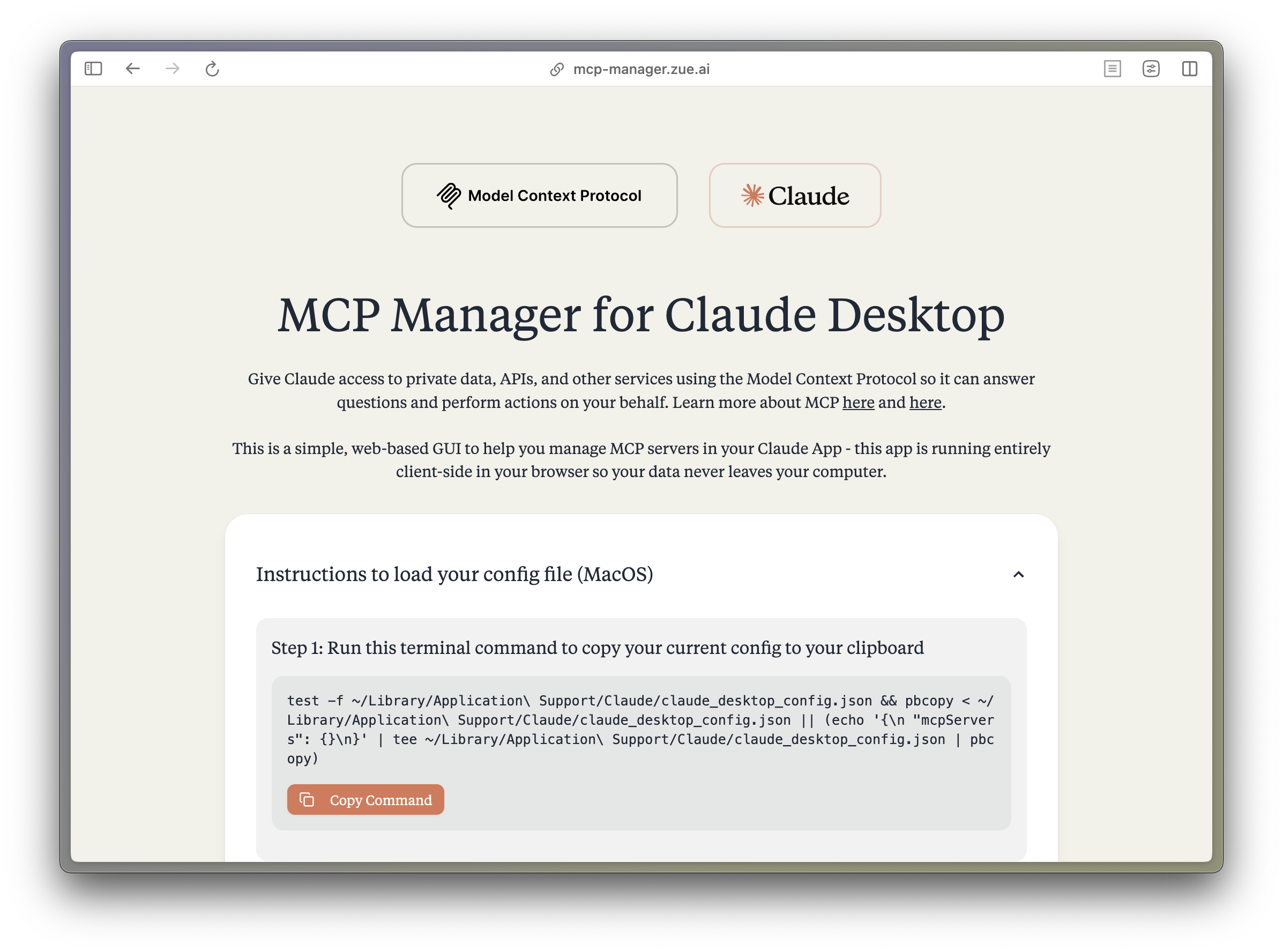
<h1 align="center">MCP Manager for Claude Desktop</h1>
<p align="center">A simple web GUI to manage Model Context Protocol (MCP) servers for the Claude Desktop app on MacOS easily. Just follow the instructions and paste a few commands to give your Claude app instant superpowers. </p>
## What is MCP?
The Model Context Protocol (MCP) enables Claude to access private data, APIs, and other services to answer questions and perform actions on your behalf. Learn more about MCP at:
- [modelcontextprotocol.io](https://modelcontextprotocol.io)
- [Anthropic's MCP Announcement](https://www.anthropic.com/news/model-context-protocol)
## Features
- 🚀 Easy-to-use interface for managing MCP servers
- 🔒 Runs entirely client-side - your data never leaves your computer
- ⚡️ Quick setup for popular MCP servers:
- Apple Notes - Access and search your Apple Notes
- AWS Knowledge Base - Access and query AWS Knowledge Base for information retrieval
- Brave Search - Search the web with Brave Search API
- Browserbase - Let Claude explore the web with Browserbase
- Cloudflare - Manage your Cloudflare workers and account resources
- Everart - Interface with Everart API for digital art and design tools
- Exa - Search the web with Exa
- Filesystem - Access and manage local filesystem
- GitHub - Access your GitHub repositories
- GitLab - Manage GitLab repositories and resources
- Google Drive - Access and search files in your Google Drive
- Google Maps - Access Google Maps API for location services
- Memory - Give Claude memory of previous conversations
- Obsidian - Read and search files in your Obsidian vault
- Perplexity - Search the web with Perplexity API
- PostgreSQL - Connect and interact with PostgreSQL databases
- Puppeteer - Automate browser interactions
- Sequential Thinking - Enable step-by-step reasoning
- Slack - Access your Slack workspace
- SQLite - Manage SQLite databases
- Todoist - Access and search your Todoist tasks
- YouTube Transcript - Access and search YouTube transcripts
- 🛠 Simple configuration of environment variables and server settings
- 📋 One-click copying of terminal commands for installation
## Tech Stack
- **Frontend Framework**: React 18 with TypeScript
- **Build Tool**: Vite
- **Styling**:
- TailwindCSS for utility-first CSS
- DaisyUI for component styling
- Tiempos Font to match the Anthropic Design Language
- **Package Manager**: Bun
- **Deployment**: Cloudflare Pages for <60s build times
## Project Structure
```plaintext
src/
├── components/ # React components
│ ├── server-configs/ # Server-specific configuration components
│ └── ...
├── assets/ # Static assets and fonts
├── App.tsx # Main application component
├── server-configs.ts # MCP server configurations
└── utils.ts # Utility functions
```
## Development
1. Install dependencies:
```bash
bun install
```
2. Start the dev server:
```bash
bun dev
```
3. Build for production:
```bash
bun run build
```
## Contributing
Contributions are extremely welcome! Please open a PR with new MCP servers or any other improvements to the codebase.
PS. I wasnt able to get fetch, time, and sentry working, if you can help me out, that would be great!
## Disclaimer
This project is not affiliated with Anthropic. All logos are trademarks of their respective owners.
## License
MIT
---
<br/>
<br/>
<p align="center">
<a href="https://zue.ai#gh-light-mode-only">
<img src="https://assets.zue.ai/logo_zue_purple.svg" alt="zue logo" width="200" height="auto" style="display: block; margin: 0 auto;" />
</a>
<a href="https://zue.ai#gh-dark-mode-only">
<img src="https://assets.zue.ai/logo_zue_yellow.svg" alt="zue logo" width="200" height="auto" style="display: block; margin: 0 auto;" />
</a>
</p>
<p align="center">
<a href="https://zue.ai/talk-to-us">Contact us</a> for custom AI automation solutions and product development.
</p>
================================================
FILE: biome.json
================================================
{
"files": {
"ignore": ["dist/**/*", "node_modules/**/*", "public/**/*", "**/*.css"]
},
"linter": {
"enabled": true,
"rules": {
"recommended": true,
"suspicious": {
"noArrayIndexKey": "off"
}
},
"ignore": ["**/*.md", "**/*.css"]
},
"formatter": {
"enabled": true,
"indentStyle": "tab",
"indentWidth": 4
},
"javascript": {
"formatter": {
"semicolons": "asNeeded",
"trailingCommas": "none"
}
},
"json": {
"parser": {
"allowComments": true
}
}
}
================================================
FILE: eslint.config.js
================================================
import js from "@eslint/js"
import reactHooks from "eslint-plugin-react-hooks"
import reactRefresh from "eslint-plugin-react-refresh"
import globals from "globals"
import tseslint from "typescript-eslint"
export default tseslint.config(
{ ignores: ["dist"] },
{
extends: [js.configs.recommended, ...tseslint.configs.recommended],
files: ["**/*.{ts,tsx}"],
languageOptions: {
ecmaVersion: 2020,
globals: globals.browser
},
plugins: {
"react-hooks": reactHooks,
"react-refresh": reactRefresh
},
rules: {
...reactHooks.configs.recommended.rules,
"react-refresh/only-export-components": [
"warn",
{ allowConstantExport: true }
],
"@typescript-eslint/no-unused-vars": "off"
}
}
)
================================================
FILE: index.html
================================================
<!doctype html>
<html lang="en" data-theme="light" class="min-h-screen bg-[#f2f1e9]">
<head>
<meta charset="UTF-8" />
<link rel="icon" type="image/ico" href="/mcp-favicon.ico" />
<meta name="viewport" content="width=device-width, initial-scale=1.0" />
<meta name="description"
content="MCP Manager for Claude Desktop - A simple web GUI to manage Model Context Protocol (MCP) servers. Configure and manage your Claude.app's superpowers with ease." />
<title>MCP Manager for Claude Desktop</title>
</head>
<body class="min-h-screen h-full">
<div id="root"></div>
<script type="module" src="/src/main.tsx"></script>
</body>
</html>
================================================
FILE: package.json
================================================
{
"name": "mcp-manager",
"private": true,
"version": "0.0.0",
"type": "module",
"scripts": {
"dev": "bun check && vite --port 7777",
"build": "bun check && vite build",
"lint": "eslint .",
"preview": "vite preview",
"check": "tsc --noEmit && biome check --write ."
},
"dependencies": {
"lucide-react": "^0.468.0",
"react": "^18.3.1",
"react-dom": "^18.3.1"
},
"devDependencies": {
"@biomejs/biome": "^1.9.4",
"@eslint/js": "^9.15.0",
"@types/node": "^22.10.1",
"@types/react": "^18.3.12",
"@types/react-dom": "^18.3.1",
"@vitejs/plugin-react": "^4.3.4",
"autoprefixer": "^10.4.20",
"daisyui": "^4.12.14",
"eslint": "^9.15.0",
"eslint-plugin-react-hooks": "^5.0.0",
"eslint-plugin-react-refresh": "^0.4.14",
"globals": "^15.12.0",
"postcss": "^8.4.49",
"tailwindcss": "^3.4.16",
"typescript": "~5.6.2",
"typescript-eslint": "^8.15.0",
"vite": "^6.0.1"
}
}
================================================
FILE: postcss.config.js
================================================
export default {
plugins: {
tailwindcss: {},
autoprefixer: {}
}
}
================================================
FILE: public/robots.txt
================================================
User-agent: *
Allow: /
================================================
FILE: src/App.tsx
================================================
import { ApplyingInstructions } from "@/components/applying-instructions"
import { LoadingInstructions } from "@/components/loading-instructions"
import { MCPServers } from "@/components/mcp-servers"
import { SERVER_CONFIGS } from "@/server-configs"
import type React from "react"
import { useState } from "react"
function App() {
const [jsonContent, setJsonContent] = useState<{
mcpServers: Record<
string,
{ command: string; args: string[]; env?: Record<string, string> }
>
}>({
mcpServers: {}
})
const [uploadStatus, setUploadStatus] = useState<
"idle" | "success" | "error"
>("idle")
const [isInstructionsOpen, setIsInstructionsOpen] = useState(true)
const handleJsonInput = (e: React.ChangeEvent<HTMLTextAreaElement>) => {
try {
const content = JSON.parse(e.target.value)
setJsonContent(content)
setUploadStatus("success")
setIsInstructionsOpen(false) // Close accordion on successful upload
} catch (error) {
console.error("Error parsing JSON:", error)
setUploadStatus("error")
}
}
const handleServerAdd = (serverType: keyof typeof SERVER_CONFIGS) => {
const serverConfig = SERVER_CONFIGS[serverType]
// Ensure we only add servers with required properties
const newServer = {
command: serverConfig.command as string,
args: serverConfig.args as string[],
...(serverConfig.env && { env: serverConfig.env })
}
setJsonContent({
...jsonContent,
mcpServers: {
...jsonContent.mcpServers,
[serverType]: newServer
}
})
}
const handleServerRemove = (serverType: string) => {
// Remove from mcpServers if present
if (jsonContent.mcpServers[serverType]) {
const { [serverType]: _, ...rest } = jsonContent.mcpServers
setJsonContent({
...jsonContent,
mcpServers: rest
})
}
}
return (
<main className="max-h-screen p-16">
<div className="container mx-auto p-4 max-w-4xl">
<div className="flex justify-center items-center gap-8 mb-16">
<div className="flex items-center justify-center rounded-2xl h-16 p-8 border-2 border-black/20">
<img
src="/mcp-logo.svg"
alt="MCP Manager"
className="h-8"
/>
</div>
<div className="flex items-center justify-center rounded-2xl p-8 h-16 border-2 border-primary/30">
<img
src="/claude-logo.svg"
alt="Claude"
className="h-6"
/>
</div>
</div>
<h1 className="text-5xl font-light text-center my-8">
MCP Manager for Claude Desktop
</h1>
<div className="flex justify-center">
<span className="text-md text-center mb-8">
Give Claude access to private data, APIs, and other
services using the Model Context Protocol so it can
answer questions and perform actions on your behalf.{" "}
<br />
<br />
In a nutshell, MCP servers are like plugins that give
Claude (the "client") prompts, resources, and tools to
perform actions on your behalf. Read the{" "}
<a
href="https://modelcontextprotocol.io"
className="link"
target="_blank"
rel="noreferrer"
>
MCP docs
</a>{" "}
or check out{" "}
<a
href="https://www.anthropic.com/news/model-context-protocol"
className="link"
target="_blank"
rel="noreferrer"
>
Anthropic's announcement
</a>{" "}
to learn more.
<br />
<br />
This is a simple, web-based GUI to help you install and
manage MCP servers in your Claude App. <br />
This runs client-side in your browser so your data will
never leave your computer.
</span>
</div>
<div className="space-y-6">
<LoadingInstructions
isOpen={isInstructionsOpen}
onOpenChange={setIsInstructionsOpen}
onJsonInput={handleJsonInput}
uploadStatus={uploadStatus}
/>
{Object.keys(jsonContent).length > 0 &&
uploadStatus === "success" && (
<div className="space-y-6">
<MCPServers
jsonContent={{
mcpServers:
jsonContent.mcpServers as Record<
string,
{
command: string
args: string[]
env?: Record<string, string>
}
>
}}
onUpdate={setJsonContent}
onServerAdd={handleServerAdd}
onServerRemove={handleServerRemove}
/>
{Object.keys(jsonContent.mcpServers).length >
0 && (
<ApplyingInstructions
jsonContent={jsonContent}
/>
)}
</div>
)}
</div>
<div className="flex justify-center my-16">
<span className="text-sm text-center text-black/50">
This project is not affiliated with Anthropic. All logos
are trademarks of their respective owners.
</span>
</div>
</div>
</main>
)
}
export default App
================================================
FILE: src/components/applying-instructions.tsx
================================================
import { TerminalCommand } from "@/components/terminal-command"
import { SERVER_CONFIGS } from "@/server-configs"
import type { ServerConfig } from "@/server-configs"
type RuntimeServerConfig = {
command: string
args: string[]
env?: Record<string, string>
}
type ApplyingInstructionsProps = {
jsonContent: {
mcpServers: Record<string, RuntimeServerConfig>
cloudflare?: unknown
}
}
export function ApplyingInstructions({
jsonContent
}: ApplyingInstructionsProps) {
const serversNeedingSetup = Object.keys(jsonContent.mcpServers).filter(
(serverType) =>
SERVER_CONFIGS[serverType as keyof typeof SERVER_CONFIGS]
?.setupCommands
)
// Helper function to modify the JSON content with absolute paths
const getJsonWithAbsolutePaths = () => {
const { cloudflare: _, ...modifiedContent } = jsonContent
for (const [serverType, config] of Object.entries(
modifiedContent.mcpServers
)) {
const serverConfig =
SERVER_CONFIGS[serverType as keyof typeof SERVER_CONFIGS]
if (serverConfig?.setupCommands) {
// Update the args to use the shell variable expansion syntax
config.args = config.args?.map((arg) => {
if (arg.includes("index.js")) {
switch (serverType) {
case "exa":
return "$HOME_DIR/mcp-servers/exa-mcp-server-main/build/index.js"
case "browserbase":
return "$HOME_DIR/mcp-servers/mcp-server-browserbase-main/browserbase/dist/index.js"
default:
return arg
}
}
return arg
})
}
}
return modifiedContent
}
return (
<div className="join join-vertical w-full">
<div className="collapse collapse-arrow join-item border border-base-300 bg-white mb-16 p-4">
<input type="checkbox" />
<h2 className="collapse-title text-xl font-tiempos-regular my-4">
Apply your changes
</h2>
<div className="collapse-content space-y-4">
<div className="bg-base-200 rounded-xl p-4">
<h3 className="text-lg font-tiempos-regular">
Step 1: Install Node.js and uv by running these
commands (if not already installed)
</h3>
<div className="space-y-4 mt-4">
<TerminalCommand
command={
'curl -fsSL https://fnm.vercel.app/install | bash && source ~/.zshrc && eval "$(fnm env --use-on-cd --shell zsh)" >> ~/.zshrc && source ~/.zshrc && fnm use --install-if-missing 22 && node -v'
}
/>
If the command above fails, install Node.js by
downloading the installer from{" "}
<a
href="https://nodejs.org/en/download/prebuilt-installer"
target="_blank"
rel="noopener noreferrer"
className="link link-primary"
>
https://nodejs.org/en/download/prebuilt-installer
</a>
<TerminalCommand
command={
"curl -LsSf https://astral.sh/uv/install.sh | sh && source $HOME/.cargo/env && uv python install"
}
/>
</div>
</div>
<div className="bg-base-200 rounded-xl p-4">
<div className="space-y-4">
<div>
<h3 className="text-lg font-tiempos-regular mb-4">
Step 2: Save your MCP servers to Claude by
running:
</h3>
<TerminalCommand
command={`HOME_DIR=$(echo $HOME) && echo '${JSON.stringify(
getJsonWithAbsolutePaths(),
null,
2
).replace(
/\$HOME_DIR/g,
"'\"$HOME_DIR\"'"
)}' > "$HOME_DIR/Library/Application Support/Claude/claude_desktop_config.json"`}
/>
</div>
</div>
</div>
{serversNeedingSetup.length > 0 && (
<div className="bg-base-200 rounded-xl p-4">
<h3 className="text-lg font-tiempos-regular mb-4">
Step 3: Some servers require additional setup.
Run the following commands:
</h3>
{serversNeedingSetup.map((serverType) => (
<div key={serverType} className="mb-4">
<p className="text-md mb-2">
{serverType.charAt(0).toUpperCase() +
serverType.slice(1)}
:
</p>
<TerminalCommand
command={
SERVER_CONFIGS[
serverType as keyof typeof SERVER_CONFIGS
]?.setupCommands?.command || ""
}
/>
</div>
))}
</div>
)}
<div className="bg-base-200 rounded-xl p-4 mt-4">
<h3 className="text-lg font-tiempos-regular">
Step {serversNeedingSetup.length > 0 ? "4" : "3"}:
Restart Claude.app
</h3>
</div>
</div>
</div>
</div>
)
}
================================================
FILE: src/components/loading-instructions.tsx
================================================
import { TerminalCommand } from "@/components/terminal-command"
import { Check, XCircle } from "lucide-react"
import type { ChangeEvent } from "react"
interface LoadingInstructionsProps {
isOpen: boolean
onOpenChange: (isOpen: boolean) => void
onJsonInput: (e: ChangeEvent<HTMLTextAreaElement>) => void
uploadStatus: "idle" | "success" | "error"
}
export function LoadingInstructions({
isOpen,
onOpenChange,
onJsonInput,
uploadStatus
}: LoadingInstructionsProps) {
const command =
"test -f ~/Library/Application\\ Support/Claude/claude_desktop_config.json && pbcopy < ~/Library/Application\\ Support/Claude/claude_desktop_config.json || (echo '{\\n \"mcpServers\": {}\\n}' | tee ~/Library/Application\\ Support/Claude/claude_desktop_config.json | pbcopy)"
return (
<div className="join join-vertical w-full">
<div className="collapse collapse-arrow join-item border border-base-300 bg-white p-4">
<input
type="checkbox"
checked={isOpen}
onChange={(e) => onOpenChange(e.target.checked)}
aria-label="MacOS Instructions"
/>
<h2 className="collapse-title text-xl my-4">
MacOS Instructions
</h2>
<div className="collapse-content">
<div className="prose">
<div className="space-y-6">
<div className="bg-base-200 rounded-xl p-4">
<div className="space-y-4">
<h3 className="text-lg font-tiempos-regular">
Step 1: Run this terminal command to
copy your current MCP config to the
clipboard.
</h3>
<p className="text-sm opacity-80">
If you've never used MCP before, this
will create a blank config file and copy
its contents.
</p>
<TerminalCommand command={command} />
</div>
</div>
<div className="bg-base-200 rounded-xl p-4">
<div>
<h3 className="text-lg font-tiempos-regular mb-4">
Step 2: Paste your config below.
</h3>
<textarea
className="textarea textarea-bordered w-full h-16 font-mono"
placeholder="Paste the copied JSON content here..."
onChange={onJsonInput}
/>
{uploadStatus === "success" && (
<div className="mt-2 flex items-center text-primary">
<Check className="w-5 h-5" />
<span className="ml-2">
Valid MCP Configuration
</span>
</div>
)}
{uploadStatus === "error" && (
<div className="mt-2 flex items-center text-error">
<XCircle className="w-5 h-5" />
<span className="ml-2">
Error: Please ensure the content
is valid JSON.
</span>
</div>
)}
</div>
</div>
</div>
</div>
</div>
</div>
</div>
)
}
================================================
FILE: src/components/mcp-server-card.tsx
================================================
import { EnvConfig } from "@/components/server-configs/env-config"
import { FilesystemConfig } from "@/components/server-configs/filesystem-config"
import { ObsidianConfig } from "@/components/server-configs/obsidian-config"
import { PostgresConfig } from "@/components/server-configs/postgres-config"
import { SentryConfig } from "@/components/server-configs/sentry-config"
import { SQLiteConfig } from "@/components/server-configs/sqlite-config"
import { TerminalCommand } from "@/components/terminal-command"
import { SERVER_CONFIGS } from "@/server-configs"
import { ArrowUpRight, Trash2 } from "lucide-react"
type MCPServerConfig = {
command: string
args: string[]
env?: Record<string, string>
}
type MCPServerCardProps = {
serverName: string
config: MCPServerConfig
icon?: string
onUpdate: (name: string, newConfig: MCPServerConfig) => void
onDelete: (name: string) => void
}
export function MCPServerCard({
serverName,
config,
icon,
onUpdate,
onDelete
}: MCPServerCardProps) {
const handleFilesystemUpdate = (paths: string[]) => {
const newConfig = {
...config,
args: [...config.args.slice(0, 2), ...paths]
}
onUpdate(serverName, newConfig)
}
const handlePostgresUpdate = (url: string) => {
const newConfig = {
...config,
args: [...config.args.slice(0, 2), url]
}
onUpdate(serverName, newConfig)
}
const handleEnvUpdate = (key: string, value: string) => {
const newConfig = {
...config,
env: {
...(config.env || {}),
[key]: value
}
}
onUpdate(serverName, newConfig)
}
const handleSqliteUpdate = (dbPath: string) => {
const newConfig = {
...config,
args: [
"--directory",
"parent_of_servers_repo/servers/src/sqlite",
"run",
"mcp-server-sqlite",
"--db-path",
dbPath
]
}
onUpdate(serverName, newConfig)
}
const handleObsidianUpdate = (path: string) => {
const newConfig = {
...config,
args: [...config.args.slice(0, 2), path]
}
onUpdate(serverName, newConfig)
}
const handleSentryUpdate = (token: string) => {
const newConfig = {
...config,
args: [...config.args.slice(0, 2), token]
}
onUpdate(serverName, newConfig)
}
const handleDelete = (e: React.MouseEvent) => {
e.stopPropagation()
onDelete(serverName)
}
const serverConfig =
SERVER_CONFIGS[serverName as keyof typeof SERVER_CONFIGS]
const isFilesystemServer = serverName === "filesystem"
const isPostgresServer = serverName === "postgres"
const isSqliteServer = serverName === "sqlite"
const isObsidianServer = serverName === "obsidian"
const isSentryServer = serverName === "sentry"
const iconUrl = icon || serverConfig?.icon
return (
<div className="join join-vertical w-full">
<div className="collapse collapse-arrow join-item border border-base-300 bg-white p-4">
<input type="checkbox" defaultChecked />
<div className="collapse-title">
<div className="flex items-center">
<div className="flex items-center gap-2">
{iconUrl && (
<img
src={iconUrl}
alt={`${serverName} icon`}
className="w-20 h-12 object-contain"
onError={(e) => {
e.currentTarget.style.display = "none"
}}
/>
)}
<h3 className="text-lg capitalize">{serverName}</h3>
</div>
</div>
</div>
<div className="collapse-content">
{isFilesystemServer ? (
<FilesystemConfig
initialPaths={[config.args[2] || "/Users/"]}
onUpdate={handleFilesystemUpdate}
/>
) : isPostgresServer ? (
<PostgresConfig
initialUrl={config.args[2]}
onUpdate={handlePostgresUpdate}
/>
) : isSqliteServer ? (
<SQLiteConfig
initialPath={config.args[5]}
onUpdate={handleSqliteUpdate}
/>
) : isObsidianServer ? (
<ObsidianConfig
initialPath={config.args[2]}
onUpdate={handleObsidianUpdate}
/>
) : isSentryServer ? (
<SentryConfig
initialToken={config.args[2]}
onUpdate={handleSentryUpdate}
/>
) : serverConfig?.env &&
Object.keys(serverConfig.env).length > 0 ? (
<EnvConfig
env={serverConfig.env}
initialValues={config.env || {}}
onUpdate={handleEnvUpdate}
/>
) : null}
{serverConfig?.docsUrl ===
"https://github.com/cloudflare/mcp-server-cloudflare" && (
<div className="bg-base-200 rounded-xl p-4 space-y-4">
<p className="text-sm text-gray-600">
MCP Manager can't update this server directly,
please run this terminal command to modify this
server.
</p>
<TerminalCommand
command={
serverConfig?.setupCommands?.command ?? ""
}
/>
</div>
)}
</div>
<div className="flex justify-end">
<div className="flex gap-2 mb-4 mr-2">
<button
type="button"
onClick={() =>
window.open(serverConfig?.docsUrl, "_blank")
}
className="btn btn-sm btn-secondary"
>
<ArrowUpRight className="w-4 h-4" />
<span>Docs</span>
</button>
</div>
<div className="flex gap-2 mb-4 mr-4 justify-end">
<button
type="button"
onClick={handleDelete}
className="btn btn-sm bg-red-50 hover:bg-red-100"
>
<Trash2 className="w-4 h-4" />
<span>Delete</span>
</button>
</div>
</div>
</div>
</div>
)
}
================================================
FILE: src/components/mcp-servers.tsx
================================================
import { MCPServerCard } from "@/components/mcp-server-card"
import { SERVER_CONFIGS } from "@/server-configs"
import { capitalizeFirstLetter } from "@/utils"
import { Plus, Save, X } from "lucide-react"
type MCPServer = {
command: string
args: string[]
}
type MCPServers = {
[key: string]: MCPServer
}
type MCPConfig = {
mcpServers: MCPServers
}
type MCPServersProps = {
jsonContent: MCPConfig
onUpdate: (newContent: MCPConfig) => void
onServerAdd: (serverType: keyof typeof SERVER_CONFIGS) => void
onServerRemove: (serverType: string) => void
}
export function MCPServers({
jsonContent,
onUpdate,
onServerAdd,
onServerRemove
}: MCPServersProps) {
const handleServerUpdate = (name: string, newConfig: MCPServer) => {
const updatedContent = {
...jsonContent,
mcpServers: {
...jsonContent.mcpServers,
[name]: newConfig
}
}
onUpdate(updatedContent)
}
const handleServerDelete = (name: string) => {
onServerRemove(name)
}
const hasServers = Object.keys(jsonContent.mcpServers).length > 0
return (
<div className="space-y-4 my-32">
<div className="flex justify-between items-center mb-8">
<div className="flex items-center gap-4">
<h2 className="text-2xl text-center">Your MCP Servers</h2>
<button
type="button"
className="btn btn-primary btn-sm"
onClick={() =>
(
document.getElementById(
"add_server_modal"
) as HTMLDialogElement
)?.showModal()
}
>
<Plus className="w-4 h-4" />
<span>Add Server</span>
</button>
</div>
</div>
<dialog id="add_server_modal" className="modal backdrop-blur-sm">
<div className="modal-box rounded-3xl">
<div className="flex justify-between items-center mb-4 sticky top-0 py-4 -mt-4 -mx-6 px-6">
<h3 className="text-xl ml-4">Add New Server</h3>
<button
type="button"
className="btn btn-square btn-ghost"
onClick={() =>
(
document.getElementById(
"add_server_modal"
) as HTMLDialogElement
)?.close()
}
>
<X className="w-4 h-4" />
</button>
</div>
<div className="grid gap-4 py-4 max-h-[70vh] overflow-y-auto px-4">
{Object.keys(SERVER_CONFIGS).map((serverType) => (
<button
key={serverType}
type="button"
className="w-full bg-base-200 hover:bg-base-300 rounded-3xl p-4 flex items-center gap-6 h-24"
onClick={() => {
onServerAdd(
serverType as keyof typeof SERVER_CONFIGS
)
;(
document.getElementById(
"add_server_modal"
) as HTMLDialogElement
)?.close()
}}
>
<div className="my-auto mx-2">
<img
src={
SERVER_CONFIGS[
serverType as keyof typeof SERVER_CONFIGS
].icon
}
alt={`${serverType} icon`}
className="w-10 h-10 object-contain"
/>
</div>
<div className="flex flex-col text-left w-full">
<span className="text-xl font-normal mb-1">
{capitalizeFirstLetter(serverType)}
</span>
<p className="text-sm opacity-80">
{
SERVER_CONFIGS[
serverType as keyof typeof SERVER_CONFIGS
].description
}
</p>
</div>
</button>
))}
</div>
</div>
<form method="dialog" className="modal-backdrop">
<button type="button">close</button>
</form>
</dialog>
<div className="space-y-4">
{hasServers ? (
Object.entries(jsonContent.mcpServers).map(
([name, config]) => {
const serverConfig =
SERVER_CONFIGS[
name as keyof typeof SERVER_CONFIGS
]
return (
<MCPServerCard
key={name}
serverName={name}
config={config}
icon={serverConfig?.icon}
onUpdate={handleServerUpdate}
onDelete={handleServerDelete}
/>
)
}
)
) : (
<p className=" text-gray-500 text-center">
You currently have no MCP servers configured. Add one by
clicking the "Add Server" button.
</p>
)}
</div>
</div>
)
}
================================================
FILE: src/components/server-configs/env-config.tsx
================================================
import { useState } from "react"
type EnvConfigProps = {
env: Record<string, string>
initialValues: Record<string, string>
onUpdate: (key: string, value: string) => void
}
export function EnvConfig({ env, initialValues, onUpdate }: EnvConfigProps) {
const [envValues, setEnvValues] =
useState<Record<string, string>>(initialValues)
const handleEnvChange = (key: string, value: string) => {
setEnvValues((prev) => ({ ...prev, [key]: value }))
onUpdate(key, value)
}
return (
<div className="bg-base-200 rounded-xl p-4 mb-4 space-y-4">
<div className="space-y-2">
{Object.entries(env).map(([key]) => (
<div key={key} className="form-control">
<label htmlFor={`env-${key}`} className="label">
<span className="label-text mb-2">{key}</span>
</label>
<input
id={`env-${key}`}
type="text"
placeholder={`Paste your ${key} here`}
className="input input-bordered w-full"
value={envValues[key] || ""}
onChange={(e) =>
handleEnvChange(key, e.target.value)
}
/>
</div>
))}
</div>
</div>
)
}
================================================
FILE: src/components/server-configs/filesystem-config.tsx
================================================
import { Plus, X } from "lucide-react"
import { useState } from "react"
type FilesystemConfigProps = {
initialPaths: string[]
onUpdate: (paths: string[]) => void
}
export function FilesystemConfig({
initialPaths,
onUpdate
}: FilesystemConfigProps) {
const [filesystemPaths, setFilesystemPaths] =
useState<string[]>(initialPaths)
const handleFilesystemPathChange = (value: string, index: number) => {
const newPaths = [...filesystemPaths]
newPaths[index] = value
setFilesystemPaths(newPaths)
}
const handleFilesystemPathBlur = () => {
onUpdate(filesystemPaths)
}
const handleAddPath = () => {
const newPaths = [...filesystemPaths, ""]
setFilesystemPaths(newPaths)
onUpdate(newPaths)
}
const handleRemovePath = (index: number) => {
const newPaths = filesystemPaths.filter((_, i) => i !== index)
setFilesystemPaths(newPaths)
onUpdate(newPaths)
}
return (
<div className="bg-base-200 rounded-xl p-4 mb-4 space-y-4">
<div className="space-y-4">
{filesystemPaths.map((path, index) => (
<div key={index} className="flex items-center gap-2">
<div className="form-control flex-1">
<label
htmlFor={`filesystem-path-${index}`}
className="label"
>
<span className="label-text mb-2">
Allowed Directory Path{" "}
{filesystemPaths.length > 1
? index + 1
: ""}
</span>
</label>
<input
id={`filesystem-path-${index}`}
type="text"
placeholder="Enter the directory path (e.g., /Users/username/Documents)"
className="input input-bordered w-full"
value={path}
onChange={(e) =>
handleFilesystemPathChange(
e.target.value,
index
)
}
onBlur={handleFilesystemPathBlur}
/>
</div>
{filesystemPaths.length > 1 && (
<button
type="button"
className="btn btn-ghost btn-sm mt-8"
onClick={() => handleRemovePath(index)}
>
<X className="w-4 h-4" />
</button>
)}
</div>
))}
<button
type="button"
className="btn btn-ghost btn-sm"
onClick={handleAddPath}
>
<Plus className="w-4 h-4" />
<span>Add Another Path</span>
</button>
</div>
</div>
)
}
================================================
FILE: src/components/server-configs/obsidian-config.tsx
================================================
import { useState } from "react"
type ObsidianConfigProps = {
initialPath: string
onUpdate: (path: string) => void
}
export function ObsidianConfig({ initialPath, onUpdate }: ObsidianConfigProps) {
const [vaultPath, setVaultPath] = useState(initialPath)
const handleVaultPathChange = (value: string) => {
setVaultPath(value)
}
const handleVaultPathBlur = () => {
onUpdate(vaultPath)
}
return (
<div className="bg-base-200 rounded-xl p-4 mb-4 space-y-4">
<div className="form-control">
<label htmlFor="vault-path" className="label">
<span className="label-text mb-2">Obsidian Vault Path</span>
</label>
<input
id="vault-path"
type="text"
placeholder="Path to your Obsidian vault, e.g. /Users/yourname/Documents/MyVault"
className="input input-bordered w-full"
value={vaultPath}
onChange={(e) => handleVaultPathChange(e.target.value)}
onBlur={handleVaultPathBlur}
/>
</div>
</div>
)
}
================================================
FILE: src/components/server-configs/postgres-config.tsx
================================================
import { useState } from "react"
type PostgresConfigProps = {
initialUrl: string
onUpdate: (url: string) => void
}
export function PostgresConfig({ initialUrl, onUpdate }: PostgresConfigProps) {
const [postgresUrl, setPostgresUrl] = useState(initialUrl)
const handlePostgresUrlChange = (value: string) => {
setPostgresUrl(value)
}
const handlePostgresUrlBlur = () => {
onUpdate(postgresUrl)
}
return (
<div className="bg-base-200 rounded-xl p-4 mb-4 space-y-4">
<div className="form-control">
<label htmlFor="postgres-url" className="label">
<span className="label-text mb-2">
PostgreSQL Connection URL
</span>
</label>
<input
id="postgres-url"
type="text"
placeholder="postgresql://localhost/mydb"
className="input input-bordered w-full"
value={postgresUrl}
onChange={(e) => handlePostgresUrlChange(e.target.value)}
onBlur={handlePostgresUrlBlur}
/>
</div>
</div>
)
}
================================================
FILE: src/components/server-configs/sentry-config.tsx
================================================
import { useState } from "react"
type SentryConfigProps = {
initialToken: string
onUpdate: (token: string) => void
}
export function SentryConfig({ initialToken, onUpdate }: SentryConfigProps) {
const [authToken, setAuthToken] = useState(initialToken)
const handleAuthTokenChange = (value: string) => {
setAuthToken(value)
}
const handleAuthTokenBlur = () => {
onUpdate(authToken)
}
return (
<div className="bg-base-200 rounded-xl p-4 mb-4 space-y-4">
<div className="form-control">
<label htmlFor="sentry-token" className="label">
<span className="label-text mb-2">
Sentry Authentication Token
</span>
</label>
<input
id="sentry-token"
type="text"
placeholder="your-auth-token"
className="input input-bordered w-full"
value={authToken}
onChange={(e) => handleAuthTokenChange(e.target.value)}
onBlur={handleAuthTokenBlur}
/>
</div>
</div>
)
}
================================================
FILE: src/components/server-configs/sqlite-config.tsx
================================================
import { useState } from "react"
type SQLiteConfigProps = {
initialPath: string
onUpdate: (dbPath: string) => void
}
export function SQLiteConfig({ initialPath, onUpdate }: SQLiteConfigProps) {
const [dbPath, setDbPath] = useState(initialPath)
const handleDbPathChange = (value: string) => {
setDbPath(value)
}
const handleDbPathBlur = () => {
onUpdate(dbPath)
}
return (
<div className="bg-base-200 rounded-xl p-4 mb-4 space-y-4">
<div className="form-control">
<label htmlFor="sqlite-path" className="label">
<span className="label-text mb-2">
SQLite Database Path
</span>
</label>
<input
id="sqlite-path"
type="text"
placeholder="~/my-database.db"
className="input input-bordered w-full"
value={dbPath}
onChange={(e) => handleDbPathChange(e.target.value)}
onBlur={handleDbPathBlur}
/>
</div>
</div>
)
}
================================================
FILE: src/components/terminal-command.tsx
================================================
import { Check, Copy } from "lucide-react"
import { useState } from "react"
interface TerminalCommandProps {
command: string
className?: string
}
export function TerminalCommand({
command,
className = ""
}: TerminalCommandProps) {
const [hasCopied, setHasCopied] = useState(false)
const handleCopy = () => {
navigator.clipboard.writeText(command)
setHasCopied(true)
setTimeout(() => setHasCopied(false), 2000)
}
return (
<div className={`bg-base-300 rounded-xl p-4 mb-4 ${className}`}>
<p className="font-mono text-sm mb-4 break-all">{command}</p>
<button
type="button"
onClick={handleCopy}
className="btn btn-primary btn-sm"
>
{hasCopied ? (
<Check className="w-4 h-4" />
) : (
<Copy className="w-4 h-4" />
)}
<span className="ml-2">
{hasCopied ? "Copied!" : "Copy Command"}
</span>
</button>
</div>
)
}
================================================
FILE: src/index.css
================================================
@tailwind base;
@tailwind components;
@tailwind utilities;
@font-face {
font-family: "Tiempos Text";
src: url("./assets/tiempos-text-web-semibold.woff2") format("woff2");
font-weight: 600;
font-display: swap;
}
@font-face {
font-family: "Tiempos Text";
src: url("./assets/tiempos-text-web-regular.woff2") format("woff2");
font-weight: 400;
font-display: swap;
}
@layer base {
h1 {
@apply font-tiempos-semibold;
}
h2 {
@apply font-tiempos-semibold;
}
h3 {
@apply font-tiempos-regular;
}
p {
@apply font-tiempos-regular;
}
span {
@apply font-tiempos-regular;
font-weight: 400;
}
}
.collapse {
border-radius: 1.5rem;
box-shadow: 0 10px 10px 0 rgba(0, 0, 0, 0.05);
}
================================================
FILE: src/main.tsx
================================================
import { StrictMode } from "react"
import { createRoot } from "react-dom/client"
import "@/index.css"
import App from "@/App.tsx"
const rootElement = document.getElementById("root")
if (!rootElement) throw new Error("Root element not found")
createRoot(rootElement).render(
<StrictMode>
<App />
</StrictMode>
)
================================================
FILE: src/server-configs.ts
================================================
export type ServerConfig = {
command?: string
args?: string[]
env?: Record<string, string>
icon: string
description: string
docsUrl: string
setupCommands?: {
installPath: string
command: string
}
}
export const SERVER_CONFIGS: Record<string, ServerConfig> = {
"brave-search": {
icon: "https://www.svgrepo.com/show/305818/brave.svg",
description: "Search the web with Brave Search API",
docsUrl:
"https://github.com/modelcontextprotocol/servers/tree/main/src/brave-search/README.md",
command: "npx",
args: ["-y", "@modelcontextprotocol/server-brave-search"],
env: { BRAVE_API_KEY: "" }
},
filesystem: {
icon: "data:image/svg+xml;base64,PHN2ZyB4bWxucz0iaHR0cDovL3d3dy53My5vcmcvMjAwMC9zdmciIHdpZHRoPSIyNCIgaGVpZ2h0PSIyNCIgdmlld0JveD0iMCAwIDI0IDI0IiBmaWxsPSJub25lIiBzdHJva2U9ImN1cnJlbnRDb2xvciIgc3Ryb2tlLXdpZHRoPSIyIiBzdHJva2UtbGluZWNhcD0icm91bmQiIHN0cm9rZS1saW5lam9pbj0icm91bmQiIGNsYXNzPSJsdWNpZGUgbHVjaWRlLWZvbGRlci1jbG9zZWQiPjxwYXRoIGQ9Ik0yMCAyMGEyIDIgMCAwIDAgMi0yVjhhMiAyIDAgMCAwLTItMmgtNy45YTIgMiAwIDAgMS0xLjY5LS45TDkuNiAzLjlBMiAyIDAgMCAwIDcuOTMgM0g0YTIgMiAwIDAgMC0yIDJ2MTNhMiAyIDAgMCAwIDIgMloiLz48cGF0aCBkPSJNMiAxMGgyMCIvPjwvc3ZnPg==",
description:
"Access and manage local filesystem with specified allowed directories",
command: "npx",
args: ["-y", "@modelcontextprotocol/server-filesystem", "/Users/"],
docsUrl:
"https://github.com/modelcontextprotocol/servers/tree/main/src/filesystem/README.md"
},
memory: {
icon: "data:image/svg+xml;base64,PHN2ZyB4bWxucz0iaHR0cDovL3d3dy53My5vcmcvMjAwMC9zdmciIHdpZHRoPSIyNCIgaGVpZ2h0PSIyNCIgdmlld0JveD0iMCAwIDI0IDI0IiBmaWxsPSJub25lIiBzdHJva2U9ImN1cnJlbnRDb2xvciIgc3Ryb2tlLXdpZHRoPSIyIiBzdHJva2UtbGluZWNhcD0icm91bmQiIHN0cm9rZS1saW5lam9pbj0icm91bmQiIGNsYXNzPSJsdWNpZGUgbHVjaWRlLWJyYWluIj48cGF0aCBkPSJNMTIgNWEzIDMgMCAxIDAtNS45OTcuMTI1IDQgNCAwIDAgMC0yLjUyNiA1Ljc3IDQgNCAwIDAgMCAuNTU2IDYuNTg4QTQgNCAwIDEgMCAxMiAxOFoiLz48cGF0aCBkPSJNMTIgNWEzIDMgMCAxIDEgNS45OTcuMTI1IDQgNCAwIDAgMSAyLjUyNiA1Ljc3IDQgNCAwIDAgMS0uNTU2IDYuNTg4QTQgNCAwIDEgMSAxMiAxOFoiLz48cGF0aCBkPSJNMTUgMTNhNC41IDQuNSAwIDAgMS0zLTQgNC41IDQuNSAwIDAgMS0zIDQiLz48cGF0aCBkPSJNMTcuNTk5IDYuNWEzIDMgMCAwIDAgLjM5OS0xLjM3NSIvPjxwYXRoIGQ9Ik02LjAwMyA1LjEyNUEzIDMgMCAwIDAgNi40MDEgNi41Ii8+PHBhdGggZD0iTTMuNDc3IDEwLjg5NmE0IDQgMCAwIDEgLjU4NS0uMzk2Ii8+PHBhdGggZD0iTTE5LjkzOCAxMC41YTQgNCAwIDAgMSAuNTg1LjM5NiIvPjxwYXRoIGQ9Ik02IDE4YTQgNCAwIDAgMS0xLjk2Ny0uNTE2Ii8+PHBhdGggZD0iTTE5Ljk2NyAxNy40ODRBNCA0IDAgMCAxIDE4IDE4Ii8+PC9zdmc+",
description: "Give Claude memory of previous conversations",
command: "npx",
args: ["-y", "@modelcontextprotocol/server-memory"],
docsUrl:
"https://github.com/modelcontextprotocol/servers/tree/main/src/memory/README.md"
},
"sequential-thinking": {
icon: "data:image/svg+xml;base64,PHN2ZyB4bWxucz0iaHR0cDovL3d3dy53My5vcmcvMjAwMC9zdmciIHdpZHRoPSIyNCIgaGVpZ2h0PSIyNCIgdmlld0JveD0iMCAwIDI0IDI0IiBmaWxsPSJub25lIiBzdHJva2U9ImN1cnJlbnRDb2xvciIgc3Ryb2tlLXdpZHRoPSIyIiBzdHJva2UtbGluZWNhcD0icm91bmQiIHN0cm9rZS1saW5lam9pbj0icm91bmQiIGNsYXNzPSJsdWNpZGUgbHVjaWRlLXNwYXJrbGUiPjxwYXRoIGQ9Ik05LjkzNyAxNS41QTIgMiAwIDAgMCA4LjUgMTQuMDYzbC02LjEzNS0xLjU4MmEuNS41IDAgMCAxIDAtLjk2Mkw4LjUgOS45MzZBMiAyIDAgMCAwIDkuOTM3IDguNWwxLjU4Mi02LjEzNWEuNS41IDAgMCAxIC45NjMgMEwxNC4wNjMgOC41QTIgMiAwIDAgMCAxNS41IDkuOTM3bDYuMTM1IDEuNTgxYS41LjUgMCAwIDEgMCAuOTY0TDE1LjUgMTQuMDYzYTIgMiAwIDAgMC0xLjQzNyAxLjQzN2wtMS41ODIgNi4xMzVhLjUuNSAwIDAgMS0uOTYzIDB6Ii8+PC9zdmc+",
description:
"Enable step-by-step reasoning and sequential problem-solving",
command: "npx",
args: ["-y", "@modelcontextprotocol/server-sequential-thinking"],
docsUrl:
"https://github.com/modelcontextprotocol/servers/tree/main/src/sequentialthinking/README.md"
},
slack: {
icon: "https://icon.icepanel.io/Technology/svg/Slack.svg",
description: "Let Claude access your Slack workspace",
command: "npx",
args: ["-y", "@modelcontextprotocol/server-slack"],
env: {
SLACK_BOT_TOKEN: "",
SLACK_TEAM_ID: ""
},
docsUrl:
"https://github.com/modelcontextprotocol/servers/tree/main/src/slack/README.md"
},
"google-drive": {
icon: "https://upload.wikimedia.org/wikipedia/commons/1/12/Google_Drive_icon_%282020%29.svg",
description: "Access and search files in your Google Drive",
command: "npx",
args: ["-y", "@modelcontextprotocol/server-gdrive"],
docsUrl:
"https://github.com/modelcontextprotocol/servers/tree/main/src/gdrive/README.md"
},
// time: {
// icon: "data:image/svg+xml;base64,PHN2ZyB4bWxucz0iaHR0cDovL3d3dy53My5vcmcvMjAwMC9zdmciIHdpZHRoPSIyNCIgaGVpZ2h0PSIyNCIgdmlld0JveD0iMCAwIDI0IDI0IiBmaWxsPSJub25lIiBzdHJva2U9ImN1cnJlbnRDb2xvciIgc3Ryb2tlLXdpZHRoPSIyIiBzdHJva2UtbGluZWNhcD0icm91bmQiIHN0cm9rZS1saW5lam9pbj0icm91bmQiIGNsYXNzPSJsdWNpZGUgbHVjaWRlLWNsb2NrIj48Y2lyY2xlIGN4PSIxMiIgY3k9IjEyIiByPSIxMCIvPjxwb2x5bGluZSBwb2ludHM9IjEyIDYgMTIgMTIgMTYgMTQiLz48L3N2Zz4=",
// description: "Current time / time zone conversion utilities",
// command: "uvx",
// args: ["mcp-server-time"],
// docsUrl:
// "https://github.com/modelcontextprotocol/servers/tree/main/src/time/README.md"
// },
"google-maps": {
icon: "https://upload.wikimedia.org/wikipedia/commons/b/bd/Google_Maps_Logo_2020.svg",
description: "Access Google Maps API for location and mapping services",
command: "npx",
args: ["-y", "@modelcontextprotocol/server-google-maps"],
env: { GOOGLE_MAPS_API_KEY: "" },
docsUrl:
"https://github.com/modelcontextprotocol/servers/tree/main/src/google-maps/README.md"
},
"youtube-transcript": {
icon: "https://www.svgrepo.com/show/13671/youtube.svg",
description: "Access and search YouTube transcripts",
command: "npx",
args: ["-y", "@kimtaeyoon83/mcp-server-youtube-transcript"],
docsUrl: "https://github.com/kimtaeyoon83/mcp-server-youtube-transcript"
},
perplexity: {
icon: "https://seeklogo.com/images/P/perplexity-ai-logo-13120A0AAE-seeklogo.com.png",
description: "Search the web with Perplexity API",
command: "uvx",
args: ["mcp-server-perplexity"],
env: {
PERPLEXITY_API_KEY: "your-perplexity-api-key"
},
docsUrl: "https://github.com/tanigami/mcp-server-perplexity"
},
// fetch: {
// icon: "data:image/svg+xml;base64,PHN2ZyB4bWxucz0iaHR0cDovL3d3dy53My5vcmcvMjAwMC9zdmciIHdpZHRoPSIyNCIgaGVpZ2h0PSIyNCIgdmlld0JveD0iMCAwIDI0IDI0IiBmaWxsPSJub25lIiBzdHJva2U9ImN1cnJlbnRDb2xvciIgc3Ryb2tlLXdpZHRoPSIyIiBzdHJva2UtbGluZWNhcD0icm91bmQiIHN0cm9rZS1saW5lam9pbj0icm91bmQiIGNsYXNzPSJsdWNpZGUgbHVjaWRlLWdsb2JlIj48Y2lyY2xlIGN4PSIxMiIgY3k9IjEyIiByPSIxMCIvPjxwYXRoIGQ9Ik0xMiAyYTE0LjUgMTQuNSAwIDAgMCAwIDIwIDE0LjUgMTQuNSAwIDAgMCAwLTIwIi8+PHBhdGggZD0iTTIgMTJoMjAiLz48L3N2Zz4=",
// description: "Let Claude fetch and read a website",
// command: "uvx",
// args: ["mcp-server-fetch"],
// docsUrl:
// "https://github.com/modelcontextprotocol/servers/tree/main/src/fetch/README.md"
// },
"apple-notes": {
icon: "https://upload.wikimedia.org/wikipedia/commons/f/fa/Apple_Notes_icon.svg",
description: "Access and search your Apple Notes",
command: "uvx",
args: ["apple-notes-mcp"],
docsUrl: "https://github.com/sirmews/apple-notes-mcp"
},
exa: {
icon: "https://media.licdn.com/dms/image/v2/D4D0BAQEGEKPKKLiNvA/company-logo_200_200/company-logo_200_200/0/1721090778302/exa_ai_logo?e=2147483647&v=beta&t=bNJAmBL2v359QkVTUgGTEbdBOqsnYSMaOuCtMDuG920",
description: "Search the web with Exa",
command: "npx",
args: ["exa-mcp-server/build/index.js"],
env: {
EXA_API_KEY: "your-api-key-here"
},
setupCommands: {
installPath: "~/mcp-servers",
command:
"mkdir -p $(echo $HOME)/mcp-servers && cd $(echo $HOME)/mcp-servers && \
curl -L https://github.com/exa-labs/exa-mcp-server/archive/refs/heads/main.zip -o exa-mcp-server.zip && \
unzip -o exa-mcp-server.zip && \
rm exa-mcp-server.zip && \
cd exa-mcp-server-main && \
npm install --save axios dotenv && \
npm run build && \
sudo npm link"
},
docsUrl: "https://github.com/exa-labs/exa-mcp-server"
},
browserbase: {
icon: "https://opensourcepledge.com/images/members/browserbase/logo.webp",
description: "Let Claude explore the web with Browserbase",
command: "node",
args: ["mcp-server-browserbase-main/browserbase/dist/index.js"],
env: {
BROWSERBASE_API_KEY: "your-api-key-here",
BROWSERBASE_PROJECT_ID: "your-project-id-here"
},
setupCommands: {
installPath: "~/mcp-servers",
command:
"mkdir -p $(echo $HOME)/mcp-servers && cd $(echo $HOME)/mcp-servers && \
curl -L https://github.com/browserbase/mcp-server-browserbase/archive/refs/heads/main.zip -o browserbase-mcp-server.zip && \
unzip -o browserbase-mcp-server.zip && \
rm browserbase-mcp-server.zip && \
cd mcp-server-browserbase-main/browserbase && \
npm install && \
npm run build"
},
docsUrl:
"https://github.com/browserbase/mcp-server-browserbase/tree/main/browserbase"
},
obsidian: {
icon: "https://upload.wikimedia.org/wikipedia/commons/1/10/2023_Obsidian_logo.svg",
description: "Read and search files in your Obsidian vault",
command: "npx",
args: ["-y", "mcp-obsidian", ""],
docsUrl: "https://github.com/calclavia/mcp-obsidian"
},
todoist: {
icon: "https://www.svgrepo.com/show/354452/todoist-icon.svg",
description: "Access and search your Todoist tasks",
command: "npx",
args: ["-y", "@abhiz123/todoist-mcp-server"],
env: {
TODOIST_API_TOKEN: "your_api_token_here"
},
docsUrl: "https://github.com/abhiz123/todoist-mcp-server"
},
cloudflare: {
icon: "https://icon.icepanel.io/Technology/svg/Cloudflare.svg",
description: "Manage your Cloudflare workers and account resources",
docsUrl: "https://github.com/cloudflare/mcp-server-cloudflare",
setupCommands: {
installPath: "~/mcp-servers",
command: "npx @cloudflare/mcp-server-cloudflare init"
}
},
"aws-kb-retrieval": {
icon: "https://icon.icepanel.io/Technology/svg/AWS.svg",
description:
"Access and query AWS Knowledge Base for information retrieval",
command: "npx",
args: ["-y", "@modelcontextprotocol/server-aws-kb-retrieval"],
env: {
AWS_ACCESS_KEY_ID: "",
AWS_SECRET_ACCESS_KEY: "",
AWS_REGION: ""
},
docsUrl:
"https://github.com/modelcontextprotocol/servers/tree/main/src/aws-kb-retrieval/README.md"
},
everart: {
icon: "https://pbs.twimg.com/profile_images/1717719314369789952/AmXarABn_400x400.png",
description:
"Interface with Everart API for digital art and design tools",
command: "npx",
args: ["-y", "@modelcontextprotocol/server-everart"],
env: { EVERART_API_KEY: "" },
docsUrl:
"https://github.com/modelcontextprotocol/servers/tree/main/src/everart/README.md"
},
github: {
icon: "https://icon.icepanel.io/Technology/svg/GitHub.svg",
description: "Let Claude access your GitHub repositories",
command: "npx",
args: ["-y", "@modelcontextprotocol/server-github"],
env: { GITHUB_PERSONAL_ACCESS_TOKEN: "" },
docsUrl:
"https://github.com/modelcontextprotocol/servers/blob/main/src/github/README.md"
},
gitlab: {
icon: "https://icon.icepanel.io/Technology/svg/GitLab.svg",
description: "Manage GitLab repositories and resources",
command: "npx",
args: ["-y", "@modelcontextprotocol/server-gitlab"],
env: {
GITLAB_PERSONAL_ACCESS_TOKEN: "",
GITLAB_API_URL: "https://gitlab.com/api/v4"
},
docsUrl:
"https://github.com/modelcontextprotocol/servers/blob/main/src/gitlab/README.md"
},
postgres: {
icon: "https://www.svgrepo.com/show/303301/postgresql-logo.svg",
description: "Connect and interact with PostgreSQL databases",
command: "npx",
args: [
"-y",
"@modelcontextprotocol/server-postgres",
"postgresql://localhost/mydb"
],
docsUrl:
"https://github.com/modelcontextprotocol/servers/tree/main/src/postgres/README.md"
},
puppeteer: {
icon: "https://www.svgrepo.com/show/354228/puppeteer.svg",
description: "Automate browser interactions with Puppeteer",
command: "npx",
args: ["-y", "@modelcontextprotocol/server-puppeteer"],
docsUrl:
"https://github.com/modelcontextprotocol/servers/tree/main/src/puppeteer/README.md"
},
sqlite: {
icon: "https://icon.icepanel.io/Technology/svg/SQLite.svg",
description: "Manage SQLite databases in local file storage",
command: "uv",
args: [
"--directory",
"parent_of_servers_repo/servers/src/sqlite",
"run",
"mcp-server-sqlite",
"--db-path",
"~/test.db"
],
docsUrl:
"https://github.com/modelcontextprotocol/servers/tree/main/src/sqlite/README.md"
}
// sentry: {
// icon: "https://www.svgrepo.com/show/306716/sentry.svg",
// description: "Retrieve and analyze issues from Sentry for debugging",
// command: "uvx",
// args: ["mcp-server-sentry", "--auth-token", ""],
// docsUrl:
// "https://github.com/modelcontextprotocol/servers/tree/main/src/sentry"
// }
}
================================================
FILE: src/utils.ts
================================================
export const capitalizeFirstLetter = (str: string): string => {
return str.charAt(0).toUpperCase() + str.slice(1)
}
================================================
FILE: src/vite-env.d.ts
================================================
/// <reference types="vite/client" />
================================================
FILE: tailwind.config.ts
================================================
import daisyui from "daisyui"
import { light } from "daisyui/src/theming/themes"
import type { Config } from "tailwindcss"
export default {
content: ["./index.html", "./src/**/*.{js,ts,jsx,tsx}"],
theme: {
extend: {
fontFamily: {
"tiempos-semibold": ["Tiempos Text", "serif"],
"tiempos-regular": ["Tiempos Text", "serif"]
}
}
},
plugins: [daisyui],
daisyui: {
themes: [
{
light: {
...light,
primary: "#da7756",
"primary-content": "#ffffff",
secondary: "#f2f1e9",
"secondary-content": "#000000"
}
}
]
}
} satisfies Config
================================================
FILE: tsconfig.app.json
================================================
{
"compilerOptions": {
"tsBuildInfoFile": "./node_modules/.tmp/tsconfig.app.tsbuildinfo",
"target": "ES2020",
"useDefineForClassFields": true,
"lib": ["ES2020", "DOM", "DOM.Iterable"],
"module": "ESNext",
"skipLibCheck": true,
/* Bundler mode */
"moduleResolution": "bundler",
"allowImportingTsExtensions": true,
"isolatedModules": true,
"moduleDetection": "force",
"noEmit": true,
"jsx": "react-jsx",
/* Linting */
"strict": true,
"noUnusedLocals": false,
"noUnusedParameters": true,
"noFallthroughCasesInSwitch": true,
"noUncheckedSideEffectImports": true,
/* Path Aliases */
"baseUrl": ".",
"paths": {
"@/*": ["src/*"]
}
},
"include": ["src"]
}
================================================
FILE: tsconfig.json
================================================
{
"files": [],
"references": [
{ "path": "./tsconfig.app.json" },
{ "path": "./tsconfig.node.json" }
]
}
================================================
FILE: tsconfig.node.json
================================================
{
"compilerOptions": {
"tsBuildInfoFile": "./node_modules/.tmp/tsconfig.node.tsbuildinfo",
"target": "ES2022",
"lib": ["ES2023"],
"module": "ESNext",
"skipLibCheck": true,
/* Bundler mode */
"moduleResolution": "bundler",
"allowImportingTsExtensions": true,
"isolatedModules": true,
"moduleDetection": "force",
"noEmit": true,
/* Linting */
"strict": true,
"noUnusedLocals": false,
"noUnusedParameters": true,
"noFallthroughCasesInSwitch": true,
"noUncheckedSideEffectImports": true,
/* Path Aliases */
"baseUrl": ".",
"paths": {
"@/*": ["src/*"]
}
},
"include": ["vite.config.ts"]
}
================================================
FILE: vite.config.ts
================================================
import { dirname } from "node:path"
import path from "node:path"
import { fileURLToPath } from "node:url"
import react from "@vitejs/plugin-react"
import { defineConfig } from "vite"
const __dirname = dirname(fileURLToPath(import.meta.url))
// https://vite.dev/config/
export default defineConfig({
plugins: [react()],
resolve: {
alias: {
"@": path.resolve(__dirname, "./src")
}
}
})
gitextract_oi45e3m7/ ├── .cursorrules ├── .gitignore ├── LICENSE ├── README.md ├── biome.json ├── bun.lockb ├── eslint.config.js ├── index.html ├── package.json ├── postcss.config.js ├── public/ │ └── robots.txt ├── src/ │ ├── App.tsx │ ├── components/ │ │ ├── applying-instructions.tsx │ │ ├── loading-instructions.tsx │ │ ├── mcp-server-card.tsx │ │ ├── mcp-servers.tsx │ │ ├── server-configs/ │ │ │ ├── env-config.tsx │ │ │ ├── filesystem-config.tsx │ │ │ ├── obsidian-config.tsx │ │ │ ├── postgres-config.tsx │ │ │ ├── sentry-config.tsx │ │ │ └── sqlite-config.tsx │ │ └── terminal-command.tsx │ ├── index.css │ ├── main.tsx │ ├── server-configs.ts │ ├── utils.ts │ └── vite-env.d.ts ├── tailwind.config.ts ├── tsconfig.app.json ├── tsconfig.json ├── tsconfig.node.json └── vite.config.ts
SYMBOL INDEX (30 symbols across 13 files)

FILE: src/App.tsx
  function App (line 8) | function App() {

FILE: src/components/applying-instructions.tsx
  type RuntimeServerConfig (line 5) | type RuntimeServerConfig = {
  type ApplyingInstructionsProps (line 11) | type ApplyingInstructionsProps = {
  function ApplyingInstructions (line 18) | function ApplyingInstructions({

FILE: src/components/loading-instructions.tsx
  type LoadingInstructionsProps (line 5) | interface LoadingInstructionsProps {
  function LoadingInstructions (line 12) | function LoadingInstructions({

FILE: src/components/mcp-server-card.tsx
  type MCPServerConfig (line 11) | type MCPServerConfig = {
  type MCPServerCardProps (line 17) | type MCPServerCardProps = {
  function MCPServerCard (line 25) | function MCPServerCard({

FILE: src/components/mcp-servers.tsx
  type MCPServer (line 6) | type MCPServer = {
  type MCPServers (line 11) | type MCPServers = {
  type MCPConfig (line 15) | type MCPConfig = {
  type MCPServersProps (line 19) | type MCPServersProps = {
  function MCPServers (line 26) | function MCPServers({

FILE: src/components/server-configs/env-config.tsx
  type EnvConfigProps (line 3) | type EnvConfigProps = {
  function EnvConfig (line 9) | function EnvConfig({ env, initialValues, onUpdate }: EnvConfigProps) {

FILE: src/components/server-configs/filesystem-config.tsx
  type FilesystemConfigProps (line 4) | type FilesystemConfigProps = {
  function FilesystemConfig (line 9) | function FilesystemConfig({

FILE: src/components/server-configs/obsidian-config.tsx
  type ObsidianConfigProps (line 3) | type ObsidianConfigProps = {
  function ObsidianConfig (line 8) | function ObsidianConfig({ initialPath, onUpdate }: ObsidianConfigProps) {

FILE: src/components/server-configs/postgres-config.tsx
  type PostgresConfigProps (line 3) | type PostgresConfigProps = {
  function PostgresConfig (line 8) | function PostgresConfig({ initialUrl, onUpdate }: PostgresConfigProps) {

FILE: src/components/server-configs/sentry-config.tsx
  type SentryConfigProps (line 3) | type SentryConfigProps = {
  function SentryConfig (line 8) | function SentryConfig({ initialToken, onUpdate }: SentryConfigProps) {

FILE: src/components/server-configs/sqlite-config.tsx
  type SQLiteConfigProps (line 3) | type SQLiteConfigProps = {
  function SQLiteConfig (line 8) | function SQLiteConfig({ initialPath, onUpdate }: SQLiteConfigProps) {

FILE: src/components/terminal-command.tsx
  type TerminalCommandProps (line 4) | interface TerminalCommandProps {
  function TerminalCommand (line 9) | function TerminalCommand({

FILE: src/server-configs.ts
  type ServerConfig (line 1) | type ServerConfig = {
  constant SERVER_CONFIGS (line 14) | const SERVER_CONFIGS: Record<string, ServerConfig> = {
Condensed preview — 33 files, each showing path, character count, and a content snippet. Download the .json file or copy for the full structured content (66K chars).
[
  {
    "path": ".cursorrules",
    "chars": 445,
    "preview": "this is a simple react and vite project that allows users to manage a JSON file on their computer with a nice UI.\n\nthe f"
  },
  {
    "path": ".gitignore",
    "chars": 267,
    "preview": "# Logs\nlogs\n*.log\nnpm-debug.log*\nyarn-debug.log*\nyarn-error.log*\npnpm-debug.log*\nlerna-debug.log*\n\nnode_modules\ndist\ndis"
  },
  {
    "path": "LICENSE",
    "chars": 1063,
    "preview": "MIT License\n\nCopyright (c) 2024 Zue AI\n\nPermission is hereby granted, free of charge, to any person obtaining a copy\nof "
  },
  {
    "path": "README.md",
    "chars": 4010,
    "preview": "<h1 align=\"center\">MCP Manager for Claude Desktop</h1>\n\n<p align=\"center\">A simple web GUI to manage Model Context Proto"
  },
  {
    "path": "biome.json",
    "chars": 499,
    "preview": "{\n\t\"files\": {\n\t\t\"ignore\": [\"dist/**/*\", \"node_modules/**/*\", \"public/**/*\", \"**/*.css\"]\n\t},\n\t\"linter\": {\n\t\t\"enabled\": tr"
  },
  {
    "path": "eslint.config.js",
    "chars": 727,
    "preview": "import js from \"@eslint/js\"\nimport reactHooks from \"eslint-plugin-react-hooks\"\nimport reactRefresh from \"eslint-plugin-r"
  },
  {
    "path": "index.html",
    "chars": 649,
    "preview": "<!doctype html>\n<html lang=\"en\" data-theme=\"light\" class=\"min-h-screen bg-[#f2f1e9]\">\n\n<head>\n  <meta charset=\"UTF-8\" />"
  },
  {
    "path": "package.json",
    "chars": 915,
    "preview": "{\n\t\"name\": \"mcp-manager\",\n\t\"private\": true,\n\t\"version\": \"0.0.0\",\n\t\"type\": \"module\",\n\t\"scripts\": {\n\t\t\"dev\": \"bun check &&"
  },
  {
    "path": "postcss.config.js",
    "chars": 72,
    "preview": "export default {\n\tplugins: {\n\t\ttailwindcss: {},\n\t\tautoprefixer: {}\n\t}\n}\n"
  },
  {
    "path": "public/robots.txt",
    "chars": 22,
    "preview": "User-agent: *\nAllow: /"
  },
  {
    "path": "src/App.tsx",
    "chars": 4861,
    "preview": "import { ApplyingInstructions } from \"@/components/applying-instructions\"\nimport { LoadingInstructions } from \"@/compone"
  },
  {
    "path": "src/components/applying-instructions.tsx",
    "chars": 4535,
    "preview": "import { TerminalCommand } from \"@/components/terminal-command\"\nimport { SERVER_CONFIGS } from \"@/server-configs\"\nimport"
  },
  {
    "path": "src/components/loading-instructions.tsx",
    "chars": 2822,
    "preview": "import { TerminalCommand } from \"@/components/terminal-command\"\nimport { Check, XCircle } from \"lucide-react\"\nimport typ"
  },
  {
    "path": "src/components/mcp-server-card.tsx",
    "chars": 5416,
    "preview": "import { EnvConfig } from \"@/components/server-configs/env-config\"\nimport { FilesystemConfig } from \"@/components/server"
  },
  {
    "path": "src/components/mcp-servers.tsx",
    "chars": 4245,
    "preview": "import { MCPServerCard } from \"@/components/mcp-server-card\"\nimport { SERVER_CONFIGS } from \"@/server-configs\"\nimport { "
  },
  {
    "path": "src/components/server-configs/env-config.tsx",
    "chars": 1113,
    "preview": "import { useState } from \"react\"\n\ntype EnvConfigProps = {\n\tenv: Record<string, string>\n\tinitialValues: Record<string, st"
  },
  {
    "path": "src/components/server-configs/filesystem-config.tsx",
    "chars": 2300,
    "preview": "import { Plus, X } from \"lucide-react\"\nimport { useState } from \"react\"\n\ntype FilesystemConfigProps = {\n\tinitialPaths: s"
  },
  {
    "path": "src/components/server-configs/obsidian-config.tsx",
    "chars": 967,
    "preview": "import { useState } from \"react\"\n\ntype ObsidianConfigProps = {\n\tinitialPath: string\n\tonUpdate: (path: string) => void\n}\n"
  },
  {
    "path": "src/components/server-configs/postgres-config.tsx",
    "chars": 964,
    "preview": "import { useState } from \"react\"\n\ntype PostgresConfigProps = {\n\tinitialUrl: string\n\tonUpdate: (url: string) => void\n}\n\ne"
  },
  {
    "path": "src/components/server-configs/sentry-config.tsx",
    "chars": 938,
    "preview": "import { useState } from \"react\"\n\ntype SentryConfigProps = {\n\tinitialToken: string\n\tonUpdate: (token: string) => void\n}\n"
  },
  {
    "path": "src/components/server-configs/sqlite-config.tsx",
    "chars": 901,
    "preview": "import { useState } from \"react\"\n\ntype SQLiteConfigProps = {\n\tinitialPath: string\n\tonUpdate: (dbPath: string) => void\n}\n"
  },
  {
    "path": "src/components/terminal-command.tsx",
    "chars": 887,
    "preview": "import { Check, Copy } from \"lucide-react\"\nimport { useState } from \"react\"\n\ninterface TerminalCommandProps {\n\tcommand: "
  },
  {
    "path": "src/index.css",
    "chars": 731,
    "preview": "@tailwind base;\n@tailwind components;\n@tailwind utilities;\n\n@font-face {\n  font-family: \"Tiempos Text\";\n  src: url(\"./as"
  },
  {
    "path": "src/main.tsx",
    "chars": 317,
    "preview": "import { StrictMode } from \"react\"\nimport { createRoot } from \"react-dom/client\"\nimport \"@/index.css\"\nimport App from \"@"
  },
  {
    "path": "src/server-configs.ts",
    "chars": 12752,
    "preview": "export type ServerConfig = {\n\tcommand?: string\n\targs?: string[]\n\tenv?: Record<string, string>\n\ticon: string\n\tdescription"
  },
  {
    "path": "src/utils.ts",
    "chars": 117,
    "preview": "export const capitalizeFirstLetter = (str: string): string => {\n\treturn str.charAt(0).toUpperCase() + str.slice(1)\n}\n"
  },
  {
    "path": "src/vite-env.d.ts",
    "chars": 38,
    "preview": "/// <reference types=\"vite/client\" />\n"
  },
  {
    "path": "tailwind.config.ts",
    "chars": 589,
    "preview": "import daisyui from \"daisyui\"\nimport { light } from \"daisyui/src/theming/themes\"\nimport type { Config } from \"tailwindcs"
  },
  {
    "path": "tsconfig.app.json",
    "chars": 703,
    "preview": "{\n\t\"compilerOptions\": {\n\t\t\"tsBuildInfoFile\": \"./node_modules/.tmp/tsconfig.app.tsbuildinfo\",\n\t\t\"target\": \"ES2020\",\n\t\t\"us"
  },
  {
    "path": "tsconfig.json",
    "chars": 112,
    "preview": "{\n\t\"files\": [],\n\t\"references\": [\n\t\t{ \"path\": \"./tsconfig.app.json\" },\n\t\t{ \"path\": \"./tsconfig.node.json\" }\n\t]\n}\n"
  },
  {
    "path": "tsconfig.node.json",
    "chars": 635,
    "preview": "{\n\t\"compilerOptions\": {\n\t\t\"tsBuildInfoFile\": \"./node_modules/.tmp/tsconfig.node.tsbuildinfo\",\n\t\t\"target\": \"ES2022\",\n\t\t\"l"
  },
  {
    "path": "vite.config.ts",
    "chars": 396,
    "preview": "import { dirname } from \"node:path\"\nimport path from \"node:path\"\nimport { fileURLToPath } from \"node:url\"\nimport react f"
  }
]

// ... and 1 more files (download for full content)
About this extraction
This page contains the full source code of the zueai/mcp-manager GitHub repository, extracted and formatted as plain text for AI agents and large language models (LLMs). The extraction includes 33 files (53.7 KB), approximately 17.3k tokens, and a symbol index with 30 extracted functions, classes, methods, constants, and types. Use this with OpenClaw, Claude, ChatGPT, Cursor, Windsurf, or any other AI tool that accepts text input. You can copy the full output to your clipboard or download it as a .txt file.
Extracted by GitExtract — free GitHub repo to text converter for AI. Built by Nikandr Surkov.