Showing preview only (361K chars total). Download the full file or copy to clipboard to get everything.
Repository: Zeyi-Lin/HivisionIDPhotos
Branch: master
Commit: f604bb19287e
Files: 67
Total size: 342.3 KB
Directory structure:
gitextract_73u6gdnp/

├── .devcontainer/
│   ├── devcontainer.json
│   └── start.sh
├── .github/
│   └── workflows/
│       └── build-image.yml
├── .gitignore
├── Dockerfile
├── LICENSE
├── README.md
├── README_EN.md
├── README_JP.md
├── README_KO.md
├── app.py
├── app.spec
├── demo/
│   ├── assets/
│   │   ├── color_list_CN.csv
│   │   ├── color_list_EN.csv
│   │   ├── size_list_CN.csv
│   │   ├── size_list_EN.csv
│   │   └── title.md
│   ├── config.py
│   ├── locales.py
│   ├── processor.py
│   ├── ui.py
│   └── utils.py
├── deploy_api.py
├── docker-compose.yml
├── docs/
│   ├── api_CN.md
│   ├── api_EN.md
│   ├── face++_CN.md
│   └── face++_EN.md
├── hivision/
│   ├── __init__.py
│   ├── creator/
│   │   ├── __init__.py
│   │   ├── choose_handler.py
│   │   ├── context.py
│   │   ├── face_detector.py
│   │   ├── human_matting.py
│   │   ├── layout_calculator.py
│   │   ├── move_image.py
│   │   ├── photo_adjuster.py
│   │   ├── retinaface/
│   │   │   ├── __init__.py
│   │   │   ├── box_utils.py
│   │   │   ├── inference.py
│   │   │   ├── prior_box.py
│   │   │   └── weights/
│   │   │       └── .gitkeep
│   │   ├── rotation_adjust.py
│   │   ├── tensor2numpy.py
│   │   ├── utils.py
│   │   └── weights/
│   │       └── .gitkeep
│   ├── error.py
│   ├── plugin/
│   │   ├── beauty/
│   │   │   ├── __init__.py
│   │   │   ├── base_adjust.py
│   │   │   ├── beauty_tools.py
│   │   │   ├── grind_skin.py
│   │   │   ├── handler.py
│   │   │   ├── thin_face.py
│   │   │   └── whitening.py
│   │   ├── font/
│   │   │   └── .gitkeep
│   │   ├── template/
│   │   │   ├── assets/
│   │   │   │   └── template_config.json
│   │   │   └── template_calculator.py
│   │   └── watermark.py
│   └── utils.py
├── inference.py
├── requirements-app.txt
├── requirements-dev.txt
├── requirements.txt
├── scripts/
│   ├── build_pypi.py
│   └── download_model.py
└── test/
    ├── create_id_photo.py
    └── temp/
        └── .gitkeep
================================================
FILE CONTENTS
================================================
================================================
FILE: .devcontainer/devcontainer.json
================================================
// For format details, see https://aka.ms/devcontainer.json. For config options, see the
// README at: https://github.com/devcontainers/templates/tree/main/src/universal
{
"name": "Default Linux Universal",
// Or use a Dockerfile or Docker Compose file. More info: https://containers.dev/guide/dockerfile
"image": "mcr.microsoft.com/devcontainers/universal:2-linux",
// Features to add to the dev container. More info: https://containers.dev/features.
// "features": {},
// Use 'forwardPorts' to make a list of ports inside the container available locally.
// "forwardPorts": [],
// Use 'postCreateCommand' to run commands after the container is created.
"onCreateCommand": "sh .devcontainer/start.sh",
// Configure tool-specific properties.
"customizations": {
"vscode": {
"extensions": [
"ms-python.python",
"eamodio.gitlens",
"mhutchie.git-graph"
]
}
}
// Uncomment to connect as root instead. More info: https://aka.ms/dev-containers-non-root.
// "remoteUser": "root"
}
================================================
FILE: .devcontainer/start.sh
================================================
sudo apt-get update && sudo apt-get install ffmpeg libsm6 libxext6 -y
conda create -n HivisionIDPhotos python=3.10 -y
conda init
echo 'conda activate HivisionIDPhotos' >> ~/.bashrc
ENV_PATH="/opt/conda/envs/HivisionIDPhotos/bin"
$ENV_PATH/pip install -r requirements.txt -r requirements-app.txt -r requirements-dev.txt
$ENV_PATH/python scripts/download_model.py --models all
================================================
FILE: .github/workflows/build-image.yml
================================================
name: build image and push
on:
push:
tags:
- '*'
jobs:
docker:
runs-on: ubuntu-latest
environment: release
steps:
- name: Checkout
uses: actions/checkout@v4
- name: Set up Python
uses: actions/setup-python@v4
with:
python-version: '3.10'
- name: Install dependencies
run: pip install requests tqdm
- name: Download models
run: python scripts/download_model.py --models all
- name: Set up QEMU
uses: docker/setup-qemu-action@v3
- name: Set up Docker Buildx
uses: docker/setup-buildx-action@v3
- name: Login to Docker Hub
uses: docker/login-action@v3
with:
username: ${{ vars.DOCKERHUB_USERNAME }}
password: ${{ secrets.DOCKERHUB_TOKEN }}
- name: Build and push
uses: docker/build-push-action@v6
with:
context: .
platforms: linux/amd64,linux/arm64
push: true
tags: |
${{ vars.IMAGE_NAME }}:latest
${{ vars.IMAGE_NAME }}:${{ github.ref_name }}
================================================
FILE: .gitignore
================================================
*.pyc
**/__pycache__/
.idea
.vscode/*
.history
.DS_Store
.env
demo/kb_output/*.jpg
demo/kb_output/*.png
scripts/sync_swanhub.py
scripts/sync_huggingface.py
scripts/sync_modelscope.py
scripts/sync_all.py
**/flagged/
# build outputs
dist
build
# checkpoint
*.pth
*.pt
*.onnx
*.mnn
test/temp/*
!test/temp/.gitkeep
.python-version
# Ignore .png and .jpg files in the root directory
/*.png
/*.jpg
================================================
FILE: Dockerfile
================================================
FROM python:3.10-slim
# Install system dependencies
RUN apt-get update && apt-get install -y --no-install-recommends \
ffmpeg \
libgl1-mesa-glx \
libglib2.0-0 \
&& rm -rf /var/lib/apt/lists/*
WORKDIR /app
COPY requirements.txt requirements-app.txt ./
RUN pip install --no-cache-dir -r requirements.txt -r requirements-app.txt
COPY . .
EXPOSE 7860
EXPOSE 8080
CMD ["python3", "-u", "app.py", "--host", "0.0.0.0", "--port", "7860"]
================================================
FILE: LICENSE
================================================
Apache License
Version 2.0, January 2004
http://www.apache.org/licenses/
TERMS AND CONDITIONS FOR USE, REPRODUCTION, AND DISTRIBUTION
1. Definitions.
"License" shall mean the terms and conditions for use, reproduction,
and distribution as defined by Sections 1 through 9 of this document.
"Licensor" shall mean the copyright owner or entity authorized by
the copyright owner that is granting the License.
"Legal Entity" shall mean the union of the acting entity and all
other entities that control, are controlled by, or are under common
control with that entity. For the purposes of this definition,
"control" means (i) the power, direct or indirect, to cause the
direction or management of such entity, whether by contract or
otherwise, or (ii) ownership of fifty percent (50%) or more of the
outstanding shares, or (iii) beneficial ownership of such entity.
"You" (or "Your") shall mean an individual or Legal Entity
exercising permissions granted by this License.
"Source" form shall mean the preferred form for making modifications,
including but not limited to software source code, documentation
source, and configuration files.
"Object" form shall mean any form resulting from mechanical
transformation or translation of a Source form, including but
not limited to compiled object code, generated documentation,
and conversions to other media types.
"Work" shall mean the work of authorship, whether in Source or
Object form, made available under the License, as indicated by a
copyright notice that is included in or attached to the work
(an example is provided in the Appendix below).
"Derivative Works" shall mean any work, whether in Source or Object
form, that is based on (or derived from) the Work and for which the
editorial revisions, annotations, elaborations, or other modifications
represent, as a whole, an original work of authorship. For the purposes
of this License, Derivative Works shall not include works that remain
separable from, or merely link (or bind by name) to the interfaces of,
the Work and Derivative Works thereof.
"Contribution" shall mean any work of authorship, including
the original version of the Work and any modifications or additions
to that Work or Derivative Works thereof, that is intentionally
submitted to Licensor for inclusion in the Work by the copyright owner
or by an individual or Legal Entity authorized to submit on behalf of
the copyright owner. For the purposes of this definition, "submitted"
means any form of electronic, verbal, or written communication sent
to the Licensor or its representatives, including but not limited to
communication on electronic mailing lists, source code control systems,
and issue tracking systems that are managed by, or on behalf of, the
Licensor for the purpose of discussing and improving the Work, but
excluding communication that is conspicuously marked or otherwise
designated in writing by the copyright owner as "Not a Contribution."
"Contributor" shall mean Licensor and any individual or Legal Entity
on behalf of whom a Contribution has been received by Licensor and
subsequently incorporated within the Work.
2. Grant of Copyright License. Subject to the terms and conditions of
this License, each Contributor hereby grants to You a perpetual,
worldwide, non-exclusive, no-charge, royalty-free, irrevocable
copyright license to reproduce, prepare Derivative Works of,
publicly display, publicly perform, sublicense, and distribute the
Work and such Derivative Works in Source or Object form.
3. Grant of Patent License. Subject to the terms and conditions of
this License, each Contributor hereby grants to You a perpetual,
worldwide, non-exclusive, no-charge, royalty-free, irrevocable
(except as stated in this section) patent license to make, have made,
use, offer to sell, sell, import, and otherwise transfer the Work,
where such license applies only to those patent claims licensable
by such Contributor that are necessarily infringed by their
Contribution(s) alone or by combination of their Contribution(s)
with the Work to which such Contribution(s) was submitted. If You
institute patent litigation against any entity (including a
cross-claim or counterclaim in a lawsuit) alleging that the Work
or a Contribution incorporated within the Work constitutes direct
or contributory patent infringement, then any patent licenses
granted to You under this License for that Work shall terminate
as of the date such litigation is filed.
4. Redistribution. You may reproduce and distribute copies of the
Work or Derivative Works thereof in any medium, with or without
modifications, and in Source or Object form, provided that You
meet the following conditions:
(a) You must give any other recipients of the Work or
Derivative Works a copy of this License; and
(b) You must cause any modified files to carry prominent notices
stating that You changed the files; and
(c) You must retain, in the Source form of any Derivative Works
that You distribute, all copyright, patent, trademark, and
attribution notices from the Source form of the Work,
excluding those notices that do not pertain to any part of
the Derivative Works; and
(d) If the Work includes a "NOTICE" text file as part of its
distribution, then any Derivative Works that You distribute must
include a readable copy of the attribution notices contained
within such NOTICE file, excluding those notices that do not
pertain to any part of the Derivative Works, in at least one
of the following places: within a NOTICE text file distributed
as part of the Derivative Works; within the Source form or
documentation, if provided along with the Derivative Works; or,
within a display generated by the Derivative Works, if and
wherever such third-party notices normally appear. The contents
of the NOTICE file are for informational purposes only and
do not modify the License. You may add Your own attribution
notices within Derivative Works that You distribute, alongside
or as an addendum to the NOTICE text from the Work, provided
that such additional attribution notices cannot be construed
as modifying the License.
You may add Your own copyright statement to Your modifications and
may provide additional or different license terms and conditions
for use, reproduction, or distribution of Your modifications, or
for any such Derivative Works as a whole, provided Your use,
reproduction, and distribution of the Work otherwise complies with
the conditions stated in this License.
5. Submission of Contributions. Unless You explicitly state otherwise,
any Contribution intentionally submitted for inclusion in the Work
by You to the Licensor shall be under the terms and conditions of
this License, without any additional terms or conditions.
Notwithstanding the above, nothing herein shall supersede or modify
the terms of any separate license agreement you may have executed
with Licensor regarding such Contributions.
6. Trademarks. This License does not grant permission to use the trade
names, trademarks, service marks, or product names of the Licensor,
except as required for reasonable and customary use in describing the
origin of the Work and reproducing the content of the NOTICE file.
7. Disclaimer of Warranty. Unless required by applicable law or
agreed to in writing, Licensor provides the Work (and each
Contributor provides its Contributions) on an "AS IS" BASIS,
WITHOUT WARRANTIES OR CONDITIONS OF ANY KIND, either express or
implied, including, without limitation, any warranties or conditions
of TITLE, NON-INFRINGEMENT, MERCHANTABILITY, or FITNESS FOR A
PARTICULAR PURPOSE. You are solely responsible for determining the
appropriateness of using or redistributing the Work and assume any
risks associated with Your exercise of permissions under this License.
8. Limitation of Liability. In no event and under no legal theory,
whether in tort (including negligence), contract, or otherwise,
unless required by applicable law (such as deliberate and grossly
negligent acts) or agreed to in writing, shall any Contributor be
liable to You for damages, including any direct, indirect, special,
incidental, or consequential damages of any character arising as a
result of this License or out of the use or inability to use the
Work (including but not limited to damages for loss of goodwill,
work stoppage, computer failure or malfunction, or any and all
other commercial damages or losses), even if such Contributor
has been advised of the possibility of such damages.
9. Accepting Warranty or Additional Liability. While redistributing
the Work or Derivative Works thereof, You may choose to offer,
and charge a fee for, acceptance of support, warranty, indemnity,
or other liability obligations and/or rights consistent with this
License. However, in accepting such obligations, You may act only
on Your own behalf and on Your sole responsibility, not on behalf
of any other Contributor, and only if You agree to indemnify,
defend, and hold each Contributor harmless for any liability
incurred by, or claims asserted against, such Contributor by reason
of your accepting any such warranty or additional liability.
END OF TERMS AND CONDITIONS
APPENDIX: How to apply the Apache License to your work.
To apply the Apache License to your work, attach the following
boilerplate notice, with the fields enclosed by brackets "[]"
replaced with your own identifying information. (Don't include
the brackets!) The text should be enclosed in the appropriate
comment syntax for the file format. We also recommend that a
file or class name and description of purpose be included on the
same "printed page" as the copyright notice for easier
identification within third-party archives.
Copyright [yyyy] [name of copyright owner]
Licensed under the Apache License, Version 2.0 (the "License");
you may not use this file except in compliance with the License.
You may obtain a copy of the License at
http://www.apache.org/licenses/LICENSE-2.0
Unless required by applicable law or agreed to in writing, software
distributed under the License is distributed on an "AS IS" BASIS,
WITHOUT WARRANTIES OR CONDITIONS OF ANY KIND, either express or implied.
See the License for the specific language governing permissions and
limitations under the License.
================================================
FILE: README.md
================================================
<div align="center">
<img alt="hivision_logo" src="assets/hivision_logo.png" width=120 height=120>
<h1>HivisionIDPhoto</h1>
[English](README_EN.md) / 中文 / [日本語](README_JP.md) / [한국어](README_KO.md)
[![][release-shield]][release-link]
[![][dockerhub-shield]][dockerhub-link]
[![][github-stars-shield]][github-stars-link]
[![][github-issues-shield]][github-issues-link]
[![][github-contributors-shield]][github-contributors-link]
[![][github-forks-shield]][github-forks-link]
[![][license-shield]][license-link]
[![][wechat-shield]][wechat-link]
[![][spaces-shield]][spaces-link]
[![][swanhub-demo-shield]][swanhub-demo-link]
[![][modelscope-shield]][modelscope-link]
[![][modelers-shield]][modelers-link]
[![][compshare-shield]][compshare-link]
[![][atomgit-shield]][atomgit-link]
[![][trendshift-shield]][trendshift-link]
[![][hellogithub-shield]][hellogithub-link]
<img src="assets/demoImage.jpg" width=900>
</div>
> **相关项目**:
>
> - [SwanLab](https://github.com/SwanHubX/SwanLab):一个开源、现代化设计的深度学习训练跟踪与可视化工具,同时支持云端/离线使用,国内好用的Wandb平替;适配30+主流框架(PyTorch、HuggingFace Transformers、LLaMA Factory、Lightning等),欢迎使用!
<br>
# 目录
- [最近更新](#-最近更新)
- [项目简介](#-项目简介)
- [社区](#-社区)
- [准备工作](#-准备工作)
- [Demo启动](#-运行-gradio-demo)
- [Python推理](#-python-推理)
- [API服务部署](#️-部署-api-服务)
- [Docker部署](#-docker-部署)
- [联系我们](#-联系我们)
- [FAQ](#faq)
- [感谢支持](#-感谢支持)
- [License](#-lincese)
- [引用](#-引用)
<br>
# 🤩 最近更新
- 在线体验: [](https://huggingface.co/spaces/TheEeeeLin/HivisionIDPhotos)、[![][modelscope-shield]][modelscope-link]、[![][modelers-shield]][modelers-link]、[![][compshare-shield]][compshare-link]
- 2024.11.20: Gradio Demo增加**打印排版**选项卡,支持六寸、五寸、A4、3R、4R五种排版尺寸
- 2024.11.16: API接口增加美颜参数
- 2024.09.25: 增加**五寸相纸**和**JPEG下载**选项|默认照片下载支持300DPI
- 2024.09.24: API接口增加base64图像传入选项 | Gradio Demo增加**排版照裁剪线**功能
- 2024.09.22: Gradio Demo增加**野兽模式**,可设置内存加载策略 | API接口增加**dpi、face_alignment**参数
- 2024.09.18: Gradio Demo增加**分享模版照**功能、增加**美式证件照**背景选项
- 2024.09.17: Gradio Demo增加**自定义底色-HEX输入**功能 | **(社区贡献)C++版本** - [HivisionIDPhotos-cpp](https://github.com/zjkhahah/HivisionIDPhotos-cpp) 贡献 by [zjkhahah](https://github.com/zjkhahah)
- 2024.09.16: Gradio Demo增加**人脸旋转对齐**功能,自定义尺寸输入支持**毫米**单位
<br>
# 项目简介
> 🚀 谢谢你对我们的工作感兴趣。您可能还想查看我们在图像领域的其他成果,欢迎来信:zeyi.lin@swanhub.co.
HivisionIDPhoto 旨在开发一种实用、系统性的证件照智能制作算法。
它利用一套完善的AI模型工作流程,实现对多种用户拍照场景的识别、抠图与证件照生成。
**HivisionIDPhoto 可以做到:**
1. 轻量级抠图(纯离线,仅需 **CPU** 即可快速推理)
2. 根据不同尺寸规格生成不同的标准证件照、六寸排版照
3. 支持 纯离线 或 端云 推理
4. 美颜
5. 智能换正装(waiting)
<div align="center">
<img src="assets/demo.png" width=900>
</div>
---
如果 HivisionIDPhoto 对你有帮助,请 star 这个 repo 或推荐给你的朋友,解决证件照应急制作问题!
<br>
# 🏠 社区
我们分享了一些由社区构建的HivisionIDPhotos的有趣应用和扩展:
| [HivisionIDPhotos-ComfyUI][community-hivision-comfyui] | [HivisionIDPhotos-wechat-weapp][community-hivision-wechat] |
| :----------------------------------------------------------------------------------------------------------------------------------------------: | :------------------------------------------------------------------------------------------------------------------------------: |
| <a href="https://github.com/AIFSH/HivisionIDPhotos-ComfyUI"> <img src="assets/comfyui.png" width="900" alt="ComfyUI workflow"> </a> | <a href="https://github.com/no1xuan/HivisionIDPhotos-wechat-weapp"> <img src="assets/community-wechat-miniprogram.png" width="900" alt="ComfyUI workflow"> </a> |
|ComfyUI证件照处理工作流 | 证件照微信小程序(JAVA后端+原生前端) |
| [HivisionIDPhotos-Uniapp][community-hivision-uniapp] | [HivisionIDPhotos-web](https://github.com/jkm199/HivisionIDPhotos-web)|
| :------------------------------------------------------------------------------------------------------------------------------: | :------------------------------------------------------------------------------------------------------------------------------: |
| <a href="https://github.com/soulerror/HivisionIDPhotos-Uniapp"> <img src="assets/community-uniapp-wechat-miniprogram.png" width="900" alt="HivisionIDPhotos-uniapp"> </a> | <a href="https://github.com/jkm199/HivisionIDPhotos-web"> <img src="assets/community-web.png" width="900" alt="HivisionIDPhotos-uniapp"> </a> |
| 证件照微信小程序(uniapp)| 证件照应用网页版 |
- [HivisionIDPhotos-cpp](https://github.com/zjkhahah/HivisionIDPhotos-cpp): HivisionIDphotos C++版本,由 [zjkhahah](https://github.com/zjkhahah) 构建
- [ai-idphoto](https://github.com/wmlcjj/ai-idphoto): [HivisionIDPhotos-wechat-weapp](https://github.com/no1xuan/HivisionIDPhotos-wechat-weapp) 的uniapp多端兼容版,由 [wmlcjj](https://github.com/wmlcjj) 贡献
- [HivisionIDPhotos-uniapp-WeChat-gpto1](https://github.com/jkm199/HivisionIDPhotos-uniapp-WeChat-gpto1/): 由gpt-o1辅助完成开发的证件照微信小程序,由 [jkm199](https://github.com/jkm199) 贡献
- [HivisionIDPhotos-windows-GUI](https://github.com/zhaoyun0071/HivisionIDPhotos-windows-GUI):Windows客户端应用,由 [zhaoyun0071](https://github.com/zhaoyun0071) 构建
- [HivisionIDPhotos-NAS](https://github.com/ONG-Leo/HivisionIDPhotos-NAS): 群晖NAS部署中文教程,由 [ONG-Leo](https://github.com/ONG-Leo) 贡献
<br>
# 🔧 准备工作
环境安装与依赖:
- Python >= 3.7(项目主要测试在 python 3.10)
- OS: Linux, Windows, MacOS
## 1. 克隆项目
```bash
git clone https://github.com/Zeyi-Lin/HivisionIDPhotos.git
cd HivisionIDPhotos
```
## 2. 安装依赖环境
> 建议 conda 创建一个 python3.10 虚拟环境后,执行以下命令
```bash
pip install -r requirements.txt
pip install -r requirements-app.txt
```
## 3. 下载人像抠图模型权重文件
**方式一:脚本下载**
```bash
python scripts/download_model.py --models all
# 如需指定下载某个模型
# python scripts/download_model.py --models modnet_photographic_portrait_matting
```
**方式二:直接下载**
模型均存到项目的`hivision/creator/weights`目录下:
| 人像抠图模型 | 介绍 | 下载 |
| -- | -- | -- |
| MODNet | [MODNet](https://github.com/ZHKKKe/MODNet)官方权重 | [下载](https://github.com/Zeyi-Lin/HivisionIDPhotos/releases/download/pretrained-model/modnet_photographic_portrait_matting.onnx)(24.7MB)|
| hivision_modnet | 对纯色换底适配性更好的抠图模型 | [下载](https://github.com/Zeyi-Lin/HivisionIDPhotos/releases/download/pretrained-model/hivision_modnet.onnx)(24.7MB) |
| rmbg-1.4 | [BRIA AI](https://huggingface.co/briaai/RMBG-1.4) 开源的抠图模型 | [下载](https://huggingface.co/briaai/RMBG-1.4/resolve/main/onnx/model.onnx?download=true)(176.2MB)后重命名为`rmbg-1.4.onnx` |
| birefnet-v1-lite | [ZhengPeng7](https://github.com/ZhengPeng7/BiRefNet) 开源的抠图模型,拥有最好的分割精度 | [下载](https://github.com/ZhengPeng7/BiRefNet/releases/download/v1/BiRefNet-general-bb_swin_v1_tiny-epoch_232.onnx)(224MB)后重命名为`birefnet-v1-lite.onnx` |
> 如果下载网速不顺利:前往[SwanHub](https://swanhub.co/ZeYiLin/HivisionIDPhotos_models/tree/main)下载。
## 4. 人脸检测模型配置(可选)
| 拓展人脸检测模型 | 介绍 | 使用文档 |
| -- | -- | -- |
| MTCNN | **离线**人脸检测模型,高性能CPU推理(毫秒级),为默认模型,检测精度较低 | Clone此项目后直接使用 |
| RetinaFace | **离线**人脸检测模型,CPU推理速度中等(秒级),精度较高| [下载](https://github.com/Zeyi-Lin/HivisionIDPhotos/releases/download/pretrained-model/retinaface-resnet50.onnx)后放到`hivision/creator/retinaface/weights`目录下 |
| Face++ | 旷视推出的在线人脸检测API,检测精度较高,[官方文档](https://console.faceplusplus.com.cn/documents/4888373) | [使用文档](docs/face++_CN.md)|
## 5. 性能参考
> 测试环境为Mac M1 Max 64GB,非GPU加速,测试图片分辨率为 512x715(1) 与 764×1146(2)。
| 模型组合 | 内存占用 | 推理时长(1) | 推理时长(2) |
| -- | -- | -- | -- |
| MODNet + mtcnn | 410MB | 0.207s | 0.246s |
| MODNet + retinaface | 405MB | 0.571s | 0.971s |
| birefnet-v1-lite + retinaface | 6.20GB | 7.063s | 7.128s |
## 6. GPU推理加速(可选)
在当前版本,可被英伟达GPU加速的模型为`birefnet-v1-lite`,并请确保你有16GB左右的显存。
如需使用英伟达GPU加速推理,在确保你已经安装[CUDA](https://developer.nvidia.com/cuda-downloads)与[cuDNN](https://developer.nvidia.com/cudnn)后,根据[onnxruntime-gpu文档](https://onnxruntime.ai/docs/execution-providers/CUDA-ExecutionProvider.html#cuda-12x)找到对应的`onnxruntime-gpu`版本安装,以及根据[pytorch官网](https://pytorch.org/get-started/locally/)找到对应的`torch`版本安装。
```bash
# 假如你的电脑安装的是CUDA 12.x, cuDNN 8
# 安装torch是可选的,如果你始终配置不好cuDNN,那么试试安装torch
pip install onnxruntime-gpu==1.18.0
pip install torch --index-url https://download.pytorch.org/whl/cu121
```
完成安装后,调用`birefnet-v1-lite`模型即可利用GPU加速推理。
> TIPS: CUDA 支持向下兼容。比如你的 CUDA 版本为 12.6,`torch` 官方目前支持的最高版本为 12.4(<12.6),`torch`仍可以正常使用CUDA。
<br>
# ⚡️ 运行 Gradio Demo
```bash
python app.py
```
运行程序将生成一个本地 Web 页面,在页面中可完成证件照的操作与交互。
<img src="assets/harry.png" width=900>
<br>
# 🚀 Python 推理
核心参数:
- `-i`: 输入图像路径
- `-o`: 保存图像路径
- `-t`: 推理类型,有idphoto、human_matting、add_background、generate_layout_photos可选
- `--matting_model`: 人像抠图模型权重选择
- `--face_detect_model`: 人脸检测模型选择
更多参数可通过`python inference.py --help`查看
## 1. 证件照制作
输入 1 张照片,获得 1 张标准证件照和 1 张高清证件照的 4 通道透明 png
```python
python inference.py -i demo/images/test0.jpg -o ./idphoto.png --height 413 --width 295
```
## 2. 人像抠图
输入 1 张照片,获得 1张 4 通道透明 png
```python
python inference.py -t human_matting -i demo/images/test0.jpg -o ./idphoto_matting.png --matting_model hivision_modnet
```
## 3. 透明图增加底色
输入 1 张 4 通道透明 png,获得 1 张增加了底色的 3通道图像
```python
python inference.py -t add_background -i ./idphoto.png -o ./idphoto_ab.jpg -c 4f83ce -k 30 -r 1
```
## 4. 得到六寸排版照
输入 1 张 3 通道照片,获得 1 张六寸排版照
```python
python inference.py -t generate_layout_photos -i ./idphoto_ab.jpg -o ./idphoto_layout.jpg --height 413 --width 295 -k 200
```
## 5. 证件照裁剪
输入 1 张 4 通道照片(抠图好的图像),获得 1 张标准证件照和 1 张高清证件照的 4 通道透明 png
```python
python inference.py -t idphoto_crop -i ./idphoto_matting.png -o ./idphoto_crop.png --height 413 --width 295
```
<br>
# ⚡️ 部署 API 服务
## 启动后端
```
python deploy_api.py
```
## 请求 API 服务
详细请求方式请参考 [API 文档](docs/api_CN.md),包含以下请求示例:
- [cURL](docs/api_CN.md#curl-请求示例)
- [Python](docs/api_CN.md#python-请求示例)
<br>
# 🐳 Docker 部署
## 1. 拉取或构建镜像
> 以下方式三选一
**方式一:拉取最新镜像:**
```bash
docker pull linzeyi/hivision_idphotos
```
**方式二:Dockrfile 直接构建镜像:**
在确保将至少一个[抠图模型权重文件](#3-下载权重文件)放到`hivision/creator/weights`下后,在项目根目录执行:
```bash
docker build -t linzeyi/hivision_idphotos .
```
**方式三:Docker compose 构建:**
在确保将至少一个[抠图模型权重文件](#3-下载权重文件)放到`hivision/creator/weights`下后,在项目根目录下执行:
```bash
docker compose build
```
## 2. 运行服务
**启动 Gradio Demo 服务**
运行下面的命令,在你的本地访问 [http://127.0.0.1:7860](http://127.0.0.1:7860/) 即可使用。
```bash
docker run -d -p 7860:7860 linzeyi/hivision_idphotos
```
**启动 API 后端服务**
```bash
docker run -d -p 8080:8080 linzeyi/hivision_idphotos python3 deploy_api.py
```
**两个服务同时启动**
```bash
docker compose up -d
```
## 环境变量
本项目提供了一些额外的配置项,使用环境变量进行设置:
| 环境变量 | 类型 | 描述 | 示例 |
|--|--|--|--|
| FACE_PLUS_API_KEY | 可选 | 这是你在 Face++ 控制台申请的 API 密钥 | `7-fZStDJ····` |
| FACE_PLUS_API_SECRET | 可选 | Face++ API密钥对应的Secret | `VTee824E····` |
| RUN_MODE | 可选 | 运行模式,可选值为`beast`(野兽模式)。野兽模式下人脸检测和抠图模型将不释放内存,从而获得更快的二次推理速度。建议内存16GB以上尝试。 | `beast` |
| DEFAULT_LANG | 可选 | Gradio Demo启动时的默认语言| `en` |
docker使用环境变量示例:
```bash
docker run -d -p 7860:7860 \
-e FACE_PLUS_API_KEY=7-fZStDJ···· \
-e FACE_PLUS_API_SECRET=VTee824E···· \
-e RUN_MODE=beast \
-e DEFAULT_LANG=en \
linzeyi/hivision_idphotos
```
<br>
# FAQ
## 1. 如何修改预设尺寸和颜色?
- 尺寸:修改[size_list_CN.csv](demo/assets/size_list_CN.csv)后再次运行 `app.py` 即可,其中第一列为尺寸名,第二列为高度,第三列为宽度。
- 颜色:修改[color_list_CN.csv](demo/assets/color_list_CN.csv)后再次运行 `app.py` 即可,其中第一列为颜色名,第二列为Hex值。
## 2. 如何修改水印字体?
1. 将字体文件放到`hivision/plugin/font`文件夹下
2. 修改`hivision/plugin/watermark.py`的`font_file`参数值为字体文件名
## 3. 如何添加社交媒体模板照?
1. 将模板图片放到`hivision/plugin/template/assets`文件夹下。模板图片是一个4通道的透明png。
2. 在`hivision/plugin/template/assets/template_config.json`文件中添加最新的模板信息,其中`width`为模板图宽度(px),`height`为模板图高度(px),`anchor_points`为模板中透明区域的四个角的坐标(px);`rotation`为透明区域相对于垂直方向的旋转角度,>0为逆时针,<0为顺时针。
3. 在`demo/processor.py`的`_generate_image_template`函数中的`TEMPLATE_NAME_LIST`变量添加最新的模板名
<img src="assets/social_template.png" width="500">
## 4. 如何修改Gradio Demo的顶部导航栏?
- 修改`demo/assets/title.md`
## 5. 如何添加/修改「打印排版」中的尺寸?
- 修改`demo/locales.py`中的`print_switch`字典,添加/修改新的尺寸名称和尺寸参数,然后重新运行`python app.py`
<br>
# 📧 联系我们
如果您有任何问题,请发邮件至 zeyi.lin@swanhub.co
<br>
# 🙏 感谢支持
[](https://github.com/Zeyi-Lin/HivisionIDPhotos/stargazers)
[](https://github.com/Zeyi-Lin/HivisionIDPhotos/network/members)
[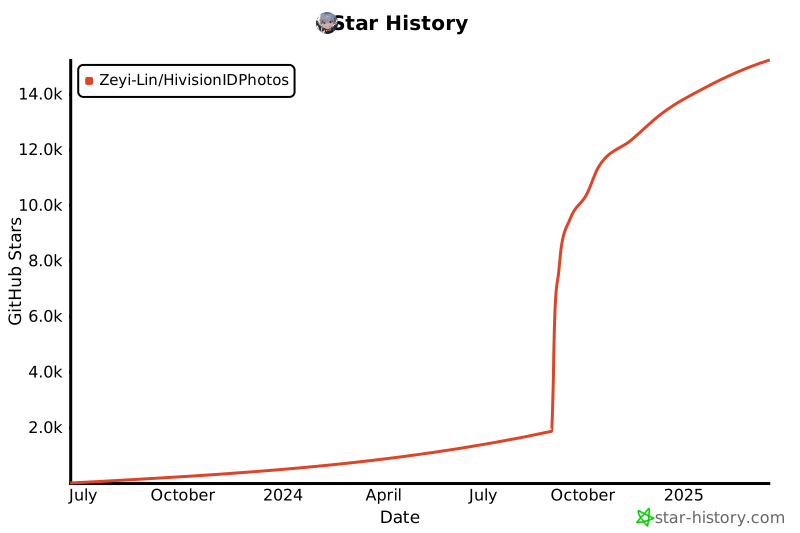](https://star-history.com/#Zeyi-Lin/HivisionIDPhotos&Date)
贡献者们:
<a href="https://github.com/Zeyi-Lin/HivisionIDPhotos/graphs/contributors">
<img src="https://contrib.rocks/image?repo=Zeyi-Lin/HivisionIDPhotos" />
</a>
[Zeyi-Lin](https://github.com/Zeyi-Lin)、[SAKURA-CAT](https://github.com/SAKURA-CAT)、[Feudalman](https://github.com/Feudalman)、[swpfY](https://github.com/swpfY)、[Kaikaikaifang](https://github.com/Kaikaikaifang)、[ShaohonChen](https://github.com/ShaohonChen)、[KashiwaByte](https://github.com/KashiwaByte)
<br>
# 📜 Lincese
This repository is licensed under the [Apache-2.0 License](LICENSE).
<br>
# 📚 引用
如果您在研究或项目中使用了HivisionIDPhotos,请考虑引用我们的工作。您可以使用以下BibTeX条目:
```bibtex
@misc{hivisionidphotos,
title={{HivisionIDPhotos: A Lightweight and Efficient AI ID Photos Tool}},
author={Zeyi Lin and SwanLab Team},
year={2024},
publisher={GitHub},
url = {\url{https://github.com/Zeyi-Lin/HivisionIDPhotos}},
}
```
[github-stars-shield]: https://img.shields.io/github/stars/zeyi-lin/hivisionidphotos?color=ffcb47&labelColor=black&style=flat-square
[github-stars-link]: https://github.com/zeyi-lin/hivisionidphotos/stargazers
[swanhub-demo-shield]: https://swanhub.co/git/repo/SwanHub%2FAuto-README/file/preview?ref=main&path=swanhub.svg
[swanhub-demo-link]: https://swanhub.co/ZeYiLin/HivisionIDPhotos/demo
[spaces-shield]: https://img.shields.io/badge/🤗-Open%20in%20Spaces-blue
[spaces-link]: https://huggingface.co/spaces/TheEeeeLin/HivisionIDPhotos
<!-- 微信群链接 -->
[wechat-shield]: https://img.shields.io/badge/WeChat-微信-4cb55e
[wechat-link]: https://docs.qq.com/doc/DUkpBdk90eWZFS2JW
<!-- Github Release -->
[release-shield]: https://img.shields.io/github/v/release/zeyi-lin/hivisionidphotos?color=369eff&labelColor=black&logo=github&style=flat-square
[release-link]: https://github.com/zeyi-lin/hivisionidphotos/releases
[license-shield]: https://img.shields.io/badge/license-apache%202.0-white?labelColor=black&style=flat-square
[license-link]: https://github.com/Zeyi-Lin/HivisionIDPhotos/blob/master/LICENSE
[github-issues-shield]: https://img.shields.io/github/issues/zeyi-lin/hivisionidphotos?color=ff80eb&labelColor=black&style=flat-square
[github-issues-link]: https://github.com/zeyi-lin/hivisionidphotos/issues
[dockerhub-shield]: https://img.shields.io/docker/v/linzeyi/hivision_idphotos?color=369eff&label=docker&labelColor=black&logoColor=white&style=flat-square
[dockerhub-link]: https://hub.docker.com/r/linzeyi/hivision_idphotos/tags
[trendshift-shield]: https://trendshift.io/api/badge/repositories/11622
[trendshift-link]: https://trendshift.io/repositories/11622
[hellogithub-shield]: https://abroad.hellogithub.com/v1/widgets/recommend.svg?rid=8ea1457289fb4062ba661e5299e733d6&claim_uid=Oh5UaGjfrblg0yZ
[hellogithub-link]: https://hellogithub.com/repository/8ea1457289fb4062ba661e5299e733d6
[github-contributors-shield]: https://img.shields.io/github/contributors/zeyi-lin/hivisionidphotos?color=c4f042&labelColor=black&style=flat-square
[github-contributors-link]: https://github.com/zeyi-lin/hivisionidphotos/graphs/contributors
[github-forks-shield]: https://img.shields.io/github/forks/zeyi-lin/hivisionidphotos?color=8ae8ff&labelColor=black&style=flat-square
[github-forks-link]: https://github.com/zeyi-lin/hivisionidphotos/network/members
[modelscope-shield]: https://img.shields.io/badge/Demo_on_ModelScope-purple?logo=data:image/svg+xml;base64,PHN2ZyB3aWR0aD0iMjIzIiBoZWlnaHQ9IjIwMCIgeG1sbnM9Imh0dHA6Ly93d3cudzMub3JnLzIwMDAvc3ZnIj4KCiA8Zz4KICA8dGl0bGU+TGF5ZXIgMTwvdGl0bGU+CiAgPHBhdGggaWQ9InN2Z18xNCIgZmlsbD0iIzYyNGFmZiIgZD0ibTAsODkuODRsMjUuNjUsMGwwLDI1LjY0OTk5bC0yNS42NSwwbDAsLTI1LjY0OTk5eiIvPgogIDxwYXRoIGlkPSJzdmdfMTUiIGZpbGw9IiM2MjRhZmYiIGQ9Im05OS4xNCwxMTUuNDlsMjUuNjUsMGwwLDI1LjY1bC0yNS42NSwwbDAsLTI1LjY1eiIvPgogIDxwYXRoIGlkPSJzdmdfMTYiIGZpbGw9IiM2MjRhZmYiIGQ9Im0xNzYuMDksMTQxLjE0bC0yNS42NDk5OSwwbDAsMjIuMTlsNDcuODQsMGwwLC00Ny44NGwtMjIuMTksMGwwLDI1LjY1eiIvPgogIDxwYXRoIGlkPSJzdmdfMTciIGZpbGw9IiMzNmNmZDEiIGQ9Im0xMjQuNzksODkuODRsMjUuNjUsMGwwLDI1LjY0OTk5bC0yNS42NSwwbDAsLTI1LjY0OTk5eiIvPgogIDxwYXRoIGlkPSJzdmdfMTgiIGZpbGw9IiMzNmNmZDEiIGQ9Im0wLDY0LjE5bDI1LjY1LDBsMCwyNS42NWwtMjUuNjUsMGwwLC0yNS42NXoiLz4KICA8cGF0aCBpZD0ic3ZnXzE5IiBmaWxsPSIjNjI0YWZmIiBkPSJtMTk4LjI4LDg5Ljg0bDI1LjY0OTk5LDBsMCwyNS42NDk5OWwtMjUuNjQ5OTksMGwwLC0yNS42NDk5OXoiLz4KICA8cGF0aCBpZD0ic3ZnXzIwIiBmaWxsPSIjMzZjZmQxIiBkPSJtMTk4LjI4LDY0LjE5bDI1LjY0OTk5LDBsMCwyNS42NWwtMjUuNjQ5OTksMGwwLC0yNS42NXoiLz4KICA8cGF0aCBpZD0ic3ZnXzIxIiBmaWxsPSIjNjI0YWZmIiBkPSJtMTUwLjQ0LDQybDAsMjIuMTlsMjUuNjQ5OTksMGwwLDI1LjY1bDIyLjE5LDBsMCwtNDcuODRsLTQ3Ljg0LDB6Ii8+CiAgPHBhdGggaWQ9InN2Z18yMiIgZmlsbD0iIzM2Y2ZkMSIgZD0ibTczLjQ5LDg5Ljg0bDI1LjY1LDBsMCwyNS42NDk5OWwtMjUuNjUsMGwwLC0yNS42NDk5OXoiLz4KICA8cGF0aCBpZD0ic3ZnXzIzIiBmaWxsPSIjNjI0YWZmIiBkPSJtNDcuODQsNjQuMTlsMjUuNjUsMGwwLC0yMi4xOWwtNDcuODQsMGwwLDQ3Ljg0bDIyLjE5LDBsMCwtMjUuNjV6Ii8+CiAgPHBhdGggaWQ9InN2Z18yNCIgZmlsbD0iIzYyNGFmZiIgZD0ibTQ3Ljg0LDExNS40OWwtMjIuMTksMGwwLDQ3Ljg0bDQ3Ljg0LDBsMCwtMjIuMTlsLTI1LjY1LDBsMCwtMjUuNjV6Ii8+CiA8L2c+Cjwvc3ZnPg==&labelColor=white
[modelscope-link]: https://modelscope.cn/studios/SwanLab/HivisionIDPhotos
[modelers-shield]: https://img.shields.io/badge/Demo_on_Modelers-c42a2a?logo=data:image/svg+xml;base64,PHN2ZyB4bWxucz0iaHR0cDovL3d3dy53My5vcmcvMjAwMC9zdmciIHdpZHRoPSIxMjQiIGhlaWdodD0iNjQiIHZpZXdCb3g9IjAgMCAxMjQgNjQiIGZpbGw9Im5vbmUiPgo8cGF0aCBkPSJNNDIuNzc4MyAwSDI2LjU5NzdWMTUuNzc4N0g0Mi43NzgzVjBaIiBmaWxsPSIjREUwNDI5Ii8+CjxwYXRoIGQ9Ik0xNi41MDg4IDQuMTc5MkgwLjMyODEyNVYxOS45NTc5SDE2LjUwODhWNC4xNzkyWiIgZmlsbD0iIzI0NDk5QyIvPgo8cGF0aCBkPSJNMTIzLjk1MiA0LjE3OTJIMTA3Ljc3MVYxOS45NTc5SDEyMy45NTJWNC4xNzkyWiIgZmlsbD0iIzI0NDk5QyIvPgo8cGF0aCBkPSJNMTYuNTA4OCA0NS40NjE5SDAuMzI4MTI1VjYxLjI0MDZIMTYuNTA4OFY0NS40NjE5WiIgZmlsbD0iIzI0NDk5QyIvPgo8cGF0aCBkPSJNMTIzLjk1MiA0NS40NjE5SDEwNy43NzFWNjEuMjQwNkgxMjMuOTUyVjQ1LjQ2MTlaIiBmaWxsPSIjMjQ0OTlDIi8+CjxwYXRoIGQ9Ik0zMi43MDggMTUuNzc4OEgxNi41MjczVjMxLjU1NzVIMzIuNzA4VjE1Ljc3ODhaIiBmaWxsPSIjREUwNDI5Ii8+CjxwYXRoIGQ9Ik01Mi44NDg2IDE1Ljc3ODhIMzYuNjY4VjMxLjU1NzVINTIuODQ4NlYxNS43Nzg4WiIgZmlsbD0iI0RFMDQyOSIvPgo8cGF0aCBkPSJNOTcuNzIzNyAwSDgxLjU0M1YxNS43Nzg3SDk3LjcyMzdWMFoiIGZpbGw9IiNERTA0MjkiLz4KPHBhdGggZD0iTTg3LjY1MzQgMTUuNzc4OEg3MS40NzI3VjMxLjU1NzVIODcuNjUzNFYxNS43Nzg4WiIgZmlsbD0iI0RFMDQyOSIvPgo8cGF0aCBkPSJNMTA3Ljc5NCAxNS43Nzg4SDkxLjYxMzNWMzEuNTU3NUgxMDcuNzk0VjE1Ljc3ODhaIiBmaWxsPSIjREUwNDI5Ii8+CjxwYXRoIGQ9Ik0yNC42NzQ4IDMxLjU1NzZIOC40OTQxNFY0Ny4zMzYzSDI0LjY3NDhWMzEuNTU3NloiIGZpbGw9IiNERTA0MjkiLz4KPHBhdGggZD0iTTYwLjg3OTkgMzEuNTU3Nkg0NC42OTkyVjQ3LjMzNjNINjAuODc5OVYzMS41NTc2WiIgZmlsbD0iI0RFMDQyOSIvPgo8cGF0aCBkPSJNNzkuNjIwMSAzMS41NTc2SDYzLjQzOTVWNDcuMzM2M0g3OS42MjAxVjMxLjU1NzZaIiBmaWxsPSIjREUwNDI5Ii8+CjxwYXRoIGQ9Ik0xMTUuODI1IDMxLjU1NzZIOTkuNjQ0NVY0Ny4zMzYzSDExNS44MjVWMzEuNTU3NloiIGZpbGw9IiNERTA0MjkiLz4KPHBhdGggZD0iTTcwLjI1NDkgNDcuMzM1OUg1NC4wNzQyVjYzLjExNDdINzAuMjU0OVY0Ny4zMzU5WiIgZmlsbD0iI0RFMDQyOSIvPgo8L3N2Zz4=&labelColor=white
[modelers-link]: https://modelers.cn/spaces/SwanLab/HivisionIDPhotos
[compshare-shield]: https://www-s.ucloud.cn/2025/02/dbef8b07ea3d316006d9c22765c3cd53_1740104342584.svg
[compshare-link]: https://www.compshare.cn/images-detail?ImageID=compshareImage-17jacgm4ju16&ytag=HG_GPU_HivisionIDPhotos
[atomgit-shield]: https://atomgit.com/ZeYiLin/HivisionIDPhotos/star/badge.svg
[atomgit-link]: https://atomgit.com/ZeYiLin/HivisionIDPhotos
<!-- 社区项目链接 -->
[community-hivision-comfyui]: https://github.com/AIFSH/HivisionIDPhotos-ComfyUI
[community-hivision-wechat]: https://github.com/no1xuan/HivisionIDPhotos-wechat-weapp
[community-hivision-uniapp]: https://github.com/soulerror/HivisionIDPhotos-Uniapp
[community-hivision-cpp]: https://github.com/zjkhahah/HivisionIDPhotos-cpp
[community-hivision-windows-gui]: https://github.com/zhaoyun0071/HivisionIDPhotos-windows-GUI
[community-hivision-nas]: https://github.com/ONG-Leo/HivisionIDPhotos-NAS
================================================
FILE: README_EN.md
================================================
<div align="center">
<img alt="hivision_logo" src="assets/hivision_logo.png" width=120 height=120>
<h1>HivisionIDPhoto</h1>
English / [中文](README.md) / [日本語](README_JP.md) / [한국어](README_KO.md)
[![][release-shield]][release-link]
[![][dockerhub-shield]][dockerhub-link]
[![][github-stars-shield]][github-stars-link]
[![][github-issues-shield]][github-issues-link]
[![][github-contributors-shield]][github-contributors-link]
[![][github-forks-shield]][github-forks-link]
[![][license-shield]][license-link]
[![][wechat-shield]][wechat-link]
[![][spaces-shield]][spaces-link]
[![][swanhub-demo-shield]][swanhub-demo-link]
[![][modelscope-shield]][modelscope-link]
[![][modelers-shield]][modelers-link]
[![][compshare-shield]][compshare-link]
[![][trendshift-shield]][trendshift-link]
[![][hellogithub-shield]][hellogithub-link]
<img src="assets/demoImage.jpg" width=900>
</div>
<br>
> **Related Projects**:
>
> - [SwanLab](https://github.com/SwanHubX/SwanLab): Used throughout the training of the portrait matting model for analysis and monitoring, as well as collaboration with lab colleagues, significantly improving training efficiency.
<br>
# Table of Contents
- [Recent Updates](#-recent-updates)
- [Project Overview](#-project-overview)
- [Community](#-community)
- [Preparation](#-preparation)
- [Demo Startup](#-run-gradio-demo)
- [Python Inference](#-python-inference)
- [API Service Deployment](#️-deploy-api-service)
- [Docker Deployment](#-docker-deployment)
- [Contact Us](#-contact-us)
- [Q&A](#qa)
- [Contributors](#contributors)
- [Thanks for support](#thanks-for-support)
- [License](#lincese)
<br>
# 🤩 Recent Updates
- Online Experience: [](https://swanhub.co/ZeYiLin/HivisionIDPhotos/demo)、[](https://huggingface.co/spaces/TheEeeeLin/HivisionIDPhotos)、[![][modelscope-shield]][modelscope-link]、[![][compshare-shield]][compshare-link]
- 2024.11.20: Gradio Demo adds **Print Layout** option, supports six-inch, five-inch, A4, 3R, and 4R layout sizes
- 2024.11.16: API interface adds beauty effect parameter
- 2024.09.24: API interface adds base64 image input option | Gradio Demo adds **Layout Photo Cropping Lines** feature
- 2024.09.22: Gradio Demo adds **Beast Mode** and **DPI** parameter
- 2024.09.18: Gradio Demo adds **Share Template Photos** feature and **American Style** background option
- 2024.09.17: Gradio Demo adds **Custom Background Color-HEX Input** feature | **(Community Contribution) C++ Version** - [HivisionIDPhotos-cpp](https://github.com/zjkhahah/HivisionIDPhotos-cpp) contributed by [zjkhahah](https://github.com/zjkhahah)
- 2024.09.16: Gradio Demo adds **Face Rotation Alignment** feature, custom size input supports **millimeters**
- 2024.09.14: Gradio Demo adds **Custom DPI** feature, adds Japanese and Korean support, adds **Adjust Brightness, Contrast, Sharpness** feature
<br>
# Project Overview
> 🚀 Thank you for your interest in our work. You may also want to check out our other achievements in the field of image processing, feel free to reach out: zeyi.lin@swanhub.co.
HivisionIDPhoto aims to develop a practical and systematic intelligent algorithm for producing ID photos.
It utilizes a comprehensive AI model workflow to recognize various user photo-taking scenarios, perform matting, and generate ID photos.
**HivisionIDPhoto can achieve:**
1. Lightweight matting (purely offline, fast inference with **CPU** only)
2. Generate standard ID photos and six-inch layout photos based on different size specifications
3. Support pure offline or edge-cloud inference
4. Beauty effects (waiting)
5. Intelligent formal wear change (waiting)
<div align="center">
<img src="assets/demo.png" width=900>
</div>
---
If HivisionIDPhoto helps you, please star this repo or recommend it to your friends to solve the urgent ID photo production problem!
<br>
# 🏠 Community
We have shared some interesting applications and extensions of HivisionIDPhotos built by the community:
- [HivisionIDPhotos-ComfyUI](https://github.com/AIFSH/HivisionIDPhotos-ComfyUI): ComfyUI ID photo processing workflow built by [AIFSH](https://github.com/AIFSH/HivisionIDPhotos-ComfyUI)
[<img src="assets/comfyui.png" width="900" alt="ComfyUI workflow">](https://github.com/AIFSH/HivisionIDPhotos-ComfyUI)
- [HivisionIDPhotos-wechat-weapp](https://github.com/no1xuan/HivisionIDPhotos-wechat-weapp): WeChat ID photo mini program, powered by the HivisionIDphotos algorithm, contributed by [no1xuan](https://github.com/no1xuan)
[<img src="assets/community-wechat-miniprogram.png" width="900" alt="HivisionIDPhotos-wechat-weapp">](https://github.com/no1xuan/HivisionIDPhotos-wechat-weapp)
- [HivisionIDPhotos-Uniapp](https://github.com/soulerror/HivisionIDPhotos-Uniapp): Front-end of WeChat ID photo mini program based on uniapp, powered by the HivisionIDphotos algorithm, contributed by [soulerror](https://github.com/soulerror)
[<img src="assets/community-uniapp-wechat-miniprogram.png" width="900" alt="HivisionIDPhotos-uniapp">](https://github.com/soulerror/HivisionIDPhotos-Uniapp)
- [HivisionIDPhotos-cpp](https://github.com/zjkhahah/HivisionIDPhotos-cpp): C++ version of HivisionIDphotos, built by [zjkhahah](https://github.com/zjkhahah)
- [HivisionIDPhotos-windows-GUI](https://github.com/zhaoyun0071/HivisionIDPhotos-windows-GUI): Windows client application built by [zhaoyun0071](https://github.com/zhaoyun0071)
- [HivisionIDPhotos-NAS](https://github.com/ONG-Leo/HivisionIDPhotos-NAS): Chinese tutorial for Synology NAS deployment, contributed by [ONG-Leo](https://github.com/ONG-Leo)
<br>
# 🔧 Preparation
Environment installation and dependencies:
- Python >= 3.7 (project primarily tested on Python 3.10)
- OS: Linux, Windows, MacOS
## 1. Clone the Project
```bash
git clone https://github.com/Zeyi-Lin/HivisionIDPhotos.git
cd HivisionIDPhotos
```
## 2. Install Dependency Environment
> It is recommended to create a python3.10 virtual environment using conda, then execute the following commands
```bash
pip install -r requirements.txt
pip install -r requirements-app.txt
```
## 3. Download Weight Files
**Method 1: Script Download**
```bash
python scripts/download_model.py --models all
```
**Method 2: Direct Download**
Store in the project's `hivision/creator/weights` directory:
- `modnet_photographic_portrait_matting.onnx` (24.7MB): Official weights of [MODNet](https://github.com/ZHKKKe/MODNet), [download](https://github.com/Zeyi-Lin/HivisionIDPhotos/releases/download/pretrained-model/modnet_photographic_portrait_matting.onnx)
- `hivision_modnet.onnx` (24.7MB): Matting model with better adaptability for pure color background replacement, [download](https://github.com/Zeyi-Lin/HivisionIDPhotos/releases/download/pretrained-model/hivision_modnet.onnx)
- `rmbg-1.4.onnx` (176.2MB): Open-source matting model from [BRIA AI](https://huggingface.co/briaai/RMBG-1.4), [download](https://huggingface.co/briaai/RMBG-1.4/resolve/main/onnx/model.onnx?download=true) and rename to `rmbg-1.4.onnx`
- `birefnet-v1-lite.onnx`(224MB): Open-source matting model from [ZhengPeng7](https://github.com/ZhengPeng7/BiRefNet), [download](https://github.com/ZhengPeng7/BiRefNet/releases/download/v1/BiRefNet-general-bb_swin_v1_tiny-epoch_232.onnx) and rename to `birefnet-v1-lite.onnx`
## 4. Face Detection Model Configuration (Optional)
| Extended Face Detection Model | Description | Documentation |
| -- | -- | -- |
| MTCNN | **Offline** face detection model, high-performance CPU inference, default model, lower detection accuracy | Use it directly after cloning this project |
| RetinaFace | **Offline** face detection model, moderate CPU inference speed (in seconds), and high accuracy | [Download](https://github.com/Zeyi-Lin/HivisionIDPhotos/releases/download/pretrained-model/retinaface-resnet50.onnx) and place it in the `hivision/creator/retinaface/weights` directory |
| Face++ | Online face detection API launched by Megvii, higher detection accuracy, [official documentation](https://console.faceplusplus.com.cn/documents/4888373) | [Usage Documentation](docs/face++_EN.md)|
## 5. Performance Reference
> Test environment: Mac M1 Max 64GB, non-GPU acceleration, test image resolution: 512x715(1) and 764×1146(2).
| Model Combination | Memory Occupation | Inference Time (1) | Inference Time (2) |
| -- | -- | -- | -- |
| MODNet + mtcnn | 410MB | 0.207s | 0.246s |
| MODNet + retinaface | 405MB | 0.571s | 0.971s |
| birefnet-v1-lite + retinaface | 6.20GB | 7.063s | 7.128s |
## 6. GPU Inference Acceleration (Optional)
In the current version, the model that can be accelerated by NVIDIA GPUs is `birefnet-v1-lite`, and please ensure you have around 16GB of VRAM.
If you want to use NVIDIA GPU acceleration for inference, after ensuring you have installed CUDA and cuDNN, find the corresponding `onnxruntime-gpu` version to install according to the [onnxruntime-gpu documentation](https://onnxruntime.ai/docs/execution-providers/CUDA-ExecutionProvider.html#cuda-12x), and find the corresponding `pytorch` version to install according to the [pytorch official website](https://pytorch.org/get-started/locally/).
```bash
# If your computer is installed with CUDA 12.x and cuDNN 8
# Installing torch is optional. If you can't configure cuDNN, try installing torch
pip install onnxruntime-gpu==1.18.0
pip install torch --index-url https://download.pytorch.org/whl/cu121
```
After completing the installation, call the `birefnet-v1-lite` model to utilize GPU acceleration for inference.
> TIP: CUDA installations are backward compatible. For example, if your CUDA version is 12.6 but the highest version currently matched by torch is 12.4, it's still possible to install version 12.4 on your computer.
<br>
# 🚀 Run Gradio Demo
```bash
python app.py
```
Running the program will generate a local web page where you can perform operations and interact with ID photos.
<img src="assets/harry.png" width=900>
<br>
# 🚀 Python Inference
Core parameters:
- `-i`: Input image path
- `-o`: Output image path
- `-t`: Inference type, options are idphoto, human_matting, add_background, generate_layout_photos
- `--matting_model`: Portrait matting model weight selection
- `--face_detect_model`: Face detection model selection
More parameters can be viewed by running `python inference.py --help`
## 1. ID Photo Creation
Input 1 photo to obtain 1 standard ID photo and 1 high-definition ID photo in 4-channel transparent PNG.
```python
python inference.py -i demo/images/test0.jpg -o ./idphoto.png --height 413 --width 295
```
## 2. Portrait Matting
Input 1 photo to obtain 1 4-channel transparent PNG.
```python
python inference.py -t human_matting -i demo/images/test0.jpg -o ./idphoto_matting.png --matting_model hivision_modnet
```
## 3. Add Background Color to Transparent Image
Input 1 4-channel transparent PNG to obtain 1 3-channel image with added background color.
```python
python inference.py -t add_background -i ./idphoto.png -o ./idphoto_ab.jpg -c 4f83ce -k 30 -r 1
```
## 4. Generate Six-Inch Layout Photo
Input 1 3-channel photo to obtain 1 six-inch layout photo.
```python
python inference.py -t generate_layout_photos -i ./idphoto_ab.jpg -o ./idphoto_layout.jpg --height 413 --width 295 -k 200
```
## 5. ID Photo Cropping
Input 1 4-channel photo (the image after matting) to obtain 1 standard ID photo and 1 high-definition ID photo in 4-channel transparent PNG.
```python
python inference.py -t idphoto_crop -i ./idphoto_matting.png -o ./idphoto_crop.png --height 413 --width 295
```
<br>
# ⚡️ Deploy API Service
## Start Backend
```
python deploy_api.py
```
## Request API Service
For detailed request methods, please refer to the [API Documentation](docs/api_EN.md), which includes the following request examples:
- [cURL](docs/api_EN.md#curl-request-examples)
- [Python](docs/api_EN.md#python-request-example)
<br>
# 🐳 Docker Deployment
## 1. Pull or Build Image
> Choose one of the following methods
**Method 1: Pull the latest image:**
```bash
docker pull linzeyi/hivision_idphotos
```
**Method 2: Directly build the image from Dockerfile:**
After ensuring that at least one [matting model weight file](#3-download-weight-files) is placed in the `hivision/creator/weights` directory, execute the following in the project root directory:
```bash
docker build -t linzeyi/hivision_idphotos .
```
**Method 3: Build using Docker Compose:**
After ensuring that at least one [matting model weight file](#3-download-weight-files) is placed in the `hivision/creator/weights` directory, execute the following in the project root directory:
```bash
docker compose build
```
## 2. Run Services
**Start Gradio Demo Service**
Run the following command, and you can access it locally at [http://127.0.0.1:7860](http://127.0.0.1:7860/).
```bash
docker run -d -p 7860:7860 linzeyi/hivision_idphotos
```
**Start API Backend Service**
```bash
docker run -d -p 8080:8080 linzeyi/hivision_idphotos python3 deploy_api.py
```
**Start Both Services Simultaneously**
```bash
docker compose up -d
```
## Environment Variables
This project provides some additional configuration options, which can be set using environment variables:
| Environment Variable | Type | Description | Example |
|--|--|--|--|
| FACE_PLUS_API_KEY | Optional | This is your API key obtained from the Face++ console | `7-fZStDJ····` |
| FACE_PLUS_API_SECRET | Optional | Secret corresponding to the Face++ API key | `VTee824E····` |
| RUN_MODE | Optional | Running mode, with the option of `beast` (beast mode). In beast mode, the face detection and matting models will not release memory, achieving faster secondary inference speeds. It is recommended to try to have at least 16GB of memory. | `beast` |
Example of using environment variables in Docker:
```bash
docker run -d -p 7860:7860 \
-e FACE_PLUS_API_KEY=7-fZStDJ···· \
-e FACE_PLUS_API_SECRET=VTee824E···· \
-e RUN_MODE=beast \
linzeyi/hivision_idphotos
```
<br>
# 📖 Cite Projects
1. MTCNN:
```bibtex
@software{ipazc_mtcnn_2021,
author = {ipazc},
title = {{MTCNN}},
url = {https://github.com/ipazc/mtcnn},
year = {2021},
publisher = {GitHub}
}
```
2. ModNet:
```bibtex
@software{zhkkke_modnet_2021,
author = {ZHKKKe},
title = {{ModNet}},
url = {https://github.com/ZHKKKe/MODNet},
year = {2021},
publisher = {GitHub}
}
```
<br>
# Q&A
## 1. How to modify preset sizes and colors?
- Size: After modifying [size_list_EN.csv](demo/assets/size_list_EN.csv), run `app.py` again. The first column is the size name, the second column is the height, and the third column is the width.
- Color: After modifying [color_list_EN.csv](demo/assets/color_list_EN.csv), run `app.py` again. The first column is the color name, and the second column is the Hex value.
## 2. How to Change the Watermark Font?
1. Place the font file in the `hivision/plugin/font` folder.
2. Change the `font_file` parameter value in `hivision/plugin/watermark.py` to the name of the font file.
## 3. How to Add Social Media Template Photos?
1. Place the template image in the `hivision/plugin/template/assets` folder. The template image should be a 4-channel transparent PNG.
2. Add the latest template information to the `hivision/plugin/template/assets/template_config.json` file. Here, `width` is the template image width (px), `height` is the template image height (px), `anchor_points` are the coordinates (px) of the four corners of the transparent area in the template; `rotation` is the rotation angle of the transparent area relative to the vertical direction, where >0 is counterclockwise and <0 is clockwise.
3. Add the name of the latest template to the `TEMPLATE_NAME_LIST` variable in the `_generate_image_template` function of `demo/processor.py`.
<img src="assets/social_template.png" width="500">
## 4. How to Modify the Top Navigation Bar of the Gradio Demo?
- Modify the `demo/assets/title.md` file.
<br>
# 📧 Contact Us
If you have any questions, please email zeyi.lin@swanhub.co
<br>
# Contributors
<a href="https://github.com/Zeyi-Lin/HivisionIDPhotos/graphs/contributors">
<img src="https://contrib.rocks/image?repo=Zeyi-Lin/HivisionIDPhotos" />
</a>
[Zeyi-Lin](https://github.com/Zeyi-Lin)、[SAKURA-CAT](https://github.com/SAKURA-CAT)、[Feudalman](https://github.com/Feudalman)、[swpfY](https://github.com/swpfY)、[Kaikaikaifang](https://github.com/Kaikaikaifang)、[ShaohonChen](https://github.com/ShaohonChen)、[KashiwaByte](https://github.com/KashiwaByte)
<br>
# Thanks for support
[](https://github.com/Zeyi-Lin/HivisionIDPhotos/stargazers)
[](https://github.com/Zeyi-Lin/HivisionIDPhotos/network/members)
[](https://star-history.com/#Zeyi-Lin/HivisionIDPhotos&Date)
# Lincese
This repository is licensed under the [Apache-2.0 License](LICENSE).
[github-stars-shield]: https://img.shields.io/github/stars/zeyi-lin/hivisionidphotos?color=ffcb47&labelColor=black&style=flat-square
[github-stars-link]: https://github.com/zeyi-lin/hivisionidphotos/stargazers
[swanhub-demo-shield]: https://swanhub.co/git/repo/SwanHub%2FAuto-README/file/preview?ref=main&path=swanhub.svg
[swanhub-demo-link]: https://swanhub.co/ZeYiLin/HivisionIDPhotos/demo
[spaces-shield]: https://img.shields.io/badge/🤗-Open%20in%20Spaces-blue
[spaces-link]: https://huggingface.co/spaces/TheEeeeLin/HivisionIDPhotos
<!-- WeChat group link -->
[wechat-shield]: https://img.shields.io/badge/WeChat-微信-4cb55e
[wechat-link]: https://docs.qq.com/doc/DUkpBdk90eWZFS2JW
<!-- Github Release -->
[release-shield]: https://img.shields.io/github/v/release/zeyi-lin/hivisionidphotos?color=369eff&labelColor=black&logo=github&style=flat-square
[release-link]: https://github.com/zeyi-lin/hivisionidphotos/releases
[license-shield]: https://img.shields.io/badge/license-apache%202.0-white?labelColor=black&style=flat-square
[license-link]: https://github.com/Zeyi-Lin/HivisionIDPhotos/blob/master/LICENSE
[github-issues-shield]: https://img.shields.io/github/issues/zeyi-lin/hivisionidphotos?color=ff80eb&labelColor=black&style=flat-square
[github-issues-link]: https://github.com/zeyi-lin/hivisionidphotos/issues
[dockerhub-shield]: https://img.shields.io/docker/v/linzeyi/hivision_idphotos?color=369eff&label=docker&labelColor=black&logoColor=white&style=flat-square
[dockerhub-link]: https://hub.docker.com/r/linzeyi/hivision_idphotos/tags
[trendshift-shield]: https://trendshift.io/api/badge/repositories/11622
[trendshift-link]: https://trendshift.io/repositories/11622
[hellogithub-shield]: https://abroad.hellogithub.com/v1/widgets/recommend.svg?rid=8ea1457289fb4062ba661e5299e733d6&claim_uid=Oh5UaGjfrblg0yZ
[hellogithub-link]: https://hellogithub.com/repository/8ea1457289fb4062ba661e5299e733d6
[github-contributors-shield]: https://img.shields.io/github/contributors/zeyi-lin/hivisionidphotos?color=c4f042&labelColor=black&style=flat-square
[github-contributors-link]: https://github.com/zeyi-lin/hivisionidphotos/graphs/contributors
[github-forks-shield]: https://img.shields.io/github/forks/zeyi-lin/hivisionidphotos?color=8ae8ff&labelColor=black&style=flat-square
[github-forks-link]: https://github.com/zeyi-lin/hivisionidphotos/network/members
[modelscope-shield]: https://img.shields.io/badge/Demo_on_ModelScope-purple?logo=data:image/svg+xml;base64,PHN2ZyB3aWR0aD0iMjIzIiBoZWlnaHQ9IjIwMCIgeG1sbnM9Imh0dHA6Ly93d3cudzMub3JnLzIwMDAvc3ZnIj4KCiA8Zz4KICA8dGl0bGU+TGF5ZXIgMTwvdGl0bGU+CiAgPHBhdGggaWQ9InN2Z18xNCIgZmlsbD0iIzYyNGFmZiIgZD0ibTAsODkuODRsMjUuNjUsMGwwLDI1LjY0OTk5bC0yNS42NSwwbDAsLTI1LjY0OTk5eiIvPgogIDxwYXRoIGlkPSJzdmdfMTUiIGZpbGw9IiM2MjRhZmYiIGQ9Im05OS4xNCwxMTUuNDlsMjUuNjUsMGwwLDI1LjY1bC0yNS42NSwwbDAsLTI1LjY1eiIvPgogIDxwYXRoIGlkPSJzdmdfMTYiIGZpbGw9IiM2MjRhZmYiIGQ9Im0xNzYuMDksMTQxLjE0bC0yNS42NDk5OSwwbDAsMjIuMTlsNDcuODQsMGwwLC00Ny44NGwtMjIuMTksMGwwLDI1LjY1eiIvPgogIDxwYXRoIGlkPSJzdmdfMTciIGZpbGw9IiMzNmNmZDEiIGQ9Im0xMjQuNzksODkuODRsMjUuNjUsMGwwLDI1LjY0OTk5bC0yNS42NSwwbDAsLTI1LjY0OTk5eiIvPgogIDxwYXRoIGlkPSJzdmdfMTgiIGZpbGw9IiMzNmNmZDEiIGQ9Im0wLDY0LjE5bDI1LjY1LDBsMCwyNS42NWwtMjUuNjUsMGwwLC0yNS42NXoiLz4KICA8cGF0aCBpZD0ic3ZnXzE5IiBmaWxsPSIjNjI0YWZmIiBkPSJtMTk4LjI4LDg5Ljg0bDI1LjY0OTk5LDBsMCwyNS42NDk5OWwtMjUuNjQ5OTksMGwwLC0yNS42NDk5OXoiLz4KICA8cGF0aCBpZD0ic3ZnXzIwIiBmaWxsPSIjMzZjZmQxIiBkPSJtMTk4LjI4LDY0LjE5bDI1LjY0OTk5LDBsMCwyNS42NWwtMjUuNjQ5OTksMGwwLC0yNS42NXoiLz4KICA8cGF0aCBpZD0ic3ZnXzIxIiBmaWxsPSIjNjI0YWZmIiBkPSJtMTUwLjQ0LDQybDAsMjIuMTlsMjUuNjQ5OTksMGwwLDI1LjY1bDIyLjE5LDBsMCwtNDcuODRsLTQ3Ljg0LDB6Ii8+CiAgPHBhdGggaWQ9InN2Z18yMiIgZmlsbD0iIzM2Y2ZkMSIgZD0ibTczLjQ5LDg5Ljg0bDI1LjY1LDBsMCwyNS42NDk5OWwtMjUuNjUsMGwwLC0yNS42NDk5OXoiLz4KICA8cGF0aCBpZD0ic3ZnXzIzIiBmaWxsPSIjNjI0YWZmIiBkPSJtNDcuODQsNjQuMTlsMjUuNjUsMGwwLC0yMi4xOWwtNDcuODQsMGwwLDQ3Ljg0bDIyLjE5LDBsMCwtMjUuNjV6Ii8+CiAgPHBhdGggaWQ9InN2Z18yNCIgZmlsbD0iIzYyNGFmZiIgZD0ibTQ3Ljg0LDExNS40OWwtMjIuMTksMGwwLDQ3Ljg0bDQ3Ljg0LDBsMCwtMjIuMTlsLTI1LjY1LDBsMCwtMjUuNjV6Ii8+CiA8L2c+Cjwvc3ZnPg==&labelColor=white
[modelscope-link]: https://modelscope.cn/studios/SwanLab/HivisionIDPhotos
[modelers-shield]: https://img.shields.io/badge/Demo_on_Modelers-c42a2a?logo=data:image/svg+xml;base64,PHN2ZyB4bWxucz0iaHR0cDovL3d3dy53My5vcmcvMjAwMC9zdmciIHdpZHRoPSIxMjQiIGhlaWdodD0iNjQiIHZpZXdCb3g9IjAgMCAxMjQgNjQiIGZpbGw9Im5vbmUiPgo8cGF0aCBkPSJNNDIuNzc4MyAwSDI2LjU5NzdWMTUuNzc4N0g0Mi43NzgzVjBaIiBmaWxsPSIjREUwNDI5Ii8+CjxwYXRoIGQ9Ik0xNi41MDg4IDQuMTc5MkgwLjMyODEyNVYxOS45NTc5SDE2LjUwODhWNC4xNzkyWiIgZmlsbD0iIzI0NDk5QyIvPgo8cGF0aCBkPSJNMTIzLjk1MiA0LjE3OTJIMTA3Ljc3MVYxOS45NTc5SDEyMy45NTJWNC4xNzkyWiIgZmlsbD0iIzI0NDk5QyIvPgo8cGF0aCBkPSJNMTYuNTA4OCA0NS40NjE5SDAuMzI4MTI1VjYxLjI0MDZIMTYuNTA4OFY0NS40NjE5WiIgZmlsbD0iIzI0NDk5QyIvPgo8cGF0aCBkPSJNMTIzLjk1MiA0NS40NjE5SDEwNy43NzFWNjEuMjQwNkgxMjMuOTUyVjQ1LjQ2MTlaIiBmaWxsPSIjMjQ0OTlDIi8+CjxwYXRoIGQ9Ik0zMi43MDggMTUuNzc4OEgxNi41MjczVjMxLjU1NzVIMzIuNzA4VjE1Ljc3ODhaIiBmaWxsPSIjREUwNDI5Ii8+CjxwYXRoIGQ9Ik01Mi44NDg2IDE1Ljc3ODhIMzYuNjY4VjMxLjU1NzVINTIuODQ4NlYxNS43Nzg4WiIgZmlsbD0iI0RFMDQyOSIvPgo8cGF0aCBkPSJNOTcuNzIzNyAwSDgxLjU0M1YxNS43Nzg3SDk3LjcyMzdWMFoiIGZpbGw9IiNERTA0MjkiLz4KPHBhdGggZD0iTTg3LjY1MzQgMTUuNzc4OEg3MS40NzI3VjMxLjU1NzVIODcuNjUzNFYxNS43Nzg4WiIgZmlsbD0iI0RFMDQyOSIvPgo8cGF0aCBkPSJNMTA3Ljc5NCAxNS43Nzg4SDkxLjYxMzNWMzEuNTU3NUgxMDcuNzk0VjE1Ljc3ODhaIiBmaWxsPSIjREUwNDI5Ii8+CjxwYXRoIGQ9Ik0yNC42NzQ4IDMxLjU1NzZIOC40OTQxNFY0Ny4zMzYzSDI0LjY3NDhWMzEuNTU3NloiIGZpbGw9IiNERTA0MjkiLz4KPHBhdGggZD0iTTYwLjg3OTkgMzEuNTU3Nkg0NC42OTkyVjQ3LjMzNjNINjAuODc5OVYzMS41NTc2WiIgZmlsbD0iI0RFMDQyOSIvPgo8cGF0aCBkPSJNNzkuNjIwMSAzMS41NTc2SDYzLjQzOTVWNDcuMzM2M0g3OS42MjAxVjMxLjU1NzZaIiBmaWxsPSIjREUwNDI5Ii8+CjxwYXRoIGQ9Ik0xMTUuODI1IDMxLjU1NzZIOTkuNjQ0NVY0Ny4zMzYzSDExNS44MjVWMzEuNTU3NloiIGZpbGw9IiNERTA0MjkiLz4KPHBhdGggZD0iTTcwLjI1NDkgNDcuMzM1OUg1NC4wNzQyVjYzLjExNDdINzAuMjU0OVY0Ny4zMzU5WiIgZmlsbD0iI0RFMDQyOSIvPgo8L3N2Zz4=&labelColor=white
[modelers-link]: https://modelers.cn/spaces/SwanLab/HivisionIDPhotos
[compshare-shield]: https://www-s.ucloud.cn/2025/02/dbef8b07ea3d316006d9c22765c3cd53_1740104342584.svg
[compshare-link]: https://www.compshare.cn/images-detail?ImageID=compshareImage-17jacgm4ju16&ytag=HG_GPU_HivisionIDPhotos
================================================
FILE: README_JP.md
================================================
<div align="center">
<img alt="hivision_logo" src="assets/hivision_logo.png" width=120 height=120>
<h1>HivisionIDPhoto</h1>
[English](README_EN.md) / [中文](README.md) / 日本語 / [한국어](README_KO.md)
[![][release-shield]][release-link]
[![][dockerhub-shield]][dockerhub-link]
[![][github-stars-shield]][github-stars-link]
[![][github-issues-shield]][github-issues-link]
[![][github-contributors-shield]][github-contributors-link]
[![][github-forks-shield]][github-forks-link]
[![][license-shield]][license-link]
[![][wechat-shield]][wechat-link]
[![][spaces-shield]][spaces-link]
[![][swanhub-demo-shield]][swanhub-demo-link]
[![][modelscope-shield]][modelscope-link]
[![][modelers-shield]][modelers-link]
[![][compshare-shield]][compshare-link]
[![][trendshift-shield]][trendshift-link]
[![][hellogithub-shield]][hellogithub-link]
<img src="assets/demoImage.jpg" width=900>
</div>
<br>
> **関連プロジェクト**:
>
> - [SwanLab](https://github.com/SwanHubX/SwanLab):人物切り抜きモデルの訓練を通じて、分析と監視、ラボの仲間との協力と交流を行い、訓練効率を大幅に向上させました。
<br>
# 目次
- [最近の更新](#-最近の更新)
- [プロジェクト概要](#-プロジェクト概要)
- [コミュニティ](#-コミュニティ)
- [準備作業](#-準備作業)
- [デモの起動](#-デモの起動)
- [Python推論](#-python推論)
- [APIサービスのデプロイ](#️-APIサービスのデプロイ)
- [Dockerデプロイ](#-dockerデプロイ)
- [お問い合わせ](#-お問い合わせ)
- [貢献者](#貢献者)
<br>
# 🤩 最近の更新
- オンライン体験: [](https://swanhub.co/ZeYiLin/HivisionIDPhotos/demo)、[](https://huggingface.co/spaces/TheEeeeLin/HivisionIDPhotos)、[![][modelscope-shield]][modelscope-link]、[![][compshare-shield]][compshare-link]
- 2024.11.20: Gradioデモに**印刷レイアウト**オプションを追加、六つ切り、五つ切り、A4、3R、4Rレイアウトサイズをサポート
- 2024.11.16: APIインターフェースに美顔効果パラメータを追加
- 2024.09.24: APIインターフェースにbase64画像入力オプションを追加 | Gradioデモに**レイアウト写真トリミングライン**機能を追加
- 2024.09.22: Gradioデモに**ビーストモード**と**DPI**パラメータを追加
- 2024.09.18: Gradioデモに**テンプレート写真の共有**機能を追加、**米国式**背景オプションを追加
- 2024.09.17: Gradioデモに**カスタム底色-HEX入力**機能を追加 | **(コミュニティ貢献)C++バージョン** - [HivisionIDPhotos-cpp](https://github.com/zjkhahah/HivisionIDPhotos-cpp) 貢献 by [zjkhahah](https://github.com/zjkhahah)
- 2024.09.16: Gradioデモに**顔回転対応**機能を追加、カスタムサイズ入力に**ミリメートル**をサポート
<br>
# プロジェクト概要
> 🚀 私たちの仕事に興味を持っていただきありがとうございます。画像分野における他の成果もぜひご覧ください。お問い合わせは、zeyi.lin@swanhub.co まで。
HivisionIDPhotoは、実用的で体系的な証明写真のスマート制作アルゴリズムを開発することを目的としています。
さまざまなユーザー撮影シーンの認識、切り抜きおよび証明写真の生成を実現するために、一連の洗練されたAIモデル作業フローを利用しています。
**HivisionIDPhotoは以下のことができます:**
1. 軽量切り抜き(完全オフラインで、**CPU**のみで迅速に推論可能)
2. 異なるサイズ仕様に基づいて異なる標準証明写真、六寸レイアウト写真を生成
3. 完全オフラインまたはエッジクラウド推論をサポート
4. 美顔(待機中)
5. スマートな正装変更(待機中)
<div align="center">
<img src="assets/demo.png" width=900>
</div>
---
HivisionIDPhotoがあなたに役立つ場合は、このリポジトリをスターしたり、友人に推薦したりして、証明写真の緊急制作の問題を解決してください!
<br>
# 🏠 コミュニティ
私たちは、コミュニティによって構築されたHivisionIDPhotosの興味深いアプリケーションや拡張機能をいくつか共有しています:
- [HivisionIDPhotos-ComfyUI](https://github.com/AIFSH/HivisionIDPhotos-ComfyUI):ComfyUI証明写真処理ワークフロー、[AIFSH](https://github.com/AIFSH/HivisionIDPhotos-ComfyUI)によって構築
[<img src="assets/comfyui.png" width="900" alt="ComfyUI workflow">](https://github.com/AIFSH/HivisionIDPhotos-ComfyUI)
- [HivisionIDPhotos-wechat-weapp](https://github.com/no1xuan/HivisionIDPhotos-wechat-weapp):WeChat証明写真ミニプログラム、HivisionIDphotosアルゴリズムに基づく、[no1xuan](https://github.com/no1xuan)による貢献
[<img src="assets/community-wechat-miniprogram.png" width="900" alt="HivisionIDPhotos-wechat-weapp">](https://github.com/no1xuan/HivisionIDPhotos-wechat-weapp)
- [HivisionIDPhotos-Uniapp](https://github.com/soulerror/HivisionIDPhotos-Uniapp):基本のuniapp証明写真ミニプログラムの前部、HivisionIDphotosアルゴリズムに基づく、[soulerror](https://github.com/soulerror)による貢献
[<img src="assets/community-uniapp-wechat-miniprogram.png" width="900" alt="HivisionIDPhotos-uniapp">](https://github.com/soulerror/HivisionIDPhotos-Uniapp)
- [HivisionIDPhotos-cpp](https://github.com/zjkhahah/HivisionIDPhotos-cpp):HivisionIDphotos C++バージョン、[zjkhahah](https://github.com/zjkhahah)によって構築
- [HivisionIDPhotos-windows-GUI](https://github.com/zhaoyun0071/HivisionIDPhotos-windows-GUI):Windowsクライアントアプリケーション、[zhaoyun0071](https://github.com/zhaoyun0071)によって構築
- [HivisionIDPhotos-NAS](https://github.com/ONG-Leo/HivisionIDPhotos-NAS):Synology NAS導入の中国語チュートリアル、[ONG-Leo](https://github.com/ONG-Leo)による貢献
<br>
# 🔧 準備作業
環境のインストールと依存関係:
- Python >= 3.7(プロジェクトは主にpython 3.10でテストされています)
- OS: Linux, Windows, MacOS
## 1. プロジェクトをクローンする
```bash
git clone https://github.com/Zeyi-Lin/HivisionIDPhotos.git
cd HivisionIDPhotos
```
## 2. 依存環境をインストールする
> condaでpython3.10の仮想環境を作成することをお勧めします。その後、以下のコマンドを実行してください。
```bash
pip install -r requirements.txt
pip install -r requirements-app.txt
```
## 3. 重みファイルをダウンロードする
**方法一:スクリプトでダウンロード**
```bash
python scripts/download_model.py --models all
```
**方法二:直接ダウンロード**
プロジェクトの`hivision/creator/weights`ディレクトリに保存します:
- `modnet_photographic_portrait_matting.onnx` (24.7MB): [MODNet](https://github.com/ZHKKKe/MODNet)公式の重み、[ダウンロード](https://github.com/Zeyi-Lin/HivisionIDPhotos/releases/download/pretrained-model/modnet_photographic_portrait_matting.onnx)
- `hivision_modnet.onnx` (24.7MB): 単色背景に対して適応性の高い切り抜きモデル、[ダウンロード](https://github.com/Zeyi-Lin/HivisionIDPhotos/releases/download/pretrained-model/hivision_modnet.onnx)
- `rmbg-1.4.onnx` (176.2MB): [BRIA AI](https://huggingface.co/briaai/RMBG-1.4)のオープンソース切り抜きモデル、[ダウンロード](https://huggingface.co/briaai/RMBG-1.4/resolve/main/onnx/model.onnx?download=true)後に`rmbg-1.4.onnx`にリネーム
- `birefnet-v1-lite.onnx`(224MB): [ZhengPeng7](https://github.com/ZhengPeng7/BiRefNet)のオープンソース切り抜きモデル、[ダウンロード](https://github.com/ZhengPeng7/BiRefNet/releases/download/v1/BiRefNet-general-bb_swin_v1_tiny-epoch_232.onnx)後に`birefnet-v1-lite.onnx`にリネーム
## 4. 顔検出モデルの設定(オプション)
| 拡張顔検出モデル | 説明 | 使用文書 |
| -- | -- | -- |
| MTCNN | **オフライン**顔検出モデル、高性能CPU推論、デフォルトモデル、検出精度は低い | このプロジェクトをクローン後、直接使用 |
| Face++ | Megviiが提供するオンライン顔検出API、高精度の検出、[公式文書](https://console.faceplusplus.com.cn/documents/4888373) | [使用文書](docs/face++_EN.md)|
## 5. パフォーマンスリファレンス
> テスト環境はMac M1 Max 64GB、非GPU加速、テスト画像の解像度は512x715(1)と764×1146(2)。
| モデルの組み合わせ | メモリ使用量 | 推論時間(1) | 推論時間(2) |
| -- | -- | -- | -- |
| MODNet + mtcnn | 410MB | 0.207秒 | 0.246秒 |
| MODNet + retinaface | 405MB | 0.571秒 | 0.971秒 |
| birefnet-v1-lite + retinaface | 6.20GB | 7.063秒 | 7.128秒 |
## 6. GPU推論の加速(オプション)
現在のバージョンでは、NVIDIA GPUで加速可能なモデルは`birefnet-v1-lite`です。約16GBのVRAMが必要であることにご注意ください。
NVIDIA GPUを使用して推論を加速したい場合は、CUDAとcuDNNがインストールされていることを確認した上で、[onnxruntime-gpuのドキュメント](https://onnxruntime.ai/docs/execution-providers/CUDA-ExecutionProvider.html#cuda-12x)に従って適切な`onnxruntime-gpu`バージョンをインストールし、[PyTorchの公式サイト](https://pytorch.org/get-started/locally/)から適切な`pytorch`バージョンをインストールしてください。
```bash
# もしコンピュータにCUDA 12.xとcuDNN 8がインストールされている場合
# torchのインストールは任意です。cuDNNが設定できない場合は、torchを試してみてください
pip install onnxruntime-gpu==1.18.0
pip install torch --index-url https://download.pytorch.org/whl/cu121
```
インストールが完了したら、`birefnet-v1-lite`モデルを呼び出してGPU加速推論を利用します。
> TIPS: CUDAのインストールは下位互換性があります。たとえば、CUDAのバージョンが12.6で、torchが現在対応している最高バージョンが12.4である場合、コンピュータに12.4のバージョンをインストールすることも可能です。
<br>
# 🚀 デモの起動
```bash
python app.py
```
プログラムを実行すると、ローカルWebページが生成され、ページ内で証明写真の操作と対話が可能になります。
<img src="assets/harry.png" width=900>
<br>
# 🚀 Python推論
核心パラメータ:
- `-i`: 入力画像のパス
- `-o`: 保存画像のパス
- `-t`: 推論タイプ、idphoto、human_matting、add_background、generate_layout_photosから選択可能
- `--matting_model`: 人物切り抜きモデルの重み選択
- `--face_detect_model`: 顔検出モデルの選択
詳細なパラメータは`python inference.py --help`で確認できます。
## 1. 証明写真の作成
1枚の写真を入力し、1枚の標準証明写真と1枚の高解像度証明写真の4チャンネル透明PNGを取得します。
```python
python inference.py -i demo/images/test0.jpg -o ./idphoto.png --height 413 --width 295
```
## 2. 人物切り抜き
1枚の写真を入力し、1枚の4チャンネル透明PNGを取得します。
```python
python inference.py -t human_matting -i demo/images/test0.jpg -o ./idphoto_matting.png --matting_model hivision_modnet
```
## 3. 透明画像に背景色を追加
1枚の4チャンネル透明PNGを入力し、背景色を追加した3チャンネル画像を取得します。
```python
python inference.py -t add_background -i ./idphoto.png -o ./idphoto_ab.jpg -c 4f83ce -k 30 -r 1
```
## 4. 六寸レイアウト写真の取得
1枚の3チャンネル写真を入力し、1枚の六寸レイアウト写真を取得します。
```python
python inference.py -t generate_layout_photos -i ./idphoto_ab.jpg -o ./idphoto_layout.jpg --height 413 --width 295 -k 200
```
## 5. 証明写真のトリミング
1枚の4チャンネル写真(切り抜き済みの画像)を入力し、1枚の標準証明写真と1枚の高解像度証明写真の4チャンネル透明PNGを取得します。
```python
python inference.py -t idphoto_crop -i ./idphoto_matting.png -o ./idphoto_crop.png --height 413 --width 295
```
<br>
# ⚡️ APIサービスのデプロイ
## バックエンドを起動
```
python deploy_api.py
```
## APIサービスにリクエスト
詳細なリクエスト方法は[APIドキュメント](docs/api_EN.md)を参照してください。以下のリクエスト例が含まれます:
- [cURL](docs/api_EN.md#curl-request-examples)
- [Python](docs/api_EN.md#python-request-example)
<br>
# 🐳 Dockerデプロイ
## 1. イメージをプルまたはビルドする
> 以下の方法から3つを選択してください。
**方法一:最新のイメージをプル:**
```bash
docker pull linzeyi/hivision_idphotos
```
**方法二:Dockerfileから直接イメージをビルド:**
`hivision/creator/weights` ディレクトリに少なくとも1つの[マスキングモデルの重みファイル](#3-重みファイルのダウンロード)があることを確認してから、プロジェクトのルートディレクトリで以下を実行してください:
```bash
docker build -t linzeyi/hivision_idphotos .
```
**方法三:Docker composeでビルド:**
`hivision/creator/weights` ディレクトリに少なくとも1つの[マスキングモデルの重みファイル](#3-重みファイルのダウンロード)があることを確認してから、プロジェクトのルートディレクトリで以下を実行してください:
```bash
docker compose build
```
## 2. サービスを実行
**Gradioデモサービスを起動**
次のコマンドを実行し、ローカルで [http://127.0.0.1:7860](http://127.0.0.1:7860/) にアクセスすると使用可能です。
```bash
docker run -d -p 7860:7860 linzeyi/hivision_idphotos
```
**APIバックエンドサービスを起動**
```bash
docker run -d -p 8080:8080 linzeyi/hivision_idphotos python3 deploy_api.py
```
**2つのサービスを同時に起動**
```bash
docker compose up -d
```
## 環境変数
本プロジェクトは、いくつかの追加設定項目を提供し、環境変数を使用して設定します:
| 環境変数 | タイプ | 説明 | 例 |
|--|--|--|--|
| FACE_PLUS_API_KEY | オプション | これはFace++コンソールで申請したAPIキーです。 | `7-fZStDJ····` |
| FACE_PLUS_API_SECRET | オプション | Face++ APIキーに対応するSecret | `VTee824E····` |
dockerでの環境変数使用例:
```bash
docker run -d -p 7860:7860 \
-e FACE_PLUS_API_KEY=7-fZStDJ···· \
-e FACE_PLUS_API_SECRET=VTee824E···· \
linzeyi/hivision_idphotos
```
<br>
# 📖 プロジェクトの引用
1. MTCNN:
```bibtex
@software{ipazc_mtcnn_2021,
author = {ipazc},
title = {{MTCNN}},
url = {https://github.com/ipazc/mtcnn},
year = {2021},
publisher = {GitHub}
}
```
2. ModNet:
```bibtex
@software{zhkkke_modnet_2021,
author = {ZHKKKe},
title = {{ModNet}},
url = {https://github.com/ZHKKKe/MODNet},
year = {2021},
publisher = {GitHub}
}
```
<br>
# よくある質問 (FAQ)
## 1. 基本的なサイズと色をどのように変更しますか?
- サイズ: [size_list_EN.csv](demo/assets/size_list_EN.csv) ファイルを修正した後、`app.py`を再実行すれば大丈夫です。最初の列はサイズ名、二番目の列は高さ、三番目の列は幅です。
- 色: [color_list_EN.csv](demo/assets/color_list_EN.csv) ファイルを修正した後、`app.py`を再実行すれば大丈夫です。最初の列は色名、二番目の列はHex値です。
## 2. ウォーターマークのフォントをどのように変更しますか?
1. フォントファイルを`hivision/plugin/font`フォルダーに置きます。
2. `hivision/plugin/watermark.py`ファイル内の`font_file`パラメータの値をフォントファイル名に変更します。
## 3. ソーシャルメディアのテンプレート画像をどのように追加しますか?
1. テンプレート画像を`hivision/plugin/template/assets`フォルダーに置きます。テンプレート画像は4チャンネルの透明PNGです。
2. `hivision/plugin/template/assets/template_config.json`ファイルに最新のテンプレート情報を追加します。ここで`width`はテンプレート画像の幅(px)、`height`はテンプレート画像の高さ(px)、`anchor_points`はテンプレートの透明領域の4つの隅の座標(px)です。`rotation`は透明領域の垂直方向に対する回転角度で、>0は反時計回り、<0は時計回りです。
3. `demo/processor.py`の`_generate_image_template`関数内の`TEMPLATE_NAME_LIST`変数に最新のテンプレート名を追加します。
<img src="assets/social_template.png" width="500">
## 4. Gradio Demoの上部ナビゲーションバーをどのように変更しますか?
- `demo/assets/title.md`ファイルを修正します。
<br>
# 📧 お問い合わせ
ご不明な点がございましたら、zeyi.lin@swanhub.coまでメールをお送りください。
<br>
# 貢献者
<a href="https://github.com/Zeyi-Lin/HivisionIDPhotos/graphs/contributors">
<img src="https://contrib.rocks/image?repo=Zeyi-Lin/HivisionIDPhotos" />
</a>
[Zeyi-Lin](https://github.com/Zeyi-Lin)、[SAKURA-CAT](https://github.com/SAKURA-CAT)、[Feudalman](https://github.com/Feudalman)、[swpfY](https://github.com/swpfY)、[Kaikaikaifang](https://github.com/Kaikaikaifang)、[ShaohonChen](https://github.com/ShaohonChen)、[KashiwaByte](https://github.com/KashiwaByte)
<br>
# Thanks for support
[](https://github.com/Zeyi-Lin/HivisionIDPhotos/stargazers)
[](https://github.com/Zeyi-Lin/HivisionIDPhotos/network/members)
[](https://star-history.com/#Zeyi-Lin/HivisionIDPhotos&Date)
<br>
# Lincese
This repository is licensed under the [Apache-2.0 License](LICENSE).
[github-stars-shield]: https://img.shields.io/github/stars/zeyi-lin/hivisionidphotos?color=ffcb47&labelColor=black&style=flat-square
[github-stars-link]: https://github.com/zeyi-lin/hivisionidphotos/stargazers
[swanhub-demo-shield]: https://swanhub.co/git/repo/SwanHub%2FAuto-README/file/preview?ref=main&path=swanhub.svg
[swanhub-demo-link]: https://swanhub.co/ZeYiLin/HivisionIDPhotos/demo
[spaces-shield]: https://img.shields.io/badge/🤗-Open%20in%20Spaces-blue
[spaces-link]: https://huggingface.co/spaces/TheEeeeLin/HivisionIDPhotos
<!-- 微信群链接 -->
[wechat-shield]: https://img.shields.io/badge/WeChat-微信-4cb55e
[wechat-link]: https://docs.qq.com/doc/DUkpBdk90eWZFS2JW
<!-- Github Release -->
[release-shield]: https://img.shields.io/github/v/release/zeyi-lin/hivisionidphotos?color=369eff&labelColor=black&logo=github&style=flat-square
[release-link]: https://github.com/zeyi-lin/hivisionidphotos/releases
[license-shield]: https://img.shields.io/badge/license-apache%202.0-white?labelColor=black&style=flat-square
[license-link]: https://github.com/Zeyi-Lin/HivisionIDPhotos/blob/master/LICENSE
[github-issues-shield]: https://img.shields.io/github/issues/zeyi-lin/hivisionidphotos?color=ff80eb&labelColor=black&style=flat-square
[github-issues-link]: https://github.com/zeyi-lin/hivisionidphotos/issues
[dockerhub-shield]: https://img.shields.io/docker/v/linzeyi/hivision_idphotos?color=369eff&label=docker&labelColor=black&logoColor=white&style=flat-square
[dockerhub-link]: https://hub.docker.com/r/linzeyi/hivision_idphotos/tags
[trendshift-shield]: https://trendshift.io/api/badge/repositories/11622
[trendshift-link]: https://trendshift.io/repositories/11622
[hellogithub-shield]: https://abroad.hellogithub.com/v1/widgets/recommend.svg?rid=8ea1457289fb4062ba661e5299e733d6&claim_uid=Oh5UaGjfrblg0yZ
[hellogithub-link]: https://hellogithub.com/repository/8ea1457289fb4062ba661e5299e733d6
[github-contributors-shield]: https://img.shields.io/github/contributors/zeyi-lin/hivisionidphotos?color=c4f042&labelColor=black&style=flat-square
[github-contributors-link]: https://github.com/zeyi-lin/hivisionidphotos/graphs/contributors
[github-forks-shield]: https://img.shields.io/github/forks/zeyi-lin/hivisionidphotos?color=8ae8ff&labelColor=black&style=flat-square
[github-forks-link]: https://github.com/zeyi-lin/hivisionidphotos/network/members
[modelscope-shield]: https://img.shields.io/badge/Demo_on_ModelScope-purple?logo=data:image/svg+xml;base64,PHN2ZyB3aWR0aD0iMjIzIiBoZWlnaHQ9IjIwMCIgeG1sbnM9Imh0dHA6Ly93d3cudzMub3JnLzIwMDAvc3ZnIj4KCiA8Zz4KICA8dGl0bGU+TGF5ZXIgMTwvdGl0bGU+CiAgPHBhdGggaWQ9InN2Z18xNCIgZmlsbD0iIzYyNGFmZiIgZD0ibTAsODkuODRsMjUuNjUsMGwwLDI1LjY0OTk5bC0yNS42NSwwbDAsLTI1LjY0OTk5eiIvPgogIDxwYXRoIGlkPSJzdmdfMTUiIGZpbGw9IiM2MjRhZmYiIGQ9Im05OS4xNCwxMTUuNDlsMjUuNjUsMGwwLDI1LjY1bC0yNS42NSwwbDAsLTI1LjY1eiIvPgogIDxwYXRoIGlkPSJzdmdfMTYiIGZpbGw9IiM2MjRhZmYiIGQ9Im0xNzYuMDksMTQxLjE0bC0yNS42NDk5OSwwbDAsMjIuMTlsNDcuODQsMGwwLC00Ny44NGwtMjIuMTksMGwwLDI1LjY1eiIvPgogIDxwYXRoIGlkPSJzdmdfMTciIGZpbGw9IiMzNmNmZDEiIGQ9Im0xMjQuNzksODkuODRsMjUuNjUsMGwwLDI1LjY0OTk5bC0yNS42NSwwbDAsLTI1LjY0OTk5eiIvPgogIDxwYXRoIGlkPSJzdmdfMTgiIGZpbGw9IiMzNmNmZDEiIGQ9Im0wLDY0LjE5bDI1LjY1LDBsMCwyNS42NWwtMjUuNjUsMGwwLC0yNS42NXoiLz4KICA8cGF0aCBpZD0ic3ZnXzE5IiBmaWxsPSIjNjI0YWZmIiBkPSJtMTk4LjI4LDg5Ljg0bDI1LjY0OTk5LDBsMCwyNS42NDk5OWwtMjUuNjQ5OTksMGwwLC0yNS42NDk5OXoiLz4KICA8cGF0aCBpZD0ic3ZnXzIwIiBmaWxsPSIjMzZjZmQxIiBkPSJtMTk4LjI4LDY0LjE5bDI1LjY0OTk5LDBsMCwyNS42NWwtMjUuNjQ5OTksMGwwLC0yNS42NXoiLz4KICA8cGF0aCBpZD0ic3ZnXzIxIiBmaWxsPSIjNjI0YWZmIiBkPSJtMTUwLjQ0LDQybDAsMjIuMTlsMjUuNjQ5OTksMGwwLDI1LjY1bDIyLjE5LDBsMCwtNDcuODRsLTQ3Ljg0LDB6Ii8+CiAgPHBhdGggaWQ9InN2Z18yMiIgZmlsbD0iIzM2Y2ZkMSIgZD0ibTczLjQ5LDg5Ljg0bDI1LjY1LDBsMCwyNS42NDk5OWwtMjUuNjUsMGwwLC0yNS42NDk5OXoiLz4KICA8cGF0aCBpZD0ic3ZnXzIzIiBmaWxsPSIjNjI0YWZmIiBkPSJtNDcuODQsNjQuMTlsMjUuNjUsMGwwLC0yMi4xOWwtNDcuODQsMGwwLDQ3Ljg0bDIyLjE5LDBsMCwtMjUuNjV6Ii8+CiAgPHBhdGggaWQ9InN2Z18yNCIgZmlsbD0iIzYyNGFmZiIgZD0ibTQ3Ljg0LDExNS40OWwtMjIuMTksMGwwLDQ3Ljg0bDQ3Ljg0LDBsMCwtMjIuMTlsLTI1LjY1LDBsMCwtMjUuNjV6Ii8+CiA8L2c+Cjwvc3ZnPg==&labelColor=white
[modelscope-link]: https://modelscope.cn/studios/SwanLab/HivisionIDPhotos
[modelers-shield]: https://img.shields.io/badge/Demo_on_Modelers-c42a2a?logo=data:image/svg+xml;base64,PHN2ZyB4bWxucz0iaHR0cDovL3d3dy53My5vcmcvMjAwMC9zdmciIHdpZHRoPSIxMjQiIGhlaWdodD0iNjQiIHZpZXdCb3g9IjAgMCAxMjQgNjQiIGZpbGw9Im5vbmUiPgo8cGF0aCBkPSJNNDIuNzc4MyAwSDI2LjU5NzdWMTUuNzc4N0g0Mi43NzgzVjBaIiBmaWxsPSIjREUwNDI5Ii8+CjxwYXRoIGQ9Ik0xNi41MDg4IDQuMTc5MkgwLjMyODEyNVYxOS45NTc5SDE2LjUwODhWNC4xNzkyWiIgZmlsbD0iIzI0NDk5QyIvPgo8cGF0aCBkPSJNMTIzLjk1MiA0LjE3OTJIMTA3Ljc3MVYxOS45NTc5SDEyMy45NTJWNC4xNzkyWiIgZmlsbD0iIzI0NDk5QyIvPgo8cGF0aCBkPSJNMTYuNTA4OCA0NS40NjE5SDAuMzI4MTI1VjYxLjI0MDZIMTYuNTA4OFY0NS40NjE5WiIgZmlsbD0iIzI0NDk5QyIvPgo8cGF0aCBkPSJNMTIzLjk1MiA0NS40NjE5SDEwNy43NzFWNjEuMjQwNkgxMjMuOTUyVjQ1LjQ2MTlaIiBmaWxsPSIjMjQ0OTlDIi8+CjxwYXRoIGQ9Ik0zMi43MDggMTUuNzc4OEgxNi41MjczVjMxLjU1NzVIMzIuNzA4VjE1Ljc3ODhaIiBmaWxsPSIjREUwNDI5Ii8+CjxwYXRoIGQ9Ik01Mi44NDg2IDE1Ljc3ODhIMzYuNjY4VjMxLjU1NzVINTIuODQ4NlYxNS43Nzg4WiIgZmlsbD0iI0RFMDQyOSIvPgo8cGF0aCBkPSJNOTcuNzIzNyAwSDgxLjU0M1YxNS43Nzg3SDk3LjcyMzdWMFoiIGZpbGw9IiNERTA0MjkiLz4KPHBhdGggZD0iTTg3LjY1MzQgMTUuNzc4OEg3MS40NzI3VjMxLjU1NzVIODcuNjUzNFYxNS43Nzg4WiIgZmlsbD0iI0RFMDQyOSIvPgo8cGF0aCBkPSJNMTA3Ljc5NCAxNS43Nzg4SDkxLjYxMzNWMzEuNTU3NUgxMDcuNzk0VjE1Ljc3ODhaIiBmaWxsPSIjREUwNDI5Ii8+CjxwYXRoIGQ9Ik0yNC42NzQ4IDMxLjU1NzZIOC40OTQxNFY0Ny4zMzYzSDI0LjY3NDhWMzEuNTU3NloiIGZpbGw9IiNERTA0MjkiLz4KPHBhdGggZD0iTTYwLjg3OTkgMzEuNTU3Nkg0NC42OTkyVjQ3LjMzNjNINjAuODc5OVYzMS41NTc2WiIgZmlsbD0iI0RFMDQyOSIvPgo8cGF0aCBkPSJNNzkuNjIwMSAzMS41NTc2SDYzLjQzOTVWNDcuMzM2M0g3OS42MjAxVjMxLjU1NzZaIiBmaWxsPSIjREUwNDI5Ii8+CjxwYXRoIGQ9Ik0xMTUuODI1IDMxLjU1NzZIOTkuNjQ0NVY0Ny4zMzYzSDExNS44MjVWMzEuNTU3NloiIGZpbGw9IiNERTA0MjkiLz4KPHBhdGggZD0iTTcwLjI1NDkgNDcuMzM1OUg1NC4wNzQyVjYzLjExNDdINzAuMjU0OVY0Ny4zMzU5WiIgZmlsbD0iI0RFMDQyOSIvPgo8L3N2Zz4=&labelColor=white
[modelers-link]: https://modelers.cn/spaces/SwanLab/HivisionIDPhotos
[compshare-shield]: https://www-s.ucloud.cn/2025/02/dbef8b07ea3d316006d9c22765c3cd53_1740104342584.svg
[compshare-link]: https://www.compshare.cn/images-detail?ImageID=compshareImage-17jacgm4ju16&ytag=HG_GPU_HivisionIDPhotos
================================================
FILE: README_KO.md
================================================
<div align="center">
<img alt="hivision_logo" src="assets/hivision_logo.png" width=120 height=120>
<h1>HivisionIDPhoto</h1>
[English](README_EN.md) / [中文](README.md) / [日本語](README_JP.md) / 한국어
[![][release-shield]][release-link]
[![][dockerhub-shield]][dockerhub-link]
[![][github-stars-shield]][github-stars-link]
[![][github-issues-shield]][github-issues-link]
[![][github-contributors-shield]][github-contributors-link]
[![][github-forks-shield]][github-forks-link]
[![][license-shield]][license-link]
[![][wechat-shield]][wechat-link]
[![][spaces-shield]][spaces-link]
[![][swanhub-demo-shield]][swanhub-demo-link]
[![][modelscope-shield]][modelscope-link]
[![][modelers-shield]][modelers-link]
[![][compshare-shield]][compshare-link]
[![][trendshift-shield]][trendshift-link]
[![][hellogithub-shield]][hellogithub-link]
<img src="assets/demoImage.jpg" width=900>
</div>
<br>
> **관련 프로젝트**:
>
> - [SwanLab](https://github.com/SwanHubX/SwanLab):인물 컷아웃 모델의 훈련을 통해, 분석과 감시, 연구실 동료들과의 협력 및 교류를 진행하여 훈련 효율성을 크게 향상시켰습니다.
<br>
# 목차
- [최근 업데이트](#-최근-업데이트)
- [프로젝트 개요](#-프로젝트-개요)
- [커뮤니티](#-커뮤니티)
- [준비 작업](#-준비-작업)
- [데모 실행](#-데모-실행)
- [Python 추론](#-python-추론)
- [API 서비스 배포](#️-API-서비스-배포)
- [Docker 배포](#-docker-배포)
- [문의하기](#-문의하기)
- [기여자](#기여자)
<br>
# 🤩 최근 업데이트
- 온라인 체험: [](https://swanhub.co/ZeYiLin/HivisionIDPhotos/demo)、[](https://huggingface.co/spaces/TheEeeeLin/HivisionIDPhotos)、[![][modelscope-shield]][modelscope-link]、[![][compshare-shield]][compshare-link]
- 2024.11.20: Gradio 데모에 **인쇄 레이아웃** 옵션 추가, 6인치, 5인치, A4, 3R, 4R 레이아웃 크기 지원
- 2024.11.16: API 인터페이스에 뷰티 효과 매개변수 추가
- 2024.09.24: API 인터페이스에 base64 이미지 입력 옵션 추가 | Gradio 데모에 **레이아웃 사진 자르기 선** 기능 추가
- 2024.09.22: Gradio Demo에 **버스트 모드** 및 **DPI** 매개변수 추가
- 2024.09.18: Gradio Demo에 **템플릿 사진 공유** 기능 추가, **미국식** 배경 옵션 추가
- 2024.09.17: Gradio Demo에 **커스텀 배경색-HEX 입력** 기능 추가 | **(커뮤니티 기여) C++ 버전** - [HivisionIDPhotos-cpp](https://github.com/zjkhahah/HivisionIDPhotos-cpp) 기여 by [zjkhahah](https://github.com/zjkhahah)
- 2024.09.16: Gradio Demo에 **얼굴 회전 정렬** 기능 추가, 커스텀 사이즈 입력에 **밀리미터** 단위 추가
<br>
# 프로젝트 개요
> 🚀 우리의 작업에 관심을 가져 주셔서 감사합니다. 이미지 분야의 다른 성과도 꼭 확인해 주시기 바랍니다. 문의는 zeyi.lin@swanhub.co로 해주세요.
HivisionIDPhoto는 실용적이고 체계적인 증명사진의 스마트 제작 알고리즘을 개발하는 것을 목표로 합니다.
다양한 사용자 촬영 장면의 인식, 컷아웃 및 증명사진 생성을 실현하기 위해 일련의 세련된 AI 모델 작업 흐름을 활용하고 있습니다.
**HivisionIDPhoto는 다음과 같은 기능을 제공합니다:**
1. 경량 컷아웃 (완전 오프라인에서, **CPU**만으로 신속한 추론 가능)
2. 다양한 사이즈 사양에 따라 다양한 표준 증명사진, 육寸 레이아웃 사진 생성
3. 완전 오프라인 또는 엣지 클라우드 추론 지원
4. 미용 (대기 중)
5. 스마트한 정장 변경 (대기 중)
<div align="center">
<img src="assets/demo.png" width=900>
</div>
---
HivisionIDPhoto가 여러분에게 도움이 된다면, 이 리포지토리를 스타하거나 친구에게 추천하여 증명사진의 긴급 제작 문제를 해결해 주세요!
<br>
# 🏠 커뮤니티
우리는 커뮤니티에 의해 구축된 HivisionIDPhotos의 흥미로운 애플리케이션 및 확장 기능을 몇 가지 공유합니다:
- [HivisionIDPhotos-ComfyUI](https://github.com/AIFSH/HivisionIDPhotos-ComfyUI): ComfyUI 증명사진 처리 워크플로우, [AIFSH](https://github.com/AIFSH/HivisionIDPhotos-ComfyUI)가 구축
[<img src="assets/comfyui.png" width="900" alt="ComfyUI workflow">](https://github.com/AIFSH/HivisionIDPhotos-ComfyUI)
- [HivisionIDPhotos-wechat-weapp](https://github.com/no1xuan/HivisionIDPhotos-wechat-weapp): WeChat 증명사진 미니 프로그램, HivisionIDphotos 알고리즘 기반, [no1xuan](https://github.com/no1xuan)이 기여
[<img src="assets/community-wechat-miniprogram.png" width="900" alt="HivisionIDPhotos-wechat-weapp">](https://github.com/no1xuan/HivisionIDPhotos-wechat-weapp)
- [HivisionIDPhotos-Uniapp](https://github.com/soulerror/HivisionIDPhotos-Uniapp): 기본 uniapp 증명사진 미니 프로그램 전면, HivisionIDphotos 알고리즘 기반, [soulerror](https://github.com/soulerror)이 기여
[<img src="assets/community-uniapp-wechat-miniprogram.png" width="900" alt="HivisionIDPhotos-uniapp">](https://github.com/soulerror/HivisionIDPhotos-Uniapp)
- [HivisionIDPhotos-cpp](https://github.com/zjkhahah/HivisionIDPhotos-cpp): HivisionIDphotos C++ 버전, [zjkhahah](https://github.com/zjkhahah)이 구축
- [HivisionIDPhotos-windows-GUI](https://github.com/zhaoyun0071/HivisionIDPhotos-windows-GUI): Windows 클라이언트 애플리케이션, [zhaoyun0071](https://github.com/zhaoyun0071)이 구축
- [HivisionIDPhotos-NAS](https://github.com/ONG-Leo/HivisionIDPhotos-NAS): Synology NAS 배포 중국어 튜토리얼, [ONG-Leo](https://github.com/ONG-Leo)가 기여
<br>
# 🔧 준비 작업
환경 설치 및 의존성:
- Python >= 3.7 (프로젝트는 주로 python 3.10으로 테스트되었습니다)
- OS: Linux, Windows, MacOS
## 1. 프로젝트 클론하기
```bash
git clone https://github.com/Zeyi-Lin/HivisionIDPhotos.git
cd HivisionIDPhotos
```
## 2. 의존 환경 설치하기
> conda로 python3.10 가상 환경을 만드는 것을 권장합니다. 그 후, 아래의 명령어를 실행해 주세요.
```bash
pip install -r requirements.txt
pip install -r requirements-app.txt
```
## 3. 가중치 파일 다운로드하기
**방법 1: 스크립트를 통해 다운로드**
```bash
python scripts/download_model.py --models all
```
**방법 2: 직접 다운로드**
프로젝트의 `hivision/creator/weights` 디렉토리에 저장합니다:
- `modnet_photographic_portrait_matting.onnx` (24.7MB): [MODNet](https://github.com/ZHKKKe/MODNet) 공식 가중치, [다운로드](https://github.com/Zeyi-Lin/HivisionIDPhotos/releases/download/pretrained-model/modnet_photographic_portrait_matting.onnx)
- `hivision_modnet.onnx` (24.7MB): 단색 배경에 적응성이 높은 컷아웃 모델, [다운로드](https://github.com/Zeyi-Lin/HivisionIDPhotos/releases/download/pretrained-model/hivision_modnet.onnx)
- `rmbg-1.4.onnx` (176.2MB): [BRIA AI](https://huggingface.co/briaai/RMBG-1.4)의 오픈 소스 컷아웃 모델, [다운로드](https://huggingface.co/briaai/RMBG-1.4/resolve/main/onnx/model.onnx?download=true) 후에 `rmbg-1.4.onnx`로 이름 변경
- `birefnet-v1-lite.onnx`(224MB): [ZhengPeng7](https://github.com/ZhengPeng7/BiRefNet)의 오픈 소스 컷아웃 모델, [다운로드](https://github.com/ZhengPeng7/BiRefNet/releases/download/v1/BiRefNet-general-bb_swin_v1_tiny-epoch_232.onnx) 후에 `birefnet-v1-lite.onnx`로 이름 변경
## 4. 얼굴 검출 모델 설정하기 (선택 사항)
| 확장 얼굴 검출 모델 | 설명 | 사용 문서 |
| -- | -- | -- |
| MTCNN | **오프라인** 얼굴 검출 모델, 고성능 CPU 추론, 기본 모델, 검출 정확도가 낮음 | 이 프로젝트를 클론한 후 직접 사용 |
| Face++ | Megvii에서 제공하는 온라인 얼굴 검출 API, 고정밀 검출, [공식 문서](https://console.faceplusplus.com.cn/documents/4888373) | [사용 문서](docs/face++_EN.md)|
## 5. 성능 참조
> 테스트 환경은 Mac M1 Max 64GB, 비GPU 가속, 테스트 이미지 해상도는 512x715(1) 및 764×1146(2)입니다.
| 모델 조합 | 메모리 사용량 | 추론 시간(1) | 추론 시간(2) |
| -- | -- | -- | -- |
| MODNet + mtcnn | 410MB | 0.207초 | 0.246초 |
| MODNet + retinaface | 405MB | 0.571초 | 0.971초 |
| birefnet-v1-lite + retinaface | 6.20GB | 7.063초 | 7.128초 |
## 6. GPU 추론 가속 (선택 사항)
현재 버전에서 NVIDIA GPU로 가속화할 수 있는 모델은 `birefnet-v1-lite`입니다. 약 16GB의 VRAM이 필요합니다.
NVIDIA GPU를 사용하여 추론을 가속화하려면, CUDA와 cuDNN이 설치되어 있는지 확인한 후, [onnxruntime-gpu 문서](https://onnxruntime.ai/docs/execution-providers/CUDA-ExecutionProvider.html#cuda-12x)에서 해당하는 `onnxruntime-gpu` 버전을 찾아 설치하고, [PyTorch 공식 웹사이트](https://pytorch.org/get-started/locally/)에서 해당하는 `pytorch` 버전을 찾아 설치하세요.
```bash
# 컴퓨터에 CUDA 12.x와 cuDNN 8이 설치되어 있는 경우
# 설치 중 torch를 설치하는 것은 선택 사항입니다. cuDNN을 설정할 수 없는 경우 torch를 설치해 보세요.
pip install onnxruntime-gpu==1.18.0
pip install torch --index-url https://download.pytorch.org/whl/cu121
```
설치 완료 후, `birefnet-v1-lite` 모델을 호출하면 GPU에 의한 추론 가속이 이용됩니다.
> TIPS: CUDA 설치는 하위 호환성이 있습니다. 예를 들어, CUDA 버전이 12.6이고, torch가 현재 지원하는 최대 버전이 12.4인 경우, 컴퓨터에 12.4 버전을 설치할 수 있습니다.
<br>
# 🚀 데모 실행
```bash
python app.py
```
프로그램을 실행하면 로컬 웹 페이지가 생성되어 페이지 내에서 증명사진의 조작 및 상호작용이 가능합니다.
<img src="assets/harry.png" width=900>
<br>
# 🚀 Python 추론
핵심 매개변수:
- `-i`: 입력 이미지 경로
- `-o`: 저장 이미지 경로
- `-t`: 추론 유형, idphoto, human_matting, add_background, generate_layout_photos 중 선택
- `--matting_model`: 인물 마스크 모델 가중치 선택
- `--face_detect_model`: 얼굴 감지 모델 선택
더 많은 매개변수는 `python inference.py --help`를 통해 확인할 수 있습니다.
## 1. 증명사진 제작
1장의 사진을 입력하여 1장의 표준 증명사진과 1장의 고화질 증명사진의 4채널 투명 PNG를 얻습니다.
```python
python inference.py -i demo/images/test0.jpg -o ./idphoto.png --height 413 --width 295
```
## 2. 인물 마스크
1장의 사진을 입력하여 1장의 4채널 투명 PNG를 얻습니다.
```python
python inference.py -t human_matting -i demo/images/test0.jpg -o ./idphoto_matting.png --matting_model hivision_modnet
```
## 3. 투명 이미지에 배경색 추가
1장의 4채널 투명 PNG를 입력하여 1장의 배경색이 추가된 3채널 이미지를 얻습니다.
```python
python inference.py -t add_background -i ./idphoto.png -o ./idphoto_ab.jpg -c 4f83ce -k 30 -r 1
```
## 4. 6인치 배치 사진 생성
1장의 3채널 사진을 입력하여 1장의 6인치 배치 사진을 얻습니다.
```python
python inference.py -t generate_layout_photos -i ./idphoto_ab.jpg -o ./idphoto_layout.jpg --height 413 --width 295 -k 200
```
## 5. 증명사진 자르기
1장의 4채널 사진(마스크 처리된 이미지)을 입력하여 1장의 표준 증명사진과 1장의 고화질 증명사진의 4채널 투명 PNG를 얻습니다.
```python
python inference.py -t idphoto_crop -i ./idphoto_matting.png -o ./idphoto_crop.png --height 413 --width 295
```
<br>
# ⚡️ API 서비스 배포
## 백엔드 시작
```
python deploy_api.py
```
## API 서비스에 요청
자세한 요청 방법은 [API 문서](docs/api_EN.md)를 참조해 주세요. 아래의 요청 예시가 포함됩니다:
- [cURL](docs/api_EN.md#curl-request-examples)
- [Python](docs/api_EN.md#python-request-example)
- [Java](docs/api_EN.md#java-request-example)
- [Javascript](docs/api_EN.md#javascript-request-examples)
<br>
# 🐳 Docker 배포
## 1. 이미지 풀 또는 빌드하기
> 아래의 방법 중 3가지를 선택해 주세요.
**방법 1: 최신 이미지 풀하기:**
```bash
docker pull linzeyi/hivision_idphotos
```
**방법 2: Dockerfile에서 직접 이미지 빌드하기:**
`hivision/creator/weights` 디렉토리에 최소한 하나의 [마스킹 모델 가중치 파일](#3-가중치-파일-다운로드)이 있는지 확인한 후, 프로젝트 루트 디렉토리에서 다음을 실행하세요:
```bash
docker build -t linzeyi/hivision_idphotos .
```
**방법 3: Docker compose로 빌드하기:**
`hivision/creator/weights` 디렉토리에 최소한 하나의 [마스킹 모델 가중치 파일](#3-가중치-파일-다운로드)이 있는지 확인한 후, 프로젝트 루트 디렉토리에서 다음을 실행하세요:
```bash
docker compose build
```
## 2. 서비스 실행
**Gradio 데모 서비스를 시작합니다**
다음 명령어를 실행하여 로컬에서 [http://127.0.0.1:7860](http://127.0.0.1:7860/)에 접근하면 사용 가능합니다.
```bash
docker run -d -p 7860:7860 linzeyi/hivision_idphotos
```
**API 백엔드 서비스를 시작합니다**
```bash
docker run -d -p 8080:8080 linzeyi/hivision_idphotos python3 deploy_api.py
```
**두 개의 서비스를 동시에 시작합니다**
```bash
docker compose up -d
```
## 환경 변수
본 프로젝트는 몇 가지 추가 설정 항목을 제공하며, 환경 변수를 사용하여 설정합니다:
| 환경 변수 | 유형 | 설명 | 예 |
|--|--|--|--|
| FACE_PLUS_API_KEY | 선택 사항 | 이는 Face++ 콘솔에서 신청한 API 키입니다. | `7-fZStDJ····` |
| FACE_PLUS_API_SECRET | 선택 사항 | Face++ API 키에 대응하는 Secret | `VTee824E····` |
docker에서 환경 변수 사용 예:
```bash
docker run -d -p 7860:7860 \
-e FACE_PLUS_API_KEY=7-fZStDJ···· \
-e FACE_PLUS_API_SECRET=VTee824E···· \
linzeyi/hivision_idphotos
```
<br>
# 📖 프로젝트 인용
1. MTCNN:
```bibtex
@software{ipazc_mtcnn_2021,
author = {ipazc},
title = {{MTCNN}},
url = {https://github.com/ipazc/mtcnn},
year = {2021},
publisher = {GitHub}
}
```
2. ModNet:
```bibtex
@software{zhkkke_modnet_2021,
author = {ZHKKKe},
title = {{ModNet}},
url = {https://github.com/ZHKKKe/MODNet},
year = {2021},
publisher = {GitHub}
}
```
<br>
# 자주 묻는 질문 (FAQ)
## 1. 기본 크기와 색상을 어떻게 수정하나요?
- 크기: [size_list_EN.csv](demo/assets/size_list_EN.csv) 파일을 수정한 후 `app.py`를 다시 실행하면 됩니다. 첫 번째 열은 크기 이름, 두 번째 열은 높이, 세 번째 열은 너비입니다.
- 색상: [color_list_EN.csv](demo/assets/color_list_EN.csv) 파일을 수정한 후 `app.py`를 다시 실행하면 됩니다. 첫 번째 열은 색상 이름, 두 번째 열은 Hex 값입니다.
## 2. 워터마크 글꼴을 어떻게 수정하나요?
1. 글꼴 파일을 `hivision/plugin/font` 폴더에 넣습니다.
2. `hivision/plugin/watermark.py` 파일에서 `font_file` 매개변수 값을 글꼴 파일 이름으로 수정합니다.
## 3. 소셜 미디어 템플릿 사진을 어떻게 추가하나요?
1. 템플릿 이미지를 `hivision/plugin/template/assets` 폴더에 넣습니다. 템플릿 이미지는 4채널 투명 PNG입니다.
2. `hivision/plugin/template/assets/template_config.json` 파일에 최신 템플릿 정보를 추가합니다. 여기서 `width`는 템플릿 이미지의 너비(px), `height`는 템플릿 이미지의 높이(px), `anchor_points`는 템플릿의 투명 영역 네 모서리의 좌표(px)입니다. `rotation`은 투명 영역의 수직 방향에 대한 회전 각도로, >0은 반시계 방향, <0은 시계 방향입니다.
3. `demo/processor.py`의 `_generate_image_template` 함수 내의 `TEMPLATE_NAME_LIST` 변수에 최신 템플릿 이름을 추가합니다.
<img src="assets/social_template.png" width="500">
## 4. Gradio Demo의 상단 내비게이션 바를 어떻게 수정하나요?
- `demo/assets/title.md` 파일을 수정합니다.
<br>
# 📧 문의하기
궁금한 점이 있으시면 zeyi.lin@swanhub.co로 이메일을 보내 주세요.
<br>
# 기여자
<a href="https://github.com/Zeyi-Lin/HivisionIDPhotos/graphs/contributors">
<img src="https://contrib.rocks/image?repo=Zeyi-Lin/HivisionIDPhotos" />
</a>
[Zeyi-Lin](https://github.com/Zeyi-Lin)、[SAKURA-CAT](https://github.com/SAKURA-CAT)、[Feudalman](https://github.com/Feudalman)、[swpfY](https://github.com/swpfY)、[Kaikaikaifang](https://github.com/Kaikaikaifang)、[ShaohonChen](https://github.com/ShaohonChen)、[KashiwaByte](https://github.com/KashiwaByte)
<br>
# Thanks for support
[](https://github.com/Zeyi-Lin/HivisionIDPhotos/stargazers)
[](https://github.com/Zeyi-Lin/HivisionIDPhotos/network/members)
[](https://star-history.com/#Zeyi-Lin/HivisionIDPhotos&Date)
<br>
# Lincese
This repository is licensed under the [Apache-2.0 License](LICENSE).
[github-stars-shield]: https://img.shields.io/github/stars/zeyi-lin/hivisionidphotos?color=ffcb47&labelColor=black&style=flat-square
[github-stars-link]: https://github.com/zeyi-lin/hivisionidphotos/stargazers
[swanhub-demo-shield]: https://swanhub.co/git/repo/SwanHub%2FAuto-README/file/preview?ref=main&path=swanhub.svg
[swanhub-demo-link]: https://swanhub.co/ZeYiLin/HivisionIDPhotos/demo
[spaces-shield]: https://img.shields.io/badge/🤗-Open%20in%20Spaces-blue
[spaces-link]: https://huggingface.co/spaces/TheEeeeLin/HivisionIDPhotos
<!-- 微信群链接 -->
[wechat-shield]: https://img.shields.io/badge/WeChat-微信-4cb55e
[wechat-link]: https://docs.qq.com/doc/DUkpBdk90eWZFS2JW
<!-- Github Release -->
[release-shield]: https://img.shields.io/github/v/release/zeyi-lin/hivisionidphotos?color=369eff&labelColor=black&logo=github&style=flat-square
[release-link]: https://github.com/zeyi-lin/hivisionidphotos/releases
[license-shield]: https://img.shields.io/badge/license-apache%202.0-white?labelColor=black&style=flat-square
[license-link]: https://github.com/Zeyi-Lin/HivisionIDPhotos/blob/master/LICENSE
[github-issues-shield]: https://img.shields.io/github/issues/zeyi-lin/hivisionidphotos?color=ff80eb&labelColor=black&style=flat-square
[github-issues-link]: https://github.com/zeyi-lin/hivisionidphotos/issues
[dockerhub-shield]: https://img.shields.io/docker/v/linzeyi/hivision_idphotos?color=369eff&label=docker&labelColor=black&logoColor=white&style=flat-square
[dockerhub-link]: https://hub.docker.com/r/linzeyi/hivision_idphotos/tags
[trendshift-shield]: https://trendshift.io/api/badge/repositories/11622
[trendshift-link]: https://trendshift.io/repositories/11622
[hellogithub-shield]: https://abroad.hellogithub.com/v1/widgets/recommend.svg?rid=8ea1457289fb4062ba661e5299e733d6&claim_uid=Oh5UaGjfrblg0yZ
[hellogithub-link]: https://hellogithub.com/repository/8ea1457289fb4062ba661e5299e733d6
[github-contributors-shield]: https://img.shields.io/github/contributors/zeyi-lin/hivisionidphotos?color=c4f042&labelColor=black&style=flat-square
[github-contributors-link]: https://github.com/zeyi-lin/hivisionidphotos/graphs/contributors
[github-forks-shield]: https://img.shields.io/github/forks/zeyi-lin/hivisionidphotos?color=8ae8ff&labelColor=black&style=flat-square
[github-forks-link]: https://github.com/zeyi-lin/hivisionidphotos/network/members
[modelscope-shield]: https://img.shields.io/badge/Demo_on_ModelScope-purple?logo=data:image/svg+xml;base64,PHN2ZyB3aWR0aD0iMjIzIiBoZWlnaHQ9IjIwMCIgeG1sbnM9Imh0dHA6Ly93d3cudzMub3JnLzIwMDAvc3ZnIj4KCiA8Zz4KICA8dGl0bGU+TGF5ZXIgMTwvdGl0bGU+CiAgPHBhdGggaWQ9InN2Z18xNCIgZmlsbD0iIzYyNGFmZiIgZD0ibTAsODkuODRsMjUuNjUsMGwwLDI1LjY0OTk5bC0yNS42NSwwbDAsLTI1LjY0OTk5eiIvPgogIDxwYXRoIGlkPSJzdmdfMTUiIGZpbGw9IiM2MjRhZmYiIGQ9Im05OS4xNCwxMTUuNDlsMjUuNjUsMGwwLDI1LjY1bC0yNS42NSwwbDAsLTI1LjY1eiIvPgogIDxwYXRoIGlkPSJzdmdfMTYiIGZpbGw9IiM2MjRhZmYiIGQ9Im0xNzYuMDksMTQxLjE0bC0yNS42NDk5OSwwbDAsMjIuMTlsNDcuODQsMGwwLC00Ny44NGwtMjIuMTksMGwwLDI1LjY1eiIvPgogIDxwYXRoIGlkPSJzdmdfMTciIGZpbGw9IiMzNmNmZDEiIGQ9Im0xMjQuNzksODkuODRsMjUuNjUsMGwwLDI1LjY0OTk5bC0yNS42NSwwbDAsLTI1LjY0OTk5eiIvPgogIDxwYXRoIGlkPSJzdmdfMTgiIGZpbGw9IiMzNmNmZDEiIGQ9Im0wLDY0LjE5bDI1LjY1LDBsMCwyNS42NWwtMjUuNjUsMGwwLC0yNS42NXoiLz4KICA8cGF0aCBpZD0ic3ZnXzE5IiBmaWxsPSIjNjI0YWZmIiBkPSJtMTk4LjI4LDg5Ljg0bDI1LjY0OTk5LDBsMCwyNS42NDk5OWwtMjUuNjQ5OTksMGwwLC0yNS42NDk5OXoiLz4KICA8cGF0aCBpZD0ic3ZnXzIwIiBmaWxsPSIjMzZjZmQxIiBkPSJtMTk4LjI4LDY0LjE5bDI1LjY0OTk5LDBsMCwyNS42NWwtMjUuNjQ5OTksMGwwLC0yNS42NXoiLz4KICA8cGF0aCBpZD0ic3ZnXzIxIiBmaWxsPSIjNjI0YWZmIiBkPSJtMTUwLjQ0LDQybDAsMjIuMTlsMjUuNjQ5OTksMGwwLDI1LjY1bDIyLjE5LDBsMCwtNDcuODRsLTQ3Ljg0LDB6Ii8+CiAgPHBhdGggaWQ9InN2Z18yMiIgZmlsbD0iIzM2Y2ZkMSIgZD0ibTczLjQ5LDg5Ljg0bDI1LjY1LDBsMCwyNS42NDk5OWwtMjUuNjUsMGwwLC0yNS42NDk5OXoiLz4KICA8cGF0aCBpZD0ic3ZnXzIzIiBmaWxsPSIjNjI0YWZmIiBkPSJtNDcuODQsNjQuMTlsMjUuNjUsMGwwLC0yMi4xOWwtNDcuODQsMGwwLDQ3Ljg0bDIyLjE5LDBsMCwtMjUuNjV6Ii8+CiAgPHBhdGggaWQ9InN2Z18yNCIgZmlsbD0iIzYyNGFmZiIgZD0ibTQ3Ljg0LDExNS40OWwtMjIuMTksMGwwLDQ3Ljg0bDQ3Ljg0LDBsMCwtMjIuMTlsLTI1LjY1LDBsMCwtMjUuNjV6Ii8+CiA8L2c+Cjwvc3ZnPg==&labelColor=white
[modelscope-link]: https://modelscope.cn/studios/SwanLab/HivisionIDPhotos
[modelers-shield]: https://img.shields.io/badge/Demo_on_Modelers-c42a2a?logo=data:image/svg+xml;base64,PHN2ZyB4bWxucz0iaHR0cDovL3d3dy53My5vcmcvMjAwMC9zdmciIHdpZHRoPSIxMjQiIGhlaWdodD0iNjQiIHZpZXdCb3g9IjAgMCAxMjQgNjQiIGZpbGw9Im5vbmUiPgo8cGF0aCBkPSJNNDIuNzc4MyAwSDI2LjU5NzdWMTUuNzc4N0g0Mi43NzgzVjBaIiBmaWxsPSIjREUwNDI5Ii8+CjxwYXRoIGQ9Ik0xNi41MDg4IDQuMTc5MkgwLjMyODEyNVYxOS45NTc5SDE2LjUwODhWNC4xNzkyWiIgZmlsbD0iIzI0NDk5QyIvPgo8cGF0aCBkPSJNMTIzLjk1MiA0LjE3OTJIMTA3Ljc3MVYxOS45NTc5SDEyMy45NTJWNC4xNzkyWiIgZmlsbD0iIzI0NDk5QyIvPgo8cGF0aCBkPSJNMTYuNTA4OCA0NS40NjE5SDAuMzI4MTI1VjYxLjI0MDZIMTYuNTA4OFY0NS40NjE5WiIgZmlsbD0iIzI0NDk5QyIvPgo8cGF0aCBkPSJNMTIzLjk1MiA0NS40NjE5SDEwNy43NzFWNjEuMjQwNkgxMjMuOTUyVjQ1LjQ2MTlaIiBmaWxsPSIjMjQ0OTlDIi8+CjxwYXRoIGQ9Ik0zMi43MDggMTUuNzc4OEgxNi41MjczVjMxLjU1NzVIMzIuNzA4VjE1Ljc3ODhaIiBmaWxsPSIjREUwNDI5Ii8+CjxwYXRoIGQ9Ik01Mi44NDg2IDE1Ljc3ODhIMzYuNjY4VjMxLjU1NzVINTIuODQ4NlYxNS43Nzg4WiIgZmlsbD0iI0RFMDQyOSIvPgo8cGF0aCBkPSJNOTcuNzIzNyAwSDgxLjU0M1YxNS43Nzg3SDk3LjcyMzdWMFoiIGZpbGw9IiNERTA0MjkiLz4KPHBhdGggZD0iTTg3LjY1MzQgMTUuNzc4OEg3MS40NzI3VjMxLjU1NzVIODcuNjUzNFYxNS43Nzg4WiIgZmlsbD0iI0RFMDQyOSIvPgo8cGF0aCBkPSJNMTA3Ljc5NCAxNS43Nzg4SDkxLjYxMzNWMzEuNTU3NUgxMDcuNzk0VjE1Ljc3ODhaIiBmaWxsPSIjREUwNDI5Ii8+CjxwYXRoIGQ9Ik0yNC42NzQ4IDMxLjU1NzZIOC40OTQxNFY0Ny4zMzYzSDI0LjY3NDhWMzEuNTU3NloiIGZpbGw9IiNERTA0MjkiLz4KPHBhdGggZD0iTTYwLjg3OTkgMzEuNTU3Nkg0NC42OTkyVjQ3LjMzNjNINjAuODc5OVYzMS41NTc2WiIgZmlsbD0iI0RFMDQyOSIvPgo8cGF0aCBkPSJNNzkuNjIwMSAzMS41NTc2SDYzLjQzOTVWNDcuMzM2M0g3OS42MjAxVjMxLjU1NzZaIiBmaWxsPSIjREUwNDI5Ii8+CjxwYXRoIGQ9Ik0xMTUuODI1IDMxLjU1NzZIOTkuNjQ0NVY0Ny4zMzYzSDExNS44MjVWMzEuNTU3NloiIGZpbGw9IiNERTA0MjkiLz4KPHBhdGggZD0iTTcwLjI1NDkgNDcuMzM1OUg1NC4wNzQyVjYzLjExNDdINzAuMjU0OVY0Ny4zMzU5WiIgZmlsbD0iI0RFMDQyOSIvPgo8L3N2Zz4=&labelColor=white
[modelers-link]: https://modelers.cn/spaces/SwanLab/HivisionIDPhotos
[compshare-shield]: https://www-s.ucloud.cn/2025/02/dbef8b07ea3d316006d9c22765c3cd53_1740104342584.svg
[compshare-link]: https://www.compshare.cn/images-detail?ImageID=compshareImage-17jacgm4ju16&ytag=HG_GPU_HivisionIDPhotos
================================================
FILE: app.py
================================================
import argparse
import os
from demo.processor import IDPhotoProcessor
from demo.ui import create_ui
from hivision.creator.choose_handler import HUMAN_MATTING_MODELS
root_dir = os.path.dirname(os.path.abspath(__file__))
# 获取存在的人像分割模型列表
# 通过检查 hivision/creator/weights 目录下的 .onnx 和 .mnn 文件
# 只保留文件名(不包括扩展名)
HUMAN_MATTING_MODELS_EXIST = [
os.path.splitext(file)[0]
for file in os.listdir(os.path.join(root_dir, "hivision/creator/weights"))
if file.endswith(".onnx") or file.endswith(".mnn")
]
# 在HUMAN_MATTING_MODELS中的模型才会被加载到Gradio中显示
HUMAN_MATTING_MODELS_CHOICE = [
model for model in HUMAN_MATTING_MODELS if model in HUMAN_MATTING_MODELS_EXIST
]
if len(HUMAN_MATTING_MODELS_CHOICE) == 0:
raise ValueError(
"未找到任何存在的人像分割模型,请检查 hivision/creator/weights 目录下的文件"
+ "\n"
+ "No existing portrait segmentation model was found, please check the files in the hivision/creator/weights directory."
)
FACE_DETECT_MODELS = ["face++ (联网Online API)", "mtcnn"]
FACE_DETECT_MODELS_EXPAND = (
["retinaface-resnet50"]
if os.path.exists(
os.path.join(
root_dir, "hivision/creator/retinaface/weights/retinaface-resnet50.onnx"
)
)
else []
)
FACE_DETECT_MODELS_CHOICE = FACE_DETECT_MODELS + FACE_DETECT_MODELS_EXPAND
LANGUAGE = ["zh", "en", "ko", "ja"]
if __name__ == "__main__":
argparser = argparse.ArgumentParser()
argparser.add_argument(
"--port", type=int, default=7860, help="The port number of the server"
)
argparser.add_argument(
"--host", type=str, default="127.0.0.1", help="The host of the server"
)
argparser.add_argument(
"--root_path",
type=str,
default=None,
help="The root path of the server, default is None (='/'), e.g. '/myapp'",
)
args = argparser.parse_args()
processor = IDPhotoProcessor()
demo = create_ui(
processor,
root_dir,
HUMAN_MATTING_MODELS_CHOICE,
FACE_DETECT_MODELS_CHOICE,
LANGUAGE,
)
# 如果RUN_MODE是Beast,打印已开启野兽模式
if os.getenv("RUN_MODE") == "beast":
print("[Beast mode activated.] 已开启野兽模式。")
demo.launch(
server_name=args.host,
server_port=args.port,
favicon_path=os.path.join(root_dir, "assets/hivision_logo.png"),
root_path=args.root_path,
show_api=False,
)
================================================
FILE: app.spec
================================================
# -*- mode: python ; coding: utf-8 -*-
from PyInstaller.utils.hooks import collect_data_files
datas = [('hivisionai', 'hivisionai'), ('hivision_modnet.onnx', '.'), ('size_list_CN.csv', '.')]
datas += collect_data_files('gradio_client')
datas += collect_data_files('gradio')
a = Analysis(
['app/web.py'],
pathex=[],
binaries=[],
datas=datas,
hiddenimports=[],
hookspath=[],
hooksconfig={},
runtime_hooks=[],
excludes=[],
noarchive=False,
optimize=0,
)
pyz = PYZ(a.pure)
exe = EXE(
pyz,
a.scripts,
a.binaries,
a.datas,
[],
name='HivisionIDPhotos',
debug=False,
bootloader_ignore_signals=False,
strip=False,
upx=True,
upx_exclude=[],
runtime_tmpdir=None,
console=True,
disable_windowed_traceback=False,
argv_emulation=False,
target_arch=None,
codesign_identity=None,
entitlements_file=None,
icon=['assets\hivisionai.ico'],
)
================================================
FILE: demo/assets/color_list_CN.csv
================================================
Name,Hex
蓝色,628bce
白色,ffffff
红色,d74532
黑色,000000
深蓝色,4b6190
浅灰色,f2f0f0
================================================
FILE: demo/assets/color_list_EN.csv
================================================
Name,Hex
Blue,628bce
White,ffffff
Red,d74532
Black,000000
Dark Blue,4b6190
Light Gray,f2f0f0
================================================
FILE: demo/assets/size_list_CN.csv
================================================
Name,Height,Width
一寸,413,295
二寸,626,413
小一寸,378,260
小二寸,531,413
大一寸,567,390
大二寸,626,413
五寸,1499,1050
教师资格证,413,295
国家公务员考试,413,295
初级会计考试,413,295
英语四六级考试,192,144
计算机等级考试,567,390
研究生考试,709,531
社保卡,441,358
电子驾驶证,378,260
美国签证,600,600
日本签证,413,295
韩国签证,531,413
================================================
FILE: demo/assets/size_list_EN.csv
================================================
Name,Height,Width
One inch,413,295
Two inches,626,413
Small one inch,378,260
Small two inches,531,413
Large one inch,567,390
Large two inches,626,413
Five inches,1499,1050
Teacher qualification certificate,413,295
National civil service exa,413,295
Primary accounting exam,413,295
English CET-4 and CET-6 exams,192,144
Computer level exam,567,390
Graduate entrance exam,709,531
Social security card,441,358
Electronic driver's license,378,260
American visa,600,600
Japanese visa,413,295
Korean visa,531,413
================================================
FILE: demo/assets/title.md
================================================
<div style="display: flex; flex-direction: column; justify-content: center; align-items: center; text-align: center; font-size: 40px;">
<div style="display: flex; align-items: center;">
<img src="https://swanhub.co/git/repo/ZeYiLin%2FHivisionIDPhotos/file/preview?ref=master&path=assets/hivision_logo.png" alt="HivisionIDPhotos" style="width: 65px; height: 65px; margin-right: 10px;" onerror="this.style.display='none';" loading="lazy">
<b style="color: #6e9abb;">HivisionIDPhotos</b><span style="font-size: 18px; color: #638fb3; margin-left: 10px;"> v1.3.1</span>
</div>
<div style="display: flex; justify-content: center; align-items: center; text-align: center;">
<a href="https://github.com/xiaolin199912/HivisionIDPhotos"><img alt="Github" src="https://img.shields.io/static/v1?label=GitHub&message=GitHub&color=black" onerror="this.style.display='none';"></a>  
<a href="https://github.com/xiaolin199912/HivisionIDPhotos/stargazers"><img alt="GitHub stars" src="https://img.shields.io/github/stars/zeyi-lin/hivisionidphotos?color=ffcb47&labelColor=black&style=flat-square" onerror="this.style.display='none';"></a>  
<a href="https://swanlab.cn?utm_source=hivision_demo"><img alt="SwanLab" src="https://img.shields.io/badge/Training%20by-SwanLab-4cb55e" onerror="this.style.display='none';"></a>  
<a href="https://github.com/Zeyi-Lin/HivisionIDPhotos/blob/master/docs/api_CN.md" target="_blank"><img alt="Static Badge" src="https://img.shields.io/badge/API_Docs-API文档-315bce" onerror="this.style.display='none';"></a>
</div>
</div>
================================================
FILE: demo/config.py
================================================
import os
from demo.utils import csv_to_size_list, csv_to_color_list
def load_configuration(root_dir):
size_list_dict_CN = csv_to_size_list(
os.path.join(root_dir, "assets/size_list_CN.csv")
)
size_list_dict_EN = csv_to_size_list(
os.path.join(root_dir, "assets/size_list_EN.csv")
)
color_list_dict_CN = csv_to_color_list(
os.path.join(root_dir, "assets/color_list_CN.csv")
)
color_list_dict_EN = csv_to_color_list(
os.path.join(root_dir, "assets/color_list_EN.csv")
)
return size_list_dict_CN, size_list_dict_EN, color_list_dict_CN, color_list_dict_EN
================================================
FILE: demo/locales.py
================================================
# Copyright 2024 the LlamaFactory team.
#
# Licensed under the Apache License, Version 2.0 (the "License");
# you may not use this file except in compliance with the License.
# You may obtain a copy of the License at
#
# http://www.apache.org/licenses/LICENSE-2.0
#
# Unless required by applicable law or agreed to in writing, software
# distributed under the License is distributed on an "AS IS" BASIS,
# WITHOUT WARRANTIES OR CONDITIONS OF ANY KIND, either express or implied.
# See the License for the specific language governing permissions and
# limitations under the License.
from demo.utils import csv_to_size_list
from demo.config import load_configuration
import os
base_dir = os.path.dirname(os.path.abspath(__file__))
size_list_dict_CN = csv_to_size_list(os.path.join(base_dir, "assets/size_list_CN.csv"))
size_list_dict_EN = csv_to_size_list(os.path.join(base_dir, "assets/size_list_EN.csv"))
(
size_list_config_CN,
size_list_config_EN,
color_list_dict_CN,
color_list_dict_EN,
) = load_configuration(base_dir)
LOCALES = {
"face_model": {
"en": {
"label": "Face detection model",
},
"zh": {
"label": "人脸检测模型",
},
"ja": {
"label": "顔検出モデル",
},
"ko": {
"label": "얼굴 감지 모델",
},
},
"matting_model": {
"en": {
"label": "Matting model",
},
"zh": {
"label": "抠图模型",
},
"ja": {
"label": "マッティングモデル",
},
"ko": {
"label": "매팅 모델",
},
},
"key_param": {
"en": {
"label": "Key Parameters",
},
"zh": {
"label": "核心参数",
},
"ja": {
"label": "主要パラメータ",
},
"ko": {
"label": "주요 매개변수",
},
},
"advance_param": {
"en": {
"label": "Advance Parameters",
},
"zh": {
"label": "高级参数",
},
"ja": {
"label": "詳細パラメータ",
},
"ko": {
"label": "고급 매개변수",
},
},
"size_mode": {
"en": {
"label": "ID photo size options",
"choices": [
"Size List",
"Only Change BG",
"Custom(px)",
"Custom(mm)",
],
"custom_size_eror": "The width should not be greater than the length; the length and width should not be less than 100, and no more than 1800.",
},
"zh": {
"label": "证件照尺寸选项",
"choices": ["尺寸列表", "只换底", "自定义(px)", "自定义(mm)"],
"custom_size_eror": "宽度不应大于长度;长度和宽度不应小于100,不大于1800。",
},
"ja": {
"label": "証明写真サイズオプション",
"choices": [
"サイズリスト",
"背景のみ変更",
"カスタムサイズ(px)",
"カスタムサイズ(mm)",
],
"custom_size_eror": "幅は長さより大きくしないでください。長さと幅は100以上1800以下にしてください。",
},
"ko": {
"label": "증명사진 크기 옵션",
"choices": [
"크기 목록",
"배경만 변경",
"사용자 지정(px)",
"사용자 지정(mm)",
],
"custom_size_eror": "너비는 길이보다 크지 않아야 합니다; 길이와 너비는 100 이상 1800 이하여야 합니다.",
},
},
"custom_size_px": {
"en": {
"height": "Height(px)",
"width": "Width(px)",
},
"zh": {
"height": "高度(px)",
"width": "宽度(px)",
},
"ja": {
"height": "高さ(px)",
"width": "幅(px)",
},
"ko": {
"height": "높이(px)",
"width": "너비(px)",
},
},
"custom_size_mm": {
"en": {
"height": "Height(mm)",
"width": "Width(mm)",
},
"zh": {
"height": "高度(mm)",
"width": "宽度(mm)",
},
"ja": {
"height": "高さ(mm)",
"width": "幅(mm)",
},
"ko": {
"height": "높이(mm)",
"width": "너비(mm)",
},
},
"size_list": {
"en": {
"label": "Size list",
"choices": list(size_list_dict_EN.keys()),
"develop": size_list_config_EN,
},
"zh": {
"label": "预设尺寸",
"choices": list(size_list_dict_CN.keys()),
"develop": size_list_config_CN,
},
"ja": {
"label": "サイズリスト",
"choices": list(size_list_dict_EN.keys()),
"develop": size_list_config_EN,
},
"ko": {
"label": "크기 목록",
"choices": list(size_list_dict_EN.keys()),
"develop": size_list_config_EN,
},
},
"bg_color": {
"en": {
"label": "Background color",
"choices": list(color_list_dict_EN.keys()) + ["American Style"] + ["Custom(RGB)", "Custom(HEX)"],
"develop": color_list_dict_EN,
},
"zh": {
"label": "背景颜色",
"choices": list(color_list_dict_CN.keys()) + ["美式证件照"] + ["自定义(RGB)", "自定义(HEX)"],
"develop": color_list_dict_CN,
},
"ja": {
"label": "背景色",
"choices": list(color_list_dict_EN.keys()) + ["American Style"] + ["カスタム(RGB)", "カスタム(HEX)"],
"develop": color_list_dict_EN,
},
"ko": {
"label": "배경색",
"choices": list(color_list_dict_EN.keys()) + ["American Style"] + ["사용자 지정(RGB)", "사용자 지정(HEX)"],
"develop": color_list_dict_EN,
},
},
"button": {
"en": {
"label": "Start",
},
"zh": {
"label": "开始制作",
},
"ja": {
"label": "開始",
},
"ko": {
"label": "시작",
},
},
"head_measure_ratio": {
"en": {
"label": "Head ratio",
},
"zh": {
"label": "面部比例",
},
"ja": {
"label": "頭部比率",
},
"ko": {
"label": "머리 비율",
},
},
"top_distance": {
"en": {
"label": "Top distance",
},
"zh": {
"label": "头距顶距离",
},
"ja": {
"label": "上部からの距離",
},
"ko": {
"label": "상단 거리",
},
},
"image_kb": {
"en": {
"label": "Set KB size",
"choices": ["Not Set", "Custom"],
},
"zh": {
"label": "设置 KB 大小",
"choices": ["不设置", "自定义"],
},
"ja": {
"label": "KBサイズを設定",
"choices": ["設定なし", "カスタム"],
},
"ko": {
"label": "KB 크기 설정",
"choices": ["설정 안 함", "사용자 지정"],
},
},
"image_kb_size": {
"en": {
"label": "KB size",
},
"zh": {
"label": "KB 大小",
},
"ja": {
"label": "KBサイズ",
},
"ko": {
"label": "KB 크기",
},
},
"image_dpi": {
"en": {
"label": "Set DPI",
"choices": ["Not Set", "Custom"],
},
"zh": {
"label": "设置 DPI 大小",
"choices": ["不设置", "自定义"],
},
"ja": {
"label": "DPIを設定",
"choices": ["設定なし", "カスタム"],
},
"ko": {
"label": "DPI 설정",
"choices": ["설정 안 함", "사용자 지정"],
},
},
"image_dpi_size": {
"en": {
"label": "DPI size",
},
"zh": {
"label": "DPI 大小",
},
"ja": {
"label": "DPIサイズ",
},
"ko": {
"label": "DPI 크기",
},
},
"render_mode": {
"en": {
"label": "Render mode",
"choices": [
"Solid Color",
"Up-Down Gradient (White)",
"Center Gradient (White)",
],
},
"zh": {
"label": "渲染方式",
"choices": ["纯色", "上下渐变(白色)", "中心渐变(白色)"],
},
"ja": {
"label": "レンダリングモード",
"choices": [
"単色",
"上下グラデーション(白)",
"中心グラデーション(白)",
],
},
"ko": {
"label": "렌더링 모드",
"choices": [
"단색",
"위-아래 그라데이션 (흰색)",
"중앙 그라데이션 (흰색)",
],
},
},
# Tab3 - 水印工作台
"watermark_tab": {
"en": {
"label": "Watermark",
},
"zh": {
"label": "水印",
},
"ja": {
"label": "ウォーターマーク",
},
"ko": {
"label": "워터마크",
},
},
"watermark_text": {
"en": {
"label": "Text",
"value": "Hello",
"placeholder": "up to 20 characters",
},
"zh": {
"label": "水印文字",
"value": "Hello",
"placeholder": "最多20个字符",
},
"ja": {
"label": "テキスト",
"value": "Hello",
"placeholder": "最大20文字",
},
"ko": {
"label": "텍스트",
"value": "Hello",
"placeholder": "최대 20자",
},
},
"watermark_color": {
"en": {
"label": "Color",
},
"zh": {
"label": "水印颜色",
},
"ja": {
"label": "色",
},
"ko": {
"label": "색상",
},
},
"watermark_size": {
"en": {
"label": "Size",
},
"zh": {
"label": "文字大小",
},
"ja": {
"label": "サイズ",
},
"ko": {
"label": "크기",
},
},
"watermark_opacity": {
"en": {
"label": "Opacity",
},
"zh": {
"label": "水印透明度",
},
"ja": {
"label": "不透明度",
},
"ko": {
"label": "불투명도",
},
},
"watermark_angle": {
"en": {
"label": "Angle",
},
"zh": {
"label": "水印角度",
},
"ja": {
"label": "角度",
},
"ko": {
"label": "각도",
},
},
"watermark_space": {
"en": {
"label": "Space",
},
"zh": {
"label": "水印间距",
},
"ja": {
"label": "間隔",
},
"ko": {
"label": "간격",
},
},
"watermark_switch": {
"en": {
"label": "Watermark",
"value": "Not Add",
"choices": ["Not Add", "Add"],
},
"zh": {
"label": "水印",
"value": "不添加",
"choices": ["不添加", "添加"],
},
"ja": {
"label": "ウォーターマーク",
"value": "追加しない",
"choices": ["追加しない", "追加"],
},
"ko": {
"label": "워터마크",
"value": "추가하지 않음",
"choices": ["추가하지 않음", "추가"],
},
},
# 输出结果
"notification": {
"en": {
"label": "notification",
"face_error": "The number of faces is not equal to 1, please upload an image with a single face. If the actual number of faces is 1, it may be an issue with the accuracy of the detection model. Please switch to a different face detection model on the left or raise a Github Issue to notify the author.",
},
"zh": {
"label": "通知",
"face_error": "人脸数不等于1,请上传单人照片。如果实际人脸数为1,可能是检测模型的准确度问题,请切换左侧不同的人脸检测模型或提出Github Issue通知作者。",
},
"ja": {
"label": "通知",
"face_error": "顔の数が1ではありません。1つの顔を含む画像をアップロードしてください。実際の顔の数が1の場合、検出モデルの精度の問題かもしれません。左側で別の顔検出モデルに切り替えるか、Githubの問題を作成して作者に通知してください。",
},
"ko": {
"label": "알림",
"face_error": "얼굴 수가 1이 아닙니다. 단일 얼굴이 있는 이미지를 업로드해 주세요. 실제 얼굴 수가 1인 경우 감지 모델의 정확도 문제일 수 있습니다. 왼쪽에서 다른 얼굴 감지 모델로 전환하거나 Github Issue를 제기하여 작성자에게 알려주세요.",
},
},
"standard_photo": {
"en": {
"label": "Standard photo",
},
"zh": {
"label": "标准照",
},
"ja": {
"label": "標準写真",
},
"ko": {
"label": "표준 사진",
},
},
"hd_photo": {
"en": {
"label": "HD photo",
},
"zh": {
"label": "高清照",
},
"ja": {
"label": "HD写真",
},
"ko": {
"label": "HD 사진",
},
},
"standard_photo_png": {
"en": {
"label": "Matting Standard photo",
},
"zh": {
"label": "透明标准照",
},
"ja": {
"label": "マッティング標準写真",
},
"ko": {
"label": "매팅 표준 사진",
},
},
"hd_photo_png": {
"en": {
"label": "Matting HD photo",
},
"zh": {
"label": "透明高清照",
},
"ja": {
"label": "マッティングHD写真",
},
"ko": {
"label": "매팅 HD 사진",
},
},
"layout_photo": {
"en": {
"label": "Layout photo",
},
"zh": {
"label": "排版照",
},
"ja": {
"label": "レイアウト写真",
},
"ko": {
"label": "레이아웃 사진",
},
},
"download": {
"en": {
"label": "Download the photo after adjusting the DPI or KB size",
},
"zh": {
"label": "下载调整 DPI 或 KB 大小后的照片",
},
"ja": {
"label": "DPIまたはKBサイズ調整後の写真をダウンロード",
},
"ko": {
"label": "DPI 또는 KB 크기 조정 후 사진 다운로드",
},
},
"matting_image": {
"en": {
"label": "Matting image",
},
"zh": {
"label": "抠图图像",
},
"ja": {
"label": "マット画像",
},
"ko": {
"label": "매팅 이미지",
},
},
"beauty_tab": {
"en": {
"label": "Beauty",
},
"zh": {
"label": "美颜",
},
"ja": {
"label": "美顔",
},
"ko": {
"label": "뷰티",
},
},
"whitening_strength": {
"en": {
"label": "whitening strength",
},
"zh": {
"label": "美白强度",
},
"ja": {
"label": "美白強度",
},
"ko": {
"label": "미백 강도",
},
},
"brightness_strength": {
"en": {
"label": "brightness strength",
},
"zh": {
"label": "亮度强度",
},
"ja": {
"label": "明るさの強さ",
},
"ko": {
"label": "밝기 강도",
},
},
"contrast_strength": {
"en": {
"label": "contrast strength",
},
"zh": {
"label": "对比度强度",
},
"ja": {
"label": "コントラスト強度",
},
"ko": {
"label": "대비 강도",
},
},
"sharpen_strength": {
"en": {
"label": "sharpen strength",
},
"zh": {
"label": "锐化强度",
},
"ja": {
"label": "シャープ化強度",
},
"ko": {
"label": "샤ープ 강도",
},
},
"saturation_strength": {
"en": {
"label": "saturation strength",
},
"zh": {
"label": "饱和度强度",
},
"ja": {
"label": "飽和度強度",
},
"ko": {
"label": "포화도 강도",
},
},
"plugin": {
"en": {
"label": "🤖Plugin",
"choices": ["Face Alignment", "Horizontal Flip", "Layout Photo Crop Line", "JPEG Format", "Five Inch Paper"],
"value": ["Layout Photo Crop Line"]
},
"zh": {
"label": "🤖插件",
"choices": ["人脸旋转对齐", "水平翻转", "排版照裁剪线", "JPEG格式"],
"value": ["排版照裁剪线"]
},
"ja": {
"label": "🤖プラグイン",
"choices": ["顔の整列", "水平反転", "レイアウト写真の切り取り線", "JPEGフォーマット"],
"value": ["レイアウト写真の切り取り線"]
},
"ko": {
"label": "🤖플러그인",
"choices": ["얼굴 정렬", "수평 반전", "레이아웃 사진 자르기 선", "JPEG 포맷", "오렌지 사진"],
"value": ["레이아웃 사진 자르기 선"]
},
},
"template_photo": {
"en": {
"label": "Social Media Template Photo",
},
"zh": {
"label": "社交媒体模版照",
},
"ja": {
"label": "SNS テンプレート写真",
},
"ko": {
"label": "SNS 템플릿 사진",
},
},
"print_tab": {
"en": {
"label": "Print Layout",
},
"zh": {
"label": "打印排版",
},
"ja": {
"label": "印刷レイアウト",
},
"ko": {
"label": "인쇄 레이아웃",
},
},
"print_switch": {
"shape": [[1205, 1795], [1051, 1500], [2479, 3508], [1051, 1500], [1205, 1795]],
"en": {
"label": "Paper size",
"choices": ["6 inch", "5 inch", "A4", "3R", "4R"],
},
"zh": {
"label": "相纸选择",
"choices": ["六寸", "五寸", "A4", "3R", "4R"],
},
"ja": {
"label": "用紙サイズ",
"choices": ["6インチ", "5インチ", "A4", "3R", "4R"],
},
"ko": {
"label": "용지 사이즈",
"choices": ["6인치", "5인치", "A4", "3R", "4R"],
},
},
}
================================================
FILE: demo/processor.py
================================================
import numpy as np
from hivision import IDCreator
from hivision.error import FaceError, APIError
from hivision.utils import (
add_background,
add_background_with_image,
resize_image_to_kb,
add_watermark,
save_image_dpi_to_bytes,
)
from hivision.creator.layout_calculator import (
generate_layout_array,
generate_layout_image,
)
from hivision.creator.choose_handler import choose_handler
from hivision.plugin.template.template_calculator import generte_template_photo
from demo.utils import range_check
import gradio as gr
import os
import cv2
import time
from demo.locales import LOCALES
base_path = os.path.dirname(os.path.abspath(__file__))
class IDPhotoProcessor:
def process(
self,
input_image,
mode_option,
size_list_option,
color_option,
render_option,
image_kb_options,
custom_color_R,
custom_color_G,
custom_color_B,
custom_color_hex_value,
custom_size_height,
custom_size_width,
custom_size_height_mm,
custom_size_width_mm,
custom_image_kb,
language,
matting_model_option,
watermark_option,
watermark_text,
watermark_text_color,
watermark_text_size,
watermark_text_opacity,
watermark_text_angle,
watermark_text_space,
face_detect_option,
head_measure_ratio=0.2,
top_distance_max=0.12,
whitening_strength=0,
image_dpi_option=False,
custom_image_dpi=None,
brightness_strength=0,
contrast_strength=0,
sharpen_strength=0,
saturation_strength=0,
plugin_option=[],
print_switch=None,
):
# 初始化参数
top_distance_min = top_distance_max - 0.02
# 得到render_option在LOCALES["render_mode"][language]["choices"]中的索引
render_option_index = LOCALES["render_mode"][language]["choices"].index(
render_option
)
# 读取插件选项
# 人脸对齐选项
if LOCALES["plugin"][language]["choices"][0] in plugin_option:
face_alignment_option = True
else:
face_alignment_option = False
# 水平翻转选项
if LOCALES["plugin"][language]["choices"][1] in plugin_option:
horizontal_flip_option = True
else:
horizontal_flip_option = False
# 排版裁剪线选项
if LOCALES["plugin"][language]["choices"][2] in plugin_option:
layout_photo_crop_line_option = True
else:
layout_photo_crop_line_option = False
# JPEG格式选项
if LOCALES["plugin"][language]["choices"][3] in plugin_option:
jpeg_format_option = True
else:
jpeg_format_option = False
idphoto_json = self._initialize_idphoto_json(
mode_option, color_option, render_option_index, image_kb_options, layout_photo_crop_line_option, jpeg_format_option, print_switch
)
# 处理尺寸模式
size_result = self._process_size_mode(
idphoto_json,
language,
size_list_option,
custom_size_height,
custom_size_width,
custom_size_height_mm,
custom_size_width_mm,
)
if isinstance(size_result, list):
return size_result # 返回错误信息
# 处理颜色模式
self._process_color_mode(
idphoto_json,
language,
color_option,
custom_color_R,
custom_color_G,
custom_color_B,
custom_color_hex_value,
)
# 如果设置了自定义KB大小
if (
idphoto_json["image_kb_mode"]
== LOCALES["image_kb"][language]["choices"][-1]
):
idphoto_json["custom_image_kb"] = custom_image_kb
# 如果设置了自定义DPI大小
if image_dpi_option == LOCALES["image_dpi"][language]["choices"][-1]:
idphoto_json["custom_image_dpi"] = custom_image_dpi
# 创建IDCreator实例并设置处理器
creator = IDCreator()
choose_handler(creator, matting_model_option, face_detect_option)
# 生成证件照
try:
result = self._generate_id_photo(
creator,
input_image,
idphoto_json,
language,
head_measure_ratio,
top_distance_max,
top_distance_min,
whitening_strength,
brightness_strength,
contrast_strength,
sharpen_strength,
saturation_strength,
face_alignment_option,
horizontal_flip_option,
)
except (FaceError, APIError):
return self._handle_photo_generation_error(language)
# 后处理生成的照片
return self._process_generated_photo(
result,
idphoto_json,
language,
watermark_option,
watermark_text,
watermark_text_size,
watermark_text_opacity,
watermark_text_angle,
watermark_text_space,
watermark_text_color,
)
# 初始化idphoto_json字典
def _initialize_idphoto_json(
self,
mode_option,
color_option,
render_option,
image_kb_options,
layout_photo_crop_line_option,
jpeg_format_option,
print_switch,
):
"""初始化idphoto_json字典"""
return {
"size_mode": mode_option,
"color_mode": color_option,
"render_mode": render_option,
"image_kb_mode": image_kb_options,
"custom_image_kb": None,
"custom_image_dpi": None,
"layout_photo_crop_line_option": layout_photo_crop_line_option,
"jpeg_format_option": jpeg_format_option,
"print_switch": print_switch,
}
# 处理尺寸模式
def _process_size_mode(
self,
idphoto_json,
language,
size_list_option,
custom_size_height,
custom_size_width,
custom_size_height_mm,
custom_size_width_mm,
):
"""处理尺寸模式"""
# 如果选择了尺寸列表
if idphoto_json["size_mode"] == LOCALES["size_mode"][language]["choices"][0]:
idphoto_json["size"] = LOCALES["size_list"][language]["develop"][
size_list_option
]
# 如果选择了自定义尺寸(px或mm)
elif (
idphoto_json["size_mode"] == LOCALES["size_mode"][language]["choices"][2]
or idphoto_json["size_mode"] == LOCALES["size_mode"][language]["choices"][3]
):
# 如果选择了自定义尺寸(px)
if (
idphoto_json["size_mode"]
== LOCALES["size_mode"][language]["choices"][2]
):
id_height, id_width = int(custom_size_height), int(custom_size_width)
# 如果选择了自定义尺寸(mm)
else:
# 将mm转换为px
id_height = int(custom_size_height_mm / 25.4 * 300)
id_width = int(custom_size_width_mm / 25.4 * 300)
# 检查尺寸像素是否在100到1800之间
if (
id_height < id_width
or min(id_height, id_width) < 100
or max(id_height, id_width) > 1800
):
return self._create_error_response(language)
idphoto_json["size"] = (id_height, id_width)
# 如果选择了只换底
else:
idphoto_json["size"] = (None, None)
# 处理颜色模式
def _process_color_mode(
self,
idphoto_json,
language,
color_option,
custom_color_R,
custom_color_G,
custom_color_B,
custom_color_hex_value,
):
"""处理颜色模式"""
# 如果选择了自定义颜色BGR
if idphoto_json["color_mode"] == LOCALES["bg_color"][language]["choices"][-2]:
idphoto_json["color_bgr"] = tuple(
map(range_check, [custom_color_R, custom_color_G, custom_color_B])
)
# 如果选择了自定义颜色HEX
elif idphoto_json["color_mode"] == LOCALES["bg_color"][language]["choices"][-1]:
hex_color = custom_color_hex_value
# 将十六进制颜色转换为RGB颜色,如果长度为6,则直接转换,如果长度为7,则去掉#号再转换
if len(hex_color) == 6:
idphoto_json["color_bgr"] = tuple(
int(hex_color[i : i + 2], 16) for i in (0, 2, 4)
)
elif len(hex_color) == 7:
hex_color = hex_color[1:]
idphoto_json["color_bgr"] = tuple(
int(hex_color[i : i + 2], 16) for i in (0, 2, 4)
)
else:
raise ValueError(
"Invalid hex color. You can only use 6 or 7 characters. For example: #FFFFFF or FFFFFF"
)
# 如果选择了美式证件照
elif idphoto_json["color_mode"] == LOCALES["bg_color"][language]["choices"][-3]:
idphoto_json["color_bgr"] = (255, 255, 255)
else:
hex_color = LOCALES["bg_color"][language]["develop"][color_option]
idphoto_json["color_bgr"] = tuple(
int(hex_color[i : i + 2], 16) for i in (0, 2, 4)
)
# 生成证件照
def _generate_id_photo(
self,
creator: IDCreator,
input_image,
idphoto_json,
language,
head_measure_ratio,
top_distance_max,
top_distance_min,
whitening_strength,
brightness_strength,
contrast_strength,
sharpen_strength,
saturation_strength,
face_alignment_option,
horizontal_flip_option,
):
"""生成证件照"""
change_bg_only = (
idphoto_json["size_mode"] in LOCALES["size_mode"][language]["choices"][1]
)
return creator(
input_image,
change_bg_only=change_bg_only,
size=idphoto_json["size"],
head_measure_ratio=head_measure_ratio,
head_top_range=(top_distance_max, top_distance_min),
whitening_strength=whitening_strength,
brightness_strength=brightness_strength,
contrast_strength=contrast_strength,
sharpen_strength=sharpen_strength,
saturation_strength=saturation_strength,
face_alignment=face_alignment_option,
horizontal_flip=horizontal_flip_option,
)
# 处理照片生成错误
def _handle_photo_generation_error(self, language):
"""处理照片生成错误"""
return [gr.update(value=None) for _ in range(4)] + [
gr.update(visible=False),
gr.update(value=None),
gr.update(value=None),
gr.update(
value=LOCALES["notification"][language]["face_error"], visible=True
),
]
# 处理生成的照片
def _process_generated_photo(
self,
result,
idphoto_json,
language,
watermark_option,
watermark_text,
watermark_text_size,
watermark_text_opacity,
watermark_text_angle,
watermark_text_space,
watermark_text_color,
):
"""处理生成的照片"""
result_image_standard, result_image_hd, _, _, _, _ = result
result_image_standard_png = np.uint8(result_image_standard)
result_image_hd_png = np.uint8(result_image_hd)
# 渲染背景
result_image_standard, result_image_hd = self._render_background(
result_image_standard, result_image_hd, idphoto_json, language
)
# 添加水印
if watermark_option == LOCALES["watermark_switch"][language]["choices"][1]:
result_image_standard, result_image_hd = self._add_watermark(
result_image_standard,
result_image_hd,
watermark_text,
watermark_text_size,
watermark_text_opacity,
watermark_text_angle,
watermark_text_space,
watermark_text_color,
)
# 生成排版照片
result_image_layout, result_image_layout_visible = self._generate_image_layout(
idphoto_json,
result_image_standard,
language,
)
# 生成模板照片
result_image_template, result_image_template_visible = self._generate_image_template(
idphoto_json,
result_image_hd,
language,
)
# 调整图片大小
output_image_path_dict = self._save_image(
result_image_standard,
result_image_hd,
result_image_layout,
idphoto_json,
format="jpeg" if idphoto_json["jpeg_format_option"] else "png",
)
# 返回
if result_image_layout is not None:
result_image_layout = output_image_path_dict["layout"]["path"]
return self._create_response(
output_image_path_dict["standard"]["path"],
output_image_path_dict["hd"]["path"],
result_image_standard_png,
result_image_hd_png,
gr.update(value=result_image_layout, visible=result_image_layout_visible),
gr.update(value=result_image_template, visible=result_image_template_visible),
gr.update(visible = result_image_template_visible),
)
# 渲染背景
def _render_background(self, result_image_standard, result_image_hd, idphoto_json, language):
"""渲染背景"""
render_modes = {0: "pure_color", 1: "updown_gradient", 2: "center_gradient"}
render_mode = render_modes[idphoto_json["render_mode"]]
if idphoto_json["color_mode"] != LOCALES["bg_color"][language]["choices"][-3]:
result_image_standard = np.uint8(
add_background(
result_image_standard, bgr=idphoto_json["color_bgr"], mode=render_mode
)
)
result_image_hd = np.uint8(
add_background(
result_image_hd, bgr=idphoto_json["color_bgr"], mode=render_mode
)
)
# 如果选择了美式证件照
else:
result_image_standard = np.uint8(
add_background_with_image(
result_image_standard,
background_image=cv2.imread(os.path.join(base_path, "assets", "american-style.png"))
)
)
result_image_hd = np.uint8(
add_background_with_image(
result_image_hd,
background_image=cv2.imread(os.path.join(base_path, "assets", "american-style.png"))
)
)
return result_image_standard, result_image_hd
# 生成排版照片
def _generate_image_layout(
self,
idphoto_json,
result_image_standard,
language,
):
"""生成排版照片"""
# 如果选择了只换底,则不生成排版照片
if idphoto_json["size_mode"] in LOCALES["size_mode"][language]["choices"][1]:
return None, False
# 预设排版照尺寸字典
PRESET_LAYOUT_SIZE = {
choice: shape
for choice, shape in zip(
LOCALES["print_switch"][language]["choices"],
LOCALES["print_switch"]["shape"]
)
}
choose_layout_size = PRESET_LAYOUT_SIZE[idphoto_json["print_switch"]]
typography_arr, typography_rotate = generate_layout_array(
input_height=idphoto_json["size"][0],
input_width=idphoto_json["size"][1],
LAYOUT_HEIGHT= choose_layout_size[0],
LAYOUT_WIDTH= choose_layout_size[1],
)
result_image_layout = generate_layout_image(
result_image_standard,
typography_arr,
typography_rotate,
height=idphoto_json["size"][0],
width=idphoto_json["size"][1],
crop_line=idphoto_json["layout_photo_crop_line_option"],
LAYOUT_HEIGHT=choose_layout_size[0],
LAYOUT_WIDTH=choose_layout_size[1],
)
return result_image_layout, True
# 生成模板照片
def _generate_image_template(
self,
idphoto_json,
result_image_hd,
language,
):
# 如果选择了只换底,则不生成模板照片
if idphoto_json["size_mode"] in LOCALES["size_mode"][language]["choices"][1]:
return None, False
TEMPLATE_NAME_LIST = ["template_1", "template_2"]
"""生成模板照片"""
result_image_template_list = []
for template_name in TEMPLATE_NAME_LIST:
result_image_template = generte_template_photo(
template_name=template_name,
input_image=result_image_hd,
)
result_image_template_list.append(result_image_template)
return result_image_template_list, True
# 添加水印
def _add_watermark(
self,
result_image_standard,
result_image_hd,
watermark_text,
watermark_text_size,
watermark_text_opacity,
watermark_text_angle,
watermark_text_space,
watermark_text_color,
):
"""添加水印"""
watermark_params = {
"text": watermark_text,
"size": watermark_text_size,
"opacity": watermark_text_opacity,
"angle": watermark_text_angle,
"space": watermark_text_space,
"color": watermark_text_color,
}
result_image_standard = add_watermark(
image=result_image_standard, **watermark_params
)
result_image_hd = add_watermark(image=result_image_hd, **watermark_params)
return result_image_standard, result_image_hd
def _save_image(
self,
result_image_standard,
result_image_hd,
result_image_layout,
idphoto_json,
format="png",
):
# 设置输出路径(临时目录)
import tempfile
base_path = tempfile.mkdtemp()
timestamp = int(time.time())
output_paths = {
"standard": {
"path": f"{base_path}/{timestamp}_standard",
"processed": False,
},
"hd": {"path": f"{base_path}/{timestamp}_hd", "processed": False},
"layout": {"path": f"{base_path}/{timestamp}_layout", "processed": False},
}
# 获取自定义的KB和DPI值
custom_kb = idphoto_json.get("custom_image_kb")
custom_dpi = idphoto_json.get("custom_image_dpi", 300)
# 处理同时有自定义KB和DPI的情况
if custom_kb and custom_dpi:
# 为所有输出路径添加DPI信息
for key in output_paths:
output_paths[key]["path"] += f"_{custom_dpi}dpi.{format}"
# 为标准图像添加KB信息
output_paths["standard"]["path"] = output_paths["standard"]["path"].replace(
f".{format}", f"_{custom_kb}kb.{format}"
)
# 调整标准图像大小并保存
resize_image_to_kb(
result_image_standard,
output_paths["standard"]["path"],
custom_kb,
dpi=custom_dpi,
)
# 保存高清图像和排版图像
save_image_dpi_to_bytes(
result_image_hd, output_paths["hd"]["path"], dpi=custom_dpi
)
if result_image_layout is not None:
save_image_dpi_to_bytes(
result_image_layout, output_paths["layout"]["path"], dpi=custom_dpi
)
return output_paths
# 只有自定义DPI的情况
elif custom_dpi:
for key in output_paths:
# 保存所有图像,使用自定义DPI
# 如果只换底,则不保存排版图像
if key == "layout" and result_image_layout is None:
continue
output_paths[key]["path"] += f"_{custom_dpi}dpi.{format}"
save_image_dpi_to_bytes(
locals()[f"result_image_{key}"],
output_paths[key]["path"],
dpi=custom_dpi,
)
return output_paths
# 只有自定义KB的情况
elif custom_kb:
output_paths["standard"]["path"] += f"_{custom_kb}kb.{format}"
output_paths["hd"]["path"] += f".{format}"
for key in output_paths:
if key == "layout" and result_image_layout is None:
continue
output_paths[key]["path"] += f".{format}"
# 只调整标准图像大小
resize_image_to_kb(
result_image_standard,
output_paths["standard"]["path"],
custom_kb,
dpi=300,
)
# 保存高清图像和排版图像
save_image_dpi_to_bytes(
result_image_hd, output_paths["hd"]["path"], dpi=300
)
if result_image_layout is not None:
save_image_dpi_to_bytes(
result_image_layout, output_paths["layout"]["path"], dpi=300
)
return output_paths
# 没有自定义设置
else:
output_paths["standard"]["path"] += f".{format}"
output_paths["hd"]["path"] += f".{format}"
output_paths["layout"]["path"] += f".{format}"
# 保存所有图像
save_image_dpi_to_bytes(
result_image_standard, output_paths["standard"]["path"], dpi=300
)
save_image_dpi_to_bytes(
result_image_hd, output_paths["hd"]["path"], dpi=300
)
if result_image_layout is not None:
save_image_dpi_to_bytes(
result_image_layout, output_paths["layout"]["path"], dpi=300
)
return output_paths
def _create_response(
self,
result_image_standard,
result_image_hd,
result_image_standard_png,
result_image_hd_png,
result_layout_image_gr,
result_image_template_gr,
result_image_template_accordion_gr,
):
"""创建响应"""
response = [
result_image_standard,
result_image_hd,
result_image_standard_png,
result_image_hd_png,
result_layout_image_gr,
result_image_template_gr,
result_image_template_accordion_gr,
gr.update(visible=False),
]
return response
def _create_error_response(self, language):
"""创建错误响应"""
return [gr.update(value=None) for _ in range(4)] + [
None,
gr.update(
value=LOCALES["size_mode"][language]["custom_size_eror"], visible=True
),
None,
]
================================================
FILE: demo/ui.py
================================================
import gradio as gr
import os
import pathlib
from demo.locales import LOCALES
from demo.processor import IDPhotoProcessor
"""
只裁切模式:
1. 如果重新上传了照片,然后点击按钮,第一次会调用不裁切的模式,第二次会调用裁切的模式
"""
def load_description(fp):
"""
加载title.md文件作为Demo的顶部栏
"""
with open(fp, "r", encoding="utf-8") as f:
content = f.read()
return content
def create_ui(
processor: IDPhotoProcessor,
root_dir: str,
human_matting_models: list,
face_detect_models: list,
language: list,
):
# 加载环境变量DEFAULT_LANG, 如果有且在language中,则将DEFAULT_LANG设置为环境变量
if "DEFAULT_LANG" in os.environ and os.environ["DEFAULT_LANG"] in language:
DEFAULT_LANG = os.environ["DEFAULT_LANG"]
else:
DEFAULT_LANG = language[0]
DEFAULT_HUMAN_MATTING_MODEL = "modnet_photographic_portrait_matting"
DEFAULT_FACE_DETECT_MODEL = "retinaface-resnet50"
if DEFAULT_HUMAN_MATTING_MODEL in human_matting_models:
human_matting_models.remove(DEFAULT_HUMAN_MATTING_MODEL)
human_matting_models.insert(0, DEFAULT_HUMAN_MATTING_MODEL)
if DEFAULT_FACE_DETECT_MODEL not in face_detect_models:
DEFAULT_FACE_DETECT_MODEL = "mtcnn"
demo = gr.Blocks(title="HivisionIDPhotos")
with demo:
gr.HTML(load_description(os.path.join(root_dir, "demo/assets/title.md")))
with gr.Row():
# ------------------------ 左半边 UI ------------------------
with gr.Column():
img_input = gr.Image(height=400)
with gr.Row():
# 语言选择器
language_options = gr.Dropdown(
choices=language,
label="Language",
value=DEFAULT_LANG,
)
face_detect_model_options = gr.Dropdown(
choices=face_detect_models,
label=LOCALES["face_model"][DEFAULT_LANG]["label"],
value=DEFAULT_FACE_DETECT_MODEL,
)
matting_model_options = gr.Dropdown(
choices=human_matting_models,
label=LOCALES["matting_model"][DEFAULT_LANG]["label"],
value=human_matting_models[0],
)
# TAB1 - 关键参数 ------------------------------------------------
with gr.Tab(
LOCALES["key_param"][DEFAULT_LANG]["label"]
) as key_parameter_tab:
# 尺寸模式
with gr.Row():
mode_options = gr.Radio(
choices=LOCALES["size_mode"][DEFAULT_LANG]["choices"],
label=LOCALES["size_mode"][DEFAULT_LANG]["label"],
value=LOCALES["size_mode"][DEFAULT_LANG]["choices"][0],
min_width=520,
)
# 尺寸列表
with gr.Row(visible=True) as size_list_row:
size_list_options = gr.Dropdown(
choices=LOCALES["size_list"][DEFAULT_LANG]["choices"],
label=LOCALES["size_list"][DEFAULT_LANG]["label"],
value=LOCALES["size_list"][DEFAULT_LANG]["choices"][0],
elem_id="size_list",
)
# 自定义尺寸px
with gr.Row(visible=False) as custom_size_px:
custom_size_height_px = gr.Number(
value=413,
label=LOCALES["custom_size_px"][DEFAULT_LANG]["height"],
interactive=True,
)
custom_size_width_px = gr.Number(
value=295,
label=LOCALES["custom_size_px"][DEFAULT_LANG]["width"],
interactive=True,
)
# 自定义尺寸mm
with gr.Row(visible=False) as custom_size_mm:
custom_size_height_mm = gr.Number(
value=35,
label=LOCALES["custom_size_mm"][DEFAULT_LANG]["height"],
interactive=True,
)
custom_size_width_mm = gr.Number(
value=25,
label=LOCALES["custom_size_mm"][DEFAULT_LANG]["width"],
interactive=True,
)
# 背景颜色
color_options = gr.Radio(
choices=LOCALES["bg_color"][DEFAULT_LANG]["choices"],
label=LOCALES["bg_color"][DEFAULT_LANG]["label"],
value=LOCALES["bg_color"][DEFAULT_LANG]["choices"][0],
)
# 自定义颜色RGB
with gr.Row(visible=False) as custom_color_rgb:
custom_color_R = gr.Number(value=0, label="R", minimum=0, maximum=255, interactive=True)
custom_color_G = gr.Number(value=0, label="G", minimum=0, maximum=255, interactive=True)
custom_color_B = gr.Number(value=0, label="B", minimum=0, maximum=255, interactive=True)
# 自定义颜色HEX
with gr.Row(visible=False) as custom_color_hex:
custom_color_hex_value = gr.Text(value="000000", label="Hex", interactive=True)
# 渲染模式
render_options = gr.Radio(
choices=LOCALES["render_mode"][DEFAULT_LANG]["choices"],
label=LOCALES["render_mode"][DEFAULT_LANG]["label"],
value=LOCALES["render_mode"][DEFAULT_LANG]["choices"][0],
)
with gr.Row():
# 插件模式
plugin_options = gr.CheckboxGroup(
label=LOCALES["plugin"][DEFAULT_LANG]["label"],
choices=LOCALES["plugin"][DEFAULT_LANG]["choices"],
interactive=True,
value=LOCALES["plugin"][DEFAULT_LANG]["value"]
)
# TAB2 - 高级参数 ------------------------------------------------
with gr.Tab(
LOCALES["advance_param"][DEFAULT_LANG]["label"]
) as advance_parameter_tab:
head_measure_ratio_option = gr.Slider(
minimum=0.1,
maximum=0.5,
value=0.2,
step=0.01,
label=LOCALES["head_measure_ratio"][DEFAULT_LANG]["label"],
interactive=True,
)
top_distance_option = gr.Slider(
minimum=0.02,
maximum=0.5,
value=0.12,
step=0.01,
label=LOCALES["top_distance"][DEFAULT_LANG]["label"],
interactive=True,
)
image_kb_options = gr.Radio(
choices=LOCALES["image_kb"][DEFAULT_LANG]["choices"],
label=LOCALES["image_kb"][DEFAULT_LANG]["label"],
value=LOCALES["image_kb"][DEFAULT_LANG]["choices"][0],
)
custom_image_kb_size = gr.Slider(
minimum=10,
maximum=1000,
value=50,
label=LOCALES["image_kb_size"][DEFAULT_LANG]["label"],
interactive=True,
visible=False,
)
image_dpi_options = gr.Radio(
choices=LOCALES["image_dpi"][DEFAULT_LANG]["choices"],
label=LOCALES["image_dpi"][DEFAULT_LANG]["label"],
value=LOCALES["image_dpi"][DEFAULT_LANG]["choices"][0],
)
custom_image_dpi_size = gr.Slider(
minimum=72,
maximum=600,
value=300,
label=LOCALES["image_dpi_size"][DEFAULT_LANG]["label"],
interactive=True,
visible=False,
)
# TAB3 - 美颜 ------------------------------------------------
with gr.Tab(
LOCALES["beauty_tab"][DEFAULT_LANG]["label"]
) as beauty_parameter_tab:
# 美白组件
whitening_option = gr.Slider(
label=LOCALES["whitening_strength"][DEFAULT_LANG]["label"],
minimum=0,
maximum=15,
value=2,
step=1,
interactive=True,
)
with gr.Row():
# 亮度组件
brightness_option = gr.Slider(
label=LOCALES["brightness_strength"][DEFAULT_LANG]["label"],
minimum=-5,
maximum=25,
value=0,
step=1,
interactive=True,
)
# 对比度组件
contrast_option = gr.Slider(
label=LOCALES["contrast_strength"][DEFAULT_LANG]["label"],
minimum=-10,
maximum=50,
value=0,
step=1,
interactive=True,
)
# 饱和度组件
saturation_option = gr.Slider(
label=LOCALES["saturation_strength"][DEFAULT_LANG]["label"],
minimum=-10,
maximum=50,
value=0,
step=1,
interactive=True,
)
# 锐化组件
sharpen_option = gr.Slider(
label=LOCALES["sharpen_strength"][DEFAULT_LANG]["label"],
minimum=0,
maximum=5,
value=0,
step=1,
interactive=True,
)
# TAB4 - 水印 ------------------------------------------------
with gr.Tab(
LOCALES["watermark_tab"][DEFAULT_LANG]["label"]
) as watermark_parameter_tab:
watermark_options = gr.Radio(
choices=LOCALES["watermark_switch"][DEFAULT_LANG]["choices"],
label=LOCALES["watermark_switch"][DEFAULT_LANG]["label"],
value=LOCALES["watermark_switch"][DEFAULT_LANG]["choices"][0],
)
with gr.Row():
watermark_text_options = gr.Text(
max_length=20,
label=LOCALES["watermark_text"][DEFAULT_LANG]["label"],
value=LOCALES["watermark_text"][DEFAULT_LANG]["value"],
placeholder=LOCALES["watermark_text"][DEFAULT_LANG][
"placeholder"
],
interactive=False,
)
watermark_text_color = gr.ColorPicker(
label=LOCALES["watermark_color"][DEFAULT_LANG]["label"],
interactive=False,
value="#FFFFFF",
)
watermark_text_size = gr.Slider(
minimum=10,
maximum=100,
value=20,
label=LOCALES["watermark_size"][DEFAULT_LANG]["label"],
interactive=False,
step=1,
)
watermark_text_opacity = gr.Slider(
minimum=0,
maximum=1,
value=0.15,
label=LOCALES["watermark_opacity"][DEFAULT_LANG]["label"],
interactive=False,
step=0.01,
)
watermark_text_angle = gr.Slider(
minimum=0,
maximum=360,
value=30,
label=LOCALES["watermark_angle"][DEFAULT_LANG]["label"],
interactive=False,
step=1,
)
watermark_text_space = gr.Slider(
minimum=10,
maximum=200,
value=25,
label=LOCALES["watermark_space"][DEFAULT_LANG]["label"],
interactive=False,
step=1,
)
def update_watermark_text_visibility(choice, language):
return [
gr.update(
interactive=(
choice
== LOCALES["watermark_switch"][language]["choices"][
1
]
)
)
] * 6
watermark_options.change(
fn=update_watermark_text_visibility,
inputs=[watermark_options, language_options],
outputs=[
watermark_text_options,
watermark_text_color,
watermark_text_size,
watermark_text_opacity,
watermark_text_angle,
watermark_text_space,
],
)
# TAB5 - 打印 ------------------------------------------------
with gr.Tab(
LOCALES["print_tab"][DEFAULT_LANG]["label"]
) as print_parameter_tab:
print_options = gr.Radio(
choices=LOCALES["print_switch"][DEFAULT_LANG]["choices"],
label=LOCALES["print_switch"][DEFAULT_LANG]["label"],
value=LOCALES["print_switch"][DEFAULT_LANG]["choices"][0],
interactive=True,
)
img_but = gr.Button(
LOCALES["button"][DEFAULT_LANG]["label"],
elem_id="btn",
variant="primary"
)
example_images = gr.Examples(
inputs=[img_input],
examples=[
[path.as_posix()]
for path in sorted(
pathlib.Path(os.path.join(root_dir, "demo/images")).rglob(
"*.jpg"
)
)
],
)
# ---------------- 右半边 UI ----------------
with gr.Column():
notification = gr.Text(
label=LOCALES["notification"][DEFAULT_LANG]["label"], visible=False
)
with gr.Row():
# 标准照
img_output_standard = gr.Image(
label=LOCALES["standard_photo"][DEFAULT_LANG]["label"],
height=350,
format="png",
)
# 高清照
img_output_standard_hd = gr.Image(
label=LOCALES["hd_photo"][DEFAULT_LANG]["label"],
height=350,
format="png",
)
# 排版照
img_output_layout = gr.Image(
label=LOCALES["layout_photo"][DEFAULT_LANG]["label"],
height=350,
format="png",
)
# 模版照片
with gr.Accordion(
LOCALES["template_photo"][DEFAULT_LANG]["label"], open=False
) as template_image_accordion:
img_output_template = gr.Gallery(
label=LOCALES["template_photo"][DEFAULT_LANG]["label"],
height=350,
format="png",
)
# 抠图图像
with gr.Accordion(
LOCALES["matting_image"][DEFAULT_LANG]["label"], open=False
) as matting_image_accordion:
with gr.Row():
img_output_standard_png = gr.Image(
label=LOCALES["standard_photo_png"][DEFAULT_LANG]["label"],
height=350,
format="png",
elem_id="standard_photo_png",
)
img_output_standard_hd_png = gr.Image(
label=LOCALES["hd_photo_png"][DEFAULT_LANG]["label"],
height=350,
format="png",
elem_id="hd_photo_png",
)
# ---------------- 多语言切换函数 ----------------
def change_language(language):
return {
face_detect_model_options: gr.update(
label=LOCALES["face_model"][language]["label"]
),
matting_model_options: gr.update(
label=LOCALES["matting_model"][language]["label"]
),
size_list_options: gr.update(
label=LOCALES["size_list"][language]["label"],
choices=LOCALES["size_list"][language]["choices"],
value=LOCALES["size_list"][language]["choices"][0],
),
mode_options: gr.update(
label=LOCALES["size_mode"][language]["label"],
choices=LOCALES["size_mode"][language]["choices"],
value=LOCALES["size_mode"][language]["choices"][0],
),
color_options: gr.update(
label=LOCALES["bg_color"][language]["label"],
choices=LOCALES["bg_color"][language]["choices"],
value=LOCALES["bg_color"][language]["choices"][0],
),
img_but: gr.update(value=LOCALES["button"][language]["label"]),
render_options: gr.update(
label=LOCALES["render_mode"][language]["label"],
choices=LOCALES["render_mode"][language]["choices"],
value=LOCALES["render_mode"][language]["choices"][0],
),
image_kb_options: gr.update(
label=LOCALES["image_kb_size"][language]["label"],
choices=LOCALES["image_kb"][language]["choices"],
value=LOCALES["image_kb"][language]["choices"][0],
),
custom_image_kb_size: gr.update(
label=LOCALES["image_kb"][language]["label"]
),
notification: gr.update(
label=LOCALES["notification"][language]["label"]
),
img_output_standard: gr.update(
label=LOCALES["standard_photo"][language]["label"]
),
img_output_standard_hd: gr.update(
label=LOCALES["hd_photo"][language]["label"]
),
img_output_standard_png: gr.update(
label=LOCALES["standard_photo_png"][language]["label"]
),
img_output_standard_hd_png: gr.update(
label=LOCALES["hd_photo_png"][language]["label"]
),
img_output_layout: gr.update(
label=LOCALES["layout_photo"][language]["label"]
),
head_measure_ratio_option: gr.update(
label=LOCALES["head_measure_ratio"][language]["label"]
),
top_distance_option: gr.update(
label=LOCALES["top_distance"][language]["label"]
),
key_parameter_tab: gr.update(
label=LOCALES["key_param"][language]["label"]
),
advance_parameter_tab: gr.update(
label=LOCALES["advance_param"][language]["label"]
),
watermark_parameter_tab: gr.update(
label=LOCALES["watermark_tab"][language]["label"]
),
watermark_text_options: gr.update(
label=LOCALES["watermark_text"][language]["label"],
placeholder=LOCALES["watermark_text"][language]["placeholder"],
),
watermark_text_color: gr.update(
label=LOCALES["watermark_color"][language]["label"]
),
watermark_text_size: gr.update(
label=LOCALES["watermark_size"][language]["label"]
),
watermark_text_opacity: gr.update(
label=LOCALES["watermark_opacity"][language]["label"]
),
watermark_text_angle: gr.update(
label=LOCALES["watermark_angle"][language]["label"]
),
watermark_text_space: gr.update(
label=LOCALES["watermark_space"][language]["label"]
),
watermark_options: gr.update(
label=LOCALES["watermark_switch"][language]["label"],
choices=LOCALES["watermark_switch"][language]["choices"],
value=LOCALES["watermark_switch"][language]["choices"][0],
),
matting_image_accordion: gr.update(
label=LOCALES["matting_image"][language]["label"]
),
beauty_parameter_tab: gr.update(
label=LOCALES["beauty_tab"][language]["label"]
),
whitening_option: gr.update(
label=LOCALES["whitening_strength"][language]["label"]
),
image_dpi_options: gr.update(
label=LOCALES["image_dpi"][language]["label"],
choices=LOCALES["image_dpi"][language]["choices"],
value=LOCALES["image_dpi"][language]["choices"][0],
),
custom_image_dpi_size: gr.update(
label=LOCALES["image_dpi"][language]["label"]
),
brightness_option: gr.update(
label=LOCALES["brightness_strength"][language]["label"]
),
contrast_option: gr.update(
label=LOCALES["contrast_strength"][language]["label"]
),
sharpen_option: gr.update(
label=LOCALES["sharpen_strength"][language]["label"]
),
saturation_option: gr.update(
label=LOCALES["saturation_strength"][language]["label"]
),
custom_size_width_px: gr.update(
label=LOCALES["custom_size_px"][language]["width"]
),
custom_size_height_px: gr.update(
label=LOCALES["custom_size_px"][language]["height"]
),
custom_size_width_mm: gr.update(
label=LOCALES["custom_size_mm"][language]["width"]
),
custom_size_height_mm: gr.update(
label=LOCALES["custom_size_mm"][language]["height"]
),
img_output_template: gr.update(
label=LOCALES["template_photo"][language]["label"]
),
template_image_accordion: gr.update(
label=LOCALES["template_photo"][language]["label"]
),
plugin_options: gr.update(
label=LOCALES["plugin"][language]["label"],
choices=LOCALES["plugin"][language]["choices"],
value=LOCALES["plugin"][language]["choices"][0],
),
print_parameter_tab: gr.update(
label=LOCALES["print_tab"][language]["label"]
),
print_options: gr.update(
label=LOCALES["print_switch"][language]["label"],
choices=LOCALES["print_switch"][language]["choices"],
value=LOCALES["print_switch"][language]["choices"][0],
),
}
def change_visibility(option, lang, locales_key, custom_component):
return {
custom_component: gr.update(
visible=option == LOCALES[locales_key][lang]["choices"][-1]
)
}
def change_color(colors, lang):
return {
custom_color_rgb: gr.update(visible = colors == LOCALES["bg_color"][lang]["choices"][-2]),
custom_color_hex: gr.update(visible = colors == LOCALES["bg_color"][lang]["choices"][-1]),
}
def change_size_mode(size_option_item, lang):
choices = LOCALES["size_mode"][lang]["choices"]
# 如果选择自定义尺寸mm
if size_option_item == choices[3]:
return {
custom_size_px: gr.update(visible=False),
custom_size_mm: gr.update(visible=True),
size_list_row: gr.update(visible=False),
plugin_options: gr.update(interactive=True),
}
# 如果选择自定义尺寸px
elif size_option_item == choices[2]:
return {
custom_size_px: gr.update(visible=True),
custom_size_mm: gr.update(visible=False),
size_list_row: gr.update(visible=False),
plugin_options: gr.update(interactive=True),
}
# 如果选择只换底,则隐藏所有尺寸组件
elif size_option_item == choices[1]:
return {
custom_size_px: gr.update(visible=False),
custom_size_mm: gr.update(visible=False),
size_list_row: gr.update(visible=False),
plugin_options: gr.update(interactive=False),
}
# 如果选择预设尺寸,则隐藏自定义尺寸组件
else:
return {
custom_size_px: gr.update(visible=False),
custom_size_mm: gr.update(visible=False),
size_list_row: gr.update(visible=True),
plugin_options: gr.update(interactive=True),
}
def change_image_kb(image_kb_option, lang):
return change_visibility(
image_kb_option, lang, "image_kb", custom_image_kb_size
)
def change_image_dpi(image_dpi_option, lang):
return change_visibility(
image_dpi_option, lang, "image_dpi", custom_image_dpi_size
)
# ---------------- 绑定事件 ----------------
# 语言切换
language_options.input(
change_language,
inputs=[language_options],
outputs=[
size_list_options,
mode_options,
color_options,
img_but,
render_options,
image_kb_options,
matting_model_options,
face_detect_model_options,
custom_image_kb_size,
notification,
img_output_standard,
img_output_standard_hd,
img_output_standard_png,
img_output_standard_hd_png,
img_output_layout,
head_measure_ratio_option,
top_distance_option,
key_parameter_tab,
advance_parameter_tab,
watermark_parameter_tab,
watermark_text_options,
watermark_text_color,
watermark_text_size,
watermark_text_opacity,
watermark_text_angle,
watermark_text_space,
watermark_options,
matting_image_accordion,
beauty_parameter_tab,
whitening_option,
image_dpi_options,
custom_image_dpi_size,
brightness_option,
contrast_option,
sharpen_option,
saturation_option,
plugin_options,
custom_size_width_px,
custom_size_height_px,
custom_size_width_mm,
custom_size_height_mm,
img_output_template,
template_image_accordion,
print_parameter_tab,
print_options,
],
)
# ---------------- 设置隐藏/显示交互效果 ----------------
# 尺寸模式
mode_options.input(
change_size_mode,
inputs=[mode_options, language_options],
outputs=[
custom_size_px,
custom_size_mm,
size_list_row,
plugin_options,
],
)
# 颜色
color_options.input(
change_color,
inputs=[color_options, language_options],
outputs=[custom_color_rgb, custom_color_hex],
)
# 图片kb
image_kb_options.input(
change_image_kb,
inputs=[image_kb_options, language_options],
outputs=[custom_image_kb_size],
)
# 图片dpi
image_dpi_options.input(
change_image_dpi,
inputs=[image_dpi_options, language_options],
outputs=[custom_image_dpi_size],
)
img_but.click(
processor.process,
inputs=[
img_input,
mode_options,
size_list_options,
color_options,
render_options,
image_kb_options,
custom_color_R,
custom_color_G,
custom_color_B,
custom_color_hex_value,
custom_size_height_px,
custom_size_width_px,
custom_size_height_mm,
custom_size_width_mm,
custom_image_kb_size,
language_options,
matting_model_options,
watermark_options,
watermark_text_options,
watermark_text_color,
watermark_text_size,
watermark_text_opacity,
watermark_text_angle,
watermark_text_space,
face_detect_model_options,
head_measure_ratio_option,
top_distance_option,
whitening_option,
image_dpi_options,
custom_image_dpi_size,
brightness_option,
contrast_option,
sharpen_option,
saturation_option,
plugin_options,
print_options,
],
outputs=[
img_output_standard,
img_output_standard_hd,
img_output_standard_png,
img_output_standard_hd_png,
img_output_layout,
img_output_template,
template_image_accordion,
notification,
],
)
return demo
================================================
FILE: demo/utils.py
================================================
import csv
def csv_to_size_list(csv_file: str) -> dict:
# 初始化一个空字典
size_list_dict = {}
# 打开 CSV 文件并读取数据
with open(csv_file, mode="r", encoding="utf-8") as file:
reader = csv.reader(file)
# 跳过表头
next(reader)
# 读取数据并填充字典
for row in reader:
size_name, h, w = row
size_name_add_size = "{}\t\t({}, {})".format(size_name, h, w)
size_list_dict[size_name_add_size] = (int(h), int(w))
return size_list_dict
def csv_to_color_list(csv_file: str) -> dict:
# 初始化一个空字典
color_list_dict = {}
# 打开 CSV 文件并读取数据
with open(csv_file, mode="r", encoding="utf-8") as file:
reader = csv.reader(file)
# 跳过表头
next(reader)
# 读取数据并填充字典
for row in reader:
color_name, hex_code = row
color_list_dict[color_name] = hex_code
return color_list_dict
def range_check(value, min_value=0, max_value=255):
value = int(value)
return max(min_value, min(value, max_value))
================================================
FILE: deploy_api.py
================================================
from fastapi import FastAPI, UploadFile, Form, File
from hivision import IDCreator
from hivision.error import FaceError
from hivision.creator.layout_calculator import (
generate_layout_array,
generate_layout_image,
)
from hivision.creator.choose_handler import choose_handler
from hivision.utils import (
add_background,
resize_image_to_kb,
bytes_2_base64,
base64_2_numpy,
hex_to_rgb,
add_watermark,
save_image_dpi_to_bytes,
)
import numpy as np
import cv2
from starlette.middleware.cors import CORSMiddleware
from starlette.formparsers import MultiPartParser
# 设置Starlette表单字段大小限制
MultiPartParser.max_part_size = 10 * 1024 * 1024 # 10MB
# 设置Starlette文件上传大小限制
MultiPartParser.max_file_size = 20 * 1024 * 1024 # 20MB
app = FastAPI()
creator = IDCreator()
# 添加 CORS 中间件 解决跨域问题
app.add_middleware(
CORSMiddleware,
allow_origins=["*"], # 允许的请求来源
allow_credentials=True, # 允许携带 Cookie
allow_methods=[
"*"
], # 允许的请求方法,例如:GET, POST 等,也可以指定 ["GET", "POST"]
allow_headers=["*"], # 允许的请求头,也可以指定具体的头部
)
# 证件照智能制作接口
@app.post("/idphoto")
async def idphoto_inference(
input_image: UploadFile = File(None),
input_image_base64: str = Form(None),
height: int = Form(413),
width: int = Form(295),
human_matting_model: str = Form("modnet_photographic_portrait_matting"),
face_detect_model: str = Form("mtcnn"),
hd: bool = Form(True),
dpi: int = Form(300),
face_align: bool = Form(False),
whitening_strength: int = Form(0),
head_measure_ratio: float = Form(0.2),
head_height_ratio: float = Form(0.45),
top_distance_max: float = Form(0.12),
top_distance_min: float = Form(0.10),
brightness_strength: float = Form(0),
contrast_strength: float = Form(0),
sharpen_strength: float = Form(0),
saturation_strength: float = Form(0),
):
# 如果传入了base64,则直接使用base64解码
if input_image_base64:
img = base64_2_numpy(input_image_base64)
# 否则使用上传的图片
else:
image_bytes = await input_image.read()
nparr = np.frombuffer(image_bytes, np.uint8)
img = cv2.imdecode(nparr, cv2.IMREAD_COLOR)
# 将BGR转换为RGB
img = cv2.cvtColor(img, cv2.COLOR_BGR2RGB)
# ------------------- 选择抠图与人脸检测模型 -------------------
choose_handler(creator, human_matting_model, face_detect_model)
# 将字符串转为元组
size = (int(height), int(width))
try:
result = creator(
img,
size=size,
head_measure_ratio=head_measure_ratio,
head_height_ratio=head_height_ratio,
head_top_range=(top_distance_max, top_distance_min),
face_alignment=face_align,
whitening_strength=whitening_strength,
brightness_strength=brightness_strength,
contrast_strength=contrast_strength,
sharpen_strength=sharpen_strength,
saturation_strength=saturation_strength,
)
except FaceError:
result_message = {"status": False}
# 如果检测到人脸数量等于1, 则返回标准证和高清照结果(png 4通道图像)
else:
result_image_standard_bytes = save_image_dpi_to_bytes(result.standard, None, dpi)
result_message = {
"status": True,
"image_base64_standard": bytes_2_base64(result_image_standard_bytes),
}
# 如果hd为True, 则增加高清照结果(png 4通道图像)
if hd:
result_image_hd_bytes = save_image_dpi_to_bytes(result.hd, None, dpi)
result_message["image_base64_hd"] = bytes_2_base64(result_image_hd_bytes)
return result_message
# 人像抠图接口
@app.post("/human_matting")
async def human_matting_inference(
input_image: UploadFile = File(None),
input_image_base64: str = Form(None),
human_matting_model: str = Form("hivision_modnet"),
dpi: int = Form(300),
):
if input_image_base64:
img = base64_2_numpy(input_image_base64)
else:
image_bytes = await input_image.read()
nparr = np.frombuffer(image_bytes, np.uint8)
img = cv2.imdecode(nparr, cv2.IMREAD_COLOR)
# ------------------- 选择抠图与人脸检测模型 -------------------
choose_handler(creator, human_matting_model, None)
try:
result = creator(
img,
change_bg_only=True,
)
except FaceError:
result_message = {"status": False}
else:
result_image_standard_bytes = save_image_dpi_to_bytes(cv2.cvtColor(result.standard, cv2.COLOR_RGBA2BGRA), None, dpi)
result_message = {
"status": True,
"image_base64": bytes_2_base64(result_image_standard_bytes),
}
return result_message
# 透明图像添加纯色背景接口
@app.post("/add_background")
async def photo_add_background(
input_image: UploadFile = File(None),
input_image_base64: str = Form(None),
color: str = Form("000000"),
kb: int = Form(None),
dpi: int = Form(300),
render: int = Form(0),
):
render_choice = ["pure_color", "updown_gradient", "center_gradient"]
if input_image_base64:
img = base64_2_numpy(input_image_base64)
else:
image_bytes = await input_image.read()
nparr = np.frombuffer(image_bytes, np.uint8)
img = cv2.imdecode(nparr, cv2.IMREAD_UNCHANGED)
color = hex_to_rgb(color)
color = (color[2], color[1], color[0])
result_image = add_background(
img,
bgr=color,
mode=render_choice[render],
).astype(np.uint8)
result_image = cv2.cvtColor(result_image, cv2.COLOR_RGB2BGR)
if kb:
result_image_bytes = resize_image_to_kb(result_image, None, int(kb), dpi=dpi)
else:
result_image_bytes = save_image_dpi_to_bytes(result_image, None, dpi=dpi)
result_messgae = {
"status": True,
"image_base64": bytes_2_base64(result_image_bytes),
}
return result_messgae
# 六寸排版照生成接口
@app.post("/generate_layout_photos")
async def generate_layout_photos(
input_image: UploadFile = File(None),
input_image_base64: str = Form(None),
height: int = Form(413),
width: int = Form(295),
kb: int = Form(None),
dpi: int = Form(300),
):
# try:
if input_image_base64:
img = base64_2_numpy(input_image_base64)
else:
image_bytes = await input_image.read()
nparr = np.frombuffer(image_bytes, np.uint8)
img = cv2.imdecode(nparr, cv2.IMREAD_COLOR)
size = (int(height), int(width))
typography_arr, typography_rotate = generate_layout_array(
input_height=size[0], input_width=size[1]
)
result_layout_image = generate_layout_image(
img, typography_arr, typography_rotate, height=size[0], width=size[1]
).astype(np.uint8)
result_layout_image = cv2.cvtColor(result_layout_image, cv2.COLOR_RGB2BGR)
if kb:
result_layout_image_bytes = resize_image_to_kb(
result_layout_image, None, int(kb), dpi=dpi
)
else:
result_layout_image_bytes = save_image_dpi_to_bytes(result_layout_image, None, dpi=dpi)
result_layout_image_base64 = bytes_2_base64(result_layout_image_bytes)
result_messgae = {
"status": True,
"image_base64": result_layout_image_base64,
}
return result_messgae
# 透明图像添加水印接口
@app.post("/watermark")
async def watermark(
input_image: UploadFile = File(None),
input_image_base64: str = Form(None),
text: str = Form("Hello"),
size: int = 20,
opacity: float = 0.5,
angle: int = 30,
color: str = "#000000",
space: int = 25,
kb: int = Form(None),
dpi: int = Form(300),
):
if input_image_base64:
img = base64_2_numpy(input_image_base64)
else:
image_bytes = await input_image.read()
nparr = np.frombuffer(image_bytes, np.uint8)
img = cv2.imdecode(nparr, cv2.IMREAD_COLOR)
try:
result_image = add_watermark(img, text, size, opacity, angle, color, space)
result_image = cv2.cvtColor(result_image, cv2.COLOR_RGB2BGR)
if kb:
result_image_bytes = resize_image_to_kb(result_image, None, int(kb), dpi=dpi)
else:
result_image_bytes = save_image_dpi_to_bytes(result_image, None, dpi=dpi)
result_image_base64 = bytes_2_base64(result_image_bytes)
result_messgae = {
"status": True,
"image_base64": result_image_base64,
}
except Exception as e:
result_messgae = {
"status": False,
"error": str(e),
}
return result_messgae
# 设置照片KB值接口(RGB图)
@app.post("/set_kb")
async def set_kb(
input_image: UploadFile = File(None),
input_image_base64: str = Form(None),
dpi: int = Form(300),
kb: int = Form(50),
):
if input_image_base64:
img = base64_2_numpy(input_image_base64)
else:
image_bytes = await input_image.read()
nparr = np.frombuffer(image_bytes, np.uint8)
img = cv2.imdecode(nparr, cv2.IMREAD_COLOR)
try:
result_image = cv2.cvtColor(img, cv2.COLOR_RGB2BGR)
result_image_bytes = resize_image_to_kb(result_image, None, int(kb), dpi=dpi)
result_image_base64 = bytes_2_base64(result_image_bytes)
result_messgae = {
"status": True,
"image_base64": result_image_base64,
}
except Exception as e:
result_messgae = {
"status": False,
"error": e,
}
return result_messgae
# 证件照智能裁剪接口
@app.post("/idphoto_crop")
async def idphoto_crop_inference(
input_image: UploadFile = File(None),
input_image_base64: str = Form(None),
height: int = Form(413),
width: int = Form(295),
face_detect_model: str = Form("mtcnn"),
hd: bool = Form(True),
dpi: int = Form(300),
head_measure_ratio: float = Form(0.2),
head_height_ratio: float = Form(0.45),
top_distance_max: float = Form(0.12),
top_distance_min: float = Form(0.10),
):
if input_image_base64:
img = base64_2_numpy(input_image_base64)
else:
image_bytes = await input_image.read()
nparr = np.frombuffer(image_bytes, np.uint8)
img = cv2.imdecode(nparr, cv2.IMREAD_UNCHANGED) # 读取图像(4通道)
# ------------------- 选择抠图与人脸检测模型 -------------------
choose_handler(creator, face_detect_option=face_detect_model)
# 将字符串转为元组
size = (int(height), int(width))
try:
result = creator(
img,
size=size,
head_measure_ratio=head_measure_ratio,
head_height_ratio=head_height_ratio,
head_top_range=(top_distance_max, top_distance_min),
crop_only=True,
)
except FaceError:
result_message = {"status": False}
# 如果检测到人脸数量等于1, 则返回标准证和高清照结果(png 4通道图像)
else:
result_image_standard_bytes = save_image_dpi_to_bytes(cv2.cvtColor(result.standard, cv2.COLOR_RGBA2BGRA), None, dpi)
result_message = {
"status": True,
"image_base64_standard": bytes_2_base64(result_image_standard_bytes),
}
# 如果hd为True, 则增加高清照结果(png 4通道图像)
if hd:
result_image_hd_bytes = save_image_dpi_to_bytes(cv2.cvtColor(result.hd, cv2.COLOR_RGBA2BGRA), None, dpi)
result_message["image_base64_hd"] = bytes_2_base64(result_image_hd_bytes)
return result_message
if __name__ == "__main__":
import uvicorn
# 在8080端口运行推理服务
uvicorn.run(app, host="0.0.0.0", port=8080)
================================================
FILE: docker-compose.yml
================================================
version: '3.8'
services:
hivision_idphotos:
build:
context: .
dockerfile: Dockerfile
image: linzeyi/hivision_idphotos
command: python3 -u app.py --host 0.0.0.0 --port 7860
ports:
- '7860:7860'
hivision_idphotos_api:
build:
context: .
dockerfile: Dockerfile
image: linzeyi/hivision_idphotos
command: python3 deploy_api.py
ports:
- '8080:8080'
================================================
FILE: docs/api_CN.md
================================================
# API Docs
[English](api_EN.md) / 中文
## 目录
- [开始之前:开启后端服务](#开始之前开启后端服务)
- [接口功能说明](#接口功能说明)
- [1.生成证件照(底透明)](#1生成证件照底透明)
- [2.添加背景色](#2添加背景色)
- [3.生成六寸排版照](#3生成六寸排版照)
- [4.人像抠图](#4人像抠图)
- [5.图像加水印](#5图像加水印)
- [6.设置图像KB大小](#6设置图像KB大小)
- [7.证件照裁切](#7证件照裁切)
- [cURL 请求示例](#curl-请求示例)
- [Python 请求示例](#python-请求示例)
## 开始之前:开启后端服务
在请求 API 之前,请先运行后端服务
```bash
python deploy_api.py
```
<br>
## 接口功能说明
### 1.生成证件照(底透明)
接口名:`idphoto`
`生成证件照`接口的逻辑是发送一张 RGB 图像,输出一张标准证件照和一张高清证件照:
- **高清证件照**:根据`size`的宽高比例制作的证件照,文件名为`output_image_dir`增加`_hd`后缀
- **标准证件照**:尺寸等于`size`,由高清证件照缩放而来,文件名为`output_image_dir`
需要注意的是,生成的两张照片都是透明的(RGBA 四通道图像),要生成完整的证件照,还需要下面的`添加背景色`接口。
> 问:为什么这么设计?
> 答:因为在实际产品中,经常用户会频繁切换底色预览效果,直接给透明底图像,由前端 js 代码合成颜色是更好体验的做法。
**请求参数:**
| 参数名 | 类型 | 必填 | 说明 |
| :--- | :--- | :--- | :--- |
| input_image | file | 和`input_image_base64`二选一 | 传入的图像文件,图像文件为需为RGB三通道图像。 |
| input_image_base64 | str | 和`input_image`二选一 | 传入的图像文件的base64编码,图像文件为需为RGB三通道图像。 |
| height | int | 否 | 标准证件照高度,默认为`413` |
| width | int | 否 | 标准证件照宽度,默认为`295` |
| human_matting_model | str | 否 | 人像分割模型,默认为`modnet_photographic_portrait_matting`。可选值为`modnet_photographic_portrait_matting`、`hivision_modnet`、`rmbg-1.4`、`birefnet-v1-lite` |
| face_detect_model | str | 否 | 人脸检测模型,默认为`mtcnn`。可选值为`mtcnn`、`face_plusplus`、`retinaface-resnet50` |
| hd | bool | 否 | 是否生成高清证件照,默认为`true` |
| dpi | int | 否 | 图像分辨率,默认为`300` |
| face_alignment | bool | 否 | 是否进行人脸对齐,默认为`true` |
| head_measure_ratio | float | 否 | 面部面积与照片面积的比例,默认为`0.2` |
| head_height_ratio | float | 否 | 面部中心与照片顶部的高度比例,默认为`0.45` |
| top_distance_max | float | 否 | 头部与照片顶部距离的比例最大值,默认为`0.12` |
| top_distance_min | float | 否 | 头部与照片顶部距离的比例最小值,默认为`0.1` |
| brightness_strength | float | 否 | 亮度调整强度,默认为`0` |
| contrast_strength | float | 否 | 对比度调整强度,默认为`0` |
| sharpen_strength | float | 否 | 锐化调整强度,默认为`0` |
| saturation_strength | float | 否 | 饱和度调整强度,默认为`0` |
**返回参数:**
| 参数名 | 类型 | 说明 |
| :--- | :--- | :--- |
| status | int | 状态码,`true`表示成功 |
| image_base64_standard | str | 标准证件照的base64编码 |
| image_base64_hd | str | 高清证件照的base64编码。如`hd`参数为`false`,则不返回该参数 |
<br>
### 2.添加背景色
接口名:`add_background`
`添加背景色`接口的逻辑是接收一张 RGBA 图像(透明图),根据`color`添加背景色,合成一张 JPG 图像。
**请求参数:**
| 参数名 | 类型 | 必填 | 说明 |
| :--- | :--- | :--- | :--- |
| input_image | file | 和`input_image_base64`二选一 | 传入的图像文件,图像文件为需为RGBA四通道图像。 |
| input_image_base64 | str | 和`input_image`二选一 | 传入的图像文件的base64编码,图像文件为需为RGBA四通道图像。 |
| color | str | 否 | 背景色HEX值,默认为`000000` |
| kb | int | 否 | 输出照片的 KB 值,默认为`None`,即不对图像进行KB调整。|
| render | int | 否 | 渲染模式,默认为`0`。可选值为`0`、`1`、`2`,分别对应`纯色`、`上下渐变`、`中心渐变`。 |
| dpi | int | 否 | 图像分辨率,默认为`300` |
**返回参数:**
| 参数名 | 类型 | 说明 |
| :--- | :--- | :--- |
| status | int | 状态码,`true`表示成功 |
| image_base64 | str | 添加背景色之后的图像的base64编码 |
<br>
### 3.生成六寸排版照
接口名:`generate_layout_photos`
`生成六寸排版照`接口的逻辑是接收一张 RGB 图像(一般为添加背景色之后的证件照),根据`size`进行照片排布,然后生成一张六寸排版照。
**请求参数:**
| 参数名 | 类型 | 必填 | 说明 |
| :--- | :--- | :--- | :--- |
| input_image | file | 和`input_image_base64`二选一 | 传入的图像文件,图像文件为需为RGB三通道图像。 |
| input_image_base64 | str | 和`input_image`二选一 | 传入的图像文件的base64编码,图像文件为需为RGB三通道图像。 |
| height | int | 否 | 输入图像的高度,默认为`413` |
| width | int | 否 | 输入图像的宽度,默认为`295` |
| kb | int | 否 | 输出照片的 KB 值,默认为`None`,即不对图像进行KB调整。|
| dpi | int | 否 | 图像分辨率,默认为`300` |
**返回参数:**
| 参数名 | 类型 | 说明 |
| :--- | :--- | :--- |
| status | int | 状态码,`true`表示成功 |
| image_base64 | str | 六寸排版照的base64编码 |
<br>
### 4.人像抠图
接口名:`human_matting`
`人像抠图`接口的逻辑是接收一张 RGB 图像,输出一张标准抠图人像照和高清抠图人像照(无任何背景填充)。
**请求参数:**
| 参数名 | 类型 | 必填 | 说明 |
| :--- | :--- | :--- | :--- |
| input_image | file | 是 | 传入的图像文件,图像文件为需为RGB三通道图像。 |
| human_matting_model | str | 否 | 人像分割模型,默认为`modnet_photographic_portrait_matting`。可选值为`modnet_photographic_portrait_matting`、`hivision_modnet`、`rmbg-1.4`、`birefnet-v1-lite` |
| dpi | int | 否 | 图像分辨率,默认为`300` |
**返回参数:**
| 参数名 | 类型 | 说明 |
| :--- | :--- | :--- |
| status | int | 状态码,`true`表示成功 |
| image_base64 | str | 抠图人像照的base64编码 |
<br>
### 5.图像加水印
接口名:`watermark`
`图像加水印`接口的功能是接收一个水印文本,然后在原图上添加指定的水印。用户可以指定水印的位置、透明度和大小等属性,以便将水印无缝地融合到原图中。
**请求参数:**
| 参数名 | 类型 | 必填 | 说明 |
| :--- | :--- | :--- | :--- |
| input_image | file | 和`input_image_base64`二选一 | 传入的图像文件,图像文件为需为RGB三通道图像。 |
| input_image_base64 | str | 和`input_image`二选一 | 传入的图像文件的base64编码,图像文件为需为RGB三通道图像。 |
| text | str | 否 | 水印文本,默认为`Hello` |
| size | int | 否 | 水印字体大小,默认为`20` |
| opacity | float | 否 | 水印透明度,默认为`0.5` |
| angle | int | 否 | 水印旋转角度,默认为`30` |
| color | str | 否 | 水印颜色,默认为`#000000` |
| space | int | 否 | 水印间距,默认为`25` |
| dpi | int | 否 | 图像分辨率,默认为`300` |
**返回参数:**
| 参数名 | 类型 | 说明 |
| :--- | :--- | :--- |
| status | int | 状态码,`true`表示成功 |
| image_base64 | str | 添加水印之后的图像的base64编码 |
<br>
### 6.设置图像KB大小
接口名:`set_kb`
`设置图像KB大小`接口的功能是接收一张图像和目标文件大小(以KB为单位),如果设置的KB值小于原文件,则调整压缩率;如果设置的KB值大于源文件,则通过给文件头添加信息的方式调大KB值,目标是让图像的最终大小与设置的KB值一致。
**请求参数:**
| 参数名 | 类型 | 必填 | 说明 |
| :--- | :--- | :--- | :--- |
| input_image | file | 和`input_image_base64`二选一 | 传入的图像文件,图像文件为需为RGB三通道图像。 |
| input_image_base64 | str | 和`input_image`二选一 | 传入的图像文件的base64编码,图像文件为需为RGB三通道图像。 |
| kb | int | 否 | 输出照片的 KB 值,默认为`None`,即不对图像进行KB调整。|
| dpi | int | 否 | 图像分辨率,默认为`300` |
**返回参数:**
| 参数名 | 类型 | 说明 |
| :--- | :--- | :--- |
| status | int | 状态码,`true`表示成功 |
| image_base64 | str | 设置KB大小之后的图像的base64编码 |
<br>
### 7.证件照裁切
接口名:`idphoto_crop`
`证件照裁切`接口的功能是接收一张 RBGA 图像(透明图),输出一张标准证件照和一张高清证件照。
**请求参数:**
| 参数名 | 类型 | 必填 | 说明 |
| :--- | :--- | :--- | :--- |
| input_image | file | 和`input_image_base64`二选一 | 传入的图像文件,图像文件为需为RGBA四通道图像。 |
| input_image_base64 | str | 和`input_image`二选一 | 传入的图像文件的base64编码,图像文件为需为RGBA四通道图像。 |
| height | int | 否 | 标准证件照高度,默认为`413` |
| width | int | 否 | 标准证件照宽度,默认为`295` |
| face_detect_model | str | 否 | 人脸检测模型,默认为`mtcnn`。可选值为`mtcnn`、`face_plusplus`、`retinaface-resnet50` |
| hd | bool | 否 | 是否生成高清证件照,默认为`true` |
| dpi | int | 否 | 图像分辨率,默认为`300` |
| head_measure_ratio | float | 否 | 面部面积与照片面积的比例,默认为`0.2` |
| head_height_ratio | float | 否 | 面部中心与照片顶部的高度比例,默认为`0.45` |
| top_distance_max | float | 否 | 头部与照片顶部距离的比例最大值,默认为`0.12` |
| top_distance_min | float | 否 | 头部与照片顶部距离的比例最小值,默认为`0.1` |
**返回参数:**
| 参数名 | 类型 | 说明 |
| :--- | :--- | :--- |
| status | int | 状态码,`true`表示成功 |
| image_base64 | str | 证件照裁切之后的图像的base64编码 |
| image_base64_hd | str | 高清证件照裁切之后的图像的base64编码,如`hd`参数为`false`,则不返回该参数 |
<br>
## cURL 请求示例
cURL 是一个命令行工具,用于使用各种网络协议传输数据。以下是使用 cURL 调用这些 API 的示例。
### 1. 生成证件照(底透明)
```bash
curl -X POST "http://127.0.0.1:8080/idphoto" \
-F "input_image=@demo/images/test0.jpg" \
-F "height=413" \
-F "width=295" \
-F "human_matting_model=modnet_photographic_portrait_matting" \
-F "face_detect_model=mtcnn" \
-F "hd=true" \
-F "dpi=300" \
-F "face_alignment=true" \
-F 'head_height_ratio=0.45' \
-F 'head_measure_ratio=0.2' \
-F 'top_distance_min=0.1' \
-F 'top_distance_max=0.12' \
-F 'sharpen_strength=0' \
-F 'saturation_strength=0' \
-F 'brightness_strength=10' \
-F 'contrast_strength=0'
```
### 2. 添加背景色
```bash
curl -X POST "http://127.0.0.1:8080/add_background" \
-F "input_image=@test.png" \
-F "color=638cce" \
-F "kb=200" \
-F "render=0" \
-F "dpi=300"
```
### 3. 生成六寸排版照
```bash
curl -X POST "http://127.0.0.1:8080/generate_layout_photos" \
-F "input_image=@test.jpg" \
-F "height=4
gitextract_73u6gdnp/
├── .devcontainer/
│ ├── devcontainer.json
│ └── start.sh
├── .github/
│ └── workflows/
│ └── build-image.yml
├── .gitignore
├── Dockerfile
├── LICENSE
├── README.md
├── README_EN.md
├── README_JP.md
├── README_KO.md
├── app.py
├── app.spec
├── demo/
│ ├── assets/
│ │ ├── color_list_CN.csv
│ │ ├── color_list_EN.csv
│ │ ├── size_list_CN.csv
│ │ ├── size_list_EN.csv
│ │ └── title.md
│ ├── config.py
│ ├── locales.py
│ ├── processor.py
│ ├── ui.py
│ └── utils.py
├── deploy_api.py
├── docker-compose.yml
├── docs/
│ ├── api_CN.md
│ ├── api_EN.md
│ ├── face++_CN.md
│ └── face++_EN.md
├── hivision/
│ ├── __init__.py
│ ├── creator/
│ │ ├── __init__.py
│ │ ├── choose_handler.py
│ │ ├── context.py
│ │ ├── face_detector.py
│ │ ├── human_matting.py
│ │ ├── layout_calculator.py
│ │ ├── move_image.py
│ │ ├── photo_adjuster.py
│ │ ├── retinaface/
│ │ │ ├── __init__.py
│ │ │ ├── box_utils.py
│ │ │ ├── inference.py
│ │ │ ├── prior_box.py
│ │ │ └── weights/
│ │ │ └── .gitkeep
│ │ ├── rotation_adjust.py
│ │ ├── tensor2numpy.py
│ │ ├── utils.py
│ │ └── weights/
│ │ └── .gitkeep
│ ├── error.py
│ ├── plugin/
│ │ ├── beauty/
│ │ │ ├── __init__.py
│ │ │ ├── base_adjust.py
│ │ │ ├── beauty_tools.py
│ │ │ ├── grind_skin.py
│ │ │ ├── handler.py
│ │ │ ├── thin_face.py
│ │ │ └── whitening.py
│ │ ├── font/
│ │ │ └── .gitkeep
│ │ ├── template/
│ │ │ ├── assets/
│ │ │ │ └── template_config.json
│ │ │ └── template_calculator.py
│ │ └── watermark.py
│ └── utils.py
├── inference.py
├── requirements-app.txt
├── requirements-dev.txt
├── requirements.txt
├── scripts/
│ ├── build_pypi.py
│ └── download_model.py
└── test/
├── create_id_photo.py
└── temp/
└── .gitkeep
SYMBOL INDEX (154 symbols across 30 files)

FILE: demo/config.py
  function load_configuration (line 5) | def load_configuration(root_dir):

FILE: demo/processor.py
  class IDPhotoProcessor (line 27) | class IDPhotoProcessor:
    method process (line 28) | def process(
    method _initialize_idphoto_json (line 174) | def _initialize_idphoto_json(
    method _process_size_mode (line 198) | def _process_size_mode(
    method _process_color_mode (line 243) | def _process_color_mode(
    method _generate_id_photo (line 286) | def _generate_id_photo(
    method _handle_photo_generation_error (line 323) | def _handle_photo_generation_error(self, language):
    method _process_generated_photo (line 335) | def _process_generated_photo(
    method _render_background (line 409) | def _render_background(self, result_image_standard, result_image_hd, i...
    method _generate_image_layout (line 442) | def _generate_image_layout(
    method _generate_image_template (line 485) | def _generate_image_template(
    method _add_watermark (line 507) | def _add_watermark(
    method _save_image (line 533) | def _save_image(
    method _create_response (line 650) | def _create_response(
    method _create_error_response (line 674) | def _create_error_response(self, language):

FILE: demo/ui.py
  function load_description (line 13) | def load_description(fp):
  function create_ui (line 22) | def create_ui(

FILE: demo/utils.py
  function csv_to_size_list (line 4) | def csv_to_size_list(csv_file: str) -> dict:
  function csv_to_color_list (line 22) | def csv_to_color_list(csv_file: str) -> dict:
  function range_check (line 39) | def range_check(value, min_value=0, max_value=255):

FILE: deploy_api.py
  function idphoto_inference (line 45) | async def idphoto_inference(
  function human_matting_inference (line 116) | async def human_matting_inference(
  function photo_add_background (line 151) | async def photo_add_background(
  function generate_layout_photos (line 193) | async def generate_layout_photos(
  function watermark (line 239) | async def watermark(
  function set_kb (line 283) | async def set_kb(
  function idphoto_crop_inference (line 316) | async def idphoto_crop_inference(

FILE: hivision/creator/__init__.py
  class IDCreator (line 22) | class IDCreator:
    method __init__ (line 27) | def __init__(self):
    method __call__ (line 52) | def __call__(

FILE: hivision/creator/choose_handler.py
  function choose_handler (line 15) | def choose_handler(creator, matting_model_option=None, face_detect_optio...

FILE: hivision/creator/context.py
  class Params (line 14) | class Params:
    method __init__ (line 15) | def __init__(
    method size (line 47) | def size(self):
    method change_bg_only (line 51) | def change_bg_only(self):
    method head_measure_ratio (line 55) | def head_measure_ratio(self):
    method head_height_ratio (line 59) | def head_height_ratio(self):
    method head_top_range (line 63) | def head_top_range(self):
    method crop_only (line 67) | def crop_only(self):
    method face (line 71) | def face(self):
    method whitening_strength (line 75) | def whitening_strength(self):
    method brightness_strength (line 79) | def brightness_strength(self):
    method contrast_strength (line 83) | def contrast_strength(self):
    method sharpen_strength (line 87) | def sharpen_strength(self):
    method saturation_strength (line 91) | def saturation_strength(self):
    method face_alignment (line 95) | def face_alignment(self):
    method horizontal_flip (line 99) | def horizontal_flip(self):
  class Result (line 103) | class Result:
    method __init__ (line 104) | def __init__(
    method __iter__ (line 126) | def __iter__(self):
  class Context (line 139) | class Context:
    method __init__ (line 140) | def __init__(self, params: Params):

FILE: hivision/creator/face_detector.py
  function detect_face_mtcnn (line 31) | def detect_face_mtcnn(ctx: Context, scale: int = 2):
  function detect_face_face_plusplus (line 79) | def detect_face_face_plusplus(ctx: Context):
  function detect_face_retinaface (line 165) | def detect_face_retinaface(ctx: Context):

FILE: hivision/creator/human_matting.py
  function load_onnx_model (line 51) | def load_onnx_model(checkpoint_path, set_cpu=False):
  function extract_human (line 79) | def extract_human(ctx: Context):
  function extract_human_modnet_photographic_portrait_matting (line 91) | def extract_human_modnet_photographic_portrait_matting(ctx: Context):
  function extract_human_mnn_modnet (line 105) | def extract_human_mnn_modnet(ctx: Context):
  function extract_human_rmbg (line 113) | def extract_human_rmbg(ctx: Context):
  function extract_human_birefnet_lite (line 127) | def extract_human_birefnet_lite(ctx: Context):
  function hollow_out_fix (line 135) | def hollow_out_fix(src: np.ndarray) -> np.ndarray:
  function image2bgr (line 172) | def image2bgr(input_image):
  function read_modnet_image (line 185) | def read_modnet_image(input_image, ref_size=512):
  function get_modnet_matting (line 197) | def get_modnet_matting(input_image, checkpoint_path, ref_size=512):
  function get_modnet_matting_photographic_portrait_matting (line 228) | def get_modnet_matting_photographic_portrait_matting(
  function get_rmbg_matting (line 265) | def get_rmbg_matting(input_image: np.ndarray, checkpoint_path, ref_size=...
  function get_mnn_modnet_matting (line 318) | def get_mnn_modnet_matting(input_image, checkpoint_path, ref_size=512):
  function get_birefnet_portrait_matting (line 354) | def get_birefnet_portrait_matting(input_image, checkpoint_path, ref_size...

FILE: hivision/creator/layout_calculator.py
  function judge_layout (line 15) | def judge_layout(
  function generate_layout_array (line 78) | def generate_layout_array(input_height, input_width, LAYOUT_WIDTH=1795, ...
  function generate_layout_image (line 118) | def generate_layout_image(

FILE: hivision/creator/move_image.py
  function merge (line 14) | def merge(boxes):
  function get_box (line 34) | def get_box(png_img):
  function get_box_2 (line 49) | def get_box_2(png_img):
  function move (line 109) | def move(input_image):
  function main (line 123) | def main():

FILE: hivision/creator/photo_adjuster.py
  function adjust_photo (line 18) | def adjust_photo(ctx: Context):
  function IDphotos_cut (line 133) | def IDphotos_cut(x1, y1, x2, y2, img):
  function move (line 193) | def move(input_image):
  function standard_photo_resize (line 207) | def standard_photo_resize(input_image: np.array, size):
  function resize_image_by_min (line 236) | def resize_image_by_min(input_image, esp=600):

FILE: hivision/creator/retinaface/box_utils.py
  function decode (line 4) | def decode(loc, priors, variances):
  function decode_landm (line 32) | def decode_landm(pre, priors, variances):

FILE: hivision/creator/retinaface/inference.py
  function py_cpu_nms (line 8) | def py_cpu_nms(dets, thresh):
  function load_onnx_model (line 56) | def load_onnx_model(checkpoint_path, set_cpu=False):
  function retinaface_detect_faces (line 84) | def retinaface_detect_faces(image, model_path: str, sess=None):

FILE: hivision/creator/retinaface/prior_box.py
  class PriorBox (line 6) | class PriorBox(object):
    method __init__ (line 7) | def __init__(self, cfg, image_size=None):
    method forward (line 19) | def forward(self):

FILE: hivision/creator/rotation_adjust.py
  function rotate_bound (line 12) | def rotate_bound(image: np.ndarray, angle: float, center=None):
  function rotate_bound_4channels (line 54) | def rotate_bound_4channels(image: np.ndarray, a: np.ndarray, angle: floa...

FILE: hivision/creator/tensor2numpy.py
  function NTo_Tensor (line 11) | def NTo_Tensor(array):
  function NNormalize (line 23) | def NNormalize(array, mean=np.array([0.5, 0.5, 0.5]), std=np.array([0.5,...
  function NUnsqueeze (line 44) | def NUnsqueeze(array, axis=0):

FILE: hivision/creator/utils.py
  function resize_image_esp (line 14) | def resize_image_esp(input_image, esp=2000):
  function get_box (line 44) | def get_box(
  function detect_distance (line 113) | def detect_distance(value, crop_height, max=0.06, min=0.04):
  function cutting_rect_pan (line 145) | def cutting_rect_pan(

FILE: hivision/error.py
  class FaceError (line 12) | class FaceError(Exception):
    method __init__ (line 13) | def __init__(self, err, face_num):
  class APIError (line 24) | class APIError(Exception):
    method __init__ (line 25) | def __init__(self, err, status_code):

FILE: hivision/plugin/beauty/base_adjust.py
  function adjust_brightness_contrast_sharpen_saturation (line 9) | def adjust_brightness_contrast_sharpen_saturation(
  function adjust_saturation (line 54) | def adjust_saturation(image, saturation_factor):
  function sharpen_image (line 74) | def sharpen_image(image, strength=0):
  function base_adjustment (line 107) | def base_adjustment(image, brightness, contrast, sharpen, saturation):

FILE: hivision/plugin/beauty/beauty_tools.py
  function BeautyTools (line 15) | def BeautyTools(

FILE: hivision/plugin/beauty/grind_skin.py
  function annotate_image (line 7) | def annotate_image(image, grind_degree, detail_degree, strength):
  function grindSkin (line 44) | def grindSkin(src, grindDegree: int = 3, detailDegree: int = 1, strength...
  function process_image (line 71) | def process_image(input_img, grind_degree, detail_degree, strength):

FILE: hivision/plugin/beauty/handler.py
  function beauty_face (line 9) | def beauty_face(ctx: Context):

FILE: hivision/plugin/beauty/thin_face.py
  class TranslationWarp (line 16) | class TranslationWarp(object):
    method localTranslationWarp (line 26) | def localTranslationWarp(srcImg, startX, startY, endX, endY, radius):
    method localTranslationWarpLimitFor (line 81) | def localTranslationWarpLimitFor(
    method localTranslationWarpFastWithStrength (line 195) | def localTranslationWarpFastWithStrength(
  function thinFace (line 249) | def thinFace(src, landmark, place: int = 0, strength=30.0):

FILE: hivision/plugin/beauty/whitening.py
  class LutWhite (line 7) | class LutWhite:
    method __init__ (line 13) | def __init__(self, lut_image):
    method _create_lut (line 16) | def _create_lut(self, lut_image):
    method apply (line 31) | def apply(self, src):
  class MakeWhiter (line 36) | class MakeWhiter:
    method __init__ (line 37) | def __init__(self, lut_image):
    method run (line 40) | def run(self, src: np.ndarray, strength: int) -> np.ndarray:
  function make_whitening (line 53) | def make_whitening(image, strength):
  function make_whitening_png (line 67) | def make_whitening_png(image, strength):

FILE: hivision/plugin/template/template_calculator.py
  function generte_template_photo (line 10) | def generte_template_photo(template_name: str, input_image: np.ndarray) ...

FILE: hivision/plugin/watermark.py
  class WatermarkerStyles (line 15) | class WatermarkerStyles(enum.Enum):
  class Watermarker (line 22) | class Watermarker(object):
    method __init__ (line 25) | def __init__(
    method set_image_opacity (line 80) | def set_image_opacity(image: Image, opacity: float):
    method crop_image_edge (line 87) | def crop_image_edge(image: Image):
    method _add_mark_striped (line 95) | def _add_mark_striped(self):
    method _add_mark_central (line 129) | def _add_mark_central(self):
    method image (line 168) | def image(self):
    method save (line 176) | def save(self, file_path: str, image_format: str = "png"):
  function watermark_image (line 182) | def watermark_image(

FILE: hivision/utils.py
  function save_image_dpi_to_bytes (line 11) | def save_image_dpi_to_bytes(image: np.ndarray, output_image_path: str = ...
  function resize_image_to_kb (line 35) | def resize_image_to_kb(input_image: np.ndarray, output_image_path: str =...
  function resize_image_to_kb_base64 (line 97) | def resize_image_to_kb_base64(input_image, target_size_kb, mode="exact"):
  function numpy_2_base64 (line 170) | def numpy_2_base64(img: np.ndarray) -> str:
  function base64_2_numpy (line 177) | def base64_2_numpy(base64_image: str) -> np.ndarray:
  function bytes_2_base64 (line 194) | def bytes_2_base64(img_byte_arr: bytes) -> str:
  function save_numpy_image (line 199) | def save_numpy_image(numpy_img, file_path):
  function numpy_to_bytes (line 215) | def numpy_to_bytes(numpy_img):
  function hex_to_rgb (line 223) | def hex_to_rgb(value):
  function generate_gradient (line 231) | def generate_gradient(start_color, width, height, mode="updown"):
  function add_background (line 286) | def add_background(input_image, bgr=(0, 0, 0), mode="pure_color"):
  function add_background_with_image (line 319) | def add_background_with_image(input_image: np.ndarray, background_image:...
  function add_watermark (line 350) | def add_watermark(

FILE: scripts/download_model.py
  function download_file (line 10) | def download_file(url, save_path):
  function download_models (line 34) | def download_models(model_urls):
  function main (line 60) | def main(models_to_download):
Condensed preview — 67 files, each showing path, character count, and a content snippet. Download the .json file or copy for the full structured content (370K chars).
[
  {
    "path": ".devcontainer/devcontainer.json",
    "chars": 1015,
    "preview": "// For format details, see https://aka.ms/devcontainer.json. For config options, see the\n// README at: https://github.co"
  },
  {
    "path": ".devcontainer/start.sh",
    "chars": 378,
    "preview": "sudo apt-get update && sudo apt-get install ffmpeg libsm6 libxext6 -y\n\nconda create -n HivisionIDPhotos python=3.10 -y\nc"
  },
  {
    "path": ".github/workflows/build-image.yml",
    "chars": 1105,
    "preview": "name: build image and push\n\non:\n  push:\n    tags:\n      - '*'\n\njobs:\n  docker:\n    runs-on: ubuntu-latest\n    environmen"
  },
  {
    "path": ".gitignore",
    "chars": 394,
    "preview": "*.pyc\n**/__pycache__/\n.idea\n.vscode/*\n.history\n.DS_Store\n.env\ndemo/kb_output/*.jpg\ndemo/kb_output/*.png\nscripts/sync_swa"
  },
  {
    "path": "Dockerfile",
    "chars": 452,
    "preview": "FROM python:3.10-slim\n\n# Install system dependencies\nRUN apt-get update && apt-get install -y --no-install-recommends \\\n"
  },
  {
    "path": "LICENSE",
    "chars": 11323,
    "preview": "Apache License\n                           Version 2.0, January 2004\n                        http://www.apache.org/licens"
  },
  {
    "path": "README.md",
    "chars": 20014,
    "preview": "<div align=\"center\">\n\n<img alt=\"hivision_logo\" src=\"assets/hivision_logo.png\" width=120 height=120>\n<h1>HivisionIDPhoto<"
  },
  {
    "path": "README_EN.md",
    "chars": 23485,
    "preview": "<div align=\"center\">\n\n<img alt=\"hivision_logo\" src=\"assets/hivision_logo.png\" width=120 height=120>\n<h1>HivisionIDPhoto<"
  },
  {
    "path": "README_JP.md",
    "chars": 18737,
    "preview": "<div align=\"center\">\n\n<img alt=\"hivision_logo\" src=\"assets/hivision_logo.png\" width=120 height=120>\n<h1>HivisionIDPhoto<"
  },
  {
    "path": "README_KO.md",
    "chars": 19053,
    "preview": "<div align=\"center\">\n\n<img alt=\"hivision_logo\" src=\"assets/hivision_logo.png\" width=120 height=120>\n<h1>HivisionIDPhoto<"
  },
  {
    "path": "app.py",
    "chars": 2375,
    "preview": "import argparse\nimport os\nfrom demo.processor import IDPhotoProcessor\nfrom demo.ui import create_ui\nfrom hivision.creato"
  },
  {
    "path": "app.spec",
    "chars": 946,
    "preview": "# -*- mode: python ; coding: utf-8 -*-\nfrom PyInstaller.utils.hooks import collect_data_files\n\ndatas = [('hivisionai', '"
  },
  {
    "path": "demo/assets/color_list_CN.csv",
    "chars": 70,
    "preview": "Name,Hex\n蓝色,628bce\n白色,ffffff\n红色,d74532\n黑色,000000\n深蓝色,4b6190\n浅灰色,f2f0f0"
  },
  {
    "path": "demo/assets/color_list_EN.csv",
    "chars": 102,
    "preview": "Name,Hex  \nBlue,628bce  \nWhite,ffffff  \nRed,d74532  \nBlack,000000  \nDark Blue,4b6190\nLight Gray,f2f0f0"
  },
  {
    "path": "demo/assets/size_list_CN.csv",
    "chars": 256,
    "preview": "Name,Height,Width\n一寸,413,295\n二寸,626,413\n小一寸,378,260\n小二寸,531,413\n大一寸,567,390\n大二寸,626,413\n五寸,1499,1050\n教师资格证,413,295\n国家公务员"
  },
  {
    "path": "demo/assets/size_list_EN.csv",
    "chars": 507,
    "preview": "Name,Height,Width\nOne inch,413,295\nTwo inches,626,413\nSmall one inch,378,260\nSmall two inches,531,413\nLarge one inch,567"
  },
  {
    "path": "demo/assets/title.md",
    "chars": 1594,
    "preview": "<div style=\"display: flex; flex-direction: column; justify-content: center; align-items: center; text-align: center; fon"
  },
  {
    "path": "demo/config.py",
    "chars": 624,
    "preview": "import os\nfrom demo.utils import csv_to_size_list, csv_to_color_list\n\n\ndef load_configuration(root_dir):\n    size_list_d"
  },
  {
    "path": "demo/locales.py",
    "chars": 17671,
    "preview": "# Copyright 2024 the LlamaFactory team.\n#\n# Licensed under the Apache License, Version 2.0 (the \"License\");\n# you may no"
  },
  {
    "path": "demo/processor.py",
    "chars": 22671,
    "preview": "import numpy as np\nfrom hivision import IDCreator\nfrom hivision.error import FaceError, APIError\nfrom hivision.utils imp"
  },
  {
    "path": "demo/ui.py",
    "chars": 34075,
    "preview": "import gradio as gr\nimport os\nimport pathlib\nfrom demo.locales import LOCALES\nfrom demo.processor import IDPhotoProcesso"
  },
  {
    "path": "demo/utils.py",
    "chars": 1030,
    "preview": "import csv\n\n\ndef csv_to_size_list(csv_file: str) -> dict:\n    # 初始化一个空字典\n    size_list_dict = {}\n\n    # 打开 CSV 文件并读取数据\n "
  },
  {
    "path": "deploy_api.py",
    "chars": 11379,
    "preview": "from fastapi import FastAPI, UploadFile, Form, File\nfrom hivision import IDCreator\nfrom hivision.error import FaceError\n"
  },
  {
    "path": "docker-compose.yml",
    "chars": 416,
    "preview": "version: '3.8'\n\nservices:\n  hivision_idphotos:\n    build:\n      context: .\n      dockerfile: Dockerfile\n    image: linze"
  },
  {
    "path": "docs/api_CN.md",
    "chars": 12273,
    "preview": "# API Docs\n\n[English](api_EN.md) / 中文\n\n\n## 目录\n\n- [开始之前:开启后端服务](#开始之前开启后端服务)\n- [接口功能说明](#接口功能说明)\n  - [1.生成证件照(底透明)](#1生成证"
  },
  {
    "path": "docs/api_EN.md",
    "chars": 19626,
    "preview": "# API Docs\n\nEnglish / [中文](api_CN.md)\n\n## Table of Contents\n\n- [Before You Start: Start the Backend Service](#before-you"
  },
  {
    "path": "docs/face++_CN.md",
    "chars": 1176,
    "preview": "# Face++ 人脸检测配置文档\n\n[Face++官方文档](https://console.faceplusplus.com.cn/documents/4888373)\n\n## 1. 注册Face++账号\n要使用 Face++ 的人脸检"
  },
  {
    "path": "docs/face++_EN.md",
    "chars": 2156,
    "preview": "Here's the translated document in English:\n\n# Face++ Face Detection Configuration Document\n\n[Face++ Official Documentati"
  },
  {
    "path": "hivision/__init__.py",
    "chars": 139,
    "preview": "from .creator import IDCreator, Params as IDParams, Result as IDResult\n\n\n__all__ = [\"IDCreator\", \"IDParams\", \"IDResult\","
  },
  {
    "path": "hivision/creator/__init__.py",
    "chars": 6992,
    "preview": "#!/usr/bin/env python\n# -*- coding: utf-8 -*-\nr\"\"\"\n@DATE: 2024/9/5 16:45\n@File: __init__.py\n@IDE: pycharm\n@Description:\n"
  },
  {
    "path": "hivision/creator/choose_handler.py",
    "chars": 1290,
    "preview": "from hivision.creator.human_matting import *\nfrom hivision.creator.face_detector import *\n\n\nHUMAN_MATTING_MODELS = [\n   "
  },
  {
    "path": "hivision/creator/context.py",
    "chars": 4452,
    "preview": "#!/usr/bin/env python\n# -*- coding: utf-8 -*-\nr\"\"\"\n@DATE: 2024/9/5 19:20\n@File: context.py\n@IDE: pycharm\n@Description:\n "
  },
  {
    "path": "hivision/creator/face_detector.py",
    "chars": 6775,
    "preview": "#!/usr/bin/env python\n# -*- coding: utf-8 -*-\nr\"\"\"\n@DATE: 2024/9/5 19:32\n@File: face_detector.py\n@IDE: pycharm\n@Descript"
  },
  {
    "path": "hivision/creator/human_matting.py",
    "chars": 14034,
    "preview": "#!/usr/bin/env python\n# -*- coding: utf-8 -*-\nr\"\"\"\n@DATE: 2024/9/5 21:21\n@File: human_matting.py\n@IDE: pycharm\n@Descript"
  },
  {
    "path": "hivision/creator/layout_calculator.py",
    "chars": 5656,
    "preview": "#!/usr/bin/env python\n# -*- coding: utf-8 -*-\nr\"\"\"\n@DATE: 2024/9/5 21:35\n@File: layout_calculator.py\n@IDE: pycharm\n@Desc"
  },
  {
    "path": "hivision/creator/move_image.py",
    "chars": 3526,
    "preview": "\"\"\"\n有一些 png 图像下部也会有一些透明的区域,使得图像无法对其底部边框\n本程序实现移动图像,使其下部与 png 图像实际大小相对齐\n\"\"\"\nimport os\nimport cv2\nimport numpy as np\nfrom h"
  },
  {
    "path": "hivision/creator/photo_adjuster.py",
    "chars": 7404,
    "preview": "#!/usr/bin/env python\n# -*- coding: utf-8 -*-\nr\"\"\"\n@DATE: 2024/9/5 20:02\n@File: photo_adjuster.py\n@IDE: pycharm\n@Descrip"
  },
  {
    "path": "hivision/creator/retinaface/__init__.py",
    "chars": 47,
    "preview": "from .inference import retinaface_detect_faces\n"
  },
  {
    "path": "hivision/creator/retinaface/box_utils.py",
    "chars": 1748,
    "preview": "import numpy as np\n\n\ndef decode(loc, priors, variances):\n    \"\"\"Decode locations from predictions using priors to undo\n "
  },
  {
    "path": "hivision/creator/retinaface/inference.py",
    "chars": 5318,
    "preview": "import numpy as np\nimport cv2\nimport onnxruntime\nfrom hivision.creator.retinaface.box_utils import decode, decode_landm\n"
  },
  {
    "path": "hivision/creator/retinaface/prior_box.py",
    "chars": 1404,
    "preview": "from itertools import product as product\nimport numpy as np\nfrom math import ceil\n\n\nclass PriorBox(object):\n    def __in"
  },
  {
    "path": "hivision/creator/retinaface/weights/.gitkeep",
    "chars": 0,
    "preview": ""
  },
  {
    "path": "hivision/creator/rotation_adjust.py",
    "chars": 1971,
    "preview": "\"\"\"\n人脸旋转矫正模块\n\n本模块提供了用于旋转图像的函数,主要用于人脸旋转矫正。\n包含了处理3通道和4通道图像的旋转函数。\n\"\"\"\n\nimport cv2\nimport numpy as np\n\n\ndef rotate_bound(ima"
  },
  {
    "path": "hivision/creator/tensor2numpy.py",
    "chars": 1607,
    "preview": "\"\"\"\n作者:林泽毅\n建这个开源库的起源呢,是因为在做 onnx 推理的时候,需要将原来的 tensor 转换成 numpy.array\n问题是 Tensor 和 Numpy 的矩阵排布逻辑不同\n包括 Tensor 推理经常会进行 Tran"
  },
  {
    "path": "hivision/creator/utils.py",
    "chars": 6190,
    "preview": "#!/usr/bin/env python\n# -*- coding: utf-8 -*-\nr\"\"\"\n@DATE: 2024/9/5 19:25\n@File: utils.py\n@IDE: pycharm\n@Description:\n   "
  },
  {
    "path": "hivision/creator/weights/.gitkeep",
    "chars": 0,
    "preview": ""
  },
  {
    "path": "hivision/error.py",
    "chars": 652,
    "preview": "#!/usr/bin/env python\n# -*- coding: utf-8 -*-\nr\"\"\"\n@DATE: 2024/9/5 18:32\n@File: error.py\n@IDE: pycharm\n@Description:\n   "
  },
  {
    "path": "hivision/plugin/beauty/__init__.py",
    "chars": 38,
    "preview": "from .beauty_tools import BeautyTools\n"
  },
  {
    "path": "hivision/plugin/beauty/base_adjust.py",
    "chars": 3721,
    "preview": "\"\"\"\n亮度、对比度、锐化、饱和度调整模块\n\"\"\"\n\nimport cv2\nimport numpy as np\n\n\ndef adjust_brightness_contrast_sharpen_saturation(\n    image,"
  },
  {
    "path": "hivision/plugin/beauty/beauty_tools.py",
    "chars": 1257,
    "preview": "\"\"\"\n@author: cuny\n@file: MakeBeautiful.py\n@time: 2022/7/7 20:23\n@description: \n美颜工具集合文件,作为暴露在外的插件接口\n\"\"\"\n\nfrom .grind_ski"
  },
  {
    "path": "hivision/plugin/beauty/grind_skin.py",
    "chars": 3389,
    "preview": "# Required Libraries\nimport cv2\nimport numpy as np\nimport gradio as gr\n\n\ndef annotate_image(image, grind_degree, detail_"
  },
  {
    "path": "hivision/plugin/beauty/handler.py",
    "chars": 1408,
    "preview": "import cv2\nfrom hivision.creator.context import Context\nfrom hivision.plugin.beauty.whitening import make_whitening\nfrom"
  },
  {
    "path": "hivision/plugin/beauty/thin_face.py",
    "chars": 11368,
    "preview": "\"\"\"\n@author: cuny\n@file: ThinFace.py\n@time: 2022/7/2 15:50\n@description:\n瘦脸算法,用到了图像局部平移法\n先使用人脸关键点检测,然后再使用图像局部平移法\n需要注意的是,"
  },
  {
    "path": "hivision/plugin/beauty/whitening.py",
    "chars": 2769,
    "preview": "import cv2\nimport numpy as np\nimport os\nimport gradio as gr\n\n\nclass LutWhite:\n    CUBE64_ROWS = 8\n    CUBE64_SIZE = 64\n "
  },
  {
    "path": "hivision/plugin/font/.gitkeep",
    "chars": 0,
    "preview": ""
  },
  {
    "path": "hivision/plugin/template/assets/template_config.json",
    "chars": 592,
    "preview": "{\n    \"template_1\": {\n        \"width\": 1080,\n        \"height\": 1400,\n        \"anchor_points\": {\n            \"left_top\": "
  },
  {
    "path": "hivision/plugin/template/template_calculator.py",
    "chars": 2637,
    "preview": "import cv2\nimport numpy as np\nimport json\nfrom hivision.creator.rotation_adjust import rotate_bound\nimport os\n\nbase_path"
  },
  {
    "path": "hivision/plugin/watermark.py",
    "chars": 7132,
    "preview": "\"\"\"\nReference: https://gist.github.com/Deali-Axy/e22ea79bfbe785f9017b2e3cd7fdb3eb\n\"\"\"\n\nimport enum\nimport os\nimport math"
  },
  {
    "path": "hivision/utils.py",
    "chars": 11544,
    "preview": "#!/usr/bin/env python\n# -*- coding: utf-8 -*-\nfrom PIL import Image\nimport io\nimport numpy as np\nimport cv2\nimport base6"
  },
  {
    "path": "inference.py",
    "chars": 5373,
    "preview": "import os\nimport cv2\nimport argparse\nimport numpy as np\nfrom hivision.error import FaceError\nfrom hivision.utils import "
  },
  {
    "path": "requirements-app.txt",
    "chars": 22,
    "preview": "gradio>=4.43.0\nfastapi"
  },
  {
    "path": "requirements-dev.txt",
    "chars": 5,
    "preview": "black"
  },
  {
    "path": "requirements.txt",
    "chars": 96,
    "preview": "opencv-python>=4.8.1.78\nonnxruntime>=1.15.0\nnumpy<=1.26.4\nrequests\nmtcnn-runtime\ntqdm\nstarlette\n"
  },
  {
    "path": "scripts/build_pypi.py",
    "chars": 138,
    "preview": "#!/usr/bin/env python\n# -*- coding: utf-8 -*-\nr\"\"\"\n@DATE: 2024/9/5 16:56\n@File: build_pypi.py\n@IDE: pycharm\n@Description"
  },
  {
    "path": "scripts/download_model.py",
    "chars": 4289,
    "preview": "import os\nimport requests\nimport argparse\nfrom tqdm import tqdm  # 导入 tqdm 库\n\n# 获取当前脚本所在目录的上一级目录\nbase_path = os.path.dir"
  },
  {
    "path": "test/create_id_photo.py",
    "chars": 579,
    "preview": "#!/usr/bin/env python\n# -*- coding: utf-8 -*-\nr\"\"\"\n@DATE: 2024/9/5 21:39\n@File: create_id_photo.py\n@IDE: pycharm\n@Descri"
  },
  {
    "path": "test/temp/.gitkeep",
    "chars": 10,
    "preview": "存放一些测试临时文件"
  }
]
About this extraction
This page contains the full source code of the Zeyi-Lin/HivisionIDPhotos GitHub repository, extracted and formatted as plain text for AI agents and large language models (LLMs). The extraction includes 67 files (342.3 KB), approximately 108.2k tokens, and a symbol index with 154 extracted functions, classes, methods, constants, and types. Use this with OpenClaw, Claude, ChatGPT, Cursor, Windsurf, or any other AI tool that accepts text input. You can copy the full output to your clipboard or download it as a .txt file.
Extracted by GitExtract — free GitHub repo to text converter for AI. Built by Nikandr Surkov.