Showing preview only (718K chars total). Download the full file or copy to clipboard to get everything.
Repository: chriskiehl/Gooey
Branch: master
Commit: c4994c12f182
Files: 218
Total size: 664.8 KB
Directory structure:
gitextract_qpw8yckv/

├── .gitignore
├── .gitmodules
├── CONTRIBUTING.md
├── ISSUE_TEMPLATE.md
├── LICENSE.txt
├── MANIFEST.in
├── README.md
├── TODO.md
├── docs/
│   ├── Gooey-Options.md
│   ├── Gracefully-Stopping.md
│   ├── Using-Richtext-Controls.md
│   ├── packaging/
│   │   ├── Packaging-Custom-Images.md
│   │   ├── Packaging-Gooey.md
│   │   ├── build-osx.spec
│   │   └── build-win.spec
│   ├── pull_request_template.md
│   └── releases/
│       ├── 1.0.3-release-notes.md
│       ├── 1.0.4-release-notes.md
│       ├── 1.0.5-release-notes.md
│       ├── 1.0.6-release-notes.md
│       ├── 1.0.7-release-notes.md
│       ├── 1.0.8-release-notes.md
│       ├── 1.0.8.1-release-notes.md
│       ├── 1.2.0-ALPHA-release-notes.md
│       ├── pypi-distribution.md
│       └── release-checklist.md
├── gooey/
│   ├── __init__.py
│   ├── __main__.py
│   ├── gui/
│   │   ├── __init__.py
│   │   ├── application/
│   │   │   ├── __init__.py
│   │   │   ├── application.py
│   │   │   └── components.py
│   │   ├── bootstrap.py
│   │   ├── cli.py
│   │   ├── components/
│   │   │   ├── __init__.py
│   │   │   ├── config.py
│   │   │   ├── console.py
│   │   │   ├── dialogs.py
│   │   │   ├── filtering/
│   │   │   │   ├── __init__.py
│   │   │   │   └── prefix_filter.py
│   │   │   ├── footer.py
│   │   │   ├── header.py
│   │   │   ├── layouts/
│   │   │   │   ├── __init__.py
│   │   │   │   └── layouts.py
│   │   │   ├── menubar.py
│   │   │   ├── modals.py
│   │   │   ├── mouse.py
│   │   │   ├── options/
│   │   │   │   ├── __init__.py
│   │   │   │   ├── options.py
│   │   │   │   └── validators.py
│   │   │   ├── sidebar.py
│   │   │   ├── tabbar.py
│   │   │   ├── util/
│   │   │   │   ├── __init__.py
│   │   │   │   └── wrapped_static_text.py
│   │   │   └── widgets/
│   │   │       ├── __init__.py
│   │   │       ├── bases.py
│   │   │       ├── basictextconsole.py
│   │   │       ├── checkbox.py
│   │   │       ├── choosers.py
│   │   │       ├── command.py
│   │   │       ├── core/
│   │   │       │   ├── __init__.py
│   │   │       │   ├── chooser.py
│   │   │       │   └── text_input.py
│   │   │       ├── counter.py
│   │   │       ├── dialogs/
│   │   │       │   ├── __init__.py
│   │   │       │   ├── base_dialog.py
│   │   │       │   ├── calender_dialog.py
│   │   │       │   └── time_dialog.py
│   │   │       ├── dropdown.py
│   │   │       ├── dropdown_filterable.py
│   │   │       ├── listbox.py
│   │   │       ├── numeric_fields.py
│   │   │       ├── password.py
│   │   │       ├── radio_group.py
│   │   │       ├── richtextconsole.py
│   │   │       ├── slider.py
│   │   │       ├── textarea.py
│   │   │       └── textfield.py
│   │   ├── constants.py
│   │   ├── containers/
│   │   │   ├── __init__.py
│   │   │   └── application.py
│   │   ├── events.py
│   │   ├── formatters.py
│   │   ├── host.py
│   │   ├── image_repository.py
│   │   ├── imageutil.py
│   │   ├── lang/
│   │   │   ├── __init__.py
│   │   │   ├── i18n.py
│   │   │   └── i18n_config.py
│   │   ├── processor.py
│   │   ├── pubsub.py
│   │   ├── seeder.py
│   │   ├── state.py
│   │   ├── three_to_four.py
│   │   ├── util/
│   │   │   ├── __init__.py
│   │   │   ├── casting.py
│   │   │   ├── filedrop.py
│   │   │   ├── freeze.py
│   │   │   ├── functional.py
│   │   │   ├── quoting.py
│   │   │   ├── time.py
│   │   │   └── wx_util.py
│   │   ├── validation.py
│   │   └── validators.py
│   ├── images/
│   │   ├── __init__.py
│   │   └── program_icon.icns
│   ├── languages/
│   │   ├── Hindi.json
│   │   ├── __init__.py
│   │   ├── bosnian.json
│   │   ├── chinese.json
│   │   ├── croatian.json
│   │   ├── czech.json
│   │   ├── dutch.json
│   │   ├── english.json
│   │   ├── french.json
│   │   ├── german.json
│   │   ├── greek.json
│   │   ├── hebrew.json
│   │   ├── italian.json
│   │   ├── japanese.json
│   │   ├── korean.json
│   │   ├── polish.json
│   │   ├── portuguese.json
│   │   ├── russian.json
│   │   ├── serbian.json
│   │   ├── spanish.json
│   │   ├── tamil.json
│   │   ├── traditional-chinese.json
│   │   ├── turkish.json
│   │   └── vietnamese.json
│   ├── python_bindings/
│   │   ├── __init__.py
│   │   ├── argparse_to_json.py
│   │   ├── cmd_args.py
│   │   ├── coms.py
│   │   ├── config_generator.py
│   │   ├── constants.py
│   │   ├── constraints.py
│   │   ├── control.py
│   │   ├── dynamics.py
│   │   ├── gooey_decorator.py
│   │   ├── gooey_parser.py
│   │   ├── parameters.py
│   │   ├── parser/
│   │   │   └── gooey_parser.py
│   │   ├── parser_exceptions.py
│   │   ├── schema.py
│   │   ├── signal_support.py
│   │   └── types.py
│   ├── tests/
│   │   ├── __init__.py
│   │   ├── all_widgets.py
│   │   ├── all_widgets_subparser.py
│   │   ├── auto_start.py
│   │   ├── dynamics/
│   │   │   ├── __init__.py
│   │   │   ├── files/
│   │   │   │   ├── __init__.py
│   │   │   │   ├── basic.py
│   │   │   │   ├── lifecycles.py
│   │   │   │   └── tmp.txt
│   │   │   ├── test_dynamics.py
│   │   │   ├── test_live_updates.py
│   │   │   └── tmp.txt
│   │   ├── gooey_config__autostart.json
│   │   ├── gooey_config__normal.json
│   │   ├── gooey_config__subparser.json
│   │   ├── gooey_config__validation.json
│   │   ├── harness.py
│   │   ├── integration/
│   │   │   ├── README.md
│   │   │   ├── __init__.py
│   │   │   ├── integ_autostart.py
│   │   │   ├── integ_subparser_demo.py
│   │   │   ├── integ_validations.py
│   │   │   ├── integ_widget_demo.py
│   │   │   ├── programs/
│   │   │   │   ├── __init__.py
│   │   │   │   ├── all_widgets.py
│   │   │   │   ├── all_widgets_subparser.py
│   │   │   │   ├── auto_start.py
│   │   │   │   ├── gooey_config.json
│   │   │   │   └── validations.py
│   │   │   └── runner.py
│   │   ├── processor/
│   │   │   ├── __init__.py
│   │   │   ├── files/
│   │   │   │   ├── __init__.py
│   │   │   │   ├── ignore_break.py
│   │   │   │   ├── ignore_interrupt.py
│   │   │   │   └── infinite_loop.py
│   │   │   └── test_processor.py
│   │   ├── test_application.py
│   │   ├── test_argparse_to_json.py
│   │   ├── test_checkbox.py
│   │   ├── test_chooser_results.py
│   │   ├── test_cli.py
│   │   ├── test_cmd_args.py
│   │   ├── test_common.py
│   │   ├── test_config_generator.py
│   │   ├── test_constraints.py
│   │   ├── test_control.py
│   │   ├── test_counter.py
│   │   ├── test_decoration.py
│   │   ├── test_dropdown.py
│   │   ├── test_filterable_dropdown.py
│   │   ├── test_filtering.py
│   │   ├── test_formatters.py
│   │   ├── test_header.py
│   │   ├── test_listbox.py
│   │   ├── test_numeric_inputs.py
│   │   ├── test_options.py
│   │   ├── test_parent_inheritance.py
│   │   ├── test_password.py
│   │   ├── test_radiogroup.py
│   │   ├── test_slider.py
│   │   ├── test_textarea.py
│   │   ├── test_textfield.py
│   │   ├── test_time_remaining.py
│   │   ├── test_util.py
│   │   ├── tmmmmp.py
│   │   └── tmp.txt
│   └── util/
│       ├── __init__.py
│       └── functional.py
├── pip_deploy.py
├── requirements.txt
└── setup.py
================================================
FILE CONTENTS
================================================
================================================
FILE: .gitignore
================================================
*.py[cod]
# C extensions
*.so
# Packages
*.egg
*.egg-info
dist
build
eggs
parts
var
sdist
develop-eggs
.installed.cfg
lib
lib64
__pycache__
# Installer logs
pip-log.txt
# Unit test / coverage reports
.coverage
htmlcov
.tox
nosetests.xml
.cache
# Translations
*.mo
# Mr Developer
.mr.developer.cfg
.project
.pydevproject
*.sublime*
#
.idea
.settings
MANIFEST
resources/
gooey/examples/
gooey/_tmp/
venv*/
================================================
FILE: .gitmodules
================================================
[submodule "images"]
path = images
url = https://github.com/chriskiehl/GooeyImages.git
================================================
FILE: CONTRIBUTING.md
================================================
# PLEASE STOP IGNORING THE ISSUE AND PR TEMPLATES
## How to Contribute
All contributions are welcome! This guide will get you up to speed with the contribution process for Gooey.
Some Caveats Up Front:
* Opening a PR does not guarantee it will be merged
* Feedback may take time
* Merges may take time
**--> The current release branch is [1.2.1](https://github.com/chriskiehl/Gooey/tree/1.2.1-release) <--**. All PRs should be opened against this branch.
### Getting Started:
All bugs and non-trivial changes must have an associated [issue](https://github.com/chriskiehl/Gooey/issues/new). So, step one should be making sure that your [issue doesn't already exist](https://github.com/chriskiehl/Gooey/issues?utf8=%E2%9C%93&q=is%3Aissue). If you find a relevant issue, feel free to add a comment with any additional details or problems specific to your use case. Otherwise, open a new issue and fill out the template in its entirety.
An exception to this rule is for any "trivial" change such as language additions, documentation fixes, typo corrections, etc.. no issue is required for these. Just include a good description / overview in your PR.
### Development Overview
All development and pull requests should be made against the **current release branch**. Master is reserved for the last stable working version of the code. As such, it will often be outdated.
Release branches take the form of `{semvar}-release`. For example:
* `1.0.2-release`
* `2.0.0-release`
You can find the current release branch by checking out the [branches page](https://github.com/chriskiehl/Gooey/branches).
**Making Changes:**
* Create a branch for your changes
* Use the current release branch
* Don't branch from `master`! This will cause you pain!
* Ideal branch naming would reference the issue number it is resolving (e.g. `issue-xxx-enabling-cool-feature` ).
* Group your commits into coarse feature-level chunks (preferably one) and reference the issue number in the message (e.g. `"closes #322 - added cool feature XXX"`)
* Make your commits about One Thing.
* Avoid stream of consciousness style commits as they'll just be asked to be cleaned up during code review
* Make sure you've added tests for your feature / bug fix
* Make sure it works on both Python 2.7 and Python 3.x (this is often overlooked!)
* Backwards compatibility must be honored
**When to PEP8:**
The vast majority of Gooey's code does _not_ follow PEP8. This is because the vast majority of Gooey's code is build on top of WxPython code, which does not follow PEP8. Everything in Gooey's core honors the general camelCase style used throughout Wx.
The exception to this rule is for everything in the `python_bindings/` package. This package holds the public API for Gooey, and thus honors PEP8. So the general rule is that if you're making a change to the public bindings: use PEP8. For all other internal Gooey code, honor the house style you find.
## Pull Request Process
Pull Requests should be made against the **current release branch**. You can find the current release branch [here](https://github.com/chriskiehl/Gooey/branches).
A good PR should hit these essentials.
Basic Checklist:
- [ ] Works on both Python 2.7 & Python 3.x
- [ ] Commit message includes the relevant issue number
- [ ] Pull request description contains link to relevant issue
- [ ] Bug fix / feature has associated tests
- [ ] README.md is updated (if relevant)
- [ ] PR has summary of the change and links to the detailed issue.
Super Cool Person Above and Beyond Checklist Additions:
- [ ] A sister commit in the [Examples Repo](https://github.com/chriskiehl/GooeyExamples) was created demonstrating your new feature
## Why is master the default branch when you don't want people submitting PRs to it?
In an ideal world, Github would give fine control over the semantics of what branches means what. I'd love to be able to say branch-xxx is for releases, branch-yyy is for staging, and branch-zzz for development. However, all we've got with tools of today is `default branch`. This default branch is what you get if you clone the library or pip install from source, and what you see when you land on the page. Personal preference is that this always give the healthiest view of the project possible. As such, the default branch tracks master, which houses the latest stable release, and mirrors what's in PyPi.
## Code of Conduct
None. Use your best judgement.
## Grumpy Stuff:
* Please do not email me directly to ask why your PR hasn't been merged
* Please do not email me directly to ask why your issue hasn't been addressed.
The answer will always be some stock variant of (1) I'm just _a_ guy, (2) I work on this for free (3) It's not a priority at the moment, (4) yes, I feel guilty all the time, (5) some weekends I just want to play a video game or something.
[Worth a read.](https://gist.github.com/richhickey/1563cddea1002958f96e7ba9519972d9)
================================================
FILE: ISSUE_TEMPLATE.md
================================================
Hello There, Future Issue Creator!
>README: Are you suddenly seeing errors related to Alignment flags when starting Gooey? Upgrade your gooey installation to the latest version (`pip install -U gooey`) to resolve the errors! See [this issue](https://github.com/chriskiehl/Gooey/issues/549) for additional information.
Found a bug? Just a friendly heads up, _debugging it requires information from you!_ Make sure the template below is filled out in its entirety.
- [ ] OS
- [ ] Python Version
- [ ] Gooey Version
- [ ] Thorough description of problem
- [ ] Expected Behavior
- [ ] Actual Behavior
- [ ] A minimal code example -- preferably copy/pastable in the issue itself (less time figuring out how to run your code == more time debugging!)
- [ ] Screenshot (if visual quirk)
- [ ] Anything else you may think will be helpful
Thanks! ^_^
================================================
FILE: LICENSE.txt
================================================
The MIT License (MIT)
Copyright (c) 2013-2017 Chris
Permission is hereby granted, free of charge, to any person obtaining a copy of
this software and associated documentation files (the "Software"), to deal in
the Software without restriction, including without limitation the rights to
use, copy, modify, merge, publish, distribute, sublicense, and/or sell copies of
the Software, and to permit persons to whom the Software is furnished to do so,
subject to the following conditions:
The above copyright notice and this permission notice shall be included in all
copies or substantial portions of the Software.
THE SOFTWARE IS PROVIDED "AS IS", WITHOUT WARRANTY OF ANY KIND, EXPRESS OR
IMPLIED, INCLUDING BUT NOT LIMITED TO THE WARRANTIES OF MERCHANTABILITY, FITNESS
FOR A PARTICULAR PURPOSE AND NONINFRINGEMENT. IN NO EVENT SHALL THE AUTHORS OR
COPYRIGHT HOLDERS BE LIABLE FOR ANY CLAIM, DAMAGES OR OTHER LIABILITY, WHETHER
IN AN ACTION OF CONTRACT, TORT OR OTHERWISE, ARISING FROM, OUT OF OR IN
CONNECTION WITH THE SOFTWARE OR THE USE OR OTHER DEALINGS IN THE SOFTWARE.
================================================
FILE: MANIFEST.in
================================================
include README.md
include LICENSE.txt
include MANIFEST.in
recursive-include gooey/images *
recursive-include gooey/languages *
recursive-exclude * __pycache__
recursive-exclude * *.py[co]
================================================
FILE: README.md
================================================
# Gooey
Turn (almost) any Python 3 Console Program into a GUI application with one line
<p align="center">
<img src="https://github.com/chriskiehl/GooeyImages/raw/images/readme-images/1-0-4-title-card.png" />
</p>
Table of Contents
-----------------
- [Gooey](#gooey)
- [Table of contents](#table-of-contents)
- [Latest Update](#latest-update)
- [Quick Start](#quick-start)
- [Installation Instructions](#installation-instructions)
- [Usage](#usage)
- [Examples](#examples)
- [What It Is](#what-is-it)
- [Why Is It](#why)
- [Who is this for](#who-is-this-for)
- [How does it work](#how-does-it-work)
- [Internationalization](#internationalization)
- [Global Configuration](#global-configuration)
- [Layout Customization](#layout-customization)
- [Run Modes](#run-modes)
- [Full/Advanced](#advanced)
- [Basic](#basic)
- [No Config](#no-config)
- [Menus](#menus)
- [Dynamic Validation](#dynamic-validation)
- [Lifecycle Events and UI control](#lifecycle-events-and-ui-control)
- [Showing Progress](#showing-progress)
- [Elapsed / Remaining Time](#elapsed--remaining-time)
- [Customizing Icons](#customizing-icons)
- [Packaging](#packaging)
- [Screenshots](#screenshots)
- [Contributing](#wanna-help)
- [Image Credits](#image-credits)
----------------
## Quick Start
### Installation instructions
The easiest way to install Gooey is via `pip`
pip install Gooey
Alternatively, you can install Gooey by cloning the project to your local directory
git clone https://github.com/chriskiehl/Gooey.git
run `setup.py`
python setup.py install
### Usage
Gooey is attached to your code via a simple decorator on whichever method has your `argparse` declarations (usually `main`).
from gooey import Gooey
@Gooey <--- all it takes! :)
def main():
parser = ArgumentParser(...)
# rest of code
Different styling and functionality can be configured by passing arguments into the decorator.
# options
@Gooey(advanced=Boolean, # toggle whether to show advanced config or not
language=language_string, # Translations configurable via json
auto_start=True, # skip config screens all together
target=executable_cmd, # Explicitly set the subprocess executable arguments
program_name='name', # Defaults to script name
program_description, # Defaults to ArgParse Description
default_size=(610, 530), # starting size of the GUI
required_cols=1, # number of columns in the "Required" section
optional_cols=2, # number of columns in the "Optional" section
dump_build_config=False, # Dump the JSON Gooey uses to configure itself
load_build_config=None, # Loads a JSON Gooey-generated configuration
monospace_display=False) # Uses a mono-spaced font in the output screen
)
def main():
parser = ArgumentParser(...)
# rest of code
See: [How does it Work](#how-does-it-work) section for details on each option.
Gooey will do its best to choose sensible widget defaults to display in the GUI. However, if more fine tuning is desired, you can use the drop-in replacement `GooeyParser` in place of `ArgumentParser`. This lets you control which widget displays in the GUI. See: [GooeyParser](#gooeyparser)
from gooey import Gooey, GooeyParser
@Gooey
def main():
parser = GooeyParser(description="My Cool GUI Program!")
parser.add_argument('Filename', widget="FileChooser")
parser.add_argument('Date', widget="DateChooser")
...
### Examples
Gooey downloaded and installed? Great! Wanna see it in action? Head over the the [Examples Repository](https://github.com/chriskiehl/GooeyExamples) to download a few ready-to-go example scripts. They'll give you a quick tour of all Gooey's various layouts, widgets, and features.
[Direct Download](https://github.com/chriskiehl/GooeyExamples/archive/master.zip)
What is it?
-----------
Gooey converts your Console Applications into end-user-friendly GUI applications. It lets you focus on building robust, configurable programs in a familiar way, all without having to worry about how it will be presented to and interacted with by your average user.
Why?
---
Because as much as we love the command prompt, the rest of the world looks at it like an ugly relic from the early '80s. On top of that, more often than not programs need to do more than just one thing, and that means giving options, which previously meant either building a GUI, or trying to explain how to supply arguments to a Console Application. Gooey was made to (hopefully) solve those problems. It makes programs easy to use, and pretty to look at!
Who is this for?
----------------
If you're building utilities for yourself, other programmers, or something which produces a result that you want to capture and pipe over to another console application (e.g. *nix philosophy utils), Gooey probably isn't the tool for you. However, if you're building 'run and done,' around-the-office-style scripts, things that shovel bits from point A to point B, or simply something that's targeted at a non-programmer, Gooey is the perfect tool for the job. It lets you build as complex of an application as your heart desires all while getting the GUI side for free.
How does it work?
-----------------
Gooey is attached to your code via a simple decorator on whichever method has your `argparse` declarations.
@Gooey
def my_run_func():
parser = ArgumentParser(...)
# rest of code
At run-time, it parses your Python script for all references to `ArgumentParser`. (The older `optparse` is currently not supported.) These references are then extracted, assigned a `component type` based on the `'action'` they provide, and finally used to assemble the GUI.
#### Mappings:
Gooey does its best to choose sensible defaults based on the options it finds. Currently, `ArgumentParser._actions` are mapped to the following `WX` components.
| Parser Action | Widget | Example |
|:----------------------|-----------|------|
| store | TextCtrl | <img src="https://github.com/chriskiehl/GooeyImages/raw/images/readme-images/f54e9f5e-07c5-11e5-86e5-82f011c538cf.png"/>|
| store_const | CheckBox |<img src="https://github.com/chriskiehl/GooeyImages/raw/images/readme-images/f538c850-07c5-11e5-8cbe-864badfa54a9.png"/>|
| store_true | CheckBox | <img src="https://github.com/chriskiehl/GooeyImages/raw/images/readme-images/f538c850-07c5-11e5-8cbe-864badfa54a9.png"/>|
| store_False | CheckBox| <img src="https://github.com/chriskiehl/GooeyImages/raw/images/readme-images/f538c850-07c5-11e5-8cbe-864badfa54a9.png"/> |
| version | CheckBox| <img src="https://github.com/chriskiehl/GooeyImages/raw/images/readme-images/f538c850-07c5-11e5-8cbe-864badfa54a9.png"/> |
| append | TextCtrl | <img src="https://github.com/chriskiehl/GooeyImages/raw/images/readme-images/f54e9f5e-07c5-11e5-86e5-82f011c538cf.png"/> |
| count | DropDown | <img src="https://github.com/chriskiehl/GooeyImages/raw/images/readme-images/f53ccbe4-07c5-11e5-80e5-510e2aa22922.png"/> |
| Mutually Exclusive Group | RadioGroup | <img src="https://github.com/chriskiehl/GooeyImages/raw/images/readme-images/f553feb8-07c5-11e5-9d5b-eaa4772075a9.png"/>
|choice | DropDown | <img src="https://github.com/chriskiehl/GooeyImages/raw/images/readme-images/f54e4da6-07c5-11e5-9e66-d8e6d7f18ac6.png"/> |
### GooeyParser
If the above defaults aren't cutting it, you can control the exact widget type by using the drop-in `ArgumentParser` replacement `GooeyParser`. This gives you the additional keyword argument `widget`, to which you can supply the name of the component you want to display. Best part? You don't have to change any of your `argparse` code to use it. Drop it in, and you're good to go.
**Example:**
from argparse import ArgumentParser
....
def main():
parser = ArgumentParser(description="My Cool Gooey App!")
parser.add_argument('filename', help="name of the file to process")
Given then above, Gooey would select a normal `TextField` as the widget type like this:
<p align="center">
<img src="https://github.com/chriskiehl/GooeyImages/raw/images/readme-images/f5393e20-07c5-11e5-88e9-c153fc3ecfaa.PNG">
</p>
However, by dropping in `GooeyParser` and supplying a `widget` name, you can display a much more user friendly `FileChooser`
from gooey import GooeyParser
....
def main():
parser = GooeyParser(description="My Cool Gooey App!")
parser.add_argument('filename', help="name of the file to process", widget='FileChooser')
<p align="center"><img src="https://github.com/chriskiehl/GooeyImages/raw/images/readme-images/f53ae23e-07c5-11e5-8757-c8aa6f3013b5.PNG"></p>
**Custom Widgets:**
| Widget | Example |
|----------------|------------------------------|
| DirChooser, FileChooser, MultiFileChooser, FileSaver, MultiFileSaver | <p align="center"><img src="https://github.com/chriskiehl/GooeyImages/raw/images/readme-images/f5483b28-07c5-11e5-9d01-1935635fc22d.gif" width="400"></p> |
| DateChooser/TimeChooser | <p align="center"><img src="https://github.com/chriskiehl/GooeyImages/raw/images/readme-images/f544756a-07c5-11e5-86d6-862ac146ad35.gif" width="400"></p> <p>Please note that for both of these widgets the values passed to the application will always be in [ISO format](https://www.wxpython.org/Phoenix/docs/html/wx.DateTime.html#wx.DateTime.FormatISOTime) while localized values may appear in some parts of the GUI depending on end-user settings.</p> |
| PasswordField | <p align="center"><img src="https://github.com/chriskiehl/GooeyImages/raw/images/readme-images/28953722-eae72cca-788e-11e7-8fa1-9a1ef332a053.png" width="400"></p> |
| Listbox |  |
| BlockCheckbox |  <br/> The default InlineCheck box can look less than ideal if a large help text block is present. `BlockCheckbox` moves the text block to the normal position and provides a short-form `block_label` for display next to the control. Use `gooey_options.checkbox_label` to control the label text |
| ColourChooser | <p align="center"><img src="https://user-images.githubusercontent.com/21027844/72672451-0752aa80-3a0f-11ea-86ed-8303bd3e54b5.gif" width="400"></p> |
| FilterableDropdown | <p align="center"><img src="https://raw.githubusercontent.com/chriskiehl/GooeyImages/images/readme-images/filterable-dropdown.gif" width="400"></p> |
| IntegerField | <p align="center"><img src="https://github.com/chriskiehl/GooeyImages/raw/images/readme-images/integer-field.PNG" width="400"></p> |
| DecimalField | <p align="center"><img src="https://github.com/chriskiehl/GooeyImages/raw/images/readme-images/decimal-field.PNG" width="400"></p> |
| Slider | <p align="center"><img src="https://github.com/chriskiehl/GooeyImages/raw/images/readme-images/slider.PNG" width="400"></p> |
Internationalization
--------------------
<img src="https://github.com/chriskiehl/GooeyImages/raw/images/readme-images/f52e9f1a-07c5-11e5-8f31-36a8fc14ac02.jpg" align="right" />
Gooey is international ready and easily ported to your host language. Languages are controlled via an argument to the `Gooey` decorator.
@Gooey(language='russian')
def main():
...
All program text is stored externally in `json` files. So adding new language support is as easy as pasting a few key/value pairs in the `gooey/languages/` directory.
Thanks to some awesome [contributors](https://github.com/chriskiehl/Gooey/graphs/contributors), Gooey currently comes pre-stocked with over 18 different translations!
Want to add another one? Submit a [pull request!](https://github.com/chriskiehl/Gooey/compare)
-------------------------------------------
Global Configuration
--------------------
Just about everything in Gooey's overall look and feel can be customized by passing arguments to the decorator.
| Parameter | Summary |
|-----------|---------|
| encoding | Text encoding to use when displaying characters (default: 'utf-8') |
| use_legacy_titles | Rewrites the default argparse group name from "Positional" to "Required". This is primarily for retaining backward compatibility with previous versions of Gooey (which had poor support/awareness of groups and did its own naive bucketing of arguments). |
| advanced | Toggles whether to show the 'full' configuration screen, or a simplified version |
| auto_start | Skips the configuration all together and runs the program immediately |
| language | Tells Gooey which language set to load from the `gooey/languages` directory.|
| target | Tells Gooey how to re-invoke itself. By default Gooey will find python, but this allows you to specify the program (and arguments if supplied).|
| suppress_gooey_flag | Should be set when using a custom `target`. Prevent Gooey from injecting additional CLI params |
|program_name | The name displayed in the title bar of the GUI window. If not supplied, the title defaults to the script name pulled from `sys.argv[0]`. |
| program_description | Sets the text displayed in the top panel of the `Settings` screen. Defaults to the description pulled from `ArgumentParser`. |
| default_size | Initial size of the window |
| fullscreen | start Gooey in fullscreen mode |
| required_cols | Controls how many columns are in the Required Arguments section <br> :warning: **Deprecation notice:** See [Layout Customization](https://github.com/chriskiehl/Gooey#layout-customization) for modern layout controls|
| optional_cols | Controls how many columns are in the Optional Arguments section <br> :warning: **Deprecation notice:** See [Layout Customization](https://github.com/chriskiehl/Gooey#layout-customization) for modern layout controls|
| dump_build_config | Saves a `json` copy of its build configuration on disk for reuse/editing |
| load_build_config | Loads a `json` copy of its build configuration from disk |
| monospace_display | Uses a mono-spaced font in the output screen <br> :warning: **Deprecation notice:** See [Layout Customization](https://github.com/chriskiehl/Gooey#layout-customization) for modern font configuration|
| image_dir | Path to the directory in which Gooey should look for custom images/icons |
| language_dir | Path to the directory in which Gooey should look for custom languages files |
| disable_stop_button | Disable the `Stop` button when running |
| show_stop_warning | Displays a warning modal before allowing the user to force termination of your program |
| force_stop_is_error | Toggles whether an early termination by the shows the success or error screen |
| show_success_modal | Toggles whether or not to show a summary modal after a successful run |
| show_failure_modal | Toggles whether or not to show a summary modal on failure |
| show_restart_button | Toggles whether or not to show the restart button at the end of execution |
| run_validators | Controls whether or not to have Gooey perform validation before calling your program |
| poll_external_updates | (Experimental!) When True, Gooey will call your code with a `gooey-seed-ui` CLI argument and use the response to fill out dynamic values in the UI (See: [Using Dynamic Values](#using-dynamic-values))|
| use_cmd_args | Substitute any command line arguments provided at run time for the default values specified in the Gooey configuration |
| return_to_config | When True, Gooey will return to the configuration settings window upon successful run |
| progress_regex | A text regex used to pattern match runtime progress information. See: [Showing Progress](#showing-progress) for a detailed how-to |
| progress_expr | A python expression applied to any matches found via the `progress_regex`. See: [Showing Progress](#showing-progress) for a detailed how-to |
| hide_progress_msg | Option to hide textual progress updates which match the `progress_regex`. See: [Showing Progress](#showing-progress) for a detailed how-to |
| disable_progress_bar_animation | Disable the progress bar |
| timing_options | This contains the options for displaying time remaining and elapsed time, to be used with `progress_regex` and `progress_expr`. [Elapsed / Remaining Time](#elapsed--remaining-time). Contained as a dictionary with the options `show_time_remaining` and `hide_time_remaining_on_complete`. Eg: `timing_options={'show_time_remaining':True,'hide_time_remaining_on_complete':True}` |
| show_time_remaining | Disable the time remaining text see [Elapsed / Remaining Time](#elapsed--remaining-time) |
| hide_time_remaining_on_complete | Hide time remaining on complete screen see [Elapsed / Remaining Time](#elapsed--remaining-time) |
| requires_shell | Controls whether or not the `shell` argument is used when invoking your program. [More info here](https://stackoverflow.com/questions/3172470/actual-meaning-of-shell-true-in-subprocess#3172488) |
| shutdown_signal | Specifies the `signal` to send to the child process when the `stop` button is pressed. See [Gracefully Stopping](https://github.com/chriskiehl/Gooey/tree/master/docs) in the docs for more info. |
| navigation | Sets the "navigation" style of Gooey's top level window. <br>Options: <table> <thead> <tr><th>TABBED</th><th>SIDEBAR</th></tr></thead> <tbody> <tr> <td><img src="https://github.com/chriskiehl/GooeyImages/raw/images/readme-images/34464826-2a946ba2-ee47-11e7-92a4-4afeb49dc9ca.png" width="200" height="auto"></td><td><img src="https://github.com/chriskiehl/GooeyImages/raw/images/readme-images/34464847-9918fbb0-ee47-11e7-8d5f-0d42631c2bc0.png" width="200" height="auto"></td></tr></tbody></table>|
| sidebar_title | <img src="https://github.com/chriskiehl/GooeyImages/raw/images/readme-images/34472159-1bfedbd0-ef10-11e7-8bc3-b6d69febb8c3.png" width="250" height="auto" align="right"> Controls the heading title above the SideBar's navigation pane. Defaults to: "Actions" |
| show_sidebar | Show/Hide the sidebar in when navigation mode == `SIDEBAR` |
| body_bg_color | HEX value of the main Gooey window |
| header_bg_color | HEX value of the header background |
| header_height | height in pixels of the header |
| header_show_title | Show/Hide the header title |
| header_show_subtitle | Show/Hide the header subtitle |
| footer_bg_color | HEX value of the Footer background |
| sidebar_bg_color | HEX value of the Sidebar's background |
| terminal_panel_color | HEX value of the terminal's panel |
| terminal_font_color | HEX value of the font displayed in Gooey's terminal |
| terminal_font_family | Name of the Font Family to use in the terminal |
| terminal_font_weight | Weight of the font (`constants.FONTWEIGHT_NORMAL`, `constants.FONTWEIGHT_XXX`) |
| terminal_font_size | Point size of the font displayed in the terminal |
| error_color | HEX value of the text displayed when a validation error occurs |
| richtext_controls | Switch on/off the console support for terminal control sequences (limited support for font weight and color). Defaults to : False. See [docs](https://github.com/chriskiehl/Gooey/tree/master/docs) for additional details |
| menus | Show custom menu groups and items (see: [Menus](#menus) |
| clear_before_run | When true, previous output will be cleared from the terminal when running program again |
Layout Customization
--------------------
You can achieve fairly flexible layouts with Gooey by using a few simple customizations.
At the highest level, you have several overall layout options controllable via various arguments to the Gooey decorator.
| `show_sidebar=True` | `show_sidebar=False` | `navigation='TABBED'` | `tabbed_groups=True` |
|---------------------|----------------------|----------------------|------------------------|
|<img src="https://github.com/chriskiehl/GooeyImages/raw/images/readme-images/34464847-9918fbb0-ee47-11e7-8d5f-0d42631c2bc0.png" width="400"> |<img src="https://github.com/chriskiehl/GooeyImages/raw/images/readme-images/35487799-762aa308-0434-11e8-8eb3-1e9fab2d13ae.png" width="400"> |<img src="https://github.com/chriskiehl/GooeyImages/raw/images/readme-images/34464835-5ba9b0e4-ee47-11e7-9561-55e3647c2165.png" width="400"> |<img src="https://github.com/chriskiehl/GooeyImages/raw/images/readme-images/34464826-2a946ba2-ee47-11e7-92a4-4afeb49dc9ca.png" width="400"> |
**Grouping Inputs**
By default, if you're using Argparse with Gooey, your inputs will be split into two buckets: `positional` and `optional`. However, these aren't always the most descriptive groups to present to your user. You can arbitrarily bucket inputs into logic groups and customize the layout of each.
With `argparse` this is done via `add_argument_group()`
<img src="https://github.com/chriskiehl/GooeyImages/raw/images/readme-images/35487956-a4c9915e-0436-11e8-8a11-fd21528aedf0.png" align="right" width="410">
```
parser = ArgumentParser()
search_group = parser.add_argument_group(
"Search Options",
"Customize the search options"
)
```
You can add arguments to the group as normal
```
search_group.add_argument(
'--query',
help='Base search string'
)
```
Which will display them as part of the group within the UI.
Run Modes
---------
Gooey has a handful of presentation modes so you can tailor its layout to your content type and user's level or experience.
### Advanced
The default view is the "full" or "advanced" configuration screen. It has two different layouts depending on the type of command line interface it's wrapping. For most applications, the flat layout will be the one to go with, as its layout matches best to the familiar CLI schema of a primary command followed by many options (e.g. Curl, FFMPEG).
On the other side is the Column Layout. This one is best suited for CLIs that have multiple paths or are made up of multiple little tools each with their own arguments and options (think: git). It displays the primary paths along the left column, and their corresponding arguments in the right. This is a great way to package a lot of varied functionality into a single app.
<p align="center">
<img src="https://github.com/chriskiehl/GooeyImages/raw/images/readme-images/f06a36cc-08ad-11e5-843e-9322df96d4d6.png">
</p>
Both views present each action in the `Argument Parser` as a unique GUI component. It makes it ideal for presenting the program to users which are unfamiliar with command line options and/or Console Programs in general. Help messages are displayed along side each component to make it as clear as possible which each widget does.
**Setting the layout style:**
Currently, the layouts can't be explicitly specified via a parameter (on the TODO!). The layouts are built depending on whether or not there are `subparsers` used in your code base. So, if you want to trigger the `Column Layout`, you'll need to add a `subparser` to your `argparse` code.
It can be toggled via the `advanced` parameter in the `Gooey` decorator.
@gooey(advanced=True)
def main():
# rest of code
--------------------------------------------
### Basic
The basic view is best for times when the user is familiar with Console Applications, but you still want to present something a little more polished than a simple terminal. The basic display is accessed by setting the `advanced` parameter in the `gooey` decorator to `False`.
@gooey(advanced=False)
def main():
# rest of code
<p align="center">
<img src="https://github.com/chriskiehl/GooeyImages/raw/images/readme-images/f53a4306-07c5-11e5-8e63-b510d6db9953.png">
</p>
----------------------------------------------
### No Config
No Config pretty much does what you'd expect: it doesn't show a configuration screen. It hops right to the `display` section and begins execution of the host program. This is the one for improving the appearance of little one-off scripts.
To use this mode, set `auto_start=True` in the Gooey decorator.
```python
@Gooey(auto_start=True)
def main ():
...
```
<p align="center">
<img src="https://github.com/chriskiehl/GooeyImages/raw/images/readme-images/f54fe6f2-07c5-11e5-92e4-f72a2ae12862.png">
</p>
--------------------------------------
### Menus

>Added 1.0.2
You can add a Menu Bar to the top of Gooey with customized menu groups and items.
Menus are specified on the main `@Gooey` decorator as a list of maps.
```
@Gooey(menu=[{}, {}, ...])
```
Each map is made up of two key/value pairs
1. `name` - the name for this menu group
2. `items` - the individual menu items within this group
You can have as many menu groups as you want. They're passed as a list to the `menu` argument on the `@Gooey` decorator.
```
@Gooey(menu=[{'name': 'File', 'items: []},
{'name': 'Tools', 'items': []},
{'name': 'Help', 'items': []}])
```
Individual menu items in a group are also just maps of key / value pairs. Their exact key set varies based on their `type`, but two keys will always be present:
* `type` - this controls the behavior that will be attached to the menu item as well as the keys it needs specified
* `menuTitle` - the name for this MenuItem
Currently, three types of menu options are supported:
* AboutDialog
* MessageDialog
* Link
* HtmlDialog
<img src="https://github.com/chriskiehl/GooeyImages/raw/images/readme-images/47251026-9ffc1400-d3e1-11e8-9095-982a6367561b.png" width="400" height="auto" align="right" />
**About Dialog** is your run-of-the-mill About Dialog. It displays program information such as name, version, and license info in a standard native AboutBox.
Schema
* `name` - (_optional_)
* `description` - (_optional_)
* `version` - (_optional_)
* `copyright` - (_optional_)
* `license` - (_optional_)
* `website` - (_optional_)
* `developer` - (_optional_)
Example:
```
{
'type': 'AboutDialog',
'menuTitle': 'About',
'name': 'Gooey Layout Demo',
'description': 'An example of Gooey\'s layout flexibility',
'version': '1.2.1',
'copyright': '2018',
'website': 'https://github.com/chriskiehl/Gooey',
'developer': 'http://chriskiehl.com/',
'license': 'MIT'
}
```
<img src="https://github.com/chriskiehl/GooeyImages/raw/images/readme-images/47250925-bbfeb600-d3df-11e8-88a8-5ba838e9466d.png" width="400" height="auto" align="right" />
**MessageDialog** is a generic informational dialog box. You can display anything from small alerts, to long-form informational text to the user.
Schema:
* `message` - (_required_) the text to display in the body of the modal
* `caption` - (_optional_) the caption in the title bar of the modal
Example:
```python
{
'type': 'MessageDialog',
'menuTitle': 'Information',
'message': 'Hey, here is some cool info for ya!',
'caption': 'Stuff you should know'
}
```
**Link** is for sending the user to an external website. This will spawn their default browser at the URL you specify.
Schema:
* `url` - (_required_) - the fully qualified URL to visit
Example:
```python
{
'type': 'Link',
'menuTitle': 'Visit Out Site',
'url': 'http://www.example.com'
}
```
<img src="https://github.com/chriskiehl/GooeyImages/raw/images/docs/menus/html-dialog.PNG" width="400" height="auto" align="right" />
**HtmlDialog** gives you full control over what's displayed in the message dialog (bonus: people can copy/paste text from this one!).
Schema:
* `caption` - (_optional_) the caption in the title bar of the modal
* `html` - (_required_) the html you want displayed in the dialog. Note: only a small subset of HTML is supported. [See the WX docs for more info](https://wxpython.org/Phoenix/docs/html/html_overview.html).
Example:
```python
{
'type': 'HtmlDialog',
'menuTitle': 'Fancy Dialog!',
'caption': 'Demo of the HtmlDialog',
'html': '''
<body bgcolor="white">
<img src=/path/to/your/image.png" />
<h1>Hello world!</h1>
<p><font color="red">Lorem ipsum dolor sit amet, consectetur</font></p>
</body>
'''
}
```
**A full example:**
Two menu groups ("File" and "Help") with four menu items between them.
```python
@Gooey(
program_name='Advanced Layout Groups',
menu=[{
'name': 'File',
'items': [{
'type': 'AboutDialog',
'menuTitle': 'About',
'name': 'Gooey Layout Demo',
'description': 'An example of Gooey\'s layout flexibility',
'version': '1.2.1',
'copyright': '2018',
'website': 'https://github.com/chriskiehl/Gooey',
'developer': 'http://chriskiehl.com/',
'license': 'MIT'
}, {
'type': 'MessageDialog',
'menuTitle': 'Information',
'caption': 'My Message',
'message': 'I am demoing an informational dialog!'
}, {
'type': 'Link',
'menuTitle': 'Visit Our Site',
'url': 'https://github.com/chriskiehl/Gooey'
}]
},{
'name': 'Help',
'items': [{
'type': 'Link',
'menuTitle': 'Documentation',
'url': 'https://www.readthedocs.com/foo'
}]
}]
)
```
---------------------------------------
### Dynamic Validation
<img src="https://github.com/chriskiehl/GooeyImages/raw/images/readme-images/34464861-0e82c214-ee48-11e7-8f4a-a8e00721efef.png" width="400" height="auto" align="right" />
>:warning:
>Note! This functionality is experimental and likely to be unstable. Its API may be changed or removed altogether. Feedback/thoughts on this feature is welcome and encouraged!
>:warning:
>See [Release Notes]() for guidance on upgrading from 1.0.8 to 1.2.0
Before passing the user's inputs to your program, Gooey can optionally run a special pre-flight validation to check that all arguments pass your specified validations.
**How does it work?**
Gooey piggy backs on the `type` parameter available to most Argparse Argument types.
```python
parser.add_argument('--some-number', type=int)
parser.add_argument('--some-number', type=float)
```
In addition to simple builtins like `int` and `float`, you can supply your own function to the `type` parameter to vet the incoming values.
```python
def must_be_exactly_ten(value):
number = int(value)
if number == 10:
return number
else:
raise TypeError("Hey! you need to provide exactly the number 10!")
def main():
parser = ArgumentParser()
parser.add_argument('--ten', type=must_be_exactly_ten)
```
**How to enable the pre-flight validation**
By default, Gooey won't run the validation. Why? This feature is fairly experimental and does a lot of intense Monkey Patching behind the scenes. As such, it's currently opt-in.
You enable to validation by telling Gooey you'd like to subscribe to the `VALIDATE_FORM` event.
```python
from gooey import Gooey, Events
@Gooey(use_events=[Events.VALIDATE_FORM])
def main():
...
```
<img src="https://github.com/chriskiehl/GooeyImages/raw/images/readme-images/dynamic-validation-1-2-0.JPG" />
Now, when you run Gooey, before it invokes your main program, it'll send a separate pre-validation check and record any issues raised from your `type` functions.
**Full Code Example**
```
from gooey import Gooey, Events
from argparse import ArgumentParser
def must_be_exactly_ten(value):
number = int(value)
if number == 10:
return number
else:
raise TypeError("Hey! you need to provide exactly the number 10!")
@Gooey(program_name='Validation Example', use_events=[Events.VALIDATE_FORM])
def main():
parser = ArgumentParser(description="Checkout this validation!")
parser.add_argument('--ten', metavar='This field should be 10', type=must_be_exactly_ten)
args = parser.parse_args()
print(args)
```
---------------------------------------
## Lifecycle Events and UI control
>:warning:
>Note! This functionality is experimental. Its API may be changed or removed altogether. Feedback on this feature is welcome and encouraged!
As of 1.2.0, Gooey now exposes coarse grain lifecycle hooks to your program. This means you can now take additional follow-up actions in response to successful runs or failures and even control the current state of the UI itself!
Currently, two primary hooks are exposed:
* `on_success`
* `on_error`
These fire exactly when you'd expect: after your process has completed.
**Anatomy of an lifecycle handler**:
Both `on_success` and `on_error` have the same type signature.
```python
from typing import Mapping, Any, Optional
from gooey.types import PublicGooeyState
def on_success(args: Mapping[str, Any], state: PublicGooeyState) -> Optional[PublicGooeyState]:
"""
You can do anything you want in the handler including
returning an updated UI state for your next run!
"""
return state
def on_error(args: Mapping[str, Any], state: PublicGooeyState) -> Optional[PublicGooeyState]:
"""
You can do anything you want in the handler including
returning an updated UI state for your next run!
"""
return state
```
* **args** This is the parsed Argparse object (e.g. the output of `parse_args()`). This will be a mapping of the user's arguments as existed when your program was invoked.
* **state** This is the current state of Gooey's UI. If your program uses subparsers, this currently just lists the state of the active parser/form. Whatever updated version of this state you return will be reflected in the UI!
**Attaching the handlers:**
Handlers are attached when instantiating the `GooeyParser`.
```python
parser = GooeyParser(
on_success=my_success_handler,
on_failure=my_failure_handler)
```
**Subscribing to the lifecycle events**
Just like [Validation](#dynamic-validation), these lifecycle events are opt-in. Pass the event you'd like to subscribe to into the `use_events` Gooey decorator argument.
```python
from gooey import Gooey, Events
@Gooey(use_events=[Events.ON_SUCCESS, Events.ON_ERROR])
def main():
...
```
-------------------------------------
## Showing Progress
<img src="https://github.com/chriskiehl/GooeyImages/raw/images/readme-images/45590349-55bbda80-b8eb-11e8-9aed-b4fe377756ac.png" align="right" width="420"/>
Giving visual progress feedback with Gooey is easy! If you're already displaying textual progress updates, you can tell Gooey to hook into that existing output in order to power its Progress Bar.
For simple cases, output strings which resolve to a numeric representation of the completion percentage (e.g. `Progress 83%`) can be pattern matched and turned into a progress bar status with a simple regular expression (e.g. `@Gooey(progress_regex=r"^progress: (\d+)%$")`).
For more complicated outputs, you can pass in a custom evaluation expression (`progress_expr`) to transform regular expression matches as needed.
Output strings which satisfy the regular expression can be hidden from the console via the `hide_progress_msg` parameter (e.g. `@Gooey(progress_regex=r"^progress: (\d+)%$", hide_progress_msg=True)`.
**Regex and Processing Expression**
```python
@Gooey(progress_regex=r"^progress: (?P<current>\d+)/(?P<total>\d+)$",
progress_expr="current / total * 100")
```
**Program Output:**
```
progress: 1/100
progress: 2/100
progress: 3/100
...
```
There are lots of options for telling Gooey about progress as your program is running. Checkout the [Gooey Examples](https://github.com/chriskiehl/GooeyExamples) repository for more detailed usage and examples!
### Elapsed / Remaining Time
Gooey also supports tracking elapsed / remaining time when progress is used! This is done in a similar manner to that of the project [tqdm](https://github.com/tqdm/tqdm). This can be enabled with `timing_options`, the `timing_options` argument takes in a dictionary with the keys `show_time_remaining` and `hide_time_remaining_on_complete`. The default behavior is True for `show_time_remaining` and False for `hide_time_remaining_on_complete`. This will only work when `progress_regex` and `progress_expr` are used.
```python
@Gooey(progress_regex=r"^progress: (?P<current>\d+)/(?P<total>\d+)$",
progress_expr="current / total * 100",
timing_options = {
'show_time_remaining':True,
'hide_time_remaining_on_complete':True,
})
```
--------------------------------------
## Customizing Icons
Gooey comes with a set of six default icons. These can be overridden with your own custom images/icons by telling Gooey to search additional directories when initializing. This is done via the `image_dir` argument to the `Gooey` decorator.
@Gooey(program_name='Custom icon demo', image_dir='/path/to/my/image/directory')
def main():
# rest of program
Images are discovered by Gooey based on their _filenames_. So, for example, in order to supply a custom configuration icon, simply place an image with the filename `config_icon.png` in your images directory. These are the filenames which can be overridden:
* program_icon.png
* success_icon.png
* running_icon.png
* loading_icon.gif
* config_icon.png
* error_icon.png
## Packaging
Thanks to some [awesome contributors](https://github.com/chriskiehl/Gooey/issues/58), packaging Gooey as an executable is super easy.
The tl;dr [pyinstaller](https://github.com/pyinstaller/pyinstaller) version is to drop this [build.spec](https://raw.githubusercontent.com/chriskiehl/Gooey/master/docs/packaging/build-win.spec) into the root directory of your application. Edit its contents so that the `APPPNAME` and `name` are relevant to your project and the `pathex` value points to your applications root, then execute `pyinstaller -F --windowed build.spec` to bundle your app into a ready-to-go executable.
Detailed step by step instructions can be found [here](https://github.com/chriskiehl/Gooey/blob/master/docs/packaging/Packaging-Gooey.md).
Screenshots
------------
| Flat Layout | Column Layout |Success Screen | Error Screen | Warning Dialog |
|-------------|---------------|---------------|--------------|----------------|
| <img src="https://github.com/chriskiehl/GooeyImages/raw/images/readme-images/4414e54e-0965-11e5-964b-f717a7adaac6.jpg"> | <img src="https://github.com/chriskiehl/GooeyImages/raw/images/readme-images/4411b824-0965-11e5-905a-3a2b5df0efb3.jpg"> | <img src="https://github.com/chriskiehl/GooeyImages/raw/images/readme-images/44165442-0965-11e5-8edf-b8305353285f.jpg"> | <img src="https://github.com/chriskiehl/GooeyImages/raw/images/readme-images/4410dcce-0965-11e5-8243-c1d832c05887.jpg"> | <img src="https://github.com/chriskiehl/GooeyImages/raw/images/readme-images/4415432c-0965-11e5-9190-17f55460faf3.jpg"> |
| Custom Groups | Tabbed Groups | Tabbed Navigation | Sidebar Navigation | Input Validation |
|-------------|---------------|---------------|--------------|----------------|
| <img src="https://github.com/chriskiehl/GooeyImages/raw/images/readme-images/34464824-c044d57a-ee46-11e7-9c35-6e701a7c579a.png"> | <img src="https://github.com/chriskiehl/GooeyImages/raw/images/readme-images/34464826-2a946ba2-ee47-11e7-92a4-4afeb49dc9ca.png"> | <img src="https://github.com/chriskiehl/GooeyImages/raw/images/readme-images/34464835-5ba9b0e4-ee47-11e7-9561-55e3647c2165.png"> | <img src="https://github.com/chriskiehl/GooeyImages/raw/images/readme-images/34464847-9918fbb0-ee47-11e7-8d5f-0d42631c2bc0.png"> | <img src="https://github.com/chriskiehl/GooeyImages/raw/images/readme-images/34464861-0e82c214-ee48-11e7-8f4a-a8e00721efef.png"> |
----------------------------------------------
Wanna help?
-----------
Code, translation, documentation, or graphics? All pull requests are welcome. Just make sure to checkout [the contributing guidelines](https://github.com/chriskiehl/Gooey/blob/master/CONTRIBUTING.md) first.
================================================
FILE: TODO.md
================================================
Release TODO
============
- [ ] Fix user supplied directory path when packaged. Currently gives super cryptic failures
- [X] need ability to call out to external seed function for dynamic defaults
- [ ] update readme (SavingOverIt could be example use case)
- [ ] extend this to all types (currently only works for Dropdowns)
- [ ] think about stuff. Need a friendly way to specify mappings that's more
flexible than options_strings
- [X] success/error screen after a ForceStop should be configurable. Stopping early does not necessarily error
- [ ] customizable button text
- [X] text encoding
- [X] pass down the font info to the console
- [X] pass down the style info to the console
- [X] MUST add new entries to all language files
Issue #234
- allow general options
README:
- update README with all the things
- [ ] RadioGroup
- [ ] `initial_selection` option
- [ ] group name options
- [ ] force_stop_is_error
- [X] validation howto
- [ ] advanced layout howto
- [ ] turning on/off dialog options
- [X] full list of custom widgets and their options
- [ ] progress bar management
Custom Validation:
- [X] make sure user supplied validators fail gracefully and report something useful
- [ ] validator should be able to call outside itself -- either to a separate cmdline util, or a subset of the host prog
Later TODO:
- overview of Gooey for peeps who wanna dev against it
================================================
FILE: docs/Gooey-Options.md
================================================
# Gooey Options
Using `GooeyParser` we can extend the API of `argparse` to support lots of cool additional functionality.
The main addition to the top-level `argparse` API is that we pick up extra keywords: `widget` and `gooey_options`. `widget` is used to specified which UI element to provide for the argument, i.e., a listbox or a file browser. `gooey_options` accepts a dictionary of configuration parameters that lets you specify things like custom validators, style overrides, and a bunch of behavioral extensions for the various widget classes.
`GooeyParser` is a drop-in replacement for `argparse`. You can import it from the root Gooey namespace like this:
```python
from gooey import GooeyParser
```
and replace `ArgumentParser` with `GooeyParser`
```python
# parser = ArgumentParser() # old busted
parser = GooeyParser() # new hotness
```
and with that, you're ready to rock.
## Overview
* Global Style/Layout Options
* Global Config Options
* Custom Widget Options
* Textarea
* BlockCheckbox
* Listbox
* RadioGroups
* Argument Group Options
## Global Style / Layout Options
All widgets in Gooey (with the exception of RadioGroups) are made up of three basic components.
1. Label
2. Help Text
3. Input Control
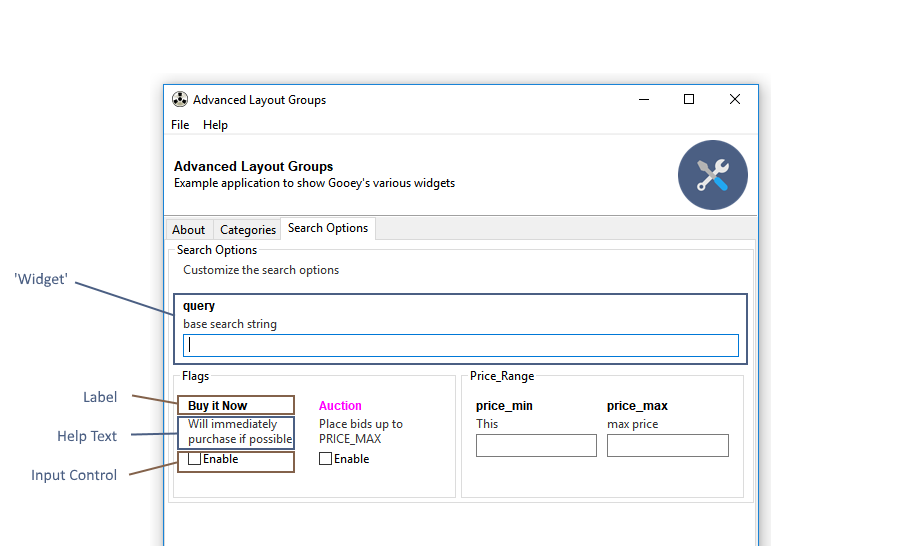
The following options apply to all Widget types in Gooey.
```python
parser.add_argument('-my-arg', gooey_options={
'label_color': '#ffffff',
'label_bg_color': '#ffffff',
'help_color': '#ffffff',
'help_bg_color': '#ffffff',
'error_color': '#ffffff',
'error_bg_color': '#ffffff',
'show_label': bool,
'show_help': bool,
'visible': bool,
'full_width': bool
})
```
| Keyword | Type | Description |
|---------|------|-------------|
| label_color | hex string | The foreground color of the label text (e.g. `#ff0000`) |
| label_bg_color | hex string | The background color of the label text. |
| help_color | hex string | The foreground color of the help text. |
| help_bg_color | hex string | The background color of the help text. |
| error_color | hex string | The foreground color of the error text (when visible). |
| error_bg_color | hex string | The background color of the error text (when visible). |
| show_label | bool | Toggles whether or not to display the label text |
| show_help | bool | Toggles whether or not to display the help text |
| visible | bool | Hides the entire widget when `False`. Note: the widget is still present in the UI and will still send along any default values that have been provided in code. This option is here for when you want to hide certain advanced / dangerous inputs from your GUI users. |
| full_width | bool | This is a layout hint for this widget. When `True` the widget will fill the entire available space within a given row. Otherwise, it will be sized based on the column rules provided elsewhere. |
## Global Config Options
> new in 1.0.8
All widgets in Gooey accept an `initial_value` option to seed the UI.
```python
parser.add_argument('-my-arg', widget='Textarea', gooey_options={
'initial_value': 'Hello world!'
})
```
## Individual Widget Options
A few widgets have additional options for controlling their layout and behavior.
### Textarea
```python
parser.add_argument('-my-arg', widget='Textarea', gooey_options={
# height of the text area in pixels
'height': int,
# prevents the user from editing when true
'readonly': bool
})
```
### IntegerField
```python
parser.add_argument('-my-arg', widget='IntegerField', gooey_options={
'min': int,
'max': int,
'increment': int
})
```
### DecimalField
```python
parser.add_argument('-my-arg', widget='IntegerField', gooey_options={
'min': float,
'max': float,
'increment': float,
'precision': int # 0 - 20
})
```
### Slider
The Slider is just a reskinned IntegerField, so it has the same options
```python
parser.add_argument('-my-arg', widget='Slider', gooey_options={
'min': int,
'max': int,
'increment': int
})
```
### BlockCheckbox
```python
parser.add_argument('-my-arg', widget='BlockCheckbox', gooey_options={
# allows customizing the checkbox's label
'checkbox_label': str
})
```
### Listbox
```python
parser.add_argument('-my-arg', widget='Listbox', gooey_options={
# height of the listbox in pixels
'height': int
})
```
### Radio Group
```python
parser.add_mutually_exclusive_group(gooey_options={
# Pre-select a specific option within a mutually exclusive group.
# default behavior is to have all options unselected by default.
'initial_selection': int
})
```
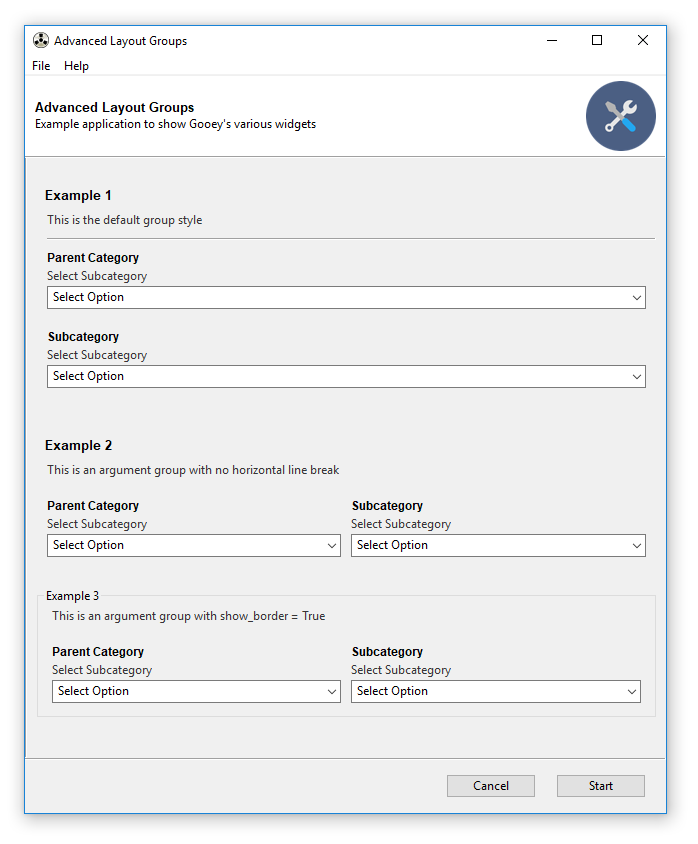
## Argument Groups
Argument Groups take a number of `gooey_options` to help control layout.
```python
parser.add_argument_group('MyGroup', desription='my cool group', gooey_options={
'show_border': bool,
'show_underline': bool,
'label_color': '#FF9900',
'columns': int,
'margin_top': int
})
```
| Keyword | Type | Description |
|---------|------|-------------|
| show_border | bool | When `True` a labeled border will surround all widgets added to this group. |
| show_underline | bool | Controls whether or not to display the underline when using the default border style |
| label_color | hex string | The foreground color for the group name |
| columns | int | Controls the number of widgets on each row |
| margin_top | int | specifies the top margin in pixels for this group |
## File and Folder choosers
File and Folder Choosers Groups take a number of `gooey_options` to help control default values.
```python
parser.add_argument("FileChooser", widget="FileChooser",
gooey_options={
'wildcard':
"Comma separated file (*.csv)|*.csv|"
"All files (*.*)|*.*",
'default_dir': "c:/batch",
'default_file': "def_file.csv",
'message': "pick me"
}
)
parser.add_argument("DirectoryChooser", widget="DirChooser",
gooey_options={
'wildcard':
"Comma separated file (*.csv)|*.csv|"
"All files (*.*)|*.*",
'message': "pick folder",
'default_path': "c:/batch/stuff"
}
)
parser.add_argument("FileSaver", widget="FileSaver",
gooey_options={
'wildcard':
"JPG (*.jpg)|*.jpg|"
"All files (*.*)|*.*",
'message': "pick folder",
'default_dir': "c:/projects",
'default_file': "def_file.csv"
}
)
parser.add_argument("MultiFileSaver", widget="MultiFileChooser",
gooey_options={
'wildcard':
"Comma separated file (*.csv)|*.csv|"
"All files (*.*)|*.*",
'message': "pick folder",
'default_dir': "c:/temp",
'default_file': "def_file.csv"
}
)
```
| Keyword | Type | Description |
|---------|------|-------------|
| wildcard | string | Sets the wildcard, which can contain multiple file types, for example: "BMP files (.bmp)|.bmp|GIF files (.gif)|.gif" |
| message | string | Sets the message that will be displayed on the dialog. |
| default_dir | string | The default directory |
| default_file | string | The default filename |
| default_path | string | The default path |
================================================
FILE: docs/Gracefully-Stopping.md
================================================
# Gracefully Stopping a Running Process
>New in v1.0.9!
<p align="center">
<img src="https://github.com/chriskiehl/GooeyImages/raw/images/docs/graceful-stopping/screenshot.PNG"/>
</p>
**Contents:**
* [How to tell Gooey which shutdown signal to use](#how-to-tell-gooey-which-signal-to-use)
* [How to catch KeyboardInterrupts](#How-to-catch-KeyboardInterrupts)
* [How to catch general interrupt signals](#How-to-catch-general-interrupt-signals)
By default, Gooey will kill the child process without any chance for cleanup. This guide will explain how to adjust that behavior so that you can detect when Gooey is attempting to close your process and use that signal to shutdown gracefully.
### Basics: How to tell Gooey which shutdown signal to use:
You can control the signal Gooey sends while stopping your process via `shutdown_signal` decorator argument. Signal values come from the builtin `signal` python module. On linux, any of the available constants may be used as a value. However, on Windows, only `CTRL_BREAK_EVENT`, `CTRL_C_EVENT` and `SIGTERM` are supported by the OS.
```python
import signal
@Gooey(shutdown_signal=signal.CTRL_C_EVENT)
def main():
...
```
### How to catch KeyboardInterrupts:
Keyboard interrupts are triggered in response to the `CTRL_C_EVENT` signal.
```python
import signal
@Gooey(shutdown_signal=signal.CTRL_C_EVENT)
def main():
...
```
Catching them in your code is really easy! They conveniently show up as top-level Exceptions. Just wrap your main logic in a try/except and you'll be able to catch when Gooey tries to shut down your process.
```python
try
# your code here
except KeyboardInterrupt:
# cleanup and shutdown or ignore
```
### How to catch general interrupt signals
Handling other signals is only slightly more involved than the `CTRL_C_EVENT` one. You need to install a handler via the `signal` module and tie it to the specific signal you want to handle. Let's use the `CTRL_BREAK_EVENT` signal as example.
```python
import signal
# (1)
def handler(*args):
print("I am called in response to an external signal!")
raise Exception("Kaboom!")
# (2)
signal.signal(signal.SIGBREAK, handler)
# (3)
@Gooey(shutdown_signal=signal.CTRL_BREAK_EVENT)
def main():
# your code here
# ...
```
Here we setup a handler called `handler` (1). This function can do anything you want in response to the signal including ignoring it entirely. Next we tie the signal we're interested in to the handler (2). Finally, we tell Gooey to send the `BREAK` signal(3) when the stop button is clicked.
> Note: pay close attention to the different constants used while specifying a handler (e.g. `SIGBREAK`) versus specifying which signal will be sent (e.g. `CTRL_BREAK_SIGNAL`).
================================================
FILE: docs/Using-Richtext-Controls.md
================================================
# Using the Richtext Controls
<p align="center">
<img src="https://github.com/chriskiehl/GooeyImages/raw/images/docs/richtext-controls/richtext-screen.png">
</p>
Gooey has a support for basic terminal control sequences. These let you control weight and color of the output font. For a full runnable example, checkout the code [from the examples repository](https://github.com/chriskiehl/GooeyExamples/blob/master/examples/richtext_demo.py)
You can enable this mode by passing the `richtext_controls` option to the Gooey decorator.
```python
@Gooey(richtext_controls=True)
def main():
...
```
### Usage
The [colored library](https://pypi.org/project/colored/) provides functions for adding markup controls to your text. Gooey supports the foreground (`fg`) and attributes (`attr`).
```python
from colored import stylize, attr, fg
```
You can modify your text's output by wrapping it in the `stylize` function provided by colored.py. For instance, this line will be displayed as bold (`attr(1)`) and red (`fg('red')`) when rendered by Gooey.
```python
print(stylize('Hello world!', fg('red') + attr('bold')))
```
> Note that you combine the foreground and attribute functions with the `+` operator.
### Attributes:
Richtext currently supports the following attributes:
|Code | Description |
|:----|------------------|
| 1 | bold |
| 4 | underlined |
| 0 | reset |
| 21 | res_bold |
| 24 | res_underlined |
These can be used either via their code (`attr(1)`) or their verbose form (`attr('bold')`)
### Foreground Colors:
Similar to the Attributes, foreground colors can be specified either by their code (`fg(2)`) or verbose form (`fg('green')`)
|Code | Description |
|:----|---------------------|
| 0 | black |
| 1 | red |
| 2 | green |
| 3 | yellow |
| 4 | blue |
| 5 | magenta |
| 6 | cyan |
| 7 | light_gray |
| 8 | dark_gray |
| 9 | light_red |
| 10 | light_green |
| 11 | light_yellow |
| 12 | light_blue |
| 13 | light_magenta |
| 14 | light_cyan |
| 15 | white |
| 16 | grey_0 |
| 17 | navy_blue |
| 18 | dark_blue |
| 19 | blue_3a |
| 20 | blue_3b |
| 21 | blue_1 |
| 22 | dark_green |
| 23 | deep_sky_blue_4a |
| 24 | deep_sky_blue_4b |
| 25 | deep_sky_blue_4c |
| 26 | dodger_blue_3 |
| 27 | dodger_blue_2 |
| 28 | green_4 |
| 29 | spring_green_4 |
| 30 | turquoise_4 |
| 31 | deep_sky_blue_3a |
| 32 | deep_sky_blue_3b |
| 33 | dodger_blue_1 |
| 34 | green_3a |
| 35 | spring_green_3a |
| 36 | dark_cyan |
| 37 | light_sea_green |
| 38 | deep_sky_blue_2 |
| 39 | deep_sky_blue_1 |
| 40 | green_3b |
| 41 | spring_green_3b |
| 42 | spring_green_2a |
| 43 | cyan_3 |
| 44 | dark_turquoise |
| 45 | turquoise_2 |
| 46 | green_1 |
| 47 | spring_green_2b |
| 48 | spring_green_1 |
| 49 | medium_spring_green |
| 50 | cyan_2 |
| 51 | cyan_1 |
| 52 | dark_red_1 |
| 53 | deep_pink_4a |
| 54 | purple_4a |
| 55 | purple_4b |
| 56 | purple_3 |
| 57 | blue_violet |
| 58 | orange_4a |
| 59 | grey_37 |
| 60 | medium_purple_4 |
| 61 | slate_blue_3a |
| 62 | slate_blue_3b |
| 63 | royal_blue_1 |
| 64 | chartreuse_4 |
| 65 | dark_sea_green_4a |
| 66 | pale_turquoise_4 |
| 67 | steel_blue |
| 68 | steel_blue_3 |
| 69 | cornflower_blue |
| 70 | chartreuse_3a |
| 71 | dark_sea_green_4b |
| 72 | cadet_blue_2 |
| 73 | cadet_blue_1 |
| 74 | sky_blue_3 |
| 75 | steel_blue_1a |
| 76 | chartreuse_3b |
| 77 | pale_green_3a |
| 78 | sea_green_3 |
| 79 | aquamarine_3 |
| 80 | medium_turquoise |
| 81 | steel_blue_1b |
| 82 | chartreuse_2a |
| 83 | sea_green_2 |
| 84 | sea_green_1a |
| 85 | sea_green_1b |
| 86 | aquamarine_1a |
| 87 | dark_slate_gray_2 |
| 88 | dark_red_2 |
| 89 | deep_pink_4b |
| 90 | dark_magenta_1 |
| 91 | dark_magenta_2 |
| 92 | dark_violet_1a |
| 93 | purple_1a |
| 94 | orange_4b |
| 95 | light_pink_4 |
| 96 | plum_4 |
| 97 | medium_purple_3a |
| 98 | medium_purple_3b |
| 99 | slate_blue_1 |
| 100 | yellow_4a |
| 101 | wheat_4 |
| 102 | grey_53 |
| 103 | light_slate_grey |
| 104 | medium_purple |
| 105 | light_slate_blue |
| 106 | yellow_4b |
| 107 | dark_olive_green_3a |
| 108 | dark_green_sea |
| 109 | light_sky_blue_3a |
| 110 | light_sky_blue_3b |
| 111 | sky_blue_2 |
| 112 | chartreuse_2b |
| 113 | dark_olive_green_3b |
| 114 | pale_green_3b |
| 115 | dark_sea_green_3a |
| 116 | dark_slate_gray_3 |
| 117 | sky_blue_1 |
| 118 | chartreuse_1 |
| 119 | light_green_2 |
| 120 | light_green_3 |
| 121 | pale_green_1a |
| 122 | aquamarine_1b |
| 123 | dark_slate_gray_1 |
| 124 | red_3a |
| 125 | deep_pink_4c |
| 126 | medium_violet_red |
| 127 | magenta_3a |
| 128 | dark_violet_1b |
| 129 | purple_1b |
| 130 | dark_orange_3a |
| 131 | indian_red_1a |
| 132 | hot_pink_3a |
| 133 | medium_orchid_3 |
| 134 | medium_orchid |
| 135 | medium_purple_2a |
| 136 | dark_goldenrod |
| 137 | light_salmon_3a |
| 138 | rosy_brown |
| 139 | grey_63 |
| 140 | medium_purple_2b |
| 141 | medium_purple_1 |
| 142 | gold_3a |
| 143 | dark_khaki |
| 144 | navajo_white_3 |
| 145 | grey_69 |
| 146 | light_steel_blue_3 |
| 147 | light_steel_blue |
| 148 | yellow_3a |
| 149 | dark_olive_green_3 |
| 150 | dark_sea_green_3b |
| 151 | dark_sea_green_2 |
| 152 | light_cyan_3 |
| 153 | light_sky_blue_1 |
| 154 | green_yellow |
| 155 | dark_olive_green_2 |
| 156 | pale_green_1b |
| 157 | dark_sea_green_5b |
| 158 | dark_sea_green_5a |
| 159 | pale_turquoise_1 |
| 160 | red_3b |
| 161 | deep_pink_3a |
| 162 | deep_pink_3b |
| 163 | magenta_3b |
| 164 | magenta_3c |
| 165 | magenta_2a |
| 166 | dark_orange_3b |
| 167 | indian_red_1b |
| 168 | hot_pink_3b |
| 169 | hot_pink_2 |
| 170 | orchid |
| 171 | medium_orchid_1a |
| 172 | orange_3 |
| 173 | light_salmon_3b |
| 174 | light_pink_3 |
| 175 | pink_3 |
| 176 | plum_3 |
| 177 | violet |
| 178 | gold_3b |
| 179 | light_goldenrod_3 |
| 180 | tan |
| 181 | misty_rose_3 |
| 182 | thistle_3 |
| 183 | plum_2 |
| 184 | yellow_3b |
| 185 | khaki_3 |
| 186 | light_goldenrod_2a |
| 187 | light_yellow_3 |
| 188 | grey_84 |
| 189 | light_steel_blue_1 |
| 190 | yellow_2 |
| 191 | dark_olive_green_1a |
| 192 | dark_olive_green_1b |
| 193 | dark_sea_green_1 |
| 194 | honeydew_2 |
| 195 | light_cyan_1 |
| 196 | red_1 |
| 197 | deep_pink_2 |
| 198 | deep_pink_1a |
| 199 | deep_pink_1b |
| 200 | magenta_2b |
| 201 | magenta_1 |
| 202 | orange_red_1 |
| 203 | indian_red_1c |
| 204 | indian_red_1d |
| 205 | hot_pink_1a |
| 206 | hot_pink_1b |
| 207 | medium_orchid_1b |
| 208 | dark_orange |
| 209 | salmon_1 |
| 210 | light_coral |
| 211 | pale_violet_red_1 |
| 212 | orchid_2 |
| 213 | orchid_1 |
| 214 | orange_1 |
| 215 | sandy_brown |
| 216 | light_salmon_1 |
| 217 | light_pink_1 |
| 218 | pink_1 |
| 219 | plum_1 |
| 220 | gold_1 |
| 221 | light_goldenrod_2b |
| 222 | light_goldenrod_2c |
| 223 | navajo_white_1 |
| 224 | misty_rose1 |
| 225 | thistle_1 |
| 226 | yellow_1 |
| 227 | light_goldenrod_1 |
| 228 | khaki_1 |
| 229 | wheat_1 |
| 230 | cornsilk_1 |
| 231 | grey_100 |
| 232 | grey_3 |
| 233 | grey_7 |
| 234 | grey_11 |
| 235 | grey_15 |
| 236 | grey_19 |
| 237 | grey_23 |
| 238 | grey_27 |
| 239 | grey_30 |
| 240 | grey_35 |
| 241 | grey_39 |
| 242 | grey_42 |
| 243 | grey_46 |
| 244 | grey_50 |
| 245 | grey_54 |
| 246 | grey_58 |
| 247 | grey_62 |
| 248 | grey_66 |
| 249 | grey_70 |
| 250 | grey_74 |
| 251 | grey_78 |
| 252 | grey_82 |
| 253 | grey_85 |
| 254 | grey_89 |
| 255 | grey_93 |
| 256 | default |
================================================
FILE: docs/packaging/Packaging-Custom-Images.md
================================================
# Using Custom Images while Packaging
> Note: if you're new to packaging Gooey, checkout the main [Packaging Guide](https://github.com/chriskiehl/Gooey/blob/doc-improvements/docs/packaging/Packaging-Gooey.md) first!
Gooey comes with a set of six default icons. These can be overridden with your own custom images/icons by telling Gooey to search additional directories when initializing. This is done via the `image_dir` argument to the `Gooey` decorator.
```python
@Gooey(program_name='Custom icon demo', image_dir='/path/to/images')
def main():
# rest of program
```
While this works for regular executions, a little additional work is required to make sure that your images will actually be available when running as a stand alone executable.
To make your custom images available after packaging, you have to do two things.
**Step 1:** wrap the path to your image directory in the `local_resource_path()` function provided by Gooey. When PyInstaller runs your application, it decompresses all the contents to a random temp directory. This function will handle the logic of resolving that directory and fetching your resources from it.
```python
from gooey import Gooey, local_resource_path
@Gooey(image_dir=local_resource_path('relative/path/to/images'))
def main():
...
```
**Step 2:** Update `build.spec` to include the image directory during bundling. This is done by giving the path to your Images as a Tree object to Pyinstaller's `EXE` section.
```
# -*- mode: python ; coding: utf-8 -*-
import os
...
# LOOK AT ME! I AM A TREE OBJECT
image_overrides = Tree('path/to/images', prefix='path/to/images')
...
exe = EXE(pyz,
a.scripts,
a.binaries,
a.zipfiles,
a.datas,
options,
image_overrides, # <-- NEW
name='APPNAME',
debug=False,
strip=None,
upx=True,
console=False,
icon=os.path.join(gooey_root, 'images', 'program_icon.ico'))
```
And then build via PyInstaller as usual.
```
pyinstaller -F --windowed build.spec
```
PyInstaller will now include your images in its bundle.
================================================
FILE: docs/packaging/Packaging-Gooey.md
================================================
# Packaging Gooey as a Stand Alone Application
<p align="center">
<img src="https://github.com/chriskiehl/GooeyImages/raw/images/docs/packaging/packaged-application.png" />
</p>
>:warning: Packaging Gooey is an ongoing science. Gooey currently runs on all the major platforms, can be installed in a bajillion different ways, and has several active versions in wide usage. In short, edge cases abound. If you run into any problems, hit up [this issue](https://github.com/chriskiehl/Gooey/issues/259).
You can package all of your programs files into a single easy to distribute executable using PyInstaller.
Packing Gooey into a standalone executable is super straight forward thanks to [PyInstaller](http://www.pyinstaller.org/). It is the only dependency you'll need and can be installed via the following.
```
pip install pyinstaller
```
**Setting up the build:**
PyInstaller uses [spec files](http://pythonhosted.org/PyInstaller/#using-spec-files) to determine how to bundle the project. These are a bit like `setup.py` files, but contain rules for how PyInstaller should bundle your whole application as a stand alone executable.
This file is usually placed in the root of your project. e.g.
```
MyProject/
- src/
- build.spec # <-- goes here!
- LICENCE.txt
- README.md
```
**Download Spec Files**
* Windows users can grab a pre-built spec file [here](https://raw.githubusercontent.com/chriskiehl/Gooey/master/docs/packaging/build-win.spec).
* For OSX users, you'll want [this one](https://raw.githubusercontent.com/chriskiehl/Gooey/master/docs/packaging/build-osx.spec).
The exact contents of the spec files will vary based on your OS, but at a high level, they'll share the same core pieces: `Analysis`, `EXE`, and, if you're on OSX, `BUNDLE`
```
# -*- mode: python ; coding: utf-8 -*-
block_cipher = None
a = Analysis(
['main.py'], # replace me with the main entry point
pathex=['/path/to/main.py'], # replace me with the appropriate path
...
)
pyz = PYZ(a.pure)
options = [('u', None, 'OPTION'), ('v', None, 'OPTION'), ('w', None, 'OPTION')]
exe = EXE(pyz,
...
name='MyCoolApplication' # replace me with exe name
console=False)
## OSX only below!
app = BUNDLE(exe,
name='APPNAME.app', # osx users replace me!
bundle_identifier=None,
info_plist=info_plist
)
```
The `Analysis` section is where you'll tell PyInstaller about your program. Using the build.spec from above, you'll need to make two edits to this section.
1. replace `APPNAME` in the `Analysis()` section with the name of _your_ application
2. replace the `pathex` value in the `Analysis()` section with the path to your application's root
> note: If you use additional data resources (e.g. images, data, etc..) you'll also need to explicitly add them to the EXE section. See [packaging custom images] for more info.
Next is `EXE`. In this section you'll replace the `name` argument with what you'd like the final `.exe` to be named.
>Note: if you're providing your own icon file, EXE is where you'll provide it. If you're on Windows, you must provide an .ico file (not PNG).
If you're on OSX, you'll have an additional `BUNDLE` section. You'll need to make one final edit here as well to control the name of the `.app` bundle that PyInstaller produces. Additionally, if you're customizing the bundle's icon, this is where you would supply the override (versus Windows, which places it in the EXE section).
Once you've updated the `.spec` to reflect your program's details. All that's left to do is build the executable!
### Running the .spec file
From the command line, run
```
pyinstaller -F --windowed build.spec
```
* `-F` tells PyInstaller to create a single bundled output file
* `--windowed` disables the terminal which would otherwise launch when you opened your app.
And that's it. Inside of the `dist/` directory, you'll find a beautiful stand-alone executable that you can distribute to your users.
## Troubleshooting
**PROBLEM: My bundled Application won't work!**
First things first: _See if you can package your application **without** Gooey!_
Read and understand all of the PyInstaller docs. If you're referencing binaries or external data files, you may have to do a little extra work in your `.spec` to get PyInstaller to understand all of your dependencies.
Rebuild your bundle with `debug=True` set in the `.spec` file. This will give lots of useful output when your application bootstraps which can make pinning down the problem much easier.
Rebuild your bundle without the `-F` flag (e.g. just `pyinstaller build.spec`). This will build a directory with all of your dependencies. This can make it easier to poke around and see what PyInstaller's view of your project actually is.
**PROBLEM: I'm seeing the wrong icon on my executable**
First things first: Is Windows gas lighting you?
Windows caches icons semi-aggressively. This can lead to it showing an icon in the file explorer that doesn't actually reflect reality.

Right-click on the executable and select "properties." This will show you the icon that's actually associated with file. As long as everything looks good there, you're golden. Windows will catch up... _eventually_.
**PROBLEM: Exception: This program needs access to the screen. Please run with a Framework build of python, and only when you are logged in on the main display of your Mac.**
This happens on OSX when you neglect the `--windowed` flag during your build step.
wrong:
```
pyinstaller build.spec ## oops! forgot the required flags
```
Correct:
```
pyinstaller --windowed build.spec
```
Checkout the [Pyinstaller Manual](https://github.com/pyinstaller/pyinstaller/wiki/FAQ) for more details.
================================================
FILE: docs/packaging/build-osx.spec
================================================
# -*- mode: python ; coding: utf-8 -*-
"""
Example build.spec file
This hits most of the major notes required for
building a stand alone version of your Gooey application.
"""
import os
import platform
import gooey
gooey_root = os.path.dirname(gooey.__file__)
gooey_languages = Tree(os.path.join(gooey_root, 'languages'), prefix = 'gooey/languages')
gooey_images = Tree(os.path.join(gooey_root, 'images'), prefix = 'gooey/images')
from PyInstaller.building.api import EXE, PYZ, COLLECT
from PyInstaller.building.build_main import Analysis
from PyInstaller.building.datastruct import Tree
from PyInstaller.building.osx import BUNDLE
block_cipher = None
a = Analysis(['APPNAME.py'], # replace me with your path
pathex=['/path/to/APP.py'],
hiddenimports=[],
hookspath=None,
runtime_hooks=None,
)
pyz = PYZ(a.pure)
options = [('u', None, 'OPTION'), ('v', None, 'OPTION'), ('w', None, 'OPTION')]
exe = EXE(pyz,
a.scripts,
a.binaries,
a.zipfiles,
a.datas,
options,
gooey_languages,
gooey_images,
name='APPNAME',
debug=False,
strip=False,
upx=True,
console=False,
icon=os.path.join(gooey_root, 'images', 'program_icon.ico'))
info_plist = {'addition_prop': 'additional_value'}
app = BUNDLE(exe,
name='APPNAME.app',
bundle_identifier=None,
info_plist=info_plist
)
================================================
FILE: docs/packaging/build-win.spec
================================================
# -*- mode: python ; coding: utf-8 -*-
import gooey
gooey_root = os.path.dirname(gooey.__file__)
block_cipher = None
a = Analysis(['APPNAME.py'], # replace me with your path
pathex=['/path/to/APP.py'],
binaries=[],
datas=[],
hiddenimports=[],
hookspath=[],
runtime_hooks=[],
excludes=[],
win_no_prefer_redirects=False,
win_private_assemblies=False,
cipher=block_cipher,
noarchive=False)
pyz = PYZ(a.pure, a.zipped_data,
cipher=block_cipher)
exe = EXE(pyz,
a.scripts,
a.binaries,
a.zipfiles,
a.datas,
[],
name='main',
debug=False,
bootloader_ignore_signals=False,
strip=False,
upx=True,
upx_exclude=[],
runtime_tmpdir=None,
console=False,
icon=os.path.join(gooey_root, 'images', 'program_icon.ico'))
================================================
FILE: docs/pull_request_template.md
================================================
Hello there!
Make sure you've followed the [Contributing](https://github.com/chriskiehl/Gooey/blob/master/CONTRIBUTING.md) guidelines before finalizing your pull request.
TL;DR:
- [ ] You're opening this PR against the current [release branch](https://github.com/chriskiehl/Gooey/blob/master/CONTRIBUTING.md#development-overview)
- [ ] Works on both Python 2.7 & Python 3.x
- [ ] Commits have been squashed and includes the relevant issue number
- [ ] Pull request description contains link to relevant issue or detailed notes on changes
- [ ] This **must** include example code demonstrating your feature or the bug being fixed
- [ ] All existing tests pass
- [ ] Your bug fix / feature has associated test coverage
- [ ] README.md is updated (if relevant)
================================================
FILE: docs/releases/1.0.3-release-notes.md
================================================
# Gooey 1.0.3 Released!

After cooking for far too long, **Gooey 1.0.3 is released!**
Grab the latest version:
* [github](https://github.com/chriskiehl/Gooey)
* [PyPi](TODO)
Runnable demos for all the new features can be found in the [Examples repo](https://github.com/chriskiehl/GooeyExamples).
## Overview:
A lot of focus was put on settling Gooey down into a more stable mature project. In addition to all of the new features, a lot of time was spent writing documentation, stamping down cross platform issues / quirks, and making numerous tweaks and additions to enable a smoother experience when packaging Gooey for distribution.
## What's new
### Fancy Layout controls!

The main goal of this release was enabling more complex real-world layouts and more customization of Gooey's UI. As of 1.1.0, you now have have control over every color, font, and display status within the application. You can now brand Gooey to your organization's colors, logically group related items under a central heading, and optionally show/hide all the individual components that make up an input widget.
### Menu Bars
Gooey now includes a simple declarative system for creating top level menu bars and items.

The menu option currently supports three flavors:
**AboutDialog**
This is an AboutDialog as rendered natively by your OS. It's a good place to show standard info like version info, descriptions, licenses, etc.. in a standard way across platforms.
**MessageDialogs**
Next up are general message dialogs. You can display any informational text inside of these.
**Link**
Finally, you can create fixed menu items that simply link to external resources, for instance, your site, documentation, pdfs, etc..
## Rich Text Controls
Thanks to @NathanRichard, Gooey can now optionally honor terminal control sequences and display Rich Text in the output panel.

### New Gooey Program Icon
<img src="https://github.com/chriskiehl/GooeyImages/raw/images/logo/gooey.png" width="200" height="auto">
New icon provided by professional cool guy and crazy talented UX designer [Justin Rhee](https://www.linkedin.com/in/justinrhee/).
## Additional features
* OSX now shows program Icon in Dock
* `show_error_modal` option to toggle whether or not failures additionally raise alert modals.
* `BlockCheckbox` widget.
* Hyperlinks written to the console appear as such and will launch a browser on click
* `clear_before_run` option lets you control whether or not subsequent program runs start from a fresh terminal or preserve the previous output.
* Conditionally show/hide restart button
* `requires_shell` option - controls how `Popen` spawns your program. By default (and historically), this value is False.
* Optionally silence textual progress updates when using the Progress widget (via @conradhilley)
* Multi-Directory Choosers - these were accidentally dropped from the project. @HenrykHaniewicz added them back!
* Additional explicit wx imports to make packaging on OSX easier
* Textfields can now be made Readonly for informational purposes
* better custom target support via `suppress_gooey_flag` which prevents the `--ignore-gooey` flag from being injected
## Breaking Changes
No breaking changes between `1.0.0` and `1.1.0`!
## Language Additions / Improvements
* Completed Italian translation - @gison93
* Updated French translation - @NathanRichard
* Updated Hebrew translation - @eturkes
## Bug Fixes
* Fixed 5 year old bug(!) where an errant lambda function wasn't passing through all of its arguments which caused frustratingly opaque failures under specific conditions.
* Fixed bug where external updates weren't applied to `ListBox`
* Fix bug where tuples weren't coerced to List which causes concatenation errors
* Fixed bug where string coercion in `argparse_to_json` was too broad and caused type errors
* Fixed bug where wrong validator was applied to Dropdown type causing preflight checks to always fail
* Fixed bug where Radio Groups would apply too much vertical spacing between components
* Fixed bug where subgroups with single items were attached to the wrong UI parent
* Fixed bug where legacy default groups weren't being translated
* Fixed bug where certain languages would sometimes cause components to be rendered off screen
================================================
FILE: docs/releases/1.0.4-release-notes.md
================================================
# Gooey 1.0.4 Released!
Gooey picked up some cool new widget types thanks to awesome contributions from @NathanRichard and @conradhilley.
The rest of this release was focused on bug fixes and quality improvements. My commitment is to having Gooey be a stable, reliable project. This has required slowly shedding it's fast and loose hobby project past. Test coverage more than doubled between 1.0.3 and 1.0.4 and several bugs were fixed along the way as a result of this. The next few releases of Gooey will be similarly focused on bringing its codebase up to snuff so that wider changes can be made without introducing unexpected regressions.
## Upgrading from 1.0.3 to 1.0.4
Translation notice! Yes/No options in confirmation modals are now backed by the language files. Previously, they were fixed to english regardless of the selected language. If the new language options aren't configured for your language, you will now see a translation request in the button label!
## What's new
### Widgets: TimeChooser
<p align="center">
<img src="https://github.com/chriskiehl/GooeyImages/raw/images/docs/releases/1.0.4/time-chooser-demo.JPG">
</p>
Usage:
```python
parser = GooeyParser()
parser.add_argument('--time', widget='TimeChooser')
```
@NathanRichard added this one after an excellent deep dive into the complexities of dealing with time inside of WX. See the README for notes on usage.
### Widgets: ColourChooser
<p align="center">
<img src="https://github.com/chriskiehl/GooeyImages/raw/images/docs/releases/1.0.4/color-chooser-demo.jpg">
</p>
Usage:
```python
parser = GooeyParser()
parser.add_argument('--color', widget='ColourChooser')
```
@conradhilley brought this one to life. You can now select colors from an awesome little chooser widget.
### CLI based defaults
@jschultz added the ability to use arguments passed on the command line as defaults in Gooey. Enable this functionality by passing `use_cmd_args` to the Gooey decorator.
```python
@Gooey(use_cmd_args=True)
def main():
parser = ArgumentParser()
parser.add_argument('--foo')
```
Now any CLI args you pass when invoking your program will show up as defaults in Gooey.
```
python my_program.py --foo "hello!"
```
### Additional features
- Added option to start Gooey in full screen mode
## Language Additions / Improvements
* @foben - documentation fixes
* @gediz - turkish translations
* @dsardelic - bosnian & Croatian translations
* @partrita - Korean translations
## Bug Fixes
- Main README image had a typo "Command Lines Applications"
- Truthy values
- Fixed bug where nargs in textfields weren't being mapped correctly
- Fixed bug where argparse's SUPPRESS flag was showing in the UI
- Fixed missing i18n capabilities in modals
- Fixed bug where program_description wasn't being honored
- Fixed bug where gooey_options weren't being honored in the Header
- Fixed bug where RadioGroup wasn't enabling it's child widget when `initial_selection` was set
- Fixed bug where checkboxes weren't honoring visibility options
- Fixed bug where gooey_options weren't being passed to footer
================================================
FILE: docs/releases/1.0.5-release-notes.md
================================================
## Gooey 1.0.5 Released!
Gooey is now using WX 4.1.0!
This change should resolve several issues in Ubuntu as well as the numerous other quirks which have been reported.
## Thank you to the current Patreon supporters!
* Qteal
* Joseph Rhodes
# New widgets:
### FilterableDropdown

You can checkout a runnable example in the GooeyExamples repo [here](https://github.com/chriskiehl/GooeyExamples/blob/1.0.5-release/examples/FilterableDropdown.py)
Example Code:
```python
add_argument(
choices=['a', 'b', 'c'],
widget='FilterableDropdown',
gooey_options={
'no_match': 'No results found!',
'placeholder': 'Type something!'
})
```
This introduces a new language translation key: "no_matches_found" to handle the case where the user's input doesn't match any of the choices. This is used by default, but can be overridden via gooey options
### Elapsed Time / Estimated time remaining
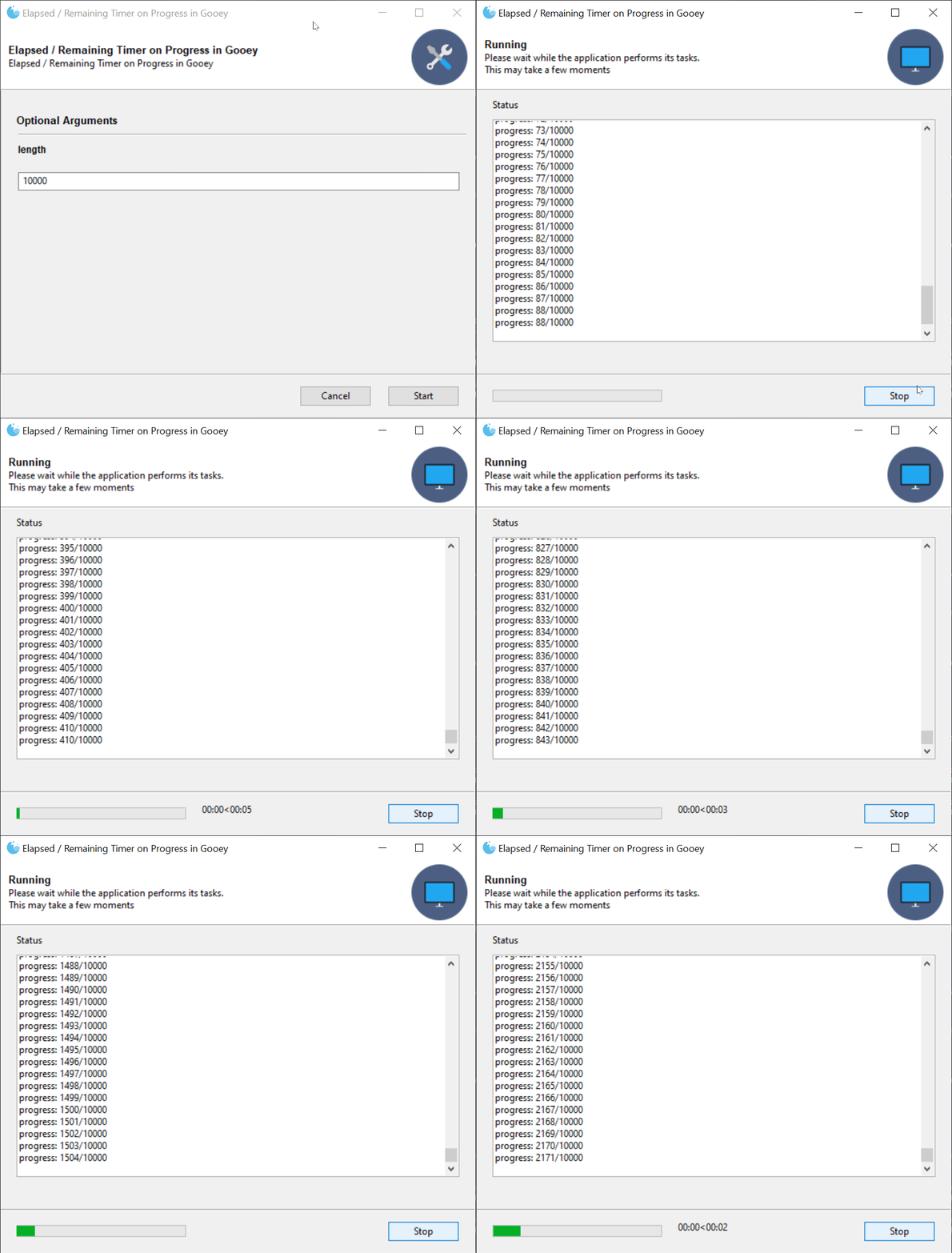
@JackMcKew put in a herculean effort and introduced a new feature where elapsed and estimated remaining time can be shown in addition to the standard progress bar.
You can checkout an example [here](https://github.com/chriskiehl/GooeyExamples/blob/master/examples/example_time_remaining.py)
Example Code:
```python
@Gooey(timing_options={
'show_time_remaining':True,
'hide_time_remaining_on_complete':True
})
```
## Breaking Changes
* (documentation breaking)`terminal_font_weight`'s public documented API allowed the strings "NORMAL" and "BOLD" while its internal implementation relied on numeric font weights (light=200, normal=300, etc..). The documentation was updated to show the correct usage and a constants file was added to the public API.
## Functionality
* @neonbunny enabled Parsers to use configuration from parents.
* @eladeyal-intel updated `RichTextConsole` to allow control+scrollwheel to zoom the text
## Language Additions / Improvements
* @soleil0-0 - Additional Chinese translation
* @dancergraham - Additional French translation
* @ajvirSingh1313 - Hindi translation
## Bug Fixes
* Fixed bug where dynamic updates to a Dropdown would cause the selection to be lost
* Fixed performance issues where dynamic updates with large items would cause Gooey to hang
* @rotu fixed a bug in dynamic updates related to `Popen` usage.
* @neonbunny - resolved warning cause by missing return statement
* Fixed bug where terminal font and colors were not being set correctly
* Fixed mysterious RadioGroup issue where underlying WxWidgets would 'forget' the current selection under certain circumstances
================================================
FILE: docs/releases/1.0.6-release-notes.md
================================================
## Gooey 1.0.6 Released!
This is a minor release beefing up the new FilterableDropdown's search capabilities and performance. In the previous release, the dropdown was backed by WX's `ListBox` widget. 1.0.6 replaces this for a fully virtualized version which allows Gooey to operate on massive datasets without taking a hit to UI performance. Additionally, how Gooey internally filters for matches has also been updated. Choice are now backed by a trie for super fast lookup even against large data sets. Tokenization and match strategies can be customized to support just about any lookup style.
Head over to the [Examples Repo](https://github.com/chriskiehl/GooeyExamples) to see the updated demo which now uses a dataset consisting of about 25k unique items.
**New Gooey Options:**
`FilterableDropdown` now takes a `search_strategy` in its `gooey_options`.
```python
from gooey import Gooey, GooeyParser, PrefixTokenizers
gooey_options={
'label_color': (255, 100, 100),
'placeholder': 'Start typing to view suggestions',
'search_strategy': {
'type': 'PrefixFilter',
'choice_tokenizer': PrefixTokenizers.ENTIRE_PHRASE,
'input_tokenizer': PrefixTokenizers.REGEX('\s'),
'ignore_case': True,
'operator': 'AND',
'index_suffix': False
}
})
```
This gives control over how the choices and user input get tokenized, as well as how those tokenized matches get treated (ANDed together vs ORd). Want to match on any part of any word? Enable the `index_suffix` option to index all of your candidate words by their individual parts. e.g.
```
Word: 'Banana'
Suffixes: ['Banana', 'anana', 'nana', 'ana']
```
These all get loaded into a trie for super fast lookup. Combine this with the `WORDs` tokenizer, and you get really fine grained search though your options!
## Thank you to the current Patreon supporters!
* Qteal
* Joseph Rhodes
## Breaking Changes
No breaking changes from 1.0.5.
================================================
FILE: docs/releases/1.0.7-release-notes.md
================================================
## Gooey 1.0.7 Released!
Lots of new stuff this release! We've got 3 new widget types, new gooey_options, as well as some quality of Life improvements for using Gooey Options.
### New Widgets: IntegerField, DecimalField, and Slider
<p align="center"><img src="https://github.com/chriskiehl/GooeyImages/raw/images/docs/releases/1.0.7/numeric-inputs.gif" ></p>
Gooey now has 3 inputs specifically geared towards accepting numeric inputs. Previously, all Gooey had were text fields which you could add `validators` to in order to enforce only numbers were entered, but now we have top level widgets which do all of that out of the box!
**Important Usage Note:** since these numeric inputs don't allow any non-numeric characters to be entered, they do **not** give you the ability to blank them out. Unlike a `TextField` which can be left empty and thus have its value not passed to your program, the numeric inputs will always send a value. Thus, you have to have sane handling in user-land.
Checkout the [Options docs](https://github.com/chriskiehl/Gooey/blob/master/docs/Gooey-Options.md) for more details.
### New Gooey Options: placeholder
<p align="center"><img src="https://github.com/chriskiehl/GooeyImages/raw/images/docs/releases/1.0.7/placeholders.gif" ></p>
Widgets with text inputs now all accept a `placeholder` Gooey option.
```python
add_argument('--foo', widget='TextField', gooey_options=options.TextField(
placeholder='Type some text here!'
)
# or without the options helper
add_argument('--foo', widget='TextField', gooey_options={
'placeholder': 'Type some text here!'
})
```
### New Validator option: RegexValidator
```python
add_argument('--foo', widget='TextField', gooey_options=options.TextField(
placeholder='Type some text here!',
validator=options.RegexValidator(
test='\d{4}',
message='Must be exactly 4 digits long!'
)
)
# or without the options helper
add_argument('--foo', widget='TextField', gooey_options={
'placeholder': 'Type some text here!',
'validator': {
'type': 'RegexValidator',
'test': '\d{4}',
'message': 'Must be exactly 4 digits long!'
}
})
```
### New feature: Options helpers
Gooey now has a top-level `options` module which can be imported. Previously, Gooey Options have been an opaque map. While great for openness / extensibility, it's pretty terrible from a discoverability / "what does this actually take again..?" perspective. The new `options` module aims to make using `gooey_options` easier and more discoverable.
```python
from gooey import options
```
The goal is to enable IDE's to provide better auto-completion help as well as more REPL driven usefulness via help() and docstrings.
```python
from gooey import options
parser.add_argument(
'--foo',
help='Some foo thing',
widget='FilterableDropdown',
gooey_options=options.FilterableDropdown(
placeholder='Search for a Foo',
search_strategy=options.PrefixSearchStrategy(
ignore_case=True
)
))
```
Note that these are _just_ helpers for generating the right data shapes. They're still generating plain data behind the scenes and thus all existing `gooey_options` code remains 100% compatible.
**Better Docs:**
Which is to say, documentation which actually exists rather than _not_ exist. You can inspect the docs live in the REPL or by hopping to the symbol in editors which support such things.
```
>>> from gooey import options
>>> help(options.RadioGroup)
Help on function FileChooser in module __main__:
FileChooser(wildcard=None, default_dir=None, default_file=None, message=None, **layout_options)
:param wildcard: Sets the wildcard, which can contain multiple file types, for
example: "BMP files (.bmp)|.bmp|GIF files (.gif)|.gif"
:param message: Sets the message that will be displayed on the dialog.
:param default_dir: The default directory selected when the dialog spawns
:param default_file: The default filename used in the dialog
Layout Options:
---------------
Color options can be passed either as a hex string ('#ff0000') or as
a collection of RGB values (e.g. `[255, 0, 0]` or `(255, 0, 0)`)
:param label_color: The foreground color of the label text
:param label_bg_color: The background color of the label text.
:param help_color: The foreground color of the help text.
:param help_bg_color: The background color of the help text.
:param error_color: The foreground color of the error text (when visible).
:param error_bg_color: The background color of the error text (when visible).
:param show_label: Toggles whether or not to display the label text
:param show_help: Toggles whether or not to display the help text
:param visible: Hides the entire widget when False. Note: the widget
is still present in the UI and will still send along any
default values that have been provided in code. This option
is here for when you want to hide certain advanced / dangerous
inputs from your GUI users.
:param full_width: This is a layout hint for this widget. When True the widget
will fill the entire available space within a given row.
Otherwise, it will be sized based on the column rules
provided elsewhere.
```
Ideally, and eventually, we'll be able to completely type these options to increase visibility / usability even more. However, for backwards compatibility reasons, Gooey will continue to be sans anything more than the most basic of type hinting for the time being.
## Breaking Changes
**No breaking API changes from 1.0.6 to 1.0.7.** However, the _strictness_ of existing Gooey Options has been increased, which _could_ result in issues when upgrading from 1.0.6. In an attempt to be helpful, Gooey now throws an exception if invalid Gooey Options are supplied. This is to catch things like invalid types or ill-formed data. If you were passing bad data in 1.0.6, it will now be flagged as such in 1.0.7.
## Thank you to the current [Patreon supporters](https://www.patreon.com/chriskiehl)!
* Sponsors:
* Qteal
* Individuals:
* Joseph Rhodes
* Nicholas
================================================
FILE: docs/releases/1.0.8-release-notes.md
================================================
## Gooey 1.0.8 Released!
Another minor Gooey release! This one brings a new global Gooey Option for setting initial values in the UI, support for `version` action types, plus a few bug/linting fixes.
Additionally, I continue to plug away at getting the test coverage to useful levels. We're now pushing 80% coverage which is making working on Gooey with confidence much easier!
### New Gooey Options: initial_value
This option lets you specify the value present in the widget when Gooey starts.
```python
parser.add_argument('-my-arg', widget='Textarea', gooey_options={
'initial_value': 'Hello world!'
})
```
Or, using the new `options` helpers:
```python
from gooey import options
parser.add_argument('-my-arg', widget='Textarea', gooey_options=options.Textarea(
initial_value='Hello World!'
))
```
If you've been using Gooey awhile, you'll recognize that this overlaps with the current behavior of `default`. The new `initial_value` enables you to supply a truly optional seed value to the UI. When using `default`, even if the user clears your value out of the UI, argparse will add it back in when it parses the CLI string. While this is often useful behavior, it prevents certain workflows from being possible. `initial_value` let's you control the UI independent of argparse. This means you can now, for instance, set a checkbox to be checked by default in the UI, but optionally allow the user to deselect it without having argprase re-populate the 'checked' state (a behavior which comes up frequently in the issue tracker due to it being technically correct, but also very confusing!).
### action=version support
When using `action='version'` Gooey will now map it a CheckBox widget type.
### Other Fixes / Changes:
* Bug fix: add missing translation step for tabbed group titles (@neonbunny)
* Linting: swap `is not` for `!=` (@DrStrinky)
## Breaking Changes
**No breaking API changes from 1.0.7 to 1.0.8**
## Thank you to the current [Patreon supporters](https://www.patreon.com/chriskiehl)!
* Sponsors:
* Qteal
* Individuals:
* Joseph Rhodes
* Nicholas
* Joey
================================================
FILE: docs/releases/1.0.8.1-release-notes.md
================================================
## Gooey 1.0.8.1 Released!
This is a tiny intermediate release which just loosen Gooey's WxPython dependency from `=4.1.0` to `>=4.1.0` in `setup.py`. The strict version requirement was causing numerous installation issues across environments.
================================================
FILE: docs/releases/1.2.0-ALPHA-release-notes.md
================================================
# Gooey 1.2.0-ALPHA Released!
### Warning:
>**Upgrade with caution!** 1.2.0 removes the experimental Dynamic Updates feature and replaces it with a _new_ experimental Dynamic Updates feature! The two APIs are incompatible.
This release brings a whole host of new features to Gooey. Chief among them are the new Dynamic Updates and Validation functionality. This was effectively a rebuild of a substantial portion of Gooey's internal to enable a more client/server style functionality. This means that you have more control over the gooey's lifecycle, and can subscribe to high level events. Currently, FormSubmit, OnComplete, and OnError are supported, but more are on their way! Soon you'll be able to have fine grained control over the UI and its presentation, and still without having to write a single line of traditional GUI code!
### Breaking Changes (1.0.8 -> 1.2.0)
* **Validation** - the validation mechanism available via gooey_options has been removed entirely in favor of the new API.
* **Dynamic Updates** - there was previously minimal support for loading new data at run time. This has been revomed in favor of a new system which gives advanced control over the state of the UI.
### New Features
* **Dynamic Updates and Validation** - Checkout the [README](https://github.com/chriskiehl/Gooey/blob/master/README.md) for details on how to get started. This feature is really hairy behind the scenes and involves all kinds of crazy monkey patching in order to work. Odds of encountering a bug or scenario that doesn't work for your use case is high in this initial release. Please fill out an issue if any problems pop up! Checkout [the examples repo](https://github.com/chriskiehl/GooeyExamples/blob/master/examples/lifecycle_hooks.py) to see the new lifecycle hooks in action.
* **Graceful Shutdown control** - Gooey previously would `SIGTERM` your application when you tried to halt it while running. However, with 1.2.0, you have control over which signal Gooey sends when you request a shutdown. This gives you a chance to catch that signal and clean up and resources currently un use before shutting down.
* **Better sys.argv handling** - Gooey no longer mutates the global sys.argv variable. This caused people all kinds of problems -- most frequent being Gooey spawning multiple windows. This is now removed, and hopefully all the pain stemming from it as well.
================================================
FILE: docs/releases/pypi-distribution.md
================================================
# Testing PyPi distribution before upload
The 1.0.4 release was botched when uploading to PyPi as it pulled in the 1.0.3 artifacts sitting in my dev directory. This meant that the 1.0.4 version was now clobbered on PyPi and could no longer be used. More care is needed when deploying.
### How to test locally before uploading
1\. build the wheel
```
python pip_build_wheel.py
```
this will output the wheel to the `dist/` directory.
2/. Copy the file location.
Copy the absolute path to the .gz output file. It will look something like this:
```
dist/Gooey-1.0.4.tar.gz
```
3\. In a different virtual environment, install the local wheel
```
cd ~/projects/GooeyExamples
virtualenv venv
source ./venv/Scripts/activate
pip install /path/to/local/dist/Gooey-1.0.4.tar.gz
```
If everything installs OK, you're good to upload.
```
python pip_deploy.py
```
================================================
FILE: docs/releases/release-checklist.md
================================================
# Release Checklist
- [ ] Release commit is tagged
- [ ] The next release-branch is created
- [ ] CONTRIBUTING.md has been updated to point at the next release branch
- [ ] Release is created on Github
- [ ] All tests pass on 2.7 and 3.x
- [ ] All warnings are resolved (run tests with `PYTHONWARNINGS=default`)
- [ ] All Gooey Examples run and work as expected
- [ ] All new features have corresponding examples
- [ ] All new features have README updates
- [ ] Wx Inspection tool is removed from the runner
- [ ] all debug prints removed
- [ ] setup.py version is updated
- [ ] __init__.py version is updated
- [ ] types check (for the most part) `./venv/Scripts/python.exe -m mypy /path/to/python_bindings/types.py`
- [ ] pip install of release branch works.
- [ ] All Gooey Examples run and work as expected
- [ ] pypi is updated
- [ ] pypi pip install tested 2.7 & 3.x
- [ ] All Gooey Examples run and work as expected
- [ ] Release notes written:
- [ ] major features
- [ ] bug fixes
- [ ] language additions
- [ ] breaking changes
- [ ] contributors
================================================
FILE: gooey/__init__.py
================================================
import os
from gooey.python_bindings.gooey_decorator import Gooey
from gooey.python_bindings.gooey_parser import GooeyParser
from gooey.gui.util.freeze import localResourcePath as local_resource_path
from gooey.python_bindings import constants
from gooey.python_bindings.constants import Events
from gooey.gui.components.filtering.prefix_filter import PrefixTokenizers
from gooey.gui.components.options import options
from gooey.python_bindings import types
types = types
__version__ = '1.2.0-ALPHA'
================================================
FILE: gooey/__main__.py
================================================
# '''
# Delegates arguments to the main Gooey runner
#
# For use when run directly from command line with the -m (module) flag:
#
# e.g. $ python -m gooey
#
# '''
#
# from gooey import application
#
# application.main()
================================================
FILE: gooey/gui/__init__.py
================================================
__author__ = 'Chris'
================================================
FILE: gooey/gui/application/__init__.py
================================================
================================================
FILE: gooey/gui/application/application.py
================================================
import sys
from json import JSONDecodeError
import six
import wx # type: ignore
from gooey import Events
from gooey.gui import events
from gooey.gui import host
from gooey.gui import state as s
from gooey.gui.application.components import RHeader, ProgressSpinner, ErrorWarning, RTabbedLayout, \
RSidebar, RFooter
from gooey.gui.components import modals
from gooey.gui.components.config import ConfigPage
from gooey.gui.components.config import TabbedConfigPage
from gooey.gui.components.console import Console
from gooey.gui.components.menubar import MenuBar
from gooey.gui.lang.i18n import _
from gooey.gui.processor import ProcessController
from gooey.gui.pubsub import pub
from gooey.gui.state import FullGooeyState
from gooey.gui.state import initial_state, ProgressEvent, TimingEvent
from gooey.gui.util.wx_util import transactUI, callafter
from gooey.python_bindings import constants
from gooey.python_bindings.dynamics import unexpected_exit_explanations, \
deserialize_failure_explanations
from gooey.python_bindings.types import PublicGooeyState
from gooey.python_bindings.types import Try
from gooey.util.functional import assoc
from gooey.gui.util.time import Timing
from rewx import components as c # type: ignore
from rewx import wsx # type: ignore
from rewx.core import Component, Ref # type: ignore
class RGooey(Component):
"""
Main Application container for Gooey.
State Management
----------------
Pending further refactor, state is tracked in two places:
1. On this instance (React style)
2. In the WX Form Elements themselves[0]
As needed, these two states are merged to form the `FullGooeyState`, which
is the canonical state object against which all logic runs.
Dynamic Updates
---------------
[0] this is legacy and will (eventually) be refactored away
"""
def __init__(self, props):
super().__init__(props)
self.frameRef = Ref()
self.consoleRef = Ref()
self.configRef = Ref()
self.buildSpec = props
self.state = initial_state(props)
self.headerprops = lambda state: {
'background_color': self.buildSpec['header_bg_color'],
'title': state['title'],
'show_title': state['header_show_title'],
'subtitle': state['subtitle'],
'show_subtitle': state['header_show_subtitle'],
'flag': wx.EXPAND,
'height': self.buildSpec['header_height'],
'image_uri': state['image'],
'image_size': (six.MAXSIZE, self.buildSpec['header_height'] - 10)}
self.fprops = lambda state: {
'buttons': state['buttons'],
'progress': state['progress'],
'timing': state['timing'],
'bg_color': self.buildSpec['footer_bg_color'],
'flag': wx.EXPAND,
}
self.clientRunner = ProcessController.of(self.buildSpec)
self.timer = None
def component_did_mount(self):
pub.subscribe(events.WINDOW_START, self.onStart)
pub.subscribe(events.WINDOW_RESTART, self.onStart)
pub.subscribe(events.WINDOW_STOP, self.handleInterrupt)
pub.subscribe(events.WINDOW_CLOSE, self.handleClose)
pub.subscribe(events.WINDOW_CANCEL, self.handleCancel)
pub.subscribe(events.WINDOW_EDIT, self.handleEdit)
pub.subscribe(events.CONSOLE_UPDATE, self.consoleRef.instance.logOutput)
pub.subscribe(events.EXECUTION_COMPLETE, self.handleComplete)
pub.subscribe(events.PROGRESS_UPDATE, self.updateProgressBar)
pub.subscribe(events.TIME_UPDATE, self.updateTime)
# # Top level wx close event
frame: wx.Frame = self.frameRef.instance
frame.Bind(wx.EVT_CLOSE, self.handleClose)
frame.SetMenuBar(MenuBar(self.buildSpec))
self.timer = Timing(frame)
if self.state['fullscreen']:
frame.ShowFullScreen(True)
if self.state['show_preview_warning'] and not 'unittest' in sys.modules.keys():
wx.MessageDialog(None, caption='YOU CAN DISABLE THIS MESSAGE',
message="""
This is a preview build of 1.2.0! There may be instability or
broken functionality. If you encounter any issues, please open an issue
here: https://github.com/chriskiehl/Gooey/issues
The current stable version is 1.0.8.
NOTE! You can disable this message by setting `show_preview_warning` to False.
e.g.
`@Gooey(show_preview_warning=False)`
""").ShowModal()
def getActiveConfig(self):
return [item
for child in self.configRef.instance.Children
# we descend down another level of children to account
# for Notebook layouts (which have wrapper objects)
for item in [child] + list(child.Children)
if isinstance(item, ConfigPage)
or isinstance(item, TabbedConfigPage)][self.state['activeSelection']]
def getActiveFormState(self):
"""
This boiler-plate and manual interrogation of the UIs
state is required until we finish porting the Config Form
over to rewx (which is a battle left for another day given
its complexity)
"""
return self.getActiveConfig().getFormState()
def fullState(self):
"""
Re: final porting is a to do. For now we merge the UI
state into the main tracked state.
"""
formState = self.getActiveFormState()
return s.combine(self.state, self.props, formState)
def onStart(self, *args, **kwargs):
"""
Dispatches the start behavior.
"""
if Events.VALIDATE_FORM in self.state['use_events']:
self.runAsyncValidation()
else:
self.startRun()
def startRun(self):
"""
Kicks off a run by invoking the host's code
and pumping its stdout to Gooey's Console window.
"""
state = self.fullState()
if state['clear_before_run']:
self.consoleRef.instance.Clear()
self.set_state(s.consoleScreen(_, state))
self.clientRunner.run(s.buildInvocationCmd(state))
self.timer.start()
self.frameRef.instance.Layout()
for child in self.frameRef.instance.Children:
child.Layout()
def syncExternalState(self, state: FullGooeyState):
"""
Sync the UI's state to what the host program has requested.
"""
self.getActiveConfig().syncFormState(s.activeFormState(state))
self.frameRef.instance.Layout()
for child in self.frameRef.instance.Children:
child.Layout()
def handleInterrupt(self, *args, **kwargs):
if self.shouldStopExecution():
self.clientRunner.stop()
def handleComplete(self, *args, **kwargs):
self.timer.stop()
if self.clientRunner.was_success():
self.handleSuccessfulRun()
if Events.ON_SUCCESS in self.state['use_events']:
self.runAsyncExternalOnCompleteHandler(was_success=True)
else:
self.handleErrantRun()
if Events.ON_ERROR in self.state['use_events']:
self.runAsyncExternalOnCompleteHandler(was_success=False)
def handleSuccessfulRun(self):
if self.state['return_to_config']:
self.set_state(s.editScreen(_, self.state))
else:
self.set_state(s.successScreen(_, self.state))
if self.state['show_success_modal']:
wx.CallAfter(modals.showSuccess)
def handleErrantRun(self):
if self.clientRunner.wasForcefullyStopped:
self.set_state(s.interruptedScreen(_, self.state))
else:
self.set_state(s.errorScreen(_, self.state))
if self.state['show_failure_modal']:
wx.CallAfter(modals.showFailure)
def successScreen(self):
strings = {'title': _('finished_title'), 'subtitle': _('finished_msg')}
self.set_state(s.success(self.state, strings, self.buildSpec))
def handleEdit(self, *args, **kwargs):
self.set_state(s.editScreen(_, self.state))
def handleCancel(self, *args, **kwargs):
if modals.confirmExit():
self.handleClose()
def handleClose(self, *args, **kwargs):
"""Stop any actively running client program, cleanup the top
level WxFrame and shutdown the current process"""
# issue #592 - we need to run the same onStopExecution machinery
# when the exit button is clicked to ensure everything is cleaned
# up correctly.
frame: wx.Frame = self.frameRef.instance
if self.clientRunner.running():
if self.shouldStopExecution():
self.clientRunner.stop()
frame.Destroy()
# TODO: NOT exiting here would allow
# spawing the gooey to input params then
# returning control to the CLI
sys.exit()
else:
frame.Destroy()
sys.exit()
def shouldStopExecution(self):
return not self.state['show_stop_warning'] or modals.confirmForceStop()
def updateProgressBar(self, *args, progress=None):
self.set_state(s.updateProgress(self.state, ProgressEvent(progress=progress)))
def updateTime(self, *args, elapsed_time=None, estimatedRemaining=None, **kwargs):
event = TimingEvent(elapsed_time=elapsed_time, estimatedRemaining=estimatedRemaining)
self.set_state(s.updateTime(self.state, event))
def handleSelectAction(self, event):
self.set_state(assoc(self.state, 'activeSelection', event.Selection))
def runAsyncValidation(self):
def handleHostResponse(hostState: PublicGooeyState):
self.set_state(s.finishUpdate(self.state))
currentState = self.fullState()
self.syncExternalState(s.mergeExternalState(currentState, hostState))
if not s.has_errors(self.fullState()):
self.startRun()
else:
self.set_state(s.editScreen(_, s.show_alert(self.fullState())))
def onComplete(result: Try[PublicGooeyState]):
result.onSuccess(handleHostResponse)
result.onError(self.handleHostError)
self.set_state(s.beginUpdate(self.state))
fullState = self.fullState()
host.communicateFormValidation(fullState, callafter(onComplete))
def runAsyncExternalOnCompleteHandler(self, was_success):
def handleHostResponse(hostState):
if hostState:
self.syncExternalState(s.mergeExternalState(self.fullState(), hostState))
def onComplete(result: Try[PublicGooeyState]):
result.onError(self.handleHostError)
result.onSuccess(handleHostResponse)
if was_success:
host.communicateSuccessState(self.fullState(), callafter(onComplete))
else:
host.communicateErrorState(self.fullState(), callafter(onComplete))
def handleHostError(self, ex):
"""
All async errors get pumped here where we dump out the
error and they hopefully provide a lot of helpful debugging info
for the user.
"""
try:
self.set_state(s.errorScreen(_, self.state))
self.consoleRef.instance.appendText(str(ex))
self.consoleRef.instance.appendText(str(getattr(ex, 'output', '')))
self.consoleRef.instance.appendText(str(getattr(ex, 'stderr', '')))
raise ex
except JSONDecodeError as e:
self.consoleRef.instance.appendText(deserialize_failure_explanations)
except Exception as e:
self.consoleRef.instance.appendText(unexpected_exit_explanations)
finally:
self.set_state({**self.state, 'fetchingUpdate': False})
def render(self):
return wsx(
[c.Frame, {'title': self.buildSpec['program_name'],
'background_color': self.buildSpec['body_bg_color'],
'double_buffered': True,
'min_size': (400, 300),
'icon_uri': self.state['images']['programIcon'],
'size': self.buildSpec['default_size'],
'ref': self.frameRef},
[c.Block, {'orient': wx.VERTICAL},
[RHeader, self.headerprops(self.state)],
[c.StaticLine, {'style': wx.LI_HORIZONTAL, 'flag': wx.EXPAND}],
[ProgressSpinner, {'show': self.state['fetchingUpdate']}],
[ErrorWarning, {'show': self.state['show_error_alert'],
'uri': self.state['images']['errorIcon']}],
[Console, {**self.buildSpec,
'flag': wx.EXPAND,
'proportion': 1,
'show': self.state['screen'] == 'CONSOLE',
'ref': self.consoleRef}],
[RTabbedLayout if self.buildSpec['navigation'] == constants.TABBED else RSidebar,
{'bg_color': self.buildSpec['sidebar_bg_color'],
'label': 'Some Action!',
'tabbed_groups': self.buildSpec['tabbed_groups'],
'show_sidebar': self.state['show_sidebar'],
'ref': self.configRef,
'show': self.state['screen'] == 'FORM',
'activeSelection': self.state['activeSelection'],
'options': list(self.buildSpec['widgets'].keys()),
'on_change': self.handleSelectAction,
'config': self.buildSpec['widgets'],
'flag': wx.EXPAND,
'proportion': 1}],
[c.StaticLine, {'style': wx.LI_HORIZONTAL, 'flag': wx.EXPAND}],
[RFooter, self.fprops(self.state)]]]
)
================================================
FILE: gooey/gui/application/components.py
================================================
"""
Houses all the supporting rewx components for
the main application window.
"""
import wx # type: ignore
from typing_extensions import TypedDict
from gooey.gui.components.config import ConfigPage, TabbedConfigPage
from gooey.gui.components.console import Console
from gooey.gui.components.mouse import notifyMouseEvent
from gooey.gui.components.sidebar import Sidebar
from gooey.gui.components.tabbar import Tabbar
from gooey.gui.lang.i18n import _
from gooey.gui.pubsub import pub
from gooey.gui.state import present_time
from gooey.gui.three_to_four import Constants
from gooey.python_bindings import constants
from rewx import components as c # type: ignore
from rewx import wsx, mount, update # type: ignore
from rewx.core import Component, Ref # type: ignore
from rewx.widgets import set_basic_props # type: ignore
def attach_notifier(parent):
"""
Recursively attaches the mouseEvent notifier
to all elements in the tree
"""
parent.Bind(wx.EVT_LEFT_DOWN, notifyMouseEvent)
for child in parent.Children:
attach_notifier(child)
class HeaderProps(TypedDict):
background_color: str
title: str
show_title: bool
subtitle: str
show_subtitle: bool
class RHeader(Component):
def __init__(self, props):
super().__init__(props)
self.parentRef = Ref()
def component_did_mount(self):
attach_notifier(self.parentRef.instance)
def render(self):
if 'running' not in self.props['image_uri']:
imageProps = {
'uri': self.props['image_uri'],
'size': self.props['image_size'],
'flag': wx.RIGHT,
'border': 10}
else:
imageProps = {
'size': self.props['image_size'],
'flag': wx.RIGHT,
'border': 10}
return wsx(
[c.Block, {'orient': wx.HORIZONTAL,
'ref': self.parentRef,
'min_size': (120, self.props['height']),
'background_color': self.props['background_color']},
[c.Block, {'orient': wx.VERTICAL,
'flag': wx.ALIGN_CENTER_VERTICAL | wx.ALL,
'proportion': 1,
'border': 10},
[TitleText, {'label': self.props['title'],
'show': self.props['show_title'],
'wx_name': 'header_title'}],
[c.StaticText, {'label': self.props['subtitle'],
'show': self.props['show_subtitle'],
'wx_name': 'header_subtitle'}]],
[c.StaticBitmap, imageProps]]
)
class RFooter(Component):
def __init__(self, props):
super().__init__(props)
self.ref = Ref()
def component_did_mount(self):
"""
We have to manually wire up LEFT_DOWN handlers
for every component due to wx limitations.
See: mouse.py docs for background.
"""
block: wx.BoxSizer = self.ref.instance
attach_notifier(block)
def handle(self, btn):
def inner(*args, **kwargs):
pub.send_message(btn['id'])
return inner
def render(self):
return wsx(
[c.Block, {'orient': wx.VERTICAL,
'min_size': (30, 53),
'background_color': self.props['bg_color']},
[c.Block, {'orient': wx.VERTICAL, 'proportion': 1}],
[c.Block, {'orient': wx.HORIZONTAL,
'border': 20,
'flag': wx.EXPAND | wx.LEFT | wx.RIGHT,
'ref': self.ref},
[c.Gauge, {'range': 100,
'proportion': 1,
'value': self.props['progress']['value'],
'show': self.props['progress']['show']}],
[c.StaticText, {'label': present_time(self.props['timing']),
'flag': wx.LEFT,
'wx_name': 'timing',
'show': self.props['timing']['show'],
'border': 20}],
[c.Block, {'orient': wx.HORIZONTAL, 'proportion': 1}],
*[[c.Button, {**btn,
'label': _(btn['label_id']),
'min_size': (90, 23),
'flag': wx.LEFT,
'border': 10,
'on_click': self.handle(btn)
}]
for btn in self.props['buttons']]],
[c.Block, {'orient': wx.VERTICAL, 'proportion': 1}]]
)
class RNavbar(Component):
def __init__(self, props):
super().__init__(props)
# if self.buildSpec['navigation'] == constants.TABBED:
# navigation = Tabbar(self, self.buildSpec, self.configs)
# else:
# navigation = Sidebar(self, self.buildSpec, self.configs)
# if self.buildSpec['navigation'] == constants.HIDDEN:
# navigation.Hide()
def render(self):
return wsx(
)
def VerticalSpacer(props):
return wsx([c.Block, {'orient': wx.VERTICAL, 'min_size': (-1, props['height'])}])
def SidebarControls(props):
return wsx(
[c.Block, {'orient': wx.VERTICAL,
'min_size': (180, 0),
'size': (180, 0),
'show': props.get('show', True),
'flag': wx.EXPAND,
'proportion': 0,
'background_color': props['bg_color']},
[c.Block, {'orient': wx.VERTICAL,
'min_size': (180, 0),
'size': (180, 0),
'flag': wx.EXPAND | wx.LEFT | wx.RIGHT | wx.BOTTOM,
'border': 10,
'proportion': 1,
'background_color': props['bg_color']},
[VerticalSpacer, {'height': 15}],
[TitleText, {'label': props['label']}],
[VerticalSpacer, {'height': 5}],
[c.ListBox, {'choices': props['options'],
'value': props['activeSelection'],
'proportion': 1,
'on_change': props['on_change'],
'flag': wx.EXPAND}],
[VerticalSpacer, {'height': 10}]]]
)
def ProgressSpinner(props):
return wsx(
[c.Block, {'flag': wx.EXPAND, 'show': props['show']},
[c.Gauge, {'flag': wx.EXPAND,
'value': -1,
'size': (-1, 4)}],
[c.StaticLine, {'style': wx.LI_HORIZONTAL,
'flag': wx.EXPAND}]]
)
def ErrorWarning(props):
return wsx(
[c.Block, {'orient': wx.HORIZONTAL,
'background_color': '#fdeded',
'style': wx.SIMPLE_BORDER,
'flag': wx.EXPAND | wx.ALL,
'proportion': 0,
'border': 5,
'min_size': (-1, 45),
'show': props.get('show', True)},
[c.StaticBitmap, {'size': (24, 24),
'flag': wx.LEFT | wx.RIGHT | wx.ALIGN_CENTER_VERTICAL,
'border': 6,
'uri': props['uri']}],
[c.StaticText, {'label': 'Whoops! You have some errors which must be corrected',
'flag': wx.ALIGN_CENTER_VERTICAL}]]
)
def RSidebar(props):
return wsx(
[c.Block, {'orient': wx.HORIZONTAL,
'show': props.get('show', True),
'flag': props['flag'],
'proportion': props['proportion'],
'ref': props['ref']},
[SidebarControls, {**props, 'show': props['show_sidebar']}],
[c.StaticLine, {'style': wx.LI_VERTICAL,
'flag': wx.EXPAND,
'min_size': (1, -1)}],
*[[TabbedConfigPage if props['tabbed_groups'] else ConfigPage,
{'flag': wx.EXPAND,
'proportion': 3,
'config': config,
'show': i == props['activeSelection']}]
for i, config in enumerate(props['config'].values())]
]
)
def RTabbedLayout(props):
return wsx(
[c.Notebook, {'flag': wx.EXPAND | wx.ALL,
'show': props.get('show', True),
'proportion': 1,
'on_change': props['on_change'],
'ref': props['ref']},
*[[c.NotebookItem,
{'title': props['options'][i], 'selected': props['activeSelection'] == i},
[TabbedConfigPage if props['tabbed_groups'] else ConfigPage,
{'flag': wx.EXPAND,
'proportion': 3,
'config': config,
'show': i == props['activeSelection']}]]
for i, config in enumerate(props['config'].values())]]
)
def layout_choose():
def buildNavigation(self):
"""
Chooses the appropriate layout navigation component based on user prefs
"""
if self.buildSpec['navigation'] == constants.TABBED:
navigation = Tabbar(self, self.buildSpec, self.configs)
else:
navigation = Sidebar(self, self.buildSpec, self.configs)
if self.buildSpec['navigation'] == constants.HIDDEN:
navigation.Hide()
return navigation
def buildConfigPanels(self, parent):
page_class = TabbedConfigPage if self.buildSpec['tabbed_groups'] else ConfigPage
return [page_class(parent, widgets, self.buildSpec)
for widgets in self.buildSpec['widgets'].values()]
class TitleText(Component):
def __init__(self, props):
super().__init__(props)
self.ref = Ref()
def component_did_mount(self):
text: wx.StaticText = self.ref.instance
font_size = text.GetFont().GetPointSize()
text.SetFont(wx.Font(
int(font_size * 1.2),
wx.FONTFAMILY_DEFAULT,
Constants.WX_FONTSTYLE_NORMAL,
wx.FONTWEIGHT_BOLD,
False
))
def render(self):
return wsx([c.StaticText, {**self.props, 'label': self.props['label'], 'ref': self.ref}])
##
## REWX definitions:
##
@mount.register(ConfigPage) # type: ignore
def config(element, parent):
return update(element, ConfigPage(parent, element['props']['config'], {'contents': []}))
@update.register(ConfigPage) # type: ignore
def config(element, instance: ConfigPage):
set_basic_props(instance, element['props'])
return instance
@mount.register(TabbedConfigPage) # type: ignore
def tabbedconfig(element, parent):
return update(element, TabbedConfigPage(parent, element['props']['config'], {'contents': []}))
@update.register(TabbedConfigPage) # type: ignore
def tabbedconfig(element, instance: TabbedConfigPage):
set_basic_props(instance, element['props'])
return instance
@mount.register(Console) # type: ignore
def console(element, parent):
return update(element, Console(parent, element['props']))
@update.register(Console) # type: ignore
def console(element, instance: Console):
set_basic_props(instance, element['props'])
if 'show' in element['props']:
instance.Show(element['props']['show'])
return instance
================================================
FILE: gooey/gui/bootstrap.py
================================================
'''
Main runner entry point for Gooey.
'''
from typing import Any, Tuple
import wx # type: ignore
# wx.html and wx.xml imports required here to make packaging with
# pyinstaller on OSX possible without manually specifying `hidden_imports`
# in the build.spec
import wx.html # type: ignore
import wx.lib.inspection # type: ignore
import wx.richtext # type: ignore
import wx.xml # type: ignore
from gooey.gui import image_repository
from gooey.gui.application.application import RGooey
from gooey.gui.lang import i18n
from gooey.util.functional import merge
from rewx import render, create_element # type: ignore
def run(build_spec):
app, _ = build_app(build_spec)
app.MainLoop()
def build_app(build_spec):
app = wx.App(False)
return _build_app(build_spec, app)
def _build_app(build_spec, app) -> Tuple[Any, wx.Frame]:
"""
Note: this method is broken out with app as
an argument to facilitate testing.
"""
# use actual program name instead of script file name in macOS menu
app.SetAppDisplayName(build_spec['program_name'])
i18n.load(build_spec['language_dir'], build_spec['language'], build_spec['encoding'])
imagesPaths = image_repository.loadImages(build_spec['image_dir'])
gapp2 = render(create_element(RGooey, merge(build_spec, imagesPaths)), None)
# wx.lib.inspection.InspectionTool().Show()
# gapp.Show()
gapp2.Show()
return (app, gapp2)
================================================
FILE: gooey/gui/cli.py
================================================
import json
from itertools import chain
from copy import deepcopy
from gooey.util.functional import compact
from typing import List, Optional
from gooey.gui.constants import VALUE_PLACEHOLDER
from gooey.gui.formatters import formatArgument
from gooey.python_bindings.types import FieldValue, Group, Item
from gooey.util.functional import merge # type: ignore
from gooey.gui.state import FullGooeyState
'''
primary :: Target -> Command -> Array Arg -> Array Arg -> Boolean -> CliString
validateForm :: Target -> Command -> Array Arg -> Array Arg -> CliString
validateField :: Target -> Command -> Array Arg -> Array Arg -> ArgId -> CliString
completed :: Target -> Command -> FromState -> CliString
failed :: Target -> Command -> FromState -> CliString
fieldAction :: Target -> Command ->
'''
def buildSuccessCmd(state: FullGooeyState):
subcommand = state['subcommands'][state['activeSelection']]
widgets = state['widgets'][subcommand]
def onSuccessCmd(target: str, subCommand: str, formState: List[str]) -> str:
command = subCommand if not subCommand == '::gooey/default' else ''
return f'{target} {command} --gooey-on-success {json.dumps(formState)}'
def onErrorCmd(target: str, subCommand: str, formState: List[str]) -> str:
command = subCommand if not subCommand == '::gooey/default' else ''
return f'{target} {command} --gooey-on-error {json.dumps(formState)}'
def formValidationCmd(target: str, subCommand: str, positionals: List[FieldValue], optionals: List[FieldValue]) -> str:
positional_args = [cmdOrPlaceholderOrNone(x) for x in positionals]
optional_args = [cmdOrPlaceholderOrNone(x) for x in optionals]
command = subCommand if not subCommand == '::gooey/default' else ''
return u' '.join(compact([
target,
command,
*optional_args,
'--gooey-validate-form',
'--' if positional_args else '',
*positional_args]))
def cliCmd(target: str,
subCommand: str,
positionals: List[FieldValue],
optionals: List[FieldValue],
suppress_gooey_flag=False) -> str:
positional_args = [arg['cmd'] for arg in positionals]
optional_args = [arg['cmd'] for arg in optionals]
command = subCommand if not subCommand == '::gooey/default' else ''
ignore_flag = '' if suppress_gooey_flag else '--ignore-gooey'
return u' '.join(compact([
target,
command,
*optional_args,
ignore_flag,
'--' if positional_args else '',
*positional_args]))
def cmdOrPlaceholderOrNone(field: FieldValue) -> Optional[str]:
# Argparse has a fail-fast-and-exit behavior for any missing
# values. This poses a problem for dynamic validation, as we
# want to collect _all_ errors to be more useful to the user.
# As such, if there is no value currently available, we pass
# through a stock placeholder values which allows GooeyParser
# to handle it being missing without Argparse exploding due to
# it actually being missing.
if field['clitype'] == 'positional':
return field['cmd'] or VALUE_PLACEHOLDER
elif field['clitype'] != 'positional' and field['meta']['required']:
# same rationale applies here. We supply the argument
# along with a fixed placeholder (when relevant i.e. `store`
# actions)
return field['cmd'] or formatArgument(field['meta'], VALUE_PLACEHOLDER)
else:
# Optional values are, well, optional. So, like usual, we send
# them if present or drop them if not.
return field['cmd']
def buildCliString(target, subCommand, positional, optional, suppress_gooey_flag=False):
positionals = deepcopy(positional)
if positionals:
positionals.insert(0, "--")
arguments = ' '.join(compact(chain(optional, positionals)))
if subCommand != '::gooey/default':
arguments = u'{} {}'.format(subCommand, arguments)
ignore_flag = '' if suppress_gooey_flag else '--ignore-gooey'
return u'{} {} {}'.format(target, ignore_flag, arguments)
================================================
FILE: gooey/gui/components/__init__.py
================================================
================================================
FILE: gooey/gui/components/config.py
================================================
from typing import Mapping, List
import wx # type: ignore
from wx.lib.scrolledpanel import ScrolledPanel # type: ignore
from gooey.gui.components.mouse import notifyMouseEvent
from gooey.gui.components.util.wrapped_static_text import AutoWrappedStaticText
from gooey.gui.lang.i18n import _
from gooey.gui.util import wx_util
from gooey.python_bindings.types import FormField
from gooey.util.functional import getin, flatmap, indexunique
class ConfigPage(ScrolledPanel):
self_managed = True
def __init__(self, parent, rawWidgets, buildSpec, *args, **kwargs):
super(ConfigPage, self).__init__(parent, *args, **kwargs)
self.SetupScrolling(scroll_x=False, scrollToTop=False)
self.rawWidgets = rawWidgets
self.buildSpec = buildSpec
self.reifiedWidgets = []
self.layoutComponent()
self.Layout()
self.widgetsMap = indexunique(lambda x: x._id, self.reifiedWidgets)
self.Bind(wx.EVT_LEFT_DOWN, notifyMouseEvent)
## TODO: need to rethink what uniquely identifies an argument.
## Out-of-band IDs, while simple, make talking to the client program difficult
## unless they're agreed upon before hand. Commands, as used here, have the problem
## of (a) not being nearly granular enough (for instance, `-v` could represent totally different
## things given context/parser position), and (b) cannot identify positional args.
def getName(self, group):
"""
retrieve the group name from the group object while accounting for
legacy fixed-name manual translation requirements.
"""
name = group['name']
return (_(name)
if name in {'optional_args_msg', 'required_args_msg'}
else name)
def firstCommandIfPresent(self, widget):
commands = widget._meta['commands']
return commands[0] if commands else ''
def getPositionalArgs(self):
return [widget.getValue()['cmd'] for widget in self.reifiedWidgets
if widget.info['cli_type'] == 'positional']
def getOptionalArgs(self):
return [widget.getValue()['cmd'] for widget in self.reifiedWidgets
if widget.info['cli_type'] != 'positional']
def getPositionalValues(self):
return [widget.getValue() for widget in self.reifiedWidgets
if widget.info['cli_type'] == 'positional']
def getOptionalValues(self):
return [widget.getValue() for widget in self.reifiedWidgets
if widget.info['cli_type'] != 'positional']
def getFormState(self) -> List[FormField]:
return [widget.getUiState()
for widget in self.reifiedWidgets]
def syncFormState(self, formState: List[FormField]):
for item in formState:
self.widgetsMap[item['id']].syncUiState(item)
def isValid(self):
return not any(self.getErrors())
def getErrors(self):
states = [widget.getValue() for widget in self.reifiedWidgets]
return {state['meta']['dest']: state['error'] for state in states
if state['error']}
def seedUI(self, seeds):
radioWidgets = self.indexInternalRadioGroupWidgets()
for id, values in seeds.items():
if id in self.widgetsMap:
self.widgetsMap[id].setOptions(values)
if id in radioWidgets:
radioWidgets[id].setOptions(values)
def setErrors(self, errorMap: Mapping[str, str]):
self.resetErrors()
radioWidgets = self.indexInternalRadioGroupWidgets()
widgetsByDest = {v._meta['dest']: v for k,v in self.widgetsMap.items()
if v.info['type'] != 'RadioGroup'}
# if there are any errors, then all error blocks should
# be displayed so that the UI elements remain inline with
# each other.
if errorMap:
for widget in self.widgetsMap.values():
widget.showErrorString(True)
for id, message in errorMap.items():
if id in widgetsByDest:
widgetsByDest[id].setErrorString(message)
widgetsByDest[id].showErrorString(True)
if id in radioWidgets:
radioWidgets[id].setErrorString(message)
radioWidgets[id].showErrorString(True)
def indexInternalRadioGroupWidgets(self):
groups = filter(lambda x: x.info['type'] == 'RadioGroup', self.reifiedWidgets)
widgets = flatmap(lambda group: group.widgets, groups)
return indexunique(lambda x: x._meta['dest'], widgets)
def displayErrors(self):
states = [widget.getValue() for widget in self.reifiedWidgets]
errors = [state for state in states if state['error']]
for error in errors:
widget = self.widgetsMap[error['id']]
widget.setErrorString(error['error'])
widget.showErrorString(True)
while widget.GetParent():
widget.Layout()
widget = widget.GetParent()
def resetErrors(self):
for widget in self.reifiedWidgets:
widget.setErrorString('')
widget.showErrorString(False)
def hideErrors(self):
for widget in self.reifiedWidgets:
widget.hideErrorString()
def layoutComponent(self):
sizer = wx.BoxSizer(wx.VERTICAL)
for item in self.rawWidgets['contents']:
self.makeGroup(self, sizer, item, 0, wx.EXPAND | wx.ALL, 10)
self.SetSizer(sizer)
def makeGroup(self, parent, thissizer, group, *args):
'''
Messily builds the (potentially) nested and grouped layout
Note! Mutates `self.reifiedWidgets` in place with the widgets as they're
instantiated! I cannot figure out how to split out the creation of the
widgets from their styling without WxPython violently exploding
TODO: sort out the WX quirks and clean this up.
'''
# determine the type of border , if any, the main sizer will use
if getin(group, ['options', 'show_border'], False):
boxDetails = wx.StaticBox(parent, -1, self.getName(group) or '')
boxSizer = wx.StaticBoxSizer(boxDetails, wx.VERTICAL)
else:
boxSizer = wx.BoxSizer(wx.VERTICAL)
boxSizer.AddSpacer(10)
if group['name']:
groupName = wx_util.h1(parent, self.getName(group) or '')
groupName.SetForegroundColour(getin(group, ['options', 'label_color']))
groupName.Bind(wx.EVT_LEFT_DOWN, notifyMouseEvent)
boxSizer.Add(groupName, 0, wx.TOP | wx.BOTTOM | wx.LEFT, 8)
group_description = getin(group, ['description'])
if group_description:
description = AutoWrappedStaticText(parent, label=group_description, target=boxSizer)
description.SetForegroundColour(getin(group, ['options', 'description_color']))
description.SetMinSize((0, -1))
description.Bind(wx.EVT_LEFT_DOWN, notifyMouseEvent)
boxSizer.Add(description, 1, wx.EXPAND | wx.LEFT | wx.RIGHT | wx.BOTTOM, 10)
# apply an underline when a grouping border is not specified
# unless the user specifically requests not to show it
if not getin(group, ['options', 'show_border'], False) and group['name'] \
and getin(group, ['options', 'show_underline'], True):
boxSizer.Add(wx_util.horizontal_rule(parent), 0, wx.EXPAND | wx.LEFT, 10)
ui_groups = self.chunkWidgets(group)
for uigroup in ui_groups:
sizer = wx.BoxSizer(wx.HORIZONTAL)
for item in uigroup:
widget = self.reifyWidget(parent, item)
if not getin(item, ['options', 'visible'], True):
widget.Hide()
# !Mutate the reifiedWidgets instance variable in place
self.reifiedWidgets.append(widget)
sizer.Add(widget, 1, wx.ALL | wx.EXPAND, 5)
boxSizer.Add(sizer, 0, wx.ALL | wx.EXPAND, 5)
# apply the same layout rules recursively for subgroups
hs = wx.BoxSizer(wx.HORIZONTAL)
for e, subgroup in enumerate(group['groups']):
self.makeGroup(parent, hs, subgroup, 1, wx.EXPAND)
if len(group['groups']) != e:
hs.AddSpacer(5)
# self.makeGroup(parent, hs, subgroup, 1, wx.ALL | wx.EXPAND, 5)
itemsPerColumn = getin(group, ['options', 'columns'], 2)
if e % itemsPerColumn or (e + 1) == len(group['groups']):
boxSizer.Add(hs, *args)
hs = wx.BoxSizer(wx.HORIZONTAL)
group_top_margin = getin(group, ['options', 'margin_top'], 1)
marginSizer = wx.BoxSizer(wx.VERTICAL)
marginSizer.Add(boxSizer, 1, wx.EXPAND | wx.TOP, group_top_margin)
thissizer.Add(marginSizer, *args)
def chunkWidgets(self, group):
''' chunk the widgets up into groups based on their sizing hints '''
ui_groups = []
subgroup = []
for index, item in enumerate(group['items']):
if getin(item, ['options', 'full_width'], False):
ui_groups.append(subgroup)
ui_groups.append([item])
subgroup = []
else:
subgroup.append(item)
if len(subgroup) == getin(group, ['options', 'columns'], 2) \
or item == group['items'][-1]:
ui_groups.append(subgroup)
subgroup = []
return ui_groups
def reifyWidget(self, parent, item):
''' Convert a JSON description of a widget into a WxObject '''
from gooey.gui.components import widgets
widgetClass = getattr(widgets, item['type'])
return widgetClass(parent, item)
class TabbedConfigPage(ConfigPage):
"""
Splits top-level groups across tabs
"""
def layoutComponent(self):
# self.rawWidgets['contents'] = self.rawWidgets['contents'][1:2]
self.notebook = wx.Notebook(self, style=wx.BK_DEFAULT)
panels = [wx.Panel(self.notebook) for _ in self.rawWidgets['contents']]
sizers = [wx.BoxSizer(wx.VERTICAL) for _ in panels]
for group, panel, sizer in zip(self.rawWidgets['contents'], panels, sizers):
self.makeGroup(panel, sizer, group, 0, wx.EXPAND)
panel.SetSizer(sizer)
panel.Layout()
self.notebook.AddPage(panel, self.getName(group))
self.notebook.Layout()
_sizer = wx.BoxSizer(wx.VERTICAL)
_sizer.Add(self.notebook, 1, wx.EXPAND)
self.SetSizer(_sizer)
self.Layout()
def snapToErrorTab(self):
pass
================================================
FILE: gooey/gui/components/console.py
================================================
import webbrowser
import wx # type: ignore
from gooey.gui.lang.i18n import _
from .widgets.basictextconsole import BasicTextConsole
class Console(wx.Panel):
'''
Textbox console/terminal displayed during the client program's execution.
'''
self_managed = True
def __init__(self, parent, buildSpec, **kwargs):
wx.Panel.__init__(self, parent, name='console', **kwargs)
self.buildSpec = buildSpec
self.text = wx.StaticText(self, label=_("status"))
if buildSpec["richtext_controls"]:
from .widgets.richtextconsole import RichTextConsole
self.textbox = RichTextConsole(self)
else:
self.textbox = BasicTextConsole(self)
self.defaultFont = self.textbox.GetFont()
self.textbox.SetFont(wx.Font(
self.buildSpec['terminal_font_size'] or self.defaultFont.GetPointSize(),
self.getFontStyle(),
wx.NORMAL,
self.buildSpec['terminal_font_weight'] or wx.NORMAL,
False,
self.getFontFace(),
))
self.textbox.SetForegroundColour(self.buildSpec['terminal_font_color'])
self.layoutComponent()
self.Layout()
self.Bind(wx.EVT_TEXT_URL, self.evtUrl, self.textbox)
def evtUrl(self, event):
if event.MouseEvent.LeftUp():
# The rich console provides the embedded URL via GetString()
# but the basic console does not
webbrowser.open(
event.GetString() or
self.textbox.GetRange(event.URLStart,event.URLEnd))
event.Skip()
def getFontStyle(self):
"""
Force wx.Modern style to support legacy
monospace_display param when present
"""
return (wx.MODERN
if self.buildSpec['monospace_display']
else wx.DEFAULT)
def getFontFace(self):
"""Choose the best font face available given the user options"""
userFace = self.buildSpec['terminal_font_family'] or self.defaultFont.GetFaceName()
return (''
if self.buildSpec['monospace_display']
else userFace)
def logOutput(self, *args, **kwargs):
"""Event Handler for console updates coming from the client's program"""
self.appendText(kwargs.get('msg'))
def appendText(self, txt):
"""
Append the text to the main TextCtrl.
Note! Must be called from a Wx specific thread handler to avoid
multi-threaded explosions (e.g. wx.CallAfter)
"""
self.textbox.AppendText(txt)
def clear(self):
"""
Clear the the main TextCtrl.
"""
self.textbox.Clear()
def getText(self):
return self.textbox.GetValue()
def layoutComponent(self):
self.SetBackgroundColour(self.buildSpec.get('terminal_panel_color', '#F0F0F0'))
sizer = wx.BoxSizer(wx.VERTICAL)
sizer.AddSpacer(10)
sizer.Add(self.text, 0, wx.LEFT, 20)
sizer.AddSpacer(10)
sizer.Add(self.textbox, 1, wx.LEFT | wx.RIGHT | wx.BOTTOM | wx.EXPAND, 20)
sizer.AddSpacer(20)
self.SetSizer(sizer)
================================================
FILE: gooey/gui/components/dialogs.py
================================================
import rewx.components as c # type: ignore
import wx # type: ignore
import wx.html2 # type: ignore
from rewx import wsx, render # type: ignore
def _html_window(html):
return wsx(
[c.Block, {'orient': wx.VERTICAL, 'flag': wx.EXPAND},
[c.HtmlWindow, {'style': wx.TE_READONLY, 'flag': wx.EXPAND | wx.ALL,
'proportion': 1, 'value': html}]]
)
class HtmlDialog(wx.Dialog):
"""
A MessageDialog where the central contents are an HTML window
customizable by the user.
"""
def __init__(self, *args, **kwargs):
caption = kwargs.pop('caption', '')
html = kwargs.pop('html', '')
super(HtmlDialog, self).__init__(None, *args, **kwargs)
wx.InitAllImageHandlers()
self.SetTitle(caption)
sizer = wx.BoxSizer(wx.VERTICAL)
sizer.Add(render(_html_window(html), self), 1, wx.EXPAND)
# in addition to creating the sizer, this actually attached
# a few common handlers which makes it feel more dialog-y. Thus
# it being done here rather than in rewx
btnSizer = self.CreateStdDialogButtonSizer(wx.OK)
sizer.Add(btnSizer, 0, wx.ALL | wx.EXPAND, 9)
self.SetSizer(sizer)
self.Layout()
================================================
FILE: gooey/gui/components/filtering/__init__.py
================================================
================================================
FILE: gooey/gui/components/filtering/prefix_filter.py
================================================
import re
import pygtrie as trie # type: ignore
from functools import reduce
__ALL__ = ('PrefixTokenizers', 'PrefixSearch')
class PrefixTokenizers:
# This string here is just an arbitrary long string so that
# re.split finds no matches and returns the entire phrase
ENTIRE_PHRASE = '::gooey/tokenization/entire-phrase'
# \s == any whitespace character
WORDS = r'\s'
@classmethod
def REGEX(cls, expression):
return expression
class OperatorType:
AND = 'AND'
OR = 'OR'
class SearchOptions:
def __init__(self,
choice_tokenizer=PrefixTokenizers.ENTIRE_PHRASE,
input_tokenizer=PrefixTokenizers.ENTIRE_PHRASE,
ignore_case=True,
operator='AND',
index_suffix= False,
**kwargs):
self.choice_tokenizer = choice_tokenizer
self.input_tokenizer = input_tokenizer
self.ignore_case = ignore_case
self.operator = operator
self.index_suffix = index_suffix
class PrefixSearch(object):
"""
A trie backed index for quickly finding substrings
in a list of options.
"""
def __init__(self, choices, options={}, *args, **kwargs):
self.choices = sorted(filter(None, choices))
self.options: SearchOptions = SearchOptions(**options)
self.searchtree = self.buildSearchTrie(choices)
def updateChoices(self, choices):
self.choices = sorted(filter(None, choices))
self.searchtree = self.buildSearchTrie(choices)
def findMatches(self, token):
if not token:
return sorted(self.choices)
tokens = self.tokenizeInput(token)
matches = [set(flatten(self._vals(self.searchtree, prefix=t))) for t in tokens]
op = intersection if self.options.operator == 'AND' else union
return sorted(reduce(op, matches))
def tokenizeInput(self, token):
"""
Cleans and tokenizes the user's input.
empty characters and spaces are trimmed to prevent
matching all paths in the index.
"""
return list(filter(None, re.split(self.options.input_tokenizer, self.clean(token))))
def tokenizeChoice(self, choice):
"""
Splits the `choice` into a series of tokens based on
the user's criteria.
If suffix indexing is enabled, the individual tokens
are further broken down and indexed by their suffix offsets. e.g.
'Banana', 'anana', 'nana', 'ana'
"""
choice_ = self.clean(choice)
tokens = re.split(self.options.choice_tokenizer, choice_)
if self.options.index_suffix:
return [token[i:]
for token in tokens
for i in range(len(token) - 2)]
else:
return tokens
def clean(self, text):
return text.lower() if self.options.ignore_case else text
def buildSearchTrie(self, choices):
searchtrie = trie.Trie()
for choice in choices:
for token in self.tokenizeChoice(choice):
if not searchtrie.has_key(token):
searchtrie[token] = []
searchtrie[token].append(choice)
return searchtrie
def _vals(self, searchtrie, **kwargs):
try:
return searchtrie.values(**kwargs)
except KeyError:
return []
def intersection(a, b):
return a.intersection(b)
def union(a, b):
return a.union(b)
def flatten(xs):
return [item for x in xs for item in x]
================================================
FILE: gooey/gui/components/footer.py
================================================
import sys
import wx # type: ignore
from gooey.gui import events
from gooey.gui.lang.i18n import _
from gooey.gui.pubsub import pub
from gooey.gui.components.mouse import notifyMouseEvent
class Footer(wx.Panel):
'''
Footer section used on the configuration
screen of the application
'''
def __init__(self, parent, buildSpec, **kwargs):
wx.Panel.__init__(self, parent, **kwargs)
self.buildSpec = buildSpec
self.SetMinSize((30, 53))
# TODO: The was set to True for the timer addition
# however, it leads to 'tearing' issues when resizing
# the GUI in windows. Disabling until I can dig into it.
self.SetDoubleBuffered(False)
# components
self.cancel_button = None
self.start_button = None
self.progress_bar = None
self.close_button = None
self.stop_button = None
self.restart_button = None
self.edit_button = None
self.buttons = []
self.layouts = {}
self._init_components()
self._do_layout()
for button in self.buttons:
self.Bind(wx.EVT_BUTTON, self.dispatch_click, button)
self.Bind(wx.EVT_LEFT_DOWN, notifyMouseEvent, button)
self.Bind(wx.EVT_LEFT_DOWN, notifyMouseEvent)
def updateTimeRemaining(self,*args,**kwargs):
estimate_time_remaining = kwargs.get('estimatedRemaining')
elapsed_time_value = kwargs.get('elapsed_time')
if elapsed_time_value is None:
return
elif estimate_time_remaining is not None:
self.time_remaining_text.SetLabel(f"{elapsed_time_value}<{estimate_time_remaining}")
return
else:
self.time_remaining_text.SetLabel(f"{elapsed_time_value}")
def updateProgressBar(self, *args, **kwargs):
'''
value, disable_animation=False
:param args:
:param kwargs:
:return:
'''
value = kwargs.get('progress')
pb = self.progress_bar
if value is None:
return
if value < 0:
pb.Pulse()
else:
value = min(int(value), pb.GetRange())
if pb.GetValue() != value:
# Windows 7 progress bar animation hack
# http://stackoverflow.com/questions/5332616/disabling-net-progressbar-animation-when-changing-value
if self.buildSpec['disable_progress_bar_animation'] \
and sys.platform.startswith("win"):
if pb.GetRange() == value:
pb.SetValue(value)
pb.SetValue(value - 1)
else:
pb.SetValue(value + 1)
pb.SetValue(value)
def showButtons(self, *buttonsToShow):
for button in self.buttons:
button.Show(False)
for button in buttonsToShow:
getattr(self, button).Show(True)
self.Layout()
def _init_components(self):
self.cancel_button = self.button(_('cancel'), wx.ID_CANCEL, event_id=events.WINDOW_CANCEL)
self.stop_button = self.button(_('stop'), wx.ID_OK, event_id=events.WINDOW_STOP)
self.start_button = self.button(_('start'), wx.ID_OK, event_id=int(events.WINDOW_START))
self.close_button = self.button(_("close"), wx.ID_OK, event_id=int(events.WINDOW_CLOSE))
self.restart_button = self.button(_('restart'), wx.ID_OK, event_id=int(events.WINDOW_RESTART))
self.edit_button = self.button(_('edit'), wx.ID_OK, event_id=int(events.WINDOW_EDIT))
self.progress_bar = wx.Gauge(self, range=100)
self.time_remaining_text = wx.StaticText(self)
self.buttons = [self.cancel_button, self.start_button,
self.stop_button, self.close_button,
self.restart_button, self.edit_button]
if self.buildSpec['disable_stop_button']:
self.stop_button.Enable(False)
def _do_layout(self):
self.SetBackgroundColour(self.buildSpec['footer_bg_color'])
self.stop_button.Hide()
self.restart_button.Hide()
v_sizer = wx.BoxSizer(wx.VERTICAL)
h_sizer = wx.BoxSizer(wx.HORIZONTAL)
h_sizer.Add(self.progress_bar, 1,
wx.ALIGN_LEFT | wx.ALIGN_CENTER_VERTICAL | wx.LEFT, 20)
h_sizer.Add(self.time_remaining_text,0,wx.LEFT | wx.ALIGN_CENTER_VERTICAL, 20)
h_sizer.AddStretchSpacer(1)
h_sizer.Add(self.cancel_button, 0,wx.RIGHT, 20)
h_sizer.Add(self.start_button, 0, wx.RIGHT, 20)
h_sizer.Add(self.stop_button, 0, wx.RIGHT, 20)
v_sizer.AddStretchSpacer(1)
v_sizer.Add(h_sizer, 0, wx.EXPAND)
h_sizer.Add(self.edit_button, 0, wx.RIGHT, 10)
h_sizer.Add(self.restart_button, 0, wx.RIGHT, 10)
h_sizer.Add(self.close_button, 0, wx.RIGHT, 20)
self.edit_button.Hide()
self.restart_button.Hide()
self.close_button.Hide()
# self.progress_bar.Hide()
v_sizer.AddStretchSpacer(1)
self.SetSizer(v_sizer)
def button(self, label=None, style=None, event_id=-1):
return wx.Button(
parent=self,
id=event_id,
size=(90, -1),
label=label,
style=style)
def dispatch_click(self, event):
if event.EventObject.Enabled:
pub.send_message(event.GetId())
def hide_all_buttons(self):
for button in self.buttons:
button.Hide()
================================================
FILE: gooey/gui/components/header.py
================================================
'''
Created on Dec 23, 2013
@author: Chris
'''
import wx # type: ignore
from rewx import wsx
import rewx.components as c
from gooey.gui import imageutil, image_repository
from gooey.gui.util import wx_util
from gooey.gui.three_to_four import bitmapFromImage
from gooey.util.functional import getin
from gooey.gui.components.mouse import notifyMouseEvent
PAD_SIZE = 10
class FrameHeader(wx.Panel):
def __init__(self, parent, buildSpec, **kwargs):
wx.Panel.__init__(self, parent, **kwargs)
self.SetDoubleBuffered(True)
self.buildSpec = buildSpec
self._header = None
self._subheader = None
self.settings_img = None
self.running_img = None
self.check_mark = None
self.error_symbol = None
self.images = []
self.layoutComponent()
self.bindMouseEvents()
def setTitle(self, title):
self._header.SetLabel(title)
def setSubtitle(self, subtitle):
self._subheader.SetLabel(subtitle)
def setImage(self, image):
for img in self.images:
img.Show(False)
getattr(self, image).Show(True)
self.Layout()
def layoutComponent(self):
self.SetBackgroundColour(self.buildSpec['header_bg_color'])
self.SetSize((30, self.buildSpec['header_height']))
self.SetMinSize((120, self.buildSpec['header_height']))
self._header = wx_util.h1(self, label=self.buildSpec['program_name'])
self._subheader = wx.StaticText(self, label=self.buildSpec['program_description'])
images = self.buildSpec['images']
targetHeight = self.buildSpec['header_height'] - 10
self.settings_img = self._load_image(images['configIcon'], targetHeight)
self.running_img = self._load_image(images['runningIcon'], targetHeight)
self.check_mark = self._load_image(images['successIcon'], targetHeight)
self.error_symbol = self._load_image(images['errorIcon'], targetHeight)
self.images = [
self.settings_img,
self.running_img,
self.check_mark,
self.error_symbol
]
vsizer = wx.BoxSizer(wx.VERTICAL)
sizer = wx.BoxSizer(wx.HORIZONTAL)
headings_sizer = self.build_heading_sizer()
sizer.Add(headings_sizer, 1,
wx.ALIGN_LEFT | wx.EXPAND | wx.LEFT,
PAD_SIZE)
sizer.Add(self.settings_img, 0, wx.EXPAND | wx.RIGHT, PAD_SIZE)
sizer.Add(self.running_img, 0, wx.EXPAND | wx.RIGHT, PAD_SIZE)
sizer.Add(self.check_mark, 0, wx.EXPAND | wx.RIGHT, PAD_SIZE)
sizer.Add(self.error_symbol, 0, wx.EXPAND | wx.RIGHT, PAD_SIZE)
self.running_img.Hide()
self.check_mark.Hide()
self.error_symbol.Hide()
vsizer.Add(sizer, 1, wx.EXPAND)
self.SetSizer(vsizer)
def _load_image(self, imgPath, targetHeight):
rawImage = imageutil.loadImage(imgPath)
sizedImage = imageutil.resizeImage(rawImage, targetHeight)
return imageutil.wrapBitmap(sizedImage, self)
def build_heading_sizer(self):
sizer = wx.BoxSizer(wx.VERTICAL)
sizer.AddStretchSpacer(1)
if self.buildSpec['header_show_title']:
sizer.Add(self._header, 0)
else:
self._header.Hide()
if self.buildSpec['header_show_subtitle']:
sizer.Add(self._subheader, 0)
else:
self._subheader.Hide()
sizer.AddStretchSpacer(1)
return sizer
def bindMouseEvents(self):
"""
Manually binding all LEFT_DOWN events.
See: gooey.gui.mouse for background.
"""
self.Bind(wx.EVT_LEFT_DOWN, notifyMouseEvent)
self._header.Bind(wx.EVT_LEFT_DOWN, notifyMouseEvent)
self._subheader.Bind(wx.EVT_LEFT_DOWN, notifyMouseEvent)
for image in self.images:
image.Bind(wx.EVT_LEFT_DOWN, notifyMouseEvent)
================================================
FILE: gooey/gui/components/layouts/__init__.py
================================================
================================================
FILE: gooey/gui/components/layouts/layouts.py
================================================
import wx # type: ignore
def standard_layout(title, subtitle, widget):
container = wx.BoxSizer(wx.VERTICAL)
container.Add(title)
container.AddSpacer(2)
if subtitle:
container.Add(subtitle, 1, wx.EXPAND)
container.AddSpacer(2)
else:
container.AddStretchSpacer(1)
container.Add(widget, 0, wx.EXPAND)
return container
================================================
FILE: gooey/gui/components/menubar.py
================================================
import webbrowser
from functools import partial
import wx # type: ignore
from gooey.gui import three_to_four
from gooey.gui.components.dialogs import HtmlDialog
class MenuBar(wx.MenuBar):
"""
Wx.MenuBar handles converting the users list of Menu Groups into
concrete wx.Menu instances.
"""
def __init__(self, buildSpec, *args, **kwargs):
super(MenuBar,self).__init__(*args, **kwargs)
self.buildSpec = buildSpec
self.makeMenuItems(buildSpec.get('menu', []))
def makeMenuItems(self, menuGroups):
"""
Assign the menu groups list to wx.Menu instances
and bind the appropriate handlers.
"""
for menuGroup in menuGroups:
menu = wx.Menu()
for item in menuGroup.get('items'):
option = menu.Append(wx.NewId(), item.get('menuTitle', ''))
self.Bind(wx.EVT_MENU, self.handleMenuAction(item), option)
self.Append(menu, '&' + menuGroup.get('name'))
def handleMenuAction(self, item):
"""
Dispatch based on the value of the type field.
"""
handlers = {
'Link': self.openBrowser,
'AboutDialog': self.spawnAboutDialog,
'MessageDialog': self.spawnMessageDialog,
'HtmlDialog': self.spawnHtmlDialog
}
f = handlers[item['type']]
return partial(f, item)
def openBrowser(self, item, *args, **kwargs):
"""
Open the supplied URL in the user's default browser.
"""
webbrowser.open(item.get('url'))
def spawnMessageDialog(self, item, *args, **kwargs):
"""
Show a simple message dialog with the user's message and caption.
"""
wx.MessageDialog(self, item.get('message', ''),
caption=item.get('caption', '')).ShowModal()
def spawnHtmlDialog(self, item, *args, **kwargs):
HtmlDialog(caption=item.get('caption', ''), html=item.get('html')).ShowModal()
def spawnAboutDialog(self, item, *args, **kwargs):
"""
Fill the wx.AboutBox with any relevant info the user provided
and launch the dialog
"""
aboutOptions = {
'name': 'SetName',
'version': 'SetVersion',
'description': 'SetDescription',
'copyright': 'SetCopyright',
'website': 'SetWebSite',
'developer': 'AddDeveloper',
'license': 'SetLicense'
}
about = three_to_four.AboutDialog()
for field, method in aboutOptions.items():
if field in item:
getattr(about, method)(item[field])
three_to_four.AboutBox(about)
================================================
FILE: gooey/gui/components/modals.py
================================================
"""
All of the dialogs used throughout Gooey
"""
from collections import namedtuple
import wx # type: ignore
from gooey.gui.lang.i18n import _
# These don't seem to be specified anywhere in WX for some reason
DialogConstants = namedtuple('DialogConstants', 'YES NO')(5103, 5104) # type: ignore
def showDialog(title, content, style):
dlg = wx.MessageDialog(None, content, title, style)
dlg.SetYesNoLabels(_('dialog_button_yes'), _('dialog_button_no'))
dlg.SetOKLabel(_('dialog_button_ok'))
result = dlg.ShowModal()
dlg.Destroy()
return result
def missingArgsDialog():
showDialog(_('error_title'), _('error_required_fields'), wx.ICON_ERROR)
def validationFailure():
showDialog(_('error_title'), _('validation_failed'), wx.ICON_WARNING)
def showSuccess():
showDialog(_('execution_finished'), _('success_message'), wx.ICON_INFORMATION)
def showFailure():
showDialog(_('execution_finished'), _('uh_oh'), wx.ICON_ERROR)
def confirmExit():
result = showDialog(_('sure_you_want_to_exit'), _('close_program'), wx.YES_NO | wx.ICON_INFORMATION)
return result == DialogConstants.YES
def confirmForceStop():
result = showDialog(_('stop_task'), _('sure_you_want_to_stop'), wx.YES_NO | wx.ICON_WARNING)
return result == DialogConstants.YES
================================================
FILE: gooey/gui/components/mouse.py
================================================
"""
WxPython lacks window level event hooks. Meaning, there's no
general way to subscribe to every mouse event that goes on within
the application.
To implement features which respond to clicks outside of their
immediate scope, for instance, dropdowns, a workaround in the form
of manually binding all mouse events, for every component, to a single
top level handler needs to be done.
Normally, this type of functionality would be handled by wx.PopupTransientWindow.
However, there's a long standing bug with it and the ListBox/Ctrl
classes which prevents its usage and thus forcing this garbage.
See: https://github.com/wxWidgets/Phoenix/blob/705aa63d75715f8abe484f4559a37cb6b09decb3/demo/PopupWindow.py
"""
from gooey.gui.pubsub import pub
import gooey.gui.events as events
def notifyMouseEvent(event):
"""
Notify interested listeners of the LEFT_DOWN mouse event
"""
# TODO: is there ever a situation where this wouldn't be skipped..?
event.Skip()
pub.send_message_sync(events.LEFT_DOWN, wxEvent=event)
================================================
FILE: gooey/gui/components/options/__init__.py
================================================
================================================
FILE: gooey/gui/components/options/options.py
================================================
from gooey.gui.components.filtering.prefix_filter import PrefixTokenizers
def _include_layout_docs(f):
"""
Combines the layout_options docsstring with the
wrapped function's doc string.
"""
f.__doc__ = (f.__doc__ or '') + (LayoutOptions.__doc__ or '')
return f
def _include_global_option_docs(f):
"""
Combines docstrings for options available to
all widget types.
"""
_doc = """:param initial_value: Sets the initial value in the UI.
"""
f.__doc__ = (f.__doc__ or '') + _doc
return f
def _include_chooser_msg_wildcard_docs(f):
"""
Combines the basic Chooser options (wildard, message) docsstring
with the wrapped function's doc string.
"""
_doc = """:param wildcard: Sets the wildcard, which can contain multiple file types, for
example: "BMP files (.bmp)|.bmp|GIF files (.gif)|.gif"
:param message: Sets the message that will be displayed on the dialog.
"""
f.__doc__ = (f.__doc__ or '') + _doc
return f
def _include_choose_dir_file_docs(f):
"""
Combines the basic Chooser options (wildard, message) docsstring
with the wrapped function's doc string.
"""
_doc = """:param default_dir: The default directory selected when the dialog spawns
:param default_file: The default filename used in the dialog
"""
f.__doc__ = (f.__doc__ or '') + _doc
return f
def LayoutOptions(label_color=None,
label_bg_color=None,
help_color=None,
help_bg_color=None,
error_color=None,
error_bg_color=None,
show_label=True,
show_help=True,
visible=True,
full_width=False):
"""
Layout Options:
---------------
Color options can be passed either as a hex string ('#ff0000') or as
a collection of RGB values (e.g. `[255, 0, 0]` or `(255, 0, 0)`)
:param label_color: The foreground color of the label text
:param label_bg_color: The background color of the label text.
:param help_color: The foreground color of the help text.
:param help_bg_color: The background color of the help text.
:param error_color: The foreground color of the error text (when visible).
:param error_bg_color: The background color of the error text (when visible).
:param show_label: Toggles whether or not to display the label text
:param show_help: Toggles whether or not to display the help text
:param visible: Hides the entire widget when False. Note: the widget
is still present in the UI and will still send along any
default values that have been provided in code. This option
is here for when you want to hide certain advanced / dangerous
inputs from your GUI users.
:param full_width: This is a layout hint for this widget. When True the widget
will fill the entire available space within a given row.
Otherwise, it will be sized based on the column rules
provided elsewhere.
"""
return _clean(locals())
@_include_layout_docs
@_include_global_option_docs
def TextField(initial_value=None, validator=None, **layout_options):
return _clean(locals())
@_include_layout_docs
@_include_global_option_docs
def PasswordField(initial_value=None, validator=None, **layout_options):
return _clean(locals())
@_include_layout_docs
@_include_global_option_docs
def IntegerField(initial_value=None, validator=None, min=0, max=100, increment=1, **layout_options):
"""
:param min: The minimum value allowed
:param max: The maximum value allowed
:param increment: The step size of the spinner
"""
return _clean(locals())
@_include_layout_docs
@_include_global_option_docs
def Slider(initial_value=None, validator=None, min=0, max=100, increment=1, **layout_options):
"""
:param min: The minimum value allowed
:param max: The maximum value allowed
:param increment: The step size of the slider
"""
return _clean(locals())
@_include_layout_docs
@_include_global_option_docs
def DecimalField(validator=None,
initial_value=None,
min=0.0,
max=1.0,
increment=0.01,
precision=2,
**layout_options):
"""
:param min: The minimum value allowed
:param max: The maximum value allowed
:param increment: The step size of the spinner
:param precision: The precision of the decimal (0-20)
"""
return _clean(locals())
@_include_layout_docs
@_include_global_option_docs
def TextArea(initial_value=None, height=None, readonly=False, validator=None, **layout_options):
"""
:param height: The height of the TextArea.
:param readonly: Controls whether or not user's may modify the contents
"""
return _clean(locals())
@_include_layout_docs
@_include_global_option_docs
def RichTextConsole(**layout_options):
return _clean(locals())
@_include_layout_docs
@_include_global_option_docs
def ListBox(initial_value=None, height=None, **layout_options):
"""
:param height: The height of the Listbox
"""
return _clean(locals())
# TODO: what are this guy's layout options..?
def MutexGroup(initial_selection=None, title=None, **layout_options):
"""
:param initial_selection: The index of the option which should be initially selected.
:param title: Adds the supplied title above the RadioGroup options (when present)
"""
return _clean(locals())
@_include_layout_docs
@_include_global_option_docs
def Dropdown(initial_value=None, **layout_options):
return _clean(locals())
@_include_layout_docs
@_include_global_option_docs
def Counter(initial_value=None, **layout_options):
return _clean(locals())
@_include_layout_docs
@_include_global_option_docs
def CheckBox(initial_value=None, **layout_options):
return _clean(locals())
@_include_layout_docs
@_include_global_option_docs
def BlockCheckBox(initial_value=None, checkbox_label=None, **layout_options):
return _clean(locals())
@_include_layout_docs
@_include_global_option_docs
def FilterableDropdown(placeholder=None,
empty_message=None,
max_size=80,
search_strategy=None,
initial_value=None,
**layout_options):
"""
:param placeholder: Text to display when the user has provided no input
:param empty_message: Text to display if the user's query doesn't match anything
:param max_size: maximum height of the dropdown
:param search_strategy: see: PrefixSearchStrategy
"""
return _clean(locals())
def PrefixSearchStrategy(
choice_tokenizer=PrefixTokenizers.WORDS,
input_tokenizer=PrefixTokenizers.REGEX('\s'),
ignore_case=True,
operator='AND',
index_suffix=False):
"""
:param choice_tokenizer: See: PrefixTokenizers - sets the tokenization strategy
for the `choices`
:param input_tokenizer: See: PrefixTokenizers sets how the users's `input` get tokenized.
:param ignore_case: Controls whether or not to honor case while searching
:param operator: see: `OperatorType` - controls whether or not individual
search tokens
get `AND`ed or `OR`d together when evaluating a match.
:param index_suffix: When enabled, generates a suffix-tree to enable efficient
partial-matching against any of the tokens.
"""
return {**_clean(locals()), 'type': 'PrefixFilter'}
@_include_layout_docs
@_include_global_option_docs
@_include_choose_dir_file_docs
@_include_chooser_msg_wildcard_docs
def FileChooser(wildcard=None,
default_dir=None,
default_file=None,
message=None,
initial_value=None,
**layout_options):
return _clean(locals())
@_include_layout_docs
@_include_global_option_docs
@_include_chooser_msg_wildcard_docs
def DirectoryChooser(wildcard=None,
default_path=None,
message=None,
initial_value=None,
**layout_options):
"""
:param default_path: The default path selected when the dialog spawns
"""
return _clean(locals())
@_include_layout_docs
@_include_global_option_docs
@_include_choose_dir_file_docs
@_include_chooser_msg_wildcard_docs
def FileSaver(wildcard=None,
default_dir=None,
default_file=None,
message=None,
initial_value=None,
**layout_options):
return _clean(locals())
@_include_layout_docs
@_include_global_option_docs
@_include_choose_dir_file_docs
@_include_chooser_msg_wildcard_docs
def MultiFileSaver(wildcard=None,
default_dir=None,
default_file=None,
message=None,
initial_value=None,
**layout_options):
return _clean(locals())
def ExpressionValidator(test=None, message=None):
"""
Creates the data for a basic expression validator.
Your test function can be made up of any valid Python expression.
It receives the variable user_input as an argument against which to
perform its validation. Note that all values coming from Gooey
are in the form of a string, so you'll have to cast as needed
in order to perform your validation.
"""
return {**_clean(locals()), 'type': 'ExpressionValidator'}
def RegexValidator(test=None, message=None):
"""
Creates the data for a basic RegexValidator.
:param test: the regex expression. This should be the expression
directly (i.e. `test='\d+'`). Gooey will test
that the user's input satisfies this expression.
:param message: The message to display if the input doesn't match
the regex
"""
return {**_clean(locals()), 'type': 'RegexValidator'}
def ArgumentGroup(show_border=False,
show_underline=True,
label_color=None,
columns=None,
margin_top=None):
"""
:param show_border: When True a labeled border will surround all widgets added to this group.
:param show_underline: Controls whether or not to display the underline when using the default border style
:param label_color: The foreground color for the group name
:param columns: Controls the number of widgets on each row
:param margin_top: specifies the top margin in pixels for this group
"""
return _clean(locals())
def _clean(options):
cleaned = {k: v for k, v in options.items()
if v is not None and k != "layout_options"}
return {**options.get('layout_options', {}), **cleaned}
================================================
FILE: gooey/gui/components/options/validators.py
================================================
import re
from functools import wraps
from gooey.gui.components.filtering.prefix_filter import OperatorType
class SuperBool(object):
"""
A boolean which keeps with it the rationale
for when it is false.
"""
def __init__(self, value, rationale):
self.value = value
self.rationale = rationale
def __bool__(self):
return self.value
__nonzero__ = __bool__
def __str__(self):
return str(self.value)
def lift(f):
"""
Lifts a basic predicate to the SuperBool type
stealing the docstring as the rationale message.
This is largely just goofing around and experimenting
since it's a private internal API.
"""
@wraps(f)
def inner(value):
result = f(value)
return SuperBool(result, f.__doc__) if not isinstance(result, SuperBool) else result
return inner
@lift
def is_tuple_or_list(value):
"""Must be either a list or tuple"""
return isinstance(value, list) or isinstance(value, tuple)
@lift
def is_str(value):
"""Must be of type `str`"""
return isinstance(value, str)
@lift
def is_str_or_coll(value):
"""
Colors must be either a hex string or collection of RGB values.
e.g.
Hex string: #fff0ce
RGB Collection: [0, 255, 128] or (0, 255, 128)
"""
return bool(is_str(value)) or bool(is_tuple_or_list(value))
@lift
def has_valid_channel_values(rgb_coll):
"""Colors in an RGB collection must all be in the range 0-255"""
return all([is_0to255(c) and is_int(c) for c in rgb_coll])
@lift
def is_three_channeled(value):
"""Missing channels! Colors in an RGB collection should be of the form [R,G,B] or (R,G,B)"""
return len(value) == 3
@lift
def is_hex_string(value: str):
"""Invalid hexadecimal format. Expected: "#FFFFFF" """
return isinstance(value, str) and bool(re.match('^#[\dABCDEF]{6}$', value, flags=2))
@lift
def is_bool(value):
"""Must be of type Boolean"""
return isinstance(value, bool)
@lift
def non_empty_string(value):
"""Must be a non-empty non-blank string"""
return bool(value) and bool(value.strip())
@lift
def is_tokenization_operator(value):
"""Operator must be a valid OperatorType i.e. one of: (AND, OR)"""
return bool(value) in (OperatorType.AND, OperatorType.OR)
@lift
def is_tokenizer(value):
"""Tokenizers must be valid Regular expressions. see: options.PrefixTokenizers"""
return bool(non_empty_string(value))
@lift
def is_int(value):
"""Invalid type. Expected `int`"""
return isinstance(value, int)
@lift
def is_0to255(value):
"""RGB values must be in the range 0 - 255 (inclusive)"""
return 0 <= value <= 255
def is_0to20(value):
"""Precision values must be in the range 0 - 20 (inclusive)"""
return 0 <= value <= 20
@lift
def is_valid_color(value):
"""Must be either a valid hex string or RGB list"""
if is_str(value):
return is_hex_string(value)
elif is_tuple_or_list(value):
return (is_tuple_or_list(value)
and is_three_channeled(value)
and has_valid_channel_values(value))
else:
return is_str_or_coll(value)
validators = {
'label_color': is_valid_color,
'label_bg_color': is_valid_color,
'help_color': is_valid_color,
'help_bg_color': is_valid_color,
'error_color': is_valid_color,
'error_bg_color': is_valid_color,
'show_label': is_bool,
'show_help': is_bool,
'visible': is_bool,
'full_width': is_bool,
'height': is_int,
'readonly': is_bool,
'initial_selection': is_int,
'title': non_empty_string,
'checkbox_label': non_empty_string,
'placeholder': non_empty_string,
'empty_message': non_empty_string,
'max_size': is_int,
'choice_tokenizer': is_tokenizer,
'input_tokenizer': is_tokenizer,
'ignore_case': is_bool,
'operator': is_tokenization_operator,
'index_suffix': is_bool,
'wildcard': non_empty_string,
'default_dir': non_empty_string,
'default_file': non_empty_string,
'default_path': non_empty_string,
'message': non_empty_string,
'precision': is_0to20
}
def collect_errors(predicates, m):
return {
k:predicates[k](v).rationale
for k,v in m.items()
if k in predicates and not predicates[k](v)}
def validate(pred, value):
result = pred(value)
if not result:
raise ValueError(result.rationale)
if __name__ == '__main__':
# TODO: there should be tests
pass
# print(validateColor((1, 'ergerg', 1234)))
# print(validateColor(1234))
# print(validateColor(123.234))
# print(validateColor('123.234'))
# print(validateColor('FFFAAA'))
# print(validateColor('#FFFAAA'))
# print(validateColor([]))
# print(validateColor(()))
# print(validateColor((1, 2)))
# print(validateColor((1, 2, 1234)))
# print(is_lifted(lift(is_int)))
# print(is_lifted(is_int))
# print(OR(is_poop, is_int)('poop'))
# print(AND(is_poop, is_lower, is_lower)('pooP'))
# print(OR(is_poop, is_int))
# print(is_lifted(OR(is_poop, is_int)))
# print(validate(is_valid_color, [255, 255, 256]))
# print(is_valid_color('#fff000'))
# print(is_valid_color([255, 244, 256]))
# print(non_empty_string('asdf') and non_empty_string('asdf'))
# validate(is_valid_color, 1234)
================================================
FILE: gooey/gui/components/sidebar.py
================================================
import wx # type: ignore
from gooey.gui.util import wx_util
class Sidebar(wx.Panel):
"""
Sidebar handles the show/hide logic so that it mirrors the functionality
of the wx.Notebook class (which wants to control everything)
"""
def __init__(self, parent, buildSpec, configPanels, *args, **kwargs):
super(Sidebar, self).__init__(parent, *args, **kwargs)
self._parent = parent
self.buildSpec = buildSpec
self.configPanels = configPanels
self.activeSelection = 0
self.options = list(self.buildSpec['widgets'].keys())
self.leftPanel = wx.Panel(self)
self.label = wx_util.h1(self.leftPanel, self.buildSpec.get('sidebar_title'))
self.listbox = wx.ListBox(self.leftPanel, -1, choices=self.options)
self.Bind(wx.EVT_LISTBOX, self.swapConfigPanels, self.listbox)
self.layoutComponent()
self.listbox.SetSelection(0)
def getSelectedGroup(self):
"""Return the currently active 'group' i.e. the root SubParser """
return self.options[self.activeSelection]
def getActiveConfig(self):
"""Return the currently visible config screen"""
return self.configPanels[self.activeSelection]
def swapConfigPanels(self, event):
"""Hide/show configuration panels based on the currently selected
option in the sidebar """
for id, panel in enumerate(self.configPanels):
panel.Hide()
self.activeSelection = event.Selection
self.configPanels[event.Selection].Show()
self._parent.Layout()
def layoutComponent(self):
left = self.layoutLeftSide()
hsizer = wx.BoxSizer(wx.HORIZONTA
gitextract_qpw8yckv/ ├── .gitignore ├── .gitmodules ├── CONTRIBUTING.md ├── ISSUE_TEMPLATE.md ├── LICENSE.txt ├── MANIFEST.in ├── README.md ├── TODO.md ├── docs/ │ ├── Gooey-Options.md │ ├── Gracefully-Stopping.md │ ├── Using-Richtext-Controls.md │ ├── packaging/ │ │ ├── Packaging-Custom-Images.md │ │ ├── Packaging-Gooey.md │ │ ├── build-osx.spec │ │ └── build-win.spec │ ├── pull_request_template.md │ └── releases/ │ ├── 1.0.3-release-notes.md │ ├── 1.0.4-release-notes.md │ ├── 1.0.5-release-notes.md │ ├── 1.0.6-release-notes.md │ ├── 1.0.7-release-notes.md │ ├── 1.0.8-release-notes.md │ ├── 1.0.8.1-release-notes.md │ ├── 1.2.0-ALPHA-release-notes.md │ ├── pypi-distribution.md │ └── release-checklist.md ├── gooey/ │ ├── __init__.py │ ├── __main__.py │ ├── gui/ │ │ ├── __init__.py │ │ ├── application/ │ │ │ ├── __init__.py │ │ │ ├── application.py │ │ │ └── components.py │ │ ├── bootstrap.py │ │ ├── cli.py │ │ ├── components/ │ │ │ ├── __init__.py │ │ │ ├── config.py │ │ │ ├── console.py │ │ │ ├── dialogs.py │ │ │ ├── filtering/ │ │ │ │ ├── __init__.py │ │ │ │ └── prefix_filter.py │ │ │ ├── footer.py │ │ │ ├── header.py │ │ │ ├── layouts/ │ │ │ │ ├── __init__.py │ │ │ │ └── layouts.py │ │ │ ├── menubar.py │ │ │ ├── modals.py │ │ │ ├── mouse.py │ │ │ ├── options/ │ │ │ │ ├── __init__.py │ │ │ │ ├── options.py │ │ │ │ └── validators.py │ │ │ ├── sidebar.py │ │ │ ├── tabbar.py │ │ │ ├── util/ │ │ │ │ ├── __init__.py │ │ │ │ └── wrapped_static_text.py │ │ │ └── widgets/ │ │ │ ├── __init__.py │ │ │ ├── bases.py │ │ │ ├── basictextconsole.py │ │ │ ├── checkbox.py │ │ │ ├── choosers.py │ │ │ ├── command.py │ │ │ ├── core/ │ │ │ │ ├── __init__.py │ │ │ │ ├── chooser.py │ │ │ │ └── text_input.py │ │ │ ├── counter.py │ │ │ ├── dialogs/ │ │ │ │ ├── __init__.py │ │ │ │ ├── base_dialog.py │ │ │ │ ├── calender_dialog.py │ │ │ │ └── time_dialog.py │ │ │ ├── dropdown.py │ │ │ ├── dropdown_filterable.py │ │ │ ├── listbox.py │ │ │ ├── numeric_fields.py │ │ │ ├── password.py │ │ │ ├── radio_group.py │ │ │ ├── richtextconsole.py │ │ │ ├── slider.py │ │ │ ├── textarea.py │ │ │ └── textfield.py │ │ ├── constants.py │ │ ├── containers/ │ │ │ ├── __init__.py │ │ │ └── application.py │ │ ├── events.py │ │ ├── formatters.py │ │ ├── host.py │ │ ├── image_repository.py │ │ ├── imageutil.py │ │ ├── lang/ │ │ │ ├── __init__.py │ │ │ ├── i18n.py │ │ │ └── i18n_config.py │ │ ├── processor.py │ │ ├── pubsub.py │ │ ├── seeder.py │ │ ├── state.py │ │ ├── three_to_four.py │ │ ├── util/ │ │ │ ├── __init__.py │ │ │ ├── casting.py │ │ │ ├── filedrop.py │ │ │ ├── freeze.py │ │ │ ├── functional.py │ │ │ ├── quoting.py │ │ │ ├── time.py │ │ │ └── wx_util.py │ │ ├── validation.py │ │ └── validators.py │ ├── images/ │ │ ├── __init__.py │ │ └── program_icon.icns │ ├── languages/ │ │ ├── Hindi.json │ │ ├── __init__.py │ │ ├── bosnian.json │ │ ├── chinese.json │ │ ├── croatian.json │ │ ├── czech.json │ │ ├── dutch.json │ │ ├── english.json │ │ ├── french.json │ │ ├── german.json │ │ ├── greek.json │ │ ├── hebrew.json │ │ ├── italian.json │ │ ├── japanese.json │ │ ├── korean.json │ │ ├── polish.json │ │ ├── portuguese.json │ │ ├── russian.json │ │ ├── serbian.json │ │ ├── spanish.json │ │ ├── tamil.json │ │ ├── traditional-chinese.json │ │ ├── turkish.json │ │ └── vietnamese.json │ ├── python_bindings/ │ │ ├── __init__.py │ │ ├── argparse_to_json.py │ │ ├── cmd_args.py │ │ ├── coms.py │ │ ├── config_generator.py │ │ ├── constants.py │ │ ├── constraints.py │ │ ├── control.py │ │ ├── dynamics.py │ │ ├── gooey_decorator.py │ │ ├── gooey_parser.py │ │ ├── parameters.py │ │ ├── parser/ │ │ │ └── gooey_parser.py │ │ ├── parser_exceptions.py │ │ ├── schema.py │ │ ├── signal_support.py │ │ └── types.py │ ├── tests/ │ │ ├── __init__.py │ │ ├── all_widgets.py │ │ ├── all_widgets_subparser.py │ │ ├── auto_start.py │ │ ├── dynamics/ │ │ │ ├── __init__.py │ │ │ ├── files/ │ │ │ │ ├── __init__.py │ │ │ │ ├── basic.py │ │ │ │ ├── lifecycles.py │ │ │ │ └── tmp.txt │ │ │ ├── test_dynamics.py │ │ │ ├── test_live_updates.py │ │ │ └── tmp.txt │ │ ├── gooey_config__autostart.json │ │ ├── gooey_config__normal.json │ │ ├── gooey_config__subparser.json │ │ ├── gooey_config__validation.json │ │ ├── harness.py │ │ ├── integration/ │ │ │ ├── README.md │ │ │ ├── __init__.py │ │ │ ├── integ_autostart.py │ │ │ ├── integ_subparser_demo.py │ │ │ ├── integ_validations.py │ │ │ ├── integ_widget_demo.py │ │ │ ├── programs/ │ │ │ │ ├── __init__.py │ │ │ │ ├── all_widgets.py │ │ │ │ ├── all_widgets_subparser.py │ │ │ │ ├── auto_start.py │ │ │ │ ├── gooey_config.json │ │ │ │ └── validations.py │ │ │ └── runner.py │ │ ├── processor/ │ │ │ ├── __init__.py │ │ │ ├── files/ │ │ │ │ ├── __init__.py │ │ │ │ ├── ignore_break.py │ │ │ │ ├── ignore_interrupt.py │ │ │ │ └── infinite_loop.py │ │ │ └── test_processor.py │ │ ├── test_application.py │ │ ├── test_argparse_to_json.py │ │ ├── test_checkbox.py │ │ ├── test_chooser_results.py │ │ ├── test_cli.py │ │ ├── test_cmd_args.py │ │ ├── test_common.py │ │ ├── test_config_generator.py │ │ ├── test_constraints.py │ │ ├── test_control.py │ │ ├── test_counter.py │ │ ├── test_decoration.py │ │ ├── test_dropdown.py │ │ ├── test_filterable_dropdown.py │ │ ├── test_filtering.py │ │ ├── test_formatters.py │ │ ├── test_header.py │ │ ├── test_listbox.py │ │ ├── test_numeric_inputs.py │ │ ├── test_options.py │ │ ├── test_parent_inheritance.py │ │ ├── test_password.py │ │ ├── test_radiogroup.py │ │ ├── test_slider.py │ │ ├── test_textarea.py │ │ ├── test_textfield.py │ │ ├── test_time_remaining.py │ │ ├── test_util.py │ │ ├── tmmmmp.py │ │ └── tmp.txt │ └── util/ │ ├── __init__.py │ └── functional.py ├── pip_deploy.py ├── requirements.txt └── setup.py
SYMBOL INDEX (981 symbols across 122 files)

FILE: gooey/gui/application/application.py
  class RGooey (line 36) | class RGooey(Component):
    method __init__ (line 60) | def __init__(self, props):
    method component_did_mount (line 90) | def component_did_mount(self):
    method getActiveConfig (line 125) | def getActiveConfig(self):
    method getActiveFormState (line 134) | def getActiveFormState(self):
    method fullState (line 144) | def fullState(self):
    method onStart (line 153) | def onStart(self, *args, **kwargs):
    method startRun (line 163) | def startRun(self):
    method syncExternalState (line 179) | def syncExternalState(self, state: FullGooeyState):
    method handleInterrupt (line 189) | def handleInterrupt(self, *args, **kwargs):
    method handleComplete (line 193) | def handleComplete(self, *args, **kwargs):
    method handleSuccessfulRun (line 204) | def handleSuccessfulRun(self):
    method handleErrantRun (line 213) | def handleErrantRun(self):
    method successScreen (line 222) | def successScreen(self):
    method handleEdit (line 227) | def handleEdit(self, *args, **kwargs):
    method handleCancel (line 230) | def handleCancel(self, *args, **kwargs):
    method handleClose (line 234) | def handleClose(self, *args, **kwargs):
    method shouldStopExecution (line 253) | def shouldStopExecution(self):
    method updateProgressBar (line 256) | def updateProgressBar(self, *args, progress=None):
    method updateTime (line 259) | def updateTime(self, *args, elapsed_time=None, estimatedRemaining=None...
    method handleSelectAction (line 263) | def handleSelectAction(self, event):
    method runAsyncValidation (line 267) | def runAsyncValidation(self):
    method runAsyncExternalOnCompleteHandler (line 286) | def runAsyncExternalOnCompleteHandler(self, was_success):
    method handleHostError (line 301) | def handleHostError(self, ex):
    method render (line 321) | def render(self):

FILE: gooey/gui/application/components.py
  function attach_notifier (line 24) | def attach_notifier(parent):
  class HeaderProps (line 34) | class HeaderProps(TypedDict):
  class RHeader (line 42) | class RHeader(Component):
    method __init__ (line 43) | def __init__(self, props):
    method component_did_mount (line 47) | def component_did_mount(self):
    method render (line 50) | def render(self):
  class RFooter (line 82) | class RFooter(Component):
    method __init__ (line 83) | def __init__(self, props):
    method component_did_mount (line 87) | def component_did_mount(self):
    method handle (line 96) | def handle(self, btn):
    method render (line 101) | def render(self):
  class RNavbar (line 133) | class RNavbar(Component):
    method __init__ (line 134) | def __init__(self, props):
    method render (line 143) | def render(self):
  function VerticalSpacer (line 148) | def VerticalSpacer(props):
  function SidebarControls (line 151) | def SidebarControls(props):
  function ProgressSpinner (line 179) | def ProgressSpinner(props):
  function ErrorWarning (line 190) | def ErrorWarning(props):
  function RSidebar (line 208) | def RSidebar(props):
  function RTabbedLayout (line 229) | def RTabbedLayout(props):
  function layout_choose (line 248) | def layout_choose():
  class TitleText (line 282) | class TitleText(Component):
    method __init__ (line 283) | def __init__(self, props):
    method component_did_mount (line 287) | def component_did_mount(self):
    method render (line 298) | def render(self):
  function config (line 307) | def config(element, parent):
  function config (line 311) | def config(element, instance: ConfigPage):
  function tabbedconfig (line 316) | def tabbedconfig(element, parent):
  function tabbedconfig (line 320) | def tabbedconfig(element, instance: TabbedConfigPage):
  function console (line 325) | def console(element, parent):
  function console (line 329) | def console(element, instance: Console):

FILE: gooey/gui/bootstrap.py
  function run (line 22) | def run(build_spec):
  function build_app (line 27) | def build_app(build_spec):
  function _build_app (line 32) | def _build_app(build_spec, app) -> Tuple[Any, wx.Frame]:

FILE: gooey/gui/cli.py
  function buildSuccessCmd (line 26) | def buildSuccessCmd(state: FullGooeyState):
  function onSuccessCmd (line 33) | def onSuccessCmd(target: str, subCommand: str, formState: List[str]) -> ...
  function onErrorCmd (line 38) | def onErrorCmd(target: str, subCommand: str, formState: List[str]) -> str:
  function formValidationCmd (line 43) | def formValidationCmd(target: str, subCommand: str, positionals: List[Fi...
  function cliCmd (line 56) | def cliCmd(target: str,
  function cmdOrPlaceholderOrNone (line 74) | def cmdOrPlaceholderOrNone(field: FieldValue) -> Optional[str]:
  function buildCliString (line 95) | def buildCliString(target, subCommand, positional, optional, suppress_go...

FILE: gooey/gui/components/config.py
  class ConfigPage (line 14) | class ConfigPage(ScrolledPanel):
    method __init__ (line 17) | def __init__(self, parent, rawWidgets, buildSpec,  *args, **kwargs):
    method getName (line 34) | def getName(self, group):
    method firstCommandIfPresent (line 45) | def firstCommandIfPresent(self, widget):
    method getPositionalArgs (line 49) | def getPositionalArgs(self):
    method getOptionalArgs (line 53) | def getOptionalArgs(self):
    method getPositionalValues (line 58) | def getPositionalValues(self):
    method getOptionalValues (line 63) | def getOptionalValues(self):
    method getFormState (line 68) | def getFormState(self) -> List[FormField]:
    method syncFormState (line 73) | def syncFormState(self, formState: List[FormField]):
    method isValid (line 77) | def isValid(self):
    method getErrors (line 80) | def getErrors(self):
    method seedUI (line 85) | def seedUI(self, seeds):
    method setErrors (line 94) | def setErrors(self, errorMap: Mapping[str, str]):
    method indexInternalRadioGroupWidgets (line 116) | def indexInternalRadioGroupWidgets(self):
    method displayErrors (line 122) | def displayErrors(self):
    method resetErrors (line 133) | def resetErrors(self):
    method hideErrors (line 138) | def hideErrors(self):
    method layoutComponent (line 143) | def layoutComponent(self):
    method makeGroup (line 149) | def makeGroup(self, parent, thissizer, group, *args):
    method chunkWidgets (line 222) | def chunkWidgets(self, group):
    method reifyWidget (line 240) | def reifyWidget(self, parent, item):
  class TabbedConfigPage (line 248) | class TabbedConfigPage(ConfigPage):
    method layoutComponent (line 253) | def layoutComponent(self):
    method snapToErrorTab (line 274) | def snapToErrorTab(self):

FILE: gooey/gui/components/console.py
  class Console (line 9) | class Console(wx.Panel):
    method __init__ (line 15) | def __init__(self, parent, buildSpec, **kwargs):
    method evtUrl (line 42) | def evtUrl(self, event):
    method getFontStyle (line 52) | def getFontStyle(self):
    method getFontFace (line 62) | def getFontFace(self):
    method logOutput (line 70) | def logOutput(self, *args, **kwargs):
    method appendText (line 75) | def appendText(self, txt):
    method clear (line 84) | def clear(self):
    method getText (line 91) | def getText(self):
    method layoutComponent (line 94) | def layoutComponent(self):

FILE: gooey/gui/components/dialogs.py
  function _html_window (line 7) | def _html_window(html):
  class HtmlDialog (line 15) | class HtmlDialog(wx.Dialog):
    method __init__ (line 20) | def __init__(self, *args, **kwargs):

FILE: gooey/gui/components/filtering/prefix_filter.py
  class PrefixTokenizers (line 10) | class PrefixTokenizers:
    method REGEX (line 18) | def REGEX(cls, expression):
  class OperatorType (line 21) | class OperatorType:
  class SearchOptions (line 25) | class SearchOptions:
    method __init__ (line 26) | def __init__(self,
  class PrefixSearch (line 41) | class PrefixSearch(object):
    method __init__ (line 47) | def __init__(self, choices, options={}, *args, **kwargs):
    method updateChoices (line 52) | def updateChoices(self, choices):
    method findMatches (line 56) | def findMatches(self, token):
    method tokenizeInput (line 64) | def tokenizeInput(self, token):
    method tokenizeChoice (line 73) | def tokenizeChoice(self, choice):
    method clean (line 92) | def clean(self, text):
    method buildSearchTrie (line 95) | def buildSearchTrie(self, choices):
    method _vals (line 104) | def _vals(self, searchtrie, **kwargs):
  function intersection (line 111) | def intersection(a, b):
  function union (line 115) | def union(a, b):
  function flatten (line 119) | def flatten(xs):

FILE: gooey/gui/components/footer.py
  class Footer (line 10) | class Footer(wx.Panel):
    method __init__ (line 16) | def __init__(self, parent, buildSpec, **kwargs):
    method updateTimeRemaining (line 46) | def updateTimeRemaining(self,*args,**kwargs):
    method updateProgressBar (line 58) | def updateProgressBar(self, *args, **kwargs):
    method showButtons (line 86) | def showButtons(self, *buttonsToShow):
    method _init_components (line 94) | def _init_components(self):
    method _do_layout (line 114) | def _do_layout(self):
    method button (line 146) | def button(self, label=None, style=None, event_id=-1):
    method dispatch_click (line 154) | def dispatch_click(self, event):
    method hide_all_buttons (line 158) | def hide_all_buttons(self):

FILE: gooey/gui/components/header.py
  class FrameHeader (line 23) | class FrameHeader(wx.Panel):
    method __init__ (line 24) | def __init__(self, parent, buildSpec, **kwargs):
    method setTitle (line 44) | def setTitle(self, title):
    method setSubtitle (line 47) | def setSubtitle(self, subtitle):
    method setImage (line 50) | def setImage(self, image):
    method layoutComponent (line 57) | def layoutComponent(self):
    method _load_image (line 96) | def _load_image(self, imgPath, targetHeight):
    method build_heading_sizer (line 102) | def build_heading_sizer(self):
    method bindMouseEvents (line 117) | def bindMouseEvents(self):

FILE: gooey/gui/components/layouts/layouts.py
  function standard_layout (line 4) | def standard_layout(title, subtitle, widget):

FILE: gooey/gui/components/menubar.py
  class MenuBar (line 10) | class MenuBar(wx.MenuBar):
    method __init__ (line 16) | def __init__(self, buildSpec, *args, **kwargs):
    method makeMenuItems (line 22) | def makeMenuItems(self, menuGroups):
    method handleMenuAction (line 35) | def handleMenuAction(self, item):
    method openBrowser (line 49) | def openBrowser(self, item, *args, **kwargs):
    method spawnMessageDialog (line 56) | def spawnMessageDialog(self, item, *args, **kwargs):
    method spawnHtmlDialog (line 64) | def spawnHtmlDialog(self, item, *args, **kwargs):
    method spawnAboutDialog (line 68) | def spawnAboutDialog(self, item, *args, **kwargs):

FILE: gooey/gui/components/modals.py
  function showDialog (line 15) | def showDialog(title, content, style):
  function missingArgsDialog (line 24) | def missingArgsDialog():
  function validationFailure (line 28) | def validationFailure():
  function showSuccess (line 32) | def showSuccess():
  function showFailure (line 36) | def showFailure():
  function confirmExit (line 40) | def confirmExit():
  function confirmForceStop (line 45) | def confirmForceStop():

FILE: gooey/gui/components/mouse.py
  function notifyMouseEvent (line 22) | def notifyMouseEvent(event):

FILE: gooey/gui/components/options/options.py
  function _include_layout_docs (line 5) | def _include_layout_docs(f):
  function _include_global_option_docs (line 14) | def _include_global_option_docs(f):
  function _include_chooser_msg_wildcard_docs (line 24) | def _include_chooser_msg_wildcard_docs(f):
  function _include_choose_dir_file_docs (line 36) | def _include_choose_dir_file_docs(f):
  function LayoutOptions (line 49) | def LayoutOptions(label_color=None,
  function TextField (line 90) | def TextField(initial_value=None, validator=None, **layout_options):
  function PasswordField (line 96) | def PasswordField(initial_value=None, validator=None, **layout_options):
  function IntegerField (line 102) | def IntegerField(initial_value=None, validator=None, min=0, max=100, inc...
  function Slider (line 112) | def Slider(initial_value=None, validator=None, min=0, max=100, increment...
  function DecimalField (line 123) | def DecimalField(validator=None,
  function TextArea (line 141) | def TextArea(initial_value=None, height=None, readonly=False, validator=...
  function RichTextConsole (line 151) | def RichTextConsole(**layout_options):
  function ListBox (line 157) | def ListBox(initial_value=None, height=None, **layout_options):
  function MutexGroup (line 164) | def MutexGroup(initial_selection=None, title=None, **layout_options):
  function Dropdown (line 174) | def Dropdown(initial_value=None, **layout_options):
  function Counter (line 180) | def Counter(initial_value=None, **layout_options):
  function CheckBox (line 186) | def CheckBox(initial_value=None, **layout_options):
  function BlockCheckBox (line 192) | def BlockCheckBox(initial_value=None, checkbox_label=None, **layout_opti...
  function FilterableDropdown (line 198) | def FilterableDropdown(placeholder=None,
  function PrefixSearchStrategy (line 213) | def PrefixSearchStrategy(
  function FileChooser (line 237) | def FileChooser(wildcard=None,
  function DirectoryChooser (line 249) | def DirectoryChooser(wildcard=None,
  function FileSaver (line 264) | def FileSaver(wildcard=None,
  function MultiFileSaver (line 277) | def MultiFileSaver(wildcard=None,
  function ExpressionValidator (line 286) | def ExpressionValidator(test=None, message=None):
  function RegexValidator (line 299) | def RegexValidator(test=None, message=None):
  function ArgumentGroup (line 312) | def ArgumentGroup(show_border=False,
  function _clean (line 330) | def _clean(options):

FILE: gooey/gui/components/options/validators.py
  class SuperBool (line 7) | class SuperBool(object):
    method __init__ (line 12) | def __init__(self, value, rationale):
    method __bool__ (line 16) | def __bool__(self):
    method __str__ (line 21) | def __str__(self):
  function lift (line 25) | def lift(f):
  function is_tuple_or_list (line 41) | def is_tuple_or_list(value):
  function is_str (line 47) | def is_str(value):
  function is_str_or_coll (line 52) | def is_str_or_coll(value):
  function has_valid_channel_values (line 63) | def has_valid_channel_values(rgb_coll):
  function is_three_channeled (line 69) | def is_three_channeled(value):
  function is_hex_string (line 74) | def is_hex_string(value: str):
  function is_bool (line 80) | def is_bool(value):
  function non_empty_string (line 85) | def non_empty_string(value):
  function is_tokenization_operator (line 90) | def is_tokenization_operator(value):
  function is_tokenizer (line 95) | def is_tokenizer(value):
  function is_int (line 101) | def is_int(value):
  function is_0to255 (line 106) | def is_0to255(value):
  function is_0to20 (line 111) | def is_0to20(value):
  function is_valid_color (line 116) | def is_valid_color(value):
  function collect_errors (line 162) | def collect_errors(predicates, m):
  function validate (line 169) | def validate(pred, value):

FILE: gooey/gui/components/sidebar.py
  class Sidebar (line 6) | class Sidebar(wx.Panel):
    method __init__ (line 11) | def __init__(self, parent, buildSpec, configPanels, *args, **kwargs):
    method getSelectedGroup (line 26) | def getSelectedGroup(self):
    method getActiveConfig (line 31) | def getActiveConfig(self):
    method swapConfigPanels (line 36) | def swapConfigPanels(self, event):
    method layoutComponent (line 46) | def layoutComponent(self):
    method layoutLeftSide (line 70) | def layoutLeftSide(self):

FILE: gooey/gui/components/tabbar.py
  class Tabbar (line 8) | class Tabbar(wx.Panel):
    method __init__ (line 9) | def __init__(self, parent, buildSpec, configPanels, *args, **kwargs):
    method layoutComponent (line 19) | def layoutComponent(self):
    method getSelectedGroup (line 30) | def getSelectedGroup(self):
    method getActiveConfig (line 33) | def getActiveConfig(self):
    method show (line 36) | def show(self, b):

FILE: gooey/gui/components/util/wrapped_static_text.py
  class AutoWrappedStaticText (line 6) | class AutoWrappedStaticText(wx.StaticText):
    method __init__ (line 31) | def __init__(self, parent, *args, **kwargs):
    method OnSize (line 39) | def OnSize(self, event):
    method Wrap (line 52) | def Wrap(self, width):
    method SetLabel (line 78) | def SetLabel(self, label, wrapped=False):

FILE: gooey/gui/components/widgets/bases.py
  class BaseWidget (line 17) | class BaseWidget(wx.Panel):
    method arrange (line 20) | def arrange(self, label, text):
    method getWidget (line 23) | def getWidget(self, parent: wx.Window, **options):
    method connectSignal (line 26) | def connectSignal(self):
    method getSublayout (line 29) | def getSublayout(self, *args, **kwargs):
    method setValue (line 32) | def setValue(self, value):
    method setPlaceholder (line 35) | def setPlaceholder(self, value):
    method receiveChange (line 38) | def receiveChange(self, *args, **kwargs):
    method dispatchChange (line 41) | def dispatchChange(self, value, **kwargs):
    method formatOutput (line 44) | def formatOutput(self, metatdata, value):
  class TextContainer (line 48) | class TextContainer(BaseWidget):
    method __init__ (line 65) | def __init__(self, parent, widgetInfo, *args, **kwargs):
    method onComponentInitialized (line 96) | def onComponentInitialized(self):
    method bindMouseEvents (line 99) | def bindMouseEvents(self):
    method arrange (line 110) | def arrange(self, *args, **kwargs):
    method setColors (line 142) | def setColors(self):
    method getWidget (line 154) | def getWidget(self, *args, **options):
    method getWidgetValue (line 157) | def getWidgetValue(self):
    method getSublayout (line 160) | def getSublayout(self, *args, **kwargs):
    method onSize (line 165) | def onSize(self, event):
    method getUiState (line 172) | def getUiState(self) -> t.FormField:
    method syncUiState (line 183) | def syncUiState(self, state: FormField):  # type: ignore
    method getValue (line 189) | def getValue(self) -> t.FieldValue:
    method setValue (line 215) | def setValue(self, value):
    method setPlaceholder (line 218) | def setPlaceholder(self, value):
    method setErrorString (line 222) | def setErrorString(self, message):
    method showErrorString (line 227) | def showErrorString(self, b):
    method setOptions (line 231) | def setOptions(self, values):
    method receiveChange (line 234) | def receiveChange(self, metatdata, value):
    method dispatchChange (line 237) | def dispatchChange(self, value, **kwargs):
    method formatOutput (line 240) | def formatOutput(self, metadata, value) -> str:
  class BaseChooser (line 246) | class BaseChooser(TextContainer):
    method setValue (line 249) | def setValue(self, value):
    method setPlaceholder (line 252) | def setPlaceholder(self, value):
    method getWidgetValue (line 255) | def getWidgetValue(self):
    method formatOutput (line 258) | def formatOutput(self, metatdata, value):
    method getUiState (line 261) | def getUiState(self) -> t.FormField:

FILE: gooey/gui/components/widgets/basictextconsole.py
  class BasicTextConsole (line 3) | class BasicTextConsole(wx.TextCtrl):
    method __init__ (line 4) | def __init__(self, parent):

FILE: gooey/gui/components/widgets/checkbox.py
  class CheckBox (line 10) | class CheckBox(TextContainer):
    method arrange (line 14) | def arrange(self, *args, **kwargs):
    method setValue (line 43) | def setValue(self, value):
    method getWidgetValue (line 46) | def getWidgetValue(self):
    method formatOutput (line 50) | def formatOutput(self, metatdata, value):
    method hideInput (line 54) | def hideInput(self):
    method getUiState (line 58) | def getUiState(self) -> t.FormField:
    method syncUiState (line 68) | def syncUiState(self, state: t.Checkbox):  # type: ignore
  class BlockCheckbox (line 80) | class BlockCheckbox(CheckBox):
    method arrange (line 96) | def arrange(self, *args, **kwargs):

FILE: gooey/gui/components/widgets/choosers.py
  class FileChooser (line 18) | class FileChooser(BaseChooser):
  class MultiFileChooser (line 22) | class MultiFileChooser(BaseChooser):
    method formatOutput (line 25) | def formatOutput(self, metatdata, value):
  class FileSaver (line 29) | class FileSaver(BaseChooser):
  class DirChooser (line 33) | class DirChooser(BaseChooser):
  class MultiDirChooser (line 37) | class MultiDirChooser(BaseChooser):
    method formatOutput (line 40) | def formatOutput(self, metadata, value):
  class DateChooser (line 44) | class DateChooser(BaseChooser):
  class ColourChooser (line 48) | class ColourChooser(BaseChooser):
  class TimeChooser (line 52) | class TimeChooser(BaseChooser):

FILE: gooey/gui/components/widgets/command.py
  class CommandField (line 8) | class CommandField(TextField):
    method getUiState (line 10) | def getUiState(self) -> t.FormField:

FILE: gooey/gui/components/widgets/core/chooser.py
  class Chooser (line 14) | class Chooser(wx.Panel):
    method __init__ (line 33) | def __init__(self, parent, *args, **kwargs):
    method dropHandler (line 44) | def dropHandler(self, x, y, filenames):
    method layout (line 49) | def layout(self):
    method spawnDialog (line 58) | def spawnDialog(self, event):
    method getDialog (line 64) | def getDialog(self):
    method getResult (line 67) | def getResult(self, dialog):
    method processResult (line 70) | def processResult(self, result):
    method setValue (line 73) | def setValue(self, value):
    method SetHint (line 76) | def SetHint(self, value):
    method getValue (line 79) | def getValue(self):
  class FileChooser (line 83) | class FileChooser(Chooser):
    method getDialog (line 85) | def getDialog(self):
  class MultiFileChooser (line 94) | class MultiFileChooser(Chooser):
    method getDialog (line 96) | def getDialog(self):
    method getResult (line 104) | def getResult(self, dialog):
  class FileSaver (line 108) | class FileSaver(Chooser):
    method getDialog (line 110) | def getDialog(self):
  class DirChooser (line 122) | class DirChooser(Chooser):
    method getDialog (line 124) | def getDialog(self):
  class MultiDirChooser (line 129) | class MultiDirChooser(Chooser):
    method getDialog (line 131) | def getDialog(self):
    method getResult (line 138) | def getResult(self, dialog):
  class DateChooser (line 152) | class DateChooser(Chooser):
    method __init__ (line 154) | def __init__(self, *args, **kwargs):
    method getDialog (line 158) | def getDialog(self):
  class TimeChooser (line 162) | class TimeChooser(Chooser):
    method __init__ (line 164) | def __init__(self, *args, **kwargs):
    method getDialog (line 168) | def getDialog(self):
  class ColourChooser (line 172) | class ColourChooser(Chooser):
    method __init__ (line 174) | def __init__(self, *args, **kwargs):
    method setValue (line 179) | def setValue(self, value):
    method getResult (line 185) | def getResult(self, dialog):
    method getDialog (line 194) | def getDialog(self):

FILE: gooey/gui/components/widgets/core/text_input.py
  class TextInput (line 8) | class TextInput(wx.Panel):
    method __init__ (line 9) | def __init__(self, parent, *args, **kwargs):
    method layout (line 21) | def layout(self):
    method setValue (line 27) | def setValue(self, value):
    method getValue (line 32) | def getValue(self):
    method SetHint (line 35) | def SetHint(self, value):
    method SetDropTarget (line 38) | def SetDropTarget(self, target):
  function PasswordInput (line 43) | def PasswordInput(_, parent, *args, **kwargs):
  function MultilineTextInput (line 48) | def MultilineTextInput(_, parent, *args, **kwargs):

FILE: gooey/gui/components/widgets/counter.py
  class Counter (line 8) | class Counter(Dropdown):
    method setValue (line 10) | def setValue(self, value):
    method getUiState (line 14) | def getUiState(self) -> t.FormField:
    method formatOutput (line 28) | def formatOutput(self, metadata, value):

FILE: gooey/gui/components/widgets/dialogs/base_dialog.py
  class BaseDialog (line 8) | class BaseDialog(wx.Dialog):
    method __init__ (line 12) | def __init__(self, parent, pickerClass, pickerGetter, localizedPickerL...
    method onOkButton (line 36) | def onOkButton(self, event):
    method onCancelButton (line 40) | def onCancelButton(self, event):
    method GetPath (line 46) | def GetPath(self):

FILE: gooey/gui/components/widgets/dialogs/calender_dialog.py
  class CalendarDlg (line 8) | class CalendarDlg(BaseDialog):
    method __init__ (line 9) | def __init__(self, parent):

FILE: gooey/gui/components/widgets/dialogs/time_dialog.py
  class TimeDlg (line 7) | class TimeDlg(BaseDialog):
    method __init__ (line 8) | def __init__(self, parent):

FILE: gooey/gui/components/widgets/dropdown.py
  class Dropdown (line 12) | class Dropdown(TextContainer):
    method getWidget (line 18) | def getWidget(self, parent, *args, **options):
    method setOptions (line 28) | def setOptions(self, options):
    method setValue (line 33) | def setValue(self, value):
    method getWidgetValue (line 38) | def getWidgetValue(self):
    method formatOutput (line 46) | def formatOutput(self, metadata, value):
    method syncUiState (line 50) | def syncUiState(self, state: FormField):
    method getUiState (line 57) | def getUiState(self) -> t.FormField:
    method retainSelection (line 70) | def retainSelection(self):

FILE: gooey/gui/components/widgets/dropdown_filterable.py
  class FilterableDropdown (line 17) | class FilterableDropdown(Dropdown):
    method __init__ (line 53) | def __init__(self, *args, **kwargs):
    method interpretState (line 62) | def interpretState(self, model):
    method onComponentInitialized (line 89) | def onComponentInitialized(self):
    method getWidget (line 98) | def getWidget(self, parent, *args, **options):
    method getUiState (line 114) | def getUiState(self) -> t.FormField:
    method syncUiState (line 126) | def syncUiState(self, state: t.DropdownFilterable):  # type: ignore
    method OnGetItem (line 133) | def OnGetItem(self, n):
    method getSublayout (line 136) | def getSublayout(self, *args, **kwargs):
    method setOptions (line 147) | def setOptions(self, options):
    method setValue (line 152) | def setValue(self, value):
    method onButton (line 155) | def onButton(self):
    method onClickSuggestion (line 161) | def onClickSuggestion(self, event):
    method onMouseClick (line 165) | def onMouseClick(self, wxEvent):
    method onTextInput (line 176) | def onTextInput(self, event):
    method onKeyboardControls (line 180) | def onKeyboardControls(self, event):
    method estimateBestSize (line 211) | def estimateBestSize(self):
  class VirtualizedListBox (line 226) | class VirtualizedListBox(wx.html.HtmlListBox):
    method __init__ (line 227) | def __init__(self, *args, **kwargs):
    method OnGetItem (line 231) | def OnGetItem(self, n):
  class FilterableDropdownModel (line 237) | class FilterableDropdownModel(object):
    method __init__ (line 248) | def __init__(self, choices, options, listeners=[], *args, **kwargs):
    method __str__ (line 262) | def __str__(self):
    method notify (line 266) | def notify(self):
    method updateChoices (line 273) | def updateChoices(self, choices):
    method handleTextInput (line 279) | def handleTextInput(self, value):
    method updateActualValue (line 290) | def updateActualValue(self, value):
    method acceptSuggestion (line 295) | def acceptSuggestion(self, suggestion):
    method ignoreSuggestions (line 303) | def ignoreSuggestions(self):
    method generateSuggestions (line 313) | def generateSuggestions(self, prompt):
    method incSelectedSuggestion (line 318) | def incSelectedSuggestion(self):
    method decSelectedSuggestion (line 326) | def decSelectedSuggestion(self):
    method hideSuggestions (line 335) | def hideSuggestions(self):
    method showSuggestions (line 339) | def showSuggestions(self):
    method isShowingSuggestions (line 344) | def isShowingSuggestions(self):
  class ListCtrlComboPopup (line 352) | class ListCtrlComboPopup(wx.ComboPopup):
    method __init__ (line 359) | def __init__(self):
    method Create (line 363) | def Create(self, parent):
    method GetControl (line 369) | def GetControl(self):

FILE: gooey/gui/components/widgets/listbox.py
  class Listbox (line 8) | class Listbox(TextContainer):
    method getWidget (line 10) | def getWidget(self, parent, *args, **options):
    method setOptions (line 19) | def setOptions(self, options):
    method setValue (line 24) | def setValue(self, values):
    method getWidgetValue (line 28) | def getWidgetValue(self):
    method formatOutput (line 32) | def formatOutput(self, metadata, value):
    method getUiState (line 35) | def getUiState(self) -> t.FormField:
    method syncUiState (line 47) | def syncUiState(self, state: t.Listbox):  # type: ignore

FILE: gooey/gui/components/widgets/numeric_fields.py
  class IntegerField (line 7) | class IntegerField(TextContainer):
    method getWidget (line 12) | def getWidget(self, *args, **options):
    method getWidgetValue (line 19) | def getWidgetValue(self):
    method setValue (line 22) | def setValue(self, value):
    method formatOutput (line 25) | def formatOutput(self, metatdata, value):
    method getUiState (line 30) | def getUiState(self) -> t.FormField:
  class DecimalField (line 43) | class DecimalField(IntegerField):
    method getWidget (line 49) | def getWidget(self, *args, **options):
    method setValue (line 59) | def setValue(self, value):
    method getUiState (line 62) | def getUiState(self) -> t.FormField:

FILE: gooey/gui/components/widgets/password.py
  class PasswordField (line 7) | class PasswordField(TextField):
    method __init__ (line 10) | def __init__(self, *args, **kwargs):
    method getUiState (line 13) | def getUiState(self) -> t.FormField:  # type: ignore

FILE: gooey/gui/components/widgets/radio_group.py
  class RadioGroup (line 12) | class RadioGroup(BaseWidget):
    method __init__ (line 16) | def __init__(self, parent, widgetInfo, *args, **kwargs):
    method getValue (line 42) | def getValue(self):
    method syncUiState (line 52) | def syncUiState(self, state: t.RadioGroup):
    method getUiState (line 61) | def getUiState(self):
    method getSelectedIndex (line 72) | def getSelectedIndex(self) -> Optional[int]:
    method setErrorString (line 78) | def setErrorString(self, message):
    method showErrorString (line 84) | def showErrorString(self, b):
    method arrange (line 90) | def arrange(self, *args, **kwargs):
    method handleButtonClick (line 110) | def handleButtonClick(self, event):
    method isSameRadioButton (line 128) | def isSameRadioButton(self, radioButton1, radioButton2):
    method applyStyleRules (line 133) | def applyStyleRules(self):
    method handleImplicitCheck (line 164) | def handleImplicitCheck(self):
    method createRadioButtons (line 178) | def createRadioButtons(self):
    method createWidgets (line 192) | def createWidgets(self):

FILE: gooey/gui/components/widgets/richtextconsole.py
  class RichTextConsole (line 38) | class RichTextConsole(wx.richtext.RichTextCtrl):
    method __init__ (line 43) | def __init__(self, parent):
    method PreprocessAndWriteText (line 69) | def PreprocessAndWriteText(self, content):
    method AppendText (line 88) | def AppendText(self, content):
    method onMouseWheel (line 115) | def onMouseWheel(self, event):

FILE: gooey/gui/components/widgets/slider.py
  class Slider (line 8) | class Slider(TextContainer):
    method getWidget (line 13) | def getWidget(self, *args, **options):
    method getWidgetValue (line 20) | def getWidgetValue(self):
    method setValue (line 23) | def setValue(self, value):
    method formatOutput (line 26) | def formatOutput(self, metatdata, value):
    method getUiState (line 29) | def getUiState(self) -> t.FormField:

FILE: gooey/gui/components/widgets/textarea.py
  class Textarea (line 13) | class Textarea(TextContainer):
    method getWidget (line 15) | def getWidget(self, parent, *args, **options):
    method getModifiers (line 23) | def getModifiers(self):
    method getWidgetValue (line 30) | def getWidgetValue(self):
    method setValue (line 33) | def setValue(self, value):
    method formatOutput (line 38) | def formatOutput(self, metatdata, value: str):
    method syncUiState (line 41) | def syncUiState(self, state: FormField):
    method getUiState (line 46) | def getUiState(self) -> t.FormField:

FILE: gooey/gui/components/widgets/textfield.py
  class TextField (line 8) | class TextField(TextContainer):
    method getWidgetValue (line 11) | def getWidgetValue(self):
    method setValue (line 14) | def setValue(self, value):
    method setPlaceholder (line 17) | def setPlaceholder(self, value):
    method formatOutput (line 20) | def formatOutput(self, metatdata, value):
    method syncUiState (line 23) | def syncUiState(self, state: t.TextField):  # type: ignore

FILE: gooey/gui/containers/application.py
  class GooeyApplication (line 65) | class GooeyApplication(wx.Frame):
    method __init__ (line 70) | def __init__(self, buildSpec, *args, **kwargs):
    method applyConfiguration (line 136) | def applyConfiguration(self):
    method onStart (line 141) | def onStart(self, *args, **kwarg):
    method onStartAsync (line 157) | def onStartAsync(self, *args, **kwargs):
    method onEdit (line 200) | def onEdit(self):
    method onComplete (line 208) | def onComplete(self, *args, **kwargs):
    method onCancel (line 229) | def onCancel(self):
    method onStopExecution (line 240) | def onStopExecution(self):
    method onClose (line 247) | def onClose(self, *args, **kwargs):
    method buildCliString (line 260) | def buildCliString(self) -> str:
    method validateForm (line 274) | def validateForm(self) -> Try[Mapping[str, str]]:
    method fetchDynamicValidations (line 283) | def fetchDynamicValidations(self) -> Try[Mapping[str, str]]:
    method getCommandDetails (line 299) | def getCommandDetails(self) -> CommandDetails:
    method shouldStopExecution (line 315) | def shouldStopExecution(self):
    method destroyGooey (line 319) | def destroyGooey(self):
    method block (line 323) | def block(self, **kwargs):
    method layoutComponent (line 327) | def layoutComponent(self):
    method buildNavigation (line 356) | def buildNavigation(self):
    method buildConfigPanels (line 369) | def buildConfigPanels(self, parent):
    method showSettings (line 376) | def showSettings(self):
    method showConsole (line 387) | def showConsole(self):
    method showComplete (line 404) | def showComplete(self):
    method showSuccess (line 419) | def showSuccess(self):
    method showError (line 427) | def showError(self):
    method showForceStopped (line 434) | def showForceStopped(self):

FILE: gooey/gui/formatters.py
  function value (line 11) | def value(field: FormField):
  function add_placeholder (line 25) | def add_placeholder(field: FormField, placeholder=VALUE_PLACEHOLDER):
  function formatArgument (line 54) | def formatArgument(item: EnrichedItem):
  function placeholder (line 81) | def placeholder(item: EnrichedItem):
  function checkbox (line 85) | def checkbox(metadata, value):
  function multiFileChooser (line 89) | def multiFileChooser(metadata, value):
  function textArea (line 96) | def textArea(metadata, value):
  function commandField (line 103) | def commandField(metadata, value):
  function counter (line 110) | def counter(metatdata, value):
  function dropdown (line 123) | def dropdown(metadata, value):
  function listbox (line 132) | def listbox(meta, value):
  function general (line 139) | def general(metadata, value):

FILE: gooey/gui/host.py
  function communicateFormValidation (line 11) | def communicateFormValidation(state: FullGooeyState, callback: Callable[...
  function communicateSuccessState (line 15) | def communicateSuccessState(state: FullGooeyState, callback: Callable[[T...
  function communicateErrorState (line 19) | def communicateErrorState(state: FullGooeyState, callback: Callable[[Try...
  function fetchFieldValidation (line 23) | def fetchFieldValidation():
  function fetchFieldAction (line 28) | def fetchFieldAction():
  function fetchFormAction (line 31) | def fetchFormAction():
  function communicateAsync (line 35) | def communicateAsync(cmd: str, state: FullGooeyState, callback: Callable...

FILE: gooey/gui/image_repository.py
  function loadImages (line 23) | def loadImages(targetDir):
  function getImageDirectory (line 28) | def getImageDirectory(targetDir):
  function collectOverrides (line 34) | def collectOverrides(targetDir, filenames):
  function resolvePaths (line 48) | def resolvePaths(dirname, filenames):

FILE: gooey/gui/imageutil.py
  function loadImage (line 13) | def loadImage(img_path):
  function resizeImage (line 17) | def resizeImage(im, targetHeight):
  function wrapBitmap (line 22) | def wrapBitmap(im, parent):

FILE: gooey/gui/lang/i18n.py
  function load (line 18) | def load(language_dir, filename, encoding):
  function translate (line 30) | def translate(key):
  function _ (line 33) | def _(key):

FILE: gooey/gui/processor.py
  class ProcessController (line 26) | class ProcessController(object):
    method of (line 29) | def of(cls, params: GooeyParams):
    method __init__ (line 39) | def __init__(self, progress_regex, progress_expr, hide_progress_msg,
    method was_success (line 51) | def was_success(self):
    method poll (line 55) | def poll(self):
    method stop (line 60) | def stop(self):
    method send_shutdown_signal (line 69) | def send_shutdown_signal(self):
    method _send_signal (line 72) | def _send_signal(self, sig):
    method running (line 78) | def running(self):
    method run (line 81) | def run(self, command):
    method _forward_stdout (line 114) | def _forward_stdout(self, process):
    method _extract_progress (line 131) | def _extract_progress(self, text):
    method _calculate_progress (line 143) | def _calculate_progress(self, match):
    method _eval_progress (line 152) | def _eval_progress(self, match):

FILE: gooey/gui/pubsub.py
  class PubSub (line 7) | class PubSub(object):
    method __init__ (line 12) | def __init__(self):
    method subscribe (line 15) | def subscribe(self, event, handler):
    method send_message (line 18) | def send_message(self, event, **kwargs):
    method send_message_sync (line 22) | def send_message_sync(self, event, **kwargs):

FILE: gooey/gui/seeder.py
  function communicate (line 13) | def communicate(cmd, encoding) -> Try:

FILE: gooey/gui/state.py
  class TimingEvent (line 20) | class TimingEvent(TypedDict):
  class ProgressEvent (line 24) | class ProgressEvent(TypedDict):
  class ButtonState (line 27) | class ButtonState(TypedDict):
  class ProgressState (line 34) | class ProgressState(TypedDict):
  class TimingState (line 39) | class TimingState(TypedDict):
  class GooeyState (line 44) | class GooeyState(GooeyParams):
  class FullGooeyState (line 58) | class FullGooeyState(GooeyState):
  function extract_items (line 66) | def extract_items(groups: List[Group]) -> List[Item]:
  function widgets (line 75) | def widgets(descriptor: TopLevelParser) -> List[Item]:
  function enrichValue (line 79) | def enrichValue(formState: List[FormField], items: List[Item]) -> List[E...
  function positional (line 84) | def positional(items: List[Union[Item, EnrichedItem]]):
  function optional (line 88) | def optional(items: List[Union[Item, EnrichedItem]]):
  function cli_pieces (line 92) | def cli_pieces(state: FullGooeyState, formatter=formatArgument) -> Comma...
  function activeFormState (line 110) | def activeFormState(state: FullGooeyState):
  function buildInvocationCmd (line 115) | def buildInvocationCmd(state: FullGooeyState):
  function buildFormValidationCmd (line 126) | def buildFormValidationCmd(state: FullGooeyState):
  function buildOnCompleteCmd (line 140) | def buildOnCompleteCmd(state: FullGooeyState, was_success: bool):
  function buildOnSuccessCmd (line 154) | def buildOnSuccessCmd(state: FullGooeyState):
  function buildOnErrorCmd (line 157) | def buildOnErrorCmd(state: FullGooeyState):
  function cmdOrPlaceholderOrNone (line 161) | def cmdOrPlaceholderOrNone(item: EnrichedItem) -> Optional[str]:
  function combine (line 184) | def combine(state: GooeyState, params: GooeyParams, formState: List[Form...
  function enable_buttons (line 198) | def enable_buttons(state, to_enable: List[str]):
  function activeCommand (line 205) | def activeCommand(state, params: GooeyParams):
  function mergeExternalState (line 213) | def mergeExternalState(state: FullGooeyState, extern: PublicGooeyState) ...
  function show_alert (line 221) | def show_alert(state: FullGooeyState):
  function has_errors (line 224) | def has_errors(state: FullGooeyState):
  function initial_state (line 235) | def initial_state(params: GooeyParams) -> GooeyState:
  function header_props (line 275) | def header_props(state, params):
  function form_page (line 286) | def form_page(state):
  function consoleScreen (line 294) | def consoleScreen(_: Callable[[str], str], state: GooeyState):
  function editScreen (line 319) | def editScreen(_: Callable[[str], str], state: FullGooeyState):
  function beginUpdate (line 333) | def beginUpdate(state: GooeyState):
  function finishUpdate (line 339) | def finishUpdate(state: GooeyState):
  function finalScreen (line 346) | def finalScreen(_: Callable[[str], str], state: GooeyState) -> GooeyState:
  function successScreen (line 362) | def successScreen(_: Callable[[str], str], state: GooeyState) -> GooeySt...
  function errorScreen (line 370) | def errorScreen(_: Callable[[str], str], state: GooeyState) -> GooeyState:
  function interruptedScreen (line 378) | def interruptedScreen(_: Callable[[str], str], state: GooeyState):
  function updateProgress (line 383) | def updateProgress(state, event: ProgressEvent):
  function updateTime (line 387) | def updateTime(state, event):
  function update_time (line 399) | def update_time(state, event: TimingEvent):
  function present_time (line 410) | def present_time(timer):

FILE: gooey/gui/three_to_four.py
  class Constants (line 14) | class Constants:
  class Classes (line 23) | class Classes:
  function imageFromBitmap (line 37) | def imageFromBitmap(bitmap):
  function bitmapFromImage (line 44) | def bitmapFromImage(image):
  function bitmapFromBufferRGBA (line 51) | def bitmapFromBufferRGBA(im, rgba):
  function AboutDialog (line 57) | def AboutDialog():
  function AboutBox (line 64) | def AboutBox(aboutDialog):

FILE: gooey/gui/util/casting.py
  function safe_int (line 3) | def safe_int(n):
  function safe_float (line 6) | def safe_float(n):
  function _safe_cast (line 10) | def _safe_cast(_type, val):

FILE: gooey/gui/util/filedrop.py
  class FileDrop (line 4) | class FileDrop(wx.FileDropTarget):
    method __init__ (line 5) | def __init__(self, window, dropStrategy=None):
    method OnDropFiles (line 10) | def OnDropFiles(self, x, y, filenames):
    method _defaultStrategy (line 13) | def _defaultStrategy(self, x, y, filenames):

FILE: gooey/gui/util/freeze.py
  function is_frozen (line 11) | def is_frozen():
  function getResourcePath (line 15) | def getResourcePath(*args):
  function localResourcePath (line 37) | def localResourcePath(path):

FILE: gooey/gui/util/functional.py
  function merge_dictionaries (line 7) | def merge_dictionaries(x,y):

FILE: gooey/gui/util/quoting.py
  function quote (line 5) | def quote(value):
  function quote (line 8) | def quote(value):

FILE: gooey/gui/util/time.py
  class Timing (line 8) | class Timing(object):
    method __init__ (line 10) | def __init__(self, parent):
    method _updateEstimate (line 19) | def _updateEstimate(self, *args, **kwargs):
    method publishTime (line 27) | def publishTime(self, *args, **kwargs):
    method start (line 35) | def start(self):
    method stop (line 40) | def stop(self):
  function format_interval (line 43) | def format_interval(timeValue):
  function get_elapsed_time (line 66) | def get_elapsed_time(startTime):
  function estimate_time_remaining (line 78) | def estimate_time_remaining(progress,startTime):
  function get_current_time (line 84) | def get_current_time():

FILE: gooey/gui/util/wx_util.py
  function callafter (line 12) | def callafter(f):
  function transactUI (line 24) | def transactUI(obj):
  function make_bold (line 46) | def make_bold(statictext):
  function dark_grey (line 52) | def dark_grey(statictext):
  function withColor (line 56) | def withColor(statictext, hex):
  function h0 (line 61) | def h0(parent, label):
  function h1 (line 69) | def h1(parent, label):
  function h2 (line 73) | def h2(parent, label):
  function _header (line 77) | def _header(parent, label, styles):
  function horizontal_rule (line 85) | def horizontal_rule(parent):
  function vertical_rule (line 89) | def vertical_rule(parent):
  function _rule (line 93) | def _rule(parent, direction):

FILE: gooey/gui/validation.py
  function validateForm (line 8) | def validateForm(self) -> Try[Mapping[str, str]]:  # or Exception
  function fetchDynamicValidations (line 17) | def fetchDynamicValidations(self) -> Try[Mapping[str, str]]:

FILE: gooey/gui/validators.py
  function runValidator (line 3) | def runValidator(f, value) -> bool:

FILE: gooey/python_bindings/argparse_to_json.py
  class UnknownWidgetType (line 52) | class UnknownWidgetType(Exception):
  class UnsupportedConfiguration (line 56) | class UnsupportedConfiguration(Exception):
  function convert (line 79) | def convert(parser, **kwargs):
  function process (line 137) | def process(parser, widget_dict, options, group_defaults):
  function strip_empty (line 146) | def strip_empty(groups):
  function assert_subparser_constraints (line 150) | def assert_subparser_constraints(parser):
  function iter_parsers (line 158) | def iter_parsers(parser):
  function get_subparser_help (line 166) | def get_subparser_help(parser):
  function extract_groups (line 173) | def extract_groups(action_group, group_defaults):
  function handle_option_merge (line 192) | def handle_option_merge(group_defaults, incoming_options, title):
  function apply_default_rewrites (line 222) | def apply_default_rewrites(spec):
  function contains_actions (line 236) | def contains_actions(a, b):
  function reapply_mutex_groups (line 241) | def reapply_mutex_groups(mutex_groups, action_groups):
  function categorize2 (line 267) | def categorize2(groups, widget_dict, options):
  function categorize (line 278) | def categorize(actions, widget_dict, options):
  function get_widget (line 311) | def get_widget(widgets, action, default):
  function is_required (line 316) | def is_required(action):
  function is_mutex (line 325) | def is_mutex(action):
  function has_required (line 329) | def has_required(actions):
  function is_subparser (line 333) | def is_subparser(action):
  function has_subparsers (line 337) | def has_subparsers(actions):
  function get_subparser (line 341) | def get_subparser(actions):
  function is_optional (line 345) | def is_optional(action):
  function is_choice (line 353) | def is_choice(action):
  function is_file (line 357) | def is_file(action):
  function is_readmode_file (line 361) | def is_readmode_file(action):
  function is_writemode_file (line 364) | def is_writemode_file(action):
  function is_version (line 371) | def is_version(action):
  function is_standard (line 375) | def is_standard(action):
  function is_flag (line 393) | def is_flag(action):
  function is_counter (line 402) | def is_counter(action):
  function is_default_progname (line 407) | def is_default_progname(name, subparser):
  function is_help_message (line 411) | def is_help_message(action):
  function choose_name (line 415) | def choose_name(name, subparser):
  function build_radio_group (line 419) | def build_radio_group(mutex_group, widget_group, options):
  function action_to_json (line 435) | def action_to_json(action, widget, options):
  function validate_gooey_options (line 489) | def validate_gooey_options(action, widget, options):
  function choose_cli_type (line 514) | def choose_cli_type(action):
  function coerce_default (line 520) | def coerce_default(default, widget):
  function handle_initial_values (line 538) | def handle_initial_values(action, widget, value):
  function coerse_nargs_list (line 551) | def coerse_nargs_list(default):
  function is_widget (line 565) | def is_widget(name):
  function textinput_with_nargs_and_list_default (line 571) | def textinput_with_nargs_and_list_default(action, widget):
  function is_list_based_nargs (line 584) | def is_list_based_nargs(action):
  function clean_list_defaults (line 590) | def clean_list_defaults(default_values):
  function clean_default (line 602) | def clean_default(default):
  function safe_string (line 619) | def safe_string(value):
  function coerce_str (line 630) | def coerce_str(value):
  function this_is_a_comment (line 638) | def this_is_a_comment(action, widget):

FILE: gooey/python_bindings/cmd_args.py
  function parse_cmd_args (line 12) | def parse_cmd_args(self, args=None):

FILE: gooey/python_bindings/coms.py
  function serialize_outbound (line 23) | def serialize_outbound(out: PublicGooeyState):
  function deserialize_inbound (line 32) | def deserialize_inbound(stdout: bytes, encoding):
  function decode_payload (line 44) | def decode_payload(x):

FILE: gooey/python_bindings/config_generator.py
  function create_from_parser (line 28) | def create_from_parser(parser, source_path, **kwargs):

FILE: gooey/python_bindings/constraints.py
  function is_required (line 13) | def is_required(action):
  function is_hidden (line 16) | def is_hidden(options):
  function has_validator (line 19) | def has_validator(options):
  function has_default (line 22) | def has_default(action):
  function assert_visibility_requirements (line 25) | def assert_visibility_requirements(action, options):
  function assert_listbox_constraints (line 42) | def assert_listbox_constraints(widget, **kwargs):

FILE: gooey/python_bindings/control.py
  function noop (line 38) | def noop(*args, **kwargs):
  function bypass_gooey (line 46) | def bypass_gooey(params):
  function boostrap_gooey (line 65) | def boostrap_gooey(params: GooeyParams):
  function validate_form (line 100) | def validate_form(params: GooeyParams, write=print, exit=sys.exit):
  function validate_field (line 131) | def validate_field(params):
  function handle_completed_run (line 137) | def handle_completed_run(params, write=print, exit=sys.exit):
  function handle_error (line 171) | def handle_error(params):
  function handle_field_update (line 177) | def handle_field_update(params):
  function handle_submit (line 183) | def handle_submit(params):
  function choose_hander (line 189) | def choose_hander(params: GooeyParams, cliargs: List[str]):

FILE: gooey/python_bindings/dynamics.py
  function check_value (line 71) | def check_value(registry: Dict[str, Exception], original_fn):
  function patch_args (line 113) | def patch_args(*args, **kwargs):
  function patch_argument (line 118) | def patch_argument(parser, *args, **kwargs):
  function patch_all_parsers (line 138) | def patch_all_parsers(patch_fn: Callable[[ArgumentParser], None], parser):
  function recursively_patch_parser (line 146) | def recursively_patch_parser(parser, fn, *args):
  function recursively_patch_actions (line 155) | def recursively_patch_actions(parser, fn):
  function lift_action_type (line 163) | def lift_action_type(action):
  function lift_actions_mutating (line 167) | def lift_actions_mutating(parser):
  function collect_errors (line 186) | def collect_errors(parser, error_registry: Dict[str, Exception], args: D...
  function collect_mutex_errors (line 215) | def collect_mutex_errors(parser, args: Dict[str, Try]):
  function patch (line 247) | def patch(obj, old_fn, new_fn):
  function monkey_patch_check_value (line 250) | def monkey_patch_check_value(parser, new_fn):
  function monkey_patch (line 254) | def monkey_patch(patcher, error_registry: Dict[str, Exception], parser):
  function monkey_patch_for_form_validation (line 265) | def monkey_patch_for_form_validation(error_registry: Dict[str, Exception...

FILE: gooey/python_bindings/gooey_decorator.py
  function Gooey (line 15) | def Gooey(f=None, **gkwargs):

FILE: gooey/python_bindings/gooey_parser.py
  class GooeySubParser (line 5) | class GooeySubParser(_SubParsersAction):
    method __init__ (line 6) | def __init__(self, *args, **kwargs):
  class GooeyArgumentGroup (line 12) | class GooeyArgumentGroup(_ArgumentGroup):
    method __init__ (line 13) | def __init__(self, parser, widgets, options, *args, **kwargs):
    method add_argument (line 19) | def add_argument(self, *args, **kwargs):
    method add_argument_group (line 30) | def add_argument_group(self, *args, **kwargs):
    method add_mutually_exclusive_group (line 37) | def add_mutually_exclusive_group(self, *args, **kwargs):
  class GooeyMutuallyExclusiveGroup (line 46) | class GooeyMutuallyExclusiveGroup(_MutuallyExclusiveGroup):
    method __init__ (line 47) | def __init__(self, container, parser, widgets, options, *args, **kwargs):
    method add_argument (line 53) | def add_argument(self, *args, **kwargs):
  class MyArgumentParser (line 64) | class MyArgumentParser(ArgumentParser):
    method __init__ (line 65) | def __init__(self, **kwargs):
    method error (line 69) | def error(self, message):
  function lift_relevant (line 73) | def lift_relevant(**kwargs):
  function cls_wrapper (line 92) | def cls_wrapper(cls, **options):
  class GooeyParser (line 102) | class GooeyParser(object):
    method __init__ (line 103) | def __init__(self, **kwargs):
    method _mutually_exclusive_groups (line 118) | def _mutually_exclusive_groups(self):
    method _actions (line 122) | def _actions(self):
    method description (line 126) | def description(self):
    method add_argument (line 129) | def add_argument(self, *args, **kwargs):
    method add_mutually_exclusive_group (line 162) | def add_mutually_exclusive_group(self, *args, **kwargs):
    method add_argument_group (line 169) | def add_argument_group(self, *args, **kwargs):
    method parse_args (line 176) | def parse_args(self, args=None, namespace=None):
    method add_subparsers (line 179) | def add_subparsers(self, **kwargs):
    method _validate_constraints (line 210) | def _validate_constraints(self, parser_action, widget, options, **kwar...
    method __getattr__ (line 217) | def __getattr__(self, item):
    method __setattr__ (line 220) | def __setattr__(self, key, value):

FILE: gooey/python_bindings/parameters.py
  function _get_font_weight (line 16) | def _get_font_weight(kwargs):
  function gooey_params (line 49) | def gooey_params(**kwargs) -> GooeyParams:
  function parse_events (line 136) | def parse_events(events: List[str]) -> List[str]:

FILE: gooey/python_bindings/parser_exceptions.py
  class ParserError (line 8) | class ParserError(Exception):
  class ArgumentError (line 13) | class ArgumentError(Exception):

FILE: gooey/python_bindings/schema.py
  function validate_public_state (line 7) | def validate_public_state(state: Dict[str, Any]) -> PublicGooeyState:

FILE: gooey/python_bindings/signal_support.py
  function requires_special_handler (line 47) | def requires_special_handler(platform, requested_signal):
  function install_handler (line 55) | def install_handler():

FILE: gooey/python_bindings/types.py
  class MenuHtmlDialog (line 7) | class MenuHtmlDialog(TypedDict):
  class MenuLink (line 13) | class MenuLink(TypedDict):
  class MenuMessageDialog (line 19) | class MenuMessageDialog(TypedDict):
  class MenuAboutDialog (line 25) | class MenuAboutDialog(TypedDict):
  class TimingOptions (line 46) | class TimingOptions(TypedDict):
  class GooeyParams (line 51) | class GooeyParams(TypedDict):
  class BasicField (line 133) | class BasicField(TypedDict):
  class Dropdown (line 142) | class Dropdown(BasicField):
  class Chooser (line 146) | class Chooser(BasicField):
  class MultiFileChooser (line 151) | class MultiFileChooser(Chooser):
  class FileChooser (line 154) | class FileChooser(Chooser):
  class FileSaver (line 157) | class FileSaver(Chooser):
  class DirChooser (line 160) | class DirChooser(Chooser):
  class MultiDirChooser (line 163) | class MultiDirChooser(Chooser):
  class DateChooser (line 166) | class DateChooser(Chooser):
  class TimeChooser (line 169) | class TimeChooser(Chooser):
  class ColourChooser (line 172) | class ColourChooser(Chooser):
  class Command (line 175) | class Command(BasicField):
  class Counter (line 179) | class Counter(BasicField):
  class DropdownFilterable (line 183) | class DropdownFilterable(BasicField):
  class Listbox (line 187) | class Listbox(BasicField):
  class IntegerField (line 191) | class IntegerField(BasicField):
  class DecimalField (line 196) | class DecimalField(BasicField):
  class Slider (line 201) | class Slider(BasicField):
  class Textarea (line 206) | class Textarea(BasicField):
  class TextField (line 210) | class TextField(BasicField):
  class PasswordField (line 215) | class PasswordField(TextField):
  class Checkbox (line 219) | class Checkbox(BasicField):
  class RadioGroup (line 223) | class RadioGroup(BasicField):
  class FieldValue (line 246) | class FieldValue(TypedDict):
  class PublicGooeyState (line 267) | class PublicGooeyState(TypedDict):
  class Group (line 274) | class Group(TypedDict):
  class Item (line 282) | class Item(TypedDict):
  class EnrichedItem (line 292) | class EnrichedItem(Item):
  class StandardData (line 302) | class StandardData(TypedDict):
  class RadioData (line 312) | class RadioData(TypedDict):
  class TopLevelParser (line 317) | class TopLevelParser(TypedDict):
  class CommandDetails (line 330) | class CommandDetails:
  class CommandPieces (line 337) | class CommandPieces:
  class Success (line 345) | class Success(Generic[A]):
    method map (line 348) | def map(self, f):
    method flatmap (line 350) | def flatmap(self, f):
    method onSuccess (line 352) | def onSuccess(self, f):
    method onError (line 355) | def onError(self, f):
    method isSuccess (line 357) | def isSuccess(self):
    method getOrThrow (line 359) | def getOrThrow(self):
  class Failure (line 363) | class Failure:
    method map (line 366) | def map(self, f):
    method flatmap (line 368) | def flatmap(self, f):
    method onSuccess (line 370) | def onSuccess(self, f):
    method onError (line 372) | def onError(self, f):
    method isSuccess (line 375) | def isSuccess(self):
    method getOrThrow (line 377) | def getOrThrow(self):
  class InvalidChoiceException (line 387) | class InvalidChoiceException(ValueError):

FILE: gooey/tests/__init__.py
  class TestApp (line 37) | class TestApp(wx.App):
    method __init__ (line 46) | def __init__(self, with_c_locale=None, **kws):
    method InitLocale (line 52) | def InitLocale(self):
    method OnInit (line 62) | def OnInit(self):
    method createApp (line 66) | def createApp(self):
  function setUpModule (line 72) | def setUpModule():
  function tearDownModule (line 76) | def tearDownModule():

FILE: gooey/tests/all_widgets_subparser.py
  function main (line 15) | def main():

FILE: gooey/tests/auto_start.py
  function main (line 14) | def main():

FILE: gooey/tests/dynamics/files/basic.py
  function make_parser (line 10) | def make_parser():
  function main (line 16) | def main():

FILE: gooey/tests/dynamics/files/lifecycles.py
  function handle_success (line 13) | def handle_success(args, state: t.PublicGooeyState):
  function handle_error (line 19) | def handle_error(args, state: t.PublicGooeyState):
  function make_parser (line 25) | def make_parser():
  function main (line 31) | def main():

FILE: gooey/tests/dynamics/test_dynamics.py
  class TestDynamicUpdates (line 9) | class TestDynamicUpdates(unittest.TestCase):
    method tearDown (line 11) | def tearDown(self):
    method test_patch_argument (line 18) | def test_patch_argument(self):

FILE: gooey/tests/dynamics/test_live_updates.py
  class TestLiveDynamicUpdates (line 9) | class TestLiveDynamicUpdates(unittest.TestCase):
    method test_validate_form (line 11) | def test_validate_form(self):
    method test_validate_form_without_errors (line 43) | def test_validate_form_without_errors(self):
    method test_lifecycle_handlers (line 68) | def test_lifecycle_handlers(self):

FILE: gooey/tests/harness.py
  function instrumentGooey (line 17) | def instrumentGooey(parser, **kwargs) -> Tuple[wx.App, wx.Frame, RGooey]:

FILE: gooey/tests/integration/integ_autostart.py
  class TestGooeyIntegration (line 8) | class TestGooeyIntegration(unittest.TestCase):
    method test__gooeyAutoStart (line 10) | def test__gooeyAutoStart(self):
    method verifyAutoStart (line 16) | def verifyAutoStart(self, app, buildSpec):

FILE: gooey/tests/integration/integ_subparser_demo.py
  class TestGooeyIntegration11 (line 10) | class TestGooeyIntegration11(unittest.TestCase):
    method test_gooeySubparserMode (line 12) | def test_gooeySubparserMode(self):
    method gooeySanityTest (line 17) | def gooeySanityTest(self, app, buildSpec):

FILE: gooey/tests/integration/integ_validations.py
  class TestGooeyIntegration (line 7) | class TestGooeyIntegration(unittest.TestCase):
    method test__gooeyValidation (line 16) | def test__gooeyValidation(self):
    method verifyValidators (line 23) | def verifyValidators(self, app, buildSpec):

FILE: gooey/tests/integration/integ_widget_demo.py
  class TestGooeyIntegration99 (line 9) | class TestGooeyIntegration99(unittest.TestCase):
    method test_gooeyNormalRun (line 12) | def test_gooeyNormalRun(self):
    method gooeySanityTest (line 18) | def gooeySanityTest(self, app, buildSpec):

FILE: gooey/tests/integration/programs/all_widgets.py
  function main (line 13) | def main():
  function get_parser (line 40) | def get_parser():

FILE: gooey/tests/integration/programs/all_widgets_subparser.py
  function main (line 12) | def main():
  function get_parser (line 37) | def get_parser():

FILE: gooey/tests/integration/programs/auto_start.py
  function main (line 14) | def main():
  function get_parser (line 23) | def get_parser():

FILE: gooey/tests/integration/programs/validations.py
  function main (line 13) | def main():
  function get_parser (line 20) | def get_parser():

FILE: gooey/tests/integration/runner.py
  function run_integration (line 10) | def run_integration(module, assertionFunction, **kwargs):

FILE: gooey/tests/processor/files/ignore_break.py
  function ignored_it (line 12) | def ignored_it(*args):

FILE: gooey/tests/processor/test_processor.py
  class TestProcessor (line 16) | class TestProcessor(unittest.TestCase):
    method test_extract_progress (line 18) | def test_extract_progress(self):
    method test_extract_progress_returns_none_if_no_regex_supplied (line 27) | def test_extract_progress_returns_none_if_no_regex_supplied(self):
    method test_extract_progress_returns_none_if_no_match_found (line 32) | def test_extract_progress_returns_none_if_no_match_found(self):
    method test_eval_progress (line 37) | def test_eval_progress(self):
    method test_eval_progress_returns_none_on_failure (line 43) | def test_eval_progress_returns_none_on_failure(self):
    method test_all_interrupts_halt_process (line 51) | def test_all_interrupts_halt_process(self):
    method test_ignore_sigint_family_signals (line 87) | def test_ignore_sigint_family_signals(self):

FILE: gooey/tests/test_application.py
  class TestGooeyApplication (line 14) | class TestGooeyApplication(unittest.TestCase):
    method testFullscreen (line 16) | def testFullscreen(self):
    method testGooeyRequestsConfirmationWhenShowStopWarningModalTrue (line 25) | def testGooeyRequestsConfirmationWhenShowStopWarningModalTrue(self, mo...
    method testTerminalColorChanges (line 77) | def testTerminalColorChanges(self):
    method testFontWeightsGetSet (line 87) | def testFontWeightsGetSet(self):
    method testProgressBarHiddenWhenDisabled (line 96) | def testProgressBarHiddenWhenDisabled(self):
    method basicParser (line 118) | def basicParser(self):

FILE: gooey/tests/test_argparse_to_json.py
  class TestArgparse (line 14) | class TestArgparse(unittest.TestCase):
    method test_mutex_groups_conversion (line 16) | def test_mutex_groups_conversion(self):
    method test_json_iterable_conversion (line 43) | def test_json_iterable_conversion(self):
    method test_choice_string_cooersion (line 67) | def test_choice_string_cooersion(self):
    method test_choice_string_cooersion_no_default (line 79) | def test_choice_string_cooersion_no_default(self):
    method test_listbox_defaults_cast_correctly (line 92) | def test_listbox_defaults_cast_correctly(self):
    method test_listbox_single_default_cast_correctly (line 106) | def test_listbox_single_default_cast_correctly(self):
    method test_non_data_defaults_are_dropped_entirely (line 119) | def test_non_data_defaults_are_dropped_entirely(self):
    method test_suppress_is_removed_as_default_value (line 145) | def test_suppress_is_removed_as_default_value(self):
    method test_version_maps_to_checkbox (line 161) | def test_version_maps_to_checkbox(self):
    method test_textinput_with_list_default_mapped_to_cli_friendly_value (line 181) | def test_textinput_with_list_default_mapped_to_cli_friendly_value(self):
    method test_nargs (line 219) | def test_nargs(self):
    method test_filetype_chooses_good_widget (line 267) | def test_filetype_chooses_good_widget(self):

FILE: gooey/tests/test_checkbox.py
  class TestCheckbox (line 9) | class TestCheckbox(unittest.TestCase):
    method makeParser (line 11) | def makeParser(self, **kwargs):
    method testInitialValue (line 20) | def testInitialValue(self):

FILE: gooey/tests/test_chooser_results.py
  class MockWxMDD (line 9) | class MockWxMDD:
    method GetPaths (line 10) | def GetPaths(self):
  class TestChooserResults (line 13) | class TestChooserResults(unittest.TestCase):
    method test_multiDirChooserGetResult (line 15) | def test_multiDirChooserGetResult(self):

FILE: gooey/tests/test_cli.py
  class TestCliStringCreation (line 5) | class TestCliStringCreation(unittest.TestCase):
    method test_cli (line 8) | def test_cli(self):

FILE: gooey/tests/test_cmd_args.py
  class TextCommandLine (line 9) | class TextCommandLine(unittest.TestCase):
    method test_default_overwritten (line 11) | def test_default_overwritten(self):
    method test_required_not_enforced (line 22) | def test_required_not_enforced(self):
    method test_cmd_args_subparser (line 46) | def test_cmd_args_subparser(self):

FILE: gooey/tests/test_common.py
  class TestCommonProperties (line 11) | class TestCommonProperties(unittest.TestCase):
    method makeParser (line 17) | def makeParser(self, **kwargs):
    method testInitialValue (line 22) | def testInitialValue(self):

FILE: gooey/tests/test_config_generator.py
  class TextConfigGenerator (line 10) | class TextConfigGenerator(unittest.TestCase):
    method test_program_description (line 12) | def test_program_description(self):
    method test_valid_font_weights (line 33) | def test_valid_font_weights(self):
    method test_font_weight_defaults_to_normal (line 44) | def test_font_weight_defaults_to_normal(self):
    method test_invalid_font_weights_throw_error (line 51) | def test_invalid_font_weights_throw_error(self):

FILE: gooey/tests/test_constraints.py
  class TestConstraints (line 6) | class TestConstraints(unittest.TestCase):
    method test_listbox_constraints (line 8) | def test_listbox_constraints(self):
    method test_visibility_constraint (line 39) | def test_visibility_constraint(self):

FILE: gooey/tests/test_control.py
  function custom_type (line 28) | def custom_type(x):
  class TestControl (line 35) | class TestControl(unittest.TestCase):
    method tearDown (line 37) | def tearDown(self):
    method test_validate_form (line 44) | def test_validate_form(self):
    method test_subparsers (line 139) | def test_subparsers(self):
    method test_ignore_gooey (line 216) | def test_ignore_gooey(self):
  function get_by_id (line 231) | def get_by_id(items: List[FormField], id: str):

FILE: gooey/tests/test_counter.py
  class TestCounter (line 9) | class TestCounter(unittest.TestCase):
    method makeParser (line 11) | def makeParser(self, **kwargs):
    method testInitialValue (line 21) | def testInitialValue(self):

FILE: gooey/tests/test_dropdown.py
  class TestGooeyDropdown (line 9) | class TestGooeyDropdown(unittest.TestCase):
    method makeParser (line 11) | def makeParser(self, **kwargs):
    method testInitialValue (line 59) | def testInitialValue(self):

FILE: gooey/tests/test_filterable_dropdown.py
  class TestGooeyFilterableDropdown (line 12) | class TestGooeyFilterableDropdown(unittest.TestCase):
    method make_parser (line 14) | def make_parser(self, **kwargs):
    method test_input_spawns_popup (line 19) | def test_input_spawns_popup(self):
    method test_arrow_key_selection_cycling (line 33) | def test_arrow_key_selection_cycling(self):
    method enterText (line 86) | def enterText(self, dropdown, text):
    method pressButton (line 91) | def pressButton(self, dropdown, keycode):
  function mockKeyEvent (line 96) | def mockKeyEvent(keycode):

FILE: gooey/tests/test_filtering.py
  class TestPrefixFilter (line 20) | class TestPrefixFilter(unittest.TestCase):
    method setUp (line 23) | def setUp(self):
    method test_prefix_searching (line 31) | def test_prefix_searching(self):

FILE: gooey/tests/test_formatters.py
  class TestFormatters (line 9) | class TestFormatters(unittest.TestCase):
    method test_counter_formatter (line 12) | def test_counter_formatter(self):
    method test_multifilechooser_formatter (line 47) | def test_multifilechooser_formatter(self):

FILE: gooey/tests/test_header.py
  class TestGooeyHeader (line 8) | class TestGooeyHeader(unittest.TestCase):
    method make_parser (line 10) | def make_parser(self):
    method test_header_visibility (line 14) | def test_header_visibility(self):
    method test_header_string (line 37) | def test_header_string(self):
    method testcases (line 48) | def testcases(self):
  function powerset (line 59) | def powerset(iterable):

FILE: gooey/tests/test_listbox.py
  class TestListbox (line 9) | class TestListbox(unittest.TestCase):
    method makeParser (line 11) | def makeParser(self, **kwargs):
    method testInitialValue (line 20) | def testInitialValue(self):

FILE: gooey/tests/test_numeric_inputs.py
  class TestNumbericInputs (line 9) | class TestNumbericInputs(unittest.TestCase):
    method makeParser (line 11) | def makeParser(self, **kwargs):
    method testDefault (line 17) | def testDefault(self):
    method testGooeyOptions (line 65) | def testGooeyOptions(self):
    method testZerosAreReturned (line 87) | def testZerosAreReturned(self):
    method testNoLossOfPrecision (line 99) | def testNoLossOfPrecision(self):

FILE: gooey/tests/test_options.py
  class TestPrefixFilter (line 5) | class TestPrefixFilter(unittest.TestCase):
    method test_doc_schenanigans (line 7) | def test_doc_schenanigans(self):
    method test_clean_method (line 25) | def test_clean_method(self):
    method test_only_provided_arguments_included (line 39) | def test_only_provided_arguments_included(self):

FILE: gooey/tests/test_parent_inheritance.py
  class TestParentInheritance (line 7) | class TestParentInheritance(unittest.TestCase):
    method test_parent_arguments_exist_in_child (line 9) | def test_parent_arguments_exist_in_child(self):
    method test_parent_arguments_are_not_overridden (line 30) | def test_parent_arguments_are_not_overridden(self):
    method test_duplicates_on_same_parser_are_ignored (line 55) | def test_duplicates_on_same_parser_are_ignored(self):
    method _verify_duplicate_parameters (line 76) | def _verify_duplicate_parameters(self, action1, action2, parser):

FILE: gooey/tests/test_password.py
  class TestPasswordField (line 7) | class TestPasswordField(unittest.TestCase):
    method makeParser (line 9) | def makeParser(self, **kwargs):
    method testPlaceholder (line 15) | def testPlaceholder(self):

FILE: gooey/tests/test_radiogroup.py
  class TestRadioGroupBehavior (line 8) | class TestRadioGroupBehavior(unittest.TestCase):
    method mutext_group (line 11) | def mutext_group(self, options):
    method test_initial_selection_options (line 22) | def test_initial_selection_options(self):
    method test_optional_radiogroup_click_behavior (line 76) | def test_optional_radiogroup_click_behavior(self):
    method click_scenarios_optional_widget (line 113) | def click_scenarios_optional_widget(self):
    method click_scenarios_required_widget (line 144) | def click_scenarios_required_widget(self):
    method click_scenarios_initial_selection (line 172) | def click_scenarios_initial_selection(self):

FILE: gooey/tests/test_slider.py
  class TestGooeySlider (line 8) | class TestGooeySlider(unittest.TestCase):
    method makeParser (line 10) | def makeParser(self, **kwargs):
    method testSliderDefault (line 16) | def testSliderDefault(self):
    method testZerosAreReturned (line 50) | def testZerosAreReturned(self):

FILE: gooey/tests/test_textarea.py
  class TestTextarea (line 7) | class TestTextarea(unittest.TestCase):
    method makeParser (line 9) | def makeParser(self, **kwargs):
    method testPlaceholder (line 15) | def testPlaceholder(self):

FILE: gooey/tests/test_textfield.py
  class TestTextField (line 10) | class TestTextField(unittest.TestCase):
    method makeParser (line 12) | def makeParser(self, **kwargs):
    method testPlaceholder (line 18) | def testPlaceholder(self):
    method testDefaultAndInitialValue (line 35) | def testDefaultAndInitialValue(self):

FILE: gooey/tests/test_time_remaining.py
  class TestFooterTimeRemaining (line 13) | class TestFooterTimeRemaining(unittest.TestCase):
    method make_parser (line 15) | def make_parser(self):
    method test_time_remaining_visibility (line 19) | def test_time_remaining_visibility(self):
    method test_time_remaining_visibility_on_complete (line 34) | def test_time_remaining_visibility_on_complete(self):
    method testcases (line 53) | def testcases(self):
  function powerset (line 64) | def powerset(iterable):

FILE: gooey/tests/test_util.py
  class TestTimeUtil (line 9) | class TestTimeUtil(unittest.TestCase):
    method test_time_elapsed (line 10) | def test_time_elapsed(self):
    method test_time_remaining (line 16) | def test_time_remaining(self):
    method test_current_time (line 22) | def test_current_time(self):
    method test_format_interval (line 28) | def test_format_interval(self):

FILE: gooey/tests/tmmmmp.py
  function main (line 5) | def main():

FILE: gooey/util/functional.py
  function getin (line 12) | def getin(m, path, default=None):
  function assoc (line 23) | def assoc(m, key, val):
  function dissoc (line 29) | def dissoc(m, key, val):
  function associn (line 34) | def associn(m, path, value):
  function associnMany (line 44) | def associnMany(m, *args: Tuple[Union[str, List[str]], Any]):
  function merge (line 55) | def merge(*maps):
  function flatmap (line 61) | def flatmap(f, coll):
  function indexunique (line 66) | def indexunique(f, coll):
  function zipmap (line 76) | def zipmap(keys, vals):
  function compact (line 81) | def compact(coll):
  function ifPresent (line 89) | def ifPresent(f):
  function identity (line 99) | def identity(x):
  function unit (line 104) | def unit(val):
  function bind (line 108) | def bind(val, f):
  function lift (line 112) | def lift(f):
Condensed preview — 218 files, each showing path, character count, and a content snippet. Download the .json file or copy for the full structured content (736K chars).
[
{
"path": ".gitignore",
"chars": 414,
"preview": "*.py[cod]\n\n# C extensions\n*.so\n\n# Packages\n*.egg\n*.egg-info\ndist\nbuild\neggs\nparts\nvar\nsdist\ndevelop-eggs\n.installed.cfg\n"
},
{
"path": ".gitmodules",
"chars": 89,
"preview": "[submodule \"images\"]\n\tpath = images\n\turl = https://github.com/chriskiehl/GooeyImages.git\n"
},
{
"path": "CONTRIBUTING.md",
"chars": 4987,
"preview": "# PLEASE STOP IGNORING THE ISSUE AND PR TEMPLATES\n\n\n## How to Contribute \n\nAll contributions are welcome! This guide wil"
},
{
"path": "ISSUE_TEMPLATE.md",
"chars": 884,
"preview": "Hello There, Future Issue Creator! \n\n>README: Are you suddenly seeing errors related to Alignment flags when starting Go"
},
{
"path": "LICENSE.txt",
"chars": 1097,
"preview": "The MIT License (MIT)\r\n\r\nCopyright (c) 2013-2017 Chris\r\n\r\nPermission is hereby granted, free of charge, to any person ob"
},
{
"path": "MANIFEST.in",
"chars": 195,
"preview": "include README.md\r\ninclude LICENSE.txt\r\ninclude MANIFEST.in\r\nrecursive-include gooey/images *\r\nrecursive-include gooey/l"
},
{
"path": "README.md",
"chars": 41444,
"preview": "# Gooey \n \n\nTurn (almost) any Python 3 Console Program into a GUI application with one line\n\n<p align=\"center\">\n <im"
},
{
"path": "TODO.md",
"chars": 1438,
"preview": "Release TODO\n============\n\n\n - [ ] Fix user supplied directory path when packaged. Currently gives super cryptic failure"
},
{
"path": "docs/Gooey-Options.md",
"chars": 8287,
"preview": "# Gooey Options \n\nUsing `GooeyParser` we can extend the API of `argparse` to support lots of cool additional functionali"
},
{
"path": "docs/Gracefully-Stopping.md",
"chars": 2787,
"preview": "# Gracefully Stopping a Running Process\n\n>New in v1.0.9!\n\n<p align=\"center\">\n <img src=\"https://github.com/chriskiehl/G"
},
{
"path": "docs/Using-Richtext-Controls.md",
"chars": 9501,
"preview": "# Using the Richtext Controls\n\n<p align=\"center\">\n <img src=\"https://github.com/chriskiehl/GooeyImages/raw/images/doc"
},
{
"path": "docs/packaging/Packaging-Custom-Images.md",
"chars": 2151,
"preview": "# Using Custom Images while Packaging \n\n> Note: if you're new to packaging Gooey, checkout the main [Packaging Guide](h"
},
{
"path": "docs/packaging/Packaging-Gooey.md",
"chars": 5920,
"preview": "# Packaging Gooey as a Stand Alone Application\n\n<p align=\"center\">\n <img src=\"https://github.com/chriskiehl/GooeyImag"
},
{
"path": "docs/packaging/build-osx.spec",
"chars": 1512,
"preview": "# -*- mode: python ; coding: utf-8 -*-\n\"\"\"\nExample build.spec file\n\nThis hits most of the major notes required for\nbuild"
},
{
"path": "docs/packaging/build-win.spec",
"chars": 999,
"preview": "# -*- mode: python ; coding: utf-8 -*-\n\nimport gooey\ngooey_root = os.path.dirname(gooey.__file__)\n\nblock_cipher = None\n\n"
},
{
"path": "docs/pull_request_template.md",
"chars": 775,
"preview": "Hello there! \n\nMake sure you've followed the [Contributing](https://github.com/chriskiehl/Gooey/blob/master/CONTRIBUTING"
},
{
"path": "docs/releases/1.0.3-release-notes.md",
"chars": 4730,
"preview": "# Gooey 1.0.3 Released!\n\n:\r\n container = wx.BoxSizer(wx.VERTICAL)\r\n"
},
{
"path": "gooey/gui/components/menubar.py",
"chars": 2805,
"preview": "import webbrowser\r\nfrom functools import partial\r\n\r\nimport wx # type: ignore\r\n\r\nfrom gooey.gui import three_to_four\r\nfr"
},
{
"path": "gooey/gui/components/modals.py",
"chars": 1350,
"preview": "\"\"\"\r\nAll of the dialogs used throughout Gooey\r\n\"\"\"\r\nfrom collections import namedtuple\r\n\r\nimport wx # type: ignore\r\n\r\nf"
},
{
"path": "gooey/gui/components/mouse.py",
"chars": 1035,
"preview": "\"\"\"\nWxPython lacks window level event hooks. Meaning, there's no\ngeneral way to subscribe to every mouse event that goes"
},
{
"path": "gooey/gui/components/options/__init__.py",
"chars": 0,
"preview": ""
},
{
"path": "gooey/gui/components/options/options.py",
"chars": 11213,
"preview": "from gooey.gui.components.filtering.prefix_filter import PrefixTokenizers\n\n\n\ndef _include_layout_docs(f):\n \"\"\"\n Co"
},
{
"path": "gooey/gui/components/options/validators.py",
"chars": 5357,
"preview": "import re\nfrom functools import wraps\n\nfrom gooey.gui.components.filtering.prefix_filter import OperatorType\n\n\nclass Sup"
},
{
"path": "gooey/gui/components/sidebar.py",
"chars": 2913,
"preview": "import wx # type: ignore\r\n\r\nfrom gooey.gui.util import wx_util\r\n\r\n\r\nclass Sidebar(wx.Panel):\r\n \"\"\"\r\n Sidebar hand"
},
{
"path": "gooey/gui/components/tabbar.py",
"chars": 1171,
"preview": "import wx # type: ignore\r\n\r\nfrom gooey.gui import events\r\nfrom gooey.gui.pubsub import pub\r\nfrom gooey.gui.util import "
},
{
"path": "gooey/gui/components/util/__init__.py",
"chars": 0,
"preview": ""
},
{
"path": "gooey/gui/components/util/wrapped_static_text.py",
"chars": 3833,
"preview": "import wx # type: ignore\r\nfrom wx.lib.wordwrap import wordwrap # type: ignore\r\n\r\n\r\n\r\nclass AutoWrappedStaticText(wx.St"
},
{
"path": "gooey/gui/components/widgets/__init__.py",
"chars": 540,
"preview": "from __future__ import absolute_import\r\n\r\nfrom .textfield import TextField\r\nfrom .textarea import Textarea\r\nfrom .passwo"
},
{
"path": "gooey/gui/components/widgets/bases.py",
"chars": 9873,
"preview": "import re\r\nfrom functools import reduce\r\nfrom typing import Optional, Callable, Any, Type, Union\r\n\r\nimport wx # type: i"
},
{
"path": "gooey/gui/components/widgets/basictextconsole.py",
"chars": 230,
"preview": "import wx # type: ignore\n\nclass BasicTextConsole(wx.TextCtrl):\n def __init__(self, parent):\n super(BasicTextC"
},
{
"path": "gooey/gui/components/widgets/checkbox.py",
"chars": 3982,
"preview": "import wx # type: ignore\r\n\r\nfrom gooey.gui import formatters\r\nfrom gooey.gui.components.widgets.bases import TextContai"
},
{
"path": "gooey/gui/components/widgets/choosers.py",
"chars": 1171,
"preview": "from gooey.gui import formatters\r\nfrom gooey.gui.components.widgets import core\r\nfrom gooey.gui.components.widgets.bases"
},
{
"path": "gooey/gui/components/widgets/command.py",
"chars": 287,
"preview": "from gooey.gui.components.widgets.textfield import TextField\r\nfrom gooey.python_bindings import types as t\r\n\r\n\r\n\r\n__ALL_"
},
{
"path": "gooey/gui/components/widgets/core/__init__.py",
"chars": 214,
"preview": "from . chooser import Chooser, FileChooser, FileSaver, DirChooser, DateChooser, TimeChooser, MultiFileChooser, MultiDirC"
},
{
"path": "gooey/gui/components/widgets/core/chooser.py",
"chars": 7422,
"preview": "import wx # type: ignore\r\nimport wx.lib.agw.multidirdialog as MDD # type: ignore\r\nimport os\r\nimport re\r\n\r\nfrom gooey.g"
},
{
"path": "gooey/gui/components/widgets/core/text_input.py",
"chars": 1470,
"preview": "import wx # type: ignore\r\n\r\nfrom gooey.gui.util.filedrop import FileDrop\r\nfrom gooey.util.functional import merge\r\nfrom"
},
{
"path": "gooey/gui/components/widgets/counter.py",
"chars": 840,
"preview": "import wx # type: ignore\r\n\r\nfrom gooey.gui.components.widgets.dropdown import Dropdown\r\nfrom gooey.python_bindings impo"
},
{
"path": "gooey/gui/components/widgets/dialogs/__init__.py",
"chars": 0,
"preview": ""
},
{
"path": "gooey/gui/components/widgets/dialogs/base_dialog.py",
"chars": 1656,
"preview": "from gooey.gui.lang.i18n import _\r\n\r\nimport wx # type: ignore\r\n\r\nfrom gooey.gui.three_to_four import Constants\r\n\r\n\r\ncla"
},
{
"path": "gooey/gui/components/widgets/dialogs/calender_dialog.py",
"chars": 425,
"preview": "\r\n\r\nfrom .base_dialog import BaseDialog\r\nfrom gooey.gui.three_to_four import Classes\r\nfrom gooey.gui.lang.i18n import _\r"
},
{
"path": "gooey/gui/components/widgets/dialogs/time_dialog.py",
"chars": 369,
"preview": "\nfrom .base_dialog import BaseDialog\nfrom gooey.gui.three_to_four import Classes\nfrom gooey.gui.lang.i18n import _\n\n\ncla"
},
{
"path": "gooey/gui/components/widgets/dropdown.py",
"chars": 2935,
"preview": "from contextlib import contextmanager\r\n\r\nfrom gooey.gui.components.widgets.bases import TextContainer\r\nimport wx # type"
},
{
"path": "gooey/gui/components/widgets/dropdown_filterable.py",
"chars": 14025,
"preview": "from contextlib import contextmanager\n\nimport wx # type: ignore\nimport wx.html # type: ignore\n\nimport gooey.gui.events"
},
{
"path": "gooey/gui/components/widgets/listbox.py",
"chars": 1797,
"preview": "import wx # type: ignore\r\n\r\nfrom gooey.gui import formatters\r\nfrom gooey.gui.components.widgets.bases import TextContai"
},
{
"path": "gooey/gui/components/widgets/numeric_fields.py",
"chars": 2344,
"preview": "import wx # type: ignore\n\nfrom gooey.gui import formatters\nfrom gooey.gui.components.widgets.bases import TextContainer"
},
{
"path": "gooey/gui/components/widgets/password.py",
"chars": 537,
"preview": "from gooey.gui.components.widgets.core.text_input import PasswordInput\r\nfrom gooey.gui.components.widgets.textfield impo"
},
{
"path": "gooey/gui/components/widgets/radio_group.py",
"chars": 8014,
"preview": "from typing import Optional\r\n\r\nimport wx # type: ignore\r\nfrom gooey.gui.components.widgets.bases import BaseWidget\r\nfro"
},
{
"path": "gooey/gui/components/widgets/richtextconsole.py",
"chars": 6957,
"preview": "import wx # type: ignore\nimport wx.richtext # type: ignore\nimport colored # type: ignore\nimport re\nfrom gooey.python_"
},
{
"path": "gooey/gui/components/widgets/slider.py",
"chars": 1260,
"preview": "import wx # type: ignore\n\nfrom gooey.gui import formatters\nfrom gooey.gui.components.widgets.bases import TextContainer"
},
{
"path": "gooey/gui/components/widgets/textarea.py",
"chars": 1981,
"preview": "import os\r\nimport wx # type: ignore\r\nfrom functools import reduce\r\n\r\nfrom gooey.gui.components.widgets.core.text_input "
},
{
"path": "gooey/gui/components/widgets/textfield.py",
"chars": 1071,
"preview": "import wx # type: ignore\r\n\r\nfrom gooey.gui import formatters\r\nfrom gooey.gui.components.widgets.bases import TextContai"
},
{
"path": "gooey/gui/constants.py",
"chars": 92,
"preview": "\nVALUE_PLACEHOLDER = '::gooey/placeholder'\nRADIO_PLACEHOLDER = '::gooey/radio-placeholder'\n\n"
},
{
"path": "gooey/gui/containers/__init__.py",
"chars": 0,
"preview": ""
},
{
"path": "gooey/gui/containers/application.py",
"chars": 17149,
"preview": "\"\"\"\r\nPrimary orchestration and control point for Gooey.\r\n\"\"\"\r\nimport queue\r\nimport sys\r\nimport threading\r\nfrom contextli"
},
{
"path": "gooey/gui/events.py",
"chars": 840,
"preview": "\"\"\"\r\nApp wide event registry\r\n\r\nEverything in the application is communicated via pubsub. These are the events\r\nthat tie"
},
{
"path": "gooey/gui/formatters.py",
"chars": 5383,
"preview": "import os\r\n\r\nimport itertools\r\n\r\nfrom gooey.gui.util.quoting import quote\r\nfrom gooey.python_bindings.types import Enric"
},
{
"path": "gooey/gui/host.py",
"chars": 1272,
"preview": "from concurrent.futures import ThreadPoolExecutor\nfrom threading import Thread\nfrom typing import Callable, Dict, Any\n\nf"
},
{
"path": "gooey/gui/image_repository.py",
"chars": 1426,
"preview": "'''\r\nCollection of the image paths.\r\n\r\nThe module is meant to act as a singleton, hence the globals() abuse.\r\n\r\nImage cr"
},
{
"path": "gooey/gui/imageutil.py",
"chars": 708,
"preview": "'''\r\nUtilities for loading, resizing and converting between PIL and WX image formats\r\n'''\r\n\r\nimport six\r\nfrom PIL import"
},
{
"path": "gooey/gui/lang/__init__.py",
"chars": 22,
"preview": "__author__ = 'Chris'\r\n"
},
{
"path": "gooey/gui/lang/i18n.py",
"chars": 861,
"preview": "'''\r\nCreated on Jan 25, 2014\r\n\r\n@author: Chris\r\n\r\nProvides Internationalization for all text within the program.\r\n\r\n'''\r"
},
{
"path": "gooey/gui/lang/i18n_config.py",
"chars": 174,
"preview": "\"\"\"\r\nConfiguration settings for the program.\r\nMore or less, this is just used so that the i18n module\r\ncan load the righ"
},
{
"path": "gooey/gui/processor.py",
"chars": 5665,
"preview": "import os\r\nimport re\r\nimport signal\r\nimport subprocess\r\nimport sys\r\nfrom functools import partial\r\nfrom threading import"
},
{
"path": "gooey/gui/pubsub.py",
"chars": 1133,
"preview": "import wx # type: ignore\r\nfrom collections import defaultdict\r\n\r\n__ALL__ = ['pub']\r\n\r\n\r\nclass PubSub(object):\r\n \"\"\"\r"
},
{
"path": "gooey/gui/seeder.py",
"chars": 1282,
"preview": "\"\"\"\r\nUtil for talking to the client program in order to retrieve\r\ndynamic defaults for the UI\r\n\"\"\"\r\nimport subprocess\r\nf"
},
{
"path": "gooey/gui/state.py",
"chars": 13527,
"preview": "import json\nfrom base64 import b64encode\nfrom typing import Optional, List, Dict, Any, Union, Callable\n\nfrom typing_exte"
},
{
"path": "gooey/gui/three_to_four.py",
"chars": 1529,
"preview": "'''\r\nUtil for supporting WxPython 3 & 4\r\n'''\r\n\r\nimport wx # type: ignore\r\ntry:\r\n import wx.adv # type: ignore\r\nexce"
},
{
"path": "gooey/gui/util/__init__.py",
"chars": 22,
"preview": "__author__ = 'Chris'\r\n"
},
{
"path": "gooey/gui/util/casting.py",
"chars": 209,
"preview": "\r\n\r\ndef safe_int(n):\r\n return _safe_cast(int, n)\r\n\r\ndef safe_float(n):\r\n return _safe_cast(float, n)\r\n\r\n\r\ndef _safe_ca"
},
{
"path": "gooey/gui/util/filedrop.py",
"chars": 500,
"preview": "import wx # type: ignore\r\n\r\n\r\nclass FileDrop(wx.FileDropTarget):\r\n def __init__(self, window, dropStrategy=None):\r\n "
},
{
"path": "gooey/gui/util/freeze.py",
"chars": 1689,
"preview": "'''\nUtils for retrieving resources when when in a frozen state.\n\nMEIPASS explanation:\nhttps://pythonhosted.org/PyInstall"
},
{
"path": "gooey/gui/util/functional.py",
"chars": 830,
"preview": "'''\r\nUtils for functional methodologies throughout Gooey\r\n\r\n'''\r\n\r\n\r\ndef merge_dictionaries(x,y):\r\n \"\"\"\r\n Merge 2 "
},
{
"path": "gooey/gui/util/quoting.py",
"chars": 259,
"preview": "import sys\r\n\r\n\r\nif sys.platform.startswith(\"win\"):\r\n def quote(value):\r\n return u'\"{}\"'.format(u'{}'.format(value).r"
},
{
"path": "gooey/gui/util/time.py",
"chars": 2916,
"preview": "\"\"\"\nModule for evaluating time elapsed & time remaining from progress\n\"\"\"\nimport wx # type: ignore\nfrom gooey.gui.pubsu"
},
{
"path": "gooey/gui/util/wx_util.py",
"chars": 2323,
"preview": "\"\"\"\r\nCollection of Utility methods for creating often used, pre-styled wx Widgets\r\n\"\"\"\r\nfrom functools import wraps\r\n\r\ni"
},
{
"path": "gooey/gui/validation.py",
"chars": 1036,
"preview": "from typing import Mapping\n\nfrom gooey import Events\nfrom gooey.python_bindings.types import Try\nfrom gooey.util.functio"
},
{
"path": "gooey/gui/validators.py",
"chars": 245,
"preview": "\r\n\r\ndef runValidator(f, value) -> bool:\r\n \"\"\"\r\n Attempt to run the user supplied validation function\r\n\r\n Fall b"
},
{
"path": "gooey/images/__init__.py",
"chars": 0,
"preview": ""
},
{
"path": "gooey/languages/Hindi.json",
"chars": 2024,
"preview": "{\n \"browse\": \"ब्राउज़\",\n \"cancel\": \"रद्द करना\",\n \"checkbox_label\": \"सक्षम करें\",\n \"choose_colour\": \"रंग चुनें\",\n \"c"
},
{
"path": "gooey/languages/__init__.py",
"chars": 0,
"preview": ""
},
{
"path": "gooey/languages/bosnian.json",
"chars": 1937,
"preview": "{\r\n \"browse\": \"Pretraži\",\r\n \"cancel\": \"Otkaži\",\r\n \"checkbox_label\": \"Uključi\",\r\n \"choose_date\": \"Odaberite datum\",\r\n"
},
{
"path": "gooey/languages/chinese.json",
"chars": 1431,
"preview": "{\r\n \"browse\": \"浏览\",\r\n \"cancel\": \"取消\",\r\n \"checkbox_label\": \"启用\",\r\n \"choose_colour\": \"选择颜色\",\r\n \"choose_date\": \"选择日期\","
},
{
"path": "gooey/languages/croatian.json",
"chars": 1914,
"preview": "{\n \"browse\": \"Pretraži\",\n \"cancel\": \"Otkaži\",\n \"checkbox_label\": \"Uključi\",\n \"choose_date\": \"Odaberite datum\",\n \"ch"
},
{
"path": "gooey/languages/czech.json",
"chars": 1497,
"preview": "{\n \"browse\": \"Prohlížet\",\n \"cancel\": \"Storno\",\n \"choose_date\": \"Zvolte Datum\",\n \"choose_file\": \"Zvolte Soubor\",\n \"c"
},
{
"path": "gooey/languages/dutch.json",
"chars": 2108,
"preview": "{\n \"browse\": \"Bladeren\",\n \"cancel\": \"Annuleren\",\n \"checkbox_label\": \"Inschakelen\",\n \"choose_colour\": \"Kies een kleur"
},
{
"path": "gooey/languages/english.json",
"chars": 2043,
"preview": "{\r\n \"browse\": \"Browse\",\r\n \"cancel\": \"Cancel\",\r\n \"checkbox_label\": \"Enable\",\r\n \"choose_colour\": \"Choose Colour\",\r\n \""
},
{
"path": "gooey/languages/french.json",
"chars": 2273,
"preview": "{\r\n \"browse\": \"Naviguer\",\r\n \"cancel\": \"Annuler\",\r\n \"checkbox_label\": \"Activer\",\r\n \"choose_colour\": \"Choisir une coul"
},
{
"path": "gooey/languages/german.json",
"chars": 1710,
"preview": "{\r\n \"browse\": \"Durchsuchen\",\r\n \"cancel\": \"Abbrechen\",\r\n \"choose_date\": \"Datum auswählen\",\r\n \"choose_file\": \"Datei au"
},
{
"path": "gooey/languages/greek.json",
"chars": 1829,
"preview": "{\r\n \"browse\": \"Περιήγηση\",\r\n \"cancel\": \"Ακύρωση\",\r\n \"choose_date\": \"(translate me) Choose Date\",\r\n \"choose_file\": \"("
},
{
"path": "gooey/languages/hebrew.json",
"chars": 1395,
"preview": "{\n \"browse\": \"בחירה\",\n \"cancel\": \"בטל\",\n \"choose_date\": \"בחר תאריך\",\n \"choose_file\": \"בחר קובץ\",\n \"choose_folder\": "
},
{
"path": "gooey/languages/italian.json",
"chars": 1699,
"preview": "{\r\n \"browse\": \"Apri\",\r\n \"cancel\": \"Annulla\",\r\n \"choose_date\": \"Seleziona data\",\r\n \"choose_file\": \"Seleziona file\",\r\n"
},
{
"path": "gooey/languages/japanese.json",
"chars": 1173,
"preview": "{\r\n \"browse\": \"ブラウズ\",\r\n \"cancel\": \"キャンセル\",\r\n \"choose_date\": \"日付を選択\",\r\n \"choose_file\": \"ファイルを選ぶ\",\r\n \"choose_folder\":"
},
{
"path": "gooey/languages/korean.json",
"chars": 1213,
"preview": "{\r\n \"browse\": \"찾기\",\r\n \"cancel\": \"취소\",\r\n \"choose_date\": \"날짜 선택\",\r\n \"choose_file\": \"파일 선택\",\r\n \"choose_folder\": \"폴더 선택"
},
{
"path": "gooey/languages/polish.json",
"chars": 1638,
"preview": "{\n \"browse\": \"Przeglądaj\",\n \"cancel\": \"Anuluj\",\n \"choose_date\": \"Wybierz datę\",\n \"choose_file\": \"Wybierz plik\",\n \"c"
},
{
"path": "gooey/languages/portuguese.json",
"chars": 2264,
"preview": "{\r\n \"browse\": \"Procurar\",\r\n \"cancel\": \"Cancelar\",\r\n \"checkbox_label\": \"Habilitar\",\r\n \"choose_colour\": \"Escolha uma c"
},
{
"path": "gooey/languages/russian.json",
"chars": 1689,
"preview": "{\r\n \"browse\": \"просматривать\",\r\n \"cancel\": \"Отмена\",\r\n \"choose_date\": \"Выбор даты\",\r\n \"choose_file\": \"Выбор файла\",\r"
},
{
"path": "gooey/languages/serbian.json",
"chars": 2169,
"preview": "{\n \"browse\": \"Pretraži\",\n \"cancel\": \"Otkaži\",\n \"checkbox_label\": \"Uključi\",\n \"choose_colour\": \"Odaberite boju\",\n \"c"
},
{
"path": "gooey/languages/spanish.json",
"chars": 1744,
"preview": "{\r\n \"browse\": \"Examinar\",\r\n \"cancel\": \"Cancelar\",\r\n \"choose_date\": \"Escoger fecha\",\r\n \"choose_file\": \"Escoger archiv"
},
{
"path": "gooey/languages/tamil.json",
"chars": 2280,
"preview": "{\n \"browse\": \"உலாவு\",\n \"cancel\": \"ரத்துசெய்\",\n \"checkbox_label\": \"இயக்கு\",\n \"choose_colour\": \"வண்ணத்தைத் தேர்வுசெய்க"
},
{
"path": "gooey/languages/traditional-chinese.json",
"chars": 1297,
"preview": "{\r\n \"browse\": \"瀏覽\",\r\n \"cancel\": \"取消\",\r\n \"choose_date\": \"(translate me) Choose Date\",\r\n \"choose_file\": \"(translate me"
},
{
"path": "gooey/languages/turkish.json",
"chars": 1912,
"preview": "{\n \"browse\": \"Göz at\",\n \"cancel\": \"İptal\",\n \"checkbox_label\": \"Etkinleştir\",\n \"choose_date\": \"Tarih seç\",\n \"choose_"
},
{
"path": "gooey/languages/vietnamese.json",
"chars": 1687,
"preview": "{\r\n \"browse\": \"Duyệt\",\r\n \"cancel\": \"Hủy\",\r\n \"choose_date\": \"(translate me) Choose Date\",\r\n \"choose_file\": \"(translat"
},
{
"path": "gooey/python_bindings/__init__.py",
"chars": 22,
"preview": "__author__ = 'Chris'\r\n"
},
{
"path": "gooey/python_bindings/argparse_to_json.py",
"chars": 23886,
"preview": "\"\"\"\r\nConverts argparse parser actions into json \"Build Specs\"\r\n\"\"\"\r\nimport argparse\r\nimport json\r\nimport os\r\nimport sys\r"
},
{
"path": "gooey/python_bindings/cmd_args.py",
"chars": 2746,
"preview": "'''\r\nCreated on Jan 15 2019\r\n\r\n@author: Jonathan Schultz\r\n\r\nThis file contains code that allows the default argument val"
},
{
"path": "gooey/python_bindings/coms.py",
"chars": 1484,
"preview": "\"\"\"\nBecause Gooey communicates with the host program\nover stdin/out, we have to be able to differentiate what's\ncoming f"
},
{
"path": "gooey/python_bindings/config_generator.py",
"chars": 1691,
"preview": "import os\r\nimport sys\r\nimport signal\r\nimport warnings\r\nimport textwrap\r\nfrom gooey.python_bindings import argparse_to_js"
},
{
"path": "gooey/python_bindings/constants.py",
"chars": 629,
"preview": "from collections import namedtuple\r\n\r\nSIDEBAR = 'SIDEBAR'\r\nTABBED = 'TABBED'\r\nINLINE = 'INLINE'\r\nHIDDEN = 'HIDDEN'\r\n\r\nFO"
},
{
"path": "gooey/python_bindings/constraints.py",
"chars": 1767,
"preview": "\"\"\"\nBasic constraints to ensure GooeyParser is fed all the info it needs\nfor various widget classes.\n\nTODO: this should "
},
{
"path": "gooey/python_bindings/control.py",
"chars": 7696,
"preview": "\"\"\"\n!!!!!!!!!!!!!!!!!!!!!!!!!!!!!!!!!!!!\n!!!!!!!!!!!DEBUGGING NOTE!!!!!!!!!!!\n!!!!!!!!!!!!!!!!!!!!!!!!!!!!!!!!!!!!\n\nPyCh"
},
{
"path": "gooey/python_bindings/dynamics.py",
"chars": 11488,
"preview": "\"\"\"\nAll things Dynamic Updates & Validation.\n\nHear me all ye who enter!\n=========================\n\nThis is a module of d"
},
{
"path": "gooey/python_bindings/gooey_decorator.py",
"chars": 1691,
"preview": "\"\"\"\r\nCreated on Jan 24, 2014 <-- so long ago!\r\n\"\"\"\r\nimport sys\r\nfrom argparse import ArgumentParser\r\nfrom functools imp"
},
{
"path": "gooey/python_bindings/gooey_parser.py",
"chars": 8741,
"preview": "from argparse import ArgumentParser, _SubParsersAction\r\nfrom argparse import _MutuallyExclusiveGroup, _ArgumentGroup\r\n\r\n"
},
{
"path": "gooey/python_bindings/parameters.py",
"chars": 6539,
"preview": "import signal\nimport sys\nimport textwrap\n\nimport os\nfrom typing import List\n\nfrom gooey.python_bindings.constants import"
},
{
"path": "gooey/python_bindings/parser/gooey_parser.py",
"chars": 0,
"preview": ""
},
{
"path": "gooey/python_bindings/parser_exceptions.py",
"chars": 335,
"preview": "'''\r\nCreated on Feb 10, 2014\r\n\r\n@author: Chris\r\n'''\r\n\r\n\r\nclass ParserError(Exception):\r\n \"\"\"Thrown when the parser can'"
},
{
"path": "gooey/python_bindings/schema.py",
"chars": 760,
"preview": "from typing import Dict, Any\n\nfrom gooey.python_bindings.types import PublicGooeyState\nfrom gooey.python_bindings import"
},
{
"path": "gooey/python_bindings/signal_support.py",
"chars": 3483,
"preview": "\"\"\"\nUtilities for patching Windows so that CTRL-C signals\ncan be received by process groups.\n\nThe best resource for unde"
},
{
"path": "gooey/python_bindings/types.py",
"chars": 7599,
"preview": "from typing import Optional, Tuple, List, Union, Mapping, Any, TypeVar, Generic, Dict\n\nfrom dataclasses import dataclass"
},
{
"path": "gooey/tests/__init__.py",
"chars": 2557,
"preview": "\"\"\"\nThis weirdness exists to work around a very specific problem\nwith testing WX: you can only ever have one App() insta"
},
{
"path": "gooey/tests/all_widgets.py",
"chars": 1864,
"preview": "\"\"\"\nParser containing all Gooey widgets.\n\"\"\"\n\nfrom gooey import GooeyParser\n\n\nparser = GooeyParser()\n\nparser.add_argumen"
},
{
"path": "gooey/tests/all_widgets_subparser.py",
"chars": 5811,
"preview": "\"\"\"\r\nExample program to demonstrate Gooey's presentation of subparsers\r\n\"\"\"\r\n\r\nfrom gooey import Gooey, GooeyParser\r\n\r\nr"
},
{
"path": "gooey/tests/auto_start.py",
"chars": 568,
"preview": "import sys\r\n\r\nfrom gooey import Gooey\r\nfrom gooey import GooeyParser\r\nfrom argparse import ArgumentParser\r\n\r\n@Gooey(\r\n "
},
{
"path": "gooey/tests/dynamics/__init__.py",
"chars": 0,
"preview": ""
},
{
"path": "gooey/tests/dynamics/files/__init__.py",
"chars": 0,
"preview": ""
},
{
"path": "gooey/tests/dynamics/files/basic.py",
"chars": 426,
"preview": "from argparse import ArgumentParser\n\nfrom gooey import Events, Gooey\n\n\nwith open('tmp.txt', 'w') as f:\n import sys\n "
},
{
"path": "gooey/tests/dynamics/files/lifecycles.py",
"chars": 913,
"preview": "from argparse import ArgumentParser\n\nfrom gooey import Events, Gooey, GooeyParser\nfrom gooey import types as t\n\n\nwith op"
},
{
"path": "gooey/tests/dynamics/files/tmp.txt",
"chars": 102,
"preview": "['C:/Users/Chris/Documents/Gooey/gooey/tests/dynamics/files/basic.py', '--ignore-gooey', '--', '1234']"
},
{
"path": "gooey/tests/dynamics/test_dynamics.py",
"chars": 2588,
"preview": "import unittest\nfrom argparse import ArgumentParser\nfrom typing import Dict\nfrom unittest.mock import MagicMock\n\nfrom py"
},
{
"path": "gooey/tests/dynamics/test_live_updates.py",
"chars": 5014,
"preview": "import sys\nimport unittest\nfrom copy import deepcopy\n\nfrom gooey import Events\nfrom gooey.tests.harness import instrumen"
},
{
"path": "gooey/tests/dynamics/tmp.txt",
"chars": 109,
"preview": "['C:\\\\Users\\\\Chris\\\\Documents\\\\Gooey\\\\gooey\\\\tests\\\\dynamics\\\\files\\\\basic.py', '--ignore-gooey', '--', '10']"
},
{
"path": "gooey/tests/gooey_config__autostart.json",
"chars": 1606,
"preview": "{\r\n \"default_size\": [\r\n 610,\r\n 530\r\n ],\r\n \"terminal_font_weight\": null,\r\n \"header_bg_color\": \"#ffffff\",\r\n \"sh"
},
{
"path": "gooey/tests/gooey_config__normal.json",
"chars": 15618,
"preview": "{\r\n \"progress_expr\": null,\r\n \"disable_stop_button\": false,\r\n \"header_bg_color\": \"#ffffff\",\r\n \"progress_regex\": null,"
},
{
"path": "gooey/tests/gooey_config__subparser.json",
"chars": 29609,
"preview": "{\r\n \"default_size\": [\r\n 610,\r\n 530\r\n ],\r\n \"header_height\": 80,\r\n \"language\": \"english\",\r\n \"terminal_font_weig"
},
{
"path": "gooey/tests/gooey_config__validation.json",
"chars": 15662,
"preview": "{\r\n \"image_dir\": \"::gooey/default\",\r\n \"progress_regex\": null,\r\n \"error_color\": \"#ea7878\",\r\n \"navigation\": \"SIDEBAR\","
},
{
"path": "gooey/tests/harness.py",
"chars": 1636,
"preview": "from contextlib import contextmanager\n\nimport time\nfrom threading import Thread\nfrom typing import Tuple\n\nimport wx\n\nfro"
},
{
"path": "gooey/tests/integration/README.md",
"chars": 158,
"preview": "These integration tests must be run one at a time. I can't figure out how to clear the wx context between runs and Unitt"
},
{
"path": "gooey/tests/integration/__init__.py",
"chars": 239,
"preview": "\"\"\"\r\nIntegration tests that exercise Gooey's various run modes\r\n\r\nWX Python needs to control the main thread. So, in ord"
},
{
"path": "gooey/tests/integration/integ_autostart.py",
"chars": 2380,
"preview": "import time\r\nimport unittest\r\n\r\nfrom gooey.gui.lang.i18n import _\r\nfrom tests.integration.programs import auto_start as "
},
{
"path": "gooey/tests/integration/integ_subparser_demo.py",
"chars": 2171,
"preview": "import wx\r\nimport time\r\nimport unittest\r\n\r\nfrom gooey.gui.lang.i18n import _\r\nfrom tests.integration.programs import \\\r\n"
},
{
"path": "gooey/tests/integration/integ_validations.py",
"chars": 1421,
"preview": "import time\r\nimport unittest\r\n\r\nfrom tests.integration.programs import validations as validations_module\r\n\r\n\r\nclass Test"
},
{
"path": "gooey/tests/integration/integ_widget_demo.py",
"chars": 2142,
"preview": "import time\r\nimport unittest\r\n\r\nimport wx\r\nfrom gooey.gui.lang.i18n import _\r\nfrom tests.integration.programs import all"
},
{
"path": "gooey/tests/integration/programs/__init__.py",
"chars": 0,
"preview": ""
},
{
"path": "gooey/tests/integration/programs/all_widgets.py",
"chars": 3211,
"preview": "from gooey import Gooey\r\nfrom gooey import GooeyParser\r\n\r\n\r\n@Gooey(\r\n sidebar_title=\"Your Custom Title\",\r\n show_si"
},
{
"path": "gooey/tests/integration/programs/all_widgets_subparser.py",
"chars": 5658,
"preview": "\"\"\"\r\nExample program to demonstrate Gooey's presentation of subparsers\r\n\"\"\"\r\n\r\nfrom gooey import Gooey, GooeyParser\r\n\r\n@"
},
{
"path": "gooey/tests/integration/programs/auto_start.py",
"chars": 550,
"preview": "import sys\r\n\r\nfrom gooey import Gooey\r\nfrom gooey import GooeyParser\r\nfrom argparse import ArgumentParser\r\n\r\n@Gooey(\r\n "
},
{
"path": "gooey/tests/integration/programs/gooey_config.json",
"chars": 20374,
"preview": "{\r\n \"language\": \"chinese\",\r\n \"target\": \"\\\"C:\\\\Users\\\\Chris\\\\Dropbox\\\\pretty_gui\\\\Gooey\\\\venv3\\\\Scripts\\\\python.exe\\\" -"
},
{
"path": "gooey/tests/integration/programs/validations.py",
"chars": 794,
"preview": "import time\r\n\r\nfrom gooey import Gooey\r\nfrom gooey import GooeyParser\r\n\r\n\r\n@Gooey(\r\n sidebar_title=\"Your Custom Title"
},
{
"path": "gooey/tests/integration/runner.py",
"chars": 1692,
"preview": "import os\r\nimport time\r\nfrom concurrent import futures\r\n\r\nfrom gooey.gui.util.freeze import getResourcePath\r\nfrom gooey."
},
{
"path": "gooey/tests/processor/__init__.py",
"chars": 0,
"preview": ""
},
{
"path": "gooey/tests/processor/files/__init__.py",
"chars": 0,
"preview": ""
},
{
"path": "gooey/tests/processor/files/ignore_break.py",
"chars": 312,
"preview": "\"\"\"\nPython file for Processor test suite\n\nShort 1s loop which purposefully ignores\nKeyboard Interrupts in order to conti"
},
{
"path": "gooey/tests/processor/files/ignore_interrupt.py",
"chars": 507,
"preview": "\"\"\"\nPython file for Processor test suite\n\nInfinite loop which purposefully ignores\nKeyboard Interrupts in order to conti"
},
{
"path": "gooey/tests/processor/files/infinite_loop.py",
"chars": 327,
"preview": "\"\"\"\nPython file for Processor test suite\n\nInfinite loop which would continue forever if not\ninterrupted.\n\"\"\"\nimport time"
},
{
"path": "gooey/tests/processor/test_processor.py",
"chars": 5283,
"preview": "import re\nimport signal\nimport subprocess\nimport sys\nimport unittest\nimport os\nimport time\n\nimport wx\n\nfrom gooey.gui im"
},
{
"path": "gooey/tests/test_application.py",
"chars": 5268,
"preview": "import sys\nimport unittest\nfrom argparse import ArgumentParser\nfrom collections import namedtuple\nfrom pprint import ppr"
},
{
"path": "gooey/tests/test_argparse_to_json.py",
"chars": 12621,
"preview": "import argparse\r\nimport sys\r\nimport unittest\r\nfrom argparse import ArgumentParser, FileType\r\n\r\nfrom gooey import GooeyPa"
},
{
"path": "gooey/tests/test_checkbox.py",
"chars": 1723,
"preview": "import unittest\n\nfrom tests.harness import instrumentGooey\nfrom gooey import GooeyParser\nfrom gooey.tests import *\n\n\n\ncl"
},
{
"path": "gooey/tests/test_chooser_results.py",
"chars": 1161,
"preview": "import argparse\nimport os\nimport unittest\n\nfrom gooey.gui.components.widgets.core import chooser\nfrom gooey.tests import"
},
{
"path": "gooey/tests/test_cli.py",
"chars": 729,
"preview": "import unittest\nfrom gooey.gui import cli\n\n\nclass TestCliStringCreation(unittest.TestCase):\n\n # TODO: exercise the fo"
},
{
"path": "gooey/tests/test_cmd_args.py",
"chars": 2826,
"preview": "import unittest\n\nfrom gooey import GooeyParser\nfrom gooey.python_bindings import cmd_args\nfrom argparse import ArgumentP"
},
{
"path": "gooey/tests/test_common.py",
"chars": 1822,
"preview": "import unittest\nfrom collections import namedtuple\n\nfrom tests.harness import instrumentGooey\nfrom gooey import GooeyPar"
},
{
"path": "gooey/tests/test_config_generator.py",
"chars": 2501,
"preview": "import unittest\nfrom argparse import ArgumentParser\n\nfrom python_bindings import constants\nfrom python_bindings.config_g"
},
{
"path": "gooey/tests/test_constraints.py",
"chars": 3116,
"preview": "import unittest\n\nfrom gooey import GooeyParser\nfrom gooey.tests import *\n\nclass TestConstraints(unittest.TestCase):\n\n "
},
{
"path": "gooey/tests/test_control.py",
"chars": 9489,
"preview": "import json\nimport unittest\nfrom argparse import ArgumentParser\nfrom contextlib import contextmanager\nfrom pprint import"
},
{
"path": "gooey/tests/test_counter.py",
"chars": 1376,
"preview": "import unittest\n\nfrom tests.harness import instrumentGooey\nfrom gooey import GooeyParser\nfrom gooey.tests import *\n\n\n\ncl"
},
{
"path": "gooey/tests/test_decoration.py",
"chars": 1476,
"preview": "import unittest\nfrom argparse import ArgumentParser\nfrom functools import wraps\n\nfrom python_bindings.types import Timin"
},
{
"path": "gooey/tests/test_dropdown.py",
"chars": 4266,
"preview": "import unittest\nfrom argparse import ArgumentParser\nfrom unittest.mock import patch\n\nfrom gooey import GooeyParser\nfrom "
},
{
"path": "gooey/tests/test_filterable_dropdown.py",
"chars": 4043,
"preview": "import unittest\nfrom argparse import ArgumentParser\nfrom collections import namedtuple\nfrom unittest.mock import patch\ni"
},
{
"path": "gooey/tests/test_filtering.py",
"chars": 4108,
"preview": "import unittest\n\nfrom gooey import PrefixTokenizers\nfrom gui.components.filtering.prefix_filter import SearchOptions, Pr"
},
{
"path": "gooey/tests/test_formatters.py",
"chars": 3509,
"preview": "import argparse\r\nimport os\r\nimport shlex\r\nimport unittest\r\n\r\nfrom gooey.gui import formatters\r\n\r\n\r\nclass TestFormatters("
},
{
"path": "gooey/tests/test_header.py",
"chars": 2242,
"preview": "import unittest\nfrom argparse import ArgumentParser\nfrom itertools import *\n\nfrom tests.harness import instrumentGooey\nf"
},
{
"path": "gooey/tests/test_listbox.py",
"chars": 1782,
"preview": "import unittest\n\nfrom tests.harness import instrumentGooey\nfrom gooey import GooeyParser\nfrom gooey.tests import *\n\n\n\ncl"
}
]
// ... and 18 more files (download for full content)
About this extraction
This page contains the full source code of the chriskiehl/Gooey GitHub repository, extracted and formatted as plain text for AI agents and large language models (LLMs). The extraction includes 218 files (664.8 KB), approximately 161.1k tokens, and a symbol index with 981 extracted functions, classes, methods, constants, and types. Use this with OpenClaw, Claude, ChatGPT, Cursor, Windsurf, or any other AI tool that accepts text input. You can copy the full output to your clipboard or download it as a .txt file.
Extracted by GitExtract — free GitHub repo to text converter for AI. Built by Nikandr Surkov.