Showing preview only (1,277K chars total). Download the full file or copy to clipboard to get everything.
Repository: dfki-ric/pytransform3d
Branch: main
Commit: bc7453d6463f
Files: 276
Total size: 1.2 MB
Directory structure:
gitextract_8dwelvlz/

├── .coveragerc
├── .github/
│   └── workflows/
│       └── python-package.yml
├── .gitignore
├── CITATION.cff
├── CONTRIBUTING.md
├── LICENSE
├── MANIFEST.in
├── README.md
├── doc/
│   ├── Makefile
│   ├── make.bat
│   └── source/
│       ├── _static/
│       │   ├── custom.css
│       │   └── overview.tex
│       ├── _templates/
│       │   ├── class.rst
│       │   ├── class_without_inherited.rst
│       │   └── function.rst
│       ├── api.rst
│       ├── conf.py
│       ├── index.rst
│       ├── install.rst
│       └── user_guide/
│           ├── camera.rst
│           ├── euler_angles.rst
│           ├── index.rst
│           ├── introduction.rst
│           ├── rotations.rst
│           ├── transform_manager.rst
│           ├── transformation_ambiguities.rst
│           ├── transformation_modeling.rst
│           ├── transformation_over_time.rst
│           ├── transformations.rst
│           └── uncertainty.rst
├── examples/
│   ├── README.rst
│   ├── animations/
│   │   ├── README.rst
│   │   ├── animate_angle_axis_interpolation.py
│   │   ├── animate_camera.py
│   │   ├── animate_quaternion_integration.py
│   │   ├── animate_quaternion_interpolation.py
│   │   ├── animate_rotation.py
│   │   └── animate_trajectory.py
│   ├── apps/
│   │   ├── README.rst
│   │   └── app_transformation_editor.py
│   ├── plots/
│   │   ├── README.rst
│   │   ├── plot_axis_angle.py
│   │   ├── plot_axis_angle_from_two_vectors.py
│   │   ├── plot_bivector.py
│   │   ├── plot_box.py
│   │   ├── plot_camera_3d.py
│   │   ├── plot_camera_projection.py
│   │   ├── plot_camera_trajectory.py
│   │   ├── plot_camera_with_image.py
│   │   ├── plot_collision_objects.py
│   │   ├── plot_compare_rotations.py
│   │   ├── plot_concatenate_uncertain_transforms.py
│   │   ├── plot_convention_rotation_global_local.py
│   │   ├── plot_cylinder.py
│   │   ├── plot_dual_quaternion_interpolation.py
│   │   ├── plot_euler_angles.py
│   │   ├── plot_frames.py
│   │   ├── plot_interpolation_for_transform_manager.py
│   │   ├── plot_invert_uncertain_transform.py
│   │   ├── plot_matrix_from_two_vectors.py
│   │   ├── plot_mesh.py
│   │   ├── plot_polar_decomposition.py
│   │   ├── plot_pose_fusion.py
│   │   ├── plot_pose_trajectory.py
│   │   ├── plot_quaternion_integrate.py
│   │   ├── plot_quaternion_slerp.py
│   │   ├── plot_random_geometries.py
│   │   ├── plot_random_trajectories.py
│   │   ├── plot_robot.py
│   │   ├── plot_rotate_cylinder.py
│   │   ├── plot_sample_rotations.py
│   │   ├── plot_sample_transforms.py
│   │   ├── plot_screw.py
│   │   ├── plot_sphere.py
│   │   ├── plot_spheres.py
│   │   ├── plot_spherical_grid.py
│   │   ├── plot_straight_line_path.py
│   │   ├── plot_transform.py
│   │   ├── plot_transform_concatenation.py
│   │   ├── plot_transform_manager.py
│   │   ├── plot_urdf.py
│   │   ├── plot_urdf_with_meshes.py
│   │   └── plot_vector.py
│   └── visualizations/
│       ├── README.rst
│       ├── vis_add_remove_artist.py
│       ├── vis_basis.py
│       ├── vis_box.py
│       ├── vis_camera_3d.py
│       ├── vis_capsule.py
│       ├── vis_cone.py
│       ├── vis_cylinder.py
│       ├── vis_ee_wrench.py
│       ├── vis_ellipsoid.py
│       ├── vis_mesh.py
│       ├── vis_moving_basis.py
│       ├── vis_moving_cylinder_with_wrench.py
│       ├── vis_moving_line.py
│       ├── vis_moving_robot.py
│       ├── vis_moving_trajectory.py
│       ├── vis_moving_urdf_with_meshes.py
│       ├── vis_plane.py
│       ├── vis_probabilistic_robot_kinematics.py
│       ├── vis_scatter.py
│       ├── vis_sphere.py
│       ├── vis_urdf.py
│       ├── vis_urdf_with_meshes.py
│       └── vis_vector.py
├── manifest.xml
├── paper/
│   ├── paper.bib
│   └── paper.md
├── pyproject.toml
├── pytransform3d/
│   ├── __init__.py
│   ├── _geometry.py
│   ├── _geometry.pyi
│   ├── _mesh_loader.py
│   ├── _mesh_loader.pyi
│   ├── batch_rotations/
│   │   ├── __init__.py
│   │   ├── _angle.py
│   │   ├── _angle.pyi
│   │   ├── _axis_angle.py
│   │   ├── _axis_angle.pyi
│   │   ├── _euler.py
│   │   ├── _euler.pyi
│   │   ├── _matrix.py
│   │   ├── _matrix.pyi
│   │   ├── _quaternion.py
│   │   ├── _quaternion.pyi
│   │   ├── _utils.py
│   │   ├── _utils.pyi
│   │   └── test/
│   │       └── test_batch_rotations.py
│   ├── camera.py
│   ├── camera.pyi
│   ├── coordinates.py
│   ├── coordinates.pyi
│   ├── editor.py
│   ├── plot_utils/
│   │   ├── __init__.py
│   │   ├── _artists.py
│   │   ├── _artists.pyi
│   │   ├── _layout.py
│   │   ├── _layout.pyi
│   │   ├── _plot_geometries.py
│   │   ├── _plot_geometries.pyi
│   │   ├── _plot_helpers.py
│   │   ├── _plot_helpers.pyi
│   │   └── test/
│   │       └── test_plot_utils.py
│   ├── py.typed
│   ├── rotations/
│   │   ├── __init__.py
│   │   ├── _angle.py
│   │   ├── _angle.pyi
│   │   ├── _axis_angle.py
│   │   ├── _axis_angle.pyi
│   │   ├── _constants.py
│   │   ├── _euler.py
│   │   ├── _euler.pyi
│   │   ├── _euler_deprecated.py
│   │   ├── _euler_deprecated.pyi
│   │   ├── _jacobians.py
│   │   ├── _jacobians.pyi
│   │   ├── _matrix.py
│   │   ├── _matrix.pyi
│   │   ├── _mrp.py
│   │   ├── _mrp.pyi
│   │   ├── _plot.py
│   │   ├── _plot.pyi
│   │   ├── _polar_decomp.py
│   │   ├── _polar_decomp.pyi
│   │   ├── _quaternion.py
│   │   ├── _quaternion.pyi
│   │   ├── _random.py
│   │   ├── _random.pyi
│   │   ├── _rot_log.py
│   │   ├── _rot_log.pyi
│   │   ├── _rotors.py
│   │   ├── _rotors.pyi
│   │   ├── _slerp.py
│   │   ├── _slerp.pyi
│   │   ├── _utils.py
│   │   ├── _utils.pyi
│   │   └── test/
│   │       ├── test_angle.py
│   │       ├── test_axis_angle.py
│   │       ├── test_constants.py
│   │       ├── test_euler.py
│   │       ├── test_euler_deprecated.py
│   │       ├── test_matrix.py
│   │       ├── test_mrp.py
│   │       ├── test_polar_decom.py
│   │       ├── test_quaternion.py
│   │       ├── test_rot_log.py
│   │       ├── test_rotations_jacobians.py
│   │       ├── test_rotations_random.py
│   │       ├── test_rotor.py
│   │       ├── test_slerp.py
│   │       └── test_utils.py
│   ├── test/
│   │   ├── test_camera.py
│   │   ├── test_coordinates.py
│   │   ├── test_geometry.py
│   │   ├── test_mesh_loader.py
│   │   └── test_urdf.py
│   ├── trajectories/
│   │   ├── __init__.py
│   │   ├── _dual_quaternions.py
│   │   ├── _dual_quaternions.pyi
│   │   ├── _plot.py
│   │   ├── _plot.pyi
│   │   ├── _pqs.py
│   │   ├── _pqs_.pyi
│   │   ├── _random.py
│   │   ├── _random.pyi
│   │   ├── _screws.py
│   │   ├── _screws.pyi
│   │   ├── _transforms.py
│   │   ├── _transforms.pyi
│   │   └── test/
│   │       └── test_trajectories.py
│   ├── transform_manager/
│   │   ├── __init__.py
│   │   ├── _temporal_transform_manager.py
│   │   ├── _temporal_transform_manager.pyi
│   │   ├── _transform_graph_base.py
│   │   ├── _transform_graph_base.pyi
│   │   ├── _transform_manager.py
│   │   ├── _transform_manager.pyi
│   │   └── test/
│   │       ├── test_temporal_transform_manager.py
│   │       └── test_transform_manager.py
│   ├── transformations/
│   │   ├── __init__.py
│   │   ├── _dual_quaternion.py
│   │   ├── _dual_quaternion.pyi
│   │   ├── _jacobians.py
│   │   ├── _jacobians.pyi
│   │   ├── _plot.py
│   │   ├── _plot.pyi
│   │   ├── _pq.py
│   │   ├── _pq.pyi
│   │   ├── _random.py
│   │   ├── _random.pyi
│   │   ├── _screws.py
│   │   ├── _screws.pyi
│   │   ├── _transform.py
│   │   ├── _transform.pyi
│   │   ├── _transform_operations.py
│   │   ├── _transform_operations.pyi
│   │   └── test/
│   │       ├── test_dual_quaternion.py
│   │       ├── test_pq.py
│   │       ├── test_screws.py
│   │       ├── test_transform.py
│   │       ├── test_transform_operations.py
│   │       ├── test_transformations_jacobians.py
│   │       └── test_transformations_random.py
│   ├── uncertainty/
│   │   ├── __init__.py
│   │   ├── _composition.py
│   │   ├── _composition.pyi
│   │   ├── _frechet_mean.py
│   │   ├── _frechet_mean.pyi
│   │   ├── _fusion.py
│   │   ├── _fusion.pyi
│   │   ├── _invert.py
│   │   ├── _invert.pyi
│   │   ├── _plot.py
│   │   ├── _plot.pyi
│   │   └── test/
│   │       └── test_uncertainty.py
│   ├── urdf.py
│   ├── urdf.pyi
│   └── visualizer/
│       ├── __init__.py
│       ├── _artists.py
│       ├── _artists.pyi
│       ├── _figure.py
│       └── _figure.pyi
├── requirements.txt
├── setup.cfg
├── setup.py
└── test/
    └── test_data/
        ├── cone.stl
        ├── frame.ply
        ├── reconstruction_camera_matrix.csv
        ├── reconstruction_odometry.csv
        ├── robot_with_visuals.urdf
        ├── scan.stl
        ├── scene.mtl
        ├── scene.obj
        └── simple_mechanism.urdf
================================================
FILE CONTENTS
================================================
================================================
FILE: .coveragerc
================================================
[run]
branch = True
source = pytransform3d
omit =
*/setup.py
pytransform3d/plot_utils.py
pytransform3d/editor.py
pytransform3d/visualizer.py
[report]
omit =
pytransform3d/plot_utils/*.py
pytransform3d/editor.py
pytransform3d/visualizer/*.py
pytransform3d/*/_plot.py
pytransform3d/test/*.py
pytransform3d/*/test/*.py
exclude_lines =
pragma: no cover
except ImportError:
================================================
FILE: .github/workflows/python-package.yml
================================================
# This workflow will install Python dependencies, run tests and lint with a variety of Python versions
# For more information see: https://help.github.com/actions/language-and-framework-guides/using-python-with-github-actions
name: Python package
on:
push:
branches-ignore:
- gh-pages
jobs:
build:
runs-on: ubuntu-latest
strategy:
matrix:
python-version: ["3.9", "3.10", "3.11", "3.12", "3.13"]
steps:
- uses: actions/checkout@v2
- name: Set up Python ${{ matrix.python-version }}
uses: actions/setup-python@v2
with:
python-version: ${{ matrix.python-version }}
- name: Install dependencies
run: |
sudo apt install graphviz
python -m pip install --upgrade pip
python -m pip install flake8
python -m pip install -e .[test] pydot trimesh
- name: Lint with flake8
run: |
# stop the build if there are Python syntax errors or undefined names
flake8 . --count --select=E9,F63,F7,F82 --show-source --statistics
# exit-zero treats all errors as warnings. The GitHub editor is 127 chars wide
flake8 . --count --exit-zero --max-complexity=10 --max-line-length=127 --statistics
- name: Test
run: |
MPLBACKEND=Agg pytest
- name: Codecov
uses: codecov/codecov-action@v1.3.2
================================================
FILE: .gitignore
================================================
.idea/
.coverage
.venv/
cover/
*~
*.pyc
*.vim
.ipynb_checkpoints/
venv/
build/
doc/examples
doc/source/_apidoc
doc/source/_auto_examples
.vscode
*.egg-info/
================================================
FILE: CITATION.cff
================================================
cff-version: 1.2.0
message: "If you use this software, please cite it as below."
authors:
- family-names: Fabisch
given-names: Alexander
title: "pytransform3d"
url: https://github.com/dfki-ric/pytransform3d
doi: 10.5281/zenodo.2553450
preferred-citation:
type: article
authors:
- family-names: Fabisch
given-names: Alexander
orcid: https://orcid.org/0000-0003-2824-7956
title: "pytransform3d: 3D Transformations for Python"
doi: 10.21105/joss.01159
journal: Journal of Open Source Software
start: 1159
issue: 33
volume: 4
month: 1
year: 2019
================================================
FILE: CONTRIBUTING.md
================================================
# Contributing
Everyone is welcome to contribute.
There are several ways to contribute to pytransform3d: you could
* send a bug report to the
[bug tracker](http://github.com/dfki-ric/pytransform3d/issues)
* work on one of the reported issues
* write documentation
* add a new feature
* add tests
* add an example
## How to Contribute Code
This text is shamelessly copied from
[scikit-learn's](https://scikit-learn.org/stable/developers/contributing.html)
contribution guidelines.
The preferred way to contribute to pytransform3d is to fork the
[repository](http://github.com/dfki-ric/pytransform3d/) on GitHub,
then submit a "pull request" (PR):
1. [Create an account](https://github.com/signup/free) on
GitHub if you do not already have one.
2. Fork the [project repository](http://github.com/dfki-ric/pytransform3d):
click on the 'Fork' button near the top of the page. This creates a copy of
the code under your account on the GitHub server.
3. Clone this copy to your local disk:
$ git clone git@github.com:YourLogin/pytransform3d.git
4. Create a branch to hold your changes:
$ git checkout -b my-feature
and start making changes. Never work in the `main` branch!
5. Work on this copy, on your computer, using Git to do the version
control. When you're done editing, do:
$ git add modified_files
$ git commit
to record your changes in Git, then push them to GitHub with:
$ git push -u origin my-feature
Finally, go to the web page of the your fork of the pytransform3d repository,
and click 'Pull request' to send your changes to the maintainer for review.
Make sure that your target branch is 'develop'.
In the above setup, your `origin` remote repository points to
YourLogin/pytransform3d.git. If you wish to fetch/merge from the main
repository instead of your forked one, you will need to add another remote
to use instead of `origin`. If we choose the name `upstream` for it, the
command will be:
$ git remote add upstream https://github.com/dfki-ric/pytransform3d.git
(If any of the above seems like magic to you, then look up the
[Git documentation](http://git-scm.com/documentation) on the web.)
## Requirements for New Features
Adding a new feature to pytransform3d requires a few other changes:
* New classes or functions that are part of the public interface must be
documented. We use [NumPy's conventions for docstrings](https://github.com/numpy/numpy/blob/master/doc/HOWTO_DOCUMENT.rst.txt).
* An entry to the API documentation must be added [here](https://dfki-ric.github.io/pytransform3d/api.html).
* Consider writing a simple example script.
* Tests: Unit tests for new features are mandatory. They should cover all
branches. Exceptions are plotting functions, debug outputs, etc. These
are usually hard to test and are not a fundamental part of the library.
## Merge Policy
Usually it is not possible to push directly to the develop or main branch for
anyone. Only tiny changes, urgent bugfixes, and maintenance commits can be
pushed directly to the develop branch by the maintainer without a review.
"Tiny" means backwards compatibility is mandatory and all tests must succeed.
No new feature must be added.
Developers have to submit pull requests. Those will be reviewed and merged by
a maintainer. New features must be documented and tested. Breaking changes must
be discussed and announced in advance with deprecation warnings.
## Versioning
Semantic versioning is used, that is, the major version number will be
incremented when the API changes in a backwards incompatible way, the
minor version will be incremented when new functionality is added in a
backwards compatible manner.
================================================
FILE: LICENSE
================================================
BSD 3-Clause License
Copyright 2014-2017 Alexander Fabisch (Robotics Research Group, University of Bremen),
2017-2025 Alexander Fabisch (DFKI GmbH, Robotics Innovation Center),
and pytransform3d contributors
Redistribution and use in source and binary forms, with or without
modification, are permitted provided that the following conditions are met:
1. Redistributions of source code must retain the above copyright notice, this
list of conditions and the following disclaimer.
2. Redistributions in binary form must reproduce the above copyright notice,
this list of conditions and the following disclaimer in the documentation
and/or other materials provided with the distribution.
3. Neither the name of the copyright holder nor the names of its
contributors may be used to endorse or promote products derived from
this software without specific prior written permission.
THIS SOFTWARE IS PROVIDED BY THE COPYRIGHT HOLDERS AND CONTRIBUTORS "AS IS"
AND ANY EXPRESS OR IMPLIED WARRANTIES, INCLUDING, BUT NOT LIMITED TO, THE
IMPLIED WARRANTIES OF MERCHANTABILITY AND FITNESS FOR A PARTICULAR PURPOSE ARE
DISCLAIMED. IN NO EVENT SHALL THE COPYRIGHT HOLDER OR CONTRIBUTORS BE LIABLE
FOR ANY DIRECT, INDIRECT, INCIDENTAL, SPECIAL, EXEMPLARY, OR CONSEQUENTIAL
DAMAGES (INCLUDING, BUT NOT LIMITED TO, PROCUREMENT OF SUBSTITUTE GOODS OR
SERVICES; LOSS OF USE, DATA, OR PROFITS; OR BUSINESS INTERRUPTION) HOWEVER
CAUSED AND ON ANY THEORY OF LIABILITY, WHETHER IN CONTRACT, STRICT LIABILITY,
OR TORT (INCLUDING NEGLIGENCE OR OTHERWISE) ARISING IN ANY WAY OUT OF THE USE
OF THIS SOFTWARE, EVEN IF ADVISED OF THE POSSIBILITY OF SUCH DAMAGE.
================================================
FILE: MANIFEST.in
================================================
include pytransform3d/py.typed
include pytransform3d/*.pyi
include pytransform3d/*/*.pyi
================================================
FILE: README.md
================================================
<img src="https://raw.githubusercontent.com/dfki-ric/pytransform3d/main/doc/source/_static/logo.png" />
[](https://codecov.io/gh/dfki-ric/pytransform3d)
[](https://doi.org/10.21105/joss.01159)
[](https://doi.org/10.5281/zenodo.2553450)
# pytransform3d
A Python library for transformations in three dimensions.
pytransform3d offers...
* operations like concatenation and inversion for most common representations
of rotation (orientation) and translation (position)
* conversions between those representations
* clear documentation of transformation conventions
* tight coupling with matplotlib to quickly visualize (or animate)
transformations
* the TransformManager which manages complex chains of transformations
(with export to graph visualization as PNG, additionally requires pydot)
* the TransformEditor which allows to modify transformations graphically
(additionally requires PyQt4/5)
* the UrdfTransformManager which is able to load transformations from
[URDF](https://wiki.ros.org/urdf) files (additionally requires lxml)
* a matplotlib-like interface to Open3D's visualizer to display and animate
geometries and transformations (additionally requires Open3D)
pytransform3d is used in various domains, for example:
* specifying motions of a robot
* learning robot movements from human demonstration
* sensor fusion for human pose estimation
* collision detection for robots
The API documentation can be found
[here](https://dfki-ric.github.io/pytransform3d/).
I gave a talk at EuroSciPy 2023 about pytransform3d. Slides are available
[here](https://github.com/AlexanderFabisch/pytransform3d_euroscipy2023/).
If you need similar features in JAX (on GPU, vectorized, differentiable),
have a look at the experimental library
[jaxtransform3d](https://github.com/AlexanderFabisch/jaxtransform3d/).
## Installation
Use pip to install the package from PyPI:
```bash
pip install 'pytransform3d[all]'
```
or conda:
```bash
conda install -c conda-forge pytransform3d
```
Take a look at the
[installation instructions](https://dfki-ric.github.io/pytransform3d/install.html)
in the documentation for more details.
## Gallery
The following plots and visualizations have been generated with pytransform3d.
The code for most examples can be found in
[the documentation](https://dfki-ric.github.io/pytransform3d/_auto_examples/index.html).
Left: [Nao robot](https://www.softbankrobotics.com/emea/en/nao) with URDF
from [Bullet3](https://github.com/bulletphysics/bullet3).
Right: [Kuka iiwa](https://www.kuka.com/en-de/products/robot-systems/industrial-robots/lbr-iiwa).
The animation is based on pytransform3d's visualization interface to
[Open3D](http://www.open3d.org/).
<img src="https://raw.githubusercontent.com/dfki-ric/pytransform3d/main/doc/source/_static/animation_nao.gif" height=200px/><img src="https://raw.githubusercontent.com/dfki-ric/pytransform3d/main/doc/source/_static/animation_kuka.gif" height=200px/><img src="https://raw.githubusercontent.com/dfki-ric/pytransform3d/main/doc/source/_static/animation_dynamics.gif" height=200px/>
Visualizations based on [Open3D](http://www.open3d.org/).
<img src="https://raw.githubusercontent.com/dfki-ric/pytransform3d/main/doc/source/_static/photogrammetry.png" height=200px/><img src="https://raw.githubusercontent.com/dfki-ric/pytransform3d/main/doc/source/_static/kuka_trajectories.png" height=200px/>
Various plots based on Matplotlib.
<img src="https://raw.githubusercontent.com/dfki-ric/pytransform3d/main/doc/source/_static/example_plot_box.png" width=200px/><img src="https://raw.githubusercontent.com/dfki-ric/pytransform3d/main/doc/source/_static/cylinders.png" width=200px/><img src="https://raw.githubusercontent.com/dfki-ric/pytransform3d/main/paper/plot_urdf.png" width=200px/><img src="https://raw.githubusercontent.com/dfki-ric/pytransform3d/main/doc/source/_static/transform_manager_mesh.png" width=200px/><img src="https://raw.githubusercontent.com/dfki-ric/pytransform3d/main/doc/source/_static/accelerate_cylinder.png" width=200px/><img src="https://raw.githubusercontent.com/dfki-ric/pytransform3d/main/doc/source/_static/example_plot_screw.png" width=200px/><img src="https://raw.githubusercontent.com/dfki-ric/pytransform3d/main/doc/source/_static/rotations_axis_angle.png" width=200px/><img src="https://raw.githubusercontent.com/dfki-ric/pytransform3d/main/doc/source/_static/concatenate_uncertain_transforms.png" width=200px/>
Transformation editor based on Qt.
<img src="https://raw.githubusercontent.com/dfki-ric/pytransform3d/main/paper/app_transformation_editor.png" height=300px/>
## Example
This is just one simple example. You can find more examples in the subfolder
`examples/`.
```python
import numpy as np
import matplotlib.pyplot as plt
from pytransform3d import rotations as pr
from pytransform3d import transformations as pt
from pytransform3d.transform_manager import TransformManager
rng = np.random.default_rng(0)
ee2robot = pt.transform_from_pq(
np.hstack((np.array([0.4, -0.3, 0.5]),
pr.random_quaternion(rng))))
cam2robot = pt.transform_from_pq(
np.hstack((np.array([0.0, 0.0, 0.8]), pr.q_id)))
object2cam = pt.transform_from(
pr.active_matrix_from_intrinsic_euler_xyz(np.array([0.0, 0.0, -0.5])),
np.array([0.5, 0.1, 0.1]))
tm = TransformManager()
tm.add_transform("end-effector", "robot", ee2robot)
tm.add_transform("camera", "robot", cam2robot)
tm.add_transform("object", "camera", object2cam)
ee2object = tm.get_transform("end-effector", "object")
ax = tm.plot_frames_in("robot", s=0.1)
ax.set_xlim((-0.25, 0.75))
ax.set_ylim((-0.5, 0.5))
ax.set_zlim((0.0, 1.0))
plt.show()
```
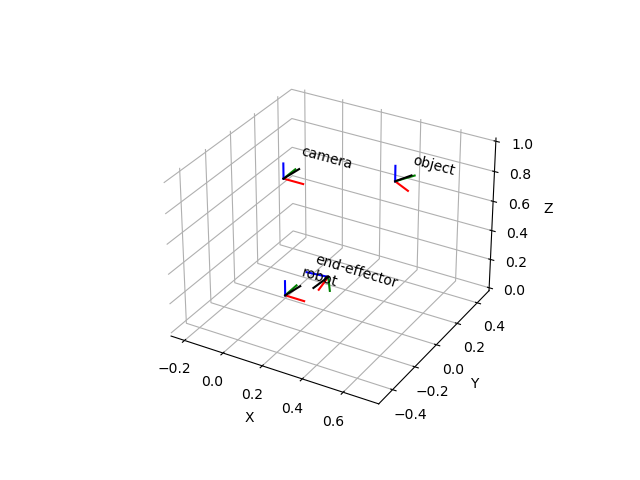
## Documentation
The API documentation can be found
[here](https://dfki-ric.github.io/pytransform3d/).
The documentation can be found in the directory `doc`.
To build the documentation, run e.g. (on linux):
```bash
cd doc
make html
```
The HTML documentation is now located at `doc/build/html/index.html`.
Execute the following command in the main folder of the repository
to install the dependencies:
```bash
pip install -e '.[doc]'
```
## Tests
You can use pytest to run the tests of this project in the root directory:
```bash
pytest
```
A coverage report will be located at `htmlcov/index.html`.
Note that you have to install `pytest` to run the tests and `pytest-cov` to
obtain the code coverage report.
## Contributing
If you wish to report bugs, please use the
[issue tracker](https://github.com/dfki-ric/pytransform3d/issues) at
Github. If you would like to contribute to pytransform3d, just open an issue
or a [pull request](https://github.com/dfki-ric/pytransform3d/pulls).
The target branch for pull requests is the develop branch.
The development branch will be merged to main for new releases.
If you have questions about the software, you should ask them in the
[discussion section](https://github.com/dfki-ric/pytransform3d/discussions).
The recommended workflow to add a new feature, add documentation, or fix a bug
is the following:
* Push your changes to a branch (e.g. `feature/x`, `doc/y`, or `fix/z`) of your
fork of the pytransform3d repository.
* Open a pull request to the latest development branch. There is usually an
open merge request from the latest development branch to the main branch.
* When the latest development branch is merged to the main branch, a new
release will be made.
Note that there is a
[checklist](https://github.com/dfki-ric/pytransform3d/wiki#checklist-for-new-features)
for new features.
It is forbidden to directly push to the main branch. Each new version
has its own development branch from which a pull request will be opened to the
main branch. Only the maintainer of the software is allowed to merge a
development branch to the main branch.
## License
The library is distributed under the
[3-Clause BSD license](https://github.com/dfki-ric/pytransform3d/blob/main/LICENSE).
## Citation
If you use pytransform3d for a scientific publication, I would appreciate
citation of the following paper:
Fabisch, A. (2019). pytransform3d: 3D Transformations for Python.
Journal of Open Source Software, 4(33), 1159,
[](https://doi.org/10.21105/joss.01159)
Bibtex entry:
```bibtex
@article{Fabisch2019,
doi = {10.21105/joss.01159},
url = {https://doi.org/10.21105/joss.01159},
year = {2019},
publisher = {The Open Journal},
volume = {4},
number = {33},
pages = {1159},
author = {Alexander Fabisch},
title = {pytransform3d: 3D Transformations for Python},
journal = {Journal of Open Source Software}
}
```
================================================
FILE: doc/Makefile
================================================
# Makefile for Sphinx documentation
#
# You can set these variables from the command line.
SPHINXOPTS =
SPHINXBUILD = sphinx-build
PAPER =
BUILDDIR = build
# User-friendly check for sphinx-build
ifeq ($(shell which $(SPHINXBUILD) >/dev/null 2>&1; echo $$?), 1)
$(error The '$(SPHINXBUILD)' command was not found. Make sure you have Sphinx installed, then set the SPHINXBUILD environment variable to point to the full path of the '$(SPHINXBUILD)' executable. Alternatively you can add the directory with the executable to your PATH. If you don't have Sphinx installed, grab it from http://sphinx-doc.org/)
endif
# Internal variables.
PAPEROPT_a4 = -D latex_paper_size=a4
PAPEROPT_letter = -D latex_paper_size=letter
ALLSPHINXOPTS = -d $(BUILDDIR)/doctrees $(PAPEROPT_$(PAPER)) $(SPHINXOPTS) source
# the i18n builder cannot share the environment and doctrees with the others
I18NSPHINXOPTS = $(PAPEROPT_$(PAPER)) $(SPHINXOPTS) source
.PHONY: help clean html dirhtml singlehtml pickle json htmlhelp qthelp devhelp epub latex latexpdf text man changes linkcheck doctest gettext
help:
@echo "Please use \`make <target>' where <target> is one of"
@echo " html to make standalone HTML files"
@echo " dirhtml to make HTML files named index.html in directories"
@echo " singlehtml to make a single large HTML file"
@echo " pickle to make pickle files"
@echo " json to make JSON files"
@echo " htmlhelp to make HTML files and a HTML help project"
@echo " qthelp to make HTML files and a qthelp project"
@echo " devhelp to make HTML files and a Devhelp project"
@echo " epub to make an epub"
@echo " latex to make LaTeX files, you can set PAPER=a4 or PAPER=letter"
@echo " latexpdf to make LaTeX files and run them through pdflatex"
@echo " latexpdfja to make LaTeX files and run them through platex/dvipdfmx"
@echo " text to make text files"
@echo " man to make manual pages"
@echo " texinfo to make Texinfo files"
@echo " info to make Texinfo files and run them through makeinfo"
@echo " gettext to make PO message catalogs"
@echo " changes to make an overview of all changed/added/deprecated items"
@echo " xml to make Docutils-native XML files"
@echo " pseudoxml to make pseudoxml-XML files for display purposes"
@echo " linkcheck to check all external links for integrity"
@echo " doctest to run all doctests embedded in the documentation (if enabled)"
clean:
rm -rf $(BUILDDIR)/*
rm -rf source/_apidoc
rm -rf source/_auto_examples
html:
$(SPHINXBUILD) -b html $(ALLSPHINXOPTS) $(BUILDDIR)/html
@echo
@echo "Build finished. The HTML pages are in $(BUILDDIR)/html."
dirhtml:
$(SPHINXBUILD) -b dirhtml $(ALLSPHINXOPTS) $(BUILDDIR)/dirhtml
@echo
@echo "Build finished. The HTML pages are in $(BUILDDIR)/dirhtml."
singlehtml:
$(SPHINXBUILD) -b singlehtml $(ALLSPHINXOPTS) $(BUILDDIR)/singlehtml
@echo
@echo "Build finished. The HTML page is in $(BUILDDIR)/singlehtml."
pickle:
$(SPHINXBUILD) -b pickle $(ALLSPHINXOPTS) $(BUILDDIR)/pickle
@echo
@echo "Build finished; now you can process the pickle files."
json:
$(SPHINXBUILD) -b json $(ALLSPHINXOPTS) $(BUILDDIR)/json
@echo
@echo "Build finished; now you can process the JSON files."
htmlhelp:
$(SPHINXBUILD) -b htmlhelp $(ALLSPHINXOPTS) $(BUILDDIR)/htmlhelp
@echo
@echo "Build finished; now you can run HTML Help Workshop with the" \
".hhp project file in $(BUILDDIR)/htmlhelp."
qthelp:
$(SPHINXBUILD) -b qthelp $(ALLSPHINXOPTS) $(BUILDDIR)/qthelp
@echo
@echo "Build finished; now you can run "qcollectiongenerator" with the" \
".qhcp project file in $(BUILDDIR)/qthelp, like this:"
@echo "# qcollectiongenerator $(BUILDDIR)/qthelp/pytransform3d.qhcp"
@echo "To view the help file:"
@echo "# assistant -collectionFile $(BUILDDIR)/qthelp/pytransform3d.qhc"
devhelp:
$(SPHINXBUILD) -b devhelp $(ALLSPHINXOPTS) $(BUILDDIR)/devhelp
@echo
@echo "Build finished."
@echo "To view the help file:"
@echo "# mkdir -p $$HOME/.local/share/devhelp/pytransform3d"
@echo "# ln -s $(BUILDDIR)/devhelp $$HOME/.local/share/devhelp/pytransform3d"
@echo "# devhelp"
epub:
$(SPHINXBUILD) -b epub $(ALLSPHINXOPTS) $(BUILDDIR)/epub
@echo
@echo "Build finished. The epub file is in $(BUILDDIR)/epub."
latex:
$(SPHINXBUILD) -b latex $(ALLSPHINXOPTS) $(BUILDDIR)/latex
@echo
@echo "Build finished; the LaTeX files are in $(BUILDDIR)/latex."
@echo "Run \`make' in that directory to run these through (pdf)latex" \
"(use \`make latexpdf' here to do that automatically)."
latexpdf:
$(SPHINXBUILD) -b latex $(ALLSPHINXOPTS) $(BUILDDIR)/latex
@echo "Running LaTeX files through pdflatex..."
$(MAKE) -C $(BUILDDIR)/latex all-pdf
@echo "pdflatex finished; the PDF files are in $(BUILDDIR)/latex."
latexpdfja:
$(SPHINXBUILD) -b latex $(ALLSPHINXOPTS) $(BUILDDIR)/latex
@echo "Running LaTeX files through platex and dvipdfmx..."
$(MAKE) -C $(BUILDDIR)/latex all-pdf-ja
@echo "pdflatex finished; the PDF files are in $(BUILDDIR)/latex."
text:
$(SPHINXBUILD) -b text $(ALLSPHINXOPTS) $(BUILDDIR)/text
@echo
@echo "Build finished. The text files are in $(BUILDDIR)/text."
man:
$(SPHINXBUILD) -b man $(ALLSPHINXOPTS) $(BUILDDIR)/man
@echo
@echo "Build finished. The manual pages are in $(BUILDDIR)/man."
texinfo:
$(SPHINXBUILD) -b texinfo $(ALLSPHINXOPTS) $(BUILDDIR)/texinfo
@echo
@echo "Build finished. The Texinfo files are in $(BUILDDIR)/texinfo."
@echo "Run \`make' in that directory to run these through makeinfo" \
"(use \`make info' here to do that automatically)."
info:
$(SPHINXBUILD) -b texinfo $(ALLSPHINXOPTS) $(BUILDDIR)/texinfo
@echo "Running Texinfo files through makeinfo..."
make -C $(BUILDDIR)/texinfo info
@echo "makeinfo finished; the Info files are in $(BUILDDIR)/texinfo."
gettext:
$(SPHINXBUILD) -b gettext $(I18NSPHINXOPTS) $(BUILDDIR)/locale
@echo
@echo "Build finished. The message catalogs are in $(BUILDDIR)/locale."
changes:
$(SPHINXBUILD) -b changes $(ALLSPHINXOPTS) $(BUILDDIR)/changes
@echo
@echo "The overview file is in $(BUILDDIR)/changes."
linkcheck:
$(SPHINXBUILD) -b linkcheck $(ALLSPHINXOPTS) $(BUILDDIR)/linkcheck
@echo
@echo "Link check complete; look for any errors in the above output " \
"or in $(BUILDDIR)/linkcheck/output.txt."
doctest:
$(SPHINXBUILD) -b doctest $(ALLSPHINXOPTS) $(BUILDDIR)/doctest
@echo "Testing of doctests in the sources finished, look at the " \
"results in $(BUILDDIR)/doctest/output.txt."
xml:
$(SPHINXBUILD) -b xml $(ALLSPHINXOPTS) $(BUILDDIR)/xml
@echo
@echo "Build finished. The XML files are in $(BUILDDIR)/xml."
pseudoxml:
$(SPHINXBUILD) -b pseudoxml $(ALLSPHINXOPTS) $(BUILDDIR)/pseudoxml
@echo
@echo "Build finished. The pseudo-XML files are in $(BUILDDIR)/pseudoxml."
================================================
FILE: doc/make.bat
================================================
@ECHO OFF
REM Command file for Sphinx documentation
if "%SPHINXBUILD%" == "" (
set SPHINXBUILD=sphinx-build
)
set BUILDDIR=build
set ALLSPHINXOPTS=-d %BUILDDIR%/doctrees %SPHINXOPTS% source
set I18NSPHINXOPTS=%SPHINXOPTS% source
if NOT "%PAPER%" == "" (
set ALLSPHINXOPTS=-D latex_paper_size=%PAPER% %ALLSPHINXOPTS%
set I18NSPHINXOPTS=-D latex_paper_size=%PAPER% %I18NSPHINXOPTS%
)
if "%1" == "" goto help
if "%1" == "help" (
:help
echo.Please use `make ^<target^>` where ^<target^> is one of
echo. html to make standalone HTML files
echo. dirhtml to make HTML files named index.html in directories
echo. singlehtml to make a single large HTML file
echo. pickle to make pickle files
echo. json to make JSON files
echo. htmlhelp to make HTML files and a HTML help project
echo. qthelp to make HTML files and a qthelp project
echo. devhelp to make HTML files and a Devhelp project
echo. epub to make an epub
echo. latex to make LaTeX files, you can set PAPER=a4 or PAPER=letter
echo. text to make text files
echo. man to make manual pages
echo. texinfo to make Texinfo files
echo. gettext to make PO message catalogs
echo. changes to make an overview over all changed/added/deprecated items
echo. xml to make Docutils-native XML files
echo. pseudoxml to make pseudoxml-XML files for display purposes
echo. linkcheck to check all external links for integrity
echo. doctest to run all doctests embedded in the documentation if enabled
goto end
)
if "%1" == "clean" (
for /d %%i in (%BUILDDIR%\*) do rmdir /q /s %%i
del /q /s %BUILDDIR%\*
goto end
)
%SPHINXBUILD% 2> nul
if errorlevel 9009 (
echo.
echo.The 'sphinx-build' command was not found. Make sure you have Sphinx
echo.installed, then set the SPHINXBUILD environment variable to point
echo.to the full path of the 'sphinx-build' executable. Alternatively you
echo.may add the Sphinx directory to PATH.
echo.
echo.If you don't have Sphinx installed, grab it from
echo.http://sphinx-doc.org/
exit /b 1
)
if "%1" == "html" (
%SPHINXBUILD% -b html %ALLSPHINXOPTS% %BUILDDIR%/html
if errorlevel 1 exit /b 1
echo.
echo.Build finished. The HTML pages are in %BUILDDIR%/html.
goto end
)
if "%1" == "dirhtml" (
%SPHINXBUILD% -b dirhtml %ALLSPHINXOPTS% %BUILDDIR%/dirhtml
if errorlevel 1 exit /b 1
echo.
echo.Build finished. The HTML pages are in %BUILDDIR%/dirhtml.
goto end
)
if "%1" == "singlehtml" (
%SPHINXBUILD% -b singlehtml %ALLSPHINXOPTS% %BUILDDIR%/singlehtml
if errorlevel 1 exit /b 1
echo.
echo.Build finished. The HTML pages are in %BUILDDIR%/singlehtml.
goto end
)
if "%1" == "pickle" (
%SPHINXBUILD% -b pickle %ALLSPHINXOPTS% %BUILDDIR%/pickle
if errorlevel 1 exit /b 1
echo.
echo.Build finished; now you can process the pickle files.
goto end
)
if "%1" == "json" (
%SPHINXBUILD% -b json %ALLSPHINXOPTS% %BUILDDIR%/json
if errorlevel 1 exit /b 1
echo.
echo.Build finished; now you can process the JSON files.
goto end
)
if "%1" == "htmlhelp" (
%SPHINXBUILD% -b htmlhelp %ALLSPHINXOPTS% %BUILDDIR%/htmlhelp
if errorlevel 1 exit /b 1
echo.
echo.Build finished; now you can run HTML Help Workshop with the ^
.hhp project file in %BUILDDIR%/htmlhelp.
goto end
)
if "%1" == "qthelp" (
%SPHINXBUILD% -b qthelp %ALLSPHINXOPTS% %BUILDDIR%/qthelp
if errorlevel 1 exit /b 1
echo.
echo.Build finished; now you can run "qcollectiongenerator" with the ^
.qhcp project file in %BUILDDIR%/qthelp, like this:
echo.^> qcollectiongenerator %BUILDDIR%\qthelp\pytransform3d.qhcp
echo.To view the help file:
echo.^> assistant -collectionFile %BUILDDIR%\qthelp\pytransform3d.ghc
goto end
)
if "%1" == "devhelp" (
%SPHINXBUILD% -b devhelp %ALLSPHINXOPTS% %BUILDDIR%/devhelp
if errorlevel 1 exit /b 1
echo.
echo.Build finished.
goto end
)
if "%1" == "epub" (
%SPHINXBUILD% -b epub %ALLSPHINXOPTS% %BUILDDIR%/epub
if errorlevel 1 exit /b 1
echo.
echo.Build finished. The epub file is in %BUILDDIR%/epub.
goto end
)
if "%1" == "latex" (
%SPHINXBUILD% -b latex %ALLSPHINXOPTS% %BUILDDIR%/latex
if errorlevel 1 exit /b 1
echo.
echo.Build finished; the LaTeX files are in %BUILDDIR%/latex.
goto end
)
if "%1" == "latexpdf" (
%SPHINXBUILD% -b latex %ALLSPHINXOPTS% %BUILDDIR%/latex
cd %BUILDDIR%/latex
make all-pdf
cd %BUILDDIR%/..
echo.
echo.Build finished; the PDF files are in %BUILDDIR%/latex.
goto end
)
if "%1" == "latexpdfja" (
%SPHINXBUILD% -b latex %ALLSPHINXOPTS% %BUILDDIR%/latex
cd %BUILDDIR%/latex
make all-pdf-ja
cd %BUILDDIR%/..
echo.
echo.Build finished; the PDF files are in %BUILDDIR%/latex.
goto end
)
if "%1" == "text" (
%SPHINXBUILD% -b text %ALLSPHINXOPTS% %BUILDDIR%/text
if errorlevel 1 exit /b 1
echo.
echo.Build finished. The text files are in %BUILDDIR%/text.
goto end
)
if "%1" == "man" (
%SPHINXBUILD% -b man %ALLSPHINXOPTS% %BUILDDIR%/man
if errorlevel 1 exit /b 1
echo.
echo.Build finished. The manual pages are in %BUILDDIR%/man.
goto end
)
if "%1" == "texinfo" (
%SPHINXBUILD% -b texinfo %ALLSPHINXOPTS% %BUILDDIR%/texinfo
if errorlevel 1 exit /b 1
echo.
echo.Build finished. The Texinfo files are in %BUILDDIR%/texinfo.
goto end
)
if "%1" == "gettext" (
%SPHINXBUILD% -b gettext %I18NSPHINXOPTS% %BUILDDIR%/locale
if errorlevel 1 exit /b 1
echo.
echo.Build finished. The message catalogs are in %BUILDDIR%/locale.
goto end
)
if "%1" == "changes" (
%SPHINXBUILD% -b changes %ALLSPHINXOPTS% %BUILDDIR%/changes
if errorlevel 1 exit /b 1
echo.
echo.The overview file is in %BUILDDIR%/changes.
goto end
)
if "%1" == "linkcheck" (
%SPHINXBUILD% -b linkcheck %ALLSPHINXOPTS% %BUILDDIR%/linkcheck
if errorlevel 1 exit /b 1
echo.
echo.Link check complete; look for any errors in the above output ^
or in %BUILDDIR%/linkcheck/output.txt.
goto end
)
if "%1" == "doctest" (
%SPHINXBUILD% -b doctest %ALLSPHINXOPTS% %BUILDDIR%/doctest
if errorlevel 1 exit /b 1
echo.
echo.Testing of doctests in the sources finished, look at the ^
results in %BUILDDIR%/doctest/output.txt.
goto end
)
if "%1" == "xml" (
%SPHINXBUILD% -b xml %ALLSPHINXOPTS% %BUILDDIR%/xml
if errorlevel 1 exit /b 1
echo.
echo.Build finished. The XML files are in %BUILDDIR%/xml.
goto end
)
if "%1" == "pseudoxml" (
%SPHINXBUILD% -b pseudoxml %ALLSPHINXOPTS% %BUILDDIR%/pseudoxml
if errorlevel 1 exit /b 1
echo.
echo.Build finished. The pseudo-XML files are in %BUILDDIR%/pseudoxml.
goto end
)
:end
================================================
FILE: doc/source/_static/custom.css
================================================
:root {
--pst-sidebar-width: 100px;
--pst-secondary-sidebar-width: 100px;
}
.bd-main .bd-content .bd-article-container {
max-width: 100%; /* Allows content to expand if sidebars are smaller */
}
.bd-page-width {
max-width: 100%; /* Ensures the overall page uses more width */
}
================================================
FILE: doc/source/_static/overview.tex
================================================
\documentclass{article}
\usepackage{amssymb,amsmath}
\usepackage[pdftex,active,tightpage]{preview}
\setlength\PreviewBorder{2mm}
% converted to png via
% pdflatex overview.tex
% pdftoppm -png overview.pdf > overview.png
\usepackage{tikz}
\usetikzlibrary{arrows, arrows.meta, positioning}
\begin{document}
\begin{preview}
\newcommand{\matx}{10.1}
\newcommand{\maty}{14.2}
\begin{tikzpicture}
\node[draw,shape=rectangle,rounded corners,fill=cyan!10] (legendconversionrot) at (7.5,18.7) {\large\texttt{pytransform3d.rotations}};
\node[draw,shape=rectangle,rounded corners,fill=blue!10] (legendconversiontr) at (21.5,18.7) {\large\texttt{pytransform3d.transformations}};
\node[draw,shape=rectangle,thick,rounded corners,fill=blue!15] (tmat) at (17,15) {\begin{minipage}{4cm}\textbf{transformation matrix}\\[0.3em]
$\boldsymbol{T} \in SE(3)$\\[0.3em]
\texttt{transform}\\[0.3em]
shape (4, 4)
\end{minipage}};
\node[draw,shape=rectangle,thick,rounded corners,fill=blue!15] (dquat) at (21.5,15) {\begin{minipage}{4cm}\textbf{(unit) dual quaternion}\\[0.3em]
$\boldsymbol{\sigma}$\\[0.3em]
\texttt{dual\_quaternion}\\[0.3em]
shape (8,)
\end{minipage}};
\node[draw,shape=rectangle,thick,rounded corners,fill=blue!15] (pq) at (26.5,15) {\begin{minipage}{5cm}\textbf{position and unit quaternion}\\[0.3em]
$(\boldsymbol{p}, \boldsymbol{q}) \in \mathbb{R}^3 \times S^3$\\[0.3em]
\texttt{pq}\\[0.3em]
shape (7,)
\end{minipage}};
\node[draw,shape=rectangle,thick,rounded corners,fill=blue!15] (logtr) at (17,11) {\begin{minipage}{4.9cm}\textbf{logarithm of transformation}\\[0.3em]
$\left[\mathcal{S}\right]\theta \in se(3)$\\[0.3em]
\texttt{transform\_log}\\[0.3em]
shape (4, 4)
\end{minipage}};
\node[draw,shape=rectangle,thick,rounded corners] (screwmat) at (22.5,11) {\begin{minipage}{3.8cm}\textbf{screw matrix}\\[0.3em]
$\left[\mathcal{S}\right] \in se(3)$\\[0.3em]
\texttt{screw\_matrix}\\[0.3em]
shape (4, 4)
\end{minipage}};
\node[draw,shape=rectangle,thick,rounded corners,fill=blue!15] (expcoord) at (17,7) {\begin{minipage}{7.5cm}\textbf{exponential coordinates of transformation}\\[0.3em]
$\mathcal{S}\theta \in \mathbb{R}^6$\\[0.3em]
\texttt{exponential\_coordinates}\\[0.3em]
shape (6,)
\end{minipage}};
\node[draw,shape=rectangle,thick,rounded corners] (spvel) at (24,7) {\begin{minipage}{4cm}\textbf{twist / spatial velocity}\\[0.3em]
$\mathcal{S}\dot{\theta} \in \mathbb{R}^6$\\[0.3em]
shape (6,)
\end{minipage}};
\node[draw,shape=rectangle,thick,rounded corners] (spacc) at (29,7) {\begin{minipage}{3.5cm}\textbf{spatial acceleration}\\[0.3em]
$\mathcal{S}\ddot{\theta} \in \mathbb{R}^6$\\[0.3em]
shape (6,)
\end{minipage}};
\node[draw,shape=rectangle,thick,rounded corners] (scrax) at (17,2) {\begin{minipage}{2.2cm}\textbf{screw axis}\\[0.3em]
$\mathcal{S} \in \mathbb{R}^6$\\[0.3em]
\texttt{screw\_axis}\\[0.3em]
shape (6,)
\end{minipage}};
\node[draw,shape=rectangle,thick,rounded corners] (screw) at (22,2) {\begin{minipage}{5.2cm}\textbf{screw parameters}\\[0.3em]
$(\boldsymbol{q}, \hat{\boldsymbol{s}}, h) \in \mathbb{R}^3 \times S^2 \times \mathbb{R}$\\[0.3em]
\texttt{screw\_parameters}\\[0.3em]
tuple[shape (3,), shape (3,), float]
\end{minipage}};
\draw[<->] (tmat) -- (logtr) node[midway,left] {exp./log. map};
\draw[->] (expcoord) -- (logtr) node[midway,left] {$\left[\cdot\right]$};
\draw[->] (expcoord) -- (spvel) node[midway,above] {$\frac{\partial \mathcal{S}\theta}{\partial t}$};
\draw[->] (spvel) -- (spacc) node[midway,above] {$\frac{\partial \mathcal{S}\dot{\theta}}{\partial t}$};
\draw[->] (scrax) -- (expcoord) node[midway,left] {$\theta$};
\draw[->] (screwmat) -- (logtr) node[midway,above] {$\theta$};
\draw[<->] (screw) -- (scrax) node[midway,above] {};
\draw [thick,rounded corners,fill=cyan!15] (\matx-0.2,\maty-0.5) rectangle (\matx+3.1,\maty+2.2);
\node[anchor=west] (rotmatname) at (\matx,\maty+1.8) {\textbf{rotation matrix}};
\node[anchor=west] (rotmatsymbol) at (\matx,\maty+1.2) {$\boldsymbol{R}$};
\node[anchor=west] (rotmatset) at (\matx+0.4,\maty+1.178) {$\in SO(3)$};
\node[anchor=west] (rotmatpname) at (\matx,\maty+0.6) {\texttt{matrix}};
\node[anchor=west] (rotmatarray) at (\matx,\maty) {shape (3, 3)};
\node (legendname) at (\matx-2,\maty+3) {representation};
\draw[red] (rotmatname) edge (legendname);
\node (legendsymbol) at (\matx-3,\maty+1.9) {mathematical symbol};
\draw[red] (rotmatsymbol) edge (legendsymbol);
\node (legendset) at (\matx+4,\maty+1.2) {set};
\draw[red] (rotmatset) edge (legendset);
\node (legendpname) at (\matx-3.3,\maty+0.7) {\begin{minipage}{3.1cm}\centering name in pytransform3d\end{minipage}};
\draw[red] (rotmatpname) edge (legendpname);
\node (legendarray) at (\matx-2,\maty-0.5) {NumPy array};
\draw[red] (rotmatarray) edge (legendarray);
\node[draw,shape=rectangle,thick,rounded corners,fill=cyan!15] (quat) at (1.8,15) {\begin{minipage}{6cm}\textbf{(unit) quaternion / versor / rotor}\\[0.3em]
$\boldsymbol{q} \in S^3$\\[0.3em]
\texttt{quaternion}\\[0.3em]
shape (4,)
\end{minipage}};
\node[draw,shape=rectangle,thick,rounded corners,fill=cyan!15] (logrot) at (11.2,11) {\begin{minipage}{3.8cm}\textbf{logarithm of rotation}\\[0.3em]
$\left[\boldsymbol{\omega}\right] \in so(3)$\\[0.3em]
\texttt{rot\_log}\\[0.3em]
shape (3, 3)
\end{minipage}};
\node[draw,shape=rectangle,thick,rounded corners,fill=cyan!15] (rotvec) at (11.2,7) {\begin{minipage}{3.3cm}\textbf{rotation vector}\\[0.3em]
$\boldsymbol{\omega} = \hat{\boldsymbol{\omega}}\theta \in \mathbb{R}^3$\\[0.3em]
\texttt{compact\_axis\_angle}\\[0.3em]
shape (3,)
\end{minipage}};
\node[draw,shape=rectangle,thick,rounded corners] (angvel) at (6.9,7) {\begin{minipage}{2.8cm}\textbf{angular velocity}\\[0.3em]
$\dot{\boldsymbol{\omega}} = \hat{\boldsymbol{\omega}}\dot{\theta} \in \mathbb{R}^3$\\[0.3em]
shape (3,)
\end{minipage}};
\node[draw,shape=rectangle,thick,rounded corners] (angacc) at (2.5,7) {\begin{minipage}{3.6cm}\textbf{angular acceleration}\\[0.3em]
$\hat{\boldsymbol{\omega}}\ddot{\theta} \in \mathbb{R}^3$\\[0.3em]
shape (3,)
\end{minipage}};
\node[draw,shape=rectangle,thick,rounded corners,fill=cyan!15] (axan) at (11.2,3.7) {\begin{minipage}{2.4cm}\textbf{axis-angle}\\[0.3em]
$(\hat{\boldsymbol{\omega}}, \theta) \in S^2 \times \mathbb{R}$\\[0.3em]
\texttt{axis\_angle}\\[0.3em]
shape (4,)
\end{minipage}};
\node[draw,shape=rectangle,thick,rounded corners] (rotax) at (11.2,1.5) {\begin{minipage}{3.8cm}\textbf{rotation axis}\\[0.3em]
$\hat{\boldsymbol{\omega}} \in S^2$
\end{minipage}};
\node[draw,shape=rectangle,thick,rounded corners,fill=cyan!15] (euler) at (3,1) {\begin{minipage}{7.5cm}\textbf{proper Euler / Cardan / Tait-Bryan angles}\\[0.3em]
$(\alpha, \beta, \gamma) \in \mathbb{R}^3$\\[0.3em]
\texttt{euler}\\[0.3em]
shape (3,)
\end{minipage}};
\node[draw,shape=rectangle,thick,rounded corners,fill=cyan!15] (mrp) at (6,3.7) {\begin{minipage}{5.6cm}\textbf{modified Rodrigues parameters}\\[0.3em]
$\boldsymbol{\psi} = \hat{\boldsymbol{\omega}} \tan{\frac{\theta}{4}} \in \mathbb{R}^3$\\[0.3em]
\texttt{mrp}\\[0.3em]
shape (3,)
\end{minipage}};
\draw[<->] (rotmatarray) -- (logrot) node[midway,left] {exp./log. map};
\draw[->] (rotvec) -- (logrot) node[midway,left] {cross product matrix};
\draw[->] (rotvec) -- (angvel) node[midway,above] {$\frac{\partial \boldsymbol{\omega}}{\partial t}$};
\draw[->] (angvel) -- (angacc) node[midway,above] {$\frac{\partial \dot{\boldsymbol{\omega}}}{\partial t}$};
\draw[->] (axan) -- (rotvec) node[midway,left] {product};
\draw[->] (rotax) -- (axan) node[midway,left] {$\theta$};
\end{tikzpicture}
\end{preview}
\end{document}
================================================
FILE: doc/source/_templates/class.rst
================================================
{{ fullname | escape | underline}}
.. currentmodule:: {{ module }}
.. autoclass:: {{ objname }}
:members:
:show-inheritance:
:inherited-members:
{% block methods %}
.. automethod:: __init__
{% if methods %}
.. rubric:: {{ _('Methods') }}
.. autosummary::
{% for item in methods %}
~{{ name }}.{{ item }}
{%- endfor %}
{% endif %}
{% endblock %}
{% block attributes %}
{% if attributes %}
.. rubric:: {{ _('Attributes') }}
.. autosummary::
{% for item in attributes %}
~{{ name }}.{{ item }}
{%- endfor %}
{% endif %}
{% endblock %}
.. minigallery:: {{module}}.{{objname}}
:add-heading:
================================================
FILE: doc/source/_templates/class_without_inherited.rst
================================================
{{ fullname | escape | underline}}
.. currentmodule:: {{ module }}
.. autoclass:: {{ objname }}
:members:
:show-inheritance:
:no-inherited-members:
{% block methods %}
.. automethod:: __init__
{% if methods %}
.. rubric:: {{ _('Methods') }}
.. autosummary::
{% for item in methods %}
{% if item not in inherited_members %}
~{{ name }}.{{ item }}
{% endif %}
{%- endfor %}
{% endif %}
{% endblock %}
{% block attributes %}
{% if attributes %}
.. rubric:: {{ _('Attributes') }}
.. autosummary::
{% for item in attributes %}
{% if item not in inherited_members %}
~{{ name }}.{{ item }}
{% endif %}
{%- endfor %}
{% endif %}
{% endblock %}
.. minigallery:: {{module}}.{{objname}}
:add-heading:
================================================
FILE: doc/source/_templates/function.rst
================================================
:mod:`{{module}}`.{{objname}}
{{ underline }}====================
.. currentmodule:: {{ module }}
.. autofunction:: {{ objname }}
.. minigallery:: {{module}}.{{objname}}
:add-heading:
================================================
FILE: doc/source/api.rst
================================================
.. _api:
=================
API Documentation
=================
This is the detailed documentation of all public classes and functions.
You can also search for specific modules, classes, or functions in the
:ref:`genindex`.
:mod:`pytransform3d.rotations`
==============================
.. automodule:: pytransform3d.rotations
:no-members:
:no-inherited-members:
Rotation Matrix
---------------
.. autosummary::
:toctree: _apidoc/
:template: function.rst
~check_matrix
~matrix_requires_renormalization
~norm_matrix
~robust_polar_decomposition
~random_matrix
~plot_basis
~assert_rotation_matrix
~matrix_slerp
~matrix_power
~passive_matrix_from_angle
~active_matrix_from_angle
~matrix_from_two_vectors
~matrix_from_euler
~matrix_from_axis_angle
~matrix_from_compact_axis_angle
~matrix_from_quaternion
~matrix_from_rotor
Euler Angles
------------
.. autosummary::
:toctree: _apidoc/
:template: function.rst
~euler_near_gimbal_lock
~norm_euler
~assert_euler_equal
~euler_from_quaternion
~euler_from_matrix
Axis-Angle
----------
.. autosummary::
:toctree: _apidoc/
:template: function.rst
~check_axis_angle
~check_compact_axis_angle
~compact_axis_angle_near_pi
~norm_axis_angle
~norm_compact_axis_angle
~random_axis_angle
~random_compact_axis_angle
~plot_axis_angle
~assert_axis_angle_equal
~assert_compact_axis_angle_equal
~axis_angle_slerp
~axis_angle_from_two_directions
~axis_angle_from_matrix
~axis_angle_from_quaternion
~axis_angle_from_compact_axis_angle
~axis_angle_from_mrp
~compact_axis_angle
~compact_axis_angle_from_matrix
~compact_axis_angle_from_quaternion
Logarithm of Rotation
---------------------
.. autosummary::
:toctree: _apidoc/
:template: function.rst
~check_rot_log
~check_skew_symmetric_matrix
~rot_log_from_compact_axis_angle
~cross_product_matrix
Quaternion
----------
.. autosummary::
:toctree: _apidoc/
:template: function.rst
~check_quaternion
~check_quaternions
~quaternion_requires_renormalization
~quaternion_double
~pick_closest_quaternion
~random_quaternion
~assert_quaternion_equal
~concatenate_quaternions
~q_prod_vector
~q_conj
~quaternion_slerp
~quaternion_dist
~quaternion_diff
~quaternion_gradient
~quaternion_integrate
~quaternion_from_angle
~quaternion_from_euler
~quaternion_from_matrix
~quaternion_from_axis_angle
~quaternion_from_compact_axis_angle
~quaternion_from_mrp
~quaternion_xyzw_from_wxyz
~quaternion_wxyz_from_xyzw
Rotor
-----
.. autosummary::
:toctree: _apidoc/
:template: function.rst
~check_rotor
~plot_bivector
~wedge
~plane_normal_from_bivector
~geometric_product
~concatenate_rotors
~rotor_reverse
~rotor_apply
~rotor_slerp
~rotor_from_two_directions
~rotor_from_plane_angle
Modified Rodrigues Parameters
-----------------------------
.. autosummary::
:toctree: _apidoc/
:template: function.rst
~check_mrp
~mrp_near_singularity
~norm_mrp
~assert_mrp_equal
~mrp_double
~concatenate_mrp
~mrp_prod_vector
~mrp_from_axis_angle
~mrp_from_quaternion
Jacobians
---------
.. autosummary::
:toctree: _apidoc/
:template: function.rst
~left_jacobian_SO3
~left_jacobian_SO3_series
~left_jacobian_SO3_inv
~left_jacobian_SO3_inv_series
Utility Functions
-----------------
.. autosummary::
:toctree: _apidoc/
:template: function.rst
~norm_angle
~norm_vector
~perpendicular_to_vectors
~angle_between_vectors
~vector_projection
~plane_basis_from_normal
~random_vector
Deprecated Functions
--------------------
.. autosummary::
:toctree: _apidoc/
:template: function.rst
~quaternion_from_extrinsic_euler_xyz
~active_matrix_from_intrinsic_euler_xzx
~active_matrix_from_extrinsic_euler_xzx
~active_matrix_from_intrinsic_euler_xyx
~active_matrix_from_extrinsic_euler_xyx
~active_matrix_from_intrinsic_euler_yxy
~active_matrix_from_extrinsic_euler_yxy
~active_matrix_from_intrinsic_euler_yzy
~active_matrix_from_extrinsic_euler_yzy
~active_matrix_from_intrinsic_euler_zyz
~active_matrix_from_extrinsic_euler_zyz
~active_matrix_from_intrinsic_euler_zxz
~active_matrix_from_extrinsic_euler_zxz
~active_matrix_from_intrinsic_euler_xzy
~active_matrix_from_extrinsic_euler_xzy
~active_matrix_from_intrinsic_euler_xyz
~active_matrix_from_extrinsic_euler_xyz
~active_matrix_from_intrinsic_euler_yxz
~active_matrix_from_extrinsic_euler_yxz
~active_matrix_from_intrinsic_euler_yzx
~active_matrix_from_extrinsic_euler_yzx
~active_matrix_from_intrinsic_euler_zyx
~active_matrix_from_extrinsic_euler_zyx
~active_matrix_from_intrinsic_euler_zxy
~active_matrix_from_extrinsic_euler_zxy
~active_matrix_from_extrinsic_roll_pitch_yaw
~intrinsic_euler_xzx_from_active_matrix
~extrinsic_euler_xzx_from_active_matrix
~intrinsic_euler_xyx_from_active_matrix
~extrinsic_euler_xyx_from_active_matrix
~intrinsic_euler_yxy_from_active_matrix
~extrinsic_euler_yxy_from_active_matrix
~intrinsic_euler_yzy_from_active_matrix
~extrinsic_euler_yzy_from_active_matrix
~intrinsic_euler_zyz_from_active_matrix
~extrinsic_euler_zyz_from_active_matrix
~intrinsic_euler_zxz_from_active_matrix
~extrinsic_euler_zxz_from_active_matrix
~intrinsic_euler_xzy_from_active_matrix
~extrinsic_euler_xzy_from_active_matrix
~intrinsic_euler_xyz_from_active_matrix
~extrinsic_euler_xyz_from_active_matrix
~intrinsic_euler_yxz_from_active_matrix
~extrinsic_euler_yxz_from_active_matrix
~intrinsic_euler_yzx_from_active_matrix
~extrinsic_euler_yzx_from_active_matrix
~intrinsic_euler_zyx_from_active_matrix
~extrinsic_euler_zyx_from_active_matrix
~intrinsic_euler_zxy_from_active_matrix
~extrinsic_euler_zxy_from_active_matrix
:mod:`pytransform3d.transformations`
====================================
.. automodule:: pytransform3d.transformations
:no-members:
:no-inherited-members:
Transformation Matrix
---------------------
.. autosummary::
:toctree: _apidoc/
:template: function.rst
~check_transform
~transform_requires_renormalization
~random_transform
~concat
~invert_transform
~transform
~vector_to_point
~vectors_to_points
~vector_to_direction
~vectors_to_directions
~transform_power
~transform_sclerp
~adjoint_from_transform
~plot_transform
~assert_transform
~transform_from
~translate_transform
~rotate_transform
~transform_from_pq
~transform_from_exponential_coordinates
~transform_from_transform_log
~transform_from_dual_quaternion
Position and Quaternion
-----------------------
.. autosummary::
:toctree: _apidoc/
:template: function.rst
~check_pq
~pq_slerp
~pq_from_transform
~pq_from_dual_quaternion
Screw Parameters
----------------
.. autosummary::
:toctree: _apidoc/
:template: function.rst
~check_screw_parameters
~plot_screw
~assert_screw_parameters_equal
~screw_parameters_from_screw_axis
~screw_parameters_from_dual_quaternion
Screw Axis
----------
.. autosummary::
:toctree: _apidoc/
:template: function.rst
~check_screw_axis
~random_screw_axis
~screw_axis_from_screw_parameters
~screw_axis_from_exponential_coordinates
~screw_axis_from_screw_matrix
Exponential Coordinates
-----------------------
.. autosummary::
:toctree: _apidoc/
:template: function.rst
~check_exponential_coordinates
~norm_exponential_coordinates
~random_exponential_coordinates
~assert_exponential_coordinates_equal
~exponential_coordinates_from_transform
~exponential_coordinates_from_screw_axis
~exponential_coordinates_from_transform_log
Screw Matrix
------------
.. autosummary::
:toctree: _apidoc/
:template: function.rst
~check_screw_matrix
~screw_matrix_from_screw_axis
~screw_matrix_from_transform_log
Logarithm of Transformation
---------------------------
.. autosummary::
:toctree: _apidoc/
:template: function.rst
~check_transform_log
~transform_log_from_exponential_coordinates
~transform_log_from_screw_matrix
~transform_log_from_transform
Dual Quaternion
---------------
.. autosummary::
:toctree: _apidoc/
:template: function.rst
~check_dual_quaternion
~dual_quaternion_requires_renormalization
~norm_dual_quaternion
~dual_quaternion_squared_norm
~assert_unit_dual_quaternion
~assert_unit_dual_quaternion_equal
~dual_quaternion_double
~dq_conj
~dq_q_conj
~concatenate_dual_quaternions
~dq_prod_vector
~dual_quaternion_power
~dual_quaternion_sclerp
~dual_quaternion_from_transform
~dual_quaternion_from_pq
~dual_quaternion_from_screw_parameters
Jacobians
---------
.. autosummary::
:toctree: _apidoc/
:template: function.rst
~left_jacobian_SE3
~left_jacobian_SE3_series
~left_jacobian_SE3_inv
~left_jacobian_SE3_inv_series
Deprecated Functions
--------------------
.. autosummary::
:toctree: _apidoc/
:template: function.rst
~scale_transform
:mod:`pytransform3d.batch_rotations`
====================================
.. automodule:: pytransform3d.batch_rotations
:no-members:
:no-inherited-members:
Rotation Matrices
-----------------
.. autosummary::
:toctree: _apidoc/
:template: function.rst
~active_matrices_from_angles
~active_matrices_from_intrinsic_euler_angles
~active_matrices_from_extrinsic_euler_angles
~matrices_from_compact_axis_angles
~matrices_from_quaternions
Axis-Angle Representation
-------------------------
.. autosummary::
:toctree: _apidoc/
:template: function.rst
~norm_axis_angles
~axis_angles_from_matrices
~axis_angles_from_quaternions
~cross_product_matrices
Quaternions
-----------
.. autosummary::
:toctree: _apidoc/
:template: function.rst
~batch_concatenate_quaternions
~batch_q_conj
~quaternion_slerp_batch
~smooth_quaternion_trajectory
~quaternions_from_matrices
~batch_quaternion_wxyz_from_xyzw
~batch_quaternion_xyzw_from_wxyz
Utility Functions
-----------------
.. autosummary::
:toctree: _apidoc/
:template: function.rst
~norm_vectors
~angles_between_vectors
:mod:`pytransform3d.trajectories`
=================================
.. automodule:: pytransform3d.trajectories
:no-members:
:no-inherited-members:
Transformation Matrices
-----------------------
.. autosummary::
:toctree: _apidoc/
:template: function.rst
~random_trajectories
~invert_transforms
~concat_one_to_many
~concat_many_to_one
~concat_many_to_many
~concat_dynamic
~transforms_from_pqs
~transforms_from_exponential_coordinates
~transforms_from_dual_quaternions
Positions and Quaternions
-------------------------
.. autosummary::
:toctree: _apidoc/
:template: function.rst
~plot_trajectory
~pqs_from_transforms
~pqs_from_dual_quaternions
Screw Parameters
----------------
.. autosummary::
:toctree: _apidoc/
:template: function.rst
~screw_parameters_from_dual_quaternions
Exponential Coordinates
-----------------------
.. autosummary::
:toctree: _apidoc/
:template: function.rst
~mirror_screw_axis_direction
~exponential_coordinates_from_transforms
Dual Quaternions
----------------
.. autosummary::
:toctree: _apidoc/
:template: function.rst
~batch_dq_conj
~batch_dq_q_conj
~batch_concatenate_dual_quaternions
~batch_dq_prod_vector
~dual_quaternions_from_pqs
~dual_quaternions_power
~dual_quaternions_sclerp
~dual_quaternions_from_screw_parameters
:mod:`pytransform3d.uncertainty`
================================
.. automodule:: pytransform3d.uncertainty
:no-members:
:no-inherited-members:
.. autosummary::
:toctree: _apidoc/
:template: function.rst
~estimate_gaussian_rotation_matrix_from_samples
~estimate_gaussian_transform_from_samples
~frechet_mean
~invert_uncertain_transform
~concat_globally_uncertain_transforms
~concat_locally_uncertain_transforms
~pose_fusion
~to_ellipsoid
~to_projected_ellipsoid
~plot_projected_ellipsoid
:mod:`pytransform3d.coordinates`
================================
.. automodule:: pytransform3d.coordinates
:no-members:
:no-inherited-members:
.. autosummary::
:toctree: _apidoc/
:template: function.rst
~cartesian_from_cylindrical
~cartesian_from_spherical
~cylindrical_from_cartesian
~cylindrical_from_spherical
~spherical_from_cartesian
~spherical_from_cylindrical
:mod:`pytransform3d.transform_manager`
======================================
.. automodule:: pytransform3d.transform_manager
:no-members:
:no-inherited-members:
.. autosummary::
:toctree: _apidoc/
:template: class.rst
~TransformGraphBase
~TransformManager
~TemporalTransformManager
~TimeVaryingTransform
~StaticTransform
~NumpyTimeseriesTransform
:mod:`pytransform3d.editor`
===========================
.. automodule:: pytransform3d.editor
:no-members:
:no-inherited-members:
.. autosummary::
:toctree: _apidoc/
:template: class_without_inherited.rst
~TransformEditor
:mod:`pytransform3d.urdf`
=========================
.. automodule:: pytransform3d.urdf
:no-members:
:no-inherited-members:
.. autosummary::
:toctree: _apidoc/
:template: class.rst
~UrdfTransformManager
~Link
~Joint
~Geometry
~Box
~Sphere
~Cylinder
~Mesh
.. autosummary::
:toctree: _apidoc/
:template: function.rst
~parse_urdf
~initialize_urdf_transform_manager
:mod:`pytransform3d.camera`
===========================
.. automodule:: pytransform3d.camera
:no-members:
:no-inherited-members:
.. autosummary::
:toctree: _apidoc/
:template: function.rst
~make_world_grid
~make_world_line
~cam2sensor
~sensor2img
~world2image
~plot_camera
:mod:`pytransform3d.plot_utils`
===============================
.. automodule:: pytransform3d.plot_utils
:no-members:
:no-inherited-members:
.. autosummary::
:toctree: _apidoc/
:template: function.rst
~make_3d_axis
~remove_frame
~plot_vector
~plot_length_variable
~plot_box
~plot_sphere
~plot_spheres
~plot_cylinder
~plot_mesh
~plot_ellipsoid
~plot_capsule
~plot_cone
.. autosummary::
:toctree: _apidoc/
:template: class_without_inherited.rst
~Arrow3D
~Frame
~LabeledFrame
~Trajectory
~Camera
:mod:`pytransform3d.visualizer`
===============================
.. automodule:: pytransform3d.visualizer
:no-members:
:no-inherited-members:
.. autosummary::
:toctree: _apidoc/
:template: function.rst
~figure
.. autosummary::
:toctree: _apidoc/
:template: class.rst
~Figure
~Artist
~Line3D
~PointCollection3D
~Vector3D
~Frame
~Trajectory
~Sphere
~Box
~Cylinder
~Mesh
~Ellipsoid
~Capsule
~Cone
~Plane
~Graph
~Camera
================================================
FILE: doc/source/conf.py
================================================
# -*- coding: utf-8 -*-
import sys
import os
import glob
import shutil
import time
from sphinx_gallery.scrapers import figure_rst
sys.path.insert(0, os.path.abspath('.'))
sys.path.insert(0, os.path.abspath('../..'))
extensions = [
"sphinx.ext.autodoc",
"sphinx.ext.autosummary",
"sphinx.ext.doctest",
"sphinx.ext.intersphinx",
"sphinx.ext.todo",
"sphinx.ext.coverage",
"sphinx.ext.mathjax",
#"sphinx.ext.imgmath",
"sphinx.ext.ifconfig",
"sphinx.ext.viewcode",
"matplotlib.sphinxext.plot_directive",
"numpydoc",
"sphinx_gallery.gen_gallery",
]
autodoc_default_options = {"member-order": "bysource"}
autosummary_generate = True # generate files at doc/source/_apidoc
class_members_toctree = False
numpydoc_show_class_members = False
# Options for the `::plot` directive:
# https://matplotlib.org/stable/api/sphinxext_plot_directive_api.html
plot_formats = ["png"]
plot_include_source = False
plot_html_show_formats = False
plot_html_show_source_link = False
# class template from https://stackoverflow.com/a/62613202/915743
templates_path = ["_templates"]
exclude_patterns = []
exclude_trees = ["_templates", "sphinxext"]
source_suffix = '.rst'
source_encoding = 'utf-8-sig'
master_doc = 'index'
project = u'pytransform3d'
copyright = u"2014-{}, Alexander Fabisch, DFKI GmbH, Robotics Innovation Center".format(time.strftime("%Y"))
version = __import__("pytransform3d").__version__
release = __import__("pytransform3d").__version__
language = 'en'
today_fmt = '%B %d, %Y'
add_function_parentheses = True
author = "Alexander Fabisch"
show_authors = True
pygments_style = 'sphinx'
html_logo = "_static/logo.png"
html_theme = "pydata_sphinx_theme"
html_theme_options = {
"logo": {
"alt_text": f"pytransform3d {release}",
},
"collapse_navigation": True,
}
html_sidebars = {
"install": [],
"api": [],
}
html_static_path = ['_static']
html_css_files = ['custom.css']
html_last_updated_fmt = '%b %d, %Y'
html_use_smartypants = True
html_show_sourcelink = False
html_show_sphinx = False
html_show_copyright = True
intersphinx_mapping = {
"python": (f"https://docs.python.org/{sys.version_info.major}", None),
"numpy": ("https://numpy.org/doc/stable", None),
"scipy": ("https://docs.scipy.org/doc/scipy/reference", None),
"matplotlib": ("https://matplotlib.org/", None)
}
intersphinx_timeout = 10
class Open3DScraper:
def __repr__(self):
return f"<{type(self).__name__} object>"
def __call__(self, block, block_vars, gallery_conf, **kwargs):
"""Scrape Open3D images.
Parameters
----------
block : tuple
A tuple containing the (label, content, line_number) of the block.
block_vars : dict
Dict of block variables.
gallery_conf : dict
Contains the configuration of Sphinx-Gallery
**kwargs : dict
Additional keyword arguments to pass to
:meth:`~matplotlib.figure.Figure.savefig`, e.g. ``format='svg'``.
The ``format`` kwarg in particular is used to set the file extension
of the output file (currently only 'png', 'jpg', and 'svg' are
supported).
Returns
-------
rst : str
The ReSTructuredText that will be rendered to HTML containing
the images.
"""
path_current_example = os.path.dirname(block_vars['src_file'])
jpgs = sorted(glob.glob(os.path.join(
path_current_example, "__open3d_rendered_image.jpg")))
image_names = list()
image_path_iterator = block_vars["image_path_iterator"]
for jpg in jpgs:
this_image_path = image_path_iterator.next()
image_names.append(this_image_path)
shutil.move(jpg, this_image_path)
return figure_rst(image_names, gallery_conf["src_dir"])
def _get_sg_image_scraper():
"""Return the callable scraper to be used by Sphinx-Gallery.
It allows us to just use strings as they already can be for 'matplotlib'
and 'mayavi'. Details on this implementation can be found in
`sphinx-gallery/sphinx-gallery/494`_
This is required to make the config pickable.
This function must be imported into the top level namespace of
pytransform3d.
.. _sphinx-gallery/sphinx-gallery/494: https://github.com/sphinx-gallery/sphinx-gallery/pull/494
"""
return Open3DScraper()
# monkeypatching pytransform3d to make the config pickable
__import__("pytransform3d")._get_sg_image_scraper = _get_sg_image_scraper
sphinx_gallery_conf = {
"examples_dirs": "../../examples",
"gallery_dirs": "_auto_examples",
"reference_url": {"pytransform3d": None},
"filename_pattern": "/(?:plot|animate|vis)_",
"image_scrapers": ("matplotlib", "pytransform3d"),
"matplotlib_animations": (True, "mp4"),
"backreferences_dir": "_auto_examples/backreferences",
"doc_module": "pytransform3d",
}
================================================
FILE: doc/source/index.rst
================================================
.. pytransform3d documentation master file, created by
sphinx-quickstart on Thu Nov 20 21:01:30 2014.
=============
pytransform3d
=============
.. toctree::
:hidden:
install
user_guide/index
api
_auto_examples/index
This documentation explains how you can work with pytransform3d and with
3D transformations in general.
-----
Scope
-----
pytransform3d focuses on readability and debugging, not on computational
efficiency. If you want to have an efficient implementation of some function
from the library you can easily extract the relevant code and implement it
more efficiently in a language of your choice.
The library integrates well with the
`scientific Python ecosystem <https://scipy-lectures.org/>`_
with its core libraries NumPy, SciPy and Matplotlib.
We rely on `NumPy <https://numpy.org/>`_ for linear algebra and on
`Matplotlib <https://matplotlib.org/>`_ to offer plotting functionalities.
`SciPy <https://scipy.org/>`_ is used if you want to
automatically compute transformations from a graph of transformations.
pytransform3d offers...
* operations for most common representations of rotation / orientation and
translation / position
* conversions between those representations
* clear documentation of conventions
* functions to check for common pitfalls (e.g., singularities, ambiguities,
discontinuities)
* tight coupling with matplotlib to quickly visualize (or animate)
transformations
* the TransformManager which organizes complex chains of transformations
* the TransformEditor which allows to modify transformations graphically
* the UrdfTransformManager which is able to load transformations from
`URDF <https://wiki.ros.org/urdf>`_ files
* a matplotlib-like interface to Open3D's visualizer to display
geometries and transformations
The design philosophy of pytransform3d is to not hide anything; there is no
magic: no operator overloading, no classes to store data (rotations or
transformations) other than NumPy arrays, and no layers of abstraction.
It is as transparent to the user as possible and its interface is mainly
functional.
--------
Citation
--------
If you use pytransform3d for a scientific publication, I would appreciate
citation of the following paper:
Fabisch, A. (2019). pytransform3d: 3D Transformations for Python.
Journal of Open Source Software, 4(33), 1159,
https://doi.org/10.21105/joss.01159
================================================
FILE: doc/source/install.rst
================================================
============
Installation
============
You can install pytransform3d with pip:
.. code-block:: bash
pip install pytransform3d
or conda (since version 1.8):
.. code-block:: bash
conda install -c conda-forge pytransform3d
(More detailed instructions
`here <https://github.com/conda-forge/pytransform3d-feedstock#installing-pytransform3d>`_.)
---------------------
Optional Dependencies
---------------------
When using pip, you can install pytransform3d with the options all, doc, and
test.
* `all` will add support for loading meshes, the 3D visualizer of
pytransform3d, and pydot export of `TransformManager` objects.
* `doc` will install necessary dependencies to build this documentation.
* `test` will install dependencies to run the unit tests.
For example, you can call
.. code-block:: bash
python -m pip install 'pytransform3d[all]'
Unfortunately, pip cannot install all dependencies:
* If you want to have support for pydot export of `TransformManager` objects,
make sure to install graphviz (on Ubuntu: `sudo apt install graphviz`) if
you want to use this feature.
* If you want to have support for the Qt GUI you have to install PyQt 4 or 5
(on Ubuntu: `sudo apt install python3-pyqt5`; conda: `conda install pyqt`).
------------------------
Installation from Source
------------------------
You can also install from the current git version. pytransform3d is available
at `GitHub <https://github.com/dfki-ric/pytransform3d>`_. Clone the repository
and go to the main folder. Install dependencies with:
.. code-block:: bash
pip install -r requirements.txt
Install the package with:
.. code-block:: bash
python setup.py install
pip also supports installation from a git repository:
.. code-block:: bash
pip install git+https://github.com/dfki-ric/pytransform3d.git
================================================
FILE: doc/source/user_guide/camera.rst
================================================
======
Camera
======
When we know the 3D position of a point in the world we can easily compute
where we would see it in a camera image with the pinhole camera model.
However, we have to know some parameters of the camera:
* camera pose
* focal length :math:`f`
* sensor width and height
* image width and height
.. image:: ../_static/camera.png
:alt: Camera
:align: center
:width: 60%
|
Note that light passes through a pinhole in a real pinhole camera before it
will be measured from the sensor so that pixels will be mirrored in the x-y
plane. The sensor that we show here actually corresponds to the virtual
image plane.
The Example :ref:`sphx_glr__auto_examples_plots_plot_camera_with_image.py`
shows how a grid is projected on an image with the function
:func:`~pytransform3d.camera.world2image`.
.. figure:: ../_auto_examples/plots/images/sphx_glr_plot_camera_with_image_001.png
:target: ../_auto_examples/plots/plot_camera_with_image.html
:align: center
Extrinsic and intrinsic camera parameters can be visualized in the following
way. The extrinsic camera parameters are fully determined by a transform
from world coordinates to camera coordinates or by the pose of the camera in
the world. In this illustration, the point indicates the camera center /
center of projection, which is the position component of the pose. The
orientation determines the direction to and orientation of the virtual image
plane. The arrow at the top of the virtual image plane shows the up direction
of the image.
The field of view is determined from the intrinsic camera parameters. These
are given by a matrix
.. math::
\left( \begin{array}{ccc}
f_x & 0 & c_x\\
0 & f_y & c_y\\
0 & 0 & 1
\end{array} \right),
where :math:`f_x, f_y` are focal lengths and :math:`c_x, c_y` is the position
of the camera center. Together with the image size we can determine the field
of view. Values of the intrinsic camera matrix and the image size can be given
in pixels or meters to generate the following visualization with
:func:`~pytransform3d.camera.plot_camera` (see Example
:ref:`sphx_glr__auto_examples_plots_plot_camera_3d.py`).
.. figure:: ../_auto_examples/plots/images/sphx_glr_plot_camera_3d_001.png
:target: ../_auto_examples/plots/plot_camera_3d.html
:align: center
You can use this to display a trajectory of camera poses (see Example
:ref:`sphx_glr__auto_examples_plots_plot_camera_trajectory.py`).
.. figure:: ../_auto_examples/plots/images/sphx_glr_plot_camera_trajectory_001.png
:target: ../_auto_examples/plots/plot_camera_trajectory.html
:align: center
================================================
FILE: doc/source/user_guide/euler_angles.rst
================================================
.. _euler_angles:
============
Euler Angles
============
Since Euler angles [1]_ are an intuitive way to specify a rotation in 3D, they
are often exposed at user interfaces. However, there are 24 different
conventions that could be used. Furthermore, you have to find out whether
degrees or radians are used to express the angles (we will only use
radians in pytransform3d).
.. figure:: ../_auto_examples/plots/images/sphx_glr_plot_euler_angles_001.png
:target: ../_auto_examples/plots/plot_euler_angles.html
:align: center
Here we rotate about the extrinsic (fixed) x-axis, y-axis, and z-axis by
90 degrees.
--------------
24 Conventions
--------------
Euler angles generally refer to three consecutive rotations about basis
vectors. There are proper Euler angles for which we can distinguish
6 conventions: xzx, xyx, yxy, yzy, zyz, and zxz. As you can see, proper
Euler angles rotate about the same basis vector during the first and last
rotation and they rotate about another basis vector in the second rotation.
In addition, there are Cardan (or Tait-Bryan) angles that rotate about
three different basis vectors. There are also 6 conventions:
xzy, xyz, yxz, yzx, zyx, and zxy.
If you read about :doc:`transformation_ambiguities`, you know that the
order in which we concatenate rotation matrices matters. We can make
extrinsic rotations, in which we rotate about basis vectors of a fixed
frame, and we can make intrinsic rotations, in which we rotate about
basis vectors of the new, rotated frame. This increases the amount of
possible conventions to :math:`2 (6 + 6) = 24` (if we only allow active
rotation matrices).
---------------
Range of Angles
---------------
Euler angles rotate about three basis vectors by the angles
:math:`\alpha`, :math:`\beta`, and :math:`\gamma`. If we want to find the
Euler angles that correspond to one rotation matrix :math:`\boldsymbol{R}`,
there is an infinite number of solutions because we can always add or subtract
:math:`2\pi` to one of the angles and get the same result. In addition,
for proper Euler angles
.. math::
\boldsymbol{R}(\alpha, \beta, \gamma) = \boldsymbol{R}(\alpha + \pi, -\beta, \gamma - \pi).
For Cardan angles
.. math::
\boldsymbol{R}(\alpha, \beta, \gamma) = \boldsymbol{R}(\alpha + \pi, \pi - \beta, \gamma - \pi).
For this reason the proper Euler angles are typically restricted to
.. math::
-\pi \leq \alpha < \pi, \qquad 0 \leq \beta \leq \pi, \qquad -\pi \leq \gamma < \pi
and Cardan angles are usually restricted to
.. math::
-\pi \leq \alpha < \pi, \qquad -\frac{\pi}{2} \leq \beta \leq \frac{\pi}{2}, \qquad -\pi \leq \gamma < \pi
to make these representations unique (using
:func:`~pytransform3d.rotations.norm_euler`).
An alternative convention limits the range of :math:`\alpha` and :math:`\gamma`
to :math:`\left[0, 2 \pi\right)`.
-----------
Gimbal Lock
-----------
The special case of a so-called gimbal lock occurs when the second angle
:math:`\beta` is at one of its limits. In this case the axis of rotation
for the first and last rotation are either the same or exactly opposite,
that is, an infinite number of angles :math:`\alpha` and :math:`\gamma`
will represent the same rotation even though we restricted their range
to an interval of length :math:`2\pi`: either all pairs of angles that
satisfy :math:`\alpha + \gamma = constant` or all pairs of angles
that satisfy :math:`\alpha - \gamma = constant`. When we reconstruct
Euler angles from a rotation matrix, we set one of these angles to 0 to
determine the other. We can check if Euler angles are close to gimbal lock
with :func:`~pytransform3d.rotations.euler_near_gimbal_lock`.
-----------
Other Names
-----------
There are also other names for Euler angles. For example, the extrinsic
xyz Cardan angles can also be called roll, pitch, and yaw (or sometimes
the intrinsic convention is used here as well). Roll is a rotation about
x, pitch is a rotation about y and yaw is a rotation about z.
----------
References
----------
.. [1] Shuster, M. D. (1993). A Survery of Attitude Representations.
The Journal of Astronautical Sciences, 41(4), pp. 475-476.
http://malcolmdshuster.com/Pub_1993h_J_Repsurv_scan.pdf
================================================
FILE: doc/source/user_guide/index.rst
================================================
==========
User Guide
==========
.. toctree::
:numbered:
:maxdepth: 2
introduction
rotations
transformations
transformation_ambiguities
euler_angles
transformation_modeling
transform_manager
transformation_over_time
uncertainty
camera
================================================
FILE: doc/source/user_guide/introduction.rst
================================================
========================================
Introduction to 3D Rigid Transformations
========================================
------
Basics
------
Following Waldron and Schmiedeler [1]_, we define the basic terms that we use
throughout this user guide.
.. list-table::
:widths: 15 35 15 35
* - .. image:: ../_static/position.png
- **Position** of a rigid body in 3D Euclidean space is expressed as a 3D
vector.
- .. image:: ../_static/translation.png
- **Translation** is a displacement, in which points move along parallel
lines by the same distance.
* - .. image:: ../_static/frame.png
- **Orientation** of a rigid body in 3D Euclidean space is defined by a
set of 3 orthogonal basis vectors.
- .. image:: ../_static/rotation.png
- **Rotation** is a displacement, in which points move about a rotation
axis through the origin of the reference frame (fixed point) along a
circle by the same angle.
* - .. image:: ../_static/position.png
:width: 30%
:align: center
.. image:: ../_static/frame.png
:width: 30%
:align: center
- **Pose** is a combination of position and orientation.
- .. image:: ../_static/translation.png
:width: 30%
:align: center
.. image:: ../_static/rotation.png
:width: 30%
:align: center
- A (proper) **rigid transformation** is a combination of translation and
rotation.
------
Frames
------
A (coordinate reference) frame in 3D Euclidean space is defined by an origin
(position) and 3 orthogonal basis vectors (orientation) and it is attached to
a rigid body. The pose (position and orientation) of a rigid body (i.e., of
its frame) is always expressed with respect to another frame.
.. _Frame Notation:
--------------
Frame Notation
--------------
Notation is important for describing and understanding of physical quantities
in 3D. Furgale [2]_ [3]_ presents one of the most consistent and clear
approaches and we use it here.
For physical quantities we use the notation :math:`_{A}\boldsymbol{x}_{BC}`,
where :math:`\boldsymbol{x}` is a physical quantity of frame C with
respect to frame B expressed in frame A. For example,
:math:`_{A}\boldsymbol{t}_{BC}` is the translation of C with respect to B
measured in A or :math:`_{A}\boldsymbol{\omega}_{BC}` is the
orientation vector of C with respect to B measured in A.
Since :math:`_A\boldsymbol{t}_{BC}` represents a vector or translation from
frame B to frame C expressed in frame A, the position of a point :math:`P`
with respect to a frame A in three-dimensional space can be defined by
:math:`_A\boldsymbol{p} := _A\boldsymbol{t}_{AP}`.
When we define a mapping from some frame A to another frame B that can be
expressed as a matrix multiplication, we use the notation
:math:`\boldsymbol{M}_{BA}` for the corresponding matrix. We can read this
from right to left as a matrix that maps from frame A to frame B through
multiplication, for example, when we want to transform a point by
.. math::
_B\boldsymbol{p} = \boldsymbol{M}_{BA} {_A\boldsymbol{p}}
------------------------------------
Duality of Transformations and Poses
------------------------------------
We can use a transformation matrix :math:`\boldsymbol{T}_{BA}` that represents
a transformation from frame A to frame B to represent the pose (position and
orientation) of frame A in frame B (if we use the active transformation
convention; see :ref:`transformation_ambiguities` for details). This is just
a different interpretation of the same matrix and similar to our interpretation
of a vector from A to P :math:`_A\boldsymbol{t}_{AP}` as a point
:math:`_A\boldsymbol{p}`.
---------------
Representations
---------------
At least six numbers are required to express the pose of a rigid body or a
transformation between two frames, but there are also redundant
representations.
We can use many different representations of rotation and / or translation.
Here is an overview of the representations that are available in pytransform3d.
All representations are stored in NumPy arrays, of which the corresponding
shape is shown in this figure. You will find more details on these
representations on the following pages.
.. figure:: ../_static/overview.png
:alt: Overview of representations for rotations and transformations in 3D.
:align: center
:width: 100%
----------
References
----------
.. [1] Waldron, K., Schmiedeler, J. (2008). Kinematics. In: Siciliano, B., Khatib,
O. (eds) Springer Handbook of Robotics. Springer, Berlin, Heidelberg.
https://doi.org/10.1007/978-3-540-30301-5_2
.. [2] Furgale, P. (2014). Representing Robot Pose: The good, the bad, and the
ugly (slides). In What Sucks in Robotics and How to Fix It: Lessons Learned
from Building Complex Systems (ICRA workshop). Note: these slides seem to be
lost, but the blog below conveys the same message.
http://static.squarespace.com/static/523c5c56e4b0abc2df5e163e/t/53957839e4b05045ad65021d/1402304569659/Workshop+-+Rotations_v102.key.pdf
.. [3] Furgale, P. (2014). Representing Robot Pose: The good, the bad, and the
ugly (blog).
https://web.archive.org/web/20220420162355/http://paulfurgale.info/news/2014/6/9/representing-robot-pose-the-good-the-bad-and-the-ugly
================================================
FILE: doc/source/user_guide/rotations.rst
================================================
===================
SO(3): 3D Rotations
===================
The group of all rotations in the 3D Cartesian space is called :math:`SO(3)`
(SO: special orthogonal group). It is typically represented by 3D rotation
matrices [7]_. The minimum number of components that are required to describe
any rotation from :math:`SO(3)` is 3. However, there is no representation that
is non-redundant, continuous, and free of singularities.
.. figure:: ../_static/rotations.png
:alt: Rotations
:width: 50%
:align: center
Overview of the representations and the conversions between them that are
available in pytransform3d.
Not all representations support all operations directly without conversion to
another representation. The following table is an overview. If the operation
is not implemented in pytransform3d then it is shown in brackets.
+----------------------------------------+---------------+--------------------+---------------+-----------------------+-----------------+
| Representation | Inverse | Rotation of vector | Concatenation | Interpolation | Renormalization |
+========================================+===============+====================+===============+=======================+=================+
| Rotation matrix | Transpose | Yes | Yes | SLERP | Required |
| :math:`\pmb{R}` | | | | | |
+----------------------------------------+---------------+--------------------+---------------+-----------------------+-----------------+
| Axis-angle | Negative axis | No | No | SLERP | Not necessary |
| :math:`(\hat{\pmb{\omega}}, \theta)` | | | | | |
+----------------------------------------+---------------+--------------------+---------------+-----------------------+-----------------+
| Rotation vector | Negative | No | No | SLERP / `(2)` / `(3)` | Not required |
| :math:`\pmb{\omega}` | | | | | |
+----------------------------------------+---------------+--------------------+---------------+-----------------------+-----------------+
| Logarithm of rotation | Negative | No | No | SLERP / `(2)` / `(3)` | Not required |
| :math:`\left[\pmb{\omega}\right]` | | | | | |
+----------------------------------------+---------------+--------------------+---------------+-----------------------+-----------------+
| Quaternion | Conjugate | Yes | Yes | SLERP | Required |
| :math:`\pmb{q}` | | | | | |
+----------------------------------------+---------------+--------------------+---------------+-----------------------+-----------------+
| Rotor | Reverse | Yes | Yes | SLERP | Required |
| :math:`R` | | | | | |
+----------------------------------------+---------------+--------------------+---------------+-----------------------+-----------------+
| Euler angles | `(1)` | No | No | No | Not necessary |
| :math:`(\alpha, \beta, \gamma)` | | | | | |
+----------------------------------------+---------------+--------------------+---------------+-----------------------+-----------------+
| Modified Rodrigues parameters | Negative | No | Yes | No | Not required |
| :math:`\pmb{\psi}` | | | | | |
+----------------------------------------+---------------+--------------------+---------------+-----------------------+-----------------+
Footnotes:
SLERP means Spherical Linear intERPolation. This can either be implemented
directly for two instances of the representation or sometimes involves a
conversion to a rotation vector that represents the difference of the two
orientations.
`(1)` Inversion of Euler angles in convention ABC (e.g., xyz) requires using
another convention CBA (e.g., zyx), reversing the order of angles, and taking
the negative of these.
`(2)` Linear interpolation is approximately correct for small differences.
`(3)` Fractions of this representation represent partial rotations, but
a conversion to another representation is required to interpolate between
orientations.
---------------
Rotation Matrix
---------------
One of the most practical representations of orientation is a rotation matrix
.. math::
\boldsymbol R =
\left( \begin{array}{ccc}
r_{11} & r_{12} & r_{13}\\
r_{21} & r_{22} & r_{23}\\
r_{31} & r_{32} & r_{33}\\
\end{array} \right)
\in SO(3).
Note that this is a non-minimal representation for orientations because we
have 9 values but only 3 degrees of freedom. This is because
:math:`\boldsymbol R` is orthonormal, which results in 6 constraints
(enforced with :func:`~pytransform3d.rotations.norm_matrix`
and checked with
:func:`~pytransform3d.rotations.matrix_requires_renormalization` or
:func:`~pytransform3d.rotations.check_matrix`):
* column vectors must have unit norm (3 constraints)
* and must be orthogonal to each other (3 constraints)
A more compact representation of these constraints is
:math:`\boldsymbol R^T \boldsymbol R = \boldsymbol I
\Leftrightarrow \boldsymbol R^T = \boldsymbol R^{-1}`.
In addition, :math:`\det(\boldsymbol R) = 1` because we use right-handed
coordinate system (:math:`\det(\boldsymbol R) = -1` for left-handed
coordinate systems).
Hence, the group :math:`SO(3)` is defined as
.. math::
SO(3) = \{\boldsymbol{R} \in \mathbb{R}^{3 \times 3} |
\boldsymbol{R}\boldsymbol{R}^T = \boldsymbol{I},
\det(\boldsymbol{R}) = 1\}.
pytransform3d uses a numpy array of shape (3, 3) to represent rotation
matrices and typically we use the variable name R for a rotation matrix.
.. warning::
There are two conventions on how to interpret rotations: active
or passive rotation. The standard in pytransform3d is an active rotation.
We can use a rotation matrix :math:`\boldsymbol R_{BA}` to transform a point
:math:`_A\boldsymbol{p}` from frame :math:`A` to frame :math:`B`.
.. warning::
There are two different conventions on how to use rotation matrices to
apply a rotation to a vector. We can either (pre-)multiply the rotation
matrix to a column vector from the left side or we can (post-)multiply it
to a row vector from the right side.
We will use the **pre-multiplication** convention.
This means that we rotate a point :math:`_A\boldsymbol{p}` by
.. math::
_B\boldsymbol{p} = \boldsymbol{R}_{BAA} \boldsymbol{p}
This is called **linear map**.
Note that with our index notation (as explained in :ref:`Frame Notation`) and
these conventions, the second index of the rotation matrix and the left index
of the point have to be the same (:math:`A` in this example). The rotation is
applied incorrectly if this is not the case.
*Each column* of a rotation matrix :math:`\boldsymbol{R}_{BA}` is a basis
vector of frame :math:`A` with respect to frame :math:`B`. We can plot the
basis vectors of an orientation to visualize it. Here, we can see orientation
represented by the rotation matrix
.. math::
\boldsymbol R =
\left( \begin{array}{ccc}
1 & 0 & 0\\
0 & 1 & 0\\
0 & 0 & 1\\
\end{array} \right).
.. plot::
:include-source:
from pytransform3d.rotations import plot_basis
plot_basis()
.. note::
When plotting basis vectors, it is a convention to use red for the x-axis,
green for the y-axis and blue for the z-axis (RGB for xyz).
We can easily chain multiple rotations: we can apply the rotation defined
by :math:`\boldsymbol R_{CB}` after the rotation :math:`\boldsymbol R_{BA}`
by applying the rotation
.. math::
\boldsymbol R_{CA} = \boldsymbol R_{CB} \boldsymbol R_{BA}.
Note that the indices have to align again. Otherwise rotations are not applied
in the correct order.
.. warning::
There are two different conventions on how to concatenate rotation
matrices. Suppose we have a rotation matrix :math:`R_1` and another matrix
:math:`R_2` and we want to first rotate by :math:`R_1` and then by
:math:`R_2`. If we want to apply both rotations in global coordinates, we
have to concatenate them with :math:`R_2 \cdot R_1`. We can also express
the second rotation in terms of a local, body-fixed coordinates by
:math:`R_1 \cdot R_2`, which means :math:`R_1` defines new coordinates in
which :math:`R_2` is applied. Note that this applies to both
passive and active rotation matrices.
The easiest way to construct rotation matrices is through rotations about the
basis vectors with :func:`~pytransform3d.rotations.active_matrix_from_angle`.
Multiple rotation matrices that were constructed like this can be concatenated.
This will be done, for instance, to obtain rotation matrices from Euler angles
(see :doc:`euler_angles`).
**Pros**
* Supported operations: all except interpolation.
* Interpretation: each column is a basis vector.
* Singularities: none.
* Ambiguities: none that are specific for rotation matrices.
**Cons**
* Representation: 9 values for 3 degrees of freedom.
* Renormalization: expensive in comparison to quaternions.
----------
Axis-Angle
----------
.. figure:: ../_auto_examples/plots/images/sphx_glr_plot_axis_angle_001.png
:target: ../_auto_examples/plots/plot_axis_angle.html
:width: 50%
:align: center
Each rotation can be represented by a single rotation about one axis.
The axis can be represented as a three-dimensional unit vector and the angle
by a scalar:
.. math::
\left( \hat{\boldsymbol{\omega}}, \theta \right) = \left( \left( \begin{array}{c}\omega_x\\\omega_y\\\omega_z\end{array} \right), \theta \right)
pytransform3d uses a numpy array of shape (4,) for the axis-angle
representation of a rotation, where the first 3 entries correspond to the
unit axis of rotation and the fourth entry to the rotation angle in
radians, and typically we use the variable name a.
Note that the axis-angle representation has a singularity at
:math:`\theta = 0` as there is an infinite number of rotation axes that
represent the identity rotation in this case. However, we can modify the
representation to avoid this singularity.
---------------
Rotation Vector
---------------
Since :math:`||\hat{\boldsymbol{\omega}}|| = 1`, it is possible to write this
in a more compact way as a rotation vector [2]_
.. math::
\boldsymbol{\omega} = \hat{\boldsymbol{\omega}} \theta \in \mathbb{R}^3.
In code, we call this the compact axis-angle representation.
pytransform3d uses a numpy array of shape (3,) for the compact axis-angle
representation of a rotation and typically it uses the variable name a.
We can also refer to this representation as **exponential coordinates of
rotation** [5]_. We can represent angular velocity as
:math:`\hat{\boldsymbol{\omega}} \dot{\theta}`
and angular acceleration as
:math:`\hat{\boldsymbol{\omega}} \ddot{\theta}` so that we can easily do
component-wise integration and differentiation with this representation.
**Pros**
* Representation: minimal.
* Supported operations: interpolation; can also represent angular velocity and
acceleration.
**Cons**
* Ambiguities: an angle of 0 and any multiple of :math:`2\pi` represent
the same orientation (can be avoided with
:func:`~pytransform3d.rotations.norm_compact_axis_angle`, which introduces
discontinuities); when :math:`\theta = \pi`, the axes
:math:`\hat{\boldsymbol{\omega}}` and :math:`-\hat{\boldsymbol{\omega}}`
represent the same rotation.
* Supported operations: concatenation and transformation of vectors requires
conversion to another representation.
---------------------
Logarithm of Rotation
---------------------
In addition, we can represent :math:`\hat{\boldsymbol{\omega}} \theta` by
the cross-product matrix (:func:`~pytransform3d.rotations.cross_product_matrix`)
.. math::
\left[\hat{\boldsymbol{\omega}}\right] \theta
=
\left(
\begin{matrix}
0 & -\omega_3 & \omega_2\\
\omega_3 & 0 & -\omega_1\\
-\omega_2 & \omega_1 & 0\\
\end{matrix}
\right)
\theta
\in so(3)
\subset \mathbb{R}^{3 \times 3},
where :math:`\left[\hat{\boldsymbol{\omega}}\right] \theta` is the matrix
logarithm of a rotation matrix and :math:`so(3)` is the Lie algebra of
the Lie group :math:`SO(3)`.
-----------
Quaternions
-----------
Quaternions are represented by a scalar / real part :math:`w`
and a vector / imaginary part
:math:`x \boldsymbol{i} + y \boldsymbol{j} + z \boldsymbol{k}`.
.. math::
\boldsymbol{q} = w + x \boldsymbol{i} + y \boldsymbol{j} + z \boldsymbol{k}
\in \mathbb{H}
.. warning::
There are two different quaternion conventions: Hamilton's convention
defines :math:`ijk = -1` and the Shuster or JPL convention (from NASA's
Jet Propulsion Laboratory, JPL) defines :math:`ijk = 1` [1]_.
These two conventions result in different multiplication operations and
conversions to other representations. We use Hamilton's convention.
Read `this paper <https://arxiv.org/pdf/1801.07478.pdf>`_ for details about
the two conventions and why Hamilton's convention should be used. Section VI A
gives further useful hints to identify which convention is used.
The unit quaternion space :math:`S^3` can be used to represent
orientations with an encoding based on the rotation axis and angle.
A rotation quaternion is a four-dimensional unit vector (versor)
:math:`\boldsymbol{\hat{q}}`.
The following equation describes its relation to axis-angle notation.
.. math::
\boldsymbol{\hat{q}} =
\left( \begin{array}{c} w\\ x\\ y\\ z\\ \end{array} \right) =
\left( \begin{array}{c}
\cos \frac{\theta}{2}\\
\omega_x \sin \frac{\theta}{2}\\
\omega_y \sin \frac{\theta}{2}\\
\omega_z \sin \frac{\theta}{2}\\
\end{array} \right)
=
\left( \begin{array}{c}
\cos \frac{\theta}{2}\\
\hat{\boldsymbol{\omega}} \sin \frac{\theta}{2}\\
\end{array} \right)
pytransform3d uses a numpy array of shape (4,) for quaternions and
typically we use the variable name q.
.. warning::
The scalar component :math:`w` of a quaternion is sometimes the first
element and sometimes the last element of the versor. We will use
the first element to store the scalar component.
Since the other convention is also used often, pytransform3d provides the
functions :func:`~pytransform3d.rotations.quaternion_wxyz_from_xyzw` and
:func:`~pytransform3d.rotations.quaternion_xyzw_from_wxyz` for conversion.
.. warning::
The *antipodal* unit quaternions :math:`\boldsymbol{\hat{q}}` and
:math:`-\boldsymbol{\hat{q}}`
(:func:`~pytransform3d.rotations.quaternion_double`) represent the same
rotation (double cover). This must be considered during operations like
interpolation, distance calculation, or (approximate) equality checks.
The quaternion product
(:func:`~pytransform3d.rotations.concatenate_quaternions`) can be used to
concatenate rotations like the matrix product can be used to concatenate
rotations represented by rotation matrices.
The inverse of the rotation represented by the unit quaternion
:math:`\boldsymbol{q}` is represented by the conjugate
:math:`\boldsymbol{q}^*` (:func:`~pytransform3d.rotations.q_conj`).
We can rotate a vector by representing it as a pure quaternion (i.e., with
a scalar part of 0) and then left-multiplying the quaternion and
right-multiplying its conjugate
:math:`\boldsymbol{q}\boldsymbol{v}\boldsymbol{q}^*`
with the quaternion product (:func:`~pytransform3d.rotations.q_prod_vector`).
**Pros**
* Representation: compact.
* Renormalization: checked with
:func:`~pytransform3d.rotations.quaternion_requires_renormalization`;
cheap in comparison to rotation matrices (); less susceptible to round-off
errors than matrix representation.
* Discontinuities: none.
* Computational efficiency: the quaternion product is cheaper than the matrix
product.
* Singularities: none.
**Cons**
* Interpretation: not straightforward.
* Ambiguities: double cover.
------------
Euler Angles
------------
A complete rotation can be split into three rotations around basis vectors.
pytransform3d uses a numpy array of shape (3,) for Euler angles, where
each entry corresponds to a rotation angle in radians around one basis
vector. The basis vector that will be used and the order of rotation
is defined by the convention that we use. See :doc:`euler_angles` for more
information.
.. warning::
There are 24 different conventions for defining euler angles. There are
12 different valid ways to sequence rotation axes that can be interpreted
as extrinsic or intrinsic rotations: XZX, XYX, YXY, YZY, ZYZ, ZXZ, XZY,
XYZ, YXZ, YZX, ZYX, and ZXY.
**Pros**
* Representation: minimal.
* Interpretation: easy to interpret for users (when the convention is clearly
defined) in comparison to axis-angle or quaternions.
**Cons**
* Ambiguities: 24 different conventions, infinitely many Euler angles
represent the same rotation without proper limits for the angles.
* Singularity: gimbal lock.
* Supported operations: all operations require conversion to another
representation.
------
Rotors
------
.. figure:: ../_auto_examples/plots/images/sphx_glr_plot_bivector_001.png
:target: ../_auto_examples/plots/plot_bivector.html
:width: 70%
:align: center
Rotors and quaternions are very similar concepts in 3D. However, rotors are
more general as they can be extended to more dimensions [3]_ [4]_.
The concept of a quaternion builds on the axis-angle representation, in
which we rotate by an angle about a rotation axis (see black arrow in the
illustration above). The axis can be computed from the cross product of two
vectors (gray arrows). A rotor builds on a plane-angle representation, in which
we rotate with a given direction by an angle in a plane (indicated by gray
area). The plane can be computed from the wedge product :math:`a \wedge b` (see
:func:`~pytransform3d.rotations.wedge`) of two vectors :math:`a` and :math:`b`,
which is a so-called bivector. Although both approaches might seem different,
in 3D they operate with exactly the same numbers in exactly the same way.
.. warning::
The rotors :math:`R` and :math:`-R` represent exactly the same rotation.
A rotor is a unit multivector
.. math::
R = (a, b_{yz}, b_{zx}, b_{xy})
that consists of a scalar :math:`a` and a bivector
:math:`(b_{yz}, b_{zx}, b_{xy})`. The components of a bivector constructed
by the wedge product of two vectors can be interpreted as the area of the
parallelogram formed by the two vectors projected on the three basis planes
yz, zx, and xy (see illustration above). These values also correspond to the
x-, y-, and z-components of the cross product of the two vectors, which allows
two different interpretations of the same numbers from which we can then derive
quaternions on the one hand and rotors on the other hand.
.. warning::
In pytransform3d our convention is that we organize the components of a
rotor in exactly the same way as we organize the components of the
equivalent quaternion. There are other conventions. It is not just possible
to change the order of the scalar and the bivector (similar to a
quaterion), but also to change the order of bivector components.
Pros and cons for rotors are the same as for quaternions as they have the
same representation in 3D.
-----------------------------
Modified Rodrigues Parameters
-----------------------------
Another minimal representation of rotation are modified Rodrigues parameters
(MRP) [6]_ [8]_
.. math::
\boldsymbol{\psi} = \tan \left(\frac{\theta}{4}\right)
\hat{\boldsymbol{\omega}}
This representation is similar to the compact axis-angle representation.
However, the angle of rotation is converted to :math:`\tan(\frac{\theta}{4})`.
Hence, there is an easy conversion from unit quaternions to MRP
(:func:`~pytransform3d.rotations.mrp_from_quaternion`):
.. math::
\boldsymbol{\psi} = \frac{
\left( \begin{array}{c} x\\ y\\ z\\ \end{array} \right)}{1 + w}
given some quaternion with a scalar :math:`w` and a vector
:math:`\left(x, y, z \right)^T`.
pytransform3d uses a numpy array of shape (3,) for modified Rodrigues
parameters.
.. warning::
MRPs have a singuarity at :math:`2 \pi` (see
:func:`~pytransform3d.rotations.mrp_near_singularity`) which we can avoid
by ensuring the angle of rotation does not exceed :math:`\pi` (with
:func:`~pytransform3d.rotations.norm_mrp`).
.. warning::
MRPs have two representations for the same rotation:
:math:`\boldsymbol{\psi}` and :math:`-\frac{1}{||\boldsymbol{\psi}||^2}
\boldsymbol{\psi}` (:func:`~pytransform3d.rotations.mrp_double`) represent
the same rotation and correspond to two antipodal unit quaternions [8]_.
**Pros**
* Representation: minimal.
**Cons**
* Interpretation: not straightforward.
* Singularity: at :math:`\theta = 2 \pi`.
* Ambiguity: double cover.
* Supported operations: transformation of vectors requires conversion to
another representation.
----------
References
----------
.. [1] Sommer, H., Gilitschenski, I., Bloesch, M., Weiss, S., Siegwart, R., Nieto,
J. (2018). Why and How to Avoid the Flipped Quaternion Multiplication.
Aerospace, 5(3), pp. 2226-4310, doi: 10.3390/aerospace5030072.
https://arxiv.org/pdf/1801.07478.pdf
.. [2] Gehring, C., Bellicoso, C. D., Bloesch, M., Sommer, H., Fankhauser, P.,
Hutter, M., Siegwart, R. (2024). Kindr cheat sheet.
https://github.com/ANYbotics/kindr/blob/master/doc/cheatsheet/cheatsheet_latest.pdf
.. [3] ten Bosch, M. (2020). Let's remove Quaternions from every 3D Engine.
https://marctenbosch.com/quaternions/
.. [4] Doran, C. (2015). Applications of Geometric Algebra.
http://geometry.mrao.cam.ac.uk/wp-content/uploads/2015/02/01ApplicationsI.pdf
.. [5] Dai, J. S. (2015). Euler–Rodrigues formula variations, quaternion
conjugation and intrinsic connections, Mechanism and Machine Theory, 92,
pp. 144-152, doi: 10.1016/j.mechmachtheory.2015.03.004.
https://doi.org/10.1016/j.mechmachtheory.2015.03.004
.. [6] Terzakis, G., Lourakis, M., Ait-Boudaoud, D. (2017). Modified Rodrigues
Parameters: An Efficient Representation of Orientation in 3D Vision and
Graphics. J Math Imaging Vis, 60, pp. 422-442,
doi: 10.1007/s10851-017-0765-x.
.. [7] Hauser, K.: Robotic Systems (draft),
http://motion.pratt.duke.edu/RoboticSystems/3DRotations.html
.. [8] Shuster, M. D. (1993). A Survey of Attitude Representations.
Journal of the Astronautical Sciences, 41, 439-517.
http://malcolmdshuster.com/Pub_1993h_J_Repsurv_scan.pdf
================================================
FILE: doc/source/user_guide/transform_manager.rst
================================================
=====================================
Organizing Transformations in a Graph
=====================================
It is sometimes very difficult to have an overview of all the transformations
that are required to calculate another transformation. Suppose you have
a robot with a camera that can observe the robot's end-effector and an object
that we want to manipulate. We would like to know the position of the
end-effector in the object's frame so that we can control it.
We can organize transformations in a graph like the one shown in the figure
below. Each frame represents a vertex (node) and each transformation an edge
(connection). Edges in these graphs are directed, but we can create an edge
in the opposite direction by inverting the transformation. If we want to
compute a new edge indicated by the dashed red arrow, we have to use known
transformations, that is, we compute the shortest path through the undirected
graph, concatenate transformations along the path, and invert transformations
if required as indicated by the solid red arrow.
.. figure:: ../_static/transform_graph.png
:width: 35%
:align: center
Example of a graph representing transformations that connect frames.
The :class:`~pytransform3d.transform_manager.TransformManager` does this for
you. For the given example, this would be the corresponding code
(see also: :ref:`sphx_glr__auto_examples_plots_plot_transform_manager.py`).
.. literalinclude:: ../../../examples/plots/plot_transform_manager.py
:language: python
:lines: 30-35
We can also export the underlying graph structure as a PNG with
.. code-block:: python
tm.write_png(filename)
.. image:: ../_static/graph.png
:width: 50%
:align: center
|
A subclass of :class:`~pytransform3d.transform_manager.TransformManager` is
:class:`~pytransform3d.urdf.UrdfTransformManager` which can load robot
definitions from `URDF <http://wiki.ros.org/urdf/Tutorials>`_ files.
The same class can be used to display collision objects or visuals from URDF
files. The library `trimesh <https://trimsh.org/>`_ will be used to load
meshes. Here is a simple example with one visual that is used for two links:
:ref:`sphx_glr__auto_examples_plots_plot_urdf_with_meshes.py`.
Note that we can use Matplotlib or Open3D to visualize URDFs or any graph of
transformations. In previous versions of this library, an example using
pyrender was also included. This has been removed, as there is now another
software package that does this:
`urdf_viz <https://github.com/IRP-TU-BS/urdf_viz>`_. urdf_viz uses
pytransform3d to load URDFs and displays them in pyrender.
================================================
FILE: doc/source/user_guide/transformation_ambiguities.rst
================================================
.. _transformation_ambiguities:
==========================================
Transformation Ambiguities and Conventions
==========================================
Heterogeneous software systems that consist of proprietary and open source
software are often combined when we work with transformations.
For example, suppose you want to transfer a trajectory demonstrated by a human
to a robot. The human trajectory could be measured from an RGB-D camera, fused
with IMU sensors that are attached to the human, and then translated to
joint angles by inverse kinematics. That involves at least three different
software systems that might all use different conventions for transformations.
Sometimes even one software uses more than one convention.
The following aspects are of crucial importance to glue and debug
transformations in systems with heterogenous and often incompatible
software:
* Compatibility: Compatibility between heterogenous softwares is a difficult
topic. It might involve, for example, communicating between proprietary and
open source software or different languages.
* Conventions: Lots of different conventions are used for transformations
in three dimensions. These have to be determined or specified.
* Conversions: We need conversions between these conventions to
communicate transformations between different systems.
* Visualization: Finally, transformations should be visually verified
and that should be as easy as possible.
pytransform3d assists in solving these issues. This documentation clearly
states all of the used conventions, it aims at making conversions between
rotation and transformation conventions as easy as possible, it is tightly
coupled with Matplotlib to quickly visualize (or animate) transformations and
it is written in Python with few dependencies. Python is a widely adopted
language. It is used in many domains and supports a wide spectrum of
communication to other software.
There are lots of ambiguities in the world of transformations. We try to
explain them all here.
----------------------------------------------
Right-handed vs. Left-handed Coordinate System
----------------------------------------------
We typically use a right-handed coordinate system, that is, the x-, y- and
z-axis are aligned in a specific way. The name comes from the way how the
fingers are attached to the human hand. Try to align your thumb with the
imaginary x-axis, your index finger with the y-axis, and your middle finger
with the z-axis. It is possible to do this with a right hand in a
right-handed system and with the left hand in a left-handed system.
.. raw:: html
<table>
<tr>
<th style="text-align:center">Right-handed</th>
<th style="text-align:center">Left-handed</th>
</tr>
<tr>
<td>
.. plot::
:width: 400px
import numpy as np
import matplotlib.pyplot as plt
from pytransform3d.plot_utils import make_3d_axis
plt.figure()
ax = make_3d_axis(1)
plt.setp(ax, xlim=(-0.05, 1.05), ylim=(-0.05, 1.05), zlim=(-0.05, 1.05),
xlabel="X", ylabel="Y", zlabel="Z")
basis = np.eye(3)
for d, c in enumerate(["r", "g", "b"]):
ax.plot([0.0, basis[0, d]],
[0.0, basis[1, d]],
[0.0, basis[2, d]], color=c, lw=5)
plt.show()
.. raw:: html
</td>
<td>
.. plot::
:width: 400px
import numpy as np
import matplotlib.pyplot as plt
from pytransform3d.plot_utils import make_3d_axis
plt.figure()
ax = make_3d_axis(1)
plt.setp(ax, xlim=(-0.05, 1.05), ylim=(-0.05, 1.05), zlim=(-1.05, 0.05),
xlabel="X", ylabel="Y", zlabel="Z")
basis = np.eye(3)
basis[:, 2] *= -1.0
for d, c in enumerate(["r", "g", "b"]):
ax.plot([0.0, basis[0, d]],
[0.0, basis[1, d]],
[0.0, basis[2, d]], color=c, lw=5)
plt.show()
.. raw:: html
</td>
</tr>
<table>
.. note::
The default in pytransform3d is a right-handed coordinate system.
-------------------------------------------------
Active (Alibi) vs. Passive (Alias) Transformation
-------------------------------------------------
There are two different views of transformations: the active and the passive
view [1]_ [2]_.
.. image:: ../_static/active_passive.png
:alt: Passive vs. active transformation
:align: center
An active transformation
* changes the physical position of an object
* can be defined in the absence of a coordinate system or does not change the
current coordinate system
* is the only convention used by mathematicians
Another name for active transformation is alibi transformation.
A passive transformation
* changes the coordinate system in which the object is described
* does not change the object
* could be used by physicists and engineers (e.g., roboticists)
Another name for passive transformation is alias transformation.
The following illustration compares the active view with the passive view.
The position of the data is interpreted in the frame indicated by solid
axes.
We use exactly the same transformation matrix in both plots.
In the active view, we see that the transformation is applied to the data.
The data is physically moved. The dashed basis represents a frame that is
moved from the base frame with the same transformation. The data is
now interpreted in the old frame.
In a passive transformation, we move the frame with the transformation.
The data stays at its original position but it is interpreted in the new
frame.
.. raw:: html
<table>
<tr>
<th style="text-align:center">Active</th>
<th style="text-align:center">Passive</th>
</tr>
<tr>
<td>
.. plot::
:width: 400px
import numpy as np
import matplotlib.pyplot as plt
from pytransform3d.transformations import transform, plot_transform
from pytransform3d.plot_utils import make_3d_axis, Arrow3D
plt.figure()
ax = make_3d_axis(1)
plt.setp(ax, xlim=(-1.05, 1.05), ylim=(-0.55, 1.55), zlim=(-1.05, 1.05),
xlabel="X", ylabel="Y", zlabel="Z")
ax.view_init(elev=90, azim=-90)
ax.set_xticks(())
ax.set_yticks(())
ax.set_zticks(())
rng = np.random.default_rng(42)
PA = np.ones((10, 4))
PA[:, :3] = 0.1 * rng.standard_normal(size=(10, 3))
PA[:, 0] += 0.3
PA[:, :3] += 0.3
x_translation = -0.1
y_translation = 0.2
z_rotation = np.pi / 4.0
A2B = np.array([
[np.cos(z_rotation), -np.sin(z_rotation), 0.0, x_translation],
[np.sin(z_rotation), np.cos(z_rotation), 0.0, y_translation],
[0.0, 0.0, 1.0, 0.0],
[0.0, 0.0, 0.0, 1.0]
])
PB = transform(A2B, PA)
plot_transform(ax=ax, A2B=np.eye(4))
ax.scatter(PA[:, 0], PA[:, 1], PA[:, 2], c="orange")
plot_transform(ax=ax, A2B=A2B, ls="--", alpha=0.5)
ax.scatter(PB[:, 0], PB[:, 1], PB[:, 2], c="cyan")
axis_arrow = Arrow3D(
[0.7, 0.3],
[0.4, 0.9],
[0.2, 0.2],
mutation_scale=20, lw=3, arrowstyle="-|>", color="k")
ax.add_artist(axis_arrow)
plt.tight_layout()
plt.show()
.. raw:: html
</td>
<td>
.. plot::
:width: 400px
import numpy as np
import matplotlib.pyplot as plt
from mpl_toolkits.mplot3d import proj3d
from pytransform3d.transformations import transform, plot_transform
from pytransform3d.plot_utils import make_3d_axis, Arrow3D
plt.figure()
ax = make_3d_axis(1)
plt.setp(ax, xlim=(-1.05, 1.05), ylim=(-0.55, 1.55), zlim=(-1.05, 1.05),
xlabel="X", ylabel="Y", zlabel="Z")
ax.view_init(elev=90, azim=-90)
ax.set_xticks(())
ax.set_yticks(())
ax.set_zticks(())
rng = np.random.default_rng(42)
PA = np.ones((10, 4))
PA[:, :3] = 0.1 * rng.standard_normal(size=(10, 3))
PA[:, 0] += 0.3
PA[:, :3] += 0.3
x_translation = -0.1
y_translation = 0.2
z_rotation = np.pi / 4.0
A2B = np.array([
[np.cos(z_rotation), -np.sin(z_rotation), 0.0, x_translation],
[np.sin(z_rotation), np.cos(z_rotation), 0.0, y_translation],
[0.0, 0.0, 1.0, 0.0],
[0.0, 0.0, 0.0, 1.0]
])
plot_transform(ax=ax, A2B=np.eye(4), ls="--", alpha=0.5)
ax.scatter(PA[:, 0], PA[:, 1], PA[:, 2], c="orange")
plot_transform(ax=ax, A2B=A2B)
axis_arrow = Arrow3D(
[0.0, -0.1],
[0.0, 0.2],
[0.2, 0.2],
mutation_scale=20, lw=3, arrowstyle="-|>", color="k")
ax.add_artist(axis_arrow)
plt.tight_layout()
plt.show()
.. raw:: html
</td>
</tr>
</table>
Using the inverse transformation in the active view gives us exactly the same
solution as the original transformation in the passive view and vice versa.
It is usually easy to determine whether the active or the passive convention
is used by taking a look at the rotation matrix: when we rotate
counter-clockwise by an angle :math:`\theta` about the z-axis, the following
rotation matrix is usually used in an active transformation:
.. math::
\left( \begin{array}{ccc}
\cos \theta & -\sin \theta & 0 \\
\sin \theta & \cos \theta & 0 \\
0 & 0 & 1\\
\end{array} \right)
Its transformed version is usually used for a passive transformation:
.. math::
\left( \begin{array}{ccc}
\cos \theta & \sin \theta & 0 \\
-\sin \theta & \cos \theta & 0 \\
0 & 0 & 1\\
\end{array} \right)
.. warning::
The standard in pytransform3d is an active rotation.
----------------------------------------
Pre-multiply vs. Post-multiply Rotations
----------------------------------------
The same point can be represented by a column vector :math:`\boldsymbol v` or
a row vector :math:`\boldsymbol w`. A rotation matrix :math:`\boldsymbol R`
can be used to rotate the point by pre-multiplying it to the column vector
:math:`\boldsymbol R \boldsymbol v` or by post-multiplying it to the row
vector :math:`\boldsymbol w \boldsymbol R`. However, for the same rotation
matrix, both approaches are inverse:
:math:`\boldsymbol R^T \boldsymbol v = \boldsymbol w \boldsymbol R`.
Hence, to achieve the same effect we have to use two different rotation
matrices depending on how we multiply them to points.
.. note::
The default in pytransform3d are pre-multiplied rotation matrices.
---------------------------------------
Intrinsic vs. Extrinsic Transformations
---------------------------------------
A similar problem occurs when we want to concatenate rotations
or transformations:
suppose we have a rotation matrix :math:`R_1` and another matrix
:math:`R_2` and we want to first rotate by :math:`R_1` and then by
:math:`R_2`. If we want to apply both rotations in global coordinates
(global, space-fixed / extrinsic rotation), we have to concatenate them with
:math:`R_2 \cdot R_1`. We can also express the second rotation in terms
of a local, body-fixed coordinates (local, body-fixed / intrinsic rotation)
by :math:`R_1 \cdot R_2`, which means :math:`R_1` defines new coordinates
in which :math:`R_2` is applied. Note that this applies to both
passive and active rotation matrices. Specifying this convention is
particularly relevant when we deal with Euler angles.
Here is a comparison between various conventions of concatenation.
.. plot:: ../../examples/plots/plot_convention_rotation_global_local.py
.. warning::
There are two conventions on how to concatenate rotations and
transformations: intrinsic and extrinsic transformation.
There is no default in pytransform3d but usually the function name
should tell you which convention the function uses.
----------------------------
Naming and Frame Conventions
----------------------------
In addition to transformation and rotation conventions, there are a lot of
different naming and frame conventions. Here are some examples.
.. figure:: ../_static/conventions_ship.png
:alt: Ship conventions
:align: center
:width: 50%
For ships we can use the following convention for the body frame: the x-axis
is called surge, the y-axis sway, and the z-axis heave. The origin of the
frame is the center of gravity. For the orientation, the names yaw, pitch,
and roll are used. Sometimes the body frame is rotated by 180 degrees around
the x-axis, so that the y-axis points to the right side and the z-axis down.
.. figure:: ../_static/conventions_plane.png
:alt: Aircraft conventions
:align: center
:width: 50%
Aircrafts sometimes use the following naming conventions for intrinsic
rotations around the z-, y'-, and x''-axis. The rotation about the z-axis
is called heading, rotation about the y'-axis is called elevation, and the
rotation about the x''-axis is called bank.
.. figure:: ../_static/conventions_camera.png
:alt: Camera conventions
:align: center
Cameras or similar sensors are sometimes mounted on pan/tilt units.
Typically, first the pan joint rotates the camera about an axis parallel to
the y-axis of the camera and the tilt joint rotates the camera about an
axis parallel to the x-axis of the camera. When the axes of rotation
and of the camera are not perfectly aligned, the camera will also be
translated by the rotations.
-----------------------------
Conventions of Other Software
-----------------------------
The following is an incomplete list of conventions for representations of
rotations, orientations, transformations, or poses and coordinate frames
other software packages use. It illustrates the diversity that you will
find when you combine different software systems.
`Blender user interface (computer graphics) <https://www.blender.org/>`_
* Active rotations
* Euler angles (are actually Tait-Bryan angles): external rotations, angles in degree
* Quaternion: scalar first
`XSens MVNX format (motion capture) <https://base.xsens.com/hc/en-us/articles/360012672099-MVNX-Version-4-File-Structure>`_
* Active rotations
* Conventions for coordinate frames
* Axis orientation in the world (global): x north, y west, z up (NWU)
* Axis orientation on body parts: axes are aligned with world axes when
subject stands in T pose
* Quaternion and rotation matrix rotate from sensor frame to world frame,
that is, they represent the orientation of the sensor with respect to
the world
* Quaternion: scalar first
* Euler angles: extrinsic roll-pitch-yaw (xyz) convention
`Bullet (physics engine) <https://github.com/bulletphysics/bullet3>`_
* Active rotations
* Euler angles: extrinsic roll-pitch-yaw (xyz) convention
(getQuaternionFromEuler from pybullet's API)
* Quaternion: scalar last and Hamilton multiplication
`Eigen (linear algebra library) <http://eigen.tuxfamily.org/index.php?title=Main_Page>`_
* Quaternion
* Scalar first (constructor) and scalar last (internal)
* Hamilton multiplication
`Peter Corke's robotics toolbox <https://petercorke.com/toolboxes/robotics-toolbox/>`_
* Active rotations
* Euler angles
* Intrinsic zyz convention
* Roll-pitch-yaw angles correspond either to intrinsic zyx convention
(default) or intrinsic xyz convention, which can be selected by a
parameter
* Quaternion: scalar first and Hamilton multiplication
`Robot Operating System (ROS) <https://www.ros.org/>`_ `(REP103) <https://www.ros.org/reps/rep-0103.html>`_
* Active transformations
* Conventions for coordinate frames
* Axis orientation on body: x forward, y left, z up
* Axis orientation in the world: x east, y north, z up (ENU)
* Axis orientation of optical camera frame (indicated by suffix
in topic name): z forward, x right, y down
* Euler angles
* Active, extrinsic roll-pitch-yaw (xyz) convention (as used, e.g.,
in origin tag of URDF) can be used
* In addition, the yaw-pitch-roll (zyx) convention can be used, but
is discouraged
* A `PoseStamped <http://docs.ros.org/en/jade/api/geometry_msgs/html/msg/PoseStamped.html>`_
is represented with respect to a `frame_id`
* When interpreted as active transformation,
`TransformStamped <http://docs.ros.org/en/jade/api/geometry_msgs/html/msg/TransformStamped.html>`_
represents a transformation from *child frame* to its (parent) *frame*
* `Quaternion <http://docs.ros.org/en/jade/api/geometry_msgs/html/msg/Quaternion.html>`_:
scalar last
`Universal Robot user interface <https://www.universal-robots.com/>`_
* Conventions for coordinate frames
* Default axis orientation of tool center point: z forward
(approach direction), x and y axes define the orientation
with which we approach the target
* Euler angles: extrinsic roll-pitch-yaw (xyz) convention
----------
References
----------
.. [1] Selig, J.M. (2006): Active Versus Passive Transformations in Robotics.
IEEE Robotics and Automation Magazine, 13(1), pp. 79-84, doi:
10.1109/MRA.2006.1598057. https://ieeexplore.ieee.org/document/1598057
.. [2] Wikipedia: Active and passive transformation.
https://en.wikipedia.org/wiki/Active_and_passive_transformation
================================================
FILE: doc/source/user_guide/transformation_modeling.rst
================================================
========================
Modeling Transformations
========================
With many transformations it is not easy to keep track of the right sequence.
Here are some simple tricks that you can use to keep track of transformations
and concatenate them in the correct way.
.. image:: ../_static/transformation_modeling.png
:alt: Three frames
:align: center
|
When modeling transformations in mathematical equations we often sequence them
from right to left (extrinsic convention).
Here it makes most sense to give names like :math:`\boldsymbol T_{BA}` for
transformations that maps points **from frame** :math:`A` **to frame**
:math:`B`, so we can easily recognize that
.. math::
\boldsymbol T_{CA} = \boldsymbol T_{CB} \boldsymbol T_{BA}
when we read the names of the frames from right to left.
Now we can use the transformation matrix :math:`\boldsymbol T_{CA}` to transform
a point :math:`_A\boldsymbol{p}` from frame :math:`A` to frame
:math:`C` by multiplication :math:`_C\boldsymbol{p} = \boldsymbol{T}_{CA}\,_A\boldsymbol{p}`.
This might look differently in code. Here we should prefer the notation `A2B`
for a transformation from frame `A` to frame `B`.
.. code-block::
from pytransform3d.transformations import concat
A2B = ... # transformation from frame A to frame B
B2C = ... # transformation from frame B to frame C
A2C = concat(A2B, B2C)
Now we can verify that the new transformation matrix correctly transforms from
frame `A` to frame `C` if we read from left to right. The function `concat`
will correctly apply the transformation `B2C` after `A2B`. If we want to transform
a point from `C` to `A` we can now use
.. code-block::
from pytransform3d.transformations import vector_to_point, transform
p_in_A = vector_to_point(...) # point in frame A
p_in_C = transform(A2C, p_in_A)
This notation is particuarly effective when we use it in combination with
longer, more readable frame names, e.g., ``left_hand_palm`` or ``robot_base``.
For more complex cases the :class:`~pytransform3d.transform_manager.TransformManager`
can help.
================================================
FILE: doc/source/user_guide/transformation_over_time.rst
================================================
.. _transformations_over_time:
========================================
Graphs of Time-Dependent Transformations
========================================
In applications, where the transformations between coordinate frames are
dynamic (i.e., changing over time), consider using
:class:`~pytransform3d.transform_manager.TemporalTransformManager`. In contrast
to the :class:`~pytransform3d.transform_manager.TransformManager`,
which deals with static transfomations, it provides an interface for the logic
needed to interpolate between transformation samples available over time.
We can visualize the lifetime of two dynamic transformations (i.e., 3
coordinate systems) in the figure below. Each circle represents a sample
(measurement) holding the transformation from the parent to the child frame.
.. figure:: ../_static/tf-trafo-over-time.png
:width: 60%
:align: center
A common use case is to transform points originating from system A to system B
at a specific point in time (i.e., :math:`t_q`, where :math:`q` refers to
query). Imagine two moving robots A & B reporting their observations between
each other.
--------------------------------------
Preparing the Transformation Sequences
--------------------------------------
First, you need to prepare the transfomation sequences using the
:class:`~pytransform3d.transform_manager.NumpyTimeseriesTransform` class:
.. literalinclude:: ../../../examples/plots/plot_interpolation_for_transform_manager.py
:language: python
:lines: 47-60
In this example, the screw linear interpolation (ScLERP) will be used
(which operates on dual quaternions, refer to
:func:`~pytransform3d.transformations.pq_from_dual_quaternion`).
For more control, you may want to add your own implementation of the
abstract class :class:`~pytransform3d.transform_manager.TimeVaryingTransform`.
Next, you need to pass the transformations to an instance of
:class:`~pytransform3d.transform_manager.TemporalTransformManager`:
.. literalinclude:: ../../../examples/plots/plot_interpolation_for_transform_manager.py
:language: python
:lines: 62-65
------------------------------------
Transform Between Coordinate Systems
------------------------------------
Finally, you can transform between coordinate systems at a particular time
:math:`t_q`:
.. literalinclude:: ../../../examples/plots/plot_interpolation_for_transform_manager.py
:language: python
:lines: 67-72
The coordinates of A's origin (blue diamond) transformed to B are visualized
in the plot below:
.. figure:: ../_auto_examples/plots/images/sphx_glr_plot_interpolation_for_transform_manager_001.png
:target: ../_auto_examples/plots/plot_interpolation_for_transform_manager.html
:align: center
================================================
FILE: doc/source/user_guide/transformations.rst
================================================
=========================
SE(3): 3D Transformations
=========================
The group of all proper rigid transformations (rototranslations) in
3D Cartesian space is :math:`SE(3)` (SE: special Euclidean group).
Transformations consist of a rotation and a translation. Those can be
represented in different ways just like rotations can be expressed
in different ways. The minimum number of components that are required to
describe any transformation from :math:`SE(3)` is 6.
.. figure:: ../_static/transformations.png
:alt: Conversions between representations of transformations
:width: 50%
:align: center
Overview of the representations and the conversions between them that are
available in pytransform3d.
For most representations of orientations we can find
an analogous representation of transformations:
* A **transformation matrix** :math:`\boldsymbol T` is similar to a rotation
matrix :math:`\boldsymbol R`.
* A **screw axis** :math:`\mathcal S` is similar to a rotation axis
:math:`\hat{\boldsymbol{\omega}}`.
* A **screw matrix** :math:`\left[\mathcal{S}\right]` is similar to
a cross-product matrix of a unit rotation axis
:math:`\left[\hat{\boldsymbol{\omega}}\right]`.
* The **logarithm of a transformation** :math:`\left[\mathcal{S}\right] \theta`
is similar to a cross-product matrix of the angle-axis representation
:math:`\left[\hat{\boldsymbol{\omega}}\right] \theta`.
* The **exponential coordinates** :math:`\mathcal{S} \theta` for rigid body
motions are similar to exponential coordinates
:math:`\hat{\boldsymbol{\omega}} \theta` for rotations (compact axis-angle
representation / rotation vector).
* A **twist** :math:`\mathcal V = \mathcal{S} \dot{\theta}` is similar to
angular velocity :math:`\hat{\boldsymbol{\omega}} \dot{\theta}`.
* A (unit) **dual quaternion**
:math:`p_w + p_x i + p_y j + p_z k + \epsilon (q_w + q_x i + q_y j + q_z k)`
is similar to a (unit) quaternion :math:`w + x i + y j + z k`.
Not all representations support all operations directly without conversion to
another representation. The following table is an overview.
+----------------------------------------+------------+--------------------------+---------------+------------------+-----------------+
| Representation | Inverse | Transformation of vector | Concatenation | Interpolation | Renormalization |
+========================================+============+==========================+===============+==================+=================+
| Transformation matrix | Inverse | Yes | Yes | ScLERP `(1)` | Required |
| :math:`\pmb{R}` | | | | | |
+----------------------------------------+------------+--------------------------+---------------+------------------+-----------------+
| Exponential coordinates | Negative | No | No | ScLERP `(2)` | Not necessary |
| :math:`\mathcal{S}\theta` | | | | | |
+----------------------------------------+------------+--------------------------+---------------+------------------+-----------------+
| Logarithm of transformation | Negative | No | No | ScLERP `(2)` | Not necessary |
| :math:`\left[\mathcal{S}\theta\right]` | | | | | |
+----------------------------------------+------------+--------------------------+---------------+------------------+-----------------+
| Position and quaternion | No | No | No | SLERP `(3)` | Required |
| :math:`(\pmb{p}, \pmb{q})` | | | | | |
+----------------------------------------+------------+--------------------------+---------------+------------------+-----------------+
| Dual quaternion | Quaternion | Yes | Yes | ScLERP `(1)` | Required |
| :math:`\boldsymbol{\sigma}` | Conjugate | | | | |
+----------------------------------------+------------+--------------------------+---------------+------------------+-----------------+
`(1)` ScLERP means Screw Linear intERPolation. This usually requires an
internal conversion to exponential coordinates.
`(2)` Fractions of this representation represent partial transformations, but
a conversion to another representation is required to interpolate between
poses.
`(3)` SLERP means Spherical Linear intERPolation and is applied to the
orientation while the translation is linearly interpolated.
---------------------
Transformation Matrix
---------------------
One of the most convenient ways to represent transformations are
transformation matrices. A transformation matrix is a 4x4 matrix of
the form
.. math::
\boldsymbol T =
\left( \begin{array}{cc}
\boldsymbol R & \boldsymbol t\\
\boldsymbol 0 & 1\\
\end{array} \right)
=
\left(
\begin{matrix}
r_{11} & r_{12} & r_{13} & t_1\\
r_{21} & r_{22} & r_{23} & t_2\\
r_{31} & r_{32} & r_{33} & t_3\\
0 & 0 & 0 & 1\\
\end{matrix}
\right)
\in SE(3).
It is a partitioned matrix with a 3x3 rotation matrix :math:`\boldsymbol R`
and a column vector :math:`\boldsymbol t` that represents the translation.
It is also sometimes called the homogeneous representation of a transformation.
All transformation matrices of this form generate the special Euclidean group
:math:`SE(3)`, that is,
.. math::
SE(3) = \{ \boldsymbol{T} = \left(
\begin{array}{cc}
\boldsymbol{R} & \boldsymbol{t}\\
\boldsymbol{0} & 1
\end{array}
\right) \in \mathbb{R}^{4 \times 4}
| \boldsymbol{R} \in SO(3), \boldsymbol{t} \in \mathbb{R}^3 \}.
pytransform3d uses a numpy array of shape (4, 4) to represent transformation
matrices and typically we use the variable name A2B for a transformation
matrix, where A corrsponds to the frame from which it transforms and B to
the frame to which it transforms.
It is possible to transform position vectors or direction vectors with it.
Position vectors are represented as a column vector
:math:`\left( x,y,z,1 \right)^T`.
This will activate the translation part of the transformation in a matrix
multiplication (see :func:`~pytransform3d.transformations.vector_to_point`).
When we transform a direction vector, we want to deactivate the translation by
setting the last component to zero (see
:func:`~pytransform3d.transformations.vector_to_direction`):
:math:`\left( x,y,z,0 \right)^T`.
We can use a transformation matrix :math:`\boldsymbol T_{BA}` to transform a
point :math:`{_A}\boldsymbol{p}` from frame :math:`A` to frame :math:`B`:
.. math::
\boldsymbol{T}_{BA} {_A}\boldsymbol{p} =
\left( \begin{array}{c}
\boldsymbol{R}_{BA} {_A}\boldsymbol{p} + {_B}\boldsymbol{t}_{BA}\\
1\\
\end{array} \right) =
{_B}\boldsymbol{p}.
You can use :func:`~pytransform3d.transformations.transform` to apply a
transformation matrix to a homogeneous vector.
**Pros**
* Supported operations: all except interpolation.
* Interpretation: each column represents either a basis vector or the
translation.
* Singularities: none.
**Cons**
* Rrepresentation: 16 values for 6 degrees of freedom.
* Renormalization: inherited from rotation matrix.
-----------------------
Position and Quaternion
-----------------------
An alternative to transformation matrices is the representation in a
7-dimensional vector that consists of the translation and a rotation
quaternion:
.. math::
\left( x, y, z, q_w, q_x, q_y, q_z \right)^T
This representation is more compact than a transformation matrix and is
particularly useful if you want to represent a sequence of poses in
a 2D array.
pytransform3d uses a numpy array of shape (7,) to represent position and
quaternion and typically we use the variable name pq.
**Pros**
* Representation: compact.
**Cons**
* Supported operation: translation and rotation component are separated and
have to be handled individually.
----------------
Screw Parameters
----------------
.. figure:: ../_auto_examples/plots/images/sphx_glr_plot_screw_001.png
:target: ../_auto_examples/plots/plot_screw.html
:width: 70%
:align: center
Just like any rotation can be expressed as a rotation by an angle about a
3D unit vector, any transformation (rotation and translation) can be expressed
by a motion along a screw axis [2]_ [3]_ [4]_. The **screw parameters** that
describe a screw axis include a point vector :math:`\boldsymbol{q}` through
which the screw axis passes, a (unit) direction vector
:math:`\hat{\boldsymbol{s}}` that
indicates the direction of the axis, and the pitch :math:`h`. The pitch
represents the ratio of translation and rotation. A screw motion translates
along the screw axis and rotates about it.
pytransform3d uses two vectors q and `s_axis` of shape (3,) and a scalar
h to represent the parameters of a screw.
.. image:: ../_static/screw_axis.png
:alt: Screw axis
:width: 50%
:align: center
----------
Screw Axis
----------
A **screw axis** is typically represented by
:math:`\mathcal{S} = \left[\begin{array}{c}\boldsymbol{\omega}\\\boldsymbol{v}\end{array}\right] \in \mathbb{R}^6`,
where either
1. :math:`||\boldsymbol{\omega}|| = 1` or
2. :math:`||\boldsymbol{\omega}|| = 0` and :math:`||\boldsymbol{v}|| = 1`
(only translation).
pytransform3d uses a numpy array of shape (6,) to represent a screw axis
and typically we use the variable name S or `screw_axis`.
In case 1, we can compute the screw axis from screw parameters
:math:`(\boldsymbol{q}, \hat{\boldsymbol{s}}, h)` as
.. math::
\mathcal{S} = \left[ \begin{array}{c}\hat{\boldsymbol{s}} \\ \boldsymbol{q} \times \hat{\boldsymbol{s}} + h \hat{\boldsymbol{s}}\end{array} \right]
In case 2, :math:`h` is infinite and we directly translate along :math:`\hat{\boldsymbol{s}}`.
-----------------------
Exponential Coordinates
-----------------------
By multiplication with an additional parameter :math:`\theta` we can then
define a complete transformation through its exponential coordinates
:math:`\mathcal{S} \theta = \left[\begin{array}{c}\boldsymbol{\omega}\theta\\\boldsymbol{v}\theta\end{array}\right] \in \mathbb{R}^6`.
This is a minimal representation as it only needs 6 values.
pytransform3d uses a numpy array of shape (6,) to represent a exponential
coordinates of transformation and typically we use the variable name Stheta.
.. warning::
Note that we use the screw theory definition of exponential coordinates
and :math:`se(3)` (see next section) used by Lynch and Park (2017) [1]_,
and Corke (2017) [2]_. They separate the parameter :math:`\theta` from
the screw axis. Additionally, they use the first three components to encode
rotation and the last three components to encode translation. There is an
alternative definition used by Eade (2017) [3]_ and Sola et al. (2018)
[4]_. They use a different order of the 3D vector components and they do
not separate :math:`\theta` from the screw axis in their notation.
We say exponential coordinates of transformation because there is an
exponential map :math:`Exp(\mathcal{S}\theta) = \boldsymbol{T}` (see
:func:`~pytransform3d.transformations.transform_from_exponential_coordinates`)
that converts them to a transformation matrix. The inverse operation is the
logarithmic map :math:`Log(\boldsymbol{T}) = \mathcal{S}\theta` (see
:func:`~pytransform3d.transformations.exponential_coordinates_from_transform`).
Exponential coordinates can be used to implement screw linear interpolation
(ScLERP) because we can easily compute fractions of a transformation in
exponential coordinates. We just have to compute the difference between two
transformations
:math:`\boldsymbol{T}_{AB} = \boldsymbol{T}^{-1}_{WA}\boldsymbol{T}_{WB}`,
convert it to exponential coordinates
:math:`Log(\boldsymbol{T}_{AB}) = \mathcal{S}\theta_{AB}`, compute a fraction
of it :math:`t\mathcal{S}\theta_{AB}` with :math:`t \in [0, 1]`, and use the
exponential map to concatenate the fraction of the difference
:math:`\boldsymbol{T}_{WA} Exp(t\mathcal{S}\theta_{AB})`.
**Pros**
* Representation: minimal.
* Supported operations: interpolation; can also represent spatial velocity and
acceleration.
**Cons**
* Supported operations: concatenation and transformation of vectors requires
conversion to another representation.
---------------------------
Logarithm of Transformation
---------------------------
Alternatively, we can represent a screw axis :math:`\mathcal S` in a matrix
.. math::
\left[\mathcal S\right]
=
\left( \begin{array}{cc}
\left[\boldsymbol{\omega}\right] & \boldsymbol v\\
\boldsymbol 0 & 0\\
\end{array} \right)
=
\left(
\begin{matrix}
0 & -\omega_3 & \omega_2 & v_1\\
\omega_3 & 0 & -\omega_1 & v_2\\
-\omega_2 & \omega_1 & 0 & v_3\\
0 & 0 & 0 & 0\\
\end{matrix}
\right)
\in se(3) \subset \mathbb{R}^{4 \times 4}
that contains the cross-product matrix of its orientation part and its
translation part. This is the **matrix representation of a screw axis** and
we will also refer to it as **screw matrix** in the API.
pytransform3d uses a numpy array of shape (4, 4) to represent a screw matrix
and typically we use the variable name `screw_matrix`.
By multiplication with :math:`\theta` we can again generate a full
description of a transformation
:math:`\left[\mathcal{S}\right] \theta \in se(3)`, which is the **matrix
logarithm of a transformation matrix** and :math:`se(3)` is the Lie
algebra of Lie group :math:`SE(3)`.
pytransform3d uses a numpy array of shape (4, 4) to represent the logarithm
of a transformation and typically we use the variable name `transform_log`.
We say logarithm of transformation because there is an
exponential map :math:`\exp(\left[\mathcal{S}\right]\theta) = \boldsymbol{T}`
(see :func:`~pytransform3d.transformations.transform_from_transform_log`)
that converts it to a transformation matrix. The inverse operation is the
logarithmic map :math:`\log(\boldsymbol{T}) = \left[\mathcal{S}\right]\theta`
(see :func:`~pytransform3d.transformations.transform_log_from_transform`).
The logarithm of transformation can be used to implement screw linear
interpolation (ScLERP) because we can easily compute fractions of a
transformation. We just have to compute the difference between two
transformations
:math:`\boldsymbol{T}_{AB} = \boldsymbol{T}^{-1}_{WA}\boldsymbol{T}_{WB}`,
convert it to the logarithm
:math:`\log(\boldsymbol{T}_{AB}) = \left[\mathcal{S}\right]\theta_{AB}`,
compute a fraction of it :math:`t\left[\mathcal{S}\right]\theta_{AB}` with
:math:`t \in [0, 1]`, and use the exponential map to concatenate the fraction
of the difference
:math:`\boldsymbol{T}_{WA} \exp(t\left[\mathcal{S}\right]\theta_{AB})`.
-----
Twist
-----
We call spatial velocity (translation and rotation) **twist**. Similarly
to the matrix logarithm, a twist :math:`\mathcal{V} = \mathcal{S} \dot{\theta}`
is described by a screw axis :math:`\mathcal S` and a scalar
:math:`\dot{\theta}` and
:math:`\left[\mathcal{V}\right] = \left[\mathcal{S}\right] \dot{\theta} \in se(3)`
is the matrix representation of a twist.
----------------
Dual Quaternions
----------------
Similarly to unit quaternions for rotations, unit dual quaternions are
an alternative to represent transformations [5]_ [6]_ [7]_. They support
similar operations as transformation matrices.
A dual quaternion consists of a real quaternion and a dual quaternion:
.. math::
\boldsymbol{\sigma} = \boldsymbol{p} + \epsilon \boldsymbol{q}
= p_w + p_x i + p_y j + p_z k + \epsilon (q_w + q_x i + q_y j + q_z k),
where :math:`\epsilon^2 = 0` and :math:`\epsilon \neq 0`.
We use unit dual quaternions to represent
transformations. In this case, the real quaternion is a unit quaternion
and the dual quaternion is orthogonal to the real quaternion.
The real quaternion is used to represent the rotation and the dual
quaternion contains information about the rotation and translation.
Dual quaternions support similar operations as transformation matrices:
inversion through the conjugate of the two individual quaternions
:func:`~pytransform3d.transformations.dq_q_conj`, concatenation
through :func:`~pytransform3d.transformations.concatenate_dual_quaternions`,
and transformation of a point by
:func:`~pytransform3d.transformations.dq_prod_vector`.
They can be renormalized efficiently (with
:func:`~pytransform3d.transformations.check_dual_quaternion`), and
interpolation between two dual quaternions is possible (with
:func:`~pytransform3d.transformations.dual_quaternion_sclerp`).
.. warning::
The unit dual quaternions
:math:`\boldsymbol{\sigma} = \boldsymbol{p} + \epsilon \boldsymbol{q}` and
:math:`-\boldsymbol{\sigma}` represent exactly the same transformation.
The reason for this ambiguity is that the real quaternion
:math:`\boldsymbol{p}` represents the orientation component, the dual
quaternion encodes the translation component as
:math:`\boldsymbol{q} = 0.5 \boldsymbol{t} \boldsymbol{p}`, where
:math:`\boldsymbol{t}` is a quaternion with the translation in the vector
component and the scalar 0, and rotation quaternions have the same ambiguity.
**Pros**
* Representation: compact.
* Renormalization: cheap in comparison to transformation matrix.
* Supported operations: all, including interpolation with ScLERP.
* Computational efficiency: the dual quaternion product is slightly
cheaper than the matrix product.
* Singularities: none.
**Cons**
* Interpretation: not straightforward.
* Ambiguities: double cover.
----------
References
----------
.. [1] Lynch, K. M., Park, F. C. (2017). Modern Robotics.
http://hades.mech.northwestern.edu/index.php/Modern_Robotics
.. [2] Corke, P. (2017). Robotics, Vision and Control, 2nd Edition,
https://link.springer.com/book/10.1007/978-3-319-54413-7
.. [3] Eade, E. (2017). Lie Groups for 2D and 3D Transformations.
https://ethaneade.com/lie.pdf
.. [4] Sola, J., Deray, J., Atchuthan, D. (2018).
A micro Lie theory for state estimation in robotics. Technical Report.
http://www.iri.upc.edu/files/scidoc/2089-A-micro-Lie-theory-for-state-estimation-in-robotics.pdf
.. [5] Wikipedia: Dual Quaternion.
https://en.wikipedia.org/wiki/Dual_quaternion
.. [6] Jia, Y.-B.: Dual Quaternions.
https://faculty.sites.iastate.edu/jia/files/inline-files/dual-quaternion.pdf
.. [7] Kenwright, B. (2012). A Beginners Guide to Dual-Quaternions: What They
Are, How They Work, and How to Use Them for 3D Character Hierarchies. In
20th International Conference in Central Europe on Computer Graphics,
Visualization and Computer Vision.
http://wscg.zcu.cz/WSCG2012/!_WSCG2012-Communications-1.pdf
================================================
FILE: doc/source/user_guide/uncertainty.rst
================================================
==============================
Uncertainty in Transformations
==============================
In computer vision and robotics we are never absolutely certain about
transformations. It is often a good idea to express the uncertainty explicitly
and use it. The module :mod:`pytransform3d.uncertainty` offers tools to handle
with uncertain transformations.
----------------------------------------
Gaussian Distribution of Transformations
----------------------------------------
Uncertain transformations are often represented by Gaussian distributions,
where the mean of the distribution is represented by a transformation matrix
:math:`\boldsymbol{T} \in SE(3)` and the covariance is defined in the tangent space
through exponential coordinates
:math:`\boldsymbol{\Sigma} \in \mathbb{R}^{6 \times 6}`.
.. warning::
It makes a difference whether the uncertainty is defined in the global
frame of reference (i.e., left-multiplied) or local frame of reference
(i.e., right-multiplied). Unless otherwise stated, we define uncertainty
in a global frame, that is, to sample from a Gaussian distribution of
transformations
:math:`\boldsymbol{T}_{xA} \sim \mathcal{N}(\boldsymbol{T}|\boldsymbol{T}_{BA}, \boldsymbol{\Sigma}_{6 \times 6}))`,
we compute :math:`\Delta \boldsymbol{T}_{xB} \boldsymbol{T}_{BA}`,
with :math:`\Delta \boldsymbol{T}_{xB} = Exp(\boldsymbol{\xi})` and
:math:`\boldsymbol{\xi} \sim \mathcal{N}(\boldsymbol{0}_6, \boldsymbol{\Sigma}_{6 \times 6})`.
Hence, the uncertainty is defined in the global frame B, not in the local
body frame A.
We can use
:func:`~pytransform3d.uncertainty.estimate_gaussian_transform_from_samples`
to estimate a Gaussian distribution of transformations. We can sample from
a known Gaussian distribution of transformations with
:func:`~pytransform3d.transformations.random_transform` as illustrated in
the Example :ref:`sphx_glr__auto_examples_plots_plot_sample_transforms.py`.
.. figure:: ../_auto_examples/plots/images/sphx_glr_plot_sample_transforms_001.png
:target: ../_auto_examples/plots/plot_sample_transforms.html
:align: center
----------------------------
Visualization of Uncertainty
----------------------------
A typical visual representation of Gaussian distributions in 3D coordinates
are equiprobable ellipsoids (obtained with
:func:`~pytransform3d.uncertainty.to_ellipsoid`). This is equivalent to showing
the :math:`k\sigma, k \in \mathbb{R}` intervals of a 1D Gaussian distribution.
However, for transformations there are also interactions between rotation and
translation components so that an ellipsoid is not an appropriate
representation to visualize the distribution of transformations in 3D. We have
to project a 6D hyper-ellipsoid to 3D (for which we can use
:func:`~pytransform3d.uncertainty.to_projected_ellipsoid`), which
can result in banana-like shapes.
------------------------------------------
Concatenation of Uncertain Transformations
------------------------------------------
There are two different ways of defining uncertainty of transformations when
we concatenate multiple transformations. We can define uncertainty
in the global frame of reference or in the local frame of reference
and it makes a difference.
Global frame of reference
(:func:`~pytransform3d.uncertainty.concat_globally_uncertain_transforms`):
.. math::
Exp(_C\boldsymbol{\xi'}) \overline{\boldsymbol{T}}_{CA} = Exp(_C\boldsymbol{\xi}) \overline{\boldsymbol{T}}_{CB} Exp(_B\boldsymbol{\xi}) \overline{\boldsymbol{T}}_{BA},
where :math:`_B\boldsymbol{\xi} \sim \mathcal{N}(\boldsymbol{0}, \boldsymbol{\Sigma}_{BA})`,
:math:`_C\boldsymbol{\xi} \sim \mathcal{N}(\boldsymbol{0}, \boldsymbol{\Sigma}_{CB})`,
and :math:`_C\boldsymbol{\xi'} \sim \mathcal{N}(\boldsymbol{0}, \boldsymbol{\Sigma}_{CA})`.
This method of concatenating uncertain transformation is used in Example
:ref:`sphx_glr__auto_examples_plots_plot_concatenate_uncertain_transforms.py`,
which illustrates how the banana distribution is generated.
.. figure:: ../_auto_examples/plots/images/sphx_glr_plot_concatenate_uncertain_transforms_001.png
:target: ../_auto_examples/plots/plot_concatenate_uncertain_transforms.html
:align: center
Local frame of reference
(:func:`~pytransform3d.uncertainty.concat_locally_uncertain_transforms`):
.. math::
\overline{\boldsymbol{T}}_{CA} Exp(_A\boldsymbol{\xi'}) = \overline{\boldsymbol{T}}_{CB} Exp(_B\boldsymbol{\xi}) \overline{\boldsymbol{T}}_{BA} Exp(_A\boldsymbol{\xi}),
where :math:`_B\boldsymbol{\xi} \sim \mathcal{N}(\boldsymbol{0}, \boldsymbol{\Sigma}_B)`,
:math:`_A\boldsymbol{\xi} \sim \mathcal{N}(\boldsymbol{0}, \boldsymbol{\Sigma}_A)`,
and :math:`_A\boldsymbol{\xi'} \sim \mathcal{N}(\boldsymbol{0}, \boldsymbol{\Sigma}_{A,total})`.
This method of concatenating uncertain transformations is used in Example
:ref:`sphx_glr__auto_examples_visualizations_vis_probabilistic_robot_kinematics.py`,
which illustrates probabilistic robot kinematics.
.. figure:: ../_auto_examples/visualizations/images/sphx_glr_vis_probabilistic_robot_kinematics_001.png
:target: ../_auto_examples/visualizations/vis_probabilistic_robot_kinematics.html
:align: center
-------------------------
Fusion of Uncertain Poses
-------------------------
Fusing of multiple uncertain poses with
:func:`~pytransform3d.uncertainty.pose_fusion` is required, for instance,
in state estimation and sensor fusion.
The Example :ref:`sphx_glr__auto_examples_plots_plot_pose_fusion.py`
illustrates this process.
.. figure:: ../_auto_examples/plots/images/sphx_glr_plot_pose_fusion_001.png
:target: ../_auto_examples/plots/plot_pose_fusion.html
:width: 50%
:align: center
================================================
FILE: examples/README.rst
================================================
========
Examples
========
The following examples show how pytransform3d can be used.
================================================
FILE: examples/animations/README.rst
================================================
Matplotlib Animations
---------------------
================================================
FILE: examples/animations/animate_angle_axis_interpolation.py
================================================
"""
==============================================
Interpolate Between Axis-Angle Representations
==============================================
We can interpolate between two orientations that are represented by an axis and
an angle either linearly or with slerp (spherical linear interpolation).
Here we compare both methods and measure the angular
velocity between two successive steps. We can see that linear interpolation
results in a non-constant angular velocity. Usually it is a better idea to
interpolate with slerp.
"""
import matplotlib.animation as animation
import matplotlib.pyplot as plt
import numpy as np
from mpl_toolkits.mplot3d import axes3d # noqa: F401
from pytransform3d import rotations as pr
velocity = None
last_a = None
rotation_axis = None
def interpolate_linear(start, end, t):
return (1 - t) * start + t * end
def update_lines(step, start, end, n_frames, rot, profile):
global velocity
global last_a
if step == 0:
velocity = []
last_a = start
if step <= n_frames / 2:
t = step / float(n_frames / 2 - 1)
a = pr.axis_angle_slerp(start, end, t)
else:
t = (step - n_frames / 2) / float(n_frames / 2 - 1)
a = interpolate_linear(end, start, t)
R = pr.matrix_from_axis_angle(a)
# Draw new frame
rot[0].set_data(np.array([0, R[0, 0]]), [0, R[1, 0]])
rot[0].set_3d_properties([0, R[2, 0]])
rot[1].set_data(np.array([0, R[0, 1]]), [0, R[1, 1]])
rot[1].set_3d_properties([0, R[2, 1]])
rot[2].set_data(np.array([0, R[0, 2]]), [0, R[1, 2]])
rot[2].set_3d_properties([0, R[2, 2]])
# Update vector in frame
test = R.dot(np.ones(3) / np.sqrt(3.0))
rot[3].set_data(
np.array([test[0] / 2.0, test[0]]), [test[1] / 2.0, test[1]]
)
rot[3].set_3d_properties([test[2] / 2.0, test[2]])
velocity.append(
pr.angle_between_vectors(a[:3], last_a[:3]) + a[3] - last_a[3]
)
last_a = a
profile.set_data(np.linspace(0, 1, n_frames)[: len(velocity)], velocity)
return rot
if __name__ == "__main__":
# Generate random start and goal
np.random.seed(3)
start = np.array([0, 0, 0, np.pi])
start[:3] = pr.norm_vector(np.random.randn(3))
end = np.array([0, 0, 0, np.pi])
end[:3] = pr.norm_vector(np.random.randn(3))
n_frames = 100
fig = plt.figure(figsize=(12, 5))
ax = fig.add_subplot(121, projection="3d")
ax.set_xlim((-1, 1))
ax.set_ylim((-1, 1))
ax.set_zlim((-1, 1))
ax.set_xlabel("X")
ax.set_ylabel("Y")
ax.set_zlabel("Z")
Rs = pr.matrix_from_axis_angle(start)
Re = pr.matrix_from_axis_angle(end)
rot = [
ax.plot([0, 1], [0, 0], [0, 0], c="r", lw=3)[0],
ax.plot([0, 0], [0, 1], [0, 0], c="g", lw=3)[0],
ax.plot([0, 0], [0, 0], [0, 1], c="b", lw=3)[0],
ax.plot([0, 1], [0, 1], [0, 1], c="gray", lw=3)[0],
ax.plot(
[0, Rs[0, 0]], [0, Rs[1, 0]], [0, Rs[2, 0]], c="r", lw=3, alpha=0.5
)[0],
ax.plot(
[0, Rs[0, 1]], [0, Rs[1, 1]], [0, Rs[2, 1]], c="g", lw=3, alpha=0.5
)[0],
ax.plot(
[0, Rs[0, 2]], [0, Rs[1, 2]], [0, Rs[2, 2]], c="b", lw=3, alpha=0.5
)[0],
ax.plot(
[0, Re[0, 0]],
[0, Re[1, 0]],
[0, Re[2, 0]],
c="orange",
lw=3,
alpha=0.5,
)[0],
ax.plot(
[0, Re[0, 1]],
[0, Re[1, 1]],
[0, Re[2, 1]],
c="turquoise",
lw=3,
alpha=0.5,
)[0],
ax.plot(
[0, Re[0, 2]],
[0, Re[1, 2]],
[0, Re[2, 2]],
c="violet",
lw=3,
alpha=0.5,
)[0],
]
ax = fig.add_subplot(122)
ax.set_xlim((0, 1))
ax.set_ylim((0, 1))
profile = ax.plot(0, 0)[0]
anim = animation.FuncAnimation(
fig,
update_lines,
n_frames,
fargs=(start, end, n_frames, rot, profile),
interval=50,
blit=False,
)
plt.show()
================================================
FILE: examples/animations/animate_camera.py
================================================
"""
==============
Animate Camera
==============
Animate a camera moving along a circular trajectory while looking at a target.
"""
import matplotlib.animation as animation
import matplotlib.pyplot as plt
import numpy as np
from pytransform3d.plot_utils import Frame, Camera, make_3d_axis
from pytransform3d.rotations import matrix_from_euler
from pytransform3d.transformations import transform_from
def update_camera(step, n_frames, camera):
phi = 2 * np.pi * step / n_frames
tf = transform_from(
matrix_from_euler([-0.5 * np.pi, phi, 0], 0, 1, 2, False),
-10 * np.array([np.sin(phi), np.cos(phi), 0]),
)
camera.set_data(tf)
return camera
if __name__ == "__main__":
n_frames = 50
fig = plt.figure(figsize=(5, 5))
ax = make_3d_axis(15)
frame = Frame(np.eye(4), label="target", s=3, draw_label_indicator=False)
frame.add_frame(ax)
fl = 3000 # [pixels]
w, h = 1920, 1080 # [pixels]
M = np.array(((fl, 0, w // 2), (0, fl, h // 2), (0, 0, 1)))
camera = Camera(
M,
np.eye(4),
virtual_image_distance=5,
sensor_size=(w, h),
c="c",
)
camera.add_camera(ax)
anim = animation.FuncAnimation(
fig,
update_camera,
n_frames,
fargs=(n_frames, camera),
interval=50,
blit=False,
)
plt.show()
================================================
FILE: examples/animations/animate_quaternion_integration.py
================================================
"""
======================
Quaternion Integration
======================
Integrate angular accelerations to a quaternion sequence and animate it.
"""
import matplotlib.animation as animation
import matplotlib.pyplot as plt
import numpy as np
from mpl_toolkits.mplot3d import axes3d # noqa: F401
from pytransform3d import rotations as pr
def update_lines(step, Q, rot):
R = pr.matrix_from_quaternion(Q[step])
# Draw new frame
rot[0].set_data(np.array([0, R[0, 0]]), [0, R[1, 0]])
rot[0].set_3d_properties([0, R[2, 0]])
rot[1].set_data(np.array([0, R[0, 1]]), [0, R[1, 1]])
rot[1].set_3d_properties([0, R[2, 1]])
rot[2].set_data(np.array([0, R[0, 2]]), [0, R[1, 2]])
rot[2].set_3d_properties([0, R[2, 2]])
return rot
if __name__ == "__main__":
rng = np.random.default_rng(3)
start = pr.random_quaternion(rng)
n_frames = 1000
dt = 0.01
angular_accelerations = np.empty((n_frames, 3))
for i in range(n_frames):
angular_accelerations[i] = pr.random_compact_axis_angle(rng)
# Integrate angular accelerations to velocities
angular_velocities = np.vstack(
(np.zeros((1, 3)), np.cumsum(angular_accelerations * dt, axis=0))
)
# Integrate angular velocities to quaternions
Q = pr.quaternion_integrate(angular_velocities, q0=start, dt=dt)
fig = plt.figure(figsize=(4, 3))
ax = fig.add_subplot(111, projection="3d")
ax.set_xlim((-1, 1))
ax.set_ylim((-1, 1))
ax.set_zlim((-1, 1))
ax.set_xlabel("X")
ax.set_ylabel("Y")
ax.set_zlabel("Z")
R = pr.matrix_from_quaternion(start)
rot = [
ax.plot([0, 1], [0, 0], [0, 0], c="r", lw=3)[0],
ax.plot([0, 0], [0, 1], [0, 0], c="g", lw=3)[0],
ax.plot([0, 0], [0, 0], [0, 1], c="b", lw=3)[0],
ax.plot(
[0, R[0, 0]], [0, R[1, 0]], [0, R[2, 0]], c="r", lw=3, alpha=0.3
)[0],
ax.plot(
[0, R[0, 1]], [0, R[1, 1]], [0, R[2, 1]], c="g", lw=3, alpha=0.3
)[0],
ax.plot(
[0, R[0, 2]], [0, R[1, 2]], [0, R[2, 2]], c="b", lw=3, alpha=0.3
)[0],
]
anim = animation.FuncAnimation(
fig, update_lines, n_frames, fargs=(Q, rot), interval=10, blit=False
)
plt.show()
================================================
FILE: examples/animations/animate_quaternion_interpolation.py
================================================
"""
===========================================
Interpolate Between Quaternion Orientations
===========================================
We can interpolate between two orientations that are represented by quaternions
either linearly or with slerp (spherical linear interpolation).
Here we compare both methods and measure the angular velocity between two
successive steps. We can see that linear interpolation results in a
non-constant angular velocity. Usually it is a better idea to interpolate with
slerp.
"""
import matplotlib.animation as animation
import matplotlib.pyplot as plt
import numpy as np
from mpl_toolkits.mplot3d import axes3d # noqa: F401
from pytransform3d import rotations as pr
velocity = None
last_R = None
def interpolate_linear(start, end, t):
return (1 - t) * start + t * end
def update_lines(step, start, end, n_frames, rot, profile):
global velocity
global last_R
if step == 0:
velocity = []
last_R = pr.matrix_from_quaternion(start)
if step <= n_frames / 2:
t = step / float(n_frames / 2 - 1)
q = pr.quaternion_slerp(start, end, t)
else:
t = (step - n_frames / 2) / float(n_frames / 2 - 1)
q = interpolate_linear(end, start, t)
R = pr.matrix_from_quaternion(q)
# Draw new frame
rot[0].set_data(np.array([0, R[0, 0]]), [0, R[1, 0]])
rot[0].set_3d_properties([0, R[2, 0]])
rot[1].set_data(np.array([0, R[0, 1]]), [0, R[1, 1]])
rot[1].set_3d_properties([0, R[2, 1]])
rot[2].set_data(np.array([0, R[0, 2]]), [0, R[1, 2]])
rot[2].set_3d_properties([0, R[2, 2]])
# Update vector in frame
test = R.dot(np.ones(3) / np.sqrt(3.0))
rot[3].set_data(
np.array([test[0] / 2.0, test[0]]), [test[1] / 2.0, test[1]]
)
rot[3].set_3d_properties([test[2] / 2.0, test[2]])
velocity.append(np.linalg.norm(R - last_R))
last_R = R
profile.set_data(np.linspace(0, 1, n_frames)[: len(velocity)], velocity)
return rot
if __name__ == "__main__":
# Generate random start and goal
np.random.seed(3)
start = np.array([0, 0, 0, np.pi])
start[:3] = np.random.randn(3)
start = pr.quaternion_from_axis_angle(start)
end = np.array([0, 0, 0, np.pi])
end[:3] = np.random.randn(3)
end = pr.quaternion_from_axis_angle(end)
n_frames = 200
fig = plt.figure(figsize=(12, 5))
ax = fig.add_subplot(121, projection="3d")
ax.set_xlim((-1, 1))
ax.set_ylim((-1, 1))
ax.set_zlim((-1, 1))
ax.set_xlabel("X")
ax.set_ylabel("Y")
ax.set_zlabel("Z")
Rs = pr.matrix_from_quaternion(start)
Re = pr.matrix_from_quaternion(end)
rot = [
ax.plot([0, 1], [0, 0], [0, 0], c="r", lw=3)[0],
ax.plot([0, 0], [0, 1], [0, 0], c="g", lw=3)[0],
ax.plot([0, 0], [0, 0], [0, 1], c="b", lw=3)[0],
ax.plot([0, 1], [0, 1], [0, 1], c="gray", lw=3)[0],
ax.plot(
[0, Rs[0, 0]], [0, Rs[1, 0]], [0, Rs[2, 0]], c="r", lw=3, alpha=0.5
)[0],
ax.plot(
[0, Rs[0, 1]], [0, Rs[1, 1]], [0, Rs[2, 1]], c="g", lw=3, alpha=0.5
)[0],
ax.plot(
[0, Rs[0, 2]], [0, Rs[1, 2]], [0, Rs[2, 2]], c="b", lw=3, alpha=0.5
)[0],
ax.plot(
[0, Re[0, 0]],
[0, Re[1, 0]],
[0, Re[2, 0]],
c="orange",
lw=3,
alpha=0.5,
)[0],
ax.plot(
[0, Re[0, 1]],
[0, Re[1, 1]],
[0, Re[2, 1]],
c="turquoise",
lw=3,
alpha=0.5,
)[0],
ax.plot(
[0, Re[0, 2]],
[0, Re[1, 2]],
[0, Re[2, 2]],
c="violet",
lw=3,
alpha=0.5,
)[0],
]
ax = fig.add_subplot(122)
ax.set_xlim((0, 1))
ax.set_ylim((0, 1))
profile = ax.plot(0, 0)[0]
anim = animation.FuncAnimation(
fig,
update_lines,
n_frames,
fargs=(start, end, n_frames, rot, profile),
interval=50,
blit=False,
)
plt.show()
================================================
FILE: examples/animations/animate_rotation.py
================================================
"""
================
Animate Rotation
================
Simple animations of frames and trajectories are easy to implement with
Matplotlib's FuncAnimation. The following example will generate a frame
that will be rotated about the x-axis.
"""
import matplotlib.animation as animation
import matplotlib.pyplot as plt
import numpy as np
from mpl_toolkits.mplot3d import axes3d # noqa: F401
from pytransform3d import rotations as pr
from pytransform3d.plot_utils import Frame
def update_frame(step, n_frames, frame):
angle = 2.0 * np.pi * (step + 1) / n_frames
R = pr.passive_matrix_from_angle(0, angle)
A2B = np.eye(4)
A2B[:3, :3] = R
frame.set_data(A2B)
return frame
if __name__ == "__main__":
n_frames = 50
fig = plt.figure(figsize=(5, 5))
ax = fig.add_subplot(111, projection="3d")
ax.set_xlim((-1, 1))
ax.set_ylim((-1, 1))
ax.set_zlim((-1, 1))
ax.set_xlabel("X")
ax.set_ylabel("Y")
ax.set_zlabel("Z")
frame = Frame(np.eye(4), label="rotating frame", s=0.5)
frame.add_frame(ax)
anim = animation.FuncAnimation(
fig,
update_frame,
n_frames,
fargs=(n_frames, frame),
interval=50,
blit=False,
)
plt.show()
================================================
FILE: examples/animations/animate_trajectory.py
================================================
"""
==================
Animate Trajectory
==================
Animates a trajectory.
"""
import matplotlib.animation as animation
import matplotlib.pyplot as plt
import numpy as np
from mpl_toolkits.mplot3d import axes3d # noqa: F401
from pytransform3d.plot_utils import Trajectory
from pytransform3d.rotations import passive_matrix_from_angle, R_id
from pytransform3d.transformations import transform_from, concat
def update_trajectory(step, n_frames, trajectory):
progress = float(step + 1) / float(n_frames)
H = np.zeros((100, 4, 4))
H0 = transform_from(R_id, np.zeros(3))
H_mod = np.eye(4)
for i, t in enumerate(np.linspace(0, progress, len(H))):
H0[:3, 3] = np.array([t, 0, t])
H_mod[:3, :3] = passive_matrix_from_angle(2, 8 * np.pi * t)
H[i] = concat(H0, H_mod)
trajectory.set_data(H)
return trajectory
if __name__ == "__main__":
n_frames = 200
fig = plt.figure(figsize=(5, 5))
ax = fig.add_subplot(111, projection="3d")
ax.set_xlim((-1, 1))
ax.set_ylim((-1, 1))
ax.set_zlim((-1, 1))
ax.set_xlabel("X")
ax.set_ylabel("Y")
ax.set_zlabel("Z")
H = np.zeros((100, 4, 4))
H[:] = np.eye(4)
trajectory = Trajectory(H, show_direction=False, s=0.2, c="k")
trajectory.add_trajectory(ax)
anim = animation.FuncAnimation(
fig,
update_trajectory,
n_frames,
fargs=(n_frames, trajectory),
interval=50,
blit=False,
)
plt.show()
================================================
FILE: examples/apps/README.rst
================================================
GUI Applications
----------------
================================================
FILE: examples/apps/app_transformation_editor.py
================================================
"""
=====================
Transformation Editor
=====================
The transformation editor can be used to manipulate transformations.
"""
from pytransform3d.editor import TransformEditor
from pytransform3d.rotations import active_matrix_from_extrinsic_euler_xyx
from pytransform3d.transform_manager import TransformManager
from pytransform3d.transformations import transform_from
tm = TransformManager()
tm.add_transform(
"tree",
"world",
transform_from(
active_matrix_from_extrinsic_euler_xyx([0, 0.5, 0]), [0, 0, 0.5]
),
)
tm.add_transform(
"car",
"world",
transform_from(
active_matrix_from_extrinsic_euler_xyx([0.5, 0, 0]), [0.5, 0, 0]
),
)
te = TransformEditor(tm, "world", s=0.3)
te.show()
print("tree to world:")
print(te.transform_manager.get_transform("tree", "world"))
================================================
FILE: examples/plots/README.rst
================================================
Matplotlib Figures
------------------
================================================
FILE: examples/plots/plot_axis_angle.py
================================================
"""
=====================================
Axis-Angle Representation of Rotation
=====================================
Any rotation can be represented with a single rotation about some axis.
Here we see a frame that is rotated in multiple steps around a rotation
axis.
"""
import matplotlib.pyplot as plt
import numpy as np
from pytransform3d.rotations import (
random_axis_angle,
matrix_from_axis_angle,
plot_basis,
plot_axis_angle,
)
original = random_axis_angle(np.random.RandomState(5))
ax = plot_axis_angle(a=original)
for fraction in np.linspace(0, 1, 50):
a = original.copy()
a[-1] = fraction * original[-1]
R = matrix_from_axis_angle(a)
plot_basis(ax, R, alpha=0.2)
plt.subplots_adjust(left=0, right=1, bottom=0, top=1.1)
ax.view_init(azim=105, elev=12)
plt.show()
================================================
FILE: examples/plots/plot_axis_angle_from_two_vectors.py
================================================
"""
====================================================
Axis-Angle Representation from Two Direction Vectors
====================================================
This example shows how we can compute the axis-angle representation of a
rotation that transforms a direction given by a vector 'a' to a direction
given by a vector 'b'. We show both vectors, the rotation about the rotation
axis and the initial and resulting coordinate frame, where the vector 'b'
and its corresponding frame after the rotation are represented by shorter
lines.
"""
import matplotlib.pyplot as plt
import numpy as np
from pytransform3d.plot_utils import make_3d_axis, plot_vector
from pytransform3d.rotations import (
axis_angle_from_two_directions,
matrix_from_axis_angle,
plot_axis_angle,
plot_basis,
)
a = np.array([1.0, 0.0, 0.0])
b = np.array([0.76958075, -0.49039301, -0.40897453])
aa = axis_angle_from_two_directions(a, b)
ax = make_3d_axis(ax_s=1)
plot_vector(ax, start=np.zeros(3), direction=a, s=1.0)
plot_vector(ax, start=np.zeros(3), direction=b, s=0.5)
plot_axis_angle(ax, aa)
plot_basis(ax)
plot_basis(ax, R=matrix_from_axis_angle(aa), s=0.5)
plt.show()
================================================
FILE: examples/plots/plot_bivector.py
================================================
"""
=============
Plot Bivector
=============
Visualizes a bivector constructed from the wedge product of two vectors.
The two vectors will be displayed in grey together with the parallelogram that
they form. Each component of the bivector corresponds to the area of the
parallelogram projected on the basis planes. These parallelograms will be
shown as well. Furthermore, one black arrow will show the rotation direction
of the bivector and one black arrow will represent the normal of the plane
that can be extracted by rearranging the elements of the bivector and
normalizing the vector.
"""
import matplotlib.pyplot as plt
import numpy as np
import pytransform3d.rotations as pr
a = np.array([0.6, 0.3, 0.9])
b = np.array([0.4, 0.8, 0.2])
ax = pr.plot_basis()
pr.plot_bivector(ax=ax, a=a, b=b)
ax.view_init(azim=75, elev=40)
ax.set_xlim((-0.5, 1))
ax.set_ylim((-0.5, 1))
ax.set_zlim((-0.5, 1))
plt.tight_layout()
plt.show()
================================================
FILE: examples/plots/plot_box.py
================================================
"""
========
Plot Box
========
"""
import matplotlib.pyplot as plt
import numpy as np
from pytransform3d.plot_utils import (
plot_box,
plot_length_variable,
remove_frame,
)
from pytransform3d.transformations import plot_transform
plt.figure()
ax = plot_box(size=[1, 1, 1], wireframe=False, alpha=0.1, color="k", ax_s=0.6)
plot_transform(ax=ax)
plot_box(ax=ax, size=[1, 1, 1], wireframe=True, alpha=0.3, linewidth=2)
plot_length_variable(
ax=ax,
start=np.array([-0.5, -0.5, 0.55]),
end=np.array([0.5, -0.5, 0.55]),
name="a",
fontsize=14,
fontfamily="serif",
)
plot_length_variable(
ax=ax,
start=np.array([0.55, -0.5, 0.5]),
end=np.array([0.55, 0.5, 0.5]),
name="b",
fontsize=14,
fontfamily="serif",
)
plot_length_variable(
ax=ax,
start=np.array([-0.55, -0.5, -0.5]),
end=np.array([-0.55, -0.5, 0.5]),
name="c",
fontsize=14,
fontfamily="serif",
)
remove_frame(ax)
plt.show()
================================================
FILE: examples/plots/plot_camera_3d.py
================================================
"""
===========================
Camera Representation in 3D
===========================
This visualization is inspired by Blender's camera visualization. It will
show the camera center, a virtual image plane at a desired distance to the
camera center, and the top direction of the virtual image plane.
"""
import matplotlib.pyplot as plt
import numpy as np
import pytransform3d.camera as pc
import pytransform3d.transformations as pt
cam2world = pt.transform_from_pq([0, 0, 0, np.sqrt(0.5), -np.sqrt(0.5), 0, 0])
# default parameters of a camera in Blender
sensor_size = np.array([0.036, 0.024])
intrinsic_matrix = np.array(
[
[0.05, 0, sensor_size[0] / 2.0],
[0, 0.05, sensor_size[1] / 2.0],
[0, 0, 1],
]
)
virtual_image_distance = 1
ax = pt.plot_transform(A2B=cam2world, s=0.2)
pc.plot_camera(
ax,
cam2world=cam2world,
M=intrinsic_matrix,
sensor_size=sensor_size,
virtual_image_distance=virtual_image_distance,
)
plt.show()
================================================
FILE: examples/plots/plot_camera_projection.py
================================================
"""
=================
Camera Projection
=================
We can see the camera coordinate frame and a grid of points in the camera
coordinate system which will be projected to the sensor. From the coordinates
on the sensor we can compute the corresponding pixels.
"""
import matplotlib.pyplot as plt
import numpy as np
from pytransform3d.camera import make_world_grid, cam2sensor, sensor2img
from pytransform3d.transformations import plot_transform
# %%
# Camera Details
# --------------
# We have to define the focal length and sensor size of the camera in meters as
# well as the image size in pixels. The sensor size is extraordinarily large so
# that we can see it.
focal_length = 0.2
sensor_size = (0.2, 0.15)
image_size = (640, 480)
# %%
# Grid
# ----
# We define a grid in 3D world coordinates and compute its projection to the
# sensor in 3D.
cam_grid = make_world_grid(n_points_per_line=11) - np.array([0, 0, -2, 0])
img_grid_3d = cam_grid * focal_length
# %%
# Projection
# ----------
# First, we project the grid from its original 3D coordinates to its projection
# on the sensor, then we convert it to image coordinates.
sensor_grid = cam2sensor(cam_grid, focal_length)
img_grid = sensor2img(sensor_grid, sensor_size, image_size)
# %%
# Plotting
# --------
# Now we can plot the grid in 3D, projected to the 3D sensor, and projected to
# the image.
plt.figure(figsize=(12, 5))
ax = plt.subplot(121, projection="3d")
ax.set_title("Grid in 3D camera coordinate system")
ax.set_xlim((-1, 1))
ax.set_ylim((-1, 1))
ax.set_zlim((0, 2))
ax.set_xlabel("X")
ax.set_ylabel("Y")
ax.set_zlabel("Z")
c = np.arange(len(cam_grid))
ax.scatter(cam_grid[:, 0], cam_grid[:, 1], cam_grid[:, 2], c=c)
ax.scatter(img_grid_3d[:, 0], img_grid_3d[:, 1], img_grid_3d[:, 2], c=c)
plot_transform(ax)
ax = plt.subplot(122, aspect="equal")
ax.set_title("Grid in 2D image coordinate system")
ax.scatter(img_grid[:, 0], img_grid[:, 1], c=c)
ax.set_xlim((0, image_size[0]))
ax.set_ylim((0, image_size[1]))
plt.show()
================================================
FILE: examples/plots/plot_camera_trajectory.py
================================================
"""
=================
Camera Trajectory
=================
The following illustration shows a camera's trajectory that has has been
estimated from odometry. This specific trajectory has been used to reconstruct
a colored mesh from a depth camera and an RGB camera.
"""
import os
import matplotlib.pyplot as plt
import numpy as np
from cycler import cycle
import pytransform3d.camera as pc
import pytransform3d.rotations as pr
import pytransform3d.trajectories as ptr
import pytransform3d.transformations as pt
BASE_DIR = "test/test_data/"
data_dir = BASE_DIR
search_path = "."
while (
not os.path.exists(data_dir)
and os.path.dirname(search_path) != "pytransform3d"
):
search_path = os.path.join(search_path, "..")
data_dir = os.path.join(search_path, BASE_DIR)
intrinsic_matrix = np.loadtxt(
os.path.join(data_dir, "reconstruction_camera_matrix.csv"), delimiter=","
)
P = np.loadtxt(
os.path.join(data_dir, "reconstruction_odometry.csv"),
delimiter=",",
skiprows=1,
)
for t in range(len(P)):
P[t, 3:] = pr.quaternion_wxyz_from_xyzw(P[t, 3:])
cam2world_trajectory = ptr.transforms_from_pqs(P)
plt.figure(figsize=(5, 5))
ax = pt.plot_transform(s=0.3)
ax = ptr.plot_trajectory(ax, P=P, s=0.1, n_frames=10)
image_size = np.array([1920, 1440])
key_frames_indices = np.linspace(0, len(P) - 1, 10, dtype=int)
colors = cycle("rgb")
for i, c in zip(key_frames_indices, colors):
pc.plot_camera(
ax,
intrinsic_matrix,
cam2world_trajectory[i],
sensor_size=image_size,
virtual_image_distance=0.2,
c=c,
)
pos_min = np.min(P[:, :3], axis=0)
pos_max = np.max(P[:, :3], axis=0)
center = (pos_max + pos_min) / 2.0
max_half_extent = max(pos_max - pos_min) / 2.0
ax.set_xlim((center[0] - max_half_extent, center[0] + max_half_extent))
ax.set_ylim((center[1] - max_half_extent, center[1] + max_half_extent))
ax.set_zlim((center[2] - max_half_extent, center[2] + max_half_extent))
ax.view_init(azim=110, elev=40)
plt.show()
================================================
FILE: examples/plots/plot_camera_with_image.py
================================================
"""
================
Camera Transform
================
We can see the camera frame and the world frame. There is a grid of points from
which we know the world coordinates. If we know the location and orientation of
the camera in the world, we can easily compute the location of the points on
the image.
"""
import matplotlib.pyplot as plt
import numpy as np
from pytransform3d.camera import make_world_grid, world2image, plot_camera
from pytransform3d.plot_utils import make_3d_axis
from pytransform3d.rotations import active_matrix_from_intrinsic_euler_xyz
from pytransform3d.transformations import transform_from, plot_transform
cam2world = transform_from(
active_matrix_from_intrinsic_euler_xyz([-np.pi + 1, -0.1, 0.3]),
[0.2, -1, 0.5],
)
focal_length = 0.0036
sensor_size = (0.00367, 0.00274)
image_size = (640, 480)
intrinsic_camera_matrix = np.array(
[
[focal_length, 0, sensor_size[0] / 2],
[0, focal_length, sensor_size[1] / 2],
[0, 0, 1],
]
)
world_grid = make_world_grid(n_points_per_line=101)
image_grid = world2image(
world_grid, cam2world, sensor_size, image_size, focal_length, kappa=0.4
)
plt.figure(figsize=(12, 5))
ax = make_3d_axis(1, 121, unit="m")
ax.view_init(elev=30, azim=-70)
plot_transform(ax)
plot_transform(ax, A2B=cam2world, s=0.3, name="Camera")
plot_camera(
ax,
intrinsic_camera_matrix,
cam2world,
sensor_size=sensor_size,
virtual_image_distance=0.5,
)
ax.set_title("Camera and world frames")
ax.scatter(world_grid[:, 0], world_grid[:, 1], world_grid[:, 2], s=1, alpha=0.2)
ax.scatter(world_grid[-1, 0], world_grid[-1, 1], world_grid[-1, 2], color="r")
ax.view_init(elev=25, azim=-130)
ax = plt.subplot(122, aspect="equal")
ax.set_title("Camera image")
ax.set_xlim(0, image_size[0])
ax.set_ylim(0, image_size[1])
ax.scatter(image_grid[:, 0], -(image_grid[:, 1] - image_size[1]))
ax.scatter(image_grid[-1, 0], -(image_grid[-1, 1] - image_size[1]), color="r")
plt.show()
================================================
FILE: examples/plots/plot_collision_objects.py
================================================
"""
===========================
URDF with Collision Objects
===========================
This example shows how to load a URDF description of collision objects and
display them.
"""
import matplotlib.pyplot as plt
from pytransform3d.urdf import UrdfTransformManager
URDF = """
<?xml version="1.0"?>
<robot name="collision">
<link name="collision">
<collision name="collision_01">
<origin xyz="0 0 1" rpy="1 0 0"/>
<geometry>
<sphere radius="0.2"/>
</geometry>
</collision>
<collision name="collision_02">
<origin xyz="0 0.5 0" rpy="0 1 0"/>
<geometry>
<cylinder radius="0.1" length="2"/>
</geometry>
</collision>
<collision name="collision_03">
<origin xyz="-0.5 0 0" rpy="0 0 1"/>
<geometry>
<box size="0.3 0.4 0.5"/>
</geometry>
</collision>
</robot>
"""
tm = UrdfTransformManager()
tm.load_urdf(URDF)
ax = tm.plot_frames_in("collision", s=0.1)
tm.plot_collision_objects("collision", ax)
ax.set_zlim((-0.5, 1.5))
plt.show()
================================================
FILE: examples/plots/plot_compare_rotations.py
================================================
"""
========================================
Compare Various Definitions of Rotations
========================================
"""
import matplotlib.pyplot as plt
import numpy as np
from pytransform3d import rotations as pr
ax = pr.plot_basis(R=np.eye(3), ax_s=2, lw=3)
axis = 2
angle = np.pi
p = np.array([1.0, 1.0, 1.0])
euler = [0, 0, 0]
euler[axis] = angle
R = pr.active_matrix_from_intrinsic_euler_xyz(euler)
pr.plot_basis(ax, R, p)
p = np.array([-1.0, 1.0, 1.0])
euler = [0, 0, 0]
euler[2 - axis] = angle
R = pr.active_matrix_from_intrinsic_euler_zyx(euler)
pr.plot_basis(ax, R, p)
p = np.array([1.0, 1.0, -1.0])
R = pr.active_matrix_from_angle(axis, angle)
pr.plot_basis(ax, R, p)
p = np.array([1.0, -1.0, -1.0])
e = [pr.unitx, pr.unity, pr.unitz][axis]
a = np.hstack((e, (angle,)))
R = pr.matrix_from_axis_angle(a)
pr.plot_basis(ax, R, p)
pr.plot_axis_angle(ax, a, p)
p = np.array([-1.0, -1.0, -1.0])
q = pr.quaternion_from_axis_angle(a)
R = pr.matrix_from_quaternion(q)
pr.plot_basis(ax, R, p)
plt.show()
================================================
FILE: examples/plots/plot_concatenate_uncertain_transforms.py
================================================
"""
================================
Concatenate Uncertain Transforms
================================
In this example, we assume that a robot is moving with constant velocity
along the x-axis, however, there is noise in the orientation of the robot
that accumulates and leads to different paths when sampling. Uncertainty
accumulation leads to the so-called banana distribution, which does not seem
Gaussian in Cartesian space, but it is Gaussian in exponential coordinates
of SE(3).
This example adapted and modified to 3D from Barfoot and Furgale [1]_.
The banana distribution was analyzed in detail by Long et al. [2]_.
"""
import matplotlib.pyplot as plt
import numpy as np
import pytransform3d.plot_utils as ppu
import pytransform3d.trajectories as ptr
import pytransform3d.transformations as pt
import pytransform3d.uncertainty as pu
# %%
# We configure the example here. You can change the random seed if you want.
# We assume :math:`\Delta t = 1 s` and constant velocity, so that in each step
# we concatenate the transformation :math:`\boldsymbol{T}_{vel}` defined
# via its exponential coordinates here. The covariance associated with
# :math:`\boldsymbol{T}_{vel}` is constructed from its Cholesky decomposition
# through :math:`\boldsymbol{LL}^T`. Since it is a diagonal matrix at
# the moment, we just define the standard deviation of each velocity component.
# In the default configuration we have some uncertainty in the rotational
# components of the velocity.
rng = np.random.default_rng(0)
cov_pose_chol = np.diag([0, 0.02, 0.03, 0, 0, 0])
cov_pose = np.dot(cov_pose_chol, cov_pose_chol.T)
velocity_vector = np.array([0, 0, 0, 1.0, 0, 0])
T_vel = pt.transform_from_exponential_coordinates(velocity_vector)
n_steps = 100
n_mc_samples = 1000
n_skip_trajectories = 1 # plot every n-th trajectory
# %%
# We compute each path with respect to the initial pose of the robot, which
# we set to :math:`\boldsymbol{I}_{4 \times 4}`. The covariance of the initial
# pose is :math:`\boldsymbol{0}_{6 \times 6}`. We concatenate the current
# pose with :math:`\boldsymbol{T}_{vel}` in each step and factor in the
# uncertainty of the pose and the transformation. Hence, uncertainties will
# accumulate in the covariance of the pose.
T_est = np.eye(4)
path = np.zeros((n_steps + 1, 6))
path[0] = pt.exponential_coordinates_from_transform(T_est)
cov_est = np.zeros((6, 6))
for t in range(n_steps):
T_est, cov_est = pu.concat_globally_uncertain_transforms(
T_est, cov_est, T_vel, cov_pose
)
path[t + 1] = pt.exponential_coordinates_from_transform(T_est)
# %%
# We perform Monte-Carlo sampling of trajectories for comparison.
# This implementation is vectorized with NumPy.
T = np.eye(4)
mc_path = np.zeros((n_steps + 1, n_mc_samples, 4, 4))
mc_path[0, :] = T
for t in range(n_steps):
noise_samples = ptr.transforms_from_exponential_coordinates(
cov_pose_chol.dot(rng.standard_normal(size=(6, n_mc_samples))).T
)
step_samples = ptr.concat_many_to_one(noise_samples, T_vel)
mc_path[t + 1] = np.einsum("nij,njk->nik", step_samples, mc_path[t])
# Plot the random samples' trajectory lines (in a frame attached to the start)
# same as mc_path[t, i, :3, :3].T.dot(mc_path[t, i, :3, 3]), but faster
mc_path_vec = np.einsum(
"tinm,tin->tim", mc_path[:, :, :3, :3], mc_path[:, :, :3, 3]
)
# %%
# We plot the MC-sampled trajectories and final poses, mean trajectory,
# projected equiprobably hyperellipsoid of the final distribution, and
# the equiprobably ellipsoid of the final distribution of the position.
ax = ppu.make_3d_axis(100)
for i in range(0, mc_path_vec.shape[1], n_skip_trajectories):
ax.plot(
mc_path_vec[:, i, 0],
mc_path_vec[:, i, 1],
mc_path_vec[:, i, 2],
lw=1,
c="b",
alpha=0.05,
)
ax.scatter(
mc_path_vec[-1, :, 0],
mc_path_vec[-1, :, 1],
mc_path_vec[-1, :, 2],
s=3,
c="b",
)
ptr.plot_trajectory(
ax,
ptr.pqs_from_transforms(ptr.transforms_from_exponential_coordinates(path)),
s=5.0,
lw=3,
)
pu.plot_projected_ellipsoid(
ax, T_est, cov_est, wireframe=False, alpha=0.3, color="y", factor=3.0
)
pu.plot_projected_ellipsoid(
ax, T_est, cov_est, wireframe=True, alpha=0.5, color="y", factor=3.0
)
mean_mc = np.mean(mc_path_vec[-1, :], axis=0)
cov_mc = np.cov(mc_path_vec[-1, :], rowvar=False)
ellipsoid2origin, radii = pu.to_ellipsoid(mean_mc, cov_mc)
ppu.plot_ellipsoid(
ax, 3.0 * radii, ellipsoid2origin, wireframe=False, alpha=0.1, color="m"
)
ppu.plot_ellipsoid(
ax, 3.0 * radii, ellipsoid2origin, wireframe=True, alpha=0.3, color="m"
)
plt.xlim((-5, 105))
plt.ylim((-50, 50))
plt.xlabel("x")
plt.ylabel("y")
ax.view_init(elev=70, azim=-90)
plt.show()
# %%
# References
# ----------
# .. [1] Barfoot, T. D., Furgale, P. T. (2014). Associating Uncertainty With
# Three-Dimensional Poses for Use in Estimation Problems. IEEE Transactions
# on Robotics 30(3), pp. 679-693, doi: 10.1109/TRO.2014.2298059.
#
# .. [2] Long, A. W., Wolfe, K. C., Mashner, M. J., Chirikjian, G. S. (2013).
# The Banana Distribution is Gaussian: A Localization Study with Exponential
# Coordinates. In Robotics: Science and Systems VIII, pp. 265-272.
# http://www.roboticsproceedings.org/rss08/p34.pdf
================================================
FILE: examples/plots/plot_convention_rotation_global_local.py
================================================
"""
================================================================
Convention for Rotation: Passive / Active, Extrinsic / Intrinsic
================================================================
We will compare all possible combinations of passive and active
rotations and extrinsic and intrinsic concatenation of rotations.
"""
import matplotlib.pyplot as plt
import numpy as np
from mpl_toolkits.mplot3d import proj3d # noqa: F401
from pytransform3d.rotations import (
passive_matrix_from_angle,
active_matrix_from_angle,
plot_basis,
)
# %%
# Passive Extrinsic Rotations
# ---------------------------
plt.figure(figsize=(8, 3))
axes = [plt.subplot(1, 3, 1 + i, projection="3d") for i in range(3)]
for ax in axes:
plt.setp(
ax,
xlim=(-1, 1),
ylim=(-1, 1),
zlim=(-1, 1),
xlabel="X",
ylabel="Y",
zlabel="Z",
)
Rx45 = passive_matrix_from_angle(0, np.deg2rad(45))
Rz45 = passive_matrix_from_angle(2, np.deg2rad(45))
axes[0].set_title("Passive Extrinsic Rotations", y=0.95)
plot_basis(ax=axes[0], R=np.eye(3))
axes[1].set_title("$R_x(45^{\circ})$", y=0.95)
plot_basis(ax=axes[1], R=Rx45)
axes[2].set_title("$R_z(45^{\circ}) R_x(45^{\circ})$", y=0.95)
plot_basis(ax=axes[2], R=Rz45.dot(Rx45))
plt.tight_layout()
# %%
# Passive Intrinsic Rotations
# ---------------------------
plt.figure(figsize=(8, 3))
axes = [plt.subplot(1, 3, 1 + i, projection="3d") for i in range(3)]
for ax in axes:
plt.setp(
ax,
xlim=(-1, 1),
ylim=(-1, 1),
zlim=(-1, 1),
xlabel="X",
ylabel="Y",
zlabel="Z",
)
axes[0].set_title("Passive Intrinsic Rotations", y=0.95)
plot_basis(ax=axes[0], R=np.eye(3))
axes[1].set_title("$R_x(45^{\circ})$", y=0.95)
plot_basis(ax=axes[1], R=Rx45)
axes[2].set_title("$R_x(45^{\circ}) R_{z'}(45^{\circ})$", y=0.95)
plot_basis(ax=axes[2], R=Rx45.dot(Rz45))
plt.tight_layout()
# %%
# Active Extrinsic Rotations
# --------------------------
plt.figure(figsize=(8, 3))
axes = [plt.subplot(1, 3, 1 + i, projection="3d") for i in range(3)]
for ax in axes:
plt.setp(
ax,
xlim=(-1, 1),
ylim=(-1, 1),
zlim=(-1, 1),
xlabel="X",
ylabel="Y",
zlabel="Z",
)
Rx45 = active_matrix_from_angle(0, np.deg2rad(45))
Rz45 = active_matrix_from_angle(2, np.deg2rad(45))
axes[0].set_title("Active Extrinsic Rotations", y=0.95)
plot_basis(ax=axes[0], R=np.eye(3))
axes[1].set_title("$R_x(45^{\circ})$", y=0.95)
plot_basis(ax=axes[1], R=Rx45)
axes[2].set_title("$R_z(45^{\circ}) R_x(45^{\circ})$", y=0.95)
plot_basis(ax=axes[2], R=Rz45.dot(Rx45))
plt.tight_layout()
# %%
# Active Intrinsic Rotations
# --------------------------
plt.figure(figsize=(8, 3))
axes = [plt.subplot(1, 3, 1 + i, projection="3d") for i in range(3)]
for ax in axes:
plt.setp(
ax,
xlim=(-1, 1),
ylim=(-1, 1),
zlim=(-1, 1),
xlabel="X",
ylabel="Y",
zlabel="Z",
)
axes[0].set_title("Active Intrinsic Rotations", y=0.95)
plot_basis(ax=axes[0], R=np.eye(3))
axes[1].set_title("$R_x(45^{\circ})$", y=0.95)
plot_basis(ax=axes[1], R=Rx45)
axes[2].set_title("$R_x(45^{\circ}) R_{z'}(45^{\circ})$", y=0.95)
plot_basis(ax=axes[2], R=Rx45.dot(Rz45))
plt.tight_layout()
plt.show()
================================================
FILE: examples/plots/plot_cylinder.py
================================================
"""
==========================
Plot Transformed Cylinders
==========================
Plots surfaces of transformed cylindrical shells.
"""
import matplotlib.pyplot as plt
import numpy as np
from pytransform3d.plot_utils import plot_cylinder, remove_frame
from pytransform3d.rotations import random_axis_angle, matrix_from_axis_angle
from pytransform3d.transformations import transform_from, plot_transform
rng = np.random.default_rng(44)
A2B = transform_from(
R=matrix_from_axis_angle(random_axis_angle(rng)),
p=rng.standard_normal(size=3),
)
ax = plot_cylinder(
length=1.0, radius=0.3, thickness=0.1, wireframe=False, alpha=0.2
)
plot_transform(ax=ax, A2B=np.eye(4), s=0.3, lw=3)
plot_cylinder(
ax=ax,
length=1.0,
radius=0.3,
thickness=0.1,
A2B=A2B,
wireframe=False,
alpha=0.2,
)
plot_transform(ax=ax, A2B=A2B, s=0.3, lw=3)
remove_frame(ax)
ax.set_xlim((0, 1.5))
ax.set_ylim((-1.5, 0))
ax.set_zlim((-0.8, 0.7))
plt.show()
================================================
FILE: examples/plots/plot_dual_quaternion_interpolation.py
================================================
"""
=============================
Dual Quaternion Interpolation
=============================
This example shows interpolated trajectories between two random poses.
The red line corresponds to linear interpolation with exponential coordinates,
the green line corresponds to linear interpolation with dual quaternions,
and the blue line corresponds to screw linear interpolation (ScLERP) with
dual quaternions. The true screw motion from pose 1 to pose 2 is shown by
a thick, transparent black line in the background of the ScLERP interpolation.
"""
import matplotlib.pyplot as plt
import numpy as np
import pytransform3d.plot_utils as ppu
import pytransform3d.trajectories as ptr
import pytransform3d.transformations as pt
# %%
# Setup
# -----
# We generate two random transformation matrices to represent two poses
# between we want to interpolate. These will also be converted to dual
# quaternions, exponential coordinates, and position and quaternion.
rng = np.random.default_rng(25)
pose1 = pt.random_transform(rng)
pose2 = pt.random_transform(rng)
dq1 = pt.dual_quaternion_from_transform(pose1)
dq2 = -pt.dual_quaternion_from_transform(pose2)
Stheta1 = pt.exponential_coordinates_from_transform(pose1)
Stheta2 = pt.exponential_coordinates_from_transform(pose2)
pq1 = pt.pq_from_transform(pose1)
pq2 = pt.pq_from_transform(pose2)
n_steps = 100
# %%
# Ground Truth: Screw Motion
# --------------------------
# The ground truth for interpolation of poses is a linear interpolation of
# rotation about and translation along the screw axis. We will represent the
# difference between the two poses as exponential coordinates, a product of the
# screw axis and the magnitude of the transformation. We can use fractions of
# the exponential coordinates to smoothly interpolate between the two poses.
pose12pose2 = pt.concat(pose2, pt.invert_transform(pose1))
Stheta = pt.exponential_coordinates_from_transform(pose12pose2)
offsets = ptr.transforms_from_exponential_coordinates(
Stheta[np.newaxis] * np.linspace(0, 1, n_steps)[:, np.newaxis]
)
interpolated_poses = ptr.concat_many_to_one(offsets, pose1)
# %%
# Approximation: Linear Interpolation of Dual Quaternions
# -------------------------------------------------------
# An approximately correct solution is linear interpolation and subsequent
# normalization of dual quaternions. The problem with dual quaternions is that
# they have a double cover and the path of the interpolation might be different
# depending on which of the two representation of the pose is selected. In this
# case the path does not match the ground truth path, but when we switch from
# dq1 to pt.dual_quaternion_double(dq1)---its alternative representation---the
# interpolation path is very close to the ground truth.
interpolated_dqs = (
np.linspace(1, 0, n_steps)[:, np.newaxis] * dq1
+ np.linspace(0, 1, n_steps)[:, np.newaxis] * dq2
)
# renormalization (not required here because it will be done with conversion)
interpolated_dqs /= np.linalg.norm(interpolated_dqs[:, :4], axis=1)[
:, np.newaxis
]
interpolated_poses_from_dqs = ptr.transforms_from_dual_quaternions(
interpolated_dqs
)
# %%
# Exact Solution: Screw Linear Interpolation (ScLERP)
# ---------------------------------------------------
# Dual quaternions also support screw linear interpolation (ScLERP) which is
# implemented with the dual quaternion power. The dual quaternion power
# internally uses the screw parameters of the pose difference to smoothly
# interpolate along the screw axis.
sclerp_interpolated_dqs = np.vstack(
[pt.dual_quaternion_sclerp(dq1, dq2, t) for t in np.linspace(0, 1, n_steps)]
)
sclerp_interpolated_poses_from_dqs = ptr.transforms_from_dual_quaternions(
sclerp_interpolated_dqs
)
# %%
# Approximation: Linear Interpolation of Exponential Coordinates
# --------------------------------------------------------------
# A more crude approximation is the linear interpolation of exponential
# coordinates.
interpolated_ecs = (
np.linspace(1, 0, n_steps)[:, np.newaxis] * Stheta1
+ np.linspace(0, 1, n_steps)[:, np.newaxis] * Stheta2
)
interpolates_poses_from_ecs = ptr.transforms_from_exponential_coordinates(
interpolated_ecs
)
# %%
# Linear Interpolation of Position + SLERP
# ----------------------------------------
# A completly different solution can be obtained by decomposing the poses into
# positions and orientations and then using spherica
gitextract_8dwelvlz/
├── .coveragerc
├── .github/
│ └── workflows/
│ └── python-package.yml
├── .gitignore
├── CITATION.cff
├── CONTRIBUTING.md
├── LICENSE
├── MANIFEST.in
├── README.md
├── doc/
│ ├── Makefile
│ ├── make.bat
│ └── source/
│ ├── _static/
│ │ ├── custom.css
│ │ └── overview.tex
│ ├── _templates/
│ │ ├── class.rst
│ │ ├── class_without_inherited.rst
│ │ └── function.rst
│ ├── api.rst
│ ├── conf.py
│ ├── index.rst
│ ├── install.rst
│ └── user_guide/
│ ├── camera.rst
│ ├── euler_angles.rst
│ ├── index.rst
│ ├── introduction.rst
│ ├── rotations.rst
│ ├── transform_manager.rst
│ ├── transformation_ambiguities.rst
│ ├── transformation_modeling.rst
│ ├── transformation_over_time.rst
│ ├── transformations.rst
│ └── uncertainty.rst
├── examples/
│ ├── README.rst
│ ├── animations/
│ │ ├── README.rst
│ │ ├── animate_angle_axis_interpolation.py
│ │ ├── animate_camera.py
│ │ ├── animate_quaternion_integration.py
│ │ ├── animate_quaternion_interpolation.py
│ │ ├── animate_rotation.py
│ │ └── animate_trajectory.py
│ ├── apps/
│ │ ├── README.rst
│ │ └── app_transformation_editor.py
│ ├── plots/
│ │ ├── README.rst
│ │ ├── plot_axis_angle.py
│ │ ├── plot_axis_angle_from_two_vectors.py
│ │ ├── plot_bivector.py
│ │ ├── plot_box.py
│ │ ├── plot_camera_3d.py
│ │ ├── plot_camera_projection.py
│ │ ├── plot_camera_trajectory.py
│ │ ├── plot_camera_with_image.py
│ │ ├── plot_collision_objects.py
│ │ ├── plot_compare_rotations.py
│ │ ├── plot_concatenate_uncertain_transforms.py
│ │ ├── plot_convention_rotation_global_local.py
│ │ ├── plot_cylinder.py
│ │ ├── plot_dual_quaternion_interpolation.py
│ │ ├── plot_euler_angles.py
│ │ ├── plot_frames.py
│ │ ├── plot_interpolation_for_transform_manager.py
│ │ ├── plot_invert_uncertain_transform.py
│ │ ├── plot_matrix_from_two_vectors.py
│ │ ├── plot_mesh.py
│ │ ├── plot_polar_decomposition.py
│ │ ├── plot_pose_fusion.py
│ │ ├── plot_pose_trajectory.py
│ │ ├── plot_quaternion_integrate.py
│ │ ├── plot_quaternion_slerp.py
│ │ ├── plot_random_geometries.py
│ │ ├── plot_random_trajectories.py
│ │ ├── plot_robot.py
│ │ ├── plot_rotate_cylinder.py
│ │ ├── plot_sample_rotations.py
│ │ ├── plot_sample_transforms.py
│ │ ├── plot_screw.py
│ │ ├── plot_sphere.py
│ │ ├── plot_spheres.py
│ │ ├── plot_spherical_grid.py
│ │ ├── plot_straight_line_path.py
│ │ ├── plot_transform.py
│ │ ├── plot_transform_concatenation.py
│ │ ├── plot_transform_manager.py
│ │ ├── plot_urdf.py
│ │ ├── plot_urdf_with_meshes.py
│ │ └── plot_vector.py
│ └── visualizations/
│ ├── README.rst
│ ├── vis_add_remove_artist.py
│ ├── vis_basis.py
│ ├── vis_box.py
│ ├── vis_camera_3d.py
│ ├── vis_capsule.py
│ ├── vis_cone.py
│ ├── vis_cylinder.py
│ ├── vis_ee_wrench.py
│ ├── vis_ellipsoid.py
│ ├── vis_mesh.py
│ ├── vis_moving_basis.py
│ ├── vis_moving_cylinder_with_wrench.py
│ ├── vis_moving_line.py
│ ├── vis_moving_robot.py
│ ├── vis_moving_trajectory.py
│ ├── vis_moving_urdf_with_meshes.py
│ ├── vis_plane.py
│ ├── vis_probabilistic_robot_kinematics.py
│ ├── vis_scatter.py
│ ├── vis_sphere.py
│ ├── vis_urdf.py
│ ├── vis_urdf_with_meshes.py
│ └── vis_vector.py
├── manifest.xml
├── paper/
│ ├── paper.bib
│ └── paper.md
├── pyproject.toml
├── pytransform3d/
│ ├── __init__.py
│ ├── _geometry.py
│ ├── _geometry.pyi
│ ├── _mesh_loader.py
│ ├── _mesh_loader.pyi
│ ├── batch_rotations/
│ │ ├── __init__.py
│ │ ├── _angle.py
│ │ ├── _angle.pyi
│ │ ├── _axis_angle.py
│ │ ├── _axis_angle.pyi
│ │ ├── _euler.py
│ │ ├── _euler.pyi
│ │ ├── _matrix.py
│ │ ├── _matrix.pyi
│ │ ├── _quaternion.py
│ │ ├── _quaternion.pyi
│ │ ├── _utils.py
│ │ ├── _utils.pyi
│ │ └── test/
│ │ └── test_batch_rotations.py
│ ├── camera.py
│ ├── camera.pyi
│ ├── coordinates.py
│ ├── coordinates.pyi
│ ├── editor.py
│ ├── plot_utils/
│ │ ├── __init__.py
│ │ ├── _artists.py
│ │ ├── _artists.pyi
│ │ ├── _layout.py
│ │ ├── _layout.pyi
│ │ ├── _plot_geometries.py
│ │ ├── _plot_geometries.pyi
│ │ ├── _plot_helpers.py
│ │ ├── _plot_helpers.pyi
│ │ └── test/
│ │ └── test_plot_utils.py
│ ├── py.typed
│ ├── rotations/
│ │ ├── __init__.py
│ │ ├── _angle.py
│ │ ├── _angle.pyi
│ │ ├── _axis_angle.py
│ │ ├── _axis_angle.pyi
│ │ ├── _constants.py
│ │ ├── _euler.py
│ │ ├── _euler.pyi
│ │ ├── _euler_deprecated.py
│ │ ├── _euler_deprecated.pyi
│ │ ├── _jacobians.py
│ │ ├── _jacobians.pyi
│ │ ├── _matrix.py
│ │ ├── _matrix.pyi
│ │ ├── _mrp.py
│ │ ├── _mrp.pyi
│ │ ├── _plot.py
│ │ ├── _plot.pyi
│ │ ├── _polar_decomp.py
│ │ ├── _polar_decomp.pyi
│ │ ├── _quaternion.py
│ │ ├── _quaternion.pyi
│ │ ├── _random.py
│ │ ├── _random.pyi
│ │ ├── _rot_log.py
│ │ ├── _rot_log.pyi
│ │ ├── _rotors.py
│ │ ├── _rotors.pyi
│ │ ├── _slerp.py
│ │ ├── _slerp.pyi
│ │ ├── _utils.py
│ │ ├── _utils.pyi
│ │ └── test/
│ │ ├── test_angle.py
│ │ ├── test_axis_angle.py
│ │ ├── test_constants.py
│ │ ├── test_euler.py
│ │ ├── test_euler_deprecated.py
│ │ ├── test_matrix.py
│ │ ├── test_mrp.py
│ │ ├── test_polar_decom.py
│ │ ├── test_quaternion.py
│ │ ├── test_rot_log.py
│ │ ├── test_rotations_jacobians.py
│ │ ├── test_rotations_random.py
│ │ ├── test_rotor.py
│ │ ├── test_slerp.py
│ │ └── test_utils.py
│ ├── test/
│ │ ├── test_camera.py
│ │ ├── test_coordinates.py
│ │ ├── test_geometry.py
│ │ ├── test_mesh_loader.py
│ │ └── test_urdf.py
│ ├── trajectories/
│ │ ├── __init__.py
│ │ ├── _dual_quaternions.py
│ │ ├── _dual_quaternions.pyi
│ │ ├── _plot.py
│ │ ├── _plot.pyi
│ │ ├── _pqs.py
│ │ ├── _pqs_.pyi
│ │ ├── _random.py
│ │ ├── _random.pyi
│ │ ├── _screws.py
│ │ ├── _screws.pyi
│ │ ├── _transforms.py
│ │ ├── _transforms.pyi
│ │ └── test/
│ │ └── test_trajectories.py
│ ├── transform_manager/
│ │ ├── __init__.py
│ │ ├── _temporal_transform_manager.py
│ │ ├── _temporal_transform_manager.pyi
│ │ ├── _transform_graph_base.py
│ │ ├── _transform_graph_base.pyi
│ │ ├── _transform_manager.py
│ │ ├── _transform_manager.pyi
│ │ └── test/
│ │ ├── test_temporal_transform_manager.py
│ │ └── test_transform_manager.py
│ ├── transformations/
│ │ ├── __init__.py
│ │ ├── _dual_quaternion.py
│ │ ├── _dual_quaternion.pyi
│ │ ├── _jacobians.py
│ │ ├── _jacobians.pyi
│ │ ├── _plot.py
│ │ ├── _plot.pyi
│ │ ├── _pq.py
│ │ ├── _pq.pyi
│ │ ├── _random.py
│ │ ├── _random.pyi
│ │ ├── _screws.py
│ │ ├── _screws.pyi
│ │ ├── _transform.py
│ │ ├── _transform.pyi
│ │ ├── _transform_operations.py
│ │ ├── _transform_operations.pyi
│ │ └── test/
│ │ ├── test_dual_quaternion.py
│ │ ├── test_pq.py
│ │ ├── test_screws.py
│ │ ├── test_transform.py
│ │ ├── test_transform_operations.py
│ │ ├── test_transformations_jacobians.py
│ │ └── test_transformations_random.py
│ ├── uncertainty/
│ │ ├── __init__.py
│ │ ├── _composition.py
│ │ ├── _composition.pyi
│ │ ├── _frechet_mean.py
│ │ ├── _frechet_mean.pyi
│ │ ├── _fusion.py
│ │ ├── _fusion.pyi
│ │ ├── _invert.py
│ │ ├── _invert.pyi
│ │ ├── _plot.py
│ │ ├── _plot.pyi
│ │ └── test/
│ │ └── test_uncertainty.py
│ ├── urdf.py
│ ├── urdf.pyi
│ └── visualizer/
│ ├── __init__.py
│ ├── _artists.py
│ ├── _artists.pyi
│ ├── _figure.py
│ └── _figure.pyi
├── requirements.txt
├── setup.cfg
├── setup.py
└── test/
└── test_data/
├── cone.stl
├── frame.ply
├── reconstruction_camera_matrix.csv
├── reconstruction_odometry.csv
├── robot_with_visuals.urdf
├── scan.stl
├── scene.mtl
├── scene.obj
└── simple_mechanism.urdf
SYMBOL INDEX (1537 symbols across 161 files)

FILE: doc/source/conf.py
  class Open3DScraper (line 87) | class Open3DScraper:
    method __repr__ (line 88) | def __repr__(self):
    method __call__ (line 91) | def __call__(self, block, block_vars, gallery_conf, **kwargs):
  function _get_sg_image_scraper (line 128) | def _get_sg_image_scraper():

FILE: examples/animations/animate_angle_axis_interpolation.py
  function interpolate_linear (line 26) | def interpolate_linear(start, end, t):
  function update_lines (line 30) | def update_lines(step, start, end, n_frames, rot, profile):

FILE: examples/animations/animate_camera.py
  function update_camera (line 18) | def update_camera(step, n_frames, camera):

FILE: examples/animations/animate_quaternion_integration.py
  function update_lines (line 17) | def update_lines(step, Q, rot):

FILE: examples/animations/animate_quaternion_interpolation.py
  function interpolate_linear (line 25) | def interpolate_linear(start, end, t):
  function update_lines (line 29) | def update_lines(step, start, end, n_frames, rot, profile):

FILE: examples/animations/animate_rotation.py
  function update_frame (line 20) | def update_frame(step, n_frames, frame):

FILE: examples/animations/animate_trajectory.py
  function update_trajectory (line 19) | def update_trajectory(step, n_frames, trajectory):

FILE: examples/plots/plot_interpolation_for_transform_manager.py
  function create_sinusoidal_movement (line 21) | def create_sinusoidal_movement(

FILE: examples/plots/plot_pose_fusion.py
  function to_ellipse (line 29) | def to_ellipse(cov, factor=1.0):
  function plot_error_ellipse (line 63) | def plot_error_ellipse(

FILE: examples/plots/plot_rotate_cylinder.py
  function inertia_of_cylinder (line 18) | def inertia_of_cylinder(mass, length, radius):

FILE: examples/plots/plot_straight_line_path.py
  function time_scaling (line 23) | def time_scaling(t, t_max):
  function straight_line_path (line 28) | def straight_line_path(start, goal, s):

FILE: examples/visualizations/vis_ee_wrench.py
  function plot_screw (line 29) | def plot_screw(

FILE: examples/visualizations/vis_moving_basis.py
  function animation_callback (line 15) | def animation_callback(step, n_frames, frame):

FILE: examples/visualizations/vis_moving_cylinder_with_wrench.py
  function spatial_inertia_of_cylinder (line 17) | def spatial_inertia_of_cylinder(mass, length, radius):
  function animation_callback (line 26) | def animation_callback(

FILE: examples/visualizations/vis_moving_line.py
  function animation_callback (line 14) | def animation_callback(step, n_frames, line):

FILE: examples/visualizations/vis_moving_robot.py
  function animation_callback (line 17) | def animation_callback(step, n_frames, tm, graph, joint_names):

FILE: examples/visualizations/vis_moving_trajectory.py
  function update_trajectory (line 16) | def update_trajectory(step, n_frames, trajectory):

FILE: examples/visualizations/vis_moving_urdf_with_meshes.py
  function animation_callback (line 19) | def animation_callback(step, n_frames, tm, graph):

FILE: examples/visualizations/vis_probabilistic_robot_kinematics.py
  class ProbabilisticRobotKinematics (line 50) | class ProbabilisticRobotKinematics(UrdfTransformManager):
    method __init__ (line 78) | def __init__(
    method _get_screw_axes (line 96) | def _get_screw_axes(self, ee_frame, base_frame, joint_names):
    method probabilistic_forward_kinematics (line 142) | def probabilistic_forward_kinematics(self, thetas, covs):
  class Surface (line 194) | class Surface(pv.Artist):
    method __init__ (line 212) | def __init__(self, x, y, z, c=None):
    method set_data (line 217) | def set_data(self, x, y, z):
    method geometries (line 248) | def geometries(self):
  function animation_callback (line 261) | def animation_callback(

FILE: pytransform3d/_geometry.py
  function unit_sphere_surface_grid (line 8) | def unit_sphere_surface_grid(n_steps):
  function transform_surface (line 39) | def transform_surface(surface2origin, x, y, z):

FILE: pytransform3d/_geometry.pyi
  function unit_sphere_surface_grid (line 6) | def unit_sphere_surface_grid(
  function transform_surface (line 9) | def transform_surface(

FILE: pytransform3d/_mesh_loader.py
  function load_mesh (line 8) | def load_mesh(filename):
  class MeshBase (line 52) | class MeshBase(abc.ABC):
    method __init__ (line 61) | def __init__(self, filename):
    method load (line 65) | def load(self):
    method convex_hull (line 75) | def convex_hull(self):
    method get_open3d_mesh (line 79) | def get_open3d_mesh(self):
    method vertices (line 90) | def vertices(self):
    method triangles (line 95) | def triangles(self):
  class _Trimesh (line 99) | class _Trimesh(MeshBase):
    method __init__ (line 100) | def __init__(self, filename):
    method load (line 104) | def load(self):
    method _open3d_mesh_to_trimesh (line 118) | def _open3d_mesh_to_trimesh(self, open3d_mesh):  # pragma: no cover
    method convex_hull (line 131) | def convex_hull(self):
    method get_open3d_mesh (line 134) | def get_open3d_mesh(self):  # pragma: no cover
    method _scene_to_open3d_mesh (line 137) | def _scene_to_open3d_mesh(self, scene):  # pragma: no cover
    method _trimesh_to_open3d_mesh (line 147) | def _trimesh_to_open3d_mesh(self, tri_mesh):  # pragma: no cover
    method vertices (line 162) | def vertices(self):
    method triangles (line 166) | def triangles(self):
  class _Open3DMesh (line 170) | class _Open3DMesh(MeshBase):  # pragma: no cover
    method __init__ (line 171) | def __init__(self, filename):
    method load (line 175) | def load(self):
    method convex_hull (line 186) | def convex_hull(self):
    method get_open3d_mesh (line 190) | def get_open3d_mesh(self):
    method vertices (line 194) | def vertices(self):
    method triangles (line 198) | def triangles(self):

FILE: pytransform3d/_mesh_loader.pyi
  class MeshBase (line 6) | class MeshBase(abc.ABC):
    method __init__ (line 9) | def __init__(self, filename: str): ...
    method load (line 11) | def load(self) -> bool: ...
    method convex_hull (line 13) | def convex_hull(self): ...
    method get_open3d_mesh (line 15) | def get_open3d_mesh(self) -> Any: ...
    method vertices (line 18) | def vertices(self) -> npt.ArrayLike: ...
    method triangles (line 21) | def triangles(self) -> npt.ArrayLike: ...
  function load_mesh (line 23) | def load_mesh(filename: str) -> MeshBase: ...

FILE: pytransform3d/batch_rotations/_angle.py
  function active_matrices_from_angles (line 6) | def active_matrices_from_angles(basis, angles, out=None):

FILE: pytransform3d/batch_rotations/_angle.pyi
  function active_matrices_from_angles (line 5) | def active_matrices_from_angles(

FILE: pytransform3d/batch_rotations/_axis_angle.py
  function norm_axis_angles (line 9) | def norm_axis_angles(a):
  function matrices_from_compact_axis_angles (line 53) | def matrices_from_compact_axis_angles(A=None, axes=None, angles=None, ou...

FILE: pytransform3d/batch_rotations/_axis_angle.pyi
  function norm_axis_angles (line 5) | def norm_axis_angles(a: npt.ArrayLike) -> np.ndarray: ...
  function matrices_from_compact_axis_angles (line 6) | def matrices_from_compact_axis_angles(

FILE: pytransform3d/batch_rotations/_euler.py
  function active_matrices_from_intrinsic_euler_angles (line 8) | def active_matrices_from_intrinsic_euler_angles(
  function active_matrices_from_extrinsic_euler_angles (line 54) | def active_matrices_from_extrinsic_euler_angles(

FILE: pytransform3d/batch_rotations/_euler.pyi
  function active_matrices_from_intrinsic_euler_angles (line 5) | def active_matrices_from_intrinsic_euler_angles(
  function active_matrices_from_extrinsic_euler_angles (line 12) | def active_matrices_from_extrinsic_euler_angles(

FILE: pytransform3d/batch_rotations/_matrix.py
  function axis_angles_from_matrices (line 6) | def axis_angles_from_matrices(Rs, traces=None, out=None):
  function quaternions_from_matrices (line 84) | def quaternions_from_matrices(Rs, out=None):

FILE: pytransform3d/batch_rotations/_matrix.pyi
  function axis_angles_from_matrices (line 5) | def axis_angles_from_matrices(
  function quaternions_from_matrices (line 10) | def quaternions_from_matrices(

FILE: pytransform3d/batch_rotations/_quaternion.py
  function smooth_quaternion_trajectory (line 14) | def smooth_quaternion_trajectory(Q, start_component_positive="x"):
  function batch_concatenate_quaternions (line 72) | def batch_concatenate_quaternions(Q1, Q2, out=None):
  function batch_q_conj (line 140) | def batch_q_conj(Q):
  function quaternion_slerp_batch (line 164) | def quaternion_slerp_batch(start, end, t, shortest_path=False):
  function axis_angles_from_quaternions (line 198) | def axis_angles_from_quaternions(qs):
  function matrices_from_quaternions (line 240) | def matrices_from_quaternions(Q, normalize_quaternions=True, out=None):
  function batch_quaternion_wxyz_from_xyzw (line 295) | def batch_quaternion_wxyz_from_xyzw(Q_xyzw, out=None):
  function batch_quaternion_xyzw_from_wxyz (line 321) | def batch_quaternion_xyzw_from_wxyz(Q_wxyz, out=None):

FILE: pytransform3d/batch_rotations/_quaternion.pyi
  function smooth_quaternion_trajectory (line 5) | def smooth_quaternion_trajectory(
  function batch_concatenate_quaternions (line 8) | def batch_concatenate_quaternions(
  function batch_q_conj (line 11) | def batch_q_conj(Q: npt.ArrayLike) -> np.ndarray: ...
  function quaternion_slerp_batch (line 12) | def quaternion_slerp_batch(
  function axis_angles_from_quaternions (line 18) | def axis_angles_from_quaternions(qs: npt.ArrayLike) -> np.ndarray: ...
  function matrices_from_quaternions (line 19) | def matrices_from_quaternions(
  function batch_quaternion_wxyz_from_xyzw (line 24) | def batch_quaternion_wxyz_from_xyzw(
  function batch_quaternion_xyzw_from_wxyz (line 27) | def batch_quaternion_xyzw_from_wxyz(

FILE: pytransform3d/batch_rotations/_utils.py
  function norm_vectors (line 6) | def norm_vectors(V, out=None):
  function angles_between_vectors (line 33) | def angles_between_vectors(A, B):
  function cross_product_matrices (line 60) | def cross_product_matrices(V):

FILE: pytransform3d/batch_rotations/_utils.pyi
  function norm_vectors (line 5) | def norm_vectors(
  function angles_between_vectors (line 8) | def angles_between_vectors(
  function cross_product_matrices (line 11) | def cross_product_matrices(V: npt.ArrayLike) -> np.ndarray: ...

FILE: pytransform3d/batch_rotations/test/test_batch_rotations.py
  function test_norm_vectors_0dims (line 9) | def test_norm_vectors_0dims():
  function test_norm_vectors_1dim (line 16) | def test_norm_vectors_1dim():
  function test_norm_vectors_1dim_output_variable (line 23) | def test_norm_vectors_1dim_output_variable():
  function test_norm_vectors_3dims (line 30) | def test_norm_vectors_3dims():
  function test_norm_vectors_zero (line 39) | def test_norm_vectors_zero():
  function test_norm_axis_angles (line 45) | def test_norm_axis_angles():
  function test_angles_between_vectors_0dims (line 87) | def test_angles_between_vectors_0dims():
  function test_angles_between_vectors_1dim (line 96) | def test_angles_between_vectors_1dim():
  function test_angles_between_vectors_3dims (line 105) | def test_angles_between_vectors_3dims():
  function test_active_matrices_from_angles_0dims (line 117) | def test_active_matrices_from_angles_0dims():
  function test_active_matrices_from_angles_1dim (line 122) | def test_active_matrices_from_angles_1dim():
  function test_active_matrices_from_angles_3dims (line 129) | def test_active_matrices_from_angles_3dims():
  function test_active_matrices_from_angles_3dims_output_variable (line 140) | def test_active_matrices_from_angles_3dims_output_variable():
  function test_active_matrices_from_intrinsic_euler_angles_0dims (line 152) | def test_active_matrices_from_intrinsic_euler_angles_0dims():
  function test_active_matrices_from_intrinsic_euler_angles_1dim (line 160) | def test_active_matrices_from_intrinsic_euler_angles_1dim():
  function test_active_matrices_from_intrinsic_euler_angles_1dim_output_variables (line 169) | def test_active_matrices_from_intrinsic_euler_angles_1dim_output_variabl...
  function test_active_matrices_from_intrinsic_euler_angles_3dims (line 179) | def test_active_matrices_from_intrinsic_euler_angles_3dims():
  function test_active_matrices_from_extrinsic_euler_angles_0dims (line 191) | def test_active_matrices_from_extrinsic_euler_angles_0dims():
  function test_active_matrices_from_extrinsic_euler_angles_1dim (line 199) | def test_active_matrices_from_extrinsic_euler_angles_1dim():
  function test_active_matrices_from_extrinsic_euler_angles_3dim (line 208) | def test_active_matrices_from_extrinsic_euler_angles_3dim():
  function test_active_matrices_from_extrinsic_euler_angles_1dim_output_variable (line 220) | def test_active_matrices_from_extrinsic_euler_angles_1dim_output_variabl...
  function test_cross_product_matrix (line 230) | def test_cross_product_matrix():
  function test_cross_product_matrices (line 238) | def test_cross_product_matrices():
  function test_matrices_from_quaternions (line 247) | def test_matrices_from_quaternions():
  function test_quaternions_from_matrices (line 266) | def test_quaternions_from_matrices():
  function test_quaternions_from_matrices_no_batch (line 293) | def test_quaternions_from_matrices_no_batch():
  function test_quaternions_from_matrices_4d (line 320) | def test_quaternions_from_matrices_4d():
  function test_axis_angles_from_matrices_0dims (line 332) | def test_axis_angles_from_matrices_0dims():
  function test_axis_angles_from_matrices (line 344) | def test_axis_angles_from_matrices():
  function test_axis_angles_from_matrices_output_variable (line 357) | def test_axis_angles_from_matrices_output_variable():
  function test_axis_angles_from_matrices_norot (line 372) | def test_axis_angles_from_matrices_norot():
  function test_axis_angles_from_quaternions (line 387) | def test_axis_angles_from_quaternions():
  function test_quaternion_slerp_batch_zero_angle (line 410) | def test_quaternion_slerp_batch_zero_angle():
  function test_quaternion_slerp_batch (line 417) | def test_quaternion_slerp_batch():
  function test_quaternion_slerp_batch_sign_ambiguity (line 428) | def test_quaternion_slerp_batch_sign_ambiguity():
  function test_batch_concatenate_quaternions_mismatch (line 473) | def test_batch_concatenate_quaternions_mismatch():
  function test_batch_concatenate_quaternions_1d (line 501) | def test_batch_concatenate_quaternions_1d():
  function test_batch_q_conj_1d (line 510) | def test_batch_q_conj_1d():
  function test_batch_concatenate_q_conj (line 516) | def test_batch_concatenate_q_conj():
  function test_batch_convert_quaternion_conventions (line 529) | def test_batch_convert_quaternion_conventions():
  function test_smooth_quaternion_trajectory (line 553) | def test_smooth_quaternion_trajectory():
  function test_smooth_quaternion_trajectory_start_component_negative (line 570) | def test_smooth_quaternion_trajectory_start_component_negative():
  function test_smooth_quaternion_trajectory_empty (line 584) | def test_smooth_quaternion_trajectory_empty():

FILE: pytransform3d/camera.py
  function make_world_grid (line 11) | def make_world_grid(
  function make_world_line (line 68) | def make_world_line(p1, p2, n_points):
  function cam2sensor (line 101) | def cam2sensor(P_cam, focal_length, kappa=0.0):
  function sensor2img (line 146) | def sensor2img(P_sensor, sensor_size, image_size, image_center=None):
  function world2image (line 175) | def world2image(
  function plot_camera (line 221) | def plot_camera(

FILE: pytransform3d/camera.pyi
  function make_world_grid (line 7) | def make_world_grid(
  function make_world_line (line 13) | def make_world_line(
  function cam2sensor (line 16) | def cam2sensor(
  function sensor2img (line 19) | def sensor2img(
  function world2image (line 25) | def world2image(
  function plot_camera (line 34) | def plot_camera(

FILE: pytransform3d/coordinates.py
  function cartesian_from_cylindrical (line 6) | def cartesian_from_cylindrical(p):
  function cartesian_from_spherical (line 28) | def cartesian_from_spherical(p):
  function cylindrical_from_cartesian (line 51) | def cylindrical_from_cartesian(p):
  function cylindrical_from_spherical (line 73) | def cylindrical_from_spherical(p):
  function spherical_from_cartesian (line 96) | def spherical_from_cartesian(p):
  function spherical_from_cylindrical (line 118) | def spherical_from_cylindrical(p):

FILE: pytransform3d/coordinates.pyi
  function cartesian_from_cylindrical (line 4) | def cartesian_from_cylindrical(p: npt.ArrayLike) -> np.ndarray: ...
  function cartesian_from_spherical (line 5) | def cartesian_from_spherical(p: npt.ArrayLike) -> np.ndarray: ...
  function cylindrical_from_cartesian (line 6) | def cylindrical_from_cartesian(p: npt.ArrayLike) -> np.ndarray: ...
  function cylindrical_from_spherical (line 7) | def cylindrical_from_spherical(p: npt.ArrayLike) -> np.ndarray: ...
  function spherical_from_cartesian (line 8) | def spherical_from_cartesian(p: npt.ArrayLike) -> np.ndarray: ...
  function spherical_from_cylindrical (line 9) | def spherical_from_cylindrical(p: npt.ArrayLike) -> np.ndarray: ...

FILE: pytransform3d/editor.py
  function _block_signals (line 76) | def _block_signals(qobject):
  function _internal_repr (line 84) | def _internal_repr(A2B):
  class PositionEulerEditor (line 91) | class PositionEulerEditor(QWidget):
    method __init__ (line 117) | def __init__(self, base_frame, xlim, ylim, zlim, parent=None):
    method _create (line 135) | def _create(self, base_frame):
    method set_frame (line 175) | def set_frame(self, A2B):
    method _on_pos_edited (line 193) | def _on_pos_edited(self, dim, pos):
    method _on_slide (line 208) | def _on_slide(self, dim, step):
    method _pos_to_slider_pos (line 221) | def _pos_to_slider_pos(self, dim, pos):
    method _slider_pos_to_pos (line 229) | def _slider_pos_to_pos(self, dim, slider_pos):
  class TransformEditor (line 235) | class TransformEditor(QMainWindow):
    method __init__ (line 280) | def __init__(
    method _init_transform_manager (line 316) | def _init_transform_manager(self, transform_manager, frame):
    method _create_main_frame (line 331) | def _create_main_frame(self):
    method _create_frame_selector (line 356) | def _create_frame_selector(self):
    method _create_plot (line 364) | def _create_plot(self):
    method _on_node_changed (line 377) | def _on_node_changed(self, node_idx):
    method _on_update (line 386) | def _on_update(self):
    method _plot (line 393) | def _plot(self):
    method show (line 418) | def show(self):

FILE: pytransform3d/plot_utils/_artists.py
  class Frame (line 10) | class Frame(artist.Artist):
    method __init__ (line 31) | def __init__(self, A2B, label=None, s=1.0, **kwargs):
    method set_data (line 57) | def set_data(self, A2B, label=None):
    method draw (line 97) | def draw(self, renderer, *args, **kwargs):
    method add_frame (line 107) | def add_frame(self, axis):
  class LabeledFrame (line 117) | class LabeledFrame(Frame):
    method __init__ (line 138) | def __init__(self, A2B, label=None, s=1.0, **kwargs):
    method set_data (line 144) | def set_data(self, A2B, label=None):
    method draw (line 176) | def draw(self, renderer, *args, **kwargs):
    method add_frame (line 183) | def add_frame(self, axis):
  class Trajectory (line 191) | class Trajectory(artist.Artist):
    method __init__ (line 214) | def __init__(
    method set_data (line 239) | def set_data(self, H):
    method draw (line 265) | def draw(self, renderer, *args, **kwargs):
    method add_trajectory (line 274) | def add_trajectory(self, axis):
  class Arrow3D (line 283) | class Arrow3D(FancyArrowPatch):
    method __init__ (line 289) | def __init__(self, xs, ys, zs, *args, **kwargs):
    method set_data (line 293) | def set_data(self, xs, ys, zs):
    method draw (line 309) | def draw(self, renderer):
    method do_3d_projection (line 321) | def do_3d_projection(self, renderer=None):
  class Camera (line 326) | class Camera(artist.Artist):
    method __init__ (line 358) | def __init__(
    method set_data (line 387) | def set_data(self, cam2world):
    method draw (line 421) | def draw(self, renderer, *args, **kwargs):
    method add_camera (line 428) | def add_camera(self, axis):
  function _calculate_sensor_corners_in_camera (line 435) | def _calculate_sensor_corners_in_camera(M, virtual_image_distance, senso...
  function _calculate_top_corners_in_camera (line 451) | def _calculate_top_corners_in_camera(sensor_corners):

FILE: pytransform3d/plot_utils/_artists.pyi
  class Frame (line 10) | class Frame(artist.Artist):
    method __init__ (line 11) | def __init__(
    method set_data (line 18) | def set_data(self, A2B: npt.ArrayLike, label: Union[str, None] = ...):...
    method draw (line 20) | def draw(self, renderer: RendererBase, *args, **kwargs): ...
    method add_frame (line 21) | def add_frame(self, axis: Axes3D): ...
  class LabeledFrame (line 23) | class LabeledFrame(Frame):
    method __init__ (line 24) | def __init__(
    method set_data (line 31) | def set_data(self, A2B: npt.ArrayLike, label=None): ...
    method draw (line 33) | def draw(self, renderer: RendererBase, *args, **kwargs): ...
    method add_frame (line 34) | def add_frame(self, axis: Axes3D): ...
  class Trajectory (line 36) | class Trajectory(artist.Artist):
    method __init__ (line 39) | def __init__(
    method set_data (line 48) | def set_data(self, H: npt.ArrayLike): ...
    method draw (line 50) | def draw(self, renderer: RendererBase, *args, **kwargs): ...
    method add_trajectory (line 51) | def add_trajectory(self, axis: Axes3D): ...
  class Arrow3D (line 53) | class Arrow3D(FancyArrowPatch):
    method __init__ (line 54) | def __init__(
    method set_data (line 62) | def set_data(
    method draw (line 65) | def draw(self, renderer: RendererBase): ...
  class Camera (line 67) | class Camera(artist.Artist):
    method __init__ (line 73) | def __init__(
    method set_data (line 81) | def set_data(self, cam2world: npt.ArrayLike): ...
    method draw (line 83) | def draw(self, renderer: RendererBase, *args, **kwargs): ...
    method add_camera (line 84) | def add_camera(self, axis: Axes3D): ...
  function _calculate_sensor_corners_in_camera (line 86) | def _calculate_sensor_corners_in_camera(
  function _calculate_top_corners_in_camera (line 89) | def _calculate_top_corners_in_camera(

FILE: pytransform3d/plot_utils/_layout.py
  function make_3d_axis (line 7) | def make_3d_axis(ax_s, pos=111, unit=None, n_ticks=5):
  function remove_frame (line 71) | def remove_frame(ax, left=0.0, bottom=0.0, right=1.0, top=1.0):

FILE: pytransform3d/plot_utils/_layout.pyi
  function make_3d_axis (line 5) | def make_3d_axis(
  function remove_frame (line 11) | def remove_frame(

FILE: pytransform3d/plot_utils/_plot_geometries.py
  function plot_box (line 14) | def plot_box(
  function plot_sphere (line 114) | def plot_sphere(
  function plot_spheres (line 186) | def plot_spheres(
  function plot_cylinder (line 269) | def plot_cylinder(
  function plot_mesh (line 381) | def plot_mesh(
  function plot_ellipsoid (line 468) | def plot_ellipsoid(
  function plot_capsule (line 544) | def plot_capsule(
  function plot_cone (line 626) | def plot_cone(
  function _elongated_circular_grid (line 709) | def _elongated_circular_grid(

FILE: pytransform3d/plot_utils/_plot_geometries.pyi
  function plot_box (line 6) | def plot_box(
  function plot_sphere (line 16) | def plot_sphere(
  function plot_spheres (line 27) | def plot_spheres(
  function plot_cylinder (line 38) | def plot_cylinder(
  function plot_mesh (line 51) | def plot_mesh(
  function plot_ellipsoid (line 63) | def plot_ellipsoid(
  function plot_capsule (line 74) | def plot_capsule(
  function plot_cone (line 86) | def plot_cone(

FILE: pytransform3d/plot_utils/_plot_helpers.py
  function plot_vector (line 10) | def plot_vector(
  function plot_length_variable (line 68) | def plot_length_variable(

FILE: pytransform3d/plot_utils/_plot_helpers.pyi
  function plot_vector (line 6) | def plot_vector(
  function plot_length_variable (line 15) | def plot_length_variable(

FILE: pytransform3d/plot_utils/test/test_plot_utils.py
  function test_make_3d_axis (line 29) | def test_make_3d_axis():
  function test_make_3d_axis_subplots (line 40) | def test_make_3d_axis_subplots():
  function test_make_3d_axis_with_units (line 53) | def test_make_3d_axis_with_units():
  function test_frame_removed (line 63) | def test_frame_removed():
  function test_frame (line 74) | def test_frame():
  function test_frame_no_indicator (line 85) | def test_frame_no_indicator():
  function test_labeled_frame (line 98) | def test_labeled_frame():
  function test_trajectory (line 109) | def test_trajectory():
  function test_camera (line 122) | def test_camera():
  function test_plot_box (line 136) | def test_plot_box():
  function test_plot_box_wireframe (line 145) | def test_plot_box_wireframe():
  function test_plot_sphere (line 154) | def test_plot_sphere():
  function test_plot_sphere_wireframe (line 163) | def test_plot_sphere_wireframe():
  function test_plot_spheres (line 172) | def test_plot_spheres():
  function test_plot_spheres_wireframe (line 181) | def test_plot_spheres_wireframe():
  function test_plot_cylinder (line 190) | def test_plot_cylinder():
  function test_plot_cylinder_wireframe (line 199) | def test_plot_cylinder_wireframe():
  function test_plot_mesh (line 208) | def test_plot_mesh():
  function test_plot_mesh_wireframe (line 221) | def test_plot_mesh_wireframe():
  function test_plot_ellipsoid (line 234) | def test_plot_ellipsoid():
  function test_plot_ellipsoid_wireframe (line 243) | def test_plot_ellipsoid_wireframe():
  function test_plot_capsule (line 252) | def test_plot_capsule():
  function test_plot_capsule_wireframe (line 261) | def test_plot_capsule_wireframe():
  function test_plot_cone (line 270) | def test_plot_cone():
  function test_plot_cone_wireframe (line 279) | def test_plot_cone_wireframe():
  function test_plot_vector (line 288) | def test_plot_vector():
  function test_plot_length_variable (line 297) | def test_plot_length_variable():

FILE: pytransform3d/rotations/_angle.py
  function norm_angle (line 10) | def norm_angle(a):
  function passive_matrix_from_angle (line 35) | def passive_matrix_from_angle(basis, angle):
  function active_matrix_from_angle (line 71) | def active_matrix_from_angle(basis, angle):
  function quaternion_from_angle (line 143) | def quaternion_from_angle(basis, angle):

FILE: pytransform3d/rotations/_angle.pyi
  function norm_angle (line 4) | def norm_angle(a: npt.ArrayLike) -> np.ndarray: ...
  function passive_matrix_from_angle (line 5) | def passive_matrix_from_angle(basis: int, angle: float) -> np.ndarray: ...
  function active_matrix_from_angle (line 6) | def active_matrix_from_angle(basis: int, angle: float) -> np.ndarray: ...
  function quaternion_from_angle (line 7) | def quaternion_from_angle(basis: int, angle: float) -> np.ndarray: ...

FILE: pytransform3d/rotations/_axis_angle.py
  function check_axis_angle (line 13) | def check_axis_angle(a):
  function check_compact_axis_angle (line 40) | def check_compact_axis_angle(a):
  function norm_axis_angle (line 67) | def norm_axis_angle(a):
  function norm_compact_axis_angle (line 100) | def norm_compact_axis_angle(a):
  function compact_axis_angle_near_pi (line 121) | def compact_axis_angle_near_pi(a, tolerance=1e-6):
  function assert_axis_angle_equal (line 145) | def assert_axis_angle_equal(a1, a2, *args, **kwargs):
  function assert_compact_axis_angle_equal (line 179) | def assert_compact_axis_angle_equal(a1, a2, *args, **kwargs):
  function axis_angle_from_two_directions (line 217) | def axis_angle_from_two_directions(a, b):
  function matrix_from_axis_angle (line 253) | def matrix_from_axis_angle(a):
  function matrix_from_compact_axis_angle (line 309) | def matrix_from_compact_axis_angle(a):
  function axis_angle_from_compact_axis_angle (line 343) | def axis_angle_from_compact_axis_angle(a):
  function compact_axis_angle (line 369) | def compact_axis_angle(a):
  function quaternion_from_axis_angle (line 395) | def quaternion_from_axis_angle(a):
  function quaternion_from_compact_axis_angle (line 421) | def quaternion_from_compact_axis_angle(a):
  function mrp_from_axis_angle (line 440) | def mrp_from_axis_angle(a):

FILE: pytransform3d/rotations/_axis_angle.pyi
  function norm_axis_angle (line 4) | def norm_axis_angle(a: npt.ArrayLike) -> np.ndarray: ...
  function norm_compact_axis_angle (line 5) | def norm_compact_axis_angle(a: npt.ArrayLike) -> np.ndarray: ...
  function compact_axis_angle_near_pi (line 6) | def compact_axis_angle_near_pi(
  function check_axis_angle (line 9) | def check_axis_angle(a: npt.ArrayLike) -> np.ndarray: ...
  function check_compact_axis_angle (line 10) | def check_compact_axis_angle(a: npt.ArrayLike) -> np.ndarray: ...
  function assert_axis_angle_equal (line 11) | def assert_axis_angle_equal(
  function assert_compact_axis_angle_equal (line 14) | def assert_compact_axis_angle_equal(
  function axis_angle_from_two_directions (line 17) | def axis_angle_from_two_directions(
  function matrix_from_axis_angle (line 20) | def matrix_from_axis_angle(a: npt.ArrayLike) -> np.ndarray: ...
  function matrix_from_compact_axis_angle (line 21) | def matrix_from_compact_axis_angle(a: npt.ArrayLike) -> np.ndarray: ...
  function axis_angle_from_compact_axis_angle (line 22) | def axis_angle_from_compact_axis_angle(a: npt.ArrayLike) -> np.ndarray: ...
  function compact_axis_angle (line 23) | def compact_axis_angle(a: npt.ArrayLike) -> np.ndarray: ...
  function quaternion_from_axis_angle (line 24) | def quaternion_from_axis_angle(a: npt.ArrayLike) -> np.ndarray: ...
  function quaternion_from_compact_axis_angle (line 25) | def quaternion_from_compact_axis_angle(a: npt.ArrayLike) -> np.ndarray: ...
  function mrp_from_axis_angle (line 26) | def mrp_from_axis_angle(a: npt.ArrayLike) -> np.ndarray: ...

FILE: pytransform3d/rotations/_euler.py
  function norm_euler (line 15) | def norm_euler(e, i, j, k):
  function euler_near_gimbal_lock (line 60) | def euler_near_gimbal_lock(e, i, j, k, tolerance=1e-6):
  function assert_euler_equal (line 94) | def assert_euler_equal(e1, e2, i, j, k, *args, **kwargs):
  function matrix_from_euler (line 127) | def matrix_from_euler(e, i, j, k, extrinsic):
  function general_intrinsic_euler_from_active_matrix (line 173) | def general_intrinsic_euler_from_active_matrix(
  function euler_from_matrix (line 278) | def euler_from_matrix(R, i, j, k, extrinsic, strict_check=True):
  function euler_from_quaternion (line 345) | def euler_from_quaternion(q, i, j, k, extrinsic):

FILE: pytransform3d/rotations/_euler.pyi
  function norm_euler (line 4) | def norm_euler(e: npt.ArrayLike, i: int, j: int, k: int) -> np.ndarray: ...
  function euler_near_gimbal_lock (line 5) | def euler_near_gimbal_lock(
  function assert_euler_equal (line 8) | def assert_euler_equal(
  function matrix_from_euler (line 17) | def matrix_from_euler(
  function general_intrinsic_euler_from_active_matrix (line 20) | def general_intrinsic_euler_from_active_matrix(
  function euler_from_matrix (line 28) | def euler_from_matrix(
  function euler_from_quaternion (line 36) | def euler_from_quaternion(

FILE: pytransform3d/rotations/_euler_deprecated.py
  function active_matrix_from_intrinsic_euler_xzx (line 11) | def active_matrix_from_intrinsic_euler_xzx(e):
  function active_matrix_from_extrinsic_euler_xzx (line 38) | def active_matrix_from_extrinsic_euler_xzx(e):
  function active_matrix_from_intrinsic_euler_xyx (line 65) | def active_matrix_from_intrinsic_euler_xyx(e):
  function active_matrix_from_extrinsic_euler_xyx (line 92) | def active_matrix_from_extrinsic_euler_xyx(e):
  function active_matrix_from_intrinsic_euler_yxy (line 119) | def active_matrix_from_intrinsic_euler_yxy(e):
  function active_matrix_from_extrinsic_euler_yxy (line 146) | def active_matrix_from_extrinsic_euler_yxy(e):
  function active_matrix_from_intrinsic_euler_yzy (line 173) | def active_matrix_from_intrinsic_euler_yzy(e):
  function active_matrix_from_extrinsic_euler_yzy (line 200) | def active_matrix_from_extrinsic_euler_yzy(e):
  function active_matrix_from_intrinsic_euler_zyz (line 227) | def active_matrix_from_intrinsic_euler_zyz(e):
  function active_matrix_from_extrinsic_euler_zyz (line 254) | def active_matrix_from_extrinsic_euler_zyz(e):
  function active_matrix_from_intrinsic_euler_zxz (line 287) | def active_matrix_from_intrinsic_euler_zxz(e):
  function active_matrix_from_extrinsic_euler_zxz (line 314) | def active_matrix_from_extrinsic_euler_zxz(e):
  function active_matrix_from_intrinsic_euler_xzy (line 347) | def active_matrix_from_intrinsic_euler_xzy(e):
  function active_matrix_from_extrinsic_euler_xzy (line 374) | def active_matrix_from_extrinsic_euler_xzy(e):
  function active_matrix_from_intrinsic_euler_xyz (line 401) | def active_matrix_from_intrinsic_euler_xyz(e):
  function active_matrix_from_extrinsic_euler_xyz (line 428) | def active_matrix_from_extrinsic_euler_xyz(e):
  function active_matrix_from_intrinsic_euler_yxz (line 455) | def active_matrix_from_intrinsic_euler_yxz(e):
  function active_matrix_from_extrinsic_euler_yxz (line 482) | def active_matrix_from_extrinsic_euler_yxz(e):
  function active_matrix_from_intrinsic_euler_yzx (line 509) | def active_matrix_from_intrinsic_euler_yzx(e):
  function active_matrix_from_extrinsic_euler_yzx (line 536) | def active_matrix_from_extrinsic_euler_yzx(e):
  function active_matrix_from_intrinsic_euler_zyx (line 563) | def active_matrix_from_intrinsic_euler_zyx(e):
  function active_matrix_from_extrinsic_euler_zyx (line 590) | def active_matrix_from_extrinsic_euler_zyx(e):
  function active_matrix_from_intrinsic_euler_zxy (line 617) | def active_matrix_from_intrinsic_euler_zxy(e):
  function active_matrix_from_extrinsic_euler_zxy (line 644) | def active_matrix_from_extrinsic_euler_zxy(e):
  function active_matrix_from_extrinsic_roll_pitch_yaw (line 671) | def active_matrix_from_extrinsic_roll_pitch_yaw(rpy):
  function intrinsic_euler_xzx_from_active_matrix (line 693) | def intrinsic_euler_xzx_from_active_matrix(R, strict_check=True):
  function extrinsic_euler_xzx_from_active_matrix (line 720) | def extrinsic_euler_xzx_from_active_matrix(R, strict_check=True):
  function intrinsic_euler_xyx_from_active_matrix (line 747) | def intrinsic_euler_xyx_from_active_matrix(R, strict_check=True):
  function extrinsic_euler_xyx_from_active_matrix (line 774) | def extrinsic_euler_xyx_from_active_matrix(R, strict_check=True):
  function intrinsic_euler_yxy_from_active_matrix (line 801) | def intrinsic_euler_yxy_from_active_matrix(R, strict_check=True):
  function extrinsic_euler_yxy_from_active_matrix (line 828) | def extrinsic_euler_yxy_from_active_matrix(R, strict_check=True):
  function intrinsic_euler_yzy_from_active_matrix (line 855) | def intrinsic_euler_yzy_from_active_matrix(R, strict_check=True):
  function extrinsic_euler_yzy_from_active_matrix (line 882) | def extrinsic_euler_yzy_from_active_matrix(R, strict_check=True):
  function intrinsic_euler_zyz_from_active_matrix (line 909) | def intrinsic_euler_zyz_from_active_matrix(R, strict_check=True):
  function extrinsic_euler_zyz_from_active_matrix (line 936) | def extrinsic_euler_zyz_from_active_matrix(R, strict_check=True):
  function intrinsic_euler_zxz_from_active_matrix (line 963) | def intrinsic_euler_zxz_from_active_matrix(R, strict_check=True):
  function extrinsic_euler_zxz_from_active_matrix (line 990) | def extrinsic_euler_zxz_from_active_matrix(R, strict_check=True):
  function intrinsic_euler_xzy_from_active_matrix (line 1017) | def intrinsic_euler_xzy_from_active_matrix(R, strict_check=True):
  function extrinsic_euler_xzy_from_active_matrix (line 1044) | def extrinsic_euler_xzy_from_active_matrix(R, strict_check=True):
  function intrinsic_euler_xyz_from_active_matrix (line 1071) | def intrinsic_euler_xyz_from_active_matrix(R, strict_check=True):
  function extrinsic_euler_xyz_from_active_matrix (line 1098) | def extrinsic_euler_xyz_from_active_matrix(R, strict_check=True):
  function intrinsic_euler_yxz_from_active_matrix (line 1125) | def intrinsic_euler_yxz_from_active_matrix(R, strict_check=True):
  function extrinsic_euler_yxz_from_active_matrix (line 1152) | def extrinsic_euler_yxz_from_active_matrix(R, strict_check=True):
  function intrinsic_euler_yzx_from_active_matrix (line 1179) | def intrinsic_euler_yzx_from_active_matrix(R, strict_check=True):
  function extrinsic_euler_yzx_from_active_matrix (line 1206) | def extrinsic_euler_yzx_from_active_matrix(R, strict_check=True):
  function intrinsic_euler_zyx_from_active_matrix (line 1233) | def intrinsic_euler_zyx_from_active_matrix(R, strict_check=True):
  function extrinsic_euler_zyx_from_active_matrix (line 1260) | def extrinsic_euler_zyx_from_active_matrix(R, strict_check=True):
  function intrinsic_euler_zxy_from_active_matrix (line 1287) | def intrinsic_euler_zxy_from_active_matrix(R, strict_check=True):
  function extrinsic_euler_zxy_from_active_matrix (line 1314) | def extrinsic_euler_zxy_from_active_matrix(R, strict_check=True):
  function quaternion_from_extrinsic_euler_xyz (line 1341) | def quaternion_from_extrinsic_euler_xyz(e):

FILE: pytransform3d/rotations/_euler_deprecated.pyi
  function active_matrix_from_intrinsic_euler_xzx (line 4) | def active_matrix_from_intrinsic_euler_xzx(e: npt.ArrayLike) -> np.ndarr...
  function active_matrix_from_extrinsic_euler_xzx (line 5) | def active_matrix_from_extrinsic_euler_xzx(e: npt.ArrayLike) -> np.ndarr...
  function active_matrix_from_intrinsic_euler_xyx (line 6) | def active_matrix_from_intrinsic_euler_xyx(e: npt.ArrayLike) -> np.ndarr...
  function active_matrix_from_extrinsic_euler_xyx (line 7) | def active_matrix_from_extrinsic_euler_xyx(e: npt.ArrayLike) -> np.ndarr...
  function active_matrix_from_intrinsic_euler_yxy (line 8) | def active_matrix_from_intrinsic_euler_yxy(e: npt.ArrayLike) -> np.ndarr...
  function active_matrix_from_extrinsic_euler_yxy (line 9) | def active_matrix_from_extrinsic_euler_yxy(e: npt.ArrayLike) -> np.ndarr...
  function active_matrix_from_intrinsic_euler_yzy (line 10) | def active_matrix_from_intrinsic_euler_yzy(e: npt.ArrayLike) -> np.ndarr...
  function active_matrix_from_extrinsic_euler_yzy (line 11) | def active_matrix_from_extrinsic_euler_yzy(e: npt.ArrayLike) -> np.ndarr...
  function active_matrix_from_intrinsic_euler_zyz (line 12) | def active_matrix_from_intrinsic_euler_zyz(e: npt.ArrayLike) -> np.ndarr...
  function active_matrix_from_extrinsic_euler_zyz (line 13) | def active_matrix_from_extrinsic_euler_zyz(e: npt.ArrayLike) -> np.ndarr...
  function active_matrix_from_intrinsic_euler_zxz (line 14) | def active_matrix_from_intrinsic_euler_zxz(e: npt.ArrayLike) -> np.ndarr...
  function active_matrix_from_extrinsic_euler_zxz (line 15) | def active_matrix_from_extrinsic_euler_zxz(e: npt.ArrayLike) -> np.ndarr...
  function active_matrix_from_intrinsic_euler_xzy (line 16) | def active_matrix_from_intrinsic_euler_xzy(e: npt.ArrayLike) -> np.ndarr...
  function active_matrix_from_extrinsic_euler_xzy (line 17) | def active_matrix_from_extrinsic_euler_xzy(e: npt.ArrayLike) -> np.ndarr...
  function active_matrix_from_intrinsic_euler_xyz (line 18) | def active_matrix_from_intrinsic_euler_xyz(e: npt.ArrayLike) -> np.ndarr...
  function active_matrix_from_extrinsic_euler_xyz (line 19) | def active_matrix_from_extrinsic_euler_xyz(e: npt.ArrayLike) -> np.ndarr...
  function active_matrix_from_intrinsic_euler_yxz (line 20) | def active_matrix_from_intrinsic_euler_yxz(e: npt.ArrayLike) -> np.ndarr...
  function active_matrix_from_extrinsic_euler_yxz (line 21) | def active_matrix_from_extrinsic_euler_yxz(e: npt.ArrayLike) -> np.ndarr...
  function active_matrix_from_intrinsic_euler_yzx (line 22) | def active_matrix_from_intrinsic_euler_yzx(e: npt.ArrayLike) -> np.ndarr...
  function active_matrix_from_extrinsic_euler_yzx (line 23) | def active_matrix_from_extrinsic_euler_yzx(e: npt.ArrayLike) -> np.ndarr...
  function active_matrix_from_intrinsic_euler_zyx (line 24) | def active_matrix_from_intrinsic_euler_zyx(e: npt.ArrayLike) -> np.ndarr...
  function active_matrix_from_extrinsic_euler_zyx (line 25) | def active_matrix_from_extrinsic_euler_zyx(e: npt.ArrayLike) -> np.ndarr...
  function active_matrix_from_intrinsic_euler_zxy (line 26) | def active_matrix_from_intrinsic_euler_zxy(e: npt.ArrayLike) -> np.ndarr...
  function active_matrix_from_extrinsic_euler_zxy (line 27) | def active_matrix_from_extrinsic_euler_zxy(e: npt.ArrayLike) -> np.ndarr...
  function active_matrix_from_extrinsic_roll_pitch_yaw (line 28) | def active_matrix_from_extrinsic_roll_pitch_yaw(
  function intrinsic_euler_xzx_from_active_matrix (line 31) | def intrinsic_euler_xzx_from_active_matrix(
  function extrinsic_euler_xzx_from_active_matrix (line 34) | def extrinsic_euler_xzx_from_active_matrix(
  function intrinsic_euler_xyx_from_active_matrix (line 37) | def intrinsic_euler_xyx_from_active_matrix(
  function extrinsic_euler_xyx_from_active_matrix (line 40) | def extrinsic_euler_xyx_from_active_matrix(
  function intrinsic_euler_yxy_from_active_matrix (line 43) | def intrinsic_euler_yxy_from_active_matrix(
  function extrinsic_euler_yxy_from_active_matrix (line 46) | def extrinsic_euler_yxy_from_active_matrix(
  function intrinsic_euler_yzy_from_active_matrix (line 49) | def intrinsic_euler_yzy_from_active_matrix(
  function extrinsic_euler_yzy_from_active_matrix (line 52) | def extrinsic_euler_yzy_from_active_matrix(
  function intrinsic_euler_zyz_from_active_matrix (line 55) | def intrinsic_euler_zyz_from_active_matrix(
  function extrinsic_euler_zyz_from_active_matrix (line 58) | def extrinsic_euler_zyz_from_active_matrix(
  function intrinsic_euler_zxz_from_active_matrix (line 61) | def intrinsic_euler_zxz_from_active_matrix(
  function extrinsic_euler_zxz_from_active_matrix (line 64) | def extrinsic_euler_zxz_from_active_matrix(
  function intrinsic_euler_xzy_from_active_matrix (line 67) | def intrinsic_euler_xzy_from_active_matrix(
  function extrinsic_euler_xzy_from_active_matrix (line 70) | def extrinsic_euler_xzy_from_active_matrix(
  function intrinsic_euler_xyz_from_active_matrix (line 73) | def intrinsic_euler_xyz_from_active_matrix(
  function extrinsic_euler_xyz_from_active_matrix (line 76) | def extrinsic_euler_xyz_from_active_matrix(
  function intrinsic_euler_yxz_from_active_matrix (line 79) | def intrinsic_euler_yxz_from_active_matrix(
  function extrinsic_euler_yxz_from_active_matrix (line 82) | def extrinsic_euler_yxz_from_active_matrix(
  function intrinsic_euler_yzx_from_active_matrix (line 85) | def intrinsic_euler_yzx_from_active_matrix(
  function extrinsic_euler_yzx_from_active_matrix (line 88) | def extrinsic_euler_yzx_from_active_matrix(
  function intrinsic_euler_zyx_from_active_matrix (line 91) | def intrinsic_euler_zyx_from_active_matrix(
  function extrinsic_euler_zyx_from_active_matrix (line 94) | def extrinsic_euler_zyx_from_active_matrix(
  function intrinsic_euler_zxy_from_active_matrix (line 97) | def intrinsic_euler_zxy_from_active_matrix(
  function extrinsic_euler_zxy_from_active_matrix (line 100) | def extrinsic_euler_zxy_from_active_matrix(
  function quaternion_from_extrinsic_euler_xyz (line 103) | def quaternion_from_extrinsic_euler_xyz(e: npt.ArrayLike) -> np.ndarray:...

FILE: pytransform3d/rotations/_jacobians.py
  function left_jacobian_SO3 (line 10) | def left_jacobian_SO3(omega):
  function left_jacobian_SO3_series (line 54) | def left_jacobian_SO3_series(omega, n_terms):
  function left_jacobian_SO3_inv (line 84) | def left_jacobian_SO3_inv(omega):
  function left_jacobian_SO3_inv_series (line 127) | def left_jacobian_SO3_inv_series(omega, n_terms):

FILE: pytransform3d/rotations/_jacobians.pyi
  function left_jacobian_SO3 (line 4) | def left_jacobian_SO3(omega: npt.ArrayLike) -> np.ndarray: ...
  function left_jacobian_SO3_series (line 5) | def left_jacobian_SO3_series(
  function left_jacobian_SO3_inv (line 8) | def left_jacobian_SO3_inv(omega: npt.ArrayLike) -> np.ndarray: ...
  function left_jacobian_SO3_inv_series (line 9) | def left_jacobian_SO3_inv_series(

FILE: pytransform3d/rotations/_matrix.py
  function check_matrix (line 12) | def check_matrix(R, tolerance=1e-6, strict_check=True):
  function matrix_requires_renormalization (line 87) | def matrix_requires_renormalization(R, tolerance=1e-6):
  function norm_matrix (line 117) | def norm_matrix(R):
  function assert_rotation_matrix (line 171) | def assert_rotation_matrix(R, *args, **kwargs):
  function matrix_from_two_vectors (line 196) | def matrix_from_two_vectors(a, b):
  function quaternion_from_matrix (line 244) | def quaternion_from_matrix(R, strict_check=True):
  function axis_angle_from_matrix (line 302) | def axis_angle_from_matrix(R, strict_check=True, check=True):
  function compact_axis_angle_from_matrix (line 374) | def compact_axis_angle_from_matrix(R, check=True):

FILE: pytransform3d/rotations/_matrix.pyi
  function check_matrix (line 4) | def check_matrix(
  function matrix_requires_renormalization (line 7) | def matrix_requires_renormalization(
  function norm_matrix (line 10) | def norm_matrix(R: npt.ArrayLike) -> np.ndarray: ...
  function assert_rotation_matrix (line 11) | def assert_rotation_matrix(R: npt.ArrayLike, *args, **kwargs): ...
  function matrix_from_two_vectors (line 12) | def matrix_from_two_vectors(
  function quaternion_from_matrix (line 15) | def quaternion_from_matrix(
  function axis_angle_from_matrix (line 18) | def axis_angle_from_matrix(
  function compact_axis_angle_from_matrix (line 21) | def compact_axis_angle_from_matrix(

FILE: pytransform3d/rotations/_mrp.py
  function check_mrp (line 11) | def check_mrp(mrp):
  function norm_mrp (line 38) | def norm_mrp(mrp):
  function mrp_near_singularity (line 60) | def mrp_near_singularity(mrp, tolerance=1e-6):
  function mrp_double (line 85) | def mrp_double(mrp):
  function assert_mrp_equal (line 120) | def assert_mrp_equal(mrp1, mrp2, *args, **kwargs):
  function concatenate_mrp (line 149) | def concatenate_mrp(mrp1, mrp2):
  function mrp_prod_vector (line 202) | def mrp_prod_vector(mrp, v):
  function quaternion_from_mrp (line 232) | def quaternion_from_mrp(mrp):
  function axis_angle_from_mrp (line 253) | def axis_angle_from_mrp(mrp):

FILE: pytransform3d/rotations/_mrp.pyi
  function check_mrp (line 4) | def check_mrp(mrp: npt.ArrayLike) -> np.ndarray: ...
  function norm_mrp (line 5) | def norm_mrp(mrp: npt.ArrayLike) -> np.ndarray: ...
  function mrp_near_singularity (line 6) | def mrp_near_singularity(
  function mrp_double (line 9) | def mrp_double(mrp: npt.ArrayLike) -> np.ndarray: ...
  function assert_mrp_equal (line 10) | def assert_mrp_equal(
  function concatenate_mrp (line 13) | def concatenate_mrp(mrp1: npt.ArrayLike, mrp2: npt.ArrayLike) -> np.ndar...
  function mrp_prod_vector (line 14) | def mrp_prod_vector(mrp: npt.ArrayLike, v: npt.ArrayLike) -> np.ndarray:...
  function quaternion_from_mrp (line 15) | def quaternion_from_mrp(mrp: npt.ArrayLike) -> np.ndarray: ...
  function axis_angle_from_mrp (line 16) | def axis_angle_from_mrp(mrp: npt.ArrayLike) -> np.ndarray: ...

FILE: pytransform3d/rotations/_plot.py
  function plot_basis (line 13) | def plot_basis(
  function plot_axis_angle (line 66) | def plot_axis_angle(ax=None, a=a_id, p=p0, s=1.0, ax_s=1, **kwargs):
  function _arc_axis_angle (line 135) | def _arc_axis_angle(a, p, s):  # pragma: no cover
  function plot_bivector (line 168) | def plot_bivector(ax=None, a=None, b=None, ax_s=1):
  function _plot_projected_parallelograms (line 233) | def _plot_projected_parallelograms(ax, a, b):
  function _plot_parallelogram (line 263) | def _plot_parallelogram(ax, a, b, color, alpha):
  function _arc_between_vectors (line 298) | def _arc_between_vectors(a, b):  # pragma: no cover

FILE: pytransform3d/rotations/_plot.pyi
  function plot_basis (line 6) | def plot_basis(
  function plot_axis_angle (line 15) | def plot_axis_angle(
  function plot_bivector (line 23) | def plot_bivector(

FILE: pytransform3d/rotations/_polar_decomp.py
  function robust_polar_decomposition (line 8) | def robust_polar_decomposition(A, n_iter=20, eps=np.finfo(float).eps):

FILE: pytransform3d/rotations/_polar_decomp.pyi
  function robust_polar_decomposition (line 4) | def robust_polar_decomposition(

FILE: pytransform3d/rotations/_quaternion.py
  function check_quaternion (line 15) | def check_quaternion(q, unit=True):
  function check_quaternions (line 47) | def check_quaternions(Q, unit=True):
  function quaternion_requires_renormalization (line 80) | def quaternion_requires_renormalization(q, tolerance=1e-6):
  function quaternion_double (line 106) | def quaternion_double(q):
  function pick_closest_quaternion (line 130) | def pick_closest_quaternion(quaternion, target_quaternion):
  function pick_closest_quaternion_impl (line 156) | def pick_closest_quaternion_impl(quaternion, target_quaternion):
  function assert_quaternion_equal (line 182) | def assert_quaternion_equal(q1, q2, *args, **kwargs):
  function quaternion_integrate (line 211) | def quaternion_integrate(Qd, q0=np.array([1.0, 0.0, 0.0, 0.0]), dt=1.0):
  function quaternion_gradient (line 244) | def quaternion_gradient(Q, dt=1.0):
  function concatenate_quaternions (line 296) | def concatenate_quaternions(q1, q2):
  function q_prod_vector (line 343) | def q_prod_vector(q, v):
  function q_conj (line 395) | def q_conj(q):
  function quaternion_dist (line 428) | def quaternion_dist(q1, q2):
  function quaternion_diff (line 458) | def quaternion_diff(q1, q2):
  function quaternion_from_euler (line 484) | def quaternion_from_euler(e, i, j, k, extrinsic):
  function matrix_from_quaternion (line 529) | def matrix_from_quaternion(q):
  function axis_angle_from_quaternion (line 566) | def axis_angle_from_quaternion(q):
  function compact_axis_angle_from_quaternion (line 597) | def compact_axis_angle_from_quaternion(q):
  function mrp_from_quaternion (line 617) | def mrp_from_quaternion(q):
  function quaternion_xyzw_from_wxyz (line 636) | def quaternion_xyzw_from_wxyz(q_wxyz):
  function quaternion_wxyz_from_xyzw (line 653) | def quaternion_wxyz_from_xyzw(q_xyzw):

FILE: pytransform3d/rotations/_quaternion.pyi
  function check_quaternion (line 4) | def check_quaternion(q: npt.ArrayLike, unit: bool = ...) -> np.ndarray: ...
  function check_quaternions (line 5) | def check_quaternions(Q: npt.ArrayLike, unit: bool = ...) -> np.ndarray:...
  function quaternion_requires_renormalization (line 6) | def quaternion_requires_renormalization(
  function quaternion_double (line 9) | def quaternion_double(q: npt.ArrayLike) -> np.ndarray: ...
  function pick_closest_quaternion (line 10) | def pick_closest_quaternion(
  function pick_closest_quaternion_impl (line 13) | def pick_closest_quaternion_impl(
  function assert_quaternion_equal (line 16) | def assert_quaternion_equal(
  function quaternion_integrate (line 19) | def quaternion_integrate(
  function quaternion_gradient (line 22) | def quaternion_gradient(Q: npt.ArrayLike, dt: float = ...) -> np.ndarray...
  function concatenate_quaternions (line 23) | def concatenate_quaternions(
  function q_prod_vector (line 26) | def q_prod_vector(q: npt.ArrayLike, v: npt.ArrayLike) -> np.ndarray: ...
  function q_conj (line 27) | def q_conj(q: npt.ArrayLike) -> np.ndarray: ...
  function quaternion_dist (line 28) | def quaternion_dist(q1: npt.ArrayLike, q2: npt.ArrayLike) -> np.ndarray:...
  function quaternion_diff (line 29) | def quaternion_diff(q1: npt.ArrayLike, q2: npt.ArrayLike) -> np.ndarray:...
  function quaternion_from_euler (line 30) | def quaternion_from_euler(
  function matrix_from_quaternion (line 33) | def matrix_from_quaternion(q: npt.ArrayLike) -> np.ndarray: ...
  function axis_angle_from_quaternion (line 34) | def axis_angle_from_quaternion(q: npt.ArrayLike) -> np.ndarray: ...
  function compact_axis_angle_from_quaternion (line 35) | def compact_axis_angle_from_quaternion(q: npt.ArrayLike) -> np.ndarray: ...
  function mrp_from_quaternion (line 36) | def mrp_from_quaternion(q: npt.ArrayLike) -> np.ndarray: ...
  function quaternion_xyzw_from_wxyz (line 37) | def quaternion_xyzw_from_wxyz(q_wxyz: npt.ArrayLike) -> np.ndarray: ...
  function quaternion_wxyz_from_xyzw (line 38) | def quaternion_wxyz_from_xyzw(q_xyzw: npt.ArrayLike) -> np.ndarray: ...

FILE: pytransform3d/rotations/_random.py
  function random_vector (line 10) | def random_vector(rng=np.random.default_rng(0), n=3):
  function random_axis_angle (line 31) | def random_axis_angle(rng=np.random.default_rng(0)):
  function random_compact_axis_angle (line 55) | def random_compact_axis_angle(rng=np.random.default_rng(0)):
  function random_quaternion (line 77) | def random_quaternion(rng=np.random.default_rng(0)):
  function random_matrix (line 107) | def random_matrix(rng=np.random.default_rng(0), mean=np.eye(3), cov=np.e...

FILE: pytransform3d/rotations/_random.pyi
  function random_vector (line 4) | def random_vector(
  function random_axis_angle (line 7) | def random_axis_angle(rng: np.random.Generator = ...) -> np.ndarray: ...
  function random_compact_axis_angle (line 8) | def random_compact_axis_angle(rng: np.random.Generator = ...) -> np.ndar...
  function random_quaternion (line 9) | def random_quaternion(rng: np.random.Generator = ...) -> np.ndarray: ...
  function random_matrix (line 10) | def random_matrix(

FILE: pytransform3d/rotations/_rot_log.py
  function check_skew_symmetric_matrix (line 8) | def check_skew_symmetric_matrix(V, tolerance=1e-6, strict_check=True):
  function cross_product_matrix (line 59) | def cross_product_matrix(v):

FILE: pytransform3d/rotations/_rot_log.pyi
  function check_skew_symmetric_matrix (line 4) | def check_skew_symmetric_matrix(
  function check_rot_log (line 7) | def check_rot_log(
  function cross_product_matrix (line 10) | def cross_product_matrix(v: npt.ArrayLike) -> np.ndarray: ...
  function rot_log_from_compact_axis_angle (line 11) | def rot_log_from_compact_axis_angle(v: npt.ArrayLike) -> np.ndarray: ...

FILE: pytransform3d/rotations/_rotors.py
  function check_rotor (line 10) | def check_rotor(rotor):
  function wedge (line 37) | def wedge(a, b):
  function plane_normal_from_bivector (line 61) | def plane_normal_from_bivector(B):
  function geometric_product (line 77) | def geometric_product(a, b):
  function rotor_reverse (line 108) | def rotor_reverse(rotor):
  function concatenate_rotors (line 129) | def concatenate_rotors(rotor1, rotor2):
  function rotor_apply (line 159) | def rotor_apply(rotor, v):
  function matrix_from_rotor (line 187) | def matrix_from_rotor(rotor):
  function rotor_from_two_directions (line 210) | def rotor_from_two_directions(v_from, v_to):
  function rotor_from_plane_angle (line 240) | def rotor_from_plane_angle(B, angle):

FILE: pytransform3d/rotations/_rotors.pyi
  function check_rotor (line 4) | def check_rotor(a: npt.ArrayLike) -> np.ndarray: ...
  function wedge (line 5) | def wedge(a: npt.ArrayLike, b: npt.ArrayLike) -> np.ndarray: ...
  function plane_normal_from_bivector (line 6) | def plane_normal_from_bivector(B: npt.ArrayLike) -> np.ndarray: ...
  function geometric_product (line 7) | def geometric_product(a: npt.ArrayLike, b: npt.ArrayLike) -> np.ndarray:...
  function rotor_reverse (line 8) | def rotor_reverse(rotor: npt.ArrayLike) -> np.ndarray: ...
  function concatenate_rotors (line 9) | def concatenate_rotors(
  function rotor_apply (line 12) | def rotor_apply(rotor: npt.ArrayLike, v: npt.ArrayLike) -> np.ndarray: ...
  function matrix_from_rotor (line 13) | def matrix_from_rotor(rotor: npt.ArrayLike) -> np.ndarray: ...
  function rotor_from_two_directions (line 14) | def rotor_from_two_directions(
  function rotor_from_plane_angle (line 17) | def rotor_from_plane_angle(B: npt.ArrayLike, angle: float) -> np.ndarray...

FILE: pytransform3d/rotations/_slerp.py
  function matrix_slerp (line 12) | def matrix_slerp(start, end, t):
  function matrix_power (line 57) | def matrix_power(R, t):
  function axis_angle_slerp (line 81) | def axis_angle_slerp(start, end, t):
  function quaternion_slerp (line 123) | def quaternion_slerp(start, end, t, shortest_path=False):
  function rotor_slerp (line 169) | def rotor_slerp(start, end, t, shortest_path=False):
  function slerp_weights (line 211) | def slerp_weights(angle, t):

FILE: pytransform3d/rotations/_slerp.pyi
  function matrix_slerp (line 5) | def matrix_slerp(
  function matrix_power (line 8) | def matrix_power(R: npt.ArrayLike, t: float) -> np.ndarray: ...
  function axis_angle_slerp (line 9) | def axis_angle_slerp(
  function quaternion_slerp (line 12) | def quaternion_slerp(
  function rotor_slerp (line 18) | def rotor_slerp(
  function slerp_weights (line 24) | def slerp_weights(

FILE: pytransform3d/rotations/_utils.py
  function check_axis_index (line 10) | def check_axis_index(name, i):
  function norm_vector (line 30) | def norm_vector(v):
  function perpendicular_to_vectors (line 50) | def perpendicular_to_vectors(a, b):
  function perpendicular_to_vector (line 69) | def perpendicular_to_vector(a):
  function angle_between_vectors (line 96) | def angle_between_vectors(a, b, fast=False):
  function vector_projection (line 126) | def vector_projection(a, b):
  function plane_basis_from_normal (line 148) | def plane_basis_from_normal(plane_normal):

FILE: pytransform3d/rotations/_utils.pyi
  function check_axis_index (line 5) | def check_axis_index(name: str, i: int): ...
  function norm_vector (line 6) | def norm_vector(v: npt.ArrayLike) -> np.ndarray: ...
  function perpendicular_to_vectors (line 7) | def perpendicular_to_vectors(
  function perpendicular_to_vector (line 10) | def perpendicular_to_vector(a: npt.ArrayLike) -> np.ndarray: ...
  function angle_between_vectors (line 11) | def angle_between_vectors(
  function vector_projection (line 14) | def vector_projection(a: npt.ArrayLike, b: npt.ArrayLike) -> np.ndarray:...
  function plane_basis_from_normal (line 15) | def plane_basis_from_normal(

FILE: pytransform3d/rotations/test/test_angle.py
  function test_norm_angle (line 8) | def test_norm_angle():
  function test_norm_angle_precision (line 20) | def test_norm_angle_precision():
  function test_passive_matrix_from_angle (line 40) | def test_passive_matrix_from_angle():
  function test_active_matrix_from_angle (line 63) | def test_active_matrix_from_angle():
  function test_active_rotation_is_default (line 79) | def test_active_rotation_is_default():
  function test_quaternion_from_angle (line 98) | def test_quaternion_from_angle():

FILE: pytransform3d/rotations/test/test_axis_angle.py
  function test_check_axis_angle (line 8) | def test_check_axis_angle():
  function test_check_compact_axis_angle (line 36) | def test_check_compact_axis_angle():
  function test_norm_axis_angle (line 61) | def test_norm_axis_angle():
  function test_compact_axis_angle_near_pi (line 87) | def test_compact_axis_angle_near_pi():
  function test_norm_compact_axis_angle (line 102) | def test_norm_compact_axis_angle():
  function test_axis_angle_from_two_direction_vectors (line 129) | def test_axis_angle_from_two_direction_vectors():
  function test_axis_angle_from_compact_axis_angle (line 167) | def test_axis_angle_from_compact_axis_angle():
  function test_compact_axis_angle (line 181) | def test_compact_axis_angle():
  function test_conversions_axis_angle_quaternion (line 195) | def test_conversions_axis_angle_quaternion():
  function test_conversions_compact_axis_angle_quaternion (line 215) | def test_conversions_compact_axis_angle_quaternion():
  function test_mrp_from_axis_angle (line 235) | def test_mrp_from_axis_angle():

FILE: pytransform3d/rotations/test/test_constants.py
  function test_id_rot (line 6) | def test_id_rot():

FILE: pytransform3d/rotations/test/test_euler.py
  function test_norm_euler (line 8) | def test_norm_euler():
  function test_euler_near_gimbal_lock (line 44) | def test_euler_near_gimbal_lock():
  function test_assert_euler_almost_equal (line 61) | def test_assert_euler_almost_equal():
  function test_general_matrix_euler_conversions (line 70) | def test_general_matrix_euler_conversions():
  function test_from_quaternion (line 118) | def test_from_quaternion():

FILE: pytransform3d/rotations/test/test_euler_deprecated.py
  function test_active_matrix_from_intrinsic_euler_zxz (line 8) | def test_active_matrix_from_intrinsic_euler_zxz():
  function test_active_matrix_from_extrinsic_euler_zxz (line 34) | def test_active_matrix_from_extrinsic_euler_zxz():
  function test_active_matrix_from_intrinsic_euler_zyz (line 60) | def test_active_matrix_from_intrinsic_euler_zyz():
  function test_active_matrix_from_extrinsic_euler_zyz (line 90) | def test_active_matrix_from_extrinsic_euler_zyz():
  function test_active_matrix_from_intrinsic_zyx (line 120) | def test_active_matrix_from_intrinsic_zyx():
  function test_active_matrix_from_extrinsic_zyx (line 174) | def test_active_matrix_from_extrinsic_zyx():
  function _test_conversion_matrix_euler (line 216) | def _test_conversion_matrix_euler(
  function test_all_euler_matrix_conversions (line 256) | def test_all_euler_matrix_conversions():
  function test_active_matrix_from_extrinsic_roll_pitch_yaw (line 380) | def test_active_matrix_from_extrinsic_roll_pitch_yaw():
  function test_quaternion_from_extrinsic_euler_xyz (line 406) | def test_quaternion_from_extrinsic_euler_xyz():
  function test_euler_from_quaternion_edge_case (line 417) | def test_euler_from_quaternion_edge_case():

FILE: pytransform3d/rotations/test/test_matrix.py
  function test_check_matrix (line 10) | def test_check_matrix():
  function test_check_matrix_threshold (line 49) | def test_check_matrix_threshold():
  function test_assert_rotation_matrix_behaves_like_check_matrix (line 65) | def test_assert_rotation_matrix_behaves_like_check_matrix():
  function test_deactivate_rotation_matrix_precision_error (line 84) | def test_deactivate_rotation_matrix_precision_error():
  function test_matrix_requires_renormalization (line 93) | def test_matrix_requires_renormalization():
  function test_norm_rotation_matrix (line 110) | def test_norm_rotation_matrix():
  function test_matrix_from_two_vectors (line 126) | def test_matrix_from_two_vectors():
  function test_conversions_matrix_axis_angle (line 149) | def test_conversions_matrix_axis_angle():
  function test_compare_axis_angle_from_matrix_to_lynch_park (line 192) | def test_compare_axis_angle_from_matrix_to_lynch_park():
  function test_conversions_matrix_compact_axis_angle (line 231) | def test_conversions_matrix_compact_axis_angle():
  function test_issue43 (line 274) | def test_issue43():
  function test_issue43_numerical_precision (line 301) | def test_issue43_numerical_precision():
  function test_conversions_matrix_axis_angle_continuous (line 320) | def test_conversions_matrix_axis_angle_continuous():
  function test_matrix_from_quaternion_hamilton (line 335) | def test_matrix_from_quaternion_hamilton():
  function test_quaternion_from_matrix_180 (line 342) | def test_quaternion_from_matrix_180():
  function test_quaternion_from_matrix_180_not_axis_aligned (line 372) | def test_quaternion_from_matrix_180_not_axis_aligned():
  function test_axis_angle_from_matrix_cos_angle_greater_1 (line 384) | def test_axis_angle_from_matrix_cos_angle_greater_1():
  function test_axis_angle_from_matrix_without_check (line 408) | def test_axis_angle_from_matrix_without_check():
  function test_bug_189 (line 416) | def test_bug_189():
  function test_bug_198 (line 442) | def test_bug_198():

FILE: pytransform3d/rotations/test/test_mrp.py
  function test_check_mrp (line 8) | def test_check_mrp():
  function test_norm_mrp (line 19) | def test_norm_mrp():
  function test_mrp_near_singularity (line 45) | def test_mrp_near_singularity():
  function test_mrp_double (line 54) | def test_mrp_double():
  function test_concatenate_mrp (line 68) | def test_concatenate_mrp():
  function test_mrp_prod_vector (line 80) | def test_mrp_prod_vector():
  function test_mrp_quat_conversions (line 93) | def test_mrp_quat_conversions():
  function test_axis_angle_from_mrp (line 103) | def test_axis_angle_from_mrp():

FILE: pytransform3d/rotations/test/test_polar_decom.py
  function test_polar_decomposition (line 8) | def test_polar_decomposition():

FILE: pytransform3d/rotations/test/test_quaternion.py
  function test_check_quaternion (line 8) | def test_check_quaternion():
  function test_check_quaternions (line 31) | def test_check_quaternions():
  function test_quaternion_requires_renormalization (line 60) | def test_quaternion_requires_renormalization():
  function test_quaternion_double (line 67) | def test_quaternion_double():
  function test_pick_closest_quaternion (line 75) | def test_pick_closest_quaternion():
  function test_quaternion_gradient_integration (line 83) | def test_quaternion_gradient_integration():
  function test_concatenate_quaternions (line 99) | def test_concatenate_quaternions():
  function test_concatenate_quaternions_list_array (line 116) | def test_concatenate_quaternions_list_array():
  function test_quaternion_hamilton (line 126) | def test_quaternion_hamilton():
  function test_quaternion_rotation (line 134) | def test_quaternion_rotation():
  function test_quaternion_rotation_consistent_with_multiplication (line 146) | def test_quaternion_rotation_consistent_with_multiplication():
  function test_quaternion_conjugate (line 160) | def test_quaternion_conjugate():
  function test_quaternion_invert (line 173) | def test_quaternion_invert():
  function test_quaternion_dist (line 181) | def test_quaternion_dist():
  function test_quaternion_dist_for_identical_rotations (line 198) | def test_quaternion_dist_for_identical_rotations():
  function test_quaternion_dist_for_almost_identical_rotations (line 210) | def test_quaternion_dist_for_almost_identical_rotations():
  function test_quaternion_diff (line 222) | def test_quaternion_diff():
  function test_quaternion_from_euler (line 235) | def test_quaternion_from_euler():
  function test_conversions_matrix_quaternion (line 298) | def test_conversions_matrix_quaternion():
  function test_quaternion_conventions (line 318) | def test_quaternion_conventions():

FILE: pytransform3d/rotations/test/test_rot_log.py
  function test_check_skew_symmetric_matrix (line 10) | def test_check_skew_symmetric_matrix():
  function test_cross_product_matrix (line 37) | def test_cross_product_matrix():

FILE: pytransform3d/rotations/test/test_rotations_jacobians.py
  function test_jacobian_so3 (line 7) | def test_jacobian_so3():

FILE: pytransform3d/rotations/test/test_rotations_random.py
  function test_random_matrices (line 7) | def test_random_matrices():

FILE: pytransform3d/rotations/test/test_rotor.py
  function test_check_rotor (line 8) | def test_check_rotor():
  function test_outer (line 25) | def test_outer():
  function test_plane_normal_from_bivector (line 41) | def test_plane_normal_from_bivector():
  function test_geometric_product (line 51) | def test_geometric_product():
  function test_geometric_product_creates_rotor_that_rotates_by_double_angle (line 63) | def test_geometric_product_creates_rotor_that_rotates_by_double_angle():
  function test_rotor_from_two_directions_special_cases (line 81) | def test_rotor_from_two_directions_special_cases():
  function test_rotor_from_two_directions (line 100) | def test_rotor_from_two_directions():
  function test_rotor_concatenation (line 111) | def test_rotor_concatenation():
  function test_rotor_times_reverse (line 126) | def test_rotor_times_reverse():
  function test_rotor_from_plane_angle (line 137) | def test_rotor_from_plane_angle():
  function test_matrix_from_rotor (line 153) | def test_matrix_from_rotor():
  function test_negative_rotor (line 168) | def test_negative_rotor():

FILE: pytransform3d/rotations/test/test_slerp.py
  function test_q_R_slerps (line 8) | def test_q_R_slerps():
  function test_rotation_matrix_power (line 24) | def test_rotation_matrix_power():
  function test_interpolate_axis_angle (line 51) | def test_interpolate_axis_angle():
  function test_interpolate_same_axis_angle (line 72) | def test_interpolate_same_axis_angle():
  function test_interpolate_almost_same_axis_angle (line 87) | def test_interpolate_almost_same_axis_angle():
  function test_interpolate_quaternion (line 101) | def test_interpolate_quaternion():
  function test_interpolate_quaternion_shortest_path (line 121) | def test_interpolate_quaternion_shortest_path():
  function test_interpolate_same_quaternion (line 168) | def test_interpolate_same_quaternion():
  function test_interpolate_shortest_path_same_quaternion (line 184) | def test_interpolate_shortest_path_same_quaternion():
  function test_rotor_slerp (line 204) | def test_rotor_slerp():

FILE: pytransform3d/rotations/test/test_utils.py
  function test_norm_vector (line 10) | def test_norm_vector():
  function test_norm_zero_vector (line 19) | def test_norm_zero_vector():
  function test_perpendicular_to_vectors (line 25) | def test_perpendicular_to_vectors():
  function test_perpendicular_to_vector (line 39) | def test_perpendicular_to_vector():
  function test_angle_between_vectors (line 97) | def test_angle_between_vectors():
  function test_angle_between_close_vectors (line 116) | def test_angle_between_close_vectors():
  function test_angle_to_zero_vector_is_nan (line 127) | def test_angle_to_zero_vector_is_nan():
  function test_vector_projection_on_zero_vector (line 137) | def test_vector_projection_on_zero_vector():
  function test_vector_projection (line 146) | def test_vector_projection():
  function test_plane_basis_from_normal (line 183) | def test_plane_basis_from_normal():

FILE: pytransform3d/test/test_camera.py
  function test_make_world_line (line 16) | def test_make_world_line():
  function test_make_world_grid (line 24) | def test_make_world_grid():
  function test_cam2sensor_wrong_dimensions (line 37) | def test_cam2sensor_wrong_dimensions():
  function test_cam2sensor_wrong_focal_length (line 46) | def test_cam2sensor_wrong_focal_length():
  function test_cam2sensor_points_behind_camera (line 52) | def test_cam2sensor_points_behind_camera():
  function test_cam2sensor_projection (line 59) | def test_cam2sensor_projection():
  function test_sensor2img (line 65) | def test_sensor2img():
  function test_world2image (line 79) | def test_world2image():

FILE: pytransform3d/test/test_coordinates.py
  function test_cylindrical_from_cartesian_edge_cases (line 7) | def test_cylindrical_from_cartesian_edge_cases():
  function test_cartesian_from_cylindrical_edge_cases (line 12) | def test_cartesian_from_cylindrical_edge_cases():
  function test_convert_cartesian_cylindrical (line 17) | def test_convert_cartesian_cylindrical():
  function test_spherical_from_cartesian_edge_cases (line 32) | def test_spherical_from_cartesian_edge_cases():
  function test_cartesian_from_spherical_edge_cases (line 37) | def test_cartesian_from_spherical_edge_cases():
  function test_convert_cartesian_spherical (line 42) | def test_convert_cartesian_spherical():
  function test_spherical_from_cylindrical_edge_cases (line 58) | def test_spherical_from_cylindrical_edge_cases():
  function test_cylindrical_from_spherical_edge_cases (line 63) | def test_cylindrical_from_spherical_edge_cases():
  function test_convert_cylindrical_spherical (line 68) | def test_convert_cylindrical_spherical():
  function test_integer_inputs (line 81) | def test_integer_inputs():

FILE: pytransform3d/test/test_geometry.py
  function test_unit_sphere (line 8) | def test_unit_sphere():
  function test_transform_surface (line 19) | def test_transform_surface():

FILE: pytransform3d/test/test_mesh_loader.py
  function test_trimesh (line 8) | def test_trimesh():
  function test_trimesh_scene (line 22) | def test_trimesh_scene():
  function test_open3d (line 44) | def test_open3d():
  function test_trimesh_with_open3d (line 61) | def test_trimesh_with_open3d():
  function test_interface (line 73) | def test_interface():
  function test_ply_with_color (line 84) | def test_ply_with_color():
  function test_interface_with_scene (line 96) | def test_interface_with_scene():

FILE: pytransform3d/test/test_urdf.py
  function test_empty (line 99) | def test_empty():
  function test_missing_robot_tag (line 104) | def test_missing_robot_tag():
  function test_missing_robot_name (line 109) | def test_missing_robot_name():
  function test_missing_link_name (line 114) | def test_missing_link_name():
  function test_missing_joint_name (line 121) | def test_missing_joint_name():
  function test_missing_parent (line 136) | def test_missing_parent():
  function test_missing_child (line 150) | def test_missing_child():
  function test_missing_parent_link_name (line 164) | def test_missing_parent_link_name():
  function test_missing_child_link_name (line 179) | def test_missing_child_link_name():
  function test_xml_namespace (line 194) | def test_xml_namespace():
  function test_reference_to_unknown_child (line 224) | def test_reference_to_unknown_child():
  function test_reference_to_unknown_parent (line 238) | def test_reference_to_unknown_parent():
  function test_missing_joint_type (line 252) | def test_missing_joint_type():
  function test_without_origin (line 267) | def test_without_origin():
  function test_with_empty_origin (line 284) | def test_with_empty_origin():
  function test_unsupported_joint_type (line 302) | def test_unsupported_joint_type():
  function test_unknown_joint_type (line 317) | def test_unknown_joint_type():
  function test_with_empty_axis (line 332) | def test_with_empty_axis():
  function test_ee_frame (line 355) | def test_ee_frame():
  function test_joint_angles (line 365) | def test_joint_angles():
  function test_joint_limits (line 384) | def test_joint_limits():
  function test_joint_limit_clipping (line 395) | def test_joint_limit_clipping():
  function test_fixed_joint (line 428) | def test_fixed_joint():
  function test_fixed_joint_unchanged_and_warning (line 438) | def test_fixed_joint_unchanged_and_warning():
  function test_unknown_joint (line 449) | def test_unknown_joint():
  function test_visual_without_geometry (line 456) | def test_visual_without_geometry():
  function test_visual (line 476) | def test_visual():
  function test_collision (line 504) | def test_collision():
  function test_unique_frame_names (line 533) | def test_unique_frame_names():
  function test_collision_box (line 565) | def test_collision_box():
  function test_collision_box_without_size (line 585) | def test_collision_box_without_size():
  function test_collision_sphere (line 605) | def test_collision_sphere():
  function test_collision_sphere_without_radius (line 625) | def test_collision_sphere_without_radius():
  function test_collision_cylinder (line 642) | def test_collision_cylinder():
  function test_collision_cylinder_without_radius (line 663) | def test_collision_cylinder_without_radius():
  function test_collision_cylinder_without_length (line 680) | def test_collision_cylinder_without_length():
  function test_multiple_collision_objects (line 697) | def test_multiple_collision_objects():
  function test_multiple_visuals (line 724) | def test_multiple_visuals():
  function test_multiple_parents (line 751) | def test_multiple_parents():
  function test_mesh_missing_filename (line 781) | def test_mesh_missing_filename():
  function test_plot_mesh_smoke_without_scale (line 817) | def test_plot_mesh_smoke_without_scale():
  function test_continuous_joint (line 866) | def test_continuous_joint():
  function test_prismatic_joint (line 891) | def test_prismatic_joint():
  function test_plot_mesh_smoke_with_scale (line 917) | def test_plot_mesh_smoke_with_scale():
  function test_plot_without_mesh (line 936) | def test_plot_without_mesh():
  function test_parse_material (line 958) | def test_parse_material():
  function test_parse_material_without_name (line 980) | def test_parse_material_without_name():
  function test_parse_material_without_color (line 999) | def test_parse_material_without_color():
  function test_parse_material_without_rgba (line 1019) | def test_parse_material_without_rgba():
  function test_parse_material_with_two_colors (line 1040) | def test_parse_material_with_two_colors():
  function test_parse_material_local (line 1062) | def test_parse_material_local():
  function test_plot_mesh_smoke_with_package_dir (line 1083) | def test_plot_mesh_smoke_with_package_dir():
  function test_load_inertial_info (line 1105) | def test_load_inertial_info():
  function test_load_inertial_info_sparse_matrix (line 1128) | def test_load_inertial_info_sparse_matrix():
  function test_load_inertial_info_diagonal_matrix (line 1149) | def test_load_inertial_info_diagonal_matrix():
  function test_load_inertial_info_without_matrix (line 1170) | def test_load_inertial_info_without_matrix():
  function test_load_inertial_info_without_mass (line 1190) | def test_load_inertial_info_without_mass():
  function test_load_urdf_functional (line 1210) | def test_load_urdf_functional():
  function test_serialization (line 1226) | def test_serialization():
  function test_rotation_matrix_conversion (line 1249) | def test_rotation_matrix_conversion():
  function test_xml_comment (line 1281) | def test_xml_comment():

FILE: pytransform3d/trajectories/_dual_quaternions.py
  function batch_dq_conj (line 16) | def batch_dq_conj(dqs):
  function batch_dq_q_conj (line 42) | def batch_dq_q_conj(dqs):
  function batch_concatenate_dual_quaternions (line 73) | def batch_concatenate_dual_quaternions(dqs1, dqs2):
  function batch_dq_prod_vector (line 108) | def batch_dq_prod_vector(dqs, V):
  function dual_quaternions_power (line 136) | def dual_quaternions_power(dqs, ts):
  function dual_quaternions_sclerp (line 163) | def dual_quaternions_sclerp(starts, ends, ts):
  function pqs_from_dual_quaternions (line 212) | def pqs_from_dual_quaternions(dqs):
  function screw_parameters_from_dual_quaternions (line 240) | def screw_parameters_from_dual_quaternions(dqs):
  function transforms_from_dual_quaternions (line 330) | def transforms_from_dual_quaternions(dqs):

FILE: pytransform3d/trajectories/_dual_quaternions.pyi
  function batch_dq_conj (line 4) | def batch_dq_conj(dqs: npt.ArrayLike) -> np.ndarray: ...
  function batch_dq_q_conj (line 5) | def batch_dq_q_conj(dqs: npt.ArrayLike) -> np.ndarray: ...
  function batch_concatenate_dual_quaternions (line 6) | def batch_concatenate_dual_quaternions(
  function batch_dq_prod_vector (line 9) | def batch_dq_prod_vector(
  function dual_quaternions_power (line 12) | def dual_quaternions_power(
  function dual_quaternions_sclerp (line 15) | def dual_quaternions_sclerp(
  function pqs_from_dual_quaternions (line 18) | def pqs_from_dual_quaternions(dqs: npt.ArrayLike) -> np.ndarray: ...
  function screw_parameters_from_dual_quaternions (line 19) | def screw_parameters_from_dual_quaternions(
  function transforms_from_dual_quaternions (line 22) | def transforms_from_dual_quaternions(dqs: npt.ArrayLike) -> np.ndarray: ...

FILE: pytransform3d/trajectories/_plot.py
  function plot_trajectory (line 6) | def plot_trajectory(

FILE: pytransform3d/trajectories/_plot.pyi
  function plot_trajectory (line 6) | def plot_trajectory(

FILE: pytransform3d/trajectories/_pqs.py
  function transforms_from_pqs (line 11) | def transforms_from_pqs(P, normalize_quaternions=True):
  function dual_quaternions_from_pqs (line 42) | def dual_quaternions_from_pqs(pqs):

FILE: pytransform3d/trajectories/_pqs_.pyi
  function transforms_from_pqs (line 4) | def transforms_from_pqs(
  function dual_quaternions_from_pqs (line 7) | def dual_quaternions_from_pqs(pqs: npt.ArrayLike) -> np.ndarray: ...

FILE: pytransform3d/trajectories/_random.py
  function random_trajectories (line 20) | def random_trajectories(
  function _linear_movement (line 83) | def _linear_movement(start, goal, n_steps, dt):
  function _acceleration_L (line 117) | def _acceleration_L(n_dims, n_steps, dt):
  function _create_fd_matrix_1d (line 150) | def _create_fd_matrix_1d(n_steps, dt):

FILE: pytransform3d/trajectories/_random.pyi
  function random_trajectories (line 4) | def random_trajectories(
  function _linear_movement (line 12) | def _linear_movement(
  function _acceleration_L (line 15) | def _acceleration_L(n_dims: int, n_steps: int, dt: float) -> np.ndarray:...
  function _create_fd_matrix_1d (line 16) | def _create_fd_matrix_1d(n_steps: int, dt: float) -> np.ndarray: ...

FILE: pytransform3d/trajectories/_screws.py
  function mirror_screw_axis_direction (line 18) | def mirror_screw_axis_direction(Sthetas):
  function transforms_from_exponential_coordinates (line 51) | def transforms_from_exponential_coordinates(Sthetas):
  function dual_quaternions_from_screw_parameters (line 148) | def dual_quaternions_from_screw_parameters(qs, s_axis, hs, thetas):

FILE: pytransform3d/trajectories/_screws.pyi
  function mirror_screw_axis_direction (line 4) | def mirror_screw_axis_direction(Sthetas: npt.ArrayLike) -> np.ndarray: ...
  function transforms_from_exponential_coordinates (line 5) | def transforms_from_exponential_coordinates(
  function dual_quaternions_from_screw_parameters (line 8) | def dual_quaternions_from_screw_parameters(

FILE: pytransform3d/trajectories/_transforms.py
  function invert_transforms (line 12) | def invert_transforms(A2Bs):
  function concat_one_to_many (line 48) | def concat_one_to_many(A2B, B2Cs):
  function concat_many_to_one (line 78) | def concat_many_to_one(A2Bs, B2C):
  function concat_many_to_many (line 108) | def concat_many_to_many(A2B, B2C):
  function concat_dynamic (line 138) | def concat_dynamic(A2B, B2C):
  function pqs_from_transforms (line 188) | def pqs_from_transforms(A2Bs):
  function exponential_coordinates_from_transforms (line 210) | def exponential_coordinates_from_transforms(A2Bs):
  function dual_quaternions_from_transforms (line 309) | def dual_quaternions_from_transforms(A2Bs):

FILE: pytransform3d/trajectories/_transforms.pyi
  function invert_transforms (line 4) | def invert_transforms(A2Bs: npt.ArrayLike) -> np.ndarray: ...
  function concat_one_to_many (line 5) | def concat_one_to_many(
  function concat_many_to_one (line 8) | def concat_many_to_one(
  function concat_many_to_many (line 11) | def concat_many_to_many(
  function concat_dynamic (line 14) | def concat_dynamic(A2B: npt.ArrayLike, B2C: npt.ArrayLike) -> np.ndarray...
  function pqs_from_transforms (line 15) | def pqs_from_transforms(A2Bs: npt.ArrayLike) -> np.ndarray: ...
  function exponential_coordinates_from_transforms (line 16) | def exponential_coordinates_from_transforms(
  function dual_quaternions_from_transforms (line 19) | def dual_quaternions_from_transforms(A2Bs: npt.ArrayLike) -> np.ndarray:...

FILE: pytransform3d/trajectories/test/test_trajectories.py
  function test_invert_transforms_0dims (line 11) | def test_invert_transforms_0dims():
  function test_invert_transforms_1dims (line 18) | def test_invert_transforms_1dims():
  function test_invert_transforms_2dims (line 28) | def test_invert_transforms_2dims():
  function test_concat_one_to_many (line 41) | def test_concat_one_to_many():
  function test_concat_many_to_one (line 53) | def test_concat_many_to_one():
  function test_concat_dynamic (line 65) | def test_concat_dynamic():
  function test_concat_many_to_many (line 92) | def test_concat_many_to_many():
  function test_transforms_from_pqs_0dims (line 108) | def test_transforms_from_pqs_0dims():
  function test_transforms_from_pqs_1dim (line 117) | def test_transforms_from_pqs_1dim():
  function test_transforms_from_pqs_4dims (line 136) | def test_transforms_from_pqs_4dims():
  function test_transforms_from_exponential_coordinates (line 148) | def test_transforms_from_exponential_coordinates():
  function test_exponential_coordinates_from_transforms_0dims (line 203) | def test_exponential_coordinates_from_transforms_0dims():
  function test_exponential_coordinates_from_transforms_2dims (line 212) | def test_exponential_coordinates_from_transforms_2dims():
  function test_dual_quaternions_from_pqs_0dims (line 221) | def test_dual_quaternions_from_pqs_0dims():
  function test_dual_quaternions_from_pqs_1dim (line 231) | def test_dual_quaternions_from_pqs_1dim():
  function test_dual_quaternions_from_pqs_2dims (line 242) | def test_dual_quaternions_from_pqs_2dims():
  function test_batch_concatenate_dual_quaternions_0dims (line 253) | def test_batch_concatenate_dual_quaternions_0dims():
  function test_batch_concatenate_dual_quaternions_2dims (line 267) | def test_batch_concatenate_dual_quaternions_2dims():
  function test_batch_dual_quaternion_vector_product_0dims (line 284) | def test_batch_dual_quaternion_vector_product_0dims():
  function test_batch_dual_quaternion_vector_product_2dims (line 296) | def test_batch_dual_quaternion_vector_product_2dims():
  function test_batch_conversions_dual_quaternions_transforms_0dims (line 311) | def test_batch_conversions_dual_quaternions_transforms_0dims():
  function test_batch_conversions_dual_quaternions_transforms_3dims (line 324) | def test_batch_conversions_dual_quaternions_transforms_3dims():
  function test_mirror_screw_axis (line 338) | def test_mirror_screw_axis():
  function test_screw_parameters_from_dual_quaternions (line 357) | def test_screw_parameters_from_dual_quaternions():
  function test_dual_quaternions_from_screw_parameters (line 405) | def test_dual_quaternions_from_screw_parameters():
  function test_dual_quaternions_sclerp_same_dual_quaternions (line 461) | def test_dual_quaternions_sclerp_same_dual_quaternions():
  function test_dual_quaternions_sclerp (line 486) | def test_dual_quaternions_sclerp():
  function test_batch_dq_q_conj (line 513) | def test_batch_dq_q_conj():
  function test_random_trajectories (line 536) | def test_random_trajectories():

FILE: pytransform3d/transform_manager/_temporal_transform_manager.py
  class TimeVaryingTransform (line 20) | class TimeVaryingTransform(abc.ABC):
    method as_matrix (line 30) | def as_matrix(self, query_time):
    method check_transforms (line 45) | def check_transforms(self):
  class StaticTransform (line 55) | class StaticTransform(TimeVaryingTransform):
    method __init__ (line 64) | def __init__(self, A2B):
    method as_matrix (line 67) | def as_matrix(self, query_time):
    method check_transforms (line 70) | def check_transforms(self):
  class NumpyTimeseriesTransform (line 75) | class NumpyTimeseriesTransform(TimeVaryingTransform):
    method __init__ (line 98) | def __init__(self, time, pqs, time_clipping=False):
    method as_matrix (line 117) | def as_matrix(self, query_time):
    method check_transforms (line 136) | def check_transforms(self):
    method _interpolate_pq_using_sclerp (line 140) | def _interpolate_pq_using_sclerp(self, query_time_arr):
  class TemporalTransformManager (line 202) | class TemporalTransformManager(TransformGraphBase):
    method __init__ (line 219) | def __init__(self, strict_check=True, check=True):
    method current_time (line 225) | def current_time(self):
    method current_time (line 230) | def current_time(self, time):
    method transforms (line 235) | def transforms(self):
    method get_transform_at_time (line 242) | def get_transform_at_time(self, from_frame, to_frame, time):
    method get_transform (line 279) | def get_transform(self, from_frame, to_frame):
    method _transform_available (line 331) | def _transform_available(self, key):
    method _set_transform (line 334) | def _set_transform(self, key, A2B):
    method _get_transform (line 337) | def _get_transform(self, key):
    method _del_transform (line 340) | def _del_transform(self, key):
    method _check_transform (line 343) | def _check_transform(self, A2B):
    method _path_transform (line 346) | def _path_transform(self, path):

FILE: pytransform3d/transform_manager/_temporal_transform_manager.pyi
  class TimeVaryingTransform (line 9) | class TimeVaryingTransform(abc.ABC):
    method as_matrix (line 11) | def as_matrix(self, query_time: Union[float, np.ndarray]) -> np.ndarra...
    method check_transforms (line 13) | def check_transforms(self) -> "TimeVaryingTransform": ...
  class StaticTransform (line 15) | class StaticTransform(TimeVaryingTransform):
    method __init__ (line 18) | def __init__(self, A2B: npt.ArrayLike): ...
    method as_matrix (line 19) | def as_matrix(self, query_time: Union[float, np.ndarray]) -> np.ndarra...
    method check_transforms (line 20) | def check_transforms(self) -> "StaticTransform": ...
  class NumpyTimeseriesTransform (line 22) | class NumpyTimeseriesTransform(TimeVaryingTransform):
    method __init__ (line 29) | def __init__(
    method as_matrix (line 32) | def as_matrix(self, query_time: Union[float, np.ndarray]) -> np.ndarra...
    method check_transforms (line 33) | def check_transforms(self) -> "NumpyTimeseriesTransform": ...
    method _interpolate_pq_using_sclerp (line 34) | def _interpolate_pq_using_sclerp(
  class TemporalTransformManager (line 38) | class TemporalTransformManager(TransformGraphBase):
    method __init__ (line 42) | def __init__(self, strict_check: bool = ..., check: bool = ...): ...
    method transforms (line 44) | def transforms(self) -> Dict[Tuple[Hashable, Hashable], np.ndarray]: ...
    method current_time (line 46) | def current_time(self) -> Union[float, np.ndarray]: ...
    method current_time (line 48) | def current_time(self, query_time: Union[float, np.ndarray]): ...
    method _check_transform (line 49) | def _check_transform(
    method _transform_available (line 52) | def _transform_available(self, key: Tuple[Hashable, Hashable]) -> bool...
    method _set_transform (line 53) | def _set_transform(
    method _get_transform (line 56) | def _get_transform(self, key: Tuple[Hashable, Hashable]) -> Any: ...
    method _del_transform (line 57) | def _del_transform(self, key: Tuple[Hashable, Hashable]): ...
    method add_transform (line 58) | def add_transform(
    method get_transform (line 64) | def get_transform(
    method get_transform_at_time (line 67) | def get_transform_at_time(

FILE: pytransform3d/transform_manager/_transform_graph_base.py
  class TransformGraphBase (line 13) | class TransformGraphBase(abc.ABC):
    method __init__ (line 28) | def __init__(self, strict_check=True, check=True):
    method transforms (line 52) | def transforms(self):
    method _check_transform (line 56) | def _check_transform(self, A2B):
    method _path_transform (line 59) | def _path_transform(self, path):
    method _transform_available (line 72) | def _transform_available(self, key):
    method _set_transform (line 76) | def _set_transform(self, key, A2B):
    method _get_transform (line 80) | def _get_transform(self, key):
    method _del_transform (line 84) | def _del_transform(self, key):
    method has_frame (line 87) | def has_frame(self, frame):
    method add_transform (line 102) | def add_transform(self, from_frame, to_frame, A2B):
    method _recompute_shortest_path (line 147) | def _recompute_shortest_path(self):
    method _find_connected_transforms (line 161) | def _find_connected_transforms(self, frame):
    method remove_transform (line 169) | def remove_transform(self, from_frame, to_frame):
    method remove_frame (line 200) | def remove_frame(self, frame):
    method get_transform (line 242) | def get_transform(self, from_frame, to_frame):
    method _shortest_path (line 292) | def _shortest_path(self, i, j):
    method connected_components (line 305) | def connected_components(self):
    method check_consistency (line 320) | def check_consistency(self):

FILE: pytransform3d/transform_manager/_transform_graph_base.pyi
  class TransformGraphBase (line 8) | class TransformGraphBase(abc.ABC):
    method __init__ (line 20) | def __init__(self, strict_check: bool = ..., check: bool = ...): ...
    method transforms (line 23) | def transforms(self) -> Dict[Tuple[Hashable, Hashable], Any]: ...
    method _transform_available (line 25) | def _transform_available(self, key: Tuple[Hashable, Hashable]) -> bool...
    method _set_transform (line 27) | def _set_transform(self, key: Tuple[Hashable, Hashable], A2B: Any): ...
    method _get_transform (line 29) | def _get_transform(self, key: Tuple[Hashable, Hashable]) -> Any: ...
    method _del_transform (line 31) | def _del_transform(self, key: Tuple[Hashable, Hashable]): ...
    method _check_transform (line 33) | def _check_transform(self, A2B: Any) -> Any: ...
    method _path_transform (line 34) | def _path_transform(self, path: List[Hashable]) -> np.ndarray: ...
    method has_frame (line 35) | def has_frame(self, frame: Hashable) -> bool: ...
    method add_transform (line 36) | def add_transform(
    method _recompute_shortest_path (line 39) | def _recompute_shortest_path(self): ...
    method _find_connected_transforms (line 40) | def _find_connected_transforms(self, frame: Hashable) -> List[Hashable...
    method remove_transform (line 41) | def remove_transform(
    method remove_frame (line 44) | def remove_frame(self, frame: Hashable) -> "TransformGraphBase": ...
    method get_transform (line 45) | def get_transform(
    method _shortest_path (line 48) | def _shortest_path(self, i: int, j: int) -> List[Hashable]: ...
    method connected_components (line 49) | def connected_components(self) -> int: ...
    method check_consistency (line 50) | def check_consistency(self) -> bool: ...

FILE: pytransform3d/transform_manager/_transform_manager.py
  class TransformManager (line 17) | class TransformManager(TransformGraphBase):
    method __init__ (line 66) | def __init__(self, strict_check=True, check=True):
    method transforms (line 71) | def transforms(self):
    method _check_transform (line 75) | def _check_transform(self, A2B):
    method _transform_available (line 79) | def _transform_available(self, key):
    method _set_transform (line 82) | def _set_transform(self, key, A2B):
    method _get_transform (line 85) | def _get_transform(self, key):
    method _del_transform (line 88) | def _del_transform(self, key):
    method plot_frames_in (line 91) | def plot_frames_in(
    method plot_connections_in (line 161) | def plot_connections_in(
    method _whitelisted_nodes (line 231) | def _whitelisted_nodes(self, whitelist):
    method write_png (line 261) | def write_png(self, filename, prog=None):  # pragma: no cover
    method to_dict (line 322) | def to_dict(self):
    method from_dict (line 351) | def from_dict(tm_dict):
    method set_transform_manager_state (line 370) | def set_transform_manager_state(self, tm_dict):
  function _dot_display_name (line 399) | def _dot_display_name(name):  # pragma: no cover

FILE: pytransform3d/transform_manager/_transform_manager.pyi
  class TransformManager (line 11) | class TransformManager(TransformGraphBase):
    method __init__ (line 14) | def __init__(self, strict_check: bool = ..., check: bool = ...): ...
    method transforms (line 16) | def transforms(self) -> Dict[Tuple[Hashable, Hashable], np.ndarray]: ...
    method _check_transform (line 17) | def _check_transform(self, A2B: npt.ArrayLike) -> np.ndarray: ...
    method _transform_available (line 18) | def _transform_available(self, key: Tuple[Hashable, Hashable]) -> bool...
    method _set_transform (line 19) | def _set_transform(self, key: Tuple[Hashable, Hashable], A2B: Any): ...
    method _get_transform (line 20) | def _get_transform(self, key: Tuple[Hashable, Hashable]) -> Any: ...
    method _del_transform (line 21) | def _del_transform(self, key: Tuple[Hashable, Hashable]): ...
    method add_transform (line 22) | def add_transform(
    method get_transform (line 25) | def get_transform(
    method plot_frames_in (line 28) | def plot_frames_in(
    method plot_connections_in (line 38) | def plot_connections_in(
    method _whitelisted_nodes (line 46) | def _whitelisted_nodes(
    method write_png (line 49) | def write_png(self, filename: str, prog: Union[str, None] = ...): ...
    method to_dict (line 50) | def to_dict(self) -> Dict[str, Any]: ...
    method from_dict (line 52) | def from_dict(tm_dict: Dict[str, Any]) -> "TransformManager": ...
    method set_transform_manager_state (line 53) | def set_transform_manager_state(self, tm_dict: Dict[str, Any]): ...

FILE: pytransform3d/transform_manager/test/test_temporal_transform_manager.py
  function create_sinusoidal_movement (line 14) | def create_sinusoidal_movement(
  function test_temporal_transform (line 40) | def test_temporal_transform():
  function test_remove_frame_temporal_manager (line 63) | def test_remove_frame_temporal_manager():
  function test_internals (line 125) | def test_internals():
  function test_numpy_timeseries_transform (line 141) | def test_numpy_timeseries_transform():
  function test_numpy_timeseries_transform_wrong_input_shapes (line 189) | def test_numpy_timeseries_transform_wrong_input_shapes():
  function test_numpy_timeseries_transform_multiple_query_times (line 207) | def test_numpy_timeseries_transform_multiple_query_times():
  function test_temporal_transform_manager_incorrect_frame (line 250) | def test_temporal_transform_manager_incorrect_frame():
  function test_temporal_transform_manager_out_of_bounds (line 274) | def test_temporal_transform_manager_out_of_bounds():

FILE: pytransform3d/transform_manager/test/test_transform_manager.py
  function test_request_added_transform (line 17) | def test_request_added_transform():
  function test_remove_frame (line 30) | def test_remove_frame():
  function test_remove_frame_does_not_exist (line 92) | def test_remove_frame_does_not_exist():
  function test_request_inverse_transform (line 98) | def test_request_inverse_transform():
  function test_has_frame (line 113) | def test_has_frame():
  function test_transform_not_added (line 122) | def test_transform_not_added():
  function test_request_concatenated_transform (line 140) | def test_request_concatenated_transform():
  function test_update_transform (line 165) | def test_update_transform():
  function test_pickle (line 182) | def test_pickle():
  function test_whitelist (line 204) | def test_whitelist():
  function test_check_consistency (line 219) | def test_check_consistency():
  function test_connected_components (line 255) | def test_connected_components():
  function test_png_export (line 268) | def test_png_export():
  function test_png_export_without_pydot_fails (line 301) | def test_png_export_without_pydot_fails():
  function test_deactivate_transform_manager_precision_error (line 315) | def test_deactivate_transform_manager_precision_error():
  function test_deactivate_checks (line 336) | def test_deactivate_checks():
  function test_remove_transform (line 344) | def test_remove_transform():
  function test_from_to_dict (line 363) | def test_from_to_dict():
  function test_remove_twice (line 384) | def test_remove_twice():
  function test_remove_and_add_connection (line 392) | def test_remove_and_add_connection():

FILE: pytransform3d/transformations/_dual_quaternion.py
  function check_dual_quaternion (line 16) | def check_dual_quaternion(dq, unit=True):
  function dual_quaternion_squared_norm (line 78) | def dual_quaternion_squared_norm(dq):
  function dual_quaternion_requires_renormalization (line 100) | def dual_quaternion_requires_renormalization(dq, tolerance=1e-6):
  function norm_dual_quaternion (line 144) | def norm_dual_quaternion(dq):
  function assert_unit_dual_quaternion (line 188) | def assert_unit_dual_quaternion(dq, *args, **kwargs):
  function assert_unit_dual_quaternion_equal (line 235) | def assert_unit_dual_quaternion_equal(dq1, dq2, *args, **kwargs):
  function dual_quaternion_double (line 266) | def dual_quaternion_double(dq):
  function dq_conj (line 294) | def dq_conj(dq, unit=True):
  function dq_q_conj (line 328) | def dq_q_conj(dq, unit=True):
  function concatenate_dual_quaternions (line 365) | def concatenate_dual_quaternions(dq1, dq2, unit=True):
  function dq_prod_vector (line 420) | def dq_prod_vector(dq, v):
  function dual_quaternion_sclerp (line 467) | def dual_quaternion_sclerp(start, end, t):
  function dual_quaternion_power (line 514) | def dual_quaternion_power(dq, t):
  function transform_from_dual_quaternion (line 541) | def transform_from_dual_quaternion(dq):
  function pq_from_dual_quaternion (line 563) | def pq_from_dual_quaternion(dq):
  function screw_parameters_from_dual_quaternion (line 584) | def screw_parameters_from_dual_quaternion(dq):

FILE: pytransform3d/transformations/_dual_quaternion.pyi
  function check_dual_quaternion (line 4) | def check_dual_quaternion(
  function dual_quaternion_squared_norm (line 7) | def dual_quaternion_squared_norm(dq: npt.ArrayLike) -> np.ndarray: ...
  function dual_quaternion_requires_renormalization (line 8) | def dual_quaternion_requires_renormalization(
  function norm_dual_quaternion (line 11) | def norm_dual_quaternion(dq: npt.ArrayLike) -> np.ndarray: ...
  function assert_unit_dual_quaternion (line 12) | def assert_unit_dual_quaternion(dq: npt.ArrayLike, *args, **kwargs): ...
  function assert_unit_dual_quaternion_equal (line 13) | def assert_unit_dual_quaternion_equal(
  function dual_quaternion_double (line 16) | def dual_quaternion_double(dq: npt.ArrayLike) -> np.ndarray: ...
  function dq_conj (line 17) | def dq_conj(dq: npt.ArrayLike, unit: bool = ...) -> np.ndarray: ...
  function dq_q_conj (line 18) | def dq_q_conj(dq: npt.ArrayLike, unit: bool = ...) -> np.ndarray: ...
  function concatenate_dual_quaternions (line 19) | def concatenate_dual_quaternions(
  function dq_prod_vector (line 22) | def dq_prod_vector(dq: npt.ArrayLike, v: npt.ArrayLike) -> np.ndarray: ...
  function dual_quaternion_sclerp (line 23) | def dual_quaternion_sclerp(
  function dual_quaternion_power (line 26) | def dual_quaternion_power(dq: npt.ArrayLike, t: float) -> np.ndarray: ...
  function transform_from_dual_quaternion (line 27) | def transform_from_dual_quaternion(dq: npt.ArrayLike) -> np.ndarray: ...
  function pq_from_dual_quaternion (line 28) | def pq_from_dual_quaternion(dq: npt.ArrayLike) -> np.ndarray: ...
  function screw_parameters_from_dual_quaternion (line 29) | def screw_parameters_from_dual_quaternion(dq: npt.ArrayLike) -> np.ndarr...

FILE: pytransform3d/transformations/_jacobians.py
  function left_jacobian_SE3 (line 18) | def left_jacobian_SE3(Stheta):
  function left_jacobian_SE3_series (line 75) | def left_jacobian_SE3_series(Stheta, n_terms):
  function left_jacobian_SE3_inv (line 109) | def left_jacobian_SE3_inv(Stheta):
  function _Q (line 165) | def _Q(Stheta):
  function left_jacobian_SE3_inv_series (line 204) | def left_jacobian_SE3_inv_series(Stheta, n_terms):
  function _curlyhat (line 241) | def _curlyhat(Stheta):

FILE: pytransform3d/transformations/_jacobians.pyi
  function left_jacobian_SE3 (line 4) | def left_jacobian_SE3(Stheta: npt.ArrayLike) -> np.ndarray: ...
  function left_jacobian_SE3_series (line 5) | def left_jacobian_SE3_series(
  function left_jacobian_SE3_inv (line 8) | def left_jacobian_SE3_inv(Stheta: npt.ArrayLike) -> np.ndarray: ...
  function left_jacobian_SE3_inv_series (line 9) | def left_jacobian_SE3_inv_series(

FILE: pytransform3d/transformations/_plot.py
  function plot_transform (line 15) | def plot_transform(
  function plot_screw (line 65) | def plot_screw(

FILE: pytransform3d/transformations/_plot.pyi
  function plot_transform (line 6) | def plot_transform(
  function plot_screw (line 15) | def plot_screw(

FILE: pytransform3d/transformations/_pq.py
  function check_pq (line 9) | def check_pq(pq):
  function pq_slerp (line 37) | def pq_slerp(start, end, t):
  function transform_from_pq (line 83) | def transform_from_pq(pq):
  function dual_quaternion_from_pq (line 100) | def dual_quaternion_from_pq(pq):

FILE: pytransform3d/transformations/_pq.pyi
  function check_pq (line 4) | def check_pq(pq: npt.ArrayLike) -> np.ndarray: ...
  function pq_slerp (line 5) | def pq_slerp(
  function transform_from_pq (line 8) | def transform_from_pq(pq: npt.ArrayLike) -> np.ndarray: ...
  function dual_quaternion_from_pq (line 9) | def dual_quaternion_from_pq(pq: npt.ArrayLike) -> np.ndarray: ...

FILE: pytransform3d/transformations/_random.py
  function random_transform (line 10) | def random_transform(
  function random_screw_axis (line 47) | def random_screw_axis(rng=np.random.default_rng(0)):
  function random_exponential_coordinates (line 72) | def random_exponential_coordinates(rng=np.random.default_rng(0), cov=np....

FILE: pytransform3d/transformations/_random.pyi
  function random_transform (line 4) | def random_transform(
  function random_screw_axis (line 9) | def random_screw_axis(rng: np.random.Generator = ...) -> np.ndarray: ...
  function random_exponential_coordinates (line 10) | def random_exponential_coordinates(

FILE: pytransform3d/transformations/_screws.py
  function check_screw_parameters (line 18) | def check_screw_parameters(q, s_axis, h):
  function check_screw_axis (line 75) | def check_screw_axis(screw_axis):
  function check_exponential_coordinates (line 137) | def check_exponential_coordinates(Stheta):
  function check_screw_matrix (line 180) | def check_screw_matrix(screw_matrix, tolerance=1e-6, strict_check=True):
  function check_transform_log (line 270) | def check_transform_log(transform_log, tolerance=1e-6, strict_check=True):
  function norm_exponential_coordinates (line 320) | def norm_exponential_coordinates(Stheta):
  function assert_exponential_coordinates_equal (line 359) | def assert_exponential_coordinates_equal(Stheta1, Stheta2):
  function assert_screw_parameters_equal (line 389) | def assert_screw_parameters_equal(
  function screw_parameters_from_screw_axis (line 473) | def screw_parameters_from_screw_axis(screw_axis):
  function screw_axis_from_screw_parameters (line 517) | def screw_axis_from_screw_parameters(q, s_axis, h):
  function screw_axis_from_exponential_coordinates (line 547) | def screw_axis_from_exponential_coordinates(Stheta):
  function screw_axis_from_screw_matrix (line 585) | def screw_axis_from_screw_matrix(screw_matrix):
  function exponential_coordinates_from_screw_axis (line 612) | def exponential_coordinates_from_screw_axis(screw_axis, theta):
  function exponential_coordinates_from_transform_log (line 642) | def exponential_coordinates_from_transform_log(transform_log, check=True):
  function screw_matrix_from_screw_axis (line 689) | def screw_matrix_from_screw_axis(screw_axis):
  function screw_matrix_from_transform_log (line 716) | def screw_matrix_from_transform_log(transform_log):
  function transform_log_from_exponential_coordinates (line 743) | def transform_log_from_exponential_coordinates(Stheta):
  function transform_log_from_screw_matrix (line 787) | def transform_log_from_screw_matrix(screw_matrix, theta):
  function transform_from_exponential_coordinates (line 809) | def transform_from_exponential_coordinates(Stheta, check=True):
  function transform_from_transform_log (line 874) | def transform_from_transform_log(transform_log):
  function dual_quaternion_from_screw_parameters (line 928) | def dual_quaternion_from_screw_parameters(q, s_axis, h, theta):

FILE: pytransform3d/transformations/_screws.pyi
  function check_screw_parameters (line 5) | def check_screw_parameters(
  function check_screw_axis (line 8) | def check_screw_axis(screw_axis: npt.ArrayLike) -> np.ndarray: ...
  function check_exponential_coordinates (line 9) | def check_exponential_coordinates(Stheta: npt.ArrayLike) -> np.ndarray: ...
  function check_screw_matrix (line 10) | def check_screw_matrix(
  function check_transform_log (line 15) | def check_transform_log(
  function norm_exponential_coordinates (line 20) | def norm_exponential_coordinates(Stheta: npt.ArrayLike) -> np.ndarray: ...
  function assert_exponential_coordinates_equal (line 21) | def assert_exponential_coordinates_equal(
  function assert_screw_parameters_equal (line 24) | def assert_screw_parameters_equal(
  function screw_parameters_from_screw_axis (line 36) | def screw_parameters_from_screw_axis(
  function screw_axis_from_screw_parameters (line 39) | def screw_axis_from_screw_parameters(
  function screw_axis_from_exponential_coordinates (line 42) | def screw_axis_from_exponential_coordinates(
  function screw_axis_from_screw_matrix (line 45) | def screw_axis_from_screw_matrix(screw_matrix: npt.ArrayLike) -> np.ndar...
  function exponential_coordinates_from_screw_axis (line 46) | def exponential_coordinates_from_screw_axis(
  function exponential_coordinates_from_transform_log (line 49) | def exponential_coordinates_from_transform_log(
  function screw_matrix_from_screw_axis (line 52) | def screw_matrix_from_screw_axis(screw_axis: npt.ArrayLike) -> np.ndarra...
  function screw_matrix_from_transform_log (line 53) | def screw_matrix_from_transform_log(
  function transform_log_from_exponential_coordinates (line 56) | def transform_log_from_exponential_coordinates(
  function transform_log_from_screw_matrix (line 59) | def transform_log_from_screw_matrix(
  function transform_from_exponential_coordinates (line 62) | def transform_from_exponential_coordinates(
  function transform_from_transform_log (line 65) | def transform_from_transform_log(
  function dual_quaternion_from_screw_parameters (line 68) | def dual_quaternion_from_screw_parameters(

FILE: pytransform3d/transformations/_transform.py
  function check_transform (line 20) | def check_transform(A2B, strict_check=True):
  function transform_requires_renormalization (line 61) | def transform_requires_renormalization(A2B, tolerance=1e-6):
  function assert_transform (line 89) | def assert_transform(A2B, *args, **kwargs):
  function transform_from (line 114) | def transform_from(R, p, strict_check=True):
  function translate_transform (line 149) | def translate_transform(A2B, p, strict_check=True, check=True):
  function rotate_transform (line 180) | def rotate_transform(A2B, R, strict_check=True, check=True):
  function pq_from_transform (line 211) | def pq_from_transform(A2B, strict_check=True):
  function transform_log_from_transform (line 233) | def transform_log_from_transform(A2B, strict_check=True):
  function exponential_coordinates_from_transform (line 314) | def exponential_coordinates_from_transform(A2B, strict_check=True, check...
  function dual_quaternion_from_transform (line 396) | def dual_quaternion_from_transform(A2B):
  function adjoint_from_transform (line 416) | def adjoint_from_transform(A2B, strict_check=True, check=True):

FILE: pytransform3d/transformations/_transform.pyi
  function check_transform (line 4) | def check_transform(
  function transform_requires_renormalization (line 7) | def transform_requires_renormalization(
  function assert_transform (line 10) | def assert_transform(A2B: npt.ArrayLike, *args, **kwargs): ...
  function transform_from (line 11) | def transform_from(
  function translate_transform (line 14) | def translate_transform(
  function rotate_transform (line 20) | def rotate_transform(
  function pq_from_transform (line 26) | def pq_from_transform(
  function transform_log_from_transform (line 29) | def transform_log_from_transform(
  function exponential_coordinates_from_transform (line 32) | def exponential_coordinates_from_transform(
  function dual_quaternion_from_transform (line 35) | def dual_quaternion_from_transform(A2B: npt.ArrayLike) -> np.ndarray: ...
  function adjoint_from_transform (line 36) | def adjoint_from_transform(

FILE: pytransform3d/transformations/_transform_operations.py
  function invert_transform (line 14) | def invert_transform(A2B, strict_check=True, check=True):
  function vector_to_point (line 52) | def vector_to_point(v):
  function vectors_to_points (line 83) | def vectors_to_points(V):
  function vector_to_direction (line 114) | def vector_to_direction(v):
  function vectors_to_directions (line 145) | def vectors_to_directions(V):
  function concat (line 176) | def concat(A2B, B2C, strict_check=True, check=True):
  function transform (line 227) | def transform(A2B, PA, strict_check=True):
  function scale_transform (line 281) | def scale_transform(
  function transform_sclerp (line 361) | def transform_sclerp(start, end, t):
  function transform_power (line 401) | def transform_power(A2B, t):

FILE: pytransform3d/transformations/_transform_operations.pyi
  function invert_transform (line 4) | def invert_transform(
  function vector_to_point (line 7) | def vector_to_point(v: npt.ArrayLike) -> np.ndarray: ...
  function vectors_to_points (line 8) | def vectors_to_points(V: npt.ArrayLike) -> np.ndarray: ...
  function vector_to_direction (line 9) | def vector_to_direction(v: npt.ArrayLike) -> np.ndarray: ...
  function vectors_to_directions (line 10) | def vectors_to_directions(V: npt.ArrayLike) -> np.ndarray: ...
  function concat (line 11) | def concat(
  function transform (line 17) | def transform(
  function scale_transform (line 20) | def scale_transform(
  function transform_sclerp (line 33) | def transform_sclerp(
  function transform_power (line 36) | def transform_power(A2B: npt.ArrayLike, t: float) -> np.ndarray: ...

FILE: pytransform3d/transformations/test/test_dual_quaternion.py
  function test_check_dual_quaternion (line 9) | def test_check_dual_quaternion():
  function test_normalize_dual_quaternion (line 41) | def test_normalize_dual_quaternion():
  function test_dual_quaternion_double (line 103) | def test_dual_quaternion_double():
  function test_dual_quaternion_concatenation (line 112) | def test_dual_quaternion_concatenation():
  function test_dual_quaternion_applied_to_point (line 125) | def test_dual_quaternion_applied_to_point():
  function test_dual_quaternion_sclerp_same_dual_quaternions (line 137) | def test_dual_quaternion_sclerp_same_dual_quaternions():
  function test_dual_quaternion_sclerp (line 145) | def test_dual_quaternion_sclerp():
  function test_dual_quaternion_sclerp_sign_ambiguity (line 198) | def test_dual_quaternion_sclerp_sign_ambiguity():
  function test_compare_dual_quaternion_and_transform_power (line 230) | def test_compare_dual_quaternion_and_transform_power():
  function test_screw_parameters_from_dual_quaternion (line 242) | def test_screw_parameters_from_dual_quaternion():

FILE: pytransform3d/transformations/test/test_pq.py
  function test_check_pq (line 9) | def test_check_pq():
  function test_pq_slerp (line 28) | def test_pq_slerp():
  function test_transform_from_pq (line 39) | def test_transform_from_pq():
  function test_conversions_between_dual_quternion_and_pq (line 46) | def test_conversions_between_dual_quternion_and_pq():

FILE: pytransform3d/transformations/test/test_screws.py
  function test_check_screw_parameters (line 9) | def test_check_screw_parameters():
  function test_check_screw_axis (line 37) | def test_check_screw_axis():
  function test_check_exponential_coordinates (line 64) | def test_check_exponential_coordinates():
  function test_check_screw_matrix (line 73) | def test_check_screw_matrix():
  function test_check_transform_log (line 128) | def test_check_transform_log():
  function test_norm_exponential_coordinates (line 162) | def test_norm_exponential_coordinates():
  function test_assert_screw_parameters_equal (line 205) | def test_assert_screw_parameters_equal():
  function test_conversions_between_screw_axis_and_parameters (line 227) | def test_conversions_between_screw_axis_and_parameters():
  function test_conversions_between_exponential_coordinates_and_transform (line 255) | def test_conversions_between_exponential_coordinates_and_transform():
  function test_transform_from_exponential_coordinates_without_check (line 284) | def test_transform_from_exponential_coordinates_without_check():
  function test_conversions_between_screw_axis_and_exponential_coordinates (line 290) | def test_conversions_between_screw_axis_and_exponential_coordinates():
  function test_conversions_between_exponential_coordinates_and_transform_log (line 314) | def test_conversions_between_exponential_coordinates_and_transform_log():
  function test_exponential_coordinates_from_transform_log_without_check (line 323) | def test_exponential_coordinates_from_transform_log_without_check():
  function test_conversions_between_screw_matrix_and_screw_axis (line 331) | def test_conversions_between_screw_matrix_and_screw_axis():
  function test_conversions_between_screw_matrix_and_transform_log (line 340) | def test_conversions_between_screw_matrix_and_transform_log():
  function test_conversions_between_transform_and_transform_log (line 373) | def test_conversions_between_transform_and_transform_log():
  function test_dual_quaternion_from_screw_parameters (line 393) | def test_dual_quaternion_from_screw_parameters():

FILE: pytransform3d/transformations/test/test_transform.py
  function test_check_transform (line 11) | def test_check_transform():
  function test_deactivate_transform_precision_error (line 40) | def test_deactivate_transform_precision_error():
  function test_transform_requires_renormalization (line 57) | def test_transform_requires_renormalization():
  function test_translate_transform_with_check (line 62) | def test_translate_transform_with_check():
  function test_rotate_transform_with_check (line 68) | def test_rotate_transform_with_check():
  function test_pq_from_transform (line 74) | def test_pq_from_transform():
  function test_exponential_coordinates_from_almost_identity_transform (line 81) | def test_exponential_coordinates_from_almost_identity_transform():
  function test_exponential_coordinates_from_transform_without_check (line 109) | def test_exponential_coordinates_from_transform_without_check():
  function test_transform_log_from_almost_identity_transform (line 115) | def test_transform_log_from_almost_identity_transform():
  function test_conversions_between_dual_quaternion_and_transform (line 143) | def test_conversions_between_dual_quaternion_and_transform():
  function test_adjoint_of_transformation (line 163) | def test_adjoint_of_transformation():
  function test_adjoint_from_transform_without_check (line 185) | def test_adjoint_from_transform_without_check():

FILE: pytransform3d/transformations/test/test_transform_operations.py
  function test_invert_transform (line 9) | def test_invert_transform():
  function test_invert_transform_without_check (line 21) | def test_invert_transform_without_check():
  function test_vector_to_point (line 32) | def test_vector_to_point():
  function test_vectors_to_points (line 46) | def test_vectors_to_points():
  function test_vector_to_direction (line 58) | def test_vector_to_direction():
  function test_vectors_to_directions (line 72) | def test_vectors_to_directions():
  function test_concat (line 84) | def test_concat():
  function test_transform (line 110) | def test_transform():
  function test_scale_transform (line 128) | def test_scale_transform():

FILE: pytransform3d/transformations/test/test_transformations_jacobians.py
  function test_jacobian_se3 (line 7) | def test_jacobian_se3():

FILE: pytransform3d/transformations/test/test_transformations_random.py
  function test_random_screw_axis (line 6) | def test_random_screw_axis():

FILE: pytransform3d/uncertainty/_composition.py
  function concat_globally_uncertain_transforms (line 12) | def concat_globally_uncertain_transforms(mean_A2B, cov_A2B, mean_B2C, co...
  function _compound_cov_fourth_order_terms (line 106) | def _compound_cov_fourth_order_terms(cov1, cov2_prime):
  function _swap_cov (line 152) | def _swap_cov(cov):
  function _covop1 (line 156) | def _covop1(A):
  function _covop2 (line 160) | def _covop2(A, B):
  function concat_locally_uncertain_transforms (line 164) | def concat_locally_uncertain_transforms(mean_A2B, mean_B2C, cov_A, cov_B):

FILE: pytransform3d/uncertainty/_composition.pyi
  function concat_globally_uncertain_transforms (line 4) | def concat_globally_uncertain_transforms(
  function concat_locally_uncertain_transforms (line 10) | def concat_locally_uncertain_transforms(

FILE: pytransform3d/uncertainty/_frechet_mean.py
  function frechet_mean (line 20) | def frechet_mean(
  function estimate_gaussian_rotation_matrix_from_samples (line 115) | def estimate_gaussian_rotation_matrix_from_samples(samples):
  function estimate_gaussian_transform_from_samples (line 165) | def estimate_gaussian_transform_from_samples(samples):

FILE: pytransform3d/uncertainty/_frechet_mean.pyi
  function frechet_mean (line 5) | def frechet_mean(
  function estimate_gaussian_rotation_matrix_from_samples (line 15) | def estimate_gaussian_rotation_matrix_from_samples(
  function estimate_gaussian_transform_from_samples (line 18) | def estimate_gaussian_transform_from_samples(

FILE: pytransform3d/uncertainty/_fusion.py
  function pose_fusion (line 13) | def pose_fusion(means, covs):

FILE: pytransform3d/uncertainty/_fusion.pyi
  function pose_fusion (line 4) | def pose_fusion(means: npt.ArrayLike, covs: npt.ArrayLike) -> np.ndarray...

FILE: pytransform3d/uncertainty/_invert.py
  function invert_uncertain_transform (line 11) | def invert_uncertain_transform(mean, cov):

FILE: pytransform3d/uncertainty/_invert.pyi
  function invert_uncertain_transform (line 6) | def invert_uncertain_transform(

FILE: pytransform3d/uncertainty/_plot.py
  function to_ellipsoid (line 14) | def to_ellipsoid(mean, cov):
  function to_projected_ellipsoid (line 59) | def to_projected_ellipsoid(mean, cov, factor=1.96, n_steps=20):
  function plot_projected_ellipsoid (line 120) | def plot_projected_ellipsoid(

FILE: pytransform3d/uncertainty/_plot.pyi
  function to_ellipsoid (line 6) | def to_ellipsoid(
  function to_projected_ellipsoid (line 9) | def to_projected_ellipsoid(
  function plot_projected_ellipsoid (line 15) | def plot_projected_ellipsoid(

FILE: pytransform3d/uncertainty/test/test_uncertainty.py
  function test_estimate_gaussian_rotation_matrix_from_samples (line 10) | def test_estimate_gaussian_rotation_matrix_from_samples():
  function test_same_fuse_poses (line 22) | def test_same_fuse_poses():
  function test_invert_pose (line 122) | def test_invert_pose():
  function test_sample_estimate_gaussian (line 137) | def test_sample_estimate_gaussian():
  function test_concat_globally_uncertain_transforms (line 149) | def test_concat_globally_uncertain_transforms():
  function test_concat_locally_uncertain_transforms (line 179) | def test_concat_locally_uncertain_transforms():
  function test_to_ellipsoid (line 209) | def test_to_ellipsoid():
  function test_projected_ellipsoid (line 232) | def test_projected_ellipsoid():

FILE: pytransform3d/urdf.py
  class UrdfTransformManager (line 22) | class UrdfTransformManager(TransformManager):
    method __init__ (line 59) | def __init__(self, strict_check=True, check=True):
    method add_joint (line 65) | def add_joint(
    method set_joint (line 111) | def set_joint(self, joint_name, value):
    method get_joint_limits (line 164) | def get_joint_limits(self, joint_name):
    method load_urdf (line 186) | def load_urdf(self, urdf_xml, mesh_path=None, package_dir=None):
    method plot_visuals (line 209) | def plot_visuals(
    method plot_collision_objects (line 253) | def plot_collision_objects(
    method _plot_objects (line 304) | def _plot_objects(
  function parse_urdf (line 364) | def parse_urdf(urdf_xml, mesh_path=None, package_dir=None, strict_check=...
  function initialize_urdf_transform_manager (line 453) | def initialize_urdf_transform_manager(tm, robot_name, links, joints):
  function _normalize_namespace (line 475) | def _normalize_namespace(root):
  function _parse_material (line 482) | def _parse_material(material):
  function _parse_color (line 494) | def _parse_color(color):
  function _parse_link (line 501) | def _parse_link(link, materials, mesh_path, package_dir, strict_check):
  function _parse_link_children (line 537) | def _parse_link_children(
  function _parse_geometry (line 568) | def _parse_geometry(child, name, color, mesh_path, package_dir):
  function _parse_origin (line 586) | def _parse_origin(entry, strict_check):
  function _parse_mass (line 604) | def _parse_mass(inertial):
  function _parse_inertia (line 613) | def _parse_inertia(inertial):
  function _parse_joint (line 628) | def _parse_joint(joint, link_names, strict_check):
  function _parse_limits (line 691) | def _parse_limits(joint):
  function _add_links (line 703) | def _add_links(tm, links):
  function _add_joints (line 722) | def _add_joints(tm, joints):
  class Link (line 767) | class Link(object):
    method __init__ (line 797) | def __init__(self):
  class Joint (line 807) | class Joint(object):
    method __init__ (line 836) | def __init__(self):
  class Geometry (line 846) | class Geometry(object):
    method __init__ (line 849) | def __init__(self, frame, mesh_path, package_dir, color):
    method parse (line 855) | def parse(self, xml):
    method plot (line 858) | def plot(
  class Box (line 864) | class Box(Geometry):
    method __init__ (line 867) | def __init__(self, frame, mesh_path, package_dir, color):
    method parse (line 871) | def parse(self, xml):
    method plot (line 876) | def plot(
  class Sphere (line 889) | class Sphere(Geometry):
    method __init__ (line 892) | def __init__(self, frame, mesh_path, package_dir, color):
    method parse (line 896) | def parse(self, xml):
    method plot (line 902) | def plot(
  class Cylinder (line 920) | class Cylinder(Geometry):
    method __init__ (line 923) | def __init__(self, frame, mesh_path, package_dir, color):
    method parse (line 928) | def parse(self, xml):
    method plot (line 937) | def plot(
  class Mesh (line 957) | class Mesh(Geometry):
    method __init__ (line 960) | def __init__(self, frame, mesh_path, package_dir, color):
    method parse (line 965) | def parse(self, xml):
    method plot (line 984) | def plot(
  class UrdfException (line 1012) | class UrdfException(Exception):

FILE: pytransform3d/urdf.pyi
  class UrdfTransformManager (line 10) | class UrdfTransformManager(TransformManager):
    method __init__ (line 20) | def __init__(self, strict_check: bool = ..., check: bool = ...): ...
    method add_joint (line 21) | def add_joint(
    method set_joint (line 31) | def set_joint(self, joint_name: str, value: float): ...
    method get_joint_limits (line 32) | def get_joint_limits(self, joint_name: str) -> Tuple[float, float]: ...
    method load_urdf (line 33) | def load_urdf(
    method plot_visuals (line 39) | def plot_visuals(
    method plot_collision_objects (line 48) | def plot_collision_objects(
    method _plot_objects (line 57) | def _plot_objects(
  class Link (line 68) | class Link(object):
  class Joint (line 77) | class Joint(object):
  class Geometry (line 86) | class Geometry(object):
    method __init__ (line 92) | def __init__(
    method parse (line 99) | def parse(self, xml: Element): ...
    method plot (line 100) | def plot(
  class Box (line 110) | class Box(Geometry):
  class Sphere (line 113) | class Sphere(Geometry):
  class Cylinder (line 116) | class Cylinder(Geometry):
  class Mesh (line 120) | class Mesh(Geometry):
  class UrdfException (line 124) | class UrdfException(Exception): ...
  function parse_urdf (line 126) | def parse_urdf(
  function initialize_urdf_transform_manager (line 132) | def initialize_urdf_transform_manager(

FILE: pytransform3d/visualizer/_artists.py
  class Artist (line 15) | class Artist:
    method add_artist (line 18) | def add_artist(self, figure):
    method geometries (line 30) | def geometries(self):
  class Line3D (line 41) | class Line3D(Artist):
    method __init__ (line 55) | def __init__(self, P, c=(0, 0, 0)):
    method set_data (line 59) | def set_data(self, P, c=None):
    method geometries (line 93) | def geometries(self):
  class PointCollection3D (line 104) | class PointCollection3D(Artist):
    method __init__ (line 120) | def __init__(self, P, s=0.05, c=None):
    method set_data (line 143) | def set_data(self, P):
    method geometries (line 163) | def geometries(self):
  class Vector3D (line 174) | class Vector3D(Artist):
    method __init__ (line 190) | def __init__(
    method set_data (line 201) | def set_data(self, start, direction, c=None):
    method geometries (line 236) | def geometries(self):
  class Frame (line 247) | class Frame(Artist):
    method __init__ (line 262) | def __init__(self, A2B, label=None, s=1.0):
    method set_data (line 273) | def set_data(self, A2B, label=None):
    method geometries (line 301) | def geometries(self):
  class Trajectory (line 312) | class Trajectory(Artist):
    method __init__ (line 331) | def __init__(self, H, n_frames=10, s=1.0, c=(0, 0, 0)):
    method set_data (line 348) | def set_data(self, H):
    method geometries (line 361) | def geometries(self):
  class Sphere (line 374) | class Sphere(Artist):
    method __init__ (line 396) | def __init__(self, radius=1.0, A2B=np.eye(4), resolution=20, c=None):
    method set_data (line 409) | def set_data(self, A2B):
    method geometries (line 426) | def geometries(self):
  class Box (line 437) | class Box(Artist):
    method __init__ (line 452) | def __init__(self, size=np.ones(3), A2B=np.eye(4), c=None):
    method set_data (line 465) | def set_data(self, A2B):
    method geometries (line 485) | def geometries(self):
  class Cylinder (line 496) | class Cylinder(Artist):
    method __init__ (line 523) | def __init__(
    method set_data (line 544) | def set_data(self, A2B):
    method geometries (line 561) | def geometries(self):
  class Mesh (line 572) | class Mesh(Artist):
    method __init__ (line 593) | def __init__(
    method set_data (line 613) | def set_data(self, A2B):
    method geometries (line 630) | def geometries(self):
  class Ellipsoid (line 641) | class Ellipsoid(Artist):
    method __init__ (line 663) | def __init__(self, radii, A2B=np.eye(4), resolution=20, c=None):
    method set_data (line 679) | def set_data(self, A2B):
    method geometries (line 696) | def geometries(self):
  class Capsule (line 707) | class Capsule(Artist):
    method __init__ (line 735) | def __init__(
    method set_data (line 754) | def set_data(self, A2B):
    method geometries (line 771) | def geometries(self):
  class Cone (line 782) | class Cone(Artist):
    method __init__ (line 803) | def __init__(
    method set_data (line 818) | def set_data(self, A2B):
    method geometries (line 835) | def geometries(self):
  class Plane (line 846) | class Plane(Artist):
    method __init__ (line 873) | def __init__(
    method set_data (line 897) | def set_data(self, normal, d=None, point_in_plane=None, s=None, c=None):
    method geometries (line 947) | def geometries(self):
  class Camera (line 958) | class Camera(Artist):
    method __init__ (line 989) | def __init__(
    method set_data (line 1010) | def set_data(
    method geometries (line 1110) | def geometries(self):
  class Graph (line 1121) | class Graph(Artist):
    method __init__ (line 1157) | def __init__(
    method set_data (line 1220) | def set_data(self):
    method geometries (line 1256) | def geometries(self):
  function _objects_to_artists (line 1277) | def _objects_to_artists(objects, convex_hull=False):

FILE: pytransform3d/visualizer/_artists.pyi
  class Artist (line 12) | class Artist:
    method add_artist (line 13) | def add_artist(self, figure: Figure): ...
    method geometries (line 15) | def geometries(self) -> List[o3d.geometry.Geometry3D]: ...
  class Line3D (line 17) | class Line3D(Artist):
    method __init__ (line 18) | def __init__(self, P: npt.ArrayLike, c: npt.ArrayLike = ...): ...
    method set_data (line 19) | def set_data(
    method geometries (line 23) | def geometries(self) -> List[o3d.geometry.Geometry3D]: ...
  class PointCollection3D (line 25) | class PointCollection3D(Artist):
    method __init__ (line 26) | def __init__(
    method set_data (line 32) | def set_data(self, P: npt.ArrayLike): ...
    method geometries (line 34) | def geometries(self) -> List[o3d.geometry.Geometry3D]: ...
  class Vector3D (line 36) | class Vector3D(Artist):
    method __init__ (line 37) | def __init__(
    method set_data (line 43) | def set_data(
    method geometries (line 50) | def geometries(self) -> List[o3d.geometry.Geometry3D]: ...
  class Frame (line 52) | class Frame(Artist):
    method __init__ (line 53) | def __init__(
    method set_data (line 56) | def set_data(self, A2B: npt.ArrayLike, label: Union[None, str] = ...):...
    method geometries (line 58) | def geometries(self) -> List[o3d.geometry.Geometry3D]: ...
  class Trajectory (line 60) | class Trajectory(Artist):
    method __init__ (line 61) | def __init__(
    method set_data (line 68) | def set_data(self, H: npt.ArrayLike): ...
    method geometries (line 70) | def geometries(self) -> List[o3d.geometry.Geometry3D]: ...
  class Sphere (line 72) | class Sphere(Artist):
    method __init__ (line 73) | def __init__(
    method set_data (line 80) | def set_data(self, A2B: npt.ArrayLike): ...
    method geometries (line 82) | def geometries(self) -> List[o3d.geometry.Geometry3D]: ...
  class Box (line 84) | class Box(Artist):
    method __init__ (line 85) | def __init__(
    method set_data (line 91) | def set_data(self, A2B: npt.ArrayLike): ...
    method geometries (line 93) | def geometries(self) -> List[o3d.geometry.Geometry3D]: ...
  class Cylinder (line 95) | class Cylinder(Artist):
    method __init__ (line 96) | def __init__(
    method set_data (line 105) | def set_data(self, A2B: npt.ArrayLike): ...
    method geometries (line 107) | def geometries(self) -> List[o3d.geometry.Geometry3D]: ...
  class Mesh (line 109) | class Mesh(Artist):
    method __init__ (line 110) | def __init__(
    method set_data (line 118) | def set_data(self, A2B: npt.ArrayLike): ...
    method geometries (line 120) | def geometries(self) -> List[o3d.geometry.Geometry3D]: ...
  class Ellipsoid (line 122) | class Ellipsoid(Artist):
    method __init__ (line 123) | def __init__(
    method set_data (line 130) | def set_data(self, A2B: npt.ArrayLike): ...
    method geometries (line 132) | def geometries(self) -> List[o3d.geometry.Geometry3D]: ...
  class Capsule (line 134) | class Capsule(Artist):
    method __init__ (line 135) | def __init__(
    method set_data (line 143) | def set_data(self, A2B: npt.ArrayLike): ...
    method geometries (line 145) | def geometries(self) -> List[o3d.geometry.Geometry3D]: ...
  class Cone (line 147) | class Cone(Artist):
    method __init__ (line 148) | def __init__(
    method set_data (line 156) | def set_data(self, A2B: npt.ArrayLike): ...
    method geometries (line 158) | def geometries(self) -> List[o3d.geometry.Geometry3D]: ...
  class Plane (line 160) | class Plane(Artist):
    method __init__ (line 161) | def __init__(
    method set_data (line 169) | def set_data(
    method geometries (line 178) | def geometries(self) -> List[o3d.geometry.Geometry3D]: ...
  class Camera (line 180) | class Camera(Artist):
    method __init__ (line 181) | def __init__(
    method set_data (line 189) | def set_data(
    method geometries (line 197) | def geometries(self) -> List[o3d.geometry.Geometry3D]: ...
  class Graph (line 199) | class Graph(Artist):
    method __init__ (line 200) | def __init__(
    method set_data (line 213) | def set_data(self): ...
    method geometries (line 215) | def geometries(self) -> List[o3d.geometry.Geometry3D]: ...
  function _objects_to_artists (line 217) | def _objects_to_artists(objects: List[Any]) -> Dict[str, Artist]: ...

FILE: pytransform3d/visualizer/_figure.py
  class Figure (line 28) | class Figure:
    method __init__ (line 49) | def __init__(
    method add_geometry (line 64) | def add_geometry(self, geometry):
    method _remove_geometry (line 74) | def _remove_geometry(self, geometry):
    method update_geometry (line 90) | def update_geometry(self, geometry):
    method remove_artist (line 100) | def remove_artist(self, artist):
    method set_line_width (line 111) | def set_line_width(self, line_width):
    method set_zoom (line 125) | def set_zoom(self, zoom):
    method animate (line 135) | def animate(self, callback, n_frames, loop=False, fargs=()):
    method view_init (line 187) | def view_init(self, azim=-60, elev=30):
    method plot (line 219) | def plot(self, P, c=(0, 0, 0)):
    method scatter (line 242) | def scatter(self, P, s=0.05, c=None):
    method plot_vector (line 266) | def plot_vector(
    method plot_basis (line 292) | def plot_basis(self, R=None, p=np.zeros(3), s=1.0, strict_check=True):
    method plot_transform (line 325) | def plot_transform(self, A2B=None, s=1.0, name=None, strict_check=True):
    method plot_trajectory (line 358) | def plot_trajectory(self, P, n_frames=10, s=1.0, c=(0, 0, 0)):
    method plot_sphere (line 388) | def plot_sphere(self, radius=1.0, A2B=np.eye(4), resolution=20, c=None):
    method plot_box (line 418) | def plot_box(self, size=np.ones(3), A2B=np.eye(4), c=None):
    method plot_cylinder (line 441) | def plot_cylinder(
    method plot_mesh (line 482) | def plot_mesh(self, filename, A2B=np.eye(4), s=np.ones(3), c=None):
    method plot_ellipsoid (line 508) | def plot_ellipsoid(
    method plot_capsule (line 540) | def plot_capsule(
    method plot_cone (line 579) | def plot_cone(
    method plot_plane (line 610) | def plot_plane(
    method plot_graph (line 646) | def plot_graph(
    method plot_camera (line 713) | def plot_camera(
    method save_image (line 766) | def save_image(self, filename):
    method show (line 776) | def show(self):
  function figure (line 782) | def figure(

FILE: pytransform3d/visualizer/_figure.pyi
  class Figure (line 23) | class Figure:
    method __init__ (line 24) | def __init__(
    method add_geometry (line 31) | def add_geometry(self, geometry: o3d.geometry.Geometry3D): ...
    method _remove_geometry (line 32) | def _remove_geometry(self, geometry: o3d.geometry.Geometry3D): ...
    method update_geometry (line 33) | def update_geometry(self, geometry: o3d.geometry.Geometry3D): ...
    method remove_artist (line 34) | def remove_artist(self, artist: Artist): ...
    method set_line_width (line 35) | def set_line_width(self, line_width: float): ...
    method set_zoom (line 36) | def set_zoom(self, zoom: float): ...
    method animate (line 37) | def animate(
    method view_init (line 44) | def view_init(self, azim: float = ..., elev: float = ...): ...
    method plot (line 45) | def plot(self, P: npt.ArrayLike, c: npt.ArrayLike = ...): ...
    method scatter (line 46) | def scatter(
    method plot_vector (line 52) | def plot_vector(
    method plot_basis (line 58) | def plot_basis(
    method plot_transform (line 65) | def plot_transform(
    method plot_trajectory (line 72) | def plot_trajectory(
    method plot_sphere (line 79) | def plot_sphere(
    method plot_box (line 86) | def plot_box(
    method plot_cylinder (line 92) | def plot_cylinder(
    method plot_mesh (line 101) | def plot_mesh(
    method plot_ellipsoid (line 108) | def plot_ellipsoid(
    method plot_capsule (line 115) | def plot_capsule(
    method plot_cone (line 123) | def plot_cone(
    method plot_plane (line 131) | def plot_plane(
    method plot_graph (line 139) | def plot_graph(
    method plot_camera (line 152) | def plot_camera(
    method save_image (line 160) | def save_image(self, filename: str): ...
    method show (line 161) | def show(self): ...
  function figure (line 163) | def figure(
Condensed preview — 276 files, each showing path, character count, and a content snippet. Download the .json file or copy for the full structured content (1,297K chars).
[
{
"path": ".coveragerc",
"chars": 418,
"preview": "[run]\nbranch = True\nsource = pytransform3d\nomit =\n */setup.py\n pytransform3d/plot_utils.py\n pytransform3d/edito"
},
{
"path": ".github/workflows/python-package.yml",
"chars": 1347,
"preview": "# This workflow will install Python dependencies, run tests and lint with a variety of Python versions\n# For more inform"
},
{
"path": ".gitignore",
"chars": 157,
"preview": ".idea/\n.coverage\n.venv/\ncover/\n*~\n*.pyc\n*.vim\n.ipynb_checkpoints/\nvenv/\nbuild/\ndoc/examples\ndoc/source/_apidoc\ndoc/sourc"
},
{
"path": "CITATION.cff",
"chars": 600,
"preview": "cff-version: 1.2.0\nmessage: \"If you use this software, please cite it as below.\"\nauthors:\n- family-names: Fabisch\n give"
},
{
"path": "CONTRIBUTING.md",
"chars": 3703,
"preview": "# Contributing\n\nEveryone is welcome to contribute.\n\nThere are several ways to contribute to pytransform3d: you could\n\n* "
},
{
"path": "LICENSE",
"chars": 1653,
"preview": "BSD 3-Clause License\n\nCopyright 2014-2017 Alexander Fabisch (Robotics Research Group, University of Bremen),\n2017-2025 A"
},
{
"path": "MANIFEST.in",
"chars": 89,
"preview": "include pytransform3d/py.typed\ninclude pytransform3d/*.pyi\ninclude pytransform3d/*/*.pyi\n"
},
{
"path": "README.md",
"chars": 8976,
"preview": "<img src=\"https://raw.githubusercontent.com/dfki-ric/pytransform3d/main/doc/source/_static/logo.png\" />\n\n[\r\n"
},
{
"path": "doc/source/_static/custom.css",
"chars": 288,
"preview": ":root {\n --pst-sidebar-width: 100px;\n --pst-secondary-sidebar-width: 100px;\n}\n\n.bd-main .bd-content .bd-article-contai"
},
{
"path": "doc/source/_static/overview.tex",
"chars": 7565,
"preview": "\\documentclass{article}\n\\usepackage{amssymb,amsmath}\n\\usepackage[pdftex,active,tightpage]{preview}\n\\setlength\\PreviewBor"
},
{
"path": "doc/source/_templates/class.rst",
"chars": 670,
"preview": "{{ fullname | escape | underline}}\n\n.. currentmodule:: {{ module }}\n\n.. autoclass:: {{ objname }}\n :members:\n :show-"
},
{
"path": "doc/source/_templates/class_without_inherited.rst",
"chars": 811,
"preview": "{{ fullname | escape | underline}}\n\n.. currentmodule:: {{ module }}\n\n.. autoclass:: {{ objname }}\n :members:\n :show-"
},
{
"path": "doc/source/_templates/function.rst",
"chars": 191,
"preview": ":mod:`{{module}}`.{{objname}}\n{{ underline }}====================\n\n.. currentmodule:: {{ module }}\n\n.. autofunction:: {{"
},
{
"path": "doc/source/api.rst",
"chars": 15164,
"preview": ".. _api:\n\n=================\nAPI Documentation\n=================\n\nThis is the detailed documentation of all public classe"
},
{
"path": "doc/source/conf.py",
"chars": 4972,
"preview": "# -*- coding: utf-8 -*-\n\nimport sys\nimport os\nimport glob\nimport shutil\nimport time\nfrom sphinx_gallery.scrapers import "
},
{
"path": "doc/source/index.rst",
"chars": 2387,
"preview": ".. pytransform3d documentation master file, created by\n sphinx-quickstart on Thu Nov 20 21:01:30 2014.\n\n=============\n"
},
{
"path": "doc/source/install.rst",
"chars": 1830,
"preview": "============\nInstallation\n============\n\nYou can install pytransform3d with pip:\n\n.. code-block:: bash\n\n pip install p"
},
{
"path": "doc/source/user_guide/camera.rst",
"chars": 2610,
"preview": "======\nCamera\n======\n\nWhen we know the 3D position of a point in the world we can easily compute\nwhere we would see it i"
},
{
"path": "doc/source/user_guide/euler_angles.rst",
"chars": 4218,
"preview": ".. _euler_angles:\n\n============\nEuler Angles\n============\n\nSince Euler angles [1]_ are an intuitive way to specify a rot"
},
{
"path": "doc/source/user_guide/index.rst",
"chars": 273,
"preview": "==========\nUser Guide\n==========\n\n.. toctree::\n :numbered:\n :maxdepth: 2\n\n introduction\n rotations\n transforma"
},
{
"path": "doc/source/user_guide/introduction.rst",
"chars": 5338,
"preview": "========================================\nIntroduction to 3D Rigid Transformations\n======================================"
},
{
"path": "doc/source/user_guide/rotations.rst",
"chars": 23661,
"preview": "===================\nSO(3): 3D Rotations\n===================\n\nThe group of all rotations in the 3D Cartesian space is cal"
},
{
"path": "doc/source/user_guide/transform_manager.rst",
"chars": 2618,
"preview": "=====================================\nOrganizing Transformations in a Graph\n=====================================\n\nIt is"
},
{
"path": "doc/source/user_guide/transformation_ambiguities.rst",
"chars": 17019,
"preview": ".. _transformation_ambiguities:\n\n==========================================\nTransformation Ambiguities and Conventions\n="
},
{
"path": "doc/source/user_guide/transformation_modeling.rst",
"chars": 2099,
"preview": "========================\nModeling Transformations\n========================\n\nWith many transformations it is not easy to "
},
{
"path": "doc/source/user_guide/transformation_over_time.rst",
"chars": 2727,
"preview": ".. _transformations_over_time:\n\n========================================\nGraphs of Time-Dependent Transformations\n======"
},
{
"path": "doc/source/user_guide/transformations.rst",
"chars": 19183,
"preview": "=========================\nSE(3): 3D Transformations\n=========================\n\nThe group of all proper rigid transformat"
},
{
"path": "doc/source/user_guide/uncertainty.rst",
"chars": 5691,
"preview": "==============================\nUncertainty in Transformations\n==============================\n\nIn computer vision and rob"
},
{
"path": "examples/README.rst",
"chars": 87,
"preview": "========\nExamples\n========\n\nThe following examples show how pytransform3d can be used.\n"
},
{
"path": "examples/animations/README.rst",
"chars": 43,
"preview": "Matplotlib Animations\n---------------------"
},
{
"path": "examples/animations/animate_angle_axis_interpolation.py",
"chars": 4077,
"preview": "\"\"\"\n==============================================\nInterpolate Between Axis-Angle Representations\n======================"
},
{
"path": "examples/animations/animate_camera.py",
"chars": 1368,
"preview": "\"\"\"\n==============\nAnimate Camera\n==============\n\nAnimate a camera moving along a circular trajectory while looking at a"
},
{
"path": "examples/animations/animate_quaternion_integration.py",
"chars": 2257,
"preview": "\"\"\"\n======================\nQuaternion Integration\n======================\n\nIntegrate angular accelerations to a quaternio"
},
{
"path": "examples/animations/animate_quaternion_interpolation.py",
"chars": 4077,
"preview": "\"\"\"\n===========================================\nInterpolate Between Quaternion Orientations\n============================"
},
{
"path": "examples/animations/animate_rotation.py",
"chars": 1243,
"preview": "\"\"\"\n================\nAnimate Rotation\n================\n\nSimple animations of frames and trajectories are easy to impleme"
},
{
"path": "examples/animations/animate_trajectory.py",
"chars": 1494,
"preview": "\"\"\"\n==================\nAnimate Trajectory\n==================\n\nAnimates a trajectory.\n\"\"\"\n\nimport matplotlib.animation as"
},
{
"path": "examples/apps/README.rst",
"chars": 33,
"preview": "GUI Applications\n----------------"
},
{
"path": "examples/apps/app_transformation_editor.py",
"chars": 837,
"preview": "\"\"\"\n=====================\nTransformation Editor\n=====================\n\nThe transformation editor can be used to manipula"
},
{
"path": "examples/plots/README.rst",
"chars": 37,
"preview": "Matplotlib Figures\n------------------"
},
{
"path": "examples/plots/plot_axis_angle.py",
"chars": 808,
"preview": "\"\"\"\n=====================================\nAxis-Angle Representation of Rotation\n=====================================\n\nA"
},
{
"path": "examples/plots/plot_axis_angle_from_two_vectors.py",
"chars": 1169,
"preview": "\"\"\"\n====================================================\nAxis-Angle Representation from Two Direction Vectors\n=========="
},
{
"path": "examples/plots/plot_bivector.py",
"chars": 933,
"preview": "\"\"\"\n=============\nPlot Bivector\n=============\n\nVisualizes a bivector constructed from the wedge product of two vectors.\n"
},
{
"path": "examples/plots/plot_box.py",
"chars": 960,
"preview": "\"\"\"\n========\nPlot Box\n========\n\"\"\"\n\nimport matplotlib.pyplot as plt\nimport numpy as np\n\nfrom pytransform3d.plot_utils im"
},
{
"path": "examples/plots/plot_camera_3d.py",
"chars": 983,
"preview": "\"\"\"\n===========================\nCamera Representation in 3D\n===========================\n\nThis visualization is inspired "
},
{
"path": "examples/plots/plot_camera_projection.py",
"chars": 2006,
"preview": "\"\"\"\n=================\nCamera Projection\n=================\n\nWe can see the camera coordinate frame and a grid of points i"
},
{
"path": "examples/plots/plot_camera_trajectory.py",
"chars": 2007,
"preview": "\"\"\"\n=================\nCamera Trajectory\n=================\n\nThe following illustration shows a camera's trajectory that h"
},
{
"path": "examples/plots/plot_camera_with_image.py",
"chars": 1971,
"preview": "\"\"\"\n================\nCamera Transform\n================\n\nWe can see the camera frame and the world frame. There is a grid"
},
{
"path": "examples/plots/plot_collision_objects.py",
"chars": 1077,
"preview": "\"\"\"\n===========================\nURDF with Collision Objects\n===========================\n\nThis example shows how to load "
},
{
"path": "examples/plots/plot_compare_rotations.py",
"chars": 1023,
"preview": "\"\"\"\n========================================\nCompare Various Definitions of Rotations\n=================================="
},
{
"path": "examples/plots/plot_concatenate_uncertain_transforms.py",
"chars": 5275,
"preview": "\"\"\"\n================================\nConcatenate Uncertain Transforms\n================================\n\nIn this example,"
},
{
"path": "examples/plots/plot_convention_rotation_global_local.py",
"chars": 3306,
"preview": "\"\"\"\n================================================================\nConvention for Rotation: Passive / Active, Extrinsi"
},
{
"path": "examples/plots/plot_cylinder.py",
"chars": 967,
"preview": "\"\"\"\n==========================\nPlot Transformed Cylinders\n==========================\n\nPlots surfaces of transformed cyli"
},
{
"path": "examples/plots/plot_dual_quaternion_interpolation.py",
"chars": 6006,
"preview": "\"\"\"\n=============================\nDual Quaternion Interpolation\n=============================\n\nThis example shows interp"
},
{
"path": "examples/plots/plot_euler_angles.py",
"chars": 979,
"preview": "\"\"\"\n============\nEuler Angles\n============\n\nAny rotation can be represented by three consecutive rotations about three\nb"
},
{
"path": "examples/plots/plot_frames.py",
"chars": 1109,
"preview": "\"\"\"\n===============================================\nPlot with Respect to Different Reference Frames\n===================="
},
{
"path": "examples/plots/plot_interpolation_for_transform_manager.py",
"chars": 3078,
"preview": "\"\"\"\n==================================\nManaging Transformations over Time\n==================================\n\nIn this ex"
},
{
"path": "examples/plots/plot_invert_uncertain_transform.py",
"chars": 2070,
"preview": "\"\"\"\n==========================\nInvert Uncertain Transform\n==========================\n\nWe sample from the original transf"
},
{
"path": "examples/plots/plot_matrix_from_two_vectors.py",
"chars": 854,
"preview": "\"\"\"\n==========================================\nConstruct Rotation Matrix from Two Vectors\n=============================="
},
{
"path": "examples/plots/plot_mesh.py",
"chars": 781,
"preview": "\"\"\"\n=========\nPlot Mesh\n=========\n\nThis example shows how to load an STL mesh. This example must be\nrun from within the "
},
{
"path": "examples/plots/plot_polar_decomposition.py",
"chars": 2014,
"preview": "\"\"\"\n========================\nPlot Polar Decomposition\n========================\n\nRobust polar decomposition orthonormaliz"
},
{
"path": "examples/plots/plot_pose_fusion.py",
"chars": 5272,
"preview": "\"\"\"\n============\nFuse 3 Poses\n============\n\nEach of the poses has an associated covariance that is considered during\nthe"
},
{
"path": "examples/plots/plot_pose_trajectory.py",
"chars": 772,
"preview": "\"\"\"\n===============\nPose Trajectory\n===============\n\nPlotting pose trajectories with pytransform3d is easy.\n\"\"\"\n\nimport "
},
{
"path": "examples/plots/plot_quaternion_integrate.py",
"chars": 670,
"preview": "\"\"\"\n======================\nQuaternion Integration\n======================\n\nIntegrate angular velocities to a sequence of "
},
{
"path": "examples/plots/plot_quaternion_slerp.py",
"chars": 2334,
"preview": "\"\"\"\n================\nQuaternion SLERP\n================\n\nFor small rotations, linear interpolation of quaternions gives a"
},
{
"path": "examples/plots/plot_random_geometries.py",
"chars": 2681,
"preview": "\"\"\"\n======================\nPlot Random Geometries\n======================\n\nPlotting of several geometric shapes is direct"
},
{
"path": "examples/plots/plot_random_trajectories.py",
"chars": 1653,
"preview": "\"\"\"\n===================\nRandom Trajectories\n===================\n\nThese plots show several randomly generated trajectorie"
},
{
"path": "examples/plots/plot_robot.py",
"chars": 853,
"preview": "\"\"\"\n=====\nRobot\n=====\n\nWe see a 6-DOF robot arm with visuals.\n\"\"\"\n\nimport os\n\nimport matplotlib.pyplot as plt\nimport num"
},
{
"path": "examples/plots/plot_rotate_cylinder.py",
"chars": 1448,
"preview": "\"\"\"\n===============\nRotate Cylinder\n===============\n\nIn this example, we apply a constant torque (tau) to a cylinder at "
},
{
"path": "examples/plots/plot_sample_rotations.py",
"chars": 1319,
"preview": "\"\"\"\n=================================\nCompare Rotation Sampling Methods\n=================================\n\nThere are dif"
},
{
"path": "examples/plots/plot_sample_transforms.py",
"chars": 500,
"preview": "\"\"\"\n=================\nSample Transforms\n=================\n\"\"\"\n\nimport matplotlib.pyplot as plt\nimport numpy as np\n\nimpor"
},
{
"path": "examples/plots/plot_screw.py",
"chars": 1729,
"preview": "\"\"\"\n========================================\nPlot Transformation through Screw Motion\n=================================="
},
{
"path": "examples/plots/plot_sphere.py",
"chars": 421,
"preview": "\"\"\"\n===========\nPlot Sphere\n===========\n\"\"\"\n\nimport matplotlib.pyplot as plt\nimport numpy as np\n\nfrom pytransform3d.plot"
},
{
"path": "examples/plots/plot_spheres.py",
"chars": 1110,
"preview": "\"\"\"\r\n=====================\r\nPlot Multiple Spheres\r\n=====================\r\n\r\nBenchmarks plotting of multiple spheres at o"
},
{
"path": "examples/plots/plot_spherical_grid.py",
"chars": 929,
"preview": "\"\"\"\n==============\nSpherical Grid\n==============\n\nPlot a grid in spherical coordinates with rho = 1 as Cartesian points."
},
{
"path": "examples/plots/plot_straight_line_path.py",
"chars": 1963,
"preview": "\"\"\"\n========================\nPlot Straight Line Paths\n========================\n\nWe will compose a trajectory of multiple"
},
{
"path": "examples/plots/plot_transform.py",
"chars": 410,
"preview": "\"\"\"\n===================\nPlot Transformation\n===================\n\nWe can display transformations by plotting the basis ve"
},
{
"path": "examples/plots/plot_transform_concatenation.py",
"chars": 834,
"preview": "\"\"\"\n=======================\nTransform Concatenation\n=======================\n\nIn this example, we have a point p that is "
},
{
"path": "examples/plots/plot_transform_manager.py",
"chars": 1096,
"preview": "\"\"\"\n======================\nTransformation Manager\n======================\n\nIn this example, we will use the TransformMana"
},
{
"path": "examples/plots/plot_urdf.py",
"chars": 2670,
"preview": "\"\"\"\n===========\nURDF Joints\n===========\n\nThis example shows how to load a URDF description of a robot, set some joint\nan"
},
{
"path": "examples/plots/plot_urdf_with_meshes.py",
"chars": 1078,
"preview": "\"\"\"\n================\nURDF with Meshes\n================\n\nThis example shows how to load a URDF with STL meshes. This exam"
},
{
"path": "examples/plots/plot_vector.py",
"chars": 422,
"preview": "\"\"\"\n===========\nPlot Vector\n===========\n\"\"\"\n\nimport matplotlib.pyplot as plt\nimport numpy as np\n\nfrom pytransform3d.plot"
},
{
"path": "examples/visualizations/README.rst",
"chars": 35,
"preview": "3D Visualizations\n-----------------"
},
{
"path": "examples/visualizations/vis_add_remove_artist.py",
"chars": 1255,
"preview": "\"\"\"\n=====================\nAdd and Remove Artist\n=====================\n\nA demonstration of how previously added artists c"
},
{
"path": "examples/visualizations/vis_basis.py",
"chars": 363,
"preview": "\"\"\"\n==========================\nVisualize Coordinate Frame\n==========================\n\"\"\"\n\nimport numpy as np\n\nimport pyt"
},
{
"path": "examples/visualizations/vis_box.py",
"chars": 557,
"preview": "\"\"\"\n========\nPlot Box\n========\n\"\"\"\n\nimport numpy as np\n\nimport pytransform3d.visualizer as pv\nfrom pytransform3d.rotatio"
},
{
"path": "examples/visualizations/vis_camera_3d.py",
"chars": 1050,
"preview": "\"\"\"\n===========================\nCamera Representation in 3D\n===========================\n\nThis visualization is inspired "
},
{
"path": "examples/visualizations/vis_capsule.py",
"chars": 343,
"preview": "\"\"\"\n=================\nVisualize Capsule\n=================\n\"\"\"\n\nimport numpy as np\n\nimport pytransform3d.visualizer as pv"
},
{
"path": "examples/visualizations/vis_cone.py",
"chars": 333,
"preview": "\"\"\"\n==============\nVisualize Cone\n==============\n\"\"\"\n\nimport numpy as np\n\nimport pytransform3d.visualizer as pv\n\nfig = p"
},
{
"path": "examples/visualizations/vis_cylinder.py",
"chars": 778,
"preview": "\"\"\"\n===============================\nVisualize Transformed Cylinders\n===============================\n\nPlots transformed c"
},
{
"path": "examples/visualizations/vis_ee_wrench.py",
"chars": 6307,
"preview": "\"\"\"\n================\nVisualize Wrench\n================\n\nWe see a 6-DOF robot arm, and we assume that we have a force/tor"
},
{
"path": "examples/visualizations/vis_ellipsoid.py",
"chars": 336,
"preview": "\"\"\"\n===================\nVisualize Ellipsoid\n===================\n\"\"\"\n\nimport numpy as np\n\nimport pytransform3d.visualizer"
},
{
"path": "examples/visualizations/vis_mesh.py",
"chars": 835,
"preview": "\"\"\"\n==============\nVisualize Mesh\n==============\n\nThis example shows how to load an STL mesh. This example must be\nrun f"
},
{
"path": "examples/visualizations/vis_moving_basis.py",
"chars": 735,
"preview": "\"\"\"\n================\nAnimate Rotation\n================\n\nAnimates a rotation about the x-axis.\n\"\"\"\n\nimport numpy as np\n\ni"
},
{
"path": "examples/visualizations/vis_moving_cylinder_with_wrench.py",
"chars": 2184,
"preview": "\"\"\"\n==============================\nVisualize Cylinder with Wrench\n==============================\n\nWe apply a constant bo"
},
{
"path": "examples/visualizations/vis_moving_line.py",
"chars": 815,
"preview": "\"\"\"\n============\nAnimate Line\n============\n\nAnimates a line.\n\"\"\"\n\nimport numpy as np\n\nimport pytransform3d.visualizer as"
},
{
"path": "examples/visualizations/vis_moving_robot.py",
"chars": 1461,
"preview": "\"\"\"\n==============\nAnimated Robot\n==============\n\nIn this example we animate a 6-DOF robot arm with cylindrical visuals."
},
{
"path": "examples/visualizations/vis_moving_trajectory.py",
"chars": 1288,
"preview": "\"\"\"\n==================\nAnimate Trajectory\n==================\n\nAnimates a trajectory.\n\"\"\"\n\nimport numpy as np\n\nimport pyt"
},
{
"path": "examples/visualizations/vis_moving_urdf_with_meshes.py",
"chars": 1393,
"preview": "\"\"\"\n=========================\nAnimated URDF with Meshes\n=========================\n\nThis example shows how to load a URDF"
},
{
"path": "examples/visualizations/vis_plane.py",
"chars": 641,
"preview": "\"\"\"\n===============\nVisualize Plane\n===============\n\nVisualizes one plane in Hesse normal form and one plane defined by "
},
{
"path": "examples/visualizations/vis_probabilistic_robot_kinematics.py",
"chars": 11373,
"preview": "\"\"\"\n=====================================\nProbabilistic Product of Exponentials\n=====================================\n\nW"
},
{
"path": "examples/visualizations/vis_scatter.py",
"chars": 515,
"preview": "\"\"\"\n============\nScatter Plot\n============\n\nVisualizes a point collection.\n\"\"\"\n\nimport numpy as np\n\nimport pytransform3d"
},
{
"path": "examples/visualizations/vis_sphere.py",
"chars": 298,
"preview": "\"\"\"\n================\nVisualize Sphere\n================\n\"\"\"\n\nimport numpy as np\n\nimport pytransform3d.visualizer as pv\n\nf"
},
{
"path": "examples/visualizations/vis_urdf.py",
"chars": 2335,
"preview": "\"\"\"\n===========\nURDF Joints\n===========\n\nThis example shows how to load a URDF description of a robot, set some joint\nan"
},
{
"path": "examples/visualizations/vis_urdf_with_meshes.py",
"chars": 1152,
"preview": "\"\"\"\n================\nURDF with Meshes\n================\n\nThis example shows how to load a URDF with STL meshes. This exam"
},
{
"path": "examples/visualizations/vis_vector.py",
"chars": 406,
"preview": "\"\"\"\n================\nVisualize Vector\n================\n\"\"\"\n\nimport numpy as np\n\nimport pytransform3d.visualizer as pv\n\nf"
},
{
"path": "manifest.xml",
"chars": 1348,
"preview": "<package>\n <description brief=\"A Python library for transformations in three dimensions.\">\n A Python library for tra"
},
{
"path": "paper/paper.bib",
"chars": 2698,
"preview": "@ARTICLE{Gutzeit2018,\nAUTHOR={Gutzeit, Lisa and Fabisch, Alexander and Otto, Marc and Metzen, Jan Hendrik and Hansen, Jo"
},
{
"path": "paper/paper.md",
"chars": 5775,
"preview": "---\ntitle: 'pytransform3d: 3D Transformations for Python'\ntags:\n - transformations\nauthors:\n - name: Alexander Fabisch\n"
},
{
"path": "pyproject.toml",
"chars": 1195,
"preview": "[tool.black]\nline-length = 80\ntarget-version = [\"py38\", \"py39\", \"py310\", \"py311\", \"py312\", \"py313\"]\ninclude = '''\n/(\n "
},
{
"path": "pytransform3d/__init__.py",
"chars": 61,
"preview": "\"\"\"3D transformations for Python.\"\"\"\n\n__version__ = \"3.15.0\"\n"
},
{
"path": "pytransform3d/_geometry.py",
"chars": 2008,
"preview": "\"\"\"Basic functionality for geometrical shapes.\"\"\"\n\nimport numpy as np\n\nfrom .transformations import check_transform\n\n\nde"
},
{
"path": "pytransform3d/_geometry.pyi",
"chars": 326,
"preview": "from typing import Tuple\n\nimport numpy as np\nimport numpy.typing as npt\n\ndef unit_sphere_surface_grid(\n n_steps: int,"
},
{
"path": "pytransform3d/_mesh_loader.py",
"chars": 5228,
"preview": "\"\"\"Common interface to load meshes.\"\"\"\n\nimport abc\n\nimport numpy as np\n\n\ndef load_mesh(filename):\n \"\"\"Load mesh from "
},
{
"path": "pytransform3d/_mesh_loader.pyi",
"chars": 541,
"preview": "import abc\nfrom typing import Any\n\nimport numpy.typing as npt\n\nclass MeshBase(abc.ABC):\n filename: str\n\n def __ini"
},
{
"path": "pytransform3d/batch_rotations/__init__.py",
"chars": 1732,
"preview": "\"\"\"Batch operations on rotations in three dimensions - SO(3).\n\nConversions from this module operate on batches of orient"
},
{
"path": "pytransform3d/batch_rotations/_angle.py",
"chars": 1045,
"preview": "\"\"\"Batch operations for angles.\"\"\"\n\nimport numpy as np\n\n\ndef active_matrices_from_angles(basis, angles, out=None):\n \""
},
{
"path": "pytransform3d/batch_rotations/_angle.pyi",
"chars": 203,
"preview": "import numpy as np\nimport numpy.typing as npt\nfrom typing import Union\n\ndef active_matrices_from_angles(\n basis: int,"
},
{
"path": "pytransform3d/batch_rotations/_axis_angle.py",
"chars": 3101,
"preview": "\"\"\"Batch operations for axis-angle representation.\"\"\"\n\nimport numpy as np\n\nfrom ..rotations import norm_angle\nfrom ._uti"
},
{
"path": "pytransform3d/batch_rotations/_axis_angle.pyi",
"chars": 355,
"preview": "import numpy as np\nimport numpy.typing as npt\nfrom typing import Union\n\ndef norm_axis_angles(a: npt.ArrayLike) -> np.nda"
},
{
"path": "pytransform3d/batch_rotations/_euler.py",
"chars": 2619,
"preview": "\"\"\"Euler angles.\"\"\"\n\nimport numpy as np\n\nfrom ._angle import active_matrices_from_angles\n\n\ndef active_matrices_from_intr"
},
{
"path": "pytransform3d/batch_rotations/_euler.pyi",
"chars": 444,
"preview": "import numpy as np\nimport numpy.typing as npt\nfrom typing import Union\n\ndef active_matrices_from_intrinsic_euler_angles("
},
{
"path": "pytransform3d/batch_rotations/_matrix.py",
"chars": 5033,
"preview": "\"\"\"Batch operations for rotation matrices.\"\"\"\n\nimport numpy as np\n\n\ndef axis_angles_from_matrices(Rs, traces=None, out=N"
},
{
"path": "pytransform3d/batch_rotations/_matrix.pyi",
"chars": 340,
"preview": "import numpy as np\nimport numpy.typing as npt\nfrom typing import Union\n\ndef axis_angles_from_matrices(\n Rs: npt.Array"
},
{
"path": "pytransform3d/batch_rotations/_quaternion.py",
"chars": 9709,
"preview": "\"\"\"Batch operations for quaternions.\"\"\"\n\nimport numpy as np\n\nfrom ._axis_angle import norm_axis_angles\nfrom ._utils impo"
},
{
"path": "pytransform3d/batch_rotations/_quaternion.pyi",
"chars": 999,
"preview": "import numpy as np\nimport numpy.typing as npt\nfrom typing import Union, AnyStr\n\ndef smooth_quaternion_trajectory(\n Q:"
},
{
"path": "pytransform3d/batch_rotations/_utils.py",
"chars": 2532,
"preview": "\"\"\"Utility functions.\"\"\"\n\nimport numpy as np\n\n\ndef norm_vectors(V, out=None):\n \"\"\"Normalize vectors.\n\n Parameters\n"
},
{
"path": "pytransform3d/batch_rotations/_utils.pyi",
"chars": 323,
"preview": "import numpy as np\nimport numpy.typing as npt\nfrom typing import Union\n\ndef norm_vectors(\n V: npt.ArrayLike, out: Uni"
},
{
"path": "pytransform3d/batch_rotations/test/test_batch_rotations.py",
"chars": 19734,
"preview": "import numpy as np\nimport pytest\nfrom numpy.testing import assert_array_almost_equal\n\nfrom pytransform3d import batch_ro"
},
{
"path": "pytransform3d/camera.py",
"chars": 8385,
"preview": "\"\"\"Transformations related to cameras.\n\nSee :doc:`user_guide/camera` for more information.\n\"\"\"\n\nimport numpy as np\n\nfrom"
},
{
"path": "pytransform3d/camera.pyi",
"chars": 1222,
"preview": "from typing import Union\n\nimport numpy as np\nimport numpy.typing as npt\nfrom mpl_toolkits.mplot3d import Axes3D\n\ndef mak"
},
{
"path": "pytransform3d/coordinates.py",
"chars": 3899,
"preview": "\"\"\"Conversions between coordinate systems to represent positions.\"\"\"\n\nimport numpy as np\n\n\ndef cartesian_from_cylindrica"
},
{
"path": "pytransform3d/coordinates.pyi",
"chars": 451,
"preview": "import numpy as np\nimport numpy.typing as npt\n\ndef cartesian_from_cylindrical(p: npt.ArrayLike) -> np.ndarray: ...\ndef c"
},
{
"path": "pytransform3d/editor.py",
"chars": 13953,
"preview": "\"\"\"Modify transformations visually.\"\"\"\n\nqt_available = False\nqt_version = None\ntry:\n import PyQt5.QtCore as QtCore\n "
},
{
"path": "pytransform3d/plot_utils/__init__.py",
"chars": 1260,
"preview": "\"\"\"Utilities for plotting.\"\"\"\n\nimport warnings\n\ntry:\n import matplotlib.pyplot as plt # noqa: F401\n from ._artist"
},
{
"path": "pytransform3d/plot_utils/_artists.py",
"chars": 14988,
"preview": "\"\"\"Matplotlib artists.\"\"\"\n\nimport numpy as np\nfrom matplotlib import artist\nfrom matplotlib.patches import FancyArrowPat"
},
{
"path": "pytransform3d/plot_utils/_artists.pyi",
"chars": 2659,
"preview": "import numpy as np\nimport numpy.typing as npt\nfrom mpl_toolkits.mplot3d import Axes3D\nfrom mpl_toolkits.mplot3d.art3d im"
},
{
"path": "pytransform3d/plot_utils/_layout.py",
"chars": 2535,
"preview": "\"\"\"Layout utilities for matplotlib.\"\"\"\n\nimport matplotlib.pyplot as plt\nfrom matplotlib.ticker import MaxNLocator\n\n\ndef "
},
{
"path": "pytransform3d/plot_utils/_layout.pyi",
"chars": 332,
"preview": "from typing import Union\n\nfrom mpl_toolkits.mplot3d import Axes3D\n\ndef make_3d_axis(\n ax_s: float,\n pos: int = ..."
},
{
"path": "pytransform3d/plot_utils/_plot_geometries.py",
"chars": 17806,
"preview": "\"\"\"Plotting functions for geometries.\"\"\"\n\nimport warnings\n\nimport numpy as np\nfrom mpl_toolkits.mplot3d.art3d import Pol"
},
{
"path": "pytransform3d/plot_utils/_plot_geometries.pyi",
"chars": 2448,
"preview": "import numpy as np\nimport numpy.typing as npt\nfrom mpl_toolkits.mplot3d import Axes3D\nfrom typing import Union\n\ndef plot"
},
{
"path": "pytransform3d/plot_utils/_plot_helpers.py",
"chars": 4247,
"preview": "\"\"\"Plotting functions.\"\"\"\n\nimport numpy as np\n\nfrom ._artists import Arrow3D\nfrom ._layout import make_3d_axis\nfrom ..ro"
},
{
"path": "pytransform3d/plot_utils/_plot_helpers.pyi",
"chars": 576,
"preview": "import numpy as np\nimport numpy.typing as npt\nfrom mpl_toolkits.mplot3d import Axes3D\nfrom typing import Union\n\ndef plot"
},
{
"path": "pytransform3d/plot_utils/test/test_plot_utils.py",
"chars": 6927,
"preview": "import numpy as np\nimport pytest\n\ntry:\n import matplotlib # noqa: F401\nexcept ImportError:\n pytest.skip(\"matplotl"
},
{
"path": "pytransform3d/py.typed",
"chars": 0,
"preview": ""
},
{
"path": "pytransform3d/rotations/__init__.py",
"chars": 10658,
"preview": "\"\"\"Rotations in three dimensions - SO(3).\n\nSee :doc:`user_guide/rotations` for more information.\n\"\"\"\n\nfrom ._constants i"
},
{
"path": "pytransform3d/rotations/_angle.py",
"chars": 3957,
"preview": "\"\"\"Angle operations.\"\"\"\n\nimport math\n\nimport numpy as np\n\nfrom ._constants import two_pi\n\n\ndef norm_angle(a):\n \"\"\"Nor"
},
{
"path": "pytransform3d/rotations/_angle.pyi",
"chars": 319,
"preview": "import numpy as np\nimport numpy.typing as npt\n\ndef norm_angle(a: npt.ArrayLike) -> np.ndarray: ...\ndef passive_matrix_fr"
},
{
"path": "pytransform3d/rotations/_axis_angle.py",
"chars": 12726,
"preview": "\"\"\"Axis-angle representation.\"\"\"\n\nimport math\n\nimport numpy as np\nfrom numpy.testing import assert_array_almost_equal\n\nf"
},
{
"path": "pytransform3d/rotations/_axis_angle.pyi",
"chars": 1154,
"preview": "import numpy as np\nimport numpy.typing as npt\n\ndef norm_axis_angle(a: npt.ArrayLike) -> np.ndarray: ...\ndef norm_compact"
},
{
"path": "pytransform3d/rotations/_constants.py",
"chars": 452,
"preview": "\"\"\"Constants of rotation module.\"\"\"\n\nimport numpy as np\n\n\nunitx = np.array([1.0, 0.0, 0.0])\nunity = np.array([0.0, 1.0, "
},
{
"path": "pytransform3d/rotations/_euler.py",
"chars": 13298,
"preview": "\"\"\"Euler angles.\"\"\"\n\nimport math\n\nimport numpy as np\nfrom numpy.testing import assert_array_almost_equal\n\nfrom ._angle i"
},
{
"path": "pytransform3d/rotations/_euler.pyi",
"chars": 947,
"preview": "import numpy as np\nimport numpy.typing as npt\n\ndef norm_euler(e: npt.ArrayLike, i: int, j: int, k: int) -> np.ndarray: ."
},
{
"path": "pytransform3d/rotations/_euler_deprecated.py",
"chars": 37511,
"preview": "\"\"\"Deprecated Euler angle functions.\"\"\"\n\nimport warnings\n\nfrom ._angle import active_matrix_from_angle\nfrom ._constants "
},
{
"path": "pytransform3d/rotations/_euler_deprecated.pyi",
"chars": 4826,
"preview": "import numpy as np\nimport numpy.typing as npt\n\ndef active_matrix_from_intrinsic_euler_xzx(e: npt.ArrayLike) -> np.ndarra"
},
{
"path": "pytransform3d/rotations/_jacobians.py",
"chars": 4116,
"preview": "\"\"\"Jacobians of SO(3).\"\"\"\n\nimport math\n\nimport numpy as np\n\nfrom ._rot_log import cross_product_matrix\n\n\ndef left_jacobi"
},
{
"path": "pytransform3d/rotations/_jacobians.pyi",
"chars": 361,
"preview": "import numpy as np\nimport numpy.typing as npt\n\ndef left_jacobian_SO3(omega: npt.ArrayLike) -> np.ndarray: ...\ndef left_j"
},
{
"path": "pytransform3d/rotations/_matrix.py",
"chars": 12465,
"preview": "\"\"\"Rotation matrices.\"\"\"\n\nimport warnings\n\nimport numpy as np\nfrom numpy.testing import assert_array_almost_equal\n\nfrom "
},
{
"path": "pytransform3d/rotations/_matrix.pyi",
"chars": 771,
"preview": "import numpy as np\nimport numpy.typing as npt\n\ndef check_matrix(\n R: npt.ArrayLike, tolerance: float = ..., strict_ch"
},
{
"path": "pytransform3d/rotations/_mrp.py",
"chars": 7729,
"preview": "\"\"\"Modified Rodrigues parameters.\"\"\"\n\nimport numpy as np\nfrom numpy.testing import assert_array_almost_equal\n\nfrom ._ang"
},
{
"path": "pytransform3d/rotations/_mrp.pyi",
"chars": 669,
"preview": "import numpy as np\nimport numpy.typing as npt\n\ndef check_mrp(mrp: npt.ArrayLike) -> np.ndarray: ...\ndef norm_mrp(mrp: np"
},
{
"path": "pytransform3d/rotations/_plot.py",
"chars": 8938,
"preview": "\"\"\"Plotting functions.\"\"\"\n\nimport numpy as np\n\nfrom ._axis_angle import check_axis_angle\nfrom ._constants import a_id, p"
},
{
"path": "pytransform3d/rotations/_plot.pyi",
"chars": 688,
"preview": "import numpy as np\nimport numpy.typing as npt\nfrom mpl_toolkits.mplot3d import Axes3D\nfrom typing import Union\n\ndef plot"
},
{
"path": "pytransform3d/rotations/_polar_decomp.py",
"chars": 2427,
"preview": "\"\"\"Polar decomposition.\"\"\"\n\nimport numpy as np\n\nfrom ._axis_angle import matrix_from_compact_axis_angle\n\n\ndef robust_pol"
},
{
"path": "pytransform3d/rotations/_polar_decomp.pyi",
"chars": 158,
"preview": "import numpy as np\nimport numpy.typing as npt\n\ndef robust_polar_decomposition(\n A: npt.ArrayLike, n_iter: int = ..., "
},
{
"path": "pytransform3d/rotations/_quaternion.py",
"chars": 18570,
"preview": "\"\"\"Quaternion operations.\"\"\"\n\nimport numpy as np\nfrom numpy.testing import assert_array_almost_equal\n\nfrom ._angle impor"
},
{
"path": "pytransform3d/rotations/_quaternion.pyi",
"chars": 1759,
"preview": "import numpy as np\nimport numpy.typing as npt\n\ndef check_quaternion(q: npt.ArrayLike, unit: bool = ...) -> np.ndarray: ."
},
{
"path": "pytransform3d/rotations/_random.py",
"chars": 4380,
"preview": "\"\"\"Random rotations.\"\"\"\n\nimport numpy as np\n\nfrom ._axis_angle import matrix_from_compact_axis_angle\nfrom ._matrix impor"
},
{
"path": "pytransform3d/rotations/_random.pyi",
"chars": 500,
"preview": "import numpy as np\nimport numpy.typing as npt\n\ndef random_vector(\n rng: np.random.Generator = ..., n: int = ...\n) -> "
},
{
"path": "pytransform3d/rotations/_rot_log.py",
"chars": 2588,
"preview": "\"\"\"Logarithm of rotation.\"\"\"\n\nimport warnings\n\nimport numpy as np\n\n\ndef check_skew_symmetric_matrix(V, tolerance=1e-6, s"
},
{
"path": "pytransform3d/rotations/_rot_log.pyi",
"chars": 418,
"preview": "import numpy as np\nimport numpy.typing as npt\n\ndef check_skew_symmetric_matrix(\n V: npt.ArrayLike, tolerance: float ="
},
{
"path": "pytransform3d/rotations/_rotors.py",
"chars": 6211,
"preview": "\"\"\"Rotor operations.\"\"\"\n\nimport numpy as np\n\nfrom ._constants import unitx, unity, unitz, eps\nfrom ._quaternion import c"
},
{
"path": "pytransform3d/rotations/_rotors.pyi",
"chars": 778,
"preview": "import numpy as np\nimport numpy.typing as npt\n\ndef check_rotor(a: npt.ArrayLike) -> np.ndarray: ...\ndef wedge(a: npt.Arr"
},
{
"path": "pytransform3d/rotations/_slerp.py",
"chars": 6121,
"preview": "\"\"\"Spherical linear interpolation (SLERP).\"\"\"\n\nimport numpy as np\n\nfrom ._axis_angle import check_axis_angle, matrix_fro"
},
{
"path": "pytransform3d/rotations/_slerp.pyi",
"chars": 702,
"preview": "import numpy as np\nimport numpy.typing as npt\nfrom typing import Union\n\ndef matrix_slerp(\n start: npt.ArrayLike, end:"
},
{
"path": "pytransform3d/rotations/_utils.py",
"chars": 5183,
"preview": "\"\"\"Utility functions for rotations.\"\"\"\n\nimport math\n\nimport numpy as np\n\nfrom ._constants import unitz, eps\n\n\ndef check_"
},
{
"path": "pytransform3d/rotations/_utils.pyi",
"chars": 604,
"preview": "import numpy as np\nimport numpy.typing as npt\nfrom typing import Tuple\n\ndef check_axis_index(name: str, i: int): ...\ndef"
},
{
"path": "pytransform3d/rotations/test/test_angle.py",
"chars": 4567,
"preview": "import numpy as np\nimport pytest\nfrom numpy.testing import assert_array_almost_equal, assert_array_equal\n\nimport pytrans"
},
{
"path": "pytransform3d/rotations/test/test_axis_angle.py",
"chars": 8556,
"preview": "import numpy as np\nimport pytest\nfrom numpy.testing import assert_array_almost_equal\n\nimport pytransform3d.rotations as "
},
{
"path": "pytransform3d/rotations/test/test_constants.py",
"chars": 329,
"preview": "from numpy.testing import assert_array_almost_equal\n\nimport pytransform3d.rotations as pr\n\n\ndef test_id_rot():\n \"\"\"Te"
},
{
"path": "pytransform3d/rotations/test/test_euler.py",
"chars": 9600,
"preview": "import numpy as np\nimport pytest\nfrom numpy.testing import assert_array_almost_equal\n\nimport pytransform3d.rotations as "
},
{
"path": "pytransform3d/rotations/test/test_euler_deprecated.py",
"chars": 14830,
"preview": "import numpy as np\nimport pytest\nfrom numpy.testing import assert_array_almost_equal\n\nimport pytransform3d.rotations as "
},
{
"path": "pytransform3d/rotations/test/test_matrix.py",
"chars": 14369,
"preview": "import warnings\n\nimport numpy as np\nimport pytest\nfrom numpy.testing import assert_array_equal, assert_array_almost_equa"
},
{
"path": "pytransform3d/rotations/test/test_mrp.py",
"chars": 3716,
"preview": "import numpy as np\nimport pytest\nfrom numpy.testing import assert_array_almost_equal\n\nimport pytransform3d.rotations as "
},
{
"path": "pytransform3d/rotations/test/test_polar_decom.py",
"chars": 2128,
"preview": "import numpy as np\nimport pytest\nfrom numpy.testing import assert_array_almost_equal\n\nimport pytransform3d.rotations as "
},
{
"path": "pytransform3d/rotations/test/test_quaternion.py",
"chars": 11216,
"preview": "import numpy as np\nimport pytest\nfrom numpy.testing import assert_array_almost_equal, assert_array_equal\n\nimport pytrans"
},
{
"path": "pytransform3d/rotations/test/test_rot_log.py",
"chars": 1422,
"preview": "import warnings\n\nimport numpy as np\nimport pytest\nfrom numpy.testing import assert_array_almost_equal\n\nimport pytransfor"
},
{
"path": "pytransform3d/rotations/test/test_rotations_jacobians.py",
"chars": 1049,
"preview": "import numpy as np\nfrom numpy.testing import assert_array_almost_equal\n\nimport pytransform3d.rotations as pr\n\n\ndef test_"
},
{
"path": "pytransform3d/rotations/test/test_rotations_random.py",
"chars": 422,
"preview": "import numpy as np\nfrom numpy.testing import assert_array_almost_equal\n\nimport pytransform3d.rotations as pr\n\n\ndef test_"
},
{
"path": "pytransform3d/rotations/test/test_rotor.py",
"chars": 5890,
"preview": "import numpy as np\nimport pytest\nfrom numpy.testing import assert_array_almost_equal\n\nimport pytransform3d.rotations as "
},
{
"path": "pytransform3d/rotations/test/test_slerp.py",
"chars": 7896,
"preview": "import numpy as np\nimport pytest\nfrom numpy.testing import assert_array_almost_equal\n\nimport pytransform3d.rotations as "
},
{
"path": "pytransform3d/rotations/test/test_utils.py",
"chars": 6591,
"preview": "import warnings\n\nimport numpy as np\nimport pytest\nfrom numpy.testing import assert_array_almost_equal\n\nimport pytransfor"
},
{
"path": "pytransform3d/test/test_camera.py",
"chars": 3017,
"preview": "import numpy as np\nimport pytest\nfrom numpy.testing import assert_array_almost_equal\n\nfrom pytransform3d.camera import ("
},
{
"path": "pytransform3d/test/test_coordinates.py",
"chars": 3387,
"preview": "import numpy as np\nfrom numpy.testing import assert_array_almost_equal\n\nimport pytransform3d.coordinates as pc\n\n\ndef tes"
},
{
"path": "pytransform3d/test/test_geometry.py",
"chars": 933,
"preview": "import numpy as np\nfrom numpy.testing import assert_array_equal, assert_array_almost_equal\n\nimport pytransform3d._geomet"
},
{
"path": "pytransform3d/test/test_mesh_loader.py",
"chars": 2790,
"preview": "import numpy as np\n\nfrom pytransform3d import _mesh_loader\n\nimport pytest\n\n\ndef test_trimesh():\n mesh = _mesh_loader."
},
{
"path": "pytransform3d/test/test_urdf.py",
"chars": 44583,
"preview": "try:\n import matplotlib # noqa: F401\n\n matplotlib_available = True\nexcept ImportError:\n matplotlib_available ="
},
{
"path": "pytransform3d/trajectories/__init__.py",
"chars": 1872,
"preview": "\"\"\"Trajectories in three dimensions - SE(3).\n\nConversions from this module operate on batches of poses or transformation"
},
{
"path": "pytransform3d/trajectories/_dual_quaternions.py",
"chars": 10343,
"preview": "\"\"\"Dual quaternion operations.\"\"\"\n\nimport numpy as np\n\nfrom ._screws import (\n dual_quaternions_from_screw_parameters"
}
]
// ... and 76 more files (download for full content)
About this extraction
This page contains the full source code of the dfki-ric/pytransform3d GitHub repository, extracted and formatted as plain text for AI agents and large language models (LLMs). The extraction includes 276 files (1.2 MB), approximately 365.5k tokens, and a symbol index with 1537 extracted functions, classes, methods, constants, and types. Use this with OpenClaw, Claude, ChatGPT, Cursor, Windsurf, or any other AI tool that accepts text input. You can copy the full output to your clipboard or download it as a .txt file.
Extracted by GitExtract — free GitHub repo to text converter for AI. Built by Nikandr Surkov.