Showing preview only (876K chars total). Download the full file or copy to clipboard to get everything.
Repository: simular-ai/Agent-S
Branch: main
Commit: 5caa76cb19c6
Files: 111
Total size: 836.5 KB
Directory structure:
gitextract_hb5rlc1i/

├── .github/
│   └── workflows/
│       └── lint.yml
├── .gitignore
├── LICENSE
├── README.md
├── WAA_setup.md
├── evaluation_sets/
│   ├── test_all.json
│   └── test_small_new.json
├── gui_agents/
│   ├── __init__.py
│   ├── s1/
│   │   ├── README.md
│   │   ├── WindowsAgentArena.md
│   │   ├── __init__.py
│   │   ├── aci/
│   │   │   ├── ACI.py
│   │   │   ├── LinuxOSACI.py
│   │   │   ├── MacOSACI.py
│   │   │   ├── WindowsOSACI.py
│   │   │   ├── __init__.py
│   │   │   └── windowsagentarena/
│   │   │       └── GroundingAgent.py
│   │   ├── cli_app.py
│   │   ├── core/
│   │   │   ├── AgentS.py
│   │   │   ├── BaseModule.py
│   │   │   ├── Knowledge.py
│   │   │   ├── Manager.py
│   │   │   ├── ProceduralMemory.py
│   │   │   ├── Worker.py
│   │   │   └── __init__.py
│   │   ├── mllm/
│   │   │   ├── MultimodalAgent.py
│   │   │   ├── MultimodalEngine.py
│   │   │   └── __init__.py
│   │   └── utils/
│   │       ├── __init__.py
│   │       ├── common_utils.py
│   │       ├── ocr_server.py
│   │       └── query_perplexica.py
│   ├── s2/
│   │   ├── WAA_setup.md
│   │   ├── __init__.py
│   │   ├── agents/
│   │   │   ├── __init__.py
│   │   │   ├── agent_s.py
│   │   │   ├── grounding.py
│   │   │   ├── manager.py
│   │   │   └── worker.py
│   │   ├── cli_app.py
│   │   ├── core/
│   │   │   ├── __init__.py
│   │   │   ├── engine.py
│   │   │   ├── knowledge.py
│   │   │   ├── mllm.py
│   │   │   └── module.py
│   │   ├── memory/
│   │   │   ├── __init__.py
│   │   │   └── procedural_memory.py
│   │   └── utils/
│   │       ├── __init__.py
│   │       ├── common_utils.py
│   │       └── query_perplexica.py
│   ├── s2_5/
│   │   ├── __init__.py
│   │   ├── agents/
│   │   │   ├── __init__.py
│   │   │   ├── agent_s.py
│   │   │   ├── grounding.py
│   │   │   └── worker.py
│   │   ├── cli_app.py
│   │   ├── core/
│   │   │   ├── __init__.py
│   │   │   ├── engine.py
│   │   │   ├── mllm.py
│   │   │   └── module.py
│   │   ├── memory/
│   │   │   ├── __init__.py
│   │   │   └── procedural_memory.py
│   │   └── utils/
│   │       ├── __init__.py
│   │       └── common_utils.py
│   ├── s3/
│   │   ├── __init__.py
│   │   ├── agents/
│   │   │   ├── __init__.py
│   │   │   ├── agent_s.py
│   │   │   ├── code_agent.py
│   │   │   ├── grounding.py
│   │   │   └── worker.py
│   │   ├── bbon/
│   │   │   ├── __init__.py
│   │   │   ├── behavior_narrator.py
│   │   │   └── comparative_judge.py
│   │   ├── cli_app.py
│   │   ├── core/
│   │   │   ├── __init__.py
│   │   │   ├── engine.py
│   │   │   ├── mllm.py
│   │   │   └── module.py
│   │   ├── memory/
│   │   │   ├── __init__.py
│   │   │   └── procedural_memory.py
│   │   └── utils/
│   │       ├── __init__.py
│   │       ├── common_utils.py
│   │       ├── formatters.py
│   │       └── local_env.py
│   └── utils.py
├── integrations/
│   └── openclaw/
│       ├── README.md
│       ├── SKILL.md
│       ├── agent_s_task
│       └── agent_s_wrapper.py
├── models.md
├── osworld_setup/
│   ├── s1/
│   │   ├── OSWorld.md
│   │   ├── lib_run_single.py
│   │   └── run.py
│   ├── s2/
│   │   ├── OSWorld.md
│   │   ├── lib_run_single.py
│   │   └── run.py
│   ├── s2_5/
│   │   ├── OSWorld.md
│   │   ├── lib_run_single.py
│   │   ├── lib_run_single_local.py
│   │   ├── run.py
│   │   └── run_local.py
│   └── s3/
│       ├── OSWorld.md
│       ├── bbon/
│       │   ├── generate_facts.py
│       │   ├── run_judge.py
│       │   └── utils.py
│       ├── lib_run_single.py
│       ├── run.py
│       ├── run.sh
│       └── run_local.py
├── requirements.txt
└── setup.py
================================================
FILE CONTENTS
================================================
================================================
FILE: .github/workflows/lint.yml
================================================
name: lint
on:
pull_request:
types: [opened, reopened, synchronize]
paths:
- "gui_agents/**"
- "tests/**"
- ".github/workflows/lint.yml"
push:
branches:
- main
paths:
- "gui_agents/**"
- "tests/**"
- ".github/workflows/lint.yml"
env:
SUPPORTED_PYTHON_VERSIONS: "3.11"
jobs:
build:
runs-on: ubuntu-latest
strategy:
fail-fast: false
matrix:
python-version: ["3.10", "3.11"]
steps:
- uses: actions/checkout@v3
- name: Set up Python ${{ matrix.python-version }}
uses: actions/setup-python@v4
with:
python-version: ${{ matrix.python-version }}
- name: Install dependencies
run: |
python -m pip install --upgrade pip
pip install -e .[dev]
- name: Run Linter
run: |
black --check gui_agents
================================================
FILE: .gitignore
================================================
# Byte-compiled / optimized / DLL files
__pycache__/
*.py[cod]
*$py.class
# C extensions
*.so
# Distribution / packaging
.Python
build/
develop-eggs/
dist/
downloads/
eggs/
.eggs/
lib/
lib64/
parts/
sdist/
var/
wheels/
share/python-wheels/
*.egg-info/
.installed.cfg
*.egg
MANIFEST
# PyInstaller
# Usually these files are written by a python script from a template
# before PyInstaller builds the exe, so as to inject date/other infos into it.
*.manifest
*.spec
# Installer logs
pip-log.txt
pip-delete-this-directory.txt
# Unit test / coverage reports
htmlcov/
.tox/
.nox/
.coverage
.coverage.*
.cache
nosetests.xml
coverage.xml
*.cover
*.py,cover
.hypothesis/
.pytest_cache/
cover/
# Translations
*.mo
*.pot
# Django stuff:
*.log
local_settings.py
db.sqlite3
db.sqlite3-journal
# Flask stuff:
instance/
.webassets-cache
# Scrapy stuff:
.scrapy
# Sphinx documentation
docs/_build/
# PyBuilder
.pybuilder/
target/
# Jupyter Notebook
.ipynb_checkpoints
# IPython
profile_default/
ipython_config.py
# pyenv
# For a library or package, you might want to ignore these files since the code is
# intended to run in multiple environments; otherwise, check them in:
# .python-version
# pipenv
# According to pypa/pipenv#598, it is recommended to include Pipfile.lock in version control.
# However, in case of collaboration, if having platform-specific dependencies or dependencies
# having no cross-platform support, pipenv may install dependencies that don't work, or not
# install all needed dependencies.
#Pipfile.lock
# poetry
# Similar to Pipfile.lock, it is generally recommended to include poetry.lock in version control.
# This is especially recommended for binary packages to ensure reproducibility, and is more
# commonly ignored for libraries.
# https://python-poetry.org/docs/basic-usage/#commit-your-poetrylock-file-to-version-control
#poetry.lock
# pdm
# Similar to Pipfile.lock, it is generally recommended to include pdm.lock in version control.
#pdm.lock
# pdm stores project-wide configurations in .pdm.toml, but it is recommended to not include it
# in version control.
# https://pdm.fming.dev/latest/usage/project/#working-with-version-control
.pdm.toml
.pdm-python
.pdm-build/
# PEP 582; used by e.g. github.com/David-OConnor/pyflow and github.com/pdm-project/pdm
__pypackages__/
# Celery stuff
celerybeat-schedule
celerybeat.pid
# SageMath parsed files
*.sage.py
# Environments
.env
.venv
env/
venv/
ENV/
env.bak/
venv.bak/
# Spyder project settings
.spyderproject
.spyproject
# Rope project settings
.ropeproject
# mkdocs documentation
/site
# mypy
.mypy_cache/
.dmypy.json
dmypy.json
# Pyre type checker
.pyre/
# pytype static type analyzer
.pytype/
# Cython debug symbols
cython_debug/
# PyCharm
# JetBrains specific template is maintained in a separate JetBrains.gitignore that can
# be found at https://github.com/github/gitignore/blob/main/Global/JetBrains.gitignore
# and can be added to the global gitignore or merged into this file. For a more nuclear
# option (not recommended) you can uncomment the following to ignore the entire idea folder.
#.idea/
logs/
.DS_Store
================================================
FILE: LICENSE
================================================
Apache License
Version 2.0, January 2004
http://www.apache.org/licenses/
TERMS AND CONDITIONS FOR USE, REPRODUCTION, AND DISTRIBUTION
1. Definitions.
"License" shall mean the terms and conditions for use, reproduction,
and distribution as defined by Sections 1 through 9 of this document.
"Licensor" shall mean the copyright owner or entity authorized by
the copyright owner that is granting the License.
"Legal Entity" shall mean the union of the acting entity and all
other entities that control, are controlled by, or are under common
control with that entity. For the purposes of this definition,
"control" means (i) the power, direct or indirect, to cause the
direction or management of such entity, whether by contract or
otherwise, or (ii) ownership of fifty percent (50%) or more of the
outstanding shares, or (iii) beneficial ownership of such entity.
"You" (or "Your") shall mean an individual or Legal Entity
exercising permissions granted by this License.
"Source" form shall mean the preferred form for making modifications,
including but not limited to software source code, documentation
source, and configuration files.
"Object" form shall mean any form resulting from mechanical
transformation or translation of a Source form, including but
not limited to compiled object code, generated documentation,
and conversions to other media types.
"Work" shall mean the work of authorship, whether in Source or
Object form, made available under the License, as indicated by a
copyright notice that is included in or attached to the work
(an example is provided in the Appendix below).
"Derivative Works" shall mean any work, whether in Source or Object
form, that is based on (or derived from) the Work and for which the
editorial revisions, annotations, elaborations, or other modifications
represent, as a whole, an original work of authorship. For the purposes
of this License, Derivative Works shall not include works that remain
separable from, or merely link (or bind by name) to the interfaces of,
the Work and Derivative Works thereof.
"Contribution" shall mean any work of authorship, including
the original version of the Work and any modifications or additions
to that Work or Derivative Works thereof, that is intentionally
submitted to Licensor for inclusion in the Work by the copyright owner
or by an individual or Legal Entity authorized to submit on behalf of
the copyright owner. For the purposes of this definition, "submitted"
means any form of electronic, verbal, or written communication sent
to the Licensor or its representatives, including but not limited to
communication on electronic mailing lists, source code control systems,
and issue tracking systems that are managed by, or on behalf of, the
Licensor for the purpose of discussing and improving the Work, but
excluding communication that is conspicuously marked or otherwise
designated in writing by the copyright owner as "Not a Contribution."
"Contributor" shall mean Licensor and any individual or Legal Entity
on behalf of whom a Contribution has been received by Licensor and
subsequently incorporated within the Work.
2. Grant of Copyright License. Subject to the terms and conditions of
this License, each Contributor hereby grants to You a perpetual,
worldwide, non-exclusive, no-charge, royalty-free, irrevocable
copyright license to reproduce, prepare Derivative Works of,
publicly display, publicly perform, sublicense, and distribute the
Work and such Derivative Works in Source or Object form.
3. Grant of Patent License. Subject to the terms and conditions of
this License, each Contributor hereby grants to You a perpetual,
worldwide, non-exclusive, no-charge, royalty-free, irrevocable
(except as stated in this section) patent license to make, have made,
use, offer to sell, sell, import, and otherwise transfer the Work,
where such license applies only to those patent claims licensable
by such Contributor that are necessarily infringed by their
Contribution(s) alone or by combination of their Contribution(s)
with the Work to which such Contribution(s) was submitted. If You
institute patent litigation against any entity (including a
cross-claim or counterclaim in a lawsuit) alleging that the Work
or a Contribution incorporated within the Work constitutes direct
or contributory patent infringement, then any patent licenses
granted to You under this License for that Work shall terminate
as of the date such litigation is filed.
4. Redistribution. You may reproduce and distribute copies of the
Work or Derivative Works thereof in any medium, with or without
modifications, and in Source or Object form, provided that You
meet the following conditions:
(a) You must give any other recipients of the Work or
Derivative Works a copy of this License; and
(b) You must cause any modified files to carry prominent notices
stating that You changed the files; and
(c) You must retain, in the Source form of any Derivative Works
that You distribute, all copyright, patent, trademark, and
attribution notices from the Source form of the Work,
excluding those notices that do not pertain to any part of
the Derivative Works; and
(d) If the Work includes a "NOTICE" text file as part of its
distribution, then any Derivative Works that You distribute must
include a readable copy of the attribution notices contained
within such NOTICE file, excluding those notices that do not
pertain to any part of the Derivative Works, in at least one
of the following places: within a NOTICE text file distributed
as part of the Derivative Works; within the Source form or
documentation, if provided along with the Derivative Works; or,
within a display generated by the Derivative Works, if and
wherever such third-party notices normally appear. The contents
of the NOTICE file are for informational purposes only and
do not modify the License. You may add Your own attribution
notices within Derivative Works that You distribute, alongside
or as an addendum to the NOTICE text from the Work, provided
that such additional attribution notices cannot be construed
as modifying the License.
You may add Your own copyright statement to Your modifications and
may provide additional or different license terms and conditions
for use, reproduction, or distribution of Your modifications, or
for any such Derivative Works as a whole, provided Your use,
reproduction, and distribution of the Work otherwise complies with
the conditions stated in this License.
5. Submission of Contributions. Unless You explicitly state otherwise,
any Contribution intentionally submitted for inclusion in the Work
by You to the Licensor shall be under the terms and conditions of
this License, without any additional terms or conditions.
Notwithstanding the above, nothing herein shall supersede or modify
the terms of any separate license agreement you may have executed
with Licensor regarding such Contributions.
6. Trademarks. This License does not grant permission to use the trade
names, trademarks, service marks, or product names of the Licensor,
except as required for reasonable and customary use in describing the
origin of the Work and reproducing the content of the NOTICE file.
7. Disclaimer of Warranty. Unless required by applicable law or
agreed to in writing, Licensor provides the Work (and each
Contributor provides its Contributions) on an "AS IS" BASIS,
WITHOUT WARRANTIES OR CONDITIONS OF ANY KIND, either express or
implied, including, without limitation, any warranties or conditions
of TITLE, NON-INFRINGEMENT, MERCHANTABILITY, or FITNESS FOR A
PARTICULAR PURPOSE. You are solely responsible for determining the
appropriateness of using or redistributing the Work and assume any
risks associated with Your exercise of permissions under this License.
8. Limitation of Liability. In no event and under no legal theory,
whether in tort (including negligence), contract, or otherwise,
unless required by applicable law (such as deliberate and grossly
negligent acts) or agreed to in writing, shall any Contributor be
liable to You for damages, including any direct, indirect, special,
incidental, or consequential damages of any character arising as a
result of this License or out of the use or inability to use the
Work (including but not limited to damages for loss of goodwill,
work stoppage, computer failure or malfunction, or any and all
other commercial damages or losses), even if such Contributor
has been advised of the possibility of such damages.
9. Accepting Warranty or Additional Liability. While redistributing
the Work or Derivative Works thereof, You may choose to offer,
and charge a fee for, acceptance of support, warranty, indemnity,
or other liability obligations and/or rights consistent with this
License. However, in accepting such obligations, You may act only
on Your own behalf and on Your sole responsibility, not on behalf
of any other Contributor, and only if You agree to indemnify,
defend, and hold each Contributor harmless for any liability
incurred by, or claims asserted against, such Contributor by reason
of your accepting any such warranty or additional liability.
END OF TERMS AND CONDITIONS
APPENDIX: How to apply the Apache License to your work.
To apply the Apache License to your work, attach the following
boilerplate notice, with the fields enclosed by brackets "[]"
replaced with your own identifying information. (Don't include
the brackets!) The text should be enclosed in the appropriate
comment syntax for the file format. We also recommend that a
file or class name and description of purpose be included on the
same "printed page" as the copyright notice for easier
identification within third-party archives.
Copyright [yyyy] [name of copyright owner]
Licensed under the Apache License, Version 2.0 (the "License");
you may not use this file except in compliance with the License.
You may obtain a copy of the License at
http://www.apache.org/licenses/LICENSE-2.0
Unless required by applicable law or agreed to in writing, software
distributed under the License is distributed on an "AS IS" BASIS,
WITHOUT WARRANTIES OR CONDITIONS OF ANY KIND, either express or implied.
See the License for the specific language governing permissions and
limitations under the License.
================================================
FILE: README.md
================================================
<h1 align="center">
<img src="images/agent_s.png" alt="Logo" style="vertical-align:middle" width="60"> Agent S:
<small>Use Computer Like a Human</small>
</h1>
<h2 align="center">🏆 Agent S3: First to Surpass Human Performance on OSWorld (72.60%)</h2>
<p align="center">
🌐 <a href="https://www.simular.ai/articles/agent-s3">[S3 blog]</a>
📄 <a href="https://arxiv.org/abs/2510.02250">[S3 Paper]</a>
🎥 <a href="https://www.youtube.com/watch?v=VHr0a3UBsh4">[S3 Video]</a>
</p>
<p align="center">
🌐 <a href="https://www.simular.ai/articles/agent-s2-technical-review">[S2 blog]</a>
📄 <a href="https://arxiv.org/abs/2504.00906">[S2 Paper (COLM 2025)]</a>
🎥 <a href="https://www.youtube.com/watch?v=wUGVQl7c0eg">[S2 Video]</a>
</p>
<p align="center">
🌐 <a href="https://www.simular.ai/agent-s">[S1 blog]</a>
📄 <a href="https://arxiv.org/abs/2410.08164">[S1 Paper (ICLR 2025)]</a>
🎥 <a href="https://www.youtube.com/watch?v=OBDE3Knte0g">[S1 Video]</a>
</p>
<p align="center">
<a href="https://trendshift.io/repositories/13151" target="_blank"><img src="https://trendshift.io/api/badge/repositories/13151" alt="simular-ai%2FAgent-S | Trendshift" style="width: 250px; height: 55px;" width="250" height="55"/></a>
</p>
<p align="center">
<img src="https://img.shields.io/badge/OS-Windows-blue?logo=windows&logoColor=white" alt="Windows">
<img src="https://img.shields.io/badge/OS-macOS-black?logo=apple&logoColor=white" alt="macOS">
<img src="https://img.shields.io/badge/OS-Linux-yellow?logo=linux&logoColor=black" alt="Linux">
<a href="https://discord.gg/E2XfsK9fPV">
<img src="https://dcbadge.limes.pink/api/server/https://discord.gg/E2XfsK9fPV?style=flat" alt="Discord">
</a>
<a href="https://pepy.tech/projects/gui-agents">
<img src="https://static.pepy.tech/badge/gui-agents" alt="PyPI Downloads">
</a>
</p>
<div align="center">
<!-- Keep these links. Translations will automatically update with the README. -->
<a href="https://www.readme-i18n.com/simular-ai/Agent-S?lang=de">Deutsch</a> |
<a href="https://www.readme-i18n.com/simular-ai/Agent-S?lang=es">Español</a> |
<a href="https://www.readme-i18n.com/simular-ai/Agent-S?lang=fr">français</a> |
<a href="https://www.readme-i18n.com/simular-ai/Agent-S?lang=ja">日本語</a> |
<a href="https://www.readme-i18n.com/simular-ai/Agent-S?lang=ko">한국어</a> |
<a href="https://www.readme-i18n.com/simular-ai/Agent-S?lang=pt">Português</a> |
<a href="https://www.readme-i18n.com/simular-ai/Agent-S?lang=ru">Русский</a> |
<a href="https://www.readme-i18n.com/simular-ai/Agent-S?lang=zh">中文</a>
</div>
<div align="center">
<p>Skip the setup? Try Agent S in <a href="https://cloud.simular.ai/">Simular Cloud</a>
</div>
## 🥳 Updates
- [x] **2025/12/15**: Agent S3 is the **first** to surpass human-level performance on OSWorld with an impressive score of **72.60%**!
- [x] **2025/10/02**: Released Agent S3 and its [technical paper](https://arxiv.org/abs/2510.02250), setting a new SOTA of **69.9%** on OSWorld (approaching 72% human performance), with strong generalizability on WindowsAgentArena and AndroidWorld! It is also simpler, faster, and more flexible.
- [x] **2025/08/01**: Agent S2.5 is released (gui-agents v0.2.5): simpler, better, and faster! New SOTA on [OSWorld-Verified](https://os-world.github.io)!
- [x] **2025/07/07**: The [Agent S2 paper](https://arxiv.org/abs/2504.00906) is accepted to COLM 2025! See you in Montreal!
- [x] **2025/04/27**: The Agent S paper won the Best Paper Award 🏆 at ICLR 2025 Agentic AI for Science Workshop!
- [x] **2025/04/01**: Released the [Agent S2 paper](https://arxiv.org/abs/2504.00906) with new SOTA results on OSWorld, WindowsAgentArena, and AndroidWorld!
- [x] **2025/03/12**: Released Agent S2 along with v0.2.0 of [gui-agents](https://github.com/simular-ai/Agent-S), the new state-of-the-art for computer use agents (CUA), outperforming OpenAI's CUA/Operator and Anthropic's Claude 3.7 Sonnet Computer-Use!
- [x] **2025/01/22**: The [Agent S paper](https://arxiv.org/abs/2410.08164) is accepted to ICLR 2025!
- [x] **2025/01/21**: Released v0.1.2 of [gui-agents](https://github.com/simular-ai/Agent-S) library, with support for Linux and Windows!
- [x] **2024/12/05**: Released v0.1.0 of [gui-agents](https://github.com/simular-ai/Agent-S) library, allowing you to use Agent-S for Mac, OSWorld, and WindowsAgentArena with ease!
- [x] **2024/10/10**: Released the [Agent S paper](https://arxiv.org/abs/2410.08164) and codebase!
## Table of Contents
1. [💡 Introduction](#-introduction)
2. [🎯 Current Results](#-current-results)
3. [🛠️ Installation & Setup](#%EF%B8%8F-installation--setup)
4. [🚀 Usage](#-usage)
5. [🤝 Acknowledgements](#-acknowledgements)
6. [💬 Citation](#-citation)
## 💡 Introduction
Welcome to **Agent S**, an open-source framework designed to enable autonomous interaction with computers through Agent-Computer Interface. Our mission is to build intelligent GUI agents that can learn from past experiences and perform complex tasks autonomously on your computer.
Whether you're interested in AI, automation, or contributing to cutting-edge agent-based systems, we're excited to have you here!
## 🎯 Current Results
<p align="center">
<img src="images/s3_results_new.png" alt="Agent S3 Results" width="700"/>
</p>
On OSWorld, Agent S3 alone reaches 66% in the 100-step setting, already exceeding the previous state of the art of 63.4% (GTA1 w/ GPT-5). With the addition of Behavior Best-of-N, performance climbs even higher to 72.6%, *surpassing* human-level performance on OSWorld (~72%)!
Agent S3 also demonstrates strong zero-shot generalization! On WindowsAgentArena, accuracy rises from 50.2% using only Agent S3 to 56.6% by selecting from 3 rollouts. Similarly on AndroidWorld, performance improves from 68.1% to 71.6%
## 🛠️ Installation & Setup
### Prerequisites
- **Single Monitor**: Our agent is designed for single monitor screens
- **Security**: The agent runs Python code to control your computer - use with care
- **Supported Platforms**: Linux, Mac, and Windows
### Installation
To install Agent S3 without cloning the repository, run
```bash
pip install gui-agents
```
If you would like to test Agent S3 while making changes, clone the repository and install using
```
pip install -e .
```
Don't forget to also `brew install tesseract`! Pytesseract requires this extra installation to work.
### API Configuration
#### Option 1: Environment Variables
Add to your `.bashrc` (Linux) or `.zshrc` (MacOS):
```bash
export OPENAI_API_KEY=<YOUR_API_KEY>
export ANTHROPIC_API_KEY=<YOUR_ANTHROPIC_API_KEY>
export HF_TOKEN=<YOUR_HF_TOKEN>
```
#### Option 2: Python Script
```python
import os
os.environ["OPENAI_API_KEY"] = "<YOUR_API_KEY>"
```
### Supported Models
We support Azure OpenAI, Anthropic, Gemini, Open Router, and vLLM inference. See [models.md](models.md) for details.
### Grounding Models (Required)
For optimal performance, we recommend [UI-TARS-1.5-7B](https://huggingface.co/ByteDance-Seed/UI-TARS-1.5-7B) hosted on Hugging Face Inference Endpoints or another provider. See [Hugging Face Inference Endpoints](https://huggingface.co/learn/cookbook/en/enterprise_dedicated_endpoints) for setup instructions.
## 🚀 Usage
> ⚡️ **Recommended Setup:**
> For the best configuration, we recommend using **OpenAI gpt-5-2025-08-07** as the main model, paired with **UI-TARS-1.5-7B** for grounding.
### CLI
Note, this is running Agent S3, our improved agent, without bBoN.
Run Agent S3 with the required parameters:
```bash
agent_s \
--provider openai \
--model gpt-5-2025-08-07 \
--ground_provider huggingface \
--ground_url http://localhost:8080 \
--ground_model ui-tars-1.5-7b \
--grounding_width 1920 \
--grounding_height 1080
```
#### Local Coding Environment (Optional)
For tasks that require code execution (e.g., data processing, file manipulation, system automation), you can enable the local coding environment:
```bash
agent_s \
--provider openai \
--model gpt-5-2025-08-07 \
--ground_provider huggingface \
--ground_url http://localhost:8080 \
--ground_model ui-tars-1.5-7b \
--grounding_width 1920 \
--grounding_height 1080 \
--enable_local_env
```
⚠️ **WARNING**: The local coding environment executes arbitrary Python and Bash code locally on your machine. Only use this feature in trusted environments and with trusted inputs.
#### Required Parameters
- **`--provider`**: Main generation model provider (e.g., openai, anthropic, etc.) - Default: "openai"
- **`--model`**: Main generation model name (e.g., gpt-5-2025-08-07) - Default: "gpt-5-2025-08-07"
- **`--ground_provider`**: The provider for the grounding model - **Required**
- **`--ground_url`**: The URL of the grounding model - **Required**
- **`--ground_model`**: The model name for the grounding model - **Required**
- **`--grounding_width`**: Width of the output coordinate resolution from the grounding model - **Required**
- **`--grounding_height`**: Height of the output coordinate resolution from the grounding model - **Required**
#### Optional Parameters
- **`--model_temperature`**: The temperature to fix all model calls to (necessary to set to 1.0 for models like o3 but can be left blank for other models)
#### Grounding Model Dimensions
The grounding width and height should match the output coordinate resolution of your grounding model:
- **UI-TARS-1.5-7B**: Use `--grounding_width 1920 --grounding_height 1080`
- **UI-TARS-72B**: Use `--grounding_width 1000 --grounding_height 1000`
#### Optional Parameters
- **`--model_url`**: Custom API URL for main generation model - Default: ""
- **`--model_api_key`**: API key for main generation model - Default: ""
- **`--ground_api_key`**: API key for grounding model endpoint - Default: ""
- **`--max_trajectory_length`**: Maximum number of image turns to keep in trajectory - Default: 8
- **`--enable_reflection`**: Enable reflection agent to assist the worker agent - Default: True
- **`--enable_local_env`**: Enable local coding environment for code execution (WARNING: Executes arbitrary code locally) - Default: False
#### Local Coding Environment Details
The local coding environment enables Agent S3 to execute Python and Bash code directly on your machine. This is particularly useful for:
- **Data Processing**: Manipulating spreadsheets, CSV files, or databases
- **File Operations**: Bulk file processing, content extraction, or file organization
- **System Automation**: Configuration changes, system setup, or automation scripts
- **Code Development**: Writing, editing, or executing code files
- **Text Processing**: Document manipulation, content editing, or formatting
When enabled, the agent can use the `call_code_agent` action to execute code blocks for tasks that can be completed through programming rather than GUI interaction.
**Requirements:**
- **Python**: The same Python interpreter used to run Agent S3 (automatically detected)
- **Bash**: Available at `/bin/bash` (standard on macOS and Linux)
- **System Permissions**: The agent runs with the same permissions as the user executing it
**Security Considerations:**
- The local environment executes arbitrary code with the same permissions as the user running the agent
- Only enable this feature in trusted environments
- Be cautious when the agent generates code for system-level operations
- Consider running in a sandboxed environment for untrusted tasks
- Bash scripts are executed with a 30-second timeout to prevent hanging processes
### `gui_agents` SDK
First, we import the necessary modules. `AgentS3` is the main agent class for Agent S3. `OSWorldACI` is our grounding agent that translates agent actions into executable python code.
```python
import pyautogui
import io
from gui_agents.s3.agents.agent_s import AgentS3
from gui_agents.s3.agents.grounding import OSWorldACI
from gui_agents.s3.utils.local_env import LocalEnv # Optional: for local coding environment
# Load in your API keys.
from dotenv import load_dotenv
load_dotenv()
current_platform = "linux" # "darwin", "windows"
```
Next, we define our engine parameters. `engine_params` is used for the main agent, and `engine_params_for_grounding` is for grounding. For `engine_params_for_grounding`, we support custom endpoints like HuggingFace TGI, vLLM, and Open Router.
```python
engine_params = {
"engine_type": provider,
"model": model,
"base_url": model_url, # Optional
"api_key": model_api_key, # Optional
"temperature": model_temperature # Optional
}
# Load the grounding engine from a custom endpoint
ground_provider = "<your_ground_provider>"
ground_url = "<your_ground_url>"
ground_model = "<your_ground_model>"
ground_api_key = "<your_ground_api_key>"
# Set grounding dimensions based on your model's output coordinate resolution
# UI-TARS-1.5-7B: grounding_width=1920, grounding_height=1080
# UI-TARS-72B: grounding_width=1000, grounding_height=1000
grounding_width = 1920 # Width of output coordinate resolution
grounding_height = 1080 # Height of output coordinate resolution
engine_params_for_grounding = {
"engine_type": ground_provider,
"model": ground_model,
"base_url": ground_url,
"api_key": ground_api_key, # Optional
"grounding_width": grounding_width,
"grounding_height": grounding_height,
}
```
Then, we define our grounding agent and Agent S3.
```python
# Optional: Enable local coding environment
enable_local_env = False # Set to True to enable local code execution
local_env = LocalEnv() if enable_local_env else None
grounding_agent = OSWorldACI(
env=local_env, # Pass local_env for code execution capability
platform=current_platform,
engine_params_for_generation=engine_params,
engine_params_for_grounding=engine_params_for_grounding,
width=1920, # Optional: screen width
height=1080 # Optional: screen height
)
agent = AgentS3(
engine_params,
grounding_agent,
platform=current_platform,
max_trajectory_length=8, # Optional: maximum image turns to keep
enable_reflection=True # Optional: enable reflection agent
)
```
Finally, let's query the agent!
```python
# Get screenshot.
screenshot = pyautogui.screenshot()
buffered = io.BytesIO()
screenshot.save(buffered, format="PNG")
screenshot_bytes = buffered.getvalue()
obs = {
"screenshot": screenshot_bytes,
}
instruction = "Close VS Code"
info, action = agent.predict(instruction=instruction, observation=obs)
exec(action[0])
```
Refer to `gui_agents/s3/cli_app.py` for more details on how the inference loop works.
### OSWorld
To deploy Agent S3 in OSWorld, follow the [OSWorld Deployment instructions](osworld_setup/s3/OSWorld.md).
## 💬 Citations
If you find this codebase useful, please cite:
```
@misc{Agent-S3,
title={The Unreasonable Effectiveness of Scaling Agents for Computer Use},
author={Gonzalo Gonzalez-Pumariega and Vincent Tu and Chih-Lun Lee and Jiachen Yang and Ang Li and Xin Eric Wang},
year={2025},
eprint={2510.02250},
archivePrefix={arXiv},
primaryClass={cs.AI},
url={https://arxiv.org/abs/2510.02250},
}
@misc{Agent-S2,
title={Agent S2: A Compositional Generalist-Specialist Framework for Computer Use Agents},
author={Saaket Agashe and Kyle Wong and Vincent Tu and Jiachen Yang and Ang Li and Xin Eric Wang},
year={2025},
eprint={2504.00906},
archivePrefix={arXiv},
primaryClass={cs.AI},
url={https://arxiv.org/abs/2504.00906},
}
@inproceedings{Agent-S,
title={{Agent S: An Open Agentic Framework that Uses Computers Like a Human}},
author={Saaket Agashe and Jiuzhou Han and Shuyu Gan and Jiachen Yang and Ang Li and Xin Eric Wang},
booktitle={International Conference on Learning Representations (ICLR)},
year={2025},
url={https://arxiv.org/abs/2410.08164}
}
```
## Star History
[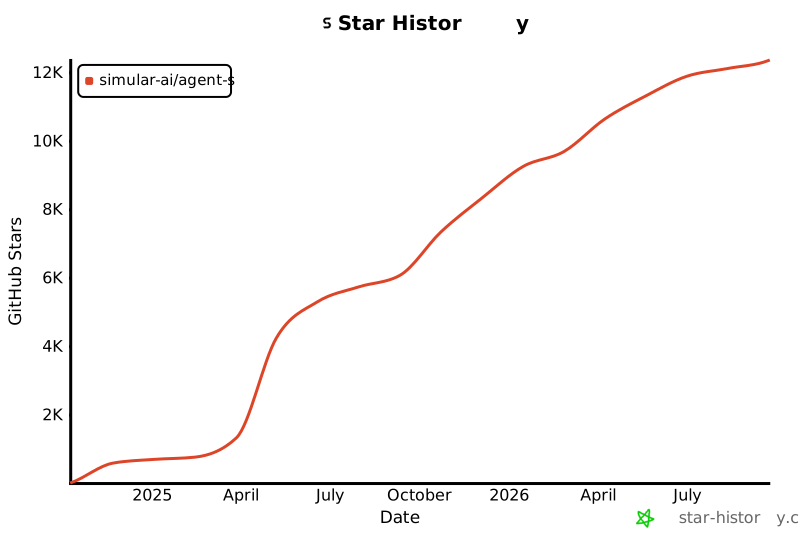](https://star-history.com/#simular-ai/Agent-S&Date)
================================================
FILE: WAA_setup.md
================================================
# Introduction
This is the WindowsAgentArena (WAA) setup with Agent S2.5 (and beyond). Why do we need a setup guide? Despite the thorough [README.md](https://github.com/microsoft/WindowsAgentArena?tab=readme-ov-file "https://github.com/microsoft/WindowsAgentArena?tab=readme-ov-file"), we have to include our code into their repository _and_ fix up a number of setup issues from the WAA environment. Sadly, this isn’t the most straightforward.
# Initial WAA Setup
The initial WAA setup is straightforward. Follow the [README.md](https://github.com/microsoft/WindowsAgentArena?tab=readme-ov-file "https://github.com/microsoft/WindowsAgentArena?tab=readme-ov-file") on their repository. After you’ve finished this, try running `run-local.sh`. This will start up an experiment with their default `Navi` agent. At this point, the environment is _sufficient to run evaluation_, but it’s incomplete and thus the evaluation won’t be exactly correct due to environment issues.

Figure 1: Bash script chain of execution.
While we’re at it, look to understand the following things:
- the entire README.md (especially the [Bring Your Own Agent guide](https://github.com/microsoft/WindowsAgentArena?tab=readme-ov-file#-byoa-bring-your-own-agent "https://github.com/microsoft/WindowsAgentArena?tab=readme-ov-file#-byoa-bring-your-own-agent"))
- the _long_ chain of bash scripts that start the run (Figure 1)
- the `run.py` to see how the agent/environment are instantiated and used together
- the folder structure of the repository and the purpose of each folder
# Fixing Setup Issues
By now, your WAA environment should be set up to run locally. There are two major problems:
- setup issues
- the VM persists across examples (it won’t reset after every example is completed which may make evaluation unfair)
Let’s tackle the first one: setup issues.
### Office Apps Aren’t Installed
The first issue I ran into was the office apps aren’t installed. Why is that? Turns out all apps installed in the VM during the initial setup stage install via the links from this [file](https://github.com/microsoft/WindowsAgentArena/blob/main/src/win-arena-container/vm/setup/tools_config.json "https://github.com/microsoft/WindowsAgentArena/blob/main/src/win-arena-container/vm/setup/tools_config.json") (`tools_config.json`). At the time of writing this, only the office links do not work. Try out all the links to make sure they work. If the links do not lead to a download (and some error occurs), then that app was not installed in the VM. What do we do? Two options:
- redo the entire initial setup stage (time consuming; ~**4** hours for me and even then, it would just not work a lot of the times; ideally, WAA is setup on Linux as I’ve had no issues so far with it)
- Enter the VM and install the apps manually (easier and faster)
We’ll do the second approach.
You can access the VM via `https://localhost:8006`. You can turn the VM on by `run-local.sh`. There’s probably a better/faster way to do it, but this doesn’t take too much time anyways (~**1-2** mins). After the VM has started, enter the VM (the agent may be trying to take actions, but you can either just override the action in `run.py` with `import time; time.sleep(10000)` [here](https://github.com/microsoft/WindowsAgentArena/blob/6d39ed88c545a0d40a7a02e39b928e278df7332b/src/win-arena-container/client/lib_run_single.py#L58 "https://github.com/microsoft/WindowsAgentArena/blob/6d39ed88c545a0d40a7a02e39b928e278df7332b/src/win-arena-container/client/lib_run_single.py#L58") or fight the agent for control of the VM!).
Inside the VM, navigate to their [download page](https://www.libreoffice.org/download/download-libreoffice/ "https://www.libreoffice.org/download/download-libreoffice/") and download the latest LibreOffice version. After it’s downloaded, complete the setup wizard and make sure to delete the downloaded `*.msi` file in the VM. Finally, test the download by opening up LibreOffice Writer and Calc.
### Google Chrome Pop-ups
In Google Chrome, there a couple unexpected pop-ups.

Figure 2: Pop-ups on Chrome.
Close all these pop-ups and [make Google Chrome your default web browser](https://support.google.com/chrome/answer/95417?hl=en&co=GENIE.Platform%3DDesktop#zippy=%2Cmac%2Cwindows "https://support.google.com/chrome/answer/95417?hl=en&co=GENIE.Platform%3DDesktop#zippy=%2Cmac%2Cwindows").
### VSCode Pop-ups
This isn’t as important, but there are a couple initial pop-ups in VSCode that you can close.
### Note: `set_cell_values`
_Important if you’re using_ `set_cell_values`
Agent S2.5 uses a special grounding function called `set_cell_values` that takes advantage of the `soffice` CLI and `unotools` [Python library](https://pypi.org/project/unotools/ "https://pypi.org/project/unotools/"). TL; DR, this function lets the agent set the cell values for a given spreadsheet and sheet.
For this function to work on WAA, the set up is a bit messy…
1. Connect into the VM
2. Open up a terminal and run `python --version`, you should see you’re using the GIMP Python which is `2.x`. This won’t let you use the `soffice` CLI or `import uno` in Python code.
3. In the `Desktop` directory within a terminal, do `pip freeze > requirements.txt` to save all the PYPI libraries from the GIMP Python to a `requirements.txt`.
4. Configuring Python path to LibreOffice’s Python
1. In the File Explorer, locate the `python.exe` file from LibreOffice. You can do this with `where python`. Copy this path.
2. In the Search bar in the bottom task bar inside the VM, search for “environment variables”.
3. Click on “Environment Variables” and click on “Path” under “System variables”. Paste the copied path from step (a) into there and ensure this path is _above_ the GIMP Python path so it takes precedence.
4. Reopen a terminal and run `soffice` to ensure it is now working. Create a temporary python file and ensure `import uno` works.
5. LibreOffice’s Python should be `3.10` or above. However, it does not come with pip. To install pip, download this [file](https://bootstrap.pypa.io/get-pip.py "https://bootstrap.pypa.io/get-pip.py") and execute `python get-pip.py` to install it. Ensure the `python` here is LibreOffice’s Python. Next, install `pip install -r requirements.txt` using the `requirements.txt` from step 3. This is to ensure LibreOffice’s Python has all the dependencies needed for evaluation (pyautogui, etc).
6. Clean up all installer files. Then, inside the [WAA repository code](https://github.com/microsoft/WindowsAgentArena/blob/6d39ed88c545a0d40a7a02e39b928e278df7332b/src/win-arena-container/client/desktop_env/controllers/python.py#L193 "https://github.com/microsoft/WindowsAgentArena/blob/6d39ed88c545a0d40a7a02e39b928e278df7332b/src/win-arena-container/client/desktop_env/controllers/python.py#L193"), change this line
`command_list = ["python", "-c", self.pkgs_prefix.format(command=command)]`
to:
`command_list = ["absolute/path/to/libreoffice/python", "-c", self.pkgs_prefix.format(command=command)]`
This ensures that the subprocess running in the flask server inside the VM will use that specific Python version.
### Double Checking…
Double check all apps can be used and no unexpected pop-ups or issues are in the way. Any apps you open make sure to close them upon finishing your clean-up. Make sure any installation files you have in `Downloads` are deleted (and removed from Recycle Bin) to keep the environment clean. At the end, this is our **golden image**. You may want to save a copy of this VM somewhere safe so that you can always copy it back into the WAA repository to be reused (refer to [this](https://github.com/microsoft/WindowsAgentArena/tree/main?tab=readme-ov-file#additional-notes "https://github.com/microsoft/WindowsAgentArena/tree/main?tab=readme-ov-file#additional-notes")).
# Set up Agent S2.5 with WAA Locally
Take the time to understand the [Agent-S repository](https://github.com/simular-ai/Agent-S "https://github.com/simular-ai/Agent-S").
1. Instead of following the [README.md](https://github.com/simular-ai/Agent-S/blob/main/README.md "https://github.com/simular-ai/Agent-S/blob/main/README.md") for Agent S2.5, you need to clone the repository then `pip install -r requirements.txt`
2. Move the S2.5 folder to the [mm_agents](https://github.com/microsoft/WindowsAgentArena/tree/main/src/win-arena-container/client/mm_agents "https://github.com/microsoft/WindowsAgentArena/tree/main/src/win-arena-container/client/mm_agents") folder in WAA. Follow the [Bring Your Own Agent guide](https://github.com/microsoft/WindowsAgentArena?tab=readme-ov-file#-byoa-bring-your-own-agent "https://github.com/microsoft/WindowsAgentArena?tab=readme-ov-file#-byoa-bring-your-own-agent").
1. You will need to move the `agent_s.py` file out to the `S2.5` folder and update all the relevant import statements
3. Make the necessary changes in `run.py` and `lib_run_single.py` to accommodate Agent S2.5 (replace the Navi Agent with Agent S2.5).
4. Test it by running the experiments! Don’t forget when you do `run-local.sh`, now you need to specify Agent S2.5 instead of the navi agent `agent="agent_s"`.
5. You may have some import errors and these libraries need to be installed inside the `winarena` container (I think). You can just add the pip install commands to the bash script where the error stems from (hacky).
# Agent S2.5 with WAA on Azure
1. Ensure you have:
1. a **clean copy** of the golden image
2. the correct Azure subscription (so you’re not using your own payment method)
2. Follow the Azure deployment in the [README.md](https://github.com/microsoft/WindowsAgentArena/blob/main/README.md "https://github.com/microsoft/WindowsAgentArena/blob/main/README.md").
3. Test it! If this works, then we have a resettable golden image and WAA can be ran in parallel, making evaluation much _much_ faster! Good luck!
================================================
FILE: evaluation_sets/test_all.json
================================================
{
"chrome": [
"bb5e4c0d-f964-439c-97b6-bdb9747de3f4",
"7b6c7e24-c58a-49fc-a5bb-d57b80e5b4c3",
"06fe7178-4491-4589-810f-2e2bc9502122",
"e1e75309-3ddb-4d09-92ec-de869c928143",
"35253b65-1c19-4304-8aa4-6884b8218fc0",
"2ad9387a-65d8-4e33-ad5b-7580065a27ca",
"7a5a7856-f1b6-42a4-ade9-1ca81ca0f263",
"44ee5668-ecd5-4366-a6ce-c1c9b8d4e938",
"2ae9ba84-3a0d-4d4c-8338-3a1478dc5fe3",
"480bcfea-d68f-4aaa-a0a9-2589ef319381",
"af630914-714e-4a24-a7bb-f9af687d3b91",
"3720f614-37fd-4d04-8a6b-76f54f8c222d",
"99146c54-4f37-4ab8-9327-5f3291665e1e",
"12086550-11c0-466b-b367-1d9e75b3910e",
"6766f2b8-8a72-417f-a9e5-56fcaa735837",
"93eabf48-6a27-4cb6-b963-7d5fe1e0d3a9",
"ae78f875-5b98-4907-bbb5-9c737fc68c03",
"3299584d-8f11-4457-bf4c-ce98f7600250",
"030eeff7-b492-4218-b312-701ec99ee0cc",
"9656a811-9b5b-4ddf-99c7-5117bcef0626",
"fc6d8143-9452-4171-9459-7f515143419a",
"a96b564e-dbe9-42c3-9ccf-b4498073438a",
"1704f00f-79e6-43a7-961b-cedd3724d5fd",
"f3b19d1e-2d48-44e9-b4e1-defcae1a0197",
"82bc8d6a-36eb-4d2d-8801-ef714fb1e55a",
"47543840-672a-467d-80df-8f7c3b9788c9",
"c1fa57f3-c3db-4596-8f09-020701085416",
"da46d875-6b82-4681-9284-653b0c7ae241",
"6c4c23a1-42a4-43cc-9db1-2f86ff3738cc",
"f79439ad-3ee8-4f99-a518-0eb60e5652b0",
"b7895e80-f4d1-4648-bee0-4eb45a6f1fa8",
"9f3f70fc-5afc-4958-a7b7-3bb4fcb01805",
"7f52cab9-535c-4835-ac8c-391ee64dc930",
"82279c77-8fc6-46f6-9622-3ba96f61b477",
"2888b4e6-5b47-4b57-8bf5-c73827890774",
"b4f95342-463e-4179-8c3f-193cd7241fb2",
"f5d96daf-83a8-4c86-9686-bada31fc66ab",
"121ba48f-9e17-48ce-9bc6-a4fb17a7ebba",
"368d9ba4-203c-40c1-9fa3-da2f1430ce63",
"59155008-fe71-45ec-8a8f-dc35497b6aa8",
"a728a36e-8bf1-4bb6-9a03-ef039a5233f0",
"b070486d-e161-459b-aa2b-ef442d973b92",
"0d8b7de3-e8de-4d86-b9fd-dd2dce58a217",
"9f935cce-0a9f-435f-8007-817732bfc0a5",
"f0b971a1-6831-4b9b-a50e-22a6e47f45ba",
"cabb3bae-cccb-41bd-9f5d-0f3a9fecd825"
],
"gimp": [
"7a4deb26-d57d-4ea9-9a73-630f66a7b568",
"554785e9-4523-4e7a-b8e1-8016f565f56a",
"77b8ab4d-994f-43ac-8930-8ca087d7c4b4",
"f4aec372-4fb0-4df5-a52b-79e0e2a5d6ce",
"d52d6308-ec58-42b7-a2c9-de80e4837b2b",
"2a729ded-3296-423d-aec4-7dd55ed5fbb3",
"b148e375-fe0b-4bec-90e7-38632b0d73c2",
"a746add2-cab0-4740-ac36-c3769d9bfb46",
"7b7617bd-57cc-468e-9c91-40c4ec2bcb3d",
"d16c99dc-2a1e-46f2-b350-d97c86c85c15",
"06ca5602-62ca-47f6-ad4f-da151cde54cc",
"e2dd0213-26db-4349-abe5-d5667bfd725c",
"f723c744-e62c-4ae6-98d1-750d3cd7d79d",
"72f83cdc-bf76-4531-9a1b-eb893a13f8aa",
"7767eef2-56a3-4cea-8c9f-48c070c7d65b",
"734d6579-c07d-47a8-9ae2-13339795476b",
"e19bd559-633b-4b02-940f-d946248f088e",
"38f48d40-764e-4e77-a7cf-51dfce880291",
"fbb548ca-c2a6-4601-9204-e39a2efc507b",
"5ca86c6f-f317-49d8-b6a7-b527541caae8",
"62f7fd55-0687-4a43-b6e1-3eda16fc6252",
"8ea73f6f-9689-42ad-8c60-195bbf06a7ba",
"58d3eeeb-e9d0-499f-962e-fd0db2a744d8",
"2e6f678f-472d-4c55-99cc-8e7c5c402a71",
"045bf3ff-9077-4b86-b483-a1040a949cff",
"dbbf4b99-2253-4b10-9274-45f246af2466"
],
"libreoffice_calc": [
"357ef137-7eeb-4c80-a3bb-0951f26a8aff",
"42e0a640-4f19-4b28-973d-729602b5a4a7",
"51719eea-10bc-4246-a428-ac7c433dd4b3",
"1954cced-e748-45c4-9c26-9855b97fbc5e",
"2bd59342-0664-4ccb-ba87-79379096cc08",
"3aaa4e37-dc91-482e-99af-132a612d40f3",
"1273e544-688f-496b-8d89-3e0f40aa0606",
"12382c62-0cd1-4bf2-bdc8-1d20bf9b2371",
"f9584479-3d0d-4c79-affa-9ad7afdd8850",
"535364ea-05bd-46ea-9937-9f55c68507e8",
"7e429b8d-a3f0-4ed0-9b58-08957d00b127",
"4f07fbe9-70de-4927-a4d5-bb28bc12c52c",
"04d9aeaf-7bed-4024-bedb-e10e6f00eb7f",
"0bf05a7d-b28b-44d2-955a-50b41e24012a",
"6054afcb-5bab-4702-90a0-b259b5d3217c",
"abed40dc-063f-4598-8ba5-9fe749c0615d",
"37608790-6147-45d0-9f20-1137bb35703d",
"26a8440e-c166-4c50-aef4-bfb77314b46b",
"d681960f-7bc3-4286-9913-a8812ba3261a",
"035f41ba-6653-43ab-aa63-c86d449d62e5",
"7efeb4b1-3d19-4762-b163-63328d66303b",
"1de60575-bb6e-4c3d-9e6a-2fa699f9f197",
"aa3a8974-2e85-438b-b29e-a64df44deb4b",
"51b11269-2ca8-4b2a-9163-f21758420e78",
"1e8df695-bd1b-45b3-b557-e7d599cf7597",
"ecb0df7a-4e8d-4a03-b162-053391d3afaf",
"8b1ce5f2-59d2-4dcc-b0b0-666a714b9a14",
"a01fbce3-2793-461f-ab86-43680ccbae25",
"0326d92d-d218-48a8-9ca1-981cd6d064c7",
"0a2e43bf-b26c-4631-a966-af9dfa12c9e5",
"4188d3a4-077d-46b7-9c86-23e1a036f6c1",
"347ef137-7eeb-4c80-a3bb-0951f26a8aff",
"eb03d19a-b88d-4de4-8a64-ca0ac66f426b",
"0cecd4f3-74de-457b-ba94-29ad6b5dafb6",
"1d17d234-e39d-4ed7-b46f-4417922a4e7c",
"4e6fcf72-daf3-439f-a232-c434ce416af6",
"01b269ae-2111-4a07-81fd-3fcd711993b0",
"21df9241-f8d7-4509-b7f1-37e501a823f7",
"a9f325aa-8c05-4e4f-8341-9e4358565f4f",
"6e99a1ad-07d2-4b66-a1ce-ece6d99c20a5",
"7a4e4bc8-922c-4c84-865c-25ba34136be1",
"4de54231-e4b5-49e3-b2ba-61a0bec721c0",
"30e3e107-1cfb-46ee-a755-2cd080d7ba6a",
"4172ea6e-6b77-4edb-a9cc-c0014bd1603b",
"1334ca3e-f9e3-4db8-9ca7-b4c653be7d17",
"3a7c8185-25c1-4941-bd7b-96e823c9f21f",
"21ab7b40-77c2-4ae6-8321-e00d3a086c73"
],
"libreoffice_impress": [
"5d901039-a89c-4bfb-967b-bf66f4df075e",
"550ce7e7-747b-495f-b122-acdc4d0b8e54",
"455d3c66-7dc6-4537-a39a-36d3e9119df7",
"af23762e-2bfd-4a1d-aada-20fa8de9ce07",
"c59742c0-4323-4b9d-8a02-723c251deaa0",
"ef9d12bd-bcee-4ba0-a40e-918400f43ddf",
"9ec204e4-f0a3-42f8-8458-b772a6797cab",
"0f84bef9-9790-432e-92b7-eece357603fb",
"ce88f674-ab7a-43da-9201-468d38539e4a",
"3b27600c-3668-4abd-8f84-7bcdebbccbdb",
"a097acff-6266-4291-9fbd-137af7ecd439",
"bf4e9888-f10f-47af-8dba-76413038b73c",
"21760ecb-8f62-40d2-8d85-0cee5725cb72",
"ac9bb6cb-1888-43ab-81e4-a98a547918cd",
"2cd43775-7085-45d8-89fa-9e35c0a915cf",
"358aa0a7-6677-453f-ae35-e440f004c31e",
"a669ef01-ded5-4099-9ea9-25e99b569840",
"73c99fb9-f828-43ce-b87a-01dc07faa224",
"15aece23-a215-4579-91b4-69eec72e18da",
"986fc832-6af2-417c-8845-9272b3a1528b",
"a434992a-89df-4577-925c-0c58b747f0f4",
"7dbc52a6-11e0-4c9a-a2cb-1e36cfda80d8",
"841b50aa-df53-47bd-a73a-22d3a9f73160",
"8979838c-54a5-4454-a2b8-3d135a1a5c8f",
"b8adbc24-cef2-4b15-99d5-ecbe7ff445eb",
"2b94c692-6abb-48ae-ab0b-b3e8a19cb340",
"9cf05d24-6bd9-4dae-8967-f67d88f5d38a",
"08aced46-45a2-48d7-993b-ed3fb5b32302",
"edb61b14-a854-4bf5-a075-c8075c11293a",
"c82632a4-56b6-4db4-9dd1-3820ee3388e4",
"39be0d19-634d-4475-8768-09c130f5425d",
"ac1b39ff-ee4d-4483-abce-c117e98942f0",
"f23acfd2-c485-4b7c-a1e7-d4303ddfe864",
"70bca0cc-c117-427e-b0be-4df7299ebeb6",
"af2d657a-e6b3-4c6a-9f67-9e3ed015974c",
"57667013-ea97-417c-9dce-2713091e6e2a",
"0a211154-fda0-48d0-9274-eaac4ce5486d",
"a53f80cd-4a90-4490-8310-097b011433f6",
"7ae48c60-f143-4119-b659-15b8f485eb9a",
"5cfb9197-e72b-454b-900e-c06b0c802b40",
"05dd4c1d-c489-4c85-8389-a7836c4f0567",
"5c1a6c3d-c1b3-47cb-9b01-8d1b7544ffa1",
"4ed5abd0-8b5d-47bd-839f-cacfa15ca37a",
"e4ef0baf-4b52-4590-a47e-d4d464cca2d7",
"ed43c15f-00cb-4054-9c95-62c880865d68",
"3161d64e-3120-47b4-aaad-6a764a92493b",
"04578141-1d42-4146-b9cf-6fab4ce5fd74"
],
"libreoffice_writer": [
"0810415c-bde4-4443-9047-d5f70165a697",
"0a0faba3-5580-44df-965d-f562a99b291c",
"0b17a146-2934-46c7-8727-73ff6b6483e8",
"0e47de2a-32e0-456c-a366-8c607ef7a9d2",
"0e763496-b6bb-4508-a427-fad0b6c3e195",
"3ef2b351-8a84-4ff2-8724-d86eae9b842e",
"4bcb1253-a636-4df4-8cb0-a35c04dfef31",
"66399b0d-8fda-4618-95c4-bfc6191617e9",
"6a33f9b9-0a56-4844-9c3f-96ec3ffb3ba2",
"6ada715d-3aae-4a32-a6a7-429b2e43fb93",
"6f81754e-285d-4ce0-b59e-af7edb02d108",
"72b810ef-4156-4d09-8f08-a0cf57e7cefe",
"8472fece-c7dd-4241-8d65-9b3cd1a0b568",
"88fe4b2d-3040-4c70-9a70-546a47764b48",
"936321ce-5236-426a-9a20-e0e3c5dc536f",
"adf5e2c3-64c7-4644-b7b6-d2f0167927e7",
"b21acd93-60fd-4127-8a43-2f5178f4a830",
"d53ff5ee-3b1a-431e-b2be-30ed2673079b",
"e246f6d8-78d7-44ac-b668-fcf47946cb50",
"e528b65e-1107-4b8c-8988-490e4fece599",
"ecc2413d-8a48-416e-a3a2-d30106ca36cb",
"f178a4a9-d090-4b56-bc4c-4b72a61a035d",
"bb8ccc78-479f-4a2f-a71e-d565e439436b"
],
"multi_apps": [
"2b9493d7-49b8-493a-a71b-56cd1f4d6908",
"2c9fc0de-3ee7-45e1-a5df-c86206ad78b5",
"2fe4b718-3bd7-46ec-bdce-b184f5653624",
"3680a5ee-6870-426a-a997-eba929a0d25c",
"46407397-a7d5-4c6b-92c6-dbe038b1457b",
"4e9f0faf-2ecc-4ae8-a804-28c9a75d1ddc",
"510f64c8-9bcc-4be1-8d30-638705850618",
"51f5801c-18b3-4f25-b0c3-02f85507a078",
"58565672-7bfe-48ab-b828-db349231de6b",
"78aed49a-a710-4321-a793-b611a7c5b56b",
"897e3b53-5d4d-444b-85cb-2cdc8a97d903",
"937087b6-f668-4ba6-9110-60682ee33441",
"a0b9dc9c-fc07-4a88-8c5d-5e3ecad91bcb",
"b52b40a5-ad70-4c53-b5b0-5650a8387052",
"c867c42d-a52d-4a24-8ae3-f75d256b5618",
"d9b7c649-c975-4f53-88f5-940b29c47247",
"e135df7c-7687-4ac0-a5f0-76b74438b53e",
"ee9a3c83-f437-4879-8918-be5efbb9fac7",
"f7dfbef3-7697-431c-883a-db8583a4e4f9",
"f8cfa149-d1c1-4215-8dac-4a0932bad3c2",
"6d72aad6-187a-4392-a4c4-ed87269c51cf",
"f918266a-b3e0-4914-865d-4faa564f1aef",
"da52d699-e8d2-4dc5-9191-a2199e0b6a9b",
"bc2b57f3-686d-4ec9-87ce-edf850b7e442",
"74d5859f-ed66-4d3e-aa0e-93d7a592ce41",
"b5062e3e-641c-4e3a-907b-ac864d2e7652",
"00fa164e-2612-4439-992e-157d019a8436",
"acb0f96b-e27c-44d8-b55f-7cb76609dfcd",
"69acbb55-d945-4927-a87b-8480e1a5bb7e",
"48d05431-6cd5-4e76-82eb-12b60d823f7d",
"68a25bd4-59c7-4f4d-975e-da0c8509c848",
"eb303e01-261e-4972-8c07-c9b4e7a4922a",
"0c825995-5b70-4526-b663-113f4c999dd2",
"c7c1e4c3-9e92-4eba-a4b8-689953975ea4",
"d1acdb87-bb67-4f30-84aa-990e56a09c92",
"deec51c9-3b1e-4b9e-993c-4776f20e8bb2",
"8e116af7-7db7-4e35-a68b-b0939c066c78",
"337d318b-aa07-4f4f-b763-89d9a2dd013f",
"82e3c869-49f6-4305-a7ce-f3e64a0618e7",
"185f29bd-5da0-40a6-b69c-ba7f4e0324ef",
"869de13e-bef9-4b91-ba51-f6708c40b096",
"2c1ebcd7-9c6d-4c9a-afad-900e381ecd5e",
"3a93cae4-ad3e-403e-8c12-65303b271818",
"1f18aa87-af6f-41ef-9853-cdb8f32ebdea",
"26150609-0da3-4a7d-8868-0faf9c5f01bb",
"9219480b-3aed-47fc-8bac-d2cffc5849f7",
"881deb30-9549-4583-a841-8270c65f2a17",
"7e287123-70ca-47b9-8521-47db09b69b14",
"e2392362-125e-4f76-a2ee-524b183a3412",
"5bc63fb9-276a-4439-a7c1-9dc76401737f",
"26660ad1-6ebb-4f59-8cba-a8432dfe8d38",
"a82b78bb-7fde-4cb3-94a4-035baf10bcf0",
"36037439-2044-4b50-b9d1-875b5a332143",
"716a6079-22da-47f1-ba73-c9d58f986a38",
"873cafdd-a581-47f6-8b33-b9696ddb7b05",
"a74b607e-6bb5-4ea8-8a7c-5d97c7bbcd2a",
"6f4073b8-d8ea-4ade-8a18-c5d1d5d5aa9a",
"da922383-bfa4-4cd3-bbad-6bebab3d7742",
"2373b66a-092d-44cb-bfd7-82e86e7a3b4d",
"81c425f5-78f3-4771-afd6-3d2973825947",
"bb83cab4-e5c7-42c7-a67b-e46068032b86",
"227d2f97-562b-4ccb-ae47-a5ec9e142fbb",
"b337d106-053f-4d37-8da0-7f9c4043a66b",
"20236825-b5df-46e7-89bf-62e1d640a897",
"8df7e444-8e06-4f93-8a1a-c5c974269d82",
"aad10cd7-9337-4b62-b704-a857848cedf2",
"02ce9a50-7af2-47ed-8596-af0c230501f8",
"4c26e3f3-3a14-4d86-b44a-d3cedebbb487",
"a503b07f-9119-456b-b75d-f5146737d24f",
"09a37c51-e625-49f4-a514-20a773797a8a",
"3e3fc409-bff3-4905-bf16-c968eee3f807",
"f5c13cdd-205c-4719-a562-348ae5cd1d91",
"5990457f-2adb-467b-a4af-5c857c92d762",
"415ef462-bed3-493a-ac36-ca8c6d23bf1b",
"7ff48d5b-2df2-49da-b500-a5150ffc7f18",
"9f3bb592-209d-43bc-bb47-d77d9df56504",
"dd60633f-2c72-42ba-8547-6f2c8cb0fdb0",
"ce2b64a2-ddc1-4f91-8c7d-a88be7121aac",
"3f05f3b9-29ba-4b6b-95aa-2204697ffc06",
"e1fc0df3-c8b9-4ee7-864c-d0b590d3aa56",
"f8369178-fafe-40c2-adc4-b9b08a125456",
"778efd0a-153f-4842-9214-f05fc176b877",
"47f7c0ce-a5fb-4100-a5e6-65cd0e7429e5",
"c2751594-0cd5-4088-be1b-b5f2f9ec97c4",
"788b3701-3ec9-4b67-b679-418bfa726c22",
"48c46dc7-fe04-4505-ade7-723cba1aa6f6",
"42d25c08-fb87-4927-8b65-93631280a26f",
"e8172110-ec08-421b-a6f5-842e6451911f",
"42f4d1c7-4521-4161-b646-0a8934e36081",
"3c8f201a-009d-4bbe-8b65-a6f8b35bb57f",
"d68204bf-11c1-4b13-b48b-d303c73d4bf6",
"91190194-f406-4cd6-b3f9-c43fac942b22",
"7f35355e-02a6-45b5-b140-f0be698bcf85",
"98e8e339-5f91-4ed2-b2b2-12647cb134f4",
"0e5303d4-8820-42f6-b18d-daf7e633de21",
"df67aebb-fb3a-44fd-b75b-51b6012df509",
"5df7b33a-9f77-4101-823e-02f863e1c1ae",
"aceb0368-56b8-4073-b70e-3dc9aee184e0",
"22a4636f-8179-4357-8e87-d1743ece1f81",
"236833a3-5704-47fc-888c-4f298f09f799",
"67890eb6-6ce5-4c00-9e3d-fb4972699b06"
],
"os": [
"94d95f96-9699-4208-98ba-3c3119edf9c2",
"bedcedc4-4d72-425e-ad62-21960b11fe0d",
"ec4e3f68-9ea4-4c18-a5c9-69f89d1178b3",
"a462a795-fdc7-4b23-b689-e8b6df786b78",
"f9be0997-4b7c-45c5-b05c-4612b44a6118",
"28cc3b7e-b194-4bc9-8353-d04c0f4d56d2",
"5ea617a3-0e86-4ba6-aab2-dac9aa2e8d57",
"e0df059f-28a6-4169-924f-b9623e7184cc",
"b6781586-6346-41cd-935a-a6b1487918fc",
"b3d4a89c-53f2-4d6b-8b6a-541fb5d205fa",
"3ce045a0-877b-42aa-8d2c-b4a863336ab8",
"fe41f596-a71b-4c2f-9b2f-9dcd40b568c3",
"a4d98375-215b-4a4d-aee9-3d4370fccc41",
"13584542-872b-42d8-b299-866967b5c3ef",
"23393935-50c7-4a86-aeea-2b78fd089c5c",
"5812b315-e7bd-4265-b51f-863c02174c28",
"c288e301-e626-4b98-a1ab-159dcb162af5",
"4783cc41-c03c-4e1b-89b4-50658f642bd5",
"5c1075ca-bb34-46a3-a7a0-029bd7463e79",
"5ced85fc-fa1a-4217-95fd-0fb530545ce2",
"37887e8c-da15-4192-923c-08fa390a176d",
"4127319a-8b79-4410-b58a-7a151e15f3d7",
"4d117223-a354-47fb-8b45-62ab1390a95f",
"6f56bf42-85b8-4fbb-8e06-6c44960184ba"
],
"thunderbird": [
"dfac9ee8-9bc4-4cdc-b465-4a4bfcd2f397",
"15c3b339-88f7-4a86-ab16-e71c58dcb01e",
"7b1e1ff9-bb85-49be-b01d-d6424be18cd0",
"9bc3cc16-074a-45ac-9bdc-b2a362e1daf3",
"3f28fe4f-5d9d-4994-a456-efd78cfae1a3",
"5203d847-2572-4150-912a-03f062254390",
"dd84e895-72fd-4023-a336-97689ded257c",
"9b7bc335-06b5-4cd3-9119-1a649c478509",
"d38192b0-17dc-4e1d-99c3-786d0117de77",
"a10b69e1-6034-4a2b-93e1-571d45194f75",
"3f49d2cc-f400-4e7d-90cc-9b18e401cc31",
"f201fbc3-44e6-46fc-bcaa-432f9815454c",
"10a730d5-d414-4b40-b479-684bed1ae522",
"a1af9f1c-50d5-4bc3-a51e-4d9b425ff638",
"08c73485-7c6d-4681-999d-919f5c32dcfa"
],
"vlc": [
"59f21cfb-0120-4326-b255-a5b827b38967",
"8ba5ae7a-5ae5-4eab-9fcc-5dd4fe3abf89",
"8f080098-ddb1-424c-b438-4e96e5e4786e",
"bba3381f-b5eb-4439-bd9e-80c22218d5a7",
"fba2c100-79e8-42df-ae74-b592418d54f4",
"efcf0d81-0835-4880-b2fd-d866e8bc2294",
"8d9fd4e2-6fdb-46b0-b9b9-02f06495c62f",
"aa4b5023-aef6-4ed9-bdc9-705f59ab9ad6",
"386dbd0e-0241-4a0a-b6a2-6704fba26b1c",
"9195653c-f4aa-453d-aa95-787f6ccfaae9",
"d06f0d4d-2cd5-4ede-8de9-598629438c6e",
"a5bbbcd5-b398-4c91-83d4-55e1e31bbb81",
"5ac2891a-eacd-4954-b339-98abba077adb",
"f3977615-2b45-4ac5-8bba-80c17dbe2a37",
"215dfd39-f493-4bc3-a027-8a97d72c61bf",
"cb130f0d-d36f-4302-9838-b3baf46139b6",
"7882ed6e-bece-4bf0-bada-c32dc1ddae72"
],
"vs_code": [
"0ed39f63-6049-43d4-ba4d-5fa2fe04a951",
"53ad5833-3455-407b-bbc6-45b4c79ab8fb",
"eabc805a-bfcf-4460-b250-ac92135819f6",
"982d12a5-beab-424f-8d38-d2a48429e511",
"4e60007a-f5be-4bfc-9723-c39affa0a6d3",
"e2b5e914-ffe1-44d2-8e92-58f8c5d92bb2",
"9439a27b-18ae-42d8-9778-5f68f891805e",
"ea98c5d7-3cf9-4f9b-8ad3-366b58e0fcae",
"930fdb3b-11a8-46fe-9bac-577332e2640e",
"276cc624-87ea-4f08-ab93-f770e3790175",
"9d425400-e9b2-4424-9a4b-d4c7abac4140",
"5e2d93d8-8ad0-4435-b150-1692aacaa994",
"6ed0a554-cbee-4b44-84ea-fd6c042f4fe1",
"ec71221e-ac43-46f9-89b8-ee7d80f7e1c5",
"70745df8-f2f5-42bd-8074-fbc10334fcc5",
"57242fad-77ca-454f-b71b-f187181a9f23",
"c6bf789c-ba3a-4209-971d-b63abf0ab733",
"0512bb38-d531-4acf-9e7e-0add90816068",
"847a96b6-df94-4927-97e6-8cc9ea66ced7",
"7aeae0e2-70ee-4705-821d-1bba5d5b2ddd",
"dcbe20e8-647f-4f1d-8696-f1c5bbb570e3",
"7c4cc09e-7a92-40dd-8338-b2286535c4ed",
"971cbb5b-3cbf-4ff7-9e24-b5c84fcebfa6"
]
}
================================================
FILE: evaluation_sets/test_small_new.json
================================================
{
"os": [
"5ea617a3-0e86-4ba6-aab2-dac9aa2e8d57",
"5812b315-e7bd-4265-b51f-863c02174c28",
"c288e301-e626-4b98-a1ab-159dcb162af5",
"4783cc41-c03c-4e1b-89b4-50658f642bd5",
"5c1075ca-bb34-46a3-a7a0-029bd7463e79",
"5ced85fc-fa1a-4217-95fd-0fb530545ce2"
],
"gimp": [
"a746add2-cab0-4740-ac36-c3769d9bfb46",
"7a4deb26-d57d-4ea9-9a73-630f66a7b568",
"d52d6308-ec58-42b7-a2c9-de80e4837b2b",
"2a729ded-3296-423d-aec4-7dd55ed5fbb3",
"d16c99dc-2a1e-46f2-b350-d97c86c85c15"
],
"chrome": [
"bb5e4c0d-f964-439c-97b6-bdb9747de3f4",
"7b6c7e24-c58a-49fc-a5bb-d57b80e5b4c3",
"35253b65-1c19-4304-8aa4-6884b8218fc0",
"a96b564e-dbe9-42c3-9ccf-b4498073438a",
"e1e75309-3ddb-4d09-92ec-de869c928143",
"82bc8d6a-36eb-4d2d-8801-ef714fb1e55a"
],
"thunderbird": [
"bb5e4c0d-f964-439c-97b6-bdb9747de3f4",
"7b6c7e24-c58a-49fc-a5bb-d57b80e5b4c3",
"2ad9387a-65d8-4e33-ad5b-7580065a27ca",
"480bcfea-d68f-4aaa-a0a9-2589ef319381",
"030eeff7-b492-4218-b312-701ec99ee0cc"
],
"vs_code": [
"0ed39f63-6049-43d4-ba4d-5fa2fe04a951",
"dcbe20e8-647f-4f1d-8696-f1c5bbb570e3",
"9439a27b-18ae-42d8-9778-5f68f891805e",
"7c4cc09e-7a92-40dd-8338-b2286535c4ed",
"9d425400-e9b2-4424-9a4b-d4c7abac4140"
],
"vlc": [
"59f21cfb-0120-4326-b255-a5b827b38967",
"8f080098-ddb1-424c-b438-4e96e5e4786e",
"5ac2891a-eacd-4954-b339-98abba077adb",
"f3977615-2b45-4ac5-8bba-80c17dbe2a37",
"215dfd39-f493-4bc3-a027-8a97d72c61bf"
],
"libreoffice_calc": [
"357ef137-7eeb-4c80-a3bb-0951f26a8aff",
"42e0a640-4f19-4b28-973d-729602b5a4a7",
"abed40dc-063f-4598-8ba5-9fe749c0615d",
"035f41ba-6653-43ab-aa63-c86d449d62e5",
"7efeb4b1-3d19-4762-b163-63328d66303b"
],
"libreoffice_impress": [
"5d901039-a89c-4bfb-967b-bf66f4df075e",
"550ce7e7-747b-495f-b122-acdc4d0b8e54",
"ac9bb6cb-1888-43ab-81e4-a98a547918cd",
"2cd43775-7085-45d8-89fa-9e35c0a915cf",
"358aa0a7-6677-453f-ae35-e440f004c31e",
"a669ef01-ded5-4099-9ea9-25e99b569840"
],
"libreoffice_writer": [
"0810415c-bde4-4443-9047-d5f70165a697",
"e246f6d8-78d7-44ac-b668-fcf47946cb50",
"d53ff5ee-3b1a-431e-b2be-30ed2673079b",
"b21acd93-60fd-4127-8a43-2f5178f4a830",
"0a0faba3-5580-44df-965d-f562a99b291c",
"adf5e2c3-64c7-4644-b7b6-d2f0167927e7"
],
"multi_apps": [
"a74b607e-6bb5-4ea8-8a7c-5d97c7bbcd2a",
"5990457f-2adb-467b-a4af-5c857c92d762",
"2b9493d7-49b8-493a-a71b-56cd1f4d6908",
"acb0f96b-e27c-44d8-b55f-7cb76609dfcd",
"c867c42d-a52d-4a24-8ae3-f75d256b5618",
"74d5859f-ed66-4d3e-aa0e-93d7a592ce41",
"b5062e3e-641c-4e3a-907b-ac864d2e7652",
"48d05431-6cd5-4e76-82eb-12b60d823f7d",
"eb303e01-261e-4972-8c07-c9b4e7a4922a",
"d1acdb87-bb67-4f30-84aa-990e56a09c92",
"deec51c9-3b1e-4b9e-993c-4776f20e8bb2",
"8e116af7-7db7-4e35-a68b-b0939c066c78",
"716a6079-22da-47f1-ba73-c9d58f986a38",
"46407397-a7d5-4c6b-92c6-dbe038b1457b",
"4e9f0faf-2ecc-4ae8-a804-28c9a75d1ddc",
"897e3b53-5d4d-444b-85cb-2cdc8a97d903"
]
}
================================================
FILE: gui_agents/__init__.py
================================================
================================================
FILE: gui_agents/s1/README.md
================================================
<h1 align="center">
<img src="../../images/agent_s.png" alt="Logo" style="vertical-align:middle" width="60"> Agent S:
<small>Using Computers Like a Human</small>
</h1>
<p align="center">
🌐 <a href="https://www.simular.ai/agent-s">[Website]</a>
📄 <a href="https://arxiv.org/abs/2410.08164">[Paper]</a>
🎥 <a href="https://www.youtube.com/watch?v=OBDE3Knte0g">[Video]</a>
🗨️ <a href="https://discord.gg/E2XfsK9fPV">[Discord]</a>
</p>
## 🥳 Updates
- [x] **2025/01/22**: The [Agent S paper](https://arxiv.org/abs/2410.08164) is accepted to ICLR 2025!
- [x] **2025/01/21**: Released v0.1.2 of [gui-agents](https://github.com/simular-ai/Agent-S) library, with support for Linux and Windows!
- [x] **2024/12/05**: Released v0.1.0 of [gui-agents](https://github.com/simular-ai/Agent-S) library, allowing you to use Agent-S for Mac, OSWorld, and WindowsAgentArena with ease!
- [x] **2024/10/10**: Released [Agent S paper](https://arxiv.org/abs/2410.08164) and codebase!
## Table of Contents
1. [💡 Introduction](#-introduction)
2. [🎯 Current Results](#-current-results)
3. [🛠️ Installation](#%EF%B8%8F-installation)
4. [🚀 Usage](#-usage)
5. [🙌 Contributors](#-contributors)
6. [💬 Citation](#-citation)
## 💡 Introduction
<p align="center">
<img src="../../images/teaser.png" width="800">
</p>
Welcome to **Agent S**, an open-source framework designed to enable autonomous interaction with computers through Agent-Computer Interface. Our mission is to build intelligent GUI agents that can learn from past experiences and perform complex tasks autonomously on your computer.
Whether you're interested in AI, automation, or contributing to cutting-edge agent-based systems, we're excited to have you here!
## 🎯 Current Results
<p align="center">
<img src="../../images/results.png" width="600">
<br>
Results of Successful Rate (%) on the OSWorld full test set of all 369 test examples using Image + Accessibility Tree input.
</p>
## 🛠️ Installation & Setup
> ❗**Warning**❗: If you are on a Linux machine, creating a `conda` environment will interfere with `pyatspi`. As of now, there's no clean solution for this issue. Proceed through the installation without using `conda` or any virtual environment.
Clone the repository:
```
git clone https://github.com/simular-ai/Agent-S.git
```
Install the gui-agents package:
```
pip install gui-agents
```
Set your LLM API Keys and other environment variables. You can do this by adding the following line to your .bashrc (Linux), or .zshrc (MacOS) file.
```
export OPENAI_API_KEY=<YOUR_API_KEY>
```
Alternatively, you can set the environment variable in your Python script:
```
import os
os.environ["OPENAI_API_KEY"] = "<YOUR_API_KEY>"
```
We also support Azure OpenAI, Anthropic, and vLLM inference. For more information refer to [../../models.md](models.md).
### Setup Retrieval from Web using Perplexica
Agent S works best with web-knowledge retrieval. To enable this feature, you need to setup Perplexica:
1. Ensure Docker Desktop is installed and running on your system.
2. Navigate to the directory containing the project files.
```bash
cd Perplexica
git submodule update --init
```
3. Rename the `sample.config.toml` file to `config.toml`. For Docker setups, you need only fill in the following fields:
- `OPENAI`: Your OpenAI API key. **You only need to fill this if you wish to use OpenAI's models**.
- `OLLAMA`: Your Ollama API URL. You should enter it as `http://host.docker.internal:PORT_NUMBER`. If you installed Ollama on port 11434, use `http://host.docker.internal:11434`. For other ports, adjust accordingly. **You need to fill this if you wish to use Ollama's models instead of OpenAI's**.
- `GROQ`: Your Groq API key. **You only need to fill this if you wish to use Groq's hosted models**.
- `ANTHROPIC`: Your Anthropic API key. **You only need to fill this if you wish to use Anthropic models**.
**Note**: You can change these after starting Perplexica from the settings dialog.
- `SIMILARITY_MEASURE`: The similarity measure to use (This is filled by default; you can leave it as is if you are unsure about it.)
4. Ensure you are in the directory containing the `docker-compose.yaml` file and execute:
```bash
docker compose up -d
```
5. Next, export your Perplexica URL. This URL is used to interact with the Perplexica API backend. The port is given by the `config.toml` in your Perplexica directory.
```bash
export PERPLEXICA_URL=http://localhost:{port}/api/search
```
6. Our implementation of Agent S incorporates the Perplexica API to integrate a search engine capability, which allows for a more convenient and responsive user experience. If you want to tailor the API to your settings and specific requirements, you may modify the URL and the message of request parameters in `agent_s/query_perplexica.py`. For a comprehensive guide on configuring the Perplexica API, please refer to [Perplexica Search API Documentation](https://github.com/ItzCrazyKns/Perplexica/blob/master/docs/API/SEARCH.md)
For a more detailed setup and usage guide, please refer to the [Perplexica Repository](https://github.com/ItzCrazyKns/Perplexica.git).
### Setup Paddle-OCR Server
Switch to a new terminal where you will run Agent S. Set the OCR_SERVER_ADDRESS environment variable as shown below. For a better experience, add the following line directly to your .bashrc (Linux), or .zshrc (MacOS) file.
```
export OCR_SERVER_ADDRESS=http://localhost:8000/ocr/
```
Run the ocr_server.py file code to use OCR-based bounding boxes.
```
cd Agent-S
python gui_agents/utils/ocr_server.py
```
You can change the server address by editing the address in [gui_agents/s1/utils/ocr_server.py](utils/ocr_server.py) file.
> ❗**Warning**❗: The agent will directly run python code to control your computer. Please use with care.
## 🚀 Usage
### CLI
Run agent_s on your computer using:
```
agent_s1 --model gpt-4o
```
This will show a user query prompt where you can enter your query and interact with Agent S. You can use any model from the list of supported models in [models.md](../../models.md).
### `gui_agents` SDK
To deploy Agent S on MacOS or Windows:
```
import pyautogui
import io
from gui_agents.core.AgentS import GraphSearchAgent
import platform
if platform.system() == "Darwin":
from gui_agents.aci.MacOSACI import MacOSACI, UIElement
grounding_agent = MacOSACI()
elif platform.system() == "Windows":
from gui_agents.aci.WindowsOSACI import WindowsACI, UIElement
grounding_agent = WindowsACI()
elif platform.system() == "Linux":
from gui_agents.aci.LinuxOSACI import LinuxACI, UIElement
grounding_agent = LinuxACI()
else:
raise ValueError("Unsupported platform")
engine_params = {
"engine_type": "openai",
"model": "gpt-4o",
}
agent = GraphSearchAgent(
engine_params,
grounding_agent,
platform="ubuntu", # "macos", "windows"
action_space="pyautogui",
observation_type="mixed",
search_engine="Perplexica"
)
# Get screenshot.
screenshot = pyautogui.screenshot()
buffered = io.BytesIO()
screenshot.save(buffered, format="PNG")
screenshot_bytes = buffered.getvalue()
# Get accessibility tree.
acc_tree = UIElement.systemWideElement()
obs = {
"screenshot": screenshot_bytes,
"accessibility_tree": acc_tree,
}
instruction = "Close VS Code"
info, action = agent.predict(instruction=instruction, observation=obs)
exec(action[0])
```
Refer to `cli_app.py` for more details on how the inference loop works.
#### Downloading the Knowledege Base
Agent S2 uses a knowledge base that continually updates with new knowledge during inference. The knowledge base is initially downloaded when initializing `GraphSearchAgent`. The knowledge base is stored as assets under our [GitHub Releases](https://github.com/simular-ai/Agent-S/releases). The `GraphSearchAgent` initialization will only download the knowledge base for your specified platform and agent version (e.g s1, s2). If you'd like to download the knowledge base programmatically, you can use the following code:
```
download_kb_data(
version="s2",
release_tag="v0.2.2",
download_dir="kb_data",
platform="linux" # "darwin", "windows"
)
```
This will download Agent S2's knowledge base for Linux from release tag `v0.2.2` to the `kb_data` directory. Refer to our [GitHub Releases](https://github.com/simular-ai/Agent-S/releases) or release tags that include the knowledge bases.
### OSWorld
To deploy Agent S in OSWorld, follow the [OSWorld Deployment instructions](OSWorld.md).
### WindowsAgentArena
To deploy Agent S in WindowsAgentArena, follow the [WindowsAgentArena Deployment instructions](WindowsAgentArena.md).
## 🙌 Contributors
We’re grateful to all the [amazing people](https://github.com/simular-ai/Agent-S/graphs/contributors) who have contributed to this project. Thank you! 🙏
## 💬 Citation
```
@misc{agashe2024agentsopenagentic,
title={Agent S: An Open Agentic Framework that Uses Computers Like a Human},
author={Saaket Agashe and Jiuzhou Han and Shuyu Gan and Jiachen Yang and Ang Li and Xin Eric Wang},
year={2024},
eprint={2410.08164},
archivePrefix={arXiv},
primaryClass={cs.AI},
url={https://arxiv.org/abs/2410.08164},
}
```
================================================
FILE: gui_agents/s1/WindowsAgentArena.md
================================================
## Deploying Agent-S in WindowsAgentArena
> ⚠️ **Warning**: The refactored code has not be fully tested on WindowsAgentArena. To reproduce the results on WindowsAgentArena, please use commit 496a9fa of this repository.
1. To use the Agent S with WindowsAgentArena, follows the setup instructions at: https://github.com/microsoft/WindowsAgentArena.git. **Please use the development mode while preparing the image and running the client as instructed in https://github.com/microsoft/WindowsAgentArena/blob/main/docs/Development-Tips.md.**
2. To deploy our agent in the WindowsAgentArena, copy the agent_s folder in this repository to `WindowsAgentArena/src/win-arena-container/client/mm_agents`.
3. Change the name of the GraphSearchAgent.py file to agent.py to conform to the WindowsAgentArena Setup.
4. Copy the ocr_server.py file to client/folder `WindowsAgentArena/src/win-arena-container/client` folder
```
cd WindowsAgentArena/src/win-arena-container/client
cp mm_agents/agent_s/ocr_server.py .
```
5. Update the `start_client.sh` file in `WindowsAgentArena/src/win-arena-container` by adding the following line before Running the agent on line 75.
```
python ocr_server.py &
```
6. In the `src/win-arena-container/client/run.py` file import Agent S
```
from mm_agents.agent_s.agent import GraphSearchAgent
```
7. In the `src/win-arena-container/client/run.py` file, instantiate Agent S by adding the following lines after line 187 where the if condition for NAVI agent ends
```python
elif cfg_args["agent_name"] == "agent_s":
if cfg_args["som_origin"] in ["a11y"]:
som_config = None
elif cfg_args["som_origin"] in ["oss", "mixed-oss"]:
som_config = {
"pipeline": ["webparse", "groundingdino", "ocr"],
"groundingdino": {
"prompts": ["icon", "image"]
},
"ocr": {
"class_name": "TesseractOCR"
},
"webparse": {
"cdp_url": f"http://{args.emulator_ip}:9222"
}
}
if args.model.startswith("claude"):
engine_type = "anthropic"
elif args.model.startswith("gpt"):
engine_type = "openai"
else:
engine_type = "vllm"
engine_params = {
"engine_type": engine_type,
"model": args.model,
}
agent = GraphSearchAgent(
engine_params=engine_params,
experiment_type='windowsAgentArena',
temperature=args.temperature
)
```
8. Run Agent S on WindowsAgentArena by changing the following parameters in the `scripts/run-local.sh` file
```
agent="agent_s"
model="gpt-4o"
```
================================================
FILE: gui_agents/s1/__init__.py
================================================
================================================
FILE: gui_agents/s1/aci/ACI.py
================================================
import logging
from typing import Any, Dict, List
logger = logging.getLogger("desktopenv.agent")
def agent_action(func):
func.is_agent_action = True
return func
class ACI:
def __init__(self, top_app_only: bool = True, ocr: bool = False):
self.top_app_only = top_app_only
self.ocr = ocr
self.index_out_of_range_flag = False
self.notes: List[str] = []
self.clipboard = ""
self.nodes: List[Any] = []
def get_active_apps(self, obs: Dict) -> List[str]:
pass
def get_top_app(self):
pass
def preserve_nodes(self, tree: Any, exclude_roles: set = None) -> List[Dict]:
pass
def linearize_and_annotate_tree(
self, obs: Dict, show_all_elements: bool = False
) -> str:
pass
def find_element(self, element_id: int) -> Dict:
pass
================================================
FILE: gui_agents/s1/aci/LinuxOSACI.py
================================================
import base64
import logging
import os
import time
import xml.etree.ElementTree as ET
from typing import Dict, List, Optional, Tuple, Any, Sequence
import numpy as np
import requests
from gui_agents.s1.aci.ACI import ACI
from gui_agents.s1.utils.common_utils import box_iou
import platform
if platform.system() == "Linux":
import pyatspi
from pyatspi import Accessible, StateType, STATE_SHOWING
from pyatspi import Action as ATAction
from pyatspi import Component # , Document
from pyatspi import Text as ATText
from pyatspi import Value as ATValue
from pyatspi import Accessible, StateType
from lxml.etree import _Element
from typing import Optional, Dict, Any, List
import lxml.etree
import concurrent.futures
_accessibility_ns_map_ubuntu = {
"st": "https://accessibility.ubuntu.example.org/ns/state",
"attr": "https://accessibility.ubuntu.example.org/ns/attributes",
"cp": "https://accessibility.ubuntu.example.org/ns/component",
"doc": "https://accessibility.ubuntu.example.org/ns/document",
"docattr": "https://accessibility.ubuntu.example.org/ns/document/attributes",
"txt": "https://accessibility.ubuntu.example.org/ns/text",
"val": "https://accessibility.ubuntu.example.org/ns/value",
"act": "https://accessibility.ubuntu.example.org/ns/action",
}
MAX_DEPTH = 50
MAX_WIDTH = 1024
logger = logging.getLogger("desktopenv.agent")
# Agent action decorator
def agent_action(func):
func.is_agent_action = True
return func
class LinuxACI(ACI):
def __init__(self, top_app=None, vm_version="new", top_app_only=True, ocr=True):
self.active_apps = set()
self.top_app = top_app
self.top_app_only = (
top_app_only # Only include top app in the accessibility tree
)
self.ocr = ocr
self.index_out_of_range_flag = False
self.app_setup_code = f"""import subprocess;
import difflib;
import pyautogui;
pyautogui.press('escape');
time.sleep(0.5);
output = subprocess.check_output(['wmctrl', '-lx']);
output = output.decode('utf-8').splitlines();
window_titles = [line.split(None, 4)[2] for line in output];
closest_matches = difflib.get_close_matches('APP_NAME', window_titles, n=1, cutoff=0.1);
if closest_matches:
closest_match = closest_matches[0];
for line in output:
if closest_match in line:
window_id = line.split()[0]
break;
subprocess.run(['wmctrl', '-ia', window_id])
subprocess.run(['wmctrl', '-ir', window_id, '-b', 'add,maximized_vert,maximized_horz'])
"""
self.top_active_app = None
self.notes = []
self.clipboard = ""
# TODO: this is terrible, fix this
global state_ns, component_ns, attributes_ns, value_ns
if vm_version == "old":
state_ns = "uri:deskat:state.at-spi.gnome.org"
component_ns = "uri:deskat:component.at-spi.gnome.org"
else:
attributes_ns = "https://accessibility.windows.example.org/ns/attributes"
state_ns = "https://accessibility.ubuntu.example.org/ns/state"
component_ns = "https://accessibility.ubuntu.example.org/ns/component"
value_ns = "https://accessibility.ubuntu.example.org/ns/value"
def get_active_apps(self, obs: Dict) -> List[str]:
tree = ET.ElementTree(ET.fromstring(obs["accessibility_tree"]))
apps = []
exclude_list = ["gjs", "gnome-shell"]
for node in tree.iter():
# Keep applications and only those which have children
if (
node.tag.endswith("application")
and list(node)
and node.attrib.get("name", "") not in exclude_list
):
apps.append(node.attrib.get("name", "").replace("\\", ""))
return apps
def check_new_apps(self, old_apps, new_apps):
return new_apps - old_apps
def get_top_app(self, obs):
return self.top_app
def find_active_applications(self, tree):
# names of applications to keep TODO: soffice is a single application with all the isntances like impress, calc etc. being frames this will need to be dealt with separately
to_keep = ["gnome-shell"]
apps_with_active_tag = []
for application in list(tree.getroot()):
app_name = application.attrib.get("name")
for frame in application:
is_active = frame.attrib.get("{{{:}}}active".format(state_ns), "false")
if is_active == "true":
apps_with_active_tag.append(app_name)
if apps_with_active_tag:
to_keep.append(apps_with_active_tag[-1])
return to_keep
def filter_active_app(self, tree):
for application in list(tree.getroot()):
app_name = application.attrib.get("name")
for frame in application:
is_active = frame.attrib.get("{{{:}}}active".format(state_ns), "false")
if is_active == "true":
return app_name
return None
def filter_nodes(self, tree, show_all=False):
# created and populate a preserved nodes list which filters out unnecessary elements and keeps only those elements which are currently showing on the screen
# TODO: include offscreen elements and then scroll to them before clicking
preserved_nodes = []
exclude_tags = ["panel", "window", "filler", "frame", "separator", "scroll-bar"]
for node in tree.iter():
if node.tag not in exclude_tags:
if show_all:
if node.attrib.get(f"{{{state_ns}}}visible") == "true":
coords: Tuple[int, int] = eval(
node.get(
"{{{:}}}screencoord".format(component_ns), "(-1, -1)"
)
)
if coords[0] >= 0 and coords[1] >= 0:
preserved_nodes.append(node)
# if show_all is false, only show elements that are currently showing on screen
else:
if node.attrib.get(f"{{{state_ns}}}showing") == "true":
coords: Tuple[int, int] = eval(
node.get(
"{{{:}}}screencoord".format(component_ns), "(-1, -1)"
)
)
if coords[0] >= 0 and coords[1] >= 0:
preserved_nodes.append(node)
return preserved_nodes
def linearize_tree(self, preserved_nodes):
# TODO: Run an ablation to check if class and desc
# linearized_accessibility_tree = ["id\ttag\tname\ttext\tclass\tdescription"]
linearized_accessibility_tree = ["id\ttag\tname\ttext"]
for idx, node in enumerate(preserved_nodes):
if node.text:
text = (
node.text
if '"' not in node.text
else '"{:}"'.format(node.text.replace('"', '""'))
)
else:
text = '""'
linearized_accessibility_tree.append(
"{:}\t{:}\t{:}\t{:}".format(
idx,
node.tag,
node.get("name", ""),
text,
# node.get("{{{:}}}class".format(attributes_ns), ""),
# node.get("{{{:}}}description".format(attributes_ns), ""),
)
)
# returning list of linearized elements
return linearized_accessibility_tree
def extract_elements_from_screenshot(self, screenshot) -> Dict:
"""Uses paddle-ocr to extract elements with text from the screenshot. The elements will be added to the linearized accessibility tree downstream"""
# Convert screenshot to PIL image
def send_image_to_ocr(screenshot) -> Dict:
url = os.environ.get("OCR_SERVER_ADDRESS", "")
if url == "":
raise Exception("OCR SERVER ADDRESS NOT SET")
encoded_screenshot = base64.b64encode(screenshot).decode("utf-8")
data = {"img_bytes": encoded_screenshot}
print("Getting OCR response")
ocr_start = time.time()
response = requests.post(url, json=data)
print("Got OCR response in", time.time() - ocr_start)
if response.status_code == 200:
return response.json()
else:
return {
"error": f"Request failed with status code {response.status_code}",
"results": [],
}
return send_image_to_ocr(screenshot)["results"]
def add_ocr_elements(
self, screenshot, linearized_accessibility_tree, preserved_nodes
):
# Get the bounding boxes of the elements in the linearized accessibility tree
tree_bboxes = []
for node in preserved_nodes:
coordinates: Tuple[int, int] = eval(
node.get("{{{:}}}screencoord".format(component_ns), "(-1, -1)")
)
sizes: Tuple[int, int] = eval(
node.get("{{{:}}}size".format(component_ns), "(-1, -1)")
)
tree_bboxes.append(
[
coordinates[0],
coordinates[1],
coordinates[0] + sizes[0],
coordinates[1] + sizes[1],
]
)
# Use OCR to found boxes that might be missing from the accessibility tree
try:
ocr_bboxes = self.extract_elements_from_screenshot(screenshot)
except Exception as e:
print(f"Error: {e}")
ocr_bboxes = []
else:
# Check for intersection over union between the existing atree bounding boxes and the ocr bounding boxes, if ocr bounding boxes are new add them to the linearized accesibility tree
if (
len(ocr_bboxes) > 0
): # Only check IOUs and add if there are any bounding boxes returned by the ocr module
preserved_nodes_index = len(preserved_nodes)
for ind, (i, content, box) in enumerate(ocr_bboxes):
# x1, y1, x2, y2 = int(box.get('left', 0)), int(box['top']), int(), int(box['bottom'])
(
x1,
y1,
x2,
y2,
) = (
int(box.get("left", 0)),
int(box.get("top", 0)),
int(box.get("right", 0)),
int(box.get("bottom", 0)),
)
iou = box_iou(
np.array(tree_bboxes, dtype=np.float32),
np.array([[x1, y1, x2, y2]], dtype=np.float32),
).flatten()
if max(iou) < 0.1:
# Add the element to the linearized accessibility tree
# TODO: ocr detected elements should be classified for their tag, currently set to push button for the agent to think they are interactable
linearized_accessibility_tree.append(
f"{preserved_nodes_index}\tpush-button\t\t{content}\t\t"
)
# add to preserved node with the component_ns prefix node.get("{{{:}}}screencoord".format(component_ns), "(-1, -1)"
node = ET.Element(
"ocr_node",
attrib={
"text": content,
"{{{}}}screencoord".format(
component_ns
): "({},{})".format(x1, y1),
"{{{}}}size".format(component_ns): "({},{})".format(
x2 - x1, y2 - y1
),
},
)
preserved_nodes.append(node)
preserved_nodes_index += 1
return linearized_accessibility_tree, preserved_nodes
def linearize_and_annotate_tree(self, obs, show_all=False):
accessibility_tree = obs["accessibility_tree"]
screenshot = obs["screenshot"]
# convert the accessibility tree from a string representation to an xml tree
tree = ET.ElementTree(ET.fromstring(accessibility_tree))
# Get the applications to keep based on the active applications
to_keep = self.find_active_applications(tree)
self.top_app = to_keep[-1]
# Remove applications which are not included in the to_keep list
if not show_all:
for application in list(tree.getroot()):
if application.attrib.get("name", "") not in to_keep:
tree.getroot().remove(application)
# Save tree for debugging
with open("tree_raw.xml", "wb") as file:
tree.write(file, encoding="utf-8", xml_declaration=True)
# Filter out filler elements and overlapping elements
preserved_nodes = self.filter_nodes(tree, show_all)
assert len(preserved_nodes) > 0
# Linearize the tree as tsv
linearized_accessibility_tree = self.linearize_tree(preserved_nodes)
# Add OCR elements to the linearized accessibility tree to account for elements that are not in the accessibility tree
if self.ocr:
linearized_accessibility_tree, preserved_nodes = self.add_ocr_elements(
screenshot, linearized_accessibility_tree, preserved_nodes
)
# Convert accessibility tree to a string
linearized_accessibility_tree = "\n".join(linearized_accessibility_tree)
# TODO: side-effect, set in separate functions
self.nodes = preserved_nodes
return linearized_accessibility_tree
def find_element(self, element_id):
try:
selected_element = self.nodes[int(element_id)]
except:
print("The index of the selected element was out of range.")
selected_element = self.nodes[0]
self.index_out_of_range_flag = True
return selected_element
@agent_action
def click(
self,
element_id: int,
num_clicks: int = 1,
button_type: str = "left",
hold_keys: List = [],
):
"""Click on the element
Args:
element_id:int, ID of the element to click on
num_clicks:int, number of times to click the element
button_type:str, which mouse button to press can be "left", "middle", or "right"
hold_keys:List, list of keys to hold while clicking
"""
node = self.find_element(element_id)
coordinates: Tuple[int, int] = eval(
node.get("{{{:}}}screencoord".format(component_ns), "(-1, -1)")
)
sizes: Tuple[int, int] = eval(
node.get("{{{:}}}size".format(component_ns), "(-1, -1)")
)
# Calculate the center of the element
x = coordinates[0] + sizes[0] // 2
y = coordinates[1] + sizes[1] // 2
command = "import pyautogui; "
# TODO: specified duration?
for k in hold_keys:
command += f"pyautogui.keyDown({repr(k)}); "
command += f"""import pyautogui; pyautogui.click({x}, {y}, clicks={num_clicks}, button={repr(button_type)}); """
for k in hold_keys:
command += f"pyautogui.keyUp({repr(k)}); "
# Return pyautoguicode to click on the element
return command
@agent_action
def switch_applications(self, app_code):
"""Switch to a different application that is already open
Args:
app_code:str the code name of the application to switch to from the provided list of open applications
"""
return self.app_setup_code.replace("APP_NAME", app_code)
@agent_action
def type(
self,
element_id: int = None,
text: str = "",
overwrite: bool = False,
enter: bool = False,
):
"""Type text into the element
Args:
element_id:int ID of the element to type into. If not provided, typing will start at the current cursor location.
text:str the text to type
overwrite:bool Assign it to True if the text should overwrite the existing text, otherwise assign it to False. Using this argument clears all text in an element.
enter:bool Assign it to True if the enter key should be pressed after typing the text, otherwise assign it to False.
"""
try:
# Use the provided element_id or default to None
node = self.find_element(element_id) if element_id is not None else None
except:
node = None
if node is not None:
# If a node is found, retrieve its coordinates and size
coordinates = eval(
node.get("{{{:}}}screencoord".format(component_ns), "(-1, -1)")
)
sizes = eval(node.get("{{{:}}}size".format(component_ns), "(-1, -1)"))
# Calculate the center of the element
x = coordinates[0] + sizes[0] // 2
y = coordinates[1] + sizes[1] // 2
# Start typing at the center of the element
command = "import pyautogui; "
command += f"pyautogui.click({x}, {y}); "
if overwrite:
command += (
f"pyautogui.hotkey('ctrl', 'a'); pyautogui.press('backspace'); "
)
command += f"pyautogui.write({repr(text)}); "
if enter:
command += "pyautogui.press('enter'); "
else:
# If no element is found, start typing at the current cursor location
command = "import pyautogui; "
if overwrite:
command += (
f"pyautogui.hotkey('ctrl', 'a'); pyautogui.press('backspace'); "
)
command += f"pyautogui.write({repr(text)}); "
if enter:
command += "pyautogui.press('enter'); "
return command
@agent_action
def save_to_knowledge(self, text: List[str]):
"""Save facts, elements, texts, etc. to a long-term knowledge bank for reuse during this task. Can be used for copy-pasting text, saving elements, etc.
Args:
text:List[str] the text to save to the knowledge
"""
self.notes.extend(text)
return """WAIT"""
@agent_action
def drag_and_drop(self, drag_from_id: int, drop_on_id: int, hold_keys: List = []):
"""Drag element1 and drop it on element2.
Args:
drag_from_id:int ID of element to drag
drop_on_id:int ID of element to drop on
hold_keys:List list of keys to hold while dragging
"""
node1 = self.find_element(drag_from_id)
node2 = self.find_element(drop_on_id)
coordinates1 = eval(
node1.get("{{{:}}}screencoord".format(component_ns), "(-1, -1)")
)
sizes1 = eval(node1.get("{{{:}}}size".format(component_ns), "(-1, -1)"))
coordinates2 = eval(
node2.get("{{{:}}}screencoord".format(component_ns), "(-1, -1)")
)
sizes2 = eval(node2.get("{{{:}}}size".format(component_ns), "(-1, -1)"))
# Calculate the center of the element
x1 = coordinates1[0] + sizes1[0] // 2
y1 = coordinates1[1] + sizes1[1] // 2
x2 = coordinates2[0] + sizes2[0] // 2
y2 = coordinates2[1] + sizes2[1] // 2
command = "import pyautogui; "
command += f"pyautogui.moveTo({x1}, {y1}); "
# TODO: specified duration?
for k in hold_keys:
command += f"pyautogui.keyDown({repr(k)}); "
command += f"pyautogui.dragTo({x2}, {y2}, duration=1.); pyautogui.mouseUp(); "
for k in hold_keys:
command += f"pyautogui.keyUp({repr(k)}); "
# Return pyautoguicode to drag and drop the elements
return command
@agent_action
def scroll(self, element_id: int, clicks: int):
"""Scroll the element in the specified direction
Args:
element_id:int ID of the element to scroll in
clicks:int the number of clicks to scroll can be positive (up) or negative (down).
"""
try:
node = self.find_element(element_id)
except:
node = self.find_element(0)
# print(node.attrib)
coordinates = eval(
node.get("{{{:}}}screencoord".format(component_ns), "(-1, -1)")
)
sizes = eval(node.get("{{{:}}}size".format(component_ns), "(-1, -1)"))
# Calculate the center of the element
x = coordinates[0] + sizes[0] // 2
y = coordinates[1] + sizes[1] // 2
return (
f"import pyautogui; pyautogui.moveTo({x}, {y}); pyautogui.scroll({clicks})"
)
@agent_action
def hotkey(self, keys: List):
"""Press a hotkey combination
Args:
keys:List the keys to press in combination in a list format (e.g. ['ctrl', 'c'])
"""
# add quotes around the keys
keys = [f"'{key}'" for key in keys]
return f"import pyautogui; pyautogui.hotkey({', '.join(keys)})"
@agent_action
def hold_and_press(self, hold_keys: List, press_keys: List):
"""Hold a list of keys and press a list of keys
Args:
hold_keys:List, list of keys to hold
press_keys:List, list of keys to press in a sequence
"""
press_keys_str = "[" + ", ".join([f"'{key}'" for key in press_keys]) + "]"
command = "import pyautogui; "
for k in hold_keys:
command += f"pyautogui.keyDown({repr(k)}); "
command += f"pyautogui.press({press_keys_str}); "
for k in hold_keys:
command += f"pyautogui.keyUp({repr(k)}); "
return command
@agent_action
def wait(self, time: float):
"""Wait for a specified amount of time
Args:
time:float the amount of time to wait in seconds
"""
return f"""import time; time.sleep({time})"""
@agent_action
def done(self):
"""End the current task with a success"""
return """DONE"""
@agent_action
def fail(self):
"""End the current task with a failure"""
return """FAIL"""
def _create_atspi_node(
node: Accessible, depth: int = 0, flag: Optional[str] = None
) -> _Element:
node_name = node.name
attribute_dict: Dict[str, Any] = {"name": node_name}
# States
states: List[StateType] = node.getState().get_states()
for st in states:
state_name: str = StateType._enum_lookup[st]
state_name: str = state_name.split("_", maxsplit=1)[1].lower()
if len(state_name) == 0:
continue
attribute_dict[
"{{{:}}}{:}".format(_accessibility_ns_map_ubuntu["st"], state_name)
] = "true"
# Attributes
attributes: Dict[str, str] = node.get_attributes()
for attribute_name, attribute_value in attributes.items():
if len(attribute_name) == 0:
continue
attribute_dict[
"{{{:}}}{:}".format(_accessibility_ns_map_ubuntu["attr"], attribute_name)
] = attribute_value
# Component
if (
attribute_dict.get(
"{{{:}}}visible".format(_accessibility_ns_map_ubuntu["st"]), "false"
)
== "true"
and attribute_dict.get(
"{{{:}}}showing".format(_accessibility_ns_map_ubuntu["st"]), "false"
)
== "true"
):
try:
component: Component = node.queryComponent()
except NotImplementedError:
pass
else:
bbox: Sequence[int] = component.getExtents(pyatspi.XY_SCREEN)
attribute_dict[
"{{{:}}}screencoord".format(_accessibility_ns_map_ubuntu["cp"])
] = str(tuple(bbox[0:2]))
attribute_dict["{{{:}}}size".format(_accessibility_ns_map_ubuntu["cp"])] = (
str(tuple(bbox[2:]))
)
text = ""
# Text
try:
text_obj: ATText = node.queryText()
# only text shown on current screen is available
# attribute_dict["txt:text"] = text_obj.getText(0, text_obj.characterCount)
text: str = text_obj.getText(0, text_obj.characterCount)
# if flag=="thunderbird":
# appeared in thunderbird (uFFFC) (not only in thunderbird), "Object
# Replacement Character" in Unicode, "used as placeholder in text for
# an otherwise unspecified object; uFFFD is another "Replacement
# Character", just in case
text = text.replace("\ufffc", "").replace("\ufffd", "")
except NotImplementedError:
pass
# Image, Selection, Value, Action
try:
node.queryImage()
attribute_dict["image"] = "true"
except NotImplementedError:
pass
try:
node.querySelection()
attribute_dict["selection"] = "true"
except NotImplementedError:
pass
try:
value: ATValue = node.queryValue()
value_key = f"{{{_accessibility_ns_map_ubuntu['val']}}}"
for attr_name, attr_func in [
("value", lambda: value.currentValue),
("min", lambda: value.minimumValue),
("max", lambda: value.maximumValue),
("step", lambda: value.minimumIncrement),
]:
try:
attribute_dict[f"{value_key}{attr_name}"] = str(attr_func())
except:
pass
except NotImplementedError:
pass
try:
action: ATAction = node.queryAction()
for i in range(action.nActions):
action_name: str = action.getName(i).replace(" ", "-")
attribute_dict[
"{{{:}}}{:}_desc".format(
_accessibility_ns_map_ubuntu["act"], action_name
)
] = action.getDescription(i)
attribute_dict[
"{{{:}}}{:}_kb".format(_accessibility_ns_map_ubuntu["act"], action_name)
] = action.getKeyBinding(i)
except NotImplementedError:
pass
# Add from here if we need more attributes in the future...
raw_role_name: str = node.getRoleName().strip()
node_role_name = (raw_role_name or "unknown").replace(" ", "-")
if not flag:
if raw_role_name == "document spreadsheet":
flag = "calc"
if raw_role_name == "application" and node.name == "Thunderbird":
flag = "thunderbird"
xml_node = lxml.etree.Element(
node_role_name, attrib=attribute_dict, nsmap=_accessibility_ns_map_ubuntu
)
if len(text) > 0:
xml_node.text = text
if depth == MAX_DEPTH:
logger.warning("Max depth reached")
return xml_node
if flag == "calc" and node_role_name == "table":
# Maximum column: 1024 if ver<=7.3 else 16384
# Maximum row: 104 8576
# Maximun sheet: 1 0000
global libreoffice_version_tuple
MAXIMUN_COLUMN = 1024 if libreoffice_version_tuple < (7, 4) else 16384
MAX_ROW = 104_8576
index_base = 0
first_showing = False
column_base = None
for r in range(MAX_ROW):
for clm in range(column_base or 0, MAXIMUN_COLUMN):
child_node: Accessible = node[index_base + clm]
showing: bool = child_node.getState().contains(STATE_SHOWING)
if showing:
child_node: _Element = _create_atspi_node(
child_node, depth + 1, flag
)
if not first_showing:
column_base = clm
first_showing = True
xml_node.append(child_node)
elif first_showing and column_base is not None or clm >= 500:
break
if first_showing and clm == column_base or not first_showing and r >= 500:
break
index_base += MAXIMUN_COLUMN
return xml_node
else:
try:
for i, ch in enumerate(node):
if i == MAX_WIDTH:
logger.warning("Max width reached")
break
xml_node.append(_create_atspi_node(ch, depth + 1, flag))
except:
logger.warning(
"Error occurred during children traversing. Has Ignored. Node: %s",
lxml.etree.tostring(xml_node, encoding="unicode"),
)
return xml_node
class UIElement(object):
def __init__(self, node):
self.node = node
def getAttributeNames(self):
attributes = self.node.getAttributes()
@staticmethod
def systemWideElement():
# desktop = pyatspi.Registry.getDesktop(0)
# for app in desktop:
# for window in app:
# if window.getState().contains(pyatspi.STATE_ACTIVE):
# active_node = app
# return UIElement(active_node)
desktop: Accessible = pyatspi.Registry.getDesktop(0)
xml_node = lxml.etree.Element(
"desktop-frame", nsmap=_accessibility_ns_map_ubuntu
)
with concurrent.futures.ThreadPoolExecutor() as executor:
futures = [
executor.submit(_create_atspi_node, app_node, 1) for app_node in desktop
]
for future in concurrent.futures.as_completed(futures):
xml_tree = future.result()
xml_node.append(xml_tree)
return lxml.etree.tostring(xml_node, encoding="unicode")
@property
def states(self):
state_names = []
states: List[StateType] = self.node.getState().get_states()
for st in states:
state_name: str = StateType._enum_lookup[st]
state_names.append(state_name)
return state_names
@property
def attributes(self):
try:
attributes: List[str] = self.node.getAttributes()
attribute_dict = {}
for attrbt in attributes:
attribute_name: str
attribute_value: str
attribute_name, attribute_value = attrbt.split(":", maxsplit=1)
attribute_dict[attribute_name] = attribute_value
return attribute_dict
except NotImplementedError:
return None
@property
def component(self):
try:
component: Component = self.node.queryComponent()
return component
except NotImplementedError:
return None
@property
def value(self):
try:
value: ATValue = self.node.queryValue()
return value
except NotImplementedError:
return None
@property
def text(self):
try:
text_obj: ATText = self.node.queryText()
except NotImplementedError:
return ""
else:
text: str = text_obj.getText(0, text_obj.characterCount)
text = text.replace("\ufffc", "").replace("\ufffd", "")
return text
@property
def role(self):
return self.node.getRoleName()
def children(self):
"""Return list of children of the current node"""
return list(self.node)
def __repr__(self):
return "UIElement%s" % (self.node)
================================================
FILE: gui_agents/s1/aci/MacOSACI.py
================================================
import base64
import os
from typing import Any, Dict, List, Tuple
import numpy as np
import requests
import platform
from gui_agents.s1.utils.common_utils import box_iou
if platform.system() == "Darwin":
from AppKit import *
from ApplicationServices import (
AXUIElementCopyAttributeNames,
AXUIElementCopyAttributeValue,
AXUIElementCreateSystemWide,
)
from gui_agents.s1.aci.ACI import ACI, agent_action
def _normalize_key(key: str) -> str:
"""Convert 'cmd' to 'command' for pyautogui compatibility"""
return "command" if key == "cmd" else key
def list_apps_in_directories(directories):
apps = []
for directory in directories:
if os.path.exists(directory):
directory_apps = [
app for app in os.listdir(directory) if app.endswith(".app")
]
apps.extend(directory_apps)
return apps
class MacOSACI(ACI):
def __init__(self, top_app_only: bool = True, ocr: bool = False):
super().__init__(top_app_only=top_app_only, ocr=ocr)
# Directories to search for applications in MacOS
directories_to_search = ["/System/Applications", "/Applications"]
self.all_apps = list_apps_in_directories(directories_to_search)
def get_active_apps(self, obs: Dict) -> List[str]:
return UIElement.get_current_applications(obs)
def get_top_app(self, obs: Dict) -> str:
return UIElement.get_top_app(obs)
def preserve_nodes(self, tree, exclude_roles=None):
if exclude_roles is None:
exclude_roles = set()
preserved_nodes = []
# Inner function to recursively traverse the accessibility tree
def traverse_and_preserve(element):
role = element.attribute("AXRole")
if role not in exclude_roles:
# TODO: get coordinate values directly from interface
position = element.attribute("AXPosition")
size = element.attribute("AXSize")
if position and size:
pos_parts = position.__repr__().split().copy()
# Find the parts containing 'x:' and 'y:'
x_part = next(part for part in pos_parts if part.startswith("x:"))
y_part = next(part for part in pos_parts if part.startswith("y:"))
# Extract the numerical values after 'x:' and 'y:'
x = float(x_part.split(":")[1])
y = float(y_part.split(":")[1])
size_parts = size.__repr__().split().copy()
# Find the parts containing 'Width:' and 'Height:'
width_part = next(
part for part in size_parts if part.startswith("w:")
)
height_part = next(
part for part in size_parts if part.startswith("h:")
)
# Extract the numerical values after 'Width:' and 'Height:'
w = float(width_part.split(":")[1])
h = float(height_part.split(":")[1])
if x >= 0 and y >= 0 and w > 0 and h > 0:
preserved_nodes.append(
{
"position": (x, y),
"size": (w, h),
"title": str(element.attribute("AXTitle")),
"text": str(element.attribute("AXDescription"))
or str(element.attribute("AXValue")),
"role": str(element.attribute("AXRole")),
}
)
children = element.children()
if children:
for child_ref in children:
child_element = UIElement(child_ref)
traverse_and_preserve(child_element)
# Start traversing from the given element
traverse_and_preserve(tree)
return preserved_nodes
def extract_elements_from_screenshot(self, screenshot: bytes) -> Dict[str, Any]:
url = os.environ.get("OCR_SERVER_ADDRESS")
if not url:
raise EnvironmentError("OCR SERVER ADDRESS NOT SET")
encoded_screenshot = base64.b64encode(screenshot).decode("utf-8")
response = requests.post(url, json={"img_bytes": encoded_screenshot})
if response.status_code != 200:
return {
"error": f"Request failed with status code {response.status_code}",
"results": [],
}
return response.json()
def add_ocr_elements(
self,
screenshot,
linearized_accessibility_tree: List[str],
preserved_nodes: List[Dict],
) -> Tuple[List[str], List[Dict]]:
"""
Add OCR-detected elements to the accessibility tree if they don't overlap with existing elements
Uses optimized NumPy implementation
"""
# Convert preserved nodes to numpy array of bounding boxes
if preserved_nodes:
tree_bboxes = np.array(
[
[
node["position"][0],
node["position"][1],
node["position"][0] + node["size"][0],
node["position"][1] + node["size"][1],
]
for node in preserved_nodes
],
dtype=np.float32,
)
else:
tree_bboxes = np.empty((0, 4), dtype=np.float32)
try:
ocr_bboxes = self.extract_elements_from_screenshot(screenshot)
except Exception as e:
print(f"Error: {e}")
ocr_bboxes = []
else:
if ocr_bboxes:
preserved_nodes_index = len(preserved_nodes)
# Convert OCR boxes to numpy array
ocr_boxes_array = np.array(
[
[
int(box.get("left", 0)),
int(box.get("top", 0)),
int(box.get("right", 0)),
int(box.get("bottom", 0)),
]
for _, _, box in ocr_bboxes
],
dtype=np.float32,
)
# Calculate max IOUs efficiently
if len(tree_bboxes) > 0:
max_ious = box_iou(tree_bboxes, ocr_boxes_array).max(axis=0)
else:
max_ious = np.zeros(len(ocr_boxes_array))
# Process boxes with low IOU
for idx, ((_, content, box), max_iou) in enumerate(
zip(ocr_bboxes, max_ious)
):
if max_iou < 0.1:
x1 = int(box.get("left", 0))
y1 = int(box.get("top", 0))
x2 = int(box.get("right", 0))
y2 = int(box.get("bottom", 0))
linearized_accessibility_tree.append(
f"{preserved_nodes_index}\tAXButton\t\t{content}\t\t"
)
node = {
"position": (x1, y1),
"size": (x2 - x1, y2 - y1),
"title": "",
"text": content,
"role": "AXButton",
}
preserved_nodes.append(node)
preserved_nodes_index += 1
return linearized_accessibility_tree, preserved_nodes
def linearize_and_annotate_tree(
self, obs: Dict, show_all_elements: bool = False
) -> str:
accessibility_tree = obs["accessibility_tree"]
screenshot = obs["screenshot"]
self.top_app = (
NSWorkspace.sharedWorkspace().frontmostApplication().localizedName()
)
tree = UIElement(accessibility_tree.attribute("AXFocusedApplication"))
exclude_roles = ["AXGroup", "AXLayoutArea", "AXLayoutItem", "AXUnknown"]
preserved_nodes = self.preserve_nodes(tree, exclude_roles).copy()
tree_elements = ["id\trole\ttitle\ttext"]
for idx, node in enumerate(preserved_nodes):
tree_elements.append(
f"{idx}\t{node['role']}\t{node['title']}\t{node['text']}"
)
if self.ocr:
tree_elements, preserved_nodes = self.add_ocr_elements(
screenshot, tree_elements, preserved_nodes, "AXButton"
)
self.nodes = preserved_nodes
return "\n".join(tree_elements)
def find_element(self, element_id: int) -> Dict:
try:
return self.nodes[element_id]
except IndexError:
print("The index of the selected element was out of range.")
self.index_out_of_range_flag = True
return self.nodes[0]
@agent_action
def open(self, app_or_file_name: str):
"""Open an application or file
Args:
app_or_file_name:str, the name of the application or file to open
"""
return f"import pyautogui; import time; pyautogui.hotkey('command', 'space', interval=0.5); pyautogui.typewrite({repr(app_or_file_name)}); pyautogui.press('enter'); time.sleep(1.0)"
@agent_action
def switch_applications(self, app_or_file_name):
"""Switch to a different an application. Utility function to use instead of command+tab
Args:
app_or_file_name:str, the name of the application or file to switch to
"""
return f"import pyautogui; import time; pyautogui.hotkey('command', 'space', interval=0.5); pyautogui.typewrite({repr(app_or_file_name)}); pyautogui.press('enter'); time.sleep(1.0)"
@agent_action
def click(
self,
element_id: int,
num_clicks: int = 1,
button_type: str = "left",
hold_keys: List = [],
):
"""Click on the element
Args:
element_id:int, ID of the element to click on
num_clicks:int, number of times to click the element
button_type:str, which mouse button to press can be "left", "middle", or "right"
hold_keys:List, list of keys to hold while clicking
"""
node = self.find_element(element_id)
coordinates: Tuple[int, int] = node["position"]
sizes: Tuple[int, int] = node["size"]
# Calculate the center of the element
x = coordinates[0] + sizes[0] // 2
y = coordinates[1] + sizes[1] // 2
command = "import pyautogui; "
# Normalize any 'cmd' to 'command'
hold_keys = [_normalize_key(k) for k in hold_keys]
# TODO: specified duration?
for k in hold_keys:
command += f"pyautogui.keyDown({repr(k)}); "
command += f"""import pyautogui; pyautogui.click({x}, {y}, clicks={num_clicks}, button={repr(button_type)}); """
for k in hold_keys:
command += f"pyautogui.keyUp({repr(k)}); "
# Return pyautoguicode to click on the element
return command
@agent_action
def type(
self,
element_id: int = None,
text: str = "",
overwrite: bool = False,
enter: bool = False,
):
"""Type text into the element
Args:
element_id:int ID of the element to type into. If not provided, typing will start at the current cursor location.
text:str the text to type
overwrite:bool Assign it to True if the text should overwrite the existing text, otherwise assign it to False. Using this argument clears all text in an element.
enter:bool Assign it to True if the enter (return) key should be pressed after typing the text, otherwise assign it to False.
"""
try:
# Use the provided element_id or default to None
node = self.find_element(element_id) if element_id is not None else None
except:
node = None
if node is not None:
# If a node is found, retrieve its coordinates and size
coordinates = node["position"]
sizes = node["size"]
# Calculate the center of the element
x = coordinates[0] + sizes[0] // 2
y = coordinates[1] + sizes[1] // 2
# Start typing at the center of the element
command = "import pyautogui; "
command += f"pyautogui.click({x}, {y}); "
if overwrite:
# Use 'command' instead of 'cmd'
command += f"pyautogui.hotkey('command', 'a', interval=1); pyautogui.press('backspace'); "
command += f"pyautogui.write({repr(text)}); "
if enter:
command += "pyautogui.press('enter'); "
else:
# If no element is found, start typing at the current cursor location
command = "import pyautogui; "
if overwrite:
# Use 'command' instead of 'cmd'
command += f"pyautogui.hotkey('command', 'a', interval=1); pyautogui.press('backspace'); "
command += f"pyautogui.write({repr(text)}); "
if enter:
command += "pyautogui.press('enter'); "
return command
@agent_action
def save_to_knowledge(self, text: List[str]):
"""Save facts, elements, texts, etc. to a long-term knowledge for reuse during this task. Can be used for copy-pasting text, saving elements, etc. Use this instead of ctrl+c, ctrl+v.
Args:
text:List[str] the text to save to the knowledge
"""
self.notes.extend(text)
return """WAIT"""
@agent_action
def drag_and_drop(self, drag_from_id: int, drop_on_id: int, hold_keys: List = []):
"""Drag element1 and drop it on element2.
Args:
drag_from_id:int ID of element to drag
drop_on_id:int ID of element to drop on
hold_keys:List list of keys to hold while dragging
"""
node1 = self.find_element(drag_from_id)
node2 = self.find_element(drop_on_id)
coordinates1 = node1["position"]
sizes1 = node1["size"]
coordinates2 = node2["position"]
sizes2 = node2["size"]
# Calculate the center of the element
x1 = coordinates1[0] + sizes1[0] // 2
y1 = coordinates1[1] + sizes1[1] // 2
x2 = coordinates2[0] + sizes2[0] // 2
y2 = coordinates2[1] + sizes2[1] // 2
command = "import pyautogui; "
command += f"pyautogui.moveTo({x1}, {y1}); "
# TODO: specified duration?
for k in hold_keys:
command += f"pyautogui.keyDown({repr(k)}); "
command += f"pyautogui.dragTo({x2}, {y2}, duration=1.); pyautogui.mouseUp(); "
for k in hold_keys:
command += f"pyautogui.keyUp({repr(k)}); "
# Return pyautoguicode to drag and drop the elements
return command
@agent_action
def scroll(self, element_id: int, clicks: int):
"""Scroll in the specified direction inside the specified element
Args:
element_id:int ID of the element to scroll in
clicks:int the number of clicks to scroll can be positive (up) or negative (down).
"""
try:
node = self.find_element(element_id)
except:
node = self.find_element(0)
# print(node.attrib)
coordinates = node["position"]
sizes = node["size"]
# Calculate the center of the element
x = coordinates[0] + sizes[0] // 2
y = coordinates[1] + sizes[1] // 2
return (
f"import pyautogui; pyautogui.moveTo({x}, {y}); pyautogui.scroll({clicks})"
)
@agent_action
def hotkey(self, keys: List):
"""Press a hotkey combination
Args:
keys:List the keys to press in combination in a list format (e.g. ['shift', 'c'])
"""
# Normalize any 'cmd' to 'command'
keys = [_normalize_key(k) for k in keys]
# add quotes around the keys
keys = [f"'{key}'" for key in keys]
return f"import pyautogui; pyautogui.hotkey({', '.join(keys)}, interval=1)"
@agent_action
def hold_and_press(self, hold_keys: List, press_keys: List):
"""Hold a list of keys and press a list of keys
Args:
hold_keys:List, list of keys to hold
press_keys:List, list of keys to press in a sequence
"""
# Normalize any 'cmd' to 'command' in both lists
hold_keys = [_normalize_key(k) for k in hold_keys]
press_keys = [_normalize_key(k) for k in press_keys]
press_keys_str = "[" + ", ".join([f"'{key}'" for key in press_keys]) + "]"
command = "import pyautogui; "
for k in hold_keys:
command += f"pyautogui.keyDown({repr(k)}); "
command += f"pyautogui.press({press_keys_str}); "
for k in hold_keys:
command += f"pyautogui.keyUp({repr(k)}); "
return command
@agent_action
def wait(self, time: float):
"""Wait for a specified amount of time
Args:
time:float the amount of time to wait in seconds
"""
return f"""import time; time.sleep({time})"""
@agent_action
def done(self):
"""End the current task with a success"""
return """DONE"""
@agent_action
def fail(self):
"""End the current task with a failure"""
return """FAIL"""
class UIElement(object):
def __init__(self, ref=None):
self.ref = ref
def getAttributeNames(self):
error_code, attributeNames = AXUIElementCopyAttributeNames(self.ref, None)
return list(attributeNames)
def attribute(self, key: str):
error, value = AXUIElementCopyAttributeValue(self.ref, key, None)
return value
def children(self):
return self.attribute("AXChildren")
def systemWideElement():
ref = AXUIElementCreateSystemWide()
return UIElement(ref)
def role(self):
return self.attribute("AXRole")
def position(self):
pos = self.attribute("AXPosition")
if pos is None:
return None
pos_parts = pos.__repr__().split().copy()
# Find the parts containing 'x:' and 'y:'
x_part = next(part for part in pos_parts if part.startswith("x:"))
y_part = next(part for part in pos_parts if part.startswith("y:"))
# Extract the numerical values after 'x:' and 'y:'
x = float(x_part.split(":")[1])
y = float(y_part.split(":")[1])
return (x, y)
def size(self):
size = self.attribute("AXSize")
if size is None:
return None
size_parts = size.__repr__().split().copy()
# Find the parts containing 'Width:' and 'Height:'
width_part = next(part for part in size_parts if part.startswith("w:"))
height_part = next(part for part in size_parts if part.startswith("h:"))
# Extract the numerical values after 'Width:' and 'Height:'
w = float(width_part.split(":")[1])
h = float(height_part.split(":")[1])
return (w, h)
def isValid(self):
if self.position() is not None and self.size() is not None:
return True
def parse(self, element):
position = element.position(element)
size = element.size(element)
return {
"position": position,
"size": size,
"title": str(element.attribute("AXTitle")),
"text": str(element.attribute("AXDescription"))
or str(element.attribute("AXValue")),
"role": str(element.attribute("AXRole")),
}
@staticmethod
def get_current_applications(obs: Dict):
# Get the shared workspace instance
workspace = NSWorkspace.sharedWorkspace()
# Get a list of running applications
running_apps = workspace.runningApplications()
# Iterate through the list and print each application's name
current_apps = []
for app in running_apps:
if app.activationPolicy() == 0:
app_name = app.localizedName()
current_apps.append(app_name)
return current_apps
@staticmethod
def list_apps_in_directories():
directories_to_search = ["/System/Applications", "/Applications"]
apps = []
for directory in directories_to_search:
if os.path.exists(directory):
directory_apps = [
app for app in os.listdir(directory) if app.endswith(".app")
]
apps.extend(directory_apps)
return apps
@staticmethod
def get_top_app(obs: Dict):
return NSWorkspace.sharedWorkspace().frontmostApplication().localizedName()
def __repr__(self):
return "UIElement%s" % (self.ref)
================================================
FILE: gui_agents/s1/aci/WindowsOSACI.py
================================================
import base64
import os
import platform
from typing import Any, Dict, List, Tuple
import numpy as np
import psutil
import requests
from gui_agents.s1.utils.common_utils import box_iou
if platform.system() == "Windows":
import pywinauto
from pywinauto import Desktop
import win32gui
import win32process
from gui_agents.s1.aci.ACI import ACI, agent_action
# Helper functions
def _normalize_key(key: str) -> str:
"""Convert 'ctrl' to 'control' for pyautogui compatibility"""
return "ctrl" if key == "control" else key
def list_apps_in_directories():
directories_to_search = [
os.environ.get("PROGRAMFILES", "C:\\Program Files"),
os.environ.get("PROGRAMFILES(X86)", "C:\\Program Files (x86)"),
]
apps = []
for directory in directories_to_search:
if os.path.exists(directory):
for root, dirs, files in os.walk(directory):
for file in files:
if file.endswith(".exe"):
apps.append(file)
return apps
# WindowsACI Class
class WindowsACI(ACI):
def __init__(self, top_app_only: bool = True, ocr: bool = False):
super().__init__(top_app_only=top_app_only, ocr=ocr)
self.nodes = []
self.all_apps = list_apps_in_directories()
def get_active_apps(self, obs: Dict) -> List[str]:
return UIElement.get_current_applications(obs)
def get_top_app(self, obs: Dict) -> str:
return UIElement.get_top_app(obs)
def preserve_nodes(self, tree, exclude_roles=None):
if exclude_roles is None:
exclude_roles = set()
preserved_nodes = []
def traverse_and_preserve(element):
role = element.role()
if role not in exclude_roles:
position = element.position()
size = element.size()
if position and size:
x, y = position
w, h = size
if x >= 0 and y >= 0 and w > 0 and h > 0:
preserved_nodes.append(
{
"position": (x, y),
"size": (w, h),
"title": element.title(),
"text": element.text(),
"role": role,
}
)
children = element.children()
if children:
for child_element in children:
traverse_and_preserve(child_element)
traverse_and_preserve(tree)
return preserved_nodes
def extract_elements_from_screenshot(self, screenshot: bytes) -> Dict[str, Any]:
url = os.environ.get("OCR_SERVER_ADDRESS")
if not url:
raise EnvironmentError("OCR SERVER ADDRESS NOT SET")
encoded_screenshot = base64.b64encode(screenshot).decode("utf-8")
response = requests.post(url, json={"img_bytes": encoded_screenshot})
if response.status_code != 200:
return {
"error": f"Request failed with status code {response.status_code}",
"results": [],
}
return response.json()
def add_ocr_elements(
self,
screenshot,
linearized_accessibility_tree: List[str],
preserved_nodes: List[Dict],
) -> Tuple[List[str], List[Dict]]:
"""
Add OCR-detected elements to the accessibility tree if they don't overlap with existing elements
Uses optimized NumPy implementation
"""
# Convert preserved nodes to numpy array of bounding boxes
if preserved_nodes:
tree_bboxes = np.array(
[
[
node["position"][0],
node["position"][1],
node["position"][0] + node["size"][0],
node["position"][1] + node["size"][1],
]
for node in preserved_nodes
],
dtype=np.float32,
)
else:
tree_bboxes = np.empty((0, 4), dtype=np.float32)
try:
ocr_bboxes = self.extract_elements_from_screenshot(screenshot)
except Exception as e:
print(f"Error: {e}")
ocr_bboxes = []
else:
if ocr_bboxes:
preserved_nodes_index = len(preserved_nodes)
# Convert OCR boxes to numpy array
ocr_boxes_array = np.array(
[
[
int(box.get("left", 0)),
int(box.get("top", 0)),
int(box.get("right", 0)),
int(box.get("bottom", 0)),
]
for _, _, box in ocr_bboxes["results"]
],
dtype=np.float32,
)
# Calculate max IOUs efficiently
if len(tree_bboxes) > 0:
max_ious = box_iou(tree_bboxes, ocr_boxes_array).max(axis=0)
else:
max_ious = np.zeros(len(ocr_boxes_array))
# Process boxes with low IOU
for idx, ((_, content, box), max_iou) in enumerate(
zip(ocr_bboxes["results"], max_ious)
):
if max_iou < 0.1:
x1 = int(box.get("left", 0))
y1 = int(box.get("top", 0))
x2 = int(box.get("right", 0))
y2 = int(box.get("bottom", 0))
linearized_accessibility_tree.append(
f"{preserved_nodes_index}\tButton\t\t{content}\t\t"
)
node = {
"position": (x1, y1),
"size": (x2 - x1, y2 - y1),
"title": "",
"text": content,
"role": "Button",
}
preserved_nodes.append(node)
preserved_nodes_index += 1
return linearized_accessibility_tree, preserved_nodes
def linearize_and_annotate_tree(
self, obs: Dict, show_all_elements: bool = False
) -> str:
desktop = Desktop(backend="uia")
try:
tree = desktop.window(
handle=win32gui.GetForegroundWindow()
).wrapper_object()
except Exception as e:
print(f"Error accessing foreground window: {e}")
self.nodes = []
return ""
exclude_roles = ["Pane", "Group", "Unknown"]
preserved_nodes = self.preserve_nodes(UIElement(tree), exclude_roles).copy()
if not preserved_nodes and show_all_elements:
preserved_nodes = self.preserve_nodes(
UIElement(tree), exclude_roles=[]
).copy()
tree_elements = ["id\trole\ttitle\ttext"]
for idx, node in enumerate(preserved_nodes):
tree_elements.append(
f"{idx}\t{node['role']}\t{node['title']}\t{node['text']}"
)
if self.ocr:
screenshot = obs.get("screenshot", None)
if screenshot is not None:
# return tree_elements, preserved_nodes
tree_elements, preserved_nodes = self.add_ocr_elements(
screenshot, tree_elements, preserved_nodes
)
self.nodes = preserved_nodes
return "\n".join(tree_elements)
def find_element(self, element_id: int) -> Dict:
if not self.nodes:
print("No elements found in the accessibility tree.")
raise IndexError("No elements to select.")
try:
return self.nodes[element_id]
except IndexError:
print("The index of the selected element was out of range.")
self.index_out_of_range_flag = True
return self.nodes[0]
@agent_action
def open(self, app_or_file_name: str):
"""Open an application or file
Args:
app_or_file_name:str, the name of the application or file to open
"""
command = f"import pyautogui; import time; pyautogui.hotkey('win', 'r', interval=0.5); pyautogui.typewrite({repr(app_or_file_name)}); pyautogui.press('enter'); time.sleep(1.0)"
return command
@agent_action
def switch_applications(self, app_or_file_name):
"""Switch to a different application. Utility function to use instead of alt+tab
Args:
app_or_file_name:str, the name of the application or file to switch to
"""
command = f"import pyautogui; import time; pyautogui.hotkey('win', 'd', interval=0.5); pyautogui.typewrite({repr(app_or_file_name)}); pyautogui.press('enter'); time.sleep(1.0)"
return command
@agent_action
def click(
self,
element_id: int,
num_clicks: int = 1,
button_type: str = "left",
hold_keys: List = [],
):
"""Click on the element
Args:
element_id:int, ID of the element to click on
num_clicks:int, number of times to click the element
button_type:str, which mouse button to press can be "left", "middle", or "right"
hold_keys:List, list of keys to hold while clicking
"""
node = self.find_element(element_id)
coordinates: Tuple[int, int] = node["position"]
sizes: Tuple[int, int] = node["size"]
# Calculate the center of the element
x = int(coordinates[0] + sizes[0] // 2)
y = int(coordinates[1] + sizes[1] // 2)
command = "import pyautogui; "
# Normalize any 'ctrl' to 'control'
hold_keys = [_normalize_key(k) for k in hold_keys]
for k in hold_keys:
command += f"pyautogui.keyDown({repr(k)}); "
command += f"""pyautogui.click({x}, {y}, clicks={num_clicks}, button={repr(button_type)}); """
for k in hold_keys:
command += f"pyautogui.keyUp({repr(k)}); "
return command
@agent_action
def type(
self,
element_id: int = None,
text: str = "",
overwrite: bool = False,
enter: bool = False,
):
"""Type text into the element
Args:
element_id:int ID of the element to type into. If not provided, typing will start at the current cursor location.
text:str the text to type
overwrite:bool Assign it to True if the text should overwrite the existing text, otherwise assign it to False. Using this argument clears all text in an element.
enter:bool Assign it to True if the enter key should be pressed after typing the text, otherwise assign it to False.
"""
try:
node = self.find_element(element_id) if element_id is not None else None
except:
node = None
if node is not None:
coordinates = node["position"]
sizes = node["size"]
x = int(coordinates[0] + sizes[0] // 2)
y = int(coordinates[1] + sizes[1] // 2)
command = "import pyautogui; "
command += f"pyautogui.click({x}, {y}); "
if overwrite:
command += f"pyautogui.hotkey('ctrl', 'a', interval=0.5); pyautogui.press('backspace'); "
command += f"pyautogui.write({repr(text)}); "
if enter:
command += "pyautogui.press('enter'); "
else:
command = "import pyautogui; "
if overwrite:
command += f"pyautogui.hotkey('ctrl', 'a', interval=0.5); pyautogui.press('backspace'); "
command += f"pyautogui.write({repr(text)}); "
if enter:
command += "pyautogui.press('enter'); "
return command
@agent_action
def save_to_knowledge(self, text: List[str]):
"""Save facts, elements, texts, etc. to a long-term knowledge for reuse during this task. Can be used for copy-pasting text, saving elements, etc. Use this instead of ctrl+c, ctrl+v.
Args:
text:List[str] the text to save to the knowledge
"""
self.notes.extend(text)
return """WAIT"""
@agent_action
def drag_and_drop(self, drag_from_id: int, drop_on_id: int, hold_keys: List = []):
"""Drag element1 and drop it on element2.
Args:
drag_from_id:int ID of element to drag
drop_on_id:int ID of element to drop on
hold_keys:List list of keys to hold while dragging
"""
node1 = self.find_element(drag_from_id)
node2 = self.find_element(drop_on_id)
coordinates1 = node1["position"]
sizes1 = node1["size"]
coordinates2 = node2["position"]
sizes2 = node2["size"]
x1 = int(coordinates1[0] + sizes1[0] // 2)
y1 = int(coordinates1[1] + sizes1[1] // 2)
x2 = int(coordinates2[0] + sizes2[0] // 2)
y2 = int(coordinates2[1] + sizes2[1] // 2)
command = "import pyautogui; "
command += f"pyautogui.moveTo({x1}, {y1}); "
for k in hold_keys:
command += f"pyautogui.keyDown({repr(k)}); "
command += f"pyautogui.dragTo({x2}, {y2}, duration=1.0); pyautogui.mouseUp(); "
for k in hold_keys:
command += f"pyautogui.keyUp({repr(k)}); "
return command
@agent_action
def scroll(self, element_id: int, clicks: int):
"""Scroll in the specified direction inside the specified element
Args:
element_id:int ID of the element to scroll in
clicks:int the number of clicks to scroll can be positive (up) or negative (down).
"""
try:
node = self.find_element(element_id)
except:
node = self.find_element(0)
coordinates = node["position"]
sizes = node["size"]
x = int(coordinates[0] + sizes[0] // 2)
y = int(coordinates[1] + sizes[1] // 2)
command = (
f"import pyautogui; pyautogui.moveTo({x}, {y}); pyautogui.scroll({clicks})"
)
return command
@agent_action
def hotkey(self, keys: List[str]):
"""Press a hotkey combination
Args:
keys:List[str] the keys to press in combination in a list format (e.g. ['shift', 'c'])
"""
keys = [_normalize_key(k) for k in keys]
keys = [f"'{key}'" for key in keys]
command = f"import pyautogui; pyautogui.hotkey({', '.join(keys)}, interval=0.5)"
return command
@agent_action
def hold_and_press(self, hold_keys: List[str], press_keys: List[str]):
"""Hold a list of keys and press a list of keys
Args:
hold_keys:List[str], list of keys to hold
press_keys:List[str], list of keys to press in a sequence
"""
hold_keys = [_normalize_key(k) for k in hold_keys]
press_keys = [_normalize_key(k) for k in press_keys]
press_keys_str = "[" + ", ".join([f"'{key}'" for key in press_keys]) + "]"
command = "import pyautogui; "
for k in hold_keys:
command += f"pyautogui.keyDown({repr(k)}); "
command += f"pyautogui.press({press_keys_str}); "
for k in hold_keys:
command += f"pyautogui.keyUp({repr(k)}); "
return command
@agent_action
def wait(self, time: float):
"""Wait for a specified amount of time
Args:
time:float the amount of time to wait in seconds
"""
command = f"import time; time.sleep({time})"
return command
@agent_action
def done(self):
"""End the current task with a success"""
return """DONE"""
@agent_action
def fail(self):
"""End the current task with a failure"""
return """FAIL"""
# UIElement Class
class UIElement:
def __init__(self, element=None):
if isinstance(element, pywinauto.application.WindowSpecification):
self.element = element.wrapper_object()
else:
self.element = element # This should be a control wrapper
def get_attribute_names(self):
return list(self.element.element_info.get_properties().keys())
def attribute(self, key: str):
props = self.element.element_info.get_properties()
return props.get(key, None)
def children(self):
try:
return [UIElement(child) for child in self.element.children()]
except Exception as e:
print(f"Error accessing children: {e}")
return []
def role(self):
return self.element.element_info.control_type
def position(self):
rect = self.element.rectangle()
return (rect.left, rect.top)
def size(self):
rect = self.element.rectangle()
return (rect.width(), rect.height())
def title(self):
return self.element.element_info.name
def text(self):
return self.element.window_text()
def isValid(self):
return self.position() is not None and self.size() is not None
def parse(self):
position = self.position()
size = self.size()
return {
"position": position,
"size": size,
"title": self.title(),
"text": self.text(),
"role": self.role(),
}
@staticmethod
def get_current_applications(obs: Dict):
apps = []
for proc in psutil.process_iter(["pid", "name"]):
apps.append(proc.info["name"])
return apps
@staticmethod
def get_top_app(obs: Dict):
hwnd = win32gui.GetForegroundWindow()
_, pid = win32process.GetWindowThreadProcessId(hwnd)
for proc in psutil.process_iter(["pid", "name"]):
if proc.info["pid"] == pid:
return proc.info["name"]
return None
@staticmethod
def list_apps_in_directories():
return list_apps_in_directories()
@staticmethod
def systemWideElement():
desktop = Desktop(backend="uia")
return UIElement(desktop)
def __repr__(self):
return f"UIElement({self.element})"
================================================
FILE: gui_agents/s1/aci/__init__.py
================================================
================================================
FILE: gui_agents/s1/aci/windowsagentarena/GroundingAgent.py
================================================
import base64
import logging
import os
import time
import xml.etree.ElementTree as ET
from typing import Dict, List, Tuple
import numpy as np
import requests
from gui_agents.s1.utils.common_utils import box_iou
logger = logging.getLogger("desktopenv.agent")
state_ns = "uri:deskat:state.at-spi.gnome.org"
component_ns = "uri:deskat:component.at-spi.gnome.org"
# Agent action decorator
def agent_action(func):
func.is_agent_action = True
return func
class GroundingAgent:
def __init__(self, vm_version: str, top_app=None, top_app_only=True, ocr=True):
self.active_apps = set()
self.top_app = top_app
self.top_app_only = (
top_app_only # Only include top app in the accessibility tree
)
self.ocr = ocr
self.index_out_of_range_flag = False
self.app_setup_code = f"""import subprocess;
import difflib;
import pyautogui;
pyautogui.press('escape');
time.sleep(0.5);
output = subprocess.check_output(['wmctrl', '-lx']);
output = output.decode('utf-8').splitlines();
window_titles = [line.split(None, 4)[2] for line in output];
closest_matches = difflib.get_close_matches('APP_NAME', window_titles, n=1, cutoff=0.1);
if closest_matches:
closest_match = closest_matches[0];
for line in output:
if closest_match in line:
window_id = line.split()[0]
break;
subprocess.run(['wmctrl', '-ia', window_id])
subprocess.run(['wmctrl', '-ir', window_id, '-b', 'add,maximized_vert,maximized_horz'])
"""
self.top_active_app = None
self.notes = []
self.clipboard = ""
# TODO: this is terrible, fix this
# global state_ns, component_ns, attributes_ns, value_ns
# if vm_version == "old":
# state_ns = "uri:deskat:state.at-spi.gnome.org"
# component_ns = "uri:deskat:component.at-spi.gnome.org"
# elif vm_version == 'win':
# state_ns = "uri:deskat:state.at-spi.gnome.org"
# component_ns = "uri:deskat:component.at-spi.gnome.org"
# else:
# attributes_ns = "https://accessibility.windows.example.org/ns/attributes"
# state_ns = "https://accessibility.ubuntu.example.org/ns/state"
# component_ns = "https://accessibility.ubuntu.example.org/ns/component"
# value_ns = "https://accessibility.ubuntu.example.org/ns/value"
def get_current_applications(self, obs):
tree = ET.ElementTree(ET.fromstring(obs["accessibility_tree"]))
apps = []
root = tree.getroot()
for item in root:
apps.append(item.get("name", "").replace("\\", ""))
return apps
def check_new_apps(self, old_apps, new_apps):
return new_apps - old_apps
def find_active_applications(self, tree):
# names of applications to keep TODO: soffice is a single application with all the isntances like impress, calc etc. being frames this will need to be dealt with separately
to_keep = ["Program Manager"]
apps_with_active_tag = []
for application in list(tree.getroot()):
app_name = application.get("name")
for frame in application:
is_active = frame.attrib.get("{{{:}}}active".format(state_ns), "false")
if is_active == "true":
apps_with_active_tag.append(app_name)
print(apps_with_active_tag)
if apps_with_active_tag:
to_keep.append(apps_with_active_tag[-1])
return to_keep
def filter_active_app(self, tree):
for application in list(tree.getroot()):
app_name = application.attrib.get("name")
for frame in application:
is_active = frame.attrib.get("{{{:}}}active".format(state_ns), "false")
if is_active == "true":
return app_name
return None
def filter_nodes(self, tree, show_all=False):
# created and populate a preserved nodes list which filters out unnecessary elements and keeps only those elements which are currently showing on the screen
# TODO: include offscreen elements and then scroll to them before clicking
preserved_nodes = []
exclude_tags = ["panel", "window", "filler", "frame", "separator", "scroll-bar"]
for node in tree.iter():
if node.tag not in exclude_tags:
if show_all:
if node.attrib.get(f"{{{state_ns}}}enabled") == "true":
coords: Tuple[int, int] = eval(
node.get(
"{{{:}}}screencoord".format(component_ns), "(-1, -1)"
)
)
if coords[0] >= 0 and coords[1] >= 0:
preserved_nodes.append(node)
# if show_all is false, only show elements that are currently showing on screen
else:
if node.attrib.get(f"{{{state_ns}}}visible") == "true":
coords: Tuple[int, int] = eval(
node.get(
"{{{:}}}screencoord".format(component_ns), "(-1, -1)"
)
)
if coords[0] >= 0 and coords[1] >= 0:
preserved_nodes.append(node)
return preserved_nodes
def linearize_tree(self, preserved_nodes):
# TODO: Run an ablation to check if class and desc
# linearized_accessibility_tree = ["id\ttag\tname\ttext\tclass\tdescription"]
linearized_accessibility_tree = ["id\ttag\tname\ttext"]
for idx, node in enumerate(preserved_nodes):
if node.text:
text = (
node.text
if '"' not in node.text
else '"{:}"'.format(node.text.replace('"', '""'))
)
else:
text = '""'
linearized_accessibility_tree.append(
"{:}\t{:}\t{:}\t{:}".format(
idx,
node.tag,
node.get("name", ""),
text,
# node.get("{{{:}}}class".format(attributes_ns), ""),
# node.get("{{{:}}}description".format(attributes_ns), ""),
)
)
# returning list of linearized elements
return linearized_accessibility_tree
def extract_elements_from_screenshot(self, screenshot) -> Dict:
"""Uses paddle-ocr to extract elements with text from the screenshot. The elements will be added to the linearized accessibility tree downstream"""
# Convert screenshot to PIL image
def send_image_to_ocr(screenshot) -> Dict:
# url = os.environ.get("OCR_SERVER_ADDRESS", "")
url = "http://127.0.0.1:8083/ocr/"
if url == "":
raise Exception("OCR SERVER ADDRESS NOT SET")
encoded_screenshot = base64.b64encode(screenshot).decode("utf-8")
data = {"img_bytes": encoded_screenshot}
response = requests.post(url, json=data)
if response.status_code == 200:
return response.json()
else:
return {
"error": f"Request failed with status code {response.status_code}",
"results": [],
}
return send_image_to_ocr(screenshot)["results"]
def add_ocr_elements(
self, screenshot, linearized_accessibility_tree, preserved_nodes
):
# Get the bounding boxes of the elements in the linearized accessibility tree
tree_bboxes = []
for node in preserved_nodes:
coordinates: Tuple[int, int] = eval(
node.get("{{{:}}}screencoord".format(component_ns), "(-1, -1)")
)
sizes: Tuple[int, int] = eval(
node.get("{{{:}}}size".format(component_ns), "(-1, -1)")
)
tree_bboxes.append(
[
coordinates[0],
coordinates[1],
coordinates[0] + sizes[0],
coordinates[1] + sizes[1],
]
)
# Use OCR to found boxes that might be missing from the accessibility tree
try:
ocr_bboxes = self.extract_elements_from_screenshot(screenshot)
except Exception as e:
print(f"Error: {e}")
ocr_bboxes = []
else:
# Check for intersection over union between the existing atree bounding boxes and the ocr bounding boxes, if ocr bounding boxes are new add them to the linearized accesibility tree
if (
len(ocr_bboxes) > 0
): # Only check IOUs and add if there are any bounding boxes returned by the ocr module
preserved_nodes_index = len(preserved_nodes)
for ind, (i, content, box) in enumerate(ocr_bboxes):
# x1, y1, x2, y2 = int(box.get('left', 0)), int(box['top']), int(), int(box['bottom'])
(
x1,
y1,
x2,
y2,
) = (
int(box.get("left", 0)),
int(box.get("top", 0)),
int(box.get("right", 0)),
int(box.get("bottom", 0)),
)
iou = box_iou(
np.array(tree_bboxes, dtype=np.float32),
np.array([[x1, y1, x2, y2]], dtype=np.float32),
).flatten()
if max(iou) < 0.1:
# Add the element to the linearized accessibility tree
# TODO: ocr detected elements should be classified for their tag, currently set to push button for the agent to think they are interactable
linearized_accessibility_tree.append(
f"{preserved_nodes_index}\tpush-button\t\t{content}\t\t"
)
# add to preserved node with the component_ns prefix node.get("{{{:}}}screencoord".format(component_ns), "(-1, -1)"
node = ET.Element(
"ocr_node",
attrib={
"text": content,
"{{{}}}screencoord".format(
component_ns
): "({},{})".format(x1, y1),
"{{{}}}size".format(component_ns): "({},{})".format(
x2 - x1, y2 - y1
),
},
)
preserved_nodes.append(node)
preserved_nodes_index += 1
return linearized_accessibility_tree, preserved_nodes
def linearize_and_annotate_tree(self, obs, show_all=False):
accessibility_tree = obs["accessibility_tree"]
screenshot = obs["screenshot"]
# convert the accessibility tree from a string representation to an xml tree
tree = ET.ElementTree(ET.fromstring(accessibility_tree))
# Get the applications to keep based on the active applications
to_keep = self.find_active_applications(tree)
self.top_app = to_keep[-1]
# Remove applications which are not included in the to_keep list
if not show_all:
for application in list(tree.getroot()):
if application.attrib.get("name", "") not in to_keep:
tree.getroot().remove(application)
# Save tree for debugging
# from datetime import datetime
# with open(f"tree_raw_{datetime.now()}.xml", "wb") as file:
# tree.write(file, encoding="utf-8", xml_declaration=True)
# Filter out filler elements and overlapping elements
preserved_nodes = self.filter_nodes(tree, show_all)
assert len(preserved_nodes) > 0
# Linearize the tree as tsv
linearized_accessibility_tree = self.linearize_tree(preserved_nodes)
# Add OCR elements to the linearized accessibility tree to account for elements that are not in the accessibility tree
if self.ocr:
linearized_accessibility_tree, preserved_nodes = self.add_ocr_elements(
screenshot, linearized_accessibility_tree, preserved_nodes
)
# Convert accessibility tree to a string
linearized_accessibility_tree = "\n".join(linearized_accessibility_tree)
# TODO: side-effect, set in separate functions
self.nodes = preserved_nodes
return linearized_accessibility_tree
def find_element(self, element_id):
try:
selected_element = self.nodes[int(element_id)]
except:
print("The index of the selected element was out of range.")
selected_element = self.nodes[0]
self.index_out_of_range_flag = True
return selected_element
@agent_action
def click(
self,
element_id: int,
num_clicks: int = 1,
button_type: str = "left",
hold_keys: List = [],
):
"""Click on the element
Args:
element_id:int, ID of the element to click on
num_clicks:int, number of times to click the element
button_type:str, which mouse button to press can be "left", "middle", or "right"
hold_keys:List, list of keys to hold while clicking
"""
node = self.find_element(element_id)
coordinates: Tuple[int, int] = eval(
node.get("{{{:}}}screencoord".format(component_ns), "(-1, -1)")
)
sizes: Tuple[int, int] = eval(
node.get("{{{:}}}size".format(component_ns), "(-1, -1)")
)
# Calculate the center of the element
x = coordinates[0] + sizes[0] // 2
y = coordinates[1] + sizes[1] // 2
command = "import pyautogui; "
# TODO: specified duration?
for k in hold_keys:
command += f"pyautogui.keyDown({repr(k)}); "
command += f"""import pyautogui; pyautogui.click({x}, {y}, clicks={num_clicks}, button={repr(button_type)}); """
for k in hold_keys:
command += f"pyautogui.keyUp({repr(k)}); "
# Return pyautoguicode to click on the element
return command
@agent_action
def switch_window(self):
"""Switch to a different application that is already open"""
# return self.app_setup_code.replace("APP_NAME", app_code)
return f"import pyautogui; pyautogui.hotkey('alt', 'tab');"
@agent_action
def type(
self,
text: str,
element_id: int = None,
overwrite: bool = False,
enter: bool = False,
):
"""Type text into the element
Args:
text:str the text to type
element_id:int ID of the element to type into. If not provided, typing will start at the current cursor location.
overwrite:bool Assign it to True if the text should overwrite the existing text, otherwise assign it to False. Using this argument clears all text in an element.
enter:bool Assign it to True if the enter key should be pressed after typing the text, otherwise assign it to False.
"""
try:
# Use the provided element_id or default to None
node = self.find_element(element_id) if element_id is not None else None
except:
node = None
if node is not None:
# If a node is found, retrieve its coordinates and size
coordinates = eval(
node.get("{{{:}}}screencoord".format(component_ns), "(-1, -1)")
)
sizes = eval(node.get("{{{:}}}size".format(component_ns), "(-1, -1)"))
# Calculate the center of the element
x = coordinates[0] + sizes[0] // 2
y = coordinates[1] + sizes[1] // 2
# Start typing at the center of the element
command = "import pyautogui; "
command += f"pyautogui.click({x}, {y}); "
if overwrite:
command += (
f"pyautogui.hotkey('ctrl', 'a'); pyautogui.press('backspace'); "
)
command += f"pyautogui.write({repr(text)}); "
if enter:
command += "pyautogui.press('enter'); "
else:
# If no element is found, start typing at the current cursor location
command = "import pyautogui; "
if overwrite:
command += (
f"pyautogui.hotkey('ctrl', 'a'); pyautogui.press('backspace'); "
)
command += f"pyautogui.write({repr(text)}); "
if enter:
command += "pyautogui.press('enter'); "
return command
# if overwrite:
# return f"""import pyautogui; pyautogui.click({x}, {y}); pyautogui.hotkey("ctrl", "a"); pyautogui.press("backspace"); pyautogui.typewrite({repr(text)})"""
# else:
# return f"""import pyautogui; pyautogui.click({x}, {y}); pyautogui.hotkey("ctrl", "a"); pyautogui.press("backspace"); pyautogui.typewrite("{text}")"""
# @agent_action
# def type_and_enter(self, element_id:int, text:str, overwrite: bool = True):
# '''Type text into the element and press enter
# Args:
# element_id:int ID of the element to type into
# text:str the text to type into the element
# '''
# try:
# node = self.find_element(element_id)
# except:
# node = self.find_element(0)
# # print(node.attrib)
# coordinates = eval(
# node.get("{{{:}}}screencoord".format(component_ns), "(-1, -1)"))
# sizes = eval(node.get("{{{:}}}size".format(component_ns), "(-1, -1)"))
# # Calculate the center of the element
# x = coordinates[0] + sizes[0] // 2
# y = coordinates[1] + sizes[1] // 2
# # Return pyautoguicode to type into the element
# if overwrite:
# return f"""import pyautogui; pyautogui.click({x}, {y}); pyautogui.hotkey("ctrl", "a"); pyautogui.press("backspace"); pyautogui.typewrite({repr(text)}); pyautogui.press("enter")"""
# else:
# return f"""import pyautogui; pyautogui.click({x}, {y}); pyautogui.typewrite({repr(text)}); pyautogui.press("enter")"""
# @agent_action
# def copy_text(self, element_id:int):
# '''Copy the selected text, use instead of ctrl+c
# Args:
# element_id:int ID of the element to copy text from
# '''
# try:
# node = self.find_element(element_id)
# except:
# node = self.find_element(0)
# self.clipboard = node.text
# @agent_action
# def paste_text(self, element_id:int, overwrite: bool = True):
# '''Paste text from the clipboard into the element, use instead of ctrl+v
# Args:
# element_id:int ID of the element to copy text from
# overwrite:bool a boolean value to determine if the text should be pasted over the existing text or appended to it
# '''
# try:
# node = self.find_element(element_id)
# except:
# node = self.find_element(0)
# coordinates = eval(
# node.get("{{{:}}}screencoord".format(component_ns), "(-1, -1)"))
# sizes = eval(node.get("{{{:}}}size".format(component_ns), "(-1, -1)"))
# # Calculate the center of the element
# x = coordinates[0] + sizes[0] // 2
# y = coordinates[1] + sizes[1] // 2
# # Return pyautoguicode to paste into the element
# if overwrite:
# return f"""import pyautogui; pyautogui.click({x}, {y}); pyautogui.typewrite("{self.clipboard}");"""
# else:
# return f"""import pyautogui; pyautogui.click({x}, {y}); pyautogui.hotkey("ctrl", "a"); pyautogui.press("backspace"); pyautogui.typewrite("{self.clipboard}");"""
@agent_action
def save_to_knowledge(self, text: List[str]):
"""Save facts, elements, texts, etc. to a long-term knowledge bank for reuse during this task. Can be used for copy-pasting text, saving elements, etc.
Args:
text:List[str] the text to save to the knowledge
"""
self.notes.extend(text)
return """WAIT"""
@agent_action
def drag_and_drop(self, drag_from_id: int, drop_on_id: int, hold_keys: List = []):
"""Drag element1 and drop it on element2.
Args:
drag_from_id:int ID of element to drag
drop_on_id:int ID of element to drop on
hold_keys:List list of keys to hold while dragging
"""
node1 = self.find_element(drag_from_id)
node2 = self.find_element(drop_on_id)
coordinates1 = eval(
node1.get("{{{:}}}screencoord".format(component_ns), "(-1, -1)")
)
sizes1 = eval(node1.get("{{{:}}}size".format(component_ns), "(-1, -1)"))
coordinates2 = eval(
node2.get("{{{:}}}screencoord".format(component_ns), "(-1, -1)")
)
sizes2 = eval(node2.get("{{{:}}}size".format(component_ns), "(-1, -1)"))
# Calculate the center of the element
x1 = coordinates1[0] + sizes1[0] // 2
y1 = coordinates1[1] + sizes1[1] // 2
x2 = coordinates2[0] + sizes2[0] // 2
y2 = coordinates2[1] + sizes2[1] // 2
command = "import pyautogui; "
command += f"pyautogui.moveTo({x1}, {y1}); "
# TODO: specified duration?
for k in hold_keys:
command += f"pyautogui.keyDown({repr(k)}); "
command += f"pyautogui.dragTo({x2}, {y2}, duration=1.); pyautogui.mouseUp(); "
for k in hold_keys:
command += f"pyautogui.keyUp({repr(k)}); "
# Return pyautoguicode to drag and drop the elements
return command
@agent_action
def scroll(self, element_id: int, clicks: int):
"""Scroll the element in the specified direction
Args:
element_id:int ID of the element to scroll in
clicks:int the number of clicks to scroll can be positive (up) or negative (down).
"""
try:
node = self.find_element(element_id)
except:
node = self.find_element(0)
# print(node.attrib)
coordinates = eval(
node.get("{{{:}}}screencoord".format(component_ns), "(-1, -1)")
)
sizes = eval(node.get("{{{:}}}size".format(component_ns), "(-1, -1)"))
# Calculate the center of the element
x = coordinates[0] + sizes[0] // 2
y = coordinates[1] + sizes[1] // 2
return (
f"import pyautogui; pyautogui.moveTo({x}, {y}); pyautogui.scroll({clicks})"
)
@agent_action
def hotkey(self, keys: List):
"""Press a hotkey combination
Args:
keys:List the keys to press in combination in a list format (e.g. ['ctrl', 'c'])
"""
# add quotes around the keys
keys = [f"'{key}'" for key in keys]
return f"import pyautogui; pyautogui.hotkey({', '.join(keys)})"
@agent_action
def hold_and_press(self, hold_keys: List, press_keys: List):
"""Hold a list of keys and press a list of keys
Args:
hold_keys:List, list of keys to hold
press_keys:List, list of keys to press in a sequence
"""
press_keys_str = "[" + ", ".join([f"'{key}'" for key in press_keys]) + "]"
command = "import pyautogui; "
for k in hold_keys:
command += f"pyautogui.keyDown({repr(k)}); "
command += f"pyautogui.press({press_keys_str}); "
for k in hold_keys:
command += f"pyautogui.keyUp({repr(k)}); "
return command
@agent_action
def wait(self, time: float):
"""Wait for a specified amount of time
Args:
time:float the amount of time to wait in seconds
"""
return f"""import time; time.sleep({time})"""
@agent_action
def done(self):
"""End the current task with a success"""
return """DONE"""
@agent_action
def fail(self):
"""End the current task with a failure"""
return """FAIL"""
================================================
FILE: gui_agents/s1/cli_app.py
================================================
import argparse
import datetime
import io
import logging
import os
import platform
import signal
import sys
import time
import pyautogui
from gui_agents.s1.core.AgentS import GraphSearchAgent, UIAgent
current_platform = platform.system().lower()
# Global flag to track pause state for debugging
paused = False
def get_char():
"""Get a single character from stdin without pressing Enter"""
try:
# Import termios and tty on Unix-like systems
if platform.system() in ["Darwin", "Linux"]:
import termios
import tty
fd = sys.stdin.fileno()
old_settings = termios.tcgetattr(fd)
try:
tty.setraw(sys.stdin.fileno())
ch = sys.stdin.read(1)
finally:
termios.tcsetattr(fd, termios.TCSADRAIN, old_settings)
return ch
else:
# Windows fallback
import msvcrt
return msvcrt.getch().decode("utf-8", errors="ignore")
except:
return input() # Fallback for non-terminal environments
def signal_handler(signum, frame):
"""Handle Ctrl+C signal for debugging during agent execution"""
global paused
if not paused:
print("\n\n🔸 Agent-S Workflow Paused 🔸")
print("=" * 50)
print("Options:")
print(" • Press Ctrl+C again to quit")
print(" • Press Esc to resume workflow")
print("=" * 50)
paused = True
while paused:
try:
print("\n[PAUSED] Waiting for input... ", end="", flush=True)
char = get_char()
if ord(char) == 3: # Ctrl+C
print("\n\n🛑 Exiting Agent-S...")
sys.exit(0)
elif ord(char) == 27: # Esc
print("\n\n▶️ Resuming Agent-S workflow...")
paused = False
break
else:
print(f"\n Unknown command: '{char}' (ord: {ord(char)})")
except KeyboardInterrupt:
print("\n\n🛑 Exiting Agent-S...")
sys.exit(0)
else:
# Already paused, second Ctrl+C means quit
print("\n\n🛑 Exiting Agent-S...")
sys.exit(0)
# Set up signal handler for Ctrl+C
signal.signal(signal.SIGINT, signal_handler)
if current_platform == "darwin":
from gui_agents.s1.aci.MacOSACI import MacOSACI, UIElement
elif current_platform == "linux":
from gui_agents.s1.aci.LinuxOSACI import LinuxACI, UIElement
elif current_platform == "windows":
from gui_agents.s1.aci.WindowsOSACI import WindowsACI, UIElement
else:
raise ValueError(f"Unsupported platform: {current_platform}")
logger = logging.getLogger()
logger.setLevel(logging.DEBUG)
datetime_str: str = datetime.datetime.now().strftime("%Y%m%d@%H%M%S")
log_dir = "logs"
os.makedirs(log_dir, exist_ok=True)
file_handler = logging.FileHandler(
os.path.join("logs", "normal-{:}.log".format(datetime_str)), encoding="utf-8"
)
debug_handler = logging.FileHandler(
os.path.join("logs", "debug-{:}.log".format(datetime_str)), encoding="utf-8"
)
stdout_handler = logging.StreamHandler(sys.stdout)
sdebug_handler = logging.FileHandler(
os.path.join("logs", "sdebug-{:}.log".format(datetime_str)), encoding="utf-8"
)
file_handler.setLevel(logging.INFO)
debug_handler.setLevel(logging.DEBUG)
stdout_handler.setLevel(logging.INFO)
sdebug_handler.setLevel(logging.DEBUG)
formatter = logging.Formatter(
fmt="\x1b[1;33m[%(asctime)s \x1b[31m%(levelname)s \x1b[32m%(module)s/%(lineno)d-%(processName)s\x1b[1;33m] \x1b[0m%(message)s"
)
file_handler.setFormatter(formatter)
debug_handler.setFormatter(formatter)
stdout_handler.setFormatter(formatter)
sdebug_handler.setFormatter(formatter)
stdout_handler.addFilter(logging.Filter("desktopenv"))
sdebug_handler.addFilter(logging.Filter("desktopenv"))
logger.addHandler(file_handler)
logger.addHandler(debug_handler)
logger.addHandler(stdout_handler)
logger.addHandler(sdebug_handler)
platform_os = platform.system()
def show_permission_dialog(code: str, action_description: str):
"""Show a platform-specific permission dialog and return True if approved."""
if platform.system() == "Darwin":
result = os.system(
f'osascript -e \'display dialog "Do you want to execute this action?\n\n{code} which will try to {action_description}" with title "Action Permission" buttons {{"Cancel", "OK"}} default button "OK" cancel button "Cancel"\''
)
return result == 0
elif platform.system() == "Linux":
result = os.system(
f'zenity --question --title="Action Permission" --text="Do you want to execute this action?\n\n{code}" --width=400 --height=200'
)
return result == 0
return False
def run_agent(agent: UIAgent, instruction: str):
global paused
obs = {}
traj = "Task:\n" + instruction
subtask_traj = ""
for step in range(15):
# Check if we're in paused state and wait
while paused:
time.sleep(0.1)
obs["accessibility_tree"] = UIElement.systemWideElement()
# Get screen shot using pyautogui.
# Take a screenshot
screenshot = pyautogui.screenshot()
# Save the screenshot to a BytesIO object
buffered = io.BytesIO()
screenshot.save(buffered, format="PNG")
# Get the byte value of the screenshot
screenshot_bytes = buffered.getvalue()
# Convert to base64 string.
obs["screenshot"] = screenshot_bytes
# Check again for pause state before prediction
while paused:
time.sleep(0.1)
print(f"\n🔄 Step {step + 1}/15: Getting next action from agent...")
# Get next action code from the agent
info, code = agent.predict(instruction=instruction, observation=obs)
if "done" in code[0].lower() or "fail" in code[0].lower():
if platform.system() == "Darwin":
os.system(
f'osascript -e \'display dialog "Task Completed" with title "OpenACI Agent" buttons "OK" default button "OK"\''
)
elif platform.system() == "Linux":
os.system(
f'zenity --info --title="OpenACI Agent" --text="Task Completed" --width=200 --height=100'
)
agent.update_narrative_memory(traj)
break
if "next" in code[0].lower():
continue
if "wait" in code[0].lower():
print("⏳ Agent requested wait...")
time.sleep(5)
continue
else:
time.sleep(1.0)
print("EXECUTING CODE:", code[0])
# Check for pause state before execution
while paused:
time.sleep(0.1)
# Ask for permission before executing
exec(code[0])
time.sleep(1.0)
# Update task and subtask trajectories and optionally the episodic memory
traj += (
"\n\nReflection:\n"
+ str(info["reflection"])
+ "\n\n----------------------\n\nPlan:\n"
+ info["executor_plan"]
)
subtask_traj = agent.update_episodic_memory(info, subtask_traj)
def main():
parser = argparse.ArgumentParser(
description="Run GraphSearchAgent with specified model."
)
parser.add_argument(
"--model",
type=str,
default="gpt-4o-mini",
help="Specify the model to use (e.g., gpt-4o)",
)
args = parser.parse_args()
if current_platform == "Darwin":
grounding_agent = MacOSACI()
elif current_platform == "Windows":
grounding_agent = WindowsACI()
elif current_platform == "Linux":
grounding_agent = LinuxACI()
else:
raise ValueError("Unsupported platform")
while True:
query = input("Query: ")
if "gpt" in args.model:
engine_type = "openai"
elif "claude" in args.model:
engine_type = "anthropic"
engine_params = {
"engine_type": engine_type,
"model": args.model,
}
agent = GraphSearchAgent(
engine_params,
grounding_agent,
platform=current_platform,
action_space="pyautogui",
observation_type="mixed",
)
agent.reset()
# Run the agent on your own device
run_agent(agent, query)
response = input("Would you like to provide another query? (y/n): ")
if response.lower() != "y":
break
if __name__ == "__main__":
main()
================================================
FILE: gui_agents/s1/core/AgentS.py
================================================
import json
import logging
import os
from typing import Dict, List, Optional, Tuple
import platform
from gui_agents.s1.aci.ACI import ACI
from gui_agents.s1.core.Manager import Manager
from gui_agents.s1.core.Worker import Worker
from gui_agents.s1.utils.common_utils import Node
from gui_agents.utils import download_kb_data
logger = logging.getLogger("desktopenv.agent")
class UIAgent:
"""Base class for UI automation agents"""
def __init__(
self,
engine_params: Dict,
grounding_agent: ACI,
platform: str = platform.system().lower(),
action_space: str = "pyautogui",
observation_type: str = "a11y_tree",
search_engine: str = "perplexica",
):
"""Initialize UIAgent
Args:
engine_params: Configuration parameters for the LLM engine
grounding_agent: Instance of ACI class for UI interaction
platform: Operating system platform (macos, linux, windows)
action_space: Type of action space to use (pyautogui, aci)
observation_type: Type of observations to use (a11y_tree, mixed)
engine: Search engine to use (perplexica, LLM)
"""
self.engine_params = engine_params
self.grounding_agent = grounding_agent
self.platform = platform
self.action_space = action_space
self.observation_type = observation_type
self.engine = search_engine
def reset(self) -> None:
"""Reset agent state"""
pass
def predict(self, instruction: str, observation: Dict) -> Tuple[Dict, List[str]]:
"""Generate next action prediction
Args:
instruction: Natural language instruction
observation: Current UI state observation
Returns:
Tuple containing agent info dictionary and list of actions
"""
pass
def update_narrative_memory(self, trajectory: str) -> None:
"""Update narrative memory with task trajectory
Args:
trajectory: String containing task execution trajectory
"""
pass
def update_episodic_memory(self, meta_data: Dict, subtask_trajectory: str) -> str:
"""Update episodic memory with subtask trajectory
Args:
meta_data: Metadata about current subtask execution
subtask_trajectory: String containing subtask execution trajectory
Returns:
Updated subtask trajectory
"""
pass
class GraphSearchAgent(UIAgent):
"""Agent that uses hierarchical planning and directed acyclic graph modeling for UI automation"""
def __init__(
self,
engine_params: Dict,
grounding_agent: ACI,
platform: str = platform.system().lower(),
action_space: str = "pyatuogui",
observation_type: str = "mixed",
search_engine: Optional[str] = None,
memory_root_path: str = os.getcwd(),
memory_folder_name: str = "kb_s1",
kb_release_tag: str = "v0.2.2",
):
"""Initialize GraphSearchAgent
Args:
engine_params: Configuration parameters for the LLM engine
grounding_agent: Instance of ACI class for UI interaction
platform: Operating system platform (macos, ubuntu)
action_space: Type of action space to use (pyautogui, other)
observation_type: Type of observations to use (a11y_tree, screenshot, mixed)
search_engine: Search engine to use (LLM, perplexica)
memory_root_path: Path to memory directory. Defaults to current working directory.
memory_folder_name: Name of memory folder. Defaults to "kb_s2".
kb_release_tag: Release tag for knowledge base. Defaults to "v0.2.2".
"""
super().__init__(
engine_params,
grounding_agent,
platform,
action_space,
observation_type,
search_engine,
)
self.memory_root_path = memory_root_path
self.memory_folder_name = memory_folder_name
self.kb_release_tag = kb_release_tag
# Initialize agent's knowledge base on user's current working directory.
print("Downloading knowledge base initial Agent-S knowledge...")
self.local_kb_path = os.path.join(
self.memory_root_path, self.memory_folder_name
)
if not os.path.exists(self.local_kb_path):
download_kb_data(
version="s1",
release_tag=kb_release_tag,
download_dir=self.local_kb_path,
platform=self.platform,
)
print(
f"Successfully completed download of knowledge base for version s1, tag {self.kb_release_tag}, platform {self.platform}."
)
else:
print(
f"Path local_kb_path {self.local_kb_path} already exists. Skipping download."
)
print(
f"If you'd like to re-download the initial knowledge base, please delete the existing knowledge base at {self.local_kb_path}."
)
print(
"Note, the knowledge is continually updated during inference. Deleting the knowledge base will wipe out all experience gained since the last knowledge base download."
)
self.reset()
def reset(self) -> None:
"""Reset agent state and initialize components"""
# Initialize core components
self.planner = Manager(
self.engine_params,
self.grounding_agent,
platform=self.platform,
search_engine=self.engine,
local_kb_path=self.local_kb_path,
)
self.executor = Worker(
self.engine_params,
self.grounding_agent,
platform=self.platform,
local_kb_path=self.local_kb_path,
)
# Reset state variables
self.requires_replan: bool = True
self.needs_next_subtask: bool = True
self.step_count: int = 0
self.turn_count: int = 0
self.failure_feedback: str = ""
self.should_send_action: bool = False
self.completed_tasks: List[Node] = []
self.current_subtask: Optional[Node] = None
self.subtasks: List[Node] = []
self.search_query: str = ""
self.subtask_status: str = "Start"
def reset_executor_state(self) -> None:
"""Reset executor and step counter"""
self.executor.reset()
self.step_count = 0
def predict(self, instruction: str, observation: Dict) -> Tuple[Dict, List[str]]:
"""Predict next UI action sequence
Args:
instruction: Natural language instruction
observation: Current UI state observation Dictionary {"accessibility_tree": str, "screenshot": bytes}
info: Dictionary containing additional information.
Returns:
Tuple of (agent info dict, list of actions)
"""
# Initialize the three info dictionaries
planner_info = {}
executor_info = {}
evaluator_info = {
"obs_evaluator_response": "",
"num_input_tokens_evaluator": 0,
"num_output_tokens_evaluator": 0,
"evaluator_cost": 0.0,
}
actions = []
# If the DONE response by the executor is for a subtask, then the agent should continue with the next subtask without sending the action to the environment
while not self.should_send_action:
self.subtask_status = "In"
# if replan is true, generate a new plan. True at start, then true again after a failed plan
if self.requires_replan:
logger.info("(RE)PLANNING...")
# failure feedback is the reason for the failure of the previous plan
planner_info, self.subtasks = self.planner.get_action_queue(
instruction=instruction,
observation=observation,
failure_feedback=self.failure_feedback,
)
self.requires_replan = False
if "search_query" in planner_info:
self.search_query = planner_info["search_query"]
else:
self.search_query = ""
# use the exectuor to complete the topmost subtask
if self.needs_next_subtask:
logger.info("GETTING NEXT SUBTASK...")
self.current_subtask = self.subtasks.pop(0)
logger.info(f"NEXT SUBTASK: {self.current_subtask}")
self.needs_next_subtask = False
self.subtask_status = "Start"
# get the next action from the executor
executor_info, actions = self.executor.generate_next_action(
instruction=instruction,
search_query=self.search_query,
subtask=self.current_subtask.name,
subtask_info=self.current_subtask.info,
future_tasks=self.subtasks,
done_task=self.completed_tasks,
obs=observation,
)
self.step_count += 1
# set the should_send_action flag to True if the executor returns an action
self.should_send_action = True
if "FAIL" in actions:
self.requires_replan = True
# set the failure feedback to the evaluator feedback
self.failure_feedback = f"Completed subtasks: {self.completed_tasks}. The subtask {self.current_subtask} cannot be completed. Please try another approach. {executor_info['plan_code']}. Please replan."
self.needs_next_subtask = True
# reset the step count, executor, and evaluator
self.reset_executor_state()
# if more subtasks are remaining, we don't want to send DONE to the environment but move on to the next subtask
if self.subtasks:
self.should_send_action = False
elif "DONE" in actions:
self.requires_replan = False
self.completed_tasks.append(self.current_subtask)
self.needs_next_subtask = True
if self.subtasks:
self.should_send_action = False
self.subtask_status = "Done"
self.reset_executor_state()
self.turn_count += 1
# reset the should_send_action flag for next iteration
self.should_send_action = False
# concatenate the three info dictionaries
info = {
**{
k: v
for d in [planner_info or {}, executor_info or {}, evaluator_info or {}]
for k, v in d.items()
}
}
info.update(
{
"subtask": self.current_subtask.name,
"subtask_info": self.current_subtask.info,
"subtask_status": self.subtask_status,
}
)
return info, actions
def update_narrative_memory(self, trajectory: str) -> None:
"""Update narrative memory from task trajectory
Args:
trajectory: String containing task execution trajectory
"""
try:
reflection_path = os.path.join(
self.local_kb_path, self.platform, "narrative_memory.json"
)
try:
reflections = json.load(open(reflection_path))
except:
reflections = {}
if self.search_query not in reflections:
reflection = self.planner.summarize_narrative(trajectory)
reflections[self.search_query] = reflection
with open(reflection_path, "w") as f:
json.dump(reflections, f, indent=2)
except Exception as e:
logger.error(f"Failed to update narrative memory: {e}")
def update_episodic_memory(self, meta_data: Dict, subtask_trajectory: str) -> str:
"""Update episodic memory from subtask trajectory
Args:
meta_data: Metadata about current subtask execution
subtask_trajectory: String containing subtask execution trajectory
Returns:
Updated subtask trajectory
"""
subtask = meta_data["subtask"]
subtask_info = meta_data["subtask_info"]
subtask_status = meta_data["subtask_status"]
# Handle subtask trajectory
if subtask_status == "Start" or subtask_status == "Done":
# If it's a new subtask start, finalize the previous subtask trajectory if it exists
if subtask_trajectory:
subtask_trajectory += "\nSubtask Completed.\n"
subtask_key = subtask_trajectory.split(
"\n----------------------\n\nPlan:\n"
)[0]
try:
subtask_path = os.path.join(
self.local_kb_path, self.platform, "episodic_memory.json"
)
kb = json.load(open(subtask_path))
except:
kb = {}
if subtask_key not in kb.keys():
subtask_summarization = self.planner.summarize_episode(
subtask_trajectory
)
kb[subtask_key] = subtask_summarization
else:
subtask_summarization = kb[subtask_key]
logger.info("subtask_key: %s", subtask_key)
logger.info("subtask_summarization: %s", subtask_summarization)
with open(subtask_path, "w") as fout:
json.dump(kb, fout, indent=2)
# Reset for the next subtask
subtask_trajectory = ""
# Start a new subtask trajectory
subtask_trajectory = (
"Task:\n"
+ self.search_query
+ "\n\nSubtask: "
+ subtask
+ "\nSubtask Instruction: "
+ subtask_info
+ "\n----------------------\n\nPlan:\n"
+ meta_data["executor_plan"]
+ "\n"
)
elif subtask_status == "In":
# Continue appending to the current subtask trajectory if it's still ongoing
subtask_trajectory += (
"\n----------------------\n\nPlan:\n"
+ meta_data["executor_plan"]
+ "\n"
)
return subtask_trajectory
================================================
FILE: gui_agents/s1/core/BaseModule.py
================================================
from typing import Dict, Optional
from gui_agents.s1.mllm.MultimodalAgent import LMMAgent
class BaseModule:
def __init__(self, engine_params: Dict, platform: str):
self.engine_params = engine_params
self.platform = platform
def _create_agent(
self, system_prompt: str = None, engine_params: Optional[Dict] = None
) -> LMMAgent:
"""Create a new LMMAgent instance"""
agent = LMMAgent(engine_params or self.engine_params)
if system_prompt:
agent.add_system_prompt(system_prompt)
return agent
================================================
FILE: gui_agents/s1/core/Knowledge.py
================================================
import json
import os
from typing import Dict, Tuple
import numpy as np
from sklearn.metrics.pairwise import cosine_similarity
from gui_agents.s1.core.BaseModule import BaseModule
from gui_agents.s1.core.ProceduralMemory import PROCEDURAL_MEMORY
from gui_agents.s1.mllm.MultimodalEngine import OpenAIEmbeddingEngine
from gui_agents.s1.utils.common_utils import (
load_embeddings,
load_knowledge_base,
save_embeddings,
)
from gui_agents.s1.utils.query_perplexica import query_to_perplexica
class KnowledgeBase(BaseModule):
def __init__(
self,
local_kb_path: str,
platform: str,
engine_params: Dict,
use_image_for_search: bool = False,
):
super().__init__(engine_params, platform)
self.local_kb_path = local_kb_path
# initialize embedding engine
# TODO: Support other embedding engines
self.embedding_engine = OpenAIEmbeddingEngine(
api_key=(
engine_params["api_key"]
if "api_key" in engine_params
else os.getenv("OPENAI_API_KEY")
)
)
# Initialize paths for different memory types
self.episodic_memory_path = os.path.join(
self.local_kb_path, self.platform, "episodic_memory.json"
)
self.narrative_memory_path = os.path.join(
self.local_kb_path, self.platform, "narrative_memory.json"
)
self.embeddings_path = os.path.join(
self.local_kb_path, self.platform, "embeddings.pkl"
)
self.rag_module_system_prompt = PROCEDURAL_MEMORY.RAG_AGENT.replace(
"CURRENT_OS", self.platform
)
# All three agent share a generic RAG prompt that ask agent to provide information for UI automation in CURRENT_OS
self.query_formulator = self._create_agent(self.rag_module_system_prompt)
self.llm_search_agent = self._create_agent(self.rag_module_system_prompt)
self.knowledge_fusion_agent = self._create_agent(self.rag_module_system_prompt)
self.use_image_for_search = use_image_for_search
def retrieve_knowledge(
self, instruction: str, search_query: str, search_engine: str = "llm"
) -> Tuple[str, str]:
"""Retrieve knowledge using search engine
Args:
instruction (str): task instruction
observation (Dict): current observation
search_engine (str): search engine to use"""
# Use search engine to retrieve knowledge based on the formulated query
search_results = self._search(instruction, search_query, search_engine)
return search_query, search_results
def formulate_query(self, instruction: str, observation: Dict) -> str:
"""Formulate search query based on instruction and current state"""
query_path = os.path.join(
self.local_kb_path, self.platform, "formulate_query.json"
)
try:
with open(query_path, "r") as f:
formulate_query = json.load(f)
except:
formulate_query = {}
if instruction in formulate_query:
return formulate_query[instruction]
self
gitextract_hb5rlc1i/ ├── .github/ │ └── workflows/ │ └── lint.yml ├── .gitignore ├── LICENSE ├── README.md ├── WAA_setup.md ├── evaluation_sets/ │ ├── test_all.json │ └── test_small_new.json ├── gui_agents/ │ ├── __init__.py │ ├── s1/ │ │ ├── README.md │ │ ├── WindowsAgentArena.md │ │ ├── __init__.py │ │ ├── aci/ │ │ │ ├── ACI.py │ │ │ ├── LinuxOSACI.py │ │ │ ├── MacOSACI.py │ │ │ ├── WindowsOSACI.py │ │ │ ├── __init__.py │ │ │ └── windowsagentarena/ │ │ │ └── GroundingAgent.py │ │ ├── cli_app.py │ │ ├── core/ │ │ │ ├── AgentS.py │ │ │ ├── BaseModule.py │ │ │ ├── Knowledge.py │ │ │ ├── Manager.py │ │ │ ├── ProceduralMemory.py │ │ │ ├── Worker.py │ │ │ └── __init__.py │ │ ├── mllm/ │ │ │ ├── MultimodalAgent.py │ │ │ ├── MultimodalEngine.py │ │ │ └── __init__.py │ │ └── utils/ │ │ ├── __init__.py │ │ ├── common_utils.py │ │ ├── ocr_server.py │ │ └── query_perplexica.py │ ├── s2/ │ │ ├── WAA_setup.md │ │ ├── __init__.py │ │ ├── agents/ │ │ │ ├── __init__.py │ │ │ ├── agent_s.py │ │ │ ├── grounding.py │ │ │ ├── manager.py │ │ │ └── worker.py │ │ ├── cli_app.py │ │ ├── core/ │ │ │ ├── __init__.py │ │ │ ├── engine.py │ │ │ ├── knowledge.py │ │ │ ├── mllm.py │ │ │ └── module.py │ │ ├── memory/ │ │ │ ├── __init__.py │ │ │ └── procedural_memory.py │ │ └── utils/ │ │ ├── __init__.py │ │ ├── common_utils.py │ │ └── query_perplexica.py │ ├── s2_5/ │ │ ├── __init__.py │ │ ├── agents/ │ │ │ ├── __init__.py │ │ │ ├── agent_s.py │ │ │ ├── grounding.py │ │ │ └── worker.py │ │ ├── cli_app.py │ │ ├── core/ │ │ │ ├── __init__.py │ │ │ ├── engine.py │ │ │ ├── mllm.py │ │ │ └── module.py │ │ ├── memory/ │ │ │ ├── __init__.py │ │ │ └── procedural_memory.py │ │ └── utils/ │ │ ├── __init__.py │ │ └── common_utils.py │ ├── s3/ │ │ ├── __init__.py │ │ ├── agents/ │ │ │ ├── __init__.py │ │ │ ├── agent_s.py │ │ │ ├── code_agent.py │ │ │ ├── grounding.py │ │ │ └── worker.py │ │ ├── bbon/ │ │ │ ├── __init__.py │ │ │ ├── behavior_narrator.py │ │ │ └── comparative_judge.py │ │ ├── cli_app.py │ │ ├── core/ │ │ │ ├── __init__.py │ │ │ ├── engine.py │ │ │ ├── mllm.py │ │ │ └── module.py │ │ ├── memory/ │ │ │ ├── __init__.py │ │ │ └── procedural_memory.py │ │ └── utils/ │ │ ├── __init__.py │ │ ├── common_utils.py │ │ ├── formatters.py │ │ └── local_env.py │ └── utils.py ├── integrations/ │ └── openclaw/ │ ├── README.md │ ├── SKILL.md │ ├── agent_s_task │ └── agent_s_wrapper.py ├── models.md ├── osworld_setup/ │ ├── s1/ │ │ ├── OSWorld.md │ │ ├── lib_run_single.py │ │ └── run.py │ ├── s2/ │ │ ├── OSWorld.md │ │ ├── lib_run_single.py │ │ └── run.py │ ├── s2_5/ │ │ ├── OSWorld.md │ │ ├── lib_run_single.py │ │ ├── lib_run_single_local.py │ │ ├── run.py │ │ └── run_local.py │ └── s3/ │ ├── OSWorld.md │ ├── bbon/ │ │ ├── generate_facts.py │ │ ├── run_judge.py │ │ └── utils.py │ ├── lib_run_single.py │ ├── run.py │ ├── run.sh │ └── run_local.py ├── requirements.txt └── setup.py
SYMBOL INDEX (669 symbols across 68 files)

FILE: gui_agents/s1/aci/ACI.py
  function agent_action (line 7) | def agent_action(func):
  class ACI (line 12) | class ACI:
    method __init__ (line 13) | def __init__(self, top_app_only: bool = True, ocr: bool = False):
    method get_active_apps (line 21) | def get_active_apps(self, obs: Dict) -> List[str]:
    method get_top_app (line 24) | def get_top_app(self):
    method preserve_nodes (line 27) | def preserve_nodes(self, tree: Any, exclude_roles: set = None) -> List...
    method linearize_and_annotate_tree (line 30) | def linearize_and_annotate_tree(
    method find_element (line 35) | def find_element(self, element_id: int) -> Dict:

FILE: gui_agents/s1/aci/LinuxOSACI.py
  function agent_action (line 48) | def agent_action(func):
  class LinuxACI (line 53) | class LinuxACI(ACI):
    method __init__ (line 54) | def __init__(self, top_app=None, vm_version="new", top_app_only=True, ...
    method get_active_apps (line 97) | def get_active_apps(self, obs: Dict) -> List[str]:
    method check_new_apps (line 111) | def check_new_apps(self, old_apps, new_apps):
    method get_top_app (line 114) | def get_top_app(self, obs):
    method find_active_applications (line 117) | def find_active_applications(self, tree):
    method filter_active_app (line 131) | def filter_active_app(self, tree):
    method filter_nodes (line 140) | def filter_nodes(self, tree, show_all=False):
    method linearize_tree (line 171) | def linearize_tree(self, preserved_nodes):
    method extract_elements_from_screenshot (line 199) | def extract_elements_from_screenshot(self, screenshot) -> Dict:
    method add_ocr_elements (line 225) | def add_ocr_elements(
    method linearize_and_annotate_tree (line 301) | def linearize_and_annotate_tree(self, obs, show_all=False):
    method find_element (line 344) | def find_element(self, element_id):
    method click (line 354) | def click(
    method switch_applications (line 392) | def switch_applications(self, app_code):
    method type (line 400) | def type(
    method save_to_knowledge (line 461) | def save_to_knowledge(self, text: List[str]):
    method drag_and_drop (line 470) | def drag_and_drop(self, drag_from_id: int, drop_on_id: int, hold_keys:...
    method scroll (line 511) | def scroll(self, element_id: int, clicks: int):
    method hotkey (line 535) | def hotkey(self, keys: List):
    method hold_and_press (line 545) | def hold_and_press(self, hold_keys: List, press_keys: List):
    method wait (line 563) | def wait(self, time: float):
    method done (line 571) | def done(self):
    method fail (line 576) | def fail(self):
  function _create_atspi_node (line 581) | def _create_atspi_node(
  class UIElement (line 759) | class UIElement(object):
    method __init__ (line 760) | def __init__(self, node):
    method getAttributeNames (line 763) | def getAttributeNames(self):
    method systemWideElement (line 767) | def systemWideElement():
    method states (line 788) | def states(self):
    method attributes (line 797) | def attributes(self):
    method component (line 811) | def component(self):
    method value (line 819) | def value(self):
    method text (line 827) | def text(self):
    method role (line 838) | def role(self):
    method children (line 841) | def children(self):
    method __repr__ (line 845) | def __repr__(self):

FILE: gui_agents/s1/aci/MacOSACI.py
  function _normalize_key (line 21) | def _normalize_key(key: str) -> str:
  function list_apps_in_directories (line 26) | def list_apps_in_directories(directories):
  class MacOSACI (line 37) | class MacOSACI(ACI):
    method __init__ (line 38) | def __init__(self, top_app_only: bool = True, ocr: bool = False):
    method get_active_apps (line 44) | def get_active_apps(self, obs: Dict) -> List[str]:
    method get_top_app (line 47) | def get_top_app(self, obs: Dict) -> str:
    method preserve_nodes (line 50) | def preserve_nodes(self, tree, exclude_roles=None):
    method extract_elements_from_screenshot (line 110) | def extract_elements_from_screenshot(self, screenshot: bytes) -> Dict[...
    method add_ocr_elements (line 125) | def add_ocr_elements(
    method linearize_and_annotate_tree (line 207) | def linearize_and_annotate_tree(
    method find_element (line 232) | def find_element(self, element_id: int) -> Dict:
    method open (line 241) | def open(self, app_or_file_name: str):
    method switch_applications (line 249) | def switch_applications(self, app_or_file_name):
    method click (line 257) | def click(
    method type (line 294) | def type(
    method save_to_knowledge (line 351) | def save_to_knowledge(self, text: List[str]):
    method drag_and_drop (line 360) | def drag_and_drop(self, drag_from_id: int, drop_on_id: int, hold_keys:...
    method scroll (line 397) | def scroll(self, element_id: int, clicks: int):
    method hotkey (line 419) | def hotkey(self, keys: List):
    method hold_and_press (line 431) | def hold_and_press(self, hold_keys: List, press_keys: List):
    method wait (line 452) | def wait(self, time: float):
    method done (line 460) | def done(self):
    method fail (line 465) | def fail(self):
  class UIElement (line 470) | class UIElement(object):
    method __init__ (line 472) | def __init__(self, ref=None):
    method getAttributeNames (line 475) | def getAttributeNames(self):
    method attribute (line 479) | def attribute(self, key: str):
    method children (line 483) | def children(self):
    method systemWideElement (line 486) | def systemWideElement():
    method role (line 490) | def role(self):
    method position (line 493) | def position(self):
    method size (line 508) | def size(self):
    method isValid (line 522) | def isValid(self):
    method parse (line 526) | def parse(self, element):
    method get_current_applications (line 539) | def get_current_applications(obs: Dict):
    method list_apps_in_directories (line 556) | def list_apps_in_directories():
    method get_top_app (line 568) | def get_top_app(obs: Dict):
    method __repr__ (line 571) | def __repr__(self):

FILE: gui_agents/s1/aci/WindowsOSACI.py
  function _normalize_key (line 21) | def _normalize_key(key: str) -> str:
  function list_apps_in_directories (line 26) | def list_apps_in_directories():
  class WindowsACI (line 42) | class WindowsACI(ACI):
    method __init__ (line 43) | def __init__(self, top_app_only: bool = True, ocr: bool = False):
    method get_active_apps (line 48) | def get_active_apps(self, obs: Dict) -> List[str]:
    method get_top_app (line 51) | def get_top_app(self, obs: Dict) -> str:
    method preserve_nodes (line 54) | def preserve_nodes(self, tree, exclude_roles=None):
    method extract_elements_from_screenshot (line 89) | def extract_elements_from_screenshot(self, screenshot: bytes) -> Dict[...
    method add_ocr_elements (line 104) | def add_ocr_elements(
    method linearize_and_annotate_tree (line 186) | def linearize_and_annotate_tree(
    method find_element (line 224) | def find_element(self, element_id: int) -> Dict:
    method open (line 236) | def open(self, app_or_file_name: str):
    method switch_applications (line 245) | def switch_applications(self, app_or_file_name):
    method click (line 254) | def click(
    method type (line 289) | def type(
    method save_to_knowledge (line 339) | def save_to_knowledge(self, text: List[str]):
    method drag_and_drop (line 348) | def drag_and_drop(self, drag_from_id: int, drop_on_id: int, hold_keys:...
    method scroll (line 381) | def scroll(self, element_id: int, clicks: int):
    method hotkey (line 403) | def hotkey(self, keys: List[str]):
    method hold_and_press (line 414) | def hold_and_press(self, hold_keys: List[str], press_keys: List[str]):
    method wait (line 434) | def wait(self, time: float):
    method done (line 443) | def done(self):
    method fail (line 448) | def fail(self):
  class UIElement (line 454) | class UIElement:
    method __init__ (line 455) | def __init__(self, element=None):
    method get_attribute_names (line 461) | def get_attribute_names(self):
    method attribute (line 464) | def attribute(self, key: str):
    method children (line 468) | def children(self):
    method role (line 475) | def role(self):
    method position (line 478) | def position(self):
    method size (line 482) | def size(self):
    method title (line 486) | def title(self):
    method text (line 489) | def text(self):
    method isValid (line 492) | def isValid(self):
    method parse (line 495) | def parse(self):
    method get_current_applications (line 507) | def get_current_applications(obs: Dict):
    method get_top_app (line 514) | def get_top_app(obs: Dict):
    method list_apps_in_directories (line 523) | def list_apps_in_directories():
    method systemWideElement (line 527) | def systemWideElement():
    method __repr__ (line 531) | def __repr__(self):

FILE: gui_agents/s1/aci/windowsagentarena/GroundingAgent.py
  function agent_action (line 19) | def agent_action(func):
  class GroundingAgent (line 24) | class GroundingAgent:
    method __init__ (line 25) | def __init__(self, vm_version: str, top_app=None, top_app_only=True, o...
    method get_current_applications (line 70) | def get_current_applications(self, obs):
    method check_new_apps (line 78) | def check_new_apps(self, old_apps, new_apps):
    method find_active_applications (line 81) | def find_active_applications(self, tree):
    method filter_active_app (line 96) | def filter_active_app(self, tree):
    method filter_nodes (line 105) | def filter_nodes(self, tree, show_all=False):
    method linearize_tree (line 135) | def linearize_tree(self, preserved_nodes):
    method extract_elements_from_screenshot (line 163) | def extract_elements_from_screenshot(self, screenshot) -> Dict:
    method add_ocr_elements (line 187) | def add_ocr_elements(
    method linearize_and_annotate_tree (line 263) | def linearize_and_annotate_tree(self, obs, show_all=False):
    method find_element (line 307) | def find_element(self, element_id):
    method click (line 317) | def click(
    method switch_window (line 355) | def switch_window(self):
    method type (line 361) | def type(
    method save_to_knowledge (line 492) | def save_to_knowledge(self, text: List[str]):
    method drag_and_drop (line 501) | def drag_and_drop(self, drag_from_id: int, drop_on_id: int, hold_keys:...
    method scroll (line 542) | def scroll(self, element_id: int, clicks: int):
    method hotkey (line 566) | def hotkey(self, keys: List):
    method hold_and_press (line 576) | def hold_and_press(self, hold_keys: List, press_keys: List):
    method wait (line 594) | def wait(self, time: float):
    method done (line 602) | def done(self):
    method fail (line 607) | def fail(self):

FILE: gui_agents/s1/cli_app.py
  function get_char (line 21) | def get_char():
  function signal_handler (line 46) | def signal_handler(signum, frame):
  function show_permission_dialog (line 139) | def show_permission_dialog(code: str, action_description: str):
  function run_agent (line 154) | def run_agent(agent: UIAgent, instruction: str):
  function main (line 230) | def main():

FILE: gui_agents/s1/core/AgentS.py
  class UIAgent (line 16) | class UIAgent:
    method __init__ (line 19) | def __init__(
    method reset (line 45) | def reset(self) -> None:
    method predict (line 49) | def predict(self, instruction: str, observation: Dict) -> Tuple[Dict, ...
    method update_narrative_memory (line 61) | def update_narrative_memory(self, trajectory: str) -> None:
    method update_episodic_memory (line 69) | def update_episodic_memory(self, meta_data: Dict, subtask_trajectory: ...
  class GraphSearchAgent (line 82) | class GraphSearchAgent(UIAgent):
    method __init__ (line 85) | def __init__(
    method reset (line 152) | def reset(self) -> None:
    method reset_executor_state (line 182) | def reset_executor_state(self) -> None:
    method predict (line 187) | def predict(self, instruction: str, observation: Dict) -> Tuple[Dict, ...
    method update_narrative_memory (line 296) | def update_narrative_memory(self, trajectory: str) -> None:
    method update_episodic_memory (line 321) | def update_episodic_memory(self, meta_data: Dict, subtask_trajectory: ...

FILE: gui_agents/s1/core/BaseModule.py
  class BaseModule (line 6) | class BaseModule:
    method __init__ (line 7) | def __init__(self, engine_params: Dict, platform: str):
    method _create_agent (line 11) | def _create_agent(

FILE: gui_agents/s1/core/Knowledge.py
  class KnowledgeBase (line 19) | class KnowledgeBase(BaseModule):
    method __init__ (line 20) | def __init__(
    method retrieve_knowledge (line 63) | def retrieve_knowledge(
    method formulate_query (line 77) | def formulate_query(self, instruction: str, observation: Dict) -> str:
    method _search (line 115) | def _search(self, instruction: str, search_query: str, search_engine: ...
    method retrieve_narrative_experience (line 154) | def retrieve_narrative_experience(self, instruction: str) -> Tuple[str...
    method retrieve_episodic_experience (line 190) | def retrieve_episodic_experience(self, instruction: str) -> Tuple[str,...
    method knowledge_fusion (line 226) | def knowledge_fusion(

FILE: gui_agents/s1/core/Manager.py
  class Manager (line 23) | class Manager(BaseModule):
    method __init__ (line 24) | def __init__(
    method summarize_episode (line 62) | def summarize_episode(self, trajectory):
    method summarize_narrative (line 75) | def summarize_narrative(self, trajectory):
    method _generate_step_by_step_plan (line 86) | def _generate_step_by_step_plan(
    method _generate_dag (line 193) | def _generate_dag(self, instruction: str, plan: str) -> Tuple[Dict, Dag]:
    method _topological_sort (line 228) | def _topological_sort(self, dag: Dag) -> List[Node]:
    method get_action_queue (line 258) | def get_action_queue(

FILE: gui_agents/s1/core/ProceduralMemory.py
  class PROCEDURAL_MEMORY (line 5) | class PROCEDURAL_MEMORY:
    method construct_worker_procedural_memory (line 7) | def construct_worker_procedural_memory(agent_class):

FILE: gui_agents/s1/core/Worker.py
  class Worker (line 17) | class Worker(BaseModule):
    method __init__ (line 18) | def __init__(
    method flush_messages (line 53) | def flush_messages(self, n):
    method reset (line 61) | def reset(self):
    method remove_ids_from_history (line 85) | def remove_ids_from_history(self):
    method generate_next_action (line 107) | def generate_next_action(

FILE: gui_agents/s1/mllm/MultimodalAgent.py
  class LMMAgent (line 21) | class LMMAgent:
    method __init__ (line 22) | def __init__(self, engine_params=None, system_prompt=None, engine=None):
    method encode_image (line 48) | def encode_image(self, image_content):
    method reset (line 56) | def reset(
    method add_system_prompt (line 67) | def add_system_prompt(self, system_prompt):
    method remove_message_at (line 82) | def remove_message_at(self, index):
    method replace_message_at (line 87) | def replace_message_at(
    method add_message (line 108) | def add_message(
    method get_response (line 241) | def get_response(

FILE: gui_agents/s1/mllm/MultimodalEngine.py
  function image_parser (line 38) | def image_parser(args):
  function load_image (line 43) | def load_image(image_file):
  function load_images (line 52) | def load_images(image_files):
  class LMMEngine (line 60) | class LMMEngine:
  class LMMEngineOpenAI (line 64) | class LMMEngineOpenAI(LMMEngine):
    method __init__ (line 65) | def __init__(self, api_key=None, model=None, rate_limit=-1, **kwargs):
    method generate (line 83) | def generate(self, messages, temperature=0.0, max_new_tokens=None, **k...
  class LMMEngineAnthropic (line 98) | class LMMEngineAnthropic(LMMEngine):
    method __init__ (line 99) | def __init__(self, api_key=None, model=None, **kwargs):
    method generate (line 116) | def generate(self, messages, temperature=0.0, max_new_tokens=None, **k...
  class OpenAIEmbeddingEngine (line 132) | class OpenAIEmbeddingEngine(LMMEngine):
    method __init__ (line 133) | def __init__(
    method get_embeddings (line 166) | def get_embeddings(self, text: str) -> np.ndarray:
  class LMMEngineAzureOpenAI (line 176) | class LMMEngineAzureOpenAI(LMMEngine):
    method __init__ (line 177) | def __init__(
    method generate (line 217) | def generate(self, messages, temperature=0.0, max_new_tokens=None, **k...
  class LMMEnginevLLM (line 231) | class LMMEnginevLLM(LMMEngine):
    method __init__ (line 232) | def __init__(
    method generate (line 251) | def generate(

FILE: gui_agents/s1/utils/common_utils.py
  function find_leaf_nodes (line 20) | def find_leaf_nodes(xlm_file_str):
  class Node (line 45) | class Node(BaseModel):
  class Dag (line 50) | class Dag(BaseModel):
  function call_llm_safe (line 58) | def call_llm_safe(agent) -> Union[str, Dag]:
  function calculate_tokens (line 76) | def calculate_tokens(messages, num_image_token=NUM_IMAGE_TOKEN) -> Tuple...
  function judge_node (line 98) | def judge_node(node: Element, platform="ubuntu", check_image=False) -> b...
  function filter_nodes (line 180) | def filter_nodes(root: Element, platform="ubuntu", check_image=False):
  function draw_bounding_boxes (line 193) | def draw_bounding_boxes(nodes, image_file_content, down_sampling_ratio=1...
  function print_nodes_with_indent (line 328) | def print_nodes_with_indent(nodes, indent=0):
  function encode_image (line 337) | def encode_image(image_content):
  function encoded_img_to_pil_img (line 341) | def encoded_img_to_pil_img(data_str):
  function save_to_tmp_img_file (line 349) | def save_to_tmp_img_file(data_str):
  function linearize_accessibility_tree (line 360) | def linearize_accessibility_tree(accessibility_tree, platform="ubuntu", ...
  function tag_accessibility_tree (line 404) | def tag_accessibility_tree(linear_accessibility_tree):
  function tag_screenshot (line 416) | def tag_screenshot(screenshot, accessibility_tree, platform="ubuntu"):
  function parse_dag (line 428) | def parse_dag(text):
  function parse_subinfo (line 450) | def parse_subinfo(subinfo_string):
  function parse_actions_from_string (line 466) | def parse_actions_from_string(input_string):
  function parse_fixed_action_from_string (line 500) | def parse_fixed_action_from_string(input_string):
  function parse_code_from_string (line 515) | def parse_code_from_string(input_string):
  function parse_single_code_from_string (line 556) | def parse_single_code_from_string(input_string):
  function parse_action_from_fixed_code (line 595) | def parse_action_from_fixed_code(action_string, linearized_accessibility...
  function parse_code_from_som_string (line 695) | def parse_code_from_som_string(input_string, masks):
  function box_iou (line 720) | def box_iou(boxes1: np.ndarray, boxes2: np.ndarray) -> np.ndarray:
  function calculate_iou (line 749) | def calculate_iou(rect1, rect2):
  function text_cvt_orc_format_paddle (line 769) | def text_cvt_orc_format_paddle(paddle_result):
  function trim_accessibility_tree (line 787) | def trim_accessibility_tree(linearized_accessibility_tree, max_tokens):
  function get_input_token_length (line 797) | def get_input_token_length(input_string):
  function load_osworld_example (line 803) | def load_osworld_example(base_path: str, domain: str, id: int):
  function sanitize_code (line 816) | def sanitize_code(code):
  function extract_first_agent_function (line 829) | def extract_first_agent_function(code_string):
  function load_knowledge_base (line 840) | def load_knowledge_base(kb_path: str) -> Dict:
  function load_embeddings (line 849) | def load_embeddings(embeddings_path: str) -> Dict:
  function save_embeddings (line 858) | def save_embeddings(embeddings_path: str, embeddings: Dict):

FILE: gui_agents/s1/utils/ocr_server.py
  class ImageData (line 15) | class ImageData(BaseModel):
  function text_cvt_orc_format_paddle (line 19) | def text_cvt_orc_format_paddle(paddle_result):
  function ocr_results (line 37) | def ocr_results(screenshot):
  function read_image (line 44) | async def read_image(image_data: ImageData):

FILE: gui_agents/s1/utils/query_perplexica.py
  function query_to_perplexica (line 6) | def query_to_perplexica(query):

FILE: gui_agents/s2/agents/agent_s.py
  class UIAgent (line 21) | class UIAgent:
    method __init__ (line 24) | def __init__(
    method reset (line 50) | def reset(self) -> None:
    method predict (line 54) | def predict(self, instruction: str, observation: Dict) -> Tuple[Dict, ...
    method update_narrative_memory (line 66) | def update_narrative_memory(self, trajectory: str) -> None:
    method update_episodic_memory (line 74) | def update_episodic_memory(self, meta_data: Dict, subtask_trajectory: ...
  class AgentS2 (line 87) | class AgentS2(UIAgent):
    method __init__ (line 90) | def __init__(
    method reset (line 173) | def reset(self) -> None:
    method reset_executor_state (line 205) | def reset_executor_state(self) -> None:
    method predict (line 210) | def predict(self, instruction: str, observation: Dict) -> Tuple[Dict, ...
    method update_narrative_memory (line 339) | def update_narrative_memory(self, trajectory: str) -> None:
    method update_episodic_memory (line 364) | def update_episodic_memory(self, meta_data: Dict, subtask_trajectory: ...

FILE: gui_agents/s2/agents/grounding.py
  class ACI (line 19) | class ACI:
    method __init__ (line 20) | def __init__(self):
  function agent_action (line 25) | def agent_action(func):
  class OSWorldACI (line 159) | class OSWorldACI(ACI):
    method __init__ (line 160) | def __init__(
    method generate_coords (line 194) | def generate_coords(self, ref_expr: str, obs: Dict) -> List[int]:
    method get_ocr_elements (line 213) | def get_ocr_elements(self, b64_image_data: str) -> Tuple[str, List]:
    method generate_text_coords (line 250) | def generate_text_coords(
    method assign_coordinates (line 295) | def assign_coordinates(self, plan: str, obs: Dict):
    method resize_coordinates (line 325) | def resize_coordinates(self, coordinates: List[int]) -> List[int]:
    method parse_function_args (line 343) | def parse_function_args(self, function: str) -> List[str]:
    method click (line 370) | def click(
    method switch_applications (line 397) | def switch_applications(self, app_code):
    method open (line 410) | def open(self, app_or_filename: str):
    method type (line 418) | def type(
    method save_to_knowledge (line 468) | def save_to_knowledge(self, text: List[str]):
    method drag_and_drop (line 477) | def drag_and_drop(
    method highlight_text_span (line 504) | def highlight_text_span(self, starting_phrase: str, ending_phrase: str):
    method set_cell_values (line 522) | def set_cell_values(
    method scroll (line 537) | def scroll(self, element_description: str, clicks: int, shift: bool = ...
    method hotkey (line 553) | def hotkey(self, keys: List):
    method hold_and_press (line 563) | def hold_and_press(self, hold_keys: List, press_keys: List):
    method wait (line 581) | def wait(self, time: float):
    method done (line 589) | def done(
    method fail (line 598) | def fail(self):

FILE: gui_agents/s2/agents/manager.py
  class Manager (line 25) | class Manager(BaseModule):
    method __init__ (line 26) | def __init__(
    method summarize_episode (line 74) | def summarize_episode(self, trajectory):
    method summarize_narrative (line 89) | def summarize_narrative(self, trajectory):
    method _generate_step_by_step_plan (line 100) | def _generate_step_by_step_plan(
    method _generate_dag (line 225) | def _generate_dag(self, instruction: str, plan: str) -> Tuple[Dict, Dag]:
    method _topological_sort (line 263) | def _topological_sort(self, dag: Dag) -> List[Node]:
    method get_action_queue (line 293) | def get_action_queue(

FILE: gui_agents/s2/agents/worker.py
  class Worker (line 23) | class Worker(BaseModule):
    method __init__ (line 24) | def __init__(
    method reset (line 59) | def reset(self):
    method flush_messages (line 89) | def flush_messages(self):
    method generate_next_action (line 98) | def generate_next_action(
    method clean_worker_generation_for_reflection (line 249) | def clean_worker_generation_for_reflection(self, worker_generation: st...

FILE: gui_agents/s2/cli_app.py
  function get_char (line 23) | def get_char():
  function signal_handler (line 48) | def signal_handler(signum, frame):
  function show_permission_dialog (line 132) | def show_permission_dialog(code: str, action_description: str):
  function scale_screen_dimensions (line 147) | def scale_screen_dimensions(width: int, height: int, max_dim_size: int):
  function run_agent (line 154) | def run_agent(agent, instruction: str, scaled_width: int, scaled_height:...
  function main (line 229) | def main():

FILE: gui_agents/s2/core/engine.py
  class LMMEngine (line 18) | class LMMEngine:
  class OpenAIEmbeddingEngine (line 22) | class OpenAIEmbeddingEngine(LMMEngine):
    method __init__ (line 23) | def __init__(
    method get_embeddings (line 45) | def get_embeddings(self, text: str) -> np.ndarray:
  class GeminiEmbeddingEngine (line 56) | class GeminiEmbeddingEngine(LMMEngine):
    method __init__ (line 57) | def __init__(
    method get_embeddings (line 79) | def get_embeddings(self, text: str) -> np.ndarray:
  class AzureOpenAIEmbeddingEngine (line 96) | class AzureOpenAIEmbeddingEngine(LMMEngine):
    method __init__ (line 97) | def __init__(
    method get_embeddings (line 125) | def get_embeddings(self, text: str) -> np.ndarray:
  class LMMEngineOpenAI (line 150) | class LMMEngineOpenAI(LMMEngine):
    method __init__ (line 151) | def __init__(
    method generate (line 164) | def generate(self, messages, temperature=0.0, max_new_tokens=None, **k...
  class LMMEngineAnthropic (line 188) | class LMMEngineAnthropic(LMMEngine):
    method __init__ (line 189) | def __init__(
    method generate (line 201) | def generate(self, messages, temperature=0.0, max_new_tokens=None, **k...
  class LMMEngineGemini (line 235) | class LMMEngineGemini(LMMEngine):
    method __init__ (line 236) | def __init__(
    method generate (line 249) | def generate(self, messages, temperature=0.0, max_new_tokens=None, **k...
  class LMMEngineOpenRouter (line 275) | class LMMEngineOpenRouter(LMMEngine):
    method __init__ (line 276) | def __init__(
    method generate (line 289) | def generate(self, messages, temperature=0.0, max_new_tokens=None, **k...
  class LMMEngineAzureOpenAI (line 315) | class LMMEngineAzureOpenAI(LMMEngine):
    method __init__ (line 316) | def __init__(
    method generate (line 338) | def generate(self, messages, temperature=0.0, max_new_tokens=None, **k...
  class LMMEnginevLLM (line 372) | class LMMEnginevLLM(LMMEngine):
    method __init__ (line 373) | def __init__(
    method generate (line 386) | def generate(
  class LMMEngineHuggingFace (line 418) | class LMMEngineHuggingFace(LMMEngine):
    method __init__ (line 419) | def __init__(self, base_url=None, api_key=None, rate_limit=-1, **kwargs):
    method generate (line 428) | def generate(self, messages, temperature=0.0, max_new_tokens=None, **k...
  class LMMEngineParasail (line 454) | class LMMEngineParasail(LMMEngine):
    method __init__ (line 455) | def __init__(self, api_key=None, model=None, rate_limit=-1, **kwargs):
    method generate (line 465) | def generate(self, messages, temperature=0.0, max_new_tokens=None, **k...

FILE: gui_agents/s2/core/knowledge.py
  class KnowledgeBase (line 19) | class KnowledgeBase(BaseModule):
    method __init__ (line 20) | def __init__(
    method retrieve_knowledge (line 69) | def retrieve_knowledge(
    method formulate_query (line 83) | def formulate_query(self, instruction: str, observation: Dict) -> str:
    method _search (line 121) | def _search(self, instruction: str, search_query: str, search_engine: ...
    method retrieve_narrative_experience (line 161) | def retrieve_narrative_experience(self, instruction: str) -> Tuple[str...
    method retrieve_episodic_experience (line 198) | def retrieve_episodic_experience(self, instruction: str) -> Tuple[str,...
    method knowledge_fusion (line 235) | def knowledge_fusion(
    method save_episodic_memory (line 262) | def save_episodic_memory(self, subtask_key: str, subtask_traj: str) ->...
    method save_narrative_memory (line 287) | def save_narrative_memory(self, task_key: str, task_traj: str) -> None:
    method initialize_task_trajectory (line 312) | def initialize_task_trajectory(self, instruction: str) -> None:
    method update_task_trajectory (line 322) | def update_task_trajectory(self, meta_data: Dict) -> None:
    method handle_subtask_trajectory (line 338) | def handle_subtask_trajectory(self, meta_data: Dict) -> None:
    method finalize_task (line 379) | def finalize_task(self) -> None:
    method summarize_episode (line 398) | def summarize_episode(self, trajectory):
    method summarize_narrative (line 411) | def summarize_narrative(self, trajectory):

FILE: gui_agents/s2/core/mllm.py
  class LMMAgent (line 17) | class LMMAgent:
    method __init__ (line 18) | def __init__(self, engine_params=None, system_prompt=None, engine=None):
    method encode_image (line 52) | def encode_image(self, image_content):
    method reset (line 60) | def reset(
    method add_system_prompt (line 71) | def add_system_prompt(self, system_prompt):
    method remove_message_at (line 86) | def remove_message_at(self, index):
    method replace_message_at (line 91) | def replace_message_at(
    method add_message (line 112) | def add_message(
    method get_response (line 274) | def get_response(

FILE: gui_agents/s2/core/module.py
  class BaseModule (line 5) | class BaseModule:
    method __init__ (line 6) | def __init__(self, engine_params: Dict, platform: str):
    method _create_agent (line 10) | def _create_agent(

FILE: gui_agents/s2/memory/procedural_memory.py
  class PROCEDURAL_MEMORY (line 5) | class PROCEDURAL_MEMORY:
    method construct_worker_procedural_memory (line 8) | def construct_worker_procedural_memory(agent_class, skipped_actions):

FILE: gui_agents/s2/utils/common_utils.py
  class Node (line 14) | class Node(BaseModel):
  class Dag (line 19) | class Dag(BaseModel):
  function call_llm_safe (line 27) | def call_llm_safe(agent) -> Union[str, Dag]:
  function calculate_tokens (line 45) | def calculate_tokens(messages, num_image_token=NUM_IMAGE_TOKEN) -> Tuple...
  function parse_dag (line 70) | def parse_dag(text):
  function parse_dag (line 92) | def parse_dag(text):
  function parse_single_code_from_string (line 129) | def parse_single_code_from_string(input_string):
  function get_input_token_length (line 170) | def get_input_token_length(input_string):
  function sanitize_code (line 176) | def sanitize_code(code):
  function extract_first_agent_function (line 189) | def extract_first_agent_function(code_string):
  function load_knowledge_base (line 200) | def load_knowledge_base(kb_path: str) -> Dict:
  function load_embeddings (line 209) | def load_embeddings(embeddings_path: str) -> Dict:
  function save_embeddings (line 218) | def save_embeddings(embeddings_path: str, embeddings: Dict):

FILE: gui_agents/s2/utils/query_perplexica.py
  function query_to_perplexica (line 5) | def query_to_perplexica(query):

FILE: gui_agents/s2_5/agents/agent_s.py
  class UIAgent (line 11) | class UIAgent:
    method __init__ (line 14) | def __init__(
    method reset (line 31) | def reset(self) -> None:
    method predict (line 35) | def predict(self, instruction: str, observation: Dict) -> Tuple[Dict, ...
  class AgentS2_5 (line 48) | class AgentS2_5(UIAgent):
    method __init__ (line 51) | def __init__(
    method reset (line 74) | def reset(self) -> None:
    method predict (line 84) | def predict(self, instruction: str, observation: Dict) -> Tuple[Dict, ...

FILE: gui_agents/s2_5/agents/grounding.py
  class ACI (line 19) | class ACI:
    method __init__ (line 20) | def __init__(self):
  function agent_action (line 25) | def agent_action(func):
  class OSWorldACI (line 159) | class OSWorldACI(ACI):
    method __init__ (line 160) | def __init__(
    method generate_coords (line 194) | def generate_coords(self, ref_expr: str, obs: Dict) -> List[int]:
    method get_ocr_elements (line 213) | def get_ocr_elements(self, b64_image_data: str) -> Tuple[str, List]:
    method generate_text_coords (line 250) | def generate_text_coords(
    method assign_coordinates (line 295) | def assign_coordinates(self, plan: str, obs: Dict):
    method resize_coordinates (line 325) | def resize_coordinates(self, coordinates: List[int]) -> List[int]:
    method parse_function_args (line 335) | def parse_function_args(self, function: str) -> List[str]:
    method click (line 362) | def click(
    method switch_applications (line 389) | def switch_applications(self, app_code):
    method open (line 402) | def open(self, app_or_filename: str):
    method type (line 413) | def type(
    method save_to_knowledge (line 467) | def save_to_knowledge(self, text: List[str]):
    method drag_and_drop (line 476) | def drag_and_drop(
    method highlight_text_span (line 503) | def highlight_text_span(
    method set_cell_values (line 524) | def set_cell_values(
    method scroll (line 539) | def scroll(self, element_description: str, clicks: int, shift: bool = ...
    method hotkey (line 555) | def hotkey(self, keys: List):
    method hold_and_press (line 565) | def hold_and_press(self, hold_keys: List, press_keys: List):
    method wait (line 583) | def wait(self, time: float):
    method done (line 591) | def done(
    method fail (line 600) | def fail(self):
  class OSWorldWorkerOnlyACI (line 606) | class OSWorldWorkerOnlyACI(OSWorldACI):
    method done (line 608) | def done(
    method fail (line 615) | def fail(self):

FILE: gui_agents/s2_5/agents/worker.py
  class Worker (line 19) | class Worker(BaseModule):
    method __init__ (line 20) | def __init__(
    method reset (line 53) | def reset(self):
    method flush_messages (line 75) | def flush_messages(self):
    method generate_next_action (line 101) | def generate_next_action(

FILE: gui_agents/s2_5/cli_app.py
  function get_char (line 23) | def get_char():
  function signal_handler (line 48) | def signal_handler(signum, frame):
  function show_permission_dialog (line 132) | def show_permission_dialog(code: str, action_description: str):
  function scale_screen_dimensions (line 147) | def scale_screen_dimensions(width: int, height: int, max_dim_size: int):
  function run_agent (line 154) | def run_agent(agent, instruction: str, scaled_width: int, scaled_height:...
  function main (line 227) | def main():

FILE: gui_agents/s2_5/core/engine.py
  class LMMEngine (line 15) | class LMMEngine:
  class LMMEngineOpenAI (line 19) | class LMMEngineOpenAI(LMMEngine):
    method __init__ (line 20) | def __init__(
    method generate (line 42) | def generate(self, messages, temperature=0.0, max_new_tokens=None, **k...
  class LMMEngineAnthropic (line 71) | class LMMEngineAnthropic(LMMEngine):
    method __init__ (line 72) | def __init__(
    method generate (line 91) | def generate(self, messages, temperature=0.0, max_new_tokens=None, **k...
    method generate_with_thinking (line 129) | def generate_with_thinking(
  class LMMEngineGemini (line 151) | class LMMEngineGemini(LMMEngine):
    method __init__ (line 152) | def __init__(
    method generate (line 172) | def generate(self, messages, temperature=0.0, max_new_tokens=None, **k...
  class LMMEngineOpenRouter (line 200) | class LMMEngineOpenRouter(LMMEngine):
    method __init__ (line 201) | def __init__(
    method generate (line 221) | def generate(self, messages, temperature=0.0, max_new_tokens=None, **k...
  class LMMEngineAzureOpenAI (line 249) | class LMMEngineAzureOpenAI(LMMEngine):
    method __init__ (line 250) | def __init__(
    method generate (line 274) | def generate(self, messages, temperature=0.0, max_new_tokens=None, **k...
  class LMMEnginevLLM (line 310) | class LMMEnginevLLM(LMMEngine):
    method __init__ (line 311) | def __init__(
    method generate (line 331) | def generate(
  class LMMEngineHuggingFace (line 365) | class LMMEngineHuggingFace(LMMEngine):
    method __init__ (line 366) | def __init__(self, base_url=None, api_key=None, rate_limit=-1, **kwargs):
    method generate (line 375) | def generate(self, messages, temperature=0.0, max_new_tokens=None, **k...
  class LMMEngineParasail (line 401) | class LMMEngineParasail(LMMEngine):
    method __init__ (line 402) | def __init__(
    method generate (line 415) | def generate(self, messages, temperature=0.0, max_new_tokens=None, **k...

FILE: gui_agents/s2_5/core/mllm.py
  class LMMAgent (line 17) | class LMMAgent:
    method __init__ (line 18) | def __init__(self, engine_params=None, system_prompt=None, engine=None):
    method encode_image (line 52) | def encode_image(self, image_content):
    method reset (line 60) | def reset(
    method add_system_prompt (line 71) | def add_system_prompt(self, system_prompt):
    method remove_message_at (line 86) | def remove_message_at(self, index):
    method replace_message_at (line 91) | def replace_message_at(
    method add_message (line 112) | def add_message(
    method get_response (line 274) | def get_response(

FILE: gui_agents/s2_5/core/module.py
  class BaseModule (line 5) | class BaseModule:
    method __init__ (line 6) | def __init__(self, engine_params: Dict, platform: str):
    method _create_agent (line 10) | def _create_agent(

FILE: gui_agents/s2_5/memory/procedural_memory.py
  class PROCEDURAL_MEMORY (line 5) | class PROCEDURAL_MEMORY:
    method construct_simple_worker_procedural_memory (line 7) | def construct_simple_worker_procedural_memory(agent_class, skipped_act...

FILE: gui_agents/s2_5/utils/common_utils.py
  function call_llm_safe (line 7) | def call_llm_safe(agent, temperature: float = 0.0, use_thinking: bool = ...
  function split_thinking_response (line 29) | def split_thinking_response(full_response: str) -> Tuple[str, str]:
  function parse_single_code_from_string (line 44) | def parse_single_code_from_string(input_string):
  function sanitize_code (line 85) | def sanitize_code(code):
  function extract_first_agent_function (line 98) | def extract_first_agent_function(code_string):

FILE: gui_agents/s3/agents/agent_s.py
  class UIAgent (line 11) | class UIAgent:
    method __init__ (line 14) | def __init__(
    method reset (line 31) | def reset(self) -> None:
    method predict (line 35) | def predict(self, instruction: str, observation: Dict) -> Tuple[Dict, ...
  class AgentS3 (line 48) | class AgentS3(UIAgent):
    method __init__ (line 51) | def __init__(
    method reset (line 75) | def reset(self) -> None:
    method predict (line 85) | def predict(self, instruction: str, observation: Dict) -> Tuple[Dict, ...

FILE: gui_agents/s3/agents/code_agent.py
  function extract_code_block (line 11) | def extract_code_block(action: str) -> Tuple[Optional[str], Optional[str]]:
  function execute_code (line 32) | def execute_code(code_type: str, code: str, env_controller) -> Dict:
  function format_result (line 52) | def format_result(result: Dict, step_count: int) -> str:
  class CodeAgent (line 90) | class CodeAgent:
    method __init__ (line 93) | def __init__(self, engine_params: Dict, budget: int = 20):
    method reset (line 105) | def reset(self):
    method execute (line 113) | def execute(self, task_instruction: str, screenshot: str, env_controll...
    method _generate_summary (line 278) | def _generate_summary(

FILE: gui_agents/s3/agents/grounding.py
  class ACI (line 19) | class ACI:
    method __init__ (line 20) | def __init__(self):
  function agent_action (line 25) | def agent_action(func):
  class OSWorldACI (line 179) | class OSWorldACI(ACI):
    method __init__ (line 180) | def __init__(
    method generate_coords (line 229) | def generate_coords(self, ref_expr: str, obs: Dict) -> List[int]:
    method get_ocr_elements (line 248) | def get_ocr_elements(self, b64_image_data: str) -> Tuple[str, List]:
    method generate_text_coords (line 285) | def generate_text_coords(
    method assign_screenshot (line 328) | def assign_screenshot(self, obs: Dict):
    method set_task_instruction (line 331) | def set_task_instruction(self, task_instruction: str):
    method resize_coordinates (line 336) | def resize_coordinates(self, coordinates: List[int]) -> List[int]:
    method click (line 346) | def click(
    method switch_applications (line 374) | def switch_applications(self, app_code):
    method open (line 391) | def open(self, app_or_filename: str):
    method type (line 413) | def type(
    method save_to_knowledge (line 465) | def save_to_knowledge(self, text: List[str]):
    method drag_and_drop (line 474) | def drag_and_drop(
    method highlight_text_span (line 503) | def highlight_text_span(
    method set_cell_values (line 527) | def set_cell_values(
    method call_code_agent (line 542) | def call_code_agent(self, task: str = None):
    method scroll (line 605) | def scroll(self, element_description: str, clicks: int, shift: bool = ...
    method hotkey (line 621) | def hotkey(self, keys: List):
    method hold_and_press (line 631) | def hold_and_press(self, hold_keys: List, press_keys: List):
    method wait (line 649) | def wait(self, time: float):
    method done (line 657) | def done(
    method fail (line 664) | def fail(self):

FILE: gui_agents/s3/agents/worker.py
  class Worker (line 24) | class Worker(BaseModule):
    method __init__ (line 25) | def __init__(
    method reset (line 63) | def reset(self):
    method flush_messages (line 90) | def flush_messages(self):
    method _generate_reflection (line 125) | def _generate_reflection(self, instruction: str, obs: Dict) -> Tuple[s...
    method generate_next_action (line 180) | def generate_next_action(self, instruction: str, obs: Dict) -> Tuple[D...

FILE: gui_agents/s3/bbon/behavior_narrator.py
  class BehaviorNarrator (line 19) | class BehaviorNarrator:
    method __init__ (line 20) | def __init__(self, engine_params):
    method extract_mouse_action (line 24) | def extract_mouse_action(action: str) -> list[str]:
    method mark_action (line 37) | def mark_action(mouse_actions: list[str], img: Image):
    method get_mouse_action_representation (line 87) | def get_mouse_action_representation(mouse_actions: list[str]) -> str:
    method get_zoomed_image (line 109) | def get_zoomed_image(
    method judge (line 172) | def judge(

FILE: gui_agents/s3/bbon/comparative_judge.py
  function get_final_screenshot_file (line 10) | def get_final_screenshot_file(task_dir: str) -> str:
  function image_to_openai_message_format (line 31) | def image_to_openai_message_format(
  class ComparativeJudge (line 62) | class ComparativeJudge:
    method __init__ (line 63) | def __init__(self, engine_params):
    method judge (line 66) | def judge(

FILE: gui_agents/s3/cli_app.py
  function get_char (line 24) | def get_char():
  function signal_handler (line 49) | def signal_handler(signum, frame):
  function show_permission_dialog (line 133) | def show_permission_dialog(code: str, action_description: str):
  function scale_screen_dimensions (line 148) | def scale_screen_dimensions(width: int, height: int, max_dim_size: int):
  function run_agent (line 155) | def run_agent(agent, instruction: str, scaled_width: int, scaled_height:...
  function main (line 228) | def main():

FILE: gui_agents/s3/core/engine.py
  class LMMEngine (line 15) | class LMMEngine:
  class LMMEngineOpenAI (line 19) | class LMMEngineOpenAI(LMMEngine):
    method __init__ (line 20) | def __init__(
    method generate (line 42) | def generate(self, messages, temperature=0.0, max_new_tokens=None, **k...
  class LMMEngineAnthropic (line 71) | class LMMEngineAnthropic(LMMEngine):
    method __init__ (line 72) | def __init__(
    method generate (line 91) | def generate(self, messages, temperature=0.0, max_new_tokens=None, **k...
    method generate_with_thinking (line 128) | def generate_with_thinking(
  class LMMEngineGemini (line 155) | class LMMEngineGemini(LMMEngine):
    method __init__ (line 156) | def __init__(
    method generate (line 176) | def generate(self, messages, temperature=0.0, max_new_tokens=None, **k...
  class LMMEngineOpenRouter (line 204) | class LMMEngineOpenRouter(LMMEngine):
    method __init__ (line 205) | def __init__(
    method generate (line 225) | def generate(self, messages, temperature=0.0, max_new_tokens=None, **k...
  class LMMEngineAzureOpenAI (line 253) | class LMMEngineAzureOpenAI(LMMEngine):
    method __init__ (line 254) | def __init__(
    method generate (line 278) | def generate(self, messages, temperature=0.0, max_new_tokens=None, **k...
  class LMMEnginevLLM (line 314) | class LMMEnginevLLM(LMMEngine):
    method __init__ (line 315) | def __init__(
    method generate (line 335) | def generate(
  class LMMEngineHuggingFace (line 369) | class LMMEngineHuggingFace(LMMEngine):
    method __init__ (line 370) | def __init__(self, base_url=None, api_key=None, rate_limit=-1, **kwargs):
    method generate (line 379) | def generate(self, messages, temperature=0.0, max_new_tokens=None, **k...
  class LMMEngineParasail (line 405) | class LMMEngineParasail(LMMEngine):
    method __init__ (line 406) | def __init__(
    method generate (line 419) | def generate(self, messages, temperature=0.0, max_new_tokens=None, **k...

FILE: gui_agents/s3/core/mllm.py
  class LMMAgent (line 17) | class LMMAgent:
    method __init__ (line 18) | def __init__(self, engine_params=None, system_prompt=None, engine=None):
    method encode_image (line 52) | def encode_image(self, image_content):
    method reset (line 60) | def reset(
    method add_system_prompt (line 71) | def add_system_prompt(self, system_prompt):
    method remove_message_at (line 86) | def remove_message_at(self, index):
    method replace_message_at (line 91) | def replace_message_at(
    method add_message (line 112) | def add_message(
    method get_response (line 274) | def get_response(

FILE: gui_agents/s3/core/module.py
  class BaseModule (line 5) | class BaseModule:
    method __init__ (line 6) | def __init__(self, engine_params: Dict, platform: str):
    method _create_agent (line 10) | def _create_agent(

FILE: gui_agents/s3/memory/procedural_memory.py
  class PROCEDURAL_MEMORY (line 5) | class PROCEDURAL_MEMORY:
    method construct_simple_worker_procedural_memory (line 15) | def construct_simple_worker_procedural_memory(agent_class, skipped_act...

FILE: gui_agents/s3/utils/common_utils.py
  function create_pyautogui_code (line 15) | def create_pyautogui_code(agent, code: str, obs: Dict) -> str:
  function call_llm_safe (line 35) | def call_llm_safe(
  function call_llm_formatted (line 59) | def call_llm_formatted(generator, format_checkers, **kwargs):
  function split_thinking_response (line 130) | def split_thinking_response(full_response: str) -> Tuple[str, str]:
  function parse_code_from_string (line 143) | def parse_code_from_string(input_string):
  function extract_agent_functions (line 169) | def extract_agent_functions(code):
  function compress_image (line 182) | def compress_image(image_bytes: bytes = None, image: Image = None) -> by...

FILE: gui_agents/s3/utils/formatters.py
  function _attempt_code_creation (line 22) | def _attempt_code_creation(agent, code, obs):

FILE: gui_agents/s3/utils/local_env.py
  class LocalController (line 6) | class LocalController:
    method run_bash_script (line 13) | def run_bash_script(self, code: str, timeout: int = 30) -> Dict:
    method run_python_script (line 48) | def run_python_script(self, code: str) -> Dict:
  class LocalEnv (line 73) | class LocalEnv:
    method __init__ (line 76) | def __init__(self):

FILE: gui_agents/utils.py
  function download_kb_data (line 10) | def download_kb_data(

FILE: integrations/openclaw/agent_s_wrapper.py
  function run_agent_s (line 17) | def run_agent_s(task, max_steps=15, enable_reflection=True, enable_local...
  function main (line 116) | def main():

FILE: osworld_setup/s1/lib_run_single.py
  function run_single_example (line 11) | def run_single_example(
  function setup_logger (line 69) | def setup_logger(example, example_result_dir):

FILE: osworld_setup/s1/run.py
  function config (line 66) | def config() -> argparse.Namespace:
  function test (line 121) | def test(args: argparse.Namespace, test_all_meta: dict) -> None:
  function get_unfinished (line 241) | def get_unfinished(
  function get_result (line 278) | def get_result(action_space, use_model, observation_type, result_dir, to...

FILE: osworld_setup/s2/lib_run_single.py
  function run_single_example (line 11) | def run_single_example(
  function setup_logger (line 69) | def setup_logger(example, example_result_dir):

FILE: osworld_setup/s2/run.py
  function config (line 64) | def config() -> argparse.Namespace:
  function test (line 160) | def test(args: argparse.Namespace, test_all_meta: dict) -> None:
  function get_unfinished (line 305) | def get_unfinished(
  function get_result (line 342) | def get_result(action_space, use_model, observation_type, result_dir, to...

FILE: osworld_setup/s2_5/lib_run_single.py
  function run_single_example (line 12) | def run_single_example(
  function setup_logger (line 82) | def setup_logger(example, example_result_dir):

FILE: osworld_setup/s2_5/lib_run_single_local.py
  function run_single_example (line 12) | def run_single_example(
  function setup_logger (line 83) | def setup_logger(example, example_result_dir):

FILE: osworld_setup/s2_5/run.py
  function distribute_tasks (line 52) | def distribute_tasks(test_all_meta: dict) -> list:
  function process_signal_handler (line 60) | def process_signal_handler(signum, frame, env_idx):
  function run_env_tasks (line 76) | def run_env_tasks(
  function signal_handler (line 205) | def signal_handler(signum, frame):
  function config (line 239) | def config() -> argparse.Namespace:
  function test (line 356) | def test(args: argparse.Namespace, test_all_meta: dict) -> None:
  function get_unfinished (line 456) | def get_unfinished(
  function get_result (line 493) | def get_result(action_space, use_model, observation_type, result_dir, to...

FILE: osworld_setup/s2_5/run_local.py
  function config (line 67) | def config() -> argparse.Namespace:
  function test (line 176) | def test(args: argparse.Namespace, test_all_meta: dict) -> None:
  function get_unfinished (line 306) | def get_unfinished(
  function get_result (line 343) | def get_result(action_space, use_model, observation_type, result_dir, to...

FILE: osworld_setup/s3/bbon/generate_facts.py
  function generate_single_fact_caption (line 14) | async def generate_single_fact_caption(
  function generate_fact_captions_parallel (line 59) | async def generate_fact_captions_parallel(
  function main (line 145) | async def main(engine_params: dict, results_dirs: List[str]):

FILE: osworld_setup/s3/bbon/run_judge.py
  function run_judge (line 21) | def run_judge(
  function evaluate_trajectories (line 42) | def evaluate_trajectories(
  function run_async (line 65) | async def run_async(
  function evaluate_and_save (line 78) | async def evaluate_and_save(
  function run_experiment (line 154) | async def run_experiment(
  function main (line 180) | async def main(

FILE: osworld_setup/s3/bbon/utils.py
  function image_to_openai_message_format (line 10) | def image_to_openai_message_format(
  function load_facts (line 50) | def load_facts(task_dir: str) -> List[str]:
  function load_task_instruction (line 69) | def load_task_instruction(task: str, examples_path: str) -> Optional[str]:
  function get_final_screenshot_file (line 107) | def get_final_screenshot_file(result_dir: str) -> str:
  function is_valid_image (line 144) | def is_valid_image(file_path: str) -> bool:
  function get_new_tasks_classification (line 163) | def get_new_tasks_classification(results_dirs: [str]):
  function check_selected_trajectory (line 229) | def check_selected_trajectory(results_dirs: [str], selected_trajectory: ...
  function evaluate_comparative_results (line 268) | def evaluate_comparative_results(results_dirs: [str], json_path: str = N...

FILE: osworld_setup/s3/lib_run_single.py
  function run_single_example (line 12) | def run_single_example(
  function setup_logger (line 84) | def setup_logger(example, example_result_dir):

FILE: osworld_setup/s3/run.py
  function distribute_tasks (line 56) | def distribute_tasks(test_all_meta: dict) -> list:
  function process_signal_handler (line 64) | def process_signal_handler(signum, frame, env_idx):
  function run_env_tasks (line 80) | def run_env_tasks(
  function signal_handler (line 211) | def signal_handler(signum, frame):
  function config (line 245) | def config() -> argparse.Namespace:
  function test (line 362) | def test(args: argparse.Namespace, test_all_meta: dict) -> None:
  function get_unfinished (line 462) | def get_unfinished(
  function get_result (line 499) | def get_result(action_space, use_model, observation_type, result_dir, to...

FILE: osworld_setup/s3/run_local.py
  function config (line 67) | def config() -> argparse.Namespace:
  function test (line 176) | def test(args: argparse.Namespace, test_all_meta: dict) -> None:
  function get_unfinished (line 303) | def get_unfinished(
  function get_result (line 340) | def get_result(action_space, use_model, observation_type, result_dir, to...
Condensed preview — 111 files, each showing path, character count, and a content snippet. Download the .json file or copy for the full structured content (901K chars).
[
  {
    "path": ".github/workflows/lint.yml",
    "chars": 859,
    "preview": "name: lint\non:\n  pull_request:\n    types: [opened, reopened, synchronize]\n    paths:\n      - \"gui_agents/**\"\n      - \"te"
  },
  {
    "path": ".gitignore",
    "chars": 3154,
    "preview": "# Byte-compiled / optimized / DLL files\n__pycache__/\n*.py[cod]\n*$py.class\n\n# C extensions\n*.so\n\n# Distribution / packagi"
  },
  {
    "path": "LICENSE",
    "chars": 11356,
    "preview": "                                 Apache License\n                           Version 2.0, January 2004\n                   "
  },
  {
    "path": "README.md",
    "chars": 16138,
    "preview": "<h1 align=\"center\">\n  <img src=\"images/agent_s.png\" alt=\"Logo\" style=\"vertical-align:middle\" width=\"60\"> Agent S:\n  <sma"
  },
  {
    "path": "WAA_setup.md",
    "chars": 10155,
    "preview": "# Introduction\n\nThis is the WindowsAgentArena (WAA) setup with Agent S2.5 (and beyond). Why do we need a setup guide? De"
  },
  {
    "path": "evaluation_sets/test_all.json",
    "chars": 16454,
    "preview": "{\n  \"chrome\": [\n    \"bb5e4c0d-f964-439c-97b6-bdb9747de3f4\",\n    \"7b6c7e24-c58a-49fc-a5bb-d57b80e5b4c3\",\n    \"06fe7178-44"
  },
  {
    "path": "evaluation_sets/test_small_new.json",
    "chars": 3379,
    "preview": "{\n    \"os\": [\n        \"5ea617a3-0e86-4ba6-aab2-dac9aa2e8d57\",\n        \"5812b315-e7bd-4265-b51f-863c02174c28\",\n        \"c"
  },
  {
    "path": "gui_agents/__init__.py",
    "chars": 0,
    "preview": ""
  },
  {
    "path": "gui_agents/s1/README.md",
    "chars": 9278,
    "preview": "<h1 align=\"center\">\n  <img src=\"../../images/agent_s.png\" alt=\"Logo\" style=\"vertical-align:middle\" width=\"60\"> Agent S:\n"
  },
  {
    "path": "gui_agents/s1/WindowsAgentArena.md",
    "chars": 2497,
    "preview": "## Deploying Agent-S in WindowsAgentArena\n> ⚠️ **Warning**: The refactored code has not be fully tested on WindowsAgentA"
  },
  {
    "path": "gui_agents/s1/__init__.py",
    "chars": 0,
    "preview": ""
  },
  {
    "path": "gui_agents/s1/aci/ACI.py",
    "chars": 857,
    "preview": "import logging\nfrom typing import Any, Dict, List\n\nlogger = logging.getLogger(\"desktopenv.agent\")\n\n\ndef agent_action(fun"
  },
  {
    "path": "gui_agents/s1/aci/LinuxOSACI.py",
    "chars": 31782,
    "preview": "import base64\nimport logging\nimport os\nimport time\nimport xml.etree.ElementTree as ET\nfrom typing import Dict, List, Opt"
  },
  {
    "path": "gui_agents/s1/aci/MacOSACI.py",
    "chars": 21127,
    "preview": "import base64\nimport os\nfrom typing import Any, Dict, List, Tuple\n\nimport numpy as np\nimport requests\nimport platform\nfr"
  },
  {
    "path": "gui_agents/s1/aci/WindowsOSACI.py",
    "chars": 18425,
    "preview": "import base64\nimport os\nimport platform\nfrom typing import Any, Dict, List, Tuple\n\nimport numpy as np\nimport psutil\nimpo"
  },
  {
    "path": "gui_agents/s1/aci/__init__.py",
    "chars": 0,
    "preview": ""
  },
  {
    "path": "gui_agents/s1/aci/windowsagentarena/GroundingAgent.py",
    "chars": 24622,
    "preview": "import base64\nimport logging\nimport os\nimport time\nimport xml.etree.ElementTree as ET\nfrom typing import Dict, List, Tup"
  },
  {
    "path": "gui_agents/s1/cli_app.py",
    "chars": 8702,
    "preview": "import argparse\nimport datetime\nimport io\nimport logging\nimport os\nimport platform\nimport signal\nimport sys\nimport time\n"
  },
  {
    "path": "gui_agents/s1/core/AgentS.py",
    "chars": 14648,
    "preview": "import json\nimport logging\nimport os\nfrom typing import Dict, List, Optional, Tuple\nimport platform\n\nfrom gui_agents.s1."
  },
  {
    "path": "gui_agents/s1/core/BaseModule.py",
    "chars": 573,
    "preview": "from typing import Dict, Optional\n\nfrom gui_agents.s1.mllm.MultimodalAgent import LMMAgent\n\n\nclass BaseModule:\n    def _"
  },
  {
    "path": "gui_agents/s1/core/Knowledge.py",
    "chars": 9998,
    "preview": "import json\nimport os\nfrom typing import Dict, Tuple\n\nimport numpy as np\nfrom sklearn.metrics.pairwise import cosine_sim"
  },
  {
    "path": "gui_agents/s1/core/Manager.py",
    "chars": 9705,
    "preview": "import logging\nfrom collections import defaultdict\nfrom typing import Dict, List, Optional, Tuple\nimport platform\n\nfrom "
  },
  {
    "path": "gui_agents/s1/core/ProceduralMemory.py",
    "chars": 16231,
    "preview": "import inspect\nimport textwrap\n\n\nclass PROCEDURAL_MEMORY:\n    @staticmethod\n    def construct_worker_procedural_memory(a"
  },
  {
    "path": "gui_agents/s1/core/Worker.py",
    "chars": 9952,
    "preview": "import logging\nimport os\nimport re\nfrom typing import Dict, List, Tuple\nimport platform\n\nfrom gui_agents.s1.aci.ACI impo"
  },
  {
    "path": "gui_agents/s1/core/__init__.py",
    "chars": 0,
    "preview": ""
  },
  {
    "path": "gui_agents/s1/mllm/MultimodalAgent.py",
    "chars": 9942,
    "preview": "# Author: Saaket Agashe\n# Date: 2021-09-15\n# License: MIT\n\nimport base64\nimport re\n\nfrom gui_agents.s1.mllm.MultimodalEn"
  },
  {
    "path": "gui_agents/s1/mllm/MultimodalEngine.py",
    "chars": 9058,
    "preview": "# Author: Saaket Agashe\n# Date: 2021-09-15\n# License: MIT\n\nimport os\nimport re\nfrom io import BytesIO\n\nimport backoff\nim"
  },
  {
    "path": "gui_agents/s1/mllm/__init__.py",
    "chars": 0,
    "preview": ""
  },
  {
    "path": "gui_agents/s1/utils/__init__.py",
    "chars": 0,
    "preview": ""
  },
  {
    "path": "gui_agents/s1/utils/common_utils.py",
    "chars": 28961,
    "preview": "import base64\nimport io\nimport json\nimport os\nimport pickle\nimport re\nimport tempfile\nimport time\nimport xml.etree.Eleme"
  },
  {
    "path": "gui_agents/s1/utils/ocr_server.py",
    "chars": 1448,
    "preview": "import base64\nimport gc\nimport io\n\nimport numpy as np\nfrom fastapi import FastAPI\nfrom paddleocr import PaddleOCR\nfrom P"
  },
  {
    "path": "gui_agents/s1/utils/query_perplexica.py",
    "chars": 1006,
    "preview": "import requests\nimport toml\nimport os\n\n\ndef query_to_perplexica(query):\n    # Retrieve the URL from an environment varia"
  },
  {
    "path": "gui_agents/s2/WAA_setup.md",
    "chars": 10975,
    "preview": "# Introduction\n\nThis is the WindowsAgentArena (WAA) setup with Agent S2 (and beyond). Why do we need a setup guide? Desp"
  },
  {
    "path": "gui_agents/s2/__init__.py",
    "chars": 0,
    "preview": ""
  },
  {
    "path": "gui_agents/s2/agents/__init__.py",
    "chars": 0,
    "preview": ""
  },
  {
    "path": "gui_agents/s2/agents/agent_s.py",
    "chars": 16578,
    "preview": "import json\nimport logging\nimport os\nimport platform\nfrom typing import Dict, List, Optional, Tuple\n\nfrom gui_agents.s2."
  },
  {
    "path": "gui_agents/s2/agents/grounding.py",
    "chars": 23844,
    "preview": "import ast\nimport re\nfrom collections import defaultdict\nfrom io import BytesIO\nfrom typing import Any, Dict, List, Opti"
  },
  {
    "path": "gui_agents/s2/agents/manager.py",
    "chars": 11566,
    "preview": "import logging\nimport re\nfrom collections import defaultdict\nfrom typing import Dict, List, Optional, Tuple\nimport platf"
  },
  {
    "path": "gui_agents/s2/agents/worker.py",
    "chars": 10247,
    "preview": "import logging\nimport re\nimport textwrap\nfrom typing import Dict, List, Tuple\nimport platform\n\nfrom gui_agents.s2.agents"
  },
  {
    "path": "gui_agents/s2/cli_app.py",
    "chars": 12101,
    "preview": "import argparse\nimport datetime\nimport io\nimport logging\nimport os\nimport platform\nimport pyautogui\nimport signal\nimport"
  },
  {
    "path": "gui_agents/s2/core/__init__.py",
    "chars": 0,
    "preview": ""
  },
  {
    "path": "gui_agents/s2/core/engine.py",
    "chars": 18055,
    "preview": "import os\n\nimport backoff\nimport numpy as np\nfrom anthropic import Anthropic\nfrom openai import (\n    AzureOpenAI,\n    A"
  },
  {
    "path": "gui_agents/s2/core/knowledge.py",
    "chars": 16109,
    "preview": "import json\nimport os\nfrom typing import Dict, Tuple\n\nimport numpy as np\nfrom sklearn.metrics.pairwise import cosine_sim"
  },
  {
    "path": "gui_agents/s2/core/mllm.py",
    "chars": 11107,
    "preview": "import base64\n\nimport numpy as np\n\nfrom gui_agents.s2.core.engine import (\n    LMMEngineAnthropic,\n    LMMEngineAzureOpe"
  },
  {
    "path": "gui_agents/s2/core/module.py",
    "chars": 561,
    "preview": "from typing import Dict, Optional\nfrom gui_agents.s2.core.mllm import LMMAgent\n\n\nclass BaseModule:\n    def __init__(self"
  },
  {
    "path": "gui_agents/s2/memory/__init__.py",
    "chars": 0,
    "preview": ""
  },
  {
    "path": "gui_agents/s2/memory/procedural_memory.py",
    "chars": 17994,
    "preview": "import inspect\nimport textwrap\n\n\nclass PROCEDURAL_MEMORY:\n\n    @staticmethod\n    def construct_worker_procedural_memory("
  },
  {
    "path": "gui_agents/s2/utils/__init__.py",
    "chars": 0,
    "preview": ""
  },
  {
    "path": "gui_agents/s2/utils/common_utils.py",
    "chars": 6426,
    "preview": "import json\nimport re\nfrom typing import List\nimport time\nimport tiktoken\n\nfrom typing import Tuple, List, Union, Dict\n\n"
  },
  {
    "path": "gui_agents/s2/utils/query_perplexica.py",
    "chars": 994,
    "preview": "import requests\nimport os\n\n\ndef query_to_perplexica(query):\n    # Retrieve the URL from an environment variable\n    url "
  },
  {
    "path": "gui_agents/s2_5/__init__.py",
    "chars": 0,
    "preview": ""
  },
  {
    "path": "gui_agents/s2_5/agents/__init__.py",
    "chars": 0,
    "preview": ""
  },
  {
    "path": "gui_agents/s2_5/agents/agent_s.py",
    "chars": 3049,
    "preview": "import logging\nimport platform\nfrom typing import Dict, List, Tuple\n\nfrom gui_agents.s2_5.agents.grounding import ACI\nfr"
  },
  {
    "path": "gui_agents/s2_5/agents/grounding.py",
    "chars": 24686,
    "preview": "import ast\nimport re\nfrom collections import defaultdict\nfrom io import BytesIO\nfrom typing import Any, Dict, List, Opti"
  },
  {
    "path": "gui_agents/s2_5/agents/worker.py",
    "chars": 8027,
    "preview": "import logging\nimport textwrap\nfrom typing import Dict, List, Tuple\n\nfrom gui_agents.s2_5.agents.grounding import ACI\nfr"
  },
  {
    "path": "gui_agents/s2_5/cli_app.py",
    "chars": 11301,
    "preview": "import argparse\nimport datetime\nimport io\nimport logging\nimport os\nimport platform\nimport pyautogui\nimport signal\nimport"
  },
  {
    "path": "gui_agents/s2_5/core/__init__.py",
    "chars": 0,
    "preview": ""
  },
  {
    "path": "gui_agents/s2_5/core/engine.py",
    "chars": 16535,
    "preview": "import os\n\nimport backoff\nfrom anthropic import Anthropic\nfrom openai import (\n    AzureOpenAI,\n    APIConnectionError,\n"
  },
  {
    "path": "gui_agents/s2_5/core/mllm.py",
    "chars": 11469,
    "preview": "import base64\n\nimport numpy as np\n\nfrom gui_agents.s2_5.core.engine import (\n    LMMEngineAnthropic,\n    LMMEngineAzureO"
  },
  {
    "path": "gui_agents/s2_5/core/module.py",
    "chars": 563,
    "preview": "from typing import Dict, Optional\nfrom gui_agents.s2_5.core.mllm import LMMAgent\n\n\nclass BaseModule:\n    def __init__(se"
  },
  {
    "path": "gui_agents/s2_5/memory/__init__.py",
    "chars": 0,
    "preview": ""
  },
  {
    "path": "gui_agents/s2_5/memory/procedural_memory.py",
    "chars": 6430,
    "preview": "import inspect\nimport textwrap\n\n\nclass PROCEDURAL_MEMORY:\n    @staticmethod\n    def construct_simple_worker_procedural_m"
  },
  {
    "path": "gui_agents/s2_5/utils/__init__.py",
    "chars": 0,
    "preview": ""
  },
  {
    "path": "gui_agents/s2_5/utils/common_utils.py",
    "chars": 3661,
    "preview": "import re\nimport time\n\nfrom typing import Tuple\n\n\ndef call_llm_safe(agent, temperature: float = 0.0, use_thinking: bool "
  },
  {
    "path": "gui_agents/s3/__init__.py",
    "chars": 0,
    "preview": ""
  },
  {
    "path": "gui_agents/s3/agents/__init__.py",
    "chars": 0,
    "preview": ""
  },
  {
    "path": "gui_agents/s3/agents/agent_s.py",
    "chars": 3116,
    "preview": "import logging\nimport platform\nfrom typing import Dict, List, Tuple\n\nfrom gui_agents.s3.agents.grounding import ACI\nfrom"
  },
  {
    "path": "gui_agents/s3/agents/code_agent.py",
    "chars": 12770,
    "preview": "import logging\nfrom typing import Dict, List, Tuple, Optional\n\nfrom gui_agents.s3.memory.procedural_memory import PROCED"
  },
  {
    "path": "gui_agents/s3/agents/grounding.py",
    "chars": 27868,
    "preview": "import re\nfrom collections import defaultdict\nfrom io import BytesIO\nfrom typing import Any, Dict, List, Optional, Tuple"
  },
  {
    "path": "gui_agents/s3/agents/worker.py",
    "chars": 15552,
    "preview": "from functools import partial\nimport logging\nimport textwrap\nfrom typing import Dict, List, Tuple\n\nfrom gui_agents.s3.ag"
  },
  {
    "path": "gui_agents/s3/bbon/__init__.py",
    "chars": 0,
    "preview": ""
  },
  {
    "path": "gui_agents/s3/bbon/behavior_narrator.py",
    "chars": 11324,
    "preview": "from gui_agents.s3.core.mllm import LMMAgent\nfrom gui_agents.s3.memory.procedural_memory import PROCEDURAL_MEMORY\nfrom g"
  },
  {
    "path": "gui_agents/s3/bbon/comparative_judge.py",
    "chars": 5196,
    "preview": "import os\nimport base64\nfrom typing import List, Tuple, Optional, List\n\nfrom gui_agents.s3.core.mllm import LMMAgent\nfro"
  },
  {
    "path": "gui_agents/s3/cli_app.py",
    "chars": 12184,
    "preview": "import argparse\nimport datetime\nimport io\nimport logging\nimport os\nimport platform\nimport pyautogui\nimport signal\nimport"
  },
  {
    "path": "gui_agents/s3/core/__init__.py",
    "chars": 0,
    "preview": ""
  },
  {
    "path": "gui_agents/s3/core/engine.py",
    "chars": 16826,
    "preview": "import os\n\nimport backoff\nfrom anthropic import Anthropic\nfrom openai import (\n    AzureOpenAI,\n    APIConnectionError,\n"
  },
  {
    "path": "gui_agents/s3/core/mllm.py",
    "chars": 11416,
    "preview": "import base64\n\nimport numpy as np\n\nfrom gui_agents.s3.core.engine import (\n    LMMEngineAnthropic,\n    LMMEngineAzureOpe"
  },
  {
    "path": "gui_agents/s3/core/module.py",
    "chars": 561,
    "preview": "from typing import Dict, Optional\nfrom gui_agents.s3.core.mllm import LMMAgent\n\n\nclass BaseModule:\n    def __init__(self"
  },
  {
    "path": "gui_agents/s3/memory/__init__.py",
    "chars": 0,
    "preview": ""
  },
  {
    "path": "gui_agents/s3/memory/procedural_memory.py",
    "chars": 26174,
    "preview": "import inspect\nimport textwrap\n\n\nclass PROCEDURAL_MEMORY:\n\n    FORMATTING_FEEDBACK_PROMPT = textwrap.dedent(\n        \"\"\""
  },
  {
    "path": "gui_agents/s3/utils/__init__.py",
    "chars": 0,
    "preview": ""
  },
  {
    "path": "gui_agents/s3/utils/common_utils.py",
    "chars": 6639,
    "preview": "import re\nimport time\nfrom io import BytesIO\nfrom PIL import Image\n\nfrom typing import Tuple, Dict\n\nfrom gui_agents.s3.m"
  },
  {
    "path": "gui_agents/s3/utils/formatters.py",
    "chars": 1958,
    "preview": "\"\"\"This file contains various formatting checks used to reprompt an agent for correctly formatted responses.\"\"\"\n\nfrom gu"
  },
  {
    "path": "gui_agents/s3/utils/local_env.py",
    "chars": 2471,
    "preview": "import subprocess\nimport sys\nfrom typing import Dict\n\n\nclass LocalController:\n    \"\"\"Minimal controller to execute bash "
  },
  {
    "path": "gui_agents/utils.py",
    "chars": 1575,
    "preview": "\"\"\"General utility.\"\"\"\n\nimport platform\nimport requests\nimport zipfile\nimport io\nimport os\n\n\ndef download_kb_data(\n    v"
  },
  {
    "path": "integrations/openclaw/README.md",
    "chars": 7709,
    "preview": "# Agent-S OpenClaw Integration\n\nThis integration enables [OpenClaw](https://github.com/openclaw/openclaw) to use [Agent-"
  },
  {
    "path": "integrations/openclaw/SKILL.md",
    "chars": 3344,
    "preview": "# Agent-S - Autonomous GUI Agent\n\nAgent-S is a powerful autonomous agent that can control your computer's graphical inte"
  },
  {
    "path": "integrations/openclaw/agent_s_task",
    "chars": 376,
    "preview": "#!/bin/bash\n# Agent-S Task Executor for OpenClaw\n# Usage: agent_s_task \"task description\"\n\nTASK=\"$1\"\n\nif [ -z \"$TASK\" ];"
  },
  {
    "path": "integrations/openclaw/agent_s_wrapper.py",
    "chars": 5672,
    "preview": "#!/usr/bin/env python3\n\"\"\"\nAgent-S Wrapper for OpenClaw Integration\n\nThis script provides a simple interface for OpenCla"
  },
  {
    "path": "models.md",
    "chars": 1882,
    "preview": "We support the following APIs for MLLM inference: OpenAI, Anthropic, Gemini, Azure OpenAI, vLLM for local models, and Op"
  },
  {
    "path": "osworld_setup/s1/OSWorld.md",
    "chars": 4333,
    "preview": "# Deplying Agent-S in OSWorld\n\n# Step 1: Set up Agent S\n\nFollow the [README.md](https://github.com/simular-ai/Agent-S/bl"
  },
  {
    "path": "osworld_setup/s1/lib_run_single.py",
    "chars": 2778,
    "preview": "import datetime\nimport json\nimport logging\nimport os\nimport time\nfrom wrapt_timeout_decorator import *\n\nlogger = logging"
  },
  {
    "path": "osworld_setup/s1/run.py",
    "chars": 11373,
    "preview": "\"\"\"OSWorld's run.py with AgentS.\"\"\"\n\n\"\"\"Script to run end-to-end evaluation on the benchmark.\nUtils and basic architectu"
  },
  {
    "path": "osworld_setup/s2/OSWorld.md",
    "chars": 4776,
    "preview": "# Deplying Agent S2 in OSWorld\n\n# Step 1: Set up Agent S2\n\nFollow the [README.md](https://github.com/simular-ai/Agent-S/"
  },
  {
    "path": "osworld_setup/s2/lib_run_single.py",
    "chars": 2778,
    "preview": "import datetime\nimport json\nimport logging\nimport os\nimport time\nfrom wrapt_timeout_decorator import *\n\nlogger = logging"
  },
  {
    "path": "osworld_setup/s2/run.py",
    "chars": 13468,
    "preview": "\"\"\"OSWorld's run.py with AgentS2.\"\"\"\n\n\"\"\"Script to run end-to-end evaluation on the benchmark.\nUtils and basic architect"
  },
  {
    "path": "osworld_setup/s2_5/OSWorld.md",
    "chars": 632,
    "preview": "# Deplying Agent S2.5 in OSWorld\n\n# Step 1: Set up Agent S2.5\n\nFollow the [README.md](https://github.com/simular-ai/Agen"
  },
  {
    "path": "osworld_setup/s2_5/lib_run_single.py",
    "chars": 2987,
    "preview": "import datetime\nimport json\nimport logging\nimport os\nimport time\nfrom typing import *\nfrom wrapt_timeout_decorator impor"
  },
  {
    "path": "osworld_setup/s2_5/lib_run_single_local.py",
    "chars": 3011,
    "preview": "import datetime\nimport json\nimport logging\nimport os\nimport time\nfrom typing import *\nfrom wrapt_timeout_decorator impor"
  },
  {
    "path": "osworld_setup/s2_5/run.py",
    "chars": 19824,
    "preview": "\"\"\"OSWorld's run.py with AgentS2_5.\"\"\"\n\nimport argparse\nimport datetime\nimport json\nimport logging\nimport os\nimport sys\n"
  },
  {
    "path": "osworld_setup/s2_5/run_local.py",
    "chars": 13891,
    "preview": "\"\"\"Script to run end-to-end evaluation on the benchmark.\nUtils and basic architecture credit to https://github.com/web-a"
  },
  {
    "path": "osworld_setup/s3/OSWorld.md",
    "chars": 2225,
    "preview": "# Deplying Agent S3 in OSWorld\n\n# Step 1: Set up Agent S3\n\nFollow the [README.md](https://github.com/simular-ai/Agent-S/"
  },
  {
    "path": "osworld_setup/s3/bbon/generate_facts.py",
    "chars": 7811,
    "preview": "import os\nimport json\nimport asyncio\nimport argparse\nfrom typing import List, Optional\nfrom dotenv import load_dotenv\n\nf"
  },
  {
    "path": "osworld_setup/s3/bbon/run_judge.py",
    "chars": 8560,
    "preview": "import json\nimport os\nimport asyncio\nimport argparse\nimport concurrent.futures\nfrom typing import List, Tuple, Optional\n"
  },
  {
    "path": "osworld_setup/s3/bbon/utils.py",
    "chars": 10255,
    "preview": "import logging\nimport os\nimport re\nimport json\nfrom PIL import Image\nfrom typing import Optional, List\nimport base64\n\n\nd"
  },
  {
    "path": "osworld_setup/s3/lib_run_single.py",
    "chars": 3059,
    "preview": "import datetime\nimport json\nimport logging\nimport os\nimport time\nfrom typing import *\nfrom wrapt_timeout_decorator impor"
  },
  {
    "path": "osworld_setup/s3/run.py",
    "chars": 19995,
    "preview": "\"\"\"OSWorld's run.py with AgentS2.\"\"\"\n\n\"\"\"Script to run end-to-end evaluation on the benchmark.\nUtils and basic architect"
  },
  {
    "path": "osworld_setup/s3/run.sh",
    "chars": 1720,
    "preview": "# Step 1: Complete 2 or more rollouts on either AWS or locally\npython run.py \\\n  --provider_name \"aws\" \\\n  --headless \\\n"
  },
  {
    "path": "osworld_setup/s3/run_local.py",
    "chars": 13787,
    "preview": "\"\"\"Script to run end-to-end evaluation on the benchmark.\nUtils and basic architecture credit to https://github.com/web-a"
  },
  {
    "path": "requirements.txt",
    "chars": 313,
    "preview": "numpy\nbackoff\npandas\nopenai\nanthropic\nfastapi\nuvicorn\npaddleocr\npaddlepaddle\ntogether\nscikit-learn\nwebsockets\ntiktoken\np"
  },
  {
    "path": "setup.py",
    "chars": 1805,
    "preview": "from setuptools import find_packages, setup\n\nsetup(\n    name=\"gui-agents\",\n    version=\"0.3.2\",\n    description=\"A libra"
  }
]
About this extraction
This page contains the full source code of the simular-ai/Agent-S GitHub repository, extracted and formatted as plain text for AI agents and large language models (LLMs). The extraction includes 111 files (836.5 KB), approximately 198.9k tokens, and a symbol index with 669 extracted functions, classes, methods, constants, and types. Use this with OpenClaw, Claude, ChatGPT, Cursor, Windsurf, or any other AI tool that accepts text input. You can copy the full output to your clipboard or download it as a .txt file.
Extracted by GitExtract — free GitHub repo to text converter for AI. Built by Nikandr Surkov.