Repository: syhyz1990/mactype
Branch: master
Commit: 7b9cf7adc907
Files: 3
Total size: 17.0 KB
Directory structure:
gitextract_7d9nd38l/

├── README.md
├── mactype-en.user.js
└── mactype.user.js
================================================
FILE CONTENTS
================================================
================================================
FILE: README.md
================================================
<p align="center">
<a href="https://www.youxiaohou.com" title="点击访问">
<img width="100" height="100" src="https://www.youxiaohou.com/logo.gif">
</a>
</p>
<h1 align="center">Mactype助手</h1>
<p align="center">
<img src="https://img.shields.io/badge/TamperMonkey-v4.13-brightgreen.svg" alt="tampermonkey">
<a href="LICENSE">
<img src="https://img.shields.io/badge/license-AGPLv3.0-lightgrey.svg" alt="LICENSE">
</a>
<img src="https://img.shields.io/badge/Chrome-≥76.0-brightgreen.svg" alt="chrome">
<img src="https://img.shields.io/badge/Edge-≥88.0-brightgreen.svg" alt="edge">
<img src="https://img.shields.io/badge/Platform-Windows%20%7C%20Mac%20%7C%20Linux-blue.svg" alt="platform">
<a href="https://www.youxiaohou.com" title="点击访问">
<img src="https://img.shields.io/badge/Author-油小猴-red.svg">
</a>
</p>
<div align="center">
<strong>👉 增强浏览器网页文字清晰度 👈</strong><br>
<sub>适用于 Linux,macOS,Windows 平台</sub>
</div>
<br>
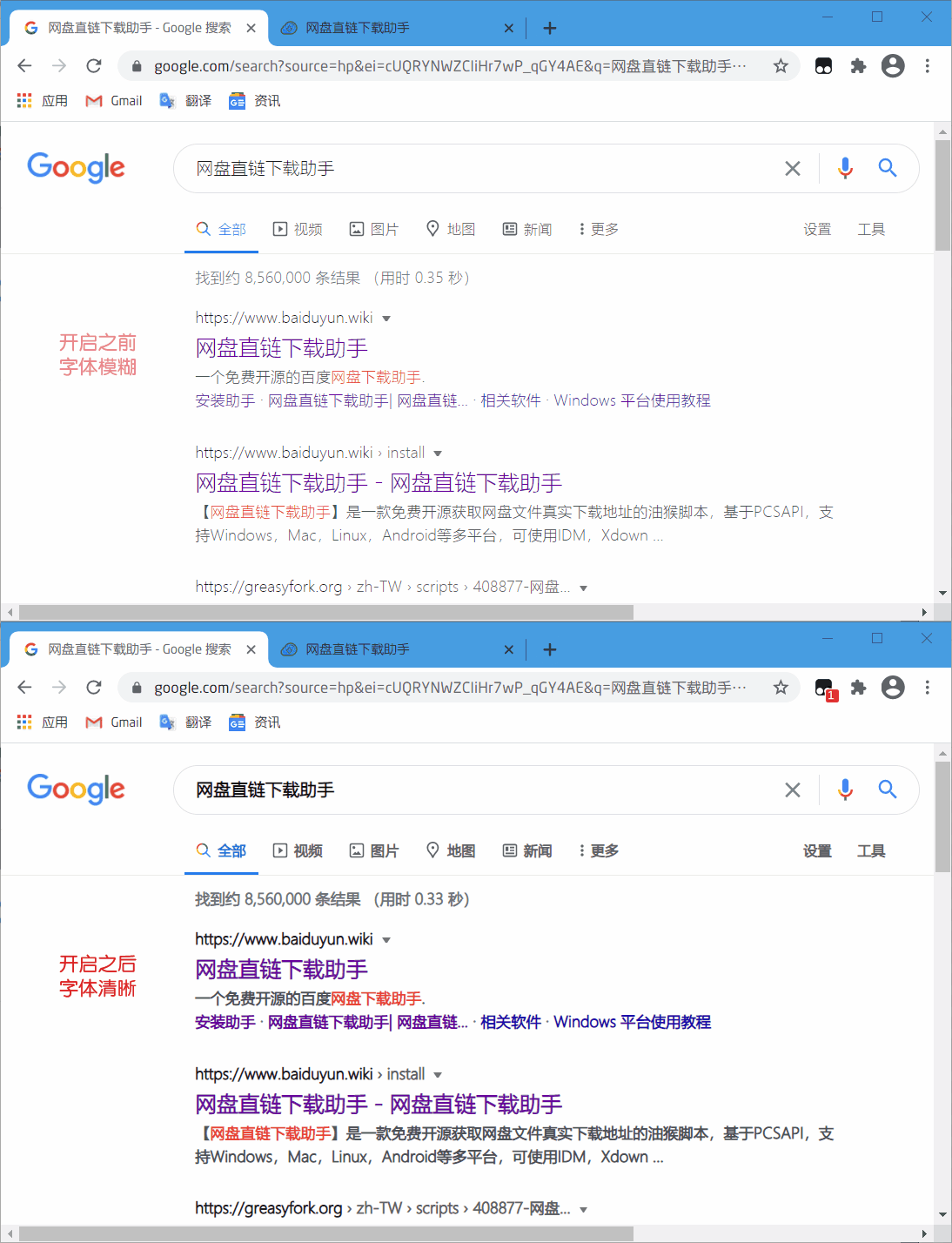
Windows 下的浏览器浏览网页时文字往往发虚,颜色很淡,看不清楚。**有了它可以让浏览器中显示的文字更加清晰**,支持 Chrome ,360 ,QQ ,Firfox ,Edge 等浏览器。
现已升级到 2.0 版本,功能更加强大,支持自定义清晰度设置。
## 🎨 效果演示
## 💽 安装地址
- **[安装地址(推荐)](https://www.youxiaohou.com/tool/install-mactype.html)**
- **[English Version](https://github.com/syhyz1990/mactype/raw/master/mactype-en.user.js)**
## 📝 更新日志
**v2.2.0** 加载逻辑重构,修复部分网站不生效或闪动后生效的问题。
**v2.1.7** 清晰度调节的最小间隔由 0.1 改为 0.05。
**v2.1.5** 修复了弹出多个窗口的问题。
**v2.1.4** 修复了在 Edge 浏览器下无效的问题。
**v2.1.3** 修正了在部分网站上样式无法加载的问题。
**v2.1.0** 修正了在弹窗框在百度搜索上样式错乱的问题,优化加载速度。
**v2.0.6** 修复了一系列 BUG,优化了对部分单页面网页的显示效果。
**v2.0.4** 支持自定义白名单功能,支持网站启用和禁用功能。
**v2.0.3** 修复选择文字时文字发虚的问题。
**v2.0.2** 修正百度等网站搜索后失效的问题。弹框样式失效后刷新页面即可。
## 🎨 设置清晰度
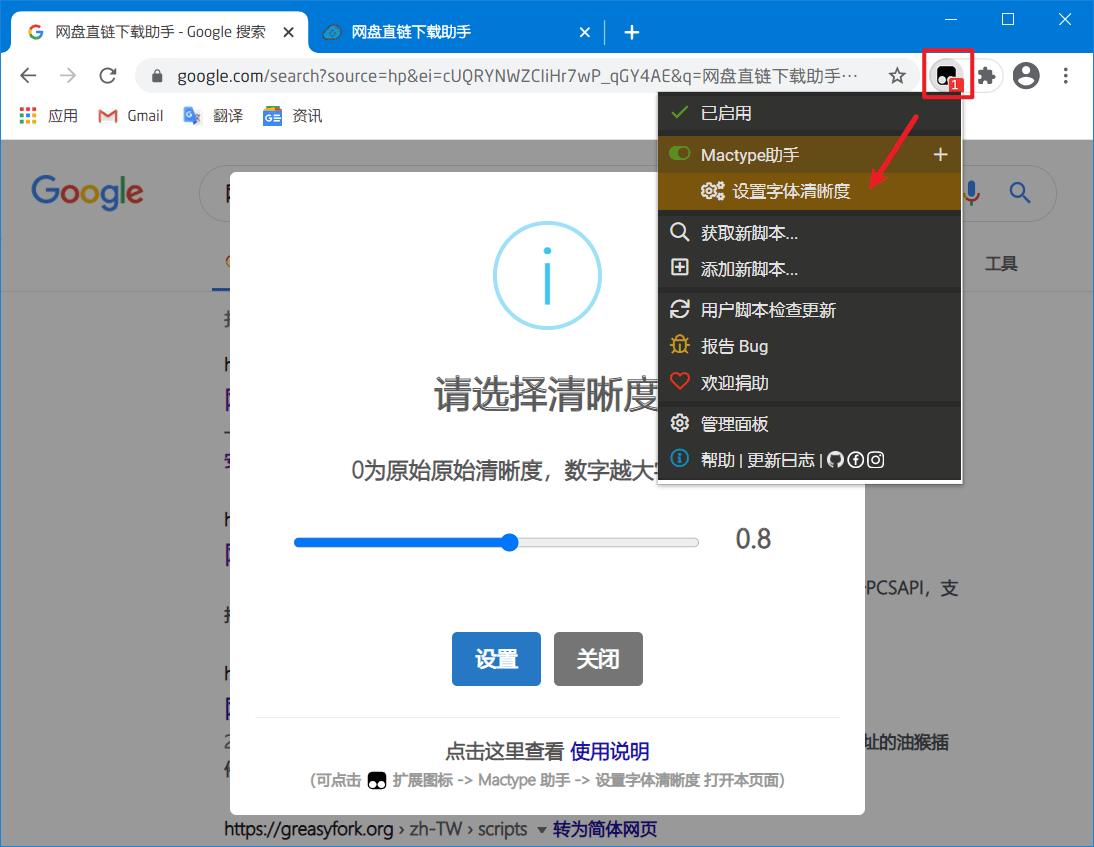
首次安装后会自动弹出设置清晰度选项,滑动滑块可自行调整,数值越大,文字显示越清晰,默认为0.8,调节到0时恢复原始效果。
可以在助手设置中重新找到本弹框。
## 💻 增强显示
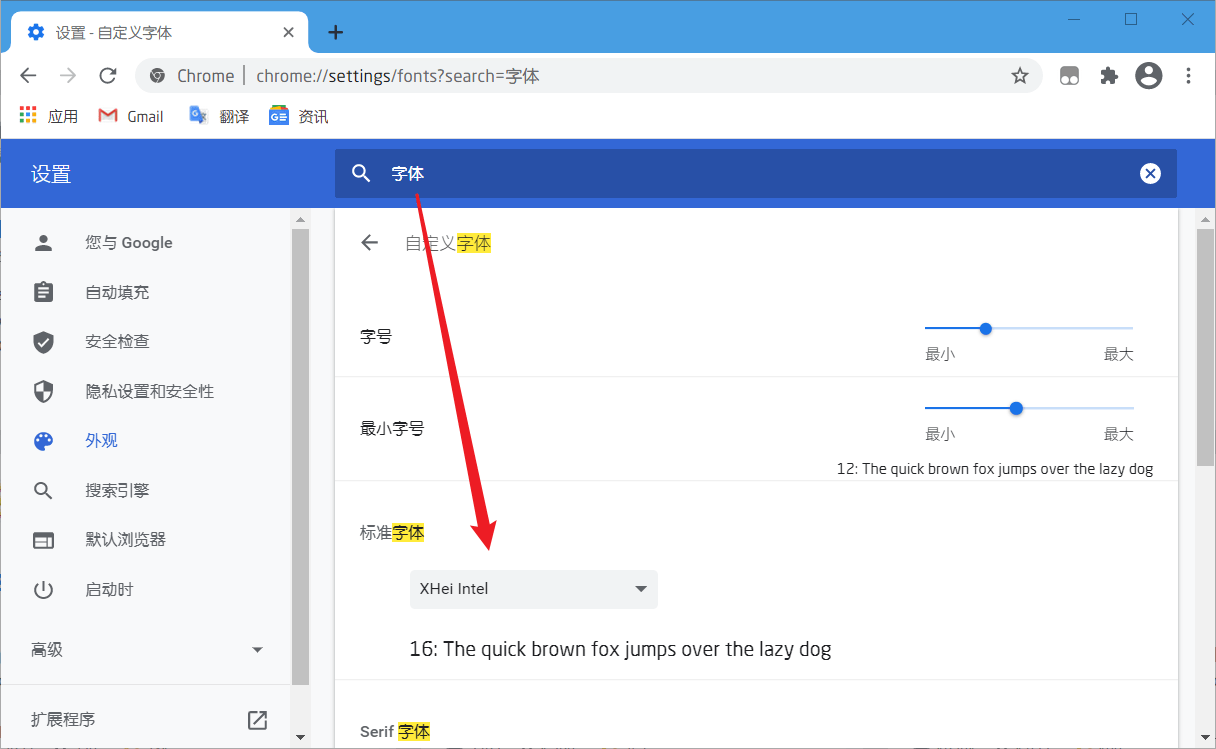
强烈建议配合 XHei 字体使用,效果极佳。 [字体下载地址](https://www.lanzoui.com/font)
字体安装完成后在 Chrome 设置中搜索 “字体”,找到 `自定义字体`,将选项里的四个字体均设置为 `XHei Intel`
## 👻 配合 Mactype
若想实现在 Windows 其他软件也实现相同的渲染效果,例如微信,QQ,文件管理器等软件等,可以参考
[让 Windows 实现 macOS 渲染效果](https://mp.weixin.qq.com/s/uCBoHZkJiFbd42RyRvQoUA)
## 🐞 Bug 反馈
如果您在使用过程中遇到问题,请 [点击这里](https://wj.qq.com/s2/8150559/6c08/) 或 [发送邮件](mailto:mail@youxiaohou.com) 进行反馈。
================================================
FILE: mactype-en.user.js
================================================
// ==UserScript==
// @name Mactype Assistant
// @namespace https://github.com/syhyz1990/mactype
// @version 2.2.5
// @description Workaround a blurry problem when browsing web pages in Chrome/360/QQ/Firefox/Edge when using MacType/
// @author YouXiaoHou
// @license MIT
// @homepage https://www.youxiaohou.com/tool/install-mactype.html
// @supportURL https://github.com/syhyz1990/mactype
// @require https://registry.npmmirror.com/sweetalert2/10.16.6/files/dist/sweetalert2.min.js
// @resource swalStyle https://registry.npmmirror.com/sweetalert2/10.16.6/files/dist/sweetalert2.min.css
// @updateURL https://www.youxiaohou.com/mactype.user.js
// @downloadURL https://www.youxiaohou.com/mactype.user.js
// @match *://*/*
// @run-at document-start
// @grant GM_getValue
// @grant GM_setValue
// @grant GM_registerMenuCommand
// @grant GM_getResourceText
// @icon data:image/svg+xml;base64,PHN2ZyB4bWxucz0iaHR0cDovL3d3dy53My5vcmcvMjAwMC9zdmciIHZpZXdCb3g9IjAgMCAxMjggMTI4Ij48cGF0aCBkPSJNMTIwIDcuMWM0LjQgMCA4IDQuMSA4IDl2NzMuMmMwIDUtMy42IDktOCA5SDgwLjhsNy4yIDE2LjNjLjggMi4zIDAgNS0xLjYgNS45LS40LjUtMS4yLjUtMS42LjVINDMuNmMtMi40IDAtNC0xLjgtNC00LjUgMC0uOSAwLTEuNC40LTEuOGw3LjItMTYuM0g4Yy00LjQgMC04LTQuMS04LTlWMTYuMWMwLTUgMy42LTkgOC05aDExMnoiIGZpbGw9IiM0NDQiLz48cGF0aCBkPSJNMTAyLjMgMzQuN2ExNC4yOCAxNC4yOCAwIDAgMC02LjItNi4yYy0yLjctMS40LTUuMy0yLjItMTIuNi0yLjJINjkuMXY1NC42aDE0LjRjNy4zIDAgOS45LS44IDEyLjYtMi4yYTE1LjQyIDE1LjQyIDAgMCAwIDYuMi02LjJjMS40LTIuNyAyLjItNS4zIDIuMi0xMi42VjQ3LjNjMC03LjMtLjgtOS45LTIuMi0xMi42em0tOC43IDI4LjJjMCAyLjQtLjIgMy4zLS43IDQuMnMtMS4yIDEuNi0yLjEgMi4xYy0uOS40LTEuOC43LTQuMi43SDgwVjM3LjJoNi42YzIuNCAwIDMuMy4yIDQuMi43czEuNiAxLjIgMi4xIDIuMWMuNC45LjcgMS44LjcgNC4ydjE4Ljd6TTUwIDQ4LjFIMzYuM1YyNi4zSDI1LjR2NTQuNWgxMC45VjU5SDUwdjIxLjhoMTAuOVYyNi4zSDUwdjIxLjh6IiBmaWxsPSIjZmZmIi8+PC9zdmc+
// ==/UserScript==
(function () {
'use strict';
let util = {
getValue(name) {
return GM_getValue(name);
},
setValue(name, value) {
GM_setValue(name, value);
},
addStyle(id, tag, css) {
tag = tag || 'style';
let doc = document, styleDom = doc.getElementById(id);
if (styleDom) return;
let style = doc.createElement(tag);
style.rel = 'stylesheet';
style.id = id;
tag === 'style' ? style.innerHTML = css : style.href = css;
document.head.appendChild(style);
},
removeElementById(eleId) {
let ele = document.getElementById(eleId);
ele && ele.parentNode.removeChild(ele);
}
};
let main = {
/**
* 配置默认值
*/
initValue() {
let value = [{
name: 'current_val',
value: 0
}, {
name: 'has_init',
value: false
}, {
name: 'white_list',
value: []
}];
value.forEach((v) => {
util.getValue(v.name) === undefined && util.setValue(v.name, v.value);
});
},
showSetting() {
Swal.fire({
title: 'Configuration',
icon: 'info',
input: 'range',
showCancelButton: true,
confirmButtonText: 'Save',
cancelButtonText: 'Cancel',
showCloseButton: true,
inputLabel: 'Slide to modify the display',
customClass: {
popup: 'mactype-popup',
},
footer: '<div style="text-align: center;font-size: 1em">Click to view <a href="https://www.youxiaohou.com/tool/install-mactype.html" target="_blank">the usage instruction</a>. For recommended font, use <a href="https://github.com/aishalih/sfwin" target="_blank">San Francisco</a>. Powered by <a href="https://www.youxiaohou.com">油小猴</a></div>',
inputAttributes: {
min: 0,
max: 1,
step: 0.05
},
inputValue: util.getValue('current_val')
}).then((res) => {
util.setValue('has_init', true);
if (res.isConfirmed) {
util.setValue('current_val', res.value);
this.changeStyle();
}
if (res.isDismissed && res.dismiss === "cancel") {
util.setValue('current_val', 0);
this.changeStyle();
}
});
document.getElementById('swal2-input').addEventListener('change', (e) => {
util.setValue('current_val', e.target.value);
this.changeStyle();
});
},
registerMenuCommand() {
let whiteList = util.getValue('white_list');
let host = location.host;
if (whiteList.includes(host)) {
GM_registerMenuCommand('💡 Current Website:❌', () => {
let index = whiteList.indexOf(host);
whiteList.splice(index, 1);
util.setValue('white_list', whiteList);
history.go(0);
});
} else {
GM_registerMenuCommand('💡 Current Website:✔️', () => {
whiteList.push(host);
util.setValue('white_list', whiteList);
history.go(0);
});
}
GM_registerMenuCommand('⚙️ Settings', () => {
this.showSetting();
});
},
generateStyle() {
let val = util.getValue('current_val');
return `
.mactype-popup { font-size: 14px!important }
.swal2-range input { -webkit-appearance: auto!important; appearance: auto;!important }
*:not(pre) { -webkit-text-stroke: ${val}px !important; text-stroke: ${val}px !important }
::selection { color: #fff;background: #338fff }
`;
},
changeStyle() {
document.getElementById('mactype-style').innerHTML = this.generateStyle();
},
addPluginStyle() {
let style = this.generateStyle();
if (document.head) {
util.addStyle('swal-pub-style', 'style', GM_getResourceText('swalStyle'));
util.addStyle('mactype-style', 'style', style);
}
const headObserver = new MutationObserver(() => {
util.addStyle('swal-pub-style', 'style', GM_getResourceText('swalStyle'));
util.addStyle('mactype-style', 'style', style);
});
headObserver.observe(document.head, {childList: true, subtree: true});
},
isTopWindow() {
return window.self === window.top;
},
init() {
this.initValue();
this.isTopWindow() && !util.getValue('has_init') && this.showSetting();
this.isTopWindow() && this.registerMenuCommand();
if (util.getValue('white_list').includes(location.host)) return;
this.addPluginStyle();
}
};
main.init();
})();
================================================
FILE: mactype.user.js
================================================
// ==UserScript==
// @name Mactype助手
// @namespace https://github.com/syhyz1990/mactype
// @version 2.2.6
// @description Windows下的浏览器浏览网页时文字往往发虚,颜色很淡,看不清楚。有了它可以让浏览器中显示的文字更加清晰,支持Chrome ,360 ,QQ ,Firfox ,Edge 等浏览器。
// @author YouXiaoHou
// @license MIT
// @homepage https://www.youxiaohou.com/tool/install-mactype.html
// @supportURL https://github.com/syhyz1990/mactype
// @require https://unpkg.com/sweetalert2@10.16.6/dist/sweetalert2.min.js
// @resource swalStyle https://unpkg.com/sweetalert2@10.16.6/dist/sweetalert2.min.css
// @updateURL https://www.youxiaohou.com/mactype.user.js
// @downloadURL https://www.youxiaohou.com/mactype.user.js
// @match *://*/*
// @run-at document-start
// @grant GM_getValue
// @grant GM_setValue
// @grant GM_registerMenuCommand
// @grant GM_getResourceText
// @icon data:image/svg+xml;base64,PHN2ZyB4bWxucz0iaHR0cDovL3d3dy53My5vcmcvMjAwMC9zdmciIHZpZXdCb3g9IjAgMCAxMjggMTI4Ij48cGF0aCBkPSJNMTIwIDcuMWM0LjQgMCA4IDQuMSA4IDl2NzMuMmMwIDUtMy42IDktOCA5SDgwLjhsNy4yIDE2LjNjLjggMi4zIDAgNS0xLjYgNS45LS40LjUtMS4yLjUtMS42LjVINDMuNmMtMi40IDAtNC0xLjgtNC00LjUgMC0uOSAwLTEuNC40LTEuOGw3LjItMTYuM0g4Yy00LjQgMC04LTQuMS04LTlWMTYuMWMwLTUgMy42LTkgOC05aDExMnoiIGZpbGw9IiM0NDQiLz48cGF0aCBkPSJNMTAyLjMgMzQuN2ExNC4yOCAxNC4yOCAwIDAgMC02LjItNi4yYy0yLjctMS40LTUuMy0yLjItMTIuNi0yLjJINjkuMXY1NC42aDE0LjRjNy4zIDAgOS45LS44IDEyLjYtMi4yYTE1LjQyIDE1LjQyIDAgMCAwIDYuMi02LjJjMS40LTIuNyAyLjItNS4zIDIuMi0xMi42VjQ3LjNjMC03LjMtLjgtOS45LTIuMi0xMi42em0tOC43IDI4LjJjMCAyLjQtLjIgMy4zLS43IDQuMnMtMS4yIDEuNi0yLjEgMi4xYy0uOS40LTEuOC43LTQuMi43SDgwVjM3LjJoNi42YzIuNCAwIDMuMy4yIDQuMi43czEuNiAxLjIgMi4xIDIuMWMuNC45LjcgMS44LjcgNC4ydjE4Ljd6TTUwIDQ4LjFIMzYuM1YyNi4zSDI1LjR2NTQuNWgxMC45VjU5SDUwdjIxLjhoMTAuOVYyNi4zSDUwdjIxLjh6IiBmaWxsPSIjZmZmIi8+PC9zdmc+
// ==/UserScript==
(function () {
'use strict';
let util = {
getValue(name) {
return GM_getValue(name);
},
setValue(name, value) {
GM_setValue(name, value);
},
addStyle(id, tag, css) {
tag = tag || 'style';
let doc = document, styleDom = doc.getElementById(id);
if (styleDom) return;
let style = doc.createElement(tag);
style.rel = 'stylesheet';
style.id = id;
tag === 'style' ? style.innerHTML = css : style.href = css;
document.head.appendChild(style);
},
removeElementById(eleId) {
let ele = document.getElementById(eleId);
ele && ele.parentNode.removeChild(ele);
}
};
let main = {
/**
* 配置默认值
*/
initValue() {
let value = [{
name: 'current_val',
value: 0
}, {
name: 'has_init',
value: false
}, {
name: 'white_list',
value: []
}];
value.forEach((v) => {
util.getValue(v.name) === undefined && util.setValue(v.name, v.value);
});
},
showSetting() {
Swal.fire({
title: '请选择清晰度',
icon: 'info',
input: 'range',
showCancelButton: true,
confirmButtonText: '保存',
cancelButtonText: '还原',
showCloseButton: true,
inputLabel: '拖动滑块观察变化,数字越大字越清晰',
customClass: {
popup: 'mactype-popup',
},
footer: '<div style="text-align: center;font-size: 1em">点击查看 <a href="https://www.youxiaohou.com/tool/install-mactype.html" target="_blank">使用说明</a>,配合 <a href="https://www.youxiaohou.com/tool/install-mactype.html#%F0%9F%92%BB-%E5%A2%9E%E5%BC%BA%E6%98%BE%E7%A4%BA" target="_blank">XHei字体</a> 更清晰,Powered by <a href="https://www.youxiaohou.com">油小猴</a></div>',
inputAttributes: {
min: 0,
max: 1,
step: 0.05
},
inputValue: util.getValue('current_val')
}).then((res) => {
util.setValue('has_init', true);
if (res.isConfirmed) {
util.setValue('current_val', res.value);
this.changeStyle();
}
if (res.isDismissed && res.dismiss === "cancel") {
util.setValue('current_val', 0);
this.changeStyle();
}
});
document.getElementById('swal2-input').addEventListener('change', (e) => {
util.setValue('current_val', e.target.value);
this.changeStyle();
});
},
registerMenuCommand() {
let whiteList = util.getValue('white_list');
let host = location.host;
if (whiteList.includes(host)) {
GM_registerMenuCommand('💡 当前网站:❌', () => {
let index = whiteList.indexOf(host);
whiteList.splice(index, 1);
util.setValue('white_list', whiteList);
history.go(0);
});
} else {
GM_registerMenuCommand('💡 当前网站:✔️', () => {
whiteList.push(host);
util.setValue('white_list', whiteList);
history.go(0);
});
}
GM_registerMenuCommand('⚙️ 设置', () => {
this.showSetting();
});
},
generateStyle() {
let val = util.getValue('current_val');
return `
.mactype-popup { font-size: 14px!important }
.swal2-range input { -webkit-appearance: auto!important; appearance: auto;!important }
*:not(pre) { -webkit-text-stroke: ${val}px !important; text-stroke: ${val}px !important }
::selection { color: #fff;background: #338fff }
`;
},
changeStyle() {
document.getElementById('mactype-style').innerHTML = this.generateStyle();
},
addPluginStyle() {
let style = this.generateStyle();
if (document.head) {
util.addStyle('swal-pub-style', 'style', GM_getResourceText('swalStyle'));
util.addStyle('mactype-style', 'style', style);
}
const headObserver = new MutationObserver(() => {
util.addStyle('swal-pub-style', 'style', GM_getResourceText('swalStyle'));
util.addStyle('mactype-style', 'style', style);
});
headObserver.observe(document.head, {childList: true, subtree: true});
},
isTopWindow() {
return window.self === window.top;
},
init() {
this.initValue();
this.isTopWindow() && !util.getValue('has_init') && this.showSetting();
this.isTopWindow() && this.registerMenuCommand();
if (util.getValue('white_list').includes(location.host)) return;
this.addPluginStyle();
}
};
main.init();
})();
gitextract_7d9nd38l/ ├── README.md ├── mactype-en.user.js └── mactype.user.js
SYMBOL INDEX (24 symbols across 2 files)

FILE: mactype-en.user.js
  method getValue (line 27) | getValue(name) {
  method setValue (line 31) | setValue(name, value) {
  method addStyle (line 35) | addStyle(id, tag, css) {
  method removeElementById (line 46) | removeElementById(eleId) {
  method initValue (line 56) | initValue() {
  method showSetting (line 73) | showSetting() {
  method registerMenuCommand (line 111) | registerMenuCommand() {
  method generateStyle (line 133) | generateStyle() {
  method changeStyle (line 143) | changeStyle() {
  method addPluginStyle (line 147) | addPluginStyle() {
  method isTopWindow (line 161) | isTopWindow() {
  method init (line 165) | init() {

FILE: mactype.user.js
  method getValue (line 27) | getValue(name) {
  method setValue (line 31) | setValue(name, value) {
  method addStyle (line 35) | addStyle(id, tag, css) {
  method removeElementById (line 46) | removeElementById(eleId) {
  method initValue (line 56) | initValue() {
  method showSetting (line 73) | showSetting() {
  method registerMenuCommand (line 111) | registerMenuCommand() {
  method generateStyle (line 133) | generateStyle() {
  method changeStyle (line 143) | changeStyle() {
  method addPluginStyle (line 147) | addPluginStyle() {
  method isTopWindow (line 161) | isTopWindow() {
  method init (line 165) | init() {
Condensed preview — 3 files, each showing path, character count, and a content snippet. Download the .json file or copy for the full structured content (20K chars).
[
  {
    "path": "README.md",
    "chars": 2464,
    "preview": "<p align=\"center\">\r\n  <a href=\"https://www.youxiaohou.com\" title=\"点击访问\">\r\n    <img width=\"100\" height=\"100\" src=\"https:/"
  },
  {
    "path": "mactype-en.user.js",
    "chars": 7411,
    "preview": "// ==UserScript==\n// @name              Mactype Assistant\n// @namespace         https://github.com/syhyz1990/mactype\n// "
  },
  {
    "path": "mactype.user.js",
    "chars": 7494,
    "preview": "// ==UserScript==\r\n// @name              Mactype助手\r\n// @namespace         https://github.com/syhyz1990/mactype\r\n// @vers"
  }
]
About this extraction
This page contains the full source code of the syhyz1990/mactype GitHub repository, extracted and formatted as plain text for AI agents and large language models (LLMs). The extraction includes 3 files (17.0 KB), approximately 5.3k tokens, and a symbol index with 24 extracted functions, classes, methods, constants, and types. Use this with OpenClaw, Claude, ChatGPT, Cursor, Windsurf, or any other AI tool that accepts text input. You can copy the full output to your clipboard or download it as a .txt file.
Extracted by GitExtract — free GitHub repo to text converter for AI. Built by Nikandr Surkov.